
Installation and Technical Manual for the Limitless Series WLS Limit Switch
|
|
|
- Jordan Hopkins
- 10 years ago
- Views:
Transcription
1 Installation and Technical Manual for the Limitless Series WLS Limit Switch Used in conjunction with the Limitless WPMM or WDRR Series Issue m WARNING PERSONAL INJURY DO NOT USE these products as safety or emergency stop devices or in any other application where failure of the product could result in personal injury. Failure to comply with these instructions could result in death or serious injury. m WARNING Honeywell does not recommend using devices for critical control applications where there is, or may be, a single point of failure or where single points of failure may result in an unsafe condition. It is up to the end-user to weigh the risks and benefits to determine if the products are appropriate for the application based on security, safety and performance. Additionally, it is up to the end-user to ensure that the control strategy results in a safe operating condition if any crucial segment of the control solution fails. Honeywell customers assume full responsibility for learning and meeting the required Declaration of Conformity, Regulations, Guidelines, etc. for each country in their distribution market. m WARNING RF EXPOSURE To satisfy FCC RF exposure requirements for mobile transmitting devices, a separation distance of 20 cm or more should be maintained between the antenna of this device and persons during device operation To ensure compliance, operation at closer than this distance is not recommended. The antenna used for this transmission must not be co-located in conjunction with any other antenna or transmitter. Failure to comply with these instructions could result in death or serious injury. m WARNING The WLS must be installed in accordance with the requirements specified in this document in order to comply with the specific Country Communication Agency requirements (i.e., FCC, IC, ETSI, ACMA, etc.). See Section 3 as this requires choosing the correct Country Use Code and thus allowable antenna and/or cable usage. CAUTION Power to the WLS should not be applied (ensure battery is removed) during installation of antenna as damage could occur to the WLS electronics. Sensing and Control

2 table OF contents 1 DESCRIPTION General Principle of Operation Model Reference for WLS Heavy-Duty Limit Switch (WLS) Model Reference for WLS Eyelet Pull Model Reference for WLS Single Switch Adapter Model Reference for WLS Non-Contact Switch Abbreviations and Definitions Symbol Definitions SPECIFICATIONS Intended Country Usage Certification and Approvals Radio Module Specifications Electrical Specifications EMC Specifications Functional Specifications Environmental Specifications Agency Compliance Information FCC Compliance Statements IC Compliance Statements Radio Frequency (RF) Safety Statement (FCC & IC) European Restrictions European (CE) Declaration of Conformity (DoC) European Declaration of Conformity Statements For more information about the R&TTE Directive ANTENNA OPTIONS ALLOWED PER COUNTRY USE CODE COUNTRY USE CODE A ANTENNA OPTIONS COUNTRY USE CODE B ANTENNA OPTIONS Quick Start Up Antenna Connection End User Switch Connection (WLS Single Switch Adapter option only) Non-Contact Switch Operation (WLS Non-Contact Switch option only) Battery Connection Procedure WLS Pairing Mode WLS Mounting Antenna Adjustment Purge Mode WPMM/WDRR Operation and LED functions Principle of Operation of the WPMM and Limitless WLS: WDRR Operation and LED functions...28 Honeywell Sensing and Control i

3 5 ANTENNA CONSIDERATIONS/OPTIONS & INSTALLATION Overview of Antenna Options Omni-directional Antenna Design Antenna Mounting and Considerations Antenna Mounting Location with Respect to RF Signal Outdoor Installation Warnings Antenna Connection, Styles, and Mounting Options Antenna Connection, Styles, and Mounting Options Antenna Styles and Mounting Options Antenna Adjustment Considerations Signal Range of an Antenna Choosing an Antenna Gain (dbi) With Acceptable Fade-Margin Environment Usage/Concerns Choosing an Antenna/Cable to Meet Application Exposure Conditions Outdoor Antenna Installations - Lightning Concerns RF Interference WLS Mounting WLS Heavy-Duty Limit Switch with Mechanical Actuators WLS Heavy-Duty Limit Switch Eyelet Pull WLS Single Switch Adapter WLS Non-Contact Switch INSPECTION AND MAINTENANCE WLS Inspection and Replacement Antenna Inspection and Replacement Battery Replacement ACCESSORIES Antenna Options Antenna Cable Options Mounting Options Magnetic Actuator Options (for use with WLS Non-Contact Switch only) INSTALLATION DRAWINGS Drawing Availability TROUBLESHOOTING GUIDES WLS used in conjunction with a WPMM WLS used in conjunction with a WDRR...54 ii Honeywell Sensing and Control

4 List of Figures Figure 1. European Declaration of Conformity (DoC) Figure 2. Limitless WLS Single Switch Adapter BT1 & BT Figure 3. Limitless WLS Single Switch Adapter BT1 & BT Figure 4. Limitless WLS Single Switch Adapter BT3 & BT Figure 5. Limitless WLS Single Switch Adapter BT3 & BT Figure 6. Limitless WLS Single Switch Adapter BT3 & BT4 Internal Connector Figure 7. Limitless WLS Non-Contact Switch in Head-on Actuation Mode with WMG Figure 8. Limitless WLS Non-Contact Switch in Slide-by Actuation Mode with WMG Figure 9. Limitless WLS Housing Figure 10. Limitless WLS Battery and Insulator Figure 11. Limitless WLS Housing Figure 12. Limitless WPMM Housing Figure 13. Limitless with Function Button Depressed Figure 14. Limitless Label Placement Figure 15. Limitless WDRR Housing Figure 16. Limitless WLS and WPMM in Parallel Figure 17. WPMM Operations and LED Functions - part Figure 18. WPMM Operations and LED Functions - part Figure 19. Radiation Pattern of an Omni-directional Antenna Figure 20. WLS to WPMM or WDRR Antennas with RF Signal Line of Sight (LOS) Free From Obstacles Figure 21. WLS to WPMM or WDRR Antennas with RF Signal Line of Sight (LOS) Affected by Obstacles Figure 22. Limitless WLS RP-SMA Connection, Integral Figure 23. Limitless WLS RP-SMA Connection, Remote Figure 24. Straight and Tilt/Swivel antennas Figure 25. Adhesive Mount Antenna Step 1. Pre-clean the surface Figure 26. Adhesive Mount Antenna Step 2. Peel Protection from Adhesive Strip Figure 27. Adhesive Mount Antenna Step 3. Mount the Antenna Figure 28. Mast Mount Antenna Figure 29. Mast Mount Antenna Figure 30. Magnetic Mount Bracket with Antenna Mounted on Steel Surface Figure 31. Highest RF signal when antennas are as parallel to each other as possible Figure 32. Tapes applied to an antenna location (as shown on a WGLA Series Switch) Figure 33. Limitless WLS dimensions Figure 34. Limitless WLS Switch Actuator Characteristics Figure 35. Limitless WLS Available Levers Figure 36. WLS Limit Switch with Eyelet Pull Example Figure 37. WLS Limit Switch with Eyelet Pull Mounting and Actuator Characteristics Figure 38. Mounting Hole Diagram Figure 39. WLS Non-Contact Switch Mounting Hole Diagram Figure 40. Limitless WLS Battery Replacement Figure 41. Limitless WPMM with call-outs Figure 42. Limitless WDRR with call-outs List of Tables Table 1 Actuator Code Table... 2 Table 2 Table of Abbreviations and Definitions... 5 Table 3 Table Symbol Definitions... 6 Table 4 North America; Country Use Code A... 7 Table 5 Asia Pacific; Country Use Code B... 7 Table 6 European Union; Country Use Code B... 7 Table 7 Other European Countries; Country Use Code B... 7 Table 8 Approvals and Ratings... 8 Table 9 Radio Module Specifications... 8 Table 10 Electrical Specifications... 8 Table 11 WLS Mechanical Cycle Testing with WDRR Monitoring... 9 Table 12 Environmental Specifications... 9 Table 13 Country Use Code A Antenna Options Table 14 Country Use Code B Antenna Options Table 15 Antenna Options Honeywell Sensing and Control iii

5 1 DESCRIPTION 1.1 General The new Limitless product line combines the best of MICRO SWITCH Heavy Duty limit switches with the latest commercial off-theshelf wireless technology. Wireless-enabled limit switches can now be used for position sensing and presence/absence detection for a wide variety of applications. The Limitless Series is especially beneficial for remote monitoring applications where wiring or wire maintenance is not physically possible or economically feasible. Combining this greater flexibility with proven harsh duty packaging can result in increased efficiencies and improved safety for machine and equipment OEMs and operators. This document will provide installation instructions to properly install a Limitless Heavy Duty limit switch, WLS switch, or simply the WLS as well as the WLS Single Switch Adapter and WLS Non-Contact Switch. The unique features of the WLS Single Switch Adapter will be referred to when necessary although will normally be included in the simple WLS reference. 1.2 Principle of Operation The WLS will transmit the position of its actuator (mechanical or magnetic) or user-supplied switch for the WLS Single Switch Adapter to a Limitless Wireless Panel Mount Monitor (WPMM Series) or Limitless Wireless DIN Rail Receiver (WDRR Series). The WPMM or WDRR will then indicate the actuator position of the WLS, magnetic target (WLS Non-Contact Switch only) or user-supplied switch for the WLS Single Switch Adapter via a visual indicator, audible indicator and/or electronic output. The WLS supports no electrical signal inputs and is powered by a replaceable battery. 1.3 Model Reference for Heavy-Duty Limit Switch options Standard WLS Nomenclature WLS 1 A 00 A A 1 3 Switch type WLS Series Wireless Gen Code 1 Version 1 A RF Code 2.4 GHz; IEEE Antenna type code No antenna; RP-SMA connector jack 2.2 dbi omni w/switch mount; straight design 2.2 dbi omni w/switch mount; tilt/swivel 3.0 dbi omni w/remote adhesive mount 9.8 ft cable 5.5 dbi omni w/remote mag. mount, tilt/swivel 5 ft cable 5.5 dbi omni w/remote mag. mount, tilt/swivel 10ft cable 9.0 dbi omni w/remote mag. mount, tilt/swivel 5 ft cable 9.0 dbi omni w/remote mag. mount, tilt/swivel 10ft cable 8.0 dbi omni w/remote bkt. mount, str. design 3 ft cable 8.0 dbi omni w/remote bkt. mount, str. design 11 ft cable 2.2 dbi omni w/remote mag. mount, tilt/swivel 10 ft cable 0 dbi omni w/ switch mount; straight design Country use code US, Canada, A Mexico All other B approved 1, 2, 3 countries 1 Use with antenna type codes 00-03, 05, 10, 11 only; usage also allowed in Country Code A. 2 Some countries require specific communication certifications. Contact Honeywell for existing certification information. 3 If Limitless devices are used on machinery that may shipped globally, use country code B. A C D Operating head code Side rotary, momentary Top plunger, plain Top plunger, roller J Wobble stick 4 N V Side rotary, maintained Top plunger, adjustable 4 See page 14 for more detail. Actuator code See WLS actuator code table for details. Actuators for operating head code A only, insert actuator code from table below. OR Order actuator catalog listing separately for reduced delivery time Modification code Not applicable Head assembled with actuator to right side Head assembled with actuator to left side Head assembled with actuator to mounting surface Roller perpendicular to mounting surface Honeywell Sensing and Control 1

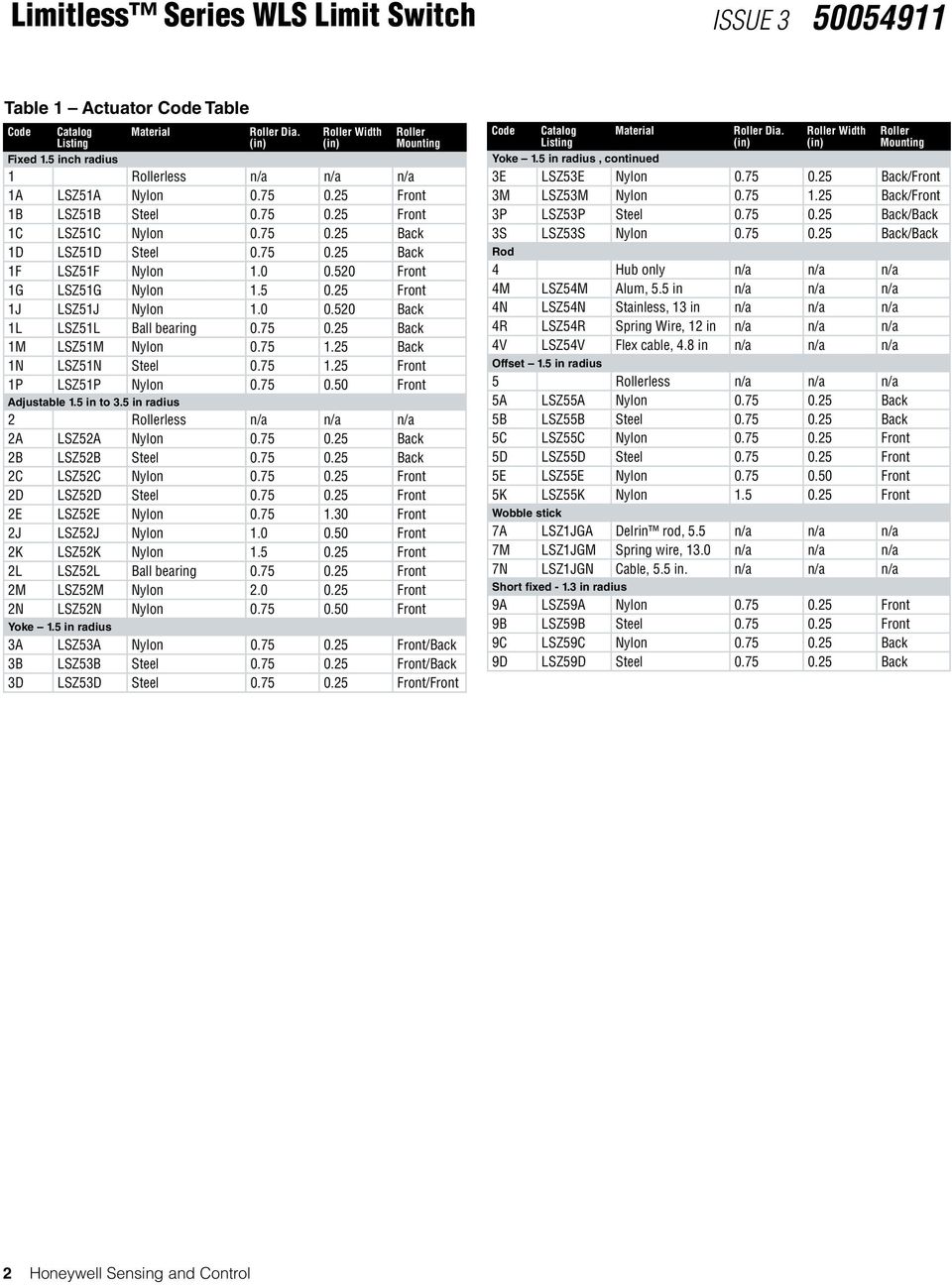
6 Table 1 Actuator Code Table Code Catalog Listing Material Roller Dia. (in) Roller Width (in) Roller Mounting Fixed 1.5 inch radius 1 Rollerless n/a n/a n/a 1A LSZ51A Nylon Front 1B LSZ51B Steel Front 1C LSZ51C Nylon Back 1D LSZ51D Steel Back 1F LSZ51F Nylon Front 1G LSZ51G Nylon Front 1J LSZ51J Nylon Back 1L LSZ51L Ball bearing Back 1M LSZ51M Nylon Back 1N LSZ51N Steel Front 1P LSZ51P Nylon Front Adjustable 1.5 in to 3.5 in radius 2 Rollerless n/a n/a n/a 2A LSZ52A Nylon Back 2B LSZ52B Steel Back 2C LSZ52C Nylon Front 2D LSZ52D Steel Front 2E LSZ52E Nylon Front 2J LSZ52J Nylon Front 2K LSZ52K Nylon Front 2L LSZ52L Ball bearing Front 2M LSZ52M Nylon Front 2N LSZ52N Nylon Front Yoke 1.5 in radius 3A LSZ53A Nylon Front/Back 3B LSZ53B Steel Front/Back 3D LSZ53D Steel Front/Front Code Catalog Listing Material Roller Dia. (in) Roller Width (in) Roller Mounting Yoke 1.5 in radius, continued 3E LSZ53E Nylon Back/Front 3M LSZ53M Nylon Back/Front 3P LSZ53P Steel Back/Back 3S LSZ53S Nylon Back/Back Rod 4 Hub only n/a n/a n/a 4M LSZ54M Alum, 5.5 in n/a n/a n/a 4N LSZ54N Stainless, 13 in n/a n/a n/a 4R LSZ54R Spring Wire, 12 in n/a n/a n/a 4V LSZ54V Flex cable, 4.8 in n/a n/a n/a Offset 1.5 in radius 5 Rollerless n/a n/a n/a 5A LSZ55A Nylon Back 5B LSZ55B Steel Back 5C LSZ55C Nylon Front 5D LSZ55D Steel Front 5E LSZ55E Nylon Front 5K LSZ55K Nylon Front Wobble stick 7A LSZ1JGA Delrin rod, 5.5 n/a n/a n/a 7M LSZ1JGM Spring wire, 13.0 n/a n/a n/a 7N LSZ1JGN Cable, 5.5 in. n/a n/a n/a Short fixed in radius 9A LSZ59A Nylon Front 9B LSZ59B Steel Front 9C LSZ59C Nylon Back 9D LSZ59D Steel Back 2 Honeywell Sensing and Control
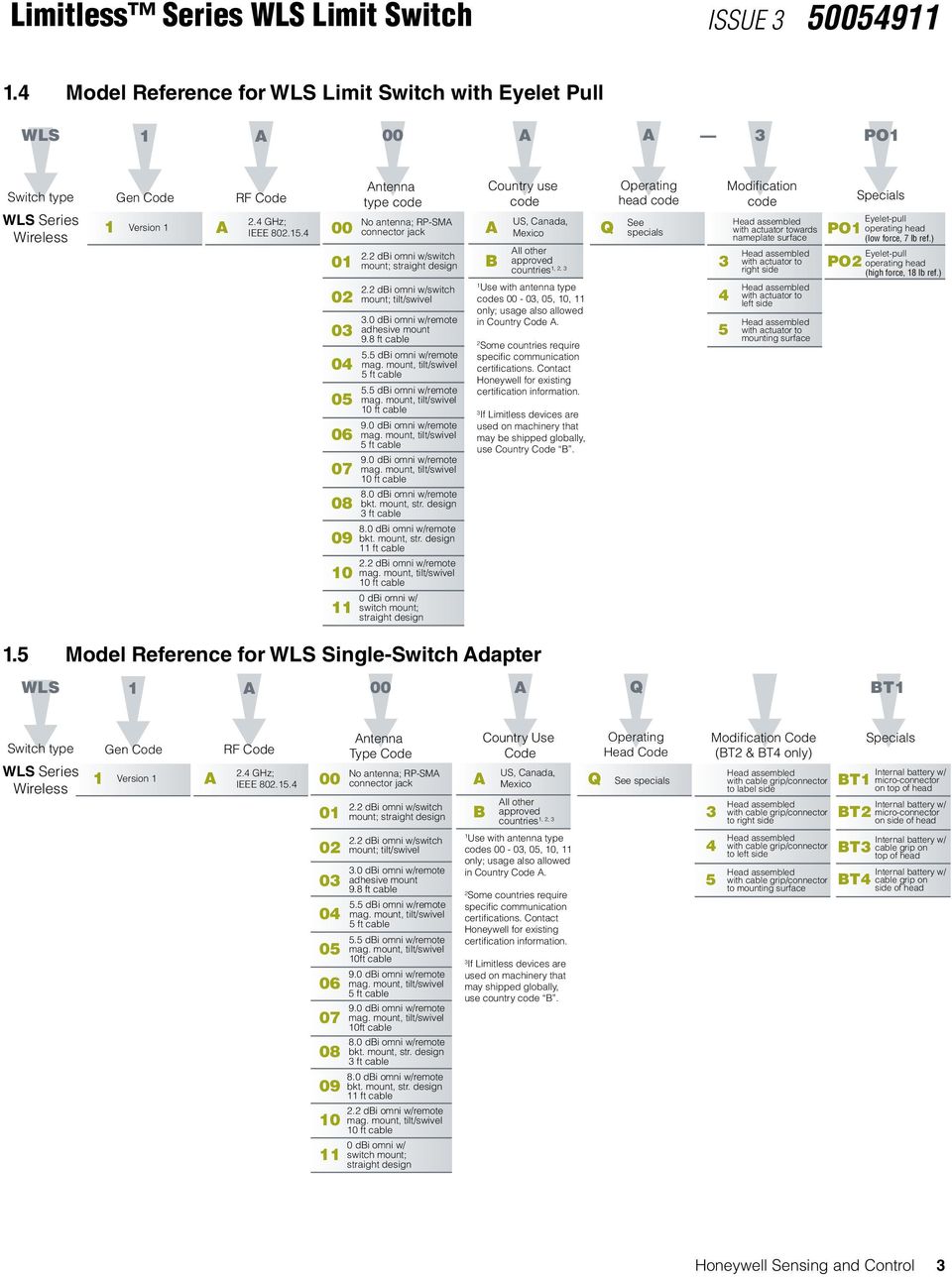
7 1.4 Model Reference for WLS Limit Switch with Eyelet Pull WLS 1 A 00 A A 3 PO1 Switch type WLS Series Wireless Gen Code 1 Version 1 A RF Code 2.4 GHz; IEEE Antenna type code No antenna; RP-SMA connector jack 2.2 dbi omni w/switch mount; straight design 2.2 dbi omni w/switch mount; tilt/swivel 3.0 dbi omni w/remote adhesive mount 9.8 ft cable 5.5 dbi omni w/remote mag. mount, tilt/swivel 5 ft cable 5.5 dbi omni w/remote mag. mount, tilt/swivel 10 ft cable 9.0 dbi omni w/remote mag. mount, tilt/swivel 5 ft cable 9.0 dbi omni w/remote mag. mount, tilt/swivel 10 ft cable 8.0 dbi omni w/remote bkt. mount, str. design 3 ft cable 8.0 dbi omni w/remote bkt. mount, str. design 11 ft cable 2.2 dbi omni w/remote mag. mount, tilt/swivel 10 ft cable 0 dbi omni w/ switch mount; straight design Country use code US, Canada, A Mexico All other B approved 1, 2, 3 countries 1 Use with antenna type codes 00-03, 05, 10, 11 only; usage also allowed in Country Code A. 2 Some countries require specific communication certifications. Contact Honeywell for existing certification information. 3 If Limitless devices are used on machinery that may be shipped globally, use Country Code B. Q Operating head code See specials Modification code Head assembled with actuator towards nameplate surface Head assembled with actuator to right side Head assembled with actuator to left side Head assembled with actuator to mounting surface Specials PO1 Eyelet-pull operating head (low force, 7 lb ref.) Eyelet-pull PO2 operating head (high force, 18 lb ref.) 1.5 Model Reference for WLS Single-Switch Adapter WLS 1 A 00 A Q BT1 Switch type WLS Series Wireless Gen Code 1 Version 1 A RF Code 2.4 GHz; IEEE Antenna Type Code No antenna; RP-SMA connector jack 2.2 dbi omni w/switch mount; straight design Country Use Code US, Canada, A Mexico All other B approved 1, 2, 3 countries Q Operating Head Code See specials 3 Modification Code (BT2 & BT4 only) Head assembled with cable grip/connector to label side Head assembled with cable grip/connector to right side Specials Internal battery w/ BT1 micro-connector on top of head Internal battery w/ BT2 micro-connector on side of head dbi omni w/switch mount; tilt/swivel 3.0 dbi omni w/remote adhesive mount 9.8 ft cable 5.5 dbi omni w/remote mag. mount, tilt/swivel 5 ft cable 5.5 dbi omni w/remote mag. mount, tilt/swivel 10ft cable 9.0 dbi omni w/remote mag. mount, tilt/swivel 5 ft cable 9.0 dbi omni w/remote mag. mount, tilt/swivel 10ft cable 8.0 dbi omni w/remote bkt. mount, str. design 3 ft cable 8.0 dbi omni w/remote bkt. mount, str. design 11 ft cable 2.2 dbi omni w/remote mag. mount, tilt/swivel 10 ft cable 0 dbi omni w/ switch mount; straight design 1 Use with antenna type codes 00-03, 05, 10, 11 only; usage also allowed in Country Code A. 2 Some countries require specific communication certifications. Contact Honeywell for existing certification information. 3 If Limitless devices are used on machinery that may shipped globally, use country code B. 4 5 Head assembled with cable grip/connector to left side Head assembled with cable grip/connector to mounting surface Internal battery w/ BT3 cable grip on top of head Internal battery w/ BT4 cable grip on side of head Honeywell Sensing and Control 3
8 1.6 Model Reference for WLS Non-Contact Switch WLS 1 A 00 A Q RS2 Switch Type WLS Series Wireless Gen Code 1 Version 1 A RF Code 2.4 GHz; IEEE Antenna Type Code No antenna; RP-SMA connector jack 2.2 dbi omni w/switch mount; tilt/swivel Country Use Code US, Canada, A Mexico All other B approved 1, 2, 3 countries Q Operating Head Code See specials Modification Code (RS2 only) 3 Specials Internal battery w/ Head assembled with target to label side RS1 reed switch target on top of head Head assembled Internal battery w/ with target to right side RS2 reed switch target on side of head 11 0 dbi omni w/ switch mount; straight design 1 Use with antenna type codes 00-03, 05, 10, 11 only; usage also allowed in Country Code A. 2 Some countries require specific communication certifications. Contact Honeywell for existing certification information. 4 5 Head assembled with target to left side Head assembled with target to mounting surface 3 If Limitless devices are used on machinery that may shipped globally, use country code B. 4 Honeywell Sensing and Control

9 1.7 Abbreviations and Definitions Table 2 Table of Abbreviations and Definitions ACMA db dbi dbm DSSS EIRP EMC ETSI EU FCC ft-lbs GHz IC ICES IEEE kbps LED Mhz MPE NA NEMA R&TTE RP-SMA RF TX WDRR WLS WOI WPMM Australian Communications and Media Authority Decibel Decibel Isotropic Decibel above or below 1 milliwatt Direct Sequence Spread Spectrum Equivalent isotropic radiated power Electromagnetic Compatibility European Telecommunications Standards Institute European Union Federal Communications Committee Foot-pounds GigaHertZ Industry Canada Industry Canada Electrical Specification Institute of Electrical and Electronics Engineers KiloBits Per Second Light Emitting Diode MegaHertZ Maximum Permissible Exposure North America United States of America and Canada National Electrical Manufacturers Association Radio and Telecommunications Terminal Equipment Reverse Polarity SMA connector Radio Frequency Transmit Wireless DIN Rail Receiver Wireless Heavy Duty Limit Switch Series Wireless Operator Interface Wireless Panel Mount Monitor Series Honeywell Sensing and Control 5

10 1.8 Symbol Definitions The following table lists those symbols used in this document to denote certain conditions. Table 3 Table Symbol Definitions Symbol, Definition ATTENTION: Identifies information that requires special consideration. TIP: Identifies advice or hints for the user, often in terms of performing a task. CAUTION m m m m Indicates a situation which, if not avoided, may result in equipment or work (data) on the system being damaged or lost, or may result in the inability to properly operate the process. CAUTION: Indicates a potentially hazardous situation which, if not avoided, may result in minor or moderate injury. It may also be used to alert against unsafe practices. CAUTION symbol on the equipment refers the user to the product manual for additional information. The symbol appears next to required information in the manual. WARNING: Indicates a potentially hazardous situation, which, if not avoided, could result in serious injury or death. WARNING symbol on the equipment refers the user to the product manual for additional information. The symbol appears next to required information in the manual. WARNING, Risk of electrical shock: Potential shock hazard where HAZARDOUS LIVE voltages greater than 30 Vrms, 42.4 Vpeak, or 60 Vdc may be accessible. ESD HAZARD: Danger of an electro-static discharge to which equipment may be sensitive. Observe precautions for handling electrostatic sensitive devices. Protective Earth (PE) terminal: Provided for connection of the protective earth (green or green/ yellow) supply system conductor. Functional earth terminal: Used for non-safety purposes such as noise immunity improvement. NOTE: This connection shall be bonded to Protective Earth at the source of supply in accordance with national local electrical code requirements. Earth Ground: Functional earth connection. NOTE: This connection shall be bonded to Protective Earth at the source of supply in accordance with national and local electrical code requirements. Chassis Ground: Identifies a connection to the chassis or frame of the equipment shall be bonded to Protective Earth at the source of supply in accordance with national and local electrical code requirements. C-Tick Mark. The C-Tick Mark is a certification trade mark registered to ACMA (Australian Communications and Media Authority) in Australia under the Trade Marks Act 1995 and to RSM in New Zealand under section 47 of the NZ Trade Marks Act. The mark is only to be used in accordance with conditions laid down by ACMA and RSM. This mark is equal to the CE Mark used in the European Union. Notified Body. For radio equipment used in the European Union in accordance with the R&TTE Directive, the CE Mark and the notified body (NB) identification number is used when the NB is involved in the conformity assessment procedure. The alert sign must be used when a restriction on use (output power limit by a country at certain frequencies) applies to the equipment and must follow the CE marking. 6 Honeywell Sensing and Control

11 2 SPECIFICATIONS 2.1 Intended Country Usage Table 4 North America; Country Use Code A Country ISO letter code UNITED STATES US CANADA CA MEXICO MX Table 5 Asia Pacific; Country Use Code B Country ISO letter code AUSTRALIA AU NEW ZEALAND NZ INDIA IN KOREA * KR BRAZIL * BR CHINA * CN * currently does not include WLS Single Switch Adapter or WLS Non-Contact Switch Table 6 European Union; Country Use Code B Country ISO letter code Country ISO letter code Austria AT Latvia LV Belgium BE Lithuania LT Bulgaria BG Luxembourg LU Cyprus CY Malta MT Czech Republic CZ Netherlands NL Denmark DK Poland PL Estonia EE Portugal PT Finland FI Romania RO France FR Slovak Republic SK Germany DE Slovenia SI Greece GR Spain ES Hungary HU Sweden SE Ireland IE United Kingdom BG Italy IT Table 7 Other European Countries; Country Use Code B Country ISO letter code Country ISO letter code Bosnia and Herzegovina BA Norway NO Croatia HR Russian Federation RU Iceland IS Serbia RS Liechtenstein LI Switzerland CH Macedonia MK Turkey TR Honeywell Sensing and Control 7

12 2.2 Certification and Approvals See the product label for applicable approvals and ratings. Table 8 Approvals and Ratings Approval/Item Ratings/Description Enclosure Type IP67; NEMA 1, 3, 4, 6, 6P, 12, 13 Federal Communications Commission (FCC) FCC Part Industry Canada (IC) Canadian ICES-003 European Telecommunications Standards Institute (ETSI) CE mark Australian Communications and Media Authority (ACMA) C-Tick mark Comision Federal de Telecomunicaciones (COFETEL) Mexico RCPDIXBIO-1147 Wireless Planning & Coordination (WPC) India 1001/2011/WLRO-006 Korean Communications Commission * Korea State Radio Regulation Committee Certification Center (SRRC) * China *Agencia Nactional de Telecomunicaos (ANATEL) * Brazil * currently does not include WLS Single Switch Adapter or WLS Non-Contact Switch 2.3 Radio Module Specifications Table 9 Radio Module Specifications Item Specification Radio module Digi International XBee PRO Wireless standard WPAN IEEE Direct Sequence Spread Spectrum (DSSS), 2.4 GHz Data rate 250 kbps Operating frequency ISM 2.4 GHz Module transmit power Country code A : 22 dbm; Country code B : 8 dbm Receive sensitivity (typ.) -100 dbm m WARNING The WLS must be installed in accordance with the requirements specified in this document in order to comply with the specific Country Communication Agency requirements (i.e., FCC, IC, ETSI, ACMA, etc.). See Section 3 as this requires choosing the correct Country Use Code and thus allowable antenna and/or cable usage. 2.4 Electrical Specifications Table 10 Electrical Specifications Item Specification Battery 3.6 Vdc Lithium Thionyl Chloride; 2/3 AA size; Manufacturer: Green Energy, P/N ER14335M 8 Honeywell Sensing and Control

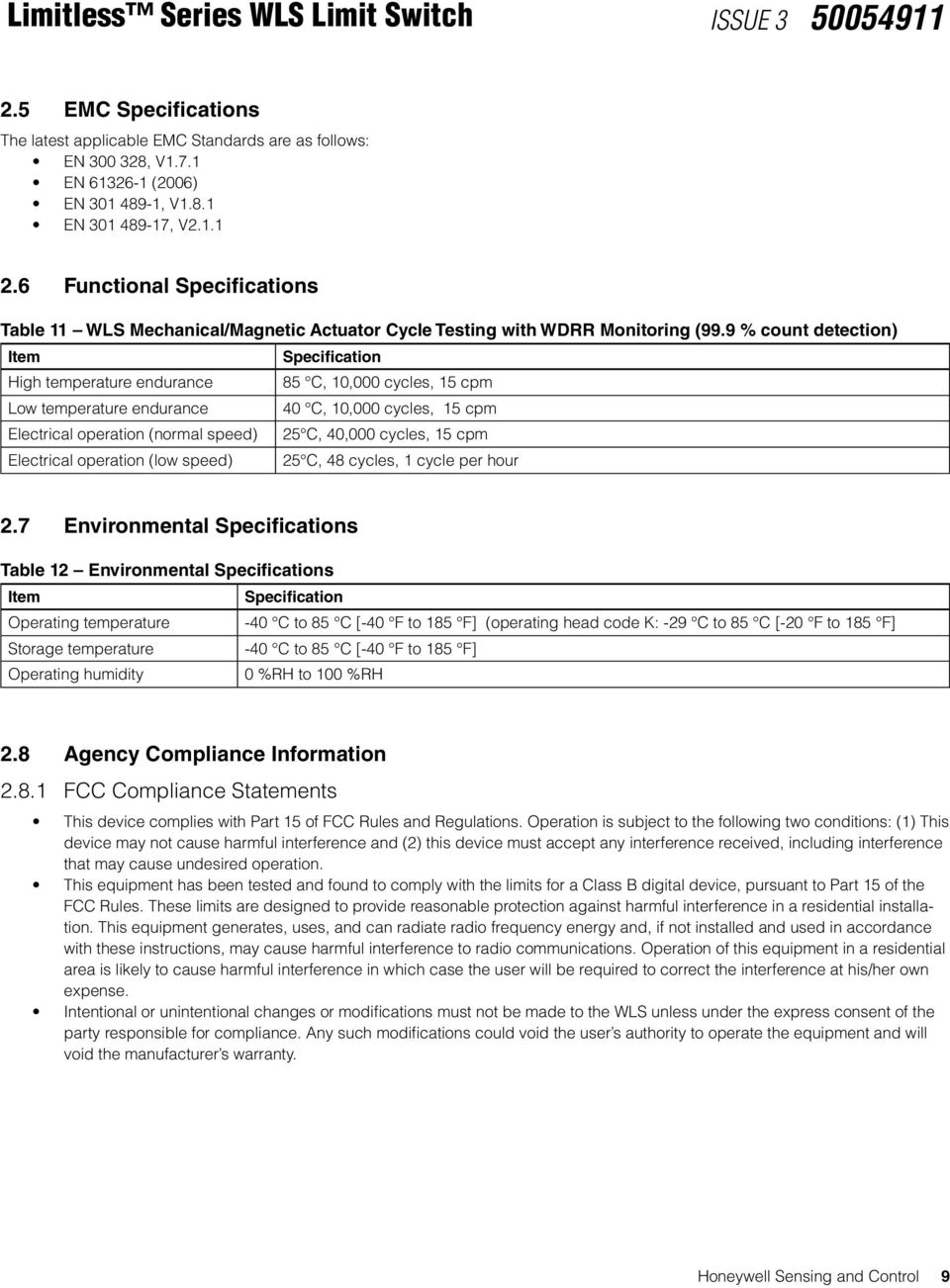
13 2.5 EMC Specifications The latest applicable EMC Standards are as follows: EN , V1.7.1 EN (2006) EN , V1.8.1 EN , V Functional Specifications Table 11 WLS Mechanical/Magnetic Actuator Cycle Testing with WDRR Monitoring (99.9 % count detection) Item Specification High temperature endurance 85 C, 10,000 cycles, 15 cpm Low temperature endurance 40 C, 10,000 cycles, 15 cpm Electrical operation (normal speed) 25 C, 40,000 cycles, 15 cpm Electrical operation (low speed) 25 C, 48 cycles, 1 cycle per hour 2.7 Environmental Specifications Table 12 Environmental Specifications Item Specification Operating temperature -40 C to 85 C [-40 F to 185 F] (operating head code K: -29 C to 85 C [-20 F to 185 F] Storage temperature -40 C to 85 C [-40 F to 185 F] Operating humidity 0 %RH to 100 %RH 2.8 Agency Compliance Information FCC Compliance Statements This device complies with Part 15 of FCC Rules and Regulations. Operation is subject to the following two conditions: (1) This device may not cause harmful interference and (2) this device must accept any interference received, including interference that may cause undesired operation. This equipment has been tested and found to comply with the limits for a Class B digital device, pursuant to Part 15 of the FCC Rules. These limits are designed to provide reasonable protection against harmful interference in a residential installation. This equipment generates, uses, and can radiate radio frequency energy and, if not installed and used in accordance with these instructions, may cause harmful interference to radio communications. Operation of this equipment in a residential area is likely to cause harmful interference in which case the user will be required to correct the interference at his/her own expense. Intentional or unintentional changes or modifications must not be made to the WLS unless under the express consent of the party responsible for compliance. Any such modifications could void the user s authority to operate the equipment and will void the manufacturer s warranty. Honeywell Sensing and Control 9
14 2.8.2 IC Compliance Statements To reduce potential radio interference to other users, the antenna type and its gain should be chosen so that the equivalent isotropic radiated power (EIRP) is not more than that permitted for successful communication. Operation is subject to the following two conditions: (1) this device may not cause interference, and (2) this device must accept any interference, including interference that may cause undesired operation of the device. This Class B digital apparatus has been tested and found to comply with Canadian ICES-003. French: Cet appareil numérique de la classe B est conforme à la norme NMB-003 du Canada Radio Frequency (RF) Safety Statement (FCC & IC) To comply with FCC s and Industry Canada s RF exposure requirements, the following antenna installation and device operating configurations must be satisfied. Remote antenna for this unit must be fixed and mounted on outdoor permanent structures with a separation distance between any other antenna(s) of greater than 20 cm and a separation distance of at least 20 cm [7.87 in] from all persons. Furthermore, when using an integral antenna with the WLS, it must not be co-located with any other antenna or transmitter device and have a separation distance of at least 20 cm [7.87 in] from all persons European Restrictions Information regarding national restrictions can be found in document: ERC/REC (Relating to the use of short-range devices including appendixes and annexes). Documentation may be found in the document database in the European Communication s office Honeywell Sensing and Control

15 2.9 European (CE) Declaration of Conformity (DoC) European Declaration of Conformity Statements This section contains the European Declaration of Conformity (DoC) statement for the radio used in the Limitless WLS switch. Figure 1. European Declaration of Conformity (DoC) For more information about the R&TTE Directive The following website contains additional information about the Radio and Telecommunications Terminal Equipment (R&TTE) directive: Honeywell Sensing and Control 11

16 3 ANTENNA OPTIONS ALLOWED PER COUNTRY USE CODE This section defines the antenna options that can be used in a particular country of interest; reference Section 2.1 for a list of Countries per Country Use Code. It is important to determine the country that the WLS will be used in. Thereby, noting the correct Country Use Code in the WLS nomenclature will help ensure proper selection of antenna and/or cable options. The integral antenna mounts directly to the WLS RP-SMA jack while the remote antenna mounts to the WLS RP-SMA jack via a cable assembly (see Section ). Further technical information on the WAN Series antennas, WAMM Series magnetic mounts and WCA Series cable assemblies can be found in Section 5.1. m WARNING The WLS must be installed in accordance with the requirements specified in this document in order to comply with the specific Country Communication Agency requirements. (i.e. FCC, IC, ETSI, ACMA, etc.) See Section 3 as it requires choosing the correct Country Use Code and thus allowable antenna and/or cable usage. 3.1 COUNTRY USE CODE A ANTENNA OPTIONS Table 13 Country Use Code A Antenna Options COUNTRY CODE A (Note: all columns are independent of each other) Antenna Type Code (allowed for use) Integral Mount Antennas (allowed for use) Remote Mount Antennas (allowed for use) Magnetic Remote Mount Assemblies/ Antennas WAMM100RSP-005 WAMM100RSP-010 (allowed for use) Extension Cable Assemblies/Antennas for Remote Mount WCA200RSJRSP-002 WCA200RSJRSP-005 WCA200RSJRSP-010 WCA200RSJRSP-015 WCA200RSJRSP-020 (allowed for use) Extension Cable Assemblies/Antennas for Remote Mount WCA200RNPRSP-002 WCA200RNPRSP-010 (allowed for use) 00 WAN01RSP WAN03RSP WAN01RSP WAN01RSP WAN06RNJ 01 WAN02RSP WAN06RNJ* WAN02RSP WAN02RSP 02 WAN04RSP WAN09RSP WAN04RSP WAN03RSP 03 WAN05RSP WAN10RSP WAN05RSP WAN04RSP 04 WAN07RSP WAN11RSP WAN07RSP WAN05RSP 05 WAN08RSP WAN08RSP WAN07RSP 06 WAN08RSP 07 WAN09RSP 08 WAN10RSP 09 WAN11RSP Integral mount: Antennas have an RP-SMA plug that connects directly to the WLS RP-SMA jack Remote mount: Remote mount antenna uses a cable with a RP-SMA plug that connects directly to the WLS RP-SMA jack (exception, WAN06RNJ) * if not ordering as a replacement, you will also need to order a WCA200RNPRSP-002 or WCA200RNPRSP-010 cable assembly to allow connection to a RP-SMA jack. 12 Honeywell Sensing and Control

17 3.2 COUNTRY USE CODE B ANTENNA OPTIONS Table 14 Country Use Code B Antenna Options Antenna Type Code (allowed for use) Integral Mount Antennas (allowed for use) COUNTRY CODE B (Note: all columns are independent of each other) Remote Mount Antennas (allowed for use) Magnetic Remote Mount Assemblies/ Antennas WAMM100RSP-005 WAMM100RSP-010 (allowed for use) Extension Cable Assemblies/Antennas for Remote Mount WCA200RSJRSP-002 WCA200RSJRSP-005 WCA200RSJRSP-010 WCA200RSJRSP-015 WCA200RSJRSP-020 (allowed for use) Extension Cable Assemblies/Antennas for Remote Mount 00 WAN01RSP WAN03RSP WAN01RSP WAN01RSP WAN01RSP 01 WAN02RSP WAN09RSP WAN02RSP WAN02RSP WAN02RSP 02 WAN07RSP WAN10RSP WAN07RSP WAN04RSP WAN03RSP 03 WAN08RSP WAN08RSP WAN07RSP WAN07RSP 05 WAN08RSP WAN08RSP 10 WAN09RSP 11 WAN10RSP WAN11RSP Integral mount: Antennas have an RP-SMA plug that connects directly to the WLS RP-SMA jack Remote mount: Remote mount antenna uses a cable with a RP-SMA plug that connects directly to the WLS RP-SMA jack (exception, WAN06RNJ), ATTENTION If using the WLS in a portable application (for example, the WLS is used in a handheld device and the antenna is less than 20 cm from the human body when the device is in operation): The integrator is responsible for passing additional SAR (Specific Absorption Rate) testing based on FCC rules and FCC Guidelines for Human Exposure to Radio Frequency Electromagnetic Fields, OET Bulletin and Supplement C. The testing results will be submitted to the FCC for approval prior to selling the integrated unit. The required SAR testing measures emissions from the module and how they affect the person., ATTENTION The antenna cables should not be modified (i.e. cut short and/or re-terminated) as it may affect Communication Agency approval. Notes for Section 3.1& 3.2 Tables 13 and 14: 1. Antennas listed in this chart are approved for use with the Digi International XBee PRO RF Module which the WLS utilizes. 2. Industry Canada Compliance Statement: This device has been designed to operate with the antenna types listed in this document, and having a maximum gain of 9 dbi. Antenna types not included in this list or having a gain greater than 9 dbi are strictly prohibited for use with this device. The required antenna impedance is 50 Ohm. Honeywell Sensing and Control 13

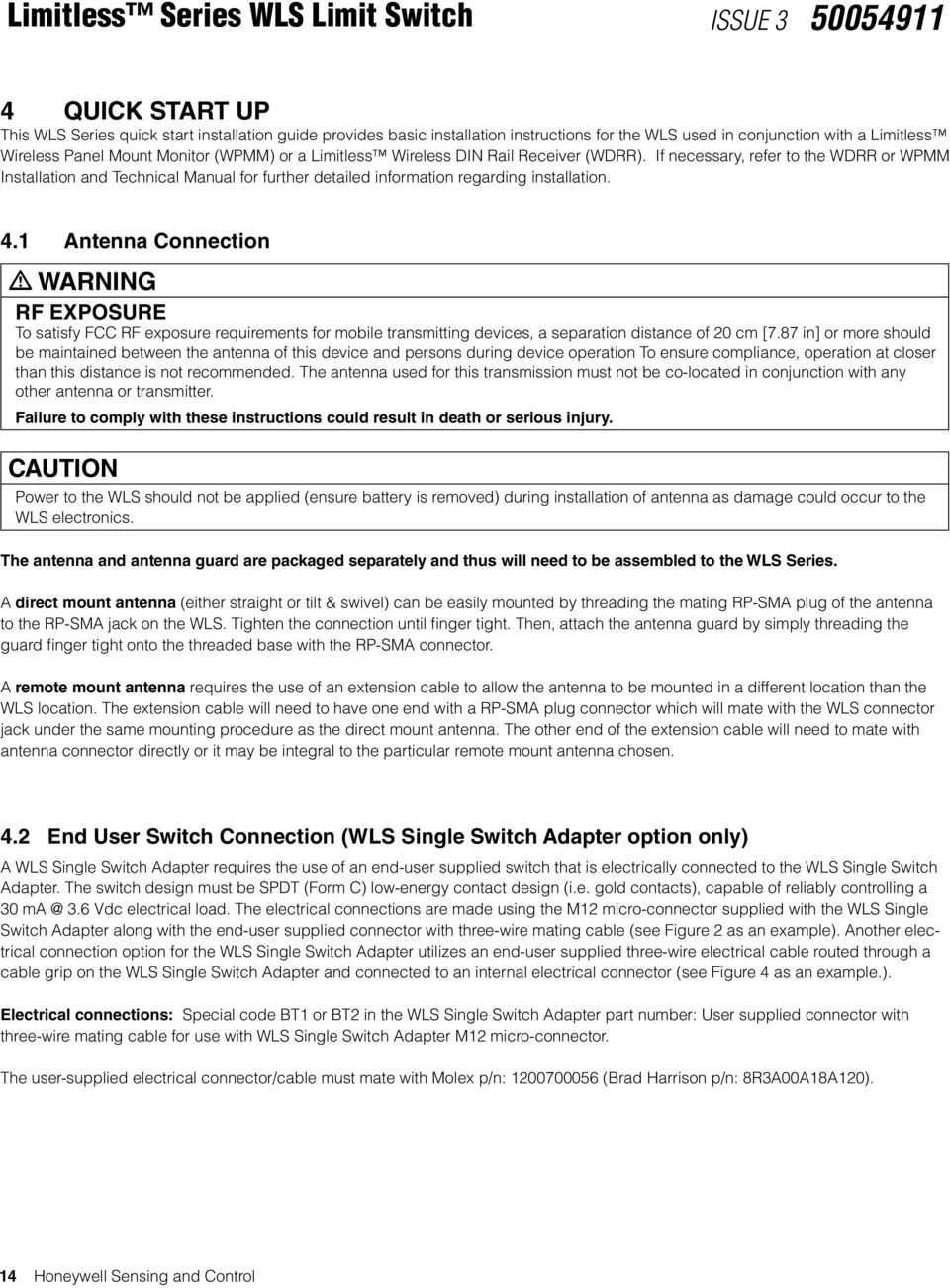
18 4 Quick Start Up This WLS Series quick start installation guide provides basic installation instructions for the WLS used in conjunction with a Limitless Wireless Panel Mount Monitor (WPMM) or a Limitless Wireless DIN Rail Receiver (WDRR). If necessary, refer to the WDRR or WPMM Installation and Technical Manual for further detailed information regarding installation. 4.1 Antenna Connection m WARNING RF EXPOSURE To satisfy FCC RF exposure requirements for mobile transmitting devices, a separation distance of 20 cm [7.87 in] or more should be maintained between the antenna of this device and persons during device operation To ensure compliance, operation at closer than this distance is not recommended. The antenna used for this transmission must not be co-located in conjunction with any other antenna or transmitter. Failure to comply with these instructions could result in death or serious injury. CAUTION Power to the WLS should not be applied (ensure battery is removed) during installation of antenna as damage could occur to the WLS electronics. The antenna and antenna guard are packaged separately and thus will need to be assembled to the WLS Series. A direct mount antenna (either straight or tilt & swivel) can be easily mounted by threading the mating RP-SMA plug of the antenna to the RP-SMA jack on the WLS. Tighten the connection until finger tight. Then, attach the antenna guard by simply threading the guard finger tight onto the threaded base with the RP-SMA connector. A remote mount antenna requires the use of an extension cable to allow the antenna to be mounted in a different location than the WLS location. The extension cable will need to have one end with a RP-SMA plug connector which will mate with the WLS connector jack under the same mounting procedure as the direct mount antenna. The other end of the extension cable will need to mate with antenna connector directly or it may be integral to the particular remote mount antenna chosen. 4.2 End User Switch Connection (WLS Single Switch Adapter option only) A WLS Single Switch Adapter requires the use of an end-user supplied switch that is electrically connected to the WLS Single Switch Adapter. The switch design must be SPDT (Form C) low-energy contact design (i.e. gold contacts), capable of reliably controlling a Vdc electrical load. The electrical connections are made using the M12 micro-connector supplied with the WLS Single Switch Adapter along with the end-user supplied connector with three-wire mating cable (see Figure 2 as an example). Another electrical connection option for the WLS Single Switch Adapter utilizes an end-user supplied three-wire electrical cable routed through a cable grip on the WLS Single Switch Adapter and connected to an internal electrical connector (see Figure 4 as an example.). Electrical connections: Special code BT1 or BT2 in the WLS Single Switch Adapter part number: User supplied connector with three-wire mating cable for use with WLS Single Switch Adapter M12 micro-connector. The user-supplied electrical connector/cable must mate with Molex p/n: (Brad Harrison p/n: 8R3A00A18A120). 14 Honeywell Sensing and Control
19 Step 1: Each conductor color in the user-supplied cable needs to be connected to the end-user supplied switch as follows (see Figure 2 as an example): BROWN wire: Connect to common terminal of the user-supplied switch BLACK wire: Connect to normally open terminal of the user-supplied switch BLUE wire: Connect to normally closed terminal of the user-supplied switch Figure 2. Limitless WLS Single Switch Adapter BT1 & BT2 User-supplied Wire Conductors to Switch Terminal Connections Step 2: Connect the user-supplied mating connector w/cable to the WLS Single Switch Adapter M12 connector. Then tighten connector (see Figure 3). Figure 3. WLS Single Switch Adapter BT1 & BT2 Connector to User-supplied Mating Cable Honeywell Sensing and Control 15

20 Special code BT3 or BT4 in the WLS Single Switch Adapter part number: End-user supplied three-wire electrical cable routed through a cable grip on the WLS Single Switch Adapter and connected to an internal electrical connector. The user supplied electrical cable must have the following characteristics: Cable diameter: 2,5 mm to 8,0 mm [0.10 in to 0.32 in] Cable length: 3 m [9.84 ft] max. Wire gauge: 18 AWG to 26 AWG Wire strip length: 5,0 mm [0.197 in] Step Action 1 Remove the four (4) mounting screws and the WLS Single Switch Adapter plastic head and route the user-supplied cable through the WLS Single Switch Adapter cable grip. Do not tighten the cable grip nut at this time. See Figure 4. 2 Connect the three (3) user-supplied wires to the user-supplied switch terminal (common, normally open, and normally closed). See example in Figure 5 (page 16). 3 Connect the user-supplied switch (common, normally open, and normally closed) wires to the same labeled internal connector (COM, NO, NC) of the WLS Single Switch Adapter. See example in Figure 6 (page 16). 4 Re-install WLS Single Switch Adapter plastic head as the cable is gently pulled through the cable grip so an excessive amount of cable is not inside the WLS Single Switch Adapter plastic head. Torque the four (4) mounting screws on the WLS Single Switch Adapter plastic head to 1,36 N-m to 1,8 N-m [12 in-lb to 16 in-lb]. See Figure 4. 5 Tighten cable grip nut to secure cable. See Figure 4. Figure 4. WLS Single Switch Adapter BT3 & BT4 Plastic Head Screws, Cable Grip, and User-supplied Cable 16 Honeywell Sensing and Control

21 Figure 5. WLS Single Switch Adapter BT3 & BT4 usersupplied switch term & wires Figure 6. WLS Single Switch Adapter BT3 & BT4 internal connector terminals and user-supplied wires 4.3 WLS Non-Contact Switch Series Operation The WLS Non-Contact Switch contains a reed switch that requires a magnetic actuator to operate. The WPMM or WDRR Series monitor/receiver output changes state with the presence and absence of the magnetic actuator. The chosen magnetic actuator will affect the operating characteristics of the WLS Non-Contact Switch (i.e., operating point and release point). The WLS Non-Contact Switch is supplied with a WMG1 magnetic actuator that offers a in min. operating point and in release point when used in a headon actuation mode (see Figure 7). Honeywell magnet, WMG2, offers a 0.45 in min. operating point and 1.0 in release point when used in a head-on actuation mode. The user may choose his/her magnetic actuator that needs to be tested in the application to determine suitable operating characteristics. Another common type of actuation mode is slide-by, that requires set-up and testing in the user s application to determine suitability (see Figure 8). The gap between the WLS Non-Contact Switch head and magnet can be varied via trial testing to achieve a suitable operating point and release point for the application. Set-up/Information tips (The user will need to test chosen magnet(s) and actuation mode(s) against the actual application conditions to prove suitability): Center the magnet actuator with the center of the red target on the WLS Non-Contact Switch head Position the magnet to be parallel to the WLS Non-Contact Switch head Surrounding ferrous metal or magnetic fields in the application may affect the operating characteristics and desired functionality Temperature changes affect operating characteristics Do not apply excessive shock to the WLS Non-Contact Switch Do not expose the WLS Non-Contact Switch or magnetic actuators to excessively large magnetic fields Honeywell Sensing and Control 17
22 Figure 7. Limitless WLS Non-Contact Switch in head-on actuation mode with WMG1 Figure 8. Limitless WLS Non-Contact Switch in slide-by actuation mode 4.4 Battery Connection Procedure m WARNING RISK OF DEATH OR SERIOUS INJURY FROM EXPLOSION OR FIRE Connection and disconnection of the batteries should only be performed in a non-hazardous area. The batteries used in this device may present a risk of fire or chemical burn if mistreated. Do not recharge, disassemble, heat above 100 C [212 F], or incinerate. Failure to comply with these instructions could result in death or serious injury. m WARNING RISK OF DEATH OR SERIOUS INJURY FROM EXPLOSION OR FIRE If WLS is to be returned to Honeywell for any reason, the battery MUST be removed prior to shipping. Dispose of used batteries promptly per local regulations or the battery manufacturer s recommendations. Keep away from children. Do not disassemble and do not dispose of in fire. Failure to comply with these instructions could result in death or serious injury. 18 Honeywell Sensing and Control
23 , ATTENTION RISK OF DEATH OR SERIOUS INJURY FROM EXPLOSION OR FIRE Use only the following 3.6 V lithium thionyl chloride (Li-SOCl2) battery (non-rechargeable), size 2/3 AA. No other batteries are approved for use in the WLS Series. Green Energy, ER14335M Honeywell, WBT1 WLS battery activation (see Figures 9 and 10): Tools required: Slotted or Phillips screwdriver Step Action 1 If applicable, remove the two screws on the housing cover. 2 Using a finger, press down slightly on the battery top and remove the battery insulator. Insure that the battery is properly seated and making good contact. 3 Replace cover and retighten screws or immediately proceed to Section 4.5 Pairing Mode. Figure 9. Limitless WLS housing Figure 10. Limitless WLS battery and Insulator Honeywell Sensing and Control 19
24 4.5 Pairing Mode Pairing is required to initiate and establish an RF communication link between each single WLS and a single WPMM or WDRR. The WLS will be shipped from the factory with two identification labels (1) that are recommended to be completed and applied to the WLS housing during the pairing mode. As there are up to 16 WLS devices that can be paired to a single WPMM or WDRR, these labels will be used to identify the WLS in the sequence of #1 to #16. The initial WLS paired to the WPMM or WDRR will be Sequence #1; the second WLS paired will be Sequence #2 and so on. If replacing a WLS that has been purged, as applicable(see section 6.5 of the WPMM Installation and Technical Manual or Section 7.3 of the WDRR Installation & Technical Manual), identify the correct replacement Sequence # on the identification labels. Pairing steps when using a WPMM: The battery will need to be activated in the WLS and proper power applied to the WPMM (green LED illuminated) before proceeding with this pairing procedure. Once the pairing is completed, the WLS selected will only communicate with the WPMM it was paired to and no other device. Step Action 1 Completely read this procedure before starting in order to understand the timing of events that need to be performed. 2 WLS: Remove (if required) the two screws on the housing cover (See Figure 11, page 21) of the WLS and locate the function button to be used in Step 4. 3 WPMM: Press the Function button on WPMM (See Figure 12, page 21) for more than four seconds and less than eight seconds at which time the green and yellow LEDs will be flashing which indicates to release the function button immediately as it has entered the pairing mode. 4 WLS: Within a 30 second interval of Step 3, depress the WLS switch function button (See Figure 13, page 21) and hold depressed for more than one second and less than 12 seconds at which time the orange LED turns on. While in pairing mode, the orange led will flash on for 100 ms every second. The orange LED flashes three times 100 ms on, 100 ms off when pairing succeeds. If pairing does not succeed, the orange LED will turn off and user will need to repeat steps starting with Step 3. 5 WPMM: Successful pairing will be indicated by the green and yellow LEDs (See Figure 12, page 21) ceasing to flash and remaining on for a few seconds before turning off. A short buzzer beep will also occur. 6 To confirm proper pairing between the WLS and WPMM: actuate the WLS actuator, actuate using the magnetic actuator (WLS Non-Contact Switch only), or actuate the user-supplied switch for the WLS Single Switch Adapter, and the red LED should illuminate along with a buzzer sound. 7 Record the WLS Sequence # on identification labels and apply to the WLS housing in desired locations (See Figure 14, page 21). 8 Repeat Steps 2-7 to add additional WLS units switches. Up to 16 WLS can be paired to a single WPMM. 20 Honeywell Sensing and Control
25 Figure 11. Limitless WLS Housing Figure 13. Limitless WLS with Function Button Depressed Figure 12. Limitless WPMM Housing 8 7 NOTE: Use a blunt object, such as a paper clip to actuate the function switch. Figure 14. Limitless WLS Label Placement (shown on the WLGA switch) 6 6 Honeywell Sensing and Control 21
26 Pairing Steps when using a WDRR (see Figure 13): The battery will need to be activated in the WLS and proper power applied to the WDRR (green LED illuminated) before proceeding with this pairing procedure. Once the pairing is completed, the WLS selected will only communicate with the WDRR it was paired to and no other device. Step Action 1 Completely read this procedure before starting in order to understand the timing of events that need to be performed. 2 WLS: Remove (if required) the two screws on the housing cover (See Figure 11, page 21) of the WLS and locate the function button (see Figure 10) to be used in Step 4. 3 WDRR: Press the Function button on WDRR (See Figure 15, page 23) for more than four seconds and less than eight seconds at which time the green and yellow LEDs (see Figure 14, page 21) will be flashing which indicates to release the function button immediately as it has entered the pairing mode. 4 WLS: Within a 30 second interval of Step 3, depress the WLS function button (See Figure 13, page 21) and hold depressed for more than one second and less than 12 seconds at which time the orange LED turns on (see Figure 12, page 21). While in pairing mode, the orange LED will flash on for 100 ms every second. The orange LED flashes three times 100 ms on, 100 ms off when pairing succeeds. If pairing does not succeed, the orange LED will turn off and user will need to repeat steps starting with Step 3. 5 WDRR Receiver: Successful pairing will be indicated by the green and yellow LEDs (see Figure 15, page 23) ceasing to flash and remaining on for a few seconds before turning off. The specific Tricolor Output LED will also turn on. 6 To confirm proper pairing between the WLS and WDRR: actuate the WLS actuator, actuate using the magnetic actuator (WLS Non-Contact Switch only), or actuate the user supplied switch for the WLS Single Switch Adapter, and the Tricolor Output LED (see Figure 15, page 23) should turn on to indicate the proper output status. 7 Record the WLS Sequence # on identification labels and apply to the WLS actuator or WLS housing in desired locations (See Figure 14, page 21). 8 Repeat Steps 2-7 to add additional Limitless switch. Up to 14 WLS can be paired to a single WDRR. 22 Honeywell Sensing and Control
27 Figure 15. Limitless WDRR Housing Honeywell Sensing and Control 23
28 4.6 WLS Mounting Mounting: The WLS housing has two slotted mounting holes that will accept a M5 or #10 size screw and it also has two UNF tapped holes for mounting from the back. Refer to Section 5.6 in this manual for more detail 4.7 Antenna Adjustment The antenna of the WLS and WPMM or WDRR should be oriented with respect to each other such that they are parallel. This will in most cases allow the longest range and highest RF communication link/signal. The least RF signal is normally in a direction in-line with the top of the antenna, so it is best to avoid having the antennas pointed directly toward each other, or directly away from each other. An acceptable RF signal is also indicated by the RF signal strength LEDs on the WDRR; see the WDRR Installation and Technical Manual for further information. Figure 16. Limitless WLS and WPMM in Parallel m WARNING RF EXPOSURE To satisfy FCC RF exposure requirements for mobile transmitting devices, a separation distance of 20 cm [7.87 in] or more should be maintained between the antenna of this device and persons during device operation. To ensure compliance, operations at closer than this distance is not recommended. The antenna used for this transmitter must not be co-located in conjunction with any other antenna or transmitter. Failure to comply with these instructions could result in death or serious injury. 24 Honeywell Sensing and Control
29 4.8 WLS Purge Mode The purging of a WLS is required when a previously paired WLS is desired to paired again per Section 4.4. Follow the procedure below which will then allow a new pairing to be conducted after successful purging: Step Action 1 Remove (if required) the two screws on the housing cover of the WLS (See Figure 11, page 21) and locate the WLS function button & orange LED (See Figure 13, page 21). 2 Press and hold the WLS function button for greater than 12 seconds. Initially the orange LED turns on and after the 12 seconds will turn off indicating the WLS has been purged. 3 Repeat above steps if necessary to purge more Limitless switch(s). 4.9 WPMM Operation and LED functions Principle of Operation of the WPMM and Limitless Switch: A Limitless WLS will send an RF signal to the WPMM when the actuator (mechanical or magnetic) of the WLS switch or user supplied switch for the WLS Single Switch Adapter changes position. There are up to 16 Limitless WLS switches and/or WLS Single Switch Adapter user supplied switches that will communicate and indicate their actuation position with a single WPMM. The mechanical actuation (free position to full overtravel) of any one of the WLS switches, actuation using the magnetic actuator of any one of the WLS Non-Contact Switches, and/or actuation of any one of the WLS Single Switch Adapter user-supplied switches will cause a single red output LED to illuminate, a buzzer to sound, and/or a change in the electrical output. However, there will be no differentiation of outputs (visual, audible or electrical state change) between any of the WLS switches and/or WLS Single Switch Adapter user supplied switches (up to 16) being actuated. Further, if a WLS switch or WLS Single Switch Adapter user-supplied switch is actuated and thus causes the single red output LED to illuminate, a buzzer to sound, and a change in the electrical output, actuation of any other Limitless WLS will not cause another output change (visual, audible or electrical state change). The operation and LED functions for the WPMM are visually depicted and described in the attached file. This file is also located as a separate file at sensing.honeywell.com. Honeywell Sensing and Control 25
30 Figure 17. WPMM Operation and LED Functions Chart part 1 26 Honeywell Sensing and Control
31 Figure 18. WPMM Operation and LED Functions Chart part 2 Honeywell Sensing and Control 27
32 4.9.2 WDRR Operation and LED functions A Limitless WLS will send an RF signal to the WDRR when the actuator (mechanical or magnetic) of the WLS switch or user supplied switch for the WLS Single Switch Adapter changes position. There are up to 14 WLS switches and/or WLS Single Switch Adapter user supplied switches that will communicate and indicate their actuation position with a single WDRR. The actuation of any one of the WLS switches or user supplied switches for the WLS Single Switch Adapter will cause a single red output LED to illuminate and change in the electrical output for the associated output (#1 thru 14) that it is paired too. The operation and LED functions for the WPMM are visually depicted and described in the WDRR Installation and Technical Manual located at sensing.honeywell.com/limitless. 28 Honeywell Sensing and Control
33 5 ANTENNA CONSIDERATIONS/OPTIONS & SWITCH/ANTENNA INSTALLATION 5.1 Overview of Antenna Options The following chart lists the antenna options along with the various characteristics that will be referenced throughout this section. This section is intended to assist an end user in determining which antenna(s) are worth investigating and subjecting to application requirements for proof of suitability. Table 15 Antenna Options Ant. type code* Repl. ant. Replacement antenna mount or cable Ant. gain (max.) Design/ style Mount Cable length Environment usage ** Antenna material Cable material/ type Mount material 01 WAN01RSP N/A 2.2 dbi Omni/ Straight 02 WAN02RSP N/A 2.2 dbi Omni / Tilt and Swivel 03 WAN03RSP N/A 3.0 dbi Omni/ Flat 04 WAN04RSP WAMM100RSP dbi Omni / Tilt and Swivel 05 WAN04RSP WAMM100RSP dbi Omni / Tilt and Swivel 06 WAN05RSP WAMM100RSP dbi Omni / Tilt and Swivel 07 WAN05RSP WAMM100RSP dbi Omni / Tilt and Swivel 08 WAN06RNJ WCA200RNPRSP dbi Omni/ Straight 09 WAN06RNJ WCA200RNPRSP dbi Omni/ Straight 10 WAN01RSP WAMM100RSP dbi Omni/ Straight 11 WAN07RSP N/A 0 dbi Omni/ Straight Integral N/A Indoor or outdoor use Integral N/A Indoor or outdoor use Remote w/ adhesive mount Remote with magnetic mount Remote with magnetic mount Remote with magnetic mount Remote with magnetic mount Remote with mast mount Remote with mast mount Remote w/ magnetic mount 2,99 m [9.8 ft] 1,52 m [5 ft] 3,04 m [10 ft] 1,52 m [5 ft] 3,04 m [10 ft] 0,91 m [3 ft] 3,35 m [11 ft] 3,04 m [10 ft] Indoor or outdoor use Indoor or limited outdoor exposure. Protect against direct rain, salt, snow, ice Indoor or limited outdoor exposure. Protect against direct rain, salt, snow, ice Indoor or limited outdoor exposure. Protect against direct rain, salt, snow, ice Indoor or limited outdoor exposure. Protect against direct rain, salt, snow, ice Indoor or outdoor use Indoor or outdoor use Indoor or limited outdoor exposure. Protect against direct rain, salt, snow, ice Integral N/A Indoor or outdoor use n/a WAN08RSP N/A 0 dbi Omni/90 Integral N/A Indoor or outdoor use n/a WAN09RSP N/A 3.0 dbi Omni/Low profile straight n/a WAN10RSP N/A 5.0 dbi Omni/ Straight n/a WAN11RSP N/A 4.0 dbi Omni/Low profile dome *Reference Limitless Nomenclature (i.e. WPMM Series, WLS Series, etc.) **Reference Limitless Environment Usage section 5.5 for further details Remote w/ magnetic mount Remote w/ magnetic mount Remote w/ mobile thruhole screw mount 4,57 m [15 ft] 4,57 m [15 ft] 4,57 m [15 ft] Indoor or outdoor use Indoor or outdoor use Indoor or outdoor use UV stable LG Keyflex BT-1040D UV stable LG Keyflex BT-1040D UV stable ABS UV stable Molded Polyurethane UV stable Molded Polyurethane UV stable Molded Polyurethane UV stable Molded Polyurethane UV stable fiberglass UV stable fiberglass UV stable LG Keyflex BT-1040D N/A N/A UV stable PVC/ RG-174 coax UV stable PVC/ RG-174 coax UV stable PVC/ RG-174 coax UV stable PVC/ RG-174 coax UV stable PVC/ RG-174 coax UV stable PVC/RG- 316 coax, UV stable Polyethylene/200 Series coax UV stable PVC/RG- 316 coax, UV stable Polyethylene/200 Series coax UV stable PVC/ RG-174 coax N/A N/A N/A UV stable N/A N/A UV stable N/A N/A UV stable black ABS UV stable black ABS UV stable black ABS UV stable black ABS 300 series SST aluminum alloy 300 series SST aluminum alloy UV stable black ABS UV stable ABS plastic UV stable Black PVC Nickel plated steel Nickel Plated Steel UV stable Black PVC Nickel plated steel UV stable Black PVC UV stable Black PVC Nickel plated steel Honeywell Sensing and Control 29
34 , ATTENTION The antenna cables should not be modified (i.e. cut short and/or re-terminated) as it may affect Communication Agency approval. m WARNING The WLS must be installed in accordance with the requirements specified in this document in order to comply with the specific Country Communication Agency requirements (i.e., FCC, IC, ETSI, ACMA, etc.). See Section 3 as this requires choosing the correct Country Use Code and thus allowable antenna and/or cable usage Omni-directional Antenna Design The omni-directional antennas offered in the Limitless Series were chosen for their ability to be used in applications where transmitand-receiver antennas may be moving with respect to each other or could also be stationary. They are dipole antennas that radiate power (power from the internal radio of the WLS) in a 360 outward pattern in a plane perpendicular to the length of the antenna element. Omni may suggest the antenna radiates power in all directions, but that is not the case. The actual antenna radiation pattern looks more like a toroid (doughnut-shape) as shown in Figure 19. Figure 19. Radiation Pattern of an Omni-directional Antenna Toroid Radiation Pattern - Pattern is 360 degrees in the vertical plane, but not the horizontal plane 2.2 dbi RF Antenna Pattern - Horizontal 2.2 dbi RF Antenna Pattern - Vertical The antenna radiates virtually zero power in the Z axis and most of the power in the X and Y axis. Increasing the antenna s gain will increase the power only in the X and Y axis. As a result, the radiation pattern becomes narrower. For instance, this is analogous to the reflector in an automobile s headlight. The reflector does not add light or increase the luminous intensity of the light bulb, rather it simply directs all the light energy in the forward direction where the light is needed most. 30 Honeywell Sensing and Control
35 5.2 Antenna Mounting and Considerations Antenna Mounting Location with Respect to RF Signal m WARNING RF EXPOSURE To satisfy FCC RF exposure requirements for mobile transmitting devices, a separation distance of 20 cm [7.87 in] or more should be maintained between the antenna of this device and persons during device operation. To ensure compliance, operation at closer than this distance is not recommended. The antenna used for this transmission must not be co-located in conjunction with any other antenna or transmitter. Failure to comply with these instructions could result in death or serious injury. There are several environmental factors to consider with respect to antenna location during installation. These factors can affect the radio frequency (RF) signal strength being both transmitted and received by the WLS and corresponding WPMM monitor or WDRR receiver. It is desirable for the antenna to be mounted to limit exposure of adjacent materials/objects between the Limitless WLS and WPMM or WDRR receiver, as they will have an effect on RF signal strength. If the mounting location for an omni-directional antenna is on the side of a building or tower, the antenna pattern will be degraded on the building or tower side. Obstacles that affect antenna patterns and RF signal strength: Indoor: Concrete, wood, drywall, and metal walls, etc. Outdoor: Vehicles, buildings, trees, structures, topology, weather conditions, chain link fence, major power cables, etc. Best performance is achieved when antennas for both the WLS and WPMM monitor are mounted at the same height and in a direct line of sight (LOS) with no obstructions. Generally, the higher the antenna is above ground, the better it performs. Another concern is RF interference, discussed in Section Figure 20. WLS to WPMM or WDRR Antennas with RF Signal Line of Sight (LOS) Free From Obstacles Figure 21. WLS to WPMM or WDRR Antennas with RF Signal Line of Sight (LOS) Affected by Obstacles Honeywell Sensing and Control 31
36 5.2.2 Outdoor Installation Warnings m WARNING LIVES MAY BE AT RISK! Carefully observe these instructions and any special instructions included with the equipment being installed. m WARNING CONTACTING POWER LINES COULD BE FATAL Look over the site before beginning any installation and anticipate possible hazards, especially these: Make sure no power lines are near where possible contact can be made. Antennas, masts, towers, guy wires, or cables may lean or fall and contact these lines. People may be injured or killed if they are touching or holding any part of equipment when it contacts electric lines. Make sure there is NO possibility that equipment or personnel can come in contact directly or indirectly with power lines. Assume all overhead lines are power lines. The horizontal distance from a tower, mast, or antenna to the nearest power line should be at least twice the total length of the mast/antenna combination. This will ensure that the mast will not contact power if it falls during either installation or later. m WARNING TO AVOID FALLING, USE SAFE PROCEDURES WHEN WORKING AT HEIGHTS ABOVE GROUND Select equipment locations that will allow safe, simple equipment installation Don t work alone. A friend or co-worker can save a life if an accident happens. Use approved, non-conducting ladders and other safety equipment. Make sure all equipment is in good repair. If a tower or mast begins falling, don t attempt to catch it. Stand back and let it fall. If anything such as a wire or mast does come in contact with a power line, DON T TOUCH IT OR ATTEMPT TO MOVE IT. Instead, save a life by calling the power company. Don t attempt to erect antennas or towers on windy days. m WARNING MAKE SURE ALL TOWERS AND MASTS ARE SECURELY GROUNDED, AND ELECTRICAL CABLES CONNECTED TO ANTENNAS HAVE LIGHTNING ARRESTORS. This will help prevent fire damage or human injury in case of lightning, static build up, or short circuit within equipment connected to antenna. The base of the antenna mast or tower must be connected directly to the building protective ground or to one-or-more approved grounding rods, using 1 AWG ground wire and corrosion-resistant connectors. Refer to the National Electrical Code for grounding details. Lightning arrestors for antenna feed coaxial cables are available from HyperLink Technologies, Inc. m WARNING If a person comes in contact with electrical power, and cannot move DO NOT TOUCH THAT PERSON OR RISK ELECTROCUTION. Use a non-conductive dry board, stick, or rope to push, pull, or drag them so they no longer are in contact with electrical power. Once they are no longer contacting electrical power, administer CPR if certified, and make sure emergency medical aid has been requested. 32 Honeywell Sensing and Control
37 5.2.3 Antenna Connection, Styles, and Mounting Options m WARNING RF EXPOSURE To satisfy FCC RF exposure requirements for mobile transmitting devices, a separation distance of 20 cm [7.87 in] or more should be maintained between the antenna of this device and persons during device operation. To ensure compliance, operation at closer than this distance is not recommended. The antenna used for this transmission must not be co-located in conjunction with any other antenna or transmitter. Failure to comply with these instructions could result in death or serious injury. CAUTION Power to the WLS should not be applied during installation of an antenna as damage could occur to the WLS electronics Antenna Connection, Styles, and Mounting Options Physical connection of the antenna to the WLS is accomplished by using mating RP-SMA connectors: plug and jack. Integral-mount antennas have an RP-SMA plug that connects directly to the WLS RP-SMA jack. The remote mount antenna uses a cable with a RP- SMA plug that connects directly to the WLS RP-SMA jack allowing the antenna to be remotely mounted away from the WLS. Mounting options are based on user preference, communication agency approvals, WLS mounting location, and obstacles as discussed in Section An integral or remote mount antenna can be easily mounted by threading the mating RP-SMA plug of the antenna to the RP-SMA jack on the WLS. Reference section 6.5 for further details on extra environmental protection of RP-SMA connections. Tighten the RP- SMA connection until finger tight, and then attach the lime/black guard finger tight. See Figures 22 and 23. Figure 22. Limitless WLS RP-SMA Connection, Integral Figure 23 Limitless WLS RP-SMA Connection, Remote Antenna Styles and Mounting Options Choosing an antenna mounting style depends on application conditions, along with antenna benefits and/or features and user preference. The antenna s gain (discussed further in Section 5.4) to some extent determines physical size; also a consideration is the amount of room available in the application. Straight or Tilt/Swivel: A benefit of the straight antenna is its rigid design and resistance to being repositioned (shock, vibration, wind, etc.) when compared to a tilt and swivel design. It is also more resistant to weather conditions as there s no swivel-joint connection for contaminants to enter. A benefit of the tilt & swivel design is that it allows easier positioning in relation to other antenna(s) to obtain a suitable RF signal. Honeywell Sensing and Control 33
38 Figure 24. Straight and Tilt/Swivel Antennas Adhesive mount: The benefit of the remote adhesive mount antenna is mounting flexibility to a number of surfaces and in various orientations. Remember, the surface that the antenna is being mounted to will affect the radiation pattern so it is suggested that masking tape be used to temporarily attach the antenna. Perform fade-margin testing, as described in Section 5.4 before permanently mounting. Permanent mounting: Pre-clean the surface where the antenna is to be mounted with an alcohol wipe. Peel paper protection from adhesive strip and mount to the cleaned surface (see Figures 25, 26, and 27). Figure 25. Adhesive Mount Antenna Step 1. Pre-clean the surface Figure 26. Adhesive Mount Antenna Step 2. Peel Protection from Adhesive Strip Figure 27. Adhesive Mount Antenna Step 3. Mount the Antenna 34 Honeywell Sensing and Control
39 Mast mount: The benefit of the mast-mount antenna is its rigid design and resistance to displacement when subjected to shock, vibration, wind, etc. It can be easily mounted high above the ground to obtain greater RF signal performance and it withstands winds up to 100 mph. Mast-mount bracket (Included with the 8 dbi antenna): Attach antenna to its mounting bracket and tighten nut. Assemble two U-clamps around mast and tighten nuts to ensure lock washers provided are compressed to a flat condition (See Figures 28 and 29). Figure 28. Mast Mount Antenna Tighten nut on mounting bracket Figure 29 Mast Mount Antenna Side View with Attachment to Pipe Honeywell Sensing and Control 35
40 Magnetic mount: The benefit of the magnetic-mount antenna is its ability to mount on any ferrous-metal surface and in various orientations. A smooth metal surface is preferred to allow the best attraction of the magnet to the surface. First, the user will need to determine if the magnetic attraction is sufficient to hold the antenna in the desired position (i.e., shock, vibration, etc. in the application). Placing the antenna in a location where it cannot be inadvertently displaced may help. Magnetic-mount antennas are not designed for mobile applications (see Figure 30). Figure 30. Magnetic Mount Bracket with Antenna Mounted on Steel Surface Antenna Adjustment Considerations The antenna of the WLS and WPMM monitor or WDRR receiver should be oriented in parallel. This will, in most cases, allow the longest range and highest RF signal. The least RF signal is normally in a direction in-line with the top of the antenna, so avoid having antennas pointed directly toward or directly away from each other. Figure 31. Highest RF Signal When Antennas are as Parallel to Each Other as Possible 36 Honeywell Sensing and Control
41 5.3 Signal Range of an Antenna The signal range is defined as the physical distance between the WLS and WPMM monitor or WDRR receiver. It s a function of the antenna s gain, radio output of the WLS switch and WPMM monitor or and cable loss (if used) in conjunction with the environment (i.e. outdoor urban, indoors, etc.) that the Limitless product is operating in. Signal range specification: 305 m [1000 ft] (nominal) Line of sight with a 2.2 dbi antenna installed on the WLS and WPMM monitor or WDRR receiver 5.4 Choosing an Antenna Gain (dbi) With Acceptable Fade-Margin There are several different antenna gain options in the Limitless Series to choose from. This section helps determine the antenna version(s) that will provide suitable RF signal performance for specific applications. The Limitless Series antenna s actual gain is measured by how much of the input power from the internal radio of the WLS is concentrated in a particular direction. The WLS s antenna transmits RF signals, and also receives RF signals from a Limitless WPMM monitor or WDRR receiver. In a particular application, transmit signal strength may be better than the receive signal strength or vice versa. The intent is to choose an antenna with the optimum gain relative to application conditions for both transmitting and receiving. Fade-margin is the amount of excess power available above and beyond what is necessary to maintain a reliable RF signal between the transmitter and receiver. Normally, an acceptable threshold of excess power to ensure effective operation in a variety of environmental conditions is 10 db. A simple way to determine if the signal strength is sufficient is to temporarily install a 10 db attenuator* between the RP-SMA plug of the antenna or remote cable and RP-SMA jack of the WLS. This should be completed in an operating application environment with good nominal environmental conditions. When using a WPMM monitor and starting with the antenna chosen in Section 8.2, install the attenuator and operate the system until exposure of all normal application conditions is completed while monitoring the amber yellow LED (RF link/signal indicator of the WPMM monitor). If the fade-margin is unacceptable, the LED turns on solid indicating that the antenna position on the WLS and/or WPMM monitor will need to be changed or another antenna type should be chosen. If using a WDRR receiver; the RF signal strength can be monitored via the RF Signal Strength LEDs. Please refer to the FUNCTIONAL INDICATOR section in the WDRR Installation and Technical Manual for further details of operation. Try several mounting locations and/or antennas while retesting each with the attenuator to determine the optimal set-up that provides an acceptable fade-margin. Remember to remove the attenuator after testing is completed. *Suggested sources/part numbers 10 db attenuator (i.e. Crystek Part number: CATTEN-0100) RP-SMA female to SMA male connector Adapter (i.e. Connector City Part number : ADP-SMAM-RPSF) RP-SMA male to SMA female connector Adapter (i.e. Connector City Part number : ADP-RPSM-SMAF) Honeywell Sensing and Control 37
42 5.5 Environment Usage/Concerns Choosing an Antenna/Cable to Meet Application Exposure Conditions There is no antenna or cable design impervious to every environmental condition that it could be exposed to. So it is suggested that the application environment be reviewed as follows: Step Action 1 Determine where the antenna will be installed and the application conditions: indoor, outdoor, or limited outdoor exposure. Even if the antenna is going to be used indoors, an outdoor antenna may be more suitable (i.e., resistant to fluids, rigid construction, etc.) 2 Determine what the antenna may be subjected to (i.e., fluids, chemicals, oils, wind, shock, vibration, etc.). 3 A. Review antenna and/or cable materials (listed in Section 5.1) against resistance to chemicals and fluids. If choosing an adhesive mount, adhesive resistance testing may be necessary. B. If shock, vibration, wind, rain, sleet/snow, etc. are in the application, choose an antenna rated for outdoors and has a rigid design as defined in Sections 5.1 and The WLS s enclosure is designed to meet IP and NEMA seal requirements; however, this step may be required to provide an extra level of protection, especially if the application may be subjecting antennas and cables to liquids. The RP-SMA connections, tilt/swivel joints, and cable entrances are potential leak paths that could lead to corrosion. The following procedure is one way to provide extra protection to these connections and joints. Ensure that the area you are applying tape to is clean from contaminants by first cleaning with mild detergent/water and completely dry. Follow with an isopropyl alcohol wipe of the area. Layer 1: Wrap a layer of polyvinyl chloride insulating tape Layer 2: Wrap a layer of Rubber splicing tape i.e. Scotch 23 Layer 3: Wrap a layer of UV stable polyvinyl chloride insulating tape Layer 1 allows the user to remove Layer 2 for connector inspection, antenna replacement, repositioning of the tilt/ swivel antenna, etc. See Figure 32 as an example of the tapes applied to a RP-SMA jack antenna connection. The lime/black antenna guard is not required to be installed. Figure 32. Tapes Applied to an Antenna Location (as shown on a WGLA Series Switch) In the end, the antenna/cable choice may need to be tested in the actual application conditions to prove suitability. 38 Honeywell Sensing and Control
43 5.5.2 Outdoor Antenna Installations - Lightning Concerns Outdoor antenna installations can lead to the possible damage caused by nearby lightning strikes that induce charges or surges on the antenna and/or antenna extension cables. A lightning arrestor such as the AL-NFNFB-9 from Hyperlink Technologies can be reviewed against application requirements., ATTENTION National, local and/or regulatory agencies may require the use of a lightning arrestor and possibly other requirements for an antenna system installation. It is recommended that the customer review and adhere to these requirements RF Interference The WLS and WPMM or WDRR radio operate in the 2.4 GHz range. Upon initial pairing with the WLS, the WPMM s or WDRR s radio will automatically scan each of the 9 or 12 channels in the 2.4 GHz range and choose a channel with the least amount of usage. This provides a level of protection from RF interference as the chosen channel where RF communication is low will have a lower chance of signal collision. However, if multiple RF sources exist in the chosen channel or the external source has an extremely high power intensity or it is in close proximity to the Limitless Series antenna, RF interference can cause an RF signal to not reach the WLS or WPMM monitor, or WDRR receiver. RF interference can be caused by many sources (i.e., other radios in the same operating range, solar activity, high frequency digital products, conventional microwave ovens, etc.). If the Limitless Series is in an environment with a high usage of products in the 2.4 GHz range, or the RF environment is unknown, an on-site RF survey may prove to be valuable in identifying possible RF interference sources along with other existing wireless devices. Once the RF sources are identified and located, it may allow the Limitless Series antennas to be moved away from the identified RF sources to achieve acceptable performance. The other option is removing the external source, if feasible. Honeywell Sensing and Control 39
44 5.6 WLS Mounting WLS Heavy-Duty Limit Switch with Mechanical Actuators (excluding the WLS Limit Switch with Eyelet Pull, WLS Non-Contact Switch, & WLS Single Switch Adapter) The WLS housing has two slotted mounting holes that will accept a M5 or #10 size screw and allow adjustment of the switch actuator to the customer actuator during installation. The switch also has two UNF tapped holes for mounting from the back. Note: The adjustment process should not allow preload of the switch actuator and the full travel of the switch actuator should not exceed the switch over travel maximum specification. (See installation drawing at sensing.honeywell.com) Figure 33. Limitless WLS Dimensions The WLS Series switch has many actuator types and associated specifications (see below). Additional information regarding the instructions for reading of the bar charts can be found at: sensing.honeywell.com 40 Honeywell Sensing and Control
45 Figure 34. Limitless Switch Actuator Characteristics Side Rotary Momentary Head Top Adjustable Plunger Head Top Roller Plunger Head Top Plunger Head Honeywell Sensing and Control 41
46 Figure 35. Limitless WLS Available Levers LSZ51A fixed rotary lever, nylon roller, front LSZ51B fixed rotary lever, steel roller, front LSZ51C fixed rotary lever, nylon roller, back LSZ51D fixed rotary lever, steel roller, back LSZ61 6-inch loop LSZ54R 12-inch spring wire LSZ55A through D offset lever, front & back LSZ60 one-way roller lever LSZ53A through D yoke lever, nylon and steel rollers, front and back placement LSZ52A through D adj. lever, nylon & steel, front/back LSZ52J adjustable lever, 1-inch nylon roller LSZ52K adjustable lever, 1.5-inch nylon roller LSZ54M 5.5-inch aluminum rod LSZ68 12-inch rod with spring LSZ54N 13-inch stainless steel rod 42 Honeywell Sensing and Control
47 5.6.2 WLS Heavy-Duty Limit Switch with Eyelet-Pull Special Code P01 or P02 in the WLS Limit Switch with Eyelet Pull part number The WLS Limit Switch with Eyelet Pull housing has two slotted mounting holes that will accept a M5 or #10 size screw and allow adjustment of the eyelet-pull actuator during installation. The switch also has two UNF tapped holes for mounting from the back. Pull eyelet in-line with shaft to prevent damage as shown in Figure 34. Note: The adjustment process should not allow preload of the eyelet-pull actuator and the full travel of the switch actuator should not exceed the switch over travel maximum specification. (See installation drawing at sensing.honeywell.com), CAUTION Pull eyelet in-line with shaft to prevent damage. Figure 36. WLS Limit Switch with Eyelet Pull Example Depicting a Way to Control In-line Actuation Honeywell Sensing and Control 43
48 Figure 37. WLS Limit Switch with Eyelet Pull Mounting and Actuator Characteristics 44 Honeywell Sensing and Control
49 5.6.3 WLS Single Switch Adapter The WLS Single Switch Adapter housing has two slotted mounting holes that will accept a M5 or #10 size screw and it also has two UNF tapped holes for mounting from the back. Figure 38. WLS Single Switch Adapter Mounting Hole Diagram (BT1 shown) Honeywell Sensing and Control 45
50 5.6.4 WLS Non-Contact Switch (WLS Series) The WLS Non-Contact Switch housing has two slotted mounting holes that will accept a M5 or #10 size screw and allow adjustment of the red target on the WLS Non-Contact Switch plastic head with respect to the magnetic actuator during installation. The switch also has two UNF tapped holes for mounting from the back. Note: See Section 4.3 for further information as well as the Installation drawing at sensing.honeywell.com Figure 39. WLS Non-Contact Switch Mounting Hole Diagram 46 Honeywell Sensing and Control
51 6 INSPECTION AND MAINTENANCE 6.1 WLS Inspection and Replacement Periodic inspection Check the WLS housing and the actuator, cable grip, and/or connectors, etc. for signs of damage. Replace if necessary 6.2 Antenna Inspection and Replacement Periodic inspection Check antenna or cable connection to WLS connector to ensure it is tight and no signs of damage or corrosion. Replace if necessary per Section Battery Replacement When to replace Battery is dead or low. The WPMM and WDRR will indicate a dead or low battery condition when a yellow LED is flashing. Upon this indication, proceed with replacing the battery in the WLS as per below. Tools required Slotted or Phillips screwdriver m WARNING RISK OF DEATH OR SERIOUS INJURY FROM EXPLOSION OR FIRE Connection and disconnection of the batteries should only be performed in a non-hazardous area. The batteries used in this device may present a risk of fire or chemical burn if mistreated. Do not recharge, disassemble, heat above 100 C [212 F], or incinerate. Failure to comply with these instructions could result in death or serious injury. m WARNING RISK OF DEATH OR SERIOUS INJURY FROM EXPLOSION OR FIRE If the WLS is to be returned to Honeywell for any reason, the battery MUST be removed prior to shipping. Dispose of used batteries promptly per local regulations or the battery manufacturer s recommendations. Keep away from children. Do not disassemble and do not dispose of in fire. Failure to comply with these instructions could result in death or serious injury. m WARNING When installing the battery, do not snag the battery terminal on the clip or the battery may be damaged. Do not apply excessive force. Do not drop. Dropping the battery may cause damage. If a battery is dropped, do not install the dropped battery into the WLS. Dispose of dropped battery promptly per local regulations or per the battery manufacturer s recommendations Failure to comply with these instructions could result in death or serious injury., ATTENTION RISK OF DEATH OR SERIOUS INJURY FROM EXPLOSION OR FIRE Use only the following 3.6 V lithium thionyl chloride (Li-SOCl2) battery (non-rechargeable), size 2/3 AA. No other batteries are approved for use in the WLS Series. Uniwell, DEV Green Energy, ER14335M Honeywell, WBT1 Honeywell Sensing and Control 47
52 Reference Figure 40. Step Action 1 Remove the four screws on the housing cover. 2 Remove old battery from the battery holder. If needed, pry out battery by using a slotted screwdriver as a lever on the holder s side slots. 3 Install battery as follows to avoid damage to the battery and holder: See label in battery holder defining the + and - terminals to ensure battery is placed in holder with correct polarity. Do not attempt to bend the battery s hold-down tabs forward. Insert the battery negative end under the hold-down tab, at an angle, and against the end of the spring tab. Simultaneously move the negative end of the battery into position, compressing the spring tab, and angle the positive end into the holder. 4 Replace cover and retighten screws. 5 Dispose of used battery promptly per local regulations or the battery manufacturer s recommendations. Keep away from children. Do not disassemble and do not expose of in fire. Note: Re-pairing via pairing mode is not required after installing a new battery Figure 40. Limitless WLS Battery Replacement 48 Honeywell Sensing and Control
53 7 ACCESSORIES 7.1 Antenna Options Antenna Type Code 08 or 09 Antenna Type Code 01 WAN01RSP straight design, 2.2 dbi gain, direct mount connector Antenna Type Code 02 WAN02RSP tilt & swivel design, 2.2 dbi gain, direct mount connector Antenna Type Code 03 WAN03RSP flat design, 3 dbi gain, adhesive mount WAN04RSP tilt & swivel design, 5.5 dbi gain, direct mount connector Antenna Type Code 06 WAN05RSP& WAMM100RSP-005 T/S, 9 dbi gain, magnetic mount WAN06RNJ* straight design, 8 dbi gain, bracket mount Antenna Type Code 11 WAN07RSP straight design, 0 dbi gain, direct mount connector WAN09RSP low-profile mobile antenna, 3.0 dbi gain, magnetic mount WAN10RSP straight mobile antenna, 5.0 dbi gain, magnetic mount WAN11RSP low-profile dome antenna, 4.0 dbi gain, through-hole screw mount * if not ordering as a replacement, you will also need to order a WCA200RNPRSP-002 or WCA200RNPRSP-010 cable assembly to allow connection to a RP-SMA jack. WPB1 WPMM mounting bracket WPR1 WPMM panel mount retainer Honeywell Sensing and Control 49
54 7.2 Antenna Cable Options WCA200RNPRSP-002 Cable Assembly: 2 ft 1 WCA200RNPRSP-010 Cable Assembly: 10 ft Antenna Mounting Options WAMM100RSP-005 Magnetic Antenna Mount: w/ 5 ft of cable 3 WAMM100RSP-010 Magnetic Antenna Mount: w/ 10 ft of cable 3 1 use only with WAN06RNJ antenna and when extra cable is desired WCA200RNJRSP-002 Cable Assembly: 2 feet length 2 WCA200RNJRSP-005 Cable Assembly: 5 feet length 2 WCA200RNJRSP-010 Cable Assembly: 10 feet length 2 WCA200RNJRSP-015 Cable Assembly: 15 feet length 2 WCA200RNJRSP-020 Cable Assembly: 20 feet length 2 2 Use when extra cable length is desired and allows connection from RP-SMA jack to RP-SMA plug 3 Use only with WAN01RSP, WAN02RSP, WAN04RSP, WAN05RSP, or WAN08RSP antennas 7.4 Magnetic Actuator Options (for use with WLS Non-Contact Switch only) Limitless magnets for use with WLS Non-Contact Switch Series only 8 INSTALLATION DRAWINGS WMG1: Operating point in min.; release point in max. WMG2: Operating point 0.45 in min.; release point 1.0 in max. 8.1 Drawing Availability Complete installation drawings for each listing of the Limitless WLS Series switch and accessories are available at sensing.honeywell.com 50 Honeywell Sensing and Control
55 9 TROUBLESHOOTING GUIDES 9.1 WLS used in conjunction with a WPMM The troubleshooting guide includes WPMM indications and symptoms as it is being used in conjunction with the WLS. Refer to Figure 41 for layout of LEDs, terminals, connections, etc. SYMPTOM CAUSE RESOLUTION Green LED is not ON Green, yellow and/or red LEDs do not blink ON at start-up Green, yellow, and red LEDs are momentarily OFF then ON with possible output change during normal operation. Resulting in only green LED on and possibly incorrect yellow and red LED indication/output for up to 30 seconds. Yellow LED is flashing 10 Vdc to 30 Vdc is not applied to "+" & "-" terminals Power leads connected in reverse WPMM internal electronics damaged LED(s) burnt out ESD/EMI exposure beyond published specifications or device performing self check Low battery in WLS Incorrect battery installed in WLS switch Check for proper connection and 10 Vdc to 30 Vdc to "+" and "-" terminals Check for proper connection of power: "+" and - terminals Replace WPMM Replace WPMM Determine source for ESD/EMI emissions in application and take action to remove Determine which WLS has a low battery using the procedure in the TROUBLESHOOTING MODE section of the WPMM Installation and Technical manual. Replace WLS battery per Section 6.3 Determine which WLS has a low battery using the procedure in the TROUBLESHOOTING MODE section of the WPMM Installation and Technical manual. Replace WLS battery per Section 6.3 Figure 41. Limitless WPMM With Call-outs Honeywell Sensing and Control 51
56 SYMPTOM CAUSE RESOLUTION Yellow LED is constantly ON Dead or low battery in WLS Incorrect battery installed in WLS RF range/distance between WPMM and WLS is beyond capability Exposure to adjacent materials/ objects and/or materials/objects Damage or missing antenna from WPMM and/or WLS Antenna alignment is not acceptable Determine which WLS has a low battery using the procedure in the TROUBLESHOOTING MODE section of the WPMM Installation and Technical manual WLS status will in this case be reported as insufficient RF Replace WLS battery per Section 6.3 Determine which WLS has a low battery using the procedure in the TROUBLESHOOTING MODE section of the WPMM Installation and Technical manual. WLS status will in this case be reported as insufficient RF Replace WLS battery per Section 6.3 Reposition WLS closer to the WPMM until yellow LED is no longer ON Reposition WLS away from objects until yellow LED is no longer ON Replace antenna; reference Section Reposition antenna; reference Section Damage to antenna cable Replace antenna cable; reference Section Loose antenna or cable connections Check connections and tighten as necessary; reference Section Honeywell Sensing and Control
57 SYMPTOM CAUSE RESOLUTION WLS is not paired to WPMM Pair WLS to WPMM per Section 4.4 Red LED is not ON and buzzer does not sound when WLS or user-supplied switch for WLS Single Switch Adapter is mechanically or magnetically actuated (green LED ON, yellow LED OFF) * Buzzer not sounding when WLS or user-supplied switch for WLS Single Switch Adapter is mechanically or magnetically actuated (green LED ON, yellow LED OFF) * *Dependant on if the WPMM Set-up mode was used during initial set-up, this operation may be expected Electrical output is not changing state when WLS is mechanically or magnetically actuated (green LED ON, yellow LED OFF) *Dependant on if the WPMM Set-up mode was used during initial set-up, this operation may be expected WPMM buzzer was set to mute during initial set-up Actuator or user-supplied switch for WLS Single Switch Adapter are nonfunctional or defective WLS internal electronics damaged Yellow LED burnt out or damaged electronics of WPMM Red LED burnt out Refer to WPMM Installation and Technical Manual as the WPMM will need to be factory reset, and paired to the WLS(es) Replace actuator or user-supplied switch per switch manufacturer s instructions Replace WLS Replace WPMM Replace WPMM WLS is not paired to WPMM Pair WLS to WPMM per Section 4.4 WPMM buzzer was set to mute during initial set-up Actuator or user-supplied switch in WLS are nonfunctional or defective WLS internal electronics damaged Yellow LED burnt out or damaged electronics of WPMM Buzzer burnt out Refer to WPMM Installation and Technical Manual as the WPMM will need to be factory reset, and paired to the WLS(es) Replace actuator or user-supplied switch per switch manufacturer s instructions Replace WLS Replace WPMM Replace WPMM WLS is not paired to WPMM Pair WLS to WPMM per Section 4.4 Incorrect connections Check for correct connections to output terminal "O" with respect to minus "-" terminal Actuator /contact blocks in WLS Replace actuator /contact blocks per switch manufacturer s are nonfunctional or defective instructions WLS internal electronics damaged Damaged output Replace WLS Replace WPMM Honeywell Sensing and Control 53
58 9.2 WLS used in conjunction with a WDRR The troubleshooting guide includes WDRR indications and symptoms as it is being used in conjunction with the WLS. Refer to Figure 42 (page 55) for layout of LEDs, terminals, connections, etc. SYMPTOM CAUSE RESOLUTION Green power LED 15 is not ON Green, yellow and/or red configuration LEDs 11 do not blink ON at start-up Tri-color output LEDs 9 are momentarily OFF then ON with possible NPN/ PNP output change during normal operation. Resulting in only green Power LED on and possibly incorrect yellow and red LED 9 indication/output for up to 30 seconds. Yellow LED 9 is flashing 10 Vdc to 28 Vdc is not applied to "+" & "-" terminals 2 3 Power leads connected in reverse WDRR internal electronics damaged LED(s) burnt out 11 ESD/EMI exposure beyond published specifications or device performing self check Low battery in WLS Incorrect battery installed in WLS Check for proper connection and 10 Vdc to 28 Vdc to "+" and "-" terminals 2 3 Check for proper connection of power: "+" and - terminals 2 3 Replace WDRR Check LED 11 operation referencing Tri-color Output LEDs section (RF Link position F ) described in the WDRR Installation and Technical Manual and replace WDRR if necessary Determine source for ESD/EMI emissions in application and take action to remove Determine which WLS has a low battery by visually inspecting the tri-color output LEDs 9 as one or more should be flashing yellow (see WDRR Installation and Technical Manual) Replace WLS battery per Section 6.3 Determine which WLS has a low battery by visually inspecting the tri-color output LEDs 9 as one or more should be flashing yellow (see WDRR Installation and Technical Manual) Replace WLS battery per Section Honeywell Sensing and Control
59 Figure 42. Limitless WDRR with call-outs Honeywell Sensing and Control 55
60 SYMPTOM CAUSE RESOLUTION Yellow tri-color output LED 9 is constantly ON Red tri-color output LED 9 is not ON when WLS or user-supplied switch for WLS Single Switch Adapter changes state (i.e. switch mechanically or magnetically actuated) (green power LED 15 ON, yellow LED 9 OFF) *Dependant on if the WPMM Set-up mode was used during initial set-up, this operation may be expected NPN/PNP output(s) 4 is not changing state when WLS or user-supplied switch for WLS Single Switch Adapter is mechanically or magnetically actuated (green power LED 15 ON, yellow LEDs 9 OFF) *Dependant on if the WPMM Set-up mode was used during initial set-up, this operation may be expected Dead or low battery in WLS Incorrect battery installed in WLS RF range/distance between WDRR and in WLS is beyond capability Exposure to adjacent materials/ objects and/or materials/objects Damage or missing antenna from WDRR and/or in WLS Antenna alignment is not acceptable Determine which WLS has a low battery by visually inspecting the tri-color output LEDs 9 as one or more should be flashing yellow (see WDRR Installation and Technical Manual) WLS status will in this case be reported as lost RF Replace WLS battery per Section 6.3 Determine which WLS has a low battery by visually inspecting the tri-color output LEDs 9 as one or more should be flashing yellow (see WDRR Installation and Technical Manual) WLS status will in this case be reported as lost RF Replace WLS battery per Section 6.3 Reposition WLS closer to the WDRR until yellow LED 9 is no longer ON Reposition WLS away from objects until yellow LED 9 is no longer ON Replace antenna; reference Section Reposition antenna; reference Section Damage to antenna cable Replace antenna cable; reference Section Loose antenna or cable connections WLS is not paired to WDRR Actuator or user-supplied switch for WLS Single Switch Adapter are nonfunctional or defective WLS internal electronics damaged Tri-color LED 9 burnt out or damaged electronics of WDRR Check connections and tighten as necessary; reference Section Pair in WLS to WDRR Replace actuator or user-supplied switch per switch manufacturer s instructions Replace in WLS Replace WDRR Check LED 11 operation referencing Tri-color Output LEDs section (RF Link position F ) described in the Tri-color red LED 9 burnt out WDRR Installation and Technical Manual and replace WDRR if necessary WLS(es) not paired to WDRR Pair WLS to WDRR per Section 4.4 Incorrect connections Check for correct connections to output terminal(s) 4 Replace actuator or user-supplied switch per switch manufacturer s instructions WLS internal electronics damaged Damaged output(s) Actuator or user-supplied switch are nonfunctional or defective Replace WLS Replace WDRR receiver 56 Honeywell Sensing and Control
61 WARRANTY/REMEDY Honeywell warrants goods of its manufacture as being free of defective materials and faulty workmanship. Honeywell s standard product warranty applies unless agreed to otherwise by Honeywell in writing; please refer to your order acknowledgement or consult your local sales office for specific warranty details. If warranted goods are returned to Honeywell during the period of coverage, Honeywell will repair or replace, at its option, without charge those items it finds defective. The foregoing is buyer s sole remedy and is in lieu of all other warranties, expressed or implied, including those of merchantability and fitness for a particular purpose. In no event shall Honeywell be liable for consequential, special, or indirect damages. While we provide application assistance personally, through our literature and the Honeywell web site, it is up to the customer to determine the suitability of the product in the application. Specifications may change without notice. The information we supply is believed to be accurate and reliable as of this printing. However, we assume no responsibility for its use. SALES AND SERVICE Honeywell serves its customers through a worldwide network of sales offices, representatives and distributors. For application assistance, current specifications, pricing or name of the nearest Authorized Distributor, contact your local sales office or: [email protected] Internet: sensing.honeywell.com Phone and Fax: Asia Pacific Fax Europe +44 (0) (0) Fax Latin America Fax USA/Canada Fax Sensing and Control Honeywell 1985 Douglas Drive North Golden Valley, MN sensing.honeywell.com EN IL50 GLO Printed in USA. February Honeywell International Inc. All rights reserved.
European Research Council
 ERC Starting Grant Outcome: Indicative statistics Reproduction is authorised provided the source ERC is acknowledged ERCEA/JH. ERC Starting Grant: call Submitted and selected proposals by domain Submitted
European Research Council
 ERC Advanced Grants 2011 Outcome: Indicative Statistics Reproduction is authorised provided that the source ERC is acknowledged NB: In these graphs grantee refers to a candidate selected for ERC funding
Our patent and trade mark attorneys are here to help you protect and profit from your ideas, making sure they re working every bit as hard as you do.
 Our patent and trade mark attorneys are here to help you protect and profit from your ideas, making sure they re working every bit as hard as you do. Our people work with everyone from multi-nationals
SURVEY ON THE TRAINING OF GENERAL CARE NURSES IN THE EUROPEAN UNION. The current minimum training requirements for general care nurses
 SURVEY ON THE TRAINING OF GENERAL CARE NURSES IN THE EUROPEAN UNION This survey serves as a background document for the discussion of the Commission's legislative proposal to modernize the minimum requirements
Installation Instructions. Wireless Adapter/Repeater. Introduction. 30-3001-887 Rev C
 /Repeater Installation Instructions 30-3001-887 Rev C Workstation Ethernet bcx Controller Repeater Repeater Introduction Schneider Electric has designed a device that allows Andover Continuum controllers
GSM-EXT Cable Assembly Installation Guide
 GSM-EXT Cable Assembly Installation Guide For Documentation and Online Support: http://www.security.honeywell.com/hsc/resources/mywebtech General Information The GSM-EXT cable assembly is used to connect
WIRELESS STATUS MONITOR
 INSTALLATION INSTRUCTIONS WIRELESS STATUS MONITOR (WSM or AUWSM) The most current version of this document is available for download at: http://www.ir-swa.com P/N: M053-032-D Schlage 245 W. Roosevelt Road,
Zlinx Wireless I/O. Peer-to-Peer and Modbus I/O B&B ELECTRONICS PRODUCT INFORMATION
 Modular, Customizable Wire Replacement 128 / 256 Bit AES Encryption Software Selectable RF Transmit Power Software Selectable Over-the-air Data Rate Modbus ASCII /RTU Compatible Wide Operating Temperature
Bluetooth: Global Certification Requirements
 Bluetooth: Global Certification Requirements Paul G. Didcott Understanding certification requirements can speed time to market for Bluetooth products. Bluetooth is a low-power wireless technology deployed
PRO 5000 CPE 1D Quick Installation Guide
 PRO 5000 CPE 1D Quick Installation Guide Introduction This Quick Installation Guide covers the basic installation of the PRO 5000 CPE. For more information, refer to the relevant sections in the Product
MCR1900 Media Converter 19-Slot Chassis
 MCR1900 Media Converter 19-Slot Chassis Installation Guide Part #5500304-11 Copyright Statement This document must not be reproduced in any way whatsoever, either printed or electronically, without the
CompactRIO crio-9052
 OPERATING INSTRUCTIONS CompactRIO crio-9052 CompactRIO StarFabric Interface 1 POWER BACKUP STATUS FPGA V1 C V2 2 C Rx INPUT 9 35 V 17 W MAX 3 Tx NI crio-9052 CompactRIO StarFabric Interface 1 LEDs 2 Power
ENTERING THE EU BORDERS & VISAS THE SCHENGEN AREA OF FREE MOVEMENT. EU Schengen States. Non-Schengen EU States. Non-EU Schengen States.
 ENTERING THE EU BORDERS & VISAS THE SCHENGEN AREA OF FREE MOVEMENT An area without internal borders where EU citizens and non-eu nationals may move freely EU Schengen States Non-Schengen EU States IS Azores
Power Supply Guide Version 1.0 for D-Show
 Power Supply Guide Version 1.0 for D-Show Digidesign 2001 Junipero Serra Boulevard Daly City, CA 94014-3886 USA tel: 650 731 6300 fax: 650 731 6399 Technical Support (USA) tel: 650 731 6100 fax: 650 731
Square D Clipsal DIN-Rail Four-Channel Auxiliary Input Unit
 Square D Clipsal DIN-Rail Four-Channel Auxiliary Input Unit SLCLE5504AUX for Use with Wired C-Bus Networks Instruction Bulletin Retain for future use. Square D Clipsal DIN-Rail Four-Channel Auxiliary Input
INNOBAROMETER 2015 - THE INNOVATION TRENDS AT EU ENTERPRISES
 Eurobarometer INNOBAROMETER 2015 - THE INNOVATION TRENDS AT EU ENTERPRISES REPORT Fieldwork: February 2015 Publication: September 2015 This survey has been requested by the European Commission, Directorate-General
MoCA Adapter MC1001 v2 Installation Guide
 Technical Support Thank you for selecting NETGEAR products. After installing your device, locate the serial number on the label of your product and use it to register your product at www.netgear.com/register.
ERMInE Database. Presentation by Nils Flatabø SINTEF Energy Research. ERMInE Workshop 2 - Northern Europe Oslo, 1. November 2006
 ERMInE Database Presentation by Nils Flatabø SINTEF Energy Research ERMInE Workshop 2 - Northern Europe Oslo, 1. November 26 Overview Content of the Ermine Database Electronic Questionnaire RTD&D Data
EVOLUTION Thermal Imaging Camera Remote Wireless Video Receiver System
 EVOLUTION Thermal Imaging Camera Remote Wireless Video Receiver System Instruction Manual DELUXE AND MINI RECEIVER KIT (RX) INSTRUCTIONS " WARNING THIS MANUAL MUST BE READ CAREFULLY BY ALL INDIVIDUALS
Cisco TelePresence MCU 4500 Series safety and compliance information
 Cisco TelePresence MCU 4500 Series safety and compliance information On this page: Safety information symbols Operating guidelines Safety warnings Technical specifications Compliance information WEEE information
Disclaimers. Important Notice
 Disclaimers Disclaimers Important Notice Copyright SolarEdge Inc. All rights reserved. No part of this document may be reproduced, stored in a retrieval system, or transmitted, in any form or by any means,
To install the I/O Module Board: 1. Remove AC power from decoder.
 Installation Data (Catalog Number 2755-NB0, -NB1, -NB2) This document shows how to install the following components in the 2755-DSxx ➀ and 2755-DDxx ➀ Bar Code Decoders. I/O Module Board (Catalog No. 2755-NB1
ScreenLogic Wireless Connection Kit. Installation Guide. pool/spa control system
 pool/spa control system ScreenLogic Wireless Connection Kit Installation Guide P/N 520663 - Rev B 8 Technical Support Contact Technical Support at: Sanford, North Carolina (8 A.M. to 5 P.M.) Phone: (800)
USB Plus+ RFID Reader Setup Guide
 875-0042-03 RevA USB Plus+ RFID Reader Setup Guide 1 Government Limited Rights Notice: All documentation and manuals were developed at private expense and no part of it was developed using Government funds.
I have asked for asylum in the EU which country will handle my claim?
 EN I have asked for asylum in the EU which country will handle my claim? A Information about the Dublin Regulation for applicants for international protection pursuant to article 4 of Regulation (EU) No
Wiser Panel Meter, Model Number WISERCTPM200 Installer s Guide
 Instruction Bulletin EAV85226 08/2014 Wiser Panel Meter, Model Number WISERCTPM200 Installer s Guide Retain for future use. Product Description Kit Contents The Wiser Panel Meter is for use in energy management
MagIC 6100. Installation Manual. Point of Sales Terminals TD06014B
 MagIC 6100 Installation Manual Point of Sales Terminals TD06014B Contents Description 3 Introduction 3 Presentation of the MagIC 6100 terminal 3 Technical Data 4 Installation 5 Unpacking 5 Safety recommendations
HP UPS R1500 Generation 3
 HP UPS R1500 Generation 3 Installation Instructions Part Number 650952-001 NOTE: The rating label on the device provides the class (A or B) of the equipment. Class B devices have a Federal Communications
INVESTING IN INTANGIBLES: ECONOMIC ASSETS AND INNOVATION DRIVERS FOR GROWTH
 Flash Eurobarometer INVESTING IN INTANGIBLES: ECONOMIC ASSETS AND INNOVATION DRIVERS FOR GROWTH REPORT Fieldwork: January February 213 Publication: May 213 This survey has been requested by the European
UIM-2T1 T1 Loop Bonding Uplink Interface Module
 Installation Instructions UIM-2T1 T1 Loop Bonding Uplink Interface Module CAUTION Net to Net Technologies strongly recommends the use of proper electrostatic discharge (ESD) precautions when handling this
Mercury Helios 2 ASSEMBLY MANUAL & USER GUIDE
 Mercury Helios 2 ASSEMBLY MANUAL & USER GUIDE TABLE OF CONTENTS INTRODUCTION...1 1.1 MINIMUM SYSTEM REQUIREMENTS 1.1.1 Apple Mac Requirements 1.1.2 PC Requirements 1.1.3 Supported PCIe Cards 1.2 PACKAGE
EVOLUTION Thermal Imaging Camera Remote Wireless Video Receiver System
 EVOLUTION Thermal Imaging Camera Remote Wireless Video Receiver System Instruction Manual DELUXE AND MINI RECEIVER KIT (RX) INSTRUCTIONS " WARNING THIS MANUAL MUST BE READ CAREFULLY BY ALL INDIVIDUALS
INNOVATION IN THE PUBLIC SECTOR: ITS PERCEPTION IN AND IMPACT ON BUSINESS
 Flash Eurobarometer INNOVATION IN THE PUBLIC SECTOR: ITS PERCEPTION IN AND IMPACT ON BUSINESS REPORT Fieldwork: February-March 22 Publication: June 22 This survey has been requested by the European Commission,
Cross-beam scanning system to detect slim objects. 100 mm 3.937 in
 891 Object Area Sensor General terms and conditions... F-17 Related Information Glossary of terms... P.1359~ Sensor selection guide...p.831~ General precautions... P.1405 PHOTO PHOTO Conforming to EMC
Wireless Base Station Single and Multiple Headsets
 Wireless Base Station Single and Multiple Headsets Operation Manual 7340 SW Durham Road Portland, OR 97224 USA Phone: 503-684-6647 1-800-527-0555 Fax: 503-620-2943 email: [email protected] www.firecom.com
CONTENTS --------------------------------------------------------------------------------------
 en WiFi USB DONGLE CONTENTS -------------------------------------------------------------------------------------- 9 SAFETY AND SET-UP 10 WiFi USB DONGLE 10 Packing contents 10 Special features 10 Connection
Dublin, March 2013. EPSO Network of Experts in the field of Personnel Selection 14th March 2013
 Dublin, March 2013 EPSO Network of Experts in the field of Personnel Selection 14th March 2013 On-going and upcoming competitions AD2012 by Citizenship AD2012 Citizenship %EU Population validated application
RMM2 Heat-Tracing Remote Monitoring Module for the Raychem NGC Control System Installation Instructions
 Heat-Tracing Remote Monitoring Module for the NGC Control System Installation Instructions Tools Required 3 mm slotted screwdriver 3/8 hex key (for -4X only) Approvals Nonhazardous locations Type NM LISTED
How to Self-Certify For the CE Mark A Quick Start Guide by Dennis King - EMI Test Lab
 How to Self-Certify For the CE Mark A Quick Start Guide by Dennis King - EMI Test Lab For questions and details contact Dennis at [email protected] Introduction The CE mark (an acronym for the French
Installer Guide smart connect
 Installer Guide smart connect TM 7330 Wireless Remote Humidity Sensor Please read all instructions before proceeding. The wireless remote humidity sensor monitors the humidity passing through the return
On/Off Relay Switch and 3-Way Switch Kit
 45637/45638 Wireless Lighting Control On/Off Relay Switch and 3-Way Switch Kit marthome Control the On/Off status of permanently installed lighting, fans and more! www.lowes.com/iris 2012 JASCO Made in
NX-591NE-GSM NetworX GSM 3G HSPA+ Module Installation Sheet
 NX-591NE-GSM NetworX GSM 3G HSPA+ Module Installation Sheet The NX-591NE-GSM is a microprocessor-controlled GSM interface module used to connect the NetworX series of control panels to GSM cellular networks
RL HW / RL HW+ / RL HGW / RL HV / RL HVPW/RL HVPW-G
 Auto-Levelling Rotary Laser Level RL HW / RL HW+ / RL HGW / RL HV / RL HVPW/RL HVPW-G 77-496 / 77-429 / 77-439 / 77-497 / 77-427/ 77-441 Please read these instructions before operating the product Auto-Levelling
Broadband Telecommunications Drop Amplifier
 INSTALL SHEET BDA Broadband Telecommunications Drop Amplifier Introduction The Broadband Telecommunications Drop Amplifier (BDA) is a two-way, 1 GHz amplifier designed for customer-premise amplification
SCREENLOGIC INTERFACE WIRELESS CONNECTION KIT
 SCREENLOGIC INTERFACE WIRELESS CONNECTION KIT FOR INTELLITOUCH AND EASYTOUCH CONTROL SYSTEMS INSTALLATION GUIDE IMPORTANT SAFETY INSTRUCTIONS READ AND FOLLOW ALL INSTRUCTIONS SAVE THESE INSTRUCTIONS Technical
THE ROLE OF PUBLIC SUPPORT IN THE COMMERCIALISATION OF INNOVATIONS
 Flash Eurobarometer THE ROLE OF PUBLIC SUPPORT IN THE COMMERCIALISATION OF INNOVATIONS REPORT Fieldwork: January February 2014 Publication: May 2014 This survey has been requested by the European Commission,
Digital Library Assistant Model 701
 Digital Library Assistant Model 701 Intended Use The 3M Digital Library Assistant Model 701 (DLA) is designed and tested for use in processing 3M Digital Identification Tags. These tags are used to identify
User language preferences online. Analytical report
 Flash Eurobarometer 313 The Gallup Organization Flash Eurobarometer European Commission User language preferences online Analytical report Fieldwork: January 2011 Publication: May 2011 This survey was
ASUS Transformer Pad QSG TF300TG 3G Connection Manager
 E7210 QSG TF300TG 3G Connection Manager Installing SIM card 1. Use a straightened paper clip to press the SIM card tray eject button. 2. Remove the tray from the slot. Orient and place the SIM card on
OVERVIEW OF PURCHASE AND TAX INCENTIVES FOR ELECTRIC VEHICLES IN THE EU
 01.04.2014 OVERVIEW OF PURCHASE AND TAX INCENTIVES FOR ELECTRIC VEHICLES IN THE EU This table provides an overview of the incentives that are granted in the Member States of the European Union for the
Triple Expansion Chassis
 Triple Expansion Chassis AP9604 Installation Manual Contents Introduction............................. 1 Installation.............................. 2 Power Considerations...................... 5 Operations..............................
FCC COMPLIANCE STATEMENT FOR AMERICAN USERS
 FCC COMPLIANCE STATEMENT FOR AMERICAN USERS This equipment has been tested and found to comply with the limits for a CLASS A digital device, pursuant to Part 15 of the FCC Rules. These limits are designed
About the HotWire 7900 10-Slot Standalone Shelf
 TM HotWire Model 7900 10-Slot Standalone Shelf Installation Instructions Document Number 7900-A2-GN10-10 About the HotWire 7900 10-Slot Standalone Shelf The HotWire 7900 10-Slot Standalone Shelf is designed
Antenna Splitter ASA 1. Instruction manual
 Antenna Splitter ASA 1 Instruction manual Contents Important safety instructions... 2 The ASA 1 active antenna splitter... 4 Delivery includes... 4 Operating elements... 5 Putting the ASA 1 into operation...
T7560A,B,C Digital Wall Module
 T7560A,B,C Digital Wall Module HONEYWELL EXCEL 5000 OPEN SYSTEM BEFORE INSTALLATION All wiring must comply with local electrical codes and ordinances or as specified on installation wiring diagrams. Digital
Agilent X/P/K281C Adapters
 Agilent X/P/K281C Adapters Including Options 006, 012, 013, 106 Operating and Service Manual Contents 1 Introduction 7 Product Overview 8 Options 8 Instruments Covered by Manual 10 2 Installation 11 Initial
Drayton Digistat +2RF/+3RF
 /+3RF Programmable Room Thermostat Wireless Model: RF700/22090 Model: RF701/22092 Power Supply: Battery - Thermostat Mains - Digistat SCR Invensys Controls Europe Customer Service Tel: 0845 130 5522 Customer
Zebra RW 420 Mobile Battery Eliminator Kits
 Zebra Technologies Corporation 475 Half Day Road, Suite 500 Lincolnshire, IL 60069 USA Zebra RW 420 Mobile Battery Eliminator Kits Installation Instructions September, 2010 RW 420 Mobile Battery Eliminator
PT-6000 Power Tower INSTALLATION MANUAL SPECIFICATIONS
 PT-6000 Power Tower INSTALLATION MANUAL 10.5 9.75 12 22.75 10.75 MAXIMUM SOIL HEIGHT: DO NOT ALLOW FILL TO EXCEED THIS LEVEL! 11.5 4 4 13 Optional PT-BASE for new installations or when previous 2000/6000
WF720 Wireless Home Phone User Manual
 WF720 Wireless Home Phone User Manual Content Getting to Know Your Device... 3 Appearance...3 LED Indicator...4 Device Installation... 5 Before You Begin...5 Installing the SIM Card and the Battery...5
Finnish foreign trade 2014 Figures and diagrams. 27.2.2015 FINNISH CUSTOMS Statistics 1
 Finnish foreign trade 214 Figures and diagrams 27.2.215 FINNISH CUSTOMS Statistics 1 IMPORTS, EXPORTS AND TRADE BALANCE 199-214 7 billion e 6 5 4 3 2 1-1 9 91 92 93 94 95 96 97 98 99 1 2 3 4 5 6 7 8 9
AXIS T81B22 DC 30W Midspan
 INSTALLATION GUIDE AXIS T81B22 DC 30W Midspan ENGLISH About this Document This document includes instructions for installing AXIS T81B22 on your network. Previous experience of networking will be beneficial
Jabra LINK 220 Jabra LINK 220a
 Jabra LINK 220 Jabra LINK 220a USER MANUAL www.jabra.com 1 2009 GN Netcom A/S. All Rights Reserved. This user guide is published by GN Netcom A/S. The information in this user guide is furnished for informational
HOW COMPANIES INFLUENCE OUR SOCIETY: CITIZENS VIEW
 Flash Eurobarometer HOW COMPANIES INFLUENCE OUR SOCIETY: CITIZENS VIEW REPORT Fieldwork: October-November 2012 Publication: April 2013 This survey has been requested by the European Commission, Directorate-General
SMES, RESOURCE EFFICIENCY AND GREEN MARKETS
 Eurobarometer SMES, RESOURCE EFFICIENCY AND GREEN MARKETS REPORT Fieldwork: September 2013 Publication: December 2013 This survey has been requested by the European Commission, Directorate-General for
EUROPEANS SATISFACTION WITH RAIL SERVICES
 Flash Eurobarometer 382a EUROPEANS SATISFACTION WITH RAIL SERVICES SUMMARY Fieldwork: September 2013 Publication: December 2013 This survey has been requested by the European Commission, Directorate-General
ewon Flexy 3G GSM Extension Card FLB P3202 Installation Guide
 ewon Installation Guide IG 019 / Rev 1.2 ewon Flexy 3G GSM Extension Card FLB P3202 Installation Guide Contents This installation guide explains how to install the ewon Flexy 3G GSM Extension Card FLB
41 T Korea, Rep. 52.3. 42 T Netherlands 51.4. 43 T Japan 51.1. 44 E Bulgaria 51.1. 45 T Argentina 50.8. 46 T Czech Republic 50.4. 47 T Greece 50.
 Overall Results Climate Change Performance Index 2012 Table 1 Rank Country Score** Partial Score Tendency Trend Level Policy 1* Rank Country Score** Partial Score Tendency Trend Level Policy 21 - Egypt***
Stove Guard Kit User Manual
 Stove Guard Kit User Manual Innohome improves the Safety of your Home. inno home www.innohome.com Stove Guard Kit User Manual Stove Guard Kit User Manual Congratulations! You now own one of the most intelligent
Long sensing range. Most suitable for conveyor lines and parking lot applications. 10 m 32.808 ft (Red LED)
 NX SERIES Compact Multi-voltage Photoelectric Power Supply Built-in Multi-voltage photoelectric sensor usable worldwide Conforming to ow Voltage and EMC Directive Multi-voltage The NX series can operate
Advantium 2 Plus Alarm
 ADI 9510-B Advantium 2 Plus Alarm INSTALLATION AND OPERATING INSTRUCTIONS Carefully Read These Instructions Before Operating Carefully Read These Controls Corporation of America 1501 Harpers Road Virginia
InnoMedia ESBC 9380-4B. Quick Install Guide. www.innomedia.com 1
 InnoMedia ESBC 9380-4B Quick Install Guide www.innomedia.com 1 Table of Contents Introduction 2 Package Contents 2 CAUTION 2 Installation 3 Wall-Mounting Instructions 5 Troubleshooting 6 Appendix A. LED
Wireless Indoor/ Outdoor Thermometer
 Wireless Indoor/ Outdoor Thermometer Owner s Manual Please read before using this equipment. ˆ Contents FCC Information... 3 FCC Declaration of Conformity... 5 Preparation... 5 Installing Batteries...
Energy Smart Electric Water Heater Controller
 Installation, Operation and Troubleshooting Instructions Energy Smart Electric Water Heater Controller Table of Contents Installation and Setup, 2 Operation, 5 Troubleshooting, 7 Regulatory Notices, 11
InnoMedia ESBC 9580-4B. Quick Install Guide. www.innomedia.com 1
 InnoMedia ESBC 9580-4B Quick Install Guide www.innomedia.com 1 Table of Contents Introduction 2 Package Contents 2 CAUTION 2 Installation 3 Wall-Mounting Instructions 5 Troubleshooting 6 Appendix A. LED
FedEx Electronic Trade Documents User Guide for FedEx Ship Manager TM Software
 FedEx Electronic Trade Documents User Guide for FedEx Ship Manager TM Software Overview Welcome to FedEx Electronic Trade Documents. FedEx Ship Manager Software includes this new solution to help streamline
Speed sensor MiniCoder GEL 247
 Speed sensor MiniCoder GEL 47 Flange assembly Technical information version 08.0 The MiniCoder family from Lenord + Bauer offers spacesaving solutions for the contactless measurement of rotational movements
it500 Internet Thermostat INSTALLER MANUAL
 it500 Internet Thermostat INSTALLER MANUAL 1. Product compliance & safety information These instructions are applicable to the SALUS Controls model stated on the front cover of this manual only, and must
WIRELESS MAGNETIC CONTACT
 WIRELESS MAGNETIC CONTACT The magnetic contact wireless MAG HCS is a sensor able to detect opening or closing doors or windows and transmits via radio a alarm signal. It is composed of two distinct elements:
Agilent P940xA/C Solid State PIN Diode Switches
 Agilent P940xA/C Solid State PIN Diode Switches Operating and Service Manual Agilent Technologies Notices Agilent Technologies, Inc. 2007 No part of this manual may be reproduced in any form or by any
Solar Weather Station Model: BAR806 / BAR806A
 Solar Weather Station Model: BAR806 / BAR806A EN CONTENTS USER MANUAL Overview... 2 Front view... 2 Back view... 3 Remote sensor... 3 Getting started... 3 Solar panel... 3 Insert batteries... 4 Remote
Cisco Integrated 4G Low-profile Outdoor Saucer Antenna (ANT-4G-SR-OUT-TNC)
 CHAPTER 10 Cisco Integrated 4G Low-profile Outdoor Saucer Antenna (ANT-4G-SR-OUT-TNC) This document describes the Cisco Integrated 4G Low-profile Outdoor Saucer Antenna that is supported on the Cisco CGR
User Guide. Guide d utilisation Guida dell'utente Benutzerhandbuch Guía del usuario Guia do Usuário WNA-100. Wireless Network Adapter
 WNA-100 Wireless Network Adapter User Guide Guide d utilisation Guida dell'utente Benutzerhandbuch Guía del usuario Guia do Usuário www.xerox.com/office/wna Copyright 2007 Xerox Corporation. All Rights
Digital input modules
 8 172 TX-I/O Digital input modules TXM1.8D TXM1.16D Two fully compatible versions: TXM1.8D: 8 inputs, each with a three-color LED (green, yellow or red) TXM1.16D: As TXM1.8X, but 16 inputs, each with a
SESAR. Luftfahrttechnologie - Auftaktveranstaltung zum 7. EU-Forschungsrahmenprogramm Wien, 4 Dezember 2006
 Luftfahrttechnologie - Auftaktveranstaltung zum 7. EU-Forschungsrahmenprogramm Wien, 4 Dezember 2006 SESAR Christian Pusch EUROCONTROL Experimental Centre European page 1Organisation of 22 for the Safety
How To Build A Powerline Box Powerline Generator
 Quick Reference Guide DYNAMIC Series Dynamic Series is a broad product family that provides connector solutions ranging from signal level circuitry through power circuit connectivity in a ruggedized, industrialized
SMES, RESOURCE EFFICIENCY AND GREEN MARKETS
 Flash Eurobarometer 381 SMES, RESOURCE EFFICIENCY AND GREEN MARKETS SUMMARY Fieldwork: September 2013 Publication: December 2013 This survey has been requested by the European Commission, Directorate-General
EUROPE 2020 TARGETS: RESEARCH AND DEVELOPMENT
 EUROPE 2020 TARGETS: RESEARCH AND DEVELOPMENT Research, development and innovation are key policy components of the EU strategy for economic growth: Europe 2020. By fostering market take-up of new, innovative
CompactLogix Power Supplies Specifications
 Technical Data CompactLogix Power Supplies Specifications 1768 CompactLogix Power Supplies Catalog Numbers 1768-PA3, 1768-PB3 1769 Compact I/O Power Supplies Catalog Numbers 1769-PA2, 1769-PB2, 1769-PA4,
CELO5. User & Installation Manual. www.audac.eu
 CELO5 User & Installation Manual www.audac.eu 2 Introduction 5 High-end Slim Ceiling Speaker The CELO5 is the 5 version of AUDAC s CELO High-end Slim ceiling speaker series with an RMS power of 50 Watt
Implementing the cooperation mechanisms of the RES directive current status and open questions
 Implementing the cooperation mechanisms of the RES directive current status and open questions Corinna Klessmann, Ecofys Germany RE-SHAPING Workshop, Vilnius, 16.05.2011 Supported by Intelligent Energy
aseries A13B Mini Bullet Camera User Manual
 aseries A13B Mini Bullet Camera User Manual Thank you for purchasing our product. If there are any questions, or requests, please do not hesitate to contact the dealer. This manual applies to the MicroView
Short Range Wireless Switch System Handheld 8 Installation and Operations Guide
 Phone: (866) 701-1146 Fax: (425) 216-7558 www.remotecontroltech.com Short Range Wireless Switch System Handheld 8 Installation and Operations Guide Introduction... 2 Before Installation... 2 Receiver Installation...
Outdoor CPE CPE210 / CPE220 / CPE510 / CPE520
 Installation Guide Outdoor CPE CPE210 / CPE220 / CPE510 / CPE520 CONTENTS Overview Hardware Connection Site Consideration Connection and Installation Lightning & ESD Protection Software Configuration
BLACK BOX. T1/E1 Link Extenders OCTOBER 2007 MT195A-T1 MT196A-E1
 BLACK BOX NETWORK SERVICES OCTOBER 2007 MT195A-T1 MT196A-E1 T1/E1 Link Extenders Important This is a Class A device and is intended for use in a light industrial environment. It is not intended nor approved
Desktop Thermal Printer User s Manual
 Desktop Thermal Printer User s Manual 2722 2742 3742 User s Manual No. 980344-001 Rev. A 2001 Zebra Technologies Corporation COPYRIGHT NOTICE This document contains information proprietary to Zebra Technologies
Accuracy counts! SENSORS WITH ANALOG OUTPUT
 Accuracy counts! SENSORS WITH ANALOG OUTPUT OTHER APPLICATIONS: KEY ADVANTAGES: Distance measurement Positioning Profile detection Deformation monitoring Vibration monitoring Process monitoring Detection
SDX Submersible Depth Transmitter User Manual
 SDX Submersible Depth Transmitter User Manual January 2011 USER INFORMATION Stevens makes no warranty as to the information furnished in these instructions and the reader assumes all risk in the use thereof.
Weather Radio Alarm Clock
 1200093 User s Guide Weather Radio Alarm Clock Thank you for purchasing your Weather Radio Alarm Clock from RadioShack. Please read this user s guide before installing, setting up, and using your new weather
StructureScan HD Module. Installation Guide ENGLISH. www.bandg.com www.simrad-yachting.com www.lowrance.com
 StructureScan HD Module Installation Guide ENGLISH www.bandg.com www.simrad-yachting.com www.lowrance.com Disclaimer As Navico is continuously improving this product, we retain the right to make changes