
ApacheHVAC User Guide <Virtual Environment> 6.1
|
|
|
- Wilfred Tyler
- 10 years ago
- Views:
Transcription
1 ApacheHVAC User Guide <Virtual Environment> 6.1 Page 1 of 188

2 Contents 1 Introduction What is the ApacheHVAC View? ApacheHVAC Interface Overview Virtual Environment Menu Bar ApacheHVAC Menu Bar ApacheHVAC Edit Toolbars Model Workspace Mouse controls Model View Toolbar Component browser A Component-based Approach to System Simulation System Modeling Fundamentals Constructing Systems Room components HVAC System Components Part Load Heat Source Heating source reference Heating source type Fuel Distribution Losses Backup for CH(C)P? CH(C)P sequence ranking Use water source heat pump? Heat pump COP Fuel Pump power Oversizing factor Load Efficiency Pump usage Hot Water Boilers Reference Fuel Distribution Losses Backup for CH(C)P? CH(C)P sequence ranking Use water source heat pump? Heat pump COP Fuel Boiler Model Description Rated Condition is Design Condition identical staged boilers operating in parallel? Boilers share load equally when both are on? Percentage of combined capacity at which second boiler switches on Boiler Efficiency Curve, f Ept (p,t lbt ) Parasitic Power, W p Parasitic Electric Input Ratio, W p /Q des Hot Water Supply Temperature, T lbtrat Hot Water Flow Rate, V brat, V brat /Q rat, T brat Heating Capacity, Q rat Boiler efficiency, E rat Hot Water Supply Temperature, T lbtdes Hot Water Flow Rate, V bdes, V bdes /Q des, T bdes Heating Capacity, Q des Page 2 of 188

3 Boiler efficiency, E des Hot Water Supply Temperature Set Point Type Constant Hot Water Supply Temperature Set Point Timed Hot Water Supply Temperature Set Point Profile Hot Water Supply Temperature Reset Type Outdoor Dry-bulb Temperature Low Limit Hot Water Supply Temperature at or below Low Limit Outdoor Dry-Bulb Temperature High Limit Hot Water Supply Temperature at or above High Limit Hot Water Pump Specific Power Hot Water Pump Motor Efficiency Factor Hot Water Pump Power Curve, f Pv (v) Air-source heat pump Reference Minimum Source Temperature Source Temperature Heat Pump COP Output Part Load Curve Chillers Reference Fuel Heat source Condenser Heat Recovery (%) Absorption Chiller? Condenser Heat Recovery Recipient Distribution Losses Electrical Consumption: Chilled Water Circulation Pumps Electrical Consumption: Condenser Water Pumps Electrical Consumption: Cooling Tower Fans Chiller Part-Load Output Chiller COP Chiller Water Pump Usage Condenser Water Pump Usage Cooling Tower Fans Usage Electric Water-cooled Chillers Reference Fuel Distribution Losses Condenser Heat Recovery (%) Condenser Heat Recovery Recipient Chiller Model Description Rated Condition is Design Condition identical chillers operating in parallel Cooling Capacity Curve, f CAPtt (T let,t ect ) EIR (Water Temp Dependence) Curve, f EIRtt (T let,t ect ) EIR (Part-load Dependence) curve, f EIRpt (p,t ect T let ) Minimum Part-load Ratio for Continuous Operation Compressor Motor Efficiency Factor Entering Condenser Water Temperature, T ectrat Condenser Water Flow Rate, V crat, V crat /Q rat, T crat Chilled Water Supply Temperature, T letrat Chilled Water Flow Rate, V erat, V erat /Q rat, T erat Cooling Capacity, Q rat Coefficient of Performance, COP rat Entering Condenser Water Temperature, T ectdes Condenser Water Flow Rate, V c, V c /Q des, T cdes Chilled Water Supply Temperature, T letdes Page 3 of 188

4 Chilled Water Flow Rate, Ve, Ve/Qdes, Tedes Cooling Capacity, Q des Oversizing Factor Coefficient of Performance, COP des Entering Condenser Water Temperature Set Point Chilled Water Supply Temperature Reset Type Outdoor Dry-bulb Temperature Low Limit Chilled water supply temperature at or below low limit Outdoor dry-bulb temperature high limit Chilled water supply temperature at or above high limit Design Approach Design Range Design Outside Wet Bulb Temperature Design Heat Rejection, Q hrdes Fan Power, W fan Fan Electric Input Ratio, W fan /Q hrdes Fan control Low-speed Fan Flow Fraction Low-speed Fan Power Fraction Condenser Water Specific Pump Power Condenser Water Pump Motor Efficiency Factor Primary Circuit Chilled Water Specific Pump Power Primary Circuit Chilled Water Pump Motor Efficiency Factor Secondary Circuit Chilled Water Specific Pump Power Secondary Circuit Chilled Water Pump Motor Efficiency Factor Secondary Circuit Chilled Water Pump Power Curve, f Pv (v) Electric Air-cooled Chillers Reference Fuel Distribution Losses Chiller Model Description Rated Condition is Design Condition identical chillers operating in parallel Cooling Capacity Curve, f CAPtt (T let,t odb ) EIR (Temp Dependence) Curve, f EIRtt (T let,t odb ) EIR (Part-load Dependence) curve, f EIRpt (p,t odb T let ) Minimum Part-load Ratio for Continuous Operation Compressor Motor Efficiency Factor Condenser Fan Electric Input Ratio, EIR fan Outdoor air dry bulb temperature, T odbrat Chilled Water Supply Temperature, T letrat Chilled Water Flow Rate, V erat, V erat /Q rat, T erat Cooling Capacity, Q rat Coefficient of Performance, COP rat Outdoor air dry bulb temperature, T odbdes Chilled Water Supply Temperature, T letdes Chilled Water Flow Rate, V e, V e /Q des, T edes Cooling Capacity, Q des Oversizing Factor Coefficient of Performance, COP des Chilled Water Supply Temperature Reset Type Outdoor Dry-bulb Temperature Low Limit Chilled water supply temperature at or below low limit Outdoor dry-bulb temperature high limit Chilled water supply temperature at or above high limit Primary Circuit Chilled Water Specific Pump Power Primary Circuit Chilled Water Pump Motor Efficiency Factor Page 4 of 188

5 Secondary Circuit Chilled Water Specific Pump Power Secondary Circuit Chilled Water Pump Motor Efficiency Factor Secondary Circuit Chilled Water Pump Power Curve, f Pv (v) Unitary Cooling Systems (types) Reference Compressor fuel code airflow rate Scale performance parameters with design airflow rate? ODB EWB Entering dry bulb temperature Gross Total Capacity Gross Sensible Capacity Compressor Power Use extrapolation? Heat rejection fan power Supply fan power Low load COPr degradation factor Waterside Economizers (types) Reference Use backup chiller cooling tower and pump parameters? Design cooling tower approach Design cooling tower range Design outside wet bulb temperature Design cooling tower load Heat exchanger effectiveness Cooling coil design water delta-t Cooling tower design fan power Low-speed fan flow fraction Low-speed fan power fraction Design pump power Economizer operates only when it can meet the load in full? Backup chiller Heating Coils Reference Heating Coil Heat Source Reference Maximum Duty Cooling Coils Reference System type Chiller (if coil served by chiller) Maximum Duty (if coil served by chiller or waterside economizer) Coil Contact Factor (if coil served by chiller or waterside economizer) Unitary system (if coil served by unitary cooling system) Spray Chamber Reference Spray Efficiency Circulation Pump Electrical Power Steam Humidifiers Reference Maximum Output Total Efficiency Maximum Relative Humidity Steam Humidifier Heat Source Reference Ductwork Heat Pick-up Reference Surface Area of Duct Page 5 of 188

6 Average U-value of Duct Room Reference of Room Containing Duct Heat Recovery Devices Reference Sensible Heat Effectiveness Latent Heat Effectiveness Electrical Power Consumed When Operating Fans Reference Airstream Heat Pickup Flow Pressure Efficiency Damper Sets Reference Damper Minimum Flow Modulating Profile Direct Acting Heater (coolers) Reference Radiant Fraction Efficiency Uses CHP? Sequence ranking Hot Water Radiators Reference Orientation Radiant Fraction Reference Temperature Difference Heating Output at Reference Temperature Difference Maximum Input from Heat Source Distribution Pump Consumption Material Total Radiator Weight Water Capacity Chilled Ceilings Reference Panel Orientation Radiant Fraction Reference Temperature Difference Cooling Output at Reference Temperature Difference Maximum Cooling from Chiller Distribution Pump Consumption Panel Material Panel Weight Panel Water Capacity Controllers Working with controllers on the airside HVAC network Airflow controllers Controller operation Controls in combination Controller parameters Variable Being Controlled Value at Maximum Signal Time Switch Profile Variable Being Sensed Active Set Point Variation Page 6 of 188

7 3.5.7 Set Point Deadband High Sensor Input Active Midband Variation Midband Proportional Bandwidth Maximum Change per Time Step Value at Minimum Signal Attaching AND connections Attaching OR connections Controller Algorithm Airflow control Independent Time Switch Controller Independent Controller with Sensor Independent Differential Controller Dependent Time Switch Controller Dependent Controller with Sensor Dependent Differential Controller Room Unit Controllers Hot Water Radiator Control Reference Radiator Heat source Flow for Maximum Control Signal Radiator Water Temperature for Maximum Control Signal Direct Acting Room Heater Controller Reference Heater Heat Output for Maximum Control Signal Sensor Location Chilled Ceiling Control Chilled Ceiling Reference On/Off Controller for Cold Water Flow Rate Proportional Controller for Cold Water Flow Rate Flow for Minimum Control Signal Flow for Maximum Control Signal Chiller Proportional Controller Reference ID for Chilled Ceiling Water Temperature Chilled Ceiling Water Temperature for Minimum Control Signal Chilled Ceiling Water Temperature for Maximum Control Signal HVAC Wizard HVAC Wizard Interface Page 1 of the HVAC Wizard Page 2 of the HVAC Wizard (Create New System) Page 3 of the HVAC Wizard (Create New System) Page 2 of the HVAC Wizard (Recent System) Multiplex Creating a Multiplex Overview Rules for Multiplexes and controllers within them Create Multiplex Layers Principal Rooms Assign from Room Group Edit Multiplex Multiplex Toolbar Page 7 of 188

8 6.3.2 Edit Multiplex Dialog Edit Components and Controllers in multiplex Edit Room Component Instances and Room Unit Controllers Tabular Editing Paste to Data Table using tabular edit view Node Numbering Delete Multiplex References Appendix A. Rules for Air Flow Specification Page 8 of 188

9 1 Introduction 1.1 What is the ApacheHVAC View? ApacheHVAC is used for modelling heating, ventilating, and air-conditioning (HVAC) systems, and falls within the Virtual Environment s Thermal category. Virtual Environment Thermal category ApacheHVAC view The ApacheHVAC supports the detailed definition, configuration, control, and modelling of HVAC systems. The simulation program itself is run from within Apache Thermal. ApacheHVAC is invoked as an adjunct to Apache Simulation by linking to a particular HVAC system file when the building model simulation is run, as described in the Apache User Guide. Any spaces in the building model that are assigned to a room component in the active ApacheHVAC system at the time of simulation will be served by that system, and not by the much simpler systems otherwise defined in the Apache Systems dialog. Similarly, Auxiliary ventilation, as defined in the Air Exchanges tab of the Thermal Conditions template, is turned off automatically for rooms served by an ApacheHVAC system. 1.2 ApacheHVAC Interface Overview The ApacheHVAC view consists of the following interface features: Virtual Environment Menu Bar These menus provide functions used throughout the Virtual environment. Please refer to the Virtual Environment User Guide for further information ApacheHVAC Menu Bar These pull-down menus provide functions specific to the ApacheHVAC view. Page 9 of 188

10 1.2.3 ApacheHVAC Edit Toolbars The toolbar icons on these toolbars provide quick access to menu functions and the selection of components and controllers to be placed on the system schematic Model Workspace The model workspace displays the HVAC system airside schematic and provides a graphical means of selecting, configuring, organizing, and editing component objects Mouse controls The left mouse button is used for selecting and placing component and controllers. When placing these, the current selection persists until cancelled by clicking the right mouse button. The mouse scroll wheel can be used to zoom in and out of the systems view. The pan function accessed provided by moving the mouse while depressing the scroll wheel Model View Toolbar This provides functions for manipulating the view of the system schematic, including zoom to HVAC network extents, window, in, out, pan, previous, and next. Page 10 of 188

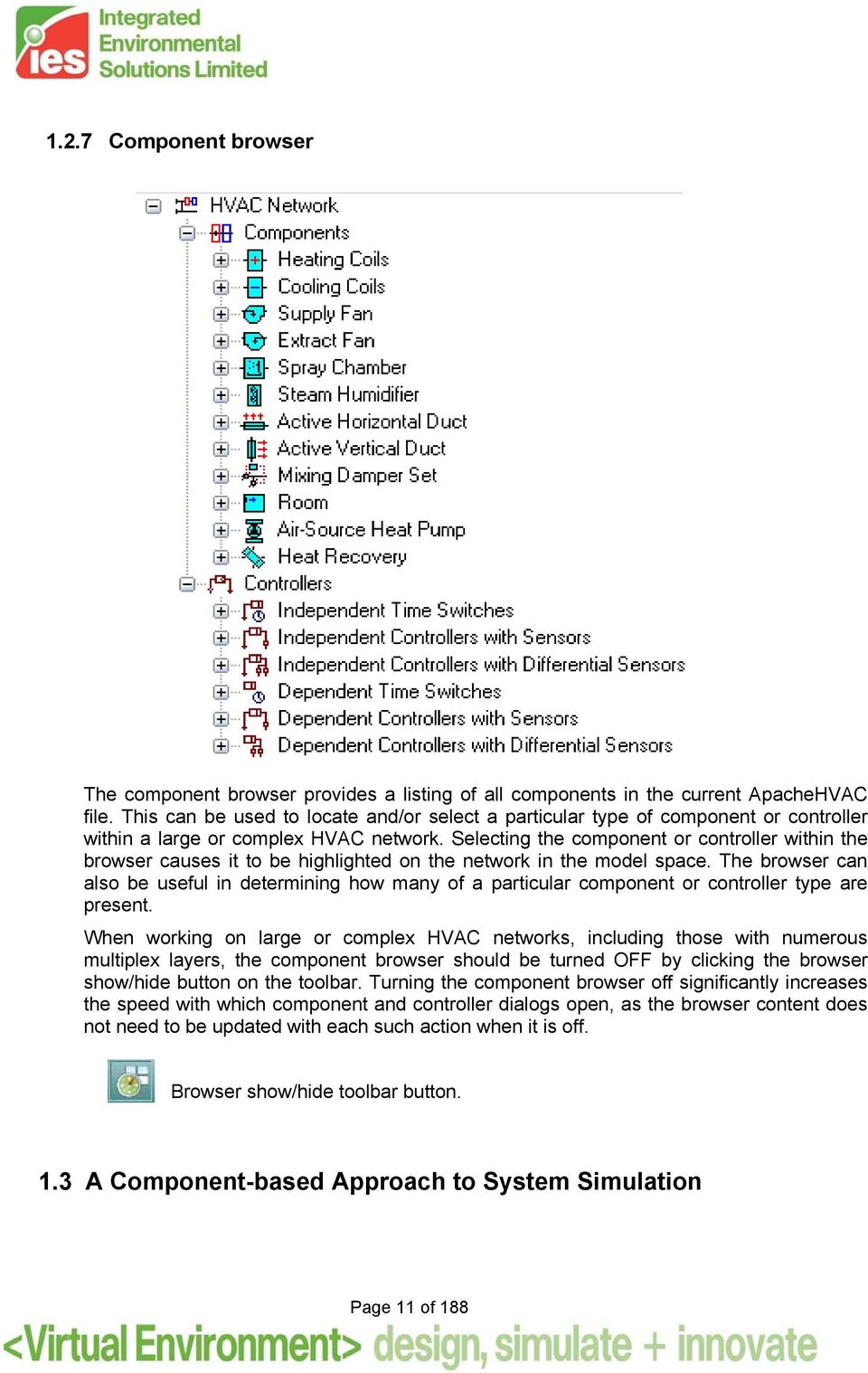
11 1.2.7 Component browser The component browser provides a listing of all components in the current ApacheHVAC file. This can be used to locate and/or select a particular type of component or controller within a large or complex HVAC network. Selecting the component or controller within the browser causes it to be highlighted on the network in the model space. The browser can also be useful in determining how many of a particular component or controller type are present. When working on large or complex HVAC networks, including those with numerous multiplex layers, the component browser should be turned OFF by clicking the browser show/hide button on the toolbar. Turning the component browser off significantly increases the speed with which component and controller dialogs open, as the browser content does not need to be updated with each such action when it is off. Browser show/hide toolbar button. 1.3 A Component-based Approach to System Simulation Page 11 of 188
12 Energy simulation programs have in the past provided models of only certain fixed system types (VAV, induction, fan coils, etc). In practice, building systems do not conform to these rigid system types, and so it was necessary to accept a degree of compromise in the realism of the model. Figure 1-1: A multi-zone HVAC network in this case variable-air-volume with indirectdirect evaporative cooling, energy recovery, variation of static pressure with bypass of heat exchangers, duct heat gain, return air plenums, controls for mixed-mode operation with natural ventilation, and primary, transfer, and exhaust airflow paths available to each of the zones in the layered multiplex region. ApacheHVAC has been designed to impose minimal restrictions on the user in defining the system model. The user is offered a number of basic blocks, each describing a generic type of equipment (heating coil, fan, humidifier, etc.). These basic blocks can be assembled as required to model an actual system configuration, rather than an idealized simplification. The complexity of the model is limited only by the types of block available and some basic rules concerning their interconnection. Within these constraints, it is possible to assemble models of many different system and control configurations and to explore the benefits of variations on standard system types. An item of plant or control can be described once, and then copied or referenced as many times as may be required to define the system. Page 12 of 188

13 1.4 System Modeling Fundamentals Constructing Systems Systems are constructed by picking components from the toolbars. Most components take the form of tiles that are placed on the diagram to build up a schematic of the system. Controllers can also be drawn, together with lines indicating the associated sensor and control points. Certain components, such as plant equipment, do not appear on the schematic, but are instead linked to other components via text references. Each component has a set of parameters characterizing its operation. Facilities for editing these parameters may be accessed by double-clicking on the component symbol, or through the menus. Once placed, groups of components may be selected, deleted, moved, or copied using functions on the toolbar. Multiplexing, described in section 6, provides an efficient means of assigning groups of spaces to a set of room components and of replicating and editing HVAC components, controllers, and configurations thereof. The associated Tabular Edit view supports efficiently editing and checking numerous inputs for components and controllers. When drawing schematics it is helpful to keep in mind the following principles: When first building an HVAC system, it is advisable to keep the system simple. This makes it easy to test the control principles involved. The system can later be expanded to introduce additional rooms and control refinements. Set up the minimum number of flow controls necessary to define the flow throughout the system i.e., on all branches. In other words, airflow must be specified in all parts of the system, except where the flow can be deduced from other specified flows by addition and subtraction at junctions. Specifying more flows than are strictly necessary is not forbidden, but always ensure that the specified flows are mutually consistent. In most cases, it will be easier to allow flows to be calculated wherever they can be. In the case a room, it is only necessary to specify either the supply or the extract flow. The program will then set the other flow on the assumption of equality of inflow and outflow. In specialized applications, such as when MacroFlo is running in tandem with ApacheHVAC, the room inflow and outflow may be set to different values. Any imbalance between inflow and outflow will then be picked up by MacroFlo (if it is in use), and the difference will be made up with flows through openings in the building. An imbalance can also be meaningful if MacroFlo is not in use. For example, if more air is supplied to a room than is extracted, the excess will be assumed to be vented to outside. For a full account of the rules for airflow specification see Appendix A. The schematic may include multiple System Inlet and System Outlet components. These can be used to represent both the air inlet and outlet of a mechanical system and other paths, such as exfiltration in the case of a pressurized building. Most components placed on the airside network must have appropriate controllers attached in order to function. See component sections for details. The Check network button will identify most errors in the schematic. It also numbers the nodes of the network, providing a reference to the nodes that is useful when viewing simulation results. To remove the node numbering, if desired, simply re-open the same ApacheHVAC file. Details of all equipment to be included in the simulation are entered in ApacheHVAC. The extent of data input depends on the scope of the simulation, which is at the discretion of the user. For instance if it is required to calculate the net energy consumption of an LTHW Page 13 of 188

14 heating coil, it will be necessary to specify a coil and a heat source to serve it. However, it will not be necessary to input the characteristics of the LTHW system. In such a case the distribution losses of the LTHW system and pump power should be entered as zero and the heat source efficiency taken as 100%. Note that the duty of equipment for simulation purposes can be set as the components are placed or can be provided by the autosizing process. It is necessary only to specify a duty that equals or exceeds any requirement subsequently called for Room components There are a number of important points to note with regard to the arrangement of room components in the air system and the specification of supply airflow rates: A Room in the VE is any 3D space that is to be modeled as a distinct thermal zone. This can be multiple rooms combined in ModelIt as a thermal zone, a single room, or a subdivided potion of room volume, such as a perimeter zone in an open-plan space or the occupied or stratified zone within a space served by displacement ventilation. The ApacheHVAC Room component can also refer to a space that would not or could not be occupied, but which plays a role in the dynamic thermal interaction with HVAC systems. Examples include a return-air plenum, an underfloor air distribution (UFAD) plenum, a segment within an earth tube, a space within a vented double-skin façade, or even a concrete slab that will be directly heated or cooled by a hydronic loop. It is permissible to use the same room component more than once in the air system network description, such as when more than one system supplies air to the same room. For example, consider a case where room type A has separate air supplies for heating and cooling; there may only be one actual room type A, but we can use two in the system network description - one in the heating branch and one in the cooling branch. The result is exactly the same as if you had mixed the heating and cooling supply branches together through a combining junction and supplied this mixed air to a single room type A. The use of multiple room components in this way reduces the need for large numbers of mixing and dividing junctions. Once the system air has entered a room component, the program assumes that the air within the room (or bounded thermal zone assigned to a room component) is fully mixed. It is not possible to differentiate between, say, air entering from a ceiling diffuser and air entering from a perimeter unit or a floor outlet. You can, if you wish, describe a single room as several room types for the purposes of the computer simulation e.g., the core and perimeter zones of an open plan office could be described as separate room types. However, you should appreciate that there are a number of complex mechanisms of heat transfer involved in such a situation (wind, stack, and induced air movement, radiant heat exchange, etc.) and the program can only approximately analyze some of these. Some situations are best modeled by putting two room components in series. For example, you may wish to model a building in which the return air is extracted via the ceiling void. This can be achieved by describing the occupied space and the ceiling void as two separate room types and then connecting them in series. Page 14 of 188
15 2 HVAC System Components Figure 2-1: HVAC components toolbar ApacheHVAC allows 17 generic types of HVAC components to be modeled. These are: 1. Heat sources: boilers, heat pumps, furnaces, electric-resistance, etc. 2. Water-source heat pumps in the case of condenser-loop heat recovery 3. Air-source heat pumps coupled to a backup heat source 4. Chillers: electric water-cooled and air-cooled types; other similar cooling sources 5. Unitary cooling systems 6. Waterside economizers 7. Spray chamber/humidifiers 8. Steam injection humidifiers 9. Heat/energy/enthalpy recovery devices 10. Ductwork thermal properties for modeling heat gain or loss 11. Fans 12. Damper sets including mixing dampers and controlled flow splitters 13. Heating coils 14. Cooling coils 15. Direct-acting heater/coolers 16. Radiators and similar terminal heating devices 17. Chilled ceiling panels, chilled beams, and similar terminal cooling devices The first six of these are heating and cooling sources comprising various plant equipment and related components. With the one exception of the air-source heat pump, these do not appear directly on the airside system network. Components 7 14 are placed directly on the airside network. The last three of these are room units, which differ from other HVAC components in that they are positioned in a room or thermal zone (including in a heated or cooled slab zone) rather than on the airside network. Their energy usage is also accounted for and reported separately from airside HVAC heating and cooling components. Data entered for fans represents a special case in that fan duty is used solely to calculate the consequential energy consumption and effect on air temperature. The value entered in a fan component does not determine airflow through the system. Rather, the fan component acts like a meter with a defined set of performance characteristics. The modeling of plant components is quasi-steady-state in that the program does not attempt to model transient behavior between simulation time steps. However, because time steps in ApacheSim are typically only 6-10 minutes, constant plant behavior over a time step is a valid assumption. Page 15 of 188

16 2.1 Part Load Heat Source ApacheHVAC offers two types of heat source: a part load curve heating plant model (which may be used to represent a boiler, a heat pump furnace, or some other type of heating plant) and a hot water boiler model. Both models are accessed through the Heat sources toolbar icon shown below. The heat sources list in Figure 2-2 shows the current model type as part load curve heating plant. You can choose the desired model type to be added through the Type to add drop-down selection. Toolbar icon for heat sources list. Figure 2-2: Heat sources list for selecting, adding, copying, and removing both part-loadcurve and hot water boiler heating plant models. The input parameters for the part load curve heating plant model are introduced next in this section. Information about the hot water boiler model is introduced in section 2.2. The part load curve heating plant model can provide heat to any components that present a heating load. These range from baseboard heaters to heating coils and including steam humidifiers and absorption chillers (via the part load curve chiller dialog). The part load curve heating plant can act as a backup for an air-source heat pump or to meet remaining load after the heat available from a combined-heat & power system or condenser heat Page 16 of 188

17 recovery (from the part load curve chiller, electric air-cooled chiller, or electric water-cooled chiller) has been consumed. The heating load collectively presented by the radiators, heating coils, etc. assigned to a particular heat source are summed at each time step to set the required instantaneous output from the heating plant. An allowance is made for any pipe-work distribution losses that are not accruing to the building interior. Part-load efficiency characteristics determine energy consumption of the plant equipment. The part-load heating plant module can operate in conjunction with (as backup for) an airsource heat pump. The heat pump mode is selected by placing a heat pump component on the schematic and selecting a heating source from the list in the heat pump dialog. Note: if the load on a heating source is greater than the maximum load specified in the heating plant definition, it will supply the additional energy but the efficiency will remain at the value entered for full load. Page 17 of 188

18 Figure 2-3: Part load heating plant editing dialog showing illustrative inputs Heating source reference Enter a description of the component. It is for your use only and the only restriction is that it must be no more than 40 characters in length. Page 18 of 188
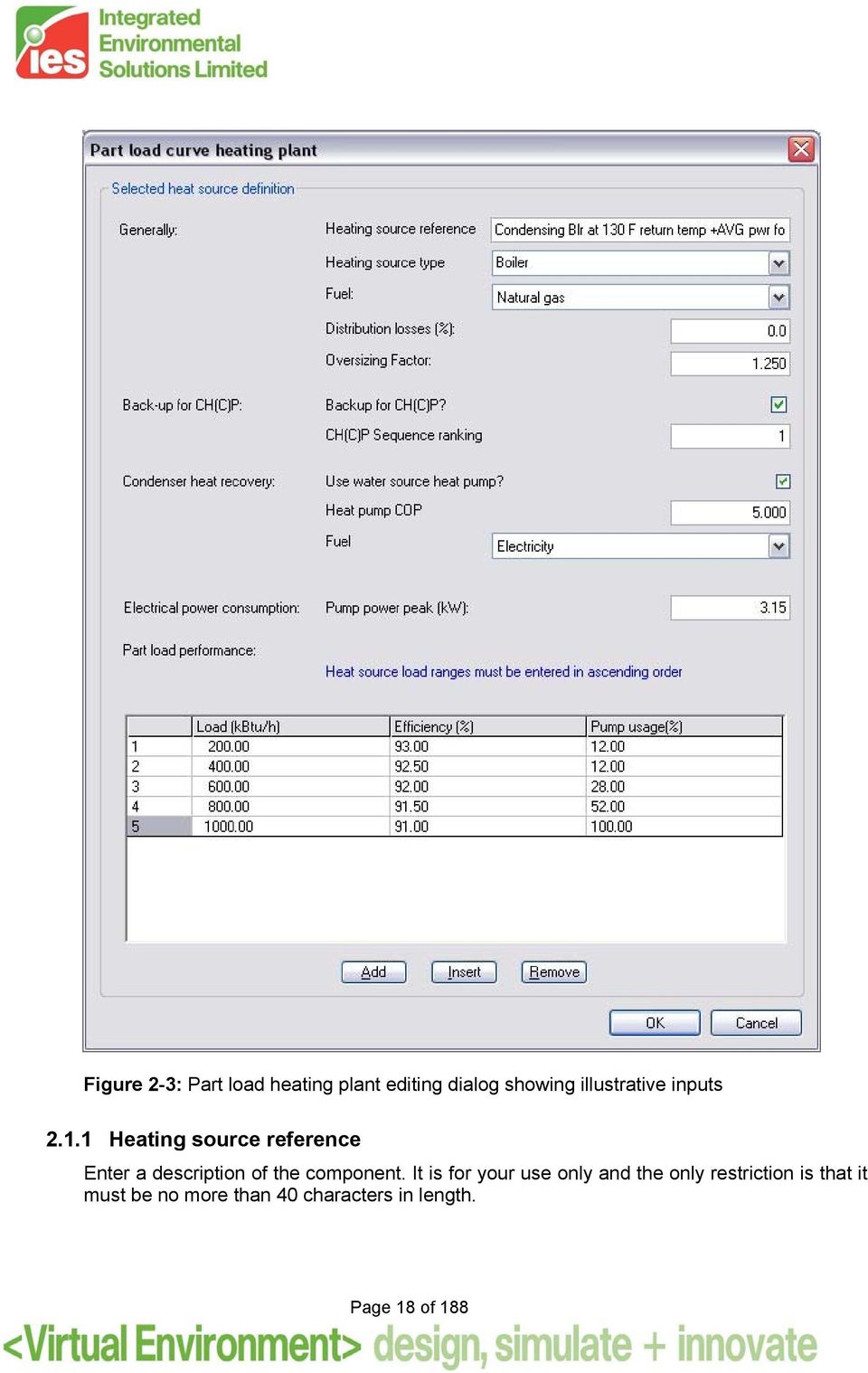
19 2.1.2 Heating source type Choose from Boiler, Heat pump or Other heating plant. All these types are modeled in the same way, but their simulation results appear under different variables in Vista Fuel Specify the fuel used Distribution Losses Enter the losses due to heat distribution as a percentage of heating load. For example, if distribution losses are entered as 5% and the heat source is connected to 10 radiators presenting a total heating load of 20kW, the distribution loss of kw (1kW) is added to radiator heat demand to give a fuel consumption of 21 kw the heating plant efficiency at that load. The losses do not accrue to zones in the building Backup for CH(C)P? Tick this box to indicate that loads served by this heat source will be met first by available heat from a combined heat & power (CHP) or combined heat, cooling, and power (CHCP) system, if present one has been defined within the CHP section of the Renewables dialog in the Apache Thermal view CH(C)P sequence ranking CH(C)P sequence ranking determines the sequence in which heat sources are switched in to meet any remaining load after the available CH(C)P capacity has been used. Heat sources with lower values of this parameter will be switched in before those with higher values (the former will normally be the most efficient heat sources). If two heat sources have the same sequence ranking they will be switched in simultaneously, with the CHP input supplying the same fraction of the heating load for both systems. Condenser heat recovery Condenser heat recovery is included in both Part-load-curve and Electric-water-cooled chiller models. The current model makes a user-specified percentage of thermal energy rejected to the condenser loop available to a Heat source component. This percentage represents simple heat-exchanger effectiveness. The available fraction of condenser heat is then assigned (within the chiller dialog) to a receiving heat source that will use this recovered heat first when a load is present. The temperature for the recovered condenser heat can be upgraded with an electric waterto-water heat pump. This would be used in the cases other than pre-heat of DHW, such as serving when space-heating loads that require higher temperatures than normally available via a heat exchanger on the condenser water loop. A fuel-code assignment and COP are provided for the heat pump. Page 19 of 188

20 2.1.7 Use water source heat pump? If the water loop served by the heating plant receives heat recovered from a chiller condenser, this heat may be upgraded using a water source heat pump. Specify this mode of operation by ticking the box Heat pump COP Enter the COP of the water source heat pump that couples the condenser loop with the hot water loop Fuel The fuel used by the water source heat pump Pump power Enter the circulation pump electrical power. The pump is assumed to operate whenever there is a heating load to be met on this heat source circuit, irrespective of the source of the heat (i.e. boiler, heat pump or recovered heat from chillers). The pump power pump is modulated by the pump usage percentages defined in the part-load table Oversizing factor Following ASHRAE Loads autosizing, the factor by which the heating plant size is increased relative to the peak calculated value. Part-load Performance Load Enter up to ten load values to define the part-load efficiency characteristic. Important: The part-load values must be entered in increasing (ascending) order from top to bottom. If entered in the reverse order, only the first value with be used Efficiency Enter an efficiency value for each part-load value. Linear interpolation is applied between the defined points Pump usage Enter a pump usage percentage for each part-load value. Linear interpolation is applied between the defined points. 2.2 Hot Water Boilers The hot water boiler model can provide heat to any components that present a heating load. These range from baseboard heaters to heating coils and including steam humidifiers and absorption chillers (via the part load curve chiller dialog). The part load curve heating plant can act as a backup for an air-source heat pump or to meet remaining load after the heat available from a combined-heat & power system or condenser heat recovery (from the part Page 20 of 188

21 load curve chiller, electric air-cooled chiller, or electric water-cooled chiller) has been consumed. The heating load collectively presented by the radiators, heating coils, etc. assigned to a particular heat source are summed at each time step to set the required instantaneous output from the heating plant. An allowance is made for any pipe-work distribution losses that are not accruing to the building interior. Part-load efficiency characteristics determine energy consumption of the plant equipment. The part-load heating plant module can operate in conjunction with (as backup for) an airsource heat pump. The heat pump mode is selected by placing a heat pump component on the schematic and selecting a heating source from the list in the heat pump dialog. Note: if the load on a heating source is greater than the maximum load specified in the heating plant definition, it will supply the additional energy but the efficiency will remain at the value entered for full load. The model uses default or user-defined boiler performance characteristics at rated conditions along with the boiler efficiency curve to determine boiler performance at off- rated conditions. The hot water loop configuration is assumed to be a primary-only system, powered by a hot water pump that can be either a variable-speed pump with VSD or a constant-speed pump riding the pump curve. When the hot water loop is only served by hot water boiler (i.e., without an air-source heat pump or CH(C)P also supplying heat to the same hot water loop), the pump is assumed to operate in line with the boiler, subject to the constraint that the pump will start cycling below the minimum flow rate it permits. When the boiler is sharing the hot water circuit load with other heat suppliers (air-source heat pump or CH(C)P), the pump operation will be independent of the boiler on/off cycling status. The hot water circuit flow rate varies in proportion to the circuit heating load (presented by the heating coils, hot water radiators, etc. that the circuit serves), subject to the minimum flow rate the pump permits. The design hot water pump power is calculated as the specific pump power multiplied by the design hot water circuit flow rate. It is then modified by the pump power curve to get the operating pump power. Hot water pump heat gain is modeled by pump motor efficiency factors. Page 21 of 188
22 Figure 2-4: Hot water boiler editing dialog Page 22 of 188
23 2.2.1 Reference Enter a description of the component. It is for your use only and the only restriction is that it must be no more than 40 characters in length Fuel The fuel used by the hot water boiler Distribution Losses Units % Warning Limits 0.0 to 20.0 Error Limits 0.0 to 75.0 Enter the losses due to heat distribution around the system as a percentage of boiler heat demand. The losses do not accrue to spaces within the building Backup for CH(C)P? Tick this box to indicate that loads served by this heat source will be met first by available heat from a combined heat & power (CHP) or combined heat, cooling, and power (CHCP) system, if present one has been defined within the CHP section of the Renewables dialog in the Apache Thermal view CH(C)P sequence ranking CH(C)P sequence ranking determines the sequence in which heat sources are switched in to meet any remaining load after the available CH(C)P capacity has been used. Heat sources with lower values of this parameter will be switched in before those with higher values (the former will normally be the most efficient heat sources). If two heat sources have the same sequence ranking they will be switched in simultaneously, with the CHP input supplying the same fraction of the heating load for both systems. Condenser heat recovery Condenser heat recovery is included in both Part-load-curve and Electric-water-cooled chiller models. The current model makes a user-specified percentage of thermal energy rejected to the condenser loop available to a Heat source component. This percentage represents simple heat-exchanger effectiveness. The available fraction of condenser heat is then assigned (within the chiller dialog) to a receiving heat source that will use this recovered heat first when a load is present. The temperature for the recovered condenser heat can be upgraded with an electric waterto-water heat pump. This would be used in the cases other than pre-heat of DHW, such as serving when space-heating loads that require higher temperatures than normally available via a heat exchanger on the condenser water loop. A fuel-code assignment and COP are provided for the heat pump. Page 23 of 188
24 2.2.6 Use water source heat pump? If the water loop served by the heating plant receives heat recovered from a chiller condenser, this heat may be upgraded using a water source heat pump. Specify this mode of operation by ticking the box Heat pump COP Enter the COP of the water source heat pump that couples the condenser loop with the hot water loop Fuel The fuel used by the water source heat pump. Boiler Performance Boiler Model Description Clicking this button to pop up a summary of the hot water boiler model as shown below: Figure 2-5: Hot water boiler model description Rated Condition is Design Condition When this box is ticked, the design condition data (see details in the Design condition subtab) is a read-only copy of the current rated condition data (see details in the Rated condition sub-tab), including any unsaved edits you have made. Page 24 of 188
25 identical staged boilers operating in parallel? If this checkbox is ticked, two identical staged boilers will be used in the hot water loop to which this boiler is assigned. It is assumed that the two identical boilers are arranged in parallel and that the design temperature rise across each boiler is kept as T bdes. The design water flow rate in the main hot water loop is thus twice of that design flow through each boiler. The design hot water pump power is based on the design flow rate in the main hot water loop. If this checkbox is ticked, you can also specify whether or not the boilers will share load equally when both boilers are on (see below) Boilers share load equally when both are on? This checkbox only displays when the 2 identical staged boilers operating in parallel? checkbox is ticked. If this checkbox is ticked, it is assumed that the boilers share load equally when both boilers are on. In this case, you can also specify the percentage of combined capacity at which the second boiler switches on (see below). If this checkbox is un-ticked, the two identical boilers are assumed to operate in strict staging, i.e., the first boiler will be loaded to its full capacity, the second boiler switches on to take the remaining load the first boiler cannot meet Percentage of combined capacity at which second boiler switches on This textbox only displays when the 2 identical staged boilers operating in parallel? checkbox and the Boilers share load equally when both are on? checkbox are both ticked. Usually this will be 50% (default), which means the second boiler switches on when the first boiler cannot meet the load. If the second boiler is designed to switch on before the first boiler is fully loaded, you can specify any percentage value between 0% and 50%. For example, if this parameter is specified as 40%, then the second boiler will switch on when the first boiler is 80% loaded. And when both boilers are on, they will share the loop load equally Boiler Efficiency Curve, f Ept (p,t lbt ) The boiler efficiency curve currently selected. Use the Select button to select the appropriate curve from the system database. Use the Edit button to edit the curve parameters if needed. The Edit button will pop up a dialog displaying the formula and parameters of the curve, allowing the curve parameters to be edited. You are allowed to edit the curve coefficients, in addition to the applicable ranges of the curve independent variables. When editing the curve parameters, it is important that you understand the meaning of the curve and its usage in the model algorithm. Also be careful that the edited curve has reasonable applicable ranges for the independent variables. A performance curve is only valid within its applicable ranges. In the case the independent variables are out of the applicable ranges you set, the variable limits (maximum or minimum) you specified in the input will be applied. Page 25 of 188
26 Figure 2-6: Select dialog for the hot water boiler efficiency curve (part load and water temp dependence) Page 26 of 188
27 Figure 2-7: Edit dialog for the hot water boiler efficiency curve (part load and water temperature dependence) The boiler efficiency curve (part load and water temp dependence) f Ept (p,t lbt ) is a bi-cubic function of p = part-load ratio t lbt = T lbt T datum Page 27 of 188
28 Where And: T lbt = hot water supply (leaving boiler) temperature T datum = datum temperature (0 C or 0 F), introduced for the convenience of units conversion of the curve coefficients. f Ept (p,t lbt ) = (C 00 + C 10 p + C 20 p 2 + C 30 p 3 + C 01 t lbt + C 02 t lbt 2 + C 03 t lbt 3 where + C 11 p t lbt + C 21 p 2 t lbt + C 12 p t lbt 2 ) / C norm C 00, C 10, C 20, C 30, C 01, C 02, C 03, C 11, C 21, and C 12 are the curve coefficients C norm is adjusted (by the program) to make f Ept (1,T lbtrat ) = 1 T lbtrat = rated hot water supply (leaving boiler) temperature. The boiler efficiency curve is evaluated for each time step during the simulation. The curve value is multiplied by the rated efficiency (E rat ) to get the operating efficiency (E) of the current time step, for the specific part load ratio p and T lbt temperature: E = E rat f Ept (p,t lbt ) The curve should have a value of 1.0 when the part load ratio equals 1.0 and the T lbt temperature is at rated condition. A note on the applicable range of part-load ratio p: The minimum p is used by the program as the minimum part-load ratio for continuous operation, under which the boiler starts cycling on and off. The maximum p should usually be 1.0. During the simulation, a part-load ratio greater than 1.0 is a sign of boiler undersizing. Also note that the bi-cubic form of the boiler efficiency curve can be used in simplified forms. For example, to use it in a bi-quadratic form, simply specify C 30, C 03, C 21, and C 12 to be zero. To use it in a quadratic-linear form, simply specify C 30, C 03, C 02, and C 12 to be zero Parasitic Power, W p This is the boiler parasitic power at full load. It is automatically derived by the program using the provided parasitic Electric Input Ratio and the boiler design heating capacity, and does not need to be specified. The parasitic power represents the parasitic electric power consumed by forced draft fans, fuel pumps, stokers, or other electrical devices associated with the boiler. For a natural draft gas fired boiler, W p may be close to zero. This parasitic power is consumed whenever the boiler is operating, and the model assumes that this parasitic power does not contribute to heating the water. Page 28 of 188
29 Parasitic Electric Input Ratio, W p /Q des Enter the ratio between the boiler design parasitic power consumption and the boiler design heating capacity. This is used to derive the boiler design parasitic power consumption by the program. Rated Condition Rated condition and Design condition are provided for your flexibility in specifying hot water boiler data. The rated condition is the basis for the calculation of boiler characteristics at simulation time. The rated condition is usually the condition at which the boiler characteristics are specified by a manufacturer. However, it can optionally be the design condition, in which case the user selects Rated=Design. The design condition is the condition applying at the time of design peak boiler load (but will be entered manually in the first phase). A user wishing to use catalogue boiler data enters a capacity and efficiency at the rated condition and reads off the derived capacity and efficiency at the design condition. (Note the model treats the capacity as a constant, so the design capacity will always equal the rated capacity. Design efficiency may be different from rated efficiency if the user specifies a design hot water supply temperature that is different from the rated hot water supply temperature.) A user wishing to size a boiler based on a design load enters a capacity and efficiency at the rated condition, and then adjusts the efficiency to produce the desired derived efficiency at the design condition (allowing for a margin of over-sizing). (Design capacity will always equal the rated capacity.) If the rated condition and design condition are one and the same the user ticks Rated condition is design condition, which makes the design condition a dynamic copy of the rated condition. Page 29 of 188
30 Figure 2-8: Hot water boiler dialog showing rated condition sub-tab Page 30 of 188
31 Hot Water Supply Temperature, T lbtrat Enter the rated hot water supply temperature (leaving boiler water temperature) Hot Water Flow Rate, V brat, V brat /Q rat, T brat Enter the rated hot water flow rate. V brat, V brat /Q rat, and T brat are three different options for specifying rated hot water flow rate. Currently it is specified in terms of T brat (the difference between the rated hot water supply and return temperatures). The other two options (V brat and the ratio between rated hot water flow rate (V brat ) and rated heating capacity (Q rat )) are automatically derived by the program based on the specified T brat and cannot be edited Heating Capacity, Q rat Enter the rated heating capacity Boiler efficiency, E rat Enter the rated Boiler efficiency. The boiler efficiency (as a fraction between 0 and 1) is the efficiency relative to the higher heating value (HHV) of fuel at a part load ratio of 1.0 and the rated hot water supply temperature (leaving boiler). Manufacturers typically specify the efficiency of a boiler using the higher heating value of the fuel. For the rare case when a manufacturer s (or particular data set) boiler efficiency is based on the lower heating value (LHV) of the fuel, multiply the thermal efficiency by the lower-to-higher heating value ratio. For example, assume a fuel s lower and higher heating values are approximately 45,450 and 50,000 kj/kg, respectively. For a manufacturer s thermal efficiency rating of 0.90 (based on the LHV), the nominal thermal efficiency entered here is 0.82 (i.e. 0.9 multiplied by 45,450/50,000). Page 31 of 188
32 Design Condition Figure 2-9: Hot water boiler dialog showing design condition sub-tab The design condition data in the Design Condition sub-tab (as described below) will be a read-only (un-editable) copy of the current rated condition data when the Rated condition is Design condition box is ticked, including any unsaved edits you have made in the Rated Condition sub-tab. Page 32 of 188
33 Hot Water Supply Temperature, T lbtdes Enter the design hot water supply temperature (leaving boiler water temperature) Hot Water Flow Rate, V bdes, V bdes /Q des, T bdes Enter the design hot water flow rate. V bdes, V bdes /Q des, and T bdes are three different options for specifying design hot water flow rate. Currently it is specified in terms of T bdes (the difference between the design hot water supply and return temperatures). The other two options (V bdes and V bdes /Q des (the ratio between design hot water flow rate (V bdes ) and design heating capacity (Q des ).) are automatically derived by the program based on the specified T bdes and cannot be edited. Note: If there is an air-source heat pump or CH(C)P plant attached to the boiler loop, you should calculate what proportion of the total load the boiler takes at the peak condition (which is hard for the software to determine automatically) and reduce T bdes by this factor. (In general, T bdes is the temperature rise across the boiler, not the water loop.) Heating Capacity, Q des The design heating capacity is always a copy of heating capacity at rated condition and does not need to be edited Boiler efficiency, E des The boiler design efficiency is automatically derived by the program using other design and rated condition data provided and does not need to be edited. Operating Parameters Hot Water Supply Temperature Set Point Type Three options are available for hot water supply temperature set point type: Constant, Timed, or Reset Constant Hot Water Supply Temperature Set Point When Constant is selected for hot water supply temperature set point type, this field is automatically set by the program as the hot water supply temperature at design condition, which has been entered in the Design condition sub-tab Timed Hot Water Supply Temperature Set Point Profile When Timed is selected for hot water supply temperature set point type, select the absolute profile to be applied to the hot water supply temperature set point, which are defined through the APPro facility (the Profiles Database). Page 33 of 188
34 Figure 2-10: Hot water boiler dialog showing operating parameters sub-tab Page 34 of 188
35 Hot Water Supply Temperature Reset Type When Reset is selected for hot water supply temperature set point type, select the hot water supply temperature reset type. Currently only one option is provided: Outdoor air temperature reset. When Outdoor air temperature reset type is selected, which is the default, you also need to specify three more reset parameters: Outdoor dry-bulb temperature low limit Outdoor dry-bulb temperature high limit Hot water supply temperature at or above high limit The fourth parameter (Hot water supply temperature at or below low limit) required by Outdoor air temperature reset type is automatically set by the program as the hot water supply temperature at design condition Outdoor Dry-bulb Temperature Low Limit When hot water supply temperature reset type is selected as Outdoor air temperature reset, enter the outdoor dry-bulb temperature low limit to be used by the reset Hot Water Supply Temperature at or below Low Limit When hot water supply temperature reset type is selected as Outdoor air temperature reset, this parameter is automatically set by the program as the hot water supply temperature at design condition and does not need to be specified Outdoor Dry-Bulb Temperature High Limit When hot water supply temperature reset type is selected as Outdoor air temperature reset, enter the outdoor dry-bulb temperature high limit to be used by the reset Hot Water Supply Temperature at or above High Limit When hot water supply temperature reset type is selected as Outdoor air temperature reset, enter the hot water supply temperature at or above the outdoor dry-bulb temperature high limit to be used by the reset. Page 35 of 188
36 Pumps Figure 2-11: Hot water boiler dialog showing hot water pump sub-tab Hot Water Pump Specific Power Enter the hot water pump specific power, expressed in W/(l/s) in SI units (or W/gpm in IP units). The default value (19 W/gpm) is based on the design hot water pump specific power as specified in ASHRAE 90.1 G Page 36 of 188
37 Hot water pump power will be calculated on the basis of variable flow, with hot water circuit flow rate varying in proportion to the circuit heating load (assigned by the heating coils, hot water radiators, etc.). The design hot water circuit flow rate is calculated using the boiler design heating capacity (Q des ), the boiler design hot water temperature change, T bdes and the information on boiler configuration (whether 2 identical staged boilers operating in parallel? is selected). The design hot water pump power is calculated as the specific pump power multiplied by the design hot water circuit flow rate. It is then modified by the pump power curve to get the operating pump power Hot Water Pump Motor Efficiency Factor Enter the hot water pump motor efficiency factor, which is the fraction of the motor power that ends up in the hot water. Its value is multiplied by the hot water pump power to get the hot water pump heat gain, which is deducted from the heating load of the boiler Hot Water Pump Power Curve, f Pv (v) The hot water pump power curve currently selected. Use the Select button to select the appropriate curve from the system database. Use the Edit button to edit the curve parameters if you like. The Edit button will pop up a dialog displaying the formula and parameters of the curve, allowing the curve parameters to be edited. You are allowed to edit the curve coefficients, in addition to the applicable ranges of the curve independent variables. When editing the curve parameters, it is important that you understand the meaning of the curve and its usage in the model algorithm. Also be careful that the edited curve has reasonable applicable ranges for the independent variables. A performance curve is only valid within its applicable ranges. In the case the independent variables are out of the applicable ranges you set, the variable limits (maximum or minimum) you specified in the input will be applied. The hot water pump power curve f Pv (v) is a cubic function of where And: v = V/V e V = pump volumetric flow rate. V e = design pump volumetric flow rate. f Pv (v) = (C 0 + C 1 v + C 2 v 2 + C 3 v 3 ) / C norm where C 0, C 1, C 2 and C 3 are the curve coefficients C norm is adjusted (by the program) to make f Pv (1) = 1 Page 37 of 188
38 The hot water pump power curve is evaluated for each time step during the simulation. The curve value is multiplied by the design hot water pump power to get the operating pump power of the current time step, for the current fraction of pump volumetric flow rate. The curve should have a value of 1.0 when the pump volumetric flow rate equals design pump volumetric flow rate (v = 1.0). Figure 2-12: Select dialog for the hot water pump power curve Page 38 of 188
39 Figure 2-13: Edit dialog for the hot water pump power curve Page 39 of 188
40 2.3 Air-source heat pump Hot water boilers and part-load heat sources can operate in conjunction with an air-source heat pump. This mode of operation is selected by placing a heat pump component in a duct and specifying a backup heat source (see Figure 2-2). The heat pump should be placed at the appropriate location in the network to define the source of heat (often the fresh air inlet). Note that the heat pump does not affect the temperature of the air at this node, i.e. an infinite source is assumed. Toolbar icon for placement of a heat pump. Heat pump component. Figure 2-14: Air-source heat pump dialog with illustrative inputs The source of the heat pump is assumed to be outside air, the temperature of which is defined by the temperature at an air inlet node on the system network. It should be noted that the heat extracted from the air does not, however, affect the downstream temperatures in the system network (i.e., an infinitely large reservoir or outside air is assumed). The Page 40 of 188
41 source temperature determines the variation of the COP and the maximum output of the device at any given simulation time step. Settings Reference Enter a description of the component. It is for your use only and the only restrictions are that it must be 40 or less characters long and must not contain commas Minimum Source Temperature The heat pump is assumed to switch off completely when the source temperature drops below this value. Above this value, the heat pump is assumed to meet as much of the load as it can, with the heat source being brought in to top up this demand if required. Performance table Source Temperature This line of information describes the variation in the performance of the heat pump as the source temperature varies. Enter the source temperature. Up to ten points may be used to define the variation of performance with source temperature. Enter the points in ascending order of source temperature Heat Pump COP Enter the coefficient of performance of the heat pump at the corresponding source temperature. This value is the useful heat output divided by the total fuel energy consumption associated with the operation of this device (excluding electrical consumption of any distribution pumps included in heating plant components) Output Enter the maximum heat pump output at the corresponding source temperature. If the demand for heat output exceeds this value then the heat source is used to make up the extra demand. 2.4 Part Load Curve Chillers Currently there are three chiller models implemented in ApacheHVAC: a part load curve chiller, an electric water cooled chiller and an electric air cooled chiller. All three chiller models are accessed through the toolbar icon shown below. The chillers list in Figure 2-16 shows the current model type as part load curve chiller, while the chillers list in Figure 2-17 and Figure 2-18 shows the current model type as electric water cooled and air cooled chiller respectively. You can choose the desired chiller model type to be added through the Model type for add combo box in the chillers list dialog. Toolbar icon for Chillers list. Page 41 of 188
42 Figure 2-15: Chillers list: Current model type shown as part load curve Page 42 of 188
43 Figure 2-16: Chillers list: Current model type shown as electric water cooled Figure 2-17: Chillers list: Current model type shown as electric air cooled Page 43 of 188
44 The input parameters for the part load curve chiller model are introduced next in this section. Detailed information about the electric water-cooled and air-cooled chiller model is introduced in section 2.5 and section 2.6 respectively. The part load curve chiller is modeled in a similar way to the analogous heating plant component, but with more detail in the description of the use of energy by auxiliary equipment (chilled water distribution pumps, condenser pumps and cooling tower or condenser fans). In addition, a method of modelling double bundle condensers has been provided by allowing a proportion of the heat rejected from the chiller to be absorbed by a designated heat source circuit. Figure 2-18: Part load curve chiller editing dialog Page 44 of 188
45 2.4.1 Reference Enter a description of the component. It is for your use only and the only restrictions are that it must be 40 or less characters long and must not contain commas Fuel The fuel used by the chiller compressor. This should be Electricity for the electric chillers. Note that when the Absorption Chiller? checkbox (see below) is ticked, the Fuel combobox will be replaced with the Heat source combo-box (see below) Heat source When the Absorption Chiller? checkbox is ticked, the Condenser Heat Recovery (%) parameter (see below) disappears and the Fuel combo-box (see above) is replaced with the Heat source combo-box. You need to select the heat source for the absorption chiller in this case. The energy consumption of the absorption chiller will be passed as load to the designated heat source Condenser Heat Recovery (%) This is the percentage of the rejected heat that can be recovered to a heat source circuit. You can specify any Condenser Heat Recovery percentage between 0% and 100%. When the specified CHR percentage is non-zero, it is also necessary to specify the CHR Recipient (see below), which will be the heat source circuit that receives the recovered heat. If heat recovery from the chiller condenser circuit is not required, leave the CHR percentage as zero and the CHR Recipient combo-box will be replaced with the Absorption Chiller? checkbox (see below). The amount of heat recovered at any given time is given by: ( Q Heat Recovered = + Qc ) 100 l p Where, Q l is the load on the chiller, Q c is the compressor power and p is percentage recovery. Note that if the Absorption Chiller? checkbox (see below) is ticked, the Condenser Heat Recovery (%) parameter will disappear, which means that condenser heat recovery is not an option when the part load chiller is used to model an absorption chiller Absorption Chiller? The part load curve chiller can be alternatively used to model an absorption chiller. You can turn on this option by ticking the Absorption Chiller? checkbox. The Condenser Heat Recovery (%) parameter (see above) then disappears and the Fuel combo-box (see above) is replaced with the Heat source combo-box for the absorption chiller. You need to select the heat source for the absorption chiller in this case. The energy consumption of the absorption chiller will be passed as load to the designated heat source. Page 45 of 188
46 2.4.6 Condenser Heat Recovery Recipient This is the heat source circuit that receives the condenser heat recovered from the chiller. When the specified CHR percentage (see above) is non-zero, this parameter replaces the Absorption Chiller? checkbox and needs to be specified. Choices available in the dropdown list will be the heat source circuits that have been defined in the system. If heat recovery from the chiller condenser circuit is not required, leave the CHR percentage as zero and the CHR Recipient combo-box will be replaced with the Absorption Chiller? checkbox. If one heat source circuit is specified to be the recipient of condenser heat recovery from multiple chillers, the condenser heat recovered from those chillers will be accumulated for this heat source circuit Distribution Losses Units % Warning Limits 0.0 to 20.0 Error Limits 0.0 to 75.0 Enter the chiller circuit distribution losses, i.e. the loss due to distribution of cooling from central plant to point of use. The loss is entered as a percentage of cooling demand and is NOT recouped in the building Electrical Consumption: Chilled Water Circulation Pumps Units kw Warning Limits 0.0 to 15.0 Error Limits 0.0 to Enter the maximum rate of electrical consumption of the chilled water circulation pumps. These are assumed to operate whenever there is a demand for chilled water on this circuit. The actual rate of consumption can be made to vary, depending on the demand for chilled water at any instant, by use of the part-load performance specification Electrical Consumption: Condenser Water Pumps Units kw Warning Limits 0.0 to 15.0 Error Limits 0.0 to Enter the maximum rate of electrical consumption of the condenser water pumps. These are assumed to operate whenever there is a demand for chilled water on this circuit. The actual rate of consumption can be made to vary, depending on the demand for chilled water at any instant, by use of the part-load performance specification. Page 46 of 188
47 Electrical Consumption: Cooling Tower Fans Units kw Warning Limits 0.0 to 15.0 Error Limits 0.0 to Enter the maximum rate of electrical consumption of the cooling tower or condenser fans. These are assumed to operate whenever there is a demand for chilled water on this circuit. The actual rate of consumption can be made to vary, depending on the demand for chilled water at any instant, by use of the part-load performance specification. The part-load COP and auxiliary usage must also be defined as described below Chiller Part-Load Output Units KW Warning Limits 0.0 to Error Limits 0.0 to Enter the chiller part-load output. Up to twenty points may be used to define the variation of performance with part-load. Enter the points in ascending order of part-load Chiller COP Warning Limits 0.8 to 5.0 Error Limits 0.25 to 10.0 Enter the chiller's coefficient of performance at that output rating Chiller Water Pump Usage Units % Warning Limits 0.0 to Error Limits 0.0 to Enter the percentage use of the chilled water distribution pumps which coincides with the output specified in Chiller Part-Load Output Condenser Water Pump Usage Units % Warning Limits 0.0 to Error Limits 0.0 to Enter the percentage use of the condenser water pumps which coincides with the output specified in Chiller Part-Load Output Cooling Tower Fans Usage Units % Warning Limits 0.0 to Error Limits 0.0 to Page 47 of 188
48 Enter the percentage use of the cooling tower or condenser fans which coincides with the output specified in Chiller Part-Load Output. 2.5 Electric Water-cooled Chillers The electric water-cooled chiller model simulates the performance of an electric chiller cooled by condenser water from an open cooling tower. The model uses default or userdefined chiller performance characteristics at rated conditions along with three performance curves for cooling capacity and efficiency to determine chiller performance at off- rated conditions. The three chiller performance curves used are: Chiller cooling capacity (water temperature dependence) curve Chiller electric input ratio (EIR) (water temp dependence) curve Chiller electric input ratio (EIR) (part-load (and water temperature) dependence) curve The cooling tower model used is the same as that used for the Water Side Economizer model, which is based on the Merkel theory. For the condenser water loop, a condenser water pump is assumed to be on the supply side of the cooling tower. When condenser water flow rate is different from the rated condenser water flow rate, an adjustment is made to the entering condenser water temperature used by the program to solve for the chiller performance in the iteration process. The adjustment is made based on the following principle: Set the effective entering condenser water temperature to the value which, for the given rate of heat rejection, would produce the same condenser water leaving temperature as a chiller operating with the rated condenser water flow rate. The chilled water loop configuration is assumed to be a primary/secondary system, served by a primary circuit chilled water pump and a secondary circuit chilled water pump. Both condenser water pump and primary circuit chilled water pump are assumed to operate in line with the chiller. The condenser water flow rate and primary circuit chilled water flow rate are assumed to be constant (at the design values) when the chiller is on. They are multiplied by the corresponding specific pump power to get the condenser water pump power and the primary chilled water pump power respectively. The secondary circuit chilled water pump is assumed to operate in line with the chiller, subject to the constraint that the pump will start cycling below the minimum flow rate it permits. The secondary circuit chilled water flow rate varies in proportion to the chiller cooling load (assigned by the cooling coils and chilled ceilings the chiller serves), subject to the minimum pump flow rate the pump permits. The design secondary chilled water pump power is calculated as the secondary specific pump power multiplied by the design secondary chilled water flow rate (assumed equal to design primary chilled water flow rate). It is then modified by the secondary circuit pump power curve to get the operating secondary pump power. Distribution losses from the pipe work are considered in the same way as for the part load curve chiller model. In addition, chilled water and condenser water pump heat gains are modeled by pump motor efficiency factors. Page 48 of 188
49 Condenser heat recovery is included in the current model as a simple user-specified percentage of the thermal energy rejected to the condenser loop. This percentage represents heat-exchanger effectiveness. The available condenser heat is then assigned to a receiving heat source that will use this recovered heat first when a load is present. The user has the options to upgrade the hot-water temperature for the recovered heat on the receiving (HW loop) end with an electric water-to-water heat pump for use with typical space heating loads. Condenser water loop Electric water cooled chiller Chilled water loop T lct T let L T 1 V c Compressor V e T owb G T 2 Cooling tower T ect Condenser Expansion device Evaporator Secondary pump Cooling coil or chilled ceiling T ldb g l Key: Condenser water pump water air Primary pump T edb g e Figure 2-19: Electric water-cooled chiller configuration Page 49 of 188
50 Figure 2-20: Electric water cooled chiller editing dialog Reference Enter a description of the component. It is for your use only and the only restrictions are that it must be 40 or less characters long and must not contain commas. Page 50 of 188
51 2.5.2 Fuel The fuel used by the chiller compressor. This should be Electricity for the electric chillers Distribution Losses Units % Warning Limits 0.0 to 20.0 Error Limits 0.0 to 75.0 Enter the chiller circuit distribution losses, i.e. the loss due to distribution of cooling from central plant to point of use. The loss is entered as a percentage of cooling demand and is NOT recouped in the building Condenser Heat Recovery (%) This is the percentage of the heat rejected to the condenser water loop that can be recovered to a heat source circuit. You can specify any Condenser Heat Recovery (CHR) percentage between 0% and 100%. When the specified CHR percentage is non-zero, it is also necessary to specify the CHR Recipient (see below), which will be the heat source circuit that receives the recovered heat. If heat recovery from the chiller condenser circuit is not required, leave the CHR percentage as zero and the CHR Recipient will be greyed out. The amount of heat recovered at any given time is given by: ( Q Heat Recovered = + Qc ) 100 l p Where, Q l is the load on the chiller, Q c is the compressor power and p is percentage recovery Condenser Heat Recovery Recipient This is the heat source circuit that receives the condenser heat recovered from the chiller. When the specified CHR percentage (see above) is non-zero, this parameter is active and needs to be specified. Choices available in the drop-down list will be the heat source circuits that have been defined in the system. If heat recovery from the chiller condenser circuit is not required, leave the CHR percentage as zero and the CHR Recipient will be greyed out. If one heat source circuit is specified to be the recipient of condenser heat recovery from multiple chillers, the condenser heat recovered from those chillers will be accumulated for this heat source circuit. Chiller Performance Chiller Model Description Clicking this button provides a summary of the electric water-cooled chiller model variables as shown below: Page 51 of 188
52 Figure 2-21: Electric water cooled chiller model description Rated Condition is Design Condition When this box is ticked, the design condition data (see details in the Design condition subtab) is a read-only copy of the current rated condition data (see details in the Rated condition sub-tab), including any unsaved edits you have made identical chillers operating in parallel When this box is ticked, it is assumed two identical chillers will operate in parallel and share the condenser water loop (with cooling tower) and the chilled water loop. The second chiller is assumed to come on when the first chiller cannot meet the load. When both chillers operate they are assumed to share the load equally. When this box is ticked, you will also notice that: The following notes are added at the bottom of the Rated condition tab (see details in the Rated condition sub-tab): Condenser water loop flow = 2V crat. Chilled water loop flow = 2V erat. Total cooling capacity = 2Q rat And the following notes are added at the bottom of the Design condition tab (see details in the Design condition sub-tab): Condenser water loop flow = 2V c. Chilled water loop flow = 2V e. Total cooling capacity = 2Q des Cooling Capacity Curve, f CAPtt (T let,t ect ) The cooling capacity curve currently selected. Use the Select button to select the appropriate curve from the system database. Use the Edit button to edit the curve Page 52 of 188
53 parameters if you like. The Edit button will pop up a dialog displaying the formula and parameters of the curve, allowing the curve parameters to be edited. You are allowed to edit the curve coefficients, in addition to the applicable ranges of the curve independent variables. When editing the curve parameters, it is important that you understand the meaning of the curve and its usage in the model algorithm. Also be careful that the edited curve has reasonable applicable ranges for the independent variables. A performance curve is only valid within its applicable ranges. In the case the independent variables are out of the applicable ranges you set, the variable limits (maximum or minimum) you specified in the input will be applied. Figure 2-22: Select dialog for the cooling capacity curve of electric water cooled chiller Page 53 of 188
54 Figure 2-23: Edit dialog for the cooling capacity curve of electric water cooled chiller The cooling capacity curve f CAPtt (T let, T ect ) is a bi-quadratic function of t let = T let T datum t ect = T ect T datum where T ect = entering condenser water temperature. T let = chilled water supply (leaving evaporator) temperature. T datum = datum temperature (0 C or 0 F), introduced for the convenience of units conversion of the curve coefficients. And: where f CAPtt (T let, T ect ) = (C 00 + C 10 t let + C 20 t let 2 + C 01 t ect + C 02 t ect 2 + C 11 t let t ect ) / C norm C 00, C 10, C 20, C 01, C 02 and C 11 are the curve coefficients Page 54 of 188
55 C norm is adjusted (by the program) to make f CAPtt (T letrat, T ectrat ) = 1 T ectrat = rated entering condenser water temperature. T letrat = rated chilled water supply (leaving evaporator) temperature. The cooling capacity curve is evaluated at each iteration of the chiller performance, for each time step during the simulation. The curve value is multiplied by the rated cooling capacity (Q rat ) to get the available (full-load) cooling capacity (Q cap ) of the current time step, for the specific T ect and T let temperatures: Qcap = Qrat fcaptt(tlet,tect) The curve should have a value of 1.0 when the temperatures are at rated conditions EIR (Water Temp Dependence) Curve, f EIRtt (T let,t ect ) The chiller Electric Input Ratio (EIR) (water temperature dependence) curve currently selected. Use the Select button to select the appropriate curve from the system database. Use the Edit button to edit the curve parameters if you like. The Edit button will pop up a dialog displaying the formula and parameters of the curve, allowing the curve parameters to be edited. You are allowed to edit the curve coefficients, in addition to the applicable ranges of the curve independent variables. When editing the curve parameters, it is important that you understand the meaning of the curve and its usage in the model algorithm. Also be careful that the edited curve has reasonable applicable ranges for the independent variables. A performance curve is only valid within its applicable ranges. In the case the independent variables are out of the applicable ranges you set, the variable limits (maximum or minimum) you specified in the input will be applied. The chiller EIR (water temperature dependence) curve f EIRtt (T let, T ect ) is a bi-quadratic function of where And: t let = T let T datum t ect = T ect T datum T ect = entering condenser water temperature. T let = chilled water supply (leaving evaporator) temperature. T datum = datum temperature (0 C or 0 F), introduced for the convenience of units conversion of the curve coefficients. f EIRtt (T let, T ect ) = (C 00 + C 10 t let + C 20 t 2 let + C 01 t ect + C 02 t 2 ect + C 11 t let t ect ) / C norm where C 00, C 10, C 20, C 01, C 02 and C 11 are the curve coefficients Page 55 of 188
56 C norm is adjusted (by the program) to make f EIRtt (T letrat, T ectrat ) = 1 T ectrat = rated entering condenser water temperature. T letrat = rated chilled water supply (leaving evaporator) temperature. The chiller EIR (water temperature dependence) curve is evaluated for each iteration of the chiller performance, for each time step during the simulation. The curve value is multiplied by the rated EIR (= 1/ COP rat, where COP rat is the rated coefficient of performance) to get the full-load EIR of the current time step, for the specific T ect and T let temperatures. The curve should have a value of 1.0 when the temperatures are at rated conditions. Figure 2-24: Select dialog for the EIR (water temperature dependence) curve of electric water cooled chiller Page 56 of 188
57 Figure 2-25: Edit dialog for the EIR (water temperature dependence) curve of electric water cooled chiller EIR (Part-load Dependence) curve, f EIRpt (p,t ect T let ) The chiller Electric Input Ratio (EIR) (part-load and water temperature dependence) curve currently selected. Use the Select button to select the appropriate curve from the system database. Use the Edit button to edit the curve parameters if you like. The Edit button will pop up a dialog displaying the formula and parameters of the curve, allowing the curve parameters to be edited. You are allowed to edit the curve coefficients, in addition to the applicable ranges of the curve independent variables. When editing the curve parameters, it is important that you understand the meaning of the curve and its usage in the model algorithm. Also be careful that the edited curve has reasonable applicable ranges for the independent variables. A performance curve is only valid within its applicable ranges. In the case the independent variables are out of the applicable ranges you set, the variable limits (maximum or minimum) you specified in the input will be applied. The chiller EIR (part-load and water temperature dependence) curve f EIRpt (p,t) is a biquadratic function of p = Q/Q cap t = T ect T let Page 57 of 188
58 where p = part-load fraction Q = cooling load Q cap = available (full-load) cooling capacity T ect = entering condenser water temperature. T let = chilled water supply (leaving evaporator) temperature. And: where f EIRpt(p,t) = (C 00 + C 10 p + C 20 p 2 + C 01 t + C 02 t 2 + C 11 p t) / C norm C 00, C 10, C 20, C 01, C 02 and C 11 are the curve coefficients, C norm is adjusted (by the program) to make f EIRpt (1, T ectrat T letrat ) = 1 T ectrat = rated entering condenser water temperature. T letrat = rated chilled water supply (leaving evaporator) temperature. The chiller EIR (part-load and water temperature dependence) curve is evaluated in each iteration of the chiller performance, for each time step during the simulation. The curve value is multiplied by the rated EIR (= 1/ COP rat, where COP rat is the rated coefficient of performance) and the EIR (water temperature dependence) curve value to get the EIR of the current time step, for the specific T ect and T let temperatures and the specific part load ratio at which the chiller is operating: EIR = f EIRtt (T let,t ect ) f EIRpt (p, T ect T let ) / COP rat The curve should have a value of 1.0 when the part load ratio equals 1.0 and the temperatures are at rated conditions. A note on the applicable range of part-load ratio p: The minimum p is used by the program as the minimum unloading ratio, where the chiller capacity can no longer be reduced by normal unloading mechanism and the chiller must be false loaded to meet smaller cooling loads. A typical false loading strategy is hot-gas bypass. If this is the false loading strategy used by the chiller, the minimum p is the part load ratio at which hot gas bypass starts. The maximum p should usually be 1.0. During the simulation, a part-load ratio greater than 1.0 is a sign of chiller undersizing. Page 58 of 188
59 Figure 2-26: Select dialog for the EIR (part-load and water temperature dependence) curve of electric water cooled chiller Page 59 of 188
60 Figure 2-27: Edit dialog for the EIR (part-load and water temperature dependence) curve of electric water cooled chiller Minimum Part-load Ratio for Continuous Operation This is the minimum part-load ratio at which the chiller can operate continuously. When the part-load ratio is below this point, the chiller will be cycling on and off Compressor Motor Efficiency Factor This is the fraction of compressor electric energy consumption that must be rejected by the condenser. Heat rejected by the chiller condenser includes the heat transferred in the evaporator plus a portion or all of the compressor energy consumption. For electric chillers with hermetic compressors, all compressor energy consumption is rejected by the condenser, so the compressor motor efficiency factor should be 1.0. For chillers with semihermetic or open compressors, only a portion of the compressor energy used is rejected by the condenser, so the compressor motor efficiency factor should be less than 1.0. Page 60 of 188
61 Rated Condition Rated condition and Design condition are provided for your flexibility in specifying chiller data. The rated condition is the basis for the calculation of chiller characteristics at simulation time. The rated condition is usually the rated or ARI condition i.e. the condition at which the chiller characteristics are specified by a manufacturer. However, it can optionally be the design condition. The default rated condition data are based on the standard ARI conditions (ARI Standard 550/ ): 44 o F leaving chilled-water temperature, 85 o F entering condenser water temperature, 2.4 gpm/ton evaporator water flow rate, 3.0 gpm/ton condenser water flow rate. Here /ton means per ton of refrigeration delivered to the chilled water. The design condition is the condition applying at the time of design peak chiller load. A user wishing to use catalogue chiller data enters a capacity and COP at the rated condition and reads off the derived capacity and COP at the design condition. A user wishing to size a chiller based on a design load enters a capacity and COP at the rated condition, then adjusts the capacity to produce the desired derived capacity at the design condition (allowing for a margin of over-sizing). If the rated condition and design condition are one and the same, the user ticks the checkbox of Rated condition is design condition, which makes the design condition data a dynamic copy of the rated condition data. The derivations of chiller capacity and COP are done using the user-entered performance curves and other data Entering Condenser Water Temperature, T ectrat Enter the rated entering condenser water temperature Condenser Water Flow Rate, V crat, V crat /Q rat, T crat Enter the rated condenser water flow rate. V crat, V crat /Q rat, and T crat are three different options for specifying rated condenser water flow rate. Currently it is specified in terms of the ratio between rated condenser water flow rate (V crat ) and rated cooling capacity (Q rat ). The other two options (V crat and T crat (the difference between the rated condenser water leaving and entering temperatures)) are automatically derived by the program based on the specified V crat /Q rat and cannot be edited Chilled Water Supply Temperature, T letrat Enter the rated chilled water supply temperature (leaving evaporator water temperature) Chilled Water Flow Rate, V erat, V erat /Q rat, T erat Enter the rated chilled water flow rate. V erat, V erat /Q rat, and T erat are three different options for specifying rated chilled water flow rate. Currently it is specified in terms of the ratio between rated chilled water flow rate (V erat ) and rated cooling capacity (Q rat ). The other two options (V erat and T erat (the difference between the rated chilled water return and supply Page 61 of 188
62 temperatures)) are automatically derived by the program based on the specified V erat /Q rat and cannot be edited Cooling Capacity, Q rat Enter the rated cooling capacity Coefficient of Performance, COP rat Enter the rated coefficient of performance. Page 62 of 188
63 Figure 2-28: Electric water cooled chiller dialog showing rated condition sub-tab Design Condition The design condition data in the Design Condition sub-tab (as described below) will be a read-only (un-editable) copy of the current rated condition data when the Rated condition is Design condition box is ticked, including any unsaved edits you have made in the Rated Condition sub-tab. Page 63 of 188
64 Figure 2-29: Electric water cooled chiller dialog showing design condition sub-tab Entering Condenser Water Temperature, T ectdes Enter the design entering condenser water temperature Condenser Water Flow Rate, V c, V c /Q des, T cdes Enter the design condenser water flow rate. V c, V c /Q des, and T cdes are three different options for specifying design condenser water flow rate. Currently it is specified in terms of T cdes (the difference between the design condenser water leaving and entering temperatures). The other two options (V c and V c /Q des (the ratio between design condenser Page 64 of 188
65 water flow rate (V c ) and design cooling capacity (Q des ).) are automatically derived by the program based on the specified T cdes and cannot be edited Chilled Water Supply Temperature, T letdes Enter the design chilled water supply temperature (leaving evaporator water temperature) Chilled Water Flow Rate, Ve, Ve/Qdes, Tedes Enter the design chilled water flow rate. V e, V e /Q des and T edes are three different options for specifying design chilled water flow rate. Currently it is specified in terms of T edes (the difference between the design chilled water return and supply temperatures). The other two options (V e and V e /Q des (the ratio between design chilled water flow rate (V e ) and design cooling capacity (Q des ).) are automatically derived by the program based on the specified T edes and cannot be edited Cooling Capacity, Q des The design cooling capacity is automatically derived by the program using other design and rated condition data provided and does not need to be edited. This parameter is autosizable. When this parameter is autosized, its value in the field and its autosizing label A become red Oversizing Factor This is the oversizing factor that will be used in the autosizing of this component. During autosizing the capacity will be set to the peak load multiplied by the oversizing factor Coefficient of Performance, COP des The design coefficient of performance is automatically derived by the program using other design and rated condition data provided and does not need to be edited. Operating Parameters Entering Condenser Water Temperature Set Point Entering condenser water temperature set point could either be set up as a constant or an absolute profile. Note that using a fixed entering condenser water temperature set point means the cooling tower serving the chiller condenser is controlled by the traditional way of trying to maintain a constant condenser water supply temperature. The timed profile option allows the flexibility of using other control strategies for the cooling tower. You may want to experiment with a control strategy that, for example, maintains a constant temperature difference between the condenser water supply temperature and the ambient wet bulb temperature (constant approach). Page 65 of 188
66 Chilled Water Supply Temperature Reset Type Select the chilled water supply temperature reset type. Currently two options are provided: No reset or Outdoor air temperature reset. When Outdoor air temperature reset type is selected, which is the default, you also need to specify three more reset parameters: Outdoor dry-bulb temperature low limit Chilled water supply temperature at or below low limit Outdoor dry-bulb temperature high limit The fourth parameter (Chilled water supply temperature at or above high limit) required by Outdoor air temperature reset type is automatically set by the program as the chilled water supply temperature at design condition Outdoor Dry-bulb Temperature Low Limit When chilled water supply temperature reset type is selected as Outdoor air temperature reset, enter the outdoor dry-bulb temperature low limit to be used by the reset Chilled water supply temperature at or below low limit When chilled water supply temperature reset type is selected as Outdoor air temperature reset, enter the chilled water supply temperature to be used by the reset at or below the outdoor dry-bulb temperature low limit Outdoor dry-bulb temperature high limit When chilled water supply temperature reset type is selected as Outdoor air temperature reset, enter the outdoor dry-bulb temperature high limit to be used by the reset Chilled water supply temperature at or above high limit When chilled water supply temperature reset type is selected as Outdoor air temperature reset, this parameter is automatically set by the program as the chilled water supply temperature at design conditions and does not need to be specified. Page 66 of 188
67 Figure 2-30: Electric water cooled chiller dialog showing operating parameters sub-tab Page 67 of 188
68 Cooling Tower Figure 2-31: Electric water cooled chiller dialog showing cooling tower sub-tab Page 68 of 188
69 Design Approach The difference between the cooling tower leaving water temperature (T 2 ) and the outside wet bulb temperature (t owb ) at the design condition. The design approach of the cooling tower is automatically derived by the program using the provided chiller design data and condenser water pump data, and does not need to be specified Design Range This is the difference between the cooling tower entering water temperature (T 1 ) and the cooling tower leaving water temperature (T 2 ) at the design condition. The design range of the cooling tower is automatically derived by the program using the provided chiller design data and condenser water pump data, and does not need to be specified Design Outside Wet Bulb Temperature The outside wet bulb temperature at the design condition for the cooling tower. This parameter is autosizable. When this parameter is autosized, its value in the field and its autosizing label A become red Design Heat Rejection, Q hrdes This is the heat rejection load on the cooling tower at design condition. The design heat rejection load of the cooling tower is automatically derived by the program using the provided chiller design data and condenser water pump data, and does not need to be specified Fan Power, W fan This is the power consumption of the cooling tower fan when running at full speed. It is automatically derived by the program using the provided cooling tower fan electric input ratio and the derived cooling tower design heat rejection load, and does not need to be specified Fan Electric Input Ratio, W fan /Q hrdes Enter the ratio between the design fan power consumption and the design heat rejection load of the cooling tower. This is used to derive the cooling tower design fan power consumption by the program Fan control Select the fan control type of the cooling tower. Three types of fan control are available: One-speed fan, Two-speed fan and VSD fan. When Two-speed fan is selected, you also need to specify two more parameters (see below): Low-speed fan flow fraction and Lowspeed fan power fraction. Page 69 of 188
70 Low-speed Fan Flow Fraction Enter the fraction of the design flow that the cooling tower fan delivers when running at low speed. This parameter only needs to be specified when Fan control type is selected as Two-speed fan Low-speed Fan Power Fraction Enter the power consumed by the cooling tower fan when running at low speed, expressed as a fraction of the cooling tower design fan power. This parameter only needs to be specified when Fan control type is selected as Two-speed fan. Page 70 of 188
71 Pumps Figure 2-32: Electric water cooled chiller dialog showing condenser water and chilled water pumps sub-tab Condenser Water Specific Pump Power Enter the condenser water specific pump power, expressed in W/(l/s) in SI units (or W/gpm in IP units). Page 71 of 188
72 Condenser water pump power will be calculated on the basis of constant flow (when the chiller operates). The model will be based on a specific pump power parameter, with a default value of 19 W/gpm as specified in ASHRAE 90.1 G The condenser water loop flow rate will be calculated from values of condenser water heat rejection load and condenser water temperature range through the condenser at the design condition Condenser Water Pump Motor Efficiency Factor Enter the condenser water pump motor efficiency factor, which is the fraction of the motor power that ends up in the condenser water. Its value is multiplied by the condenser water pump power to get the condenser water pump heat gain, which is added to the heat rejection load of the cooling tower. (Condenser water pump is assumed to be on the supply side of the cooling tower.) Primary Circuit Chilled Water Specific Pump Power Enter the primary circuit chilled water specific pump power, expressed in W/(l/s) in SI units (or W/gpm in IP units). Primary circuit chilled water pump power will be calculated on the basis of constant flow (when the chiller operates). The model will be based on a specific pump power parameter, with a default value of 4.4 W/gpm. The default value is based on the total chilled water specific pump power (22 W/gpm) as specified in ASHRAE 90.1 G and assuming a 20:80 split between the primary and secondary circuits. The primary circuit chilled water loop flow rate will be calculated from the design cooling capacity (Q des ) and the design chilled water temperature change, T edes Primary Circuit Chilled Water Pump Motor Efficiency Factor Enter the primary circuit chilled water pump motor efficiency factor, which is the fraction of the motor power that ends up in the Chilled water. Its value is multiplied by the primary circuit chilled water pump power to get the primary circuit chilled water pump heat gain, which is added to the cooling load of the chiller Secondary Circuit Chilled Water Specific Pump Power Enter the secondary circuit chilled water specific pump power, expressed in W/(l/s) in SI units (or W/gpm in IP units). The default value (17.6 W/gpm) is based on the total chilled water specific pump power (22 W/gpm) as specified in ASHRAE 90.1 G and assuming a 20:80 split between the primary and secondary circuits. Secondary circuit chilled water pump power will be calculated on the basis of variable flow, with secondary circuit chilled water loop flow rate varying in proportion to the chiller cooling load, assuming a constant secondary circuit operating delta-t (through the cooling coils and chilled ceilings). The design secondary circuit chilled water loop flow rate is assumed equal to the design primary circuit chilled water loop flow rate, which is calculated from the design cooling capacity (Q des ) and the design chilled water temperature change, T edes. Page 72 of 188
73 The design secondary chilled water pump power is calculated as the secondary specific pump power multiplied by the design secondary chilled water flow rate. It is then modified by the secondary circuit pump power curve to get the operating secondary pump power Secondary Circuit Chilled Water Pump Motor Efficiency Factor Enter the secondary circuit chilled water pump motor efficiency factor, which is the fraction of the motor power that ends up in the Chilled water. Its value is multiplied by the secondary circuit chilled water pump power to get the secondary circuit chilled water pump heat gain, which is added to the cooling load of the chiller Secondary Circuit Chilled Water Pump Power Curve, f Pv (v) The secondary circuit chilled water pump power curve currently selected. Use the Select button to select the appropriate curve from the system database. Use the Edit button to edit the curve parameters if you like. The Edit button will pop up a dialog displaying the formula and parameters of the curve, allowing the curve parameters to be edited. You are allowed to edit the curve coefficients, in addition to the applicable ranges of the curve independent variables. When editing the curve parameters, it is important that you understand the meaning of the curve and its usage in the model algorithm. Also be careful that the edited curve has reasonable applicable ranges for the independent variables. A performance curve is only valid within its applicable ranges. In the case the independent variables are out of the applicable ranges you set, the variable limits (maximum or minimum) you specified in the input will be applied. Page 73 of 188
74 Figure 2-33: Select dialog for the secondary circuit chilled water pump power curve of electric water cooled chiller Page 74 of 188
75 Figure 2-34: Edit dialog for the secondary circuit chilled water pump power curve of electric water cooled chiller The secondary circuit chilled water pump power curve f Pv (v) is a cubic function of v = V/V e where V = pump volumetric flow rate. V e = design pump volumetric flow rate. And: f Pv (v) = (C 0 + C 1 v + C 2 v 2 + C 3 v 3 ) / C norm where C 0, C 1, C 2 and C 3 are the curve coefficients C norm is adjusted (by the program) to make f Pv (1) = 1 Page 75 of 188
76 The secondary circuit chilled water pump power curve is evaluated for each iteration of the chiller performance, for each time step during the simulation. The curve value is multiplied by the design secondary chilled water pump power to get the operating secondary pump power of the current time step, for the current fraction of pump volumetric flow rate. The curve should have a value of 1.0 when the pump volumetric flow rate equals design pump volumetric flow rate (v = 1.0). 2.6 Electric Air-cooled Chillers The electric air-cooled chiller model simulates the performance of an electric chiller cooled by outdoor air. The model uses default or user-defined chiller performance characteristics at rated conditions along with three performance curves for cooling capacity and efficiency to determine chiller performance at off- rated conditions. The three chiller performance curves used are: Chiller cooling capacity (temperature dependence) curve Chiller electric input ratio (EIR) (temp dependence) curve Chiller electric input ratio (EIR) (part-load (and temperature) dependence) curve Energy consumption by condenser fans is included in the chiller s Electric Input Ratio (EIR) and associated performance curves. A condenser fan Electric Input Ratio (EIR fan ), representing the ratio of condenser fan power consumption to the total chiller power consumption, is used to split the energy consumption calculated by the performance curves into the condenser fan power consumption and chiller compressor energy consumption. Electric air cooled chiller Chilled water loop T let Compressor V e Air cooled condenser Expansion device Evaporator Secondary pump Cooling coil or chilled ceiling T ldb g l T odb Key: water air Primary pump T edb g e Figure 2-35: Electric air-cooled chiller configuration The chilled water loop configuration is assumed to be a primary/secondary system, served by a primary circuit chilled water pump and a secondary circuit chilled water pump. Page 76 of 188
77 The primary circuit chilled water pump is assumed to operate in line with the chiller. The primary circuit chilled water flow rate is assumed to be constant (at the design values) when the chiller is on. It is multiplied by the primary specific pump power to get the primary chilled water pump power. The secondary circuit chilled water pump is assumed to operate in line with the chiller, subject to the constraint that the pump will start cycling below the minimum flow rate it permits. The secondary circuit chilled water flow rate varies in proportion to the chiller cooling load (assigned by the cooling coils and chilled ceilings the chiller serves), subject to the minimum pump flow rate the pump permits. The design secondary chilled water pump power is calculated as the secondary specific pump power multiplied by the design secondary chilled water flow rate (assumed equal to design primary chilled water flow rate). It is then modified by the secondary circuit pump power curve to get the operating secondary pump power. Distribution losses from the pipe work are considered in the same way as for the part load curve chiller model. In addition, chilled water pump heat gains are modeled by pump motor efficiency factors. Page 77 of 188
78 Figure 2-36: Electric air-cooled chiller editing dialog Reference Enter a description of the component. It is for your use only and the only restrictions are that it must be 40 or less characters long and must not contain commas. Page 78 of 188
79 2.6.2 Fuel The fuel used by the chiller compressor. This should be Electricity for the electric chillers Distribution Losses Units % Warning 0.0 to 20.0 Limits Error Limits 0.0 to 75.0 Enter the chiller circuit distribution losses, i.e. the loss due to distribution of cooling from central plant to point of use. The loss is entered as a percentage of cooling demand and is NOT recouped in the building. Chiller Performance Chiller Model Description You can click this button to pop up a summary of the electric air-cooled chiller model as shown below: Figure 2-37: Electric air cooled chiller model description Page 79 of 188
80 2.6.5 Rated Condition is Design Condition When this box is ticked, the design condition data (see details in the Design condition subtab) is a read-only copy of the current rated condition data (see details in the Rated condition sub-tab), including any unsaved edits you have made identical chillers operating in parallel When this box is ticked, it is assumed two identical chillers will operate in parallel and share the chilled water loop. The second chiller is assumed to come on when the first chiller cannot meet the load. When both chillers operate they are assumed to share the load equally. When this box is ticked, you will also notice that: The following notes are added at the bottom of the Rated condition tab (see details in the Rated condition sub-tab): Chilled water loop flow = 2V erat. Total cooling capacity = 2Q rat And the following notes are added at the bottom of the Design condition tab (see details in the Design condition sub-tab): Chilled water loop flow = 2V e. Total cooling capacity = 2Q des Cooling Capacity Curve, f CAPtt (T let,t odb ) The cooling capacity curve currently selected. Use the Select button to select the appropriate curve from the system database. Use the Edit button to edit the curve parameters if you like. The Edit button will pop up a dialog displaying the formula and parameters of the curve, allowing the curve parameters to be edited. You are allowed to edit the curve coefficients, in addition to the applicable ranges of the curve independent variables. When editing the curve parameters, it is important that you understand the meaning of the curve and its usage in the model algorithm. Also be careful that the edited curve has reasonable applicable ranges for the independent variables. A performance curve is only valid within its applicable ranges. In the case the independent variables are out of the applicable ranges you set, the variable limits (maximum or minimum) you specified in the input will be applied. The cooling capacity curve f CAPtt (T let, T odb ) is a bi-quadratic function of t let = T let T datum t odb = T odb T datum where T odb = outdoor air dry bulb temperature. T let = chilled water supply (leaving evaporator) temperature. Page 80 of 188
81 T datum = datum temperature (0 C or 0 F), introduced for the convenience of units conversion of the curve coefficients. And: where f CAPtt (T let, T odb ) = (C 00 + C 10 t let + C 20 t let 2 + C 01 t odb + C 02 t odb 2 + C 11 t let t odb ) / C norm C 00, C 10, C 20, C 01, C 02 and C 11 are the curve coefficients C norm is adjusted (by the program) to make f CAPtt (T letrat, T odbrat ) = 1 T odbrat = rated outdoor air dry bulb temperature. T letrat = rated chilled water supply (leaving evaporator) temperature. The cooling capacity curve is evaluated at each iteration of the chiller performance, for each time step during the simulation. The curve value is multiplied by the rated cooling capacity (Q rat ) to get the available (full-load) cooling capacity (Q cap ) of the current time step, for the specific T odb and T let temperatures: Q cap = Q rat f CAPtt (T let,t odb ) The curve should have a value of 1.0 when the temperatures are at rated conditions. Page 81 of 188
82 Figure 2-38: Select dialog for the cooling capacity curve of electric air cooled chiller Page 82 of 188
83 Figure 2-39: Edit dialog for the cooling capacity curve of electric air cooled chiller EIR (Temp Dependence) Curve, f EIRtt (T let,t odb ) The chiller Electric Input Ratio (EIR) (temperature dependence) curve currently selected. Use the Select button to select the appropriate curve from the system database. Use the Edit button to edit the curve parameters if you like. The Edit button will pop up a dialog displaying the formula and parameters of the curve, allowing the curve parameters to be edited. You are allowed to edit the curve coefficients, in addition to the applicable ranges of the curve independent variables. When editing the curve parameters, it is important that you understand the meaning of the curve and its usage in the model algorithm. Also be careful that the edited curve has reasonable applicable ranges for the independent variables. A performance curve is only valid within its applicable ranges. In the case the independent variables are out of the applicable ranges you set, the variable limits (maximum or minimum) you specified in the input will be applied. Page 83 of 188
84 Figure 2-40: Select dialog for the EIR (temperature dependence) curve of electric air cooled chiller The chiller EIR (temperature dependence) curve f EIRtt (T let, T odb ) is a bi-quadratic function of t let = T let T datum t odb = T odb T datum where T odb = outdoor air dry bulb temperature. T let = chilled water supply (leaving evaporator) temperature. T datum = datum temperature (0 C or 0 F), introduced for the convenience of units conversion of the curve coefficients. And: f EIRtt (T let, T odb ) = (C 00 + C 10 t let + C 20 t let 2 + C 01 t odb + C 02 t odb 2 + C 11 t let t odb ) / C norm Page 84 of 188
85 where C 00, C 10, C 20, C 01, C 02 and C 11 are the curve coefficients C norm is adjusted (by the program) to make f EIRtt (T letrat, T odbrat ) = 1 T odbrat = rated outdoor air dry bulb temperature. T letrat = rated chilled water supply (leaving evaporator) temperature. The chiller EIR (temperature dependence) curve is evaluated for each iteration of the chiller performance, for each time step during the simulation. The curve value is multiplied by the rated EIR (= 1/ COP rat, where COP rat is the rated coefficient of performance) to get the fullload EIR of the current time step, for the specific T odb and T let temperatures. The curve should have a value of 1.0 when the temperatures are at rated conditions. Figure 2-41: Edit dialog for the EIR (temperature dependence) curve of electric air cooled chiller EIR (Part-load Dependence) curve, f EIRpt (p,t odb T let ) The chiller Electric Input Ratio (EIR) (part-load and temperature dependence) curve currently selected. Use the Select button to select the appropriate curve from the system database. Use the Edit button to edit the curve parameters if you like. The Edit button will Page 85 of 188
86 pop up a dialog displaying the formula and parameters of the curve, allowing the curve parameters to be edited. You are allowed to edit the curve coefficients, in addition to the applicable ranges of the curve independent variables. When editing the curve parameters, it is important that you understand the meaning of the curve and its usage in the model algorithm. Also be careful that the edited curve has reasonable applicable ranges for the independent variables. A performance curve is only valid within its applicable ranges. In the case the independent variables are out of the applicable ranges you set, the variable limits (maximum or minimum) you specified in the input will be applied. The chiller EIR (part-load and temperature dependence) curve f EIRpt (p,t) is a bi-quadratic function of where And: p = Q/Q cap t = T odb T let p = part-load fraction Q = cooling load Q cap = available (full-load) cooling capacity T odb = outdoor air dry bulb temperature. T let = chilled water supply (leaving evaporator) temperature. where f EIRpt(p,t) = (C 00 + C 10 p + C 20 p 2 + C 01 t + C 02 t 2 + C 11 p t) / C norm C 00, C 10, C 20, C 01, C 02 and C 11 are the curve coefficients, C norm is adjusted (by the program) to make f EIRpt (1, T odbrat T letrat ) = 1 T odbrat = rated outdoor air dry bulb temperature. T letrat = rated chilled water supply (leaving evaporator) temperature. The chiller EIR (part-load and temperature dependence) curve is evaluated in each iteration of the chiller performance, for each time step during the simulation. The curve value is multiplied by the rated EIR (= 1/ COP rat, where COP rat is the rated coefficient of performance) and the EIR (temperature dependence) curve value to get the EIR of the current time step, for the specific T odb and T let temperatures and the specific part load ratio at which the chiller is operating: EIR = f EIRtt (T let,t odb ) f EIRpt (p, T odb T let ) / COP rat The curve should have a value of 1.0 when the part load ratio equals 1.0 and the temperatures are at rated conditions. A note on the applicable range of part-load ratio p: Page 86 of 188
87 The minimum p is used by the program as the minimum unloading ratio, where the chiller capacity can no longer be reduced by normal unloading mechanism and the chiller must be false loaded to meet smaller cooling loads. A typical false loading strategy is hot-gas bypass. If this is the false loading strategy used by the chiller, the minimum p is the part load ratio at which hot gas bypass starts. The maximum p should usually be 1.0. During the simulation, a part-load ratio greater than 1.0 is a sign of chiller undersizing. Figure 2-42: Select dialog for the EIR (part-load and temperature dependence) curve of electric air cooled chiller Page 87 of 188
88 Figure 2-43: Edit dialog for the EIR (part-load and temperature dependence) curve of electric water cooled chiller Minimum Part-load Ratio for Continuous Operation This is the minimum part-load ratio at which the chiller can operate continuously. When the part-load ratio is below this point, the chiller will be cycling on and off Compressor Motor Efficiency Factor This is the fraction of compressor electric energy consumption that must be rejected by the condenser. Heat rejected by the chiller condenser includes the heat transferred in the evaporator plus a portion or all of the compressor energy consumption. For electric chillers with hermetic compressors, all compressor energy consumption is rejected by the condenser, so the compressor motor efficiency factor should be 1.0. For chillers with semihermetic or open compressors, only a portion of the compressor energy used is rejected by the condenser, so the compressor motor efficiency factor should be less than 1.0. Page 88 of 188
89 Condenser Fan Electric Input Ratio, EIR fan Enter the ratio of condenser fan power consumption to the total chiller power consumption. Condenser fan power will be calculated as the total chiller power consumption (computed from the chiller performance curves) multiplied by the condenser fan Electric Input Ratio, EIR fan. For application without condenser fans (condensers cooled by natural convection or wind), set this parameter to zero. Rated Condition Rated condition and Design condition are provided for flexibility in specifying chiller data. The rated condition is the basis for the calculation of chiller characteristics at simulation time. The rated condition is usually the rated or ARI condition i.e. the condition at which the chiller characteristics are specified by a manufacturer. However, it can optionally be the design condition. The default rated condition data are based on the standard ARI conditions (ARI Standard 550/ ): 44 o F leaving chilled-water temperature, 95 o F outdoor air dry bulb temperature, 2.4 gpm/ton evaporator water flow rate. Here /ton means per ton of refrigeration delivered to the chilled water. The design condition, on the other hand, is the condition applying at the time of design peak chiller load. A user wishing to use catalogue chiller data enters a capacity and COP at the rated condition and reads off the derived capacity and COP at the design condition. A user wishing to size a chiller based on a design load enters a capacity and COP at the rated condition, then adjusts the capacity to produce the desired derived capacity at the design condition (allowing for a margin of over-sizing). If the rated condition and design condition are one and the same, the user ticks the checkbox of Rated condition is design condition, which makes the design condition data a dynamic copy of the rated condition data. The derivations of chiller capacity and COP are done using the user-entered performance curves and other data. Page 89 of 188
90 Figure 2-44: Electric air cooled chiller dialog showing rated condition sub-tab Outdoor air dry bulb temperature, T odbrat Enter the rated outdoor air dry bulb temperature Chilled Water Supply Temperature, T letrat Enter the rated chilled water supply temperature (leaving evaporator water temperature). Page 90 of 188
91 Chilled Water Flow Rate, V erat, V erat /Q rat, T erat Enter the rated chilled water flow rate. V erat, V erat /Q rat, and T erat are three different options for specifying rated chilled water flow rate. Currently it is specified in terms of the ratio between rated chilled water flow rate (V erat ) and rated cooling capacity (Q rat ). The other two options (V erat and T erat (the difference between the rated chilled water return and supply temperatures)) are automatically derived by the program based on the specified V erat /Q rat and cannot be edited Cooling Capacity, Q rat Enter the rated cooling capacity Coefficient of Performance, COP rat Enter the rated coefficient of performance. Design Condition When the Rated condition is Design condition box is ticked, the design condition data in the Design Condition sub-tab (as described below) will be a read-only (un-editable) copy of the current rated condition data, including any unsaved edits you have made in the Rated Condition sub-tab. Page 91 of 188
92 Figure 2-45: Electric air cooled chiller dialog showing design condition sub-tab Outdoor air dry bulb temperature, T odbdes Enter the design outdoor air dry bulb temperature. This parameter is autosizable. When this parameter is autosized, its value in the field and its autosizing label A become red. Page 92 of 188
93 Chilled Water Supply Temperature, T letdes Enter the design chilled water supply temperature (leaving evaporator water temperature) Chilled Water Flow Rate, V e, V e /Q des, T edes Enter the design chilled water flow rate. V e, V e /Q des and T edes are three different options for specifying design chilled water flow rate. Currently it is specified in terms of T edes (the difference between the design chilled water return and supply temperatures). The other two options (V e and V e /Q des (the ratio between design chilled water flow rate (V e ) and design cooling capacity (Q des ).) are automatically derived by the program based on the specified T edes and cannot be edited Cooling Capacity, Q des The design cooling capacity is automatically derived by the program using other design and rated condition data provided and does not need to be edited. This parameter is autosizable. When this parameter is autosized, its value in the field and its autosizing label A become red Oversizing Factor This is the oversizing factor that will be used in the autosizing of this component. During autosizing the capacity will be set to the peak load multiplied by the oversizing factor Coefficient of Performance, COP des The design coefficient of performance is automatically derived by the program using other design and rated condition data provided and does not need to be edited. Page 93 of 188
94 Operating Parameters Figure 2-46: Electric air cooled chiller dialog showing operating parameters sub-tab Page 94 of 188
95 Chilled Water Supply Temperature Reset Type Select the chilled water supply temperature reset type. Currently two options are provided: No reset or Outdoor air temperature reset. When Outdoor air temperature reset type is selected, which is the default, you also need to specify three more reset parameters: Outdoor dry-bulb temperature low limit Chilled water supply temperature at or below low limit Outdoor dry-bulb temperature high limit The fourth parameter (Chilled water supply temperature at or above high limit) required by Outdoor air temperature reset type is automatically set by the program as the chilled water supply temperature at design condition Outdoor Dry-bulb Temperature Low Limit When chilled water supply temperature reset type is selected as Outdoor air temperature reset, enter the outdoor dry-bulb temperature low limit to be used by the reset Chilled water supply temperature at or below low limit When chilled water supply temperature reset type is selected as Outdoor air temperature reset, enter the chilled water supply temperature to be used by the reset at or below the outdoor dry-bulb temperature low limit Outdoor dry-bulb temperature high limit When chilled water supply temperature reset type is selected as Outdoor air temperature reset, enter the outdoor dry-bulb temperature high limit to be used by the reset Chilled water supply temperature at or above high limit When chilled water supply temperature reset type is selected as Outdoor air temperature reset, this parameter is automatically set by the program as the chilled water supply temperature at design conditions and does not need to be specified. Page 95 of 188
96 Pumps Figure 2-47: Electric air cooled chiller dialog showing chilled water pumps sub-tab Primary Circuit Chilled Water Specific Pump Power Enter the primary circuit chilled water specific pump power, expressed in W/(l/s) in SI units (or W/gpm in IP units). Page 96 of 188
97 Primary circuit chilled water pump power will be calculated on the basis of constant flow (when the chiller operates). The model will be based on a specific pump power parameter, with a default value of 4.4 W/gpm. The default value is based on the total chilled water specific pump power (22 W/gpm) as specified in ASHRAE 90.1 G and assuming a 20:80 split between the primary and secondary circuits. The primary circuit chilled water loop flow rate will be calculated from the design cooling capacity (Q des ) and the design chilled water temperature change, T edes Primary Circuit Chilled Water Pump Motor Efficiency Factor Enter the primary circuit chilled water pump motor efficiency factor, which is the fraction of the motor power that ends up in the Chilled water. Its value is multiplied by the primary circuit chilled water pump power to get the primary circuit chilled water pump heat gain, which is added to the cooling load of the chiller Secondary Circuit Chilled Water Specific Pump Power Enter the secondary circuit chilled water specific pump power, expressed in W/(l/s) in SI units (or W/gpm in IP units). The default value (17.6 W/gpm) is based on the total chilled water specific pump power (22 W/gpm) as specified in ASHRAE 90.1 G and assuming a 20:80 split between the primary and secondary circuits. Secondary circuit chilled water pump power will be calculated on the basis of variable flow, with secondary circuit chilled water loop flow rate varying in proportion to the chiller cooling load, assuming a constant secondary circuit operating delta-t (through the cooling coils and chilled ceilings). The design secondary circuit chilled water loop flow rate is assumed equal to the design primary circuit chilled water loop flow rate, which is calculated from the design cooling capacity (Q des ) and the design chilled water temperature change, T edes. The design secondary chilled water pump power is calculated as the secondary specific pump power multiplied by the design secondary chilled water flow rate. It is then modified by the secondary circuit pump power curve to get the operating secondary pump power Secondary Circuit Chilled Water Pump Motor Efficiency Factor Enter the secondary circuit chilled water pump motor efficiency factor, which is the fraction of the motor power that ends up in the Chilled water. Its value is multiplied by the secondary circuit chilled water pump power to get the secondary circuit chilled water pump heat gain, which is added to the cooling load of the chiller Secondary Circuit Chilled Water Pump Power Curve, f Pv (v) The secondary circuit chilled water pump power curve currently selected. Use the Select button to select the appropriate curve from the system database. Use the Edit button to edit the curve parameters if you like. The Edit button will pop up a dialog displaying the formula and parameters of the curve, allowing the curve parameters to be edited. You are allowed to edit the curve coefficients, in addition to the applicable ranges of the curve independent variables. When editing the curve parameters, it is important that you understand the meaning of the curve and its usage in the model algorithm. Page 97 of 188
98 Also be careful that the edited curve has reasonable applicable ranges for the independent variables. A performance curve is only valid within its applicable ranges. In the case the independent variables are out of the applicable ranges you set, the variable limits (maximum or minimum) you specified in the input will be applied. The secondary circuit chilled water pump power curve f Pv (v) is a cubic function of where And: v = V/V e V = pump volumetric flow rate. V e = design pump volumetric flow rate. where f Pv (v) = (C 0 + C 1 v + C 2 v 2 + C 3 v 3 ) / C norm C 0, C 1, C 2 and C 3 are the curve coefficients C norm is adjusted (by the program) to make f Pv (1) = 1 The secondary circuit chilled water pump power curve is evaluated for each iteration of the chiller performance, for each time step during the simulation. The curve value is multiplied by the design secondary chilled water pump power to get the operating secondary pump power of the current time step, for the current fraction of pump volumetric flow rate. The curve should have a value of 1.0 when the pump volumetric flow rate equals design pump volumetric flow rate (v = 1.0). Page 98 of 188
99 Figure 2-48: Select dialog for the secondary circuit chilled water pump power curve of electric air cooled chiller Page 99 of 188
100 Figure 2-49: Edit dialog for the secondary circuit chilled water pump power curve of electric air cooled chiller Page 100 of 188
101 2.7 Unitary Cooling Systems (types) Toolbar icon for Unitary Cooling Systems (types) list. This facility supports defining the characteristics of one or more unitary air conditioning systems. The entities defined here are types, rather than instances. A single unitary cooling system type may be assigned to many cooling coils, and an instance of the component is automatically created for each cooling coil to which the type is assigned. In this respect unitary cooling systems differ from chillers. Figure 2-50: Unitary cooling system (types) list Page 101 of 188
102 Figure 2-51: Unitary cooling system (types) editing dialog. The unitary cooling system is a unitary split vapour compression cycle cooling system serving one zone. It consists of an outdoor air-cooled condensing unit, a compressor and an indoor evaporator coil. On the outdoor side there is a heat rejection fan and on the indoor side a supply fan, which is downstream of the evaporator coil. The system does not incorporate a fresh air supply and it does not provide heating. On the schematic a unitary cooling system should be set up by placing a cooling coil in a loop circulating air through a room and assigning a suitable unitary cooling system type to the cooling coil. The supply fan will then be placed automatically in the duct following the cooling coil, but it is not shown on the schematic. In the intended mode of operation the compressor and both fans cycle to maintain the desired room set point. While the system is on it delivers cooling at a rate determined by the outside air dry bulb temperature and the condition of the air entering the evaporator coil. This control regime should be set up in ApacheHVAC by setting an unattainably low temperature set point for the cooling coil (for example 0 C) and modulating the coil airflow on a proportional band in response to room temperature. The airflow through the coil will then be a time average, which is achieved in the real system by on/off cycling. Other control regimes are possible, but deviation from the intended mode of operation may invalidate the performance map on which the algorithm depends. Page 102 of 188
103 The default data for this component is taken from ASHRAE [1], which specifies a series of tests for building energy simulation programs. The data used is from Table 26d of the standard, where the data is expressed in IP units Reference Enter a description of the component. It is for your use only and the only restrictions are that it must be no more than 40 characters long and must not contain commas. Settings Compressor fuel code The fuel used by the compressor. This will normally be Electricity, but other fuels, such as Miscellaneous A, may sometimes be appropriate airflow rate The flow rate through the evaporator coil under design conditions. The flow through the coil during simulation must be no greater than this. When it is less, the flow reduction is assumed to be achieved on a time average by cycling the fan operation Scale performance parameters with design airflow rate? If this box is ticked any change to the design airflow rate will cause all the performance parameters expressed in power units to be scaled in proportion. This allows the performance of a similar unit of a different size to be modeled to a good approximation. Performance Data This data defines a performance map describing the performance of the system under varying external and on-coil conditions. The values may be edited in the table, and the number of rows and columns may be edited using the Add and Remove buttons ODB Values of outside dry bulb temperature EWB Values of evaporator coil entering (thermodynamic) wet bulb temperature at which the system performance is specified Entering dry bulb temperature Values of evaporator coil entering dry bulb temperature at which the system performance is specified. Page 103 of 188
104 2.7.8 Gross Total Capacity The total (sensible plus latent) cooling output of the evaporator coil when the system is operating at capacity (that is, at design supply airflow) under conditions when the evaporator coil is wet. This is referred to as gross total capacity because it is offset by the supply air fan gain. This value does not apply when the evaporator coil is dry, and in this case the gross sensible capacity is equal to the gross sensible capacity. A dry coil is indicated by the figure for gross sensible capacity being greater than the figure for gross total capacity. In general, interpolation of the performance map is required to determine whether the coil is wet or dry. This interpolation is done automatically by the simulation algorithm Gross Sensible Capacity The sensible cooling output of the evaporator coil when the system is operating at capacity (design supply airflow). As with gross total capacity, the term gross is applied because the cooling effect is offset by the supply air fan gain Compressor Power The power required to drive the compressor when the system is operating at capacity Use extrapolation? If this box is ticked, which is the recommended setting, the program will extrapolate the performance parameters gross total capacity, gross sensible capacity and compressor power when the operating condition lies outside the bounds of the performance map. The extrapolation is applied using data from the cell of the performance map that lies closest to the operating condition. If the box is not ticked the performance parameters are set to those at the nearest point of the performance map Heat rejection fan power The power consumption of the outdoor heat rejection fan. This is accounted for as system electricity Supply fan power The power consumption of the indoor supply air fan. All the heat from the supply fan is assumed to enter the air stream. This is accounted for as system electricity Low load COPr degradation factor At part load, when the supply fan is cycling, there is a degradation of system efficiency. This is modeled using a degradation factor applied to the refrigeration coefficient of performance, COP r, defined by COP r = (gross total coil load) / (compressor power) Page 104 of 188
105 At part load, COPr is reduced by a load-dependent multiplicative COP r degradation factor, CDF: COP r = COP rfull * CDF where COP rfull is the value of COP r at full load (for a given outside and on-coil condition). CDF is assumed to be a linear function of part load ratio, PLR: where PLR is defined as CDF = CDF 0 + (1 - CDF 0 )*PLR PLR = (gross total coil load) / (gross total coil capacity) and CDF 0 is a dimensionless constant with a value in the range (0,1) - the low load COPr degradation factor. The COP r degradation factor also has an effect on fan power consumption and supply air fan gain. This effect is modeled by assuming that the COP r degradation is due to a start-up period preceding each operational period, during which the evaporator coil attains its equilibrium value and effectively contributes nothing to cooling. During this start-up period the compressor, and both the supply and heat rejection fans, are assumed to be on. 2.8 Waterside Economizers (types) Toolbar icon for Waterside Economizers (types) list. This facility allows you to define the characteristics of one or more waterside economizers serving cooling coils. The entities defined here are types, rather than instances. A single waterside economizer type may be assigned to many cooling coils, and an instance of the component is automatically created for each cooling coil to which the type is assigned. In this respect waterside economizers differ from chillers. The waterside economizer consists of a chilled water loop serving the cooling coil, and a cooling tower linked to the chilled water loop via a heat exchanger (see diagram). There is a pump in the cooling tower water loop and a two-speed fan in the cooling tower. The cooling supplied by the cooling tower is controlled by cycling the fan between the off, low-speed and full-speed settings. The waterside economizer operates when it can meet the coil cooling load in full (the parameter controlling this aspect of operation is currently forced to true). When the waterside economizer is unable to the meet the coil load in full it will redirect the cooling load to the backup chiller, if one is specified. Otherwise, no cooling occurs. The capacity of the cooling coil will be limited by the capacity of the waterside economizer. A further capacity limitation may be placed on the cooling coil using the cooling coil s Maximum Duty parameter. Page 105 of 188
106 Figure 2-52: Waterside Economizers (types) list Page 106 of 188
107 Figure 2-53: Waterside economizer (types) editing dialog. Page 107 of 188
108 Cooling tower L G T 1 T 2 t owb Heat exchanger m coil Key: water T 1coil T 2coil air Cooling coil t edb t ldb g e g l Figure 2-54: Waterside economizer configuration Reference Enter a description of the component. It is for your use only and the only restrictions are that it must be no more than 40 characters long and must not contain commas Use backup chiller cooling tower and pump parameters? This option is available when the backup chiller is of the Electric Water-Cooled Chiller model type, and thus includes a cooling tower and condenser pump in the chiller model. Ticking this box will apply the inputs from the EWC Chiller cooling tower dialog to the waterside economizer dialog, such that these model the same cooling tower, with the assumption that this particular tower will switch to providing heat rejection from the chiller when it is no longer able to meet the entire cooling load without the chiller. Settings Design cooling tower approach The difference between the cooling tower leaving water temperature (T 2 ) and the outside wet bulb temperature (t owb ) at the design condition Design cooling tower range The difference between the cooling tower entering water temperature (T 1 ) and the cooling tower leaving water temperature (T 2 ) at the design condition. Page 108 of 188
109 2.8.5 Design outside wet bulb temperature The outside wet bulb temperature at the design condition Design cooling tower load The load on the cooling tower (and cooling coil) at the design condition. This is used to size the water flow rates in the system. Appropriate sizing is essential for accurate representation of the cooling tower Heat exchanger effectiveness The effectiveness of the heat exchanger. This is defined with respect to the water loop with the lower flow. If the coil loop has the lower flow, the effectiveness is ε coil, defined by T 1coil = T 2coil + ε coil (T 2 - T 2coil ) If the tower loop has the lower flow, the effectiveness is ε tower, defined by Here T 1 = T 2 + ε tower (T 2coil - T 2 ) T 1 is the tower entering water temperature T 2 is the tower leaving water temperature T 1coil is the coil entering water temperature T 2coil is the coil leaving water temperature ε coil and ε tower are in the ratio of the flows in the coil and tower loops. The heat exchange effectiveness parameter is thus the smaller of these two effectivenesses Cooling coil design water delta-t The difference between the cooling coil leaving and entering water temperatures (T coil2 and T coil1 ) at the design condition. This, together with the design cooling tower load, is used to size the cooling coil water flow Cooling tower design fan power The power consumption of the cooling tower fan when running at full speed Low-speed fan flow fraction The fraction of the design flow that the cooling tower fan delivers when running at low speed. Page 109 of 188
110 Low-speed fan power fraction The power consumed by the cooling tower fan when running at low speed, expressed as a fraction of the cooling tower design fan power Design pump power The design power consumption of the cooling tower pump. The pump operates when the system delivers cooling Economizer operates only when it can meet the load in full? When this box is ticked the economizer is switched off if it cannot meet the coil load in full. This setting is currently forced to true Backup chiller Use this setting to specify a chiller providing backup to the waterside economizer. If the economizer has switched off because it cannot meet the full load, and no backup chiller is specified, no cooling occurs. 2.9 Heating Coils Toolbar icon for placement of a heating coil. Heating coil component Reference Enter a description of the component. It is for your use only and the only restrictions are that it must be no more than 40 characters long and must not contain commas. Figure 2-55: Heating coil dialog Page 110 of 188
111 2.9.2 Heating Coil Heat Source Reference Each heating coil specified in the network must be connected to a heat source from the heat sources list Maximum Duty Units kw Warning Limits 0.5 to Error Limits 0.01 to Enter the maximum duty of the heater coils. The program will limit the output from the coil to this maximum capacity, even if the controls are calling for more. In cases where there is no proportional control, the output will be set to this value whenever the on/off control of the coil is on Cooling Coils Toolbar icon for placement of a cooling coil. Cooling coil component. Figure 2-56: Cooling coil dialog (coil served by chiller) Page 111 of 188
112 Figure 2-57: Cooling coil dialog (coil served by unitary cooling system) Figure 2-58: Cooling coil dialog (coil served by waterside economizer) Reference Enter a description of the component. It is for your use only and the only restrictions are that it must be 40 or less characters long and must not contain commas System type The cooling coil may be served either by a chiller, a unitary cooling system or a waterside economizer (with optional backup chiller). Select the appropriate option. Chillers, unitary cooling systems and waterside economizers must be defined before they can be referenced here. Page 112 of 188
113 Chiller (if coil served by chiller) Select a chiller from those available on the list Maximum Duty (if coil served by chiller or waterside economizer) Units kw Warning Limits 0.5 to Error Limits 0.01 to Enter the maximum duty of the cooling coils. The program will limit the output from the coil to this maximum capacity, even if the controls are calling for more. In cases where there is no proportional control, the output device will be set to this value whenever the on/off control of the coil is on Coil Contact Factor (if coil served by chiller or waterside economizer) Warning Limits 0.45 to 0.95 Error Limits 0.1 to 1.0 The contact factor is used to describe the way air flows over the coil, and is used to calculate the balance of sensible to latent heat removal of the air passing over the coil. The contact factor specifies what proportion of the total airflow is contacted by the coil and so follows an ideal psychrometric process of cooling along a constant moisture content line until the saturation curve is met, and then following the saturation line. The balance of the airflow is assumed to be unaffected by the cooling coil but is then mixed with the cooled air upon leaving the coil. Typical values of contact factor are in the range For a given flow rate, higher contact factors will tend to be associated with coils that either have more rows of fins or a larger face area, and thus lower face velocity. A higher contact factor has the advantage of achieving the desired leaving air temperature (LAT) with relatively warmer water from the chiller. As the contact factor is reduced, the required coil temperature, and thus also water temperature, is lower, which has implications for chiller operating efficiency and chilledwater reset controls. On the other hand, a low contact factor also has the same effect as intentionally bypassing some of the air around the coil so that the cooling coil can be operated at a very low temperature for maximum dehumidification, and then mixing the bypass fraction with the very dry air off the coil to get a final LAT. While the bypass air is obviously also more humid, the net result will be a lower leaving wet-bulb temperature (WBT) for the same dry-bulb LAT i.e., greater wet-bulb depression. This can be readily seen in ApacheHVAC system simulation results for higher and lower cooling coil contact factors in a humid climate Unitary system (if coil served by unitary cooling system) Select a unitary cooling system from those available on the list. See Unitary Cooling Systems for a description of this system type. When a unitary cooling system is assigned to the cooling coil a supply fan is inserted downstream of the cooling coil, which is not shown on the schematic. The parameters of this fan are defined in the properties of the unitary cooling system. Page 113 of 188
114 2.11 Spray Chamber The spray chamber is assumed to follow an adiabatic saturation process with fixed efficiency. The efficiency defines the ratio between the actual moisture take-up of the air relative to the maximum possible (i.e. from on-coil air condition to the saturated condition at the same enthalpy). This can also be thought of as saturation effectiveness, or how close the unit is able to come to providing fully saturated air. Toolbar icon for placement of a spray chamber. Spray chamber component. Note that spray humidifiers either run wild or are off, i.e. it is not possible to control moisture input or off-coil conditions Reference Enter a description of the component. It is for your use only and the only restrictions are that it must be 40 or less characters long and must not contain commas. Figure 2-59: Spray chamber dialog Spray Efficiency Units % Warning Limits 50.0 to Error Limits 5.0 to The spray chamber is assumed to follow an adiabatic saturation process. The efficiency defines the ratio between the actual moisture take up of the air passing through the unit relative to the maximum possible (i.e., from on air condition to the saturated condition at the same enthalpy). Page 114 of 188
115 Circulation Pump Electrical Power Units kw Warning Limits 0.0 to 15.0 Error Limits 0.0 to 99.0 The spray device itself will consume energy, as well as affecting the air condition. For example, the spray chamber may well have a circulating pump, whose power consumption should be specified. This pump is assumed to be operating when the humidifier is operating Steam Humidifiers Steam humidifiers may receive heat input either from a remote heat source or by local electric heating. Condensation in the downstream duct may be prevented by specifying a maximum downstream relative humidity. Toolbar icon for placement of a steam humidifier. Steam humidifier component Reference Enter a description of the component. It is for your use only and the only restrictions are that it must be 40 or less characters long and must not contain commas. Figure 2-60: Steam humidifier dialog Page 115 of 188
116 Maximum Output Units kg/s Warning Limits to 1.0 Error Limits to 5.0 Enter the maximum rate of moisture input from the steam humidifiers to the air stream Total Efficiency Units % Warning Limits 65.0 to Error Limits 20.0 to Enter the total efficiency of the steam humidifiers. This parameter is used to relate the total heat input to the air stream to the energy used to generate that input (i.e. it is used to take the energy input to the air stream back to a primary energy consumption.) Maximum Relative Humidity Units % Warning Limits 70.0 to 95.0 Error Limits 50.0 to In reality, steam injection is always limited by a high level thermostat to avoid the risk of condensation in the downstream duct. This high level cut-out value should be entered here Steam Humidifier Heat Source Reference A steam humidifier may be supplied with steam from a heat source. If this is the case then enter the reference of the heat source. If you do not select a heat source the humidifier uses local electric heating Ductwork Heat Pick-up In certain cases it may be desirable to simulate the heat picked up or lost from ductwork. This can have a double effect on the building, since heat lost from the system air is gained by the room air through which the duct runs (where additional heat may or may not be needed). Toolbar icon for placement of ductwotk heat pick-up. Ductwork heat pick-up Reference Enter a description of the component. It is for your use only and the only restrictions are that it must be 40 or less characters long and must not contain commas. Page 116 of 188
117 Figure 2-61: Ductwork heat pick-up dialog Surface Area of Duct Units m² Warning Limits 5.0 to Error Limits 0.1 to Enter the surface area of the duct Average U-value of Duct Units W/m²K Warning Limits 0.1 to 10.0 Error Limits 0.01 to 99.0 Enter the average U-value of the duct. The duct U-value is used together with the duct surface area to calculate the heat transfer between the duct and the adjacent room (or outside) Room Reference of Room Containing Duct Select the location of the duct, either in a room or external. The flow of heat between the duct and room is modeled for both the air system and the room. Page 117 of 188
118 2.14 Heat Recovery Devices In order to enable a range of different device types to be modelled, a fairly simple representation of the heat recovery process has been used. This describes the sensible and latent heat recovery potential in terms of device effectiveness (see ASHRAE handbook for definition and typical values). Note that heat recovery devices can only control temperature and not heat transfer, that is the 'variable being controlled' code in the control connections must be dry-bulb temperature. If you require the heat recovery device to be full on, then control the downstream node of the supply side to a high temperature by entering a high number such as 100 in the value for maximum control signal. Toolbar icon for placement of heat recovery. Heat recovery Reference Enter a description of the component. It is for your use only and the only restrictions are that it must be 40 or less characters long and must not contain commas. Figure 2-62: Heat recovery dialog Sensible Heat Effectiveness Enter the sensible heat effectiveness. Units % Warning Limits 30.0 to 90.0 Error Limits 0.0 to Page 118 of 188
119 Latent Heat Effectiveness Units % Warning Limits -60 to 90.0 Error Limits to Enter the latent heat effectiveness. Note that a negative latent effectiveness is permitted, but should be used only in the case of modeling a desiccant that is being actively dried or regenerated, thus allowing latent energy to be transferred in an uphill direction Electrical Power Consumed When Operating Units kw Warning Limits 0.0 to 15.0 Error Limits 0.0 to Enter the electrical power consumed when operating. This might be the pump power for a run-around coil, the motor power for a thermal wheel, etc Fans The fan module is used to determine the power consumption of the fan, and to make an allowance for the temperature rise in the air stream as the air flows past the fan. For VAV systems, the flow, pressure and efficiency characteristics need to be defined at a number of points on the fan curve. Toolbar icon for placement of left and right intake fans. Left and right intake fan components. Data entered for fans represents a special case in that fan duty is used solely to calculate the consequential energy consumption and effect on air temperature. The value entered here is unrelated to the value for airflow through the system. Page 119 of 188
120 Figure 2-63: Fan dialog with illustrative inputs for an ASHRAE 90.1 baseline fan The combination of flow, pressure and efficiency is used during the simulation to calculate the electrical power consumption and fan heat input to the air stream as follows: Flow Pressure Power = ρ 1000 Efficiency Flow is the flow in kg/s Pressure is the pressure resistance against which the fan has to work in Pa at Flow ρ is the air density Efficiency is the total fan efficiency Fan Heat Pick - up = Electricity Consumption (1- Efficiency) Airstream Heat Pick - up% + Power Efficiency Power is electricity consumption as calculated in equation 1, Fan Heat Pick-up is the heat pickup in the airstream, (the temperature of the air increases as it passes through the fan), Efficiency is efficiency (at FLOW) as defined below, Air stream Heat Pickup as defined below. Page 120 of 188
121 Each line of mechanical ventilation data in the rooms data is considered to represent a fan. Note that if mechanical ventilation is turned off (by entering 'No' in the first cell on this line) then no energy will be used. Pressure is typically between 50 and 200 Pa for local fans and between 500 and 2000 Pa for ducted fans. Note that the total efficiency value applies to the fan motor as well as to the fan itself. It is very important to realize that, because ApacheHVAC does not track pressure through the system, the characteristic curve which is entered does not just refer to the fan as an isolated component but must account for the system layout and the way in which it is controlled as well. For example, the same fan will have different curves entered depending on whether it is controlled by a downstream damper or by speed control. In the system with speed control, the pressure will typically reduce as the flow reduces (to give heat pick and power consumption falling with flow); whereas the damper controlled system will have mainly constant speed and heat pickup and therefore the pressure must rise as flow reduces Reference Enter a description of the component. It is for your use only and the only restrictions are that it must be 40 or less characters long and must not contain commas Airstream Heat Pickup Units % Warning Limits 10.0 to Error Limits 0.0 to Depending on whether the fan motor is in the airstream or not, there will be a greater or smaller heat pickup by the air across the fan. If we define the term 'wasted energy' to mean the energy lost through inefficiencies in the impeller, drive and motor, then the value entered here is used to calculate the proportion of 'wasted energy' which subsequently appears as heat in the airstream. For fans whose motor is located in the air stream a figure of 100% should be used. For fans where the motor is not located in the airstream, the figure entered here will be less than 100%. The equations used in fan calculations are as follows: Electrical Consumption = Volume Flow Rate x Total Pressure Total Efficiency Wasted Energy = Electrical Consumption x (1- Total Efficiency) Flow Units l/s Warning Limits 0.0 to Error Limits 0.0 to Enter the fan flow rate. Up to five points may be defined on the fan characteristic curve. Page 121 of 188
122 Pressure Units Pa Warning Limits to Error Limits 10.0 to Enter the total fan static pressure at this flow rate Efficiency Units % Warning Limits 25.0 to 90.0 Error Limits 10.0 to 99.0 Enter the fan total efficiency at this flow rate. This figure is used to calculate the electrical consumption of the fan at any instant, by dividing the work done on the air by the efficiency. The value entered here should be the product of the efficiencies of the impeller, drive, and motor Damper Sets It is sometimes useful to control a flow as a percentage of the flow at another point, subject to a preset minimum. For example a VAV system with variable fresh air control and minimum fresh air requirements would require a damper at the fresh air inlet (see below). Toolbar icon for placement of a damper set. Damper set component. In this case, the damper set would normally be placed in the fresh air inlet, and the flow rate referenced to a node in the mixed air duct. The minimum flow is entered in the dialog. Percentage flow control can only be applied to a damper set module, and must be applied at a control point immediately downstream of the damper set. When the controller s profile is on, the damper set component controls the flow into its lefthand branch (normally the fresh air inlet) to a percentage of the flow leaving the device. This leaving flow will have been determined by flow demands downstream. The flow into the left-hand branch is normally subject to the minimum value specified by the Minimum flow parameter, but this minimum is overridden if it is greater than the outflow demand. In this case the flow into the left-hand branch is set equal to the outflow. The controlling profile for a damper set is interpreted as an on/off switch, on when the profile value is greater than 50% and off otherwise. This is in contrast to the behaviour of a profile controlling a volume flow controller, which modulates the flow. Page 122 of 188
123 Figure 2-64: Mixing damper set dialog Reference Enter a description of the component. It is for your use only and the only restrictions are that it must be 40 or fewer characters in length Damper Minimum Flow This parameter sets a minimum value for the flow into the left-hand branch of the damper set. Independent of whether the on/off control within the associated controller used to modulate the damper position above the minimum flow is on or off, the flow into the lefthand branch will be subject to a minimum which is the lesser of this minimum value and the flow rate demanded at the damper outlet by downstream controllers. Units l/s Warning Limits 0.0 to Error Limits 0.0 to Modulating Profile The modulating profile in the mixing damper set can server at least two functions: A schedule can be used to enforce the minimum outside air (flow from the left branch) only during occupied hors of the building operation. This can be required to close the damper completely and thus avoid heating of outside air when system fans need to switch on the middle of the night to maintain a setback temperature. A modulating profile can be used to vary the minimum flow rate based upon either a schedule or a formula profile referencing a value such as outdoor dry-bulb temperature Direct Acting Heater (coolers) Direct acting heaters are intended to represent any room unit with negligible thermal capacity. Unlike radiators, direct acting units can be used to heat or cool a space. Cooling is Page 123 of 188
124 achieved by entering a negative value for the output (corresponding to either minimum or maximum sensed signal) in the room unit controller dialog. The Direct Acting Heaters dialog allows you to create a set of direct acting heater types for placement in the building. Direct acting heaters can utilize CHP to provide a base load. Toolbar icon for direct acting heaters list. Figure 2-65: Direct acting heaters list Figure 2-66: Direct acting heater dialog Page 124 of 188
125 Reference Enter a description of the component. It is for your use only and the only restrictions are that it must be no more than 40 characters Radiant Fraction Enter the radiant fraction of the heat emitted (or cooling effect) from the device. See Table 13 for typical values Efficiency Enter efficiency for the direct acting heater Uses CHP? Tick this box to indicate that the heater can accept heat input from a CHP system (if present) Sequence ranking Sequence ranking determines the sequence in which heat sources are switched in to top up any deficit in CHP-supplied heat. Heat sources with low values of this parameter will be switched in first (these will normally be the most efficient ones). If two heating systems have the same sequence ranking they will be switched in simultaneously, with the CHP input supplying the same fraction of the heating load for both systems Hot Water Radiators In ApacheHVAC, the term Radiators covers a broad range of hydronic heating devices placed directly in conditioned spaces. These generally include cast-iron radiators, radiant panel heaters, fin-tube convectors, and so forth. Whether mainly radiative or purely convective heating units, the common thread is that all room units are independent of the airside network and airside components; they directly interact only with the conditioned space and the plant equipment. Radiator room units can also be used as a hydronic loop within a heated slab zone, but care should be taken in such cases to appropriately define the the type using parameters that will represent the properties of just the hydronic loop within the slab. Toolbar icon for hot water radiator types dialog. The Radiators (types) dialog supports defining radiator types for placement in the building. Each time a particular type is placed within a room component, this constitutes an additional instance of that type. Any given room can have more than one type and can have more than one instance of a particular type. However, keep in mind that a separate controller is required for each instance. Therefore, it is often worth limiting the number of instances to just one or two per zone by representing a range of grouped sets of radiators with types that represent their collective capacity and related characteristics. Hot water radiators use the same calculation algorithms as the chilled ceiling module. The variation of convective heat transfer with radiator temperature is modeled using Alamdari and Hammond equations. Page 125 of 188
126 ApacheHVAC allows modeling of both TRV and modulated temperature controlled radiators. The program uses a simple parametric model that includes thermal mass and convective heat transfer coefficient that varies with radiator-to-room temperature delta-t. Figure 2-67: Radiator types dialog (showing illustrative inputs for a group of convective fintube baseboard heaters) Page 126 of 188
127 Figure 2-68: Radiator editing dialog (showing inputs for a group of small wall-mounted steel radiators Reference Enter a description of the component. It is for your use only and the only restrictions are that it must be 40 or less characters long and must not contain commas Orientation Select an orientation to describe the orientation of the radiator. Standard radiators are vertically orientated, which will tend to increase the convective heat transfer coefficient within the overall heat transfer calculation. You may want to define the radiator with horizontal orientation if it is being used to model an overhead radiant panel or a hydronic radiant heating floor system Radiant Fraction Enter the radiant fraction of the heat emitted from the device. See Table 13 for some typical values Reference Temperature Difference Manufacturers data commonly gives heat output of the radiator for a reference unit-room temperature difference. Enter the reference temperature difference in this cell. For example the data may state that the heating output is 2.5kW for a temperature difference of 60ºC. In this case enter 60 in this cell. Page 127 of 188
128 Heating Output at Reference Temperature Difference Manufacturers data commonly gives radiator heat output for a reference unit-room temperature difference. Enter the reference heating output in this cell. For example the data may state that the heating output is 2.5kW for a temperature difference of 60ºC. In this case enter 2.5 in this cell. The program uses this data to calculate an effective area for use in the calculation of the convective heat transfer as follows: A standard convective heat transfer coefficient HCIs is first calculated for the standard radiator-room temperature difference, ΔTu using the Alamdari and Hammond equations: where: HCIs = F_HCIs(ORI,T su,t sr,charl) T sr T su ORI CHARL F_HCIs is the standard room temperature (set to 20ºC) is the standard unit temperature (= T sr + ΔTu) is the Orientation is the characteristic length (set to 0.1m) is a function implementing the equations. The effective area, Aeff is calculated as: Aeff = Q std x (1 - rf) HCIs x (Tbs - Trs) Where Q std is the standard heat output at ΔTu and rf is the radiant fraction. Note that the Alamdari and Hammond equations are used to set up the form of the variation of the convective heat transfer coefficient as the radiator and room temperatures vary and not to calculate absolute values from first principles. When the radiator-room difference is at ΔTu, the convective heat output from the unit is Q std x (1 - rf) Maximum Input from Heat Source Enter the maximum input from heat source serving the radiator. Because of the way in which heat source loads are calculated in the program, a maximum heating source capacity cannot be specified. Instead, a maximum limit must be allocated to each heat emitter, heating coil, etc. Normally the sum of all the maximum capacities of all the devices on a heat source circuit should equal the maximum capacity of the heat source Distribution Pump Consumption This item is included to allow for the electrical pumps on a secondary distribution circuit. Whenever the flow rate on/off controller is on, irrespective of the actual flow rate, then the full electrical power specified here is assumed to apply. This allows the modelling of zoned control of hot water distribution to radiators. Page 128 of 188
129 Material Enter the reference ID of the material from which the radiator is made. For steel leave the default SM, for aluminium enter ALM and for other materials press <F2> for a list of options. The material ID is used together with the 'Total radiator weight' and the 'Radiator water capacity' to calculate of the total thermal capacity of the radiator Total Radiator Weight Enter the weight of the radiator, excluding the weight of any water in the system. This data is used to calculate the thermal capacity of the radiator Water Capacity Enter the water capacity of the radiator. This data is also used to calculate the thermal capacity of the radiator Chilled Ceilings The Chilled Ceilings module allows you to create a set of chilled ceiling types for placement in the building and then control each instance of a particular type using flow rates, set points, and other control parameters specific to each particular zone. Toolbar icon for Chilled Ceiling Types list. Chilled Ceiling Types may be used to model mainly radiant chilled ceiling panels, mainly convective passive chilled beams, or anything in between. A hydronic cooling loop in a chilled concrete slab can also be modeled using a Chilled Ceiling Type, however, care should be taken to modify the input values accordingly. Active chilled beams should be modeled on the airside network using a cooling coil and loop for induced airflow controlled in proportion to primary airflow. The chilled ceiling module allows modeling of both cold-water flow and modulated temperature controlled devices. The program uses a simple parametric model that includes thermal mass and variable heat transfer with chilled ceiling temperature. Page 129 of 188
130 Figure 2-69: Chilled ceiling (types) list Page 130 of 188
131 Figure 2-70: Chilled ceiling dialog Reference Enter a description of the component. It is for your use only and the only restrictions are that it must be 40 or fewer characters in length Panel Orientation Select an orientation for the panels: horizontal for mainly horizontal panels i.e. the majority of the chilled surface faces down toward the floor; vertical for wall-mounted panels or those with surface area mainly perpendicular to the floor and ceiling. Vertical beams are mainly convective and horizontal beams are mainly radiative in their cooling effect. The selected option therefore affects the default radiative fraction in the next cell. It is also used as a parameter to the Alamdari and Hammond convective heat transfer coefficient equations in the determination of the form of the variation of the convective heat transfer coefficient with beam temperature. Horizontal panel orientation Vertical panel orientation Page 131 of 188
132 Radiant Fraction Warning Limits 0.0 to 0.9 Error Limits 0.0 to 1.0 Enter the radiant fraction of the heat emitted from the device. See Table 13 for some typical values Reference Temperature Difference Units C Default 5 Warning Limits 2.0 to 20.0 Error Limits 1.0 to The manufacturers data commonly gives the cooling output of the unit for a given reference room-unit temperature difference. Enter the reference temperature in this cell. For example, the data may state that the cooling output is 2.5kW for a unit-room temperature difference of 6K, i.e., when the unit is 6K below the room temperature. In this case enter 6 in this cell Cooling Output at Reference Temperature Difference Units kw Warning Limits 0.35 to Error Limits 0.05 to Manufacturers data commonly states cooling output for a given unit-room temperature difference. Enter this reference cooling output in this cell. For example the data may state that the cooling output is 2.5 kw for a temperature difference of 6K. In this case enter 2.5 in this cell. The program uses this data to calculate an effective area for use in the calculation of the convective heat transfer as follows: A standard convective heat transfer coefficient HCIs is first calculated for the standard panel-to-room temperature difference, ÙTb using the Hammond and Alamdari equations: where: HCIs = F_HCIs(ORI,Tsb,Tsr,CHARL) Tsr is the standard room temperature (set to 22 C) Tsb is the standard beam temperature (= Tsr - ÙTb) ORI is the Orientation CHARL is the characteristic length (set to 0.1m) F_HCIs is a function implementing the equations The effective area, Aeff is calculated as: Page 132 of 188
133 Aeff = Qstd x (1 - rf) HCIs x (Tbs - Trs) Where Qstd is the standard heat output at Tbs and rf is the radiant fraction. Note that the Alamdari and Hammond equations are used to set up the form of the variation of the convective heat transfer coefficient as the beam and room temperatures vary and not to calculate absolute values from first principles. When the beam is at Tbs and the room is at Trs, the convective heat output from the unit is Qstd x (1 - rf) Maximum Cooling from Chiller Enter the maximum input from chiller. Because of the way in which chiller loads are calculated in the program, a maximum chiller capacity cannot be specified. Instead, a maximum limit must be allocated to each chilled ceiling, cooling coil, etc. Normally the sum of all the maximum capacities of all the devices on a cooling circuit should equal the maximum capacity of the chiller Distribution Pump Consumption This item is included to allow for the electrical pumps on a zone-level secondary (or tertiary) hydronic loop. Whenever the flow rate on/off controller is on, irrespective of the actual flow rate, then the full electrical power specified here is assumed to apply. This allows the modeling of zoned control of cold-water distribution to chilled ceilings using local constantspeed pumps. Alternatively, such when only valves and not pumps are use at the zone loop level, pump power can be included on the secondary chilled-water loop at the system modeling level Panel Material Select the material from which the chilled ceiling panels or passive chilled beams are made (steel or aluminum). The material is used together with the 'Total weight' and the water capacity' to calculate of the total thermal capacity of the beam Panel Weight Enter the weight of the panels, excluding the weight of water in the system. This data is used to calculate thermal capacity Panel Water Capacity Enter the water capacity of the panels or passive chilled beams. This is used to calculate the thermal capacity. Page 133 of 188
134 3 Controllers Controllers are used in ApacheHVAC to govern the operation of the HVAC system. Their function is to set airflows and to control the behavior of devices such as mixing dampers, flow splitters, coils, and humidifiers. 3.1 Working with controllers on the airside HVAC network When you select a controller from the toolbar you first choose the controlled node. For most components that are placed on the airside network, a controller is required and the controlled node should be the node immediately downstream of the component. A few components, however, do not require a controller. For airflow, and only in the case of airflow, the controlled may be any node on the system branch to which the controlled flow rate applies. Typically it will not be a node immediately adjacent to a fan component. Next you place the controller, and finally (where applicable) the sensed node or nodes. The following is a summary of considerations for placing controllers; however, there are important rules that do need to be followed in the case of multiplexed controls. These are clearly laid out in the section on Multiplexing. Placement of controllers: Most components Control is required at the downstream node adjacent to the component in order for the component to function. Fans and Ductwork heat pickup These two components have characteristic performance that relates to the airflow passing through them, but neither should be directly controlled. Divergent T junctions One of two downstream branches for a flow-splitting T junction can be controlled, via the immediately downstream node on that branch, as a percentage of the flow entering the junction. The flow on that branch cannot, however, also be otherwise controlled by another controller. Airflow Provide control on each branch representing a unique path for which the flow rate cannot otherwise be determined, but do not over-constrain the system. Air-source heat pumps while this component is placed on the network (typically at an air inlet) so as to read the source temperature, it does not need a controller, as it is only reading the air temperature and otherwise acting as a heat source for coils, radiators, etc. that have their own controls. Heat recovery The heat-recovery/exchange component is unusual in that is has two downstream nodes. In this case, either one of the two, but not both, may be controlled. On/Off, Deadband, and Proportional control: It is essential for users to understand the differences between On/Off, Deadband, and Proportional control. Illustrations of each of these, plus relationship between airflow and SAT controls, are provided below in relation to these controller types. Multiple control of single variable: It is permissible and often highly desirable to have multiple controllers vying for control of the same controlled variable for a component or flow rate. Where multiple controllers are used, whether multiplexed or manually placed, they must all point to one node and must all control the same variable e.g., it Page 134 of 188
135 would not be acceptable to point a target dry-bulb temperature control and a percentage flow control both to the downstream node of a single mixing damper set. In the case of airflow control, while the controlled node can be anywhere on a branch, multiple controllers must all point to the same node such that they can vote on the flow rate for that branch of the network. The general rule for multiple controllers is that whichever votes for the value that represent more output from the component or branch will win the vote. Indeed, while the vote for the lowest leaving air temperature will always win in the case of a cooling coil, for all other components and airflows, it is the high value that will win the vote i.e., whichever controller is asking for more heat, more air, more moister, a higher percentage, or a higher flow rate will win. It is not necessary to define local control loops at individual components. Indeed, it is likely to cause control instability if you control a variable as a direct function of a value measured at the same node. For example, if you want a heating coil to warm the air up to 25 C, do not control heat output in response to the measured off-coil air temperature. Instead, you should control temperature directly. Ideally, all feedback control loops should have a slow responding component such as a room somewhere in the loop. There will be occasions when this is not possible (for example when the ratio of outside air to return air is controlled as a function of the mixed air temperature); in such cases damping can be added to the proportional controller to encourage control stability, but you should check the program output carefully to ensure that the system is behaving correctly. Once controllers are in place their behavior may be modified with AND and OR connections from other controllers. 3.2 Airflow controllers Figure 3-1: Example of a very simple 2-zone Fan Coil system with tempered outside air supply. The brown boxes and lines represent controllers. Page 135 of 188
136 To set the system airflows, is not necessary or desirable to connect controls to every node in the network. Rather, it is necessary to provide just enough control to determine airflow rates for all branches. Whenever possible, users should let ApacheHVAC derive the flow. For example, when multiple controlled branches converge, so long as all branch flows are defined, ApacheHVAC should be left to derive the flow on the collector/return path. The program does check for both over-specification of flow rate and for negative flows. Therefore, if flow rates are incorrectly set up, it will very likely be flagged as a error that will prevent the simulation from running. In all such cases, flagged errors include report the node number at which the flow error is occurring. In any case, it is best to control flow at the minimum number of points needed to define the system. Equipment output is determined by the parameters setting the controlled value at the minimum and maximum control signal. The component capacity does not feature in the control provided that the capacity equals or exceeds the values entered for minimum and maximum control signal. 3.3 Controller operation All controllers have a time switch profile and some types respond to one or more sensed variables. They output two types of control signal: switching signals and numerical control signals. The switching signal is either ON or OFF, depending on the sensor signal and sensor parameters. The numeric control signal (if present) will be a variable such as the required off-coil temperature of a heating coil. For flow controllers, the time switch profile has a special interpretation allowing it to take values intermediate between ON and OFF. This modulating feature for flow control proves useful in certain situations. For example it allows a flow rate to follow the time-variation defined in a profile. The switching signal is used to switch equipment on and off, and may also be passed on as an input for another controller via an AND or OR connection. The numeric control signal sets the value of a physical variable such as temperature or flow rate. This may modulate under proportional control. The icons representing controllers are as follows: controller). controller). Independent controllers (time switch, controller with sensor, differential Dependent controllers (time switch, controller with sensor, differential AND connection, OR connection. Controllers are of three basic types: time switch controller, controller with sensor, and differential controller. Each type has independent and dependent variants: Independent controllers directly control a component or airflow rate. They also generate a switching signal which can be used as an input to other controllers via AND and OR connections. Dependent controllers generate only a switching signal for input to other controllers. With the exception of ducts, passive junctions, rooms and fans, every HVAC component needs a controller. Controllers are also required to set airflow rates, and this may be done Page 136 of 188
137 at any node (not necessarily at a fan). Controllers switch components on or off and govern their performance. System variables that may be controlled include airflow, heat output, temperature and humidity. Controllers are required throughout the ApacheHVAC model to control the system components and to move air through the network. The control may be no more than a simple time switch (on at certain hours of the day, off at others). In other cases it will modulate the operation of a component in response to conditions sensed by a thermostat or other type of sensor. The following components will only operate if a control connection has been made to their downstream node: Heating coil Cooling coil Spray humidifier Steam humidifier Heat recovery device Damper set (economizer) The downstream connection is interpreted as a connection to the component itself, and causes it to control the condition at the controlled node. 3.4 Controls in combination It is permissible to attach more than one controller to a node. Multiple control is commonly used to make control decisions based on the most extreme condition occurring in a set of zones. The only condition for multiple control is that all controllers attached to the same node must control the same variable. Where two or more controllers are attached to one node, their on/off control signals and their controlled variable values are combined in the following way. The component (or flow) is turned on if any of the attached controllers outputs an on signal. Any controller outputting an on signal also outputs a value for the controlled variable, which is then subject to a polling process. The effect on the controlled variable depends on the type of this variable and the component it applies to. In the case of flow control, the flow through the node is set to the maximum of the flows calculated by the attached controllers. In the case of a damper set, this principle applies to the flow calculated for the branch entering the mixing box from the left on the schematic (which often represents the outside air intake). In the case of a heating coil, humidifier (of either kind) or heat recovery device, the controlled variable (for instance off-coil temperature) is set to the maximum of the controlled values output by the attached controllers. In the case of a cooling coil, the controlled variable is set to the minimum of the controllers output values. Controllers may be linked together with AND and OR connections, and in this case the final control signal may be the result of quite a complex decision. The controller for a room heater could, for example, be specified as follows: Heater is ON during the day, provided that the outside air temperature is below 15 C, and During the night, whenever the room temperature drops below 10 C, and During the preheat period, starting at a time which depends on outside air temperature (i.e. optimum start control). Page 137 of 188
138 3.5 Controller parameters If a controller is required simply to hold a variable at a constant value, the controller specification need only include the hours during which the value is to be maintained and the value to be maintained. It will act as a time switch and the variable will then be held constant at the value specified for value for maximum control signal. Nothing further is required. For example, to simulate a heating coil with a constant leaving air temperature only requires a controller to activate the coil over the required period and to set the off-coil temperature. Where it is required to switch a device on or off in accordance with the value of a sensed variable, the controller specification will include a set point and other parameters. This type of control is used to simulate a room thermostat controlling the output from a room heater. The set point of the controller can be either constant or vary in accordance with an absolute profile. A time varying set point can be used to specify night set-back and certain types of optimum start algorithm. The following parameters feature in controller specifications: Node Being Sensed Variable Being Sensed Percentage Profile for Time Switch Value for Maximum Control Signal Value for Minimum Control Signal Constant or Timed Set point Set point Deadband High Sensor Input Logical 'OR' Control Combination Logical 'AND' Control Combinations Variable Being Controlled Constant or Timed Midband Midband Proportional Bandwidth Maximum Change per Time Step A discussion of the parameters is followed by a description of the six types of controller in which they feature. The layout of the parameters differs depending on the controller type Time Switch or On/Off Control Variable Being Controlled This parameter, which is present for all independent controllers, specifies the type of variable flow rate, dry-bulb temperature, relative humidity, etc to be controlled at the controlled node. It is not necessary to define local control loops at individual components and, indeed, it is likely to cause control instability if you control one variable at a node as a direct function of a Page 138 of 188
139 value measured at the same node. For example, if you want a heater coil to warm the air up to 25 C, do not control heat output in response to the measured off-coil air temperature. Instead, you should directly control temperature. Ideally, all feedback control loops should have a slow responding component (e.g. a room) somewhere in the loop. There will be occasions when this is not possible (e.g. when the ratio of outside air to return air is controlled as a function of the mixed air temperature). In such cases damping can be added to the proportional controller to encourage control stability, but you should check the program output carefully to ensure that the system is behaving correctly. None of the 'active' components defined in the network (with the exception of fans) will perform a function unless a controller is specified at the node immediately downstream of that component. The controls react with the components as follows: When the controller is OFF, the component will have no effect on the air passing over it. When the controller is ON: If under proportional control, the condition of the air leaving the component will depend on the value corresponding to the control signal coming from the proportional controller at any instant in time. If no proportional control, the condition of the air leaving the component will depend on the value for the maximum control signal. The variable being controlled must be consistent with the component that is controlling it: you cannot control humidity with a heater coil for example. The following table lists variables available for control. Flow Rate may also be controlled. It does not feature in the table, but may be set at any air node. The table defines permitted controlled variables in the duct immediately downstream of the components indicated Percentage Flow Rate is only permitted at the outlet of a damper set (when it controls the flow at one of the intakes as a percentage of the outflow) and at one of the outlets of a dividing junction (when it controls the flow at that outlet as a percentage of the inflow). The other controlled variables permitted at the outlet of a damper set are interpreted as targets to be achieved, where possible, by mixing the inlet streams. Component Relative Humidity Drybulb Temp. Wetbulb Temp. Variable available for control Dewpoint % Heat Moisture Flow Transfer input Temp. Enthalpy Heating coil Yes No No No No Yes No No No Cooling coil Yes No No Yes No Yes No No No Heat recovery Yes No No No No No No No No Spray chamber No Yes Yes Yes No No Yes No No Steam humidifier No Yes No No No No Yes No No Mixing damper set Yes No No No Yes No No Yes No Dividing junction No No No No Yes No No No No Active duct No No No No No No No No No Fan No No No No No No No No No Network branch No No No No No No No No Yes Flow rate Page 139 of 188
140 3.5.2 Value at Maximum Signal This parameter is present for all independent controllers. It has a different function for on/off (set point) controllers and proportional control. In the case of on/off control, which applies when the Proportional Control box is not ticked, the value for maximum signal specifies the numerical control signal. The controlled variable will take this value whenever the switching signal is on (provided that such a value can be achieved within the physical constraints, which include the maximum duty of the component). In the case of proportional control, which applies when the Proportional Control box is ticked, the value for maximum signal specifies the value of the numeric control signal output when the sensed variable is at or above the upper end of the proportional band. The response characteristic for proportional control is shown in Figure 3-7. Note that if you want to control the temperature of the air from a heating or cooling coil, this should be done directly by choosing dry-bulb temperature for the variable being controlled cell and the required temperature for value for maximum control signal. ApacheHVAC will calculate the heat needed to maintain this temperature (subject to the limit imposed by the capacity of the component). The same principle applies to the control of relative humidity, wet-bulb and dewpoint temperatures by cooling coils and humidifiers Time Switch Profile You must specify a percentage profile to indicate the schedule of operation for the controller. For most types of controlled variable this is interpreted as follows. When the profile has a value greater than 50% it will be ON, subject to other parameters which may override the time switch. Otherwise it is OFF. The controller output is always off when the profile value is less than or equal to 50%. An exception to this rule applies in the case of air and water flow controllers. Here the profile has a modulating rather than just a switching role, the profile value being applied as a factor on the flow rate Variable Being Sensed Select the variable that is to be monitored at the sensed node. This will be fed into the on/off (set point) or proportional control algorithm. The following variables are available for sensing in all controllers with sensors: Flow rate Dry-bulb temperature Relative humidity Wet-bulb temperature Dewpoint temperature Enthalpy CO 2 concentration Page 140 of 188
141 If the sensed variable is dry-bulb temperature, the sensor radiant fraction must also be specified. CO 2 concentration is not available for Room unit controllers, as these control only hydronic devices that cannot influence room air CO 2 concentration. Two additional sensed variables are available for room unit controllers: Solar radiation Surface temperature For Solar radiation, the orientation and slope of the receiving surface must be specified. Parameter Warning Limits Error Limits Radiant Fraction Orientation Slope Figure 3-2: Adding a surface temperature sensor tag Surface temperature sensors require a room/zone location to be selected within the controller dialog. For the sensor to function, this location requires a tag to be set in Apache Thermal view indicating which adjacency in the zone/room should have the sensor. For example, for a room with a floor that overlaps multiple other zones, just one section of the floor can be tagged as the sensed surface within that room. Page 141 of 188
142 The selected adjacency can be within a non-occupied space, such as a return or underfloor supply plenum. In the case of a hydronic heated or cooled slab, the sensor would go on the floor or ceiling of the adjacent occupied space, such that it is measuring the temperature of the thermo-active surface that occupants can see. The surface temperature sensor tag is added by selecting the appropriate adjacency while in the Apache Thermal view, and then right-clicking to access the surface temperature sensor option (see Figure. Once set, a red T will be displayed next to the adjacency, parent surface (typically a floor or ceiling), and the room or zone that contains that surface. Set Point (for on/off control) Active Tick this box to enable on/off control. This may operate in conjunction with, or as an alternative to, proportional control. On/off control must be enabled for direct acting heaters, radiators and chilled beams Set Point Variation The set point for on/off control may be constant or variable. Select Constant or Timed as appropriate Set Point Set Point defines the behaviour of the switching signal generated by the controller as a function of the sensed variable when on/off control is used. The response characteristic for on/off control is shown in Figure 3-8. A constant value for Set Point is entered as a number and a variable value by an absolute profile specifying the value of the set point throughout the year. The units in which the values are expressed must be appropriate to the variable being sensed, and when the set point is entered directly, the value must lie within the appropriate warning and error limits shown below: Deadband Deadband defines the range of sensed variable values over which switching occurs in on/off control. The response characteristic for on/off control is shown in Figure 3-8. The deadband enables the program to model switching hysteresis. If it is specified as zero the control will switch between the ON and OFF states whenever the value of the sensed variable passes through the set point. If a non-zero deadband is specified, the control will change its state as the sensed variable rises through the upper end of the deadband or falls through the lower end of the deadband High Sensor Input This parameter relates to on/off (set point) control and specifies whether the switching signal output by the controller is ON or OFF for high values of the sensed variable. The response characteristic for on/off control shown in Figure 3-8 is drawn for the case where High Sensor Input set to OFF. When this parameter is set to ON the characteristic is inverted. Page 142 of 188
143 Heaters and humidifiers usually have High Sensor Input set to OFF so that the device switches off at high values of sensed temperature or humidity. Cooling coils, whether used for cooling or dehumidification, usually have High Sensor Input set to ON. Proportional Control Active Tick this box to enable proportional control. Proportional control features are required within the ApacheHVAC system model to allow components to mimic the operation of real controls. Proportional control usually gives a better quality of control than on/off (set point) control. All HVAC components need a controller and the versatility of the controllers means that proportional control is only required for certain functions. Proportional control is used to adjust the value of a controlled variable smoothly as a function of the value of a sensed variable. Examples of this type of control are the modulation of a VAV supply airflow rates and CAV supply temperatures Midband Variation The midband for proportional control may be constant or variable ( timed ). Select Constant or Timed as appropriate Midband The midband parameter specifies the value of the sensed variable at the centre of the proportional band. A constant value for midband is entered as a number and a variable value by an absolute profile specifying the value of the midband throughout the year Proportional Bandwidth The proportional bandwidth is the width of the band used for proportional control - that is, the movement in the sensed variable between the values that generate the maximum and minimum control signals. This proportional bandwidth is centred about the midband. The response characteristic for proportional control is shown in Figure 3-7. By way of illustration, if a heater coil is being controlled on outside air temperature, such that at an outside temperature of -1 C requires an off heater temperature of 35 C, and at 10 C outside the off heater temperature is reduced to 28 C, then the midband would be 4.5K (4.5±11/2=10,-1), and the proportional band would be 11K (10-(-1)=11). It should be noted that the value for the minimum control signal would be 35 C, and for the maximum control signal, 28 C. ApacheHVAC can model simple switching (on/off) control and ideal proportional control. Because ApacheHVAC simplifies the HVAC system it can model the 'ideal' translation of a control signal directly to the required change in a physical quantity. In this respect, ApacheHVAC proportional control is actually closer in reality to real PID and direct digital control than it is to real proportional control. Page 143 of 188
144 In reality, to control the heat input from a heater coil, a sensor might be positioned somewhere in the system and configured to adjust the position of a valve which varies the flow of hot water through it. The controls engineer will choose a control system which gives the most precise match of control signal (measured temperature) to required condition (heat input). In a well designed control system, there will be a one to one correspondence. ApacheHVAC proportional controllers model this situation because a control signal can be translated directly into heat input or off-coil temperature according to a linear relationship, without any of the lag typically introduced by the water side of the system Maximum Change per Time Step This parameter specifies the maximum fractional change that the controller can carry out in each program time step. It represents a form of damping. It should be used in situations where a closed loop feedback control may cause 'hunting'. The program will try to automatically compensate for this type of control instability, but you should always take steps to avoid the problem arising if possible: You should never use a feedback loop to control a component when open loop could be used instead; on heating and cooling coils it is better to control off-coil temperature than coil heat output. When closed loop feedback control is essential, there are a number of precautions that will help ensure control stability: Make sure that the controlled components are not oversized or that the range of controlled values is no greater than is necessary to meet design conditions Keep proportional bands as wide as possible If possible, include a room in the loop (rooms have very much slower response times than other components) Specify a small value for the 'maximum change per time step' (e.g to 0.2) Note that the effect of the maximum change per time step value which is entered will vary depending on the time step. Thus if you change the time step you should also change the value entered here Value at Minimum Signal The value for minimum control signal applies to proportional control only. It specifies the value of the numerical control signal output when the sensed variable is at or below the lower end of the proportional band. The response characteristic for proportional control is shown in Figure 3-7. Example: A controller is sensing temperature in a room with a midband of 22 C and a proportional bandwidth of 4K and the airflow at a node is to be controlled to 500 l/s when the room is at 20 C and to 1500 l/s when it is at 24 C. Here the value for minimum signal is 500 and the value for maximum signal is Note that the distinction between a direct acting and a reverse-acting proportional control can only be made by exchanging the value for minimum signal with the value for maximum Page 144 of 188
145 control signal. The value for minimum signal is generated for low values of the sensed variable and the value for maximum signal for high values of the sensed variable. The units required and the warning and error limits are given below: AND Connections Attaching AND connections To attach an AND connection click on the AND connection icon and drag a line from the controller generating the signal to the controller receiving the signal. The effect of attaching one or more AND connections is to make the controller generate an ON signal when both its own switching signal AND all the outputs from one or more other controllers is ON. The signals from all OR connections are computed before combining the result with signals from any AND connections. This type of logical combination is useful, for example, when a system has a different mode of operation in summer and winter, with automatic switchover as a function of outside air temperature. The summer/winter switch can be described as two controllers; further controllers can be AND-combined with the summer or winter controllers. AND connections attached to the current controller are listed in the dialog, and may be deleted using the Remove button. OR Connections Attaching OR connections To attach an OR connection click on the OR connection icon and drag a line from the controller generating the signal to the controller receiving the signal. The effect of attaching one or more OR connections to a controller with a sensor is to make the controller generate an ON switching signal if either its own on/off controller OR the signals from one or more other attached controllers is ON. OR connections do not override the Time Switch Profile for the controller. When the Time Switch Profile is OFF the switching signal is OFF. The signals from all OR connections are computed before combining the result with signals from any AND connections. OR connections are less commonly used than AND connections. One application is in frost protection, where they can be used to detect when any one of a set of rooms falls below a given temperature threshold. OR connections attached to the current controller are listed in the dialog, and may be deleted using the Remove button. 3.6 Controller Algorithm Shown below is a flow chart illustrating the decision making process followed by a controller. Not all controllers use every step of the process. For example a time switch controller does not use a sensor and will proceed directly to the time switch profile decision. Page 145 of 188
146 The independent controller with sensor and independent differential controller have tick boxes for set point and proportional control. At least one of these boxes must be ticked to provide some feedback for the controller. If only set point is ticked then the controlled component will attempt to maintain the value at maximum control signal when the controller is ON and no control will be maintained when the controller is OFF. If we assume a controller is being used to control airflow and both the set point and proportional check boxes are ticked then: When the controller is OFF, flow at this node is zero. When the controller is ON: If under proportional control, the flow rate at this node will depend on the value corresponding to the control signal coming from the proportional controller at any instant in time. If not under proportional control, the flow rate at this node will depend on the value specified for the maximum control signal. Normally the only reason for using both the set point and proportional tick boxes on the same controller is in order to allow the signal for the set point to be modified by AND or OR connection. However, an exception applies in the case of radiators and chilled ceilings. If proportional control is used for these components the controller must have the set point box ticked, and its control parameters must be such as to give an ON signal when the device is scheduled to operate. Page 146 of 188
147 Start Vaule of variable being sensed NO Does the sensed variable in conjunction with the set point return an ON signal? YES (or no Set Point) Are there any referenced OR controllers currently in an ON state? YES Does the current time fall within the Time Switch Profile? YES NO OFF Control Signal NO YES Are there any referenced AND controllers currently in an OFF state? NO ON Control Signal Figure 3-3: On-Off control logic Each of the six controllers are now described in turn with reference to Figure Airflow control In the case of airflow control, the node where the flow is controlled may be anywhere in the network; it is not necessary to make any control connections at the fan in order to establish system airflow rates. As an example of controls more generally, the controls affect the airflow as follows: A flow controller, in common with controllers of other system variables, has an on/off state that is a governed by its profile and any AND or OR connections attached to it. When the controller is OFF, the flow at the controlled node is zero. When the on/off controller is ON: If proportional control is set, the flow rate at the node will depend on the value corresponding to the control signal generated by the proportional controller. If proportional control is not set, the flow rate at the node will depend on the value specified for the maximum control signal. Flow rate is subject to a further type of control that does not apply to other controlled variables. Flow rate is not only switched between on and off states by the control profile it is modulated by it. Thus if the percentage flow controller has a value of 70% at a particular Page 147 of 188
148 time, the flow value calculated from the control parameters will be multiplied by 0.7. This feature has been introduced to provide additional flexibility in flow specification. For other controlled variables, the Time Switch profile is interpreted as an on/off switch, being on when the profile has a value greater than 50% and off otherwise. This principle applies whether or not proportional control is used. Once a controller has been used to establish the flow rate at a node, the program feeds that information forwards and backwards along the air distribution path until it reaches a junction (i.e. it assumes the flow rate into any component equals the flow rate out, except at junctions). At junctions, the program must know the flow rates at all the connected nodes except one. It can then calculate the unknown flow from the known ones. In this way the program can calculate the flow rates at every point in the system, provided there are sufficient controllers appropriately positioned. It is usually sufficient to place flow controllers only at those nodes which are immediately upstream of rooms, and at one other node to establish the ratio of outside to recirculated air. From this, the program can work backwards through the system network calculating the flow rates elsewhere by addition and subtraction at junctions. In constant volume systems the ratio of outside air can be controlled without the use of a damper component by simply specifying the absolute value of flow rate at the outside air inlet. In variable air volume systems it is typically necessary to use a Damper set component in the fresh air inlet to control the percentage of outside air. At the node immediately downstream of a damper set, either percentage flow control for the outside air branch or a target dry-bulb temperature for the mixed air must be used to control the outside air ventilation rate (in as much as it exceeds the minimum setting in the damper). In some systems for example dual duct systems additional flow controllers are required to specify flows in the system branches. If flow rates cannot be calculated at all nodes, an error will be reported. For the full set of rules on setting flow rates see Appendix A Rules for airflow specification. 3.8 Independent Time Switch Controller Figure 3-4: Independent Time Switch Controllers (without and with an AND connection) This is the simplest type of controller. It controls a variable at a constant value at prescribed times (subject to physical feasibility and the optional addition of AND connections). When it is attached immediately downstream of a component such as a heating coil it controls the coil in such a way as to set the off-coil temperature, provided this is feasible given the oncoil condition, the airflow rate and the coil s capacity. Page 148 of 188
149 The term independent is used to denote that the controller feeds its signal directly into a component (in this case a preheat coil and a mixing damper set). Independent controllers generate two types of signal: a switching signal and a numerical signal. The switching signal turns the controlled device on or off and the numerical signal indicates the value to be set for the controlled variable. The switching signal is ON when the time switch profile is ON (subject to provisos detailed below). The numerical signal is the value of the parameter V at maximum signal, where V denotes the controlled variable. AND and OR connections attached as outputs from the controller may be used to feed its switching signal into other controllers. If AND connections are input to an independent time switch controller they affect the switching signal in the following way. The controller gives an ON signal when, and only when: the time switch profile is ON and all the input AND connections (if any are present) are ON AND and OR connections only convey a switching signal, not a numerical signal. Figure 3-5: Example parameters for Time Switch Controller In the example shown in Figure 3-4 the switching signal will be ON at all times, provided the switching signal from the controller named Mixed-air < 53 F = OFF (2 F deadband), which is coupled by an AND connection, is also ON. The numeric control signal will then be 53 F. The independent time switch controller has been illustrated here first using temperature control as an example. When the controlled variable is airflow rate, as in Figure 3-5, below) two special conditions apply. Page 149 of 188
150 Figure 3-6: Independent Controller with Sensor First, an airflow rate controller may be attached to any duct, where it will have the effect of setting the flow to the numerical control signal. Second, the time switch profile has a special function in airflow control. Rather than being interpreted as ON (as denoted by a value greater than 50%) or OFF (other values), the profile is treated as a modulating function multiplying the numerical control signal. This feature can prove useful as a means of setting time-varying flow rates. 3.9 Independent Controller with Sensor Figure 3-7: Independent Controller with Sensor Page 150 of 188
151 This type of controller responds to a variable sensed at a system node. In the case illustrated in Figure 3-6, the controller monitors room temperature and feeds its signal into a heating coil on the primary air suppy to the room. After placing the controller, select the controlled node (indicated by an arrow), followed by the sensed node. The control parameters shown in Figure 3-8 are set up to provide proportional control. When the Time Switch Profile is on, the off-coil temperature is adjusted between 28 C and 14 C the values set for the parameters Dry-bulb temperature at minimum signal and Drybulb temperature at maximum signal as the room air temperature varies over a proportional band centred on 20 C (the midband) and with a width of 2K (the proportional bandwidth). The control characteristic for proportional control is shown graphically in Figure 3-9. Figure 3-8 Example parameters for Independent Controller with Sensor Page 151 of 188
152 Controlled variable Value at minimum signal Proportional bandwidth Value at maximum signal Midband Sensed variable Figure 3-9: Proportional control characteristic In the preceding example the set-point control has been turned off in favor of proportional control. Set point (on/off) control is an alternative to proportional control in which the signal fed into the controlled device can take only two values: ON or OFF. The control characteristic for on/off control is shown in Figure 3-8. On/off control signal Deadband ON Characteristic illustrated for High Sensor Input = OFF OFF Set point Sensed variable Figure 3-10: On/off (set point) control characteristic The state of the on/off controller switches between ON and OFF as the sensed variable rises through the upper limit or falls through the lower limit of the deadband. Within the deadband the signal retains its current value. The characteristic gives rise to hysteresis: the value of the control signal in the deadband depends on the history of the sensed variable as well as its current value. Page 152 of 188
153 The overall shape of the on/off characteristic is set by the parameter High Sensor Input. If this is OFF (as in the Figure) the signal is OFF at high values of the sensed variable. If it is ON the characteristic is inverted. The on/off logical control signal is subject to modification by optional AND and OR connections feeding into it. These connections also govern the operation of the controller when proportional control is used. The controller gives an ON signal (and operates in proportional control mode) when, and only when: the time switch profile is ON and the on/off control signal, or at least one OR connection, is ON, or the on/off (set point) control is not ticked and all the input AND connections (if any are present) are ON AND and OR connections attached as outputs from the controller may be used to feed its switching signal into other controllers. Proportional controls sequencing Coordination of zone cooling airflow and cooling supply air temperature (SAT) reset at the system cooling coil according to zone demand provides an instructive example of how and why controls should be sequenced. Figures 3-11, 3-12, and 3-13 show first a graph plotting the functions of these controllers with respect to the room temperature and then the controller input dialogs for typical VAV cooling airflow control and SAT reset. To keep the visualization clear, the nighttime setback and fan cycling for unoccupied hours via timed midbands have been omitted from the graph shown here (see the sections on Prototype Systems and System Sizing toward the end of this user guide for more information). The graph shows only how the two controllers would function during occupied hours. Figure 3-11: Plot of typical VAV cooling airflow control and SAT reset. Page 153 of 188
154 Figure 3-12: Plot of typical VAV cooling airflow control and SAT reset. Figure 3-13: Plot of typical VAV cooling airflow control and SAT reset. Page 154 of 188
155 3.10 Independent Differential Controller Figure 3-14: Independent Differential Controller The independent differential controller takes as its input the difference between variables sensed at two system nodes. In other respects it behaves like an independent controller with sensor. After placing the controller, select the controlled node (indicated by an arrow), followed by the two sensed nodes. The order of selecting the sensed nodes is important: the input signal is the value at the node selected first minus the value at the node selected second. On the graphic the first-selected node is shown attaching to the control box below the second-selected node. This type of controller is used less often than the dependent differential controller. In the case illustrated in Figures 3-14 and 3-15, it senses the difference between flows sensed in two network branches and sets a third flow equal to this difference when it is positive. Page 155 of 188
156 Figure 3-15: Example parameters for Independent Differential Controller 3.11 Dependent Time Switch Controller Figure 3-16: Dependent Time Switch Controller (shown with both with input AND connection and output OR connection) This controller operates like the independent time switch controller, but is not directly attached to a component. Its purpose is to generate a switching signal to be fed into one or more other controllers via AND and OR connections. The control signal is a function of the profile and any input AND connections. Page 156 of 188
157 3.12 Dependent Controller with Sensor Figure 3-17: Dependent Controller with Sensor (with output AND connection) This controller operates like an independent controller with sensor but is not directly attached to a component. Its purpose is to generate a switching signal to be fed into one or more other controllers via AND and OR connections. The switching signal is a function of the profile, the sensed variable any input AND or OR connections. Proportional control is not an option with this type of controller, as it does not generate a numeric control signal. Figure 3-18: Example parameters for Dependent Controller with Sensor Page 157 of 188
158 In the example shown in Figure 3-18, the controller monitors outside dew-point temperature and gives an ON signal when it exceeds 56 F. In this case, there is no deadband, as the control will not influence the outdoor air condition, and thus there will be no possibility of a feedback loop Dependent Differential Controller Figure 3-19: Dependent Differential Controller (with output AND connection) The dependent differential controller takes as its input the difference between variables sensed at two system nodes. In other respects it behaves like a dependent controller with sensor. A common use for this type of controller is to detect whether fresh air is warmer or cooler than return air as the basis for recirculation decisions. After placing the controller, select the two sensed nodes. The order of selecting the sensed nodes is important: The input signal is given by the value at the first node selected minus the value at the second node selected. On the graphic the first-selected node is shown attaching to the control box below the secondselected node. In the case illustrated in Figures 3-19 and 3-20, the controller senses the difference between temperatures in the return and fresh air inlet ducts and returns an ON signal if the return air enthalpy is greater than the outside air enthalpy. This signal is fed, via an AND connection, into the damper set controlling fresh air intake. Page 158 of 188
159 Figure 3-20: Example parameters for Dependent Differential Controller (in this case, generating an ON signal if sensor 1 sensor 2 = positive value) Page 159 of 188
160 4 Room Unit Controllers Figure 4-1: Room component dialog, including facilities for selecting defined Room units. 4.1 Hot Water Radiator Control In ApacheHVAC, the term Radiators covers a broad range of hydronic heating devices placed directly in conditioned spaces. These generally include cast-iron radiators, radiant panel heaters, fin-tube convectors, and so forth. Radiators can also be used as a hydronic loop within a heated slab zone, but care should be taken in such cases to appropriately define the the type using parameters that will represent the properties of just the hydronic loop within the slab. Page 160 of 188
161 Figure 4-2: Radiator control dialog with illustrative inputs for a baseboard fin-tube hydronic heater Reference Enter a description of the controller Radiator Select the reference of the previously defined radiator for placement in the room from the radiators list Heat source Select the reference of the previously defined heat source from list, which will serve the radiator placed in the room from the radiators list. Page 161 of 188
162 4.1.4 Flow for Maximum Control Signal Units l/s Warning Limits to 2.5 Error Limits 0.0 to 99.0 Enter the flow rate which corresponds to the maximum control signal from the controller. If no controller was specified, enter the flow rate which occurs whenever this radiator is on. Note that for direct acting proportional control this value is greater than that in the 'Flow for minimum control signal' and for reverse-acting control it is smaller Radiator Water Temperature for Maximum Control Signal Units C Warning Limits 30.0 to 85.0 Error Limits 0.0 to Enter the water temperature which corresponds to the maximum control signal from the controller. If no proportional control was specified, enter the temperature of the radiator supply water. Note that for direct acting proportional control this value is higher than that in the 'Radiator water temperature for minimum control signal' cell, and for reverse-acting control it is lower. 4.2 Direct Acting Room Heater Controller Reference Enter a description of the controller Heater Select the reference of a previously defined direct acting heater for placement in the room from the direct acting heaters list. Page 162 of 188
163 Figure 4-3: Direct-acting heater/cooler control (proportional control band ranges from heating operation at Min signal to cooling operation at Mx signal; Set point control is effectively forced to ON so that the Time Switch schedule and the Proportional Control will determine the operation) Heat Output for Maximum Control Signal Enter the heat (or cooling, as a negative value) output that corresponds to the maximum control signal from the controller. Note that for direct acting proportional control this value is greater than that in the 'Direct heater output for minimum control signal' cell, and for reverse acting it is smaller Sensor Location The sensor may be internal (contained in a room) or external. An external sensor would be the equivalent of a weather compensated system. Several direct acting heaters may use the same internal room sensor e.g. all rooms on the west of a building may be controlled by a single sensor. Page 163 of 188
164 4.3 Chilled Ceiling Control Enter details of the cold water flow rate control on the first line of data and details for the supply water temperature control on the second line. You can model local-thermostatically controlled units by varying the flow through the unit according to an on/off proportional controller combination sensing temperature in that room and fixing the water temperature on the second line of data. Figure 4-4: Chilled Ceiling control dialog with illustrative inputs Chilled Ceiling Reference Select the reference of the previously defined chilled ceiling for placement in the room from the chilled ceilings list. Page 164 of 188
165 4.3.2 On/Off Controller for Cold Water Flow Rate Enter the reference of a previously defined on/off controller. When the on/off controller is off, the flow rate through the chilled ceiling is taken as zero Proportional Controller for Cold Water Flow Rate Enter the reference of a previously defined proportional controller, if applicable. Leave this field blank if proportional control of flow rate is not used. In this case the flow through the chilled ceiling is taken as the value in the 'Flow for maximum control signal' cell whenever the on/off controller is on Flow for Minimum Control Signal Units l/s Warning Limits to 2.5 Error Limits 0.0 to 99.0 Enter the water flow rate through the chilled ceiling that corresponds to the minimum signal from the proportional controller specified in the previous cell. If no proportional controller was specified, any value entered here will be ignored. Note that the minimum control signal is generated when the value sensed by the proportional controller is at or below the midband minus half the proportional band. Thus, a reverse-acting proportional control would have a larger value here than in the 'Flow for maximum control signal' cell Flow for Maximum Control Signal Units l/s Warning Limits to 2.5 Error Limits 0.0 to 99.0 Enter the flow rate through the chilled ceiling that corresponds to the maximum control signal from the proportional controller. If no proportional controller was specified, enter the flow rate which occurs whenever this chilled ceiling is on. Note that for direct acting proportional control this value is greater than that in the 'Flow for minimum control signal' and for reverse-acting control it is smaller Chiller Select a chiller which will serve the chilled ceiling Proportional Controller Reference ID for Chilled Ceiling Water Temperature Enter the proportional controller reference ID, if applicable. Leave this field blank if proportional control of water temperature is not used. In this case, the water temperature will always take the value given in the 'Chilled ceiling water temperature for maximum control signal' cell. Page 165 of 188
166 4.3.8 Chilled Ceiling Water Temperature for Minimum Control Signal Enter the water temperature which corresponds to the minimum signal from the proportional controller specified in the previous cell. If no proportional controller was specified, the value entered here will be ignored. Note that the minimum control signal is generated when the value sensed by the proportional controller is at or below the midband minus half the proportional band. Thus, a reverse-acting proportional control would have a higher value in this cell than in the chilled ceiling water temperature for maximum control signal' cell Chilled Ceiling Water Temperature for Maximum Control Signal Enter the water temperature which corresponds to the maximum control signal from the proportional controller. If no proportional controller was specified, enter the temperature of the chilled ceiling supply water. Note that for direct acting proportional control this value is higher than that in the 'Chilled ceiling water temperature for minimum control signal' cell, and for reverse-acting control it is lower. Page 166 of 188
167 5 HVAC Wizard 5.1 HVAC Wizard Interface The HVAC wizard enables the user to create a number of pre-defined ApacheHVAC models or view recently created systems. The creation of the models assumes typical sizes for heat sources, chillers, radiators, chilled surfaces, direct acting heater, heating coils, cooling coils and also sensible set-points for the controllers. These sensible defaults will need to be amended to the project specific requirements. While this facility has been made largely obsolete with the provision of considerably more detailed prototype systems (see that section later in this user guide) and the advent of multiplexing (see that section following this one), the very basic HVAC Wizard systems can still be of use for simplified analyses, particularly in buildings with very few rooms Page 1 of the HVAC Wizard Figure 5-1 Create New System Select this to create a new system Open Recent System Page 167 of 188
168 Select to open a recent document Next Select to view next page in the HVAC Wizard Cancel Select to exit from the HVAC Wizard without opening or creating a HVAC system Page 2 of the HVAC Wizard (Create New System) Figure 5-2 Select type of system required from the list of available systems Page 3 of the HVAC Wizard (Create New System) Page 168 of 188
169 Figure 5-3 Add Zone Click to add rooms to the HVAC system. Choose the required room from the drop down list. Reset Click to reset the HVAC system to the starting single zone system Finish Click to create the HVAC system Page 169 of 188
170 5.1.4 Page 2 of the HVAC Wizard (Recent System) Figure 5-4 Select the recent system to import and click Finish. Page 170 of 188
171 6 Multiplex Multiplexing allows users to more efficiently create, populate, modify, and edit large ApacheHVAC networks, considerably reducing the project workload. Multiplexing gives users the ability to condense any ApacheHVAC network in to a more manageable format. Multiplex Toolbar button The multiplex feature can be used on a total system level, just at the zone level, or for nearly any other subset of a system (see rules for multiplexes, below). The example below is a 4-zone network with fan-coil units for each zone and a common outside air system. Figure 6-1 shows the network setup without the multiplex feature; figure 6-2 shows the equivalent multiplexed network. : Figure 6-1 Non-Multiplexed ApacheHVAC network Figure 6-2 Equivalent ApacheHVAC network with Multiplex Page 171 of 188
172 6.1 Creating a Multiplex Overview A multiplex is created by selecting the Multiplex button in the main toolbar & dragging the green multiplex box from the bottom left to the top right corner of the desired multiplex region. Rules for multiplexes and multiplexed controllers are provided below, following the illustration of basic steps. Step 1: Position the green multiplex box at the bottom left corner of the area of network that you wish to multiplex. Step 2: Holding down the left mouse button drag the green multiplex box from the bottom left to the top right of the desired multiplex region and release the button. Page 172 of 188
173 6.1.1 Rules for Multiplexes and controllers within them When defining the multiplex region some rules must be followed: A multiplex must contain at least one room component; however, it may contain more than one. A multiplex boundary must not abut or overlap an existing multiplex region. It must satisfy the rules for controllers in a multiplex, as follows; o A controller is in a multiplex if its control box is inside the multiplex boundary. o Any controller outside a multiplex may only sense or control nonmultiplexed nodes. o A controller inside a multiplex can sense and control any nodes inside or outside the multiplex. o A controller inside a multiplex may not sense and control nodes in another multiplex. o AND or OR connections must begin and end on control boxes which are either a) both in a non-multiplexed region or b) both in the same multiplex. o (exception to previous rule) an AND or OR connection may start from a control box in a non-multiplexed region and end on a control box inside a multiplex. A multiplex must not contain any Heat Pumps. A multiplex must not contain any sections of a network that consist only of connectors (see illustration below). Any connection between multiplexes must contain at least one component or junction so that nodes can be generated (see illustration below). Network branches consisting solely of connecting segments, such as that illustrated above, are not permitted within a multiplex. In a case such as this, either re-route the connectors around the anticipated multiplex region or move the controller box downwards so that the multiplex with not overlap the upper path. Page 173 of 188
174 Network branches consisting solely of connecting segments, such as that illustrated above, are not permitted within a multiplex. In a case such as this, either re-route the connectors around the anticipated multiplex region or move the controller box downwards so that the multiplex with not overlap the upper path. Note: It will be common to have multiple-layer instances of a controller pointing to one component control node. In such cases, the controller will compete for or vote on the value of the controlled variable at every simulation time step. The value that prevails depends upon the controlled variable and type of component being controlled. For example, while the highest temperature will prevail in the case of a heating coil, the lowest temperature will prevail for a cooling coil. Warning: Where multiple airflow controls are present on one branch, these must all point to the same node if their operation will ever compete for control. An attempt to simultaneously control airflow from two different nodes on a single branch will result in an over-constrained flow. Step 3: Once the multiplex has been dragged over the required network components the Create Multiplex dialog will appear. Rooms or thermal zones in the model are assigned to multiplex layers either by adding the required number of layers and manually selecting the required rooms from the drop-down list on the row for each layer or by using the assign from room group feature. These are described in more detail under Create Multiplex, below. Page 174 of 188
175 Step 4: Once a multiplex has been created the network components and controllers can be populated with input values appropriate to the zones and desired control functions on each layer. Calculated flow rates, set points, cooling coil capacities, reference formula profiles, etc. can be entered into the network controllers layer by layer (Local editing), in all currently selected layers (Global editing), or pasted from a spreadsheet into a range of selected layers via a tabular Data Table edit view (Global editing). Page 175 of 188
176 6.2 Create Multiplex When a new multiplex is created by defining its boundary, the Create Multiplex dialog is displayed. The name and description of the multiplex, the number of layers contained in the multiplex, and the principal room assignment to each layer are entered here. Description enter a name and description here to make it easier to identify the multiplex and manage complex systems. Editing Mode edit parameters within components and controllers on one layer at a time (Local editing) or a selection of layers (Global editing) Layers Assign from Room Group, as described the section dedicated to that below, is the most efficient way to add and populate the correct number of layers in a system multiplex. Alternatively, simply select the number of layers to be added to or inserted into the multiplex, then click Insert Layer (new layers are inserted at the selected layer) or Add Layer (layers are appended to the bottom of the list). Select layers then click Delete Layers to remove them from the list (note it is not possible to delete all layers from a multiplex) The Ctrl and Shift keys are used to add or remove individual layers to or from the current selection set and to hold the view from scrolling when there are more layers than can be viewed at once. Page 176 of 188
177 6.2.2 Principal Rooms The first room in the multiplex network is nominated as the Principal Room and indicated as a green room component on the network. Each layer in the multiplex is assigned a Principal Room to help identify the layer. Double click the Principal Room column for any Layer to select the Principal room from the list of rooms in the model. Each layer in a multiplex can have more than one Room component on it. All layers, however, must include the same number of Room components. Three examples of this are provided below. Room components can have duplicate assignments across multiple layers. This is most typically used for non-principal rooms (see examples 1 and 3 below). Non-principal room components can remain unused on selected layers. This requires only that they are set via their Room assignment to act as an Adiabatic duct, rather than being associated with a room or zone in the 3D model (see examples 1 and 2 below). To change a room component on the network from a non-principal room (blue outline) for all layers to the Principal Room for all layers, double-click the desired room component and then tick the box next to Principal Room within the Room dialog. As this is equivalent to adding or deleting a component, the determination of the component that is the Principal Room must be consistent across all layers in a multiplex. When including more than one room component on each multiplex layer, the principal Room is typically the occupied space with which a thermostat or other sensors and controls are associated. Example 1: It is common to have a return air (RA) plenum void in commercial spaces. This should be modeled as a separate thermal zone over top of all of the zones it serves. There may, for example, be one plenum for each floor of the building. These RA plenums would be represented by a non-principal room component directly downstream of the occupied space on all multiplex layers. However, the Principal Room component on each layer will typically be assigned a different space in the model. Therefore, if there were one RA plenum for entire 1 st floor, it would need to be associated with all occupied thermal zones on that floor, and thus the same RA plenum space in the model should be assigned to the plenum room components on each of the layers that contain a room on the first floor that has a return-air grill. Page 177 of 188
178 If there are spaces on the first floor in this example that have supply air and either a ducted return or no return (perhaps they are exhausted), they would not be coupled with the RA plenum. For layers assigned to these spaces, the RA plenum component should be set as an Adiabatic duct. Example 2: There may be a principal room that contains a thermostat (sensors and controllers) and an adjacent room, such as a lavatory, that draws transfer air from the principal room and has no thermostat or other sensors associated with it. There must, however, be means of determining the airflow through it, even if the flow is intentionally set to zero. Typically, such rooms will have a path to either an exhaust fan or a return fan. This will draw air from an adjacent space, as in the lavatory in the illustration to the right. As it is very unlikely that there would be a lavatory or similar space drawing transfer air adjacent to the Principal Room on every layer, this non-principal room component would be set as an Adiabatic duct on all layers for which it is to remain unused. Example 3: In the case of an underfloor air distribution (UFAD) system, each layer would typically include the UFAD supply plenum, an occupied zone, a stratified zone, and possibly also a return-air (RA) plenum. The occupied spaces would normally be the Principal Room on each layer. As the UFAD plenum would be before this on the network, the component representing the occupied zone on the network would need to be changed from a non-principal room to the Principal Room for all layers, as described above. As with the RA plenum in Example 1, each UFAD supply plenum serving more than one zone would be assigned to the designated UFAD plenum component on more multiple layers (the same layers as the occupied zones it serves). For occupied zones served by the UFAD plenum, there would be a corresponding stratified zone assigned to a non-principal room component downstream of the Principal Room. If there is an RA plenum, this would be yet another non-principal room downstream of the stratified zone. If there are spaces receiving supply air from the same airside system but not via the UFAD plenum, the UFAD plenum would be set to Adiabatic on those layers. Similarly, if those or other spaces were to be fully mixed zones using overhead diffusers, the stratified zone room component would be set to Adiabatic on those layers. Page 178 of 188
179 6.2.3 Assign from Room Group The Assign from Room Group tool can be used to assign rooms to selected layers. It can also be used to automatically add layers to the multiplex for each room in a selected room group i.e., to create exactly the number of additional layers that will be required for all rooms or thermal zones in the group. When in Global Editing mode, click the Assign from Room Group button. This opens the Assign from Room Group dialog showing the Grouping Schemes in the project. Select a Grouping Scheme and Room Group then click the OK button to assign each room or thermal zone in the selected Group as a Principal Room on a multiplex layer. If there are more rooms in the group than layers in the multiplex, the option is given to create layers for each additional room. This is an efficient way to add layers. Click Yes to add the required number of layers. This is an efficient way to add layers to a multiplex. Click No to assign the rooms from the group to just the existing layers in the multiplex. When the OK button is clicked to complete multiplex creation, the Editing mode and layer selection will be reflected in the multiplex toolbar and subsequent edits. Page 179 of 188
180 Room(s) assigned The column of check boxes at the right-hand side of the Create/Edit Multiplex dialog indicates whether or not all Room components on a given multiplex layer have been assigned. The check boxes are not user-editable, but will include a check mark when assignments are complete for a layer. Assigning an Adiabatic duct rather than an actual space in the model to a Room component does count as an assignment. 6.3 Edit Multiplex Multiplex Toolbar When any cell in a multiplex region is selected the otherwise green multiplex boundary is colored red and the multiplex toolbar is active. Edit Multiplex opens the Edit Multiplex dialog. Display Layer the currently active layer is displayed. This can be identified by layer number and principal room. It is the layer that one can be altered in Local Edit mode and is the layer that will be viewed and serves as the Global Edit interface (prior to entering the Data Table edit view) when in Global Edit mode. Toggle through layers using the arrow buttons or expand the dropdown to select a layer from the list. The current display layer can be changed while a room, component, or controller dialog is active, and the contents of that dialog will update to reflect the newly selected layer. Edit Mode choose between Local or Global Editing. Local Edit Mode edits apply only to the current Display Layer. Global Edit Mode edits apply to all currently selected layers, as shown in the Create/Edit multiplex dialog and on the multiplex toolbar Edit Multiplex Dialog When the Edit Multiplex button is clicked the Edit Multiplex dialog is displayed. This is used to add or remove layers, assign principal rooms, and select layers for editing in the same way as the Create Multiplex dialog described earlier. Lock Layer Selection when multiple layers are selected (selection must be set while in Global Edit mode) tick Lock Layer Selection to avoid accidentally editing an unselected layer. The locked state will apply to both Global and Local edit modes. When cycling through layers on the multiplex toolbar while the selection is locked, a warning will be displayed if any locked layer is selected. The user has the option to unlock that layer or revert to the previously selected current display layer. 6.4 Edit Components and Controllers in multiplex Once a multiplex has been created, the components and controllers within it can be edited in much the same way as those on any other part of the network. Click once inside the multiplex region or on any component within it to make it active. This will update the toolbar with information regarding the current display layer, selection set, and editing mode for that multiplex. It is then possible to edit the components, controllers, and connectors within the multiplex much as is done outside a multiplex; however, edits are applied according to the layer selection set and edit mode. Select Local or Global Edit mode from the multiplex toolbar then edit properties of the network components. Page 180 of 188
181 Note: Because all layers must contain the same set of components, controllers, and connectors in the same layout (though not with the same settings, profiles, inputs, etc.), moving, copying, and deleting any item within the multiplex region must be done in Global Edit mode with all layers selected. Note: It is important to be aware when editing within a multiplex that, at least presently, changes cannot be undone. In Local edit mode the properties for the controller or component on the current Display layer are displayed and can be modified. The properties displayed will be updated if a different Display Layer is selected from the multiplex toolbar via either the drop-down list or up/down arrows. In Global edit mode, changes to controller or component parameters that are made in the normal (non-tabular-edit) dialog are applied to all layers in the current selection. Global edits apply more broadly in the case of Room Unit controllers (see next section below). Tabular Editing When in Global Edit mode, click the button containing the name or label for any variable input field in a component or controller dialog to use the tabular editing Data Table view to efficiently view and edit values on multiple layers (see the Tabular Editing section below for more information). Touch Edits When editing a controller or component in Global edit mode, double-clicking in any variable input field will update that variable in all other layers to match the value in the display layer. The variable input field will be colored orange to indicate that a Touch Edit has been completed. Clicking OK applies all Touch Edits made in the current dialog (each of which can be verified in the Data Table edit view). Canceling one or more Touch Edits in a component or controller dialog is done by Cancelling out of the dialog Edit Room Component Instances and Room Unit Controllers Room Unit component instances (Radiators, Direct Acting Heaters, Chilled Ceilings) and their controllers, as located within multiplexed rooms, can be edited locally or globally. Room Unit controllers should generally be edited in Local Edit mode, except when replicating a controller and ALL of its settings. The list of room units in any given room is sorted first by Unit Type, with multiple instances of a Room Unit Type grouped together. Global edits to room units within a multiplex apply to the currently selected room unit and those in other selected layers that are of the same type and position within the ordered list of units of that type (if such a room unit exists in the rooms on the other layers). Clicking OK in a Room Unit controller when in Global Edit mode will apply not only newly edited values but ALL inputs and settings in that dialog to all corresponding room unit controllers. In the Room dialog, the column to the left of the room units description indicates the unit type for each particular room unit instance in that room. This type plays an important role: Whenever a room unit is selected for editing or deleting while in Global Edit mode, it is associated with corresponding room units in each of the other selected layers by means of its type and position within the ordered list of units of that type. For example, editing the second instance of radiator type Rad1_14-kW in the principal room on the display layer would result in the edits being applied to the second radiator of type Rad1_14-kW within the principal room on each currently selected layer in the multiplex. Page 181 of 188
182 6.4.2 Tabular Editing Tabular Editing allows input values for components and controllers on all layers to be reviewed or edited in a data table format. When in Global Edit mode with more than one layer currently selected, open the properties dialog of any controller or component then select the variable to be edited. This is not yet supported for Room Unit controllers. Multiple Edit To select multiple variables for tabular editing, hold the Shift key and select the desired variables; then click the Multiple Edit button. This opens a data table displaying the values for the selected parameter(s) and/or variable(s) of the component or controller on each selected layer. Page 182 of 188
183 6.4.3 Paste to Data Table using tabular edit view Values from a spreadsheet or comma-separated value (CSV) file can be pasted directly into a Data Table column in tabular edit view. It s thus possible to update unique values for a selected variable on multiple layers. Select and copy source data from a column or row, then select the uppermost variable cell you would like to edit in the Data Table and click the Paste button to the right of the table. The paste will begin with the selected cell and continue downwards, entering new values on each layer up to the total number of values present in the copied selection set. Copy & paste from a spreadsheet to tabular edit view: Page 183 of 188
184 Copy & paste from a CSV file to tabular edit view: Note: If the Paste is performed without first clicking on any cell in the Data Table, and multiple variables have been selected for inclusion in the Data Table view, the copied values will be assigned to the last variable column (at the right side of the table). The paste will begin with the current Display Layer (row highlighted in yellow) and continue downwards, entering new values on each layer up to the total number of values present in the copied selection set. Note: It is possible to paste numeric or text characters. However, any pasted text must exactly match the available options for that input (e.g., Profile names must exactly match the names of available profiles in the ApPro database; Boiler names must exactly match those defined in the Heat Sources dialog; etc.). Note: Tabular Editing of Room Unit controller parameters and input data is not yet supported. Room Unit controllers should be edited in Local Edit mode with just one exception: Use Global Edit mode when the intent is to apply ALL settings within a particular Room Unit controller to ALL other controllers for that unit Type within the currently selected Rooms. Page 184 of 188
185 6.5 Node Numbering At the boundary of a multiplex an extra node number is generated. This is hidden, as it effectively includes both a node on the outside of the boundary (corresponding to the last labeled node outside the multiplex) and another node for each layer on the inside of the boundary, corresponding to the nearest labeled node on the inside. Together, these hidden nodes form a junction where the network branches into layers i.e., from layer zero on the outside to each the numbered layers of the multiplex. In the example below, the multiplex junction exists between nodes 4 and 13 and between nodes 14 and 7: Node numbers are not always sequential across multiplex boundaries. This is merely an artifact of how the multiplexed network is handled by the software, and may change in future versions. As viewed either in Vista Results or in an error message, node numbers within a multiplexed ApacheHVAC network are numbered 1, 2, 3, as in a normal network, but with the layer number appended to indicate the layer e.g., the nodes on layer zero are 1/0, 2/0, 3/0, and on layer 1 are 1/1, 2/1. 3/1, and on layer 2 are 1/2, 2/2, 3/2,.and so forth. Note: Some non-multiplexed nodes may be numbered 1/, with layer zero being assumed. This is most likely to be seen in a message regarding insufficient flow definition, overconstrained flow, or similar. 6.6 Delete Multiplex A multiplex can be de-multiplexed (collapsed to just the current display layer) or deleted by selecting any cell in the multiplex region on the network diagram then clicking the Delete button (trashcan) on the toolbar. Page 185 of 188
186 When de-multiplexing or deleting a multiplex, a pop-up dialog will require selection among these two options: Delete multiplex the multiplex is removed and all components and controllers within the multiplex are deleted from the network. De-multiplex the multiplex is removed but the current Display Layer is retained in the network (on layer zero). Page 186 of 188
187 7 References ASHRAE Standard Method of Test for the Evaluation of Building Energy Analysis Computer Programs. ASHRAE ISSN Appendix A. Rules for Air Flow Specification It is important to specify airflows in the system completely and consistently. The rules for airflow specification are set out below. Airflows may be specified by the following mechanisms: With a flow rate controller. Airflow is specified at any point in the system where a controller with its controlled variable set to flow rate is attached to the ductwork. With a percentage flow control controller. Airflow may be specified by a controller with its controlled variable set to percentage flow control. Such a controller may only be attached to the outlet of a damper set component. In this case, the flow entering the left branch of the damper set (often the outside air intake) will be set as a percentage of the flow leaving to the right. By the assumption of continuity across air handling components. The program will deduce the airflow at all points along a chain of air handling components given the flow at any point in the chain, on the assumption of flow continuity. This rule is subject to a qualification in the case of room components, as explained below. By addition or subtraction at a junction. At a junction where all but one of the flows are known, the program will deduce the unknown flow by addition or subtraction. You must ensure that, where a flow is to be deduced by subtraction, the result is never negative. If this situation arises, the negative flow is set to zero. It is important to note that airflow is not set by fans or by any other type of component. You should check before simulating a system that all flows in the system can be determined by applying these rules. Over-specification of flows is tolerated, but there should be no inconsistencies in the numerical values of flows. In the case of rooms, the assumption of flow continuity is qualified by additional rules introduced to allow ApacheHVAC to interact with MacroFlo. If MacroFlo is running in tandem with ApacheHVAC, it will detect any imbalance between the system flows entering and leaving each room, and make up the surplus or deficit with air flowing through the building through openings in the fabric (provided that suitable openings exist). In order to allow such imbalances to be set up, the following additional rules are applied relating to the assumption of flow continuity across rooms: Page 187 of 188
188 In a first pass, ApacheHVAC makes no assumption about flow continuity across rooms. Within this constraint, all possible flow deductions are made. If some system airflows remain undetermined at this stage, a second pass is made in which the program allows room outflow to be set equal to room inflow. All possible flow deductions are then made under this assumption. If some system airflows still remain undetermined, a third pass is made in which the program allows room inflow to be set equal to room outflow, or room outflow to be set equal to room inflow. All possible flow deductions are again made. After this process, all airflows should be determined for a well-specified system. If this is not the case, an error message is displayed. By delaying the application of the room flow continuity assumption, these rules allow flow imbalances to be set up to simulate a variety of mechanical ventilation and mixed-mode regimes. When using ApacheHVAC and MacroFlo in tandem, it is important to note that ApacheHVAC can set flows in MacroFlo, but not vice versa. All ApacheHVAC flows must be set within ApacheHVAC. There are instances when room flow imbalances may meaningfully be set up without invoking MacroFlo. If the supply rate for a room is greater than the extract rate, the deficit will tacitly be assumed to be lost to outside. Note, however, that if the extract rate is greater than the supply, the deficit will not be assumed to be made up with air from elsewhere unless MacroFlo is running and suitable openings are present. Page 188 of 188
ApacheHVAC User Guide
 ApacheHVAC User Guide IES Virtual Environment 2012 ApacheHVAC User Guide for VE 2012 Feature Pack 1, document revision 2 Contents 1 Introduction... 1 1.1 What is ApacheHVAC and where does it fit within
VE 6.4.0.5: Thermal / Systems Pack. 1. Tabular Room Data editing for thermal properties
 VE 6.4.0.5: Thermal / Systems Pack 1. Tabular Room Data editing for thermal properties There is a new button in Apache, UK Part L2, and PRM Tabular Room Data. This tool represents a real productivity enhancement
Building Energy Systems. - HVAC: Heating, Distribution -
 * Some of the images used in these slides are taken from the internet for instructional purposes only Building Energy Systems - HVAC: Heating, Distribution - Bryan Eisenhower Associate Director Center
HVAC Systems: Overview
 HVAC Systems: Overview Michael J. Brandemuehl, Ph.D, P.E. University of Colorado Boulder, CO, USA Overview System Description Secondary HVAC Systems Air distribution Room diffusers and air terminals Duct
Commissioning - Construction Documents (Page 1 of 6)
 Commissioning - Construction Documents (Page 1 of 6) A. General Information Climate Zone: Building Type: Conditioned Area (sf): Reviewer's Name: Reviewer's Agency: Note: Design Review for each system/subsystem
SIMULATION OF RADIANT COOLING PERFORMANCE WITH
 SUMMARY REPORT MAY 2008 SIMULATION OF RADIANT COOLING PERFORMANCE WITH EVAPORATIVE COOLING SOURCES Timothy Moore Center for the Built Environment (CBE) University of California, Berkeley May 2008 EXECUTIVE
Apache View User Guide
 Apache View User Guide 5.9 Page 1 of 68 Contents 1. Introduction...4 1.1. What is the Apache View?... 4 1.2. Context of the Apache View... 4 1.3. Overview of Apache View Interface
Presentation Outline. Common Terms / Concepts HVAC Building Blocks. Links. Plant Level Building Blocks. Air Distribution Building Blocks
 Presentation Outline Common Terms / Concepts HVAC Building Blocks Plant Level Building Blocks Description / Application Data Green opportunities Selection Criteria Air Distribution Building Blocks same
3/29/2012 INTRODUCTION HVAC BASICS
 INTRODUCTION HVAC BASICS AND HVAC SYSTEM EFFICIENCY IMPROVEMENT SECTION O HVAC systems or Heating, Ventilating and Air-Conditioning systems control the environment for people and equipment in our facilities.
Modeling methods for building-integrated and mixed-mode HVAC systems
 Modeling methods for building-integrated and mixed-mode HVAC systems Timothy Moore ApacheHVAC Product Manager [email protected] Building Energy Simulation Forum Portland, OR October 2013 Building-integrated
IES <Virtual Environment> training. Trainee notes. ASHRAE 90.1 Appendix G - PRM Navigator. Version 6.4.0.7
 IES training Trainee notes ASHRAE 90.1 Appendix G - PRM Navigator Version 6.4.0.7 Introduction These training notes are to be used in conjunction with your ASHRAE 90.1 Appendix G
IES <Virtual Environment> Tutorial. Apache Sim (Version 6.0)
 IES Tutorial Apache Sim (Version 6.0) Introduction This tutorial will begin by showing you how to use the Building Template Manager (BTM) to create thermal and construction data for
Section 2: Estimating Energy Savings and Incentives
 Section 2: Estimating Energy Savings and Incentives 2.1 Estimating Energy Savings and Incentives... 2 2.2 Customized Measures - Estimation Software... 2 2.2.1 AC&R I - High Efficiency Chiller... 3 2.2.2
Vista User Guide <Virtual Environment> 6.0
 Vista User Guide 6.0 Page 1 of 46 Contents 1. Introduction...4 2. Vista View...4 3. Specifying Data for Output...6 3.1. Specifying Results... 6 3.2. Specifying Variables... 7 3.2.1.
Chapter 3.4: HVAC & Refrigeration System
 Chapter 3.4: HVAC & Refrigeration System Part I: Objective type questions and answers 1. One ton of refrigeration (TR) is equal to. a) Kcal/h b) 3.51 kw c) 120oo BTU/h d) all 2. The driving force for refrigeration
Lesson 36 Selection Of Air Conditioning Systems
 Lesson 36 Selection Of Air Conditioning Systems Version 1 ME, IIT Kharagpur 1 The specific objectives of this chapter are to: 1. Introduction to thermal distribution systems and their functions (Section
Modeling Guide for Daikin VRV in EnergyPro 6
 Modeling Guide for Daikin VRV in EnergyPro 6 Table of Contents Introduction... 1 Program Installation... 2 Importing Designated VRV Product File... 3 System Modeling... 6 Modeling air-cooled outdoor units...
newsletter engineers energy-saving strategies for Water-Source Heat Pump Systems volume 36 2 providing insights for today s hvac system designer
 engineers volume 36 2 newsletter providing insights for today s hvac system designer energy-saving strategies for Water-Source Heat Pump Systems from the editor... Water-source heat pump (WSHP) systems
SPECIAL ISSUE: NATIONAL SCIENCE FOUNDATION WORKSHOP
 research journal 2013 / VOL 05.01 www.perkinswill.com SPECIAL ISSUE: NATIONAL SCIENCE FOUNDATION WORKSHOP ARCHITECTURE AND ENGINEERING OF SUSTAINABLE BUILDINGS Current Trends in Low-Energy HVAC Design
KU DESIGN GUIDELINES APPENDIX XVI RECOMMENDED BAS I/O CONTROL POINTS BY EQUIPMENT / SYSTEM
 KU DESIGN GUIDELINES APPENDIX XVI RECOMMENDED BAS I/O CONTROL POINTS BY EQUIPMENT / SYSTEM AIR HANDLING UNITS... 1 CHILLERS... 2 COOLING TOWERS... 2 CLOSED LOOP COOLERS... 2 MISCELLANEOUS SUPPLY FANS...
Preliminary Final Proposal
 1 Butler Memorial Hospital New Inpatient Tower Senior Capstone Project Mechanical Option Preliminary Final Proposal Mechanical System Re-design and Breadth Topics Butler Memorial Hospital New Inpatient
Example Retrocommissioning Measure: Opening Throttled Discharge Valves
 Opening Throttled Discharge Valves This 21-story building, constructed in 1997, is located in Oregon and contains 589,000 gross square feet of mostly office occupancy. The HVAC system includes six large
VE-Compliance View User Guide
 VE-Compliance View User Guide IES Virtual Environment 6.5 VE-Compliance Contents VE-Compliance View User Guide... 1 1 Introduction... 6 1.1 What is the Compliance View?... 6 1.2 Compliance View
HVAC Simplified Approach Option
 HVAC Simplified Approach Option Part I Project Address: City: HVAC System Designer of Record: Date: Zip: Qualification The building is 2 stories or less in height and has a gross floor area is less than
NEBB STANDARDS SECTION-8 AIR SYSTEM TAB PROCEDURES
 NEBB STANDARDS SECTION-8 AIR SYSTEM TAB PROCEDURES 8.1 INTRODUCTION Testing, adjusting, and balancing of HVAC systems can best be accomplished by following a series of systematic procedures. The NEBB TAB
HOURLY ANALYSIS PROGRAM QUICK REFERENCE GUIDE
 HOURLY ANALYSIS PROGRAM QUICK REFERENCE GUIDE COPYRIGHT 1998-2015 CARRIER CORPORATION [This page has been left blank intentionally] HAP Quick Reference Guide Software Systems Network Carrier Corporation
Element D Services Heating, Ventilating, and Air Conditioning
 PART 1 - GENERAL 1.01 OVERVIEW A. This section supplements Design Guideline Element D3041 on air handling distribution with specific criteria for projects involving design of a Data Center spaces B. Refer
Data Center Energy Profiler Questions Checklist
 Data Center Energy Profiler Questions Checklist Step 1 Case Name Date Center Company State/Region County Floor Area Data Center Space Floor Area Non Data Center Space Floor Area Data Center Support Space
Energy Efficiency in Industrial HVAC Systems
 Energy Efficiency in Industrial HVAC Systems Heating, ventilation and air conditioning (HVAC) constitutes up to 35 percent of energy used in manufacturing facilities. This fact sheet is geared towards
Data Center Design Guide featuring Water-Side Economizer Solutions. with Dynamic Economizer Cooling
 Data Center Design Guide featuring Water-Side Economizer Solutions with Dynamic Economizer Cooling Presenter: Jason Koo, P.Eng Sr. Field Applications Engineer STULZ Air Technology Systems jkoo@stulz ats.com
Design Guide. Retrofitting Options For HVAC Systems In Live Performance Venues
 Design Guide Retrofitting Options For HVAC Systems In Live Performance Venues Heating, ventilation and air conditioning (HVAC) systems are major energy consumers in live performance venues. For this reason,
CHILLER PLANT CONTROL MULTIPLE CHILLER CONTROLS
 CHILLER PLANT CONTROL MULTIPLE CHILLER CONTROLS By: Michael J. Bitondo, Mark J. Tozzi Carrier Corporation Syracuse, New York August 1999 INTRODUCTION In December of 1998, the American Refrigeration Institute
UNIVERSITY OF MISSOURI 23 0000 - Heating Ventilating and Air-Conditioning (HVAC) March 2015.01
 GENERAL: This section provides general standards for overall sizing and design of Heating, Ventilating, and Air Conditioning (HVAC) systems. Other sections contain specific standards for each system per
International Telecommunication Union SERIES L: CONSTRUCTION, INSTALLATION AND PROTECTION OF TELECOMMUNICATION CABLES IN PUBLIC NETWORKS
 International Telecommunication Union ITU-T TELECOMMUNICATION STANDARDIZATION SECTOR OF ITU Technical Paper (13 December 2013) SERIES L: CONSTRUCTION, INSTALLATION AND PROTECTION OF TELECOMMUNICATION CABLES
Design Consultant (Electrical Services) Design Deliverables and Responsibilities Allocation (Stage E+)
 Design Consultant (Electrical Services) Design Deliverables and Responsibilities Allocation (Stage E+) 1. In addition to the information scheduled below, the pre-tender designer is responsible for: (i)
Condensing Boiler Efficiency
 Condensing Boiler Efficiency Date: July 17, 2012 PRES E NT ED BY DO N L E O NA RDI LE O N A RD I I NC. HV AC T RAI N I N G & C ON SU LT IN G Concepts 1 The current state of evolution in boiler design 2
HVAC Processes. Lecture 7
 HVAC Processes Lecture 7 Targets of Lecture General understanding about HVAC systems: Typical HVAC processes Air handling units, fan coil units, exhaust fans Typical plumbing systems Transfer pumps, sump
Defining Quality. Building Comfort. Precision. Air Conditioning
 Defining Quality. Building Comfort. Precision Air Conditioning Today s technology rooms require precise, stable environments in order for sensitive electronics to operate optimally. Standard comfort air
Glossary of Heating, Ventilation and Air Conditioning Terms
 Glossary of Heating, Ventilation and Air Conditioning Terms Air Change: Unlike re-circulated air, this is the total air required to completely replace the air in a room or building. Air Conditioner: Equipment
Green Building Handbook for South Africa Chapter: Heating, Ventilation and Cooling Luke Osburn CSIR Built Environment
 Green Building Handbook for South Africa Chapter: Heating, Ventilation and Cooling Luke Osburn CSIR Built Environment The heating, ventilation and cooling loads of typical commercial office space can range
Analysis of data centre cooling energy efficiency
 Analysis of data centre cooling energy efficiency An analysis of the distribution of energy overheads in the data centre and the relationship between economiser hours and chiller efficiency Liam Newcombe
Creating Efficient HVAC Systems
 Creating Efficient HVAC Systems Heating and Cooling Fundamentals for Commercial Buildings Heating, ventilating, and air conditioning (HVAC) systems account for nearly half of the energy used in a typical
HVAC Checklist - Long Form
 HVAC Checklist - Long Form Page 1 of 14 Appendix B discusses HVAC system components in relation to indoor air quality. utside Air Intake Location pen during occupied hours? Unobstructed? Standing water,
Example of audit of an air conditioning system
 Example of audit of an air conditioning system Authors and affiliations: André Philippe Hannay Cleide, Hannay Jules, Lebrun Jean University of Liège, Belgium Main author: Jean Lebrun Email : [email protected]
CIBSE Loads User Guide
 CIBSE Loads User Guide IES Virtual Environment Apache Contents CIBSE Loads User Guide... 1 1 Introduction... 3 1.1 Results file (for both.htg and.clg files)... 3 2 Heating Loads... 4 2.1 Interface for
How To Design A Building In New Delhi
 ENERGY EFFICIENT HVAC DESIGN FOR COMPOSITE CLIMATE Overview of Design Conditions: Air conditioning system consumes most of the energy that a building needs in its operation. In order to reduce energy consumption
What are the Carrier ChillerVu Energy Dashboards?
 Energy Dashboard CARRIER CORPORATION 2015 A member of the United Technologies Corporation family Stock symbol UTX Catalog No. 11-808-564-01 12/9/2015 Verify that you have the most current version of this
Integrated Solar Radiant Systems
 Integrated Solar Radiant Systems William Shady PE President Topics Radiant heating Indoor air quality Radiant Cooling Project Photos Questions and answers The goal for our clients Healthy Comfort Why Radiant
ENERGY EFFICIENT HVAC DESIGN FOR WARM-HUMID CLIMATE CLIMATE
 ENERGY EFFICIENT HVAC DESIGN FOR WARM-HUMID CLIMATE CLIMATE Overview of Design Conditions: Air conditioning system consumes most of the energy that a building needs in its operation. In order to reduce
Variable Air Volume - VAV
 Mode Enable Sensor Options Variable Air Volume - VAV The temperature of this sensor will determine if the unit is in heating, cooling or vent mode during occupied operation. The following options are available:
for Plans Examiners and Building Inspectors
 Building Technologies Program HVAC Controls Guide for Plans Examiners and Building Inspectors September 2011 Authors: Eric Makela, PNNL James Russell, PECI Sarah Fujita, PECI Cindy Strecker, PECI Prepared
Guidelines for energy efficient heating, ventilation and air conditioning (HVAC) systems
 Guidelines for energy efficient heating, ventilation and air conditioning (HVAC) systems If you're a designer or a BCA, this guidance on the energy efficiency of HVAC systems in commercial buildings may
CURBING THE COST OF DATA CENTER COOLING. Charles B. Kensky, PE, LEED AP BD+C, CEA Executive Vice President Bala Consulting Engineers
 CURBING THE COST OF DATA CENTER COOLING Charles B. Kensky, PE, LEED AP BD+C, CEA Executive Vice President Bala Consulting Engineers OVERVIEW Compare Cooling Strategies in Free- Standing and In-Building
IDA Early Stage Building Optimization (ESBO) User guide
 IDA Early Stage Building Optimization (ESBO) User guide Version 1.09, Oct 2013 2 Contents What is IDA ESBO?... 4 How do I use IDA ESBO?... 4 IDA ESBO user interface... 7 Rooms tab... 7 Building tab...
Taco Hydronic System Solutions Quick Start Guide
 QUICK START GUIDE Taco Hydronic System Solutions Quick Start Guide Contents Help Resources...3 Introduction...4 Taco Hydronic System Solutions Work Screen Introduction...5 The basics...6 Getting Started
ECOCIAT. Domestic hot water heat recovery unit
 Heat recovery unit Domestic hot water High energy efficiency with R410A Compact and quiet Scroll compressors Brazed-plate heat exchangers Heating Heat recovery ENVIRONMENTALLY HFC R410A PROTECTION DE FRIENDLY
HVAC Technologies for Building Energy Efficiency Improvements 2013 National Symposium on Market Transformation. Richard Lord Carrier Fellow
 HVAC Technologies for Building Energy Efficiency Improvements 2013 National Symposium on Market Transformation Richard Lord Carrier Fellow HVAC Industry Challenges and Issues Ozone Deletion Global Warming
SECTION 23 05 93 TESTING, ADJUSTING, AND BALANCING FOR HVAC INTRODUCTORY INFORMATION
 SECTION 23 05 93 TESTING, ADJUSTING, AND BALANCING FOR HVAC INTRODUCTORY INFORMATION The purpose of this guide specification is to assist the specifier in correctly specifying Mechanical System Testing
UNIFIED FACILITIES GUIDE SPECIFICATIONS
 USACE / NAVFAC / AFCEC / NASA UFGS-23 09 93 (November 2015) ----------------------------- Preparing Activity: USACE Superseding UFGS-23 09 23 (May 2011) UNIFIED FACILITIES GUIDE SPECIFICATIONS References
APC APPLICATION NOTE #112
 #112 Best Practices for Deploying the InfraStruXure InRow SC By David Roden Abstract The InfraStruXure InRow SC (ACSC100 and ACSC101) is a self-contained air conditioner for server rooms and wiring closets.
Printing and Publishing Energy Savings Guide
 Printing and Publishing Energy Savings Guide Oregon printing and publishing plants face challenges of rising operating costs, environmental and other regulations, outdated equipment and customer demand
HVAC Basic Science - System Capacity
 HVAC Basic Science - System Capacity Btu/hour, btu/h, b/h, btuh. btu?? 1 MBH = 1000 btu/hour 1 KBH = 1000 btu/hour 1 ton of cooling= 12,000 btu/hour 1 watt = 3.414 btu/hour 1 kilowatt = 1000 watts = 3,414
Appendix C. Minimum Equipment Efficiency Standards
 Appendix C Minimum Equipment Efficiency Standards Appendix C: Minimum Equipment Efficiency Standards This Appendix is an overview of building and equipment standards in the State of California that have
APPLICATION GUIDE. Comparison of Latent Cooling Performance of Various HVAC systems in a Classroom Application
 APPLICATION GUIDE Comparison of Latent Cooling Performance of Various HVAC systems in a Classroom Application Section Comparison of Latent Cooling Performance of Introduction Most commercial HVAC systems
COMMERCIAL HVAC CHILLER EQUIPMENT. Air-Cooled Chillers
 COMMERCIAL HVAC CHILLER EQUIPMENT Air-Cooled Chillers Technical Development Programs (TDP) are modules of technical training on HVAC theory, system design, equipment selection and application topics. They
HVAC Efficiency Definitions
 HVAC Efficiency Definitions Term page EER - 2 SEER - 3 COP - 4 HSPF - 5 IPLV - 6 John Mix May 2006 Carrier Corporation 1 Energy Efficiency Ratio (EER) The energy efficiency ratio is used to evaluate the
ALONE. small scale solar cooling device Project No TREN FP7EN 218952. Project No TREN/FP7EN/218952 ALONE. small scale solar cooling device
 Project No TREN/FP7EN/218952 ALONE small scale solar cooling device Collaborative Project Small or Medium-scale Focused Research Project DELIVERABLE D5.2 Start date of the project: October 2008, Duration:
Air Conditioning Clinic
 Air Conditioning Clinic Introduction to HVAC Systems One of the Systems Series February 2012 TRG-TRC018-EN Introduction to HVAC Systems One of the Systems Series A publication of Trane Preface Introduction
Lawrence Berkeley National Laboratory Lawrence Berkeley National Laboratory
 Lawrence Berkeley National Laboratory Lawrence Berkeley National Laboratory Title: Comparison of energy efficiency between variable refrigerant flow systems and ground source heat pump systems Author:
AIR CONDITIONING EFFICIENCY F8 Energy eco-efficiency opportunities in Queensland Foundries
 AIR CONDITIONING EFFICIENCY F8 Energy eco-efficiency opportunities in Queensland Foundries Hot tips and cool ideas to save energy and money! Air conditioning units or systems are often used by foundries
Federation of European Heating, Ventilation and Air-conditioning Associations
 Federation of European Heating, Ventilation and Air-conditioning Associations Address: Rue Washington 40 1050 Brussels Belgium www.rehva.eu [email protected] Tel: +32 2 514 11 71 Fax: +32 2 512 90 62 REHVA
Heating, ventilation and air conditioning equipment. A guide to equipment eligible for Enhanced Capital Allowances
 Heating, ventilation and air conditioning equipment A guide to equipment eligible for Enhanced Capital Allowances 2 Contents Introduction 03 Background 03 Setting the scene 03 Benefits of purchasing ETL
Case Study: Innovative Energy Efficiency Approaches in NOAA s Environmental Security Computing Center in Fairmont, West Virginia
 Case Study: Innovative Energy Efficiency Approaches in NOAA s Environmental Security Computing Center in Fairmont, West Virginia Prepared for the U.S. Department of Energy s Federal Energy Management Program
Heating, ventilation and air conditioning (HVAC) equipment. A guide to equipment eligible for Enhanced Capital Allowances
 Heating, ventilation and air conditioning (HVAC) equipment A guide to equipment eligible for Enhanced Capital Allowances 2 Contents Boost Introduction your cash flow 03 1. Background Check it s on the
Energy Efficiency Opportunities in Federal High Performance Computing Data Centers
 Energy Efficiency Opportunities in Federal High Performance Computing Data Centers Prepared for the U.S. Department of Energy Federal Energy Management Program By Lawrence Berkeley National Laboratory
Data Centers WHAT S ONTHEHORIZON FOR NR HVAC IN TITLE 24 2013? SLIDE 1
 WHAT S ONTHEHORIZON FOR NR HVAC IN TITLE 24 2013? SLIDE 1 Data Center CASE Scope Existing Title 24 2008 Scope Current scope ( 100 T24-2008) exempts process space from many of the requirements, however
APPLICATION GUIDE. Moisture Management in Waterborne Climate Systems
 APPLICATION GUIDE Moisture Management in Waterborne Climate Systems Contents Introduction 3 WBCS Concept 3 Condensation 4 Moisture Sources in the Space 4 Impact of a High Moisture Load 5 Designing to Manage
Glossary of HVAC Terms
 Glossary of HVAC Terms Heating, Ventilation and Air Conditioning (HVAC) is a major sub- discipline of mechanical engineering. The goal of HVAC design is to balance indoor environmental comfort with other
Life Cycle Costing Analysis of Water-cooled Chillers. Chillventa Nuremburg, Germany
 Life Cycle Costing Analysis of Water-cooled Chillers Chillventa Nuremburg, Germany Spring 2012 Description Life Cycle Cost Analysis is a method of determining and comparing the total costs of investment
2 STEPS TO CONDUCTING YOUR HVAC ASSESSMENT
 Presentation Synopsis Heating, Ventilating and Air Conditioning Building Condition Assessment Vancouver, B.C. Prepared for: EPIC Prepared by: Douglas Spratt, P.Eng Douglas Spratt & Associates Ltd. www.dspratt-associates.com
ASTACEA4 Inspect complex/central air conditioning systems
 Overview This Unit covers the competences required to inspect complex/central air conditioning systems as defined by the CIBSE TM 44 Figure 1.1: Summary of system types and their component parts. The air
Building HVAC Load Profiling Using EnergyPlus
 Building HVAC Load Profiling Using EnergyPlus Dong Wang School of EEE Nanyang Technological University Singapore Email: [email protected] Abhisek Ukil, Senior Member, IEEE School of EEE Nanyang Technological
 AIR COOLED CHILLER CHILLED WATER PUMP CONTROL: The chilled water pump with the lowest runtime will automatically start when the outside air temperature rises above the system enable setpoint. When the
Recommendations for Measuring and Reporting Overall Data Center Efficiency
 Recommendations for Measuring and Reporting Overall Data Center Efficiency Version 2 Measuring PUE for Data Centers 17 May 2011 Table of Contents 1 Introduction... 1 1.1 Purpose Recommendations for Measuring
STULZ Water-Side Economizer Solutions
 STULZ Water-Side Economizer Solutions with STULZ Dynamic Economizer Cooling Optimized Cap-Ex and Minimized Op-Ex STULZ Data Center Design Guide Authors: Jason Derrick PE, David Joy Date: June 11, 2014
COMPARATIVE LIFE-CYCLE ANALYSIS OF ENERGY-EFFICIENCY MEASURES AT TVA S CHATTANOOGA OFFICE COMPLEX: PHASE II RESULTS & FINAL DESIGN
 COMPARATIVE LIFE-CYCLE ANALYSIS OF ENERGY-EFFICIENCY MEASURES AT TVA S CHATTANOOGA OFFICE COMPLEX: PHASE II RESULTS & FINAL DESIGN Umesh Atre Innovative Design Inc 850 W Morgan St Raleigh, NC 27603 [email protected]
HEAT RECOVERY OPTIONS FOR DRYERS AND OXIDIZERS
 HEAT RECOVERY OPTIONS FOR DRYERS AND OXIDIZERS William K. Scullion, Application Engineering Leader, MEGTEC Systems, De Pere, WI Introduction Competitive pressures continuously motivate us to examine our
The main steam enters the building in the basement mechanical room; this is where the condensate line also leaves the building.
 MSV: Square Footage: 24,844 No. of Floors: 1 Year Built: 1963 Type of Use: Lounge and dining area open all night for snacks Steam Water-cooled condenser, 50-Ton York unit with a 6 cylinder-reciprocating
HEAT RECOVERY FROM CHILLED WATER SYSTEMS. Applications for Heat Reclaim Chillers
 HEAT RECOVERY FROM CHILLED WATER SYSTEMS Applications for Heat Reclaim Chillers April 2008 TABLE OF CONTENTS INTRODUCTION... 3 WASTE HEAT SOURCES... 3,4 Capturing Sufficient Heat for Useful Purposes...
SAM HOUSTON STATE UNIVERSITY
 PART 1: GENERAL 1.01 General Requirements A. This standard is intended to provide useful information to the Professional Service Provider (PSP) to establish a basis of design. The responsibility of the
Energy savings in commercial refrigeration. Low pressure control
 Energy savings in commercial refrigeration equipment : Low pressure control August 2011/White paper by Christophe Borlein AFF and l IIF-IIR member Make the most of your energy Summary Executive summary
Comparing Air Cooler Ratings Part 1: Not All Rating Methods are Created Equal
 Technical Bulletin By Bruce I. Nelson, P.E., President, Colmac Coil Manufacturing, Inc. Comparing Air Cooler Ratings Part 1: Not All Rating Methods are Created Equal SUMMARY Refrigeration air coolers (evaporators)
HVAC Characteristics. Test Space HVAC Characteristics
 HVAC Characteristics Information on the characteristics of the heating, ventilation, and air conditioning (HVAC) system(s) in the entire BASE building including types of ventilation, equipment configurations,
KINGDOM OF SAUDI ARABIA SAUDI ARABIAN STANDARDS ORGANIZATION SASO. SAUDI STANDARD DRAFT No. 3457/2005
 KINGDOM OF SAUDI ARABIA SAUDI ARABIAN STANDARDS ORGANIZATION SASO SAUDI STANDARD DRAFT No. 3457/2005 NON-DUCTED AIR CONDITIONERS AND HEAT PUMPS TESTING AND RATING PERFORMANCE This standard is developed
Self-benchmarking Guide for Data Center Infrastructure: Metrics, Benchmarks, Actions 6-28-10. Sponsored by:
 Self-benchmarking Guide for Data Center Infrastructure: Metrics, Benchmarks, Actions 6-28-10 Sponsored by: Disclaimer This document was prepared as an account of work sponsored by the United States Government.
Nominal Life Expectancy for Building Components
 Nominal Life Expectancy for Building Components Building System Page A. HVAC 2 B. Elevator/Escalator 6 C. Plumbing 7 D. Roofing 8 E. Electrical 10 F. Fire/Life/Safety/Security System 11 G. Interior Finishes
GAS HEATING IN COMMERCIAL PREMISES
 ENERGY EFFICIENCY OFFICES GAS HEATING IN COMMERCIAL PREMISES www.energia.ie www.energia.ie Typically, energy reductions of 10% or more can be made easily through maintenance and low cost improvements.
Subtropical Cities September 2006. Design for Energy Efficiency in Commercial Buildings in Queensland
 Subtropical Cities September 2006 Design for Energy Efficiency in Commercial Buildings in Queensland Contents Typical Building Constraints & Requirements Understanding Energy Consumption in Buildings HVAC
HEAT PUMPING AND REVERSIBLE AIR CONDITIONING; RETROFIT OPPORTUNITIES IN A LABORATORY BUILDING. Campus du Sart Tilman, B49, B-4000 Liège, Belgium
 HEAT PUMPING AND REVERSIBLE AIR CONDITIONING; RETROFIT OPPORTUNITIES IN A LABORATORY BUILDING Cleide Aparecida Silva 1, [email protected] Stéphane Bertagnolio 1, [email protected]