
Modeling Periodic Flow and Heat Transfer
|
|
|
- Cuthbert Poole
- 9 years ago
- Views:
Transcription
1 Tutorial 2. Modeling Periodic Flow and Heat Transfer Introduction Many industrial applications, such as steam generation in a boiler or air cooling in the coil of an air conditioner, can be modeled as two-dimensional periodic heat flow. This tutorial illustrates how to set up and solve a periodic heat transfer problem, given a pregenerated mesh. The system that is modeled is a bank of tubes containing a flowing fluid at one temperature that is immersed in a second fluid in cross flow at a different temperature. Both fluids are water, and the flow is classified as laminar and steady, with a Reynolds number of approximately 100. The mass flow rate of the cross flow is known and the model is used to predict the flow and temperature fields that result from convective heat transfer. Due to symmetry of the tube bank and the periodicity of the flow inherent in the tube bank geometry, only a portion of the geometry will be modeled in ANSYS FLUENT, with symmetry applied to the outer boundaries. The resulting mesh consists of a periodic module with symmetry. In the tutorial, the inlet boundary will be redefined as a periodic zone, and the outflow boundary defined as its shadow. This tutorial demonstrates how to do the following: Create periodic zones. Define a specified periodic mass flow rate. Model periodic heat transfer with specified temperature boundary conditions. Calculate a solution using the pressure-based solver. Plot temperature profiles on specified isosurfaces. Prerequisites This tutorial assumes that you are familiar with the menu structure in ANSYS FLUENT and that you have completed Tutorial 1. Some steps in the setup and solution procedure will not be shown explicitly. Release 12.0 c ANSYS, Inc. March 12,
2 Problem Description This problem considers a 2D section of a tube bank. A schematic of the problem is shown in Figure 2.1. The bank consists of uniformly spaced tubes with a diameter of 1 cm, which are staggered across the cross-fluid flow. Their centers are separated by a distance of 2 cm in the x direction, and 1 cm in the y direction. The bank has a depth of 1 m. 4 cm Τ = 300 K m = 0.05 kg/s { Τ wall = 400 K 0.5 cm 1 cm ρ = kg/m 3 µ = kg/m-s c p k = 4182 J/kg-K = 0.6 W/m-K Figure 2.1: Schematic of the Problem Because of the symmetry of the tube bank geometry, only a portion of the domain needs to be modeled. The computational domain is shown in outline in Figure 2.1. A mass flow rate of 0.05 kg/s is applied to the inlet boundary of the periodic module. The temperature of the tube wall (T wall ) is 400 K and the bulk temperature of the cross flow water (T ) is 300 K. The properties of water that are used in the model are shown in Figure Release 12.0 c ANSYS, Inc. March 12, 2009
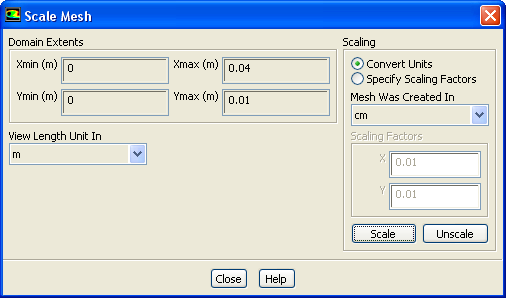
3 Setup and Solution Preparation 1. Download periodic_flow_heat.zip from the User Services Center to your working folder (as described in Tutorial 1). 2. Unzip periodic_flow_heat.zip. The file tubebank.msh can be found in the periodic flow heat folder created after unzipping the file. 3. Use FLUENT Launcher to start the 2D version of ANSYS FLUENT. For more information about FLUENT Launcher, see Section in the separate User s Guide. Note: The Display Options are enabled by default. Therefore, once you read in the mesh, it will be displayed in the embedded graphics windows. Step 1: Mesh 1. Read the mesh file tubebank.msh. File Read Mesh Check the mesh. General Check ANSYS FLUENT will perform various checks on the mesh and report the progress in the ANSYS FLUENT console window. Ensure that the minimum volume reported is a positive number. 3. Scale the mesh. General Scale... Release 12.0 c ANSYS, Inc. March 12,
4 (a) Select cm (centimeters) from the Mesh Was Created In drop-down list in the Scaling group box. (b) Click Scale to scale the mesh. (c) Close the Scale Mesh dialog box. 4. Check the mesh. General Check Note: It is a good idea to check the mesh after you manipulate it (i.e., scale, convert to polyhedra, merge, separate, fuse, add zones, or smooth and swap.) This will ensure that the quality of the mesh has not been compromised. 5. Examine the mesh (Figure 2.2). Figure 2.2: Mesh for the Periodic Tube Bank Quadrilateral cells are used in the regions surrounding the tube walls and triangular cells are used for the rest of the domain, resulting in a hybrid mesh (see Figure 2.2). The quadrilateral cells provide better resolution of the viscous gradients near the tube walls. The remainder of the computational domain is filled with triangular cells for the sake of convenience. Extra: You can use the right mouse button to probe for mesh information in the graphics window. If you click the right mouse button on any node in the mesh, information will be displayed in the ANSYS FLUENT console about the associated zone, including the name of the zone. This feature is especially useful when you have several zones of the same type and you want to distinguish between them quickly. 2-4 Release 12.0 c ANSYS, Inc. March 12, 2009
5 6. Create the periodic zone. The inlet (wall-9) and outflow (wall-12) boundaries currently defined as wall zones need to be redefined as periodic using the text user interface. The wall-9 boundary will be redefined as a translationally periodic zone and wall-12 as a periodic shadow of wall-9. (a) Press <Enter> in the console to get the command prompt (>). (b) Enter the text command and input the responses outlined in boxes as shown: > mesh/modify-zones/make-periodic Periodic zone [()] 9 Shadow zone [()] 12 Rotational periodic? (if no, translational) [yes] Create periodic zones? [yes] yes Auto detect translation vector? [yes] yes no computed translation deltas: all 26 faces matched for zones 9 and 12. zone 12 deleted created periodic zones. Release 12.0 c ANSYS, Inc. March 12,
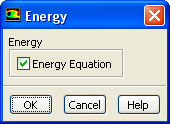
6 Step 2: General Settings General 1. Retain the default settings for the solver. General Step 3: Models Models 1. Enable heat transfer. Models Energy Edit... (a) Enable Energy Equation. (b) Click OK to close the Energy dialog box. 2-6 Release 12.0 c ANSYS, Inc. March 12, 2009
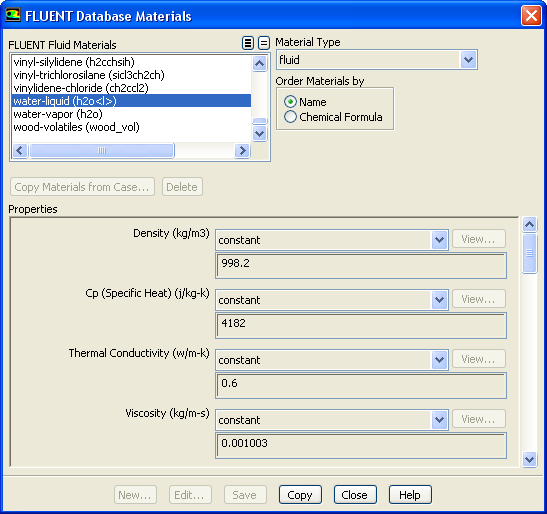
7 Step 4: Materials Materials The default properties for water defined in ANSYS FLUENT are suitable for this problem. In this step, you will make sure that this material is available for selecting in future steps. 1. Add water to the list of fluid materials by copying it from the ANSYS FLUENT materials database. Materials Fluid Create/Edit... (a) Click FLUENT Database... in the Create/Edit Materials dialog box to open the FLUENT Database Materials dialog box. i. Select water-liquid (h2o<l>) in the Fluent Fluid Materials selection list. Scroll down the list to find water-liquid (h2o<l>). Selecting this item will display the default properties in the dialog box. ii. Click Copy and close the Fluent Database Materials dialog box. Release 12.0 c ANSYS, Inc. March 12,

8 The Create/Edit Materials dialog box will now display the copied properties for water-liquid. (b) Click Change/Create and close the Create/Edit Materials dialog box. 2-8 Release 12.0 c ANSYS, Inc. March 12, 2009

9 Step 5: Cell Zone Conditions Cell Zone Conditions 1. Set the cell zone conditions for the continuum fluid zone (fluid-16). Cell Zone Conditions fluid-16 Edit... (a) Select water-liquid from the Material Name drop-down list. (b) Click OK to close the Fluid dialog box. Release 12.0 c ANSYS, Inc. March 12,

10 Step 6: Periodic Conditions Boundary Conditions 1. Define the periodic flow conditions. Boundary Conditions periodic-9 Periodic Conditions... (a) Select Specify Mass Flow in the Type list. This will allow you to specify the Mass Flow Rate. (b) Enter 0.05 kg/s for Mass Flow Rate. (c) Click OK to close the Periodic Conditions dialog box Release 12.0 c ANSYS, Inc. March 12, 2009

11 Step 7: Boundary Conditions Boundary Conditions 1. Set the boundary conditions for the bottom wall of the left tube (wall-21). Boundary Conditions wall-21 Edit... (a) Enter wall-bottom for Zone Name. (b) Click the Thermal tab. i. Select Temperature in the Thermal Conditions list. ii. Enter 400 K for Temperature. These settings will specify a constant wall temperature of 400 K. (c) Click OK to close the Wall dialog box. 2. Set the boundary conditions for the top wall of the right tube (wall-3). Boundary Conditions wall-3 Edit... (a) Enter wall-top for Zone Name. (b) Click the Thermal tab. i. Select Temperature from the Thermal Conditions list. ii. Enter 400 K for Temperature. (c) Click OK to close the Wall dialog box. Release 12.0 c ANSYS, Inc. March 12,
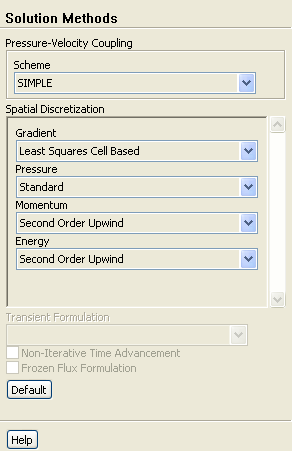
12 Step 8: Solution 1. Set the solution parameters. Solution Methods (a) Retain the default setting of Least Squares Cell Based for the Gradient in the Spatial Discretization group box. (b) Select Second Order Upwind from the Momentum and Energy drop-down lists Release 12.0 c ANSYS, Inc. March 12, 2009

13 2. Set the solution controls. Solution Controls (a) Enter 0.9 for Energy in the Under-Relaxation Factors group box. 3. Enable the plotting of residuals during the calculation. Monitors Residuals Edit... (a) Make sure Plot is enabled in the Options group box. Release 12.0 c ANSYS, Inc. March 12,
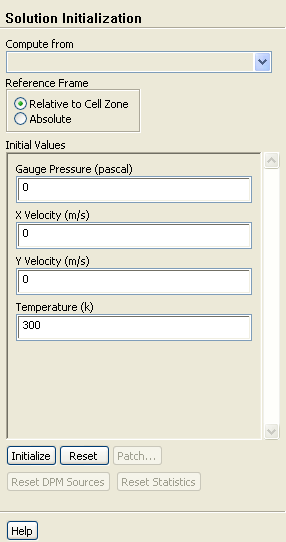
14 (b) Click OK to close the Residual Monitors dialog box. 4. Initialize the solution. Solution Initialization (a) Retain the default setting of 300 K for Temperature in the Initial Values group box. (b) Click Initialize. The values shown in the task pane will be used as the initial condition for the solution. 5. Save the case file (tubebank.cas). File Write Case Release 12.0 c ANSYS, Inc. March 12, 2009

15 6. Start the calculation by requesting 350 iterations. Run Calculation (a) Enter 350 for Number of Iterations. (b) Click Calculate. The energy residual curve that is displayed in the graphics window will begin to flatten out as it approaches 350 iterations. For the solution to converge to the recommended residual value of 10 6, you need to reduce the under-relaxation factor for energy. 7. Change the Under-Relaxation Factor for Energy to 0.6. Solution Controls 8. Continue the calculation by requesting another 300 iterations. Run Calculation After restarting the calculation, the plot of the energy residual will display an initial dip as a result of the reduction of the under-relaxation factor. The solution will converge in a total of approximately 580 iterations. 9. Save the case and data files (tubebank.cas and tubebank.dat). File Write Case & Data... Release 12.0 c ANSYS, Inc. March 12,
16 Step 9: Postprocessing Graphics and Animations 1. Display filled contours of static pressure (Figure 2.3). Graphics and Animations Contours Set Up... (a) Enable Filled in the Options group box. (b) Retain the default selection of Pressure... and Static Pressure from the Contours of drop-down lists. (c) Click Display Release 12.0 c ANSYS, Inc. March 12, 2009

17 Figure 2.3: Contours of Static Pressure (d) Change the view to mirror the display across the symmetry planes (Figure 2.4). Graphics and Animations Views... i. Select all of the symmetry zones (symmetry-18, symmetry-13, symmetry- 11, and symmetry-24) in the Mirror Planes selection list by clicking on the shaded icon in the upper right corner. Note: There are four symmetry zones in the Mirror Planes selection list because the top and bottom symmetry planes in the domain are each comprised of two symmetry zones, one on each side of the tube centered on the plane. It is also possible to generate the same display shown in Figure 2.4 by selecting just one of the symmetry zones on the top symmetry plane, and one on the bottom. Release 12.0 c ANSYS, Inc. March 12,
18 Modeling Periodic Flow and Heat Transfer ii. Click Apply and close the Views dialog box. iii. Translate the display of symmetry contours so that it is centered in the graphics window by using the left mouse button (Figure 2.4). Figure 2.4: Contours of Static Pressure with Symmetry The pressure contours displayed in Figure 2.4 do not include the linear pressure gradient computed by the solver. Thus, the contours are periodic at the inlet and outflow boundaries Release 12.0 c ANSYS, Inc. March 12, 2009

19 Modeling Periodic Flow and Heat Transfer 2. Display filled contours of static temperature (Figure 2.5). Graphics and Animations Contours Set Up... (a) Select Temperature... and Static Temperature from the Contours of drop-down lists. (b) Click Display and close the Contours dialog box. Figure 2.5: Contours of Static Temperature Release 12.0 c ANSYS, Inc. March 12,
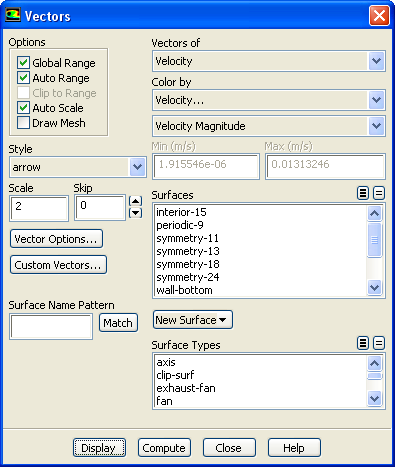
20 The contours in Figure 2.5 reveal the temperature increase in the fluid due to heat transfer from the tubes. The hotter fluid is confined to the near-wall and wake regions, while a narrow stream of cooler fluid is convected through the tube bank. 3. Display the velocity vectors (Figure 2.6). Graphics and Animations Vectors Set Up... (a) Enter 2 for Scale. This will increase the size of the displayed vectors, making it easier to view the flow patterns. (b) Retain the default selection of Velocity from the Vectors of drop-down list. (c) Retain the default selection of Velocity... and Velocity Magnitude from the Color by drop-down lists. (d) Click Display and close the Vectors dialog box. (e) Zoom in on the upper right portion of one of the left tubes to get the display shown in (Figure 2.6), by using the middle mouse button in the graphics window. The magnified view of the velocity vector plot in Figure 2.6 clearly shows the recirculating flow behind the tube and the boundary layer development along the tube surface Release 12.0 c ANSYS, Inc. March 12, 2009
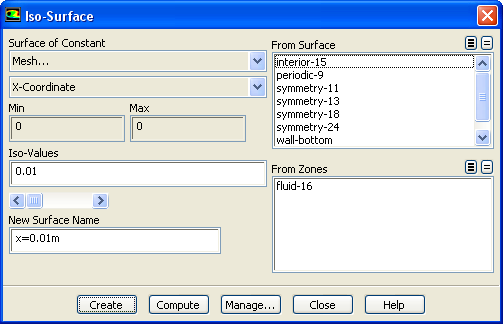
21 Modeling Periodic Flow and Heat Transfer Figure 2.6: Velocity Vectors 4. Create an isosurface on the periodic tube bank at x = 0.01 m (through the first column of tubes). This isosurface and the ones created in the steps that follow will be used for the plotting of temperature profiles. Surface Iso-Surface... (a) Select Mesh... and X-Coordinate from the Surface of Constant drop-down lists. (b) Enter 0.01 for Iso-Values. (c) Enter x=0.01m for New Surface Name. Release 12.0 c ANSYS, Inc. March 12,

22 (d) Click Create. 5. In a similar manner, create an isosurface on the periodic tube bank at x = 0.02 m (halfway between the two columns of tubes) named x=0.02m. 6. In a similar manner, create an isosurface on the periodic tube bank at x = 0.03 m (through the middle of the second column of tubes) named x=0.03m, and close the Iso-Surface dialog box. 7. Create an XY plot of static temperature on the three isosurfaces (Figure 2.7). Plots XY Plot Set Up... (a) Enter 0 for X and 1 for Y in the Plot Direction group box. With a Plot Direction vector of (0,1), ANSYS FLUENT will plot the selected variable as a function of y. Since you are plotting the temperature profile on cross sections of constant x, the temperature varies with the y direction. (b) Select Temperature... and Static Temperature from the Y-Axis Function dropdown lists. (c) Select x=0.01m, x=0.02m, and x=0.03m in the Surfaces selection list. Scroll down to find the x=0.01m, x=0.02m, and x=0.03m surfaces. (d) Click the Curves... button to open the Curves - Solution XY Plot dialog box. This dialog box is used to define plot styles for the different plot curves Release 12.0 c ANSYS, Inc. March 12, 2009
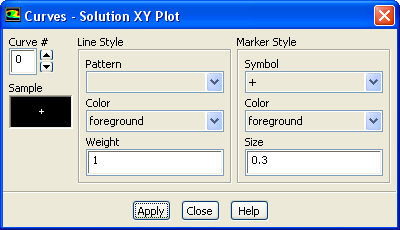
23 i. Select + from the Symbol drop-down list. Scroll up to find the + item. ii. Click Apply to assign the + symbol to the x = 0.01 m curve. iii. Set the Curve # to 1 to define the style for the x = 0.02 m curve. iv. Select x from the Symbol drop-down list. Scroll up to find the x item. v. Enter 0.5 for Size. vi. Click Apply and close the Curves - Solution XY Plot dialog box. Since you did not change the curve style for the x = 0.03 m curve, the default symbol will be used. (e) Click Plot and close the Solution XY Plot dialog box. Figure 2.7: Static Temperature at x=0.01, 0.02, and 0.03 m Release 12.0 c ANSYS, Inc. March 12,
24 Summary In this tutorial, periodic flow and heat transfer in a staggered tube bank were modeled in ANSYS FLUENT. The model was set up assuming a known mass flow through the tube bank and constant wall temperatures. Due to the periodic nature of the flow and symmetry of the geometry, only a small piece of the full geometry was modeled. In addition, the tube bank configuration lent itself to the use of a hybrid mesh with quadrilateral cells around the tubes and triangles elsewhere. The Periodic Conditions dialog box makes it easy to run this type of model with a variety of operating conditions. For example, different flow rates (and hence different Reynolds numbers) can be studied, or a different inlet bulk temperature can be imposed. The resulting solution can then be examined to extract the pressure drop per tube row and overall Nusselt number for a range of Reynolds numbers. Further Improvements This tutorial guides you through the steps to reach an initial solution. You may be able to obtain a more accurate solution by using an appropriate higher-order discretization scheme and by adapting the mesh. Mesh adaption can also ensure that the solution is independent of the mesh. These steps are demonstrated in Tutorial Release 12.0 c ANSYS, Inc. March 12, 2009
Set up and solve a transient problem using the pressure-based solver and VOF model.
 Tutorial 18. Using the VOF Model This tutorial was run using ANSYS FLUENT 12.1. The results have been updated to reflect the change in the default setting of node-based smoothing for the surface tension
Steady Flow: Laminar and Turbulent in an S-Bend
 STAR-CCM+ User Guide 6663 Steady Flow: Laminar and Turbulent in an S-Bend This tutorial demonstrates the flow of an incompressible gas through an s-bend of constant diameter (2 cm), for both laminar and
GAMBIT Demo Tutorial
 GAMBIT Demo Tutorial Wake of a Cylinder. 1.1 Problem Description The problem to be considered is schematically in fig. 1. We consider flow across a cylinder and look at the wake behind the cylinder. Air
Learning Module 4 - Thermal Fluid Analysis Note: LM4 is still in progress. This version contains only 3 tutorials.
 Learning Module 4 - Thermal Fluid Analysis Note: LM4 is still in progress. This version contains only 3 tutorials. Attachment C1. SolidWorks-Specific FEM Tutorial 1... 2 Attachment C2. SolidWorks-Specific
Tutorial for laboratory project #2 Using ANSYS Workbench. For Double Pipe Heat Exchanger
 Tutorial for laboratory project #2 Using ANSYS Workbench For Double Pipe Heat Exchanger 1. Preparing ANSYS Workbench Go to Start Menu/All Programs/Simulation/ANSYS 12.1/Workbench. In the toolbox menu in
Tutorial 1. Introduction to Using ANSYS FLUENT in ANSYS Workbench: Fluid Flow and Heat Transfer in a Mixing Elbow
 Tutorial 1. Introduction to Using ANSYS FLUENT in ANSYS Workbench: Fluid Flow and Heat Transfer in a Mixing Elbow Introduction This tutorial illustrates using ANSYS Workbench to set up and solve a three-dimensional
This tutorial provides a recipe for simulating L
 Pipe Flow Tutorial for STAR-CCM+ ME 448/548 February 5, 2014 Gerald Recktenwald [email protected] 1 Overview This tutorial provides a recipe for simulating laminar flow in a pipe with STAR- L CCM+. The
ANSYS ICEM CFD - pre-processing program used to generate the geometry and mesh for our CFD simulations.
 Lab 6: Laminar Pipe Flow with Convection Objective: The objective of this laboratory is to introduce you to ANSYS ICEM CFD and ANSYS FLUENT by using them to solve for velocity and temperature profiles
Trace Layer Import for Printed Circuit Boards Under Icepak
 Tutorial 13. Trace Layer Import for Printed Circuit Boards Under Icepak Introduction: A printed circuit board (PCB) is generally a multi-layered board made of dielectric material and several layers of
Tetrahedral Mesh Generation
 Tutorial 2. Tetrahedral Mesh Generation Introduction The mesh generation process is highly automated in TGrid. In most cases, you can use the Auto Mesh feature to create the volume mesh from the surface
Multiphase Flow - Appendices
 Discovery Laboratory Multiphase Flow - Appendices 1. Creating a Mesh 1.1. What is a geometry? The geometry used in a CFD simulation defines the problem domain and boundaries; it is the area (2D) or volume
TWO-DIMENSIONAL FINITE ELEMENT ANALYSIS OF FORCED CONVECTION FLOW AND HEAT TRANSFER IN A LAMINAR CHANNEL FLOW
 TWO-DIMENSIONAL FINITE ELEMENT ANALYSIS OF FORCED CONVECTION FLOW AND HEAT TRANSFER IN A LAMINAR CHANNEL FLOW Rajesh Khatri 1, 1 M.Tech Scholar, Department of Mechanical Engineering, S.A.T.I., vidisha
Keywords: Heat transfer enhancement; staggered arrangement; Triangular Prism, Reynolds Number. 1. Introduction
 Heat transfer augmentation in rectangular channel using four triangular prisms arrange in staggered manner Manoj Kumar 1, Sunil Dhingra 2, Gurjeet Singh 3 1 Student, 2,3 Assistant Professor 1.2 Department
. Address the following issues in your solution:
 CM 3110 COMSOL INSTRUCTIONS Faith Morrison and Maria Tafur Department of Chemical Engineering Michigan Technological University, Houghton, MI USA 22 November 2012 Zhichao Wang edits 21 November 2013 revised
Finding Drag Coefficient using Solidworks Flow Simulation
 Finding Drag Coefficient using Solidworks Flow Simulation Using solidworks to find the drag coefficient of shapes is a very useful way to cut down on the design time of a project, as it can remove tests.
Laminar Flow in a Baffled Stirred Mixer
 Laminar Flow in a Baffled Stirred Mixer Introduction This exercise exemplifies the use of the rotating machinery feature in the CFD Module. The Rotating Machinery interface allows you to model moving rotating
ABAQUS Tutorial. 3D Modeling
 Spring 2011 01/21/11 ABAQUS Tutorial 3D Modeling This exercise intends to demonstrate the steps you would follow in creating and analyzing a simple solid model using ABAQUS CAE. Introduction A solid undergoes
Introduction to CFD Analysis
 Introduction to CFD Analysis Introductory FLUENT Training 2006 ANSYS, Inc. All rights reserved. 2006 ANSYS, Inc. All rights reserved. 2-2 What is CFD? Computational fluid dynamics (CFD) is the science
All the following videos are at this YouTube playlist: https://www.youtube.com/playlist?list=plu_9jejnlvb_oy0a7qffqus4xd9ox1koh
 Computational Fluid Dynamics (CFD) how- to for Membranes project C. K. Harnett 1/14/15 This document is about using Citrix Receiver on a Mac to simulate flow through a pore in a membrane at the University
CHEG 3128 Heat, Mass, & Kinetics Laboratory Diffusion in Laminar Flow Regimes Modeling and COMSOL Tutorial Tutorial by Andrea Kadilak
 CHEG 3128 Heat, Mass, & Kinetics Laboratory Diffusion in Laminar Flow Regimes Modeling and COMSOL Tutorial Tutorial by Andrea Kadilak Introduction COMSOL is a computer modeling software package that will
Introduction to COMSOL. The Navier-Stokes Equations
 Flow Between Parallel Plates Modified from the COMSOL ChE Library module rev 10/13/08 Modified by Robert P. Hesketh, Chemical Engineering, Rowan University Fall 2008 Introduction to COMSOL The following
Customer Training Material. Lecture 2. Introduction to. Methodology ANSYS FLUENT. ANSYS, Inc. Proprietary 2010 ANSYS, Inc. All rights reserved.
 Lecture 2 Introduction to CFD Methodology Introduction to ANSYS FLUENT L2-1 What is CFD? Computational Fluid Dynamics (CFD) is the science of predicting fluid flow, heat and mass transfer, chemical reactions,
TABLE OF CONTENTS. INTRODUCTION... 5 Advance Concrete... 5 Where to find information?... 6 INSTALLATION... 7 STARTING ADVANCE CONCRETE...
 Starting Guide TABLE OF CONTENTS INTRODUCTION... 5 Advance Concrete... 5 Where to find information?... 6 INSTALLATION... 7 STARTING ADVANCE CONCRETE... 7 ADVANCE CONCRETE USER INTERFACE... 7 Other important
version 3.0 tutorial - Turbulent mixing in a T-junction with CFDSTUDY in SALOME contact: [email protected]
 EDF R&D Fluid Dynamics, Power Generation and Environment Department Single Phase Thermal-Hydraulics Group 6, quai Watier F-78401 Chatou Cedex Tel: 33 1 30 87 75 40 Fax: 33 1 30 87 79 16 MAY 2013 documentation
ME6130 An introduction to CFD 1-1
 ME6130 An introduction to CFD 1-1 What is CFD? Computational fluid dynamics (CFD) is the science of predicting fluid flow, heat and mass transfer, chemical reactions, and related phenomena by solving numerically
Essay 5 Tutorial for a Three-Dimensional Heat Conduction Problem Using ANSYS Workbench
 Essay 5 Tutorial for a Three-Dimensional Heat Conduction Problem Using ANSYS Workbench 5.1 Introduction The problem selected to illustrate the use of ANSYS software for a three-dimensional steadystate
Heat Transfer by Free Convection
 Heat Transfer by Free Convection Introduction This example describes a fluid flow problem with heat transfer in the fluid. An array of heating tubes is submerged in a vessel with fluid flow entering at
Express Introductory Training in ANSYS Fluent Lecture 1 Introduction to the CFD Methodology
 Express Introductory Training in ANSYS Fluent Lecture 1 Introduction to the CFD Methodology Dimitrios Sofialidis Technical Manager, SimTec Ltd. Mechanical Engineer, PhD PRACE Autumn School 2013 - Industry
The following is an overview of lessons included in the tutorial.
 Chapter 2 Tutorial Tutorial Introduction This tutorial is designed to introduce you to some of Surfer's basic features. After you have completed the tutorial, you should be able to begin creating your
Piston Ring. Problem:
 Problem: A cast-iron piston ring has a mean diameter of 81 mm, a radial height of h 6 mm, and a thickness b 4 mm. The ring is assembled using an expansion tool which separates the split ends a distance
ANSYS CFD-Post Standalone: Tutorials
 ANSYS CFD-Post Standalone: Tutorials ANSYS, Inc. Release 12.1 Southpointe November 2009 275 Technology Drive ANSYS, Inc. is Canonsburg, PA 15317 certified to ISO [email protected] 9001:2008. http://www.ansys.com
Contents. First Steps - Ball Valve Design
 Sol i dwor ksfl ow Si mul at i on 2009 Tut or i al Contents First Steps - Ball Valve Design Open the SolidWorks Model........................................... 1-1 Create a Flow Simulation Project.......................................
ANSYS FLUENT. Using Moving Reference Frames and Sliding Meshes WS5-1. Customer Training Material
 Workshop 5 Using Moving Reference Frames and Sliding Meshes Introduction to ANSYS FLUENT WS5-1 Introduction [1] Several solution strategies exist when there are moving parts in the domain. This workshop
ANSYS CFD-Post Tutorials
 ANSYS CFD-Post Tutorials ANSYS, Inc. Southpointe 275 Technology Drive Canonsburg, PA 15317 [email protected] http://www.ansys.com (T) 724-746-3304 (F) 724-514-9494 Release 15.0 November 2013 ANSYS, Inc.
CFD SIMULATION OF SDHW STORAGE TANK WITH AND WITHOUT HEATER
 International Journal of Advancements in Research & Technology, Volume 1, Issue2, July-2012 1 CFD SIMULATION OF SDHW STORAGE TANK WITH AND WITHOUT HEATER ABSTRACT (1) Mr. Mainak Bhaumik M.E. (Thermal Engg.)
External bluff-body flow-cfd simulation using ANSYS Fluent
 External bluff-body flow-cfd simulation using ANSYS Fluent External flow over a bluff body is complex, three-dimensional, and vortical. It is massively separated and it exhibits vortex shedding. Thus,
Tutorial for Assignment #3 Heat Transfer Analysis By ANSYS (Mechanical APDL) V.13.0
 Tutorial for Assignment #3 Heat Transfer Analysis By ANSYS (Mechanical APDL) V.13.0 1 Problem Description This exercise consists of an analysis of an electronics component cooling design using fins: All
ANSYS Example: Transient Thermal Analysis of a Pipe Support Bracket
 ME 477 Transient Thermal Example 1 ANSYS Example: Transient Thermal Analysis of a Pipe Support Bracket The section of pipe shown below is a representative section of a longer pipe carrying a hot fluid
A Guide to the free mesh program Discretizer with OpenFOAM for CFD (Computational Fluid Dynamics)
 Discretizer Manual Release date 09/01/10 Side 1 of 13 A Guide to the free mesh program Discretizer with OpenFOAM for CFD (Computational Fluid Dynamics) Homepage: http://www.discretizer.org/ Creator of
AB3080 L. Learning Objectives: About the Speaker:
 AB3080 L While architects have tested their designs in wind tunnels for many years, the process is typically outsourced to engineering firms and not easily accessible to architects during the conceptual
Applying a circular load. Immediate and consolidation settlement. Deformed contours. Query points and query lines. Graph query.
 Quick Start Tutorial 1-1 Quick Start Tutorial This quick start tutorial will cover some of the basic features of Settle3D. A circular load is applied to a single soil layer and settlements are examined.
THERMAL STRATIFICATION IN A HOT WATER TANK ESTABLISHED BY HEAT LOSS FROM THE TANK
 THERMAL STRATIFICATION IN A HOT WATER TANK ESTABLISHED BY HEAT LOSS FROM THE TANK J. Fan and S. Furbo Abstract Department of Civil Engineering, Technical University of Denmark, Brovej, Building 118, DK-28
Tutorial: 2D Pipe Junction Using Hexa Meshing
 Tutorial: 2D Pipe Junction Using Hexa Meshing Introduction In this tutorial, you will generate a mesh for a two-dimensional pipe junction, composed of two inlets and one outlet. After generating an initial
CHAPTER 7 PROCESSING SURVEY DATA
 CHAPTER 7 PROCESSING SURVEY DATA Downloading the Trimble Survey Controller TSC2/TSC3 7-2 Introduction to InRoads Survey 7-3 Creating a Design File 7-3 Preferences 7-8 Viewing the Data 7-10 Correcting Errors
Effect of Aspect Ratio on Laminar Natural Convection in Partially Heated Enclosure
 Universal Journal of Mechanical Engineering (1): 8-33, 014 DOI: 10.13189/ujme.014.00104 http://www.hrpub.org Effect of Aspect Ratio on Laminar Natural Convection in Partially Heated Enclosure Alireza Falahat
Pro/ENGINEER Wildfire 4.0 Basic Design
 Introduction Datum features are non-solid features used during the construction of other features. The most common datum features include planes, axes, coordinate systems, and curves. Datum features do
Introduction to ANSYS
 Lecture 3 Introduction to ANSYS Meshing 14. 5 Release Introduction to ANSYS Meshing 2012 ANSYS, Inc. March 27, 2014 1 Release 14.5 Introduction to ANSYS Meshing What you will learn from this presentation
Excel 2010: Create your first spreadsheet
 Excel 2010: Create your first spreadsheet Goals: After completing this course you will be able to: Create a new spreadsheet. Add, subtract, multiply, and divide in a spreadsheet. Enter and format column
Lesson 3 - Processing a Multi-Layer Yield History. Exercise 3-4
 Lesson 3 - Processing a Multi-Layer Yield History Exercise 3-4 Objective: Develop yield-based management zones. 1. File-Open Project_3-3.map. 2. Double click the Average Yield surface component in the
Tutorial: Using a UDF to Control the Dynamic Mesh of a Flexible Oscillating Membrane
 Tutorial: Using a UDF to Control the Dynamic Mesh of a Flexible Oscillating Membrane Introduction The purpose of this tutorial is to illustrate how to use a user defined function (UDF) to control the dynamic
HEAT TRANSFER ANALYSIS IN A 3D SQUARE CHANNEL LAMINAR FLOW WITH USING BAFFLES 1 Vikram Bishnoi
 HEAT TRANSFER ANALYSIS IN A 3D SQUARE CHANNEL LAMINAR FLOW WITH USING BAFFLES 1 Vikram Bishnoi 2 Rajesh Dudi 1 Scholar and 2 Assistant Professor,Department of Mechanical Engineering, OITM, Hisar (Haryana)
Getting Started with ANSYS ANSYS Workbench Environment
 Getting Started with ANSYS ANSYS Workbench Environment Overview The purpose of this tutorial is to get you started with the ANSYS Workbench environment. We will use a simple, static analysis of a single
Turbulent Flow Through a Shell-and-Tube Heat Exchanger
 Turbulent Flow Through a Shell-and-Tube Heat Exchanger Introduction This model describes a part of a shell-and-tube heat exchanger (see Figure 1), where hot water enters from above. The cooling medium,
COMPUTATIONAL FLUID DYNAMICS (CFD) ANALYSIS OF INTERMEDIATE PRESSURE STEAM TURBINE
 Research Paper ISSN 2278 0149 www.ijmerr.com Vol. 3, No. 4, October, 2014 2014 IJMERR. All Rights Reserved COMPUTATIONAL FLUID DYNAMICS (CFD) ANALYSIS OF INTERMEDIATE PRESSURE STEAM TURBINE Shivakumar
Use of OpenFoam in a CFD analysis of a finger type slug catcher. Dynaflow Conference 2011 January 13 2011, Rotterdam, the Netherlands
 Use of OpenFoam in a CFD analysis of a finger type slug catcher Dynaflow Conference 2011 January 13 2011, Rotterdam, the Netherlands Agenda Project background Analytical analysis of two-phase flow regimes
ABAQUS/CAE Tutorial: Analysis of an Aluminum Bracket
 H. Kim FEA Tutorial 1 ABAQUS/CAE Tutorial: Analysis of an Aluminum Bracket Hyonny Kim last updated: August 2004 In this tutorial, you ll learn how to: 1. Sketch 2D geometry & define part. 2. Define material
WHAT S NEW IN WORD 2010 & HOW TO CUSTOMIZE IT
 WHAT S NEW IN WORD 2010 & HOW TO CUSTOMIZE IT The Ribbon... 2 Default Tabs... 2 Contextual Tabs... 2 Minimizing and Restoring the Ribbon... 3 Customizing the Ribbon... 3 A New Graphic Interface... 5 Live
Embankment Consolidation
 Embankment Consolidation 36-1 Embankment Consolidation In this tutorial, RS2 is used for a coupled analysis of a road embankment subject to loading from typical daily traffic. Model Start the RS2 9.0 Model
Migrating to Excel 2010 from Excel 2003 - Excel - Microsoft Office 1 of 1
 Migrating to Excel 2010 - Excel - Microsoft Office 1 of 1 In This Guide Microsoft Excel 2010 looks very different, so we created this guide to help you minimize the learning curve. Read on to learn key
Scientific Graphing in Excel 2010
 Scientific Graphing in Excel 2010 When you start Excel, you will see the screen below. Various parts of the display are labelled in red, with arrows, to define the terms used in the remainder of this overview.
Welcome to CorelDRAW, a comprehensive vector-based drawing and graphic-design program for the graphics professional.
 Workspace tour Welcome to CorelDRAW, a comprehensive vector-based drawing and graphic-design program for the graphics professional. In this tutorial, you will become familiar with the terminology and workspace
Visual Tutorial Basic Edition 1. Visual. Basic Edition Tutorial. www.visuallightingsoftware.com
 Visual Tutorial Basic Edition 1 Visual Basic Edition Tutorial www.visuallightingsoftware.com Visual Tutorial Basic Edition 2 Basic Edition Tutorial Introduction In this tutorial, you will use the Visual
Introduction to Autodesk Inventor for F1 in Schools
 Introduction to Autodesk Inventor for F1 in Schools F1 in Schools Race Car In this course you will be introduced to Autodesk Inventor, which is the centerpiece of Autodesk s digital prototyping strategy
Introduction to CFD Analysis
 Introduction to CFD Analysis 2-1 What is CFD? Computational Fluid Dynamics (CFD) is the science of predicting fluid flow, heat and mass transfer, chemical reactions, and related phenomena by solving numerically
Sample Table. Columns. Column 1 Column 2 Column 3 Row 1 Cell 1 Cell 2 Cell 3 Row 2 Cell 4 Cell 5 Cell 6 Row 3 Cell 7 Cell 8 Cell 9.
 Working with Tables in Microsoft Word The purpose of this document is to lead you through the steps of creating, editing and deleting tables and parts of tables. This document follows a tutorial format
CCTech TM. ICEM-CFD & FLUENT Software Training. Course Brochure. Simulation is The Future
 . CCTech TM Simulation is The Future ICEM-CFD & FLUENT Software Training Course Brochure About. CCTech Established in 2006 by alumni of IIT Bombay. Our motive is to establish a knowledge centric organization
Excel -- Creating Charts
 Excel -- Creating Charts The saying goes, A picture is worth a thousand words, and so true. Professional looking charts give visual enhancement to your statistics, fiscal reports or presentation. Excel
CATIA V5 Tutorials. Mechanism Design & Animation. Release 18. Nader G. Zamani. University of Windsor. Jonathan M. Weaver. University of Detroit Mercy
 CATIA V5 Tutorials Mechanism Design & Animation Release 18 Nader G. Zamani University of Windsor Jonathan M. Weaver University of Detroit Mercy SDC PUBLICATIONS Schroff Development Corporation www.schroff.com
ICEM CFD Tutorial. Simple Duct Grid
 ICEM CFD Tutorial Simple Duct Grid Scott J. Ormiston Gavin Joyce Department of Mechanical Engineering Winnipeg, Manitoba Canada V1.01 17 January 2013 Department of Mechanical Engineering Page 1 of 22 1.
KaleidaGraph Quick Start Guide
 KaleidaGraph Quick Start Guide This document is a hands-on guide that walks you through the use of KaleidaGraph. You will probably want to print this guide and then start your exploration of the product.
Advanced Microsoft Excel 2010
 Advanced Microsoft Excel 2010 Table of Contents THE PASTE SPECIAL FUNCTION... 2 Paste Special Options... 2 Using the Paste Special Function... 3 ORGANIZING DATA... 4 Multiple-Level Sorting... 4 Subtotaling
Microsoft PowerPoint Tutorial
 Microsoft PowerPoint Tutorial Contents Starting MS PowerPoint... 1 The MS PowerPoint Window... 2 Title Bar...2 Office Button...3 Saving Your Work... 3 For the first time... 3 While you work... 3 Backing
Tutorial: 3D Pipe Junction Using Hexa Meshing
 Tutorial: 3D Pipe Junction Using Hexa Meshing Introduction In this tutorial, you will generate a mesh for a three-dimensional pipe junction. After checking the quality of the first mesh, you will create
Create Charts in Excel
 Create Charts in Excel Table of Contents OVERVIEW OF CHARTING... 1 AVAILABLE CHART TYPES... 2 PIE CHARTS... 2 BAR CHARTS... 3 CREATING CHARTS IN EXCEL... 3 CREATE A CHART... 3 HOW TO CHANGE THE LOCATION
Introduction to Autodesk Inventor for F1 in Schools
 F1 in Schools race car Introduction to Autodesk Inventor for F1 in Schools In this course you will be introduced to Autodesk Inventor, which is the centerpiece of Autodesk s Digital Prototyping strategy
Microsoft Word 2010. Revising Word Documents Using Markup Tools
 Microsoft Word 2010 Revising Word Documents Using Markup Tools Preface Word provides several markup tools that make document collaboration easy. Color coding, highlighting, and the ability maintain multiple
Module 1 : Conduction. Lecture 5 : 1D conduction example problems. 2D conduction
 Module 1 : Conduction Lecture 5 : 1D conduction example problems. 2D conduction Objectives In this class: An example of optimization for insulation thickness is solved. The 1D conduction is considered
Lecture 6 - Boundary Conditions. Applied Computational Fluid Dynamics
 Lecture 6 - Boundary Conditions Applied Computational Fluid Dynamics Instructor: André Bakker http://www.bakker.org André Bakker (2002-2006) Fluent Inc. (2002) 1 Outline Overview. Inlet and outlet boundaries.
The influence of mesh characteristics on OpenFOAM simulations of the DrivAer model
 The influence of mesh characteristics on OpenFOAM simulations of the DrivAer model Vangelis Skaperdas, Aristotelis Iordanidis, Grigoris Fotiadis BETA CAE Systems S.A. 2 nd Northern Germany OpenFOAM User
Introduction to CATIA V5
 Introduction to CATIA V5 Release 16 (A Hands-On Tutorial Approach) Kirstie Plantenberg University of Detroit Mercy SDC PUBLICATIONS Schroff Development Corporation www.schroff.com www.schroff-europe.com
Lecture 16 - Free Surface Flows. Applied Computational Fluid Dynamics
 Lecture 16 - Free Surface Flows Applied Computational Fluid Dynamics Instructor: André Bakker http://www.bakker.org André Bakker (2002-2006) Fluent Inc. (2002) 1 Example: spinning bowl Example: flow in
Setting Up a New Project
 Setting Up a New Project Contents About this tutorial... 3 Step 1. Create a new project... 3 Step 2. Select project settings... 4 Step 3. Save your project... 11 Step 4. Create a project template... 12
Manual. Sealer Monitor Software. Version 0.10.7
 Manual Sealer Monitor Software Version 0.10.7 Contents 1 Introduction & symbols 1 2 Installation 2 2.1 Requirements 2 2.2 Installation process 2 3 Menu & Tooblar 5 3.1 File menu 5 3.2 Print menu 6 3.3
CONCEPT-II. Overview of demo examples
 CONCEPT-II CONCEPT-II is a frequency domain method of moment (MoM) code, under development at the Institute of Electromagnetic Theory at the Technische Universität Hamburg-Harburg (www.tet.tuhh.de). Overview
Comparison of Heat Transfer between a Helical and Straight Tube Heat Exchanger
 International Journal of Engineering Research and Technology. ISSN 0974-3154 Volume 6, Number 1 (2013), pp. 33-40 International Research Publication House http://www.irphouse.com Comparison of Heat Transfer
A COMPUTATIONAL FLUID DYNAMICS STUDY ON THE ACCURACY OF HEAT TRANSFER FROM A HORIZONTAL CYLINDER INTO QUIESCENT WATER
 A COMPUTATIONAL FLUID DYNAMICS STUDY ON THE ACCURACY OF HEAT TRANSFER FROM A HORIZONTAL CYLINDER INTO QUIESCENT WATER William Logie and Elimar Frank Institut für Solartechnik SPF, 8640 Rapperswil (Switzerland)
SAS BI Dashboard 4.3. User's Guide. SAS Documentation
 SAS BI Dashboard 4.3 User's Guide SAS Documentation The correct bibliographic citation for this manual is as follows: SAS Institute Inc. 2010. SAS BI Dashboard 4.3: User s Guide. Cary, NC: SAS Institute
Customer Training Material. ANSYS Mechanical Basics. Mechanical. ANSYS, Inc. Proprietary 2010 ANSYS, Inc. All rights reserved. WS2.
 Workshop 2.1 ANSYS Mechanical Basics Introduction to ANSYS Mechanical WS2.1-1 Notes on Workshop 2.1 The first workshop is extensively documented. As this course progresses, students will become more familiar
CFD Summary... 1. Workshop 01 - Basic viewing controls in ANSYS ICEM CFD 13.0
 ANSYS ICEM CFD and ANSYS CFX Introductory Training Course Course notes prepared by David Ryan and updated by Julia Hofinger Acknowledgements to Andrea Gabriele, Dr Hassan Hemida and Muhammad Eesa. CFD
Quick Start Using DASYLab with your Measurement Computing USB device
 Quick Start Using DASYLab with your Measurement Computing USB device Thank you for purchasing a USB data acquisition device from Measurement Computing Corporation (MCC). This Quick Start document contains
Mastercam X6 Basic 3D Design
 Basic 3D Design mastercam x getting started tutorials Mastercam X6 Basic 3D Design December 2011 Be sure you have the latest information! Information might have been changed or added since this document
Microsoft PowerPoint 2010 Templates and Slide Masters (Level 3)
 IT Services Microsoft PowerPoint 2010 Templates and Slide Masters (Level 3) Contents Introduction... 1 Installed Templates and Themes... 2 University of Reading Templates... 3 Further Templates and Presentations...
Basic 2D Design Be sure you have the latest information!
 Basic 2D Design mastercam x getting started tutorials Basic 2D Design December 2011 Be sure you have the latest information! Information might have been changed or added since this document was published.
CFD Application on Food Industry; Energy Saving on the Bread Oven
 Middle-East Journal of Scientific Research 13 (8): 1095-1100, 2013 ISSN 1990-9233 IDOSI Publications, 2013 DOI: 10.5829/idosi.mejsr.2013.13.8.548 CFD Application on Food Industry; Energy Saving on the
Intro to Excel spreadsheets
 Intro to Excel spreadsheets What are the objectives of this document? The objectives of document are: 1. Familiarize you with what a spreadsheet is, how it works, and what its capabilities are; 2. Using
How to make a line graph using Excel 2007
 How to make a line graph using Excel 2007 Format your data sheet Make sure you have a title and each column of data has a title. If you are entering data by hand, use time or the independent variable in
Abaqus/CFD Sample Problems. Abaqus 6.10
 Abaqus/CFD Sample Problems Abaqus 6.10 Contents 1. Oscillatory Laminar Plane Poiseuille Flow 2. Flow in Shear Driven Cavities 3. Buoyancy Driven Flow in Cavities 4. Turbulent Flow in a Rectangular Channel
Data representation and analysis in Excel
 Page 1 Data representation and analysis in Excel Let s Get Started! This course will teach you how to analyze data and make charts in Excel so that the data may be represented in a visual way that reflects
Overset Grids Technology in STAR-CCM+: Methodology and Applications
 Overset Grids Technology in STAR-CCM+: Methodology and Applications Eberhard Schreck, Milovan Perić and Deryl Snyder [email protected] [email protected] [email protected]
Microsoft Migrating to Word 2010 from Word 2003
 In This Guide Microsoft Word 2010 looks very different, so we created this guide to help you minimize the learning curve. Read on to learn key parts of the new interface, discover free Word 2010 training,