
Siemens EC Human Resources Managemen System
|
|
|
- Russell Gregory
- 10 years ago
- Views:
Transcription
1 Group InnovaSoft Cansu Hekim Bekir Doğru Zaman Safari Hamid Siddiqi Siemens EC Human Resources Managemen System Initial Design Report

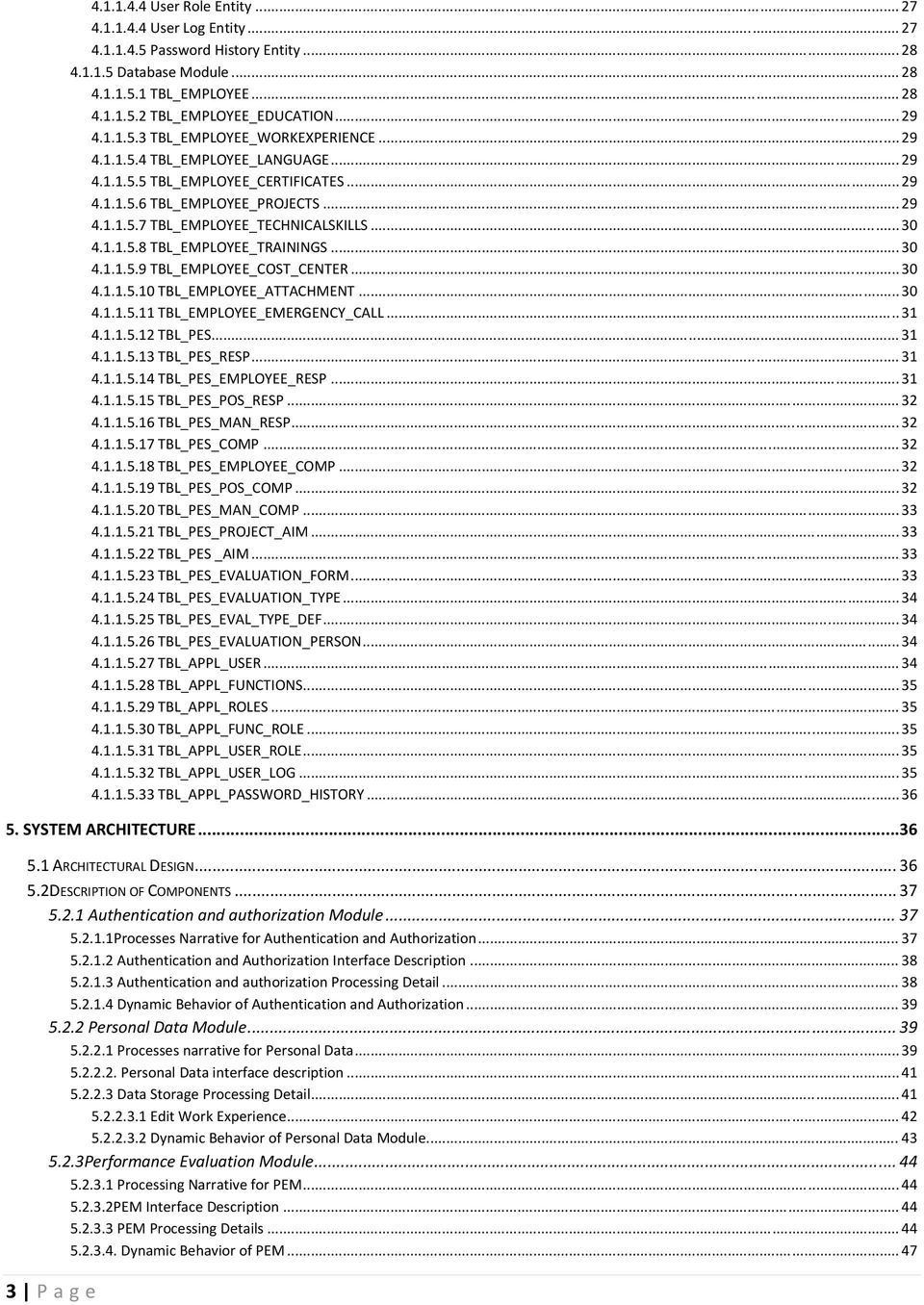
2 2 P age Table of Contents 1. INTRODUCTION PROBLEM DEFINITION A. AUTHORIZATION/AUTHENTICATION MECHANISM B. INFORMATION EDITION C. PERFORMANCE EVALUATION PURPOSE SCOPE OVERVIEW DEFINITIONS, ACRONYMS AND ABBREVIATIONS REFERENCES SYSTEM OVERVIEW AUTHENTICATION/AUTHORIZATION PERFORMANCE EVALUATION PROCESS DATA RECRUITMENT DESIGN CONSIDERATION DESIGN ASSUMPTIONS, DEPENDENCIES, AND CONSTRAINTS DESIGN GOALS AND GUIDELINES DATA DESIGN DATA DESCRIPTION Description of Data Modules Personal Data Module PersonalData Entity Education Entity Work Experience Entity Languages Entity Projects Entity Certificates Entity Technical Skills Entity Trainings Entity Cost_Center Entity Attachments Entity Emergency Call Entity Performance Evaluation Module Responsibilities/Competences Entity Hit Target Entity Project Aim Entity Personal Aim Entity Performance Evaluation and Improvement Entity Evaluation Form Entity Evaluation Type Entity Evaluation Type Definition Entity Evaluation Person Entity User Module Authentication/Authorization Module Functions Entity Roles Entity Function Role Entity... 26

3 3 P age User Role Entity User Log Entity Password History Entity Database Module TBL_EMPLOYEE TBL_EMPLOYEE_EDUCATION TBL_EMPLOYEE_WORKEXPERIENCE TBL_EMPLOYEE_LANGUAGE TBL_EMPLOYEE_CERTIFICATES TBL_EMPLOYEE_PROJECTS TBL_EMPLOYEE_TECHNICALSKILLS TBL_EMPLOYEE_TRAININGS TBL_EMPLOYEE_COST_CENTER TBL_EMPLOYEE_ATTACHMENT TBL_EMPLOYEE_EMERGENCY_CALL TBL_PES TBL_PES_RESP TBL_PES_EMPLOYEE_RESP TBL_PES_POS_RESP TBL_PES_MAN_RESP TBL_PES_COMP TBL_PES_EMPLOYEE_COMP TBL_PES_POS_COMP TBL_PES_MAN_COMP TBL_PES_PROJECT_AIM TBL_PES _AIM TBL_PES_EVALUATION_FORM TBL_PES_EVALUATION_TYPE TBL_PES_EVAL_TYPE_DEF TBL_PES_EVALUATION_PERSON TBL_APPL_USER TBL_APPL_FUNCTIONS TBL_APPL_ROLES TBL_APPL_FUNC_ROLE TBL_APPL_USER_ROLE TBL_APPL_USER_LOG TBL_APPL_PASSWORD_HISTORY SYSTEM ARCHITECTURE ARCHITECTURAL DESIGN DESCRIPTION OF COMPONENTS Authentication and authorization Module Processes Narrative for Authentication and Authorization Authentication and Authorization Interface Description Authentication and authorization Processing Detail Dynamic Behavior of Authentication and Authorization Personal Data Module Processes narrative for Personal Data Personal Data interface description Data Storage Processing Detail Edit Work Experience Dynamic Behavior of Personal Data Module Performance Evaluation Module Processing Narrative for PEM PEM Interface Description PEM Processing Details Dynamic Behavior of PEM... 47
4 5.2.4 Administration Module Processing Narrative for Administration Administration Interface Description Administration Processing Detail Dynamic Behavior of Administration TRACEABILITY OF REQUIREMENTS USER INTERFACE DESIGN OVERVIEW OF USER INTERFACE Özlük Bilgileri Tab: Restrictions of Tab: Kişisel Bilgilerim Eğitim Bilgileri İş Tecrübeleri Diller Projeler Sertifikalar Teknik Bilgiler Eğitimler Masraf Yeri Ekler Acil Durumda Ulaşılacak Kişi Performans Değerlendirme Tab: Restrictions of Tab: Sorumluluklar/Yetkinlikler Hedeflere Ulaşım Performans Değerlendirme ve Geliştirme Yönetici Değerlendirme Formu Çalışan Değerlendirme Formu Çalışanlar Tab: Restrictions of Tab: Interface Analysis of Tab: Çalışanlarım Tab: Restrictions of Tab: Interface Analysis of Tab: Kullanıcı Bilgileri Tab: Restrictions of Tab: Kullanıcı Bilgileri Tab: Sistem Günlüğü Tab: Kullanıcılar Tab: Restrictions of Tab: Interface Analysis of Tab: Admin Tab: Restrictions of Tab: Interface Analysis of Tab: Raporlama Tab: Restrictions of Tab: Eğitim Bilgileri : İş Tecrübeleri : Diller : Projeler : Proje Amaçları : Sertifikalar : Teknik Bilgiler : Eğitimler : Ekler : P age
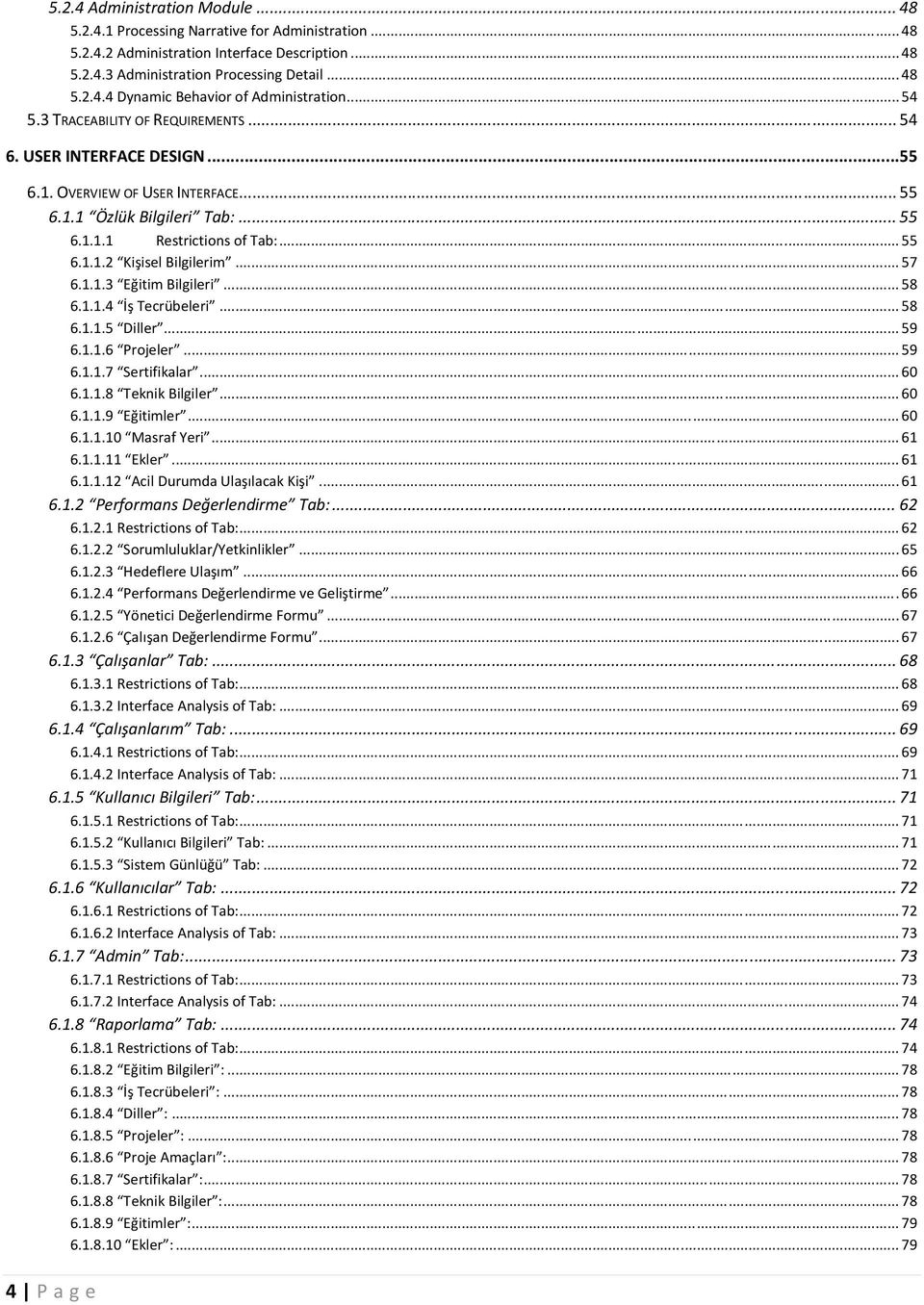
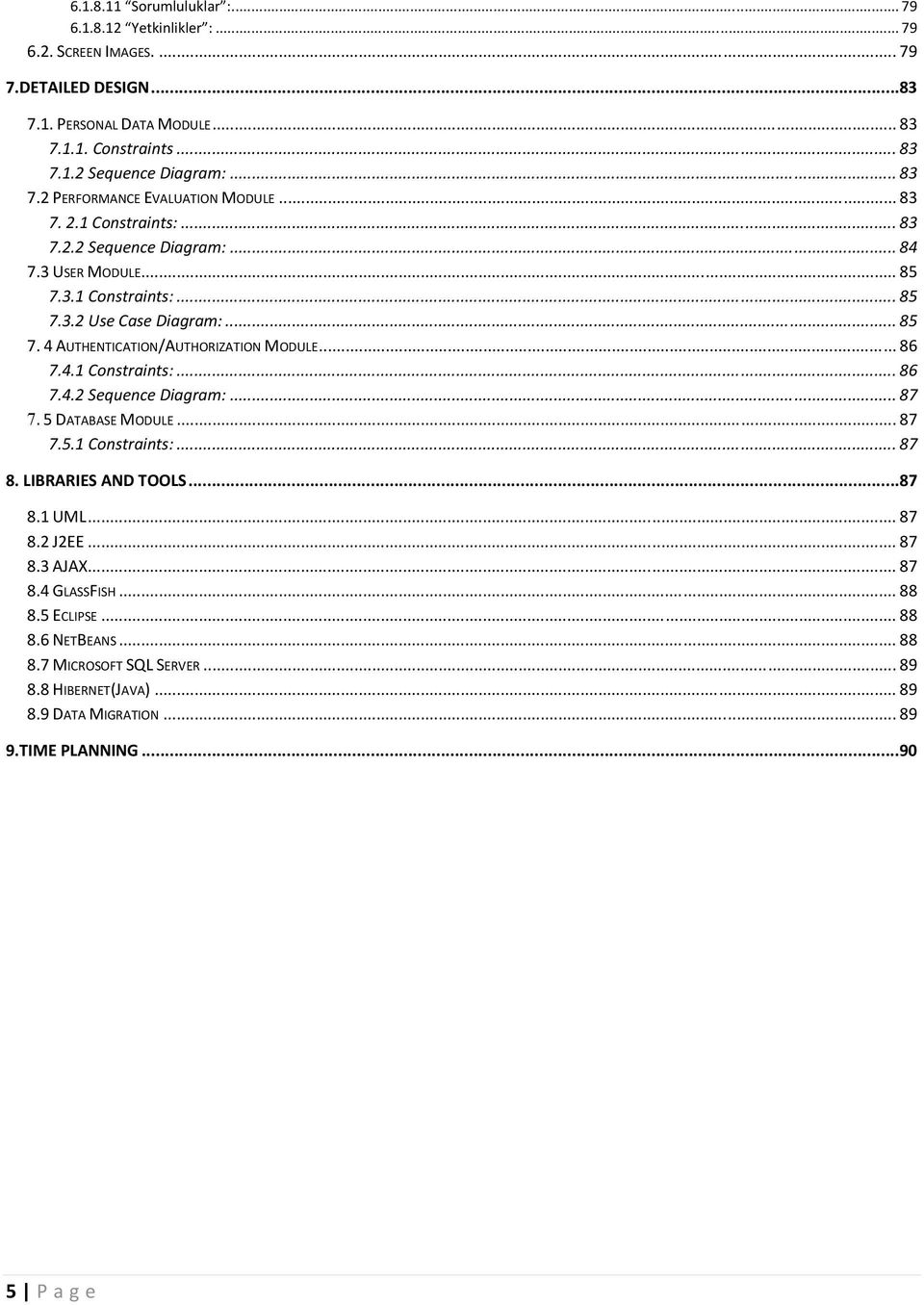
5 Sorumluluklar : Yetkinlikler : SCREEN IMAGES DETAILED DESIGN PERSONAL DATA MODULE Constraints Sequence Diagram: PERFORMANCE EVALUATION MODULE Constraints: Sequence Diagram: USER MODULE Constraints: Use Case Diagram: AUTHENTICATION/AUTHORIZATION MODULE Constraints: Sequence Diagram: DATABASE MODULE Constraints: LIBRARIES AND TOOLS UML J2EE AJAX GLASSFISH ECLIPSE NETBEANS MICROSOFT SQL SERVER HIBERNET(JAVA) DATA MIGRATION TIME PLANNING P age
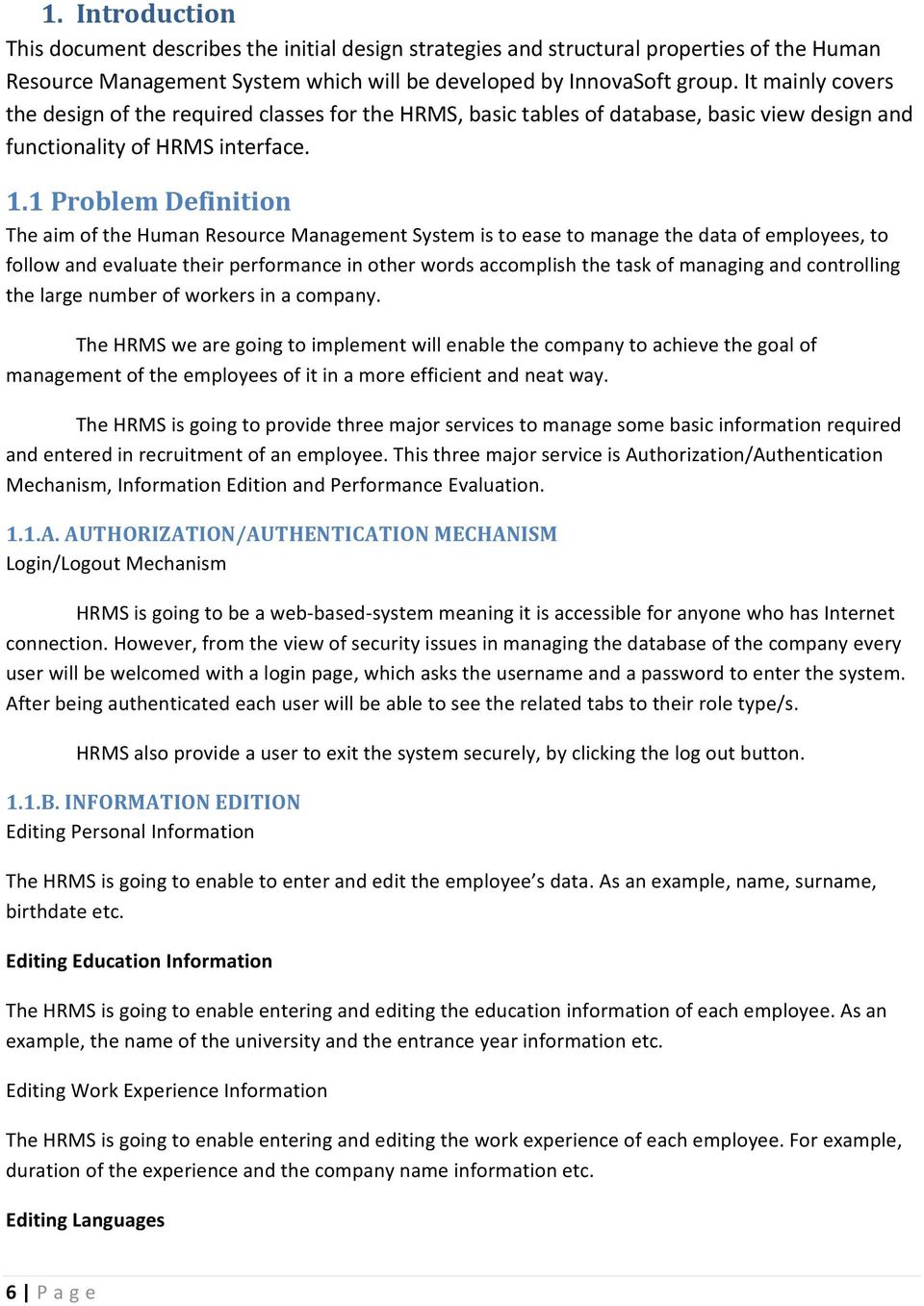
6 1. Introduction This document describes the initial design strategies and structural properties of the Human Resource Management System which will be developed by InnovaSoft group. It mainly covers the design of the required classes for the HRMS, basic tables of database, basic view design and functionality of HRMS interface. 1.1 Problem Definition The aim of the Human Resource Management System is to ease to manage the data of employees, to follow and evaluate their performance in other words accomplish the task of managing and controlling the large number of workers in a company. The HRMS we are going to implement will enable the company to achieve the goal of management of the employees of it in a more efficient and neat way. The HRMS is going to provide three major services to manage some basic information required and entered in recruitment of an employee. This three major service is Authorization/Authentication Mechanism, Information Edition and Performance Evaluation. 1.1.A. AUTHORIZATION/AUTHENTICATION MECHANISM Login/Logout Mechanism HRMS is going to be a web based system meaning it is accessible for anyone who has Internet connection. However, from the view of security issues in managing the database of the company every user will be welcomed with a login page, which asks the username and a password to enter the system. After being authenticated each user will be able to see the related tabs to their role type/s. HRMS also provide a user to exit the system securely, by clicking the log out button. 1.1.B. INFORMATION EDITION Editing Personal Information The HRMS is going to enable to enter and edit the employee s data. As an example, name, surname, birthdate etc. Editing Education Information The HRMS is going to enable entering and editing the education information of each employee. As an example, the name of the university and the entrance year information etc. Editing Work Experience Information The HRMS is going to enable entering and editing the work experience of each employee. For example, duration of the experience and the company name information etc. Editing Languages 6 P age
7 The HRMS is going to enable entering and editing languages of each employee. As an example, German language is in advanced level in writing etc. Editing Projects Information The HRMS is going to enable entering and editing the projects of each employee is working on currently. Editing Certificates Information The HRMS is going to enable entering and editing the Certificate information of each employee. As an example, date and institute name information of the certificates etc. Editing Technical Skills The HRMS is going to enable entering and editing the technical skills of each employee. For example, eclipse in advanced level etc. Editing Trainings Information The HRMS is going to enable entering and editing the trainings information of each employee. For example, VectorCAST[1] training, and start and end time of the training etc. Editing Cost Center Information The HRMS is going to enable entering and editing the costs of the employee in project. In other words, to specify how much an employee costs in accomplishing a project. Editing Attachments Information The HRMS is going to enable to attach some files to the account of each employee. For example, their resumes will be attached. Editing Emergency Call Information Siemens EC expects a phone number of a relative of each employee, in case of an emergency situation. HRMS will enable the user to enter that contact information needed. 1.1.C. PERFORMANCE EVALUATION HRMS is going to enable each role type namely manager to evaluate his/her employees performance. Employees are going to be able to evaluate performance of his/herself. Since HRis also an employee they are also going to be evaluated by their managers. Performance Evaluation will be accomplished in five major steps. These five steps are, determining the responsibilities and competences of an employee to be evaluated, determining the targets and whether they are achieved or not, performance evaluation and improvement as free text, and finally the self evaluation of employees and evaluation of employees and managers by their managers (both employees and managers have managers). 7 P age
8 1.2 Purpose This document constitutes a very comprehensive design of an HRMS system, which can be understood by any developer of HRMS. The purpose is to serve a reliable base to develop an HRMS. With the help of this document, basic steps that must be followed by the developer to develop the HRMS can be clearly inferred and implemented. 1.3 Scope This document briefly covers the definition of the problem, description of our solution we proposed with the structural behavior of our design, the structure of our classes, the table of database and architecture of the HRMS in a detailed way. To be more specific, we described our behavior of the system with the basic fields of our classes required to develop the HRMS. In order to obtain an help to constitute a relation between our solution and the database, the tables of database are analyzed in a detailed way and created when needed. This document briefly covers this analyze of the tables of the database. In addition to, the database tables, we described and visualized the fundamental interface tabs. To be more comprehensive we briefly included the structure of each component and relations of them which are required to describe our design of HRMS. 1.4 Overview The rest of the document identifies the system overview, describing the main features of the system, design considerations such as design constraints, goals, dependencies, data design with classes and table structures, HRMS user interface design, system architecture with data components Definitions, Acronyms and Abbreviations Siemens EC HRMS PEM PEM SRS Sec. Admin HR A&A Our sponsor company; Siemens Enterprise Communication Human Resources Management System Performance Evaluation Module Performance Evaluation System Software Requirement Specification Section Administrator Human Resources Personnel Authentication and Authorization 1.6. References [1] referred in sec. 1.1.B [2] Sec P age
9 [3] tutorials/ Sec. 8.3 [4] Sec.8.4 [5] Sec. 8.5 [6] Sec. 8.7 [7 ] Sec System Overview Our system is to be organized and implemented in a way that the problem is divided into four fundamental modules. These modules can be stated as Authentication/Authorization Performance Evaluation Process Data Recruitment 2.1Authentication/Authorization Authentication and Authorization mechanism includes two subcomponents namely authentication and authorization. Authentication mechanism steps in when a user attempts to enter the system. In order to be authenticated user must be enter a valid username and a password. Authorization mechanism, on the other hand, steps in when there is the issue of recruitment. Basically, authorization is giving a role type to the user account which is new to the system. After authorization phase, the user will have a valid account and ready to enter the system with his/her username and password any time. 2.2 Performance Evaluation Performance Evaluation mechanism is one of the newly added feature which is designed to determine the performance of the employees, managers and the HR. This determination and evaluation is handled basically in five main parts each having subparts. Firstly, every user has a role type and each role type has some responsibilities and competences defined. In first part of evaluation, the specified employees' responsibilities and competences are seen. In the second part, the system let the user to specify the aims/goals for whichever category desired. For example, financial, customer/market etc. Each aim/goal will be described as free text. After being described, the date of termination of each aim/goal will be determined. And at the finalize time of aim/goal property, there is a part to be filled by both manager and the employee the results of the aims/goals. 9 P age

10 In the third part, the manager and the employee will commend according to the results of the goals/aims specified above. There will be separate fields which are to be filled as free text. In the fourth part, whom name can be translated as improvement, users will be able to indicate which improvement strategies must be taken to accomplish the aims/goals specified above after the termination date. By the way, these improvements can be both self performance or team performance. Only manager will fill these part as free text. In the fifth and the last part of the evaluation, there is a list of opinions both for manager and the employee. These lists are constituted of the opinions which are going to be evaluated by three different scalars: open to improvement, satisfy the expectation, above and beyond the expectation. 2.3 Process Data Processing the data can be analyzed in three basic functions which can be stated as: Edit, Search, Report. is specified according to their role type. Edit function will use the UPDATE query of SQL. Search function which is needed to search the employees who have specific properties. Search function will use the SELECT query of SQL. Lastly report function which selects the specific values of employee/s database by using SELECT query of SQL. Also providing a printable version of the result is in the scope of the report function. 2.4 Recruitment Recruitment of a new person can be analyzed in two separate phase. Firstly, HR may add a new employee by entering his/her personal data when she/he is recruited. In this phase the added employee has no access to the system. In order to be able to access the system, the account must be authorized by administrator which is described in Authorization/Authentication part. Secondly, administrator may add a user who is not added by HR. This situation can be confronted when there is a need for hiring a person who must reach the system but not as an employee. 3. Design Consideration 3.1 Design Assumptions, Dependencies, and Constraints Most of the companies that use HRMS application expect the system to be capable of handling more than the number of employees they have. The current HRMS application of Siemens EC operates on about 100 employees. Apparently, Siemens EC like other reputed companies is on the path of developing. Day by day, the number of employees and projects are increasing. This increase in the number of employees and projects brings some new features and requirements such as new positions, skills, responsibilities, trainings, educational levels, user role types, and 10 P age

11 many more. As the current HRMS is insufficient to provide those functionalities due to its lack of being flexible, useable and portable to new technologies and open to develop design strategies; thus, current HRMS will not be able to handle the needs of the company by now and in the future. Our HRMS application will serve more than 200 employees with all the required features mentioned above. Since it will cover the personal data information of the stuff and company owners safety and security constraints are main the issues of the system. By using MD5 technologies the data transaction between actor and server will be encrypted and all the passwords will be stored in an encrypted form. For performance constraints the system will response in a reasonable sort time. A user would be able to login and should be able to get response in 2 3 seconds. If the entered data is correct he/she will be authenticated to the system and will be able to see the corresponding interface. Apart from these constraints the system should satisfy some assumptions and dependencies like a working internet connection and any operation system supporting JVM. 3.2 Design Goals and Guidelines Safety constraint is a main issue as we mentioned above. Since the system will work on web services, it must prevent all attacks from the outside and only authorized people must access the database through the HRMS interface. It must prevent the manipulation of the personal data from unauthorized users. Also another major principle that the system must provide is reliability. People must rely on the system and they must use the system in confidence. The system must share information according to the role of users. For instance the admin will be able to see and edit all the information of the users but an employee will be able to only see and edit his/her information and personal data. The main function of the system must be correct and fast enough and must provide the correct and expected data. For interface designs we have different interfaces for each user according to their role types after they have been authenticated and authorized. As a user with any defined role types could be new and unfamiliar with the system so the interfaces must be clear enough to each role types. 11 P age
12 4 Data Design 4.1 Data Description This section describes main modules and the data components they have briefly. These modules constitute the fundamental structure of the HRMS. The components are analyzed in a way that all the main fields and methods are visualized with the help of a table including detailed information related to these fields and methods. Since HRMS is going to use extensive use of relational data, in addition to the modules described above main database tables are included to this section Description of Data Modules Personal Data Module Personal Data Module is designed to accomplish the operations related to Personal Information. Personal Data Module includes the classes related to each subfield. In addition to the field names specified below, each entity performs edit, display and confirms functions. Field Name Type Description EmployeeId This is a static variable which can be used by all classes of this package. Employees Array This is also a static variable which can be used by all classes of this package. The array contains the employee ids PersonalData Entity The description of Personal Data Entity is shown in the table below: Field Name EmployeeId Name Surname Gender Nationality Type 12 P age
13 BloodGroup BirthDate MaritalStatus DrivingLisence WorkPhone GSMNumber HomePhone Job Department ManagerId ManagerName Position [a] IdentityNumber TaxIdNumber SSKNumber GraduationDate ContractType HireDateToEC [b] HireDateToAS [c] MilitaryStatus MilitaryEndDate Picture TradeAssociationMembershipDate CompanyPlace Date Date Date Date 13 P age
![GraduationDate ContractType HireDateToEC [b] HireDateToAS [c] MilitaryStatus](/docs-images/43/3657597/images/page_13.jpg "MilitaryEndDate Picture TradeAssociationMembershipDate CompanyPlace Date Date Date")
14 OfficePlace ArbisRegistration Boolean [a]: Job field holds the information about the status of an employee. For example Software Engineer. [b]: This field holds the date of hire to Siemens EC. [c]: This field holds the date of hire to Siemens AŞ Education Entity The description of Education Entity is shown in the table below: Field Type Description EducationDegree Holds the degree of the employee. For example university, highschool etc. InstitutionName Holds the institution name that the employee completed his/her education. Department Holds the department name of the employee that he graduated from. Thesis Holds the information of the name of the thesis if any. ContinuingEducation Boolean Holds the information whether the employee continues to his/her education. EnteranceDate Date Holds the information of university enterance date. GraduationDate Date Holds the information of graduation date from university Work Experience Entity The description of Work Experience Entity is shown in the table below: Field Name Type Description 14 P age
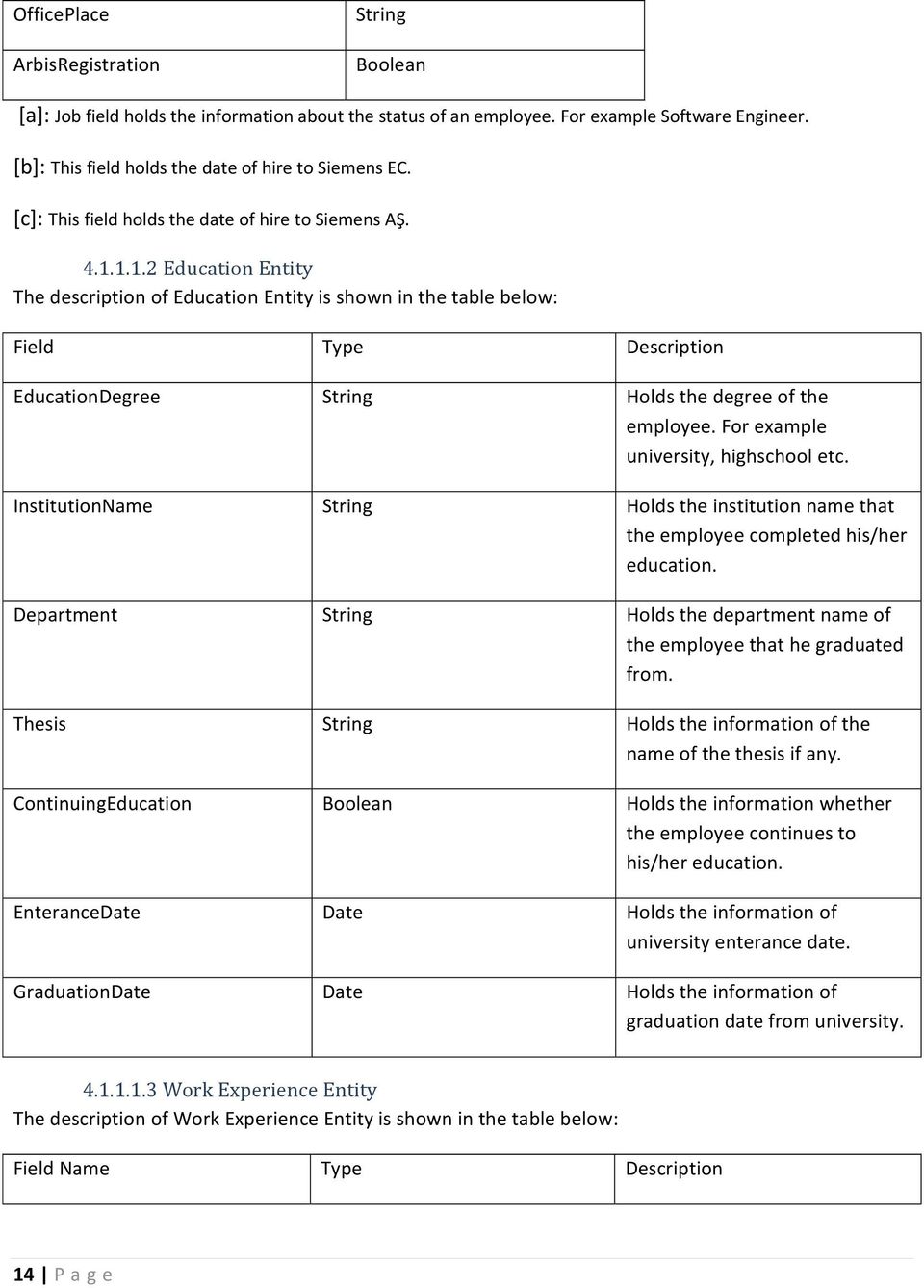
15 CompanyName Holds the information of company name that the employee has a work experience. Position Holds the position of the employee at the experience. WorkPlace Holds the work place of the company that he/she had an experience. StartDate Date Holds the start date of the experience. EndDate Date Holds the end data of the experience Languages Entity The description of Languages Entity is shown in the table below: Field Name Type Description Language The language that the employee has other than his native language. WrittenLevelId Written level of the language. SpeakingLevelId Speaking level of the language. ReadingLevelId Reading level of the language. NativeLanguage Native language of the employee Projects Entity The description of Projects Entity is shown in the table below: Field Name Type Description Name Name of the project Position Name of the position of the 15 P age
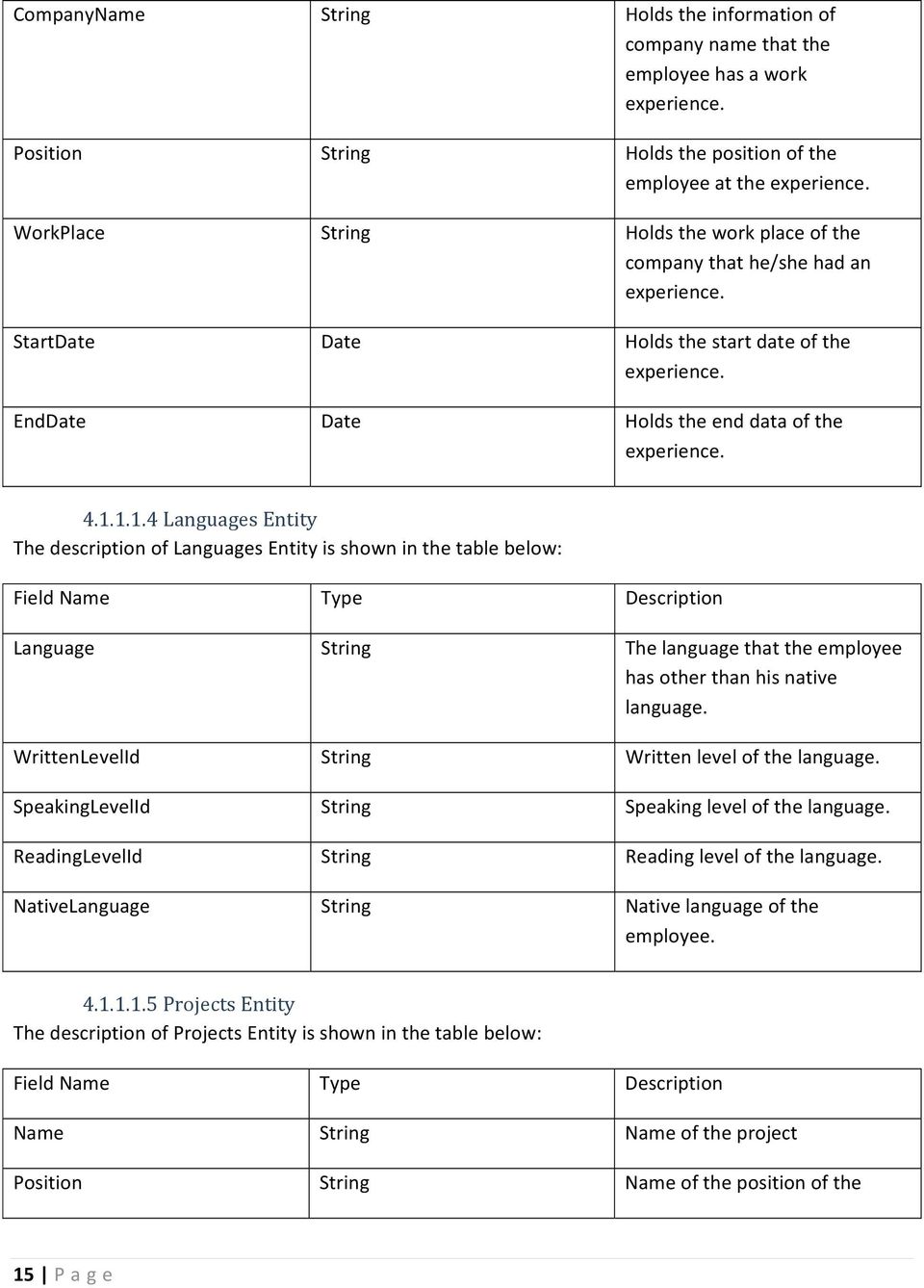
16 employee. Completed Boolean Is the project is completed or not. Start Date Start date to the project. Finish Date Finish date of the project Certificates Entity The description of Certificates Entity is shown in the table below: Field Name Type Description Instituion The institution name which gave that certificate. Name Name of the certificate Date Date Given date of the certificate Technical Skills Entity The description of Technical Skills Entity is shown in the table below: Field Name Type Description Name Name of the information. For example Java Knowledge. Level Level of the employee. For example advanced Trainings Entity The description of Trainings Entity is shown in the table below: Field Name Type Description Name Name of the training Location Location where the training is taken. Institution Institution name of the training. StartDate Date Start date of the training. 16 P age

17 EndDate Date End date of the training. Duration Duration of the training Cost_Center Entity The description of Cost Center Entity is shown in the table below: Field Name Type Description CostCenterID Weight Attachments Entity The description of Attachments Entity is shown in the table below: Field Name Type Description Type_Id Type id of the attachment. Content_Type The information of the content of the attachment File_Name Name of the file URL_Only Address of the attachment from where it is called Emergency Call Entity The description of Emergency Call Entity is shown in the table below: Field Name Type Description Name Name of the person who is going to be called in an emergency situation. Surname Surname of the person who is going to be called in an emergency situation. Relation Relation between the person and employee. 17 P age

18 Phone Phone of the person who is going to be called in an emergency situation Performance Evaluation Module Performance evaluation module is designed to perform the evaluation of the employees in four main steps. These steps each uses the classes related to them Responsibilities/Competences Entity This entity constitutes the first step of the performance evaluation. This entity includes the basic information about the employee whose performance is going to be evaluated and the basic information about the manager of that employee. In addition to this information, this entity includes the required Responsibilities and Competencies of the employee. The description of Responsibilities/Competencies Entity is shown in the table below: Field Name EmployeeName EmployeeSurname EmployeeId EmployeeDepartmentId Position Position_Start MangerName ManagerSurname ManagerDepartmentId MeetingDate LastMeetingDate Responsibility_Fields Other_Responsibilities Required_Competencies Type Date Date 18 P age

19 Other_Competencies Employee_Confirmation Manager_Confirmation Boolean Boolean Hit Target Entity Hitting the targets constitutes the second step of the performance evaluation. This entity is to specify the goals, for example Financial Goals, also the start and expected end date of that goal. The description of Hit Target Entity is shown in the table below: Field Name EmployeeName EmployeeSurname EmployeeId ManagerName ManagerSurname Term_Start_Date Term_End_Date Project_Name Project_Goals Personal_Goals Employee_Confirmation Manager_Confirmation Type Date Date Class ProjectAim Class PersonalAim Boolean Boolean Project Aim Entity The description of Project Aim Entity is shown in the table below: Field Name Type Description ID Unique project aim id generated by the system 19 P age

20 PROJECT_ID Id of the projects to which this aim belongs. AIM Name of the aim of the project. DUE_DATE Due date of the aim. CREATED_BY Filled by the system automatically with user id of the creator of this aim. CREATION_DATE Date Filled by the system with the creation date. MODIFIED_BY Filled by the system automatically, with user id of the last modifier of this aim. MODIFY_DATE Date Filled by the system with the last modification date Personal Aim Entity The description of Personal Aim Entity is shown in the table below: Field Name Type Description ID Unique personal aim id generated by the system EMPLOYEE_ID Id of the employee which this aim belongs. PES_ID Id of the Personal Evaluation Report that this personal aim belongs to. MANAGER_ID Manager id of the employee that this Personal aim belongs to. AIM Name of the aim. DUE_DATE Date Due date of the personal aim. RESULT_BY_EMPLOYEE Evaluation of the result of the aim by employee. 20 P age
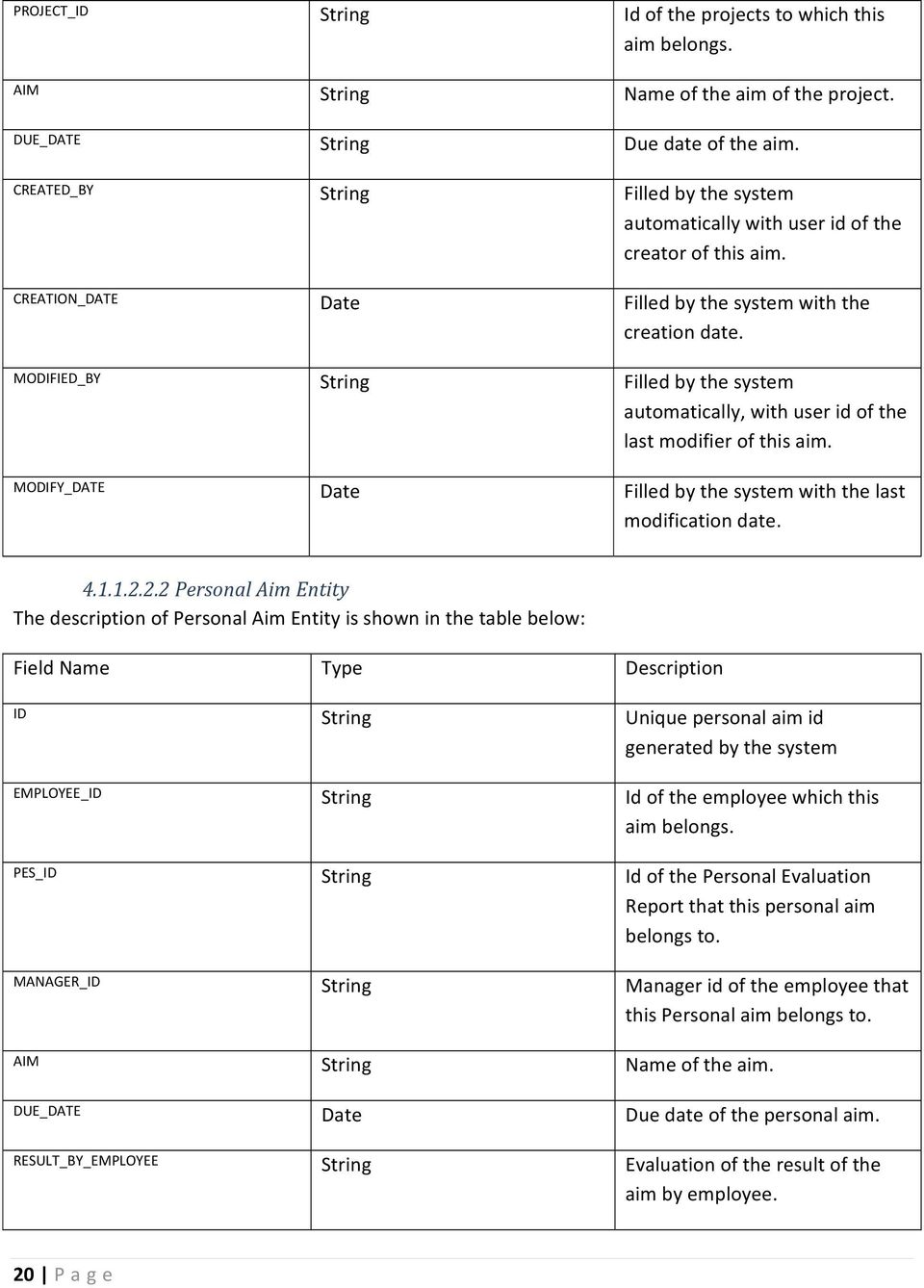
21 RESULT_BY_MANAGER Date Evaluation of the result of the aim by manager Performance Evaluation and Improvement Entity Performance evaluation and improvement entity is the third step of the performance evaluation. This module mainly provides the employee to enter what improvement techniques may be taken by his/herself and his/her view about the hitting of the goals. The description of Performance Evaluation and Improvement Entity is shown in the table below: Field Name Type Description EmployeeName EmployeeSurname EmployeeId ManagerName ManagerSurname Term_Start_Date Term_End_Date Date Date Evaluation The evaluation of the employee his/herself. Employee enters as a free text. Personal_Views Personal views after hitting the goals specified in step2. Improvement Which improvement techniques should/may be taken. Employee enters as a freetext. Employee_Confirmation Boolean Whether it is confirmed by employee. Manager_Confirmation Boolean Whether it is confirmed by manager Evaluation Form Entity 21 P age
22 This entity constitutes the step four of the evaluation. This entity includes the evaluation of the manager. Both manager and his/her manager will be able to evaluate the manager. (All managers are also employees). The description of Evaluation Form Entity is shown in the table below: Field Name Type Description ID Unique id of the evaluation form. PES_ID Id of the performance evaluation report that this evaluation form is in. EMPLOYEEID Id of the evaluatee. LEADERSHIP_PROFILE Free text. Managers personal opinion over leadership profile of the employee. EVALUATION_FORM_TYPE The type of the evaluation form which specifies whether it is manager evaluation or employee evaluation type Evaluation Type Entity The description of Evaluation Type Entity is shown in the table below: Field Name Type Description ID Unique id of the evaluation type. TITLE specifies evaluation type(focusing, impression motivation, leadership, etc.) DESCRIPTION Detailed description of this evaluation type. SEQUENCE The order which is expected in the evaluation form. 22 P age
23 Evaluation Type Definition Entity This entity is a criterion which belongs to evaluation forms (namely employee evaluation form, manager evaluation form). Each criterion will be described with the help of this component. The description of Evaluation Type Definition Entity is shown in the table below: Field Name Type Description ID Unique id of the evaluation type criteria. EVALUATION_TYPE_ID Id of the evaluation type entity EVALUATION_FORM_TYPE The type of the evaluation form which specifies whether it is manager evaluation or employee evaluation type. CRITERIA_ID The id of the current criteria. DESCRIPTION The name of the criteria as a sentence. SEQUENCE The number which indicates the place of the criteria Evaluation Person Entity The description of Evaluation Person Entity is shown in the table below: Field Name Type Description ID Unique id of the evaluation. EVALUATION_TYPE_DEF_ID This indicates which criteria does this evaluation belong to. EVALUATION_FORM_ID Id of the evaluation form. EVALUATOR_ID The id of the person who evaluated. EVALUATION The evaluation selected from the options from a scala. 23 P age
24 User Module The description of User Module Entity is shown in the table below: Field Name Type Description ID Unique id of the user. USER_NAME Employee id of the user. PASSWORD Password of the user, stored in crypted way. NAME Name of the user. SURNAME Surname of the user. INACTIVE Boolean Whether the user is active or inactive. CREATEDDATE Date The date on which the user is created. CREATEDBY The user id of the creator. MODIFYDATE Date The date of last modification. MODIFIEDBY The user id of the admin last modified that user account. TITLE The job of the user in the company. PHONE Home number. CELLPHONE GSM number. FAX Fax number. of the user. COUNTRY Country of the user. LANGUAGE Language of the account. COMPANY_NAME Company Name (Siemens EC, Siemens AŞ etc). 24 P age
25 CUSTOMER_DEPARTMENT Department of the user. FAILED_ATTEMPT_COUNT Int Number of the failure in accessing the account. MUST_CHANGE_PASSWORD Boolean Indicates whether the user must change the password. PASSWORD_EXPIRATION_ENABLE Boolean Indicates whether password is expired or not. LAST_PASSWORD_UPDATE Date The date of the last modification of the password. EXPIRATION_PERIOD The duration that the password is active. EXPIRATION_WARNING_PERIOD How often does the system should warn the user about the password expiration Authentication/Authorization Module Functions Entity This sub module is class of a function which holds basic information about that system function. The description of Functions Entity is shown in the table below: Field Name Type Description ID Id of the function. FUNCTION_NAME Name of the function. CREATEDDATE Date Date of the creation of that function. CREATEDBY User id of who created that function. MODIFYDATE Date Date of the last modification. MODIFIEDBY User id of who modified that function. 25 P age
26 Roles Entity This sub module is a class of a role type which holds the basic information about that role. The description of Roles Entity is shown in the table below: Field Name Type Description ID Holds the role id. ROLE_NAME Holds the name of the role.(manager, employee, HR etc.) CREATEDDATE Date Date of the creation. CREATEDBY User id of whom created that role. MODIFYDATE Date Date of the last modification. MODIFIEDBY User id of whom last modified that role Function Role Entity This sub module keeps the related roles and functions. In other words, this sub module is to specify each role type and the functions that the role type has permission to implement. The description of Functions Role Entity is shown in the table below: Field Name Type Description ID Unique id of the function role relation. ROLE_ID Role id. FUNCTION_ID Function id. CREATEDDATE Date Date of the creation. CREATEDBY User id of whom created that relation. MODIFYDATE Date Date of last modification. MODIFIEDBY User id of whom last modified 26 P age
27 that relation User Role Entity This sub module gives which user id and its related role type. The description of User Role Entity is shown in the table below: Field Name Type Description ID Unique id of the user role ROLE_ID Role id. USER_ID User id. CREATEDDATE Date Creation date of that user role relation. CREATEDBY User id of whom created that relation. MODIFYDATE Date Last modification date of that relation. MODIFIEDBY User id of whom last modified that relation User Log Entity This sub module enable user to hold the information on which time the user logs in and log out. The description of User Log Entity is shown in the table below: Field Name Type Description ID Unique id of the user log. USER_ID User id mentioned. LOGIN_DATE Date Date of the log in. LOGOUT_DATE Date Date of the log out. LOGOUT_TYPE The type of the logout(force quit, timed out, normally logged out etc.) 27 P age
28 Password History Entity This submodule holds the information of which indicates that the user specified changed his/her password on the date mentioned. The description of Password History Entity is shown in the table below: Field Name Type Description ID Unique id generated USER_ID User id. DATE Date Date of the change. PASSWORD Password in crypted form Database Module TBL_EMPLOYEE This table is the main table of the database. In this database table, basic information about employees are kept. Field Type Null Primary Key Foreign Key References EMPLOYEEID Varchar(16) Not Null Yes No NAME Nvarchar(32) Not Null No No SURNAME Nvarchar(32) Not Null No No GENDERID Varchar(1) Not Null No No NATIONALITY Nvarchar(20) Not Null No No BLOODTYPEID Varchar(1) Not Null No No BIRTHDATE Datetime Not Null No No MARITALSTATUSID Varchar(1) Not Null No No DRIVINGLICENCEID Varchar(1) Null No No Varchar(50) Not Null No No PHONE Varchar(16) Null No No CELLPHONE Varchar(16) Null No No HOUSEPHONE Varchar(16) Null No No POSITIONID Varchar(1) Not Null No No DEPARTMENTID Varchar(1) Not Null No No SUPERVISORID Varchar(16) No No No IDENTITYNO Varchar(11) Not Null No No TAXNO Varchar(20) Null No No SSKNO Varchar(13) Not Null No No CONTRACTTYPE Varchar(1) Null No No SIEMENSGIRIS Datetime Null No No STARTDATE Datetime Null No No MILITARYSERVICEID Char(1) Null No No MILITARYSERVICEDATE Datetime Null No No CHAMBERMEMBERSHIPDATE Datetime Null No No LOCATION Nvarchar(50) Null No No OFFICESEAT Varchar(10) Null No No ARBISRECORD Boolen Not Null No No CONFIRMATION Boolen Not Null No No CREATEDDATE Datetime Not Null No No CREATEDBY Varchar(16) Not Null No Yes TBL_APPL_USER. ID MODIFYDATE Datetime Not Null No No MODIFIEDBY Varchar(16) Not Null No Yes TBL_APPL_USER. ID 28 P age
29 TBL_EMPLOYEE_EDUCATION This database table keeps the information about education of employees. Field Type Null Primary Key Foreign Key References EMPLOYEEID Varchar(16) Not Null Yes Yes TBL_EMPLOYEE.EMPLOYEEID DEGREEID Varchar(1) Not Null Yes No INSTITUTION Nvarchar(32) Not Null Yes No DEPARTMENT Nvarchar(32) Not Null Yes No THESIS Nvarchar(128) Null No No STILLSTUDYING Boolen Not Null No No ENTERANCEDATE Datetime Null No No GRADUATIONDATE Datetime Null No No CONFIRMATION Boolen Not Null No No NOTES Nvarchar(256) Null No No TBL_EMPLOYEE_WORKEXPERIENCE Previous work experiences of employees are stored in this database table. Field Type Null Primary Key Foreign Key References EMPLOYEEID Varchar(16) Not Null Yes Yes TBL_EMPLOYEE.EMPLOYEEID COMPANY_NAME Nvarchar(32) Not Null Yes No POSITION Nvarchar(32) Not Null Yes No START_DATE Datetime Not Null Yes No END_DATE Datetime Not Null Yes No WORKPLACE Nvarchar(32) Not Null No No CONFIRMATION Boolen Not Null No No NOTES Nvarchar(256) Null No No TBL_EMPLOYEE_LANGUAGE This database table stores what language that employees know and how much they know those languages. Field Type Null Primary Key Foreign Key References EMPLOYEEID Varchar(16) Not Null Yes Yes TBL_EMPLOYEE.EMPLOYEEID LANGUAGEID Varchar(10) Not Null Yes No WRITTENLEVELID Varchar(1) Not Null No No SPEAKINGLEVELID Varchar(1) Not Null No No READINGLEVELID Varchar(1) Not Null No No NATIVELANG Boolen Not Null No No CONFIRMATION Boolen Not Null No No TBL_EMPLOYEE_CERTIFICATES In this database table, information about certificates, that employees have, are stored. Field Type Null Primary Key Foreign Key References EMPLOYEEID Varchar(16) Not Null Yes Yes TBL_EMPLOYEE.EMPLOYEEID PROVIDER Nvarchar(32) Not Null Yes No NAME Datetime Not Null Yes No DATE Nvarchar(32) Not Null No No CONFIRMATION Nvarchar(3) Null No No NOTES Datetime Null No No TUBITAK Boolen Not Null No No CONFIRMATION Boolen Not Null No No NOTES Nvarchar(256) Null No No TBL_EMPLOYEE_PROJECTS Projects that employees involved in are kept in this database table. Field Type Null Primary Key Foreign Key References 29 P age
30 ID Varchar(16) Not Null Yes No EMPLOYEEID Varchar(16) Not Null Yes Yes TBL_EMPLOYEE.EMPLOYEEID NAME Nvarchar(32) Not Null Yes No START Datetime Not Null Yes No POSITION Nvarchar(32) Not Null No No COMPLETED Nvarchar(3) Null No No FINISH Datetime Null No No TUBITAK Boolen Not Null No No CONFIRMATION Boolen Not Null No No NOTES Nvarchar(256) Null No No TBL_EMPLOYEE_TECHNICALSKILLS Technical knowladge information of employees are kept in this database table. Field Type Null Primary Key Foreign Key References EMPLOYEEID Varchar(16) Not Null Yes Yes TBL_EMPLOYEE.EMPLOYEEID NAMEID Varchar(8) Not Null Yes No LEVELID Varchar(2) Not Null Yes No CONFIRMATION Boolen Not Null No No NOTES Nvarchar(256) Null No No TBL_EMPLOYEE_TRAININGS Information about trainings that employees participated are kept in this database table. Field Type Null Primary Key Foreign Key References EMPLOYEEID Varchar(16) Not Null Yes Yes TBL_EMPLOYEE.EMPLOYEEID NAME Nvarchar(128) Not Null Yes No PROVIDER Nvarchar(64) Null No No LOCATION Nvarchar(32) Null No No START Datetime Null No No FINISH Datetime Null No No DURATION Varchar(16) Null No No CONFIRMATION Boolen Not Null No No NOTES Nvarchar(256) Null No No TBL_EMPLOYEE_COST_CENTER Thistablekeepscosts of employees in projects. Field Type Null Primary Key Foreign Key References EMPLOYEEID Varchar(16) Not Null Yes Yes TBL_EMPLOYEE.EMPLOYEEID COST_CENTER_ID Varchar(8) Not Null Yes No WEIGHT Varchar(2) Null No No CONFIRMATION Boolen Not Null No No NOTES Nvarchar(256) Null No No TBL_EMPLOYEE_ATTACHMENT Information of files that employees attached (such as photo or cv) are kept in this table. Field Type Null Primary Key Foreign Key References EMPLOYEEID Varchar(16) Not Null Yes Yes TBL_EMPLOYEE.EMPLOYEEID FILE_NAME Nvarchar(256) Not Null Yes No FILE_ID Varchar(32) Not Null No No URL_ONLY Boolen Not Null No No FILE_SIZE Numeric Not Null No No TYPEID Varchar(50) Not Null No No CONTENT_TYPE Varchar(64) Not Null No No CONFIRMATION Boolen Not Null No No NOTES Nvarchar(256) Null No No 30 P age
31 TBL_EMPLOYEE_EMERGENCY_CALL In this database table contact information of people that can be called in emergeny. Field Type Null Primary Key Foreign Key References EMPLOYEEID Varchar(16) Not Null Yes Yes TBL_EMPLOYEE.EMPLOYEEID NAME Nvarchar(32) Not Null Yes No SURNAME Nvarchar(32) Not Null Yes No RELATIONTO Nvarchar(16) Null No No PHONE Varchar(16) Not Null No No TBL_PES This database table is the main table of Performance Evaluation System. It keeps Performance Evaluation Reports of employees. Field Type Null Primary Key Foreign Key References ID Varchar(16) Not Null Yes No EMPLOYEEID Varchar(16) Not Null Yes Yes TBL_EMPLOYEE.EMPLOYEEID MANAGERID Varchar(16) Not Null No Yes TBL_EMPLOYEE.EMPLOYEEID POSITION_START Datetime Null No No DATE Datetime Not Null No No TERM_START Datetime Null No No TERM_END Datetime Null No No PROJECT_ID Varchar(16) Null No Yes TBL_EMPLOYEE_PROJECTS.ID EVALUATION Varchar(512) Null No No PERSONAL_OPINION Varchar(512) Null No No IMPROVEMENT Varchar(512) Null No No CONFIRMATION_DATE Datetime Null No No CONFIRMATION_BY_EMPLOYEE Boolen Not Null No No CONFIRMATION_BY_MANAGER Boolen Not Null No No TBL_PES_RESP In this database table list of predefined responsibilities that can be added to Performance Evaluation Report of employees is kept. Field Type Null Primary Key Foreign Key References ID Varchar(16) Not Null Yes No RESP_NAME Nvarchar(64) Not Null No No CREATED_BY Varchar(16) Not Null No Yes TBL_APPL_USER. ID CREATION_DATE Datetime Not Null No No MODIFIED_BY Varchar(16) Not Null No Yes TBL_APPL_USER. ID MODIFY_DATE Datetime Not Null No No TBL_PES_EMPLOYEE_RESP Responsibility and employee relations for Performance Evaluation System is kept in this database table. Field Type Null Primary Key Foreign Key References ID Varchar(16) Not Null Yes No PES_ID Varchar(16) Not Null No Yes TBL_PES.ID EMPLOYEE_ID Varchar(16) Not Null No Yes TBL_EMPLOYEE.EMPLOYEEID RESP_ID Varchar(16) Not Null No Yes TBL_PES_RESP.ID CREATED_BY Varchar(16) Not Null No Yes TBL_APPL_USER. ID CREATION_DATE Datetime Not Null No No MODIFIED_BY Varchar(16) Not Null No Yes TBL_APPL_USER. ID MODIFY_DATE Datetime Not Null No No 31 P age
32 TBL_PES_POS_RESP In this database table keeps information about which responsibilities can be assigned for which positions. Field Type Null Primary Key Foreign Key References ID Varchar(16) Not Null Yes No POSITIONID Varchar(16) Not Null No Yes TBL_EMPLOYEE.POSITIONID RESP_ID Varchar(16) Not Null No Yes TBL_PES_RESP.ID CREATED_BY Varchar(16) Not Null No Yes TBL_APPL_USER. ID CREATION_DATE Datetime Not Null No No MODIFIED_BY Varchar(16) Not Null No Yes TBL_APPL_USER. ID MODIFY_DATE Datetime Not Null No No TBL_PES_MAN_RESP In this database table responsibilities which are assigned for employees by his/her manager except from the responsibilities which are specified for his/her position are stored. Field Type Null Primary Key Foreign Key References ID Varchar(16) Not Null Yes No PES_ID Varchar(16) Not Null No Yes TBL_PES.ID EMPLOYEE_ID Varchar(16) Not Null No Yes TBL_EMPLOYEE.EMPLOYEEID RESPONSIBILITY Nvarchar(64) Not Null No No CREATED_BY Varchar(16) Not Null No Yes TBL_APPL_USER. ID CREATION_DATE Datetime Not Null No No MODIFIED_BY Varchar(16) Not Null No Yes TBL_APPL_USER. ID MODIFY_DATE Datetime Not Null No No TBL_PES_COMP this database table keeps list of predefined competences that can be added to Performance Evaluation Report. Field Type Null Primary Key Foreign Key References ID Varchar(16) Not Null Yes No COMP_NAME Varchar(16) Not Null No No CREATED_BY Varchar(16) Not Null No Yes TBL_APPL_USER. ID CREATION_DATE Datetime Not Null No No MODIFIED_BY Varchar(16) Not Null No Yes TBL_APPL_USER. ID MODIFY_DATE Datetime Not Null No No TBL_PES_EMPLOYEE_COMP This database table determins employee, competence relation. Field Type Null Primary Key Foreign Key References ID Varchar(16) Not Null Yes No PES_ID Varchar(16) Not Null No Yes TBL_PES.ID EMPLOYEE_ID Varchar(16) Not Null No Yes TBL_EMPLOYEE.EMPLOYEEID COMP_ID Varchar(16) Not Null No Yes TBL_PES_COMP.ID CREATED_BY Varchar(16) Not Null No Yes TBL_APPL_USER. ID CREATION_DATE Datetime Not Null No No MODIFIED_BY Varchar(16) Not Null No Yes TBL_APPL_USER. ID MODIFY_DATE Datetime Not Null No No TBL_PES_POS_COMP Competences that can be assigned for positions defined in this database table. Field Type Null Primary Key Foreign Key References ID Varchar(16) Not Null Yes No 32 P age
33 POSITIONID Varchar(16) Not Null No Yes TBL_EMPLOYEE.POSITIONID COMP_ID Varchar(16) Not Null No Yes TBL_PES_COMP.ID CREATED_BY Varchar(16) Not Null No Yes TBL_APPL_USER. ID CREATION_DATE Datetime Not Null No No MODIFIED_BY Varchar(16) Not Null No Yes TBL_APPL_USER. ID MODIFY_DATE Datetime Not Null No No TBL_PES_MAN_COMP In this database table competences which are assigned for employees by his/her manager except from the responsibilities which are specified for his/her position are stored. Field Type Null Primary Key Foreign Key References ID Varchar(16) Not Null Yes No PES_ID Varchar(16) Not Null No Yes TBL_PES.ID EMPLOYEE_ID Varchar(16) Not Null No Yes TBL_EMPLOYEE.EMPLOYEEID COMPETENCE Nvarchar(64) Not Null No No CREATED_BY Varchar(16) Not Null No Yes TBL_APPL_USER. ID CREATION_DATE Datetime Not Null No No MODIFIED_BY Varchar(16) Not Null No Yes TBL_APPL_USER. ID MODIFY_DATE Datetime Not Null No No TBL_PES_PROJECT_AIM In this database table aims of projects are kept, so that this information can be automatically added to Performance Evaluation Report of employees. Field Type Null Primary Key Foreign Key References ID Varchar(16) Not Null Yes No PROJECT_ID Varchar(64) Not Null No Yes TBL_EMPLOYEE_PROJECT AIM Varchar(64) Not Null No No DUE_DATE Datetime Not Null No No CREATED_BY Varchar(16) Not Null No Yes TBL_APPL_USER. ID CREATION_DATE Datetime Not Null No No MODIFIED_BY Varchar(16) Not Null No Yes TBL_APPL_USER. ID MODIFY_DATE Datetime Not Null No No TBL_PES _AIM In this table, aims of the employees and evaluation of them are kept. Field Type Null Primary Key Foreign Key References ID Varchar(16) Not Null Yes No EMPLOYEE_ID Varchar(16) Not Null No Yes TBL_EMPLOYEE.EMPLOYEEID PES_ID Varchar(16) Not Null No Yes TBL_PES.ID MANAGER_ID Varchar(16) Not Null No Yes TBL_EMPLOYEE.EMPLOYEEID AIM Varchar(64) Not Null No No DUE_DATE Varchar(16) Not Null No No RESULT_BY_EMPLOYEE Nvarchar(16) Null No No RESULT_BY_MANAGER Nvarchar(16) Null No No TBL_PES_EVALUATION_FORM This is Manager Evaluation Form database table. Specified criterias for managers are evaluated here. Field Type Null Primary Key Foreign Key References ID Varchar(16) Not Null Yes No PES_ID Varchar(16) Not Null No Yes TBL_PES.ID EMPLOYEEID Varchar(16) Not Null No Yes TBL_EMPLOYEE.EMPLOYEEID LEADERSHIP_PROFILE Nvarchar(256) Null No No EVALUATION_FORM_TYPE Varchar(3) Not Null No No 33 P age
34 TBL_PES_EVALUATION_TYPE This is Manager Evaluation Form database table. Specified criterias for managers are evaluated here. Field Type Null Primary Key Foreign Key References ID Varchar(16) Not Null Yes No TITLE Varchar(16) Not Null No No DESCRIPTION Varchar(256) Null No No SEQUENCE Nvarchar(2) Not Null No No TBL_PES_EVAL_TYPE_DEF This is Manager Evaluation Form database table. Specified criterias for managers are evaluated here. Field Type Null Primary Key Foreign Key References ID Varchar(16) Not Null Yes No EVALUATION_TYPE_ID Varchar(16) Not Null No Yes TBL_PES_EVALUATION_TYPE.ID EVALUATION_FORM_TYPE Varchar(3) Not Null No Yes TBL_PES_EVALUATION_FORM. EVALUATION_FORM_TYPE CRITERIA_ID Varchar(16) Not Null No No DESCRIPTION Nvarchar(64) Not Null No No SEQUENCE Nvarchar(64) Not Null No No TBL_PES_EVALUATION_PERSON This is Manager Evaluation Form database table. Specified criterias for managers are evaluated here. Field Type Null Primary Key Foreign Key References ID Varchar(16) Not Null Yes No EVALUATION_TYPE_DEF_ID Varchar(16) Not Null No Yes TBL_PES_EVAL_TYPE_DEF.ID EVALUATION_FORM_ID Varchar(16) Not Null No Yes TBL_PES_EVALUATION_FORM.ID EVALUATOR_ID Varchar(16) Not Null No Yes TBL_EMPLOYEE.EMPLOYEEID EVALUATION Varchar(10) Not Null No No TBL_APPL_USER This is the main database table for HRMS. This table holds information about users of the system. Field Type Null Primary Key Foreign References Key ID Varchar(16) Not Null Yes No USER_NAME Varchar(16) Not Null Yes Yes TBL_EMPLOYEE.EMPLOYEEID PASSWORD Nvarchar(16) Not Null No No NAME Nvarchar(32) Not Null No No SURNAME Nvarchar(32) Not Null No No INACTIVE Boolen Not Null No No CREATEDDATE Datetime Not Null No No CREATEDBY Varchar(16) Not Null No Yes TBL_APPL_USER. ID MODIFYDATE Datetime Not Null No No MODIFIEDBY Varchar(16) Not Null No Yes TBL_APPL_USER. ID TITLE Varchar(1) Null No No PHONE Varchar(16) Null No No CELLPHONE Varchar(16) Null No No FAX Varchar(16) Null No No Varchar(50) Null No No COUNTRY Nvarchar(100) Null No No LANGUAGE Nvarchar(50) Null No No COMPANY_NAME Nvarchar(100) Null No No CUSTOMER_DEPARTMENT Nvarchar(50) Null No No FAILED_ATTEMPT_COUNT Int Not Null No No MUST_CHANGE_PASSWORD Boolen Not Null No No PASSWORD_EXPIRATION_ENABLE Boolen Not Null No No LAST_PASSWORD_UPDATE Datetime Not Null No No EXPIRATION_PERIOD Varchar(16) Null No No 34 P age
35 EXPIRATION_WARNING_PERIOD Varchar(16) Null No No TBL_APPL_FUNCTIONS This database table keeps information about functions of HRMS. Field Type Null Primary Key Foreign Key Reference ID Varchar(16) Not Null Yes No FUNCTION_NAME Nvarchar(32) Not Null No No CREATEDDATE Datetime Not Null No No CREATEDBY Varchar(16) Not Null No Yes TBL_APPL_USER. ID MODIFYDATE Datetime Not Null No No MODIFIEDBY Varchar(16) Not Null No Yes TBL_APPL_USER. ID TBL_APPL_ROLES This database table keeps list of roles, defined for the system. Field Type Null Primary Key Foreign Key Reference ID Varchar(16) Not Null Yes No ROLE_NAME Nvarchar(32) Not Null No No CREATEDDATE Datetime Not Null No No CREATEDBY Varchar(16) Not Null No Yes TBL_APPL_USER. ID MODIFYDATE Datetime Not Null No No MODIFIEDBY Varchar(16) Not Null No Yes TBL_APPL_USER. ID TBL_APPL_FUNC_ROLE In this database table, authorization of roles for functions are determined. Field Type Null Primary Key Foreign Key Reference ID Varchar(16) Not Null Yes No ROLE_ID Varchar(16) Not Null No Yes TBL_APPL_ROLES.ID FUNCTION_ID Varchar(16) Not Null No Yes TBL_APPL_FUNCTIONS.ID CREATEDDATE Datetime Not Null No No CREATEDBY Varchar(16) Not Null No Yes TBL_APPL_USER. ID MODIFYDATE Datetime Not Null No No MODIFIEDBY Varchar(16) Not Null No Yes TBL_APPL_USER. ID TBL_APPL_USER_ROLE In this database table, kept the roles of users are defined. Field Type Null Primary Key Foreign Key Reference ID Varchar(16) Not Null Yes No ROLE_ID Varchar(16) Not Null No Yes TBL_APPL_ROLES.ID USER_ID Varchar(16) Not Null No Yes TBL_APPL_USER.ID CREATEDDATE Datetime Not Null No No CREATEDBY Varchar(16) Not Null No Yes TBL_APPL_USER. ID MODIFYDATE Datetime Not Null No No MODIFIEDBY Varchar(16) Not Null No Yes TBL_APPL_USER. ID TBL_APPL_USER_LOG This database table kept logs of users. Field Type Null Primary Key Foreign Key Reference ID Varchar(16) Not Null Yes No USER_ID Varchar(16) Not Null No Yes TBL_APPL_USER.ID LOGIN_DATE Datetime Not Null No No LOGOUT_DATE Datetime Null No No LOGOUT_TYPE Nvarchar(10) Null No No IP Varchar(15) Not Null No No 35 P age
36 TBL_APPL_PASSWORD_HISTORY This database table stores passwords of users, in crypted form. Field Type Null Primary Key Foreign Key Reference ID Varchar(16) Not Null Yes No USER_ID Varchar(16) Not Null No Yes TBL_APPL_USER.ID DATE Datetime Not Null No No PASSWORD Nvarchar(16) Not Null No No 5. System Architecture 5.1 Architectural Design Figure 5.1: General Overview of the HRMS Application Mainly, our HRMS consists modules and a Client/Server architecture comprising interfaces and a main database. These modules are interrelated with each other through the predefined role types that are assigned to each user. Actually, those modules are the main and fundamental part of the HRMS which play a critical role to configure the specific interfaces corresponding to the different role types. Considering the role types and their specific interfaces data access will be verified through database. The main database will keep all the data related to all specified modules. Therefore, data manipulation will be carried out throughout the HRMS by means of 36 P age
37 those modules. So there will be HRMS application server through database connector handles all database requests from the client s side to the database, as well as the responses are controlled by the server. Our HRMS system can be subcategorized into 4 main components as modules according to their unique activities performed on the main database. The main modules are namely: Authentication and Authorization Personal Data Performance Evaluation Administration 5.2Description of Components Authentication and authorization Module Processes Narrative for Authentication and Authorization This component is responsible for checking the critical requests with the permission of the clients. For example if a client tries to log on into the system Authentication checks if he is a registered user of the system according to the user identification and password. After a user is authenticated the authorization mechanism becomes active and authorizes the user according to the corresponding role types. Meanwhile this package controls the access of specific data corresponding to specific role type. An admin may be granted to view an employee`s profile and edit the personal data while an employee will not be able to grant the admin s Personal Data. The process of Authentication and Authorization is shown below in the figure : 37 P age
38 Figure : Use Case diagram for Authentication and Authorization Authentication and Authorization Interface Description The user is asked to enter his\her username and password to access to the system. The output is either request granted or denied. After a user is authenticated the authorization package decides the role type according to the corresponding user. It interacts with HRMS in order to get data from the data base Authentication and authorization Processing Detail 38 P age
39 The package operates as follows: It receives authentication request from server along with the data from the database. After the data is entered the given data is controlled in the database and starts processing authentication. After a while the authenticated data is sent to authorization mechanism and the role type of the user is checked and sent back to the HRMS application. It returns a grant or a denial response. After the role type is checked from the database, interfaces according to the defined role type will be created in the HRMS application page. Then user will be able to use the HRMS application Dynamic Behavior of Authentication and Authorization Personal Data Module Processes narrative for Personal Data This component is responsible for storing personal data. In fact by using this package the requested data is granted from database, in other words, it queries into the database and provides the requested data for the user. It uses the JDBC (java database connectivity) connector to get data from the database and create corresponding objects with attributes and methods to access the data easily. The main operation in manipulating the Personal Data Module can be shown by the figure below below: 39 P age
40 40 P age Figure : Use Case Diagram for Personal Data Module
41 Personal Data interface description It receives data requests from the user and starts querying the database for the corresponding data. When a new data is added it translates these data into SQL commands and process them using JDBS connector. Then the data is stored into the database and when needed it is queried by the Personal Data package Data Storage Processing Detail This module works as follows It receives a request of data from the user. When it is asked to display data it will query and provide the requested data from database When asked to store data it will translate to data into SQL commands and store into the database. It issues the command through JDBC connector. The storage in the main database will be done by means of a bunch of functions that are listed below: Add an Employee This function lets HR Role Type tos add an employee to the database. All the required fields will be filled by his/her. It can be shown in the figure : 41 P age
42 Figure : Sequence Diagram for Add an Employee Edit Work Experience This function lets HR and Employee Role Types to add or edit work experiences that are stored in the database related to an employee. The operation shown in figure : 42 P age
43 Figure : Sequence Diagram for Edit Work Experience Dynamic Behavior of Personal Data Module This sequence diagram in the figure shows the main Personal Data tab, the specification of the module is discussed above. 43 P age
44 Figure : Sequence Diagram for Personal Data Module 5.2.3Performance Evaluation Module Processing Narrative for PEM In order to have a better management and control over employees and projects, HRMS application carries out a performance evaluation. HRMS enables role types such as Managers and Employees to carry out performance evaluation PEM Interface Description In order to use performance evaluation module, a viewable webpage requests from the client side will be started. After completing the evaluation, the manipulated data or the new data will be saved to the main database PEM Processing Details Manager Performance Evaluation In HRMS application, beside his/her Personal Data module, Manager role type is further responsible for carrying out performance evaluation. He/she will use Performance Evaluation module to do it. All data manipulation will be carried out via main database. By means of this 44 P age
45 module a manager role type will be able to collect related personal ideas and suggestions from the employees about projects, teamwork, their unique performances and improvement on each different matter. This module will be available throughout a time perioud that manager role type specifies and it can be carried out every year for that time perioud. Employees will be able to see and present their ideas and suggestions on that timeline. It can be shown in the figure : Responsiblities/Authorities Figure : Use Case Diagram of Manager for PEM Responsibilities/Authorities submodule will show the related responsibilities and authorities of manager role type. 45 P age
46 Goals HRMS application may have different goals and objectives according to Siemens EC Company policy. However, HRMS application will provide manager role type to create new goals and objectives to be carried out by employees. Performance Evaluation Improvement This submodule is responsible for details of performance evaluation improvement. It specifically checks each fundamental and important factors that are the underlying reason behind reaching each goals in the Performance Evaluation Module. The submodule checks and lists every powerful competencies of each employee, his/her ideas to improve those competencies and skills, and his/her ideas for the past determination of competencies and skills. It further collects employees ideas and suggestions which are very posivtive and negative towards the goals. Evaluation Form Inside the performance evaluation module, there is a variable to decide whehter the Manager Evaluation form or Employee Evaluation for is used. Manager Evaluation Form Manager role type will consider all the personal ideas and suggestions that are gathered from the above submodules and represents his/her ideas suggestions for the specific area of evaluation form. Employee Evaluation Form As discussed above, manager role type in HRMS application will make the Performance Evaluation Module available throughout a time period every year. In this time period, employees are responsible for presenting their personal ideas and suggestions. Performance Evaluation module provides a facility called Employee Performance Evaluation For for the employees to fill their ideas. This form contains some competency and skill fields related to each goal and objective so that each employee can measure his/her performance according to them. Also he/she will be able to present his/her personal ideas whether those goals and objectives affect them positively or negatively and why. Main database will keep all these ideas, suggestions, and preferences of employees. The relationship between Employee and PEM is shown in the figure : 46 P age
47 Figure : Use Case Diagram for Employee and PEM Dynamic Behavior of PEM This use case diagram shown in the figure indicates the behavior of Manager Role Type and the PEM. Figure : Sequence Diagram for PEM 47 P age
48 5.2.4 Administration Module Processing Narrative for Administration Admin is the person who as the authority to add new users to the system or change the role type of a user. By using this package admin will be able to see all users list with some corresponding information regarding each user Administration Interface Description This package provides some basic methods for the admin to change or edit a user role type or see his\her users list. For instance if admin clicks on Edit Role Type button a new window would be opened and the admin will be asked the give permission to change the role type so after while he\she selects a new role from the list of roles for the corresponding user Administration Processing Detail This module operates as follows: Add new user to the HRMS By this function admin will be able to add a new user to HRMS. The basic information will stored in the database such as storing name, surname, title, phone number, fax, , country, languages, company name, assign role types to the users, and etc. As it displayed in the figure : 48 P age
49 Introduce New User Roles to the HRMS Figure : Use Case Diagram for Add New User Admin role type will also be available for introducing new role types to the HRMS. For example, in our system, we have stated roles such as Admin, HR, Manager, and Employee. The Admin role type will be able to introduce a new role type like sales person. It can be shown in the figure : 49 P age
50 Figure : Sequence Diagram for Introduce New Role Type Edit User Roles Users with their defined role types can be edited and changed to assigned other role types. For example, an added user has Manager Role type; therefore, it can be changed to a HR role type. The figure illustrates the operation: 50 P age
51 Edit Current Role Type Figure : Sequence Diagram for Edit User Role Type Admin will be able to restrict or extend a current role type that a user posses. The restricted Role Type will not be able to see some data from the database. The extended Role Type will be able to more data than his/her previous Role Type. The operation is shown by figure : 51 P age
52 Delete Current Role Type Figure : Sequence Diagram for Edit Current Role Type This function provides Admin Role Type to delete a Role Type so that the HRMS application will not contain any such Role Type anymore. The user with the deleted role type cannot see any data related to that Role Type from the database. The operation is shown in the figure below: 52 P age
53 53 P age Figure : Sequence Diagram for Delete Current Role Type
54 Dynamic Behavior of Administration 5.3 Traceability of Requirements Traceability matrix of use case requirements in SRS and design component in initial design report is shown in the table below: Use Case SRS Log in SRS Log out SRS Log in failure SRS User Role Check SRS Display SRS Edit Design Component Authentication/Authorization Module Authentication/Authorization Module Authentication/Authorization Module Authentication/Authorization Module Personal Data Module Performance Evaluation Module User Module Authentication/Authorization Module Personal Data Module Performance Evaluation Module 54 P age
55 SRS Search SRS Report SRS Update Authentication SRS Add New User SRS Add Employee User Module Authentication/Authorization Module Personal Data Module Performance Evaluation Module User Module Authentication/Authorization Module Personal Data Module Performance Evaluation Module User Module Authentication/Authorization Module Authentication/Authorization Module Authentication/Authorization Module Personal Data Module 6. User Interface Design 6.1. Overview of User Interface Özlük Bilgileri Tab: Restrictions of Tab: General: EMPLOYEEID is generated by the system automatically in employee creation and cannot be changed. So Sicil No, in Kişisel Bilgilerim sub tab, is not editable. Yönetici Adı field in Kişisel Bilgilerim sub tab, is filled with the NAME and SURNAMEdata of the employee whose EMPLOYEEID is same with the SUPERVISORID of the displayed employee. Mezuniyet Tarihi fieldin Kişisel Bilgilerim sub tab, is filled by newest GRADUATION_DATE of the employee from the TBL_EMPLOYEE_EDUCATION. Dosya içeriği field of the Ekler sub tab is defined by the extension of the attached file. Sakla button in a sub tab, saves information, which edited only in that sub tab, to the database. Onay affects only that sub tab. Employee: Users who have Employee role can see their own information in a form type view. They can edit some information, specified below. If user changes any information then Sakla button gets activated, only after is clicked, information get changed from the database. 55 P age
56 If user changes an information which was already confirmed, confirmation gets deactivated. If any information are changed by Manager or HR that Employee gets a notifying mail by the system. Manager: Users who have Manager role can see information of the employees is under the user in a form type view. They can edit some information, specified below. If user changes any information then Sakla button gets activated, only after is clicked, information get changed from the database. If user changes an information which was already confirmed, confirmation gets deactivated. If any information are changed by Employee or HR, Manager who is responsible from that employee, gets a notifying mail by the system. HR: Users who have HR role can see information of all employees in a form type view. They can edit nearly all information, specified below. If user changes any information then Sakla button gets activated, only after is clicked, information get changed from the database. HR is responsible to check truth of the information in this tab and then confirm this information. If any information are changed by Employee or Manager all HR s get notifying mail by the system to check and confirm the information. Admin: Admin role doesn t provide any authorization to see this tab. Combo Boxes: [1] Bayan/Bay [2] 0 rh /0 rh+/a rh /A rh+/b rh /B rh+/ab rh /AB rh+ [3] Bekar/Evli [4] A1/A2/B/C/D/E/F/G/H [5] (Preferences are waited from company) [6] (Preferences are waited from company) [7] Tecilli/Yapmış [8] (Preferences are waited from company) [9] Orta Okul/Lise/Ön Lisans/Lisans/Yüksek Lisans/ Doktora [10] İngilizce/Almanca/Fransızca/Flemence/İspanyolca/İtalyanca (Full List Needed) [11] Başlangıç/Orta/İleri [12] All NAME values of TBL_EMPLOYEE_PROJECTS [13] C/C++/Java/Python (Full List Needed) [14] (Preferences are waited from company) [15] Özgeçmiş (Full List Needed) 56 P age
57 Kişisel Bilgilerim This sub tab displays general information of employees in a form like interface. Field Name Type Employee HR Manager Table Name Table Column Sicil No Textbox Read Only Read Only Read Only TBL_EMPLOYEE EMPLOYEEID Adı Textbox Read Only Editable Read Only TBL_EMPLOYEE NAME Soyadı Textbox Read Only Editable Read Only TBL_EMPLOYEE SURNAME Cinsiyet Combo Box[1] Read Only Editable Read Only TBL_EMPLOYEE GENDERID Uyruğu Textbox Read Only Editable Read Only TBL_EMPLOYEE NATIONALITY Kan Grubu Combo Box[2] Read Only Editable Read Only TBL_EMPLOYEE BLOODTYPEID Doğum Tarihi Date Box Read Only Editable Read Only TBL_EMPLOYEE BIRTHDATE Medeni Hali Combo Box[3] Editable Editable Read Only TBL_EMPLOYEE MARITALSTATUSID Sürücü Belgesi Combo Box[4] Editable Editable Read Only TBL_EMPLOYEE DRIVINGLICENCEID E Posta Textbox Read Only Editable Read Only TBL_EMPLOYEE İş Telefonu Textbox Editable Editable Read Only TBL_EMPLOYEE PHONE Cep Telefonu Textbox Editable Editable Read Only TBL_EMPLOYEE CELLPHONE Ev Telefonu Textbox Editable Editable Read Only TBL_EMPLOYEE HOUSEPHONE Görev Textbox Read Only Editable Read Only TBL_EMPLOYEE POSITIONID Bölüm Combo Box[5] Read Only Editable Read Only TBL_EMPLOYEE DEPARTMENTID Yönetici Text Box Read Only Editable Read Only TBL_EMPLOYEE SUPERVISORID Yönetici Adı Textbox Read Only Read Only Read Only TBL_EMPLOYEE Ünvanı Textbox Read Only Editable Read Only TBL_APPL_USER TITLE TC Kimlik No Textbox Read Only Editable Read Only TBL_EMPLOYEE TCKIMLIKNO Vergi No Textbox Read Only Editable Read Only TBL_EMPLOYEE TAXNO SSK No Textbox Read Only Editable Read Only TBL_EMPLOYEE SSKNO Mezuniyet Tarihi Date Box Read Only Editable Read Only TBL_EMPLOYEE_EDUCATION GRADUATION_DATE Kontrat Tipi Combo Box[6] Read Only Editable Read Only TBL_EMPLOYEE CONTRACTTYPE Siemens EC İşe Başlama Tarihi Date Box Read Only Read Only Read Only TBL_EMPLOYEE SIEMENSGIRIS Siemens AŞ İşe Başlama Tarihi Date Box Read Only Editable Read Only TBL_EMPLOYEE STARTDATE Askerlik Durumu Combo Box[7] Editable Editable Read Only TBL_EMPLOYEE ASKERLIKDURUMUID Askerlik Tescil/Terhis Tarihi Date Box Editable Editable Read Only TBL_EMPLOYEE ASKERLIKTECIL 57 P age
58 Fotoğraf Text Box Editable Editable Read Only TBL_EMPLOYEE Meslek Odası Üyelik Tarihi Date Box Editable Editable Read Only TBL_EMPLOYEE MESLEKODASIUYELIK Yer Combo Box[8] Read Only Editable Read Only TBL_EMPLOYEE LOCATION Ofis Yeri Text Box Editable Editable Read Only TBL_EMPLOYEE OFFICESEAT Arbis Kaydı Check Box Read Only Editable Read Only TBL_EMPLOYEE ARBISRECORD Onay Check Box Not Visible Editable Read Only TBL_EMPLOYEE CONFIRMATION Sakla Button Clickable Clickable Not Clickable Eğitim Bilgileri This sub tab includes education information of employees in a form like interface. Field Name Type Employee HR Manager Table Name Table Column Eğitim Seviyesi Combo Box[9] Editable Editable Read Only TBL_EMPLOYEE_EDUCATION DEGREEID Kurum Adı Textbox Editable Editable Read Only TBL_EMPLOYEE_EDUCATION INSTITUTION Bölüm Textbox Editable Editable Read Only TBL_EMPLOYEE_EDUCATION DEPARTMENT Tez Textbox Editable Editable Read Only TBL_EMPLOYEE_EDUCATION THESIS Eğitime Devam Ediyor? Check Box Editable Editable Read Only TBL_EMPLOYEE_EDUCATION STILLSTUDYING Giriş Tarihi Date Box Editable Editable Read Only TBL_EMPLOYEE_EDUCATION ENTERANCEDATE Mezuniyet Tarihi Date Box Editable Editable Read Only TBL_EMPLOYEE_EDUCATION GRADUATIONDATE Onay Check Box Read Only Editable Read Only TBL_EMPLOYEE_EDUCATION CONFIRMATION Notlar Textbox Editable Editable Read Only TBL_EMPLOYEE_EDUCATION NOTES Sakla Button Clickable Clickable Not Clickable İş Tecrübeleri This sub tab displays work experiences information of employees in a form like interface. Field Name Type Employee HR Manager Table Name Table Column Firma Adı Textbox Editable Editable Read Only TBL_EMPLOYEE_WORKEXPERIENCE COMPANY_NAME Görev Textbox Editable Editable Read Only TBL_EMPLOYEE_WORKEXPERIENCE POSITION Çalışma Yeri Textbox Editable Editable Read Only TBL_EMPLOYEE_WORKEXPERIENCE WORKPLACE Başlangıç Tarihi Date Box Editable Editable Read Only TBL_EMPLOYEE_WORKEXPERIENCE START_DATE 58 P age
59 Bitiş Tarihi Date Box Editable Editable Read Only TBL_EMPLOYEE_WORKEXPERIENCE END_DATE Onay Check Box Read Only Editable Read Only TBL_EMPLOYEE_WORKEXPERIENCE CONFIRMATION Notlar Textbox Editable Editable Read Only TBL_EMPLOYEE_WORKEXPERIENCE NOTES Sakla Button Clickable Clickable Not Clickable Diller This sub tab displays language knowledge information of employees in a form like interface. Field Name Type Employee HR Manager Table Name Table Column Dil Combo Box[10] Editable Editable Read Only TBL_EMPLOYEE_LANGUAGE LANGUAGE Yazma Seviyesi Combo Box[11] Editable Editable Read Only TBL_EMPLOYEE_LANGUAGE WRITTENLEVELID Konuşma Seviyesi Combo Box[11] Editable Editable Read Only TBL_EMPLOYEE_LANGUAGE SPEAKINGLEVELID Okuma Seviyesi Combo Box[11] Editable Editable Read Only TBL_EMPLOYEE_LANGUAGE READINGLEVELID Ana Dil Check Box Editable Editable Read Only TBL_EMPLOYEE_LANGUAGE NATIVELANG Onay Check Box Read Only Editable Read Only TBL_EMPLOYEE_LANGUAGE CONFIRMATION Sakla Button Clickable Clickable Not Clickable Projeler This sub tab displays information of the projects that employees are involved in, in a form like interface. Field Name Type Employee HR Manager Table Name Table Column Proje Adı Combo Box[12] Read Only Editable Editable TBL_EMPLOYEE_PROJECTS NAME Görev Textbox Read Only Editable Editable TBL_EMPLOYEE_PROJECTS POSITION Tamamlanmış Textbox Read Only Editable Editable TBL_EMPLOYEE_PROJECTS COMPLETED Başlangıç Tarihi Data Box Read Only Editable Editable TBL_EMPLOYEE_PROJECTS START Bitiş Tarihi Data Box Read Only Editable Editable TBL_EMPLOYEE_PROJECTS FINISH Tubitak Check Box Read Only Editable Editable TBL_EMPLOYEE_PROJECTS TUBITAK Onay Check Box Read Only Editable Read Only TBL_EMPLOYEE_PROJECTS CONFIRMATION Notlar Textbox Read Only Editable Editable TBL_EMPLOYEE_PROJECTS NOTES Sakla Button Not Clickable Clickable Clickable 59 P age
60 Sertifikalar This sub tab displays information about the certificates that employees have, in a form like interface. Field Name Type Employee HR Manager Table Name Table Column Kurum Textbox Read Only Editable Read Only TBL_EMPLOYEE_CERTIFICATES PROVIDER Sertifika Adı Textbox Read Only Editable Read Only TBL_EMPLOYEE_ CERTIFICATES NAME Tarih Data Box Read Only Editable Read Only TBL_EMPLOYEE_ CERTIFICATES DATE Onay Check Box Read Only Editable Read Only TBL_EMPLOYEE_ CERTIFICATES CONFIRMATION Notlar Textbox Read Only Editable Read Only TBL_EMPLOYEE_ CERTIFICATES NOTES Sakla Button Clickable Clickable Not Clickable Teknik Bilgiler This sub tab displays technical knowledge information of employees in a form like interface. Field Name Type Employee HR Manager Table Name Table Column Bilgi Adı Combo Box[13] Editable Editable Read Only TBL_EMPLOYEE_TECHNICALSKILLS NAMEID Seviye Combo Box[11] Editable Editable Read Only TBL_EMPLOYEE_TECHNICALSKILLS LEVELID Onay Check Box Read Only Editable Read Only TBL_EMPLOYEE_TECHNICALSKILLS CONFIRMATION Notlar Textbox Editable Editable Read Only TBL_EMPLOYEE_TECHNICALSKILLS NOTES Sakla Button Clickable Clickable Not Clickable Eğitimler This sub tab displays the trainings employees participated, in a form like interface. Field Name Type Employee HR Manager Table Name Table Column Eğitim Adı Textbox Editable Editable Read Only TBL_EMPLOYEE_TRAININGS NAME Yer Textbox Editable Editable Read Only TBL_EMPLOYEE_TRAININGS LOCATION Kurum Textbox Editable Editable Read Only TBL_EMPLOYEE_TRAININGS PROVIDER Başlangıç Tarihi Data Box Editable Editable Read Only TBL_EMPLOYEE_TRAININGS START Bitiş Tarihi Data Box Editable Editable Read Only TBL_EMPLOYEE_TRAININGS FINISH Süre Textbox Editable Editable Read Only TBL_EMPLOYEE_TRAININGS DURATION Onay Check Box Read Only Editable Read Only TBL_EMPLOYEE_TRAININGS CONFIRMATION Notlar Textbox Editable Editable Read Only TBL_EMPLOYEE_TRAININGS NOTES 60 P age
61 Sakla Button Clickable Clickable Not Clickable Masraf Yeri This sub tab displays expenses information of employees in a form like interface. Field Name Type Employee HR Manager Table Name Table Column Masraf Yeri Combo Box[14] Editable Editable Read Only TBL_EMPLOYEE_COST_CENTER COST_CENTER_ID Ağırlık % Textbox Editable Editable Read Only TBL_EMPLOYEE_COST_CENTER WEIGHT Açıklama Textbox Editable Editable Read Only TBL_EMPLOYEE_COST_CENTER NOTES Onay Check Box Read Only Editable Read Only TBL_EMPLOYEE_ COST_CENTER CONFIRMATION Sakla Button Clickable Clickable Not Clickable Ekler This sub tab displays information of attachments of employees in a form like interface. Field Name Type Employee HR Manager Table Name Table Column Tip Combo Box[15] Editable Editable Read Only TBL_EMPLOYEE_ATTACHMENT TYPEID Dosya İçeriği Textbox Read Only Read Only Read Only TBL_EMPLOYEE_ATTACHMENT CONTENT_TYPE Dosya Adı Textbox Editable Editable Read Only TBL_EMPLOYEE_ATTACHMENT FILE_NAME Sadece Adres Check Box Read Only Read Only Read Only TBL_EMPLOYEE_ATTACHMENT URL_ONLY Notlar Textbox Editable Editable Read Only TBL_EMPLOYEE_ATTACHMENT NOTES Onay Check Box Read Only Editable Read Only TBL_EMPLOYEE_ATTACHMENT CONFIRMATION Sakla Button Clickable Clickable Not Clickable Acil Durumda Ulaşılacak Kişi This sub tab displays information of the people to reach in emergency, in a form like interface. Field Name Type Employee HR Manager Table Name Table Column Adı Textbox Read Only Editable Read Only TBL_EMPLOYEE_EMERGENCY_CALL NAME Soyadı Textbox Read Only Editable Read Only TBL_EMPLOYEE_EMERGENCY_CALL SURNAME Yakınlık Derecesi Textbox Read Only Editable Read Only TBL_EMPLOYEE_EMERGENCY_CALL RELATIONTO Telefon Numarası Textbox Read Only Editable Read Only TBL_EMPLOYEE_EMERGENCY_CALL PHONE 61 P age
62 Sakla Button Clickable Clickable Not Clickable Performans Değerlendirme Tab: Restrictions of Tab: General: Personel Adı, Personel Soyadı, Yönetici Adı and Yönetici Soyadı in every sub tab, display values from the TBL_EMPLOYEE database table in order to Sicil No which is kept as EMPLOYEEID in the same table. Personel Bölümü, Personel Pozisyonu and Yönetici Bölümü fields in Sorumluluk/Yetkinlikler sub tab, display values from the TBL_EMPLOYEE database table in order to Sicil No which is kept as EMPLOYEEID in the same table. Tarih fieldin Sorumluluk/Yetkinlikler sub tab, is automatically filled by the sistem just after mutual confirmation by employee and him/her manager as that day. Önceki görüşme tarihi field in Sorumluluk/Yetkinlikler sub tab, displays DATE value of previous TBL_PES database entry of that user. Sorumluluk Alanları field displays all NAME values from TBL_PES_RESP with same ID with RESPID from the TBL_PES_EMPLOYEE_RESPtable that matches with the ID ofcurrent employee. And it displays those information as list. Gerekli Yetkinlikler field displays all NAME values from TBL_PES_COMP with same ID with COMPID from the TBL_PES_EMPLOYEE_COMP table that matches with the ID of current employee. And it displays those information as list. Diğer Sorumluluklar field displays all RESP_NAME vales from TBL_MAN_RESP table which matches with EMPLOYEEID of current employee. Diğer Yetkinlikler field displays all COMP_NAME vales from TBL_MAN_COMP table which matches with EMPLOYEEID of current employee. Personel Onayı and Yönetici Onayı fields affect all sub tabs of this tab. Sakla button affects only current sub tab. Yönetici Değerlendirme Formu sub tab will be available only for employees who are also manager of other employees. Employee: Users who have Employee role can see their own evaluation form in a form type view. Employees are supposed to make self evaluate in some areas, specified below. 62 P age
63 If user changes any information then Sakla button gets activated, only after is clicked, information get changed from the database. After self evaluation finished, Employee confirms his/her evaluation. If an Employee tries to confirm a self evaluation form which still have some fields that needs to be filled then system gives an error message about that. Before mutual confirmation of the form employee cannot see the evaluations of his/her manager. Just after mutual confirmation system sends a notification mail to the Employee. Manager: Users who have Manager role can see evaluation forms of employees, whose manager is the current user in a form like interface. Manager writes EMPLOYEEID of the employee that manager wants to see evaluation form of, to the Sicil No field in Sorumluluklar/Yetkinlikler sub tab, then system brings current form of that user. Other sub tabs are displays data in order to same EMPLOYEEID. If EMPLOYEEID entered is not valid or not belongs to an employee whose Manager is current user then system gives an error message to the user. Evaluation form of an employee shaped and mainly evaluated by his/her Manager Sorumluluk Alanları field is filled by Manager from the TBL_PES_POS_RESP table. Only responsibilities which are match with POSITIONID of currently evaluated user can be selected. Gerekli Yetkinlikler field is filled by Manager from the TBL_PES_POS_COMP table. Only responsibilities which are match with POSITIONID of currently evaluated user can be selected. Diğer Sorumluluklar field is filled by Manager manually. Diğer Yetkinlikler field is filled by Manager manually. Rows of Bireysel Hedefler table are added manually by Manager. If user changes any information then Sakla button gets activated, only after is clicked, information get changed from the database. After an employee confirms self evaluation, a notification mail is sent to his/her Manager by the system. After evaluation of an employee ends and that employee confirms self evaluation, his/her manager is able to confirm that evaluation form. If a Manager tries to confirm a form of an employee who didn t confirm self evaluation, then system gives an error message about that. If a Manager tries to confirm a form which still have some fields that needs to be filled then system gives an error message about that. 63 P age
64 HR: Users who have HR role can see evaluation forms of all employees in a form like interface. Manager writes EMPLOYEEID of the employee that HR wants to see evaluation form of, to the Sicil No field in Sorumluluklar/Yetkinlikler sub tab, then system brings current form of that user. Other sub tabs are displays data in order to same EMPLOYEEID. If EMPLOYEEID entered is not valid then system gives an error message to the user. Just after mutual confirmation af an evaluation form, system sends a notification mail to all HR s. Admin: Admin role doesn t provide any authorization to see this tab. Combo Boxes: [16] All NAME values of TBL_EMPLOYEE_PROJECTS [17] Gelişmeye Açık/Beklentiyi Karşılıyor/Beklentinin Üzerinde Tables: Table[1]Proje Hedefleri This table displays column names in first row and other rows are filled by all AIM and DUE_DATE values of project specified in TBL_PES with PROJECT_ID from TBL_PES_PROJECT_AIM. Column # Column Name Type Employee HR Manager Table Name Table Column 1 Proje Hedefleri Textbox Read Only Read Only Read Only TBL_PES_PROJECT_AIM AIM 2 Termin Textbox Read Only Read Only Read Only TBL_PES_PROJECT_AIM DUE_DATE Table[2]Bireysel Hedefler This table displays column names in first row and other rows are filled by determined values as below (as Table Name and Table Column) of evaluated employee (TBL_PES_AIM.EMPLOYEEID == TBL_PES.EMPLOYEEID and TBL_PES_AIM.PES_ID == TBL_PES.ID) Column # Column Name Type Employee HR Manager Table Name Table Column 1 Hedef Textbox Read Only Read Only Editable TBL_PES_AIM AIM 2 Termin Textbox Read Only Read Only Editable TBL_PES_AIM DUE_DATE 3 Sonuç (Personel) Textbox Editable Read Only Read Only TBL_PES_AIM RESULT_BY_EMPLOYEE 4 Sonuç (Yönetici) Textbox Read Only Read Only Editable TBL_PES_AIM RESULT_BY_MANAGER 64 P age
65 Table[3] Değerlendirme Tablosu This table have only one column and displays TITLE value in first row, DESCRIPTION value in second row of current evoluation type and a table as defined in Table[4] in third row. Row # Row Name Type Employee HR Manager Table Name Table Column 1 Başlık Textbox Read Only Read Only Read Only TBL_PES_EVALUATION_TYPE TITLE 2 Açıklama Textbox Read Only Read Only Read Only TBL_PES_EVALUATION_TYPE DESCRIPTION 3 Değerlendirmeler Table[4] Table[4]Değerlendirmeler This table displays column names in first row and other rows are filled by determined values as below (as Table Name and Table Column) of evaluated employee. Column # Column Name Type Employee HR Manager Table Name Table Column 1 Kriter Textbox Read Only Read Only Read Only TBL_PES_EVAL_TYPE_DEF DESCRIPTION 2 Çalışan Değerlendirmesi Combo Box[17] Editable Read Only Read Only TBL_PES_EVALUATION_PERSON EVALUATION 3 Yönetici Değerlendirmesi Combo Box[17] Read Only Read Only Editable TBL_PES_EVALUATION_PERSON EVALUATION Sorumluluklar/Yetkinlikler In this sub tab general information, responsibilities and competences about the employee, who is this performance evaluation belongs to, is shown. Field Name Type Employee HR Manager Table Name Table Column Personel Adı Textbox Read Only Read Only Read Only TBL_EMPLOYEE NAME Personel Soyadı Textbox Read Only Read Only Read Only TBL_EMPLOYEE SURNAME Personel Sicil No Textbox Read Only Editable Editable TBL_PES EMPLOYEEID Personel Bölümü Textbox Read Only Read Only Read Only TBL_EMPLOYEE DEPARTMENTID Personel Pozisyonu Textbox Read Only Read Only Read Only TBL_EMPLOYEE POSITION Pozisyona Atanma Tarihi Date Box Read Only Read Only Editable TBL_PES POSITION_START Yönetici Adı Textbox Read Only Read Only Read Only TBL_EMPLOYEE NAME Yönetici Soyadı Textbox Read Only Read Only Read Only TBL_EMPLOYEE SURNAME Yönetici Bölümü Textbox Read Only Read Only Read Only TBL_EMPLOYEE POSITION Tarih Date Box Read Only Read Only Read Only TBL_PES DATE Önceki Görüşme Tarihi Date Box Read Only Read Only Read Only TBL_PES DATE 65 P age
66 Sorumluluk Alanları Textbox List Read Only Read Only Editable TBL_PES_RESP NAME Diğer Sorumluluklar Textbox List Read Only Read Only Editable TBL_PES_MAN_RESP RESP_NAME Gerekli Yetkinlikler Textbox List Read Only Read Only Editable TBL_PES_COMPETENCE NAME Diğer Yetkinlikler Textbox List Read Only Read Only Editable TBL_PES_MAN_COMP COMP_NAME Personel Onayı Check Box Editable Read Only Read Only TBL_PES CONFIRMATION_BY_EMPLOYEE Yönetici Onayı Check Box Read Only Read Only Editable TBL_PES CONFIRMATION_BY_MANAGER Sakla Button Not Clickable Not Clickable Clickable Hedeflere Ulaşım In this sub tab, aims of the project that the employee in, aims of person with due dates and evaluation of that aims both by employee and manager is shown. Field Name Type Employee HR Manager Table Name Table Column Personel Adı Textbox Read Only Read Only Read Only TBL_EMPLOYEE NAME Personel Soyadı Textbox Read Only Read Only Read Only TBL_EMPLOYEE SURNAME Personel Sicil No Textbox Read Only Read Only Read Only TBL_PES EMPLOYEEID Yönetici Adı Textbox Read Only Read Only Read Only TBL_EMPLOYEE NAME Yönetici Soyadı Textbox Read Only Read Only Read Only TBL_EMPLOYEE SURNAME Dönem Başlangıç Textbox Read Only Read Only Editable TBL_PES TERM_START Dönem Bitiş Textbox Read Only Read Only Editable TBL_PES TERM_END Proje Adı Combo Box[16] Read Only Read Only Editable TBL_EMPLOYEE_PROJECTS NAME Proje Hedefleri Bireysel Hedefler Table[1] Table[2] Personel Onayı Check Box Editable Read Only Read Only TBL_PES CONFIRMATION_BY_EMPLOYEE Yönetici Onayı Check Box Read Only Read Only Editable TBL_PES CONFIRMATION_BY_MANAGER Sakla Button Clickable Not Clickable Clickable Performans Değerlendirme ve Geliştirme In this sub tab, comments of the manager about the employee are shown, such as; evaluation, personal opinions, improvements. Field Name Type Employee HR Manager Table Name Table Column 66 P age
67 Personel Adı Textbox Read Only Read Only Read Only TBL_EMPLOYEE NAME Personel Soyadı Textbox Read Only Read Only Read Only TBL_EMPLOYEE SURNAME Personel Sicil No Textbox Read Only Read Only Read Only TBL_PES EMPLOYEEID Yönetici Adı Textbox Read Only Read Only Read Only TBL_EMPLOYEE NAME Yönetici Soyadı Textbox Read Only Read Only Read Only TBL_EMPLOYEE SURNAME Dönem Başlangıç Textbox Read Only Read Only Editable TBL_PES TERM_START Dönem Bitiş Textbox Read Only Read Only Editable TBL_PES TERM_END Değerlendirme Textbox Read Only Read Only Editable TBL_PES EVALUATION Kişisel Görüşler Textbox Read Only Read Only Editable TBL_PES PERSONAL_OPINIONS Geliştirme Textbox Read Only Read Only Editable TBL_PES IMPROVEMENT Personel Onayı Check Box Editable Read Only Read Only TBL_PES CONFIRMATION_BY_EMPLOYEE Yönetici Onayı Check Box Read Only Read Only Editable TBL_PES CONFIRMATION_BY_MANAGER Sakla Button Clickable Not Clickable Clickable Yönetici Değerlendirme Formu This tab is an evaluation form which will be both filled by employee and manager. Field Name Type Employee HR Manager Table Name Table Column Değerlendirme Tablosu Table[3] Liderlik Profili Textbox Read Only Read Only Editable TBL_PES_EVALUATION_FORM LEADERSHIP_PROFILE Değerlendiren Textbox Read Only Read Only Read Only TBL_PES EMPLOYEEID Değerlendirilen Textbox Read Only Read Only Read Only TBL_PES MANAGERID Tarih Date Box Read Only Read Only Read Only TBL_PES CONFIRMATION_DATE Sakla Button Clickable Not Clickable Clickable Çalışan Değerlendirme Formu This tab is an evaluation form which will be both filled by employee and manager. Field Name Type Employee HR Manager Table Name Table Column Değerlendirme Tablosu Table[3] Liderlik Profili Textbox Read Only Read Only Editable TBL_PES_EVALUATION_FORM LEADERSHIP_PROFILE Değerlendiren Textbox Read Only Read Only Read Only TBL_PES EMPLOYEEID Değerlendirilen Textbox Read Only Read Only Read Only TBL_PES MANAGERID Tarih Date Box Read Only Read Only Read Only TBL_PES CONFIRMATION_DATE Sakla Button Clickable Not Clickable Clickable 67 P age
68 6.1.3 Çalışanlar Tab: Restrictions of Tab: General: If Raporlama button is clicked, a new window opens; user can select prefered columns, whether all users or selected users (selected with Seç field) and export type to export a report. When Arama button is cliked, a new window opens; user can create a filter by one/some/all of following criterias: İsim, Soyisim, Sicil No, Cinsiyet, Uyruğu, Kan Grubu, Yaşı, Medeni Hali, Sürücü Belgesi, Görev, Bölüm, Yönetici Sicil No, Yönetici Adı, Ünvanı, Mezuniyet Tarihi, Kontrat Tipi, Siemens EC başlama tarihi, Siemens A.Ş. Başlama Tarihi, Askerlik Durumu, Askerlik Tecil Tarihi, Yer, Ofis Yeri, Eğitim Seviyesi, Eğitim Kurum Adı, Eğitim Bölüm, Dil, Dil Yazma Seviyesi, Dil Okuma Seviyesi, Dil Konuşma Seviyesi, Proje Adı, Proje Görevi, Sertifika Kurumu, Sertifika Adı, Teknik Bilgi Adı, Teknik Bilgi Seviyesi. Define relations between this criterias as AND or OR. After apply that filter, content of Çalışanlar Listesi gets filtered in order to that criterias. Employee: Employee role doesn t provide any authorization to see this tab. Manager: Manager role doesn t provide any authorization to see this tab. HR: Users who have HR role can see information of all employees in a list. If HR clicks Kişisel Bilgiler button of any employee, then personal data of that employee will be displayed in Kişisel Bilgiler Tab. If HR clicks Çalışan Ekle button, then a new EMPLOYEEID is generated by the system and Kişisel Bilgiler Tab will be open with all fields are empty except Sicil No which will be filled with generated EMPLOYEEID. If HR fills necessary fields and then clicks Sakla button then new employee gets created but if HR not save that information then genereted EMPLOYEEID will be lost and creation process will be terminated. HR can select multiple employees by Seç field of the table. This field is for Raporlama. If HR clicks Raporlama button, then a new window opens, user can select prefered columns and whether all users or selected users (selected with Seç field) Admin: Admin role doesn t provide any authorization to see this tab. Tables [5]Çalışanlar Listesi This table displays column names in first row and other rows will be filled by values from database as defined below. 68 P age
69 Column # Field Name Type HR Table Name Table Column 1 Kişisel Bilgiler Button Clickable 2 Seç Check Box Clickable 3 Sicil No Textbox Read Only TBL_EMPLOYEE EMPLOYEEID 4 Adı Textbox Read Only TBL_EMPLOYEE NAME 5 Soyadı Textbox Read Only TBL_EMPLOYEE SURNAME 6 Cinsiyet Textbox Read Only TBL_EMPLOYEE GENDERID 7 Uyruğu Textbox Read Only TBL_EMPLOYEE NATIONALITY 8 Kan Grubu Textbox Read Only TBL_EMPLOYEE BLOODTYPEID 9 Doğum Tarihi Textbox Read Only TBL_EMPLOYEE BIRTHDATE 10 Medeni Hali Textbox Read Only TBL_EMPLOYEE MARITALSTATUSID 11 Sürücü Belgesi Textbox Read Only TBL_EMPLOYEE DRIVINGLICENCEID 12 Görev Textbox Read Only TBL_EMPLOYEE POSITIONID 13 Bölüm Textbox Read Only TBL_EMPLOYEE DEPARTMENTID 14 Yönetici Text Box Read Only TBL_EMPLOYEE SUPERVISORID 15 Ünvanı Textbox Read Only TBL_APPL_USER TITLE 16 Mezuniyet Tarihi Textbox Read Only TBL_EMPLOYEE_EDUCATION GRADUATION_DATE 17 Kontrat Tipi Textbox Read Only TBL_EMPLOYEE CONTRACTTYPE 18 Siemens EC İşe Başlama Tarihi Textbox Read Only TBL_EMPLOYEE SIEMENSGIRIS 19 Siemens AŞ İşe Başlama Tarihi Textbox Read Only TBL_EMPLOYEE STARTDATE 20 Askerlik Durumu Textbox Read Only TBL_EMPLOYEE ASKERLIKDURUMUID 21 Askerlik Tescil/Terhis Tarihi Textbox Read Only TBL_EMPLOYEE ASKERLIKTECIL 22 Meslek Odası Üyelik Tarihi Textbox Read Only TBL_EMPLOYEE MESLEKODASIUYELIK 23 Yer Textbox Read Only TBL_EMPLOYEE LOCATION 24 Ofis Yeri Text Box Read Only TBL_EMPLOYEE OFFICESEAT 25 Arbis Kaydı Textbox Read Only TBL_EMPLOYEE ARBISRECORD 26 Onay Textbox Read Only TBL_EMPLOYEE CONFIRMATION Interface Analysis of Tab: In this tab will include employee list, search and report in it. Also new employee creation starts here. Field Name Type HR Table Name Table Column Arama Button Clickable Raporlama Button Clickable Çalışan Ekle Button Clickable Çalışanlar Listesi Table[5] Çalışanlarım Tab: Restrictions of Tab: General: If Raporlama button is clicked, a new window opens; user can select prefered columns, whether all users or selected users (selected with Seç field) and export type to export a report. When Arama button is cliked, a new window opens; user can create a filter by one/some/all of following criterias: İsim, Soyisim, Sicil No, Cinsiyet, Uyruğu, Kan Grubu, Yaşı, Medeni Hali, Sürücü Belgesi, Görev, Bölüm, Ünvanı, Mezuniyet Tarihi, Kontrat Tipi, Siemens EC başlama tarihi, Siemens A.Ş. Başlama Tarihi, Askerlik Durumu, Askerlik Tecil Tarihi, Yer, Ofis Yeri, Eğitim Seviyesi, Eğitim Kurum Adı, Eğitim Bölüm, Dil, Dil Yazma Seviyesi, Dil Okuma Seviyesi, Dil Konuşma Seviyesi, Proje Adı, Proje Görevi, Sertifika Kurumu, Sertifika Adı, Teknik Bilgi Adı, Teknik Bilgi Seviyesi (Similar with Çalışanlar Tab except; Yönetici Sicil No and Yönetici Adı because this list already filtered by Yönetici Sicil No with value 69 P age
70 of current user s EMPLOYEEID). Define relations between this criterias as AND or OR. After apply that filter, content of Çalışanlarım Listesi gets filtered in order to that criterias. Employee: Employee role doesn t provide any authorization to see this tab. Manager: Users who have Manager role can see information of employees whose manager is user, in a list. If Manager clicks Kişisel Bilgiler button of any employee, then personal data of that employee will be displayed in Kişisel Bilgiler Tab. Manager can select multiple employees by Seç field of the table. This field is for Raporlama. If Manager clicks Raporlama button, then a new window opens, user can select prefered columns and whether all users (whose manager is the user) or selected users (selected with Seç field). HR: HR role doesn t provide any authorization to see this tab. Admin: Admin role doesn t provide any authorization to see this tab. Tables [6]Çalışanlarım Listesi This table displays column names in first row and other rows will be filled by values from database as defined below. Column # Field Name Type Manager Table Name Table Column 1 Kişisel Bilgiler Button Clickable 2 Seç Check Box Clickable 3 Sicil No Textbox Read Only TBL_EMPLOYEE EMPLOYEEID 4 Adı Textbox Read Only TBL_EMPLOYEE NAME 5 Soyadı Textbox Read Only TBL_EMPLOYEE SURNAME 6 Cinsiyet Textbox Read Only TBL_EMPLOYEE GENDERID 7 Uyruğu Textbox Read Only TBL_EMPLOYEE NATIONALITY 8 Kan Grubu Textbox Read Only TBL_EMPLOYEE BLOODTYPEID 9 Doğum Tarihi Textbox Read Only TBL_EMPLOYEE BIRTHDATE 10 Medeni Hali Textbox Read Only TBL_EMPLOYEE MARITALSTATUSID 11 Sürücü Belgesi Textbox Read Only TBL_EMPLOYEE DRIVINGLICENCEID 12 Görev Textbox Read Only TBL_EMPLOYEE POSITIONID 13 Bölüm Textbox Read Only TBL_EMPLOYEE DEPARTMENTID 14 Yönetici Text Box Read Only TBL_EMPLOYEE SUPERVISORID 15 Ünvanı Textbox Read Only TBL_APPL_USER TITLE 16 Mezuniyet Tarihi Textbox Read Only TBL_EMPLOYEE_EDUCATION GRADUATION_DATE 17 Kontrat Tipi Textbox Read Only TBL_EMPLOYEE CONTRACTTYPE 18 Siemens EC İşe Başlama Tarihi Textbox Read Only TBL_EMPLOYEE SIEMENSGIRIS 19 Siemens AŞ İşe Başlama Tarihi Textbox Read Only TBL_EMPLOYEE STARTDATE 20 Askerlik Durumu Textbox Read Only TBL_EMPLOYEE ASKERLIKDURUMUID 21 Askerlik Tescil/Terhis Tarihi Textbox Read Only TBL_EMPLOYEE ASKERLIKTECIL 22 Meslek Odası Üyelik Tarihi Textbox Read Only TBL_EMPLOYEE MESLEKODASIUYELIK 70 P age
71 23 Yer Textbox Read Only TBL_EMPLOYEE LOCATION 24 Ofis Yeri Text Box Read Only TBL_EMPLOYEE OFFICESEAT 25 Arbis Kaydı Textbox Read Only TBL_EMPLOYEE ARBISRECORD 26 Onay Textbox Read Only TBL_EMPLOYEE CONFIRMATION Interface Analysis of Tab: In this tab will include list of employees whose manager is the user also search and report in that list. Field Name Type Manager Table Name Table Column Arama Button Clickable Raporlama Button Clickable Çalışanlarım Listesi Table[6] Kullanıcı Bilgileri Tab: Restrictions of Tab: Employee: Employee role doesn t provide any authorization to see this tab. Manager: Manager role doesn t provide any authorization to see this tab. HR: HR role doesn t provide any authorization to see this tab. Admin: Users who have Admin role can see information of all users in a form like interface. If user changes any information then Sakla button gets activated, only after is clicked, information get changed from the database Kullanıcı Bilgileri Tab: This sub tab displays general information about users in form like interface. Field Name Type Admin Table Name Table Column Sicil No Textbox Editable TBL_APPL_USER USER_NAME Adı Textbox Editable TBL_APPL_USER NAME Soyadı Textbox Editable TBL_APPL_USER SURNAME Rol Textbox List Selectable TBL_APPL_ROLES ROLE_NAMES Oluşturan Textbox Read Only TBL_APPL_USER CREATEDBY Oluşturuluş Tarihi Textbox Read Only TBL_APPL_USER CREATEDATE Son Değiştiren Textbox Read Only TBL_APPL_USER MODIFIEDBY Değiştiriliş Tarihi Textbox Read Only TBL_APPL_USER MODIFYDATE Ünvan Textbox Editable TBL_APPL_USER TITLE 71 P age
72 İş Telefonu Textbox Editable TBL_APPL_USER MOBILE Ev Telefonu Textbox Editable TBL_APPL_USER PHONE Faks Textbox Editable TBL_APPL_USER FAX E Posta Textbox Editable TBL_APPL_USER Ülke Textbox Editable TBL_APPL_USER COUNTRY Dil Textbox Editable TBL_APPL_USER LANGUAGE Firma İsmi Textbox Editable TBL_APPL_USER COMPANY_NAME Müşteri Bölüm Textbox Editable TBL_APPL_USER CUSTOMER_DEPARTMENT Başarısız Deneme Textbox Read Only TBL_APPL_USER FAILED_ATTEMPT_COUNT Şifreyi Değiştirmek Zorunda Mı Check Box Editable TBL_APPL_USER MUST_CHANGE_PASSWORD Şifre Geçerlilik Süresi Var Mı Check Box Editable TBL_APPL_USER PASSWORD_EXPIRATION_ENABLE Son Şifre Değiştirme Tarihi Textbox Editable TBL_APPL_USER LAST_PASSWORD_UPDATE Şifre Geçerlilik Süresi Textbox Editable TBL_APPL_USER EXPIRATION_PERIOD Şifre Değiştirme Uyarı Süresi Textbox Editable TBL_APPL_USER EXPIRATION_WARNING_PERIOD Sakla Button Clickable Sistem Günlüğü Tab: This sub tab displays system logs of the user in a list. Field Name Type Admin Table Name Table Column Giriş Tarihi Textbox Read Only TBL_APPL_USER_LOG LOGIN_DATE Çıkış Tarihi Textbox Read Only TBL_APPL_USER_LOG LOGOUT_DATE Çıkış Şekli Textbox Read Only TBL_APPL_USER_LOG LOGOUT_TYPE IP Textbox Read Only TBL_APPL_USER_LOG IP Kullanıcılar Tab: Restrictions of Tab: General: Function of Arama button is pretty similar with Çalışanlar and Çalışanlarım Tabs, except for the criterias, which are: Kullanıcı Adı, Sicil No, Adı, Soyadı, Yetki, Rol, Başarısız Deneme Sayısı, Görevi, Dil, Son Log In Employee: Employee role doesn t provide any authorization to see this tab. Manager: Manager role doesn t provide any authorization to see this tab. HR: HR role doesn t provide any authorization to see this tab. Admin: Users who have Admin role can see information of all users in a list. If Admin clicks Kullanıcı Bilgileri button of any user, then informations of that user will be displayed in Kullanıcı Bilgileri Tab. 72 P age
73 If Admin clicks Kullanıcı Ekle button, then Kullanıcı Bilgileri Tab will be open with all fields are. If Admin fills necessary fields and then clicks Sakla button then new user gets created but if Admin not save that information, creation process will be terminated. Tables [7]Kullanıcı Listesi This table displays column names in first row and other rows will be filled by values from database as defined below. Column # Column Name Type Admin Table Name Table Column 1 Kullanıcı Bilgileri Button Clickable 2 Sicil No Textbox Read Only TBL_APPL_USER USER_NAME 3 İsim Textbox Read Only TBL_APPL_USER NAME 4 Soyisim Textbox Read Only TBL_APPL_USER SURNAME 5 Yetki Textbox Read Only TBL_APPL_USER INACTIVE 6 Roles Textbox Read Only TBL_APPL _ROLES ROLE_NAME 7 Ünvan Textbox Read Only TBL_APPL_USER TITLE 8 Ülke Textbox Read Only TBL_APPL_USER COUNTRY 9 Şirket Adı Textbox Read Only TBL_APPL_USER COMPANY_NAME 10 Müşteri Bölümü Textbox Read Only TBL_APPL_USER CUSTOMER_DEPARTMENT 11 Başarısız Deneme Textbox Read Only TBL_APPL _USER FAILED_ATTEMPT_COUNT Interface Analysis of Tab: Field Name Type Admin Table Name Table Column Arama Button Clickable Kullanıcı Ekle Button Clickable Kullanıcı Listesi Table[7] Admin Tab: Restrictions of Tab: General: Kullanıcı Listesi displays all users with selectedrole from the Rol Listesi. Employee: Employee role doesn t provide any authorization to see this tab. Manager: Manager role doesn t provide any authorization to see this tab. HR: HR role doesn t provide any authorization to see this tab. Admin: 73 P age
74 Users who have Admin role can see information of all role types in a list. If Admin clicks Kullanıcı Bilgileri button of any user, then informations of that user will be displayed in Kullanıcı Bilgileri Tab. If Admin clicks Role Düzenle button, then a new window is opened to change permissions for selected role from the Rol Listesi. If Admin clicks Rol Ekle button, then a new window is opened, user can enter name and permissions for new role type. Tables Table[8]Kullanıcı Listesi This table displays column names in first row and other rows will be filled by values from database as defined below. Column # Column Name Type Admin Table Name Table Column 1 Kullanıcı Bilgileri Button Clickable 2 Sicil No Textbox Read Only TBL_APPL_USER USER_NAME 3 İsim Textbox Read Only TBL_APPL_USER NAME 4 Soyisim Textbox Read Only TBL_APPL_USER SURNAME 5 Yetki Textbox Read Only TBL_APPL_USER INACTIVE 6 Roles Textbox Read Only TBL_APPL _RESP RESP_NAME 7 Ünvan Textbox Read Only TBL_APPL_USER TITLE 8 Ülke Textbox Read Only TBL_APPL_USER COUNTRY 9 Şirket Adı Textbox Read Only TBL_APPL_USER COMPANY_NAME 10 Müşteri Bölümü Textbox Read Only TBL_APPL_USER CUSTOMER_DEPARTMENT 11 Başarısız Deneme Textbox Read Only TBL_APPL _RESP FAILED_ATTEMPT_COUNT Interface Analysis of Tab: Field Name View Type Admin Table Name Table Column Rol Düzenle Button Clickable Rol Ekle Button Clickable Rol Listesi Textbox List Selectable TBL_APPL_ROLES ROLE_NAME Kullanıcı Listesi Table[8] Raporlama Tab: Restrictions of Tab: General: Arama Buttons searches in the tables below, search criterias could be the columns of the table in that sub tab. Employee: Employee role doesn t provide any authorization to see this tab. Manager: 74 P age
75 Users who have Manager role can see information of employees whose manager is user, in a list. Users can add new aims for projects in Proje Amaçları sub tab by clicking Yeni Proje Amacı Ekle Button. HR: Users who have HR role can see information of all employees in a list. HR can add new competence and responsibilities for positions to be used in Performance Evaluation System from Sorumluluklar and Yetkinlikler sub tabs by clicking Sorumluluk Ekle and Yetkinlik Ekle buttons. Admin: Admin role doesn t provide any authorization to see this tab. Tables Table[9]Eğitim Bilgileri Listesi This table displays column names in first row and other rows will be filled by values from database as defined below. Column # Column Name Type Manager HR Table Name Table Column 1 Kullanıcı Bilgileri Button Clickable Clickable 2 Sicil No Textbox Read Only Read Only TBL_EMPLOYEE_EDUCATION EMPLOYEEID 3 İsim Textbox Read Only Read Only TBL_EMPLOYEE NAME 4 Soyisim Textbox Read Only Read Only TBL_EMPLOYEE SURNAME 5 Eğitim Seviyesi Textbox Read Only Read Only TBL_EMPLOYEE_EDUCATION DEGREEID 6 Kurum Adı Textbox Read Only Read Only TBL_EMPLOYEE_EDUCATION INSTITUTION 7 Bölüm Textbox Read Only Read Only TBL_EMPLOYEE_EDUCATION DEPARTMENT 8 Tez Textbox Read Only Read Only TBL_EMPLOYEE_EDUCATION THESIS 9 Eğitime Devam Ediyor Check Box Read Only Read Only TBL_EMPLOYEE_EDUCATION STILLSTUDYING 10 Giriş Tarihi Textbox Read Only Read Only TBL_EMPLOYEE_EDUCATION ENTERANCEDATE 11 Mezuniyet Tarihi Textbox Read Only Read Only TBL_EMPLOYEE_EDUCATION GRADUATIONDATE 12 Onay Checkbox Read Only Read Only TBL_EMPLOYEE_EDUCATION CONFIRMATION Table[10] İş Tecrübeleri Listesi This table displays column names in first row and other rows will be filled by values from database as defined below. Column # Column Name Type Manager HR Table Name Table Column 1 Kullanıcı Bilgileri Button Clickable Clickable 2 Sicil No Textbox Read Only Read Only TBL_EMPLOYEE_WORKEXPERIENCE EMPLOYEEID 3 İsim Textbox Read Only Read Only TBL_EMPLOYEE NAME 4 Soyisim Textbox Read Only Read Only TBL_EMPLOYEE SURNAME 5 Firma Adı Textbox Read Only Read Only TBL_EMPLOYEE_WORKEXPERIENCE COMPANY_NAME 6 Görev Textbox Read Only Read Only TBL_EMPLOYEE_WORKEXPERIENCE POSITION 7 Çalışma Yeri Textbox Read Only Read Only TBL_EMPLOYEE_WORKEXPERIENCE WORKPLACE 8 Başlangıç Tarihi Textbox Read Only Read Only TBL_EMPLOYEE_WORKEXPERIENCE START_DATE 9 Bitiş Tarihi Textbox Read Only Read Only TBL_EMPLOYEE_WORKEXPERIENCE END_DATE 10 Onay Check Box Read Only Read Only TBL_EMPLOYEE_WORKEXPERIENCE CONFIRMATION Table[11] Diller Listesi This table displays column names in first row and other rows will be filled by values from database as defined below. Column # Column Name Type Manager HR Table Name Table Column 1 Kullanıcı Bilgileri Button Clickable Clickable 75 P age
76 2 Sicil No Textbox Read Only Read Only TBL_EMPLOYEE_LANGUAGE EMPLOYEEID 3 İsim Textbox Read Only Read Only TBL_EMPLOYEE NAME 4 Soyisim Textbox Read Only Read Only TBL_EMPLOYEE SURNAME 5 Dil Textbox Read Only Read Only TBL_EMPLOYEE_LANGUAGE LANGUAGE 6 Yazma Seviyesi Textbox Read Only Read Only TBL_EMPLOYEE_LANGUAGE WRITTENLEVELID 7 Konuşma Seviyesi Textbox Read Only Read Only TBL_EMPLOYEE_LANGUAGE SPEAKINGLEVELID 8 Okuma Seviyesi Textbox Read Only Read Only TBL_EMPLOYEE_LANGUAGE READINGLEVELID 9 Ana Dil Textbox Read Only Read Only TBL_EMPLOYEE_LANGUAGE NATIVELANG 10 Onay Check Box Read Only Read Only TBL_EMPLOYEE_LANGUAGE CONFIRMATION Table[12] Projeler Listesi This table displays column names in first row and other rows will be filled by values from database as defined below. Column # Column Name Type Manager HR Table Name Table Column 1 Kullanıcı Bilgileri Button Clickable Clickable 2 Sicil No Textbox Read Only Read Only TBL_EMPLOYEE_PROJECTS EMPLOYEEID 3 İsim Textbox Read Only Read Only TBL_EMPLOYEE NAME 4 Soyisim Textbox Read Only Read Only TBL_EMPLOYEE SURNAME 5 Proje Adı Textbox Read Only Read Only TBL_EMPLOYEE_PROJECTS NAME 6 Görev Textbox Read Only Read Only TBL_EMPLOYEE_PROJECTS POSITION 7 Tamamlanmış Textbox Read Only Read Only TBL_EMPLOYEE_PROJECTS COMPLETED 8 Başlangıç Tarihi Textbox Read Only Read Only TBL_EMPLOYEE_PROJECTS START 9 Bitiş Tarihi Textbox Read Only Read Only TBL_EMPLOYEE_PROJECTS FINISH 10 Tubitak Check Box Read Only Read Only TBL_EMPLOYEE_PROJECTS TUBITAK 11 Onay Check Box Read Only Read Only TBL_EMPLOYEE_PROJECTS CONFIRMATION Table[13] Proje Amaçları Listesi This table displays column names in first row and other rows will be filled by values from database as defined below. Column # Column Name Type Manager HR Table Name Table Column 1 Proje Adı Textbox Read Only Read Only TBL_EMPLOYEE_PROJECTS NAME 2 Amaç Textbox Read Only Read Only TBL_PES_PROJECT_AIM AIM 3 Termin Textbox Read Only Read Only TBL_PES_PROJECT_AIM DUE_DATE Table[14] Sertifikalar Listesi This table displays column names in first row and other rows will be filled by values from database as defined below. Column # Column Name Type Manager HR Table Name Table Column 1 Kullanıcı Bilgileri Button Clickable Clickable 2 Sicil No Textbox Read Only Read Only TBL_EMPLOYEE_CERTIFICATES EMPLOYEEID 3 İsim Textbox Read Only Read Only TBL_EMPLOYEE NAME 4 Soyisim Textbox Read Only Read Only TBL_EMPLOYEE SURNAME 5 Kurum Textbox Read Only Read Only TBL_EMPLOYEE_CERTIFICATES PROVIDER 6 Sertifika Adı Textbox Read Only Read Only TBL_EMPLOYEE_CERTIFICATES NAME 7 Tarih Textbox Read Only Read Only TBL_EMPLOYEE_CERTIFICATES DATE 8 Onay Check Box Read Only Read Only TBL_EMPLOYEE_CERTIFICATES CONFIRMATION Table[15] Teknik Bilgiler Listesi This table displays column names in first row and other rows will be filled by values from database as defined below. Column # Column Name Type Manager HR Table Name Table Column 1 Kullanıcı Bilgileri Button Clickable Clickable 76 P age
77 2 Sicil No Textbox Read Only Read Only TBL_EMPLOYEE_TECHNICALSKILLS EMPLOYEEID 3 İsim Textbox Read Only Read Only TBL_EMPLOYEE NAME 4 Soyisim Textbox Read Only Read Only TBL_EMPLOYEE SURNAME 5 Bilgi Adı Textbox Read Only Read Only TBL_EMPLOYEE_TECHNICALSKILLS NAMEID 6 Seviye Textbox Read Only Read Only TBL_EMPLOYEE_TECHNICALSKILLS LEVELID 8 Onay Check Box Read Only Read Only TBL_EMPLOYEE_TECHNICALSKILLS CONFIRMATION Table[16] Eğitimler Listesi This table displays column names in first row and other rows will be filled by values from database as defined below. Column # Column Name Type Manager HR Table Name Table Column 1 Kullanıcı Bilgileri Button Clickable Clickable 2 Sicil No Textbox Read Only Read Only TBL_EMPLOYEE_TRAININGS EMPLOYEEID 3 İsim Textbox Read Only Read Only TBL_EMPLOYEE NAME 4 Soyisim Textbox Read Only Read Only TBL_EMPLOYEE SURNAME 5 Eğitim Adı Textbox Read Only Read Only TBL_EMPLOYEE_TRAININGS NAME 6 Yer Textbox Read Only Read Only TBL_EMPLOYEE_TRAININGS LOCATION 7 Kurum Textbox Read Only Read Only TBL_EMPLOYEE_TRAININGS PROVIDER 8 Başlangıç Tarihi Textbox Read Only Read Only TBL_EMPLOYEE_TRAININGS START 9 Bitiş Tarihi Textbox Read Only Read Only TBL_EMPLOYEE_TRAININGS FINISH 10 Süre Textbox Read Only Read Only TBL_EMPLOYEE_TRAININGS DURATION 11 Onay Check Box Read Only Read Only TBL_EMPLOYEE_TRAININGS CONFIRMATION Table[17] Ekler Listesi This table displays column names in first row and other rows will be filled by values from database as defined below. Column # Column Name Type Manager HR Table Name Table Column 1 Kullanıcı Bilgileri Button Clickable Clickable 2 Sicil No Textbox Read Only Read Only TBL_EMPLOYEE_ATTACHMENT EMPLOYEEID 3 İsim Textbox Read Only Read Only TBL_EMPLOYEE NAME 4 Soyisim Textbox Read Only Read Only TBL_EMPLOYEE SURNAME 5 Tip Textbox Read Only Read Only TBL_EMPLOYEE_ATTACHMENT TYPEID 6 Dosya İçeriği Textbox Read Only Read Only TBL_EMPLOYEE_ATTACHMENT CONTENT_TYPE 7 Dosya Adı Textbox Read Only Read Only TBL_EMPLOYEE_ATTACHMENT FILE_NAME 8 Sadece Adres Textbox Read Only Read Only TBL_EMPLOYEE_ATTACHMENT URL_ONLY 9 Onay Check Box Read Only Read Only TBL_EMPLOYEE_ATTACHMENT CONFIRMATION Table[18] Sorumluluklar Listesi This table displays column names in first row and other rows will be filled by values from database as defined below. Column # Column Name Type Manager HR Table Name Table Column 1 Kullanıcı Bilgileri Button Clickable Clickable 2 Sicil No Textbox Read Only Read Only TBL_PES_EMPLOYEE_RESP EMPLOYEEID 3 İsim Textbox Read Only Read Only TBL_EMPLOYEE NAME 4 Soyisim Textbox Read Only Read Only TBL_EMPLOYEE SURNAME 5 Sorumluluk Textbox Read Only Read Only TBL_PES_RESP RESP_NAME Table[19] Yetkinlikler Listesi This table displays column names in first row and other rows will be filled by values from database as defined below. Column # Column Name Type Manager HR Table Name Table Column 1 Kullanıcı Bilgileri Button Clickable Clickable 77 P age
78 2 Sicil No Textbox Read Only Read Only TBL_PES_EMPLOYEE_COMP EMPLOYEEID 3 İsim Textbox Read Only Read Only TBL_EMPLOYEE NAME 4 Soyisim Textbox Read Only Read Only TBL_EMPLOYEE SURNAME 5 Yetkinlik Textbox Read Only Read Only TBL_PES_COMP COMP_NAME Eğitim Bilgileri : Field Name Type Manager HR Table Name Table Column Arama Button Clickable Clickable Eğitim Bilgileri Listesi Table[9] İş Tecrübeleri : Field Name Type Manager HR Table Name Table Column Arama Button Clickable Clickable İş Tecrübeleri Listesi Table[10] Diller : Field Name Type Manager HR Table Name Table Column Arama Button Clickable Clickable Diller Listesi Table[11] Projeler : Field Name Type Manager HR Table Name Table Column Arama Button Clickable Clickable Projeler Listesi Table[12] Proje Amaçları : Field Name Type Manager HR Table Name Table Column Arama Button Clickable Clickable Yeni Proje Amacı Ekle Button Clickable Not Clickable Proje Amaçları Listesi Table[13] Sertifikalar : Field Name Type Manager HR Table Name Table Column Arama Button Clickable Clickable Sertifikalar Listesi Table[14] Teknik Bilgiler : Field Name Type Manager HR Table Name Table Column Arama Button Clickable Clickable 78 P age
79 Teknik Bilgiler Listesi Table[15] Eğitimler : Field Name Type Manager HR Table Name Table Column Arama Button Clickable Clickable Eğitimler Listesi Table[16] Ekler : Field Name Type Manager HR Table Name Table Column Arama Button Clickable Clickable Ekler Listesi Table[17] Sorumluluklar : Field Name Type Manager HR Table Name Table Column Arama Button Clickable Clickable Sorumluluk Ekle Button Not Clickable Clickable Sorumluluklar Listesi Table[18] Yetkinlikler : Field Name Type Manager HR Table Name Table Column Arama Button Clickable Clickable Yetkinlik Ekle Button Not Clickable Clickable Yetkinlikler Listesi Table[19] 6.2. Screen Images. General interface design is intended to be shown as sketch screen images of the sub tabs of first tab: Personal Data Tab. Image 6.2.1, Image 6.2.2, Image 6.2.3, Image 6.2.4, Image 6.2.5, Image 6.2.6, Image 6.2.7, Image 6.2.8, Image 6.2.9, Image , Image are sketch screen images of sub tabs of first tab in the order of mantioned in sub section P age
80 Image 6.2.1: Sketch Screen Image of Personal Data Sub Tab Image 6.2.2: Sketch Screen Image of Education Sub Tab Image 6.2.3: Sketch Screen Image of Work Experience Sub Tab 80 P age
81 Image 6.2.4: Sketch Screen Image of Languages Sub Tab Image 6.2.5: Sketch Screen Image of Projects Sub Tab Image 6.2.6: Sketch Screen Image of Certificates Sub Tab Image 6.2.7: Sketch Screen Image of Technical Skills Sub Tab 81 P age
82 Image 6.2.8: Sketch Screen Image of Personal Data Sub Tab Image 6.2.9: Sketch Screen Image of Personal Data Sub Tab Image : Sketch Screen Image of Personal Data Sub Tab Image : Sketch Screen Image of Personal Data Sub Tab 82 P age
83 7.Detailed Design 7.1. Personal Data Module Constraints Personal data module and its subcomponents defined and described in section and its subsections are limited with the Authentication/Authorization module (Sec Function Role Module) because only manager, HR and Employee can implement the edit functions of the Personal Data Module. Admin does not have permission to access Personal Data Module functions Sequence Diagram: Sequence Diagram of Personal Data Object is below: 7.2 Performance Evaluation Module Constraints: Performance Evaluation Module and its sub modules are limited by the Authentication /Authorization module (Sec Function Role Module). Employee is not able to edit performance evaluation criteria while HR and manager have permission. 83 P age
84 7.2.2 Sequence Diagram: Manager Performance Evaluation and Edition of criteria is shown in the figures below respectively in Figure and in Figure Figure : Sequence Diagram of manager for PEM 84 P age
85 Figure : Sequence Diagram of manager to edit Performance Evaluation Report 7.3 User Module Constraints: User module is constrained by Authentication /Authorization module (Sec Function Role Module). User modules attributes can only be seen by the admin and methods can only be used by the admin Use Case Diagram: Use case diagram of user object is below: 85 P age
86 7. 4 Authentication/Authorization Module Constraints: Authentication/Authorization module does not have any constraints. Any user can access this module. However, if it has not have the correct combination of user name and password it will be denied by the Authentication/Authorization module. 86 P age
87 7.4.2 Sequence Diagram: 7. 5 Database Module Constraints: Accessing to the database tables are limited by the Authentication /Authorization module (Sec Function Role Module). Each role type can only access specified tables defined in Authentication /Authorization module ( User Role Module). 8. Libraries and Tools For the system design the following tools will be used during the implementation process. 8.1 UML UML: The Unified Modeling Language (UML) is a standard language for specifying, visualizing, constructing, and documenting the artefacts of software systems, as well as for business modeling and other non software systems. The UML represents a collection of best engineering practices that have proven successful in the modeling of large and complex systems 8.2 J2EE J2EE (Java 2 Platform, Enterprise Edition) is a Java platform designed for the mainframe scale computing typical of large enterprises. Sun Microsystems (together with industry partners such as IBM) designed J2EE to simplify application development in a thin client tiered environment. [2] 8.3 AJAX Ajax (sometimes called Asynchronous JavaScript and XML) is a way of programming for the Web that gets rid of the hourglass. Data, content, and design are merged together into a seamless whole.[3] 87 P age
88 8.4 GlassFish GlassFish is an open source application server project started by Sun Microsystems for the Java EE platform and now sponsored by Oracle Corporation. The supported version is called Oracle GlassFish Server. GlassFish is free software, dual licensed under two free software licenses: the Common Development and Distribution License (CDDL) and the GNU General Public License (GPL) with the classpath exception. GlassFish supports all Java EE API specifications (by definition since it is the Java EE Reference implementation), such as JDBC, RMI, e mail, JMS, web services, XML, etc., and defines how to coordinate them. Java EE also features some specifications unique to Java EE for components. These include Enterprise JavaBeans, Connectors, servlets, portlets (following the Java Portlet specification), JavaServer Pages and several web service technologies. This allows developers to create enterprise applications that are portable and scalable, and that integrate with legacy technologies. [4] 8.5 Eclipse Eclipse is a multi language software development environment comprising an integrated development environment (IDE) and an extensible plug in system. It is written mostly in Java and can be used to develop applications in Java and, by means of various plug ins, other programming languages including Ada, C, C++, COBOL, Perl, PHP, Python, R, Ruby (including Ruby on Rails framework), Scala,Clojure, Groovy and Scheme. It can also be used to develop packages for the software Mathematica. The IDE is often called Eclipse ADT (Ada Development Toolkit) for Ada, Eclipse CDT for C/C++, Eclipse JDT for Java, and Eclipse PDT for PHP. The initial codebase originated from VisualAge. [1] In its default form it is meant for Java developers, consisting of the Java Development Tools (JDT). Users can extend its abilities by installing plug ins written for the Eclipse software framework, such as development toolkits for other programming languages, and can write and contribute their own plug in modules. Released under the terms of the Eclipse Public License, Eclipse is free and open source software. It was one of the first IDEs to run under GNU Classpath and it runs without issues under IcedTea.[5] 8.6 NetBeans NetBeans refers to both a platform framework for Java desktop applications, and an integrated development environment (IDE) for developing with Java, JavaScript, PHP, Python, Ruby, Groovy, C, C++, Scala, Clojure, and others. The NetBeans IDE is written in Java and runs everywhere where a JVM is installed, including Windows, Mac OS, Linux, and Solaris. A JDK is required for Java development functionality, but is not required for development in other programming languages. The NetBeans Platform allows applications to be developed from a set of modular software components called modules. Applications based on the NetBeans platform 88 P age
89 (including the NetBeans IDE) can be extended by third party developers. We chose it because we are experienced about using Netbeans and implementing Java applications with it. 8.7 Microsoft SQL Server Microsoft SQL Server is a relational database server, developed by Microsoft: It is a software product whose primary function is to store and retrieve data as requested by other software applications, be it those on the same computer or those running on another computer across a network (including the Internet).[6] 8.8 Hibernet(Java) Hibernate is an object relational mapping (ORM) library for the Java language, providing a framework for mapping an object oriented domain model to a traditional relational database. Hibernate solves object relational impedance mismatch problems by replacing direct persistence related database accesses with high level object handling functions. Hibernate is free software that is distributed under the GNU Laser General Public License. Hibernate's primary feature is mapping from Java classes to database tables (and from Java data types to SQL data types). Hibernate also provides data query and retrieval facilities. Hibernate generates the SQL calls and attempts to relieve the developer from manual result set handling and object conversion and keep the application portable to all supported SQL databases with little performance overhead.[7] 8.9 Data Migration Data migration is the process of transferring data from one system to other. Data migration is usually performed programmatically to achieve an automated migration, freeing up human resources from tedious tasks. It is required when organizations or individuals change computer systems or upgrade to new systems. To achieve an effective data migration procedure, data on the old system is mapped to the new system providing a design for data extraction and data loading. The design relates old data formats to the new system's formats and requirements. Programmatic data migration may involve many phases but it minimally includes data extraction where data is read from the old system and data loading where data is written to the new system. When the old data is read and starts loading into the new system, results are subjected to data verification to determine whether data was accurately translated, is complete, and supports processes in the new system. During verification, there may be a need for a parallel run of both systems to identify areas of disparity and forestall erroneous data loss. As we are making a new HRMS for Siemens EC we will use this data migration method to load the old system`s data to ours. 89 P age
90 9.Time Planning 90 P age
Software Requirements Specification. Human Resource Management System. Sponsored by Siemens Enterprise Communication. Prepared by InnovaSoft
 Software Requirements Specification Human Resource Management System Sponsored by Siemens Enterprise Communication Prepared by InnovaSoft Cansu Hekim - 1630888 Bekir Doğru - 1560085 Zaman Safari - 1572254
Scenario: Law Office Management System / Law (Legal) Practice Management System
 Scenario: Law Office Management System / Law (Legal) Practice Management System Software is to be developed for Law Office Management / Law Practice Management using which people can find lawyer s on the
Employee Management System
 A Project Presentation On Employee Management System Submitted By: Patel Sona B. Patel Payal J. [E.No-13084231201] [E.No-13084231170] M.Sc. (CA & IT) Semester-III Submitted To: Department of Computer Science,
Database Migration : An In Depth look!!
 Database Migration : An In Depth look!! By Anil Mahadev [email protected] As most of you are aware of the fact that just like operating System migrations are taking place, databases are no different.
Software Design Specification
 GROUP 7 SEVEN SOFTWARE PROJECT: ONLINE SCHEDULING SYSTEM COMPANY: VIA MAGNA GOTHENBURG SWEDEN GROUP MEMBERS: IBRAHIM KRVAVAC ALI BAHALOO HORE SEYED SAMAD GHASEMI KUHAN LOH DANIEL ASOVIC Software Design
Software Engineering I CS524 Professor Dr. Liang Sheldon X. Liang
 Software Requirement Specification Employee Tracking System Software Engineering I CS524 Professor Dr. Liang Sheldon X. Liang Team Members Seung Yang, Nathan Scheck, Ernie Rosales Page 1 Software Requirements
Web Application Development Using UML
 Web Application Development Using UML Dilip Kothamasu West Chester University West Chester, PA - 19382 [email protected] Zhen Jiang Department of Computer Science Information Assurance Center West Chester
SQL Server Setup for Assistant/Pro applications Compliance Information Systems
 SQL Server Setup for Assistant/Pro applications Compliance Information Systems The following document covers the process of setting up the SQL Server databases for the Assistant/PRO software products form
INTRODUCTION: SQL SERVER ACCESS / LOGIN ACCOUNT INFO:
 INTRODUCTION: You can extract data (i.e. the total cost report) directly from the Truck Tracker SQL Server database by using a 3 rd party data tools such as Excel or Crystal Reports. Basically any software
Using SQL Server Management Studio
 Using SQL Server Management Studio Microsoft SQL Server Management Studio 2005 is a graphical tool for database designer or programmer. With SQL Server Management Studio 2005 you can: Create databases
Software Requirements Specification
 METU DEPARTMENT OF COMPUTER ENGINEERING Software Requirements Specification SNMP Agent & Network Simulator Mustafa İlhan Osman Tahsin Berktaş Mehmet Elgin Akpınar 05.12.2010 Table of Contents 1. Introduction...
IBM TRIRIGA Application Platform Version 3 Release 4.0. Application Building for the IBM TRIRIGA Application Platform 3: Data Management
 IBM TRIRIGA Application Platform Version 3 Release 4.0 Application Building for the IBM TRIRIGA Application Platform 3: Data Management Note Before using this information and the product it supports, read
1. Introduction 1.1 Methodology
 Table of Contents 1. Introduction 1.1 Methodology 3 1.2 Purpose 4 1.3 Scope 4 1.4 Definitions, Acronyms and Abbreviations 5 1.5 Tools Used 6 1.6 References 7 1.7 Technologies to be used 7 1.8 Overview
EASRestoreService. Manual
 Manual Introduction EAS is a powerful Archiving Solution for Microsoft Exchange, Lotus Notes, Sharepoint and Windows based File systems. As one of the Top 5 Enterprise Archiving Solutions worldwide is
Using MS-SQL Server with Visual DataFlex March, 2009
 Using MS-SQL Server with Visual DataFlex March, 2009 All rights reserved. Target Audience It is assumed that the reader of this white paper has general knowledge of the Visual DataFlex development environment.
SpotJobs is a new job site trusted by Australia's biggest employers for the recruitment of entry to mid-level staff.
 Welcome to SpotJobs SpotJobs is a new job site trusted by Australia's biggest employers for the recruitment of entry to mid-level staff. SpotJobs has been developed in such a way that Australians who need
TeamViewer 9 Manual Management Console
 TeamViewer 9 Manual Management Console Rev 9.2-07/2014 TeamViewer GmbH Jahnstraße 30 D-73037 Göppingen www.teamviewer.com Table of Contents 1 About the TeamViewer Management Console... 4 1.1 About the
Configuring Color Access on the WorkCentre 7120 Using Microsoft Active Directory Customer Tip
 Configuring Color Access on the WorkCentre 7120 Using Microsoft Active Directory Customer Tip October 21, 2010 Overview This document describes how to limit access to color copying and printing on the
ODBC Client Driver Help. 2015 Kepware, Inc.
 2015 Kepware, Inc. 2 Table of Contents Table of Contents 2 4 Overview 4 External Dependencies 4 Driver Setup 5 Data Source Settings 5 Data Source Setup 6 Data Source Access Methods 13 Fixed Table 14 Table
Creating Database Tables in Microsoft SQL Server
 Creating Database Tables in Microsoft SQL Server Microsoft SQL Server is a relational database server that stores and retrieves data for multi-user network-based applications. SQL Server databases are
National Job Link Portal Company/Employer Online User Guide
 National Job Link Portal Company/Employer Online User Guide Contents Register for a CIGnet username and password... 3 Changing your CIGnet username and password... 6 Register your Company with the National
Customer Bank Account Management System Technical Specification Document
 Customer Bank Account Management System Technical Specification Document Technical Specification Document Page 1 of 15 Table of Contents Contents 1 Introduction 3 2 Design Overview 4 3 Topology Diagram.6
How to Copy A SQL Database SQL Server Express (Making a History Company)
 How to Copy A SQL Database SQL Server Express (Making a History Company) These instructions are written for use with SQL Server Express. Check with your Network Administrator if you are not sure if you
SCATS SALES AND CUSTOMER TRACKING SYSTEM SOFTWARE REQUIREMENTS SPECIFICATION VERSION: FINAL 1.0
 SCATS SALES AND CUSTOMER TRACKING SYSTEM SOFTWARE REQUIREMENTS SPECIFICATION VERSION: FINAL 1.0 OCTOBER 28, 2001 REVISION CHART Version Primary Author(s) Description of Version Date Completed Draft Johnny
Jobs4Saints User Guide: How to Post a Position
 Jobs4Saints User Guide: How to Post a Position Jobs4Saints can be accessed from the following site: https://www.myinterfase.com/marymount/employer/ Below is the log-in screen for employers. Please log
Quick Step Guide for Internal Applicants
 Quick Step Guide for Internal Applicants Logging Into PeopleSoft/Search the Job Bank 1 Double click the Internet Explorer icon on the desktop to open the Internet. 2 When the Internet window opens, click
How to set up Outlook Anywhere on your home system
 How to set up Outlook Anywhere on your home system The Outlook Anywhere feature for Microsoft Exchange Server 2007 allows Microsoft Office Outlook 2007 and Outlook 2003 users to connect to their Outlook
System Requirement Specification for. A Mobile Barter Shop
 System Requirement Specification for A Mobile Barter Shop -EPIC FAIL- Anıl Doğan Bahadır Hatunoğlu Onur Özkan Semih Baştak October 30, 2013 Version 1.0 Table of Contents 1 INTRODUCTION... 4 1.1 Problem
DETAILED DESIGN REPORT for SIEMENS EC HUMAN RESOURCES MANAGEMENT SYSTEM
 DETAILED DESIGN REPORT for SIEMENS EC HUMAN RESOURCES MANAGEMENT SYSTEM LOTSOFT Alperen KAVUN - 1560358 Gökhan GÜMÜŞ 1502434 Nihat BÜKE - 1560010 Tarlan KHEYRULLAYEV - 1591130 09.01.2012 Initial Design
E-Notebook SQL 12.0 Desktop Database Migration and Upgrade Guide. E-Notebook SQL 12.0 Desktop Database Migration and Upgrade Guide
 E-Notebook SQL 12.0 Desktop Database Migration and Upgrade Guide 1. Introduction... 3 2. Database System... 3 2.1. Software requirements... 3 2.2. Analysis of E-Notebook 10.0 and 11.0 database... 4 2.3.
Software Requirements Specification. Web Library Management System
 Software Requirements Specification For Web Library Management System Version x.xx Prepared by Proposed to Software Requirements Specification for WLMS Page
A Project Presentation on Online Car Rental System
 A Project Presentation on Online Car Rental System Submitted To: Department of Computer Science, Ganpat University,384012 Group No: 74 Submitted By: Internal Guide: Khushbu Patel (13084231136) Niyati Patel
Time Monitoring Tool Software Requirements Specifications. Version <1.0>
 Time Monitoring Tool Software Requirements Specifications Version Revision History Date Version Description Author First version Martin Robillard Page 2 of 18 Table of Contents
1. PROJECT DESCRIPTION
 1 TABLE OF CONTENTS TABLE OF CONTENTS... 2 1. PROJECT DESCRIPTION... 3 1.1 SCOPE... 3 1.1.1 GOALS AND OBJECTIVES... 3 1.1.2 SYSTEM STATEMENT OF THE SCOPE... 3 2. PROJECT ESTIMATION... 5 2.1 FUNCTION POINTS
Tutorial: How to Use SQL Server Management Studio from Home
 Tutorial: How to Use SQL Server Management Studio from Home Steps: 1. Assess the Environment 2. Set up the Environment 3. Download Microsoft SQL Server Express Edition 4. Install Microsoft SQL Server Express
ADP Workforce Now Security Guide. Version 2.0-1
 ADP Workforce Now Security Guide Version 2.0-1 ADP Trademarks The ADP logo, ADP, and ADP Workforce Now are registered trademarks of ADP, Inc. Third-Party Trademarks Microsoft, Windows, and Windows NT are
Oracle Database 10g Express
 Oracle Database 10g Express This tutorial prepares the Oracle Database 10g Express Edition Developer to perform common development and administrative tasks of Oracle Database 10g Express Edition. Objectives
Lepide Active Directory Self Service. Installation Guide. Lepide Active Directory Self Service Tool. Lepide Software Private Limited Page 1
 Installation Guide Lepide Active Directory Self Service Tool Lepide Software Private Limited Page 1 Lepide Software Private Limited, All Rights Reserved This User Guide and documentation is copyright of
E-Notebook SQL 12.0 Desktop Database Installation Guide. E-Notebook SQL 12.0 Desktop Database Installation Guide
 E-Notebook SQL 12.0 Desktop Database Installation Guide 1. Introduction... 3 2. Database System... 3 2.1. Software requirements... 3 2.2. Database Creation and Configuration... 4 2.2.1. Create and share
CRM Migration Manager 3.1.1 for Microsoft Dynamics CRM. User Guide
 CRM Migration Manager 3.1.1 for Microsoft Dynamics CRM User Guide Revision D Issued July 2014 Table of Contents About CRM Migration Manager... 4 System Requirements... 5 Operating Systems... 5 Dynamics
State of Vermont Online Application - Important Tips & FAQ
 State of Vermont Online Application - Important Tips & FAQ The State of Vermont Online Application has multiple sections. The section highlighted in the image below will help you navigate the online application.
Developing Web Applications for Microsoft SQL Server Databases - What you need to know
 Developing Web Applications for Microsoft SQL Server Databases - What you need to know ATEC2008 Conference Session Description Alpha Five s web components simplify working with SQL databases, but what
Critical Care EEG Database Public Edition. User Manual
 Critical Care EEG Database Public Edition User Manual v. 9/25/2015 Table of Contents Overview... 2 Installation... 2 Basic Structure 2 Installing the Files 3 Connecting to Data 4 Configuration... 4 System
Restoring Sage Data Sage 200
 Restoring Sage Data Sage 200 [SQL 2005] This document explains how to Restore backed up Sage data. Before you start Restoring data please make sure that everyone is out of Sage 200. To be able to restore
End User Guide. Version 2.8.0
 End User Guide Version 8.0 Table of Contents About this Guide... 5 Using this Manual... 5 Audience... 5 RedCarpet Overview... 6 What is RedCarpet?... 6 Who Uses RedCarpet?... 6 How Do I Get Started?...
<Company Name> ugather Event Management System Software Requirements Specification. Version 1.0
 ugather Event Management System Version 1.0 Revision History Date Version Description Author 18/Feb/09 1.0 Initial creation of SRS document Confidential Page 2 Table of Contents 1. Introduction
CSCI110 Exercise 4: Database - MySQL
 CSCI110 Exercise 4: Database - MySQL The exercise This exercise is to be completed in the laboratory and your completed work is to be shown to the laboratory tutor. The work should be done in week-8 but
Paco Joan Furniture Store Inventory System. De La Salle University Manila College of Computer Studies. INTROSE Introduction to Software Engineering
 Project Proposal S21 Group H Paco Joan Furniture Store Inventory System De La Salle University Manila College of Computer Studies INTROSE Introduction to Software Engineering Group Members: Co, Bervyn
Report on the Train Ticketing System
 Report on the Train Ticketing System Author: Zaobo He, Bing Jiang, Zhuojun Duan 1.Introduction... 2 1.1 Intentions... 2 1.2 Background... 2 2. Overview of the Tasks... 3 2.1 Modules of the system... 3
CIMHT_006 How to Configure the Database Logger Proficy HMI/SCADA CIMPLICITY
 CIMHT_006 How to Configure the Database Logger Proficy HMI/SCADA CIMPLICITY Outline The Proficy HMI/SCADA CIMPLICITY product has the ability to log point data to a Microsoft SQL Database. This data can
Retrieving Data Using the SQL SELECT Statement. Copyright 2006, Oracle. All rights reserved.
 Retrieving Data Using the SQL SELECT Statement Objectives After completing this lesson, you should be able to do the following: List the capabilities of SQL SELECT statements Execute a basic SELECT statement
PROJECT MANAGEMENT SYSTEM
 Requirement Analysis Document v.2 14.12.2009 CENG-401 SOFTWARE ENGINEER PROJECT MANAGEMENT SYSTEM (Project Manager) Ahmet Edip SEÇKİN 07010555 (Developer) Erhan ŞEN 07010507 (Developer) Semih Serdar CENGİZOĞLU
Email Client configuration and migration Guide Setting up Thunderbird 3.1
 Email Client configuration and migration Guide Setting up Thunderbird 3.1 1. Open Mozilla Thunderbird. : 1. On the Edit menu, click Account Settings. 2. On the Account Settings page, under Account Actions,
Software Requirement Specification for Web Based Integrated Development Environment. DEVCLOUD Web Based Integrated Development Environment.
 Software Requirement Specification for Web Based Integrated Development Environment DEVCLOUD Web Based Integrated Development Environment TinTin Alican Güçlükol Anıl Paçacı Meriç Taze Serbay Arslanhan
Customer Tips. Configuring Color Access on the WorkCentre 7328/7335/7345 using Windows Active Directory. for the user. Overview
 Xerox Multifunction Devices Customer Tips February 13, 2008 This document applies to the stated Xerox products. It is assumed that your device is equipped with the appropriate option(s) to support the
CSc 230 Software System Engineering FINAL REPORT. Project Management System. Prof.: Doan Nguyen. Submitted By: Parita Shah Ajinkya Ladkhedkar
 CSc 230 Software System Engineering FINAL REPORT Project Management System Prof.: Doan Nguyen Submitted By: Parita Shah Ajinkya Ladkhedkar Spring 2015 1 Table of Content Title Page No 1. Customer Statement
Performance Management at DU Online system overview
 Performance Management at DU Online system overview 1 In this module, we will discuss: Understanding your responsibilities and role How to enter information into your performance form Completing the setting
Expat Tracker. User Manual. 2010 HR Systems Limited
 Expat Tracker User Manual Expat Tracker Assignee Management Software HR Systems Limited Expat Tracker All rights reserved. No parts of this work may be reproduced in any form or by any means - graphic,
Admin Reference Guide. PinPoint Document Management System
 Admin Reference Guide PinPoint Document Management System 1 Contents Introduction... 2 Managing Departments... 3 Managing Languages... 4 Managing Users... 5 Managing User Groups... 7 Managing Tags... 9
Vodafone Secure Device Manager Administration User Guide
 Vodafone Secure Device Manager Administration User Guide Vodafone New Zealand Limited. Correct as of September 2014. Do business better Contents Introduction 3 Help 4 How to find help in the Vodafone Secure
HR Onboarding Solution
 HR Onboarding Solution Installation and Setup Guide Version: 3.0.x Compatible with ImageNow Version: 6.7.x Written by: Product Documentation, R&D Date: November 2014 2014 Perceptive Software. All rights
Richmond SupportDesk Web Reports Module For Richmond SupportDesk v6.72. User Guide
 Richmond SupportDesk Web Reports Module For Richmond SupportDesk v6.72 User Guide Contents 1 Introduction... 4 2 Requirements... 5 3 Important Note for Customers Upgrading... 5 4 Installing the Web Reports
AUTHENTICATION... 2 Step 1:Set up your LDAP server... 2 Step 2: Set up your username... 4 WRITEBACK REPORT... 8 Step 1: Table structures...
 AUTHENTICATION... 2 Step 1:Set up your LDAP server... 2 Step 2: Set up your username... 4 WRITEBACK REPORT... 8 Step 1: Table structures... 8 Step 2: Import Tables into BI Admin.... 9 Step 3: Creating
CS 3610: Software Engineering. Summer 2013. Software Requirements Specification Document. Project Title: Road Repair Tracking System
 CS 3610: Software Engineering Summer 2013 Software Requirements Specification Document Project Title: Road Repair Tracking System Team 7 Ryan Wooten Chris Wyland Due Date Tuesday 06/04/2013 Table of Contents
GRANTS AND CONTRIBUTIONS ONLINE SERVICES: USER GUIDE (REGISTRATION AND ACCOUNT MANAGEMENT)
 GRANTS AND CONTRIBUTIONS ONLINE SERVICES: USER GUIDE (REGISTRATION AND ACCOUNT MANAGEMENT) JUNE 2014 TABLE OF CONTENTS INTRODUCTION... 1 Did you know?... 1 GCOS Has 3 Modules... 1 Important Things To Remember
How To Use Microsoft Gpa On Microsoft Powerbook 2.5.2.2 (Windows) On A Microsoft P2.1 (Windows 2.2) On An Uniden Computer (Windows 1.5) On Micro
 Microsoft Dynamics GP Analytical Accounting Copyright Copyright 2011 Microsoft. All rights reserved. Limitation of liability This document is provided as-is. Information and views expressed in this document,
Software Architecture Document
 Software Architecture Document Project Management Cell 1.0 1 of 16 Abstract: This is a software architecture document for Project Management(PM ) cell. It identifies and explains important architectural
Business Banking Customer Login Experience for Enhanced Login Security
 Business Banking Customer Login Experience for Enhanced Login Security User credentials uniquely identify each person who uses the banking platform. The intent of authentication is unequivocal verification
Define ODBC Database Library using Management Console
 Define ODBC Database Library using Management Console Introduction: Open database connectivity (ODBC) standards provide a common interface to a variety of databases, including AS/400, dbase, Microsoft
Avatier Identity Management Suite
 Avatier Identity Management Suite Migrating AIMS Configuration and Audit Log Data To Microsoft SQL Server Version 9 2603 Camino Ramon Suite 110 San Ramon, CA 94583 Phone: 800-609-8610 925-217-5170 FAX:
Active Directory User Management System (ADUMS)
 Active Directory User Management System (ADUMS) Release 2.9.3 User Guide Revision History Version Author Date Comments (MM/DD/YYYY) i RMA 08/05/2009 Initial Draft Ii RMA 08/20/09 Addl functionality and
OpenClinica SSL VPN Access New User Setup Guide
 OpenClinica SSL VPN Access New User Setup Guide Version 1.2 9/10/2014 New User Remote Access Request for OpenClinica Business Partners need authentication credentials, which include the username, password,
Secure Authentication and Session. State Management for Web Services
 Lehman 0 Secure Authentication and Session State Management for Web Services Clay Lehman CSC 499: Honors Thesis Supervised by: Dr. R. Michael Young Lehman 1 1. Introduction Web services are a relatively
Sending an Encrypted/Unencrypted Message. Let's Begin: Log In and Set Up Security Questions. Create Additional ProMailSource Accounts:
 Let's Begin: Log In and Set Up Security Questions To start, you can log in from the ProMailSource home page. Sending an Encrypted/Unencrypted Message Every message you send through ProMailSource is automatically
System Administration and Log Management
 CHAPTER 6 System Overview System Administration and Log Management Users must have sufficient access rights, or permission levels, to perform any operations on network elements (the devices, such as routers,
This is the Department s service that creates and manages unique identities, manages usernames and passwords, and provides secure access to edupass.
 These FAQs are specifically tailored to edupass for Students (i.e. Students and those who manage student user names and passwords [i.e. Principals / Delegated Administrators]). General What is identity
Those who wish to remotely log on to a Pepperdine Windows desktop computer will also need to have these instructions with them when they connect.
 Using Microsoft s Remote Desktop Connection (RDC) program, Pepperdine faculty and staff who use Macintosh and Windows computers can log on to Pepperdine s Remote Access Server (remoteaccess.pepperdine.edu)
MOOCviz 2.0: A Collaborative MOOC Analytics Visualization Platform
 MOOCviz 2.0: A Collaborative MOOC Analytics Visualization Platform Preston Thompson Kalyan Veeramachaneni Any Scale Learning for All Computer Science and Artificial Intelligence Laboratory Massachusetts
Outlook Profile Setup Guide Exchange 2010 Quick Start and Detailed Instructions
 HOSTING Administrator Control Panel / Quick Reference Guide Page 1 of 9 Outlook Profile Setup Guide Exchange 2010 Quick Start and Detailed Instructions Exchange 2010 Outlook Profile Setup Page 2 of 9 Exchange
PeopleAdmin. Creating a Posting for HR Users
 PeopleAdmin Creating a Posting for HR Users Applicant Tracking This guide provides instructions on Creating a Posting utilized to post a vacant position. The position description serves as the basis for
Add an Audit Trail to your Access Database
 Add an to your Access Database Published: 22 April 2013 Author: Martin Green Screenshots: Access 2010, Windows 7 For Access Versions: 2003, 2007, 2010 About This Tutorial My Access tutorials are designed
TIME KEEP LEGAL BILLING SOFTWARE REQUIREMENTS SPECIFICATION
 TIME KEEP LEGAL BILLING SOFTWARE REQUIREMENTS SPECIFICATION 1. Introduction: This document defines the Software Requirements Specification (SRS) for the Time Keep Legal Billing software application. This
Setting up a database for multi-user access
 BioNumerics Tutorial: Setting up a database for multi-user access 1 Aims There are several situations in which multiple users in the same local area network (LAN) may wish to work with a shared BioNumerics
Upgrade Guide BES12. Version 12.1
 Upgrade Guide BES12 Version 12.1 Published: 2015-02-25 SWD-20150413111718083 Contents Supported upgrade environments...4 Upgrading from BES12 version 12.0 to BES12 version 12.1...5 Preupgrade tasks...5
Designing and Implementing an Online Bookstore Website
 KEMI-TORNIO UNIVERSITY OF APPLIED SCIENCES TECHNOLOGY Cha Li Designing and Implementing an Online Bookstore Website The Bachelor s Thesis Information Technology programme Kemi 2011 Cha Li BACHELOR S THESIS
Virto Active Directory Service for SharePoint. Release 4.1.2. Installation and User Guide
 Virto Active Directory Service for SharePoint Release 4.1.2 Installation and User Guide 2 Table of Contents OVERVIEW... 3 SYSTEM REQUIREMENTS... 4 OPERATING SYSTEM... 4 SERVER... 4 BROWSER... 5 INSTALLATION...
Software Requirement Specification For Flea Market System
 Software Requirement Specification For Flea Market System By Ilya Verlinsky, Alexander Sarkisyan, Ambartsum Keshishyan, Igor Gleyser, Andrey Ishuninov 1 INTRODUCTION 1.1 Purpose 1.1.1 Purpose of SRS document
Advanced Digital Imaging
 Asset Management System User Interface Cabin River Web Solutions Overview The ADI Asset Management System allows customers and ADI to share digital assets (images and files) in a controlled environment.
PCRecruiter Resume Inhaler
 PCRecruiter Resume Inhaler The PCRecruiter Resume Inhaler is a stand-alone application that can be pointed to a folder and/or to an email inbox containing resumes, and will automatically extract contact
SYSTEM REQUIREMENTS SPECIFICATIONS FOR THE PROJECT INVENTORY CONTROL SYSTEM FOR CALCULATION AND ORDERING OF AVAILABLE AND PROCESSED RESOURCES
 SYSTEM REQUIREMENTS SPECIFICATIONS FOR THE PROJECT INVENTORY CONTROL SYSTEM FOR CALCULATION AND ORDERING OF AVAILABLE AND PROCESSED RESOURCES GROUP 9 SIMANT PUROHIT BARTLOMIEJ MICZEK AKSHAY THIRKATEH ROBERT
Exchange 2010. Outlook Profile/POP/IMAP/SMTP Setup Guide
 Exchange 2010 Outlook Profile/POP/IMAP/SMTP Setup Guide September, 2013 Exchange 2010 Outlook Profile/POP/IMAP/SMTP Setup Guide i Contents Exchange 2010 Outlook Profile Configuration... 1 Outlook Profile
End User Guide The guide for email/ftp account owner
 End User Guide The guide for email/ftp account owner ServerDirector Version 3.7 Table Of Contents Introduction...1 Logging In...1 Logging Out...3 Installing SSL License...3 System Requirements...4 Navigating...4
Policies and Procedures for creating and maintaining a site
 Policies and Procedures for creating and maintaining a site In order to create an account for your chapter or state web management, you must be the president of that chapter or state. Once you have chosen
SiteCount v2.0 Revised: 10/30/2009
 SiteCount v2.0 Revised: 10/30/2009 Copyright 2009, Traf-SYS, Inc. Contents Introduction... 4 Requirements... 4 General... 4 Software... 4 Hardware... 4 Fulfilling Software Requirements... 5 Installation
Role Based Access Control. Using PHP Sessions
 Role Based Access Control Using PHP Sessions Session Developed in PHP to store client data on the web server, but keep a single session ID on the client machine (cookie) The session ID : identifies the
Education Technology Project Database and Payroll System
 Education Technology Project Database and Payroll System Notes: The term project and task can be used interchangeably as they pertain to this documentation, and in the moodle interface. Adding Users: Users
GP REPORTS VIEWER USER GUIDE
 GP Reports Viewer Dynamics GP Reporting Made Easy GP REPORTS VIEWER USER GUIDE For Dynamics GP Version 2015 (Build 5) Dynamics GP Version 2013 (Build 14) Dynamics GP Version 2010 (Build 65) Last updated