
}w!"#$%&'()+,-./012345<ya
|
|
|
- Blake Fields
- 10 years ago
- Views:
Transcription
1 }w!"#$%&'()+,-./012345<ya MASARYKOVA UNIVERZITA FAKULTA INFORMATIKY Implementation of payment protocol on NFC-enabled mobile phone DIPLOMA THESIS Miroslav Svítok Brno, 2014
2 Declaration Hereby I declare, that this paper is my original authorial work, which I have worked out by my own. All sources, references and literature used or excerpted during elaboration of this work are properly cited and listed in complete reference to the due source. Miroslav Svítok Advisor: RNDr. Andriy Stetsko, Ph.D. ii

3 Acknowledgement Foremost, I would like to express my gratitude to my supervisor RNDr. Andriy Stetsko, Ph.D., for his guidance, valuable comments and time invested in consultations throughout the work. Besides, I would like to thank all my family and friends for their patience and support, especially to Michaela Grossová for proofreading and comments on my work. iii

4 Abstract The aim of the thesis is to examine feasible solutions for implementation of the given payment protocol on the NFC-enabled mobile phone (with Android operating system). An important part of the thesis is the description of the implementation of three different payment methods. Further, the application is tested with respect to the speed of communication for different types of public key algorithms, key lengths and types of certificates. iv

5 Keywords NFC, payment protocol, Android, contactless payments, cryptography, X.509, secure element, ISO/IEC v
6 Contents 1 Introduction Payment system Item purchase Other operations Near-Field Communication (NFC) NFC essentials RFID Devices and applications Operating principle Passive mode Active mode Operating modes General architecture of NFC enabled device NFC interface Secure element Application management on SE Secure NFC Android and NFC NFC capabilities NFC limitations Host-based card emulation NFC-related standards and protocols Base standards ISO/IEC NFCIP NFCIP High level NFC standards Analog and Digital protocol NFC Forum tags specifications NDEF Interface between SE and NFC controller NFC-WI Single wire protocol ISO/IEC Application protocol data units File system according to ISO/IEC Analysis and design Mapping of roles Protocol stack Architecture NFC stack APDU and Payment protocol layer Payment protocol messages vi

7 4.2.5 Serialization/deserialization Certificates X.509 certificate Card Verifiable certificate Custom format Security considerations NFC security Logical time on customer device Secure storage Balance update and broker registration Implementation Cryptographic libraries OpenSSL Spongy Castle/Bouncy Castle Libnfc Payment application architecture Customer Vendor Broker Tag 4 type emulation Algorithms Implementation issues Benchmarks Test setup Tests evaluation Optimization Certificate caching Compressed ECDSA point format OpenSSL on Android Results Other tests Symmetric encryption test Conclusion and future work Bibliography A Benchmark results B Protocol Buffers definitions C Attachments vii
8 1 Introduction In recent years, our wallets have slowly been growing thicker by number of electronic cards that we have to carry around with us. Such an electronic card typically serves one or very few purposes only. We have a single card as a key to our office, a single card as a bank card, another bank card from our second bank, a student card, an ID as well as several discount cards (one discount card per one shop, in the worst case). Basically, each institution we are involved in provides us, with high probability, with another contact or contactless card. One idea that may help to reduce the number of contactless cards is to use another electronic device that we carry with us every day - a mobile phone. Mobile phones have already become more than just devices for making calls and sending messages. Today, they are commonly well equipped and equal in power to personal computers being widespread only few years ago. They offer many different connectivity options, the one we want to talk about is the near field communication (NFC). The key thing that NFC allows is to communicate in the same way as contactless cards do. With a special chip inside the phone called secure element, the phone offers the same functionality as a contactless card. This is one of the main objectives of NFC in mobile phones. We might one day, eventually, replace all our contactless cards with a single NFC phone, containing all those cards under one hood. An user will be able to select the card he would like to use and then just tap his phone to the reader. The main goal of the thesis is to explore if and to what extent it is possible to implement a given payment protocol in a mobile phone equipped with NFC. Another objective is to test different algorithms, key lengths and certificates. The payment protocol we talk about is a new protocol, designed mainly for use on contactless smart cards (meaning that customer s device is the smart card). The protocol description is given later in this chapter. We focuses on mobile phones with Android operating system (shortly Android or Android OS), since it is the most widespread OS used in smartphones today (81% market share [33]). The second chapter gives a short introduction to NFC. Basic principles and also Android OS and its support of NFC are discussed. The third chapter describes the selected NFC-related protocols in greater detail. The fourth chapter then builds upon this information and analyses how we can implement the protocol with focus on details regarding certificates and security. The fifth chapter further extends the fourth chapter and directly describes what tools and libraries were used in the implemented applications, also with a note about used public key algorithms and key lengths. The sixth chapter is devoted to benchmark of the implementation. In addition, some optimizations are suggested, implemented and tested. The last chapter then summarizes the thesis and outlines possible further enhancements. 1.1 Payment system The payment protocol referred in the thesis is the part of the payment system, being developed in the Laboratory of Security and Applied Cryptography (LaBAK) at Faculty of Informatics, Masaryk University, together with Y Soft Corporation 1. By the payment protocol, we mean only item purchase operations, described in the further text. The payment system has been only partially published yet and it s still in development, therefore we re going to describe only selected parts. All further description and notation have been taken from the given payment
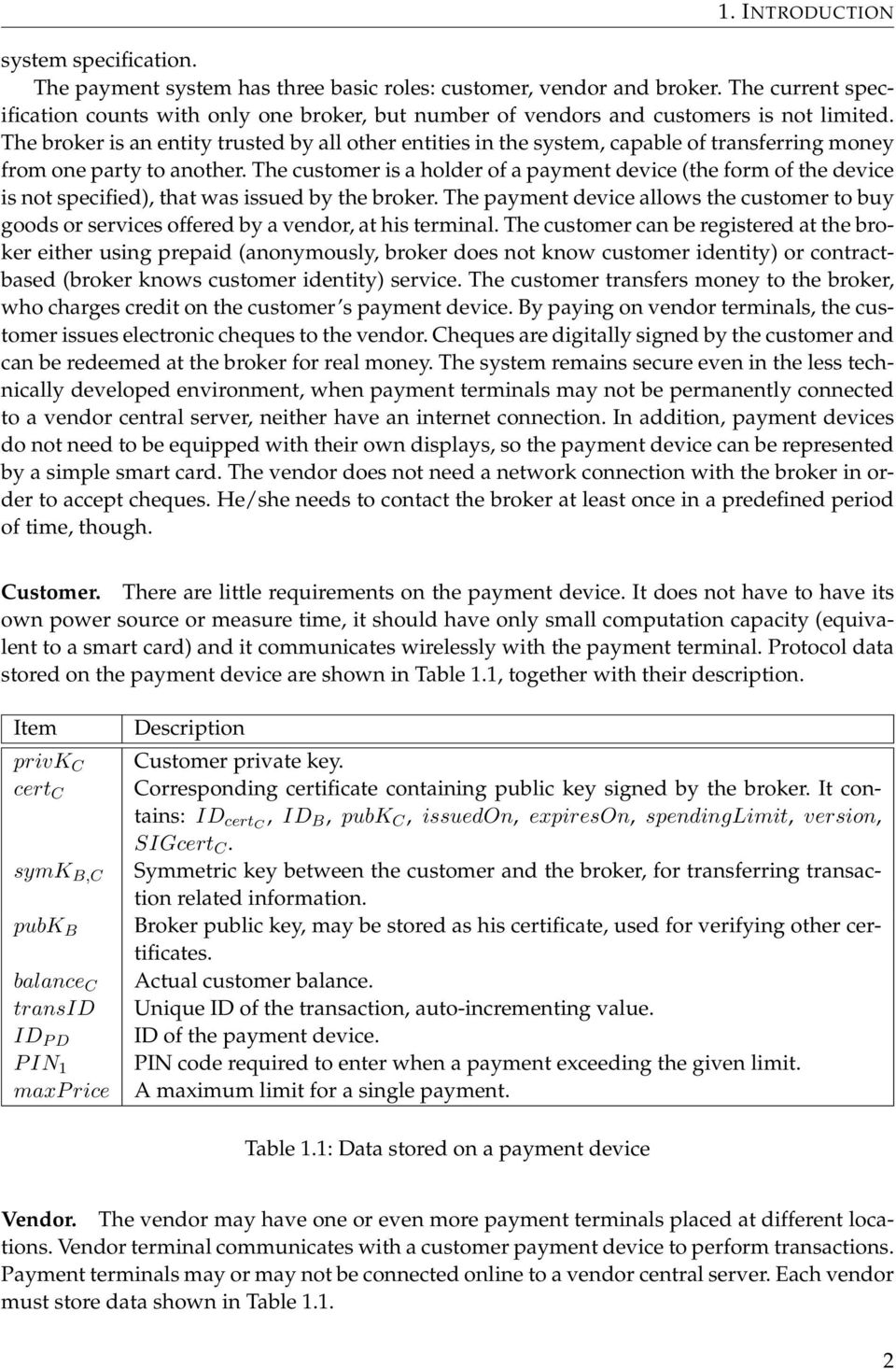
9 1. INTRODUCTION system specification. The payment system has three basic roles: customer, vendor and broker. The current specification counts with only one broker, but number of vendors and customers is not limited. The broker is an entity trusted by all other entities in the system, capable of transferring money from one party to another. The customer is a holder of a payment device (the form of the device is not specified), that was issued by the broker. The payment device allows the customer to buy goods or services offered by a vendor, at his terminal. The customer can be registered at the broker either using prepaid (anonymously, broker does not know customer identity) or contractbased (broker knows customer identity) service. The customer transfers money to the broker, who charges credit on the customer s payment device. By paying on vendor terminals, the customer issues electronic cheques to the vendor. Cheques are digitally signed by the customer and can be redeemed at the broker for real money. The system remains secure even in the less technically developed environment, when payment terminals may not be permanently connected to a vendor central server, neither have an internet connection. In addition, payment devices do not need to be equipped with their own displays, so the payment device can be represented by a simple smart card. The vendor does not need a network connection with the broker in order to accept cheques. He/she needs to contact the broker at least once in a predefined period of time, though. Customer. There are little requirements on the payment device. It does not have to have its own power source or measure time, it should have only small computation capacity (equivalent to a smart card) and it communicates wirelessly with the payment terminal. Protocol data stored on the payment device are shown in Table 1.1, together with their description. Item privk C cert C symk B,C pubk B balance C transid ID P D P IN 1 maxp rice Description Customer private key. Corresponding certificate containing public key signed by the broker. It contains: ID certc, ID B, pubk C, issuedon, expireson, spendinglimit, version, SIGcert C. Symmetric key between the customer and the broker, for transferring transaction related information. Broker public key, may be stored as his certificate, used for verifying other certificates. Actual customer balance. Unique ID of the transaction, auto-incrementing value. ID of the payment device. PIN code required to enter when a payment exceeding the given limit. A maximum limit for a single payment. Table 1.1: Data stored on a payment device Vendor. The vendor may have one or even more payment terminals placed at different locations. Vendor terminal communicates with a customer payment device to perform transactions. Payment terminals may or may not be connected online to a vendor central server. Each vendor must store data shown in Table
10 1. INTRODUCTION Item privk V cert V pubk B CRL Description Vendor private key. Corresponding certificate containing public key signed by the broker. It contains: ID certv, ID V, ID B, pubk V, issuedon, expireson, version, SIGcert C. Broker public key, may be stored as a certificate, used for verifying certificates. Certificate revocation list. Table 1.2: Data stored on a vendor Broker. The broker is not participating in the item purchase. Hence no more details are provided, they can be found in the specification Item purchase The payment system defines three modes of operation/payment methods. In the first mode, the vendor terminal is not authenticated to the payment device. In two other modes, it is authenticated; the difference lies in whether the authentication is done online or offline. In the further text the detailed description of the first payment method is provided, meanwhile the description of the two others can be found in the specification. No vendor (terminal) authentication This protocol is also called No authentication payment method in the rest of the thesis. The authors of the specification assume that it s used in situations where a payment price is small (not exceeding maxp rice) and the execution time is low. The steps of the protocol are as follows (V denotes vendor, PD denotes payment device): 1. V T P D : nonce V, price, cert V nonce V is a random number, used to ensure freshness of a cheque. price represents a value to be payed. It might include several numbers after a decimal point. After the payment device receives the message it checks following conditions: P D checks if price maxp rice, where maxp rice is the maximum value of the transaction. P D checks if cert C and cert V are issued by a same broker. P D verifies signature of cert V and its validity. P D checks whether balancec price. If any of these conditions is not met, the protocol fails. If they are, these actions are done: P D decreases balance, balance C = balance C price. P D increments transid, transid = transid + 1. P D concatenates transid and balancec and encrypts them with the symmetric key symk C,B. P D creates and signes a cheque, cheque = (cert C, ID certv, price, nonce V, (transid, balance C ) [symkc,b ], SIGcheque). 3

11 1. INTRODUCTION 2. P D V : cheque Vendor now checks the following: V checks that ID certv is the same as ID of his certificate and price and nonce V were not replaced. V verifies the signature and validity of cert C and checks if it is not revoked. V verifies signature of cheque. V checks if an amount of money customer has already spent with his certificate to this particular vendor certificate does not exceed spendinglimit value. If all above goes well, the cheque is accepted. Finally a message is send to inform the customer about the cheque acceptance. 3. V P D : okmessage or errmessage Vendor authentication on online terminal This protocol is also referred to as Online authentication payment method. In this case, the vendor terminal has a permanent network connection to the vendor central server. The vendor private key is therefore stored in the central server. The terminal forwards communication between the payment device and the central server. Vendor authentication on offline terminal This protocol is also referred to as Offline authentication payment method. Unlike the Online authentication method, the terminal has no permanent network connection to the vendor central server. It connects to the server only from time to time to send collected cheques and update the revocation list. Since the terminal is not trusted to store the private key of the vendor, a new terminal key and corresponding certificate are issued by the vendor and stored inside the terminal Other operations There are other parts of the payment system, such as customers registration, balance update operation, payment device synchronization, certificate revocation, claim settlements and legal issues. These are covered by the specification, but they are not a part of this thesis, since it focuses only on the item purchasing protocols. 4

12 2 Near-Field Communication (NFC) This chapter provides basic information about NFC - principles, related technologies, applications and description related standards. 2.1 NFC essentials NFC is a short range, wireless communication technology, similar to Infrared or Bluetooth. Data transmission between two NFC devices occurs at the frequency range of MHz. The communication range is restricted to very close proximity - typically up to 10 cm. The maximum communication speed is limited to 424 kbps [1]. NFC always forms point-to-point connections between 2 devices. It sets up more quickly than other wireless technologies because the pairing is simpler, but offers lower transfer rates [2]. The comparison to other wireless technologies is shown in Figure 2.1. Setting up a connection between any two NFC enabled devices works in a very intuitive way - automatically by putting the devices into a close proximity. Figure 2.1: Wireless technologies data rates and ranges comparison, taken from [5] NFC is defined as a standards-based connectivity technology. It has arisen as a new technology, but it s largely built upon existing technologies and standards. These include Radio frequency identification (RFID), smart cards and contactless cards. 2.2 RFID Radio frequency identification (RFID) is a wireless technology for transferring data between RFID tags (transponders) and RFID readers. The main purpose of RFID is identification and tracking of objects, for example goods in stores. It is an older technology than NFC, the first commercial usage dates back to [1]. Range and frequency of RFID is not uniform, there are many different variants depending on a type of a tag and its purpose (150 khz, MHz, 433 MHz, etc.). Tags are typically 5
![The communication range is restricted to very close proximity - typically up to 10 cm. The maximum communication speed is limited to 424 kbps [1].](/docs-images/43/3624554/images/page_12.jpg "NFC always forms point-to-point connections between 2 devices. It sets up more quickly than other wireless technologies because the pairing is simpler, but offers lower transfer rates [2].")
13 2. NEAR-FIELD COMMUNICATION (NFC) passive devices, with no power source, but active tags exist as well. Active tags can transmit over longer distances, have an ability to start a communication session with the reader, are more reliable, but also more expensive. Considering the passive tag, energy and data are transferred from the reader by inductive coupling. A coil in the tag generates a small current from the electromagnetic field that is generated by the reader s coil. The current then powers the microprocessor in the tag. For transferring data from the tag to the reader, the tag uses a mechanism called load modulation. A power consumption of the tag introduces some feedback in the reader s coil, that can be represented as transformed impedance. By changing the power consumption (according to data we wish to transfer), for example by switching on/off resistors (Ohmic load modulation) or capacitor (Capacitive load modulation), we change this impedance and thus the voltage (magnitude and phase). This change can be evaluated by the reader and the data can be reconstructed. We also distinguish whether the load modulation is done using the base signal or subcarrier (this is called load modulation with subcarrier). More details can be found in [1]. Considering the data transfer from the tag to the reader, the load modulation can be utilized only if the tag is located in near field of the reader s antenna coil. For tags located further in far field (the exact range depends on the frequency), a different technology called backscatter coupling has to be used. Basically it uses reflected energy from the tag s antenna to transfer the data. Again, more details can be found in [1]. 2.3 Devices and applications Basic acting components in the NFC world are NFC-enabled devices and NFC tags: NFC tag, also called smart tag, is usually a passive device (no power source), that stores data and can be read by the NFC-enabled device. In principle, it s a RFID tag compatible with the NFC technology [2]. In the further text, the NFC tags are also referred to as (contactless) cards, since the card and the tag are technically the same objects, with variations in the form factor. Contactless cards used in ticketing and payments today may include additional technology for storing secure data. The NFC-enabled device is an active device that operates in one of the NFC operating modes and is used for the communication with tags/cards or other NFC enabled devices. Nowadays, the most widely available NFC-enabled devices are mobile phones (especially smartphones 1 ). Apart from the mobile phones, other NFC-enabled devices are available. Examples are point of sale (POS) terminals that can perform contactless payments, various accessories like Bluetooth headsets, camera lenses, medical devices, etc. The most important applications of NFC are [6]: Commerce - contactless payments Bluetooth and WiFi bootstrapping - exchange of the connection parameters via NFC (for transferring data, as these wireless technologies have much faster data transfer rates as NFC, where maximum speed is 424 kb/s). 1. Smartphone is a phone with a mobile operating system and more advance computing capability than the regular phone. 6
14 2. NEAR-FIELD COMMUNICATION (NFC) Sharing data - an example is the Android Beam technology, that allows small amount of data to be transferred between Android phones. Identity and access tokens - NFC devices can act as electronic identity cards. Reading or writing tags - for example, users can read NFC tags to automate phone s tasks like changing phone settings. Another example is using tags instead of QR codes 2 to share data, e.g. hyperlinks. 2.4 Operating principle Considering a communication between two NFC devices, we distinguish whether each device has its own power source and can generate its an RF field or retrieves the power from the RF field generated by the other device. A device that generates its own RF field is called active device, and the latter one is called passive device. The NFC tag is always a passive device because it does not have its own energy source. On the other hand, the NFC-enabled device, such as a mobile phone or NFC reader, can act as well as an active or passive device. Additionally the individual interfaces can play two different roles. These are the initiator (master device) and target (slave device) role. NFC communication is always started by the initiator. The communicating interfaces work in the "request and reply" mode. The initiator sends a request message and the target just replies by sending a response message. Only the active device can act as an initiator and the passive device can only act as a target in the communication [2]. Based on the combination of active/passive devices, we denote the communication active mode (two active devices) and passive mode (passive and active device). Communication of two passive devices is not possible in principle [2] Passive mode In this mode, the initiator induces a high frequency electromagnetic field (RF) for transmitting data to the target. The carrier signal s amplitude is modulated accordingly to the data. After the data is transmitted, the signal continues to be emitted in an unmodulated way [1]. This provides a way for the target to response by generating a load modulation. This is the same as in case of passive RFID tags, described in Active mode In this mode, the initiator device actives its transmitter and generates an RF that induces the voltage in the antenna loop of the second device. When this is detected in the second device, it switches to the target mode and process the signal. The target answers by generating the same RF as the initiator, only the transmission direction is reversed. Both device alternately induces electromagnetic fields - data is transmitted in the direction from the transmitter to the receiver only [1]. 2. QR code is a machine readable label, physically attached to an object. It stores information related to the object [7]. 7
15 2. NEAR-FIELD COMMUNICATION (NFC) 2.5 Operating modes NFC devices support three distinct operating modes: the reader/writer, peer-to-peer and card emulation mode. The use case and underlying technical architecture differs for each of these modes: Reader/writer mode: In the reader/writer mode, the NFC device works as a standard RFID reader and is capable of reading passive NFC tags, or in general any passive NFC device compliant with the ISO/IEC and FeliCa standards (see the chapter 3). Peer-to-peer (P2P) mode: In the P2P mode, the NFC device has a bidirectional connection with another NFC device in the same mode and exchange data. This may be used for sharing small amount of data between phones (e.g. URLs), exchanging contact details or WiFi bootstrapping. This mode is standardized in the ISO/IEC standard (see 3.1.2). Card emulation mode: In this mode, the NFC-enabled device emulates a contactless smart card (ISO/IEC or FeliCa card) and act as a passive device. The emulation is transparent and to external readers, such device appears as a traditional smart card. This ensures the compatibility with existing smart cards ecosystem and thus the emulation mode is used mainly for contactless payments and ticketing. The external reader typically communicates with an application on a secure element (see Subsection 2.6.2), since it provides better security for running security critical applications. 2.6 General architecture of NFC enabled device The aim of this section is to introduce NFC hardware components and describe how these components work together and are integrated with devices such as mobile phones. The section is mainly referencing the books [2] and [1] NFC interface The core NFC component is a wireless NFC interface that directly communicates with other NFC or RFID devices. The NFC interface combines a functionality of the data transceiver, RFID reader and RFID transponder. The NFC interface is typically composed of a NFC controller and NFC antenna. Sometimes an analog/digital front-end called NFC Contactless front-end (NFC CLF) is also stated as a part of the interface. The NFC controller has an analogue RF (radio-frequency) interface that includes a transmitter for sending signals on MHz frequency, a receiver on the same frequency and another receiver for loading modulated signals on 848 khz subcarrier (such modulated signals are generated by passive NFC devices, see Subsection 3.1.1). The RF interface may also include a load modulator, which is used in the card emulation mode for modulating responses to active NFC devices. Another part of the controller is the contactless UART (universal asynchronous receiver transmitter), where data is encoded and decoded into corresponding signal forms required for the transmission. 8

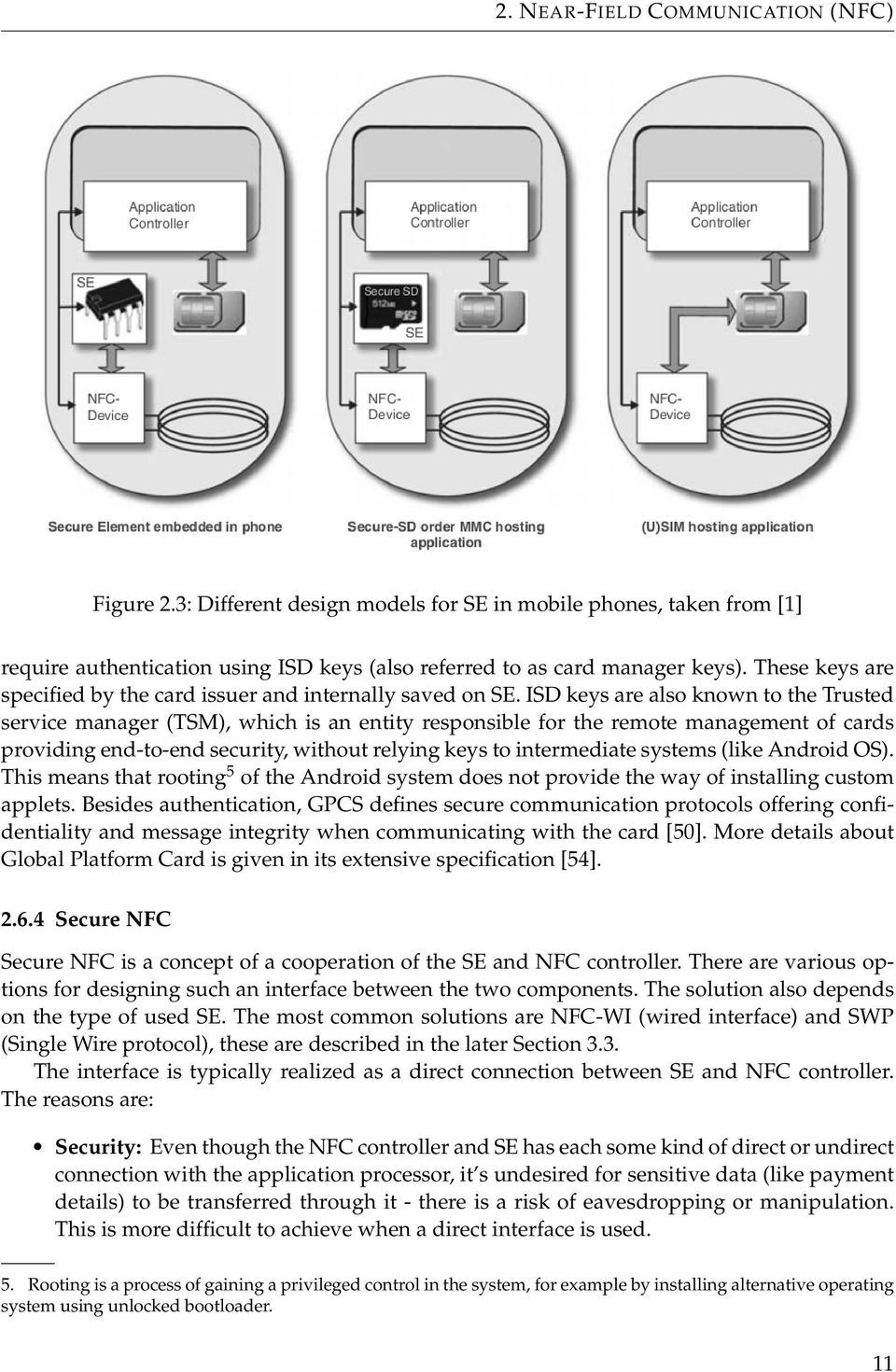
16 2. NEAR-FIELD COMMUNICATION (NFC) The core of the controller is the microprocessor unit that processes protocols messages. The NFC controller provides several interfaces for the connection with the host controller and secure element (via SWP and NFC-WI interfaces). The block schema of NXP PN544 NFC controller is given in Figure 2.2, to illustrate typical components and interfaces of the controller. Figure 2.2: NXP PN544 block diagram, an example of NFC controller that is built into modern smartphones. Host interfaces (UART, SPI and I2C) are intended for the connection with the application processor, SWP and NFC-WI interfaces for the connection with the secure element (taken from [28].) Secure element There are many NFC applications where security plays the crucial role. These are mainly mobile payments or ticketing applications, where code and data stored in the memory needs to be protected. An attacker could potentially manipulate or read the data out of the memory and that would lead to a security breach. For example, reading out credit card details stored in the memory would allow anyone to use this information, for example to create a cloned card. Therefore, these applications are required to run in the protected environment - preferably on a separated chip and not in the application processor (the phone s main processor where user applications run). Secure element (SE) is a combination of hardware and software that provides a security mechanism to support the secure storage and execution environment. SE needs to have an operating system, where applications (usually in form of Java applets) are installed and run. Common operating systems for smart card are MULTOS (Multi Application Card Operating System) or Java Card OS [3]. There is a variety of hardware modules that can serve as secure element in mobile phones. Today the most preferred SE options are: 9

17 2. NEAR-FIELD COMMUNICATION (NFC) Embedded hardware UICC (Universal integrated circuit card) Secure memory card (SMC) Figure 2.3 illustrates the options for secure NFC. Embedded hardware. SE can take a form of the smart card chip directly embedded in the phone. Therefore it cannot be removed or transferred to another phone. This solutions has some disadvantages: access rights to the embedded SE are fully controlled by the phone s manufacturer and if their are strict, such SE may not even allow to install custom applications. UICC (Universal integrated circuit card). SE in the form of UICC is a smart card used in mobile terminals. It can host multiple applications issued by different application providers. UICC works as a SIM/USIM card, it contains SIM (for GSM 3 network) or USIM (for UMTS 4 network) applications by default. Apart from these applications, other non-telecom applications may be hosted. SMC. A removable SMC is made up of memory, an embedded smart card element and a smart card controller. It provides the same high level of security as smart cards and is compatible with the most of major standards for smart cards. Its advantages are that it is easily changeable from phone to phone - unlike UICC which is bound to a particular mobile phone number Application management on SE Application management on SE is a complex topic, therefore we will give only a short note about it. We will cite mainly [51]. SE is essentially a smart card, so the most of standards protocols developed for smart cards apply. SE hosts an operating system that allows running multiple applications called applets in a virtual machine on the top of the native OS. Typical OS used in SE is JavaCard OS. It has an application framework called Java Card runtime environment (JCRE), which supports applications implemented in the restricted version of Java language (subset of original Java language constructs and library functions). JCRE comprises the Java Card VM, API classes and supported service. JCRE fully defines the applet runtime environment, but not how applets are loaded, initialized and deleted on the actual smart card. This is specified in Global Platform Card Specification (GPCS), developed by Global Platform [54]. It provides an unified card management standard, independent of the card form and internal architecture. The mandatory component of Global Platform compliant cards is the Card manager (also referred to as Issuer Security Domain), that defines an interface for the application life cycle management. The Card manager itself is just an application on the card and provides the only way of adding and removing other applications. SE may host critical applications like payments or GSM related applications, thus all management operations 3. Global System for Mobile Communications 4. Universal Mobile Telecommunications System (UMTS) is a third generation mobile cellular system for networks based on the GSM standard. 10
18 2. NEAR-FIELD COMMUNICATION (NFC) Figure 2.3: Different design models for SE in mobile phones, taken from [1] require authentication using ISD keys (also referred to as card manager keys). These keys are specified by the card issuer and internally saved on SE. ISD keys are also known to the Trusted service manager (TSM), which is an entity responsible for the remote management of cards providing end-to-end security, without relying keys to intermediate systems (like Android OS). This means that rooting 5 of the Android system does not provide the way of installing custom applets. Besides authentication, GPCS defines secure communication protocols offering confidentiality and message integrity when communicating with the card [50]. More details about Global Platform Card is given in its extensive specification [54] Secure NFC Secure NFC is a concept of a cooperation of the SE and NFC controller. There are various options for designing such an interface between the two components. The solution also depends on the type of used SE. The most common solutions are NFC-WI (wired interface) and SWP (Single Wire protocol), these are described in the later Section 3.3. The interface is typically realized as a direct connection between SE and NFC controller. The reasons are: Security: Even though the NFC controller and SE has each some kind of direct or undirect connection with the application processor, it s undesired for sensitive data (like payment details) to be transferred through it - there is a risk of eavesdropping or manipulation. This is more difficult to achieve when a direct interface is used. 5. Rooting is a process of gaining a privileged control in the system, for example by installing alternative operating system using unlocked bootloader. 11
19 2. NEAR-FIELD COMMUNICATION (NFC) Speed: data from the NFC controller can reach SE quicker without going through unnecessary interfaces. Power independence: SE can be powered via the NFC controller and be independent on the phone battery. This allows the card emulation even when the battery of the phone is flat. 2.7 Android and NFC Android is a general name used for the mobile operating system, devices running this system and the whole mobile platform. Android OS is an open source OS developed specifically for mobile devices (smartphones, tablets, smart TVs) equipped with touch screens and having limited computational resources. Android is owned by Open Handset Alliance, led by Google, and it is completely open sourced (this does not relate to all Android applications, such as Google Play, though). In its core, it is a modified version of Linux with the integrated programming interface using Java. The application development environment includes a compiler, debugger, emulator and important Java virtual machine named the Dalvik Virtual Machine (DVM). DVM is different from the official Oracle JVM and it s developed independently [4]. Applications for Android are written in Java and are compiled into Dalvik executable files (.dex, different from the Java byte code). Such application files are packed in.apk format, which is used as a universal application container. Applications run in the application framework, each in its own sandbox, securely separating it from the system and other applications. Android also provide its own Java Class Library, not aligned to the standard Java SE or Java ME libraries. The library provides an API for underlying system functions and common functionality, partially overlapping with the Java SE library 6 [68] NFC capabilities If an Android phone is equipped with NFC, applications can work with it using android.nfc package, part of the Android API. Unfortunately this API has some serious limitations and does not provide many important NFC functions. The best supported NFC operating mode is the reader/writer mode. Major Android NFC use case is "reading NDEF from an NFC tag" [19], which means that the phone is basically turned into a contactless tag reader. The following tag technologies (meaning NFC-related protocols) are supported in each Android device: 6. Many essential packages available in the Java SE are also available in the Android API, for example java.lang, java.util, java.net, etc. 12

20 2. NEAR-FIELD COMMUNICATION (NFC) Tag technology NFC-A NFC-B NFC-F NFC-V ISO-DEP Mifare Classic Mifare Ultralight Description I/O operations on ISO/IEC Type A compatible tags I/O operations on ISO/IEC Type B compatible tags I/O operations on FeliCa compatible tags I/O operations on ISO/IEC (Vicinity-Coupling Smart Cards) tags. Support for ISO/IEC compliant tags. Optional support, I/O functions to work with Mifare Classic cards (they are based on NFC-A) Optional support, I/O functions for MIFARE Ultralight cards (based on NFC-A) Table 2.1: Supported tag technologies, taken from [19] Basic functions are provided to work with each technology for sending/receiving raw bytes. Android uses a mechanism called Tag Dispatch system (more described in Subsection 5.3.4) for selecting an application to be started when the tag is read (this is based on data stored in NDEF messages recovered from the tag). The second Android NFC use case is "beaming NDEF messages from one device to another". "Beaming" is done using Android Beam technology that provides high-level functions implemented on top of the NFC peer-to-peer mode for sending NDEF messages between two phones. Unfortunately this is not suitable for the payment protocol or generally more complex communication using more than one message, because every message needs to be manually approved for sending by touching the screen in "Touch to Beam" interface [18] NFC limitations NFC is surprisingly limited for application developers on the Android platform. First, there is no way of using NFC peer-to-peer functionality apart from the Android Beam. The Android Beam is built on SNEP protocol, which allows transparent exchange of NDEF data. Unfortunately, there is no API for the direct use of the SNEP protocol. We also want to discuss the use of the secure element together with the card emulation mode on Android. The good article on this topic is given in [49], will cite this resource in the further text. As mentioned before, there are three hardware-based options for having SE in the phone. The first option is UICC based SE. UICC SE is only connected to the baseband processor 7. The baseband processor is separated from the application processor running the OS. Hence, it cannot be accessed directly by Android applications, all the communication has to go through Radio interface layer (RIL), which is a proprietary interface to the baseband. The communication addressed to UICC SE uses some reserved commands, which are unfortunately not supported by the current Android telephony manager (service having access to the RIL). This problem is addressed in the SEEK for Android project 8, which implements the missing functionality and allows the communication via standard smart card API. However, SEEK is not a part of the Android system by default and it needs to be compiled together with the system to make it work. An alternative way of communication between the application processor and 7. Baseband processor is a chip in the network interface that manages all radio functions that require an antenna, except for WiFi or Bluetooth

21 2. NEAR-FIELD COMMUNICATION (NFC) UICC SE is to use the SWP protocol and communicate via NFC controller. Such communication is often disabled by default, but as in the previous case, a patch exists (again, it s not a part of the stock Android distribution). Embedded SE is a part of many NFC enabled mobiles and is connected to the NFC controller via NFC-WI interface. It has 3 modes of operation: off, wired and virtual mode. In off mode, there is no communication with SE. In wired mode, SE is visible to the application processor as if it was a contactless smart card connected to the RF reader. In virtual mode, SE is visible to external readers as if the phone were a contactless smart card. All these modes are mutually exclusive, so we can communicate with the SE either via wired interface (from user applications) or via contactless interface. In principle, applets running on the SE can detect which interface they are accessed from and behave accordingly. SE environment is called NFC execution environment (NFC EE) in Android and API for accessing it remains hidden from SDK applications (package com.android.nfc_extras). This package provides additional methods for the card emulation mode and management of the NFC EE. To access this API, system-level permissions were required in older versions of Android API. Starting with API 15 (Android 4.0.4), the permission are controlled by an explicit whitelist of allowed signing certificates. Only user applications signed with one of the corresponding keys can obtain the access. The whitelist is stored in /etc/nfcee_access.xml file, storing certificates and package names of allowed applications. In order to change it, the root access is needed. Package com.android.nfc_extras offers a basic communication interface to the NFC EE, having only simple methods for opening, closing of the connection and sending raw bytes. The communication is done using APDU messages, with the command set as defined in the ISO/IEC standard. Since card manager keys are not publicly available and controlled by Google and its partners, currently there is no way of installing custom applets on the embedded SE [50]. Its use is reserved for applications like Google Wallet, issued by Google Host-based card emulation Speaking about the card emulation mode, we have to distinguish between two basic variants: Card emulation with a secure element - in this case, card emulation program is running in the SE, which is directly communicating with NFC controller, bypassing the Android host CPU. This is typically used for payment applications. Host-based card emulation (HCE) - also known as Software card emulation, in this mode the NFC controller routes the data received in the card emulation mode to the host CPU, where Android applications are running directly. Thus no SE is involved. Prior to API level 19 (Android KitKat 4.4), there was no way of switching the NFC interface to the host-based mode on the stock Android 9. Since the Android KitKat 4.4 version, this is now the part of the standard API [55]. Android only supports emulation of ISO-DEP based cards at the moment, mandatory those based on the NFC-A technology, optionally also NFC-B. The HCE architecture in Android is based around service components (called HCE Services), that function as applications installed on the emulated card. Each service is identified by an Application ID (AID), defined by the ISO/IEC 7816/4 standard. When an user taps his device to an NFC reader, a proper application is selected based on the requested AID. The HCE 9. Since CyanogenMod 9.1 modification, there was a patch enabling this functionality [51] 14
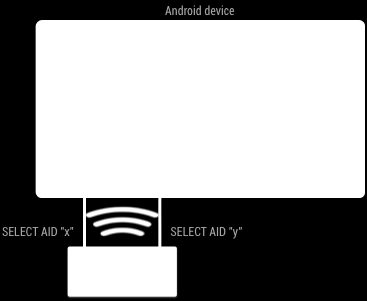
22 2. NEAR-FIELD COMMUNICATION (NFC) can even coexists with other methods implementing card emulation, such as SE. The architecture is illustrated in Figure 2.4. The selection of the routing path is based on the AID listed in the SELECT APDU command. The default route is set to the host CPU. If other route to SE should be selected, such AID has to be stored in the routing table on the NFC controller. Figure 2.4: Android operating with both secure element and host-card emulation, taken from [55] Significant disadvantage of host-based card emulation is a loss in security, as no secure execution environment is available. It becomes difficult to store sensitive data and applications are more prone to attacks. Because of this, cloud based SE solutions has emerged. The cloud based SE means that sensitive data and operations are done online on a server and mobile phone serves only as a proxy between the NFC reader and the cloud SE. Cloud SEs are already being in use, for example Google Wallet on Android 4.4 uses the cloud SE instead of the embedded one. Google Wallet documentation states that transactions do not even need the permanent network connection, they are only required to connect to the Internet once a day [69]. The internal mechanism of this solution is not publicly available at the moment. Unfortunately, Android 4.4 has been released only in November 2013, after the major part of the implementation work has been done. At this time, it was deployed only to Nexus 5 phone, which was not available to us. Therefore the host-based card emulation is not implemented and considered in the further text. 15
23 3 NFC-related standards and protocols In this chapter, we present all import standards related to the NFC technology. There is not a single company or organization providing specifications and standards for NFC. Therefore, NFC is defined in many documents issued by different organizations and it could be rather difficult for a reader to see all the relationships and references between all standards without thorough study. Because of this, we want to provide a compact view on all relevant standards, protocols and relationship between them. 3.1 Base standards Here a list of the basic protocols specifying the NFC is provided [8]: ISO/IEC or ECMA-340 (NFCIP-1) NFCIP stands for Near Field Communication interface and protocol. It standardizes the physical layer and communication between two NFC devices. ISO/IEC or ECMA 352 (NFCIP-2) It defines a communication mode selection mechanism between different contactless technologies that operate on the Mhz frequency. ISO/IEC (Proximity-Coupling Smart Cards) The standard describes proximity cards, methods of operation and the transmission protocols for communication between the card and the reader device. The proximity card is a contactless smart card with the approximate range of communication up to 7-15 cm [1]. ISO/IEC (Vicinity-Coupling Smart Cards) The standard describes a method of functioning and operating vicinity-coupling smart cards. The main difference from proximity cards is that vicinity cards can be read from the greater distance (up to 1-1.5m). The data carriers in these cards are usually cheaper and offer simpler functions than in case of proximity cards [1]. We give a more detailed look on the NFCIP-1, NFCIP-2 and ISO/IEC standards in the following sections. Not all technical details are given though, this is out of the scope of the thesis ISO/IEC In this section, we are referencing the official standard [11, 12, 13, 14] and RFID handbook [1]. The standard defines operating methods of contactless proximity smart cards. It comprises of the following 4 parts: Part 1: Physical characteristics Part 2: Radio frequency power and signal interface Part 3: Initialisation and anti-collision Part 4: Transmission protocol 16
24 3. NFC-RELATED STANDARDS AND PROTOCOLS ISO/IEC can be taken as a contactless equivalent of the ISO/IEC 7816 protocol (Parts 1-3), which standardizes methods of operation for contact smart cards. The relationship of both protocols and their mapping to the layers in the OSI model can be seen in Figure 3.1. Figure 3.1: Mapping between ISO/IEC 14443, ISO/IEC 7816 and OSI model, taken from [29] Part 2: Radio frequency power and signal interface This part of the standard specifies low level RF interface between the proximity card (PICC) and the reader (PCD). The PICC is inductively coupled by the magnetic alternating field of the PCD. The magnetic field range generated by the reader is defined in the standard. Unfortunately, the standard has not agreed on a single communication signaling interface. It specifies two completely different procedures for the data transfer between the PCD and PICC - Type A and Type B. Each smart card supports just one of these procedures and they are incompatible. Type A. For Type A, 100% ASK (Amplitude Shift Keying) with modified Miller coding is established as a modulation procedure for transferring data from the PCD to PICC. On-off keying (OOK) on the 847 KHz subcarrier is used for data transfer in the PICC to PCD direction. Manchester coding is used. Default bit rate is 106 kbit/s in the both directions. Type B. For Type B cards, 10 % ASK modulation with simple NRZ coding is used for data transfer from the PCD to PICC. In the other direction, the subcarrier is modulated by binary phase shift keying (BPSK), using NRZ coding. The bit rate is the same as for Type A. 17
25 3. NFC-RELATED STANDARDS AND PROTOCOLS Part 3: Initialisation and anti-collision When the PICC enters a radio field of the the PCD, a communication channel must be built up first. The polling for proximity cards by the PCD is specified in this part of the standard. Other commands and parameters required to initialize the connection are described as well. Also, there is no assumption that there must be only one card in the field, so anti-collision methods for selecting one proximity card among several others are specified. The anti-collision methods differ for the Type A and the Type B cards. In both methods, each card that enters a radio field of a reader and has sufficient supply of the energy from the reader, turns its processor on and puts the card in so-called Idle mode. At this point, the reader can exchange data with another card in its radio field. Cards in the Idle state may never react to reader data transmission to other smart cards (it can communicate with many cards in parallel), which means that the data communication is not interrupted. Next, the message request for polling (of available cards) is transmitted by the reader and the anti-collision protocol is started according to the specific card type. After the anti-collision is over, one of the cards is selected and put in so called Active state, where the data transmission may start. We do not provide the complete description of the anti-collision methods, more details can be found in the ISO/IEC standard [13]. Part 4 Transmission Protocol After the connection between the reader and the card has been established, a command for the card can be sent by the reader. This part specifies the transmission protocol that is used for data transfer between the PCD and PICC and vice versa. Protocol activation of PICC Type A. In case of Type A cards, additional information for configuring of the protocol has to be be transferred first. For Type B cards, this procedure has been performed in the anti-collision part. The selection of the card in the anti-collision procedure is acknowledged by sending the SAK (Select Acknowledge) command from PICC to PCD. The SAK contains information about whether the PICC is compliant with ISO/IEC , or it supports a proprietary protocol. If the PICC states that it supports ISO/IEC in the SAK, the PCD then sends the RATS (Request Answer To Select) to the PICC. The RATS contains two important values for the subsequent communication: CID and FSDI: CID (card indentifier) - number specified by the PCD, unique to each PICC in the active state. It s used for addressing as a logic identifier of the PICC. FSDI (frame size device integer) - value that encodes the maximum size of the block that the PCD is able to receive from the PICC. The encoded value can be up to 256 bytes. Upon receiving the RATS, the card sends the ATS (Answer to Select) command in the response. The ATS contains several protocol parameters that plays a role in the connection set up. The most important: DS/DR - supported data rates of the smart card during the data transmission from the PICC to PCD and the PCD to PICC, respectively. 18
26 3. NFC-RELATED STANDARDS AND PROTOCOLS FSCI (frame size card integer) - similar to FSDI, it encodes the maximum size of the block sent from the reader to card. The maximum encoded value is 256 bytes. FWI (frame waiting integer) - encodes the timeout that the PCD has to wait for an answer from the PICC after transmitting the command. Upon receiving the ATS, the reader may increase the bit transfer rate (by sending special PPS command - more details in the specification) when the cards signalizes such support in its DS/DR. Transmission protocol. The protocol is the half duplex block transmission protocol. Sometimes the protocol is referred to as ISO-DEP protocol [16]. As shown in Figure 3.1, the protocol is placed on the transport layer of the OSI model. Its role is to ensure correct addressing of the data blocks, sequential transmission of excessively sized data blocks (chaining), monitoring time procedure and handling of transmission errors. The protocol is capable of transferring application data via application protocol data units (APDUs), defined in the ISO/IEC At the beginning, the card waits for a command sent by the reader. Each command is processed by the card and a response is sent back to the reader. This pattern cannot be broken, thus the card itself cannot initiate any communication without receiving a command first. The basic protocol structure is a data block, its format is shown in Figure 3.2. Three distinct types of blocks exist: I-block (information block) - transfer of application data R-block (receive ready block) - used for positive or negative acknowledgements. The acknowledgment relates to the last received block. S-block (supervisory block) - for exchanging control information PCB (protocol control byte) specifies a type of the block and included fields. CID (card ID) is a logical card identifier for addressing a specific card. NAD (node address field) is reserved to build up and address different logical connections, its use is no further defined in the specification. INF field carries payload (like APDUs) from the application layer in the case of I-block. Finally, EDC (error detection code) is a 16-bit cyclic redundancy check for error detection. The chaining mechanism allows transmitting bigger payload that does not fit into a single block. The maximum size of the block is determined by FSCI and FSDI values. For the chaining control, the chaining bit is used in PCB field. Prologue field Information field Epilogue field PCB [CID] [NAD] [INF] EDC 1 byte 1 byte 1 byte 2 bytes Figure 3.2: The frame structure of the ISO/IEC transport protocol, the items in brackets indicate optional fields, taken from [14]. 19
27 3. NFC-RELATED STANDARDS AND PROTOCOLS NFCIP-1 NFCIP-1[24] is the standard partially based on ISO/IEC It defines two communication modes, the active and the passive mode. Unlike the passive mode, the active mode supports communication of two devices that have their own power source (the principle is described in 2.4). There are two actors in each mode, the Initiator and the Target. Supported data rates are 106, 212 and 424 kb/s. The standard specifies modulation schemes, codings, transfer speeds, and frame format of the RF interface, as well as initialization schemes and conditions required for data collision control during initialization [24]. In addition, it defines the transport protocol called Data exchange protocol (DEP). DEP is a half-duplex protocol, supporting block oriented data transmission with error handling. For data not fitting into one frame, a chaining mechanism is defined. Peer-to-peer NFC mode uses NFCIP-1 as its base protocol. The transmission protocol, radio interface and anti-collision methods are specified similarly to those known from ISO/IEC 14443, so we are not providing the full specification. NFCIP-1 is compatible with existing SONY FeliCa proximity cards on the RF interface and also with the initialization and selection procedure [15]. The overlap of these standards is shown in Figure 3.3. The FeliCa standard is specified in the JIS X specification. It offers the data transfer rate 212 kb/s. Figure 3.3: FeliCa and NFCIP-1 (ISO/IEC 18092) relationship, taken from [15] NFCIP-2 NFCIP-2 specifies the communication mode selection mechanism between distinct communication modes implementing ISO/IEC 14443, ISO/IEC 15693, NFCIP-1 [25]. Each NFC-enabled device implementing NFCIP-2 chooses (at the beginning of each communication) between the given modes: PCD - device works as Proximity coupling device - a reader for ISO/IEC compatible 20
28 3. NFC-RELATED STANDARDS AND PROTOCOLS cards. PICC - device emulates Proximity cards, so called card emulation mode. VCD - device operates as a reader for Vicinity cards. NFC - this mode device operates according to NFCIP-1 specification, both active or passive communication are possible. 3.2 High level NFC standards High level standards is not an official name, but it characterizes group of standards, issued by the NFC Forum organization, that build on the ISO/IEC standards [5]. Some of these standards just summarize different technologies under one common standard (such as the Digital Protocol), other provide extended functionality and new methods of operation for NFC-enabled devices. NFC Data Exchange Format (NDEF) defines a data format between NFC-compliant devices and tags. Record Type Definition (RTD) specifies record types for various purposes in NDEF messages. Connection Handover defines how to use NFC to establish a connection using other wireless technologies (e.g. Bluetooth, WiFi). Operations Specifications for Tag Types 1-4 Logical Link Control Protocol (LLCP) - a protocol to support P2P communication between two devices, used on top of NFCIP-1. Digital Protocol - the digital protocol for NFC-enabled devices communication, providing an implementation specification on top of the ISO/IEC and ISO/IEC standards. NFC Activity Technical Specification explains how to set up the communication protocol with another NFC device or NFC tag. Simple NDEF Exchange Protocol (SNEP) - used on the top of LLCP, allows exchange of NDEF messages Analog and Digital protocol Analog and Digital protocol standards put NFCIP-1, ISO/IEC and FeliCa specifications together and produce a compact standard. They harmonize these technologies, specify implementation options and also completely change the notation. The analog interface, digital interface and the half-duplex transmission protocol of NFC-enabled devices are defined [20, 21]. In result, three technologies - groups of transmission parameters that make a complete communication protocol - are defined. These are referred to as NFC-A, NFC-B and NFC-F. Basically, 21
29 3. NFC-RELATED STANDARDS AND PROTOCOLS NFC-A corresponds to the ISO/IEC Type A standard, NFC-B corresponds to the ISO/IEC Type B standard and NFC-F corresponds to the JIS X (FeliCa) standard (which is also compatible with ISO/IEC 18092, as seen in Figure 3.3) [17] NFC Forum tags specifications NFC Forum has defined four tag types to be operable with NFC-enabled devices. Each tag type is based on a different technology. Their description, cited from [2], is given below. The comparison of parameters of each tag type is given in Table 3.1. Type 1 tag: Type 1 tag is based on the ISO/IEC Type A standard (Digital Protocol standard states that it uses particular subset of NFC-A technology, excluding anticollision). By default, these tags are both readable and writable, but users can configure the tag to become read-only when required. Available memory is small, only 96 bytes, but it can be expanded up to 2 kb. The communication speed is 106 kb/s. The memory capacity is small, so it s usable for storing only short text, e.g. URLs. Type 2 tag: Type 2 tag is based on the ISO/IEC Type A standard (Digital Protocol standard states that it uses the particular subset of NFC-A technology, including anticollision). Tags are both readable and writable and can be configured to be read-only. Default memory capacity is 48 bytes and is expandable to 2 kb. Similarly the communication speed is 106 kb/s. Type 3 tag: Type 3 tags are based on JIS X , also known as FeliCa (NFC-F technology). The communication speed is increased to 206 kb/s and the memory capacity is variable, but its theoretical limit is 1 MB per service (a tag can contain multiple services). Tags are designed for complex applications and are also expensive compared to other tag types. Type 4 tag: Type 4 tags are fully compatible with the ISO/IEC standard (including Part 4). The communication interface is either Type A or Type B compliant. Tags are preconfigured to be either read and re-writable, or read-only. The memory capacity is up to 32 kb per service and the communication speed varies from 106 to 424 kb/s NDEF NFC data exchange format (NDEF) is a binary data format to exchange information between NFC devices. The NDEF specification is a standard defined by the NFC Forum. A basic data unit is NDEF message, which contains one or more NDEF records. Each record has its payload limited to bytes, but records can be chained together, so the size is practically unlimited. Each NDEF record has three parameters: payload length, payload type and optional payload identifier. There are many types of NDEF records, more details can be found in the NDEF specification [22]. As we will not build our payment protocol on NDEF, we do not provide the detailed description. 22
30 3. NFC-RELATED STANDARDS AND PROTOCOLS Parameter Type 1 Type 2 Type 3 Type 4 Based on ISO/IECC Type A ISO/IEC Type A JIS X ISO/IEC Type A, Type B Card examples Topaz MIFARE FeliCa DESFire, SmartMX- JCOP Memory size Up to 2 kb Up to 2kB Up to 1 MB Up to 32 kb Data rate Cost Low Low High Medium/High Security 16- or 32-bit Insecure 16- or 32-bit Variable digital signaturture digital signa- Use cases Tags with small memory Flexible tags with larger memory offering multi-application capabilities Table 3.1: Summary of NFC Forum tag types, taken from [2] 3.3 Interface between SE and NFC controller These protocols are used in the card emulation mode, for applications that require the use of the secure element. Two protocols are described: NFC-WI (NFC wired interface) and SWP (Single Wired Protocol) NFC-WI NFC-WI standard is specified in ECMA-373 [26]. The other name for this technology is S 2 C (Signal In/Signal Out connection). In this solution, the secure element (it is denoted as NFC transceiver) is connected via two wires to the RF interface of the NFC Controller (denoted as NFC Front-end). NFC-WI interface in the NFC controller is shown in Figure 2.2. The wires are called Signal-In and Signal-Out and transmit modulation signals between the NFC transceiver and NFC Front-end. Externally, the SE and NFC interface together behave like a contactless smart card. The NFC interface provides SE only with the analogous receiver and load modulator. The secure element chip then encodes and decodes signals from the wires and also does the processing of the transmission protocol (microprocessor in the NFC controller is bypassed). NFC-WI is fully compliant with the NFCIP-1 and ISO/IEC standards. The supported bit rates on the wires are 106, 212 and 424 kb/s - they are corresponding with the supported wireless standards [1] Single wire protocol Single wire protocol (SWP) is specified in ETSI TS standard [27] as a bit oriented digital duplex protocol, providing a single-wire connection between the UICC SE and NFC interface. Only single wire is used since there is only one of the eight contacts paths on the SIM card contact interface available for the data transfer. In contrast to NFC-WI, the data transmission 23
31 3. NFC-RELATED STANDARDS AND PROTOCOLS protocol (i.e. ISO/IEC 14443) is processed by the NFC interface s microprocessor itself and only application data is forwarded to the SE via SWP. The SWP interface also allows to supply the UICC SE with power, the UICC SE can be directly wired with the NFC inteface so that voltage is not supplied by the phone, but via NFC interface instead. This allows the SE to function together with the NFC interface in the card emulation mode even when the phone battery is flat. The power is then received from the external reader field [1, 2]. More details about SWP can be found in the specification [27]. 3.4 ISO/IEC According to the standard [9], ISO/IEC specifies organization, security and commands for interchange between reader and card. This includes: The content of command-response pairs exchange between at the card interface. Each pair consists of two Application protocol data units (abbreviated as APDU). The structure of files and data on the card. The structure and content of historical bytes, describing operational characteristics of the card - optionally sent by the card in the Answer To Reset (ATR), which is a special command send by the card following its electrical reset performed by the reader. Access methods to files and data in the card and security architecture defining access rights to files Methods for secure messaging Application protocol data units APDUs are used to exchange data between the smart card and reader on the application layer. APDUs always form command and response pairs. First, the command APDU (denoted as C- APDU) is send from the reader to the card, which responds by sending the response APDU (denoted as R-APDU). The data format is intended to be independent of the underlying transmission protocol [3]. Structure of C-APDU C-APDU is composed of the header and body. The header has a fixed length, the body has a variable length and may be absent in some cases. The header consists of CLA, INS, P1, P2 fields, the rest is the body. Field CLA INS P1 P2 L c Data L e Length (B) ,1 or 3 variable 0-3 Figure 3.4: Command APDU structure 24
32 3. NFC-RELATED STANDARDS AND PROTOCOLS CLA - Instruction class byte INS - Instruction number byte P1, P2 - Additional parameters L c - Length of the command data L e - Length of the expected response The length of the L c and L e fields depends on the capability of the card of handling so called "extended APDUs". The capability is stated in the historical bytes or ATR of the card. If the card handles extended APDUs, L c is 3 bytes long and last two bytes encode the length of the data field (up to bytes). For L e in case of extended APDUs, its maximum length is 3 bytes and it encodes the length of the response data up to bytes (details of the encoding are provided in the specification [9]). In case of short APDUs, both L c and L e are maximum 1 byte long and encode lengths of the command data field and expected response data field up to 255 and 256 bytes respectively. Structure of the response APDU Field Data SW1 SW2 Length (B) variable 1 1 Figure 3.5: Response APDU structure The body (optional) consists only of Data field. The header consists of two status words SW1 and SW2. They encode the processing state. For example, the status code means that the command was executed completely and successfully File system according to ISO/IEC There are two types of files [3] Dedicated files (DF) - directory files Elementary files (EF) - files that hold the actual data The special root DF file is called the master file (MF). The other DFs are optional. Two types of EF files exist: Internal EF - for storing data interpreted by the card, i.e. data used by the card for management and control purposes Working EF - for storing data not interpreted by the card operating system, but intended for the external world The more details about the file system specifics can be found in the ISO/IEC specification. 25
33 4 Analysis and design This chapter explores how the payment protocol (item purchase operations) can be implemented. At first it focuses on the overall architecture of the solution (what devices and operating modes are used). Further, it goes into details about the encoding, certificate types and security. 4.1 Mapping of roles In the payment protocol, three roles are defined: customer, vendor and broker. In the implementation of the protocol, each is mapped to a device as specified in this section. Customer device. Customer device is represented by an NFC enabled Android mobile phone. The implementation was primary done and tested on Samsung Galaxy Fame GT-S6810P [30], with Android Jelly Bean OS. In addition, few other NFC Android phones available to us were tested as well, see Section 5.5. A device using Android OS was chosen because the Android OS is the most widely used OS on the smartphones to this date (in Q , Android market share was 81% [33]). Vendor device. There are two types of vendor devices according to the protocol specification - the vendor device without a separated terminal and vendor device with the terminal included. When dealing with the first option, there are again two variants: online terminal (terminal permanently connected to the vendor central server) and offline terminal (without a permanent connection). For the sake of simplicity of the implementation, all those variants are implemented on a single device. The only difference is that in Online authentication payment method, the communication between the vendor and vendor terminal is all done inside a single application (originally these two entities are running on separate machines). Even though the conditions would be different in a real world implementation, we suppose that this communication is done over a fast channel, so the speed difference in the protocol execution would be small. When choosing a device representing a vendor terminal, we have two reasonable options: 1. NFC enabled phone: This is not a viable option as there are limitations given by the Android API as described in Subsection NFC communication between two Android phones was originally possible only with the both phones in the P2P mode, but this is not useful because of the Android Beam interface. With the Android 4.4 KitKat version, there is also a possibility to let two Android phones communicate directly in a suitable way for the payment protocol implementation (the first phone being in the reader/writer mode and the second phone in the card emulation mode). Other NFC enabled smartphones can be also considered for the implementation, e.g. the Blackberry API allows use of all three NFC operating modes in a less restricted way than 1. 3rd quarter of from July 1. to September
![4. ANALYSIS AND DESIGN Android, with the card emulation mode available for developers [34]. Such implementation for other operating systems is out of the scope of this work, though. 2.](/docs-images/24/3624554/images/34-0.png "NFC reader: This is our choice for the implementation. The NFC reader represents a vendor terminal connected to a computer, where the payment application (vendor s part) is running.")
34 4. ANALYSIS AND DESIGN Android, with the card emulation mode available for developers [34]. Such implementation for other operating systems is out of the scope of this work, though. 2. NFC reader: This is our choice for the implementation. The NFC reader represents a vendor terminal connected to a computer, where the payment application (vendor s part) is running. Specifically we worked with the ACS ACR122U NFC contactless reader, shown in Figure 4.1. Internally, the devices is made with a microcontroller, an antenna and a NFC controller (PN532) [35]. The controller is able to work in all three NFC operating modes. Discussion about the device setup is in the following Subsection Figure 4.1: ACS ACR122U NFC Contectless smart card reader, taken from [57] Broker device. The broker s role in the protocol is to create contracts with vendors and customers, which involves creating and signing certificates. The broker also redeems cheques, takes care of the synchronization with customers and balance update operations. Among these functions, only the certificates issuing operation was implemented, since it is necessary for the payment protocol functioning. The broker does not need to posses and have access to its own NFC terminal in this setup and runs separately from the vendor s program. Its functionality is limited to issuing new certificates for vendors and customers. 4.2 Protocol stack In this section, an overall view on the protocol stack is provided Architecture Firstly, we propose a way how the Android phone and the NFC reader communicate over NFC. We need to pick up a proper NFC communication mode and operating modes for each device. When selecting a proper operating mode, we have to consider all limitations given by the Android platform. An ideal way of implementing the payment protocol would be that 27
35 4. ANALYSIS AND DESIGN the critical part of the customer payment application is stored on a SE and the phone is operating in the card emulation mode. The vendor payment application would be operating an NFC reader, working in the reader/writer mode. Such a solution is not possible, though, due to the inability for developers to utilize the card emulation mode prior to the Android 4.4 API. The usage of the embedded secure element is limited either, as described in Subsection However, we found a workaround for this problem. With the NFC reader, we are not limited to any particular NFC operating mode. One may use different setups, either the P2P mode for both the reader and the phone, or the reader/writer mode on the phone and the card emulation mode on the NFC reader. Unfortunately, the P2P mode is useless on Android, as shown in Subsection Hence, the only option is to use the first option. The big disadvantage is the the phone always acts as an initiator and the terminal as a target. The reader can never initiate a communication and send a command by himself. The payment protocol is not designed this way, for example in No authentication method, the first message is send by the vendor. We need to adjust the payment protocol accordingly. Another drawback is that the customer payment application runs as a regular Android application in the host processor with no secure environment available NFC stack NFC reader works in the card emulation mode, so we need to pick up a proper card type to be emulated. The emulated card should be also compatible with the Android phone, so it is able to read it. A heart of the ACR122U reader is PN532 NFC controller and according to the manual [39], it can be configured to function as a target in these modes: 106 kb/s passive (Mifare framing) - compatible with ISO/IEC A standard, also supports ISO/IEC transmission protocol (it s denoted as ISO-DEP further in the text 2 ). 212/424 kb/s (FeliCa framing) - compatible with NFCIP-1 passive mode. 106/214/424 kb/s (active mode framing) - compatible with NFCIP-1 active mode. Android API supports reading tags of various types as specified in Subsection With respect to the both devices, the communication is possible in either ISO/IEC Type A mode (with optional support for ISO-DEP) or NFCIP-1 passive mode. This means that all tag types 1-4 (except for Type 4 tag compliant to ISO/IEC Type B standard) can be possibly emulated on the reader s side. We experimented with different options in the card emulation mode, some of emulated cards were not detected correctly by the Android device. The only reliable emulation mode was the emulation of ISO/IEC PICC, and thus this mode was selected to be performed by the reader. The phone then acts as a ISO/IEC PCD (card reader). When the ISO-DEP connection link is set up, we can exchange APDU commands in the application layer (as defined in ISO/IEC ) - we call this layer the APDU layer. It is typically the topmost layer in the stack. However, it possess one important limitation, which is the limited size of payload. To be specific, the size is limited by the payload size in short APDU messages (see Section 3.4). Even though the underlying ISO-DEP protocol supports chaining 2. According to the Forum Digital protocol specification, ISO-DEP specifies the same transmission protocol as ISO/IEC [21]. 28
36 4. ANALYSIS AND DESIGN and thus theoretically unlimited size of payload, some NFC controllers do not provide support for transferring of extended APDUs. This limitation is usually given by the firmware of a particular NFC controller. For example, NXP PN532 datasheet (common NFC controller in readers) states that the firmware limits the size of the data packet to 264 bytes [39]. NXP PN544 controller, typically used in Android mobile devices, does not provide support for extended APDUs either [36]. Considering the protocol implementation, we require sending bigger payloads than 264 bytes, for example the size of certificates included in protocol messages may easily exceed this value. Thus it s necessary to design a solution that allows it in some way. This is called chaining mechanism and it s described together with the APDU layer in Subsection (because it s implemented using APDU messages). As the APDU layer is mostly used for the chaining, the current topmost layer in the NFC stack is the Payment protocol layer, where messages defined in Subsection are exchanged. Message size is limited only by size of receiving buffers on each device, but it s practically unlimited for our needs. The whole communication stack with all layers is shown in Figure 4.2. Payment protocol layer Chaining mechanism APDU layer (ISO/IEC ) Application selection ISO/IEC Transmission protocol Android phone reader/writer mode PCD ISO/IEC Activation & anticollision ISO/IEC RF signal interface NFC, baud rate 106 kbits/s NFC reader card emulation mode PICC Figure 4.2: NFC communication stack APDU and Payment protocol layer As stated in the previous subsection, there is an extra network layer called Payment protocol layer built on top of the APDU layer. The reason for this separation is a different nature of the payment protocol messages and the command-response APDU structure. APDU messages are originally designed for the communication with smart cards, when a reader sends a command and a card just executes the command, returning some result. The card never sends any commands that should be executed on the reader. However, in our scenario, the communication is not asymmetric, no communicating party is specified to be purely doing only sending commands or sending responses. The different APDU structure for C-APDU and R-APDU is not suitable in this case, we want to use same structure for the payment messages, regardless of the communicating direction. Also chaining 29
37 4. ANALYSIS AND DESIGN should be done in a transparent way, not mixed together with the fields in the payment messages. The separation of the application layer into two layers allow us to specify the structure of payment messages more easily, regardless of a message format used in the underlying layer (which is here the APDU layer). This is important, because transmission protocols other than ISO-DEP may not use APDU messages for exchanging data in the application layer. Such problem would be apparent, if we would be emulating some other card on the reader, like FeliCa or Mifare card, not using ISO-DEP transmission protocol. Therefore goals of the APDU layer are application selection (we have to choose a payment application on the emulated card first), chaining of messages and carrying payloads of the higher network layer. We do not utilize most of the fields in C-APDU header. CLA byte has all bits set to zero, except for the bit 8 (denoting proprietary command) and bit 5 (for chaining). The instruction byte INS is set to proprietary value 13, meaning "Payment protocol instruction". Parameter bytes P1 and P2 are set to zero. These values need to be set up to be able to distinguish incoming Payment protocol C-APDUs from others types of messages, e.g. APDUs for reading NDEF data on the emulated card. Chaining mechanism. The chaining mechanism is implemented as follows. Each payload bigger than 255 bytes is divided into parts, whose size does not exceed the given byte limit. These parts are then send in multiple APDUs, forming an APDU chain. Chaining is possible in both directions, from initiator to target and vice versa. Command chaining - sending multiple command APDUs from initiator to target works accordingly to the ISO/IEC standard [9]. Bit 5 of CLA field in C-APDU header is used for the chaining signalization: If CLA bit 5 is 0, then the C-APDU is the last or only command of the chain. Otherwise (the bit is 1) the C-APDU is not the last command and more C-APDUs follow. Every C-APDU has to be acknowledged by an R-APDU, so when a target receives C-APDU, signalizing there are more APDUs in the chain, it simply responses with empty R-APDU, where only compulsory SW1-SW2 field is set to 9000 value. Each received C-APDU is buffered until the last command of the chain is received. At this point, the payload is complete and can be processed with a higher network layer and a response can be generated. Response chaining - chaining of R-APDUs is not specified in the ISO/IEC standard. We therefore devise a mechanism as specified here, allowing chaining in the direction from target to initiator. Chaining works in a similar way as for C-APDUs, although SW1-SW2 fields in R-APDU are used for the chaining signalization: SW1-SW2 fields set to value 9000 indicate that the R-APDU is the last or only command of a chain. The 9000 value is a interindustry value signalizing "Normal processing" in ISO/IEC SW1-SW2 fields set to value 6701 indicate that the R-APDU is not the last command. The specific value 6701 is chosen from the range of values intended for proprietary use. Upon the receipt of every R-APDU message, the R-APDU is buffered and a C-APDU is send by the initiator. When the last R-APDU of a chain is received, the initiator has the complete payload and can process it. R-APDUs not being last in the chain are acknowledged by the empty C-APDU message with no payload, where only header is present. 30
38 4. ANALYSIS AND DESIGN The principle is shown in Figure 4.3. send() ABCD EF receive() UVWX Y Payment protocol layer CLA INS P1 P2 Lc Data 'ABCD' SW R-ACK CLA INS P1 P2 Lc Data 'EF' Data 'UVWX' C-ACK CLA INS P1 P SW Data 'Y' SW APDU layer Initiator Lower layers APDU layer Target ABCD EF receive() UVWX Y send() Figure 4.3: Chaining mechanism Payment protocol layer Payment protocol messages This sections describes the structure of messages used in the Payment protocol implementation, send over NFC between customer and vendor (excluding communication in Online authentication payment method between vendor terminal and central server) in the Payment protocol layer. Those messages are designed accordingly to the payment protocol specification, for all three purchase methods. The general structure of a message we use is simple, it has a header and a body. The header is 1 byte long, 4 most significant bits (bits 4-7) determine a type of the message content, other four bits (0-3) determine a subtype of the message. In total, there are 16 possible message types and each message type has 16 possible subtypes. There are minor differences between all three payment methods, therefore we unite the communication specification and define five main types of messages to be used across all payment methods: INIT - Communication between the customer and the vendor is always started by the customer, as his device is an active device in the communication. In addition, the customer device should be able to use each of the payment methods with no previous setup. Thus each payment method should be initiated by the same message send by the customer, the INIT message. It contains a nonce value, generated by the customer. In No vendor authentication payment method, the nonce is ignored by the vendor when received. PAYMENT REQUEST - This is the first message sent by the vendor. There are three subtypes, one for all three payment methods. According to the subtype, the customer device determines what method is in use. The body carries information about vendor and a price value. PAYMENT - This message contains a cheque issued by the customer. 31
39 4. ANALYSIS AND DESIGN RESULT - It is the last message sent by the vendor. It informs about the success of payment, if the cheque was accepted by the vendor, or not. In the Payment protocol specifications, this is referred to as Ok or Err message with optional SIGok or SIGerr signature. ERROR - If there is an error during the protocol execution on a participant device, it sends ERROR message (carrying the error code) to the opposite participant and the payment is terminated. However, a situation where a cheque is not accepted by the vendor is not acknowledged by sending ERROR message, rather by sending RESULT message with the negative acknowledgment. ERROR is sent, for example, when balance of a payment device is lower than the requested price. The content of a message differs for every payment method, the exact specification is given in Table 4.1, including message headers. In addition, meaning of all message fields is given in Table 4.2. Content of the messages (except for ERROR message) is taken from the protocol specification. However, there is one change from the specification. We replaced cert V with its ID (ID certv ) in cheque, as it is not necessary to send a full certificate, we can check if the cheque is issued to the correct certificate by comparing IDs. In a standard run of the protocol, messages are send in this order: INIT, PAYMENT RE- QUEST, PAYMENT and RESULT. When a critical error occurs on one of the parties, it sends ERROR message and the payment is terminated. 32
40 Type Message content No authentication Online authentication Offline authentication Header Body Header Body Header Body INIT 0x10 nonce C 0x10 nonce C 0x10 nonce C P. REQUEST 0x21 nonce V,price, cert V 0x22 nonce V, price, cert V, 0x23 nonce V, price, cert V, cert V T, SIGprice [pkv ] SIGprice [pkv T ] PAYMENT 0x30 cheque 0x30 cheque 0x30 cheque RESULT 0x40 result 0x40 result, SIGresult [pkv ] 0x40 result, SIGresult [pkv T ] ERROR 0x80 errorcode 0x80 errorcode 0x80 errorcode Table 4.1: Protocol message types for different payment methods 33 Field Description Length(B) nonce C random value generated by customer 20 nonce V random value generated by vendor 20 price positive integer 4 SIGprice [privatekey] price signed by privatekey depends on key type cert C customer certificate, issued by broker depends on certificate type cert V vendor certificate, issued by broker depends on certificate type cert V T vendor terminal certificate, issued by particular vendor depends on certificate type cheque (cert C, ID certv, price, nonce V, (transid, balance C ) [symkc,b ], depends on certificate type SIGcheque) SIGcheque cheque structure signed by customer private key depends on key type (transid, balance C ) [symkc,b ] transid and balance C encrypted with symmetric key symk C,B depends on block size result boolean value indicating success of payment 1 SIGresult [privatekey] price signed by privatekey depends on key type errorcode number encoding type of error 2 pk V vendor private key depends on key type pk V T vendor terminal private key depends on key type Table 4.2: Message fields legend 4. ANALYSIS AND DESIGN
41 4. ANALYSIS AND DESIGN Serialization/deserialization Serialization is the process of translating structured data into a format, that can be stored and later restored (deserialized) in the original form. All payment protocol messages needs to be serialized and deserialized when sent over the NFC channel. We want to avoid writing our own code for serialization and parsing of protocol messages into raw bytes. Development of such code is time-consuming and often error-prone. Also we would like to avoid working with endianness of numbers, because data transferred over NFC should have network order of bytes (big endian), which is different from the common computer representation. Luckily, there exist many solutions that can help us with these problems. When looking for an appropriate solution that supports serialization to binary format, the priorities are simplicity of use, efficiency, speed and support for different programming languages used in the implementation (Java and C/C++). It s important that encoded structures can be easily created, serialized, transferred and recreated on the other side, regardless of used programming language (as both customer and vendor are implemented on different platforms). Some of options we considered are: ASN.1 - Strictly speaking, ASN.1 (Abstract syntax notation one) is a language schema for representing data structures [73]. It also includes multiple sets of encoding rules, each of which produces different data formats. Such encoding format is for example Basic encoding rules format (BER), which defines how to encode ASN.1 structures to binary data. Distinguished encoding rules format (DER) is a subset of BER, which gives only one way of encoding structures into binary format (canonical form). DER is heavily used for encoding of cryptographic keys and certificates. BER/DER encodes each element using three fields: tag, length and value (TLV). More details about BER/DER can be found in the X.690 standard [58]. ASN.1 provides many data types to be used in data description, some of them are rather ambiguous. A further shortcoming of ASN.1 is a relative complexity of the notation (compared to other alternatives) and lack of free compilers (tools for turning ASN.1 specifications into programming language data structures with encoders and decoders) for various programming languages 3. Text based formats like XML or JSON - These formats are typically used for transferring data over http protocol in a human readable format. Various programming languages offer support for serialization/deserialization of objects into XML or JSON. Despite ease of use, text-based formats are not suitable for our purposes, since encoded data (encoded text needs to be further encoded into binary form) is too big. Protocol Buffers - It s a mechanism for serializing of structured data, developed by Google [40]. This is the solution of our choice, for its simple use, efficiency and good documentation. More details are provided in the further text. Apache Thrift - Originally developed at Facebook, it offers similar functionality as Protocol Buffers. Pros are support for compilation to more programming languages, richer data structures and RPC (remote procedure call) support. Cons are that encoded data is slightly larger than in Protocol buffers and lack of good documentation [37]. 3. List of ASN.1 compilers can be found at 34
42 4. ANALYSIS AND DESIGN Protocol Buffers This part is primarily based on [40]. As mentioned before, Protocol Buffers (also abbreviated as Protobuf) is a serialization/deserialization solution developed by Google and it s used in most of Google projects for storing and interchanging all kinds of structure data. The system has been in development since 2001 and released to public in 2008 for free use (Google has no issued patents on it), but it s not officially standardized. Protocol Buffers includes a simple interface description language (a language for describing an interface in the language-independent way) for specification of structures (here called messages) that are to be used. A message specification is saved in a.proto file, each such file contains series of name-value pairs describing information to be stored in a message. Once the message types have been defined, the Protocol Buffers compiler is run on each.proto file to generate code - data access classes in a particular language (Java, C++ and Python are officially supported). These provide simple accessors for each data field and methods for serialization/parsing of the whole message structure into/from raw bytes. For example, the compiler processing example.proto file will produce example.pb.cc and example.pb.h class files for C++. Generated class files require linked Protocol Buffers library files to be working correctly. The library files are provided for each supported programming language. Serialization to binary format is done compactly, canonically and such messages are forwards and backwards-compatible (you can add new fields in a message definition and old system would still be able to parse it). However, serialized messages are not self-describing (to be efficient), which means that without external specification we cannot tell names, meanings and full datatypes of the fields. This is not a problem in our case, though. Compared to XML, Protocol Buffers web page [40] states that serialized data are 3 to 10 times smaller and serializing/parsing is times faster. Message definition. Each.proto file contains at least one message definition and each has one or more fields (name/value pairs). Syntax is similar to Java class definition, an example: message Price{ required bytes nonce_c = 1; required bytes nonce_v = 2; required uint32 price = 3; } The example shows Price message type, a message used in the protocol implementation. It has three data fields. Each data field has the format: <rule> <type> <name> = <tag_number>. Rule limits the number of occurrences of a particular field in a well formatted message and can be one of: required - exactly one such field allowed optional - zero or one field allowed repeated - field may be repeated any number of times Type determines a data type of a field. There are several options, the most important are scalar types such as integer, boolean or double. Further you can also specify composite types 35
43 4. ANALYSIS AND DESIGN for the fields, including enumerations and other message types (several message types can be defined in one.proto file). Basic scalar types with mapping to programming languages data types are shown in Table 4.3..proto type Notes C++ type Java type double double double float float float int32 uses variable length encoding int32 int int64 uses variable length encoding int64 long uint32 unsigned integer, variable length encoding uint32 int uint64 unsigned integer, variable length encoding uint64 long fixed32 always 4 bytes uint32 int fixed64 always 4 bytes uint64 long bool bool boolean string UTF-8 encoded or 7-bit ASCII text string String bytes arbitrary sequence of bytes, represented as string in C++ for easy handling string ByteString Table 4.3: Protocol Buffers scalar types (non exhaustive list), taken from [40] Tag number - each field in a message definition has a unique numbered tag. Tag represented by a number identifies a field in the message binary format and should not be changed once assigned. Tags are similar to object identifiers (OID) in ASN.1 world, with a difference that they are not globally defined. Encoding. As said before, message is a series of key-value pairs. In a binary version of the message, field s tag number is used as a key and value is encoded field s content. Name and data type are not stored in the binary data and they can be determined when decoding only by referencing the message type s definition. The length of the field in the encoded message and encoding type is determined by so-called wire type. Each of the message types belongs to one of the following wire types: Varint, 64-bit, Length-delimited, 32-bit. Each key in the binary message includes its wire type in the three least significant bits. Varint stands for variable integer and it s a method for serializing integers into one or more bytes - the smaller value takes a smaller number of bytes. Each Varint byte (except the last one) has the most significant bit set to 1 - a flag for indicating that more Varint bytes follow. Other lower 7 bits store the two s complement representation of the number. Description of other wire types and more details about encoding can be found in the documentation [40]. Usage. The body (the header is excluded, it is always just one byte) of each payment protocol message is serialized and parsed with a particular class generated by the the Protocol Buffers. When a message is received, we use it s header byte to determine what type of message we re dealing with and then run parsing using particular Protocol Buffers generated class files. All.proto files definitions are provided in Appendix B. 36
44 4. ANALYSIS AND DESIGN Besides this, Protocol Buffers encoding is also used for encoding our custom certificate format, see Subsection Certificates In this section, we discuss different public key certificates, their suitability and reasons for use/not use. In the payment protocol specification, there are 3 types of public key certificates: cert C, cert V and cert V T. We add another certificate, the broker certificate (cert B ). It s a self signed broker public key, just for the convenient manipulation. This increases the size of the broker public key, but it is not transferred over NFC anyway, so it does not change a thing. Certificates cert C and cert V are issued and signed by the broker (we count the existence of a single broker). cert V T is issued by a particular vendor and signed with his private key. We do not implement the certificate revocation lists (CRL), since it s out of the scope of this work - even though they are defined in the protocol specification. Other parts of the public key infrastructure (PKI), such as registration authorities, are not covered in the protocol specification X.509 certificate This subsection cites RFC 5280 [41]. X.509 is an international ITU-T 4 standard for public key infrastructure. This standard defines, among other things, X.509 public key certificate format. Nowadays, X.509 format is de facto standard for public key certificates on the Internet. There are 3 versions released, we work with the latest version number 3 (the versions are referenced as X.509 v1, v2 and v3). Structure The structure of the X.509 certificate is expressed in ASN.1 syntax. It specifies a type of each field and its place in the certificate structure. The fields are organized as follows: Certificate Version - X.509 format (version 1-3) Serial number Signature - signature algorithm identifier (OID and optional parameters) Issuer Validity * Not before * Not after Subject Subject public key info * Algorithm - algorithm identifier (OID and optional parameters) 4. International Telecommunication Union - Telecommunication Standardization Sector 37
45 4. ANALYSIS AND DESIGN * Subject public key - encoded public key Issuer unique ID - optional field Subject unique ID - optional field Extensions - optional field Signature algorithm - signature algorithm identifier (OID and optional parameters) Signature value For signature calculation, data to be signed (Certificate) are serialized using ASN.1 DER, signed by the algorithm according to Signature algorithm and stored in Signature value. Extensions field is a sequence of certificate extensions. Its support has been added in the X.509 v3. The extension structure is: Extension ID Critical - boolean value encoding whether the certificate should not be accepted if the extension is not recognized by a receiver. Value - sequence of bytes, depends on the extension type. Issuer and Subject fields contain so-called Distinguished Name (DN). DN is a sequence of relative distinguished names (RDN). RDN is a pair of attribute and associated value. Each attribute is encoded by object identifier (OID), which is a concept of specifying objects (with globally unambiguous names) by a node in a hierarchical-assigned tree (OID tree). OID consists of sequence of numbers, first number identifies the top-level node in the OID tree, the second number identifies the top-level node s descendant node, etc. [43] Standard set of RDN attributes has been specified in the X.520 standard [59]. Each implementation working with X.509 certificates should support these RDN attributes in DN: country (C) organization (O) organizational unit (OU) distinguished name qualifier (DNQ) state or province name (ST) common name (CN) serial number (UID) An example how typical DN may look like: "CN=Miroslav Svítok,OU=student, O=Masaryk University,C=Czech Republic". Mapping of the protocol certificates to X.509 format The X.509 format is one of the formats used in the implementation. If we want to store certificate values (as defined in the Payment protocol specification) in X.509 format fields, we need to define a mapping function projecting one format to another, as the certificates in the protocol specification are defined generally. cert C, cert V and cert V T largely share the same structure and the mapping for all their fields is given together in Table
46 4. ANALYSIS AND DESIGN Some fields like spendinglimit and version do not have equivalents in the X.509 format, hence they have to be stored as certificate extensions. Each extension consists of three fields Extension ID, Critical and Value, their values for spendinglimit and version extensions are set as follows. Both have the Critical flag set to True, as it s just a recommendation for dumping out the certificate if the extension fields are not recognized. An important field is Extension ID - it stores an OID as each extension should by uniquely identified. The problem is that none of our extensions come from the set of standard extensions used with X.509 certificates. There is no related OID defined. To be able to set a proper OID, we need to examine how OIDs are assigned. OIDs are controlled by the ISO registration authority on the top level of the OID tree. At the lower level, OIDs are often controlled by different organizations. Such organizations are managing their particular tree nodes and work as registration authorities. Using existing OID registered to another organization is not recommended and may carry legal consequences. For our custom defined extensions, we should get fresh OIDs by registering to an organization, which is often paid. Fortunately, there are free alternatives. Such an alternative is to get an OID called UUID number. Basically, UUID is an OID with special prefix 2.25 (in different notation {joint-iso-itu-t uuid(25)}). To generate a valid UUID, we append a specifically generated number (according to the ITU-T X.667 standard) after the prefix. Such OID can be used freely, with no compulsory registration needed. UUID specification can be found in [60]. To keep things simple, we do not exactly follow the UUID number assigning procedure and just simply use following UUID OIDs: for the spendinglimit extension and for the version extension. Certificate field X.509 field Notes ID cert Serial number ID I Issuer DN has format UID=<ID>; value I {B, V } [ID S ] Subject DN has format UID=<ID>; value S {V, V T }; this field is absent in cert C pubk Subject public key info issuedon Validity, Not before expireson Validity, Not after [spendinglimit] Extension OID= ; this field is present only in cert C version Extension OID= SIGcert Signature value Table 4.4: Mapping between Payment protocol certificates fields and corresponding X.509 certificate fields. Fields in brackets are not present in all certificate types. Public keys in X.509 We describe how selected algorithms and public keys are identified and stored in the X.509 certificate. This knowledge will be useful later for designing our custom certificate format. Fields definition will be given in ASN.1 syntax, according to RFC 5280 [41]. In X.509 certificate, signature algorithms are identified in two redundant fields Signature algorithm and Signature. Public key algorithms are specified in Public key algorithm field. All these fields are of AlgorithmIdentifier type. Its ASN.1 structure written is as follows: 39
47 4. ANALYSIS AND DESIGN AlgorithmIdentifier ::= SEQUENCE { algorithm OBJECT IDENTIFIER, parameters ANY DEFINED BY algorithm OPTIONAL } Value algorithm of OBJECT IDENTIFIER type is an OID value and unambiguously identifies the algorithm type (each signature and encryption algorithm has an unique OID). Signature and public key algorithms identifiers are generally different because each signature algorithm has to include a hash function used for compression of data to be signed. Thus typical signature algorithm has a type like "md5withrsaencryption", whereas public key algorithm is just "rsaencryption". parameters field is optional and its use is specified individually for each algorithm. Public key is carried in the Subject public key info field and has the following structure: SubjectPublicKeyInfo ::= SEQUENCE { algorithm AlgorithmIdentifier, subjectpublickey BIT STRING } Except for the public key (subjectpublickey field), OID is included as well in algorithm field. The object identifiers for the supported algorithms and the methods for encoding the public key materials are mainly specified in RFC 3279 [42]. In the further text, we present encoding methods for the RSA, DSA and ECDSA algorithms. RSA. Regarding RSA, algorithm structure carries only OID value, parameters field is NULL. subjectpublickey field stores the DER encoded RSAPublicKey, whose structure is defined as follows: RSAPublicKey ::= SEQUENCE { modulus INTEGER, -- n publicexponent INTEGER } -- e The structure is self-explaining, containing basic RSA parameters. DSA. For DSA algorithm, domain parameters p, q, r have to be shared with the public key. They might be explicitly stored in the parameters field of AlgorithmIdentifier type, having the structure: Dss-Parms ::= SEQUENCE { p INTEGER, q INTEGER, g INTEGER } If the domain parameters are omitted, they can be retrieved using certificate issuer s DSA parameters (supposing he uses DSA public key). If not, domain parameters can be distributed by other unspecified means. Apart from the domain parameters, DSA public key stored in subjectpublickey field holds just a single DER encoded INTEGER value y. ECDSA. ECDSA require use of certain domain parameters with the public key such as elliptic curve parameters and generator point on the curve. Corresponding structure storing these parameters in parameters field is: 40
48 4. ANALYSIS AND DESIGN EcpkParameters ::= CHOICE { ecparameters ECParameters, namedcurve OBJECT IDENTIFIER, implicitlyca NULL } ASN.1 CHOICE tag says that a structure can store only one of the given values, in our case: ecparameters, namedcurve and implicitlyca. implicitlyca - in this case, ECDSA parameters should be inherited from the issuer certificate. namedcurve - in this case, curve parameters are acquired through a reference to named curve, which is an OID of a predefined well known curve (usually specified in some standard). ecparameters - all parameters are explicitly given in the ECParameters structure, which has the format: ECParameters ::= SEQUENCE { version ECPVer, -- version is always 1 fieldid FieldID, -- identifies the finite field -- over which the curve is defined curve Curve, -- coefficients a and b of the -- elliptic curve base ECPoint, -- specifies the base point P -- on the elliptic curve order INTEGER, -- the order n of the base point cofactor INTEGER OPTIONAL -- The integer h = #E(Fq)/n } Finally, the elliptic curve public key consists of a single curve point of ECPoint type, stored encoded in subjectpublickey field (coding is specified by ANSI X9.62 [63]). Each curve point (including base point) may be stored in either uncompressed or compressed form, see Subsection Card Verifiable certificate Card Verifiable certificate (CVC) is another certificate format [61], designed to be processed by smart cards or in general devices with limited processing power and memory. Compared to X.509 format which requires relatively large storage space, CVC tries to be as compact as possible, having simpler structure with fewer fields. CVCs are used for example in electronic passports (epassports), ID cards or electronic health cards [44]. We decide not to support CVC in the Payment application, therefore only basic information about CVC is given. Structure The structure of CVC is defined in [61] and is as follows: 41
49 4. ANALYSIS AND DESIGN Certificate body Certificate Profile Identifier - certificate profile version (currently Version 1) Certification Authority Reference - reference to public key of issuing authority (consists of Country code, Holder mnemonic and Sequence number) Public Key - encoded public key Certificate Holder Reference - identification of public key contained in Public Key (consists of Country code, Holder mnemonic and Sequence number) Certificate Holder Authorization Template - role and authorization of certificate holder (for example its role and authorization relative to certification authority) Certificate Effective Date - date of certificate generation Certificate Expiration Date - date of certificate expiration Certificate Extensions - optional fields Signature DER is used for the certificate encoding. All main public key algorithms are supported, including RSA, DSA and ECDSA (however, point compression shall not be used according to the specification). Library support We need to give a note about possible mapping of payment protocol certificate to CVC. There are fields like spendinglimit or version, which do not have corresponding fields in the CVC structure. Again, we must use Certificate Extensions field to add necessary extensions, similarly as we did for the X.509 format. CVC is a relatively new certificate format, not that widely supported in cryptographical libraries as older X.509. We wanted to use CVC programmatically, to be able to generate and work with them using some handy library functions. These are open source libraries supporting CVC (to some extent) we have come across: JMRTD[47] - open source Java implementation of the Machine Readable Travel Document (MRTD) EJBCA[46] - Enterprise Java Bean Certificate Authority, free software public key infrastructure CA with open source code Botan[45] - C++ cryptographic library Generally, there is a lack of documentation of CVC generating/processing classes in these projects. As we did the search, we mainly focused on programming support for adding extension fields to CVC. However, after going through the libraries source code, we have found no evidence of such support. This lead us to a decision that it would be easier to design our custom certificate format from scratch, rather than to use existing CVC implementations. Therefore, we have not used it in the payment application. 42
50 4. ANALYSIS AND DESIGN Custom format Our custom certificate format is denoted as Payment system certificate (abbreviated as PS certificate or PSC). Certificate structure is quite similar to CVC as we tried to avoid redundancy and complex fields known from the X.509 format (constructs such as DN or redundant fields like Signature algorithm and Signature). The structure is accustomed for the payment protocol certificates. This means that no extension fields are needed, all relevant information can be stored directly. Certificate format is defined in.proto file, consisting of two Protocol Buffers messages: message PSCertContent { required uint32 id = 1; optional uint32 version = 2; required uint32 issuer_id = 3; optional uint32 subject_id = 4; required uint64 expires_on = 5; required uint64 issued_on = 6; required uint32 public_key_algorithm = 7; required bytes public_key = 8; optional bytes public_key_parameters = 9; required uint32 signature_algorithm = 10; optional uint32 spending_limit = 11; } message PSCert { required PSCertContent cert = 1; required bytes signature = 2; } As the structure specification implies, we use Protocol Buffers for encoding. The first message PSCertContent represents a certificate body, storing all certificate information. This message is digitally signed and the signature is stored together with the body in PSCert message. Protocol Buffers encoding is canonical so the same structure is always encoded into the same byte sequence, this is crucial for generating correct signatures. The reason for selecting Protocol Buffers (for example over ASN.1 )is that it proved to be a really simple and powerful tool, with the whole parsing and encoding mechanism already provided. Some fields are defined as optional because they are not used across all protocol certificates. For example subject_id is optional as it has no use in cert c. The only trickier thing is a way of storing public keys and identifying types of these objects. Also each signature has to be identified (with a public key algorithm and a hash type used for its generation) as it s needed for correct verification. Identification mechanism is inspired by X.509 OID system. Each public key/signature object is identified by 2 bytes long unsigned integer. Its 4 most significant bits (12-15) encode algorithm type, RSA, DSA and ECDSA are available at the moment. Another 8 bits (4-11) encode key length (for RSA and DSA) or particular named curve (ECDSA). Last 4 bits (0-3) are always zero for each public key type. They encode type of message digest function used in signature generation. There are two hash function in use at the moment: SHA-1 and SHA-256. An advantage of encoding is that hash functions and public key algorithm can be easily combined using bitwise OR function to produce valid algorithm+hash function code. All currently defined algorithm and hash function codes are shown in Table
51 4. ANALYSIS AND DESIGN Algorithm RSA 1024 RSA 1536 RSA 2048 RSA 3072 Code 0x1010 0x1020 0x1030 0x1040 Algorithm DSA 1024 DSA 1536 DSA 2048 DSA 3072 Code 0x2010 0x2020 0x2030 0x2040 Algorithm ECDSA secp160r1 ECDSA prime192v1 ECDSA secp224r1 ECDSA prime256v1 Code 0x4010 0x4020 0x4030 0x4040 Hash function SHA-1 SHA-256 Code 0x0001 0x0003 Table 4.5: PSC public key algorithm with key length and hash function codes. One exception to Protocol Buffers encoding are public keys, these are encoded differently, using DER. This is due to practical reasons for there is already built-in functionality for encoding public keys into byte sequence in most of the cryptographical libraries, we do not need to reinvent a wheel. Three public key types are supported so far: RSA, DSA and ECDSA. RSA keys are encoded as defined in X.509 specification using RSAPublicKey structure (see Subsection 4.3.1) and stored in public_key field. Regarding ECDSA, we decided to use only Named curve variant known from X.509 (see Subsection 4.3.1), where curve parameters are not stored along the key. Space requirements for ECDSA public keys including curve parameters are quite similar to equivalent RSA keys, so if we want to benefit from shorter ECDSA keys during the transmission, we have to omit these parameters. Name of the curve is included in the public key identification as explained before. We also added optional public_key_parameters field, having no use yet. In the future, it can be used for transferring domain parameters, if there is such a need. The public key itself - a single curve point- is encoded as in X.509. Likewise ECDSA, DSA public key consists of two objects - the public key itself and the domain parameters. Unlike in ECDSA, there are no standardized parameters available. According to the FIPS PUB standard, the same domain parameters may be common to a group of users and remain fixed for extended period of time (although it is not specified if there is any security risk if such parameters are shared among all users within the system). We decided that domain parameters will be shared for all parties - vendor, customer and broker. Public key is encoded in a non standard format (OpenSSL proprietary format [48]), defined as an ASN.1 CHOICE structure - either SEQUENCE having 4 INTEGERs (3 domain parameters + public key) or INTEGER encoding only public key. Each certificate may store domain parameters but if does not, such parameters are inherited from the issuer certificate. In our case only cert B includes domain parameters, all other directly inherit from it. Thanks to this, DSA public keys in PSCs are generally small and it significantly reduces the transport time. 4.4 Security considerations In this section, we consider security of the application and potential attacks. 44
52 4. ANALYSIS AND DESIGN NFC security Since NFC is a wireless technology, there are many security issues on the communication. Some of the basic threats are [1]: Eavesdropping - NFC or generally RFID communication can be intercepted with a (simple) radio receiver antenna. In [56], it was demonstrated that passive communication using ISO/IEC can be successfully intercepted at the distance of 3 m. Data can be directly read, as NFC communication by default does not use encrypted channel. Skimming - an attack, where an illegitimate reader tries to communicate with a card, in order to copy data or perform some unwanted operation. This happens without user noticing. Data modification/insertion - transferred data may be modified or new data may be inserted in the communication by a skilled attacker. Relay attack - a special attack, where an attacker can deliberately extend the range between reader and transponder by interposing a transmission device. An example is when a card is communicating with a reader, which is in fact only a proxy, that forwards data using a fast private channel to another device - a leech. The leech device can be an emulated card, that communicates with a real reader in a different location for its own profit. Replay attack - replaying of valid intercepted data Because such threats exist, the payment protocol does not rely on encryption and should be secure even when the communication channel is exposed and unprotected from the manipulation. The most dangerous is the relay attack as it cannot be easily prevented by the application security. It would require some additional countermeasures, such as stricter timing (response time is typically longer in case of relayed communication), distance bounding protocols or using location as a security metric (only devices in a close proximity are allowed to interact, for example incorporate GPS coordinates into protocol messages). Also vendor authentication can be used to let an user see, if he transfers money to a correct vendor before the transaction happens [71]. In case of paying sums exceeding maxp rice (limit stored in the payment device), transactions require entering PIN code during which a vendor name is displayed on the screen. The user can check if the vendor name is valid, so we can expect that the amount of stolen money using relay attack is upper bounded with maxp rice value. This is already a part of the protocol. Another variant of the relay attack is software based relay attack. Such an attack has been already demonstrated on Google Wallet payment application in [70]. The principle is that proxy component is not a hardware device, but instead only a relay application communicating with the payment application located on the SE (using APDUs). The relay application forwards data over the network to the leech device and from then it works as the original relay attack. The demonstrated attack worked with a rooted phone where communication between SE and other applications was possible. In our case, our application should not provide any interface or possibility for the interprocess communication with other applications, neither it resides in the SE, so from this point of view, the software relay attack should not be executable. 45
53 4. ANALYSIS AND DESIGN There is one known drawback using which the protocol security can be somewhat reduced. Consider an attacker who can freely modify transferred messages between a vendor and a customer, a man in the middle. Enhanced security from using Online authentication or Offline authentication payment method can be downgraded by modifying PAYMENT REQUEST message. By simply omitting SIGprice value and cert V T and changing the message header, this message can be reduced to PAYMENT REQUEST message variant used in the No authentication method. The customer who receives this message has no idea that it was changed, he performs all the actions according to the No authentication method, and sends a cheque back, which is accepted by the vendor. Even though this is simple in theory, such message transformation would be hard to accomplish in the wireless transfer and we have not found any meaningful use case where any party would profit from this security downgrade. Another thing to consider is whether anyone can do payments without user noticing, just by getting into the phone close proximity (a form of skimming). First, NFC is usually automatically turned off when the screen is off, which means that user needs to unlock the screen to make a payment. This may not be true on some phones though, for example Motorola Moto X allows reading tags even with the screen turned off 5. Another countermeasure is that without the payment application activity in foreground, the payments are not possible. Generally, NFC payments using mobile phones are more secure than regular contactless bank cards considering this threat Logical time on customer device Some minor difference could be found between the protocol specification and the actual implementation. One is logical time currentt ime - this value was originally updated when any cert V with later issuing time was received during a transaction. The assumption was that vendor certificates have a short lifetime (couple of days), so currentt ime is updated frequently. This update mechanism was proposed due to inability of some devices to measure time. Value of currentt ime is used in transactions to prevent issuing cheques to vendors providing invalid certificates (expired). Since each phone is equipped with the battery, we do not need to stick to the update mechanism in the implementation as the system has its internal clock. In the original solution, payment device time could not be easily manipulated. However, there is a possibility that the time is not updated frequently enough (for example, a situation where only one vendor certificate is constantly provided, until it becomes invalid) and a cheque is issued to an invalid certificate. In such case, the cheque is useless for the vendor as it cannot redeem. In Android, the system time can be manipulated by an user or even programmatically (but this requires special system permission android.permission.set_time and can be done only on rooted devices [72]. This means that an user or a malicious application can change this time and allow to issue cheques to non valid certificates but such threat is present in the original solution as well. Different view is that the clock can be manipulated in order not to issue cheques to valid certificates. Suppose that an attacker has a way of manipulating the clock. Then he can, for example, prevent users from paying to a particular vendor, but this can be achieved using other, simpler means as well (prevent users from paying to particular terminals, etc.). 5. An evidence of such functionality is given by the official Motorola Skip application for Android, which uses this feature. See 46
54 4. ANALYSIS AND DESIGN Secure storage In this, section we focus on secure storage in the payment device. We assume that the vendor application is running in a safe environment, where his private key is protected. Among data stored on a payment device, there are two keys that has to stay confidential all the time: customer private key privk C and symmetric key symk B,C. When the private key is leaked, anyone can issue unlimited number of customer cheques and thus the security of the protocol is broken. Next, values of transid, balance C do not have to be kept secret, but they should be protected from undesired manipulation. Balance should not be increased as the user would be able to spend more credit than he had actually bought. The ideal solution would be to let all sensitive data be stored in a SE. As SE includes secure computation environment, all signing/encryption operations would be done inside the SE and the keys would never leave it. As outlined in Subsection 2.7.2, as the third-party developers we cannot use SE in Android phones. Embedded SE is completely useless and UICC SE programming is reserved for mobile operator. Another option is to use SMC, but we think it s unlikely that customers would buy a separate SMC because of the mobile payments. As mentioned before, some systems have been using the cloud SE. We have considered this and it seems as a viable option. However, this would require designing an addition protocol for establishing and using secure communication channel between a phone and a server. This task is out of the scope of this work. Further, we will discuss secure storage options offered on the Android system. These are: Shared preferences - framework for saving and retrieving key-value pairs Internal storage - each application has its own reserved storage SQLite database KeyChain - it s an API providing access and methods for storing of private keys and corresponding certificate chains in system-wide credential storage. Private keys/user certificates/ca certificates are installed from the PKCS#12 file format and then saved as encrypted files. Each key is encrypted with AES 128-bit master key, which is itself encrypted using key derived from the credential password. This password is the same as the screen lock password [52]. Each application has a predefined folder in the system where all of the above options store data, except for the KeyChain. Applications are in the kernel-level application sandbox and each is assigned an user with an unique UID who runs it as a separate process. This prevents applications to read each other files (if not explicitly shared), and protects their memory and resources. To break out of the application sandbox, the security of the Linux kernel must be compromised [68]. None of this options protect files from the user himself, though. If a device is rooted, the user can gain access to any files he wants. Therefore, payment application sensitive data cannot be reasonably protected, a malicious user with sufficient knowledge will always be able to restore the private key or change the balance. 47
55 4. ANALYSIS AND DESIGN Balance update and broker registration As balance update is not part of the implementation, we will not consider its security in this work. It will also depend on how balance is stored in the device - current stopgap solution where balance is stored simply in the internal storage has to be changed anyway in the future. For instance, in case of the cloud SE, balance update operation would become very simple to implement, the same applies for the customer and broker synchronization. Customer registration has to be considered as well. In the payment protocol specification, the payment device is issued to a customer after the registration is done, but this is primarily targeted for smart cards. In the case of NFC phone, the customer already possess a device so broker has to put sensitive data (private key) without complete control over the phone. If the UICC SE solution was deployed, the mobile operator could issue new SIM cards with the customer data preloaded. But still, the actual solution of customer registration depends on the secure storage type, so it will not be further analyzed. 48
56 5 Implementation In this chapter, details about the implementation and the application structure are given. 5.1 Cryptographic libraries Following cryptography libraries were used in the implementation OpenSSL OpenSSL project is a library derived from SSLeay, and provides robust, full-featured and open source toolkit implementing SSL and TLS protocols as well as full-strength general purpose cryptography library. It s developed as a collaborative effort by worldwide community of volunteers. OpenSSL is available for use with C and C++ programming languages and works across every major platform. The OpenSSL cryptography library (called Crypto) implements wide range of cryptographic algorithms for symmetric key and public key cryptography (including support for elliptic curves cryptography), hash algorithms, pseudorandom number generators and tools for manipulating common certificate formats and managing key material. OpenSSL Crypto library is used in the vendor and broker part of the implementation (referred to as vendor/broker application, programmed in C/C++) for all cryptography related operations. The library is dynamically linked with the project and therefore it is required to be installed on the system to run the application. There were a few problems when using the library. The thing we do not like the most is a missing documentation 1. Large parts of the library are undocumented and that makes it sometimes difficult to use. Another issue does not directly relates the library, but to its versions deployed with the Red Hat Linux related distributions (RHEL, CentOS, Fedora). We personally worked in the Fedora OS and ECC support in OpenSSL is intentionally disabled in all these operating systems, because of the legal patent concerns [74]. Therefore the whole package needs to be recompiled from the official OpenSSL source packages Spongy Castle/Bouncy Castle Spongy Castle 2 library is a repacked Android version of a stock Bouncy Castle library [75]. The original Bouncy Castle cannot be used with Android due to the class name conflicts. Android uses a preloaded customized version of the Bouncy Castle library as a default security Java provider. Unfortunately, it is a crippled version of the original library and it does not support some important features, for example on Android 2.2 and 2.3, EC cryptography algorithms are not provided. To stay compatible with older Android platforms, Spongy Castle is used [53]. Except for the name and package names, the library is the same as the original Bouncy Castle and in rest of the text, we will reference the Bouncy Castle documentation [75]. Also, we do not consider the crippled Bouncy Castle in the further text. 1. OpenSSL documentation is sometimes referred as an example of vaporware - term describing a software product that is announced, but is never actually released or canceled. Indeed, OpenSSL webpage says that the documentation is "[STILL INCOMPLETE]" since 1999 to the present day (as seen in web.archive.org)
57 5. IMPLEMENTATION The Bouncy Castle is a collection of cryptography API for both Java and C# programming languages. We naturally used the Java version in the Android application. Java version consists of two basic components, light-weight API and the JCE (Java Cryptography Extension) crypto provider. The low-level lightweight API implements all the underlying cryptography algorithms and JCE provider is built upon it and provides a neat interface. Lightweight API supports all important algorithms that we use in the thesis. Naturally, a support for X.509 certificates, ASN.1 and key management tools is provided. The Bouncy Castle provider can be installed either statically or dynamically. To install provider statically, it has to be inserted into java.security file that has a list of available security providers (numbered by the priority). Because Android does not allow that, we chose to install the provider dynamically, which is done directly in the Java code, for example in the static initialization block of the main class: static { Provider p = new BouncyCastleProvider(); Security.insertProviderAt(p,1); } 5.2 Libnfc The ACR122U reader is connected to PC via USB interface and is compliant with the PC/SC specification. PC/SC (Personal computer/smart card) is de facto cross-platform API for accessing smart card readers. The specification is published by PC/SC Workgroup [76] and provides a reference implementation for Windows as well. In Linux, there exists an alternative open source pcsc-lite package 3, implementing the same functionality. The communication with the reader is thus done through the PC/SC API, by sending APDU/pseudo APDU commands described in the reader documentation [67]. However, abovementioned interface is quite low-level. There exists a community project called libnfc 4, which is an open source library, described as "first libre low level NFC SDK and programmer API". Libnfc supports various NFC hardware devices and provides an abstraction layer for easier programming. The library supports all major protocols: modulations for ISO/IEC A and B, FeliCa, Jewel/Topaz tags and DEP protocol (P2P) as a target and as an initiator. All main operating systems are supported, including Linux, Windows and Mac OS X. The library is written in C language. We used libnfc for all NFC-related operations with the reader in the vendor/broker application. The library is dynamically linked and therefore it has to be available in the operating system to make the program work. 5.3 Payment application architecture The implementation consists of three standalone applications: customer, vendor and broker application. The source code of the each application, including generated keys and certificates, is a part of the electronic attachment
58 5. IMPLEMENTATION Customer Customer application is an Android application, written in Java. It is packed as.apk file and can be distributed, for example, using standard application markets such as Google Play 5. When the application is started, the user has to enter a PIN code to continue. During the startup, predefined certificates and keys are loaded from the internal storage (from assets folder). Storing keys in the internal storage is a temporary solution that has to be addressed in future versions. Other data (balance, etc.) are stored in Shared preferences of the application. Figure 5.1: Customer payment application interface Application interface is simple (shown in Figure 5.1), an user can directly pay by tapping his phone to a payment terminal. The application works exactly according to the protocol specification. Every payment method (No authentication, Online and Offline authentication) is supported out of the box without any setup (however, the support for Online and Offline authentication is removed from the source code provided in the electronic attachment, since we do not provide the specification for these two payment methods in the thesis). The result of each payment is displayed on the main screen along with the balance. The list of recent transactions is shown in the console. A default public key algorithm for signatures is ECDSA, having the curve prime192v1, using SHA-256 hash function. PSC format is used for certificates. This setup is justified later in Subsection The setup can be additionally changed in the settings menu, for example, if one wishes to use X.509 certificate (but the same setup has to be used in the vendor application as well). This function was mainly used for testing purposes. The application structure will not be described thoroughly, it can be explored in the project solution. The application was developed in Android Studio first, but later we were forced to switch to Eclipse IDE and its project structure, because Native Development Kit (NDK) is not supported by Android Studio yet (NDK was required because of OpenSSL support, this is explained in Subsection 6.3.3)
59 5. IMPLEMENTATION Unfortunately, there is no functionality for updating balance (at the broker terminal) or importing certificates/private keys, since the payment application is a proof-of-concept version Vendor Vendor PC together with the NFC reader impersonates the vendor and vendor terminal. To be able to work with the libnfc and OpenSSL libraries, the vendor application was programmed in C++. The application requires the C++ 11 compiler to be compiled, because some C++11 language constructs and functions are used. It operates a reader which forwards data to the application. Functionality of the vendor application was split into two projects, the first is the payment application itself and the second is an additional library. The vendor application implements two topmost layers of the protocol stack (APDU layer and Payment protocol layer) and Tag 4 Type emulation as well, see Subsection Other lower layers are implemented in the reader s firmware. The top layer executes the payment protocol exactly as in the protocol specification. The default keys/certificates are provided with the application. A core part of the implementation is PaymentProtocol class. It has only one public method process, that receives payment a protocol message and returns an answer. Inside, it s works as a simple state automaton, having two states: STATE_INIT - it is a basic state that is activated at the beginning, after the payment is done or if any error occurs (the state is reset). STATE_PAYMENT_REQUESTED - After an INIT message is received and a PAYMENT REQUEST is sent, the state is updated to STATE_PAYMENT_REQUEST. This state has some predefined timeout, so the payment application will not wait forever for a transaction to be finished. After the payment is finished (or timeout is over), the stated is changed to STATE_INIT. For each payment, a price has to be chosen. Prices are given as positive numbers, with no decimal points (it can be understood as a basic unit, like cents). Application has only the console interface, a GUI can be built on it in later versions. Running the application opens up an interactive menu, where a particular action can be chosen. The shared library contains general classes that are used/may be used in the future in the broker application. This includes certificate wrapper classes (X.509, PSC), helper classes to work with OpenSSL, libnfc and various payment protocol constants (error codes, message headers, etc.). It is expected that in the future, broker functionality for updating balance is going to be implemented and it would require to work with a NFC reader, so related classes are there as well. The library is statically linked from the vendor application Broker Broker application is also written in C++ and it s purpose is only to issue certificates and generate keys for vendors and customers. It uses the shared library together with the vendor application. It is a console application, with an interactive menu. 52
60 5. IMPLEMENTATION Tag 4 type emulation Before we can proceed with the proprietary payment protocol itself, a simple Tag 4 type emulation has to be implemented in the vendor application. Before we explain why, we have to introduce two basic Android terms: activity and intent. Activity represents a single screen that user can interact with, using provided user interface. Each Android program consists of at least one activity [4]. Intent is a key concept on Android, it represents an abstract description of an operation that should be performed. Intent system works both within one application (we can navigate between activities using intents) and between applications. Each activity can register for intents it wants to receive. Intents are managed by the operating system [4]. We need to describe how the Android phone communicates after the connection with a particular NFC tag/card has been set up. Android-powered devices use the system called Tag dispatch system. When any NFC tag/card is detected, Android wants to run the most appropriate activity, without requiring an user to select what application he wants to use. Tag dispatch system analyses scanned NFC tags, parses the NDEF message and tries to recover the MIME type 6 and URI (uniform resource identifier) identifying the data payload in the tag [18]. These data are then encapsulated into an intent and the system starts an activity based on this intent (or provides a list of applications that are registered to process such intent). The documentation does not exactly say how the scanning is done, but a type of the scanning is probably determined by the NFC tag technology, as each tag stores NDEF data differently. We monitored incoming APDU messages on the emulated card to see how Android behaves after the communication initialization and see the actual scanning procedure. As the emulated card worked in ISO-DEP mode, it was conceived as a Type 4 tag (based on ISO/IEC Type A) by the phone. This is deduced from the fact that the sequence of incoming APDUs was exactly as described in the NDEF Detection procedure, according to the NFC Forum Tag 4 Type specification [23]. We suppose that each detected card is on the beginning considered to be some kind of a NFC Forum tag and corresponding NDEF data detection procedure is performed by the Android phone. According to the Type 4 tag specification, each tag contains at least one NDEF Tag application and this application stores NDEF messages on a file system (according to ISO/IEC , as described in Section 3.4) containing at least 2 specific EF files. The first one is called the Capability Container file (CC file) and the second is the NDEF file. The CC file contains management data and information about the NDEF file, the NDEF file store the NDEF message itself. Tag 4 type NDEF detection procedure consists of the following steps (detailed in [23]): 1. Select the NDEF Tag Application. 2. Select the CC file 3. Read the CC file 4. Select the NDEF file. 5. Read the NDEF file 6. MIME stands for Multipurpose Internet Mail Extensions and it indicates the type of data. 53
61 5. IMPLEMENTATION In our case we do not use NDEF data and the whole NDEF detection procedure is unnecessary and time-consuming. The payment application does not need to be run automatically after the emulated card is scanned. In fact, we require it to be running in the foreground to be able to make a payment, for security reasons (user has to put the application in the foreground first). We tested what happens if the emulated card does not follow the whole NDEF selection procedure and if it can be skipped. The procedure was terminated at various steps: The emulated tag responded that there is no NDEF Tag application present. Tag pretended there is no CC file on the card. Tag returned invalid CC file. Tag pretended there is no NDEF file on the card. All these steps put Type 4 tag in non valid state according to the specification. So far so good, but we were curious how the Android phone would react. In all cases, this led to very strange Android behavior. Sometimes when the procedure was ended, the control over the NFC connection was handed to a application program and the payment protocol could continue. But mostly it ended up with the whole NFC functionality to be stuck and the phone stopped detecting other NFC tags at all. Turning NFC on and off again in Android settings was needed to restore its functionality. Sometimes the whole froze and the restart was needed. As the phone was not rooted, we could not check the system logs for the error. We only checked LogCat (Android logging system for dumping out system messages) logs, but no related error was found. This implies that we have emulate Tag 4 type NDEF detection procedure before the start of the payment protocol, otherwise the connection crashes. An empty NDEF message is returned (its size is 5 bytes), so we minimize an amount of transferred data. After the NDEF message is provided to Android, the initialization is finished properly and the payment protocol may start by sending a first message from the reader to the payment terminal. 5.4 Algorithms So far we have generally talked about using signatures or encryption in the implementation. Here, we specify what algorithms and key lengths are used and why. Public key cryptography Several public-key cryptography algorithms were decided to be supported and tested, as we want to find a good trade-off between security and efficiency. Public key cryptography is used only for signatures, encryption is done using symmetric key algorithms. For signing, we decided to use three basic algorithm: RSA, DSA and its elliptic curve equivalent ECDSA. We wanted to pick up equivalent key lengths for each algorithm. Comparable key lengths are shown in Table 5.1, ordered by "security level". Security level is given by "ideal" symmetric scheme to which other algorithms are compared. However, comparison on the strength depends on analysis, different organization may provide different result Many organizations provide recommendations and mathematical formulas to approximate the minimum key lengths size for security, page provides a good overview. 54
62 Security level Symmetric ECC DSA/RSA Protects to year unspecified IMPLEMENTATION Table 5.1: Strength comparison of key sizes between symmetric key algorithms, conventional public key asymmetric and elliptic curve cryptography algorithms, according to [64] and [65]. All key lengths are given in bits. We decided to use all of the key sizes in the table except for the 256 bits security level, because such RSA/DSA keys are rather large and unpractical to handle. The selected lengths (RSA/DSA length) are: 1024, 1536, 2048 and Apart from the key size, EC curves have to be selected (domain parameters). There are two types of curves: those over finite field F p (p is prime, therefore prime curves) and over finite field F 2 m (binary curves). There is no definite strategy how to pick up a proper curve. First we can generate parameter by ourselves, albeit this brings a disadvantage that we have to transfer parameters along the keys. Another disadvantage is that there may exists various attacks on such generated curves. In general, a sound strategy is to use well known "named curves" [42]. Many authorities issue their lists of recommended EC domain parameters, for example Certicom with its SEC 2 specification [65]. However, there is a little overlap between different recommendations and sometimes even more names are given for the same curves. For example, secp192r1 (defined in SEC 2 [65]) and prime192v1 (defined in ANSI X9.62 [63]) denote the same curve. In article [62], the author explored curves recommended by different authorities (ANSI, NSA, SAG, NIST, ECC BrainPool), different security protocol standards (IPSec, OpenPGP, ZRTP, Kerberos, SSL/TLS) and NSA Suite B security requirements. He found that only three curves are recommended in all the entities, these are: P-256 (the same as prime256v1 or secp256r1), P-384 (=secp384r1) and P-521 (=secp521r1). Interestingly, most authorities do not list so-called Koblitz curves in their recommendations, according to the author. We will not go into details, but Koblitz curves are special curves that offer efficiently computable endomorphism, so their computation can be speed up. Parameters of non-koblitz curves are denoted as verifiably random parameters, these are chosen from a random seed using SHA-1 as specified in ANSI X9.62 [63]. This process tries to ensure that the parameters cannot be predetermined, the seed is often included with them. On the other hand, parameters associated with Koblitz curves are chosen by repeatedly selecting parameters admitting an efficiently computable endomorpishm until a proper curve is found [65]. Even though Koblitz curves are not generally recommended, they are still used. For example, Bitcoin protocol uses secp256k1 curve [77], so they are presumably secure as well. We experimentally tested whether the speedup is detectable using few Koblitz curves (using Bouncy Castle), but we have found no such an evidence. Therefore we decided to avoid Koblitz curves in the program. Before we selected particular curves, we listed all supported curves in the Bouncy Castle and OpenSSL libraries. The recommended curves prime256v1 and secp384r1 were present, 55
63 5. IMPLEMENTATION so we picked these first. Next, we decided not to use binary curves, because they seem to be slightly bigger, compared to prime curves on the same security level (for instance, the binary curve sect283r1 has 128 bits of security, the same level as the smaller prime curve secp256r1). In the end, we picked randomly two additional curves having approximately 80 and 96 bits of security. The final selection is: secp160r1, prime192v1(=secp192r1), secp224r1, prime256v1(=secp256r1), secp384r1. The curves are selected to be equivalent to RSA/DSA key sizes of 1024, 1536, 2048 and 3072 bits. Hash functions Two message digest functions are used in the implementation: SHA-1 and SHA-2 (to be specific SHA-256), mainly for signatures. Common MD5 function is not recommended to use as there are major security flaws and it s considered to be broken. Symmetric key cryptography Three basic symmetric key algorithms are used: DES, 3DES and AES. Encryption is used only for transid and balance values inside each cheque. Both these values are 4 bytes long, 64 bits total. It means that data can all be fit into one cipher block, so ECB mode of operation is used. 5.5 Implementation issues During the implementation, many problems occurred. Most of them are caused by used hardware components and corresponding drivers. We definitely do not recommend to work with ACR122U reader in the card emulation mode (on the other hand reader/writer mode works well). ACR122U devices rely on PC/SC which does not allow to cancel/abort a command, so all asynchronous commands (commands with delayed reply) could fail with timeouts, this makes ACR122 s target support very limited and unstable. The new libnfc driver called acr122_usb solves this a bit, but one important limitation persist, each timeout has to be less than 5 seconds [66]. After the timeout the command is canceled, the device needs to be put into the target mode to work again. Easily, an user may try to pay right at the moment when the emulation is being restarted. The device driver seems to be unstable as well, many times during the tests the reader stopped replying and had to be disconnected and connected again. Similar problems appeared very often (approximately 1 in 20 payments), the same problems are reported by other users as well 8. The emulated card (ISO/IEC mode) on the given reader may not be detected with different Android NFC devices. This is a big issue for the potential commercial deployment of the payment protocol. we tested these Android devices: Samsung Galaxy Fame - emulated tag was detected. Samsung Galaxy S III - emulated tag was detected. LG Optimus L7 - emulated tag was detected. LG Optimus L5 II - tag was not detected, or with very little probability
64 5. IMPLEMENTATION We think that this is caused by different built-in NFC controllers. Some of them do not work with the emulated card, we suppose it is caused by the stricter timing that often refuses to talk to the "slow" emulated tag. We have not found what exact NFC controllers are used in each device, such information is often not published in specifications 9. We have also tried to emulate other cards by the reader, because ACR122U supports emulation of other tag technologies as well. FeliCa card emulation was tested (NFC-F compatible), but with little success. Our Android phone was not able to detect it (or with very little probability and the tag was often lost instantly). To be able to fully test different emulated cards, different NFC reader with better card emulation mode support would be required. 9. Incomplete list of NFC controllers in Android phones can be found at nfc-compatibility-chart 57
65 6 Benchmarks To evaluate the implementation and it s usability, we devise a series of tests, implemented and executed as follows. 6.1 Test setup Execution time of each payment method is measured separately for each public key algorithm, key length, hash function and certificate type (this combination is called configuration in the thesis). Public key algorithm, key length, hash function. We do not test every possible combination for each certificate. This is due to practical reasons, as the number of combinations would be too high. In fact, all certificates in one test set use the same fixed public key algorithm and signature algorithm type (defined by algorithm + key length + hash function). This follows an assumption that in the actual implementation, only one configuration would be chosen and used for all certificates and signatures. Tested algorithms with particular key lengths are the same as those described in Section 5.4. Certificate format. Two certificate formats are tested: X.509 and PSCert. Signature of each certificate is computed using two variants of hash function: SHA-1 and SHA-256. We measure duration of the following time frames during the protocol execu- Time frames. tion: 1. Payment protocol execution time (PP time) - measured on the customer side (phone). Time between start of the INIT message generation and end of the RESULT message processing. 2. Transfer time - it s a time difference between PP time and message processing time - duration of the data transfer. As the transferred data volume is known, we can compute transfer speed as well. Transfer speed should be roughly the same for each tested configuration. 3. Total time - time of the payment execution, starting when an users taps a reader with a phone, ending by receiving and processing RESULT message. It includes duration of the communication initialization (ISO/IEC initialization, NDEF detection procedure). To be able to estimate this value, we used the following method: The phone is put on the reader, which is turned off. We start measuring time right after the vendor application starts and sends the first command to the reader ("initialize as target" command). The measurement is stopped after the RESULT message is sent by the reader. Now duration of RESULT message transfer and its processing has to be added as well. RESULT processing time is known to the phone and we estimate RESULT transfer time from the known RESULT message size and overall transfer speed calculated beforehand. 4. Message processing time - duration of the following events: 58
66 6. BENCHMARKS (a) INIT message generation and processing (b) PAYMENT REQUEST message generation and processing (c) PAYMENT message generation and processing (d) RESULT message generation and processing 5. Phone processing time and Reader processing time - total time it took to process data separately on each participant. It also includes duration of the chaining mechanism and buffering. For each configuration, we run all measurements 30 times and compute sample mean and standard deviation values. Message size. Apart from the time measurements, size of INIT, PAYMENT REQUEST, PAY- MENT and RESULT message and total transferred data size are stored. Total data size is not just a sum of message sizes, but it also counts data transfer on the APDU message layer (sizes of APDU headers). Implementation. Some of the measured values can be calculated only by combining test results from both devices (e.g., total processing time - sum of the processing time on the reader and the phone). Because of this and ability to gather results in one place instantly and with little effort, we designed a simple test framework. A small PHP script was deployed on a local server, together with creation of the MySQL database. The database contains a single table tests that has attributes corresponding to test values we want to measure. Each row in the table represents values recorded in one test round. Table primary key is a string value equal to a hexadecimal representation of nonce V MD5 hash. Vendor nonce value should be unique and is known to both parties during the payment, thus it can be used as a reference to a particular payment. After the payment protocol is over on both parties, each gathers test values and sends HTTP POST request (having the test values as data) to the address of the PHP script on the server. The script processes the data and saves it into the database. After the both requests are received, the script calculates remaining empty values and saves them to the database as well. To track time precisely on the reader side, we used C++ chrono library (available by default in C++11) and measure time with microseconds precision. In Android Java, standard library function System.nanoTime() provided us with the sufficient precision. Such a high precision was necessary since some events took very little amount of time (for example, INIT message processing). 6.2 Tests evaluation For each configuration, we did 30 separate payments. Total number of configurations was 144, in total 4320 payments. All test values are stored in CSV 1 format and are part of the electronic attachment. In the following text, we summarize and discuss these results. The result tables are provided in Appendix A. Table A.2 shows the overall results. All values are computed as sample means (with sample standard deviations in parentheses) from 1. Comma-separated values 59
67 6. BENCHMARKS the given result set. Each time value is given in milliseconds, transfer speed is in kb/s. To be able to display all columns, we abbreviated payment methods "No authentication", "Online authentication" and "Offline authentication" methods as numbers 1, 2 and 3 respectively (this abbreviation is also used in Table A.3). Another Table A.3 displays duration means (and standard deviations) of various protocol message processing phases. Time values are again in ms, message sizes are given in bytes. From the given results we can draw several important conclusions. The most remarkable fact is that the protocol execution is relatively slow, the results are worse than expected. The hope was that protocol can perform under 1 second including anti-collision most of the time (at least in the simplest No authentication method). Unfortunately, in the most cases this was not true. Best performed the DSA_1024, sha256, PSCERT configuration, with the average Payment protocol time being only ms. However, the Total time is above 1 second (( ms)). In general, all DSA algorithms that used PSC certificates did well - the reason is that domain parameters were not send over NFC and processing on the phone was still relatively fast. It s questionable whether total duration values above 1 second are still acceptable values for payments (in a model example, when buying a ticket in a metro, we would probably appreciate even better time). Initialization phase. One of the reasons for the slow protocol execution is long duration of the Initialization phase (as seen in Table A.2). It seems to be independent of the selected configuration, with average value of ms (having very large standard deviation ). To remind, the Initialization phase consists of ISO/IEC initialization and NDEF detection procedure. Duration of this phase is calculated as a difference between Total time and PP time value. To find out more accurate estimation of the actual duration of the initialization (without NDEF detection procedure), we did another benchmark (50 tests) and measured time difference between the start of the card emulation and reception of the first APDU message on the reader (message starting NDEF detection procedure). The average value was ms. It seems that NDEF detection procedure takes approximately 200 ms. Unfortunately, we cannot get rid of it. For comparison, a similar benchmark for testing the communication initialization between ISO/IEC 14443/4 card (real, not emulated), and the ACR122U reader (this time acting as an active device) was developed. A simple C script (nfc-poll, a part of the libnfc library pack) was used. The benchmark was repeatedly run 50 times. An average duration value ms, which means the card was detected practically instantly. There are few explanations for such a big difference in favor of the ACR122U reader. It may be caused by slower Android OS (compared to reader s firmware), different drivers, more complex Android NFC processing system, bad optimization, particular Android device or the fact we used emulated card in this case. Unfortunately, we cannot know with certainty. The conclusion is that Android reader/writer mode is significantly slower in detecting other cards than reader/writer mode on the ACR122U reader device. For speed-critical applications like Payment protocol, inverted NFC operating modes configuration on both devices would be more appropriate. Payment protocol - processing phase. Let s analyze test results of the Payment protocol itself, excluding Initialization phase. PP time is composed of Transfer and Total processing time, we focus on the second one first. Total processing time is given by sum of messages processing 60
68 6. BENCHMARKS time on both devices. From Table A.2 we see that the range for Total processing time values is very large, from ms (RSA_1024, sha256, PSCERT) to ms (ECDSA_prime256v1, sha256, PSCERT). Interestingly, the reader processing time is negligible compared to the phone processing time, which is orders of magnitude slower. Especially when using ECDSA keys, the operations done on the Android are exceptionally slow. Time benefits of shorter transfer time (smaller public keys and signatures) in case of ECDSA are outweighed by the phone processing time. The cause of such slow processing is the time-consuming ECDSA signature and verification operation done on Android (other steps of the certificate verification are done quickly). This may be caused by poor performance of the underlying cryptography library (Spongy Castle) or by other factors like small computational power of the mobile device. To be able to tell how effective the cryptography operations are, we designed a simple Android benchmark application, derived from the main payment application 2. Signature creation over of random data and verification of X.509 certificate are tested, using the same Spongy castle library and the same keys and certificates. The benchmark was run on several Android phones with different technical specifications: Samsung Galaxy Fame GT-S6810P - Cortex-A9 1 GHz, 512 MB RAM, Android [30] Samsung Galaxy W GT-I GHz Scorpion, 512 MB RAM, Android [32] Samsung Galaxy S II GT-I Dual-core 1.2 GHz Cortex-A9, 1 GB RAM, Android [31] Benchmark results are shown in Table A.1. In each configuration there are 50 test rounds, mean and standard deviation are calculated. The speed of the crypto operations is largely determined by type of used PK algorithm (the similar result as we ve seen before). In case of ECDSA, the operations are still quite slow even on the fastest Galaxy S II phone. The conclusion is that the payment protocol would run equally bad on the customer s phone, regardless of a used device. We think that the problem of slow ECDSA operations might be caused by Spongy Castle. Payment protocol - data transfer. While the transfer speed should be up to 106 kb/s in the selected transfer mode, the actual transfer speed is much slower, as seen in Table A.2. The average transfer speed is only kb/s (standard deviation 1.34). In total, transfer time ranges from ms (ECDSA_secp160r1, sha1, PSCertificate) to ms (DSA_3072, sha256, X509). The measured transfer speed is approximately 6-7 times slower than the theoretical limit. Such high transfer duration considerably slows down the whole protocol. The reason for such slow speed is not certainly known. One might be that our calculated transfer speed also includes data transfer between PC and the reader, processing on the reader itself and also processing on the phone NFC controller. On the other hand, all this should be done more quickly than contactless data transfer. We looked for a resource that would experimentally measure data transfer speed using ISO/IEC standard, to be able to compare and evaluate our results. Unfortunately we found none. Only in the Android documentation [55], there is a note about data transmission 2. We cannot use the same application as it requires NFC support and only one NFC-enabled Android phone was available. 61
69 6. BENCHMARKS speed regarding Android host-based card emulation, saying that 1 KB of data is usually exchanged within 300 ms. This equals to kb/s. Such speed is still significantly better than our experimentally measured values. 6.3 Optimization As mentioned before, there are several protocol parts that take too much time. To sum it up, the most critical parts are: Initialization phase. Data transfer, especially when transferring large public keys included in certificates (RSA keys). Crypto operations (signature and verification) done in Java using Spongy Castle, especially for ECDSA key. The question is how can we address these problems and improve the overall protocol execution time. In case of the Initialization phase, there is not much we can do (if we do not consider switching NFC operating modes). NDEF detection procedure cannot be skipped as shown in Subsection and ISO/IEC initialization is not under our control. We are not aware of any other operation that should slow down the Initialization phase. Regarding the data transfer, we could try to improve the speed by emulating some other tag technology, having better data transfer rate. Unfortunately this is not possible with the ACR122U reader, so it has not been tested. Another option is to reduce volume of the transferred data. First idea is to cache cert V from the PAYMENT REQUEST message in the phone and the second idea is to use compressed point format in case of ECDSA public keys. We can also try to reduce the overall processing time by performing time-consuming cryptographic operations in the native code (C/C++ code), instead of the Spongy Castle library on Android. All these ideas are discussed more in the further text Certificate caching When user makes a payment repeatedly on the same terminal, the same vendor certificate (eventually also terminal certificate) is sent over and over again. We can cache these certificates in order to spare some bytes during the transfer. However, this requires some protocol messages to be added. New message types CERTIFICATE REQUEST and CERTIFICATE UPDATE have to be defined. Certificates cert V and cert V T are not stored in the PAYMENT REQUEST message anymore, only their IDs are provided. If there is no cache hit for the vendor certificate ID, he asks for the current certificate(s) by sending CERTIFICATE REQUEST message. Vendor then responds by sending CERTIFICATE message containing the requested certificate(s). Security of this solution is the same as in case of the original protocol. If the certificate is forged or the old certificate ID is sent in the PAYMENT REQUEST, it results in issuing a cheque having non-valid vendor certificate ID and such cheque will not be redeemed by a broker. A disadvantage of this proposal is that when certificate(s) are requested by the customer, the execution time of the protocol is worse compared to the original solution. This is because 62
70 6. BENCHMARKS two extra messages are sent and the data transfer speed is small. Vendor certificate lifetime is only in a couple of days, thus customers who do not pay too often will almost always require new certificate(s). Also the time benefit of saving few bytes on the vendor certificate is questionable - we would have the same protocol execution time for all customer, rather than let benefit only customers who pay frequently. Therefore, we decided not to implement this optimization Compressed ECDSA point format Point compression technique is described in the ANSI X9.62 standard [63]. Let P be a point on an elliptic curve, represented by x-coordinate and y-coordinate (which is not the point at infinity), P = (x p, y p ). Each such point can be represented compactly by storing only x-coordinate and a bit denoted ỹ p. From the tuple (x p, ỹ p ), y-coordinate can be recovered. The compressed point form is convenient for storing elliptic curve cryptography public keys (EC public key is a single point on a curve) as they shrink to the half of the original size. The compressed point form requires some additional computations to be done, like running an algorithm for finding a square root modulo prime. Thus it may be computationally little more expensive. Point compression technique differs for elliptic curves over F p and F 2 m. We describe only the first alternative since all curves we use are those over F p. Point compression for elliptic curves over F p We have a point P = (x p, y p ) on the elliptic curve E : y 2 = x 3 + ax + b over F p. Bit ỹ p is defined as the rightmost bit of the y p. Recovery procedure for the y-coordinate is as follows: 1. Compute the field element α = x 3 p + ax p + b mod p. 2. Get a square root β of α mod p, if it exists. 3. If the rightmost bit of β is the same as ỹ p, then y p = β, otherwise y p = p β OpenSSL on Android Android virtual machine enables to have parts of the application implemented in the native code. Such code is written in C/C++ or assembly code and is used when one wants to reuse some existing C/C++ code or perform some time-critical operations [80]. Programs in native code runs faster than the Java code run in the VM. However, it is often not recommended as many subtle errors can be bring into the program. For example, data in the native code program is not managed by the Java garbage collector and thus resources may be leaked in the program. Also the most applications would not benefit from it as the transition between Java and C/C++ adds some overhead. It is worthwhile only for intense computations done on the processor. For connecting Java and native code a technology called Java native interface (JNI) is used. It comes from the original Java and is the interface that allows to create and work with Java objects, call methods and load classes or catch and throw exceptions [78]. In Android, an additional set of tools called NDK (Native Development Kit) is also necessary to enable developers to embed native code into their applications. 63
71 6. BENCHMARKS As seen before, the performance of the Spongy castle library is very poor. Therefore we decide to use OpenSSL library (written in C) and perform time-critical operations directly there. We have created a Java class OpenSSLWrapper with declarations of methods for X.509 certificate verification, signing and signature verification, that are implemented in the native code (such methods have keyword native in their declarations). Considering OpenSSL, there is the system version provided with the Android. Unfortunately, this library is not the part of the NDK stable and is not directly exposed for linking [81]. Libraries included in the stable API are those, which might be safely used from the native code, without worries about compatibility on different platforms and in future versions. Because of this, we build a custom OpenSSL version as a shared library using NDK. Compiling OpenSSL on Android for ARM architecture is not that straightforward and requires some additional setup. A repacked version of official Android OpenSSL package is provided [79], so we used this. Other part of our native code is the OpenSSL wrapper, which implements methods defined as native in the Java code. Both these libraries are compiled as shared libraries and added to the application project path Results Discussed optimizations were implemented and tested. This means that new certificates with ECDSA keys were generated, having public keys in the compressed form. Also OpenSSL now performs signing and verification operation instead of the Spongy Castle library. Further payment tests were carried, with the same setup as in Section 6.1. The only difference is that configurations with ECDSA algorithm were tested only. This is due to the fact that they will benefit from the optimizations the most (ECDSA key processing was the slowest operation and the point compression does not relate to RSA and DSA). The results are provided in the two tables in Appendix. Table A.4 shows the overall results, Table A.5 shows the detailed results. The main conclusions are: Phone processing time is significantly improved for all tested configurations. For example in "ECDSA_secp160r1, sha1, PSCERT" configuration, the original time for No authentication method was ms, now it s ms. Another example is "ECDSA_prime256v1, sha1, X509" for Offline authentication method - the original time was ms, now it s ms. Comptutations using the curve secp224r1 are still slow (even bigger prime256v1 performed much better), the reason is unknown. Transfer time is also improved, only the change is not that significant. For example, "ECDSA_secp160r1, sha1, PSCERT" - No authentication, the original time was ms, now it s ms. Together the both improvements lead to quite positive results, ECDSA now appears as the best algorithm for the final algorithm selection, surpassing DSA. In the best case, the protocol execution time was only ms, having total time ms. PSC format is smaller and more suitable for the protocol since the transfer speeds are much better compared to the X.509 format. The difference between the tested hash functions is negligible. 64
72 6. BENCHMARKS Considering the results, we have selected "ECDSA_prime192v1, sha256, PSCERT" as the final configuration for the protocol. It still offers good protocol execution times, comparable to the fastest curve secp160r1, but provides better security. Elliptic curves with 160 bits of security should probably not be used after year 2010, see Table 5.1. SHA-256 is selected as the hash function as it provides better security than SHA-1 and it does not degrade the overall performance. Other possible optimizations cannot significantly improve the total time much, since the initialization time remains high. There is not much we can do about it, except for using only some other NFC mode on Android. 6.4 Other tests Symmetric encryption test To test the efficiency of the symmetric encryption, we have measured its duration for different algorithms. Three algorithms were tested: DES, Triple DES and AES. The only symmetric encryption is performed during the creation of cheques, where two integers (balance and transaction ID), having in total 64 bits of data, are encrypted. As all the data fits into 1 block, ECB (electronic codebook) mode of operation was used. We launched each encryption 50 times, then computed mean value and sample standard deviation. The results are shown in Table 6.1. Compared to other computations during the cheque creation, duration of the symmetric encryption is negligible. All values are about 1 millisecond, so there is practically little difference between the algorithms. In the end, we have selected AES for the protocol implementation, as it is the newest and the safest variant. Symmetric-key algorithm Duration DES (67.21) µs Triple DES (127.44) µs AES (47.90) µs Table 6.1: Symmetric encryption test of 64 bits of data, in ECB mode. Average values with standard deviations in parentheses are shown. 65
73 7 Conclusion and future work This thesis focuses on the payment protocol and discusses a possibility of its implementation on the Android mobile device. The first chapter provides a short introduction into the area of mobile payments and provides a description of the payment protocol. Only some parts of the protocol were later implemented, namely three different item purchase operations, these were discussed in the greater detail. Second chapter and the third chapter together provide an overview on the NFC technology. Different protocols that are essential part of the NFC ecosystem are discussed. Android operation system is also mentioned in association with NFC, the most important features and limitations are explored. The fourth chapter analyses what devices the item purchase operation can be implemented on and how. A setup where the customer is represented by a NFC reader (ACS ACR122U) is selected. Further the architecture of the solution is discussed. After we considered all the limitations given by the Android system, we went for a setting where NFC roles are somewhat switched on the both devices. NFC reader works in the card emulation mode, where ISO/IEC 14443/4 card is emulated. Opposite party, the Android phone, works in the reader/writer mode, to allow them to communicate. This is rather unconventional solution, typical payment protocol on NFC mobile device works the other way around. The main advantage is that it works on non-rooted Android devices, with no special requirements for available Secure element. Next, the message format is specified and a way how messages are sent via NFC between the devices. Two certificate formats are decided to use in the implementation. The first is common X.509 format and the second is custom format called PSC. PSC is designed to be more compact than X.509. Encoding of the certificates is done using Protocol buffers library. The last section of this chapter discusses the security of the payment protocol regarding its implementation on the Android phone. Unfortunately, critical data like private keys cannot be stored safely on the Android device. This implies that the implementation is vulnerable in the current form and needs a future enhancement. The fifth chapter deals with the implementation of the payment protocol. Three standalone applications were developed as a result of this thesis. One is the customer application, deployable on the Android OS. The other is the vendor application, that operates the NFC reader. Both applications are designed in a way that signature algorithm, hash function, symmetric encryption algorithm and certificate format can be easily changed, in order to perform benchmarks later. The last is the broker application, which allows to issue certificates used by different protocol parties. OpenSSL and Spongy/Bouncy Castle were used as cryptography libraries in the applications. Also the libnfc library is an essential part of the vendor program, dealing with the communication with the NFC reader. Finally, problems that have arisen during the implementation are discussed. In the sixth chapter a series of test are designed and performed, to evaluate the execution time of the protocol. The tests are performed for each combination of public key algorithm, key length, hash function and certificate type. The results are discussed further, noticing that protocol execution time is slower than expected, all results above 1 second (total time of the payment). Long initialization time, slow transfer speed and slow computations using Spongy/Bouncy castle are identified as the main reasons. We tried to address these problems 66
74 7. CONCLUSION AND FUTURE WORK and two optimizations were implemented: ECDSA public keys are stored in the compressed format, which reduced the size of the certificates and therefore the transfer time. Second, timecritical operations like signing and signature verification are performed in the native code on Android, using OpenSSL library. This has improved the overall performance quite well, with the best time under 1 second (total time of the payment). There are number of other ideas that were not implemented or tested in the thesis for various reasons. First, only ISO/IEC 14443/4 compatible card was emulated on the NFC reader. In the future work, some other modes should be tried (for example FeliCa card, which offers twice the transfer rate, up to 212 kb/s). However, this would require to use some other NFC reader providing more reliable card emulation. In addition, such device is absolute necessary for the potential commercial deployment of the protocol, since the ACR122U NFC reader provides quite unreliable connection. Starting with Android 4.4, also the card emulation mode is made available for developers. We think that protocol should be re-implemented using this mode, because it has a good potential for the future. It may help to reduce the initialization time and allow faster and more reliable payment execution. Moreover, such implementation can be made compatible with existing payment terminals, working in the reader/writer mode. The most importantly, some alternative solution for storing sensitive data on Android has to be found. The current solution is not secure and allows an easy breach of the security. One idea is to store all sensitive data on the server. At the same time, all sensitive operations (e.g. cheque issuing) could be performed on the server as well. This would require some secure channel between the phone and the server to be defined. Also, no internet connection may be available to the phone during the payment. Such problem, however, was already solved, for example by Google and its application Google Wallet. In the newest version, it does not require any secure element, neither permanent internet connection (only once a day). A modification of the payment protocol, working in the similar way as Google Wallet, may be one of the development objectives in the future. And if the security problem is solved, the rest of the payment system should be implemented as well. 67
75 Bibliography [1] FINKENZELLER, Klaus. RFID handbook: Fundamentals and applications in contactless smart cards, radio frequency identification and near-field communication. 3rd ed. Chichester: Wiley, 2010, xvi, 462 s. ISBN [2] COSKUN, Vedat, Kerem OK and Busra OZDENIZCI. Near field communication: from theory to practice. Hoboken, NJ: Wiley, 2012, xxviii, 361 p. ISBN [3] RANKL, Wolfgang. Smart card handbook. 3. edition. Chichester: Wiley, 2003, 1088 s. ISBN [4] MEIER, Reto. Professional Android 4 application development. Updated for Android 4. Indianapolis: John Wiley, 2012, xlii, 817 p. ISBN [5] NFC Forum [online]. [cit ]. Available from: [6] Near field communication. In: Wikipedia: the free encyclopedia [online]. San Francisco (CA): Wikimedia Foundation, [cit ]. Available from: wiki/near_field_communication [7] QR code. In: Wikipedia: the free encyclopedia [online]. San Francisco (CA): Wikimedia Foundation, [cit ]. Available from: [8] WARAKAGODA, Narada. TELENOR. Presentation: Near Field Communication (NFC): Opportunities & Standards [presentation]. [cit ]. Available from: files/081028%20nfc_standards_payments%20narada.pdf [9] ISO/IEC Identification cards Integrated circuit cards: Part 4: Organization, security and commands for interchange. 2nd edition. Geneva, Switzerland: ISO, [10] JIS X Specification of implementation for integrated curcuit(s) cards: Part 4 - High Speed proximity cards. 1st edition. Tokyo: Japanese Standard Association, [11] ISO/IEC Identification cards - Contactless integrated circuit(s) cards - Proximity cards: Part 1: Physical characteristics. 2nd edition. Geneva, Switzerland: ECMA International,2008. [12] ISO/IEC Identification cards - Contactless integrated circuit(s) cards - Proximity cards: Part 2: Radio frequency power and signal interface. 1st edition. Geneva, Switzerland: ISO, [13] ISO/IEC Identification cards - Contactless integrated circuit(s) cards - Proximity cards: Part 3: Initialization and anticollision. 1st edition. Geneva, Switzerland: ISO, [14] ISO/IEC Identification cards - Contactless integrated circuit(s) cards - Proximity cards: Part 4: Transmission protocol. 2nd edition. Geneva, Switzerland: ISO, [15] SONY. Felica: Relationship between NFC and Felica [online]. [cit ]. Available from: [16] IsoDep. Android Developers [online]. Google, 2011 [cit ]. Available from: http: //developer.android.com/guide/topics/connectivity/nfc/nfc.html 68
76 7. CONCLUSION AND FUTURE WORK [17] android.nfc.tech. Android Developers [online]. [cit ]. Available from: developer.android.com/reference/android/nfc/tech/package-summary.html [18] NFC Basics. Android Developers [online]. [cit ]. Available from: developer.android.com/guide/topics/connectivity/nfc/nfc.html [19] Advanced NFC. Android Developers [online]. [cit ]. Available from: //developer.android.com/guide/topics/connectivity/nfc/advanced-nfc.html [20] NFCForum-TS-Analog-1.0. NFC Analog Specification: Technical Specification. 1st. edition. Wakefield, MA, USA: NFC Forum, [21] NFCForum-TS-DigitalProtocol-1.0. NFC Digital Protocol: Technical Specification. 1st edition. Wakefield, MA, USA: NFC Forum, [22] NFCForum-TS-NDEF-1.0. NFC Data Exchange Format (NDEF): Technical specification. 1st edition. Wakefield, MA, USA: NFC Forum, [23] NFCForum-TS-Type-4-Tag-2.0. Type 4 Tag Operation Specification: Technical Specification. 2nd edition. Wakefield, MA, USA: NFC Forum, [24] ECMA-340. Near Field Communication Interface and Protocol (NFCIP-1). 3rd edition. Geneva, Switzerland: ECMA International, [25] ECMA-352. Near Field Communication Interface and Protocol - 2 (NFCIP-2). 3rd edition. Geneva, Switzerland: ECMA International, [26] ECMA-373. Near Field Communication Wired Interface (NFC-WI). 2nd edition. Geneva, Switzerland: ECMA International, [27] TS Smart Cards; UICC - Contactless Front-end (CLF) Interface; Part 1: Physical and data link layer characteristics. Release 7. France: ETSI, [28] NXP Semiconductors. Leaflet: NFC controller PN544 for mobile phones and portable equipment. [online]. [cit ]. Available from: pdf [29] YEAGER, C. Douglas. Systems and methods for authorizing a transaction [patent]. WO A1. Approved on Available from: patents/wo a1 [30] Galaxy Fame GT-S6810P. Samsung UK [online] [cit ]. Available from: GT-S6810PWNBTU [31] GALAXY S II GT-I9100. Samsung UK [online] [cit ]. Available from: GT-I9100LKAXSK [32] Galaxy W GT-I8150. Samsung UK [online] [cit ]. Available from: GT-I8150FKAXSK 69
77 7. CONCLUSION AND FUTURE WORK [33] Android Captures Record 81 Percent Share of Global Smartphone Shipments in Q Strategy Analytics [online] [cit ]. Available from: Android-Captures-Record-81-Percent-Share-of-Global-Smartphone-Shipments-in-Q aspx [34] NFC Developer Comparison. NFC Interactor [online]. [cit ]. Available from: [35] ACR122U. NFC Tools [online] [cit ]. Available from: index.php?title=acr122 [36] Issue 16919: NFC: Unable to transceive more than 260 Bytes to an IsoDep Tag. In: Android Open Source Project - Issue Tracker [online] [cit ]. Available from: code.google.com/p/android/issues/detail?id=16919 [37] Thrift vs Protocol Bufffers vs JSON. Mirthlab blog [online] [cit ]. Available from: [38] ADVANCED CARD SYSTEMS LTD. ACR122U USB NFC Reader: Application Programming Interface. [manual] V [39] NXP SEMICONDUCTORS. UM , PN532 User Manual. Rev. 02. [manual] [40] Protocol Buffers. Google Developers [online]. [cit ]. Available from: developers.google.com/protocol-buffers/ [41] RFC Internet X.509 Public Key Infrastructure Certificate and Certificate Revocation List (CRL) Profile. Network Working Group, Available from: rfc5280.txt [42] RFC Algorithms and Identifiers for the Internet X.509 Public Key Infrastructure, Certificate and Certificate Revocation List (CRL) Profile. Network Working Group, Available from: [43] OID Repository [online]. [cit ]. Available from: [44] Card Verifiable Certificate. In: Wikipedia: the free encyclopedia [online]. San Francisco (CA): Wikimedia Foundation, [cit ]. Available from: wiki/card_verifiable_certificate [45] CVC Directory Reference. Botan [online]. [cit ]. Available from: botan.randombit.net/doxygen/dir_6a1fc90dd3d ac69a7d2fb5636.html [46] EJBCA, JEE PKI Certificate Authority. Sourceforge [online]. [cit ]. Available from: [47] JMRTD: An Open Source Java Implementation of Machine Readable Travel Documents. [online]. [cit ]. Available from: [48] Manual:D2i DSAPublicKey(3). OpenSSL Wiki [online]. [cit ]. Available from: 70
78 7. CONCLUSION AND FUTURE WORK [49] Accessing the embedded secure element in Android 4.x. ELENKOV, Nikolay. Android Explorations [online]. [cit ]. Available from: accessing-embedded-secure-element-in.html [50] Android secure element execution environment. ELENKOV, Nikolay. Android Explorations [online]. [cit ]. Available from: android-secure-element-execution.html [51] Emulating a PKI smart card with CyanogenMod 9.1. ELENKOV, Nikolay. Android Explorations [online]. [cit ]. Available from: emulating-pki-smart-card-with-cm91.html [52] ICS Credential Storage Implementation. ELENKOV, Nikolay. Android Explorations [online]. [cit ]. Available from: ics-credential-storage-implementation.html [53] Using ECDH on Android. ELENKOV, Nikolay. Android Explorations [online]. [cit ]. Available from: [54] GlobalPlatform Card Specification. v Global Platform, Available from: [55] Host-based Card Emulation. Android Developers [online]. [cit ]. Available from: [56] HANCKE, Gerhard P. Practical Eavesdropping and Skimming Attacks on High-frequency RFID Tokens. In: Journal of computer security. Amsterdam, The Netherlands, The Netherlands: IOS Press, 2011, pp ISSN x. [57] ACR122U USB NFC Reader. Advanced Card Systems Ltd. [online]. [cit ]. Available from: [58] X.690. Information technology ASN.1 encoding rules: Specification of Basic Encoding Rules (BER), Canonical Encoding Rules (CER) and Distinguished Encoding Rules (DER). Geneva, Switzerland: ITU-T, [59] X.520. Information technology Open Systems Interconnection The Directory: Selected attribute types. Geneva, Switzerland: ITU-T, [60] X.667. Information technology Open Systems Interconnection Procedures for the operation of OSI Registration Authorities: Generation and registration of Universally Unique Identifiers (UUIDs) and their use as ASN.1 object identifier components. Geneva, Switzerland: ITU-T, [61] TR Advanced Security Mechanisms for Machine Readable Travel Documents: Part 3 Common Specifications. Version Bonn, Germany: Bundesamt für Sicherheit in der Informationstechnik, [62] Not every elliptic curve is the same: trough on ECC security. In: PIETROSANTI, Fabio. Infosecurity blog [online]. [cit ]. Available from: not-every-elliptic-curve-is-the-same-trough-on-ecc-security/ 71
79 7. CONCLUSION AND FUTURE WORK [63] ANSI X9.62. Public Key Cryptography For The Financial Services Industry: The Elliptic Curve Digital Signature Algorithm (ECDSA). Annapolis, Maryland, USA: Accredited Standards Committee X9, [64] SEC 1. Standards for Efficient Cryptography: Elliptic Curve Cryptography Certicom Research, [65] SEC 2. Standards for Efficient Cryptography: Recommended Elliptic Curve Domain Parameters Certicom Research, [66] Why ACR122 devices are not recommended with libnfc. In: Libnfc developers community [online] [cit ]. Available from: 510/why-acr122-devices-are-not-recommended-with-libnfc/ [67] PC/SC and pcsc-lite. In: OpenSC Wiki [online]. [cit ]. Available from: [68] Android Security Overview. Android Developers [online]. [cit ]. Available from: [69] How to tap and pay. Wallet help [online]. [cit ]. Available from: google.com/wallet/answer/ [70] ROLAND, Michael, Josef LANGER and Josef SCHARINGER. Applying relay attacks to Google Wallet th International Workshop on Near Field Communication (NFC). IEEE, 2013, pp DOI: /NFC Available from: lpdocs/epic03/wrapper.htm?arnumber= [71] FRANCIS, Lishoy, Gerhard HANCKE, Keith MAYES and Konstantinos MARKANTON- AKIS. Practical Relay Attack on Contactless Transactions by Using NFC Mobile Phones. Surrey, United Kingdom, Royal Holloway University of London. [72] Setting system time of ROOTED phone. Stack overflow [online]. [cit ]. Available from: setting-system-time-of-rooted-phone [73] Introduction to ASN.1. In: ITU-T. ASN.1 Project [online]. [cit ]. Availablefrom: [74] Bug Missing ec and ecparam commands in OpenSSL package. In: Red Hat Bugzilla [online] [cit ]. Available from: cgi?id= [75] The Legion of the Bouncy Castle: Java Documentation. [online]. [cit ]. Available from: [76] PC/SC Workgroup Specifications PC/SC Workgroup [online]. [cit ]. Available from: [77] Protocol specification. Bitcoin wiki [online]. [cit ]. Available from: bitcoin.it/wiki/protocol_specification 72
80 7. CONCLUSION AND FUTURE WORK [78] Java Native Interface Specification. ORACLE. Java SE Documentation [online]. [cit ]. Available from: jnitoc.html [79] Guardianproject/openssl-android. GitHub [online]. [cit ]. Available from: https: //github.com/guardianproject/openssl-android [80] GOOGLE. Android NDK documentation: Overview. [81] GOOGLE. Android NDK documentation: Stable APIs. 73
81 A Benchmark results Configuration Samsung Galaxy S II Samsung Galaxy Fame Signature Verification Signature Verification DSA_1024,sha (0.28) 9.09 (0.71) 13,14 (1,31) 14,8 (0,99) DSA_1536,sha (0.14) (2.68) 8,24 (0,23) 21,6 (0,89) DSA_2048,sha (0.04) (0.11) 28,75 (1,64) 39,16 (0,73) DSA_3072,sha (0.01) (0.02) 43,28 (1,18) 73,78 (2,1) DSA_1024,sha (0.21) 7.1 (0.17) 6,2 (0,37) 10,3 (0,26) DSA_1536,sha (0.02) (3.61) 6,97 (0,02) 16,5 (0,2) DSA_2048,sha (0) (0.41) 17,47 (0,01) 40,28 (1,02) DSA_3072,sha (0.04) 58.9 (0.2) 38,74 (0,48) 96,09 (0,6) ECDSA_secp160r1,sha (1.58) (0.15) 301,89 (8,15) 261,47 (3,58) ECDSA_prime192v1,sha (0.15) (1.18) 236,56 (0,5) 320,45 (0,64) ECDSA_secp224r1,sha (3.06) (0.85) 291,42 (2,88) 375,49 (2,6) ECDSA_prime256v1,sha (1.87) (1.24) 338,57 (6,34) 431,81 (4,17) ECDSA_secp160r1,sha (0.18) (2.4) 191,77 (1,46) 248,82 (6,25) ECDSA_prime192v1,sha (3.5) (2.76) 346,75 (14,55) 312,65 (1,22) ECDSA_secp224r1,sha (2.53) (4.78) 287,49 (4,5) 372,43 (1,82) ECDSA_prime256v1,sha (0.3) (2.08) 329,11 (2,38) 441,21 (5,35) RSA_1024,sha (0.09) 2.33 (0.15) 9,29 (0,18) 2,91 (0,17) RSA_1536,sha (0.09) 2.63 (0.14) 19,59 (0,13) 3,64 (0,17) RSA_2048,sha (0.06) 2.33 (0.05) 40,52 (2,44) 4,36 (0,15) RSA_3072,sha (0.05) 4.02 (0.13) 110,74 (0,45) 5,45 (0,23) RSA_1024,sha (0.12) 2.33 (0.11) 7,85 (0,01) 2,94 (0,12) RSA_1536,sha (0.02) 2.49 (0.08) 19,21 (0,11) 4,26 (0,2) RSA_2048,sha (0.05) 3.09 (0.01) 39,28 (0,21) 4,77 (0,28) RSA_3072,sha (0.21) 4.07 (0.09) 111,18 (0,04) 5,61 (0,19) Configuration Samsung Galaxy W Signature Verification DSA_1024,sha1 4,61 (0,25) 9,54 (0,4) DSA_1536,sha1 5,78 (0,04) 16,46 (0,64) DSA_2048,sha1 15,35 (0,25) 32,91 (0,6) DSA_3072,sha1 32,29 (0,13) 67,08 (1,43) DSA_1024,sha256 4,42 (0,2) 8,87 (2,99) DSA_1536,sha256 5,92 (0,27) 14,55 (0,66) DSA_2048,sha256 15,91 (0,01) 33,89 (0,87) DSA_3072,sha256 53,8 (7,27) 176,61 (8,29) ECDSA_secp160r1,sha1 235,52 (6,32) 191,49 (0,89) ECDSA_prime192v1,sha1 179,09 (0,39) 248,73 (1,11) ECDSA_secp224r1,sha1 219,47 (2,98) 295,13 (0,25) ECDSA_prime256v1,sha1 263 (2,18) 345,5 (0,57) ECDSA_secp160r1,sha ,62 (5,3) 299,19 (14,58) ECDSA_prime192v1,sha ,53 (0,75) 230,93 (0,46) ECDSA_secp224r1,sha ,45 (0,47) 284,41 (4,5) ECDSA_prime256v1,sha ,11 (3,35) 316,58 (1,39) RSA_1024,sha1 7,63 (1,03) 3,13 (0,18) RSA_1536,sha1 17,5 (0,26) 4,03 (0,23) RSA_2048,sha1 32,92 (0,05) 4,65 (0,26) RSA_3072,sha1 93,29 (0,38) 5,39 (1,2) RSA_1024,sha256 7,53 (0,15) 2,87 (0,13) RSA_1536,sha256 17,25 (2,06) 3,1 (0,11) RSA_2048,sha256 34,68 (0,38) 3,63 (0,13) RSA_3072,sha256 93,97 (0,52) 6,15 (0,35) Table A.1: Signature and verification operations benchmark (using Spongy Castle) on different Android phones. Time values are given in milliseconds. 74
82 Table A.2: Payment protocol overall results. Each line shows means and standard deviations (in parentheses) of various protocol phases. Each configuration was tested 30 times. PM stands for payment method (1: No authentication, 2: Online authentication, 3: Offline authentication). PP time is payment protocol duration, a sum of Total processing and Transfer time. Total time is a sum of PP time and Initialization time. Each time value is given in miliseconds. 75 Configuration PM Total time Initialization PP time Transfer time Total processing Reader processing Phone processing Transfer speed DSA_1024, sha1, PSCERT (341.32) (341.88) (9.44) (7.00) (4.98) 2.76 (0.30) (5.02) (0.32) kb/s DSA_1024, sha1, PSCERT (305.84) (304.59) (9.41) (9.42) (3.36) 5.65 (2.11) (2.51) (0.32) kb/s DSA_1024, sha1, PSCERT (197.53) (194.28) (15.82) (12.37) (8.37) 4.92 (1.00) (8.10) (0.37) kb/s DSA_1024, sha1, X (110.00) (108.17) (13.85) (8.42) (9.28) 2.55 (0.09) (9.26) (0.19) kb/s DSA_1024, sha1, X (96.30) (96.96) (13.35) (8.47) (8.70) 4.46 (0.21) (8.71) (0.19) kb/s DSA_1024, sha1, X (68.18) (67.31) (4.33) (3.40) (2.62) 4.53 (0.11) (2.65) (0.06) kb/s DSA_1024, sha256, PSCERT (341.42) (341.28) (14.31) (10.73) (6.95) 2.83 (0.22) (7.01) (0.46) kb/s DSA_1024, sha256, PSCERT (388.63) (393.39) (10.82) (7.88) (5.14) 5.17 (0.85) (5.08) (0.29) kb/s DSA_1024, sha256, PSCERT (335.91) (333.36) (14.36) (8.75) (9.22) 5.37 (1.42) (9.09) (0.27) kb/s DSA_1024, sha256, X (92.38) (92.21) (10.34) (6.26) (6.21) 2.58 (0.10) (6.22) (0.14) kb/s DSA_1024, sha256, X (108.07) (104.01) (13.64) (6.61) (9.16) 4.50 (0.13) (9.15) (0.14) kb/s DSA_1024, sha256, X (216.00) (211.54) (20.56) (7.03) (21.08) 4.56 (0.13) (21.06) (0.12) kb/s DSA_1536, sha1, PSCERT (198.28) (196.30) (11.79) (10.96) (6.96) 5.18 (0.93) (6.65) (0.36) kb/s DSA_1536, sha1, PSCERT (298.76) (289.78) (40.78) (27.65) (15.05) 8.82 (0.52) (14.76) (1.04) kb/s DSA_1536, sha1, PSCERT (328.64) (313.83) (45.74) (32.26) (15.86) 9.14 (0.60) (15.69) (1.03) kb/s DSA_1536, sha1, X (123.45) (118.92) (16.30) (7.48) (15.29) 4.95 (0.18) (15.31) (0.14) kb/s DSA_1536, sha1, X (64.42) (59.99) (25.50) (9.82) (20.80) 9.01 (0.74) (20.65) (0.18) kb/s DSA_1536, sha1, X (34.77) (12.41) (30.85) (14.18) (21.33) 9.26 (1.59) (21.02) (0.20) kb/s DSA_1536, sha256, PSCERT (339.59) (343.20) (19.37) (17.48) (9.42) 5.35 (0.52) (9.48) (0.52) kb/s DSA_1536, sha256, PSCERT (302.94) (300.73) (16.68) (12.29) (11.90) (2.71) (10.77) (0.40) kb/s DSA_1536, sha256, PSCERT (229.30) (227.66) (17.54) (10.18) (10.24) (2.84) (10.46) (0.29) kb/s DSA_1536, sha256, X (81.65) (80.56) (18.43) (6.37) (16.04) 4.81 (0.10) (16.07) (0.12) kb/s DSA_1536, sha256, X (25.26) (7.98) (21.99) (3.62) (20.86) 8.83 (0.56) (20.80) (0.06) kb/s DSA_1536, sha256, X (29.61) (17.03) (22.08) (9.34) (17.81) 9.53 (1.46) (17.90) (0.13) kb/s DSA_2048, sha1, PSCERT (260.20) (259.93) (25.05) (14.55) (12.42) (3.38) (10.91) (0.45) kb/s DSA_2048, sha1, PSCERT (283.79) (286.21) (22.13) (13.04) (11.07) (1.11) (10.66) (0.39) kb/s DSA_2048, sha1, PSCERT (321.56) (316.91) (19.30) (16.37) (9.23) (1.83) (9.14) (0.41) kb/s DSA_2048, sha1, X (87.96) (84.49) (17.03) (4.94) (15.43) (1.48) (15.11) (0.07) kb/s DSA_2048, sha1, X (46.72) (39.19) (29.39) (14.26) (16.11) (3.58) (15.05) (0.21) kb/s DSA_2048, sha1, X (106.91) (107.79) (15.54) (10.57) (20.10) (1.97) (20.21) (0.12) kb/s DSA_2048, sha256, PSCERT (342.63) (334.35) (49.16) (27.95) (24.55) (3.85) (22.39) (0.85) kb/s DSA_2048, sha256, PSCERT (283.90) (281.57) (21.09) (11.73) (11.93) (2.89) (11.31) (0.29) kb/s DSA_2048, sha256, PSCERT (360.13) (357.30) (15.03) (9.59) (14.46) (1.48) (14.34) (0.19) kb/s DSA_2048, sha256, X (115.51) (109.46) (18.94) (6.89) (16.94) (2.29) (16.42) (0.10) kb/s DSA_2048, sha256, X (49.52) (49.12) (10.26) (6.39) (6.18) (4.40) (4.98) (0.09) kb/s DSA_2048, sha256, X (77.71) (72.97) (13.45) (10.24) (19.56) (0.62) (19.63) (0.11) kb/s DSA_3072, sha1, PSCERT (277.02) (272.81) (15.57) (15.38) (14.96) (9.74) (13.01) (0.32) kb/s DSA_3072, sha1, PSCERT (280.52) (285.34) (37.99) (18.88) (27.92) (16.47) (18.87) (0.40) kb/s DSA_3072, sha1, PSCERT (319.32) (314.99) (27.02) (22.33) (15.26) (15.68) (10.88) (0.37) kb/s DSA_3072, sha1, X (92.90) (86.55) (18.31) (8.41) (14.34) (3.66) (14.19) (0.09) kb/s DSA_3072, sha1, X (18.07) (8.83) (15.83) (9.20) (12.57) (5.84) (10.05) (0.09) kb/s DSA_3072, sha1, X (37.28) (31.49) (16.93) (8.61) (18.33) (5.07) (17.93) (0.07) kb/s DSA_3072, sha256, PSCERT (326.37) (324.81) (17.79) (17.46) (17.89) (11.90) (13.27) (0.37) kb/s DSA_3072, sha256, PSCERT (332.43) (321.92) (29.93) (12.04) (20.89) (13.08) (15.46) (0.26) kb/s DSA_3072, sha256, PSCERT (316.91) (317.22) (23.06) (19.29) (28.52) (14.29) (23.74) (0.33) kb/s DSA_3072, sha256, X (62.60) (65.61) (18.63) (8.10) (14.28) (4.37) (14.07) (0.09) kb/s DSA_3072, sha256, X (75.45) (73.14) (13.38) (8.62) (13.09) (5.13) (10.77) (0.09) kb/s DSA_3072, sha256, X (98.33) (97.77) (12.45) (8.60) (17.52) (3.71) (17.08) (0.07) kb/s ECDSA_secp160r1, sha1, PSCERT (303.63) (295.62) (46.96) (14.59) (50.69) 2.76 (1.25) (50.83) (0.80) kb/s ECDSA_secp160r1, sha1, PSCERT (309.67) (306.36) (30.37) (11.38) (22.00) 4.44 (0.32) (22.02) (0.62) kb/s ECDSA_secp160r1, sha1, PSCERT (314.38) (310.03) (48.06) (11.29) (47.30) 4.39 (1.02) (47.64) (0.50) kb/s ECDSA_secp160r1, sha1, X (255.67) (257.77) (55.91) (22.51) (59.92) 2.97 (0.63) (60.00) (0.70) kb/s ECDSA_secp160r1, sha1, X (208.09) (60.93) (174.11) (42.61) (145.72) 4.50 (0.70) (145.91) (1.06) kb/s ECDSA_secp160r1, sha1, X (81.73) (49.67) (57.41) (12.74) (56.57) 4.60 (2.53) (56.81) (0.35) kb/s ECDSA_secp160r1, sha256, PSCERT (358.86) (357.72) (81.07) (18.23) (72.74) 2.51 (0.24) (72.78) (0.90) kb/s ECDSA_secp160r1, sha256, PSCERT (355.89) (358.89) (56.97) (15.57) (46.98) 4.55 (0.38) (46.94) (0.80) kb/s ECDSA_secp160r1, sha256, PSCERT (338.74) (320.01) (50.50) (13.68) (53.89) 4.13 (0.29) (53.91) (0.61) kb/s ECDSA_secp160r1, sha256, X (202.54) (202.76) (36.82) (20.47) (43.47) 2.53 (0.33) (43.40) (0.68) kb/s ECDSA_secp160r1, sha256, X (119.74) (107.14) (30.05) (14.04) (30.96) 4.65 (1.40) (31.04) (0.46) kb/s A. BENCHMARK RESULTS
83 Table A.2: Payment protocol overall results (continued). 76 Configuration PM Total time Initialization PP time Transfer time Total processing Reader processing Phone processing Transfer speed ECDSA_secp160r1, sha256, X (172.65) (60.32) (134.97) (32.17) (107.76) 4.17 (0.52) (107.60) (1.01) kb/s ECDSA_prime192v1, sha1, PSCERT (305.65) (316.40) (57.34) (18.78) (50.61) 4.38 (4.49) (47.79) (0.79) kb/s ECDSA_prime192v1, sha1, PSCERT (315.32) (316.24) (53.26) (9.71) (55.15) 6.63 (3.07) (55.29) (0.41) kb/s ECDSA_prime192v1, sha1, PSCERT (345.45) (339.15) (49.83) (15.19) (56.74) 5.90 (1.74) (56.83) (0.51) kb/s ECDSA_prime192v1, sha1, X (167.37) (168.35) (24.15) (9.71) (19.42) 2.88 (0.10) (19.45) (0.40) kb/s ECDSA_prime192v1, sha1, X (140.55) (132.61) (29.23) (7.57) (26.62) 5.10 (0.59) (26.47) (0.30) kb/s ECDSA_prime192v1, sha1, X (126.27) (100.78) (52.03) (10.72) (49.01) 5.00 (0.16) (48.88) (0.36) kb/s ECDSA_prime192v1, sha256, PSCERT (338.69) (339.04) (38.50) (15.75) (32.99) 4.38 (5.66) (30.07) (0.67) kb/s ECDSA_prime192v1, sha256, PSCERT (299.56) (298.35) (46.39) (14.08) (49.45) 6.11 (2.40) (49.68) (0.59) kb/s ECDSA_prime192v1, sha256, PSCERT (295.82) (302.31) (39.42) (13.66) (38.98) 5.59 (0.49) (38.78) (0.42) kb/s ECDSA_prime192v1, sha256, X (100.53) (95.31) (30.33) (10.67) (26.31) 2.85 (0.06) (26.31) (0.43) kb/s ECDSA_prime192v1, sha256, X (108.73) (102.29) (26.44) (12.86) (25.78) 5.06 (0.22) (25.77) (0.50) kb/s ECDSA_prime192v1, sha256, X (207.80) (201.22) (35.55) (10.98) (31.38) 4.99 (0.11) (31.37) (0.36) kb/s ECDSA_secp224r1, sha1, PSCERT (348.42) (332.60) (56.08) (9.67) (51.15) 4.45 (1.87) (51.12) (0.41) kb/s ECDSA_secp224r1, sha1, PSCERT (188.34) (196.01) (23.77) (7.19) (24.51) 6.42 (0.28) (24.52) (0.32) kb/s ECDSA_secp224r1, sha1, PSCERT (334.07) (331.28) (19.07) (10.67) (24.92) 6.39 (0.25) (24.89) (0.45) kb/s ECDSA_secp224r1, sha1, X (109.46) (109.53) (16.48) (11.26) (15.20) 3.63 (0.08) (15.19) (0.42) kb/s ECDSA_secp224r1, sha1, X (97.68) (95.64) (28.14) (9.42) (25.78) 6.52 (0.27) (25.81) (0.37) kb/s ECDSA_secp224r1, sha1, X (63.95) (62.72) (21.50) (7.21) (18.94) 6.49 (0.14) (18.93) (0.23) kb/s ECDSA_secp224r1, sha256, PSCERT (267.30) (260.79) (55.77) (9.31) (52.16) 5.14 (3.32) (51.97) (0.41) kb/s ECDSA_secp224r1, sha256, PSCERT (339.15) (329.08) (37.65) (13.66) (36.97) 8.18 (2.27) (37.31) (0.47) kb/s ECDSA_secp224r1, sha256, PSCERT (329.15) (317.42) (76.03) (13.42) (76.44) 8.94 (4.06) (77.33) (0.47) kb/s ECDSA_secp224r1, sha256, X (36.52) (27.22) (28.98) (5.84) (28.41) 3.64 (0.06) (28.43) (0.23) kb/s ECDSA_secp224r1, sha256, X (22.19) (15.59) (23.27) (11.13) (18.51) 6.59 (0.68) (18.56) (0.43) kb/s ECDSA_secp224r1, sha256, X (162.52) (153.26) (32.13) (7.77) (31.19) 6.46 (0.13) (31.16) (0.25) kb/s ECDSA_prime256v1, sha1, PSCERT (257.12) (238.80) (90.71) (17.45) (79.19) 5.25 (1.75) (78.75) (0.77) kb/s ECDSA_prime256v1, sha1, PSCERT (324.64) (319.32) (40.48) (11.43) (41.95) (3.58) (42.95) (0.40) kb/s ECDSA_prime256v1, sha1, PSCERT (160.80) (168.50) (180.93) (24.63) (159.64) (4.10) (157.79) (0.94) kb/s ECDSA_prime256v1, sha1, X (114.64) (102.34) (34.33) (11.22) (35.71) 4.59 (0.11) (35.73) (0.42) kb/s ECDSA_prime256v1, sha1, X (71.86) (51.19) (36.46) (8.18) (39.61) 8.19 (0.23) (39.64) (0.31) kb/s ECDSA_prime256v1, sha1, X (92.44) (93.75) (27.78) (12.70) (24.31) 8.78 (1.16) (24.25) (0.40) kb/s ECDSA_prime256v1, sha256, PSCERT (314.96) (315.90) (62.20) (7.75) (58.11) 6.17 (3.57) (57.18) (0.35) kb/s ECDSA_prime256v1, sha256, PSCERT (349.12) (357.43) (42.73) (14.57) (43.78) (4.65) (44.80) (0.50) kb/s ECDSA_prime256v1, sha256, PSCERT (229.82) (202.29) (182.59) (24.02) (161.03) (4.27) (158.69) (0.93) kb/s ECDSA_prime256v1, sha256, X (41.44) (16.06) (31.14) (8.68) (34.26) 4.62 (0.12) (34.24) (0.34) kb/s ECDSA_prime256v1, sha256, X (134.27) (124.35) (37.38) (6.22) (40.81) 8.31 (0.22) (40.75) (0.23) kb/s ECDSA_prime256v1, sha256, X (104.27) (96.71) (33.03) (12.98) (25.85) 8.44 (0.66) (26.09) (0.42) kb/s RSA_1024, sha1, PSCERT (308.27) (305.10) (12.42) (11.14) (6.51) 0.87 (0.14) (6.52) (0.31) kb/s RSA_1024, sha1, PSCERT (325.27) (323.02) (13.80) (10.40) (6.23) 5.65 (1.99) (6.37) (0.27) kb/s RSA_1024, sha1, PSCERT (312.41) (313.76) (13.11) (11.33) (4.20) 5.39 (1.12) (4.27) (0.24) kb/s RSA_1024, sha1, X (343.29) (341.19) (29.42) (12.33) (22.14) 1.10 (0.22) (22.11) (0.30) kb/s RSA_1024, sha1, X (336.01) (330.55) (17.78) (12.60) (7.94) 5.74 (1.19) (8.18) (0.28) kb/s RSA_1024, sha1, X (354.03) (325.36) (58.67) (55.29) (19.71) 5.78 (1.02) (19.86) (0.78) kb/s RSA_1024, sha256, PSCERT (176.97) (178.58) (31.09) (23.61) (7.89) 0.72 (0.16) (7.77) (0.74) kb/s RSA_1024, sha256, PSCERT (276.93) (274.35) (15.94) (13.17) (6.80) 5.40 (0.96) (6.89) (0.34) kb/s RSA_1024, sha256, PSCERT (267.86) (268.69) (14.97) (10.62) (9.16) 5.63 (1.37) (9.08) (0.22) kb/s RSA_1024, sha256, X (304.52) (302.19) (19.47) (13.69) (13.35) 1.92 (4.73) (11.46) (0.33) kb/s RSA_1024, sha256, X (332.59) (331.18) (14.72) (10.25) (7.12) 5.73 (1.42) (7.14) (0.22) kb/s RSA_1024, sha256, X (319.52) (312.63) (32.75) (15.63) (21.57) 6.01 (1.54) (21.64) (0.27) kb/s RSA_1536, sha1, PSCERT (278.82) (259.62) (65.88) (46.48) (31.44) 2.21 (5.85) (30.26) (0.89) kb/s RSA_1536, sha1, PSCERT (251.50) (248.67) (14.38) (9.11) (9.13) (6.46) (7.81) (0.19) kb/s RSA_1536, sha1, PSCERT (300.02) (301.14) (25.64) (16.79) (13.98) (4.22) (13.76) (0.28) kb/s RSA_1536, sha1, X (336.00) (335.71) (18.81) (10.14) (11.26) 1.48 (0.24) (11.30) (0.19) kb/s RSA_1536, sha1, X (282.50) (283.74) (20.21) (15.08) (12.33) (3.16) (10.63) (0.24) kb/s RSA_1536, sha1, X (337.43) (337.29) (34.19) (16.13) (21.40) (3.55) (20.93) (0.22) kb/s RSA_1536, sha256, PSCERT (346.66) (350.18) (15.72) (10.59) (7.28) 1.20 (0.17) (7.30) (0.26) kb/s RSA_1536, sha256, PSCERT (291.32) (290.74) (13.89) (10.16) (8.82) (6.41) (6.39) (0.21) kb/s RSA_1536, sha256, PSCERT (306.53) (312.65) (18.09) (10.94) (13.24) (6.79) (11.13) (0.19) kb/s RSA_1536, sha256, X (324.37) (323.91) (125.36) (70.68) (64.41) 1.29 (0.20) (64.46) (1.05) kb/s RSA_1536, sha256, X (315.19) (312.38) (33.73) (19.36) (18.86) (4.21) (18.44) (0.31) kb/s RSA_1536, sha256, X (263.20) (267.36) (28.28) (13.78) (19.60) (4.10) (19.63) (0.19) kb/s A. BENCHMARK RESULTS
84 Table A.2: Payment protocol overall results (continued). Configuration PM Total time Initialization PP time Transfer time Total processing Reader processing Phone processing Transfer speed RSA_2048, sha1, PSCERT (350.93) (348.91) (18.15) (11.57) (10.63) 1.50 (0.23) (10.65) (0.21) kb/s RSA_2048, sha1, PSCERT (354.65) (357.06) (53.73) (36.90) (19.42) (11.09) (14.01) (0.61) kb/s RSA_2048, sha1, PSCERT (312.60) (304.94) (26.46) (16.03) (16.76) (12.86) (9.49) (0.20) kb/s RSA_2048, sha1, X (373.86) (371.03) (33.19) (16.78) (19.17) 1.82 (0.29) (19.19) (0.26) kb/s RSA_2048, sha1, X (336.61) (333.85) (22.53) (12.37) (15.47) (9.12) (11.27) (0.16) kb/s RSA_2048, sha1, X (275.89) (267.59) (24.18) (13.68) (16.46) (9.00) (13.89) (0.15) kb/s RSA_2048, sha256, PSCERT (403.11) (390.73) (41.23) (36.25) (11.19) 1.52 (0.19) (11.12) (0.57) kb/s RSA_2048, sha256, PSCERT (269.45) (271.26) (12.30) (11.22) (9.61) (10.29) (3.35) (0.17) kb/s RSA_2048, sha256, PSCERT (353.18) (350.36) (18.09) (9.97) (12.52) (9.35) (8.11) (0.13) kb/s RSA_2048, sha256, X (356.11) (354.92) (22.47) (12.15) (13.03) 1.74 (0.25) (13.01) (0.19) kb/s RSA_2048, sha256, X (269.48) (269.62) (19.40) (11.40) (12.58) (7.60) (11.54) (0.14) kb/s RSA_2048, sha256, X (284.71) (273.51) (30.80) (18.37) (16.60) (8.50) (15.00) (0.20) kb/s RSA_3072, sha1, PSCERT (317.06) (318.31) (12.25) (8.20) (8.84) 2.46 (0.58) (8.65) (0.10) kb/s RSA_3072, sha1, PSCERT (331.02) (329.93) (26.71) (18.62) (30.27) (22.57) (20.81) (0.19) kb/s RSA_3072, sha1, PSCERT (297.30) (298.71) (33.19) (17.63) (33.91) (21.32) (27.65) (0.15) kb/s RSA_3072, sha1, X (278.98) (278.21) (25.78) (16.57) (22.62) 2.66 (0.77) (22.70) (0.19) kb/s RSA_3072, sha1, X (295.57) (298.20) (20.89) (13.86) (24.68) (16.02) (22.19) (0.14) kb/s RSA_3072, sha1, X (281.08) (281.87) (24.87) (13.28) (23.80) (17.04) (16.16) (0.11) kb/s RSA_3072, sha256, PSCERT (334.87) (327.69) (21.40) (20.02) (24.79) 3.99 (8.71) (20.11) (0.24) kb/s RSA_3072, sha256, PSCERT (302.95) (308.76) (26.79) (17.31) (29.95) (22.92) (21.13) (0.18) kb/s RSA_3072, sha256, PSCERT (336.02) (337.50) (34.53) (15.43) (32.71) (21.07) (21.67) (0.13) kb/s RSA_3072, sha256, X (351.28) (341.69) (57.28) (13.44) (51.22) 2.79 (0.49) (51.13) (0.15) kb/s RSA_3072, sha256, X (308.46) (300.30) (31.96) (11.47) (31.50) (17.77) (25.01) (0.11) kb/s RSA_3072, sha256, X (338.58) (337.00) (25.43) (15.97) (21.89) (14.59) (14.76) (0.13) kb/s A. BENCHMARK RESULTS 77
85 Table A.3: Payment protocol detailed results, means and standard deviations of messages generation/processing durations and message sizes. Each configuration was tested 30 times. Some values are omitted for better readability (INIT processing - around 0.01 ms each time, INIT size - always 23 bytes). Total size is a volume of transferred data, including APDU headers. PM stands for payment method (1: No authentication, 2: Online authentication, 3: Offline authentication). Each time value is given in milliseconds. 78 Configuration PM INIT generation P.REQUEST P.REQUEST pro- PAYMENT gen- PAYMENT pro- RESULT gen- RESULT pro- P.REQUEST PAYMENT RESULT Total size generation cessing eration cessing eration cessing size size size DSA_1024, sha1, PSCERT (0.66) 0.04 (0.00) (1.32) 8.46 (3.14) 2.38 (0.20) 0.04 (0.02) 1.02 (0.70) B B 3.00 B B DSA_1024, sha1, PSCERT (0.67) 1.18 (0.08) (0.96) 8.18 (1.62) 2.41 (0.23) 1.70 (1.95) 9.09 (0.91) B B B B DSA_1024, sha1, PSCERT (0.72) 1.11 (0.08) (4.49) 9.14 (2.92) 2.33 (0.23) 1.05 (0.26) (2.58) B B B B DSA_1024, sha1, X (0.00) 0.03 (0.00) (3.51) 9.72 (6.63) 2.30 (0.05) 0.02 (0.00) 0.16 (0.03) B B 3.00 B B DSA_1024, sha1, X (0.02) 1.04 (0.18) (7.49) 9.19 (6.74) 2.30 (0.04) 0.94 (0.03) 6.90 (0.34) B B B B DSA_1024, sha1, X (0.05) 1.01 (0.02) (2.62) 6.68 (0.29) 2.35 (0.07) 0.95 (0.04) 7.03 (0.44) B B B B DSA_1024, sha256, PSCERT (0.95) 0.05 (0.01) (2.54) 8.90 (2.91) 2.42 (0.14) 0.04 (0.01) 0.82 (0.52) B B 3.00 B B DSA_1024, sha256, PSCERT (0.97) 1.15 (0.09) (2.28) 9.57 (4.09) 2.39 (0.12) 1.25 (0.74) 9.37 (1.35) B B B B DSA_1024, sha256, PSCERT (1.07) 1.14 (0.08) (2.59) 8.08 (1.10) 2.35 (0.13) 1.36 (1.04) (2.52) B B B B DSA_1024, sha256, X (0.41) 0.03 (0.00) (1.53) 9.38 (5.63) 2.35 (0.08) 0.02 (0.00) 0.15 (0.01) B B 3.00 B B DSA_1024, sha256, X (0.02) 0.99 (0.01) (3.53) (9.16) 2.35 (0.05) 0.97 (0.07) 7.10 (0.38) B B B B DSA_1024, sha256, X (0.43) 1.01 (0.02) (18.00) 8.85 (4.29) 2.38 (0.07) 0.96 (0.04) 7.18 (0.77) B B B B DSA_1536, sha1, PSCERT (0.75) 0.04 (0.00) (1.40) (4.64) 4.69 (0.51) 0.04 (0.00) 1.01 (0.36) B B 3.00 B B DSA_1536, sha1, PSCERT (0.40) 1.98 (0.02) (6.38) (3.94) 4.48 (0.09) 2.11 (0.48) (2.15) B B B B DSA_1536, sha1, PSCERT (1.20) 2.03 (0.09) (4.35) (7.76) 4.54 (0.12) 2.28 (0.52) (2.07) B B B B DSA_1536, sha1, X (0.00) 0.03 (0.00) (14.69) (1.25) 4.66 (0.14) 0.03 (0.01) 0.16 (0.02) B B 3.00 B B DSA_1536, sha1, X (0.00) 1.96 (0.06) (11.55) (1.07) 4.59 (0.10) 2.22 (0.71) (0.44) B B B B DSA_1536, sha1, X (0.01) 1.98 (0.06) (19.64) (4.40) 4.69 (0.41) 2.35 (1.17) (0.51) B B B B DSA_1536, sha256, PSCERT (4.52) 0.05 (0.00) (2.04) (3.83) 4.88 (0.42) 0.06 (0.02) 0.92 (0.38) B B 3.00 B B DSA_1536, sha256, PSCERT (1.73) 2.19 (0.13) (7.20) (3.81) 5.07 (0.91) 4.00 (2.04) (4.87) B B B B DSA_1536, sha256, PSCERT (0.78) 2.16 (0.13) (8.60) (2.63) 5.09 (0.59) 4.26 (2.38) (0.74) B B B B DSA_1536, sha256, X (0.03) 0.03 (0.00) (12.23) (3.34) 4.56 (0.08) 0.02 (0.00) 0.16 (0.02) B B 3.00 B B DSA_1536, sha256, X (0.01) 1.96 (0.03) (11.80) (2.23) 4.55 (0.05) 2.10 (0.51) (0.78) B B B B DSA_1536, sha256, X (0.01) 1.99 (0.16) (4.34) (2.09) 4.68 (0.45) 2.49 (1.00) (1.45) B B B B SA_2048, sha1, PSCERT (0.79) 0.04 (0.00) (3.32) (3.02) (3.10) 0.06 (0.01) 0.27 (0.45) B B 3.00 B B DSA_2048, sha1, PSCERT (0.05) 5.22 (0.49) (7.77) (3.43) (0.77) 5.72 (1.02) (1.51) B B B B DSA_2048, sha1, PSCERT (0.03) 5.21 (0.43) (8.55) (2.09) (0.98) 5.59 (0.84) (0.80) B B B B SA_2048, sha1, X (0.01) 0.03 (0.00) (6.96) (3.72) (1.29) 0.05 (0.02) 0.17 (0.04) B B 3.00 B B DSA_2048, sha1, X (0.03) 5.36 (0.96) (7.20) (3.56) (1.83) 6.04 (2.15) (0.47) B B B B DSA_2048, sha1, X (0.05) 5.11 (0.14) (13.06) (9.31) (1.05) 6.16 (1.38) (1.29) B B B B SA_2048, sha256, PSCERT (3.36) 0.05 (0.00) (8.92) (12.18) (1.94) 0.05 (0.01) 0.53 (0.67) B B 3.00 B B DSA_2048, sha256, PSCERT (2.12) 5.36 (0.37) (7.39) (3.52) (1.04) 5.66 (1.01) (1.91) B B B B DSA_2048, sha256, PSCERT (0.81) 5.67 (0.85) (10.25) (5.15) (1.04) 5.55 (0.69) (2.37) B B B B SA_2048, sha256, X (0.01) 0.03 (0.00) (8.04) (3.78) (1.66) 0.07 (0.11) 0.15 (0.01) B B 3.00 B B DSA_2048, sha256, X (0.02) 5.36 (0.95) (4.60) (0.86) (2.27) 5.65 (1.32) (0.43) B B B B DSA_2048, sha256, X (0.06) 5.16 (0.49) (10.42) (9.38) (0.38) 5.05 (0.08) (2.87) B B B B SA_3072, sha1, PSCERT (0.78) 0.05 (0.01) (6.21) (7.36) (9.24) 0.11 (0.15) 0.95 (0.49) B B 3.00 B B DSA_3072, sha1, PSCERT (1.34) (6.17) (13.24) (17.41) (9.70) (4.44) (2.49) B B B B DSA_3072, sha1, PSCERT (0.86) (7.32) (5.85) (3.59) (9.00) (4.02) (4.46) B B B B DSA_3072, sha1, X (0.00) 0.03 (0.00) (9.50) (1.27) (3.10) 0.05 (0.01) 0.16 (0.02) B B 3.00 B B DSA_3072, sha1, X (0.00) (2.28) (6.81) (0.72) (2.46) (1.93) (2.39) B B B B DSA_3072, sha1, X (0.01) (2.10) (15.23) (5.15) (3.12) (2.15) (2.21) B B B B DSA_3072, sha256, PSCERT (0.76) 0.05 (0.01) (5.54) (8.20) (11.20) 0.08 (0.04) 1.03 (0.87) B B 3.00 B B DSA_3072, sha256, PSCERT (0.60) (5.12) (12.37) (9.41) (10.14) (5.25) (2.73) B B B B DSA_3072, sha256, PSCERT (0.42) (6.10) (20.10) (5.80) (10.01) (4.24) (0.58) B B B B DSA_3072, sha256, X (0.01) 0.03 (0.00) (8.27) (2.64) (4.22) 0.05 (0.01) 0.16 (0.05) B B 3.00 B B DSA_3072, sha256, X (0.03) (4.27) (6.59) (0.89) (2.43) (1.90) (1.19) B B B B DSA_3072, sha256, X (0.03) (1.86) (13.53) (10.67) (2.45) (1.38) (2.26) B B B B ECDSA_secp160r1, sha1, PSCERT (0.61) 0.05 (0.01) (31.19) (31.51) 2.27 (1.13) 0.04 (0.02) 0.97 (0.39) B B 3.00 B B ECDSA_secp160r1, sha1, PSCERT (0.62) 1.05 (0.09) (10.86) (11.06) 2.06 (0.14) 0.99 (0.14) (12.61) B B B B ECDSA_secp160r1, sha1, PSCERT (0.46) 1.04 (0.10) (56.52) (22.75) 1.97 (0.14) 1.06 (0.94) (35.23) B B B B ECDSA_secp160r1, sha1, X (4.85) 0.05 (0.01) (37.96) (28.36) 2.46 (0.33) 0.06 (0.05) 1.10 (0.48) B B 3.00 B B ECDSA_secp160r1, sha1, X (0.95) 0.97 (0.09) (106.67) (37.64) 2.22 (0.21) 1.04 (0.49) (38.17) B B B B ECDSA_secp160r1, sha1, X (0.77) 0.99 (0.09) (39.46) (34.69) 2.11 (0.18) 1.27 (2.40) (40.93) B B B B ECDSA_secp160r1, sha256, PSCERT (0.78) 0.06 (0.01) (58.54) (19.83) 2.11 (0.15) 0.04 (0.01) 0.98 (0.51) B B 3.00 B B ECDSA_secp160r1, sha256, PSCERT (0.89) 1.01 (0.09) (36.66) (30.35) 2.12 (0.13) 1.07 (0.26) (36.15) B B B B ECDSA_secp160r1, sha256, PSCERT (0.51) 1.01 (0.09) (56.61) (13.00) 1.95 (0.13) 0.85 (0.10) (35.33) B B B B ECDSA_secp160r1, sha256, X (0.62) 0.04 (0.01) (13.88) (32.41) 2.23 (0.28) 0.03 (0.01) 1.00 (0.86) B B 3.00 B B A. BENCHMARK RESULTS
86 Table A.3: Payment protocol detailed results (continued). 79 Configuration PM INIT generation P.REQUEST P.REQUEST pro- PAYMENT gen- PAYMENT pro- RESULT gen- RESULT pro- P.REQUEST PAYMENT RESULT Total size generation cessing eration cessing eration cessing size size size ECDSA_secp160r1, sha256, X (0.41) 0.99 (0.09) (14.62) (12.03) 2.19 (0.22) 1.21 (1.34) (22.66) B B B B ECDSA_secp160r1, sha256, X (0.25) 0.89 (0.08) (71.07) (34.75) 2.20 (0.40) 0.87 (0.12) (41.18) B B B B ECDSA_prime192v1, sha1, PSCERT (1.34) 0.05 (0.00) (43.35) (34.37) 3.90 (4.47) 0.08 (0.23) 0.97 (0.70) B B 3.00 B B ECDSA_prime192v1, sha1, PSCERT (0.32) 1.31 (0.09) (26.98) (32.26) 3.36 (2.37) 1.61 (1.56) (33.08) B B B B ECDSA_prime192v1, sha1, PSCERT (0.59) 1.31 (0.09) (34.92) (24.32) 2.70 (0.20) 1.31 (0.48) (30.25) B B B B ECDSA_prime192v1, sha1, X (0.02) 0.03 (0.00) (26.82) (24.12) 2.65 (0.07) 0.02 (0.00) 0.16 (0.01) B B 3.00 B B ECDSA_prime192v1, sha1, X (0.03) 1.20 (0.51) (33.84) (37.51) 2.65 (0.07) 1.06 (0.05) (14.96) B B B B ECDSA_prime192v1, sha1, X (10.52) 1.11 (0.02) (28.14) (21.43) 2.63 (0.05) 1.06 (0.04) (14.42) B B B B ECDSA_prime192v1, sha256, PSCERT (1.01) 0.05 (0.00) (42.69) (43.89) 3.94 (5.59) 0.04 (0.01) 0.81 (0.57) B B 3.00 B B ECDSA_prime192v1, sha256, PSCERT (1.73) 1.27 (0.09) (33.19) (31.90) 2.86 (1.14) 1.68 (2.06) (40.48) B B B B ECDSA_prime192v1, sha256, PSCERT (0.83) 1.34 (0.07) (21.75) (26.66) 2.67 (0.18) 1.25 (0.32) (9.10) B B B B ECDSA_prime192v1, sha256, X (0.00) 0.03 (0.00) (22.26) (15.53) 2.64 (0.05) 0.02 (0.00) 0.17 (0.08) B B 3.00 B B ECDSA_prime192v1, sha256, X (0.00) 1.14 (0.15) (36.87) (33.36) 2.67 (0.08) 1.08 (0.07) (24.52) B B B B ECDSA_prime192v1, sha256, X (0.01) 1.12 (0.04) (23.17) (16.11) 2.64 (0.04) 1.06 (0.04) (28.24) B B B B ECDSA_secp224r1, sha1, PSCERT (1.31) 0.05 (0.01) (17.41) (34.51) 4.02 (1.81) 0.04 (0.02) 0.99 (0.37) B B 3.00 B B ECDSA_secp224r1, sha1, PSCERT (0.03) 1.46 (0.03) (13.75) (20.08) 3.31 (0.20) 1.41 (0.06) (8.52) B B B B ECDSA_secp224r1, sha1, PSCERT (0.04) 1.48 (0.06) (29.76) (28.43) 3.26 (0.05) 1.40 (0.05) (12.77) B B B B ECDSA_secp224r1, sha1, X (0.07) 0.03 (0.00) (6.46) (13.38) 3.42 (0.06) 0.02 (0.00) 0.16 (0.02) B B 3.00 B B ECDSA_secp224r1, sha1, X (0.00) 1.46 (0.11) (17.58) (21.74) 3.44 (0.12) 1.43 (0.12) (12.25) B B B B ECDSA_secp224r1, sha1, X (0.06) 1.46 (0.02) (36.49) (33.50) 3.44 (0.08) 1.41 (0.04) (9.97) B B B B ECDSA_secp224r1, sha256, PSCERT (0.94) 0.05 (0.00) (29.04) (30.26) 3.94 (1.52) 0.24 (1.07) 0.86 (0.36) B B 3.00 B B ECDSA_secp224r1, sha256, PSCERT (0.73) 1.64 (0.12) (25.93) (26.85) 3.74 (1.16) 2.32 (1.83) (10.28) B B B B ECDSA_secp224r1, sha256, PSCERT (0.58) 1.65 (0.10) (61.83) (33.18) 3.83 (1.35) 2.75 (2.73) (13.45) B B B B ECDSA_secp224r1, sha256, X (0.01) 0.03 (0.00) (24.15) (12.85) 3.43 (0.05) 0.02 (0.00) 0.15 (0.01) B B 3.00 B B ECDSA_secp224r1, sha256, X (0.06) 1.45 (0.05) (24.12) (27.75) 3.43 (0.05) 1.54 (0.68) (10.51) B B B B ECDSA_secp224r1, sha256, X (0.03) 1.45 (0.03) (37.80) (31.00) 3.43 (0.07) 1.41 (0.04) (10.01) B B B B ECDSA_prime256v1, sha1, PSCERT (0.76) 0.04 (0.00) (46.02) (35.77) 4.81 (1.58) 0.03 (0.02) 0.63 (0.47) B B 3.00 B B ECDSA_prime256v1, sha1, PSCERT (0.92) 2.20 (0.86) (39.24) (27.53) 4.66 (1.17) 3.22 (2.41) (42.06) B B B B ECDSA_prime256v1, sha1, PSCERT (0.55) 2.22 (1.48) (94.51) (28.50) 4.88 (1.69) 2.86 (3.07) (51.62) B B B B ECDSA_prime256v1, sha1, X (0.00) 0.03 (0.01) (35.53) (22.16) 4.37 (0.08) 0.02 (0.00) 0.16 (0.03) B B 3.00 B B ECDSA_prime256v1, sha1, X (0.01) 1.84 (0.08) (18.75) (29.56) 4.34 (0.08) 1.83 (0.09) (12.69) B B B B ECDSA_prime256v1, sha1, X (0.05) 1.87 (0.19) (16.97) (6.79) 4.83 (1.06) 1.86 (0.12) (12.91) B B B B ECDSA_prime256v1, sha256, PSCERT (1.00) 0.05 (0.01) (32.87) (31.04) 5.41 (2.93) 0.04 (0.02) 0.92 (0.55) B B 3.00 B B ECDSA_prime256v1, sha256, PSCERT (0.37) 2.05 (0.10) (43.45) (22.64) 5.10 (1.73) 3.89 (2.68) (44.03) B B B B ECDSA_prime256v1, sha256, PSCERT (0.47) 1.98 (0.14) (99.85) (35.81) 5.12 (1.86) 3.78 (2.92) (37.16) B B B B ECDSA_prime256v1, sha256, X (0.01) 0.03 (0.00) (39.37) (26.25) 4.39 (0.08) 0.02 (0.00) 0.19 (0.17) B B 3.00 B B ECDSA_prime256v1, sha256, X (0.00) 1.84 (0.03) (35.04) (20.42) 4.40 (0.10) 1.86 (0.16) (23.94) B B B B ECDSA_prime256v1, sha256, X (0.03) 1.84 (0.04) (30.29) (22.72) 4.49 (0.41) 1.90 (0.25) (16.87) B B B B RSA_1024, sha1, PSCERT (1.26) 0.05 (0.00) 4.92 (0.92) (2.33) 0.50 (0.07) 0.03 (0.01) 3.92 (1.35) B B 3.00 B B RSA_1024, sha1, PSCERT (2.18) 3.05 (1.42) 6.50 (3.09) (1.48) 0.43 (0.05) 1.86 (0.66) 6.00 (0.42) B B B B RSA_1024, sha1, PSCERT (0.87) 2.78 (0.98) 8.93 (2.46) (1.17) 0.44 (0.07) 1.77 (0.09) 6.44 (2.51) B B B B RSA_1024, sha1, X (7.98) 0.05 (0.01) (10.35) (7.82) 0.72 (0.15) 0.03 (0.01) 1.00 (0.32) B B 3.00 B B RSA_1024, sha1, X (0.57) 2.79 (0.64) (3.86) (4.85) 0.66 (0.12) 1.85 (0.35) 3.66 (0.88) B B B B RSA_1024, sha1, X (0.96) 2.67 (0.18) (15.44) (5.86) 0.69 (0.13) 2.07 (0.93) 3.78 (2.68) B B B B SA_1024, sha256, PSCERT (0.52) 0.04 (0.01) 4.15 (2.62) (1.91) 0.44 (0.08) 0.02 (0.01) 1.40 (1.76) B B 3.00 B B RSA_1024, sha256, PSCERT (0.62) 2.81 (0.89) 6.05 (1.29) (4.33) 0.48 (0.07) 1.81 (0.09) 6.67 (1.05) B B B B RSA_1024, sha256, PSCERT (1.69) 3.06 (1.38) (3.88) (3.78) 0.47 (0.07) 1.80 (0.20) 6.78 (1.32) B B B B RSA_1024, sha256, X (2.31) 0.06 (0.01) (5.31) (7.39) 1.50 (4.74) 0.04 (0.02) 1.03 (0.47) B B 3.00 B B RSA_1024, sha256, X (0.69) 2.64 (0.19) (4.14) (4.53) 0.66 (0.13) 2.07 (1.38) 4.23 (2.19) B B B B RSA_1024, sha256, X (0.45) 2.89 (0.91) (13.45) (9.76) 0.69 (0.14) 2.04 (1.16) 4.13 (2.54) B B B B RSA_1536, sha1, PSCERT (8.01) 0.05 (0.01) 7.15 (7.21) (23.96) 1.83 (5.83) 0.03 (0.01) 5.00 (4.41) B B 3.00 B B RSA_1536, sha1, PSCERT (0.73) (4.93) 6.63 (1.30) (4.70) 0.72 (0.08) 7.73 (3.61) 6.51 (0.96) B B B B RSA_1536, sha1, PSCERT (1.81) 8.70 (2.93) (4.24) (6.19) 0.68 (0.08) 6.14 (1.82) 7.05 (3.46) B B B B RSA_1536, sha1, X (1.20) 0.07 (0.01) (6.43) (8.98) 1.02 (0.18) 0.04 (0.01) 1.04 (0.61) B B 3.00 B B RSA_1536, sha1, X (1.75) 9.33 (2.69) (5.57) (4.82) 0.83 (0.16) 6.02 (1.53) 4.44 (1.17) B B B B RSA_1536, sha1, X (0.46) 9.45 (2.50) (16.40) (5.75) 0.81 (0.15) 6.13 (2.39) 3.85 (0.74) B B B B RSA_1536, sha256, PSCERT (0.70) 0.06 (0.01) 5.71 (2.89) (4.71) 0.79 (0.09) 0.04 (0.01) 0.89 (0.25) B B 3.00 B B RSA_1536, sha256, PSCERT (0.84) (5.48) 7.79 (2.93) (4.21) 0.69 (0.09) 6.71 (2.42) 3.79 (0.87) B B B B RSA_1536, sha256, PSCERT (3.24) (5.46) (3.56) (5.89) 1.05 (1.98) 6.65 (2.47) 6.00 (1.58) B B B B RSA_1536, sha256, X (21.77) 0.06 (0.01) (11.59) (17.06) 0.90 (0.14) 0.03 (0.01) 1.18 (0.69) B B 3.00 B B A. BENCHMARK RESULTS
87 Table A.3: Payment protocol detailed results (continued). Configuration PM INIT generation P.REQUEST P.REQUEST pro- PAYMENT gen- PAYMENT pro- RESULT gen- RESULT pro- P.REQUEST PAYMENT RESULT Total size generation cessing eration cessing eration cessing size size size RSA_1536, sha256, X (6.53) 9.12 (3.07) (8.08) (6.38) 0.89 (0.17) 7.14 (2.89) 4.92 (2.56) B B B B RSA_1536, sha256, X (0.58) (2.93) (16.09) (1.93) 0.90 (0.15) 7.90 (2.77) 4.58 (2.10) B B B B RSA_2048, sha1, PSCERT (1.08) 0.06 (0.01) 6.87 (2.22) (8.08) 1.08 (0.13) 0.04 (0.01) 0.95 (0.40) B B 3.00 B B RSA_2048, sha1, PSCERT (0.87) (9.24) 7.35 (1.03) (4.29) 0.96 (0.09) (4.79) 4.03 (1.46) B B B B RSA_2048, sha1, PSCERT (0.80) (8.91) (4.86) (4.82) 1.01 (0.12) (8.18) 4.02 (0.64) B B B B RSA_2048, sha1, X (3.25) 0.06 (0.01) (8.56) (9.71) 1.35 (0.21) 0.04 (0.02) 1.00 (0.45) B B 3.00 B B RSA_2048, sha1, X (1.88) (5.95) (4.50) (9.25) 1.16 (0.17) (6.39) 4.86 (1.90) B B B B RSA_2048, sha1, X (0.66) (5.60) (10.01) (5.58) 1.21 (0.21) (5.66) 4.49 (0.86) B B B B RSA_2048, sha256, PSCERT (2.23) 0.05 (0.01) 7.38 (2.61) (8.31) 1.14 (0.13) 0.04 (0.01) 1.04 (0.49) B B 3.00 B B RSA_2048, sha256, PSCERT (0.23) (9.16) 8.69 (1.47) (1.63) 1.02 (0.10) (5.07) 4.42 (0.73) B B B B RSA_2048, sha256, PSCERT (1.17) (9.01) (3.50) (6.64) 1.02 (0.11) (5.15) 4.41 (0.90) B B B B RSA_2048, sha256, X (3.63) 0.07 (0.01) (5.27) (10.21) 1.28 (0.23) 0.03 (0.01) 0.93 (0.50) B B 3.00 B B RSA_2048, sha256, X (0.44) (5.11) (3.90) (11.33) 1.23 (0.18) (5.70) 5.06 (0.80) B B B B RSA_2048, sha256, X (0.72) (5.33) (8.19) (7.68) 1.24 (0.21) (6.42) 4.57 (0.63) B B B B RSA_3072, sha1, PSCERT (0.64) 0.05 (0.01) 7.07 (1.16) (5.34) 1.95 (0.17) 0.04 (0.02) 0.93 (0.32) B B 3.00 B B RSA_3072, sha1, PSCERT (1.03) (15.34) (1.37) (19.66) 1.88 (0.17) (16.01) 5.73 (0.59) B B B B RSA_3072, sha1, PSCERT (1.03) (15.15) (3.88) (24.27) 1.96 (0.17) (16.11) 5.87 (1.13) B B B B RSA_3072, sha1, X (1.30) 0.07 (0.02) (5.21) (19.63) 2.18 (0.67) 0.04 (0.01) 1.14 (0.96) B B 3.00 B B RSA_3072, sha1, X (0.54) (14.45) (4.48) (18.14) 2.42 (1.25) (13.46) 6.45 (1.53) B B B B RSA_3072, sha1, X (0.79) (12.44) (11.55) (15.97) 2.14 (0.43) (11.37) 6.16 (0.91) B B B B RSA_3072, sha256, PSCERT (1.00) 0.06 (0.01) 9.16 (2.21) (18.87) 3.56 (8.70) 0.04 (0.01) 0.95 (0.36) B B 3.00 B B RSA_3072, sha256, PSCERT (0.54) (14.34) (1.42) (19.73) 1.94 (0.13) (18.51) 5.75 (0.75) B B B B RSA_3072, sha256, PSCERT (1.98) (15.74) (4.24) (17.31) 1.96 (0.14) (15.02) 5.72 (0.55) B B B B RSA_3072, sha256, X (14.65) 0.07 (0.01) (7.18) (33.93) 2.23 (0.36) 0.09 (0.13) 1.12 (0.58) B B 3.00 B B RSA_3072, sha256, X (1.16) (14.68) (4.98) (18.96) 2.21 (0.44) (13.05) 6.18 (0.74) B B B B RSA_3072, sha256, X (0.54) (11.59) (4.05) (16.90) 2.05 (0.22) (13.62) 6.17 (0.85) B B B B A. BENCHMARK RESULTS 80
88 Table A.4: Optimized payment protocol overall results (only ECDSA). Each line shows means and standard deviations (in parentheses) of various protocol phases. Each configuration was tested 30 times. PM stands for payment method (1: No authentication, 2: Online authentication, 3: Offline authentication). PP time is payment protocol duration, a sum of Total processing and Transfer time. Total time is a sum of PP time and Initialization time. Each time value is given in miliseconds. 81 Configuration PM Total time Initialization time PP time Transfer time Total processing Reader processing Phone processing Transfer speed ECDSA_secp160r1, sha1, PSCERT (89.59) (88.86) (6.21) (4.75) (2.82) 2.13 (0.06) (2.82) (0.44) kb/s ECDSA_secp160r1, sha1, PSCERT (207.04) (204.24) (7.38) (5.03) (3.83) 3.78 (0.16) (3.81) (0.43) kb/s ECDSA_secp160r1, sha1, PSCERT (292.77) (294.91) (8.79) (4.71) (6.29) 3.78 (0.11) (6.29) (0.32) kb/s ECDSA_secp160r1, sha1, X (69.23) (70.53) (21.67) (11.99) (12.14) 3.28 (4.88) (10.49) (0.52) kb/s ECDSA_secp160r1, sha1, X (130.29) (129.69) (15.27) (11.37) (7.24) 4.05 (0.10) (7.25) (0.40) kb/s ECDSA_secp160r1, sha1, X (40.44) (29.06) (27.29) (14.17) (18.81) 4.04 (0.09) (18.80) (0.41) kb/s ECDSA_secp160r1, sha256, PSCERT (120.44) (120.55) (6.13) (4.45) (2.98) 2.18 (0.06) (3.01) (0.40) kb/s ECDSA_secp160r1, sha256, PSCERT (240.59) (241.03) (7.03) (4.24) (3.14) 3.72 (0.12) (3.15) (0.33) kb/s ECDSA_secp160r1, sha256, PSCERT (70.61) (70.77) (2.41) (1.91) (1.45) 3.72 (0.08) (1.44) (0.12) kb/s ECDSA_secp160r1, sha256, X (162.68) (168.85) (19.35) (18.09) (8.45) 2.40 (0.16) (8.42) (0.71) kb/s ECDSA_secp160r1, sha256, X (244.72) (244.88) (9.74) (6.64) (4.92) 3.98 (0.06) (4.91) (0.23) kb/s ECDSA_secp160r1, sha256, X (39.87) (17.87) (39.92) (19.15) (27.11) 4.01 (0.12) (27.12) (0.53) kb/s ECDSA_prime192v1, sha1, PSCERT (86.73) (86.28) (7.20) (5.35) (3.02) 2.76 (0.10) (3.02) (0.47) kb/s ECDSA_prime192v1, sha1, PSCERT (12.08) (10.00) (6.57) (3.77) (3.57) 4.90 (0.08) (3.57) (0.29) kb/s ECDSA_prime192v1, sha1, PSCERT (50.43) (51.92) (10.10) (6.10) (5.03) 5.31 (1.05) (5.08) (0.38) kb/s ECDSA_prime192v1, sha1, X (57.97) (57.35) (14.33) (11.15) (6.02) 3.05 (0.08) (6.04) (0.47) kb/s ECDSA_prime192v1, sha1, X (130.45) (134.57) (18.91) (11.07) (11.64) 5.17 (0.08) (11.65) (0.36) kb/s ECDSA_prime192v1, sha1, X (33.27) (18.96) (29.50) (16.32) (16.54) 5.24 (0.12) (16.56) (0.44) kb/s ECDSA_prime192v1, sha256, PSCERT (73.97) (73.96) (17.17) (5.66) (15.05) 2.89 (0.16) (15.03) (0.50) kb/s ECDSA_prime192v1, sha256, PSCERT (220.93) (221.64) (7.13) (5.26) (4.50) 5.11 (0.37) (4.51) (0.38) kb/s ECDSA_prime192v1, sha256, PSCERT (169.89) (172.24) (15.02) (9.89) (5.98) 5.27 (0.44) (5.92) (0.55) kb/s ECDSA_prime192v1, sha256, X (33.02) (33.31) (12.81) (10.02) (5.93) 3.16 (0.28) (5.90) (0.35) kb/s ECDSA_prime192v1, sha256, X (51.07) (46.76) (9.59) (10.03) (4.34) 5.21 (0.09) (4.35) (0.33) kb/s ECDSA_prime192v1, sha256, X (46.54) (30.22) (33.95) (17.54) (20.51) 5.21 (0.08) (20.54) (0.46) kb/s ECDSA_secp224r1, sha1, PSCERT (215.06) (210.54) (14.84) (13.16) (12.56) 7.91 (1.84) (11.34) (0.89) kb/s ECDSA_secp224r1, sha1, PSCERT (224.40) (224.84) (6.11) (4.28) (3.76) (1.73) (3.51) (0.24) kb/s ECDSA_secp224r1, sha1, PSCERT (65.80) (52.70) (37.83) (12.34) (32.26) (3.37) (33.39) (0.66) kb/s ECDSA_secp224r1, sha1, X (65.78) (55.15) (39.64) (23.04) (22.84) (1.97) (22.40) (0.66) kb/s ECDSA_secp224r1, sha1, X (154.69) (140.77) (40.48) (11.60) (34.72) (2.61) (34.89) (0.36) kb/s ECDSA_secp224r1, sha1, X (223.96) (224.54) (44.21) (16.08) (43.79) (2.88) (44.26) (0.40) kb/s ECDSA_secp224r1, sha256, PSCERT (296.43) (294.41) (18.47) (14.16) (15.48) 7.06 (0.68) (15.33) (0.95) kb/s ECDSA_secp224r1, sha256, PSCERT (85.64) (82.92) (8.25) (5.90) (5.69) (2.66) (4.62) (0.31) kb/s ECDSA_secp224r1, sha256, PSCERT (78.88) (79.10) (42.38) (12.00) (35.18) (1.99) (35.06) (0.65) kb/s ECDSA_secp224r1, sha256, X (211.84) (202.45) (42.36) (11.91) (33.23) (5.06) (33.06) (0.49) kb/s ECDSA_secp224r1, sha256, X (260.83) (247.39) (30.79) (14.32) (39.92) (1.28) (39.75) (0.57) kb/s ECDSA_secp224r1, sha256, X (266.65) (269.99) (27.62) (11.16) (23.17) (1.12) (23.28) (0.38) kb/s ECDSA_prime256v1, sha1, PSCERT (80.05) (81.22) (9.67) (7.20) (3.53) 4.78 (0.36) (3.56) (0.41) kb/s ECDSA_prime256v1, sha1, PSCERT (242.33) (244.30) (10.68) (5.28) (6.76) 8.83 (1.04) (6.85) (0.29) kb/s ECDSA_prime256v1, sha1, PSCERT (218.07) (220.36) (13.67) (4.51) (10.75) 8.90 (0.81) (10.73) (0.21) kb/s ECDSA_prime256v1, sha1, X (40.27) (38.29) (9.52) (4.92) (5.80) 4.94 (0.28) (5.83) (0.22) kb/s ECDSA_prime256v1, sha1, X (193.84) (192.95) (9.30) (5.12) (5.76) 9.01 (0.85) (5.85) (0.21) kb/s ECDSA_prime256v1, sha1, X (173.46) (169.16) (19.96) (7.16) (18.13) 9.40 (1.29) (18.28) (0.25) kb/s ECDSA_prime256v1, sha256, PSCERT (180.59) (181.01) (7.68) (3.33) (4.90) 4.89 (1.04) (4.20) (0.20) kb/s ECDSA_prime256v1, sha256, PSCERT (291.69) (291.36) (6.18) (3.62) (3.63) 9.90 (2.64) (2.75) (0.19) kb/s ECDSA_prime256v1, sha256, PSCERT (299.42) (296.68) (12.84) (7.40) (7.05) 9.22 (1.15) (6.73) (0.34) kb/s ECDSA_prime256v1, sha256, X (144.38) (144.25) (10.68) (4.54) (6.27) 5.21 (0.43) (6.30) (0.20) kb/s ECDSA_prime256v1, sha256, X (194.79) (191.22) (14.90) (6.38) (9.58) (2.52) (9.92) (0.26) kb/s ECDSA_prime256v1, sha256, X (52.09) (49.29) (20.00) (5.17) (18.35) (3.22) (18.56) (0.18) kb/s A. BENCHMARK RESULTS
89 Table A.5: Optimized payment protocol detailed results (only ECDSA), means and standard deviations of messages generation/processing durations and message sizes. Each configuration was tested 30 times. Some values were omitted for better readability (INIT processing, INIT size). Total size is a volume of transferred data, including APDU headers. PM stands for payment method (1: No authentication, 2: Online authentication, 3: Offline authentication). Each time value is given in milliseconds. 82 Configuration PM INIT generation P.REQUEST P.REQUEST pro- PAYMENT gen- PAYMENT pro- RESULT gen- RESULT pro- P.REQUEST PAYMENT RESULT Total size generation cessing eration cessing eration cessing size size size ECDSA_secp160r1, sha1, PSCERT (0.02) 0.03 (0.00) 5.40 (1.29) 6.43 (2.20) 1.93 (0.05) 0.02 (0.00) 0.16 (0.04) B B 3.00 B B ECDSA_secp160r1, sha1, PSCERT (0.01) 0.83 (0.02) 9.91 (3.26) 5.92 (1.92) 1.95 (0.06) 0.83 (0.09) 3.76 (0.54) B B B B ECDSA_secp160r1, sha1, PSCERT (0.03) 0.84 (0.05) (4.72) 6.75 (4.15) 1.95 (0.03) 0.81 (0.05) 3.71 (0.50) B B B B ECDSA_secp160r1, sha1, X (0.62) 0.03 (0.00) (8.93) (2.18) 3.05 (4.87) 0.02 (0.00) 1.05 (0.57) B B 3.00 B B ECDSA_secp160r1, sha1, X (0.75) 0.87 (0.02) (4.51) 9.15 (3.29) 2.19 (0.06) 0.81 (0.03) 8.08 (0.88) B B B B ECDSA_secp160r1, sha1, X (1.87) 0.87 (0.02) (18.08) 9.83 (1.95) 2.16 (0.05) 0.82 (0.04) 7.94 (1.65) B B B B ECDSA_secp160r1, sha256, PSCERT (0.03) 0.03 (0.00) 5.10 (0.88) 6.30 (2.72) 1.97 (0.04) 0.02 (0.00) 0.17 (0.04) B B 3.00 B B ECDSA_secp160r1, sha256, PSCERT (0.00) 0.83 (0.03) 8.31 (0.66) 6.13 (3.06) 1.94 (0.05) 0.79 (0.02) 3.82 (0.76) B B B B ECDSA_secp160r1, sha256, PSCERT (0.02) 0.83 (0.02) (1.03) 5.59 (0.71) 1.94 (0.02) 0.79 (0.04) 3.61 (0.37) B B B B ECDSA_secp160r1, sha256, X (0.95) 0.03 (0.00) (6.50) (2.23) 2.18 (0.13) 0.02 (0.00) 0.98 (0.32) B B 3.00 B B ECDSA_secp160r1, sha256, X (0.70) 0.87 (0.03) (2.55) 9.78 (4.41) 2.14 (0.03) 0.80 (0.02) 7.68 (0.71) B B B B ECDSA_secp160r1, sha256, X (0.59) 0.87 (0.02) (23.20) (2.48) 2.16 (0.07) 0.81 (0.04) 8.00 (1.06) B B B B CDSA_prime192v1, sha1, PSCERT (0.00) 0.03 (0.00) 6.38 (1.61) 6.74 (2.54) 2.57 (0.07) 0.02 (0.00) 0.16 (0.04) B B 3.00 B B ECDSA_prime192v1, sha1, PSCERT (0.00) 1.11 (0.04) (3.25) 6.27 (0.94) 2.58 (0.03) 1.05 (0.02) 4.82 (0.76) B B B B ECDSA_prime192v1, sha1, PSCERT (0.40) 1.12 (0.02) (4.02) 6.49 (1.39) 2.62 (0.10) 1.38 (1.01) 4.71 (0.56) B B B B ECDSA_prime192v1, sha1, X (3.54) 0.03 (0.00) (3.05) 9.94 (1.76) 2.84 (0.07) 0.02 (0.00) 0.93 (0.43) B B 3.00 B B ECDSA_prime192v1, sha1, X (0.85) 1.14 (0.02) (1.89) (10.92) 2.82 (0.05) 1.05 (0.01) 8.68 (0.81) B B B B ECDSA_prime192v1, sha1, X (0.88) 1.15 (0.03) (14.47) (3.21) 2.84 (0.05) 1.07 (0.06) 8.51 (0.81) B B B B ECDSA_prime192v1, sha256, PSCERT (3.40) 0.03 (0.00) 6.76 (2.21) (10.87) 2.66 (0.11) 0.02 (0.00) 0.18 (0.11) B B 3.00 B B ECDSA_prime192v1, sha256, PSCERT (0.02) 1.14 (0.03) (2.98) 6.84 (1.93) 2.67 (0.30) 1.12 (0.09) 4.76 (1.04) B B B B ECDSA_prime192v1, sha256, PSCERT (0.45) 1.15 (0.05) (1.90) 7.53 (4.33) 2.70 (0.14) 1.22 (0.39) 4.83 (1.13) B B B B ECDSA_prime192v1, sha256, X (0.59) 0.03 (0.00) (3.35) (2.11) 2.92 (0.26) 0.02 (0.01) 0.98 (0.26) B B 3.00 B B ECDSA_prime192v1, sha256, X (0.83) 1.14 (0.01) (1.71) 9.82 (1.30) 2.84 (0.05) 1.06 (0.04) 8.77 (0.94) B B B B ECDSA_prime192v1, sha256, X (1.18) 1.14 (0.02) (18.32) (2.62) 2.85 (0.05) 1.06 (0.02) 9.02 (1.84) B B B B ECDSA_secp224r1, sha1, PSCERT (0.00) 0.03 (0.00) (3.58) (4.15) 6.91 (1.42) 0.04 (0.01) 0.15 (0.01) B B 3.00 B B ECDSA_secp224r1, sha1, PSCERT (0.02) 1.47 (0.04) (6.41) (5.52) 6.68 (0.48) 2.23 (1.43) 6.39 (1.21) B B B B ECDSA_secp224r1, sha1, PSCERT (0.03) 1.48 (0.05) (27.21) (16.13) 7.27 (1.93) 2.64 (2.16) 6.34 (0.72) B B B B ECDSA_secp224r1, sha1, X (0.91) 0.03 (0.00) (15.31) (7.81) (1.83) 0.07 (0.01) 0.91 (0.43) B B 3.00 B B ECDSA_secp224r1, sha1, X (0.87) 1.48 (0.03) (42.01) (7.46) (0.95) 1.89 (0.60) (10.73) B B B B ECDSA_secp224r1, sha1, X (1.17) 1.48 (0.02) (39.23) (18.08) (2.20) 1.78 (0.38) (7.28) B B B B ECDSA_secp224r1, sha256, PSCERT (0.01) 0.03 (0.00) (15.28) (4.00) 6.43 (0.15) 0.05 (0.05) 0.15 (0.01) B B 3.00 B B ECDSA_secp224r1, sha256, PSCERT (0.04) 1.49 (0.06) (4.29) (4.86) 7.03 (1.35) 2.22 (0.94) 6.55 (1.00) B B B B ECDSA_secp224r1, sha256, PSCERT (0.40) 1.47 (0.05) (31.33) (21.18) 6.81 (0.60) 2.14 (1.31) 6.22 (0.74) B B B B ECDSA_secp224r1, sha256, X (0.03) 0.03 (0.00) (35.34) (5.56) (4.93) 0.07 (0.02) 0.28 (0.62) B B 3.00 B B ECDSA_secp224r1, sha256, X (0.05) 1.45 (0.04) (43.28) (16.46) 9.58 (0.25) 1.95 (1.09) (4.56) B B B B ECDSA_secp224r1, sha256, X (0.02) 1.44 (0.02) (16.34) (5.90) 9.88 (1.04) 1.73 (0.12) (19.41) B B B B ECDSA_prime256v1, sha1, PSCERT (0.03) 0.03 (0.00) 9.32 (2.36) 9.12 (2.41) 4.53 (0.33) 0.03 (0.01) 0.16 (0.03) B B 3.00 B B ECDSA_prime256v1, sha1, PSCERT (0.02) 1.86 (0.04) (4.42) 9.08 (2.87) 4.45 (0.12) 2.19 (0.69) 7.60 (1.91) B B B B ECDSA_prime256v1, sha1, PSCERT (0.41) 1.87 (0.04) (7.49) (8.11) 4.53 (0.39) 2.29 (0.71) 7.51 (0.89) B B B B ECDSA_prime256v1, sha1, X (0.03) 0.03 (0.00) (5.34) 9.47 (1.12) 4.72 (0.26) 0.02 (0.01) 0.17 (0.03) B B 3.00 B B ECDSA_prime256v1, sha1, X (0.05) 1.85 (0.04) (2.57) (5.70) 4.81 (0.20) 2.14 (0.74) 9.31 (1.00) B B B B ECDSA_prime256v1, sha1, X (0.01) 1.85 (0.05) (17.21) (1.98) 4.88 (0.46) 2.44 (0.97) 8.64 (0.37) B B B B ECDSA_prime256v1, sha256, PSCERT (0.03) 0.03 (0.00) 9.39 (2.61) 8.96 (1.96) 4.63 (1.02) 0.02 (0.00) 0.15 (0.01) B B 3.00 B B ECDSA_prime256v1, sha256, PSCERT (0.01) 1.86 (0.05) (1.99) 8.54 (0.72) 4.63 (0.48) 3.19 (2.56) 7.38 (1.05) B B B B ECDSA_prime256v1, sha256, PSCERT (0.01) 1.87 (0.04) (6.77) 8.79 (1.21) 4.54 (0.40) 2.58 (1.01) 7.39 (0.88) B B B B ECDSA_prime256v1, sha256, X (0.00) 0.03 (0.00) (4.44) 9.88 (1.76) 4.93 (0.39) 0.04 (0.02) 0.21 (0.31) B B 3.00 B B ECDSA_prime256v1, sha256, X (0.04) 1.87 (0.05) (4.55) (9.97) 5.02 (0.54) 3.10 (2.00) 8.95 (0.94) B B B B ECDSA_prime256v1, sha256, X (0.00) 1.89 (0.11) (17.86) 9.50 (1.17) 5.66 (2.83) 3.07 (2.01) 8.65 (0.50) B B B B A. BENCHMARK RESULTS
90 B Protocol Buffers definitions In this appendix, the.proto definitions are given (specifying payload content of each message, excluding headers). INIT message: message Init { required bytes nonce_c= 1; } PAYMENT REQUEST message: message PaymentRequest { required bytes nonce_v= 1; required uint32 price = 2; required bytes cert_v= 3; optional bytes sig_price = 4; // encoded and signed Price optional bytes cert_vt = 5; } message Price{ required bytes nonce_c =1; required bytes nonce_v =2; required uint32 price = 3; } PAYMENT message: message SignedCheque { required Cheque cheque = 1; required bytes signature = 2; // encoded and signed Cheque } message Cheque { required bytes cert_c = 1; required uint32 id_cert_v = 2; required uint32 price = 3; required bytes nonce_v =4; required bytes trans_id = 5; // encrypted transid with balance } 83
91 B. PROTOCOL BUFFERS DEFINITIONS RESULT message: message Result { required bool ok = 1; optional bytes signature = 2; // encoded SigResult } message SigResult { required bytes nonce_c = 1; required bytes nonce_v = 2; required bool ok = 3; required bytes trans_id = 4; // encrypted transid with balance } ERROR message: message Error { required uint32 code = 1; optional string comment = 2; } 84
92 C Attachments Electronic attachments to this thesis are compressed to attachments.zip file, which contains the following folder structure: benchmarks - results of benchmarks in CSV format sources - contains source codes of all three applications (customer, vendor, broker) plus certificates and Protocol Buffers definitions: PS_customer PS_vendor PS_broker PS_library certs protobuf README file is stored in sources folder, giving detailed description of included projects. 85
Using RFID Techniques for a Universal Identification Device
 Using RFID Techniques for a Universal Identification Device Roman Zharinov, Ulia Trifonova, Alexey Gorin Saint-Petersburg State University of Aerospace Instrumentation Saint-Petersburg, Russia {roman,
NFC Test Challenges for Mobile Device Developers Presented by: Miguel Angel Guijarro [email protected]
 NFC Test Challenges for Mobile Device Developers Presented by: Miguel Angel Guijarro [email protected] 1 Outlook About NFC Developing a NFC Device Test Challenges Test Solutions Q&A 2 What
Technical Article. NFiC: a new, economical way to make a device NFC-compliant. Prashant Dekate
 Technical NFiC: a new, economical way to make a device NFC-compliant Prashant Dekate NFiC: a new, economical way to make a device NFC-compliant Prashant Dekate The installed base of devices with Near Field
Loyalty Systems over Near Field Communication (NFC)
 Loyalty Systems over Near Field Communication (NFC) Diogo Simões IST - Technical University of Lisbon Av. Prof. Cavaco Silva Tagus Park 2780-990 Porto Salvo, Portugal [email protected] Abstract.
Significance of Tokenization in Promoting Cloud Based Secure Elements
 Significance of Tokenization in Promoting Cloud Based Secure Elements Busra O zdenizci 1, Vedat Coskun 1*, Kerem Ok 1 and Turgay Karlidere 2 1 NFC Lab - Istanbul, Department of Information Technologies,
a leap ahead in analog
 EMV Contactless Payment Systems based on AS3911 Overview and System Simulations Giuliano Manzi, PhD Mannheim, May 23 25, 2012 CST EUROPEAN USER CONFERENCE 2012 a leap ahead in analog OUTLINE AS3911 OVERVIEW
Using an NFC-equipped mobile phone as a token in physical access control
 University of Twente Faculty of electrical engineering, mathematics and computer science Nedap Securiy Management Using an NFC-equipped mobile phone as a token in physical access control Author: Martijn
Security in Near Field Communication (NFC)
 Security in Near Field Communication (NFC) Strengths and Weaknesses Ernst Haselsteiner and Klemens Breitfuß Philips Semiconductors Mikronweg 1, 8101 Gratkorn, Austria [email protected] [email protected]
NFC. Technical Overview. Release r05
 Release r05 Trademarks The Bluetooth word mark and logos are owned by the Bluetooth SIG, Inc. and any use of such marks by Stollmann E+V GmbH is under license. Other trademarks and trade names are those
An NFC Ticketing System with a new approach of an Inverse Reader Mode
 An NFC Ticketing System with a new approach of an Inverse Reader Mode Dresden, 22/11/2013 Felipe de Sousa Silva Outline NFC Overview NFC Public Ticket System. Intention of the Inverse Reader Mode The Inverse
Your Mobile Phone as a Ticket (NFC)
 Your Mobile Phone as a Ticket (NFC) Francisco Maria van Uden Chaves IST - Technical University of Lisbon Av. Prof. Cavaco Silva Tagus Park 2780-990 Porto Salvo, Portugal [email protected] Abstract.
Mobile MasterCard PayPass Testing and Approval Guide. December 2009 - Version 2.0
 Mobile MasterCard PayPass Testing and Approval Guide December 2009 - Version 2.0 Proprietary Rights Trademarks The information contained in this document is proprietary and confidential to MasterCard International
Training. NFC in Android. Public. MobileKnowledge October 2015
 NFC in Android Public MobileKnowledge October 2015 Index Android mobile Operating System Market share Brief history Programing in Android NFC in Android Communicating my Android phone with NFC Readers
Training. MIFARE4Mobile. Public. MobileKnowledge April 2015
 MIFARE4Mobile Public MobileKnowledge April 2015 Agenda Why MIFARE4Mobile? MIFARE in Mobile related technologies MIFARE technology NFC technology MIFARE4Mobile technology High level system architecture
Mobile and Contactless Payment Security
 Mobile and Contactless Payment Security v20111118 1/842 High Street East Kew 3102 Melbourne Australia Ph: +61 3 9846 2751 Fax: +61 3 9857 0350 Rambla de Catalunya 38, 8 planta 08007 Barcelona Spain Ph.
Gemalto Mifare 1K Datasheet
 Gemalto Mifare 1K Datasheet Contents 1. Overview...3 1.1 User convenience and speed...3 1.2 Security...3 1.3 Anticollision...3 2. Gemalto Mifare Features...4 2.1 Compatibility with norms...4 2.2 Electrical...4
Software Card Emulation in NFC-enabled Mobile Phones: Great Advantage or Security Nightmare?
 Software Card Emulation in NFC-enabled Mobile Phones: Great Advantage or Security Nightmare? Michael Roland NFC Research Lab Hagenberg University of Applied Sciences Upper Austria Softwarepark 11, 4232
AN1304. NFC Type MIFARE Classic Tag Operation. Application note PUBLIC. Rev. 1.3 2 October 2012 130413. Document information
 NFC Type MIFARE Classic Tag Operation Document information Info Content Keywords NDEF, NDEF data mapping, NDEF Data Exchange Format MIFARE Classic 1K, MIFARE Classic 4K, MIFARE Classic 1K/4K, MIFARE Plus
Near Field Communication in Cell Phones
 Near Field Communication in Cell Phones Annika Paus 24.07.2007 Seminararbeit Ruhr-Universität Bochum Chair for Communication Security Prof. Dr.-Ing. Christof Paar Contents 1 Introduction 1 2 Standards
Mobile NFC 101. Presenter: Nick von Dadelszen Date: 31st August 2012 Company: Lateral Security (IT) Services Limited
 Mobile NFC 101 Presenter: Nick von Dadelszen Date: 31st August 2012 Company: Lateral Security (IT) Services Limited Company Lateral Security (IT) Services Limited Company Overview Founded in April 2008
Applying the NFC Secure Element in Mobile Identity Apps. RANDY VANDERHOOF Executive Director Smart Card Alliance
 Applying the NFC Secure Element in Mobile Identity Apps RANDY VANDERHOOF Executive Director Smart Card Alliance Session ID: MBS - 403 Session Classification: Mobile Security Agenda Agenda topics NFC basics:
ENERGY HARVESTED ELECTRONIC SHELF LABEL
 ENERGY HARVESTED ELECTRONIC SHELF LABEL Ranajay Mallik, Jitendra Jain, Neha Kochhar, STMicroelectronics - IMS Systems Lab and Technical Marketing Abstract: This article explains the concept of electronic
Training MIFARE SDK. Public. MobileKnowledge June 2015
 MIFARE SDK Public MobileKnowledge June 2015 Agenda Overview of MIFARE SDK related technologies NFC Technology (Read/Write mode) MIFARE, NTAG and ICODE products NFC in Android MIFARE SDK Introduction to
RFID Penetration Tests when the truth is stranger than fiction
 RFID Penetration Tests when the truth is stranger than fiction Dr. Tomáš Rosa, [email protected] Raiffeisenbank, a.s. Agenda Technology overview Physical layer of LF and HF bands The Unique ID phenomenon
Mobile Near-Field Communications (NFC) Payments
 Mobile Near-Field Communications (NFC) Payments OCTOBER 2013 GENERAL INFORMATION American Express continues to develop its infrastructure and capabilities to support growing market interest in mobile payments
EMV-TT. Now available on Android. White Paper by
 EMV-TT A virtualised payment system with the following benefits: MNO and TSM independence Full EMV terminal and backend compliance Scheme agnostic (MasterCard and VISA supported) Supports transactions
An NFC Ticketing System with a new approach of an Inverse Reader Mode
 An NFC Ticketing System with a new approach of an Inverse Reader Mode Christian Saminger, Stefan Grünberger and Josef Langer NFC University of Applied Sciences Upper Austria 5 th International Workshop
AN1305. MIFARE Classic as NFC Type MIFARE Classic Tag. Application note COMPANY PUBLIC. Rev. 1.3 2 October 2012 130513. Document information
 MIFARE Classic as NFC Type MIFARE Classic Tag Document information Info Content Keywords NFC Forum, NFC data mapping, MIFARE Classic 1K/4K, MIFARE Classic 1K, MIFARE Classic 4K, MIFARE Plus X/S, NFC Type
PUF Physical Unclonable Functions
 Physical Unclonable Functions Protecting next-generation Smart Card ICs with SRAM-based s The use of Smart Card ICs has become more widespread, having expanded from historical banking and telecommunication
Localization System for Roulette and other Table Games
 Localization System for Roulette and other Table Games Christoph Ruland 1 1 University of Siegen, Hoelderlinstrasse 3, D-57076 Siegen/Germany; E-Mail: [email protected] Tel.: +49-271-740-2522;
RF-Enabled Applications and Technology: Comparing and Contrasting RFID and RF-Enabled Smart Cards
 RF-Enabled Applications and Technology: Comparing and Contrasting RFID and RF-Enabled Smart Cards January 2007 Developed by: Smart Card Alliance Identity Council RF-Enabled Applications and Technology:
Application of Near Field Communication Technology for Mobile Airline Ticketing
 Journal of Computer Science 8 (8): 1235-1243, 2012 ISSN 1549-3636 2012 Science Publications Application of Near Field Communication Technology for Mobile Airline Ticketing Wayan Suparta Institute of Space
Using ISO 15693 Compliant RFID Tags in an Inventory Control System
 Using ISO 15693 Compliant RFID Tags in an Inventory Control System University: Louisiana State University, Baton Rouge, Louisiana Course: Undergraduate Capstone Project Student Team Members: Joseph Gates,
MIFARE ISO/IEC 14443 PICC
 Rev. 3.0 26 June 2009 130830 Application note PUBLIC Document information Info Keywords Abstract Content Activate Card, MIFARE, Select Card This Application te shows the elementary communication for selecting
Frequently Asked Questions
 Frequently Asked Questions NFC for Consumers What is NFC? Near Field Communication (NFC) is a short-range wireless connectivity technology standard designed for intuitive, simple, and safe communication
Information Security Group (ISG) Core Research Areas. The ISG Smart Card Centre. From Smart Cards to NFC Smart Phone Security
 Information Security Group (ISG) From Smart Cards to NFC Smart Phone Security Information Security Group Activities Prof. Keith and Mayes Research From the Information Security Group ACE-CSR at Royal Holloway
NFC in Android. Martijn Coenen <[email protected]>
 NFC in Android Martijn Coenen Agenda State of NFC in mobile What can you do with NFC in Android? Android Beam NFC Tags Card emulation and HCE Q & A State of NFC in mobile NFC and Android
EPC178-10 Version 2.0
 EPC178-10 Version 2.0 MOBILE CONTACTLESS SEPA CARD PAYMENTS INTEROPERABILITY IMPLEMENTATION GUIDELINES Abstract This document provides guidance for the implementation of Mobile Contactless SEPA Card Payments
Software Card Emulation in NFC-enabled Mobile Phones: Great Advantage or Security Nightmare?
 Software Card Emulation in NFC-enabled Mobile Phones: Great Advantage or Security Nightmare? Michael Roland University of Applied Sciences Upper Austria,, Austria IWSSISPMU2012 International Workshop on
BlackBerry Enterprise Service 10. Secure Work Space for ios and Android Version: 10.1.1. Security Note
 BlackBerry Enterprise Service 10 Secure Work Space for ios and Android Version: 10.1.1 Security Note Published: 2013-06-21 SWD-20130621110651069 Contents 1 About this guide...4 2 What is BlackBerry Enterprise
Exercise 1: Set up the Environment
 RFID Lab Gildas Avoine, 2014 Contact: [email protected] Objective: Learn how much it is easy to read contactless tags, possibly simulate/clone. Requirement: Hardware: Reader SCL3711 or ACR122, Reader
m Commerce Working Group
 m-powering Development Initiative Advisory Board second meeting Geneva, 23 rd of May 2014 m Commerce Working Group M-Commerce structure 2 Definitions Mobile Device m-commerce MFS m-marketing m-banking
Relay Attacks in EMV Contactless Cards with Android OTS Devices
 Relay Attacks in EMV Contactless Cards with Android OTS Devices José Vila, Ricardo J. Rodríguez [email protected], [email protected] All wrongs reversed Computer Science and Research Institute
Security & Chip Card ICs SLE 44R35S / Mifare
 Security & Chip Card ICs SLE 44R35S / Mifare Intelligent 1 Kbyte EEPROM with Interface for Contactless Transmission, Security Logic and Anticollision according to the MIFARE -System Short Product Info
Mobile Electronic Payments
 Chapter 7 Mobile Electronic Payments 7.1 Rationale and Motivation Mobile electronic payments are rapidly becoming a reality. There is no doubt that users of mobile phones are willing and even asking to
Mobile Payment using HCE and mpoint payment gateway based on NFC enabled phones. AUTHOR : GRZEGORZ MILCARZ S111040
 Mobile Payment using HCE and mpoint payment gateway based on NFC enabled phones. AUTHOR : GRZEGORZ MILCARZ S111040 DATE NOVEMBER 27, 2014 Summary The goal of the thesis is to create a proof of concept
Android pay. Frequently asked questions
 Android pay Frequently asked questions June 2015 Android Pay - FAQs In May 2015, Android Pay was announced by Google. Android Pay is Google s payments solution that allows consumers to do in-store and
Wireless IoT Technologies and Applications - Near Field Communication
 Wireless IoT Technologies and Applications - Near Field Communication Bryce Yau Manager, IC Design 6 May 2016 Outline IOT and NFC NFC Introduction NFC Standards NFC Chip Manufactures and Users NFC Device
Threat Modeling for offline NFC Payments
 Threat Modeling for offline NFC Payments 1 Fan Jia, 2 Yong Liu, 3 Li Zhang *1,Corresponding Author,2 Key Laboratory of Communication and Information Systems, Beijing Jiaotong University, Beijing, China,
Mobile Payment: The next step of secure payment VDI / VDE-Colloquium. Hans-Jörg Frey Senior Product Manager May 16th, 2013
 Mobile Payment: The next step of secure payment VDI / VDE-Colloquium May 16th, 2013 G&D has been growing through continuous innovation Server software and services Token and embedded security Cards for
Chip Card & Security ICs Mifare NRG SLE 66R35
 Chip Card & Security ICs Mifare NRG Intelligent 1 Kbyte Memory Chip with Interface for Contactless Transmission according to the Mifare -System Short Product Information April 2007 Short Product Information
DATA SECURITY 1/12. Copyright Nokia Corporation 2002. All rights reserved. Ver. 1.0
 DATA SECURITY 1/12 Copyright Nokia Corporation 2002. All rights reserved. Ver. 1.0 Contents 1. INTRODUCTION... 3 2. REMOTE ACCESS ARCHITECTURES... 3 2.1 DIAL-UP MODEM ACCESS... 3 2.2 SECURE INTERNET ACCESS
Business through Mobile Phone initiated Near Field Communication
 Business through Mobile Phone initiated Near Field Communication Josef Noll 1, Juan Carlos Lopez Calvet, Telenor R&D,, N-1331 Fornebu [email protected], [email protected] 1 from 1.6.2005 Prof. stip.
Information about this New Guide
 Information about this New Guide New Guide This PayPass POS Host/Payment Software Implementation Guide, dated September 2007, is an entirely new guide. Contents This guide helps point-of-sale (POS) host/payment
Secure My-d TM and Mifare TM RFID reader system by using a security access module Erich Englbrecht ([email protected]) V0.1draft
 Application Report Secure My-d TM and Mifare TM RFID reader system by using a security access module Erich Englbrecht ([email protected]) V0.1draft Embedded RF ABSTRACT This application report describes
Contactless Smart Cards vs. EPC Gen 2 RFID Tags: Frequently Asked Questions. July, 2006. Developed by: Smart Card Alliance Identity Council
 Contactless Smart Cards vs. EPC Gen 2 RFID Tags: Frequently Asked Questions July, 2006 Developed by: Smart Card Alliance Identity Council Contactless Smart Cards vs. EPC Gen 2 RFID Tags: Frequently Asked
MIFARE CONTACTLESS CARD TECHNOLOLGY AN HID WHITE PAPER
 MIFARE CONTACTLESS CARD TECHNOLOLGY AN HID WHITE PAPER GENERAL The MIFARE contactless smart card and MIFARE card reader/writer were developed to handle payment transactions for public transportation systems.
THE PRODUCT AUTHENTICATION APPLICATION DESIGN BASED ON NFC
 Bing Dai THE PRODUCT AUTHENTICATION APPLICATION DESIGN BASED ON NFC Technology and Communication 2015 PREFACE This is my graduation thesis in the school of Technology in VAMK, Vaasa University of Applied
NFC Hacking: The Easy Way
 DEFCON 20 NFC Hacking: The Easy Way Eddie Lee eddie{at}blackwinghq.com About Me! Security Researcher for Blackwing Intelligence (formerly Praetorian Global)! We re always looking for cool security projects!
Abracon PTM Introduction to ANFCA Series Flexible Peel & Stick NFC Antennas
 Abracon PTM Introduction to ANFCA Series Flexible Peel & Stick NFC Antennas WWW.ABRACON.COM ANFCA Series Flexible Peel & Stick NFC Antennas Purpose To introduce ANFCA Series, Flexible Peel & Stick NFC
Location-Aware and Safer Cards: Enhancing RFID Security and Privacy
 Location-Aware and Safer Cards: Enhancing RFID Security and Privacy 1 K.Anudeep, 2 Mrs. T.V.Anantha Lakshmi 1 Student, 2 Assistant Professor ECE Department, SRM University, Kattankulathur-603203 1 [email protected],
NFC Application Mobile Payments
 NFC Application Mobile Payments Public MobileKnowledge June 2014 Agenda Introduction to payments Card based payments Mobile based payments NFC based payments mpos solutions NXP Product portfolio Successful
Secure Automatic Ticketing System
 Secure Automatic Ticketing System MARIUS POPA, CRISTIAN TOMA Department of Computer Science in Economics Academy of Economic Studies Bucharest Romana Square, No. 6, Bucharest ROMANIA [email protected]
MF1 IC S50. 1. General description. Functional specification. 1.1 Contactless Energy and Data Transfer. 1.2 Anticollision. Energy
 Rev. 5.2 15 January 2007 Product data sheet 001052 PUBLIC 1. General description NXP has developed the Mifare to be used in contactess smart cards according to ISO/IEC 14443A. The communication layer (
Towards an Internet of Things: Android meets NFC. Dipartimento di Scienze dell Informazione Università di Bologna
 Towards an Internet of Things: Android meets NFC Luca Bedogni Marco Di Felice Dipartimento di Scienze dell Informazione Università di Bologna Outline Internet of Things: History Internet of Things: Definition
PN532 NFC RFID Module User Guide
 PN532 NFC RFID Module User Guide Version 3 Introduction NFC is a popular technology in recent years. We often heard this word while smart phone company such as Samsung or HTC introduces their latest high-end
DEVELOPING NFC APPS for BLACKBERRY
 1 DEVELOPING NFC APPS for BLACKBERRY NFC Forum, Developers Showcase March 21 st, 2014 Larry McDonough, Principal Evangelist @LMCDUNNA 2 CONTENTS Development on BlackBerry BlackBerry NFC Support 5 most
NFC Hacking: The Easy Way
 DEFCON 20 NFC Hacking: The Easy Way Eddie Lee eddie{at}blackwinghq.com About Me! Security Researcher for Blackwing Intelligence (formerly Praetorian Global)! New site live: blackwinghq.com! We re always
IMPROVISED SECURITY PROTOCOL USING NEAR FIELD COMMUNICATION IN SMART CARDS
 IMPROVISED SECURITY PROTOCOL USING NEAR FIELD COMMUNICATION IN SMART CARDS Mythily V.K 1, Jesvin Veancy B 2 1 Student, ME. Embedded System Technologies, Easwari Engineering College, Ramapuram, Anna University,
Degree Certificate Authentication using QR Code and Smartphone
 Degree Certificate Authentication using and Smartphone Ankit Singhal M.Tech Computer Science Faculty of Science, Dayalbagh Educational Institute, Dayalbagh, Agra, U.P, India R.S Pavithr Assistant Professor
Computer Network. Interconnected collection of autonomous computers that are able to exchange information
 Introduction Computer Network. Interconnected collection of autonomous computers that are able to exchange information No master/slave relationship between the computers in the network Data Communications.
What is a Smart Card?
 An Introduction to Smart Cards and RFIDs Prof. Keith E. Mayes [email protected] Director of the ISG - Smart Card Centre www.scc.rhul.ac.uk Learning Objectives (MSc MSc) Identify the various types
Mobile Payment Transactions: BLE and/or NFC? White paper by Swen van Klaarbergen, consultant for UL Transaction Security s Mobile Competence Center
 Mobile Payment Transactions: BLE and/or NFC? White paper by Swen van Klaarbergen, consultant for UL Transaction Security s Mobile Competence Center Mobile Payment Transactions: BLE and/or NFC? About the
Payment Application Data Security Standard
 Payment Card Industry (PCI) Payment Application Data Security Standard ROV Reporting Instructions for PA-DSS v2.0 March 2012 Changes Date March 2012 Version Description Pages 1.0 To introduce PA-DSS ROV
SD Specifications Part 1 NFC (Near Field Communication) Interface Simplified Addendum
 SD Specifications Part 1 NFC (Near Field Communication) Interface Simplified Addendum Version 1.00 November 8, 2013 Addendum to: SD Specifications Part 1 Physical Layer Simplified Specification Version
NEAR FIELD COMMUNICATION
 64 CHAPTER 4 NEAR FIELD COMMUNICATION 4.1. Introduction Near Field Communication (NFC) is a short-range wireless connectivity technology that enables exchange of data between devices and tags over a distance
How To Understand The Power Of An Freddi Tag (Rfid) System
 Radio Frequency Identification Done by: Haitham Habli. Table of contents Definition of RFID. Do they need license? RFID vs other identification systems. Classification of RFID systems. Emerge of passive
3GPP TSG SA WG3 Security S3#30 S3-030534 6-10 October 2003 Povoa de Varzim, Portugal. Abstract
 3GPP TSG SA WG3 Security S3#30 S3-030534 6-10 October 2003 Povoa de Varzim, Portugal Source: Gemplus, Oberthur, Schlumberger Title: Over-The-Air (OTA) technology Document for: Discussion and decision Agenda
Banking. Extending Value to Customers. KONA Banking product matrix. KONA@I is leading the next generation of payment solutions.
 Smart IC Banking Banking Extending Value to Customers KONA Banking product matrix Contact - SDA Product EEPROM Java Card Type KONA Products KONA@I is leading the next generation of payment solutions Banks,
Understand and Build Android Programming Environment. Presented by: Che-Wei Chang
 Real Time System Project 1 Understand and Build Android Programming Environment Advisor: Prof. Tei-Wei i Kuo Presented by: Che-Wei Chang Outline Introduction to Android Framework What is Android Android
REAL TIME MONITORING AND TRACKING SYSTEM FOR AN ITEM USING THE RFID TECHNOLOGY
 Review of the Air Force Academy No 3 (30) 2015 REAL TIME MONITORING AND TRACKING SYSTEM FOR AN ITEM USING THE RFID TECHNOLOGY For the past few years, location systems have become a major studying field,
Security Guide. BlackBerry Enterprise Service 12. for ios, Android, and Windows Phone. Version 12.0
 Security Guide BlackBerry Enterprise Service 12 for ios, Android, and Windows Phone Version 12.0 Published: 2015-02-06 SWD-20150206130210406 Contents About this guide... 6 What is BES12?... 7 Key features
Mobile Cloud Computing
 Mobile Cloud Computing Dr Samia Bouzefrane Laboratoire CEDRIC CNAM, 292 rue Saint Martin http://cedric.cnam.fr/~bouzefra [email protected] 1 Agenda Mobile Cloud computing Mobile trusted computing
More effective protection for your access control system with end-to-end security
 More effective protection for your access control system with end-to-end security By Jeroen Harmsen The first article on end-to-end security appeared as long ago as 1981. The principle originated in ICT
NFC: Enabler for Innovative Mobility and Payment NFC: MOBILIDADE E MEIOS DE PAGAMENTO
 NFC: Enabler for Innovative Mobility and Payment Cards Brazil Sao Paulo, April 3rd to 5th 2007 Rodolfo Gomes - 1st Level Customer Application Support NFC&RFID Europe A new Company has reborn Few months
The Survey on Near Field Communication
 Sensors 2015, 15, 13348-13405; doi:10.3390/s150613348 Review OPEN ACCESS sensors ISSN 1424-8220 www.mdpi.com/journal/sensors The Survey on Near Field Communication Vedat Coskun *, Busra Ozdenizci and Kerem
AN11480. Quick Start Up Guide for EXPLORE NFC working with Raspberry Pi. Application note COMPANY PUBLIC. Rev. 1.0 17 December 2013 279710
 Quick Start Up Guide for EXPLORE NFC working with Raspberry Pi Document information Info Content Keywords PN512; Raspberry Pi, NFC, P2P, Card Emulation, MIFARE, ISO/IEC 14443, EXPLORE-NFC Abstract This
Guide to Wireless Communications. Digital Cellular Telephony. Learning Objectives. Digital Cellular Telephony. Chapter 8
 Guide to Wireless Communications Digital Cellular Telephony Chapter 2 Learning Objectives Digital Cellular Telephony 3 Describe the applications that can be used on a digital cellular telephone Explain
Secure Element Deployment & Host Card Emulation v1.0
 Secure Element Deployment & Host Card Emulation v1.0 2 Document History Version Date Editor Remarks 1.0 29/04/2014 HCE Taskforce Public release Copyright 2014 SIMalliance ltd. The information contained
FLYPORT Wi-Fi 802.11G
 FLYPORT Wi-Fi 802.11G System on module 802.11g WIFI - Infrastructure mode - softap mode - Ad hoc mode Microchip PIC 24F 16 bit processor Microchip MRF24WG0MA/MB - Native WiFi 802.11g transceiver - PCB
NFC Testing. Near Field Communication Research Lab Hagenberg. Gerald Madlmayr. NFC Research Lab, Hagenberg. E-Smart 2008, Sophia Antipolis
 NFC Testing Gerald Madlmayr NFC, E-Smart 2008, Sophia Antipolis 1 NFC Research Topics Software: Contactless Applications and Infrastructure Hardware: Testing & Interoperability Security Usability Founded
Stronger(Security(and( Mobile'Payments'! Dramatically*Faster!and$ Cheaper'to'Implement"
 !!!! Stronger(Security(and( Mobile'Payments'! Dramatically*Faster!and$ Cheaper'to'Implement" Here$is$a$simple,$cost$effective$way$to$achieve$transaction$security$for$ mobile$payments$that$allows$easy$and$secure$provisioning$of$cards.$
Secure Network Communications FIPS 140 2 Non Proprietary Security Policy
 Secure Network Communications FIPS 140 2 Non Proprietary Security Policy 21 June 2010 Table of Contents Introduction Module Specification Ports and Interfaces Approved Algorithms Test Environment Roles
BLUETOOTH SERIAL PORT PROFILE. iwrap APPLICATION NOTE
 BLUETOOTH SERIAL PORT PROFILE iwrap APPLICATION NOTE Thursday, 19 April 2012 Version 1.2 Copyright 2000-2012 Bluegiga Technologies All rights reserved. Bluegiga Technologies assumes no responsibility for
NFC Mobile Handset High Level Requirements V2
 NFC Mobile Handset High Level Requirements V2 Release 2.0 Date : 28/09/2011 Reference: 110928 - AFSCM TECH - LIVBL - NFC Mobile Handset High Level Requirements - v2.0.doc AFSCM NFC Mobile Handset High