
C & Data Structures P. S. Deshpande O. G. Kakde
|
|
|
- William Curtis
- 9 years ago
- Views:
Transcription
1 C & Data Structures P. S. Deshpande O. G. Kakde CHARLES RIVER MEDIA, INC. Hingham, Massachusetts Page 2/174
2 Table of Contents C & Data Structures CHAPTER 0: INTRODUTION What This Book Is About What Do We Mean by Data? Data Abstraction Data Structures Overview of Data Structures Exercises...13 E2. Write a program to finf maximum value of 4 numbers. Using 2 types of data structures: array of 4 numbers, 4 int numbers seperated...13 E3. Imagine a group of data you would like to put in a computer so it could be accessed and manipulated. For example, if you collect old CDROMs, you might want to catalog them so you could search for a particular author or a specific date CHAPTER 1: C LANGUAGE ADDRESS POINTERS ARRAYS ADDRESS OF EACH ELEMENT IN AN ARRAY ACCESSING AN ARRAY USING POINTERS MANIPULATING ARRAYS USING POINTERS ANOTHER CASE OF MANIPULATING AN ARRAY USING POINTERS TWO-DIMENSIONAL ARRAY POINTER ARRAYS STRUCTURES STRUCTURE POINTERS Exercises...27 CHAPTER 2: FUNCTION & RECURSION FUNCTION THE CONCEPT OF STACK THE SEQUENCE OF EXECUTION DURING A FUNCTION CALL PARAMETER PASSING CALL BY REFERENCE RESOLVING VARIABLE REFERENCES RECURSION STACK OVERHEADS IN RECURSION WRITING A RECURSIVE FUNCTION TYPES OF RECURSION Exercises...44 CHAPTER 3: SEARCHING TECHNIQUES SEARCHING TECHNIQUES: LINEAR OR SEQUENTIAL SEARCH BINARY SEARCH Uses a recursive method to implement binary search COMPLEXITY OF ALGORITHMS Exercises...55 CHAPTER 4: SORTING TECHNIQUES BUBBLE SORT INSERTION SORT SELECTION SORT QUICK SORT Exercises...70 CHAPTER 5: STACKS AND QUEUES...71 Page 3/174
3 1. THE CONCEPT OF STACKS AND QUEUES STACKS APPLICATIONS OF STACKS QUEUES IMPLEMENTATION OF QUEUES IMPLEMENTATION OF A QUEUE USING LINKED REPRESENTATION APPLICATIONS OF QUEUES Exercises...96 CHAPTER 6: LINKED LISTS THE CONCEPT OF THE LINKED LIST INSERTING A NODE BY USING RECURSIVE PROGRAMS SORTING AND REVERSING A LINKED LIST DELETING THE SPECIFIED NODE IN A SINGLY LINKED LIST INSERTING A NODE AFTER THE SPECIFIED NODE IN A SINGLY LINKED LIST INSERTING A NEW NODE IN A SORTED LIST COUNTING THE NUMBER OF NODES OF A LINKED LIST ERASING A LINKED LIST CIRCULAR LINKED LISTS DOUBLY LINKED LISTS INSERTION OF A NODE IN A DOUBLY LINKED LIST DELETING A NODE FROM A DOUBLY LINKED LIST APPLICATION OF DOUBLY LINKED LISTS TO MEMORY MANAGEMENT Exercises CHAPTER 7: TREES THE CONCEPT OF TREES BINARY TREE AND ITS REPRESENTATION BINARY TREE TRAVERSAL BINARY SEARCH TREE COUNTING THE NUMBER OF NODES IN A BINARY SEARCH TREE SEARCHING FOR A TARGET KEY IN A BINARY SEARCH TREE DELETION OF A NODE FROM BINARY SEARCH TREE AVL Tree Exercises Page 4/174

4 CHAPTER 0: INTRODUTION 1. What This Book Is About This book is about data structures and algorithms as used in computer programming. Data structures are ways in which data is arranged in your computer s memory (or stored on disk). Algorithms are the procedures a software program uses to manipulate the data in these structures. Almost every computer program, even a simple one, uses data structures and algorithms. For example, consider a program that prints address labels. The program might use an array containing the addresses to be printed, and a simple for loop to step through the array, printing each address. The array in this example is a data structure, and the for loop, used for sequential access to the array, executes a simple algorithm. For uncomplicated programs with small amounts of data, such a simple approach might be all you need. However, for programs that handle even moderately large amounts of data, or which solve problems that are slightly out of the ordinary, more sophisticated techniques are necessary. Simply knowing the syntax of a computer language such as C isn t enough. This book is about what you need to know after you ve learned a programming language. The material we cover here is typically taught in colleges and universities as a second-year course in computer science, after a student has mastered the fundamentals of programming. 2. What Do We Mean by Data? When we talk about the function of a program, we use words such as "add," "read," "multiply," "write," "do," and so on. The function of a program describes what it does in terms of the verbs in the programming language. The data are the nouns of the programming world: the objects that are manipulated, the information that is processed by a computer program. In a sense, this information is just a collection of bits that can be turned on or off. The computer itself needs to have data in this form. Humans, however, tend to think of information in terms of somewhat larger units such as numbers and lists, so we want at least the human-readable portions of our programs to refer to data in a way that makes sense to us. To separate the computer's view of data from our own view, we use data abstraction to create other views. Whether we use functional decomposition to produce a hierarchy of tasks or object-oriented design to produce a hierarchy of cooperating objects, data abstraction is essential. Data abstraction The separation of a data type's logical properties from its implementation. 3. Data Abstraction Many people feel more comfortable with things that they perceive as real than with things that they think of as abstract. As a consequence, "data abstraction" may seem more forbidding than a more concrete entity such as an "integer." But let's take a closer look at that very concrete-and very abstract-integer you've been using since you wrote your earliest programs. Just what is an integer? Integers are physically represented in different ways on different computers. In the memory of one machine, an integer may be a binary-coded decimal. In a second machine, it may be a sign-and-magnitude binary. And in a third one, it may be represented in one's complement or two's complement notation. Although you may not know what any of these terms mean, that lack of knowledge hasn't stopped you from using integers. (You learn about these terms in an assembly Page 5/174
5 language course, so we do not explain them here.) Figure shows several representations of an integer number. Figure: The decimal equivalents of an 8-bit binary number The way that integers are physically represented determines how the computer manipulates them. As a C++ programmer, you rarely get involved at this level; instead, you simply use integers. All you need to know is how to declare an int type variable and what operations are allowed on integers: assignment, addition, subtraction, multiplication, division, and modulo arithmetic. Consider the statement distance = rate * time; It's easy to understand the concept behind this statement. The concept of multiplication doesn't depend on whether the operands are, say, integers or real numbers, despite the fact that integer multiplication and floating-point multiplication may be implemented in very different ways on the same computer. Computers would not be so popular if every time we wanted to multiply two numbers we had to get down to the machine-representation level. But that isn't necessary: C++ has surrounded the int data type with a nice, neat package and has given you just the information you need to create and manipulate data of this type. Another word for "surround" is "encapsulate." Think of the capsules surrounding the medicine you get from the pharmacist when you're sick. You don't have to know anything about the chemical composition of the medicine inside to recognize the big blue-and-white capsule as your antibiotic or the little yellow capsule as your decongestant. Data encapsulation means that the physical representation of a program's data is surrounded. The user of the data doesn't see the implementation, but deals with the data only in terms of its logical picture-its abstraction. Data encapsulation The separation of the representation of data from the applications that use the data at a logical level; a programming language feature that enforces information hiding If the data are encapsulated, how can the user get to them? Operations must be provided to allow the user to create, access, and change data. Let's look at the operations C provides for the encapsulated data type int. First, you can create ("construct") variables of type int using declarations in your program. Then you can assign values to these integer variables by using the assignment operator or by reading values into them and perform arithmetic operations using +, -, *, /, and %. Figure shows how C has encapsulated the type int in a tidy package. Page 6/174

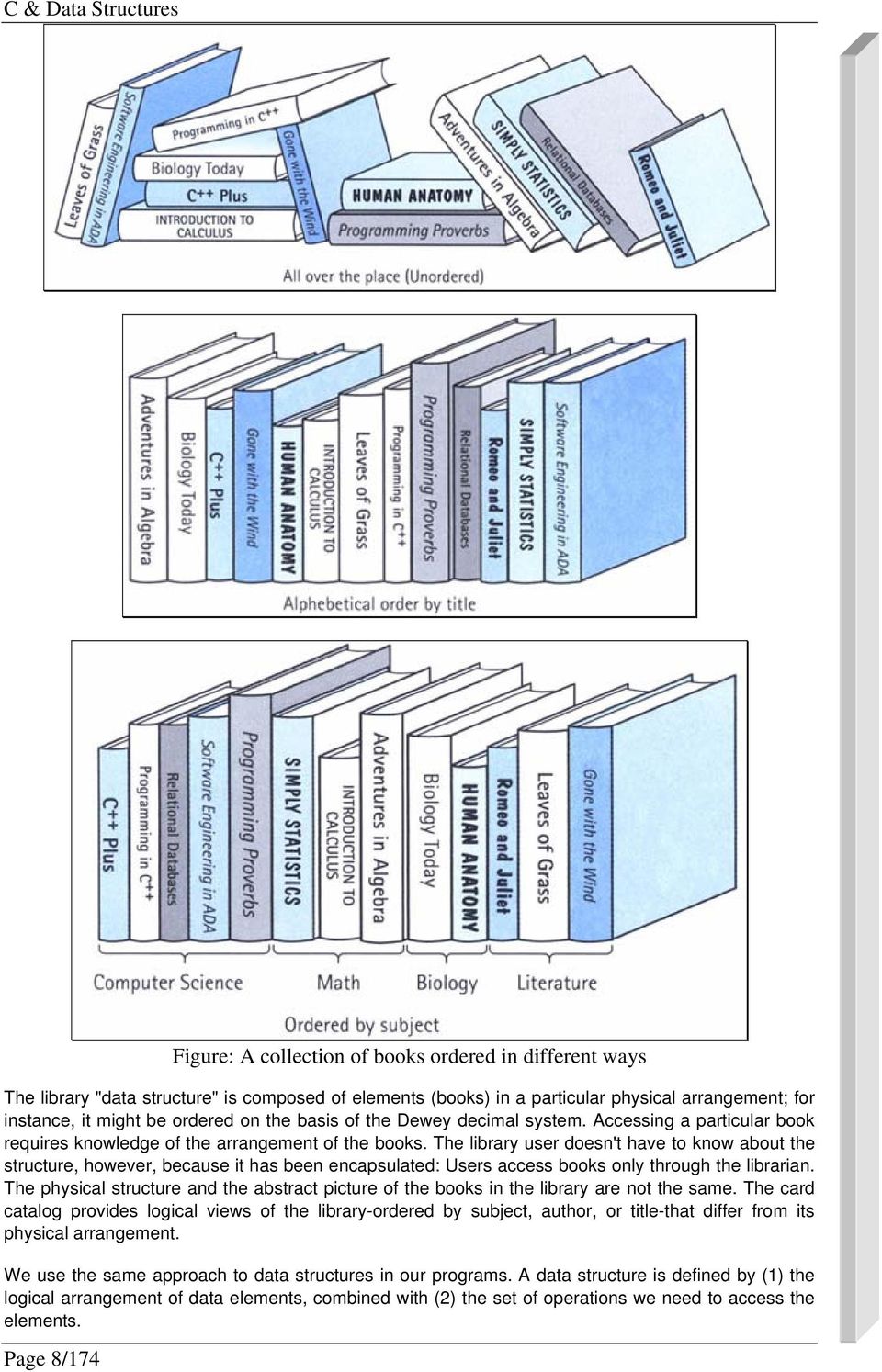
6 Figure: A black box representing an integer The point of this discussion is that you have been dealing with a logical data abstraction of "integer" since the very beginning. The advantages of doing so are clear: You can think of the data and the operations in a logical sense and can consider their use without having to worry about implementation details. The lower levels are still there-they're just hidden from you. Remember that the goal in design is to reduce complexity through abstraction. We can extend this goal further: to protect our data abstraction through encapsulation. We refer to the set of all possible values (the domain) of an encapsulated data "object," plus the specifications of the operations that are provided to create and manipulate the data, as an abstract data type (ADT for short). Abstract data type (ADT) A data type whose properties (domain and operations) are specified independently of any particular implementation 4. Data Structures A single integer can be very useful if we need a counter, a sum, or an index in a program, but generally we must also deal with data that have lots of parts, such as a list. We describe the logical properties of such a collection of data as an abstract data type; we call the concrete implementation of the data a data structure. When a program's information is made up of component parts, we must consider an appropriate data structure. Data structures have a few features worth noting. First, they can be "decomposed" into their component elements. Second, the arrangement of the elements is a feature of the structure that affects how each element is accessed. Third, both the arrangement of the elements and the way they are accessed can be encapsulated. Data structure A collection of data elements whose organization is characterized by accessing operations that are used to store and retrieve the individual data elements; the implementation of the composite data members in an abstract data type Let's look at a real-life example: a library. A library can be decomposed into its component elementsbooks. The collection of individual books can be arranged in a number of ways, as shown in Figure. Obviously, the way the books are physically arranged on the shelves determines how one would go about looking for a specific volume. The particular library with which we're concerned doesn't let its patrons get their own books, however; if you want a book, you must give your request to the librarian, who retrieves the book for you. Page 7/174

7 Page 8/174 Figure: A collection of books ordered in different ways The library "data structure" is composed of elements (books) in a particular physical arrangement; for instance, it might be ordered on the basis of the Dewey decimal system. Accessing a particular book requires knowledge of the arrangement of the books. The library user doesn't have to know about the structure, however, because it has been encapsulated: Users access books only through the librarian. The physical structure and the abstract picture of the books in the library are not the same. The card catalog provides logical views of the library-ordered by subject, author, or title-that differ from its physical arrangement. We use the same approach to data structures in our programs. A data structure is defined by (1) the logical arrangement of data elements, combined with (2) the set of operations we need to access the elements.
8 Notice the difference between an abstract data type and a data structure. The former is a high-level description: the logical picture of the data and the operations that manipulate them. The latter is concrete: a collection of data elements and the operations that store and retrieve individual elements. An abstract data type is implementation independent, whereas a data structure is implementation dependent. A data structure is how we implement the data in an abstract data type whose values have component parts. The operations on an abstract data type are translated into algorithms on the data structure. Another view of data focuses on how they are used in a program to solve a particular problem-that is, their application. If we were writing a program to keep track of student grades, we would need a list of students and a way to record the grades for each student. We might take a by-hand grade book and model it in our program. The operations on the grade book might include adding a name, adding a grade, averaging a student's grades, and so on. Once we have written a specification for our grade book data type, we must choose an appropriate data structure to implement it and design the algorithms to implement the operations on the structure. In modeling data in a program, we wear many hats. That is, we must determine the logical picture of the data, choose the representation of the data, and develop the operations that encapsulate this arrangement. During this process, we consider data from three different perspectives, or levels: 1. Application (or user) level: A way of modeling real-life data in a specific context; also called the problem domain 2. Logical (or abstract) level: An abstract view of the data values (the domain) and the set of operations to manipulate them 3. Implementation level: A specific representation of the structure to hold the data items, and the coding of the operations in a programming language (if the operations are not already provided by the language) In our discussion, we refer to the second perspective as the "abstract data type." Because an abstract data type can be a simple type such as an integer or character, as well as a structure that contains component elements, we also use the term "composite data type" to refer to abstract data types that may contain component elements. The third level describes how we actually represent and manipulate the data in memory: the data structure and the algorithms for the operations that manipulate the items on the structure. Let's see what these different viewpoints mean in terms of our library analogy. At the application level, we focus on entities such as the Library of Congress, the Dimsdale Collection of Rare Books, and the Austin City Library. At the logical level, we deal with the "what" questions. What is a library? What services (operations) can a library perform? The library may be seen abstractly as "a collection of books" for which the following operations are specified: Check out a book Check in a book Reserve a book that is currently checked out Pay a fine for an overdue book Pay for a lost book How the books are organized on the shelves is not important at the logical level, because the patrons don't have direct access to the books. The abstract viewer of library services is not concerned with how the librarian actually organizes the books in the library. Instead, the library user needs to know only the correct way to invoke the desired operation. For instance, here is the user's view of the Page 9/174
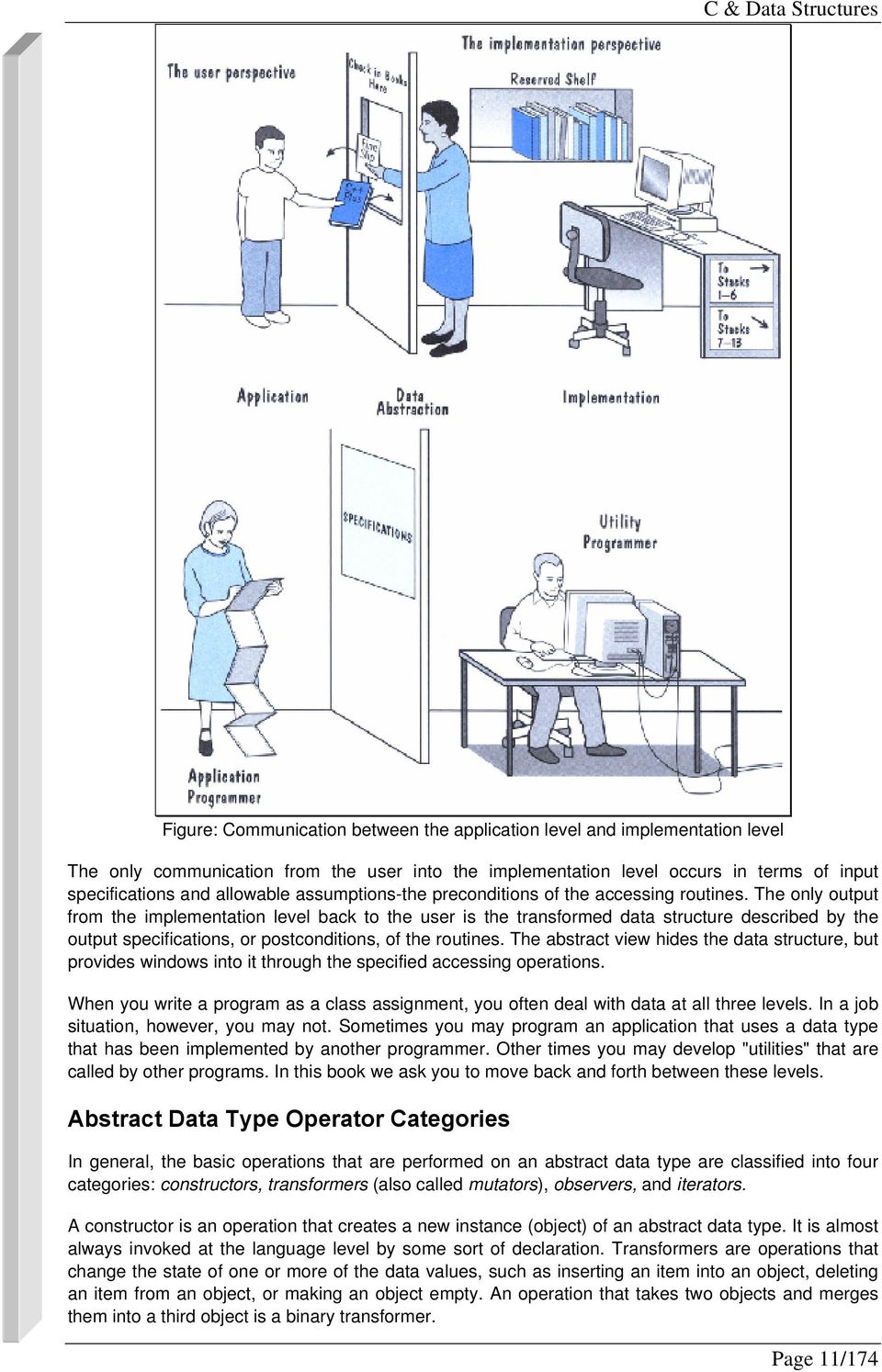
9 operation to check in a book: Present the book at the check-in window of the library from which the book was checked out, and receive a fine slip if the book is overdue. At the implementation level, we deal with the "how" questions. How are the books cataloged? How are they organized on the shelf? How does the librarian process a book when it is checked in? For instance, the implementation information includes the fact that the books are cataloged according to the Dewey decimal system and arranged in four levels of stacks, with 14 rows of shelves on each level. The librarian needs such knowledge to be able to locate a book. This information also includes the details of what happens when each operation takes place. For example, when a book is checked back in, the librarian may use the following algorithm to implement the check-in operation: All of this activity, of course, is invisible to the library user. The goal of our design approach is to hide the implementation level from the user. Picture a wall separating the application level from the implementation level, as shown in Figure 2.4. Imagine yourself on one side and another programmer on the other side. How do the two of you, with your separate views of the data, communicate across this wall? Similarly, how do the library user's view and the librarian's view of the library come together? The library user and the librarian communicate through the data abstraction. The abstract view provides the specification of the accessing operations without telling how the operations work. It tells what but not how. For instance, the abstract view of checking in a book can be summarized in the following specification: Page 10/174

10 Figure: Communication between the application level and implementation level The only communication from the user into the implementation level occurs in terms of input specifications and allowable assumptions-the preconditions of the accessing routines. The only output from the implementation level back to the user is the transformed data structure described by the output specifications, or postconditions, of the routines. The abstract view hides the data structure, but provides windows into it through the specified accessing operations. When you write a program as a class assignment, you often deal with data at all three levels. In a job situation, however, you may not. Sometimes you may program an application that uses a data type that has been implemented by another programmer. Other times you may develop "utilities" that are called by other programs. In this book we ask you to move back and forth between these levels. Abstract Data Type Operator Categories In general, the basic operations that are performed on an abstract data type are classified into four categories: constructors, transformers (also called mutators), observers, and iterators. A constructor is an operation that creates a new instance (object) of an abstract data type. It is almost always invoked at the language level by some sort of declaration. Transformers are operations that change the state of one or more of the data values, such as inserting an item into an object, deleting an item from an object, or making an object empty. An operation that takes two objects and merges them into a third object is a binary transformer. Page 11/174
11 An observer is an operation that allows us to observe the state of one or more of the data values without changing them. Observers come in several forms: predicates that ask if a certain property is true, accessor or selector functions that return a copy of an item in the object, and summary functions that return information about the object as a whole. A Boolean function that returns true if an object is empty and false if it contains any components is an example of a predicate. A function that returns a copy of the last item put into the structure is an example of an accessor function. A function that returns the number of items in the structure is a summary function. An iterator is an operation that allows us to process all components in a data structure sequentially. Operations that print the items in a list or return successive list items are iterators. Iterators are only defined on structured data types. In later, we use these ideas to define and implement some useful data types that may be new to you. First, however, let's explore the built-in composite data types C provides for us. Definition of Data Structure: An organization of information, usually in memory, for better algorithm efficiency, such as queue, stack, linked list, heap, dictionary, and tree, or conceptual unity, such as the name and address of a person. It may include redundant information, such as length of the list or number of nodes in a subtree. Definition of Algorithm: A computable set of steps to achieve a desired result. Note: Most data structures have associated algorithms to perform operations, such as search, insert, or balance, that maintain the properties of the data structure. The subjects of this book are data structures and algorithms. A data structure is an arrangement of data in a computer s memory (or sometimes on a disk). Data structures include linked lists, stacks, binary trees, and hash tables, among others. Algorithms manipulate the data in these structures in various ways, such as inserting a new data item, searching for a particular item, or sorting the items. You can think of an algorithm as a recipe: a list of detailed instructions for carrying out an activity. 5. Overview of Data Structures Another way to look at data structures is to focus on their strengths and weaknesses. This section provides an overview, in the form of a table, of the major data storage structures discussed in this book. This is a bird s-eye view of a landscape that we ll be covering later at ground level, so don t be alarmed if it looks a bit mysterious. Table shows the advantages and disadvantages of the various data structures described in this book. A data structure is the organization of data in a computer s memory (or in a disk file). The correct choice of data structure allows major improvements in program efficiency. Examples of data structures are arrays, stacks, and linked lists. An algorithm is a procedure for carrying out a particular task. Page 12/174

12 Algorithms + Data Structures = Programs Algorithms Data Structures 6. Exercises E1. Give an example of a relationship between Data Structure and Algorithm E2. Write a program to finf maximum value of 4 numbers. Using 2 types of data structures: array of 4 numbers, 4 int numbers seperated. E3. Imagine a group of data you would like to put in a computer so it could be accessed and manipulated. For example, if you collect old CDROMs, you might want to catalog them so you could search for a particular author or a specific date... Page 13/174

13 CHAPTER 1: C LANGUAGE 1. ADDRESS Introduction For every variable declared in a program there is some memory allocation. Memory is specified in arrays of bytes, the size of which depending on the type of variable. For the integer type, 2 bytes are allocated, for floats, 4 bytes are allocated, etc. For every variable there are two attributes: address and value, described as follows: Program #include <stdio.h> main () int i, j, k; //A i = 10; //B j = 20; //C k = i + j; //D printf ("Value of k is %d\n", k); Explanation Memory allocations to the variables can be explained using the following variables: ,i , j ,k 30 When you declare variables i, j, k, memory is allocated for storing the values of the variables. For example, 2 bytes are allocated for i, at location 100, 2 bytes are allocated for j at location 200, and 2 bytes allocated for k at location 300. Here 100 is called the address of i, 200 is called address of j, and 300 is called the address of k. 4. When you execute the statement i = 10, the value 10 is written at location 100, which is specified in the figure. Now, the address of i is 100 and the value is 10. During the lifetime of variables, the address will remain fixed and the value may be changed. Similarly, value 20 is written at address 200 for j. During execution, addresses of the variables are taken according to the type of variable, that is, local or global. Local variables usually have allocation in stack while global variables are stored in runtime storage. Points to Remember Each variable has two attributes: address and value. The address is the location in memory where the value of the variable is stored. During the lifetime of the variable, the address is not changed but the value may change. Page 14/174

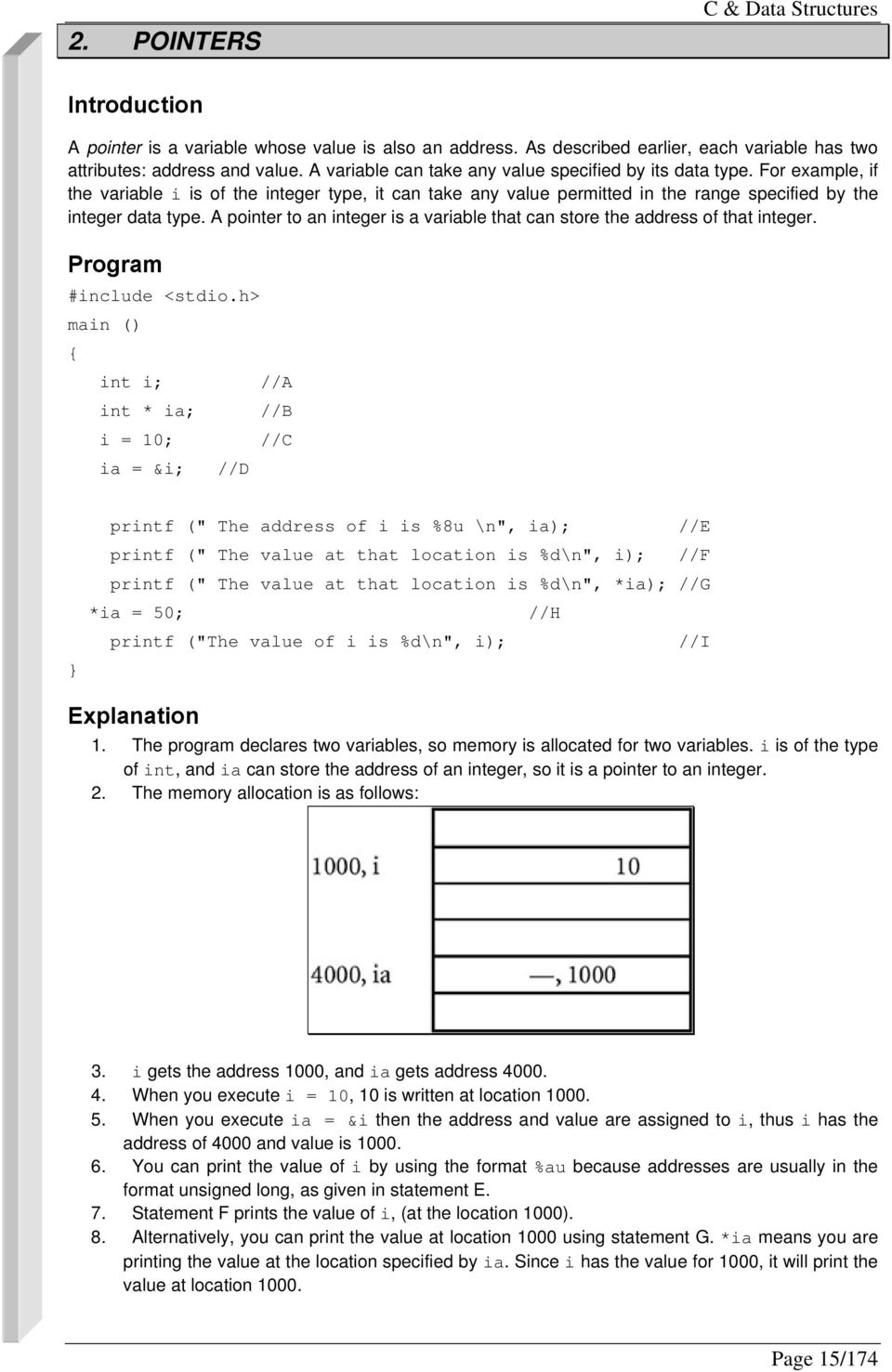
14 2. POINTERS C & Data Structures Introduction A pointer is a variable whose value is also an address. As described earlier, each variable has two attributes: address and value. A variable can take any value specified by its data type. For example, if the variable i is of the integer type, it can take any value permitted in the range specified by the integer data type. A pointer to an integer is a variable that can store the address of that integer. Program #include <stdio.h> main () int i; //A int * ia; //B i = 10; //C ia = &i; //D printf (" The address of i is %8u \n", ia); //E printf (" The value at that location is %d\n", i); //F printf (" The value at that location is %d\n", *ia); //G *ia = 50; //H printf ("The value of i is %d\n", i); //I Explanation 1. The program declares two variables, so memory is allocated for two variables. i is of the type of int, and ia can store the address of an integer, so it is a pointer to an integer. 2. The memory allocation is as follows: 3. i gets the address 1000, and ia gets address When you execute i = 10, 10 is written at location When you execute ia = &i then the address and value are assigned to i, thus i has the address of 4000 and value is You can print the value of i by using the format %au because addresses are usually in the format unsigned long, as given in statement E. 7. Statement F prints the value of i, (at the location 1000). 8. Alternatively, you can print the value at location 1000 using statement G. *ia means you are printing the value at the location specified by ia. Since i has the value for 1000, it will print the value at location Page 15/174
15 9. When you execute *ia = 50, which is specified by statement H, the value 50 is written at the location by ia. Since ia specifies the location 1000, the value at the location 1000 is written as Since i also has the location 1000, the value of i gets changed automatically from 10 to 50, which is confirmed from the printf statement written at position i. Points to Remember 1. Pointers give a facility to access the value of a variable indirectly. 2. You can define a pointer by including a* before the name of the variable. 3. You can get the address where a variable is stored by using &. 3. ARRAYS Introduction An array is a data structure used to process multiple elements with the same data type when a number of such elements are known. You would use an array when, for example, you want to find out the average grades of a class based on the grades of 50 students in the class. Here you cannot define 50 variables and add their grades. This is not practical. Using an array, you can store grades of 50 students in one entity, say grades, and you can access each entity by using subscript as grades[1], grades[2]. Thus you have to define the array of grades of the float data type and a size of 50. An array is a composite data structure; that means it had to be constructed from basic data types such as array integers. Program #include <stdio.h> main() int a[5]; \\A for(int i = 0;i<5;i++) a[i]=i;\\b printarr(a); void printarr(int a[]) for(int i = 0;i<5;i++) printf("value in array %d\n",a[i]); Explanation 1. Statement A defines an array of integers. The array is of the size 5 that means you can store 5 integers. 2. Array elements are referred to using subscript; the lowest subscript is always 0 and the highest subscript is (size 1). If you refer to an array element by using an out-of-range subscript, you will get an error. You can refer to any element as a[0], a[1], a[2], etc. 3. Generally, you can use a for loop for processing an array. For the array, consecutive memory locations are allocated and the size of each element is same. Page 16/174

16 4. The array name, for example, a, is a pointer constant, and you can pass the array name to the function and manipulate array elements in the function. An array is always processed element by element. 5. When defining the array, the size should be known. Note The array subscript has the highest precedence among all operators thus a[1] * a[2] gives the multiplication of array elements at position 1 and position 2. Points to Remember 1. An array is a composite data structure in which you can store multiple values. Array elements are accessed using subscript. 2. The subscript operator has the highest precedence. Thus if you write a[2]++,it increments the value at location 2 in the array. 3. The valid range of subscript is 0 to size ADDRESS OF EACH ELEMENT IN AN ARRAY Introduction Each element of the array has a memory address. The following program prints an array limit value and an array element address. Program #include <stdio.h> void printarr(int a[]); main() int a[5]; for(int i = 0;i<5;i++) a[i]=i; printarr(a); void printarr(int a[]) for(int i = 0;i<5;i++) printf("value in array %d\n",a[i]); void printdetail(int a[]) for(int i = 0;i<5;i++) printf("value in array %d and address is %16lu\n",a[i],&a[i]); \\ A Page 17/174
![Note The array subscript has the highest precedence among all operators thus a[1] * a[2] gives the multiplication of array elements at position 1 and position 2. Points to Remember 1.](/docs-images/48/23890030/images/page_16.jpg "An array is a composite data structure in which you can store multiple values. Array elements are accessed using subscript. 2. The subscript operator has the highest precedence.")
17 Explanation 1. The function printarr prints the value of each element in arr. 2. The function printdetail prints the value and address of each element as given in statement A. Since each element is of the integer type, the difference between addresses is Each array element occupies consecutive memory locations. 4. You can print addresses using place holders %16lu or %p. Point to Remember For array elements, consecutive memory locations are allocated. 5. ACCESSING AN ARRAY USING POINTERS Introduction You can access an array element by using a pointer. For example, if an array stores integers, then you can use a pointer to integer to access array elements. Program #include <stdio.h> void printarr(int a[]); void printdetail(int a[]); main() int a[5]; for(int i = 0;i<5;i++) a[i]=i; printdetail(a); void printarr(int a[]) for(int i = 0;i<5;i++) printf("value in array %d\n",a[i]); void printdetail(int a[]) for(int i = 0;i<5;i++) printf("value in array %d and address is %8u\n",a[i],&a[i]); Page 18/174

18 void print_usingptr(int a[]) \\ A int *b; \\ B b=a; \\ C for(int i = 0;i<5;i++) printf("value in array %d and address is %16lu\n",*b,b); \\ D b=b+2; \\E Explanation 1. The function print_using pointer given at statement A accesses elements of the array using pointers. 2. Statement B defines variable b as a pointer to an integer. 3. Statement C assigns the base address of the array to b, thus the array's first location (a[0]) is at 100; then b will get the value 100. Other elements of the array will add 102,104, etc. 4. Statement D prints two values: *b means the value at the location specified by b, that is, the value at the location 100. The second value is the address itself, that is, the value of b or the address of the first location. 5. For each iteration, b is incremented by 2 so it will point to the next array location. It is incremented by 2 because each integer occupies 2 bytes. If the array is long then you may increment it by 4. Points to Remember 1. Array elements can be accessed using pointers. 2. The array name is the pointer constant which can be assigned to any pointer variable. 6. MANIPULATING ARRAYS USING POINTERS Introduction When the pointer is incremented by an increment operator, it is always right incremented. That is, if the pointer points to an integer, the pointer is incremented by 2, and, if it is long, it is incremented by 4. Program #include <stdio.h> void printarr(int a[]); void printdetail(int a[]); void print_usingptr(int a[]); main() int a[5]; for(int i = 0;i<5;i++) a[i]=i; Page 19/174
![Statement C assigns the base address of the array to b, thus the array's first location (a[0]) is at 100; then b will get the value 100. Other elements of the array will add 102,104, etc. 4.](/docs-images/48/23890030/images/page_18.jpg "Statement D prints two values: *b means the value at the location specified by b, that is, the value at the location 100.")
19 print_usingptr(a); void printarr(int a[]) for(int i = 0;i<5;i++) printf("value in array %d\n",a[i]); void printdetail(int a[]) for(int i = 0;i<5;i++) printf("value in array %d and address is %8u\n",a[i],&a[i]); void print_usingptr(int a[]) int *b; b=a; for(int i = 0;i<5;i++) printf("value in array %d and address is %16lu\n",*b,b); b++; // A Explanation 1. This function is similar to the preceding function except for the difference at statement A. In the previous version, b = b+2 is used. Here b++ is used to increment the pointer. 2. Since the pointer is a pointer to an integer, it is always incremented by 2. Point to Remember The increment operator increments the pointer according to the size of the data type. 7. ANOTHER CASE OF MANIPULATING AN ARRAY USING POINTERS Introduction You can put values in the memory locations by using pointers, but you cannot assign the memory location to an array to access those values because an array is a pointer constant. Program #include <stdio.h> void printarr(int a[]); Page 20/174
20 void printdetail(int a[]); void print_usingptr_a(int a[]); main() int a[5]; int *b; int *c; for(int i = 0;i<5;i++) a[i]=i; printarr(a); *b=2; \\ A b++; \\ B *b=4; \\ C b++; *b=6; \\ D b++; *b=8; \\ E b++; *b=10; b++; *b=12; b++; a=c; //error \\F printarr(a); C & Data Structures void printarr(int a[]) for(int i = 0;i<5;i++) printf("value in array %d\n",a[i]); void printdetail(int a[]) for(int i = 0;i<5;i++) printf("value in array %d and address is %16lu\n",a[i],&a[i]); void print_usingptr_a(int a[]) Page 21/174
![printarr(a); C & Data Structures void printarr(int a[]) for(int i = 0;i<5;i++) printf("value in array %d\n",a[i]); void](/docs-images/48/23890030/images/page_20.jpg "printdetail(int a[]) for(int i = 0;i<5;i++) printf(\"value in array %d and address is %16lu\n\",a[i],&a[i]); void")
21 for(int i = 0;i<5;i++) printf("value in array %d and address is %16lu\n",*a,a); \\ F a++; // increase by 2 bytes \\ G Explanation 1. You can assign a value at the location specified by b using statement A. 2. Using statement B, you can point to the next location so that you can specify a value at that location using statement C. Using this procedure, you can initialize 5 locations. 3. You cannot assign the starting memory location as given by statement F to access those elements because a is a pointer constant and you cannot change its value. 4. The function print_usingptr_a works correctly even though you are writing a++. This is because when you pass a as a pointer in an actual parameter, only the value of a is passed and this value is copied to the local variable. So changing the value in the local variable will not have any effect on the outside function. Point to Remember The array limit is a pointer constant and you cannot change its value in the program. 8. TWO-DIMENSIONAL ARRAY Introduction You can define two- or multi-dimensional arrays. It is taken as an array of an array. Logically, the twodimensional array 3 X 2 is taken as Here there are three arrays, i.e. one array in each row. The values are stored as This style is called row measure form. Each row array is represented as a[0], which consists of elements 3 and 1. a[1] consists of 5 2 and a[2] consists of 8 7. Each element of a[0] is accessed as a [0] [0] and a[0] [1], thus the value of a[0][0] and a[0][1] is 1. Program #include <stdio.h> void printarr(int a[][]); void printdetail(int a[][]); void print_usingptr(int a[][]); main() int a[3][2]; \\ A for(int i = 0;i<3;i++) Page 22/174
22 for(int j=0;j<2 ;j++) a[i]=i; printdetail(a); void printarr(int a[][]) for(int i = 0;i<3;i++) for(int j=0;j<2;j++) printf("value in array %d\n",a[i][j]); void printdetail(int a[][]) for(int i = 0;i<3;i++) for(int j=0;j<2;j++) printf( "value in array %d and address is %8u\n", a[i][j],&a[i][j]); void print_usingptr(int a[][]) int *b; \\ B b=a; \\ C for(int i = 0;i<6;i++) \\ D printf("value in array %d and address is %16lu\n",*b,b); b++; // increase by 2 bytes \\ E Explanation 1. Statement A declares a two-dimensional array of the size The size of the array is 3 2, or Each array element is accessed using two subscripts. 4. You can use two for loops to access the array. Since i is used for accessing a row, the outer loop prints elements row-wise, that is, for each value of i, all the column values are printed. Page 23/174
23 5. You can access the element of the array by using a pointer. 6. Statement B assigns the base address of the array to the pointer. 7. The for loop at statement C increments the pointer and prints the value that is pointed to by the pointer. The number of iterations done by the for loop, 6, is equal to the array. 8. Using the output, you can verify that C is using row measure form for storing a twodimensional array. Points to Remember 1. You can define a multi-dimensional array in C. 2. You have to provide multiple subscripts for accessing array elements. 3. You can access array elements by using a pointer. 9. POINTER ARRAYS Introduction You can define a pointer array similarly to an array of integers. In the pointer array, the array elements store the pointer that points to integer values. Program #include <stdio.h> void printarr(int *a[]); void printarr_usingptr(int *a[]); int *a[5]; \\ A main() int i1=4,i2=3,i3=2,i4=1,i5=0; a[0]=&i1; a[1]=&i2; a[2]=&i3; a[3]=&i4; a[4]=&i5; \\ B \\ C printarr(a); printarr_usingptr(a); void printarr(int *a[]) \\ D printf("address Address in array Value\n"); for(int j=0;j<5;j++) printf("%16u %16u %d\n", a[j],a[j],a[j]); \\E Page 24/174
24 void printarr_usingptr(int *a[]) int j=0; printf("using pointer\n"); for( j=0;j<5;j++) printf("value of elements a++; C & Data Structures %d %16lu %16lu\n",**a,*a,a); \\ F Explanation 1. Statement A declares an array of pointers so each element stores the address. 2. Statement B declares integer variables and assigns values to these variables. 3. Statement C assigns the address of i1 to element a[0] of the array. All the array elements are given values in a similar way. 4. The function print_arr prints the address of each array element and the value of each array element (the pointers and values that are pointed to by these pointers by using the notations &a[i], a[i] and *a[i]). 5. You can use the function printarr_usingptr to access array elements by using an integer pointer, thus a is the address of the array element, *a is the value of the array element, and **a is the value pointed to by this array element. Point to Remember You can store pointers in arrays. You can access values specified by these values by using the * notations. 10. STRUCTURES Introduction Structures are used when you want to process data of multiple data types but you still want to refer to the data as a single entity. Structures are similar to records in Cobal or Pascal. For example, you might want to process information on students in the categories of name and marks (grade percentages). Here you can declare the structure student with the fields name and marks, and you can assign them appropriate data types. These fields are called members of the structure. A member of the structure is referred to in the form of structurename.membername. Program struct student \\ A char name[30]; \\ B float marks; \\ C student1, student2; \\ D main ( ) struct student student3; \\ E Page 25/174
25 char s1[30]; \\ F float f; \\ G scanf ("%s", name); \\ H scanf (" %f", & f); \\ I student1.name = s1; \\ J student2.marks = f; \\ K printf (" Name is %s \n", student1.name); printf (" Marks are %f \n", student2.marks); \\ L \\ M Explanation 1. Statement A defines the structure type student. It has two members: name and marks. 2. Statement B defines the structure member name of the type character Statement C defines the structure member marks of the type float. 4. Statement D defines two structure variables: structure1 and structure2. In the program you have to use variables only. Thus struct student is the data type, just as int and student1 is the variable. 5. You can define another variable, student3, by using the notations as specified in statement E. 6. You can define two local variables by using statements F and G. 7. Statement J assigns s1 to a member of the structure. The structure member is referred to as structure variablename.membername. The member student1.name is just like an ordinary string, so all the operations on the string are allowed. Similarly, statement J assigns a value to student1.marks 8. Statement L prints the marks of student1 just as an ordinary string. Points to Remember 1. Structures are used when you want to process data that may be of multiple data types. 2. Structures have members in the form: structurename.membername. 11. STRUCTURE POINTERS Introduction You can process the structure using a structure pointer. Program struct student char name[30]; float marks; ; \\ D \\ A \\ B \\ C main ( ) struct student *student1; struct student student2; \\ F char s1[30]; float f; \\ E Page 26/174
26 student1 = &student2; \\ G scanf ("%s", name); \\ H scanf (" %f", & f); \\ I *student1.name = s1; \\ J student1-> name = f; *student2.marks = f; \\ K student1-> marks = s1; printf (" Name is %s \n", *student1.name); \\ L printf (" Marks are %f \n", *student2.marks); \\ M Explanation 1. Statement E indicates that student1 is the pointer to the structure. 2. Statement F defines the structure variable student2 so that memory is allocated to the structure. 3. Statement G assigns the address of the structure student2 to the pointer variable structure student1. 4. In the absence of statement G, you cannot refer to the structure using a pointer. This is because when you define the pointer to the structure, the memory allocation is done only for pointers; the memory is not allocated for structure. That is the reason you have to declare a variable of the structure type so that memory is allocated to the structure and the address of the variable is given to the point. 5. Statement J modifies a member of the structure using the * notation. The alternative notation is 6. student1-> name = f; 7. student1-> marks = s1; Points to Remember 1. You can access members of the structure using a pointer. 2. To access members of the structure, you have to first create a structure so that the address of the structure is assigned to the pointer. 12. Exercises E1. Write a function to check if an integer is negative; the declaration should look like bool is_positive(int i); E2. Write a function to calculate if a number is prime. E3. Write a program to input an int array. Display the numbers of negative elements, prime elements in this array. E4. a. Write a function that can find the largest element in the array that is passed to the function as a parameter. b. Write a program that inputs an array and invokes the above function to find the largest element in the array and print it out. E4. Given the following function that can find the largest element in an integer array. Notice that the function uses pointer arithmetic: int findmax(int * vals, int numels) Page 27/174
27 int j, max = *vals; for (j = 1; j < numels; j++) if (max < *(vals + j)) max = *(vals + j); return max; Write a C++ program that inputs an integer array and invokes the above function to find the largest element in that array and displays the result out. E5. a) Define a structure with 2 fields: width and height for rectangle. Input an array of rectangle, then display each area and perimeter of each rectanle in array. b) Using pointer to loop around array. E6. The hexadecimal digits are the ordinary, base-10 digits '0' through '9' plus the letters 'A' through 'F'. In the hexadecimal system, these digits represent the values 0 through 15, respectively. Write a function named hexvalue that uses a switch statement to find the hexadecimal value of a given character. The character is a parameter to the function, and its hexadecimal value is the return value of the function. You should count lower case letters 'a' through 'f' as having the same value as the corresponding upper case letters. If the parameter is not one of the legal hexadecimal digits, return -1 as the value of the function. E7. Write a program: Read in a series of numbers representing tst tubes and readings. The sentinel is a single minus one. Your program should keep the product of the readings for each test tube. At the end, it display the test tube numbers and product of each reading. Be sure not to display values for test tubes that have no value. After this is done, display the minimum of the products. If the input were: The output would be Test Tube Number 2 Product 3750 Page 28/174
28 Test Tube Number 3 Product C & Data Structures Test Tube Number 4 Product 168 Test Tube Number 5 Product 1080 Min is 168 Page 29/174
29 CHAPTER 2: FUNCTION & RECURSION 1. FUNCTION Introduction Functions are used to provide modularity to the software. By using functions, you can divide complex tasks into small manageable tasks. The use of functions can also help avoid duplication of work. For example, if you have written the function for calculating the square root, you can use that function in multiple programs. Program #include <stdio.h> int add (int x, int y) //A int z; //B z = x + y; return (z); //C main () int i, j, k; i = 10; j = 20; k = add(i, j); //D printf ("The value of k is%d\n", k); //E Explanation 1. This function adds two integers and returns their sum. 2. When defining the name of the function, its return data type and parameters must also be defined. For example, when you write 3. int add (int x, int y) int is the type of data to be returned, add is the name of the function, and x and y are the parameters of the type int. These are called formal parameters. 4. The body of a function is just like the body of main. That means you can have variable declarations and executable statements. 5. A function should contain statements that return values compatible with the function's return type. 6. The variables within the function are called local variables. 7. After executing the return statement, no further statements in the function body are executed. 8. The name of the function can come from the arguments that are compatible with the formal parameters, as indicated in statement D. 9. The arguments that are used in the call of the function are called actual parameters. 10. During the call, the value of the actual parameter is copied into the formal parameter and the function body is executed. 11. After the return statement, control returns to the next statement which is after the call of the function. Page 30/174
30 Points to Remember 1. A function provides modularity and readability to the software. 2. To define the function, you have to define the function name, the return data type and the formal parameters. 3. Functions do not require formal parameters. 4. If the function does not return any value, then you have to set the return data type as void. 5. A call to a function should be compatible with the function definition. 2. THE CONCEPT OF STACK Introduction A stack is memory in which values are stored and retrieved in "last in first out" manner by using operations called push and pop. Program Suppose you want to insert values in a stack and retrieve values from the stack. The operations would proceed in the following manner: Explanation 1. Initially, the stack is empty. When you start push A, A is placed in the stack. 2. Similarly, push B and push C put these elements in the stack; the last element pushed is C. 3. The pop operation takes the topmost element from the stack. Thus the element C, which was put in last, is retrieved first. This method is called last-in first-out (LIFO). 4. The push D operation puts element D in the stack above B. 5. Thus push puts the element on the top of the stack and pop takes the element from the top of the stack. The element A which is pushed is the last element taken from the stack. Point to Remember The last-in first-out retrieval from the stack is useful for controlling the flow of execution during the function call. Page 31/174
31 3. THE SEQUENCE OF EXECUTION DURING A FUNCTION CALL Introduction When the function is called, the current execution is temporarily stopped and the control goes to the called function. After the call, the execution resumes from the point at which the execution is stopped. To get the exact point at which execution is resumed, the address of the next instruction is stored in the stack. When the function call completes, the address at the top of the stack is taken. Program main ( ) printf ("1 \n"); // 1 printf ("2 \n"); // 2 printf ("3 \n"); // 3 printf ("4 \n"); // 4 printf ("5 \n"); // 5 f1 ( ); printf ("6 \n"); // 6 printf ("7 \n"); // 7 printf ("8 \n"); // 8 void f1 (void) printf ("f1-9 \n"); // 9 printf ("f1-10 \n"); // 10 f2 ( ); printf ("f1-11 \n"); // 11 printf ("f1-12 \n"); // 12 void f2 (void) printf ("f2-13 \n"); // 13 printf ("f2-14 \n"); // 14 printf ("f3-15 \n"); // 15 Explanation 1. Statements 1 to 5 are executed and function f1( ) is called. 2. The address of the next instruction is pushed into the stack. 3. Control goes to function f1( ), which starts executing. 4. After the 10th statement, fuction f2 is called and address of the next instruction, 11, is pushed into the stack. 5. Execution begins for function f2 and statements 13, 14, and 15 are executed. 6. When f2 is finished, the address is popped from the stack. So address 11 is popped. 7. Control resumes from statement Statements 11 and 12 are executed. 9. After finishing the f1 address is popped from the stack, i.e. 6. Page 32/174
32 10. Statements 6, 7, and 8 are executed. 11. The execution sequence is f1_9 f1_10 f2_13 f2_14 f2_15 f1_11 f1_ Points to Remember 1. Functions or sub-programs are implemented using a stack. 2. When a function is called, the address of the next instruction is pushed into the stack. 3. When the function is finished, the address for execution is taken by using the pop operation. 4. PARAMETER PASSING Introduction Information can be passed from one function to another using parameters. Program main ( ) int i; i = 0; printf (" The value of i before call %d \n", i); f1 (i); printf (" The value of i after call %d \n", i); void f1 (int k) k = k + 10; Explanation 1. The parameter used for writing the function is called the formal parameter, k in this case. 2. The argument used for calling the function is called the actual parameter. 3. The actual and formal parameters may have the same name. 4. When the function is called, the value of the actual parameter is copied into the formal parameter. Thus k gets the value 0. This method is called parameter passing by value. 5. Since only the value of i is passed to the formal parameter k, and k is changed within the function, the changes are done in k and the value of i remains unaffected. 6. Thus i will equal 0 after the call; the value of i before and after the function call remains the same. Points to Remember 1. C uses the method of parameter passing by value. 2. In parameter passing by value, the value before and after the call remains the same. Page 33/174
33 5. CALL BY REFERENCE Introduction Suppose you want to pass a parameter under the following conditions: 1. You need to change the value of the parameter inside the function. 2. You are interested in the changed value after the function completes. In languages such as Pascal, you have the option of passing the parameter by reference. C, however, does not support this. As explained in the previous example, you cannot have a changed value after the function call because C uses the method of parameter passing by value. Instead, you'll have to implement the function indirectly. This is done by passing the address of the variable and changing the value of the variable through its address. Program main ( ) int i; i = 0; printf (" The value of i before call %d \n", i); f1 (&i); // A printf (" The value of i after call %d \n", i); void (int *k) // B *k = *k + 10; // C Explanation 1. This example is similar to the previous example, except that the function is written using a pointer to an integer as a parameter. 2. Statement C changes the value at the location specified by *k. 3. The function is called by passing the address of i using notation &i. 4. When the function is called, the address of i is copied to k, which holds the address of the integer. 5. Statement C increments the value at the address specified by k. 6. The value at the address of i is changed to 10. It means the value of i is changed. 7. The printf statements after the function call prints the value 10, that is, the changed value of i. Points to Remember 1. Call by reference is implemented indirectly by passing the address of the variable. 2. In this example, the address of i is passed during the function call. It does not change; only the value of the address is changed by the function. Page 34/174
34 6. RESOLVING VARIABLE REFERENCES C & Data Structures Introduction When the same variable is resolved using both local definition and global definition, the local definition is given preference. This is called the rule of inheritance. It says that when you can resolve a reference to the variable by using multiple definitions, the nearest definition is given preference. Since local definition is the nearest, it gets preference. Program int i =0; //Global variable /A main() int i ; // local variable for main / B void f1(void) ; //C i =0; // D printf("value of i in main %d\n",i); // E f1(); // F printf("value of i after call%d\n",i); // G void f1(void) // H int i=0; //local variable for f1 // I i = 50; // J Explanation 1. Here i is declared globally and locally in function main and in function f1, respectively, as given in statements A, B and I. 2. Statement D refers to i, which can be resolved by using both local definition and global definition. Local definition is given more preference. So statement D refers to the definition at statement B and all the statements in main refer to the definition at statement B, that is, the local definition. 3. When a function is called, statement i = 50 refers to the local definition in that function (definition at statement I). 4. Using statement G, the value of i is 0 because both main and function f1 refer to their local copies of i. So the changed value of f1 is not reflected in main. 5. Even if you comment local definition of function f1 at statement I the value printed remains the same. This is because main refers to its local copy while f1 refers to the global variable i the two are different. Point to Remember When a variable can be resolved by using multiple references, the local definition is given more preference. Page 35/174
35 7. RECURSION Introduction You can express most of the problems in the following program by using recursion. We represent the function add by using recursion. RECURSION - A method of programming whereby a function directly or indirectly calls itself. Recursion is often presented as an alternative to iteration. So now, let's step back and look at what recursion in. Recursion is simply the use of a function which, as part of it's own execution code, invokes itself (as seen in this diagram). As you can see in the picture, the Test() method keeps calling itself. With every Test() method invocation, a new local scope is set up for that function body and a set of parameters (arguments) is passed to it (although, no arguments are used in our example). For each currently executing Test() function, the function cannot return (finish executing) until its nested Test() method call returns. You might think that you can replace a recursive function with several nested FOR loops, but you would soon find out that this is not true. The beauty behind recursion is that you can search through a dynamic number of levels in your problem. FOR loops do not have this benefit. In order to mimic recursion, you'd have to have an infinite number of nested FOR loops. Recursion can be used to do something repeatedly (similar to loops). For many problems, it is much easier to use recursion than loops to solve the problems. This is especially true for many problems which can be defined recursively. Page 36/174
36 Example: Hanoi tower Page 37/174
37 Program #include <stdio.h> int add(int pk,int pm); main() int k,i,m; m=2; k=3; i=add(k,m);. printf("the value of addition is %d\n",i); int add(int pk,int pm) if(pm==0) return(pk); \\ A else return(1+add(pk,pm-1)); \\ B Explanation 1. The add function is recursive as follows: Page 38/174
38 2. add (x, y) = 1 + add(x, y-1) y > 0 3. = x y = 0 4. for example, 5. add(3, 2) = 1 + add(3, 1) 6. add(3, 1) = 1 + add(3, 0) 7. add(3, 0) = 3 8. add(3, 1) = 1+3 = 4 9. add(3, 2) = 1+4 = The recursive expression is 1+add(pk, pm-1). The terminating condition is pm = 0 and the recursive condition is pm > STACK OVERHEADS IN RECURSION Introduction If you analyze the address of local variables of the recursive function, you will get two important results: the depth of recursion and the stack overheads in recursion. Since local variables of the function are pushed into the stack when the function calls another function, by knowing the address of the variable in repetitive recursive call, you will determine how much information is pushed into the stack. For example, the stack could grow from top to bottom, and the local variable j gets the address 100 in the stack in the first column. Suppose stack overheads are 16 bytes; in the next call j will have the address 84, in the call after that it will get the address 16. That is a difference of 16 bytes. The following program uses the same principle: the difference of the address in consecutive calls is the stack overhead. Program #include <stdio.h> int fact(int n); long old=0; \\E long current=0; \\F main() int k = 4,i; long diff; i =fact(k); printf("the value of i is %d\n",i); diff = old-current; printf("stack overheads are %16lu\n",diff); int fact(int n) int j; static int m=0; if(m==0) old =(long) &j; \\A if(m==1) current =(long) &j; \\B m++; \\C printf("the address of j and m is %16lu %16lu\n",&j,&m); if(n<=0) \\D Page 39/174
39 return(1); else return(n*fact(n-1)); Explanation 1. The program calculates factorials just as the previous program. 2. The variable to be analyzed is the local variable j, which is the automatic variable. It gets its location in the stack. 3. The static variable m is used to track the number of recursive calls. Note that the static variables are stored in memory locations known as data segments, and are not stored in stack. Global variables such as old and current are also stored in data segments. 4. The program usually has a three-segment text: first, storing program instructions or program code, then the data segment for storing global and static variables, and then the stack segment for storing automatic variables. 5. During the first call, m is 0 and the value of j is assigned to the global varable old. The value of m is incremented. 6. In the next call, m is 1 and the value of j is stored in current. 7. Note that the addresses of j are stored in long variables of type castings. 8. old and current store the address of j in consecutive calls, and the difference between them gives the stack overheads. 9. You can also check the address of j and check how the allocation is done in the stack and how the stack grows. Note You can also check whether the address of m is constant. Points to Remember 1. The recursive program has a stack overhead. 2. You can calculate stack overheads by analyzing the addresses of local variables. 9. WRITING A RECURSIVE FUNCTION Introduction A recursive function is a function that calls itself. Some problems can be easily solved by using recursion, such as when you are dividing a problem into sub- problems with similar natures. Note that recursion is a time-consuming solution that decreases the speed of execution because of stack overheads. In recursion, there is a function call and the number of such calls is large. In each call, data is pushed into the stack and when the call is over, the data is popped from the stack. These push and pop operations are time-consuming operations. If you have the choice of iteration or recursion, it is better to choose iteration because it does not involve stack overheads. You can use recursion only for programming convenience. A sample recursive program for calculating factorials follows. Program #include <stdio.h> int fact(int n); main() int k = 4,i; i =fact(k); \\ A printf("the value of i is %d\n",i); Page 40/174
40 int fact(int n) if(n<=0) \\ B return(1); \\ C else return(n*fact(n-1)); \\ D C & Data Structures Explanation 1. You can express factorials by using recursion as shown: 2. fact (5) = 5 * fact (4) 3. In general, 4. fact (N) = N * fact (N-1) 5. fact 5 is calculated as follows: 6. fact (5) = 5 * fact (4) i.e. there is call to fact (4) \\ A 7. fact (4) = 4 * fact (3) 8. fact (3) = 3 * fact (2) 9. fact (2) = 2 * fact (1) 10. fact (1) = 1 * fact (0) 11. fact (0) = 1 \\ B 12. fact (1) = 1 * 1, that is the value of the fact(0) is substituted in fact (2) = 2 * 1 = fact (3) = 3 * 2 = fact (4) = 4 * 6 = fact (5) = 5 * 24 = 120 \\ C 17. The operations from statements B to A are collectivelly called the winding phase, while the operations from B to C are called the unwinding phase. The winding phase should be the terminating point at some time because there is no call to function that is given by statement B; the value of the argument that equals 0 is the terminating condition. After the winding phase is over, the unwinding phase starts and finally the unwinding phase ends at statement C. In recursion, three entities are important: recursive expressions, recursive condition, and terminating condition. For example, 18. fact ( N) = N * fact (N-1) N > = 1 N = 0 N * fact (N-1) indicates a recursive expression. N > 0 indicates a recursive condition. N = 0 indicates a terminating condition. 20. You should note that the recursive expression is such that you will get a terminating condition after some time. Otherwise, the program enters into an infinite recursion and you will get a stack overflow error. Statement B indicates the terminating condition, that is, N = The condition N > 0 indicates a recursive condition that is specified by the else statement. The recursive expression is n * fact(n-1), as given by statement D. Points to Remember 1. Recursion enables us to write a program in a natural way. The speed of a recursive program is slower because of stack overheads. 2. In a recursive program you have to specify recursive conditions, terminating conditions, and recursive expressions. Page 41/174
41 10. TYPES OF RECURSION LINEAR RECURSION Recursion where only one call is made to the function from within the function (thus if we were to draw out the recursive calls, we would see a straight, or linear, path). A linear recursive function is a function that only makes a single call to itself each time the function runs (as opposed to one that would call itself multiple times during its execution). The factorial function is a good example of linear recursion. ;Scheme (define (factorial n) (if (= n 0) 1 (* n (factorial (- n 1))) ) ) //C++ int factorial (int n) if ( n == 0 ) return 1; return n * factorial(n-1); // or factorial(n-1) * n TAIL RECURSION A recursive procedure where the recursive call is the last action to be taken by the function. Tail recursive functions are generally easy to transform into iterative functions. Tail recursion is a form of linear recursion. In tail recursion, the recursive call is the last thing the function does. Often, the value of the recursive call is returned. As such, tail recursive functions can often be easily implemented in an iterative manner; by taking out the recursive call and replacing it with a loop, the same effect can generally be achieved. In fact, a good compiler can recognize tail recursion and convert it to iteration in order to optimize the performance of the code. A good example of a tail recursive function is a function to compute the GCD, or Greatest Common Denominator, of two numbers: int gcd(int m, int n) int r; if (m < n) return gcd(n,m); r = m%n; if (r == 0) return(n); else return(gcd(n,r)); BINARY RECURSION A recursive function which calls itself twice during the course of its execution. Some recursive functions don't just have one call to themself, they have two (or more). Functions with two recursive calls are referred to as binary recursive functions. Page 42/174
42 The mathematical combinations operation is a good example of a function that can quickly be implemented as a binary recursive function. The number of combinations, often represented as nck where we are choosing n elements out of a set of k elements, can be implemented as follows: int choose(int n, int k) if (k == 0 n == k) return(1); else return(choose(n-1,k) + choose(n-1,k-1)); EXPONENTIAL RECURSION Recursion where more than one call is made to the function from within itself. This leads to exponential growth in the number of recursive calls. An exponential recursive function is one that, if you were to draw out a representation of all the function calls, would have an exponential number of calls in relation to the size of the data set (exponential meaning if there were n elements, there would be O(a n ) function calls where a is a positive number). A good example an exponentially recursive function is a function to compute all the permutations of a data set. Let's write a function to take an array of n integers and print out every permutation of it. void print_array(int arr[], int n) int i; for(i=0; i<n; i++) printf("%d ", arr[i]); printf("\n"); void print_permutations(int arr[], int n, int i) int j, swap; print_array(arr, n); for(j=i+1; j<n; j++) swap = arr[i]; arr[i] = arr[j]; arr[j] = swap; print_permutations(arr, n, i+1); swap = arr[i]; arr[i] = arr[j]; arr[j] = swap; NESTED RECURSION In nested recursion, one of the arguments to the recursive function is the recursive function itself! These functions tend to grow extremely fast. A good example is the classic mathematical function, Ackermann's function. It grows very quickly (even for small values of x and y, Ackermann(x,y) is extremely large) and it cannot be computed with only definite iteration (a completely defined for() loop for example); it requires indefinite iteration (recursion, for example). Try computing ackerman(4,2) by hand... have fun! int ackerman(int m, int n) if (m == 0) return(n+1); else if (n == 0) return(ackerman(m-1,1)); else return(ackerman(m-1,ackerman(m,n-1))); Page 43/174
43 MUTUAL RECURSION A recursive function doesn't necessarily need to call itself. Some recursive functions work in pairs or even larger groups. For example, function A calls function B which calls function C which in turn calls function A. A simple example of mutual recursion is a set of function to determine whether an integer is even or odd. How do we know if a number is even? Well, we know 0 is even. And we also know that if a number n is even, then n - 1 must be odd. How do we know if a number is odd? It's not even! //C++ int is_even(unsigned int n) if (n==0) return 1; else return(is_odd(n-1)); int is_odd(unsigned int n) return (!is_even(n)); Recursion is powerful! Of course, this is just an illustration. The above situation isn't the best example of when we'd want to use recursion instead of iteration or a closed form solution. A more efficient set of function to determine whether an integer is even or odd would be the following: int is_even(unsigned int n) if (n % 2 == 0) return 1; else return 0; int is_odd(unsigned int n) if (n % 2!= 0) return 1; else return 0; 11. Exercises E1. Write a program to compute: S = n using recurson. E2. Write a program to compute: n! = 1*2*3* *n using recurson. E3. Write a program to print a number as a character string using recursion. Example: input n= Print out: E4. Write a recursion function to find the sum of every number in a int number. Example: n=1980 => Sum= =18. E5. Find the n(th) number of fibonacci numbers: fib(n) = fib(n-1) + fib(n-2). Fib(1)=1; Fib(2)=1; E6. We can recursively define the number of combinations of m things out of n, denote C(n, m), for n >= 1 and 0 <= m <= n, by C(n,m) = 1 if m = 0 or m=n C(n, m) = C(n-1, m) + C(n-1, m-1) if 0 < m < n Page 44/174
44 +Write a recursive function to compute C(n, m). C & Data Structures +Write a complete program that reads two integers N and M and invokes the function to compute C(N, M) and prints the result out E7. Write a program to display the moving of Towers of Hanoi problem. Three pegs, n disks of different sizes. Originally all n disks are on peg 1, with the disks sorted by size (largest at the bottom). Rule: move one disk at a time, never putting a larger disk on top of a smaller disk. Goal: move all the disks to peg 3. E8. Define a recursion function named Ackermann : n+1 if m=0 Acker (m,n)= Acker(m-1,1) if n=0 Acker(m-1, Acker(m,n-1)) (other cases) Find Acker(1,2) by hand Write function to find Acker(4,5) E9. Write function (using recursion) to find Greatest common divisor of two numbers. Example: GCD(9,12)=3. GCD(25,50)=25. r=p/q Q id r=0 GCD(p,q)= GCD(p,q)= GCD(q,r) Page 45/174
45 CHAPTER 3: SEARCHING TECHNIQUES 1. SEARCHING TECHNIQUES: LINEAR OR SEQUENTIAL SEARCH Introduction There are many applications requiring a search for a particular element. Searching refers to finding out whether a particular element is present in the list. The method that we use for this depends on how the elements of the list are organized. If the list is an unordered list, then we use linear or sequential search, whereas if the list is an ordered list, then we use binary search. The search proceeds by sequentially comparing the key with elements in the list, and continues until either we find a match or the end of the list is encountered. If we find a match, the search terminates successfully by returning the index of the element in the list which has matched. If the end of the list is encountered without a match, the search terminates unsuccessfully. Program #include <stdio.h> #define MAX 10 void lsearch(int list[],int n,int element) int i, flag = 0; for(i=0;i<n;i++) if( list[i] == element) printf(" The element whose value is %d is present at position %d in list\n", element,i); flag =1; break; if( flag == 0) printf("the element whose value is %d is not present in the list\n", element); void readlist(int list[],int n) int i; printf("enter the elements\n"); for(i=0;i<n;i++) scanf("%d",&list[i]); Page 46/174
46 C & Data Structures void printlist(int list[],int n) int i; printf("the elements of the list are: \n"); for(i=0;i<n;i++) printf("%d\t",list[i]); void main() int list[max], n, element; printf("enter the number of elements in the list max = 10\n"); scanf("%d",&n); readlist(list,n); printf("\nthe list before sorting is:\n"); printlist(list,n); printf("\nenter the element to be searched\n"); scanf("%d",&element); lsearch(list,n,element); Example Input Enter the number of elements in the list, max = Enter the elements Output The list before sorting is: The elements of the list are: Enter the element to be searched Page 47/174
47 100 The element whose value is 100 is present at position 5 in list Input Enter the number of elements in the list max = Enter the elements Output The list before sorting is: The elements of the list are: Enter the element to be searched 100 The element whose value is 100 is not present in the list Explanation 1. In the best case, the search procedure terminates after one comparison only, whereas in the worst case, it will do n comparisons. 2. On average, it will do approximately n/2 comparisons, since the search time is proportional to the number of comparisons required to be performed. 3. The linear search requires an average time proportional to O(n) to search one element. Therefore to search n elements, it requires a time proportional to O(n 2 ). 4. We conclude that this searching technique is preferable when the value of n is small. The reason for this is the difference between n and n 2 is small for smaller values of n. 2. BINARY SEARCH Introduction The prerequisite for using binary search is that the list must be a sorted one. We compare the element to be searched with the element placed approximately in the middle of the list. If a match is found, the search terminates successfully. Otherwise, we continue the search for the key in a similar manner either in the upper half or the lower half. If the elements of the list are arranged in ascending order, and the key is less than the element in the middle of the list, the search is continued in the lower half. If the elements of the list are arranged in descending order, and the key is greater Page 48/174
48 than the element in the middle of the list, the search is continued in the upper half of the list. The procedure for the binary search is given in the following program. Program #include <stdio.h> #define MAX 10 void bsearch(int list[],int n,int element) int l,u,m, flag = 0; l = 0; u = n-1; while(l <= u) Page 49/174
49 m = (l+u)/2; if( list[m] == element) printf(" The element whose value is %d is present at position %d in list\n", element,m); flag =1; break; else if(list[m] < element) l = m+1; else u = m-1; if( flag == 0) printf("the element whose value is %d is not present in the list\n", element); void readlist(int list[],int n) int i; printf("enter the elements\n"); for(i=0;i<n;i++) scanf("%d",&list[i]); void printlist(int list[],int n) int i; printf("the elements of the list are: \n"); for(i=0;i<n;i++) printf("%d\t",list[i]); void main() int list[max], n, element; printf("enter the number of elements in the list max = 10\n"); scanf("%d",&n); readlist(list,n); printf("\nthe list before sorting is:\n"); printlist(list,n); printf("\nenter the element to be searched\n"); scanf("%d",&element); Page 50/174
50 bsearch(list,n,element); C & Data Structures Example Input Enter the number of elements in the list, max = Enter the elements Output The elements of the list before sorting are: Enter the element to be searched 99 The element whose value is 99 is present at position 5 in the list Input Enter the number of elements in the list max = Enter the elements Page 51/174
51 Output The elements of the list before sorting are: Enter the element to be searched 100 The element whose value is 100 is not present in the list. In the binary search, the number of comparisons required to search one element in the list is no more than log2n, where n is the size of the list. Therefore, the binary search algorithm has a time complexity of O(n *( log2n.).) Uses a recursive method to implement binary search public int Search (int[] data, int key, int left, int right) if (left <= right) int middle = (left + right)/2; if (key == data[middle]) return middle; else if (key < data[middle]) return Search(data,key,left,middle-1); else return Search(data,key,middle+1,right); return -1; public static void Main(String[] args) int key; // the search key int index; // the index returned int[10] data; for(int i = 0; i < 10; i++) data[i] = i; key = 9; index = Search(data, key, 0, 9); if (index == -1) //"Key not found" else //"Key found at index 3. COMPLEXITY OF ALGORITHMS An algorithm is a procedure (a finite set of well-defined instructions) for accomplishing some task which, given an initial state, will terminate in a defined end-state. The computational complexity and efficient implementation of the algorithm are important in computing, and this depends on suitable data structures. In Computer Science, it is important to measure the quality of algorithms, especially the specific amount of a certain resource an algorithm needs. Examples of such resources would be time or memory storage. Nowadays, memory storage is almost a non-essential factor when designing algorithms but be aware that several systems still have memory constraints, such as Digital Signal Processors in embedded systems. Different algorithms may complete the same task with a different set of instructions in less or more time, space or effort than other. The analysis and study of algorithms is a discipline in Computer Science which has a strong mathematical background. It often relies on theoretical analysis of pseudocode. Page 52/174
52 To compare the efficiency of algorithms, we don't rely on abstract measures such as the time difference in running speed, since it too heavily relies on the processor power and other tasks running in parallel. The most common way of qualifying an algorithm is the Asymptotic Notation, also called Big O. Informal definition The complexity of a given algorithm is expressed by the worst-case execution time, using the big O notation. It is generally written as, where f is a function of one or more parameters xi of the system. The "O" is read "order" as in "order of magnitude" or "on the order of". It roughly states that in the asymptotic case (i.e. as one or more of the system parameters extend towards their extremes), the actual execution time of the algorithm is bounded by for some positive constant K. Sometimes one is interested in expected or best case execution time as well, or even the algorithms requirements of memory or other resources. The big O notation expresses the complexity of an algorithm without restricting the statement to a particular computer architecture or time period; even if computers get faster, or if the algorithm is ported to another software platform, the worst case execution time of an algorithm does not change. Additionally, when comparing two algorithms, it is readily apparent which will execute faster in the extreme case. Classes of complexity Most commonly, one will see Polynomial time algorithms, o O(1) --- Constant time --- the time necessary to perform the algorithm does not change in response to the size of the problem. o O(n) --- Linear time --- the time grows linearly with the size (n) of the problem. o O(n 2 ) --- Quadratic time --- the time grows quadratically with the size (n) of the problem. In big O notation, all polynomials with the same degree are equivalent, so O(3n 2 + 3n + 7) = O(n 2 ) Sub-linear time algorithms (grow slower than linear time algorithms). o O(logn) -- Logarithmic time Super-polynomial time algorithms (grow faster than polynomial time algorithms). o O(n!) o O(2 n ) --- Exponential time --- the time required grows exponentially with the size of the problem. Despite the examples, with this notation one can express execution time as a function of multiple variables. Expected case, best case Similar analysis can be performed to find the expected and best case execution times of algorithms. The best case is generally written as. Example: complexity of an algorithm Let's start with a simple example: void f ( int a[], int n ) int i; printf ( "N = %dn", n ); for ( i = 0; i < n; i++ ) Page 53/174
53 printf ( "%d ", a[i] ); printf ( "n" ); In this function, the only part that takes longer as the size of the array grows is the loop. Therefore, the two printf calls outside of the loop are said to have a constant time complexity, or O(1), as they don't rely on N. The loop itself has a number of steps equal to the size of the array, so we can say that the loop has a linear time complexity, or O(N). The entire function f has a time complexity of 2 * O(1) + O(N), and because constants are removed, it's simplified to O(1) + O(N). Now, asymptotic notation also typically ignores the measures that grow more slowly because eventually the measure that grows more quickly will dominate the time complexity as N moves toward infinity. So by ignoring the constant time complexity because it grows more slowly than the linear time complexity, we can simplify the asymptotic bound of the function to O(N), so the conclusion is that f has linear time complexity. If we say that a function is O(N) then if N doubles, the function's time complexity at most will double. It may be less, but never more. That's the upper bound of an algorithm, and it's the most common notation. Linear Search: complexity of an algorithm As before, linear search is a search algorithm that tries to find a certain value in a set of data. It operates by checking every element of a list (or array) one at a time in sequence until a match is found. The complexity of this algorithm is O(n). Binary Search Binary Search only works on sorted lists (or arrays). It finds the median, makes a comparison to determine whether the desired value comes before or after it and then searches the remaining half in the same manner. We can call this an O(N) algorithm and not be wrong because the time complexity will never exceed O(N). But because the array is split in half each time, the number of steps is always going to be equal to the base-2 logarithm of N, which is considerably less than O(N). So an even better choice would be to set the upper bound to log N, which is the upper limit that we know we're guaranteed never to cross. Therefore, a more accurate claim is that binary search is a logarithmic, or O(log 2 N), algorithm. Compare: Binary Search Linear Search Which algorithm is more complex? Linear Search or Binary Search? How do these functions compare? n log 2 n , , , So for 100,00 items, binary search saves 999,984 comparisons compared to linear search. This is an amazing improvement!! Page 54/174
54 4. Exercises E1. Write a program that performs the following steps: * Input the integer array of N elements. (N is also an input data). * Input a value you want to search on the array. * Invoke the function linearsearch to find the element in the array which is equal to the specified value(assume that position is k). E2. Write a program that performs the following steps: * Input the integer array of N elements sorted. (N is also an input data). * Input a value you want to search on the array. * Invoke the function BinarySearch to find the element in the array which is equal to the specified value(assume that position is k). E3. Write a program that performs the following steps: * Input the array of N elements replace for N students. One student have 3 fields information: ID, MathGrade, ChemicalGrade. * Input a ID value you want to search student have this ID. Display MathGrade, ChemicalGrade if finded student. * Input a grade value. Find the first student who had average grage is bigger than input grade. Average = (MathGrade+ChemicalGrade)/2 Page 55/174
55 CHAPTER 4: SORTING TECHNIQUES We need to do sorting for the following reasons : a) By keeping a data file sorted, we can do binary search on it. b) Doing certain operations, like matching data in two different files, become much faster. There are various methods for sorting: Bubble sort, Insertion sort, Selection sort, Quick sort, Heap sort, Merge sort. They having different average and worst case behaviours: Average Worst Bubble sort O(n2) O(n2) Insertion sort O(n2) O(n2) Selection sort O(n2) O(n2) Quick sort O(nlogn) O(n2) The average and worst case behaviours are given for a file having n elements (records). 1. BUBBLE SORT Introduction Bubble sorting is a simple sorting technique in which we arrange the elements of the list by forming pairs of adjacent elements. That means we form the pair of the i th and (i+1) th element. If the order is ascending, we interchange the elements of the pair if the first element of the pair is greater than the second element. That means for every pair (list[i],list[i+1]) for i :=1 to (n 1) if list[i] > list[i+1], we need to interchange list[i] and list[i+1]. Carrying this out once will move the element with the highest value to the last or n th position. Therefore, we repeat this process the next time with the elements from the first to (n 1)th positions. This will bring the highest value from among the remaining (n 1) values to the (n 1) th position. We repeat the process with the remaining (n 2) values and so on. Finally, we arrange the elements in ascending order. This requires to perform (n 1) passes. In the first pass we Page 56/174
56 have (n 1) pairs, in the second pass we have (n 2) pairs, and in the last (or (n 1) th ) pass, we have only one pair. Therefore, the number of probes or comparisons that are required to be carried out is and the order of the algorithm is O(n 2 ). Bubble sort: beginning of first pass. Bubble sort: end of First pass Page 57/174
57 Program #include <stdio.h> #define MAX 10 void swap(int *x,int *y) int temp; temp = *x; *x = *y; *y = temp; void bsort(int list[], int n) int i,j; for(i=0;i<(n-1);i++) for(j=0;j<(n-(i+1));j++) if(list[j] > list[j+1]) swap(&list[j],&list[j+1]); void readlist(int list[],int n) int i; printf("enter the elements\n"); for(i=0;i<n;i++) scanf("%d",&list[i]); void printlist(int list[],int n) int i; printf("the elements of the list are: \n"); for(i=0;i<n;i++) printf("%d\t",list[i]); void main() int list[max], n; printf("enter the number of elements in the list max = 10\n"); scanf("%d",&n); readlist(list,n); printf("the list before sorting is:\n"); printlist(list,n); bsort(list,n); printf("the list after sorting is:\n"); printlist(list,n); Page 58/174
58 C & Data Structures Example Input Enter the number of elements in the list, max = 10 5 Enter the elements Output The list before sorting is: The elements of the list are: The list after sorting is: The elements of the list are: INSERTION SORT Introduction Basic Idea: Insert a record R into a sequence of ordered records: R1,R2,.., Ri with keys K1 <= K2 <=... <= Ki, such that, the resulting sequence of size i+1 is also ordered with respect to key values. Page 59/174
59 The bubble sort, described in the previpus, is the easiest sort to understand, so it s a good starting place in our discussion of sorting. However, it s also the least sophisticated. The insertion sort is substantially better than the bubble sort (and various other elementary sorts we don t describe here, such as the selection sort). It still executes in O(N2) time, but it s about twice as fast as the bubble sort. It s also not too complex, although it s slightly more involved than the bubble sort. It s often used as the final stage of more sophisticated sorts, such as quicksort. Program Algorithm Insertion_Sort; (* Assume Ro has Ko = -maxint *) void InsertionSort( Item &list[]) // Insertion_Sort Item r; int i,j; list[0].key = -maxint; for (j=2; j<=n; j++) r=list[j]; i=j-1; Page 60/174
60 while ( r.key < list[i].key ) C & Data Structures // move greater entries to the right list[i+1]:=list[i]; i:=i-1; ; list[i+1] = r // insert into it's place We start with R0,R1 sequence, here R0 is artificial. Then we insert records R2,R3,..Rn into the sequence. Thus, the file with n records will be ordered making n-1 insertions. Example Let m be maxint a) j R0 R1 R2 R3 R4 R m V 2 -m m m m b) j R0 R1 R2 R3 R4 R m v 2 -m m m m v v v v v v Page 61/174
61 3. SELECTION SORT Introduction Selection sort is a simplicity sorting algorithm. It works as its name as it is. Here are basic steps of selection sort algorithm: 1. Find the minimum element in the list 2. Swap it with the element in the first position of the list 3. Repeat the steps above for all remainder elements of the list starting at the second position. Here is the selection sort algorithm implemented in C programming language: Program #include <stdio.h> #include <stdlib.h> void swap(int *x,int *y) int temp; temp = *x; *x = *y; *y = temp; Page 62/174
62 void selection_sort(int list[], int n) int i, j, min; for (i = 0; i < n - 1; i++) min = i; for (j = i+1; j < n; j++) if (list[j] < list[min]) min = j; swap(&list[i], &list[min]); void printlist(int list[],int n) int i; for(i=0;i<n;i++) printf("%d\t",list[i]); void main() const int MAX_ELEMENTS = 10; int list[max_elements]; int i = 0; // generate random numbers and fill them to the list for(i = 0; i < MAX_ELEMENTS; i++ ) list[i] = rand(); printf("the list before sorting is:\n"); printlist(list,max_elements); // sort the list selection_sort(list,max_elements); // print the result printf("the list after sorting:\n"); printlist(list,max_elements); Page 63/174
63 4. QUICK SORT Introduction Quicksort is undoubtedly the most popular sorting algorithm, and for good reason: in the majority of situations, it s the fastest, operating in O(N*logN) time. (This is true only for in-memory sorting; for sorting data in disk files, other algorithms, such as mergesort, may be better.) Quicksort was discovered by C.A.R. Hoare in In the quick sort method, an array a[1],..,a[n] is sorted by selecting some value in the array as a key element. We then swap the first element of the list with the key element so that the key will be in the first position. We then determine the key's proper place in the list. The proper place for the key is one in which all elements to the left of the key are smaller than the key, and all elements to the right are larger. To obtain the key's proper position, we traverse the list in both directions using the indices i and j, respectively. We initialize i to that index that is one more than the index of the key element. That is, if the list to be sorted has the indices running from m to n, the key element is at index m, hence we initialize i to (m+1). The index i is incremented until we get an element at the i th position that is greater than the key value. Similarly, we initialize j to n and go on decrementing j until we get an element with a value less than the key's value. We then check to see whether the values of i and j have crossed each other. If not, we interchange the elements at the key (m th )position with the elements at the j th position. This brings the key element to the j th position, and we find that the elements to its left are less than it, and the elements to its right are greater than it. Therefore we can split the list into two sublists. The first sublist is composed of elements from the m th position to the (j 1) th position, and the second sublist consists of elements from the (j+1) th position to the n th position. We then repeat the same procedure on each of the sublists separately. Page 64/174
64 Choice of the key We can choose any entry in the list as the key. The choice of the first entry is often a poor choice for the key, since if the list has already been sorted, there will be no element less than the first element selected as the key. So, one of the sublists will be empty. So we choose a key near the center of the list in the hope that our choice will partition the list in such a manner that about half of the elements will end up on one side of the key, and half will end up on the other. Therefore the function getkeyposition is int getkeyposition(int i,j) return(( i+j )/ 2); The choice of the key near the center is also arbitrary, so it is not necessary to always divide the list exactly in half. It may also happen that one sublist is much larger than the other. So some other method of selecting a key should be used. A good way to choose a key is to use a random number generator to choose the position of the next key in each activation of quick sort. Therefore, the function getkeyposition is: Page 65/174
65 int getkeyposition(int i,j) return(random number in the range of i to j); Program #include <stdio.h> #define MAX 10 void swap(int *x,int *y) int temp; temp = *x; Page 66/174
66 *x = *y; *y = temp; int getkeyposition(int i,int j ) return((i+j) /2); void qsort(int list[],int m,int n) int key,i,j,k; if( m < n) k = getkeyposition(m,n); swap(&list[m],&list[k]); key = list[m]; i = m+1; j = n; while(i <= j) while((i <= n) && (list[i] <= key)) i++; while((j >= m) && (list[j] > key)) j-; if( i < j) swap(&list[i],&list[j]); swap(&list[m],&list[j]); qsort(list[],m,j-l); qsort(list[],j+1,n); void readlist(int list[],int n) int i; printf("enter the elements\n"); for(i=0;i<n;i++) scanf("%d",&list[i]); void printlist(int list[],int n) int i; printf("the elements of the list are: \n"); for(i=0;i<n;i++) printf("%d\t",list[i]); C & Data Structures Page 67/174
67 void main() int list[max], n; printf("enter the number of elements in the list max = 10\n"); scanf("%d",&n); readlist(list,n); printf("the list before sorting is:\n"); printlist(list,n); qsort(list,0,n-1); printf("\nthe list after sorting is:\n"); printlist(list,n); Example Input Enter the number of elements in the list, max = Enter the elements Output The list before sorting is: The elements of the list are: The list after sorting is: The elements of the list are: Explanation Consider the following list: 1. When qsort is activated the first time, key = 67, i =1, and j =6. i is incremented until it becomes 7, because there is no element greater than the key. j is not decremented, because at position 6, the value that we have is less than the key. Since i > j, we interchange the key Page 68/174
68 element (the element at position 0) with the element at position 6, and call qsort recursively, with the left sublist made of elements from positions 0 to 5, and the right sublist empty as shown here: 2. When qsort is activated the second time on the left sublist as shown, key = 23, i =1, and j =5. i is incremented until it reaches 2. Because the element at position 2 is greater than the key, j is decremented to 4 because the value at position 4 is less than the key. Since i < j, the elements at positions 2 and 4 are swapped. i is then incremeneted to 4 and j is decremented to 3. Since i > j, we interchange the key element (the element at position 0), with the element at position 3, and call qsort recursively with the left sublist made of elements from position 0 to 2, and the right sublist made of elements from position 4 to 5, as shown here: 3. By continuing in this fashion, we eventually get the list sorted. 4. The average case-time complexity of the quick sort algorithm can be determined as follows: We assume that every time this is done, the list gets split into two approximately equal-sized sublists. If the size of a given list is n, it gets split into two sublists of size approximately n/2. Each of these sublists gets further split into two sublists of size n/4, and this is continued until the size equals 1. When the quick sort works with a list of size n, it places the key element (which takes the first element of the list under consideration) in its proper position in the list. This requires no more than n iterations. After placing the key element in its proper position in the list of size n, quick sort activates itself twice to work with the left and right sublists, each assumed to be of size n/2. Therefore T(n) is the time required to sort a list of size n. Since the time required to sort the list of size n is equal to the sum of the time required to place the key element in its proper position in the list of size n, and the time required to sort the left and right sublists, each assumed to be of size n/2. T(n) turns out to be: T(n) = c*n + 2*T(n/2) where c is a constant and T(n/2) is the time required to sort the list of size n/2. 5. Similarly, the time required to sort a list of size n/2 is equal to the sum of the time required to place the key element in its proper position in the list of size n/2 and the time required to sort the left and right sublists each assumed to be of size n/4. T(n/2) turns out to be: T(n/2) = c*n/2 + 2*T(n/4) where T(n/4) is the time required to sort the list of size n/4. T(n/4) = c*n/4 + 2*T(n/8), and so on. We eventually we get T(1) = 1. T(n) = c*n + 2(c*n(n/2) + 2T(n/4)) T(n) = c*n + c*n + 4T(n/4)) = 2*c*n + 4T(n/4) = 2*c*n + 4(c*(n/4) + 2T(n/8)) T(n) = 2*c*n + c*n + 8T(n/8) = 3*c*n + 8T(n/8) T(n) = (log n)*c*n + n T(n/n)= (log n)*c*n + n T(1) = n + n*(log n) *c T(n) µ n log(n) 6. Therefore, we conclude that the average complexity of the quick sort algorithm is O(nlog n). But the worst-case time complexity is of the O(n 2 ). The reason for this is, in the worst case, one of the two sublists will always be empty and the other will be of size (n 1), where n is the size of the original list. Therefore, in the worst case, T(n) turns out to be Page 69/174
69 7. Space complexity: The average-case space complexity is log 2 n, because the space complexity depends on the maximum number of activations that can exist. We find that if we assume that every time the list gets split into approximately two equal-sized lists, the maximum number of activations that will exist simultaneously will be log 2 n. In the worst case, there exist n activations, because the depth of the recursion is n. So the worst-case space complexity is O(n). 5. Exercises E1. Giving an array: Draw every step when sorting this array using: Bubble sort, Insertion sort, Selection sort, Quick sort algorithm. E2. Input an integer array with random number. Sort the array with: Bubble sort, Insertion sort, Selection sort, Quick sort algorithm. Display the sorted array. E2. Build an array with every element replace for a student have 3 fields: (Name: string, ID:Integer, grade: float). Input 10 students into list Sort the list order by ID using: Bubble Sort, Quick sort, Selection Sort, Insertion Sort Find a student from ID using Linear search algorithm Find a student from ID using Binary search algorithm Page 70/174
70 CHAPTER 5: STACKS AND QUEUES 1. THE CONCEPT OF STACKS AND QUEUES There are many applications requiring the use of the data structures stacks and queues. The most striking use of a data structure stack is the runtime stack that a programming language uses to implement a function call and return. Similarly, one of the important uses of a data structure queue is the process queue maintained by the scheduler. Both these data structures are modified versions of the list data structure, so they can be implemented using arrays or linked representation. 2. STACKS A stack is simply a list of elements with insertions and deletions permitted at one end called the stack top. That means that it is possible to remove elements from a stack in reverse order from the insertion of elements into the stack. Thus, a stack data structure exhibits the LIFO (last in first out) property. Push and pop are the operations that are provided for insertion of an element into the stack and the removal of an element from the stack, respectively. Shown in Figure 5.1 are the effects of push and pop operations on the stack. Page 71/174
71 Figure 5.1: Stack operations. Since a stack is basically a list, it can be implemented by using an array or by using a linked representation. Array Implementation of a Stack When an array is used to implement a stack, the push and pop operations are realized by using the operations available on an array. The limitation of an array implementation is that the stack cannot grow and shrink dynamically as per the requirement. Program A complete C program to implement a stack using an array appears here: #include <stdio.h> #define MAX 10 /* The maximum size of the stack */ #include <stdlib.h> void push(int stack[], int *top, int value) if(*top < MAX ) *top = *top + 1; stack[*top] = value; else printf("the stack is full can not push a value\n"); Page 72/174
72 exit(0); C & Data Structures void pop(int stack[], int *top, int * value) if(*top >= 0 ) *value = stack[*top]; *top = *top - 1; else printf("the stack is empty can not pop a value\n"); exit(0); void main() int stack[max]; int top = -1; int n,value; do do printf("enter the element to be pushed\n"); scanf("%d",&value); push(stack,&top,value); printf("enter 1 to continue\n"); scanf("%d",&n); while(n == 1); printf("enter 1 to pop an element\n"); scanf("%d",&n); while( n == 1) pop(stack,&top,&value); printf("the value poped is %d\n",value); printf("enter 1 to pop an element\n"); scanf("%d",&n); printf("enter 1 to continue\n"); scanf("%d",&n); while(n == 1); Page 73/174
73 Example Enter the element to be pushed 10 Enter 1 to continue 1 Enter the element to be pushed 20 Enter 1 to continue 0 Enter 1 to pop an element 1 The value popped is 20 Enter 1 to pop an element 0 Enter 1 to continue 1 Enter the element to be pushed 40 Enter 1 to continue 1 Enter the element to be pushed 50 Enter 1 to continue 0 Enter 1 to pop an element 1 The value popped is 50 Enter 1 to pop an element 1 The value popped is 40 Enter 1 to pop an element 1 The value popped is 10 Enter 1 to pop an element 0 Enter 1 to continue 0 Page 74/174
74 Implementation of a Stack Using Linked Representation C & Data Structures Initially the list is empty, so the top pointer is NULL. The push function takes a pointer to an existing list as the first parameter and a data value to be pushed as the second parameter, creates a new node by using the data value, and adds it to the top of the existing list. A pop function takes a pointer to an existing list as the first parameter, and a pointer to a data object in which the popped value is to be returned as a second parameter. Thus it retrieves the value of the node pointed to by the top pointer, takes the top point to the next node, and destroys the node that was pointed to by the top. If this strategy is used for creating a stack with the previously used four data values: 10, 20, 30, and 40, then the stack is created as shown in Figure 5.2. Program Figure 5.2: Linked stack. A complete C program for implementation of a stack using the linked list is given here: # include <stdio.h> # include <stdlib.h> struct node int data; struct node *link; ; struct node *push(struct node *p, int value) struct node *temp; temp=(struct node *)malloc(sizeof(struct node)); /* creates new node using data value passed as parameter */ if(temp==null) Page 75/174
75 printf("no Memory available Error\n"); exit(0); temp->data = value; temp->link = p; p = temp; return(p); struct node *pop(struct node *p, int *value) struct node *temp; if(p==null) printf(" The stack is empty can not pop Error\n"); exit(0); *value = p->data; temp = p; p = p->link; free(temp); return(p); void main() struct node *top = NULL; int n,value; do do printf("enter the element to be pushed\n"); scanf("%d",&value); top = push(top,value); printf("enter 1 to continue\n"); scanf("%d",&n); while(n == 1); printf("enter 1 to pop an element\n"); scanf("%d",&n); while( n == 1) top = pop(top,&value); printf("the value poped is %d\n",value); Page 76/174
76 printf("enter 1 to pop an element\n"); scanf("%d",&n); printf("enter 1 to continue\n"); scanf("%d",&n); while(n == 1); C & Data Structures Example Input and Output Enter the element to be pushed 10 Enter 1 to continue 1 Enter the element to be pushed 20 Enter 1 to continue 0 Enter 1 to pop an element 1 The value popped is 20 Enter 1 to pop an element 1 The value poped is 10 Enter 1 to pop an element 0 Enter 1 to continue 1 Enter the element to be pushed 30 Enter 1 to continue 1 Enter the element to be pushed 40 Enter 1 to continue 0 Enter 1 to pop an element 1 Page 77/174
77 The value popped is 40 Enter 1 to pop an element 0 Enter 1 to continue 1 Enter the element to be pushed 50 Enter 1 to continue 0 Enter 1 to pop an element 1 The value popped is 50 Enter 1 to pop an element 1 The value popped is 30 Enter 1 to pop an element 0 Enter 1 to continue 0 3. APPLICATIONS OF STACKS Introduction One of the applications of the stack is in expression evaluation. A complex assignment statement such as a = b + c*d/e f may be interpreted in many different ways. Therefore, to give a unique meaning, the precedence and associativity rules are used. But still it is difficult to evaluate an expression by computer in its present form, called the infix notation. In infix notation, the binary operator comes in between the operands. A unary operator comes before the operand. To get it evaluated, it is first converted to the postfix form, where the operator comes after the operands. For example, the postfix form for the expression a*(b c)/d is abc *d/. A good thing about postfix expressions is that they do not require any precedence rules or parentheses for unique definition. So, evaluation of a postfix expression is possible using a stack-based algorithm. Program Convert an infix expression to prefix form. #include <stdio.h> #include <string.h> #include <ctype.h> #define N 80 typedef enum FALSE, TRUE bool; Page 78/174
78 #include "stack.h" #include "queue.h" #define NOPS 7 char operators [] = "()^/*+-"; int priorities[] = 4,4,3,2,2,1,1; char associates[] = " RLLLL"; char t[n]; char *tptr = t; // this is where prefix will be saved. int getindex( char op ) /* * returns index of op in operators. */ int i; for( i=0; i<nops; ++i ) if( operators[i] == op ) return i; return -1; int getpriority( char op ) /* * returns priority of op. */ return priorities[ getindex(op) ]; char getassociativity( char op ) /* * returns associativity of op. */ return associates[ getindex(op) ]; void processop( char op, queue *q, stack *s ) /* * performs processing of op. */ switch(op) case ')': printf( "\t S pushing )...\n" ); spush( s, op ); break; case '(': while(!qempty(q) ) Page 79/174
79 *tptr++ = qpop(q); printf( "\tq popping %c...\n", *(tptr-1) ); while(!sempty(s) ) char popop = spop(s); printf( "\ts popping %c...\n", popop ); if( popop == ')' ) break; *tptr++ = popop; break; default: int priop; // priority of op. char topop; // operator on stack top. int pritop; // priority of topop. char asstop; // associativity of topop. while(!sempty(s) ) priop = getpriority(op); topop = stop(s); pritop = getpriority(topop); asstop = getassociativity(topop); if( pritop < priop (pritop == priop && asstop == 'L') topop == ')' ) // IMP. break; while(!qempty(q) ) *tptr++ = qpop(q); printf( "\tq popping %c...\n", *(tptr-1) ); *tptr++ = spop(s); printf( "\ts popping %c...\n", *(tptr-1) ); printf( "\ts pushing %c...\n", op ); spush( s, op ); break; bool isop( char op ) /* * is op an operator? */ return (getindex(op)!= -1); char *in2pre( char *str ) /* * returns valid infix expr in str to prefix. Page 80/174
80 */ char *sptr; queue q = NULL; stack s = NULL; char *res = (char *)malloc( N*sizeof(char) ); char *resptr = res; tptr = t; for( sptr=str+strlen(str)-1; sptr!=str-1; -sptr ) printf( "processing %c tptr-t=%d...\n", *sptr, tptr-t ); if( isalpha(*sptr) ) // if operand. qpush( &q, *sptr ); else if( isop(*sptr) ) // if valid operator. processop( *sptr, &q, &s ); else if( isspace(*sptr) ) // if whitespace. ; else fprintf( stderr, "ERROR:invalid char %c.\n", *sptr ); return ""; while(!qempty(&q) ) *tptr++ = qpop(&q); printf( "\tq popping %c...\n", *(tptr-1) ); while(!sempty(&s) ) *tptr++ = spop(&s); printf( "\ts popping %c...\n", *(tptr-1) ); *tptr = 0; printf( "t=%s.\n", t ); for( -tptr; tptr!=t-1; -tptr ) *resptr++ = *tptr; *resptr = 0; return res; int main() char s[n]; puts( "enter infix freespaces max 80." ); gets(s); while(*s) puts( in2pre(s) ); gets(s); Page 81/174
81 return 0; Explanation 1. In an infix expression, a binary operator separates its operands (a unary operator precedes its operand). In a postfix expression, the operands of an operator precede the operator. In a prefix expression, the operator precedes its operands. Like postfix, a prefix expression is parenthesisfree, that is, any infix expression can be unambiguously written in its prefix equivalent without the need for parentheses. 2. To convert an infix expression to reverse-prefix, it is scanned from right to left. A queue of operands is maintained noting that the order of operands in infix and prefix remains the same. Thus, while scanning the infix expression, whenever an operand is encountered, it is pushed in a queue. If the scanned element is a right parenthesis ( ) ), it is pushed in a stack of operators. If the scanned element is a left parenthesis ( ( ), the queue of operands is emptied to the prefix output, followed by the popping of all the operators up to, but excluding, a right parenthesis in the operator stack. 3. If the scanned element is an arbitrary operator o, then the stack of operators is checked for operators with a greater priority then o. Such operators are popped and written to the prefix output after emptying the operand queue. The operator o is finally pushed to the stack. 4. When the scanning of the infix expression is complete, first the operand queue, and then the operator stack, are emptied to the prefix output. Any whitespace in the infix input is ignored. Thus the prefix output can be reversed to get the required prefix expression of the infix input. Example If the infix expression is a*b + c/d, then different snapshots of the algorithm, while scanning the expression from right to left, are shown in Table 5.1. Table 5.1: Scanning the infex expression a*b+c/d from right to left STEP REMAINING EXPRESSION SCANNED ELEMENT QUEUE OF OPERANDS STACK OF OPERATORS PREFIX OUTPUT 0 a*b+c/d nil empty empty nil 1 a*b+c/ d d empty nil 2 a*b+c / d / nil 3 a*b+ c d c / nil 4 a*b + empty + dc/ 5 a* b b + dc/ 6 a * b * + dc/ 7 nil a b a * + dc/ 8 nil nil empty empty dc/ba*+ The final prefix output that we get is dc/ba*+ whose reverse is +*ab/cd, which is the prefix equivalent of the input infix expression a*b+c*d. Note that all the operands are simply pushed to the queue in steps 1, 3, 5, and 7. In step 2, the operator / is pushed to the empty stack of operators. In step 4, the operator + is checked against the elements in the stack. Since / (division) has higher priority than + (addition), the queue is emptied to the prefix output (thus we get dc as the output) and then the operator / is written (thus we get dc/ as the output). The operator + is then pushed to the stack. In step 6, the operator * is checked against the stack elements. Since * (multiplication) has a higher priority than + (addition), * is pushed to the stack. Step 8 signifies that all of the infix expression Page 82/174
82 is scanned. Thus, the queue of operands is emptied to the prefix output (to get dc/ba ), followed by the emptying of the stack of operators (to get dc/ba*+ ). Points to remember 1. A prefix expression is parenthesis-free. 2. To convert an infix expression to the postfix equivalent, it is scanned from right to left. The prefix expression we get is the reverse of the required prefix equivalent. 3. Conversion of infix to prefix requires a queue of operands and a stack, as in the conversion of an infix to postfix. 4. The order of operands in a prefix expression is the same as that in its infix equivalent. 5. If the scanned operator o1 and the operator o2 at the stack top have the same priority, then the associativity of o2 is checked. If o2 is right-associative, it is popped from the stack. 4. QUEUES Introduction A queue is also a list of elements with insertions permitted at one end called the rear, and deletions permitted from the other end called the front. This means that the removal of elements from a queue is possible in the same order in which the insertion of elements is made into the queue. Thus, a queue data structure exhibits the FIFO (first in first out) property. insert and delete are the operations that are provided for insertion of elements into the queue and the removal of elements from the queue, respectively. Shown in Figure 5.3 are the effects of insert and delete operations on the queue. Page 83/174
83 Page 84/174
84 Figure 5.3: Operations on a queue. 5. IMPLEMENTATION OF QUEUES Introduction Since a queue is also a list, it can be implemented using an array or it can be implemented using a linked representation. Array Implementation of a Stack When an array is used to implement a queue, then the insert and delete operations are realized using the operations available on an array. The limitation of an array implementation is that the queue cannot grow and shrink dynamically as per the requirement. Program A complete C program to implement a queue by using an array is shown here: #include <stdio.h> #define MAX 10 /* The maximum size of the queue */ #include <stdlib.h> void insert(int queue[], int *rear, int value) if(*rear < MAX-1) Page 85/174
85 *rear= *rear +1; queue[*rear] = value; else printf("the queue is full can not insert a value\n"); exit(0); void delete(int queue[], int *front, int rear, int * value) if(*front == rear) printf("the queue is empty can not delete a value\n"); exit(0); *front = *front + 1; *value = queue[*front]; void main() int queue[max]; int front,rear; int n,value; front=rear=(-1); do do printf("enter the element to be inserted\n"); scanf("%d",&value); insert(queue,&rear,value); printf("enter 1 to continue\n"); scanf("%d",&n); while(n == 1); printf("enter 1 to delete an element\n"); scanf("%d",&n); while( n == 1) delete(queue,&front,rear,&value); printf("the value deleted is %d\n",value); printf("enter 1 to delete an element\n"); scanf("%d",&n); Page 86/174
86 printf("enter 1 to continue\n"); scanf("%d",&n); while(n == 1); C & Data Structures Example Input and Output Enter the element to be inserted 10 Enter 1 to continue 1 Enter the element to be inserted 20 Enter 1 to continue 1 Enter the element to be inserted 30 Enter 1 to continue 0 Enter 1 to delete an element 1 The value deleted is 10 Enter 1 to delete an element 1 The value deleted is 20 Enter 1 to delete an element 0 Enter 1 to continue 1 Enter the element to be inserted 40 Enter 1 to continue 1 Enter the element to be inserted 50 Enter 1 to continue 0 Page 87/174
87 Enter 1 to delete an element 1 The value deleted is 30 Enter 1 to delete an element 1 The value deleted is 40 Enter 1 to delete an element 0 Enter 1 to continue 0 6. IMPLEMENTATION OF A QUEUE USING LINKED REPRESENTATION Introduction Initially, the list is empty, so both the front and rear pointers are NULL. The insert function creates a new node, puts the new data value in it, appends it to an existing list, and makes the rear pointer point to it. A delete function checks whether the queue is empty, and if not, retrieves the data value of the node pointed to by the front, advances the front, and frees the storage of the node whose data value has been retrieved. If the above strategy is used for creating a queue with four data values 10, 20, 30, and 40, the queue gets created as shown in Figure 5.5. Figure 5.5: Linked queue. Program A complete C program for implementation of a stack using the linked list is shown here: # include <stdio.h> Page 88/174
88 # include <stdlib.h> struct node int data; struct node *link; ; C & Data Structures void insert(struct node **front, struct node **rear, int value) struct node *temp; temp=(struct node *)malloc(sizeof(struct node)); /* creates new node using data value passed as parameter */ if(temp==null) printf("no Memory available Error\n"); exit(0); temp->data = value; temp->link=null; if(*rear == NULL) *rear = temp; *front = *rear; else (*rear)->link = temp; *rear = temp; void delete(struct node **front, struct node **rear, int *value) struct node *temp; if((*front == *rear) && (*rear == NULL)) printf(" The queue is empty cannot delete Error\n"); exit(0); *value = (*front)->data; temp = *front; *front = (*front)->link; if(*rear == temp) *rear = (*rear)->link; Page 89/174
89 free(temp); void main() struct node *front=null,*rear = NULL; int n,value; do do printf("enter the element to be inserted\n"); scanf("%d",&value); insert(&front,&rear,value); printf("enter 1 to continue\n"); scanf("%d",&n); while(n == 1); printf("enter 1 to delete an element\n"); scanf("%d",&n); while( n == 1) delete(&front,&rear,&value); printf("the value deleted is %d\n",value); printf("enter 1 to delete an element\n"); scanf("%d",&n); printf("enter 1 to continue\n"); scanf("%d",&n); while(n == 1); Example Input and Output Enter the element to be inserted 10 Enter 1 to continue 1 Enter the element to be inserted 20 Enter 1 to continue 1 Enter the element to be inserted Page 90/174
90 30 C & Data Structures Enter 1 to continue 0 Enter 1 to delete an element 1 The value deleted is 10 Enter 1 to delete an element 1 The value deleted is 20 Enter 1 to delete an element 0 Enter 1 to continue 1 Enter the element to be inserted 40 Enter 1 to continue 1 Enter the element to be inserted 50 Enter 1 to continue 0 Enter 1 to delete an element 1 The value deleted is 30 Enter 1 to pop an element 1 The value deleted is 40 Enter 1 to delete an element 1 The value deleted is 50 Enter 1 to delete an element 1 The queue is empty, cannot delete Error Page 91/174
91 7. APPLICATIONS OF QUEUES Introduction One application of the queue data structure is in the implementation of priority queues required to be maintained by the scheduler of an operating system. It is a queue in which each element has a priority value and the elements are required to be inserted in the queue in decreasing order of priority. This requires a change in the function that is used for insertion of an element into the queue. No change is required in the delete function. Program A complete C program implementing a priority queue is shown here: # include <stdio.h> # include <stdlib.h> struct node int data; int priority; struct node *link; ; void insert(struct node **front, struct node **rear, int value, int priority) struct node *temp,*temp1; temp=(struct node *)malloc(sizeof(struct node)); /* creates new node using data value passed as parameter */ if(temp==null) printf("no Memory available Error\n"); exit(0); temp->data = value; temp->priority = priority; temp->link=null; if(*rear == NULL) /* This is the first node */ *rear = temp; *front = *rear; else if((*front)->priority < priority) /* the element to be inserted has highest priority hence should be the first element*/ Page 92/174
92 else temp->link = *front; *front = temp; if( (*rear)->priority > priority) /* the element to be inserted has lowest priority hence should be the last element*/ (*rear)->link = temp; *rear = temp; C & Data Structures else temp1 = *front; while((temp1->link)->priority >= priority) /* find the position and insert the new element */ temp1=temp1->link; temp->link = temp1->link; temp1->link = temp; void delete(struct node **front, struct node **rear, int *value, int *priority) struct node *temp; if((*front == *rear) && (*rear == NULL)) printf(" The queue is empty cannot delete Error\n"); exit(0); *value = (*front)->data; *priority = (*front)->priority; temp = *front; *front = (*front)->link; if(*rear == temp) *rear = (*rear)->link; free(temp); void main() struct node *front=null,*rear = NULL; int n,value, priority; do Page 93/174
93 do printf("enter the element to be inserted and its priority\n"); scanf("%d %d",&value,&priority); insert(&front,&rear,value,priority); printf("enter 1 to continue\n"); scanf("%d",&n); while(n == 1); printf("enter 1 to delete an element\n"); scanf("%d",&n); while( n == 1) delete(&front,&rear,&value,&priority); printf("the value deleted is %d\ and its priority is %d \n", value,priority); printf("enter 1 to delete an element\n"); scanf("%d",&n); printf("enter 1 to delete an element\n"); scanf("%d",&n); while( n == 1) Example Input and Output Enter the element to be inserted and its priority Enter 1 to continue 1 Enter the element to be inserted and its priority 5 8 Enter 1 to continue 1 Enter the element to be inserted and its priority Enter 1 to continue 1 Enter the element to be inserted and its priority Enter 1 to continue Page 94/174
94 1 C & Data Structures Enter the element to be inserted and its priority Enter 1 to continue 1 Enter the element to be inserted and its priority 14 6 Enter 1 to continue 0 Enter 1 to delete an element 1 The value deleted is 10 and its priority is 90 Enter 1 to delete an element 1 The value deleted is 12 and its priority is 75 Enter 1 to delete an element 1 The value deleted is 11 and its priority is 60 Enter 1 to delete an element 1 The value deleted is 13 and its priority is 10 Enter 1 to delete an element 1 The value deleted is 5 and its priority is 8 Enter 1 to delete an element 1 The value deleted is 14 and its priority is 6 Enter 1 to delete an element 1 The queue is empty cannot delete Error Points to Remember 1. A stack is basically a list with insertions and deletions permitted from only one end, called the stack-top, so it is a data structure that exhibits the LIFO property. 2. The operations that are permitted to manipulate a stack are push and pop. 3. One of the important applications of a stack is in the implementation of recursion in the programming language. 4. A queue is also a list with insertions permitted from one end, called rear, and deletions permitted from the other end, called front. So it is a data structure that exhibits the FIFO property. 5. The operations that are permitted on a queue are insert and delete. 6. A circular queue is a queue in which the element next to the last element is the first element. Page 95/174
95 7. When the size of the stack/queue is known beforehand, the array implementation can be used and is more efficient. 8. When the size of the stack/queue is not known beforehand, then the linked representation is used. It provides more flexibility. 8. Exercises E1. Write a C program to implement a stack of integer numbers. Write push, pop, isempty function. Push values into stack: Pop 3 numbers. Display number of elements in stack. Display stack. Remove all items in stack E2. Build a queue to store integer numbers. Write push, pop, isempty function. Push values into queue: Pop 3 numbers. Display number of elements in queue. Display queue. Remove all items in queue E3. Using queue to invert a input number. Example: N=12345, the result is: Page 96/174
96 CHAPTER 6: LINKED LISTS 1. THE CONCEPT OF THE LINKED LIST Introduction When dealing with many problems we need a dynamic list, dynamic in the sense that the size requirement need not be known at compile time. Thus, the list may grow or shrink during runtime. A linked list is a data structure that is used to model such a dynamic list of data items, so the study of the linked lists as one of the data structures is important. Concept An array is represented in memory using sequential mapping, which has the property that elements are fixed distance apart. But this has the following disadvantage: It makes insertion or deletion at any arbitrary position in an array a costly operation, because this involves the movement of some of the existing elements. When we want to represent several lists by using arrays of varying size, either we have to represent each list using a separate array of maximum size or we have to represent each of the lists using one single array. The first one will lead to wastage of storage, and the second will involve a lot of data movement. So we have to use an alternative representation to overcome these disadvantages. One alternative is a linked representation. In a linked representation, it is not necessary that the elements be at a fixed distance apart. Instead, we can place elements anywhere in memory, but to make it a part of the same list, an element is required to be linked with a previous element of the list. This can be done by storing the address of the next element in the previous element itself. This requires that every element be capable of holding the data as well as the address of the next element. Thus every element must be a structure with a minimum of two fields, one for holding the data value, which we call a data field, and the other for holding the address of the next element, which we call link field. Therefore, a linked list is a list of elements in which the elements of the list can be placed anywhere in memory, and these elements are linked with each other using an explicit link field, that is, by storing the address of the next element in the link field of the previous element. Program Here is a program for building and printing the elements of the linked list: # include <stdio.h> # include <stdlib.h> struct node Page 97/174
97 int data; struct node *link; ; struct node *insert(struct node *p, int n) struct node *temp; /* if the existing list is empty then insert a new node as the starting node */ if(p==null) p=(struct node *)malloc(sizeof(struct node)); /* creates new node data value passes as parameter */ if(p==null) printf("error\n"); exit(0); p-> data = n; p-> link = p; /* makes the pointer pointing to itself because it is a circular list*/ else temp = p; /* traverses the existing list to get the pointer to the last node of it */ while (temp-> link!= p) temp = temp-> link; temp-> link = (struct node *)malloc(sizeof(struct node)); /* creates new node using data value passes as parameter and puts its address in the link field of last node of the existing list*/ if(temp -> link == NULL) printf("error\n"); exit(0); temp = temp-> link; temp-> data = n; temp-> link = p; Page 98/174
98 return (p); void printlist ( struct node *p ) struct node *temp; temp = p; printf("the data values in the list are\n"); if(p!= NULL) do printf("%d\t",temp->data); temp=temp->link; while (temp!= p); else printf("the list is empty\n"); C & Data Structures void main() int n; int x; struct node *start = NULL ; printf("enter the nodes to be created \n"); scanf("%d",&n); while ( n -- > 0 ) printf( "Enter the data values to be placed in a node\n"); scanf("%d",&x); start = insert ( start, x ); printf("the created list is\n"); printlist ( start ); Explanation 1. This program uses a strategy of inserting a node in an existing list to get the list created. An insert function is used for this. 2. The insert function takes a pointer to an existing list as the first parameter, and a data value with which the new node is to be created as a second parameter, creates a new node by using the data value, appends it to the end of the list, and returns a pointer to the first node of the list. 3. Initially the list is empty, so the pointer to the starting node is NULL. Therefore, when insert is called first time, the new node created by the insert becomes the start node. 4. Subsequently, the insert traverses the list to get the pointer to the last node of the existing list, and puts the address of the newly created node in the link field of the last node, thereby appending the new node to the existing list. Page 99/174
99 5. The main function reads the value of the number of nodes in the list. Calls iterate that many times by going in a while loop to create the links with the specified number of nodes. Points to Remember 1. Linked lists are used when the quantity of data is not known prior to execution. 2. In linked lists, data is stored in the form of nodes and at runtime, memory is allocated for creating nodes. 3. Due to overhead in memory allocation and deallocation, the speed of the program is lower. 4. The data is accessed using the starting pointer of the list. 2. INSERTING A NODE BY USING RECURSIVE PROGRAMS Introduction A linked list is a recursive data structure. A recursive data structure is a data structure that has the same form regardless of the size of the data. You can easily write recursive programs for such data structures. Program # include <stdio.h> # include <stdlib.h> struct node int data; struct node *link; ; struct node *insert(struct node *p, int n) struct node *temp; if(p==null) p=(struct node *)malloc(sizeof(struct node)); if(p==null) printf("error\n"); exit(0); p-> data = n; p-> link = NULL; else p->link = insert(p->link,n);/* the while loop replaced by recursive call */ return (p); void printlist ( struct node *p ) printf("the data values in the list are\n"); Page 100/174
100 while (p!= NULL) printf("%d\t",p-> data); p = p-> link; void main() int n; int x; struct node *start = NULL ; printf("enter the nodes to be created \n"); scanf("%d",&n); while ( n- > 0 ) printf( "Enter the data values to be placed in a node\n"); scanf("%d",&x); start = insert ( start, x ); printf("the created list is\n"); printlist ( start ); Explanation 1. This recursive version also uses a strategy of inserting a node in an existing list to create the list. 2. An insert function is used to create the list. The insert function takes a pointer to an existing list as the first parameter, and a data value with which the new node is to be created as the second parameter. It creates the new node by using the data value, then appends it to the end of the list. It then returns a pointer to the first node of the list. 3. Initially, the list is empty, so the pointer to the starting node is NULL. Therefore, when insert is called the first time, the new node created by the insert function becomes the start node. 4. Subsequently, the insert function traverses the list by recursively calling itself. 5. The recursion terminates when it creates a new node with the supplied data value and appends it to the end of the list. Points to Remember 1. A linked list has a recursive data structure. 2. Writing recursive programs for such structures is programmatically convenient. 3. SORTING AND REVERSING A LINKED LIST Introduction To sort a linked list, first we traverse the list searching for the node with a minimum data value. Then we remove that node and append it to another list which is initially empty. We repeat this process with the remaining list until the list becomes empty, and at the end, we return a pointer to the beginning of the list to which all the nodes are moved, as shown in Figure 6.1. Page 101/174
101 Figure 6.1: Sorting of a linked list. To reverse a list, we maintain a pointer each to the previous and the next node, then we make the link field of the current node point to the previous, make the previous equal to the current, and the current equal to the next, as shown in Figure 6.2. Figure 6.2: A linked list showing the previous, current, and next nodes at some point during reversal process. Therefore, the code needed to reverse the list is Prev = NULL; While (curr!= NULL) Next = curr->link; Curr -> link = prev; Prev = curr; Curr = next; Program # include <stdio.h> # include <stdlib.h> struct node int data; struct node *link; ; struct node *insert(struct node *p, int n) struct node *temp; if(p==null) p=(struct node *)malloc(sizeof(struct node)); if(p==null) printf("error\n"); Page 102/174
102 C & Data Structures exit(0); p-> data = n; p-> link = NULL; else temp = p; while (temp-> link!= NULL) temp = temp-> link; temp-> link = (struct node *)malloc(sizeof(struct node)); if(temp -> link == NULL) printf("error\n"); exit(0); temp = temp-> link; temp-> data = n; temp-> link = null; return(p); void printlist ( struct node *p ) printf("the data values in the list are\n"); while (p!= NULL) printf("%d\t",p-> data); p = p-> link; /* a function to sort reverse list */ struct node *reverse(struct node *p) struct node *prev, *curr; prev = NULL; curr = p; while (curr!= NULL) p = p-> link; curr-> link = prev; prev = curr; curr = p; Page 103/174
103 return(prev); /* a function to sort a list */ struct node *sortlist(struct node *p) struct node *temp1,*temp2,*min,*prev,*q; q = NULL; while(p!= NULL) prev = NULL; min = temp1 = p; temp2 = p -> link; while ( temp2!= NULL ) if(min -> data > temp2 -> data) min = temp2; prev = temp1; temp1 = temp2; temp2 = temp2-> link; if(prev == NULL) p = min -> link; else prev -> link = min -> link; min -> link = NULL; if( q == NULL) q = min; /* moves the node with lowest data value in the list pointed to by p to the list pointed to by q as a first node*/ else temp1 = q; /* traverses the list pointed to by q to get pointer to its last node */ while( temp1 -> link!= NULL) temp1 = temp1 -> link; temp1 -> link = min; /* moves the node with lowest data value in the list pointed to by p to the list pointed to by q at the end of list pointed by q*/ return (q); Page 104/174
104 void main() int n; int x; struct node *start = NULL ; printf("enter the nodes to be created \n"); scanf("%d",&n); while ( n- > 0 ) printf( "Enter the data values to be placed in a node\n"); scanf("%d",&x); start = insert ( start,x); printf("the created list is\n"); printlist ( start ); start = sortlist(start); printf("the sorted list is\n"); printlist ( start ); start = reverse(start); printf("the reversed list is\n"); printlist ( start ); Explanation The working of the sorting function on an example list is shown in Figure 6.3. Page 105/174
105 Figure 6.3: Sorting of a linked list. The working of a reverse function is shown in Figure 6.4. Figure 6.4: Reversal of a list. Page 106/174
106 4. DELETING THE SPECIFIED NODE IN A SINGLY LINKED LIST Introduction To delete a node, first we determine the node number to be deleted (this is based on the assumption that the nodes of the list are numbered serially from 1 to n). The list is then traversed to get a pointer to the node whose number is given, as well as a pointer to a node that appears before the node to be deleted. Then the link field of the node that appears before the node to be deleted is made to point to the node that appears after the node to be deleted, and the node to be deleted is freed. Figures 20.5 and 20.6 show the list before and after deletion, respectively. Program # include <stdio.h> # include <stdlib.h> struct node *delet ( struct node *, int ); int length ( struct node * ); struct node int data; struct node *link; ; struct node *insert(struct node *p, int n) struct node *temp; if(p==null) p=(struct node *)malloc(sizeof(struct node)); if(p==null) printf("error\n"); Page 107/174
107 exit(0); p-> data = n; p-> link = NULL; else temp = p; while (temp-> link!= NULL) temp = temp-> link; temp-> link = (struct node *)malloc(sizeof(struct node)); if(temp -> link == NULL) printf("error\n"); exit(0); temp = temp-> link; temp-> data = n; temp-> link = NULL; return (p); void printlist ( struct node *p ) printf("the data values in the list are\n"); while (p!= NULL) printf("%d\t",p-> data); p = p-> link; void main() int n; int x; struct node *start = NULL; printf("enter the nodes to be created \n"); scanf("%d",&n); while ( n- > 0 ) printf( "Enter the data values to be placed in a node\n"); scanf("%d",&x); start = insert ( start, x ); Page 108/174
108 printf(" The list before deletion id\n"); printlist ( start ); printf("% \n Enter the node no \n"); scanf ( " %d",&n); start = delet (start, n ); printf(" The list after deletion is\n"); printlist ( start ); C & Data Structures /* a function to delete the specified node*/ struct node *delet ( struct node *p, int node_no ) struct node *prev, *curr ; int i; if (p == NULL ) printf("there is no node to be deleted \n"); else if ( node_no > length (p)) printf("error\n"); else prev = NULL; curr = p; i = 1 ; while ( i < node_no ) prev = curr; curr = curr-> link; i = i+1; if ( prev == NULL ) p = curr -> link; free ( curr ); else prev -> link = curr -> link ; free ( curr ); Page 109/174
109 return(p); /* a function to compute the length of a linked list */ int length ( struct node *p ) int count = 0 ; while ( p!= NULL ) count++; p = p->link; return ( count ) ; Explanation Figure 6.5: Before deletion. Figure 6.6: After deletion. 5. INSERTING A NODE AFTER THE SPECIFIED NODE IN A SINGLY LINKED LIST Introduction To insert a new node after the specified node, first we get the number of the node in an existing list after which the new node is to be inserted. This is based on the assumption that the nodes of the list are numbered serially from 1 to n. The list is then traversed to get a pointer to the node, whose number is given. If this pointer is x, then the link field of the new node is made to point to the node pointed to by x, and the link field of the node pointed to by x is made to point to the new node. Figures 20.7 and 20.8 show the list before and after the insertion of the node, respectively. Page 110/174
110 Program # include <stdio.h> # include <stdlib.h> int length ( struct node * ); struct node int data; struct node *link; ; /* a function which appends a new node to an existing list used for building a list */ struct node *insert(struct node *p, int n) struct node *temp; if(p==null) p=(struct node *)malloc(sizeof(struct node)); if(p==null) printf("error\n"); exit(0); p-> data = n; Page 111/174
111 p-> link = NULL; else temp = p; while (temp-> link!= NULL) temp = temp-> link; temp-> link = (struct node *)malloc(sizeof(struct node)); if(temp -> link == NULL) printf("error\n"); exit(0); temp = temp-> link; temp-> data = n; temp-> link= NULL; return (p); /* a function which inserts a newly created node after the specified node */ struct node * newinsert ( struct node *p, int node_no, int value ) struct node *temp, * temp1; int i; if ( node_no <= 0 node_no > length (p)) printf("error! the specified node does not exist\n"); exit(0); if ( node_no == 0) temp = ( struct node * )malloc ( sizeof ( struct node )); if ( temp == NULL ) printf( " Cannot allocate \n"); exit (0); temp -> data = value; temp -> link = p; p = temp ; else temp = p ; i = 1; Page 112/174
112 while ( i < node_no ) i = i+1; temp = temp-> link ; temp1 = ( struct node * )malloc ( sizeof(struct node)); if ( temp == NULL ) printf ("Cannot allocate \n"); exit(0) temp1 -> data = value ; temp1 -> link = temp -> link; temp -> link = temp1; return (p); void printlist ( struct node *p ) printf("the data values in the list are\n"); while (p!= NULL) printf("%d\t",p-> data); p = p-> link; void main () int n; int x; struct node *start = NULL; printf("enter the nodes to be created \n"); scanf("%d",&n); while ( n- > 0 ) printf( "Enter the data values to be placed in a node\n"); scanf("%d",&x); start = insert ( start, x ); printf(" The list before deletion is\n"); printlist ( start ); printf(" \n Enter the node no after which the insertion is to be done\n"); scanf ( " %d",&n); printf("enter the value of the node\n"); Page 113/174
113 scanf("%d",&x); start = newinsert(start,n,x); printf("the list after insertion is \n"); printlist(start); Explanation Figure 6.7: Before insertion. Figure 6.8: After insertion. 6. INSERTING A NEW NODE IN A SORTED LIST Introduction To insert a new node into an already sorted list, we compare the data value of the node to be inserted with the data values of the nodes in the list starting from the first node. This is continued until we get a pointer to the node that appears immediately before the node in the list whose data value is greater than the data value of the node to be inserted. Program Here is a complete program to insert an element in a sorted list of elements using the linked list representation so that after insertion, it will remain a sorted list. # include <stdio.h> # include <stdlib.h> struct node int data; struct node *link; ; struct node *insert(struct node *, int); struct node *sinsert(struct node*, int ); void printlist ( struct node * ); struct node *sortlist(struct node *); struct node *insert(struct node *p, int n) struct node *temp; Page 114/174
114 C & Data Structures if(p==null) p=(struct node *)malloc(sizeof(struct node)); if(p==null) printf("error\n"); exit(0); p-> data = n; p-> link = NULL; else temp = p; while (temp-> link!= NULL) temp = temp-> link; temp-> link = (struct node *)malloc(sizeof(struct node)); if(temp -> link == NULL) printf("error\n"); exit(0); temp = temp-> link; temp-> data = n; temp-> link = NULL; return (p); void printlist ( struct node *p ) printf("the data values in the list are\n"); while (p!= NULL) printf("%d\t",p-> data); p = p-> link; /* a function to sort a list */ struct node *sortlist(struct node *p) struct node *temp1,*temp2,*min,*prev,*q; q = NULL; while(p!= NULL) Page 115/174
115 prev = NULL; min = temp1 = p; temp2 = p -> link; while ( temp2!= NULL ) if(min -> data > temp2 -> data) min = temp2; prev = temp1; temp1 = temp2; temp2 = temp2-> link; if(prev == NULL) p = min -> link; else prev -> link = min -> link; min -> link = NULL; if( q == NULL) q = min; /* moves the node with lowest data value in the list pointed to by p to the list pointed to by q as a first node*/ else temp1 = q; /* traverses the list pointed to by q to get pointer to its last node */ while( temp1 -> link!= NULL) temp1 = temp1 -> link; temp1 -> link = min; /* moves the node with lowest data value in the list pointed to by p to the list pointed to by q at the end of list pointed by q*/ return (q); /* a function to insert a node with data value n in a sorted list pointed to by p*/ struct node *sinsert(struct node *p, int n) struct node *curr, *prev; curr =p; prev = NULL; Page 116/174
116 while(curr ->data < n) prev = curr; curr = curr->link; if ( prev == NULL) /* the element is to be inserted at the start of the list because it is less than the data value of the first node*/ curr = (struct node *) malloc(sizeof(struct node)); if( curr == NULL) printf("error cannot allocate\n"); exit(0); curr->data = n; curr->link = p; p = curr; else curr->data = n; curr->link = prev->link; prev->link = curr; return(p); void main() int n; int x; struct node *start = NULL ; printf("enter the nodes to be created \n"); scanf("%d",&n); while ( n-- > 0 ) printf( "Enter the data values to be placed in a node\n"); scanf("%d",&x); start = insert ( start,x); printf("the created list is\n"); printlist ( start ); start = sortlist(start); printf("the sorted list is\n"); printlist ( start ); Page 117/174
117 printf("enter the value to be inserted\n"); scanf("%d",&n); start = sinsert(start,n); printf("the list after insertion is\n"); printlist ( start ); Explanation 1. If this pointer is prev, then prev is checked for a NULL value. 2. If prev is NULL, then the new node is created and inserted as the first node in the list. 3. When prev is not NULL, then a new node is created and inserted after the node pointed by prev, as shown in Figure 6.9. Figure 6.9: Insertion in a sorted list. 7. COUNTING THE NUMBER OF NODES OF A LINKED LIST Introduction Counting the number of nodes of a singly linked list requires maintaining a counter that is initialized to 0 and incremented by 1 each time a node is encountered in the process of traversing a list from the start. Here is a complete program that counts the number of nodes in a singly linked chain p, where p is a pointer to the first node in the list. Page 118/174
118 Program # include <stdio.h> # include <stdlib.h> struct node int data; struct node *link; ; struct node *insert(struct node *, int); int nodecount(struct node*); void printlist ( struct node * ); struct node *insert(struct node *p, int n) struct node *temp; if(p==null) p=(struct node *)malloc(sizeof(struct node)); if(p==null) printf("error\n"); exit(0); p-> data = n; p-> link = NULL; Page 119/174
119 else temp = p; while (temp-> link!= NULL) temp = temp-> link; temp-> link = (struct node *)malloc(sizeof(struct node)); if(temp -> link == NULL) printf("error\n"); exit(0); temp = temp-> link; temp-> data = n; temp-> link = NULL; return (p); void printlist ( struct node *p ) printf("the data values in the list are\n"); while (p!= NULL) printf("%d\t",p-> data); p = p-> link; /* A function to count the number of nodes in a singly linked list */ int nodecount (struct node *p ) int count=0; while (p!= NULL) count ++; p = p->link; return(count); void main() int n; int x; struct node *start = NULL ; Page 120/174
120 printf("enter the nodes to be created \n"); scanf("%d",&n); while ( n-- > 0 ) printf( "Enter the data values to be placed in a node\n"); scanf("%d",&x); start = insert ( start,x); printf("the created list is\n"); printlist ( start ); n = nodecount(start); printf("the number of nodes in a list are: %d\n",n); C & Data Structures 8. ERASING A LINKED LIST Introduction Erasing a linked list involves traversing the list starting from the first node, freeing the storage allocated to the nodes, and then setting the pointer to the list to NULL. If p is a pointer to the start of the list, the actions specified through the following code will erase the list: while(p!= NULL) temp = p; p = p->link; free(t); But a better strategy of erasing a list is to mark all the nodes of the list to be erased as free nodes without actually freeing the storage of these nodes. That means to maintain this list, a list of free nodes, so that if a new node is required it can be obtained from this list of free nodes. Program Here is a complete program that erases a list pointed to by p by adding the nodes of a list pointed by p to the free list. # include <stdio.h> # include <stdlib.h> struct node int data; struct node *link; ; struct node *insert(struct node *, int); void erase(struct node **,struct node **); void printlist ( struct node * ); Page 121/174
121 void erase (struct node **p, struct node **free) struct node *temp; temp = *p; while (temp->link!= NULL) temp = temp ->link; temp->link = (*free); *free = *p; *p = NULL; struct node *insert(struct node *p, int n) struct node *temp; if(p==null) p=(struct node *)malloc(sizeof(struct node)); if(p==null) printf("error\n"); exit(0); p-> data = n; p-> link = NULL; else temp = p; while (temp-> link!= NULL) temp = temp-> link; temp-> link = (struct node *)malloc(sizeof(struct node)); if(temp -> link == NULL) printf("error\n"); exit(0); temp = temp-> link; temp-> data = n; temp-> link = NULL; return (p); void printlist ( struct node *p ) printf("the data values in the list are\n"); Page 122/174
122 while (p!= NULL) printf("%d\t",p-> data); p = p-> link; C & Data Structures void main() int n; int x; struct node *start = NULL ; struct node *free=null; /* this code will create a free list for the test purpose*/ printf("enter the number of nodes in the initial free list \n"); scanf("%d",&n); while ( n-- > 0 ) printf( "Enter the data values to be placed in a node\n"); scanf("%d",&x); free = insert ( free,x); /* this code will create a list to be erased*/ printf("enter the number of nodes in the list to be created for erasing \n"); scanf("%d",&n); while ( n-- > 0 ) printf( "Enter the data values to be placed in a node\n"); scanf("%d",&x); start = insert ( start,x); printf("the free list islist is:\n"); printlist ( free ); printf("the list to be erased is:\n"); printlist ( start); erase(&start,&free); printf("the free list after adding all the nodes from the list to be erased is:\n"); printlist ( free ); Page 123/174
123 Explanation The method of erasing a list requires adding all the nodes of the list to be erased to the list of free nodes, as shown here. 9. CIRCULAR LINKED LISTS Introduction A circular list is a list in which the link field of the last node is made to point to the start/first node of the list, as shown in Figure Figure 6.14: A circular list. In the case of circular lists, the empty list also should be circular. So to represent a circular list that is empty, it is required to use a header node or a head-node whose data field contents are irrelevant, as shown in Figure Figure 6.15: (A) A circular list with head node, (B) an empty circular list. Page 124/174
124 Program C & Data Structures Here is a program for building and printing the elements of the circular linked list. # include <stdio.h> # include <stdlib.h> struct node int data; struct node *link; ; struct node *insert(struct node *p, int n) struct node *temp; /* if the existing list is empty then insert a new node as the starting node */ if(p==null) p=(struct node *)malloc(sizeof(struct node)); /* creates new node data value passes as parameter */ if(p==null) printf("error\n"); exit(0); p-> data = n; p-> link = p; /* makes the pointer pointing to itself because it is a circular list*/ else temp = p; /* traverses the existing list to get the pointer to the last node of it */ while (temp-> link!= p) temp = temp-> link; temp-> link = (struct node *)malloc(sizeof(struct node)); /* creates new node using data value passes as parameter and puts its address in the link field of last node of the existing list*/ if(temp -> link == NULL) printf("error\n"); Page 125/174
125 exit(0); temp = temp-> link; temp-> data = n; temp-> link = p; return (p); void printlist ( struct node *p ) struct node *temp; temp = p; printf("the data values in the list are\n"); if(p!= NULL) do printf(%d\t",temp->data); temp=temp->link; while (temp!= p) else printf("the list is empty\n"); void main() int n; int x; struct node *start = NULL ; printf("enter the nodes to be created \n"); scanf("%d",&n); while ( n- > 0 ) printf( "Enter the data values to be placed in a node\n"); scanf("%d",&x); start = insert ( start, x ); printf("the created list is\n"); printlist ( start ); Page 126/174
126 Explanation C & Data Structures The program appends a new node to the existing list (that is, it inserts a new node in the existing list at the end), and it makes the link field of the newly inserted node point to the start or first node of the list. This ensures that the link field of the last node always points to the starting node of the list. 10. DOUBLY LINKED LISTS Introduction The following are problems with singly linked lists: 1. A singly linked list allows traversal of the list in only one direction. 2. Deleting a node from a list requires keeping track of the previous node, that is, the node whose link points to the node to be deleted. 3. If the link in any node gets corrupted, the remaining nodes of the list become unusable. These problems of singly linked lists can be overcome by adding one more link to each node, which points to the previous node. When such a link is added to every node of a list, the corresponding linked list is called a doubly linked list. Therefore, a doubly linked list is a linked list in which every node contains two links, called left link and right link, respectively. The left link of the node points to the previous node, whereas the right points to the next node. Like a singly linked list, a doubly linked list can also be a chain or it may be circular with or without a header node. If it is a chain, the left link of the first node and the right link of the last node will be NULL, as shown in Figure Figure 6.18: A doubly linked list maintained as chain. If it is a circular list without a header node, the right link of the last node points to the first node. The left link of the first node points to the last node, as shown in Figure Figure 6.19: A doubly linked list maintained as a circular list. If it is a circular list with a header node, the left link of the first node and the right link of the last node point to the header node. The right link of the header node points to the first node and the left link of the header node points to the last node of the list, as shown in Figure Page 127/174
127 Figure 6.20: A doubly linked list maintained as a circular list with a header node. Therefore, the following representation is required to be used for the nodes of a doubly linked list. struct dnode int data; struct dnode *left,*right; ; Program A program for building and printing the elements of a doubly linked list follows: # include <stdio.h> # include <stdlib.h> struct dnode int data; struct dnode *left, *right; ; struct dnode *insert(struct dnode *p, struct dnode **q, int n) struct dnode *temp; /* if the existing list is empty then insert a new node as the starting node */ if(p==null) p=(struct dnode *)malloc(sizeof(struct dnode)); /* creates new node data value passed as parameter */ if(p==null) printf("error\n"); exit(0); p->data = n; p-> left = p->right =NULL; *q =p; else Page 128/174
128 temp = (struct dnode *)malloc(sizeof(struct dnode)); /* creates new node using data value passed as parameter and puts its address in the temp */ if(temp == NULL) printf("error\n"); exit(0); temp->data = n; temp->left = (*q); temp->right = NULL; (*q)->right = temp; (*q) = temp; return (p); void printfor( struct dnode *p ) printf("the data values in the list in the forward order are:\n"); while (p!= NULL) printf("%d\t",p-> data); p = p->right; void printrev( struct dnode *p ) printf("the data values in the list in the reverse order are:\n"); while (p!= NULL) printf("%d\t",p->data); p = p->left; void main() int n; int x; struct dnode *start = NULL ; struct dnode *end = NULL; printf("enter the nodes to be created \n"); scanf("%d",&n); while ( n-- > 0 ) Page 129/174
129 printf( "Enter the data values to be placed in a node\n"); scanf("%d",&x); start = insert ( start, &end,x ); printf("the created list is\n"); printfor ( start ); printrev(end); Explanation 1. This program uses a strategy of inserting a node in an existing list to create it. For this, an insert function is used. The insert function takes a pointer to an existing list as the first parameter. 2. The pointer to the last node of a list is the second parameter. A data value with which the new node is to be created is the third parameter. This creates a new node using the data value, appends it to the end of the list, and returns a pointer to the first node of the list. Initially, the list is empty, so the pointer to the start node is NULL. When insert is called the first time, the new node created by the insert becomes the start node. 3. Subsequently, insert creates a new node that stores the pointer to the created node in a temporary pointer. Then the left link of the node pointed to by the temporary pointer becomes the last node of the existing list, and the right link points to NULL. After that, it updates the value of the end pointer to make it point to this newly appended node. 4. The main function reads the value of the number of nodes in the list, and calls insert that many times by going in a while loop, in order to get a doubly linked list with the specified number of nodes created. 11. INSERTION OF A NODE IN A DOUBLY LINKED LIST Introduction The following program inserts the data in a doubly linked list. Page 130/174
130 Program # include <stdio.h> # include <stdlib.h> struct dnode int data; struct node *left, *right; ; struct dnode *insert(struct dnode *p, struct dnode **q, int n) struct dnode *temp; /* if the existing list is empty then insert a new node as the starting node */ if(p==null) p=(struct dnode *)malloc(sizeof(struct dnode)); /* creates new node data value passed as parameter */ if(p==null) printf("error\n"); exit(0); p-> data = n; p-> left = p->right =NULL; *q =p Page 131/174
131 else temp = (struct dnode *)malloc(sizeof(struct dnode)); /* creates new node using data value passed as parameter and puts its address in the temp */ if(temp == NULL) printf("error\n"); exit(0); temp-> data = n; temp->left = (*q); temp->right = NULL; (*q) = temp; return (p); void printfor( struct dnode *p ) printf("the data values in the list in the forward order are:\n"); while (p!= NULL) printf("%d\t",p-> data); p = p-> right; /* A function to count the number of nodes in a doubly linked list */ int nodecount (struct dnode *p ) int count=0; while (p!= NULL) count ++; p = p->right; return(count); /* a function which inserts a newly created node after the specified node in a doubly linked list */ struct node * newinsert ( struct dnode *p, int node_no, int value ) Page 132/174
132 struct dnode *temp, * temp1; int i; if ( node_no <= 0 node_no > nodecount (p)) printf("error! the specified node does not exist\n"); exit(0); if ( node_no == 0) temp = ( struct dnode * )malloc ( sizeof ( struct dnode )); if ( temp == NULL ) printf( " Cannot allocate \n"); exit (0); temp -> data = value; temp -> right = p; temp->left = NULL p = temp ; else temp = p ; i = 1; while ( i < node_no ) i = i+1; temp = temp-> right ; temp1 = ( struct dnode * )malloc ( sizeof(struct dnode)); if ( temp == NULL ) printf("cannot allocate \n"); exit(0); temp1 -> data = value ; temp1 -> right = temp -> right; temp1 -> left = temp; temp1->right->left = temp1; temp1->left->right = temp1 return (p); void main() int n; Page 133/174
133 int x; struct dnode *start = NULL ; struct dnode *end = NULL; printf("enter the nodes to be created \n"); scanf("%d",&n); while ( n- > 0 ) printf( "Enter the data values to be placed in a node\n"); scanf("%d",&x); start = insert ( start, &end,x ); printf("the created list is\n"); printfor ( start ); printf("enter the node number after which the new node is to be inserted\n"); scanf("%d",&n); printf("enter the data value to be placed in the new node\n"); scanf("%d",&x); start=newinsert(start,n,x); printfor(start); Explanation 1. To insert a new node in a doubly linked chain, it is required to obtain a pointer to the node in the existing list after which a new node is to be inserted. 2. To obtain this pointer, the node number after which the new node is to be inserted is given as input. The nodes are assumed to be numbered as 1,2,3,, etc., starting from the first node. 3. The list is then traversed starting from the start node to obtain the pointer to the specified node. Let this pointer be x. A new node is then created with the required data value, and the right link of this node is made to point to the node to the right of the node pointed to by x. And the left link of the newly created node is made to point to the node pointed to by x. The left link of the node which was to the right of the node pointed to by x is made to point to the newly created node. The right link of the node pointed to by x is made to point to the newly created node. 12. DELETING A NODE FROM A DOUBLY LINKED LIST Introduction The following program deletes a specific node from the linked list. Page 134/174
134 Program # include <stdio.h> # include <stdlib.h> struct dnode int data; struct dnode *left, *right; ; struct dnode *insert(struct dnode *p, struct dnode **q, int n) struct dnode *temp; /* if the existing list is empty then insert a new node as the starting node */ if(p==null) p=(struct dnode *)malloc(sizeof(struct dnode)); /* creates new node data value passed as parameter */ if(p==null) printf("error\n"); exit(0); p-> data = n; p-> left = p->right =NULL; *q =p; else temp = (struct dnode *)malloc(sizeof(struct dnode)); /* creates new node using data value passed as Page 135/174
135 parameter and puts its address in the temp */ if(temp == NULL) printf("error\n"); exit(0); temp-> data = n; temp->left = (*q); temp->right = NULL; (*q)->right = temp; (*q) = temp; return (p); void printfor( struct dnode *p ) printf("the data values in the list in the forward order are:\n"); while (p!= NULL) printf("%d\t",p-> data); p = p-> right; /* A function to count the number of nodes in a doubly linked list */ int nodecount (struct dnode *p ) int count=0; while (p!= NULL) count ++; p = p->right; return(count); /* a function which inserts a newly created node after the specified node in a doubly linked list */ struct dnode * delete( struct dnode *p, int node_no, int *val) struct dnode *temp,*prev=null; int i; if ( node_no <= 0 node_no > nodecount (p)) Page 136/174
136 printf("error! the specified node does not exist\n"); exit(0); if ( node_no == 0) temp = p; p = temp->right; p->left = NULL; *val = temp->data; return(p); else temp = p ; i = 1; while ( i < node_no ) i = i+1; prev = temp; temp = temp-> right ; prev->right = temp->right; if(temp->right!= NULL) temp->right->left = prev; *val = temp->data; free(temp); return (p); C & Data Structures void main() int n; int x; struct dnode *start = NULL ; struct dnode *end = NULL; printf("enter the nodes to be created \n"); scanf("%d",&n); while ( n-- > 0 ) printf( "Enter the data values to be placed in a node\n"); scanf("%d",&x); start = insert ( start, &end,x ); printf("the created list is\n"); printfor ( start ); Page 137/174
137 printf("enter the number of the node which is to be deleted\n"); scanf("%d",&n); start=delete(start,n,&x); printf("the data value of the node deleted from list is : %d\n",x); printf("the list after deletion of the specified node is :\n"); printfor(start); Explanation 1. To delete a node from a doubly linked chain, it is required to obtain a pointer to the node in the existing list that appears to the left of the node which is to be deleted. 2. To obtain this pointer, the node number which is to be deleted is given as input. The nodes are assumed to be numbered 1,2,3,, etc., starting from the first node. 3. The list is then traversed starting from the start node to obtain the pointer to the specified node. Let this pointer be x. A pointer to the node to the right of the node x is also obtained. Let this be pointer y (this is a pointer to the node to be deleted). The right link of the node pointed to by x is the node pointing to the node to which the right link of the node pointed to by y points. The left link of the node to the right of the node pointed to by y is made to point to x. The node pointed to by y is then freed. 13. APPLICATION OF DOUBLY LINKED LISTS TO MEMORY MANAGEMENT Introduction A doubly linked list is used to maintain both the list of allocated blocks and the list of free blocks by the memory manager of the operating system. To keep track of the allocated and free portions of memory, the memory manager is required to maintain a linked list of allocated and free segments. Each node of this list contains a starting address, size, and status of the segment. This list is kept sorted by the starting address field to facilitate the updating, because when a process terminates, the memory segment allocated to it becomes free, and so if any of the segments are freed, then they can be merged with the adjacent segment, if the adjacent segment is already free. This requires traversal of the list both ways to find out whether any of the adjacent segments are free. So this list is required to be maintained as a doubly linked list. For example, at a particular point in time, the list may be as shown in Figure Figure 6.21: Before termination of process p1. If the process p1 terminates, it is required to be modified as shown in Figure Figure 6.22: After termination of process p1. General Comments on Linked Lists 1. A linked list is a dynamic data structure that can grow and shrink based on need. 2. The elements are not necessarily at a fixed distance apart. 3. In a linked list, the elements are placed in non-contiguous blocks of memory, and each block is linked to its previous block. 4. To link the next element to the previous element, the address of the next element is stored in the previous element itself. Page 138/174
138 5. Insertion or deletion at any arbitrary position in the linked list can be done easily, since it requires adjustment of only a few pointers. 6. Linked lists can be used for manipulation of symbolic polynomials. 7. A linked list is suitable for representation of sparse matrices. 8. A circular list is a list in which the link field of the last node is made to point to the start/first node of the list 9. A doubly linked list (DLL) is a linked list in which every node contains two links, called the left link and right link, respectively. 10. The left link of the node in a DLL is made to point to the previous node, whereas the right link is made to point to the next node. 11. A DLL can be traversed in both directions. 12. Having two pointers in a DLL provides safety, because even if one of the pointers get corrupted, the node still remains linked. 13. Deleting a particular node from a list, therefore, does not require keeping track of the previous node in a DLL. Exercises 1. Write a C program to delete a node with the minimum value from a singly linked list. 2. Write a C program that will remove a specified node from a given doubly linked list and insert it at the end of the list. 3. Write a C program to transform a circular list into a chain. 4. Write a C program to merge two given lists A and B to form C in the following manner: The first element of C is the first element of A and the second element of C is the first element of B. The second elements of A and B become the third and fourth elements of C, and so on. If either A or B gets exhausted, the remaining elements of the other are to be copied to C. 5. Write a C program to delete all occurrences of x from a given singly linked list. 14. Exercises E1. Build a single linked list with every node replace for a student have 3 fields: (Name: string, ID:Integer, grade: float). Input 10 students into list Sort the list order by ID using: Bubble Sort, Quick sort, Selection Sort, Insertion Sort Find a student from ID using Binary search Print all student have grade > 8. Remove a student from imput ID Insert new student in order. Display error message if this student s ID existed in List Remove first student from list Remove last student from list Display all student s information from the list. Display number of students in the list. E2. Make the program the same to E1, but using double linked list. E3. Make a program to build a circular linked list with 15 integer numbers. Page 139/174
139 Display all item in circular linked list. Insert a new item into circular linked list. Remove a item in circular linked list (user enter item value) Display number of items in circular linked list Find Sum of all value in circular linked list Page 140/174
140 CHAPTER 7: TREES 1. THE CONCEPT OF TREES Introduction Trees are used to impose a hierarchical structure on a collection of data items. For example, we need to impose a hierarchical structure on a collection of data items while preparing organizational charts and geneologies to represent the syntactic structure of a source program in compilers. So the study of trees as one of the data structures is important. Definition of a Tree A tree is a set of one or more nodes T such that: i. there is a specially designated node called a root ii. The remaining nodes are partitioned into n disjointed set of nodes T 1, T 2,,T n, each of which is a tree. A tree strucutre is shown in Figure 7.1. Figure 7.1: A tree structure. Page 141/174
141 This is a tree because it is a set of nodes A,B,C,D,E,F,G,H,I, with node A as a root node and the remaining nodes partitioned into three disjointed sets B,G,H,I, C,E,F and D, respectively. Each of these sets is a tree because each satisfies the aforementioned definition properly. Shown in Figure 7.2 is a structure that is not a tree. Figure 7.2: A non-tree structure. Even though this is a set of nodes A,B,C,D,E,F,G,H,I, with node A as a root node, this is not a tree because the fact that node E is shared makes it impossible to partition nodes B through I into disjointed sets. Degree of a Node of a Tree The degree of a node of a tree is the number of subtrees having this node as a root. In other words, the degree is the number of descendants of a node. If the degree is zero, it is called a terminal or leaf node of a tree. Degree of a Tree The degree of a tree is defined as the maximum of degree of the nodes of the tree, that is, degree of tree = max (degree(node i) for I = 1 to n) Level of a Node We define the level of the node by taking the level of the root node as 1, and incrementing it by 1 as we move from the root towards the subtrees. So the level of all the descendants of the root nodes will be 2. The level of their descendants will be 3, and so on. We then define the depth of the tree to be the maximum value of the level of the node of the tree. 2. BINARY TREE AND ITS REPRESENTATION Introduction A binary tree is a special case of tree as defined in the preceding section, in which no node of a tree can have a degree of more than 2. Therefore, a binary tree is a set of zero or more nodes T such that: i. there is a specially designated node called the root of the tree ii. the remaining nodes are partitioned into two disjointed sets, T 1 and T 2, each of which is a binary tree. T 1 is called the left subtree and T 2 is called right subtree, or vice-versa. A binary tree is shown in Figure 7.3. Page 142/174
142 Figure 7.3: Binary tree structure. So, for a binary tree we find that: i. The maximum number of nodes at level i will be 2 i 1 ii. If k is the depth of the tree then the maximum number of nodes that the tree can have is 2 k 1 = 2 k k Also, there are skewed binary trees, such as the one shown in Figure 7.4. Figure 7.4: Skewed trees. A full binary tree is a binary of depth k having 2 k 1 nodes. If it has < 2 k 1, it is not a full binary tree. For example, for k = 3, the number of nodes = 2 k 1 = = 8 1 = 7. A full binary tree with depth k = 3 is shown in Figure 7.5. Figure 7.5: A full binary tree. We use numbers from 1 to 2 k 1 as labels of the nodes of the tree. If a binary tree is full, then we can number its nodes sequentially from 1 to 2 k 1, starting from the root node, and at every level numbering the nodes from left to right. A complete binary tree of depth k is a tree with n nodes in which these n nodes can be numbered sequentially from 1 to n, as if it would have been the first n nodes in a full binary tree of depth k. A complete binary tree with depth k = 3 is shown in Figure 7.6. Page 143/174
143 Representation of a Binary Tree Figure 7.6: A complete binary tree. If a binary tree is a complete binary tree, it can be represented using an array capable of holding n elements where n is the number of nodes in a complete binary tree. If the tree is an array of n elements, we can store the data values of the i th node of a complete binary tree with n nodes at an index i in an array tree. That means we can map node i to the i th index in the array, and the parent of node i will get mapped at an index i/2, whereas the left child of node i gets mapped at an index 2i and the right child gets mapped at an index 2i + 1. For example, a complete binary tree with depth k = 3, having the number of nodes n = 5, can be represented using an array of 5 as shown in Figure 7.7. Figure 7.7: An array representation of a complete binary tree having 5 nodes and depth 3. Shown in Figure 7.8 is another example of an array representation of a complete binary tree with depth k = 3, with the number of nodes n = 4. Page 144/174
144 Figure 7.8: An array representation of a complete binary tree with 4 nodes and depth 3. In general, any binary tree can be represented using an array. We see that an array representation of a complete binary tree does not lead to the waste of any storage. But if you want to represent a binary tree that is not a complete binary tree using an array representation, then it leads to the waste of storage as shown in Figure 7.9. Figure 7.9: An array representation of a binary tree. Page 145/174
145 An array representation of a binary tree is not suitable for frequent insertions and deletions, even though no storage is wasted if the binary tree is a complete binary tree. It makes insertion and deletion in a tree costly. Therefore, instead of using an array representation, we can use a linked representation, in which every node is represented as a structure with three fields: one for holding data, one for linking it with the left subtree, and the third for linking it with right subtree as shown here: leftchild data rightchild We can create such a structure using the following C declaration: struct tnode int data struct tnode *lchild,*rchild; ; A tree representation that uses this node structure is shown in Figure Figure 7.10: Linked representation of a binary tree. 3. BINARY TREE TRAVERSAL Introduction Order of Traversal of Binary Tree The following are the possible orders in which a binary tree can be traversed: LDR, LRD, DLR, RDL, RLD, DRL, where L stands for traversing the left subtree, R stands for traversing the right subtree, and D stands for processing the data of the node. Therefore, the order LDR is the order of traversal in which we start with the root node, visit the left subtree, process the data of the root node, and then visit the right subtree. Since the left and right subtrees are also the binary trees, the same procedure is used recursively while visiting the left and right subtrees. The order LDR is called as inorder; the order LRD is called as postorder; and the order DLR is called as preorder. The remaining three orders are not used. If the processing that we do with the data in the node of tree during the traversal is simply printing the data value, then the output generated for a tree is given in Figure 7.11, using inorder, preorder and postorder as shown. Page 146/174
146 Figure 7.11: A binary tree along with its inorder, preorder and postorder. If an expression is represented as a binary tree, the inorder traversal of the tree gives us an infix expression, whereas the postorder traversal gives us a postfix expression as shown in Figure Figure 7.12: A binary tree of an expression along with its inorder and postorder. Given an order of traversal of a tree, it is possible to construct a tree; for example, consider the folowing order: Inorder = DBEAC We can construct the binary trees shown in Figure 7.13 by using this order of traversal: Page 147/174
147 Figure 7.13: Binary trees constructed using the given inorder. Therefore, we conclude that given only one order of traversal of a tree, it is possible to construct a number of binary trees; a unique binary tree cannot be constructed with only one order of traversal. For construction of a unique binary tree, we require two orders, in which one has to be inorder; the other can be preorder or postorder. For example, consider the following orders: Inorder = DBEAC Postorder = DEBCA We can construct the unique binary tree shown in Figure 7.14 by using these orders of traversal: Figure 7.14: A unique binary tree constructed using its inorder and postorder. 4. BINARY SEARCH TREE Introduction A binary search tree is a binary tree that may be empty, and every node must contain an identifier. An identifier of any node in the left subtree is less than the identifier of the root. An identifier of any node in the right subtree is greater than the identifier of the root. Both the left subtree and right subtree are binary search trees. A binary search tree is shown in Figure Page 148/174
148 Figure 7.15: The binary search tree. The binary search tree is basically a binary tree, and therefore it can be traversed in inorder, preorder, and postorder. If we traverse a binary search tree in inorder and print the identifiers contained in the nodes of the tree, we get a sorted list of identifiers in ascending order. A binary search tree is an important search structure. For example, consider the problem of searching a list. If a list is ordered, searching becomes faster if we use a contiguous list and perform a binary search. But if we need to make changes in the list, such as inserting new entries and deleting old entries, using a contiguous list would be much slower, because insertion and deletion in a contiguous list requires moving many of the entries every time. So we may think of using a linked list because it permits insertions and deletions to be carried out by adjusting only a few pointers. But in an n-linked list, there is no way to move through the list other than one node at a time, permitting only sequential access. Binary trees provide an excellent solution to this problem. By making the entries of an ordered list into the nodes of a binary search tree, we find that we can search for a key in O(n logn) steps. Program: Creating a Binary Search Tree We assume that every node of a binary search tree is capable of holding an integer data item and that the links can be made to point to the root of the left subtree and the right subtree, respectively. Therefore, the structure of the node can be defined using the following declaration: struct tnode int data; struct tnode *lchild,*rchild; ; A complete C program to create a binary search tree follows: #include <stdio.h> #include <stdlib.h> struct tnode int data; struct tnode *lchild, *rchild; ; struct tnode *insert(struct tnode *p,int val) struct tnode *temp1,*temp2; if(p == NULL) p = (struct tnode *) malloc(sizeof(struct tnode)); /* insert the new node as root node*/ Page 149/174
149 if(p == NULL) printf("cannot allocate\n"); exit(0); p->data = val; p->lchild=p->rchild=null; else temp1 = p; /* traverse the tree to get a pointer to that node whose child will be the newly created node*/ while(temp1!= NULL) temp2 = temp1; if( temp1 ->data > val) temp1 = temp1->lchild; else temp1 = temp1->rchild; if( temp2->data > val) temp2->lchild = (struct tnode*)malloc(sizeof(struct tnode));/*inserts the newly created node as left child*/ temp2 = temp2->lchild; if(temp2 == NULL) printf("cannot allocate\n"); exit(0); temp2->data = val; temp2->lchild=temp2->rchild = NULL; else temp2->rchild = (struct tnode*)malloc(sizeof(struct tnode));/ *inserts the newly created node as left child*/ temp2 = temp2->rchild; if(temp2 == NULL) printf("cannot allocate\n"); exit(0); temp2->data = val; temp2->lchild=temp2->rchild = NULL; Page 150/174
150 return(p); /* a function to binary tree in inorder */ void inorder(struct tnode *p) if(p!= NULL) inorder(p->lchild); printf("%d\t",p->data); inorder(p->rchild); void main() struct tnode *root = NULL; int n,x; printf("enter the number of nodes\n"); scanf("%d",&n); while( n - > 0) printf("enter the data value\n"); scanf("%d",&x); root = insert(root,x); inorder(root); C & Data Structures Explanation 1. To create a binary search tree, we use a function called insert, which creates a new node with the data value supplied as a parameter to it, and inserts it into an already existing tree whose root pointer is also passed as a parameter. 2. The function accomplishes this by checking whether the tree whose root pointer is passed as a parameter is empty. If it is empty, then the newly created node is inserted as a root node. If it is not empty, then it copies the root pointer into a variable temp1. It then stores the value of temp1 in another variable, temp2, and compares the data value of the node pointed to by temp1 with the data value supplied as a parameter. If the data value supplied as a parameter is smaller than the data value of the node pointed to by temp1, it copies the left link of the node pointed to by temp1 into temp1 (goes to the left); otherwise it copies the right link of the node pointed to by temp1 into temp1 (goes to the right). 3. It repeats this process until temp1 reaches 0. When temp1 becomes 0, the new node is inserted as a left child of the node pointed to by temp2, if the data value of the node pointed to by temp2 is greater than the data value supplied as a parameter. Otherwise, the new node is inserted as a right child of the node pointed to by temp2. Therefore the insert procedure is: Input: 1. The number of nodes that the tree to be created should have 2. The data values of each node in the tree to be created Output: The data value of the nodes of the tree in inorder Page 151/174
151 Page 152/174
152 Example Input: 1. The number of nodes that the created tree should have = 5 2. The data values of the nodes in the tree to be created are: 10, 20, 5, 9, 8 Output : Program A function for inorder traversal of a binary tree: void inorder(struct tnode *p) if(p!= NULL) inorder(p->lchild); printf("%d\t",p->data); inorder(p->rchild); A non-recursive/iterative function for traversing a binary tree in inorder is given here for the purpose of doing the analysis. void inorder(struct tnode *p) struct tnode *stack[100]; int top; top = 1; if(p!= NULL) top++; stack[top] = p; p = p->lchild; while(top >= 0) while ( p!= NULL)/* push the left child onto stack*/ top++; stack[top] =p; p = p->lchild; p = stack[top]; top-; printf("%d\t",p->data); p = p->rchild; if ( p!= NULL) /* push right child*/ top++; stack[top] = p; p = p->lchild; Page 153/174
153 A function for preorder traversal of a binary tree: void preorder(struct tnode *p) if(p!= NULL) printf("%d\t",p->data); preorder(p->lchild); preorder(p->rchild); A function for postorder traversal of a binary tree: void postorder(struct node *p) if(p!= NULL) postorder(p->lchild); postorder(p->rchild); printf("%d\t",p->data); Explanation Consider the iterative version of the inorder just given. If the binary tree to be traversed has n nodes, the number of NULL links are n+1. Since every node is placed on the stack once, the statements stack[top]:=p and p:=stack[top] are executed n times. The test for NULL links will be done exactly n+1 times. So every step will be executed no more than some small constant times n. So the order of the algorithm is O(n). A similar analysis can be done to obtain the estimate of the computation time for preorder and postorder. Constructing a Binary Tree Using the Preorder and Inorder Traversals To obtain the binary tree, we reverse the preorder traversal and take the first node that is a root node. We then search for this node in the inorder traversal. In the inorder traversal, all the nodes to the left of this node will be the part of the left subtree, and all the nodes to the right of this node will be the part of the right subtree. We then consider the next node in the reversed preorder. If it is a part of the left subtree, then we make it the left child of the root; if it is part of the right subtree, we make it part of right subtree. This procedure is repeated recursively to get the tree as shown in Figure Page 154/174 Figure 7.16: A unique binary tree constructed using the inorder and postorder.
154 For example, for the preorder and inorder traversals of a binary tree, the binary tree and its postorder traversal are as follows: Z,A,Q,P,Y,X,C,B = Preorder Q,A,Z,Y,P,C,X,B = Inorder The postorder for this tree is: Z,A,P,X,B,C,Y,Q 5. COUNTING THE NUMBER OF NODES IN A BINARY SEARCH TREE Introduction To count the number of nodes in a given binary tree, the tree is required to be traversed recursively until a leaf node is encountered. When a leaf node is encountered, a count of 1 is returned to its previous activation (which is an activation for its parent), which takes the count returned from both the children's activation, adds 1 to it, and returns this value to the activation of its parent. This way, when the activation for the root of the tree returns, it returns the count of the total number of the nodes in the tree. Program A complete C program to count the number of nodes is as follows: #include <stdio.h> #include <stdlib.h> struct tnode int data; struct tnode *lchild, *rchild; ; int count(struct tnode *p) if( p == NULL) return(0); else if( p->lchild == NULL && p->rchild == NULL) return(1); else return(1 + (count(p->lchild) + count(p->rchild))); struct tnode *insert(struct tnode *p,int val) struct tnode *temp1,*temp2; if(p == NULL) p = (struct tnode *) malloc(sizeof(struct tnode)); /* insert the new node as root node*/ Page 155/174
155 if(p == NULL) printf("cannot allocate\n"); exit(0); p->data = val; p->lchild=p->rchild=null; else temp1 = p; /* traverse the tree to get a pointer to that node whose child will be the newly created node*/ while(temp1!= NULL) temp2 = temp1; if( temp1 ->data > val) temp1 = temp1->lchild; else temp1 = temp1->rchild; if( temp2->data > val) temp2->lchild = (struct tnode*)malloc(sizeof(struct tnode)); / *inserts the newly created node as left child*/ temp2 = temp2->lchild; if(temp2 == NULL) printf("cannot allocate\n"); exit(0); temp2->data = val; temp2->lchild=temp2->rchild = NULL; else temp2->rchild = (struct tnode*)malloc(sizeof(struct tnode));/ *inserts the newly created node as left child*/ temp2 = temp2->rchild; if(temp2 == NULL) printf("cannot allocate\n"); exit(0); Page 156/174
156 temp2->data = val; temp2->lchild=temp2->rchild = NULL; return(p); /* a function to binary tree in inorder */ void inorder(struct tnode *p) if(p!= NULL) inorder(p->lchild); printf("%d\t",p->data); inorder(p->rchild); void main() struct tnode *root = NULL; int n,x; printf("enter the number of nodes\n"); scanf("%d",&n); while( n --- > 0) printf("enter the data value\n"); scanf("%d",&x); root = insert(root,x); inorder(root); printf("\nthe number of nodes in tree are :%d\n",count(root)); Explanation Input: 1. The number of nodes that the tree to be created should have 2. The data values of each node in the tree to be created Output: 1. The data value of the nodes of the tree in inorder 2. The count of number of node in a tree. Example Input: 1. The number of nodes the created tree should have = 5 2. The data values of the nodes in the tree to be created are: 10, 20, 5, 9, 8 Output: The number of nodes in the tree is 5 Page 157/174
157 6. SEARCHING FOR A TARGET KEY IN A BINARY SEARCH TREE Introduction Data values are given which we call a key and a binary search tree. To search for the key in the given binary search tree, start with the root node and compare the key with the data value of the root node. If they match, return the root pointer. If the key is less than the data value of the root node, repeat the process by using the left subtree. Otherwise, repeat the same process with the right subtree until either a match is found or the subtree under consideration becomes an empty tree. Program A complete C program for this search is as follows: #include <stdio.h> #include <stdlib.h> struct tnode int data; struct tnode *lchild, *rchild; ; /* A function to serch for a given data value in a binary search tree*/ struct tnode *search( struct tnode *p,int key) struct tnode *temp; temp = p; while( temp!= NULL) if(temp->data == key) return(temp); else Page 158/174
158 if(temp->data > key) temp = temp->lchild; else temp = temp->rchild; return(null); C & Data Structures /*an iterative function to print the binary tree in inorder*/ void inorder1(struct tnode *p) struct tnode *stack[100]; int top; top = 1; if(p!= NULL) top++; stack[top] = p; p = p->lchild; while(top >= 0) while ( p!= NULL)/* push the left child onto stack*/ top++; stack[top] =p; p = p->lchild; p = stack[top]; top-; printf("%d\t",p->data); p = p->rchild; if ( p!= NULL) /* push right child*/ top++; stack[top] = p; p = p->lchild; /* A function to insert a new node in binary search tree to get a tree created*/ struct tnode *insert(struct tnode *p,int val) Page 159/174
159 struct tnode *temp1,*temp2; if(p == NULL) p = (struct tnode *) malloc(sizeof(struct tnode)); /* insert the new node as root node*/ if(p == NULL) printf("cannot allocate\n"); exit(0); p->data = val; p->lchild=p->rchild=null; else temp1 = p; /* traverse the tree to get a pointer to that node whose child will be the newly created node*/ while(temp1!= NULL) temp2 = temp1; if( temp1 ->data > val) temp1 = temp1->lchild; else temp1 = temp1->rchild; if( temp2->data > val) temp2->lchild = (struct tnode*)malloc(sizeof(struct tnode));/ *inserts the newly created node as left child*/ temp2 = temp2->lchild; if(temp2 == NULL) printf("cannot allocate\n"); exit(0); temp2->data = val; temp2->lchild=temp2->rchild = NULL; else temp2->rchild = (struct tnode*)malloc(sizeof(struct tnode));/ *inserts the newly created node as left child*/ temp2 = temp2->rchild; if(temp2 == NULL) Page 160/174
160 printf("cannot allocate\n"); exit(0); temp2->data = val; temp2->lchild=temp2->rchild = NULL; return(p); void main() struct tnode *root = NULL, *temp = NULL; int n,x; printf("enter the number of nodes in the tree\n"); scanf("%d",&n); while( n - > 0) printf("enter the data value\n"); scanf("%d",&x); root = insert(root,x); printf("the created tree is :\n"); inorder1(root); printf("\n Enter the value of the node to be searched\n"); scanf("%d",&n); temp=search(root,n); if(temp!= NULL) printf("the data value is present in the tree \n"); else printf("the data value is not present in the tree \n"); Explanation Input: 1. The number of nodes that the tree to be created should have 2. The data values of each node in the tree to be created 3. The key value Output: If the key is present and appears in the created tree, then a message "The data value is present in the tree" appears. Otherwise the message "The data value is not present in the tree" appears. Example Input: 1. The number of nodes that the created tree should have = 5 2. The data values of the nodes in the tree to be created are: 10, 20, 5, 9, 8 3. The key value = 9 Output: The data is present in the tree Page 161/174
161 7. DELETION OF A NODE FROM BINARY SEARCH TREE Introduction To delete a node from a binary search tree, the method to be used depends on whether a node to be deleted has one child, two children, or no children. Deletion of a node with two children Consider the binary search tree shown in Figure Figure 7.17: A binary tree before deletion of a node pointed to by x. To delete a node printed to by x, we start by letting y be a pointer to the node that is the root of the node pointed to by x. We store the pointer to the left child of the node pointed to by x in a temporary pointer temp. We then make the left child of the node pointed to by y the left child of the node pointed to by x. We then traverse the tree with the root as the node pointed to by temp to get its right leaf, and make the right child of this right leaf the right child of the node pointed to by x, as shown in Figure Figure 7.18: A binary tree after deletion of a node pointed to by x. Another method is to store the pointer to the right child of the node pointed to by x in a temporary pointer temp. We then make the left child of the node pointed by y to be the right child of the node pointed to by x. We then traverse the tree with the root as the node pointed to by temp to get its left leaf, and make the left child of this left leaf the left child of the node pointed to by x, as shown in Figure Page 162/174 Figure 7.19: A binary tree after deletion of a node pointed to by x.
162 Deletion of a Node with One Child C & Data Structures Consider the binary search tree shown in Figure Figure 7.20: A binary tree before deletion of a node pointed to by x. If we want to delete a node pointed to by x, we can do that by letting y be a pointer to the node that is the root of the node pointed to by x. Make the left child of the node pointed to by y the right child of the node pointed to by x, and dispose of the node pointed to by x, as shown in Figure Figure 7.21: A binary tree after deletion of a node pointed to by x. Deletion of a Node with No Child Consider the binary search tree shown in Figure Figure 7.22: A binary tree before deletion of a node pointed to by x. Set the left child of the node pointed to by y to NULL, and dispose of the node pointed to by x, as shown in Figure Page 163/174
163 Program Figure 7.23: A binary tree after deletion of a node pointed to by x. A complete C program to delete a node, where the data value of the node to be deleted is known, is as follows: #include <stdio.h> #include <stdlib.h> struct tnode int data; struct tnode *lchild, *rchild; ; /* A function to get a pointer to the node whose data value is given as well as the pointer to its root */ struct tnode *getptr(struct tnode *p, int key, struct tnode **y) struct tnode *temp; if( p == NULL) return(null); temp = p; *y = NULL; while( temp!= NULL) if(temp->data == key) return(temp); else *y = temp; /*store this pointer as root */ if(temp->data > key) temp = temp->lchild; else temp = temp->rchild; return(null); Page 164/174
164 /* A function to delete the node whose data value is given */ struct tnode *delete(struct tnode *p,int val) struct tnode *x, *y, *temp; x = getptr(p,val,&y); if( x == NULL) printf("the node does not exists\n"); return(p); else /* this code is for deleting root node*/ if( x == p) temp = x->lchild; y = x->rchild; p = temp; while(temp->rchild!= NULL) temp = temp->rchild; temp->rchild=y; free(x); return(p); /* this code is for deleting node having both children */ if( x->lchild!= NULL && x->rchild!= NULL) if(y->lchild == x) temp = x->lchild; y->lchild = x->lchild; while(temp->rchild!= NULL) temp = temp->rchild; temp->rchild=x->rchild; x->lchild=null; x->rchild=null; else temp = x->rchild; y->rchild = x->rchild; while(temp->lchild!= NULL) temp = temp->lchild; temp->lchild=x->lchild; x->lchild=null; Page 165/174
165 x->rchild=null; free(x); return(p); /* this code is for deleting a node with on child*/ if(x->lchild == NULL && x->rchild!== NULL) if(y->lchild == x) y->lchild = x->rchild; else y->rchild = x->rchild; x->rchild; = NULL; free(x); return(p); if( x->lchild!= NULL && x->rchild == NULL) if(y->lchild == x) y->lchild = x->lchild ; else y->rchild = x->lchild; x->lchild = NULL; free(x); return(p); /* this code is for deleting a node with no child*/ if(x->lchild == NULL && x->rchild == NULL) if(y->lchild == x) y->lchild = NULL ; else y->rchild = NULL; free(x); return(p); /*an iterative function to print the binary tree in inorder*/ void inorder1(struct tnode *p) struct tnode *stack[100]; int top; top = 1; Page 166/174
166 if(p!= NULL) top++; stack[top] = p; p = p->lchild; while(top >= 0) while ( p!= NULL)/* push the left child onto stack*/ top++; stack[top] =p; p = p->lchild; p = stack[top]; top-; printf("%d\t",p->data); p = p->rchild; if ( p!= NULL) /* push right child*/ top++; stack[top] = p; p = p->lchild; /* A function to insert a new node in binary search tree to get a tree created*/ struct tnode *insert(struct tnode *p,int val) struct tnode *temp1,*temp2; if(p == NULL) p = (struct tnode *) malloc(sizeof(struct tnode)); /* insert the new node as root node*/ if(p == NULL) printf("cannot allocate\n"); exit(0); p->data = val; p->lchild=p->rchild=null; else temp1 = p; Page 167/174
167 /* traverse the tree to get a pointer to that node whose child will be the newly created node*/ while(temp1!= NULL) temp2 = temp1; if( temp1 ->data > val) temp1 = temp1->lchild; else temp1 = temp1->rchild; if( temp2->data > val) temp2->lchild = (struct tnode*)malloc(sizeof(struct tnode));/ *inserts the newly created node as left child*/ temp2 = temp2->lchild; if(temp2 == NULL) printf("cannot allocate\n"); exit(0); temp2->data = val; temp2->lchild=temp2->rchild = NULL; else temp2->rchild = (struct tnode*)malloc(sizeof(struct tnode));/ *inserts the newly created node as left child*/ temp2 = temp2->rchild; if(temp2 == NULL) printf("cannot allocate\n"); exit(0); temp2->data = val; temp2->lchild=temp2->rchild = NULL; return(p); void main() struct tnode *root = NULL; int n,x; printf("enter the number of nodes in the tree\n"); Page 168/174
168 C & Data Structures scanf("%d",&n); while( n - > 0) printf("enter the data value\n"); scanf("%d",&x); root = insert(root,x); printf("the created tree is :\n"); inorder1(root); printf("\n Enter the value of the node to be deleted\n"); scanf("%d",&n); root=delete(root,n); printf("the tree after deletion is \n"); inorder1(root); Explanation This program first creates a binary tree with a specified number of nodes with their respective data values. It then takes the data value of the node to be deleted, obtains a pointer to the node containing that data value, and obtains another pointer to the root of the node to be deleted. Depending on whether the node to be deleted is a root node, a node with two children a node with only one child, or a node with no children, it carries out the manipulations as discussed in the section on deleting a node. After deleting the specified node, it returns the pointer to the root of the tree. Input: 1. The number of nodes that the tree to be created should have 2. The data values of each node in the tree to be created 3. The data value in the node to be deleted Output: 1. The data values of the nodes in the tree in inorder before deletion 2. The data values of the nodes in the tree in inorder after deletion Example Input: 1. The number of nodes taht the created tree should have = 5 2. The data values of the nodes in the tree to be created are: 10, 20, 5, 9, 8 3. The data value in the node to be deleted = 9 Output: Applications of Binary Search Trees One of the applications of a binary search tree is the implementation of a dynamic dictionary. This application is appropriate because a dictionary is an ordered list that is required to be searched frequently, and is also required to be updated (insertion and deletion mode) frequently. So it can be implemented by making the entries in a dictionary into the nodes of a binary search tree. A more efficient implementation of a dynamic dictionary involves considering a key to be a sequence of characters, and instead of searching by comparison of entire keys, we use these characters to determine a multi-way branch at each step. This will allow us to make a 26-way branch according to the first letter, followed by another branch according to the second letter and so on. General Comments on Binary Trees 1. Trees are used to organize a collection of data items into a hierarchical structure. 2. A tree is a collection of elements called nodes, one of which is distinguished as the root, along with a relation that places a hierarchical structure on the node. 3. The degree of a node of a tree is the number of descendants that node has. 4. A leaf node of a tree is a node with a degree equal to 0. Page 169/174
169 5. The degree of a tree is the maximum of the degree of the nodes of the tree. 6. The level of the root node is 1, and as we descend the tree, we increment the level of each node by Depth of a tree is the maximum value of the level for the nodes in the tree. 8. A binary tree is a special case of tree, in which no node can have degree greater than The maximum number of nodes at level i in a binary tree is 2 i The maximum number of nodes in a binary tree of depth k is 2 k A complete binary tree of depth k is a tree with n nodes in which these n nodes can be numbered sequentially from 1 to n. 12. If a binary tree is a complete binary tree, it can be represented by an array capable of holding n elements where n is the number of nodes in a complete binary tree. 13. Inorder, preorder, and postorder are the three commonly used traversals that are used to traverse a binary tree. 14. In inorder traversal, we start with the root node, visit the left subtree first, then process the data of the root node, followed by that of the right subtree. 15. In preorder traversal, we start with the root node. First we process the data of the root node, then visit the left subtree, then the right subtree. 16. In postorder traversal, we start with the root node, visit the left subtree first, then visit the right subtree, and then process the data of the root node. 17. To construct a unique binary tree, we require two orders of traversal, in which one has to be inorder; the other could be preorder or postorder. 18. A binary search tree is an important search structure that is dynamic and allows a search by using O(log n 2 ) steps. 8. AVL Tree An AVL tree is a binary search tree in which the heights of the left and right subtrees of the root differ by at most 1 and in which the left and right subtrees are again AVL trees. With each node of an AVL tree is associated a balance factor that is lefthigher, equal-height, or right-higher according, respectively, as the left subtree has height greater than, equal to, or less than that of the right subtree. An AVL Tree is a form of binary tree, however unlike a binary tree, the worst case scenario for a search is O(log n). The AVL data structure achieves this property by placing restrictions on the difference in height between the sub-trees of a given node, and re-balancing the tree if it violates these restrictions. Page 170/174
170 AVL Tree Balance Requirements C & Data Structures The complexity of an AVL Tree comes from the balance requirements it enforces on each node. A node is only allowed to possess one of three possible states (or balance factors): Left-High (balance factor -1) The left-sub tree is one level taller than the right-sub tree Balanced (balance factor 0) The left and right sub-trees are both the same heights Right-High (balance factor +1) The right sub-tree is one level taller than the left-sub tree. If the balance of a node becomes -2 (it was left high and a level was lost from the left sub-tree) or +2 (it was right high and a level was lost from the right sub-tree) it will require re-balancing. This is achieved by performing a rotation about this node (see the section below on rotations). Inserting in an AVL Tree Nodes are initially inserted into AVL Trees in the same manner as an ordinary binary search tree (that is, they are always inserted as leaf nodes). After insertion, however, the insertion algorithm for an AVL Tree travels back along the path it took to find the point of insertion, and checks the balance at each node on the path. If a node is found that is unbalanced (that is, it has a balance factor of either -2 or +2), then a rotation is performed (see the section below on rotations) based on the inserted nodes position relative to the node being examined (the unbalanced node). NB. There will only ever be at most one rotation required after an insert operation. Deleting from an AVL Tree The deletion algorithm for AVL Trees is a little more complex, as there are several extra steps involved in the deletion of a node. If the node is not a leaf node (that is, is has at least one child), then the node must be swapped with either it's in-order successor or predecessor (based on availability). Once the node has been swapped we can delete it (and have its parent pick up any children it may have - bear in mind that it will only ever have at most one child). If a deletion node was originally a leaf node, then it can simply be removed. Now, as with the insertion algorithm, we traverse back up the path to the root node, checking the balance of all nodes along the path. If we encounter an unbalanced node we perform an appropriate rotation to balance the node (see the section below on rotations). NB. Unlike the insertion algorithm, more than one rotation may be required after a delete operation, so in some cases we will have to continue back up the tree after a rotation. AVL Tree Rotations As mentioned previously, an AVL Tree and the nodes it contains must meet strict balance requirements to maintain is O(log n) search capabilities. These balance restrictions are maintained using various rotation functions. Below is a diagrammatic overview of the four possible rotations that can be performed on an unbalanced AVL Tree, illustrating the before and after states of an AVL Tree requiring the rotation. Page 171/174
171 LL Rotation RR Rotation LR Rotation Page 172/174
172 RL Rotation C & Data Structures Examples of insertions requiring single and double rotations are shown in Figure. Page 173/174
173 9. Exercises E1. Write a program to construct a binary tree with inorder and preorder traversals. Test it for the following inorder and preorder traversals. Each node (info) is a integeer number. Enter -1 to finish input value. +Inorder: 5, 1, 3, 11, 6, 8, 4, 2, 7, -1 +Preorder: 6, 1, 5, 11, 3, 4, 8, 7, 2, -1 Display result when travesal tree using: NLR, LNR, LRN. Count the number of nodes in tree Count the number of leaf nodes in the tree. Count the number of non-leaf nodes of the binary tree. Page 174/174
174 Find the sum of all node values in the tree. C & Data Structures Find a node in the tree with input value. Replace the info number with new number. Adding a new node to the tree. Remove a node from the tree. The node is found from input value. Find the height of the tree. Input a X value. Display all node which have value is bigger than X. Write a C program to Write a C program to delete all the leaf nodes of a binary tree. Page 175/174
1) The postfix expression for the infix expression A+B*(C+D)/F+D*E is ABCD+*F/DE*++
 Answer the following 1) The postfix expression for the infix expression A+B*(C+D)/F+D*E is ABCD+*F/DE*++ 2) Which data structure is needed to convert infix notations to postfix notations? Stack 3) The
DATA STRUCTURES USING C
 DATA STRUCTURES USING C QUESTION BANK UNIT I 1. Define data. 2. Define Entity. 3. Define information. 4. Define Array. 5. Define data structure. 6. Give any two applications of data structures. 7. Give
CS104: Data Structures and Object-Oriented Design (Fall 2013) October 24, 2013: Priority Queues Scribes: CS 104 Teaching Team
 CS104: Data Structures and Object-Oriented Design (Fall 2013) October 24, 2013: Priority Queues Scribes: CS 104 Teaching Team Lecture Summary In this lecture, we learned about the ADT Priority Queue. A
10CS35: Data Structures Using C
 CS35: Data Structures Using C QUESTION BANK REVIEW OF STRUCTURES AND POINTERS, INTRODUCTION TO SPECIAL FEATURES OF C OBJECTIVE: Learn : Usage of structures, unions - a conventional tool for handling a
Krishna Institute of Engineering & Technology, Ghaziabad Department of Computer Application MCA-213 : DATA STRUCTURES USING C
 Tutorial#1 Q 1:- Explain the terms data, elementary item, entity, primary key, domain, attribute and information? Also give examples in support of your answer? Q 2:- What is a Data Type? Differentiate
Stacks. Linear data structures
 Stacks Linear data structures Collection of components that can be arranged as a straight line Data structure grows or shrinks as we add or remove objects ADTs provide an abstract layer for various operations
Embedded Systems. Review of ANSI C Topics. A Review of ANSI C and Considerations for Embedded C Programming. Basic features of C
 Embedded Systems A Review of ANSI C and Considerations for Embedded C Programming Dr. Jeff Jackson Lecture 2-1 Review of ANSI C Topics Basic features of C C fundamentals Basic data types Expressions Selection
PROBLEMS (Cap. 4 - Istruzioni macchina)
 98 CHAPTER 2 MACHINE INSTRUCTIONS AND PROGRAMS PROBLEMS (Cap. 4 - Istruzioni macchina) 2.1 Represent the decimal values 5, 2, 14, 10, 26, 19, 51, and 43, as signed, 7-bit numbers in the following binary
Glossary of Object Oriented Terms
 Appendix E Glossary of Object Oriented Terms abstract class: A class primarily intended to define an instance, but can not be instantiated without additional methods. abstract data type: An abstraction
COMP 250 Fall 2012 lecture 2 binary representations Sept. 11, 2012
 Binary numbers The reason humans represent numbers using decimal (the ten digits from 0,1,... 9) is that we have ten fingers. There is no other reason than that. There is nothing special otherwise about
arrays C Programming Language - Arrays
 arrays So far, we have been using only scalar variables scalar meaning a variable with a single value But many things require a set of related values coordinates or vectors require 3 (or 2, or 4, or more)
Base Conversion written by Cathy Saxton
 Base Conversion written by Cathy Saxton 1. Base 10 In base 10, the digits, from right to left, specify the 1 s, 10 s, 100 s, 1000 s, etc. These are powers of 10 (10 x ): 10 0 = 1, 10 1 = 10, 10 2 = 100,
AP Computer Science AB Syllabus 1
 AP Computer Science AB Syllabus 1 Course Resources Java Software Solutions for AP Computer Science, J. Lewis, W. Loftus, and C. Cocking, First Edition, 2004, Prentice Hall. Video: Sorting Out Sorting,
PES Institute of Technology-BSC QUESTION BANK
 PES Institute of Technology-BSC Faculty: Mrs. R.Bharathi CS35: Data Structures Using C QUESTION BANK UNIT I -BASIC CONCEPTS 1. What is an ADT? Briefly explain the categories that classify the functions
AP Computer Science Java Mr. Clausen Program 9A, 9B
 AP Computer Science Java Mr. Clausen Program 9A, 9B PROGRAM 9A I m_sort_of_searching (20 points now, 60 points when all parts are finished) The purpose of this project is to set up a program that will
KITES TECHNOLOGY COURSE MODULE (C, C++, DS)
 KITES TECHNOLOGY 360 Degree Solution www.kitestechnology.com/academy.php [email protected] [email protected] Contact: - 8961334776 9433759247 9830639522.NET JAVA WEB DESIGN PHP SQL, PL/SQL
Sources: On the Web: Slides will be available on:
 C programming Introduction The basics of algorithms Structure of a C code, compilation step Constant, variable type, variable scope Expression and operators: assignment, arithmetic operators, comparison,
Name: Class: Date: 9. The compiler ignores all comments they are there strictly for the convenience of anyone reading the program.
 Name: Class: Date: Exam #1 - Prep True/False Indicate whether the statement is true or false. 1. Programming is the process of writing a computer program in a language that the computer can respond to
Data Structure [Question Bank]
![Data Structure [Question Bank]](/thumbs/40/21355705.jpg "Data Structure [Question Bank]") Unit I (Analysis of Algorithms) 1. What are algorithms and how they are useful? 2. Describe the factor on best algorithms depends on? 3. Differentiate: Correct & Incorrect Algorithms? 4. Write short note:
Unit I (Analysis of Algorithms) 1. What are algorithms and how they are useful? 2. Describe the factor on best algorithms depends on? 3. Differentiate: Correct & Incorrect Algorithms? 4. Write short note:
UIL Computer Science for Dummies by Jake Warren and works from Mr. Fleming
 UIL Computer Science for Dummies by Jake Warren and works from Mr. Fleming 1 2 Foreword First of all, this book isn t really for dummies. I wrote it for myself and other kids who are on the team. Everything
Introduction to Data Structures
 Introduction to Data Structures Albert Gural October 28, 2011 1 Introduction When trying to convert from an algorithm to the actual code, one important aspect to consider is how to store and manipulate
Informatica e Sistemi in Tempo Reale
 Informatica e Sistemi in Tempo Reale Introduction to C programming Giuseppe Lipari http://retis.sssup.it/~lipari Scuola Superiore Sant Anna Pisa October 25, 2010 G. Lipari (Scuola Superiore Sant Anna)
Chapter 8: Bags and Sets
 Chapter 8: Bags and Sets In the stack and the queue abstractions, the order that elements are placed into the container is important, because the order elements are removed is related to the order in which
Computer Programming I
 Computer Programming I COP 2210 Syllabus Spring Semester 2012 Instructor: Greg Shaw Office: ECS 313 (Engineering and Computer Science Bldg) Office Hours: Tuesday: 2:50 4:50, 7:45 8:30 Thursday: 2:50 4:50,
Common Data Structures
 Data Structures 1 Common Data Structures Arrays (single and multiple dimensional) Linked Lists Stacks Queues Trees Graphs You should already be familiar with arrays, so they will not be discussed. Trees
Course: Programming II - Abstract Data Types. The ADT Stack. A stack. The ADT Stack and Recursion Slide Number 1
 Definition Course: Programming II - Abstract Data Types The ADT Stack The ADT Stack is a linear sequence of an arbitrary number of items, together with access procedures. The access procedures permit insertions
Moving from CS 61A Scheme to CS 61B Java
 Moving from CS 61A Scheme to CS 61B Java Introduction Java is an object-oriented language. This document describes some of the differences between object-oriented programming in Scheme (which we hope you
Computer Science 281 Binary and Hexadecimal Review
 Computer Science 281 Binary and Hexadecimal Review 1 The Binary Number System Computers store everything, both instructions and data, by using many, many transistors, each of which can be in one of two
CSE 326, Data Structures. Sample Final Exam. Problem Max Points Score 1 14 (2x7) 2 18 (3x6) 3 4 4 7 5 9 6 16 7 8 8 4 9 8 10 4 Total 92.
 Name: Email ID: CSE 326, Data Structures Section: Sample Final Exam Instructions: The exam is closed book, closed notes. Unless otherwise stated, N denotes the number of elements in the data structure
Chapter 5 Names, Bindings, Type Checking, and Scopes
 Chapter 5 Names, Bindings, Type Checking, and Scopes Chapter 5 Topics Introduction Names Variables The Concept of Binding Type Checking Strong Typing Scope Scope and Lifetime Referencing Environments Named
ARIZONA CTE CAREER PREPARATION STANDARDS & MEASUREMENT CRITERIA SOFTWARE DEVELOPMENT, 15.1200.40
 SOFTWARE DEVELOPMENT, 15.1200.40 1.0 APPLY PROBLEM-SOLVING AND CRITICAL THINKING SKILLS TO INFORMATION TECHNOLOGY 1.1 Describe methods and considerations for prioritizing and scheduling software development
COMPUTER SCIENCE (5651) Test at a Glance
 COMPUTER SCIENCE (5651) Test at a Glance Test Name Computer Science Test Code 5651 Time Number of Questions Test Delivery 3 hours 100 selected-response questions Computer delivered Content Categories Approximate
Semantic Analysis: Types and Type Checking
 Semantic Analysis Semantic Analysis: Types and Type Checking CS 471 October 10, 2007 Source code Lexical Analysis tokens Syntactic Analysis AST Semantic Analysis AST Intermediate Code Gen lexical errors
Pseudo code Tutorial and Exercises Teacher s Version
 Pseudo code Tutorial and Exercises Teacher s Version Pseudo-code is an informal way to express the design of a computer program or an algorithm in 1.45. The aim is to get the idea quickly and also easy
PROBLEM SOLVING SEVENTH EDITION WALTER SAVITCH UNIVERSITY OF CALIFORNIA, SAN DIEGO CONTRIBUTOR KENRICK MOCK UNIVERSITY OF ALASKA, ANCHORAGE PEARSON
 PROBLEM SOLVING WITH SEVENTH EDITION WALTER SAVITCH UNIVERSITY OF CALIFORNIA, SAN DIEGO CONTRIBUTOR KENRICK MOCK UNIVERSITY OF ALASKA, ANCHORAGE PEARSON Addison Wesley Boston San Francisco New York London
Sequential Data Structures
 Sequential Data Structures In this lecture we introduce the basic data structures for storing sequences of objects. These data structures are based on arrays and linked lists, which you met in first year
Algorithms and Data Structures
 Algorithms and Data Structures Part 2: Data Structures PD Dr. rer. nat. habil. Ralf-Peter Mundani Computation in Engineering (CiE) Summer Term 2016 Overview general linked lists stacks queues trees 2 2
PART-A Questions. 2. How does an enumerated statement differ from a typedef statement?
 1. Distinguish & and && operators. PART-A Questions 2. How does an enumerated statement differ from a typedef statement? 3. What are the various members of a class? 4. Who can access the protected members
Data Structures. Level 6 C30151. www.fetac.ie. Module Descriptor
 The Further Education and Training Awards Council (FETAC) was set up as a statutory body on 11 June 2001 by the Minister for Education and Science. Under the Qualifications (Education & Training) Act,
The following themes form the major topics of this chapter: The terms and concepts related to trees (Section 5.2).
 CHAPTER 5 The Tree Data Model There are many situations in which information has a hierarchical or nested structure like that found in family trees or organization charts. The abstraction that models hierarchical
ALLIED PAPER : DISCRETE MATHEMATICS (for B.Sc. Computer Technology & B.Sc. Multimedia and Web Technology)
 ALLIED PAPER : DISCRETE MATHEMATICS (for B.Sc. Computer Technology & B.Sc. Multimedia and Web Technology) Subject Description: This subject deals with discrete structures like set theory, mathematical
1. Relational database accesses data in a sequential form. (Figures 7.1, 7.2)
 Chapter 7 Data Structures for Computer Graphics (This chapter was written for programmers - option in lecture course) Any computer model of an Object must comprise three different types of entities: 1.
Programming Languages
 Programming Languages Programming languages bridge the gap between people and machines; for that matter, they also bridge the gap among people who would like to share algorithms in a way that immediately
MAX = 5 Current = 0 'This will declare an array with 5 elements. Inserting a Value onto the Stack (Push) -----------------------------------------
 =============================================================================================================================== DATA STRUCTURE PSEUDO-CODE EXAMPLES (c) Mubashir N. Mir - www.mubashirnabi.com
Questions 1 through 25 are worth 2 points each. Choose one best answer for each.
 Questions 1 through 25 are worth 2 points each. Choose one best answer for each. 1. For the singly linked list implementation of the queue, where are the enqueues and dequeues performed? c a. Enqueue in
The C Programming Language course syllabus associate level
 TECHNOLOGIES The C Programming Language course syllabus associate level Course description The course fully covers the basics of programming in the C programming language and demonstrates fundamental programming
1. The memory address of the first element of an array is called A. floor address B. foundation addressc. first address D.
 1. The memory address of the first element of an array is called A. floor address B. foundation addressc. first address D. base address 2. The memory address of fifth element of an array can be calculated
Persistent Binary Search Trees
 Persistent Binary Search Trees Datastructures, UvA. May 30, 2008 0440949, Andreas van Cranenburgh Abstract A persistent binary tree allows access to all previous versions of the tree. This paper presents
Symbol Tables. Introduction
 Symbol Tables Introduction A compiler needs to collect and use information about the names appearing in the source program. This information is entered into a data structure called a symbol table. The
Numbering Systems. InThisAppendix...
 G InThisAppendix... Introduction Binary Numbering System Hexadecimal Numbering System Octal Numbering System Binary Coded Decimal (BCD) Numbering System Real (Floating Point) Numbering System BCD/Binary/Decimal/Hex/Octal
Bachelors of Computer Application Programming Principle & Algorithm (BCA-S102T)
 Unit- I Introduction to c Language: C is a general-purpose computer programming language developed between 1969 and 1973 by Dennis Ritchie at the Bell Telephone Laboratories for use with the Unix operating
Unit 1. 5. Write iterative and recursive C functions to find the greatest common divisor of two integers. [6]
![Unit 1. 5. Write iterative and recursive C functions to find the greatest common divisor of two integers. [6]](/thumbs/40/21353973.jpg "Unit 1. 5. Write iterative and recursive C functions to find the greatest common divisor of two integers. [6]") Unit 1 1. Write the following statements in C : [4] Print the address of a float variable P. Declare and initialize an array to four characters a,b,c,d. 2. Declare a pointer to a function f which accepts
Unit 1 1. Write the following statements in C : [4] Print the address of a float variable P. Declare and initialize an array to four characters a,b,c,d. 2. Declare a pointer to a function f which accepts
Data Structure with C
 Subject: Data Structure with C Topic : Tree Tree A tree is a set of nodes that either:is empty or has a designated node, called the root, from which hierarchically descend zero or more subtrees, which
Thomas Jefferson High School for Science and Technology Program of Studies Foundations of Computer Science. Unit of Study / Textbook Correlation
 Thomas Jefferson High School for Science and Technology Program of Studies Foundations of Computer Science updated 03/08/2012 Unit 1: JKarel 8 weeks http://www.fcps.edu/is/pos/documents/hs/compsci.htm
In this Chapter you ll learn:
 Now go, write it before them in a table, and note it in a book. Isaiah 30:8 To go beyond is as wrong as to fall short. Confucius Begin at the beginning, and go on till you come to the end: then stop. Lewis
Binary Adders: Half Adders and Full Adders
 Binary Adders: Half Adders and Full Adders In this set of slides, we present the two basic types of adders: 1. Half adders, and 2. Full adders. Each type of adder functions to add two binary bits. In order
Data Structures Fibonacci Heaps, Amortized Analysis
 Chapter 4 Data Structures Fibonacci Heaps, Amortized Analysis Algorithm Theory WS 2012/13 Fabian Kuhn Fibonacci Heaps Lacy merge variant of binomial heaps: Do not merge trees as long as possible Structure:
Introduction to Programming System Design. CSCI 455x (4 Units)
 Introduction to Programming System Design CSCI 455x (4 Units) Description This course covers programming in Java and C++. Topics include review of basic programming concepts such as control structures,
Quiz 4 Solutions EECS 211: FUNDAMENTALS OF COMPUTER PROGRAMMING II. 1 Q u i z 4 S o l u t i o n s
 Quiz 4 Solutions Q1: What value does function mystery return when called with a value of 4? int mystery ( int number ) { if ( number
Data Structure and Algorithm I Midterm Examination 120 points Time: 9:10am-12:10pm (180 minutes), Friday, November 12, 2010
 Data Structure and Algorithm I Midterm Examination 120 points Time: 9:10am-12:10pm (180 minutes), Friday, November 12, 2010 Problem 1. In each of the following question, please specify if the statement
Data Structures Using C++ 2E. Chapter 5 Linked Lists
 Data Structures Using C++ 2E Chapter 5 Linked Lists Doubly Linked Lists Traversed in either direction Typical operations Initialize the list Destroy the list Determine if list empty Search list for a given
GUJARAT TECHNOLOGICAL UNIVERSITY, AHMEDABAD, GUJARAT. Course Curriculum. DATA STRUCTURES (Code: 3330704)
 GUJARAT TECHNOLOGICAL UNIVERSITY, AHMEDABAD, GUJARAT Course Curriculum DATA STRUCTURES (Code: 3330704) Diploma Programme in which this course is offered Semester in which offered Computer Engineering,
C++ Programming Language
 C++ Programming Language Lecturer: Yuri Nefedov 7th and 8th semesters Lectures: 34 hours (7th semester); 32 hours (8th semester). Seminars: 34 hours (7th semester); 32 hours (8th semester). Course abstract
CHAPTER 4 ESSENTIAL DATA STRUCTRURES
 CHAPTER 4 ESSENTIAL DATA STRUCTURES 72 CHAPTER 4 ESSENTIAL DATA STRUCTRURES In every algorithm, there is a need to store data. Ranging from storing a single value in a single variable, to more complex
Chapter 7D The Java Virtual Machine
 This sub chapter discusses another architecture, that of the JVM (Java Virtual Machine). In general, a VM (Virtual Machine) is a hypothetical machine (implemented in either hardware or software) that directly
OKLAHOMA SUBJECT AREA TESTS (OSAT )
 CERTIFICATION EXAMINATIONS FOR OKLAHOMA EDUCATORS (CEOE ) OKLAHOMA SUBJECT AREA TESTS (OSAT ) FIELD 081: COMPUTER SCIENCE September 2008 Subarea Range of Competencies I. Computer Use in Educational Environments
Data Types. Abstract Data Types. ADTs as Design Tool. Abstract Data Types. Integer ADT. Principle of Abstraction
 bstract ata Types Previous lectures: algorithms and their efficiency analysis. oming lectures: data structures In this lecture: bstract data types Ts as a design tool Examples: integer T, List T ata Types
Sample Questions Csci 1112 A. Bellaachia
 Sample Questions Csci 1112 A. Bellaachia Important Series : o S( N) 1 2 N N i N(1 N) / 2 i 1 o Sum of squares: N 2 N( N 1)(2N 1) N i for large N i 1 6 o Sum of exponents: N k 1 k N i for large N and k
Module 2 Stacks and Queues: Abstract Data Types
 Module 2 Stacks and Queues: Abstract Data Types A stack is one of the most important and useful non-primitive linear data structure in computer science. It is an ordered collection of items into which
1 Description of The Simpletron
 Simulating The Simpletron Computer 50 points 1 Description of The Simpletron In this assignment you will write a program to simulate a fictional computer that we will call the Simpletron. As its name implies
Chapter 3: Restricted Structures Page 1
 Chapter 3: Restricted Structures Page 1 1 2 3 4 5 6 7 8 9 10 Restricted Structures Chapter 3 Overview Of Restricted Structures The two most commonly used restricted structures are Stack and Queue Both
COMPUTER SCIENCE. Paper 1 (THEORY)
 COMPUTER SCIENCE Paper 1 (THEORY) (Three hours) Maximum Marks: 70 (Candidates are allowed additional 15 minutes for only reading the paper. They must NOT start writing during this time) -----------------------------------------------------------------------------------------------------------------------
WESTMORELAND COUNTY PUBLIC SCHOOLS 2011 2012 Integrated Instructional Pacing Guide and Checklist Computer Math
 Textbook Correlation WESTMORELAND COUNTY PUBLIC SCHOOLS 2011 2012 Integrated Instructional Pacing Guide and Checklist Computer Math Following Directions Unit FIRST QUARTER AND SECOND QUARTER Logic Unit
Atmiya Infotech Pvt. Ltd. Data Structure. By Ajay Raiyani. Yogidham, Kalawad Road, Rajkot. Ph : 572365, 576681 1
 Data Structure By Ajay Raiyani Yogidham, Kalawad Road, Rajkot. Ph : 572365, 576681 1 Linked List 4 Singly Linked List...4 Doubly Linked List...7 Explain Doubly Linked list: -...7 Circular Singly Linked
BCS2B02: OOP Concepts and Data Structures Using C++
 SECOND SEMESTER BCS2B02: OOP Concepts and Data Structures Using C++ Course Number: 10 Contact Hours per Week: 4 (2T + 2P) Number of Credits: 2 Number of Contact Hours: 30 Hrs. Course Evaluation: Internal
Chapter 5 Instructor's Manual
 The Essentials of Computer Organization and Architecture Linda Null and Julia Lobur Jones and Bartlett Publishers, 2003 Chapter 5 Instructor's Manual Chapter Objectives Chapter 5, A Closer Look at Instruction
7.1 Our Current Model
 Chapter 7 The Stack In this chapter we examine what is arguably the most important abstract data type in computer science, the stack. We will see that the stack ADT and its implementation are very simple.
A binary search tree or BST is a binary tree that is either empty or in which the data element of each node has a key, and:
 Binary Search Trees 1 The general binary tree shown in the previous chapter is not terribly useful in practice. The chief use of binary trees is for providing rapid access to data (indexing, if you will)
2) Write in detail the issues in the design of code generator.
 COMPUTER SCIENCE AND ENGINEERING VI SEM CSE Principles of Compiler Design Unit-IV Question and answers UNIT IV CODE GENERATION 9 Issues in the design of code generator The target machine Runtime Storage
VB.NET Programming Fundamentals
 Chapter 3 Objectives Programming Fundamentals In this chapter, you will: Learn about the programming language Write a module definition Use variables and data types Compute with Write decision-making statements
Linked Lists, Stacks, Queues, Deques. It s time for a chainge!
 Linked Lists, Stacks, Queues, Deques It s time for a chainge! Learning Goals After this unit, you should be able to... Differentiate an abstraction from an implementation. Define and give examples of problems
MACHINE INSTRUCTIONS AND PROGRAMS
 CHAPTER 2 MACHINE INSTRUCTIONS AND PROGRAMS CHAPTER OBJECTIVES In this chapter you will learn about: Machine instructions and program execution, including branching and subroutine call and return operations
Database Programming with PL/SQL: Learning Objectives
 Database Programming with PL/SQL: Learning Objectives This course covers PL/SQL, a procedural language extension to SQL. Through an innovative project-based approach, students learn procedural logic constructs
1 Abstract Data Types Information Hiding
 1 1 Abstract Data Types Information Hiding 1.1 Data Types Data types are an integral part of every programming language. ANSI-C has int, double and char to name just a few. Programmers are rarely content
Lecture 12 Doubly Linked Lists (with Recursion)
 Lecture 12 Doubly Linked Lists (with Recursion) In this lecture Introduction to Doubly linked lists What is recursion? Designing a node of a DLL Recursion and Linked Lists o Finding a node in a LL (recursively)
Lecture 22: C Programming 4 Embedded Systems
 Lecture 22: C Programming 4 Embedded Systems Today s Goals Basic C programming process Variables and constants in C Pointers to access addresses Using a High Level Language High-level languages More human
ECE 250 Data Structures and Algorithms MIDTERM EXAMINATION 2008-10-23/5:15-6:45 REC-200, EVI-350, RCH-106, HH-139
 ECE 250 Data Structures and Algorithms MIDTERM EXAMINATION 2008-10-23/5:15-6:45 REC-200, EVI-350, RCH-106, HH-139 Instructions: No aides. Turn off all electronic media and store them under your desk. If
Binary Heap Algorithms
 CS Data Structures and Algorithms Lecture Slides Wednesday, April 5, 2009 Glenn G. Chappell Department of Computer Science University of Alaska Fairbanks [email protected] 2005 2009 Glenn G. Chappell
Solutions of Linear Equations in One Variable
 2. Solutions of Linear Equations in One Variable 2. OBJECTIVES. Identify a linear equation 2. Combine like terms to solve an equation We begin this chapter by considering one of the most important tools
The programming language C. sws1 1
 The programming language C sws1 1 The programming language C invented by Dennis Ritchie in early 1970s who used it to write the first Hello World program C was used to write UNIX Standardised as K&C (Kernighan
Java Application Developer Certificate Program Competencies
 Java Application Developer Certificate Program Competencies After completing the following units, you will be able to: Basic Programming Logic Explain the steps involved in the program development cycle
Keywords are identifiers having predefined meanings in C programming language. The list of keywords used in standard C are : unsigned void
 1. Explain C tokens Tokens are basic building blocks of a C program. A token is the smallest element of a C program that is meaningful to the compiler. The C compiler recognizes the following kinds of
6 3 4 9 = 6 10 + 3 10 + 4 10 + 9 10
 Lesson The Binary Number System. Why Binary? The number system that you are familiar with, that you use every day, is the decimal number system, also commonly referred to as the base- system. When you
Analysis of a Search Algorithm
 CSE 326 Lecture 4: Lists and Stacks 1. Agfgd 2. Dgsdsfd 3. Hdffdsf 4. Sdfgsfdg 5. Tefsdgass We will review: Analysis: Searching a sorted array (from last time) List ADT: Insert, Delete, Find, First, Kth,
DNA Data and Program Representation. Alexandre David 1.2.05 [email protected]
 DNA Data and Program Representation Alexandre David 1.2.05 [email protected] Introduction Very important to understand how data is represented. operations limits precision Digital logic built on 2-valued
Basic Programming and PC Skills: Basic Programming and PC Skills:
 Texas University Interscholastic League Contest Event: Computer Science The contest challenges high school students to gain an understanding of the significance of computation as well as the details of
A single register, called the accumulator, stores the. operand before the operation, and stores the result. Add y # add y from memory to the acc
 Other architectures Example. Accumulator-based machines A single register, called the accumulator, stores the operand before the operation, and stores the result after the operation. Load x # into acc
50 Computer Science MI-SG-FLD050-02
 50 Computer Science MI-SG-FLD050-02 TABLE OF CONTENTS PART 1: General Information About the MTTC Program and Test Preparation OVERVIEW OF THE TESTING PROGRAM... 1-1 Contact Information Test Development