
Instruction Set Summary 30
|
|
|
- Ross Copeland
- 10 years ago
- Views:
Transcription
1 30 This chapter lists all the instructions in the Intel Architecture instruction set, divided into three functional groups: integer, floating-point, and system. It also briefly describes each of the integer instructions. Brief descriptions of the floating-point instructions are given in Floating-Point Unit ; brief descriptions of the system instructions are given in the Intel Architecture Software Developer s Manual, Volume 3. Detailed descriptions of all the Intel Architecture instructions are given in Intel Architecture Software Developer s Manual, Volume 2. Included in this volume are a description of each instruction s encoding and operation, the effect of an instruction on the EFLAGS flags, and the exceptions an instruction may generate New Intel Architecture Instructions The following sections give the Intel Architecture instructions that were new in the MMX Technology and in the Pentium Pro, Pentium, and Intel486 processors New Instructions Introduced with the MMX Technology The Intel MMX technology introduced a new set of instructions to the Intel Architecture, designed to enhance the performance of multimedia applications. These instructions are recognized by all Intel Architecture processors that implement the MMX technology. The MMX instructions are listed in MMX Technology Instructions New Instructions in the Pentium Pro Processor The following instructions are new in the Pentium Pro processor: CMOVcc Conditional move (see Conditional Move Instructions ). FCMOVcc Floating-point conditional move on condition-code flags in EFLAGS register (see Data Transfer Instructions ). FCOMI/FCOMIP/FUCOMI/FUCOMIP Floating-point compare and set condition-code flags in EFLAGS register (see Comparison and Classification Instructions ). RDPMC Read performance monitoring counters (see RDPMC Read Performance- Monitoring Counters in Chapter 3 of the Intel Architecture Software Developer s Manual, Volume 2). (This instruction is also available in all Pentium processors that implement the MMX technology.) UD2 Undefined instruction (see No-Operation and Undefined Instructions ). Embedded Pentium Processor Family

2 New Instructions in the Pentium Processor The following instructions are new in the Pentium processor: CMPXCHG8B (compare and exchange 8 bytes) instruction. CPUID (CPU identification) instruction. (This instruction was introduced in the Pentium processor and added to later versions of the Intel486 processor.) RDTSC (read time-stamp counter) instruction. RDMSR (read model-specific register) instruction. WRMSR (write model-specific register) instruction. RSM (resume from SMM) instruction. The form of the MOV instruction used to access the test registers has been removed on the Pentium and future Intel Architecture processors New Instructions in the Intel486 Processor The following instructions are new in the Intel486 processor: BSWAP (byte swap) instruction. XADD (exchange and add) instruction. CMPXCHG (compare and exchange) instruction. ΙNVD (invalidate cache) instruction. WBINVD (write-back and invalidate cache) instruction. INVLPG (invalidate TLB entry) instruction Instruction Set List This section lists all the Intel Architecture instructions divided into three major groups: integer, MMX technology, floating-point, and system instructions. For each instruction, the mnemonic and descriptive names are given. When two or more mnemonics are given (for example, CMOVA/CMOVNBE), they represent different mnemonics for the same instruction opcode. Assemblers support redundant mnemonics for some instructions to make it easier to read code listings. For instance, CMOVA (Conditional move if above) and CMOVNBE (Conditional move is not below or equal) represent the same condition Integer Instructions Integer instructions perform the integer arithmetic, logic, and program flow control operations that programmers commonly use to write application and system software to run on an Intel Architecture processor. In the following sections, the integer instructions are divided into several instruction subgroups Embedded Pentium Processor Family

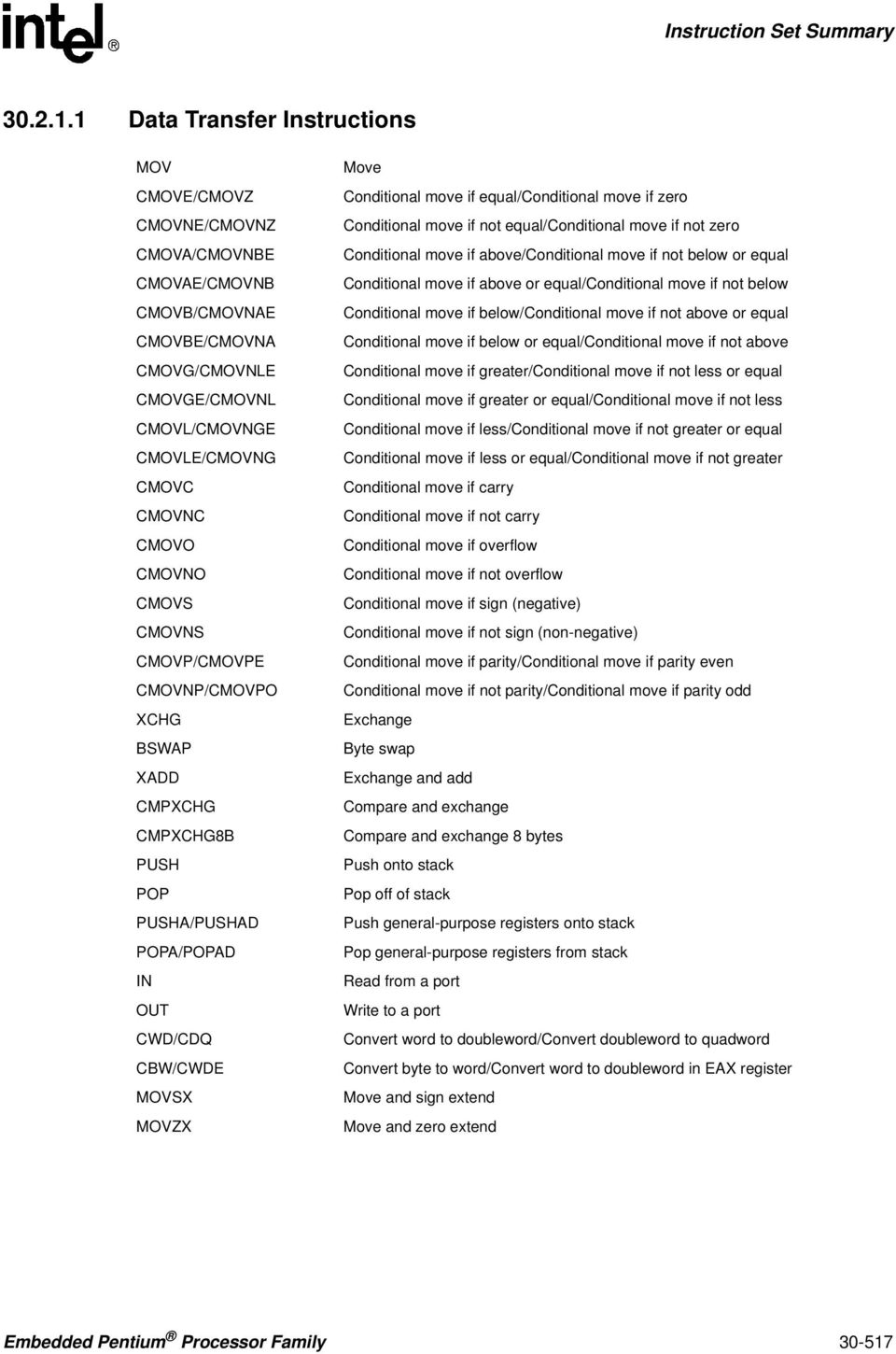
3 Data Transfer Instructions MOV CMOVE/CMOVZ CMOVNE/CMOVNZ CMOVA/CMOVNBE CMOVAE/CMOVNB CMOVB/CMOVNAE CMOVBE/CMOVNA CMOVG/CMOVNLE CMOVGE/CMOVNL CMOVL/CMOVNGE CMOVLE/CMOVNG CMOVC CMOVNC CMOVO CMOVNO CMOVS CMOVNS CMOVP/CMOVPE CMOVNP/CMOVPO XCHG BSWAP XADD CMPXCHG CMPXCHG8B PUSH POP PUSHA/PUSHAD POPA/POPAD IN OUT CWD/CDQ CBW/CWDE MOVSX MOVZX Move Conditional move if equal/conditional move if zero Conditional move if not equal/conditional move if not zero Conditional move if above/conditional move if not below or equal Conditional move if above or equal/conditional move if not below Conditional move if below/conditional move if not above or equal Conditional move if below or equal/conditional move if not above Conditional move if greater/conditional move if not less or equal Conditional move if greater or equal/conditional move if not less Conditional move if less/conditional move if not greater or equal Conditional move if less or equal/conditional move if not greater Conditional move if carry Conditional move if not carry Conditional move if overflow Conditional move if not overflow Conditional move if sign (negative) Conditional move if not sign (non-negative) Conditional move if parity/conditional move if parity even Conditional move if not parity/conditional move if parity odd Exchange Byte swap Exchange and add Compare and exchange Compare and exchange 8 bytes Push onto stack Pop off of stack Push general-purpose registers onto stack Pop general-purpose registers from stack Read from a port Write to a port Convert word to doubleword/convert doubleword to quadword Convert byte to word/convert word to doubleword in EAX register Move and sign extend Move and zero extend Embedded Pentium Processor Family
4 Binary Arithmetic Instructions ADD ADC SUB SBB IMUL MUL IDIV DIV INC DEC NEG CMP Integer add Add with carry Subtract Subtract with borrow Signed multiply Unsigned multiply Signed divide Unsigned divide Increment Decrement Negate Compare Decimal Arithmetic DAA DAS AAA AAS AAM AAD Decimal adjust after addition Decimal adjust after subtraction ASCII adjust after addition ASCII adjust after subtraction ASCII adjust after multiplication ASCII adjust before division Logic Instructions AND OR XOR NOT And Or Exclusive or Not Embedded Pentium Processor Family

5 Shift and Rotate Instructions SAR SHR SAL/SHL SHRD SHLD ROR ROL RCR RCL Shift arithmetic right Shift logical right Shift arithmetic left/shift logical left Shift right double Shift left double Rotate right Rotate left Rotate through carry right Rotate through carry left Bit and Byte Instructions BT BTS BTR BTC BSF BSR SETE/SETZ SETNE/SETNZ SETA/SETNBE SETAE/SETNB/SETNC SETB/SETNAE/SETC SETBE/SETNA SETG/SETNLE SETGE/SETNL SETL/SETNGE SETLE/SETNG SETS SETNS SETO SETNO SETPE/SETP SETPO/SETNP TEST Bit test Bit test and set Bit test and reset Bit test and complement Bit scan forward Bit scan reverse Set byte if equal/set byte if zero Set byte if not equal/set byte if not zero Set byte if above/set byte if not below or equal Set byte if above or equal/set byte if not below/set byte if not carry Set byte if below/set byte if not above or equal/set byte if carry Set byte if below or equal/set byte if not above Set byte if greater/set byte if not less or equal Set byte if greater or equal/set byte if not less Set byte if less/set byte if not greater or equal Set byte if less or equal/set byte if not greater Set byte if sign (negative) Set byte if not sign (non-negative) Set byte if overflow Set byte if not overflow Set byte if parity even/set byte if parity Set byte if parity odd/set byte if not parity Logical compare Embedded Pentium Processor Family

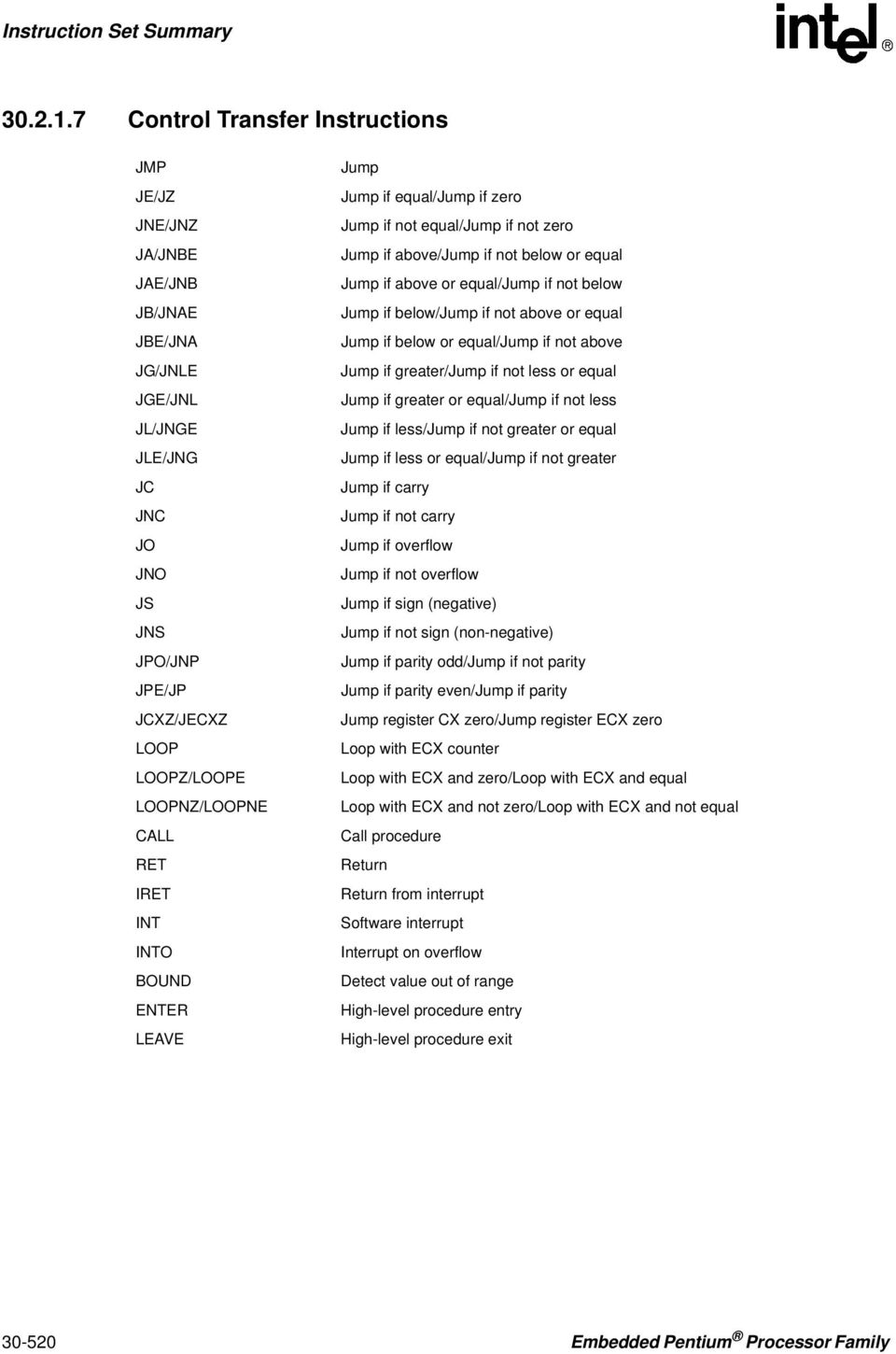
6 Control Transfer Instructions JMP JE/JZ JNE/JNZ JA/JNBE JAE/JNB JB/JNAE JBE/JNA JG/JNLE JGE/JNL JL/JNGE JLE/JNG JC JNC JO JNO JS JNS JPO/JNP JPE/JP JCXZ/JECXZ LOOP LOOPZ/LOOPE LOOPNZ/LOOPNE CALL RET IRET INT INTO BOUND ENTER LEAVE Jump Jump if equal/jump if zero Jump if not equal/jump if not zero Jump if above/jump if not below or equal Jump if above or equal/jump if not below Jump if below/jump if not above or equal Jump if below or equal/jump if not above Jump if greater/jump if not less or equal Jump if greater or equal/jump if not less Jump if less/jump if not greater or equal Jump if less or equal/jump if not greater Jump if carry Jump if not carry Jump if overflow Jump if not overflow Jump if sign (negative) Jump if not sign (non-negative) Jump if parity odd/jump if not parity Jump if parity even/jump if parity Jump register CX zero/jump register ECX zero Loop with ECX counter Loop with ECX and zero/loop with ECX and equal Loop with ECX and not zero/loop with ECX and not equal Call procedure Return Return from interrupt Software interrupt Interrupt on overflow Detect value out of range High-level procedure entry High-level procedure exit Embedded Pentium Processor Family
7 String Instructions MOVS/MOVSB MOVS/MOVSW MOVS/MOVSD CMPS/CMPSB CMPS/CMPSW CMPS/CMPSD SCAS/SCASB SCAS/SCASW SCAS/SCASD LODS/LODSB LODS/LODSW LODS/LODSD STOS/STOSB STOS/STOSW STOS/STOSD REP REPE/REPZ REPNE/REPNZ INS/INSB INS/INSW INS/INSD OUTS/OUTSB OUTS/OUTSW OUTS/OUTSD Move string/move byte string Move string/move word string Move string/move doubleword string Compare string/compare byte string Compare string/compare word string Compare string/compare doubleword string Scan string/scan byte string Scan string/scan word string Scan string/scan doubleword string Load string/load byte string Load string/load word string Load string/load doubleword string Store string/store byte string Store string/store word string Store string/store doubleword string Repeat while ECX not zero Repeat while equal/repeat while zero Repeat while not equal/repeat while not zero Input string from port/input byte string from port Input string from port/input word string from port Input string from port/input doubleword string from port Output string to port/output byte string to port Output string to port/output word string to port Output string to port/output doubleword string to port Embedded Pentium Processor Family

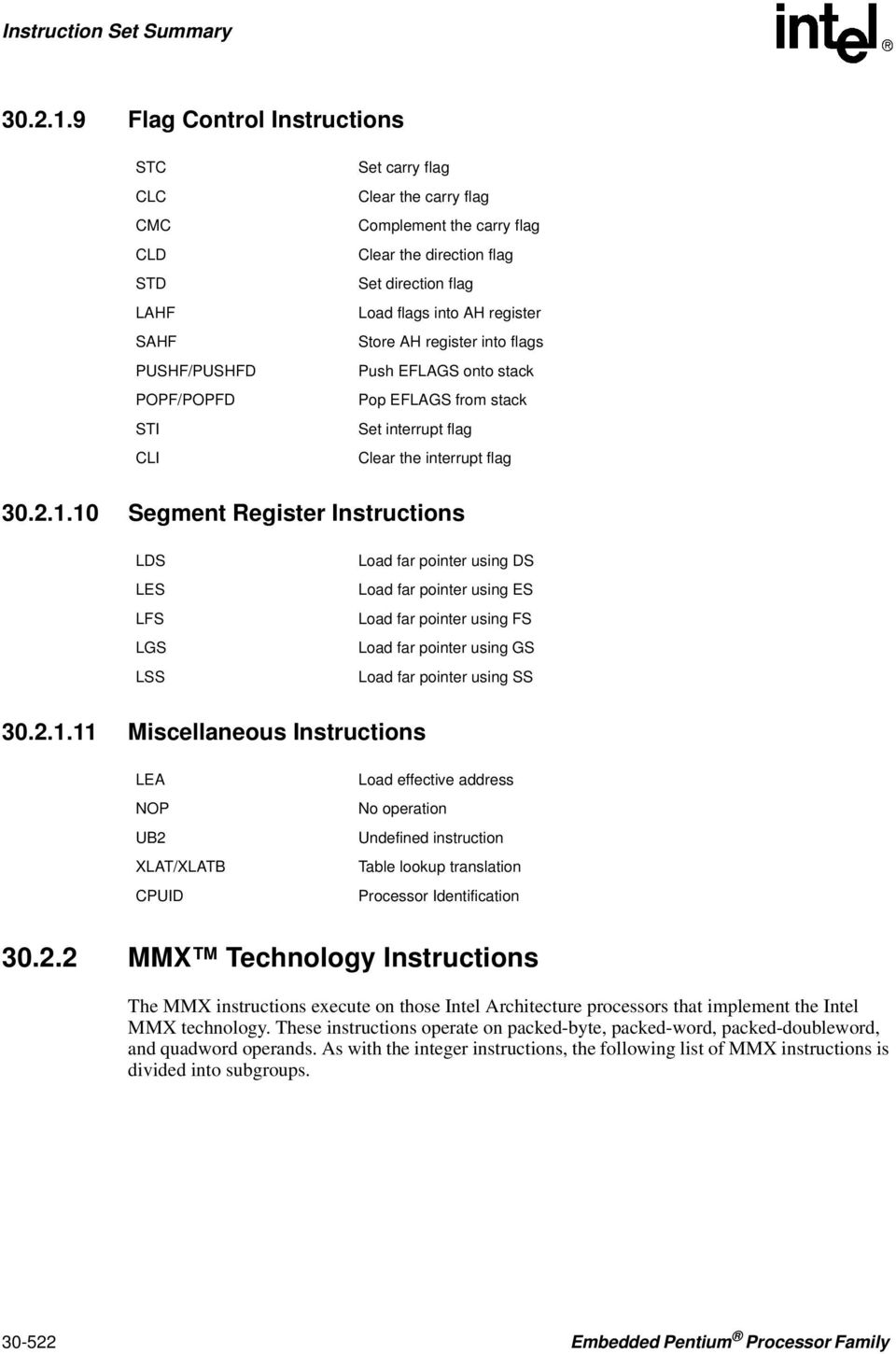
8 Flag Control Instructions STC CLC CMC CLD STD LAHF SAHF PUSHF/PUSHFD POPF/POPFD STI CLI Set carry flag Clear the carry flag Complement the carry flag Clear the direction flag Set direction flag Load flags into AH register Store AH register into flags Push EFLAGS onto stack Pop EFLAGS from stack Set interrupt flag Clear the interrupt flag Segment Register Instructions LDS LES LFS LGS LSS Load far pointer using DS Load far pointer using ES Load far pointer using FS Load far pointer using GS Load far pointer using SS Miscellaneous Instructions LEA NOP UB2 XLAT/XLATB CPUID Load effective address No operation Undefined instruction Table lookup translation Processor Identification MMX Technology Instructions The MMX instructions execute on those Intel Architecture processors that implement the Intel MMX technology. These instructions operate on packed-byte, packed-word, packed-doubleword, and quadword operands. As with the integer instructions, the following list of MMX instructions is divided into subgroups Embedded Pentium Processor Family
9 MMX Data Transfer Instructions MOVD MOVQ Move doubleword Move quadword MMX Conversion Instructions PACKSSWB PACKSSDW PACKUSWB PUNPCKHBW PUNPCKHWD PUNPCKHDQ PUNPCKLBW PUNPCKLWD PUNPCKLDQ Pack words into bytes with signed saturation Pack doublewords into words with signed saturation Pack words into bytes with unsigned saturation Unpack high-order bytes from words Unpack high-order words from doublewords Unpack high-order doublewords from quadword Unpack low-order bytes from words Unpack low-order words from doublewords Unpack low-order doublewords from quadword MMX Packed Arithmetic Instructions PADDB PADDW PADDD PADDSB PADDSW PADDUSB PADDUSW PSUBB PSUBW PSUBD PSUBSB PSUBSW PSUBUSB PSUBUSW PMULHW PMULLW PMADDWD Add packed bytes Add packed words Add packed doublewords Add packed bytes with saturation Add packed words with saturation Add packed unsigned bytes with saturation Add packed unsigned words with saturation Subtract packed bytes Subtract packed words Subtract packed doublewords Subtract packed bytes with saturation Subtract packed words with saturation Subtract packed unsigned bytes with saturation Subtract packed unsigned words with saturation Multiply packed words and store high result Multiply packed words and store low result Multiply and add packed words Embedded Pentium Processor Family

10 MMX Comparison Instructions PCMPEQB PCMPEQW PCMPEQD PCMPGTB PCMPGTW PCMPGTD Compare packed bytes for equal Compare packed words for equal Compare packed doublewords for equal Compare packed bytes for greater than Compare packed words for greater than Compare packed doublewords for greater than MMX Logic Instructions PAND PANDN POR PXOR Bitwise logical and Bitwise logical and not Bitwise logical or Bitwise logical exclusive or MMX Shift and Rotate Instructions PSLLW PSLLD PSLLQ PSRLW PSRLD PSRLQ PSRAW PSRAD Shift packed words left logical Shift packed doublewords left logical Shift packed quadword left logical Shift packed words right logical Shift packed doublewords right logical Shift packed quadword right logical Shift packed words right arithmetic Shift packed doublewords right arithmetic MMX State Management EMMS Empty MMX state Floating-Point Instructions The floating-point instructions are those that are executed by the processor s floating-point unit (FPU). These instructions operate on floating-point (real), extended integer, and binary-coded decimal (BCD) operands. As with the integer instructions, the following list of floating-point instructions is divided into subgroups Embedded Pentium Processor Family

11 Data Transfer FLD FST FSTP FILD FIST FISTP FBLD FBSTP FXCH FCMOVE FCMOVNE FCMOVB FCMOVBE FCMOVNB FCMOVNBE FCMOVU FCMOVNU Load real Store real Store real and pop Load integer Store integer Store integer and pop Load BCD Store BCD and pop Exchange registers Floating-point conditional move if equal Floating-point conditional move if not equal Floating-point conditional move if below Floating-point conditional move if below or equal Floating-point conditional move if not below Floating-point conditional move if not below or equal Floating-point conditional move if unordered Floating-point conditional move if not unordered Basic Arithmetic FADD FADDP FIADD FSUB FSUBP FISUB FSUBR FSUBRP FISUBR FMUL FMULP FIMUL FDIV FDIVP FIDIV FDIVR FDIVRP FIDIVR FPREM Add real Add real and pop Add integer Subtract real Subtract real and pop Subtract integer Subtract real reverse Subtract real reverse and pop Subtract integer reverse Multiply real Multiply real and pop Multiply integer Divide real Divide real and pop Divide integer Divide real reverse Divide real reverse and pop Divide integer reverse Partial remainder Embedded Pentium Processor Family

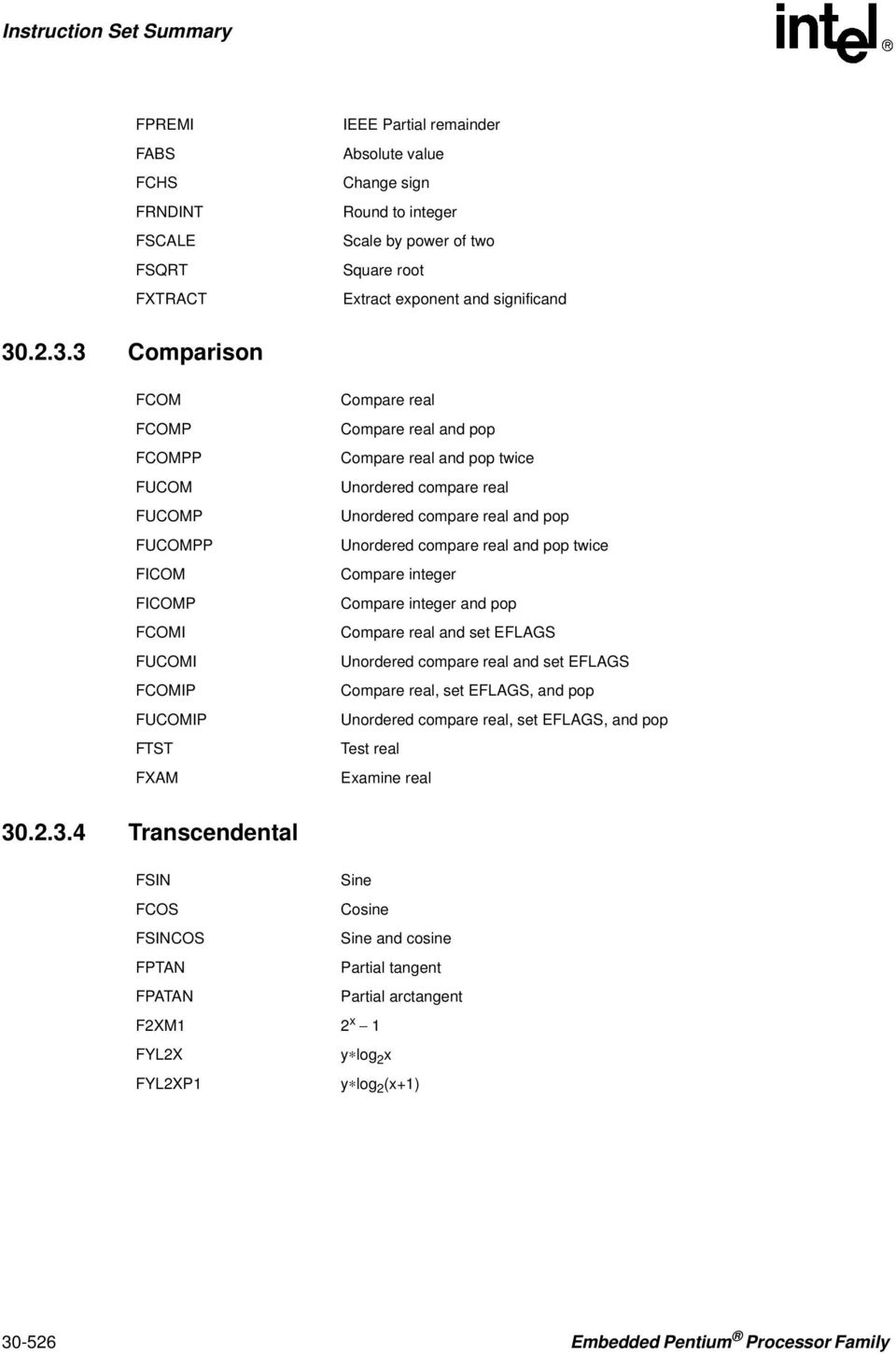
12 FPREMI FABS FCHS FRNDINT FSCALE FSQRT FXTRACT IEEE Partial remainder Absolute value Change sign Round to integer Scale by power of two Square root Extract exponent and significand Comparison FCOM FCOMP FCOMPP FUCOM FUCOMP FUCOMPP FICOM FICOMP FCOMI FUCOMI FCOMIP FUCOMIP FTST FXAM Compare real Compare real and pop Compare real and pop twice Unordered compare real Unordered compare real and pop Unordered compare real and pop twice Compare integer Compare integer and pop Compare real and set EFLAGS Unordered compare real and set EFLAGS Compare real, set EFLAGS, and pop Unordered compare real, set EFLAGS, and pop Test real Examine real Transcendental FSIN Sine FCOS Cosine FSINCOS Sine and cosine FPTAN Partial tangent FPATAN Partial arctangent F2XM1 2 x 1 FYL2X y log 2 x FYL2XP1 y log 2 (x+1) Embedded Pentium Processor Family
13 Load Constants FLD1 Load +1.0 FLDZ Load +0.0 FLDPI Load π FLDL2E Load log 2 e FLDLN2 Load log e 2 FLDL2T Load log 2 10 FLDLG2 Load log FPU Control FINCSTP FDECSTP FFREE FINIT FNINIT FCLEX FNCLEX FSTCW FNSTCW FLDCW FSTENV FNSTENV FLDENV FSAVE FNSAVE FRSTOR FSTSW FNSTSW WAIT/FWAIT FNOP Increment FPU register stack pointer Decrement FPU register stack pointer Free floating-point register Initialize FPU after checking error conditions Initialize FPU without checking error conditions Clear floating-point exception flags after checking for error conditions Clear floating-point exception flags without checking for error conditions Store FPU control word after checking error conditions Store FPU control word without checking error conditions Load FPU control word Store FPU environment after checking error conditions Store FPU environment without checking error conditions Load FPU environment Save FPU state after checking error conditions Save FPU state without checking error conditions Restore FPU state Store FPU status word after checking error conditions Store FPU status word without checking error conditions Wait for FPU FPU no operation Embedded Pentium Processor Family

14 System Instructions The following system instructions are used to control those functions of the processor that are provided to support for operating systems and executives. LGDT SGDT LLDT SLDT LTR STR LIDT SIDT MOV LMSW SMSW CLTS ARPL LAR LSL VERR VERW MOV INVD WBINVD INVLPG LOCK (prefix) HLT RSM RDMSR WRMSR RDPMC RDTSC Load global descriptor table (GDT) register Store global descriptor table (GDT) register Load local descriptor table (LDT) register Store local descriptor table (LDT) register Load task register Store task register Load interrupt descriptor table (IDT) register Store interrupt descriptor table (IDT) register Load and store control registers Load machine status word Store machine status word Clear the task-switched flag Adjust requested privilege level Load access rights Load segment limit Verify segment for reading Verify segment for writing Load and store debug registers Invalidate cache, no writeback Invalidate cache, with writeback Invalidate TLB Entry Lock Bus Halt processor Return from system management mode (SSM) Read model-specific register Write model-specific register Read performance monitoring counters Read time stamp counter 30.3 Data Movement Instructions The data movement instructions move bytes, words, doublewords, or quadwords both between memory and the processor s registers and between registers. These instructions are divided into four groups: General-purpose data movement. Exchange Embedded Pentium Processor Family

15 Stack manipulation. Type-conversion General-Purpose Data Movement Instructions The MOV (move) and CMOVcc (conditional move) instructions transfer data between memory and registers or between registers Move Instruction The MOV instruction performs basic load data and store data operations between memory and the processor s registers and data movement operations between registers. It handles data transfers along the paths listed in Table (See MOV Move to/from Control Registers and MOV Move to/from Debug Registers in Chapter 3 of the Intel Architecture Software Developer s Manual, Volume 2, for information on moving data to and from the control and debug registers.) The MOV instruction cannot move data from one memory location to another or from one segment register to another segment register. Memory-to-memory moves can be performed with the MOVS (string move) instruction (see String Operations ) Conditional Move Instructions The CMOVcc instructions are a group of instructions that check the state of the status flags in the EFLAGS register and perform a move operation if the flags are in a specified state (or condition). These instructions can be used to move a 16- or 32-bit value from memory to a general-purpose register or from one general-purpose register to another. The flag state being tested for each instruction is specified with a condition code (cc) that is associated with the instruction. If the condition is not satisfied, a move is not performed and execution continues with the instruction following the CMOVcc instruction. Table Move Instruction Operations Type of Data Movement From memory to a register From a register to memory Between registers Immediate data to a register Immediate data to memory Source Destination Memory location General-purpose register Memory location Segment register General-purpose register Memory location Segment register Memory location General-purpose register General-purpose register General-purpose register Segment register Segment register General-purpose register General-purpose register Control register Control register General-purpose register General-purpose register Debug register Debug register General-purpose register Immediate General-purpose register Immediate Memory location Embedded Pentium Processor Family

16 Table 30-4 shows the mnemonics for the CMOVcc instructions and the conditions being tested for each instruction. The condition code mnemonics are appended to the letters CMOV to form the mnemonics for the CMOVcc instructions. The instructions listed in Table 30-4 as pairs (for example, CMOVA/CMOVNBE) are alternate names for the same instruction. The assembler provides these alternate names to make it easier to read program listings. The CMOVcc instructions are useful for optimizing small IF constructions. They also help eliminate branching overhead for IF statements and the possibility of branch mispredictions by the processor. These instructions may not be supported on some processors in the Pentium Pro processor family. Software can check if the CMOVcc instructions are supported by checking the processor s feature information with the CPUID instruction (see CPUID CPU Identification in Chapter 3 of the Intel Architecture Software Developer s Manual, Volume 2) Exchange Instructions The exchange instructions swap the contents of one or more operands and, in some cases, performs additional operations such as asserting the LOCK signal or modifying flags in the EFLAGS register. The XCHG (exchange) instruction swaps the contents of two operands. This instruction takes the place of three MOV instructions and does not require a temporary location to save the contents of one operand location while the other is being loaded. When a memory operand is used with the XCHG instruction, the processor s LOCK signal is automatically asserted. This instruction is thus useful for implementing semaphores or similar data structures for process synchronization. (See Bus Locking in Chapter 7 of the Intel Architecture Software Developer s Manual, Volume 3, for more information on bus locking.) The BSWAP (byte swap) instruction reverses the byte order in a 32-bit register operand. Bit positions 0 through 7 are exchanged with 24 through 31, and bit positions 8 through 15 are exchanged with 16 through 23. Executing this instruction twice in a row leaves the register with the same value as before. The BSWAP instruction is useful for converting between big-endian and little-endian data formats. This instruction also speeds execution of decimal arithmetic. (The XCHG instruction can be used two swap the bytes in a word.) Table Conditional Move Instructions Instruction Mnemonic Status Flag States Condition Description Unsigned Conditional Moves CMOVA/CMOVNBE (CF or ZF)=0 Above/not below or equal CMOVAE/CMOVNB CF=0 Above or equal/not below CMOVNC CF=0 Not carry CMOVB/CMOVNAE CF=1 Below/not above or equal CMOVC CF=1 Carry CMOVBE/CMOVNA (CF or ZF)=1 Below or equal/not above CMOVE/CMOVZ ZF=1 Equal/zero CMOVNE/CMOVNZ ZF=0 Not equal/not zero CMOVP/CMOVPE PF=1 Parity/parity even CMOVNP/CMOVPO PF=0 Not parity/parity odd Embedded Pentium Processor Family

17 Table Conditional Move Instructions Instruction Mnemonic Status Flag States Condition Description Signed Conditional Moves CMOVGE/CMOVNL (SF xor OF)=0 Greater or equal/not less CMOVL/CMOVNGE (SF xor OF)=1 Less/not greater or equal CMOVLE/CMOVNG ((SF xor OF) or ZF)=1 Less or equal/not greater CMOVO OF=1 Overflow CMOVNO OF=0 Not overflow CMOVS SF=1 Sign (negative) CMOVNS SF=0 Not sign (non-negative) The XADD (exchange and add) instruction swaps two operands and then stores the sum of the two operands in the destination operand. The status flags in the EFLAGS register indicate the result of the addition. This instruction can be combined with the LOCK prefix (see LOCK Assert LOCK# Signal Prefix in Chapter 3 of the Intel Architecture Software Developer s Manual, Volume 2) in a multiprocessing system to allow multiple processors to execute one DO loop. The CMPXCHG (compare and exchange) and CMPXCHG8B (compare and exchange 8 bytes) instructions are used to synchronize operations in systems that use multiple processors. The CMPXCHG instruction requires three operands: a source operand in a register, another source operand in the EAX register, and a destination operand. If the values contained in the destination operand and the EAX register are equal, the destination operand is replaced with the value of the other source operand (the value not in the EAX register). Otherwise, the original value of the destination operand is loaded in the EAX register. The status flags in the EFLAGS register reflect the result that would have been obtained by subtracting the destination operand from the value in the EAX register. The CMPXCHG instruction is commonly used for testing and modifying semaphores. It checks to see if a semaphore is free. If the semaphore is free it is marked allocated, otherwise it gets the ID of the current owner. This is all done in one uninterruptible operation. In a single-processor system, the CMPXCHG instruction eliminates the need to switch to protection level 0 (to disable interrupts) before executing multiple instructions to test and modify a semaphore. For multiple processor systems, CMPXCHG can be combined with the LOCK prefix to perform the compare and exchange operation atomically. (See Locked Atomic Operations in Chapter 7 of the Intel Architecture Software Developer s Manual, Volume 3, for more information on atomic operations.) The CMPXCHG8B instruction also requires three operands: a 64-bit value in EDX:EAX, a 64-bit value in ECX:EBX, and a destination operand in memory. The instruction compares the 64-bit value in the EDX:EAX registers with the destination operand. If they are equal, the 64-bit value in the ECX:EBX register is stored in the destination operand. If the EDX:EAX register and the destination are not equal, the destination is loaded in the EDX:EAX register. The CMPXCHG8B instruction can be combined with the LOCK prefix to perform the operation atomically Stack Manipulation Instructions The PUSH, POP, PUSHA (push all registers), and POPA (pop all registers) instructions move data to and from the stack. The PUSH instruction decrements the stack pointer (contained in the ESP register), then copies the source operand to the top of stack (see Figure 30-1). It operates on Embedded Pentium Processor Family

18 memory operands, immediate operands, and register operands (including segment registers). The PUSH instruction is commonly used to place parameters on the stack before calling a procedure. It can also be used to reserve space on the stack for temporary variables. Figure Operation of the PUSH Instruction Stack Stack Growth Before Pushing Doubleword 31 0 After Pushing Doubleword 31 0 n n 4 n 8 ESP Doubleword Value ESP The PUSHA instruction saves the contents of the eight general-purpose registers on the stack (see Figure 30-2). This instruction simplifies procedure calls by reducing the number of instructions required to save the contents of the general-purpose registers. The registers are pushed on the stack in the following order: EAX, ECX, EDX, EBX, the initial value of ESP before EAX was pushed, EBP, ESI, and EDI. Figure Operation of the PUSHA Instruction Stack Stack Growth n n - 4 n - 8 n - 12 n - 16 n - 20 n - 24 n - 28 n - 32 n - 36 Before Pushing Registers 31 0 ESP After Pushing Registers 31 EAX ECX EDX EBX Old ESP EBP ESI EDI 0 ESP The POP instruction copies the word or doubleword at the current top of stack (indicated by the ESP register) to the location specified with the destination operand, and then increments the ESP register to point to the new top of stack (see Figure 30-3). The destination operand may specify a general-purpose register, a segment register, or a memory location. Figure Operation of the POP Instruction Stack Stack Growth Before Popping Doubleword 31 0 After Popping Doubleword 31 0 n n - 4 n - 8 Doubleword Value ESP ESP Embedded Pentium Processor Family

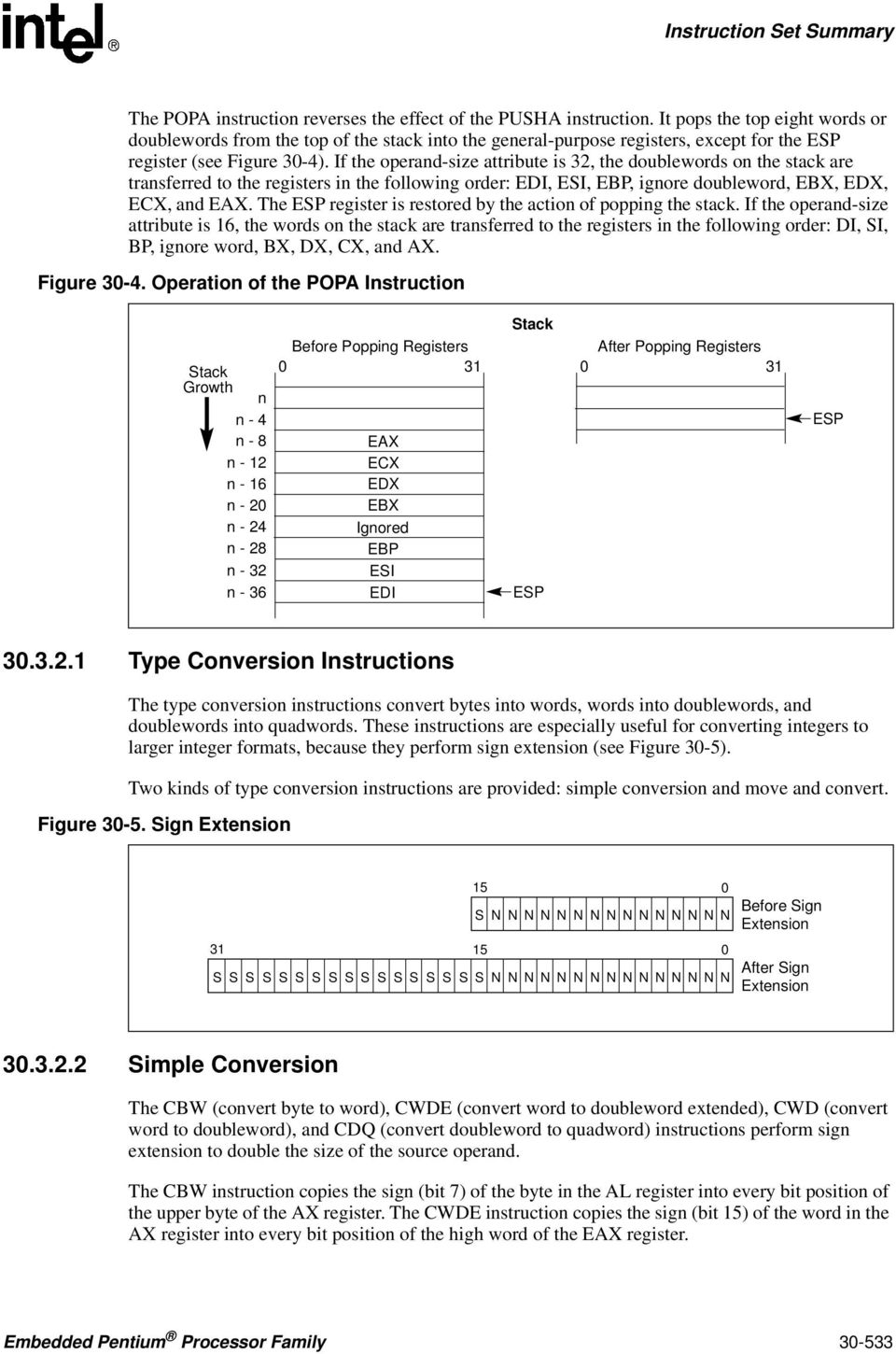
19 The POPA instruction reverses the effect of the PUSHA instruction. It pops the top eight words or doublewords from the top of the stack into the general-purpose registers, except for the ESP register (see Figure 30-4). If the operand-size attribute is 32, the doublewords on the stack are transferred to the registers in the following order: EDI, ESI, EBP, ignore doubleword, EBX, EDX, ECX, and EAX. The ESP register is restored by the action of popping the stack. If the operand-size attribute is 16, the words on the stack are transferred to the registers in the following order: DI, SI, BP, ignore word, BX, DX, CX, and AX. Figure Operation of the POPA Instruction Stack Growth n n - 4 n - 8 n - 12 n - 16 n - 20 n - 24 n - 28 n - 32 n - 36 Before Popping Registers 0 31 EAX ECX EDX EBX Ignored EBP ESI EDI Stack ESP After Popping Registers 0 31 ESP Type Conversion Instructions The type conversion instructions convert bytes into words, words into doublewords, and doublewords into quadwords. These instructions are especially useful for converting integers to larger integer formats, because they perform sign extension (see Figure 30-5). Two kinds of type conversion instructions are provided: simple conversion and move and convert. Figure Sign Extension 15 0 Before Sign S NNNNNNNNNN NN N N N Extension 31 S S S S S S 15 0 S S S S S S S S S S S NNNNNNNNNN NN N N N After Sign Extension Simple Conversion The CBW (convert byte to word), CWDE (convert word to doubleword extended), CWD (convert word to doubleword), and CDQ (convert doubleword to quadword) instructions perform sign extension to double the size of the source operand. The CBW instruction copies the sign (bit 7) of the byte in the AL register into every bit position of the upper byte of the AX register. The CWDE instruction copies the sign (bit 15) of the word in the AX register into every bit position of the high word of the EAX register. Embedded Pentium Processor Family
20 The CWD instruction copies the sign (bit 15) of the word in the AX register into every bit position in the DX register. The CDQ instruction copies the sign (bit 31) of the doubleword in the EAX register into every bit position in the EDX register. The CWD instruction can be used to produce a doubleword dividend from a word before a word division, and the CDQ instruction can be used to produce a quadword dividend from a doubleword before doubleword division Move and Convert The MOVSX (move with sign extension) and MOVZX (move with zero extension) instructions move the source operand into a register then perform the sign extension. The MOVSX instruction extends an 8-bit value to a 16-bit value or an 8- or 16-bit value to 32-bit value by sign extending the source operand, as shown in Figure The MOVZX instruction extends an 8-bit value to a 16-bit value or an 8- or 16-bit value to 32-bit value by zero extending the source operand Binary Arithmetic Instructions The binary arithmetic instructions operate on 8-, 16-, and 32-bit numeric data encoded as signed or unsigned binary integers. Operations include the add, subtract, multiply, and divide as well as increment, decrement, compare, and change sign (negate). The binary arithmetic instructions may also be used in algorithms that operate on decimal (BCD) values Addition and Subtraction Instructions The ADD (add integers), ADC (add integers with carry), SUB (subtract integers), and SBB (subtract integers with borrow) instructions perform addition and subtraction operations on signed or unsigned integer operands. The ADD instruction computes the sum of two integer operands. The ADC instruction computes the sum of two integer operands, plus 1 if the CF flag is set. This instruction is used to propagate a carry when adding numbers in stages. The SUB instruction computes the difference of two integer operands. The SBB instruction computes the difference of two integer operands, minus 1 if the CF flag is set. This instruction is used to propagate a borrow when subtracting numbers in stages Increment and Decrement Instructions The INC (increment) and DEC (decrement) instructions add 1 to or subtract 1 from an unsigned integer operand, respectively. A primary use of these instructions is for implementing counters Embedded Pentium Processor Family
21 Comparison and Sign Change Instruction The CMP (compare) instruction computes the difference between two integer operands and updates the OF, SF, ZF, AF, PF, and CF flags according to the result. The source operands are not modified, nor is the result saved. The CMP instruction is commonly used in conjunction with a Jcc (jump) or SETcc (byte set on condition) instruction, with the latter instructions performing an action based on the result of a CMP instruction. The NEG (negate) instruction subtracts a signed integer operand from zero. The effect of the NEG instruction is to change the sign of a two s complement operand while keeping its magnitude Multiplication and Divide Instructions The processor provides two multiply instructions, MUL (unsigned multiply) and IMUL signed multiply), and two divide instructions, DIV (unsigned divide) and IDIV (signed divide). The MUL instruction multiplies two unsigned integer operands. The result is computed to twice the size of the source operands (for example, if word operands are being multiplied, the result is a doubleword). The IMUL instruction multiplies two signed integer operands. The result is computed to twice the size of the source operands; however, in some cases the result is truncated to the size of the source operands (see IMUL Signed Multiply in Chapter 3 of the Intel Architecture Software Developer s Manual, Volume 2). The DIV instruction divides one unsigned operand by another unsigned operand and returns a quotient and a remainder. The IDIV instruction is identical to the DIV instruction, except that IDIV performs a signed division Decimal Arithmetic Instructions Decimal arithmetic can be performed by combining the binary arithmetic instructions ADD, SUB, MUL, and DIV (discussed in Binary Arithmetic Instructions ) with the decimal arithmetic instructions. The decimal arithmetic instructions are provided to carry out the following operations: To adjust the results of a previous binary arithmetic operation to produce a valid BCD result. To adjust the operands of a subsequent binary arithmetic operation so that the operation will produce a valid BCD result. These instructions operate only on both packed and unpacked BCD values Packed BCD Adjustment Instructions The DAA (decimal adjust after addition) and DAS (decimal adjust after subtraction) instructions adjust the results of operations performed on packed BCD integers (see BCD Integers ). Adding two packed BCD values requires two instructions: an ADD instruction followed by a DAA instruction. The ADD instruction adds (binary addition) the two values and stores the result in the AL register. The DAA instruction then adjusts the value in the AL register to obtain a valid, 2-digit, packed BCD value and sets the CF flag if a decimal carry occurred as the result of the addition. Embedded Pentium Processor Family
22 Likewise, subtracting one packed BCD value from another requires a SUB instruction followed by a DAS instruction. The SUB instruction subtracts (binary subtraction) one BCD value from another and stores the result in the AL register. The DAS instruction then adjusts the value in the AL register to obtain a valid, 2-digit, packed BCD value and sets the CF flag if a decimal borrow occurred as the result of the subtraction Unpacked BCD Adjustment Instructions The AAA (ASCII adjust after addition), AAS (ASCII adjust after subtraction), AAM (ASCII adjust after multiplication), and AAD (ASCII adjust before division) instructions adjust the results of arithmetic operations performed in unpacked BCD values (see BCD Integers ). All these instructions assume that the value to be adjusted is stored in the AL register or, in one instance, the AL and AH registers. The AAA instruction adjusts the contents of the AL register following the addition of two unpacked BCD values. It converts the binary value in the AL register into a decimal value and stores the result in the AL register in unpacked BCD format (the decimal number is stored in the lower 4 bits of the register and the upper 4 bits are cleared). If a decimal carry occurred as a result of the addition, the CF flag is set and the contents of the AH register are incremented by 1. The AAS instruction adjusts the contents of the AL register following the subtraction of two unpacked BCD values. Here again, a binary value is converted into an unpacked BCD value. If a borrow was required to complete the decimal subtract, the CF flag is set and the contents of the AH register are decremented by 1. The AAM instruction adjusts the contents of the AL register following a multiplication of two unpacked BCD values. It converts the binary value in the AL register into a decimal value and stores the least significant digit of the result in the AL register (in unpacked BCD format) and the most significant digit, if there is one, in the AH register (also in unpacked BCD format). The AAD instruction adjusts a two-digit BCD value so that when the value is divided with the DIV instruction, a valid unpacked BCD result is obtained. The instruction converts the BCD value in registers AH (most significant digit) and AL (least significant digit) into a binary value and stores the result in register AL. When the value in AL is divided by an unpacked BCD value, the quotient and remainder will be automatically encoded in unpacked BCD format Logical Instructions The logical instructions AND, OR, XOR (exclusive or), and NOT perform the standard Boolean operations for which they are named. The AND, OR, and XOR instructions require two operands; the NOT instruction operates on a single operand Shift and Rotate Instructions The shift and rotate instructions rearrange the bits within an operand. These instructions fall into the following classes: Shift. Double shift Embedded Pentium Processor Family
23 Rotate Shift Instructions The SAL (shift arithmetic left), SHL (shift logical left), SAR (shift arithmetic right), SHR (shift logical right) instructions perform an arithmetic or logical shift of the bits in a byte, word, or doubleword. The SAL and SHL instructions perform the same operation (see Figure 30-6). They shift the source operand left by from 1 to 31 bit positions. Empty bit positions are cleared. The CF flag is loaded with the last bit shifted out of the operand. Figure SHL/SAL Instruction Operation Initial State CF X Operand After 1-bit SHL/SAL Instruction After 10-bit SHL/SAL Instruction The SHR instruction shifts the source operand right by from 1 to 31 bit positions (see Figure 30-7). As with the SHL/SAL instruction, the empty bit positions are cleared and the CF flag is loaded with the last bit shifted out of the operand. Figure SHR Instruction Operation Initial State Operand CF X After 1-bit SHR Instruction After 10-bit SHR Instruction The SAR instruction shifts the source operand right by from 1 to 31 bit positions (see Figure 30-8). This instruction differs from the SHR instruction in that it preserves the sign of the source operand by clearing empty bit positions if the operand is positive or setting the empty bits if the operand is negative. Again, the CF flag is loaded with the last bit shifted out of the operand. Embedded Pentium Processor Family
24 The SAR and SHR instructions can also be used to perform division by powers of 2 (see SAL/SAR/SHL/SHR Shift Instructions in Chapter 3 of the Intel Architecture Software Developer s Manual, Volume 2). Figure SAR Instruction Operation Initial State (Positive Operand) Operand CF X After 1-bit SAR Instruction Initial State (Negative Operand) X CF After 1-bit SAR Instruction Double-Shift Instructions The SHLD (shift left double) and SHRD (shift right double) instructions shift a specified number of bits from one operand to another (see Figure 30-9). They are provided to facilitate operations on unaligned bit strings. They can also be used to implement a variety of bit string move operations. Figure SHLD and SHRD Instruction Operations CF SHLD Instruction 31 0 Destination (Memory or Register) 31 0 Source (Register) SHRD Instruction 31 0 Source (Register) 31 0 Destination (Memory or Register) CF The SHLD instruction shifts the bits in the destination operand to the left and fills the empty bit positions (in the destination operand) with bits shifted out of the source operand. The destination and source operands must be the same length (either words or doublewords). The shift count can Embedded Pentium Processor Family
25 range from 0 to 31 bits. The result of this shift operation is stored in the destination operand, and the source operand is not modified. The CF flag is loaded with the last bit shifted out of the destination operand. The SHRD instruction operates the same as the SHLD instruction except bits are shifted to the left in the destination operand, with the empty bit positions filled with bits shifted out of the source operand Rotate Instructions The ROL (rotate left), ROR (rotate right), RCL (rotate through carry left) and RCR (rotate through carry right) instructions rotate the bits in the destination operand out of one end and back through the other end (see Figure 30-10). Unlike a shift, no bits are lost during a rotation. The rotate count can range from 0 to 31. Figure ROL, ROR, RCL, and RCR Instruction Operations ROL Instruction 31 0 CF Destination (Memory or Register) 31 ROR Instruction Destination (Memory or Register) 0 CF RCL Instruction 31 0 CF Destination (Memory or Register) RCR Instruction 31 0 Destination (Memory or Register) CF The ROL instruction rotates the bits in the operand to the left (toward more significant bit locations). The ROR instruction rotates the operand right (toward less significant bit locations). The RCL instruction rotates the bits in the operand to the left, through the CF flag). This instruction treats the CF flag as a one-bit extension on the upper end of the operand. Each bit which exits from the most significant bit location of the operand moves into the CF flag. At the same time, the bit in the CF flag enters the least significant bit location of the operand. The RCR instruction rotates the bits in the operand to the right through the CF flag. For all the rotate instructions, the CF flag always contains the value of the last bit rotated out of the operand, even if the instruction does not use the CF flag as an extension of the operand. The value of this flag can then be tested by a conditional jump instruction (JC or JNC). Embedded Pentium Processor Family
26 30.8 Bit And Byte Instructions The bit and byte instructions operate on bit or byte strings. They are divided into four groups: Bit test and modify instructions. Bit scan instructions. Byte set on condition. Test Bit Test and Modify Instructions The bit test and modify instructions (see Table 30-3) operate on a single bit, which can be in an operand. The location of the bit is specified as an offset from the least significant bit of the operand. When the processor identifies the bit to be tested and modified, it first loads the CF flag with the current value of the bit. Then it assigns a new value to the selected bit, as determined by the modify operation for the instruction. Table Bit Test and Modify Instructions Instruction Effect on CF Flag Effect on Selected Bit BT (Bit Test) CF flag Selected Bit No effect BTS (Bit Test and Set) CF flag Selected Bit Selected Bit 1 BTR (Bit Test and Reset) CF flag Selected Bit Selected Bit 0 BTC (Bit Test and Complement) CF flag Selected Bit Selected Bit NOT (Selected Bit) Bit Scan Instructions The BSF (bit scan forward) and BSR (bit scan reverse) instructions scan a bit string in a source operand for a set bit and store the bit index of the first set bit found in a destination register. The bit index is the offset from the least significant bit (bit 0) in the bit string to the first set bit. The BSF instruction scans the source operand low-to-high (from bit 0 of the source operand toward the most significant bit); the BSR instruction scans high-to-low (from the most significant bit toward the least significant bit) Byte Set On Condition Instructions The SETcc (set byte on condition) instructions set a destination-operand byte to 0 or 1, depending on the state of selected status flags (CF, OF, SF, ZF, and PF) in the EFLAGS register. The suffix (cc) added to the SET mnemonic determines the condition being tested for. For example, the SETO instruction tests for overflow. If the OF flag is set, the destination byte is set to 1; if OF is clear, the destination byte is cleared to 0. EFLAGS Condition Codes lists the conditions it is possible to test for with this instruction Embedded Pentium Processor Family
27 Test Instruction The TEST instruction performs a logical AND of two operands and sets the SF, ZF, and PF flags according to the results. The flags can then be tested by the conditional jump or loop instructions or the SETcc instructions. The TEST instruction differs from the AND instruction in that it does not alter either of the operands Control Transfer Instructions The processor provides both conditional and unconditional control transfer instructions to direct the flow of program execution. Conditional transfers are taken only for specified states of the status flags in the EFLAGS register. Unconditional control transfers are always executed Unconditional Transfer Instructions The JMP, CALL, RET, INT, and IRET instructions transfer program control to another location (destination address) in the instruction stream. The destination can be within the same code segment (near transfer) or in a different code segment (far transfer) Jump Instruction The JMP (jump) instruction unconditionally transfers program control to a destination instruction. The transfer is one-way; that is, a return address is not saved. A destination operand specifies the address (the instruction pointer) of the destination instruction. The address can be a relative address or an absolute address. A relative address is a displacement (offset) with respect to the address in the EIP register. The destination address (a near pointer) is formed by adding the displacement to the address in the EIP register. The displacement is specified with a signed integer, allowing jumps either forward or backward in the instruction stream. An absolute address is a offset from address 0 of a segment. It can be specified in either of the following ways: An address in a general-purpose register. This address is treated as a near pointer, which is copied into the EIP register. Program execution then continues at the new address within the current code segment. An address specified using the standard addressing modes of the processor. Here, the address can be a near pointer or a far pointer. If the address is for a near pointer, the address is translated into an offset and copied into the EIP register. If the address is for a far pointer, the address is translated into a segment selector (which is copied into the CS register) and an offset (which is copied into the EIP register). In protected mode, the JMP instruction also allows jumps to a call gate, a task gate, and a task-state segment Call and Return Instructions The CALL (call procedure) and RET (return from procedure) instructions allow a jump from one procedure (or subroutine) to another and a subsequent jump back (return) to the calling procedure. Embedded Pentium Processor Family
28 The CALL instruction transfers program control from the current (or calling procedure) to another procedure (the called procedure). To allow a subsequent return to the calling procedure, the CALL instruction saves the current contents of the EIP register on the stack before jumping to the called procedure. The EIP register (prior to transferring program control) contains the address of the instruction following the CALL instruction. When this address is pushed on the stack, it is referred to as the return instruction pointer or return address. The address of the called procedure (the address of the first instruction in the procedure being jumped to) is specified in a CALL instruction the same way as it is in a JMP instruction (see Jump Instruction ). The address can be specified as a relative address or an absolute address. If an absolute address is specified, it can be either a near or a far pointer. The RET instruction transfers program control from the procedure currently being executed (the called procedure) back to the procedure that called it (the calling procedure). Transfer of control is accomplished by copying the return instruction pointer from the stack into the EIP register. Program execution then continues with the instruction pointed to by the EIP register. The RET instruction has an optional operand, the value of which is added to the contents of the ESP register as part of the return operation. This operand allows the stack pointer to be incremented to remove parameters from the stack that were pushed on the stack by the calling procedure. See Calling Procedures Using CALL and RET, for more information on the mechanics of making procedure calls with the CALL and RET instructions Return From Interrupt Instruction When the processor services an interrupt, it performs an implicit call to an interrupt-handling procedure. The IRET (return from interrupt) instruction returns program control from an interrupt handler to the interrupted procedure (that is, the procedure that was executing when the interrupt occurred). The IRET instruction performs a similar operation to the RET instruction (see Call and Return Instructions ) except that it also restores the EFLAGS register from the stack. The contents of the EFLAGS register are automatically stored on the stack along with the return instruction pointer when the processor services an interrupt Conditional Transfer Instructions The conditional transfer instructions execute jumps or loops that transfer program control to another instruction in the instruction stream if specified conditions are met. The conditions for control transfer are specified with a set of condition codes that define various states of the status flags (CF, ZF, OF, PF, and SF) in the EFLAGS register Conditional Jump Instructions The Jcc (conditional) jump instructions transfer program control to a destination instruction if the conditions specified with the condition code (cc) associated with the instruction are satisfied (see Table 30-4). If the condition is not satisfied, execution continues with the instruction following the Jcc instruction. As with the JMP instruction, the transfer is one-way; that is, a return address is not saved Embedded Pentium Processor Family
29 Table Conditional Jump Instructions Instruction Mnemonic Condition (Flag States) Description Unsigned Conditional Jumps JA/JNBE (CF or ZF)=0 Above/not below or equal JAE/JNB CF=0 Above or equal/not below JB/JNAE CF=1 Below/not above or equal JBE/JNA (CF or ZF)=1 Below or equal/not above JC CF=1 Carry JE/JZ ZF=1 Equal/zero JNC CF=0 Not carry JNE/JNZ ZF=0 Not equal/not zero JNP/JPO PF=0 Not parity/parity odd JP/JPE PF=1 Parity/parity even JCXZ CX=0 Register CX is zero JECXZ ECX=0 Register ECX is zero Signed Conditional Jumps JG/JNLE ((SF xor OF) or ZF) =0 Greater/not less or equal JGE/JNL (SF xor OF)=0 Greater or equal/not less JL/JNGE (SF xor OF)=1 Less/not greater or equal JLE/JNG ((SF xor OF) or ZF)=1 Less or equal/not greater JNO OF=0 Not overflow JNS SF=0 Not sign (non-negative) JO OF=1 Overflow JS SF=1 Sign (negative) The destination operand specifies a relative address (a signed offset with respect to the address in the EIP register) that points to an instruction in the current code segment. The Jcc instructions do not support far transfers; however, far transfers can be accomplished with a combination of a Jcc and a JMP instruction (see Jcc Jump if Condition Is Met in Chapter 3 of the Intel Architecture Software Developer s Manual, Volume 2). Table 30-4 shows the mnemonics for the Jcc instructions and the conditions being tested for each instruction. The condition code mnemonics are appended to the letter J to form the mnemonic for a Jcc instruction. The instructions are divided into two groups: unsigned and signed conditional jumps. These groups correspond to the results of operations performed on unsigned and signed integers, respectively. Those instructions listed as pairs (for example, JA/JNBE) are alternate names for the same instruction. The assembler provides these alternate names to make it easier to read program listings. The JCXZ and JECXZ instructions test the CX and ECX registers, respectively, instead of one or more status flags. See Jump If Zero Instructions for more information about these instructions. Embedded Pentium Processor Family
30 Loop Instructions The LOOP, LOOPE (loop while equal), LOOPZ (loop while zero), LOOPNE (loop while not equal), and LOOPNZ (loop while not zero) instructions are conditional jump instructions that use the value of the ECX register as a count for the number of times to execute a loop. All the loop instructions decrement the count in the ECX register each time they are executed and terminate a loop when zero is reached. The LOOPE, LOOPZ, LOOPNE, and LOOPNZ instructions also accept the ZF flag as a condition for terminating the loop before the count reaches zero. The LOOP instruction decrements the contents of the ECX register (or the CX register, if the address-size attribute is 16), then tests the register for the loop-termination condition. If the count in the ECX register is non-zero, program control is transferred to the instruction address specified by the destination operand. The destination operand is a relative address (that is, an offset relative to the contents of the EIP register), and it generally points to the first instruction in the block of code that is to be executed in the loop. When the count in the ECX register reaches zero, program control is transferred to the instruction immediately following the LOOP instruction, which terminates the loop. If the count in the ECX register is zero when the LOOP instruction is first executed, the register is pre-decremented to FFFFFFFFH, causing the loop to be executed 2 32 times. The LOOPE and LOOPZ instructions perform the same operation (they are mnemonics for the same instruction). These instructions operate the same as the LOOP instruction, except that they also test the ZF flag. If the count in the ECX register is not zero and the ZF flag is set, program control is transferred to the destination operand. When the count reaches zero or the ZF flag is clear, the loop is terminated by transferring program control to the instruction immediately following the LOOPE/LOOPZ instruction. The LOOPNE and LOOPNZ instructions (mnemonics for the same instruction) operate the same as the LOOPE/LOOPPZ instructions, except that they terminate the loop if the ZF flag is set Jump If Zero Instructions The JECXZ (jump if ECX zero) instruction jumps to the location specified in the destination operand if the ECX register contains the value zero. This instruction can be used in combination with a loop instruction (LOOP, LOOPE, LOOPZ, LOOPNE, or LOOPNZ) to test the ECX register prior to beginning a loop. As described in Loop Instructions, the loop instructions decrement the contents of the ECX register before testing for zero. If the value in the ECX register is zero initially, it will be decremented to FFFFFFFFH on the first loop instruction, causing the loop to be executed 2 32 times. To prevent this problem, a JECXZ instruction can be inserted at the beginning of the code block for the loop, causing a jump out the loop if the EAX register count is initially zero. When used with repeated string scan and compare instructions, the JECXZ instruction can determine whether the loop terminated because the count reached zero or because the scan or compare conditions were satisfied. The JCXZ (jump if CX is zero) instruction operates the same as the JECXZ instruction when the 16-bit address-size attribute is used. Here, the CX register is tested for zero Software Interrupts The INT n (software interrupt), INTO (interrupt on overflow), and BOUND (detect value out of range) instructions allow a program to explicitly raise a specified interrupt or exception, which in turn causes the handler routine for the interrupt or exception to be called Embedded Pentium Processor Family
31 The INT n instruction can raise any of the processor s interrupts or exceptions by encoding the vector number or the interrupt or exception in the instruction. This instruction can be used to support software generated interrupts or to test the operation of interrupt and exception handlers. The IRET instruction (see Return From Interrupt Instruction ) allows returns from interrupt handling routines. The INTO instruction raises the overflow exception, if the OF flag is set. If the flag is clear, execution continues without raising the exception. This instruction allows software to access the overflow exception handler explicitly to check for overflow conditions. The BOUND instruction compares a signed value against upper and lower bounds, and raises the BOUND range exceeded exception if the value is less than the lower bound or greater than the upper bound. This instruction is useful for operations such as checking an array index to make sure it falls within the range defined for the array String Operations The MOVS (Move String), CMPS (Compare string), SCAS (Scan string), LODS (Load string), and STOS (Store string) instructions permit large data structures, such as alphanumeric character strings, to be moved and examined in memory. These instructions operate on individual elements in a string, which can be a byte, word, or doubleword. The string elements to be operated on are identified with the ESI (source string element) and EDI (destination string element) registers. Both of these registers contain absolute addresses (offsets into a segment) that point to a string element. By default, the ESI register addresses the segment identified with the DS segment register. A segment-override prefix allows the ESI register to be associated with the CS, SS, ES, FS, or GS segment register. The EDI register addresses the segment identified with the ES segment register; no segment override is allowed for the EDI register. The use of two different segment registers in the string instructions permits operations to be performed on strings located in different segments. Or by associating the ESI register with the ES segment register, both the source and destination strings can be located in the same segment. (This latter condition can also be achieved by loading the DS and ES segment registers with the same segment selector and allowing the ESI register to default to the DS register.) The MOVS instruction moves the string element addressed by the ESI register to the location addressed by the EDI register. The assembler recognizes three short forms of this instruction, which specify the size of the string to be moved: MOVSB (move byte string), MOVSW (move word string), and MOVSD (move doubleword string). The CMPS instruction subtracts the destination string element from the source string element and updates the status flags (CF, ZF, OF, SF, PF, and AF) in the EFLAGS register according to the results. Neither string element is written back to memory. The assembler recognizes three short forms of the CMPS instruction: CMPSB (compare byte strings), CMPSW (compare word strings), and CMPSD (compare doubleword strings). The SCAS instruction subtracts the destination string element from the contents of the EAX, AX, or AL register (depending on operand length) and updates the status flags according to the results. The string element and register contents are not modified. The following short forms of the SCAS instruction specifies the operand length: SCASB (scan byte string), SCASW (scan word string), and SCASD (scan doubleword string). Embedded Pentium Processor Family
32 The LODS instruction loads the source string element identified by the ESI register into the EAX register (for a doubleword string), the AX register (for a word string), or the AL register (for a byte string). The short forms for this instruction are LODSB (load byte string), LODSW (load word string), and LODSD (load doubleword string). This instruction is usually used in a loop, where other instructions process each element of the string after they are loaded into the target register. The STOS instruction stores the source string element from the EAX (doubleword string), AX (word string), or AL (byte string) register into the memory location identified with the EDI register. The short forms for this instruction are STOSB (store byte string), STOSW (store word string), and STOSD (store doubleword string). This instruction is also normally used in a loop. Here a string is commonly loaded into the register with a LODS instruction, operated on by other instructions, and then stored again in memory with a STOS instruction. The I/O instructions (see I/O Instructions ) also perform operations on strings in memory Repeating String Operations The string instructions described in String Operations perform one iteration of a string operation. To operate strings longer than a doubleword, the string instructions can be combined with a repeat prefix (REP) to create a repeating instruction or be placed in a loop. When used in string instructions, the ESI and EDI registers are automatically incremented or decremented after each iteration of an instruction to point to the next element (byte, word, or doubleword) in the string. String operations can thus begin at higher addresses and work toward lower ones, or they can begin at lower addresses and work toward higher ones. The DF flag in the EFLAGS register controls whether the registers are incremented (DF=0) or decremented (DF=1). The STD and CLD instructions set and clear this flag, respectively. The following repeat prefixes can be used in conjunction with a count in the ECX register to cause a string instruction to repeat: REP Repeat while the ECX register not zero. REPE/REPZ Repeat while the ECX register not zero and the ZF flag is set. REPNE/REPNZ Repeat while the ECX register not zero and the ZF flag is clear. When a string instruction has a repeat prefix, the operation executes until one of the termination conditions specified by the prefix is satisfied. The REPE/REPZ and REPNE/REPNZ prefixes are used only with the CMPS and SCAS instructions. Also, note that a A REP STOS instruction is the fastest way to initialize a large block of memory I/O Instructions The IN (input from port to register), INS (input from port to string), OUT (output from register to port), and OUTS (output string to port) instructions move data between the processor s I/O ports and either a register or memory. The register I/O instructions (IN and OUT) move data between an I/O port and the EAX register (32-bit I/O), the AX register (16-bit I/O), or the AL (8-bit I/O) register. The I/O port being read or written to is specified with an immediate operand or an address in the DX register Embedded Pentium Processor Family
33 The block I/O instructions (INS and OUTS) instructions move blocks of data (strings) between an I/O port and memory. These instructions operate similar to the string instructions (see String Operations ). The ESI and EDI registers are used to specify string elements in memory and the repeat prefixes (REP) are used to repeat the instructions to implement block moves. The assembler recognizes the following alternate mnemonics for these instructions: INSB (input byte), INSW (input word), and INSD (input doubleword), and OUTB (output byte), OUTW (output word), and OUTD (output doubleword). The INS and OUTS instructions use an address in the DX register to specify the I/O port to be read or written to Enter and Leave Instructions The ENTER and LEAVE instructions provide machine-language support for procedure calls in block-structured languages, such as C and Pascal. These instructions and the call and return mechanism that they support are described in detail in Procedure Calls for Block-Structured Languages EFLAGS Instructions The EFLAGS instructions allow the state of selected flags in the EFLAGS register to be read or modified Carry and Direction Flag Instructions The STC (set carry flag), CLC (clear carry flag), and CMC (complement carry flag) instructions allow the CF flags in the EFLAGS register to be modified directly. They are typically used to initialize the CF flag to a known state before an instruction that uses the flag in an operation is executed. They are also used in conjunction with the rotate-with-carry instructions (RCL and RCR). The STD (set direction flag) and CLD (clear direction flag) instructions allow the DF flag in the EFLAGS register to be modified directly. The DF flag determines the direction in which index registers ESI and EDI are stepped when executing string processing instructions. If the DF flag is clear, the index registers are incremented after each iteration of a string instruction; if the DF flag is set, the registers are decremented Interrupt Flag Instructions The STI (set interrupt flag) and CTI (clear interrupt flag) instructions allow the interrupt IF flag in the EFLAGS register to be modified directly. The IF flag controls the servicing of hardwaregenerated interrupts (those received at the processor s INTR pin). If the IF flag is set, the processor services hardware interrupts; if the IF flag is clear, hardware interrupts are masked EFLAGS Transfer Instructions The EFLAGS transfer instructions allow groups of flags in the EFLAGS register to be copied to a register or memory or be loaded from a register or memory. Embedded Pentium Processor Family
34 The LAHF (load AH from flags) and SAHF (store AH into flags) instructions operate on five of the EFLAGS status flags (SF, ZF, AF, PF, and CF). The LAHF instruction copies the status flags to bits 7, 6, 4, 2, and 0 of the AH register, respectively. The contents of the remaining bits in the register (bits 5, 3, and 1) are undefined, and the contents of the EFLAGS register remain unchanged. The SAHF instruction copies bits 7, 6, 4, 2, and 0 from the AH register into the SF, ZF, AF, PF, and CF flags, respectively in the EFLAGS register. The PUSHF (push flags), PUSHFD (push flags double), POPF (pop flags), and POPFD (pop flags double) instructions copy the flags in the EFLAGS register to and from the stack. The PUSHF instruction pushes the lower word of the EFLAGS register onto the stack (see Figure 30-11). The PUSHFD instruction pushes the entire EFLAGS register onto the stack (with the RF and VM flags read as clear). Figure Flags Affected by the PUSHF, POPF, PUSHFD, and POPFD instructions PUSHFD/POPFD PUSHF/POPF I D V I P V I F A C V M R F 0 N T I O P L O F D F I F T S F F Z F 0 A F 0 P F 1 C F The POPF instruction pops a word from the stack into the EFLAGS register. Only bits 11, 10, 8, 7, 6, 4, 2, and 0 of the EFLAGS register are affected with all uses of this instruction. If the current privilege level (CPL) of the current code segment is 0 (most privileged), the IOPL bits (bits 13 and 12) also are affected. If the I/O privilege level (IOPL) is greater than or equal to the CPL, numerically, the IF flag (bit 9) also is affected. The POPFD instruction pops a doubleword into the EFLAGS register. This instruction can change the state of the AC bit (bit 18) and the ID bit (bit 21), as well as the bits affected by a POPF instruction. The restrictions for changing the IOPL bits and the IF flag that were given for the POPF instruction also apply to the POPFD instruction Interrupt Flag Instructions The CLI (clear interrupt flag) and STI (set interrupt flag) instructions clear and set the interrupt flag (IF) in the EFLAGS register, respectively. Clearing the IF flag causes external interrupts to be ignored. The ability to execute these instructions depends on the operating mode of the processor and the current privilege level (CPL) of the program or task attempting to execute these instructions segment register instructions The processor provides a variety of instructions that address the segment registers of the processor directly. These instructions are only used when an operating system or executive is using the segmented or the real-address mode memory model Embedded Pentium Processor Family
35 Segment-Register Load and Store Instructions The MOV instruction (introduced in General-Purpose Data Movement Instructions ) and the PUSH and POP instructions (introduced in Stack Manipulation Instructions ) can transfer 16-bit segment selectors to and from segment registers (DS, ES, FS, GS, and SS). The transfers are always made to or from a segment register and a general-purpose register or memory. Transfers between segment registers are not supported. The POP and MOV instructions cannot place a value in the CS register. Only the far controltransfer versions of the JMP, CALL, and RET instructions (see Far Control Transfer Instructions ) affect the CS register directly Far Control Transfer Instructions The JMP and CALL instructions (see Control Transfer Instructions ) both accept a far pointer as a source operand to transfer program control to a segment other than the segment currently being pointed to by the CS register. When a far call is made with the CALL instruction, the current values of the EIP and CS registers are both pushed on the stack. The RET instruction (see Call and Return Instructions ) can be used to execute a far return. Here, program control is transferred from a code segment that contains a called procedure back to the code segment that contained the calling procedure. The RET instruction restores the values of the CS and EIP registers for the calling procedure from the stack Software Interrupt Instructions The software interrupt instructions INT, INTO, BOUND, and IRET (see Software Interrupts ) can also call and return from interrupt and exception handler procedures that are located in a code segment other than the current code segment. With these instructions, however, the switching of code segments is handled transparently from the application program Load Far Pointer Instructions The load far pointer instructions LDS (load far pointer using DS), LES (load far pointer using ES), LFS (load far pointer using FS), LGS (load far pointer using GS), and LSS (load far pointer using SS) load a far pointer from memory into a segment register and a general-purpose general register. The segment selector part of the far pointer is loaded into the selected segment register and the offset is loaded into the selected general-purpose register Miscellaneous Instructions The following instructions perform miscellaneous operations that are of interest to applications programmers. Embedded Pentium Processor Family
36 Address Computation Instruction The LEA (load effective address) instruction computes the effective address in memory (offset within a segment) of a source operand and places it in a general-purpose register. This instruction can interpret any of the Pentium Pro processor s addressing modes and can perform any indexing or scaling that may be needed. It is especially useful for initializing the ESI or EDI registers before the execution of string instructions or for initializing the EBX register before an XLAT instruction Table Lookup Instructions The XLAT and XLATB (table lookup) instructions replace the contents of the AL register with a byte read from a translation table in memory. The initial value in the AL register is interpreted as an unsigned index into the translation table. This index is added to the contents of the EBX register (which contains the base address of the table) to calculate the address of the table entry. These instructions are used for applications such as converting character codes from one alphabet into another (for example, an ASCII code could be used to look up its EBCDIC equivalent in a table) Processor Identification Instruction The CPUID (processor identification) instruction provides information about the processor on which the instruction is executed. To obtain processor information, a value of from 0 to 2 is loaded in the EAX register and then the CPUID instruction is executed. The resulting processor information is placed in the EAX, EBX, ECX, and EDX registers. Table 30-5 shows the information that is provided depending on the value initially entered in the EAX register. See Processor Identification, for detailed information on the output of the CPUID instruction. Table Information Provided by the CPUID Instruction Initial EAX Value 0 1 Information Provided about the Processor Maximum CPUID input value. Vendor identification string ( GenuineIntel ). Version information (family ID, model ID, and stepping ID). Feature information (identifies the feature set for the processor model). 2 Cache information (about the processor s internal cache memory) No-Operation and Undefined Instructions The NOP (no operation) instruction increments the EIP register to point at the next instruction, but affects nothing else. The UD2 (undefined) instruction generates an invalid opcode exception. Intel reserves the opcode for this instruction for this function. The instruction is provided to allow software to test an invalid opcode exception handler Embedded Pentium Processor Family
Programming With the x87 Floating- Point Unit
 Programming With the x87 Floating- Point Unit 8 CHAPTER 8 PROGRAMMING WITH THE X87 FPU The x87 Floating-Point Unit (FPU) provides high-performance floating-point processing capabilities for use in graphics
Complete 8086 instruction set
 Page 1 of 53 Complete 8086 instruction set Quick reference: AAA AAD AAM AAS ADC ADD AND CALL CBW CLC CLD CLI CMC CMP CMPSB CMPSW CWD DAA DAS DEC DIV HLT IDIV IMUL IN INC INT INTO I JA JAE JB JBE JC JCXZ
The 80x86 Instruction Set
 Thi d t t d ith F M k 4 0 2 The 80x86 Instruction Set Chapter Six Until now, there has been little discussion of the instructions available on the 80x86 microprocessor. This chapter rectifies this situation.
Systems Design & Programming Data Movement Instructions. Intel Assembly
 Intel Assembly Data Movement Instruction: mov (covered already) push, pop lea (mov and offset) lds, les, lfs, lgs, lss movs, lods, stos ins, outs xchg, xlat lahf, sahf (not covered) in, out movsx, movzx
IA-32 Intel Architecture Software Developer s Manual
 IA-32 Intel Architecture Software Developer s Manual Volume 2B: Instruction Set Reference, N-Z NOTE: The IA-32 Intel Architecture Software Developer s Manual consists of four volumes: Basic Architecture,
Intel Architecture Software Developer s Manual
 Intel Architecture Software Developer s Manual Volume 1: Basic Architecture NOTE: The Intel Architecture Software Developer s Manual consists of three volumes: Basic Architecture, Order Number 243190;
IA-32 Intel Architecture Software Developer s Manual
 IA-32 Intel Architecture Software Developer s Manual Volume 1: Basic Architecture NOTE: The IA-32 Intel Architecture Software Developer s Manual consists of three volumes: Basic Architecture, Order Number
CHAPTER 6 TASK MANAGEMENT
 CHAPTER 6 TASK MANAGEMENT This chapter describes the IA-32 architecture s task management facilities. These facilities are only available when the processor is running in protected mode. 6.1. TASK MANAGEMENT
IA-32 Intel Architecture Software Developer s Manual
 IA-32 Intel Architecture Software Developer s Manual Volume 1: Basic Architecture NOTE: The IA-32 Intel Architecture Software Developer s Manual consists of three volumes: Basic Architecture, Order Number
8085 INSTRUCTION SET
 DATA TRANSFER INSTRUCTIONS Opcode Operand Description 8085 INSTRUCTION SET INSTRUCTION DETAILS Copy from source to destination OV Rd, Rs This instruction copies the contents of the source, Rs register
Intel 64 and IA-32 Architectures Software Developer s Manual
 Intel 64 and IA-32 Architectures Software Developer s Manual Volume 1: Basic Architecture NOTE: The Intel 64 and IA-32 Architectures Software Developer's Manual consists of seven volumes: Basic Architecture,
x64 Cheat Sheet Fall 2015
 CS 33 Intro Computer Systems Doeppner x64 Cheat Sheet Fall 2015 1 x64 Registers x64 assembly code uses sixteen 64-bit registers. Additionally, the lower bytes of some of these registers may be accessed
Unpacked BCD Arithmetic. BCD (ASCII) Arithmetic. Where and Why is BCD used? From the SQL Server Manual. Packed BCD, ASCII, Unpacked BCD
 BCD (ASCII) Arithmetic The Intel Instruction set can handle both packed (two digits per byte) and unpacked BCD (one decimal digit per byte) We will first look at unpacked BCD Unpacked BCD can be either
High-speed image processing algorithms using MMX hardware
 High-speed image processing algorithms using MMX hardware J. W. V. Miller and J. Wood The University of Michigan-Dearborn ABSTRACT Low-cost PC-based machine vision systems have become more common due to
BCD (ASCII) Arithmetic. Where and Why is BCD used? Packed BCD, ASCII, Unpacked BCD. BCD Adjustment Instructions AAA. Example
 BCD (ASCII) Arithmetic We will first look at unpacked BCD which means strings that look like '4567'. Bytes then look like 34h 35h 36h 37h OR: 04h 05h 06h 07h x86 processors also have instructions for packed
5.14. EXCEPTION AND INTERRUPT REFERENCE
 5.14. EXCEPTION AND INTERRUPT REFERENCE The following sections describe conditions which generate exceptions and interrupts. They are arranged in the order of vector numbers. The information contained
CPU performance monitoring using the Time-Stamp Counter register
 CPU performance monitoring using the Time-Stamp Counter register This laboratory work introduces basic information on the Time-Stamp Counter CPU register, which is used for performance monitoring. The
X86-64 Architecture Guide
 X86-64 Architecture Guide For the code-generation project, we shall expose you to a simplified version of the x86-64 platform. Example Consider the following Decaf program: class Program { int foo(int
CS412/CS413. Introduction to Compilers Tim Teitelbaum. Lecture 20: Stack Frames 7 March 08
 CS412/CS413 Introduction to Compilers Tim Teitelbaum Lecture 20: Stack Frames 7 March 08 CS 412/413 Spring 2008 Introduction to Compilers 1 Where We Are Source code if (b == 0) a = b; Low-level IR code
Computer Organization and Architecture
 Computer Organization and Architecture Chapter 11 Instruction Sets: Addressing Modes and Formats Instruction Set Design One goal of instruction set design is to minimize instruction length Another goal
Intel 8086 architecture
 Intel 8086 architecture Today we ll take a look at Intel s 8086, which is one of the oldest and yet most prevalent processor architectures around. We ll make many comparisons between the MIPS and 8086
Using the RDTSC Instruction for Performance Monitoring
 Using the Instruction for Performance Monitoring http://developer.intel.com/drg/pentiumii/appnotes/pm1.htm Using the Instruction for Performance Monitoring Information in this document is provided in connection
Lecture 7: Machine-Level Programming I: Basics Mohamed Zahran (aka Z) [email protected] http://www.mzahran.com
 CSCI-UA.0201-003 Computer Systems Organization Lecture 7: Machine-Level Programming I: Basics Mohamed Zahran (aka Z) [email protected] http://www.mzahran.com Some slides adapted (and slightly modified)
PART B QUESTIONS AND ANSWERS UNIT I
 PART B QUESTIONS AND ANSWERS UNIT I 1. Explain the architecture of 8085 microprocessor? Logic pin out of 8085 microprocessor Address bus: unidirectional bus, used as high order bus Data bus: bi-directional
Performance monitoring with Intel Architecture
 Performance monitoring with Intel Architecture CSCE 351: Operating System Kernels Lecture 5.2 Why performance monitoring? Fine-tune software Book-keeping Locating bottlenecks Explore potential problems
A Tiny Guide to Programming in 32-bit x86 Assembly Language
 CS308, Spring 1999 A Tiny Guide to Programming in 32-bit x86 Assembly Language by Adam Ferrari, [email protected] (with changes by Alan Batson, [email protected] and Mike Lack, [email protected])
CS61: Systems Programing and Machine Organization
 CS61: Systems Programing and Machine Organization Fall 2009 Section Notes for Week 2 (September 14 th - 18 th ) Topics to be covered: I. Binary Basics II. Signed Numbers III. Architecture Overview IV.
Faculty of Engineering Student Number:
 Philadelphia University Student Name: Faculty of Engineering Student Number: Dept. of Computer Engineering Final Exam, First Semester: 2012/2013 Course Title: Microprocessors Date: 17/01//2013 Course No:
Computer Organization and Assembly Language
 Computer Organization and Assembly Language Lecture 8 - Strings and Arrays Introduction We already know that assembly code will execute significantly faster than code written in a higher-level language
Using MMX Instructions to Convert RGB To YUV Color Conversion
 Using MMX Instructions to Convert RGB To YUV Color Conversion Information for Developers and ISVs From Intel Developer Services www.intel.com/ids Information in this document is provided in connection
Z80 Instruction Set. Z80 Assembly Language
 75 Z80 Assembly Language The assembly language allows the user to write a program without concern for memory addresses or machine instruction formats. It uses symbolic addresses to identify memory locations
MACHINE ARCHITECTURE & LANGUAGE
 in the name of God the compassionate, the merciful notes on MACHINE ARCHITECTURE & LANGUAGE compiled by Jumong Chap. 9 Microprocessor Fundamentals A system designer should consider a microprocessor-based
Instruction Set Architecture
 CS:APP Chapter 4 Computer Architecture Instruction Set Architecture Randal E. Bryant adapted by Jason Fritts http://csapp.cs.cmu.edu CS:APP2e Hardware Architecture - using Y86 ISA For learning aspects
ASCII and BCD Arithmetic. Chapter 11 S. Dandamudi
 ASCII and BCD Arithmetic Chapter 11 S. Dandamudi Outline Representation of Numbers ASCII representation BCD representation» Unpacked BCD» Packed BCD Processing ASCII numbers» ASCII addition» ASCII subtraction»
MICROPROCESSOR. Exclusive for IACE Students www.iace.co.in iacehyd.blogspot.in Ph: 9700077455/422 Page 1
 MICROPROCESSOR A microprocessor incorporates the functions of a computer s central processing unit (CPU) on a single Integrated (IC), or at most a few integrated circuit. It is a multipurpose, programmable
Intel 64 and IA-32 Architectures Software Developer s Manual
 Intel 64 and IA-32 Architectures Software Developer s Manual Volume 3A: System Programming Guide, Part 1 NOTE: The Intel 64 and IA-32 Architectures Software Developer's Manual consists of eight volumes:
Intel Vanderpool Technology for IA-32 Processors (VT-x) Preliminary Specification
 Intel Vanderpool Technology for IA-32 Processors (VT-x) Preliminary Specification Order Number C97063-001 January 2005 THIS DOCUMENT AND RELATED MATERIALS AND INFORMATION ARE PROVIDED "AS IS" WITH NO WARRANTIES,
Divide: Paper & Pencil. Computer Architecture ALU Design : Division and Floating Point. Divide algorithm. DIVIDE HARDWARE Version 1
 Divide: Paper & Pencil Computer Architecture ALU Design : Division and Floating Point 1001 Quotient Divisor 1000 1001010 Dividend 1000 10 101 1010 1000 10 (or Modulo result) See how big a number can be
M A S S A C H U S E T T S I N S T I T U T E O F T E C H N O L O G Y DEPARTMENT OF ELECTRICAL ENGINEERING AND COMPUTER SCIENCE
 M A S S A C H U S E T T S I N S T I T U T E O F T E C H N O L O G Y DEPARTMENT OF ELECTRICAL ENGINEERING AND COMPUTER SCIENCE 1. Introduction 6.004 Computation Structures β Documentation This handout is
Assembly Language Tutorial
 Assembly Language Tutorial ASSEMBLY LANGUAGE TUTORIAL by tutorialspoint.com tutorialspoint.com i ABOUT THE TUTORIAL Assembly Programming Tutorial Assembly language is a low-level programming language for
How It All Works. Other M68000 Updates. Basic Control Signals. Basic Control Signals
 CPU Architectures Motorola 68000 Several CPU architectures exist currently: Motorola Intel AMD (Advanced Micro Devices) PowerPC Pick one to study; others will be variations on this. Arbitrary pick: Motorola
Advanced Computer Architecture-CS501. Computer Systems Design and Architecture 2.1, 2.2, 3.2
 Lecture Handout Computer Architecture Lecture No. 2 Reading Material Vincent P. Heuring&Harry F. Jordan Chapter 2,Chapter3 Computer Systems Design and Architecture 2.1, 2.2, 3.2 Summary 1) A taxonomy of
INTEL 80386 PROGRAMMER'S REFERENCE MANUAL 1986 INTEL 80386 PROGRAMMER'S REFERENCE MANUAL 1986
 INTEL 80386 PROGRAMMER'S REFERENCE MANUAL 1986 Intel Corporation makes no warranty for the use of its products and assumes no responsibility for any errors which may appear in this document nor does it
PROBLEMS (Cap. 4 - Istruzioni macchina)
 98 CHAPTER 2 MACHINE INSTRUCTIONS AND PROGRAMS PROBLEMS (Cap. 4 - Istruzioni macchina) 2.1 Represent the decimal values 5, 2, 14, 10, 26, 19, 51, and 43, as signed, 7-bit numbers in the following binary
64-Bit NASM Notes. Invoking 64-Bit NASM
 64-Bit NASM Notes The transition from 32- to 64-bit architectures is no joke, as anyone who has wrestled with 32/64 bit incompatibilities will attest We note here some key differences between 32- and 64-bit
Overview. CISC Developments. RISC Designs. CISC Designs. VAX: Addressing Modes. Digital VAX
 Overview CISC Developments Over Twenty Years Classic CISC design: Digital VAX VAXÕs RISC successor: PRISM/Alpha IntelÕs ubiquitous 80x86 architecture Ð 8086 through the Pentium Pro (P6) RJS 2/3/97 Philosophy
Intel 64 and IA-32 Architectures Software Developer s Manual
 Intel 64 and IA-32 Architectures Software Developer s Manual Documentation Changes December 2015 Notice: The Intel 64 and IA-32 architectures may contain design defects or errors known as errata that may
Administration. Instruction scheduling. Modern processors. Examples. Simplified architecture model. CS 412 Introduction to Compilers
 CS 4 Introduction to Compilers ndrew Myers Cornell University dministration Prelim tomorrow evening No class Wednesday P due in days Optional reading: Muchnick 7 Lecture : Instruction scheduling pr 0 Modern
Overview of IA-32 assembly programming. Lars Ailo Bongo University of Tromsø
 Overview of IA-32 assembly programming Lars Ailo Bongo University of Tromsø Contents 1 Introduction... 2 2 IA-32 assembly programming... 3 2.1 Assembly Language Statements... 3 2.1 Modes...4 2.2 Registers...4
CS:APP Chapter 4 Computer Architecture Instruction Set Architecture. CS:APP2e
 CS:APP Chapter 4 Computer Architecture Instruction Set Architecture CS:APP2e Instruction Set Architecture Assembly Language View Processor state Registers, memory, Instructions addl, pushl, ret, How instructions
Hardware Assisted Virtualization Intel Virtualization Technology
 Hardware Assisted Virtualization Intel Virtualization Technology Matías Zabaljáuregui [email protected] Buenos Aires, Junio de 2008 1 Index 1 Background, motivation and introduction to Intel Virtualization
About the Tutorial. Audience. Prerequisites. Copyright & Disclaimer
 About the Tutorial Assembly language is a low-level programming language for a computer or other programmable device specific to a particular computer architecture in contrast to most high-level programming
The string of digits 101101 in the binary number system represents the quantity
 Data Representation Section 3.1 Data Types Registers contain either data or control information Control information is a bit or group of bits used to specify the sequence of command signals needed for
An Introduction to the ARM 7 Architecture
 An Introduction to the ARM 7 Architecture Trevor Martin CEng, MIEE Technical Director This article gives an overview of the ARM 7 architecture and a description of its major features for a developer new
CPU Organization and Assembly Language
 COS 140 Foundations of Computer Science School of Computing and Information Science University of Maine October 2, 2015 Outline 1 2 3 4 5 6 7 8 Homework and announcements Reading: Chapter 12 Homework:
Intel Virtualization Technology Specification for the IA-32 Intel Architecture
 Intel Virtualization Technology Specification for the IA-32 Intel Architecture C97063-002 April 2005 THIS DOCUMENT AND RELATED MATERIALS AND INFORMATION ARE PROVIDED AS IS WITH NO WARRANTIES, EXPRESS OR
Introduction. Application Security. Reasons For Reverse Engineering. This lecture. Java Byte Code
 Introduction Application Security Tom Chothia Computer Security, Lecture 16 Compiled code is really just data which can be edit and inspected. By examining low level code protections can be removed and
MICROPROCESSOR AND MICROCOMPUTER BASICS
 Introduction MICROPROCESSOR AND MICROCOMPUTER BASICS At present there are many types and sizes of computers available. These computers are designed and constructed based on digital and Integrated Circuit
612 CHAPTER 11 PROCESSOR FAMILIES (Corrisponde al cap. 12 - Famiglie di processori) PROBLEMS
 612 CHAPTER 11 PROCESSOR FAMILIES (Corrisponde al cap. 12 - Famiglie di processori) PROBLEMS 11.1 How is conditional execution of ARM instructions (see Part I of Chapter 3) related to predicated execution
INTRODUCTION TO MALWARE & MALWARE ANALYSIS
 INTRODUCTION TO MALWARE & MALWARE ANALYSIS by Quick Heal R&D lab Security Simplified INTRODUCTION Very often people call everything that corrupts their system a virus without being aware about what it
Intel 64 and IA-32 Architectures Software Developer s Manual
 Intel 64 and IA-32 Architectures Software Developer s Manual Documentation Changes September 2015 Notice: The Intel 64 and IA-32 architectures may contain design defects or errors known as errata that
Assembly Language: Function Calls" Jennifer Rexford!
 Assembly Language: Function Calls" Jennifer Rexford! 1 Goals of this Lecture" Function call problems:! Calling and returning! Passing parameters! Storing local variables! Handling registers without interference!
Instruction Set Architecture (ISA)
 Instruction Set Architecture (ISA) * Instruction set architecture of a machine fills the semantic gap between the user and the machine. * ISA serves as the starting point for the design of a new machine
Hacking Techniques & Intrusion Detection. Ali Al-Shemery arabnix [at] gmail
![Hacking Techniques & Intrusion Detection. Ali Al-Shemery arabnix [at] gmail](/thumbs/31/15336358.jpg "Hacking Techniques & Intrusion Detection. Ali Al-Shemery arabnix [at] gmail") Hacking Techniques & Intrusion Detection Ali Al-Shemery arabnix [at] gmail All materials is licensed under a Creative Commons Share Alike license http://creativecommonsorg/licenses/by-sa/30/ # whoami Ali
Hacking Techniques & Intrusion Detection Ali Al-Shemery arabnix [at] gmail All materials is licensed under a Creative Commons Share Alike license http://creativecommonsorg/licenses/by-sa/30/ # whoami Ali
Notes on x86-64 programming
 Notes on x86-64 programming This document gives a brief summary of the x86-64 architecture and instruction set. It concentrates on features likely to be useful to compiler writing. It makes no aims at
CSC 2405: Computer Systems II
 CSC 2405: Computer Systems II Spring 2013 (TR 8:30-9:45 in G86) Mirela Damian http://www.csc.villanova.edu/~mdamian/csc2405/ Introductions Mirela Damian Room 167A in the Mendel Science Building [email protected]
8051 hardware summary
 8051 hardware summary 8051 block diagram 8051 pinouts + 5V ports port 0 port 1 port 2 port 3 : dual-purpose (general-purpose, external memory address and data) : dedicated (interfacing to external devices)
1 Classical Universal Computer 3
 Chapter 6: Machine Language and Assembler Christian Jacob 1 Classical Universal Computer 3 1.1 Von Neumann Architecture 3 1.2 CPU and RAM 5 1.3 Arithmetic Logical Unit (ALU) 6 1.4 Arithmetic Logical Unit
Intel 64 and IA-32 Architectures Software Developer s Manual
 Intel 64 and IA-32 Architectures Software Developer s Manual Volume 3A: System Programming Guide, Part 1 NOTE: The Intel 64 and IA-32 Architectures Software Developer's Manual consists of five volumes:
Chapter 7D The Java Virtual Machine
 This sub chapter discusses another architecture, that of the JVM (Java Virtual Machine). In general, a VM (Virtual Machine) is a hypothetical machine (implemented in either hardware or software) that directly
Instruction Set Architecture
 Instruction Set Architecture Consider x := y+z. (x, y, z are memory variables) 1-address instructions 2-address instructions LOAD y (r :=y) ADD y,z (y := y+z) ADD z (r:=r+z) MOVE x,y (x := y) STORE x (x:=r)
Intel Virtualization Technology and Extensions
 Intel Virtualization Technology and Extensions Rochester Institute of Technology Prepared and Presented by: Swapnil S. Jadhav (Computer Engineering) Chaitanya Gadiyam (Computer Engineering) 1 Agenda Virtualization
Virtualization. Clothing the Wolf in Wool. Wednesday, April 17, 13
 Virtualization Clothing the Wolf in Wool Virtual Machines Began in 1960s with IBM and MIT Project MAC Also called open shop operating systems Present user with the view of a bare machine Execute most instructions
Chapter 5, The Instruction Set Architecture Level
 Chapter 5, The Instruction Set Architecture Level 5.1 Overview Of The ISA Level 5.2 Data Types 5.3 Instruction Formats 5.4 Addressing 5.5 Instruction Types 5.6 Flow Of Control 5.7 A Detailed Example: The
Machine Programming II: Instruc8ons
 Machine Programming II: Instrucons Move instrucons, registers, and operands Complete addressing mode, address computaon (leal) Arithmec operaons (including some x6 6 instrucons) Condion codes Control,
A single register, called the accumulator, stores the. operand before the operation, and stores the result. Add y # add y from memory to the acc
 Other architectures Example. Accumulator-based machines A single register, called the accumulator, stores the operand before the operation, and stores the result after the operation. Load x # into acc
150127-Microprocessor & Assembly Language
 Chapter 3 Z80 Microprocessor Architecture The Z 80 is one of the most talented 8 bit microprocessors, and many microprocessor-based systems are designed around the Z80. The Z80 microprocessor needs an
An Implementation Of Multiprocessor Linux
 An Implementation Of Multiprocessor Linux This document describes the implementation of a simple SMP Linux kernel extension and how to use this to develop SMP Linux kernels for architectures other than
Abysssec Research. 1) Advisory information. 2) Vulnerable version
 Abysssec Research 1) Advisory information Title Version Discovery Vendor Impact Contact Twitter CVE : Apple QuickTime FlashPix NumberOfTiles Remote Code Execution Vulnerability : QuickTime player 7.6.5
Analysis of the Intel Pentium s Ability to Support a Secure Virtual Machine Monitor
 Analysis of the Intel Pentium s Ability to Support a Secure Virtual Machine Monitor John Scott Robin U.S. Air Force scott robin @hotmail.com Cynthia E. Irvine Naval Postgraduate School [email protected]
PC Assembly Language. Paul A. Carter
 PC Assembly Language Paul A. Carter November 20, 2001 Copyright c 2001 by Paul Carter This may be reproduced and distributed in its entirety (including this authorship, copyright and permission notice),
THUMB Instruction Set
 5 THUMB Instruction Set This chapter describes the THUMB instruction set. Format Summary 5-2 Opcode Summary 5-3 5. Format : move shifted register 5-5 5.2 Format 2: add/subtract 5-7 5.3 Format 3: move/compare/add/subtract
UNIVERSITY OF CALIFORNIA, DAVIS Department of Electrical and Computer Engineering. EEC180B Lab 7: MISP Processor Design Spring 1995
 UNIVERSITY OF CALIFORNIA, DAVIS Department of Electrical and Computer Engineering EEC180B Lab 7: MISP Processor Design Spring 1995 Objective: In this lab, you will complete the design of the MISP processor,
Computer Science 281 Binary and Hexadecimal Review
 Computer Science 281 Binary and Hexadecimal Review 1 The Binary Number System Computers store everything, both instructions and data, by using many, many transistors, each of which can be in one of two
Machine-Level Programming II: Arithmetic & Control
 Mellon Machine-Level Programming II: Arithmetic & Control 15-213 / 18-213: Introduction to Computer Systems 6 th Lecture, Jan 29, 2015 Instructors: Seth Copen Goldstein, Franz Franchetti, Greg Kesden 1
Comp 255Q - 1M: Computer Organization Lab #3 - Machine Language Programs for the PDP-8
 Comp 255Q - 1M: Computer Organization Lab #3 - Machine Language Programs for the PDP-8 January 22, 2013 Name: Grade /10 Introduction: In this lab you will write, test, and execute a number of simple PDP-8
TODAY, FEW PROGRAMMERS USE ASSEMBLY LANGUAGE. Higher-level languages such
 9 Inline Assembly Code TODAY, FEW PROGRAMMERS USE ASSEMBLY LANGUAGE. Higher-level languages such as C and C++ run on nearly all architectures and yield higher productivity when writing and maintaining
Understanding a Simple Operating System
 Understanding a Simple Operating System SOS is a Simple Operating System designed for the 32- bit x86 architecture. Its purpose is to understand basic concepts of operating system design. These notes are
The IA-32 processor architecture
 The IA-32 processor architecture Nicholas FitzRoy-Dale Document Revision: 1 Date: 2006/05/30 22:31:24 [email protected] http://www.cse.unsw.edu.au/ disy/ Operating Systems and Distributed Systems Group
Return-oriented programming without returns
 Faculty of Computer Science Institute for System Architecture, Operating Systems Group Return-oriented programming without urns S. Checkoway, L. Davi, A. Dmitrienko, A. Sadeghi, H. Shacham, M. Winandy
The x86 PC: Assembly Language, Design, and Interfacing 5 th Edition
 Online Instructor s Manual to accompany The x86 PC: Assembly Language, Design, and Interfacing 5 th Edition Muhammad Ali Mazidi Janice Gillispie Mazidi Danny Causey Prentice Hall Boston Columbus Indianapolis
An Overview of Stack Architecture and the PSC 1000 Microprocessor
 An Overview of Stack Architecture and the PSC 1000 Microprocessor Introduction A stack is an important data handling structure used in computing. Specifically, a stack is a dynamic set of elements in which
Z80 Microprocessors Z80 CPU. User Manual UM008006-0714. Copyright 2014 Zilog, Inc. All rights reserved. www.zilog.com
 Z80 Microprocessors Z80 CPU UM008006-0714 Copyright 2014 Zilog, Inc. All rights reserved. www.zilog.com ii Warning: DO NOT USE THIS PRODUCT IN LIFE SUPPORT SYSTEMS. LIFE SUPPORT POLICY ZILOG S PRODUCTS
CHAPTER 7: The CPU and Memory
 CHAPTER 7: The CPU and Memory The Architecture of Computer Hardware, Systems Software & Networking: An Information Technology Approach 4th Edition, Irv Englander John Wiley and Sons 2010 PowerPoint slides
ECE 0142 Computer Organization. Lecture 3 Floating Point Representations
 ECE 0142 Computer Organization Lecture 3 Floating Point Representations 1 Floating-point arithmetic We often incur floating-point programming. Floating point greatly simplifies working with large (e.g.,
COMPUTERS ORGANIZATION 2ND YEAR COMPUTE SCIENCE MANAGEMENT ENGINEERING JOSÉ GARCÍA RODRÍGUEZ JOSÉ ANTONIO SERRA PÉREZ
 COMPUTERS ORGANIZATION 2ND YEAR COMPUTE SCIENCE MANAGEMENT ENGINEERING UNIT 1 - INTRODUCTION JOSÉ GARCÍA RODRÍGUEZ JOSÉ ANTONIO SERRA PÉREZ Unit 1.MaNoTaS 1 Definitions (I) Description A computer is: A
DNA Data and Program Representation. Alexandre David 1.2.05 [email protected]
 DNA Data and Program Representation Alexandre David 1.2.05 [email protected] Introduction Very important to understand how data is represented. operations limits precision Digital logic built on 2-valued
Microcontroller Basics A microcontroller is a small, low-cost computer-on-a-chip which usually includes:
 Microcontroller Basics A microcontroller is a small, low-cost computer-on-a-chip which usually includes: An 8 or 16 bit microprocessor (CPU). A small amount of RAM. Programmable ROM and/or flash memory.