
Intel 64 and IA-32 Architectures Software Developer s Manual
|
|
|
- Joseph Heath
- 9 years ago
- Views:
Transcription
1 Intel 64 and IA-32 Architectures Software Developer s Manual Volume 3A: System Programming Guide, Part 1 NOTE: The Intel 64 and IA-32 Architectures Software Developer's Manual consists of eight volumes: Basic Architecture, Order Number ; Instruction Set Reference A-M, Order Number ; Instruction Set Reference N-Z, Order Number ; Instruction Set Reference, Order Number ; System Programming Guide, Part 1, Order Number ; System Programming Guide, Part 2, Order Number ; System Programming Guide, Part 3, Order Number ; System Programming Guide, Part 4, Order Number Refer to all eight volumes when evaluating your design needs. Order Number: US September 2015
2 Intel technologies features and benefits depend on system configuration and may require enabled hardware, software, or service activation. Learn more at intel.com, or from the OEM or retailer. No computer system can be absolutely secure. Intel does not assume any liability for lost or stolen data or systems or any damages resulting from such losses. You may not use or facilitate the use of this document in connection with any infringement or other legal analysis concerning Intel products described herein. You agree to grant Intel a non-exclusive, royalty-free license to any patent claim thereafter drafted which includes subject matter disclosed herein. No license (express or implied, by estoppel or otherwise) to any intellectual property rights is granted by this document. The products described may contain design defects or errors known as errata which may cause the product to deviate from published specifications. Current characterized errata are available on request. This document contains information on products, services and/or processes in development. All information provided here is subject to change without notice. Contact your Intel representative to obtain the latest Intel product specifications and roadmaps Copies of documents which have an order number and are referenced in this document, or other Intel literature, may be obtained by calling , or by visiting Intel, the Intel logo, Intel Atom, Intel Core, Intel SpeedStep, MMX, Pentium, VTune, and Xeon are trademarks of Intel Corporation in the U.S. and/or other countries. *Other names and brands may be claimed as the property of others. Copyright , Intel Corporation. All Rights Reserved.
3 CONTENTS CHAPTER 1 ABOUT THIS MANUAL 1.1 INTEL 64 AND IA-32 PROCESSORS COVERED IN THIS MANUAL OVERVIEW OF THE SYSTEM PROGRAMMING GUIDE NOTATIONAL CONVENTIONS Bit and Byte Order Reserved Bits and Software Compatibility Instruction Operands Hexadecimal and Binary Numbers Segmented Addressing Syntax for CPUID, CR, and MSR Values Exceptions RELATED LITERATURE CHAPTER 2 SYSTEM ARCHITECTURE OVERVIEW 2.1 OVERVIEW OF THE SYSTEM-LEVEL ARCHITECTURE Global and Local Descriptor Tables Global and Local Descriptor Tables in IA-32e Mode System Segments, Segment Descriptors, and Gates Gates in IA-32e Mode Task-State Segments and Task Gates Task-State Segments in IA-32e Mode Interrupt and Exception Handling Interrupt and Exception Handling IA-32e Mode Memory Management Memory Management in IA-32e Mode System Registers System Registers in IA-32e Mode Other System Resources MODES OF OPERATION Extended Feature Enable Register SYSTEM FLAGS AND FIELDS IN THE EFLAGS REGISTER System Flags and Fields in IA-32e Mode MEMORY-MANAGEMENT REGISTERS Global Descriptor Table Register (GDTR) Local Descriptor Table Register (LDTR) IDTR Interrupt Descriptor Table Register Task Register (TR) CONTROL REGISTERS CPUID Qualification of Control Register Flags EXTENDED CONTROL REGISTERS (INCLUDING XCR0) PROTECTION KEY RIGHTS REGISTER (PKRU) SYSTEM INSTRUCTION SUMMARY Loading and Storing System Registers Verifying of Access Privileges Loading and Storing Debug Registers Invalidating Caches and TLBs Controlling the Processor Reading Performance-Monitoring and Time-Stamp Counters Reading Counters in 64-Bit Mode Reading and Writing Model-Specific Registers Reading and Writing Model-Specific Registers in 64-Bit Mode Enabling Processor Extended States CHAPTER 3 PROTECTED-MODE MEMORY MANAGEMENT 3.1 MEMORY MANAGEMENT OVERVIEW PAGE Vol. 3A iii

4 CONTENTS iv Vol. 3A PAGE 3.2 USING SEGMENTS Basic Flat Model Protected Flat Model Multi-Segment Model Segmentation in IA-32e Mode Paging and Segmentation PHYSICAL ADDRESS SPACE Intel 64 Processors and Physical Address Space LOGICAL AND LINEAR ADDRESSES Logical Address Translation in IA-32e Mode Segment Selectors Segment Registers Segment Loading Instructions in IA-32e Mode Segment Descriptors Code- and Data-Segment Descriptor Types SYSTEM DESCRIPTOR TYPES Segment Descriptor Tables Segment Descriptor Tables in IA-32e Mode CHAPTER 4 PAGING 4.1 PAGING MODES AND CONTROL BITS Three Paging Modes Paging-Mode Enabling Paging-Mode Modifiers Enumeration of Paging Features by CPUID HIERARCHICAL PAGING STRUCTURES: AN OVERVIEW BIT PAGING PAE PAGING PDPTE Registers Linear-Address Translation with PAE Paging IA-32E PAGING ACCESS RIGHTS Determination of Access Rights Protection Keys PAGE-FAULT EXCEPTIONS ACCESSED AND DIRTY FLAGS PAGING AND MEMORY TYPING Paging and Memory Typing When the PAT is Not Supported (Pentium Pro and Pentium II Processors) Paging and Memory Typing When the PAT is Supported (Pentium III and More Recent Processor Families) Caching Paging-Related Information about Memory Typing CACHING TRANSLATION INFORMATION Process-Context Identifiers (PCIDs) Translation Lookaside Buffers (TLBs) Page Numbers, Page Frames, and Page Offsets Caching Translations in TLBs Details of TLB Use Global Pages Paging-Structure Caches Caches for Paging Structures Using the Paging-Structure Caches to Translate Linear Addresses Multiple Cached Entries for a Single Paging-Structure Entry Invalidation of TLBs and Paging-Structure Caches Operations that Invalidate TLBs and Paging-Structure Caches Recommended Invalidation Optional Invalidation Delayed Invalidation Propagation of Paging-Structure Changes to Multiple Processors INTERACTIONS WITH VIRTUAL-MACHINE EXTENSIONS (VMX) VMX Transitions VMX Support for Address Translation USING PAGING FOR VIRTUAL MEMORY MAPPING SEGMENTS TO PAGES

5 CONTENTS CHAPTER 5 PROTECTION 5.1 ENABLING AND DISABLING SEGMENT AND PAGE PROTECTION FIELDS AND FLAGS USED FOR SEGMENT-LEVEL AND PAGE-LEVEL PROTECTION Code Segment Descriptor in 64-bit Mode LIMIT CHECKING Limit Checking in 64-bit Mode TYPE CHECKING Null Segment Selector Checking NULL Segment Checking in 64-bit Mode PRIVILEGE LEVELS PRIVILEGE LEVEL CHECKING WHEN ACCESSING DATA SEGMENTS Accessing Data in Code Segments PRIVILEGE LEVEL CHECKING WHEN LOADING THE SS REGISTER PRIVILEGE LEVEL CHECKING WHEN TRANSFERRING PROGRAM CONTROL BETWEEN CODE SEGMENTS Direct Calls or Jumps to Code Segments Accessing Nonconforming Code Segments Accessing Conforming Code Segments Gate Descriptors Call Gates IA-32e Mode Call Gates Accessing a Code Segment Through a Call Gate Stack Switching Stack Switching in 64-bit Mode Returning from a Called Procedure Performing Fast Calls to System Procedures with the SYSENTER and SYSEXIT Instructions SYSENTER and SYSEXIT Instructions in IA-32e Mode Fast System Calls in 64-Bit Mode PRIVILEGED INSTRUCTIONS POINTER VALIDATION Checking Access Rights (LAR Instruction) Checking Read/Write Rights (VERR and VERW Instructions) Checking That the Pointer Offset Is Within Limits (LSL Instruction) Checking Caller Access Privileges (ARPL Instruction) Checking Alignment PAGE-LEVEL PROTECTION Page-Protection Flags Restricting Addressable Domain Page Type Combining Protection of Both Levels of Page Tables Overrides to Page Protection COMBINING PAGE AND SEGMENT PROTECTION PAGE-LEVEL PROTECTION AND EXECUTE-DISABLE BIT Detecting and Enabling the Execute-Disable Capability Execute-Disable Page Protection Reserved Bit Checking Exception Handling CHAPTER 6 INTERRUPT AND EXCEPTION HANDLING 6.1 INTERRUPT AND EXCEPTION OVERVIEW EXCEPTION AND INTERRUPT VECTORS SOURCES OF INTERRUPTS External Interrupts Maskable Hardware Interrupts Software-Generated Interrupts SOURCES OF EXCEPTIONS Program-Error Exceptions Software-Generated Exceptions Machine-Check Exceptions EXCEPTION CLASSIFICATIONS PAGE Vol. 3A v

6 CONTENTS 6.6 PROGRAM OR TASK RESTART NONMASKABLE INTERRUPT (NMI) Handling Multiple NMIs ENABLING AND DISABLING INTERRUPTS Masking Maskable Hardware Interrupts Masking Instruction Breakpoints Masking Exceptions and Interrupts When Switching Stacks PRIORITY AMONG SIMULTANEOUS EXCEPTIONS AND INTERRUPTS INTERRUPT DESCRIPTOR TABLE (IDT) IDT DESCRIPTORS EXCEPTION AND INTERRUPT HANDLING Exception- or Interrupt-Handler Procedures Protection of Exception- and Interrupt-Handler Procedures Flag Usage By Exception- or Interrupt-Handler Procedure Interrupt Tasks ERROR CODE EXCEPTION AND INTERRUPT HANDLING IN 64-BIT MODE Bit Mode IDT Bit Mode Stack Frame IRET in IA-32e Mode Stack Switching in IA-32e Mode Interrupt Stack Table EXCEPTION AND INTERRUPT REFERENCE Interrupt 0 Divide Error Exception (#DE) Interrupt 1 Debug Exception (#DB) Interrupt 2 NMI Interrupt Interrupt 3 Breakpoint Exception (#BP) Interrupt 4 Overflow Exception (#OF) Interrupt 5 BOUND Range Exceeded Exception (#BR) Interrupt 6 Invalid Opcode Exception (#UD) Interrupt 7 Device Not Available Exception (#NM) Interrupt 8 Double Fault Exception (#DF) Interrupt 9 Coprocessor Segment Overrun Interrupt 10 Invalid TSS Exception (#TS) Interrupt 11 Segment Not Present (#NP) Interrupt 12 Stack Fault Exception (#SS) Interrupt 13 General Protection Exception (#GP) Interrupt 14 Page-Fault Exception (#PF) Interrupt 16 x87 FPU Floating-Point Error (#MF) Interrupt 17 Alignment Check Exception (#AC) Interrupt 18 Machine-Check Exception (#MC) Interrupt 19 SIMD Floating-Point Exception (#XM) Interrupt 20 Virtualization Exception (#VE) Interrupts 32 to 255 User Defined Interrupts CHAPTER 7 TASK MANAGEMENT 7.1 TASK MANAGEMENT OVERVIEW Task Structure Task State Executing a Task TASK MANAGEMENT DATA STRUCTURES Task-State Segment (TSS) TSS Descriptor TSS Descriptor in 64-bit mode Task Register Task-Gate Descriptor TASK SWITCHING TASK LINKING Use of Busy Flag To Prevent Recursive Task Switching Modifying Task Linkages PAGE vi Vol. 3A
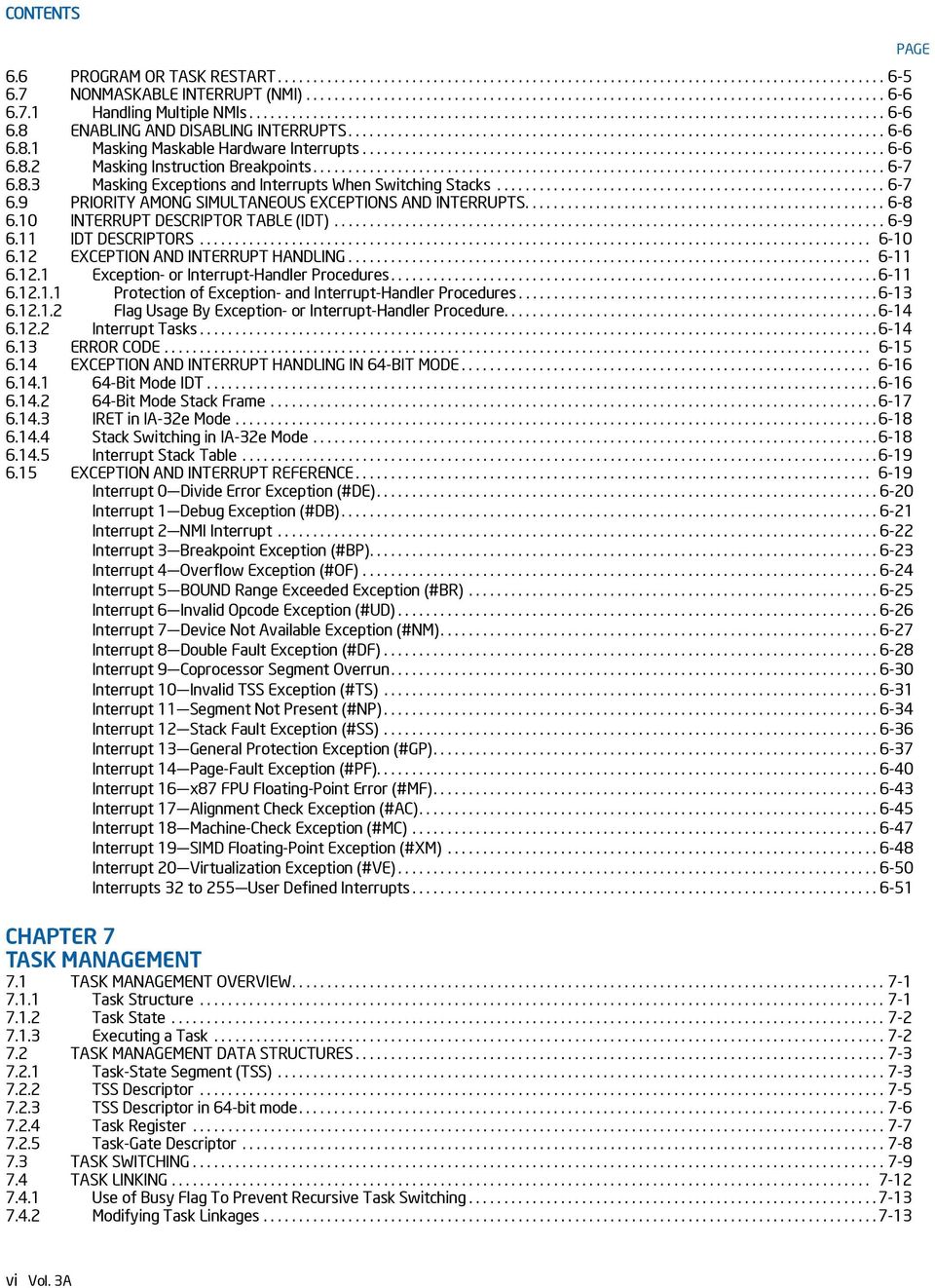
7 CONTENTS 7.5 TASK ADDRESS SPACE Mapping Tasks to the Linear and Physical Address Spaces Task Logical Address Space BIT TASK-STATE SEGMENT (TSS) TASK MANAGEMENT IN 64-BIT MODE CHAPTER 8 MULTIPLE-PROCESSOR MANAGEMENT 8.1 LOCKED ATOMIC OPERATIONS Guaranteed Atomic Operations Bus Locking Automatic Locking Software Controlled Bus Locking Handling Self- and Cross-Modifying Code Effects of a LOCK Operation on Internal Processor Caches MEMORY ORDERING Memory Ordering in the Intel Pentium and Intel486 Processors Memory Ordering in P6 and More Recent Processor Families Examples Illustrating the Memory-Ordering Principles Assumptions, Terminology, and Notation Neither Loads Nor Stores Are Reordered with Like Operations Stores Are Not Reordered With Earlier Loads Loads May Be Reordered with Earlier Stores to Different Locations Intra-Processor Forwarding Is Allowed Stores Are Transitively Visible Stores Are Seen in a Consistent Order by Other Processors Locked Instructions Have a Total Order Loads and Stores Are Not Reordered with Locked Instructions Fast-String Operation and Out-of-Order Stores Memory-Ordering Model for String Operations on Write-Back (WB) Memory Examples Illustrating Memory-Ordering Principles for String Operations Strengthening or Weakening the Memory-Ordering Model SERIALIZING INSTRUCTIONS MULTIPLE-PROCESSOR (MP) INITIALIZATION BSP and AP Processors MP Initialization Protocol Requirements and Restrictions MP Initialization Protocol Algorithm for MP Systems MP Initialization Example Typical BSP Initialization Sequence Typical AP Initialization Sequence Identifying Logical Processors in an MP System INTEL HYPER-THREADING TECHNOLOGY AND INTEL MULTI-CORE TECHNOLOGY DETECTING HARDWARE MULTI-THREADING SUPPORT AND TOPOLOGY Initializing Processors Supporting Hyper-Threading Technology Initializing Multi-Core Processors Executing Multiple Threads on an Intel 64 or IA-32 Processor Supporting Hardware Multi-Threading Handling Interrupts on an IA-32 Processor Supporting Hardware Multi-Threading INTEL HYPER-THREADING TECHNOLOGY ARCHITECTURE State of the Logical Processors APIC Functionality Memory Type Range Registers (MTRR) Page Attribute Table (PAT) Machine Check Architecture Debug Registers and Extensions Performance Monitoring Counters IA32_MISC_ENABLE MSR Memory Ordering Serializing Instructions Microcode Update Resources Self Modifying Code Implementation-Specific Intel HT Technology Facilities Processor Caches Processor Translation Lookaside Buffers (TLBs) Thermal Monitor PAGE Vol. 3A vii
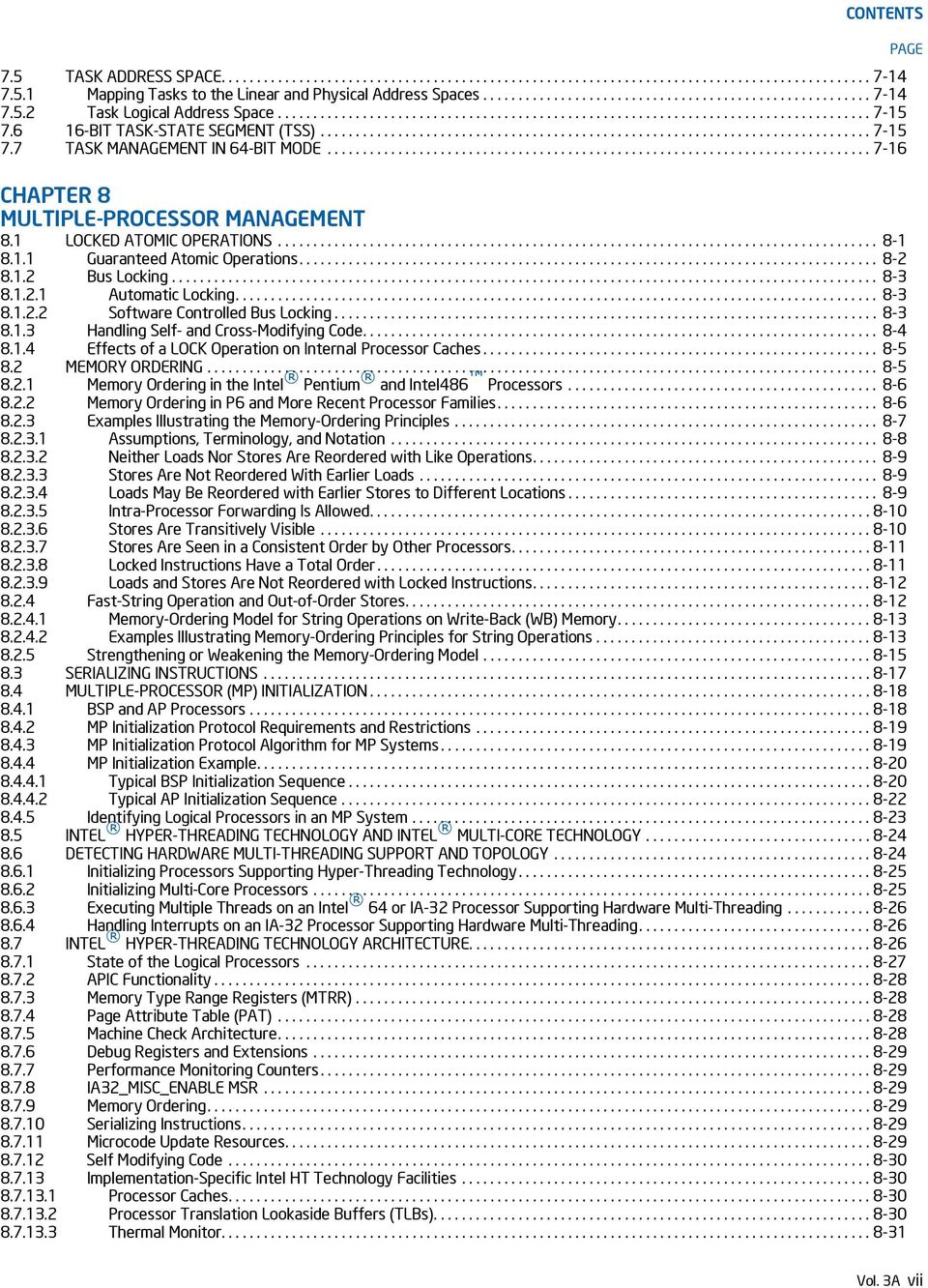
8 CONTENTS External Signal Compatibility MULTI-CORE ARCHITECTURE Logical Processor Support Memory Type Range Registers (MTRR) Performance Monitoring Counters IA32_MISC_ENABLE MSR Microcode Update Resources PROGRAMMING CONSIDERATIONS FOR HARDWARE MULTI-THREADING CAPABLE PROCESSORS Hierarchical Mapping of Shared Resources Hierarchical Mapping of CPUID Extended Topology Leaf Hierarchical ID of Logical Processors in an MP System Hierarchical ID of Logical Processors with x2apic ID Algorithm for Three-Level Mappings of APIC_ID Identifying Topological Relationships in a MP System MANAGEMENT OF IDLE AND BLOCKED CONDITIONS HLT Instruction PAUSE Instruction Detecting Support MONITOR/MWAIT Instruction MONITOR/MWAIT Instruction Monitor/Mwait Address Range Determination Required Operating System Support Use the PAUSE Instruction in Spin-Wait Loops Potential Usage of MONITOR/MWAIT in C0 Idle Loops Halt Idle Logical Processors Potential Usage of MONITOR/MWAIT in C1 Idle Loops Guidelines for Scheduling Threads on Logical Processors Sharing Execution Resources Eliminate Execution-Based Timing Loops Place Locks and Semaphores in Aligned, 128-Byte Blocks of Memory MP INITIALIZATION FOR P6 FAMILY PROCESSORS Overview of the MP Initialization Process For P6 Family Processors MP Initialization Protocol Algorithm Error Detection and Handling During the MP Initialization Protocol CHAPTER 9 PROCESSOR MANAGEMENT AND INITIALIZATION 9.1 INITIALIZATION OVERVIEW Processor State After Reset Processor Built-In Self-Test (BIST) Model and Stepping Information First Instruction Executed X87 FPU INITIALIZATION Configuring the x87 FPU Environment Setting the Processor for x87 FPU Software Emulation CACHE ENABLING MODEL-SPECIFIC REGISTERS (MSRS) MEMORY TYPE RANGE REGISTERS (MTRRS) INITIALIZING SSE/SSE2/SSE3/SSSE3 EXTENSIONS SOFTWARE INITIALIZATION FOR REAL-ADDRESS MODE OPERATION Real-Address Mode IDT NMI Interrupt Handling SOFTWARE INITIALIZATION FOR PROTECTED-MODE OPERATION Protected-Mode System Data Structures Initializing Protected-Mode Exceptions and Interrupts Initializing Paging Initializing Multitasking Initializing IA-32e Mode IA-32e Mode System Data Structures IA-32e Mode Interrupts and Exceptions bit Mode and Compatibility Mode Operation Switching Out of IA-32e Mode Operation MODE SWITCHING Switching to Protected Mode Switching Back to Real-Address Mode INITIALIZATION AND MODE SWITCHING EXAMPLE PAGE viii Vol. 3A

9 Vol. 3A ix CONTENTS PAGE Assembler Usage STARTUP.ASM Listing MAIN.ASM Source Code Supporting Files MICROCODE UPDATE FACILITIES Microcode Update Optional Extended Signature Table Processor Identification Platform Identification Microcode Update Checksum Microcode Update Loader Hard Resets in Update Loading Update in a Multiprocessor System Update in a System Supporting Intel Hyper-Threading Technology Update in a System Supporting Dual-Core Technology Update Loader Enhancements Update Signature and Verification Determining the Signature Authenticating the Update Optional Processor Microcode Update Specifications Responsibilities of the BIOS Responsibilities of the Calling Program Microcode Update Functions INT 15H-based Interface Function 00H Presence Test Function 01H Write Microcode Update Data Function 02H Microcode Update Control Function 03H Read Microcode Update Data Return Codes CHAPTER 10 ADVANCED PROGRAMMABLE INTERRUPT CONTROLLER (APIC) 10.1 LOCAL AND I/O APIC OVERVIEW SYSTEM BUS VS. APIC BUS THE INTEL 82489DX EXTERNAL APIC, THE APIC, THE XAPIC, AND THE X2APIC LOCAL APIC The Local APIC Block Diagram Presence of the Local APIC Enabling or Disabling the Local APIC Local APIC Status and Location Relocating the Local APIC Registers Local APIC ID Local APIC State Local APIC State After Power-Up or Reset Local APIC State After It Has Been Software Disabled Local APIC State After an INIT Reset ( Wait-for-SIPI State) Local APIC State After It Receives an INIT-Deassert IPI Local APIC Version Register HANDLING LOCAL INTERRUPTS Local Vector Table Valid Interrupt Vectors Error Handling APIC Timer TSC-Deadline Mode Local Interrupt Acceptance ISSUING INTERPROCESSOR INTERRUPTS Interrupt Command Register (ICR) Determining IPI Destination Physical Destination Mode Logical Destination Mode Broadcast/Self Delivery Mode Lowest Priority Delivery Mode

10 CONTENTS IPI Delivery and Acceptance SYSTEM AND APIC BUS ARBITRATION HANDLING INTERRUPTS Interrupt Handling with the Pentium 4 and Intel Xeon Processors Interrupt Handling with the P6 Family and Pentium Processors Interrupt, Task, and Processor Priority Task and Processor Priorities Interrupt Acceptance for Fixed Interrupts Signaling Interrupt Servicing Completion Task Priority in IA-32e Mode Interaction of Task Priorities between CR8 and APIC SPURIOUS INTERRUPT APIC BUS MESSAGE PASSING MECHANISM AND PROTOCOL (P6 FAMILY, PENTIUM PROCESSORS) Bus Message Formats MESSAGE SIGNALLED INTERRUPTS Message Address Register Format Message Data Register Format EXTENDED XAPIC (X2APIC) Detecting and Enabling x2apic Mode Instructions to Access APIC Registers x2apic Register Address Space Reserved Bit Checking x2apic Register Availability MSR Access in x2apic Mode VM-Exit Controls for MSRs and x2apic Registers x2apic State Transitions x2apic States x2apic After Reset x2apic Transitions From x2apic Mode x2apic Transitions From Disabled Mode State Changes From xapic Mode to x2apic Mode Routing of Device Interrupts in x2apic Mode Initialization by System Software CPUID Extensions And Topology Enumeration Consistency of APIC IDs and CPUID ICR Operation in x2apic Mode Determining IPI Destination in x2apic Mode Logical Destination Mode in x2apic Mode Deriving Logical x2apic ID from the Local x2apic ID SELF IPI Register APIC BUS MESSAGE FORMATS Bus Message Formats EOI Message Short Message Non-focused Lowest Priority Message APIC Bus Status Cycles CHAPTER 11 MEMORY CACHE CONTROL 11.1 INTERNAL CACHES, TLBS, AND BUFFERS CACHING TERMINOLOGY METHODS OF CACHING AVAILABLE Buffering of Write Combining Memory Locations Choosing a Memory Type Code Fetches in Uncacheable Memory CACHE CONTROL PROTOCOL CACHE CONTROL Cache Control Registers and Bits Precedence of Cache Controls Selecting Memory Types for Pentium Pro and Pentium II Processors Selecting Memory Types for Pentium III and More Recent Processor Families Writing Values Across Pages with Different Memory Types PAGE x Vol. 3A

11 CONTENTS Preventing Caching Disabling and Enabling the L3 Cache Cache Management Instructions L1 Data Cache Context Mode Adaptive Mode Shared Mode SELF-MODIFYING CODE IMPLICIT CACHING (PENTIUM 4, INTEL XEON, AND P6 FAMILY PROCESSORS) EXPLICIT CACHING INVALIDATING THE TRANSLATION LOOKASIDE BUFFERS (TLBS) STORE BUFFER MEMORY TYPE RANGE REGISTERS (MTRRS) MTRR Feature Identification Setting Memory Ranges with MTRRs IA32_MTRR_DEF_TYPE MSR Fixed Range MTRRs Variable Range MTRRs System-Management Range Register Interface Example Base and Mask Calculations Base and Mask Calculations for Greater-Than 36-bit Physical Address Support Range Size and Alignment Requirement MTRR Precedences MTRR Initialization Remapping Memory Types MTRR Maintenance Programming Interface MemTypeGet() Function MemTypeSet() Function MTRR Considerations in MP Systems Large Page Size Considerations PAGE ATTRIBUTE TABLE (PAT) Detecting Support for the PAT Feature IA32_PAT MSR Selecting a Memory Type from the PAT Programming the PAT PAT Compatibility with Earlier IA-32 Processors CHAPTER 12 INTEL MMX TECHNOLOGY SYSTEM PROGRAMMING 12.1 EMULATION OF THE MMX INSTRUCTION SET THE MMX STATE AND MMX REGISTER ALIASING Effect of MMX, x87 FPU, FXSAVE, and FXRSTOR Instructions on the x87 FPU Tag Word SAVING AND RESTORING THE MMX STATE AND REGISTERS SAVING MMX STATE ON TASK OR CONTEXT SWITCHES EXCEPTIONS THAT CAN OCCUR WHEN EXECUTING MMX INSTRUCTIONS Effect of MMX Instructions on Pending x87 Floating-Point Exceptions DEBUGGING MMX CODE CHAPTER 13 SYSTEM PROGRAMMING FOR INSTRUCTION SET EXTENSIONS AND PROCESSOR EXTENDED STATES 13.1 PROVIDING OPERATING SYSTEM SUPPORT FOR SSE EXTENSIONS Adding Support to an Operating System for SSE Extensions Checking for CPU Support Initialization of the SSE Extensions Providing Non-Numeric Exception Handlers for Exceptions Generated by the SSE Instructions Providing a Handler for the SIMD Floating-Point Exception (#XM) Numeric Error flag and IGNNE# EMULATION OF SSE EXTENSIONS SAVING AND RESTORING SSE STATE DESIGNING OS FACILITIES FOR SAVING X87 FPU, SSE AND EXTENDED STATES ON TASK OR CONTEXT SWITCHES PAGE Vol. 3A xi
12 CONTENTS Using the TS Flag to Control the Saving of the x87 FPU and SSE State THE XSAVE FEATURE SET AND PROCESSOR EXTENDED STATE MANAGEMENT Checking the Support for XSAVE Feature Set Determining the XSAVE Managed Feature States And The Required Buffer Size Enable the Use Of XSAVE Feature Set And XSAVE State Components Provide an Initialization for the XSAVE State Components Providing the Required Exception Handlers INTEROPERABILITY OF THE XSAVE FEATURE SET AND FXSAVE/FXRSTOR THE XSAVE FEATURE SET AND PROCESSOR SUPERVISOR STATE MANAGEMENT SYSTEM PROGRAMMING FOR XSAVE MANAGED FEATURES Intel Advanced Vector Extensions (Intel AVX) Intel Advanced Vector Extensions 512 (Intel AVX-512) CHAPTER 14 POWER AND THERMAL MANAGEMENT 14.1 ENHANCED INTEL SPEEDSTEP TECHNOLOGY Software Interface For Initiating Performance State Transitions P-STATE HARDWARE COORDINATION SYSTEM SOFTWARE CONSIDERATIONS AND OPPORTUNISTIC PROCESSOR PERFORMANCE OPERATION Intel Dynamic Acceleration System Software Interfaces for Opportunistic Processor Performance Operation Discover Hardware Support and Enabling of Opportunistic Processor Operation OS Control of Opportunistic Processor Performance Operation Required Changes to OS Power Management P-state Policy Application Awareness of Opportunistic Processor Operation (Optional) Intel Turbo Boost Technology Performance and Energy Bias Hint support HARDWARE-CONTROLLED PERFORMANCE STATES (HWP) HWP Programming Interfaces Enabling HWP HWP Performance Range and Dynamic Capabilities Managing HWP HWP Feedback Non-Architectural HWP Feedback HWP Notifications Recommendations for OS use of HWP Controls HARDWARE DUTY CYCLING (HDC) Hardware Duty Cycling Programming Interfaces Package level Enabling HDC Logical-Processor Level HDC Control HDC Residency Counters IA32_THREAD_STALL Non-Architectural HDC Residency Counters MPERF and APERF Counters Under HDC MWAIT EXTENSIONS FOR ADVANCED POWER MANAGEMENT THERMAL MONITORING AND PROTECTION Catastrophic Shutdown Detector Thermal Monitor Thermal Monitor Thermal Monitor Two Methods for Enabling TM Performance State Transitions and Thermal Monitoring Thermal Status Information Adaptive Thermal Monitor Software Controlled Clock Modulation Extension of Software Controlled Clock Modulation Detection of Thermal Monitor and Software Controlled Clock Modulation Facilities Detection of Software Controlled Clock Modulation Extension On Die Digital Thermal Sensors Digital Thermal Sensor Enumeration Reading the Digital Sensor Power Limit Notification PACKAGE LEVEL THERMAL MANAGEMENT PAGE xii Vol. 3A
13 CONTENTS Support for Passive and Active cooling PLATFORM SPECIFIC POWER MANAGEMENT SUPPORT RAPL Interfaces RAPL Domains and Platform Specificity Package RAPL Domain PP0/PP1 RAPL Domains DRAM RAPL Domain CHAPTER 15 MACHINE-CHECK ARCHITECTURE 15.1 MACHINE-CHECK ARCHITECTURE COMPATIBILITY WITH PENTIUM PROCESSOR MACHINE-CHECK MSRS Machine-Check Global Control MSRs IA32_MCG_CAP MSR IA32_MCG_STATUS MSR IA32_MCG_CTL MSR IA32_MCG_EXT_CTL MSR Enabling Local Machine Check Error-Reporting Register Banks IA32_MCi_CTL MSRs IA32_MCi_STATUS MSRS IA32_MCi_ADDR MSRs IA32_MCi_MISC MSRs IA32_MCi_CTL2 MSRs IA32_MCG Extended Machine Check State MSRs Mapping of the Pentium Processor Machine-Check Errors to the Machine-Check Architecture ENHANCED CACHE ERROR REPORTING CORRECTED MACHINE CHECK ERROR INTERRUPT CMCI Local APIC Interface System Software Recommendation for Managing CMCI and Machine Check Resources CMCI Initialization CMCI Threshold Management CMCI Interrupt Handler RECOVERY OF UNCORRECTED RECOVERABLE (UCR) ERRORS Detection of Software Error Recovery Support UCR Error Reporting and Logging UCR Error Classification UCR Error Overwrite Rules MACHINE-CHECK AVAILABILITY MACHINE-CHECK INITIALIZATION INTERPRETING THE MCA ERROR CODES Simple Error Codes Compound Error Codes Correction Report Filtering (F) Bit Transaction Type (TT) Sub-Field Level (LL) Sub-Field Request (RRRR) Sub-Field Bus and Interconnect Errors Memory Controller Errors Architecturally Defined UCR Errors Architecturally Defined SRAO Errors Architecturally Defined SRAR Errors Multiple MCA Errors Machine-Check Error Codes Interpretation GUIDELINES FOR WRITING MACHINE-CHECK SOFTWARE Machine-Check Exception Handler Pentium Processor Machine-Check Exception Handling Logging Correctable Machine-Check Errors Machine-Check Software Handler Guidelines for Error Recovery Machine-Check Exception Handler for Error Recovery Corrected Machine-Check Handler for Error Recovery PAGE Vol. 3A xiii
14 CONTENTS CHAPTER 16 INTERPRETING MACHINE-CHECK ERROR CODES 16.1 INCREMENTAL DECODING INFORMATION: PROCESSOR FAMILY 06H MACHINE ERROR CODES FOR MACHINE CHECK INCREMENTAL DECODING INFORMATION: INTEL CORE 2 PROCESSOR FAMILY MACHINE ERROR CODES FOR MACHINE CHECK Model-Specific Machine Check Error Codes for Intel Xeon Processor 7400 Series Processor Machine Check Status Register Incremental MCA Error Code Definition Intel Xeon Processor 7400 Model Specific Error Code Field Processor Model Specific Error Code Field Type B: Bus and Interconnect Error Processor Model Specific Error Code Field Type C: Cache Bus Controller Error INCREMENTAL DECODING INFORMATION: PROCESSOR FAMILY WITH CPUID DISPLAYFAMILY_DISPLAYMODEL SIGNATURE 06_1AH, MACHINE ERROR CODES FOR MACHINE CHECK Intel QPI Machine Check Errors Internal Machine Check Errors Memory Controller Errors INCREMENTAL DECODING INFORMATION: PROCESSOR FAMILY WITH CPUID DISPLAYFAMILY_DISPLAYMODEL SIGNATURE 06_2DH, MACHINE ERROR CODES FOR MACHINE CHECK Internal Machine Check Errors Intel QPI Machine Check Errors Integrated Memory Controller Machine Check Errors INCREMENTAL DECODING INFORMATION: PROCESSOR FAMILY WITH CPUID DISPLAYFAMILY_DISPLAYMODEL SIGNATURE 06_3EH, MACHINE ERROR CODES FOR MACHINE CHECK Internal Machine Check Errors Integrated Memory Controller Machine Check Errors INCREMENTAL DECODING INFORMATION: PROCESSOR FAMILY WITH CPUID DISPLAYFAMILY_DISPLAYMODEL SIGNATURE 06_3FH, MACHINE ERROR CODES FOR MACHINE CHECK Internal Machine Check Errors Intel QPI Machine Check Errors Integrated Memory Controller Machine Check Errors INCREMENTAL DECODING INFORMATION: PROCESSOR FAMILY 0FH MACHINE ERROR CODES FOR MACHINE CHECK Model-Specific Machine Check Error Codes for Intel Xeon Processor MP 7100 Series Processor Machine Check Status Register MCA Error Code Definition Other_Info Field (all MCA Error Types) Processor Model Specific Error Code Field MCA Error Type A: L3 Error Processor Model Specific Error Code Field Type B: Bus and Interconnect Error Processor Model Specific Error Code Field Type C: Cache Bus Controller Error CHAPTER 17 DEBUG, BRANCH PROFILE, TSC, AND RESOURCE MONITORING FEATURES 17.1 OVERVIEW OF DEBUG SUPPORT FACILITIES DEBUG REGISTERS Debug Address Registers (DR0-DR3) Debug Registers DR4 and DR Debug Status Register (DR6) Debug Control Register (DR7) Breakpoint Field Recognition Debug Registers and Intel 64 Processors DEBUG EXCEPTIONS Debug Exception (#DB) Interrupt Vector Instruction-Breakpoint Exception Condition Data Memory and I/O Breakpoint Exception Conditions General-Detect Exception Condition Single-Step Exception Condition Task-Switch Exception Condition Breakpoint Exception (#BP) Interrupt Vector Debug Exceptions, Breakpoint Exceptions, and Restricted Transactional Memory (RTM) LAST BRANCH, INTERRUPT, AND EXCEPTION RECORDING OVERVIEW PAGE xiv Vol. 3A

15 CONTENTS IA32_DEBUGCTL MSR Monitoring Branches, Exceptions, and Interrupts Single-Stepping on Branches Branch Trace Messages Branch Trace Message Visibility Branch Trace Store (BTS) CPL-Qualified Branch Trace Mechanism Freezing LBR and Performance Counters on PMI LBR Stack LBR Stack and Intel 64 Processors LBR Stack and IA-32 Processors Last Exception Records and Intel 64 Architecture BTS and DS Save Area Bit Format of the DS Save Area Setting Up the DS Save Area Setting Up the BTS Buffer Setting Up CPL-Qualified BTS Writing the DS Interrupt Service Routine LAST BRANCH, INTERRUPT, AND EXCEPTION RECORDING (INTEL CORE 2 DUO AND INTEL ATOM PROCESSOR FAMILY) LBR Stack LAST BRANCH, INTERRUPT, AND EXCEPTION RECORDING FOR PROCESSORS BASED ON INTEL MICROARCHITECTURE CODE NAME NEHALEM LBR Stack Filtering of Last Branch Records LAST BRANCH, INTERRUPT, AND EXCEPTION RECORDING FOR PROCESSORS BASED ON INTEL MICROARCHITECTURE CODE NAME SANDY BRIDGE LAST BRANCH, CALL STACK, INTERRUPT, AND EXCEPTION RECORDING FOR PROCESSORS BASED ON HASWELL MICROARCHITECTURE LBR Stack Enhancement LAST BRANCH, CALL STACK, INTERRUPT, AND EXCEPTION RECORDING FOR PROCESSORS BASED ON SKYLAKE MICROARCHITECTURE MSR_LBR_INFO_x MSR Streamlined Freeze_LBRs_On_PMI Operation LBR behavior on software C LAST BRANCH, INTERRUPT, AND EXCEPTION RECORDING (PROCESSORS BASED ON INTEL NETBURST MICROARCHITECTURE) MSR_DEBUGCTLA MSR LBR Stack for Processors Based on Intel NetBurst Microarchitecture Last Exception Records LAST BRANCH, INTERRUPT, AND EXCEPTION RECORDING (INTEL CORE SOLO AND INTEL CORE DUO PROCESSORS) LAST BRANCH, INTERRUPT, AND EXCEPTION RECORDING (PENTIUM M PROCESSORS) LAST BRANCH, INTERRUPT, AND EXCEPTION RECORDING (P6 FAMILY PROCESSORS) DEBUGCTLMSR Register Last Branch and Last Exception MSRs Monitoring Branches, Exceptions, and Interrupts TIME-STAMP COUNTER Invariant TSC IA32_TSC_AUX Register and RDTSCP Support Time-Stamp Counter Adjustment Invariant Time-Keeping PLATFORM SHARED RESOURCE MONITORING: CACHE MONITORING TECHNOLOGY Overview of Cache Monitoring Technology and Memory Bandwidth Monitoring Enabling Monitoring: Usage Flow Enumeration and Detecting Support of Cache Monitoring Technology and Memory Bandwidth Monitoring Monitoring Resource Type and Capability Enumeration Feature-Specific Enumeration Cache Monitoring Technology Memory Bandwidth Monitoring Monitoring Resource RMID Association Monitoring Resource Selection and Reporting Infrastructure Monitoring Programming Considerations Monitoring Dynamic Configuration PAGE Vol. 3A xv
16 CONTENTS Monitoring Operation With Power Saving Features Monitoring Operation with Other Operating Modes Monitoring Operation with RAS Features PLATFORM SHARED RESOURCE CONTROL: CACHE ALLOCATION TECHNOLOGY Cache Allocation Technology Architecture Code and Data Prioritization (CDP) Technology Enabling Cache Allocation Technology Usage Flow Enumeration and Detection Support of Cache Allocation Technology Cache Allocation Technology: Resource Type and Capability Enumeration Cache Mask Configuration Cache Mask Association Enumerating and Enabling CDP Technology Mapping Between CDP Masks and CAT Masks Disabling CDP Cache Allocation Technology Programming Considerations Cache Allocation Technology Dynamic Configuration Cache Allocation Technology Operation With Power Saving Features Cache Allocation Technology Operation with Other Operating Modes Associating Threads with CAT/CDP Classes of Service CHAPTER 18 PERFORMANCE MONITORING 18.1 PERFORMANCE MONITORING OVERVIEW ARCHITECTURAL PERFORMANCE MONITORING Architectural Performance Monitoring Version Architectural Performance Monitoring Version 1 Facilities Pre-defined Architectural Performance Events Architectural Performance Monitoring Version Architectural Performance Monitoring Version AnyThread Counting and Software Evolution Architectural Performance Monitoring Version Enhancement in IA32_PERF_GLOBAL_STATUS IA32_PERF_GLOBAL_STATUS_RESET and IA32_PERF_GLOBAL_STATUS_SET MSRS IA32_PERF_GLOBAL_INUSE MSR Full-Width Writes to Performance Counter Registers PERFORMANCE MONITORING (INTEL CORE SOLO AND INTEL CORE DUO PROCESSORS) PERFORMANCE MONITORING (PROCESSORS BASED ON INTEL CORE MICROARCHITECTURE) Fixed-function Performance Counters Global Counter Control Facilities At-Retirement Events Precise Event Based Sampling (PEBS) Setting up the PEBS Buffer PEBS Record Format Writing a PEBS Interrupt Service Routine Re-configuring PEBS Facilities PERFORMANCE MONITORING (PROCESSORS BASED ON INTEL ATOM MICROARCHITECTURE) PERFORMANCE MONITORING (PROCESSORS BASED ON THE SILVERMONT MICROARCHITECTURE) Enhancements of Performance Monitoring in the Processor Core Precise Event Based Sampling (PEBS) Offcore Response Event Average Offcore Request Latency Measurement PERFORMANCE MONITORING FOR PROCESSORS BASED ON INTEL MICROARCHITECTURE CODE NAME NEHALEM Enhancements of Performance Monitoring in the Processor Core Precise Event Based Sampling (PEBS) Load Latency Performance Monitoring Facility Off-core Response Performance Monitoring in the Processor Core Performance Monitoring Facility in the Uncore Uncore Performance Monitoring Management Facility Uncore Performance Event Configuration Facility Uncore Address/Opcode Match MSR Intel Xeon Processor 7500 Series Performance Monitoring Facility Performance Monitoring for Processors Based on Intel Microarchitecture Code Name Westmere Intel Xeon Processor E7 Family Performance Monitoring Facility PAGE xvi Vol. 3A
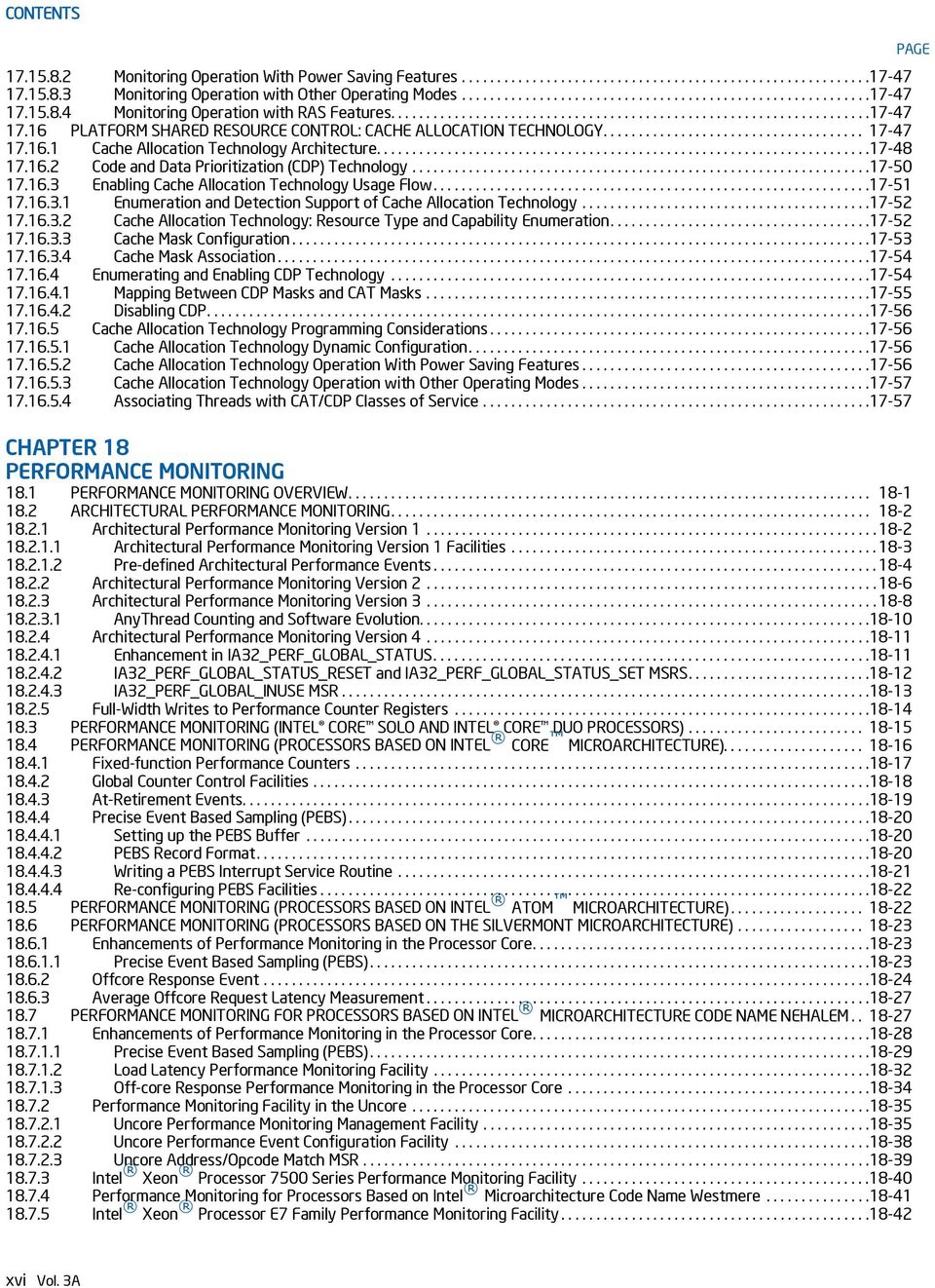
17 CONTENTS 18.8 PERFORMANCE MONITORING FOR PROCESSORS BASED ON INTEL MICROARCHITECTURE CODE NAME SANDY BRIDGE Global Counter Control Facilities In Intel Microarchitecture Code Name Sandy Bridge Counter Coalescence Full Width Writes to Performance Counters PEBS Support in Intel Microarchitecture Code Name Sandy Bridge PEBS Record Format Load Latency Performance Monitoring Facility Precise Store Facility Precise Distribution of Instructions Retired (PDIR) Off-core Response Performance Monitoring Uncore Performance Monitoring Facilities In Intel Core i7-2xxx, Intel Core i5-2xxx, Intel Core i3-2xxx Processor Series Uncore Performance Monitoring Events Intel Xeon Processor E5 Family Performance Monitoring Facility Intel Xeon Processor E5 Family Uncore Performance Monitoring Facility RD GENERATION INTEL CORE PROCESSOR PERFORMANCE MONITORING FACILITY Intel Xeon Processor E5 v2 and E7 v2 Family Uncore Performance Monitoring Facility TH GENERATION INTEL CORE PROCESSOR PERFORMANCE MONITORING FACILITY Precise Event Based Sampling (PEBS) Facility PEBS Data Format PEBS Data Address Profiling EventingIP Record Off-core Response Performance Monitoring Off-core Response Performance Monitoring in Intel Xeon Processors E5 v3 Series Performance Monitoring and Intel TSX Intel TSX and PEBS Support Uncore Performance Monitoring Facilities in the 4th Generation Intel Core Processors Intel Xeon Processor E5 v3 Family Uncore Performance Monitoring Facility INTEL CORE M PROCESSOR PERFORMANCE MONITORING FACILITY SIXTH GENERATION INTEL CORE PROCESSOR PERFORMANCE MONITORING FACILITY Precise Event Based Sampling (PEBS) Facility PEBS Data Format PEBS Events Data Address Profiling PEBS Facility for Front End Events FRONTEND_RETIRED Off-core Response Performance Monitoring PERFORMANCE MONITORING (PROCESSORS BASED ON INTEL NETBURST MICROARCHITECTURE) ESCR MSRs Performance Counters CCCR MSRs Debug Store (DS) Mechanism Programming the Performance Counters for Non-Retirement Events Selecting Events to Count Filtering Events Starting Event Counting Reading a Performance Counter s Count Halting Event Counting Cascading Counters EXTENDED CASCADING Generating an Interrupt on Overflow Counter Usage Guideline At-Retirement Counting Using At-Retirement Counting Tagging Mechanism for Front_end_event Tagging Mechanism For Execution_event Tagging Mechanism for Replay_event Precise Event-Based Sampling (PEBS) Detection of the Availability of the PEBS Facilities Setting Up the DS Save Area Setting Up the PEBS Buffer Writing a PEBS Interrupt Service Routine Other DS Mechanism Implications PAGE Vol. 3A xvii
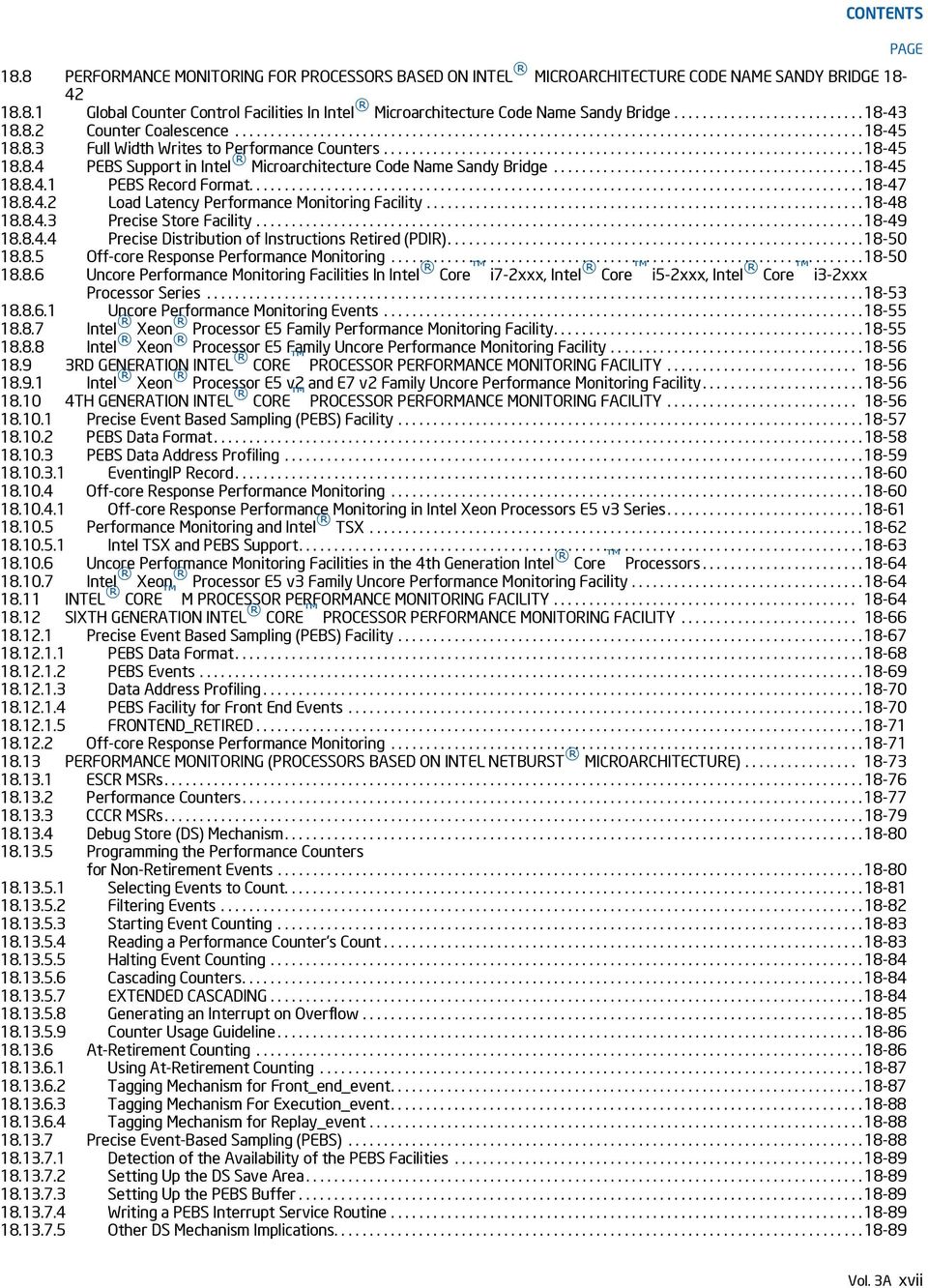
18 CONTENTS Operating System Implications PERFORMANCE MONITORING AND INTEL HYPER-THREADING TECHNOLOGY IN PROCESSORS BASED ON INTEL NETBURST MICROARCHITECTURE ESCR MSRs CCCR MSRs IA32_PEBS_ENABLE MSR Performance Monitoring Events COUNTING CLOCKS Non-Halted Clockticks Non-Sleep Clockticks Incrementing the Time-Stamp Counter Non-Halted Reference Clockticks Cycle Counting and Opportunistic Processor Operation IA32_PERF_CAPABILITIES MSR ENUMERATION Filtering of SMM Handler Overhead PERFORMANCE MONITORING AND DUAL-CORE TECHNOLOGY PERFORMANCE MONITORING ON 64-BIT INTEL XEON PROCESSOR MP WITH UP TO 8-MBYTE L3 CACHE PERFORMANCE MONITORING ON L3 AND CACHING BUS CONTROLLER SUB-SYSTEMS Overview of Performance Monitoring with L3/Caching Bus Controller GBSQ Event Interface GSNPQ Event Interface FSB Event Interface FSB Sub-Event Mask Interface Common Event Control Interface PERFORMANCE MONITORING (P6 FAMILY PROCESSOR) PerfEvtSel0 and PerfEvtSel1 MSRs PerfCtr0 and PerfCtr1 MSRs Starting and Stopping the Performance-Monitoring Counters Event and Time-Stamp Monitoring Software Monitoring Counter Overflow PERFORMANCE MONITORING (PENTIUM PROCESSORS) Control and Event Select Register (CESR) Use of the Performance-Monitoring Pins Events Counted CHAPTER 19 PERFORMANCE-MONITORING EVENTS 19.1 ARCHITECTURAL PERFORMANCE-MONITORING EVENTS PERFORMANCE MONITORING EVENTS FOR NEXT GENERATION INTEL CORE PROCESSOR PERFORMANCE MONITORING EVENTS FOR THE INTEL CORE M AND FIFTH GENERATION INTEL CORE PROCESSORS PERFORMANCE MONITORING EVENTS FOR THE 4TH GENERATION INTEL CORE PROCESSORS Performance Monitoring Events in the Processor Core of Intel Xeon Processor E5 v3 Family PERFORMANCE MONITORING EVENTS FOR 3RD GENERATION INTEL CORE PROCESSORS Performance Monitoring Events in the Processor Core of Intel Xeon Processor E5 v2 Family and Intel Xeon Processor E7 v2 Family PERFORMANCE MONITORING EVENTS FOR 2ND GENERATION INTEL CORE I7-2XXX, INTEL CORE I5-2XXX, INTEL CORE I3-2XXX PROCESSOR SERIES PERFORMANCE MONITORING EVENTS FOR INTEL CORE I7 PROCESSOR FAMILY AND INTEL XEON PROCESSOR FAMILY PERFORMANCE MONITORING EVENTS FOR PROCESSORS BASED ON INTEL MICROARCHITECTURE CODE NAME WESTMERE PERFORMANCE MONITORING EVENTS FOR INTEL XEON PROCESSOR 5200, 5400 SERIES AND INTEL CORE 2 EXTREME PROCESSORS QX 9000 SERIES PERFORMANCE MONITORING EVENTS FOR INTEL XEON PROCESSOR 3000, 3200, 5100, 5300 SERIES AND INTEL CORE 2 DUO PROCESSORS PERFORMANCE MONITORING EVENTS FOR PROCESSORS BASED ON THE SILVERMONT MICROARCHITECTURE Performance Monitoring Events for Processors Based on the Airmont Microarchitecture PERFORMANCE MONITORING EVENTS FOR INTEL ATOM PROCESSORS PERFORMANCE MONITORING EVENTS FOR INTEL CORE SOLO AND INTEL CORE DUO PROCESSORS PENTIUM 4 AND INTEL XEON PROCESSOR PERFORMANCE-MONITORING EVENTS PERFORMANCE MONITORING EVENTS FOR INTEL PENTIUM M PROCESSORS P6 FAMILY PROCESSOR PERFORMANCE-MONITORING EVENTS PENTIUM PROCESSOR PERFORMANCE-MONITORING EVENTS PAGE xviii Vol. 3A
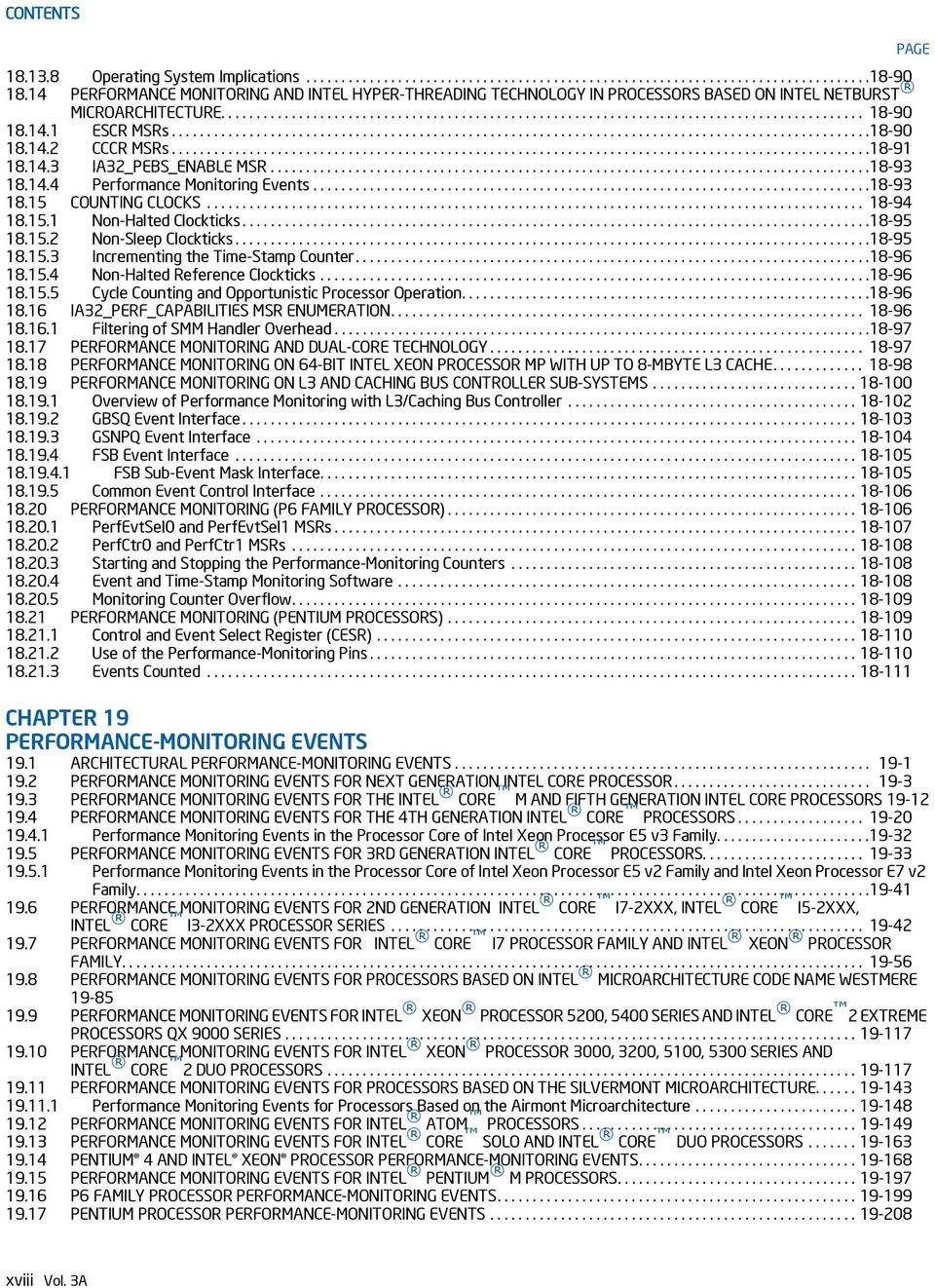
19 CONTENTS CHAPTER EMULATION 20.1 REAL-ADDRESS MODE Address Translation in Real-Address Mode Registers Supported in Real-Address Mode Instructions Supported in Real-Address Mode Interrupt and Exception Handling VIRTUAL-8086 MODE Enabling Virtual-8086 Mode Structure of a Virtual-8086 Task Paging of Virtual-8086 Tasks Protection within a Virtual-8086 Task Entering Virtual-8086 Mode Leaving Virtual-8086 Mode Sensitive Instructions Virtual-8086 Mode I/O I/O-Port-Mapped I/O Memory-Mapped I/O Special I/O Buffers INTERRUPT AND EXCEPTION HANDLING IN VIRTUAL-8086 MODE Class 1 Hardware Interrupt and Exception Handling in Virtual-8086 Mode Handling an Interrupt or Exception Through a Protected-Mode Trap or Interrupt Gate Handling an Interrupt or Exception With an 8086 Program Interrupt or Exception Handler Handling an Interrupt or Exception Through a Task Gate Class 2 Maskable Hardware Interrupt Handling in Virtual-8086 Mode Using the Virtual Interrupt Mechanism Class 3 Software Interrupt Handling in Virtual-8086 Mode Method 1: Software Interrupt Handling Methods 2 and 3: Software Interrupt Handling Method 4: Software Interrupt Handling Method 5: Software Interrupt Handling Method 6: Software Interrupt Handling PROTECTED-MODE VIRTUAL INTERRUPTS CHAPTER 21 MIXING 16-BIT AND 32-BIT CODE 21.1 DEFINING 16-BIT AND 32-BIT PROGRAM MODULES MIXING 16-BIT AND 32-BIT OPERATIONS WITHIN A CODE SEGMENT SHARING DATA AMONG MIXED-SIZE CODE SEGMENTS TRANSFERRING CONTROL AMONG MIXED-SIZE CODE SEGMENTS Code-Segment Pointer Size Stack Management for Control Transfer Controlling the Operand-Size Attribute For a Call Passing Parameters With a Gate Interrupt Control Transfers Parameter Translation Writing Interface Procedures CHAPTER 22 ARCHITECTURE COMPATIBILITY 22.1 PROCESSOR FAMILIES AND CATEGORIES RESERVED BITS ENABLING NEW FUNCTIONS AND MODES DETECTING THE PRESENCE OF NEW FEATURES THROUGH SOFTWARE INTEL MMX TECHNOLOGY STREAMING SIMD EXTENSIONS (SSE) STREAMING SIMD EXTENSIONS 2 (SSE2) STREAMING SIMD EXTENSIONS 3 (SSE3) ADDITIONAL STREAMING SIMD EXTENSIONS INTEL HYPER-THREADING TECHNOLOGY MULTI-CORE TECHNOLOGY SPECIFIC FEATURES OF DUAL-CORE PROCESSOR NEW INSTRUCTIONS IN THE PENTIUM AND LATER IA-32 PROCESSORS PAGE Vol. 3A xix
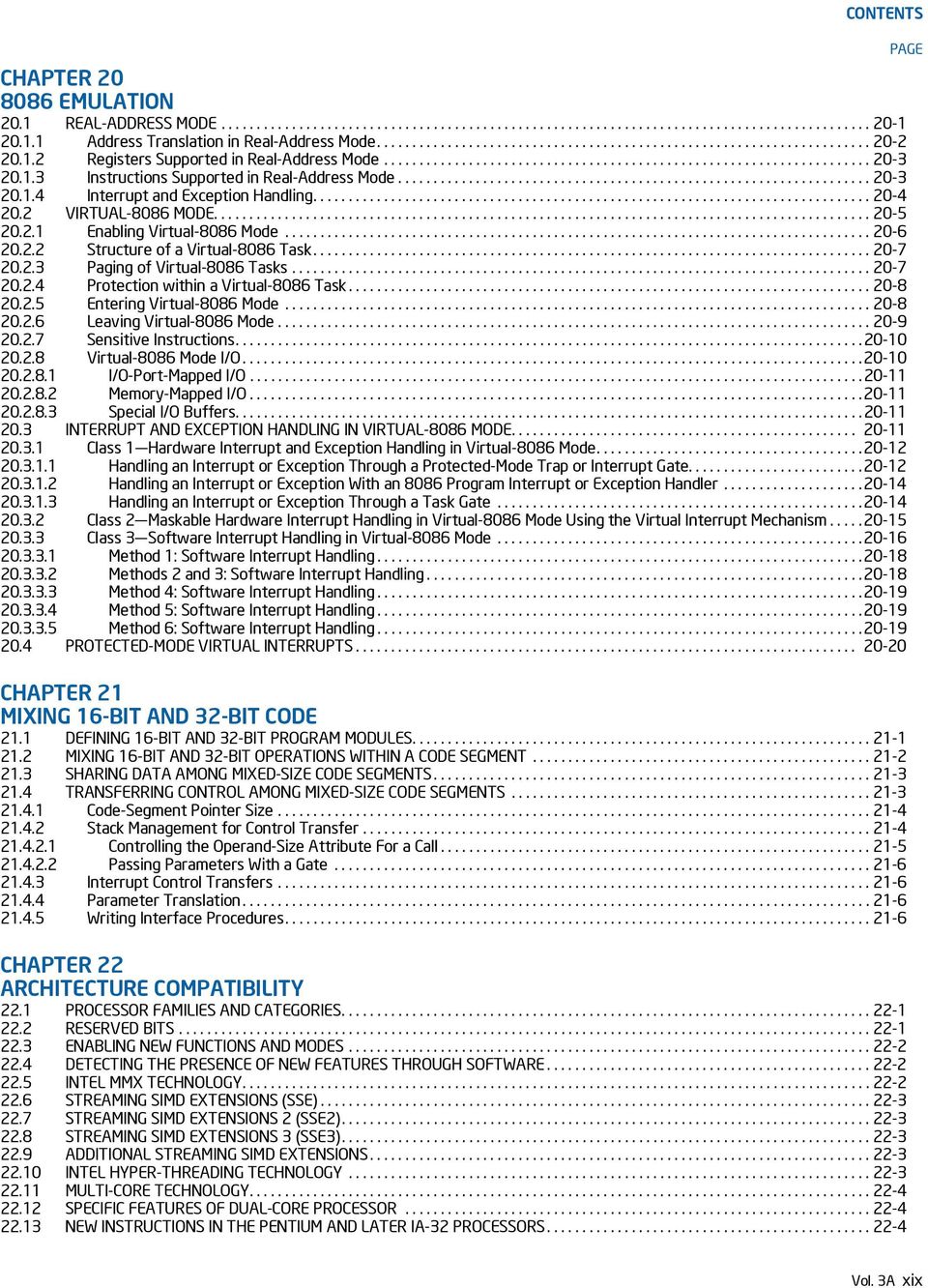
20 CONTENTS xx Vol. 3A PAGE Instructions Added Prior to the Pentium Processor OBSOLETE INSTRUCTIONS UNDEFINED OPCODES NEW FLAGS IN THE EFLAGS REGISTER Using EFLAGS Flags to Distinguish Between 32-Bit IA-32 Processors STACK OPERATIONS PUSH SP EFLAGS Pushed on the Stack X87 FPU Control Register CR0 Flags x87 FPU Status Word Condition Code Flags (C0 through C3) Stack Fault Flag x87 FPU Control Word x87 FPU Tag Word Data Types NaNs Pseudo-zero, Pseudo-NaN, Pseudo-infinity, and Unnormal Formats Floating-Point Exceptions Denormal Operand Exception (#D) Numeric Overflow Exception (#O) Numeric Underflow Exception (#U) Exception Precedence CS and EIP For FPU Exceptions FPU Error Signals Assertion of the FERR# Pin Invalid Operation Exception On Denormals Alignment Check Exceptions (#AC) Segment Not Present Exception During FLDENV Device Not Available Exception (#NM) Coprocessor Segment Overrun Exception General Protection Exception (#GP) Floating-Point Error Exception (#MF) Changes to Floating-Point Instructions FDIV, FPREM, and FSQRT Instructions FSCALE Instruction FPREM1 Instruction FPREM Instruction FUCOM, FUCOMP, and FUCOMPP Instructions FPTAN Instruction Stack Overflow FSIN, FCOS, and FSINCOS Instructions FPATAN Instruction F2XM1 Instruction FLD Instruction FXTRACT Instruction Load Constant Instructions FSETPM Instruction FXAM Instruction FSAVE and FSTENV Instructions Transcendental Instructions Obsolete Instructions WAIT/FWAIT Prefix Differences Operands Split Across Segments and/or Pages FPU Instruction Synchronization SERIALIZING INSTRUCTIONS FPU AND MATH COPROCESSOR INITIALIZATION Intel 387 and Intel 287 Math Coprocessor Initialization Intel486 SX Processor and Intel 487 SX Math Coprocessor Initialization CONTROL REGISTERS MEMORY MANAGEMENT FACILITIES New Memory Management Control Flags Physical Memory Addressing Extension Global Pages Larger Page Sizes

21 CONTENTS CD and NW Cache Control Flags Descriptor Types and Contents Changes in Segment Descriptor Loads DEBUG FACILITIES Differences in Debug Register DR Differences in Debug Register DR Debug Registers DR4 and DR RECOGNITION OF BREAKPOINTS EXCEPTIONS AND/OR EXCEPTION CONDITIONS Machine-Check Architecture Priority of Exceptions Exception Conditions of Legacy SIMD Instructions Operating on MMX Registers INTERRUPTS Interrupt Propagation Delay NMI Interrupts IDT Limit ADVANCED PROGRAMMABLE INTERRUPT CONTROLLER (APIC) Software Visible Differences Between the Local APIC and the 82489DX New Features Incorporated in the Local APIC for the P6 Family and Pentium Processors New Features Incorporated in the Local APIC of the Pentium 4 and Intel Xeon Processors TASK SWITCHING AND TSS P6 Family and Pentium Processor TSS TSS Selector Writes Order of Reads/Writes to the TSS Using A 16-Bit TSS with 32-Bit Constructs Differences in I/O Map Base Addresses CACHE MANAGEMENT Self-Modifying Code with Cache Enabled Disabling the L3 Cache PAGING Large Pages PCD and PWT Flags Enabling and Disabling Paging STACK OPERATIONS Selector Pushes and Pops Error Code Pushes Fault Handling Effects on the Stack Interlevel RET/IRET From a 16-Bit Interrupt or Call Gate MIXING 16- AND 32-BIT SEGMENTS SEGMENT AND ADDRESS WRAPAROUND Segment Wraparound STORE BUFFERS AND MEMORY ORDERING BUS LOCKING BUS HOLD MODEL-SPECIFIC EXTENSIONS TO THE IA Model-Specific Registers RDMSR and WRMSR Instructions Memory Type Range Registers Machine-Check Exception and Architecture Performance-Monitoring Counters TWO WAYS TO RUN INTEL 286 PROCESSOR TASKS CHAPTER 23 INTRODUCTION TO VIRTUAL-MACHINE EXTENSIONS 23.1 OVERVIEW VIRTUAL MACHINE ARCHITECTURE INTRODUCTION TO VMX OPERATION LIFE CYCLE OF VMM SOFTWARE VIRTUAL-MACHINE CONTROL STRUCTURE DISCOVERING SUPPORT FOR VMX ENABLING AND ENTERING VMX OPERATION RESTRICTIONS ON VMX OPERATION PAGE Vol. 3A xxi
22 CONTENTS CHAPTER 24 VIRTUAL-MACHINE CONTROL STRUCTURES 24.1 OVERVIEW FORMAT OF THE VMCS REGION ORGANIZATION OF VMCS DATA GUEST-STATE AREA Guest Register State Guest Non-Register State HOST-STATE AREA VM-EXECUTION CONTROL FIELDS Pin-Based VM-Execution Controls Processor-Based VM-Execution Controls Exception Bitmap I/O-Bitmap Addresses Time-Stamp Counter Offset and Multiplier Guest/Host Masks and Read Shadows for CR0 and CR CR3-Target Controls Controls for APIC Virtualization MSR-Bitmap Address Executive-VMCS Pointer Extended-Page-Table Pointer (EPTP) Virtual-Processor Identifier (VPID) Controls for PAUSE-Loop Exiting VM-Function Controls VMCS Shadowing Bitmap Addresses Controls for Virtualization Exceptions XSS-Exiting Bitmap VM-EXIT CONTROL FIELDS VM-Exit Controls VM-Exit Controls for MSRs VM-ENTRY CONTROL FIELDS VM-Entry Controls VM-Entry Controls for MSRs VM-Entry Controls for Event Injection VM-EXIT INFORMATION FIELDS Basic VM-Exit Information Information for VM Exits Due to Vectored Events Information for VM Exits That Occur During Event Delivery Information for VM Exits Due to Instruction Execution VM-Instruction Error Field VMCS TYPES: ORDINARY AND SHADOW SOFTWARE USE OF THE VMCS AND RELATED STRUCTURES Software Use of Virtual-Machine Control Structures VMREAD, VMWRITE, and Encodings of VMCS Fields Initializing a VMCS Software Access to Related Structures VMXON Region CHAPTER 25 VMX NON-ROOT OPERATION 25.1 INSTRUCTIONS THAT CAUSE VM EXITS Relative Priority of Faults and VM Exits Instructions That Cause VM Exits Unconditionally Instructions That Cause VM Exits Conditionally OTHER CAUSES OF VM EXITS CHANGES TO INSTRUCTION BEHAVIOR IN VMX NON-ROOT OPERATION OTHER CHANGES IN VMX NON-ROOT OPERATION Event Blocking Treatment of Task Switches FEATURES SPECIFIC TO VMX NON-ROOT OPERATION VMX-Preemption Timer Monitor Trap Flag Translation of Guest-Physical Addresses Using EPT PAGE xxii Vol. 3A
23 CONTENTS APIC Virtualization VM Functions Enabling VM Functions General Operation of the VMFUNC Instruction EPTP Switching Virtualization Exceptions Convertible EPT Violations Virtualization-Exception Information Delivery of Virtualization Exceptions UNRESTRICTED GUESTS CHAPTER 26 VM ENTRIES 26.1 BASIC VM-ENTRY CHECKS CHECKS ON VMX CONTROLS AND HOST-STATE AREA Checks on VMX Controls VM-Execution Control Fields VM-Exit Control Fields VM-Entry Control Fields Checks on Host Control Registers and MSRs Checks on Host Segment and Descriptor-Table Registers Checks Related to Address-Space Size CHECKING AND LOADING GUEST STATE Checks on the Guest State Area Checks on Guest Control Registers, Debug Registers, and MSRs Checks on Guest Segment Registers Checks on Guest Descriptor-Table Registers Checks on Guest RIP and RFLAGS Checks on Guest Non-Register State Checks on Guest Page-Directory-Pointer-Table Entries Loading Guest State Loading Guest Control Registers, Debug Registers, and MSRs Loading Guest Segment Registers and Descriptor-Table Registers Loading Guest RIP, RSP, and RFLAGS Loading Page-Directory-Pointer-Table Entries Updating Non-Register State Clearing Address-Range Monitoring LOADING MSRS EVENT INJECTION Vectored-Event Injection Details of Vectored-Event Injection VM Exits During Event Injection Event Injection for VM Entries to Real-Address Mode Injection of Pending MTF VM Exits SPECIAL FEATURES OF VM ENTRY Interruptibility State Activity State Delivery of Pending Debug Exceptions after VM Entry VMX-Preemption Timer Interrupt-Window Exiting and Virtual-Interrupt Delivery NMI-Window Exiting VM Exits Induced by the TPR Threshold Pending MTF VM Exits VM Entries and Advanced Debugging Features VM-ENTRY FAILURES DURING OR AFTER LOADING GUEST STATE MACHINE-CHECK EVENTS DURING VM ENTRY CHAPTER 27 VM EXITS 27.1 ARCHITECTURAL STATE BEFORE A VM EXIT RECORDING VM-EXIT INFORMATION AND UPDATING VM-ENTRY CONTROL FIELDS Basic VM-Exit Information PAGE Vol. 3A xxiii
24 CONTENTS Information for VM Exits Due to Vectored Events Information for VM Exits During Event Delivery Information for VM Exits Due to Instruction Execution SAVING GUEST STATE Saving Control Registers, Debug Registers, and MSRs Saving Segment Registers and Descriptor-Table Registers Saving RIP, RSP, and RFLAGS Saving Non-Register State SAVING MSRS LOADING HOST STATE Loading Host Control Registers, Debug Registers, MSRs Loading Host Segment and Descriptor-Table Registers Loading Host RIP, RSP, and RFLAGS Checking and Loading Host Page-Directory-Pointer-Table Entries Updating Non-Register State Clearing Address-Range Monitoring LOADING MSRS VMX ABORTS MACHINE-CHECK EVENTS DURING VM EXIT CHAPTER 28 VMX SUPPORT FOR ADDRESS TRANSLATION 28.1 VIRTUAL PROCESSOR IDENTIFIERS (VPIDS) THE EXTENDED PAGE TABLE MECHANISM (EPT) EPT Overview EPT Translation Mechanism EPT-Induced VM Exits EPT Misconfigurations EPT Violations Prioritization of EPT-Induced VM Exits Accessed and Dirty Flags for EPT EPT and Memory Typing Memory Type Used for Accessing EPT Paging Structures Memory Type Used for Translated Guest-Physical Addresses CACHING TRANSLATION INFORMATION Information That May Be Cached Creating and Using Cached Translation Information Invalidating Cached Translation Information Operations that Invalidate Cached Mappings Operations that Need Not Invalidate Cached Mappings Guidelines for Use of the INVVPID Instruction Guidelines for Use of the INVEPT Instruction CHAPTER 29 APIC VIRTUALIZATION AND VIRTUAL INTERRUPTS 29.1 VIRTUAL APIC STATE Virtualized APIC Registers TPR Virtualization PPR Virtualization EOI Virtualization Self-IPI Virtualization EVALUATION AND DELIVERY OF VIRTUAL INTERRUPTS Evaluation of Pending Virtual Interrupts Virtual-Interrupt Delivery VIRTUALIZING CR8-BASED TPR ACCESSES VIRTUALIZING MEMORY-MAPPED APIC ACCESSES Priority of APIC-Access VM Exits Virtualizing Reads from the APIC-Access Page Virtualizing Writes to the APIC-Access Page Determining Whether a Write Access is Virtualized APIC-Write Emulation APIC-Write VM Exits PAGE xxiv Vol. 3A
25 CONTENTS Instruction-Specific Considerations Issues Pertaining to Page Size and TLB Management APIC Accesses Not Directly Resulting From Linear Addresses Guest-Physical Accesses to the APIC-Access Page Physical Accesses to the APIC-Access Page VIRTUALIZING MSR-BASED APIC ACCESSES POSTED-INTERRUPT PROCESSING CHAPTER 30 VMX INSTRUCTION REFERENCE 30.1 OVERVIEW CONVENTIONS VMX INSTRUCTIONS INVEPT Invalidate Translations Derived from EPT INVVPID Invalidate Translations Based on VPID VMCALL Call to VM Monitor VMCLEAR Clear Virtual-Machine Control Structure VMFUNC Invoke VM function VMLAUNCH/VMRESUME Launch/Resume Virtual Machine VMPTRLD Load Pointer to Virtual-Machine Control Structure VMPTRST Store Pointer to Virtual-Machine Control Structure VMREAD Read Field from Virtual-Machine Control Structure VMRESUME Resume Virtual Machine VMWRITE Write Field to Virtual-Machine Control Structure VMXOFF Leave VMX Operation VMXON Enter VMX Operation VM INSTRUCTION ERROR NUMBERS CHAPTER 31 VIRTUAL-MACHINE MONITOR PROGRAMMING CONSIDERATIONS 31.1 VMX SYSTEM PROGRAMMING OVERVIEW SUPPORTING PROCESSOR OPERATING MODES IN GUEST ENVIRONMENTS Using Unrestricted Guest Mode MANAGING VMCS REGIONS AND POINTERS USING VMX INSTRUCTIONS VMM SETUP & TEAR DOWN Algorithms for Determining VMX Capabilities PREPARATION AND LAUNCHING A VIRTUAL MACHINE HANDLING OF VM EXITS Handling VM Exits Due to Exceptions Reflecting Exceptions to Guest Software Resuming Guest Software after Handling an Exception MULTI-PROCESSOR CONSIDERATIONS Initialization Moving a VMCS Between Processors Paired Index-Data Registers External Data Structures CPUID Emulation BIT AND 64-BIT GUEST ENVIRONMENTS Operating Modes of Guest Environments Handling Widths of VMCS Fields Natural-Width VMCS Fields Bit VMCS Fields IA-32e Mode Hosts IA-32e Mode Guests Bit Guests HANDLING MODEL SPECIFIC REGISTERS Using VM-Execution Controls Using VM-Exit Controls for MSRs Using VM-Entry Controls for MSRs Handling Special-Case MSRs and Instructions PAGE Vol. 3A xxv
26 CONTENTS Handling IA32_EFER MSR Handling the SYSENTER and SYSEXIT Instructions Handling the SYSCALL and SYSRET Instructions Handling the SWAPGS Instruction Implementation Specific Behavior on Writing to Certain MSRs Handling Accesses to Reserved MSR Addresses HANDLING ACCESSES TO CONTROL REGISTERS PERFORMANCE CONSIDERATIONS USE OF THE VMX-PREEMPTION TIMER CHAPTER 32 VIRTUALIZATION OF SYSTEM RESOURCES 32.1 OVERVIEW VIRTUALIZATION SUPPORT FOR DEBUGGING FACILITIES Debug Exceptions MEMORY VIRTUALIZATION Processor Operating Modes & Memory Virtualization Guest & Host Physical Address Spaces Virtualizing Virtual Memory by Brute Force Alternate Approach to Memory Virtualization Details of Virtual TLB Operation Initialization of Virtual TLB Response to Page Faults Response to Uses of INVLPG Response to CR3 Writes MICROCODE UPDATE FACILITY Early Load of Microcode Updates Late Load of Microcode Updates CHAPTER 33 HANDLING BOUNDARY CONDITIONS IN A VIRTUAL MACHINE MONITOR 33.1 OVERVIEW INTERRUPT HANDLING IN VMX OPERATION EXTERNAL INTERRUPT VIRTUALIZATION Virtualization of Interrupt Vector Space Control of Platform Interrupts PIC Virtualization xapic Virtualization Local APIC Virtualization I/O APIC Virtualization Virtualization of Message Signaled Interrupts Examples of Handling of External Interrupts Guest Setup Processor Treatment of External Interrupt Processing of External Interrupts by VMM Generation of Virtual Interrupt Events by VMM ERROR HANDLING BY VMM VM-Exit Failures Machine-Check Considerations MCA Error Handling Guidelines for VMM VMM Error Handling Strategies Basic VMM MCA error recovery handling Implementation Considerations for the Basic Model MCA Virtualization Implementation Considerations for the MCA Virtualization Model HANDLING ACTIVITY STATES BY VMM CHAPTER 34 SYSTEM MANAGEMENT MODE 34.1 SYSTEM MANAGEMENT MODE OVERVIEW System Management Mode and VMX Operation PAGE xxvi Vol. 3A
27 Vol. 3A xxvii CONTENTS PAGE 34.2 SYSTEM MANAGEMENT INTERRUPT (SMI) SWITCHING BETWEEN SMM AND THE OTHER PROCESSOR OPERATING MODES Entering SMM Exiting From SMM SMRAM SMRAM State Save Map SMRAM State Save Map and Intel 64 Architecture SMRAM Caching System Management Range Registers (SMRR) SMI HANDLER EXECUTION ENVIRONMENT Initial SMM Execution Environment SMI Handler Operating Mode Switching EXCEPTIONS AND INTERRUPTS WITHIN SMM MANAGING SYNCHRONOUS AND ASYNCHRONOUS SYSTEM MANAGEMENT INTERRUPTS I/O State Implementation NMI HANDLING WHILE IN SMM SMM REVISION IDENTIFIER AUTO HALT RESTART Executing the HLT Instruction in SMM SMBASE RELOCATION I/O INSTRUCTION RESTART Back-to-Back SMI Interrupts When I/O Instruction Restart Is Being Used SMM MULTIPLE-PROCESSOR CONSIDERATIONS DEFAULT TREATMENT OF SMIS AND SMM WITH VMX OPERATION AND SMX OPERATION Default Treatment of SMI Delivery Default Treatment of RSM Protection of CR4.VMXE in SMM VMXOFF and SMI Unblocking DUAL-MONITOR TREATMENT OF SMIs AND SMM Dual-Monitor Treatment Overview SMM VM Exits Architectural State Before a VM Exit Updating the Current-VMCS and Executive-VMCS Pointers Recording VM-Exit Information Saving Guest State Updating Non-Register State Operation of the SMM-Transfer Monitor VM Entries that Return from SMM Checks on the Executive-VMCS Pointer Field Checks on VM-Execution Control Fields Checks on VM-Entry Control Fields Checks on the Guest State Area Loading Guest State VMX-Preemption Timer Updating the Current-VMCS and SMM-Transfer VMCS Pointers VM Exits Induced by VM Entry SMI Blocking Failures of VM Entries That Return from SMM Enabling the Dual-Monitor Treatment Activating the Dual-Monitor Treatment Initial Checks MSEG Checking Updating the Current-VMCS and Executive-VMCS Pointers Saving Guest State Saving MSRs Loading Host State Loading MSRs Deactivating the Dual-Monitor Treatment SMI AND PROCESSOR EXTENDED STATE MANAGEMENT MODEL-SPECIFIC SYSTEM MANAGEMENT ENHANCEMENT SMM Handler Code Access Control SMI Delivery Delay Reporting Blocked SMI Reporting
28 CONTENTS CHAPTER 35 MODEL-SPECIFIC REGISTERS (MSRS) 35.1 ARCHITECTURAL MSRS MSRS IN THE INTEL CORE 2 PROCESSOR FAMILY MSRS IN THE INTEL ATOM PROCESSOR FAMILY MSRS IN THE PROCESSORS BASED ON SILVERMONT MICROARCHITECTURE MSRs In Intel Atom Processors Based on Airmont Microarchitecture MSRS IN THE INTEL MICROARCHITECTURE CODE NAME NEHALEM Additional MSRs in the Intel Xeon Processor 5500 and 3400 Series Additional MSRs in the Intel Xeon Processor 7500 Series MSRS IN THE INTEL XEON PROCESSOR 5600 SERIES (BASED ON INTEL MICROARCHITECTURE CODE NAME WESTMERE) MSRS IN THE INTEL XEON PROCESSOR E7 FAMILY (BASED ON INTEL MICROARCHITECTURE CODE NAME WESTMERE) MSRS IN INTEL PROCESSOR FAMILY BASED ON INTEL MICROARCHITECTURE CODE NAME SANDY BRIDGE MSRs In 2nd Generation Intel Core Processor Family (Based on Intel Microarchitecture Code Name Sandy Bridge) MSRs In Intel Xeon Processor E5 Family (Based on Intel Microarchitecture Code Name Sandy Bridge) Additional Uncore PMU MSRs in the Intel Xeon Processor E5 Family MSRS IN THE 3RD GENERATION INTEL CORE PROCESSOR FAMILY (BASED ON INTEL MICROARCHITECTURE CODE NAME IVY BRIDGE) MSRs In Intel Xeon Processor E5 v2 Product Family (Based on Ivy Bridge-E Microarchitecture) Additional MSRs Supported by Intel Xeon Processor E7 v2 Family Additional Uncore PMU MSRs in the Intel Xeon Processor E5 v2 and E7 v2 Families MSRS IN THE 4TH GENERATION INTEL CORE PROCESSORS (BASED ON HASWELL MICROARCHITECTURE) MSRs in 4th Generation Intel Core Processor Family (based on Haswell Microarchitecture) Additional Residency MSRs Supported in 4th Generation Intel Core Processors MSRS IN INTEL XEON PROCESSOR E5 V3 AND E7 V3 PRODUCT FAMILY Additional Uncore PMU MSRs in the Intel Xeon Processor E5 v3 Family MSRS IN INTEL CORE M PROCESSORS AND 5TH GENERATION INTEL CORE PROCESSORS MSRS IN FUTURE GENERATION INTEL XEON PROCESSORS MSRS IN THE 6TH GENERATION INTEL CORE PROCESSORS MSRS IN THE NEXT GENERATION INTEL XEON PHI PROCESSORS MSRS IN THE PENTIUM 4 AND INTEL XEON PROCESSORS MSRs Unique to Intel Xeon Processor MP with L3 Cache MSRS IN INTEL CORE SOLO AND INTEL CORE DUO PROCESSORS MSRS IN THE PENTIUM M PROCESSOR MSRS IN THE P6 FAMILY PROCESSORS MSRS IN PENTIUM PROCESSORS CHAPTER 36 INTEL PROCESSOR TRACE 36.1 OVERVIEW Features and Capabilities Packet Summary INTEL PROCESSOR TRACE OPERATIONAL MODEL Change of Flow Instruction (COFI) Tracing Direct Transfer COFI Indirect Transfer COFI Far Transfer COFI Trace Filtering Filtering by Current Privilege Level (CPL) Filtering by CR Filtering by IP Packet Generation Enable Controls Packet Enable (PacketEn) Trigger Enable (TriggerEn) Context Enable (ContextEn) Branch Enable (BranchEn) Filter Enable (FilterEn) Trace Output Single Range Output Table of Physical Addresses (ToPA) PAGE xxviii Vol. 3A
29 Vol. 3A xxix CONTENTS PAGE Single Output Region ToPA Implementation ToPA Table Entry Format ToPA STOP ToPA PMI ToPA PMI and Single Output Region ToPA Implementation ToPA PMI and XSAVES/XRSTORS State Handling ToPA Errors Trace Transport Subsystem Restricted Memory Access Modifications to Restricted Memory Regions Enabling and Configuration MSRs General Considerations IA32_RTIT_CTL MSR Enabling and Disabling Packet Generation with TraceEn Disabling Packet Generation Other Writes to IA32_RTIT_CTL IA32_RTIT_STATUS MSR IA32_RTIT_ADDRn_A and IA32_RTIT_ADDRn_B MSRs IA32_RTIT_CR3_MATCH MSR IA32_RTIT_OUTPUT_BASE MSR IA32_RTIT_OUTPUT_MASK_PTRS MSR Interaction of Intel Processor Trace and Other Processor Features Intel Transactional Synchronization Extensions (Intel TSX) Virtual-Machine Extensions (VMX) Intel Software Guard Extensions (SGX) SENTER/ENTERACCS and ACM Intel Memory Protection Extensions (Intel MPX) CONFIGURATION AND PROGRAMMING GUIDELINE Detection of Intel Processor Trace and Capability Enumeration Packet Decoding of RIP versus LIP Model Specific Capability Restrictions Enabling and Configuration of Trace Packet Generation Enabling Packet Generation Disabling Packet Generation Flushing Trace Output Warm Reset Context Switch Consideration Manual Trace Configuration Context Switch Trace Configuration Context Switch Using XSAVES/XRSTORS Cycle-Accurate Mode Cycle Counter Cycle Packet Semantics Cycle Thresholds Decoder Synchronization (PSB+) Internal Buffer Overflow Overflow Impact on Enables Overflow Impact on Timing Packets Operational Errors TRACE PACKETS AND DATA TYPES Packet Relationships and Ordering Packet Definitions Taken/Not-taken (TNT) Packet Target IP (TIP) Packet IP Compression Deferred TIPs Packet Generation Enable (TIP.PGE) Packet Generation Disable (TIP.PGD) Flow Update (FUP) Packet FUP IP Payload Paging Information (PIP) Packet MODE Packets MODE.Exec Packet MODE.TSX Packet
30 CONTENTS TraceStop Packet Core:Bus Ratio (CBR) Packet Timestamp Counter (TSC) Packet Mini Time Counter (MTC) Packet TSC/MTC Alignment (TMA) Packet Cycle Count Packet (CYC) Packet VMCS Packet Overflow (OVF) Packet Packet Stream Boundary (PSB) Packet PSBEND Packet Maintenance (MNT) Packet PAD Packet TRACING POST-VMXON VMX-Specific Packets and VMCS Controls Managing Trace Packet Generation Across VMX Transitions System-Wide Tracing Host-Only Tracing Guest-Only Tracing Virtualization of Guest Output Packet Streams Emulation of Intel PT Traced State TSC Scaling Failed VM Entry VMX Abort TRACING AND SMM TRANSFER MONITOR (STM) PACKET GENERATION SCENARIOS SOFTWARE CONSIDERATIONS Tracing SMM Code Cooperative Transition of Multiple Trace Collection Agents Tracking Time Time Domain Relationships Estimating TSC within Intel PT VMX TSC Manipulation Calculating Frequency with Intel PT CHAPTER 37 INTRODUCTION TO INTEL SOFTWARE GUARD EXTENSIONS 37.1 OVERVIEW ENCLAVE INTERACTION AND PROTECTION ENCLAVE LIFE CYCLE DATA STRUCTURES AND ENCLAVE OPERATION ENCLAVE PAGE CACHE Enclave Page Cache Map (EPCM) ENCLAVE INSTRUCTIONS AND INTEL SGX DISCOVERING SUPPORT FOR INTEL SGX AND ENABLING ENCLAVE INSTRUCTIONS Intel SGX Opt-In Configuration Intel SGX Resource Enumeration Leaves CHAPTER 38 ENCLAVE ACCESS CONTROL AND DATA STRUCTURES 38.1 OVERVIEW OF ENCLAVE EXECUTION ENVIRONMENT TERMINOLOGY ACCESS-CONTROL REQUIREMENTS SEGMENT-BASED ACCESS CONTROL PAGE-BASED ACCESS CONTROL Access-control for Accesses that Originate from non-sgx Instructions Memory Accesses that Split across ELRANGE Implicit vs. Explicit Accesses Explicit Accesses Implicit Accesses INTEL SGX DATA STRUCTURES OVERVIEW SGX ENCLAVE CONTROL STRUCTURE (SECS) ATTRIBUTES PAGE xxx Vol. 3A
31 Vol. 3A xxxi CONTENTS PAGE SECS.MISCSELECT Field THREAD CONTROL STRUCTURE (TCS) TCS.FLAGS State Save Area Offset (OSSA) Current State Save Area Frame (CSSA) Number of State Save Area Frames (NSSA) STATE SAVE AREA (SSA) FRAME GPRSGX Region EXITINFO VECTOR Field Definition MISC Region EXINFO Structure Page Fault Error Codes PAGE INFORMATION (PAGEINFO) SECURITY INFORMATION (SECINFO) SECINFO.FLAGS PAGE_TYPE Field Definition PAGING CRYPTO METADATA (PCMD) ENCLAVE SIGNATURE STRUCTURE (SIGSTRUCT) EINIT TOKEN STRUCTURE (EINITTOKEN) REPORT (REPORT) REPORTDATA REPORT TARGET INFO (TARGETINFO) KEY REQUEST (KEYREQUEST) KEY REQUEST KeyNames Key Request Policy Structure VERSION ARRAY (VA) ENCLAVE PAGE CACHE MAP (EPCM) CHAPTER 39 ENCLAVE OPERATION 39.1 CONSTRUCTING AN ENCLAVE ECREATE EADD and EEXTEND Interaction EINIT Interaction ENCLAVE ENTRY AND EXITING Synchronous Entry and Exit Asynchronous Enclave Exit (AEX) Resuming Execution after AEX ERESUME Interaction CALLING ENCLAVE PROCEDURES Calling Convention Register Preservation Returning to Caller INTEL SGX KEY AND ATTESTATION Enclave Measurement MRENCLAVE MRSIGNER Security Version Numbers (SVN) Enclave Security Version Hardware Security Version Keys Sealing Enclave Data Using REPORTs for Local Attestation EPC AND MANAGEMENT OF EPC PAGES EPC Implementation OS Management of EPC Pages Enhancement to Managing EPC Pages Eviction of Enclave Pages Loading an Enclave Page Eviction of an SECS Page Eviction of a Version Array Page Allocating a Regular Page Allocating a TCS Page
32 CONTENTS Trimming a Page Restricting the EPCM Permissions of a Page Extending the EPCM Permissions of a Page CHANGES TO INSTRUCTION BEHAVIOR INSIDE AN ENCLAVE Illegal Instructions RDRAND and RDSEED Instructions PAUSE Instruction INT 3 Behavior Inside an Enclave INVD Handling when Enclaves Are Enabled CHAPTER 40 ENCLAVE EXITING EVENTS 40.1 COMPATIBLE SWITCH TO THE EXITING STACK OF AEX STATE SAVING BY AEX SYNTHETIC STATE ON ASYNCHRONOUS ENCLAVE EXIT Processor Synthetic State on Asynchronous Enclave Exit Synthetic State for Extended Features Synthetic State for MISC Features VMCS Synthetic State on Asynchronous Enclave Exit AEX FLOW AEX Operational Detail CHAPTER 41 SGX INSTRUCTION REFERENCES 41.1 INTEL SGX INSTRUCTION SYNTAX AND OPERATION ENCLS Register Usage Summary ENCLU Register Usage Summary Information and Error Codes Internal CREGs Concurrent Operation Restrictions Concurrency Table of Intel SGX Instructions INTEL SGX INSTRUCTION REFERENCE ENCLS Execute an Enclave System Function of Specified Leaf Number ENCLU Execute an Enclave User Function of Specified Leaf Number INTEL SGX SYSTEM LEAF FUNCTION REFERENCE EADD Add a Page to an Uninitialized Enclave EAUG Add a Page to an Initialized Enclave EBLOCK Mark a page in EPC as Blocked ECREATE Create an SECS page in the Enclave Page Cache EDBGRD Read From a Debug Enclave EDBGWR Write to a Debug Enclave EEXTEND Extend Uninitialized Enclave Measurement by 256 Bytes EINIT Initialize an Enclave for Execution ELDB/ELDU Load an EPC page and Marked its State EMODPR Restrict the Permissions of an EPC Page EMODT Change the Type of an EPC Page EPA Add Version Array EREMOVE Remove a page from the EPC ETRACK Activates EBLOCK Checks EWB Invalidate an EPC Page and Write out to Main Memory INTEL SGX USER LEAF FUNCTION REFERENCE Instruction Column in the Instruction Summary Table EACCEPT Accept Changes to an EPC Page EACCEPTCOPY Initialize a Pending Page EENTER Enters an Enclave EEXIT Exits an Enclave EGETKEY Retrieves a Cryptographic Key EMODPE Extend an EPC Page Permissions EREPORT Create a Cryptographic Report of the Enclave ERESUME Re-Enters an Enclave PAGE xxxii Vol. 3A
33 CONTENTS CHAPTER 42 INTEL SGX INTERACTIONS WITH IA32 AND INTEL 64 ARCHITECTURE 42.1 INTEL SGX AVAILABILITY IN VARIOUS PROCESSOR MODES IA32_FEATURE_CONTROL INTERACTIONS WITH SEGMENTATION Scope of Interaction Interactions of Intel SGX Instructions with Segment, Operand, and Addressing Prefixes Interaction of Intel SGX Instructions with Segmentation Interactions of Enclave Execution with Segmentation INTERACTIONS WITH PAGING INTERACTIONS WITH VMX VMM Controls to Configure Guest Support of Intel SGX Guest State Area - Guest Non-Register State VM-Execution Controls Basic VM-Exit Information VM Exits While Inside an Enclave VM Entry Consistency Checks and Intel SGX VM-Entry Instruction-Length Field VM Execution Control Setting Checks Guest Interruptibility State Checks Interaction of Intel SGX with Various VMMs Interactions with EPTs Interactions with APIC Virtualization Interactions with Monitor Trap Flag Interactions with Interrupt-Virtualization Features and Events INTEL SGX INTERACTIONS WITH ARCHITECTURALLY-VISIBLE EVENTS INTERACTIONS WITH THE PROCESSOR EXTENDED STATE AND MISCELLANEOUS STATE Requirements and Architecture Overview Relevant Fields in Various Data Structures SECS.ATTRIBUTES.XFRM SECS.SSAFRAMESIZE XSAVE Area in SSA Processor Extended States and ENCLS[ECREATE] Processor Extended States and ENCLU[EENTER] Fault Checking State Loading Processor Extended States and AEX State Saving State Synthesis Processor Extended States and ENCLU[ERESUME] Fault Checking State Loading Processor Extended States and ENCLU[EEXIT] INTERACTIONS WITH SMM Availability of Intel SGX instructions in SMM SMI while Inside an Enclave SMRAM Synthetic State of AEX Triggered by SMI INTERACTIONS OF INIT, SIPI, AND WAIT-FOR-SIPI WITH INTEL SGX INTERACTIONS WITH DMA INTERACTIONS WITH MEMORY CONFIGURATION AND VARIOUS MEMORY RANGES Interactions of Intel SGX with APIC Access Address INTERACTIONS WITH TXT Enclaves Created Prior to Execution of GETSEC Interaction of GETSEC with Intel SGX Interactions with Authenticated Code Modules (ACMs) INTERACTIONS WITH CACHING OF LINEAR-ADDRESS TRANSLATIONS INTERACTIONS WITH INTEL TRANSACTIONAL SYNCHRONIZATION EXTENSIONS (INTEL TSX) HLE and RTM Debug INTEL SGX INTERACTIONS WITH S STATES INTEL SGX INTERACTIONS WITH MACHINE CHECK ARCHITECTURE (MCA) Interactions with MCA Events Machine Check Enables (IA32_MCi_CTL) CR4.MCE INTEL SGX INTERACTIONS WITH PROTECTED MODE VIRTUAL INTERRUPTS PAGE Vol. 3A xxxiii
34 CONTENTS INTEL SGX INTERACTION WITH PROTECTION KEYS CHAPTER 43 ENCLAVE CODE DEBUG AND PROFILING 43.1 CONFIGURATION AND CONTROLS Debug Enclave vs. Production Enclave Tool-chain Opt-in SINGLE STEP DEBUG Single Stepping ENCLS Instruction Leafs Single Stepping ENCLU Instruction Leafs Single-stepping Enclave Entry with Opt-out Entry Single Stepping without AEX Single Step Preempted by AEX due to Non-SMI Event RFLAGS.TF Treatment on AEX Restriction on Setting of TF after an Opt-out Entry Trampoline Code Considerations CODE AND DATA BREAKPOINTS Breakpoint Suppression Breakpoint Match Reporting during Enclave Execution Reporting of Code Breakpoint on Next Instruction on a Debug Trap RFLAGS.RF Treatment on AEX Breakpoint Matching in Intel SGX Instruction Flows INT3 CONSIDERATION Behavior of INT3 inside an Enclave Debugger Considerations VMM Considerations BRANCH TRACING BTF Treatment LBR Treatment LBR Stack on Opt-in Entry LBR Stack on Opt-out Entry Mispredict Bit, Record Type, and Filtering INTERACTION WITH PERFORMANCE MONITORING IA32_PERF_GLOBAL_STATUS Enhancement Performance Monitoring with Opt-in Entry Performance Monitoring with Opt-out Entry Enclave Exit and Performance Monitoring PEBS Record Generation on Intel SGX Instructions Exception-Handling on PEBS/BTS Loads/Stores after AEX Other Interactions with Performance Monitoring APPENDIX A VMX CAPABILITY REPORTING FACILITY A.1 BASIC VMX INFORMATION A-1 A.2 RESERVED CONTROLS AND DEFAULT SETTINGS A-2 A.3 VM-EXECUTION CONTROLS A-2 A.3.1 Pin-Based VM-Execution Controls A-3 A.3.2 Primary Processor-Based VM-Execution Controls A-3 A.3.3 Secondary Processor-Based VM-Execution Controls A-4 A.4 VM-EXIT CONTROLS A-4 A.5 VM-ENTRY CONTROLS A-5 A.6 MISCELLANEOUS DATA A-5 A.7 VMX-FIXED BITS IN CR A-6 A.8 VMX-FIXED BITS IN CR A-6 A.9 VMCS ENUMERATION A-7 A.10 VPID AND EPT CAPABILITIES A-7 A.11 VM FUNCTIONS A-8 APPENDIX B FIELD ENCODING IN VMCS B.1 16-BIT FIELDS B-1 PAGE xxxiv Vol. 3A
35 CONTENTS B Bit Control Fields B-1 B Bit Guest-State Fields B-1 B Bit Host-State Fields B-2 B.2 64-BIT FIELDS B-2 B Bit Control Fields B-2 B Bit Read-Only Data Field B-4 B Bit Guest-State Fields B-4 B Bit Host-State Fields B-5 B.3 32-BIT FIELDS B-5 B Bit Control Fields B-6 B Bit Read-Only Data Fields B-6 B Bit Guest-State Fields B-7 B Bit Host-State Field B-8 B.4 NATURAL-WIDTH FIELDS B-8 B.4.1 Natural-Width Control Fields B-8 B.4.2 Natural-Width Read-Only Data Fields B-8 B.4.3 Natural-Width Guest-State Fields B-9 B.4.4 Natural-Width Host-State Fields B-9 APPENDIX C VMX BASIC EXIT REASONS PAGE Vol. 3A xxxv
36 CONTENTS FIGURES PAGE Figure 1-1. Bit and Byte Order Figure 1-2. Syntax for CPUID, CR, and MSR Data Presentation Figure 2-1. IA-32 System-Level Registers and Data Structures Figure 2-2. System-Level Registers and Data Structures in IA-32e Mode Figure 2-3. Transitions Among the Processor s Operating Modes Figure 2-4. IA32_EFER MSR Layout Figure 2-5. System Flags in the EFLAGS Register Figure 2-6. Memory Management Registers Figure 2-7. Control Registers Figure 2-8. XCR Figure 2-9. Protection Key Rights Register for User Pages (PKRU) Figure WBINVD Invalidation of Shared and Non-Shared Cache Hierarchy Figure 3-1. Segmentation and Paging Figure 3-2. Flat Model Figure 3-3. Protected Flat Model Figure 3-4. Multi-Segment Model Figure 3-5. Logical Address to Linear Address Translation Figure 3-6. Segment Selector Figure 3-7. Segment Registers Figure 3-8. Segment Descriptor Figure 3-9. Segment Descriptor When Segment-Present Flag Is Clear Figure Global and Local Descriptor Tables Figure Pseudo-Descriptor Formats Figure 4-1. Enabling and Changing Paging Modes Figure 4-2. Linear-Address Translation to a 4-KByte Page using 32-Bit Paging Figure 4-3. Linear-Address Translation to a 4-MByte Page using 32-Bit Paging Figure 4-4. Formats of CR3 and Paging-Structure Entries with 32-Bit Paging Figure 4-5. Linear-Address Translation to a 4-KByte Page using PAE Paging Figure 4-6. Linear-Address Translation to a 2-MByte Page using PAE Paging Figure 4-7. Formats of CR3 and Paging-Structure Entries with PAE Paging Figure 4-8. Linear-Address Translation to a 4-KByte Page using IA-32e Paging Figure 4-9. Linear-Address Translation to a 2-MByte Page using IA-32e Paging Figure Linear-Address Translation to a 1-GByte Page using IA-32e Paging Figure Formats of CR3 and Paging-Structure Entries with IA-32e Paging Figure Page-Fault Error Code Figure Memory Management Convention That Assigns a Page Table to Each Segment Figure 5-1. Descriptor Fields Used for Protection Figure 5-2. Descriptor Fields with Flags used in IA-32e Mode Figure 5-3. Protection Rings Figure 5-4. Privilege Check for Data Access Figure 5-5. Examples of Accessing Data Segments From Various Privilege Levels Figure 5-6. Privilege Check for Control Transfer Without Using a Gate Figure 5-7. Examples of Accessing Conforming and Nonconforming Code Segments From Various Privilege Levels Figure 5-8. Call-Gate Descriptor Figure 5-9. Call-Gate Descriptor in IA-32e Mode Figure Call-Gate Mechanism Figure Privilege Check for Control Transfer with Call Gate Figure Example of Accessing Call Gates At Various Privilege Levels Figure Stack Switching During an Interprivilege-Level Call Figure MSRs Used by SYSCALL and SYSRET Figure Use of RPL to Weaken Privilege Level of Called Procedure Figure 6-1. Relationship of the IDTR and IDT Figure 6-2. IDT Gate Descriptors Figure 6-3. Interrupt Procedure Call Figure 6-4. Stack Usage on Transfers to Interrupt and Exception-Handling Routines Figure 6-5. Interrupt Task Switch Figure 6-6. Error Code Figure Bit IDT Gate Descriptors Figure 6-8. IA-32e Mode Stack Usage After Privilege Level Change Figure 6-9. Page-Fault Error Code Figure 7-1. Structure of a Task xxxvi Vol. 3A
37 CONTENTS Figure Bit Task-State Segment (TSS) Figure 7-3. TSS Descriptor Figure 7-4. Format of TSS and LDT Descriptors in 64-bit Mode Figure 7-5. Task Register Figure 7-6. Task-Gate Descriptor Figure 7-7. Task Gates Referencing the Same Task Figure 7-8. Nested Tasks Figure 7-9. Overlapping Linear-to-Physical Mappings Figure Bit TSS Format Figure Bit TSS Format Figure 8-1. Example of Write Ordering in Multiple-Processor Systems Figure 8-2. Interpretation of APIC ID in Early MP Systems Figure 8-3. Local APICs and I/O APIC in MP System Supporting Intel HT Technology Figure 8-4. IA-32 Processor with Two Logical Processors Supporting Intel HT Technology Figure 8-5. Generalized Four level Interpretation of the APIC ID Figure 8-6. Conceptual Five-level Topology and 32-bit APIC ID Composition Figure 8-7. Topological Relationships between Hierarchical IDs in a Hypothetical MP Platform Figure 8-1. MP System With Multiple Pentium III Processors Figure 9-1. Contents of CR0 Register after Reset Figure 9-2. Version Information in the EDX Register after Reset Figure 9-3. Processor State After Reset Figure 9-4. Constructing Temporary GDT and Switching to Protected Mode (Lines of List File) Figure 9-5. Moving the GDT, IDT, and TSS from ROM to RAM (Lines of List File) Figure 9-6. Task Switching (Lines of List File) Figure 9-7. Applying Microcode Updates Figure 9-8. Microcode Update Write Operation Flow [1] Figure 9-9. Microcode Update Write Operation Flow [2] Figure Relationship of Local APIC and I/O APIC In Single-Processor Systems Figure Local APICs and I/O APIC When Intel Xeon Processors Are Used in Multiple-Processor Systems Figure Local APICs and I/O APIC When P6 Family Processors Are Used in Multiple-Processor Systems Figure Local APIC Structure Figure IA32_APIC_BASE MSR (APIC_BASE_MSR in P6 Family) Figure Local APIC ID Register Figure Local APIC Version Register Figure Local Vector Table (LVT) Figure Error Status Register (ESR) Figure Divide Configuration Register Figure Initial Count and Current Count Registers Figure Interrupt Command Register (ICR) Figure Logical Destination Register (LDR) Figure Destination Format Register (DFR) Figure Arbitration Priority Register (APR) Figure Interrupt Acceptance Flow Chart for the Local APIC (Pentium 4 and Intel Xeon Processors) Figure Interrupt Acceptance Flow Chart for the Local APIC (P6 Family and Pentium Processors) Figure Task-Priority Register (TPR) Figure Processor-Priority Register (PPR) Figure IRR, ISR and TMR Registers Figure EOI Register Figure CR8 Register Figure Spurious-Interrupt Vector Register (SVR) Figure Layout of the MSI Message Address Register Figure Layout of the MSI Message Data Register Figure IA32_APIC_BASE MSR Supporting x2apic Figure Local x2apic State Transitions with IA32_APIC_BASE, INIT, and Reset Figure Interrupt Command Register (ICR) in x2apic Mode Figure Logical Destination Register in x2apic Mode Figure SELF IPI register Figure Cache Structure of the Pentium 4 and Intel Xeon Processors Figure Cache Structure of the Intel Core i7 Processors Figure Cache-Control Registers and Bits Available in Intel 64 and IA-32 Processors Figure Mapping Physical Memory With MTRRs Figure IA32_MTRRCAP Register Figure IA32_MTRR_DEF_TYPE MSR Figure IA32_MTRR_PHYSBASEn and IA32_MTRR_PHYSMASKn Variable-Range Register Pair Figure IA32_SMRR_PHYSBASE and IA32_SMRR_PHYSMASK SMRR Pair PAGE Vol. 3A xxxvii
38 CONTENTS Figure IA32_PAT MSR Figure Mapping of MMX Registers to Floating-Point Registers Figure Mapping of MMX Registers to x87 FPU Data Register Stack Figure IA32_MPERF MSR and IA32_APERF MSR for P-state Coordination Figure IA32_PERF_CTL Register Figure Periodic Query of Activity Ratio of Opportunistic Processor Operation Figure IA32_ENERGY_PERF_BIAS Register Figure IA32_PM_ENABLE MSR Figure IA32_HWP_CAPABILITIES Register Figure IA32_HWP_REQUEST Register Figure IA32_HWP_REQUEST_PKG Register Figure IA32_HWP_STATUS MSR Figure IA32_THERM_STATUS Register With HWP Feedback Figure MSR_PPERF MSR Figure IA32_HWP_INTERRUPT MSR Figure IA32_PKG_HDC_CTL MSR Figure IA32_PM_CTL1 MSR Figure IA32_THREAD_STALL MSR Figure MSR_CORE_HDC_RESIDENCY MSR Figure MSR_PKG_HDC_SHALLOW_RESIDENCY MSR Figure MSR_PKG_HDC_DEEP_RESIDENCY MSR Figure MSR_PKG_HDC_CONFIG MSR Figure Example of Effective Frequency Reduction and Forced Idle Period of HDC Figure Processor Modulation Through Stop-Clock Mechanism Figure MSR_THERM2_CTL Register On Processors with CPUID Family/Model/Stepping Signature Encoded as 0x69n or 0x6Dn Figure MSR_THERM2_CTL Register for Supporting TM Figure IA32_THERM_STATUS MSR Figure IA32_THERM_INTERRUPT MSR Figure IA32_CLOCK_MODULATION MSR Figure IA32_CLOCK_MODULATION MSR with Clock Modulation Extension Figure IA32_THERM_STATUS Register Figure IA32_THERM_INTERRUPT Register Figure IA32_PACKAGE_THERM_STATUS Register Figure IA32_PACKAGE_THERM_INTERRUPT Register Figure MSR_RAPL_POWER_UNIT Register Figure MSR_PKG_POWER_LIMIT Register Figure MSR_PKG_ENERGY_STATUS MSR Figure MSR_PKG_POWER_INFO Register Figure MSR_PKG_PERF_STATUS MSR Figure MSR_PP0_POWER_LIMIT/MSR_PP1_POWER_LIMIT Register Figure MSR_PP0_ENERGY_STATUS/MSR_PP1_ENERGY_STATUS MSR Figure MSR_PP0_POLICY/MSR_PP1_POLICY Register Figure MSR_PP0_PERF_STATUS MSR Figure MSR_DRAM_POWER_LIMIT Register Figure MSR_DRAM_ENERGY_STATUS MSR Figure MSR_DRAM_POWER_INFO Register Figure MSR_DRAM_PERF_STATUS MSR Figure Machine-Check MSRs Figure IA32_MCG_CAP Register Figure IA32_MCG_STATUS Register Figure IA32_MCG_EXT_CTL Register Figure IA32_MCi_CTL Register Figure IA32_MCi_STATUS Register Figure IA32_MCi_ADDR MSR Figure UCR Support in IA32_MCi_MISC Register Figure IA32_MCi_CTL2 Register Figure CMCI Behavior Figure Debug Registers Figure DR6/DR7 Layout on Processors Supporting Intel 64 Architecture Figure IA32_DEBUGCTL MSR for Processors based on Intel Core microarchitecture Figure bit Address Layout of LBR MSR Figure DS Save Area Figure bit Branch Trace Record Format PAGE xxxviii Vol. 3A
39 CONTENTS Figure PEBS Record Format Figure IA-32e Mode DS Save Area Figure bit Branch Trace Record Format Figure bit PEBS Record Format Figure IA32_DEBUGCTL MSR for Processors based on Intel microarchitecture code name Nehalem Figure MSR_DEBUGCTLA MSR for Pentium 4 and Intel Xeon Processors Figure LBR MSR Branch Record Layout for the Pentium 4 and Intel Xeon Processor Family Figure Figure IA32_DEBUGCTL MSR for Intel Core Solo and Intel Core Duo Processors LBR Branch Record Layout for the Intel Core Solo and Intel Core Duo Processor Figure MSR_DEBUGCTLB MSR for Pentium M Processors Figure LBR Branch Record Layout for the Pentium M Processor Figure DEBUGCTLMSR Register (P6 Family Processors) Figure Platform Shared Resource Monitoring Usage Flow Figure CPUID.(EAX=0FH, ECX=0H) Monitoring Resource Type Enumeration Figure L3 Cache Monitoring Capability Enumeration Data (CPUID.(EAX=0FH, ECX=1H) ) Figure L3 Cache Monitoring Capability Enumeration Event Type Bit Vector (CPUID.(EAX=0FH, ECX=1H) ) Figure IA32_PQR_ASSOC MSR Figure IA32_QM_EVTSEL and IA32_QM_CTR MSRs Figure Software Usage of Cache Monitoring Resources Figure Cache Allocation Technology Allocates More Resource to High Priority Applications Figure Examples of Cache Capacity Bitmasks Figure Class of Service and Cache Capacity Bitmasks Figure Code and Data Capacity Bitmasks of CDP Figure Cache Allocation Technology Usage Flow Figure CPUID.(EAX=10H, ECX=0H) Available Resource Type Identification Figure L3 Cache Allocation Technology and CDP Enumeration Figure IA32_PQR_ASSOC, IA32_L3_MASK_n MSRs Figure Layout of IA32_L3_QOS_CFG Figure Layout of IA32_PERFEVTSELx MSRs Figure Layout of IA32_FIXED_CTR_CTRL MSR Figure Layout of IA32_PERF_GLOBAL_CTRL MSR Figure Layout of IA32_PERF_GLOBAL_STATUS MSR Figure Layout of IA32_PERF_GLOBAL_OVF_CTRL MSR Figure Layout of IA32_PERFEVTSELx MSRs Supporting Architectural Performance Monitoring Version Figure IA32_FIXED_CTR_CTRL MSR Supporting Architectural Performance Monitoring Version Figure Layout of Global Performance Monitoring Control MSR Figure Global Performance Monitoring Overflow Status and Control MSRs Figure IA32_PERF_GLOBAL_STATUS MSR and Architectural Perfmon Version Figure IA32_PERF_GLOBAL_STATUS_RESET MSR and Architectural Perfmon Version Figure IA32_PERF_GLOBAL_STATUS_SET MSR and Architectural Perfmon Version Figure IA32_PERF_GLOBAL_INUSE MSR and Architectural Perfmon Version Figure Layout of MSR_PERF_FIXED_CTR_CTRL MSR Figure Layout of MSR_PERF_GLOBAL_CTRL MSR Figure Layout of MSR_PERF_GLOBAL_STATUS MSR Figure Layout of MSR_PERF_GLOBAL_OVF_CTRL MSR Figure Request_Type Fields for MSR_OFFCORE_RSPx Figure Response_Supplier and Snoop Info Fields for MSR_OFFCORE_RSPx Figure IA32_PERF_GLOBAL_STATUS MSR Figure Layout of IA32_PEBS_ENABLE MSR Figure PEBS Programming Environment Figure Layout of MSR_PEBS_LD_LAT MSR Figure Layout of MSR_OFFCORE_RSP_0 and MSR_OFFCORE_RSP_1 to Configure Off-core Response Events Figure Layout of MSR_UNCORE_PERF_GLOBAL_CTRL MSR Figure Layout of MSR_UNCORE_PERF_GLOBAL_STATUS MSR Figure Layout of MSR_UNCORE_PERF_GLOBAL_OVF_CTRL MSR Figure Layout of MSR_UNCORE_PERFEVTSELx MSRs Figure Layout of MSR_UNCORE_FIXED_CTR_CTRL MSR Figure Layout of MSR_UNCORE_ADDR_OPCODE_MATCH MSR Figure Distributed Units of the Uncore of Intel Xeon Processor 7500 Series Figure IA32_PERF_GLOBAL_CTRL MSR in Intel Microarchitecture Code Name Sandy Bridge Figure IA32_PERF_GLOBAL_STATUS MSR in Intel Microarchitecture Code Name Sandy Bridge PAGE Vol. 3A xxxix
40 CONTENTS Figure IA32_PERF_GLOBAL_OVF_CTRL MSR in Intel microarchitecture code name Sandy Bridge Figure Layout of IA32_PEBS_ENABLE MSR Figure Request_Type Fields for MSR_OFFCORE_RSP_x Figure Response_Supplier and Snoop Info Fields for MSR_OFFCORE_RSP_x Figure Layout of Uncore PERFEVTSEL MSR for a C-Box Unit or the ARB Unit Figure Layout of MSR_UNC_PERF_GLOBAL_CTRL MSR for Uncore Figure Layout of IA32_PERFEVTSELx MSRs Supporting Intel TSX Figure IA32_PERF_GLOBAL_STATUS MSR in Broadwell Microarchitecture Figure IA32_PERF_GLOBAL_OVF_CTRL MSR in Broadwell microarchitecture Figure Event Selection Control Register (ESCR) for Pentium 4 and Intel Xeon Processors without Intel HT Technology Support Figure Performance Counter (Pentium 4 and Intel Xeon Processors) Figure Counter Configuration Control Register (CCCR) Figure Effects of Edge Filtering Figure Event Selection Control Register (ESCR) for the Pentium 4 Processor, Intel Xeon Processor and Intel Xeon Processor MP Supporting Hyper-Threading Technology Figure Counter Configuration Control Register (CCCR) Figure Layout of IA32_PERF_CAPABILITIES MSR Figure Block Diagram of 64-bit Intel Xeon Processor MP with 8-MByte L Figure MSR_IFSB_IBUSQx, Addresses: 107CCH and 107CDH Figure MSR_IFSB_ISNPQx, Addresses: 107CEH and 107CFH Figure MSR_EFSB_DRDYx, Addresses: 107D0H and 107D1H Figure MSR_IFSB_CTL6, Address: 107D2H; MSR_IFSB_CNTR7, Address: 107D3H Figure Block Diagram of Intel Xeon Processor 7400 Series Figure Block Diagram of Intel Xeon Processor 7100 Series Figure MSR_EMON_L3_CTR_CTL0/1, Addresses: 107CCH/107CDH Figure MSR_EMON_L3_CTR_CTL2/3, Addresses: 107CEH/107CFH Figure MSR_EMON_L3_CTR_CTL4/5/6/7, Addresses: 107D0H-107D3H Figure PerfEvtSel0 and PerfEvtSel1 MSRs Figure CESR MSR (Pentium Processor Only) Figure Real-Address Mode Address Translation Figure Interrupt Vector Table in Real-Address Mode Figure Entering and Leaving Virtual-8086 Mode Figure Privilege Level 0 Stack After Interrupt or Exception in Virtual-8086 Mode Figure Software Interrupt Redirection Bit Map in TSS Figure Stack after Far 16- and 32-Bit Calls Figure I/O Map Base Address Differences Figure Interaction of a Virtual-Machine Monitor and Guests Figure States of VMCS X Figure Formats of EPTP and EPT Paging-Structure Entries Figure INVEPT Descriptor Figure INVVPID Descriptor Figure VMX Transitions and States of VMCS in a Logical Processor Figure Virtual TLB Scheme Figure Host External Interrupts and Guest Virtual Interrupts Figure SMRAM Usage Figure SMM Revision Identifier Figure Auto HALT Restart Field Figure SMBASE Relocation Field Figure I/O Instruction Restart Field Figure ToPA Memory Illustration Figure Layout of ToPA Table Entry Figure Interpreting Tabular Definition of Packet Format Figure An Enclave Within the Application s Virtual Address Space Figure Enclave Memory Layout Figure Measurement Flow of Enclave Build Process Figure SGX Local Attestation Figure Exit Stack Just After Interrupt with Stack Switch Figure The SSA Stack Figure Relationships Between SECS, SIGSTRUCT and EINITTOKEN Figure Single Stepping with Opt-out Entry - No AEX Figure Single Stepping with Opt-out Entry -AEX Due to Non-SMI Event Before Single-Step Boundary Figure LBR Stack Interaction with Opt-in Entry PAGE xl Vol. 3A
41 CONTENTS Figure LBR Stack Interaction with Opt-out Entry PAGE Vol. 3A xli
42 CONTENTS TABLES PAGE Table 2-1. IA32_EFER MSR Information Table 2-2. Action Taken By x87 FPU Instructions for Different Combinations of EM, MP, and TS Table 2-3. Summary of System Instructions Table 3-1. Code- and Data-Segment Types Table 3-2. System-Segment and Gate-Descriptor Types Table 4-1. Properties of Different Paging Modes Table 4-2. Paging Structures in the Different Paging Modes Table 4-3. Use of CR3 with 32-Bit Paging Table 4-4. Format of a 32-Bit Page-Directory Entry that Maps a 4-MByte Page Table 4-6. Format of a 32-Bit Page-Table Entry that Maps a 4-KByte Page Table 4-5. Format of a 32-Bit Page-Directory Entry that References a Page Table Table 4-7. Use of CR3 with PAE Paging Table 4-8. Format of a PAE Page-Directory-Pointer-Table Entry (PDPTE) Table 4-9. Format of a PAE Page-Directory Entry that Maps a 2-MByte Page Table Format of a PAE Page-Directory Entry that References a Page Table Table Format of a PAE Page-Table Entry that Maps a 4-KByte Page Table Use of CR3 with IA-32e Paging and CR4.PCIDE = Table Use of CR3 with IA-32e Paging and CR4.PCIDE = Table Format of an IA-32e PML4 Entry (PML4E) that References a Page-Directory-Pointer Table Table Format of an IA-32e Page-Directory-Pointer-Table Entry (PDPTE) that Maps a 1-GByte Page Table Format of an IA-32e Page-Directory-Pointer-Table Entry (PDPTE) that References a Page Directory Table Format of an IA-32e Page-Directory Entry that Maps a 2-MByte Page Table Format of an IA-32e Page-Directory Entry that References a Page Table Table Format of an IA-32e Page-Table Entry that Maps a 4-KByte Page Table 5-1. Privilege Check Rules for Call Gates Table Bit-Mode Stack Layout After Far CALL with CPL Change Table 5-3. Combined Page-Directory and Page-Table Protection Table 5-4. Extended Feature Enable MSR (IA32_EFER) Table 5-6. Legacy PAE-Enabled 4-KByte Page Level Protection Matrix with Execute-Disable Bit Capability5-31 Table 5-7. Legacy PAE-Enabled 2-MByte Page Level Protection Table 5-5. with Execute-Disable Bit Capability5-31 IA-32e Mode Page Level Protection Matrix with Execute-Disable Bit Capability5-31 Table 5-9. Reserved Bit Checking WIth Execute-Disable Bit Capability Not Enabled Table 5-8. IA-32e Mode Page Level Protection Matrix with Execute-Disable Bit Capability Enabled Table 6-1. Protected-Mode Exceptions and Interrupts Table 6-2. Priority Among Simultaneous Exceptions and Interrupts Table 6-3. Debug Exception Conditions and Corresponding Exception Classes Table 6-4. Interrupt and Exception Classes Table 6-5. Conditions for Generating a Double Fault Table 6-6. Invalid TSS Conditions Table 6-7. Alignment Requirements by Data Type Table 6-8. SIMD Floating-Point Exceptions Priority Table 7-1. Exception Conditions Checked During a Task Switch Table 7-2. Effect of a Task Switch on Busy Flag, NT Flag, Previous Task Link Field, and TS Flag Table 8-1. Broadcast INIT-SIPI-SIPI Sequence and Choice of Timeouts Table 8-2. Table 8-3. Table 8-4. Initial APIC IDs for the Logical Processors in a System that has Four Intel Xeon MP Processors Supporting Intel Hyper- Threading Technology Initial APIC IDs for the Logical Processors in a System that has Two Physical Processors Supporting Dual-Core and Intel Hyper-Threading Technology8-36 Example of Possible x2apic ID Assignment in a System that has Two Physical Processors Supporting x2apic and Intel Hyper-Threading Technology8-37 Table 8-5. Boot Phase IPI Message Format Table 9-1. IA-32 Processor States Following Power-up, Reset, or INIT Table 9-2. Recommended Settings of EM and MP Flags on IA-32 Processors Table 9-3. Software Emulation Settings of EM, MP, and NE Flags Table 9-4. Main Initialization Steps in STARTUP.ASM Source Listing Table 9-5. Relationship Between BLD Item and ASM Source File Table 9-6. Microcode Update Field Definitions Table 9-7. Microcode Update Format Table 9-8. Extended Processor Signature Table Header Structure xlii Vol. 3A
43 CONTENTS Table 9-9. Processor Signature Structure Table Processor Flags Table Microcode Update Signature Table Microcode Update Functions Table Parameters for the Presence Test Table Parameters for the Write Update Data Function Table Parameters for the Control Update Sub-function Table Mnemonic Values Table Parameters for the Read Microcode Update Data Function Table Return Code Definitions Table 10-1 Local APIC Register Address Map Table Local APIC Timer Modes Table 10-3 Valid Combinations for the Pentium 4 and Intel Xeon Processors Table 10-4 Local xapic Interrupt Command Register10-21 Valid Combinations for the P6 Family Processors Local APIC Interrupt Command Register10-22 Table x2apic Operating Mode Configurations Table Local APIC Register Address Map Supported by x2apic Table MSR/MMIO Interface of a Local x2apic in Different Modes of Operation Table EOI Message (14 Cycles) Table Short Message (21 Cycles) Table Non-Focused Lowest Priority Message (34 Cycles) Table APIC Bus Status Cycles Interpretation Table Characteristics of the Caches, TLBs, Store Buffer, and Write Combining Buffer in Intel 64 and IA-32 Processors11-2 Table Memory Types and Their Properties Table Methods of Caching Available in Intel Core 2 Duo, Intel Atom, Intel Core Duo, Pentium M, Pentium 4, Intel Xeon, P6 Family, and Pentium Processors11-7 Table MESI Cache Line States Table Cache Operating Modes Table Effective Page-Level Memory Type for Pentium Pro and Pentium II Processors Table Effective Page-Level Memory Types for Pentium III and More Recent Processor Families Table Memory Types That Can Be Encoded in MTRRs Table Address Mapping for Fixed-Range MTRRs Table Memory Types That Can Be Encoded With PAT Table Selection of PAT Entries with PAT, PCD, and PWT Flags Table Memory Type Setting of PAT Entries Following a Power-up or Reset Table Action Taken By MMX Instructions for Different Combinations of EM, MP and TS Table Effect of the MMX, x87 FPU, and FXSAVE/FXRSTOR Instructions on the x87 FPU Tag Word Table Effects of MMX Instructions on x87 FPU State Table Action Taken for Combinations of OSFXSR, OSXMMEXCPT, SSE, SSE2, SSE3, EM, MP, and TS Table Action Taken for Combinations of OSFXSR, SSSE3, SSE4, EM, and TS Table CPUID.(EAX=0DH, ECX=1) EAX Bit Assignment Table Architectural and Non-Architectural MSRs Related to HWP Table Architectural and non-architecture MSRs Related to HDC Table On-Demand Clock Modulation Duty Cycle Field Encoding Table RAPL MSR Interfaces and RAPL Domains Table Bits 54:53 in IA32_MCi_STATUS MSRs when IA32_MCG_CAP[11] = 1 and UC = Table Overwrite Rules for Enabled Errors Table Address Mode in IA32_MCi_MISC[8:6] Table Table Extended Machine Check State MSRs in Processors Without Support for Intel 64 Architecture15-11 Extended Machine Check State MSRs In Processors With Support For Intel 64 Architecture15-11 Table MC Error Classifications Table Overwrite Rules for UC, CE, and UCR Errors Table IA32_MCi_Status [15:0] Simple Error Code Encoding Table IA32_MCi_Status [15:0] Compound Error Code Encoding Table Encoding for TT (Transaction Type) Sub-Field Table Level Encoding for LL (Memory Hierarchy Level) Sub-Field Table Encoding of Request (RRRR) Sub-Field Table Encodings of PP, T, and II Sub-Fields Table Encodings of MMM and CCCC Sub-Fields Table MCA Compound Error Code Encoding for SRAO Errors Table IA32_MCi_STATUS Values for SRAO Errors PAGE Vol. 3A xliii
44 CONTENTS Table IA32_MCG_STATUS Flag Indication for SRAO Errors Table MCA Compound Error Code Encoding for SRAR Errors Table IA32_MCi_STATUS Values for SRAR Errors Table IA32_MCG_STATUS Flag Indication for SRAR Errors Table CPUID DisplayFamily_DisplayModel Signatures for Processor Family 06H Table Incremental Decoding Information: Processor Family 06H Machine Error Codes For Machine Check Table CPUID DisplayFamily_DisplayModel Signatures for Processors Based on Intel Core Microarchitecture Table Incremental Bus Error Codes of Machine Check for Processors Based on Intel Core Microarchitecture16-4 Table Incremental MCA Error Code Types for Intel Xeon Processor Table Type B Bus and Interconnect Error Codes Table Type C Cache Bus Controller Error Codes Table Intel QPI Machine Check Error Codes for IA32_MC0_STATUS and IA32_MC1_STATUS Table Intel QPI Machine Check Error Codes for IA32_MC0_MISC and IA32_MC1_MISC Table Machine Check Error Codes for IA32_MC7_STATUS Table Incremental Memory Controller Error Codes of Machine Check for IA32_MC8_STATUS Table Incremental Memory Controller Error Codes of Machine Check for IA32_MC8_MISC Table Machine Check Error Codes for IA32_MC4_STATUS Table Intel QPI MC Error Codes for IA32_MC6_STATUS and IA32_MC7_STATUS Table Intel IMC MC Error Codes for IA32_MCi_STATUS (i= 8, 11) Table Intel IMC MC Error Codes for IA32_MCi_MISC (i= 8, 11) Table Machine Check Error Codes for IA32_MC4_STATUS Table Intel IMC MC Error Codes for IA32_MCi_STATUS (i= 9-16) Table Intel IMC MC Error Codes for IA32_MCi_MISC (i= 9-16) Table Machine Check Error Codes for IA32_MC4_STATUS Table Intel QPI MC Error Codes for IA32_MCi_STATUS (i = 5, 20, 21) Table Intel IMC MC Error Codes for IA32_MCi_STATUS (i= 9-16) Table Intel IMC MC Error Codes for IA32_MCi_MISC (i= 9-16) Table Incremental Decoding Information: Processor Family 0FH Machine Error Codes For Machine Check Table MCi_STATUS Register Bit Definition Table Incremental MCA Error Code for Intel Xeon Processor MP Table Other Information Field Bit Definition Table Type A: L3 Error Codes Table Type B Bus and Interconnect Error Codes Table Type C Cache Bus Controller Error Codes Table Decoding Family 0FH Machine Check Codes for Cache Hierarchy Errors Table Breakpoint Examples Table Debug Exception Conditions Table Legacy and Streamlined Operation with Freeze_Perfmon_On_PMI = 1, Counter Overflowed Table LBR Stack Size and TOS Pointer Range Table IA32_DEBUGCTL Flag Encodings Table CPL-Qualified Branch Trace Store Encodings Table MSR_LASTBRANCH_x_FROM_IP Table MSR_LASTBRANCH_x_TO_IP Table LBR Stack Size and TOS Pointer Range Table MSR_LBR_SELECT for Intel microarchitecture code name Nehalem Table MSR_LBR_SELECT for Intel microarchitecture code name Sandy Bridge Table MSR_LBR_SELECT for Intel microarchitecture code name Haswell Table MSR_LASTBRANCH_x_FROM_IP with TSX Information Table LBR Stack Size and TOS Pointer Range Table MSR_LBR_INFO_x Table Legacy and Streamlined Operation with Freeze_LBRs_On_PMI = 1, Buffer Full Table LBR MSR Stack Size and TOS Pointer Range for the Pentium 4 and the Intel Xeon Processor Family Table Monitoring Supported Event IDs Table Re-indexing of COS Numbers and Mapping to CAT/CDP Mask MSRs Table UMask and Event Select Encodings for Pre-Defined Architectural Performance Events Table Core Specificity Encoding within a Non-Architectural Umask Table Agent Specificity Encoding within a Non-Architectural Umask Table HW Prefetch Qualification Encoding within a Non-Architectural Umask Table MESI Qualification Definitions within a Non-Architectural Umask Table Bus Snoop Qualification Definitions within a Non-Architectural Umask Table Snoop Type Qualification Definitions within a Non-Architectural Umask Table Association of Fixed-Function Performance Counters with Architectural Performance Events Table At-Retirement Performance Events for Intel Core Microarchitecture Table PEBS Performance Events for Intel Core Microarchitecture PAGE xliv Vol. 3A
45 CONTENTS Table Requirements to Program PEBS Table PEBS Performance Events for the Silvermont Microarchitecture Table PEBS Record Format for the Silvermont Microarchitecture Table OffCore Response Event Encoding Table MSR_OFFCORE_RSPx Request_Type Field Definition Table MSR_OFFCORE_RSP_x Response Supplier Info Field Definition Table MSR_OFFCORE_RSPx Snoop Info Field Definition Table PEBS Record Format for Intel Core i7 Processor Family Table Data Source Encoding for Load Latency Record Table Off-Core Response Event Encoding Table MSR_OFFCORE_RSP_0 and MSR_OFFCORE_RSP_1 Bit Field Definition Table Opcode Field Encoding for MSR_UNCORE_ADDR_OPCODE_MATCH Table Uncore PMU MSR Summary Table Uncore PMU MSR Summary for Intel Xeon Processor E7 Family Table Core PMU Comparison Table PEBS Facility Comparison Table PEBS Performance Events for Intel Microarchitecture Code Name Sandy Bridge Table Layout of Data Source Field of Load Latency Record Table Layout of Precise Store Information In PEBS Record Table Off-Core Response Event Encoding Table MSR_OFFCORE_RSP_x Request_Type Field Definition Table MSR_OFFCORE_RSP_x Response Supplier Info Field Definition Table MSR_OFFCORE_RSP_x Snoop Info Field Definition Table Uncore PMU MSR Summary Table MSR_OFFCORE_RSP_x Supplier Info Field Definitions Table Uncore PMU MSR Summary for Intel Xeon Processor E5 Family Table Core PMU Comparison Table PEBS Facility Comparison Table PEBS Record Format for 4th Generation Intel Core Processor Family Table Precise Events That Supports Data Linear Address Profiling Table Layout of Data Linear Address Information In PEBS Record Table MSR_OFFCORE_RSP_x Request_Type Definition (Haswell microarchitecture) Table MSR_OFFCORE_RSP_x Supplier Info Field Definition (CPUID Signature 06_3CH, 06_46H) Table MSR_OFFCORE_RSP_x Supplier Info Field Definition (CPUID Signature 06_45H) Table MSR_OFFCORE_RSP_x Supplier Info Field Definition Table TX Abort Information Field Definition Table Uncore PMU MSR Summary Table Core PMU Comparison Table PEBS Facility Comparison Table PEBS Record Format for 6th Generation Intel Core Processor Family Table PEBS Performance Events for the Skylake Microarchitecture Table Layout of Data Linear Address Information In PEBS Record Table FrontEnd_Retired Sub-Event Encodings Supported by MSR_PEBS_FRONTEND.EVTSEL Table MSR_PEBS_FRONTEND Layout Table MSR_OFFCORE_RSP_x Request_Type Definition (Skylake microarchitecture) Table MSR_OFFCORE_RSP_x Supplier Info Field Definition (CPUID Signature 06_4EH, 06_5EH) Table MSR_OFFCORE_RSP_x Snoop Info Field Definition (CPUID Signature 06_4EH, 06_5EH) Table Performance Counter MSRs and Associated CCCR and ESCR MSRs (Pentium 4 and Intel Xeon Processors)18-74 Table Event Example Table CCR Names and Bit Positions Table Effect of Logical Processor and CPL Qualification Table for Logical-Processor-Specific (TS) Events18-93 Effect of Logical Processor and CPL Qualification for Non-logical-Processor-specific (TI) Events18-94 Table Architectural Performance Events Table Fixed-Function Performance Counter and Pre-defined Performance Events Table Non-Architectural Performance Events of the Processor Core Supported by Skylake Microarchitecture Table Intel TSX Performance Event Addendum in Processors based on Skylake Microarchitecture Table Non-Architectural Performance Events of the Processor Core Supported by Broadwell microarchitecture Table Intel TSX Performance Event Addendum in Processors based on Broadwell Microarchitecture Table Non-Architectural Performance Events In the Processor Core of 4th Generation Intel Core Processors19-21 Table Intel TSX Performance Events in processors based on Haswell Microarchitecture Table Non-Architectural Uncore Performance Events In the 4th Generation Intel Core Processors PAGE Vol. 3A xlv
46 CONTENTS Table Non-Architectural Performance Events Applicable only to the Processor Core of Intel Xeon Processor E5 v3 Family19-32 Table Non-Architectural Performance Events In the Processor Core of 3rd Generation Intel Core i7, i5, i3 Processors19-33 Table Non-Architectural Performance Events Applicable only to the Processor Core of Intel Xeon Processor E5 v2 Family and Intel Xeon Processor E7 v2 Family19-42 Table Non-Architectural Performance Events In the Processor Core Common to 2nd Generation Intel Core i7-2xxx, Intel Core i5-2xxx, Intel Core i3-2xxx Processor Series and Intel Xeon Processors E3 and E5 Family19-42 Table Non-Architectural Performance Events applicable only to the Processor core for 2nd Generation Intel Core i7-2xxx, Intel Core i5-2xxx, Intel Core i3-2xxx Processor Series19-52 Table Non-Architectural Performance Events Applicable only to the Processor Core of Intel Xeon Processor E5 Family19-54 Table Non-Architectural Performance Events In the Processor Uncore for 2nd Generation Intel Core i7-2xxx, Intel Core i5-2xxx, Intel Core i3-2xxx Processor Series19-55 Table Non-Architectural Performance Events In the Processor Core for Intel Core i7 Processor and Intel Xeon Processor 5500 Series19-56 Table Non-Architectural Performance Events In the Processor Uncore for Intel Core i7 Processor and Intel Xeon Processor 5500 Series19-73 Table Non-Architectural Performance Events In the Processor Core for Processors Based on Intel Microarchitecture Code Name Westmere19-85 Table Non-Architectural Performance Events In the Processor Uncore for Processors Based on Intel Microarchitecture Code Name Westmere Table Non-Architectural Performance Events for Processors Based on Enhanced Intel Core Microarchitecture Table Fixed-Function Performance Counter and Pre-defined Performance Events Table Non-Architectural Performance Events in Processors Based on Intel Core Microarchitecture Table Performance Events for Silvermont Microarchitecture Table Non-Architectural Performance Events for Intel Atom Processors Table Non-Architectural Performance Events in Intel Core Solo and Intel Core Duo Processors Table Performance Monitoring Events Supported by Intel NetBurst Microarchitecture for Non-Retirement Counting Table Performance Monitoring Events For Intel NetBurst Microarchitecture Table for At-Retirement Counting Intel NetBurst Microarchitecture Model-Specific Performance Monitoring Events (For Model Encoding 3, 4 or 6) Table List of Metrics Available for Front_end Tagging (For Front_end Event Only) Table List of Metrics Available for Execution Tagging (For Execution Event Only) Table List of Metrics Available for Replay Tagging (For Replay Event Only) Table Event Mask Qualification for Logical Processors Table Performance Monitoring Events on Intel Pentium M Processors Table Performance Monitoring Events Modified on Intel Pentium M Processors Table Events That Can Be Counted with the P6 Family Performance-Monitoring Counters Table Events That Can Be Counted with Pentium Processor Performance-Monitoring Counters Table Real-Address Mode Exceptions and Interrupts Table Software Interrupt Handling Methods While in Virtual-8086 Mode Table Characteristics of 16-Bit and 32-Bit Program Modules Table New Instruction in the Pentium Processor and Later IA-32 Processors Table EM and MP Flag Interpretation Table Recommended Values of the EM, MP, and NE Flags for Intel486 SX Microprocessor/Intel 487 SX Math Coprocessor System22-16 Table Exception Conditions for Legacy SIMD/MMX Instructions with FP Exception and 16-Byte Alignment Table Exception Conditions for Legacy SIMD/MMX Instructions with XMM and FP Exception Table Exception Conditions for Legacy SIMD/MMX Instructions with XMM and without FP Exception Table Exception Conditions for SIMD/MMX Instructions with Memory Reference Table Exception Conditions for Legacy SIMD/MMX Instructions without FP Exception Table Exception Conditions for Legacy SIMD/MMX Instructions without Memory Reference Table Format of the VMCS Region Table Format of Access Rights Table Format of Interruptibility State Table Format of Pending-Debug-Exceptions Table Definitions of Pin-Based VM-Execution Controls Table Definitions of Primary Processor-Based VM-Execution Controls Table Definitions of Secondary Processor-Based VM-Execution Controls Table Format of Extended-Page-Table Pointer Table Definitions of VM-Function Controls Table Definitions of VM-Exit Controls PAGE xlvi Vol. 3A
47 CONTENTS Table Format of an MSR Entry Table Definitions of VM-Entry Controls Table Format of the VM-Entry Interruption-Information Field Table Format of Exit Reason Table Format of the VM-Exit Interruption-Information Field Table Format of the IDT-Vectoring Information Field Table Structure of VMCS Component Encoding Table Format of the Virtualization-Exception Information Area Table Exit Qualification for Debug Exceptions Table Exit Qualification for Task Switch Table Exit Qualification for Control-Register Accesses Table Exit Qualification for MOV DR Table Exit Qualification for I/O Instructions Table Exit Qualification for APIC-Access VM Exits from Linear Accesses and Guest-Physical Accesses Table Exit Qualification for EPT Violations Table Format of the VM-Exit Instruction-Information Field as Used for INVEPT, INVPCID, and INVVPID Table Format of the VM-Exit Instruction-Information Field as Used for INS and OUTS Table Format of the VM-Exit Instruction-Information Field as Used for LIDT, LGDT, SIDT, or SGDT Table Format of the VM-Exit Instruction-Information Field as Used for LLDT, LTR, SLDT, and STR Table Format of the VM-Exit Instruction-Information Field as Used for RDRAND and RDSEED Table Format of the VM-Exit Instruction-Information Field as Used for VMCLEAR, VMPTRLD, VMPTRST, VMXON, XRSTORS, and XSAVES27-17 Table Format of the VM-Exit Instruction-Information Field as Used for VMREAD and VMWRITE Table Format of an EPT PML4 Entry (PML4E) that References an EPT Page-Directory-Pointer Table Table Format of an EPT Page-Directory-Pointer-Table Entry (PDPTE) that Maps a 1-GByte Page Table Format of an EPT Page-Directory-Pointer-Table Entry (PDPTE) that References an EPT Page Directory Table Format of an EPT Page-Directory Entry (PDE) that Maps a 2-MByte Page Table Format of an EPT Page-Directory Entry (PDE) that References an EPT Page Table Table Format of an EPT Page-Table Entry that Maps a 4-KByte Page Table Format of Posted-Interrupt Descriptor Table VM-Instruction Error Numbers Table Operating Modes for Host and Guest Environments Table SMRAM State Save Map Table Processor Signatures and 64-bit SMRAM State Save Map Format Table SMRAM State Save Map for Intel 64 Architecture Table Processor Register Initialization in SMM Table I/O Instruction Information in the SMM State Save Map Table I/O Instruction Type Encodings Table Auto HALT Restart Flag Values Table I/O Instruction Restart Field Values Table Exit Qualification for SMIs That Arrive Immediately After the Retirement of an I/O Instruction Table Format of MSEG Header Table CPUID Signature Values of DisplayFamily_DisplayModel Table IA-32 Architectural MSRs Table MSRs in Processors Based on Intel Core Microarchitecture Table MSRs in Intel Atom Processor Family Table MSRs Supported by Intel Atom Processors with CPUID Signature 06_27H Table Common MSRs in Intel Processors Based on the Silvermont Microarchitecture Table Specific MSRs Supported by Intel Atom Processors with CPUID Signature 06_37H, 06_4AH, 06_5AH, 06_5DH35-79 Table Specific MSRs Supported by Intel Atom Processor E3000 Series with CPUID Signature 06_37H Table Specific MSRs Supported by Intel Atom Processor C2000 Series with CPUID Signature 06_4DH Table MSRs in Intel Atom Processors Based on the Airmont Microarchitecture Table MSRs in Processors Based on Intel Microarchitecture Code Name Nehalem Table Additional MSRs in Intel Xeon Processor 5500 and 3400 Series Table Additional MSRs in Intel Xeon Processor 7500 Series Table Additional MSRs Supported by Intel Processors (Based on Intel Microarchitecture Code Name Westmere) Table Additional MSRs Supported by Intel Xeon Processor E7 Family Table MSRs Supported by Intel Processors based on Intel microarchitecture code name Sandy Bridge Table MSRs Supported by 2nd Generation Intel Core Processors (Intel microarchitecture code name Sandy Bridge) Table Selected MSRs Supported by Intel Xeon Processors E5 Family (based on Sandy Bridge microarchitecture) Table Uncore PMU MSRs in Intel Xeon Processor E5 Family Table Additional MSRs Supported by 3rd Generation Intel Core Processors (based on Intel microarchitecture code name Ivy Bridge) PAGE Vol. 3A xlvii
48 CONTENTS Table MSRs Supported by Intel Xeon Processors E5 v2 Product Family (based on Ivy Bridge-E microarchitecture) Table Additional MSRs Supported by Intel Xeon Processor E7 v2 Family with DisplayFamily_DisplayModel Signature 06_3EH Table Uncore PMU MSRs in Intel Xeon Processor E5 v2 and E7 v2 Families Table Additional MSRs Supported by Processors based on the Haswell or Haswell-E microarchitectures Table MSRs Supported by 4th Generation Intel Core Processors (Haswell microarchitecture) Table Additional Residency MSRs Supported by 4th Generation Intel Core Processors with DisplayFamily_DisplayModel Signature 06_45H Table Additional MSRs Supported by Intel Xeon Processor E5 v3 Family Table Uncore PMU MSRs in Intel Xeon Processor E5 v3 Family Table Additional MSRs Supported by Processors Based the Broadwell Microarchitectures Table Additional MSRs Supported by Intel Core M Processors and 5th Generation Intel Core Processors Table Additional MSRs Supported by Intel Xeon Processors D Family and Future Intel Xeon Processors Based on the Broadwell Microarchitecture Table Additional MSRs Supported by 6th Generation Intel Core Processors Based on Skylake Microarchitecture Table Selected MSRs Supported by Next Generation Intel Xeon Phi Processors with DisplayFamily_DisplayModel Signature 06_57H Table MSRs in the Pentium 4 and Intel Xeon Processors Table MSRs Unique to 64-bit Intel Xeon Processor MP with Up to an 8 MB L3 Cache Table MSRs Unique to Intel Xeon Processor 7100 Series Table MSRs in Intel Core Solo, Intel Core Duo Processors, and Dual-Core Intel Xeon Processor LV Table MSRs in Pentium M Processors Table MSRs in the P6 Family Processors Table MSRs in the Pentium Processor Table COFI Type for Branch Instructions Table IP Filtering Packet Example Table ToPA Table Entry Fields Table Algorithm to Manage Intel PT ToPA PMI and XSAVES/XRSTORS Table Behavior on Restricted Memory Access Table IA32_RTIT_CTL MSR Table IA32_RTIT_STATUS MSR Table IA32_RTIT_OUTPUT_BASE MSR Table IA32_RTIT_OUTPUT_MASK_PTRS MSR Table TSX Packet Scenarios Table CPUID Leaf 14H Enumeration of Intel Processor Trace Capabilities Table CPUID Leaf 14H, sub-leaf 1H Enumeration of Intel Processor Trace Capabilities Table CPUID Leaf 0DH, sub-leaf 1H Enumeration of XSAVE Feature Set Table CPUID Leaf 0DH, sub-leaf 8H Enumeration of XSAVE Feature Set Table Memory Layout of the Trace Configuration State Component Table An Illustrative CYC Packet Example Table Compound Packet Event Summary Table TNT Packet Definition Table IP Packet Definition Table FUP/TIP IP Reconstruction Table TNT Examples with Deferred TIPs Table TIP.PGE Packet Definition Table TIP.PGD Packet Definition Table FUP Packet Definition Table FUP Cases and IP Payload Table PIP Packet Definition Table General Form of MODE Packets Table MODE.Exec Packet Definition Table MODE.TSX Packet Definition Table TraceStop Packet Definition Table CBR Packet Definition Table TSC Packet Definition Table MTC Packet Definition Table TMA Packet Definition Table Cycle Count Packet Definition Table VMCS Packet Definition Table OVF Packet Definition Table PSB Packet Definition Table PSBEND Packet Definition Table MNT Packet Definition PAGE xlviii Vol. 3A
49 CONTENTS Table PAD Packet Definition Table Common Usages of Intel PT and VMX Table VMCS Controls For Intel Processor Trace Table Packets on VMX Transitions (System-Wide Tracing) Table Packets on VMX Transitions (Host-Only Tracing) Table Packets on a Failed VM Entry Table Packet Generation under Different Enable Conditions Table Supervisor and User Mode Enclave Instruction Leaf Functions in Long-Form of SGX Table Supervisor and User Mode Enclave Instruction Leaf Functions in Long-Form of SGX Table Intel SGX Opt-in and Enabling Behavior Table CPUID Leaf 12H, Sub-Leaf 0 Enumeration of Intel SGX Capabilities Table CPUID Leaf 12H, Sub-Leaf 1 Enumeration of Intel SGX Capabilities Table CPUID Leaf 12H, Sub-Leaf Index 2 or Higher Enumeration of Intel SGX Resources Table List of Implicit and Explicit Memory Access by Intel SGX Enclave Instructions Table Layout of SGX Enclave Control Structure (SECS) Table Layout of ATTRIBUTES Structure Table Bit Vector Layout of MISCSELECT Field of Extended Information Table Layout of Thread Control Structure (TCS) Table Layout of TCS.FLAGS Field Table Top-to-Bottom Layout of an SSA Frame Table Layout of GPRSGX Portion of the State Save Area Table Layout of EXITINFO Field Table Exception Vectors Table Layout of MISC region of the State Save Area Table Layout of EXINFO Structure Table Page Fault Error Codes Table Layout of PAGEINFO Data Structure Table Layout of SECINFO Data Structure Table Layout of SECINFO.FLAGS Field Table Supported PAGE_TYPE Table Layout of PCMD Data Structure Table Layout of Enclave Signature Structure (SIGSTRUCT) Table Layout of EINIT Token (EINITTOKEN) Table Layout of REPORT Table Layout of TARGETINFO Data Structure Table Layout of KEYREQUEST Data Structure Table Supported KEYName Values Table Layout of KEYPOLICY Field Table Layout of Version Array Data Structure Table Content of an Enclave Page Cache Map Entry Table Illegal Instructions Inside an Enclave Table GPR, x87 Synthetic States on Asynchronous Enclave Exit Table VMCS Synthetic States on Asynchronous Enclave Exit Table Register Usage of Privileged Enclave Instruction Leaf Functions Table Register Usage of Unprivileged Enclave Instruction Leaf Functions Table Error or Information Codes for Intel SGX Instructions Table List of Internal CREG Table Concurrency Restrictions of EADD with Other Intel SGX Operations 1 of Table Concurrency Restrictions of EADD with Other Intel SGX Operations 2 of Table Concurrency Restrictions of EAUG with Other Intel SGX Operations 1 of Table Concurrency Restrictions of EAUG with Other Intel SGX Operations 2 of Table Concurrency Restrictions of EBLOCK with Other Intel SGX Operations 1 of Table Concurrency Restrictions of EBLOCK with Other Intel SGX Operations 2 of Table Concurrency Restrictions of ECREATE with Other Intel SGX Operations 1 of Table Concurrency Restrictions of ECREATE with Other Intel SGX Operations 2 of Table Concurrency Restrictions of EDBGRD with Other Intel SGX Operations 1 of Table Concurrency Restrictions of EDBGRD with Other Intel SGX Operations 2 of Table Concurrency Restrictions of EDBGWR with Other Intel SGX Operations 1 of Table Concurrency Restrictions of EDBGWR with Other Intel SGX Operations 2 of Table Concurrency Restrictions of EEXTEND with Other Intel SGX Operations 1 of Table Concurrency Restrictions of EEXTEND with Other Intel SGX Operations 2 of Table Concurrency Restrictions of EINIT with Other Intel SGX Operations 1 of Table Concurrency Restrictions of EINIT with Other Intel SGX Operations 2 of Table Concurrency Restrictions of ELDB/ELDU with Intel SGX Instructions - 1of Table Concurrency Restrictions of ELDB/ELDU with Intel SGX Instructions - 2 of PAGE Vol. 3A xlix
50 CONTENTS Table Concurrency Restrictions of EMODPR with Other Intel SGX Operations 1 of Table Concurrency Restrictions of EMODPR with Other Intel SGX Operations 2 of Table Concurrency Restrictions of EMODT with Other Intel SGX Operations 1 of Table Concurrency Restrictions of EMODT with Other Intel SGX Operations 2 of Table Concurrency Restrictions of EPA with Other Intel SGX Operations 1 of Table Concurrency Restrictions of EPA with Other Intel SGX Operations 2 of Table Concurrency Restrictions of EREMOVE with Other Intel SGX Operations 1 of Table Concurrency Restrictions of EREMOVE with Other Intel SGX Operations 2 of Table Concurrency Restrictions of ETRACK with Other Intel SGX Operations 1 of Table Concurrency Restrictions of ETRACK with Other Intel SGX Operations 2 of Table Concurrency Restrictions of EWB with Intel SGX Instructions - 1of Table Concurrency Restrictions of EWB with Intel SGX Instructions - 2 of Table Concurrency Restrictions of EACCEPT with Intel SGX Instructions - 1of Table Concurrency Restrictions of EACCEPT with Intel SGX Instructions - 2 of Table Concurrency Restrictions of EACCEPTCOPY with Intel SGX Instructions - 1of Table Concurrency Restrictions of EACCEPTCOPY with Intel SGX Instructions - 2 of Table Concurrency Restrictions of EENTER with Intel SGX Instructions - 1of Table Concurrency Restrictions of EENTER with Intel SGX Instructions - 2 of Table Concurrency Restrictions of EEXIT with Intel SGX Instructions - 1of Table Concurrency Restrictions of EEXIT with Intel SGX Instructions - 2 of Table Key Derivation Table Concurrency Restrictions of EGETKEY with Other Intel SGX Operations 1 of Table Concurrency Restrictions of EGETKEY with Other Intel SGX Operations 2 of Table Concurrency Restrictions of EMODPE with Other Intel SGX Operations 1 of Table Concurrency Restrictions of EMODPE with Other Intel SGX Operations 2 of Table Concurrency Restrictions of EREPORT with Other Intel SGX Operations 1 of Table Concurrency Restrictions of EREPORT with Other Intel SGX Operations 2 of Table Concurrency Restrictions of ERESUME with Intel SGX Instructions - 1of Table Concurrency Restrictions of ERESUME with Intel SGX Instructions - 2 of Table Summary of VMX Capability Enumeration MSRS for Processors Supporting Intel SGX Table Guest Interruptibility State Table Secondary Processor Based VM Execution Controls Table Format of Exit Reason Table Basic Exit Reasons Table SMRAM Synthetic States on Asynchronous Enclave Exit Table Layout of the IA32_SGX_SVN_STATUS MSR Table A-1. Memory Types Recommended for VMCS and Related Data Structures A-1 Table B-1. Encoding for 16-Bit Control Fields (0000_00xx_xxxx_xxx0B) B-1 Table B-2. Encodings for 16-Bit Guest-State Fields (0000_10xx_xxxx_xxx0B) B-1 Table B-3. Encodings for 16-Bit Host-State Fields (0000_11xx_xxxx_xxx0B) B-2 Table B-4. Encodings for 64-Bit Control Fields (0010_00xx_xxxx_xxxAb) B-2 Table B-5. Encodings for 64-Bit Read-Only Data Field (0010_01xx_xxxx_xxxAb) B-4 Table B-6. Encodings for 64-Bit Guest-State Fields (0010_10xx_xxxx_xxxAb) B-4 Table B-7. Encodings for 64-Bit Host-State Fields (0010_11xx_xxxx_xxxAb) B-5 Table B-8. Encodings for 32-Bit Control Fields (0100_00xx_xxxx_xxx0B) B-6 Table B-9. Encodings for 32-Bit Read-Only Data Fields (0100_01xx_xxxx_xxx0B) B-6 Table B-10. Encodings for 32-Bit Guest-State Fields (0100_10xx_xxxx_xxx0B)B-7 Table B-11. Encoding for 32-Bit Host-State Field (0100_11xx_xxxx_xxx0B) B-8 Table B-12. Encodings for Natural-Width Control Fields (0110_00xx_xxxx_xxx0B) B-8 Table B-13. Encodings for Natural-Width Read-Only Data Fields (0110_01xx_xxxx_xxx0B) B-8 Table B-14. Encodings for Natural-Width Guest-State Fields (0110_10xx_xxxx_xxx0B) B-9 Table B-15. Encodings for Natural-Width Host-State Fields (0110_11xx_xxxx_xxx0B) B-9 Table C-1. Basic Exit Reasons C-1 PAGE l Vol. 3A
51 CHAPTER 1 ABOUT THIS MANUAL The Intel 64 and IA-32 Architectures Software Developer s Manual, Volume 3A: System Programming Guide, Part 1 (order number ), the Intel 64 and IA-32 Architectures Software Developer s Manual, Volume 3B: System Programming Guide, Part 2 (order number ) and the Intel 64 and IA-32 Architectures Software Developer s Manual, Volume 3C: System Programming Guide, Part 3 (order number ) are part of a set that describes the architecture and programming environment of Intel 64 and IA-32 Architecture processors. The other volumes in this set are: Intel 64 and IA-32 Architectures Software Developer s Manual, Volume 1: Basic Architecture (order number ). Intel 64 and IA-32 Architectures Software Developer s Manual, Volumes 2A, 2B & 2C: Instruction Set Reference (order numbers , and ). The Intel 64 and IA-32 Architectures Software Developer s Manual, Volume 1, describes the basic architecture and programming environment of Intel 64 and IA-32 processors. The Intel 64 and IA-32 Architectures Software Developer s Manual, Volumes 2A, 2B & 2C, describe the instruction set of the processor and the opcode structure. These volumes apply to application programmers and to programmers who write operating systems or executives. The Intel 64 and IA-32 Architectures Software Developer s Manual, Volumes 3A, 3B & 3C, describe the operating-system support environment of Intel 64 and IA-32 processors. These volumes target operating-system and BIOS designers. In addition, Intel 64 and IA-32 Architectures Software Developer s Manual, Volume 3B, and Intel 64 and IA-32 Architectures Software Developer s Manual, Volume 3C address the programming environment for classes of software that host operating systems. 1.1 INTEL 64 AND IA-32 PROCESSORS COVERED IN THIS MANUAL This manual set includes information pertaining primarily to the most recent Intel 64 and IA-32 processors, which include: Pentium processors P6 family processors Pentium 4 processors Pentium M processors Intel Xeon processors Pentium D processors Pentium processor Extreme Editions 64-bit Intel Xeon processors Intel Core Duo processor Intel Core Solo processor Dual-Core Intel Xeon processor LV Intel Core 2 Duo processor Intel Core 2 Quad processor Q6000 series Intel Xeon processor 3000, 3200 series Intel Xeon processor 5000 series Intel Xeon processor 5100, 5300 series Intel Core 2 Extreme processor X7000 and X6800 series Intel Core 2 Extreme QX6000 series Intel Xeon processor 7100 series Vol. 3A 1-1
52 ABOUT THIS MANUAL Intel Pentium Dual-Core processor Intel Xeon processor 7200, 7300 series Intel Core 2 Extreme QX9000 series Intel Xeon processor 5200, 5400, 7400 series Intel Core 2 Extreme processor QX9000 and X9000 series Intel Core 2 Quad processor Q9000 series Intel Core 2 Duo processor E8000, T9000 series Intel Atom processor family Intel Core i7 processor Intel Core i5 processor Intel Xeon processor E7-8800/4800/2800 product families Intel Core i7-3930k processor 2nd generation Intel Core i7-2xxx, Intel Core i5-2xxx, Intel Core i3-2xxx processor series Intel Xeon processor E product family Intel Xeon processor E5-2400/1400 product family Intel Xeon processor E5-4600/2600/1600 product family 3rd generation Intel Core processors Intel Xeon processor E v2 product family Intel Xeon processor E5-2400/1400 v2 product families Intel Xeon processor E5-4600/2600/1600 v2 product families Intel Xeon processor E7-8800/4800/2800 v2 product families 4th generation Intel Core processors The Intel Core M processor family Intel Core i7-59xx Processor Extreme Edition Intel Core i7-49xx Processor Extreme Edition Intel Xeon processor E v3 product family Intel Xeon processor E5-2600/1600 v3 product families 5th generation Intel Core processors Intel Atom processor Z8000 series Intel Atom processor Z3400 series Intel Atom processor Z3500 series 6th generation Intel Core processors Intel Xeon processor E3-1500m v5 product family P6 family processors are IA-32 processors based on the P6 family microarchitecture. This includes the Pentium Pro, Pentium II, Pentium III, and Pentium III Xeon processors. The Pentium 4, Pentium D, and Pentium processor Extreme Editions are based on the Intel NetBurst microarchitecture. Most early Intel Xeon processors are based on the Intel NetBurst microarchitecture. Intel Xeon processor 5000, 7100 series are based on the Intel NetBurst microarchitecture. The Intel Core Duo, Intel Core Solo and dual-core Intel Xeon processor LV are based on an improved Pentium M processor microarchitecture. The Intel Xeon processor 3000, 3200, 5100, 5300, 7200, and 7300 series, Intel Pentium dual-core, Intel Core 2 Duo, Intel Core 2 Quad and Intel Core 2 Extreme processors are based on Intel Core microarchitecture. 1-2 Vol. 3A
53 ABOUT THIS MANUAL The Intel Xeon processor 5200, 5400, 7400 series, Intel Core 2 Quad processor Q9000 series, and Intel Core 2 Extreme processors QX9000, X9000 series, Intel Core 2 processor E8000 series are based on Enhanced Intel Core microarchitecture. The Intel Atom processor family is based on the Intel Atom microarchitecture and supports Intel 64 architecture. The Intel Core i7 processor and Intel Xeon processor 3400, 5500, 7500 series are based on 45 nm Intel microarchitecture code name Nehalem. Intel microarchitecture code name Westmere is a 32nm version of Intel microarchitecture code name Nehalem. Intel Xeon processor 5600 series, Intel Xeon processor E7 and various Intel Core i7, i5, i3 processors are based on Intel microarchitecture code name Westmere. These processors support Intel 64 architecture. The Intel Xeon processor E5 family, Intel Xeon processor E family, Intel Xeon processor E7-8800/4800/2800 product families, Intel Core i7-3930k processor, and 2nd generation Intel Core i7-2xxx, Intel Core i5-2xxx, Intel Core i3-2xxx processor series are based on the Intel microarchitecture code name Sandy Bridge and support Intel 64 architecture. The Intel Xeon processor E7-8800/4800/2800 v2 product families, Intel Xeon processor E v2 product family and 3rd generation Intel Core processors are based on the Intel microarchitecture code name Ivy Bridge and support Intel 64 architecture. The Intel Xeon processor E5-4600/2600/1600 v2 product families, Intel Xeon processor E5-2400/1400 v2 product families and Intel Core i7-49xx Processor Extreme Edition are based on the Intel microarchitecture code name Ivy Bridge-E and support Intel 64 architecture. The Intel Xeon processor E v3 product family and 4th Generation Intel Core processors are based on the Intel microarchitecture code name Haswell and support Intel 64 architecture. The Intel Core M processor family and 5th generation Intel Core processors are based on the Intel microarchitecture code name Broadwell and support Intel 64 architecture. The Intel Xeon processor E3-1500m v5 product family and 6th generation Intel Core processors are based on the Intel microarchitecture code name Skylake and support Intel 64 architecture. The Intel Xeon processor E5-2600/1600 v3 product families and the Intel Core i7-59xx Processor Extreme Edition are based on the Intel microarchitecture code name Haswell-E and support Intel 64 architecture. The Intel Atom processor Z8000 series is based on the Intel microarchitecture code name Airmont. The Intel Atom processor Z3400 series and the Intel Atom processor Z3500 series are based on the Intel microarchitecture code name Silvermont. P6 family, Pentium M, Intel Core Solo, Intel Core Duo processors, dual-core Intel Xeon processor LV, and early generations of Pentium 4 and Intel Xeon processors support IA-32 architecture. The Intel Atom processor Z5xx series support IA-32 architecture. The Intel Xeon processor 3000, 3200, 5000, 5100, 5200, 5300, 5400, 7100, 7200, 7300, 7400 series, Intel Core 2 Duo, Intel Core 2 Extreme processors, Intel Core 2 Quad processors, Pentium D processors, Pentium Dual-Core processor, newer generations of Pentium 4 and Intel Xeon processor family support Intel 64 architecture. IA-32 architecture is the instruction set architecture and programming environment for Intel's 32-bit microprocessors. Intel 64 architecture is the instruction set architecture and programming environment which is a superset of and compatible with IA-32 architecture. 1.2 OVERVIEW OF THE SYSTEM PROGRAMMING GUIDE A description of this manual s content follows: Chapter 1 About This Manual. Gives an overview of all seven volumes of the Intel 64 and IA-32 Architectures Software Developer s Manual. It also describes the notational conventions in these manuals and lists related Intel manuals and documentation of interest to programmers and hardware designers. Chapter 2 System Architecture Overview. Describes the modes of operation used by Intel 64 and IA-32 processors and the mechanisms provided by the architectures to support operating systems and executives, Vol. 3A 1-3
54 ABOUT THIS MANUAL including the system-oriented registers and data structures and the system-oriented instructions. The steps necessary for switching between real-address and protected modes are also identified. Chapter 3 Protected-Mode Memory Management. Describes the data structures, registers, and instructions that support segmentation and paging. The chapter explains how they can be used to implement a flat (unsegmented) memory model or a segmented memory model. Chapter 4 Paging. Describes the paging modes supported by Intel 64 and IA-32 processors. Chapter 5 Protection. Describes the support for page and segment protection provided in the Intel 64 and IA- 32 architectures. This chapter also explains the implementation of privilege rules, stack switching, pointer validation, user and supervisor modes. Chapter 6 Interrupt and Exception Handling. Describes the basic interrupt mechanisms defined in the Intel 64 and IA-32 architectures, shows how interrupts and exceptions relate to protection, and describes how the architecture handles each exception type. Reference information for each exception is given in this chapter. Includes programming the LINT0 and LINT1 inputs and gives an example of how to program the LINT0 and LINT1 pins for specific interrupt vectors. Chapter 7 Task Management. Describes mechanisms the Intel 64 and IA-32 architectures provide to support multitasking and inter-task protection. Chapter 8 Multiple-Processor Management. Describes the instructions and flags that support multiple processors with shared memory, memory ordering, and Intel Hyper-Threading Technology. Includes MP initialization for P6 family processors and gives an example of how to use of the MP protocol to boot P6 family processors in an MP system. Chapter 9 Processor Management and Initialization. Defines the state of an Intel 64 or IA-32 processor after reset initialization. This chapter also explains how to set up an Intel 64 or IA-32 processor for real-address mode operation and protected- mode operation, and how to switch between modes. Chapter 10 Advanced Programmable Interrupt Controller (APIC). Describes the programming interface to the local APIC and gives an overview of the interface between the local APIC and the I/O APIC. Includes APIC bus message formats and describes the message formats for messages transmitted on the APIC bus for P6 family and Pentium processors. Chapter 11 Memory Cache Control. Describes the general concept of caching and the caching mechanisms supported by the Intel 64 or IA-32 architectures. This chapter also describes the memory type range registers (MTRRs) and how they can be used to map memory types of physical memory. Information on using the new cache control and memory streaming instructions introduced with the Pentium III, Pentium 4, and Intel Xeon processors is also given. Chapter 12 Intel MMX Technology System Programming. Describes those aspects of the Intel MMX technology that must be handled and considered at the system programming level, including: task switching, exception handling, and compatibility with existing system environments. Chapter 13 System Programming For Instruction Set Extensions And Processor Extended States. Describes the operating system requirements to support SSE/SSE2/SSE3/SSSE3/SSE4 extensions, including task switching, exception handling, and compatibility with existing system environments. The latter part of this chapter describes the extensible framework of operating system requirements to support processor extended states. Processor extended state may be required by instruction set extensions beyond those of SSE/SSE2/SSE3/SSSE3/SSE4 extensions. Chapter 14 Power and Thermal Management. Describes facilities of Intel 64 and IA-32 architecture used for power management and thermal monitoring. Chapter 15 Machine-Check Architecture. Describes the machine-check architecture and machinecheck exception mechanism found in the Pentium 4, Intel Xeon, and P6 family processors. Additionally, a signaling mechanism for software to respond to hardware corrected machine check error is covered. Chapter 16 Interpreting Machine-Check Error Codes. Gives an example of how to interpret the error codes for a machine-check error that occurred on a P6 family processor. Chapter 17 Debugging, Branch Profiles and Time-Stamp Counter. Describes the debugging registers and other debug mechanism provided in Intel 64 or IA-32 processors. This chapter also describes the time-stamp counter. 1-4 Vol. 3A
55 ABOUT THIS MANUAL Chapter 18 Performance Monitoring. Describes the Intel 64 and IA-32 architectures facilities for monitoring performance. Chapter 19 Performance-Monitoring Events. Lists architectural performance events. Non-architectural performance events (i.e. model-specific events) are listed for each generation of microarchitecture. Chapter Emulation. Describes the real-address and virtual-8086 modes of the IA-32 architecture. Chapter 21 Mixing 16-Bit and 32-Bit Code. Describes how to mix 16-bit and 32-bit code modules within the same program or task. Chapter 22 IA-32 Architecture Compatibility. Describes architectural compatibility among IA-32 processors. Chapter 23 Introduction to Virtual-Machine Extensions. Describes the basic elements of virtual machine architecture and the virtual-machine extensions for Intel 64 and IA-32 Architectures. Chapter 24 Virtual-Machine Control Structures. Describes components that manage VMX operation. These include the working-vmcs pointer and the controlling-vmcs pointer. Chapter 25 VMX Non-Root Operation. Describes the operation of a VMX non-root operation. Processor operation in VMX non-root mode can be restricted programmatically such that certain operations, events or conditions can cause the processor to transfer control from the guest (running in VMX non-root mode) to the monitor software (running in VMX root mode). Chapter 26 VM Entries. Describes VM entries. VM entry transitions the processor from the VMM running in VMX root-mode to a VM running in VMX non-root mode. VM-Entry is performed by the execution of VMLAUNCH or VMRESUME instructions. Chapter 27 VM Exits. Describes VM exits. Certain events, operations or situations while the processor is in VMX non-root operation may cause VM-exit transitions. In addition, VM exits can also occur on failed VM entries. Chapter 28 VMX Support for Address Translation. Describes virtual-machine extensions that support address translation and the virtualization of physical memory. Chapter 29 APIC Virtualization and Virtual Interrupts. Describes the VMCS including controls that enable the virtualization of interrupts and the Advanced Programmable Interrupt Controller (APIC). Chapter 30 VMX Instruction Reference. Describes the virtual-machine extensions (VMX). VMX is intended for a system executive to support virtualization of processor hardware and a system software layer acting as a host to multiple guest software environments. Chapter 31 Virtual-Machine Monitoring Programming Considerations. Describes programming considerations for VMMs. VMMs manage virtual machines (VMs). Chapter 32 Virtualization of System Resources. Describes the virtualization of the system resources. These include: debugging facilities, address translation, physical memory, and microcode update facilities. Chapter 33 Handling Boundary Conditions in a Virtual Machine Monitor. Describes what a VMM must consider when handling exceptions, interrupts, error conditions, and transitions between activity states. Chapter 34 System Management Mode. Describes Intel 64 and IA-32 architectures system management mode (SMM) facilities. Chapter 35 Model-Specific Registers (MSRs). Lists the MSRs available in the Pentium processors, the P6 family processors, the Pentium 4, Intel Xeon, Intel Core Solo, Intel Core Duo processors, and Intel Core 2 processor family and describes their functions. Chapter 36 Intel Processor Trace. Describes details of Intel Processor Trace. Chapter 37 Introduction to Intel Software Guard Extensions. Provides an overview of the Intel Software Guard Extensions (Intel SGX) set of instructions. Chapter 38 Enclave Access Control and Data Structures. Describes Enclave Access Control procedures and defines various Intel SGX data structures. Chapter 39 Enclave Operation. Describes enclave creation and initialization, adding pages and measuring an enclave, and enclave entry and exit. Chapter 40 Enclave Exiting Events. Describes enclave-exiting events (EEE) and asynchronous enclave exit (AEX). Vol. 3A 1-5
56 ABOUT THIS MANUAL Chapter 41 SGX Instruction References. Describes the supervisor and user level instructions provided by Intel SGX. Chapter 42 Intel SGX Interactions with IA32 and Intel 64 Architecture. Describes the Intel SGX collection of enclave instructions for creating protected execution environments on processors supporting IA32 and Intel 64 architectures. Chapter 43 Enclave Code Debug and Profiling. Describes enclave code debug processes and options. Appendix A VMX Capability Reporting Facility. Describes the VMX capability MSRs. Support for specific VMX features is determined by reading capability MSRs. Appendix B Field Encoding in VMCS. Enumerates all fields in the VMCS and their encodings. Fields are grouped by width (16-bit, 32-bit, etc.) and type (guest-state, host-state, etc.). Appendix C VM Basic Exit Reasons. Describes the 32-bit fields that encode reasons for a VM exit. Examples of exit reasons include, but are not limited to: software interrupts, processor exceptions, software traps, NMIs, external interrupts, and triple faults. 1.3 NOTATIONAL CONVENTIONS This manual uses specific notation for data-structure formats, for symbolic representation of instructions, and for hexadecimal and binary numbers. A review of this notation makes the manual easier to read Bit and Byte Order In illustrations of data structures in memory, smaller addresses appear toward the bottom of the figure; addresses increase toward the top. Bit positions are numbered from right to left. The numerical value of a set bit is equal to two raised to the power of the bit position. Intel 64 and IA-32 processors are little endian machines; this means the bytes of a word are numbered starting from the least significant byte. Figure 1-1 illustrates these conventions Reserved Bits and Software Compatibility In many register and memory layout descriptions, certain bits are marked as reserved. When bits are marked as reserved, it is essential for compatibility with future processors that software treat these bits as having a future, though unknown, effect. The behavior of reserved bits should be regarded as not only undefined, but unpredictable. Software should follow these guidelines in dealing with reserved bits: Do not depend on the states of any reserved bits when testing the values of registers which contain such bits. Mask out the reserved bits before testing. Do not depend on the states of any reserved bits when storing to memory or to a register. Do not depend on the ability to retain information written into any reserved bits. When loading a register, always load the reserved bits with the values indicated in the documentation, if any, or reload them with values previously read from the same register. NOTE Avoid any software dependence upon the state of reserved bits in Intel 64 and IA-32 registers. Depending upon the values of reserved register bits will make software dependent upon the unspecified manner in which the processor handles these bits. Programs that depend upon reserved values risk incompatibility with future processors. 1-6 Vol. 3A
57 ABOUT THIS MANUAL Data Structure Highest Address 28 Byte 3 Byte 2 Byte 1 Byte Bit offset Lowest Address Figure 1-1. Bit and Byte Order Byte Offset Instruction Operands When instructions are represented symbolically, a subset of assembly language is used. In this subset, an instruction has the following format: label: mnemonic argument1, argument2, argument3 where: A label is an identifier which is followed by a colon. A mnemonic is a reserved name for a class of instruction opcodes which have the same function. The operands argument1, argument2, and argument3 are optional. There may be from zero to three operands, depending on the opcode. When present, they take the form of either literals or identifiers for data items. Operand identifiers are either reserved names of registers or are assumed to be assigned to data items declared in another part of the program (which may not be shown in the example). When two operands are present in an arithmetic or logical instruction, the right operand is the source and the left operand is the destination. For example: LOADREG: MOV EAX, SUBTOTAL In this example LOADREG is a label, MOV is the mnemonic identifier of an opcode, EAX is the destination operand, and SUBTOTAL is the source operand. Some assembly languages put the source and destination in reverse order Hexadecimal and Binary Numbers Base 16 (hexadecimal) numbers are represented by a string of hexadecimal digits followed by the character H (for example, F82EH). A hexadecimal digit is a character from the following set: 0, 1, 2, 3, 4, 5, 6, 7, 8, 9, A, B, C, D, E, and F. Base 2 (binary) numbers are represented by a string of 1s and 0s, sometimes followed by the character B (for example, 1010B). The B designation is only used in situations where confusion as to the type of number might arise Segmented Addressing The processor uses byte addressing. This means memory is organized and accessed as a sequence of bytes. Whether one or more bytes are being accessed, a byte address is used to locate the byte or bytes memory. The range of memory that can be addressed is called an address space. Vol. 3A 1-7
58 ABOUT THIS MANUAL The processor also supports segmented addressing. This is a form of addressing where a program may have many independent address spaces, called segments. For example, a program can keep its code (instructions) and stack in separate segments. Code addresses would always refer to the code space, and stack addresses would always refer to the stack space. The following notation is used to specify a byte address within a segment: Segment-register:Byte-address For example, the following segment address identifies the byte at address FF79H in the segment pointed by the DS register: DS:FF79H The following segment address identifies an instruction address in the code segment. The CS register points to the code segment and the EIP register contains the address of the instruction. CS:EIP Syntax for CPUID, CR, and MSR Values Obtain feature flags, status, and system information by using the CPUID instruction, by checking control register bits, and by reading model-specific registers. We are moving toward a single syntax to represent this type of information. See Figure 1-2. Syntax Representation for CPUID Input and Output CPUID.01H : ECX.SSE [bit 25] = 1 Input value for EAX defines output (NOTE: Some leaves require input values for EAX and ECX. If only one value is present, EAX is implied.) Output register and feature flag or field name with bit position(s) Value (or range) of output For Control Register Values CR4.OSFXSR[bit 9] = 1 Example CR name For Model-Specific Register Values Feature flag or field name with bit position(s) Value (or range) of output IA32_MISC_ENABLES.ENABLEFOPCODE[bit 2] = 1 Example MSR name Feature flag or field name with bit position(s) Value (or range) of output OM17732 Figure 1-2. Syntax for CPUID, CR, and MSR Data Presentation 1-8 Vol. 3A
59 ABOUT THIS MANUAL Exceptions An exception is an event that typically occurs when an instruction causes an error. For example, an attempt to divide by zero generates an exception. However, some exceptions, such as breakpoints, occur under other conditions. Some types of exceptions may provide error codes. An error code reports additional information about the error. An example of the notation used to show an exception and error code is shown below: #PF(fault code) This example refers to a page-fault exception under conditions where an error code naming a type of fault is reported. Under some conditions, exceptions which produce error codes may not be able to report an accurate code. In this case, the error code is zero, as shown below for a general-protection exception: #GP(0) 1.4 RELATED LITERATURE Literature related to Intel 64 and IA-32 processors is listed and viewable on-line at: See also: The data sheet for a particular Intel 64 or IA-32 processor The specification update for a particular Intel 64 or IA-32 processor Intel C++ Compiler documentation and online help: Intel Fortran Compiler documentation and online help: Intel Software Development Tools: Intel 64 and IA-32 Architectures Software Developer s Manual (in three or seven volumes): Intel 64 and IA-32 Architectures Optimization Reference Manual: Intel 64 Architecture x2apic Specification: Intel Trusted Execution Technology Measured Launched Environment Programming Guide: Developing Multi-threaded Applications: A Platform Consistent Approach: Using Spin-Loops on Intel Pentium 4 Processor and Intel Xeon Processor: Performance Monitoring Unit Sharing Guide Literature related to selected features in future Intel processors are available at: Intel Architecture Instruction Set Extensions Programming Reference Intel Software Guard Extensions (Intel SGX) Programming Reference Vol. 3A 1-9
60 ABOUT THIS MANUAL More relevant links are: Intel Developer Zone: Developer centers: Processor support general link: Software products and packages: Intel Hyper-Threading Technology (Intel HT Technology): Vol. 3A
61 CHAPTER 2 SYSTEM ARCHITECTURE OVERVIEW IA-32 architecture (beginning with the Intel386 processor family) provides extensive support for operating-system and system-development software. This support offers multiple modes of operation, which include: Real mode, protected mode, virtual 8086 mode, and system management mode. These are sometimes referred to as legacy modes. Intel 64 architecture supports almost all the system programming facilities available in IA-32 architecture and extends them to a new operating mode (IA-32e mode) that supports a 64-bit programming environment. IA-32e mode allows software to operate in one of two sub-modes: 64-bit mode supports 64-bit OS and 64-bit applications Compatibility mode allows most legacy software to run; it co-exists with 64-bit applications under a 64-bit OS. The IA-32 system-level architecture and includes features to assist in the following operations: Memory management Protection of software modules Multitasking Exception and interrupt handling Multiprocessing Cache management Hardware resource and power management Debugging and performance monitoring This chapter provides a description of each part of this architecture. It also describes the system registers that are used to set up and control the processor at the system level and gives a brief overview of the processor s systemlevel (operating system) instructions. Many features of the system-level architectural are used only by system programmers. However, application programmers may need to read this chapter and the following chapters in order to create a reliable and secure environment for application programs. This overview and most subsequent chapters of this book focus on protected-mode operation of the IA-32 architecture. IA-32e mode operation of the Intel 64 architecture, as it differs from protected mode operation, is also described. All Intel 64 and IA-32 processors enter real-address mode following a power-up or reset (see Chapter 9, Processor Management and Initialization ). Software then initiates the switch from real-address mode to protected mode. If IA-32e mode operation is desired, software also initiates a switch from protected mode to IA-32e mode. 2.1 OVERVIEW OF THE SYSTEM-LEVEL ARCHITECTURE System-level architecture consists of a set of registers, data structures, and instructions designed to support basic system-level operations such as memory management, interrupt and exception handling, task management, and control of multiple processors. Figure 2-1 provides a summary of system registers and data structures that applies to 32-bit modes. System registers and data structures that apply to IA-32e mode are shown in Figure 2-2. Vol. 3A 2-1
62 SYSTEM ARCHITECTURE OVERVIEW EFLAGS Register Control Registers CR4 CR3 CR2 CR1 CR0 Task Register Physical Address Linear Address Segment Selector Register Global Descriptor Table (GDT) Task-State Segment (TSS) Code, Data or Stack Segment Task Code Data Stack Interrupt Vector IDTR Interrupt Descriptor Table (IDT) Interrupt Gate Task Gate Trap Gate XCR0 (XFEM) Segment Sel. TSS Seg. Sel. Call-Gate Segment Selector GDTR LDTR Seg. Desc. TSS Desc. Seg. Desc. TSS Desc. LDT Desc. Local Descriptor Table (LDT) Seg. Desc. Call Gate Current TSS Task-State Segment (TSS) Current TSS Interrupt Handler Code Stack Task Code Data Stack Exception Handler Code Stack Protected Procedure Code Current TSS Stack Linear Address Space Linear Address Dir Table Offset Linear Addr. Page Directory Page Table Page Pg. Dir. Entry Pg. Tbl. Entry Physical Addr. 0 This page mapping example is for 4-KByte pages CR3* and the normal 32-bit physical address size. *Physical Address Figure 2-1. IA-32 System-Level Registers and Data Structures 2-2 Vol. 3A
63 SYSTEM ARCHITECTURE OVERVIEW RFLAGS Control Register CR8 CR4 CR3 CR2 CR1 CR0 Task Register Physical Address Linear Address Segment Selector Register Global Descriptor Table (GDT) Task-State Segment (TSS) Code, Data or Stack Segment (Base =0) Interrupt Vector IDTR TR Interrupt Descriptor Table (IDT) Interrupt Gate Interrupt Gate Trap Gate XCR0 (XFEM) Segment Sel. Call-Gate Segment Selector LDTR PKRU GDTR Seg. Desc. TSS Desc. Seg. Desc. Seg. Desc. LDT Desc. Local Descriptor Table (LDT) Seg. Desc. Call Gate IST NULL Current TSS NULL NULL Interrupt Handler Code Stack Interr. Handler Code Stack Exception Handler Code Stack Protected Procedure Code Stack Linear Address Space PML4 Linear Address Dir. Pointer Directory Table Offset Linear Addr. PML4 Pg. Dir. Ptr. Page Dir. Page Table Page PML4. Entry Pg. Dir. Entry Page Tbl Entry Physical Addr. 0 This page mapping example is for 4-KByte pages CR3* and 40-bit physical address size. *Physical Address Figure 2-2. System-Level Registers and Data Structures in IA-32e Mode Global and Local Descriptor Tables When operating in protected mode, all memory accesses pass through either the global descriptor table (GDT) or an optional local descriptor table (LDT) as shown in Figure 2-1. These tables contain entries called segment descriptors. Segment descriptors provide the base address of segments well as access rights, type, and usage information. Vol. 3A 2-3
64 SYSTEM ARCHITECTURE OVERVIEW Each segment descriptor has an associated segment selector. A segment selector provides the software that uses it with an index into the GDT or LDT (the offset of its associated segment descriptor), a global/local flag (determines whether the selector points to the GDT or the LDT), and access rights information. To access a byte in a segment, a segment selector and an offset must be supplied. The segment selector provides access to the segment descriptor for the segment (in the GDT or LDT). From the segment descriptor, the processor obtains the base address of the segment in the linear address space. The offset then provides the location of the byte relative to the base address. This mechanism can be used to access any valid code, data, or stack segment, provided the segment is accessible from the current privilege level (CPL) at which the processor is operating. The CPL is defined as the protection level of the currently executing code segment. See Figure 2-1. The solid arrows in the figure indicate a linear address, dashed lines indicate a segment selector, and the dotted arrows indicate a physical address. For simplicity, many of the segment selectors are shown as direct pointers to a segment. However, the actual path from a segment selector to its associated segment is always through a GDT or LDT. The linear address of the base of the GDT is contained in the GDT register (GDTR); the linear address of the LDT is contained in the LDT register (LDTR) Global and Local Descriptor Tables in IA-32e Mode GDTR and LDTR registers are expanded to 64-bits wide in both IA-32e sub-modes (64-bit mode and compatibility mode). For more information: see Section 3.5.2, Segment Descriptor Tables in IA-32e Mode. Global and local descriptor tables are expanded in 64-bit mode to support 64-bit base addresses, (16-byte LDT descriptors hold a 64-bit base address and various attributes). In compatibility mode, descriptors are not expanded System Segments, Segment Descriptors, and Gates Besides code, data, and stack segments that make up the execution environment of a program or procedure, the architecture defines two system segments: the task-state segment (TSS) and the LDT. The GDT is not considered a segment because it is not accessed by means of a segment selector and segment descriptor. TSSs and LDTs have segment descriptors defined for them. The architecture also defines a set of special descriptors called gates (call gates, interrupt gates, trap gates, and task gates). These provide protected gateways to system procedures and handlers that may operate at a different privilege level than application programs and most procedures. For example, a CALL to a call gate can provide access to a procedure in a code segment that is at the same or a numerically lower privilege level (more privileged) than the current code segment. To access a procedure through a call gate, the calling procedure 1 supplies the selector for the call gate. The processor then performs an access rights check on the call gate, comparing the CPL with the privilege level of the call gate and the destination code segment pointed to by the call gate. If access to the destination code segment is allowed, the processor gets the segment selector for the destination code segment and an offset into that code segment from the call gate. If the call requires a change in privilege level, the processor also switches to the stack for the targeted privilege level. The segment selector for the new stack is obtained from the TSS for the currently running task. Gates also facilitate transitions between 16-bit and 32-bit code segments, and vice versa Gates in IA-32e Mode In IA-32e mode, the following descriptors are 16-byte descriptors (expanded to allow a 64-bit base): LDT descriptors, 64-bit TSSs, call gates, interrupt gates, and trap gates. Call gates facilitate transitions between 64-bit mode and compatibility mode. Task gates are not supported in IA- 32e mode. On privilege level changes, stack segment selectors are not read from the TSS. Instead, they are set to NULL. 1. The word procedure is commonly used in this document as a general term for a logical unit or block of code (such as a program, procedure, function, or routine). 2-4 Vol. 3A
65 SYSTEM ARCHITECTURE OVERVIEW Task-State Segments and Task Gates The TSS (see Figure 2-1) defines the state of the execution environment for a task. It includes the state of generalpurpose registers, segment registers, the EFLAGS register, the EIP register, and segment selectors with stack pointers for three stack segments (one stack for each privilege level). The TSS also includes the segment selector for the LDT associated with the task and the base address of the paging-structure hierarchy. All program execution in protected mode happens within the context of a task (called the current task). The segment selector for the TSS for the current task is stored in the task register. The simplest method for switching to a task is to make a call or jump to the new task. Here, the segment selector for the TSS of the new task is given in the CALL or JMP instruction. In switching tasks, the processor performs the following actions: 1. Stores the state of the current task in the current TSS. 2. Loads the task register with the segment selector for the new task. 3. Accesses the new TSS through a segment descriptor in the GDT. 4. Loads the state of the new task from the new TSS into the general-purpose registers, the segment registers, the LDTR, control register CR3 (base address of the paging-structure hierarchy), the EFLAGS register, and the EIP register. 5. Begins execution of the new task. A task can also be accessed through a task gate. A task gate is similar to a call gate, except that it provides access (through a segment selector) to a TSS rather than a code segment Task-State Segments in IA-32e Mode Hardware task switches are not supported in IA-32e mode. However, TSSs continue to exist. The base address of a TSS is specified by its descriptor. A 64-bit TSS holds the following information that is important to 64-bit operation: Stack pointer addresses for each privilege level Pointer addresses for the interrupt stack table Offset address of the IO-permission bitmap (from the TSS base) The task register is expanded to hold 64-bit base addresses in IA-32e mode. See also: Section 7.7, Task Management in 64-bit Mode Interrupt and Exception Handling External interrupts, software interrupts and exceptions are handled through the interrupt descriptor table (IDT). The IDT stores a collection of gate descriptors that provide access to interrupt and exception handlers. Like the GDT, the IDT is not a segment. The linear address for the base of the IDT is contained in the IDT register (IDTR). Gate descriptors in the IDT can be interrupt, trap, or task gate descriptors. To access an interrupt or exception handler, the processor first receives an interrupt vector from internal hardware, an external interrupt controller, or from software by means of an INT, INTO, INT 3, or BOUND instruction. The interrupt vector provides an index into the IDT. If the selected gate descriptor is an interrupt gate or a trap gate, the associated handler procedure is accessed in a manner similar to calling a procedure through a call gate. If the descriptor is a task gate, the handler is accessed through a task switch Interrupt and Exception Handling IA-32e Mode In IA-32e mode, interrupt descriptors are expanded to 16 bytes to support 64-bit base addresses. This is true for 64-bit mode and compatibility mode. The IDTR register is expanded to hold a 64-bit base address. Task gates are not supported. Vol. 3A 2-5
66 SYSTEM ARCHITECTURE OVERVIEW Memory Management System architecture supports either direct physical addressing of memory or virtual memory (through paging). When physical addressing is used, a linear address is treated as a physical address. When paging is used: all code, data, stack, and system segments (including the GDT and IDT) can be paged with only the most recently accessed pages being held in physical memory. The location of pages (sometimes called page frames) in physical memory is contained in the paging structures. These structures reside in physical memory (see Figure 2-1 for the case of 32-bit paging). The base physical address of the paging-structure hierarchy is contained in control register CR3. The entries in the paging structures determine the physical address of the base of a page frame, access rights and memory management information. To use this paging mechanism, a linear address is broken into parts. The parts provide separate offsets into the paging structures and the page frame. A system can have a single hierarchy of paging structures or several. For example, each task can have its own hierarchy Memory Management in IA-32e Mode In IA-32e mode, physical memory pages are managed by a set of system data structures. In compatibility mode and 64-bit mode, four levels of system data structures are used. These include: The page map level 4 (PML4) An entry in a PML4 table contains the physical address of the base of a page directory pointer table, access rights, and memory management information. The base physical address of the PML4 is stored in CR3. A set of page directory pointer tables An entry in a page directory pointer table contains the physical address of the base of a page directory table, access rights, and memory management information. Sets of page directories An entry in a page directory table contains the physical address of the base of a page table, access rights, and memory management information. Sets of page tables An entry in a page table contains the physical address of a page frame, access rights, and memory management information System Registers To assist in initializing the processor and controlling system operations, the system architecture provides system flags in the EFLAGS register and several system registers: The system flags and IOPL field in the EFLAGS register control task and mode switching, interrupt handling, instruction tracing, and access rights. See also: Section 2.3, System Flags and Fields in the EFLAGS Register. The control registers (CR0, CR2, CR3, and CR4) contain a variety of flags and data fields for controlling systemlevel operations. Other flags in these registers are used to indicate support for specific processor capabilities within the operating system or executive. See also: Section 2.5, Control Registers and Section 2.6, Extended Control Registers (Including XCR0). The debug registers (not shown in Figure 2-1) allow the setting of breakpoints for use in debugging programs and systems software. See also: Chapter 17, Debug, Branch Profile, TSC, and Resource Monitoring Features. The GDTR, LDTR, and IDTR registers contain the linear addresses and sizes (limits) of their respective tables. See also: Section 2.4, Memory-Management Registers. The task register contains the linear address and size of the TSS for the current task. See also: Section 2.4, Memory-Management Registers. Model-specific registers (not shown in Figure 2-1). The model-specific registers (MSRs) are a group of registers available primarily to operating-system or executive procedures (that is, code running at privilege level 0). These registers control items such as the debug extensions, the performance-monitoring counters, the machine- check architecture, and the memory type ranges (MTRRs). The number and function of these registers varies among different members of the Intel 64 and IA-32 processor families. See also: Section 9.4, Model-Specific Registers (MSRs), and Chapter 35, Model-Specific Registers (MSRs). 2-6 Vol. 3A
67 SYSTEM ARCHITECTURE OVERVIEW Most systems restrict access to system registers (other than the EFLAGS register) by application programs. Systems can be designed, however, where all programs and procedures run at the most privileged level (privilege level 0). In such a case, application programs would be allowed to modify the system registers System Registers in IA-32e Mode In IA-32e mode, the four system-descriptor-table registers (GDTR, IDTR, LDTR, and TR) are expanded in hardware to hold 64-bit base addresses. EFLAGS becomes the 64-bit RFLAGS register. CR0 CR4 are expanded to 64 bits. CR8 becomes available. CR8 provides read-write access to the task priority register (TPR) so that the operating system can control the priority classes of external interrupts. In 64-bit mode, debug registers DR0 DR7 are 64 bits. In compatibility mode, address-matching in DR0 DR3 is also done at 64-bit granularity. On systems that support IA-32e mode, the extended feature enable register (IA32_EFER) is available. This modelspecific register controls activation of IA-32e mode and other IA-32e mode operations. In addition, there are several model-specific registers that govern IA-32e mode instructions: IA32_KernelGSbase Used by SWAPGS instruction. IA32_LSTAR Used by SYSCALL instruction. IA32_SYSCALL_FLAG_MASK Used by SYSCALL instruction. IA32_STAR_CS Used by SYSCALL and SYSRET instruction Other System Resources Besides the system registers and data structures described in the previous sections, system architecture provides the following additional resources: Operating system instructions (see also: Section 2.8, System Instruction Summary ). Performance-monitoring counters (not shown in Figure 2-1). Internal caches and buffers (not shown in Figure 2-1). Performance-monitoring counters are event counters that can be programmed to count processor events such as the number of instructions decoded, the number of interrupts received, or the number of cache loads. See also: Chapter 19, Performance Monitoring Events. The processor provides several internal caches and buffers. The caches are used to store both data and instructions. The buffers are used to store things like decoded addresses to system and application segments and write operations waiting to be performed. See also: Chapter 11, Memory Cache Control. 2.2 MODES OF OPERATION The IA-32 supports three operating modes and one quasi-operating mode: Protected mode This is the native operating mode of the processor. It provides a rich set of architectural features, flexibility, high performance and backward compatibility to existing software base. Real-address mode This operating mode provides the programming environment of the Intel 8086 processor, with a few extensions (such as the ability to switch to protected or system management mode). System management mode (SMM) SMM is a standard architectural feature in all IA-32 processors, beginning with the Intel386 SL processor. This mode provides an operating system or executive with a transparent mechanism for implementing power management and OEM differentiation features. SMM is entered through activation of an external system interrupt pin (SMI#), which generates a system management interrupt (SMI). In SMM, the processor switches to a separate address space while saving the context of the currently running program or task. SMM-specific code may then be executed transparently. Upon returning from SMM, the processor is placed back into its state prior to the SMI. Virtual-8086 mode In protected mode, the processor supports a quasi-operating mode known as virtual mode. This mode allows the processor execute 8086 software in a protected, multitasking environment. Vol. 3A 2-7
68 SYSTEM ARCHITECTURE OVERVIEW Intel 64 architecture supports all operating modes of IA-32 architecture and IA-32e modes: IA-32e mode In IA-32e mode, the processor supports two sub-modes: compatibility mode and 64-bit mode. 64-bit mode provides 64-bit linear addressing and support for physical address space larger than 64 GBytes. Compatibility mode allows most legacy protected-mode applications to run unchanged. Figure 2-3 shows how the processor moves between operating modes. Real-Address Mode Reset or PE=1 PE=0 Reset or RSM SMI# Reset Protected Mode SMI# RSM LME=1, CR0.PG=1* SMI# System Management Mode See** IA-32e Mode RSM VM=0 VM=1 Virtual-8086 Mode SMI# RSM * See Section ** See Section Figure 2-3. Transitions Among the Processor s Operating Modes The processor is placed in real-address mode following power-up or a reset. The PE flag in control register CR0 then controls whether the processor is operating in real-address or protected mode. See also: Section 9.9, Mode Switching. and Section 4.1.2, Paging-Mode Enabling. The VM flag in the EFLAGS register determines whether the processor is operating in protected mode or virtual mode. Transitions between protected mode and virtual-8086 mode are generally carried out as part of a task switch or a return from an interrupt or exception handler. See also: Section , Entering Virtual-8086 Mode. The LMA bit (IA32_EFER.LMA[bit 10]) determines whether the processor is operating in IA-32e mode. When running in IA-32e mode, 64-bit or compatibility sub-mode operation is determined by CS.L bit of the code segment. The processor enters into IA-32e mode from protected mode by enabling paging and setting the LME bit (IA32_EFER.LME[bit 8]). See also: Chapter 9, Processor Management and Initialization. The processor switches to SMM whenever it receives an SMI while the processor is in real-address, protected, virtual-8086, or IA-32e modes. Upon execution of the RSM instruction, the processor always returns to the mode it was in when the SMI occurred. 2-8 Vol. 3A
69 SYSTEM ARCHITECTURE OVERVIEW Extended Feature Enable Register The IA32_EFER MSR provides several fields related to IA-32e mode enabling and operation. It also provides one field that relates to page-access right modification (see Section 4.6, Access Rights ). The layout of the IA32_EFER MSR is shown in Figure IA32_EFER Execute Disable Bit Enable IA-32e Mode Active IA-32e Mode Enable SYSCALL Enable Reserved Figure 2-4. IA32_EFER MSR Layout Table 2-1. IA32_EFER MSR Information Bit Description 0 SYSCALL Enable: IA32_EFER.SCE (R/W) Enables SYSCALL/SYSRET instructions in 64-bit mode. 7:1 Reserved. 8 IA-32e Mode Enable: IA32_EFER.LME (R/W) Enables IA-32e mode operation. 9 Reserved. 10 IA-32e Mode Active: IA32_EFER.LMA (R) Indicates IA-32e mode is active when set. 11 Execute Disable Bit Enable: IA32_EFER.NXE (R/W) Enables page access restriction by preventing instruction fetches from PAE pages with the XD bit set (See Section 4.6). 63:12 Reserved. 2.3 SYSTEM FLAGS AND FIELDS IN THE EFLAGS REGISTER The system flags and IOPL field of the EFLAGS register control I/O, maskable hardware interrupts, debugging, task switching, and the virtual-8086 mode (see Figure 2-5). Only privileged code (typically operating system or executive code) should be allowed to modify these bits. The system flags and IOPL are: TF Trap (bit 8) Set to enable single-step mode for debugging; clear to disable single-step mode. In singlestep mode, the processor generates a debug exception after each instruction. This allows the execution state of a program to be inspected after each instruction. If an application program sets the TF flag using a Vol. 3A 2-9
70 SYSTEM ARCHITECTURE OVERVIEW POPF, POPFD, or IRET instruction, a debug exception is generated after the instruction that follows the POPF, POPFD, or IRET Reserved (set to 0) I D V I P V I F A C V M R F N T I O P L O F D F I F T S F F Z F 0 A F 0 P F 1 C F ID Identification Flag VIP Virtual Interrupt Pending VIF Virtual Interrupt Flag AC Alignment Check / Access Control VM Virtual-8086 Mode RF Resume Flag NT Nested Task Flag IOPL I/O Privilege Level IF Interrupt Enable Flag TF Trap Flag Reserved Figure 2-5. System Flags in the EFLAGS Register IF IOPL NT RF VM Interrupt enable (bit 9) Controls the response of the processor to maskable hardware interrupt requests (see also: Section 6.3.2, Maskable Hardware Interrupts ). The flag is set to respond to maskable hardware interrupts; cleared to inhibit maskable hardware interrupts. The IF flag does not affect the generation of exceptions or nonmaskable interrupts (NMI interrupts). The CPL, IOPL, and the state of the VME flag in control register CR4 determine whether the IF flag can be modified by the CLI, STI, POPF, POPFD, and IRET. I/O privilege level field (bits 12 and 13) Indicates the I/O privilege level (IOPL) of the currently running program or task. The CPL of the currently running program or task must be less than or equal to the IOPL to access the I/O address space. The POPF and IRET instructions can modify this field only when operating at a CPL of 0. The IOPL is also one of the mechanisms that controls the modification of the IF flag and the handling of interrupts in virtual-8086 mode when virtual mode extensions are in effect (when CR4.VME = 1). See also: Chapter 17, Input/Output, in the Intel 64 and IA-32 Architectures Software Developer s Manual, Volume 1. Nested task (bit 14) Controls the chaining of interrupted and called tasks. The processor sets this flag on calls to a task initiated with a CALL instruction, an interrupt, or an exception. It examines and modifies this flag on returns from a task initiated with the IRET instruction. The flag can be explicitly set or cleared with the POPF/POPFD instructions; however, changing to the state of this flag can generate unexpected exceptions in application programs. See also: Section 7.4, Task Linking. Resume (bit 16) Controls the processor s response to instruction-breakpoint conditions. When set, this flag temporarily disables debug exceptions (#DB) from being generated for instruction breakpoints (although other exception conditions can cause an exception to be generated). When clear, instruction breakpoints will generate debug exceptions. The primary function of the RF flag is to allow the restarting of an instruction following a debug exception that was caused by an instruction breakpoint condition. Here, debug software must set this flag in the EFLAGS image on the stack just prior to returning to the interrupted program with IRETD (to prevent the instruction breakpoint from causing another debug exception). The processor then automatically clears this flag after the instruction returned to has been successfully executed, enabling instruction breakpoint faults again. See also: Section , Instruction-Breakpoint Exception Condition. Virtual-8086 mode (bit 17) Set to enable virtual-8086 mode; clear to return to protected mode Vol. 3A
71 SYSTEM ARCHITECTURE OVERVIEW AC VIF VIP ID See also: Section , Enabling Virtual-8086 Mode. Alignment check or access control (bit 18) If the AM bit is set in the CR0 register, alignment checking of user-mode data accesses is enabled if and only if this flag is 1. An alignment-check exception is generated when reference is made to an unaligned operand, such as a word at an odd byte address or a doubleword at an address which is not an integral multiple of four. Alignment-check exceptions are generated only in user mode (privilege level 3). Memory references that default to privilege level 0, such as segment descriptor loads, do not generate this exception even when caused by instructions executed in user-mode. The alignment-check exception can be used to check alignment of data. This is useful when exchanging data with processors which require all data to be aligned. The alignment-check exception can also be used by interpreters to flag some pointers as special by misaligning the pointer. This eliminates overhead of checking each pointer and only handles the special pointer when used. If the SMAP bit is set in the CR4 register, explicit supervisor-mode data accesses to user-mode pages are allowed if and only if this bit is 1. See Section 4.6, Access Rights. Virtual Interrupt (bit 19) Contains a virtual image of the IF flag. This flag is used in conjunction with the VIP flag. The processor only recognizes the VIF flag when either the VME flag or the PVI flag in control register CR4 is set and the IOPL is less than 3. (The VME flag enables the virtual-8086 mode extensions; the PVI flag enables the protected-mode virtual interrupts.) See also: Section , Method 6: Software Interrupt Handling, and Section 20.4, Protected-Mode Virtual Interrupts. Virtual interrupt pending (bit 20) Set by software to indicate that an interrupt is pending; cleared to indicate that no interrupt is pending. This flag is used in conjunction with the VIF flag. The processor reads this flag but never modifies it. The processor only recognizes the VIP flag when either the VME flag or the PVI flag in control register CR4 is set and the IOPL is less than 3. The VME flag enables the virtual-8086 mode extensions; the PVI flag enables the protected-mode virtual interrupts. See Section , Method 6: Software Interrupt Handling, and Section 20.4, Protected-Mode Virtual Interrupts. Identification (bit 21). The ability of a program or procedure to set or clear this flag indicates support for the CPUID instruction System Flags and Fields in IA-32e Mode In 64-bit mode, the RFLAGS register expands to 64 bits with the upper 32 bits reserved. System flags in RFLAGS (64-bit mode) or EFLAGS (compatibility mode) are shown in Figure 2-5. In IA-32e mode, the processor does not allow the VM bit to be set because virtual-8086 mode is not supported (attempts to set the bit are ignored). Also, the processor will not set the NT bit. The processor does, however, allow software to set the NT bit (note that an IRET causes a general protection fault in IA-32e mode if the NT bit is set). In IA-32e mode, the SYSCALL/SYSRET instructions have a programmable method of specifying which bits are cleared in RFLAGS/EFLAGS. These instructions save/restore EFLAGS/RFLAGS. 2.4 MEMORY-MANAGEMENT REGISTERS The processor provides four memory-management registers (GDTR, LDTR, IDTR, and TR) that specify the locations of the data structures which control segmented memory management (see Figure 2-6). Special instructions are provided for loading and storing these registers. Vol. 3A 2-11
72 SYSTEM ARCHITECTURE OVERVIEW GDTR IDTR System Table Registers 47(79) (64)-bit Linear Base Address 16-Bit Table Limit 32(64)-bit Linear Base Address 16-Bit Table Limit Task Register LDTR System Segment Registers 15 0 Seg. Sel. Seg. Sel. Segment Descriptor Registers (Automatically Loaded) 32(64)-bit Linear Base Address Segment Limit 32(64)-bit Linear Base Address Segment Limit Attributes Figure 2-6. Memory Management Registers Global Descriptor Table Register (GDTR) The GDTR register holds the base address (32 bits in protected mode; 64 bits in IA-32e mode) and the 16-bit table limit for the GDT. The base address specifies the linear address of byte 0 of the GDT; the table limit specifies the number of bytes in the table. The LGDT and SGDT instructions load and store the GDTR register, respectively. On power up or reset of the processor, the base address is set to the default value of 0 and the limit is set to 0FFFFH. A new base address must be loaded into the GDTR as part of the processor initialization process for protected-mode operation. See also: Section 3.5.1, Segment Descriptor Tables Local Descriptor Table Register (LDTR) The LDTR register holds the 16-bit segment selector, base address (32 bits in protected mode; 64 bits in IA-32e mode), segment limit, and descriptor attributes for the LDT. The base address specifies the linear address of byte 0 of the LDT segment; the segment limit specifies the number of bytes in the segment. See also: Section 3.5.1, Segment Descriptor Tables. The LLDT and SLDT instructions load and store the segment selector part of the LDTR register, respectively. The segment that contains the LDT must have a segment descriptor in the GDT. When the LLDT instruction loads a segment selector in the LDTR: the base address, limit, and descriptor attributes from the LDT descriptor are automatically loaded in the LDTR. When a task switch occurs, the LDTR is automatically loaded with the segment selector and descriptor for the LDT for the new task. The contents of the LDTR are not automatically saved prior to writing the new LDT information into the register. On power up or reset of the processor, the segment selector and base address are set to the default value of 0 and the limit is set to 0FFFFH IDTR Interrupt Descriptor Table Register The IDTR register holds the base address (32 bits in protected mode; 64 bits in IA-32e mode) and 16-bit table limit for the IDT. The base address specifies the linear address of byte 0 of the IDT; the table limit specifies the number of bytes in the table. The LIDT and SIDT instructions load and store the IDTR register, respectively. On power up or reset of the processor, the base address is set to the default value of 0 and the limit is set to 0FFFFH. The base address and limit in the register can then be changed as part of the processor initialization process. See also: Section 6.10, Interrupt Descriptor Table (IDT) Vol. 3A
73 SYSTEM ARCHITECTURE OVERVIEW Task Register (TR) The task register holds the 16-bit segment selector, base address (32 bits in protected mode; 64 bits in IA-32e mode), segment limit, and descriptor attributes for the TSS of the current task. The selector references the TSS descriptor in the GDT. The base address specifies the linear address of byte 0 of the TSS; the segment limit specifies the number of bytes in the TSS. See also: Section 7.2.4, Task Register. The LTR and STR instructions load and store the segment selector part of the task register, respectively. When the LTR instruction loads a segment selector in the task register, the base address, limit, and descriptor attributes from the TSS descriptor are automatically loaded into the task register. On power up or reset of the processor, the base address is set to the default value of 0 and the limit is set to 0FFFFH. When a task switch occurs, the task register is automatically loaded with the segment selector and descriptor for the TSS for the new task. The contents of the task register are not automatically saved prior to writing the new TSS information into the register. 2.5 CONTROL REGISTERS Control registers (CR0, CR1, CR2, CR3, and CR4; see Figure 2-7) determine operating mode of the processor and the characteristics of the currently executing task. These registers are 32 bits in all 32-bit modes and compatibility mode. In 64-bit mode, control registers are expanded to 64 bits. The MOV CRn instructions are used to manipulate the register bits. Operand-size prefixes for these instructions are ignored. The following is also true: Bits 63:32 of CR0 and CR4 are reserved and must be written with zeros. Writing a nonzero value to any of the upper 32 bits results in a general-protection exception, #GP(0). All 64 bits of CR2 are writable by software. Bits 51:40 of CR3 are reserved and must be 0. The MOV CRn instructions do not check that addresses written to CR2 and CR3 are within the linear-address or physical-address limitations of the implementation. Register CR8 is available in 64-bit mode only. The control registers are summarized below, and each architecturally defined control field in these control registers are described individually. In Figure 2-7, the width of the register in 64-bit mode is indicated in parenthesis (except for CR0). CR0 Contains system control flags that control operating mode and states of the processor. CR1 Reserved. CR2 Contains the page-fault linear address (the linear address that caused a page fault). CR3 Contains the physical address of the base of the paging-structure hierarchy and two flags (PCD and PWT). Only the most-significant bits (less the lower 12 bits) of the base address are specified; the lower 12 bits of the address are assumed to be 0. The first paging structure must thus be aligned to a page (4-KByte) boundary. The PCD and PWT flags control caching of that paging structure in the processor s internal data caches (they do not control TLB caching of page-directory information). When using the physical address extension, the CR3 register contains the base address of the page-directorypointer table In IA-32e mode, the CR3 register contains the base address of the PML4 table. See also: Chapter 4, Paging. CR4 Contains a group of flags that enable several architectural extensions, and indicate operating system or executive support for specific processor capabilities. The control registers can be read and loaded (or modified) using the move-to-or-from-control-registers forms of the MOV instruction. In protected mode, the MOV instructions allow the control registers to be read or loaded (at privilege level 0 only). This restriction means that application programs or operating-system procedures (running at privilege levels 1, 2, or 3) are prevented from reading or loading the control registers. Vol. 3A 2-13
74 SYSTEM ARCHITECTURE OVERVIEW CR8 Provides read and write access to the Task Priority Register (TPR). It specifies the priority threshold value that operating systems use to control the priority class of external interrupts allowed to interrupt the processor. This register is available only in 64-bit mode. However, interrupt filtering continues to apply in compatibility mode. 31(63) Reserved P K E S M A P S M E P S V M M X X E E P C E P G E M C E P A E P S E T D S E D P V I V M E CR4 OSXSAVE FSGSBASE PCIDE OSFXSR OSXMMEXCPT 31(63) Page-Directory Base P P C W D T CR3 (PDBR) 31(63) 0 Page-Fault Linear Address CR2 31(63) 0 CR P C N G D W A M W P N E E T T E M S M P P E CR0 Reserved Figure 2-7. Control Registers When loading a control register, reserved bits should always be set to the values previously read. The flags in control registers are: PG Paging (bit 31 of CR0) Enables paging when set; disables paging when clear. When paging is disabled, all linear addresses are treated as physical addresses. The PG flag has no effect if the PE flag (bit 0 of register CR0) is not also set; setting the PG flag when the PE flag is clear causes a general-protection exception (#GP). See also: Chapter 4, Paging. On Intel 64 processors, enabling and disabling IA-32e mode operation also requires modifying CR0.PG. CD Cache Disable (bit 30 of CR0) When the CD and NW flags are clear, caching of memory locations for the whole of physical memory in the processor s internal (and external) caches is enabled. When the CD flag is set, caching is restricted as described in Table To prevent the processor from accessing and updating its caches, the CD flag must be set and the caches must be invalidated so that no cache hits can occur. See also: Section , Preventing Caching, and Section 11.5, Cache Control. NW Not Write-through (bit 29 of CR0) When the NW and CD flags are clear, write-back (for Pentium 4, Intel Xeon, P6 family, and Pentium processors) or write-through (for Intel486 processors) is enabled for writes that hit the cache and invalidation cycles are enabled. See Table 11-5 for detailed information about the affect of the NW flag on caching for other settings of the CD and NW flags. AM Alignment Mask (bit 18 of CR0) Enables automatic alignment checking when set; disables alignment checking when clear. Alignment checking is performed only when the AM flag is set, the AC flag in the EFLAGS register is set, CPL is 3, and the processor is operating in either protected or virtual-8086 mode Vol. 3A
75 SYSTEM ARCHITECTURE OVERVIEW WP NE ET TS Write Protect (bit 16 of CR0) When set, inhibits supervisor-level procedures from writing into readonly pages; when clear, allows supervisor-level procedures to write into read-only pages (regardless of the U/S bit setting; see Section and Section 4.6). This flag facilitates implementation of the copy-onwrite method of creating a new process (forking) used by operating systems such as UNIX. Numeric Error (bit 5 of CR0) Enables the native (internal) mechanism for reporting x87 FPU errors when set; enables the PC-style x87 FPU error reporting mechanism when clear. When the NE flag is clear and the IGNNE# input is asserted, x87 FPU errors are ignored. When the NE flag is clear and the IGNNE# input is deasserted, an unmasked x87 FPU error causes the processor to assert the FERR# pin to generate an external interrupt and to stop instruction execution immediately before executing the next waiting floating-point instruction or WAIT/FWAIT instruction. The FERR# pin is intended to drive an input to an external interrupt controller (the FERR# pin emulates the ERROR# pin of the Intel 287 and Intel 387 DX math coprocessors). The NE flag, IGNNE# pin, and FERR# pin are used with external logic to implement PC-style error reporting. Using FERR# and IGNNE# to handle floating-point exceptions is deprecated by modern operating systems; this non-native approach also limits newer processors to operate with one logical processor active. See also: Software Exception Handling in Chapter 8, Programming with the x87 FPU, and Appendix A, EFLAGS Cross-Reference, in the Intel 64 and IA-32 Architectures Software Developer s Manual, Volume 1. Extension Type (bit 4 of CR0) Reserved in the Pentium 4, Intel Xeon, P6 family, and Pentium processors. In the Pentium 4, Intel Xeon, and P6 family processors, this flag is hardcoded to 1. In the Intel386 and Intel486 processors, this flag indicates support of Intel 387 DX math coprocessor instructions when set. Task Switched (bit 3 of CR0) Allows the saving of the x87 FPU/MMX/SSE/SSE2/SSE3/SSSE3/SSE4 context on a task switch to be delayed until an x87 FPU/MMX/SSE/SSE2/SSE3/SSSE3/SSE4 instruction is actually executed by the new task. The processor sets this flag on every task switch and tests it when executing x87 FPU/MMX/SSE/SSE2/SSE3/SSSE3/SSE4 instructions. If the TS flag is set and the EM flag (bit 2 of CR0) is clear, a device-not-available exception (#NM) is raised prior to the execution of any x87 FPU/MMX/SSE/ SSE2/SSE3/SSSE3/SSE4 instruction; with the exception of PAUSE, PREFETCHh, SFENCE, LFENCE, MFENCE, MOVNTI, CLFLUSH, CRC32, and POPCNT. See the paragraph below for the special case of the WAIT/FWAIT instructions. If the TS flag is set and the MP flag (bit 1 of CR0) and EM flag are clear, an #NM exception is not raised prior to the execution of an x87 FPU WAIT/FWAIT instruction. If the EM flag is set, the setting of the TS flag has no affect on the execution of x87 FPU/MMX/SSE/SSE2/SSE3/SSSE3/SSE4 instructions. Table 2-2 shows the actions taken when the processor encounters an x87 FPU instruction based on the settings of the TS, EM, and MP flags. Table 12-1 and 13-1 show the actions taken when the processor encounters an MMX/SSE/SSE2/SSE3/SSSE3/SSE4 instruction. The processor does not automatically save the context of the x87 FPU, XMM, and MXCSR registers on a task switch. Instead, it sets the TS flag, which causes the processor to raise an #NM exception whenever it encounters an x87 FPU/MMX/SSE /SSE2/SSE3/SSSE3/SSE4 instruction in the instruction stream for the new task (with the exception of the instructions listed above). The fault handler for the #NM exception can then be used to clear the TS flag (with the CLTS instruction) and save the context of the x87 FPU, XMM, and MXCSR registers. If the task never encounters an x87 FPU/MMX/SSE/SSE2/SSE3//SSSE3/SSE4 instruction; the x87 FPU/MMX/SSE/SSE2/ SSE3/SSSE3/SSE4 context is never saved. Table 2-2. Action Taken By x87 FPU Instructions for Different Combinations of EM, MP, and TS CR0 Flags x87 FPU Instruction Type EM MP TS Floating-Point WAIT/FWAIT Execute Execute #NM Exception Execute. Vol. 3A 2-15
76 SYSTEM ARCHITECTURE OVERVIEW Table 2-2. Action Taken By x87 FPU Instructions for Different Combinations of EM, MP, and TS (Contd.) CR0 Flags x87 FPU Instruction Type Execute Execute #NM Exception #NM exception #NM Exception Execute #NM Exception Execute #NM Exception Execute #NM Exception #NM exception. EM MP PE PCD PWT VME Emulation (bit 2 of CR0) Indicates that the processor does not have an internal or external x87 FPU when set; indicates an x87 FPU is present when clear. This flag also affects the execution of MMX/SSE/SSE2/SSE3/SSSE3/SSE4 instructions. When the EM flag is set, execution of an x87 FPU instruction generates a device-not-available exception (#NM). This flag must be set when the processor does not have an internal x87 FPU or is not connected to an external math coprocessor. Setting this flag forces all floating-point instructions to be handled by software emulation. Table 9-2 shows the recommended setting of this flag, depending on the IA-32 processor and x87 FPU or math coprocessor present in the system. Table 2-2 shows the interaction of the EM, MP, and TS flags. Also, when the EM flag is set, execution of an MMX instruction causes an invalid-opcode exception (#UD) to be generated (see Table 12-1). Thus, if an IA-32 or Intel 64 processor incorporates MMX technology, the EM flag must be set to 0 to enable execution of MMX instructions. Similarly for SSE/SSE2/SSE3/SSSE3/SSE4 extensions, when the EM flag is set, execution of most SSE/SSE2/SSE3/SSSE3/SSE4 instructions causes an invalid opcode exception (#UD) to be generated (see Table 13-1). If an IA-32 or Intel 64 processor incorporates the SSE/SSE2/SSE3/SSSE3/SSE4 extensions, the EM flag must be set to 0 to enable execution of these extensions. SSE/SSE2/SSE3/SSSE3/SSE4 instructions not affected by the EM flag include: PAUSE, PREFETCHh, SFENCE, LFENCE, MFENCE, MOVNTI, CLFLUSH, CRC32, and POPCNT. Monitor Coprocessor (bit 1 of CR0). Controls the interaction of the WAIT (or FWAIT) instruction with the TS flag (bit 3 of CR0). If the MP flag is set, a WAIT instruction generates a device-not-available exception (#NM) if the TS flag is also set. If the MP flag is clear, the WAIT instruction ignores the setting of the TS flag. Table 9-2 shows the recommended setting of this flag, depending on the IA-32 processor and x87 FPU or math coprocessor present in the system. Table 2-2 shows the interaction of the MP, EM, and TS flags. Protection Enable (bit 0 of CR0) Enables protected mode when set; enables real-address mode when clear. This flag does not enable paging directly. It only enables segment-level protection. To enable paging, both the PE and PG flags must be set. See also: Section 9.9, Mode Switching. Page-level Cache Disable (bit 4 of CR3) Controls the memory type used to access the first paging structure of the current paging-structure hierarchy. See Section 4.9, Paging and Memory Typing. This bit is not used if paging is disabled, with PAE paging, or with IA-32e paging if CR4.PCIDE=1. Page-level Write-Through (bit 3 of CR3) Controls the memory type used to access the first paging structure of the current paging-structure hierarchy. See Section 4.9, Paging and Memory Typing. This bit is not used if paging is disabled, with PAE paging, or with IA-32e paging if CR4.PCIDE=1. Virtual-8086 Mode Extensions (bit 0 of CR4) Enables interrupt- and exception-handling extensions in virtual-8086 mode when set; disables the extensions when clear. Use of the virtual mode extensions can improve the performance of virtual-8086 applications by eliminating the overhead of calling the virtual monitor to handle interrupts and exceptions that occur while executing an 8086 program and, instead, redirecting the interrupts and exceptions back to the 8086 program s handlers. It also provides hardware support for a virtual interrupt flag (VIF) to improve reliability of running 8086 programs in multitasking and multiple-processor environments. See also: Section 20.3, Interrupt and Exception Handling in Virtual-8086 Mode Vol. 3A
77 SYSTEM ARCHITECTURE OVERVIEW PVI TSD DE PSE PAE MCE PGE Protected-Mode Virtual Interrupts (bit 1 of CR4) Enables hardware support for a virtual interrupt flag (VIF) in protected mode when set; disables the VIF flag in protected mode when clear. See also: Section 20.4, Protected-Mode Virtual Interrupts. Time Stamp Disable (bit 2 of CR4) Restricts the execution of the RDTSC instruction to procedures running at privilege level 0 when set; allows RDTSC instruction to be executed at any privilege level when clear. This bit also applies to the RDTSCP instruction if supported (if CPUID H:EDX[27] = 1). Debugging Extensions (bit 3 of CR4) References to debug registers DR4 and DR5 cause an undefined opcode (#UD) exception to be generated when set; when clear, processor aliases references to registers DR4 and DR5 for compatibility with software written to run on earlier IA-32 processors. See also: Section , Debug Registers DR4 and DR5. Page Size Extensions (bit 4 of CR4) Enables 4-MByte pages with 32-bit paging when set; restricts 32-bit paging to pages to 4 KBytes when clear. See also: Section 4.3, 32-Bit Paging. Physical Address Extension (bit 5 of CR4) When set, enables paging to produce physical addresses with more than 32 bits. When clear, restricts physical addresses to 32 bits. PAE must be set before entering IA-32e mode. See also: Chapter 4, Paging. Machine-Check Enable (bit 6 of CR4) Enables the machine-check exception when set; disables the machine-check exception when clear. See also: Chapter 15, Machine-Check Architecture. Page Global Enable (bit 7 of CR4) (Introduced in the P6 family processors.) Enables the global page feature when set; disables the global page feature when clear. The global page feature allows frequently used or shared pages to be marked as global to all users (done with the global flag, bit 8, in a page-directory or page-table entry). Global pages are not flushed from the translation-lookaside buffer (TLB) on a task switch or a write to register CR3. When enabling the global page feature, paging must be enabled (by setting the PG flag in control register CR0) before the PGE flag is set. Reversing this sequence may affect program correctness, and processor performance will be impacted. See also: Section 4.10, Caching Translation Information. PCE Performance-Monitoring Counter Enable (bit 8 of CR4) Enables execution of the RDPMC instruction for programs or procedures running at any protection level when set; RDPMC instruction can be executed only at protection level 0 when clear. OSFXSR Operating System Support for FXSAVE and FXRSTOR instructions (bit 9 of CR4) When set, this flag: (1) indicates to software that the operating system supports the use of the FXSAVE and FXRSTOR instructions, (2) enables the FXSAVE and FXRSTOR instructions to save and restore the contents of the XMM and MXCSR registers along with the contents of the x87 FPU and MMX registers, and (3) enables the processor to execute SSE/SSE2/SSE3/SSSE3/SSE4 instructions, with the exception of the PAUSE, PREFETCHh, SFENCE, LFENCE, MFENCE, MOVNTI, CLFLUSH, CRC32, and POPCNT. If this flag is clear, the FXSAVE and FXRSTOR instructions will save and restore the contents of the x87 FPU and MMX instructions, but they may not save and restore the contents of the XMM and MXCSR registers. Also, the processor will generate an invalid opcode exception (#UD) if it attempts to execute any SSE/SSE2/SSE3 instruction, with the exception of PAUSE, PREFETCHh, SFENCE, LFENCE, MFENCE, MOVNTI, CLFLUSH, CRC32, and POPCNT. The operating system or executive must explicitly set this flag. NOTE CPUID feature flags FXSR indicates availability of the FXSAVE/FXRSTOR instructions. The OSFXSR bit provides operating system software with a means of enabling FXSAVE/FXRSTOR to save/restore the contents of the X87 FPU, XMM and MXCSR registers. Consequently OSFXSR bit indicates that the operating system provides context switch support for SSE/SSE2/SSE3/SSSE3/SSE4. Vol. 3A 2-17
78 SYSTEM ARCHITECTURE OVERVIEW OSXMMEXCPT Operating System Support for Unmasked SIMD Floating-Point Exceptions (bit 10 of CR4) When set, indicates that the operating system supports the handling of unmasked SIMD floating-point exceptions through an exception handler that is invoked when a SIMD floating-point exception (#XM) is generated. SIMD floating-point exceptions are only generated by SSE/SSE2/SSE3/SSE4.1 SIMD floatingpoint instructions. The operating system or executive must explicitly set this flag. If this flag is not set, the processor will generate an invalid opcode exception (#UD) whenever it detects an unmasked SIMD floating-point exception. VMXE VMX-Enable Bit (bit 13 of CR4) Enables VMX operation when set. See Chapter 23, Introduction to Virtual-Machine Extensions. SMXE SMX-Enable Bit (bit 14 of CR4) Enables SMX operation when set. See Chapter 5, Safer Mode Extensions Reference of Intel 64 and IA-32 Architectures Software Developer s Manual, Volume 2C. FSGSBASE FSGSBASE-Enable Bit (bit 16 of CR4) Enables the instructions RDFSBASE, RDGSBASE, WRFSBASE, and WRGSBASE. PCIDE PCID-Enable Bit (bit 17 of CR4) Enables process-context identifiers (PCIDs) when set. See Section , Process-Context Identifiers (PCIDs). Can be set only in IA-32e mode (if IA32_EFER.LMA = 1). OSXSAVE XSAVE and Processor Extended States-Enable Bit (bit 18 of CR4) When set, this flag: (1) indicates (via CPUID.01H:ECX.OSXSAVE[bit 27]) that the operating system supports the use of the XGETBV, XSAVE and XRSTOR instructions by general software; (2) enables the XSAVE and XRSTOR instructions to save and restore the x87 FPU state (including MMX registers), the SSE state (XMM registers and MXCSR), along with other processor extended states enabled in XCR0; (3) enables the processor to execute XGETBV and XSETBV instructions in order to read and write XCR0. See Section 2.6 and Chapter 13, System Programming for Instruction Set Extensions and Processor Extended States. SMEP SMAP PKE TPL SMEP-Enable Bit (bit 20 of CR4) Enables supervisor-mode execution prevention (SMEP) when set. See Section 4.6, Access Rights. SMAP-Enable Bit (bit 21 of CR4) Enables supervisor-mode access prevention (SMAP) when set. See Section 4.6, Access Rights. Protection-Key-Enable Bit (bit 22 of CR4) Enables IA-32e paging to associate each linear address with a protection key. The PKRU register specifies, for each protection key, whether user-mode linear addresses with that protection key can be read or written. This bit also enables access to the PKRU register using the RDPKRU and WRPKRU instructions. Task Priority Level (bit 3:0 of CR8) This sets the threshold value corresponding to the highestpriority interrupt to be blocked. A value of 0 means all interrupts are enabled. This field is available in 64- bit mode. A value of 15 means all interrupts will be disabled CPUID Qualification of Control Register Flags Not all flags in control register CR4 are implemented on all processors. With the exception of the PCE flag, they can be qualified with the CPUID instruction to determine if they are implemented on the processor before they are used. The CR8 register is available on processors that support Intel 64 architecture Vol. 3A
79 SYSTEM ARCHITECTURE OVERVIEW 2.6 EXTENDED CONTROL REGISTERS (INCLUDING XCR0) If CPUID.01H:ECX.XSAVE[bit 26] is 1, the processor supports one or more extended control registers (XCRs). Currently, the only such register defined is XCR0. This register specifies the set of processor state components for which the operating system provides context management, e.g. x87 FPU state, SSE state, AVX state. The OS programs XCR0 to reflect the features for which it provides context management Reserved (must be 0) 1 Reserved for XCR0 bit vector expansion Reserved / Future processor extended states PKRU state Hi16_ZMM state ZMM_Hi256 state Opmask state BNDCSR state BNDREG state AVX state SSE state x87 FPU/MMX state (must be 1) Figure 2-8. XCR0 Software can access XCR0 only if CR4.OSXSAVE[bit 18] = 1. (This bit is also readable as CPUID.01H:ECX.OSXSAVE[bit 27].) Software can use CPUID leaf function 0DH to enumerate the bits in XCR0 that the processor supports (see CPUID instruction in Intel 64 and IA-32 Architectures Software Developer s Manual, Volume 2A). Each supported state component is represented by a bit in XCR0. System software enables state components by loading an appropriate bit mask value into XCR0 using the XSETBV instruction. As each bit in XCR0 (except bit 63) corresponds to a processor state component, XCR0 thus provides support for up to 63 sets of processor state components. Bit 63 of XCR0 is reserved for future expansion and will not represent a processor state component. Currently, XCR0 defines support for the following state components: XCR0.X87 (bit 0): This bit 0 must be 1. An attempt to write 0 to this bit causes a #GP exception. XCR0.SSE (bit 1): If 1, the XSAVE feature set can be used to manage MXCSR and the XMM registers (XMM0- XMM15 in 64-bit mode; otherwise XMM0-XMM7). XCR0.AVX (bit 2): If 1, AVX instructions can be executed and the XSAVE feature set can be used to manage the upper halves of the YMM registers (YMM0-YMM15 in 64-bit mode; otherwise YMM0-YMM7). XCR0.BNDREG (bit 3): If 1, MPX instructions can be executed and the XSAVE feature set can be used to manage the bounds registers BND0 BND3. XCR0.BNDCSR (bit 4): If 1, MPX instructions can be executed and the XSAVE feature set can be used to manage the BNDCFGU and BNDSTATUS registers XCR0.opmask (bit 5): If 1, AVX-512 instructions can be executed and the XSAVE feature set can be used to manage the opmask registers k0 k7. XCR0.ZMM_Hi256 (bit 6): If 1, AVX-512 instructions can be executed and the XSAVE feature set can be used to manage the upper halves of the lower ZMM registers (ZMM0-ZMM15 in 64-bit mode; otherwise ZMM0- ZMM7). XCR0.Hi16_ZMM (bit 7): If 1, AVX-512 instructions can be executed and the XSAVE feature set can be used to manage the upper ZMM registers (ZMM16-ZMM31, only in 64-bit mode). XCR0.PKRU (bit 9): If 1, the XSAVE feature set can be used to manage the PKRU register (see Section 2.7). Vol. 3A 2-19
80 SYSTEM ARCHITECTURE OVERVIEW An attempt to use XSETBV to write to XCR0 results in general-protection exceptions (#GP) if it would do any of the following: set a bit reserved in XCR0 for a given processor (as determined by the contents of EAX and EDX after executing CPUID with EAX=0DH, ECX= 0H); clear XCR0.x87; clear XCR0.SSE and set XCR0.AVX; clear XCR0.AVX and set any of XCR0.opmask, XCR0.ZMM_Hi256, and XCR0.Hi16_ZMM; set either XCR0.BNDREG and XCR0.BNDCSR while not setting the other; or set any of XCR0.opmask, XCR0.ZMM_Hi256, and XCR0.Hi16_ZMM while not setting all of them. After reset, all bits (except bit 0) in XCR0 are cleared to zero; XCR0[0] is set to PROTECTION KEY RIGHTS REGISTER (PKRU) If CPUID.(EAX=07H,ECX=0H):ECX.PKU [bit 3] = 1, the processor supports the protection-key feature for IA-32e paging. The feature allows selective protection of user-mode pages depending on the 4-bit protection key assigned to each page. The protection key rights register for user pages (PKRU) allows software to specify the access rights for each protection key Bit Position W A W A W A W A W A W A W A W A W A W A W A W A W A W A W A W A D D D D D D D D D D D D D D D D D D D D D D D D D D D D D D D D Figure 2-9. Protection Key Rights Register for User Pages (PKRU) The layout of the PKRU register is shown in Figure 2-9. It contains 16 pairs of disable controls to prevent data accesses to user-mode linear addresses based on their protection keys. Each protection key i is associated with two bits in the PKRU register: Bit 2i, shown as ADi (access disable): if set, the processor prevents any data accesses to user-mode linear addresses with protection key i. Bit 2i+1, shown as WDi (write disable): if set, the processor prevents write accesses to user-mode linear addresses with protection key i. See Section 4.6.2, Protection Keys, for details of how the processor uses the PKRU register to control accesses to user-mode linear addresses. 2.8 SYSTEM INSTRUCTION SUMMARY System instructions handle system-level functions such as loading system registers, managing the cache, managing interrupts, or setting up the debug registers. Many of these instructions can be executed only by operating-system or executive procedures (that is, procedures running at privilege level 0). Others can be executed at any privilege level and are thus available to application programs. Table 2-3 lists the system instructions and indicates whether they are available and useful for application programs. These instructions are described in the Intel 64 and IA-32 Architectures Software Developer s Manual, Volumes 2A, 2B & 2C Vol. 3A
81 SYSTEM ARCHITECTURE OVERVIEW Table 2-3. Summary of System Instructions Instruction Description Useful to Application? Protected from Application? LLDT Load LDT Register No Yes SLDT Store LDT Register No No LGDT Load GDT Register No Yes SGDT Store GDT Register No No LTR Load Task Register No Yes STR Store Task Register No No LIDT Load IDT Register No Yes SIDT Store IDT Register No No MOV CRn Load and store control registers No Yes SMSW Store MSW Yes No LMSW Load MSW No Yes CLTS Clear TS flag in CR0 No Yes ARPL Adjust RPL Yes 1, 5 No LAR Load Access Rights Yes No LSL Load Segment Limit Yes No VERR Verify for Reading Yes No VERW Verify for Writing Yes No MOV DRn Load and store debug registers No Yes INVD Invalidate cache, no writeback No Yes WBINVD Invalidate cache, with writeback No Yes INVLPG Invalidate TLB entry No Yes HLT Halt Processor No Yes LOCK (Prefix) Bus Lock Yes No RSM Return from system management mode No Yes RDMSR 3 Read Model-Specific Registers No Yes WRMSR 3 Write Model-Specific Registers No Yes RDPMC 4 Read Performance-Monitoring Counter Yes Yes 2 RDTSC 3 Read Time-Stamp Counter Yes Yes 2 RDTSCP 7 Read Serialized Time-Stamp Counter Yes Yes 2 XGETBV Return the state of XCR0 Yes No XSETBV Enable one or more processor extended states No 6 Yes Vol. 3A 2-21
82 SYSTEM ARCHITECTURE OVERVIEW Instruction Description Table 2-3. Summary of System Instructions (Contd.) Useful to Application? Protected from Application? NOTES: 1. Useful to application programs running at a CPL of 1 or The TSD and PCE flags in control register CR4 control access to these instructions by application programs running at a CPL of These instructions were introduced into the IA-32 Architecture with the Pentium processor. 4. This instruction was introduced into the IA-32 Architecture with the Pentium Pro processor and the Pentium processor with MMX technology. 5. This instruction is not supported in 64-bit mode. 6. Application uses XGETBV to query which set of processor extended states are enabled. 7. RDTSCP is introduced in Intel Core i7 processor Loading and Storing System Registers The GDTR, LDTR, IDTR, and TR registers each have a load and store instruction for loading data into and storing data from the register: LGDT (Load GDTR Register) Loads the GDT base address and limit from memory into the GDTR register. SGDT (Store GDTR Register) Stores the GDT base address and limit from the GDTR register into memory. LIDT (Load IDTR Register) Loads the IDT base address and limit from memory into the IDTR register. SIDT (Load IDTR Register Stores the IDT base address and limit from the IDTR register into memory. LLDT (Load LDT Register) Loads the LDT segment selector and segment descriptor from memory into the LDTR. (The segment selector operand can also be located in a general-purpose register.) SLDT (Store LDT Register) Stores the LDT segment selector from the LDTR register into memory or a general-purpose register. LTR (Load Task Register) Loads segment selector and segment descriptor for a TSS from memory into the task register. (The segment selector operand can also be located in a general-purpose register.) STR (Store Task Register) Stores the segment selector for the current task TSS from the task register into memory or a general-purpose register. The LMSW (load machine status word) and SMSW (store machine status word) instructions operate on bits 0 through 15 of control register CR0. These instructions are provided for compatibility with the 16-bit Intel 286 processor. Programs written to run on 32-bit IA-32 processors should not use these instructions. Instead, they should access the control register CR0 using the MOV instruction. The CLTS (clear TS flag in CR0) instruction is provided for use in handling a device-not-available exception (#NM) that occurs when the processor attempts to execute a floating-point instruction when the TS flag is set. This instruction allows the TS flag to be cleared after the x87 FPU context has been saved, preventing further #NM exceptions. See Section 2.5, Control Registers, for more information on the TS flag. The control registers (CR0, CR1, CR2, CR3, CR4, and CR8) are loaded using the MOV instruction. The instruction loads a control register from a general-purpose register or stores the content of a control register in a generalpurpose register Verifying of Access Privileges The processor provides several instructions for examining segment selectors and segment descriptors to determine if access to their associated segments is allowed. These instructions duplicate some of the automatic access rights and type checking done by the processor, thus allowing operating-system or executive software to prevent exceptions from being generated. The ARPL (adjust RPL) instruction adjusts the RPL (requestor privilege level) of a segment selector to match that of the program or procedure that supplied the segment selector. See Section , Checking Caller Access Privileges (ARPL Instruction) for a detailed explanation of the function and use of this instruction. Note that ARPL is not 2-22 Vol. 3A
83 SYSTEM ARCHITECTURE OVERVIEW supported in 64-bit mode. The LAR (load access rights) instruction verifies the accessibility of a specified segment and loads access rights information from the segment s segment descriptor into a general-purpose register. Software can then examine the access rights to determine if the segment type is compatible with its intended use. See Section , Checking Access Rights (LAR Instruction) for a detailed explanation of the function and use of this instruction. The LSL (load segment limit) instruction verifies the accessibility of a specified segment and loads the segment limit from the segment s segment descriptor into a general-purpose register. Software can then compare the segment limit with an offset into the segment to determine whether the offset lies within the segment. See Section , Checking That the Pointer Offset Is Within Limits (LSL Instruction) for a detailed explanation of the function and use of this instruction. The VERR (verify for reading) and VERW (verify for writing) instructions verify if a selected segment is readable or writable, respectively, at a given CPL. See Section , Checking Read/Write Rights (VERR and VERW Instructions) for a detailed explanation of the function and use of this instruction Loading and Storing Debug Registers Internal debugging facilities in the processor are controlled by a set of 8 debug registers (DR0-DR7). The MOV instruction allows setup data to be loaded to and stored from these registers. On processors that support Intel 64 architecture, debug registers DR0-DR7 are 64 bits. In 32-bit modes and compatibility mode, writes to a debug register fill the upper 32 bits with zeros. Reads return the lower 32 bits. In 64-bit mode, the upper 32 bits of DR6-DR7 are reserved and must be written with zeros. Writing one to any of the upper 32 bits causes an exception, #GP(0). In 64-bit mode, MOV DRn instructions read or write all 64 bits of a debug register (operand-size prefixes are ignored). All 64 bits of DR0-DR3 are writable by software. However, MOV DRn instructions do not check that addresses written to DR0-DR3 are in the limits of the implementation. Address matching is supported only on valid addresses generated by the processor implementation Invalidating Caches and TLBs The processor provides several instructions for use in explicitly invalidating its caches and TLB entries. The INVD (invalidate cache with no writeback) instruction invalidates all data and instruction entries in the internal caches and sends a signal to the external caches indicating that they should be also be invalidated. The WBINVD (invalidate cache with writeback) instruction performs the same function as the INVD instruction, except that it writes back modified lines in its internal caches to memory before it invalidates the caches. After invalidating the caches local to the executing logical processor or processor core, WBINVD signals caches higher in the cache hierarchy (caches shared with the invalidating logical processor or core) to write back any data they have in modified state, at the time of instruction execution and to invalidate their contents. Note, non-shared caches may not be written back nor invalidated. In Figure 2-10 below, if code executing on either LP0 or LP1 were to execute a WBINVD, the shared L1 and L2 for LP0/LP1 will be written back and invalidated as do the shared L3. However, the L1 and L2 caches not shared with LP0 and LP1 will not be written back nor invalidated. Vol. 3A 2-23
84 SYSTEM ARCHITECTURE OVERVIEW Logical Processors L1 & L2 Cache Execution Engine L3 Cache Uncore Not Written back and not Invalidated LP0 LP1 LP2 LP3 LP4 LP5 LP6 LP7 Written back & Invalidated Written back and Invalidated QPI DDR3 Figure WBINVD Invalidation of Shared and Non-Shared Cache Hierarchy The INVLPG (invalidate TLB entry) instruction invalidates (flushes) the TLB entry for a specified page Controlling the Processor The HLT (halt processor) instruction stops the processor until an enabled interrupt (such as NMI or SMI, which are normally enabled), a debug exception, the BINIT# signal, the INIT# signal, or the RESET# signal is received. The processor generates a special bus cycle to indicate that the halt mode has been entered. Hardware may respond to this signal in a number of ways. An indicator light on the front panel may be turned on. An NMI interrupt for recording diagnostic information may be generated. Reset initialization may be invoked (note that the BINIT# pin was introduced with the Pentium Pro processor). If any non-wake events are pending during shutdown, they will be handled after the wake event from shutdown is processed (for example, A20M# interrupts). The LOCK prefix invokes a locked (atomic) read-modify-write operation when modifying a memory operand. This mechanism is used to allow reliable communications between processors in multiprocessor systems, as described below: In the Pentium processor and earlier IA-32 processors, the LOCK prefix causes the processor to assert the LOCK# signal during the instruction. This always causes an explicit bus lock to occur. In the Pentium 4, Intel Xeon, and P6 family processors, the locking operation is handled with either a cache lock or bus lock. If a memory access is cacheable and affects only a single cache line, a cache lock is invoked and the system bus and the actual memory location in system memory are not locked during the operation. Here, other Pentium 4, Intel Xeon, or P6 family processors on the bus write-back any modified data and invalidate their caches as necessary to maintain system memory coherency. If the memory access is not cacheable and/or it crosses a cache line boundary, the processor s LOCK# signal is asserted and the processor does not respond to requests for bus control during the locked operation. The RSM (return from SMM) instruction restores the processor (from a context dump) to the state it was in prior to an system management mode (SMM) interrupt Reading Performance-Monitoring and Time-Stamp Counters The RDPMC (read performance-monitoring counter) and RDTSC (read time-stamp counter) instructions allow application programs to read the processor s performance-monitoring and time-stamp counters, respectively. Processors based on Intel NetBurst microarchitecture have eighteen 40-bit performance-monitoring counters; P6 family processors have two 40-bit counters. Intel Atom processors and most of the processors based on the Intel Core microarchitecture support two types of performance monitoring counters: two programmable perfor Vol. 3A
85 SYSTEM ARCHITECTURE OVERVIEW mance counters similar to those available in the P6 family, and three fixed-function performance monitoring counters. The programmable performance counters can support counting either the occurrence or duration of events. Events that can be monitored on programmable counters generally are model specific (except for architectural performance events enumerated by CPUID leaf 0AH); they may include the number of instructions decoded, interrupts received, or the number of cache loads. Individual counters can be set up to monitor different events. Use the system instruction WRMSR to set up values in IA32_PERFEVTSEL0/1 (for Intel Atom, Intel Core 2, Intel Core Duo, and Intel Pentium M processors), in one of the 45 ESCRs and one of the 18 CCCR MSRs (for Pentium 4 and Intel Xeon processors); or in the PerfEvtSel0 or the PerfEvtSel1 MSR (for the P6 family processors). The RDPMC instruction loads the current count from the selected counter into the EDX:EAX registers. Fixed-function performance counters record only specific events that are defined in Chapter 19, Performance Monitoring Events, and the width/number of fixed-function counters are enumerated by CPUID leaf 0AH. The time-stamp counter is a model-specific 64-bit counter that is reset to zero each time the processor is reset. If not reset, the counter will increment ~9.5 x times per year when the processor is operating at a clock rate of 3GHz. At this clock frequency, it would take over 190 years for the counter to wrap around. The RDTSC instruction loads the current count of the time-stamp counter into the EDX:EAX registers. See Section 18.1, Performance Monitoring Overview, and Section 17.14, Time-Stamp Counter, for more information about the performance monitoring and time-stamp counters. The RDTSC instruction was introduced into the IA-32 architecture with the Pentium processor. The RDPMC instruction was introduced into the IA-32 architecture with the Pentium Pro processor and the Pentium processor with MMX technology. Earlier Pentium processors have two performance-monitoring counters, but they can be read only with the RDMSR instruction, and only at privilege level Reading Counters in 64-Bit Mode In 64-bit mode, RDTSC operates the same as in protected mode. The count in the time-stamp counter is stored in EDX:EAX (or RDX[31:0]:RAX[31:0] with RDX[63:32]:RAX[63:32] cleared). RDPMC requires an index to specify the offset of the performance-monitoring counter. In 64-bit mode for Pentium 4 or Intel Xeon processor families, the index is specified in ECX[30:0]. The current count of the performance-monitoring counter is stored in EDX:EAX (or RDX[31:0]:RAX[31:0] with RDX[63:32]:RAX[63:32] cleared) Reading and Writing Model-Specific Registers The RDMSR (read model-specific register) and WRMSR (write model-specific register) instructions allow a processor s 64-bit model-specific registers (MSRs) to be read and written, respectively. The MSR to be read or written is specified by the value in the ECX register. RDMSR reads the value from the specified MSR to the EDX:EAX registers; WRMSR writes the value in the EDX:EAX registers to the specified MSR. RDMSR and WRMSR were introduced into the IA-32 architecture with the Pentium processor. See Section 9.4, Model-Specific Registers (MSRs), for more information Reading and Writing Model-Specific Registers in 64-Bit Mode RDMSR and WRMSR require an index to specify the address of an MSR. In 64-bit mode, the index is 32 bits; it is specified using ECX Enabling Processor Extended States The XSETBV instruction is required to enable OS support of individual processor extended states in XCR0 (see Section 2.6). Vol. 3A 2-25
86 SYSTEM ARCHITECTURE OVERVIEW 2-26 Vol. 3A
87 CHAPTER 3 PROTECTED-MODE MEMORY MANAGEMENT This chapter describes the Intel 64 and IA-32 architecture s protected-mode memory management facilities, including the physical memory requirements, segmentation mechanism, and paging mechanism. See also: Chapter 5, Protection (for a description of the processor s protection mechanism) and Chapter 20, 8086 Emulation (for a description of memory addressing protection in real-address and virtual-8086 modes). 3.1 MEMORY MANAGEMENT OVERVIEW The memory management facilities of the IA-32 architecture are divided into two parts: segmentation and paging. Segmentation provides a mechanism of isolating individual code, data, and stack modules so that multiple programs (or tasks) can run on the same processor without interfering with one another. Paging provides a mechanism for implementing a conventional demand-paged, virtual-memory system where sections of a program s execution environment are mapped into physical memory as needed. Paging can also be used to provide isolation between multiple tasks. When operating in protected mode, some form of segmentation must be used. There is no mode bit to disable segmentation. The use of paging, however, is optional. These two mechanisms (segmentation and paging) can be configured to support simple single-program (or singletask) systems, multitasking systems, or multiple-processor systems that used shared memory. As shown in Figure 3-1, segmentation provides a mechanism for dividing the processor s addressable memory space (called the linear address space) into smaller protected address spaces called segments. Segments can be used to hold the code, data, and stack for a program or to hold system data structures (such as a TSS or LDT). If more than one program (or task) is running on a processor, each program can be assigned its own set of segments. The processor then enforces the boundaries between these segments and insures that one program does not interfere with the execution of another program by writing into the other program s segments. The segmentation mechanism also allows typing of segments so that the operations that may be performed on a particular type of segment can be restricted. All the segments in a system are contained in the processor s linear address space. To locate a byte in a particular segment, a logical address (also called a far pointer) must be provided. A logical address consists of a segment selector and an offset. The segment selector is a unique identifier for a segment. Among other things it provides an offset into a descriptor table (such as the global descriptor table, GDT) to a data structure called a segment descriptor. Each segment has a segment descriptor, which specifies the size of the segment, the access rights and privilege level for the segment, the segment type, and the location of the first byte of the segment in the linear address space (called the base address of the segment). The offset part of the logical address is added to the base address for the segment to locate a byte within the segment. The base address plus the offset thus forms a linear address in the processor s linear address space. Vol. 3A 3-1
88 PROTECTED-MODE MEMORY MANAGEMENT Logical Address (or Far Pointer) Segment Selector Offset Linear Address Space Global Descriptor Table (GDT) Linear Address Dir Table Offset Physical Address Space Segment Descriptor Segment Lin. Addr. Page Directory Page Table Entry Page Phy. Addr. Entry Segment Base Address Page Segmentation Paging Figure 3-1. Segmentation and Paging If paging is not used, the linear address space of the processor is mapped directly into the physical address space of processor. The physical address space is defined as the range of addresses that the processor can generate on its address bus. Because multitasking computing systems commonly define a linear address space much larger than it is economically feasible to contain all at once in physical memory, some method of virtualizing the linear address space is needed. This virtualization of the linear address space is handled through the processor s paging mechanism. Paging supports a virtual memory environment where a large linear address space is simulated with a small amount of physical memory (RAM and ROM) and some disk storage. When using paging, each segment is divided into pages (typically 4 KBytes each in size), which are stored either in physical memory or on the disk. The operating system or executive maintains a page directory and a set of page tables to keep track of the pages. When a program (or task) attempts to access an address location in the linear address space, the processor uses the page directory and page tables to translate the linear address into a physical address and then performs the requested operation (read or write) on the memory location. If the page being accessed is not currently in physical memory, the processor interrupts execution of the program (by generating a page-fault exception). The operating system or executive then reads the page into physical memory from the disk and continues executing the program. When paging is implemented properly in the operating-system or executive, the swapping of pages between physical memory and the disk is transparent to the correct execution of a program. Even programs written for 16-bit IA- 32 processors can be paged (transparently) when they are run in virtual-8086 mode. 3.2 USING SEGMENTS The segmentation mechanism supported by the IA-32 architecture can be used to implement a wide variety of system designs. These designs range from flat models that make only minimal use of segmentation to protect 3-2 Vol. 3A
89 PROTECTED-MODE MEMORY MANAGEMENT programs to multi-segmented models that employ segmentation to create a robust operating environment in which multiple programs and tasks can be executed reliably. The following sections give several examples of how segmentation can be employed in a system to improve memory management performance and reliability Basic Flat Model The simplest memory model for a system is the basic flat model, in which the operating system and application programs have access to a continuous, unsegmented address space. To the greatest extent possible, this basic flat model hides the segmentation mechanism of the architecture from both the system designer and the application programmer. To implement a basic flat memory model with the IA-32 architecture, at least two segment descriptors must be created, one for referencing a code segment and one for referencing a data segment (see Figure 3-2). Both of these segments, however, are mapped to the entire linear address space: that is, both segment descriptors have the same base address value of 0 and the same segment limit of 4 GBytes. By setting the segment limit to 4 GBytes, the segmentation mechanism is kept from generating exceptions for out of limit memory references, even if no physical memory resides at a particular address. ROM (EPROM) is generally located at the top of the physical address space, because the processor begins execution at FFFF_FFF0H. RAM (DRAM) is placed at the bottom of the address space because the initial base address for the DS data segment after reset initialization is Protected Flat Model The protected flat model is similar to the basic flat model, except the segment limits are set to include only the range of addresses for which physical memory actually exists (see Figure 3-3). A general-protection exception (#GP) is then generated on any attempt to access nonexistent memory. This model provides a minimum level of hardware protection against some kinds of program bugs. Segment Registers CS SS Code- and Data-Segment Descriptors Linear Address Space (or Physical Memory) Code Not Present FFFFFFFFH DS ES Access Limit Base Address Data and Stack 0 FS GS Figure 3-2. Flat Model Vol. 3A 3-3
90 PROTECTED-MODE MEMORY MANAGEMENT Segment Registers CS ES SS DS FS GS Segment Descriptors Access Limit Base Address Access Limit Base Address Linear Address Space (or Physical Memory) Code Not Present Memory I/O Data and Stack FFFFFFFFH 0 Figure 3-3. Protected Flat Model More complexity can be added to this protected flat model to provide more protection. For example, for the paging mechanism to provide isolation between user and supervisor code and data, four segments need to be defined: code and data segments at privilege level 3 for the user, and code and data segments at privilege level 0 for the supervisor. Usually these segments all overlay each other and start at address 0 in the linear address space. This flat segmentation model along with a simple paging structure can protect the operating system from applications, and by adding a separate paging structure for each task or process, it can also protect applications from each other. Similar designs are used by several popular multitasking operating systems Multi-Segment Model A multi-segment model (such as the one shown in Figure 3-4) uses the full capabilities of the segmentation mechanism to provided hardware enforced protection of code, data structures, and programs and tasks. Here, each program (or task) is given its own table of segment descriptors and its own segments. The segments can be completely private to their assigned programs or shared among programs. Access to all segments and to the execution environments of individual programs running on the system is controlled by hardware. 3-4 Vol. 3A
91 PROTECTED-MODE MEMORY MANAGEMENT Segment Registers CS SS DS ES FS GS Segment Descriptors Access Limit Base Address Access Limit Base Address Access Limit Base Address Access Limit Base Address Access Limit Base Address Access Limit Base Address Access Limit Base Address Access Limit Base Address Access Limit Base Address Access Limit Base Address Linear Address Space (or Physical Memory) Stack Code Data Data Data Data Figure 3-4. Multi-Segment Model Access checks can be used to protect not only against referencing an address outside the limit of a segment, but also against performing disallowed operations in certain segments. For example, since code segments are designated as read-only segments, hardware can be used to prevent writes into code segments. The access rights information created for segments can also be used to set up protection rings or levels. Protection levels can be used to protect operating-system procedures from unauthorized access by application programs Segmentation in IA-32e Mode In IA-32e mode of Intel 64 architecture, the effects of segmentation depend on whether the processor is running in compatibility mode or 64-bit mode. In compatibility mode, segmentation functions just as it does using legacy 16-bit or 32-bit protected mode semantics. In 64-bit mode, segmentation is generally (but not completely) disabled, creating a flat 64-bit linear-address space. The processor treats the segment base of CS, DS, ES, SS as zero, creating a linear address that is equal to the effective address. The FS and GS segments are exceptions. These segment registers (which hold the segment base) can be used as an additional base registers in linear address calculations. They facilitate addressing local data and certain operating system data structures. Note that the processor does not perform segment limit checks at runtime in 64-bit mode Paging and Segmentation Paging can be used with any of the segmentation models described in Figures 3-2, 3-3, and 3-4. The processor s paging mechanism divides the linear address space (into which segments are mapped) into pages (as shown in Figure 3-1). These linear-address-space pages are then mapped to pages in the physical address space. The paging mechanism offers several page-level protection facilities that can be used with or instead of the segment- Vol. 3A 3-5
92 PROTECTED-MODE MEMORY MANAGEMENT protection facilities. For example, it lets read-write protection be enforced on a page-by-page basis. The paging mechanism also provides two-level user-supervisor protection that can also be specified on a page-by-page basis. 3.3 PHYSICAL ADDRESS SPACE In protected mode, the IA-32 architecture provides a normal physical address space of 4 GBytes (2 32 bytes). This is the address space that the processor can address on its address bus. This address space is flat (unsegmented), with addresses ranging continuously from 0 to FFFFFFFFH. This physical address space can be mapped to readwrite memory, read-only memory, and memory mapped I/O. The memory mapping facilities described in this chapter can be used to divide this physical memory up into segments and/or pages. Starting with the Pentium Pro processor, the IA-32 architecture also supports an extension of the physical address space to 2 36 bytes (64 GBytes); with a maximum physical address of FFFFFFFFFH. This extension is invoked in either of two ways: Using the physical address extension (PAE) flag, located in bit 5 of control register CR4. Using the 36-bit page size extension (PSE-36) feature (introduced in the Pentium III processors). Physical address support has since been extended beyond 36 bits. See Chapter 4, Paging for more information about 36-bit physical addressing Intel 64 Processors and Physical Address Space On processors that support Intel 64 architecture (CPUID :EDX[29] = 1), the size of the physical address range is implementation-specific and indicated by CPUID H:EAX[bits 7-0]. For the format of information returned in EAX, see CPUID CPU Identification in Chapter 3 of the Intel 64 and IA-32 Architectures Software Developer s Manual, Volume 2A. See also: Chapter 4, Paging. 3.4 LOGICAL AND LINEAR ADDRESSES At the system-architecture level in protected mode, the processor uses two stages of address translation to arrive at a physical address: logical-address translation and linear address space paging. Even with the minimum use of segments, every byte in the processor s address space is accessed with a logical address. A logical address consists of a 16-bit segment selector and a 32-bit offset (see Figure 3-5). The segment selector identifies the segment the byte is located in and the offset specifies the location of the byte in the segment relative to the base address of the segment. The processor translates every logical address into a linear address. A linear address is a 32-bit address in the processor s linear address space. Like the physical address space, the linear address space is a flat (unsegmented), byte address space, with addresses ranging from 0 to FFFFFFFFH. The linear address space contains all the segments and system tables defined for a system. To translate a logical address into a linear address, the processor does the following: 1. Uses the offset in the segment selector to locate the segment descriptor for the segment in the GDT or LDT and reads it into the processor. (This step is needed only when a new segment selector is loaded into a segment register.) 2. Examines the segment descriptor to check the access rights and range of the segment to insure that the segment is accessible and that the offset is within the limits of the segment. 3. Adds the base address of the segment from the segment descriptor to the offset to form a linear address. 3-6 Vol. 3A
93 PROTECTED-MODE MEMORY MANAGEMENT Logical Address 15 0 Seg. Selector 31(63) 0 Offset (Effective Address) Descriptor Table Segment Descriptor Base Address + 31(63) Linear Address 0 Figure 3-5. Logical Address to Linear Address Translation If paging is not used, the processor maps the linear address directly to a physical address (that is, the linear address goes out on the processor s address bus). If the linear address space is paged, a second level of address translation is used to translate the linear address into a physical address. See also: Chapter 4, Paging Logical Address Translation in IA-32e Mode In IA-32e mode, an Intel 64 processor uses the steps described above to translate a logical address to a linear address. In 64-bit mode, the offset and base address of the segment are 64-bits instead of 32 bits. The linear address format is also 64 bits wide and is subject to the canonical form requirement. Each code segment descriptor provides an L bit. This bit allows a code segment to execute 64-bit code or legacy 32-bit code by code segment Segment Selectors A segment selector is a 16-bit identifier for a segment (see Figure 3-6). It does not point directly to the segment, but instead points to the segment descriptor that defines the segment. A segment selector contains the following items: Index (Bits 3 through 15) Selects one of 8192 descriptors in the GDT or LDT. The processor multiplies the index value by 8 (the number of bytes in a segment descriptor) and adds the result to the base address of the GDT or LDT (from the GDTR or LDTR register, respectively). TI (table indicator) flag (Bit 2) Specifies the descriptor table to use: clearing this flag selects the GDT; setting this flag selects the current LDT Index T RPL I Table Indicator 0 = GDT 1 = LDT Requested Privilege Level (RPL) Figure 3-6. Segment Selector Vol. 3A 3-7
94 PROTECTED-MODE MEMORY MANAGEMENT Requested Privilege Level (RPL) (Bits 0 and 1) Specifies the privilege level of the selector. The privilege level can range from 0 to 3, with 0 being the most privileged level. See Section 5.5, Privilege Levels, for a description of the relationship of the RPL to the CPL of the executing program (or task) and the descriptor privilege level (DPL) of the descriptor the segment selector points to. The first entry of the GDT is not used by the processor. A segment selector that points to this entry of the GDT (that is, a segment selector with an index of 0 and the TI flag set to 0) is used as a null segment selector. The processor does not generate an exception when a segment register (other than the CS or SS registers) is loaded with a null selector. It does, however, generate an exception when a segment register holding a null selector is used to access memory. A null selector can be used to initialize unused segment registers. Loading the CS or SS register with a null segment selector causes a general-protection exception (#GP) to be generated. Segment selectors are visible to application programs as part of a pointer variable, but the values of selectors are usually assigned or modified by link editors or linking loaders, not application programs Segment Registers To reduce address translation time and coding complexity, the processor provides registers for holding up to 6 segment selectors (see Figure 3-7). Each of these segment registers support a specific kind of memory reference (code, stack, or data). For virtually any kind of program execution to take place, at least the code-segment (CS), data-segment (DS), and stack-segment (SS) registers must be loaded with valid segment selectors. The processor also provides three additional data-segment registers (ES, FS, and GS), which can be used to make additional data segments available to the currently executing program (or task). For a program to access a segment, the segment selector for the segment must have been loaded in one of the segment registers. So, although a system can define thousands of segments, only 6 can be available for immediate use. Other segments can be made available by loading their segment selectors into these registers during program execution. Visible Part Segment Selector Hidden Part Base Address, Limit, Access Information CS SS DS ES FS GS Figure 3-7. Segment Registers Every segment register has a visible part and a hidden part. (The hidden part is sometimes referred to as a descriptor cache or a shadow register. ) When a segment selector is loaded into the visible part of a segment register, the processor also loads the hidden part of the segment register with the base address, segment limit, and access control information from the segment descriptor pointed to by the segment selector. The information cached in the segment register (visible and hidden) allows the processor to translate addresses without taking extra bus cycles to read the base address and limit from the segment descriptor. In systems in which multiple processors have access to the same descriptor tables, it is the responsibility of software to reload the segment registers when the descriptor tables are modified. If this is not done, an old segment descriptor cached in a segment register might be used after its memory-resident version has been modified. Two kinds of load instructions are provided for loading the segment registers: 1. Direct load instructions such as the MOV, POP, LDS, LES, LSS, LGS, and LFS instructions. These instructions explicitly reference the segment registers. 3-8 Vol. 3A
95 PROTECTED-MODE MEMORY MANAGEMENT 2. Implied load instructions such as the far pointer versions of the CALL, JMP, and RET instructions, the SYSENTER and SYSEXIT instructions, and the IRET, INTn, INTO and INT3 instructions. These instructions change the contents of the CS register (and sometimes other segment registers) as an incidental part of their operation. The MOV instruction can also be used to store visible part of a segment register in a general-purpose register Segment Loading Instructions in IA-32e Mode Because ES, DS, and SS segment registers are not used in 64-bit mode, their fields (base, limit, and attribute) in segment descriptor registers are ignored. Some forms of segment load instructions are also invalid (for example, LDS, POP ES). Address calculations that reference the ES, DS, or SS segments are treated as if the segment base is zero. The processor checks that all linear-address references are in canonical form instead of performing limit checks. Mode switching does not change the contents of the segment registers or the associated descriptor registers. These registers are also not changed during 64-bit mode execution, unless explicit segment loads are performed. In order to set up compatibility mode for an application, segment-load instructions (MOV to Sreg, POP Sreg) work normally in 64-bit mode. An entry is read from the system descriptor table (GDT or LDT) and is loaded in the hidden portion of the segment descriptor register. The descriptor-register base, limit, and attribute fields are all loaded. However, the contents of the data and stack segment selector and the descriptor registers are ignored. When FS and GS segment overrides are used in 64-bit mode, their respective base addresses are used in the linear address calculation: (FS or GS).base + index + displacement. FS.base and GS.base are then expanded to the full linear-address size supported by the implementation. The resulting effective address calculation can wrap across positive and negative addresses; the resulting linear address must be canonical. In 64-bit mode, memory accesses using FS-segment and GS-segment overrides are not checked for a runtime limit nor subjected to attribute-checking. Normal segment loads (MOV to Sreg and POP Sreg) into FS and GS load a standard 32-bit base value in the hidden portion of the segment descriptor register. The base address bits above the standard 32 bits are cleared to 0 to allow consistency for implementations that use less than 64 bits. The hidden descriptor register fields for FS.base and GS.base are physically mapped to MSRs in order to load all address bits supported by a 64-bit implementation. Software with CPL = 0 (privileged software) can load all supported linear-address bits into FS.base or GS.base using WRMSR. Addresses written into the 64-bit FS.base and GS.base registers must be in canonical form. A WRMSR instruction that attempts to write a non-canonical address to those registers causes a #GP fault. When in compatibility mode, FS and GS overrides operate as defined by 32-bit mode behavior regardless of the value loaded into the upper 32 linear-address bits of the hidden descriptor register base field. Compatibility mode ignores the upper 32 bits when calculating an effective address. A new 64-bit mode instruction, SWAPGS, can be used to load GS base. SWAPGS exchanges the kernel data structure pointer from the IA32_KernelGSbase MSR with the GS base register. The kernel can then use the GS prefix on normal memory references to access the kernel data structures. An attempt to write a non-canonical value (using WRMSR) to the IA32_KernelGSBase MSR causes a #GP fault Segment Descriptors A segment descriptor is a data structure in a GDT or LDT that provides the processor with the size and location of a segment, as well as access control and status information. Segment descriptors are typically created by compilers, linkers, loaders, or the operating system or executive, but not application programs. Figure 3-8 illustrates the general descriptor format for all types of segment descriptors. Vol. 3A 3-9
96 PROTECTED-MODE MEMORY MANAGEMENT Base 31:24 G D / B A Seg. D L V Limit P P S Type Base 23:16 4 L 19:16 L Base Address 15:00 Segment Limit 15:00 0 L 64-bit code segment (IA-32e mode only) AVL Available for use by system software BASE Segment base address D/B Default operation size (0 = 16-bit segment; 1 = 32-bit segment) DPL Descriptor privilege level G Granularity LIMIT Segment Limit P Segment present S Descriptor type (0 = system; 1 = code or data) TYPE Segment type Figure 3-8. Segment Descriptor The flags and fields in a segment descriptor are as follows: Segment limit field Specifies the size of the segment. The processor puts together the two segment limit fields to form a 20-bit value. The processor interprets the segment limit in one of two ways, depending on the setting of the G (granularity) flag: If the granularity flag is clear, the segment size can range from 1 byte to 1 MByte, in byte increments. If the granularity flag is set, the segment size can range from 4 KBytes to 4 GBytes, in 4-KByte increments. The processor uses the segment limit in two different ways, depending on whether the segment is an expand-up or an expand-down segment. See Section , Code- and Data-Segment Descriptor Types, for more information about segment types. For expand-up segments, the offset in a logical address can range from 0 to the segment limit. Offsets greater than the segment limit generate general-protection exceptions (#GP, for all segment other than SS) or stack-fault exceptions (#SS for the SS segment). For expand-down segments, the segment limit has the reverse function; the offset can range from the segment limit plus 1 to FFFFFFFFH or FFFFH, depending on the setting of the B flag. Offsets less than or equal to the segment limit generate general-protection exceptions or stack-fault exceptions. Decreasing the value in the segment limit field for an expanddown segment allocates new memory at the bottom of the segment's address space, rather than at the top. IA-32 architecture stacks always grow downwards, making this mechanism convenient for expandable stacks. Base address fields Defines the location of byte 0 of the segment within the 4-GByte linear address space. The processor puts together the three base address fields to form a single 32-bit value. Segment base addresses should be aligned to 16-byte boundaries. Although 16-byte alignment is not required, this alignment allows programs to maximize performance by aligning code and data on 16-byte boundaries. Type field Indicates the segment or gate type and specifies the kinds of access that can be made to the segment and the direction of growth. The interpretation of this field depends on whether the descriptor type flag specifies an application (code or data) descriptor or a system descriptor. The encoding of the type field is different for code, data, and system descriptors (see Figure 5-1). See Section , Code- and Data-Segment Descriptor Types, for a description of how this field is used to specify code and data-segment types Vol. 3A
97 PROTECTED-MODE MEMORY MANAGEMENT S (descriptor type) flag Specifies whether the segment descriptor is for a system segment (S flag is clear) or a code or data segment (S flag is set). DPL (descriptor privilege level) field Specifies the privilege level of the segment. The privilege level can range from 0 to 3, with 0 being the most privileged level. The DPL is used to control access to the segment. See Section 5.5, Privilege Levels, for a description of the relationship of the DPL to the CPL of the executing code segment and the RPL of a segment selector. P (segment-present) flag Indicates whether the segment is present in memory (set) or not present (clear). If this flag is clear, the processor generates a segment-not-present exception (#NP) when a segment selector that points to the segment descriptor is loaded into a segment register. Memory management software can use this flag to control which segments are actually loaded into physical memory at a given time. It offers a control in addition to paging for managing virtual memory. Figure 3-9 shows the format of a segment descriptor when the segment-present flag is clear. When this flag is clear, the operating system or executive is free to use the locations marked Available to store its own data, such as information regarding the whereabouts of the missing segment. D/B (default operation size/default stack pointer size and/or upper bound) flag Performs different functions depending on whether the segment descriptor is an executable code segment, an expand-down data segment, or a stack segment. (This flag should always be set to 1 for 32-bit code and data segments and to 0 for 16-bit code and data segments.) Executable code segment. The flag is called the D flag and it indicates the default length for effective addresses and operands referenced by instructions in the segment. If the flag is set, 32-bit addresses and 32-bit or 8-bit operands are assumed; if it is clear, 16-bit addresses and 16-bit or 8-bit operands are assumed. The instruction prefix 66H can be used to select an operand size other than the default, and the prefix 67H can be used select an address size other than the default. Stack segment (data segment pointed to by the SS register). The flag is called the B (big) flag and it specifies the size of the stack pointer used for implicit stack operations (such as pushes, pops, and calls). If the flag is set, a 32-bit stack pointer is used, which is stored in the 32-bit ESP register; if the flag is clear, a 16-bit stack pointer is used, which is stored in the 16- bit SP register. If the stack segment is set up to be an expand-down data segment (described in the next paragraph), the B flag also specifies the upper bound of the stack segment. Expand-down data segment. The flag is called the B flag and it specifies the upper bound of the segment. If the flag is set, the upper bound is FFFFFFFFH (4 GBytes); if the flag is clear, the upper bound is FFFFH (64 KBytes) Available 0 D P L S Type Available Available 0 Figure 3-9. Segment Descriptor When Segment-Present Flag Is Clear G (granularity) flag Determines the scaling of the segment limit field. When the granularity flag is clear, the segment limit is interpreted in byte units; when flag is set, the segment limit is interpreted in 4-KByte units. (This flag does not affect the granularity of the base address; it is always byte granular.) When the granularity flag is set, the twelve least significant bits of an offset are not tested when checking the Vol. 3A 3-11
98 PROTECTED-MODE MEMORY MANAGEMENT offset against the segment limit. For example, when the granularity flag is set, a limit of 0 results in valid offsets from 0 to L (64-bit code segment) flag In IA-32e mode, bit 21 of the second doubleword of the segment descriptor indicates whether a code segment contains native 64-bit code. A value of 1 indicates instructions in this code segment are executed in 64-bit mode. A value of 0 indicates the instructions in this code segment are executed in compatibility mode. If L-bit is set, then D-bit must be cleared. When not in IA-32e mode or for non-code segments, bit 21 is reserved and should always be set to 0. Available and reserved bits Bit 20 of the second doubleword of the segment descriptor is available for use by system software Code- and Data-Segment Descriptor Types When the S (descriptor type) flag in a segment descriptor is set, the descriptor is for either a code or a data segment. The highest order bit of the type field (bit 11 of the second double word of the segment descriptor) then determines whether the descriptor is for a data segment (clear) or a code segment (set). For data segments, the three low-order bits of the type field (bits 8, 9, and 10) are interpreted as accessed (A), write-enable (W), and expansion-direction (E). See Table 3-1 for a description of the encoding of the bits in the type field for code and data segments. Data segments can be read-only or read/write segments, depending on the setting of the write-enable bit. Table 3-1. Code- and Data-Segment Types Type Field Descriptor Description Decimal E 9 W 8 A Type Data Read-Only Data Read-Only, accessed Data Read/Write Data Read/Write, accessed Data Read-Only, expand-down Data Read-Only, expand-down, accessed Data Read/Write, expand-down Data Read/Write, expand-down, accessed C R A Code Execute-Only Code Execute-Only, accessed Code Execute/Read Code Execute/Read, accessed Code Execute-Only, conforming Code Execute-Only, conforming, accessed Code Execute/Read, conforming Code Execute/Read, conforming, accessed Stack segments are data segments which must be read/write segments. Loading the SS register with a segment selector for a nonwritable data segment generates a general-protection exception (#GP). If the size of a stack segment needs to be changed dynamically, the stack segment can be an expand-down data segment (expansiondirection flag set). Here, dynamically changing the segment limit causes stack space to be added to the bottom of 3-12 Vol. 3A
99 PROTECTED-MODE MEMORY MANAGEMENT the stack. If the size of a stack segment is intended to remain static, the stack segment may be either an expandup or expand-down type. The accessed bit indicates whether the segment has been accessed since the last time the operating-system or executive cleared the bit. The processor sets this bit whenever it loads a segment selector for the segment into a segment register, assuming that the type of memory that contains the segment descriptor supports processor writes. The bit remains set until explicitly cleared. This bit can be used both for virtual memory management and for debugging. For code segments, the three low-order bits of the type field are interpreted as accessed (A), read enable (R), and conforming (C). Code segments can be execute-only or execute/read, depending on the setting of the read-enable bit. An execute/read segment might be used when constants or other static data have been placed with instruction code in a ROM. Here, data can be read from the code segment either by using an instruction with a CS override prefix or by loading a segment selector for the code segment in a data-segment register (the DS, ES, FS, or GS registers). In protected mode, code segments are not writable. Code segments can be either conforming or nonconforming. A transfer of execution into a more-privileged conforming segment allows execution to continue at the current privilege level. A transfer into a nonconforming segment at a different privilege level results in a general-protection exception (#GP), unless a call gate or task gate is used (see Section 5.8.1, Direct Calls or Jumps to Code Segments, for more information on conforming and nonconforming code segments). System utilities that do not access protected facilities and handlers for some types of exceptions (such as, divide error or overflow) may be loaded in conforming code segments. Utilities that need to be protected from less privileged programs and procedures should be placed in nonconforming code segments. NOTE Execution cannot be transferred by a call or a jump to a less-privileged (numerically higher privilege level) code segment, regardless of whether the target segment is a conforming or nonconforming code segment. Attempting such an execution transfer will result in a generalprotection exception. All data segments are nonconforming, meaning that they cannot be accessed by less privileged programs or procedures (code executing at numerically high privilege levels). Unlike code segments, however, data segments can be accessed by more privileged programs or procedures (code executing at numerically lower privilege levels) without using a special access gate. If the segment descriptors in the GDT or an LDT are placed in ROM, the processor can enter an indefinite loop if software or the processor attempts to update (write to) the ROM-based segment descriptors. To prevent this problem, set the accessed bits for all segment descriptors placed in a ROM. Also, remove operating-system or executive code that attempts to modify segment descriptors located in ROM. 3.5 SYSTEM DESCRIPTOR TYPES When the S (descriptor type) flag in a segment descriptor is clear, the descriptor type is a system descriptor. The processor recognizes the following types of system descriptors: Local descriptor-table (LDT) segment descriptor. Task-state segment (TSS) descriptor. Call-gate descriptor. Interrupt-gate descriptor. Trap-gate descriptor. Task-gate descriptor. These descriptor types fall into two categories: system-segment descriptors and gate descriptors. Systemsegment descriptors point to system segments (LDT and TSS segments). Gate descriptors are in themselves gates, which hold pointers to procedure entry points in code segments (call, interrupt, and trap gates) or which hold segment selectors for TSS s (task gates). Vol. 3A 3-13
100 PROTECTED-MODE MEMORY MANAGEMENT Table 3-2 shows the encoding of the type field for system-segment descriptors and gate descriptors. Note that system descriptors in IA-32e mode are 16 bytes instead of 8 bytes. Table 3-2. System-Segment and Gate-Descriptor Types Type Field Description Decimal Bit Mode IA-32e Mode Reserved Upper 8 byte of an 16-byte descriptor bit TSS (Available) Reserved LDT LDT bit TSS (Busy) Reserved bit Call Gate Reserved Task Gate Reserved bit Interrupt Gate Reserved bit Trap Gate Reserved Reserved Reserved bit TSS (Available) 64-bit TSS (Available) Reserved Reserved bit TSS (Busy) 64-bit TSS (Busy) bit Call Gate 64-bit Call Gate Reserved Reserved bit Interrupt Gate 64-bit Interrupt Gate bit Trap Gate 64-bit Trap Gate See also: Section 3.5.1, Segment Descriptor Tables, and Section 7.2.2, TSS Descriptor (for more information on the system-segment descriptors); see Section 5.8.3, Call Gates, Section 6.11, IDT Descriptors, and Section 7.2.5, Task-Gate Descriptor (for more information on the gate descriptors) Segment Descriptor Tables A segment descriptor table is an array of segment descriptors (see Figure 3-10). A descriptor table is variable in length and can contain up to 8192 (2 13 ) 8-byte descriptors. There are two kinds of descriptor tables: The global descriptor table (GDT) The local descriptor tables (LDT) 3-14 Vol. 3A
101 PROTECTED-MODE MEMORY MANAGEMENT Global Descriptor Table (GDT) Local Descriptor Table (LDT) T I Segment Selector TI = 0 56 TI = First Descriptor in GDT is Not Used GDTR Register LDTR Register Limit Base Address Limit Base Address Seg. Sel. Figure Global and Local Descriptor Tables Each system must have one GDT defined, which may be used for all programs and tasks in the system. Optionally, one or more LDTs can be defined. For example, an LDT can be defined for each separate task being run, or some or all tasks can share the same LDT. The GDT is not a segment itself; instead, it is a data structure in linear address space. The base linear address and limit of the GDT must be loaded into the GDTR register (see Section 2.4, Memory-Management Registers ). The base addresses of the GDT should be aligned on an eight-byte boundary to yield the best processor performance. The limit value for the GDT is expressed in bytes. As with segments, the limit value is added to the base address to get the address of the last valid byte. A limit value of 0 results in exactly one valid byte. Because segment descriptors are always 8 bytes long, the GDT limit should always be one less than an integral multiple of eight (that is, 8N 1). The first descriptor in the GDT is not used by the processor. A segment selector to this null descriptor does not generate an exception when loaded into a data-segment register (DS, ES, FS, or GS), but it always generates a general-protection exception (#GP) when an attempt is made to access memory using the descriptor. By initializing the segment registers with this segment selector, accidental reference to unused segment registers can be guaranteed to generate an exception. The LDT is located in a system segment of the LDT type. The GDT must contain a segment descriptor for the LDT segment. If the system supports multiple LDTs, each must have a separate segment selector and segment descriptor in the GDT. The segment descriptor for an LDT can be located anywhere in the GDT. See Section 3.5, System Descriptor Types, information on the LDT segment-descriptor type. An LDT is accessed with its segment selector. To eliminate address translations when accessing the LDT, the segment selector, base linear address, limit, and access rights of the LDT are stored in the LDTR register (see Section 2.4, Memory-Management Registers ). When the GDTR register is stored (using the SGDT instruction), a 48-bit pseudo-descriptor is stored in memory (see top diagram in Figure 3-11). To avoid alignment check faults in user mode (privilege level 3), the pseudo- Vol. 3A 3-15
102 PROTECTED-MODE MEMORY MANAGEMENT descriptor should be located at an odd word address (that is, address MOD 4 is equal to 2). This causes the processor to store an aligned word, followed by an aligned doubleword. User-mode programs normally do not store pseudo-descriptors, but the possibility of generating an alignment check fault can be avoided by aligning pseudodescriptors in this way. The same alignment should be used when storing the IDTR register using the SIDT instruction. When storing the LDTR or task register (using the SLDT or STR instruction, respectively), the pseudodescriptor should be located at a doubleword address (that is, address MOD 4 is equal to 0) bit Base Address Limit bit Base Address Limit 0 Figure Pseudo-Descriptor Formats Segment Descriptor Tables in IA-32e Mode In IA-32e mode, a segment descriptor table can contain up to 8192 (2 13 ) 8-byte descriptors. An entry in the segment descriptor table can be 8 bytes. System descriptors are expanded to 16 bytes (occupying the space of two entries). GDTR and LDTR registers are expanded to hold 64-bit base address. The corresponding pseudo-descriptor is 80 bits. (see the bottom diagram in Figure 3-11). The following system descriptors expand to 16 bytes: Call gate descriptors (see Section , IA-32e Mode Call Gates ) IDT gate descriptors (see Section , 64-Bit Mode IDT ) LDT and TSS descriptors (see Section 7.2.3, TSS Descriptor in 64-bit mode ) Vol. 3A
103 CHAPTER 4 PAGING Chapter 3 explains how segmentation converts logical addresses to linear addresses. Paging (or linear-address translation) is the process of translating linear addresses so that they can be used to access memory or I/O devices. Paging translates each linear address to a physical address and determines, for each translation, what accesses to the linear address are allowed (the address s access rights) and the type of caching used for such accesses (the address s memory type). Intel-64 processors support three different paging modes. These modes are identified and defined in Section 4.1. Section 4.2 gives an overview of the translation mechanism that is used in all modes. Section 4.3, Section 4.4, and Section 4.5 discuss the three paging modes in detail. Section 4.6 details how paging determines and uses access rights. Section 4.7 discusses exceptions that may be generated by paging (page-fault exceptions). Section 4.8 considers data which the processor writes in response to linear-address accesses (accessed and dirty flags). Section 4.9 describes how paging determines the memory types used for accesses to linear addresses. Section 4.10 provides details of how a processor may cache information about linear-address translation. Section 4.11 outlines interactions between paging and certain VMX features. Section 4.12 gives an overview of how paging can be used to implement virtual memory. 4.1 PAGING MODES AND CONTROL BITS Paging behavior is controlled by the following control bits: The WP and PG flags in control register CR0 (bit 16 and bit 31, respectively). The PSE, PAE, PGE, PCIDE, SMEP, SMAP, and PKE flags in control register CR4 (bit 4, bit 5, bit 7, bit 17, bit 20, bit 21, and bit 22, respectively). The LME and NXE flags in the IA32_EFER MSR (bit 8 and bit 11, respectively). The AC flag in the EFLAGS register (bit 18). Software enables paging by using the MOV to CR0 instruction to set CR0.PG. Before doing so, software should ensure that control register CR3 contains the physical address of the first paging structure that the processor will use for linear-address translation (see Section 4.2) and that structure is initialized as desired. See Table 4-3, Table 4-7, and Table 4-12 for the use of CR3 in the different paging modes. Section describes how the values of CR0.PG, CR4.PAE, and IA32_EFER.LME determine whether paging is in use and, if so, which of three paging modes is in use. Section explains how to manage these bits to establish or make changes in paging modes. Section discusses how CR0.WP, CR4.PSE, CR4.PGE, CR4.PCIDE, CR4.SMEP, CR4.SMAP, CR4.PKE, and IA32_EFER.NXE modify the operation of the different paging modes Three Paging Modes If CR0.PG = 0, paging is not used. The logical processor treats all linear addresses as if they were physical addresses. CR4.PAE and IA32_EFER.LME are ignored by the processor, as are CR0.WP, CR4.PSE, CR4.PGE, CR4.SMEP, CR4.SMAP, and IA32_EFER.NXE. Paging is enabled if CR0.PG = 1. Paging can be enabled only if protection is enabled (CR0.PE = 1). If paging is enabled, one of three paging modes is used. The values of CR4.PAE and IA32_EFER.LME determine which paging mode is used: If CR0.PG = 1 and CR4.PAE = 0, 32-bit paging is used. 32-bit paging is detailed in Section bit paging uses CR0.WP, CR4.PSE, CR4.PGE, CR4.SMEP, and CR4.SMAP as described in Section If CR0.PG = 1, CR4.PAE = 1, and IA32_EFER.LME = 0, PAE paging is used. PAE paging is detailed in Section 4.4. PAE paging uses CR0.WP, CR4.PGE, CR4.SMEP, CR4.SMAP, and IA32_EFER.NXE as described in Section Vol. 3A 4-1
104 PAGING If CR0.PG = 1, CR4.PAE = 1, and IA32_EFER.LME = 1, IA-32e paging is used. 1 IA-32e paging is detailed in Section 4.5. IA-32e paging uses CR0.WP, CR4.PGE, CR4.PCIDE, CR4.SMEP, CR4.SMAP, CR4.PKE, and IA32_EFER.NXE as described in Section IA-32e paging is available only on processors that support the Intel 64 architecture. The three paging modes differ with regard to the following details: Linear-address width. The size of the linear addresses that can be translated. Physical-address width. The size of the physical addresses produced by paging. Page size. The granularity at which linear addresses are translated. Linear addresses on the same page are translated to corresponding physical addresses on the same page. Support for execute-disable access rights. In some paging modes, software can be prevented from fetching instructions from pages that are otherwise readable. Support for PCIDs. With IA-32e paging, software can enable a facility by which a logical processor caches information for multiple linear-address spaces. The processor may retain cached information when software switches between different linear-address spaces. Support for protection keys. With IA-32e paging, software can enable a facility by which each linear address is associated with a protection key. Software can use a new control register to determine, for each protection keys, how software can access linear addresses associated with that protection key. Table 4-1 illustrates the principal differences between the three paging modes. Table 4-1. Properties of Different Paging Modes Paging Mode PG in CR0 PAE in CR4 LME in IA32_EFER Lin.- Addr. Width Phys.- Addr. Width 1 Page Sizes Supports Execute- Disable? Supports PCIDs and protection keys? None 0 N/A N/A N/A No No 32-bit Up to KB 4 MB 4 No No PAE Up to 52 4 KB 2 MB Yes 5 No IA-32e Up to 52 4 KB 2 MB 1 GB 6 Yes 5 Yes 7 NOTES: 1. The physical-address width is always bounded by MAXPHYADDR; see Section The processor ensures that IA32_EFER.LME must be 0 if CR0.PG = 1 and CR4.PAE = bit paging supports physical-address widths of more than 32 bits only for 4-MByte pages and only if the PSE-36 mechanism is supported; see Section and Section MByte pages are used with 32-bit paging only if CR4.PSE = 1; see Section Execute-disable access rights are applied only if IA32_EFER.NXE = 1; see Section Not all processors that support IA-32e paging support 1-GByte pages; see Section PCIDs are used only if CR4.PCIDE = 1; see Section Protection keys are used only if certain conditions hold; see Section Because they are used only if IA32_EFER.LME = 0, 32-bit paging and PAE paging is used only in legacy protected mode. Because legacy protected mode cannot produce linear addresses larger than 32 bits, 32-bit paging and PAE paging translate 32-bit linear addresses. 1. The LMA flag in the IA32_EFER MSR (bit 10) is a status bit that indicates whether the logical processor is in IA-32e mode (and thus using IA-32e paging). The processor always sets IA32_EFER.LMA to CR0.PG & IA32_EFER.LME. Software cannot directly modify IA32_EFER.LMA; an execution of WRMSR to the IA32_EFER MSR ignores bit 10 of its source operand. 4-2 Vol. 3A
105 PAGING Because it is used only if IA32_EFER.LME = 1, IA-32e paging is used only in IA-32e mode. (In fact, it is the use of IA-32e paging that defines IA-32e mode.) IA-32e mode has two sub-modes: Compatibility mode. This mode uses only 32-bit linear addresses. IA-32e paging treats bits 47:32 of such an address as all bit mode. While this mode produces 64-bit linear addresses, the processor ensures that bits 63:47 of such an address are identical. 1 IA-32e paging does not use bits 63:48 of such addresses Paging-Mode Enabling If CR0.PG = 1, a logical processor is in one of three paging modes, depending on the values of CR4.PAE and IA32_EFER.LME. Figure 4-1 illustrates how software can enable these modes and make transitions between them. The following items identify certain limitations and other details: #GP #GP Set LME Set LME No Paging PG = 0 PAE = 0 LME = 0 Set PG Clear PG 32-bit Paging PG = 1 PAE = 0 LME = 0 Set PAE Clear PAE PAE Paging PG = 1 PAE = 1 LME = 0 Setr LME Clear LME Set PAE Clear PAE Set PG Clear PG Clear PAE #GP No Paging PG = 0 PAE = 0 LME = 1 No Paging PG = 0 PAE = 1 LME = 0 IA-32e Paging PG = 1 PAE = 1 LME = 1 Set PG #GP Set PAE Clear PAE Setr LME Clear LME Set PG Clear PG #GP Clear LME No Paging PG = 0 PAE = 1 LME = 1 Figure 4-1. Enabling and Changing Paging Modes IA32_EFER.LME cannot be modified while paging is enabled (CR0.PG = 1). Attempts to do so using WRMSR cause a general-protection exception (#GP(0)). Paging cannot be enabled (by setting CR0.PG to 1) while CR4.PAE = 0 and IA32_EFER.LME = 1. Attempts to do so using MOV to CR0 cause a general-protection exception (#GP(0)). 1. Such an address is called canonical. Use of a non-canonical linear address in 64-bit mode produces a general-protection exception (#GP(0)); the processor does not attempt to translate non-canonical linear addresses using IA-32e paging. Vol. 3A 4-3
106 PAGING CR4.PAE cannot be cleared while IA-32e paging is active (CR0.PG = 1 and IA32_EFER.LME = 1). Attempts to do so using MOV to CR4 cause a general-protection exception (#GP(0)). Regardless of the current paging mode, software can disable paging by clearing CR0.PG with MOV to CR0. 1 Software can make transitions between 32-bit paging and PAE paging by changing the value of CR4.PAE with MOV to CR4. Software cannot make transitions directly between IA-32e paging and either of the other two paging modes. It must first disable paging (by clearing CR0.PG with MOV to CR0), then set CR4.PAE and IA32_EFER.LME to the desired values (with MOV to CR4 and WRMSR), and then re-enable paging (by setting CR0.PG with MOV to CR0). As noted earlier, an attempt to clear either CR4.PAE or IA32_EFER.LME cause a general-protection exception (#GP(0)). VMX transitions allow transitions between paging modes that are not possible using MOV to CR or WRMSR. This is because VMX transitions can load CR0, CR4, and IA32_EFER in one operation. See Section Paging-Mode Modifiers Details of how each paging mode operates are determined by the following control bits: The WP flag in CR0 (bit 16). The PSE, PGE, PCIDE, SMEP, SMAP, and PKE flags in CR4 (bit 4, bit 7, bit 17, bit 20, bit 21, and bit 22 respectively). The NXE flag in the IA32_EFER MSR (bit 11). CR0.WP allows pages to be protected from supervisor-mode writes. If CR0.WP = 0, supervisor-mode write accesses are allowed to linear addresses with read-only access rights; if CR0.WP = 1, they are not. (User-mode write accesses are never allowed to linear addresses with read-only access rights, regardless of the value of CR0.WP.) Section 4.6 explains how access rights are determined, including the definition of supervisor-mode and user-mode accesses. CR4.PSE enables 4-MByte pages for 32-bit paging. If CR4.PSE = 0, 32-bit paging can use only 4-KByte pages; if CR4.PSE = 1, 32-bit paging can use both 4-KByte pages and 4-MByte pages. See Section 4.3 for more information. (PAE paging and IA-32e paging can use multiple page sizes regardless of the value of CR4.PSE.) CR4.PGE enables global pages. If CR4.PGE = 0, no translations are shared across address spaces; if CR4.PGE = 1, specified translations may be shared across address spaces. See Section for more information. CR4.PCIDE enables process-context identifiers (PCIDs) for IA-32e paging (CR4.PCIDE can be 1 only when IA-32e paging is in use). PCIDs allow a logical processor to cache information for multiple linear-address spaces. See Section for more information. CR4.SMEP allows pages to be protected from supervisor-mode instruction fetches. If CR4.SMEP = 1, software operating in supervisor mode cannot fetch instructions from linear addresses that are accessible in user mode. Section 4.6 explains how access rights are determined, including the definition of supervisor-mode accesses and user-mode accessibility. CR4.SMAP allows pages to be protected from supervisor-mode data accesses. If CR4.SMAP = 1, software operating in supervisor mode cannot access data at linear addresses that are accessible in user mode. Software can override this protection by setting EFLAGS.AC. Section 4.6 explains how access rights are determined, including the definition of supervisor-mode accesses and user-mode accessibility. CR4.PKE allows each linear address to be associated with a protection key. The PKRU register specifies, for each protection key, whether linear addresses with that protection key can be read or written by software. See Section 4.6 for more information. IA32_EFER.NXE enables execute-disable access rights for PAE paging and IA-32e paging. If IA32_EFER.NXE = 1, instructions fetches can be prevented from specified linear addresses (even if data reads from the addresses are allowed). Section 4.6 explains how access rights are determined. (IA32_EFER.NXE has no effect with 32-bit 1. If CR4.PCIDE = 1, an attempt to clear CR0.PG causes a general-protection exception (#GP); software should clear CR4.PCIDE before attempting to disable paging. 4-4 Vol. 3A
107 PAGING paging. Software that wants to use this feature to limit instruction fetches from readable pages must use either PAE paging or IA-32e paging.) Enumeration of Paging Features by CPUID Software can discover support for different paging features using the CPUID instruction: PSE: page-size extensions for 32-bit paging. If CPUID.01H:EDX.PSE [bit 3] = 1, CR4.PSE may be set to 1, enabling support for 4-MByte pages with 32-bit paging (see Section 4.3). PAE: physical-address extension. If CPUID.01H:EDX.PAE [bit 6] = 1, CR4.PAE may be set to 1, enabling PAE paging (this setting is also required for IA-32e paging). PGE: global-page support. If CPUID.01H:EDX.PGE [bit 13] = 1, CR4.PGE may be set to 1, enabling the global-page feature (see Section ). PAT: page-attribute table. If CPUID.01H:EDX.PAT [bit 16] = 1, the 8-entry page-attribute table (PAT) is supported. When the PAT is supported, three bits in certain paging-structure entries select a memory type (used to determine type of caching used) from the PAT (see Section 4.9.2). PSE-36: page-size extensions with 40-bit physical-address extension. If CPUID.01H:EDX.PSE-36 [bit 17] = 1, the PSE-36 mechanism is supported, indicating that translations using 4-MByte pages with 32-bit paging may produce physical addresses with up to 40 bits (see Section 4.3). PCID: process-context identifiers. If CPUID.01H:ECX.PCID [bit 17] = 1, CR4.PCIDE may be set to 1, enabling process-context identifiers (see Section ). SMEP: supervisor-mode execution prevention. If CPUID.(EAX=07H,ECX=0H):EBX.SMEP [bit 7] = 1, CR4.SMEP may be set to 1, enabling supervisor-mode execution prevention (see Section 4.6). SMAP: supervisor-mode access prevention. If CPUID.(EAX=07H,ECX=0H):EBX.SMAP [bit 20] = 1, CR4.SMAP may be set to 1, enabling supervisor-mode access prevention (see Section 4.6). PKU: protection keys. If CPUID.(EAX=07H,ECX=0H):ECX.PKU [bit 3] = 1, CR4.PKE may be set to 1, enabling protection keys (see Section 4.6). NX: execute disable. If CPUID H:EDX.NX [bit 20] = 1, IA32_EFER.NXE may be set to 1, allowing PAE paging and IA-32e paging to disable execute access to selected pages (see Section 4.6). (Processors that do not support CPUID function H do not allow IA32_EFER.NXE to be set to 1.) Page1GB: 1-GByte pages. If CPUID H:EDX.Page1GB [bit 26] = 1, 1-GByte pages are supported with IA-32e paging (see Section 4.5). LM: IA-32e mode support. If CPUID H:EDX.LM [bit 29] = 1, IA32_EFER.LME may be set to 1, enabling IA-32e paging. (Processors that do not support CPUID function H do not allow IA32_EFER.LME to be set to 1.) CPUID H:EAX[7:0] reports the physical-address width supported by the processor. (For processors that do not support CPUID function H, the width is generally 36 if CPUID.01H:EDX.PAE [bit 6] = 1 and 32 otherwise.) This width is referred to as MAXPHYADDR. MAXPHYADDR is at most 52. CPUID H:EAX[15:8] reports the linear-address width supported by the processor. Generally, this value is 48 if CPUID H:EDX.LM [bit 29] = 1 and 32 otherwise. (Processors that do not support CPUID function H, support a linear-address width of 32.) Vol. 3A 4-5
108 PAGING 4.2 HIERARCHICAL PAGING STRUCTURES: AN OVERVIEW All three paging modes translate linear addresses use hierarchical paging structures. This section provides an overview of their operation. Section 4.3, Section 4.4, and Section 4.5 provide details for the three paging modes. Every paging structure is 4096 Bytes in size and comprises a number of individual entries. With 32-bit paging, each entry is 32 bits (4 bytes); there are thus 1024 entries in each structure. With PAE paging and IA-32e paging, each entry is 64 bits (8 bytes); there are thus 512 entries in each structure. (PAE paging includes one exception, a paging structure that is 32 bytes in size, containing 4 64-bit entries.) The processor uses the upper portion of a linear address to identify a series of paging-structure entries. The last of these entries identifies the physical address of the region to which the linear address translates (called the page frame). The lower portion of the linear address (called the page offset) identifies the specific address within that region to which the linear address translates. Each paging-structure entry contains a physical address, which is either the address of another paging structure or the address of a page frame. In the first case, the entry is said to reference the other paging structure; in the latter, the entry is said to map a page. The first paging structure used for any translation is located at the physical address in CR3. A linear address is translated using the following iterative procedure. A portion of the linear address (initially the uppermost bits) select an entry in a paging structure (initially the one located using CR3). If that entry references another paging structure, the process continues with that paging structure and with the portion of the linear address immediately below that just used. If instead the entry maps a page, the process completes: the physical address in the entry is that of the page frame and the remaining lower portion of the linear address is the page offset. The following items give an example for each of the three paging modes (each example locates a 4-KByte page frame): With 32-bit paging, each paging structure comprises 1024 = 2 10 entries. For this reason, the translation process uses 10 bits at a time from a 32-bit linear address. Bits 31:22 identify the first paging-structure entry and bits 21:12 identify a second. The latter identifies the page frame. Bits 11:0 of the linear address are the page offset within the 4-KByte page frame. (See Figure 4-2 for an illustration.) With PAE paging, the first paging structure comprises only 4 = 2 2 entries. Translation thus begins by using bits 31:30 from a 32-bit linear address to identify the first paging-structure entry. Other paging structures comprise 512 =2 9 entries, so the process continues by using 9 bits at a time. Bits 29:21 identify a second paging-structure entry and bits 20:12 identify a third. This last identifies the page frame. (See Figure 4-5 for an illustration.) With IA-32e paging, each paging structure comprises 512 = 2 9 entries and translation uses 9 bits at a time from a 48-bit linear address. Bits 47:39 identify the first paging-structure entry, bits 38:30 identify a second, bits 29:21 a third, and bits 20:12 identify a fourth. Again, the last identifies the page frame. (See Figure 4-8 for an illustration.) The translation process in each of the examples above completes by identifying a page frame; the page frame is part of the translation of the original linear address. In some cases, however, the paging structures may be configured so that translation process terminates before identifying a page frame. This occurs if process encounters a paging-structure entry that is marked not present (because its P flag bit 0 is clear) or in which a reserved bit is set. In this case, there is no translation for the linear address; an access to that address causes a page-fault exception (see Section 4.7). In the examples above, a paging-structure entry maps a page with 4-KByte page frame when only 12 bits remain in the linear address; entries identified earlier always reference other paging structures. That may not apply in other cases. The following items identify when an entry maps a page and when it references another paging structure: If more than 12 bits remain in the linear address, bit 7 (PS page size) of the current paging-structure entry is consulted. If the bit is 0, the entry references another paging structure; if the bit is 1, the entry maps a page. If only 12 bits remain in the linear address, the current paging-structure entry always maps a page (bit 7 is used for other purposes). If a paging-structure entry maps a page when more than 12 bits remain in the linear address, the entry identifies a page frame larger than 4 KBytes. For example, 32-bit paging uses the upper 10 bits of a linear address to locate the first paging-structure entry; 22 bits remain. If that entry maps a page, the page frame is 2 22 Bytes = 4 MBytes. 4-6 Vol. 3A
109 PAGING 32-bit paging supports 4-MByte pages if CR4.PSE = 1. PAE paging and IA-32e paging support 2-MByte pages (regardless of the value of CR4.PSE). IA-32e paging may support 1-GByte pages (see Section 4.1.4). Paging structures are given different names based their uses in the translation process. Table 4-2 gives the names of the different paging structures. It also provides, for each structure, the source of the physical address used to locate it (CR3 or a different paging-structure entry); the bits in the linear address used to select an entry from the structure; and details of about whether and how such an entry can map a page. Table 4-2. Paging Structures in the Different Paging Modes Paging Structure Entry Name Paging Mode Physical Address of Structure Bits Selecting Entry Page Mapping PML4 table Page-directorypointer table Page directory Page table PML4E PDPTE PDE PTE 32-bit, PAE N/A IA-32e CR3 47:39 N/A (PS must be 0) 32-bit N/A PAE CR3 31:30 N/A (PS must be 0) IA-32e PML4E 38:30 1-GByte page if PS= bit CR3 31:22 4-MByte page if PS=1 2 PAE, IA-32e PDPTE 29:21 2-MByte page if PS=1 32-bit 21:12 4-KByte page PDE PAE, IA-32e 20:12 4-KByte page NOTES: 1. Not all processors allow the PS flag to be 1 in PDPTEs; see Section for how to determine whether 1-GByte pages are supported bit paging ignores the PS flag in a PDE (and uses the entry to reference a page table) unless CR4.PSE = 1. Not all processors allow CR4.PSE to be 1; see Section for how to determine whether 4-MByte pages are supported with 32-bit paging BIT PAGING A logical processor uses 32-bit paging if CR0.PG = 1 and CR4.PAE = bit paging translates 32-bit linear addresses to 40-bit physical addresses. 1 Although 40 bits corresponds to 1 TByte, linear addresses are limited to 32 bits; at most 4 GBytes of linear-address space may be accessed at any given time. 32-bit paging uses a hierarchy of paging structures to produce a translation for a linear address. CR3 is used to locate the first paging-structure, the page directory. Table 4-3 illustrates how CR3 is used with 32-bit paging. 32-bit paging may map linear addresses to either 4-KByte pages or 4-MByte pages. Figure 4-2 illustrates the translation process when it uses a 4-KByte page; Figure 4-3 covers the case of a 4-MByte page. The following items describe the 32-bit paging process in more detail as well has how the page size is determined: A 4-KByte naturally aligned page directory is located at the physical address specified in bits 31:12 of CR3 (see Table 4-3). A page directory comprises bit entries (PDEs). A PDE is selected using the physical address defined as follows: Bits 39:32 are all 0. Bits 31:12 are from CR3. 1. Bits in the range 39:32 are 0 in any physical address used by 32-bit paging except those used to map 4-MByte pages. If the processor does not support the PSE-36 mechanism, this is true also for physical addresses used to map 4-MByte pages. If the processor does support the PSE-36 mechanism and MAXPHYADDR < 40, bits in the range 39:MAXPHYADDR are 0 in any physical address used to map a 4-MByte page. (The corresponding bits are reserved in PDEs.) See Section for how to determine MAXPHYADDR and whether the PSE-36 mechanism is supported. Vol. 3A 4-7
110 PAGING Bits 11:2 are bits 31:22 of the linear address. Bits 1:0 are 0. Because a PDE is identified using bits 31:22 of the linear address, it controls access to a 4-Mbyte region of the linear-address space. Use of the PDE depends on CR.PSE and the PDE s PS flag (bit 7): If CR4.PSE = 1 and the PDE s PS flag is 1, the PDE maps a 4-MByte page (see Table 4-4). The final physical address is computed as follows: Bits 39:32 are bits 20:13 of the PDE. Bits 31:22 are bits 31:22 of the PDE. 1 Bits 21:0 are from the original linear address. If CR4.PSE = 0 or the PDE s PS flag is 0, a 4-KByte naturally aligned page table is located at the physical address specified in bits 31:12 of the PDE (see Table 4-5). A page table comprises bit entries (PTEs). A PTE is selected using the physical address defined as follows: Bits 39:32 are all 0. Bits 31:12 are from the PDE. Bits 11:2 are bits 21:12 of the linear address. Bits 1:0 are 0. Because a PTE is identified using bits 31:12 of the linear address, every PTE maps a 4-KByte page (see Table 4-6). The final physical address is computed as follows: Bits 39:32 are all 0. Bits 31:12 are from the PTE. Bits 11:0 are from the original linear address. If a paging-structure entry s P flag (bit 0) is 0 or if the entry sets any reserved bit, the entry is used neither to reference another paging-structure entry nor to map a page. There is no translation for a linear address whose translation would use such a paging-structure entry; a reference to such a linear address causes a page-fault exception (see Section 4.7). With 32-bit paging, there are reserved bits only if CR4.PSE = 1: If the P flag and the PS flag (bit 7) of a PDE are both 1, the bits reserved depend on MAXPHYADDR whether the PSE-36 mechanism is supported: 2 If the PSE-36 mechanism is not supported, bits 21:13 are reserved. If the PSE-36 mechanism is supported, bits 21:(M 19) are reserved, where M is the minimum of 40 and MAXPHYADDR. If the PAT is not supported: 3 If the P flag of a PTE is 1, bit 7 is reserved. If the P flag and the PS flag of a PDE are both 1, bit 12 is reserved. (If CR4.PSE = 0, no bits are reserved with 32-bit paging.) A reference using a linear address that is successfully translated to a physical address is performed only if allowed by the access rights of the translation; see Section The upper bits in the final physical address do not all come from corresponding positions in the PDE; the physical-address bits in the PDE are not all contiguous. 2. See Section for how to determine MAXPHYADDR and whether the PSE-36 mechanism is supported. 3. See Section for how to determine whether the PAT is supported. 4-8 Vol. 3A
111 PAGING Linear Address Directory Table Offset KByte Page 10 Page Directory 10 Page Table Physical Address PDE with PS=0 20 PTE CR3 Figure 4-2. Linear-Address Translation to a 4-KByte Page using 32-Bit Paging Linear Address Directory Offset MByte Page 10 Page Directory Physical Address PDE with PS= CR3 Figure 4-3. Linear-Address Translation to a 4-MByte Page using 32-Bit Paging Figure 4-4 gives a summary of the formats of CR3 and the paging-structure entries with 32-bit paging. For the paging structure entries, it identifies separately the format of entries that map pages, those that reference other paging structures, and those that do neither because they are not present ; bit 0 (P) and bit 7 (PS) are highlighted because they determine how such an entry is used. Vol. 3A 4-9
112 PAGING Address of page directory 1 Ignored P C D PW T Ignored CR3 Bits 31:22 of address of 4MB page frame Reserved (must be 0) Bits 39:32 of address 2 P AT Ignored G 1 D A P C D PW T U /S R /W 1 PDE: 4MB page Address of page table Ignored 0 g I A P C PW U R n D T /S /W 1 Ignored 0 Address of 4KB page frame Ignored G A P D A P C PW U R T D T /S /W 1 Ignored 0 PDE: page table PDE: not present PTE: 4KB page PTE: not present Figure 4-4. Formats of CR3 and Paging-Structure Entries with 32-Bit Paging NOTES: 1. CR3 has 64 bits on processors supporting the Intel-64 architecture. These bits are ignored with 32-bit paging. 2. This example illustrates a processor in which MAXPHYADDR is 36. If this value is larger or smaller, the number of bits reserved in positions 20:13 of a PDE mapping a 4-MByte will change. Table 4-3. Use of CR3 with 32-Bit Paging Bit Position(s) Contents 2:0 Ignored 3 (PWT) Page-level write-through; indirectly determines the memory type used to access the page directory during linearaddress translation (see Section 4.9) 4 (PCD) Page-level cache disable; indirectly determines the memory type used to access the page directory during linearaddress translation (see Section 4.9) 11:5 Ignored 31:12 Physical address of the 4-KByte aligned page directory used for linear-address translation 63:32 Ignored (these bits exist only on processors supporting the Intel-64 architecture) 4-10 Vol. 3A
113 PAGING Table 4-4. Format of a 32-Bit Page-Directory Entry that Maps a 4-MByte Page Bit Position(s) Contents 0 (P) Present; must be 1 to map a 4-MByte page 1 (R/W) Read/write; if 0, writes may not be allowed to the 4-MByte page referenced by this entry (see Section 4.6) 2 (U/S) User/supervisor; if 0, user-mode accesses are not allowed to the 4-MByte page referenced by this entry (see Section 4.6) 3 (PWT) Page-level write-through; indirectly determines the memory type used to access the 4-MByte page referenced by this entry (see Section 4.9) 4 (PCD) Page-level cache disable; indirectly determines the memory type used to access the 4-MByte page referenced by this entry (see Section 4.9) 5 (A) Accessed; indicates whether software has accessed the 4-MByte page referenced by this entry (see Section 4.8) 6 (D) Dirty; indicates whether software has written to the 4-MByte page referenced by this entry (see Section 4.8) 7 (PS) Page size; must be 1 (otherwise, this entry references a page table; see Table 4-5) 8 (G) Global; if CR4.PGE = 1, determines whether the translation is global (see Section 4.10); ignored otherwise 11:9 Ignored 12 (PAT) If the PAT is supported, indirectly determines the memory type used to access the 4-MByte page referenced by this entry (see Section 4.9.2); otherwise, reserved (must be 0) 1 (M 20):13 Bits (M 1):32 of physical address of the 4-MByte page referenced by this entry 2 21:(M 19) Reserved (must be 0) 31:22 Bits 31:22 of physical address of the 4-MByte page referenced by this entry NOTES: 1. See Section for how to determine whether the PAT is supported. 2. If the PSE-36 mechanism is not supported, M is 32, and this row does not apply. If the PSE-36 mechanism is supported, M is the minimum of 40 and MAXPHYADDR (this row does not apply if MAXPHYADDR = 32). See Section for how to determine MAXPHYA- DDR and whether the PSE-36 mechanism is supported. Vol. 3A 4-11
114 PAGING Table 4-5. Format of a 32-Bit Page-Directory Entry that References a Page Table Bit Position(s) Contents 0 (P) Present; must be 1 to reference a page table 1 (R/W) Read/write; if 0, writes may not be allowed to the 4-MByte region controlled by this entry (see Section 4.6) 2 (U/S) User/supervisor; if 0, user-mode accesses are not allowed to the 4-MByte region controlled by this entry (see Section 4.6) 3 (PWT) Page-level write-through; indirectly determines the memory type used to access the page table referenced by this entry (see Section 4.9) 4 (PCD) Page-level cache disable; indirectly determines the memory type used to access the page table referenced by this entry (see Section 4.9) 5 (A) Accessed; indicates whether this entry has been used for linear-address translation (see Section 4.8) 6 Ignored 7 (PS) If CR4.PSE = 1, must be 0 (otherwise, this entry maps a 4-MByte page; see Table 4-4); otherwise, ignored 11:8 Ignored 31:12 Physical address of 4-KByte aligned page table referenced by this entry Table 4-6. Format of a 32-Bit Page-Table Entry that Maps a 4-KByte Page Bit Position(s) Contents 0 (P) Present; must be 1 to map a 4-KByte page 1 (R/W) Read/write; if 0, writes may not be allowed to the 4-KByte page referenced by this entry (see Section 4.6) 2 (U/S) User/supervisor; if 0, user-mode accesses are not allowed to the 4-KByte page referenced by this entry (see Section 4.6) 3 (PWT) Page-level write-through; indirectly determines the memory type used to access the 4-KByte page referenced by this entry (see Section 4.9) 4 (PCD) Page-level cache disable; indirectly determines the memory type used to access the 4-KByte page referenced by this entry (see Section 4.9) 5 (A) Accessed; indicates whether software has accessed the 4-KByte page referenced by this entry (see Section 4.8) 6 (D) Dirty; indicates whether software has written to the 4-KByte page referenced by this entry (see Section 4.8) 7 (PAT) If the PAT is supported, indirectly determines the memory type used to access the 4-KByte page referenced by this entry (see Section 4.9.2); otherwise, reserved (must be 0) 1 8 (G) Global; if CR4.PGE = 1, determines whether the translation is global (see Section 4.10); ignored otherwise 11:9 Ignored 31:12 Physical address of the 4-KByte page referenced by this entry NOTES: 1. See Section for how to determine whether the PAT is supported Vol. 3A
115 PAGING 4.4 PAE PAGING A logical processor uses PAE paging if CR0.PG = 1, CR4.PAE = 1, and IA32_EFER.LME = 0. PAE paging translates 32-bit linear addresses to 52-bit physical addresses. 1 Although 52 bits corresponds to 4 PBytes, linear addresses are limited to 32 bits; at most 4 GBytes of linear-address space may be accessed at any given time. With PAE paging, a logical processor maintains a set of four (4) PDPTE registers, which are loaded from an address in CR3. Linear address are translated using 4 hierarchies of in-memory paging structures, each located using one of the PDPTE registers. (This is different from the other paging modes, in which there is one hierarchy referenced by CR3.) Section discusses the PDPTE registers. Section describes linear-address translation with PAE paging PDPTE Registers When PAE paging is used, CR3 references the base of a 32-Byte page-directory-pointer table. Table 4-7 illustrates how CR3 is used with PAE paging. Table 4-7. Use of CR3 with PAE Paging Bit Position(s) Contents 4:0 Ignored 31:5 Physical address of the 32-Byte aligned page-directory-pointer table used for linear-address translation 63:32 Ignored (these bits exist only on processors supporting the Intel-64 architecture) The page-directory-pointer-table comprises four (4) 64-bit entries called PDPTEs. Each PDPTE controls access to a 1-GByte region of the linear-address space. Corresponding to the PDPTEs, the logical processor maintains a set of four (4) internal, non-architectural PDPTE registers, called PDPTE0, PDPTE1, PDPTE2, and PDPTE3. The logical processor loads these registers from the PDPTEs in memory as part of certain operations: If PAE paging would be in use following an execution of MOV to CR0 or MOV to CR4 (see Section 4.1.1) and the instruction is modifying any of CR0.CD, CR0.NW, CR0.PG, CR4.PAE, CR4.PGE, CR4.PSE, or CR4.SMEP; then the PDPTEs are loaded from the address in CR3. If MOV to CR3 is executed while the logical processor is using PAE paging, the PDPTEs are loaded from the address being loaded into CR3. If PAE paging is in use and a task switch changes the value of CR3, the PDPTEs are loaded from the address in the new CR3 value. Certain VMX transitions load the PDPTE registers. See Section Table 4-8 gives the format of a PDPTE. If any of the PDPTEs sets both the P flag (bit 0) and any reserved bit, the MOV to CR instruction causes a general-protection exception (#GP(0)) and the PDPTEs are not loaded. 2 As shown in Table 4-8, bits 2:1, 8:5, and 63:MAXPHYADDR are reserved in the PDPTEs. 1. If MAXPHYADDR < 52, bits in the range 51:MAXPHYADDR will be 0 in any physical address used by PAE paging. (The corresponding bits are reserved in the paging-structure entries.) See Section for how to determine MAXPHYADDR. 2. On some processors, reserved bits are checked even in PDPTEs in which the P flag (bit 0) is 0. Vol. 3A 4-13
116 PAGING Table 4-8. Format of a PAE Page-Directory-Pointer-Table Entry (PDPTE) Bit Position(s) Contents 0 (P) Present; must be 1 to reference a page directory 2:1 Reserved (must be 0) 3 (PWT) Page-level write-through; indirectly determines the memory type used to access the page directory referenced by this entry (see Section 4.9) 4 (PCD) Page-level cache disable; indirectly determines the memory type used to access the page directory referenced by this entry (see Section 4.9) 8:5 Reserved (must be 0) 11:9 Ignored (M 1):12 Physical address of 4-KByte aligned page directory referenced by this entry 1 63:M Reserved (must be 0) NOTES: 1. M is an abbreviation for MAXPHYADDR, which is at most 52; see Section Linear-Address Translation with PAE Paging PAE paging may map linear addresses to either 4-KByte pages or 2-MByte pages. Figure 4-5 illustrates the translation process when it produces a 4-KByte page; Figure 4-6 covers the case of a 2-MByte page. The following items describe the PAE paging process in more detail as well has how the page size is determined: Bits 31:30 of the linear address select a PDPTE register (see Section 4.4.1); this is PDPTEi, where i is the value of bits 31:30. 1 Because a PDPTE register is identified using bits 31:30 of the linear address, it controls access to a 1-GByte region of the linear-address space. If the P flag (bit 0) of PDPTEi is 0, the processor ignores bits 63:1, and there is no mapping for the 1-GByte region controlled by PDPTEi. A reference using a linear address in this region causes a page-fault exception (see Section 4.7). If the P flag of PDPTEi is 1, 4-KByte naturally aligned page directory is located at the physical address specified in bits 51:12 of PDPTEi (see Table 4-8 in Section 4.4.1) A page directory comprises bit entries (PDEs). A PDE is selected using the physical address defined as follows: Bits 51:12 are from PDPTEi. Bits 11:3 are bits 29:21 of the linear address. Bits 2:0 are 0. Because a PDE is identified using bits 31:21 of the linear address, it controls access to a 2-Mbyte region of the linear-address space. Use of the PDE depends on its PS flag (bit 7): If the PDE s PS flag is 1, the PDE maps a 2-MByte page (see Table 4-9). The final physical address is computed as follows: Bits 51:21 are from the PDE. Bits 20:0 are from the original linear address. If the PDE s PS flag is 0, a 4-KByte naturally aligned page table is located at the physical address specified in bits 51:12 of the PDE (see Table 4-10). A page directory comprises bit entries (PTEs). A PTE is selected using the physical address defined as follows: Bits 51:12 are from the PDE. 1. With PAE paging, the processor does not use CR3 when translating a linear address (as it does the other paging modes). It does not access the PDPTEs in the page-directory-pointer table during linear-address translation Vol. 3A
117 PAGING Bits 11:3 are bits 20:12 of the linear address. Bits 2:0 are 0. Because a PTE is identified using bits 31:12 of the linear address, every PTE maps a 4-KByte page (see Table 4-11). The final physical address is computed as follows: Bits 51:12 are from the PTE. Bits 11:0 are from the original linear address. If the P flag (bit 0) of a PDE or a PTE is 0 or if a PDE or a PTE sets any reserved bit, the entry is used neither to reference another paging-structure entry nor to map a page. There is no translation for a linear address whose translation would use such a paging-structure entry; a reference to such a linear address causes a page-fault exception (see Section 4.7). The following bits are reserved with PAE paging: If the P flag (bit 0) of a PDE or a PTE is 1, bits 62:MAXPHYADDR are reserved. If the P flag and the PS flag (bit 7) of a PDE are both 1, bits 20:13 are reserved. If IA32_EFER.NXE = 0 and the P flag of a PDE or a PTE is 1, the XD flag (bit 63) is reserved. If the PAT is not supported: 1 If the P flag of a PTE is 1, bit 7 is reserved. If the P flag and the PS flag of a PDE are both 1, bit 12 is reserved. A reference using a linear address that is successfully translated to a physical address is performed only if allowed by the access rights of the translation; see Section 4.6. Directory Pointer Linear Address Directory Table Offset KByte Page 2 9 Page Directory PDE with PS= PTE Page Table 40 Physical Address PDPTE Registers 40 PDPTE value Figure 4-5. Linear-Address Translation to a 4-KByte Page using PAE Paging 1. See Section for how to determine whether the PAT is supported. Vol. 3A 4-15
118 PAGING Directory Pointer Linear Address Directory Offset MByte Page 9 Page Directory Physical Address 2 PDPTE Registers PDPTE value 40 PDE with PS=1 31 Figure 4-6. Linear-Address Translation to a 2-MByte Page using PAE Paging Table 4-9. Format of a PAE Page-Directory Entry that Maps a 2-MByte Page Bit Position(s) Contents 0 (P) Present; must be 1 to map a 2-MByte page 1 (R/W) Read/write; if 0, writes may not be allowed to the 2-MByte page referenced by this entry (see Section 4.6) 2 (U/S) User/supervisor; if 0, user-mode accesses are not allowed to the 2-MByte page referenced by this entry (see Section 4.6) 3 (PWT) Page-level write-through; indirectly determines the memory type used to access the 2-MByte page referenced by this entry (see Section 4.9) 4 (PCD) Page-level cache disable; indirectly determines the memory type used to access the 2-MByte page referenced by this entry (see Section 4.9) 5 (A) Accessed; indicates whether software has accessed the 2-MByte page referenced by this entry (see Section 4.8) 6 (D) Dirty; indicates whether software has written to the 2-MByte page referenced by this entry (see Section 4.8) 7 (PS) Page size; must be 1 (otherwise, this entry references a page table; see Table 4-10) 8 (G) Global; if CR4.PGE = 1, determines whether the translation is global (see Section 4.10); ignored otherwise 11:9 Ignored 12 (PAT) If the PAT is supported, indirectly determines the memory type used to access the 2-MByte page referenced by this entry (see Section 4.9.2); otherwise, reserved (must be 0) 1 20:13 Reserved (must be 0) (M 1):21 Physical address of the 2-MByte page referenced by this entry 62:M Reserved (must be 0) 63 (XD) If IA32_EFER.NXE = 1, execute-disable (if 1, instruction fetches are not allowed from the 2-MByte page controlled by this entry; see Section 4.6); otherwise, reserved (must be 0) NOTES: 1. See Section for how to determine whether the PAT is supported Vol. 3A
119 PAGING Table Format of a PAE Page-Directory Entry that References a Page Table Bit Position(s) Contents 0 (P) Present; must be 1 to reference a page table 1 (R/W) Read/write; if 0, writes may not be allowed to the 2-MByte region controlled by this entry (see Section 4.6) 2 (U/S) User/supervisor; if 0, user-mode accesses are not allowed to the 2-MByte region controlled by this entry (see Section 4.6) 3 (PWT) Page-level write-through; indirectly determines the memory type used to access the page table referenced by this entry (see Section 4.9) 4 (PCD) Page-level cache disable; indirectly determines the memory type used to access the page table referenced by this entry (see Section 4.9) 5 (A) Accessed; indicates whether this entry has been used for linear-address translation (see Section 4.8) 6 Ignored 7 (PS) Page size; must be 0 (otherwise, this entry maps a 2-MByte page; see Table 4-9) 11:8 Ignored (M 1):12 Physical address of 4-KByte aligned page table referenced by this entry 62:M Reserved (must be 0) 63 (XD) If IA32_EFER.NXE = 1, execute-disable (if 1, instruction fetches are not allowed from the 2-MByte region controlled by this entry; see Section 4.6); otherwise, reserved (must be 0) Table Format of a PAE Page-Table Entry that Maps a 4-KByte Page Bit Position(s) Contents 0 (P) Present; must be 1 to map a 4-KByte page 1 (R/W) Read/write; if 0, writes may not be allowed to the 4-KByte page referenced by this entry (see Section 4.6) 2 (U/S) User/supervisor; if 0, user-mode accesses are not allowed to the 4-KByte page referenced by this entry (see Section 4.6) 3 (PWT) Page-level write-through; indirectly determines the memory type used to access the 4-KByte page referenced by this entry (see Section 4.9) 4 (PCD) Page-level cache disable; indirectly determines the memory type used to access the 4-KByte page referenced by this entry (see Section 4.9) 5 (A) Accessed; indicates whether software has accessed the 4-KByte page referenced by this entry (see Section 4.8) 6 (D) Dirty; indicates whether software has written to the 4-KByte page referenced by this entry (see Section 4.8) 7 (PAT) If the PAT is supported, indirectly determines the memory type used to access the 4-KByte page referenced by this entry (see Section 4.9.2); otherwise, reserved (must be 0) 1 8 (G) Global; if CR4.PGE = 1, determines whether the translation is global (see Section 4.10); ignored otherwise Vol. 3A 4-17
120 PAGING Table Format of a PAE Page-Table Entry that Maps a 4-KByte Page (Contd.) Bit Position(s) Contents 11:9 Ignored (M 1):12 Physical address of the 4-KByte page referenced by this entry 62:M Reserved (must be 0) 63 (XD) If IA32_EFER.NXE = 1, execute-disable (if 1, instruction fetches are not allowed from the 4-KByte page controlled by this entry; see Section 4.6); otherwise, reserved (must be 0) NOTES: 1. See Section for how to determine whether the PAT is supported. Figure 4-7 gives a summary of the formats of CR3 and the paging-structure entries with PAE paging. For the paging structure entries, it identifies separately the format of entries that map pages, those that reference other paging structures, and those that do neither because they are not present ; bit 0 (P) and bit 7 (PS) are highlighted because they determine how a paging-structure entry is used M 1 M Ignored 2 Address of page-directory-pointer table Ignored CR3 Reserved 3 Address of page directory Ign. Rsvd. P P Rs C W D T vd 1 PDPTE: present Ignored 0 PDTPE: not present X D 4 Reserved Address of 2MB page frame Reserved P A T Ign. G 1 DA P C D P WT U /S R /W 1 PDE: 2MB page X D X D Reserved Address of page table Ign. 0 g I A P P C WT U R n D /S /W 1 Ignored 0 Reserved Address of 4KB page frame Ign. G A P DA P P C WT U R T D /S /W 1 Ignored 0 PDE: page table PDE: not present PTE: 4KB page PTE: not present Figure 4-7. Formats of CR3 and Paging-Structure Entries with PAE Paging NOTES: 1. M is an abbreviation for MAXPHYADDR. 2. CR3 has 64 bits only on processors supporting the Intel-64 architecture. These bits are ignored with PAE paging. 3. Reserved fields must be If IA32_EFER.NXE = 0 and the P flag of a PDE or a PTE is 1, the XD flag (bit 63) is reserved Vol. 3A
121 PAGING 4.5 IA-32E PAGING A logical processor uses IA-32e paging if CR0.PG = 1, CR4.PAE = 1, and IA32_EFER.LME = 1. With IA-32e paging, linear address are translated using a hierarchy of in-memory paging structures located using the contents of CR3. IA-32e paging translates 48-bit linear addresses to 52-bit physical addresses. 1 Although 52 bits corresponds to 4 PBytes, linear addresses are limited to 48 bits; at most 256 TBytes of linear-address space may be accessed at any given time. IA-32e paging uses a hierarchy of paging structures to produce a translation for a linear address. CR3 is used to locate the first paging-structure, the PML4 table. Use of CR3 with IA-32e paging depends on whether processcontext identifiers (PCIDs) have been enabled by setting CR4.PCIDE: Table 4-12 illustrates how CR3 is used with IA-32e paging if CR4.PCIDE = 0. Table Use of CR3 with IA-32e Paging and CR4.PCIDE = 0 Bit Position(s) Contents 2:0 Ignored 3 (PWT) Page-level write-through; indirectly determines the memory type used to access the PML4 table during linearaddress translation (see Section 4.9.2) 4 (PCD) Page-level cache disable; indirectly determines the memory type used to access the PML4 table during linear-address translation (see Section 4.9.2) 11:5 Ignored M 1:12 Physical address of the 4-KByte aligned PML4 table used for linear-address translation 1 63:M Reserved (must be 0) NOTES: 1. M is an abbreviation for MAXPHYADDR, which is at most 52; see Section Table 4-13 illustrates how CR3 is used with IA-32e paging if CR4.PCIDE = 1. Table Use of CR3 with IA-32e Paging and CR4.PCIDE = 1 Bit Position(s) Contents 11:0 PCID (see Section ) 1 M 1:12 Physical address of the 4-KByte aligned PML4 table used for linear-address translation 2 63:M Reserved (must be 0) 3 NOTES: 1. Section explains how the processor determines the memory type used to access the PML4 table during linear-address translation with CR4.PCIDE = M is an abbreviation for MAXPHYADDR, which is at most 52; see Section See Section for use of bit 63 of the source operand of the MOV to CR3 instruction. After software modifies the value of CR4.PCIDE, the logical processor immediately begins using CR3 as specified for the new value. For example, if software changes CR4.PCIDE from 1 to 0, the current PCID immediately changes 1. If MAXPHYADDR < 52, bits in the range 51:MAXPHYADDR will be 0 in any physical address used by IA-32e paging. (The corresponding bits are reserved in the paging-structure entries.) See Section for how to determine MAXPHYADDR. Vol. 3A 4-19
122 PAGING from CR3[11:0] to 000H (see also Section ). In addition, the logical processor subsequently determines the memory type used to access the PML4 table using CR3.PWT and CR3.PCD, which had been bits 4:3 of the PCID. IA-32e paging may map linear addresses to 4-KByte pages, 2-MByte pages, or 1-GByte pages. 1 Figure 4-8 illustrates the translation process when it produces a 4-KByte page; Figure 4-9 covers the case of a 2-MByte page, and Figure 4-10 the case of a 1-GByte page. 47 PML4 Linear Address Directory Ptr Directory Table Offset KByte Page Physical Addr Page-Directory- Pointer Table PDPTE PDE with PS=0 40 Page-Directory 40 PTE Page Table 40 9 PML4E CR3 Figure 4-8. Linear-Address Translation to a 4-KByte Page using IA-32e Paging 1. Not all processors support 1-GByte pages; see Section Vol. 3A
123 PAGING 47 PML4 Linear Address Directory Ptr Directory Offset MByte Page Physical Addr Page-Directory- Pointer Table PDE with PS=1 Page-Directory 31 9 PDPTE PML4E 40 CR3 Figure 4-9. Linear-Address Translation to a 2-MByte Page using IA-32e Paging Linear Address PML4 Directory Ptr 9 Offset 30 0 Page-Directory- Pointer Table 1-GByte Page Physical Addr 9 PDPTE with PS=1 22 PML4E CR3 Figure Linear-Address Translation to a 1-GByte Page using IA-32e Paging Vol. 3A 4-21
124 PAGING If CR4.PKE = 1, IA-32e associates with each linear address a protection key. Section 4.6 explains how the processor uses the protection key in its determination of the access rights of each linear address. The following items describe the IA-32e paging process in more detail as well has how the page size and protection key are determined. A 4-KByte naturally aligned PML4 table is located at the physical address specified in bits 51:12 of CR3 (see Table 4-12). A PML4 table comprises bit entries (PML4Es). A PML4E is selected using the physical address defined as follows: Bits 51:12 are from CR3. Bits 11:3 are bits 47:39 of the linear address. Bits 2:0 are all 0. Because a PML4E is identified using bits 47:39 of the linear address, it controls access to a 512-GByte region of the linear-address space. A 4-KByte naturally aligned page-directory-pointer table is located at the physical address specified in bits 51:12 of the PML4E (see Table 4-14). A page-directory-pointer table comprises bit entries (PDPTEs). A PDPTE is selected using the physical address defined as follows: Bits 51:12 are from the PML4E. Bits 11:3 are bits 38:30 of the linear address. Bits 2:0 are all 0. Because a PDPTE is identified using bits 47:30 of the linear address, it controls access to a 1-GByte region of the linear-address space. Use of the PDPTE depends on its PS flag (bit 7): 1 If the PDPTE s PS flag is 1, the PDPTE maps a 1-GByte page (see Table 4-15). The final physical address is computed as follows: Bits 51:30 are from the PDPTE. Bits 29:0 are from the original linear address. If CR4.PKE = 1, the linear address s protection key is the value of bits 62:59 of the PDPTE. If the PDE s PS flag is 0, a 4-KByte naturally aligned page directory is located at the physical address specified in bits 51:12 of the PDPTE (see Table 4-16). A page directory comprises bit entries (PDEs). A PDE is selected using the physical address defined as follows: Bits 51:12 are from the PDPTE. Bits 11:3 are bits 29:21 of the linear address. Bits 2:0 are all 0. Because a PDE is identified using bits 47:21 of the linear address, it controls access to a 2-MByte region of the linear-address space. Use of the PDE depends on its PS flag: If the PDE s PS flag is 1, the PDE maps a 2-MByte page. The final physical address is computed as shown in Table Bits 51:21 are from the PDE. Bits 20:0 are from the original linear address. If CR4.PKE = 1, the linear address s protection key is the value of bits 62:59 of the PDE. If the PDE s PS flag is 0, a 4-KByte naturally aligned page table is located at the physical address specified in bits 51:12 of the PDE (see Table 4-18). A page table comprises bit entries (PTEs). A PTE is selected using the physical address defined as follows: Bits 51:12 are from the PDE. Bits 11:3 are bits 20:12 of the linear address. Bits 2:0 are all The PS flag of a PDPTE is reserved and must be 0 (if the P flag is 1) if 1-GByte pages are not supported. See Section for how to determine whether 1-GByte pages are supported Vol. 3A
125 PAGING Because a PTE is identified using bits 47:12 of the linear address, every PTE maps a 4-KByte page (see Table 4-19). The final physical address is computed as follows: Bits 51:12 are from the PTE. Bits 11:0 are from the original linear address. If CR4.PKE = 1, the linear address s protection key is the value of bits 62:59 of the PTE. If a paging-structure entry s P flag (bit 0) is 0 or if the entry sets any reserved bit, the entry is used neither to reference another paging-structure entry nor to map a page. There is no translation for a linear address whose translation would use such a paging-structure entry; a reference to such a linear address causes a page-fault exception (see Section 4.7). The following bits are reserved with IA-32e paging: If the P flag of a paging-structure entry is 1, bits 51:MAXPHYADDR are reserved. If the P flag of a PML4E is 1, the PS flag is reserved. If 1-GByte pages are not supported and the P flag of a PDPTE is 1, the PS flag is reserved. 1 If the P flag and the PS flag of a PDPTE are both 1, bits 29:13 are reserved. If the P flag and the PS flag of a PDE are both 1, bits 20:13 are reserved. If IA32_EFER.NXE = 0 and the P flag of a paging-structure entry is 1, the XD flag (bit 63) is reserved. A reference using a linear address that is successfully translated to a physical address is performed only if allowed by the access rights of the translation; see Section 4.6. Figure 4-11 gives a summary of the formats of CR3 and the IA-32e paging-structure entries. For the paging structure entries, it identifies separately the format of entries that map pages, those that reference other paging structures, and those that do neither because they are not present ; bit 0 (P) and bit 7 (PS) are highlighted because they determine how a paging-structure entry is used. Table Format of an IA-32e PML4 Entry (PML4E) that References a Page-Directory-Pointer Table Bit Position(s) Contents 0 (P) Present; must be 1 to reference a page-directory-pointer table 1 (R/W) Read/write; if 0, writes may not be allowed to the 512-GByte region controlled by this entry (see Section 4.6) 2 (U/S) User/supervisor; if 0, user-mode accesses are not allowed to the 512-GByte region controlled by this entry (see Section 4.6) 3 (PWT) Page-level write-through; indirectly determines the memory type used to access the page-directory-pointer table referenced by this entry (see Section 4.9.2) 4 (PCD) Page-level cache disable; indirectly determines the memory type used to access the page-directory-pointer table referenced by this entry (see Section 4.9.2) 5 (A) Accessed; indicates whether this entry has been used for linear-address translation (see Section 4.8) 6 Ignored 7 (PS) Reserved (must be 0) 11:8 Ignored 1. See Section for how to determine whether 1-GByte pages are supported. Vol. 3A 4-23
126 PAGING Table Format of an IA-32e PML4 Entry (PML4E) that References a Page-Directory-Pointer Table (Contd.) Bit Position(s) M 1:12 Contents Physical address of 4-KByte aligned page-directory-pointer table referenced by this entry 51:M Reserved (must be 0) 62:52 Ignored 63 (XD) If IA32_EFER.NXE = 1, execute-disable (if 1, instruction fetches are not allowed from the 512-GByte region controlled by this entry; see Section 4.6); otherwise, reserved (must be 0) Table Format of an IA-32e Page-Directory-Pointer-Table Entry (PDPTE) that Maps a 1-GByte Page Bit Position(s) Contents 0 (P) Present; must be 1 to map a 1-GByte page 1 (R/W) Read/write; if 0, writes may not be allowed to the 1-GByte page referenced by this entry (see Section 4.6) 2 (U/S) User/supervisor; if 0, user-mode accesses are not allowed to the 1-GByte page referenced by this entry (see Section 4.6) 3 (PWT) Page-level write-through; indirectly determines the memory type used to access the 1-GByte page referenced by this entry (see Section 4.9.2) 4 (PCD) Page-level cache disable; indirectly determines the memory type used to access the 1-GByte page referenced by this entry (see Section 4.9.2) 5 (A) Accessed; indicates whether software has accessed the 1-GByte page referenced by this entry (see Section 4.8) 6 (D) Dirty; indicates whether software has written to the 1-GByte page referenced by this entry (see Section 4.8) 7 (PS) Page size; must be 1 (otherwise, this entry references a page directory; see Table 4-16) 8 (G) Global; if CR4.PGE = 1, determines whether the translation is global (see Section 4.10); ignored otherwise 11:9 Ignored 12 (PAT) Indirectly determines the memory type used to access the 1-GByte page referenced by this entry (see Section 4.9.2) 1 29:13 Reserved (must be 0) (M 1):30 Physical address of the 1-GByte page referenced by this entry 51:M Reserved (must be 0) 58:52 Ignored 62:59 Protection key; if CR4.PKE = 1, determines the protection key of the page (see Section 4.6.2); ignored otherwise 63 (XD) If IA32_EFER.NXE = 1, execute-disable (if 1, instruction fetches are not allowed from the 1-GByte page controlled by this entry; see Section 4.6); otherwise, reserved (must be 0) NOTES: 1. The PAT is supported on all processors that support IA-32e paging Vol. 3A
127 PAGING Table Format of an IA-32e Page-Directory-Pointer-Table Entry (PDPTE) that References a Page Directory Bit Position(s) Contents 0 (P) Present; must be 1 to reference a page directory 1 (R/W) Read/write; if 0, writes may not be allowed to the 1-GByte region controlled by this entry (see Section 4.6) 2 (U/S) User/supervisor; if 0, user-mode accesses are not allowed to the 1-GByte region controlled by this entry (see Section 4.6) 3 (PWT) Page-level write-through; indirectly determines the memory type used to access the page directory referenced by this entry (see Section 4.9.2) 4 (PCD) Page-level cache disable; indirectly determines the memory type used to access the page directory referenced by this entry (see Section 4.9.2) 5 (A) Accessed; indicates whether this entry has been used for linear-address translation (see Section 4.8) 6 Ignored 7 (PS) Page size; must be 0 (otherwise, this entry maps a 1-GByte page; see Table 4-15) 11:8 Ignored (M 1):12 Physical address of 4-KByte aligned page directory referenced by this entry 51:M Reserved (must be 0) 62:52 Ignored 63 (XD) If IA32_EFER.NXE = 1, execute-disable (if 1, instruction fetches are not allowed from the 1-GByte region controlled by this entry; see Section 4.6); otherwise, reserved (must be 0) Table Format of an IA-32e Page-Directory Entry that Maps a 2-MByte Page Bit Position(s) Contents 0 (P) Present; must be 1 to map a 2-MByte page 1 (R/W) Read/write; if 0, writes may not be allowed to the 2-MByte page referenced by this entry (see Section 4.6) 2 (U/S) User/supervisor; if 0, user-mode accesses are not allowed to the 2-MByte page referenced by this entry (see Section 4.6) 3 (PWT) Page-level write-through; indirectly determines the memory type used to access the 2-MByte page referenced by this entry (see Section 4.9.2) 4 (PCD) Page-level cache disable; indirectly determines the memory type used to access the 2-MByte page referenced by this entry (see Section 4.9.2) 5 (A) Accessed; indicates whether software has accessed the 2-MByte page referenced by this entry (see Section 4.8) 6 (D) Dirty; indicates whether software has written to the 2-MByte page referenced by this entry (see Section 4.8) 7 (PS) Page size; must be 1 (otherwise, this entry references a page table; see Table 4-18) 8 (G) Global; if CR4.PGE = 1, determines whether the translation is global (see Section 4.10); ignored otherwise Vol. 3A 4-25
128 PAGING Table Format of an IA-32e Page-Directory Entry that Maps a 2-MByte Page (Contd.) Bit Position(s) Contents 11:9 Ignored 12 (PAT) Indirectly determines the memory type used to access the 2-MByte page referenced by this entry (see Section 4.9.2) 20:13 Reserved (must be 0) (M 1):21 Physical address of the 2-MByte page referenced by this entry 51:M Reserved (must be 0) 58:52 Ignored 62:59 Protection key; if CR4.PKE = 1, determines the protection key of the page (see Section 4.6.2); ignored otherwise 63 (XD) If IA32_EFER.NXE = 1, execute-disable (if 1, instruction fetches are not allowed from the 2-MByte page controlled by this entry; see Section 4.6); otherwise, reserved (must be 0) Table Format of an IA-32e Page-Directory Entry that References a Page Table Bit Position(s) Contents 0 (P) Present; must be 1 to reference a page table 1 (R/W) Read/write; if 0, writes may not be allowed to the 2-MByte region controlled by this entry (see Section 4.6) 2 (U/S) User/supervisor; if 0, user-mode accesses are not allowed to the 2-MByte region controlled by this entry (see Section 4.6) 3 (PWT) Page-level write-through; indirectly determines the memory type used to access the page table referenced by this entry (see Section 4.9.2) 4 (PCD) Page-level cache disable; indirectly determines the memory type used to access the page table referenced by this entry (see Section 4.9.2) 5 (A) Accessed; indicates whether this entry has been used for linear-address translation (see Section 4.8) 6 Ignored 7 (PS) Page size; must be 0 (otherwise, this entry maps a 2-MByte page; see Table 4-17) 11:8 Ignored (M 1):12 Physical address of 4-KByte aligned page table referenced by this entry 51:M Reserved (must be 0) 62:52 Ignored 63 (XD) If IA32_EFER.NXE = 1, execute-disable (if 1, instruction fetches are not allowed from the 2-MByte region controlled by this entry; see Section 4.6); otherwise, reserved (must be 0) 4-26 Vol. 3A
129 PAGING Table Format of an IA-32e Page-Table Entry that Maps a 4-KByte Page Bit Position(s) Contents 0 (P) Present; must be 1 to map a 4-KByte page 1 (R/W) Read/write; if 0, writes may not be allowed to the 4-KByte page referenced by this entry (see Section 4.6) 2 (U/S) User/supervisor; if 0, user-mode accesses are not allowed to the 4-KByte page referenced by this entry (see Section 4.6) 3 (PWT) Page-level write-through; indirectly determines the memory type used to access the 4-KByte page referenced by this entry (see Section 4.9.2) 4 (PCD) Page-level cache disable; indirectly determines the memory type used to access the 4-KByte page referenced by this entry (see Section 4.9.2) 5 (A) Accessed; indicates whether software has accessed the 4-KByte page referenced by this entry (see Section 4.8) 6 (D) Dirty; indicates whether software has written to the 4-KByte page referenced by this entry (see Section 4.8) 7 (PAT) Indirectly determines the memory type used to access the 4-KByte page referenced by this entry (see Section 4.9.2) 8 (G) Global; if CR4.PGE = 1, determines whether the translation is global (see Section 4.10); ignored otherwise 11:9 Ignored (M 1):12 Physical address of the 4-KByte page referenced by this entry 51:M Reserved (must be 0) 58:52 Ignored 62:59 Protection key; if CR4.PKE = 1, determines the protection key of the page (see Section 4.6.2); ignored otherwise 63 (XD) If IA32_EFER.NXE = 1, execute-disable (if 1, instruction fetches are not allowed from the 4-KByte page controlled by this entry; see Section 4.6); otherwise, reserved (must be 0) Vol. 3A 4-27
130 PAGING Reserved 2 M 1 M Address of PML4 table Ignored P P C W Ign. CR3 D T X D 3 Ignored Rsvd. Address of page-directory-pointer table Ign. Rs I vd g n A P P C WT U R D /S /W 1 PML4E: present Ignored 0 not PML4E: present X D Prot. Key 4 Ignored Rsvd. Address of 1GB page frame Reserved P A T Ign. G 1 DA P C D P WT U /S R /W 1 PDPTE: 1GB page X D Ignored Rsvd. Address of page directory Ign. 0 I g n A P C D P WT U /S R /W 1 PDPTE: page directory Ignored 0 not PDTPE: present X D Prot. Key 4 Ignored Rsvd. Address of 2MB page frame Reserved P A T Ign. G 1 DA P C D P WT U /S R /W 1 PDE: 2MB page X D X D Ignored Rsvd. Address of page table Ign. 0 I g n A P C D P WT U /S R /W 1 Ignored 0 Prot. Key 4 Ignored Rsvd. Address of 4KB page frame Ign. G P A T DA P C D P WT U /S R /W 1 Ignored 0 PDE: page table PDE: not present PTE: 4KB page PTE: not present Figure Formats of CR3 and Paging-Structure Entries with IA-32e Paging NOTES: 1. M is an abbreviation for MAXPHYADDR. 2. Reserved fields must be If IA32_EFER.NXE = 0 and the P flag of a paging-structure entry is 1, the XD flag (bit 63) is reserved. 4. If CR4.PKE = 0, the protection key is ignored. 4.6 ACCESS RIGHTS There is a translation for a linear address if the processes described in Section 4.3, Section 4.4.2, and Section 4.5 (depending upon the paging mode) completes and produces a physical address. Whether an access is permitted by a translation is determined by the access rights specified by the paging-structure entries controlling the translation; 1 paging-mode modifiers in CR0, CR4, and the IA32_EFER MSR; EFLAGS.AC; and the mode of the access. 1. With PAE paging, the PDPTEs do not determine access rights Vol. 3A
131 PAGING Section describes how the processor determines the access rights for each linear address. Section provides additional information about how protection keys contribute to access-rights determination. (They do so only with IA-32e paging and only if CR4.PKE = 1.) Determination of Access Rights Every access to a linear address is either a supervisor-mode access or a user-mode access. For all instruction fetches and most data accesses, this distinction is determined by the current privilege level (CPL): accesses made while CPL < 3 are supervisor-mode accesses, while accesses made while CPL = 3 are user-mode accesses. Some operations implicitly access system data structures with linear addresses; the resulting accesses to those data structures are supervisor-mode accesses regardless of CPL. Examples of such accesses include the following: accesses to the global descriptor table (GDT) or local descriptor table (LDT) to load a segment descriptor; accesses to the interrupt descriptor table (IDT) when delivering an interrupt or exception; and accesses to the task-state segment (TSS) as part of a task switch or change of CPL. All these accesses are called implicit supervisor-mode accesses regardless of CPL. Other accesses made while CPL < 3 are called explicit supervisor-mode accesses. Access rights are also controlled by the mode of a linear address as specified by the paging-structure entries controlling the translation of the linear address. If the U/S flag (bit 2) is 0 in at least one of the paging-structure entries, the address is a supervisor-mode address. Otherwise, the address is a user-mode address. The following items detail how paging determines access rights: For supervisor-mode accesses: Data may be read (implicitly or explicitly) from any supervisor-mode address. Data reads from user-mode pages. Access rights depend on the value of CR4.SMAP: If CR4.SMAP = 0, data may be read from any user-mode address with a protection key for which read access is permitted. If CR4.SMAP = 1, access rights depend on the value of EFLAGS.AC and whether the access is implicit or explicit: If EFLAGS.AC = 1 and the access is explicit, data may be read from any user-mode address with a protection key for which read access is permitted. If EFLAGS.AC = 0 or the access is implicit, data may not be read from any user-mode address. Section explains how protection keys are associated with user-mode addresses and the accesses that are permitted for each protection key. Data writes to supervisor-mode addresses. Access rights depend on the value of CR0.WP: If CR0.WP = 0, data may be written to any supervisor-mode address. If CR0.WP = 1, data may be written to any supervisor-mode address with a translation for which the R/W flag (bit 1) is 1 in every paging-structure entry controlling the translation; data may not be written to any supervisor-mode address with a translation for which the R/W flag is 0 in any paging-structure entry controlling the translation. Data writes to user-mode addresses. Access rights depend on the value of CR0.WP: If CR0.WP = 0, access rights depend on the value of CR4.SMAP: If CR4.SMAP = 0, data may be written to any user-mode address with a protection key for which write access is permitted. If CR4.SMAP = 1, access rights depend on the value of EFLAGS.AC and whether the access is implicit or explicit: If EFLAGS.AC = 1 and the access is explicit, data may be written to any user-mode address with a protection key for which write access is permitted. If EFLAGS.AC = 0 or the access is implicit, data may not be written to any user-mode address. Vol. 3A 4-29
132 PAGING If CR0.WP = 1, access rights depend on the value of CR4.SMAP: If CR4.SMAP = 0, data may be written to any user-mode address with a translation for which the R/W flag is 1 in every paging-structure entry controlling the translation and with a protection key for which write access is permitted; data may not be written to any user-mode address with a translation for which the R/W flag is 0 in any paging-structure entry controlling the translation. If CR4.SMAP = 1, access rights depend on the value of EFLAGS.AC and whether the access is implicit or explicit: If EFLAGS.AC = 1 and the access is explicit, data may be written to any user-mode address with a translation for which the R/W flag is 1 in every paging-structure entry controlling the translation and with a protection key for which write access is permitted; data may not be written to any user-mode address with a translation for which the R/W flag is 0 in any pagingstructure entry controlling the translation. If EFLAGS.AC = 0 or the access is implicit, data may not be written to any user-mode address. Section explains how protection keys are associated with user-mode addresses and the accesses that are permitted for each protection key. Instruction fetches from supervisor-mode addresses. For 32-bit paging or if IA32_EFER.NXE = 0, instructions may be fetched from any supervisor-mode address. For PAE paging or IA-32e paging with IA32_EFER.NXE = 1, instructions may be fetched from any supervisor-mode address with a translation for which the XD flag (bit 63) is 0 in every paging-structure entry controlling the translation; instructions may not be fetched from any supervisor-mode address with a translation for which the XD flag is 1 in any paging-structure entry controlling the translation. Instruction fetches from user-mode addresses. Access rights depend on the values of CR4.SMEP: If CR4.SMEP = 0, access writes depend on the paging mode and the value of IA32_EFER.NXE: For 32-bit paging or if IA32_EFER.NXE = 0, instructions may be fetched from any user-mode address. For PAE paging or IA-32e paging with IA32_EFER.NXE = 1, instructions may be fetched from any user-mode address with a translation for which the XD flag is 0 in every paging-structure entry controlling the translation; instructions may not be fetched from any user-mode address with a translation for which the XD flag is 1 in any paging-structure entry controlling the translation. If CR4.SMEP = 1, instructions may not be fetched from any user-mode address. For user-mode accesses: Data reads. Access rights depend on the mode of the linear address: Data may be read from any user-mode address with a protection key for which read access is permitted. Section explains how protection keys are associated with user-mode addresses and the accesses that are permitted for each protection key. Data may not be read from any supervisor-mode address. Data writes. Access rights depend on the mode of the linear address: Data may be written to any user-mode address with a translation for which the R/W flag is 1 in every paging-structure entry controlling the translation and with a protection key for which write access is permitted. Section explains how protection keys are associated with user-mode addresses and the accesses that are permitted for each protection key. Data may not be written to any supervisor-mode address. Instruction fetches. Access rights depend on the mode of the linear address, the paging mode, and the value of IA32_EFER.NXE: 4-30 Vol. 3A
133 PAGING For 32-bit paging or if IA32_EFER.NXE = 0, instructions may be fetched from any user-mode address. For PAE paging or IA-32e paging with IA32_EFER.NXE = 1, instructions may be fetched from any usermode address with a translation for which the XD flag is 0 in every paging-structure entry controlling the translation. Instructions may not be fetched from any supervisor-mode address. A processor may cache information from the paging-structure entries in TLBs and paging-structure caches (see Section 4.10). These structures may include information about access rights. The processor may enforce access rights based on the TLBs and paging-structure caches instead of on the paging structures in memory. This fact implies that, if software modifies a paging-structure entry to change access rights, the processor might not use that change for a subsequent access to an affected linear address (see Section ). See Section for how software can ensure that the processor uses the modified access rights Protection Keys The protection-key feature provides an additional mechanism by which IA-32e paging controls access to usermode addresses. When CR4.PKE = 1, every linear address is associated with the 4-bit protection key located in bits 62:59 of the paging-structure entry that mapped the page containing the linear address (see Section 4.5). The PKRU register determines, for each protection key, whether user-mode addresses with that protection key may be read or written. If CR4.PKE = 0, or if IA-32e paging is not active, the processor does not associate linear addresses with protection keys and does not use the access-control mechanism described in this section. In either of these cases, a reference in Section to a user-mode address with a protection key should be considered a reference to any user-mode address. The PKRU register (protection key rights for user pages) is a 32-bit register with the following format: for each i (0 i 15), PKRU[2i] is the access-disable bit for protection key i (ADi); PKRU[2i+1] is the write-disable bit for protection key i (WDi). Software can use the RDPKRU and WRPKRU instructions with ECX = 0 to read and write PKRU. In addition, the PKRU register is XSAVE-managed state and can thus be read and written by instructions in the XSAVE feature set. See Chapter 13, Managing State Using the XSAVE Feature Set, of Intel 64 and IA-32 Architectures Software Developer s Manual, Volume 1 for more information about the XSAVE feature set. How a linear address s protection key controls access to the address depends on the mode of a linear address: A linear address s protection controls only data accesses to the address. It does not in any way affect instructions fetches from the address. The protection key of a supervisor-mode address is ignored and does not control data accesses to the address. Because of this, Section does not refer to protection keys when specifying the access rights for supervisor-mode addresses. Use of the protection key i of a user-mode address depends on the value of the PKRU register: If ADi = 1, no data accesses are permitted. If WDi = 1, permission may be denied to certain data write accesses: User-mode write accesses are not permitted. Supervisor-mode write accesses are not permitted if CR0.WP = 1. (If CR0.WP = 0, WDi does not affect supervisor-mode write accesses to user-mode addresses with protection key i.) 4.7 PAGE-FAULT EXCEPTIONS Accesses using linear addresses may cause page-fault exceptions (#PF; exception 14). An access to a linear address may cause page-fault exception for either of two reasons: (1) there is no translation for the linear address; or (2) there is a translation for the linear address, but its access rights do not permit the access. Vol. 3A 4-31
134 PAGING As noted in Section 4.3, Section 4.4.2, and Section 4.5, there is no translation for a linear address if the translation process for that address would use a paging-structure entry in which the P flag (bit 0) is 0 or one that sets a reserved bit. If there is a translation for a linear address, its access rights are determined as specified in Section 4.6. When Intel Software Guard Extensions (Intel SGX) are enabled, the processor may deliver exception 14 for reasons unrelated to paging. See Section 38.3, Access-control Requirements and Section 38.19, Enclave Page Cache Map (EPCM) in Chapter 38, Enclave Access Control and Data Structures. Such an exception is called an SGX-induced page fault. The processor uses the error code to distinguish SGX-induced page faults from ordinary page faults. Figure 4-12 illustrates the error code that the processor provides on delivery of a page-fault exception. The following items explain how the bits in the error code describe the nature of the page-fault exception: Reserved SGX Reserved I/D PK P W/R U/S RSVD P 0 1 W/R 0 1 U/S 0 1 RSVD 0 1 I/D The fault was caused by a non-present page. The fault was caused by a page-level protection violation. The access causing the fault was a read. The access causing the fault was a write. A supervisor-mode access caused the fault. A user-mode access caused the fault. The fault was not caused by reserved bit violation. The fault was caused by a reserved bit set to 1 in some paging-structure entry. 0 The fault was not caused by an instruction fetch. 1 The fault was caused by an instruction fetch. PK SGX 0 The fault was not caused by protection keys. 1 There was a protection-key violation. 0 The fault is not related to SGX. 1 The fault resulted from violation of SGX-specific access-control requirements. Figure Page-Fault Error Code P flag (bit 0). This flag is 0 if there is no translation for the linear address because the P flag was 0 in one of the pagingstructure entries used to translate that address. W/R (bit 1). If the access causing the page-fault exception was a write, this flag is 1; otherwise, it is 0. This flag describes the access causing the page-fault exception, not the access rights specified by paging. U/S (bit 2). If a user-mode access caused the page-fault exception, this flag is 1; it is 0 if a supervisor-mode access did so. This flag describes the access causing the page-fault exception, not the access rights specified by paging. Usermode and supervisor-mode accesses are defined in Section 4.6. RSVD flag (bit 3). This flag is 1 if there is no translation for the linear address because a reserved bit was set in one of the pagingstructure entries used to translate that address. (Because reserved bits are not checked in a paging-structure entry whose P flag is 0, bit 3 of the error code can be set only if bit 0 is also set. 1 ) 4-32 Vol. 3A
135 PAGING Bits reserved in the paging-structure entries are reserved for future functionality. Software developers should be aware that such bits may be used in the future and that a paging-structure entry that causes a page-fault exception on one processor might not do so in the future. I/D flag (bit 4). This flag is 1 if (1) the access causing the page-fault exception was an instruction fetch; and (2) either (a) CR4.SMEP = 1; or (b) both (i) CR4.PAE = 1 (either PAE paging or IA-32e paging is in use); and (ii) IA32_EFER.NXE = 1. Otherwise, the flag is 0. This flag describes the access causing the page-fault exception, not the access rights specified by paging. PK flag (bit 5). This flag is 1 if (1) IA32_EFER.LMA = CR4.PKE = 1; (2) the access causing the page-fault exception was a data access; (3) the linear address was a user-mode address with protection key i; and (5) the PKRU register (see Section 4.6.2) is such that either (a) ADi = 1; or (b) the following all hold: (i) WDi = 1; (ii) the access is a write access; and (iii) either CR0.WP = 1 or the access causing the page-fault exception was a user-mode access. SGX flag (bit 15). This flag is 1 if the exception is unrelated to paging and resulted from violation of SGX-specific access-control requirements. Because such a violation can occur only if there is no ordinary page fault, this flag is set only if the P flag (bit 0) is 1 and the RSVD flag (bit 3) and the PK flag (bit 5) are both 0. Page-fault exceptions occur only due to an attempt to use a linear address. Failures to load the PDPTE registers with PAE paging (see Section 4.4.1) cause general-protection exceptions (#GP(0)) and not page-fault exceptions. 4.8 ACCESSED AND DIRTY FLAGS For any paging-structure entry that is used during linear-address translation, bit 5 is the accessed flag. 1 For paging-structure entries that map a page (as opposed to referencing another paging structure), bit 6 is the dirty flag. These flags are provided for use by memory-management software to manage the transfer of pages and paging structures into and out of physical memory. Whenever the processor uses a paging-structure entry as part of linear-address translation, it sets the accessed flag in that entry (if it is not already set). Whenever there is a write to a linear address, the processor sets the dirty flag (if it is not already set) in the pagingstructure entry that identifies the final physical address for the linear address (either a PTE or a paging-structure entry in which the PS flag is 1). Memory-management software may clear these flags when a page or a paging structure is initially loaded into physical memory. These flags are sticky, meaning that, once set, the processor does not clear them; only software can clear them. A processor may cache information from the paging-structure entries in TLBs and paging-structure caches (see Section 4.10). This fact implies that, if software changes an accessed flag or a dirty flag from 1 to 0, the processor might not set the corresponding bit in memory on a subsequent access using an affected linear address (see Section ). See Section for how software can ensure that these bits are updated as desired. NOTE The accesses used by the processor to set these flags may or may not be exposed to the processor s self-modifying code detection logic. If the processor is executing code from the same memory area that is being used for the paging structures, the setting of these flags may or may not result in an immediate change to the executing code stream. 1. Some past processors had errata for some page faults that occur when there is no translation for the linear address because the P flag was 0 in one of the paging-structure entries used to translate that address. Due to these errata, some such page faults produced error codes that cleared bit 0 (P flag) and set bit 3 (RSVD flag). 1. With PAE paging, the PDPTEs are not used during linear-address translation but only to load the PDPTE registers for some executions of the MOV CR instruction (see Section 4.4.1). For this reason, the PDPTEs do not contain accessed flags with PAE paging. Vol. 3A 4-33
136 PAGING 4.9 PAGING AND MEMORY TYPING The memory type of a memory access refers to the type of caching used for that access. Chapter 11, Memory Cache Control provides many details regarding memory typing in the Intel-64 and IA-32 architectures. This section describes how paging contributes to the determination of memory typing. The way in which paging contributes to memory typing depends on whether the processor supports the Page Attribute Table (PAT; see Section 11.12). 1 Section and Section explain how paging contributes to memory typing depending on whether the PAT is supported Paging and Memory Typing When the PAT is Not Supported (Pentium Pro and Pentium II Processors) NOTE The PAT is supported on all processors that support IA-32e paging. Thus, this section applies only to 32-bit paging and PAE paging. If the PAT is not supported, paging contributes to memory typing in conjunction with the memory-type range registers (MTRRs) as specified in Table 11-6 in Section For any access to a physical address, the table combines the memory type specified for that physical address by the MTRRs with a PCD value and a PWT value. The latter two values are determined as follows: For an access to a PDE with 32-bit paging, the PCD and PWT values come from CR3. For an access to a PDE with PAE paging, the PCD and PWT values come from the relevant PDPTE register. For an access to a PTE, the PCD and PWT values come from the relevant PDE. For an access to the physical address that is the translation of a linear address, the PCD and PWT values come from the relevant PTE (if the translation uses a 4-KByte page) or the relevant PDE (otherwise). With PAE paging, the UC memory type is used when loading the PDPTEs (see Section 4.4.1) Paging and Memory Typing When the PAT is Supported (Pentium III and More Recent Processor Families) If the PAT is supported, paging contributes to memory typing in conjunction with the PAT and the memory-type range registers (MTRRs) as specified in Table 11-7 in Section The PAT is a 64-bit MSR (IA32_PAT; MSR index 277H) comprising eight (8) 8-bit entries (entry i comprises bits 8i+7:8i of the MSR). For any access to a physical address, the table combines the memory type specified for that physical address by the MTRRs with a memory type selected from the PAT. Table in Section specifies how a memory type is selected from the PAT. Specifically, it comes from entry i of the PAT, where i is defined as follows: For an access to an entry in a paging structure whose address is in CR3 (e.g., the PML4 table with IA-32e paging): For IA-32e paging with CR4.PCIDE = 1, i = 0. Otherwise, i = 2*PCD+PWT, where the PCD and PWT values come from CR3. For an access to a PDE with PAE paging, i = 2*PCD+PWT, where the PCD and PWT values come from the relevant PDPTE register. For an access to a paging-structure entry X whose address is in another paging-structure entry Y, i = 2*PCD+PWT, where the PCD and PWT values come from Y. 1. The PAT is supported on Pentium III and more recent processor families. See Section for how to determine whether the PAT is supported Vol. 3A
137 PAGING For an access to the physical address that is the translation of a linear address, i = 4*PAT+2*PCD+PWT, where the PAT, PCD, and PWT values come from the relevant PTE (if the translation uses a 4-KByte page), the relevant PDE (if the translation uses a 2-MByte page or a 4-MByte page), or the relevant PDPTE (if the translation uses a 1-GByte page). With PAE paging, the WB memory type is used when loading the PDPTEs (see Section 4.4.1) Caching Paging-Related Information about Memory Typing A processor may cache information from the paging-structure entries in TLBs and paging-structure caches (see Section 4.10). These structures may include information about memory typing. The processor may use memorytyping information from the TLBs and paging-structure caches instead of from the paging structures in memory. This fact implies that, if software modifies a paging-structure entry to change the memory-typing bits, the processor might not use that change for a subsequent translation using that entry or for access to an affected linear address. See Section for how software can ensure that the processor uses the modified memory typing CACHING TRANSLATION INFORMATION The Intel-64 and IA-32 architectures may accelerate the address-translation process by caching data from the paging structures on the processor. Because the processor does not ensure that the data that it caches are always consistent with the structures in memory, it is important for software developers to understand how and when the processor may cache such data. They should also understand what actions software can take to remove cached data that may be inconsistent and when it should do so. This section provides software developers information about the relevant processor operation. Section introduces process-context identifiers (PCIDs), which a logical processor may use to distinguish information cached for different linear-address spaces. Section and Section describe how the processor may cache information in translation lookaside buffers (TLBs) and paging-structure caches, respectively. Section explains how software can remove inconsistent cached information by invalidating portions of the TLBs and paging-structure caches. Section describes special considerations for multiprocessor systems Process-Context Identifiers (PCIDs) Process-context identifiers (PCIDs) are a facility by which a logical processor may cache information for multiple linear-address spaces. The processor may retain cached information when software switches to a different linearaddress space with a different PCID (e.g., by loading CR3; see Section for details). A PCID is a 12-bit identifier. Non-zero PCIDs are enabled by setting the PCIDE flag (bit 17) of CR4. If CR4.PCIDE = 0, the current PCID is always 000H; otherwise, the current PCID is the value of bits 11:0 of CR3. Not all processors allow CR4.PCIDE to be set to 1; see Section for how to determine whether this is allowed. The processor ensures that CR4.PCIDE can be 1 only in IA-32e mode (thus, 32-bit paging and PAE paging use only PCID 000H). In addition, software can change CR4.PCIDE from 0 to 1 only if CR3[11:0] = 000H. These requirements are enforced by the following limitations on the MOV CR instruction: MOV to CR4 causes a general-protection exception (#GP) if it would change CR4.PCIDE from 0 to 1 and either IA32_EFER.LMA = 0 or CR3[11:0] 000H. MOV to CR0 causes a general-protection exception if it would clear CR0.PG to 0 while CR4.PCIDE = 1. When a logical processor creates entries in the TLBs (Section ) and paging-structure caches (Section ), it associates those entries with the current PCID. When using entries in the TLBs and paging-structure caches to translate a linear address, a logical processor uses only those entries associated with the current PCID (see Section for an exception). 1. Some older IA-32 processors used the UC memory type when loading the PDPTEs. Some processors may use the UC memory type if CR0.CD = 1 or if the MTRRs are disabled. These behaviors are model-specific and not architectural. Vol. 3A 4-35
138 PAGING If CR4.PCIDE = 0, a logical processor does not cache information for any PCID other than 000H. This is because (1) if CR4.PCIDE = 0, the logical processor will associate any newly cached information with the current PCID, 000H; and (2) if MOV to CR4 clears CR4.PCIDE, all cached information is invalidated (see Section ). NOTE In revisions of this manual that were produced when no processors allowed CR4.PCIDE to be set to 1, Section 4.10 discussed the caching of translation information without any reference to PCIDs. While the section now refers to PCIDs in its specification of this caching, this documentation change is not intended to imply any change to the behavior of processors that do not allow CR4.PCIDE to be set to Translation Lookaside Buffers (TLBs) A processor may cache information about the translation of linear addresses in translation lookaside buffers (TLBs). In general, TLBs contain entries that map page numbers to page frames; these terms are defined in Section Section describes how information may be cached in TLBs, and Section gives details of TLB usage. Section explains the global-page feature, which allows software to indicate that certain translations should receive special treatment when cached in the TLBs Page Numbers, Page Frames, and Page Offsets Section 4.3, Section 4.4.2, and Section 4.5 give details of how the different paging modes translate linear addresses to physical addresses. Specifically, the upper bits of a linear address (called the page number) determine the upper bits of the physical address (called the page frame); the lower bits of the linear address (called the page offset) determine the lower bits of the physical address. The boundary between the page number and the page offset is determined by the page size. Specifically: 32-bit paging: If the translation does not use a PTE (because CR4.PSE = 1 and the PS flag is 1 in the PDE used), the page size is 4 MBytes and the page number comprises bits 31:22 of the linear address. If the translation does use a PTE, the page size is 4 KBytes and the page number comprises bits 31:12 of the linear address. PAE paging: If the translation does not use a PTE (because the PS flag is 1 in the PDE used), the page size is 2 MBytes and the page number comprises bits 31:21 of the linear address. If the translation does uses a PTE, the page size is 4 KBytes and the page number comprises bits 31:12 of the linear address. IA-32e paging: If the translation does not use a PDE (because the PS flag is 1 in the PDPTE used), the page size is 1 GBytes and the page number comprises bits 47:30 of the linear address. If the translation does use a PDE but does not uses a PTE (because the PS flag is 1 in the PDE used), the page size is 2 MBytes and the page number comprises bits 47:21 of the linear address. If the translation does use a PTE, the page size is 4 KBytes and the page number comprises bits 47:12 of the linear address Caching Translations in TLBs The processor may accelerate the paging process by caching individual translations in translation lookaside buffers (TLBs). Each entry in a TLB is an individual translation. Each translation is referenced by a page number. It contains the following information from the paging-structure entries used to translate linear addresses with the page number: The physical address corresponding to the page number (the page frame) Vol. 3A
139 PAGING The access rights from the paging-structure entries used to translate linear addresses with the page number (see Section 4.6): The logical-and of the R/W flags. The logical-and of the U/S flags. The logical-or of the XD flags (necessary only if IA32_EFER.NXE = 1). The protection key (necessary only with IA-32e paging and CR4.PKE = 1). Attributes from a paging-structure entry that identifies the final page frame for the page number (either a PTE or a paging-structure entry in which the PS flag is 1): The dirty flag (see Section 4.8). The memory type (see Section 4.9). (TLB entries may contain other information as well. A processor may implement multiple TLBs, and some of these may be for special purposes, e.g., only for instruction fetches. Such special-purpose TLBs may not contain some of this information if it is not necessary. For example, a TLB used only for instruction fetches need not contain information about the R/W and dirty flags.) As noted in Section , any TLB entries created by a logical processor are associated with the current PCID. Processors need not implement any TLBs. Processors that do implement TLBs may invalidate any TLB entry at any time. Software should not rely on the existence of TLBs or on the retention of TLB entries Details of TLB Use Because the TLBs cache entries only for linear addresses with translations, there can be a TLB entry for a page number only if the P flag is 1 and the reserved bits are 0 in each of the paging-structure entries used to translate that page number. In addition, the processor does not cache a translation for a page number unless the accessed flag is 1 in each of the paging-structure entries used during translation; before caching a translation, the processor sets any of these accessed flags that is not already 1. The processor may cache translations required for prefetches and for accesses that are a result of speculative execution that would never actually occur in the executed code path. If the page number of a linear address corresponds to a TLB entry associated with the current PCID, the processor may use that TLB entry to determine the page frame, access rights, and other attributes for accesses to that linear address. In this case, the processor may not actually consult the paging structures in memory. The processor may retain a TLB entry unmodified even if software subsequently modifies the relevant paging-structure entries in memory. See Section for how software can ensure that the processor uses the modified paging-structure entries. If the paging structures specify a translation using a page larger than 4 KBytes, some processors may cache multiple smaller-page TLB entries for that translation. Each such TLB entry would be associated with a page number corresponding to the smaller page size (e.g., bits 47:12 of a linear address with IA-32e paging), even though part of that page number (e.g., bits 20:12) are part of the offset with respect to the page specified by the paging structures. The upper bits of the physical address in such a TLB entry are derived from the physical address in the PDE used to create the translation, while the lower bits come from the linear address of the access for which the translation is created. There is no way for software to be aware that multiple translations for smaller pages have been used for a large page. For example, an execution of INVLPG for a linear address on such a page invalidates any and all smaller-page TLB entries for the translation of any linear address on that page. If software modifies the paging structures so that the page size used for a 4-KByte range of linear addresses changes, the TLBs may subsequently contain multiple translations for the address range (one for each page size). A reference to a linear address in the address range may use any of these translations. Which translation is used may vary from one execution to another, and the choice may be implementation-specific Global Pages The Intel-64 and IA-32 architectures also allow for global pages when the PGE flag (bit 7) is 1 in CR4. If the G flag (bit 8) is 1 in a paging-structure entry that maps a page (either a PTE or a paging-structure entry in which the PS flag is 1), any TLB entry cached for a linear address using that paging-structure entry is considered to be global. Vol. 3A 4-37
140 PAGING Because the G flag is used only in paging-structure entries that map a page, and because information from such entries are not cached in the paging-structure caches, the global-page feature does not affect the behavior of the paging-structure caches. A logical processor may use a global TLB entry to translate a linear address, even if the TLB entry is associated with a PCID different from the current PCID Paging-Structure Caches In addition to the TLBs, a processor may cache other information about the paging structures in memory Caches for Paging Structures A processor may support any or of all the following paging-structure caches: PML4 cache (IA-32e paging only). Each PML4-cache entry is referenced by a 9-bit value and is used for linear addresses for which bits 47:39 have that value. The entry contains information from the PML4E used to translate such linear addresses: The physical address from the PML4E (the address of the page-directory-pointer table). The value of the R/W flag of the PML4E. The value of the U/S flag of the PML4E. The value of the XD flag of the PML4E. The values of the PCD and PWT flags of the PML4E. The following items detail how a processor may use the PML4 cache: If the processor has a PML4-cache entry for a linear address, it may use that entry when translating the linear address (instead of the PML4E in memory). The processor does not create a PML4-cache entry unless the P flag is 1 and all reserved bits are 0 in the PML4E in memory. The processor does not create a PML4-cache entry unless the accessed flag is 1 in the PML4E in memory; before caching a translation, the processor sets the accessed flag if it is not already 1. The processor may create a PML4-cache entry even if there are no translations for any linear address that might use that entry (e.g., because the P flags are 0 in all entries in the referenced page-directory-pointer table). If the processor creates a PML4-cache entry, the processor may retain it unmodified even if software subsequently modifies the corresponding PML4E in memory. PDPTE cache (IA-32e paging only). 1 Each PDPTE-cache entry is referenced by an 18-bit value and is used for linear addresses for which bits 47:30 have that value. The entry contains information from the PML4E and PDPTE used to translate such linear addresses: The physical address from the PDPTE (the address of the page directory). (No PDPTE-cache entry is created for a PDPTE that maps a 1-GByte page.) The logical-and of the R/W flags in the PML4E and the PDPTE. The logical-and of the U/S flags in the PML4E and the PDPTE. The logical-or of the XD flags in the PML4E and the PDPTE. The values of the PCD and PWT flags of the PDPTE. The following items detail how a processor may use the PDPTE cache: If the processor has a PDPTE-cache entry for a linear address, it may use that entry when translating the linear address (instead of the PML4E and the PDPTE in memory). 1. With PAE paging, the PDPTEs are stored in internal, non-architectural registers. The operation of these registers is described in Section and differs from that described here Vol. 3A
141 PAGING The processor does not create a PDPTE-cache entry unless the P flag is 1, the PS flag is 0, and the reserved bits are 0 in the PML4E and the PDPTE in memory. The processor does not create a PDPTE-cache entry unless the accessed flags are 1 in the PML4E and the PDPTE in memory; before caching a translation, the processor sets any accessed flags that are not already 1. The processor may create a PDPTE-cache entry even if there are no translations for any linear address that might use that entry. If the processor creates a PDPTE-cache entry, the processor may retain it unmodified even if software subsequently modifies the corresponding PML4E or PDPTE in memory. PDE cache. The use of the PDE cache depends on the paging mode: For 32-bit paging, each PDE-cache entry is referenced by a 10-bit value and is used for linear addresses for which bits 31:22 have that value. For PAE paging, each PDE-cache entry is referenced by an 11-bit value and is used for linear addresses for which bits 31:21 have that value. For IA-32e paging, each PDE-cache entry is referenced by a 27-bit value and is used for linear addresses for which bits 47:21 have that value. A PDE-cache entry contains information from the PML4E, PDPTE, and PDE used to translate the relevant linear addresses (for 32-bit paging and PAE paging, only the PDE applies): The physical address from the PDE (the address of the page table). (No PDE-cache entry is created for a PDE that maps a page.) The logical-and of the R/W flags in the PML4E, PDPTE, and PDE. The logical-and of the U/S flags in the PML4E, PDPTE, and PDE. The logical-or of the XD flags in the PML4E, PDPTE, and PDE. The values of the PCD and PWT flags of the PDE. The following items detail how a processor may use the PDE cache (references below to PML4Es and PDPTEs apply on to IA-32e paging): If the processor has a PDE-cache entry for a linear address, it may use that entry when translating the linear address (instead of the PML4E, the PDPTE, and the PDE in memory). The processor does not create a PDE-cache entry unless the P flag is 1, the PS flag is 0, and the reserved bits are 0 in the PML4E, the PDPTE, and the PDE in memory. The processor does not create a PDE-cache entry unless the accessed flag is 1 in the PML4E, the PDPTE, and the PDE in memory; before caching a translation, the processor sets any accessed flags that are not already 1. The processor may create a PDE-cache entry even if there are no translations for any linear address that might use that entry. If the processor creates a PDE-cache entry, the processor may retain it unmodified even if software subsequently modifies the corresponding PML4E, the PDPTE, or the PDE in memory. Information from a paging-structure entry can be included in entries in the paging-structure caches for other paging-structure entries referenced by the original entry. For example, if the R/W flag is 0 in a PML4E, then the R/W flag will be 0 in any PDPTE-cache entry for a PDPTE from the page-directory-pointer table referenced by that PML4E. This is because the R/W flag of each such PDPTE-cache entry is the logical-and of the R/W flags in the appropriate PML4E and PDPTE. The paging-structure caches contain information only from paging-structure entries that reference other paging structures (and not those that map pages). Because the G flag is not used in such paging-structure entries, the global-page feature does not affect the behavior of the paging-structure caches. The processor may create entries in paging-structure caches for translations required for prefetches and for accesses that are a result of speculative execution that would never actually occur in the executed code path. As noted in Section , any entries created in paging-structure caches by a logical processor are associated with the current PCID. Vol. 3A 4-39
142 PAGING A processor may or may not implement any of the paging-structure caches. Software should rely on neither their presence nor their absence. The processor may invalidate entries in these caches at any time. Because the processor may create the cache entries at the time of translation and not update them following subsequent modifications to the paging structures in memory, software should take care to invalidate the cache entries appropriately when causing such modifications. The invalidation of TLBs and the paging-structure caches is described in Section Using the Paging-Structure Caches to Translate Linear Addresses When a linear address is accessed, the processor uses a procedure such as the following to determine the physical address to which it translates and whether the access should be allowed: If the processor finds a TLB entry that is for the page number of the linear address and that is associated with the current PCID (or which is global), it may use the physical address, access rights, and other attributes from that entry. If the processor does not find a relevant TLB entry, it may use the upper bits of the linear address to select an entry from the PDE cache that is associated with the current PCID (Section indicates which bits are used in each paging mode). It can then use that entry to complete the translation process (locating a PTE, etc.) as if it had traversed the PDE (and, for IA-32e paging, the PDPTE and PML4) corresponding to the PDE-cache entry. The following items apply when IA-32e paging is used: If the processor does not find a relevant TLB entry or a relevant PDE-cache entry, it may use bits 47:30 of the linear address to select an entry from the PDPTE cache that is associated with the current PCID. It can then use that entry to complete the translation process (locating a PDE, etc.) as if it had traversed the PDPTE and the PML4 corresponding to the PDPTE-cache entry. If the processor does not find a relevant TLB entry, a relevant PDE-cache entry, or a relevant PDPTE-cache entry, it may use bits 47:39 of the linear address to select an entry from the PML4 cache that is associated with the current PCID. It can then use that entry to complete the translation process (locating a PDPTE, etc.) as if it had traversed the corresponding PML4. (Any of the above steps would be skipped if the processor does not support the cache in question.) If the processor does not find a TLB or paging-structure-cache entry for the linear address, it uses the linear address to traverse the entire paging-structure hierarchy, as described in Section 4.3, Section 4.4.2, and Section Multiple Cached Entries for a Single Paging-Structure Entry The paging-structure caches and TLBs and paging-structure caches may contain multiple entries associated with a single PCID and with information derived from a single paging-structure entry. The following items give some examples for IA-32e paging: Suppose that two PML4Es contain the same physical address and thus reference the same page-directorypointer table. Any PDPTE in that table may result in two PDPTE-cache entries, each associated with a different set of linear addresses. Specifically, suppose that the n 1 th and n 2 th entries in the PML4 table contain the same physical address. This implies that the physical address in the m th PDPTE in the page-directory-pointer table would appear in the PDPTE-cache entries associated with both p 1 and p 2, where (p 1» 9) = n 1, (p 2» 9) = n 2, and (p 1 & 1FFH) = (p 2 & 1FFH) = m. This is because both PDPTE-cache entries use the same PDPTE, one resulting from a reference from the n 1 th PML4E and one from the n 2 th PML4E. Suppose that the first PML4E (i.e., the one in position 0) contains the physical address X in CR3 (the physical address of the PML4 table). This implies the following: Any PML4-cache entry associated with linear addresses with 0 in bits 47:39 contains address X. Any PDPTE-cache entry associated with linear addresses with 0 in bits 47:30 contains address X. This is because the translation for a linear address for which the value of bits 47:30 is 0 uses the value of bits 47:39 (0) to locate a page-directory-pointer table at address X (the address of the PML4 table). It then uses the value of bits 38:30 (also 0) to find address X again and to store that address in the PDPTE-cache entry Vol. 3A
143 PAGING Any PDE-cache entry associated with linear addresses with 0 in bits 47:21 contains address X for similar reasons. Any TLB entry for page number 0 (associated with linear addresses with 0 in bits 47:12) translates to page frame X» 12 for similar reasons. The same PML4E contributes its address X to all these cache entries because the self-referencing nature of the entry causes it to be used as a PML4E, a PDPTE, a PDE, and a PTE Invalidation of TLBs and Paging-Structure Caches As noted in Section and Section , the processor may create entries in the TLBs and the paging-structure caches when linear addresses are translated, and it may retain these entries even after the paging structures used to create them have been modified. To ensure that linear-address translation uses the modified paging structures, software should take action to invalidate any cached entries that may contain information that has since been modified Operations that Invalidate TLBs and Paging-Structure Caches The following instructions invalidate entries in the TLBs and the paging-structure caches: INVLPG. This instruction takes a single operand, which is a linear address. The instruction invalidates any TLB entries that are for a page number corresponding to the linear address and that are associated with the current PCID. It also invalidates any global TLB entries with that page number, regardless of PCID (see Section ). 1 INVLPG also invalidates all entries in all paging-structure caches associated with the current PCID, regardless of the linear addresses to which they correspond. INVPCID. The operation of this instruction is based on instruction operands, called the INVPCID type and the INVPCID descriptor. Four INVPCID types are currently defined: Individual-address. If the INVPCID type is 0, the logical processor invalidates mappings except global translations associated with the PCID specified in the INVPCID descriptor and that would be used to translate the linear address specified in the INVPCID descriptor. 2 (The instruction may also invalidate global translations, as well as mappings associated with other PCIDs and for other linear addresses.) Single-context. If the INVPCID type is 1, the logical processor invalidates all mappings except global translations associated with the PCID specified in the INVPCID descriptor. (The instruction may also invalidate global translations, as well as mappings associated with other PCIDs.) All-context, including globals. If the INVPCID type is 2, the logical processor invalidates mappings including global translations associated with all PCIDs. All-context. If the INVPCID type is 3, the logical processor invalidates mappings except global translations associated with all PCIDs. (The instruction may also invalidate global translations.) See Chapter 3 of the Intel 64 and IA-32 Architecture Software Developer s Manual, Volume 2A for details of the INVPCID instruction. MOV to CR0. The instruction invalidates all TLB entries (including global entries) and all entries in all pagingstructure caches (for all PCIDs) if it changes the value of CR0.PG from 1 to 0. MOV to CR3. The behavior of the instruction depends on the value of CR4.PCIDE: If CR4.PCIDE = 0, the instruction invalidates all TLB entries associated with PCID 000H except those for global pages. It also invalidates all entries in all paging-structure caches associated with PCID 000H. If CR4.PCIDE = 1 and bit 63 of the instruction s source operand is 0, the instruction invalidates all TLB entries associated with the PCID specified in bits 11:0 of the instruction s source operand except those for global pages. It also invalidates all entries in all paging-structure caches associated with that PCID. It is not required to invalidate entries in the TLBs and paging-structure caches that are associated with other PCIDs. 1. If the paging structures map the linear address using a page larger than 4 KBytes and there are multiple TLB entries for that page (see Section ), the instruction invalidates all of them. 2. If the paging structures map the linear address using a page larger than 4 KBytes and there are multiple TLB entries for that page (see Section ), the instruction invalidates all of them. Vol. 3A 4-41
144 PAGING If CR4.PCIDE = 1 and bit 63 of the instruction s source operand is 1, the instruction is not required to invalidate any TLB entries or entries in paging-structure caches. MOV to CR4. The behavior of the instruction depends on the bits being modified: The instruction invalidates all TLB entries (including global entries) and all entries in all paging-structure caches (for all PCIDs) if (1) it changes the value of CR4.PGE; 1 or (2) it changes the value of the CR4.PCIDE from 1 to 0. The instruction invalidates all TLB entries and all entries in all paging-structure caches for the current PCID if (1) it changes the value of CR4.PAE; or (2) it changes the value of CR4.SMEP from 0 to 1. Task switch. If a task switch changes the value of CR3, it invalidates all TLB entries associated with PCID 000H except those for global pages. It also invalidates all entries in all paging-structure caches for associated with PCID 000H. 2 VMX transitions. See Section The processor is always free to invalidate additional entries in the TLBs and paging-structure caches. The following are some examples: INVLPG may invalidate TLB entries for pages other than the one corresponding to its linear-address operand. It may invalidate TLB entries and paging-structure-cache entries associated with PCIDs other than the current PCID. INVPCID may invalidate TLB entries for pages other than the one corresponding to the specified linear address. It may invalidate TLB entries and paging-structure-cache entries associated with PCIDs other than the specified PCID. MOV to CR0 may invalidate TLB entries even if CR0.PG is not changing. For example, this may occur if either CR0.CD or CR0.NW is modified. MOV to CR3 may invalidate TLB entries for global pages. If CR4.PCIDE = 1 and bit 63 of the instruction s source operand is 0, it may invalidate TLB entries and entries in the paging-structure caches associated with PCIDs other than the current PCID. It may invalidate entries if CR4.PCIDE = 1 and bit 63 of the instruction s source operand is 1. MOV to CR4 may invalidate TLB entries when changing CR4.PSE or when changing CR4.SMEP from 1 to 0. On a processor supporting Hyper-Threading Technology, invalidations performed on one logical processor may invalidate entries in the TLBs and paging-structure caches used by other logical processors. (Other instructions and operations may invalidate entries in the TLBs and the paging-structure caches, but the instructions identified above are recommended.) In addition to the instructions identified above, page faults invalidate entries in the TLBs and paging-structure caches. In particular, a page-fault exception resulting from an attempt to use a linear address will invalidate any TLB entries that are for a page number corresponding to that linear address and that are associated with the current PCID. it also invalidates all entries in the paging-structure caches that would be used for that linear address and that are associated with the current PCID. 3 These invalidations ensure that the page-fault exception will not recur (if the faulting instruction is re-executed) if it would not be caused by the contents of the paging structures in memory (and if, therefore, it resulted from cached entries that were not invalidated after the paging structures were modified in memory). As noted in Section , some processors may choose to cache multiple smaller-page TLB entries for a translation specified by the paging structures to use a page larger than 4 KBytes. There is no way for software to be aware that multiple translations for smaller pages have been used for a large page. The INVLPG instruction and page faults provide the same assurances that they provide when a single TLB entry is used: they invalidate all TLB entries corresponding to the translation specified by the paging structures. 1. If CR4.PGE is changing from 0 to 1, there were no global TLB entries before the execution; if CR4.PGE is changing from 1 to 0, there will be no global TLB entries after the execution. 2. Task switches do not occur in IA-32e mode and thus cannot occur with IA-32e paging. Since CR4.PCIDE can be set only with IA-32e paging, task switches occur only with CR4.PCIDE = Unlike INVLPG, page faults need not invalidate all entries in the paging-structure caches, only those that would be used to translate the faulting linear address Vol. 3A
145 PAGING Recommended Invalidation The following items provide some recommendations regarding when software should perform invalidations: If software modifies a paging-structure entry that maps a page (rather than referencing another paging structure), it should execute INVLPG for any linear address with a page number whose translation uses that paging-structure entry. 1 (If the paging-structure entry may be used in the translation of different page numbers see Section software should execute INVLPG for linear addresses with each of those page numbers; alternatively, it could use MOV to CR3 or MOV to CR4.) If software modifies a paging-structure entry that references another paging structure, it may use one of the following approaches depending upon the types and number of translations controlled by the modified entry: Execute INVLPG for linear addresses with each of the page numbers with translations that would use the entry. However, if no page numbers that would use the entry have translations (e.g., because the P flags are 0 in all entries in the paging structure referenced by the modified entry), it remains necessary to execute INVLPG at least once. Execute MOV to CR3 if the modified entry controls no global pages. Execute MOV to CR4 to modify CR4.PGE. If CR4.PCIDE = 1 and software modifies a paging-structure entry that does not map a page or in which the G flag (bit 8) is 0, additional steps are required if the entry may be used for PCIDs other than the current one. Any one of the following suffices: Execute MOV to CR4 to modify CR4.PGE, either immediately or before again using any of the affected PCIDs. For example, software could use different (previously unused) PCIDs for the processes that used the affected PCIDs. For each affected PCID, execute MOV to CR3 to make that PCID current (and to load the address of the appropriate PML4 table). If the modified entry controls no global pages and bit 63 of the source operand to MOV to CR3 was 0, no further steps are required. Otherwise, execute INVLPG for linear addresses with each of the page numbers with translations that would use the entry; if no page numbers that would use the entry have translations, execute INVLPG at least once. If software using PAE paging modifies a PDPTE, it should reload CR3 with the register s current value to ensure that the modified PDPTE is loaded into the corresponding PDPTE register (see Section 4.4.1). If the nature of the paging structures is such that a single entry may be used for multiple purposes (see Section ), software should perform invalidations for all of these purposes. For example, if a single entry might serve as both a PDE and PTE, it may be necessary to execute INVLPG with two (or more) linear addresses, one that uses the entry as a PDE and one that uses it as a PTE. (Alternatively, software could use MOV to CR3 or MOV to CR4.) As noted in Section , the TLBs may subsequently contain multiple translations for the address range if software modifies the paging structures so that the page size used for a 4-KByte range of linear addresses changes. A reference to a linear address in the address range may use any of these translations. Software wishing to prevent this uncertainty should not write to a paging-structure entry in a way that would change, for any linear address, both the page size and either the page frame, access rights, or other attributes. It can instead use the following algorithm: first clear the P flag in the relevant paging-structure entry (e.g., PDE); then invalidate any translations for the affected linear addresses (see above); and then modify the relevant paging-structure entry to set the P flag and establish modified translation(s) for the new page size. Software should clear bit 63 of the source operand to a MOV to CR3 instruction that establishes a PCID that had been used earlier for a different linear-address space (e.g., with a different value in bits 51:12 of CR3). This ensures invalidation of any information that may have been cached for the previous linear-address space. This assumes that both linear-address spaces use the same global pages and that it is thus not necessary to invalidate any global TLB entries. If that is not the case, software should invalidate those entries by executing MOV to CR4 to modify CR4.PGE. 1. One execution of INVLPG is sufficient even for a page with size greater than 4 KBytes. Vol. 3A 4-43
146 PAGING Optional Invalidation The following items describe cases in which software may choose not to invalidate and the potential consequences of that choice: If a paging-structure entry is modified to change the P flag from 0 to 1, no invalidation is necessary. This is because no TLB entry or paging-structure cache entry is created with information from a paging-structure entry in which the P flag is 0. 1 If a paging-structure entry is modified to change the accessed flag from 0 to 1, no invalidation is necessary (assuming that an invalidation was performed the last time the accessed flag was changed from 1 to 0). This is because no TLB entry or paging-structure cache entry is created with information from a paging-structure entry in which the accessed flag is 0. If a paging-structure entry is modified to change the R/W flag from 0 to 1, failure to perform an invalidation may result in a spurious page-fault exception (e.g., in response to an attempted write access) but no other adverse behavior. Such an exception will occur at most once for each affected linear address (see Section ). If CR4.SMEP = 0 and a paging-structure entry is modified to change the U/S flag from 0 to 1, failure to perform an invalidation may result in a spurious page-fault exception (e.g., in response to an attempted user-mode access) but no other adverse behavior. Such an exception will occur at most once for each affected linear address (see Section ). If a paging-structure entry is modified to change the XD flag from 1 to 0, failure to perform an invalidation may result in a spurious page-fault exception (e.g., in response to an attempted instruction fetch) but no other adverse behavior. Such an exception will occur at most once for each affected linear address (see Section ). If a paging-structure entry is modified to change the accessed flag from 1 to 0, failure to perform an invalidation may result in the processor not setting that bit in response to a subsequent access to a linear address whose translation uses the entry. Software cannot interpret the bit being clear as an indication that such an access has not occurred. If software modifies a paging-structure entry that identifies the final physical address for a linear address (either a PTE or a paging-structure entry in which the PS flag is 1) to change the dirty flag from 1 to 0, failure to perform an invalidation may result in the processor not setting that bit in response to a subsequent write to a linear address whose translation uses the entry. Software cannot interpret the bit being clear as an indication that such a write has not occurred. The read of a paging-structure entry in translating an address being used to fetch an instruction may appear to execute before an earlier write to that paging-structure entry if there is no serializing instruction between the write and the instruction fetch. Note that the invalidating instructions identified in Section are all serializing instructions. Section describes situations in which a single paging-structure entry may contain information cached in multiple entries in the paging-structure caches. Because all entries in these caches are invalidated by any execution of INVLPG, it is not necessary to follow the modification of such a paging-structure entry by executing INVLPG multiple times solely for the purpose of invalidating these multiple cached entries. (It may be necessary to do so to invalidate multiple TLB entries.) Delayed Invalidation Required invalidations may be delayed under some circumstances. Software developers should understand that, between the modification of a paging-structure entry and execution of the invalidation instruction recommended in Section , the processor may use translations based on either the old value or the new value of the pagingstructure entry. The following items describe some of the potential consequences of delayed invalidation: If a paging-structure entry is modified to change the P flag from 1 to 0, an access to a linear address whose translation is controlled by this entry may or may not cause a page-fault exception. 1. If it is also the case that no invalidation was performed the last time the P flag was changed from 1 to 0, the processor may use a TLB entry or paging-structure cache entry that was created when the P flag had earlier been Vol. 3A
147 PAGING If a paging-structure entry is modified to change the R/W flag from 0 to 1, write accesses to linear addresses whose translation is controlled by this entry may or may not cause a page-fault exception. If a paging-structure entry is modified to change the U/S flag from 0 to 1, user-mode accesses to linear addresses whose translation is controlled by this entry may or may not cause a page-fault exception. If a paging-structure entry is modified to change the XD flag from 1 to 0, instruction fetches from linear addresses whose translation is controlled by this entry may or may not cause a page-fault exception. As noted in Section 8.1.1, an x87 instruction or an SSE instruction that accesses data larger than a quadword may be implemented using multiple memory accesses. If such an instruction stores to memory and invalidation has been delayed, some of the accesses may complete (writing to memory) while another causes a page-fault exception. 1 In this case, the effects of the completed accesses may be visible to software even though the overall instruction caused a fault. In some cases, the consequences of delayed invalidation may not affect software adversely. For example, when freeing a portion of the linear-address space (by marking paging-structure entries not present ), invalidation using INVLPG may be delayed if software does not re-allocate that portion of the linear-address space or the memory that had been associated with it. However, because of speculative execution (or errant software), there may be accesses to the freed portion of the linear-address space before the invalidations occur. In this case, the following can happen: Reads can occur to the freed portion of the linear-address space. Therefore, invalidation should not be delayed for an address range that has read side effects. The processor may retain entries in the TLBs and paging-structure caches for an extended period of time. Software should not assume that the processor will not use entries associated with a linear address simply because time has passed. As noted in Section , the processor may create an entry in a paging-structure cache even if there are no translations for any linear address that might use that entry. Thus, if software has marked not present all entries in page table, the processor may subsequently create a PDE-cache entry for the PDE that references that page table (assuming that the PDE itself is marked present ). If software attempts to write to the freed portion of the linear-address space, the processor might not generate a page fault. (Such an attempt would likely be the result of a software error.) For that reason, the page frames previously associated with the freed portion of the linear-address space should not be reallocated for another purpose until the appropriate invalidations have been performed Propagation of Paging-Structure Changes to Multiple Processors As noted in Section , software that modifies a paging-structure entry may need to invalidate entries in the TLBs and paging-structure caches that were derived from the modified entry before it was modified. In a system containing more than one logical processor, software must account for the fact that there may be entries in the TLBs and paging-structure caches of logical processors other than the one used to modify the paging-structure entry. The process of propagating the changes to a paging-structure entry is commonly referred to as TLB shootdown. TLB shootdown can be done using memory-based semaphores and/or interprocessor interrupts (IPI). The following items describe a simple but inefficient example of a TLB shootdown algorithm for processors supporting the Intel-64 and IA-32 architectures: 1. Begin barrier: Stop all but one logical processor; that is, cause all but one to execute the HLT instruction or to enter a spin loop. 2. Allow the active logical processor to change the necessary paging-structure entries. 3. Allow all logical processors to perform invalidations appropriate to the modifications to the paging-structure entries. 4. Allow all logical processors to resume normal operation. Alternative, performance-optimized, TLB shootdown algorithms may be developed; however, software developers must take care to ensure that the following conditions are met: 1. If the accesses are to different pages, this may occur even if invalidation has not been delayed. Vol. 3A 4-45
148 PAGING All logical processors that are using the paging structures that are being modified must participate and perform appropriate invalidations after the modifications are made. If the modifications to the paging-structure entries are made before the barrier or if there is no barrier, the operating system must ensure one of the following: (1) that the affected linear-address range is not used between the time of modification and the time of invalidation; or (2) that it is prepared to deal with the consequences of the affected linear-address range being used during that period. For example, if the operating system does not allow pages being freed to be reallocated for another purpose until after the required invalidations, writes to those pages by errant software will not unexpectedly modify memory that is in use. Software must be prepared to deal with reads, instruction fetches, and prefetch requests to the affected linearaddress range that are a result of speculative execution that would never actually occur in the executed code path. When multiple logical processors are using the same linear-address space at the same time, they must coordinate before any request to modify the paging-structure entries that control that linear-address space. In these cases, the barrier in the TLB shootdown routine may not be required. For example, when freeing a range of linear addresses, some other mechanism can assure no logical processor is using that range before the request to free it is made. In this case, a logical processor freeing the range can clear the P flags in the PTEs associated with the range, free the physical page frames associated with the range, and then signal the other logical processors using that linear-address space to perform the necessary invalidations. All the affected logical processors must complete their invalidations before the linear-address range and the physical page frames previously associated with that range can be reallocated INTERACTIONS WITH VIRTUAL-MACHINE EXTENSIONS (VMX) The architecture for virtual-machine extensions (VMX) includes features that interact with paging. Section discusses ways in which VMX-specific control transfers, called VMX transitions specially affect paging. Section gives an overview of VMX features specifically designed to support address translation VMX Transitions The VMX architecture defines two control transfers called VM entries and VM exits; collectively, these are called VMX transitions. VM entries and VM exits are described in detail in Chapter 26 and Chapter 27, respectively, in the Intel 64 and IA-32 Architectures Software Developer s Manual, Volume 3C. The following items identify paging-related details: VMX transitions modify the CR0 and CR4 registers and the IA32_EFER MSR concurrently. For this reason, they allow transitions between paging modes that would not otherwise be possible: VM entries allow transitions from IA-32e paging directly to either 32-bit paging or PAE paging. VM exits allow transitions from either 32-bit paging or PAE paging directly to IA-32e paging. VMX transitions that result in PAE paging load the PDPTE registers (see Section 4.4.1) as follows: VM entries load the PDPTE registers either from the physical address being loaded into CR3 or from the virtual-machine control structure (VMCS); see Section VM exits load the PDPTE registers from the physical address being loaded into CR3; see Section VMX transitions invalidate the TLBs and paging-structure caches based on certain control settings. See Section and Section in the Intel 64 and IA-32 Architectures Software Developer s Manual, Volume 3C VMX Support for Address Translation Chapter 28, VMX Support for Address Translation, in the Intel 64 and IA-32 Architectures Software Developer s Manual, Volume 3C describe two features of the virtual-machine extensions (VMX) that interact directly with paging. These are virtual-processor identifiers (VPIDs) and the extended page table mechanism (EPT) Vol. 3A
149 PAGING VPIDs provide a way for software to identify to the processor the address spaces for different virtual processors. The processor may use this identification to maintain concurrently information for multiple address spaces in its TLBs and paging-structure caches, even when non-zero PCIDs are not being used. See Section 28.1 for details. When EPT is in use, the addresses in the paging-structures are not used as physical addresses to access memory and memory-mapped I/O. Instead, they are treated as guest-physical addresses and are translated through a set of EPT paging structures to produce physical addresses. EPT can also specify its own access rights and memory typing; these are used on conjunction with those specified in this chapter. See Section 28.2 for more information. Both VPIDs and EPT may change the way that a processor maintains information in TLBs and paging structure caches and the ways in which software can manage that information. Some of the behaviors documented in Section 4.10 may change. See Section 28.3 for details USING PAGING FOR VIRTUAL MEMORY With paging, portions of the linear-address space need not be mapped to the physical-address space; data for the unmapped addresses can be stored externally (e.g., on disk). This method of mapping the linear-address space is referred to as virtual memory or demand-paged virtual memory. Paging divides the linear address space into fixed-size pages that can be mapped into the physical-address space and/or external storage. When a program (or task) references a linear address, the processor uses paging to translate the linear address into a corresponding physical address if such an address is defined. If the page containing the linear address is not currently mapped into the physical-address space, the processor generates a page-fault exception as described in Section 4.7. The handler for page-fault exceptions typically directs the operating system or executive to load data for the unmapped page from external storage into physical memory (perhaps writing a different page from physical memory out to external storage in the process) and to map it using paging (by updating the paging structures). When the page has been loaded into physical memory, a return from the exception handler causes the instruction that generated the exception to be restarted. Paging differs from segmentation through its use of fixed-size pages. Unlike segments, which usually are the same size as the code or data structures they hold, pages have a fixed size. If segmentation is the only form of address translation used, a data structure present in physical memory will have all of its parts in memory. If paging is used, a data structure can be partly in memory and partly in disk storage MAPPING SEGMENTS TO PAGES The segmentation and paging mechanisms provide in the support a wide variety of approaches to memory management. When segmentation and paging are combined, segments can be mapped to pages in several ways. To implement a flat (unsegmented) addressing environment, for example, all the code, data, and stack modules can be mapped to one or more large segments (up to 4-GBytes) that share same range of linear addresses (see Figure 3-2 in Section 3.2.2). Here, segments are essentially invisible to applications and the operating-system or executive. If paging is used, the paging mechanism can map a single linear-address space (contained in a single segment) into virtual memory. Alternatively, each program (or task) can have its own large linear-address space (contained in its own segment), which is mapped into virtual memory through its own paging structures. Segments can be smaller than the size of a page. If one of these segments is placed in a page which is not shared with another segment, the extra memory is wasted. For example, a small data structure, such as a 1-Byte semaphore, occupies 4 KBytes if it is placed in a page by itself. If many semaphores are used, it is more efficient to pack them into a single page. The Intel-64 and IA-32 architectures do not enforce correspondence between the boundaries of pages and segments. A page can contain the end of one segment and the beginning of another. Similarly, a segment can contain the end of one page and the beginning of another. Memory-management software may be simpler and more efficient if it enforces some alignment between page and segment boundaries. For example, if a segment which can fit in one page is placed in two pages, there may be twice as much paging overhead to support access to that segment. Vol. 3A 4-47
150 PAGING One approach to combining paging and segmentation that simplifies memory-management software is to give each segment its own page table, as shown in Figure This convention gives the segment a single entry in the page directory, and this entry provides the access control information for paging the entire segment. Page Frames LDT Page Directory Page Tables Seg. Descript. Seg. Descript. PDE PDE PTE PTE PTE PTE PTE Figure Memory Management Convention That Assigns a Page Table to Each Segment 4-48 Vol. 3A
151 CHAPTER 5 PROTECTION In protected mode, the Intel 64 and IA-32 architectures provide a protection mechanism that operates at both the segment level and the page level. This protection mechanism provides the ability to limit access to certain segments or pages based on privilege levels (four privilege levels for segments and two privilege levels for pages). For example, critical operating-system code and data can be protected by placing them in more privileged segments than those that contain applications code. The processor s protection mechanism will then prevent application code from accessing the operating-system code and data in any but a controlled, defined manner. Segment and page protection can be used at all stages of software development to assist in localizing and detecting design problems and bugs. It can also be incorporated into end-products to offer added robustness to operating systems, utilities software, and applications software. When the protection mechanism is used, each memory reference is checked to verify that it satisfies various protection checks. All checks are made before the memory cycle is started; any violation results in an exception. Because checks are performed in parallel with address translation, there is no performance penalty. The protection checks that are performed fall into the following categories: Limit checks. Type checks. Privilege level checks. Restriction of addressable domain. Restriction of procedure entry-points. Restriction of instruction set. All protection violation results in an exception being generated. See Chapter 6, Interrupt and Exception Handling, for an explanation of the exception mechanism. This chapter describes the protection mechanism and the violations which lead to exceptions. The following sections describe the protection mechanism available in protected mode. See Chapter 20, 8086 Emulation, for information on protection in real-address and virtual-8086 mode. 5.1 ENABLING AND DISABLING SEGMENT AND PAGE PROTECTION Setting the PE flag in register CR0 causes the processor to switch to protected mode, which in turn enables the segment-protection mechanism. Once in protected mode, there is no control bit for turning the protection mechanism on or off. The part of the segment-protection mechanism that is based on privilege levels can essentially be disabled while still in protected mode by assigning a privilege level of 0 (most privileged) to all segment selectors and segment descriptors. This action disables the privilege level protection barriers between segments, but other protection checks such as limit checking and type checking are still carried out. Page-level protection is automatically enabled when paging is enabled (by setting the PG flag in register CR0). Here again there is no mode bit for turning off page-level protection once paging is enabled. However, page-level protection can be disabled by performing the following operations: Clear the WP flag in control register CR0. Set the read/write (R/W) and user/supervisor (U/S) flags for each page-directory and page-table entry. This action makes each page a writable, user page, which in effect disables page-level protection. Vol. 3A 5-1
152 PROTECTION 5.2 FIELDS AND FLAGS USED FOR SEGMENT-LEVEL AND PAGE-LEVEL PROTECTION The processor s protection mechanism uses the following fields and flags in the system data structures to control access to segments and pages: Descriptor type (S) flag (Bit 12 in the second doubleword of a segment descriptor.) Determines if the segment descriptor is for a system segment or a code or data segment. Type field (Bits 8 through 11 in the second doubleword of a segment descriptor.) Determines the type of code, data, or system segment. Limit field (Bits 0 through 15 of the first doubleword and bits 16 through 19 of the second doubleword of a segment descriptor.) Determines the size of the segment, along with the G flag and E flag (for data segments). G flag (Bit 23 in the second doubleword of a segment descriptor.) Determines the size of the segment, along with the limit field and E flag (for data segments). E flag (Bit 10 in the second doubleword of a data-segment descriptor.) Determines the size of the segment, along with the limit field and G flag. Descriptor privilege level (DPL) field (Bits 13 and 14 in the second doubleword of a segment descriptor.) Determines the privilege level of the segment. Requested privilege level (RPL) field (Bits 0 and 1 of any segment selector.) Specifies the requested privilege level of a segment selector. Current privilege level (CPL) field (Bits 0 and 1 of the CS segment register.) Indicates the privilege level of the currently executing program or procedure. The term current privilege level (CPL) refers to the setting of this field. User/supervisor (U/S) flag (Bit 2 of paging-structure entries.) Determines the type of page: user or supervisor. Read/write (R/W) flag (Bit 1 of paging-structure entries.) Determines the type of access allowed to a page: read-only or read/write. Execute-disable (XD) flag (Bit 63 of certain paging-structure entries.) Determines the type of access allowed to a page: executable or not-executable. Figure 5-1 shows the location of the various fields and flags in the data, code, and system- segment descriptors; Figure 3-6 shows the location of the RPL (or CPL) field in a segment selector (or the CS register); and Chapter 4 identifies the locations of the U/S, R/W, and XD flags in the paging-structure entries. 5-2 Vol. 3A
153 PROTECTION Data-Segment Descriptor Base 31:24 G B A D Type 0 Limit V P P Base 23:16 19:16 4 L L 1 0 E W A Base Address 15:00 Segment Limit 15:00 0 Code-Segment Descriptor Base 31:24 G D A D Type 0 Limit V P P Base 23:16 19:16 4 L L 1 1 C R A Base Address 15:00 Segment Limit 15:00 0 System-Segment Descriptor Base 31:24 G D 0 Limit P P 0 Type Base 23:16 19:16 4 L Base Address 15:00 Segment Limit 15:00 0 A Accessed AVL Available to Sys. Programmer s B Big C Conforming D Default DPL Descriptor Privilege Level Reserved E G R LIMIT W P Expansion Direction Granularity Readable Segment Limit Writable Present Figure 5-1. Descriptor Fields Used for Protection Many different styles of protection schemes can be implemented with these fields and flags. When the operating system creates a descriptor, it places values in these fields and flags in keeping with the particular protection style chosen for an operating system or executive. Application program do not generally access or modify these fields and flags. The following sections describe how the processor uses these fields and flags to perform the various categories of checks described in the introduction to this chapter Code Segment Descriptor in 64-bit Mode Code segments continue to exist in 64-bit mode even though, for address calculations, the segment base is treated as zero. Some code-segment (CS) descriptor content (the base address and limit fields) is ignored; the remaining fields function normally (except for the readable bit in the type field). Code segment descriptors and selectors are needed in IA-32e mode to establish the processor s operating mode and execution privilege-level. The usage is as follows: Vol. 3A 5-3
154 PROTECTION IA-32e mode uses a previously unused bit in the CS descriptor. Bit 53 is defined as the 64-bit (L) flag and is used to select between 64-bit mode and compatibility mode when IA-32e mode is active (IA32_EFER.LMA = 1). See Figure 5-2. If CS.L = 0 and IA-32e mode is active, the processor is running in compatibility mode. In this case, CS.D selects the default size for data and addresses. If CS.D = 0, the default data and address size is 16 bits. If CS.D = 1, the default data and address size is 32 bits. If CS.L = 1 and IA-32e mode is active, the only valid setting is CS.D = 0. This setting indicates a default operand size of 32 bits and a default address size of 64 bits. The CS.L = 1 and CS.D = 1 bit combination is reserved for future use and a #GP fault will be generated on an attempt to use a code segment with these bits set in IA-32e mode. In IA-32e mode, the CS descriptor s DPL is used for execution privilege checks (as in legacy 32-bit mode). Code-Segment Descriptor G D A D Type L V P P 4 L L 1 1 C R A A Accessed AVL Available to Sys. Programmer s C Conforming D Default DPL Descriptor Privilege Level L 64-Bit Flag G R P Granularity Readable Present Figure 5-2. Descriptor Fields with Flags used in IA-32e Mode 5.3 LIMIT CHECKING The limit field of a segment descriptor prevents programs or procedures from addressing memory locations outside the segment. The effective value of the limit depends on the setting of the G (granularity) flag (see Figure 5-1). For data segments, the limit also depends on the E (expansion direction) flag and the B (default stack pointer size and/or upper bound) flag. The E flag is one of the bits in the type field when the segment descriptor is for a datasegment type. When the G flag is clear (byte granularity), the effective limit is the value of the 20-bit limit field in the segment descriptor. Here, the limit ranges from 0 to FFFFFH (1 MByte). When the G flag is set (4-KByte page granularity), the processor scales the value in the limit field by a factor of 2 12 (4 KBytes). In this case, the effective limit ranges from FFFH (4 KBytes) to FFFFFFFFH (4 GBytes). Note that when scaling is used (G flag is set), the lower 12 bits of a segment offset (address) are not checked against the limit; for example, note that if the segment limit is 0, offsets 0 through FFFH are still valid. For all types of segments except expand-down data segments, the effective limit is the last address that is allowed to be accessed in the segment, which is one less than the size, in bytes, of the segment. The processor causes a general-protection exception (or, if the segment is SS, a stack-fault exception) any time an attempt is made to access the following addresses in a segment: A byte at an offset greater than the effective limit A word at an offset greater than the (effective-limit 1) A doubleword at an offset greater than the (effective-limit 3) A quadword at an offset greater than the (effective-limit 7) 5-4 Vol. 3A
155 PROTECTION A double quadword at an offset greater than the (effective limit 15) When the effective limit is FFFFFFFFH (4 GBytes), these accesses may or may not cause the indicated exceptions. Behavior is implementation-specific and may vary from one execution to another. For expand-down data segments, the segment limit has the same function but is interpreted differently. Here, the effective limit specifies the last address that is not allowed to be accessed within the segment; the range of valid offsets is from (effective-limit + 1) to FFFFFFFFH if the B flag is set and from (effective-limit + 1) to FFFFH if the B flag is clear. An expand-down segment has maximum size when the segment limit is 0. Limit checking catches programming errors such as runaway code, runaway subscripts, and invalid pointer calculations. These errors are detected when they occur, so identification of the cause is easier. Without limit checking, these errors could overwrite code or data in another segment. In addition to checking segment limits, the processor also checks descriptor table limits. The GDTR and IDTR registers contain 16-bit limit values that the processor uses to prevent programs from selecting a segment descriptors outside the respective descriptor tables. The LDTR and task registers contain 32-bit segment limit value (read from the segment descriptors for the current LDT and TSS, respectively). The processor uses these segment limits to prevent accesses beyond the bounds of the current LDT and TSS. See Section 3.5.1, Segment Descriptor Tables, for more information on the GDT and LDT limit fields; see Section 6.10, Interrupt Descriptor Table (IDT), for more information on the IDT limit field; and see Section 7.2.4, Task Register, for more information on the TSS segment limit field Limit Checking in 64-bit Mode In 64-bit mode, the processor does not perform runtime limit checking on code or data segments. However, the processor does check descriptor-table limits. 5.4 TYPE CHECKING Segment descriptors contain type information in two places: The S (descriptor type) flag. The type field. The processor uses this information to detect programming errors that result in an attempt to use a segment or gate in an incorrect or unintended manner. The S flag indicates whether a descriptor is a system type or a code or data type. The type field provides 4 additional bits for use in defining various types of code, data, and system descriptors. Table 3-1 shows the encoding of the type field for code and data descriptors; Table 3-2 shows the encoding of the field for system descriptors. The processor examines type information at various times while operating on segment selectors and segment descriptors. The following list gives examples of typical operations where type checking is performed (this list is not exhaustive): When a segment selector is loaded into a segment register Certain segment registers can contain only certain descriptor types, for example: The CS register only can be loaded with a selector for a code segment. Segment selectors for code segments that are not readable or for system segments cannot be loaded into data-segment registers (DS, ES, FS, and GS). Only segment selectors of writable data segments can be loaded into the SS register. When a segment selector is loaded into the LDTR or task register For example: The LDTR can only be loaded with a selector for an LDT. The task register can only be loaded with a segment selector for a TSS. When instructions access segments whose descriptors are already loaded into segment registers Certain segments can be used by instructions only in certain predefined ways, for example: No instruction may write into an executable segment. Vol. 3A 5-5
156 PROTECTION No instruction may write into a data segment if it is not writable. No instruction may read an executable segment unless the readable flag is set. When an instruction operand contains a segment selector Certain instructions can access segments or gates of only a particular type, for example: A far CALL or far JMP instruction can only access a segment descriptor for a conforming code segment, nonconforming code segment, call gate, task gate, or TSS. The LLDT instruction must reference a segment descriptor for an LDT. The LTR instruction must reference a segment descriptor for a TSS. The LAR instruction must reference a segment or gate descriptor for an LDT, TSS, call gate, task gate, code segment, or data segment. The LSL instruction must reference a segment descriptor for a LDT, TSS, code segment, or data segment. IDT entries must be interrupt, trap, or task gates. During certain internal operations For example: On a far call or far jump (executed with a far CALL or far JMP instruction), the processor determines the type of control transfer to be carried out (call or jump to another code segment, a call or jump through a gate, or a task switch) by checking the type field in the segment (or gate) descriptor pointed to by the segment (or gate) selector given as an operand in the CALL or JMP instruction. If the descriptor type is for a code segment or call gate, a call or jump to another code segment is indicated; if the descriptor type is for a TSS or task gate, a task switch is indicated. On a call or jump through a call gate (or on an interrupt- or exception-handler call through a trap or interrupt gate), the processor automatically checks that the segment descriptor being pointed to by the gate is for a code segment. On a call or jump to a new task through a task gate (or on an interrupt- or exception-handler call to a new task through a task gate), the processor automatically checks that the segment descriptor being pointed to by the task gate is for a TSS. On a call or jump to a new task by a direct reference to a TSS, the processor automatically checks that the segment descriptor being pointed to by the CALL or JMP instruction is for a TSS. On return from a nested task (initiated by an IRET instruction), the processor checks that the previous task link field in the current TSS points to a TSS Null Segment Selector Checking Attempting to load a null segment selector (see Section 3.4.2, Segment Selectors ) into the CS or SS segment register generates a general-protection exception (#GP). A null segment selector can be loaded into the DS, ES, FS, or GS register, but any attempt to access a segment through one of these registers when it is loaded with a null segment selector results in a #GP exception being generated. Loading unused data-segment registers with a null segment selector is a useful method of detecting accesses to unused segment registers and/or preventing unwanted accesses to data segments NULL Segment Checking in 64-bit Mode In 64-bit mode, the processor does not perform runtime checking on NULL segment selectors. The processor does not cause a #GP fault when an attempt is made to access memory where the referenced segment register has a NULL segment selector. 5.5 PRIVILEGE LEVELS The processor s segment-protection mechanism recognizes 4 privilege levels, numbered from 0 to 3. The greater numbers mean lesser privileges. Figure 5-3 shows how these levels of privilege can be interpreted as rings of protection. 5-6 Vol. 3A
157 PROTECTION The center (reserved for the most privileged code, data, and stacks) is used for the segments containing the critical software, usually the kernel of an operating system. Outer rings are used for less critical software. (Systems that use only 2 of the 4 possible privilege levels should use levels 0 and 3.) Protection Rings Operating System Kernel Operating System Services Applications Level 0 Level 1 Level 2 Level 3 Figure 5-3. Protection Rings The processor uses privilege levels to prevent a program or task operating at a lesser privilege level from accessing a segment with a greater privilege, except under controlled situations. When the processor detects a privilege level violation, it generates a general-protection exception (#GP). To carry out privilege-level checks between code segments and data segments, the processor recognizes the following three types of privilege levels: Current privilege level (CPL) The CPL is the privilege level of the currently executing program or task. It is stored in bits 0 and 1 of the CS and SS segment registers. Normally, the CPL is equal to the privilege level of the code segment from which instructions are being fetched. The processor changes the CPL when program control is transferred to a code segment with a different privilege level. The CPL is treated slightly differently when accessing conforming code segments. Conforming code segments can be accessed from any privilege level that is equal to or numerically greater (less privileged) than the DPL of the conforming code segment. Also, the CPL is not changed when the processor accesses a conforming code segment that has a different privilege level than the CPL. Descriptor privilege level (DPL) The DPL is the privilege level of a segment or gate. It is stored in the DPL field of the segment or gate descriptor for the segment or gate. When the currently executing code segment attempts to access a segment or gate, the DPL of the segment or gate is compared to the CPL and RPL of the segment or gate selector (as described later in this section). The DPL is interpreted differently, depending on the type of segment or gate being accessed: Data segment The DPL indicates the numerically highest privilege level that a program or task can have to be allowed to access the segment. For example, if the DPL of a data segment is 1, only programs running at a CPL of 0 or 1 can access the segment. Nonconforming code segment (without using a call gate) The DPL indicates the privilege level that a program or task must be at to access the segment. For example, if the DPL of a nonconforming code segment is 0, only programs running at a CPL of 0 can access the segment. Call gate The DPL indicates the numerically highest privilege level that the currently executing program or task can be at and still be able to access the call gate. (This is the same access rule as for a data segment.) Conforming code segment and nonconforming code segment accessed through a call gate The DPL indicates the numerically lowest privilege level that a program or task can have to be allowed to access the segment. For example, if the DPL of a conforming code segment is 2, programs running at a CPL of 0 or 1 cannot access the segment. Vol. 3A 5-7
158 PROTECTION TSS The DPL indicates the numerically highest privilege level that the currently executing program or task can be at and still be able to access the TSS. (This is the same access rule as for a data segment.) Requested privilege level (RPL) The RPL is an override privilege level that is assigned to segment selectors. It is stored in bits 0 and 1 of the segment selector. The processor checks the RPL along with the CPL to determine if access to a segment is allowed. Even if the program or task requesting access to a segment has sufficient privilege to access the segment, access is denied if the RPL is not of sufficient privilege level. That is, if the RPL of a segment selector is numerically greater than the CPL, the RPL overrides the CPL, and vice versa. The RPL can be used to insure that privileged code does not access a segment on behalf of an application program unless the program itself has access privileges for that segment. See Section , Checking Caller Access Privileges (ARPL Instruction), for a detailed description of the purpose and typical use of the RPL. Privilege levels are checked when the segment selector of a segment descriptor is loaded into a segment register. The checks used for data access differ from those used for transfers of program control among code segments; therefore, the two kinds of accesses are considered separately in the following sections. 5.6 PRIVILEGE LEVEL CHECKING WHEN ACCESSING DATA SEGMENTS To access operands in a data segment, the segment selector for the data segment must be loaded into the datasegment registers (DS, ES, FS, or GS) or into the stack-segment register (SS). (Segment registers can be loaded with the MOV, POP, LDS, LES, LFS, LGS, and LSS instructions.) Before the processor loads a segment selector into a segment register, it performs a privilege check (see Figure 5-4) by comparing the privilege levels of the currently running program or task (the CPL), the RPL of the segment selector, and the DPL of the segment s segment descriptor. The processor loads the segment selector into the segment register if the DPL is numerically greater than or equal to both the CPL and the RPL. Otherwise, a general-protection fault is generated and the segment register is not loaded. CS Register CPL Segment Selector For Data Segment RPL Data-Segment Descriptor DPL Privilege Check Figure 5-4. Privilege Check for Data Access Figure 5-5 shows four procedures (located in codes segments A, B, C, and D), each running at different privilege levels and each attempting to access the same data segment. 1. The procedure in code segment A is able to access data segment E using segment selector E1, because the CPL of code segment A and the RPL of segment selector E1 are equal to the DPL of data segment E. 2. The procedure in code segment B is able to access data segment E using segment selector E2, because the CPL of code segment B and the RPL of segment selector E2 are both numerically lower than (more privileged) than the DPL of data segment E. A code segment B procedure can also access data segment E using segment selector E1. 3. The procedure in code segment C is not able to access data segment E using segment selector E3 (dotted line), because the CPL of code segment C and the RPL of segment selector E3 are both numerically greater than (less privileged) than the DPL of data segment E. Even if a code segment C procedure were to use segment selector 5-8 Vol. 3A
159 PROTECTION E1 or E2, such that the RPL would be acceptable, it still could not access data segment E because its CPL is not privileged enough. 4. The procedure in code segment D should be able to access data segment E because code segment D s CPL is numerically less than the DPL of data segment E. However, the RPL of segment selector E3 (which the code segment D procedure is using to access data segment E) is numerically greater than the DPL of data segment E, so access is not allowed. If the code segment D procedure were to use segment selector E1 or E2 to access the data segment, access would be allowed. 3 Code Segment C CPL=3 Lowest Privilege Segment Sel. E3 RPL=3 2 Code Segment A CPL=2 Segment Sel. E1 RPL=2 Data Segment E DPL=2 1 Code Segment B CPL=1 Segment Sel. E2 RPL=1 0 Highest Privilege Code Segment D CPL=0 Figure 5-5. Examples of Accessing Data Segments From Various Privilege Levels As demonstrated in the previous examples, the addressable domain of a program or task varies as its CPL changes. When the CPL is 0, data segments at all privilege levels are accessible; when the CPL is 1, only data segments at privilege levels 1 through 3 are accessible; when the CPL is 3, only data segments at privilege level 3 are accessible. The RPL of a segment selector can always override the addressable domain of a program or task. When properly used, RPLs can prevent problems caused by accidental (or intensional) use of segment selectors for privileged data segments by less privileged programs or procedures. It is important to note that the RPL of a segment selector for a data segment is under software control. For example, an application program running at a CPL of 3 can set the RPL for a data- segment selector to 0. With the RPL set to 0, only the CPL checks, not the RPL checks, will provide protection against deliberate, direct attempts to violate privilege-level security for the data segment. To prevent these types of privilege-level-check violations, a program or procedure can check access privileges whenever it receives a data-segment selector from another procedure (see Section , Checking Caller Access Privileges (ARPL Instruction) ) Accessing Data in Code Segments In some instances it may be desirable to access data structures that are contained in a code segment. The following methods of accessing data in code segments are possible: Load a data-segment register with a segment selector for a nonconforming, readable, code segment. Load a data-segment register with a segment selector for a conforming, readable, code segment. Use a code-segment override prefix (CS) to read a readable, code segment whose selector is already loaded in the CS register. The same rules for accessing data segments apply to method 1. Method 2 is always valid because the privilege level of a conforming code segment is effectively the same as the CPL, regardless of its DPL. Method 3 is always valid because the DPL of the code segment selected by the CS register is the same as the CPL. Vol. 3A 5-9
160 PROTECTION 5.7 PRIVILEGE LEVEL CHECKING WHEN LOADING THE SS REGISTER Privilege level checking also occurs when the SS register is loaded with the segment selector for a stack segment. Here all privilege levels related to the stack segment must match the CPL; that is, the CPL, the RPL of the stacksegment selector, and the DPL of the stack-segment descriptor must be the same. If the RPL and DPL are not equal to the CPL, a general-protection exception (#GP) is generated. 5.8 PRIVILEGE LEVEL CHECKING WHEN TRANSFERRING PROGRAM CONTROL BETWEEN CODE SEGMENTS To transfer program control from one code segment to another, the segment selector for the destination code segment must be loaded into the code-segment register (CS). As part of this loading process, the processor examines the segment descriptor for the destination code segment and performs various limit, type, and privilege checks. If these checks are successful, the CS register is loaded, program control is transferred to the new code segment, and program execution begins at the instruction pointed to by the EIP register. Program control transfers are carried out with the JMP, CALL, RET, SYSENTER, SYSEXIT, SYSCALL, SYSRET, INT n, and IRET instructions, as well as by the exception and interrupt mechanisms. Exceptions, interrupts, and the IRET instruction are special cases discussed in Chapter 6, Interrupt and Exception Handling. This chapter discusses only the JMP, CALL, RET, SYSENTER, SYSEXIT, SYSCALL, and SYSRET instructions. A JMP or CALL instruction can reference another code segment in any of four ways: The target operand contains the segment selector for the target code segment. The target operand points to a call-gate descriptor, which contains the segment selector for the target code segment. The target operand points to a TSS, which contains the segment selector for the target code segment. The target operand points to a task gate, which points to a TSS, which in turn contains the segment selector for the target code segment. The following sections describe first two types of references. See Section 7.3, Task Switching, for information on transferring program control through a task gate and/or TSS. The SYSENTER and SYSEXIT instructions are special instructions for making fast calls to and returns from operating system or executive procedures. These instructions are discussed in Section 5.8.7, Performing Fast Calls to System Procedures with the SYSENTER and SYSEXIT Instructions. The SYCALL and SYSRET instructions are special instructions for making fast calls to and returns from operating system or executive procedures in 64-bit mode. These instructions are discussed in Section 5.8.8, Fast System Calls in 64-Bit Mode Direct Calls or Jumps to Code Segments The near forms of the JMP, CALL, and RET instructions transfer program control within the current code segment, so privilege-level checks are not performed. The far forms of the JMP, CALL, and RET instructions transfer control to other code segments, so the processor does perform privilege-level checks. When transferring program control to another code segment without going through a call gate, the processor examines four kinds of privilege level and type information (see Figure 5-6): The CPL. (Here, the CPL is the privilege level of the calling code segment; that is, the code segment that contains the procedure that is making the call or jump.) 5-10 Vol. 3A
161 PROTECTION CS Register CPL Segment Selector For Code Segment RPL Destination Code Segment Descriptor DPL C Privilege Check Figure 5-6. Privilege Check for Control Transfer Without Using a Gate The DPL of the segment descriptor for the destination code segment that contains the called procedure. The RPL of the segment selector of the destination code segment. The conforming (C) flag in the segment descriptor for the destination code segment, which determines whether the segment is a conforming (C flag is set) or nonconforming (C flag is clear) code segment. See Section , Code- and Data-Segment Descriptor Types, for more information about this flag. The rules that the processor uses to check the CPL, RPL, and DPL depends on the setting of the C flag, as described in the following sections Accessing Nonconforming Code Segments When accessing nonconforming code segments, the CPL of the calling procedure must be equal to the DPL of the destination code segment; otherwise, the processor generates a general-protection exception (#GP). For example in Figure 5-7: Code segment C is a nonconforming code segment. A procedure in code segment A can call a procedure in code segment C (using segment selector C1) because they are at the same privilege level (CPL of code segment A is equal to the DPL of code segment C). A procedure in code segment B cannot call a procedure in code segment C (using segment selector C2 or C1) because the two code segments are at different privilege levels. Vol. 3A 5-11
162 PROTECTION 3 Code Segment B CPL=3 Lowest Privilege Segment Sel. D2 RPL=3 Segment Sel. C2 RPL=3 2 Code Segment A CPL=2 Segment Sel. C1 RPL=2 Segment Sel. D1 RPL=2 Code Segment C DPL=2 Nonconforming Code Segment Code Segment D DPL=1 Conforming Code Segment 1 0 Highest Privilege Figure 5-7. Examples of Accessing Conforming and Nonconforming Code Segments From Various Privilege Levels The RPL of the segment selector that points to a nonconforming code segment has a limited effect on the privilege check. The RPL must be numerically less than or equal to the CPL of the calling procedure for a successful control transfer to occur. So, in the example in Figure 5-7, the RPLs of segment selectors C1 and C2 could legally be set to 0, 1, or 2, but not to 3. When the segment selector of a nonconforming code segment is loaded into the CS register, the privilege level field is not changed; that is, it remains at the CPL (which is the privilege level of the calling procedure). This is true, even if the RPL of the segment selector is different from the CPL Accessing Conforming Code Segments When accessing conforming code segments, the CPL of the calling procedure may be numerically equal to or greater than (less privileged) the DPL of the destination code segment; the processor generates a general-protection exception (#GP) only if the CPL is less than the DPL. (The segment selector RPL for the destination code segment is not checked if the segment is a conforming code segment.) In the example in Figure 5-7, code segment D is a conforming code segment. Therefore, calling procedures in both code segment A and B can access code segment D (using either segment selector D1 or D2, respectively), because they both have CPLs that are greater than or equal to the DPL of the conforming code segment. For conforming code segments, the DPL represents the numerically lowest privilege level that a calling procedure may be at to successfully make a call to the code segment. (Note that segments selectors D1 and D2 are identical except for their respective RPLs. But since RPLs are not checked when accessing conforming code segments, the two segment selectors are essentially interchangeable.) When program control is transferred to a conforming code segment, the CPL does not change, even if the DPL of the destination code segment is less than the CPL. This situation is the only one where the CPL may be different from the DPL of the current code segment. Also, since the CPL does not change, no stack switch occurs. Conforming segments are used for code modules such as math libraries and exception handlers, which support applications but do not require access to protected system facilities. These modules are part of the operating system or executive software, but they can be executed at numerically higher privilege levels (less privileged levels). Keeping the CPL at the level of a calling code segment when switching to a conforming code segment 5-12 Vol. 3A
163 PROTECTION prevents an application program from accessing nonconforming code segments while at the privilege level (DPL) of a conforming code segment and thus prevents it from accessing more privileged data. Most code segments are nonconforming. For these segments, program control can be transferred only to code segments at the same level of privilege, unless the transfer is carried out through a call gate, as described in the following sections Gate Descriptors To provide controlled access to code segments with different privilege levels, the processor provides special set of descriptors called gate descriptors. There are four kinds of gate descriptors: Call gates Trap gates Interrupt gates Task gates Task gates are used for task switching and are discussed in Chapter 7, Task Management. Trap and interrupt gates are special kinds of call gates used for calling exception and interrupt handlers. The are described in Chapter 6, Interrupt and Exception Handling. This chapter is concerned only with call gates Call Gates Call gates facilitate controlled transfers of program control between different privilege levels. They are typically used only in operating systems or executives that use the privilege-level protection mechanism. Call gates are also useful for transferring program control between 16-bit and 32-bit code segments, as described in Section 21.4, Transferring Control Among Mixed-Size Code Segments. Figure 5-8 shows the format of a call-gate descriptor. A call-gate descriptor may reside in the GDT or in an LDT, but not in the interrupt descriptor table (IDT). It performs six functions: It specifies the code segment to be accessed. It defines an entry point for a procedure in the specified code segment. It specifies the privilege level required for a caller trying to access the procedure Offset in Segment 31:16 P D P L 0 Type Param. Count Segment Selector Offset in Segment 15:00 0 DPL P Descriptor Privilege Level Gate Valid Figure 5-8. Call-Gate Descriptor If a stack switch occurs, it specifies the number of optional parameters to be copied between stacks. It defines the size of values to be pushed onto the target stack: 16-bit gates force 16-bit pushes and 32-bit gates force 32-bit pushes. It specifies whether the call-gate descriptor is valid. The segment selector field in a call gate specifies the code segment to be accessed. The offset field specifies the entry point in the code segment. This entry point is generally to the first instruction of a specific procedure. The DPL field indicates the privilege level of the call gate, which in turn is the privilege level required to access the Vol. 3A 5-13
164 PROTECTION selected procedure through the gate. The P flag indicates whether the call-gate descriptor is valid. (The presence of the code segment to which the gate points is indicated by the P flag in the code segment s descriptor.) The parameter count field indicates the number of parameters to copy from the calling procedures stack to the new stack if a stack switch occurs (see Section 5.8.5, Stack Switching ). The parameter count specifies the number of words for 16-bit call gates and doublewords for 32-bit call gates. Note that the P flag in a gate descriptor is normally always set to 1. If it is set to 0, a not present (#NP) exception is generated when a program attempts to access the descriptor. The operating system can use the P flag for special purposes. For example, it could be used to track the number of times the gate is used. Here, the P flag is initially set to 0 causing a trap to the not-present exception handler. The exception handler then increments a counter and sets the P flag to 1, so that on returning from the handler, the gate descriptor will be valid IA-32e Mode Call Gates Call-gate descriptors in 32-bit mode provide a 32-bit offset for the instruction pointer (EIP); 64-bit extensions double the size of 32-bit mode call gates in order to store 64-bit instruction pointers (RIP). See Figure 5-9: The first eight bytes (bytes 7:0) of a 64-bit mode call gate are similar but not identical to legacy 32-bit mode call gates. The parameter-copy-count field has been removed. Bytes 11:8 hold the upper 32 bits of the target-segment offset in canonical form. A general-protection exception (#GP) is generated if software attempts to use a call gate with a target offset that is not in canonical form. 16-byte descriptors may reside in the same descriptor table with 16-bit and 32-bit descriptors. A type field, used for consistency checking, is defined in bits 12:8 of the 64-bit descriptor s highest dword (cleared to zero). A general-protection exception (#GP) results if an attempt is made to access the upper half of a 64-bit mode descriptor as a 32-bit mode descriptor Type Reserved Reserved Offset in Segment 63: Offset in Segment 31:16 P D P L 0 Type Segment Selector Offset in Segment 15:00 0 DPL P Descriptor Privilege Level Gate Valid Figure 5-9. Call-Gate Descriptor in IA-32e Mode Target code segments referenced by a 64-bit call gate must be 64-bit code segments (CS.L = 1, CS.D = 0). If not, the reference generates a general-protection exception, #GP (CS selector). Only 64-bit mode call gates can be referenced in IA-32e mode (64-bit mode and compatibility mode). The legacy 32-bit mode call gate type (0CH) is redefined in IA-32e mode as a 64-bit call-gate type; no 32-bit callgate type exists in IA-32e mode Vol. 3A
165 PROTECTION If a far call references a 16-bit call gate type (04H) in IA-32e mode, a general-protection exception (#GP) is generated. When a call references a 64-bit mode call gate, actions taken are identical to those taken in 32-bit mode, with the following exceptions: Stack pushes are made in eight-byte increments. A 64-bit RIP is pushed onto the stack. Parameter copying is not performed. Use a matching far-return instruction size for correct operation (returns from 64-bit calls must be performed with a 64-bit operand-size return to process the stack correctly) Accessing a Code Segment Through a Call Gate To access a call gate, a far pointer to the gate is provided as a target operand in a CALL or JMP instruction. The segment selector from this pointer identifies the call gate (see Figure 5-10); the offset from the pointer is required, but not used or checked by the processor. (The offset can be set to any value.) When the processor has accessed the call gate, it uses the segment selector from the call gate to locate the segment descriptor for the destination code segment. (This segment descriptor can be in the GDT or the LDT.) It then combines the base address from the code-segment descriptor with the offset from the call gate to form the linear address of the procedure entry point in the code segment. As shown in Figure 5-11, four different privilege levels are used to check the validity of a program control transfer through a call gate: The CPL (current privilege level). The RPL (requestor's privilege level) of the call gate s selector. The DPL (descriptor privilege level) of the call gate descriptor. The DPL of the segment descriptor of the destination code segment. The C flag (conforming) in the segment descriptor for the destination code segment is also checked. Far Pointer to Call Gate Segment Selector Offset Required but not used by processor Descriptor Table Offset Segment Selector Offset Call-Gate Descriptor + Base Base Base Code-Segment Descriptor Procedure Entry Point Figure Call-Gate Mechanism Vol. 3A 5-15
166 PROTECTION CS Register CPL Call-Gate Selector RPL Call Gate (Descriptor) DPL Privilege Check Destination Code- Segment Descriptor DPL Figure Privilege Check for Control Transfer with Call Gate The privilege checking rules are different depending on whether the control transfer was initiated with a CALL or a JMP instruction, as shown in Table 5-1. Instruction CALL JMP Table 5-1. Privilege Check Rules for Call Gates Privilege Check Rules CPL call gate DPL; RPL call gate DPL Destination conforming code segment DPL CPL Destination nonconforming code segment DPL CPL CPL call gate DPL; RPL call gate DPL Destination conforming code segment DPL CPL Destination nonconforming code segment DPL = CPL The DPL field of the call-gate descriptor specifies the numerically highest privilege level from which a calling procedure can access the call gate; that is, to access a call gate, the CPL of a calling procedure must be equal to or less than the DPL of the call gate. For example, in Figure 5-15, call gate A has a DPL of 3. So calling procedures at all CPLs (0 through 3) can access this call gate, which includes calling procedures in code segments A, B, and C. Call gate B has a DPL of 2, so only calling procedures at a CPL or 0, 1, or 2 can access call gate B, which includes calling procedures in code segments B and C. The dotted line shows that a calling procedure in code segment A cannot access call gate B. The RPL of the segment selector to a call gate must satisfy the same test as the CPL of the calling procedure; that is, the RPL must be less than or equal to the DPL of the call gate. In the example in Figure 5-15, a calling procedure in code segment C can access call gate B using gate selector B2 or B1, but it could not use gate selector B3 to access call gate B. If the privilege checks between the calling procedure and call gate are successful, the processor then checks the DPL of the code-segment descriptor against the CPL of the calling procedure. Here, the privilege check rules vary between CALL and JMP instructions. Only CALL instructions can use call gates to transfer program control to more privileged (numerically lower privilege level) nonconforming code segments; that is, to nonconforming code segments with a DPL less than the CPL. A JMP instruction can use a call gate only to transfer program control to a nonconforming code segment with a DPL equal to the CPL. CALL and JMP instruction can both transfer program control to a more privileged conforming code segment; that is, to a conforming code segment with a DPL less than or equal to the CPL Vol. 3A
167 PROTECTION If a call is made to a more privileged (numerically lower privilege level) nonconforming destination code segment, the CPL is lowered to the DPL of the destination code segment and a stack switch occurs (see Section 5.8.5, Stack Switching ). If a call or jump is made to a more privileged conforming destination code segment, the CPL is not changed and no stack switch occurs. 3 Code Segment A CPL=3 Lowest Privilege Gate Selector A RPL=3 Gate Selector B3 RPL=3 Call Gate A DPL=3 2 Code Segment B CPL=2 Gate Selector B1 RPL=2 Call Gate B DPL=2 1 Code Segment C CPL=1 Gate Selector B2 RPL=1 No Stack Switch Occurs Stack Switch Occurs 0 Highest Privilege Code Segment D DPL=0 Conforming Code Segment Code Segment E DPL=0 Nonconforming Code Segment Figure Example of Accessing Call Gates At Various Privilege Levels Call gates allow a single code segment to have procedures that can be accessed at different privilege levels. For example, an operating system located in a code segment may have some services which are intended to be used by both the operating system and application software (such as procedures for handling character I/O). Call gates for these procedures can be set up that allow access at all privilege levels (0 through 3). More privileged call gates (with DPLs of 0 or 1) can then be set up for other operating system services that are intended to be used only by the operating system (such as procedures that initialize device drivers) Stack Switching Whenever a call gate is used to transfer program control to a more privileged nonconforming code segment (that is, when the DPL of the nonconforming destination code segment is less than the CPL), the processor automatically switches to the stack for the destination code segment s privilege level. This stack switching is carried out to prevent more privileged procedures from crashing due to insufficient stack space. It also prevents less privileged procedures from interfering (by accident or intent) with more privileged procedures through a shared stack. Each task must define up to 4 stacks: one for applications code (running at privilege level 3) and one for each of the privilege levels 2, 1, and 0 that are used. (If only two privilege levels are used [3 and 0], then only two stacks must be defined.) Each of these stacks is located in a separate segment and is identified with a segment selector and an offset into the stack segment (a stack pointer). The segment selector and stack pointer for the privilege level 3 stack is located in the SS and ESP registers, respectively, when privilege-level-3 code is being executed and is automatically stored on the called procedure s stack when a stack switch occurs. Pointers to the privilege level 0, 1, and 2 stacks are stored in the TSS for the currently running task (see Figure 7-2). Each of these pointers consists of a segment selector and a stack pointer (loaded into the ESP register). These initial pointers are strictly read-only values. The processor does not change them while the task is running. They are used only to create new stacks when calls are made to more privileged levels (numerically lower Vol. 3A 5-17
168 PROTECTION privilege levels). These stacks are disposed of when a return is made from the called procedure. The next time the procedure is called, a new stack is created using the initial stack pointer. (The TSS does not specify a stack for privilege level 3 because the processor does not allow a transfer of program control from a procedure running at a CPL of 0, 1, or 2 to a procedure running at a CPL of 3, except on a return.) The operating system is responsible for creating stacks and stack-segment descriptors for all the privilege levels to be used and for loading initial pointers for these stacks into the TSS. Each stack must be read/write accessible (as specified in the type field of its segment descriptor) and must contain enough space (as specified in the limit field) to hold the following items: The contents of the SS, ESP, CS, and EIP registers for the calling procedure. The parameters and temporary variables required by the called procedure. The EFLAGS register and error code, when implicit calls are made to an exception or interrupt handler. The stack will need to require enough space to contain many frames of these items, because procedures often call other procedures, and an operating system may support nesting of multiple interrupts. Each stack should be large enough to allow for the worst case nesting scenario at its privilege level. (If the operating system does not use the processor s multitasking mechanism, it still must create at least one TSS for this stack-related purpose.) When a procedure call through a call gate results in a change in privilege level, the processor performs the following steps to switch stacks and begin execution of the called procedure at a new privilege level: 1. Uses the DPL of the destination code segment (the new CPL) to select a pointer to the new stack (segment selector and stack pointer) from the TSS. 2. Reads the segment selector and stack pointer for the stack to be switched to from the current TSS. Any limit violations detected while reading the stack-segment selector, stack pointer, or stack-segment descriptor cause an invalid TSS (#TS) exception to be generated. 3. Checks the stack-segment descriptor for the proper privileges and type and generates an invalid TSS (#TS) exception if violations are detected. 4. Temporarily saves the current values of the SS and ESP registers. 5. Loads the segment selector and stack pointer for the new stack in the SS and ESP registers. 6. Pushes the temporarily saved values for the SS and ESP registers (for the calling procedure) onto the new stack (see Figure 5-13). 7. Copies the number of parameter specified in the parameter count field of the call gate from the calling procedure s stack to the new stack. If the count is 0, no parameters are copied. 8. Pushes the return instruction pointer (the current contents of the CS and EIP registers) onto the new stack. 9. Loads the segment selector for the new code segment and the new instruction pointer from the call gate into the CS and EIP registers, respectively, and begins execution of the called procedure. See the description of the CALL instruction in Chapter 3, Instruction Set Reference, in the IA-32 Intel Architecture Software Developer s Manual, Volume 2, for a detailed description of the privilege level checks and other protection checks that the processor performs on a far call through a call gate Vol. 3A
169 PROTECTION Calling Procedure s Stack Called Procedure s Stack Calling SS Parameter 1 Parameter 2 Parameter 3 ESP Calling ESP Parameter 1 Parameter 2 Parameter 3 Calling CS Calling EIP ESP Figure Stack Switching During an Interprivilege-Level Call The parameter count field in a call gate specifies the number of data items (up to 31) that the processor should copy from the calling procedure s stack to the stack of the called procedure. If more than 31 data items need to be passed to the called procedure, one of the parameters can be a pointer to a data structure, or the saved contents of the SS and ESP registers may be used to access parameters in the old stack space. The size of the data items passed to the called procedure depends on the call gate size, as described in Section 5.8.3, Call Gates Stack Switching in 64-bit Mode Although protection-check rules for call gates are unchanged from 32-bit mode, stack-switch changes in 64-bit mode are different. When stacks are switched as part of a 64-bit mode privilege-level change through a call gate, a new SS (stack segment) descriptor is not loaded; 64-bit mode only loads an inner-level RSP from the TSS. The new SS is forced to NULL and the SS selector s RPL field is forced to the new CPL. The new SS is set to NULL in order to handle nested far transfers (far CALL, INTn, interrupts and exceptions). The old SS and RSP are saved on the new stack. On a subsequent far RET, the old SS is popped from the stack and loaded into the SS register. See Table 5-2. Table Bit-Mode Stack Layout After Far CALL with CPL Change 32-bit Mode IA-32e mode Old SS Selector Old SS Selector Old ESP Old RSP CS Selector Old CS Selector EIP 0 ESP RSP 0 RIP < 4 Bytes > < 8 Bytes > In 64-bit mode, stack operations resulting from a privilege-level-changing far call or far return are eight-bytes wide and change the RSP by eight. The mode does not support the automatic parameter-copy feature found in 32-bit mode. The call-gate count field is ignored. Software can access the old stack, if necessary, by referencing the old stack-segment selector and stack pointer saved on the new process stack. In 64-bit mode, far RET is allowed to load a NULL SS under certain conditions. If the target mode is 64-bit mode and the target CPL 3, IRET allows SS to be loaded with a NULL selector. If the called procedure itself is interrupted, the NULL SS is pushed on the stack frame. On the subsequent far RET, the NULL SS on the stack acts as a flag to tell the processor not to load a new SS descriptor. Vol. 3A 5-19
170 PROTECTION Returning from a Called Procedure The RET instruction can be used to perform a near return, a far return at the same privilege level, and a far return to a different privilege level. This instruction is intended to execute returns from procedures that were called with a CALL instruction. It does not support returns from a JMP instruction, because the JMP instruction does not save a return instruction pointer on the stack. A near return only transfers program control within the current code segment; therefore, the processor performs only a limit check. When the processor pops the return instruction pointer from the stack into the EIP register, it checks that the pointer does not exceed the limit of the current code segment. On a far return at the same privilege level, the processor pops both a segment selector for the code segment being returned to and a return instruction pointer from the stack. Under normal conditions, these pointers should be valid, because they were pushed on the stack by the CALL instruction. However, the processor performs privilege checks to detect situations where the current procedure might have altered the pointer or failed to maintain the stack properly. A far return that requires a privilege-level change is only allowed when returning to a less privileged level (that is, the DPL of the return code segment is numerically greater than the CPL). The processor uses the RPL field from the CS register value saved for the calling procedure (see Figure 5-13) to determine if a return to a numerically higher privilege level is required. If the RPL is numerically greater (less privileged) than the CPL, a return across privilege levels occurs. The processor performs the following steps when performing a far return to a calling procedure (see Figures 6-2 and 6-4 in the Intel 64 and IA-32 Architectures Software Developer s Manual, Volume 1, for an illustration of the stack contents prior to and after a return): 1. Checks the RPL field of the saved CS register value to determine if a privilege level change is required on the return. 2. Loads the CS and EIP registers with the values on the called procedure s stack. (Type and privilege level checks are performed on the code-segment descriptor and RPL of the code- segment selector.) 3. (If the RET instruction includes a parameter count operand and the return requires a privilege level change.) Adds the parameter count (in bytes obtained from the RET instruction) to the current ESP register value (after popping the CS and EIP values), to step past the parameters on the called procedure s stack. The resulting value in the ESP register points to the saved SS and ESP values for the calling procedure s stack. (Note that the byte count in the RET instruction must be chosen to match the parameter count in the call gate that the calling procedure referenced when it made the original call multiplied by the size of the parameters.) 4. (If the return requires a privilege level change.) Loads the SS and ESP registers with the saved SS and ESP values and switches back to the calling procedure s stack. The SS and ESP values for the called procedure s stack are discarded. Any limit violations detected while loading the stack-segment selector or stack pointer cause a general-protection exception (#GP) to be generated. The new stack-segment descriptor is also checked for type and privilege violations. 5. (If the RET instruction includes a parameter count operand.) Adds the parameter count (in bytes obtained from the RET instruction) to the current ESP register value, to step past the parameters on the calling procedure s stack. The resulting ESP value is not checked against the limit of the stack segment. If the ESP value is beyond the limit, that fact is not recognized until the next stack operation. 6. (If the return requires a privilege level change.) Checks the contents of the DS, ES, FS, and GS segment registers. If any of these registers refer to segments whose DPL is less than the new CPL (excluding conforming code segments), the segment register is loaded with a null segment selector. See the description of the RET instruction in Chapter 4 of the Intel 64 and IA-32 Architectures Software Developer s Manual, Volume 2B, for a detailed description of the privilege level checks and other protection checks that the processor performs on a far return Performing Fast Calls to System Procedures with the SYSENTER and SYSEXIT Instructions The SYSENTER and SYSEXIT instructions were introduced into the IA-32 architecture in the Pentium II processors for the purpose of providing a fast (low overhead) mechanism for calling operating system or executive procedures Vol. 3A
171 PROTECTION SYSENTER is intended for use by user code running at privilege level 3 to access operating system or executive procedures running at privilege level 0. SYSEXIT is intended for use by privilege level 0 operating system or executive procedures for fast returns to privilege level 3 user code. SYSENTER can be executed from privilege levels 3, 2, 1, or 0; SYSEXIT can only be executed from privilege level 0. The SYSENTER and SYSEXIT instructions are companion instructions, but they do not constitute a call/return pair. This is because SYSENTER does not save any state information for use by SYSEXIT on a return. The target instruction and stack pointer for these instructions are not specified through instruction operands. Instead, they are specified through parameters entered in MSRs and general-purpose registers. For SYSENTER, target fields are generated using the following sources: Target code segment Reads this from IA32_SYSENTER_CS. Target instruction Reads this from IA32_SYSENTER_EIP. Stack segment Computed by adding 8 to the value in IA32_SYSENTER_CS. Stack pointer Reads this from the IA32_SYSENTER_ESP. For SYSEXIT, target fields are generated using the following sources: Target code segment Computed by adding 16 to the value in the IA32_SYSENTER_CS. Target instruction Reads this from EDX. Stack segment Computed by adding 24 to the value in IA32_SYSENTER_CS. Stack pointer Reads this from ECX. The SYSENTER and SYSEXIT instructions preform fast calls and returns because they force the processor into a predefined privilege level 0 state when SYSENTER is executed and into a predefined privilege level 3 state when SYSEXIT is executed. By forcing predefined and consistent processor states, the number of privilege checks ordinarily required to perform a far call to another privilege levels are greatly reduced. Also, by predefining the target context state in MSRs and general-purpose registers eliminates all memory accesses except when fetching the target code. Any additional state that needs to be saved to allow a return to the calling procedure must be saved explicitly by the calling procedure or be predefined through programming conventions SYSENTER and SYSEXIT Instructions in IA-32e Mode For Intel 64 processors, the SYSENTER and SYSEXIT instructions are enhanced to allow fast system calls from user code running at privilege level 3 (in compatibility mode or 64-bit mode) to 64-bit executive procedures running at privilege level 0. IA32_SYSENTER_EIP MSR and IA32_SYSENTER_ESP MSR are expanded to hold 64-bit addresses. If IA-32e mode is inactive, only the lower 32-bit addresses stored in these MSRs are used. The WRMSR instruction ensures that the addresses stored in these MSRs are canonical. Note that, in 64-bit mode, IA32_SYSENTER_CS must not contain a NULL selector. When SYSENTER transfers control, the following fields are generated and bits set: Target code segment Reads non-null selector from IA32_SYSENTER_CS. New CS attributes CS base = 0, CS limit = FFFFFFFFH. Target instruction Reads 64-bit canonical address from IA32_SYSENTER_EIP. Stack segment Computed by adding 8 to the value from IA32_SYSENTER_CS. Stack pointer Reads 64-bit canonical address from IA32_SYSENTER_ESP. New SS attributes SS base = 0, SS limit = FFFFFFFFH. When the SYSEXIT instruction transfers control to 64-bit mode user code using REX.W, the following fields are generated and bits set: Target code segment Computed by adding 32 to the value in IA32_SYSENTER_CS. New CS attributes L-bit = 1 (go to 64-bit mode). Target instruction Reads 64-bit canonical address in RDX. Stack segment Computed by adding 40 to the value of IA32_SYSENTER_CS. Vol. 3A 5-21
172 PROTECTION Stack pointer Update RSP using 64-bit canonical address in RCX. When SYSEXIT transfers control to compatibility mode user code when the operand size attribute is 32 bits, the following fields are generated and bits set: Target code segment Computed by adding 16 to the value in IA32_SYSENTER_CS. New CS attributes L-bit = 0 (go to compatibility mode). Target instruction Fetch the target instruction from 32-bit address in EDX. Stack segment Computed by adding 24 to the value in IA32_SYSENTER_CS. Stack pointer Update ESP from 32-bit address in ECX Fast System Calls in 64-Bit Mode The SYSCALL and SYSRET instructions are designed for operating systems that use a flat memory model (segmentation is not used). The instructions, along with SYSENTER and SYSEXIT, are suited for IA-32e mode operation. SYSCALL and SYSRET, however, are not supported in compatibility mode (or in protected mode). Use CPUID to check if SYSCALL and SYSRET are available (CPUID H.EDX[bit 11] = 1). SYSCALL is intended for use by user code running at privilege level 3 to access operating system or executive procedures running at privilege level 0. SYSRET is intended for use by privilege level 0 operating system or executive procedures for fast returns to privilege level 3 user code. Stack pointers for SYSCALL/SYSRET are not specified through model specific registers. The clearing of bits in RFLAGS is programmable rather than fixed. SYSCALL/SYSRET save and restore the RFLAGS register. For SYSCALL, the processor saves RFLAGS into R11 and the RIP of the next instruction into RCX; it then gets the privilege-level 0 target code segment, instruction pointer, stack segment, and flags as follows: Target code segment Reads a non-null selector from IA32_STAR[47:32]. Target instruction pointer Reads a 64-bit address from IA32_LSTAR. (The WRMSR instruction ensures that the value of the IA32_LSTAR MSR is canonical.) Stack segment Computed by adding 8 to the value in IA32_STAR[47:32]. Flags The processor sets RFLAGS to the logical-and of its current value with the complement of the value in the IA32_FMASK MSR. When SYSRET transfers control to 64-bit mode user code using REX.W, the processor gets the privilege level 3 target code segment, instruction pointer, stack segment, and flags as follows: Target code segment Reads a non-null selector from IA32_STAR[63:48] Target instruction pointer Copies the value in RCX into RIP. Stack segment IA32_STAR[63:48] + 8. EFLAGS Loaded from R11. When SYSRET transfers control to 32-bit mode user code using a 32-bit operand size, the processor gets the privilege level 3 target code segment, instruction pointer, stack segment, and flags as follows: Target code segment Reads a non-null selector from IA32_STAR[63:48]. Target instruction pointer Copies the value in ECX into EIP. Stack segment IA32_STAR[63:48] + 8. EFLAGS Loaded from R11. It is the responsibility of the OS to ensure the descriptors in the GDT/LDT correspond to the selectors loaded by SYSCALL/SYSRET (consistent with the base, limit, and attribute values forced by the instructions). See Figure 5-14 for the layout of IA32_STAR, IA32_LSTAR and IA32_FMASK Vol. 3A
173 PROTECTION Reserved SYSCALL EFLAGS Mask IA32_FMASK 63 0 Target RIP for 64-bit Mode Calling Program IA32_LSTAR SYSRET CS and SS SYSCALL CS and SS Reserved IA32_STAR Figure MSRs Used by SYSCALL and SYSRET The SYSCALL instruction does not save the stack pointer, and the SYSRET instruction does not restore it. It is likely that the OS system-call handler will change the stack pointer from the user stack to the OS stack. If so, it is the responsibility of software first to save the user stack pointer. This might be done by user code, prior to executing SYSCALL, or by the OS system-call handler after SYSCALL. Because the SYSRET instruction does not modify the stack pointer, it is necessary for software to switch back to the user stack. The OS may load the user stack pointer (if it was saved after SYSCALL) before executing SYSRET; alternatively, user code may load the stack pointer (if it was saved before SYSCALL) after receiving control from SYSRET. If the OS loads the stack pointer before executing SYSRET, it must ensure that the handler of any interrupt or exception delivered between restoring the stack pointer and successful execution of SYSRET is not invoked with the user stack. It can do so using approaches such as the following: External interrupts. The OS can prevent an external interrupt from being delivered by clearing EFLAGS.IF before loading the user stack pointer. Nonmaskable interrupts (NMIs). The OS can ensure that the NMI handler is invoked with the correct stack by using the interrupt stack table (IST) mechanism for gate 2 (NMI) in the IDT (see Section , Interrupt Stack Table ). General-protection exceptions (#GP). The SYSRET instruction generates #GP(0) if the value of RCX is not canonical. The OS can address this possibility using one or more of the following approaches: Confirming that the value of RCX is canonical before executing SYSRET. Using paging to ensure that the SYSCALL instruction will never save a non-canonical value into RCX. Using the IST mechanism for gate 13 (#GP) in the IDT. 5.9 PRIVILEGED INSTRUCTIONS Some of the system instructions (called privileged instructions ) are protected from use by application programs. The privileged instructions control system functions (such as the loading of system registers). They can be executed only when the CPL is 0 (most privileged). If one of these instructions is executed when the CPL is not 0, a general-protection exception (#GP) is generated. The following system instructions are privileged instructions: LGDT Load GDT register. LLDT Load LDT register. Vol. 3A 5-23
174 PROTECTION LTR Load task register. LIDT Load IDT register. MOV (control registers) Load and store control registers. LMSW Load machine status word. CLTS Clear task-switched flag in register CR0. MOV (debug registers) Load and store debug registers. INVD Invalidate cache, without writeback. WBINVD Invalidate cache, with writeback. INVLPG Invalidate TLB entry. HLT Halt processor. RDMSR Read Model-Specific Registers. WRMSR Write Model-Specific Registers. RDPMC Read Performance-Monitoring Counter. RDTSC Read Time-Stamp Counter. Some of the privileged instructions are available only in the more recent families of Intel 64 and IA-32 processors (see Section 22.13, New Instructions In the Pentium and Later IA-32 Processors ). The PCE and TSD flags in register CR4 (bits 4 and 2, respectively) enable the RDPMC and RDTSC instructions, respectively, to be executed at any CPL POINTER VALIDATION When operating in protected mode, the processor validates all pointers to enforce protection between segments and maintain isolation between privilege levels. Pointer validation consists of the following checks: 1. Checking access rights to determine if the segment type is compatible with its use. 2. Checking read/write rights. 3. Checking if the pointer offset exceeds the segment limit. 4. Checking if the supplier of the pointer is allowed to access the segment. 5. Checking the offset alignment. The processor automatically performs first, second, and third checks during instruction execution. Software must explicitly request the fourth check by issuing an ARPL instruction. The fifth check (offset alignment) is performed automatically at privilege level 3 if alignment checking is turned on. Offset alignment does not affect isolation of privilege levels Checking Access Rights (LAR Instruction) When the processor accesses a segment using a far pointer, it performs an access rights check on the segment descriptor pointed to by the far pointer. This check is performed to determine if type and privilege level (DPL) of the segment descriptor are compatible with the operation to be performed. For example, when making a far call in protected mode, the segment-descriptor type must be for a conforming or nonconforming code segment, a call gate, a task gate, or a TSS. Then, if the call is to a nonconforming code segment, the DPL of the code segment must be equal to the CPL, and the RPL of the code segment s segment selector must be less than or equal to the DPL. If type or privilege level are found to be incompatible, the appropriate exception is generated. To prevent type incompatibility exceptions from being generated, software can check the access rights of a segment descriptor using the LAR (load access rights) instruction. The LAR instruction specifies the segment selector for the segment descriptor whose access rights are to be checked and a destination register. The instruction then performs the following operations: 1. Check that the segment selector is not null Vol. 3A
175 PROTECTION 2. Checks that the segment selector points to a segment descriptor that is within the descriptor table limit (GDT or LDT). 3. Checks that the segment descriptor is a code, data, LDT, call gate, task gate, or TSS segment-descriptor type. 4. If the segment is not a conforming code segment, checks if the segment descriptor is visible at the CPL (that is, if the CPL and the RPL of the segment selector are less than or equal to the DPL). 5. If the privilege level and type checks pass, loads the second doubleword of the segment descriptor into the destination register (masked by the value 00FXFF00H, where X indicates that the corresponding 4 bits are undefined) and sets the ZF flag in the EFLAGS register. If the segment selector is not visible at the current privilege level or is an invalid type for the LAR instruction, the instruction does not modify the destination register and clears the ZF flag. Once loaded in the destination register, software can preform additional checks on the access rights information Checking Read/Write Rights (VERR and VERW Instructions) When the processor accesses any code or data segment it checks the read/write privileges assigned to the segment to verify that the intended read or write operation is allowed. Software can check read/write rights using the VERR (verify for reading) and VERW (verify for writing) instructions. Both these instructions specify the segment selector for the segment being checked. The instructions then perform the following operations: 1. Check that the segment selector is not null. 2. Checks that the segment selector points to a segment descriptor that is within the descriptor table limit (GDT or LDT). 3. Checks that the segment descriptor is a code or data-segment descriptor type. 4. If the segment is not a conforming code segment, checks if the segment descriptor is visible at the CPL (that is, if the CPL and the RPL of the segment selector are less than or equal to the DPL). 5. Checks that the segment is readable (for the VERR instruction) or writable (for the VERW) instruction. The VERR instruction sets the ZF flag in the EFLAGS register if the segment is visible at the CPL and readable; the VERW sets the ZF flag if the segment is visible and writable. (Code segments are never writable.) The ZF flag is cleared if any of these checks fail Checking That the Pointer Offset Is Within Limits (LSL Instruction) When the processor accesses any segment it performs a limit check to insure that the offset is within the limit of the segment. Software can perform this limit check using the LSL (load segment limit) instruction. Like the LAR instruction, the LSL instruction specifies the segment selector for the segment descriptor whose limit is to be checked and a destination register. The instruction then performs the following operations: 1. Check that the segment selector is not null. 2. Checks that the segment selector points to a segment descriptor that is within the descriptor table limit (GDT or LDT). 3. Checks that the segment descriptor is a code, data, LDT, or TSS segment-descriptor type. 4. If the segment is not a conforming code segment, checks if the segment descriptor is visible at the CPL (that is, if the CPL and the RPL of the segment selector less than or equal to the DPL). 5. If the privilege level and type checks pass, loads the unscrambled limit (the limit scaled according to the setting of the G flag in the segment descriptor) into the destination register and sets the ZF flag in the EFLAGS register. If the segment selector is not visible at the current privilege level or is an invalid type for the LSL instruction, the instruction does not modify the destination register and clears the ZF flag. Once loaded in the destination register, software can compare the segment limit with the offset of a pointer. Vol. 3A 5-25
176 PROTECTION Checking Caller Access Privileges (ARPL Instruction) The requestor s privilege level (RPL) field of a segment selector is intended to carry the privilege level of a calling procedure (the calling procedure s CPL) to a called procedure. The called procedure then uses the RPL to determine if access to a segment is allowed. The RPL is said to weaken the privilege level of the called procedure to that of the RPL. Operating-system procedures typically use the RPL to prevent less privileged application programs from accessing data located in more privileged segments. When an operating-system procedure (the called procedure) receives a segment selector from an application program (the calling procedure), it sets the segment selector s RPL to the privilege level of the calling procedure. Then, when the operating system uses the segment selector to access its associated segment, the processor performs privilege checks using the calling procedure s privilege level (stored in the RPL) rather than the numerically lower privilege level (the CPL) of the operating-system procedure. The RPL thus insures that the operating system does not access a segment on behalf of an application program unless that program itself has access to the segment. Figure 5-15 shows an example of how the processor uses the RPL field. In this example, an application program (located in code segment A) possesses a segment selector (segment selector D1) that points to a privileged data structure (that is, a data structure located in a data segment D at privilege level 0). The application program cannot access data segment D, because it does not have sufficient privilege, but the operating system (located in code segment C) can. So, in an attempt to access data segment D, the application program executes a call to the operating system and passes segment selector D1 to the operating system as a parameter on the stack. Before passing the segment selector, the (well behaved) application program sets the RPL of the segment selector to its current privilege level (which in this example is 3). If the operating system attempts to access data segment D using segment selector D1, the processor compares the CPL (which is now 0 following the call), the RPL of segment selector D1, and the DPL of data segment D (which is 0). Since the RPL is greater than the DPL, access to data segment D is denied. The processor s protection mechanism thus protects data segment D from access by the operating system, because application program s privilege level (represented by the RPL of segment selector B) is greater than the DPL of data segment D. 3 Application Program Code Segment A CPL=3 Lowest Privilege Gate Selector B RPL=3 Passed as a parameter on the stack. Call Gate B DPL=3 Segment Sel. D1 RPL=3 2 Access not allowed 1 0 Highest Privilege Operating System Code Segment C DPL=0 Segment Sel. D2 RPL=0 Access allowed Data Segment D DPL=0 Figure Use of RPL to Weaken Privilege Level of Called Procedure 5-26 Vol. 3A
177 PROTECTION Now assume that instead of setting the RPL of the segment selector to 3, the application program sets the RPL to 0 (segment selector D2). The operating system can now access data segment D, because its CPL and the RPL of segment selector D2 are both equal to the DPL of data segment D. Because the application program is able to change the RPL of a segment selector to any value, it can potentially use a procedure operating at a numerically lower privilege level to access a protected data structure. This ability to lower the RPL of a segment selector breaches the processor s protection mechanism. Because a called procedure cannot rely on the calling procedure to set the RPL correctly, operating-system procedures (executing at numerically lower privilege-levels) that receive segment selectors from numerically higher privilege-level procedures need to test the RPL of the segment selector to determine if it is at the appropriate level. The ARPL (adjust requested privilege level) instruction is provided for this purpose. This instruction adjusts the RPL of one segment selector to match that of another segment selector. The example in Figure 5-15 demonstrates how the ARPL instruction is intended to be used. When the operatingsystem receives segment selector D2 from the application program, it uses the ARPL instruction to compare the RPL of the segment selector with the privilege level of the application program (represented by the code-segment selector pushed onto the stack). If the RPL is less than application program s privilege level, the ARPL instruction changes the RPL of the segment selector to match the privilege level of the application program (segment selector D1). Using this instruction thus prevents a procedure running at a numerically higher privilege level from accessing numerically lower privilege-level (more privileged) segments by lowering the RPL of a segment selector. Note that the privilege level of the application program can be determined by reading the RPL field of the segment selector for the application-program s code segment. This segment selector is stored on the stack as part of the call to the operating system. The operating system can copy the segment selector from the stack into a register for use as an operand for the ARPL instruction Checking Alignment When the CPL is 3, alignment of memory references can be checked by setting the AM flag in the CR0 register and the AC flag in the EFLAGS register. Unaligned memory references generate alignment exceptions (#AC). The processor does not generate alignment exceptions when operating at privilege level 0, 1, or 2. See Table 6-7 for a description of the alignment requirements when alignment checking is enabled PAGE-LEVEL PROTECTION Page-level protection can be used alone or applied to segments. When page-level protection is used with the flat memory model, it allows supervisor code and data (the operating system or executive) to be protected from user code and data (application programs). It also allows pages containing code to be write protected. When the segment- and page-level protection are combined, page-level read/write protection allows more protection granularity within segments. With page-level protection (as with segment-level protection) each memory reference is checked to verify that protection checks are satisfied. All checks are made before the memory cycle is started, and any violation prevents the cycle from starting and results in a page-fault exception being generated. Because checks are performed in parallel with address translation, there is no performance penalty. The processor performs two page-level protection checks: Restriction of addressable domain (supervisor and user modes). Page type (read only or read/write). Violations of either of these checks results in a page-fault exception being generated. See Chapter 6, Interrupt 14 Page-Fault Exception (#PF), for an explanation of the page-fault exception mechanism. This chapter describes the protection violations which lead to page-fault exceptions. Vol. 3A 5-27
178 PROTECTION Page-Protection Flags Protection information for pages is contained in two flags in a paging-structure entry (see Chapter 4): the read/write flag (bit 1) and the user/supervisor flag (bit 2). The protection checks use the flags in all paging structures Restricting Addressable Domain The page-level protection mechanism allows restricting access to pages based on two privilege levels: Supervisor mode (U/S flag is 0) (Most privileged) For the operating system or executive, other system software (such as device drivers), and protected system data (such as page tables). User mode (U/S flag is 1) (Least privileged) For application code and data. The segment privilege levels map to the page privilege levels as follows. If the processor is currently operating at a CPL of 0, 1, or 2, it is in supervisor mode; if it is operating at a CPL of 3, it is in user mode. When the processor is in supervisor mode, it can access all pages; when in user mode, it can access only user-level pages. (Note that the WP flag in control register CR0 modifies the supervisor permissions, as described in Section , Page Type. ) Note that to use the page-level protection mechanism, code and data segments must be set up for at least two segment-based privilege levels: level 0 for supervisor code and data segments and level 3 for user code and data segments. (In this model, the stacks are placed in the data segments.) To minimize the use of segments, a flat memory model can be used (see Section 3.2.1, Basic Flat Model ). Here, the user and supervisor code and data segments all begin at address zero in the linear address space and overlay each other. With this arrangement, operating-system code (running at the supervisor level) and application code (running at the user level) can execute as if there are no segments. Protection between operating-system and application code and data is provided by the processor s page-level protection mechanism Page Type The page-level protection mechanism recognizes two page types: Read-only access (R/W flag is 0). Read/write access (R/W flag is 1). When the processor is in supervisor mode and the WP flag in register CR0 is clear (its state following reset initialization), all pages are both readable and writable (write-protection is ignored). When the processor is in user mode, it can write only to user-mode pages that are read/write accessible. User-mode pages which are read/write or read-only are readable; supervisor-mode pages are neither readable nor writable from user mode. A page-fault exception is generated on any attempt to violate the protection rules. Starting with the P6 family, Intel processors allow user-mode pages to be write-protected against supervisor-mode access. Setting CR0.WP = 1 enables supervisor-mode sensitivity to write protected pages. If CR0.WP = 1, readonly pages are not writable from any privilege level. This supervisor write-protect feature is useful for implementing a copy-on-write strategy used by some operating systems, such as UNIX*, for task creation (also called forking or spawning). When a new task is created, it is possible to copy the entire address space of the parent task. This gives the child task a complete, duplicate set of the parent's segments and pages. An alternative copy-onwrite strategy saves memory space and time by mapping the child's segments and pages to the same segments and pages used by the parent task. A private copy of a page gets created only when one of the tasks writes to the page. By using the WP flag and marking the shared pages as read-only, the supervisor can detect an attempt to write to a page, and can copy the page at that time Combining Protection of Both Levels of Page Tables For any one page, the protection attributes of its page-directory entry (first-level page table) may differ from those of its page-table entry (second-level page table). The processor checks the protection for a page in both its pagedirectory and the page-table entries. Table 5-3 shows the protection provided by the possible combinations of protection attributes when the WP flag is clear Vol. 3A
179 PROTECTION Overrides to Page Protection The following types of memory accesses are checked as if they are privilege-level 0 accesses, regardless of the CPL at which the processor is currently operating: Access to segment descriptors in the GDT, LDT, or IDT. Access to an inner-privilege-level stack during an inter-privilege-level call or a call to in exception or interrupt handler, when a change of privilege level occurs COMBINING PAGE AND SEGMENT PROTECTION When paging is enabled, the processor evaluates segment protection first, then evaluates page protection. If the processor detects a protection violation at either the segment level or the page level, the memory access is not carried out and an exception is generated. If an exception is generated by segmentation, no paging exception is generated. Page-level protections cannot be used to override segment-level protection. For example, a code segment is by definition not writable. If a code segment is paged, setting the R/W flag for the pages to read-write does not make the pages writable. Attempts to write into the pages will be blocked by segment-level protection checks. Page-level protection can be used to enhance segment-level protection. For example, if a large read-write data segment is paged, the page-protection mechanism can be used to write-protect individual pages. Table 5-3. Combined Page-Directory and Page-Table Protection Page-Directory Entry Page-Table Entry Combined Effect Privilege Access Type Privilege Access Type Privilege Access Type User Read-Only User Read-Only User Read-Only User Read-Only User Read-Write User Read-Only User Read-Write User Read-Only User Read-Only User Read-Write User Read-Write User Read/Write User Read-Only Supervisor Read-Only Supervisor Read/Write* User Read-Only Supervisor Read-Write Supervisor Read/Write* User Read-Write Supervisor Read-Only Supervisor Read/Write* User Read-Write Supervisor Read-Write Supervisor Read/Write Supervisor Read-Only User Read-Only Supervisor Read/Write* Supervisor Read-Only User Read-Write Supervisor Read/Write* Supervisor Read-Write User Read-Only Supervisor Read/Write* Supervisor Read-Write User Read-Write Supervisor Read/Write Supervisor Read-Only Supervisor Read-Only Supervisor Read/Write* Supervisor Read-Only Supervisor Read-Write Supervisor Read/Write* Supervisor Read-Write Supervisor Read-Only Supervisor Read/Write* Supervisor Read-Write Supervisor Read-Write Supervisor Read/Write NOTE: * If CR0.WP = 1, access type is determined by the R/W flags of the page-directory and page-table entries. IF CR0.WP = 0, supervisor privilege permits read-write access. Vol. 3A 5-29
180 PROTECTION 5.13 PAGE-LEVEL PROTECTION AND EXECUTE-DISABLE BIT In addition to page-level protection offered by the U/S and R/W flags, paging structures used with PAE paging and IA-32e paging (see Chapter 4) provide the execute-disable bit. This bit offers additional protection for data pages. An Intel 64 or IA-32 processor with the execute-disable bit capability can prevent data pages from being used by malicious software to execute code. This capability is provided in: 32-bit protected mode with PAE enabled. IA-32e mode. While the execute-disable bit capability does not introduce new instructions, it does require operating systems to use a PAE-enabled environment and establish a page-granular protection policy for memory pages. If the execute-disable bit of a memory page is set, that page can be used only as data. An attempt to execute code from a memory page with the execute-disable bit set causes a page-fault exception. The execute-disable capability is supported only with PAE paging and IA-32e paging. It is not supported with 32-bit paging. Existing page-level protection mechanisms (see Section 5.11, Page-Level Protection ) continue to apply to memory pages independent of the execute-disable setting Detecting and Enabling the Execute-Disable Capability Software can detect the presence of the execute-disable capability using the CPUID instruction. CPUID H:EDX.NX [bit 20] = 1 indicates the capability is available. If the capability is available, software can enable it by setting IA32_EFER.NXE[bit 11] to 1. IA32_EFER is available if CPUID H.EDX[bit 20 or 29] = 1. If the execute-disable capability is not available, a write to set IA32_EFER.NXE produces a #GP exception. See Table 5-4. Table 5-4. Extended Feature Enable MSR (IA32_EFER) 63: :1 0 Reserved Execute-disable bit enable (NXE) IA-32e mode active (LMA) Reserved IA-32e mode enable (LME) Reserved SysCall enable (SCE) Execute-Disable Page Protection The execute-disable bit in the paging structures enhances page protection for data pages. Instructions cannot be fetched from a memory page if IA32_EFER.NXE =1 and the execute-disable bit is set in any of the paging-structure entries used to map the page. Table 5-5 lists the valid usage of a page in relation to the value of execute-disable bit (bit 63) of the corresponding entry in each level of the paging structures. Execute-disable protection can be activated using the execute-disable bit at any level of the paging structure, irrespective of the corresponding entry in other levels. When execute-disable protection is not activated, the page can be used as code or data Vol. 3A
181 PROTECTION Table 5-5. IA-32e Mode Page Level Protection Matrix with Execute-Disable Bit Capability Execute Disable Bit Value (Bit 63) Valid Usage PML4 PDP PDE PTE Bit 63 = 1 * * * Data * Bit 63 = 1 * * Data * * Bit 63 = 1 * Data * * * Bit 63 = 1 Data Bit 63 = 0 Bit 63 = 0 Bit 63 = 0 Bit 63 = 0 Data/Code NOTES: * Value not checked. In legacy PAE-enabled mode, Table 5-6 and Table 5-7 show the effect of setting the execute-disable bit for code and data pages. Table 5-6. Legacy PAE-Enabled 4-KByte Page Level Protection Matrix with Execute-Disable Bit Capability Execute Disable Bit Value (Bit 63) Valid Usage PDE PTE Bit 63 = 1 * Data * Bit 63 = 1 Data Bit 63 = 0 Bit 63 = 0 Data/Code NOTE: * Value not checked. Table 5-7. Legacy PAE-Enabled 2-MByte Page Level Protection with Execute-Disable Bit Capability Execute Disable Bit Value (Bit 63) Valid Usage PDE Bit 63 = 1 Data Bit 63 = 0 Data/Code Reserved Bit Checking The processor enforces reserved bit checking in paging data structure entries. The bits being checked varies with paging mode and may vary with the size of physical address space. Table 5-8 shows the reserved bits that are checked when the execute disable bit capability is enabled (CR4.PAE = 1 and IA32_EFER.NXE = 1). Table 5-8 and Table 5-9 show the following paging modes: Non-PAE 4-KByte paging: 4-KByte-page only paging (CR4.PAE = 0, CR4.PSE = 0). PSE36: 4-KByte and 4-MByte pages (CR4.PAE = 0, CR4.PSE = 1). PAE: 4-KByte and 2-MByte pages (CR4.PAE = 1, CR4.PSE = X). The reserved bit checking depends on the physical address size supported by the implementation, which is reported in CPUID H. See the table note. Vol. 3A 5-31
182 PROTECTION Table 5-8. IA-32e Mode Page Level Protection Matrix with Execute-Disable Bit Capability Enabled Mode Paging Mode Check Bits 32-bit 4-KByte paging (non-pae) No reserved bits checked PSE36 - PDE, 4-MByte page Bit [21] PSE36 - PDE, 4-KByte page No reserved bits checked PSE36 - PTE No reserved bits checked PAE - PDP table entry Bits [63:MAXPHYADDR] & [8:5] & [2:1] * PAE - PDE, 2-MByte page Bits [62:MAXPHYADDR] & [20:13] * PAE - PDE, 4-KByte page Bits [62:MAXPHYADDR] * PAE - PTE Bits [62:MAXPHYADDR] * 64-bit PML4E Bits [51:MAXPHYADDR] * PDPTE Bits [51:MAXPHYADDR] * PDE, 2-MByte page Bits [51:MAXPHYADDR] & [20:13] * PDE, 4-KByte page Bits [51:MAXPHYADDR] * PTE Bits [51:MAXPHYADDR] * NOTES: * MAXPHYADDR is the maximum physical address size and is indicated by CPUID H:EAX[bits 7-0]. If execute disable bit capability is not enabled or not available, reserved bit checking in 64-bit mode includes bit 63 and additional bits. This and reserved bit checking for legacy 32-bit paging modes are shown in Table Table 5-9. Reserved Bit Checking WIth Execute-Disable Bit Capability Not Enabled Mode Paging Mode Check Bits 32-bit KByte paging (non-pae) No reserved bits checked PSE36 - PDE, 4-MByte page Bit [21] PSE36 - PDE, 4-KByte page No reserved bits checked PSE36 - PTE No reserved bits checked PAE - PDP table entry Bits [63:MAXPHYADDR] & [8:5] & [2:1]* PAE - PDE, 2-MByte page Bits [63:MAXPHYADDR] & [20:13]* PAE - PDE, 4-KByte page Bits [63:MAXPHYADDR]* PAE - PTE Bits [63:MAXPHYADDR]* 64-bit PML4E Bit [63], bits [51:MAXPHYADDR]* PDPTE Bit [63], bits [51:MAXPHYADDR]* PDE, 2-MByte page Bit [63], bits [51:MAXPHYADDR] & [20:13]* PDE, 4-KByte page Bit [63], bits [51:MAXPHYADDR]* PTE Bit [63], bits [51:MAXPHYADDR]* NOTES: * MAXPHYADDR is the maximum physical address size and is indicated by CPUID H:EAX[bits 7-0] Exception Handling When execute disable bit capability is enabled (IA32_EFER.NXE = 1), conditions for a page fault to occur include the same conditions that apply to an Intel 64 or IA-32 processor without execute disable bit capability plus the following new condition: an instruction fetch to a linear address that translates to physical address in a memory page that has the execute-disable bit set Vol. 3A
183 PROTECTION An Execute Disable Bit page fault can occur at all privilege levels. It can occur on any instruction fetch, including (but not limited to): near branches, far branches, CALL/RET/INT/IRET execution, sequential instruction fetches, and task switches. The execute-disable bit in the page translation mechanism is checked only when: IA32_EFER.NXE = 1. The instruction translation look-aside buffer (ITLB) is loaded with a page that is not already present in the ITLB. Vol. 3A 5-33
184 PROTECTION 5-34 Vol. 3A
185 CHAPTER 6 INTERRUPT AND EXCEPTION HANDLING This chapter describes the interrupt and exception-handling mechanism when operating in protected mode on an Intel 64 or IA-32 processor. Most of the information provided here also applies to interrupt and exception mechanisms used in real-address, virtual-8086 mode, and 64-bit mode. Chapter 20, 8086 Emulation, describes information specific to interrupt and exception mechanisms in realaddress and virtual-8086 mode. Section 6.14, Exception and Interrupt Handling in 64-bit Mode, describes information specific to interrupt and exception mechanisms in IA-32e mode and 64-bit sub-mode. 6.1 INTERRUPT AND EXCEPTION OVERVIEW Interrupts and exceptions are events that indicate that a condition exists somewhere in the system, the processor, or within the currently executing program or task that requires the attention of a processor. They typically result in a forced transfer of execution from the currently running program or task to a special software routine or task called an interrupt handler or an exception handler. The action taken by a processor in response to an interrupt or exception is referred to as servicing or handling the interrupt or exception. Interrupts occur at random times during the execution of a program, in response to signals from hardware. System hardware uses interrupts to handle events external to the processor, such as requests to service peripheral devices. Software can also generate interrupts by executing the INT n instruction. Exceptions occur when the processor detects an error condition while executing an instruction, such as division by zero. The processor detects a variety of error conditions including protection violations, page faults, and internal machine faults. The machine-check architecture of the Pentium 4, Intel Xeon, P6 family, and Pentium processors also permits a machine-check exception to be generated when internal hardware errors and bus errors are detected. When an interrupt is received or an exception is detected, the currently running procedure or task is suspended while the processor executes an interrupt or exception handler. When execution of the handler is complete, the processor resumes execution of the interrupted procedure or task. The resumption of the interrupted procedure or task happens without loss of program continuity, unless recovery from an exception was not possible or an interrupt caused the currently running program to be terminated. This chapter describes the processor s interrupt and exception-handling mechanism, when operating in protected mode. A description of the exceptions and the conditions that cause them to be generated is given at the end of this chapter. 6.2 EXCEPTION AND INTERRUPT VECTORS To aid in handling exceptions and interrupts, each architecturally defined exception and each interrupt condition requiring special handling by the processor is assigned a unique identification number, called a vector number. The processor uses the vector number assigned to an exception or interrupt as an index into the interrupt descriptor table (IDT). The table provides the entry point to an exception or interrupt handler (see Section 6.10, Interrupt Descriptor Table (IDT) ). The allowable range for vector numbers is 0 to 255. Vector numbers in the range 0 through 31 are reserved by the Intel 64 and IA-32 architectures for architecture-defined exceptions and interrupts. Not all of the vector numbers in this range have a currently defined function. The unassigned vector numbers in this range are reserved. Do not use the reserved vector numbers. Vector numbers in the range 32 to 255 are designated as user-defined interrupts and are not reserved by the Intel 64 and IA-32 architecture. These interrupts are generally assigned to external I/O devices to enable those devices to send interrupts to the processor through one of the external hardware interrupt mechanisms (see Section 6.3, Sources of Interrupts ). Vol. 3A 6-1
186 INTERRUPT AND EXCEPTION HANDLING Table 6-1 shows vector number assignments for architecturally defined exceptions and for the NMI interrupt. This table gives the exception type (see Section 6.5, Exception Classifications ) and indicates whether an error code is saved on the stack for the exception. The source of each predefined exception and the NMI interrupt is also given. 6.3 SOURCES OF INTERRUPTS The processor receives interrupts from two sources: External (hardware generated) interrupts. Software-generated interrupts External Interrupts External interrupts are received through pins on the processor or through the local APIC. The primary interrupt pins on Pentium 4, Intel Xeon, P6 family, and Pentium processors are the LINT[1:0] pins, which are connected to the local APIC (see Chapter 10, Advanced Programmable Interrupt Controller (APIC) ). When the local APIC is enabled, the LINT[1:0] pins can be programmed through the APIC s local vector table (LVT) to be associated with any of the processor s exception or interrupt vectors. When the local APIC is global/hardware disabled, these pins are configured as INTR and NMI pins, respectively. Asserting the INTR pin signals the processor that an external interrupt has occurred. The processor reads from the system bus the interrupt vector number provided by an external interrupt controller, such as an 8259A (see Section 6.2, Exception and Interrupt Vectors ). Asserting the NMI pin signals a non-maskable interrupt (NMI), which is assigned to interrupt vector 2. Vector Mnemonic Table 6-1. Protected-Mode Exceptions and Interrupts Description Type Error Code Source 0 #DE Divide Error Fault No DIV and IDIV instructions. 1 #DB Debug Exception Fault/ Trap No Instruction, data, and I/O breakpoints; single-step; and others. 2 NMI Interrupt Interrupt No Nonmaskable external interrupt. 3 #BP Breakpoint Trap No INT 3 instruction. 4 #OF Overflow Trap No INTO instruction. 5 #BR BOUND Range Exceeded Fault No BOUND instruction. 6 #UD Invalid Opcode (Undefined Opcode) Fault No UD2 instruction or reserved opcode. 1 7 #NM Device Not Available (No Math Coprocessor) Fault No Floating-point or WAIT/FWAIT instruction. 8 #DF Double Fault Abort Yes (zero) 9 Coprocessor Segment Overrun (reserved) Any instruction that can generate an exception, an NMI, or an INTR. Fault No Floating-point instruction #TS Invalid TSS Fault Yes Task switch or TSS access. 11 #NP Segment Not Present Fault Yes Loading segment registers or accessing system segments. 12 #SS Stack-Segment Fault Fault Yes Stack operations and SS register loads. 13 #GP General Protection Fault Yes Any memory reference and other protection checks. 14 #PF Page Fault Fault Yes Any memory reference. 6-2 Vol. 3A
187 INTERRUPT AND EXCEPTION HANDLING 15 (Intel reserved. Do not use.) No 16 #MF x87 FPU Floating-Point Error (Math Fault) 17 #AC Alignment Check Fault Yes (Zero) Fault No x87 FPU floating-point or WAIT/FWAIT instruction. Any data reference in memory #MC Machine Check Abort No Error codes (if any) and source are model dependent #XM SIMD Floating-Point Exception Fault No SSE/SSE2/SSE3 floating-point instructions 5 20 #VE Virtualization Exception Fault No EPT violations Intel reserved. Do not use User Defined (Non-reserved) Interrupts Table 6-1. Protected-Mode Exceptions and Interrupts (Contd.) Interrupt External interrupt or INT n instruction. NOTES: 1. The UD2 instruction was introduced in the Pentium Pro processor. 2. Processors after the Intel386 processor do not generate this exception. 3. This exception was introduced in the Intel486 processor. 4. This exception was introduced in the Pentium processor and enhanced in the P6 family processors. 5. This exception was introduced in the Pentium III processor. 6. This exception can occur only on processors that support the 1-setting of the EPT-violation #VE VM-execution control. The processor s local APIC is normally connected to a system-based I/O APIC. Here, external interrupts received at the I/O APIC s pins can be directed to the local APIC through the system bus (Pentium 4, Intel Core Duo, Intel Core 2, Intel Atom, and Intel Xeon processors) or the APIC serial bus (P6 family and Pentium processors). The I/O APIC determines the vector number of the interrupt and sends this number to the local APIC. When a system contains multiple processors, processors can also send interrupts to one another by means of the system bus (Pentium 4, Intel Core Duo, Intel Core 2, Intel Atom, and Intel Xeon processors) or the APIC serial bus (P6 family and Pentium processors). The LINT[1:0] pins are not available on the Intel486 processor and earlier Pentium processors that do not contain an on-chip local APIC. These processors have dedicated NMI and INTR pins. With these processors, external interrupts are typically generated by a system-based interrupt controller (8259A), with the interrupts being signaled through the INTR pin. Note that several other pins on the processor can cause a processor interrupt to occur. However, these interrupts are not handled by the interrupt and exception mechanism described in this chapter. These pins include the RESET#, FLUSH#, STPCLK#, SMI#, R/S#, and INIT# pins. Whether they are included on a particular processor is implementation dependent. Pin functions are described in the data books for the individual processors. The SMI# pin is described in Chapter 34, System Management Mode Maskable Hardware Interrupts Any external interrupt that is delivered to the processor by means of the INTR pin or through the local APIC is called a maskable hardware interrupt. Maskable hardware interrupts that can be delivered through the INTR pin include all IA-32 architecture defined interrupt vectors from 0 through 255; those that can be delivered through the local APIC include interrupt vectors 16 through 255. The IF flag in the EFLAGS register permits all maskable hardware interrupts to be masked as a group (see Section 6.8.1, Masking Maskable Hardware Interrupts ). Note that when interrupts 0 through 15 are delivered through the local APIC, the APIC indicates the receipt of an illegal vector. Vol. 3A 6-3
188 INTERRUPT AND EXCEPTION HANDLING Software-Generated Interrupts The INT n instruction permits interrupts to be generated from within software by supplying an interrupt vector number as an operand. For example, the INT 35 instruction forces an implicit call to the interrupt handler for interrupt 35. Any of the interrupt vectors from 0 to 255 can be used as a parameter in this instruction. If the processor s predefined NMI vector is used, however, the response of the processor will not be the same as it would be from an NMI interrupt generated in the normal manner. If vector number 2 (the NMI vector) is used in this instruction, the NMI interrupt handler is called, but the processor s NMI-handling hardware is not activated. Interrupts generated in software with the INT n instruction cannot be masked by the IF flag in the EFLAGS register. 6.4 SOURCES OF EXCEPTIONS The processor receives exceptions from three sources: Processor-detected program-error exceptions. Software-generated exceptions. Machine-check exceptions Program-Error Exceptions The processor generates one or more exceptions when it detects program errors during the execution in an application program or the operating system or executive. Intel 64 and IA-32 architectures define a vector number for each processor-detectable exception. Exceptions are classified as faults, traps, and aborts (see Section 6.5, Exception Classifications ) Software-Generated Exceptions The INTO, INT 3, and BOUND instructions permit exceptions to be generated in software. These instructions allow checks for exception conditions to be performed at points in the instruction stream. For example, INT 3 causes a breakpoint exception to be generated. The INT n instruction can be used to emulate exceptions in software; but there is a limitation. If INT n provides a vector for one of the architecturally-defined exceptions, the processor generates an interrupt to the correct vector (to access the exception handler) but does not push an error code on the stack. This is true even if the associated hardware-generated exception normally produces an error code. The exception handler will still attempt to pop an error code from the stack while handling the exception. Because no error code was pushed, the handler will pop off and discard the EIP instead (in place of the missing error code). This sends the return to the wrong location Machine-Check Exceptions The P6 family and Pentium processors provide both internal and external machine-check mechanisms for checking the operation of the internal chip hardware and bus transactions. These mechanisms are implementation dependent. When a machine-check error is detected, the processor signals a machine-check exception (vector 18) and returns an error code. See Chapter 6, Interrupt 18 Machine-Check Exception (#MC) and Chapter 15, Machine-Check Architecture, for more information about the machine-check mechanism. 6.5 EXCEPTION CLASSIFICATIONS Exceptions are classified as faults, traps, or aborts depending on the way they are reported and whether the instruction that caused the exception can be restarted without loss of program or task continuity. 6-4 Vol. 3A
189 INTERRUPT AND EXCEPTION HANDLING Faults A fault is an exception that can generally be corrected and that, once corrected, allows the program to be restarted with no loss of continuity. When a fault is reported, the processor restores the machine state to the state prior to the beginning of execution of the faulting instruction. The return address (saved contents of the CS and EIP registers) for the fault handler points to the faulting instruction, rather than to the instruction following the faulting instruction. Traps A trap is an exception that is reported immediately following the execution of the trapping instruction. Traps allow execution of a program or task to be continued without loss of program continuity. The return address for the trap handler points to the instruction to be executed after the trapping instruction. Aborts An abort is an exception that does not always report the precise location of the instruction causing the exception and does not allow a restart of the program or task that caused the exception. Aborts are used to report severe errors, such as hardware errors and inconsistent or illegal values in system tables. NOTE One exception subset normally reported as a fault is not restartable. Such exceptions result in loss of some processor state. For example, executing a POPAD instruction where the stack frame crosses over the end of the stack segment causes a fault to be reported. In this situation, the exception handler sees that the instruction pointer (CS:EIP) has been restored as if the POPAD instruction had not been executed. However, internal processor state (the general-purpose registers) will have been modified. Such cases are considered programming errors. An application causing this class of exceptions should be terminated by the operating system. 6.6 PROGRAM OR TASK RESTART To allow the restarting of program or task following the handling of an exception or an interrupt, all exceptions (except aborts) are guaranteed to report exceptions on an instruction boundary. All interrupts are guaranteed to be taken on an instruction boundary. For fault-class exceptions, the return instruction pointer (saved when the processor generates an exception) points to the faulting instruction. So, when a program or task is restarted following the handling of a fault, the faulting instruction is restarted (re-executed). Restarting the faulting instruction is commonly used to handle exceptions that are generated when access to an operand is blocked. The most common example of this type of fault is a pagefault exception (#PF) that occurs when a program or task references an operand located on a page that is not in memory. When a page-fault exception occurs, the exception handler can load the page into memory and resume execution of the program or task by restarting the faulting instruction. To insure that the restart is handled transparently to the currently executing program or task, the processor saves the necessary registers and stack pointers to allow a restart to the state prior to the execution of the faulting instruction. For trap-class exceptions, the return instruction pointer points to the instruction following the trapping instruction. If a trap is detected during an instruction which transfers execution, the return instruction pointer reflects the transfer. For example, if a trap is detected while executing a JMP instruction, the return instruction pointer points to the destination of the JMP instruction, not to the next address past the JMP instruction. All trap exceptions allow program or task restart with no loss of continuity. For example, the overflow exception is a trap exception. Here, the return instruction pointer points to the instruction following the INTO instruction that tested EFLAGS.OF (overflow) flag. The trap handler for this exception resolves the overflow condition. Upon return from the trap handler, program or task execution continues at the instruction following the INTO instruction. The abort-class exceptions do not support reliable restarting of the program or task. Abort handlers are designed to collect diagnostic information about the state of the processor when the abort exception occurred and then shut down the application and system as gracefully as possible. Interrupts rigorously support restarting of interrupted programs and tasks without loss of continuity. The return instruction pointer saved for an interrupt points to the next instruction to be executed at the instruction boundary where the processor took the interrupt. If the instruction just executed has a repeat prefix, the interrupt is taken at the end of the current iteration with the registers set to execute the next iteration. The ability of a P6 family processor to speculatively execute instructions does not affect the taking of interrupts by the processor. Interrupts are taken at instruction boundaries located during the retirement phase of instruction execution; so they are always taken in the in-order instruction stream. See Chapter 2, Intel 64 and IA-32 Vol. 3A 6-5
190 INTERRUPT AND EXCEPTION HANDLING Architectures, in the Intel 64 and IA-32 Architectures Software Developer s Manual, Volume 1, for more information about the P6 family processors microarchitecture and its support for out-of-order instruction execution. Note that the Pentium processor and earlier IA-32 processors also perform varying amounts of prefetching and preliminary decoding. With these processors as well, exceptions and interrupts are not signaled until actual inorder execution of the instructions. For a given code sample, the signaling of exceptions occurs uniformly when the code is executed on any family of IA-32 processors (except where new exceptions or new opcodes have been defined). 6.7 NONMASKABLE INTERRUPT (NMI) The nonmaskable interrupt (NMI) can be generated in either of two ways: External hardware asserts the NMI pin. The processor receives a message on the system bus (Pentium 4, Intel Core Duo, Intel Core 2, Intel Atom, and Intel Xeon processors) or the APIC serial bus (P6 family and Pentium processors) with a delivery mode NMI. When the processor receives a NMI from either of these sources, the processor handles it immediately by calling the NMI handler pointed to by interrupt vector number 2. The processor also invokes certain hardware conditions to insure that no other interrupts, including NMI interrupts, are received until the NMI handler has completed executing (see Section 6.7.1, Handling Multiple NMIs ). Also, when an NMI is received from either of the above sources, it cannot be masked by the IF flag in the EFLAGS register. It is possible to issue a maskable hardware interrupt (through the INTR pin) to vector 2 to invoke the NMI interrupt handler; however, this interrupt will not truly be an NMI interrupt. A true NMI interrupt that activates the processor s NMI-handling hardware can only be delivered through one of the mechanisms listed above Handling Multiple NMIs While an NMI interrupt handler is executing, the processor blocks delivery of subsequent NMIs until the next execution of the IRET instruction. This blocking of NMIs prevents nested execution of the NMI handler. It is recommended that the NMI interrupt handler be accessed through an interrupt gate to disable maskable hardware interrupts (see Section 6.8.1, Masking Maskable Hardware Interrupts ). An execution of the IRET instruction unblocks NMIs even if the instruction causes a fault. For example, if the IRET instruction executes with EFLAGS.VM = 1 and IOPL of less than 3, a general-protection exception is generated (see Section , Sensitive Instructions ). In such a case, NMIs are unmasked before the exception handler is invoked. 6.8 ENABLING AND DISABLING INTERRUPTS The processor inhibits the generation of some interrupts, depending on the state of the processor and of the IF and RF flags in the EFLAGS register, as described in the following sections Masking Maskable Hardware Interrupts The IF flag can disable the servicing of maskable hardware interrupts received on the processor s INTR pin or through the local APIC (see Section 6.3.2, Maskable Hardware Interrupts ). When the IF flag is clear, the processor inhibits interrupts delivered to the INTR pin or through the local APIC from generating an internal interrupt request; when the IF flag is set, interrupts delivered to the INTR or through the local APIC pin are processed as normal external interrupts. The IF flag does not affect non-maskable interrupts (NMIs) delivered to the NMI pin or delivery mode NMI messages delivered through the local APIC, nor does it affect processor generated exceptions. As with the other flags in the EFLAGS register, the processor clears the IF flag in response to a hardware reset. 6-6 Vol. 3A
191 INTERRUPT AND EXCEPTION HANDLING The fact that the group of maskable hardware interrupts includes the reserved interrupt and exception vectors 0 through 32 can potentially cause confusion. Architecturally, when the IF flag is set, an interrupt for any of the vectors from 0 through 32 can be delivered to the processor through the INTR pin and any of the vectors from 16 through 32 can be delivered through the local APIC. The processor will then generate an interrupt and call the interrupt or exception handler pointed to by the vector number. So for example, it is possible to invoke the pagefault handler through the INTR pin (by means of vector 14); however, this is not a true page-fault exception. It is an interrupt. As with the INT n instruction (see Section 6.4.2, Software-Generated Exceptions ), when an interrupt is generated through the INTR pin to an exception vector, the processor does not push an error code on the stack, so the exception handler may not operate correctly. The IF flag can be set or cleared with the STI (set interrupt-enable flag) and CLI (clear interrupt-enable flag) instructions, respectively. These instructions may be executed only if the CPL is equal to or less than the IOPL. A general-protection exception (#GP) is generated if they are executed when the CPL is greater than the IOPL. (The effect of the IOPL on these instructions is modified slightly when the virtual mode extension is enabled by setting the VME flag in control register CR4: see Section 20.3, Interrupt and Exception Handling in Virtual-8086 Mode. Behavior is also impacted by the PVI flag: see Section 20.4, Protected-Mode Virtual Interrupts. The IF flag is also affected by the following operations: The PUSHF instruction stores all flags on the stack, where they can be examined and modified. The POPF instruction can be used to load the modified flags back into the EFLAGS register. Task switches and the POPF and IRET instructions load the EFLAGS register; therefore, they can be used to modify the setting of the IF flag. When an interrupt is handled through an interrupt gate, the IF flag is automatically cleared, which disables maskable hardware interrupts. (If an interrupt is handled through a trap gate, the IF flag is not cleared.) See the descriptions of the CLI, STI, PUSHF, POPF, and IRET instructions in Chapter 3, Instruction Set Reference, A-M, in the Intel 64 and IA-32 Architectures Software Developer s Manual, Volume 2A, and Chapter 4, Instruction Set Reference, N-Z, in the Intel 64 and IA-32 Architectures Software Developer s Manual, Volume 2B, for a detailed description of the operations these instructions are allowed to perform on the IF flag Masking Instruction Breakpoints The RF (resume) flag in the EFLAGS register controls the response of the processor to instruction-breakpoint conditions (see the description of the RF flag in Section 2.3, System Flags and Fields in the EFLAGS Register ). When set, it prevents an instruction breakpoint from generating a debug exception (#DB); when clear, instruction breakpoints will generate debug exceptions. The primary function of the RF flag is to prevent the processor from going into a debug exception loop on an instruction-breakpoint. See Section , Instruction-Breakpoint Exception Condition, for more information on the use of this flag Masking Exceptions and Interrupts When Switching Stacks To switch to a different stack segment, software often uses a pair of instructions, for example: MOV SS, AX MOV ESP, StackTop If an interrupt or exception occurs after the segment selector has been loaded into the SS register but before the ESP register has been loaded, these two parts of the logical address into the stack space are inconsistent for the duration of the interrupt or exception handler. To prevent this situation, the processor inhibits interrupts, debug exceptions, and single-step trap exceptions after either a MOV to SS instruction or a POP to SS instruction, until the instruction boundary following the next instruction is reached. All other faults may still be generated. If the LSS instruction is used to modify the contents of the SS register (which is the recommended method of modifying this register), this problem does not occur. Vol. 3A 6-7
192 INTERRUPT AND EXCEPTION HANDLING 6.9 PRIORITY AMONG SIMULTANEOUS EXCEPTIONS AND INTERRUPTS If more than one exception or interrupt is pending at an instruction boundary, the processor services them in a predictable order. Table 6-2 shows the priority among classes of exception and interrupt sources. Table 6-2. Priority Among Simultaneous Exceptions and Interrupts Priority Description 1 (Highest) Hardware Reset and Machine Checks - RESET - Machine Check 2 Trap on Task Switch - T flag in TSS is set 3 External Hardware Interventions - FLUSH - STOPCLK - SMI - INIT 4 Traps on the Previous Instruction - Breakpoints - Debug Trap Exceptions (TF flag set or data/i-o breakpoint) 5 Nonmaskable Interrupts (NMI) 1 6 Maskable Hardware Interrupts 1 7 Code Breakpoint Fault 8 Faults from Fetching Next Instruction - Code-Segment Limit Violation - Code Page Fault 9 Faults from Decoding the Next Instruction - Instruction length > 15 bytes - Invalid Opcode - Coprocessor Not Available 10 (Lowest) Faults on Executing an Instruction - Overflow - Bound error - Invalid TSS - Segment Not Present - Stack fault - General Protection - Data Page Fault - Alignment Check - x87 FPU Floating-point exception - SIMD floating-point exception - Virtualization exception NOTE 1. The Intel 486 processor and earlier processors group nonmaskable and maskable interrupts in the same priority class. While priority among these classes listed in Table 6-2 is consistent throughout the architecture, exceptions within each class are implementation-dependent and may vary from processor to processor. The processor first services 6-8 Vol. 3A
193 INTERRUPT AND EXCEPTION HANDLING a pending exception or interrupt from the class which has the highest priority, transferring execution to the first instruction of the handler. Lower priority exceptions are discarded; lower priority interrupts are held pending. Discarded exceptions are re-generated when the interrupt handler returns execution to the point in the program or task where the exceptions and/or interrupts occurred INTERRUPT DESCRIPTOR TABLE (IDT) The interrupt descriptor table (IDT) associates each exception or interrupt vector with a gate descriptor for the procedure or task used to service the associated exception or interrupt. Like the GDT and LDTs, the IDT is an array of 8-byte descriptors (in protected mode). Unlike the GDT, the first entry of the IDT may contain a descriptor. To form an index into the IDT, the processor scales the exception or interrupt vector by eight (the number of bytes in a gate descriptor). Because there are only 256 interrupt or exception vectors, the IDT need not contain more than 256 descriptors. It can contain fewer than 256 descriptors, because descriptors are required only for the interrupt and exception vectors that may occur. All empty descriptor slots in the IDT should have the present flag for the descriptor set to 0. The base addresses of the IDT should be aligned on an 8-byte boundary to maximize performance of cache line fills. The limit value is expressed in bytes and is added to the base address to get the address of the last valid byte. A limit value of 0 results in exactly 1 valid byte. Because IDT entries are always eight bytes long, the limit should always be one less than an integral multiple of eight (that is, 8N 1). The IDT may reside anywhere in the linear address space. As shown in Figure 6-1, the processor locates the IDT using the IDTR register. This register holds both a 32-bit base address and 16-bit limit for the IDT. The LIDT (load IDT register) and SIDT (store IDT register) instructions load and store the contents of the IDTR register, respectively. The LIDT instruction loads the IDTR register with the base address and limit held in a memory operand. This instruction can be executed only when the CPL is 0. It normally is used by the initialization code of an operating system when creating an IDT. An operating system also may use it to change from one IDT to another. The SIDT instruction copies the base and limit value stored in IDTR to memory. This instruction can be executed at any privilege level. If a vector references a descriptor beyond the limit of the IDT, a general-protection exception (#GP) is generated. NOTE Because interrupts are delivered to the processor core only once, an incorrectly configured IDT could result in incomplete interrupt handling and/or the blocking of interrupt delivery. IA-32 architecture rules need to be followed for setting up IDTR base/limit/access fields and each field in the gate descriptors. The same apply for the Intel 64 architecture. This includes implicit referencing of the destination code segment through the GDT or LDT and accessing the stack. Vol. 3A 6-9
194 INTERRUPT AND EXCEPTION HANDLING 47 IDT Base Address IDTR Register IDT Limit 0 + Interrupt Descriptor Table (IDT) Gate for Interrupt #n (n 1) 8 Gate for Interrupt #3 Gate for Interrupt #2 Gate for Interrupt #1 Figure 6-1. Relationship of the IDTR and IDT IDT DESCRIPTORS The IDT may contain any of three kinds of gate descriptors: Task-gate descriptor Interrupt-gate descriptor Trap-gate descriptor Figure 6-2 shows the formats for the task-gate, interrupt-gate, and trap-gate descriptors. The format of a task gate used in an IDT is the same as that of a task gate used in the GDT or an LDT (see Section 7.2.5, Task-Gate Descriptor ). The task gate contains the segment selector for a TSS for an exception and/or interrupt handler task. Interrupt and trap gates are very similar to call gates (see Section 5.8.3, Call Gates ). They contain a far pointer (segment selector and offset) that the processor uses to transfer program execution to a handler procedure in an exception- or interrupt-handler code segment. These gates differ in the way the processor handles the IF flag in the EFLAGS register (see Section , Flag Usage By Exception- or Interrupt-Handler Procedure ) Vol. 3A
195 INTERRUPT AND EXCEPTION HANDLING Task Gate P D P L TSS Segment Selector 0 Interrupt Gate Offset P D P L 0 D Segment Selector Offset Trap Gate Offset P D P L 0 D Segment Selector Offset DPL Offset P Selector D Reserved Descriptor Privilege Level Offset to procedure entry point Segment Present flag Segment Selector for destination code segment Size of gate: 1 = 32 bits; 0 = 16 bits Figure 6-2. IDT Gate Descriptors 6.12 EXCEPTION AND INTERRUPT HANDLING The processor handles calls to exception- and interrupt-handlers similar to the way it handles calls with a CALL instruction to a procedure or a task. When responding to an exception or interrupt, the processor uses the exception or interrupt vector as an index to a descriptor in the IDT. If the index points to an interrupt gate or trap gate, the processor calls the exception or interrupt handler in a manner similar to a CALL to a call gate (see Section 5.8.2, Gate Descriptors, through Section 5.8.6, Returning from a Called Procedure ). If index points to a task gate, the processor executes a task switch to the exception- or interrupt-handler task in a manner similar to a CALL to a task gate (see Section 7.3, Task Switching ) Exception- or Interrupt-Handler Procedures An interrupt gate or trap gate references an exception- or interrupt-handler procedure that runs in the context of the currently executing task (see Figure 6-3). The segment selector for the gate points to a segment descriptor for an executable code segment in either the GDT or the current LDT. The offset field of the gate descriptor points to the beginning of the exception- or interrupt-handling procedure. Vol. 3A 6-11
196 INTERRUPT AND EXCEPTION HANDLING IDT Destination Code Segment Interrupt Vector Interrupt or Trap Gate Offset + Interrupt Procedure Segment Selector GDT or LDT Base Address Segment Descriptor Figure 6-3. Interrupt Procedure Call When the processor performs a call to the exception- or interrupt-handler procedure: If the handler procedure is going to be executed at a numerically lower privilege level, a stack switch occurs. When the stack switch occurs: a. The segment selector and stack pointer for the stack to be used by the handler are obtained from the TSS for the currently executing task. On this new stack, the processor pushes the stack segment selector and stack pointer of the interrupted procedure. b. The processor then saves the current state of the EFLAGS, CS, and EIP registers on the new stack (see Figures 6-4). c. If an exception causes an error code to be saved, it is pushed on the new stack after the EIP value. If the handler procedure is going to be executed at the same privilege level as the interrupted procedure: a. The processor saves the current state of the EFLAGS, CS, and EIP registers on the current stack (see Figures 6-4). b. If an exception causes an error code to be saved, it is pushed on the current stack after the EIP value Vol. 3A
197 INTERRUPT AND EXCEPTION HANDLING Interrupted Procedure s and Handler s Stack Stack Usage with No Privilege-Level Change EFLAGS CS EIP Error Code ESP Before Transfer to Handler ESP After Transfer to Handler Interrupted Procedure s Stack Stack Usage with Privilege-Level Change ESP Before Transfer to Handler ESP After Transfer to Handler Handler s Stack SS ESP EFLAGS CS EIP Error Code Figure 6-4. Stack Usage on Transfers to Interrupt and Exception-Handling Routines To return from an exception- or interrupt-handler procedure, the handler must use the IRET (or IRETD) instruction. The IRET instruction is similar to the RET instruction except that it restores the saved flags into the EFLAGS register. The IOPL field of the EFLAGS register is restored only if the CPL is 0. The IF flag is changed only if the CPL is less than or equal to the IOPL. See Chapter 3, Instruction Set Reference, A-M, of the Intel 64 and IA-32 Architectures Software Developer s Manual, Volume 2A, for a description of the complete operation performed by the IRET instruction. If a stack switch occurred when calling the handler procedure, the IRET instruction switches back to the interrupted procedure s stack on the return Protection of Exception- and Interrupt-Handler Procedures The privilege-level protection for exception- and interrupt-handler procedures is similar to that used for ordinary procedure calls when called through a call gate (see Section 5.8.4, Accessing a Code Segment Through a Call Gate ). The processor does not permit transfer of execution to an exception- or interrupt-handler procedure in a less privileged code segment (numerically greater privilege level) than the CPL. An attempt to violate this rule results in a general-protection exception (#GP). The protection mechanism for exception- and interrupt-handler procedures is different in the following ways: Because interrupt and exception vectors have no RPL, the RPL is not checked on implicit calls to exception and interrupt handlers. The processor checks the DPL of the interrupt or trap gate only if an exception or interrupt is generated with an INT n, INT 3, or INTO instruction. Here, the CPL must be less than or equal to the DPL of the gate. This restriction prevents application programs or procedures running at privilege level 3 from using a software interrupt to access critical exception handlers, such as the page-fault handler, providing that those handlers are placed in more privileged code segments (numerically lower privilege level). For hardware-generated interrupts and processor-detected exceptions, the processor ignores the DPL of interrupt and trap gates. Vol. 3A 6-13
198 INTERRUPT AND EXCEPTION HANDLING Because exceptions and interrupts generally do not occur at predictable times, these privilege rules effectively impose restrictions on the privilege levels at which exception and interrupt- handling procedures can run. Either of the following techniques can be used to avoid privilege-level violations. The exception or interrupt handler can be placed in a conforming code segment. This technique can be used for handlers that only need to access data available on the stack (for example, divide error exceptions). If the handler needs data from a data segment, the data segment needs to be accessible from privilege level 3, which would make it unprotected. The handler can be placed in a nonconforming code segment with privilege level 0. This handler would always run, regardless of the CPL that the interrupted program or task is running at Flag Usage By Exception- or Interrupt-Handler Procedure When accessing an exception or interrupt handler through either an interrupt gate or a trap gate, the processor clears the TF flag in the EFLAGS register after it saves the contents of the EFLAGS register on the stack. (On calls to exception and interrupt handlers, the processor also clears the VM, RF, and NT flags in the EFLAGS register, after they are saved on the stack.) Clearing the TF flag prevents instruction tracing from affecting interrupt response. A subsequent IRET instruction restores the TF (and VM, RF, and NT) flags to the values in the saved contents of the EFLAGS register on the stack. The only difference between an interrupt gate and a trap gate is the way the processor handles the IF flag in the EFLAGS register. When accessing an exception- or interrupt-handling procedure through an interrupt gate, the processor clears the IF flag to prevent other interrupts from interfering with the current interrupt handler. A subsequent IRET instruction restores the IF flag to its value in the saved contents of the EFLAGS register on the stack. Accessing a handler procedure through a trap gate does not affect the IF flag Interrupt Tasks When an exception or interrupt handler is accessed through a task gate in the IDT, a task switch results. Handling an exception or interrupt with a separate task offers several advantages: The entire context of the interrupted program or task is saved automatically. A new TSS permits the handler to use a new privilege level 0 stack when handling the exception or interrupt. If an exception or interrupt occurs when the current privilege level 0 stack is corrupted, accessing the handler through a task gate can prevent a system crash by providing the handler with a new privilege level 0 stack. The handler can be further isolated from other tasks by giving it a separate address space. This is done by giving it a separate LDT. The disadvantage of handling an interrupt with a separate task is that the amount of machine state that must be saved on a task switch makes it slower than using an interrupt gate, resulting in increased interrupt latency. A task gate in the IDT references a TSS descriptor in the GDT (see Figure 6-5). A switch to the handler task is handled in the same manner as an ordinary task switch (see Section 7.3, Task Switching ). The link back to the interrupted task is stored in the previous task link field of the handler task s TSS. If an exception caused an error code to be generated, this error code is copied to the stack of the new task. When exception- or interrupt-handler tasks are used in an operating system, there are actually two mechanisms that can be used to dispatch tasks: the software scheduler (part of the operating system) and the hardware scheduler (part of the processor's interrupt mechanism). The software scheduler needs to accommodate interrupt tasks that may be dispatched when interrupts are enabled Vol. 3A
199 INTERRUPT AND EXCEPTION HANDLING NOTE Because IA-32 architecture tasks are not re-entrant, an interrupt-handler task must disable interrupts between the time it completes handling the interrupt and the time it executes the IRET instruction. This action prevents another interrupt from occurring while the interrupt task s TSS is still marked busy, which would cause a general-protection (#GP) exception. IDT TSS for Interrupt- Handling Task Interrupt Vector Task Gate TSS Selector GDT TSS Base Address TSS Descriptor Figure 6-5. Interrupt Task Switch 6.13 ERROR CODE When an exception condition is related to a specific segment selector or IDT vector, the processor pushes an error code onto the stack of the exception handler (whether it is a procedure or task). The error code has the format shown in Figure 6-6. The error code resembles a segment selector; however, instead of a TI flag and RPL field, the error code contains 3 flags: EXT External event (bit 0) When set, indicates that the exception occurred during delivery of an event external to the program, such as an interrupt or an earlier exception. IDT Descriptor location (bit 1) When set, indicates that the index portion of the error code refers to a gate descriptor in the IDT; when clear, indicates that the index refers to a descriptor in the GDT or the current LDT. TI GDT/LDT (bit 2) Only used when the IDT flag is clear. When set, the TI flag indicates that the index portion of the error code refers to a segment or gate descriptor in the LDT; when clear, it indicates that the index refers to a descriptor in the current GDT. Vol. 3A 6-15
200 INTERRUPT AND EXCEPTION HANDLING T I E Reserved Segment Selector Index I D XT T Figure 6-6. Error Code The segment selector index field provides an index into the IDT, GDT, or current LDT to the segment or gate selector being referenced by the error code. In some cases the error code is null (all bits are clear except possibly EXT). A null error code indicates that the error was not caused by a reference to a specific segment or that a null segment selector was referenced in an operation. The format of the error code is different for page-fault exceptions (#PF). See the Interrupt 14 Page-Fault Exception (#PF) section in this chapter. The error code is pushed on the stack as a doubleword or word (depending on the default interrupt, trap, or task gate size). To keep the stack aligned for doubleword pushes, the upper half of the error code is reserved. Note that the error code is not popped when the IRET instruction is executed to return from an exception handler, so the handler must remove the error code before executing a return. Error codes are not pushed on the stack for exceptions that are generated externally (with the INTR or LINT[1:0] pins) or the INT n instruction, even if an error code is normally produced for those exceptions EXCEPTION AND INTERRUPT HANDLING IN 64-BIT MODE In 64-bit mode, interrupt and exception handling is similar to what has been described for non-64-bit modes. The following are the exceptions: All interrupt handlers pointed by the IDT are in 64-bit code (this does not apply to the SMI handler). The size of interrupt-stack pushes is fixed at 64 bits; and the processor uses 8-byte, zero extended stores. The stack pointer (SS:RSP) is pushed unconditionally on interrupts. In legacy modes, this push is conditional and based on a change in current privilege level (CPL). The new SS is set to NULL if there is a change in CPL. IRET behavior changes. There is a new interrupt stack-switch mechanism. The alignment of interrupt stack frame is different Bit Mode IDT Interrupt and trap gates are 16 bytes in length to provide a 64-bit offset for the instruction pointer (RIP). The 64- bit RIP referenced by interrupt-gate descriptors allows an interrupt service routine to be located anywhere in the linear-address space. See Figure Vol. 3A
201 INTERRUPT AND EXCEPTION HANDLING Interrupt/Trap Gate 31 0 Reserved Offset Offset P D P 0 TYPE IST 4 L Segment Selector Offset DPL Offset P Selector IST Descriptor Privilege Level Offset to procedure entry point Segment Present flag Segment Selector for destination code segment Interrupt Stack Table Figure Bit IDT Gate Descriptors In 64-bit mode, the IDT index is formed by scaling the interrupt vector by 16. The first eight bytes (bytes 7:0) of a 64-bit mode interrupt gate are similar but not identical to legacy 32-bit interrupt gates. The type field (bits 11:8 in bytes 7:4) is described in Table 3-2. The Interrupt Stack Table (IST) field (bits 4:0 in bytes 7:4) is used by the stack switching mechanisms described in Section , Interrupt Stack Table. Bytes 11:8 hold the upper 32 bits of the target RIP (interrupt segment offset) in canonical form. A general-protection exception (#GP) is generated if software attempts to reference an interrupt gate with a target RIP that is not in canonical form. The target code segment referenced by the interrupt gate must be a 64-bit code segment (CS.L = 1, CS.D = 0). If the target is not a 64-bit code segment, a general-protection exception (#GP) is generated with the IDT vector number reported as the error code. Only 64-bit interrupt and trap gates can be referenced in IA-32e mode (64-bit mode and compatibility mode). Legacy 32-bit interrupt or trap gate types (0EH or 0FH) are redefined in IA-32e mode as 64-bit interrupt and trap gate types. No 32-bit interrupt or trap gate type exists in IA-32e mode. If a reference is made to a 16-bit interrupt or trap gate (06H or 07H), a general-protection exception (#GP(0)) is generated Bit Mode Stack Frame In legacy mode, the size of an IDT entry (16 bits or 32 bits) determines the size of interrupt-stack-frame pushes. SS:ESP is pushed only on a CPL change. In 64-bit mode, the size of interrupt stack-frame pushes is fixed at eight bytes. This is because only 64-bit mode gates can be referenced. 64-bit mode also pushes SS:RSP unconditionally, rather than only on a CPL change. Aside from error codes, pushing SS:RSP unconditionally presents operating systems with a consistent interruptstackframe size across all interrupts. Interrupt service-routine entry points that handle interrupts generated by the INTn instruction or external INTR# signal can push an additional error code place-holder to maintain consistency. In legacy mode, the stack pointer may be at any alignment when an interrupt or exception causes a stack frame to be pushed. This causes the stack frame and succeeding pushes done by an interrupt handler to be at arbitrary alignments. In IA-32e mode, the RSP is aligned to a 16-byte boundary before pushing the stack frame. The stack frame itself is aligned on a 16-byte boundary when the interrupt handler is called. The processor can arbitrarily realign the new RSP on interrupts because the previous (possibly unaligned) RSP is unconditionally saved on the newly aligned stack. The previous RSP will be automatically restored by a subsequent IRET. Aligning the stack permits exception and interrupt frames to be aligned on a 16-byte boundary before interrupts are re-enabled. This allows the stack to be formatted for optimal storage of 16-byte XMM registers, which enables Vol. 3A 6-17
202 INTERRUPT AND EXCEPTION HANDLING the interrupt handler to use faster 16-byte aligned loads and stores (MOVAPS rather than MOVUPS) to save and restore XMM registers. Although the RSP alignment is always performed when LMA = 1, it is only of consequence for the kernel-mode case where there is no stack switch or IST used. For a stack switch or IST, the OS would have presumably put suitably aligned RSP values in the TSS IRET in IA-32e Mode In IA-32e mode, IRET executes with an 8-byte operand size. There is nothing that forces this requirement. The stack is formatted in such a way that for actions where IRET is required, the 8-byte IRET operand size works correctly. Because interrupt stack-frame pushes are always eight bytes in IA-32e mode, an IRET must pop eight byte items off the stack. This is accomplished by preceding the IRET with a 64-bit operand-size prefix. The size of the pop is determined by the address size of the instruction. The SS/ESP/RSP size adjustment is determined by the stack size. IRET pops SS:RSP unconditionally off the interrupt stack frame only when it is executed in 64-bit mode. In compatibility mode, IRET pops SS:RSP off the stack only if there is a CPL change. This allows legacy applications to execute properly in compatibility mode when using the IRET instruction. 64-bit interrupt service routines that exit with an IRET unconditionally pop SS:RSP off of the interrupt stack frame, even if the target code segment is running in 64-bit mode or at CPL = 0. This is because the original interrupt always pushes SS:RSP. In IA-32e mode, IRET is allowed to load a NULL SS under certain conditions. If the target mode is 64-bit mode and the target CPL 3, IRET allows SS to be loaded with a NULL selector. As part of the stack switch mechanism, an interrupt or exception sets the new SS to NULL, instead of fetching a new SS selector from the TSS and loading the corresponding descriptor from the GDT or LDT. The new SS selector is set to NULL in order to properly handle returns from subsequent nested far transfers. If the called procedure itself is interrupted, the NULL SS is pushed on the stack frame. On the subsequent IRET, the NULL SS on the stack acts as a flag to tell the processor not to load a new SS descriptor Stack Switching in IA-32e Mode The IA-32 architecture provides a mechanism to automatically switch stack frames in response to an interrupt. The 64-bit extensions of Intel 64 architecture implement a modified version of the legacy stack-switching mechanism and an alternative stack-switching mechanism called the interrupt stack table (IST). In IA-32 modes, the legacy IA-32 stack-switch mechanism is unchanged. In IA-32e mode, the legacy stack-switch mechanism is modified. When stacks are switched as part of a 64-bit mode privilege-level change (resulting from an interrupt), a new SS descriptor is not loaded. IA-32e mode loads only an inner-level RSP from the TSS. The new SS selector is forced to NULL and the SS selector s RPL field is set to the new CPL. The new SS is set to NULL in order to handle nested far transfers (far CALL, INT, interrupts and exceptions). The old SS and RSP are saved on the new stack (Figure 6-8). On the subsequent IRET, the old SS is popped from the stack and loaded into the SS register. In summary, a stack switch in IA-32e mode works like the legacy stack switch, except that a new SS selector is not loaded from the TSS. Instead, the new SS is forced to NULL Vol. 3A
203 INTERRUPT AND EXCEPTION HANDLING Legacy Mode Handler s Stack Stack Usage with Privilege-Level Change IA-32e Mode Handler s Stack SS ESP EFLAGS CS EIP Error Code Stack Pointer After Transfer to Handler SS RSP RFLAGS CS RIP Error Code Figure 6-8. IA-32e Mode Stack Usage After Privilege Level Change Interrupt Stack Table In IA-32e mode, a new interrupt stack table (IST) mechanism is available as an alternative to the modified legacy stack-switching mechanism described above. This mechanism unconditionally switches stacks when it is enabled. It can be enabled on an individual interrupt-vector basis using a field in the IDT entry. This means that some interrupt vectors can use the modified legacy mechanism and others can use the IST mechanism. The IST mechanism is only available in IA-32e mode. It is part of the 64-bit mode TSS. The motivation for the IST mechanism is to provide a method for specific interrupts (such as NMI, double-fault, and machine-check) to always execute on a known good stack. In legacy mode, interrupts can use the task-switch mechanism to set up a knowngood stack by accessing the interrupt service routine through a task gate located in the IDT. However, the legacy task-switch mechanism is not supported in IA-32e mode. The IST mechanism provides up to seven IST pointers in the TSS. The pointers are referenced by an interrupt-gate descriptor in the interrupt-descriptor table (IDT); see Figure 6-7. The gate descriptor contains a 3-bit IST index field that provides an offset into the IST section of the TSS. Using the IST mechanism, the processor loads the value pointed by an IST pointer into the RSP. When an interrupt occurs, the new SS selector is forced to NULL and the SS selector s RPL field is set to the new CPL. The old SS, RSP, RFLAGS, CS, and RIP are pushed onto the new stack. Interrupt processing then proceeds as normal. If the IST index is zero, the modified legacy stack-switching mechanism described above is used EXCEPTION AND INTERRUPT REFERENCE The following sections describe conditions which generate exceptions and interrupts. They are arranged in the order of vector numbers. The information contained in these sections are as follows: Exception Class Indicates whether the exception class is a fault, trap, or abort type. Some exceptions can be either a fault or trap type, depending on when the error condition is detected. (This section is not applicable to interrupts.) Description Gives a general description of the purpose of the exception or interrupt type. It also describes how the processor handles the exception or interrupt. Exception Error Code Indicates whether an error code is saved for the exception. If one is saved, the contents of the error code are described. (This section is not applicable to interrupts.) Saved Instruction Pointer Describes which instruction the saved (or return) instruction pointer points to. It also indicates whether the pointer can be used to restart a faulting instruction. Program State Change Describes the effects of the exception or interrupt on the state of the currently running program or task and the possibilities of restarting the program or task without loss of continuity. Vol. 3A 6-19
204 INTERRUPT AND EXCEPTION HANDLING Interrupt 0 Divide Error Exception (#DE) Exception Class Fault. Description Indicates the divisor operand for a DIV or IDIV instruction is 0 or that the result cannot be represented in the number of bits specified for the destination operand. Exception Error Code None. Saved Instruction Pointer Saved contents of CS and EIP registers point to the instruction that generated the exception. Program State Change A program-state change does not accompany the divide error, because the exception occurs before the faulting instruction is executed Vol. 3A
205 INTERRUPT AND EXCEPTION HANDLING Interrupt 1 Debug Exception (#DB) Exception Class Trap or Fault. The exception handler can distinguish between traps or faults by examining the contents of DR6 and the other debug registers. Description Indicates that one or more of several debug-exception conditions has been detected. Whether the exception is a fault or a trap depends on the condition (see Table 6-3). See Chapter 17, Debug, Branch Profile, TSC, and Resource Monitoring Features, for detailed information about the debug exceptions. Table 6-3. Debug Exception Conditions and Corresponding Exception Classes Exception Condition Exception Class Instruction fetch breakpoint Fault Data read or write breakpoint Trap I/O read or write breakpoint Trap General detect condition (in conjunction with in-circuit emulation) Fault Single-step Trap Task-switch Trap Exception Error Code None. An exception handler can examine the debug registers to determine which condition caused the exception. Saved Instruction Pointer Fault Saved contents of CS and EIP registers point to the instruction that generated the exception. Trap Saved contents of CS and EIP registers point to the instruction following the instruction that generated the exception. Program State Change Fault A program-state change does not accompany the debug exception, because the exception occurs before the faulting instruction is executed. The program can resume normal execution upon returning from the debug exception handler. Trap A program-state change does accompany the debug exception, because the instruction or task switch being executed is allowed to complete before the exception is generated. However, the new state of the program is not corrupted and execution of the program can continue reliably. Vol. 3A 6-21
206 INTERRUPT AND EXCEPTION HANDLING Interrupt 2 NMI Interrupt Exception Class Not applicable. Description The nonmaskable interrupt (NMI) is generated externally by asserting the processor s NMI pin or through an NMI request set by the I/O APIC to the local APIC. This interrupt causes the NMI interrupt handler to be called. Exception Error Code Not applicable. Saved Instruction Pointer The processor always takes an NMI interrupt on an instruction boundary. The saved contents of CS and EIP registers point to the next instruction to be executed at the point the interrupt is taken. See Section 6.5, Exception Classifications, for more information about when the processor takes NMI interrupts. Program State Change The instruction executing when an NMI interrupt is received is completed before the NMI is generated. A program or task can thus be restarted upon returning from an interrupt handler without loss of continuity, provided the interrupt handler saves the state of the processor before handling the interrupt and restores the processor s state prior to a return Vol. 3A
207 INTERRUPT AND EXCEPTION HANDLING Interrupt 3 Breakpoint Exception (#BP) Exception Class Trap. Description Indicates that a breakpoint instruction (INT 3) was executed, causing a breakpoint trap to be generated. Typically, a debugger sets a breakpoint by replacing the first opcode byte of an instruction with the opcode for the INT 3 instruction. (The INT 3 instruction is one byte long, which makes it easy to replace an opcode in a code segment in RAM with the breakpoint opcode.) The operating system or a debugging tool can use a data segment mapped to the same physical address space as the code segment to place an INT 3 instruction in places where it is desired to call the debugger. With the P6 family, Pentium, Intel486, and Intel386 processors, it is more convenient to set breakpoints with the debug registers. (See Section , Breakpoint Exception (#BP) Interrupt Vector 3, for information about the breakpoint exception.) If more breakpoints are needed beyond what the debug registers allow, the INT 3 instruction can be used. The breakpoint (#BP) exception can also be generated by executing the INT n instruction with an operand of 3. The action of this instruction (INT 3) is slightly different than that of the INT 3 instruction (see INTn/INTO/INT3 Call to Interrupt Procedure in Chapter 3 of the Intel 64 and IA-32 Architectures Software Developer s Manual, Volume 2A). Exception Error Code None. Saved Instruction Pointer Saved contents of CS and EIP registers point to the instruction following the INT 3 instruction. Program State Change Even though the EIP points to the instruction following the breakpoint instruction, the state of the program is essentially unchanged because the INT 3 instruction does not affect any register or memory locations. The debugger can thus resume the suspended program by replacing the INT 3 instruction that caused the breakpoint with the original opcode and decrementing the saved contents of the EIP register. Upon returning from the debugger, program execution resumes with the replaced instruction. Vol. 3A 6-23
208 INTERRUPT AND EXCEPTION HANDLING Interrupt 4 Overflow Exception (#OF) Exception Class Trap. Description Indicates that an overflow trap occurred when an INTO instruction was executed. The INTO instruction checks the state of the OF flag in the EFLAGS register. If the OF flag is set, an overflow trap is generated. Some arithmetic instructions (such as the ADD and SUB) perform both signed and unsigned arithmetic. These instructions set the OF and CF flags in the EFLAGS register to indicate signed overflow and unsigned overflow, respectively. When performing arithmetic on signed operands, the OF flag can be tested directly or the INTO instruction can be used. The benefit of using the INTO instruction is that if the overflow exception is detected, an exception handler can be called automatically to handle the overflow condition. Exception Error Code None. Saved Instruction Pointer The saved contents of CS and EIP registers point to the instruction following the INTO instruction. Program State Change Even though the EIP points to the instruction following the INTO instruction, the state of the program is essentially unchanged because the INTO instruction does not affect any register or memory locations. The program can thus resume normal execution upon returning from the overflow exception handler Vol. 3A
209 INTERRUPT AND EXCEPTION HANDLING Interrupt 5 BOUND Range Exceeded Exception (#BR) Exception Class Fault. Description Indicates that a BOUND-range-exceeded fault occurred when a BOUND instruction was executed. The BOUND instruction checks that a signed array index is within the upper and lower bounds of an array located in memory. If the array index is not within the bounds of the array, a BOUND-range-exceeded fault is generated. Exception Error Code None. Saved Instruction Pointer The saved contents of CS and EIP registers point to the BOUND instruction that generated the exception. Program State Change A program-state change does not accompany the bounds-check fault, because the operands for the BOUND instruction are not modified. Returning from the BOUND-range-exceeded exception handler causes the BOUND instruction to be restarted. Vol. 3A 6-25
210 INTERRUPT AND EXCEPTION HANDLING Interrupt 6 Invalid Opcode Exception (#UD) Exception Class Fault. Description Indicates that the processor did one of the following things: Attempted to execute an invalid or reserved opcode. Attempted to execute an instruction with an operand type that is invalid for its accompanying opcode; for example, the source operand for a LES instruction is not a memory location. Attempted to execute an MMX or SSE/SSE2/SSE3 instruction on an Intel 64 or IA-32 processor that does not support the MMX technology or SSE/SSE2/SSE3/SSSE3 extensions, respectively. CPUID feature flags MMX (bit 23), SSE (bit 25), SSE2 (bit 26), SSE3 (ECX, bit 0), SSSE3 (ECX, bit 9) indicate support for these extensions. Attempted to execute an MMX instruction or SSE/SSE2/SSE3/SSSE3 SIMD instruction (with the exception of the MOVNTI, PAUSE, PREFETCHh, SFENCE, LFENCE, MFENCE, CLFLUSH, MONITOR, and MWAIT instructions) when the EM flag in control register CR0 is set (1). Attempted to execute an SSE/SE2/SSE3/SSSE3 instruction when the OSFXSR bit in control register CR4 is clear (0). Note this does not include the following SSE/SSE2/SSE3 instructions: MASKMOVQ, MOVNTQ, MOVNTI, PREFETCHh, SFENCE, LFENCE, MFENCE, and CLFLUSH; or the 64-bit versions of the PAVGB, PAVGW, PEXTRW, PINSRW, PMAXSW, PMAXUB, PMINSW, PMINUB, PMOVMSKB, PMULHUW, PSADBW, PSHUFW, PADDQ, PSUBQ, PALIGNR, PABSB, PABSD, PABSW, PHADDD, PHADDSW, PHADDW, PHSUBD, PHSUBSW, PHSUBW, PMADDUBSM, PMULHRSW, PSHUFB, PSIGNB, PSIGND, and PSIGNW. Attempted to execute an SSE/SSE2/SSE3/SSSE3 instruction on an Intel 64 or IA-32 processor that caused a SIMD floating-point exception when the OSXMMEXCPT bit in control register CR4 is clear (0). Executed a UD2 instruction. Note that even though it is the execution of the UD2 instruction that causes the invalid opcode exception, the saved instruction pointer will still points at the UD2 instruction. Detected a LOCK prefix that precedes an instruction that may not be locked or one that may be locked but the destination operand is not a memory location. Attempted to execute an LLDT, SLDT, LTR, STR, LSL, LAR, VERR, VERW, or ARPL instruction while in realaddress or virtual-8086 mode. Attempted to execute the RSM instruction when not in SMM mode. In Intel 64 and IA-32 processors that implement out-of-order execution microarchitectures, this exception is not generated until an attempt is made to retire the result of executing an invalid instruction; that is, decoding and speculatively attempting to execute an invalid opcode does not generate this exception. Likewise, in the Pentium processor and earlier IA-32 processors, this exception is not generated as the result of prefetching and preliminary decoding of an invalid instruction. (See Section 6.5, Exception Classifications, for general rules for taking of interrupts and exceptions.) The opcodes D6 and F1 are undefined opcodes reserved by the Intel 64 and IA-32 architectures. These opcodes, even though undefined, do not generate an invalid opcode exception. The UD2 instruction is guaranteed to generate an invalid opcode exception. Exception Error Code None. Saved Instruction Pointer The saved contents of CS and EIP registers point to the instruction that generated the exception. Program State Change A program-state change does not accompany an invalid-opcode fault, because the invalid instruction is not executed Vol. 3A
211 INTERRUPT AND EXCEPTION HANDLING Interrupt 7 Device Not Available Exception (#NM) Exception Class Fault. Description Indicates one of the following things: The device-not-available exception is generated by either of three conditions: The processor executed an x87 FPU floating-point instruction while the EM flag in control register CR0 was set (1). See the paragraph below for the special case of the WAIT/FWAIT instruction. The processor executed a WAIT/FWAIT instruction while the MP and TS flags of register CR0 were set, regardless of the setting of the EM flag. The processor executed an x87 FPU, MMX, or SSE/SSE2/SSE3 instruction (with the exception of MOVNTI, PAUSE, PREFETCHh, SFENCE, LFENCE, MFENCE, and CLFLUSH) while the TS flag in control register CR0 was set and the EM flag is clear. The EM flag is set when the processor does not have an internal x87 FPU floating-point unit. A device-not-available exception is then generated each time an x87 FPU floating-point instruction is encountered, allowing an exception handler to call floating-point instruction emulation routines. The TS flag indicates that a context switch (task switch) has occurred since the last time an x87 floating-point, MMX, or SSE/SSE2/SSE3 instruction was executed; but that the context of the x87 FPU, XMM, and MXCSR registers were not saved. When the TS flag is set and the EM flag is clear, the processor generates a device-not-available exception each time an x87 floating-point, MMX, or SSE/SSE2/SSE3 instruction is encountered (with the exception of the instructions listed above). The exception handler can then save the context of the x87 FPU, XMM, and MXCSR registers before it executes the instruction. See Section 2.5, Control Registers, for more information about the TS flag. The MP flag in control register CR0 is used along with the TS flag to determine if WAIT or FWAIT instructions should generate a device-not-available exception. It extends the function of the TS flag to the WAIT and FWAIT instructions, giving the exception handler an opportunity to save the context of the x87 FPU before the WAIT or FWAIT instruction is executed. The MP flag is provided primarily for use with the Intel 286 and Intel386 DX processors. For programs running on the Pentium 4, Intel Xeon, P6 family, Pentium, or Intel486 DX processors, or the Intel 487 SX coprocessors, the MP flag should always be set; for programs running on the Intel486 SX processor, the MP flag should be clear. Exception Error Code None. Saved Instruction Pointer The saved contents of CS and EIP registers point to the floating-point instruction or the WAIT/FWAIT instruction that generated the exception. Program State Change A program-state change does not accompany a device-not-available fault, because the instruction that generated the exception is not executed. If the EM flag is set, the exception handler can then read the floating-point instruction pointed to by the EIP and call the appropriate emulation routine. If the MP and TS flags are set or the TS flag alone is set, the exception handler can save the context of the x87 FPU, clear the TS flag, and continue execution at the interrupted floating-point or WAIT/FWAIT instruction. Vol. 3A 6-27
212 INTERRUPT AND EXCEPTION HANDLING Interrupt 8 Double Fault Exception (#DF) Exception Class Abort. Description Indicates that the processor detected a second exception while calling an exception handler for a prior exception. Normally, when the processor detects another exception while trying to call an exception handler, the two exceptions can be handled serially. If, however, the processor cannot handle them serially, it signals the double-fault exception. To determine when two faults need to be signalled as a double fault, the processor divides the exceptions into three classes: benign exceptions, contributory exceptions, and page faults (see Table 6-4). Table 6-4. Interrupt and Exception Classes Class Vector Number Description Benign Exceptions and Interrupts All All Contributory Exceptions Page Faults Debug NMI Interrupt Breakpoint Overflow BOUND Range Exceeded Invalid Opcode Device Not Available Coprocessor Segment Overrun Floating-Point Error Alignment Check Machine Check SIMD floating-point INT n INTR Divide Error Invalid TSS Segment Not Present Stack Fault General Protection Page Fault Virtualization Exception Table 6-5 shows the various combinations of exception classes that cause a double fault to be generated. A doublefault exception falls in the abort class of exceptions. The program or task cannot be restarted or resumed. The double-fault handler can be used to collect diagnostic information about the state of the machine and/or, when possible, to shut the application and/or system down gracefully or restart the system Vol. 3A
213 INTERRUPT AND EXCEPTION HANDLING A segment or page fault may be encountered while prefetching instructions; however, this behavior is outside the domain of Table 6-5. Any further faults generated while the processor is attempting to transfer control to the appropriate fault handler could still lead to a double-fault sequence. Table 6-5. Conditions for Generating a Double Fault Second Exception First Exception Benign Contributory Page Fault Benign Handle Exceptions Serially Handle Exceptions Serially Handle Exceptions Serially Contributory Handle Exceptions Serially Generate a Double Fault Handle Exceptions Serially Page Fault Handle Exceptions Serially Generate a Double Fault Generate a Double Fault Double Fault Handle Exceptions Serially Enter Shutdown Mode Enter Shutdown Mode If another contributory or page fault exception occurs while attempting to call the double-fault handler, the processor enters shutdown mode. This mode is similar to the state following execution of an HLT instruction. In this mode, the processor stops executing instructions until an NMI interrupt, SMI interrupt, hardware reset, or INIT# is received. The processor generates a special bus cycle to indicate that it has entered shutdown mode. Software designers may need to be aware of the response of hardware when it goes into shutdown mode. For example, hardware may turn on an indicator light on the front panel, generate an NMI interrupt to record diagnostic information, invoke reset initialization, generate an INIT initialization, or generate an SMI. If any events are pending during shutdown, they will be handled after an wake event from shutdown is processed (for example, A20M# interrupts). If a shutdown occurs while the processor is executing an NMI interrupt handler, then only a hardware reset can restart the processor. Likewise, if the shutdown occurs while executing in SMM, a hardware reset must be used to restart the processor. Exception Error Code Zero. The processor always pushes an error code of 0 onto the stack of the double-fault handler. Saved Instruction Pointer The saved contents of CS and EIP registers are undefined. Program State Change A program-state following a double-fault exception is undefined. The program or task cannot be resumed or restarted. The only available action of the double-fault exception handler is to collect all possible context information for use in diagnostics and then close the application and/or shut down or reset the processor. If the double fault occurs when any portion of the exception handling machine state is corrupted, the handler cannot be invoked and the processor must be reset. Vol. 3A 6-29
214 INTERRUPT AND EXCEPTION HANDLING Interrupt 9 Coprocessor Segment Overrun Exception Class Abort. (Intel reserved; do not use. Recent IA-32 processors do not generate this exception.) Description Indicates that an Intel386 CPU-based systems with an Intel 387 math coprocessor detected a page or segment violation while transferring the middle portion of an Intel 387 math coprocessor operand. The P6 family, Pentium, and Intel486 processors do not generate this exception; instead, this condition is detected with a general protection exception (#GP), interrupt 13. Exception Error Code None. Saved Instruction Pointer The saved contents of CS and EIP registers point to the instruction that generated the exception. Program State Change A program-state following a coprocessor segment-overrun exception is undefined. The program or task cannot be resumed or restarted. The only available action of the exception handler is to save the instruction pointer and reinitialize the x87 FPU using the FNINIT instruction Vol. 3A
215 INTERRUPT AND EXCEPTION HANDLING Interrupt 10 Invalid TSS Exception (#TS) Exception Class Fault. Description Indicates that there was an error related to a TSS. Such an error might be detected during a task switch or during the execution of instructions that use information from a TSS. Table 6-6 shows the conditions that cause an invalid TSS exception to be generated. Error Code Index TSS segment selector index TSS segment selector index TSS segment selector index TSS segment selector index TSS segment selector index TSS segment selector index TSS segment selector index TSS segment selector index TSS segment selector index TSS segment selector index TSS segment selector index TSS segment selector index TSS segment selector index TSS segment selector index TSS segment selector index LDT segment selector index Stack segment selector index Stack segment selector index Stack segment selector index Stack segment selector index Stack segment selector index Stack segment selector index Code segment selector index Code segment selector index Code segment selector index Code segment selector index Code segment selector index Data segment selector index Data segment selector index Data segment selector index Table 6-6. Invalid TSS Conditions Invalid Condition The TSS segment limit is less than 67H for 32-bit TSS or less than 2CH for 16-bit TSS. During an IRET task switch, the TI flag in the TSS segment selector indicates the LDT. During an IRET task switch, the TSS segment selector exceeds descriptor table limit. During an IRET task switch, the busy flag in the TSS descriptor indicates an inactive task. During an IRET task switch, an attempt to load the backlink limit faults. During an IRET task switch, the backlink is a NULL selector. During an IRET task switch, the backlink points to a descriptor which is not a busy TSS. The new TSS descriptor is beyond the GDT limit. The new TSS descriptor is not writable. Stores to the old TSS encounter a fault condition. The old TSS descriptor is not writable for a jump or IRET task switch. The new TSS backlink is not writable for a call or exception task switch. The new TSS selector is null on an attempt to lock the new TSS. The new TSS selector has the TI bit set on an attempt to lock the new TSS. The new TSS descriptor is not an available TSS descriptor on an attempt to lock the new TSS. LDT or LDT not present. The stack segment selector exceeds descriptor table limit. The stack segment selector is NULL. The stack segment descriptor is a non-data segment. The stack segment is not writable. The stack segment DPL CPL. The stack segment selector RPL CPL. The code segment selector exceeds descriptor table limit. The code segment selector is NULL. The code segment descriptor is not a code segment type. The nonconforming code segment DPL CPL. The conforming code segment DPL is greater than CPL. The data segment selector exceeds the descriptor table limit. The data segment descriptor is not a readable code or data type. The data segment descriptor is a nonconforming code type and RPL > DPL. Vol. 3A 6-31
216 INTERRUPT AND EXCEPTION HANDLING Error Code Index Data segment selector index TSS segment selector index TSS segment selector index TSS segment selector index TSS segment selector index TSS segment selector index TSS segment selector index TSS segment selector index TSS segment selector index TSS segment selector index Table 6-6. Invalid TSS Conditions (Contd.) Invalid Condition The data segment descriptor is a nonconforming code type and CPL > DPL. The TSS segment selector is NULL for LTR. The TSS segment selector has the TI bit set for LTR. The TSS segment descriptor/upper descriptor is beyond the GDT segment limit. The TSS segment descriptor is not an available TSS type. The TSS segment descriptor is an available 286 TSS type in IA-32e mode. The TSS segment upper descriptor is not the correct type. The TSS segment descriptor contains a non-canonical base. There is a limit violation in attempting to load SS selector or ESP from a TSS on a call or exception which changes privilege levels in legacy mode. There is a limit violation or canonical fault in attempting to load RSP or IST from a TSS on a call or exception which changes privilege levels in IA-32e mode. This exception can generated either in the context of the original task or in the context of the new task (see Section 7.3, Task Switching ). Until the processor has completely verified the presence of the new TSS, the exception is generated in the context of the original task. Once the existence of the new TSS is verified, the task switch is considered complete. Any invalid-tss conditions detected after this point are handled in the context of the new task. (A task switch is considered complete when the task register is loaded with the segment selector for the new TSS and, if the switch is due to a procedure call or interrupt, the previous task link field of the new TSS references the old TSS.) The invalid-tss handler must be a task called using a task gate. Handling this exception inside the faulting TSS context is not recommended because the processor state may not be consistent. Exception Error Code An error code containing the segment selector index for the segment descriptor that caused the violation is pushed onto the stack of the exception handler. If the EXT flag is set, it indicates that the exception was caused by an event external to the currently running program (for example, if an external interrupt handler using a task gate attempted a task switch to an invalid TSS). Saved Instruction Pointer If the exception condition was detected before the task switch was carried out, the saved contents of CS and EIP registers point to the instruction that invoked the task switch. If the exception condition was detected after the task switch was carried out, the saved contents of CS and EIP registers point to the first instruction of the new task. Program State Change The ability of the invalid-tss handler to recover from the fault depends on the error condition than causes the fault. See Section 7.3, Task Switching, for more information on the task switch process and the possible recovery actions that can be taken. If an invalid TSS exception occurs during a task switch, it can occur before or after the commit-to-new-task point. If it occurs before the commit point, no program state change occurs. If it occurs after the commit point (when the segment descriptor information for the new segment selectors have been loaded in the segment registers), the processor will load all the state information from the new TSS before it generates the exception. During a task switch, the processor first loads all the segment registers with segment selectors from the TSS, then checks their contents for validity. If an invalid TSS exception is discovered, the remaining segment registers are loaded but not checked for validity and therefore may not be usable for referencing memory. The invalid TSS handler should not rely on being able to use the segment selectors found in the CS, SS, DS, ES, FS, and GS registers without causing another exception. The exception handler should load all segment registers before trying to resume the new task; otherwise, general-protection exceptions (#GP) may result later under conditions that make diagnosis more diffi Vol. 3A
217 INTERRUPT AND EXCEPTION HANDLING cult. The Intel recommended way of dealing situation is to use a task for the invalid TSS exception handler. The task switch back to the interrupted task from the invalid-tss exception-handler task will then cause the processor to check the registers as it loads them from the TSS. Vol. 3A 6-33
218 INTERRUPT AND EXCEPTION HANDLING Interrupt 11 Segment Not Present (#NP) Exception Class Fault. Description Indicates that the present flag of a segment or gate descriptor is clear. The processor can generate this exception during any of the following operations: While attempting to load CS, DS, ES, FS, or GS registers. [Detection of a not-present segment while loading the SS register causes a stack fault exception (#SS) to be generated.] This situation can occur while performing a task switch. While attempting to load the LDTR using an LLDT instruction. Detection of a not-present LDT while loading the LDTR during a task switch operation causes an invalid-tss exception (#TS) to be generated. When executing the LTR instruction and the TSS is marked not present. While attempting to use a gate descriptor or TSS that is marked segment-not-present, but is otherwise valid. An operating system typically uses the segment-not-present exception to implement virtual memory at the segment level. If the exception handler loads the segment and returns, the interrupted program or task resumes execution. A not-present indication in a gate descriptor, however, does not indicate that a segment is not present (because gates do not correspond to segments). The operating system may use the present flag for gate descriptors to trigger exceptions of special significance to the operating system. A contributory exception or page fault that subsequently referenced a not-present segment would cause a double fault (#DF) to be generated instead of #NP. Exception Error Code An error code containing the segment selector index for the segment descriptor that caused the violation is pushed onto the stack of the exception handler. If the EXT flag is set, it indicates that the exception resulted from either: an external event (NMI or INTR) that caused an interrupt, which subsequently referenced a not-present segment a benign exception that subsequently referenced a not-present segment The IDT flag is set if the error code refers to an IDT entry. This occurs when the IDT entry for an interrupt being serviced references a not-present gate. Such an event could be generated by an INT instruction or a hardware interrupt. Saved Instruction Pointer The saved contents of CS and EIP registers normally point to the instruction that generated the exception. If the exception occurred while loading segment descriptors for the segment selectors in a new TSS, the CS and EIP registers point to the first instruction in the new task. If the exception occurred while accessing a gate descriptor, the CS and EIP registers point to the instruction that invoked the access (for example a CALL instruction that references a call gate). Program State Change If the segment-not-present exception occurs as the result of loading a register (CS, DS, SS, ES, FS, GS, or LDTR), a program-state change does accompany the exception because the register is not loaded. Recovery from this exception is possible by simply loading the missing segment into memory and setting the present flag in the segment descriptor. If the segment-not-present exception occurs while accessing a gate descriptor, a program-state change does not accompany the exception. Recovery from this exception is possible merely by setting the present flag in the gate descriptor. If a segment-not-present exception occurs during a task switch, it can occur before or after the commit-to-newtask point (see Section 7.3, Task Switching ). If it occurs before the commit point, no program state change 6-34 Vol. 3A
219 INTERRUPT AND EXCEPTION HANDLING occurs. If it occurs after the commit point, the processor will load all the state information from the new TSS (without performing any additional limit, present, or type checks) before it generates the exception. The segmentnot-present exception handler should not rely on being able to use the segment selectors found in the CS, SS, DS, ES, FS, and GS registers without causing another exception. (See the Program State Change description for Interrupt 10 Invalid TSS Exception (#TS) in this chapter for additional information on how to handle this situation.) Vol. 3A 6-35
220 INTERRUPT AND EXCEPTION HANDLING Interrupt 12 Stack Fault Exception (#SS) Exception Class Fault. Description Indicates that one of the following stack related conditions was detected: A limit violation is detected during an operation that refers to the SS register. Operations that can cause a limit violation include stack-oriented instructions such as POP, PUSH, CALL, RET, IRET, ENTER, and LEAVE, as well as other memory references which implicitly or explicitly use the SS register (for example, MOV AX, [BP+6] or MOV AX, SS:[EAX+6]). The ENTER instruction generates this exception when there is not enough stack space for allocating local variables. A not-present stack segment is detected when attempting to load the SS register. This violation can occur during the execution of a task switch, a CALL instruction to a different privilege level, a return to a different privilege level, an LSS instruction, or a MOV or POP instruction to the SS register. A canonical violation is detected in 64-bit mode during an operation that reference memory using the stack pointer register containing a non-canonical memory address. Recovery from this fault is possible by either extending the limit of the stack segment (in the case of a limit violation) or loading the missing stack segment into memory (in the case of a not-present violation. In the case of a canonical violation that was caused intentionally by software, recovery is possible by loading the correct canonical value into RSP. Otherwise, a canonical violation of the address in RSP likely reflects some register corruption in the software. Exception Error Code If the exception is caused by a not-present stack segment or by overflow of the new stack during an inter-privilegelevel call, the error code contains a segment selector for the segment that caused the exception. Here, the exception handler can test the present flag in the segment descriptor pointed to by the segment selector to determine the cause of the exception. For a normal limit violation (on a stack segment already in use) the error code is set to 0. Saved Instruction Pointer The saved contents of CS and EIP registers generally point to the instruction that generated the exception. However, when the exception results from attempting to load a not-present stack segment during a task switch, the CS and EIP registers point to the first instruction of the new task. Program State Change A program-state change does not generally accompany a stack-fault exception, because the instruction that generated the fault is not executed. Here, the instruction can be restarted after the exception handler has corrected the stack fault condition. If a stack fault occurs during a task switch, it occurs after the commit-to-new-task point (see Section 7.3, Task Switching ). Here, the processor loads all the state information from the new TSS (without performing any additional limit, present, or type checks) before it generates the exception. The stack fault handler should thus not rely on being able to use the segment selectors found in the CS, SS, DS, ES, FS, and GS registers without causing another exception. The exception handler should check all segment registers before trying to resume the new task; otherwise, general protection faults may result later under conditions that are more difficult to diagnose. (See the Program State Change description for Interrupt 10 Invalid TSS Exception (#TS) in this chapter for additional information on how to handle this situation.) 6-36 Vol. 3A
221 INTERRUPT AND EXCEPTION HANDLING Interrupt 13 General Protection Exception (#GP) Exception Class Fault. Description Indicates that the processor detected one of a class of protection violations called general-protection violations. The conditions that cause this exception to be generated comprise all the protection violations that do not cause other exceptions to be generated (such as, invalid-tss, segment-not-present, stack-fault, or page-fault exceptions). The following conditions cause general-protection exceptions to be generated: Exceeding the segment limit when accessing the CS, DS, ES, FS, or GS segments. Exceeding the segment limit when referencing a descriptor table (except during a task switch or a stack switch). Transferring execution to a segment that is not executable. Writing to a code segment or a read-only data segment. Reading from an execute-only code segment. Loading the SS register with a segment selector for a read-only segment (unless the selector comes from a TSS during a task switch, in which case an invalid-tss exception occurs). Loading the SS, DS, ES, FS, or GS register with a segment selector for a system segment. Loading the DS, ES, FS, or GS register with a segment selector for an execute-only code segment. Loading the SS register with the segment selector of an executable segment or a null segment selector. Loading the CS register with a segment selector for a data segment or a null segment selector. Accessing memory using the DS, ES, FS, or GS register when it contains a null segment selector. Switching to a busy task during a call or jump to a TSS. Using a segment selector on a non-iret task switch that points to a TSS descriptor in the current LDT. TSS descriptors can only reside in the GDT. This condition causes a #TS exception during an IRET task switch. Violating any of the privilege rules described in Chapter 5, Protection. Exceeding the instruction length limit of 15 bytes (this only can occur when redundant prefixes are placed before an instruction). Loading the CR0 register with a set PG flag (paging enabled) and a clear PE flag (protection disabled). Loading the CR0 register with a set NW flag and a clear CD flag. Referencing an entry in the IDT (following an interrupt or exception) that is not an interrupt, trap, or task gate. Attempting to access an interrupt or exception handler through an interrupt or trap gate from virtual-8086 mode when the handler s code segment DPL is greater than 0. Attempting to write a 1 into a reserved bit of CR4. Attempting to execute a privileged instruction when the CPL is not equal to 0 (see Section 5.9, Privileged Instructions, for a list of privileged instructions). Writing to a reserved bit in an MSR. Accessing a gate that contains a null segment selector. Executing the INT n instruction when the CPL is greater than the DPL of the referenced interrupt, trap, or task gate. The segment selector in a call, interrupt, or trap gate does not point to a code segment. The segment selector operand in the LLDT instruction is a local type (TI flag is set) or does not point to a segment descriptor of the LDT type. The segment selector operand in the LTR instruction is local or points to a TSS that is not available. The target code-segment selector for a call, jump, or return is null. Vol. 3A 6-37
222 INTERRUPT AND EXCEPTION HANDLING If the PAE and/or PSE flag in control register CR4 is set and the processor detects any reserved bits in a pagedirectory-pointer-table entry set to 1. These bits are checked during a write to control registers CR0, CR3, or CR4 that causes a reloading of the page-directory-pointer-table entry. Attempting to write a non-zero value into the reserved bits of the MXCSR register. Executing an SSE/SSE2/SSE3 instruction that attempts to access a 128-bit memory location that is not aligned on a 16-byte boundary when the instruction requires 16-byte alignment. This condition also applies to the stack segment. A program or task can be restarted following any general-protection exception. If the exception occurs while attempting to call an interrupt handler, the interrupted program can be restartable, but the interrupt may be lost. Exception Error Code The processor pushes an error code onto the exception handler's stack. If the fault condition was detected while loading a segment descriptor, the error code contains a segment selector to or IDT vector number for the descriptor; otherwise, the error code is 0. The source of the selector in an error code may be any of the following: An operand of the instruction. A selector from a gate which is the operand of the instruction. A selector from a TSS involved in a task switch. IDT vector number. Saved Instruction Pointer The saved contents of CS and EIP registers point to the instruction that generated the exception. Program State Change In general, a program-state change does not accompany a general-protection exception, because the invalid instruction or operation is not executed. An exception handler can be designed to correct all of the conditions that cause general-protection exceptions and restart the program or task without any loss of program continuity. If a general-protection exception occurs during a task switch, it can occur before or after the commit-to-new-task point (see Section 7.3, Task Switching ). If it occurs before the commit point, no program state change occurs. If it occurs after the commit point, the processor will load all the state information from the new TSS (without performing any additional limit, present, or type checks) before it generates the exception. The general-protection exception handler should thus not rely on being able to use the segment selectors found in the CS, SS, DS, ES, FS, and GS registers without causing another exception. (See the Program State Change description for Interrupt 10 Invalid TSS Exception (#TS) in this chapter for additional information on how to handle this situation.) General Protection Exception in 64-bit Mode The following conditions cause general-protection exceptions in 64-bit mode: If the memory address is in a non-canonical form. If a segment descriptor memory address is in non-canonical form. If the target offset in a destination operand of a call or jmp is in a non-canonical form. If a code segment or 64-bit call gate overlaps non-canonical space. If the code segment descriptor pointed to by the selector in the 64-bit gate doesn't have the L-bit set and the D-bit clear. If the EFLAGS.NT bit is set in IRET. If the stack segment selector of IRET is null when going back to compatibility mode. If the stack segment selector of IRET is null going back to CPL3 and 64-bit mode. If a null stack segment selector RPL of IRET is not equal to CPL going back to non-cpl3 and 64-bit mode. If the proposed new code segment descriptor of IRET has both the D-bit and the L-bit set Vol. 3A
223 INTERRUPT AND EXCEPTION HANDLING If the segment descriptor pointed to by the segment selector in the destination operand is a code segment and it has both the D-bit and the L-bit set. If the segment descriptor from a 64-bit call gate is in non-canonical space. If the DPL from a 64-bit call-gate is less than the CPL or than the RPL of the 64-bit call-gate. If the type field of the upper 64 bits of a 64-bit call gate is not 0. If an attempt is made to load a null selector in the SS register in compatibility mode. If an attempt is made to load null selector in the SS register in CPL3 and 64-bit mode. If an attempt is made to load a null selector in the SS register in non-cpl3 and 64-bit mode where RPL is not equal to CPL. If an attempt is made to clear CR0.PG while IA-32e mode is enabled. If an attempt is made to set a reserved bit in CR3, CR4 or CR8. Vol. 3A 6-39
224 INTERRUPT AND EXCEPTION HANDLING Interrupt 14 Page-Fault Exception (#PF) Exception Class Fault. Description Indicates that, with paging enabled (the PG flag in the CR0 register is set), the processor detected one of the following conditions while using the page-translation mechanism to translate a linear address to a physical address: The P (present) flag in a page-directory or page-table entry needed for the address translation is clear, indicating that a page table or the page containing the operand is not present in physical memory. The procedure does not have sufficient privilege to access the indicated page (that is, a procedure running in user mode attempts to access a supervisor-mode page). If the SMAP flag is set in CR4, a page fault may also be triggered by code running in supervisor mode that tries to access data at a user-mode address. If the PKE flag is set in CR4, the PKRU register may cause page faults on data accesses to user-mode addresses with certain protection keys. Code running in user mode attempts to write to a read-only page. If the WP flag is set in CR0, the page fault will also be triggered by code running in supervisor mode that tries to write to a read-only page. An instruction fetch to a linear address that translates to a physical address in a memory page with the execute-disable bit set (for information about the execute-disable bit, see Chapter 4, Paging ). If the SMEP flag is set in CR4, a page fault will also be triggered by code running in supervisor mode that tries to fetch an instruction from a user-mode address. One or more reserved bits in paging-structure entry are set to 1. See description below of RSVD error code flag. An enclave access violates one of the specified access-control requirements. See Section 38.3, Access-control Requirements and Section 38.19, Enclave Page Cache Map (EPCM) in Chapter 38, Enclave Access Control and Data Structures. In this case, the exception is called an SGX-induced page fault. The processor uses the error code (below) to distinguish SGX-induced page faults from ordinary page faults. The exception handler can recover from page-not-present conditions and restart the program or task without any loss of program continuity. It can also restart the program or task after a privilege violation, but the problem that caused the privilege violation may be uncorrectable. See also: Section 4.7, Page-Fault Exceptions. Exception Error Code Yes (special format). The processor provides the page-fault handler with two items of information to aid in diagnosing the exception and recovering from it: An error code on the stack. The error code for a page fault has a format different from that for other exceptions (see Figure 6-9). The processor establishes the bits in the error code as follows: P flag (bit 0). This flag is 0 if there is no translation for the linear address because the P flag was 0 in one of the pagingstructure entries used to translate that address. W/R (bit 1). If the access causing the page-fault exception was a write, this flag is 1; otherwise, it is 0. This flag describes the access causing the page-fault exception, not the access rights specified by paging. U/S (bit 2). If a user-mode access caused the page-fault exception, this flag is 1; it is 0 if a supervisor-mode access did so. This flag describes the access causing the page-fault exception, not the access rights specified by paging. RSVD flag (bit 3). This flag is 1 if there is no translation for the linear address because a reserved bit was set in one of the paging-structure entries used to translate that address Vol. 3A
225 INTERRUPT AND EXCEPTION HANDLING I/D flag (bit 4). This flag is 1 if the access causing the page-fault exception was an instruction fetch. This flag describes the access causing the page-fault exception, not the access rights specified by paging. PK flag (bit 5). This flag is 1 if the access causing the page-fault exception was a data access to a user-mode address with protection key disallowed by the value of the PKRU register. SGX flag (bit 15). This flag is 1 if the exception is unrelated to paging and resulted from violation of SGX-specific accesscontrol requirements. Because such a violation can occur only if there is no ordinary page fault, this flag is set only if the P flag (bit 0) is 1 and the RSVD flag (bit 3) and the PK flag (bit 5) are both 0. See Section 4.6, Access Rights and Section 4.7, Page-Fault Exceptions for more information about pagefault exceptions and the error codes that they produce Reserved SGX Reserved I/D PK P W/R U/S RSVD P 0 1 W/R 0 1 U/S 0 1 RSVD 0 1 I/D The fault was caused by a non-present page. The fault was caused by a page-level protection violation. The access causing the fault was a read. The access causing the fault was a write. A supervisor-mode access caused the fault. A user-mode access caused the fault. The fault was not caused by reserved bit violation. The fault was caused by a reserved bit set to 1 in some paging-structure entry. 0 The fault was not caused by an instruction fetch. 1 The fault was caused by an instruction fetch. PK SGX 0 The fault was not caused by protection keys. 1 There was a protection-key violation. 0 The fault is not related to SGX. 1 The fault resulted from violation of SGX-specific access-control requirements. Figure 6-9. Page-Fault Error Code The contents of the CR2 register. The processor loads the CR2 register with the 32-bit linear address that generated the exception. The page-fault handler can use this address to locate the corresponding page directory and page-table entries. Another page fault can potentially occur during execution of the page-fault handler; the handler should save the contents of the CR2 register before a second page fault can occur. 1 If a page fault is caused by a page-level protection violation, the access flag in the page-directory entry is set when the fault occurs. The behavior of IA-32 processors regarding the access flag in the corresponding page-table entry is model specific and not architecturally defined. 1. Processors update CR2 whenever a page fault is detected. If a second page fault occurs while an earlier page fault is being delivered, the faulting linear address of the second fault will overwrite the contents of CR2 (replacing the previous address). These updates to CR2 occur even if the page fault results in a double fault or occurs during the delivery of a double fault. Vol. 3A 6-41
226 INTERRUPT AND EXCEPTION HANDLING Saved Instruction Pointer The saved contents of CS and EIP registers generally point to the instruction that generated the exception. If the page-fault exception occurred during a task switch, the CS and EIP registers may point to the first instruction of the new task (as described in the following Program State Change section). Program State Change A program-state change does not normally accompany a page-fault exception, because the instruction that causes the exception to be generated is not executed. After the page-fault exception handler has corrected the violation (for example, loaded the missing page into memory), execution of the program or task can be resumed. When a page-fault exception is generated during a task switch, the program-state may change, as follows. During a task switch, a page-fault exception can occur during any of following operations: While writing the state of the original task into the TSS of that task. While reading the GDT to locate the TSS descriptor of the new task. While reading the TSS of the new task. While reading segment descriptors associated with segment selectors from the new task. While reading the LDT of the new task to verify the segment registers stored in the new TSS. In the last two cases the exception occurs in the context of the new task. The instruction pointer refers to the first instruction of the new task, not to the instruction which caused the task switch (or the last instruction to be executed, in the case of an interrupt). If the design of the operating system permits page faults to occur during task-switches, the page-fault handler should be called through a task gate. If a page fault occurs during a task switch, the processor will load all the state information from the new TSS (without performing any additional limit, present, or type checks) before it generates the exception. The page-fault handler should thus not rely on being able to use the segment selectors found in the CS, SS, DS, ES, FS, and GS registers without causing another exception. (See the Program State Change description for Interrupt 10 Invalid TSS Exception (#TS) in this chapter for additional information on how to handle this situation.) Additional Exception-Handling Information Special care should be taken to ensure that an exception that occurs during an explicit stack switch does not cause the processor to use an invalid stack pointer (SS:ESP). Software written for 16-bit IA-32 processors often use a pair of instructions to change to a new stack, for example: MOV SS, AX MOV SP, StackTop When executing this code on one of the 32-bit IA-32 processors, it is possible to get a page fault, general-protection fault (#GP), or alignment check fault (#AC) after the segment selector has been loaded into the SS register but before the ESP register has been loaded. At this point, the two parts of the stack pointer (SS and ESP) are inconsistent. The new stack segment is being used with the old stack pointer. The processor does not use the inconsistent stack pointer if the exception handler switches to a well defined stack (that is, the handler is a task or a more privileged procedure). However, if the exception handler is called at the same privilege level and from the same task, the processor will attempt to use the inconsistent stack pointer. In systems that handle page-fault, general-protection, or alignment check exceptions within the faulting task (with trap or interrupt gates), software executing at the same privilege level as the exception handler should initialize a new stack by using the LSS instruction rather than a pair of MOV instructions, as described earlier in this note. When the exception handler is running at privilege level 0 (the normal case), the problem is limited to procedures or tasks that run at privilege level 0, typically the kernel of the operating system Vol. 3A
227 INTERRUPT AND EXCEPTION HANDLING Interrupt 16 x87 FPU Floating-Point Error (#MF) Exception Class Fault. Description Indicates that the x87 FPU has detected a floating-point error. The NE flag in the register CR0 must be set for an interrupt 16 (floating-point error exception) to be generated. (See Section 2.5, Control Registers, for a detailed description of the NE flag.) NOTE SIMD floating-point exceptions (#XM) are signaled through interrupt 19. While executing x87 FPU instructions, the x87 FPU detects and reports six types of floating-point error conditions: Invalid operation (#I) Stack overflow or underflow (#IS) Invalid arithmetic operation (#IA) Divide-by-zero (#Z) Denormalized operand (#D) Numeric overflow (#O) Numeric underflow (#U) Inexact result (precision) (#P) Each of these error conditions represents an x87 FPU exception type, and for each of exception type, the x87 FPU provides a flag in the x87 FPU status register and a mask bit in the x87 FPU control register. If the x87 FPU detects a floating-point error and the mask bit for the exception type is set, the x87 FPU handles the exception automatically by generating a predefined (default) response and continuing program execution. The default responses have been designed to provide a reasonable result for most floating-point applications. If the mask for the exception is clear and the NE flag in register CR0 is set, the x87 FPU does the following: 1. Sets the necessary flag in the FPU status register. 2. Waits until the next waiting x87 FPU instruction or WAIT/FWAIT instruction is encountered in the program s instruction stream. 3. Generates an internal error signal that cause the processor to generate a floating-point exception (#MF). Prior to executing a waiting x87 FPU instruction or the WAIT/FWAIT instruction, the x87 FPU checks for pending x87 FPU floating-point exceptions (as described in step 2 above). Pending x87 FPU floating-point exceptions are ignored for non-waiting x87 FPU instructions, which include the FNINIT, FNCLEX, FNSTSW, FNSTSW AX, FNSTCW, FNSTENV, and FNSAVE instructions. Pending x87 FPU exceptions are also ignored when executing the state management instructions FXSAVE and FXRSTOR. All of the x87 FPU floating-point error conditions can be recovered from. The x87 FPU floating-point-error exception handler can determine the error condition that caused the exception from the settings of the flags in the x87 FPU status word. See Software Exception Handling in Chapter 8 of the Intel 64 and IA-32 Architectures Software Developer s Manual, Volume 1, for more information on handling x87 FPU floating-point exceptions. Exception Error Code None. The x87 FPU provides its own error information. Saved Instruction Pointer The saved contents of CS and EIP registers point to the floating-point or WAIT/FWAIT instruction that was about to be executed when the floating-point-error exception was generated. This is not the faulting instruction in which the error condition was detected. The address of the faulting instruction is contained in the x87 FPU instruction pointer Vol. 3A 6-43
228 INTERRUPT AND EXCEPTION HANDLING register. See Section 8.1.8, x87 FPU Instruction and Data (Operand) Pointers in Chapter 8 of the Intel 64 and IA-32 Architectures Software Developer s Manual, Volume 1, for more information about information the FPU saves for use in handling floating-point-error exceptions. Program State Change A program-state change generally accompanies an x87 FPU floating-point exception because the handling of the exception is delayed until the next waiting x87 FPU floating-point or WAIT/FWAIT instruction following the faulting instruction. The x87 FPU, however, saves sufficient information about the error condition to allow recovery from the error and re-execution of the faulting instruction if needed. In situations where non- x87 FPU floating-point instructions depend on the results of an x87 FPU floating-point instruction, a WAIT or FWAIT instruction can be inserted in front of a dependent instruction to force a pending x87 FPU floating-point exception to be handled before the dependent instruction is executed. See x87 FPU Exception Synchronization in Chapter 8 of the Intel 64 and IA-32 Architectures Software Developer s Manual, Volume 1, for more information about synchronization of x87 floating-point-error exceptions Vol. 3A
229 INTERRUPT AND EXCEPTION HANDLING Interrupt 17 Alignment Check Exception (#AC) Exception Class Fault. Description Indicates that the processor detected an unaligned memory operand when alignment checking was enabled. Alignment checks are only carried out in data (or stack) accesses (not in code fetches or system segment accesses). An example of an alignment-check violation is a word stored at an odd byte address, or a doubleword stored at an address that is not an integer multiple of 4. Table 6-7 lists the alignment requirements various data types recognized by the processor. Table 6-7. Alignment Requirements by Data Type Data Type Address Must Be Divisible By Word 2 Doubleword 4 Single-precision floating-point (32-bits) 4 Double-precision floating-point (64-bits) 8 Double extended-precision floating-point (80-bits) 8 Quadword 8 Double quadword 16 Segment Selector 2 32-bit Far Pointer 2 48-bit Far Pointer 4 32-bit Pointer 4 GDTR, IDTR, LDTR, or Task Register Contents 4 FSTENV/FLDENV Save Area 4 or 2, depending on operand size FSAVE/FRSTOR Save Area 4 or 2, depending on operand size Bit String 2 or 4 depending on the operand-size attribute. Note that the alignment check exception (#AC) is generated only for data types that must be aligned on word, doubleword, and quadword boundaries. A general-protection exception (#GP) is generated 128-bit data types that are not aligned on a 16-byte boundary. To enable alignment checking, the following conditions must be true: AM flag in CR0 register is set. AC flag in the EFLAGS register is set. The CPL is 3 (protected mode or virtual-8086 mode). Alignment-check exceptions (#AC) are generated only when operating at privilege level 3 (user mode). Memory references that default to privilege level 0, such as segment descriptor loads, do not generate alignment-check exceptions, even when caused by a memory reference made from privilege level 3. Storing the contents of the GDTR, IDTR, LDTR, or task register in memory while at privilege level 3 can generate an alignment-check exception. Although application programs do not normally store these registers, the fault can be avoided by aligning the information stored on an even word-address. The FXSAVE/XSAVE and FXRSTOR/XRSTOR instructions save and restore a 512-byte data structure, the first byte of which must be aligned on a 16-byte boundary. If the alignment-check exception (#AC) is enabled when executing these instructions (and CPL is 3), a misaligned memory operand can cause either an alignment-check exception or a general-protection exception (#GP) depending on the processor implementation (see FXSAVE- Save x87 FPU, MMX, SSE, and SSE2 State and FXRSTOR-Restore x87 FPU, MMX, SSE, and SSE2 State in Vol. 3A 6-45
230 INTERRUPT AND EXCEPTION HANDLING Chapter 3 of the Intel 64 and IA-32 Architectures Software Developer s Manual, Volume 2A; see XSAVE Save Processor Extended States and XRSTOR Restore Processor Extended States in Chapter 4 of the Intel 64 and IA-32 Architectures Software Developer s Manual, Volume 2B). The MOVDQU, MOVUPS, and MOVUPD instructions perform 128-bit unaligned loads or stores. The LDDQU instructions loads 128-bit unaligned data.they do not generate general-protection exceptions (#GP) when operands are not aligned on a 16-byte boundary. If alignment checking is enabled, alignment-check exceptions (#AC) may or may not be generated depending on processor implementation when data addresses are not aligned on an 8-byte boundary. FSAVE and FRSTOR instructions can generate unaligned references, which can cause alignment-check faults. These instructions are rarely needed by application programs. Exception Error Code Yes. The error code is null; all bits are clear except possibly bit 0 EXT; see Section EXT is set if the #AC is recognized during delivery of an event other than a software interrupt (see INT n/into/int 3 Call to Interrupt Procedure in Chapter 3 of the Intel 64 and IA-32 Architectures Software Developer s Manual, Volume 2A). Saved Instruction Pointer The saved contents of CS and EIP registers point to the instruction that generated the exception. Program State Change A program-state change does not accompany an alignment-check fault, because the instruction is not executed Vol. 3A
231 INTERRUPT AND EXCEPTION HANDLING Interrupt 18 Machine-Check Exception (#MC) Exception Class Abort. Description Indicates that the processor detected an internal machine error or a bus error, or that an external agent detected a bus error. The machine-check exception is model-specific, available on the Pentium and later generations of processors. The implementation of the machine-check exception is different between different processor families, and these implementations may not be compatible with future Intel 64 or IA-32 processors. (Use the CPUID instruction to determine whether this feature is present.) Bus errors detected by external agents are signaled to the processor on dedicated pins: the BINIT# and MCERR# pins on the Pentium 4, Intel Xeon, and P6 family processors and the BUSCHK# pin on the Pentium processor. When one of these pins is enabled, asserting the pin causes error information to be loaded into machine-check registers and a machine-check exception is generated. The machine-check exception and machine-check architecture are discussed in detail in Chapter 15, Machine- Check Architecture. Also, see the data books for the individual processors for processor-specific hardware information. Exception Error Code None. Error information is provide by machine-check MSRs. Saved Instruction Pointer For the Pentium 4 and Intel Xeon processors, the saved contents of extended machine-check state registers are directly associated with the error that caused the machine-check exception to be generated (see Section , IA32_MCG_STATUS MSR, and Section , IA32_MCG Extended Machine Check State MSRs ). For the P6 family processors, if the EIPV flag in the MCG_STATUS MSR is set, the saved contents of CS and EIP registers are directly associated with the error that caused the machine-check exception to be generated; if the flag is clear, the saved instruction pointer may not be associated with the error (see Section , IA32_MCG_STATUS MSR ). For the Pentium processor, contents of the CS and EIP registers may not be associated with the error. Program State Change The machine-check mechanism is enabled by setting the MCE flag in control register CR4. For the Pentium 4, Intel Xeon, P6 family, and Pentium processors, a program-state change always accompanies a machine-check exception, and an abort class exception is generated. For abort exceptions, information about the exception can be collected from the machine-check MSRs, but the program cannot generally be restarted. If the machine-check mechanism is not enabled (the MCE flag in control register CR4 is clear), a machine-check exception causes the processor to enter the shutdown state. Vol. 3A 6-47
232 INTERRUPT AND EXCEPTION HANDLING Interrupt 19 SIMD Floating-Point Exception (#XM) Exception Class Fault. Description Indicates the processor has detected an SSE/SSE2/SSE3 SIMD floating-point exception. The appropriate status flag in the MXCSR register must be set and the particular exception unmasked for this interrupt to be generated. There are six classes of numeric exception conditions that can occur while executing an SSE/ SSE2/SSE3 SIMD floating-point instruction: Invalid operation (#I) Divide-by-zero (#Z) Denormal operand (#D) Numeric overflow (#O) Numeric underflow (#U) Inexact result (Precision) (#P) The invalid operation, divide-by-zero, and denormal-operand exceptions are pre-computation exceptions; that is, they are detected before any arithmetic operation occurs. The numeric underflow, numeric overflow, and inexact result exceptions are post-computational exceptions. See SIMD Floating-Point Exceptions in Chapter 11 of the Intel 64 and IA-32 Architectures Software Developer s Manual, Volume 1, for additional information about the SIMD floating-point exception classes. When a SIMD floating-point exception occurs, the processor does either of the following things: It handles the exception automatically by producing the most reasonable result and allowing program execution to continue undisturbed. This is the response to masked exceptions. It generates a SIMD floating-point exception, which in turn invokes a software exception handler. This is the response to unmasked exceptions. Each of the six SIMD floating-point exception conditions has a corresponding flag bit and mask bit in the MXCSR register. If an exception is masked (the corresponding mask bit in the MXCSR register is set), the processor takes an appropriate automatic default action and continues with the computation. If the exception is unmasked (the corresponding mask bit is clear) and the operating system supports SIMD floating-point exceptions (the OSXM- MEXCPT flag in control register CR4 is set), a software exception handler is invoked through a SIMD floating-point exception. If the exception is unmasked and the OSXMMEXCPT bit is clear (indicating that the operating system does not support unmasked SIMD floating-point exceptions), an invalid opcode exception (#UD) is signaled instead of a SIMD floating-point exception. Note that because SIMD floating-point exceptions are precise and occur immediately, the situation does not arise where an x87 FPU instruction, a WAIT/FWAIT instruction, or another SSE/SSE2/SSE3 instruction will catch a pending unmasked SIMD floating-point exception. In situations where a SIMD floating-point exception occurred while the SIMD floating-point exceptions were masked (causing the corresponding exception flag to be set) and the SIMD floating-point exception was subsequently unmasked, then no exception is generated when the exception is unmasked. When SSE/SSE2/SSE3 SIMD floating-point instructions operate on packed operands (made up of two or four suboperands), multiple SIMD floating-point exception conditions may be detected. If no more than one exception condition is detected for one or more sets of sub-operands, the exception flags are set for each exception condition detected. For example, an invalid exception detected for one sub-operand will not prevent the reporting of a divideby-zero exception for another sub-operand. However, when two or more exceptions conditions are generated for one sub-operand, only one exception condition is reported, according to the precedences shown in Table 6-8. This exception precedence sometimes results in the higher priority exception condition being reported and the lower priority exception conditions being ignored Vol. 3A
233 INTERRUPT AND EXCEPTION HANDLING Exception Error Code None. Saved Instruction Pointer The saved contents of CS and EIP registers point to the SSE/SSE2/SSE3 instruction that was executed when the SIMD floating-point exception was generated. This is the faulting instruction in which the error condition was detected. Program State Change Table 6-8. SIMD Floating-Point Exceptions Priority Priority Description 1 (Highest) Invalid operation exception due to SNaN operand (or any NaN operand for maximum, minimum, or certain compare and convert operations). 2 QNaN operand 1. 3 Any other invalid operation exception not mentioned above or a divide-by-zero exception 2. 4 Denormal operand exception 2. 5 Numeric overflow and underflow exceptions possibly in conjunction with the inexact result exception 2. 6 (Lowest) Inexact result exception. NOTES: 1. Though a QNaN this is not an exception, the handling of a QNaN operand has precedence over lower priority exceptions. For example, a QNaN divided by zero results in a QNaN, not a divide-by-zero- exception. 2. If masked, then instruction execution continues, and a lower priority exception can occur as well. A program-state change does not accompany a SIMD floating-point exception because the handling of the exception is immediate unless the particular exception is masked. The available state information is often sufficient to allow recovery from the error and re-execution of the faulting instruction if needed. Vol. 3A 6-49
234 INTERRUPT AND EXCEPTION HANDLING Interrupt 20 Virtualization Exception (#VE) Exception Class Fault. Description Indicates that the processor detected an EPT violation in VMX non-root operation. Not all EPT violations cause virtualization exceptions. See Section for details. The exception handler can recover from EPT violations and restart the program or task without any loss of program continuity. In some cases, however, the problem that caused the EPT violation may be uncorrectable. Exception Error Code None. Saved Instruction Pointer The saved contents of CS and EIP registers generally point to the instruction that generated the exception. Program State Change A program-state change does not normally accompany a virtualization exception, because the instruction that causes the exception to be generated is not executed. After the virtualization exception handler has corrected the violation (for example, by executing the EPTP-switching VM function), execution of the program or task can be resumed. Additional Exception-Handling Information The processor saves information about virtualization exceptions in the virtualization-exception information area. See Section for details Vol. 3A
235 INTERRUPT AND EXCEPTION HANDLING Interrupts 32 to 255 User Defined Interrupts Exception Class Not applicable. Description Indicates that the processor did one of the following things: Executed an INT n instruction where the instruction operand is one of the vector numbers from 32 through 255. Responded to an interrupt request at the INTR pin or from the local APIC when the interrupt vector number associated with the request is from 32 through 255. Exception Error Code Not applicable. Saved Instruction Pointer The saved contents of CS and EIP registers point to the instruction that follows the INT n instruction or instruction following the instruction on which the INTR signal occurred. Program State Change A program-state change does not accompany interrupts generated by the INT n instruction or the INTR signal. The INT n instruction generates the interrupt within the instruction stream. When the processor receives an INTR signal, it commits all state changes for all previous instructions before it responds to the interrupt; so, program execution can resume upon returning from the interrupt handler. Vol. 3A 6-51
236 INTERRUPT AND EXCEPTION HANDLING 6-52 Vol. 3A
237 CHAPTER 7 TASK MANAGEMENT This chapter describes the IA-32 architecture s task management facilities. These facilities are only available when the processor is running in protected mode. This chapter focuses on 32-bit tasks and the 32-bit TSS structure. For information on 16-bit tasks and the 16-bit TSS structure, see Section 7.6, 16-Bit Task-State Segment (TSS). For information specific to task management in 64-bit mode, see Section 7.7, Task Management in 64-bit Mode. 7.1 TASK MANAGEMENT OVERVIEW A task is a unit of work that a processor can dispatch, execute, and suspend. It can be used to execute a program, a task or process, an operating-system service utility, an interrupt or exception handler, or a kernel or executive utility. The IA-32 architecture provides a mechanism for saving the state of a task, for dispatching tasks for execution, and for switching from one task to another. When operating in protected mode, all processor execution takes place from within a task. Even simple systems must define at least one task. More complex systems can use the processor s task management facilities to support multitasking applications Task Structure A task is made up of two parts: a task execution space and a task-state segment (TSS). The task execution space consists of a code segment, a stack segment, and one or more data segments (see Figure 7-1). If an operating system or executive uses the processor s privilege-level protection mechanism, the task execution space also provides a separate stack for each privilege level. The TSS specifies the segments that make up the task execution space and provides a storage place for task state information. In multitasking systems, the TSS also provides a mechanism for linking tasks. A task is identified by the segment selector for its TSS. When a task is loaded into the processor for execution, the segment selector, base address, limit, and segment descriptor attributes for the TSS are loaded into the task register (see Section 2.4.4, Task Register (TR) ). If paging is implemented for the task, the base address of the page directory used by the task is loaded into control register CR3. Vol. 3A 7-1
238 TASK MANAGEMENT Code Segment Task-State Segment (TSS) Data Segment Stack Segment (Current Priv. Level) Stack Seg. Priv. Level 0 Task Register CR3 Stack Seg. Priv. Level 1 Stack Segment (Priv. Level 2) Figure 7-1. Structure of a Task Task State The following items define the state of the currently executing task: The task s current execution space, defined by the segment selectors in the segment registers (CS, DS, SS, ES, FS, and GS). The state of the general-purpose registers. The state of the EFLAGS register. The state of the EIP register. The state of control register CR3. The state of the task register. The state of the LDTR register. The I/O map base address and I/O map (contained in the TSS). Stack pointers to the privilege 0, 1, and 2 stacks (contained in the TSS). Link to previously executed task (contained in the TSS). Prior to dispatching a task, all of these items are contained in the task s TSS, except the state of the task register. Also, the complete contents of the LDTR register are not contained in the TSS, only the segment selector for the LDT Executing a Task Software or the processor can dispatch a task for execution in one of the following ways: A explicit call to a task with the CALL instruction. A explicit jump to a task with the JMP instruction. An implicit call (by the processor) to an interrupt-handler task. An implicit call to an exception-handler task. A return (initiated with an IRET instruction) when the NT flag in the EFLAGS register is set. All of these methods for dispatching a task identify the task to be dispatched with a segment selector that points to a task gate or the TSS for the task. When dispatching a task with a CALL or JMP instruction, the selector in the instruction may select the TSS directly or a task gate that holds the selector for the TSS. When dispatching a task 7-2 Vol. 3A
239 TASK MANAGEMENT to handle an interrupt or exception, the IDT entry for the interrupt or exception must contain a task gate that holds the selector for the interrupt- or exception-handler TSS. When a task is dispatched for execution, a task switch occurs between the currently running task and the dispatched task. During a task switch, the execution environment of the currently executing task (called the task s state or context) is saved in its TSS and execution of the task is suspended. The context for the dispatched task is then loaded into the processor and execution of that task begins with the instruction pointed to by the newly loaded EIP register. If the task has not been run since the system was last initialized, the EIP will point to the first instruction of the task s code; otherwise, it will point to the next instruction after the last instruction that the task executed when it was last active. If the currently executing task (the calling task) called the task being dispatched (the called task), the TSS segment selector for the calling task is stored in the TSS of the called task to provide a link back to the calling task. For all IA-32 processors, tasks are not recursive. A task cannot call or jump to itself. Interrupts and exceptions can be handled with a task switch to a handler task. Here, the processor performs a task switch to handle the interrupt or exception and automatically switches back to the interrupted task upon returning from the interrupt-handler task or exception-handler task. This mechanism can also handle interrupts that occur during interrupt tasks. As part of a task switch, the processor can also switch to another LDT, allowing each task to have a different logicalto-physical address mapping for LDT-based segments. The page-directory base register (CR3) also is reloaded on a task switch, allowing each task to have its own set of page tables. These protection facilities help isolate tasks and prevent them from interfering with one another. If protection mechanisms are not used, the processor provides no protection between tasks. This is true even with operating systems that use multiple privilege levels for protection. A task running at privilege level 3 that uses the same LDT and page tables as other privilege-level-3 tasks can access code and corrupt data and the stack of other tasks. Use of task management facilities for handling multitasking applications is optional. Multitasking can be handled in software, with each software defined task executed in the context of a single IA-32 architecture task. 7.2 TASK MANAGEMENT DATA STRUCTURES The processor defines five data structures for handling task-related activities: Task-state segment (TSS). Task-gate descriptor. TSS descriptor. Task register. NT flag in the EFLAGS register. When operating in protected mode, a TSS and TSS descriptor must be created for at least one task, and the segment selector for the TSS must be loaded into the task register (using the LTR instruction) Task-State Segment (TSS) The processor state information needed to restore a task is saved in a system segment called the task-state segment (TSS). Figure 7-2 shows the format of a TSS for tasks designed for 32-bit CPUs. The fields of a TSS are divided into two main categories: dynamic fields and static fields. For information about 16-bit Intel 286 processor task structures, see Section 7.6, 16-Bit Task-State Segment (TSS). For information about 64-bit mode task structures, see Section 7.7, Task Management in 64-bit Mode. Vol. 3A 7-3
240 TASK MANAGEMENT 31 I/O Map Base Address Reserved Reserved Reserved Reserved Reserved Reserved Reserved 15 Reserved LDT Segment Selector GS FS DS SS CS ES 0 T EDI 68 ESI 64 EBP 60 ESP 56 EBX 52 EDX 48 ECX EAX EFLAGS 36 EIP 32 Reserved CR3 (PDBR) SS Reserved ESP2 SS Reserved ESP1 SS Reserved ESP0 Previous Task Link 4 0 Reserved bits. Set to 0. Figure Bit Task-State Segment (TSS) The processor updates dynamic fields when a task is suspended during a task switch. The following are dynamic fields: General-purpose register fields State of the EAX, ECX, EDX, EBX, ESP, EBP, ESI, and EDI registers prior to the task switch. Segment selector fields Segment selectors stored in the ES, CS, SS, DS, FS, and GS registers prior to the task switch. EFLAGS register field State of the EFAGS register prior to the task switch. EIP (instruction pointer) field State of the EIP register prior to the task switch. Previous task link field Contains the segment selector for the TSS of the previous task (updated on a task switch that was initiated by a call, interrupt, or exception). This field (which is sometimes called the back link field) permits a task switch back to the previous task by using the IRET instruction. The processor reads the static fields, but does not normally change them. These fields are set up when a task is created. The following are static fields: LDT segment selector field Contains the segment selector for the task's LDT. 7-4 Vol. 3A
241 TASK MANAGEMENT CR3 control register field Contains the base physical address of the page directory to be used by the task. Control register CR3 is also known as the page-directory base register (PDBR). Privilege level-0, -1, and -2 stack pointer fields These stack pointers consist of a logical address made up of the segment selector for the stack segment (SS0, SS1, and SS2) and an offset into the stack (ESP0, ESP1, and ESP2). Note that the values in these fields are static for a particular task; whereas, the SS and ESP values will change if stack switching occurs within the task. T (debug trap) flag (byte 100, bit 0) When set, the T flag causes the processor to raise a debug exception when a task switch to this task occurs (see Section , Task-Switch Exception Condition ). I/O map base address field Contains a 16-bit offset from the base of the TSS to the I/O permission bit map and interrupt redirection bitmap. When present, these maps are stored in the TSS at higher addresses. The I/O map base address points to the beginning of the I/O permission bit map and the end of the interrupt redirection bit map. See Chapter 17, Input/Output, in the Intel 64 and IA-32 Architectures Software Developer s Manual, Volume 1, for more information about the I/O permission bit map. See Section 20.3, Interrupt and Exception Handling in Virtual-8086 Mode, for a detailed description of the interrupt redirection bit map. If paging is used: Avoid placing a page boundary in the part of the TSS that the processor reads during a task switch (the first 104 bytes). The processor may not correctly perform address translations if a boundary occurs in this area. During a task switch, the processor reads and writes into the first 104 bytes of each TSS (using contiguous physical addresses beginning with the physical address of the first byte of the TSS). So, after TSS access begins, if part of the 104 bytes is not physically contiguous, the processor will access incorrect information without generating a page-fault exception. Pages corresponding to the previous task s TSS, the current task s TSS, and the descriptor table entries for each all should be marked as read/write. Task switches are carried out faster if the pages containing these structures are present in memory before the task switch is initiated TSS Descriptor The TSS, like all other segments, is defined by a segment descriptor. Figure 7-3 shows the format of a TSS descriptor. TSS descriptors may only be placed in the GDT; they cannot be placed in an LDT or the IDT. An attempt to access a TSS using a segment selector with its TI flag set (which indicates the current LDT) causes a general-protection exception (#GP) to be generated during CALLs and JMPs; it causes an invalid TSS exception (#TS) during IRETs. A general-protection exception is also generated if an attempt is made to load a segment selector for a TSS into a segment register. The busy flag (B) in the type field indicates whether the task is busy. A busy task is currently running or suspended. A type field with a value of 1001B indicates an inactive task; a value of 1011B indicates a busy task. Tasks are not recursive. The processor uses the busy flag to detect an attempt to call a task whose execution has been interrupted. To insure that there is only one busy flag is associated with a task, each TSS should have only one TSS descriptor that points to it. Vol. 3A 7-5
242 TASK MANAGEMENT TSS Descriptor Base 31:24 G 0 0 A V L Limit 19:16 P D P L 0 Type 1 0 B 1 Base 23: Base Address 15:00 Segment Limit 15:00 0 AVL B BASE DPL G LIMIT P TYPE Available for use by system software Busy flag Segment Base Address Descriptor Privilege Level Granularity Segment Limit Segment Present Segment Type Figure 7-3. TSS Descriptor The base, limit, and DPL fields and the granularity and present flags have functions similar to their use in datasegment descriptors (see Section 3.4.5, Segment Descriptors ). When the G flag is 0 in a TSS descriptor for a 32- bit TSS, the limit field must have a value equal to or greater than 67H, one byte less than the minimum size of a TSS. Attempting to switch to a task whose TSS descriptor has a limit less than 67H generates an invalid-tss exception (#TS). A larger limit is required if an I/O permission bit map is included or if the operating system stores additional data. The processor does not check for a limit greater than 67H on a task switch; however, it does check when accessing the I/O permission bit map or interrupt redirection bit map. Any program or procedure with access to a TSS descriptor (that is, whose CPL is numerically equal to or less than the DPL of the TSS descriptor) can dispatch the task with a call or a jump. In most systems, the DPLs of TSS descriptors are set to values less than 3, so that only privileged software can perform task switching. However, in multitasking applications, DPLs for some TSS descriptors may be set to 3 to allow task switching at the application (or user) privilege level TSS Descriptor in 64-bit mode In 64-bit mode, task switching is not supported, but TSS descriptors still exist. The format of a 64-bit TSS is described in Section 7.7. In 64-bit mode, the TSS descriptor is expanded to 16 bytes (see Figure 7-4). This expansion also applies to an LDT descriptor in 64-bit mode. Table 3-2 provides the encoding information for the segment type field. 7-6 Vol. 3A
243 TASK MANAGEMENT TSS (or LDT) Descriptor Reserved 0 Reserved Base Address 63: Base 31:24 G 0 0 A V L Limit 19:16 P D P L 0 Type Base 23: Base Address 15:00 Segment Limit 15:00 0 AVL B BASE DPL G LIMIT P TYPE Available for use by system software Busy flag Segment Base Address Descriptor Privilege Level Granularity Segment Limit Segment Present Segment Type Figure 7-4. Format of TSS and LDT Descriptors in 64-bit Mode Task Register The task register holds the 16-bit segment selector and the entire segment descriptor (32-bit base address (64 bits in IA-32e mode), 16-bit segment limit, and descriptor attributes) for the TSS of the current task (see Figure 2-6). This information is copied from the TSS descriptor in the GDT for the current task. Figure 7-5 shows the path the processor uses to access the TSS (using the information in the task register). The task register has a visible part (that can be read and changed by software) and an invisible part (maintained by the processor and is inaccessible by software). The segment selector in the visible portion points to a TSS descriptor in the GDT. The processor uses the invisible portion of the task register to cache the segment descriptor for the TSS. Caching these values in a register makes execution of the task more efficient. The LTR (load task register) and STR (store task register) instructions load and read the visible portion of the task register: The LTR instruction loads a segment selector (source operand) into the task register that points to a TSS descriptor in the GDT. It then loads the invisible portion of the task register with information from the TSS descriptor. LTR is a privileged instruction that may be executed only when the CPL is 0. It s used during system initialization to put an initial value in the task register. Afterwards, the contents of the task register are changed implicitly when a task switch occurs. The STR (store task register) instruction stores the visible portion of the task register in a general-purpose register or memory. This instruction can be executed by code running at any privilege level in order to identify the currently running task. However, it is normally used only by operating system software. On power up or reset of the processor, segment selector and base address are set to the default value of 0; the limit is set to FFFFH. Vol. 3A 7-7
244 TASK MANAGEMENT TSS + Task Register Visible Part Selector Base Address Invisible Part Segment Limit GDT TSS Descriptor 0 Figure 7-5. Task Register Task-Gate Descriptor A task-gate descriptor provides an indirect, protected reference to a task (see Figure 7-6). It can be placed in the GDT, an LDT, or the IDT. The TSS segment selector field in a task-gate descriptor points to a TSS descriptor in the GDT. The RPL in this segment selector is not used. The DPL of a task-gate descriptor controls access to the TSS descriptor during a task switch. When a program or procedure makes a call or jump to a task through a task gate, the CPL and the RPL field of the gate selector pointing to the task gate must be less than or equal to the DPL of the task-gate descriptor. Note that when a task gate is used, the DPL of the destination TSS descriptor is not used Reserved P D P L 0 Type Reserved TSS Segment Selector Reserved 0 DPL P TYPE Descriptor Privilege Level Segment Present Segment Type Figure 7-6. Task-Gate Descriptor 7-8 Vol. 3A
245 TASK MANAGEMENT A task can be accessed either through a task-gate descriptor or a TSS descriptor. Both of these structures satisfy the following needs: Need for a task to have only one busy flag Because the busy flag for a task is stored in the TSS descriptor, each task should have only one TSS descriptor. There may, however, be several task gates that reference the same TSS descriptor. Need to provide selective access to tasks Task gates fill this need, because they can reside in an LDT and can have a DPL that is different from the TSS descriptor's DPL. A program or procedure that does not have sufficient privilege to access the TSS descriptor for a task in the GDT (which usually has a DPL of 0) may be allowed access to the task through a task gate with a higher DPL. Task gates give the operating system greater latitude for limiting access to specific tasks. Need for an interrupt or exception to be handled by an independent task Task gates may also reside in the IDT, which allows interrupts and exceptions to be handled by handler tasks. When an interrupt or exception vector points to a task gate, the processor switches to the specified task. Figure 7-7 illustrates how a task gate in an LDT, a task gate in the GDT, and a task gate in the IDT can all point to the same task. LDT GDT Task Gate TSS Task Gate TSS Descriptor IDT Task Gate Figure 7-7. Task Gates Referencing the Same Task 7.3 TASK SWITCHING The processor transfers execution to another task in one of four cases: The current program, task, or procedure executes a JMP or CALL instruction to a TSS descriptor in the GDT. The current program, task, or procedure executes a JMP or CALL instruction to a task-gate descriptor in the GDT or the current LDT. Vol. 3A 7-9
246 TASK MANAGEMENT An interrupt or exception vector points to a task-gate descriptor in the IDT. The current task executes an IRET when the NT flag in the EFLAGS register is set. JMP, CALL, and IRET instructions, as well as interrupts and exceptions, are all mechanisms for redirecting a program. The referencing of a TSS descriptor or a task gate (when calling or jumping to a task) or the state of the NT flag (when executing an IRET instruction) determines whether a task switch occurs. The processor performs the following operations when switching to a new task: 1. Obtains the TSS segment selector for the new task as the operand of the JMP or CALL instruction, from a task gate, or from the previous task link field (for a task switch initiated with an IRET instruction). 2. Checks that the current (old) task is allowed to switch to the new task. Data-access privilege rules apply to JMP and CALL instructions. The CPL of the current (old) task and the RPL of the segment selector for the new task must be less than or equal to the DPL of the TSS descriptor or task gate being referenced. Exceptions, interrupts (except for interrupts generated by the INT n instruction), and the IRET instruction are permitted to switch tasks regardless of the DPL of the destination task-gate or TSS descriptor. For interrupts generated by the INT n instruction, the DPL is checked. 3. Checks that the TSS descriptor of the new task is marked present and has a valid limit (greater than or equal to 67H). 4. Checks that the new task is available (call, jump, exception, or interrupt) or busy (IRET return). 5. Checks that the current (old) TSS, new TSS, and all segment descriptors used in the task switch are paged into system memory. 6. If the task switch was initiated with a JMP or IRET instruction, the processor clears the busy (B) flag in the current (old) task s TSS descriptor; if initiated with a CALL instruction, an exception, or an interrupt: the busy (B) flag is left set. (See Table 7-2.) 7. If the task switch was initiated with an IRET instruction, the processor clears the NT flag in a temporarily saved image of the EFLAGS register; if initiated with a CALL or JMP instruction, an exception, or an interrupt, the NT flag is left unchanged in the saved EFLAGS image. 8. Saves the state of the current (old) task in the current task s TSS. The processor finds the base address of the current TSS in the task register and then copies the states of the following registers into the current TSS: all the general-purpose registers, segment selectors from the segment registers, the temporarily saved image of the EFLAGS register, and the instruction pointer register (EIP). 9. If the task switch was initiated with a CALL instruction, an exception, or an interrupt, the processor will set the NT flag in the EFLAGS loaded from the new task. If initiated with an IRET instruction or JMP instruction, the NT flag will reflect the state of NT in the EFLAGS loaded from the new task (see Table 7-2). 10. If the task switch was initiated with a CALL instruction, JMP instruction, an exception, or an interrupt, the processor sets the busy (B) flag in the new task s TSS descriptor; if initiated with an IRET instruction, the busy (B) flag is left set. 11. Loads the task register with the segment selector and descriptor for the new task's TSS. 12. The TSS state is loaded into the processor. This includes the LDTR register, the PDBR (control register CR3), the EFLAGS register, the EIP register, the general-purpose registers, and the segment selectors. A fault during the load of this state may corrupt architectural state. (If paging is not enabled, a PDBR value is read from the new task's TSS, but it is not loaded into CR3.) 13. The descriptors associated with the segment selectors are loaded and qualified. Any errors associated with this loading and qualification occur in the context of the new task and may corrupt architectural state. NOTES If all checks and saves have been carried out successfully, the processor commits to the task switch. If an unrecoverable error occurs in steps 1 through 11, the processor does not complete the task switch and insures that the processor is returned to its state prior to the execution of the instruction that initiated the task switch. If an unrecoverable error occurs in step 12, architectural state may be corrupted, but an attempt will be made to handle the error in the prior execution environment. If an unrecoverable error 7-10 Vol. 3A
247 TASK MANAGEMENT occurs after the commit point (in step 13), the processor completes the task switch (without performing additional access and segment availability checks) and generates the appropriate exception prior to beginning execution of the new task. If exceptions occur after the commit point, the exception handler must finish the task switch itself before allowing the processor to begin executing the new task. See Chapter 6, Interrupt 10 Invalid TSS Exception (#TS), for more information about the affect of exceptions on a task when they occur after the commit point of a task switch. 14. Begins executing the new task. (To an exception handler, the first instruction of the new task appears not to have been executed.) The state of the currently executing task is always saved when a successful task switch occurs. If the task is resumed, execution starts with the instruction pointed to by the saved EIP value, and the registers are restored to the values they held when the task was suspended. When switching tasks, the privilege level of the new task does not inherit its privilege level from the suspended task. The new task begins executing at the privilege level specified in the CPL field of the CS register, which is loaded from the TSS. Because tasks are isolated by their separate address spaces and TSSs and because privilege rules control access to a TSS, software does not need to perform explicit privilege checks on a task switch. Table 7-1 shows the exception conditions that the processor checks for when switching tasks. It also shows the exception that is generated for each check if an error is detected and the segment that the error code references. (The order of the checks in the table is the order used in the P6 family processors. The exact order is model specific and may be different for other IA-32 processors.) Exception handlers designed to handle these exceptions may be subject to recursive calls if they attempt to reload the segment selector that generated the exception. The cause of the exception (or the first of multiple causes) should be fixed before reloading the selector. Segment selector for a TSS descriptor references the GDT and is within the limits of the table. Table 7-1. Exception Conditions Checked During a Task Switch Condition Checked Exception 1 Error Code Reference 2 #GP #TS (for IRET) New Task s TSS TSS descriptor is present in memory. #NP New Task s TSS TSS descriptor is not busy (for task switch initiated by a call, interrupt, or #GP (for JMP, CALL, INT) Task s back-link TSS exception). TSS descriptor is not busy (for task switch initiated by an IRET instruction). #TS (for IRET) New Task s TSS TSS segment limit greater than or equal to 108 (for 32-bit TSS) or 44 (for 16-bit #TS New Task s TSS TSS). Registers are loaded from the values in the TSS. LDT segment selector of new task is valid 3. #TS New Task s LDT Code segment DPL matches segment selector RPL. #TS New Code Segment SS segment selector is valid 2. #TS New Stack Segment Stack segment is present in memory. #SS New Stack Segment Stack segment DPL matches CPL. #TS New stack segment LDT of new task is present in memory. #TS New Task s LDT CS segment selector is valid 3. #TS New Code Segment Code segment is present in memory. #NP New Code Segment Stack segment DPL matches selector RPL. #TS New Stack Segment DS, ES, FS, and GS segment selectors are valid 3. #TS New Data Segment DS, ES, FS, and GS segments are readable. #TS New Data Segment Vol. 3A 7-11
248 TASK MANAGEMENT Table 7-1. Exception Conditions Checked During a Task Switch (Contd.) Condition Checked Exception 1 Error Code Reference 2 DS, ES, FS, and GS segments are present in memory. #NP New Data Segment DS, ES, FS, and GS segment DPL greater than or equal to CPL (unless these are #TS New Data Segment conforming segments). NOTES: 1. #NP is segment-not-present exception, #GP is general-protection exception, #TS is invalid-tss exception, and #SS is stack-fault exception. 2. The error code contains an index to the segment descriptor referenced in this column. 3. A segment selector is valid if it is in a compatible type of table (GDT or LDT), occupies an address within the table's segment limit, and refers to a compatible type of descriptor (for example, a segment selector in the CS register only is valid when it points to a code-segment descriptor). The TS (task switched) flag in the control register CR0 is set every time a task switch occurs. System software uses the TS flag to coordinate the actions of floating-point unit when generating floating-point exceptions with the rest of the processor. The TS flag indicates that the context of the floating-point unit may be different from that of the current task. See Section 2.5, Control Registers, for a detailed description of the function and use of the TS flag. 7.4 TASK LINKING The previous task link field of the TSS (sometimes called the backlink ) and the NT flag in the EFLAGS register are used to return execution to the previous task. EFLAGS.NT = 1 indicates that the currently executing task is nested within the execution of another task. When a CALL instruction, an interrupt, or an exception causes a task switch: the processor copies the segment selector for the current TSS to the previous task link field of the TSS for the new task; it then sets EFLAGS.NT = 1. If software uses an IRET instruction to suspend the new task, the processor checks for EFLAGS.NT = 1; it then uses the value in the previous task link field to return to the previous task. See Figures 7-8. When a JMP instruction causes a task switch, the new task is not nested. The previous task link field is not used and EFLAGS.NT = 0. Use a JMP instruction to dispatch a new task when nesting is not desired. Top Level Task Nested Task TSS More Deeply Nested Task Currently Executing Task TSS TSS EFLAGS NT=1 NT=0 NT=1 NT=1 Previous Task Link Previous Task Link Previous Task Link Task Register Figure 7-8. Nested Tasks Table 7-2 shows the busy flag (in the TSS segment descriptor), the NT flag, the previous task link field, and TS flag (in control register CR0) during a task switch. The NT flag may be modified by software executing at any privilege level. It is possible for a program to set the NT flag and execute an IRET instruction. This might randomly invoke the task specified in the previous link field of the current task's TSS. To keep such spurious task switches from succeeding, the operating system should initialize the previous task link field in every TSS that it creates to Vol. 3A
249 TASK MANAGEMENT Table 7-2. Effect of a Task Switch on Busy Flag, NT Flag, Previous Task Link Field, and TS Flag Flag or Field Effect of JMP instruction Effect of CALL Instruction or Interrupt Busy (B) flag of new task. Flag is set. Must have been clear before. Flag is set. Must have been clear before. Busy flag of old task. Flag is cleared. No change. Flag is currently set. NT flag of new task. Set to value from TSS of new Flag is set. task. Effect of IRET Instruction No change. Must have been set. Flag is cleared. Set to value from TSS of new task. NT flag of old task. No change. No change. Flag is cleared. Previous task link field of new task. Previous task link field of old task. No change. Loaded with selector for old task s TSS. No change. No change. No change. No change. TS flag in control register CR0. Flag is set. Flag is set. Flag is set Use of Busy Flag To Prevent Recursive Task Switching A TSS allows only one context to be saved for a task; therefore, once a task is called (dispatched), a recursive (or re-entrant) call to the task would cause the current state of the task to be lost. The busy flag in the TSS segment descriptor is provided to prevent re-entrant task switching and a subsequent loss of task state information. The processor manages the busy flag as follows: 1. When dispatching a task, the processor sets the busy flag of the new task. 2. If during a task switch, the current task is placed in a nested chain (the task switch is being generated by a CALL instruction, an interrupt, or an exception), the busy flag for the current task remains set. 3. When switching to the new task (initiated by a CALL instruction, interrupt, or exception), the processor generates a general-protection exception (#GP) if the busy flag of the new task is already set. If the task switch is initiated with an IRET instruction, the exception is not raised because the processor expects the busy flag to be set. 4. When a task is terminated by a jump to a new task (initiated with a JMP instruction in the task code) or by an IRET instruction in the task code, the processor clears the busy flag, returning the task to the not busy state. The processor prevents recursive task switching by preventing a task from switching to itself or to any task in a nested chain of tasks. The chain of nested suspended tasks may grow to any length, due to multiple calls, interrupts, or exceptions. The busy flag prevents a task from being invoked if it is in this chain. The busy flag may be used in multiprocessor configurations, because the processor follows a LOCK protocol (on the bus or in the cache) when it sets or clears the busy flag. This lock keeps two processors from invoking the same task at the same time. See Section , Automatic Locking, for more information about setting the busy flag in a multiprocessor applications Modifying Task Linkages In a uniprocessor system, in situations where it is necessary to remove a task from a chain of linked tasks, use the following procedure to remove the task: 1. Disable interrupts. 2. Change the previous task link field in the TSS of the pre-empting task (the task that suspended the task to be removed). It is assumed that the pre-empting task is the next task (newer task) in the chain from the task to be removed. Change the previous task link field to point to the TSS of the next oldest task in the chain or to an even older task in the chain. 3. Clear the busy (B) flag in the TSS segment descriptor for the task being removed from the chain. If more than one task is being removed from the chain, the busy flag for each task being remove must be cleared. Vol. 3A 7-13
250 TASK MANAGEMENT 4. Enable interrupts. In a multiprocessing system, additional synchronization and serialization operations must be added to this procedure to insure that the TSS and its segment descriptor are both locked when the previous task link field is changed and the busy flag is cleared. 7.5 TASK ADDRESS SPACE The address space for a task consists of the segments that the task can access. These segments include the code, data, stack, and system segments referenced in the TSS and any other segments accessed by the task code. The segments are mapped into the processor s linear address space, which is in turn mapped into the processor s physical address space (either directly or through paging). The LDT segment field in the TSS can be used to give each task its own LDT. Giving a task its own LDT allows the task address space to be isolated from other tasks by placing the segment descriptors for all the segments associated with the task in the task s LDT. It also is possible for several tasks to use the same LDT. This is a memory-efficient way to allow specific tasks to communicate with or control each other, without dropping the protection barriers for the entire system. Because all tasks have access to the GDT, it also is possible to create shared segments accessed through segment descriptors in this table. If paging is enabled, the CR3 register (PDBR) field in the TSS allows each task to have its own set of page tables for mapping linear addresses to physical addresses. Or, several tasks can share the same set of page tables Mapping Tasks to the Linear and Physical Address Spaces Tasks can be mapped to the linear address space and physical address space in one of two ways: One linear-to-physical address space mapping is shared among all tasks. When paging is not enabled, this is the only choice. Without paging, all linear addresses map to the same physical addresses. When paging is enabled, this form of linear-to-physical address space mapping is obtained by using one page directory for all tasks. The linear address space may exceed the available physical space if demand-paged virtual memory is supported. Each task has its own linear address space that is mapped to the physical address space. This form of mapping is accomplished by using a different page directory for each task. Because the PDBR (control register CR3) is loaded on task switches, each task may have a different page directory. The linear address spaces of different tasks may map to completely distinct physical addresses. If the entries of different page directories point to different page tables and the page tables point to different pages of physical memory, then the tasks do not share physical addresses. With either method of mapping task linear address spaces, the TSSs for all tasks must lie in a shared area of the physical space, which is accessible to all tasks. This mapping is required so that the mapping of TSS addresses does not change while the processor is reading and updating the TSSs during a task switch. The linear address space mapped by the GDT also should be mapped to a shared area of the physical space; otherwise, the purpose of the GDT is defeated. Figure 7-9 shows how the linear address spaces of two tasks can overlap in the physical space by sharing page tables Vol. 3A
251 TASK MANAGEMENT TSS Task A TSS Page Directories Page Tables Page Frames Task A PDBR PDE PDE PTE PTE PTE Shared PT Task A Task A Shared Task B TSS PTE PTE Shared Task B PDBR PDE PDE PTE PTE Task B Figure 7-9. Overlapping Linear-to-Physical Mappings Task Logical Address Space To allow the sharing of data among tasks, use the following techniques to create shared logical-to-physical address-space mappings for data segments: Through the segment descriptors in the GDT All tasks must have access to the segment descriptors in the GDT. If some segment descriptors in the GDT point to segments in the linear-address space that are mapped into an area of the physical-address space common to all tasks, then all tasks can share the data and code in those segments. Through a shared LDT Two or more tasks can use the same LDT if the LDT fields in their TSSs point to the same LDT. If some segment descriptors in a shared LDT point to segments that are mapped to a common area of the physical address space, the data and code in those segments can be shared among the tasks that share the LDT. This method of sharing is more selective than sharing through the GDT, because the sharing can be limited to specific tasks. Other tasks in the system may have different LDTs that do not give them access to the shared segments. Through segment descriptors in distinct LDTs that are mapped to common addresses in linear address space If this common area of the linear address space is mapped to the same area of the physical address space for each task, these segment descriptors permit the tasks to share segments. Such segment descriptors are commonly called aliases. This method of sharing is even more selective than those listed above, because, other segment descriptors in the LDTs may point to independent linear addresses which are not shared BIT TASK-STATE SEGMENT (TSS) The 32-bit IA-32 processors also recognize a 16-bit TSS format like the one used in Intel 286 processors (see Figure 7-10). This format is supported for compatibility with software written to run on earlier IA-32 processors. The following information is important to know about the 16-bit TSS. Do not use a 16-bit TSS to implement a virtual-8086 task. The valid segment limit for a 16-bit TSS is 2CH. Vol. 3A 7-15
252 TASK MANAGEMENT The 16-bit TSS does not contain a field for the base address of the page directory, which is loaded into control register CR3. A separate set of page tables for each task is not supported for 16-bit tasks. If a 16-bit task is dispatched, the page-table structure for the previous task is used. The I/O base address is not included in the 16-bit TSS. None of the functions of the I/O map are supported. When task state is saved in a 16-bit TSS, the upper 16 bits of the EFLAGS register and the EIP register are lost. When the general-purpose registers are loaded or saved from a 16-bit TSS, the upper 16 bits of the registers are modified and not maintained Task LDT Selector 42 DS Selector 40 SS Selector 38 CS Selector 36 ES Selector 34 DI 32 SI 30 BP 28 SP 26 BX 24 DX 22 CX 20 AX 18 FLAG Word 16 IP (Entry Point) 14 SS2 12 SP2 10 SS1 8 SP1 6 SS0 4 SP0 2 Previous Task Link 0 Figure Bit TSS Format 7.7 TASK MANAGEMENT IN 64-BIT MODE In 64-bit mode, task structure and task state are similar to those in protected mode. However, the task switching mechanism available in protected mode is not supported in 64-bit mode. Task management and switching must be performed by software. The processor issues a general-protection exception (#GP) if the following is attempted in 64-bit mode: Control transfer to a TSS or a task gate using JMP, CALL, INTn, or interrupt. An IRET with EFLAGS.NT (nested task) set to Vol. 3A
253 TASK MANAGEMENT Although hardware task-switching is not supported in 64-bit mode, a 64-bit task state segment (TSS) must exist. Figure 7-11 shows the format of a 64-bit TSS. The TSS holds information important to 64-bit mode and that is not directly related to the task-switch mechanism. This information includes: RSPn The full 64-bit canonical forms of the stack pointers (RSP) for privilege levels 0-2. ISTn The full 64-bit canonical forms of the interrupt stack table (IST) pointers. I/O map base address The 16-bit offset to the I/O permission bit map from the 64-bit TSS base. The operating system must create at least one 64-bit TSS after activating IA-32e mode. It must execute the LTR instruction (in 64-bit mode) to load the TR register with a pointer to the 64-bit TSS responsible for both 64-bitmode programs and compatibility-mode programs. 31 I/O Map Base Address 15 Reserved Reserved 96 Reserved 92 IST7 (upper 32 bits) 88 IST7 (lower 32 bits) 84 IST6 (upper 32 bits) 80 IST6 (lower 32 bits) 76 IST5 (upper 32 bits) 72 IST5 (lower 32 bits) 68 IST4 (upper 32 bits) IST4 (lower 32 bits) IST3 (upper 32 bits) 56 IST3 (lower 32 bits) 52 IST2 (upper 32 bits) 48 IST2 (lower 32 bits) 44 IST1 (upper 32 bits) 40 IST1 (lower 32 bits) Reserved Reserved 28 RSP2 (upper 32 bits) 24 RSP2 (lower 32 bits) 20 RSP1 (upper 32 bits) 16 RSP1 (lower 32 bits) 12 RSP0 (upper 32 bits) 8 RSP0 (lower 32 bits) 4 Reserved 0 Reserved bits. Set to 0. Figure Bit TSS Format Vol. 3A 7-17
254 TASK MANAGEMENT 7-18 Vol. 3A
255 CHAPTER 8 MULTIPLE-PROCESSOR MANAGEMENT The Intel 64 and IA-32 architectures provide mechanisms for managing and improving the performance of multiple processors connected to the same system bus. These include: Bus locking and/or cache coherency management for performing atomic operations on system memory. Serializing instructions. An advance programmable interrupt controller (APIC) located on the processor chip (see Chapter 10, Advanced Programmable Interrupt Controller (APIC) ). This feature was introduced by the Pentium processor. A second-level cache (level 2, L2). For the Pentium 4, Intel Xeon, and P6 family processors, the L2 cache is included in the processor package and is tightly coupled to the processor. For the Pentium and Intel486 processors, pins are provided to support an external L2 cache. A third-level cache (level 3, L3). For Intel Xeon processors, the L3 cache is included in the processor package and is tightly coupled to the processor. Intel Hyper-Threading Technology. This extension to the Intel 64 and IA-32 architectures enables a single processor core to execute two or more threads concurrently (see Section 8.5, Intel Hyper-Threading Technology and Intel Multi-Core Technology ). These mechanisms are particularly useful in symmetric-multiprocessing (SMP) systems. However, they can also be used when an Intel 64 or IA-32 processor and a special-purpose processor (such as a communications, graphics, or video processor) share the system bus. These multiprocessing mechanisms have the following characteristics: To maintain system memory coherency When two or more processors are attempting simultaneously to access the same address in system memory, some communication mechanism or memory access protocol must be available to promote data coherency and, in some instances, to allow one processor to temporarily lock a memory location. To maintain cache consistency When one processor accesses data cached on another processor, it must not receive incorrect data. If it modifies data, all other processors that access that data must receive the modified data. To allow predictable ordering of writes to memory In some circumstances, it is important that memory writes be observed externally in precisely the same order as programmed. To distribute interrupt handling among a group of processors When several processors are operating in a system in parallel, it is useful to have a centralized mechanism for receiving interrupts and distributing them to available processors for servicing. To increase system performance by exploiting the multi-threaded and multi-process nature of contemporary operating systems and applications. The caching mechanism and cache consistency of Intel 64 and IA-32 processors are discussed in Chapter 11. The APIC architecture is described in Chapter 10. Bus and memory locking, serializing instructions, memory ordering, and Intel Hyper-Threading Technology are discussed in the following sections. 8.1 LOCKED ATOMIC OPERATIONS The 32-bit IA-32 processors support locked atomic operations on locations in system memory. These operations are typically used to manage shared data structures (such as semaphores, segment descriptors, system segments, or page tables) in which two or more processors may try simultaneously to modify the same field or flag. The processor uses three interdependent mechanisms for carrying out locked atomic operations: Guaranteed atomic operations Bus locking, using the LOCK# signal and the LOCK instruction prefix Vol. 3A 8-1
256 MULTIPLE-PROCESSOR MANAGEMENT Cache coherency protocols that ensure that atomic operations can be carried out on cached data structures (cache lock); this mechanism is present in the Pentium 4, Intel Xeon, and P6 family processors These mechanisms are interdependent in the following ways. Certain basic memory transactions (such as reading or writing a byte in system memory) are always guaranteed to be handled atomically. That is, once started, the processor guarantees that the operation will be completed before another processor or bus agent is allowed access to the memory location. The processor also supports bus locking for performing selected memory operations (such as a read-modify-write operation in a shared area of memory) that typically need to be handled atomically, but are not automatically handled this way. Because frequently used memory locations are often cached in a processor s L1 or L2 caches, atomic operations can often be carried out inside a processor s caches without asserting the bus lock. Here the processor s cache coherency protocols ensure that other processors that are caching the same memory locations are managed properly while atomic operations are performed on cached memory locations. NOTE Where there are contested lock accesses, software may need to implement algorithms that ensure fair access to resources in order to prevent lock starvation. The hardware provides no resource that guarantees fairness to participating agents. It is the responsibility of software to manage the fairness of semaphores and exclusive locking functions. The mechanisms for handling locked atomic operations have evolved with the complexity of IA-32 processors. More recent IA-32 processors (such as the Pentium 4, Intel Xeon, and P6 family processors) and Intel 64 provide a more refined locking mechanism than earlier processors. These mechanisms are described in the following sections Guaranteed Atomic Operations The Intel486 processor (and newer processors since) guarantees that the following basic memory operations will always be carried out atomically: Reading or writing a byte Reading or writing a word aligned on a 16-bit boundary Reading or writing a doubleword aligned on a 32-bit boundary The Pentium processor (and newer processors since) guarantees that the following additional memory operations will always be carried out atomically: Reading or writing a quadword aligned on a 64-bit boundary 16-bit accesses to uncached memory locations that fit within a 32-bit data bus The P6 family processors (and newer processors since) guarantee that the following additional memory operation will always be carried out atomically: Unaligned 16-, 32-, and 64-bit accesses to cached memory that fit within a cache line Accesses to cacheable memory that are split across cache lines and page boundaries are not guaranteed to be atomic by the Intel Core 2 Duo, Intel Atom, Intel Core Duo, Pentium M, Pentium 4, Intel Xeon, P6 family, Pentium, and Intel486 processors. The Intel Core 2 Duo, Intel Atom, Intel Core Duo, Pentium M, Pentium 4, Intel Xeon, and P6 family processors provide bus control signals that permit external memory subsystems to make split accesses atomic; however, nonaligned data accesses will seriously impact the performance of the processor and should be avoided. An x87 instruction or an SSE instructions that accesses data larger than a quadword may be implemented using multiple memory accesses. If such an instruction stores to memory, some of the accesses may complete (writing to memory) while another causes the operation to fault for architectural reasons (e.g. due an page-table entry that is marked not present ). In this case, the effects of the completed accesses may be visible to software even though the overall instruction caused a fault. If TLB invalidation has been delayed (see Section ), such page faults may occur even if all accesses are to the same page. 8-2 Vol. 3A
257 MULTIPLE-PROCESSOR MANAGEMENT Bus Locking Intel 64 and IA-32 processors provide a LOCK# signal that is asserted automatically during certain critical memory operations to lock the system bus or equivalent link. While this output signal is asserted, requests from other processors or bus agents for control of the bus are blocked. Software can specify other occasions when the LOCK semantics are to be followed by prepending the LOCK prefix to an instruction. In the case of the Intel386, Intel486, and Pentium processors, explicitly locked instructions will result in the assertion of the LOCK# signal. It is the responsibility of the hardware designer to make the LOCK# signal available in system hardware to control memory accesses among processors. For the P6 and more recent processor families, if the memory area being accessed is cached internally in the processor, the LOCK# signal is generally not asserted; instead, locking is only applied to the processor s caches (see Section 8.1.4, Effects of a LOCK Operation on Internal Processor Caches ) Automatic Locking The operations on which the processor automatically follows the LOCK semantics are as follows: When executing an XCHG instruction that references memory. When setting the B (busy) flag of a TSS descriptor The processor tests and sets the busy flag in the type field of the TSS descriptor when switching to a task. To ensure that two processors do not switch to the same task simultaneously, the processor follows the LOCK semantics while testing and setting this flag. When updating segment descriptors When loading a segment descriptor, the processor will set the accessed flag in the segment descriptor if the flag is clear. During this operation, the processor follows the LOCK semantics so that the descriptor will not be modified by another processor while it is being updated. For this action to be effective, operating-system procedures that update descriptors should use the following steps: Use a locked operation to modify the access-rights byte to indicate that the segment descriptor is notpresent, and specify a value for the type field that indicates that the descriptor is being updated. Update the fields of the segment descriptor. (This operation may require several memory accesses; therefore, locked operations cannot be used.) Use a locked operation to modify the access-rights byte to indicate that the segment descriptor is valid and present. The Intel386 processor always updates the accessed flag in the segment descriptor, whether it is clear or not. The Pentium 4, Intel Xeon, P6 family, Pentium, and Intel486 processors only update this flag if it is not already set. When updating page-directory and page-table entries When updating page-directory and page-table entries, the processor uses locked cycles to set the accessed and dirty flag in the page-directory and page-table entries. Acknowledging interrupts After an interrupt request, an interrupt controller may use the data bus to send the interrupt s vector to the processor. The processor follows the LOCK semantics during this time to ensure that no other data appears on the data bus while the vector is being transmitted Software Controlled Bus Locking To explicitly force the LOCK semantics, software can use the LOCK prefix with the following instructions when they are used to modify a memory location. An invalid-opcode exception (#UD) is generated when the LOCK prefix is used with any other instruction or when no write operation is made to memory (that is, when the destination operand is in a register). The bit test and modify instructions (BTS, BTR, and BTC). The exchange instructions (XADD, CMPXCHG, and CMPXCHG8B). The LOCK prefix is automatically assumed for XCHG instruction. The following single-operand arithmetic and logical instructions: INC, DEC, NOT, and NEG. The following two-operand arithmetic and logical instructions: ADD, ADC, SUB, SBB, AND, OR, and XOR. Vol. 3A 8-3
258 MULTIPLE-PROCESSOR MANAGEMENT A locked instruction is guaranteed to lock only the area of memory defined by the destination operand, but may be interpreted by the system as a lock for a larger memory area. Software should access semaphores (shared memory used for signalling between multiple processors) using identical addresses and operand lengths. For example, if one processor accesses a semaphore using a word access, other processors should not access the semaphore using a byte access. NOTE Do not implement semaphores using the WC memory type. Do not perform non-temporal stores to a cache line containing a location used to implement a semaphore. The integrity of a bus lock is not affected by the alignment of the memory field. The LOCK semantics are followed for as many bus cycles as necessary to update the entire operand. However, it is recommend that locked accesses be aligned on their natural boundaries for better system performance: Any boundary for an 8-bit access (locked or otherwise). 16-bit boundary for locked word accesses. 32-bit boundary for locked doubleword accesses. 64-bit boundary for locked quadword accesses. Locked operations are atomic with respect to all other memory operations and all externally visible events. Only instruction fetch and page table accesses can pass locked instructions. Locked instructions can be used to synchronize data written by one processor and read by another processor. For the P6 family processors, locked operations serialize all outstanding load and store operations (that is, wait for them to complete). This rule is also true for the Pentium 4 and Intel Xeon processors, with one exception. Load operations that reference weakly ordered memory types (such as the WC memory type) may not be serialized. Locked instructions should not be used to ensure that data written can be fetched as instructions. NOTE The locked instructions for the current versions of the Pentium 4, Intel Xeon, P6 family, Pentium, and Intel486 processors allow data written to be fetched as instructions. However, Intel recommends that developers who require the use of self-modifying code use a different synchronizing mechanism, described in the following sections Handling Self- and Cross-Modifying Code The act of a processor writing data into a currently executing code segment with the intent of executing that data as code is called self-modifying code. IA-32 processors exhibit model-specific behavior when executing selfmodified code, depending upon how far ahead of the current execution pointer the code has been modified. As processor microarchitectures become more complex and start to speculatively execute code ahead of the retirement point (as in P6 and more recent processor families), the rules regarding which code should execute, pre- or post-modification, become blurred. To write self-modifying code and ensure that it is compliant with current and future versions of the IA-32 architectures, use one of the following coding options: (* OPTION 1 *) Store modified code (as data) into code segment; Jump to new code or an intermediate location; Execute new code; (* OPTION 2 *) Store modified code (as data) into code segment; Execute a serializing instruction; (* For example, CPUID instruction *) Execute new code; The use of one of these options is not required for programs intended to run on the Pentium or Intel486 processors, but are recommended to ensure compatibility with the P6 and more recent processor families. 8-4 Vol. 3A
259 MULTIPLE-PROCESSOR MANAGEMENT Self-modifying code will execute at a lower level of performance than non-self-modifying or normal code. The degree of the performance deterioration will depend upon the frequency of modification and specific characteristics of the code. The act of one processor writing data into the currently executing code segment of a second processor with the intent of having the second processor execute that data as code is called cross-modifying code. As with selfmodifying code, IA-32 processors exhibit model-specific behavior when executing cross-modifying code, depending upon how far ahead of the executing processors current execution pointer the code has been modified. To write cross-modifying code and ensure that it is compliant with current and future versions of the IA-32 architecture, the following processor synchronization algorithm must be implemented: (* Action of Modifying Processor *) Memory_Flag 0; (* Set Memory_Flag to value other than 1 *) Store modified code (as data) into code segment; Memory_Flag 1; (* Action of Executing Processor *) WHILE (Memory_Flag 1) Wait for code to update; ELIHW; Execute serializing instruction; (* For example, CPUID instruction *) Begin executing modified code; (The use of this option is not required for programs intended to run on the Intel486 processor, but is recommended to ensure compatibility with the Pentium 4, Intel Xeon, P6 family, and Pentium processors.) Like self-modifying code, cross-modifying code will execute at a lower level of performance than non-cross-modifying (normal) code, depending upon the frequency of modification and specific characteristics of the code. The restrictions on self-modifying code and cross-modifying code also apply to the Intel 64 architecture Effects of a LOCK Operation on Internal Processor Caches For the Intel486 and Pentium processors, the LOCK# signal is always asserted on the bus during a LOCK operation, even if the area of memory being locked is cached in the processor. For the P6 and more recent processor families, if the area of memory being locked during a LOCK operation is cached in the processor that is performing the LOCK operation as write-back memory and is completely contained in a cache line, the processor may not assert the LOCK# signal on the bus. Instead, it will modify the memory location internally and allow it s cache coherency mechanism to ensure that the operation is carried out atomically. This operation is called cache locking. The cache coherency mechanism automatically prevents two or more processors that have cached the same area of memory from simultaneously modifying data in that area. 8.2 MEMORY ORDERING The term memory ordering refers to the order in which the processor issues reads (loads) and writes (stores) through the system bus to system memory. The Intel 64 and IA-32 architectures support several memory-ordering models depending on the implementation of the architecture. For example, the Intel386 processor enforces program ordering (generally referred to as strong ordering), where reads and writes are issued on the system bus in the order they occur in the instruction stream under all circumstances. To allow performance optimization of instruction execution, the IA-32 architecture allows departures from strongordering model called processor ordering in Pentium 4, Intel Xeon, and P6 family processors. These processorordering variations (called here the memory-ordering model) allow performance enhancing operations such as allowing reads to go ahead of buffered writes. The goal of any of these variations is to increase instruction execution speeds, while maintaining memory coherency, even in multiple-processor systems. Section and Section describe the memory-ordering implemented by Intel486, Pentium, Intel Core 2 Duo, Intel Atom, Intel Core Duo, Pentium 4, Intel Xeon, and P6 family processors. Section gives examples Vol. 3A 8-5
260 MULTIPLE-PROCESSOR MANAGEMENT illustrating the behavior of the memory-ordering model on IA-32 and Intel-64 processors. Section considers the special treatment of stores for string operations and Section discusses how memory-ordering behavior may be modified through the use of specific instructions Memory Ordering in the Intel Pentium and Intel486 Processors The Pentium and Intel486 processors follow the processor-ordered memory model; however, they operate as strongly-ordered processors under most circumstances. Reads and writes always appear in programmed order at the system bus except for the following situation where processor ordering is exhibited. Read misses are permitted to go ahead of buffered writes on the system bus when all the buffered writes are cache hits and, therefore, are not directed to the same address being accessed by the read miss. In the case of I/O operations, both reads and writes always appear in programmed order. Software intended to operate correctly in processor-ordered processors (such as the Pentium 4, Intel Xeon, and P6 family processors) should not depend on the relatively strong ordering of the Pentium or Intel486 processors. Instead, it should ensure that accesses to shared variables that are intended to control concurrent execution among processors are explicitly required to obey program ordering through the use of appropriate locking or serializing operations (see Section 8.2.5, Strengthening or Weakening the Memory-Ordering Model ) Memory Ordering in P6 and More Recent Processor Families The Intel Core 2 Duo, Intel Atom, Intel Core Duo, Pentium 4, and P6 family processors also use a processor-ordered memory-ordering model that can be further defined as write ordered with store-buffer forwarding. This model can be characterized as follows. In a single-processor system for memory regions defined as write-back cacheable, the memory-ordering model respects the following principles (Note the memory-ordering principles for single-processor and multipleprocessor systems are written from the perspective of software executing on the processor, where the term processor refers to a logical processor. For example, a physical processor supporting multiple cores and/or Intel Hyper-Threading Technology is treated as a multi-processor systems.): Reads are not reordered with other reads. Writes are not reordered with older reads. Writes to memory are not reordered with other writes, with the following exceptions: streaming stores (writes) executed with the non-temporal move instructions (MOVNTI, MOVNTQ, MOVNTDQ, MOVNTPS, and MOVNTPD); and string operations (see Section ). No write to memory may be reordered with an execution of the CLFLUSH instruction; a write may be reordered with an execution of the CLFLUSHOPT instruction that flushes a cache line other than the one being written. 1 Executions of the CLFLUSH instruction are not reordered with each other. Executions of CLFLUSHOPT that access different cache lines may be reordered with each other. An execution of CLFLUSHOPT may be reordered with an execution of CLFLUSH that accesses a different cache line. Reads may be reordered with older writes to different locations but not with older writes to the same location. Reads or writes cannot be reordered with I/O instructions, locked instructions, or serializing instructions. Reads cannot pass earlier LFENCE and MFENCE instructions. Writes and executions of CLFLUSH and CLFLUSHOPT cannot pass earlier LFENCE, SFENCE, and MFENCE instructions. LFENCE instructions cannot pass earlier reads. SFENCE instructions cannot pass earlier writes or executions of CLFLUSH and CLFLUSHOPT. MFENCE instructions cannot pass earlier reads, writes, or executions of CLFLUSH and CLFLUSHOPT. 1. Earlier versions of this manual specified that writes to memory may be reordered with executions of the CLFLUSH instruction. No processors implementing the CLFLUSH instruction allow such reordering. 8-6 Vol. 3A
261 MULTIPLE-PROCESSOR MANAGEMENT In a multiple-processor system, the following ordering principles apply: Individual processors use the same ordering principles as in a single-processor system. Writes by a single processor are observed in the same order by all processors. Writes from an individual processor are NOT ordered with respect to the writes from other processors. Memory ordering obeys causality (memory ordering respects transitive visibility). Any two stores are seen in a consistent order by processors other than those performing the stores Locked instructions have a total order. See the example in Figure 8-1. Consider three processors in a system and each processor performs three writes, one to each of three defined locations (A, B, and C). Individually, the processors perform the writes in the same program order, but because of bus arbitration and other memory access mechanisms, the order that the three processors write the individual memory locations can differ each time the respective code sequences are executed on the processors. The final values in location A, B, and C would possibly vary on each execution of the write sequence. The processor-ordering model described in this section is virtually identical to that used by the Pentium and Intel486 processors. The only enhancements in the Pentium 4, Intel Xeon, and P6 family processors are: Added support for speculative reads, while still adhering to the ordering principles above. Store-buffer forwarding, when a read passes a write to the same memory location. Out of order store from long string store and string move operations (see Section 8.2.4, Fast-String Operation and Out-of-Order Stores, below). Order of Writes From Individual Processors Each processor is guaranteed to perform writes in program order. Processor #1 Processor #2 Processor #3 Write A.1 Write B.1 Write C.1 Write A.2 Write B.2 Write C.2 Write A.3 Write B.3 Write C.3 Example of order of actual writes from all processors to memory Writes are in order with respect to individual processes. Write A.1 Write B.1 Write A.2 Write A.3 Write C.1 Write B.2 Write C.2 Write B.3 Write C.3 Writes from all processors are not guaranteed to occur in a particular order. Figure 8-1. Example of Write Ordering in Multiple-Processor Systems NOTE In P6 processor family, store-buffer forwarding to reads of WC memory from streaming stores to the same address does not occur due to errata Examples Illustrating the Memory-Ordering Principles This section provides a set of examples that illustrate the behavior of the memory-ordering principles introduced in Section They are designed to give software writers an understanding of how memory ordering may affect the results of different sequences of instructions. Vol. 3A 8-7
262 MULTIPLE-PROCESSOR MANAGEMENT These examples are limited to accesses to memory regions defined as write-back cacheable (WB). (Section describes other limitations on the generality of the examples.) The reader should understand that they describe only software-visible behavior. A logical processor may reorder two accesses even if one of examples indicates that they may not be reordered. Such an example states only that software cannot detect that such a reordering occurred. Similarly, a logical processor may execute a memory access more than once as long as the behavior visible to software is consistent with a single execution of the memory access Assumptions, Terminology, and Notation As noted above, the examples in this section are limited to accesses to memory regions defined as write-back cacheable (WB). They apply only to ordinary loads stores and to locked read-modify-write instructions. They do not necessarily apply to any of the following: out-of-order stores for string instructions (see Section 8.2.4); accesses with a non-temporal hint; reads from memory by the processor as part of address translation (e.g., page walks); and updates to segmentation and paging structures by the processor (e.g., to update accessed bits). The principles underlying the examples in this section apply to individual memory accesses and to locked readmodify-write instructions. The Intel-64 memory-ordering model guarantees that, for each of the following memory-access instructions, the constituent memory operation appears to execute as a single memory access: Instructions that read or write a single byte. Instructions that read or write a word (2 bytes) whose address is aligned on a 2 byte boundary. Instructions that read or write a doubleword (4 bytes) whose address is aligned on a 4 byte boundary. Instructions that read or write a quadword (8 bytes) whose address is aligned on an 8 byte boundary. Any locked instruction (either the XCHG instruction or another read-modify-write instruction with a LOCK prefix) appears to execute as an indivisible and uninterruptible sequence of load(s) followed by store(s) regardless of alignment. Other instructions may be implemented with multiple memory accesses. From a memory-ordering point of view, there are no guarantees regarding the relative order in which the constituent memory accesses are made. There is also no guarantee that the constituent operations of a store are executed in the same order as the constituent operations of a load. Section through Section give examples using the MOV instruction. The principles that underlie these examples apply to load and store accesses in general and to other instructions that load from or store to memory. Section and Section give examples using the XCHG instruction. The principles that underlie these examples apply to other locked read-modify-write instructions. This section uses the term processor is to refer to a logical processor. The examples are written using Intel-64 assembly-language syntax and use the following notational conventions: Arguments beginning with an r, such as r1 or r2 refer to registers (e.g., EAX) visible only to the processor being considered. Memory locations are denoted with x, y, z. Stores are written as mov [ _x], val, which implies that val is being stored into the memory location x. Loads are written as mov r, [ _x], which implies that the contents of the memory location x are being loaded into the register r. As noted earlier, the examples refer only to software visible behavior. When the succeeding sections make statement such as the two stores are reordered, the implication is only that the two stores appear to be reordered from the point of view of software. 8-8 Vol. 3A
263 MULTIPLE-PROCESSOR MANAGEMENT Neither Loads Nor Stores Are Reordered with Like Operations The Intel-64 memory-ordering model allows neither loads nor stores to be reordered with the same kind of operation. That is, it ensures that loads are seen in program order and that stores are seen in program order. This is illustrated by the following example: Example 8-1. Stores Are Not Reordered with Other Stores Processor 0 Processor 1 mov [ _x], 1 mov r1, [ _y] mov [ _y], 1 mov r2, [ _x] Initially x = y = 0 r1 = 1 and r2 = 0 is not allowed The disallowed return values could be exhibited only if processor 0 s two stores are reordered (with the two loads occurring between them) or if processor 1 s two loads are reordered (with the two stores occurring between them). If r1 = 1, the store to y occurs before the load from y. Because the Intel-64 memory-ordering model does not allow stores to be reordered, the earlier store to x occurs before the load from y. Because the Intel-64 memory-ordering model does not allow loads to be reordered, the store to x also occurs before the later load from x. This r2 = Stores Are Not Reordered With Earlier Loads The Intel-64 memory-ordering model ensures that a store by a processor may not occur before a previous load by the same processor. This is illustrated by the following example: Example 8-2. Stores Are Not Reordered with Older Loads Processor 0 Processor 1 mov r1, [ _x] mov r2, [ _y] mov [ _y], 1 mov [ _x], 1 Initially x = y = 0 r1 = 1 and r2 = 1 is not allowed Assume r1 = 1. Because r1 = 1, processor 1 s store to x occurs before processor 0 s load from x. Because the Intel-64 memory-ordering model prevents each store from being reordered with the earlier load by the same processor, processor 1 s load from y occurs before its store to x. Similarly, processor 0 s load from x occurs before its store to y. Thus, processor 1 s load from y occurs before processor 0 s store to y, implying r2 = Loads May Be Reordered with Earlier Stores to Different Locations The Intel-64 memory-ordering model allows a load to be reordered with an earlier store to a different location. However, loads are not reordered with stores to the same location. The fact that a load may be reordered with an earlier store to a different location is illustrated by the following example: Example 8-3. Loads May be Reordered with Older Stores Processor 0 Processor 1 mov [ _x], 1 mov [ _y], 1 mov r1, [ _y] mov r2, [ _x] Initially x = y = 0 r1 = 0 and r2 = 0 is allowed Vol. 3A 8-9
264 MULTIPLE-PROCESSOR MANAGEMENT At each processor, the load and the store are to different locations and hence may be reordered. Any interleaving of the operations is thus allowed. One such interleaving has the two loads occurring before the two stores. This would result in each load returning value 0. The fact that a load may not be reordered with an earlier store to the same location is illustrated by the following example: Example 8-4. Loads Are not Reordered with Older Stores to the Same Location Processor 0 mov [ _x], 1 mov r1, [ _x] Initially x = 0 r1 = 0 is not allowed The Intel-64 memory-ordering model does not allow the load to be reordered with the earlier store because the accesses are to the same location. Therefore, r1 = 1 must hold Intra-Processor Forwarding Is Allowed The memory-ordering model allows concurrent stores by two processors to be seen in different orders by those two processors; specifically, each processor may perceive its own store occurring before that of the other. This is illustrated by the following example: Example 8-5. Intra-Processor Forwarding is Allowed Processor 0 Processor 1 mov [ _x], 1 mov [ _y], 1 mov r1, [ _x] mov r3, [ _y] mov r2, [ _y] mov r4, [ _x] Initially x = y = 0 r2 = 0 and r4 = 0 is allowed The memory-ordering model imposes no constraints on the order in which the two stores appear to execute by the two processors. This fact allows processor 0 to see its store before seeing processor 1's, while processor 1 sees its store before seeing processor 0's. (Each processor is self consistent.) This allows r2 = 0 and r4 = 0. In practice, the reordering in this example can arise as a result of store-buffer forwarding. While a store is temporarily held in a processor's store buffer, it can satisfy the processor's own loads but is not visible to (and cannot satisfy) loads by other processors Stores Are Transitively Visible The memory-ordering model ensures transitive visibility of stores; stores that are causally related appear to all processors to occur in an order consistent with the causality relation. This is illustrated by the following example: Example 8-6. Stores Are Transitively Visible Processor 0 Processor 1 Processor 2 mov [ _x], 1 mov r1, [ _x] mov [ _y], 1 mov r2, [ _y] mov r3, [_x] Initially x = y = 0 r1 = 1, r2 = 1, r3 = 0 is not allowed Assume that r1 = 1 and r2 = 1. Because r1 = 1, processor 0 s store occurs before processor 1 s load Vol. 3A
265 MULTIPLE-PROCESSOR MANAGEMENT Because the memory-ordering model prevents a store from being reordered with an earlier load (see Section ), processor 1 s load occurs before its store. Thus, processor 0 s store causally precedes processor 1 s store. Because processor 0 s store causally precedes processor 1 s store, the memory-ordering model ensures that processor 0 s store appears to occur before processor 1 s store from the point of view of all processors. Because r2 = 1, processor 1 s store occurs before processor 2 s load. Because the Intel-64 memory-ordering model prevents loads from being reordered (see Section ), processor 2 s load occur in order. The above items imply that processor 0 s store to x occurs before processor 2 s load from x. This implies that r3 = Stores Are Seen in a Consistent Order by Other Processors As noted in Section , the memory-ordering model allows stores by two processors to be seen in different orders by those two processors. However, any two stores must appear to execute in the same order to all processors other than those performing the stores. This is illustrated by the following example: Example 8-7. Stores Are Seen in a Consistent Order by Other Processors Processor 0 Processor 1 Processor 2 Processor 3 mov [ _x], 1 mov [ _y], 1 mov r1, [ _x] mov r3, [_y] mov r2, [ _y] mov r4, [_x] Initially x = y =0 r1 = 1, r2 = 0, r3 = 1, r4 = 0 is not allowed By the principles discussed in Section , processor 2 s first and second load cannot be reordered, processor 3 s first and second load cannot be reordered. If r1 = 1 and r2 = 0, processor 0 s store appears to precede processor 1 s store with respect to processor 2. Similarly, r3 = 1 and r4 = 0 imply that processor 1 s store appears to precede processor 0 s store with respect to processor 1. Because the memory-ordering model ensures that any two stores appear to execute in the same order to all processors (other than those performing the stores), this set of return values is not allowed Locked Instructions Have a Total Order The memory-ordering model ensures that all processors agree on a single execution order of all locked instructions, including those that are larger than 8 bytes or are not naturally aligned. This is illustrated by the following example: Example 8-8. Locked Instructions Have a Total Order Processor 0 Processor 1 Processor 2 Processor 3 xchg [ _x], r1 xchg [ _y], r2 mov r3, [ _x] mov r5, [_y] mov r4, [ _y] mov r6, [_x] Initially r1 = r2 = 1, x = y = 0 r3 = 1, r4 = 0, r5 = 1, r6 = 0 is not allowed Processor 2 and processor 3 must agree on the order of the two executions of XCHG. Without loss of generality, suppose that processor 0 s XCHG occurs first. If r5 = 1, processor 1 s XCHG into y occurs before processor 3 s load from y. Vol. 3A 8-11
266 MULTIPLE-PROCESSOR MANAGEMENT Because the Intel-64 memory-ordering model prevents loads from being reordered (see Section ), processor 3 s loads occur in order and, therefore, processor 1 s XCHG occurs before processor 3 s load from x. Since processor 0 s XCHG into x occurs before processor 1 s XCHG (by assumption), it occurs before processor 3 s load from x. Thus, r6 = 1. A similar argument (referring instead to processor 2 s loads) applies if processor 1 s XCHG occurs before processor 0 s XCHG Loads and Stores Are Not Reordered with Locked Instructions The memory-ordering model prevents loads and stores from being reordered with locked instructions that execute earlier or later. The examples in this section illustrate only cases in which a locked instruction is executed before a load or a store. The reader should note that reordering is prevented also if the locked instruction is executed after a load or a store. The first example illustrates that loads may not be reordered with earlier locked instructions: Example 8-9. Loads Are not Reordered with Locks Processor 0 Processor 1 xchg [ _x], r1 xchg [ _y], r3 mov r2, [ _y] mov r4, [ _x] Initially x = y = 0, r1 = r3 = 1 r2 = 0 and r4 = 0 is not allowed As explained in Section , there is a total order of the executions of locked instructions. Without loss of generality, suppose that processor 0 s XCHG occurs first. Because the Intel-64 memory-ordering model prevents processor 1 s load from being reordered with its earlier XCHG, processor 0 s XCHG occurs before processor 1 s load. This implies r4 = 1. A similar argument (referring instead to processor 2 s accesses) applies if processor 1 s XCHG occurs before processor 0 s XCHG. The second example illustrates that a store may not be reordered with an earlier locked instruction: Example Stores Are not Reordered with Locks Processor 0 Processor 1 xchg [ _x], r1 mov r2, [ _y] mov [ _y], 1 mov r3, [ _x] Initially x = y = 0, r1 = 1 r2 = 1 and r3 = 0 is not allowed Assume r2 = 1. Because r2 = 1, processor 0 s store to y occurs before processor 1 s load from y. Because the memory-ordering model prevents a store from being reordered with an earlier locked instruction, processor 0 s XCHG into x occurs before its store to y. Thus, processor 0 s XCHG into x occurs before processor 1 s load from y. Because the memory-ordering model prevents loads from being reordered (see Section ), processor 1 s loads occur in order and, therefore, processor 1 s XCHG into x occurs before processor 1 s load from x. Thus, r3 = Fast-String Operation and Out-of-Order Stores Section of Intel 64 and IA-32 Architectures Software Developer s Manual, Volume 1 described an optimization of repeated string operations called fast-string operation Vol. 3A
267 MULTIPLE-PROCESSOR MANAGEMENT As explained in that section, the stores produced by fast-string operation may appear to execute out of order. Software dependent upon sequential store ordering should not use string operations for the entire data structure to be stored. Data and semaphores should be separated. Order-dependent code should write to a discrete semaphore variable after any string operations to allow correctly ordered data to be seen by all processors. Atomicity of load and store operations is guaranteed only for native data elements of the string with native data size, and only if they are included in a single cache line. Section and Section provide further explain and examples Memory-Ordering Model for String Operations on Write-Back (WB) Memory This section deals with the memory-ordering model for string operations on write-back (WB) memory for the Intel 64 architecture. The memory-ordering model respects the follow principles: 1. Stores within a single string operation may be executed out of order. 2. Stores from separate string operations (for example, stores from consecutive string operations) do not execute out of order. All the stores from an earlier string operation will complete before any store from a later string operation. 3. String operations are not reordered with other store operations. Fast string operations (e.g. string operations initiated with the MOVS/STOS instructions and the REP prefix) may be interrupted by exceptions or interrupts. The interrupts are precise but may be delayed - for example, the interruptions may be taken at cache line boundaries, after every few iterations of the loop, or after operating on every few bytes. Different implementations may choose different options, or may even choose not to delay interrupt handling, so software should not rely on the delay. When the interrupt/trap handler is reached, the source/destination registers point to the next string element to be operated on, while the EIP stored in the stack points to the string instruction, and the ECX register has the value it held following the last successful iteration. The return from that trap/interrupt handler should cause the string instruction to be resumed from the point where it was interrupted. The string operation memory-ordering principles, (item 2 and 3 above) should be interpreted by taking the incorruptibility of fast string operations into account. For example, if a fast string operation gets interrupted after k iterations, then stores performed by the interrupt handler will become visible after the fast string stores from iteration 0 to k, and before the fast string stores from the (k+1)th iteration onward. Stores within a single string operation may execute out of order (item 1 above) only if fast string operation is enabled. Fast string operations are enabled/disabled through the IA32_MISC_ENABLE model specific register Examples Illustrating Memory-Ordering Principles for String Operations The following examples uses the same notation and convention as described in Section In Example 8-11, processor 0 does one round of (128 iterations) doubleword string store operation via rep:stosd, writing the value 1 (value in EAX) into a block of 512 bytes from location _x (kept in ES:EDI) in ascending order. Since each operation stores a doubleword (4 bytes), the operation is repeated 128 times (value in ECX). The block of memory initially contained 0. Processor 1 is reading two memory locations that are part of the memory block being updated by processor 0, i.e, reading locations in the range _x to (_x+511). Example Stores Within a String Operation May be Reordered Processor 0 Processor 1 rep:stosd [ _x] mov r1, [ _z] mov r2, [ _y] Initially on processor 0: EAX = 1, ECX=128, ES:EDI =_x Initially [_x] to 511[_x]= 0, _x <= _y < _z < _x+512 r1 = 1 and r2 = 0 is allowed Vol. 3A 8-13
268 MULTIPLE-PROCESSOR MANAGEMENT It is possible for processor 1 to perceive that the repeated string stores in processor 0 are happening out of order. Assume that fast string operations are enabled on processor 0. In Example 8-12, processor 0 does two separate rounds of rep stosd operation of 128 doubleword stores, writing the value 1 (value in EAX) into the first block of 512 bytes from location _x (kept in ES:EDI) in ascending order. It then writes 1 into a second block of memory from (_x+512) to (_x+1023). All of the memory locations initially contain 0. The block of memory initially contained 0. Processor 1 performs two load operations from the two blocks of memory. Example Stores Across String Operations Are not Reordered Processor 0 Processor 1 rep:stosd [ _x] mov r1, [ _z] mov ecx, $128 mov r2, [ _y] rep:stosd 512[ _x] Initially on processor 0: EAX = 1, ECX=128, ES:EDI =_x Initially [_x] to 1023[_x]= 0, _x <= _y < _x+512 < _z < _x+1024 r1 = 1 and r2 = 0 is not allowed It is not possible in the above example for processor 1 to perceive any of the stores from the later string operation (to the second 512 block) in processor 0 before seeing the stores from the earlier string operation to the first 512 block. The above example assumes that writes to the second block (_x+512 to _x+1023) does not get executed while processor 0 s string operation to the first block has been interrupted. If the string operation to the first block by processor 0 is interrupted, and a write to the second memory block is executed by the interrupt handler, then that change in the second memory block will be visible before the string operation to the first memory block resumes. In Example 8-13, processor 0 does one round of (128 iterations) doubleword string store operation via rep:stosd, writing the value 1 (value in EAX) into a block of 512 bytes from location _x (kept in ES:EDI) in ascending order. It then writes to a second memory location outside the memory block of the previous string operation. Processor 1 performs two read operations, the first read is from an address outside the 512-byte block but to be updated by processor 0, the second ready is from inside the block of memory of string operation. Example String Operations Are not Reordered with later Stores Processor 0 Processor 1 rep:stosd [ _x] mov r1, [ _z] mov [_z], $1 mov r2, [ _y] Initially on processor 0: EAX = 1, ECX=128, ES:EDI =_x Initially [_y] = [_z] = 0, [_x] to 511[_x]= 0, _x <= _y < _x+512, _z is a separate memory location r1 = 1 and r2 = 0 is not allowed Processor 1 cannot perceive the later store by processor 0 until it sees all the stores from the string operation. Example 8-13 assumes that processor 0 s store to [_z] is not executed while the string operation has been interrupted. If the string operation is interrupted and the store to [_z] by processor 0 is executed by the interrupt handler, then changes to [_z] will become visible before the string operation resumes. Example 8-14 illustrates the visibility principle when a string operation is interrupted Vol. 3A
269 MULTIPLE-PROCESSOR MANAGEMENT Example Interrupted String Operation Processor 0 Processor 1 rep:stosd [ _x] // interrupted before es:edi reach _y mov r1, [ _z] mov [_z], $1 // interrupt handler mov r2, [ _y] Initially on processor 0: EAX = 1, ECX=128, ES:EDI =_x Initially [_y] = [_z] = 0, [_x] to 511[_x]= 0, _x <= _y < _x+512, _z is a separate memory location r1 = 1 and r2 = 0 is allowed In Example 8-14, processor 0 started a string operation to write to a memory block of 512 bytes starting at address _x. Processor 0 got interrupted after k iterations of store operations. The address _y has not yet been updated by processor 0 when processor 0 got interrupted. The interrupt handler that took control on processor 0 writes to the address _z. Processor 1 may see the store to _z from the interrupt handler, before seeing the remaining stores to the 512-byte memory block that are executed when the string operation resumes. Example 8-15 illustrates the ordering of string operations with earlier stores. No store from a string operation can be visible before all prior stores are visible. Example String Operations Are not Reordered with Earlier Stores Processor 0 Processor 1 mov [_z], $1 mov r1, [ _y] rep:stosd [ _x] mov r2, [ _z] Initially on processor 0: EAX = 1, ECX=128, ES:EDI =_x Initially [_y] = [_z] = 0, [_x] to 511[_x]= 0, _x <= _y < _x+512, _z is a separate memory location r1 = 1 and r2 = 0 is not allowed Strengthening or Weakening the Memory-Ordering Model The Intel 64 and IA-32 architectures provide several mechanisms for strengthening or weakening the memoryordering model to handle special programming situations. These mechanisms include: The I/O instructions, locking instructions, the LOCK prefix, and serializing instructions force stronger ordering on the processor. The SFENCE instruction (introduced to the IA-32 architecture in the Pentium III processor) and the LFENCE and MFENCE instructions (introduced in the Pentium 4 processor) provide memory-ordering and serialization capabilities for specific types of memory operations. The memory type range registers (MTRRs) can be used to strengthen or weaken memory ordering for specific area of physical memory (see Section 11.11, Memory Type Range Registers (MTRRs) ). MTRRs are available only in the Pentium 4, Intel Xeon, and P6 family processors. The page attribute table (PAT) can be used to strengthen memory ordering for a specific page or group of pages (see Section 11.12, Page Attribute Table (PAT) ). The PAT is available only in the Pentium 4, Intel Xeon, and Pentium III processors. These mechanisms can be used as follows: Memory mapped devices and other I/O devices on the bus are often sensitive to the order of writes to their I/O buffers. I/O instructions can be used to (the IN and OUT instructions) impose strong write ordering on such accesses as follows. Prior to executing an I/O instruction, the processor waits for all previous instructions in the program to complete and for all buffered writes to drain to memory. Only instruction fetch and page tables walks can pass I/O instructions. Execution of subsequent instructions do not begin until the processor determines that the I/O instruction has been completed. Vol. 3A 8-15
270 MULTIPLE-PROCESSOR MANAGEMENT Synchronization mechanisms in multiple-processor systems may depend upon a strong memory-ordering model. Here, a program can use a locking instruction such as the XCHG instruction or the LOCK prefix to ensure that a read-modify-write operation on memory is carried out atomically. Locking operations typically operate like I/O operations in that they wait for all previous instructions to complete and for all buffered writes to drain to memory (see Section 8.1.2, Bus Locking ). Program synchronization can also be carried out with serializing instructions (see Section 8.3). These instructions are typically used at critical procedure or task boundaries to force completion of all previous instructions before a jump to a new section of code or a context switch occurs. Like the I/O and locking instructions, the processor waits until all previous instructions have been completed and all buffered writes have been drained to memory before executing the serializing instruction. The SFENCE, LFENCE, and MFENCE instructions provide a performance-efficient way of ensuring load and store memory ordering between routines that produce weakly-ordered results and routines that consume that data. The functions of these instructions are as follows: SFENCE Serializes all store (write) operations that occurred prior to the SFENCE instruction in the program instruction stream, but does not affect load operations. LFENCE Serializes all load (read) operations that occurred prior to the LFENCE instruction in the program instruction stream, but does not affect store operations. 2 MFENCE Serializes all store and load operations that occurred prior to the MFENCE instruction in the program instruction stream. Note that the SFENCE, LFENCE, and MFENCE instructions provide a more efficient method of controlling memory ordering than the CPUID instruction. The MTRRs were introduced in the P6 family processors to define the cache characteristics for specified areas of physical memory. The following are two examples of how memory types set up with MTRRs can be used strengthen or weaken memory ordering for the Pentium 4, Intel Xeon, and P6 family processors: The strong uncached (UC) memory type forces a strong-ordering model on memory accesses. Here, all reads and writes to the UC memory region appear on the bus and out-of-order or speculative accesses are not performed. This memory type can be applied to an address range dedicated to memory mapped I/O devices to force strong memory ordering. For areas of memory where weak ordering is acceptable, the write back (WB) memory type can be chosen. Here, reads can be performed speculatively and writes can be buffered and combined. For this type of memory, cache locking is performed on atomic (locked) operations that do not split across cache lines, which helps to reduce the performance penalty associated with the use of the typical synchronization instructions, such as XCHG, that lock the bus during the entire read-modify-write operation. With the WB memory type, the XCHG instruction locks the cache instead of the bus if the memory access is contained within a cache line. The PAT was introduced in the Pentium III processor to enhance the caching characteristics that can be assigned to pages or groups of pages. The PAT mechanism typically used to strengthen caching characteristics at the page level with respect to the caching characteristics established by the MTRRs. Table 11-7 shows the interaction of the PAT with the MTRRs. Intel recommends that software written to run on Intel Core 2 Duo, Intel Atom, Intel Core Duo, Pentium 4, Intel Xeon, and P6 family processors assume the processor-ordering model or a weaker memory-ordering model. The Intel Core 2 Duo, Intel Atom, Intel Core Duo, Pentium 4, Intel Xeon, and P6 family processors do not implement a strong memory-ordering model, except when using the UC memory type. Despite the fact that Pentium 4, Intel Xeon, and P6 family processors support processor ordering, Intel does not guarantee that future processors will support this model. To make software portable to future processors, it is recommended that operating systems provide critical region and resource control constructs and API s (application program interfaces) based on I/O, locking, and/or serializing instructions be used to synchronize access to shared areas of memory in multipleprocessor systems. Also, software should not depend on processor ordering in situations where the system hardware does not support this memory-ordering model. 2. Specifically, LFENCE does not execute until all prior instructions have completed locally, and no later instruction begins execution until LFENCE completes. As a result, an instruction that loads from memory and that precedes an LFENCE receives data from memory prior to completion of the LFENCE. An LFENCE that follows an instruction that stores to memory might complete before the data being stored have become globally visible. Instructions following an LFENCE may be fetched from memory before the LFENCE, but they will not execute until the LFENCE completes Vol. 3A
271 MULTIPLE-PROCESSOR MANAGEMENT 8.3 SERIALIZING INSTRUCTIONS The Intel 64 and IA-32 architectures define several serializing instructions. These instructions force the processor to complete all modifications to flags, registers, and memory by previous instructions and to drain all buffered writes to memory before the next instruction is fetched and executed. For example, when a MOV to control register instruction is used to load a new value into control register CR0 to enable protected mode, the processor must perform a serializing operation before it enters protected mode. This serializing operation ensures that all operations that were started while the processor was in real-address mode are completed before the switch to protected mode is made. The concept of serializing instructions was introduced into the IA-32 architecture with the Pentium processor to support parallel instruction execution. Serializing instructions have no meaning for the Intel486 and earlier processors that do not implement parallel instruction execution. It is important to note that executing of serializing instructions on P6 and more recent processor families constrain speculative execution because the results of speculatively executed instructions are discarded. The following instructions are serializing instructions: Privileged serializing instructions INVD, INVEPT, INVLPG, INVVPID, LGDT, LIDT, LLDT, LTR, MOV (to control register, with the exception of MOV CR8 3 ), MOV (to debug register), WBINVD, and WRMSR 4. Non-privileged serializing instructions CPUID, IRET, and RSM. When the processor serializes instruction execution, it ensures that all pending memory transactions are completed (including writes stored in its store buffer) before it executes the next instruction. Nothing can pass a serializing instruction and a serializing instruction cannot pass any other instruction (read, write, instruction fetch, or I/O). For example, CPUID can be executed at any privilege level to serialize instruction execution with no effect on program flow, except that the EAX, EBX, ECX, and EDX registers are modified. The following instructions are memory-ordering instructions, not serializing instructions. These drain the data memory subsystem. They do not serialize the instruction execution stream: 5 Non-privileged memory-ordering instructions SFENCE, LFENCE, and MFENCE. The SFENCE, LFENCE, and MFENCE instructions provide more granularity in controlling the serialization of memory loads and stores (see Section 8.2.5, Strengthening or Weakening the Memory-Ordering Model ). The following additional information is worth noting regarding serializing instructions: The processor does not write back the contents of modified data in its data cache to external memory when it serializes instruction execution. Software can force modified data to be written back by executing the WBINVD instruction, which is a serializing instruction. The amount of time or cycles for WBINVD to complete will vary due to the size of different cache hierarchies and other factors. As a consequence, the use of the WBINVD instruction can have an impact on interrupt/event response time. When an instruction is executed that enables or disables paging (that is, changes the PG flag in control register CR0), the instruction should be followed by a jump instruction. The target instruction of the jump instruction is fetched with the new setting of the PG flag (that is, paging is enabled or disabled), but the jump instruction itself is fetched with the previous setting. The Pentium 4, Intel Xeon, and P6 family processors do not require the jump operation following the move to register CR0 (because any use of the MOV instruction in a Pentium 4, Intel Xeon, or P6 family processor to write to CR0 is completely serializing). However, to maintain backwards and forward compatibility with code written to run on other IA-32 processors, it is recommended that the jump operation be performed. Whenever an instruction is executed to change the contents of CR3 while paging is enabled, the next instruction is fetched using the translation tables that correspond to the new value of CR3. Therefore the next instruction and the sequentially following instructions should have a mapping based upon the new value of CR3. (Global entries in the TLBs are not invalidated, see Section , Invalidation of TLBs and Paging- Structure Caches. ) 3. MOV CR8 is not defined architecturally as a serializing instruction. 4. WRMSR to the IA32_TSC_DEADLINE MSR (MSR index 6E0H) and the X2APIC MSRs (MSR indices 802H to 83FH) are not serializing. 5. LFENCE does provide some guarantees on instruction ordering. It does not execute until all prior instructions have completed locally, and no later instruction begins execution until LFENCE completes. Vol. 3A 8-17
272 MULTIPLE-PROCESSOR MANAGEMENT The Pentium processor and more recent processor families use branch-prediction techniques to improve performance by prefetching the destination of a branch instruction before the branch instruction is executed. Consequently, instruction execution is not deterministically serialized when a branch instruction is executed. 8.4 MULTIPLE-PROCESSOR (MP) INITIALIZATION The IA-32 architecture (beginning with the P6 family processors) defines a multiple-processor (MP) initialization protocol called the Multiprocessor Specification Version 1.4. This specification defines the boot protocol to be used by IA-32 processors in multiple-processor systems. (Here, multiple processors is defined as two or more processors.) The MP initialization protocol has the following important features: It supports controlled booting of multiple processors without requiring dedicated system hardware. It allows hardware to initiate the booting of a system without the need for a dedicated signal or a predefined boot processor. It allows all IA-32 processors to be booted in the same manner, including those supporting Intel Hyper- Threading Technology. The MP initialization protocol also applies to MP systems using Intel 64 processors. The mechanism for carrying out the MP initialization protocol differs depending on the Intel processor generations. The following bullets summarizes the evolution of the changes: For P6 family or older processors supporting MP operations The selection of the BSP and APs (see Section 8.4.1, BSP and AP Processors ) is handled through arbitration on the APIC bus, using BIPI and FIPI messages. These processor generations have CPUID signatures of (family=06h, extended_model=0, model<=0dh), or family <06H. See Section , Overview of the MP Initialization Process For P6 Family Processors for a complete discussion of MP initialization for P6 family processors. Early generations of IA processors with family 0FH The selection of the BSP and APs (see Section 8.4.1, BSP and AP Processors ) is handled through arbitration on the system bus, using BIPI and FIPI messages (see Section 8.4.3, MP Initialization Protocol Algorithm for MP Systems ). These processor generations have CPUID signatures of family=0fh, model=0h, stepping<=09h. Later generations of IA processors with family 0FH, and IA processors with system bus The selection of the BSP and APs is handled through a special system bus cycle, without using BIPI and FIPI message arbitration (see Section 8.4.3, MP Initialization Protocol Algorithm for MP Systems ). These processor generations have CPUID signatures of family=0fh with (model=0h, stepping>=0ah) or (model >0, all steppings); or family=06h, extended_model=0, model>=0eh. All other modern IA processor generations supporting MP operations The selection of the BSP and APs in the system is handled by platform-specific arrangement of the combination of hardware, BIOS, and/or configuration input options. The basis of the selection mechanism is similar to those of the Later generations of family 0FH and other Intel processor using system bus (see Section 8.4.3, MP Initialization Protocol Algorithm for MP Systems ). These processor generations have CPUID signatures of family=06h, extended_model>0. The family, model, and stepping ID for a processor is given in the EAX register when the CPUID instruction is executed with a value of 1 in the EAX register BSP and AP Processors The MP initialization protocol defines two classes of processors: the bootstrap processor (BSP) and the application processors (APs). Following a power-up or RESET of an MP system, system hardware dynamically selects one of the processors on the system bus as the BSP. The remaining processors are designated as APs. As part of the BSP selection mechanism, the BSP flag is set in the IA32_APIC_BASE MSR (see Figure 10-5) of the BSP, indicating that it is the BSP. This flag is cleared for all other processors. The BSP executes the BIOS s boot-strap code to configure the APIC environment, sets up system-wide data structures, and starts and initializes the APs. When the BSP and APs are initialized, the BSP then begins executing the operating-system initialization code Vol. 3A
273 MULTIPLE-PROCESSOR MANAGEMENT Following a power-up or reset, the APs complete a minimal self-configuration, then wait for a startup signal (a SIPI message) from the BSP processor. Upon receiving a SIPI message, an AP executes the BIOS AP configuration code, which ends with the AP being placed in halt state. For Intel 64 and IA-32 processors supporting Intel Hyper-Threading Technology, the MP initialization protocol treats each of the logical processors on the system bus or coherent link domain as a separate processor (with a unique APIC ID). During boot-up, one of the logical processors is selected as the BSP and the remainder of the logical processors are designated as APs MP Initialization Protocol Requirements and Restrictions The MP initialization protocol imposes the following requirements and restrictions on the system: The MP protocol is executed only after a power-up or RESET. If the MP protocol has completed and a BSP is chosen, subsequent INITs (either to a specific processor or system wide) do not cause the MP protocol to be repeated. Instead, each logical processor examines its BSP flag (in the IA32_APIC_BASE MSR) to determine whether it should execute the BIOS boot-strap code (if it is the BSP) or enter a wait-for-sipi state (if it is an AP). All devices in the system that are capable of delivering interrupts to the processors must be inhibited from doing so for the duration of the MP initialization protocol. The time during which interrupts must be inhibited includes the window between when the BSP issues an INIT-SIPI-SIPI sequence to an AP and when the AP responds to the last SIPI in the sequence MP Initialization Protocol Algorithm for MP Systems Following a power-up or RESET of an MP system, the processors in the system execute the MP initialization protocol algorithm to initialize each of the logical processors on the system bus or coherent link domain. In the course of executing this algorithm, the following boot-up and initialization operations are carried out: 1. Each logical processor is assigned a unique APIC ID, based on system topology. The unique ID is a 32-bit value if the processor supports CPUID leaf 0BH, otherwise the unique ID is an 8-bit value. (see Section 8.4.5, Identifying Logical Processors in an MP System ). 2. Each logical processor is assigned a unique arbitration priority based on its APIC ID. 3. Each logical processor executes its internal BIST simultaneously with the other logical processors in the system. 4. Upon completion of the BIST, the logical processors use a hardware-defined selection mechanism to select the BSP and the APs from the available logical processors on the system bus. The BSP selection mechanism differs depending on the family, model, and stepping IDs of the processors, as follows: Later generations of IA processors within family 0FH (see Section 8.4), IA processors with system bus (family=06h, extended_model=0, model>=0eh), or all other modern Intel processors (family=06h, extended_model>0): The logical processors begin monitoring the BNR# signal, which is toggling. When the BNR# pin stops toggling, each processor attempts to issue a NOP special cycle on the system bus. The logical processor with the highest arbitration priority succeeds in issuing a NOP special cycle and is nominated the BSP. This processor sets the BSP flag in its IA32_APIC_BASE MSR, then fetches and begins executing BIOS boot-strap code, beginning at the reset vector (physical address FFFF FFF0H). The remaining logical processors (that failed in issuing a NOP special cycle) are designated as APs. They leave their BSP flags in the clear state and enter a wait-for-sipi state. Early generations of IA processors within family 0FH (family=0fh, model=0h, stepping<=09h), P6 family or older processors supporting MP operations (family=06h, extended_model=0, model<=0dh; or family <06H): Each processor broadcasts a BIPI to all including self. The first processor that broadcasts a BIPI (and thus receives its own BIPI vector), selects itself as the BSP and sets the BSP flag in its IA32_APIC_BASE Vol. 3A 8-19
274 MULTIPLE-PROCESSOR MANAGEMENT MSR. (See Section , Overview of the MP Initialization Process For P6 Family Processors for a description of the BIPI, FIPI, and SIPI messages.) The remainder of the processors (which were not selected as the BSP) are designated as APs. They leave their BSP flags in the clear state and enter a wait-for-sipi state. The newly established BSP broadcasts an FIPI message to all including self, which the BSP and APs treat as an end of MP initialization signal. Only the processor with its BSP flag set responds to the FIPI message. It responds by fetching and executing the BIOS boot-strap code, beginning at the reset vector (physical address FFFF FFF0H). 5. As part of the boot-strap code, the BSP creates an ACPI table and/or an MP table and adds its initial APIC ID to these tables as appropriate. 6. At the end of the boot-strap procedure, the BSP sets a processor counter to 1, then broadcasts a SIPI message to all the APs in the system. Here, the SIPI message contains a vector to the BIOS AP initialization code (at 000VV000H, where VV is the vector contained in the SIPI message). 7. The first action of the AP initialization code is to set up a race (among the APs) to a BIOS initialization semaphore. The first AP to the semaphore begins executing the initialization code. (See Section 8.4.4, MP Initialization Example, for semaphore implementation details.) As part of the AP initialization procedure, the AP adds its APIC ID number to the ACPI and/or MP tables as appropriate and increments the processor counter by 1. At the completion of the initialization procedure, the AP executes a CLI instruction and halts itself. 8. When each of the APs has gained access to the semaphore and executed the AP initialization code, the BSP establishes a count for the number of processors connected to the system bus, completes executing the BIOS boot-strap code, and then begins executing operating-system boot-strap and start-up code. 9. While the BSP is executing operating-system boot-strap and start-up code, the APs remain in the halted state. In this state they will respond only to INITs, NMIs, and SMIs. They will also respond to snoops and to assertions of the STPCLK# pin. The following section gives an example (with code) of the MP initialization protocol for of multiple processors operating in an MP configuration. Chapter 35, Model-Specific Registers (MSRs), describes how to program the LINT[0:1] pins of the processor s local APICs after an MP configuration has been completed MP Initialization Example The following example illustrates the use of the MP initialization protocol used to initialize processors in an MP system after the BSP and APs have been established. The code runs on Intel 64 or IA-32 processors that use a protocol. This includes P6 Family processors, Pentium 4 processors, Intel Core Duo, Intel Core 2 Duo and Intel Xeon processors. The following constants and data definitions are used in the accompanying code examples. They are based on the addresses of the APIC registers defined in Table ICR_LOW EQU 0FEE00300H SVR EQU 0FEE000F0H APIC_ID EQU 0FEE00020H LVT3 EQU 0FEE00370H APIC_ENABLED EQU 0100H BOOT_ID DD? COUNT EQU 00H VACANT EQU 00H Typical BSP Initialization Sequence After the BSP and APs have been selected (by means of a hardware protocol, see Section 8.4.3, MP Initialization Protocol Algorithm for MP Systems ), the BSP begins executing BIOS boot-strap code (POST) at the normal IA-32 architecture starting address (FFFF FFF0H). The boot-strap code typically performs the following operations: 8-20 Vol. 3A
275 MULTIPLE-PROCESSOR MANAGEMENT 1. Initializes memory. 2. Loads the microcode update into the processor. 3. Initializes the MTRRs. 4. Enables the caches. 5. Executes the CPUID instruction with a value of 0H in the EAX register, then reads the EBX, ECX, and EDX registers to determine if the BSP is GenuineIntel. 6. Executes the CPUID instruction with a value of 1H in the EAX register, then saves the values in the EAX, ECX, and EDX registers in a system configuration space in RAM for use later. 7. Loads start-up code for the AP to execute into a 4-KByte page in the lower 1 MByte of memory. 8. Switches to protected mode and ensures that the APIC address space is mapped to the strong uncacheable (UC) memory type. 9. Determine the BSP s APIC ID from the local APIC ID register (default is 0), the code snippet below is an example that applies to logical processors in a system whose local APIC units operate in xapic mode that APIC registers are accessed using memory mapped interface: MOV ESI, APIC_ID; Address of local APIC ID register MOV EAX, [ESI]; AND EAX, 0FF000000H; Zero out all other bits except APIC ID MOV BOOT_ID, EAX; Save in memory Saves the APIC ID in the ACPI and/or MP tables and optionally in the system configuration space in RAM. 10. Converts the base address of the 4-KByte page for the AP s bootup code into 8-bit vector. The 8-bit vector defines the address of a 4-KByte page in the real-address mode address space (1-MByte space). For example, a vector of 0BDH specifies a start-up memory address of 000BD000H. 11. Enables the local APIC by setting bit 8 of the APIC spurious vector register (SVR). MOV ESI, SVR; Address of SVR MOV EAX, [ESI]; OR EAX, APIC_ENABLED; Set bit 8 to enable (0 on reset) MOV [ESI], EAX; 12. Sets up the LVT error handling entry by establishing an 8-bit vector for the APIC error handler. MOV ESI, LVT3; MOV EAX, [ESI]; AND EAX, FFFFFF00H; Clear out previous vector. OR EAX, xxH; xx is the 8-bit vector the APIC error handler. MOV [ESI], EAX; 13. Initializes the Lock Semaphore variable VACANT to 00H. The APs use this semaphore to determine the order in which they execute BIOS AP initialization code. 14. Performs the following operation to set up the BSP to detect the presence of APs in the system and the number of processors (within a finite duration, minimally 100 milliseconds): Sets the value of the COUNT variable to 1. In the AP BIOS initialization code, the AP will increment the COUNT variable to indicate its presence. The finite duration while waiting for the COUNT to be updated can be accomplished with a timer. When the timer expires, the BSP checks the value of the COUNT variable. If the timer expires and the COUNT variable has not been incremented, no APs are present or some error has occurred. 15. Broadcasts an INIT-SIPI-SIPI IPI sequence to the APs to wake them up and initialize them. If software knows how many logical processors it expects to wake up, it may choose to poll the COUNT variable. If the expected processors show up before the 100 millisecond timer expires, the timer can be canceled and skip to step 16. The left-hand-side of the procedure illustrated in Table 8-1 provides an algorithm when the expected processor count is unknown. The right-hand-side of Table 8-1 can be used when the expected processor count is known. Vol. 3A 8-21
276 MULTIPLE-PROCESSOR MANAGEMENT Table 8-1. Broadcast INIT-SIPI-SIPI Sequence and Choice of Timeouts INIT-SIPI-SIPI when the expected processor count is unknown INIT-SIPI-SIPI when the expected processor count is known MOV ESI, ICR_LOW; Load address of ICR low dword into ESI. MOV ESI, ICR_LOW; Load address of ICR low dword into ESI. MOV EAX, 000C4500H; Load ICR encoding for broadcast INIT IPI MOV EAX, 000C4500H; Load ICR encoding for broadcast INIT IPI ; to all APs into EAX. ; to all APs into EAX. MOV [ESI], EAX; Broadcast INIT IPI to all APs MOV [ESI], EAX; Broadcast INIT IPI to all APs ; 10-millisecond delay loop. ; 10-millisecond delay loop. MOV EAX, 000C46XXH; Load ICR encoding for broadcast SIPI IP MOV EAX, 000C46XXH; Load ICR encoding for broadcast SIPI IP ; to all APs into EAX, where xx is the vector computed in step 10. ; to all APs into EAX, where xx is the vector computed in step 10. MOV [ESI], EAX; Broadcast SIPI IPI to all APs MOV [ESI], EAX; Broadcast SIPI IPI to all APs ; 200-microsecond delay loop ; 200 microsecond delay loop with check to see if COUNT has MOV [ESI], EAX; Broadcast second SIPI IPI to all APs ; reached the expected processor count. If COUNT reaches ;Waits for the timer interrupt until the timer expires ; expected processor count, cancel timer and go to step 16. MOV [ESI], EAX; Broadcast second SIPI IPI to all APs ; Wait for the timer interrupt polling COUNT. If COUNT reaches ; expected processor count, cancel timer and go to step 16. ; If timer expires, go to step Reads and evaluates the COUNT variable and establishes a processor count. 17. If necessary, reconfigures the APIC and continues with the remaining system diagnostics as appropriate Typical AP Initialization Sequence When an AP receives the SIPI, it begins executing BIOS AP initialization code at the vector encoded in the SIPI. The AP initialization code typically performs the following operations: 1. Waits on the BIOS initialization Lock Semaphore. When control of the semaphore is attained, initialization continues. 2. Loads the microcode update into the processor. 3. Initializes the MTRRs (using the same mapping that was used for the BSP). 4. Enables the cache. 5. Executes the CPUID instruction with a value of 0H in the EAX register, then reads the EBX, ECX, and EDX registers to determine if the AP is GenuineIntel. 6. Executes the CPUID instruction with a value of 1H in the EAX register, then saves the values in the EAX, ECX, and EDX registers in a system configuration space in RAM for use later. 7. Switches to protected mode and ensures that the APIC address space is mapped to the strong uncacheable (UC) memory type. 8. Determines the AP s APIC ID from the local APIC ID register, and adds it to the MP and ACPI tables and optionally to the system configuration space in RAM. 9. Initializes and configures the local APIC by setting bit 8 in the SVR register and setting up the LVT3 (error LVT) for error handling (as described in steps 9 and 10 in Section , Typical BSP Initialization Sequence ). 10. Configures the APs SMI execution environment. (Each AP and the BSP must have a different SMBASE address.) 11. Increments the COUNT variable by Releases the semaphore. 13. Executes one of the following: 8-22 Vol. 3A
277 MULTIPLE-PROCESSOR MANAGEMENT the CLI and HLT instructions (if MONITOR/MWAIT is not supported), or the CLI, MONITOR and MWAIT sequence to enter a deep C-state. 14. Waits for an INIT IPI Identifying Logical Processors in an MP System After the BIOS has completed the MP initialization protocol, each logical processor can be uniquely identified by its local APIC ID. Software can access these APIC IDs in either of the following ways: Read APIC ID for a local APIC Code running on a logical processor can read APIC ID in one of two ways depending on the local APIC unit is operating in x2apic mode (see Intel 64 Architecture x2apic Specification)or in xapic mode: If the local APIC unit supports x2apic and is operating in x2apic mode, 32-bit APIC ID can be read by executing a RDMSR instruction to read the processor s x2apic ID register. This method is equivalent to executing CPUID leaf 0BH described below. If the local APIC unit is operating in xapic mode, 8-bit APIC ID can be read by executing a MOV instruction to read the processor s local APIC ID register (see Section , Local APIC ID ). This is the ID to use for directing physical destination mode interrupts to the processor. Read ACPI or MP table As part of the MP initialization protocol, the BIOS creates an ACPI table and an MP table. These tables are defined in the Multiprocessor Specification Version 1.4 and provide software with a list of the processors in the system and their local APIC IDs. The format of the ACPI table is derived from the ACPI specification, which is an industry standard power management and platform configuration specification for MP systems. Read Initial APIC ID (If the process does not support CPUID leaf 0BH) An APIC ID is assigned to a logical processor during power up. This is the initial APIC ID reported by CPUID.1:EBX[31:24] and may be different from the current value read from the local APIC. The initial APIC ID can be used to determine the topological relationship between logical processors for multi-processor systems that do not support CPUID leaf 0BH. Bits in the 8-bit initial APIC ID can be interpreted using several bit masks. Each bit mask can be used to extract an identifier to represent a hierarchical level of the multi-threading resource topology in an MP system (See Section 8.9.1, Hierarchical Mapping of Shared Resources ). The initial APIC ID may consist of up to four bitfields. In a non-clustered MP system, the field consists of up to three bit fields. Read 32-bit APIC ID from CPUID leaf 0BH (If the processor supports CPUID leaf 0BH) A unique APIC ID is assigned to a logical processor during power up. This APIC ID is reported by CPUID.0BH:EDX[31:0] as a 32- bit value. Use the 32-bit APIC ID and CPUID leaf 0BH to determine the topological relationship between logical processors if the processor supports CPUID leaf 0BH. Bits in the 32-bit x2apic ID can be extracted into sub-fields using CPUID leaf 0BH parameters. (See Section 8.9.1, Hierarchical Mapping of Shared Resources ). Figure 8-2 shows two examples of APIC ID bit fields in earlier single-core processors. In single-core Intel Xeon processors, the APIC ID assigned to a logical processor during power-up and initialization is 8 bits. Bits 2:1 form a 2-bit physical package identifier (which can also be thought of as a socket identifier). In systems that configure physical processors in clusters, bits 4:3 form a 2-bit cluster ID. Bit 0 is used in the Intel Xeon processor MP to identify the two logical processors within the package (see Section 8.9.3, Hierarchical ID of Logical Processors in an MP System ). For Intel Xeon processors that do not support Intel Hyper-Threading Technology, bit 0 is always set to 0; for Intel Xeon processors supporting Intel Hyper-Threading Technology, bit 0 performs the same function as it does for Intel Xeon processor MP. For more recent multi-core processors, see Section 8.9.1, Hierarchical Mapping of Shared Resources for a complete description of the topological relationships between logical processors and bit field locations within an initial APIC ID across Intel 64 and IA-32 processor families. Note the number of bit fields and the width of bit-fields are dependent on processor and platform hardware capabilities. Software should determine these at runtime. When initial APIC IDs are assigned to logical processors, the value of APIC ID assigned to a logical processor will respect the bit-field boundaries corresponding core, physical package, etc. Additional examples of the bit fields in the initial APIC ID of multi-threading capable systems are shown in Section 8.9. Vol. 3A 8-23
278 MULTIPLE-PROCESSOR MANAGEMENT APIC ID Format for Intel Xeon Processors that do not Support Intel Hyper-Threading Technology Reserved 0 Cluster Processor ID APIC ID Format for P6 Family Processors Reserved Cluster Processor ID Figure 8-2. Interpretation of APIC ID in Early MP Systems For P6 family processors, the APIC ID that is assigned to a processor during power-up and initialization is 4 bits (see Figure 8-2). Here, bits 0 and 1 form a 2-bit processor (or socket) identifier and bits 2 and 3 form a 2-bit cluster ID. 8.5 INTEL HYPER-THREADING TECHNOLOGY AND INTEL MULTI-CORE TECHNOLOGY Intel Hyper-Threading Technology and Intel multi-core technology are extensions to Intel 64 and IA-32 architectures that enable a single physical processor to execute two or more separate code streams (called threads) concurrently. In Intel Hyper-Threading Technology, a single processor core provides two logical processors that share execution resources (see Section 8.7, Intel Hyper-Threading Technology Architecture ). In Intel multi-core technology, a physical processor package provides two or more processor cores. Both configurations require chipsets and a BIOS that support the technologies. Software should not rely on processor names to determine whether a processor supports Intel Hyper-Threading Technology or Intel multi-core technology. Use the CPUID instruction to determine processor capability (see Section 8.6.2, Initializing Multi-Core Processors ). 8.6 DETECTING HARDWARE MULTI-THREADING SUPPORT AND TOPOLOGY Use the CPUID instruction to detect the presence of hardware multi-threading support in a physical processor. Hardware multi-threading can support several varieties of multigrade and/or Intel Hyper-Threading Technology. CPUID instruction provides several sets of parameter information to aid software enumerating topology information. The relevant topology enumeration parameters provided by CPUID include: Hardware Multi-Threading feature flag (CPUID.1:EDX[28] = 1) Indicates when set that the physical package is capable of supporting Intel Hyper-Threading Technology and/or multiple cores. Processor topology enumeration parameters for 8-bit APIC ID: Addressable IDs for Logical processors in the same Package (CPUID.1:EBX[23:16]) Indicates the maximum number of addressable ID for logical processors in a physical package. Within a physical package, there may be addressable IDs that are not occupied by any logical processors. This parameter does not represents the hardware capability of the physical processor Vol. 3A
279 MULTIPLE-PROCESSOR MANAGEMENT Addressable IDs for processor cores in the same Package 7 (CPUID.(EAX=4, ECX=0 8 ):EAX[31:26] + 1 = Y) Indicates the maximum number of addressable IDs attributable to processor cores (Y) in the physical package. Extended Processor Topology Enumeration parameters for 32-bit APIC ID: Intel 64 processors supporting CPUID leaf 0BH will assign unique APIC IDs to each logical processor in the system. CPUID leaf 0BH reports the 32-bit APIC ID and provide topology enumeration parameters. See CPUID instruction reference pages in Intel 64 and IA-32 Architectures Software Developer s Manual, Volume 2A. The CPUID feature flag may indicate support for hardware multi-threading when only one logical processor available in the package. In this case, the decimal value represented by bits 16 through 23 in the EBX register will have a value of 1. Software should note that the number of logical processors enabled by system software may be less than the value of Addressable IDs for Logical processors. Similarly, the number of cores enabled by system software may be less than the value of Addressable IDs for processor cores. Software can detect the availability of the CPUID extended topology enumeration leaf (0BH) by performing two steps: Check maximum input value for basic CPUID information by executing CPUID with EAX= 0. If CPUID.0H:EAX is greater than or equal or 11 (0BH), then proceed to next step, Check CPUID.EAX=0BH, ECX=0H:EBX is non-zero. If both of the above conditions are true, extended topology enumeration leaf is available. Note the presence of CPUID leaf 0BH in a processor does not guarantee support that the local APIC supports x2apic. If CPUID.(EAX=0BH, ECX=0H):EBX returns zero and maximum input value for basic CPUID information is greater than 0BH, then CPUID.0BH leaf is not supported on that processor Initializing Processors Supporting Hyper-Threading Technology The initialization process for an MP system that contains processors supporting Intel Hyper-Threading Technology is the same as for conventional MP systems (see Section 8.4, Multiple-Processor (MP) Initialization ). One logical processor in the system is selected as the BSP and other processors (or logical processors) are designated as APs. The initialization process is identical to that described in Section 8.4.3, MP Initialization Protocol Algorithm for MP Systems, and Section 8.4.4, MP Initialization Example. During initialization, each logical processor is assigned an APIC ID that is stored in the local APIC ID register for each logical processor. If two or more processors supporting Intel Hyper-Threading Technology are present, each logical processor on the system bus is assigned a unique ID (see Section 8.9.3, Hierarchical ID of Logical Processors in an MP System ). Once logical processors have APIC IDs, software communicates with them by sending APIC IPI messages Initializing Multi-Core Processors The initialization process for an MP system that contains multi-core Intel 64 or IA-32 processors is the same as for conventional MP systems (see Section 8.4, Multiple-Processor (MP) Initialization ). A logical processor in one core is selected as the BSP; other logical processors are designated as APs. During initialization, each logical processor is assigned an APIC ID. Once logical processors have APIC IDs, software may communicate with them by sending APIC IPI messages. 6. Operating system and BIOS may implement features that reduce the number of logical processors available in a platform to applications at runtime to less than the number of physical packages times the number of hardware-capable logical processors per package. 7. Software must check CPUID for its support of leaf 4 when implementing support for multi-core. If CPUID leaf 4 is not available at runtime, software should handle the situation as if there is only one core per package. 8. Maximum number of cores in the physical package must be queried by executing CPUID with EAX=4 and a valid ECX input value. Valid ECX input values start from 0. Vol. 3A 8-25
280 MULTIPLE-PROCESSOR MANAGEMENT Executing Multiple Threads on an Intel 64 or IA-32 Processor Supporting Hardware Multi-Threading Upon completing the operating system boot-up procedure, the bootstrap processor (BSP) executes operating system code. Other logical processors are placed in the halt state. To execute a code stream (thread) on a halted logical processor, the operating system issues an interprocessor interrupt (IPI) addressed to the halted logical processor. In response to the IPI, the processor wakes up and begins executing the code identified by the vector received as part of the IPI. To manage execution of multiple threads on logical processors, an operating system can use conventional symmetric multiprocessing (SMP) techniques. For example, the operating-system can use a time-slice or load balancing mechanism to periodically interrupt each of the active logical processors. Upon interrupting a logical processor, the operating system checks its run queue for a thread waiting to be executed and dispatches the thread to the interrupted logical processor Handling Interrupts on an IA-32 Processor Supporting Hardware Multi-Threading Interrupts are handled on processors supporting Intel Hyper-Threading Technology as they are on conventional MP systems. External interrupts are received by the I/O APIC, which distributes them as interrupt messages to specific logical processors (see Figure 8-3). Logical processors can also send IPIs to other logical processors by writing to the ICR register of its local APIC (see Section 10.6, Issuing Interprocessor Interrupts ). This also applies to dual-core processors. Intel Processor with Intel Hyper-Threading Technology Logical Processor 0 Logical Processor 1 Intel Processor with Intel Hyper-Threading Technology Logical Processor 0 Logical Processor 1 Processor Core Processor Core Local APIC Local APIC Local APIC Local APIC Bus Interface Bus Interface IPIs Interrupt Messages IPIs Interrupt Messages Interrupt Messages Bridge PCI I/O APIC External Interrupts System Chip Set Figure 8-3. Local APICs and I/O APIC in MP System Supporting Intel HT Technology 8.7 INTEL HYPER-THREADING TECHNOLOGY ARCHITECTURE Figure 8-4 shows a generalized view of an Intel processor supporting Intel Hyper-Threading Technology, using the original Intel Xeon processor MP as an example. This implementation of the Intel Hyper-Threading Technology 8-26 Vol. 3A
281 MULTIPLE-PROCESSOR MANAGEMENT consists of two logical processors (each represented by a separate architectural state) which share the processor s execution engine and the bus interface. Each logical processor also has its own advanced programmable interrupt controller (APIC). Logical Processor 0 Architectural State Logical Processor 1 Architectural State Execution Engine Local APIC Local APIC Bus Interface System Bus Figure 8-4. IA-32 Processor with Two Logical Processors Supporting Intel HT Technology State of the Logical Processors The following features are part of the architectural state of logical processors within Intel 64 or IA-32 processors supporting Intel Hyper-Threading Technology. The features can be subdivided into three groups: Duplicated for each logical processor Shared by logical processors in a physical processor Shared or duplicated, depending on the implementation The following features are duplicated for each logical processor: General purpose registers (EAX, EBX, ECX, EDX, ESI, EDI, ESP, and EBP) Segment registers (CS, DS, SS, ES, FS, and GS) EFLAGS and EIP registers. Note that the CS and EIP/RIP registers for each logical processor point to the instruction stream for the thread being executed by the logical processor. x87 FPU registers (ST0 through ST7, status word, control word, tag word, data operand pointer, and instruction pointer) MMX registers (MM0 through MM7) XMM registers (XMM0 through XMM7) and the MXCSR register Control registers and system table pointer registers (GDTR, LDTR, IDTR, task register) Debug registers (DR0, DR1, DR2, DR3, DR6, DR7) and the debug control MSRs Machine check global status (IA32_MCG_STATUS) and machine check capability (IA32_MCG_CAP) MSRs Thermal clock modulation and ACPI Power management control MSRs Time stamp counter MSRs Most of the other MSR registers, including the page attribute table (PAT). See the exceptions below. Local APIC registers. Additional general purpose registers (R8-R15), XMM registers (XMM8-XMM15), control register, IA32_EFER on Intel 64 processors. The following features are shared by logical processors: Vol. 3A 8-27
282 MULTIPLE-PROCESSOR MANAGEMENT Memory type range registers (MTRRs) Whether the following features are shared or duplicated is implementation-specific: IA32_MISC_ENABLE MSR (MSR address 1A0H) Machine check architecture (MCA) MSRs (except for the IA32_MCG_STATUS and IA32_MCG_CAP MSRs) Performance monitoring control and counter MSRs APIC Functionality When a processor supporting Intel Hyper-Threading Technology support is initialized, each logical processor is assigned a local APIC ID (see Table 10-1). The local APIC ID serves as an ID for the logical processor and is stored in the logical processor s APIC ID register. If two or more processors supporting Intel Hyper-Threading Technology are present in a dual processor (DP) or MP system, each logical processor on the system bus is assigned a unique local APIC ID (see Section 8.9.3, Hierarchical ID of Logical Processors in an MP System ). Software communicates with local processors using the APIC s interprocessor interrupt (IPI) messaging facility. Setup and programming for APICs is identical in processors that support and do not support Intel Hyper-Threading Technology. See Chapter 10, Advanced Programmable Interrupt Controller (APIC), for a detailed discussion Memory Type Range Registers (MTRR) MTRRs in a processor supporting Intel Hyper-Threading Technology are shared by logical processors. When one logical processor updates the setting of the MTRRs, settings are automatically shared with the other logical processors in the same physical package. The architectures require that all MP systems based on Intel 64 and IA-32 processors (this includes logical processors) must use an identical MTRR memory map. This gives software a consistent view of memory, independent of the processor on which it is running. See Section 11.11, Memory Type Range Registers (MTRRs), for information on setting up MTRRs Page Attribute Table (PAT) Each logical processor has its own PAT MSR (IA32_PAT). However, as described in Section 11.12, Page Attribute Table (PAT), the PAT MSR settings must be the same for all processors in a system, including the logical processors Machine Check Architecture In the Intel HT Technology context as implemented by processors based on Intel NetBurst microarchitecture, all of the machine check architecture (MCA) MSRs (except for the IA32_MCG_STATUS and IA32_MCG_CAP MSRs) are duplicated for each logical processor. This permits logical processors to initialize, configure, query, and handle machine-check exceptions simultaneously within the same physical processor. The design is compatible with machine check exception handlers that follow the guidelines given in Chapter 15, Machine-Check Architecture. The IA32_MCG_STATUS MSR is duplicated for each logical processor so that its machine check in progress bit field (MCIP) can be used to detect recursion on the part of MCA handlers. In addition, the MSR allows each logical processor to determine that a machine-check exception is in progress independent of the actions of another logical processor in the same physical package. Because the logical processors within a physical package are tightly coupled with respect to shared hardware resources, both logical processors are notified of machine check errors that occur within a given physical processor. If machine-check exceptions are enabled when a fatal error is reported, all the logical processors within a physical package are dispatched to the machine-check exception handler. If machine-check exceptions are disabled, the logical processors enter the shutdown state and assert the IERR# signal. When enabling machine-check exceptions, the MCE flag in control register CR4 should be set for each logical processor Vol. 3A
283 MULTIPLE-PROCESSOR MANAGEMENT On Intel Atom family processors that support Intel Hyper-Threading Technology, the MCA facilities are shared between all logical processors on the same processor core Debug Registers and Extensions Each logical processor has its own set of debug registers (DR0, DR1, DR2, DR3, DR6, DR7) and its own debug control MSR. These can be set to control and record debug information for each logical processor independently. Each logical processor also has its own last branch records (LBR) stack Performance Monitoring Counters Performance counters and their companion control MSRs are shared between the logical processors within a processor core for processors based on Intel NetBurst microarchitecture. As a result, software must manage the use of these resources. The performance counter interrupts, events, and precise event monitoring support can be set up and allocated on a per thread (per logical processor) basis. See Section 18.14, Performance Monitoring and Intel Hyper-Threading Technology in Processors Based on Intel NetBurst Microarchitecture, for a discussion of performance monitoring in the Intel Xeon processor MP. In Intel Atom processor family that support Intel Hyper-Threading Technology, the performance counters (generalpurpose and fixed-function counters) and their companion control MSRs are duplicated for each logical processor IA32_MISC_ENABLE MSR The IA32_MISC_ENABLE MSR (MSR address 1A0H) is generally shared between the logical processors in a processor core supporting Intel Hyper-Threading Technology. However, some bit fields within IA32_MISC_ENABLE MSR may be duplicated per logical processor. The partition of shared or duplicated bit fields within IA32_MISC_ENABLE is implementation dependent. Software should program duplicated fields carefully on all logical processors in the system to ensure consistent behavior Memory Ordering The logical processors in an Intel 64 or IA-32 processor supporting Intel Hyper-Threading Technology obey the same rules for memory ordering as Intel 64 or IA-32 processors without Intel HT Technology (see Section 8.2, Memory Ordering ). Each logical processor uses a processor-ordered memory model that can be further defined as write-ordered with store buffer forwarding. All mechanisms for strengthening or weakening the memoryordering model to handle special programming situations apply to each logical processor Serializing Instructions As a general rule, when a logical processor in a processor supporting Intel Hyper-Threading Technology executes a serializing instruction, only that logical processor is affected by the operation. An exception to this rule is the execution of the WBINVD, INVD, and WRMSR instructions; and the MOV CR instruction when the state of the CD flag in control register CR0 is modified. Here, both logical processors are serialized Microcode Update Resources In an Intel processor supporting Intel Hyper-Threading Technology, the microcode update facilities are shared between the logical processors; either logical processor can initiate an update. Each logical processor has its own BIOS signature MSR (IA32_BIOS_SIGN_ID at MSR address 8BH). When a logical processor performs an update for the physical processor, the IA32_BIOS_SIGN_ID MSRs for resident logical processors are updated with identical information. If logical processors initiate an update simultaneously, the processor core provides the necessary synchronization needed to ensure that only one update is performed at a time. Vol. 3A 8-29
284 MULTIPLE-PROCESSOR MANAGEMENT NOTE Some processors (prior to the introduction of Intel 64 Architecture and based on Intel NetBurst microarchitecture) do not support simultaneous loading of microcode update to the sibling logical processors in the same core. All other processors support logical processors initiating an update simultaneously. Intel recommends a common approach that the microcode loader use the sequential technique described in Section Self Modifying Code Intel processors supporting Intel Hyper-Threading Technology support self-modifying code, where data writes modify instructions cached or currently in flight. They also support cross-modifying code, where on an MP system writes generated by one processor modify instructions cached or currently in flight on another. See Section 8.1.3, Handling Self- and Cross-Modifying Code, for a description of the requirements for self- and cross-modifying code in an IA-32 processor Implementation-Specific Intel HT Technology Facilities The following non-architectural facilities are implementation-specific in IA-32 processors supporting Intel Hyper- Threading Technology: Caches Translation lookaside buffers (TLBs) Thermal monitoring facilities The Intel Xeon processor MP implementation is described in the following sections Processor Caches For processors supporting Intel Hyper-Threading Technology, the caches are shared. Any cache manipulation instruction that is executed on one logical processor has a global effect on the cache hierarchy of the physical processor. Note the following: WBINVD instruction The entire cache hierarchy is invalidated after modified data is written back to memory. All logical processors are stopped from executing until after the write-back and invalidate operation is completed. A special bus cycle is sent to all caching agents. The amount of time or cycles for WBINVD to complete will vary due to the size of different cache hierarchies and other factors. As a consequence, the use of the WBINVD instruction can have an impact on interrupt/event response time. INVD instruction The entire cache hierarchy is invalidated without writing back modified data to memory. All logical processors are stopped from executing until after the invalidate operation is completed. A special bus cycle is sent to all caching agents. CLFLUSH and CLFLUSHOPT instructions The specified cache line is invalidated from the cache hierarchy after any modified data is written back to memory and a bus cycle is sent to all caching agents, regardless of which logical processor caused the cache line to be filled. CD flag in control register CR0 Each logical processor has its own CR0 control register, and thus its own CD flag in CR0. The CD flags for the two logical processors are ORed together, such that when any logical processor sets its CD flag, the entire cache is nominally disabled Processor Translation Lookaside Buffers (TLBs) In processors supporting Intel Hyper-Threading Technology, data cache TLBs are shared. The instruction cache TLB may be duplicated or shared in each logical processor, depending on implementation specifics of different processor families. Entries in the TLBs are tagged with an ID that indicates the logical processor that initiated the translation. This tag applies even for translations that are marked global using the page-global feature for memory paging. See Section 4.10, Caching Translation Information, for information about global translations Vol. 3A
285 MULTIPLE-PROCESSOR MANAGEMENT When a logical processor performs a TLB invalidation operation, only the TLB entries that are tagged for that logical processor are guaranteed to be flushed. This protocol applies to all TLB invalidation operations, including writes to control registers CR3 and CR4 and uses of the INVLPG instruction Thermal Monitor In a processor that supports Intel Hyper-Threading Technology, logical processors share the catastrophic shutdown detector and the automatic thermal monitoring mechanism (see Section 14.7, Thermal Monitoring and Protection ). Sharing results in the following behavior: If the processor s core temperature rises above the preset catastrophic shutdown temperature, the processor core halts execution, which causes both logical processors to stop execution. When the processor s core temperature rises above the preset automatic thermal monitor trip temperature, the frequency of the processor core is automatically modulated, which effects the execution speed of both logical processors. For software controlled clock modulation, each logical processor has its own IA32_CLOCK_MODULATION MSR, allowing clock modulation to be enabled or disabled on a logical processor basis. Typically, if software controlled clock modulation is going to be used, the feature must be enabled for all the logical processors within a physical processor and the modulation duty cycle must be set to the same value for each logical processor. If the duty cycle values differ between the logical processors, the processor clock will be modulated at the highest duty cycle selected External Signal Compatibility This section describes the constraints on external signals received through the pins of a processor supporting Intel Hyper-Threading Technology and how these signals are shared between its logical processors. STPCLK# A single STPCLK# pin is provided on the physical package of the Intel Xeon processor MP. External control logic uses this pin for power management within the system. When the STPCLK# signal is asserted, the processor core transitions to the stop-grant state, where instruction execution is halted but the processor core continues to respond to snoop transactions. Regardless of whether the logical processors are active or halted when the STPCLK# signal is asserted, execution is stopped on both logical processors and neither will respond to interrupts. In MP systems, the STPCLK# pins on all physical processors are generally tied together. As a result this signal affects all the logical processors within the system simultaneously. LINT0 and LINT1 pins A processor supporting Intel Hyper-Threading Technology has only one set of LINT0 and LINT1 pins, which are shared between the logical processors. When one of these pins is asserted, both logical processors respond unless the pin has been masked in the APIC local vector tables for one or both of the logical processors. Typically in MP systems, the LINT0 and LINT1 pins are not used to deliver interrupts to the logical processors. Instead all interrupts are delivered to the local processors through the I/O APIC. A20M# pin On an IA-32 processor, the A20M# pin is typically provided for compatibility with the Intel 286 processor. Asserting this pin causes bit 20 of the physical address to be masked (forced to zero) for all external bus memory accesses. Processors supporting Intel Hyper-Threading Technology provide one A20M# pin, which affects the operation of both logical processors within the physical processor. The functionality of A20M# is used primarily by older operating systems and not used by modern operating systems. On newer Intel 64 processors, A20M# may be absent. 8.8 MULTI-CORE ARCHITECTURE This section describes the architecture of Intel 64 and IA-32 processors supporting dual-core and quad-core technology. The discussion is applicable to the Intel Pentium processor Extreme Edition, Pentium D, Intel Core Duo, Intel Core 2 Duo, Dual-core Intel Xeon processor, Intel Core 2 Quad processors, and quad-core Intel Xeon processors. Features vary across different microarchitectures and are detectable using CPUID. Vol. 3A 8-31
286 MULTIPLE-PROCESSOR MANAGEMENT In general, each processor core has dedicated microarchitectural resources identical to a single-processor implementation of the underlying microarchitecture without hardware multi-threading capability. Each logical processor in a dual-core processor (whether supporting Intel Hyper-Threading Technology or not) has its own APIC functionality, PAT, machine check architecture, debug registers and extensions. Each logical processor handles serialization instructions or self-modifying code on its own. Memory order is handled the same way as in Intel Hyper-Threading Technology. The topology of the cache hierarchy (with respect to whether a given cache level is shared by one or more processor cores or by all logical processors in the physical package) depends on the processor implementation. Software must use the deterministic cache parameter leaf of CPUID instruction to discover the cache-sharing topology between the logical processors in a multi-threading environment Logical Processor Support The topological composition of processor cores and logical processors in a multi-core processor can be discovered using CPUID. Within each processor core, one or more logical processors may be available. System software must follow the requirement MP initialization sequences (see Section 8.4, Multiple-Processor (MP) Initialization ) to recognize and enable logical processors. At runtime, software can enumerate those logical processors enabled by system software to identify the topological relationships between these logical processors. (See Section 8.9.5, Identifying Topological Relationships in a MP System ) Memory Type Range Registers (MTRR) MTRR is shared between two logical processors sharing a processor core if the physical processor supports Intel Hyper-Threading Technology. MTRR is not shared between logical processors located in different cores or different physical packages. The Intel 64 and IA-32 architectures require that all logical processors in an MP system use an identical MTRR memory map. This gives software a consistent view of memory, independent of the processor on which it is running. See Section 11.11, Memory Type Range Registers (MTRRs) Performance Monitoring Counters Performance counters and their companion control MSRs are shared between two logical processors sharing a processor core if the processor core supports Intel Hyper-Threading Technology and is based on Intel NetBurst microarchitecture. They are not shared between logical processors in different cores or different physical packages. As a result, software must manage the use of these resources, based on the topology of performance monitoring resources. Performance counter interrupts, events, and precise event monitoring support can be set up and allocated on a per thread (per logical processor) basis. See Section 18.14, Performance Monitoring and Intel Hyper-Threading Technology in Processors Based on Intel NetBurst Microarchitecture IA32_MISC_ENABLE MSR Some bit fields in IA32_MISC_ENABLE MSR (MSR address 1A0H) may be shared between two logical processors sharing a processor core, or may be shared between different cores in a physical processor. See Chapter 35, Model-Specific Registers (MSRs), Microcode Update Resources Microcode update facilities are shared between two logical processors sharing a processor core if the physical package supports Intel Hyper-Threading Technology. They are not shared between logical processors in different 8-32 Vol. 3A
287 MULTIPLE-PROCESSOR MANAGEMENT cores or different physical packages. Either logical processor that has access to the microcode update facility can initiate an update. Each logical processor has its own BIOS signature MSR (IA32_BIOS_SIGN_ID at MSR address 8BH). When a logical processor performs an update for the physical processor, the IA32_BIOS_SIGN_ID MSRs for resident logical processors are updated with identical information. NOTE Some processors (prior to the introduction of Intel 64 Architecture and based on Intel NetBurst microarchitecture) do not support simultaneous loading of microcode update to the sibling logical processors in the same core. All other processors support logical processors initiating an update simultaneously. Intel recommends a common approach that the microcode loader use the sequential technique described in Section PROGRAMMING CONSIDERATIONS FOR HARDWARE MULTI-THREADING CAPABLE PROCESSORS In a multi-threading environment, there may be certain hardware resources that are physically shared at some level of the hardware topology. In the multi-processor systems, typically bus and memory sub-systems are physically shared between multiple sockets. Within a hardware multi-threading capable processors, certain resources are provided for each processor core, while other resources may be provided for each logical processors (see Section 8.7, Intel Hyper-Threading Technology Architecture, and Section 8.8, Multi-Core Architecture ). From a software programming perspective, control transfer of processor operation is managed at the granularity of logical processor (operating systems dispatch a runnable task by allocating an available logical processor on the platform). To manage the topology of shared resources in a multi-threading environment, it may be useful for software to understand and manage resources that are shared by more than one logical processors Hierarchical Mapping of Shared Resources The APIC_ID value associated with each logical processor in a multi-processor system is unique (see Section 8.6, Detecting Hardware Multi-Threading Support and Topology ). This 8-bit or 32-bit value can be decomposed into sub-fields, where each sub-field corresponds a hierarchical level of the topological mapping of hardware resources. The decomposition of an APIC_ID may consist of several sub fields representing the topology within a physical processor package, the higher-order bits of an APIC ID may also be used by cluster vendors to represent the topology of cluster nodes of each coherent multiprocessor systems. If the processor does not support CPUID leaf 0BH, the 8-bit initial APIC ID can represent 4 levels of hierarchy: Cluster Some multi-threading environments consists of multiple clusters of multi-processor systems. The CLUSTER_ID sub-field is usually supported by vendor firmware to distinguish different clusters. For nonclustered systems, CLUSTER_ID is usually 0 and system topology is reduced to three levels of hierarchy. Package A multi-processor system consists of two or more sockets, each mates with a physical processor package. The PACKAGE_ID sub-field distinguishes different physical packages within a cluster. Core A physical processor package consists of one or more processor cores. The CORE_ID sub-field distinguishes processor cores in a package. For a single-core processor, the width of this bit field is 0. SMT A processor core provides one or more logical processors sharing execution resources. The SMT_ID sub-field distinguishes logical processors in a core. The width of this bit field is non-zero if a processor core provides more than one logical processors. SMT and CORE sub-fields are bit-wise contiguous in the APIC_ID field (see Figure 8-5). Vol. 3A 8-33
288 MULTIPLE-PROCESSOR MANAGEMENT X=31 if x2apic is supported Otherwise X= 7 X Reserved 0 Cluster ID Package ID Core ID SMT ID Figure 8-5. Generalized Four level Interpretation of the APIC ID If the processor supports CPUID leaf 0BH, the 32-bit APIC ID can represent cluster plus several levels of topology within the physical processor package. The exact number of hierarchical levels within a physical processor package must be enumerated through CPUID leaf 0BH. Common processor families may employ topology similar to that represented by 8-bit Initial APIC ID. In general, CPUID leaf 0BH can support topology enumeration algorithm that decompose a 32-bit APIC ID into more than four sub-fields (see Figure 8-6). The width of each sub-field depends on hardware and software configurations. Field widths can be determined at runtime using the algorithm discussed below (Example 8-16 through Example 8-20). Figure 7-6 depicts the relationships of three of the hierarchical sub-fields in a hypothetical MP system. The value of valid APIC_IDs need not be contiguous across package boundary or core boundaries. Package 31 Reserved 0 SMT R Q Physical Processor Topology Cluster ID Package ID Q ID R ID SMT ID 32-bit APIC ID Composition Figure 8-6. Conceptual Five-level Topology and 32-bit APIC ID Composition Hierarchical Mapping of CPUID Extended Topology Leaf CPUID leaf 0BH provides enumeration parameters for software to identify each hierarchy of the processor topology in a deterministic manner. Each hierarchical level of the topology starting from the SMT level is represented numerically by a sub-leaf index within the CPUID 0BH leaf. Each level of the topology is mapped to a sub-field in the APIC ID, following the general relationship depicted in Figure 8-6. This mechanism allows software to query the exact number of levels within a physical processor package and the bit-width of each sub-field of x2apic ID directly. For example, Starting from sub-leaf index 0 and incrementing ECX until CPUID.(EAX=0BH, ECX=N):ECX[15:8] returns an invalid level type encoding. The number of levels within the physical processor package is N (excluding PACKAGE). Using Figure 8-6 as an example, CPUID.(EAX=0BH, ECX=3):ECX[15:8] will report 00H, indicating sub leaf 03H is invalid. This is also depicted by a pseudo code example: 8-34 Vol. 3A
289 MULTIPLE-PROCESSOR MANAGEMENT Example Number of Levels Below the Physical Processor Package Byte type = 1; s = 0; While ( type ) { EAX = 0BH; // query each sub leaf of CPUID leaf 0BH ECX = s; CPUID; type = ECX[15:8]; // examine level type encoding s ++; } N = ECX[7:0]; Sub-leaf index 0 (ECX= 0 as input) provides enumeration parameters to extract the SMT sub-field of x2apic ID. If EAX = 0BH, and ECX =0 is specified as input when executing CPUID, CPUID.(EAX=0BH, ECX=0):EAX[4:0] reports a value (a right-shift count) that allow software to extract part of x2apic ID to distinguish the next higher topological entities above the SMT level. This value also corresponds to the bitwidth of the sub-field of x2apic ID corresponding the hierarchical level with sub-leaf index 0. For each subsequent higher sub-leaf index m, CPUID.(EAX=0BH, ECX=m):EAX[4:0] reports the right-shift count that will allow software to extract part of x2apic ID to distinguish higher-level topological entities. This means the right-shift value at of sub-leaf m, corresponds to the least significant (m+1) subfields of the 32-bit x2apic ID. Example BitWidth Determination of x2apic ID Subfields For m = 0, m < N, m ++; { cumulative_width[m] = CPUID.(EAX=0BH, ECX= m): EAX[4:0]; } BitWidth[0] = cumulative_width[0]; For m = 1, m < N, m ++; BitWidth[m] = cumulative_width[m] - cumulative_width[m-1]; Currently, only the following encoding of hierarchical level type are defined: 0 (invalid), 1 (SMT), and 2 (core). Software must not assume any level type encoding value to be related to any sub-leaf index, except sub-leaf 0. Example 8-16 and Example 8-17 represent the general technique for using CPUID leaf 0BH to enumerate processor topology of more than two levels of hierarchy inside a physical package. Most processor families to date requires only SMT and CORE levels within a physical package. The examples in later sections will focus on these threelevel topology only Hierarchical ID of Logical Processors in an MP System For Intel 64 and IA-32 processors, system hardware establishes an 8-bit initial APIC ID (or 32-bit APIC ID if the processor supports CPUID leaf 0BH) that is unique for each logical processor following power-up or RESET (see Section 8.6.1). Each logical processor on the system is allocated an initial APIC ID. BIOS may implement features that tell the OS to support less than the total number of logical processors on the system bus. Those logical processors that are not available to applications at runtime are halted during the OS boot process. As a result, the number valid local APIC_IDs that can be queried by affinitizing-current-thread-context (See Example 8-22) is limited to the number of logical processors enabled at runtime by the OS boot process. Table 8-2 shows an example of the 8-bit APIC IDs that are initially reported for logical processors in a system with four Intel Xeon MP processors that support Intel Hyper-Threading Technology (a total of 8 logical processors, each physical package has two processor cores and supports Intel Hyper-Threading Technology). Of the two logical processors within a Intel Xeon processor MP, logical processor 0 is designated the primary logical processor and logical processor 1 as the secondary logical processor. Vol. 3A 8-35
290 MULTIPLE-PROCESSOR MANAGEMENT T0 T1 T0 T1 T0 T1 T0 T1 SMT_ID Core 0 Core1 Core 0 Core1 Core ID Package 0 Package 1 Package ID Figure 8-7. Topological Relationships between Hierarchical IDs in a Hypothetical MP Platform Table 8-2. Initial APIC IDs for the Logical Processors in a System that has Four Intel Xeon MP Processors Supporting Intel Hyper-Threading Technology 1 Initial APIC ID Package ID Core ID SMT ID 0H 0H 0H 0H 1H 0H 0H 1H 2H 1H 0H 0H 3H 1H 0H 1H 4H 2H 0H 0H 5H 2H 0H 1H 6H 3H 0H 0H 7H 3H 0H 1H NOTE: 1. Because information on the number of processor cores in a physical package was not available in early single-core processors supporting Intel Hyper-Threading Technology, the core ID can be treated as 0. Table 8-3 shows the initial APIC IDs for a hypothetical situation with a dual processor system. Each physical package providing two processor cores, and each processor core also supporting Intel Hyper-Threading Technology. Table 8-3. Initial APIC IDs for the Logical Processors in a System that has Two Physical Processors Supporting Dual- Core and Intel Hyper-Threading Technology Initial APIC ID Package ID Core ID SMT ID 0H 0H 0H 0H 1H 0H 0H 1H 2H 0H 1H 0H 3H 0H 1H 1H 4H 1H 0H 0H 5H 1H 0H 1H 6H 1H 1H 0H 7H 1H 1H 1H 8-36 Vol. 3A
291 MULTIPLE-PROCESSOR MANAGEMENT Hierarchical ID of Logical Processors with x2apic ID Table 8-4 shows an example of possible x2apic ID assignments for a dual processor system that support x2apic. Each physical package providing four processor cores, and each processor core also supporting Intel Hyper- Threading Technology. Note that the x2apic ID need not be contiguous in the system. Table 8-4. Example of Possible x2apic ID Assignment in a System that has Two Physical Processors Supporting x2apic and Intel Hyper-Threading Technology x2apic ID Package ID Core ID SMT ID 0H 0H 0H 0H 1H 0H 0H 1H 2H 0H 1H 0H 3H 0H 1H 1H 4H 0H 2H 0H 5H 0H 2H 1H 6H 0H 3H 0H 7H 0H 3H 1H 10H 1H 0H 0H 11H 1H 0H 1H 12H 1H 1H 0H 13H 1H 1H 1H 14H 1H 2H 0H 15H 1H 2H 1H 16H 1H 3H 0H 17H 1H 3H 1H Algorithm for Three-Level Mappings of APIC_ID Software can gather the initial APIC_IDs for each logical processor supported by the operating system at runtime 9 and extract identifiers corresponding to the three levels of sharing topology (package, core, and SMT). The threelevel algorithms below focus on a non-clustered MP system for simplicity. They do not assume APIC IDs are contiguous or that all logical processors on the platform are enabled. Intel supports multi-threading systems where all physical processors report identical values in CPUID leaf 0BH, CPUID.1:EBX[23:16]), CPUID.4 10 :EAX[31:26], and CPUID.4 11 :EAX[25:14]. The algorithms below assume the target system has symmetry across physical package boundaries with respect to the number of logical processors per package, number of cores per package, and cache topology within a package. The extraction algorithm (for three-level mappings from an APIC ID) uses the general procedure depicted in Example 8-18, and is supplemented by more detailed descriptions on the derivation of topology enumeration parameters for extraction bit masks: 1. Detect hardware multi-threading support in the processor. 9. As noted in Section 8.6 and Section 8.9.3, the number of logical processors supported by the OS at runtime may be less than the total number logical processors available in the platform hardware. 10. Maximum number of addressable ID for processor cores in a physical processor is obtained by executing CPUID with EAX=4 and a valid ECX index, The ECX index start at Maximum number addressable ID for processor cores sharing the target cache level is obtained by executing CPUID with EAX = 4 and the ECX index corresponding to the target cache level. Vol. 3A 8-37
292 MULTIPLE-PROCESSOR MANAGEMENT 2. Derive a set of bit masks that can extract the sub ID of each hierarchical level of the topology. The algorithm to derive extraction bit masks for SMT_ID/CORE_ID/PACKAGE_ID differs based on APIC ID is 32-bit (see step 3 below) or 8-bit (see step 4 below): 3. If the processor supports CPUID leaf 0BH, each APIC ID contains a 32-bit value, the topology enumeration parameters needed to derive three-level extraction bit masks are: a. Query the right-shift value for the SMT level of the topology using CPUID leaf 0BH with ECX =0H as input. The number of bits to shift-right on x2apic ID (EAX[4:0]) can distinguish different higher-level entities above SMT (e.g. processor cores) in the same physical package. This is also the width of the bit mask to extract the SMT_ID. b. Query CPUID leaf 0BH for the amount of bit shift to distinguish next higher-level entities (e.g. physical processor packages) in the system. This describes an explicit three-level-topology situation for commonly available processors. Consult Example 8-17 to adapt to situations beyond three-level topology of a physical processor. The width of the extraction bit mask can be used to derive the cumulative extraction bitmask to extract the sub IDs of logical processors (including different processor cores) in the same physical package. The extraction bit mask to distinguish merely different processor cores can be derived by xor ing the SMT extraction bit mask from the cumulative extraction bit mask. c. Query the 32-bit x2apic ID for the logical processor where the current thread is executing. d. Derive the extraction bit masks corresponding to SMT_ID, CORE_ID, and PACKAGE_ID, starting from SMT_ID. e. Apply each extraction bit mask to the 32-bit x2apic ID to extract sub-field IDs. 4. If the processor does not support CPUID leaf 0BH, each initial APIC ID contains an 8-bit value, the topology enumeration parameters needed to derive extraction bit masks are: a. Query the size of address space for sub IDs that can accommodate logical processors in a physical processor package. This size parameters (CPUID.1:EBX[23:16]) can be used to derive the width of an extraction bitmask to enumerate the sub IDs of different logical processors in the same physical package. b. Query the size of address space for sub IDs that can accommodate processor cores in a physical processor package. This size parameters can be used to derive the width of an extraction bitmask to enumerate the sub IDs of processor cores in the same physical package. c. Query the 8-bit initial APIC ID for the logical processor where the current thread is executing. d. Derive the extraction bit masks using respective address sizes corresponding to SMT_ID, CORE_ID, and PACKAGE_ID, starting from SMT_ID. e. Apply each extraction bit mask to the 8-bit initial APIC ID to extract sub-field IDs Vol. 3A
293 MULTIPLE-PROCESSOR MANAGEMENT Example Support Routines for Detecting Hardware Multi-Threading and Identifying the Relationships Between Package, Core and Logical Processors 1. Detect support for Hardware Multi-Threading Support in a processor. // Returns a non-zero value if CPUID reports the presence of hardware multi-threading // support in the physical package where the current logical processor is located. // This does not guarantee BIOS or OS will enable all logical processors in the physical // package and make them available to applications. // Returns zero if hardware multi-threading is not present. #define HWMT_BIT H unsigned int HWMTSupported(void) { // ensure cpuid instruction is supported execute cpuid with eax = 0 to get vendor string execute cpuid with eax = 1 to get feature flag and signature // Check to see if this a Genuine Intel Processor } if (vendor string EQ GenuineIntel) { return (feature_flag_edx & HWMT_BIT); // bit 28 } return 0; Example Support Routines for Identifying Package, Core and Logical Processors from 32-bit x2apic ID a. Derive the extraction bitmask for logical processors in a processor core and associated mask offset for different cores. int DeriveSMT_Mask_Offsets (void) { if (!HWMTSupported()) return -1; execute cpuid with eax = 11, ECX = 0; If (returned level type encoding in ECX[15:8] does not match SMT) return -1; Mask_SMT_shift = EAX[4:0]; // # bits shift right of APIC ID to distinguish different cores SMT_MASK = ~( (-1) << Mask_SMT_shift); // shift left to derive extraction bitmask for SMT_ID return 0; } Vol. 3A 8-39
294 MULTIPLE-PROCESSOR MANAGEMENT b. Derive the extraction bitmask for processor cores in a physical processor package and associated mask offset for different packages. int DeriveCore_Mask_Offsets (void) { if (!HWMTSupported()) return -1; execute cpuid with eax = 11, ECX = 0; while( ECX[15:8] ) { // level type encoding is valid If (returned level type encoding in ECX[15:8] matches CORE) { Mask_Core_shift = EAX[4:0]; // needed to distinguish different physical packages COREPlusSMT_MASK = ~( (-1) << Mask_Core_shift); CORE_MASK = COREPlusSMT_MASK ^ SMT_MASK; PACKAGE_MASK = (-1) << Mask_Core_shift; return 0 } ECX ++; execute cpuid with eax = 11; } return -1; } c. Query the x2apic ID of a logical processor. APIC_IDs for each logical processor. unsigned char Getx2APIC_ID (void) { unsigned reg_edx = 0; execute cpuid with eax = 11, ECX = 0 store returned value of edx return (unsigned) (reg_edx) ; } Example Support Routines for Identifying Package, Core and Logical Processors from 8-bit Initial APIC ID a. Find the size of address space for logical processors in a physical processor package. #define NUM_LOGICAL_BITS 00FF0000H // Use the mask above and CPUID.1.EBX[23:16] to obtain the max number of addressable IDs // for logical processors in a physical package, //Returns the size of address space of logical processors in a physical processor package; // Software should not assume the value to be a power of 2. unsigned char MaxLPIDsPerPackage(void) { if (!HWMTSupported()) return 1; execute cpuid with eax = 1 store returned value of ebx return (unsigned char) ((reg_ebx & NUM_LOGICAL_BITS) >> 16); } 8-40 Vol. 3A
295 MULTIPLE-PROCESSOR MANAGEMENT b. Find the size of address space for processor cores in a physical processor package. // Returns the max number of addressable IDs for processor cores in a physical processor package; // Software should not assume cpuid reports this value to be a power of 2. unsigned MaxCoreIDsPerPackage(void) { if (!HWMTSupported()) return (unsigned char) 1; if cpuid supports leaf number 4 { // we can retrieve multi-core topology info using leaf 4 execute cpuid with eax = 4, ecx = 0 store returned value of eax return (unsigned) ((reg_eax >> 26) +1); } else // must be a single-core processor return 1; } c. Query the initial APIC ID of a logical processor. #define INITIAL_APIC_ID_BITS FF000000H // CPUID.1.EBX[31:24] initial APIC ID // Returns the 8-bit unique initial APIC ID for the processor running the code. // Software can use OS services to affinitize the current thread to each logical processor // available under the OS to gather the initial APIC_IDs for each logical processor. unsigned GetInitAPIC_ID (void) { unsigned int reg_ebx = 0; execute cpuid with eax = 1 store returned value of ebx return (unsigned) ((reg_ebx & INITIAL_APIC_ID_BITS) >> 24; } Vol. 3A 8-41
296 MULTIPLE-PROCESSOR MANAGEMENT d. Find the width of an extraction bitmask from the maximum count of the bit-field (address size). // Returns the mask bit width of a bit field from the maximum count that bit field can represent. // This algorithm does not assume address size to have a value equal to power of 2. // Address size for SMT_ID can be calculated from MaxLPIDsPerPackage()/MaxCoreIDsPerPackage() // Then use the routine below to derive the corresponding width of SMT extraction bitmask // Address size for CORE_ID is MaxCoreIDsPerPackage(), // Derive the bitwidth for CORE extraction mask similarly unsigned FindMaskWidth(Unsigned Max_Count) {unsigned int mask_width, cnt = Max_Count; asm { mov eax, cnt mov ecx, 0 mov mask_width, ecx dec eax bsr cx, ax jz next inc cx mov mask_width, ecx next: mov eax, mask_width } return mask_width; } e. Extract a sub ID from an 8-bit full ID, using address size of the sub ID and shift count. // The routine below can extract SMT_ID, CORE_ID, and PACKAGE_ID respectively from the init APIC_ID // To extract SMT_ID, MaxSubIDvalue is set to the address size of SMT_ID, Shift_Count = 0 // To extract CORE_ID, MaxSubIDvalue is the address size of CORE_ID, Shift_Count is width of SMT extraction bitmask. // Returns the value of the sub ID, this is not a zero-based value Unsigned char GetSubID(unsigned char Full_ID, unsigned char MaxSubIDvalue, unsigned char Shift_Count) { MaskWidth = FindMaskWidth(MaxSubIDValue); MaskBits = ((uchar) (FFH << Shift_Count)) ^ ((uchar) (FFH << Shift_Count + MaskWidth)) ; SubID = Full_ID & MaskBits; Return SubID; } Software must not assume local APIC_ID values in an MP system are consecutive. Non-consecutive local APIC_IDs may be the result of hardware configurations or debug features implemented in the BIOS or OS. An identifier for each hierarchical level can be extracted from an 8-bit APIC_ID using the support routines illustrated in Example The appropriate bit mask and shift value to construct the appropriate bit mask for each level must be determined dynamically at runtime Identifying Topological Relationships in a MP System To detect the number of physical packages, processor cores, or other topological relationships in a MP system, the following procedures are recommended: Extract the three-level identifiers from the APIC ID of each logical processor enabled by system software. The sequence is as follows (See the pseudo code shown in Example 8-21 and support routines shown in Example 8-18): 8-42 Vol. 3A
297 MULTIPLE-PROCESSOR MANAGEMENT The extraction start from the right-most bit field, corresponding to SMT_ID, the innermost hierarchy in a three-level topology (See Figure 8-7). For the right-most bit field, the shift value of the working mask is zero. The width of the bit field is determined dynamically using the maximum number of logical processor per core, which can be derived from information provided from CPUID. To extract the next bit-field, the shift value of the working mask is determined from the width of the bit mask of the previous step. The width of the bit field is determined dynamically using the maximum number of cores per package. To extract the remaining bit-field, the shift value of the working mask is determined from the maximum number of logical processor per package. So the remaining bits in the APIC ID (excluding those bits already extracted in the two previous steps) are extracted as the third identifier. This applies to a nonclustered MP system, or if there is no need to distinguish between PACKAGE_ID and CLUSTER_ID. If there is need to distinguish between PACKAGE_ID and CLUSTER_ID, PACKAGE_ID can be extracted using an algorithm similar to the extraction of CORE_ID, assuming the number of physical packages in each node of a clustered system is symmetric. Assemble the three-level identifiers of SMT_ID, CORE_ID, PACKAGE_IDs into arrays for each enabled logical processor. This is shown in Example 8-22a. To detect the number of physical packages: use PACKAGE_ID to identify those logical processors that reside in the same physical package. This is shown in Example 8-22b. This example also depicts a technique to construct a mask to represent the logical processors that reside in the same package. To detect the number of processor cores: use CORE_ID to identify those logical processors that reside in the same core. This is shown in Example This example also depicts a technique to construct a mask to represent the logical processors that reside in the same core. In Example 8-21, the numerical ID value can be obtained from the value extracted with the mask by shifting it right by shift count. Algorithms below do not shift the value. The assumption is that the SubID values can be compared for equivalence without the need to shift. Example Pseudo Code Depicting Three-level Extraction Algorithm For Each local_apic_id{ // Calculate SMT_MASK, the bit mask pattern to extract SMT_ID, // SMT_MASK is determined using topology enumertaion parameters // from CPUID leaf 0BH (Example 8-19); // otherwise, SMT_MASK is determined using CPUID leaf 01H and leaf 04H (Example 8-20). // This algorithm assumes there is symmetry across core boundary, i.e. each core within a // package has the same number of logical processors // SMT_ID always starts from bit 0, corresponding to the right-most bit-field SMT_ID = APIC_ID & SMT_MASK; // Extract CORE_ID: // CORE_MASK is determined in Example 8-19 or Example 8-20 CORE_ID = (APIC_ID & CORE_MASK) ; } // Extract PACKAGE_ID: // Assume single cluster. // Shift out the mask width for maximum logical processors per package // PACKAGE_MASK is determined in Example 8-19 or Example 8-20 PACKAGE_ID = (APIC_ID & PACKAGE_MASK) ; Vol. 3A 8-43
298 MULTIPLE-PROCESSOR MANAGEMENT Example Compute the Number of Packages, Cores, and Processor Relationships in a MP System a) Assemble lists of PACKAGE_ID, CORE_ID, and SMT_ID of each enabled logical processors //The BIOS and/or OS may limit the number of logical processors available to applications // after system boot. The below algorithm will compute topology for the processors visible // to the thread that is computing it. // Extract the 3-levels of IDs on every processor // SystemAffinity is a bitmask of all the processors started by the OS. Use OS specific APIs to // obtain it. // ThreadAffinityMask is used to affinitize the topology enumeration thread to each processor using OS specific APIs. // Allocate per processor arrays to store the Package_ID, Core_ID and SMT_ID for every started // processor. ThreadAffinityMask = 1; ProcessorNum = 0; while (ThreadAffinityMask 0 && ThreadAffinityMask <= SystemAffinity) { // Check to make sure we can utilize this processor first. if (ThreadAffinityMask & SystemAffinity){ Set thread to run on the processor specified in ThreadAffinityMask Wait if necessary and ensure thread is running on specified processor APIC_ID = GetAPIC_ID(); // 32 bit ID in Example 8-19 or 8-bit ID in Example 8-20 Extract the Package_ID, Core_ID and SMT_ID as explained in three level extraction algorithm of Example 8-21 PackageID[ProcessorNUM] = PACKAGE_ID; CoreID[ProcessorNum] = CORE_ID; SmtID[ProcessorNum] = SMT_ID; ProcessorNum++; } ThreadAffinityMask <<= 1; } NumStartedLPs = ProcessorNum; b) Using the list of PACKAGE_ID to count the number of physical packages in a MP system and construct, for each package, a multi-bit mask corresponding to those logical processors residing in the same package. // Compute the number of packages by counting the number of processors // with unique PACKAGE_IDs in the PackageID array. // Compute the mask of processors in each package. PackageIDBucket is an array of unique PACKAGE_ID values. Allocate an array of NumStartedLPs count of entries in this array. PackageProcessorMask is a corresponding array of the bit mask of processors belonging to the same package, these are processors with the same PACKAGE_ID The algorithm below assumes there is symmetry across package boundary if more than one socket is populated in an MP system. // Bucket Package IDs and compute processor mask for every package. PackageNum = 1; PackageIDBucket[0] = PackageID[0]; ProcessorMask = 1; PackageProcessorMask[0] = ProcessorMask; 8-44 Vol. 3A
299 MULTIPLE-PROCESSOR MANAGEMENT For (ProcessorNum = 1; ProcessorNum < NumStartedLPs; ProcessorNum++) { ProcessorMask << = 1; For (i=0; i < PackageNum; i++) { // we may be comparing bit-fields of logical processors residing in different // packages, the code below assume package symmetry If (PackageID[ProcessorNum] = PackageIDBucket[i]) { PackageProcessorMask[i] = ProcessorMask; Break; // found in existing bucket, skip to next iteration } } if (i =PackageNum) { //PACKAGE_ID did not match any bucket, start new bucket PackageIDBucket[i] = PackageID[ProcessorNum]; PackageProcessorMask[i] = ProcessorMask; PackageNum++; } } // PackageNum has the number of Packages started in OS // PackageProcessorMask[] array has the processor set of each package c) Using the list of CORE_ID to count the number of cores in a MP system and construct, for each core, a multi-bit mask corresponding to those logical processors residing in the same core. Processors in the same core can be determined by bucketing the processors with the same PACKAGE_ID and CORE_ID. Note that code below can BIT OR the values of PACKGE and CORE ID because they have not been shifted right. The algorithm below assumes there is symmetry across package boundary if more than one socket is populated in an MP system. //Bucketing PACKAGE and CORE IDs and computing processor mask for every core CoreNum = 1; CoreIDBucket[0] = PackageID[0] CoreID[0]; ProcessorMask = 1; CoreProcessorMask[0] = ProcessorMask; For (ProcessorNum = 1; ProcessorNum < NumStartedLPs; ProcessorNum++) { ProcessorMask << = 1; For (i=0; i < CoreNum; i++) { // we may be comparing bit-fields of logical processors residing in different // packages, the code below assume package symmetry If ((PackageID[ProcessorNum] CoreID[ProcessorNum]) = CoreIDBucket[i]) { CoreProcessorMask[i] = ProcessorMask; Break; // found in existing bucket, skip to next iteration } } if (i = CoreNum) { //Did not match any bucket, start new bucket CoreIDBucket[i] = PackageID[ProcessorNum] CoreID[ProcessorNum]; CoreProcessorMask[i] = ProcessorMask; CoreNum++; } } // CoreNum has the number of cores started in the OS // CoreProcessorMask[] array has the processor set of each core Other processor relationships such as processor mask of sibling cores can be computed from set operations of the PackageProcessorMask[] and CoreProcessorMask[]. Vol. 3A 8-45
300 MULTIPLE-PROCESSOR MANAGEMENT The algorithm shown above can be adapted to work with earlier generations of single-core IA-32 processors that support Intel Hyper-Threading Technology and in situations that the deterministic cache parameter leaf is not supported (provided CPUID supports initial APIC ID). A reference code example is available (see Intel 64 Architecture Processor Topology Enumeration) MANAGEMENT OF IDLE AND BLOCKED CONDITIONS When a logical processor in an MP system (including multi-core processor or processors supporting Intel Hyper- Threading Technology) is idle (no work to do) or blocked (on a lock or semaphore), additional management of the core execution engine resource can be accomplished by using the HLT (halt), PAUSE, or the MONITOR/MWAIT instructions HLT Instruction The HLT instruction stops the execution of the logical processor on which it is executed and places it in a halted state until further notice (see the description of the HLT instruction in Chapter 3 of the Intel 64 and IA-32 Architectures Software Developer s Manual, Volume 2A). When a logical processor is halted, active logical processors continue to have full access to the shared resources within the physical package. Here shared resources that were being used by the halted logical processor become available to active logical processors, allowing them to execute at greater efficiency. When the halted logical processor resumes execution, shared resources are again shared among all active logical processors. (See Section , Halt Idle Logical Processors, for more information about using the HLT instruction with processors supporting Intel Hyper-Threading Technology.) PAUSE Instruction The PAUSE instruction can improves the performance of processors supporting Intel Hyper-Threading Technology when executing spin-wait loops and other routines where one thread is accessing a shared lock or semaphore in a tight polling loop. When executing a spin-wait loop, the processor can suffer a severe performance penalty when exiting the loop because it detects a possible memory order violation and flushes the core processor s pipeline. The PAUSE instruction provides a hint to the processor that the code sequence is a spin-wait loop. The processor uses this hint to avoid the memory order violation and prevent the pipeline flush. In addition, the PAUSE instruction depipelines the spin-wait loop to prevent it from consuming execution resources excessively and consume power needlessly. (See Section , Use the PAUSE Instruction in Spin-Wait Loops, for more information about using the PAUSE instruction with IA-32 processors supporting Intel Hyper-Threading Technology.) Detecting Support MONITOR/MWAIT Instruction Streaming SIMD Extensions 3 introduced two instructions (MONITOR and MWAIT) to help multithreaded software improve thread synchronization. In the initial implementation, MONITOR and MWAIT are available to software at ring 0. The instructions are conditionally available at levels greater than 0. Use the following steps to detect the availability of MONITOR and MWAIT: Use CPUID to query the MONITOR bit (CPUID.1.ECX[3] = 1). If CPUID indicates support, execute MONITOR inside a TRY/EXCEPT exception handler and trap for an exception. If an exception occurs, MONITOR and MWAIT are not supported at a privilege level greater than 0. See Example Vol. 3A
301 MULTIPLE-PROCESSOR MANAGEMENT Example Verifying MONITOR/MWAIT Support boolean MONITOR_MWAIT_works = TRUE; try { _asm { xor ecx, ecx xor edx, edx mov eax, MemArea monitor } // Use monitor } except (UNWIND) { // if we get here, MONITOR/MWAIT is not supported MONITOR_MWAIT_works = FALSE; } MONITOR/MWAIT Instruction Operating systems usually implement idle loops to handle thread synchronization. In a typical idle-loop scenario, there could be several busy loops and they would use a set of memory locations. An impacted processor waits in a loop and poll a memory location to determine if there is available work to execute. The posting of work is typically a write to memory (the work-queue of the waiting processor). The time for initiating a work request and getting it scheduled is on the order of a few bus cycles. From a resource sharing perspective (logical processors sharing execution resources), use of the HLT instruction in an OS idle loop is desirable but has implications. Executing the HLT instruction on a idle logical processor puts the targeted processor in a non-execution state. This requires another processor (when posting work for the halted logical processor) to wake up the halted processor using an inter-processor interrupt. The posting and servicing of such an interrupt introduces a delay in the servicing of new work requests. In a shared memory configuration, exits from busy loops usually occur because of a state change applicable to a specific memory location; such a change tends to be triggered by writes to the memory location by another agent (typically a processor). MONITOR/MWAIT complement the use of HLT and PAUSE to allow for efficient partitioning and un-partitioning of shared resources among logical processors sharing physical resources. MONITOR sets up an effective address range that is monitored for write-to-memory activities; MWAIT places the processor in an optimized state (this may vary between different implementations) until a write to the monitored address range occurs. In the initial implementation of MONITOR and MWAIT, they are available at CPL = 0 only. Both instructions rely on the state of the processor s monitor hardware. The monitor hardware can be either armed (by executing the MONITOR instruction) or triggered (due to a variety of events, including a store to the monitored memory region). If upon execution of MWAIT, monitor hardware is in a triggered state: MWAIT behaves as a NOP and execution continues at the next instruction in the execution stream. The state of monitor hardware is not architecturally visible except through the behavior of MWAIT. Multiple events other than a write to the triggering address range can cause a processor that executed MWAIT to wake up. These include events that would lead to voluntary or involuntary context switches, such as: External interrupts, including NMI, SMI, INIT, BINIT, MCERR, A20M# Faults, Aborts (including Machine Check) Architectural TLB invalidations including writes to CR0, CR3, CR4 and certain MSR writes; execution of LMSW (occurring prior to issuing MWAIT but after setting the monitor) Voluntary transitions due to fast system call and far calls (occurring prior to issuing MWAIT but after setting the monitor) Power management related events (such as Thermal Monitor 2 or chipset driven STPCLK# assertion) will not cause the monitor event pending flag to be cleared. Faults will not cause the monitor event pending flag to be cleared. Vol. 3A 8-47
302 MULTIPLE-PROCESSOR MANAGEMENT Software should not allow for voluntary context switches in between MONITOR/MWAIT in the instruction flow. Note that execution of MWAIT does not re-arm the monitor hardware. This means that MONITOR/MWAIT need to be executed in a loop. Also note that exits from the MWAIT state could be due to a condition other than a write to the triggering address; software should explicitly check the triggering data location to determine if the write occurred. Software should also check the value of the triggering address following the execution of the monitor instruction (and prior to the execution of the MWAIT instruction). This check is to identify any writes to the triggering address that occurred during the course of MONITOR execution. The address range provided to the MONITOR instruction must be of write-back caching type. Only write-back memory type stores to the monitored address range will trigger the monitor hardware. If the address range is not in memory of write-back type, the address monitor hardware may not be set up properly or the monitor hardware may not be armed. Software is also responsible for ensuring that Writes that are not intended to cause the exit of a busy loop do not write to a location within the address region being monitored by the monitor hardware, Writes intended to cause the exit of a busy loop are written to locations within the monitored address region. Not doing so will lead to more false wakeups (an exit from the MWAIT state not due to a write to the intended data location). These have negative performance implications. It might be necessary for software to use padding to prevent false wakeups. CPUID provides a mechanism for determining the size data locations for monitoring as well as a mechanism for determining the size of a the pad Monitor/Mwait Address Range Determination To use the MONITOR/MWAIT instructions, software should know the length of the region monitored by the MONITOR/MWAIT instructions and the size of the coherence line size for cache-snoop traffic in a multiprocessor system. This information can be queried using the CPUID monitor leaf function (EAX = 05H). You will need the smallest and largest monitor line size: To avoid missed wake-ups: make sure that the data structure used to monitor writes fits within the smallest monitor line-size. Otherwise, the processor may not wake up after a write intended to trigger an exit from MWAIT. To avoid false wake-ups; use the largest monitor line size to pad the data structure used to monitor writes. Software must make sure that beyond the data structure, no unrelated data variable exists in the triggering area for MWAIT. A pad may be needed to avoid this situation. These above two values bear no relationship to cache line size in the system and software should not make any assumptions to that effect. Within a single-cluster system, the two parameters should default to be the same (the size of the monitor triggering area is the same as the system coherence line size). Based on the monitor line sizes returned by the CPUID, the OS should dynamically allocate structures with appropriate padding. If static data structures must be used by an OS, attempt to adapt the data structure and use a dynamically allocated data buffer for thread synchronization. When the latter technique is not possible, consider not using MONITOR/MWAIT when using static data structures. To set up the data structure correctly for MONITOR/MWAIT on multi-clustered systems: interaction between processors, chipsets, and the BIOS is required (system coherence line size may depend on the chipset used in the system; the size could be different from the processor s monitor triggering area). The BIOS is responsible to set the correct value for system coherence line size using the IA32_MONITOR_FILTER_LINE_SIZE MSR. Depending on the relative magnitude of the size of the monitor triggering area versus the value written into the IA32_MONITOR_FILTER_LINE_SIZE MSR, the smaller of the parameters will be reported as the Smallest Monitor Line Size. The larger of the parameters will be reported as the Largest Monitor Line Size Required Operating System Support This section describes changes that must be made to an operating system to run on processors supporting Intel Hyper-Threading Technology. It also describes optimizations that can help an operating system make more efficient use of the logical processors sharing execution resources. The required changes and suggested optimizations are representative of the types of modifications that appear in Windows* XP and Linux* kernel operating systems for Intel processors supporting Intel Hyper-Threading Technology. Additional optimizations for processors 8-48 Vol. 3A
303 MULTIPLE-PROCESSOR MANAGEMENT supporting Intel Hyper-Threading Technology are described in the Intel 64 and IA-32 Architectures Optimization Reference Manual Use the PAUSE Instruction in Spin-Wait Loops Intel recommends that a PAUSE instruction be placed in all spin-wait loops that run on Intel processors supporting Intel Hyper-Threading Technology and multi-core processors. Software routines that use spin-wait loops include multiprocessor synchronization primitives (spin-locks, semaphores, and mutex variables) and idle loops. Such routines keep the processor core busy executing a load-comparebranch loop while a thread waits for a resource to become available. Including a PAUSE instruction in such a loop greatly improves efficiency (see Section , PAUSE Instruction ). The following routine gives an example of a spin-wait loop that uses a PAUSE instruction: Spin_Lock: CMP lockvar, 0 ;Check if lock is free JE Get_Lock PAUSE ;Short delay JMP Spin_Lock Get_Lock: MOV EAX, 1 XCHG EAX, lockvar ;Try to get lock CMP EAX, 0 ;Test if successful JNE Spin_Lock Critical_Section: <critical section code> MOV lockvar, 0... Continue: The spin-wait loop above uses a test, test-and-set technique for determining the availability of the synchronization variable. This technique is recommended when writing spin-wait loops. In IA-32 processor generations earlier than the Pentium 4 processor, the PAUSE instruction is treated as a NOP instruction Potential Usage of MONITOR/MWAIT in C0 Idle Loops An operating system may implement different handlers for different idle states. A typical OS idle loop on an ACPIcompatible OS is shown in Example 8-24: Example A Typical OS Idle Loop // WorkQueue is a memory location indicating there is a thread // ready to run. A non-zero value for WorkQueue is assumed to // indicate the presence of work to be scheduled on the processor. // The idle loop is entered with interrupts disabled. WHILE (1) { IF (WorkQueue) THEN { // Schedule work at WorkQueue. } ELSE { // No work to do - wait in appropriate C-state handler depending // on Idle time accumulated IF (IdleTime >= IdleTimeThreshhold) THEN { // Call appropriate C1, C2, C3 state handler, C1 handler Vol. 3A 8-49
304 MULTIPLE-PROCESSOR MANAGEMENT // shown below } } } // C1 handler uses a Halt instruction VOID C1Handler() { STI HLT } The MONITOR and MWAIT instructions may be considered for use in the C0 idle state loops, if MONITOR and MWAIT are supported. Example An OS Idle Loop with MONITOR/MWAIT in the C0 Idle Loop // WorkQueue is a memory location indicating there is a thread // ready to run. A non-zero value for WorkQueue is assumed to // indicate the presence of work to be scheduled on the processor. // The following example assumes that the necessary padding has been // added surrounding WorkQueue to eliminate false wakeups // The idle loop is entered with interrupts disabled. WHILE (1) { IF (WorkQueue) THEN { // Schedule work at WorkQueue. } ELSE { // No work to do - wait in appropriate C-state handler depending // on Idle time accumulated. IF (IdleTime >= IdleTimeThreshhold) THEN { // Call appropriate C1, C2, C3 state handler, C1 // handler shown below MONITOR WorkQueue // Setup of eax with WorkQueue // LinearAddress, // ECX, EDX = 0 IF (WorkQueue 0) THEN { MWAIT } } } } // C1 handler uses a Halt instruction. VOID C1Handler() { STI HLT } Halt Idle Logical Processors If one of two logical processors is idle or in a spin-wait loop of long duration, explicitly halt that processor by means of a HLT instruction. In an MP system, operating systems can place idle processors into a loop that continuously checks the run queue for runnable software tasks. Logical processors that execute idle loops consume a significant amount of core s execution resources that might otherwise be used by the other logical processors in the physical package. For this reason, halting idle logical processors optimizes the performance. 12 If all logical processors within a physical package are halted, the processor will enter a power-saving state Vol. 3A
305 MULTIPLE-PROCESSOR MANAGEMENT Potential Usage of MONITOR/MWAIT in C1 Idle Loops An operating system may also consider replacing HLT with MONITOR/MWAIT in its C1 idle loop. An example is shown in Example 8-26: Example An OS Idle Loop with MONITOR/MWAIT in the C1 Idle Loop // WorkQueue is a memory location indicating there is a thread // ready to run. A non-zero value for WorkQueue is assumed to // indicate the presence of work to be scheduled on the processor. // The following example assumes that the necessary padding has been // added surrounding WorkQueue to eliminate false wakeups // The idle loop is entered with interrupts disabled. WHILE (1) { IF (WorkQueue) THEN { // Schedule work at WorkQueue } ELSE { // No work to do - wait in appropriate C-state handler depending // on Idle time accumulated IF (IdleTime >= IdleTimeThreshhold) THEN { // Call appropriate C1, C2, C3 state handler, C1 // handler shown below } } } VOID C1Handler() { MONITOR WorkQueue // Setup of eax with WorkQueue LinearAddress, // ECX, EDX = 0 IF (WorkQueue 0) THEN { STI MWAIT // EAX, ECX = 0 } } Guidelines for Scheduling Threads on Logical Processors Sharing Execution Resources Because the logical processors, the order in which threads are dispatched to logical processors for execution can affect the overall efficiency of a system. The following guidelines are recommended for scheduling threads for execution. Dispatch threads to one logical processor per processor core before dispatching threads to the other logical processor sharing execution resources in the same processor core. In an MP system with two or more physical packages, distribute threads out over all the physical processors, rather than concentrate them in one or two physical processors. Use processor affinity to assign a thread to a specific processor core or package, depending on the cachesharing topology. The practice increases the chance that the processor s caches will contain some of the thread s code and data when it is dispatched for execution after being suspended. 12. Excessive transitions into and out of the HALT state could also incur performance penalties. Operating systems should evaluate the performance trade-offs for their operating system. Vol. 3A 8-51
306 MULTIPLE-PROCESSOR MANAGEMENT Eliminate Execution-Based Timing Loops Intel discourages the use of timing loops that depend on a processor s execution speed to measure time. There are several reasons: Timing loops cause problems when they are calibrated on a IA-32 processor running at one frequency and then executed on a processor running at another frequency. Routines for calibrating execution-based timing loops produce unpredictable results when run on an IA-32 processor supporting Intel Hyper-Threading Technology. This is due to the sharing of execution resources between the logical processors within a physical package. To avoid the problems described, timing loop routines must use a timing mechanism for the loop that does not depend on the execution speed of the logical processors in the system. The following sources are generally available: A high resolution system timer (for example, an Intel 8254). A high resolution timer within the processor (such as, the local APIC timer or the time-stamp counter). For additional information, see the Intel 64 and IA-32 Architectures Optimization Reference Manual Place Locks and Semaphores in Aligned, 128-Byte Blocks of Memory When software uses locks or semaphores to synchronize processes, threads, or other code sections; Intel recommends that only one lock or semaphore be present within a cache line (or 128 byte sector, if 128-byte sector is supported). In processors based on Intel NetBurst microarchitecture (which support 128-byte sector consisting of two cache lines), following this recommendation means that each lock or semaphore should be contained in a 128- byte block of memory that begins on a 128-byte boundary. The practice minimizes the bus traffic required to service locks MP INITIALIZATION FOR P6 FAMILY PROCESSORS This section describes the MP initialization process for systems that use multiple P6 family processors. This process uses the MP initialization protocol that was introduced with the Pentium Pro processor (see Section 8.4, Multiple- Processor (MP) Initialization ). For P6 family processors, this protocol is typically used to boot 2 or 4 processors that reside on single system bus; however, it can support from 2 to 15 processors in a multi-clustered system when the APIC busses are tied together. Larger systems are not supported Overview of the MP Initialization Process For P6 Family Processors During the execution of the MP initialization protocol, one processor is selected as the bootstrap processor (BSP) and the remaining processors are designated as application processors (APs), see Section 8.4.1, BSP and AP Processors. Thereafter, the BSP manages the initialization of itself and the APs. This initialization includes executing BIOS initialization code and operating-system initialization code. The MP protocol imposes the following requirements and restrictions on the system: An APIC clock (APICLK) must be provided. The MP protocol will be executed only after a power-up or RESET. If the MP protocol has been completed and a BSP has been chosen, subsequent INITs (either to a specific processor or system wide) do not cause the MP protocol to be repeated. Instead, each processor examines its BSP flag (in the APIC_BASE MSR) to determine whether it should execute the BIOS boot-strap code (if it is the BSP) or enter a wait-for-sipi state (if it is an AP). All devices in the system that are capable of delivering interrupts to the processors must be inhibited from doing so for the duration of the MP initialization protocol. The time during which interrupts must be inhibited includes the window between when the BSP issues an INIT-SIPI-SIPI sequence to an AP and when the AP responds to the last SIPI in the sequence. The following special-purpose interprocessor interrupts (IPIs) are used during the boot phase of the MP initialization protocol. These IPIs are broadcast on the APIC bus Vol. 3A
307 MULTIPLE-PROCESSOR MANAGEMENT Boot IPI (BIPI) Initiates the arbitration mechanism that selects a BSP from the group of processors on the system bus and designates the remainder of the processors as APs. Each processor on the system bus broadcasts a BIPI to all the processors following a power-up or RESET. Final Boot IPI (FIPI) Initiates the BIOS initialization procedure for the BSP. This IPI is broadcast to all the processors on the system bus, but only the BSP responds to it. The BSP responds by beginning execution of the BIOS initialization code at the reset vector. Startup IPI (SIPI) Initiates the initialization procedure for an AP. The SIPI message contains a vector to the AP initialization code in the BIOS. Table 8-5 describes the various fields of the boot phase IPIs. Type Destination Field Destination Shorthand Table 8-5. Boot Phase IPI Message Format Trigger Mode Level Destination Mode Delivery Mode BIPI Not used All including self Edge Deassert Don t Care Fixed (000) FIPI Not used All including self Edge Deassert Don t Care Fixed (000) SIPI Used All excluding self Edge Assert Physical StartUp (110) NOTE: * For all P6 family processors. Vector (Hex) 40 to 4E* to FF For BIPI messages, the lower 4 bits of the vector field contain the APIC ID of the processor issuing the message and the upper 4 bits contain the generation ID of the message. All P6 family processor will have a generation ID of 4H. BIPIs will therefore use vector values ranging from 40H to 4EH (4FH can not be used because FH is not a valid APIC ID) MP Initialization Protocol Algorithm Following a power-up or RESET of a system, the P6 family processors in the system execute the MP initialization protocol algorithm to initialize each of the processors on the system bus. In the course of executing this algorithm, the following boot-up and initialization operations are carried out: 1. Each processor on the system bus is assigned a unique APIC ID, based on system topology (see Section 8.4.5, Identifying Logical Processors in an MP System ). This ID is written into the local APIC ID register for each processor. 2. Each processor executes its internal BIST simultaneously with the other processors on the system bus. Upon completion of the BIST (at T0), each processor broadcasts a BIPI to all including self (see Figure 8-1). 3. APIC arbitration hardware causes all the APICs to respond to the BIPIs one at a time (at T1, T2, T3, and T4). 4. When the first BIPI is received (at time T1), each APIC compares the four least significant bits of the BIPI s vector field with its APIC ID. If the vector and APIC ID match, the processor selects itself as the BSP by setting the BSP flag in its IA32_APIC_BASE MSR. If the vector and APIC ID do not match, the processor selects itself as an AP by entering the wait for SIPI state. (Note that in Figure 8-1, the BIPI from processor 1 is the first BIPI to be handled, so processor 1 becomes the BSP.) 5. The newly established BSP broadcasts an FIPI message to all including self. The FIPI is guaranteed to be handled only after the completion of the BIPIs that were issued by the non-bsp processors. Vol. 3A 8-53
308 MULTIPLE-PROCESSOR MANAGEMENT System (CPU) Bus Pentium III Processor 0 Pentium III Processor 1 Pentium III Processor 2 Pentium III Processor 3 APIC Bus Processor 1 Becomes BSP T0 T1 T2 T3 T4 T5 BIPI.1 BIPI.0 BIPI.3 BIPI.2 FIPI Serial Bus Activity Figure 8-1. MP System With Multiple Pentium III Processors 6. After the BSP has been established, the outstanding BIPIs are received one at a time (at T2, T3, and T4) and ignored by all processors. 7. When the FIPI is finally received (at T5), only the BSP responds to it. It responds by fetching and executing BIOS boot-strap code, beginning at the reset vector (physical address FFFF FFF0H). 8. As part of the boot-strap code, the BSP creates an ACPI table and an MP table and adds its initial APIC ID to these tables as appropriate. 9. At the end of the boot-strap procedure, the BSP broadcasts a SIPI message to all the APs in the system. Here, the SIPI message contains a vector to the BIOS AP initialization code (at 000V V000H, where VV is the vector contained in the SIPI message). 10. All APs respond to the SIPI message by racing to a BIOS initialization semaphore. The first one to the semaphore begins executing the initialization code. (See MP init code for semaphore implementation details.) As part of the AP initialization procedure, the AP adds its APIC ID number to the ACPI and MP tables as appropriate. At the completion of the initialization procedure, the AP executes a CLI instruction (to clear the IF flag in the EFLAGS register) and halts itself. 11. When each of the APs has gained access to the semaphore and executed the AP initialization code and all written their APIC IDs into the appropriate places in the ACPI and MP tables, the BSP establishes a count for the number of processors connected to the system bus, completes executing the BIOS boot-strap code, and then begins executing operating-system boot-strap and start-up code. 12. While the BSP is executing operating-system boot-strap and start-up code, the APs remain in the halted state. In this state they will respond only to INITs, NMIs, and SMIs. They will also respond to snoops and to assertions of the STPCLK# pin. See Section 8.4.4, MP Initialization Example, for an annotated example the use of the MP protocol to boot IA-32 processors in an MP. This code should run on any IA-32 processor that used the MP protocol Error Detection and Handling During the MP Initialization Protocol Errors may occur on the APIC bus during the MP initialization phase. These errors may be transient or permanent and can be caused by a variety of failure mechanisms (for example, broken traces, soft errors during bus usage, etc.). All serial bus related errors will result in an APIC checksum or acceptance error. The MP initialization protocol makes the following assumptions regarding errors that occur during initialization: If errors are detected on the APIC bus during execution of the MP initialization protocol, the processors that detect the errors are shut down Vol. 3A
309 MULTIPLE-PROCESSOR MANAGEMENT The MP initialization protocol will be executed by processors even if they fail their BIST sequences. Vol. 3A 8-55
310 MULTIPLE-PROCESSOR MANAGEMENT 8-56 Vol. 3A
311 CHAPTER 9 PROCESSOR MANAGEMENT AND INITIALIZATION This chapter describes the facilities provided for managing processor wide functions and for initializing the processor. The subjects covered include: processor initialization, x87 FPU initialization, processor configuration, feature determination, mode switching, the MSRs (in the Pentium, P6 family, Pentium 4, and Intel Xeon processors), and the MTRRs (in the P6 family, Pentium 4, and Intel Xeon processors). 9.1 INITIALIZATION OVERVIEW Following power-up or an assertion of the RESET# pin, each processor on the system bus performs a hardware initialization of the processor (known as a hardware reset) and an optional built-in self-test (BIST). A hardware reset sets each processor s registers to a known state and places the processor in real-address mode. It also invalidates the internal caches, translation lookaside buffers (TLBs) and the branch target buffer (BTB). At this point, the action taken depends on the processor family: Pentium 4 and Intel Xeon processors All the processors on the system bus (including a single processor in a uniprocessor system) execute the multiple processor (MP) initialization protocol. The processor that is selected through this protocol as the bootstrap processor (BSP) then immediately starts executing softwareinitialization code in the current code segment beginning at the offset in the EIP register. The application (non- BSP) processors (APs) go into a Wait For Startup IPI (SIPI) state while the BSP is executing initialization code. See Section 8.4, Multiple-Processor (MP) Initialization, for more details. Note that in a uniprocessor system, the single Pentium 4 or Intel Xeon processor automatically becomes the BSP. P6 family processors The action taken is the same as for the Pentium 4 and Intel Xeon processors (as described in the previous paragraph). Pentium processors In either a single- or dual- processor system, a single Pentium processor is always pre-designated as the primary processor. Following a reset, the primary processor behaves as follows in both single- and dual-processor systems. Using the dual-processor (DP) ready initialization protocol, the primary processor immediately starts executing software-initialization code in the current code segment beginning at the offset in the EIP register. The secondary processor (if there is one) goes into a halt state. Intel486 processor The primary processor (or single processor in a uniprocessor system) immediately starts executing software-initialization code in the current code segment beginning at the offset in the EIP register. (The Intel486 does not automatically execute a DP or MP initialization protocol to determine which processor is the primary processor.) The software-initialization code performs all system-specific initialization of the BSP or primary processor and the system logic. At this point, for MP (or DP) systems, the BSP (or primary) processor wakes up each AP (or secondary) processor to enable those processors to execute self-configuration code. When all processors are initialized, configured, and synchronized, the BSP or primary processor begins executing an initial operating-system or executive task. The x87 FPU is also initialized to a known state during hardware reset. x87 FPU software initialization code can then be executed to perform operations such as setting the precision of the x87 FPU and the exception masks. No special initialization of the x87 FPU is required to switch operating modes. Asserting the INIT# pin on the processor invokes a similar response to a hardware reset. The major difference is that during an INIT, the internal caches, MSRs, MTRRs, and x87 FPU state are left unchanged (although, the TLBs and BTB are invalidated as with a hardware reset). An INIT provides a method for switching from protected to realaddress mode while maintaining the contents of the internal caches. Vol. 3A 9-1
312 PROCESSOR MANAGEMENT AND INITIALIZATION Processor State After Reset Table 9-1 shows the state of the flags and other registers following power-up for the Pentium 4, Intel Xeon, P6 family (including Intel processors with CPUID DisplayFamily signature of 06H), and Pentium processors. The state of control register CR0 is H (see Figure 9-1). This places the processor is in real-address mode with paging disabled Processor Built-In Self-Test (BIST) Hardware may request that the BIST be performed at power-up. The EAX register is cleared (0H) if the processor passes the BIST. A nonzero value in the EAX register after the BIST indicates that a processor fault was detected. If the BIST is not requested, the contents of the EAX register after a hardware reset is 0H. The overhead for performing a BIST varies between processor families. For example, the BIST takes approximately 30 million processor clock periods to execute on the Pentium 4 processor. This clock count is model-specific; Intel reserves the right to change the number of periods for any Intel 64 or IA-32 processor, without notification. Register Table 9-1. IA-32 Processor States Following Power-up, Reset, or INIT Pentium 4 and Intel Xeon Processor P6 Family Processor (Including DisplayFamily = 06H) Pentium Processor EFLAGS H H H EIP 0000FFF0H 0000FFF0H 0000FFF0H CR H H H 2 CR2, CR3, CR H H H CS Selector = F000H Base = FFFF0000H Limit = FFFFH AR = Present, R/W, Accessed Selector = F000H Base = FFFF0000H Limit = FFFFH AR = Present, R/W, Accessed Selector = F000H Base = FFFF0000H Limit = FFFFH AR = Present, R/W, Accessed SS, DS, ES, FS, GS Selector = 0000H Base = H Limit = FFFFH AR = Present, R/W, Accessed Selector = 0000H Base = H Limit = FFFFH AR = Present, R/W, Accessed EDX 00000FxxH 000n06xxH xxH EAX EBX, ECX, ESI, EDI, EBP, ESP H H H ST0 through ST7 5 Pwr up or Reset: +0.0 FINIT/FNINIT: Unchanged x87 FPU Control Word 5 x87 FPU Status Word 5 x87 FPU Tag Word 5 x87 FPU Data Operand and CS Seg. Selectors 5 x87 FPU Data Operand and Inst. Pointers 5 Pwr up or Reset: 0040H FINIT/FNINIT: 037FH Pwr up or Reset: 0000H FINIT/FNINIT: 0000H Pwr up or Reset: 5555H FINIT/FNINIT: FFFFH Pwr up or Reset: 0000H FINIT/FNINIT: 0000H Pwr up or Reset: H FINIT/FNINIT: H Pwr up or Reset: +0.0 FINIT/FNINIT: Unchanged Pwr up or Reset: 0040H FINIT/FNINIT: 037FH Pwr up or Reset: 0000H FINIT/FNINIT: 0000H Pwr up or Reset: 5555H FINIT/FNINIT: FFFFH Pwr up or Reset: 0000H FINIT/FNINIT: 0000H Pwr up or Reset: H FINIT/FNINIT: H Selector = 0000H Base = H Limit = FFFFH AR = Present, R/W, Accessed Pwr up or Reset: +0.0 FINIT/FNINIT: Unchanged Pwr up or Reset: 0040H FINIT/FNINIT: 037FH Pwr up or Reset: 0000H FINIT/FNINIT: 0000H Pwr up or Reset: 5555H FINIT/FNINIT: FFFFH Pwr up or Reset: 0000H FINIT/FNINIT: 0000H Pwr up or Reset: H FINIT/FNINIT: H 9-2 Vol. 3A
313 PROCESSOR MANAGEMENT AND INITIALIZATION MM0 through MM7 5 XMM0 through XMM7 MXCSR GDTR, IDTR LDTR, Task Register Pwr up or Reset: H INIT or FINIT/FNINIT: Unchanged Pwr up or Reset: 0H INIT: Unchanged Pwr up or Reset: 1F80H INIT: Unchanged Base = H Limit = FFFFH AR = Present, R/W Selector = 0000H Base = H Limit = FFFFH AR = Present, R/W Pentium II and Pentium III Processors Only Pwr up or Reset: H INIT or FINIT/FNINIT: Unchanged If CPUID.01H:SSE is 1 Pwr up or Reset: 0H INIT: Unchanged Pentium III processor only- Pwr up or Reset: 1F80H INIT: Unchanged Base = H Limit = FFFFH AR = Present, R/W Selector = 0000H Base = H Limit = FFFFH AR = Present, R/W Pentium with MMX Technology Only Pwr up or Reset: H INIT or FINIT/FNINIT: Unchanged NA NA Base = H Limit = FFFFH AR = Present, R/W Selector = 0000H Base = H Limit = FFFFH AR = Present, R/W DR0, DR1, DR2, DR H H H DR6 FFFF0FF0H FFFF0FF0H FFFF0FF0H DR H H H Time-Stamp Counter Power up or Reset: 0H INIT: Unchanged Power up or Reset: 0H INIT: Unchanged Power up or Reset: 0H INIT: Unchanged Perf. Counters and Event Select All Other MSRs Data and Code Cache, TLBs Fixed MTRRs Variable MTRRs Machine-Check Architecture APIC Register Table 9-1. IA-32 Processor States Following Power-up, Reset, or INIT (Contd.) Pentium 4 and Intel Xeon Processor Power up or Reset: 0H INIT: Unchanged Pwr up or Reset: Undefined INIT: Unchanged Power up or Reset: 0H INIT: Unchanged Pwr up or Reset: Undefined INIT: Unchanged Invalid 6 Invalid 6 Invalid 6 Pwr up or Reset: Disabled INIT: Unchanged Pwr up or Reset: Disabled INIT: Unchanged Pwr up or Reset: Undefined INIT: Unchanged Pwr up or Reset: Enabled INIT: Unchanged P6 Family Processor (Including DisplayFamily = 06H) Pwr up or Reset: Disabled INIT: Unchanged Pwr up or Reset: Disabled INIT: Unchanged Pwr up or Reset: Undefined INIT: Unchanged Pwr up or Reset: Enabled INIT: Unchanged R8-R H H N.A. Pentium Processor Power up or Reset: 0H INIT: Unchanged Pwr up or Reset: Undefined INIT: Unchanged Not Implemented Not Implemented Not Implemented Pwr up or Reset: Enabled INIT: Unchanged Vol. 3A 9-3
314 PROCESSOR MANAGEMENT AND INITIALIZATION Register XMM8-XMM15 7 Table 9-1. IA-32 Processor States Following Power-up, Reset, or INIT (Contd.) Pentium 4 and Intel Xeon Processor Pwr up or Reset: 0H INIT: Unchanged P6 Family Processor (Including DisplayFamily = 06H) Pwr up or Reset: 0H INIT: Unchanged YMMn[128:VLMAX] 8 N.A. Pwr up or Reset: 0H N.A. INIT: Unchanged NOTES: 1. The 10 most-significant bits of the EFLAGS register are undefined following a reset. Software should not depend on the states of any of these bits. 2. The CD and NW flags are unchanged, bit 4 is set to 1, all other bits are cleared. 3. Where n is the Extended Model Value for the respective processor. 4. If Built-In Self-Test (BIST) is invoked on power up or reset, EAX is 0 only if all tests passed. (BIST cannot be invoked during an INIT.) 5. The state of the x87 FPU and MMX registers is not changed by the execution of an INIT. 6. Internal caches are invalid after power-up and RESET, but left unchanged with an INIT. 7. If the processor supports IA-32e mode. 8. If the processor supports AVX. N.A. Pentium Processor Paging disabled: 0 Caching disabled: 1 Not write-through disabled: 1 Alignment check disabled: 0 Write-protect disabled: P C N G D W Reserved A M W P Reserved N E 1 T S E M M P P E External x87 FPU error reporting: 0 (Not used): 1 No task switch: 0 x87 FPU instructions not trapped: 0 WAIT/FWAIT instructions not trapped: 0 Real-address mode: 0 Figure 9-1. Contents of CR0 Register after Reset Model and Stepping Information Following a hardware reset, the EDX register contains component identification and revision information (see Figure 9-2). For example, the model, family, and processor type returned for the first processor in the Intel Pentium 4 family is as follows: model (0000B), family (1111B), and processor type (00B). 9-4 Vol. 3A
315 PROCESSOR MANAGEMENT AND INITIALIZATION EDX Extended Family Extended Model Family Model Stepping ID Processor Type Family (1111B for the Pentium 4 Processor Family) Model (Beginning with 0000B) Reserved Figure 9-2. Version Information in the EDX Register after Reset The stepping ID field contains a unique identifier for the processor s stepping ID or revision level. The extended family and extended model fields were added to the IA-32 architecture in the Pentium 4 processors First Instruction Executed The first instruction that is fetched and executed following a hardware reset is located at physical address FFFFFFF0H. This address is 16 bytes below the processor s uppermost physical address. The EPROM containing the softwareinitialization code must be located at this address. The address FFFFFFF0H is beyond the 1-MByte addressable range of the processor while in real-address mode. The processor is initialized to this starting address as follows. The CS register has two parts: the visible segment selector part and the hidden base address part. In real-address mode, the base address is normally formed by shifting the 16-bit segment selector value 4 bits to the left to produce a 20-bit base address. However, during a hardware reset, the segment selector in the CS register is loaded with F000H and the base address is loaded with FFFF0000H. The starting address is thus formed by adding the base address to the value in the EIP register (that is, FFFF FFF0H = FFFFFFF0H). The first time the CS register is loaded with a new value after a hardware reset, the processor will follow the normal rule for address translation in real-address mode (that is, [CS base address = CS segment selector * 16]). To insure that the base address in the CS register remains unchanged until the EPROM based software-initialization code is completed, the code must not contain a far jump or far call or allow an interrupt to occur (which would cause the CS selector value to be changed). 9.2 X87 FPU INITIALIZATION Software-initialization code can determine the whether the processor contains an x87 FPU by using the CPUID instruction. The code must then initialize the x87 FPU and set flags in control register CR0 to reflect the state of the x87 FPU environment. A hardware reset places the x87 FPU in the state shown in Table 9-1. This state is different from the state the x87 FPU is placed in following the execution of an FINIT or FNINIT instruction (also shown in Table 9-1). If the x87 FPU is to be used, the software-initialization code should execute an FINIT/FNINIT instruction following a hardware reset. These instructions, tag all data registers as empty, clear all the exception masks, set the TOP-of-stack value to 0, and select the default rounding and precision controls setting (round to nearest and 64-bit precision). If the processor is reset by asserting the INIT# pin, the x87 FPU state is not changed Configuring the x87 FPU Environment Initialization code must load the appropriate values into the MP, EM, and NE flags of control register CR0. These bits are cleared on hardware reset of the processor. Figure 9-2 shows the suggested settings for these flags, depending on the IA-32 processor being initialized. Initialization code can test for the type of processor present before setting or clearing these flags. Vol. 3A 9-5
316 PROCESSOR MANAGEMENT AND INITIALIZATION Table 9-2. Recommended Settings of EM and MP Flags on IA-32 Processors EM MP NE IA-32 processor Intel486 SX, Intel386 DX, and Intel386 SX processors only, without the presence of a math coprocessor or 0 * Pentium 4, Intel Xeon, P6 family, Pentium, Intel486 DX, and Intel 487 SX processors, and Intel386 DX and Intel386 SX processors when a companion math coprocessor is present or 0 * More recent Intel 64 or IA-32 processors NOTE: * The setting of the NE flag depends on the operating system being used. The EM flag determines whether floating-point instructions are executed by the x87 FPU (EM is cleared) or a device-not-available exception (#NM) is generated for all floating-point instructions so that an exception handler can emulate the floating-point operation (EM = 1). Ordinarily, the EM flag is cleared when an x87 FPU or math coprocessor is present and set if they are not present. If the EM flag is set and no x87 FPU, math coprocessor, or floating-point emulator is present, the processor will hang when a floating-point instruction is executed. The MP flag determines whether WAIT/FWAIT instructions react to the setting of the TS flag. If the MP flag is clear, WAIT/FWAIT instructions ignore the setting of the TS flag; if the MP flag is set, they will generate a device-notavailable exception (#NM) if the TS flag is set. Generally, the MP flag should be set for processors with an integrated x87 FPU and clear for processors without an integrated x87 FPU and without a math coprocessor present. However, an operating system can choose to save the floating-point context at every context switch, in which case there would be no need to set the MP bit. Table 2-2 shows the actions taken for floating-point and WAIT/FWAIT instructions based on the settings of the EM, MP, and TS flags. The NE flag determines whether unmasked floating-point exceptions are handled by generating a floating-point error exception internally (NE is set, native mode) or through an external interrupt (NE is cleared). In systems where an external interrupt controller is used to invoke numeric exception handlers (such as MS-DOS-based systems), the NE bit should be cleared Setting the Processor for x87 FPU Software Emulation Setting the EM flag causes the processor to generate a device-not-available exception (#NM) and trap to a software exception handler whenever it encounters a floating-point instruction. (Table 9-2 shows when it is appropriate to use this flag.) Setting this flag has two functions: It allows x87 FPU code to run on an IA-32 processor that has neither an integrated x87 FPU nor is connected to an external math coprocessor, by using a floating-point emulator. It allows floating-point code to be executed using a special or nonstandard floating-point emulator, selected for a particular application, regardless of whether an x87 FPU or math coprocessor is present. To emulate floating-point instructions, the EM, MP, and NE flag in control register CR0 should be set as shown in Table 9-3. Table 9-3. Software Emulation Settings of EM, MP, and NE Flags CR0 Bit Value EM 1 MP 0 NE 1 Regardless of the value of the EM bit, the Intel486 SX processor generates a device-not-available exception (#NM) upon encountering any floating-point instruction. 9-6 Vol. 3A
317 PROCESSOR MANAGEMENT AND INITIALIZATION 9.3 CACHE ENABLING IA-32 processors (beginning with the Intel486 processor) and Intel 64 processors contain internal instruction and data caches. These caches are enabled by clearing the CD and NW flags in control register CR0. (They are set during a hardware reset.) Because all internal cache lines are invalid following reset initialization, it is not necessary to invalidate the cache before enabling caching. Any external caches may require initialization and invalidation using a system-specific initialization and invalidation code sequence. Depending on the hardware and operating system or executive requirements, additional configuration of the processor s caching facilities will probably be required. Beginning with the Intel486 processor, page-level caching can be controlled with the PCD and PWT flags in page-directory and page-table entries. Beginning with the P6 family processors, the memory type range registers (MTRRs) control the caching characteristics of the regions of physical memory. (For the Intel486 and Pentium processors, external hardware can be used to control the caching characteristics of regions of physical memory.) See Chapter 11, Memory Cache Control, for detailed information on configuration of the caching facilities in the Pentium 4, Intel Xeon, and P6 family processors and system memory. 9.4 MODEL-SPECIFIC REGISTERS (MSRS) Most IA-32 processors (starting from Pentium processors) and Intel 64 processors contain a model-specific registers (MSRs). A given MSR may not be supported across all families and models for Intel 64 and IA-32 processors. Some MSRs are designated as architectural to simplify software programming; a feature introduced by an architectural MSR is expected to be supported in future processors. Non-architectural MSRs are not guaranteed to be supported or to have the same functions on future processors. MSRs that provide control for a number of hardware and software-related features, include: Performance-monitoring counters (see Chapter 23, Introduction to Virtual-Machine Extensions ). Debug extensions (see Chapter 23, Introduction to Virtual-Machine Extensions. ). Machine-check exception capability and its accompanying machine-check architecture (see Chapter 15, Machine-Check Architecture ). MTRRs (see Section 11.11, Memory Type Range Registers (MTRRs) ). Thermal and power management. Instruction-specific support (for example: SYSENTER, SYSEXIT, SWAPGS, etc.). Processor feature/mode support (for example: IA32_EFER, IA32_FEATURE_CONTROL). The MSRs can be read and written to using the RDMSR and WRMSR instructions, respectively. When performing software initialization of an IA-32 or Intel 64 processor, many of the MSRs will need to be initialized to set up things like performance-monitoring events, run-time machine checks, and memory types for physical memory. Lists of available performance-monitoring events are given in Chapter 19, Performance Monitoring Events, and lists of available MSRs are given in Chapter 35, Model-Specific Registers (MSRs) The references earlier in this section show where the functions of the various groups of MSRs are described in this manual. 9.5 MEMORY TYPE RANGE REGISTERS (MTRRS) Memory type range registers (MTRRs) were introduced into the IA-32 architecture with the Pentium Pro processor. They allow the type of caching (or no caching) to be specified in system memory for selected physical address ranges. They allow memory accesses to be optimized for various types of memory such as RAM, ROM, frame buffer memory, and memory-mapped I/O devices. In general, initializing the MTRRs is normally handled by the software initialization code or BIOS and is not an operating system or executive function. At the very least, all the MTRRs must be cleared to 0, which selects the uncached (UC) memory type. See Section 11.11, Memory Type Range Registers (MTRRs), for detailed information on the MTRRs. Vol. 3A 9-7
318 PROCESSOR MANAGEMENT AND INITIALIZATION 9.6 INITIALIZING SSE/SSE2/SSE3/SSSE3 EXTENSIONS For processors that contain SSE/SSE2/SSE3/SSSE3 extensions, steps must be taken when initializing the processor to allow execution of these instructions. 1. Check the CPUID feature flags for the presence of the SSE/SSE2/SSE3/SSSE3 extensions (respectively: EDX bits 25 and 26, ECX bit 0 and 9) and support for the FXSAVE and FXRSTOR instructions (EDX bit 24). Also check for support for the CLFLUSH instruction (EDX bit 19). The CPUID feature flags are loaded in the EDX and ECX registers when the CPUID instruction is executed with a 1 in the EAX register. 2. Set the OSFXSR flag (bit 9 in control register CR4) to indicate that the operating system supports saving and restoring the SSE/SSE2/SSE3/SSSE3 execution environment (XMM and MXCSR registers) with the FXSAVE and FXRSTOR instructions, respectively. See Section 2.5, Control Registers, for a description of the OSFXSR flag. 3. Set the OSXMMEXCPT flag (bit 10 in control register CR4) to indicate that the operating system supports the handling of SSE/SSE2/SSE3 SIMD floating-point exceptions (#XM). See Section 2.5, Control Registers, for a description of the OSXMMEXCPT flag. 4. Set the mask bits and flags in the MXCSR register according to the mode of operation desired for SSE/SSE2/SSE3 SIMD floating-point instructions. See MXCSR Control and Status Register in Chapter 10, Programming with Streaming SIMD Extensions (SSE), of the Intel 64 and IA-32 Architectures Software Developer s Manual, Volume 1, for a detailed description of the bits and flags in the MXCSR register. 9.7 SOFTWARE INITIALIZATION FOR REAL-ADDRESS MODE OPERATION Following a hardware reset (either through a power-up or the assertion of the RESET# pin) the processor is placed in real-address mode and begins executing software initialization code from physical address FFFFFFF0H. Software initialization code must first set up the necessary data structures for handling basic system functions, such as a real-mode IDT for handling interrupts and exceptions. If the processor is to remain in real-address mode, software must then load additional operating-system or executive code modules and data structures to allow reliable execution of application programs in real-address mode. If the processor is going to operate in protected mode, software must load the necessary data structures to operate in protected mode and then switch to protected mode. The protected-mode data structures that must be loaded are described in Section 9.8, Software Initialization for Protected-Mode Operation Real-Address Mode IDT In real-address mode, the only system data structure that must be loaded into memory is the IDT (also called the interrupt vector table ). By default, the address of the base of the IDT is physical address 0H. This address can be changed by using the LIDT instruction to change the base address value in the IDTR. Software initialization code needs to load interrupt- and exception-handler pointers into the IDT before interrupts can be enabled. The actual interrupt- and exception-handler code can be contained either in EPROM or RAM; however, the code must be located within the 1-MByte addressable range of the processor in real-address mode. If the handler code is to be stored in RAM, it must be loaded along with the IDT NMI Interrupt Handling The NMI interrupt is always enabled (except when multiple NMIs are nested). If the IDT and the NMI interrupt handler need to be loaded into RAM, there will be a period of time following hardware reset when an NMI interrupt cannot be handled. During this time, hardware must provide a mechanism to prevent an NMI interrupt from halting code execution until the IDT and the necessary NMI handler software is loaded. Here are two examples of how NMIs can be handled during the initial states of processor initialization: A simple IDT and NMI interrupt handler can be provided in EPROM. This allows an NMI interrupt to be handled immediately after reset initialization. 9-8 Vol. 3A
319 PROCESSOR MANAGEMENT AND INITIALIZATION The system hardware can provide a mechanism to enable and disable NMIs by passing the NMI# signal through an AND gate controlled by a flag in an I/O port. Hardware can clear the flag when the processor is reset, and software can set the flag when it is ready to handle NMI interrupts. 9.8 SOFTWARE INITIALIZATION FOR PROTECTED-MODE OPERATION The processor is placed in real-address mode following a hardware reset. At this point in the initialization process, some basic data structures and code modules must be loaded into physical memory to support further initialization of the processor, as described in Section 9.7, Software Initialization for Real-Address Mode Operation. Before the processor can be switched to protected mode, the software initialization code must load a minimum number of protected mode data structures and code modules into memory to support reliable operation of the processor in protected mode. These data structures include the following: A IDT. A GDT. A TSS. (Optional) An LDT. If paging is to be used, at least one page directory and one page table. A code segment that contains the code to be executed when the processor switches to protected mode. One or more code modules that contain the necessary interrupt and exception handlers. Software initialization code must also initialize the following system registers before the processor can be switched to protected mode: The GDTR. (Optional.) The IDTR. This register can also be initialized immediately after switching to protected mode, prior to enabling interrupts. Control registers CR1 through CR4. (Pentium 4, Intel Xeon, and P6 family processors only.) The memory type range registers (MTRRs). With these data structures, code modules, and system registers initialized, the processor can be switched to protected mode by loading control register CR0 with a value that sets the PE flag (bit 0) Protected-Mode System Data Structures The contents of the protected-mode system data structures loaded into memory during software initialization, depend largely on the type of memory management the protected-mode operating-system or executive is going to support: flat, flat with paging, segmented, or segmented with paging. To implement a flat memory model without paging, software initialization code must at a minimum load a GDT with one code and one data-segment descriptor. A null descriptor in the first GDT entry is also required. The stack can be placed in a normal read/write data segment, so no dedicated descriptor for the stack is required. A flat memory model with paging also requires a page directory and at least one page table (unless all pages are 4 MBytes in which case only a page directory is required). See Section 9.8.3, Initializing Paging. Before the GDT can be used, the base address and limit for the GDT must be loaded into the GDTR register using an LGDT instruction. A multi-segmented model may require additional segments for the operating system, as well as segments and LDTs for each application program. LDTs require segment descriptors in the GDT. Some operating systems allocate new segments and LDTs as they are needed. This provides maximum flexibility for handling a dynamic programming environment. However, many operating systems use a single LDT for all tasks, allocating GDT entries in advance. An embedded system, such as a process controller, might pre-allocate a fixed number of segments and LDTs for a fixed number of application programs. This would be a simple and efficient way to structure the software environment of a real-time system. Vol. 3A 9-9
320 PROCESSOR MANAGEMENT AND INITIALIZATION Initializing Protected-Mode Exceptions and Interrupts Software initialization code must at a minimum load a protected-mode IDT with gate descriptor for each exception vector that the processor can generate. If interrupt or trap gates are used, the gate descriptors can all point to the same code segment, which contains the necessary exception handlers. If task gates are used, one TSS and accompanying code, data, and task segments are required for each exception handler called with a task gate. If hardware allows interrupts to be generated, gate descriptors must be provided in the IDT for one or more interrupt handlers. Before the IDT can be used, the base address and limit for the IDT must be loaded into the IDTR register using an LIDT instruction. This operation is typically carried out immediately after switching to protected mode Initializing Paging Paging is controlled by the PG flag in control register CR0. When this flag is clear (its state following a hardware reset), the paging mechanism is turned off; when it is set, paging is enabled. Before setting the PG flag, the following data structures and registers must be initialized: Software must load at least one page directory and one page table into physical memory. The page table can be eliminated if the page directory contains a directory entry pointing to itself (here, the page directory and page table reside in the same page), or if only 4-MByte pages are used. Control register CR3 (also called the PDBR register) is loaded with the physical base address of the page directory. (Optional) Software may provide one set of code and data descriptors in the GDT or in an LDT for supervisor mode and another set for user mode. With this paging initialization complete, paging is enabled and the processor is switched to protected mode at the same time by loading control register CR0 with an image in which the PG and PE flags are set. (Paging cannot be enabled before the processor is switched to protected mode.) Initializing Multitasking If the multitasking mechanism is not going to be used and changes between privilege levels are not allowed, it is not necessary load a TSS into memory or to initialize the task register. If the multitasking mechanism is going to be used and/or changes between privilege levels are allowed, software initialization code must load at least one TSS and an accompanying TSS descriptor. (A TSS is required to change privilege levels because pointers to the privileged-level 0, 1, and 2 stack segments and the stack pointers for these stacks are obtained from the TSS.) TSS descriptors must not be marked as busy when they are created; they should be marked busy by the processor only as a side-effect of performing a task switch. As with descriptors for LDTs, TSS descriptors reside in the GDT. After the processor has switched to protected mode, the LTR instruction can be used to load a segment selector for a TSS descriptor into the task register. This instruction marks the TSS descriptor as busy, but does not perform a task switch. The processor can, however, use the TSS to locate pointers to privilege-level 0, 1, and 2 stacks. The segment selector for the TSS must be loaded before software performs its first task switch in protected mode, because a task switch copies the current task state into the TSS. After the LTR instruction has been executed, further operations on the task register are performed by task switching. As with other segments and LDTs, TSSs and TSS descriptors can be either pre-allocated or allocated as needed Initializing IA-32e Mode On Intel 64 processors, the IA32_EFER MSR is cleared on system reset. The operating system must be in protected mode with paging enabled before attempting to initialize IA-32e mode. IA-32e mode operation also requires physical-address extensions with four levels of enhanced paging structures (see Section 4.5, IA-32e Paging ). Operating systems should follow this sequence to initialize IA-32e mode: 9-10 Vol. 3A
321 PROCESSOR MANAGEMENT AND INITIALIZATION 1. Starting from protected mode, disable paging by setting CR0.PG = 0. Use the MOV CR0 instruction to disable paging (the instruction must be located in an identity-mapped page). 2. Enable physical-address extensions (PAE) by setting CR4.PAE = 1. Failure to enable PAE will result in a #GP fault when an attempt is made to initialize IA-32e mode. 3. Load CR3 with the physical base address of the Level 4 page map table (PML4). 4. Enable IA-32e mode by setting IA32_EFER.LME = Enable paging by setting CR0.PG = 1. This causes the processor to set the IA32_EFER.LMA bit to 1. The MOV CR0 instruction that enables paging and the following instructions must be located in an identity-mapped page (until such time that a branch to non-identity mapped pages can be effected). 64-bit mode paging tables must be located in the first 4 GBytes of physical-address space prior to activating IA-32e mode. This is necessary because the MOV CR3 instruction used to initialize the page-directory base must be executed in legacy mode prior to activating IA-32e mode (setting CR0.PG = 1 to enable paging). Because MOV CR3 is executed in protected mode, only the lower 32 bits of the register are written, limiting the table location to the low 4 GBytes of memory. Software can relocate the page tables anywhere in physical memory after IA-32e mode is activated. The processor performs 64-bit mode consistency checks whenever software attempts to modify any of the enable bits directly involved in activating IA-32e mode (IA32_EFER.LME, CR0.PG, and CR4.PAE). It will generate a general protection fault (#GP) if consistency checks fail. 64-bit mode consistency checks ensure that the processor does not enter an undefined mode or state with unpredictable behavior. 64-bit mode consistency checks fail in the following circumstances: An attempt is made to enable or disable IA-32e mode while paging is enabled. IA-32e mode is enabled and an attempt is made to enable paging prior to enabling physical-address extensions (PAE). IA-32e mode is active and an attempt is made to disable physical-address extensions (PAE). If the current CS has the L-bit set on an attempt to activate IA-32e mode. If the TR contains a 16-bit TSS IA-32e Mode System Data Structures After activating IA-32e mode, the system-descriptor-table registers (GDTR, LDTR, IDTR, TR) continue to reference legacy protected-mode descriptor tables. Tables referenced by the descriptors all reside in the lower 4 GBytes of linear-address space. After activating IA-32e mode, 64-bit operating-systems should use the LGDT, LLDT, LIDT, and LTR instructions to load the system-descriptor-table registers with references to 64-bit descriptor tables IA-32e Mode Interrupts and Exceptions Software must not allow exceptions or interrupts to occur between the time IA-32e mode is activated and the update of the interrupt-descriptor-table register (IDTR) that establishes references to a 64-bit interrupt-descriptor table (IDT). This is because the IDT remains in legacy form immediately after IA-32e mode is activated. If an interrupt or exception occurs prior to updating the IDTR, a legacy 32-bit interrupt gate will be referenced and interpreted as a 64-bit interrupt gate with unpredictable results. External interrupts can be disabled by using the CLI instruction. Non-maskable interrupts (NMI) must be disabled using external hardware bit Mode and Compatibility Mode Operation IA-32e mode uses two code segment-descriptor bits (CS.L and CS.D, see Figure 3-8) to control the operating modes after IA-32e mode is initialized. If CS.L = 1 and CS.D = 0, the processor is running in 64-bit mode. With this encoding, the default operand size is 32 bits and default address size is 64 bits. Using instruction prefixes, operand size can be changed to 64 bits or 16 bits; address size can be changed to 32 bits. Vol. 3A 9-11
322 PROCESSOR MANAGEMENT AND INITIALIZATION When IA-32e mode is active and CS.L = 0, the processor operates in compatibility mode. In this mode, CS.D controls default operand and address sizes exactly as it does in the IA-32 architecture. Setting CS.D = 1 specifies default operand and address size as 32 bits. Clearing CS.D to 0 specifies default operand and address size as 16 bits (the CS.L = 1, CS.D = 1 bit combination is reserved). Compatibility mode execution is selected on a code-segment basis. This mode allows legacy applications to coexist with 64-bit applications running in 64-bit mode. An operating system running in IA-32e mode can execute existing 16-bit and 32-bit applications by clearing their code-segment descriptor s CS.L bit to 0. In compatibility mode, the following system-level mechanisms continue to operate using the IA-32e-mode architectural semantics: Linear-to-physical address translation uses the 64-bit mode extended page-translation mechanism. Interrupts and exceptions are handled using the 64-bit mode mechanisms. System calls (calls through call gates and SYSENTER/SYSEXIT) are handled using the IA-32e mode mechanisms Switching Out of IA-32e Mode Operation To return from IA-32e mode to paged-protected mode operation. Operating systems must use the following sequence: 1. Switch to compatibility mode. 2. Deactivate IA-32e mode by clearing CR0.PG = 0. This causes the processor to set IA32_EFER.LMA = 0. The MOV CR0 instruction used to disable paging and subsequent instructions must be located in an identity-mapped page. 3. Load CR3 with the physical base address of the legacy page-table-directory base address. 4. Disable IA-32e mode by setting IA32_EFER.LME = Enable legacy paged-protected mode by setting CR0.PG = 1 6. A branch instruction must follow the MOV CR0 that enables paging. Both the MOV CR0 and the branch instruction must be located in an identity-mapped page. Registers only available in 64-bit mode (R8-R15 and XMM8-XMM15) are preserved across transitions from 64-bit mode into compatibility mode then back into 64-bit mode. However, values of R8-R15 and XMM8-XMM15 are undefined after transitions from 64-bit mode through compatibility mode to legacy or real mode and then back through compatibility mode to 64-bit mode. 9.9 MODE SWITCHING To use the processor in protected mode after hardware or software reset, a mode switch must be performed from real-address mode. Once in protected mode, software generally does not need to return to real-address mode. To run software written to run in real-address mode (8086 mode), it is generally more convenient to run the software in virtual-8086 mode, than to switch back to real-address mode Switching to Protected Mode Before switching to protected mode from real mode, a minimum set of system data structures and code modules must be loaded into memory, as described in Section 9.8, Software Initialization for Protected-Mode Operation. Once these tables are created, software initialization code can switch into protected mode. Protected mode is entered by executing a MOV CR0 instruction that sets the PE flag in the CR0 register. (In the same instruction, the PG flag in register CR0 can be set to enable paging.) Execution in protected mode begins with a CPL of 0. Intel 64 and IA-32 processors have slightly different requirements for switching to protected mode. To insure upwards and downwards code compatibility with Intel 64 and IA-32 processors, we recommend that you follow these steps: 9-12 Vol. 3A
323 PROCESSOR MANAGEMENT AND INITIALIZATION 1. Disable interrupts. A CLI instruction disables maskable hardware interrupts. NMI interrupts can be disabled with external circuitry. (Software must guarantee that no exceptions or interrupts are generated during the mode switching operation.) 2. Execute the LGDT instruction to load the GDTR register with the base address of the GDT. 3. Execute a MOV CR0 instruction that sets the PE flag (and optionally the PG flag) in control register CR0. 4. Immediately following the MOV CR0 instruction, execute a far JMP or far CALL instruction. (This operation is typically a far jump or call to the next instruction in the instruction stream.) 5. The JMP or CALL instruction immediately after the MOV CR0 instruction changes the flow of execution and serializes the processor. 6. If paging is enabled, the code for the MOV CR0 instruction and the JMP or CALL instruction must come from a page that is identity mapped (that is, the linear address before the jump is the same as the physical address after paging and protected mode is enabled). The target instruction for the JMP or CALL instruction does not need to be identity mapped. 7. If a local descriptor table is going to be used, execute the LLDT instruction to load the segment selector for the LDT in the LDTR register. 8. Execute the LTR instruction to load the task register with a segment selector to the initial protected-mode task or to a writable area of memory that can be used to store TSS information on a task switch. 9. After entering protected mode, the segment registers continue to hold the contents they had in real-address mode. The JMP or CALL instruction in step 4 resets the CS register. Perform one of the following operations to update the contents of the remaining segment registers. Reload segment registers DS, SS, ES, FS, and GS. If the ES, FS, and/or GS registers are not going to be used, load them with a null selector. Perform a JMP or CALL instruction to a new task, which automatically resets the values of the segment registers and branches to a new code segment. 10. Execute the LIDT instruction to load the IDTR register with the address and limit of the protected-mode IDT. 11. Execute the STI instruction to enable maskable hardware interrupts and perform the necessary hardware operation to enable NMI interrupts. Random failures can occur if other instructions exist between steps 3 and 4 above. Failures will be readily seen in some situations, such as when instructions that reference memory are inserted between steps 3 and 4 while in system management mode Switching Back to Real-Address Mode The processor switches from protected mode back to real-address mode if software clears the PE bit in the CR0 register with a MOV CR0 instruction. A procedure that re-enters real-address mode should perform the following steps: 1. Disable interrupts. A CLI instruction disables maskable hardware interrupts. NMI interrupts can be disabled with external circuitry. 2. If paging is enabled, perform the following operations: Transfer program control to linear addresses that are identity mapped to physical addresses (that is, linear addresses equal physical addresses). Insure that the GDT and IDT are in identity mapped pages. Clear the PG bit in the CR0 register. Move 0H into the CR3 register to flush the TLB. 3. Transfer program control to a readable segment that has a limit of 64 KBytes (FFFFH). This operation loads the CS register with the segment limit required in real-address mode. Vol. 3A 9-13
324 PROCESSOR MANAGEMENT AND INITIALIZATION 4. Load segment registers SS, DS, ES, FS, and GS with a selector for a descriptor containing the following values, which are appropriate for real-address mode: Limit = 64 KBytes (0FFFFH) Byte granular (G = 0) Expand up (E = 0) Writable (W = 1) Present (P = 1) Base = any value The segment registers must be loaded with non-null segment selectors or the segment registers will be unusable in real-address mode. Note that if the segment registers are not reloaded, execution continues using the descriptor attributes loaded during protected mode. 5. Execute an LIDT instruction to point to a real-address mode interrupt table that is within the 1-MByte realaddress mode address range. 6. Clear the PE flag in the CR0 register to switch to real-address mode. 7. Execute a far JMP instruction to jump to a real-address mode program. This operation flushes the instruction queue and loads the appropriate base-address value in the CS register. 8. Load the SS, DS, ES, FS, and GS registers as needed by the real-address mode code. If any of the registers are not going to be used in real-address mode, write 0s to them. 9. Execute the STI instruction to enable maskable hardware interrupts and perform the necessary hardware operation to enable NMI interrupts. NOTE All the code that is executed in steps 1 through 9 must be in a single page and the linear addresses in that page must be identity mapped to physical addresses INITIALIZATION AND MODE SWITCHING EXAMPLE This section provides an initialization and mode switching example that can be incorporated into an application. This code was originally written to initialize the Intel386 processor, but it will execute successfully on the Pentium 4, Intel Xeon, P6 family, Pentium, and Intel486 processors. The code in this example is intended to reside in EPROM and to run following a hardware reset of the processor. The function of the code is to do the following: Establish a basic real-address mode operating environment. Load the necessary protected-mode system data structures into RAM. Load the system registers with the necessary pointers to the data structures and the appropriate flag settings for protected-mode operation. Switch the processor to protected mode. Figure 9-3 shows the physical memory layout for the processor following a hardware reset and the starting point of this example. The EPROM that contains the initialization code resides at the upper end of the processor s physical memory address range, starting at address FFFFFFFFH and going down from there. The address of the first instruction to be executed is at FFFFFFF0H, the default starting address for the processor following a hardware reset. The main steps carried out in this example are summarized in Table 9-4. The source listing for the example (with the filename STARTUP.ASM) is given in Example 9-1. The line numbers given in Table 9-4 refer to the source listing. The following are some additional notes concerning this example: When the processor is switched into protected mode, the original code segment base-address value of FFFF0000H (located in the hidden part of the CS register) is retained and execution continues from the current offset in the EIP register. The processor will thus continue to execute code in the EPROM until a far jump or call is made to a new code segment, at which time, the base address in the CS register will be changed Vol. 3A
325 PROCESSOR MANAGEMENT AND INITIALIZATION Maskable hardware interrupts are disabled after a hardware reset and should remain disabled until the necessary interrupt handlers have been installed. The NMI interrupt is not disabled following a reset. The NMI# pin must thus be inhibited from being asserted until an NMI handler has been loaded and made available to the processor. The use of a temporary GDT allows simple transfer of tables from the EPROM to anywhere in the RAM area. A GDT entry is constructed with its base pointing to address 0 and a limit of 4 GBytes. When the DS and ES registers are loaded with this descriptor, the temporary GDT is no longer needed and can be replaced by the application GDT. This code loads one TSS and no LDTs. If more TSSs exist in the application, they must be loaded into RAM. If there are LDTs they may be loaded as well. [CS.BASE+EIP] After Reset FFFF FFFFH FFFF FFF0H 64K EPROM EIP = 0000 FFF0H CS.BASE = FFFF 0000H DS.BASE = 0H ES.BASE = 0H SS.BASE = 0H ESP = 0H FFFF 0000H [SP, DS, SS, ES] 0 Figure 9-3. Processor State After Reset Table 9-4. Main Initialization Steps in STARTUP.ASM Source Listing STARTUP.ASM Line Description Numbers From To Jump (short) to the entry code in the EPROM Construct a temporary GDT in RAM with one entry: 0 - null 1 - R/W data segment, base = 0, limit = 4 GBytes Load the GDTR to point to the temporary GDT Load CR0 with PE flag set to switch to protected mode Jump near to clear real mode instruction queue Load DS, ES registers with GDT[1] descriptor, so both point to the entire physical memory space Perform specific board initialization that is imposed by the new protected mode Vol. 3A 9-15
326 PROCESSOR MANAGEMENT AND INITIALIZATION STARTUP.ASM Line Numbers From To Table 9-4. Main Initialization Steps in STARTUP.ASM Source Listing (Contd.) Description Copy the application's GDT from ROM into RAM Copy the application's IDT from ROM into RAM Load application's GDTR Load application's IDTR Copy the application's TSS from ROM into RAM Update TSS descriptor and other aliases in GDT (GDT alias or IDT alias) Load the task register (without task switch) using LTR instruction Load SS, ESP with the value found in the application's TSS Push EFLAGS value found in the application's TSS Push CS value found in the application's TSS Push EIP value found in the application's TSS Load DS, ES with the value found in the application's TSS Perform IRET; pop the above values and enter the application code Assembler Usage In this example, the Intel assembler ASM386 and build tools BLD386 are used to assemble and build the initialization code module. The following assumptions are used when using the Intel ASM386 and BLD386 tools. The ASM386 will generate the right operand size opcodes according to the code-segment attribute. The attribute is assigned either by the ASM386 invocation controls or in the code-segment definition. If a code segment that is going to run in real-address mode is defined, it must be set to a USE 16 attribute. If a 32-bit operand is used in an instruction in this code segment (for example, MOV EAX, EBX), the assembler automatically generates an operand prefix for the instruction that forces the processor to execute a 32-bit operation, even though its default code-segment attribute is 16-bit. Intel's ASM386 assembler allows specific use of the 16- or 32-bit instructions, for example, LGDTW, LGDTD, IRETD. If the generic instruction LGDT is used, the default- segment attribute will be used to generate the right opcode STARTUP.ASM Listing Example 9-1 provides high-level sample code designed to move the processor into protected mode. This listing does not include any opcode and offset information. Example 9-1. STARTUP.ASM MS-DOS* 5.0(045-N) 386(TM) MACRO ASSEMBLER STARTUP 09:44:51 08/19/92 PAGE 1 MS-DOS 5.0(045-N) 386(TM) MACRO ASSEMBLER V4.0, ASSEMBLY OF MODULE STARTUP OBJECT MODULE PLACED IN startup.obj ASSEMBLER INVOKED BY: f:\386tools\asm386.exe startup.a58 pw (132 ) LINE SOURCE 1 NAME STARTUP 9-16 Vol. 3A
327 PROCESSOR MANAGEMENT AND INITIALIZATION 2 3 ;;;;;;;;;;;;;;;;;;;;;;;;;;;;;;;;;;;;;;;;;;;; 4 ; 5 ; ASSUMPTIONS: 6 ; 7 ; 1. The bottom 64K of memory is ram, and can be used for 8 ; scratch space by this module. 9 ; 10 ; 2. The system has sufficient free usable ram to copy the 11 ; initial GDT, IDT, and TSS 12 ; 13 ;;;;;;;;;;;;;;;;;;;;;;;;;;;;;;;;;;;;;;;;;;;;;;;;;;;;;;;;;;;;;; ; configuration data - must match with build definition CS_BASE EQU 0FFFF0000H ; CS_BASE is the linear address of the segment STARTUP_CODE 20 ; - this is specified in the build language file RAM_START EQU 400H ; RAM_START is the start of free, usable ram in the linear 25 ; memory space. The GDT, IDT, and initial TSS will be 26 ; copied above this space, and a small data segment will be 27 ; discarded at this linear address. The 32-bit word at 28 ; RAM_START will contain the linear address of the first 29 ; free byte above the copied tables - this may be useful if 30 ; a memory manager is used TSS_INDEX EQU ; TSS_INDEX is the index of the TSS of the first task to 35 ; run after startup ;;;;;;;;;;;;;;;;;;;;;;;;;;;;;;;;;;;;;;;;;;;;;;;;;;;;;;;;;;;; ; STRUCTURES and EQU ; structures for system data ; TSS structure 44 TASK_STATE STRUC 45 link DW? 46 link_h DW? 47 ESP0 DD? 48 SS0 DW? 49 SS0_h DW? 50 ESP1 DD? 51 SS1 DW? 52 SS1_h DW? 53 ESP2 DD? 54 SS2 DW? 55 SS2_h DW? Vol. 3A 9-17
328 PROCESSOR MANAGEMENT AND INITIALIZATION 56 CR3_reg DD? 57 EIP_reg DD? 58 EFLAGS_regDD? 59 EAX_reg DD? 60 ECX_reg DD? 61 EDX_reg DD? 62 EBX_reg DD? 63 ESP_reg DD? 64 EBP_reg DD? 65 ESI_reg DD? 66 EDI_reg DD? 67 ES_reg DW? 68 ES_h DW? 69 CS_reg DW? 70 CS_h DW? 71 SS_reg DW? 72 SS_h DW? 73 DS_reg DW? 74 DS_h DW? 75 FS_reg DW? 76 FS_h DW? 77 GS_reg DW? 78 GS_h DW? 79 LDT_reg DW? 80 LDT_h DW? 81 TRAP_reg DW? 82 IO_map_baseDW? 83 TASK_STATE ENDS ; basic structure of a descriptor 86 DESC STRUC 87 lim_0_15 DW? 88 bas_0_15 DW? 89 bas_16_23 DB? 90 access DB? 91 gran DB? 92 bas_24_31 DB? 93 DESC ENDS ; structure for use with LGDT and LIDT instructions 96 TABLE_REG STRUC 97 table_lim DW? 98 table_lineardd? 99 TABLE_REG ENDS ; offset of GDT and IDT descriptors in builder generated GDT 102 GDT_DESC_OFF EQU 1*SIZE(DESC) 103 IDT_DESC_OFF EQU 2*SIZE(DESC) ; equates for building temporary GDT in RAM 106 LINEAR_SEL EQU 1*SIZE (DESC) 107 LINEAR_PROTO_LO EQU 00000FFFFH ; LINEAR_ALIAS 108 LINEAR_PROTO_HI EQU 000CF9200H Vol. 3A
329 PROCESSOR MANAGEMENT AND INITIALIZATION 110 ; Protection Enable Bit in CR0 111 PE_BIT EQU 1B ; ; DATA SEGMENT ; Initially, this data segment starts at linear 0, according 118 ; to the processor s power-up state STARTUP_DATA SEGMENT RW free_mem_linear_base LABEL DWORD 123 TEMP_GDT LABEL BYTE ; must be first in segment 124 TEMP_GDT_NULL_DESC DESC <> 125 TEMP_GDT_LINEAR_DESC DESC <> ; scratch areas for LGDT and LIDT instructions 128 TEMP_GDT_SCRATCH TABLE_REG <> 129 APP_GDT_RAM TABLE_REG <> 130 APP_IDT_RAM TABLE_REG <> 131 ; align end_data 132 fill DW? ; last thing in this segment - should be on a dword boundary 135 end_data LABEL BYTE STARTUP_DATA ENDS 138 ; ; CODE SEGMENT STARTUP_CODE SEGMENT ER PUBLIC USE ; filled in by builder 145 PUBLIC GDT_EPROM 146 GDT_EPROM TABLE_REG <> ; filled in by builder 149 PUBLIC IDT_EPROM 150 IDT_EPROM TABLE_REG <> ; entry point into startup code - the bootstrap will vector 153 ; here with a near JMP generated by the builder. This 154 ; label must be in the top 64K of linear memory PUBLIC STARTUP 157 STARTUP: ; DS,ES address the bottom 64K of flat linear memory 160 ASSUME DS:STARTUP_DATA, ES:STARTUP_DATA 161 ; See Figure ; load GDTR with temporary GDT 163 LEA EBX,TEMP_GDT ; build the TEMP_GDT in low ram, Vol. 3A 9-19
330 PROCESSOR MANAGEMENT AND INITIALIZATION 164 MOV DWORD PTR [EBX],0 ; where we can address 165 MOV DWORD PTR [EBX]+4,0 166 MOV DWORD PTR [EBX]+8, LINEAR_PROTO_LO 167 MOV DWORD PTR [EBX]+12, LINEAR_PROTO_HI 168 MOV TEMP_GDT_scratch.table_linear,EBX 169 MOV TEMP_GDT_scratch.table_lim, DB 66H; execute a 32 bit LGDT 172 LGDT TEMP_GDT_scratch ; enter protected mode 175 MOV EBX,CR0 176 OR EBX,PE_BIT 177 MOV CR0,EBX ; clear prefetch queue 180 JMP CLEAR_LABEL 181 CLEAR_LABEL: ; make DS and ES address 4G of linear memory 184 MOV CX,LINEAR_SEL 185 MOV DS,CX 186 MOV ES,CX ; do board specific initialization 189 ; 190 ; 191 ; ; ; See Figure ; copy EPROM GDT to ram at: 197 ; RAM_START + size (STARTUP_DATA) 198 MOV EAX,RAM_START 199 ADD EAX,OFFSET (end_data) 200 MOV EBX,RAM_START 201 MOV ECX, CS_BASE 202 ADD ECX, OFFSET (GDT_EPROM) 203 MOV ESI, [ECX].table_linear 204 MOV EDI,EAX 205 MOVZX ECX, [ECX].table_lim 206 MOV APP_GDT_ram[EBX].table_lim,CX 207 INC ECX 208 MOV EDX,EAX 209 MOV APP_GDT_ram[EBX].table_linear,EAX 210 ADD EAX,ECX 211 REP MOVS BYTE PTR ES:[EDI],BYTE PTR DS:[ESI] ; fixup GDT base in descriptor 214 MOV ECX,EDX 215 MOV [EDX].bas_0_15+GDT_DESC_OFF,CX 216 ROR ECX, Vol. 3A
331 PROCESSOR MANAGEMENT AND INITIALIZATION 217 MOV [EDX].bas_16_23+GDT_DESC_OFF,CL 218 MOV [EDX].bas_24_31+GDT_DESC_OFF,CH ; copy EPROM IDT to ram at: 221 ; RAM_START+size(STARTUP_DATA)+SIZE (EPROM GDT) 222 MOV ECX, CS_BASE 223 ADD ECX, OFFSET (IDT_EPROM) 224 MOV ESI, [ECX].table_linear 225 MOV EDI,EAX 226 MOVZX ECX, [ECX].table_lim 227 MOV APP_IDT_ram[EBX].table_lim,CX 228 INC ECX 229 MOV APP_IDT_ram[EBX].table_linear,EAX 230 MOV EBX,EAX 231 ADD EAX,ECX 232 REP MOVS BYTE PTR ES:[EDI],BYTE PTR DS:[ESI] ; fixup IDT pointer in GDT 235 MOV [EDX].bas_0_15+IDT_DESC_OFF,BX 236 ROR EBX, MOV [EDX].bas_16_23+IDT_DESC_OFF,BL 238 MOV [EDX].bas_24_31+IDT_DESC_OFF,BH ; load GDTR and IDTR 241 MOV EBX,RAM_START 242 DB 66H ; execute a 32 bit LGDT 243 LGDT APP_GDT_ram[EBX] 244 DB 66H ; execute a 32 bit LIDT 245 LIDT APP_IDT_ram[EBX] ; move the TSS 248 MOV EDI,EAX 249 MOV EBX,TSS_INDEX*SIZE(DESC) 250 MOV ECX,GDT_DESC_OFF ;build linear address for TSS 251 MOV GS,CX 252 MOV DH,GS:[EBX].bas_24_ MOV DL,GS:[EBX].bas_16_ ROL EDX, MOV DX,GS:[EBX].bas_0_ MOV ESI,EDX 257 LSL ECX,EBX 258 INC ECX 259 MOV EDX,EAX 260 ADD EAX,ECX 261 REP MOVS BYTE PTR ES:[EDI],BYTE PTR DS:[ESI] ; fixup TSS pointer 264 MOV GS:[EBX].bas_0_15,DX 265 ROL EDX, MOV GS:[EBX].bas_24_31,DH 267 MOV GS:[EBX].bas_16_23,DL 268 ROL EDX, ;save start of free ram at linear location RAMSTART 270 MOV free_mem_linear_base+ram_start,eax Vol. 3A 9-21
332 PROCESSOR MANAGEMENT AND INITIALIZATION ;assume no LDT used in the initial task - if necessary, 273 ;code to move the LDT could be added, and should resemble 274 ;that used to move the TSS ; load task register 277 LTR BX ; No task switch, only descriptor loading 278 ; See Figure ; load minimal set of registers necessary to simulate task 280 ; switch MOV AX,[EDX].SS_reg ; start loading registers 284 MOV EDI,[EDX].ESP_reg 285 MOV SS,AX 286 MOV ESP,EDI ; stack now valid 287 PUSH DWORD PTR [EDX].EFLAGS_reg 288 PUSH DWORD PTR [EDX].CS_reg 289 PUSH DWORD PTR [EDX].EIP_reg 290 MOV AX,[EDX].DS_reg 291 MOV BX,[EDX].ES_reg 292 MOV DS,AX ; DS and ES no longer linear memory 293 MOV ES,BX ; simulate far jump to initial task 296 IRETD STARTUP_CODE ENDS *** WARNING #377 IN 298, (PASS 2) SEGMENT CONTAINS PRIVILEGED INSTRUCTION(S) END STARTUP, DS:STARTUP_DATA, SS:STARTUP_DATA ASSEMBLY COMPLETE, 1 WARNING, NO ERRORS Vol. 3A
333 PROCESSOR MANAGEMENT AND INITIALIZATION FFFF FFFFH START: [CS.BASE+EIP] FFFF 0000H Jump near start Construct TEMP_GDT LGDT Move to protected mode DS, ES = GDT[1] 4 GB GDT [1] GDT [0] Base Limit Base=0, Limit=4G 0 GDT_SCRATCH TEMP_GDT Figure 9-4. Constructing Temporary GDT and Switching to Protected Mode (Lines of List File) Vol. 3A 9-23
334 PROCESSOR MANAGEMENT AND INITIALIZATION FFFF FFFFH TSS IDT GDT Move the GDT, IDT, TSS from ROM to RAM Fix Aliases LTR TSS RAM IDT RAM GDT RAM RAM_START Figure 9-5. Moving the GDT, IDT, and TSS from ROM to RAM (Lines of List File) Vol. 3A
335 PROCESSOR MANAGEMENT AND INITIALIZATION SS = TSS.SS ESP = TSS.ESP PUSH TSS.EFLAG PUSH TSS.CS PUSH TSS.EIP ES = TSS.ES DS = TSS.DS IRET EIP EFLAGS ESP ES CS SS DS GDT IDT Alias GDT Alias 0 TSS RAM IDT RAM GDT RAM RAM_START Figure 9-6. Task Switching (Lines of List File) MAIN.ASM Source Code The file MAIN.ASM shown in Example 9-2 defines the data and stack segments for this application and can be substituted with the main module task written in a high-level language that is invoked by the IRET instruction executed by STARTUP.ASM. Example 9-2. MAIN.ASM NAME main_module data SEGMENT RW dw 1000 dup(?) DATA ENDS stack stackseg 800 CODE SEGMENT ER use32 PUBLIC main_start: nop nop nop CODE ENDS END main_start, ds:data, ss:stack Supporting Files The batch file shown in Example 9-3 can be used to assemble the source code files STARTUP.ASM and MAIN.ASM and build the final application. Vol. 3A 9-25
336 PROCESSOR MANAGEMENT AND INITIALIZATION Example 9-3. Batch File to Assemble and Build the Application ASM386 STARTUP.ASM ASM386 MAIN.ASM BLD386 STARTUP.OBJ, MAIN.OBJ buildfile(eprom.bld) bootstrap(startup) Bootload BLD386 performs several operations in this example: It allocates physical memory location to segments and tables. It generates tables using the build file and the input files. It links object files and resolves references. It generates a boot-loadable file to be programmed into the EPROM. Example 9-4 shows the build file used as an input to BLD386 to perform the above functions. Example 9-4. Build File INIT_BLD_EXAMPLE; SEGMENT *SEGMENTS(DPL = 0), startup.startup_code(base = 0FFFF0000H) ; TASK BOOT_TASK(OBJECT = startup, INITIAL,DPL = 0, NOT INTENABLED), PROTECTED_MODE_TASK(OBJECT = main_module,dpl = 0, NOT INTENABLED) ; TABLE GDT ( LOCATION = GDT_EPROM, ENTRY = ( 10: PROTECTED_MODE_TASK, startup.startup_code, startup.startup_data, main_module.data, main_module.code, main_module.stack ) ), IDT ( LOCATION = IDT_EPROM ); MEMORY ( RESERVE = (0..3FFFH -- Area for the GDT, IDT, TSS copied from ROM, 60000H..0FFFEFFFFH), RANGE = (ROM_AREA = ROM (0FFFF0000H..0FFFFFFFFH)) -- Eprom size 64K, RANGE = (RAM_AREA = RAM (4000H..05FFFFH)) 9-26 Vol. 3A
337 PROCESSOR MANAGEMENT AND INITIALIZATION ); END Table 9-5 shows the relationship of each build item with an ASM source file. Table 9-5. Relationship Between BLD Item and ASM Source File Item ASM386 and Startup.A58 BLD386 Controls Effect and BLD file Bootstrap public startup startup: bootstrap start(startup) Near jump at 0FFFFFFF0H to start. GDT location IDT location public GDT_EPROM GDT_EPROM TABLE_REG <> public IDT_EPROM IDT_EPROM TABLE_REG <> TABLE GDT(location = GDT_EPROM) TABLE IDT(location = IDT_EPROM The location of the GDT will be programmed into the GDT_EPROM location. The location of the IDT will be programmed into the IDT_EPROM location. RAM start RAM_START equ 400H memory (reserve = (0..3FFFH)) RAM_START is used as the ram destination for moving the tables. It must be excluded from the application's segment area. Location of the application TSS in the GDT EPROM size and location TSS_INDEX EQU 10 size and location of the initialization code TABLE GDT( ENTRY = (10: PROTECTED_MODE_ TASK)) SEGMENT startup.code (base = 0FFFF0000H)...memory (RANGE( ROM_AREA = ROM(x..y)) Put the descriptor of the application TSS in GDT entry 10. Initialization code size must be less than 64K and resides at upper most 64K of the 4-GByte memory space MICROCODE UPDATE FACILITIES The P6 family and later processors have the capability to correct errata by loading an Intel-supplied data block into the processor. The data block is called a microcode update. This section describes the mechanisms the BIOS needs to provide in order to use this feature during system initialization. It also describes a specification that permits the incorporation of future updates into a system BIOS. Intel considers the release of a microcode update for a silicon revision to be the equivalent of a processor stepping and completes a full-stepping level validation for releases of microcode updates. A microcode update is used to correct errata in the processor. The BIOS, which has an update loader, is responsible for loading the update on processors during system initialization (Figure 9-7). There are two steps to this process: the first is to incorporate the necessary update data blocks into the BIOS; the second is to load update data blocks into the processor. Vol. 3A 9-27
338 PROCESSOR MANAGEMENT AND INITIALIZATION Update Loader New Update Update Blocks CPU BIOS Figure 9-7. Applying Microcode Updates Microcode Update A microcode update consists of an Intel-supplied binary that contains a descriptive header and data. No executable code resides within the update. Each microcode update is tailored for a specific list of processor signatures. A mismatch of the processor s signature with the signature contained in the update will result in a failure to load. A processor signature includes the extended family, extended model, type, family, model, and stepping of the processor (starting with processor family 0fH, model 03H, a given microcode update may be associated with one of multiple processor signatures; see Section for detail). Microcode updates are composed of a multi-byte header, followed by encrypted data and then by an optional extended signature table. Table 9-6 provides a definition of the fields; Table 9-7 shows the format of an update. The header is 48 bytes. The first 4 bytes of the header contain the header version. The update header and its reserved fields are interpreted by software based upon the header version. An encoding scheme guards against tampering and provides a means for determining the authenticity of any given update. For microcode updates with a data size field equal to H, the size of the microcode update is 2048 bytes. The first 48 bytes contain the microcode update header. The remaining 2000 bytes contain encrypted data. For microcode updates with a data size not equal to H, the total size field specifies the size of the microcode update. The first 48 bytes contain the microcode update header. The second part of the microcode update is the encrypted data. The data size field of the microcode update header specifies the encrypted data size, its value must be a multiple of the size of DWORD. The total size field of the microcode update header specifies the encrypted data size plus the header size; its value must be in multiples of 1024 bytes (1 KBytes). The optional extended signature table if implemented follows the encrypted data, and its size is calculated by (Total Size (Data Size + 48)).. NOTE The optional extended signature table is supported starting with processor family 0FH, model 03H. Table 9-6. Microcode Update Field Definitions Field Name Offset (bytes) Length Description (bytes) Header Version 0 4 Version number of the update header. Update Revision 4 4 Unique version number for the update, the basis for the update signature provided by the processor to indicate the current update functioning within the processor. Used by the BIOS to authenticate the update and verify that the processor loads successfully. The value in this field cannot be used for processor stepping identification alone. This is a signed 32-bit number. Date 8 4 Date of the update creation in binary format: mmddyyyy (e.g. 07/18/98 is H) Vol. 3A
339 PROCESSOR MANAGEMENT AND INITIALIZATION Table 9-6. Microcode Update Field Definitions (Contd.) Field Name Offset (bytes) Length (bytes) Description Processor Signature 12 4 Extended family, extended model, type, family, model, and stepping of processor that requires this particular update revision (e.g., H). Each microcode update is designed specifically for a given extended family, extended model, type, family, model, and stepping of the processor. The BIOS uses the processor signature field in conjunction with the CPUID instruction to determine whether or not an update is appropriate to load on a processor. The information encoded within this field exactly corresponds to the bit representations returned by the CPUID instruction. Checksum 16 4 Checksum of Update Data and Header. Used to verify the integrity of the update header and data. Checksum is correct when the summation of all the DWORDs (including the extended Processor Signature Table) that comprise the microcode update result in H. Loader Revision 20 4 Version number of the loader program needed to correctly load this update. The initial version is H. Processor Flags 24 4 Platform type information is encoded in the lower 8 bits of this 4- byte field. Each bit represents a particular platform type for a given CPUID. The BIOS uses the processor flags field in conjunction with the platform Id bits in MSR (17H) to determine whether or not an update is appropriate to load on a processor. Multiple bits may be set representing support for multiple platform IDs. Data Size 28 4 Specifies the size of the encrypted data in bytes, and must be a multiple of DWORDs. If this value is H, then the microcode update encrypted data is 2000 bytes (or 500 DWORDs). Total Size 32 4 Specifies the total size of the microcode update in bytes. It is the summation of the header size, the encrypted data size and the size of the optional extended signature table. This value is always a multiple of Reserved Reserved fields for future expansion Update Data 48 Data Size or 2000 Update data Extended Signature Count Data Size Specifies the number of extended signature structures (Processor Signature[n], processor flags[n] and checksum[n]) that exist in this microcode update. Extended Checksum Data Size Checksum of update extended processor signature table. Used to verify the integrity of the extended processor signature table. Checksum is correct when the summation of the DWORDs that comprise the extended processor signature table results in H. Reserved Data Size Reserved fields Vol. 3A 9-29
340 PROCESSOR MANAGEMENT AND INITIALIZATION Table 9-6. Microcode Update Field Definitions (Contd.) Field Name Offset (bytes) Length (bytes) Description Processor Signature[n] Data Size (n * 12) 4 Extended family, extended model, type, family, model, and stepping of processor that requires this particular update revision (e.g., H). Each microcode update is designed specifically for a given extended family, extended model, type, family, model, and stepping of the processor. The BIOS uses the processor signature field in conjunction with the CPUID instruction to determine whether or not an update is appropriate to load on a processor. The information encoded within this field exactly corresponds to the bit representations returned by the CPUID instruction. Processor Flags[n] Data Size (n * 12) Checksum[n] Data Size (n * 12) 4 Platform type information is encoded in the lower 8 bits of this 4- byte field. Each bit represents a particular platform type for a given CPUID. The BIOS uses the processor flags field in conjunction with the platform Id bits in MSR (17H) to determine whether or not an update is appropriate to load on a processor. Multiple bits may be set representing support for multiple platform IDs. 4 Used by utility software to decompose a microcode update into multiple microcode updates where each of the new updates is constructed without the optional Extended Processor Signature Table. To calculate the Checksum, substitute the Primary Processor Signature entry and the Processor Flags entry with the corresponding Extended Patch entry. Delete the Extended Processor Signature Table entries. The Checksum is correct when the summation of all DWORDs that comprise the created Extended Processor Patch results in H. Table 9-7. Microcode Update Format Bytes Header Version 0 Update Revision 4 Month: 8 Day: 8 Year: 16 8 Processor Signature (CPUID) 12 Stepping: 4 Model: 4 Family: 4 Type: 2 Reserved: 2 Extended Mode: 4 Extended Family: 8 Res: 4 Checksum 16 Loader Revision 20 Processor Flags 24 Reserved (24 bits) P7 P6 P5 P4 P3 P2 P1 P0 Data Size 28 Total Size 32 Reserved (12 Bytes) Vol. 3A
341 PROCESSOR MANAGEMENT AND INITIALIZATION Table 9-7. Microcode Update Format (Contd.) Bytes Update Data (Data Size bytes, or 2000 Bytes if Data Size = H) 48 Extended Signature Count n Data Size + 48 Extended Processor Signature Table Checksum Data Size + 52 Reserved (12 Bytes) Data Size + 56 Processor Signature[n] Data Size (n * 12) Processor Flags[n] Data Size (n * 12) Checksum[n] Data Size (n * 12) Optional Extended Signature Table The extended signature table is a structure that may be appended to the end of the encrypted data when the encrypted data only supports a single processor signature (optional case). The extended signature table will always be present when the encrypted data supports multiple processor steppings and/or models (required case). The extended signature table consists of a 20-byte extended signature header structure, which contains the extended signature count, the extended processor signature table checksum, and 12 reserved bytes (Table 9-8). Following the extended signature header structure, the extended signature table contains 0-to-n extended processor signature structures. Each processor signature structure consist of the processor signature, processor flags, and a checksum (Table 9-9). The extended signature count in the extended signature header structure indicates the number of processor signature structures that exist in the extended signature table. The extended processor signature table checksum is a checksum of all DWORDs that comprise the extended signature table. That includes the extended signature count, extended processor signature table checksum, 12 reserved bytes and the n processor signature structures. A valid extended signature table exists when the result of a DWORD checksum is H. Table 9-8. Extended Processor Signature Table Header Structure Extended Signature Count n Data Size + 48 Extended Processor Signature Table Checksum Data Size + 52 Reserved (12 Bytes) Data Size + 56 Table 9-9. Processor Signature Structure Processor Signature[n] Data Size (n * 12) Processor Flags[n] Data Size (n * 12) Checksum[n] Data Size (n * 12) Vol. 3A 9-31
342 PROCESSOR MANAGEMENT AND INITIALIZATION Processor Identification Each microcode update is designed to for a specific processor or set of processors. To determine the correct microcode update to load, software must ensure that one of the processor signatures embedded in the microcode update matches the 32-bit processor signature returned by the CPUID instruction when executed by the target processor with EAX = 1. Attempting to load a microcode update that does not match a processor signature embedded in the microcode update with the processor signature returned by CPUID will cause the BIOS to reject the update. Example 9-5 shows how to check for a valid processor signature match between the processor and microcode update. Example 9-5. Pseudo Code to Validate the Processor Signature ProcessorSignature CPUID(1):EAX If (Update.HeaderVersion = h) { // first check the ProcessorSignature field If (ProcessorSignature = Update.ProcessorSignature) Success // if extended signature is present Else If (Update.TotalSize > (Update.DataSize + 48)) { // // Assume the Data Size has been used to calculate the // location of Update.ProcessorSignature[0]. // For (N 0; ((N < Update.ExtendedSignatureCount) AND (ProcessorSignature Update.ProcessorSignature[N])); N++); // if the loops ended when the iteration count is // less than the number of processor signatures in // the table, we have a match If (N < Update.ExtendedSignatureCount) Success Else Fail } Else Fail Else Fail Platform Identification In addition to verifying the processor signature, the intended processor platform type must be determined to properly target the microcode update. The intended processor platform type is determined by reading the IA32_PLATFORM_ID register, (MSR 17H). This 64-bit register must be read using the RDMSR instruction. The three platform ID bits, when read as a binary coded decimal (BCD) number, indicate the bit position in the microcode update header s processor flags field associated with the installed processor. The processor flags in the 48-byte header and the processor flags field associated with the extended processor signature structures may have multiple bits set. Each set bit represents a different platform ID that the update supports. Register Name: MSR Address: IA32_PLATFORM_ID 017H 9-32 Vol. 3A
343 PROCESSOR MANAGEMENT AND INITIALIZATION Access: Read Only IA32_PLATFORM_ID is a 64-bit register accessed only when referenced as a Qword through a RDMSR instruction. Table Processor Flags Bit Descriptions 63:53 Reserved 52:50 Platform Id Bits (RO). The field gives information concerning the intended platform for the processor. See also Table Processor Flag Processor Flag Processor Flag Processor Flag Processor Flag Processor Flag Processor Flag Processor Flag 7 49:0 Reserved To validate the platform information, software may implement an algorithm similar to the algorithms in Example 9-6. Example 9-6. Pseudo Code Example of Processor Flags Test Flag 1 << IA32_PLATFORM_ID[52:50] If (Update.HeaderVersion = h) { If (Update.ProcessorFlags & Flag) { Load Update } Else { // // Assume the Data Size has been used to calculate the // location of Update.ProcessorSignature[N] and a match // on Update.ProcessorSignature[N] has already succeeded // } } If (Update.ProcessorFlags[n] & Flag) { Load Update } Microcode Update Checksum Each microcode update contains a DWORD checksum located in the update header. It is software s responsibility to ensure that a microcode update is not corrupt. To check for a corrupt microcode update, software must perform a unsigned DWORD (32-bit) checksum of the microcode update. Even though some fields are signed, the checksum Vol. 3A 9-33
344 PROCESSOR MANAGEMENT AND INITIALIZATION procedure treats all DWORDs as unsigned. Microcode updates with a header version equal to H must sum all DWORDs that comprise the microcode update. A valid checksum check will yield a value of H. Any other value indicates the microcode update is corrupt and should not be loaded. The checksum algorithm shown by the pseudo code in Example 9-7 treats the microcode update as an array of unsigned DWORDs. If the data size DWORD field at byte offset 32 equals H, the size of the encrypted data is 2000 bytes, resulting in 500 DWORDs. Otherwise the microcode update size in DWORDs = (Total Size / 4), where the total size is a multiple of 1024 bytes (1 KBytes). Example 9-7. Pseudo Code Example of Checksum Test N 512 If (Update.DataSize H) N Update.TotalSize / 4 ChkSum 0 For (I 0; I < N; I++) { ChkSum ChkSum + MicrocodeUpdate[I] } If (ChkSum = H) Success Else Fail Microcode Update Loader This section describes an update loader used to load an update into a P6 family or later processors. It also discusses the requirements placed on the BIOS to ensure proper loading. The update loader described contains the minimal instructions needed to load an update. The specific instruction sequence that is required to load an update is dependent upon the loader revision field contained within the update header. This revision is expected to change infrequently (potentially, only when new processor models are introduced). Example 9-8 below represents the update loader with a loader revision of H. Note that the microcode update must be aligned on a 16-byte boundary and the size of the microcode update must be 1-KByte granular. Example 9-8. Assembly Code Example of Simple Microcode Update Loader mov ecx,79h ; MSR to read in ECX xor eax,eax ; clear EAX xor ebx,ebx ; clear EBX mov ax,cs ; Segment of microcode update shl eax,4 mov bx,offset Update ; Offset of microcode update add eax,ebx ; Linear Address of Update in EAX add eax,48d ; Offset of the Update Data within the Update xor edx,edx ; Zero in EDX WRMSR ; microcode update trigger The loader shown in Example 9-8 assumes that update is the address of a microcode update (header and data) embedded within the code segment of the BIOS. It also assumes that the processor is operating in real mode. The data may reside anywhere in memory, aligned on a 16-byte boundary, that is accessible by the processor within its current operating mode. Before the BIOS executes the microcode update trigger (WRMSR) instruction, the following must be true: 9-34 Vol. 3A
345 PROCESSOR MANAGEMENT AND INITIALIZATION In 64-bit mode, EAX contains the lower 32-bits of the microcode update linear address. In protected mode, EAX contains the full 32-bit linear address of the microcode update. In 64-bit mode, EDX contains the upper 32-bits of the microcode update linear address. In protected mode, EDX equals zero. ECX contains 79H (address of IA32_BIOS_UPDT_TRIG). Other requirements are: If the update is loaded while the processor is in real mode, then the update data may not cross a segment boundary. If the update is loaded while the processor is in real mode, then the update data may not exceed a segment limit. If paging is enabled, pages that are currently present must map the update data. The microcode update data requires a 16-byte boundary alignment Hard Resets in Update Loading The effects of a loaded update are cleared from the processor upon a hard reset. Therefore, each time a hard reset is asserted during the BIOS POST, the update must be reloaded on all processors that observed the reset. The effects of a loaded update are, however, maintained across a processor INIT. There are no side effects caused by loading an update into a processor multiple times Update in a Multiprocessor System A multiprocessor (MP) system requires loading each processor with update data appropriate for its CPUID and platform ID bits. The BIOS is responsible for ensuring that this requirement is met and that the loader is located in a module executed by all processors in the system. If a system design permits multiple steppings of Pentium 4, Intel Xeon, and P6 family processors to exist concurrently; then the BIOS must verify individual processors against the update header information to ensure appropriate loading. Given these considerations, it is most practical to load the update during MP initialization Update in a System Supporting Intel Hyper-Threading Technology Intel Hyper-Threading Technology has implications on the loading of the microcode update. The update must be loaded for each core in a physical processor. Thus, for a processor supporting Intel Hyper-Threading Technology, only one logical processor per core is required to load the microcode update. Each individual logical processor can independently load the update. However, MP initialization must provide some mechanism (e.g. a software semaphore) to force serialization of microcode update loads and to prevent simultaneous load attempts to the same core Update in a System Supporting Dual-Core Technology Dual-core technology has implications on the loading of the microcode update. The microcode update facility is not shared between processor cores in the same physical package. The update must be loaded for each core in a physical processor. If processor core supports Intel Hyper-Threading Technology, the guideline described in Section also applies Update Loader Enhancements The update loader presented in Section , Microcode Update Loader, is a minimal implementation that can be enhanced to provide additional functionality. Potential enhancements are described below: BIOS can incorporate multiple updates to support multiple steppings of the Pentium 4, Intel Xeon, and P6 family processors. This feature provides for operating in a mixed stepping environment on an MP system and enables a user to upgrade to a later version of the processor. In this case, modify the loader to check the CPUID Vol. 3A 9-35
346 PROCESSOR MANAGEMENT AND INITIALIZATION and platform ID bits of the processor that it is running on against the available headers before loading a particular update. The number of updates is only limited by available BIOS space. A loader can load the update and test the processor to determine if the update was loaded correctly. See Section , Update Signature and Verification. A loader can verify the integrity of the update data by performing a checksum on the double words of the update summing to zero. See Section , Microcode Update Checksum. A loader can provide power-on messages indicating successful loading of an update Update Signature and Verification The P6 family and later processors provide capabilities to verify the authenticity of a particular update and to identify the current update revision. This section describes the model-specific extensions of processors that support this feature. The update verification method below assumes that the BIOS will only verify an update that is more recent than the revision currently loaded in the processor. CPUID returns a value in a model specific register in addition to its usual register return values. The semantics of CPUID cause it to deposit an update ID value in the 64-bit model-specific register at address 08BH (IA32_BIOS_SIGN_ID). If no update is present in the processor, the value in the MSR remains unmodified. The BIOS must pre-load a zero into the MSR before executing CPUID. If a read of the MSR at 8BH still returns zero after executing CPUID, this indicates that no update is present. The update ID value returned in the EDX register after RDMSR executes indicates the revision of the update loaded in the processor. This value, in combination with the CPUID value returned in the EAX register, uniquely identifies a particular update. The signature ID can be directly compared with the update revision field in a microcode update header for verification of a correct load. No consecutive updates released for a given stepping of a processor may share the same signature. The processor signature returned by CPUID differentiates updates for different steppings Determining the Signature An update that is successfully loaded into the processor provides a signature that matches the update revision of the currently functioning revision. This signature is available any time after the actual update has been loaded. Requesting the signature does not have a negative impact upon a loaded update. The procedure for determining this signature shown in Example 9-9. Example 9-9. Assembly Code to Retrieve the Update Revision MOV ECX, 08BH ;IA32_BIOS_SIGN_ID XOR EAX, EAX ;clear EAX XOR EDX, EDX ;clear EDX WRMSR ;Load 0 to MSR at 8BH MOV EAX, 1 cpuid MOV ECX, 08BH ;IA32_BIOS_SIGN_ID rdmsr ;Read Model Specific Register If there is an update active in the processor, its revision is returned in the EDX register after the RDMSR instruction executes. IA32_BIOS_SIGN_ID MSR Address: Default Value: Access: Microcode Update Signature Register 08BH Accessed as a Qword XXXX XXXX XXXX XXXXh Read/Write The IA32_BIOS_SIGN_ID register is used to report the microcode update signature when CPUID executes. The signature is returned in the upper DWORD (Table 9-11) Vol. 3A
347 PROCESSOR MANAGEMENT AND INITIALIZATION Table Microcode Update Signature Bit Description 63:32 Microcode update signature. This field contains the signature of the currently loaded microcode update when read following the execution of the CPUID instruction, function 1. It is required that this register field be pre-loaded with zero prior to executing the CPUID, function 1. If the field remains equal to zero, then there is no microcode update loaded. Another nonzero value will be the signature. 31:0 Reserved Authenticating the Update An update may be authenticated by the BIOS using the signature primitive, described above, and the algorithm in Example Example Pseudo Code to Authenticate the Update Z Obtain Update Revision from the Update Header to be authenticated; X Obtain Current Update Signature from MSR 8BH; If (Z > X) { Load Update that is to be authenticated; Y Obtain New Signature from MSR 8BH; If (Z = Y) Success Else Fail } Else Fail Example 9-10 requires that the BIOS only authenticate updates that contain a numerically larger revision than the currently loaded revision, where Current Signature (X) < New Update Revision (Z). A processor with no loaded update is considered to have a revision equal to zero. This authentication procedure relies upon the decoding provided by the processor to verify an update from a potentially hostile source. As an example, this mechanism in conjunction with other safeguards provides security for dynamically incorporating field updates into the BIOS Optional Processor Microcode Update Specifications This section an interface that an OEM-BIOS may provide to its client system software to manage processor microcode updates. System software may choose to build its own facility to manage microcode updates (e.g. similar to the facility described in Section ) or rely on a facility provided by the BIOS to perform microcode updates. Sections describes an extension (Function 0D042H) to the real mode INT 15H service. INT 15H 0D042H function is one of several alternatives that a BIOS may choose to implement microcode update facility and offer to its client application (e.g. an OS). Other alternative microcode update facility that BIOS can choose are dependent on platform-specific capabilities, including the Capsule Update mechanism from the UEFI specification ( In this discussion, the application is referred to as the calling program or caller. The real mode INT15 call specification described here is an Intel extension to an OEM BIOS. This extension allows an application to read and modify the contents of the microcode update data in NVRAM. The update loader, which is part of the system BIOS, cannot be updated by the interface. All of the functions defined in the specification must be implemented for a system to be considered compliant with the specification. The INT15 functions are accessible only from real mode. Vol. 3A 9-37
348 PROCESSOR MANAGEMENT AND INITIALIZATION Responsibilities of the BIOS If a BIOS passes the presence test (INT 15H, AX = 0D042H, BL = 0H), it must implement all of the sub-functions defined in the INT 15H, AX = 0D042H specification. There are no optional functions. BIOS must load the appropriate update for each processor during system initialization. A Header Version of an update block containing the value 0FFFFFFFFH indicates that the update block is unused and available for storing a new update. The BIOS is responsible for providing a region of non-volatile storage (NVRAM) for each potential processor stepping within a system. This storage unit consists of one or more update blocks. An update block is a contiguous 2048-byte block of memory. The BIOS for a single processor system need only provide update blocks to store one microcode update. If the BIOS for a multiple processor system is intended to support mixed processor steppings, then the BIOS needs to provide enough update blocks to store each unique microcode update or for each processor socket on the OEM s system board. The BIOS is responsible for managing the NVRAM update blocks. This includes garbage collection, such as removing microcode updates that exist in NVRAM for which a corresponding processor does not exist in the system. This specification only provides the mechanism for ensuring security, the uniqueness of an entry, and that stale entries are not loaded. The actual update block management is implementation specific on a per-bios basis. As an example, the BIOS may use update blocks sequentially in ascending order with CPU signatures sorted versus the first available block. In addition, garbage collection may be implemented as a setup option to clear all NVRAM slots or as BIOS code that searches and eliminates unused entries during boot. NOTES For IA-32 processors starting with family 0FH and model 03H and Intel 64 processors, the microcode update may be as large as 16 KBytes. Thus, BIOS must allocate 8 update blocks for each microcode update. In a MP system, a common microcode update may be sufficient for each socket in the system. For IA-32 processors earlier than family 0FH and model 03H, the microcode update is 2 KBytes. An MP-capable BIOS that supports multiple steppings must allocate a block for each socket in the system. A single-processor BIOS that supports variable-sized microcode update and fixed-sized microcode update must allocate one 16-KByte region and a second region of at least 2 KBytes. The following algorithm (Example 9-11) describes the steps performed during BIOS initialization used to load the updates into the processor(s). The algorithm assumes: The BIOS ensures that no update contained within NVRAM has a header version or loader version that does not match one currently supported by the BIOS. The update contains a correct checksum. The BIOS ensures that (at most) one update exists for each processor stepping. Older update revisions are not allowed to overwrite more recent ones. These requirements are checked by the BIOS during the execution of the write update function of this interface. The BIOS sequentially scans through all of the update blocks in NVRAM starting with index 0. The BIOS scans until it finds an update where the processor fields in the header match the processor signature (extended family, extended model, type, family, model, and stepping) as well as the platform bits of the current processor. Example Pseudo Code, Checks Required Prior to Loading an Update For each processor in the system { Determine the Processor Signature via CPUID function 1; Determine the Platform Bits 1 << IA32_PLATFORM_ID[52:50]; For (I UpdateBlock 0, I < NumOfBlocks; I++) { If (Update.Header_Version = H) { 9-38 Vol. 3A
349 PROCESSOR MANAGEMENT AND INITIALIZATION } } } If ((Update.ProcessorSignature = Processor Signature) && (Update.ProcessorFlags & Platform Bits)) { Load Update.UpdateData into the Processor; Verify update was correctly loaded into the processor Go on to next processor Break; } Else If (Update.TotalSize > (Update.DataSize + 48)) { N 0 While (N < Update.ExtendedSignatureCount) { If ((Update.ProcessorSignature[N] = Processor Signature) && (Update.ProcessorFlags[N] & Platform Bits)) { Load Update.UpdateData into the Processor; Verify update correctly loaded into the processor Go on to next processor Break; } N N + 1 } I I + (Update.TotalSize / 2048) If ((Update.TotalSize MOD 2048) = 0) I I + 1 } NOTES The platform Id bits in IA32_PLATFORM_ID are encoded as a three-bit binary coded decimal field. The platform bits in the microcode update header are individually bit encoded. The algorithm must do a translation from one format to the other prior to doing a check. When performing the INT 15H, 0D042H functions, the BIOS must assume that the caller has no knowledge of platform specific requirements. It is the responsibility of BIOS calls to manage all chipset and platform specific prerequisites for managing the NVRAM device. When writing the update data using the Write Update sub-function, the BIOS must maintain implementation specific data requirements (such as the update of NVRAM checksum). The BIOS should also attempt to verify the success of write operations on the storage device used to record the update Responsibilities of the Calling Program This section of the document lists the responsibilities of a calling program using the interface specifications to load microcode update(s) into BIOS NVRAM. The calling program should call the INT 15H, 0D042H functions from a pure real mode program and should be executing on a system that is running in pure real mode. The caller should issue the presence test function (sub function 0) and verify the signature and return codes of that function. It is important that the calling program provides the required scratch RAM buffers for the BIOS and the proper stack size as specified in the interface definition. The calling program should read any update data that already exists in the BIOS in order to make decisions about the appropriateness of loading the update. The BIOS must refuse to overwrite a newer update with an Vol. 3A 9-39
350 PROCESSOR MANAGEMENT AND INITIALIZATION older version. The update header contains information about version and processor specifics for the calling program to make an intelligent decision about loading. There can be no ambiguous updates. The BIOS must refuse to allow multiple updates for the same CPU to exist at the same time; it also must refuse to load updates for processors that don t exist on the system. The calling application should implement a verify function that is run after the update write function successfully completes. This function reads back the update and verifies that the BIOS returned an image identical to the one that was written. Example 9-12 represents a calling program. Example INT 15 DO42 Calling Program Pseudo-code // // We must be in real mode // If the system is not in Real mode exit // // Detect presence of Genuine Intel processor(s) that can be updated // using(cpuid) // If no Intel processors exist that can be updated exit // // Detect the presence of the Intel microcode update extensions // If the BIOS fails the PresenceTestexit // // If the APIC is enabled, see if any other processors are out there // Read IA32_APICBASE If APIC enabled { Send Broadcast Message to all processors except self via APIC Have all processors execute CPUID, record the Processor Signature (i.e.,extended Family, Extended Model, Type, Family, Model, Stepping) Have all processors read IA32_PLATFORM_ID[52:50], record Platform Id Bits If current processor cannot be updated exit } // // Determine the number of unique update blocks needed for this system // NumBlocks = 0 For each processor { If ((this is a unique processor stepping) AND (we have a unique update in the database for this processor)) { Checksum the update from the database; If Checksum fails exit NumBlocks NumBlocks + size of microcode update / 2048 } } // // Do we have enough update slots for all CPUs? // 9-40 Vol. 3A
351 PROCESSOR MANAGEMENT AND INITIALIZATION If there are more blocks required to support the unique processor steppings than update blocks provided by the BIOS exit // // Do we need any update blocks at all? If not, we are done // If (NumBlocks = 0) exit // // Record updates for processors in NVRAM. // For (I=0; I<NumBlocks; I++) { // // Load each Update // Issue the WriteUpdate function If (STORAGE_FULL) returned { Display Error -- BIOS is not managing NVRAM appropriately exit } If (INVALID_REVISION) returned { Display Message: More recent update already loaded in NVRAM for this stepping continue } If any other error returned { Display Diagnostic exit } // // Verify the update was loaded correctly // Issue the ReadUpdate function If an error occurred { Display Diagnostic exit } // // Compare the Update read to that written // If (Update read Update written) { Display Diagnostic exit } I I + (size of microcode update / 2048) } // // Enable Update Loading, and inform user Vol. 3A 9-41
352 PROCESSOR MANAGEMENT AND INITIALIZATION // Issue the Update Control function with Task = Enable Microcode Update Functions Table 9-12 defines the processor microcode update functions that implementations of INT 15H 0D042H must support. Table Microcode Update Functions Microcode Update Function Function Description Required/Optional Number Presence test 00H Returns information about the supported functions. Required Write update data 01H Writes one of the update data areas (slots). Required Update control 02H Globally controls the loading of updates. Required Read update data 03H Reads one of the update data areas (slots). Required INT 15H-based Interface If an OEM-BIOS is implementing INT 15H 0D042H interface and offer to its client, the BIOS should allow additional microcode updates to be added to system flash. The program that calls this interface is responsible for providing three 64-kilobyte RAM areas for BIOS use during calls to the read and write functions. These RAM scratch pads can be used by the BIOS for any purpose, but only for the duration of the function call. The calling routine places real mode segments pointing to the RAM blocks in the CX, DX and SI registers. Calls to functions in this interface must be made with a minimum of 32 kilobytes of stack available to the BIOS. In general, each function returns with CF cleared and AH contains the returned status. The general return codes and other constant definitions are listed in Section , Return Codes. The OEM error field (AL) is provided for the OEM to return additional error information specific to the platform. If the BIOS provides no additional information about the error, OEM error must be set to SUCCESS. The OEM error field is undefined if AH contains either SUCCESS (00H) or NOT_IMPLEMENTED (86H). In all other cases, it must be set with either SUCCESS or a value meaningful to the OEM. The following sections describe functions provided by the INT15H-based interface Function 00H Presence Test This function verifies that the BIOS has implemented required microcode update functions. Table 9-13 lists the parameters and return codes for the function. Table Parameters for the Presence Test Input AX Function Code 0D042H BL Sub-function 00H - Presence test Output CF Carry Flag Carry Set - Failure - AH contains status Carry Clear - All return values valid AH Return Code AL OEM Error Additional OEM information. EBX Signature Part 1 'INTE' - Part one of the signature ECX Signature Part 2 'LPEP'- Part two of the signature EDX Loader Version Version number of the microcode update loader 9-42 Vol. 3A
353 PROCESSOR MANAGEMENT AND INITIALIZATION Input Table Parameters for the Presence Test (Contd.) SI Update Count Number of 2048 update blocks in NVRAM the BIOS allocated to storing microcode updates Return Codes (see Table 9-18 for code definitions SUCCESS The function completed successfully. NOT_IMPLEMENTED The function is not implemented. In order to assure that the BIOS function is present, the caller must verify the carry flag, the return code, and the 64-bit signature. The update count reflects the number of 2048-byte blocks available for storage within one nonvolatile RAM. The loader version number refers to the revision of the update loader program that is included in the system BIOS image Function 01H Write Microcode Update Data This function integrates a new microcode update into the BIOS storage device. Table 9-14 lists the parameters and return codes for the function. Table Parameters for the Write Update Data Function Input AX Function Code 0D042H BL Sub-function 01H - Write update ES:DI Update Address Real Mode pointer to the Intel Update structure. This buffer is 2048 bytes in length if the processor supports only fixed-size microcode update or... Real Mode pointer to the Intel Update structure. This buffer is 64 KBytes in length if the processor supports a variable-size microcode update. CX Scratch Pad1 Real mode segment address of 64 KBytes of RAM block DX Scratch Pad2 Real mode segment address of 64 KBytes of RAM block SI Scratch Pad3 Real mode segment address of 64 KBytes of RAM block SS:SP Stack pointer 32 KBytes of stack minimum Output CF Carry Flag Carry Set - Failure - AH Contains status Carry Clear - All return values valid AH Return Code Status of the call AL OEM Error Additional OEM information Return Codes (see Table 9-18 for code definitions SUCCESS The function completed successfully. NOT_IMPLEMENTED The function is not implemented. WRITE_FAILURE A failure occurred because of the inability to write the storage device. ERASE_FAILURE A failure occurred because of the inability to erase the storage device. READ_FAILURE A failure occurred because of the inability to read the storage device. Vol. 3A 9-43
354 PROCESSOR MANAGEMENT AND INITIALIZATION Input STORAGE_FULL CPU_NOT_PRESENT INVALID_HEADER INVALID_HEADER_CS SECURITY_FAILURE INVALID_REVISION Table Parameters for the Write Update Data Function (Contd.) The BIOS non-volatile storage area is unable to accommodate the update because all available update blocks are filled with updates that are needed for processors in the system. The processor stepping does not currently exist in the system. The update header contains a header or loader version that is not recognized by the BIOS. The update does not checksum correctly. The processor rejected the update. The same or more recent revision of the update exists in the storage device. Description The BIOS is responsible for selecting an appropriate update block in the non-volatile storage for storing the new update. This BIOS is also responsible for ensuring the integrity of the information provided by the caller, including authenticating the proposed update before incorporating it into storage. Before writing the update block into NVRAM, the BIOS should ensure that the update structure meets the following criteria in the following order: 1. The update header version should be equal to an update header version recognized by the BIOS. 2. The update loader version in the update header should be equal to the update loader version contained within the BIOS image. 3. The update block must checksum. This checksum is computed as a 32-bit summation of all double words in the structure, including the header, data, and processor signature table. The BIOS selects update block(s) in non-volatile storage for storing the candidate update. The BIOS can select any available update block as long as it guarantees that only a single update exists for any given processor stepping in non-volatile storage. If the update block selected already contains an update, the following additional criteria apply to overwrite it: The processor signature in the proposed update must be equal to the processor signature in the header of the current update in NVRAM (Processor Signature + platform ID bits). The update revision in the proposed update should be greater than the update revision in the header of the current update in NVRAM. If no unused update blocks are available and the above criteria are not met, the BIOS can overwrite update block(s) for a processor stepping that is no longer present in the system. This can be done by scanning the update blocks and comparing the processor steppings, identified in the MP Specification table, to the processor steppings that currently exist in the system. Finally, before storing the proposed update in NVRAM, the BIOS must verify the authenticity of the update via the mechanism described in Section , Microcode Update Loader. This includes loading the update into the current processor, executing the CPUID instruction, reading MSR 08Bh, and comparing a calculated value with the update revision in the proposed update header for equality. When performing the write update function, the BIOS must record the entire update, including the header, the update data, and the extended processor signature table (if applicable). When writing an update, the original contents may be overwritten, assuming the above criteria have been met. It is the responsibility of the BIOS to ensure that more recent updates are not overwritten through the use of this BIOS call, and that only a single update exists within the NVRAM for any processor stepping and platform ID. Figure 9-8 and Figure 9-9 show the process the BIOS follows to choose an update block and ensure the integrity of the data when it stores the new microcode update Vol. 3A
355 PROCESSOR MANAGEMENT AND INITIALIZATION Write Microcode Update Does Update Match A CPU in The System No Return CPU_NOT_PRESENT Yes Valid Update Header Version? No Return INVALID_HEADER Yes Loader Revision Match BIOS s Loader? No Return INVALID_HEADER Yes Does Update Checksum Correctly? No Return INVALID_HEADER_CS 1 Figure 9-8. Microcode Update Write Operation Flow [1] Vol. 3A 9-45
356 PROCESSOR MANAGEMENT AND INITIALIZATION 1 Update Matching CPU Already In NVRAM? No Space Available in NVRAM? No Replacement policy implemented? Yes Yes No Yes Update Revision Newer Than NVRAM Update? No Return INVALID_REVISION Return STORAGE_FULL Yes Update Pass Authenticity Test? Return SECURITY_FAILURE Yes Update NMRAM Record Return SUCCESS Figure 9-9. Microcode Update Write Operation Flow [2] Function 02H Microcode Update Control This function enables loading of binary updates into the processor. Table 9-15 lists the parameters and return codes for the function Vol. 3A
357 PROCESSOR MANAGEMENT AND INITIALIZATION Table Parameters for the Control Update Sub-function Input AX Function Code 0D042H BL Sub-function 02H - Control update BH Task See the description below. CX Scratch Pad1 Real mode segment of 64 KBytes of RAM block DX Scratch Pad2 Real mode segment of 64 KBytes of RAM block SI Scratch Pad3 Real mode segment of 64 KBytes of RAM block SS:SP Stack pointer 32 kilobytes of stack minimum Output CF Carry Flag Carry Set - Failure - AH contains status Carry Clear - All return values valid. AH Return Code Status of the call AL OEM Error Additional OEM Information. BL Update Status Either enable or disable indicator Return Codes (see Table 9-18 for code definitions) SUCCESS READ_FAILURE Function completed successfully. A failure occurred because of the inability to read the storage device. This control is provided on a global basis for all updates and processors. The caller can determine the current status of update loading (enabled or disabled) without changing the state. The function does not allow the caller to disable loading of binary updates, as this poses a security risk. The caller specifies the requested operation by placing one of the values from Table 9-16 in the BH register. After successfully completing this function, the BL register contains either the enable or the disable designator. Note that if the function fails, the update status return value is undefined. Table Mnemonic Values Mnemonic Value Meaning Enable 1 Enable the Update loading at initialization time. Query 2 Determine the current state of the update control without changing its status. The READ_FAILURE error code returned by this function has meaning only if the control function is implemented in the BIOS NVRAM. The state of this feature (enabled/disabled) can also be implemented using CMOS RAM bits where READ failure errors cannot occur Function 03H Read Microcode Update Data This function reads a currently installed microcode update from the BIOS storage into a caller-provided RAM buffer. Table 9-17 lists the parameters and return codes. Table Parameters for the Read Microcode Update Data Function Input AX Function Code 0D042H BL Sub-function 03H - Read Update ES:DI Buffer Address Real Mode pointer to the Intel Update structure that will be written with the binary data Vol. 3A 9-47
358 PROCESSOR MANAGEMENT AND INITIALIZATION Table Parameters for the Read Microcode Update Data Function (Contd.) ECX Scratch Pad1 Real Mode Segment address of 64 KBytes of RAM Block (lower 16 bits) ECX Scratch Pad2 Real Mode Segment address of 64 KBytes of RAM Block (upper 16 bits) DX Scratch Pad3 Real Mode Segment address of 64 KBytes of RAM Block SS:SP Stack pointer 32 KBytes of Stack Minimum SI Update Number This is the index number of the update block to be read. This value is zero based and must be less than the update count returned from the presence test function. Output CF Carry Flag Carry Set - Failure - AH contains Status Carry Clear - All return values are valid. AH Return Code Status of the Call AL OEM Error Additional OEM Information Return Codes (see Table 9-18 for code definitions) SUCCESS The function completed successfully. READ_FAILURE There was a failure because of the inability to read the storage device. UPDATE_NUM_INVALID Update number exceeds the maximum number of update blocks implemented by the BIOS. NOT_EMPTY The specified update block is a subsequent block in use to store a valid microcode update that spans multiple blocks. The specified block is not a header block and is not empty. The read function enables the caller to read any microcode update data that already exists in a BIOS and make decisions about the addition of new updates. As a result of a successful call, the BIOS copies the microcode update into the location pointed to by ES:DI, with the contents of all Update block(s) that are used to store the specified microcode update. If the specified block is not a header block, but does contain valid data from a microcode update that spans multiple update blocks, then the BIOS must return Failure with the NOT_EMPTY error code in AH. An update block is considered unused and available for storing a new update if its Header Version contains the value 0FFFFFFFFH after return from this function call. The actual implementation of NVRAM storage management is not specified here and is BIOS dependent. As an example, the actual data value used to represent an empty block by the BIOS may be zero, rather than 0FFFFFFFFH. The BIOS is responsible for translating this information into the header provided by this function Return Codes After the call has been made, the return codes listed in Table 9-18 are available in the AH register Vol. 3A
359 PROCESSOR MANAGEMENT AND INITIALIZATION Table Return Code Definitions Return Code Value Description SUCCESS 00H The function completed successfully. NOT_IMPLEMENTED 86H The function is not implemented. ERASE_FAILURE 90H A failure because of the inability to erase the storage device. WRITE_FAILURE 91H A failure because of the inability to write the storage device. READ_FAILURE 92H A failure because of the inability to read the storage device. STORAGE_FULL 93H The BIOS non-volatile storage area is unable to accommodate the update because all available update blocks are filled with updates that are needed for processors in the system. CPU_NOT_PRESENT 94H The processor stepping does not currently exist in the system. INVALID_HEADER 95H The update header contains a header or loader version that is not recognized by the BIOS. INVALID_HEADER_CS 96H The update does not checksum correctly. SECURITY_FAILURE 97H The update was rejected by the processor. INVALID_REVISION 98H The same or more recent revision of the update exists in the storage device. UPDATE_NUM_INVALID 99H The update number exceeds the maximum number of update blocks implemented by the BIOS. NOT_EMPTY 9AH The specified update block is a subsequent block in use to store a valid microcode update that spans multiple blocks. The specified block is not a header block and is not empty. Vol. 3A 9-49
360 PROCESSOR MANAGEMENT AND INITIALIZATION 9-50 Vol. 3A
361 CHAPTER 10 ADVANCED PROGRAMMABLE INTERRUPT CONTROLLER (APIC) The Advanced Programmable Interrupt Controller (APIC), referred to in the following sections as the local APIC, was introduced into the IA-32 processors with the Pentium processor (see Section 22.27, Advanced Programmable Interrupt Controller (APIC) ) and is included in the P6 family, Pentium 4, Intel Xeon processors, and other more recent Intel 64 and IA-32 processor families (see Section , Presence of the Local APIC ). The local APIC performs two primary functions for the processor: It receives interrupts from the processor s interrupt pins, from internal sources and from an external I/O APIC (or other external interrupt controller). It sends these to the processor core for handling. In multiple processor (MP) systems, it sends and receives interprocessor interrupt (IPI) messages to and from other logical processors on the system bus. IPI messages can be used to distribute interrupts among the processors in the system or to execute system wide functions (such as, booting up processors or distributing work among a group of processors). The external I/O APIC is part of Intel s system chip set. Its primary function is to receive external interrupt events from the system and its associated I/O devices and relay them to the local APIC as interrupt messages. In MP systems, the I/O APIC also provides a mechanism for distributing external interrupts to the local APICs of selected processors or groups of processors on the system bus. This chapter provides a description of the local APIC and its programming interface. It also provides an overview of the interface between the local APIC and the I/O APIC. Contact Intel for detailed information about the I/O APIC. When a local APIC has sent an interrupt to its processor core for handling, the processor uses the interrupt and exception handling mechanism described in Chapter 6, Interrupt and Exception Handling. See Section 6.1, Interrupt and Exception Overview, for an introduction to interrupt and exception handling LOCAL AND I/O APIC OVERVIEW Each local APIC consists of a set of APIC registers (see Table 10-1) and associated hardware that control the delivery of interrupts to the processor core and the generation of IPI messages. The APIC registers are memory mapped and can be read and written to using the MOV instruction. Local APICs can receive interrupts from the following sources: Locally connected I/O devices These interrupts originate as an edge or level asserted by an I/O device that is connected directly to the processor s local interrupt pins (LINT0 and LINT1). The I/O devices may also be connected to an 8259-type interrupt controller that is in turn connected to the processor through one of the local interrupt pins. Externally connected I/O devices These interrupts originate as an edge or level asserted by an I/O device that is connected to the interrupt input pins of an I/O APIC. Interrupts are sent as I/O interrupt messages from the I/O APIC to one or more of the processors in the system. Inter-processor interrupts (IPIs) An Intel 64 or IA-32 processor can use the IPI mechanism to interrupt another processor or group of processors on the system bus. IPIs are used for software self-interrupts, interrupt forwarding, or preemptive scheduling. APIC timer generated interrupts The local APIC timer can be programmed to send a local interrupt to its associated processor when a programmed count is reached (see Section , APIC Timer ). Performance monitoring counter interrupts P6 family, Pentium 4, and Intel Xeon processors provide the ability to send an interrupt to its associated processor when a performance-monitoring counter overflows (see Section , Generating an Interrupt on Overflow ). Thermal Sensor interrupts Pentium 4 and Intel Xeon processors provide the ability to send an interrupt to themselves when the internal thermal sensor has been tripped (see Section , Thermal Monitor ). Vol. 3A 10-1
362 ADVANCED PROGRAMMABLE INTERRUPT CONTROLLER (APIC) APIC internal error interrupts When an error condition is recognized within the local APIC (such as an attempt to access an unimplemented register), the APIC can be programmed to send an interrupt to its associated processor (see Section , Error Handling ). Of these interrupt sources: the processor s LINT0 and LINT1 pins, the APIC timer, the performance-monitoring counters, the thermal sensor, and the internal APIC error detector are referred to as local interrupt sources. Upon receiving a signal from a local interrupt source, the local APIC delivers the interrupt to the processor core using an interrupt delivery protocol that has been set up through a group of APIC registers called the local vector table or LVT (see Section , Local Vector Table ). A separate entry is provided in the local vector table for each local interrupt source, which allows a specific interrupt delivery protocol to be set up for each source. For example, if the LINT1 pin is going to be used as an NMI pin, the LINT1 entry in the local vector table can be set up to deliver an interrupt with vector number 2 (NMI interrupt) to the processor core. The local APIC handles interrupts from the other two interrupt sources (externally connected I/O devices and IPIs) through its IPI message handling facilities. A processor can generate IPIs by programming the interrupt command register (ICR) in its local APIC (see Section , Interrupt Command Register (ICR) ). The act of writing to the ICR causes an IPI message to be generated and issued on the system bus (for Pentium 4 and Intel Xeon processors) or on the APIC bus (for Pentium and P6 family processors). See Section 10.2, System Bus Vs. APIC Bus. IPIs can be sent to other processors in the system or to the originating processor (self-interrupts). When the target processor receives an IPI message, its local APIC handles the message automatically (using information included in the message such as vector number and trigger mode). See Section 10.6, Issuing Interprocessor Interrupts, for a detailed explanation of the local APIC s IPI message delivery and acceptance mechanism. The local APIC can also receive interrupts from externally connected devices through the I/O APIC (see Figure 10-1). The I/O APIC is responsible for receiving interrupts generated by system hardware and I/O devices and forwarding them to the local APIC as interrupt messages. Pentium 4 and Intel Xeon Processors Processor Core Pentium and P6 Family Processors Processor Core Local APIC Local APIC Interrupt Messages Local Interrupts Interrupt Messages Local Interrupts Interrupt Messages System Bus 3-Wire APIC Bus Bridge I/O APIC External Interrupts PCI System Chip Set I/O APIC External Interrupts System Chip Set Figure Relationship of Local APIC and I/O APIC In Single-Processor Systems Individual pins on the I/O APIC can be programmed to generate a specific interrupt vector when asserted. The I/O APIC also has a virtual wire mode that allows it to communicate with a standard 8259A-style external interrupt controller. Note that the local APIC can be disabled (see Section , Enabling or Disabling the Local APIC ). This allows an associated processor core to receive interrupts directly from an 8259A interrupt controller Vol. 3A
363 ADVANCED PROGRAMMABLE INTERRUPT CONTROLLER (APIC) Both the local APIC and the I/O APIC are designed to operate in MP systems (see Figures 10-2 and 10-3). Each local APIC handles interrupts from the I/O APIC, IPIs from processors on the system bus, and self-generated interrupts. Interrupts can also be delivered to the individual processors through the local interrupt pins; however, this mechanism is commonly not used in MP systems. Processor #1 Processor #2 Processor #3 Processor #3 CPU CPU CPU CPU Interrupt Messages Local APIC Local APIC Local APIC IPIs Interrupt Interrupt Messages IPIs Messages IPIs Interrupt Messages Local APIC IPIs Interrupt Messages Processor System Bus Bridge PCI I/O APIC External Interrupts System Chip Set Figure Local APICs and I/O APIC When Intel Xeon Processors Are Used in Multiple-Processor Systems Processor #1 Processor #2 Processor #3 Processor #4 CPU CPU CPU CPU Local APIC Local APIC Local APIC Local APIC Interrupt Messages IPIs Interrupt Messages IPIs Interrupt Messages IPIs Interrupt Messages IPIs Interrupt Messages 3-wire APIC Bus External Interrupts I/O APIC System Chip Set Figure Local APICs and I/O APIC When P6 Family Processors Are Used in Multiple-Processor Systems The IPI mechanism is typically used in MP systems to send fixed interrupts (interrupts for a specific vector number) and special-purpose interrupts to processors on the system bus. For example, a local APIC can use an IPI to forward a fixed interrupt to another processor for servicing. Special-purpose IPIs (including NMI, INIT, SMI and SIPI IPIs) allow one or more processors on the system bus to perform system-wide boot-up and control functions. The following sections focus on the local APIC and its implementation in the Pentium 4, Intel Xeon, and P6 family processors. In these sections, the terms local APIC and I/O APIC refer to local and I/O APICs used with the P6 family processors and to local and I/O xapics used with the Pentium 4 and Intel Xeon processors (see Section 10.3, The Intel 82489DX External APIC, the APIC, the xapic, and the X2APIC ). Vol. 3A 10-3
364 ADVANCED PROGRAMMABLE INTERRUPT CONTROLLER (APIC) 10.2 SYSTEM BUS VS. APIC BUS For the P6 family and Pentium processors, the I/O APIC and local APICs communicate through the 3-wire inter- APIC bus (see Figure 10-3). Local APICs also use the APIC bus to send and receive IPIs. The APIC bus and its messages are invisible to software and are not classed as architectural. Beginning with the Pentium 4 and Intel Xeon processors, the I/O APIC and local APICs (using the xapic architecture) communicate through the system bus (see Figure 10-2). The I/O APIC sends interrupt requests to the processors on the system bus through bridge hardware that is part of the Intel chip set. The bridge hardware generates the interrupt messages that go to the local APICs. IPIs between local APICs are transmitted directly on the system bus THE INTEL 82489DX EXTERNAL APIC, THE APIC, THE XAPIC, AND THE X2APIC The local APIC in the P6 family and Pentium processors is an architectural subset of the Intel 82489DX external APIC. See Section , Software Visible Differences Between the Local APIC and the 82489DX. The APIC architecture used in the Pentium 4 and Intel Xeon processors (called the xapic architecture) is an extension of the APIC architecture found in the P6 family processors. The primary difference between the APIC and xapic architectures is that with the xapic architecture, the local APICs and the I/O APIC communicate through the system bus. With the APIC architecture, they communication through the APIC bus (see Section 10.2, System Bus Vs. APIC Bus ). Also, some APIC architectural features have been extended and/or modified in the xapic architecture. These extensions and modifications are described in Section 10.4 through Section The basic operating mode of the xapic is xapic mode. The x2apic architecture is an extension of the xapic architecture, primarily to increase processor addressability. The x2apic architecture provides backward compatibility to the xapic architecture and forward extendability for future Intel platform innovations. These extensions and modifications are supported by a new mode of execution (x2apic mode) are detailed in Section LOCAL APIC The following sections describe the architecture of the local APIC and how to detect it, identify it, and determine its status. Descriptions of how to program the local APIC are given in Section , Local Vector Table, and Section , Interrupt Command Register (ICR) The Local APIC Block Diagram Figure 10-4 gives a functional block diagram for the local APIC. Software interacts with the local APIC by reading and writing its registers. APIC registers are memory-mapped to a 4-KByte region of the processor s physical address space with an initial starting address of FEE00000H. For correct APIC operation, this address space must be mapped to an area of memory that has been designated as strong uncacheable (UC). See Section 11.3, Methods of Caching Available. In MP system configurations, the APIC registers for Intel 64 or IA-32 processors on the system bus are initially mapped to the same 4-KByte region of the physical address space. Software has the option of changing initial mapping to a different 4-KByte region for all the local APICs or of mapping the APIC registers for each local APIC to its own 4-KByte region. Section , Relocating the Local APIC Registers, describes how to relocate the base address for APIC registers. On processors supporting x2apic architecture (indicated by CPUID.01H:ECX[21] = 1), the local APIC supports operation both in xapic mode and (if enabled by software) in x2apic mode. x2apic mode provides extended processor addressability (see Section 10.12) Vol. 3A
365 ADVANCED PROGRAMMABLE INTERRUPT CONTROLLER (APIC) NOTE For P6 family, Pentium 4, and Intel Xeon processors, the APIC handles all memory accesses to addresses within the 4-KByte APIC register space internally and no external bus cycles are produced. For the Pentium processors with an on-chip APIC, bus cycles are produced for accesses to the APIC register space. Thus, for software intended to run on Pentium processors, system software should explicitly not map the APIC register space to regular system memory. Doing so can result in an invalid opcode exception (#UD) being generated or unpredictable execution. DATA/ADDR Version Register EOI Register Timer Current Count Register Initial Count Register Divide Configuration Register Local Vector Table Task Priority Register Processor Priority Register Prioritizer INTA INTR EXTINT From CPU Core To CPU Core LINT0/1 Perf. Mon. (Internal Interrupt) Thermal Sensor (Internal Interrupt) Timer Local Interrupts 0,1 Performance Monitoring Counters 1 Thermal Sensor 2 Error In-Service Register (ISR) Interrupt Request Register (IRR) Trigger Mode Register (TMR) Arb. ID Register 4 Vec[3:0] & TMR Bit Vector Decode Register Select Error Status Register Local Interrupts Acceptance Logic APIC ID Register Logical Destination Register Destination Format Register Spurious Vector Register Interrupt Command Register (ICR) Dest. Mode & Vector Protocol Translation Logic INIT NMI SMI Processor System Bus 3 To CPU Core 1. Introduced in P6 family processors. 2. Introduced in the Pentium 4 and Intel Xeon processors. 3. Three-wire APIC bus in P6 family and Pentium processors. 4. Not implemented in Pentium 4 and Intel Xeon processors. Figure Local APIC Structure Table 10-1 shows how the APIC registers are mapped into the 4-KByte APIC register space. Registers are 32 bits, 64 bits, or 256 bits in width; all are aligned on 128-bit boundaries. All 32-bit registers should be accessed using 128-bit aligned 32-bit loads or stores. Some processors may support loads and stores of less than 32 bits to some of the APIC registers. This is model specific behavior and is not guaranteed to work on all processors. Any Vol. 3A 10-5
366 ADVANCED PROGRAMMABLE INTERRUPT CONTROLLER (APIC) FP/MMX/SSE access to an APIC register, or any access that touches bytes 4 through 15 of an APIC register may cause undefined behavior and must not be executed. This undefined behavior could include hangs, incorrect results or unexpected exceptions, including machine checks, and may vary between implementations. Wider registers (64-bit or 256-bit) must be accessed using multiple 32-bit loads or stores, with all accesses being 128-bit aligned. The local APIC registers listed in Table 10-1 are not MSRs. The only MSR associated with the programming of the local APIC is the IA32_APIC_BASE MSR (see Section , Enabling or Disabling the Local APIC ). NOTE In processors based on Intel microarchitecture code name Nehalem the Local APIC ID Register is no longer Read/Write; it is Read Only. Table 10-1 Local APIC Register Address Map Address Register Name Software Read/Write FEE0 0000H Reserved FEE0 0010H Reserved FEE0 0020H Local APIC ID Register Read/Write. FEE0 0030H Local APIC Version Register Read Only. FEE0 0040H Reserved FEE0 0050H Reserved FEE0 0060H Reserved FEE0 0070H Reserved FEE0 0080H Task Priority Register (TPR) Read/Write. FEE0 0090H Arbitration Priority Register 1 (APR) Read Only. FEE0 00A0H Processor Priority Register (PPR) Read Only. FEE0 00B0H EOI Register Write Only. FEE0 00C0H Remote Read Register 1 (RRD) Read Only FEE0 00D0H Logical Destination Register Read/Write. FEE0 00E0H Destination Format Register Read/Write (see Section ). FEE0 00F0H Spurious Interrupt Vector Register Read/Write (see Section FEE0 0100H In-Service Register (ISR); bits 31:0 Read Only. FEE0 0110H In-Service Register (ISR); bits 63:32 Read Only. FEE0 0120H In-Service Register (ISR); bits 95:64 Read Only. FEE0 0130H In-Service Register (ISR); bits 127:96 Read Only. FEE0 0140H In-Service Register (ISR); bits 159:128 Read Only. FEE0 0150H In-Service Register (ISR); bits 191:160 Read Only. FEE0 0160H In-Service Register (ISR); bits 223:192 Read Only. FEE0 0170H In-Service Register (ISR); bits 255:224 Read Only. FEE0 0180H Trigger Mode Register (TMR); bits 31:0 Read Only. FEE0 0190H Trigger Mode Register (TMR); bits 63:32 Read Only. FEE0 01A0H Trigger Mode Register (TMR); bits 95:64 Read Only. FEE0 01B0H Trigger Mode Register (TMR); bits 127:96 Read Only. FEE0 01C0H Trigger Mode Register (TMR); bits 159:128 Read Only. FEE0 01D0H Trigger Mode Register (TMR); bits 191:160 Read Only Vol. 3A
367 ADVANCED PROGRAMMABLE INTERRUPT CONTROLLER (APIC) Table 10-1 Local APIC Register Address Map (Contd.) Address Register Name Software Read/Write FEE0 01E0H Trigger Mode Register (TMR); bits 223:192 Read Only. FEE0 01F0H Trigger Mode Register (TMR); bits 255:224 Read Only. FEE0 0200H Interrupt Request Register (IRR); bits 31:0 Read Only. FEE0 0210H Interrupt Request Register (IRR); bits 63:32 Read Only. FEE0 0220H Interrupt Request Register (IRR); bits 95:64 Read Only. FEE0 0230H Interrupt Request Register (IRR); bits 127:96 Read Only. FEE0 0240H Interrupt Request Register (IRR); bits 159:128 Read Only. FEE0 0250H Interrupt Request Register (IRR); bits 191:160 Read Only. FEE0 0260H Interrupt Request Register (IRR); bits 223:192 Read Only. FEE0 0270H Interrupt Request Register (IRR); bits 255:224 Read Only. FEE0 0280H Error Status Register Read Only. FEE0 0290H through Reserved FEE0 02E0H FEE0 02F0H LVT CMCI Register Read/Write. FEE0 0300H Interrupt Command Register (ICR); bits 0-31 Read/Write. FEE0 0310H Interrupt Command Register (ICR); bits Read/Write. FEE0 0320H LVT Timer Register Read/Write. FEE0 0330H LVT Thermal Sensor Register 2 Read/Write. FEE0 0340H LVT Performance Monitoring Counters Register 3 Read/Write. FEE0 0350H LVT LINT0 Register Read/Write. FEE0 0360H LVT LINT1 Register Read/Write. FEE0 0370H LVT Error Register Read/Write. FEE0 0380H Initial Count Register (for Timer) Read/Write. FEE0 0390H Current Count Register (for Timer) Read Only. FEE0 03A0H through Reserved FEE0 03D0H FEE0 03E0H Divide Configuration Register (for Timer) Read/Write. FEE0 03F0H Reserved NOTES: 1. Not supported in the Pentium 4 and Intel Xeon processors. The Illegal Register Access bit (7) of the ESR will not be set when writing to these registers. 2. Introduced in the Pentium 4 and Intel Xeon processors. This APIC register and its associated function are implementation dependent and may not be present in future IA-32 or Intel 64 processors. 3. Introduced in the Pentium Pro processor. This APIC register and its associated function are implementation dependent and may not be present in future IA-32 or Intel 64 processors Presence of the Local APIC Beginning with the P6 family processors, the presence or absence of an on-chip local APIC can be detected using the CPUID instruction. When the CPUID instruction is executed with a source operand of 1 in the EAX register, bit 9 of the CPUID feature flags returned in the EDX register indicates the presence (set) or absence (clear) of a local APIC. Vol. 3A 10-7
368 ADVANCED PROGRAMMABLE INTERRUPT CONTROLLER (APIC) Enabling or Disabling the Local APIC The local APIC can be enabled or disabled in either of two ways: 1. Using the APIC global enable/disable flag in the IA32_APIC_BASE MSR (MSR address 1BH; see Figure 10-5): When IA32_APIC_BASE[11] is 0, the processor is functionally equivalent to an IA-32 processor without an on-chip APIC. The CPUID feature flag for the APIC (see Section , Presence of the Local APIC ) is also set to 0. When IA32_APIC_BASE[11] is set to 0, processor APICs based on the 3-wire APIC bus cannot be generally re-enabled until a system hardware reset. The 3-wire bus loses track of arbitration that would be necessary for complete re-enabling. Certain APIC functionality can be enabled (for example: performance and thermal monitoring interrupt generation). For processors that use Front Side Bus (FSB) delivery of interrupts, software may disable or enable the APIC by setting and resetting IA32_APIC_BASE[11]. A hardware reset is not required to re-start APIC functionality, if software guarantees no interrupt will be sent to the APIC as IA32_APIC_BASE[11] is cleared. When IA32_APIC_BASE[11] is set to 0, prior initialization to the APIC may be lost and the APIC may return to the state described in Section , Local APIC State After Power-Up or Reset. 2. Using the APIC software enable/disable flag in the spurious-interrupt vector register (see Figure 10-23): If IA32_APIC_BASE[11] is 1, software can temporarily disable a local APIC at any time by clearing the APIC software enable/disable flag in the spurious-interrupt vector register (see Figure 10-23). The state of the local APIC when in this software-disabled state is described in Section , Local APIC State After It Has Been Software Disabled. When the local APIC is in the software-disabled state, it can be re-enabled at any time by setting the APIC software enable/disable flag to 1. For the Pentium processor, the APICEN pin (which is shared with the PICD1 pin) is used during power-up or reset to disable the local APIC. Note that each entry in the LVT has a mask bit that can be used to inhibit interrupts from being delivered to the processor from selected local interrupt sources (the LINT0 and LINT1 pins, the APIC timer, the performance-monitoring counters, the thermal sensor, and/or the internal APIC error detector) Local APIC Status and Location The status and location of the local APIC are contained in the IA32_APIC_BASE MSR (see Figure 10-5). MSR bit functions are described below: BSP flag, bit 8 Indicates if the processor is the bootstrap processor (BSP). See Section 8.4, Multiple- Processor (MP) Initialization. Following a power-up or reset, this flag is set to 1 for the processor selected as the BSP and set to 0 for the remaining processors (APs). APIC Global Enable flag, bit 11 Enables or disables the local APIC (see Section , Enabling or Disabling the Local APIC ). This flag is available in the Pentium 4, Intel Xeon, and P6 family processors. It is not guaranteed to be available or available at the same location in future Intel 64 or IA-32 processors. APIC Base field, bits 12 through 35 Specifies the base address of the APIC registers. This 24-bit value is extended by 12 bits at the low end to form the base address. This automatically aligns the address on a 4-KByte boundary. Following a power-up or reset, the field is set to FEE0 0000H. Bits 0 through 7, bits 9 and 10, and bits MAXPHYADDR 1 through 63 in the IA32_APIC_BASE MSR are reserved. 1. The MAXPHYADDR is 36 bits for processors that do not support CPUID leaf H, or indicated by CPUID H:EAX[bits 7:0] for processors that support CPUID leaf H Vol. 3A
369 ADVANCED PROGRAMMABLE INTERRUPT CONTROLLER (APIC) 63 MAXPHYADDR Reserved APIC Base APIC Base Base physical address APIC global enable/disable BSP Processor is BSP Reserved Figure IA32_APIC_BASE MSR (APIC_BASE_MSR in P6 Family) Relocating the Local APIC Registers The Pentium 4, Intel Xeon, and P6 family processors permit the starting address of the APIC registers to be relocated from FEE00000H to another physical address by modifying the value in the 24-bit base address field of the IA32_APIC_BASE MSR. This extension of the APIC architecture is provided to help resolve conflicts with memory maps of existing systems and to allow individual processors in an MP system to map their APIC registers to different locations in physical memory Local APIC ID At power up, system hardware assigns a unique APIC ID to each local APIC on the system bus (for Pentium 4 and Intel Xeon processors) or on the APIC bus (for P6 family and Pentium processors). The hardware assigned APIC ID is based on system topology and includes encoding for socket position and cluster information (see Figure 8-2). In MP systems, the local APIC ID is also used as a processor ID by the BIOS and the operating system. Some processors permit software to modify the APIC ID. However, the ability of software to modify the APIC ID is processor model specific. Because of this, operating system software should avoid writing to the local APIC ID register. The value returned by bits of the EBX register (when the CPUID instruction is executed with a source operand value of 1 in the EAX register) is always the Initial APIC ID (determined by the platform initialization). This is true even if software has changed the value in the Local APIC ID register. The processor receives the hardware assigned APIC ID (or Initial APIC ID) by sampling pins A11# and A12# and pins BR0# through BR3# (for the Pentium 4, Intel Xeon, and P6 family processors) and pins BE0# through BE3# (for the Pentium processor). The APIC ID latched from these pins is stored in the APIC ID field of the local APIC ID register (see Figure 10-6), and is used as the Initial APIC ID for the processor. Vol. 3A 10-9
370 ADVANCED PROGRAMMABLE INTERRUPT CONTROLLER (APIC) Address: 0FEE0 0020H Value after reset: H P6 family and Pentium processors APIC ID Reserved Pentium 4 processors, Xeon processors, and later processors APIC ID Reserved MSR Address: 802H x2apic Mode 31 0 x2apic ID Figure Local APIC ID Register For the P6 family and Pentium processors, the local APIC ID field in the local APIC ID register is 4 bits. Encodings 0H through EH can be used to uniquely identify 15 different processors connected to the APIC bus. For the Pentium 4 and Intel Xeon processors, the xapic specification extends the local APIC ID field to 8 bits. These can be used to identify up to 255 processors in the system Local APIC State The following sections describe the state of the local APIC and its registers following a power-up or reset, after the local APIC has been software disabled, following an INIT reset, and following an INIT-deassert message. x2apic will introduce 32-bit ID; see Section Local APIC State After Power-Up or Reset Following a power-up or reset of the processor, the state of local APIC and its registers are as follows: The following registers are reset to all 0s: IRR, ISR, TMR, ICR, LDR, and TPR Timer initial count and timer current count registers Divide configuration register The DFR register is reset to all 1s. The LVT register is reset to 0s except for the mask bits; these are set to 1s. The local APIC version register is not affected. The local APIC ID register is set to a unique APIC ID. (Pentium and P6 family processors only). The Arb ID register is set to the value in the APIC ID register. The spurious-interrupt vector register is initialized to FFH. By setting bit 8 to 0, software disables the local APIC. If the processor is the only processor in the system or it is the BSP in an MP system (see Section 8.4.1, BSP and AP Processors ); the local APIC will respond normally to INIT and NMI messages, to INIT# signals and to STPCLK# signals. If the processor is in an MP system and has been designated as an AP; the local APIC will respond the same as for the BSP. In addition, it will respond to SIPI messages. For P6 family processors only, an AP will not respond to a STPCLK# signal Vol. 3A
371 ADVANCED PROGRAMMABLE INTERRUPT CONTROLLER (APIC) Local APIC State After It Has Been Software Disabled When the APIC software enable/disable flag in the spurious interrupt vector register has been explicitly cleared (as opposed to being cleared during a power up or reset), the local APIC is temporarily disabled (see Section , Enabling or Disabling the Local APIC ). The operation and response of a local APIC while in this software-disabled state is as follows: The local APIC will respond normally to INIT, NMI, SMI, and SIPI messages. Pending interrupts in the IRR and ISR registers are held and require masking or handling by the CPU. The local APIC can still issue IPIs. It is software s responsibility to avoid issuing IPIs through the IPI mechanism and the ICR register if sending interrupts through this mechanism is not desired. The reception of any interrupt or transmission of any IPIs that are in progress when the local APIC is disabled are completed before the local APIC enters the software-disabled state. The mask bits for all the LVT entries are set. Attempts to reset these bits will be ignored. (For Pentium and P6 family processors) The local APIC continues to listen to all bus messages in order to keep its arbitration ID synchronized with the rest of the system Local APIC State After an INIT Reset ( Wait-for-SIPI State) An INIT reset of the processor can be initiated in either of two ways: By asserting the processor s INIT# pin. By sending the processor an INIT IPI (an IPI with the delivery mode set to INIT). Upon receiving an INIT through either of these mechanisms, the processor responds by beginning the initialization process of the processor core and the local APIC. The state of the local APIC following an INIT reset is the same as it is after a power-up or hardware reset, except that the APIC ID and arbitration ID registers are not affected. This state is also referred to at the wait-for-sipi state (see also: Section 8.4.2, MP Initialization Protocol Requirements and Restrictions ) Local APIC State After It Receives an INIT-Deassert IPI Only the Pentium and P6 family processors support the INIT-deassert IPI. An INIT-deassert IPI has no affect on the state of the APIC, other than to reload the arbitration ID register with the value in the APIC ID register Local APIC Version Register The local APIC contains a hardwired version register. Software can use this register to identify the APIC version (see Figure 10-7). In addition, the register specifies the number of entries in the local vector table (LVT) for a specific implementation. The fields in the local APIC version register are as follows: Version The version numbers of the local APIC: 0XH 82489DX discrete APIC. 10H - 15H Integrated APIC. Other values reserved. Max LVT Entry Shows the number of LVT entries minus 1. For the Pentium 4 and Intel Xeon processors (which have 6 LVT entries), the value returned in the Max LVT field is 5; for the P6 family processors (which have 5 LVT entries), the value returned is 4; for the Pentium processor (which has 4 LVT entries), the value returned is 3. For processors based on the Intel microarchitecture code name Nehalem (which has 7 LVT entries) and onward, the value returned is 6. Suppress EOI-broadcasts Indicates whether software can inhibit the broadcast of EOI message by setting bit 12 of the Spurious Interrupt Vector Register; see Section and Section Vol. 3A 10-11
372 ADVANCED PROGRAMMABLE INTERRUPT CONTROLLER (APIC) Reserved Max LVT Entry Reserved Version Support for EOI-broadcast suppression Value after reset: 00BN 00VVH V = Version, N = # of LVT entries minus 1, B = 1 if EOI-broadcast suppression supported Address: FEE0 0030H Figure Local APIC Version Register 10.5 HANDLING LOCAL INTERRUPTS The following sections describe facilities that are provided in the local APIC for handling local interrupts. These include: the processor s LINT0 and LINT1 pins, the APIC timer, the performance-monitoring counters, the thermal sensor, and the internal APIC error detector. Local interrupt handling facilities include: the LVT, the error status register (ESR), the divide configuration register (DCR), and the initial count and current count registers Local Vector Table The local vector table (LVT) allows software to specify the manner in which the local interrupts are delivered to the processor core. It consists of the following 32-bit APIC registers (see Figure 10-8), one for each local interrupt: LVT CMCI Register (FEE0 02F0H) Specifies interrupt delivery when an overflow condition of corrected machine check error count reaching a threshold value occurred in a machine check bank supporting CMCI (see Section , CMCI Local APIC Interface ). LVT Timer Register (FEE0 0320H) Specifies interrupt delivery when the APIC timer signals an interrupt (see Section , APIC Timer ). LVT Thermal Monitor Register (FEE0 0330H) Specifies interrupt delivery when the thermal sensor generates an interrupt (see Section , Thermal Monitor ). This LVT entry is implementation specific, not architectural. If implemented, it will always be at base address FEE0 0330H. LVT Performance Counter Register (FEE0 0340H) Specifies interrupt delivery when a performance counter generates an interrupt on overflow (see Section , Generating an Interrupt on Overflow ). This LVT entry is implementation specific, not architectural. If implemented, it is not guaranteed to be at base address FEE0 0340H. LVT LINT0 Register (FEE0 0350H) Specifies interrupt delivery when an interrupt is signaled at the LINT0 pin. LVT LINT1 Register (FEE0 0360H) Specifies interrupt delivery when an interrupt is signaled at the LINT1 pin. LVT Error Register (FEE0 0370H) Specifies interrupt delivery when the APIC detects an internal error (see Section , Error Handling ). The LVT performance counter register and its associated interrupt were introduced in the P6 processors and are also present in the Pentium 4 and Intel Xeon processors. The LVT thermal monitor register and its associated interrupt were introduced in the Pentium 4 and Intel Xeon processors. The LVT CMCI register and its associated interrupt were introduced in the Intel Xeon 5500 processors. As shown in Figures 10-8, some of these fields and flags are not available (and reserved) for some entries. The setup information that can be specified in the registers of the LVT table is as follows: Vector Interrupt vector number Vol. 3A
373 ADVANCED PROGRAMMABLE INTERRUPT CONTROLLER (APIC) Timer Vector Mask 0: Not Masked 1: Masked Timer Mode 00: One-shot 01: Periodic 10: TSC-Deadline Interrupt Input Pin Polarity Remote IRR Trigger Mode 0: Edge 1: Level Address: FEE0 0320H Value after Reset: H Delivery Status 0: Idle 1: Send Pending Delivery Mode 000: Fixed 010: SMI 100: NMI 111: ExtlNT 101: INIT All other combinations are reserved CMCI LINT0 LINT1 Error Performance Mon. Counters Thermal Sensor Reserved (Pentium 4 and Intel Xeon processors.) When a performance monitoring counters interrupt is generated, the mask bit for its associated LVT entry is set Vector Vector Vector Vector Vector Vector 12 Address: FEE0 02F0H Address: FEE0 0350H Address: FEE0 0360H Address: FEE0 0370H Address: FEE0 0340H Address: FEE0 0330H Value After Reset: H Figure Local Vector Table (LVT) Delivery Mode Specifies the type of interrupt to be sent to the processor. Some delivery modes will only operate as intended when used in conjunction with a specific trigger mode. The allowable delivery modes are as follows: 000 (Fixed) Delivers the interrupt specified in the vector field. 010 (SMI) Delivers an SMI interrupt to the processor core through the processor s local SMI signal path. When using this delivery mode, the vector field should be set to 00H for future compatibility. 100 (NMI) Delivers an NMI interrupt to the processor. The vector information is ignored. 101 (INIT) Delivers an INIT request to the processor core, which causes the processor to perform an INIT. When using this delivery mode, the vector field should Vol. 3A 10-13
374 ADVANCED PROGRAMMABLE INTERRUPT CONTROLLER (APIC) be set to 00H for future compatibility. Not supported for the LVT CMCI register, the LVT thermal monitor register, or the LVT performance counter register. 110 Reserved; not supported for any LVT register. 111 (ExtINT) Causes the processor to respond to the interrupt as if the interrupt originated in an externally connected (8259A-compatible) interrupt controller. A special INTA bus cycle corresponding to ExtINT, is routed to the external controller. The external controller is expected to supply the vector information. The APIC architecture supports only one ExtINT source in a system, usually contained in the compatibility bridge. Only one processor in the system should have an LVT entry configured to use the ExtINT delivery mode. Not supported for the LVT CMCI register, the LVT thermal monitor register, or the LVT performance counter register. Delivery Status (Read Only) Indicates the interrupt delivery status, as follows: 0 (Idle) There is currently no activity for this interrupt source, or the previous interrupt from this source was delivered to the processor core and accepted. 1 (Send Pending) Indicates that an interrupt from this source has been delivered to the processor core but has not yet been accepted (see Section , Local Interrupt Acceptance ). Interrupt Input Pin Polarity Specifies the polarity of the corresponding interrupt pin: (0) active high or (1) active low. Remote IRR Flag (Read Only) For fixed mode, level-triggered interrupts; this flag is set when the local APIC accepts the interrupt for servicing and is reset when an EOI command is received from the processor. The meaning of this flag is undefined for edge-triggered interrupts and other delivery modes. Trigger Mode Selects the trigger mode for the local LINT0 and LINT1 pins: (0) edge sensitive and (1) level sensitive. This flag is only used when the delivery mode is Fixed. When the delivery mode is NMI, SMI, or INIT, the trigger mode is always edge sensitive. When the delivery mode is ExtINT, the trigger mode is always level sensitive. The timer and error interrupts are always treated as edge sensitive. If the local APIC is not used in conjunction with an I/O APIC and fixed delivery mode is selected; the Pentium 4, Intel Xeon, and P6 family processors will always use level-sensitive triggering, regardless if edge-sensitive triggering is selected. Software should always set the trigger mode in the LVT LINT1 register to 0 (edge sensitive). Level-sensitive interrupts are not supported for LINT1. Mask Interrupt mask: (0) enables reception of the interrupt and (1) inhibits reception of the interrupt. When the local APIC handles a performance-monitoring counters interrupt, it automatically sets the mask flag in the LVT performance counter register. This flag is set to 1 on reset. It can be cleared only by software. Timer Mode Bits 18:17 selects the timer mode (see Section ): (00b) one-shot mode using a count-down value, (01b) periodic mode reloading a count-down value, (10b) TSC-Deadline mode using absolute target value in IA32_TSC_DEADLINE MSR (see Section ), (11b) is reserved Valid Interrupt Vectors The Intel 64 and IA-32 architectures define 256 vector numbers, ranging from 0 through 255 (see Section 6.2, Exception and Interrupt Vectors ). Local and I/O APICs support 240 of these vectors (in the range of 16 to 255) as valid interrupts Vol. 3A
375 ADVANCED PROGRAMMABLE INTERRUPT CONTROLLER (APIC) When an interrupt vector in the range of 0 to 15 is sent or received through the local APIC, the APIC indicates an illegal vector in its Error Status Register (see Section , Error Handling ). The Intel 64 and IA-32 architectures reserve vectors 16 through 31 for predefined interrupts, exceptions, and Intel-reserved encodings (see Table 6-1). However, the local APIC does not treat vectors in this range as illegal. When an illegal vector value (0 to 15) is written to an LVT entry and the delivery mode is Fixed (bits 8-11 equal 0), the APIC may signal an illegal vector error, without regard to whether the mask bit is set or whether an interrupt is actually seen on the input Error Handling The local APIC records errors detected during interrupt handling in the error status register (ESR). The format of the ESR is given in Figure 10-9; it contains the following flags: Reserved Illegal Register Address 1 Received Illegal Vector Send Illegal Vector Redirectable IPI 2 Receive Accept Error 3 Send Accept Error 3 Receive Checksum Error 3 Send Checksum Error 3 Address: FEE0 0280H Value after reset: 0H NOTES: 1. Used only by Intel Core, Pentium 4, Intel Xeon, and P6 family processors; reserved on the Pentium processor. 2. Used only by some Intel Core and Intel Xeon processors; reserved on other processors. 3. Used only by the P6 family and Pentium processors; reserved on Intel Core, Pentium 4 and Intel Xeon processors. Figure Error Status Register (ESR) Bit 0: Send Checksum Error. Set when the local APIC detects a checksum error for a message that it sent on the APIC bus. Used only on P6 family and Pentium processors. Bit 1: Receive Checksum Error. Set when the local APIC detects a checksum error for a message that it received on the APIC bus. Used only on P6 family and Pentium processors. Bit 2: Send Accept Error. Set when the local APIC detects that a message it sent was not accepted by any APIC on the APIC bus. Used only on P6 family and Pentium processors. Bit 3: Receive Accept Error. Set when the local APIC detects that the message it received was not accepted by any APIC on the APIC bus, including itself. Used only on P6 family and Pentium processors. Bit 4: Redirectable IPI. Set when the local APIC detects an attempt to send an IPI with the lowest-priority delivery mode and the local APIC does not support the sending of such IPIs. This bit is used on some Intel Core and Intel Xeon processors. As noted in Section , the ability of a processor to send a lowest-priority IPI is model-specific and should be avoided. Vol. 3A 10-15
376 ADVANCED PROGRAMMABLE INTERRUPT CONTROLLER (APIC) Bit 5: Send Illegal Vector. Set when the local APIC detects an illegal vector (one in the range 0 to 15) in the message that it is sending. This occurs as the result of a write to the ICR (in both xapic and x2apic modes) or to SELF IPI register (x2apic mode only) with an illegal vector. If the local APIC does not support the sending of lowest-priority IPIs and software writes the ICR to send a lowest-priority IPI with an illegal vector, the local APIC sets only the redirectible IPI error bit. The interrupt is not processed and hence the Send Illegal Vector bit is not set in the ESR. Bit 6: Receive Illegal Vector. Set when the local APIC detects an illegal vector (one in the range 0 to 15) in an interrupt message it receives or in an interrupt generated locally from the local vector table or via a self IPI. Such interrupts are not be delivered to the processor; the local APIC will never set an IRR bit in the range 0 to 15. Bit 7: Illegal Register Address Set when the local APIC is in xapic mode and software attempts to access a register that is reserved in the processor's local-apic register-address space; see Table (The local-apic register-address space comprises the 4 KBytes at the physical address specified in the IA32_APIC_BASE MSR.) Used only on Intel Core, Intel Atom, Pentium 4, Intel Xeon, and P6 family processors. In x2apic mode, software accesses the APIC registers using the RDMSR and WRMSR instructions. Use of one of these instructions to access a reserved register cause a general-protection exception (see Section ). They do not set the Illegal Register Access bit in the ESR. The ESR is a write/read register. Before attempt to read from the ESR, software should first write to it. (The value written does not affect the values read subsequently; only zero may be written in x2apic mode.) This write clears any previously logged errors and updates the ESR with any errors detected since the last write to the ESR. This write also rearms the APIC error interrupt triggering mechanism. The LVT Error Register (see Section ) allows specification of the vector of the interrupt to be delivered to the processor core when APIC error is detected. The register also provides a means of masking an APIC-error interrupt. This masking only prevents delivery of APIC-error interrupts; the APIC continues to record errors in the ESR APIC Timer The local APIC unit contains a 32-bit programmable timer that is available to software to time events or operations. This timer is set up by programming four registers: the divide configuration register (see Figure 10-10), the initialcount and current-count registers (see Figure 10-11), and the LVT timer register (see Figure 10-8). If CPUID.06H:EAX.ARAT[bit 2] = 1, the processor s APIC timer runs at a constant rate regardless of P-state transitions and it continues to run at the same rate in deep C-states. If CPUID.06H:EAX.ARAT[bit 2] = 0 or if CPUID 06H is not supported, the APIC timer may temporarily stop while the processor is in deep C-states or during transitions caused by Enhanced Intel SpeedStep Technology Reserved 0 Address: FEE0 03E0H Value after reset: 0H Divide Value (bits 0, 1 and 3) 000: Divide by 2 001: Divide by 4 010: Divide by 8 011: Divide by : Divide by : Divide by : Divide by : Divide by 1 Figure Divide Configuration Register The time base for the timer is derived from the processor s bus clock, divided by the value specified in the divide configuration register Vol. 3A
377 ADVANCED PROGRAMMABLE INTERRUPT CONTROLLER (APIC) 31 0 Initial Count Current Count Address: Initial Count FEE0 0380H Current Count FEE0 0390H Value after reset: 0H Figure Initial Count and Current Count Registers The timer can be configured through the timer LVT entry for one-shot or periodic operation. In one-shot mode, the timer is started by programming its initial-count register. The initial count value is then copied into the currentcount register and count-down begins. After the timer reaches zero, an timer interrupt is generated and the timer remains at its 0 value until reprogrammed. In periodic mode, the current-count register is automatically reloaded from the initial-count register when the count reaches 0 and a timer interrupt is generated, and the count-down is repeated. If during the count-down process the initial-count register is set, counting will restart, using the new initial-count value. The initial-count register is a read-write register; the current-count register is read only. A write of 0 to the initial-count register effectively stops the local APIC timer, in both one-shot and periodic mode. The LVT timer register determines the vector number that is delivered to the processor with the timer interrupt that is generated when the timer count reaches zero. The mask flag in the LVT timer register can be used to mask the timer interrupt TSC-Deadline Mode The mode of operation of the local-apic timer is determined by the LVT Timer Register. Specifically, if CPUID.01H:ECX.TSC_Deadline[bit 24] = 0, the mode is determined by bit 17 of the register; if CPUID.01H:ECX.TSC_Deadline[bit 24] = 1, the mode is determined by bits 18:17. See Figure (If CPUID.01H:ECX.TSC_Deadline[bit 24] = 0, bit 18 of the register is reserved.) A write to the LVT Timer Register that changes the timer mode disarms the local APIC timer. The supported timer modes are given in Table The three modes of the local APIC timer are mutually exclusive. Table Local APIC Timer Modes LVT Bits [18:17] Timer Mode 00b One-shot mode, program count-down value in an initial-count register. See Section b Periodic mode, program interval value in an initial-count register. See Section b TSC-Deadline mode, program target value in IA32_TSC_DEADLINE MSR. 11b Reserved TSC-deadline mode allows software to use the local APIC timer to signal an interrupt at an absolute time. In TSCdeadline mode, writes to the initial-count register are ignored; and current-count register always reads 0. Instead, timer behavior is controlled using the IA32_TSC_DEADLINE MSR. The IA32_TSC_DEADLINE MSR (MSR address 6E0H) is a per-logical processor MSR that specifies the time at which a timer interrupt should occur. Writing a non-zero 64-bit value into IA32_TSC_DEADLINE arms the timer. An interrupt is generated when the logical processor s time-stamp counter equals or exceeds the target value in the IA32_TSC_DEADLINE MSR. 2 When the timer generates an interrupt, it disarms itself and clears the 2. If the logical processor is in VMX non-root operation, a read of the time-stamp counter (using either RDMSR, RDTSC, or RDTSCP) may not return the actual value of the time-stamp counter; see Chapter 27 of the Intel 64 and IA-32 Architectures Software Developer s Manual, Volume 3C. It is the responsibility of software operating in VMX root operation to coordinate the virtualization of the time-stamp counter and the IA32_TSC_DEADLINE MSR. Vol. 3A 10-17
378 ADVANCED PROGRAMMABLE INTERRUPT CONTROLLER (APIC) IA32_TSC_DEADLINE MSR. Thus, each write to the IA32_TSC_DEADLINE MSR generates at most one timer interrupt. In TSC-deadline mode, writing 0 to the IA32_TSC_DEADLINE MSR disarms the local-apic timer. Transitioning between TSC-deadline mode and other timer modes also disarms the timer. The hardware reset value of the IA32_TSC_DEADLINE MSR is 0. In other timer modes (LVT bit 18 = 0), the IA32_TSC_DEADLINE MSR reads zero and writes are ignored. Software can configure the TSC-deadline timer to deliver a single interrupt using the following algorithm: 1. Detect support for TSC-deadline mode by verifying CPUID.1:ECX.24 = Select the TSC-deadline mode by programming bits 18:17 of the LVT Timer register with 10b. 3. Program the IA32_TSC_DEADLINE MSR with the target TSC value at which the timer interrupt is desired. This causes the processor to arm the timer. 4. The processor generates a timer interrupt when the value of time-stamp counter is greater than or equal to that of IA32_TSC_DEADLINE. It then disarms the timer and clear the IA32_TSC_DEADLINE MSR. (Both the timestamp counter and the IA32_TSC_DEADLINE MSR are 64-bit unsigned integers.) 5. Software can re-arm the timer by repeating step 3. The following are usage guidelines for TSC-deadline mode: Writes to the IA32_TSC_DEADLINE MSR are not serialized. Therefore, system software should not use WRMSR to the IA32_TSC_DEADLINE MSR as a serializing instruction. Read and write accesses to the IA32_TSC_DEADLINE and other MSR registers will occur in program order. Software can disarm the timer at any time by writing 0 to the IA32_TSC_DEADLINE MSR. If timer is armed, software can change the deadline (forward or backward) by writing a new value to the IA32_TSC_DEADLINE MSR. If software disarms the timer or postpones the deadline, race conditions may result in the delivery of a spurious timer interrupt. Software is expected to detect such spurious interrupts by checking the current value of the time-stamp counter to confirm that the interrupt was desired. 3 In xapic mode (in which the local-apic registers are memory-mapped), software must serialize between the memory-mapped write to the LVT entry and the WRMSR to IA32_TSC_DEADLINE. In x2apic mode, no serialization is required between the two writes (by WRMSR) to the LVT and IA32_TSC_DEADLINE MSRs. The following is a sample algorithm for serializing writes in xapic mode: 1. Memory-mapped write to LVT Timer Register, setting bits 18:17 to 10b. 2. WRMSR to the IA32_TSC_DEADLINE MSR a value much larger than current time-stamp counter. 3. If RDMSR of the IA32_TSC_DEADLINE MSR returns zero, go to step WRMSR to the IA32_TSC_DEADLINE MSR the desired deadline Local Interrupt Acceptance When a local interrupt is sent to the processor core, it is subject to the acceptance criteria specified in the interrupt acceptance flow chart in Figure If the interrupt is accepted, it is logged into the IRR register and handled by the processor according to its priority (see Section , Interrupt Acceptance for Fixed Interrupts ). If the interrupt is not accepted, it is sent back to the local APIC and retried. 3. If the logical processor is in VMX non-root operation, a read of the time-stamp counter (using either RDMSR, RDTSC, or RDTSCP) may not return the actual value of the time-stamp counter; see Chapter 27 of the Intel 64 and IA-32 Architectures Software Developer s Manual, Volume 3C. It is the responsibility of software operating in VMX root operation to coordinate the virtualization of the time-stamp counter and the IA32_TSC_DEADLINE MSR Vol. 3A
379 ADVANCED PROGRAMMABLE INTERRUPT CONTROLLER (APIC) 10.6 ISSUING INTERPROCESSOR INTERRUPTS The following sections describe the local APIC facilities that are provided for issuing interprocessor interrupts (IPIs) from software. The primary local APIC facility for issuing IPIs is the interrupt command register (ICR). The ICR can be used for the following functions: To send an interrupt to another processor. To allow a processor to forward an interrupt that it received but did not service to another processor for servicing. To direct the processor to interrupt itself (perform a self interrupt). To deliver special IPIs, such as the start-up IPI (SIPI) message, to other processors. Interrupts generated with this facility are delivered to the other processors in the system through the system bus (for Pentium 4 and Intel Xeon processors) or the APIC bus (for P6 family and Pentium processors). The ability for a processor to send a lowest priority IPI is model specific and should be avoided by BIOS and operating system software Interrupt Command Register (ICR) The interrupt command register (ICR) is a 64-bit 4 local APIC register (see Figure 10-12) that allows software running on the processor to specify and send interprocessor interrupts (IPIs) to other processors in the system. To send an IPI, software must set up the ICR to indicate the type of IPI message to be sent and the destination processor or processors. (All fields of the ICR are read-write by software with the exception of the delivery status field, which is read-only.) The act of writing to the low doubleword of the ICR causes the IPI to be sent. The ICR consists of the following fields. Vector The vector number of the interrupt being sent. Delivery Mode Specifies the type of IPI to be sent. This field is also know as the IPI message type field. 000 (Fixed) Delivers the interrupt specified in the vector field to the target processor or processors. 001 (Lowest Priority) Same as fixed mode, except that the interrupt is delivered to the processor executing at the lowest priority among the set of processors specified in the destination field. The ability for a processor to send a lowest priority IPI is model specific and should be avoided by BIOS and operating system software. 010 (SMI) Delivers an SMI interrupt to the target processor or processors. The vector field must be programmed to 00H for future compatibility. 011 (Reserved) 100 (NMI) Delivers an NMI interrupt to the target processor or processors. The vector information is ignored. 101 (INIT) Delivers an INIT request to the target processor or processors, which causes them to perform an INIT. As a result of this IPI message, all the target processors perform an INIT. The vector field must be programmed to 00H for future compatibility. 101 (INIT Level De-assert) (Not supported in the Pentium 4 and Intel Xeon processors.) Sends a synchronization message to all the local APICs in the system to set their arbitration IDs (stored in their Arb ID registers) to the values of their APIC IDs (see Section 10.7, System and APIC Bus Arbitration ). For this delivery mode, the level flag must be set to 0 and trigger mode flag to 1. This IPI is 4. In XAPIC mode the ICR is addressed as two 32-bit registers, ICR_LOW (FFE0 0300H) and ICR_HIGH (FFE0 0310H). Vol. 3A 10-19
380 ADVANCED PROGRAMMABLE INTERRUPT CONTROLLER (APIC) Destination Field Reserved Reserved Vector Destination Shorthand 00: No Shorthand 01: Self 10: All Including Self 11: All Excluding Self Reserved Delivery Mode 000: Fixed 001: Lowest Priority 1 010: SMI 011: Reserved 100: NMI 101: INIT 110: Start Up 111: Reserved Figure Interrupt Command Register (ICR) Destination Mode 0: Physical 1: Logical Delivery Status 0: Idle 1: Send Pending Level Address: FEE0 0300H (0-31) 0 = De-assert FEE0 0310H (32-63) 1 = Assert Value after Reset: 0H Trigger Mode 0: Edge 1: Level NOTE: 1. The ability of a processor to send Lowest Priority IPI is model specific. sent to all processors, regardless of the value in the destination field or the destination shorthand field; however, software should specify the all including self shorthand. 110 (Start-Up) Sends a special start-up IPI (called a SIPI) to the target processor or processors. The vector typically points to a start-up routine that is part of the BIOS boot-strap code (see Section 8.4, Multiple-Processor (MP) Initialization ). IPIs sent with this delivery mode are not automatically retried if the source APIC is unable to deliver it. It is up to the software to determine if the SIPI was not successfully delivered and to reissue the SIPI if necessary. Destination Mode Selects either physical (0) or logical (1) destination mode (see Section , Determining IPI Destination ). Delivery Status (Read Only) Indicates the IPI delivery status, as follows: 0 (Idle) Indicates that this local APIC has completed sending any previous IPIs. 1 (Send Pending) Indicates that this local APIC has not completed sending the last IPI. Level For the INIT level de-assert delivery mode this flag must be set to 0; for all other delivery modes it must be set to 1. (This flag has no meaning in Pentium 4 and Intel Xeon processors, and will always be issued as a 1.) Vol. 3A
381 ADVANCED PROGRAMMABLE INTERRUPT CONTROLLER (APIC) Trigger Mode Selects the trigger mode when using the INIT level de-assert delivery mode: edge (0) or level (1). It is ignored for all other delivery modes. (This flag has no meaning in Pentium 4 and Intel Xeon processors, and will always be issued as a 0.) Destination Shorthand Indicates whether a shorthand notation is used to specify the destination of the interrupt and, if so, which shorthand is used. Destination shorthands are used in place of the 8-bit destination field, and can be sent by software using a single write to the low doubleword of the ICR. Shorthands are defined for the following cases: software self interrupt, IPIs to all processors in the system including the sender, IPIs to all processors in the system excluding the sender. 00: (No Shorthand) The destination is specified in the destination field. 01: (Self) The issuing APIC is the one and only destination of the IPI. This destination shorthand allows software to interrupt the processor on which it is executing. An APIC implementation is free to deliver the self-interrupt message internally or to issue the message to the bus and snoop it as with any other IPI message. 10: (All Including Self) The IPI is sent to all processors in the system including the processor sending the IPI. The APIC will broadcast an IPI message with the destination field set to FH for Pentium and P6 family processors and to FFH for Pentium 4 and Intel Xeon processors. 11: (All Excluding Self) The IPI is sent to all processors in a system with the exception of the processor sending the IPI. The APIC broadcasts a message with the physical destination mode and destination field set to FH for Pentium and P6 family processors and to FFH for Pentium 4 and Intel Xeon processors. Support for this destination shorthand in conjunction with the lowest-priority delivery mode is model specific. For Pentium 4 and Intel Xeon processors, when this shorthand is used together with lowest priority delivery mode, the IPI may be redirected back to the issuing processor. Destination Specifies the target processor or processors. This field is only used when the destination shorthand field is set to 00B. If the destination mode is set to physical, then bits 56 through 59 contain the APIC ID of the target processor for Pentium and P6 family processors and bits 56 through 63 contain the APIC ID of the target processor the for Pentium 4 and Intel Xeon processors. If the destination mode is set to logical, the interpretation of the 8-bit destination field depends on the settings of the DFR and LDR registers of the local APICs in all the processors in the system (see Section , Determining IPI Destination ). Not all combinations of options for the ICR are valid. Table 10-3 shows the valid combinations for the fields in the ICR for the Pentium 4 and Intel Xeon processors; Table 10-4 shows the valid combinations for the fields in the ICR for the P6 family processors. Also note that the lower half of the ICR may not be preserved over transitions to the deepest C-States. ICR operation in x2apic mode is discussed in Section Table 10-3 Valid Combinations for the Pentium 4 and Intel Xeon Processors Local xapic Interrupt Command Register Destination Valid/ Trigger Destination Mode Shorthand Invalid Mode Delivery Mode No Shorthand Valid Edge All Modes 1 Physical or Logical No Shorthand Invalid 2 Level All Modes Physical or Logical Self Valid Edge Fixed X 3 Self Invalid 2 Level Fixed X Self Invalid X Lowest Priority, NMI, INIT, SMI, Start-Up X Vol. 3A 10-21
382 ADVANCED PROGRAMMABLE INTERRUPT CONTROLLER (APIC) Destination Shorthand Table 10-3 Valid Combinations for the Pentium 4 and Intel Xeon Processors Local xapic Interrupt Command Register (Contd.) Valid/ Invalid Trigger Mode Delivery Mode Destination Mode All Including Self Valid Edge Fixed X All Including Self Invalid 2 Level Fixed X All Including Self Invalid X Lowest Priority, NMI, INIT, SMI, Start-Up X All Excluding Self Valid Edge Fixed, Lowest Priority 1,4, NMI, INIT, SMI, Start-Up X All Excluding Self Invalid 2 Level FIxed, Lowest Priority 4, NMI, INIT, SMI, Start-Up X NOTES: 1. The ability of a processor to send a lowest priority IPI is model specific. 2. For these interrupts, if the trigger mode bit is 1 (Level), the local xapic will override the bit setting and issue the interrupt as an edge triggered interrupt. 3. X means the setting is ignored. 4. When using the lowest priority delivery mode and the all excluding self destination, the IPI can be redirected back to the issuing APIC, which is essentially the same as the all including self destination mode. Table 10-4 Valid Combinations for the P6 Family Processors Local APIC Interrupt Command Register Destination Valid/ Trigger Mode Shorthand Invalid Delivery Mode Destination Mode No Shorthand Valid Edge All Modes 1 Physical or Logical No Shorthand Valid 2 Level Fixed, Lowest Priority 1, NMI Physical or Logical No Shorthand Valid 3 Level INIT Physical or Logical Self Valid Edge Fixed X 4 Self 1 Level Fixed X Self Invalid 5 X Lowest Priority, NMI, INIT, SMI, Start-Up X All including Self Valid Edge Fixed X All including Self Valid 2 Level Fixed X All including Self Invalid 5 X Lowest Priority, NMI, INIT, SMI, Start-Up X All excluding Self Valid Edge All Modes 1 X All excluding Self Valid 2 Level Fixed, Lowest Priority 1, NMI X All excluding Self Invalid 5 Level SMI, Start-Up X All excluding Self Valid 3 Level INIT X X Invalid 5 Level SMI, Start-Up X NOTES: 1. The ability of a processor to send a lowest priority IPI is model specific. 2. Treated as edge triggered if level bit is set to 1, otherwise ignored. 3. Treated as edge triggered when Level bit is set to 1; treated as INIT Level Deassert message when level bit is set to 0 (deassert). Only INIT level deassert messages are allowed to have the level bit set to 0. For all other messages the level bit must be set to X means the setting is ignored. 5. The behavior of the APIC is undefined Vol. 3A
383 ADVANCED PROGRAMMABLE INTERRUPT CONTROLLER (APIC) Determining IPI Destination The destination of an IPI can be one, all, or a subset (group) of the processors on the system bus. The sender of the IPI specifies the destination of an IPI with the following APIC registers and fields within the registers: ICR Register The following fields in the ICR register are used to specify the destination of an IPI: Destination Mode Selects one of two destination modes (physical or logical). Destination Field In physical destination mode, used to specify the APIC ID of the destination processor; in logical destination mode, used to specify a message destination address (MDA) that can be used to select specific processors in clusters. Destination Shorthand A quick method of specifying all processors, all excluding self, or self as the destination. Delivery mode, Lowest Priority Architecturally specifies that a lowest-priority arbitration mechanism be used to select a destination processor from a specified group of processors. The ability of a processor to send a lowest priority IPI is model specific and should be avoided by BIOS and operating system software. Local destination register (LDR) Used in conjunction with the logical destination mode and MDAs to select the destination processors. Destination format register (DFR) Used in conjunction with the logical destination mode and MDAs to select the destination processors. How the ICR, LDR, and DFR are used to select an IPI destination depends on the destination mode used: physical, logical, broadcast/self, or lowest-priority delivery mode. These destination modes are described in the following sections. Determination of IPI destinations in x2apic mode is discussed in Section Physical Destination Mode In physical destination mode, the destination processor is specified by its local APIC ID (see Section , Local APIC ID ). For Pentium 4 and Intel Xeon processors, either a single destination (local APIC IDs 00H through FEH) or a broadcast to all APICs (the APIC ID is FFH) may be specified in physical destination mode. A broadcast IPI (bits of the MDA are 1's) or I/O subsystem initiated interrupt with lowest priority delivery mode is not supported in physical destination mode and must not be configured by software. Also, for any nonbroadcast IPI or I/O subsystem initiated interrupt with lowest priority delivery mode, software must ensure that APICs defined in the interrupt address are present and enabled to receive interrupts. For the P6 family and Pentium processors, a single destination is specified in physical destination mode with a local APIC ID of 0H through 0EH, allowing up to 15 local APICs to be addressed on the APIC bus. A broadcast to all local APICs is specified with 0FH. NOTE The number of local APICs that can be addressed on the system bus may be restricted by hardware Logical Destination Mode In logical destination mode, IPI destination is specified using an 8-bit message destination address (MDA), which is entered in the destination field of the ICR. Upon receiving an IPI message that was sent using logical destination mode, a local APIC compares the MDA in the message with the values in its LDR and DFR to determine if it should accept and handle the IPI. For both configurations of logical destination mode, when combined with lowest priority delivery mode, software is responsible for ensuring that all of the local APICs included in or addressed by the IPI or I/O subsystem interrupt are present and enabled to receive the interrupt. Figure shows the layout of the logical destination register (LDR). The 8-bit logical APIC ID field in this register is used to create an identifier that can be compared with the MDA. Vol. 3A 10-23
384 ADVANCED PROGRAMMABLE INTERRUPT CONTROLLER (APIC) NOTE The logical APIC ID should not be confused with the local APIC ID that is contained in the local APIC ID register Logical APIC ID Reserved Address: 0FEE0 00D0H Value after reset: H Figure Logical Destination Register (LDR) Figure shows the layout of the destination format register (DFR). The 4-bit model field in this register selects one of two models (flat or cluster) that can be used to interpret the MDA when using logical destination mode Model Reserved (All 1s) Flat model: 1111B Cluster model: 0000B Address: 0FEE0 00E0H Value after reset: FFFF FFFFH Figure Destination Format Register (DFR) The interpretation of MDA for the two models is described in the following paragraphs. 1. Flat Model This model is selected by programming DFR bits 28 through 31 to Here, a unique logical APIC ID can be established for up to 8 local APICs by setting a different bit in the logical APIC ID field of the LDR for each local APIC. A group of local APICs can then be selected by setting one or more bits in the MDA. Each local APIC performs a bit-wise AND of the MDA and its logical APIC ID. If a true condition is detected, the local APIC accepts the IPI message. A broadcast to all APICs is achieved by setting the MDA to 1s. 2. Cluster Model This model is selected by programming DFR bits 28 through 31 to This model supports two basic destination schemes: flat cluster and hierarchical cluster. The flat cluster destination model is only supported for P6 family and Pentium processors. Using this model, all APICs are assumed to be connected through the APIC bus. Bits 60 through 63 of the MDA contains the encoded address of the destination cluster and bits 56 through 59 identify up to four local APICs within the cluster (each bit is assigned to one local APIC in the cluster, as in the flat connection model). To identify one or more local APICs, bits 60 through 63 of the MDA are compared with bits 28 through 31 of the LDR to determine if a local APIC is part of the cluster. Bits 56 through 59 of the MDA are compared with Bits 24 through 27 of the LDR to identify a local APICs within the cluster. Sets of processors within a cluster can be specified by writing the target cluster address in bits 60 through 63 of the MDA and setting selected bits in bits 56 through 59 of the MDA, corresponding to the chosen members of the cluster. In this mode, 15 clusters (with cluster addresses of 0 through 14) each having 4 local APICs can be specified in the message. For the P6 and Pentium processor s local APICs, however, the APIC arbitration ID supports only 15 APIC agents. Therefore, the total number of processors and their local APICs supported in this mode is limited to 15. Broadcast to all local APICs is achieved by setting all destination bits to one. This guarantees a match on all clusters and selects all APICs in each cluster. A broadcast IPI or I/O subsystem broadcast interrupt with lowest priority delivery mode is not supported in cluster mode and must not be configured by software. The hierarchical cluster destination model can be used with Pentium 4, Intel Xeon, P6 family, or Pentium processors. With this model, a hierarchical network can be created by connecting different flat clusters via Vol. 3A
385 ADVANCED PROGRAMMABLE INTERRUPT CONTROLLER (APIC) independent system or APIC buses. This scheme requires a cluster manager within each cluster, which is responsible for handling message passing between system or APIC buses. One cluster contains up to 4 agents. Thus 15 cluster managers, each with 4 agents, can form a network of up to 60 APIC agents. Note that hierarchical APIC networks requires a special cluster manager device, which is not part of the local or the I/O APIC units. NOTES All processors that have their APIC software enabled (using the spurious vector enable/disable bit) must have their DFRs (Destination Format Registers) programmed identically. The default mode for DFR is flat mode. If you are using cluster mode, DFRs must be programmed before the APIC is software enabled. Since some chipsets do not accurately track a system view of the logical mode, program DFRs as soon as possible after starting the processor Broadcast/Self Delivery Mode The destination shorthand field of the ICR allows the delivery mode to be by-passed in favor of broadcasting the IPI to all the processors on the system bus and/or back to itself (see Section , Interrupt Command Register (ICR) ). Three destination shorthands are supported: self, all excluding self, and all including self. The destination mode is ignored when a destination shorthand is used Lowest Priority Delivery Mode With lowest priority delivery mode, the ICR is programmed to send an IPI to several processors on the system bus, using the logical or shorthand destination mechanism for selecting the processor. The selected processors then arbitrate with one another over the system bus or the APIC bus, with the lowest-priority processor accepting the IPI. For systems based on the Intel Xeon processor, the chipset bus controller accepts messages from the I/O APIC agents in the system and directs interrupts to the processors on the system bus. When using the lowest priority delivery mode, the chipset chooses a target processor to receive the interrupt out of the set of possible targets. The Pentium 4 processor provides a special bus cycle on the system bus that informs the chipset of the current task priority for each logical processor in the system. The chipset saves this information and uses it to choose the lowest priority processor when an interrupt is received. For systems based on P6 family processors, the processor priority used in lowest-priority arbitration is contained in the arbitration priority register (APR) in each local APIC. Figure shows the layout of the APR Reserved Address: FEE0 0090H Value after reset: 0H Arbitration Priority Class Arbitration Priority Sub-Class Figure Arbitration Priority Register (APR) The APR value is computed as follows: IF (TPR[7:4] IRRV[7:4]) AND (TPR[7:4] > ISRV[7:4]) THEN APR[7:0] TPR[7:0] ELSE APR[7:4] max(tpr[7:4] AND ISRV[7:4], IRRV[7:4]) APR[3:0] 0. Vol. 3A 10-25
386 ADVANCED PROGRAMMABLE INTERRUPT CONTROLLER (APIC) Here, the TPR value is the task priority value in the TPR (see Figure 10-18), the IRRV value is the vector number for the highest priority bit that is set in the IRR (see Figure 10-20) or 00H (if no IRR bit is set), and the ISRV value is the vector number for the highest priority bit that is set in the ISR (see Figure 10-20). Following arbitration among the destination processors, the processor with the lowest value in its APR handles the IPI and the other processors ignore it. (P6 family and Pentium processors.) For these processors, if a focus processor exists, it may accept the interrupt, regardless of its priority. A processor is said to be the focus of an interrupt if it is currently servicing that interrupt or if it has a pending request for that interrupt. For Intel Xeon processors, the concept of a focus processor is not supported. In operating systems that use the lowest priority delivery mode but do not update the TPR, the TPR information saved in the chipset will potentially cause the interrupt to be always delivered to the same processor from the logical set. This behavior is functionally backward compatible with the P6 family processor but may result in unexpected performance implications IPI Delivery and Acceptance When the low double-word of the ICR is written to, the local APIC creates an IPI message from the information contained in the ICR and sends the message out on the system bus (Pentium 4 and Intel Xeon processors) or the APIC bus (P6 family and Pentium processors). The manner in which these IPIs are handled after being issues in described in Section 10.8, Handling Interrupts SYSTEM AND APIC BUS ARBITRATION When several local APICs and the I/O APIC are sending IPI and interrupt messages on the system bus (or APIC bus), the order in which the messages are sent and handled is determined through bus arbitration. For the Pentium 4 and Intel Xeon processors, the local and I/O APICs use the arbitration mechanism defined for the system bus to determine the order in which IPIs are handled. This mechanism is non-architectural and cannot be controlled by software. For the P6 family and Pentium processors, the local and I/O APICs use an APIC-based arbitration mechanism to determine the order in which IPIs are handled. Here, each local APIC is given an arbitration priority of from 0 to 15, which the I/O APIC uses during arbitration to determine which local APIC should be given access to the APIC bus. The local APIC with the highest arbitration priority always wins bus access. Upon completion of an arbitration round, the winning local APIC lowers its arbitration priority to 0 and the losing local APICs each raise theirs by 1. The current arbitration priority for a local APIC is stored in a 4-bit, software-transparent arbitration ID (Arb ID) register. During reset, this register is initialized to the APIC ID number (stored in the local APIC ID register). The INIT level-deassert IPI, which is issued with and ICR command, can be used to resynchronize the arbitration priorities of the local APICs by resetting Arb ID register of each agent to its current APIC ID value. (The Pentium 4 and Intel Xeon processors do not implement the Arb ID register.) Section 10.10, APIC Bus Message Passing Mechanism and Protocol (P6 Family, Pentium Processors), describes the APIC bus arbitration protocols and bus message formats, while Section , Interrupt Command Register (ICR), describes the INIT level de-assert IPI message. Note that except for the SIPI IPI (see Section , Interrupt Command Register (ICR) ), all bus messages that fail to be delivered to their specified destination or destinations are automatically retried. Software should avoid situations in which IPIs are sent to disabled or nonexistent local APICs, causing the messages to be resent repeatedly. Additionally, interrupt sources that target the APIC should be masked or changed to no longer target the APIC HANDLING INTERRUPTS When a local APIC receives an interrupt from a local source, an interrupt message from an I/O APIC, or and IPI, the manner in which it handles the message depends on processor implementation, as described in the following sections Vol. 3A
387 ADVANCED PROGRAMMABLE INTERRUPT CONTROLLER (APIC) Interrupt Handling with the Pentium 4 and Intel Xeon Processors With the Pentium 4 and Intel Xeon processors, the local APIC handles the local interrupts, interrupt messages, and IPIs it receives as follows: 1. It determines if it is the specified destination or not (see Figure 10-16). If it is the specified destination, it accepts the message; if it is not, it discards the message. Wait to Receive Bus Message Discard Message No Belong to Destination? Yes Accept Message Figure Interrupt Acceptance Flow Chart for the Local APIC (Pentium 4 and Intel Xeon Processors) 2. If the local APIC determines that it is the designated destination for the interrupt and if the interrupt request is an NMI, SMI, INIT, ExtINT, or SIPI, the interrupt is sent directly to the processor core for handling. 3. If the local APIC determines that it is the designated destination for the interrupt but the interrupt request is not one of the interrupts given in step 2, the local APIC sets the appropriate bit in the IRR. 4. When interrupts are pending in the IRR register, the local APIC dispatches them to the processor one at a time, based on their priority and the current processor priority in the PPR (see Section , Task and Processor Priorities ). 5. When a fixed interrupt has been dispatched to the processor core for handling, the completion of the handler routine is indicated with an instruction in the instruction handler code that writes to the end-of-interrupt (EOI) register in the local APIC (see Section , Signaling Interrupt Servicing Completion ). The act of writing to the EOI register causes the local APIC to delete the interrupt from its ISR queue and (for level-triggered interrupts) send a message on the bus indicating that the interrupt handling has been completed. (A write to the EOI register must not be included in the handler routine for an NMI, SMI, INIT, ExtINT, or SIPI.) Interrupt Handling with the P6 Family and Pentium Processors With the P6 family and Pentium processors, the local APIC handles the local interrupts, interrupt messages, and IPIs it receives as follows (see Figure 10-17). 1. (IPIs only) It examines the IPI message to determines if it is the specified destination for the IPI as described in Section , Determining IPI Destination. If it is the specified destination, it continues its acceptance procedure; if it is not the destination, it discards the IPI message. When the message specifies lowest-priority delivery mode, the local APIC will arbitrate with the other processors that were designated on recipients of the IPI message (see Section , Lowest Priority Delivery Mode ). 2. If the local APIC determines that it is the designated destination for the interrupt and if the interrupt request is an NMI, SMI, INIT, ExtINT, or INIT-deassert interrupt, or one of the MP protocol IPI messages (BIPI, FIPI, and SIPI), the interrupt is sent directly to the processor core for handling. 3. If the local APIC determines that it is the designated destination for the interrupt but the interrupt request is not one of the interrupts given in step 2, the local APIC looks for an open slot in one of its two pending interrupt queues contained in the IRR and ISR registers (see Figure 10-20). If a slot is available (see Section , Interrupt Acceptance for Fixed Interrupts ), places the interrupt in the slot. If a slot is not available, it rejects the interrupt request and sends it back to the sender with a retry message. 4. When interrupts are pending in the IRR register, the local APIC dispatches them to the processor one at a time, based on their priority and the current processor priority in the PPR (see Section , Task and Processor Priorities ). 5. When a fixed interrupt has been dispatched to the processor core for handling, the completion of the handler routine is indicated with an instruction in the instruction handler code that writes to the end-of-interrupt (EOI) Vol. 3A 10-27
388 ADVANCED PROGRAMMABLE INTERRUPT CONTROLLER (APIC) Wait to Receive Bus Message Discard Message No Belong to Destination? Yes Is it NMI/SMI/INIT /ExtINT? Yes Accept Message Fixed No Delivery Lowes Priority P6 Family Processor Specific Set Status to Retry No Is Interrupt Slot Available? Am I Focus? Yes Accept Message Yes No Yes Is Status a Retry? No Other Focus? Yes Discard Message No Accept Message Set Status to Retry No Is Interrupt Slot Available? Yes Arbitrate No Am I Winner? Yes Accept Message Figure Interrupt Acceptance Flow Chart for the Local APIC (P6 Family and Pentium Processors) register in the local APIC (see Section , Signaling Interrupt Servicing Completion ). The act of writing to the EOI register causes the local APIC to delete the interrupt from its queue and (for level-triggered interrupts) send a message on the bus indicating that the interrupt handling has been completed. (A write to the EOI register must not be included in the handler routine for an NMI, SMI, INIT, ExtINT, or SIPI.) The following sections describe the acceptance of interrupts and their handling by the local APIC and processor in greater detail Interrupt, Task, and Processor Priority Each interrupt delivered to the processor through the local APIC has a priority based on its vector number. The local APIC uses this priority to determine when to service the interrupt relative to the other activities of the processor, including the servicing of other interrupts. Each interrupt vector is an 8-bit value. The interrupt-priority class is the value of bits 7:4 of the interrupt vector. The lowest interrupt-priority class is 1 and the highest is 15; interrupts with vectors in the range 0 15 (with interrupt-priority class 0) are illegal and are never delivered. Because vectors 0 31 are reserved for dedicated uses by the Intel 64 and IA-32 architectures, software should configure interrupt vectors to use interrupt-priority classes in the range Each interrupt-priority class encompasses 16 vectors. The relative priority of interrupts within an interrupt-priority class is determined by the value of bits 3:0 of the vector number. The higher the value of those bits, the higher the Vol. 3A
389 ADVANCED PROGRAMMABLE INTERRUPT CONTROLLER (APIC) priority within that interrupt-priority class. Thus, each interrupt vector comprises two parts, with the high 4 bits indicating its interrupt-priority class and the low 4 bits indicating its ranking within the interrupt-priority class Task and Processor Priorities The local APIC also defines a task priority and a processor priority that determine the order in which interrupts are handled. The task-priority class is the value of bits 7:4 of the task-priority register (TPR), which can be written by software (TPR is a read/write register); see Figure Reserved Address: FEE0 0080H Value after reset: 0H Task-Priority Class Task-Priority Sub-Class Figure Task-Priority Register (TPR) NOTE In this discussion, the term task refers to a software defined task, process, thread, program, or routine that is dispatched to run on the processor by the operating system. It does not refer to an IA-32 architecture defined task as described in Chapter 7, Task Management. The task priority allows software to set a priority threshold for interrupting the processor. This mechanism enables the operating system to temporarily block low priority interrupts from disturbing high-priority work that the processor is doing. The ability to block such interrupts using task priority results from the way that the TPR controls the value of the processor-priority register (PPR). 5 The processor-priority class is a value in the range 0 15 that is maintained in bits 7:4 of the processor-priority register (PPR); see Figure The PPR is a read-only register. The processor-priority class represents the current priority at which the processor is executing Reserved Address: FEE0 00A0H Value after reset: 0H Processor-Priority Class Processor-Priority Sub-Class Figure Processor-Priority Register (PPR) The value of the PPR is based on the value of TPR and the value ISRV; ISRV is the vector number of the highest priority bit that is set in the ISR or 00H if no bit is set in the ISR. (See Section for more details on the ISR.) The value of PPR is determined as follows: PPR[7:4] (the processor-priority class) the maximum of TPR[7:4] (the task- priority class) and ISRV[7:4] (the priority of the highest priority interrupt in service). PPR[3:0] (the processor-priority sub-class) is determined as follows: If TPR[7:4] > ISRV[7:4], PPR[3:0] is TPR[3:0] (the task-priority sub-class). If TPR[7:4] < ISRV[7:4], PPR[3:0] is 0. If TPR[7:4] = ISRV[7:4], PPR[3:0] may be either TPR[3:0] or 0. The actual behavior is model-specific. 5. The TPR also determines the arbitration priority of the local processor; see Section , Lowest Priority Delivery Mode. Vol. 3A 10-29
390 ADVANCED PROGRAMMABLE INTERRUPT CONTROLLER (APIC) The processor-priority class determines the priority threshold for interrupting the processor. The processor will deliver only those interrupts that have an interrupt-priority class higher than the processor-priority class in the PPR. If the processor-priority class is 0, the PPR does not inhibit the delivery any interrupt; if it is 15, the processor inhibits the delivery of all interrupts. (The processor-priority mechanism does not affect the delivery of interrupts with the NMI, SMI, INIT, ExtINT, INIT-deassert, and start-up delivery modes.) The processor does not use the processor-priority sub-class to determine which interrupts to delivery and which to inhibit. (The processor uses the processor-priority sub-class only to satisfy reads of the PPR.) Interrupt Acceptance for Fixed Interrupts The local APIC queues the fixed interrupts that it accepts in one of two interrupt pending registers: the interrupt request register (IRR) or in-service register (ISR). These two 256-bit read-only registers are shown in Figure The 256 bits in these registers represent the 256 possible vectors; vectors 0 through 15 are reserved by the APIC (see also: Section , Valid Interrupt Vectors ). NOTE All interrupts with an NMI, SMI, INIT, ExtINT, start-up, or INIT-deassert delivery mode bypass the IRR and ISR registers and are sent directly to the processor core for servicing Reserved Reserved Reserved IRR ISR TMR Addresses: IRR FEE0 0200H - FEE0 0270H ISR FEE0 0100H - FEE0 0170H TMR FEE0 0180H - FEE0 01F0H Value after reset: 0H Figure IRR, ISR and TMR Registers The IRR contains the active interrupt requests that have been accepted, but not yet dispatched to the processor for servicing. When the local APIC accepts an interrupt, it sets the bit in the IRR that corresponds the vector of the accepted interrupt. When the processor core is ready to handle the next interrupt, the local APIC clears the highest priority IRR bit that is set and sets the corresponding ISR bit. The vector for the highest priority bit set in the ISR is then dispatched to the processor core for servicing. While the processor is servicing the highest priority interrupt, the local APIC can send additional fixed interrupts by setting bits in the IRR. When the interrupt service routine issues a write to the EOI register (see Section , Signaling Interrupt Servicing Completion ), the local APIC responds by clearing the highest priority ISR bit that is set. It then repeats the process of clearing the highest priority bit in the IRR and setting the corresponding bit in the ISR. The processor core then begins executing the service routing for the highest priority bit set in the ISR. If more than one interrupt is generated with the same vector number, the local APIC can set the bit for the vector both in the IRR and the ISR. This means that for the Pentium 4 and Intel Xeon processors, the IRR and ISR can queue two interrupts for each interrupt vector: one in the IRR and one in the ISR. Any additional interrupts issued for the same interrupt vector are collapsed into the single bit in the IRR. For the P6 family and Pentium processors, the IRR and ISR registers can queue no more than two interrupts per interrupt vector and will reject other interrupts that are received within the same vector. If the local APIC receives an interrupt with an interrupt-priority class higher than that of the interrupt currently in service, and interrupts are enabled in the processor core, the local APIC dispatches the higher priority interrupt to the processor immediately (without waiting for a write to the EOI register). The currently executing interrupt handler is then interrupted so the higher-priority interrupt can be handled. When the handling of the higher-priority interrupt has been completed, the servicing of the interrupted interrupt is resumed Vol. 3A
391 ADVANCED PROGRAMMABLE INTERRUPT CONTROLLER (APIC) The trigger mode register (TMR) indicates the trigger mode of the interrupt (see Figure 10-20). Upon acceptance of an interrupt into the IRR, the corresponding TMR bit is cleared for edge-triggered interrupts and set for leveltriggered interrupts. If a TMR bit is set when an EOI cycle for its corresponding interrupt vector is generated, an EOI message is sent to all I/O APICs Signaling Interrupt Servicing Completion For all interrupts except those delivered with the NMI, SMI, INIT, ExtINT, the start-up, or INIT-Deassert delivery mode, the interrupt handler must include a write to the end-of-interrupt (EOI) register (see Figure 10-21). This write must occur at the end of the handler routine, sometime before the IRET instruction. This action indicates that the servicing of the current interrupt is complete and the local APIC can issue the next interrupt from the ISR Address: 0FEE0 00B0H Value after reset: 0H Figure EOI Register Upon receiving an EOI, the APIC clears the highest priority bit in the ISR and dispatches the next highest priority interrupt to the processor. If the terminated interrupt was a level-triggered interrupt, the local APIC also sends an end-of-interrupt message to all I/O APICs. System software may prefer to direct EOIs to specific I/O APICs rather than having the local APIC send end-ofinterrupt messages to all I/O APICs. Software can inhibit the broadcast of EOI message by setting bit 12 of the Spurious Interrupt Vector Register (see Section 10.9). If this bit is set, a broadcast EOI is not generated on an EOI cycle even if the associated TMR bit indicates that the current interrupt was level-triggered. The default value for the bit is 0, indicating that EOI broadcasts are performed. Bit 12 of the Spurious Interrupt Vector Register is reserved to 0 if the processor does not support suppression of EOI broadcasts. Support for EOI-broadcast suppression is reported in bit 24 in the Local APIC Version Register (see Section ); the feature is supported if that bit is set to 1. When supported, the feature is available in both xapic mode and x2apic mode. System software desiring to perform directed EOIs for level-triggered interrupts should set bit 12 of the Spurious Interrupt Vector Register and follow each the EOI to the local xapic for a level triggered interrupt with a directed EOI to the I/O APIC generating the interrupt (this is done by writing to the I/O APIC s EOI register). System software performing directed EOIs must retain a mapping associating level-triggered interrupts with the I/O APICs in the system Task Priority in IA-32e Mode In IA-32e mode, operating systems can manage the 16 interrupt-priority classes (see Section , Interrupt, Task, and Processor Priority ) explicitly using the task priority register (TPR). Operating systems can use the TPR to temporarily block specific (low-priority) interrupts from interrupting a high-priority task. This is done by loading TPR with a value in which the task-priority class corresponds to the highest interrupt-priority class that is to be blocked. For example: Loading the TPR with a task-priority class of 8 (01000B) blocks all interrupts with an interrupt-priority class of 8 or less while allowing all interrupts with an interrupt-priority class of 9 or more to be recognized. Loading the TPR with a task-priority class of 0 enables all external interrupts. Loading the TPR with a task-priority class of 0FH (01111B) disables all external interrupts. The TPR (shown in Figure 10-18) is cleared to 0 on reset. In 64-bit mode, software can read and write the TPR using an alternate interface, MOV CR8 instruction. The new task-priority class is established when the MOV CR8 Vol. 3A 10-31
392 ADVANCED PROGRAMMABLE INTERRUPT CONTROLLER (APIC) instruction completes execution. Software does not need to force serialization after loading the TPR using MOV CR8. Use of the MOV CRn instruction requires a privilege level of 0. Programs running at privilege level greater than 0 cannot read or write the TPR. An attempt to do so causes a general-protection exception. The TPR is abstracted from the interrupt controller (IC), which prioritizes and manages external interrupt delivery to the processor. The IC can be an external device, such as an APIC or Typically, the IC provides a priority mechanism similar or identical to the TPR. The IC, however, is considered implementation-dependent with the under-lying priority mechanisms subject to change. CR8, by contrast, is part of the Intel 64 architecture. Software can depend on this definition remaining unchanged. Figure shows the layout of CR8; only the low four bits are used. The remaining 60 bits are reserved and must be written with zeros. Failure to do this causes a general-protection exception Reserved Value after reset: 0H Figure CR8 Register Interaction of Task Priorities between CR8 and APIC The first implementation of Intel 64 architecture includes a local advanced programmable interrupt controller (APIC) that is similar to the APIC used with previous IA-32 processors. Some aspects of the local APIC affect the operation of the architecturally defined task priority register and the programming interface using CR8. Notable CR8 and APIC interactions are: The processor powers up with the local APIC enabled. The APIC must be enabled for CR8 to function as the TPR. Writes to CR8 are reflected into the APIC Task Priority Register. APIC.TPR[bits 7:4] = CR8[bits 3:0], APIC.TPR[bits 3:0] = 0. A read of CR8 returns a 64-bit value which is the value of TPR[bits 7:4], zero extended to 64 bits. There are no ordering mechanisms between direct updates of the APIC.TPR and CR8. Operating software should implement either direct APIC TPR updates or CR8 style TPR updates but not mix them. Software can use a serializing instruction (for example, CPUID) to serialize updates between MOV CR8 and stores to the APIC SPURIOUS INTERRUPT A special situation may occur when a processor raises its task priority to be greater than or equal to the level of the interrupt for which the processor INTR signal is currently being asserted. If at the time the INTA cycle is issued, the interrupt that was to be dispensed has become masked (programmed by software), the local APIC will deliver a spurious-interrupt vector. Dispensing the spurious-interrupt vector does not affect the ISR, so the handler for this vector should return without an EOI. The vector number for the spurious-interrupt vector is specified in the spurious-interrupt vector register (see Figure 10-23). The functions of the fields in this register are as follows: Spurious Vector Determines the vector number to be delivered to the processor when the local APIC generates a spurious vector. (Pentium 4 and Intel Xeon processors.) Bits 0 through 7 of the this field are programmable by software. (P6 family and Pentium processors). Bits 4 through 7 of the this field are programmable by software, and bits 0 through 3 are hardwired to logical ones. Software writes to bits 0 through 3 have no effect. APIC Software Enable/Disable Vol. 3A
393 ADVANCED PROGRAMMABLE INTERRUPT CONTROLLER (APIC) Allows software to temporarily enable (1) or disable (0) the local APIC (see Section , Enabling or Disabling the Local APIC ). Focus Processor Checking Determines if focus processor checking is enabled (0) or disabled (1) when using the lowestpriority delivery mode. In Pentium 4 and Intel Xeon processors, this bit is reserved and should be cleared to 0. Suppress EOI Broadcasts Determines whether an EOI for a level-triggered interrupt causes EOI messages to be broadcast to the I/O APICs (0) or not (1). See Section The default value for this bit is 0, indicating that EOI broadcasts are performed. This bit is reserved to 0 if the processor does not support EOI-broadcast suppression. NOTE Do not program an LVT or IOAPIC RTE with a spurious vector even if you set the mask bit. A spurious vector ISR does not do an EOI. If for some reason an interrupt is generated by an LVT or RTE entry, the bit in the in-service register will be left set for the spurious vector. This will mask all interrupts at the same or lower priority Reserved EOI-Broadcast Suppression 1 0: Disabled 1: Enabled Focus Processor Checking 2 0: Enabled 1: Disabled APIC Software Enable/Disable 0: APIC Disabled 1: APIC Enabled Spurious Vector 3 Address: FEE0 00F0H Value after reset: FFH 1. Not supported on all processors. 2. Not supported in Pentium 4 and Intel Xeon processors. 3. For the P6 family and Pentium processors, bits 0 through 3 are always 0. Figure Spurious-Interrupt Vector Register (SVR) APIC BUS MESSAGE PASSING MECHANISM AND PROTOCOL (P6 FAMILY, PENTIUM PROCESSORS) The Pentium 4 and Intel Xeon processors pass messages among the local and I/O APICs on the system bus, using the system bus message passing mechanism and protocol. The P6 family and Pentium processors, pass messages among the local and I/O APICs on the serial APIC bus, as follows. Because only one message can be sent at a time on the APIC bus, the I/O APIC and local APICs employ a rotating priority arbitration protocol to gain permission to send a message on the APIC bus. One or more APICs may start sending their messages simultaneously. At the beginning of every message, each APIC presents the type of the message it is sending and its current arbitration priority on the APIC bus. This information is used for arbitration. After each arbitration cycle (within an arbitration round), only the potential winners keep driving the bus. Vol. 3A 10-33
394 ADVANCED PROGRAMMABLE INTERRUPT CONTROLLER (APIC) By the time all arbitration cycles are completed, there will be only one APIC left driving the bus. Once a winner is selected, it is granted exclusive use of the bus, and will continue driving the bus to send its actual message. After each successfully transmitted message, all APICs increase their arbitration priority by 1. The previous winner (that is, the one that has just successfully transmitted its message) assumes a priority of 0 (lowest). An agent whose arbitration priority was 15 (highest) during arbitration, but did not send a message, adopts the previous winner s arbitration priority, increments by 1. Note that the arbitration protocol described above is slightly different if one of the APICs issues a special End-Of- Interrupt (EOI). This high-priority message is granted the bus regardless of its sender s arbitration priority, unless more than one APIC issues an EOI message simultaneously. In the latter case, the APICs sending the EOI messages arbitrate using their arbitration priorities. If the APICs are set up to use lowest priority arbitration (see Section , Lowest Priority Delivery Mode ) and multiple APICs are currently executing at the lowest priority (the value in the APR register), the arbitration priorities (unique values in the Arb ID register) are used to break ties. All 8 bits of the APR are used for the lowest priority arbitration Bus Message Formats See Section 10.13, APIC Bus Message Formats, for a description of bus message formats used to transmit messages on the serial APIC bus MESSAGE SIGNALLED INTERRUPTS The PCI Local Bus Specification, Rev 2.2 ( introduces the concept of message signalled interrupts. As the specification indicates: Message signalled interrupts (MSI) is an optional feature that enables PCI devices to request service by writing a system-specified message to a system-specified address (PCI DWORD memory write transaction). The transaction address specifies the message destination while the transaction data specifies the message. System software is expected to initialize the message destination and message during device configuration, allocating one or more non-shared messages to each MSI capable function. The capabilities mechanism provided by the PCI Local Bus Specification is used to identify and configure MSI capable PCI devices. Among other fields, this structure contains a Message Data Register and a Message Address Register. To request service, the PCI device function writes the contents of the Message Data Register to the address contained in the Message Address Register (and the Message Upper Address register for 64-bit message addresses). Section and Section provide layout details for the Message Address Register and the Message Data Register. The operation issued by the device is a PCI write command to the Message Address Register with the Message Data Register contents. The operation follows semantic rules as defined for PCI write operations and is a DWORD operation Message Address Register Format The format of the Message Address Register (lower 32-bits) is shown in Figure FEEH Destination ID Reserved RH DM XX Figure Layout of the MSI Message Address Register Vol. 3A
395 ADVANCED PROGRAMMABLE INTERRUPT CONTROLLER (APIC) Fields in the Message Address Register are as follows: 1. Bits These bits contain a fixed value for interrupt messages (0FEEH). This value locates interrupts at the 1-MByte area with a base address of 4G 18M. All accesses to this region are directed as interrupt messages. Care must to be taken to ensure that no other device claims the region as I/O space. 2. Destination ID This field contains an 8-bit destination ID. It identifies the message s target processor(s). The destination ID corresponds to bits 63:56 of the I/O APIC Redirection Table Entry if the IOAPIC is used to dispatch the interrupt to the processor(s). 3. Redirection hint indication (RH) This bit indicates whether the message should be directed to the processor with the lowest interrupt priority among processors that can receive the interrupt. When RH is 0, the interrupt is directed to the processor listed in the Destination ID field. When RH is 1 and the physical destination mode is used, the Destination ID field must not be set to FFH; it must point to a processor that is present and enabled to receive the interrupt. When RH is 1 and the logical destination mode is active in a system using a flat addressing model, the Destination ID field must be set so that bits set to 1 identify processors that are present and enabled to receive the interrupt. If RH is set to 1 and the logical destination mode is active in a system using cluster addressing model, then Destination ID field must not be set to FFH; the processors identified with this field must be present and enabled to receive the interrupt. 4. Destination mode (DM) This bit indicates whether the Destination ID field should be interpreted as logical or physical APIC ID for delivery of the lowest priority interrupt. If RH is 1 and DM is 0, the Destination ID field is in physical destination mode and only the processor in the system that has the matching APIC ID is considered for delivery of that interrupt (this means no re-direction). If RH is 1 and DM is 1, the Destination ID Field is interpreted as in logical destination mode and the redirection is limited to only those processors that are part of the logical group of processors based on the processor s logical APIC ID and the Destination ID field in the message. The logical group of processors consists of those identified by matching the 8-bit Destination ID with the logical destination identified by the Destination Format Register and the Logical Destination Register in each local APIC. The details are similar to those described in Section , Determining IPI Destination. If RH is 0, then the DM bit is ignored and the message is sent ahead independent of whether the physical or logical destination mode is used Message Data Register Format The layout of the Message Data Register is shown in Figure Reserved fields are not assumed to be any value. Software must preserve their contents on writes. Other fields in the Message Data Register are described below. 1. Vector This 8-bit field contains the interrupt vector associated with the message. Values range from 010H to 0FEH. Software must guarantee that the field is not programmed with vector 00H to 0FH. 2. Delivery Mode This 3-bit field specifies how the interrupt receipt is handled. Delivery Modes operate only in conjunction with specified Trigger Modes. Correct Trigger Modes must be guaranteed by software. Restrictions are indicated below: a. 000B (Fixed Mode) Deliver the signal to all the agents listed in the destination. The Trigger Mode for fixed delivery mode can be edge or level. b. 001B (Lowest Priority) Deliver the signal to the agent that is executing at the lowest priority of all agents listed in the destination field. The trigger mode can be edge or level. c. 010B (System Management Interrupt or SMI) The delivery mode is edge only. For systems that rely on SMI semantics, the vector field is ignored but must be programmed to all zeroes for future compatibility. d. 100B (NMI) Deliver the signal to all the agents listed in the destination field. The vector information is ignored. NMI is an edge triggered interrupt regardless of the Trigger Mode Setting. Vol. 3A 10-35
396 ADVANCED PROGRAMMABLE INTERRUPT CONTROLLER (APIC) Reserved Reserved Reserved Vector Trigger Mode 0 - Edge 1 - Level Level for Trigger Mode = 0 X - Don t care Level for Trigger Mode = Deassert 1 - Assert Delivery Mode Fixed Lowest Priority SMI Reserved NMI INIT Reserved ExtINT Figure Layout of the MSI Message Data Register e. 101B (INIT) Deliver this signal to all the agents listed in the destination field. The vector information is ignored. INIT is an edge triggered interrupt regardless of the Trigger Mode Setting. f. 111B (ExtINT) Deliver the signal to the INTR signal of all agents in the destination field (as an interrupt that originated from an 8259A compatible interrupt controller). The vector is supplied by the INTA cycle issued by the activation of the ExtINT. ExtINT is an edge triggered interrupt. 3. Level Edge triggered interrupt messages are always interpreted as assert messages. For edge triggered interrupts this field is not used. For level triggered interrupts, this bit reflects the state of the interrupt input. 4. Trigger Mode This field indicates the signal type that will trigger a message. a. 0 Indicates edge sensitive. b. 1 Indicates level sensitive EXTENDED XAPIC (X2APIC) The x2apic architecture extends the xapic architecture (described in Section 9.4) in a backward compatible manner and provides forward extendability for future Intel platform innovations. Specifically, the x2apic architecture does the following: Retains all key elements of compatibility to the xapic architecture: delivery modes, interrupt and processor priorities, interrupt sources, interrupt destination types; Provides extensions to scale processor addressability for both the logical and physical destination modes; Adds new features to enhance performance of interrupt delivery; Vol. 3A
397 ADVANCED PROGRAMMABLE INTERRUPT CONTROLLER (APIC) Reduces complexity of logical destination mode interrupt delivery on link based platform architectures. Uses MSR programming interface to access APIC registers in x2apic mode instead of memory-mapped interfaces. Memory-mapped interface is supported when operating in xapic mode Detecting and Enabling x2apic Mode Processor support for x2apic mode can be detected by executing CPUID with EAX=1 and then checking ECX, bit 21 ECX. If CPUID.(EAX=1):ECX.21 is set, the processor supports the x2apic capability and can be placed into the x2apic mode. System software can place the local APIC in the x2apic mode by setting the x2apic mode enable bit (bit 10) in the IA32_APIC_BASE MSR at MSR address 01BH. The layout for the IA32_APIC_BASE MSR is shown in Figure Reserved APIC Base APIC Base Base physical address EN xapic global enable/disable EXTD Enable x2apic mode BSP Processor is BSP Reserved Figure IA32_APIC_BASE MSR Supporting x2apic Table 10-5, x2apic operating mode configurations describe the possible combinations of the enable bit (EN - bit 11) and the extended mode bit (EXTD - bit 10) in the IA32_APIC_BASE MSR. xapic global enable (IA32_APIC_BASE[11]) Table x2apic Operating Mode Configurations x2apic enable (IA32_APIC_BASE[10]) Description 0 0 local APIC is disabled 0 1 Invalid 1 0 local APIC is enabled in xapic mode 1 1 local APIC is enabled in x2apic mode Once the local APIC has been switched to x2apic mode (EN = 1, EXTD = 1), switching back to xapic mode would require system software to disable the local APIC unit. Specifically, attempting to write a value to the IA32_APIC_BASE MSR that has (EN= 1, EXTD = 0) when the local APIC is enabled and in x2apic mode causes a general-protection exception. Once bit 10 in IA32_APIC_BASE MSR is set, the only way to leave x2apic mode using IA32_APIC_BASE would require a WRMSR to set both bit 11 and bit 10 to zero. Section , x2apic State Transitions provides a detailed state diagram for the state transitions allowed for the local APIC Instructions to Access APIC Registers In x2apic mode, system software uses RDMSR and WRMSR to access the APIC registers. The MSR addresses for accessing the x2apic registers are architecturally defined and specified in Section , x2apic Register Address Space. Executing the RDMSR instruction with APIC register address specified in ECX returns the content of bits 0 through 31 of the APIC registers in EAX. Bits 32 through 63 are returned in register EDX - these bits are reserved if the APIC register being read is a 32-bit register. Similarly executing the WRMSR instruction with the APIC register address in ECX, writes bits 0 to 31 of register EAX to bits 0 to 31 of the specified APIC register. If the register is a 64-bit register then bits 0 to 31 of register EDX are written to bits 32 to 63 of the APIC register. The Interrupt Command Register is the only APIC register that is implemented as a 64-bit MSR. The semantics of handling reserved bits are defined in Section , Reserved Bit Checking. Vol. 3A 10-37
398 ADVANCED PROGRAMMABLE INTERRUPT CONTROLLER (APIC) x2apic Register Address Space The MSR address range 800H through BFFH is architecturally reserved and dedicated for accessing APIC registers in x2apic mode. Table 10-6 lists the APIC registers that are available in x2apic mode. When appropriate, the table also gives the offset at which each register is available on the page referenced by IA32_APIC_BASE[35:12] in xapic mode. There is a one-to-one mapping between the x2apic MSRs and the legacy xapic register offsets with the following exceptions: The Destination Format Register (DFR): The DFR, supported at offset 0E0H in xapic mode, is not supported in x2apic mode. There is no MSR with address 80EH. The Interrupt Command Register (ICR): The two 32-bit registers in xapic mode (at offsets 300H and 310H) are merged into a single 64-bit MSR in x2apic mode (with MSR address 830H). There is no MSR with address 831H. The SELF IPI register. This register is available only in x2apic mode at address 83FH. In xapic mode, there is no register defined at offset 3F0H. Addresses in the range 800H BFFH that are not listed in Table 10-6 (including 80EH and 831H) are reserved. Executions of RDMSR and WRMSR that attempt to access such addresses cause general-protection exceptions. The MSR address space is compressed to allow for future growth. Every 32 bit register on a 128-bit boundary in the legacy MMIO space is mapped to a single MSR in the local x2apic MSR address space. The upper 32-bits of all x2apic MSRs (except for the ICR) are reserved. MSR Address (x2apic mode) Table Local APIC Register Address Map Supported by x2apic MMIO Offset (xapic mode) Register Name MSR R/W Semantics Comments 802H 020H Local APIC ID register Read-only 1 See Section for initial values. 803H 030H Local APIC Version register Read-only Same version used in xapic mode and x2apic mode. 808H 080H Task Priority Register (TPR) Read/write Bits 31:8 are reserved. 2 80AH 0A0H Processor Priority Register Read-only (PPR) 80BH 0B0H EOI register Write-only 3 WRMSR of a non-zero value causes #GP(0). 80DH 0D0H Logical Destination Register Read-only Read/write in xapic mode. (LDR) 80FH 0F0H Spurious Interrupt Vector Read/write See Section 10.9 for reserved bits. Register (SVR) 810H 100H In-Service Register (ISR); bits Read-only 31:0 811H 110H ISR bits 63:32 Read-only 812H 120H ISR bits 95:64 Read-only 813H 130H ISR bits 127:96 Read-only 814H 140H ISR bits 159:128 Read-only 815H 150H ISR bits 191:160 Read-only 816H 160H ISR bits 223:192 Read-only 817H 170H ISR bits 255:224 Read-only 818H 180H Trigger Mode Register (TMR); bits 31:0 Read-only Vol. 3A
399 ADVANCED PROGRAMMABLE INTERRUPT CONTROLLER (APIC) MSR Address (x2apic mode) Table Local APIC Register Address Map Supported by x2apic (Contd.) MMIO Offset (xapic mode) Register Name MSR R/W Semantics Comments 819H 190H TMR bits 63:32 Read-only 81AH 1A0H TMR bits 95:64 Read-only 81BH 1B0H TMR bits 127:96 Read-only 81CH 1C0H TMR bits 159:128 Read-only 81DH 1D0H TMR bits 191:160 Read-only 81EH 1E0H TMR bits 223:192 Read-only 81FH 1F0H TMR bits 255:224 Read-only 820H 200H Interrupt Request Register Read-only (IRR); bits 31:0 821H 210H IRR bits 63:32 Read-only 822H 220H IRR bits 95:64 Read-only 823H 230H IRR bits 127:96 Read-only 824H 240H IRR bits 159:128 Read-only 825H 250H IRR bits 191:160 Read-only 826H 260H IRR bits 223:192 Read-only 827H 270H IRR bits 255:224 Read-only 828H 280H Error Status Register (ESR) Read/write WRMSR of a non-zero value causes #GP(0). See Section FH 2F0H LVT CMCI register Read/write See Figure 10-8 for reserved bits. 830H 4 300H and 310H Interrupt Command Register Read/write See Figure for reserved bits (ICR) 832H 320H LVT Timer register Read/write See Figure 10-8 for reserved bits. 833H 330H LVT Thermal Sensor register Read/write See Figure 10-8 for reserved bits. 834H 340H LVT Performance Monitoring Read/write See Figure 10-8 for reserved bits. register 835H 350H LVT LINT0 register Read/write See Figure 10-8 for reserved bits. 836H 360H LVT LINT1 register Read/write See Figure 10-8 for reserved bits. 837H 370H LVT Error register Read/write See Figure 10-8 for reserved bits. 838H 380H Initial Count register (for Read/write Timer) 839H 390H Current Count register (for Read-only Timer) 83EH 3E0H Divide Configuration Register Read/write See Figure for reserved bits. (DCR; for Timer) 83FH Not available SELF IPI 5 Write-only Available only in x2apic mode. NOTES: 1. WRMSR causes #GP(0) for read-only registers. 2. WRMSR causes #GP(0) for attempts to set a reserved bit to 1 in a read/write register (including bits 63:32 of each register). 3. RDMSR causes #GP(0) for write-only registers. 4. MSR 831H is reserved; read/write operations cause general-protection exceptions. The contents of the APIC register at MMIO offset 310H are accessible in x2apic mode through the MSR at address 830H. Vol. 3A 10-39
400 ADVANCED PROGRAMMABLE INTERRUPT CONTROLLER (APIC) 5. SELF IPI register is supported only in x2apic mode Reserved Bit Checking Section and Table 10-6 specifies the reserved bit definitions for the APIC registers in x2apic mode. Nonzero writes (by WRMSR instruction) to reserved bits to these registers will raise a general protection fault exception while reads return zeros (RsvdZ semantics). In x2apic mode, the local APIC ID register is increased to 32 bits wide. This enables processors to be addressable in physical destination mode. This 32-bit value is referred to as x2apic ID. A processor implementation may choose to support less than 32 bits in its hardware. System software should be agnostic to the actual number of bits that are implemented. All non-implemented bits will return zeros on reads by software. The APIC ID value of FFFF_FFFFH and the highest value corresponding to the implemented bit-width of the local APIC ID register in the system are reserved and cannot be assigned to any logical processor. In x2apic mode, the local APIC ID register is a read-only register to system software and will be initialized by hardware. It is accessed via the RDMSR instruction reading the MSR at address 0802H. Each logical processor in the system (including clusters with a communication fabric) must be configured with an unique x2apic ID to avoid collisions of x2apic IDs. On DP and high-end MP processors targeted to specific market segments and depending on the system configuration, it is possible that logical processors in different and unconnected clusters power up initialized with overlapping x2apic IDs. In these configurations, a model-specific means may be provided in those product segments to enable BIOS and/or platform firmware to re-configure the x2apic IDs in some clusters to provide for unique and non-overlapping system wide IDs before configuring the disconnected components into a single system x2apic Register Availability The local APIC registers can be accessed via the MSR interface only when the local APIC has been switched to the x2apic mode as described in Section Accessing any APIC register in the MSR address range 0800H through 0BFFH via RDMSR or WRMSR when the local APIC is not in x2apic mode causes a general-protection exception. In x2apic mode, the memory mapped interface is not available and any access to the MMIO interface will behave similar to that of a legacy xapic in globally disabled state. Table 10-7 provides the interactions between the legacy & extended modes and the legacy and register interfaces. Table MSR/MMIO Interface of a Local x2apic in Different Modes of Operation MMIO Interface MSR Interface xapic mode Available General-protection exception x2apic mode Behavior identical to xapic in globally disabled state Available MSR Access in x2apic Mode To allow for efficient access to the APIC registers in x2apic mode, the serializing semantics of WRMSR are relaxed when writing to the APIC registers. Thus, system software should not use WRMSR to APIC registers in x2apic mode as a serializing instruction. Read and write accesses to the APIC registers will occur in program order. A WRMSR to an APIC register may complete before all preceding stores are globally visible; software can prevent this by inserting a serializing instruction, an SFENCE, or an MFENCE before the WRMSR. The RDMSR instruction is not serializing and this behavior is unchanged when reading APIC registers in x2apic mode. System software accessing the APIC registers using the RDMSR instruction should not expect a serializing behavior. (Note: The MMIO-based xapic interface is mapped by system software as an un-cached region. Consequently, read/writes to the xapic-mmio interface have serializing semantics in the xapic mode.) Vol. 3A
401 ADVANCED PROGRAMMABLE INTERRUPT CONTROLLER (APIC) VM-Exit Controls for MSRs and x2apic Registers The VMX architecture allows a VMM to specify lists of MSRs to be loaded or stored on VMX transitions using the VMX-transition MSR areas (see VM-exit MSR-store address field, VM-exit MSR-load address field, and VM-entry MSR-load address field in Intel 64 and IA-32 Architectures Software Developer s Manual, Volume 3C). The X2APIC MSRs cannot to be loaded and stored on VMX transitions. A VMX transition fails if the VMM has specified that the transition should access any MSRs in the address range from 0000_0800H to 0000_08FFH (the range used for accessing the X2APIC registers). Specifically, processing of an 128-bit entry in any of the VMX-transition MSR areas fails if bits 31:0 of that entry (represented as ENTRY_LOW_DW) satisfies the expression: ENTRY_LOW_DW & FFFFF800H = H. Such a failure causes an associated VM entry to fail (by reloading host state) and causes an associated VM exit to lead to VMX abort x2apic State Transitions This section provides a detailed description of the x2apic states of a local x2apic unit, transitions between these states as well as interactions of these states with INIT and reset x2apic States The valid states for a local x2apic unit is listed in Table 10-5: APIC disabled: IA32_APIC_BASE[EN]=0 and IA32_APIC_BASE[EXTD]=0 xapic mode: IA32_APIC_BASE[EN]=1 and IA32_APIC_BASE[EXTD]=0 x2apic mode: IA32_APIC_BASE[EN]=1 and IA32_APIC_BASE[EXTD]=1 Invalid: IA32_APIC_BASE[EN]=0 and IA32_APIC_BASE[EXTD]=1 The state corresponding to EXTD=1 and EN=0 is not valid and it is not possible to get into this state. An execution of WRMSR to the IA32_APIC_BASE_MSR that attempts a transition from a valid state to this invalid state causes a general-protection exception. Figure shows the comprehensive state transition diagram for a local x2apic unit. On coming out of reset, the local APIC unit is enabled and is in the xapic mode: IA32_APIC_BASE[EN]=1 and IA32_APIC_BASE[EXTD]=0. The APIC registers are initialized as: The local APIC ID is initialized by hardware with a 32 bit ID (x2apic ID). The lowest 8 bits of the x2apic ID is the legacy local xapic ID, and is stored in the upper 8 bits of the APIC register for access in xapic mode. The following APIC registers are reset to all zeros for those fields that are defined in the xapic mode: IRR, ISR, TMR, ICR, LDR, TPR, Divide Configuration Register (See Chapter 8 of Intel 64 and IA-32 Architectures Software Developer s Manual, Vol. 3B for details of individual APIC registers), Timer initial count and timer current count registers, The LVT registers are reset to 0s except for the mask bits; these are set to 1s. The local APIC version register is not affected. The Spurious Interrupt Vector Register is initialized to FFH. The DFR (available only in xapic mode) is reset to all 1s. SELF IPI register is reset to zero. Vol. 3A 10-41
402 ADVANCED PROGRAMMABLE INTERRUPT CONTROLLER (APIC) Reset Init Init EN =1 Disabled EN = 0 Extd = 0 Illegal Transition Extd = 1 xapic Mode EN=1, Extd=0 Extd = 1 Reset EN = 0 EN = 0 Extd = 0 Illegal Transition Extd = 0 Reset Extended Mode Illegal Transition Extd = 1 EN=1, Extd=1 EN = 0 Init Illegal Transition EN = 0 Invalid State Figure Local x2apic State Transitions with IA32_APIC_BASE, INIT, and Reset x2apic After Reset The valid transitions from the xapic mode state are: to the x2apic mode by setting EXT to 1 (resulting EN=1, EXTD= 1). The physical x2apic ID (see Figure 10-6) is preserved across this transition and the logical x2apic ID (see Figure 10-29) is initialized by hardware during this transition as documented in Section The state of the extended fields in other APIC registers, which was not initialized at reset, is not architecturally defined across this transition and system software should explicitly initialize those programmable APIC registers. to the disabled state by setting EN to 0 (resulting EN=0, EXTD= 0). The result of an INIT in the xapic state places the APIC in the state with EN= 1, EXTD= 0. The state of the local APIC ID register is preserved (the 8-bit xapic ID is in the upper 8 bits of the APIC ID register). All the other APIC registers are initialized as a result of INIT. A reset in this state places the APIC in the state with EN= 1, EXTD= 0. The state of the local APIC ID register is initialized as described in Section All the other APIC registers are initialized described in Section x2apic Transitions From x2apic Mode From the x2apic mode, the only valid x2apic transition using IA32_APIC_BASE is to the state where the x2apic is disabled by setting EN to 0 and EXTD to 0. The x2apic ID (32 bits) and the legacy local xapic ID (8 bits) are preserved across this transition. A transition from the x2apic mode to xapic mode is not valid, and the corresponding WRMSR to the IA32_APIC_BASE MSR causes a general-protection exception. A reset in this state places the x2apic in xapic mode. All APIC registers (including the local APIC ID register) are initialized as described in Section An INIT in this state keeps the x2apic in the x2apic mode. The state of the local APIC ID register is preserved (all 32 bits). However, all the other APIC registers are initialized as a result of the INIT transition Vol. 3A
403 ADVANCED PROGRAMMABLE INTERRUPT CONTROLLER (APIC) x2apic Transitions From Disabled Mode From the disabled state, the only valid x2apic transition using IA32_APIC_BASE is to the xapic mode (EN= 1, EXTD = 0). Thus the only means to transition from x2apic mode to xapic mode is a two-step process: first transition from x2apic mode to local APIC disabled mode (EN= 0, EXTD = 0), followed by another transition from disabled mode to xapic mode (EN= 1, EXTD= 0). Consequently, all the APIC register states in the x2apic, except for the x2apic ID (32 bits), are not preserved across mode transitions. A reset in the disabled state places the x2apic in the xapic mode. All APIC registers (including the local APIC ID register) are initialized as described in Section An INIT in the disabled state keeps the x2apic in the disabled state. State Changes From xapic Mode to x2apic Mode After APIC register states have been initialized by software in xapic mode, a transition from xapic mode to x2apic mode does not affect most of the APIC register states, except the following: The Logical Destination Register is not preserved. Any APIC ID value written to the memory-mapped local APIC ID register is not preserved. The high half of the Interrupt Command Register is not preserved Routing of Device Interrupts in x2apic Mode The x2apic architecture is intended to work with all existing IOxAPIC units as well as all PCI and PCI Express (PCIe) devices that support the capability for message-signaled interrupts (MSI). Support for x2apic modifies only the following: the local APIC units; the interconnects joining IOxAPIC units to the local APIC units; and the interconnects joining MSI-capable PCI and PCIe devices to the local APIC units. No modifications are required to MSI-capable PCI and PCIe devices. Similarly, no modifications are required to IOxAPIC units. This made possible through use of the interrupt-remapping architecture specified in the Intel Virtualization Technology for Directed I/O, Revision 1.3 for the routing of interrupts from MSI-capable devices to local APIC units operating in x2apic mode Initialization by System Software Routing of device interrupts to local APIC units operating in x2apic mode requires use of the interrupt-remapping architecture specified in the Intel Virtualization Technology for Directed I/O, Revision 1.3. Because of this, BIOS must enumerate support for and software must enable this interrupt remapping with Extended Interrupt Mode Enabled before it enabling x2apic mode in the local APIC units. The ACPI interfaces for the x2apic are described in Section 5.2, ACPI System Description Tables, of the Advanced Configuration and Power Interface Specification, Revision 4.0a ( The default behavior for BIOS is to pass the control to the operating system with the local x2apics in xapic mode if all APIC IDs reported by CPUID.0BH:EDX are less than 255, and in x2apic mode if there are any logical processor reporting an APIC ID of 255 or greater CPUID Extensions And Topology Enumeration For Intel 64 and IA-32 processors that support x2apic, a value of 1 reported by CPUID.01H:ECX[21] indicates that the processor supports x2apic and the extended topology enumeration leaf (CPUID.0BH). Vol. 3A 10-43
404 ADVANCED PROGRAMMABLE INTERRUPT CONTROLLER (APIC) The extended topology enumeration leaf can be accessed by executing CPUID with EAX = 0BH. Processors that do not support x2apic may support CPUID leaf 0BH. Software can detect the availability of the extended topology enumeration leaf (0BH) by performing two steps: Check maximum input value for basic CPUID information by executing CPUID with EAX= 0. If CPUID.0H:EAX is greater than or equal or 11 (0BH), then proceed to next step Check CPUID.EAX=0BH, ECX=0H:EBX is non-zero. If both of the above conditions are true, extended topology enumeration leaf is available. If available, the extended topology enumeration leaf is the preferred mechanism for enumerating topology. The presence of CPUID leaf 0BH in a processor does not guarantee support for x2apic. If CPUID.EAX=0BH, ECX=0H:EBX returns zero and maximum input value for basic CPUID information is greater than 0BH, then CPUID.0BH leaf is not supported on that processor. The extended topology enumeration leaf is intended to assist software with enumerating processor topology on systems that requires 32-bit x2apic IDs to address individual logical processors. Details of CPUID leaf 0BH can be found in the reference pages of CPUID in Chapter 3 of Intel 64 and IA-32 Architectures Software Developer s Manual, Volume 2A. Processor topology enumeration algorithm for processors supporting the extended topology enumeration leaf of CPUID and processors that do not support CPUID leaf 0BH are treated in Section 8.9.4, Algorithm for Three-Level Mappings of APIC_ID Consistency of APIC IDs and CPUID The consistency of physical x2apic ID in MSR 802H in x2apic mode and the 32-bit value returned in CPUID.0BH:EDX is facilitated by processor hardware. CPUID.0BH:EDX will report the full 32 bit ID, in xapic and x2apic mode. This allows BIOS to determine if a system has processors with IDs exceeding the 8-bit initial APIC ID limit (CPUID.01H:EBX[31:24]). Initial APIC ID (CPUID.01H:EBX[31:24]) is always equal to CPUID.0BH:EDX[7:0]. If the values of CPUID.0BH:EDX reported by all logical processors in a system are less than 255, BIOS can transfer control to OS in xapic mode. If the values of CPUID.0BH:EDX reported by some logical processors in a system are greater or equal than 255, BIOS must support two options to hand off to OS: If BIOS enables logical processors with x2apic IDs greater than 255, then it should enable X2APIC in Boot Strap Processor (BSP) and all Application Processors (AP) before passing control to the OS. Application requiring processor topology information must use OS provided services based on x2apic IDs or CPUID.0BH leaf. If a BIOS transfers control to OS in xapic mode, then the BIOS must ensure that only logical processors with CPUID.0BH.EDX value less than 255 are enabled. BIOS initialization on all logical processors with CPUID.0B.EDX values greater than or equal to 255 must (a) disable APIC and execute CLI in each logical processor, and (b) leave these logical processor in the lowest power state so that these processors do not respond to INIT IPI during OS boot. The BSP and all the enabled logical processor operate in xapic mode after BIOS passed control to OS. Application requiring processor topology information can use OS provided legacy services based on 8-bit initial APIC IDs or legacy topology information from CPUID.01H and CPUID 04H leaves. Even if the BIOS passes control in xapic mode, an OS can switch the processors to x2apic mode later. BIOS SMM handler should always read the APIC_BASE_MSR, determine the APIC mode and use the corresponding access method ICR Operation in x2apic Mode In x2apic mode, the layout of the Interrupt Command Register is shown in Figure The lower 32 bits of ICR in x2apic mode is identical to the lower half of the ICR in xapic mode, except the Delivery Status bit is removed since it is not needed in x2apic mode. The destination ID field is expanded to 32 bits in x2apic mode. To send an IPI using the ICR, software must set up the ICR to indicate the type of IPI message to be sent and the destination processor or processors. Self IPIs can also be sent using the SELF IPI register (see Section ) Vol. 3A
405 ADVANCED PROGRAMMABLE INTERRUPT CONTROLLER (APIC) Destination Field Reserved Vector Destination Shorthand 00: No Shorthand 01: Self 10: All Including Self 11: All Excluding Self Reserved Delivery Mode 000: Fixed 001: Reserved 010: SMI 011: Reserved 100: NMI 101: INIT 110: Start Up 111: Reserved Destination Mode 0: Physical 1: Logical Address: 830H (63-0) Value after Reset: 0H Level 0 = De-assert 1 = Assert Trigger Mode 0: Edge 1: Level Figure Interrupt Command Register (ICR) in x2apic Mode A single MSR write to the Interrupt Command Register is required for dispatching an interrupt in x2apic mode. With the removal of the Delivery Status bit, system software no longer has a reason to read the ICR. It remains readable only to aid in debugging; however, software should not assume the value returned by reading the ICR is the last written value. A destination ID value of FFFF_FFFFH is used for broadcast of interrupts in both logical destination and physical destination modes Determining IPI Destination in x2apic Mode Logical Destination Mode in x2apic Mode In x2apic mode, the Logical Destination Register (LDR) is increased to 32 bits wide. It is a read-only register to system software. This 32-bit value is referred to as logical x2apic ID. System software accesses this register via the RDMSR instruction reading the MSR at address 80DH. Figure provides the layout of the Logical Destination Register in x2apic mode. Vol. 3A 10-45
406 ADVANCED PROGRAMMABLE INTERRUPT CONTROLLER (APIC) MSR Address: 80DH 31 0 Logical x2apic ID Figure Logical Destination Register in x2apic Mode In the xapic mode, the Destination Format Register (DFR) through MMIO interface determines the choice of a flat logical mode or a clustered logical mode. Flat logical mode is not supported in the x2apic mode. Hence the Destination Format Register (DFR) is eliminated in x2apic mode. The 32-bit logical x2apic ID field of LDR is partitioned into two sub-fields: Cluster ID (LDR[31:16]): is the address of the destination cluster Logical ID (LDR[15:0]): defines a logical ID of the individual local x2apic within the cluster specified by LDR[31:16]. This layout enables 2^16-1 clusters each with up to 16 unique logical IDs - effectively providing an addressability of ((2^20) - 16) processors in logical destination mode. It is likely that processor implementations may choose to support less than 16 bits of the cluster ID or less than 16- bits of the Logical ID in the Logical Destination Register. However system software should be agnostic to the number of bits implemented in the cluster ID and logical ID sub-fields. The x2apic hardware initialization will ensure that the appropriately initialized logical x2apic IDs are available to system software and reads of nonimplemented bits return zero. This is a read-only register that software must read to determine the logical x2apic ID of the processor. Specifically, software can apply a 16-bit mask to the lowest 16 bits of the logical x2apic ID to identify the logical address of a processor within a cluster without needing to know the number of implemented bits in cluster ID and Logical ID sub-fields. Similarly, software can create a message destination address for cluster model, by bit-oring the Logical X2APIC ID (31:0) of processors that have matching Cluster ID(31:16). To enable cluster ID assignment in a fashion that matches the system topology characteristics and to enable efficient routing of logical mode lowest priority device interrupts in link based platform interconnects, the LDR are initialized by hardware based on the value of x2apic ID upon x2apic state transitions. Details of this initialization are provided in Section Deriving Logical x2apic ID from the Local x2apic ID In x2apic mode, the 32-bit logical x2apic ID, which can be read from LDR, is derived from the 32-bit local x2apic ID. Specifically, the 16-bit logical ID sub-field is derived by shifting 1 by the lowest 4 bits of the x2apic ID, i.e. Logical ID = 1 «x2apic ID[3:0]. The remaining bits of the x2apic ID then form the cluster ID portion of the logical x2apic ID: Logical x2apic ID = [(x2apic ID[19:4] «16) (1 «x2apic ID[3:0])] The use of the lowest 4 bits in the x2apic ID implies that at least 16 APIC IDs are reserved for logical processors within a socket in multi-socket configurations. If more than 16 APIC IDS are reserved for logical processors in a socket/package then multiple cluster IDs can exist within the package. The LDR initialization occurs whenever the x2apic mode is enabled (see Section ) Vol. 3A
407 ADVANCED PROGRAMMABLE INTERRUPT CONTROLLER (APIC) SELF IPI Register SELF IPIs are used extensively by some system software. The x2apic architecture introduces a new register interface. This new register is dedicated to the purpose of sending self-ipis with the intent of enabling a highly optimized path for sending self-ipis. Figure provides the layout of the SELF IPI register. System software only specifies the vector associated with the interrupt to be sent. The semantics of sending a self-ipi via the SELF IPI register are identical to sending a self targeted edge triggered fixed interrupt with the specified vector. Specifically the semantics are identical to the following settings for an inter-processor interrupt sent via the ICR - Destination Shorthand (ICR[19:18] = 01 (Self)), Trigger Mode (ICR[15] = 0 (Edge)), Delivery Mode (ICR[10:8] = 000 (Fixed)), Vector (ICR[7:0] = Vector). MSR Address: 083FH Reserved Vector Figure SELF IPI register The SELF IPI register is a write-only register. A RDMSR instruction with address of the SELF IPI register causes a general-protection exception. The handling and prioritization of a self-ipi sent via the SELF IPI register is architecturally identical to that for an IPI sent via the ICR from a legacy xapic unit. Specifically the state of the interrupt would be tracked via the Interrupt Request Register (IRR) and In Service Register (ISR) and Trigger Mode Register (TMR) as if it were received from the system bus. Also sending the IPI via the Self Interrupt Register ensures that interrupt is delivered to the processor core. Specifically completion of the WRMSR instruction to the SELF IPI register implies that the interrupt has been logged into the IRR. As expected for edge triggered interrupts, depending on the processor priority and readiness to accept interrupts, it is possible that interrupts sent via the SELF IPI register or via the ICR with identical vectors can be combined APIC BUS MESSAGE FORMATS This section describes the message formats used when transmitting messages on the serial APIC bus. The information described here pertains only to the Pentium and P6 family processors Bus Message Formats The local and I/O APICs transmit three types of messages on the serial APIC bus: EOI message, short message, and non-focused lowest priority message. The purpose of each type of message and its format are described below EOI Message Local APICs send 14-cycle EOI messages to the I/O APIC to indicate that a level triggered interrupt has been accepted by the processor. This interrupt, in turn, is a result of software writing into the EOI register of the local APIC. Table 10-1 shows the cycles in an EOI message. Table EOI Message (14 Cycles) Cycle Bit1 Bit = EOI 2 ArbID3 0 Arbitration ID bits 3 through 0 Vol. 3A 10-47
408 ADVANCED PROGRAMMABLE INTERRUPT CONTROLLER (APIC) Table EOI Message (14 Cycles) (Contd.) Cycle Bit1 Bit0 3 ArbID2 0 4 ArbID1 0 5 ArbID0 0 6 V7 V6 Interrupt vector V7 - V0 7 V5 V4 8 V3 V2 9 V1 V0 10 C C Checksum for cycles A A Status Cycle 0 13 A1 A1 Status Cycle Idle The checksum is computed for cycles 6 through 9. It is a cumulative sum of the 2-bit (Bit1:Bit0) logical data values. The carry out of all but the last addition is added to the sum. If any APIC computes a different checksum than the one appearing on the bus in cycle 10, it signals an error, driving 11 on the APIC bus during cycle 12. In this case, the APICs disregard the message. The sending APIC will receive an appropriate error indication (see Section , Error Handling ) and resend the message. The status cycles are defined in Table Short Message Short messages (21-cycles) are used for sending fixed, NMI, SMI, INIT, start-up, ExtINT and lowest-priority-withfocus interrupts. Table 10-2 shows the cycles in a short message. Table Short Message (21 Cycles) Cycle Bit1 Bit = normal 2 ArbID3 0 Arbitration ID bits 3 through 0 3 ArbID2 0 4 ArbID1 0 5 ArbID0 0 6 DM M2 DM = Destination Mode 7 M1 M0 M2-M0 = Delivery mode 8 L TM L = Level, TM = Trigger Mode 9 V7 V6 V7-V0 = Interrupt Vector 10 V5 V4 11 V3 V2 12 V1 V0 13 D7 D6 D7-D0 = Destination 14 D5 D4 15 D3 D2 16 D1 D Vol. 3A
409 ADVANCED PROGRAMMABLE INTERRUPT CONTROLLER (APIC) Table Short Message (21 Cycles) (Contd.) Cycle Bit1 Bit0 17 C C Checksum for cycles A A Status cycle 0 20 A1 A1 Status cycle Idle If the physical delivery mode is being used, then cycles 15 and 16 represent the APIC ID and cycles 13 and 14 are considered don't care by the receiver. If the logical delivery mode is being used, then cycles 13 through 16 are the 8-bit logical destination field. For shorthands of all-incl-self and all-excl-self, the physical delivery mode and an arbitration priority of 15 (D0:D3 = 1111) are used. The agent sending the message is the only one required to distinguish between the two cases. It does so using internal information. When using lowest priority delivery with an existing focus processor, the focus processor identifies itself by driving 10 during cycle 19 and accepts the interrupt. This is an indication to other APICs to terminate arbitration. If the focus processor has not been found, the short message is extended on-the-fly to the non-focused lowest-priority message. Note that except for the EOI message, messages generating a checksum or an acceptance error (see Section , Error Handling ) terminate after cycle Non-focused Lowest Priority Message These 34-cycle messages (see Table 10-3) are used in the lowest priority delivery mode when a focus processor is not present. Cycles 1 through 20 are same as for the short message. If during the status cycle (cycle 19) the state of the (A:A) flags is 10B, a focus processor has been identified, and the short message format is used (see Table 10-2). If the (A:A) flags are set to 00B, lowest priority arbitration is started and the 34-cycles of the non-focused lowest priority message are competed. For other combinations of status flags, refer to Section , APIC Bus Status Cycles. Table Non-Focused Lowest Priority Message (34 Cycles) Cycle Bit0 Bit = normal 2 ArbID3 0 Arbitration ID bits 3 through 0 3 ArbID2 0 4 ArbID1 0 5 ArbID0 0 6 DM M2 DM = Destination mode 7 M1 M0 M2-M0 = Delivery mode 8 L TM L = Level, TM = Trigger Mode 9 V7 V6 V7-V0 = Interrupt Vector 10 V5 V4 11 V3 V2 12 V1 V0 13 D7 D6 D7-D0 = Destination 14 D5 D4 15 D3 D2 16 D1 D0 Vol. 3A 10-49
410 ADVANCED PROGRAMMABLE INTERRUPT CONTROLLER (APIC) Table Non-Focused Lowest Priority Message (34 Cycles) (Contd.) Cycle Bit0 Bit1 17 C C Checksum for cycles A A Status cycle 0 20 A1 A1 Status cycle 1 21 P7 0 P7 - P0 = Inverted Processor Priority 22 P P P P P P P ArbID3 0 Arbitration ID ArbID ArbID ArbID A2 A2 Status Cycle Idle Cycles 21 through 28 are used to arbitrate for the lowest priority processor. The processors participating in the arbitration drive their inverted processor priority on the bus. Only the local APICs having free interrupt slots participate in the lowest priority arbitration. If no such APIC exists, the message will be rejected, requiring it to be tried at a later time. Cycles 29 through 32 are also used for arbitration in case two or more processors have the same lowest priority. In the lowest priority delivery mode, all combinations of errors in cycle 33 (A2 A2) will set the accept error bit in the error status register (see Figure 10-9). Arbitration priority update is performed in cycle 20, and is not affected by errors detected in cycle 33. Only the local APIC that wins in the lowest priority arbitration, drives cycle 33. An error in cycle 33 will force the sender to resend the message APIC Bus Status Cycles Certain cycles within an APIC bus message are status cycles. During these cycles the status flags (A:A) and (A1:A1) are examined. Table 10-4 shows how these status flags are interpreted, depending on the current delivery mode and existence of a focus processor Vol. 3A
411 ADVANCED PROGRAMMABLE INTERRUPT CONTROLLER (APIC) Delivery Mode Table APIC Bus Status Cycles Interpretation A Status A1 Status A2 Status Update ArbID and Cycle# Message Length EOI 00: CS_OK 10: Accept XX: Yes, Cycle No 00: CS_OK 11: Retry XX: Yes, Cycle Yes 00: CS_OK 0X: Accept Error XX: No 14 Cycle Yes 11: CS_Error XX: XX: No 14 Cycle Yes 10: Error XX: XX: No 14 Cycle Yes 01: Error XX: XX: No 14 Cycle Yes Fixed 00: CS_OK 10: Accept XX: Yes, Cycle No 00: CS_OK 11: Retry XX: Yes, Cycle Yes 00: CS_OK 0X: Accept Error XX: No 21 Cycle Yes 11: CS_Error XX: XX: No 21 Cycle Yes 10: Error XX: XX: No 21 Cycle Yes 01: Error XX: XX: No 21 Cycle Yes NMI, SMI, INIT, 00: CS_OK 10: Accept XX: Yes, Cycle No ExtINT, 00: CS_OK 11: Retry XX: Yes, Cycle Yes Start-Up 00: CS_OK 0X: Accept Error XX: No 21 Cycle Yes 11: CS_Error XX: XX: No 21 Cycle Yes 10: Error XX: XX: No 21 Cycle Yes 01: Error XX: XX: No 21 Cycle Yes Lowest 00: CS_OK, NoFocus 11: Do Lowest 10: Accept Yes, Cycle No 00: CS_OK, NoFocus 11: Do Lowest 11: Error Yes, Cycle Yes Retry 00: CS_OK, NoFocus 11: Do Lowest 0X: Error Yes, Cycle Yes 00: CS_OK, NoFocus 10: End and Retry XX: Yes, Cycle Yes 00: CS_OK, NoFocus 0X: Error XX: No 34 Cycle Yes 10: CS_OK, Focus XX: XX: Yes, Cycle No 11: CS_Error XX: XX: No 21 Cycle Yes 01: Error XX: XX: No 21 Cycle Yes Vol. 3A 10-51
412 ADVANCED PROGRAMMABLE INTERRUPT CONTROLLER (APIC) Vol. 3A
413 CHAPTER 11 MEMORY CACHE CONTROL This chapter describes the memory cache and cache control mechanisms, the TLBs, and the store buffer in Intel 64 and IA-32 processors. It also describes the memory type range registers (MTRRs) introduced in the P6 family processors and how they are used to control caching of physical memory locations INTERNAL CACHES, TLBS, AND BUFFERS The Intel 64 and IA-32 architectures support cache, translation look aside buffers (TLBs), and a store buffer for temporary on-chip (and external) storage of instructions and data. (Figure 11-1 shows the arrangement of caches, TLBs, and the store buffer for the Pentium 4 and Intel Xeon processors.) Table 11-1 shows the characteristics of these caches and buffers for the Pentium 4, Intel Xeon, P6 family, and Pentium processors. The sizes and characteristics of these units are machine specific and may change in future versions of the processor. The CPUID instruction returns the sizes and characteristics of the caches and buffers for the processor on which the instruction is executed. See CPUID CPU Identification in Chapter 3, Instruction Set Reference, A-M, of the Intel 64 and IA-32 Architectures Software Developer s Manual, Volume 2A. Physical Memory System Bus (External) L2 Cache L3 Cache Data Cache Unit (L1) Instruction TLBs Bus Interface Unit Data TLBs Instruction Decoder Trace Cache Store Buffer Intel Xeon processors only Figure Cache Structure of the Pentium 4 and Intel Xeon Processors Vol. 3A 11-1
414 MEMORY CACHE CONTROL Instruction Decoder and front end ITLB Instruction Cache Chipset Out-of-Order Engine QPI Data TLB STLB IMC Data Cache Unit (L1) L2 Cache L3 Cache Figure Cache Structure of the Intel Core i7 Processors Figure 11-2 shows the cache arrangement of Intel Core i7 processor. Table Characteristics of the Caches, TLBs, Store Buffer, and Write Combining Buffer in Intel 64 and IA-32 Processors Cache or Buffer Characteristics Trace Cache 1 Pentium 4 and Intel Xeon processors (Based on Intel NetBurst microarchitecture): 12 Kμops, 8-way set associative. Intel Core i7, Intel Core 2 Duo, Intel Atom, Intel Core Duo, Intel Core Solo, Pentium M processor: not implemented. P6 family and Pentium processors: not implemented. L1 Instruction Cache Pentium 4 and Intel Xeon processors (Based on Intel NetBurst microarchitecture): not implemented. Intel Core i7 processor: 32-KByte, 4-way set associative. Intel Core 2 Duo, Intel Atom, Intel Core Duo, Intel Core Solo, Pentium M processor: 32-KByte, 8-way set associative. P6 family and Pentium processors: 8- or 16-KByte, 4-way set associative, 32-byte cache line size; 2-way set associative for earlier Pentium processors. L1 Data Cache Pentium 4 and Intel Xeon processors (Based on Intel NetBurst microarchitecture): 8-KByte, 4-way set associative, 64-byte cache line size. Pentium 4 and Intel Xeon processors (Based on Intel NetBurst microarchitecture): 16-KByte, 8-way set associative, 64-byte cache line size. Intel Atom processors: 24-KByte, 6-way set associative, 64-byte cache line size. Intel Core i7, Intel Core 2 Duo, Intel Core Duo, Intel Core Solo, Pentium M and Intel Xeon processors: 32- KByte, 8-way set associative, 64-byte cache line size. P6 family processors: 16-KByte, 4-way set associative, 32-byte cache line size; 8-KBytes, 2-way set associative for earlier P6 family processors. Pentium processors: 16-KByte, 4-way set associative, 32-byte cache line size; 8-KByte, 2-way set associative for earlier Pentium processors Vol. 3A
415 MEMORY CACHE CONTROL Cache or Buffer L2 Unified Cache Intel Core 2 Duo and Intel Xeon processors: up to 4-MByte (or 4MBx2 in quadcore processors), 16-way set associative, 64-byte cache line size. Intel Core 2 Duo and Intel Xeon processors: up to 6-MByte (or 6MBx2 in quadcore processors), 24-way set associative, 64-byte cache line size. Intel Core i7, i5, i3 processors: 256KBbyte, 8-way set associative, 64-byte cache line size. Intel Atom processors: 512-KByte, 8-way set associative, 64-byte cache line size. Intel Core Duo, Intel Core Solo processors: 2-MByte, 8-way set associative, 64-byte cache line size Pentium 4 and Intel Xeon processors: 256, 512, 1024, or 2048-KByte, 8-way set associative, 64-byte cache line size, 128-byte sector size. Pentium M processor: 1 or 2-MByte, 8-way set associative, 64-byte cache line size. P6 family processors: 128-KByte, 256-KByte, 512-KByte, 1-MByte, or 2-MByte, 4-way set associative, 32-byte cache line size. Pentium processor (external optional): System specific, typically 256- or 512-KByte, 4-way set associative, 32-byte cache line size. L3 Unified Cache Intel Xeon processors: 512-KByte, 1-MByte, 2-MByte, or 4-MByte, 8-way set associative, 64-byte cache line size, 128-byte sector size. Intel Core i7 processor, Intel Xeon processor 5500: Up to 8MByte, 16-way set associative, 64-byte cache line size. Intel Xeon processor 5600: Up to 12MByte, 64-byte cache line size. Intel Xeon processor 7500: Up to 24MByte, 64-byte cache line size. Instruction TLB (4-KByte Pages) Data TLB (4-KByte Pages) Instruction TLB (Large Pages) Data TLB (Large Pages) Second-level Unified TLB (4-KByte Pages) Table Characteristics of the Caches, TLBs, Store Buffer, and Write Combining Buffer in Intel 64 and IA-32 Processors (Contd.) Characteristics Pentium 4 and Intel Xeon processors (Based on Intel NetBurst microarchitecture): 128 entries, 4-way set associative. Intel Atom processors: 32-entries, fully associative. Intel Core i7, i5, i3 processors: 64-entries per thread (128-entries per core), 4-way set associative. Intel Core 2 Duo, Intel Core Duo, Intel Core Solo processors, Pentium M processor: 128 entries, 4-way set associative. P6 family processors: 32 entries, 4-way set associative. Pentium processor: 32 entries, 4-way set associative; fully set associative for Pentium processors with MMX technology. Intel Core i7, i5, i3 processors, DTLB0: 64-entries, 4-way set associative. Intel Core 2 Duo processors: DTLB0, 16 entries, DTLB1, 256 entries, 4 ways. Intel Atom processors: 16-entry-per-thread micro-tlb, fully associative; 64-entry DTLB, 4-way set associative; 16-entry PDE cache, fully associative. Pentium 4 and Intel Xeon processors (Based on Intel NetBurst microarchitecture): 64 entry, fully set associative, shared with large page DTLB. Intel Core Duo, Intel Core Solo processors, Pentium M processor: 128 entries, 4-way set associative. Pentium and P6 family processors: 64 entries, 4-way set associative; fully set, associative for Pentium processors with MMX technology. Intel Core i7, i5, i3 processors: 7-entries per thread, fully associative. Intel Core 2 Duo processors: 4 entries, 4 ways. Pentium 4 and Intel Xeon processors: large pages are fragmented. Intel Core Duo, Intel Core Solo, Pentium M processor: 2 entries, fully associative. P6 family processors: 2 entries, fully associative. Pentium processor: Uses same TLB as used for 4-KByte pages. Intel Core i7, i5, i3 processors, DTLB0: 32-entries, 4-way set associative. Intel Core 2 Duo processors: DTLB0, 16 entries, DTLB1, 32 entries, 4 ways. Intel Atom processors: 8 entries, 4-way set associative. Pentium 4 and Intel Xeon processors: 64 entries, fully set associative; shared with small page data TLBs. Intel Core Duo, Intel Core Solo, Pentium M processor: 8 entries, fully associative. P6 family processors: 8 entries, 4-way set associative. Pentium processor: 8 entries, 4-way set associative; uses same TLB as used for 4-KByte pages in Pentium processors with MMX technology. Intel Core i7, i5, i3 processor, STLB: 512-entries, 4-way set associative. Vol. 3A 11-3
416 MEMORY CACHE CONTROL Cache or Buffer Store Buffer Intel Core i7, i5, i3 processors: 32entries. Intel Core 2 Duo processors: 20 entries. Intel Atom processors: 8 entries, used for both WC and store buffers. Pentium 4 and Intel Xeon processors: 24 entries. Pentium M processor: 16 entries. P6 family processors: 12 entries. Pentium processor: 2 buffers, 1 entry each (Pentium processors with MMX technology have 4 buffers for 4 entries). Write Combining (WC) Buffer Table Characteristics of the Caches, TLBs, Store Buffer, and Write Combining Buffer in Intel 64 and IA-32 Processors (Contd.) Characteristics Intel Core 2 Duo processors: 8 entries. Intel Atom processors: 8 entries, used for both WC and store buffers. Pentium 4 and Intel Xeon processors: 6 or 8 entries. Intel Core Duo, Intel Core Solo, Pentium M processors: 6 entries. P6 family processors: 4 entries. NOTES: 1 Introduced to the IA-32 architecture in the Pentium 4 and Intel Xeon processors. Intel 64 and IA-32 processors may implement four types of caches: the trace cache, the level 1 (L1) cache, the level 2 (L2) cache, and the level 3 (L3) cache. See Figure Cache availability is described below: Intel Core i7, i5, i3 processor Family and Intel Xeon processor Family based on Intel microarchitecture code name Nehalem and Intel microarchitecture code name Westmere The L1 cache is divided into two sections: one section is dedicated to caching instructions (pre-decoded instructions) and the other caches data. The L2 cache is a unified data and instruction cache. Each processor core has its own L1 and L2. The L3 cache is an inclusive, unified data and instruction cache, shared by all processor cores inside a physical package. No trace cache is implemented. Intel Core 2 processor family and Intel Xeon processor family based on Intel Core microarchitecture The L1 cache is divided into two sections: one section is dedicated to caching instructions (predecoded instructions) and the other caches data. The L2 cache is a unified data and instruction cache located on the processor chip; it is shared between two processor cores in a dual-core processor implementation. Quad-core processors have two L2, each shared by two processor cores. No trace cache is implemented. Intel Atom processor The L1 cache is divided into two sections: one section is dedicated to caching instructions (pre-decoded instructions) and the other caches data. The L2 cache is a unified data and instruction cache is located on the processor chip. No trace cache is implemented. Intel Core Solo and Intel Core Duo processors The L1 cache is divided into two sections: one section is dedicated to caching instructions (pre-decoded instructions) and the other caches data. The L2 cache is a unified data and instruction cache located on the processor chip. It is shared between two processor cores in a dual-core processor implementation. No trace cache is implemented. Pentium 4 and Intel Xeon processors Based on Intel NetBurst microarchitecture The trace cache caches decoded instructions (μops) from the instruction decoder and the L1 cache contains data. The L2 and L3 caches are unified data and instruction caches located on the processor chip. Dualcore processors have two L2, one in each processor core. Note that the L3 cache is only implemented on some Intel Xeon processors. P6 family processors The L1 cache is divided into two sections: one dedicated to caching instructions (predecoded instructions) and the other to caching data. The L2 cache is a unified data and instruction cache located on the processor chip. P6 family processors do not implement a trace cache. Pentium processors The L1 cache has the same structure as on P6 family processors. There is no trace cache. The L2 cache is a unified data and instruction cache external to the processor chip on earlier Pentium processors and implemented on the processor chip in later Pentium processors. For Pentium processors where the L2 cache is external to the processor, access to the cache is through the system bus. For Intel Core i7 processors and processors based on Intel Core, Intel Atom, and Intel NetBurst microarchitectures, Intel Core Duo, Intel Core Solo and Pentium M processors, the cache lines for the L1 and L2 caches (and L3 caches if supported) are 64 bytes wide. The processor always reads a cache line from system memory beginning on a 64- byte boundary. (A 64-byte aligned cache line begins at an address with its 6 least-significant bits clear.) A cache 11-4 Vol. 3A
417 MEMORY CACHE CONTROL line can be filled from memory with a 8-transfer burst transaction. The caches do not support partially-filled cache lines, so caching even a single doubleword requires caching an entire line. The L1 and L2 cache lines in the P6 family and Pentium processors are 32 bytes wide, with cache line reads from system memory beginning on a 32-byte boundary (5 least-significant bits of a memory address clear.) A cache line can be filled from memory with a 4-transfer burst transaction. Partially-filled cache lines are not supported. The trace cache in processors based on Intel NetBurst microarchitecture is available in all execution modes: protected mode, system management mode (SMM), and real-address mode. The L1,L2, and L3 caches are also available in all execution modes; however, use of them must be handled carefully in SMM (see Section , SMRAM Caching ). The TLBs store the most recently used page-directory and page-table entries. They speed up memory accesses when paging is enabled by reducing the number of memory accesses that are required to read the page tables stored in system memory. The TLBs are divided into four groups: instruction TLBs for 4-KByte pages, data TLBs for 4-KByte pages; instruction TLBs for large pages (2-MByte, 4-MByte or 1-GByte pages), and data TLBs for large pages. The TLBs are normally active only in protected mode with paging enabled. When paging is disabled or the processor is in real-address mode, the TLBs maintain their contents until explicitly or implicitly flushed (see Section 11.9, Invalidating the Translation Lookaside Buffers (TLBs) ). Processors based on Intel Core microarchitectures implement one level of instruction TLB and two levels of data TLB. Intel Core i7 processor provides a second-level unified TLB. The store buffer is associated with the processors instruction execution units. It allows writes to system memory and/or the internal caches to be saved and in some cases combined to optimize the processor s bus accesses. The store buffer is always enabled in all execution modes. The processor s caches are for the most part transparent to software. When enabled, instructions and data flow through these caches without the need for explicit software control. However, knowledge of the behavior of these caches may be useful in optimizing software performance. For example, knowledge of cache dimensions and replacement algorithms gives an indication of how large of a data structure can be operated on at once without causing cache thrashing. In multiprocessor systems, maintenance of cache consistency may, in rare circumstances, require intervention by system software. For these rare cases, the processor provides privileged cache control instructions for use in flushing caches and forcing memory ordering. There are several instructions that software can use to improve the performance of the L1, L2, and L3 caches, including the PREFETCHh, CLFLUSH, and CLFLUSHOPT instructions and the non-temporal move instructions (MOVNTI, MOVNTQ, MOVNTDQ, MOVNTPS, and MOVNTPD). The use of these instructions are discussed in Section , Cache Management Instructions CACHING TERMINOLOGY IA-32 processors (beginning with the Pentium processor) and Intel 64 processors use the MESI (modified, exclusive, shared, invalid) cache protocol to maintain consistency with internal caches and caches in other processors (see Section 11.4, Cache Control Protocol ). When the processor recognizes that an operand being read from memory is cacheable, the processor reads an entire cache line into the appropriate cache (L1, L2, L3, or all). This operation is called a cache line fill. If the memory location containing that operand is still cached the next time the processor attempts to access the operand, the processor can read the operand from the cache instead of going back to memory. This operation is called a cache hit. When the processor attempts to write an operand to a cacheable area of memory, it first checks if a cache line for that memory location exists in the cache. If a valid cache line does exist, the processor (depending on the write policy currently in force) can write the operand into the cache instead of writing it out to system memory. This operation is called a write hit. If a write misses the cache (that is, a valid cache line is not present for area of memory being written to), the processor performs a cache line fill, write allocation. Then it writes the operand into the cache line and (depending on the write policy currently in force) can also write it out to memory. If the operand is to be written out to memory, it is written first into the store buffer, and then written from the store buffer to memory when the system bus is available. (Note that for the Pentium processor, write misses do not result in a cache line fill; they always result in a write to memory. For this processor, only read misses result in cache line fills.) Vol. 3A 11-5
418 MEMORY CACHE CONTROL When operating in an MP system, IA-32 processors (beginning with the Intel486 processor) and Intel 64 processors have the ability to snoop other processor s accesses to system memory and to their internal caches. They use this snooping ability to keep their internal caches consistent both with system memory and with the caches in other processors on the bus. For example, in the Pentium and P6 family processors, if through snooping one processor detects that another processor intends to write to a memory location that it currently has cached in shared state, the snooping processor will invalidate its cache line forcing it to perform a cache line fill the next time it accesses the same memory location. Beginning with the P6 family processors, if a processor detects (through snooping) that another processor is trying to access a memory location that it has modified in its cache, but has not yet written back to system memory, the snooping processor will signal the other processor (by means of the HITM# signal) that the cache line is held in modified state and will preform an implicit write-back of the modified data. The implicit write-back is transferred directly to the initial requesting processor and snooped by the memory controller to assure that system memory has been updated. Here, the processor with the valid data may pass the data to the other processors without actually writing it to system memory; however, it is the responsibility of the memory controller to snoop this operation and update memory METHODS OF CACHING AVAILABLE The processor allows any area of system memory to be cached in the L1, L2, and L3 caches. In individual pages or regions of system memory, it allows the type of caching (also called memory type) to be specified (see Section 11.5). Memory types currently defined for the Intel 64 and IA-32 architectures are (see Table 11-2): Strong Uncacheable (UC) System memory locations are not cached. All reads and writes appear on the system bus and are executed in program order without reordering. No speculative memory accesses, pagetable walks, or prefetches of speculated branch targets are made. This type of cache-control is useful for memory-mapped I/O devices. When used with normal RAM, it greatly reduces processor performance. NOTE The behavior of FP and SSE/SSE2 operations on operands in UC memory is implementation dependent. In some implementations, accesses to UC memory may occur more than once. To ensure predictable behavior, use loads and stores of general purpose registers to access UC memory that may have read or write side effects. Memory Type and Mnemonic Cacheable Table Memory Types and Their Properties Writeback Cacheable Allows Speculative Reads Memory Ordering Model Strong Uncacheable No No No Strong Ordering (UC) Uncacheable (UC-) No No No Strong Ordering. Can only be selected through the PAT. Can be overridden by WC in MTRRs. Write Combining (WC) No No Yes Weak Ordering. Available by programming MTRRs or by selecting it through the PAT. Write Through (WT) Yes No Yes Speculative Processor Ordering. Write Back (WB) Yes Yes Yes Speculative Processor Ordering. Write Protected (WP) Yes for reads; no for writes No Yes Speculative Processor Ordering. Available by programming MTRRs. Uncacheable (UC-) Has same characteristics as the strong uncacheable (UC) memory type, except that this memory type can be overridden by programming the MTRRs for the WC memory type. This memory type is available in processor families starting from the Pentium III processors and can only be selected through the PAT Vol. 3A
419 MEMORY CACHE CONTROL Write Combining (WC) System memory locations are not cached (as with uncacheable memory) and coherency is not enforced by the processor s bus coherency protocol. Speculative reads are allowed. Writes may be delayed and combined in the write combining buffer (WC buffer) to reduce memory accesses. If the WC buffer is partially filled, the writes may be delayed until the next occurrence of a serializing event; such as, an SFENCE or MFENCE instruction, CPUID execution, a read or write to uncached memory, an interrupt occurrence, or a LOCK instruction execution. This type of cache-control is appropriate for video frame buffers, where the order of writes is unimportant as long as the writes update memory so they can be seen on the graphics display. See Section , Buffering of Write Combining Memory Locations, for more information about caching the WC memory type. This memory type is available in the Pentium Pro and Pentium II processors by programming the MTRRs; or in processor families starting from the Pentium III processors by programming the MTRRs or by selecting it through the PAT. Write-through (WT) Writes and reads to and from system memory are cached. Reads come from cache lines on cache hits; read misses cause cache fills. Speculative reads are allowed. All writes are written to a cache line (when possible) and through to system memory. When writing through to memory, invalid cache lines are never filled, and valid cache lines are either filled or invalidated. Write combining is allowed. This type of cache-control is appropriate for frame buffers or when there are devices on the system bus that access system memory, but do not perform snooping of memory accesses. It enforces coherency between caches in the processors and system memory. Write-back (WB) Writes and reads to and from system memory are cached. Reads come from cache lines on cache hits; read misses cause cache fills. Speculative reads are allowed. Write misses cause cache line fills (in processor families starting with the P6 family processors), and writes are performed entirely in the cache, when possible. Write combining is allowed. The write-back memory type reduces bus traffic by eliminating many unnecessary writes to system memory. Writes to a cache line are not immediately forwarded to system memory; instead, they are accumulated in the cache. The modified cache lines are written to system memory later, when a write-back operation is performed. Write-back operations are triggered when cache lines need to be deallocated, such as when new cache lines are being allocated in a cache that is already full. They also are triggered by the mechanisms used to maintain cache consistency. This type of cache-control provides the best performance, but it requires that all devices that access system memory on the system bus be able to snoop memory accesses to insure system memory and cache coherency. Write protected (WP) Reads come from cache lines when possible, and read misses cause cache fills. Writes are propagated to the system bus and cause corresponding cache lines on all processors on the bus to be invalidated. Speculative reads are allowed. This memory type is available in processor families starting from the P6 family processors by programming the MTRRs (see Table 11-6). Table 11-3 shows which of these caching methods are available in the Pentium, P6 Family, Pentium 4, and Intel Xeon processors. Table Methods of Caching Available in Intel Core 2 Duo, Intel Atom, Intel Core Duo, Pentium M, Pentium 4, Intel Xeon, P6 Family, and Pentium Processors Memory Type Intel Core 2 Duo, Intel Atom, Intel Core Duo, Pentium M, Pentium 4 and Intel Xeon Processors P6 Family Processors Strong Uncacheable (UC) Yes Yes Yes Uncacheable (UC-) Yes Yes* No Write Combining (WC) Yes Yes No Write Through (WT) Yes Yes Yes Write Back (WB) Yes Yes Yes Write Protected (WP) Yes Yes No NOTE: * Introduced in the Pentium III processor; not available in the Pentium Pro or Pentium II processors Pentium Processor Buffering of Write Combining Memory Locations Writes to the WC memory type are not cached in the typical sense of the word cached. They are retained in an internal write combining buffer (WC buffer) that is separate from the internal L1, L2, and L3 caches and the store Vol. 3A 11-7
420 MEMORY CACHE CONTROL buffer. The WC buffer is not snooped and thus does not provide data coherency. Buffering of writes to WC memory is done to allow software a small window of time to supply more modified data to the WC buffer while remaining as non-intrusive to software as possible. The buffering of writes to WC memory also causes data to be collapsed; that is, multiple writes to the same memory location will leave the last data written in the location and the other writes will be lost. The size and structure of the WC buffer is not architecturally defined. For the Intel Core 2 Duo, Intel Atom, Intel Core Duo, Pentium M, Pentium 4 and Intel Xeon processors; the WC buffer is made up of several 64-byte WC buffers. For the P6 family processors, the WC buffer is made up of several 32-byte WC buffers. When software begins writing to WC memory, the processor begins filling the WC buffers one at a time. When one or more WC buffers has been filled, the processor has the option of evicting the buffers to system memory. The protocol for evicting the WC buffers is implementation dependent and should not be relied on by software for system memory coherency. When using the WC memory type, software must be sensitive to the fact that the writing of data to system memory is being delayed and must deliberately empty the WC buffers when system memory coherency is required. Once the processor has started to evict data from the WC buffer into system memory, it will make a bus-transaction style decision based on how much of the buffer contains valid data. If the buffer is full (for example, all bytes are valid), the processor will execute a burst-write transaction on the bus. This results in all 32 bytes (P6 family processors) or 64 bytes (Pentium 4 and more recent processor) being transmitted on the data bus in a single burst transaction. If one or more of the WC buffer s bytes are invalid (for example, have not been written by software), the processor will transmit the data to memory using partial write transactions (one chunk at a time, where a chunk is 8 bytes). This will result in a maximum of 4 partial write transactions (for P6 family processors) or 8 partial write transactions (for the Pentium 4 and more recent processors) for one WC buffer of data sent to memory. The WC memory type is weakly ordered by definition. Once the eviction of a WC buffer has started, the data is subject to the weak ordering semantics of its definition. Ordering is not maintained between the successive allocation/deallocation of WC buffers (for example, writes to WC buffer 1 followed by writes to WC buffer 2 may appear as buffer 2 followed by buffer 1 on the system bus). When a WC buffer is evicted to memory as partial writes there is no guaranteed ordering between successive partial writes (for example, a partial write for chunk 2 may appear on the bus before the partial write for chunk 1 or vice versa). The only elements of WC propagation to the system bus that are guaranteed are those provided by transaction atomicity. For example, with a P6 family processor, a completely full WC buffer will always be propagated as a single 32-bit burst transaction using any chunk order. In a WC buffer eviction where data will be evicted as partials, all data contained in the same chunk (0 mod 8 aligned) will be propagated simultaneously. Likewise, for more recent processors starting with those based on Intel NetBurst microarchitectures, a full WC buffer will always be propagated as a single burst transactions, using any chunk order within a transaction. For partial buffer propagations, all data contained in the same chunk will be propagated simultaneously Choosing a Memory Type The simplest system memory model does not use memory-mapped I/O with read or write side effects, does not include a frame buffer, and uses the write-back memory type for all memory. An I/O agent can perform direct memory access (DMA) to write-back memory and the cache protocol maintains cache coherency. A system can use strong uncacheable memory for other memory-mapped I/O, and should always use strong uncacheable memory for memory-mapped I/O with read side effects. Dual-ported memory can be considered a write side effect, making relatively prompt writes desirable, because those writes cannot be observed at the other port until they reach the memory agent. A system can use strong uncacheable, uncacheable, write-through, or write-combining memory for frame buffers or dual-ported memory that contains pixel values displayed on a screen. Frame buffer memory is typically large (a few megabytes) and is usually written more than it is read by the processor. Using strong uncacheable memory for a frame buffer generates very large amounts of bus traffic, because operations on the entire buffer are implemented using partial writes rather than line writes. Using write-through memory for a frame buffer can displace almost all other useful cached lines in the processor's L2 and L3 caches and L1 data cache. Therefore, systems should use write-combining memory for frame buffers whenever possible Vol. 3A
421 MEMORY CACHE CONTROL Software can use page-level cache control, to assign appropriate effective memory types when software will not access data structures in ways that benefit from write-back caching. For example, software may read a large data structure once and not access the structure again until the structure is rewritten by another agent. Such a large data structure should be marked as uncacheable, or reading it will evict cached lines that the processor will be referencing again. A similar example would be a write-only data structure that is written to (to export the data to another agent), but never read by software. Such a structure can be marked as uncacheable, because software never reads the values that it writes (though as uncacheable memory, it will be written using partial writes, while as write-back memory, it will be written using line writes, which may not occur until the other agent reads the structure and triggers implicit write-backs). On the Pentium III, Pentium 4, and more recent processors, new instructions are provided that give software greater control over the caching, prefetching, and the write-back characteristics of data. These instructions allow software to use weakly ordered or processor ordered memory types to improve processor performance, but when necessary to force strong ordering on memory reads and/or writes. They also allow software greater control over the caching of data. For a description of these instructions and there intended use, see Section , Cache Management Instructions Code Fetches in Uncacheable Memory Programs may execute code from uncacheable (UC) memory, but the implications are different from accessing data in UC memory. When doing code fetches, the processor never transitions from cacheable code to UC code speculatively. It also never speculatively fetches branch targets that result in UC code. The processor may fetch the same UC cache line multiple times in order to decode an instruction once. It may decode consecutive UC instructions in a cacheline without fetching between each instruction. It may also fetch additional cachelines from the same or a consecutive 4-KByte page in order to decode one non-speculative UC instruction (this can be true even when the instruction is contained fully in one line). Because of the above and because cacheline sizes may change in future processors, software should avoid placing memory-mapped I/O with read side effects in the same page or in a subsequent page used to execute UC code CACHE CONTROL PROTOCOL The following section describes the cache control protocol currently defined for the Intel 64 and IA-32 architectures. In the L1 data cache and in the L2/L3 unified caches, the MESI (modified, exclusive, shared, invalid) cache protocol maintains consistency with caches of other processors. The L1 data cache and the L2/L3 unified caches have two MESI status flags per cache line. Each line can be marked as being in one of the states defined in Table In general, the operation of the MESI protocol is transparent to programs. Table MESI Cache Line States Cache Line State M (Modified) E (Exclusive) S (Shared) I (Invalid) This cache line is valid? Yes Yes Yes No The memory copy is Out of date Valid Valid Copies exist in caches of other No No Maybe Maybe processors? A write to this line Does not go to the system bus. Does not go to the system bus. Causes the processor to gain exclusive ownership of the line. Goes directly to the system bus. The L1 instruction cache in P6 family processors implements only the SI part of the MESI protocol, because the instruction cache is not writable. The instruction cache monitors changes in the data cache to maintain consistency Vol. 3A 11-9
422 MEMORY CACHE CONTROL between the caches when instructions are modified. See Section 11.6, Self-Modifying Code, for more information on the implications of caching instructions CACHE CONTROL The Intel 64 and IA-32 architectures provide a variety of mechanisms for controlling the caching of data and instructions and for controlling the ordering of reads and writes between the processor, the caches, and memory. These mechanisms can be divided into two groups: Cache control registers and bits The Intel 64 and IA-32 architectures define several dedicated registers and various bits within control registers and page- and directory-table entries that control the caching system memory locations in the L1, L2, and L3 caches. These mechanisms control the caching of virtual memory pages and of regions of physical memory. Cache control and memory ordering instructions The Intel 64 and IA-32 architectures provide several instructions that control the caching of data, the ordering of memory reads and writes, and the prefetching of data. These instructions allow software to control the caching of specific data structures, to control memory coherency for specific locations in memory, and to force strong memory ordering at specific locations in a program. The following sections describe these two groups of cache control mechanisms Cache Control Registers and Bits Figure 11-3 depicts cache-control mechanisms in IA-32 processors. Other than for the matter of memory address space, these work the same in Intel 64 processors. The Intel 64 and IA-32 architectures provide the following cache-control registers and bits for use in enabling or restricting caching to various pages or regions in memory: CD flag, bit 30 of control register CR0 Controls caching of system memory locations (see Section 2.5, Control Registers ). If the CD flag is clear, caching is enabled for the whole of system memory, but may be restricted for individual pages or regions of memory by other cache-control mechanisms. When the CD flag is set, caching is restricted in the processor s caches (cache hierarchy) for the P6 and more recent processor families and prevented for the Pentium processor (see note below). With the CD flag set, however, the caches will still respond to snoop traffic. Caches should be explicitly flushed to insure memory coherency. For highest processor performance, both the CD and the NW flags in control register CR0 should be cleared. Table 11-5 shows the interaction of the CD and NW flags. The effect of setting the CD flag is somewhat different for processor families starting with P6 family than the Pentium processor (see Table 11-5). To insure memory coherency after the CD flag is set, the caches should be explicitly flushed (see Section , Preventing Caching ). Setting the CD flag for the P6 and more recent processor families modify cache line fill and update behaviour. Also, setting the CD flag on these processors do not force strict ordering of memory accesses unless the MTRRs are disabled and/or all memory is referenced as uncached (see Section 8.2.5, Strengthening or Weakening the Memory-Ordering Model ) Vol. 3A
423 MEMORY CACHE CONTROL CR4 P G E C D N W CR3 P P C W D T CR0 Enables global pages designated with G flag Control caching of page directory Page-Directory or Page-Table Entry P 4 A T G 1 P C D P WT Physical Memory FFFFFFFFH 2 PAT 4 PAT controls caching of virtual memory pages CD and NW Flags control overall caching of system memory PCD and PWT flags control page-level caching G flag controls pagelevel flushing of TLBs 0 MTRRs 3 MTRRs control caching of selected regions of physical memory Store Buffer TLBs 1. G flag only available in P6 and later processor families 2. The maximum physical address size is reported by CPUID leaf function H. The maximum physical address size of FFFFFFFFFH applies only If 36-bit physical addressing is used. 3. MTRRs available only in P6 and later processor families; similar control available in Pentium processor with the KEN# and WB/WT# pins. 4. PAT available only in Pentium III and later processor families. 5. L3 in processors based on Intel NetBurst microarchitecture can be disabled using IA32_MISC_ENABLE MSR. Figure Cache-Control Registers and Bits Available in Intel 64 and IA-32 Processors Vol. 3A 11-11
424 MEMORY CACHE CONTROL Table Cache Operating Modes CD NW Caching and Read/Write Policy L1 L2/L Normal Cache Mode. Highest performance cache operation. Read hits access the cache; read misses may cause replacement. Write hits update the cache. Only writes to shared lines and write misses update system memory. Write misses cause cache line fills. Write hits can change shared lines to modified under control of the MTRRs and with associated read invalidation cycle. (Pentium processor only.) Write misses do not cause cache line fills. (Pentium processor only.) Write hits can change shared lines to exclusive under control of WB/WT#. Invalidation is allowed. External snoop traffic is supported. 0 1 Invalid setting. Generates a general-protection exception (#GP) with an error code of 0. NA NA 1 0 No-fill Cache Mode. Memory coherency is maintained. 3 (Pentium 4 and later processor families.) State of processor after a power up or reset. Yes Yes Read hits access the cache; read misses do not cause replacement (see Pentium 4 and Intel Xeon processors reference below). Yes Yes Write hits update the cache. Only writes to shared lines and write misses update system memory. Yes Yes Yes Yes Write misses access memory. Write hits can change shared lines to exclusive under control of the MTRRs and with associated read invalidation cycle. (Pentium processor only.) Write hits can change shared lines to exclusive under control of the WB/WT#. (P6 and later processor families only.) Strict memory ordering is not enforced unless the MTRRs are disabled and/or all memory is referenced as uncached (see Section , Strengthening or Weakening the Memory Ordering Model ). Invalidation is allowed. External snoop traffic is supported. 1 1 Memory coherency is not maintained. 2, 3 (P6 family and Pentium processors.) State of the processor after a power up or reset. Read hits access the cache; read misses do not cause replacement. Write hits update the cache and change exclusive lines to modified. Shared lines remain shared after write hit. Write misses access memory. Invalidation is inhibited when snooping; but is allowed with INVD and WBINVD instructions. External snoop traffic is supported. NOTES: 1. The L2/L3 column in this table is definitive for the Pentium 4, Intel Xeon, and P6 family processors. It is intended to represent what could be implemented in a system based on a Pentium processor with an external, platform specific, write-back L2 cache. 2. The Pentium 4 and more recent processor families do not support this mode; setting the CD and NW bits to 1 selects the no-fill cache mode. 3. Not supported In Intel Atom processors. If CD = 1 in an Intel Atom processor, caching is disabled. Yes Yes Yes Yes Yes Yes Yes Yes Yes Yes Yes Yes Yes Yes Yes Yes Yes Yes Yes Yes Yes No Yes Yes Yes Yes Yes Yes Yes Yes Yes Yes Yes Yes Yes Yes Yes Yes Yes Yes Vol. 3A
425 MEMORY CACHE CONTROL NW flag, bit 29 of control register CR0 Controls the write policy for system memory locations (see Section 2.5, Control Registers ). If the NW and CD flags are clear, write-back is enabled for the whole of system memory, but may be restricted for individual pages or regions of memory by other cache-control mechanisms. Table 11-5 shows how the other combinations of CD and NW flags affects caching. NOTES For the Pentium 4 and Intel Xeon processors, the NW flag is a don t care flag; that is, when the CD flag is set, the processor uses the no-fill cache mode, regardless of the setting of the NW flag. For Intel Atom processors, the NW flag is a don t care flag; that is, when the CD flag is set, the processor disables caching, regardless of the setting of the NW flag. For the Pentium processor, when the L1 cache is disabled (the CD and NW flags in control register CR0 are set), external snoops are accepted in DP (dual-processor) systems and inhibited in uniprocessor systems. When snoops are inhibited, address parity is not checked and APCHK# is not asserted for a corrupt address; however, when snoops are accepted, address parity is checked and APCHK# is asserted for corrupt addresses. PCD and PWT flags in paging-structure entries Control the memory type used to access paging structures and pages (see Section 4.9, Paging and Memory Typing ). PCD and PWT flags in control register CR3 Control the memory type used to access the first paging structure of the current paging-structure hierarchy (see Section 4.9, Paging and Memory Typing ). G (global) flag in the page-directory and page-table entries (introduced to the IA-32 architecture in the P6 family processors) Controls the flushing of TLB entries for individual pages. See Section 4.10, Caching Translation Information, for more information about this flag. PGE (page global enable) flag in control register CR4 Enables the establishment of global pages with the G flag. See Section 4.10, Caching Translation Information, for more information about this flag. Memory type range registers (MTRRs) (introduced in P6 family processors) Control the type of caching used in specific regions of physical memory. Any of the caching types described in Section 11.3, Methods of Caching Available, can be selected. See Section 11.11, Memory Type Range Registers (MTRRs), for a detailed description of the MTRRs. Page Attribute Table (PAT) MSR (introduced in the Pentium III processor) Extends the memory typing capabilities of the processor to permit memory types to be assigned on a page-by-page basis (see Section 11.12, Page Attribute Table (PAT) ). Third-Level Cache Disable flag, bit 6 of the IA32_MISC_ENABLE MSR (Available only in processors based on Intel NetBurst microarchitecture) Allows the L3 cache to be disabled and enabled, independently of the L1 and L2 caches. KEN# and WB/WT# pins (Pentium processor) Allow external hardware to control the caching method used for specific areas of memory. They perform similar (but not identical) functions to the MTRRs in the P6 family processors. PCD and PWT pins (Pentium processor) These pins (which are associated with the PCD and PWT flags in control register CR3 and in the page-directory and page-table entries) permit caching in an external L2 cache to be controlled on a page-by-page basis, consistent with the control exercised on the L1 cache of these processors. The P6 and more recent processor families do not provide these pins because the L2 cache in internal to the chip package Precedence of Cache Controls The cache control flags and MTRRs operate hierarchically for restricting caching. That is, if the CD flag is set, caching is prevented globally (see Table 11-5). If the CD flag is clear, the page-level cache control flags and/or the MTRRs can be used to restrict caching. If there is an overlap of page-level and MTRR caching controls, the mechanism that prevents caching has precedence. For example, if an MTRR makes a region of system memory uncacheable, a page-level caching control cannot be used to enable caching for a page in that region. The converse is also Vol. 3A 11-13
426 MEMORY CACHE CONTROL true; that is, if a page-level caching control designates a page as uncacheable, an MTRR cannot be used to make the page cacheable. In cases where there is a overlap in the assignment of the write-back and write-through caching policies to a page and a region of memory, the write-through policy takes precedence. The write-combining policy (which can only be assigned through an MTRR or the PAT) takes precedence over either write-through or write-back. The selection of memory types at the page level varies depending on whether PAT is being used to select memory types for pages, as described in the following sections. On processors based on Intel NetBurst microarchitecture, the third-level cache can be disabled by bit 6 of the IA32_MISC_ENABLE MSR. Using IA32_MISC_ENABLE[bit 6] takes precedence over the CD flag, MTRRs, and PAT for the L3 cache in those processors. That is, when the third-level cache disable flag is set (cache disabled), the other cache controls have no affect on the L3 cache; when the flag is clear (enabled), the cache controls have the same affect on the L3 cache as they have on the L1 and L2 caches. IA32_MISC_ENABLE[bit 6] is not supported in Intel Core i7 processors, nor processors based on Intel Core, and Intel Atom microarchitectures Selecting Memory Types for Pentium Pro and Pentium II Processors The Pentium Pro and Pentium II processors do not support the PAT. Here, the effective memory type for a page is selected with the MTRRs and the PCD and PWT bits in the page-table or page-directory entry for the page. Table 11-6 describes the mapping of MTRR memory types and page-level caching attributes to effective memory types, when normal caching is in effect (the CD and NW flags in control register CR0 are clear). Combinations that appear in gray are implementation-defined for the Pentium Pro and Pentium II processors. System designers are encouraged to avoid these implementation-defined combinations. Table Effective Page-Level Memory Type for Pentium Pro and Pentium II Processors MTRR Memory Type 1 PCD Value PWT Value Effective Memory Type UC X X UC WC 0 0 WC 0 1 WC 1 0 WC 1 1 UC WT 0 X WT 1 X UC WP 0 0 WP 0 1 WP 1 0 WC 1 1 UC WB 0 0 WB 0 1 WT 1 X UC NOTE: 1. These effective memory types also apply to the Pentium 4, Intel Xeon, and Pentium III processors when the PAT bit is not used (set to 0) in page-table and page-directory entries. When normal caching is in effect, the effective memory type shown in Table 11-6 is determined using the following rules: 1. If the PCD and PWT attributes for the page are both 0, then the effective memory type is identical to the MTRR-defined memory type Vol. 3A
427 MEMORY CACHE CONTROL 2. If the PCD flag is set, then the effective memory type is UC. 3. If the PCD flag is clear and the PWT flag is set, the effective memory type is WT for the WB memory type and the MTRR-defined memory type for all other memory types. 4. Setting the PCD and PWT flags to opposite values is considered model-specific for the WP and WC memory types and architecturally-defined for the WB, WT, and UC memory types Selecting Memory Types for Pentium III and More Recent Processor Families The Intel Core 2 Duo, Intel Atom, Intel Core Duo, Intel Core Solo, Pentium M, Pentium 4, Intel Xeon, and Pentium III processors use the PAT to select effective page-level memory types. Here, a memory type for a page is selected by the MTRRs and the value in a PAT entry that is selected with the PAT, PCD and PWT bits in a page-table or pagedirectory entry (see Section , Selecting a Memory Type from the PAT ). Table 11-7 describes the mapping of MTRR memory types and PAT entry types to effective memory types, when normal caching is in effect (the CD and NW flags in control register CR0 are clear). Table Effective Page-Level Memory Types for Pentium III and More Recent Processor Families MTRR Memory Type PAT Entry Value Effective Memory Type UC UC UC 1 UC- UC 1 WC WC WT UC 1 WB UC 1 WP UC 1 WC UC UC 2 UC- WC WC WC WT UC 2,3 WB WC WP UC 2,3 WT UC UC 2 UC- UC 2 WC WC WT WT WB WT WP WP 3 WB UC UC 2 UC- UC 2 WC WC WT WT WB WB WP WP Vol. 3A 11-15
428 MEMORY CACHE CONTROL Table Effective Page-Level Memory Types for Pentium III and More Recent Processor Families (Contd.) MTRR Memory Type PAT Entry Value Effective Memory Type WP UC UC 2 UC- WC 3 WC WC WT WT 3 WB WP WP WP NOTES: 1. The UC attribute comes from the MTRRs and the processors are not required to snoop their caches since the data could never have been cached. This attribute is preferred for performance reasons. 2. The UC attribute came from the page-table or page-directory entry and processors are required to check their caches because the data may be cached due to page aliasing, which is not recommended. 3. These combinations were specified as undefined in previous editions of the Intel 64 and IA-32 Architectures Software Developer s Manual. However, all processors that support both the PAT and the MTRRs determine the effective page-level memory types for these combinations as given Writing Values Across Pages with Different Memory Types If two adjoining pages in memory have different memory types, and a word or longer operand is written to a memory location that crosses the page boundary between those two pages, the operand might be written to memory twice. This action does not present a problem for writes to actual memory; however, if a device is mapped the memory space assigned to the pages, the device might malfunction Preventing Caching To disable the L1, L2, and L3 caches after they have been enabled and have received cache fills, perform the following steps: 1. Enter the no-fill cache mode. (Set the CD flag in control register CR0 to 1 and the NW flag to Flush all caches using the WBINVD instruction. 3. Disable the MTRRs and set the default memory type to uncached or set all MTRRs for the uncached memory type (see the discussion of the discussion of the TYPE field and the E flag in Section , IA32_MTRR_DEF_TYPE MSR ). The caches must be flushed (step 2) after the CD flag is set to insure system memory coherency. If the caches are not flushed, cache hits on reads will still occur and data will be read from valid cache lines. The intent of the three separate steps listed above address three distinct requirements: (i) discontinue new data replacing existing data in the cache (ii) ensure data already in the cache are evicted to memory, (iii) ensure subsequent memory references observe UC memory type semantics. Different processor implementation of caching control hardware may allow some variation of software implementation of these three requirements. See note below. NOTES Setting the CD flag in control register CR0 modifies the processor s caching behaviour as indicated in Table 11-5, but setting the CD flag alone may not be sufficient across all processor families to force the effective memory type for all physical memory to be UC nor does it force strict memory ordering, due to hardware implementation variations across different processor families. To force the UC memory type and strict memory ordering on all of physical memory, it is sufficient to either program the MTRRs for all physical memory to be UC memory type or disable all MTRRs. For the Pentium 4 and Intel Xeon processors, after the sequence of steps given above has been executed, the cache lines containing the code between the end of the WBINVD instruction and before the MTRRS have actually been disabled may be retained in the cache hierarchy. Here, to Vol. 3A
429 MEMORY CACHE CONTROL remove code from the cache completely, a second WBINVD instruction must be executed after the MTRRs have been disabled. For Intel Atom processors, setting the CD flag forces all physical memory to observe UC semantics (without requiring memory type of physical memory to be set explicitly). Consequently, software does not need to issue a second WBINVD as some other processor generations might require Disabling and Enabling the L3 Cache On processors based on Intel NetBurst microarchitecture, the third-level cache can be disabled by bit 6 of the IA32_MISC_ENABLE MSR. The third-level cache disable flag (bit 6 of the IA32_MISC_ENABLE MSR) allows the L3 cache to be disabled and enabled, independently of the L1 and L2 caches. Prior to using this control to disable or enable the L3 cache, software should disable and flush all the processor caches, as described earlier in Section , Preventing Caching, to prevent of loss of information stored in the L3 cache. After the L3 cache has been disabled or enabled, caching for the whole processor can be restored. Newer Intel 64 processor with L3 do not support IA32_MISC_ENABLE[bit 6], the procedure described in Section , Preventing Caching, apply to the entire cache hierarchy Cache Management Instructions The Intel 64 and IA-32 architectures provide several instructions for managing the L1, L2, and L3 caches. The INVD and WBINVD instructions are privileged instructions and operate on the L1, L2 and L3 caches as a whole. The PREFETCHh, CLFLUSH and CLFLUSHOPT instructions and the non-temporal move instructions (MOVNTI, MOVNTQ, MOVNTDQ, MOVNTPS, and MOVNTPD) offer more granular control over caching, and are available to all privileged levels. The INVD and WBINVD instructions are used to invalidate the contents of the L1, L2, and L3 caches. The INVD instruction invalidates all internal cache entries, then generates a special-function bus cycle that indicates that external caches also should be invalidated. The INVD instruction should be used with care. It does not force a write-back of modified cache lines; therefore, data stored in the caches and not written back to system memory will be lost. Unless there is a specific requirement or benefit to invalidating the caches without writing back the modified lines (such as, during testing or fault recovery where cache coherency with main memory is not a concern), software should use the WBINVD instruction. The WBINVD instruction first writes back any modified lines in all the internal caches, then invalidates the contents of both the L1, L2, and L3 caches. It ensures that cache coherency with main memory is maintained regardless of the write policy in effect (that is, write-through or write-back). Following this operation, the WBINVD instruction generates one (P6 family processors) or two (Pentium and Intel486 processors) special-function bus cycles to indicate to external cache controllers that write-back of modified data followed by invalidation of external caches should occur. The amount of time or cycles for WBINVD to complete will vary due to the size of different cache hierarchies and other factors. As a consequence, the use of the WBINVD instruction can have an impact on interrupt/event response time. The PREFETCHh instructions allow a program to suggest to the processor that a cache line from a specified location in system memory be prefetched into the cache hierarchy (see Section 11.8, Explicit Caching ). The CLFLUSH and CLFLUSHOPT instructions allow selected cache lines to be flushed from memory. These instructions give a program the ability to explicitly free up cache space, when it is known that cached section of system memory will not be accessed in the near future. The non-temporal move instructions (MOVNTI, MOVNTQ, MOVNTDQ, MOVNTPS, and MOVNTPD) allow data to be moved from the processor s registers directly into system memory without being also written into the L1, L2, and/or L3 caches. These instructions can be used to prevent cache pollution when operating on data that is going to be modified only once before being stored back into system memory. These instructions operate on data in the general-purpose, MMX, and XMM registers. Vol. 3A 11-17
430 MEMORY CACHE CONTROL L1 Data Cache Context Mode L1 data cache context mode is a feature of processors based on the Intel NetBurst microarchitecture that support Intel Hyper-Threading Technology. When CPUID.1:ECX[bit 10] = 1, the processor supports setting L1 data cache context mode using the L1 data cache context mode flag ( IA32_MISC_ENABLE[bit 24] ). Selectable modes are adaptive mode (default) and shared mode. The BIOS is responsible for configuring the L1 data cache context mode Adaptive Mode Adaptive mode facilitates L1 data cache sharing between logical processors. When running in adaptive mode, the L1 data cache is shared across logical processors in the same core if: CR3 control registers for logical processors sharing the cache are identical. The same paging mode is used by logical processors sharing the cache. In this situation, the entire L1 data cache is available to each logical processor (instead of being competitively shared). If CR3 values are different for the logical processors sharing an L1 data cache or the logical processors use different paging modes, processors compete for cache resources. This reduces the effective size of the cache for each logical processor. Aliasing of the cache is not allowed (which prevents data thrashing) Shared Mode In shared mode, the L1 data cache is competitively shared between logical processors. This is true even if the logical processors use identical CR3 registers and paging modes. In shared mode, linear addresses in the L1 data cache can be aliased, meaning that one linear address in the cache can point to different physical locations. The mechanism for resolving aliasing can lead to thrashing. For this reason, IA32_MISC_ENABLE[bit 24] = 0 is the preferred configuration for processors based on the Intel NetBurst microarchitecture that support Intel Hyper-Threading Technology SELF-MODIFYING CODE A write to a memory location in a code segment that is currently cached in the processor causes the associated cache line (or lines) to be invalidated. This check is based on the physical address of the instruction. In addition, the P6 family and Pentium processors check whether a write to a code segment may modify an instruction that has been prefetched for execution. If the write affects a prefetched instruction, the prefetch queue is invalidated. This latter check is based on the linear address of the instruction. For the Pentium 4 and Intel Xeon processors, a write or a snoop of an instruction in a code segment, where the target instruction is already decoded and resident in the trace cache, invalidates the entire trace cache. The latter behavior means that programs that self-modify code can cause severe degradation of performance when run on the Pentium 4 and Intel Xeon processors. In practice, the check on linear addresses should not create compatibility problems among IA-32 processors. Applications that include self-modifying code use the same linear address for modifying and fetching the instruction. Systems software, such as a debugger, that might possibly modify an instruction using a different linear address than that used to fetch the instruction, will execute a serializing operation, such as a CPUID instruction, before the modified instruction is executed, which will automatically resynchronize the instruction cache and prefetch queue. (See Section 8.1.3, Handling Self- and Cross-Modifying Code, for more information about the use of self-modifying code.) For Intel486 processors, a write to an instruction in the cache will modify it in both the cache and memory, but if the instruction was prefetched before the write, the old version of the instruction could be the one executed. To prevent the old instruction from being executed, flush the instruction prefetch unit by coding a jump instruction immediately after any write that modifies an instruction Vol. 3A
431 MEMORY CACHE CONTROL 11.7 IMPLICIT CACHING (PENTIUM 4, INTEL XEON, AND P6 FAMILY PROCESSORS) Implicit caching occurs when a memory element is made potentially cacheable, although the element may never have been accessed in the normal von Neumann sequence. Implicit caching occurs on the P6 and more recent processor families due to aggressive prefetching, branch prediction, and TLB miss handling. Implicit caching is an extension of the behavior of existing Intel386, Intel486, and Pentium processor systems, since software running on these processor families also has not been able to deterministically predict the behavior of instruction prefetch. To avoid problems related to implicit caching, the operating system must explicitly invalidate the cache when changes are made to cacheable data that the cache coherency mechanism does not automatically handle. This includes writes to dual-ported or physically aliased memory boards that are not detected by the snooping mechanisms of the processor, and changes to page- table entries in memory. The code in Example 11-1 shows the effect of implicit caching on page-table entries. The linear address F000H points to physical location B000H (the page-table entry for F000H contains the value B000H), and the page-table entry for linear address F000 is PTE_F000. Example Effect of Implicit Caching on Page-Table Entries mov EAX, CR3; Invalidate the TLB mov CR3, EAX; by copying CR3 to itself mov PTE_F000, A000H; Change F000H to point to A000H mov EBX, [F000H]; Because of speculative execution in the P6 and more recent processor families, the last MOV instruction performed would place the value at physical location B000H into EBX, rather than the value at the new physical address A000H. This situation is remedied by placing a TLB invalidation between the load and the store EXPLICIT CACHING The Pentium III processor introduced four new instructions, the PREFETCHh instructions, that provide software with explicit control over the caching of data. These instructions provide hints to the processor that the data requested by a PREFETCHh instruction should be read into cache hierarchy now or as soon as possible, in anticipation of its use. The instructions provide different variations of the hint that allow selection of the cache level into which data will be read. The PREFETCHh instructions can help reduce the long latency typically associated with reading data from memory and thus help prevent processor stalls. However, these instructions should be used judiciously. Overuse can lead to resource conflicts and hence reduce the performance of an application. Also, these instructions should only be used to prefetch data from memory; they should not be used to prefetch instructions. For more detailed information on the proper use of the prefetch instruction, refer to Chapter 7, Optimizing Cache Usage, in the Intel 64 and IA-32 Architectures Optimization Reference Manual INVALIDATING THE TRANSLATION LOOKASIDE BUFFERS (TLBS) The processor updates its address translation caches (TLBs) transparently to software. Several mechanisms are available, however, that allow software and hardware to invalidate the TLBs either explicitly or as a side effect of another operation. Most details are given in Section , Invalidation of TLBs and Paging-Structure Caches. In addition, the following operations invalidate all TLB entries, irrespective of the setting of the G flag: Asserting or de-asserting the FLUSH# pin. (Pentium 4, Intel Xeon, and later processors only.) Writing to an MTRR (with a WRMSR instruction). Writing to control register CR0 to modify the PG or PE flag. Vol. 3A 11-19
432 MEMORY CACHE CONTROL (Pentium 4, Intel Xeon, and later processors only.) Writing to control register CR4 to modify the PSE, PGE, or PAE flag. Writing to control register CR4 to change the PCIDE flag from 1 to 0. See Section 4.10, Caching Translation Information, for additional information about the TLBs STORE BUFFER Intel 64 and IA-32 processors temporarily store each write (store) to memory in a store buffer. The store buffer improves processor performance by allowing the processor to continue executing instructions without having to wait until a write to memory and/or to a cache is complete. It also allows writes to be delayed for more efficient use of memory-access bus cycles. In general, the existence of the store buffer is transparent to software, even in systems that use multiple processors. The processor ensures that write operations are always carried out in program order. It also insures that the contents of the store buffer are always drained to memory in the following situations: When an exception or interrupt is generated. (P6 and more recent processor families only) When a serializing instruction is executed. When an I/O instruction is executed. When a LOCK operation is performed. (P6 and more recent processor families only) When a BINIT operation is performed. (Pentium III, and more recent processor families only) When using an SFENCE instruction to order stores. (Pentium 4 and more recent processor families only) When using an MFENCE instruction to order stores. The discussion of write ordering in Section 8.2, Memory Ordering, gives a detailed description of the operation of the store buffer MEMORY TYPE RANGE REGISTERS (MTRRS) The following section pertains only to the P6 and more recent processor families. The memory type range registers (MTRRs) provide a mechanism for associating the memory types (see Section 11.3, Methods of Caching Available ) with physical-address ranges in system memory. They allow the processor to optimize operations for different types of memory such as RAM, ROM, frame-buffer memory, and memorymapped I/O devices. They also simplify system hardware design by eliminating the memory control pins used for this function on earlier IA-32 processors and the external logic needed to drive them. The MTRR mechanism allows up to 96 memory ranges to be defined in physical memory, and it defines a set of model-specific registers (MSRs) for specifying the type of memory that is contained in each range. Table 11-8 shows the memory types that can be specified and their properties; Figure 11-4 shows the mapping of physical memory with MTRRs. See Section 11.3, Methods of Caching Available, for a more detailed description of each memory type. Following a hardware reset, the P6 and more recent processor families disable all the fixed and variable MTRRs, which in effect makes all of physical memory uncacheable. Initialization software should then set the MTRRs to a specific, system-defined memory map. Typically, the BIOS (basic input/output system) software configures the MTRRs. The operating system or executive is then free to modify the memory map using the normal page-level cacheability attributes. In a multiprocessor system using a processor in the P6 family or a more recent family, each processor MUST use the identical MTRR memory map so that software will have a consistent view of memory. NOTE In multiple processor systems, the operating system must maintain MTRR consistency between all the processors in the system (that is, all processors must use the same MTRR values). The P6 and more recent processor families provide no hardware support for maintaining this consistency Vol. 3A
433 MEMORY CACHE CONTROL Table Memory Types That Can Be Encoded in MTRRs Memory Type and Mnemonic Encoding in MTRR Uncacheable (UC) 00H Write Combining (WC) 01H Reserved* 02H Reserved* 03H Write-through (WT) 04H Write-protected (WP) 05H Writeback (WB) 06H Reserved* 7H through FFH NOTE: * Use of these encodings results in a general-protection exception (#GP). Physical Memory FFFFFFFFH Address ranges not mapped by an MTRR are set to a default type Variable ranges (from 4 KBytes to maximum size of physical memory) 64 fixed ranges (4 KBytes each) 16 fixed ranges (16 KBytes each) 8 fixed ranges (64-KBytes each) 256 KBytes 256 KBytes 512 KBytes H FFFFFH C0000H BFFFFH 80000H 7FFFFH 0 Figure Mapping Physical Memory With MTRRs MTRR Feature Identification The availability of the MTRR feature is model-specific. Software can determine if MTRRs are supported on a processor by executing the CPUID instruction and reading the state of the MTRR flag (bit 12) in the feature information register (EDX). If the MTRR flag is set (indicating that the processor implements MTRRs), additional information about MTRRs can be obtained from the 64-bit IA32_MTRRCAP MSR (named MTRRcap MSR for the P6 family processors). The IA32_MTRRCAP MSR is a read-only MSR that can be read with the RDMSR instruction. Figure 11-5 shows the contents of the IA32_MTRRCAP MSR. The functions of the flags and field in this register are as follows: Vol. 3A 11-21
434 MEMORY CACHE CONTROL VCNT (variable range registers count) field, bits 0 through 7 Indicates the number of variable ranges implemented on the processor. FIX (fixed range registers supported) flag, bit 8 Fixed range MTRRs (IA32_MTRR_FIX64K_00000 through IA32_MTRR_FIX4K_0F8000) are supported when set; no fixed range registers are supported when clear. WC (write combining) flag, bit 10 The write-combining (WC) memory type is supported when set; the WC type is not supported when clear. SMRR (System-Management Range Register) flag, bit 11 The system-management range register (SMRR) interface is supported when bit 11 is set; the SMRR interface is not supported when clear. Bit 9 and bits 12 through 63 in the IA32_MTRRCAP MSR are reserved. If software attempts to write to the IA32_MTRRCAP MSR, a general-protection exception (#GP) is generated. Software must read IA32_MTRRCAP VCNT field to determine the number of variable MTRRs and query other feature bits in IA32_MTRRCAP to determine additional capabilities that are supported in a processor. For example, some processors may report a value of 8 in the VCNT field, other processors may report VCNT with different values W F Reserved C I VCNT X SMRR SMRR interface supported WC Write-combining memory type supported FIX Fixed range registers supported VCNT Number of variable range registers Reserved Figure IA32_MTRRCAP Register Setting Memory Ranges with MTRRs The memory ranges and the types of memory specified in each range are set by three groups of registers: the IA32_MTRR_DEF_TYPE MSR, the fixed-range MTRRs, and the variable range MTRRs. These registers can be read and written to using the RDMSR and WRMSR instructions, respectively. The IA32_MTRRCAP MSR indicates the availability of these registers on the processor (see Section , MTRR Feature Identification ) IA32_MTRR_DEF_TYPE MSR The IA32_MTRR_DEF_TYPE MSR (named MTRRdefType MSR for the P6 family processors) sets the default properties of the regions of physical memory that are not encompassed by MTRRs. The functions of the flags and field in this register are as follows: Type field, bits 0 through 7 Indicates the default memory type used for those physical memory address ranges that do not have a memory type specified for them by an MTRR (see Table 11-8 for the encoding of this field). The legal values for this field are 0, 1, 4, 5, and 6. All other values result in a general-protection exception (#GP) being generated. Intel recommends the use of the UC (uncached) memory type for all physical memory addresses where memory does not exist. To assign the UC type to nonexistent memory locations, it can either be specified as the default type in the Type field or be explicitly assigned with the fixed and variable MTRRs Vol. 3A
435 MEMORY CACHE CONTROL Reserved E F E Type E MTRR enable/disable FE Fixed-range MTRRs enable/disable Type Default memory type Reserved Figure IA32_MTRR_DEF_TYPE MSR FE (fixed MTRRs enabled) flag, bit 10 Fixed-range MTRRs are enabled when set; fixed-range MTRRs are disabled when clear. When the fixed-range MTRRs are enabled, they take priority over the variable-range MTRRs when overlaps in ranges occur. If the fixed-range MTRRs are disabled, the variable-range MTRRs can still be used and can map the range ordinarily covered by the fixed-range MTRRs. E (MTRRs enabled) flag, bit 11 MTRRs are enabled when set; all MTRRs are disabled when clear, and the UC memory type is applied to all of physical memory. When this flag is set, the FE flag can disable the fixedrange MTRRs; when the flag is clear, the FE flag has no affect. When the E flag is set, the type specified in the default memory type field is used for areas of memory not already mapped by either a fixed or variable MTRR. Bits 8 and 9, and bits 12 through 63, in the IA32_MTRR_DEF_TYPE MSR are reserved; the processor generates a general-protection exception (#GP) if software attempts to write nonzero values to them Fixed Range MTRRs The fixed memory ranges are mapped with 11 fixed-range registers of 64 bits each. Each of these registers is divided into 8-bit fields that are used to specify the memory type for each of the sub-ranges the register controls: Register IA32_MTRR_FIX64K_00000 Maps the 512-KByte address range from 0H to 7FFFFH. This range is divided into eight 64-KByte sub-ranges. Registers IA32_MTRR_FIX16K_80000 and IA32_MTRR_FIX16K_A0000 Maps the two 128-KByte address ranges from 80000H to BFFFFH. This range is divided into sixteen 16-KByte sub-ranges, 8 ranges per register. Registers IA32_MTRR_FIX4K_C0000 through IA32_MTRR_FIX4K_F8000 Maps eight 32-KByte address ranges from C0000H to FFFFFH. This range is divided into sixty-four 4-KByte sub-ranges, 8 ranges per register. Table 11-9 shows the relationship between the fixed physical-address ranges and the corresponding fields of the fixed-range MTRRs; Table 11-8 shows memory type encoding for MTRRs. For the P6 family processors, the prefix for the fixed range MTRRs is MTRRfix Variable Range MTRRs The Pentium 4, Intel Xeon, and P6 family processors permit software to specify the memory type for m variablesize address ranges, using a pair of MTRRs for each range. The number m of ranges supported is given in bits 7:0 of the IA32_MTRRCAP MSR (see Figure 11-5 in Section ). The first entry in each pair (IA32_MTRR_PHYSBASEn) defines the base address and memory type for the range; the second entry (IA32_MTRR_PHYSMASKn) contains a mask used to determine the address range. The n suffix is in the range 0 through m 1 and identifies a specific register pair. For P6 family processors, the prefixes for these variable range MTRRs are MTRRphysBase and MTRRphysMask. Vol. 3A 11-23
436 MEMORY CACHE CONTROL Table Address Mapping for Fixed-Range MTRRs Address Range (hexadecimal) FFFF 9C000 9FFFF BC000 BFFFF C7000 C7FFF CF000 CFFFF D7000 D7FFF DF000 DFFFF E7000 E7FFF EF000 EFFFF F7000 F7FFF FF000 FFFFF FFFF BFFF B8000- BBFFF C6000- C6FFF CE000- CEFFF D6000- D6FFF DE000- DEFFF E6000- E6FFF EE000- EEFFF F6000- F6FFF FE000- FEFFF FFFF FFF B4000- B7FFF C5000- C5FFF CD000- CDFFF D5000- D5FFF DD000- DDFFF E5000- E5FFF ED000- EDFFF F5000- F5FFF FD000- FDFFF FFFF FFF B0000- B3FFF C4000- C4FFF CC000- CCFFF D4000- D4FFF DC000- DCFFF E4000- E4FFF EC000- ECFFF F4000- F4FFF FC000- FCFFF FFFF 8C000-8FFFF AC000- AFFFF C3000- C3FFF CB000- CBFFF D3000- D3FFF DB000- DBFFF E3000- E3FFF EB000- EBFFF F3000- F3FFF FB000- FBFFF FFFF BFFF A8000- ABFFF C2000- C2FFF CA000- CAFFF D2000- D2FFF DA000- DAFFF E2000- E2FFF EA000- EAFFF F2000- F2FFF FA000- FAFFF FFFF FFF A4000- A7FFF C1000- C1FFF C9000- C9FFF D1000- D1FFF D9000- D9FFF E1000- E1FFF E9000- E9FFF F1000- F1FFF F9000- F9FFF FFFF FFF A0000- A3FFF C0000- C0FFF C8000- C8FFF D0000- D0FFF D8000- D8FFF E0000- E0FFF E8000- E8FFF F0000- F0FFF F8000- F8FFF MTRR IA32_MTRR_ FIX64K_00000 IA32_MTRR_ FIX16K_80000 IA32_MTRR_ FIX16K_A0000 IA32_MTRR_ FIX4K_C0000 IA32_MTRR_ FIX4K_C8000 IA32_MTRR_ FIX4K_D0000 IA32_MTRR_ FIX4K_D8000 IA32_MTRR_ FIX4K_E0000 IA32_MTRR_ FIX4K_E8000 IA32_MTRR_ FIX4K_F0000 IA32_MTRR_ FIX4K_F8000 Figure 11-7 shows flags and fields in these registers. The functions of these flags and fields are: Type field, bits 0 through 7 Specifies the memory type for the range (see Table 11-8 for the encoding of this field). PhysBase field, bits 12 through (MAXPHYADDR-1) Specifies the base address of the address range. This 24-bit value, in the case where MAXPHYADDR is 36 bits, is extended by 12 bits at the low end to form the base address (this automatically aligns the address on a 4-KByte boundary). PhysMask field, bits 12 through (MAXPHYADDR-1) Specifies a mask (24 bits if the maximum physical address size is 36 bits, 28 bits if the maximum physical address size is 40 bits). The mask determines the range of the region being mapped, according to the following relationships: Address_Within_Range AND PhysMask = PhysBase AND PhysMask This value is extended by 12 bits at the low end to form the mask value. For more information: see Section , Example Base and Mask Calculations. The width of the PhysMask field depends on the maximum physical address size supported by the processor. CPUID H reports the maximum physical address size supported by the processor. If CPUID H is not available, software may assume that the processor supports a 36-bit physical address size (then PhysMask is 24 bits wide and the upper 28 bits of IA32_MTRR_PHYSMASKn are reserved). See the Note below. V (valid) flag, bit 11 Enables the register pair when set; disables register pair when clear Vol. 3A
437 MEMORY CACHE CONTROL IA32_MTRR_PHYSBASEn Register 63 MAXPHYADDR Reserved PhysBase Type PhysBase Base address of range Type Memory type for range IA32_MTRR_PHYSMASKn Register 63 MAXPHYADDR Reserved PhysMask V Reserved PhysMask Sets range mask V Valid Reserved MAXPHYADDR: The bit position indicated by MAXPHYADDR depends on the maximum physical address range supported by the processor. It is reported by CPUID leaf function H. If CPUID does not support leaf H, the processor supports 36-bit physical address size, then bit PhysMask consists of bits 35:12, and bits 63:36 are reserved. Figure IA32_MTRR_PHYSBASEn and IA32_MTRR_PHYSMASKn Variable-Range Register Pair All other bits in the IA32_MTRR_PHYSBASEn and IA32_MTRR_PHYSMASKn registers are reserved; the processor generates a general-protection exception (#GP) if software attempts to write to them. Some mask values can result in ranges that are not continuous. In such ranges, the area not mapped by the mask value is set to the default memory type, unless some other MTRR specifies a type for that range. Intel does not encourage the use of discontinuous ranges. NOTE It is possible for software to parse the memory descriptions that BIOS provides by using the ACPI/INT15 e820 interface mechanism. This information then can be used to determine how MTRRs are initialized (for example: allowing the BIOS to define valid memory ranges and the maximum memory range supported by the platform, including the processor). See Section , MTRR Precedences, for information on overlapping variable MTRR ranges System-Management Range Register Interface If IA32_MTRRCAP[bit 11] is set, the processor supports the SMRR interface to restrict access to a specified memory address range used by system-management mode (SMM) software (see Section ). If the SMRR interface is supported, SMM software is strongly encouraged to use it to protect the SMI code and data stored by SMI handler in the SMRAM region. The system-management range registers consist of a pair of MSRs (see Figure 11-8). The IA32_SMRR_PHYSBASE MSR defines the base address for the SMRAM memory range and the memory type used to access it in SMM. The IA32_SMRR_PHYSMASK MSR contains a valid bit and a mask that determines the SMRAM address range protected by the SMRR interface. These MSRs may be written only in SMM; an attempt to write them outside of SMM causes a general-protection exception. 1 Figure 11-8 shows flags and fields in these registers. The functions of these flags and fields are the following: 1. For some processor models, these MSRs can be accessed by RDMSR and WRMSR only if the SMRR interface has been enabled using a model-specific bit in the IA32_FEATURE_CONTROL MSR. Vol. 3A 11-25
438 MEMORY CACHE CONTROL Type field, bits 0 through 7 Specifies the memory type for the range (see Table 11-8 for the encoding of this field). PhysBase field, bits 12 through 31 Specifies the base address of the address range. The address must be less than 4 GBytes and is automatically aligned on a 4-KByte boundary. PhysMask field, bits 12 through 31 Specifies a mask that determines the range of the region being mapped, according to the following relationships: Address_Within_Range AND PhysMask = PhysBase AND PhysMask This value is extended by 12 bits at the low end to form the mask value. For more information: see Section , Example Base and Mask Calculations. V (valid) flag, bit 11 Enables the register pair when set; disables register pair when clear. Before attempting to access these SMRR registers, software must test bit 11 in the IA32_MTRRCAP register. If SMRR is not supported, reads from or writes to registers cause general-protection exceptions. When the valid flag in the IA32_SMRR_PHYSMASK MSR is 1, accesses to the specified address range are treated as follows: If the logical processor is in SMM, accesses uses the memory type in the IA32_SMRR_PHYSBASE MSR. If the logical processor is not in SMM, write accesses are ignored and read accesses return a fixed value for each byte. The uncacheable memory type (UC) is used in this case. The above items apply even if the address range specified overlaps with a range specified by the MTRRs. IA32_SMRR_PHYSBASE Register Reserved PhysBase Type PhysBase Base address of range Type Memory type for range IA32_SMRR_PHYSMASK Register Reserved PhysMask V Reserved PhysMask Sets range mask V Valid Reserved Figure IA32_SMRR_PHYSBASE and IA32_SMRR_PHYSMASK SMRR Pair Example Base and Mask Calculations The examples in this section apply to processors that support a maximum physical address size of 36 bits. The base and mask values entered in variable-range MTRR pairs are 24-bit values that the processor extends to 36-bits. For example, to enter a base address of 2 MBytes (200000H) in the IA32_MTRR_PHYSBASE3 register, the 12 leastsignificant bits are truncated and the value H is entered in the PhysBase field. The same operation must be performed on mask values. For example, to map the address range from H to 3FFFFFH (2 MBytes to 4 MBytes), a mask value of FFFE00000H is required. Again, the 12 least-significant bits of this mask value are truncated, so that the value entered in the PhysMask field of IA32_MTRR_PHYSMASK3 is FFFE00H. This mask is chosen so that when any address in the H to 3FFFFFH range is AND d with the mask value, it will return the same value as when the base address is AND d with the mask value (which is H) Vol. 3A
439 MEMORY CACHE CONTROL To map the address range from H to 7FFFFFH (4 MBytes to 8 MBytes), a base value of H is entered in the PhysBase field and a mask value of FFFC00H is entered in the PhysMask field. Example Setting-Up Memory for a System Here is an example of setting up the MTRRs for an system. Assume that the system has the following characteristics: 96 MBytes of system memory is mapped as write-back memory (WB) for highest system performance. A custom 4-MByte I/O card is mapped to uncached memory (UC) at a base address of 64 MBytes. This restriction forces the 96 MBytes of system memory to be addressed from 0 to 64 MBytes and from 68 MBytes to 100 MBytes, leaving a 4-MByte hole for the I/O card. An 8-MByte graphics card is mapped to write-combining memory (WC) beginning at address A H. The BIOS area from 15 MBytes to 16 MBytes is mapped to UC memory. The following settings for the MTRRs will yield the proper mapping of the physical address space for this system configuration. IA32_MTRR_PHYSBASE0 = H IA32_MTRR_PHYSMASK0 = F FC H Caches 0-64 MByte as WB cache type. IA32_MTRR_PHYSBASE1 = H IA32_MTRR_PHYSMASK1 = F FE H Caches MByte as WB cache type. IA32_MTRR_PHYSBASE2 = H IA32_MTRR_PHYSMASK2 = F FFC0 0800H Caches MByte as WB cache type. IA32_MTRR_PHYSBASE3 = H IA32_MTRR_PHYSMASK3 = F FFC0 0800H Caches MByte as UC cache type. IA32_MTRR_PHYSBASE4 = F0 0000H IA32_MTRR_PHYSMASK4 = F FFF0 0800H Caches MByte as UC cache type. IA32_MTRR_PHYSBASE5 = A H IA32_MTRR_PHYSMASK5 = F FF H Caches A A as WC type. This MTRR setup uses the ability to overlap any two memory ranges (as long as the ranges are mapped to WB and UC memory types) to minimize the number of MTRR registers that are required to configure the memory environment. This setup also fulfills the requirement that two register pairs are left for operating system usage Base and Mask Calculations for Greater-Than 36-bit Physical Address Support For Intel 64 and IA-32 processors that support greater than 36 bits of physical address size, software should query CPUID H to determine the maximum physical address. See the example. Example Setting-Up Memory for a System with a 40-Bit Address Size If a processor supports 40-bits of physical address size, then the PhysMask field (in IA32_MTRR_PHYSMASKn registers) is 28 bits instead of 24 bits. For this situation, Example 11-2 should be modified as follows: IA32_MTRR_PHYSBASE0 = H IA32_MTRR_PHYSMASK0 = FF FC H Caches 0-64 MByte as WB cache type. Vol. 3A 11-27
440 MEMORY CACHE CONTROL IA32_MTRR_PHYSBASE1 = H IA32_MTRR_PHYSMASK1 = FF FE H Caches MByte as WB cache type. IA32_MTRR_PHYSBASE2 = H IA32_MTRR_PHYSMASK2 = FF FFC0 0800H Caches MByte as WB cache type. IA32_MTRR_PHYSBASE3 = H IA32_MTRR_PHYSMASK3 = FF FFC0 0800H Caches MByte as UC cache type. IA32_MTRR_PHYSBASE4 = F0 0000H IA32_MTRR_PHYSMASK4 = FF FFF0 0800H Caches MByte as UC cache type. IA32_MTRR_PHYSBASE5 = A H IA32_MTRR_PHYSMASK5 = FF FF H Caches A A as WC type Range Size and Alignment Requirement A range that is to be mapped to a variable-range MTRR must meet the following power of 2 size and alignment rules: 1. The minimum range size is 4 KBytes and the base address of the range must be on at least a 4-KByte boundary. 2. For ranges greater than 4 KBytes, each range must be of length 2 n and its base address must be aligned on a 2 n boundary, where n is a value equal to or greater than 12. The base-address alignment value cannot be less than its length. For example, an 8-KByte range cannot be aligned on a 4-KByte boundary. It must be aligned on at least an 8-KByte boundary MTRR Precedences If the MTRRs are not enabled (by setting the E flag in the IA32_MTRR_DEF_TYPE MSR), then all memory accesses are of the UC memory type. If the MTRRs are enabled, then the memory type used for a memory access is determined as follows: 1. If the physical address falls within the first 1 MByte of physical memory and fixed MTRRs are enabled, the processor uses the memory type stored for the appropriate fixed-range MTRR. 2. Otherwise, the processor attempts to match the physical address with a memory type set by the variable-range MTRRs: If one variable memory range matches, the processor uses the memory type stored in the IA32_MTRR_PHYSBASEn register for that range. If two or more variable memory ranges match and the memory types are identical, then that memory type is used. If two or more variable memory ranges match and one of the memory types is UC, the UC memory type used. If two or more variable memory ranges match and the memory types are WT and WB, the WT memory type is used. For overlaps not defined by the above rules, processor behavior is undefined. 3. If no fixed or variable memory range matches, the processor uses the default memory type Vol. 3A
441 MEMORY CACHE CONTROL MTRR Initialization On a hardware reset, the P6 and more recent processors clear the valid flags in variable-range MTRRs and clear the E flag in the IA32_MTRR_DEF_TYPE MSR to disable all MTRRs. All other bits in the MTRRs are undefined. Prior to initializing the MTRRs, software (normally the system BIOS) must initialize all fixed-range and variablerange MTRR register fields to 0. Software can then initialize the MTRRs according to known types of memory, including memory on devices that it auto-configures. Initialization is expected to occur prior to booting the operating system. See Section , MTRR Considerations in MP Systems, for information on initializing MTRRs in MP (multipleprocessor) systems Remapping Memory Types A system designer may re-map memory types to tune performance or because a future processor may not implement all memory types supported by the Pentium 4, Intel Xeon, and P6 family processors. The following rules support coherent memory-type re-mappings: 1. A memory type should not be mapped into another memory type that has a weaker memory ordering model. For example, the uncacheable type cannot be mapped into any other type, and the write-back, write-through, and write-protected types cannot be mapped into the weakly ordered write-combining type. 2. A memory type that does not delay writes should not be mapped into a memory type that does delay writes, because applications of such a memory type may rely on its write-through behavior. Accordingly, the writeback type cannot be mapped into the write-through type. 3. A memory type that views write data as not necessarily stored and read back by a subsequent read, such as the write-protected type, can only be mapped to another type with the same behaviour (and there are no others for the Pentium 4, Intel Xeon, and P6 family processors) or to the uncacheable type. In many specific cases, a system designer can have additional information about how a memory type is used, allowing additional mappings. For example, write-through memory with no associated write side effects can be mapped into write-back memory MTRR Maintenance Programming Interface The operating system maintains the MTRRs after booting and sets up or changes the memory types for memorymapped devices. The operating system should provide a driver and application programming interface (API) to access and set the MTRRs. The function calls MemTypeGet() and MemTypeSet() define this interface MemTypeGet() Function The MemTypeGet() function returns the memory type of the physical memory range specified by the parameters base and size. The base address is the starting physical address and the size is the number of bytes for the memory range. The function automatically aligns the base address and size to 4-KByte boundaries. Pseudocode for the MemTypeGet() function is given in Example Vol. 3A 11-29
442 MEMORY CACHE CONTROL Example MemTypeGet() Pseudocode #define MIXED_TYPES -1 /* 0 < MIXED_TYPES MIXED_TYPES > 256 */ IF CPU_FEATURES.MTRR /* processor supports MTRRs */ THEN Align BASE and SIZE to 4-KByte boundary; IF (BASE + SIZE) wrap 4-GByte address space THEN return INVALID; FI; IF MTRRdefType.E = 0 THEN return UC; FI; FirstType Get4KMemType (BASE); /* Obtains memory type for first 4-KByte range. */ /* See Get4KMemType (4KByteRange) in Example */ FOR each additional 4-KByte range specified in SIZE NextType Get4KMemType (4KByteRange); IF NextType ¼ FirstType THEN return MixedTypes; FI; ROF; return FirstType; ELSE return UNSUPPORTED; FI; If the processor does not support MTRRs, the function returns UNSUPPORTED. If the MTRRs are not enabled, then the UC memory type is returned. If more than one memory type corresponds to the specified range, a status of MIXED_TYPES is returned. Otherwise, the memory type defined for the range (UC, WC, WT, WB, or WP) is returned. The pseudocode for the Get4KMemType() function in Example 11-5 obtains the memory type for a single 4-KByte range at a given physical address. The sample code determines whether an PHY_ADDRESS falls within a fixed range by comparing the address with the known fixed ranges: 0 to 7FFFFH (64-KByte regions), 80000H to BFFFFH (16-KByte regions), and C0000H to FFFFFH (4-KByte regions). If an address falls within one of these ranges, the appropriate bits within one of its MTRRs determine the memory type. Example Get4KMemType() Pseudocode IF IA32_MTRRCAP.FIX AND MTRRdefType.FE /* fixed registers enabled */ THEN IF PHY_ADDRESS is within a fixed range return IA32_MTRR_FIX.Type; FI; FOR each variable-range MTRR in IA32_MTRRCAP.VCNT IF IA32_MTRR_PHYSMASK.V = 0 THEN continue; FI; IF (PHY_ADDRESS AND IA32_MTRR_PHYSMASK.Mask) = (IA32_MTRR_PHYSBASE.Base AND IA32_MTRR_PHYSMASK.Mask) THEN return IA32_MTRR_PHYSBASE.Type; FI; ROF; return MTRRdefType.Type; Vol. 3A
443 MEMORY CACHE CONTROL MemTypeSet() Function The MemTypeSet() function in Example 11-6 sets a MTRR for the physical memory range specified by the parameters base and size to the type specified by type. The base address and size are multiples of 4 KBytes and the size is not 0. Example MemTypeSet Pseudocode IF CPU_FEATURES.MTRR (* processor supports MTRRs *) THEN IF BASE and SIZE are not 4-KByte aligned or size is 0 THEN return INVALID; FI; IF (BASE + SIZE) wrap 4-GByte address space THEN return INVALID; FI; IF TYPE is invalid for Pentium 4, Intel Xeon, and P6 family processors THEN return UNSUPPORTED; FI; IF TYPE is WC and not supported THEN return UNSUPPORTED; FI; IF IA32_MTRRCAP.FIX is set AND range can be mapped using a fixed-range MTRR THEN pre_mtrr_change(); update affected MTRR; post_mtrr_change(); FI; ELSE (* try to map using a variable MTRR pair *) IF IA32_MTRRCAP.VCNT = 0 THEN return UNSUPPORTED; FI; IF conflicts with current variable ranges THEN return RANGE_OVERLAP; FI; IF no MTRRs available THEN return VAR_NOT_AVAILABLE; FI; IF BASE and SIZE do not meet the power of 2 requirements for variable MTRRs THEN return INVALID_VAR_REQUEST; FI; pre_mtrr_change(); Update affected MTRRs; post_mtrr_change(); FI; pre_mtrr_change() BEGIN disable interrupts; Save current value of CR4; disable and flush caches; Vol. 3A 11-31
444 MEMORY CACHE CONTROL flush TLBs; disable MTRRs; IF multiprocessing THEN maintain consistency through IPIs; FI; END post_mtrr_change() BEGIN flush caches and TLBs; enable MTRRs; enable caches; restore value of CR4; enable interrupts; END The physical address to variable range mapping algorithm in the MemTypeSet function detects conflicts with current variable range registers by cycling through them and determining whether the physical address in question matches any of the current ranges. During this scan, the algorithm can detect whether any current variable ranges overlap and can be concatenated into a single range. The pre_mtrr_change() function disables interrupts prior to changing the MTRRs, to avoid executing code with a partially valid MTRR setup. The algorithm disables caching by setting the CD flag and clearing the NW flag in control register CR0. The caches are invalidated using the WBINVD instruction. The algorithm flushes all TLB entries either by clearing the page-global enable (PGE) flag in control register CR4 (if PGE was already set) or by updating control register CR3 (if PGE was already clear). Finally, it disables MTRRs by clearing the E flag in the IA32_MTRR_DEF_TYPE MSR. After the memory type is updated, the post_mtrr_change() function re-enables the MTRRs and again invalidates the caches and TLBs. This second invalidation is required because of the processor's aggressive prefetch of both instructions and data. The algorithm restores interrupts and re-enables caching by setting the CD flag. An operating system can batch multiple MTRR updates so that only a single pair of cache invalidations occur MTRR Considerations in MP Systems In MP (multiple-processor) systems, the operating systems must maintain MTRR consistency between all the processors in the system. The Pentium 4, Intel Xeon, and P6 family processors provide no hardware support to maintain this consistency. In general, all processors must have the same MTRR values. This requirement implies that when the operating system initializes an MP system, it must load the MTRRs of the boot processor while the E flag in register MTRRdefType is 0. The operating system then directs other processors to load their MTRRs with the same memory map. After all the processors have loaded their MTRRs, the operating system signals them to enable their MTRRs. Barrier synchronization is used to prevent further memory accesses until all processors indicate that the MTRRs are enabled. This synchronization is likely to be a shoot-down style algorithm, with shared variables and interprocessor interrupts. Any change to the value of the MTRRs in an MP system requires the operating system to repeat the loading and enabling process to maintain consistency, using the following procedure: 1. Broadcast to all processors to execute the following code sequence. 2. Disable interrupts. 3. Wait for all processors to reach this point. 4. Enter the no-fill cache mode. (Set the CD flag in control register CR0 to 1 and the NW flag to 0.) 5. Flush all caches using the WBINVD instructions. Note on a processor that supports self-snooping, CPUID feature flag bit 27, this step is unnecessary. 6. If the PGE flag is set in control register CR4, flush all TLBs by clearing that flag Vol. 3A
445 MEMORY CACHE CONTROL 7. If the PGE flag is clear in control register CR4, flush all TLBs by executing a MOV from control register CR3 to another register and then a MOV from that register back to CR3. 8. Disable all range registers (by clearing the E flag in register MTRRdefType). If only variable ranges are being modified, software may clear the valid bits for the affected register pairs instead. 9. Update the MTRRs. 10. Enable all range registers (by setting the E flag in register MTRRdefType). If only variable-range registers were modified and their individual valid bits were cleared, then set the valid bits for the affected ranges instead. 11. Flush all caches and all TLBs a second time. (The TLB flush is required for Pentium 4, Intel Xeon, and P6 family processors. Executing the WBINVD instruction is not needed when using Pentium 4, Intel Xeon, and P6 family processors, but it may be needed in future systems.) 12. Enter the normal cache mode to re-enable caching. (Set the CD and NW flags in control register CR0 to 0.) 13. Set PGE flag in control register CR4, if cleared in Step 6 (above). 14. Wait for all processors to reach this point. 15. Enable interrupts Large Page Size Considerations The MTRRs provide memory typing for a limited number of regions that have a 4 KByte granularity (the same granularity as 4-KByte pages). The memory type for a given page is cached in the processor s TLBs. When using large pages (2 MBytes, 4 MBytes, or 1 GBytes), a single page-table entry covers multiple 4-KByte granules, each with a single memory type. Because the memory type for a large page is cached in the TLB, the processor can behave in an undefined manner if a large page is mapped to a region of memory that MTRRs have mapped with multiple memory types. Undefined behavior can be avoided by insuring that all MTRR memory-type ranges within a large page are of the same type. If a large page maps to a region of memory containing different MTRR-defined memory types, the PCD and PWT flags in the page-table entry should be set for the most conservative memory type for that range. For example, a large page used for memory mapped I/O and regular memory is mapped as UC memory. Alternatively, the operating system can map the region using multiple 4-KByte pages each with its own memory type. The requirement that all 4-KByte ranges in a large page are of the same memory type implies that large pages with different memory types may suffer a performance penalty, since they must be marked with the lowest common denominator memory type. The same consideration apply to 1 GByte pages, each of which may consist of multiple 2-Mbyte ranges. The Pentium 4, Intel Xeon, and P6 family processors provide special support for the physical memory range from 0 to 4 MBytes, which is potentially mapped by both the fixed and variable MTRRs. This support is invoked when a Pentium 4, Intel Xeon, or P6 family processor detects a large page overlapping the first 1 MByte of this memory range with a memory type that conflicts with the fixed MTRRs. Here, the processor maps the memory range as multiple 4-KByte pages within the TLB. This operation insures correct behavior at the cost of performance. To avoid this performance penalty, operating-system software should reserve the large page option for regions of memory at addresses greater than or equal to 4 MBytes PAGE ATTRIBUTE TABLE (PAT) The Page Attribute Table (PAT) extends the IA-32 architecture s page-table format to allow memory types to be assigned to regions of physical memory based on linear address mappings. The PAT is a companion feature to the MTRRs; that is, the MTRRs allow mapping of memory types to regions of the physical address space, where the PAT allows mapping of memory types to pages within the linear address space. The MTRRs are useful for statically describing memory types for physical ranges, and are typically set up by the system BIOS. The PAT extends the functions of the PCD and PWT bits in page tables to allow all five of the memory types that can be assigned with the MTRRs (plus one additional memory type) to also be assigned dynamically to pages of the linear address space. The PAT was introduced to IA-32 architecture on the Pentium III processor. It is also available in the Pentium 4 and Intel Xeon processors. Vol. 3A 11-33
446 MEMORY CACHE CONTROL Detecting Support for the PAT Feature An operating system or executive can detect the availability of the PAT by executing the CPUID instruction with a value of 1 in the EAX register. Support for the PAT is indicated by the PAT flag (bit 16 of the values returned to EDX register). If the PAT is supported, the operating system or executive can use the IA32_PAT MSR to program the PAT. When memory types have been assigned to entries in the PAT, software can then use of the PAT-index bit (PAT) in the page-table and page-directory entries along with the PCD and PWT bits to assign memory types from the PAT to individual pages. Note that there is no separate flag or control bit in any of the control registers that enables the PAT. The PAT is always enabled on all processors that support it, and the table lookup always occurs whenever paging is enabled, in all paging modes IA32_PAT MSR The IA32_PAT MSR is located at MSR address 277H (see Chapter 35, Model-Specific Registers (MSRs) ). Figure shows the format of the 64-bit IA32_PAT MSR. The IA32_PAT MSR contains eight page attribute fields: PA0 through PA7. The three low-order bits of each field are used to specify a memory type. The five high-order bits of each field are reserved, and must be set to all 0s. Each of the eight page attribute fields can contain any of the memory type encodings specified in Table Reserved PA3 Reserved PA2 Reserved PA1 Reserved PA Reserved PA7 Reserved PA6 Reserved PA5 Reserved PA4 Figure IA32_PAT MSR Note that for the P6 family processors, the IA32_PAT MSR is named the PAT MSR. Table Memory Types That Can Be Encoded With PAT Encoding 00H 01H 02H 03H 04H 05H 06H 07H 08H - FFH NOTE: * Using these encodings will result in a general-protection exception (#GP). Mnemonic Uncacheable (UC) Write Combining (WC) Reserved* Reserved* Write Through (WT) Write Protected (WP) Write Back (WB) Uncached (UC-) Reserved* Vol. 3A
447 MEMORY CACHE CONTROL Selecting a Memory Type from the PAT To select a memory type for a page from the PAT, a 3-bit index made up of the PAT, PCD, and PWT bits must be encoded in the page-table or page-directory entry for the page. Table shows the possible encodings of the PAT, PCD, and PWT bits and the PAT entry selected with each encoding. The PAT bit is bit 7 in page-table entries that point to 4-KByte pages and bit 12 in paging-structure entries that point to larger pages. The PCD and PWT bits are bits 4 and 3, respectively, in paging-structure entries that point to pages of any size. The PAT entry selected for a page is used in conjunction with the MTRR setting for the region of physical memory in which the page is mapped to determine the effective memory type for the page, as shown in Table Table Selection of PAT Entries with PAT, PCD, and PWT Flags PAT PCD PWT PAT Entry PAT PAT PAT PAT PAT PAT PAT PAT Programming the PAT Table shows the default setting for each PAT entry following a power up or reset of the processor. The setting remain unchanged following a soft reset (INIT reset). Table Memory Type Setting of PAT Entries Following a Power-up or Reset PAT Entry PAT0 PAT1 PAT2 PAT3 PAT4 PAT5 PAT6 PAT7 The values in all the entries of the PAT can be changed by writing to the IA32_PAT MSR using the WRMSR instruction. The IA32_PAT MSR is read and write accessible (use of the RDMSR and WRMSR instructions, respectively) to software operating at a CPL of 0. Table shows the allowable encoding of the entries in the PAT. Attempting to write an undefined memory type encoding into the PAT causes a general-protection (#GP) exception to be generated. The operating system is responsible for insuring that changes to a PAT entry occur in a manner that maintains the consistency of the processor caches and translation lookaside buffers (TLB). This is accomplished by following the procedure as specified in Section , MTRR Considerations in MP Systems, for changing the value of an MTRR in a multiple processor system. It requires a specific sequence of operations that includes flushing the processors caches and TLBs. The PAT allows any memory type to be specified in the page tables, and therefore it is possible to have a single physical page mapped to two or more different linear addresses, each with different memory types. Intel does not support this practice because it may lead to undefined operations that can result in a system failure. In particular, a WC page must never be aliased to a cacheable page because WC writes may not check the processor caches. Memory Type Following Power-up or Reset WB WT UC- UC WB WT UC- UC Vol. 3A 11-35
448 MEMORY CACHE CONTROL When remapping a page that was previously mapped as a cacheable memory type to a WC page, an operating system can avoid this type of aliasing by doing the following: 1. Remove the previous mapping to a cacheable memory type in the page tables; that is, make them not present. 2. Flush the TLBs of processors that may have used the mapping, even speculatively. 3. Create a new mapping to the same physical address with a new memory type, for instance, WC. 4. Flush the caches on all processors that may have used the mapping previously. Note on processors that support self-snooping, CPUID feature flag bit 27, this step is unnecessary. Operating systems that use a page directory as a page table (to map large pages) and enable page size extensions must carefully scrutinize the use of the PAT index bit for the 4-KByte page-table entries. The PAT index bit for a page-table entry (bit 7) corresponds to the page size bit in a page-directory entry. Therefore, the operating system can only use PAT entries PA0 through PA3 when setting the caching type for a page table that is also used as a page directory. If the operating system attempts to use PAT entries PA4 through PA7 when using this memory as a page table, it effectively sets the PS bit for the access to this memory as a page directory. For compatibility with earlier IA-32 processors that do not support the PAT, care should be taken in selecting the encodings for entries in the PAT (see Section , PAT Compatibility with Earlier IA-32 Processors ) PAT Compatibility with Earlier IA-32 Processors For IA-32 processors that support the PAT, the IA32_PAT MSR is always active. That is, the PCD and PWT bits in page-table entries and in page-directory entries (that point to pages) are always select a memory type for a page indirectly by selecting an entry in the PAT. They never select the memory type for a page directly as they do in earlier IA-32 processors that do not implement the PAT (see Table 11-6). To allow compatibility for code written to run on earlier IA-32 processor that do not support the PAT, the PAT mechanism has been designed to allow backward compatibility to earlier processors. This compatibility is provided through the ordering of the PAT, PCD, and PWT bits in the 3-bit PAT entry index. For processors that do not implement the PAT, the PAT index bit (bit 7 in the page-table entries and bit 12 in the page-directory entries) is reserved and set to 0. With the PAT bit reserved, only the first four entries of the PAT can be selected with the PCD and PWT bits. At power-up or reset (see Table 11-12), these first four entries are encoded to select the same memory types as the PCD and PWT bits would normally select directly in an IA-32 processor that does not implement the PAT. So, if encodings of the first four entries in the PAT are left unchanged following a power-up or reset, code written to run on earlier IA-32 processors that do not implement the PAT will run correctly on IA-32 processors that do implement the PAT Vol. 3A
449 CHAPTER 12 INTEL MMX TECHNOLOGY SYSTEM PROGRAMMING This chapter describes those features of the Intel MMX technology that must be considered when designing or enhancing an operating system to support MMX technology. It covers MMX instruction set emulation, the MMX state, aliasing of MMX registers, saving MMX state, task and context switching considerations, exception handling, and debugging EMULATION OF THE MMX INSTRUCTION SET The IA-32 or Intel 64 architecture does not support emulation of the MMX instructions, as it does for x87 FPU instructions. The EM flag in control register CR0 (provided to invoke emulation of x87 FPU instructions) cannot be used for MMX instruction emulation. If an MMX instruction is executed when the EM flag is set, an invalid opcode exception (UD#) is generated. Table 12-1 shows the interaction of the EM, MP, and TS flags in control register CR0 when executing MMX instructions. Table Action Taken By MMX Instructions for Different Combinations of EM, MP and TS CR0 Flags EM MP* TS Action Execute #NM exception #UD exception #UD exception. NOTE: * For processors that support the MMX instructions, the MP flag should be set THE MMX STATE AND MMX REGISTER ALIASING The MMX state consists of eight 64-bit registers (MM0 through MM7). These registers are aliased to the low 64-bits (bits 0 through 63) of floating-point registers R0 through R7 (see Figure 12-1). Note that the MMX registers are mapped to the physical locations of the floating-point registers (R0 through R7), not to the relative locations of the registers in the floating-point register stack (ST0 through ST7). As a result, the MMX register mapping is fixed and is not affected by value in the Top Of Stack (TOS) field in the floating-point status word (bits 11 through 13). Vol. 3A 12-1
450 INTEL MMX TECHNOLOGY SYSTEM PROGRAMMING x87 FPU Tag Register Floating-Point Registers 0 R7 R6 R5 00 R4 00 R3 00 R2 00 R1 00 R0 x87 FPU Status Register TOS TOS = 0 63 MMX Registers 0 MM7 MM6 MM5 MM4 MM3 MM2 MM1 MM0 Figure Mapping of MMX Registers to Floating-Point Registers When a value is written into an MMX register using an MMX instruction, the value also appears in the corresponding floating-point register in bits 0 through 63. Likewise, when a floating-point value written into a floating-point register by a x87 FPU, the low 64 bits of that value also appears in a the corresponding MMX register. The execution of MMX instructions have several side effects on the x87 FPU state contained in the floating-point registers, the x87 FPU tag word, and the x87 FPU status word. These side effects are as follows: When an MMX instruction writes a value into an MMX register, at the same time, bits 64 through 79 of the corresponding floating-point register are set to all 1s. When an MMX instruction (other than the EMMS instruction) is executed, each of the tag fields in the x87 FPU tag word is set to 00B (valid). (See also Section , Effect of MMX, x87 FPU, FXSAVE, and FXRSTOR Instructions on the x87 FPU Tag Word. ) When the EMMS instruction is executed, each tag field in the x87 FPU tag word is set to 11B (empty). Each time an MMX instruction is executed, the TOS value is set to 000B. Execution of MMX instructions does not affect the other bits in the x87 FPU status word (bits 0 through 10 and bits 14 and 15) or the contents of the other x87 FPU registers that comprise the x87 FPU state (the x87 FPU control word, instruction pointer, data pointer, or opcode registers). Table 12-2 summarizes the effects of the MMX instructions on the x87 FPU state Vol. 3A
451 INTEL MMX TECHNOLOGY SYSTEM PROGRAMMING MMX Instruction Type Read from MMX register Write to MMX register EMMS x87 FPU Tag Word All tags set to 00B (Valid) All tags set to 00B (Valid) All fields set to 11B (Empty) Table Effects of MMX Instructions on x87 FPU State TOS Field of x87 FPU Status Word Other x87 FPU Registers Bits 64 Through 79 of x87 FPU Data Registers Bits 0 Through 63 of x87 FPU Data Registers 000B Unchanged Unchanged Unchanged 000B Unchanged Set to all 1s Overwritten with MMX data 000B Unchanged Unchanged Unchanged Effect of MMX, x87 FPU, FXSAVE, and FXRSTOR Instructions on the x87 FPU Tag Word Table 12-3 summarizes the effect of MMX and x87 FPU instructions and the FXSAVE and FXRSTOR instructions on the tags in the x87 FPU tag word and the corresponding tags in an image of the tag word stored in memory. The values in the fields of the x87 FPU tag word do not affect the contents of the MMX registers or the execution of MMX instructions. However, the MMX instructions do modify the contents of the x87 FPU tag word, as is described in Section 12.2, The MMX State and MMX Register Aliasing. These modifications may affect the operation of the x87 FPU when executing x87 FPU instructions, if the x87 FPU state is not initialized or restored prior to beginning x87 FPU instruction execution. Note that the FSAVE, FXSAVE, and FSTENV instructions (which save x87 FPU state information) read the x87 FPU tag register and contents of each of the floating-point registers, determine the actual tag values for each register (empty, nonzero, zero, or special), and store the updated tag word in memory. After executing these instructions, all the tags in the x87 FPU tag word are set to empty (11B). Likewise, the EMMS instruction clears MMX state from the MMX/floating-point registers by setting all the tags in the x87 FPU tag word to 11B. Instruction Type Table Effect of the MMX, x87 FPU, and FXSAVE/FXRSTOR Instructions on the x87 FPU Tag Word Instruction x87 FPU Tag Word Image of x87 FPU Tag Word Stored in Memory MMX All (except EMMS) All tags are set to 00B (valid). Not affected. MMX EMMS All tags are set to 11B (empty). Not affected. x87 FPU All (except FSAVE, FSTENV, FRSTOR, FLDENV) Tag for modified floating-point register is set to 00B or 11B. Not affected. x87 FPU and FXSAVE x87 FPU and FXRSTOR FSAVE, FSTENV, FXSAVE FRSTOR, FLDENV, FXRSTOR Tags and register values are read and interpreted; then all tags are set to 11B. All tags marked 11B in memory are set to 11B; all other tags are set according to the value in the corresponding floating-point register: 00B (nonzero), 01B (zero), or 10B (special). Tags are set according to the actual values in the floating-point registers; that is, empty registers are marked 11B and valid registers are marked 00B (nonzero), 01B (zero), or 10B (special). Tags are read and interpreted, but not modified SAVING AND RESTORING THE MMX STATE AND REGISTERS Because the MMX registers are aliased to the x87 FPU data registers, the MMX state can be saved to memory and restored from memory as follows: Vol. 3A 12-3
452 INTEL MMX TECHNOLOGY SYSTEM PROGRAMMING Execute an FSAVE, FNSAVE, or FXSAVE instruction to save the MMX state to memory. (The FXSAVE instruction also saves the state of the XMM and MXCSR registers.) Execute an FRSTOR or FXRSTOR instruction to restore the MMX state from memory. (The FXRSTOR instruction also restores the state of the XMM and MXCSR registers.) The save and restore methods described above are required for operating systems (see Section 12.4, Saving MMX State on Task or Context Switches ). Applications can in some cases save and restore only the MMX registers in the following way: Execute eight MOVQ instructions to save the contents of the MMX0 through MMX7 registers to memory. An EMMS instruction may then (optionally) be executed to clear the MMX state in the x87 FPU. Execute eight MOVQ instructions to read the saved contents of MMX registers from memory into the MMX0 through MMX7 registers. NOTE The IA-32 architecture does not support scanning the x87 FPU tag word and then only saving valid entries SAVING MMX STATE ON TASK OR CONTEXT SWITCHES When switching from one task or context to another, it is often necessary to save the MMX state. As a general rule, if the existing task switching code for an operating system includes facilities for saving the state of the x87 FPU, these facilities can also be relied upon to save the MMX state, without rewriting the task switch code. This reliance is possible because the MMX state is aliased to the x87 FPU state (see Section 12.2, The MMX State and MMX Register Aliasing ). With the introduction of the FXSAVE and FXRSTOR instructions and of SSE/SSE2/SSE3/SSSE3 extensions, it is possible (and more efficient) to create state saving facilities in the operating system or executive that save the x87 FPU/MMX/SSE/SSE2/SSE3/SSSE3 state in one operation. Section 13.4, Designing OS Facilities for Saving x87 FPU, SSE AND EXTENDED States on Task or Context Switches, describes how to design such facilities. The techniques describes in this section can be adapted to saving only the MMX and x87 FPU state if needed EXCEPTIONS THAT CAN OCCUR WHEN EXECUTING MMX INSTRUCTIONS MMX instructions do not generate x87 FPU floating-point exceptions, nor do they affect the processor s status flags in the EFLAGS register or the x87 FPU status word. The following exceptions can be generated during the execution of an MMX instruction: Exceptions during memory accesses: Stack-segment fault (#SS). General protection (#GP). Page fault (#PF). Alignment check (#AC), if alignment checking is enabled. System exceptions: Invalid Opcode (#UD), if the EM flag in control register CR0 is set when an MMX instruction is executed (see Section 12.1, Emulation of the MMX Instruction Set ). Device not available (#NM), if an MMX instruction is executed when the TS flag in control register CR0 is set. (See Section , Using the TS Flag to Control the Saving of the x87 FPU and SSE State. ) Floating-point error (#MF). (See Section , Effect of MMX Instructions on Pending x87 Floating-Point Exceptions. ) Other exceptions can occur indirectly due to the faulty execution of the exception handlers for the above exceptions Vol. 3A
453 INTEL MMX TECHNOLOGY SYSTEM PROGRAMMING Effect of MMX Instructions on Pending x87 Floating-Point Exceptions If an x87 FPU floating-point exception is pending and the processor encounters an MMX instruction, the processor generates a x87 FPU floating-point error (#MF) prior to executing the MMX instruction, to allow the pending exception to be handled by the x87 FPU floating-point error exception handler. While this exception handler is executing, the x87 FPU state is maintained and is visible to the handler. Upon returning from the exception handler, the MMX instruction is executed, which will alter the x87 FPU state, as described in Section 12.2, The MMX State and MMX Register Aliasing DEBUGGING MMX CODE The debug facilities operate in the same manner when executing MMX instructions as when executing other IA-32 or Intel 64 architecture instructions. To correctly interpret the contents of the MMX or x87 FPU registers from the FSAVE/FNSAVE or FXSAVE image in memory, a debugger needs to take account of the relationship between the x87 FPU register s logical locations relative to TOS and the MMX register s physical locations. In the x87 FPU context, STn refers to an x87 FPU register at location n relative to the TOS. However, the tags in the x87 FPU tag word are associated with the physical locations of the x87 FPU registers (R0 through R7). The MMX registers always refer to the physical locations of the registers (with MM0 through MM7 being mapped to R0 through R7). Figure 12-2 shows this relationship. Here, the inner circle refers to the physical location of the x87 FPU and MMX registers. The outer circle refers to the x87 FPU registers s relative location to the current TOS. When the TOS equals 0 (case A in Figure 12-2), ST0 points to the physical location R0 on the floating-point stack. MM0 maps to ST0, MM1 maps to ST1, and so on. When the TOS equals 2 (case B in Figure 12-2), ST0 points to the physical location R2. MM0 maps to ST6, MM1 maps to ST7, MM2 maps to ST0, and so on. x87 FPU push ST0 x87 FPU pop x87 FPU push ST6 ST7 MM7 MM0 (R0) MM1 ST1 MM7 MM0 (R0) MM1 ST7 MM6 TOS MM2 (R2) ST2 MM6 TOS MM2 (R2) ST0 MM5 MM4 MM3 MM5 MM4 MM3 ST1 x87 FPU pop Case A: TOS=0 Case B: TOS=2 Outer circle = x87 FPU data register s logical location relative to TOS Inner circle = x87 FPU tags = MMX register s location = FP registers s physical location Figure Mapping of MMX Registers to x87 FPU Data Register Stack Vol. 3A 12-5
454 INTEL MMX TECHNOLOGY SYSTEM PROGRAMMING 12-6 Vol. 3A
455 CHAPTER 13 SYSTEM PROGRAMMING FOR INSTRUCTION SET EXTENSIONS AND PROCESSOR EXTENDED STATES This chapter describes system programming features for instruction set extensions operating on the processor state extension known as the SSE state (XMM registers, MXCSR) and for other processor extended states. Instruction set extensions operating on the SSE state include the streaming SIMD extensions (SSE), streaming SIMD extensions 2 (SSE2), streaming SIMD extensions 3 (SSE3), Supplemental SSE3 (SSSE3), and SSE4. Collectively, these are called SSE extensions 1 and the corresponding instructions SSE instructions. FXSAVE/FXRSTOR instructions can be used save/restore SSE state along with FP state. See Section 10.5 in the Intel 64 and IA-32 Architectures Software Developer s Manual, Volume 1 for information about FXSAVE and FXRSTOR. Sections 13.1 through 13.4 cover system programming requirements to enable the SSE extensions, providing operating system or executive support for the SSE extensions, SIMD floating-point exceptions, exception handling, and task (context) switching. These sections primarily discuss use of FXSAVE/FXRSTOR to save/restore SSE state. XSAVE feature set refers to extensions to the Intel architecture that will allow system executives to implement support for multiple processor extended states along with FP/SSE states that may be introduced over time without requiring the system executive to be modified each time a new processor state extension is introduced. XSAVE feature set provide mechanisms to enumerate the supported extended states, enable some or all of them for software use, instructions to save/restore the states and enumerate the layout of the states when saved to memory. XSAVE/XRSTOR instructions are part of the XSAVE feature set. These instructions are introduced after the introduction of FP/SSE states but can be used to manage legacy FP/SSE state along with processor extended states. See CHAPTER 13 in the Intel 64 and IA-32 Architectures Software Developer s Manual, Volume 1 for information about XSAVE feature set. System programming for managing processor extended states is described in sections 13.5 through XSAVE feature set is designed to be compatible with FXSAVE/FXRSTOR and hence much of the material through sections 13.1 to 13.4 related to SSE state also applies to XSAVE feature set with the exception of enumeration and saving/restoring state. XSAVE Compaction is an XSAVE feature that allows operating systems to allocate space for only the states saved to conserve memory usage. A new instruction called XSAVEC is introduced to save extended states in compacted format and XRSTOR instruction is enhanced to comprehend compacted format. System programming for managing processor extended states in compacted format is also described in section Supervisor state is an extended state that can only be accessed in ring 0. XSAVE feature set has been enhanced to manage supervisor states. Two new ring 0 instructions, XSAVES/XRSTORS, are introduced to save/restore supervisor states along with other XSAVE managed states. They are privileged instruction and only operate in compacted format. System programming for managing supervisor states in described in section Each XSAVE managed features may have additional feature specific system programming requirements such as exception handlers etc. Feature specific system programming requirements for XSAVE managed features are described in section PROVIDING OPERATING SYSTEM SUPPORT FOR SSE EXTENSIONS To use SSE extensions, the operating system or executive must provide support for initializing the processor to use these extensions, for handling SIMD floating-point exceptions, and for using FXSAVE and FXRSTOR (Section 10.5 of the Intel 64 and IA-32 Architectures Software Developer s Manual, Volume 1) to manage context. XSAVE feature set can also be used to manage SSE state along with other processor extended states as described in This section primarily focuses on using FXSAVE/FXRSTOR to manage SSE state. Because SSE extensions share the same state, experience the same sets of non-numerical and numerical exception behavior, these guidelines that apply to SSE also apply to other sets of SIMD extensions that operate on the same processor state and subject to the same sets of non-numerical and numerical exception behavior. 1. The collection also includes PCLMULQDQ and AES instructions operating on XMM state. Vol. 3A 13-1
456 SYSTEM PROGRAMMING FOR INSTRUCTION SET EXTENSIONS AND PROCESSOR EXTENDED STATES Chapter 11, Programming with Streaming SIMD Extensions 2 (SSE2) and Chapter 12, Programming with SSE3, SSSE3 and SSE4, in the Intel 64 and IA-32 Architectures Software Developer s Manual, Volume 1, provide details on SSE instruction set Adding Support to an Operating System for SSE Extensions The following guidelines describe functions that an operating system or executive must perform to support SSE extensions: 1. Check that the processor supports the SSE extensions. 2. Check that the processor supports the FXSAVE and FXRSTOR instructions or the XSAVE feature set. 3. Provide an initialization for the SSE states. 4. Provide support for the FXSAVE and FXRSTOR instructions or the XSAVE feature set. 5. Provide support (if necessary) in non-numeric exception handlers for exceptions generated by the SSE instructions. 6. Provide an exception handler for the SIMD floating-point exception (#XM). The following sections describe how to implement each of these guidelines Checking for CPU Support If the processor attempts to execute an unsupported SSE instruction, the processor generates an invalid-opcode exception (#UD). Before an operating system or executive attempts to use SSE extensions, it should check that support is present by confirming the following bit values returned by the CPUID instruction: CPUID.1:EDX.SSE[bit 25] = 1 CPUID.1:EDX.SSE2[bit 26] = 1 CPUID.1:ECX.SSE3[bit 0] = 1 CPUID.1:ECX.SSSE3[bit 9] = 1 CPUID.1:ECX.SSE4_1[bit 19] = 1 CPUID.1:ECX.SSE4_2[bit 20] = 1 (To use POPCNT instruction, software must check CPUID.1:ECX.POPCNT[bit 23] = 1.) Separate checks must be made to ensure that the processor supports either FXSAVE and FXRSTOR or the XSAVE feature set. See Section 10.5 of the Intel 64 and IA-32 Architectures Software Developer s Manual, Volume 1 and Chapter 13 of the Intel 64 and IA-32 Architectures Software Developer s Manual, Volume 1, respectively Initialization of the SSE Extensions The operating system or executive should carry out the following steps to set up SSE extensions for use by application programs: 1. Set CR4.OSFXSR[bit 9] = 1. Setting this flag implies that the operating system provides facilities for saving and restoring SSE state using FXSAVE and FXRSTOR instructions. These instructions may be used to save the SSE state during task switches and when invoking the SIMD floating-point exception (#XM) handler (see Section , Providing a Handler for the SIMD Floating-Point Exception (#XM) ). If the processor does not support the FXSAVE and FXRSTOR instructions, attempting to set the OSFXSR flag causes a general-protection exception (#GP) to be generated Vol. 3A
457 SYSTEM PROGRAMMING FOR INSTRUCTION SET EXTENSIONS AND PROCESSOR EXTENDED STATES 2. Set CR4.OSXMMEXCPT[bit 10] = 1. Setting this flag implies that the operating system provides a SIMD floating-point exception (#XM) handler (see Section , Providing a Handler for the SIMD Floating-Point Exception (#XM) ). NOTE The OSFXSR and OSXMMEXCPT bits in control register CR4 must be set by the operating system. The processor has no other way of detecting operating-system support for the FXSAVE and FXRSTOR instructions or for handling SIMD floating-point exceptions. 3. Clear CR0.EM[bit 2] = 0. This action disables emulation of the x87 FPU, which is required when executing SSE instructions (see Section 2.5, Control Registers ). 4. Set CR0.MP[bit 1] = 1. This setting is required for Intel 64 and IA-32 processors that support the SSE extensions (see Section 9.2.1, Configuring the x87 FPU Environment ). Table 13-1 and Table 13-2 show the actions of the processor when an SSE instruction is executed, depending on the following: OSFXSR and OSXMMEXCPT flags in control register CR4 SSE/SSE2/SSE3/SSSE3/SSE4 feature flags returned by CPUID EM, MP, and TS flags in control register CR0 Table Action Taken for Combinations of OSFXSR, OSXMMEXCPT, SSE, SSE2, SSE3, EM, MP, and TS 1 CR4 CPUID CR0 Flags OSFXSR OSXMMEXCPT SSE, SSE2, SSE3 2, SSE4_1 3 EM MP 4 TS Action 0 X 5 X X 1 X #UD exception. 1 X 0 X 1 X #UD exception. 1 X X #UD exception Execute instruction; #UD exception if unmasked SIMD floating-point exception is detected Execute instruction; #XM exception if unmasked SIMD floating-point exception is detected. 1 X #NM exception. NOTES: 1. For execution of any SSE instruction except the PAUSE, PREFETCHh, SFENCE, LFENCE, MFENCE, MOVNTI, and CLFLUSH instructions. 2. Exception conditions due to CR4.OSFXSR or CR4.OSXMMEXCPT do not apply to FISTTP. 3. Only applies to DPPS, DPPD, ROUNDPS, ROUNDPD, ROUNDSS, ROUNDSD. 4. For processors that support the MMX instructions, the MP flag should be set. 5. X = Don t care. Vol. 3A 13-3
458 SYSTEM PROGRAMMING FOR INSTRUCTION SET EXTENSIONS AND PROCESSOR EXTENDED STATES Table Action Taken for Combinations of OSFXSR, SSSE3, SSE4, EM, and TS CR4 CPUID CR0 Flags OSFXSR SSSE3 SSE4_1 1 SSE4_2 2 0 X 3 EM TS Action X X #UD exception. 1 0 X X #UD exception X #UD exception #NM exception. NOTES: 1. Applies to SSE4_1 instructions except DPPS, DPPD, ROUNDPS, ROUNDPD, ROUNDSS, ROUNDSD. 2. Applies to SSE4_2 instructions except CRC32 and POPCNT. 3. X = Don t care. The SIMD floating-point exception mask bits (bits 7 through 12), the flush-to-zero flag (bit 15), the denormals-arezero flag (bit 6), and the rounding control field (bits 13 and 14) in the MXCSR register should be left in their default values of 0. This permits the application to determine how these features are to be used Providing Non-Numeric Exception Handlers for Exceptions Generated by the SSE Instructions SSE instructions can generate the same type of memory-access exceptions (such as page faults and limit violations) and other non-numeric exceptions as other Intel 64 and IA-32 architecture instructions generate. Ordinarily, existing exception handlers can handle these and other non-numeric exceptions without code modification. However, depending on the mechanisms used in existing exception handlers, some modifications might need to be made. The SSE extensions can generate the non-numeric exceptions listed below: Memory Access Exceptions: Stack-segment fault (#SS). General protection exception (#GP). Executing most SSE instructions with an unaligned 128-bit memory reference generates a general-protection exception. (The MOVUPS and MOVUPD instructions allow unaligned a loads or stores of 128-bit memory locations, without generating a general-protection exception.) A 128-bit reference within the stack segment that is not aligned to a 16-byte boundary will also generate a general-protection exception, instead a stack-segment fault exception (#SS). Page fault (#PF). Alignment check (#AC). When enabled, this type of alignment check operates on operands that are less than 128-bits in size: 16-bit, 32-bit, and 64-bit. To enable the generation of alignment check exceptions, do the following: Set the AM flag (bit 18 of control register CR0) Set the AC flag (bit 18 of the EFLAGS register) CPL must be 3 If alignment check exceptions are enabled, 16-bit, 32-bit, and 64-bit misalignment will be detected for the MOVUPD and MOVUPS instructions; detection of 128-bit misalignment is not guaranteed and may vary with implementation Vol. 3A
459 SYSTEM PROGRAMMING FOR INSTRUCTION SET EXTENSIONS AND PROCESSOR EXTENDED STATES System Exceptions: Invalid-opcode exception (#UD). This exception is generated when executing SSE instructions under the following conditions: SSE/SSE2/SSE3/SSSE3/SSE4_1/SSE4_2 feature flags returned by CPUID are set to 0. This condition does not affect the CLFLUSH instruction, nor POPCNT. The CLFSH feature flag returned by the CPUID instruction is set to 0. This exception condition only pertains to the execution of the CLFLUSH instruction. The POPCNT feature flag returned by the CPUID instruction is set to 0. This exception condition only pertains to the execution of the POPCNT instruction. The EM flag (bit 2) in control register CR0 is set to 1, regardless of the value of TS flag (bit 3) of CR0. This condition does not affect the PAUSE, PREFETCHh, MOVNTI, SFENCE, LFENCE, MFENCE, CLFLUSH, CRC32 and POPCNT instructions. The OSFXSR flag (bit 9) in control register CR4 is set to 0. This condition does not affect the PSHUFW, MOVNTQ, MOVNTI, PAUSE, PREFETCHh, SFENCE, LFENCE, MFENCE, CLFLUSH, CRC32 and POPCNT instructions. Executing an instruction that causes a SIMD floating-point exception when the OSXMMEXCPT flag (bit 10) in control register CR4 is set to 0. See Section , Using the TS Flag to Control the Saving of the x87 FPU and SSE State. Device not available (#NM). This exception is generated by executing a SSE instruction when the TS flag (bit 3) of CR0 is set to 1. Other exceptions can occur during delivery of the above exceptions Providing a Handler for the SIMD Floating-Point Exception (#XM) SSE instructions do not generate numeric exceptions on packed integer operations. They can generate the following numeric (SIMD floating-point) exceptions on packed and scalar single-precision and double-precision floating-point operations. Invalid operation (#I) Divide-by-zero (#Z) Denormal operand (#D) Numeric overflow (#O) Numeric underflow (#U) Inexact result (Precision) (#P) These SIMD floating-point exceptions (with the exception of the denormal operand exception) are defined in the IEEE Standard 754 for Binary Floating-Point Arithmetic and represent the same conditions that cause x87 FPU floating-point error exceptions (#MF) to be generated for x87 FPU instructions. Each of these exceptions can be masked, in which case the processor returns a reasonable result to the destination operand without invoking an exception handler. However, if any of these exceptions are left unmasked, detection of the exception condition results in a SIMD floating-point exception (#XM) being generated. See Chapter 6, Interrupt 19 SIMD Floating-Point Exception (#XM). To handle unmasked SIMD floating-point exceptions, the operating system or executive must provide an exception handler. The section titled SSE and SSE2 SIMD Floating-Point Exceptions in Chapter 11, Programming with Streaming SIMD Extensions 2 (SSE2), of the Intel 64 and IA-32 Architectures Software Developer s Manual, Volume 1, describes the SIMD floating-point exception classes and gives suggestions for writing an exception handler to handle them. To indicate that the operating system provides a handler for SIMD floating-point exceptions (#XM), the OSXM- MEXCPT flag (bit 10) must be set in control register CR4. Vol. 3A 13-5
460 SYSTEM PROGRAMMING FOR INSTRUCTION SET EXTENSIONS AND PROCESSOR EXTENDED STATES Numeric Error flag and IGNNE# SSE extensions ignore the NE flag in control register CR0 (that is, they treat it as if it were always set) and the IGNNE# pin. When an unmasked SIMD floating-point exception is detected, it is always reported by generating a SIMD floating-point exception (#XM) EMULATION OF SSE EXTENSIONS The Intel 64 and IA-32 architectures do not support emulation of the SSE instructions, as they do for x87 FPU instructions. The EM flag in control register CR0 (provided to invoke emulation of x87 FPU instructions) cannot be used to invoke emulation of SSE instructions. If an SSE instruction is executed when CR0.EM = 1, an invalid opcode exception (#UD) is generated. See Table SAVING AND RESTORING SSE STATE The SSE state consists of the state of the XMM and MXCSR registers. Intel recommends the following method for saving and restoring this state: Execute the FXSAVE instruction to save the state of the XMM and MXCSR registers to memory. Execute the FXRSTOR instruction to restore the state of the XMM and MXCSR registers from the image saved in memory earlier. This save and restore method is required for all operating systems. XSAVE feature set can also be used to save/restore SSE state. See Section 13.5, The XSAVE Feature Set and Processor Extended State Management, for using the XSAVE feature set to save/restore SSE state. In some cases, applications may choose to save only the XMM and MXCSR registers in the following manner: Execute MOVDQ instructions to save the contents of the XMM registers to memory. Execute a STMXCSR instruction to save the state of the MXCSR register to memory. Such applications must restore the XMM and MXCSR registers as follows: Execute MOVDQ instructions to load the saved contents of the XMM registers from memory into the XMM registers. Execute a LDMXCSR instruction to restore the state of the MXCSR register from memory DESIGNING OS FACILITIES FOR SAVING X87 FPU, SSE AND EXTENDED STATES ON TASK OR CONTEXT SWITCHES The x87 FPU and SSE state consist of the state of the x87 FPU, XMM, and MXCSR registers. The FXSAVE and FXRSTOR instructions provide a fast method for saving and restoring this state. The XSAVE feature set can also be used to save FP and SSE state along with other extended states (see Section 13.5). Older operating systems may use FSAVE/FNSAVE and FRSTOR to save the x87 FPU state. These facilities can be extended to save and restore SSE state by substituting FXSAVE and FXRSTOR or the XSAVE feature set in place of FSAVE/FNSAVE and FRSTOR. If task or context switching facilities are written from scratch, any of several approaches may be taken for using the FXSAVE and FXRSTOR instructions or the XSAVE feature set to save and restore x87 FPU and SSE state: The operating system can require applications that are intended to be run as tasks take responsibility for saving the states prior to a task suspension during a task switch and for restoring the states when the task is resumed. This approach is appropriate for cooperative multitasking operating systems, where the application has control over (or is able to determine) when a task switch is about to occur and can save state prior to the task switch Vol. 3A
461 SYSTEM PROGRAMMING FOR INSTRUCTION SET EXTENSIONS AND PROCESSOR EXTENDED STATES The operating system can take the responsibility for saving the states as part of the task switch process and restoring the state of the registers when a suspended task is resumed. This approach is appropriate for preemptive multitasking operating systems, where the application cannot know when it is going to be preempted and cannot prepare in advance for task switching. The operating system can take the responsibility for saving the states as part of the task switch process, but delay the restoring of the states until an instruction operating on the states is actually executed by the new task. See Section , Using the TS Flag to Control the Saving of the x87 FPU and SSE State, for more information. This approach is called lazy restore. The use of lazy restore mechanism in context switches is not recommended when XSAVE feature set is used to save/restore states for the following reasons. With XSAVE feature set, Intel processors have optimizations in place to avoid saving the state components that are in their initial configurations or when they have not been modified since they were restored last. These optimizations eliminate the need for lazy restore. See section in Intel 64 and IA-32 Architectures Software Developer s Manual, Volume 1. Intel processors have power optimizations when state components are in their initial configurations. Use of lazy restore retains the non-initial configuration of the last thread and is not power efficient. Not all extended states support lazy restore mechanisms. As such, when one or more such states are enabled it becomes very inefficient to use lazy restore as it results in two separate state restore, one in context switch for the states that does not support lazy restore and one in the #NM handler for states that support lazy restore Using the TS Flag to Control the Saving of the x87 FPU and SSE State The TS flag in control register CR0 is provided to allow the operating system to delay saving/restoring the x87 FPU and SSE state until an instruction that actually accesses this state is encountered in a new task. When the TS flag is set, the processor monitors the instruction stream for x87 FPU, MMX, SSE instructions. When the processor detects one of these instructions, it raises a device-not-available exception (#NM) prior to executing the instruction. The #NM exception handler can then be used to save the x87 FPU and SSE state for the previous task (using an FXSAVE, XSAVE, or XSAVEOPT instruction) and load the x87 FPU and SSE state for the current task (using an FXRSTOR or XRSOTR instruction). If the task never encounters an x87 FPU, MMX, or SSE instruction, the devicenot-available exception will not be raised and a task state will not be saved/restored unnecessarily. NOTE The CRC32 and POPCNT instructions do not operate on the x87 FPU or SSE state. They operate on the general-purpose registers and are not involved with the techniques described above. The TS flag can be set either explicitly (by executing a MOV instruction to control register CR0) or implicitly (using the IA-32 architecture s native task switching mechanism). When the native task switching mechanism is used, the processor automatically sets the TS flag on a task switch. After the device-not-available handler has saved the x87 FPU and SSE state, it should execute the CLTS instruction to clear the TS flag THE XSAVE FEATURE SET AND PROCESSOR EXTENDED STATE MANAGEMENT The architecture of XSAVE feature set is described in CHAPTER 13 of Intel 64 and IA-32 Architectures Software Developer s Manual, Volume 1. The XSAVE feature set includes the following: An extensible data layout for existing and future processor state extensions. The layout of the XSAVE area extends from the 512-byte FXSAVE/FXRSTOR layout to provide compatibility and migration path from managing the legacy FXSAVE/FXRSTOR area. The XSAVE area is described in more detail in Section 13.4 of the Intel 64 and IA-32 Architectures Software Developer s Manual, Volume 1. CPUID enhancements for feature enumeration. See Section 13.2 of the Intel 64 and IA-32 Architectures Software Developer s Manual, Volume 1. Vol. 3A 13-7
462 SYSTEM PROGRAMMING FOR INSTRUCTION SET EXTENSIONS AND PROCESSOR EXTENDED STATES Control register enhancement and dedicated register for enabling each processor extended state. See Section 13.3 of the Intel 64 and IA-32 Architectures Software Developer s Manual, Volume 1. Instructions to save state to and restore state from the XSAVE area. See Section 13.7 through Section 13.9 of the Intel 64 and IA-32 Architectures Software Developer s Manual, Volume 1. Operating systems can utilize XSAVE feature set to manage both FP/SSE state and processor extended states. CPUID leaf 0DH enumerates XSAVE feature set related information. The following guidelines provide the steps an operating system needs to take to support legacy FP/SSE states and processor extended states. 1. Check that the processor supports the XSAVE feature set 2. Determine the set of XSAVE managed features that the operating system intends to enable and calculate the size of the buffer needed to save/restore the states during context switch and other flows 3. Enable use of XSAVE feature set and XSAVE managed features 4. Provide an initialization for the XSAVE managed feature state components 5. Provide (if necessary) required exception handlers for exceptions generated each of the XSAVE managed features Checking the Support for XSAVE Feature Set Support for XSAVE Feature set is enumerated in CPUID.1.ECX.XSAVE[bit 26]. Enumeration of this bit indicates that the processor supports XSAVE/XRSTOR instructions to manage state and XSETBV/XGETBV on XCR0 to enable and get enabled states. An operating system needs to enable XSAVE feature set as described later. Additionally CPUID.(EAX=0DH, ECX=1).EAX enumerates additional XSAVE sub features such as optimized save, compaction and supervisor state support. The following table summarizes XSAVE sub features. Once an operating system enables XSAVE feature set, all the sub-features enumerated are also available. There is no need to enable each additional sub feature. Table CPUID.(EAX=0DH, ECX=1) EAX Bit Assignment EAX Bit Position Meaning 0 If set, indicates availability of the XSAVEOPT instruction. 1 If set, indicates availability of the XSAVEC instruction and the corresponding compaction enhancements to the legacy XRSTOR instruction. 2 If set, indicates support for execution of XGETBV with ECX=1. This execution returns the state-component bitmap XINUSE. If XINUSE[i] = 0, state component i is in its initial configuration. Execution of XSETBV with ECX=1 causes a #GP. 3 If set, indicates support for XSAVES/XRSTORS and IA32_XSS MSR 31:4 Reserved Determining the XSAVE Managed Feature States And The Required Buffer Size Each XSAVE managed feature has one or more state components associated with it. An operating system policy needs to determine the XSAVE managed features to support and determine the corresponding state components to enable. When determining the XSAVE managed features to support, operating system needs to take into account the dependencies between them (e.g. AVX feature depends on SSE feature). Similarly, when a XSAVE managed feature has more than one state component, all of them need to be enabled. Each logical processor enumerates supported XSAVE state components in CPUID.(EAX=0DH, ECX=0).EDX:EAX. An operating system may enable all or a subset of the state components enumerated by the processor based on the OS policy. The size of the memory buffer needed to save enabled XSAVE state components depends on whether the OS optsin to use compacted format or not. Section of the Intel 64 and IA-32 Architectures Software Developer s Manual, Volume 1 describes the layout of the extended region of the XSAVE area Vol. 3A
463 SYSTEM PROGRAMMING FOR INSTRUCTION SET EXTENSIONS AND PROCESSOR EXTENDED STATES Enable the Use Of XSAVE Feature Set And XSAVE State Components Operating systems need to enable the use of XSAVE feature set by writing to CR4.OSXSAVE[bit 18] to enable XSETBV/XGETBV instructions to access XCR0 and to support processor extended state management using XSAVE/XRSTOR. When XSAVE feature set is enabled, all enumerated XSAVE sub features such as optimized save, compaction and supervisor state support are also enabled. Operating systems also need to enable the XSAVE state components in XCR0 using XSETBV instruction. XSAVE state components can subsequently be disabled in XCR0. However, disabling state components of AVX or AVX-512 that are not in initial configuration may incur power and performance penalty on SSE and AVX instructions respectively. If AVX state is disabled when it is not in its initial configuration, subsequent SSE instructions may incur a penalty. If AVX-512 state is disabled when it is not in its initial configuration, subsequent SSE and AVX instructions may incur a penalty. It is recommended that the operating systems and VMM set AVX or AVX-512 state components to their initial configuration before disabling them. This can be achieved by one of the two methods below. Using XRSTOR: Operating system or VMM can set the state of AVX or AVX-512 state components using XRSTOR instruction before disabling them in XCR0. Using VZEROUPPER: Operating system or VMM can set AVX and AVX-512 state components to their initial configuration using VZEROUPPER instruction before disabling them in XCR0. Note that this will set both AVX and AVX-512 state components to their initial configuration. If the intent is to only disable AVX-512 state, Operating system or VMM will need to save AVX state before executing VZEROUPPER and restore it afterwards Provide an Initialization for the XSAVE State Components The XSAVE header of a newly allocated XSAVE area should be initialized to all zeroes before saving context. An operating system may choose to establish beginning state-component values for a task by executing XRSTOR from an XSAVE area that the OS has configured. If it is desired to begin state component i in its initial configuration, the OS should clear bit i in the XSTATE_BV field in the XSAVE header; otherwise, it should set that bit and place the desired beginning value in the appropriate location in the XSAVE area. When a buffer is allocated for compacted size, software must ensure that the XCOMP_BV field is setup correctly before restoring from the buffer. Bit 63 of the XCOMP_BV field indicates that the save area is in the compacted format and the remaining bits indicate the states that have space allocated in the save area. If the buffer is first used to save the state in compacted format, then the save instructions will setup the XCOMP_BV field appropriately. If the buffer is first used to restore the state, then software must set up the XCOMP_BV field Providing the Required Exception Handlers Instructions part of each XSAVE managed features may generate exceptions and operating system may need to enable such exceptions and provide handlers for them. Section 13.8 describes feature specific OS requirements for each XSAVE managed features INTEROPERABILITY OF THE XSAVE FEATURE SET AND FXSAVE/FXRSTOR The FXSAVE instruction writes x87 FPU and SSE state information to a 512-byte FXSAVE save area. FXRSTOR restores the processor s x87 FPU and SSE states from an FXSAVE area. The XSAVE features set supports x87 FPU and SSE states using the same layout as the FXSAVE area to provide interoperability of FXSAVE versus XSAVE, and FXRSTOR versus XRSTOR. The XSAVE feature set allows system software to manage SSE state independent of x87 FPU states. Thus system software that had been using FXSAVE and FXRSTOR to manage x87 FPU and SSE states can transition to using the XSAVE feature set to manage x87 FPU, SSE and other processor extended states in a systematic and forward-looking manner. See Section 10.5 and Chapter 13 of the Intel 64 and IA-32 Architectures Software Developer s Manual, Volume 1 for more details. System software can implement forward-looking processor extended state management using the XSAVE feature set. In this case, system software must specify the bit vector mask in EDX:EAX appropriately when executing XSAVE/XRSTOR instructions. Vol. 3A 13-9
464 SYSTEM PROGRAMMING FOR INSTRUCTION SET EXTENSIONS AND PROCESSOR EXTENDED STATES For instance, the OS can supply instructions in the XSAVE feature set with a bit vector in EDX:EAX with the two least significant bits (corresponding to x87 FPU and SSE state) equal to 0. Then, the XSAVE instruction will not write the processor s x87 FPU and SSE state into memory. Similarly, the XRSTOR instruction executed with a value in EDX:EAX with the least two significant bit equal to 0 will not restore nor initialize the processor s x87 FPU and SSE state. The processor s action as a result of executing XRSTOR is given in Section 13.8 of the Intel 64 and IA-32 Architectures Software Developer s Manual, Volume 1. The instruction may be used to initialize x87 FPU or XMM registers. When the MXCSR register is updated from memory, reserved bit checking is enforced. The saving/restoring of MXCSR is bound to the SSE state, independent of the x87 FPU state. The action of XSAVE is given in Section 13.7 of the Intel 64 and IA-32 Architectures Software Developer s Manual, Volume THE XSAVE FEATURE SET AND PROCESSOR SUPERVISOR STATE MANAGEMENT Supervisor state is a processor state that is only accessible in ring 0. An extension to XSAVE feature set, enumerated by CPUID.(EAX=0DH, ECX=1).EAX[bit 3] allows the management of the supervisor states using XSAVE feature set. See Chapter 13 of Intel 64 and IA-32 Architectures Software Developer s Manual, Volume 1 for the details of the supervisor state XSAVE feature set extension. The supervisor state extension includes the following: CPUID enhancements to enumerate the set of supervisor states and their sizes that can be managed by XSAVE feature set. A new MSR IA32_XSS to enable XSAVE feature set to manage one or more enumerated supervisor states. A new pair of privileged save/restore instructions, XSAVES and XRSTORS, to save/restore supervisor states along with other XSAVE managed feature states. The guidelines to enable XSAVE feature set to manage supervisor state are very similar to the steps outlines in Section 13.6 with the differences outline below. The set of supervisor states that can be managed by XSAVE feature set is enumerated in (EAX=0DH, ECX=1).EDX:ECX. XSAVE managed supervisor states are enabled in IA32_XSS MSR instead of XCR0 control register. There are semantic differences between user states enabled in XCR0 and supervisor state enabled in IA32_XSS MSR. A supervisor state enabled in IA32_XSS MSR: May be accessed via other mechanisms such as RDMSR/WRMSR even when they are not enabled in IA32_XSS MSR. Enabling a supervisor state in the IA32_XSS MSR merely indicates that the state can be saved/restored using XSAVES/XRSTORS instructions. May have side effects when saving/restoring the state such as disabling/enabling feature associated with the state. This behavior is feature specific and will be documented along with the feature description. May generate faults when saving/restoring the state. XSAVES/XRSTORS will follow the faulting behavior of RDMSR/WRMSR respectively if the corresponding state is also accessible using RDMSR/WRMSR. XRSTORS may fault when restoring the state for supervisor features that are already enabled via feature specific mechanisms. This behavior is feature specific and will be documented along with the feature description. When a supervisor state is disabled via a feature specific mechanism, the state does not automatically get marked as INIT. Hence XSAVES/XRSTORS will continue to save/restore the state subject to available optimizations. If the software does not intend to preserve the state when it disables the feature, it should initialize it to hardware INIT value with XRSTORS instruction so that XSAVES/XRSTORS perform optimally for that state SYSTEM PROGRAMMING FOR XSAVE MANAGED FEATURES This section describes system programming requirement for each XSAVE managed features that are feature specific such as exception handling Vol. 3A
465 SYSTEM PROGRAMMING FOR INSTRUCTION SET EXTENSIONS AND PROCESSOR EXTENDED STATES Intel Advanced Vector Extensions (Intel AVX) Intel AVX instructions comprises of 256-bit and 128-bit instructions that operates on 256-bit YMM registers. The XSAVE feature set allows software to save and restore the state of these registers. See Chapter 13 of the Intel 64 and IA-32 Architectures Software Developer s Manual, Volume 1. For processors that support YMM states, the YMM state exists in all operating modes. However, the available instruction interfaces to access YMM states may vary in different modes. Operating systems must use the XSAVE feature set for YMM state management. The XSAVE feature set also provides flexible and efficient interface to manage XMM/MXCSR states and x87 FPU states in conjunction with newer processor extended states like YMM states. Operating systems may need to be aware of the following when supporting AVX. Saving/Restoring AVX state in non-compacted format without SSE state will also save/restore MXCSR even though MXCSR is not part of AVX state. This does not happen when compacted format is used. Few AVX instructions such as VZEROUPPER/VZEROALL may operate on future expansion of YMM registers. An operating system must enable its YMM state management to support AVX and any 256-bit extensions that operate on YMM registers. Otherwise, an attempt to execute an instruction in AVX extensions (including an enhanced 128-bit SIMD instructions using VEX encoding) will cause a #UD exception. AVX instructions may generate SIMD floating-point exceptions. An OS must enable SIMD floating-point exception support by setting CR4.OSXMMEXCPT[bit 10]= Intel Advanced Vector Extensions 512 (Intel AVX-512) Intel AVX-512 instructions are encoded using EVEX prefix. The EVEX encoding scheme can support 512-bit, 256- bit and 128-bit instructions that operate on opmask, ZMM, YMM and XMM registers. For processors that support the Intel AVX-512 family of instructions, the extended processor states (ZMM and opmask registers) exist in all operating modes. However, the access to these states may vary in different modes. The processor's support for instruction extensions that employ EVEX prefix encoding is independent of the processor's support for using XSAVE feature set on those states. Instructions requiring EVEX prefix encoding are generally supported in 64-bit, 32-bit modes, and 16-bit protected mode. They are not supported in Real mode, Virtual-8086 mode or entering into SMM mode. Note that bits MAX_VL-1:256 (511:256) of ZMM register state are maintained across transitions into and out of these modes. Because the XSAVE feature set instruction can operate in all operating modes, it is possible that the processor's ZMM register state can be modified by software in any operating mode by executing XRSTOR. Operating systems must use the XSAVE/XRSTOR/XSAVEOPT instructions for ZMM and opmask state management. An OS must enable its ZMM and opmask state management to support Intel AVX-512 Foundation instructions. Otherwise, an attempt to execute an instruction in Intel AVX-512 Foundation instructions (including a scalar 128- bit SIMD instructions using EVEX encoding) will cause a #UD exception. An operating system, which enables the AVX-512 state to support Intel AVX-512 Foundation instructions, is also sufficient to support the rest of the Intel AVX-512 family of instructions. Note that even though ZMM8-ZMM31 are not accessible in 32 bit mode, a 32 bit OS is still required to allocate memory for the entire ZMM state. Intel AVX-512 Foundation instructions may generate SIMD floating-point exceptions. An OS must enable SIMD floating point exception support by setting CR4.OSXMMEXCPT[bit 10]=1. Vol. 3A 13-11
466 SYSTEM PROGRAMMING FOR INSTRUCTION SET EXTENSIONS AND PROCESSOR EXTENDED STATES Vol. 3A
Intel 64 and IA-32 Architectures Software Developer s Manual
 Intel 64 and IA-32 Architectures Software Developer s Manual Volume 3A: System Programming Guide, Part 1 NOTE: The Intel 64 and IA-32 Architectures Software Developer's Manual consists of five volumes:
Page Modification Logging for Virtual Machine Monitor White Paper
 Page Modification Logging for Virtual Machine Monitor White Paper This document is intended only for VMM or hypervisor software developers and not for application developers or end-customers. Readers are
Intel 64 and IA-32 Architectures Software Developer s Manual
 Intel 64 and IA-32 Architectures Software Developer s Manual Volume 1: Basic Architecture NOTE: The Intel 64 and IA-32 Architectures Software Developer's Manual consists of seven volumes: Basic Architecture,
CHAPTER 6 TASK MANAGEMENT
 CHAPTER 6 TASK MANAGEMENT This chapter describes the IA-32 architecture s task management facilities. These facilities are only available when the processor is running in protected mode. 6.1. TASK MANAGEMENT
Intel Virtualization Technology Specification for the IA-32 Intel Architecture
 Intel Virtualization Technology Specification for the IA-32 Intel Architecture C97063-002 April 2005 THIS DOCUMENT AND RELATED MATERIALS AND INFORMATION ARE PROVIDED AS IS WITH NO WARRANTIES, EXPRESS OR
5.14. EXCEPTION AND INTERRUPT REFERENCE
 5.14. EXCEPTION AND INTERRUPT REFERENCE The following sections describe conditions which generate exceptions and interrupts. They are arranged in the order of vector numbers. The information contained
Intel Vanderpool Technology for IA-32 Processors (VT-x) Preliminary Specification
 Intel Vanderpool Technology for IA-32 Processors (VT-x) Preliminary Specification Order Number C97063-001 January 2005 THIS DOCUMENT AND RELATED MATERIALS AND INFORMATION ARE PROVIDED "AS IS" WITH NO WARRANTIES,
Intel 64 and IA-32 Architectures Software Developer s Manual
 Intel 64 and IA-32 Architectures Software Developer s Manual Documentation Changes December 2015 Notice: The Intel 64 and IA-32 architectures may contain design defects or errors known as errata that may
COS 318: Operating Systems
 COS 318: Operating Systems OS Structures and System Calls Andy Bavier Computer Science Department Princeton University http://www.cs.princeton.edu/courses/archive/fall10/cos318/ Outline Protection mechanisms
Intel 64 Architecture x2apic Specification
 Intel 64 Architecture x2apic Specification Reference Number: 318148-004 March 2010 i INFORMATION IN THIS DOCUMENT IS PROVIDED IN CONNECTION WITH INTEL PRODUCTS. NO LICENSE, EXPRESS OR IMPLIED, BY ESTOPPEL
Addendum Intel Architecture Software Developer s Manual
 Addendum Intel Architecture Software Developer s Manual Volume 3: System Programming Guide Order Number: 243690-001 NOTE: The Intel Architecture Software Developer s Manual consists of the following volumes:
An Implementation Of Multiprocessor Linux
 An Implementation Of Multiprocessor Linux This document describes the implementation of a simple SMP Linux kernel extension and how to use this to develop SMP Linux kernels for architectures other than
IA-32 Intel Architecture Software Developer s Manual
 IA-32 Intel Architecture Software Developer s Manual Volume 2B: Instruction Set Reference, N-Z NOTE: The IA-32 Intel Architecture Software Developer s Manual consists of four volumes: Basic Architecture,
The Microsoft Windows Hypervisor High Level Architecture
 The Microsoft Windows Hypervisor High Level Architecture September 21, 2007 Abstract The Microsoft Windows hypervisor brings new virtualization capabilities to the Windows Server operating system. Its
Hardware Assisted Virtualization Intel Virtualization Technology
 Hardware Assisted Virtualization Intel Virtualization Technology Matías Zabaljáuregui [email protected] Buenos Aires, Junio de 2008 1 Index 1 Background, motivation and introduction to Intel Virtualization
IA-32 Intel Architecture Software Developer s Manual
 IA-32 Intel Architecture Software Developer s Manual Volume 1: Basic Architecture NOTE: The IA-32 Intel Architecture Software Developer s Manual consists of three volumes: Basic Architecture, Order Number
Hybrid Virtualization The Next Generation of XenLinux
 Hybrid Virtualization The Next Generation of XenLinux Jun Nakajima Principal Engineer Intel Open Source Technology Center Legal Disclaimer INFORMATION IN THIS DOCUMENT IS PROVIDED IN CONNECTION WITH INTEL
Intel Virtualization Technology and Extensions
 Intel Virtualization Technology and Extensions Rochester Institute of Technology Prepared and Presented by: Swapnil S. Jadhav (Computer Engineering) Chaitanya Gadiyam (Computer Engineering) 1 Agenda Virtualization
4.1 PAGING MODES AND CONTROL BITS
 CHAPTER 4 PAGING Chapter 3 explains how segmentation converts logical addresses to linear addresses. Paging (or linear-address translation) is the process of translating linear addresses so that they can
Hetero Streams Library 1.0
 Release Notes for release of Copyright 2013-2016 Intel Corporation All Rights Reserved US Revision: 1.0 World Wide Web: http://www.intel.com Legal Disclaimer Legal Disclaimer You may not use or facilitate
Intel Virtualization Technology FlexMigration Application Note
 Intel Virtualization Technology FlexMigration Application Note This document is intended only for VMM or hypervisor software developers and not for application developers or end-customers. Readers are
Intel 64 and IA-32 Architectures Software Developer s Manual
 Intel 64 and IA-32 Architectures Software Developer s Manual Volume 3B: System Programming Guide, Part 2 NOTE: The Intel 64 and IA-32 Architectures Software Developer's Manual consists of eight volumes:
Intel Architecture Software Developer s Manual
 Intel Architecture Software Developer s Manual Volume 1: Basic Architecture NOTE: The Intel Architecture Software Developer s Manual consists of three volumes: Basic Architecture, Order Number 243190;
Intel Pentium Dual-Core Processor E5000 Δ Series
 Intel Pentium Dual-Core Processor E5000 Δ Series on 45 nm Process in the 775-land LGA Package December 2008 Notice: The Intel Pentium dual-core processor may contain design defects or errors known as errata
Intel N440BX Server System Event Log (SEL) Error Messages
 Intel N440BX Server System Event Log (SEL) Error Messages Revision 1.00 5/11/98 Copyright 1998 Intel Corporation DISCLAIMERS Information in this document is provided in connection with Intel products.
IA-32 Intel Architecture Software Developer s Manual
 IA-32 Intel Architecture Software Developer s Manual Volume 1: Basic Architecture NOTE: The IA-32 Intel Architecture Software Developer s Manual consists of three volumes: Basic Architecture, Order Number
Virtual Machines. Virtual Machine (VM) Examples of Virtual Systems. Types of Virtual Machine
 1 Virtual Machines Virtual Machine (VM) Layered model of computation Software and hardware divided into logical layers Layer n Receives services from server layer n 1 Provides services to client layer
Intel Processor Serial Number
 APPLICATION NOTE Intel Processor Serial Number March 1999 ORDER NUMBER: 245125-001 Information in this document is provided in connection with Intel products. No license, express or implied, by estoppel
EHCI Removal from 6 th Generation Intel Core Processor Family Platform Controller Hub (PCH)
 EHCI Removal from 6 th Generation Intel Core Processor Family Platform Controller Hub (PCH) Technical White Paper September 2015 Revision 1.0 333136-001 You may not use or facilitate the use of this document
Intel Platform Controller Hub EG20T
 Intel Platform Controller Hub EG20T General Purpose Input Output (GPIO) Driver for Windows* Order Number: 324257-002US Legal Lines and Disclaimers INFORMATION IN THIS DOCUMENT IS PROVIDED IN CONNECTION
Processor Reorder Buffer (ROB) Timeout
 White Paper Ai Bee Lim Senior Platform Application Engineer Embedded Communications Group Performance Products Division Intel Corporation Jack R Johnson Senior Platform Application Engineer Embedded Communications
Intel Virtualization Technology FlexMigration Application Note
 Intel Virtualization Technology FlexMigration Application Note This document is intended only for VMM or hypervisor software developers and not for application developers or end-customers. Readers are
Virtualization. Clothing the Wolf in Wool. Wednesday, April 17, 13
 Virtualization Clothing the Wolf in Wool Virtual Machines Began in 1960s with IBM and MIT Project MAC Also called open shop operating systems Present user with the view of a bare machine Execute most instructions
MCA Enhancements in Future Intel Xeon Processors June 2013
 MCA Enhancements in Future Intel Xeon Processors June 2013 Reference Number: 329176-001, Revision: 1.0 INFORMATION IN THIS DOCUMENT IS PROVIDED IN CONNECTION WITH INTEL PRODUCTS. NO LICENSE, EXPRESS OR
SOC architecture and design
 SOC architecture and design system-on-chip (SOC) processors: become components in a system SOC covers many topics processor: pipelined, superscalar, VLIW, array, vector storage: cache, embedded and external
Intel Itanium Processor Family Error Handling Guide February 2010
 Intel Itanium Processor Family Error Handling Guide February 2010 Document Number: 249278-004 Legal Lines and Disclaimers INFORMATION IN THIS DOCUMENT IS PROVIDED IN CONNECTION WITH INTEL PRODUCTS. NO
Intel Xeon Processor 5500 Series
 Intel Xeon Processor 5500 Series Specification Update Febuary 2015 Reference Number: 321324-018US Legal Lines and Disclaimers You may not use or facilitate the use of this document in connection with any
Dual-Core Intel Xeon Processor 2.80 GHz
 Dual-Core Intel Xeon Processor 2.80 GHz Specification Update October 2006 Notice: The Dual-Core Intel Xeon processor 2.80 GHz may contain design defects or errors known as errata which may cause the product
CS5460: Operating Systems. Lecture: Virtualization 2. Anton Burtsev March, 2013
 CS5460: Operating Systems Lecture: Virtualization 2 Anton Burtsev March, 2013 Paravirtualization: Xen Full virtualization Complete illusion of physical hardware Trap _all_ sensitive instructions Virtualized
Intel Desktop Board DG43RK
 Intel Desktop Board DG43RK Specification Update December 2010 Order Number: E92421-003US The Intel Desktop Board DG43RK may contain design defects or errors known as errata, which may cause the product
 More on Pipelining and Pipelines in Real Machines CS 333 Fall 2006 Main Ideas Data Hazards RAW WAR WAW More pipeline stall reduction techniques Branch prediction» static» dynamic bimodal branch prediction
C440GX+ System Event Log (SEL) Messages
 C440GX+ System Event Log (SEL) Messages Revision 0.40 4/15/99 Revision Information Revision Date Change 0.40 4/15/99 Changed BIOS Events 0C EF E7 20, 0C EF E7 21 to 0C EF E7 40, 0C EF E7 41 Disclaimers
Memory Management Outline. Background Swapping Contiguous Memory Allocation Paging Segmentation Segmented Paging
 Memory Management Outline Background Swapping Contiguous Memory Allocation Paging Segmentation Segmented Paging 1 Background Memory is a large array of bytes memory and registers are only storage CPU can
Performance monitoring with Intel Architecture
 Performance monitoring with Intel Architecture CSCE 351: Operating System Kernels Lecture 5.2 Why performance monitoring? Fine-tune software Book-keeping Locating bottlenecks Explore potential problems
Intel Trusted Execution Technology (Intel TXT)
 Intel Trusted Execution Technology (Intel TXT) Software Development Guide Measured Launched Environment Developer s Guide March 2014 Document Number: 315168-010 By using this document, in addition to any
Intel Desktop public roadmap
 Intel Desktop public roadmap 1H Expires end of Q3 Info: [email protected] Intel Desktop Public Roadmap - Consumer Intel High End Desktop Intel Core i7 Intel Core i7 processor Extreme Edition: i7-5960x
Bandwidth Calculations for SA-1100 Processor LCD Displays
 Bandwidth Calculations for SA-1100 Processor LCD Displays Application Note February 1999 Order Number: 278270-001 Information in this document is provided in connection with Intel products. No license,
PC Notebook Diagnostic Card
 www.winter-con.com User s Guide PC Notebook Diagnostic Card User s Guide 1 www.winter-con.com User s Guide INTRODUCTION Notebook Diagnostic Card is a powerful diagnostic tool for technicians and administrators
Intel EP80579 Software for Security Applications on Intel QuickAssist Technology Cryptographic API Reference
 Intel EP80579 Software for Security Applications on Intel QuickAssist Technology Cryptographic API Reference Automatically generated from sources, May 19, 2009. Reference Number: 320184, Revision -003
Intel Desktop Board DG41TY
 Intel Desktop Board DG41TY Specification Update July 2010 Order Number E58490-006US The Intel Desktop Board DG41TY may contain design defects or errors known as errata, which may cause the product to deviate
150127-Microprocessor & Assembly Language
 Chapter 3 Z80 Microprocessor Architecture The Z 80 is one of the most talented 8 bit microprocessors, and many microprocessor-based systems are designed around the Z80. The Z80 microprocessor needs an
Intel Desktop Board DQ965GF
 Intel Desktop Board DQ965GF Specification Update October 2008 Order Number: D65914-005US The Intel Desktop Board DQ965GF may contain design defects or errors known as errata, which may cause the product
PCI-SIG ENGINEERING CHANGE REQUEST
 PCI-SIG ENGINEERING CHANGE REQUEST TITLE: Update DMTF SM CLP Specification References DATE: 8/2009 AFFECTED DOCUMENT: PCIFW30_CLP_1_0_071906.pdf SPONSOR: Austin Bolen, Dell Inc. Part I 1. Summary of the
Intel Desktop Board DG41BI
 Intel Desktop Board DG41BI Specification Update July 2010 Order Number: E88214-002US The Intel Desktop Board DG41BI may contain design defects or errors known as errata, which may cause the product to
Using the RDTSC Instruction for Performance Monitoring
 Using the Instruction for Performance Monitoring http://developer.intel.com/drg/pentiumii/appnotes/pm1.htm Using the Instruction for Performance Monitoring Information in this document is provided in connection
BSP for Windows* Embedded Compact* 7 and Windows* Embedded Compact 2013 for Mobile Intel 4th Generation Core TM Processors and Intel 8 Series Chipset
 BSP for Windows* Embedded Compact* 7 and Windows* Embedded Compact 2013 for Mobile Intel 4th Generation Core TM Processors and Intel 8 Series Chipset Software Developer Guide February 2015 Software Release
Intel Desktop Board DQ43AP
 Intel Desktop Board DQ43AP Specification Update July 2010 Order Number: E69398-005US The Intel Desktop Board DQ43AP may contain design defects or errors known as errata, which may cause the product to
Overview. CISC Developments. RISC Designs. CISC Designs. VAX: Addressing Modes. Digital VAX
 Overview CISC Developments Over Twenty Years Classic CISC design: Digital VAX VAXÕs RISC successor: PRISM/Alpha IntelÕs ubiquitous 80x86 architecture Ð 8086 through the Pentium Pro (P6) RJS 2/3/97 Philosophy
Machine Virtualization: Efficient Hypervisors, Stealthy Malware
 Machine Virtualization: Efficient Hypervisors, Stealthy Malware Muli Ben-Yehuda Technion & Hypervisor Technologies and Consulting Ltd Muli Ben-Yehuda (Technion & Hypervisor) Efficient Hypervisors, Stealthy
Cortex-A9 MPCore Software Development
 Cortex-A9 MPCore Software Development Course Description Cortex-A9 MPCore software development is a 4 days ARM official course. The course goes into great depth and provides all necessary know-how to develop
Intel Desktop Board DP43BF
 Intel Desktop Board DP43BF Specification Update September 2010 Order Number: E92423-004US The Intel Desktop Board DP43BF may contain design defects or errors known as errata, which may cause the product
Intel 64 and IA-32 Architectures Software Developer s Manual
 Intel 64 and IA-32 Architectures Software Developer s Manual Documentation Changes September 2013 Notice: The Intel 64 and IA-32 architectures may contain design defects or errors known as errata that
Intel Virtualization Technology (VT) in Converged Application Platforms
 Intel Virtualization Technology (VT) in Converged Application Platforms Enabling Improved Utilization, Change Management, and Cost Reduction through Hardware Assisted Virtualization White Paper January
Intel Ethernet Switch Load Balancing System Design Using Advanced Features in Intel Ethernet Switch Family
 Intel Ethernet Switch Load Balancing System Design Using Advanced Features in Intel Ethernet Switch Family White Paper June, 2008 Legal INFORMATION IN THIS DOCUMENT IS PROVIDED IN CONNECTION WITH INTEL
OpenSPARC T1 Processor
 OpenSPARC T1 Processor The OpenSPARC T1 processor is the first chip multiprocessor that fully implements the Sun Throughput Computing Initiative. Each of the eight SPARC processor cores has full hardware
Intel 810 and 815 Chipset Family Dynamic Video Memory Technology
 Intel 810 and 815 Chipset Family Dynamic Video Technology Revision 3.0 March 2002 March 2002 1 Information in this document is provided in connection with Intel products. No license, express or implied,
CSC 2405: Computer Systems II
 CSC 2405: Computer Systems II Spring 2013 (TR 8:30-9:45 in G86) Mirela Damian http://www.csc.villanova.edu/~mdamian/csc2405/ Introductions Mirela Damian Room 167A in the Mendel Science Building [email protected]
Intel Desktop Board DG31PR
 Intel Desktop Board DG31PR Specification Update July 2010 Order Number: E30564-007US The Intel Desktop Board DG31PR may contain design defects or errors known as errata, which may cause the product to
find model parameters, to validate models, and to develop inputs for models. c 1994 Raj Jain 7.1
 Monitors Monitor: A tool used to observe the activities on a system. Usage: A system programmer may use a monitor to improve software performance. Find frequently used segments of the software. A systems
Intel Desktop Board DG965RY
 Intel Desktop Board DG965RY Specification Update May 2008 Order Number D65907-005US The Intel Desktop Board DG965RY contain design defects or errors known as errata, which may cause the product to deviate
Analysis of the Intel Pentium s Ability to Support a Secure Virtual Machine Monitor
 Analysis of the Intel Pentium s Ability to Support a Secure Virtual Machine Monitor John Scott Robin U.S. Air Force scott robin @hotmail.com Cynthia E. Irvine Naval Postgraduate School [email protected]
Volume 10 Issue 03 Published, August 10, 2006 ISSN 1535-864X DOI: 10.1535/itj.1003. Virtualization Technology
 Volume 10 Issue 03 Published, August 10, 2006 ISSN 1535-864X DOI: 10.1535/itj.1003 Intel Technology Journal Intel Virtualization Technology Intel Virtualization Technology: Hardware Support for Efficient
Intel Desktop Board D945GCPE
 Intel Desktop Board D945GCPE Specification Update January 2009 Order Number: E11670-003US The Intel Desktop Board D945GCPE may contain design defects or errors known as errata, which may cause the product
Intel Virtualization Technology for Directed I/O
 Intel Virtualization Technology for Directed I/O Architecture Specification October 204 Order Number: D5397-007, Rev. 2.3 INFORMATION IN THIS DOCUMENT IS PROVIDED IN CONNECTION WITH INTEL PRODUCTS. NO
CS 695 Topics in Virtualization and Cloud Computing. More Introduction + Processor Virtualization
 CS 695 Topics in Virtualization and Cloud Computing More Introduction + Processor Virtualization (source for all images: Virtual Machines: Versatile Platforms for Systems and Processes Morgan Kaufmann;
Intel Desktop Board DQ35JO
 Intel Desktop Board DQ35JO Specification Update May 2008 Order Number E21492-002US The Intel Desktop Board DQ35JO may contain design defects or errors known as errata, which may cause the product to deviate
Intel Solid State Drive Toolbox
 3.3.5 Document Number: 325993-026US Intel technologies features and benefits depend on system configuration and may require enabled hardware, software or service activation. Performance varies depending
Intel Desktop Board DP55WB
 Intel Desktop Board DP55WB Specification Update July 2010 Order Number: E80453-004US The Intel Desktop Board DP55WB may contain design defects or errors known as errata, which may cause the product to
Evaluating Intel Virtualization Technology FlexMigration with Multi-generation Intel Multi-core and Intel Dual-core Xeon Processors.
 Evaluating Intel Virtualization Technology FlexMigration with Multi-generation Intel Multi-core and Intel Dual-core Xeon Processors. Executive Summary: In today s data centers, live migration is a required
Operating Systems. Virtual Memory
 Operating Systems Virtual Memory Virtual Memory Topics. Memory Hierarchy. Why Virtual Memory. Virtual Memory Issues. Virtual Memory Solutions. Locality of Reference. Virtual Memory with Segmentation. Page
Intel Core TM i7-660ue, i7-620le/ue, i7-610e, i5-520e, i3-330e and Intel Celeron Processor P4505, U3405 Series
 Intel Core TM i7-660ue, i7-620le/ue, i7-610e, i5-520e, i3-330e and Intel Celeron Processor P4505, U3405 Series Datasheet Addendum Specification Update Document Number: 323179 Legal Lines and Disclaimers
Next-Gen Big Data Analytics using the Spark stack
 Next-Gen Big Data Analytics using the Spark stack Jason Dai Chief Architect of Big Data Technologies Software and Services Group, Intel Agenda Overview Apache Spark stack Next-gen big data analytics Our
Enhanced Intel SpeedStep Technology for the Intel Pentium M Processor
 Enhanced Intel SpeedStep Technology for the Intel Pentium M Processor White Paper March 2004 Order Number: 301170-001 INFORMATION IN THIS DOCUMENT IS PROVIDED IN CONNECTION WITH INTEL PRODUCTS. NO LICENSE,
Intel Trusted Execution Technology (Intel TXT)
 Intel Trusted Execution Technology (Intel TXT) Software Development Guide Measured Launched Environment Developer s Guide July 2015 Revision 012 Document: 315168-012 You may not use or facilitate the use
Embedded Parallel Computing
 Embedded Parallel Computing Lecture 5 - The anatomy of a modern multiprocessor, the multicore processors Tomas Nordström Course webpage:: Course responsible and examiner: Tomas
Hadoop Applications on High Performance Computing. Devaraj Kavali [email protected]
 Hadoop Applications on High Performance Computing Devaraj Kavali [email protected] About Me Apache Hadoop Committer Yarn/MapReduce Contributor Senior Software Engineer @Intel Corporation 2 Agenda Objectives
Intel Solid State Drive Toolbox
 3.3.6 Document Number: 325993-027US Intel technologies features and benefits depend on system configuration and may require enabled hardware, software or service activation. Performance varies depending
Intel RAID Controllers
 Intel RAID Controllers Best Practices White Paper April, 2008 Enterprise Platforms and Services Division - Marketing Revision History Date Revision Number April, 2008 1.0 Initial release. Modifications
Intel Desktop Board DG41WV
 Intel Desktop Board DG41WV Specification Update April 2011 Part Number: E93639-003 The Intel Desktop Board DG41WV may contain design defects or errors known as errata, which may cause the product to deviate
Motorola 8- and 16-bit Embedded Application Binary Interface (M8/16EABI)
 Motorola 8- and 16-bit Embedded Application Binary Interface (M8/16EABI) SYSTEM V APPLICATION BINARY INTERFACE Motorola M68HC05, M68HC08, M68HC11, M68HC12, and M68HC16 Processors Supplement Version 2.0
Intel Core M Processor Family
 Intel Core M Processor Family Specification Update December 2014 Revision 003 Reference Number: 330836-003 By using this document, in addition to any agreements you have with Intel, you accept the terms
LSN 2 Computer Processors
 LSN 2 Computer Processors Department of Engineering Technology LSN 2 Computer Processors Microprocessors Design Instruction set Processor organization Processor performance Bandwidth Clock speed LSN 2
Architecture of the Kernel-based Virtual Machine (KVM)
 Corporate Technology Architecture of the Kernel-based Virtual Machine (KVM) Jan Kiszka, Siemens AG, CT T DE IT 1 Corporate Competence Center Embedded Linux [email protected] Copyright Siemens AG 2010.
Intel Desktop Board D945GCPE Specification Update
 Intel Desktop Board D945GCPE Specification Update Release Date: July 11, 2007 Order Number: E11670-001US The Intel Desktop Board D945GCPE may contain design defects or errors known as errata, which may