
HITACHI INVERTER-DRIVEN MULTI-SPLIT SYSTEM HEAT PUMP AIR CONDITIONERS
|
|
|
- James Dennis
- 9 years ago
- Views:
Transcription
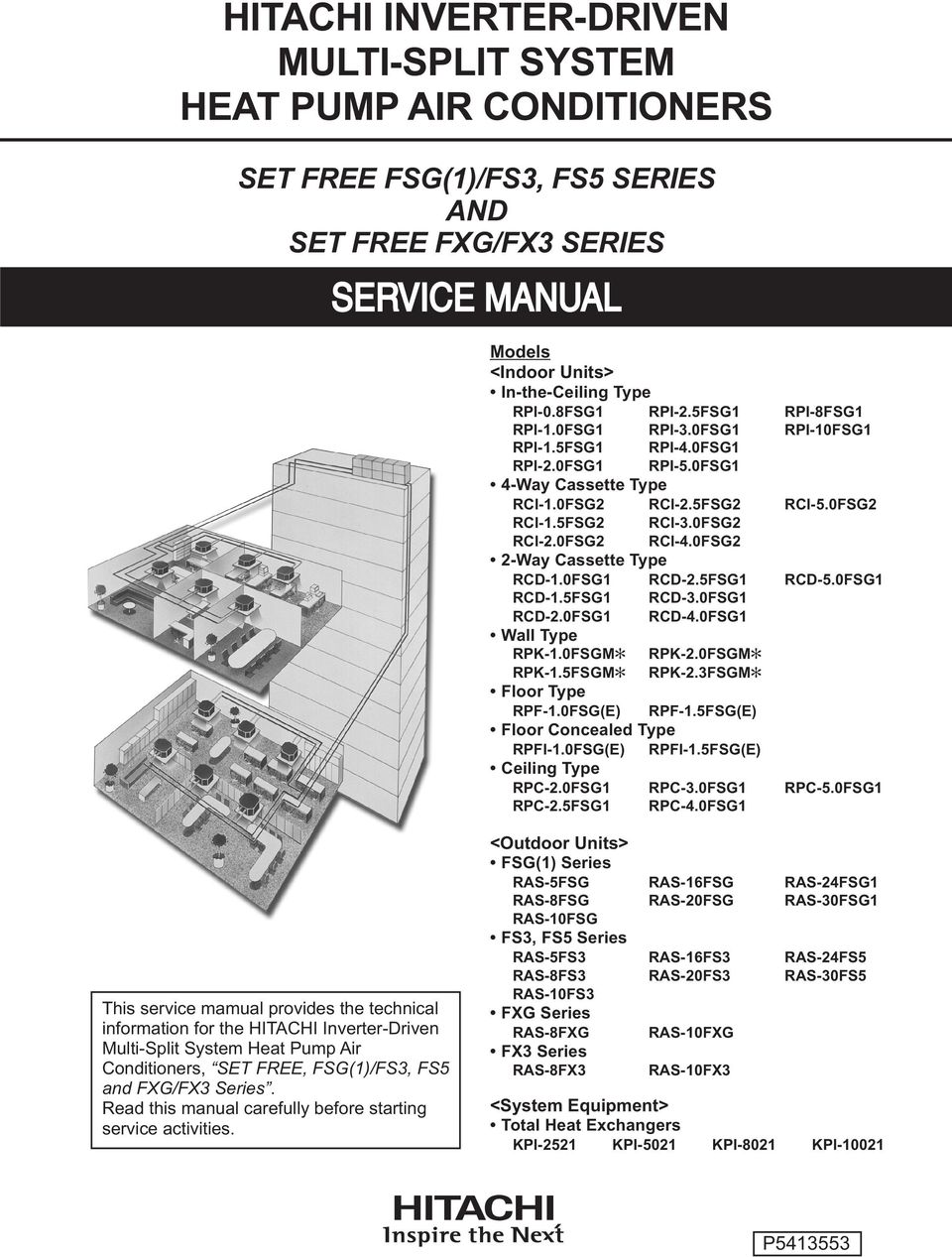
1 HITACHI INVERTER-DRIVEN MULTI-SPLIT SYSTEM HEAT PUMP AIR CONDITIONERS SET FREE FSG(1)/FS3, FS5 SERIES AND SET FREE FXG/FX3 SERIES Models <Indoor Units> In-the-Ceiling Type RPI-0.8FSG1 RPI-2.5FSG1 RPI-8FSG1 RPI-1.0FSG1 RPI-3.0FSG1 RPI-10FSG1 RPI-1.5FSG1 RPI-4.0FSG1 RPI-2.0FSG1 RPI-5.0FSG1 4-Way Cassette Type RCI-1.0FSG2 RCI-2.5FSG2 RCI-5.0FSG2 RCI-1.5FSG2 RCI-3.0FSG2 RCI-2.0FSG2 RCI-4.0FSG2 2-Way Cassette Type RCD-1.0FSG1 RCD-2.5FSG1 RCD-5.0FSG1 RCD-1.5FSG1 RCD-3.0FSG1 RCD-2.0FSG1 RCD-4.0FSG1 Wall Type RPK-1.0FSGM RPK-2.0FSGM RPK-1.5FSGM RPK-2.3FSGM Floor Type RPF-1.0FSG(E) RPF-1.5FSG(E) Floor Concealed Type RPFI-1.0FSG(E) RPFI-1.5FSG(E) Ceiling Type RPC-2.0FSG1 RPC-3.0FSG1 RPC-5.0FSG1 RPC-2.5FSG1 RPC-4.0FSG1 This service mamual provides the technical information for the HITACHI Inverter-Driven Multi-Split System Heat Pump Air Conditioners, SET FREE, FSG(1)/FS3, FS5 and FXG/FX3 Series. Read this manual carefully before starting service activities. <Outdoor Units> FSG(1) Series RAS-5FSG RAS-16FSG RAS-24FSG1 RAS-8FSG RAS-20FSG RAS-30FSG1 RAS-10FSG FS3, FS5 Series RAS-5FS3 RAS-16FS3 RAS-24FS5 RAS-8FS3 RAS-20FS3 RAS-30FS5 RAS-10FS3 FXG Series RAS-8FXG RAS-10FXG FX3 Series RAS-8FX3 RAS-10FX3 <System Equipment> Total Heat Exchangers KPI-2521 KPI-5021 KPI-8021 KPI P
2

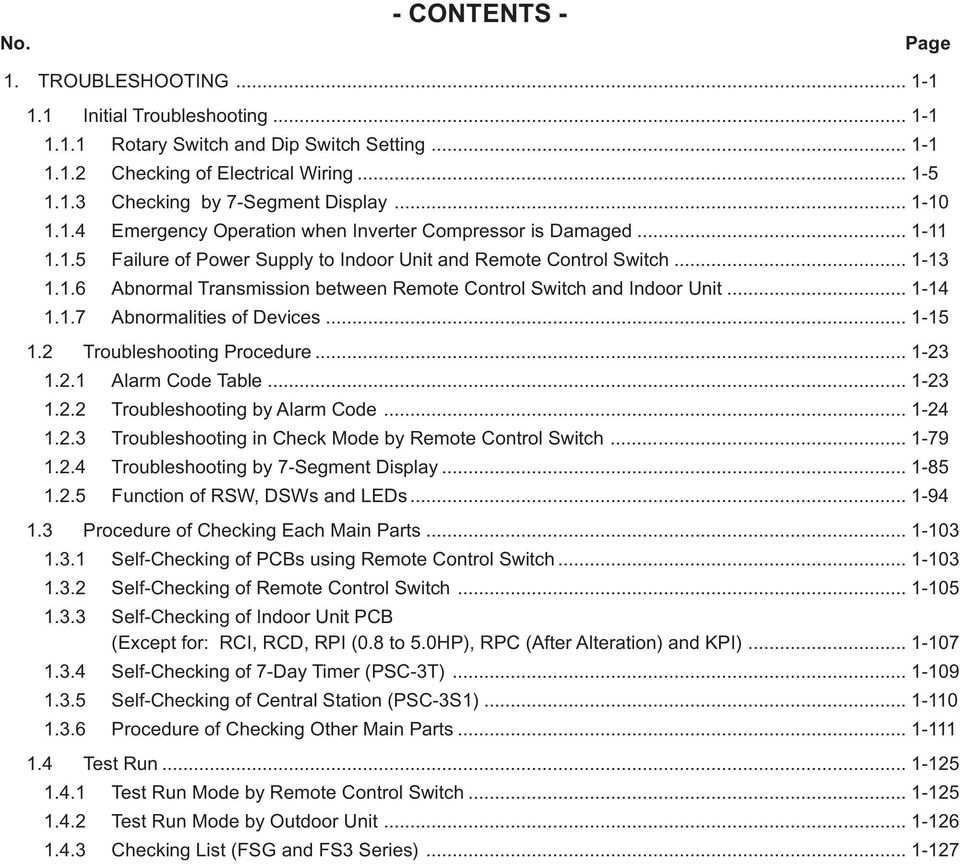
3 . - CONTENTS - Page 1. TROUBLESHOOTING Initial Troubleshooting Rotary Switch and Dip Switch Setting Checking of Electrical Wiring Checking by 7-Segment Display Emergency Operation when Inverter Compressor is Damaged Failure of Power Supply to Indoor Unit and Remote Control Switch Abnormal Transmission between Remote Control Switch and Indoor Unit Abnormalities of Devices Troubleshooting Procedure Alarm Code Table Troubleshooting by Alarm Code Troubleshooting in Check Mode by Remote Control Switch Troubleshooting by 7-Segment Display Function of RSW, DSWs and LEDs Procedure of Checking Each Main Parts Self-Checking of PCBs using Remote Control Switch Self-Checking of Remote Control Switch Self-Checking of Indoor Unit PCB (Except for: RCI, RCD, RPI (0.8 to 5.0HP), RPC (After Alteration) and KPI) Self-Checking of 7-Day Timer (PSC-3T) Self-Checking of Central Station (PSC-3S1) Procedure of Checking Other Main Parts Test Run Test Run Mode by Remote Control Switch Test Run Mode by Outdoor Unit Checking List (FSG and FS3 Series)
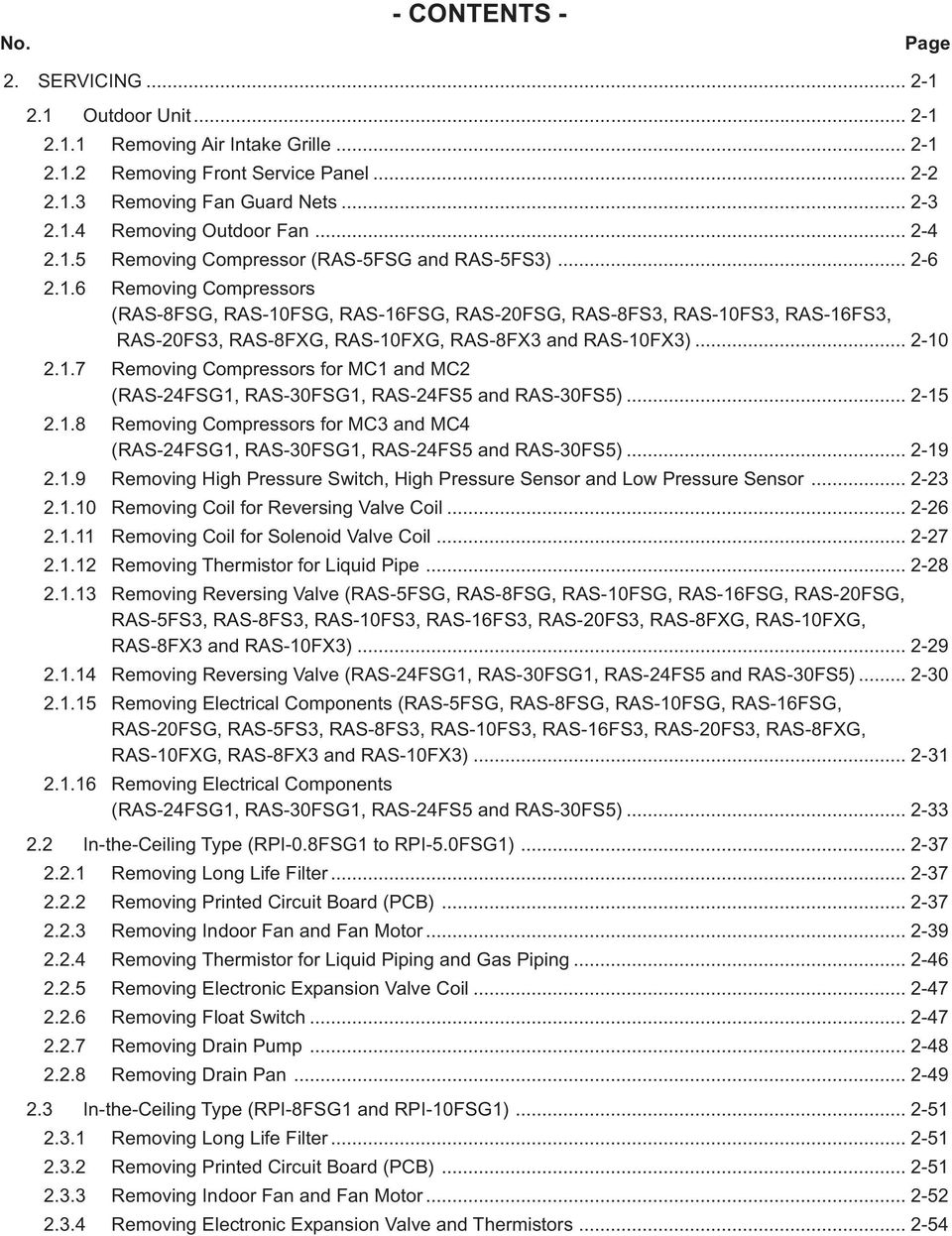
4 . - CONTENTS - Page 2. SERVICING Outdoor Unit Removing Air Intake Grille Removing Front Service Panel Removing Fan Guard Nets Removing Outdoor Fan Removing Compressor (RAS-5FSG and RAS-5FS3) Removing Compressors (RAS-8FSG, RAS-10FSG, RAS-16FSG, RAS-20FSG, RAS-8FS3, RAS-10FS3, RAS-16FS3, RAS-20FS3, RAS-8FXG, RAS-10FXG, RAS-8FX3 and RAS-10FX3) Removing Compressors for MC1 and MC2 (RAS-24FSG1, RAS-30FSG1, RAS-24FS5 and RAS-30FS5) Removing Compressors for MC3 and MC4 (RAS-24FSG1, RAS-30FSG1, RAS-24FS5 and RAS-30FS5) Removing High Pressure Switch, High Pressure Sensor and Low Pressure Sensor Removing Coil for Reversing Valve Coil Removing Coil for Solenoid Valve Coil Removing Thermistor for Liquid Pipe Removing Reversing Valve (RAS-5FSG, RAS-8FSG, RAS-10FSG, RAS-16FSG, RAS-20FSG, RAS-5FS3, RAS-8FS3, RAS-10FS3, RAS-16FS3, RAS-20FS3, RAS-8FXG, RAS-10FXG, RAS-8FX3 and RAS-10FX3) Removing Reversing Valve (RAS-24FSG1, RAS-30FSG1, RAS-24FS5 and RAS-30FS5) Removing Electrical Components (RAS-5FSG, RAS-8FSG, RAS-10FSG, RAS-16FSG, RAS-20FSG, RAS-5FS3, RAS-8FS3, RAS-10FS3, RAS-16FS3, RAS-20FS3, RAS-8FXG, RAS-10FXG, RAS-8FX3 and RAS-10FX3) Removing Electrical Components (RAS-24FSG1, RAS-30FSG1, RAS-24FS5 and RAS-30FS5) In-the-Ceiling Type (RPI-0.8FSG1 to RPI-5.0FSG1) Removing Long Life Filter Removing Printed Circuit Board (PCB) Removing Indoor Fan and Fan Motor Removing Thermistor for Liquid Piping and Gas Piping Removing Electronic Expansion Valve Coil Removing Float Switch Removing Drain Pump Removing Drain Pan In-the-Ceiling Type (RPI-8FSG1 and RPI-10FSG1) Removing Long Life Filter Removing Printed Circuit Board (PCB) Removing Indoor Fan and Fan Motor Removing Electronic Expansion Valve and Thermistors
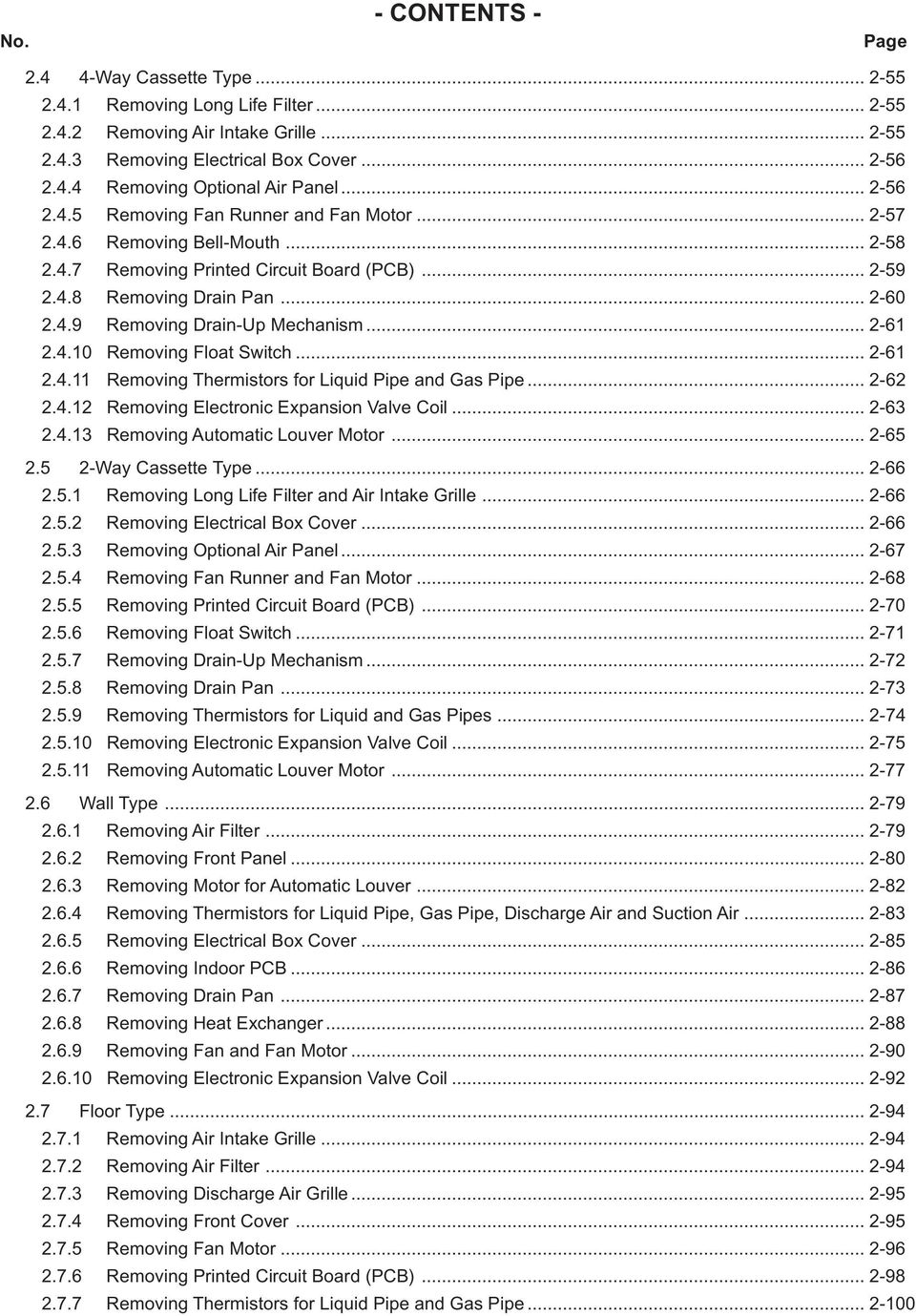
5 . - CONTENTS - Page Way Cassette Type Removing Long Life Filter Removing Air Intake Grille Removing Electrical Box Cover Removing Optional Air Panel Removing Fan Runner and Fan Motor Removing Bell-Mouth Removing Printed Circuit Board (PCB) Removing Drain Pan Removing Drain-Up Mechanism Removing Float Switch Removing Thermistors for Liquid Pipe and Gas Pipe Removing Electronic Expansion Valve Coil Removing Automatic Louver Motor Way Cassette Type Removing Long Life Filter and Air Intake Grille Removing Electrical Box Cover Removing Optional Air Panel Removing Fan Runner and Fan Motor Removing Printed Circuit Board (PCB) Removing Float Switch Removing Drain-Up Mechanism Removing Drain Pan Removing Thermistors for Liquid and Gas Pipes Removing Electronic Expansion Valve Coil Removing Automatic Louver Motor Wall Type Removing Air Filter Removing Front Panel Removing Motor for Automatic Louver Removing Thermistors for Liquid Pipe, Gas Pipe, Discharge Air and Suction Air Removing Electrical Box Cover Removing Indoor PCB Removing Drain Pan Removing Heat Exchanger Removing Fan and Fan Motor Removing Electronic Expansion Valve Coil Floor Type Removing Air Intake Grille Removing Air Filter Removing Discharge Air Grille Removing Front Cover Removing Fan Motor Removing Printed Circuit Board (PCB) Removing Thermistors for Liquid Pipe and Gas Pipe
6 . - CONTENTS - Page 2.8 Floor Concealed Type Removing Air Filter Removing Front Covers Removing Fan Motor Removing Printed Circuit Board (PCB) Removing Thermistors for Liquid Pipe and Gas Pipe Ceiling Type Removing Air Filter and Air Intake Grille Removing Side Cover Removing Discharge Air Grille Removing Fan Motor Removing Bearing Removing Coupling Removing Automatic Louver Motor Removing Thermistors for Liquid Pipe and Gas Pipe, and Electronic Expansion Valve Coil Checking Procedures for Electronic Expansion Valve Coil Removing Printed Circuit Board (PCB) Total Heat Exchanger Structure Removing Electrical Parts Removing Air Filter and Total Heat Exchanger Element Removing Fan Motor Air Filter Cleaning Total Heat Exchanger Cleaning Cleaning Indoor Unit Heat Exchanger Required Tools for Cleaning (for All Indoor Units) In-the-Ceiling Type Cleaning 4-Way Cassette Type Indoor Unit Cleaning 2-Way Cassette Type Indoor Unit Cleaning Wall Type Indoor Unit Cleaning Floor Type and Floor Concealed Type Indoor Unit Cleaning Ceiling Type Indoor Unit Collecting Refrigerant for Replacing Indoor Unit

7 . - CONTENTS - Page 3. MAIN PARTS Inverter Specifications of Inverter (For 380/415V, 50Hz and 380V, 60Hz Power Source) Specifications of Inverter (For 220V, 60Hz Power Source) Arrangement of Inverter Power Unit Inverter Time Chart Protective Function Overload Control AC Chopper Auto-Louver Mechanism Way Cassette Type Way Cassette Type Ceiling Type Scroll Compressor Reliable Mechanism for Low Vibration and Low Sound Principle of Compression Structure Thermistor Thermistor for Indoor Unit Thermistor for Outdoor Unit Electronic Expansion Valve Electronic Expansion Valve for Outdoor Units Electronic Expansion Valve for Indoor Units Pressure Sensor High Pressure Protection Device ise Filter (NF) Capacitor (CB1, CB2) Reactor (DCL)

8 . - CONTENTS - Page 4. OPTIONAL FUNCTION Indoor Unit (For RPF(I)-FSG(E), RPK-FSGM( ), RPC-FSG1 (Before Alteration) and RPI (8, 10HP) Series) Remote Control ON/OFF Function Power Supply ON/OFF 1 (Automatic Operation When Power Supply ON) Power Supply ON/OFF 2 (Restarting Function After Power Failure) Control by Field-Supplied Room Thermostat Operation Control by Remote Temperature Sensor (Except for RPK-FSGM Series) Cooling or Heating Operation Mode Setting Change by External Input (Level Signal Input) Picking Up Operation Signal Indoor Unit (For RPI (0.8 to 5.0HP), RCI, RCD, RPC (After Alteration) and KPI Series) Input and Output Setting of Indoor PCB Connector Remote Control Thermistor Function Remote Control ON/OFF Function Power Supply ON/OFF 1 (Automatic Operation When Power Supply ON) Power Supply ON/OFF 2 (Restarting Function After Power Failure) Control by Field-Supplied Room Thermostat (Except for KPI Series) Operation Control by Remote Temperature Sensor (Except for KPI Series) Cooling or Heating Operation Mode Setting Change by External Input (Except for KPI Series) Precooling/Preheating Operation (KPI Series Only) Picking Up Operation Signal Outdoor Unit Demand Forced Stoppage Demand Current Control (Only for 24 and 30HP) Fixing Operation Mode Snow Sensor Defrosting Condition Changeover Indoor Fan Control during Thermo-OFF at Heating All Season Heating Operation All Season Cooling Operation Night Shift (Low Sound) Operation Picking Up Signals from Outdoor Unit Printed Circuit Board Remote Control Switch, PC-P1H and PC-2H Name of Part Simultaneous Operation Operation System with Two Remote Control Switches Optional Function Setting Optional Functions of Remote Control Switch Indication of Address (ADDS) and Refrigerant Cycle Number (RN) Wireless Remote Control Switch, PC-LH Name of Part Identifying of Indoor Units Installed Side By Side Simultaneous Operation Emergency Operation Optional Function Setting (In Case of PC-RLH4, PC-RLH5 and PC-RLH7) Optional Functions of Wireless Remote Control Switch Day Timer, PSC-5T Central Station, PSC-5S

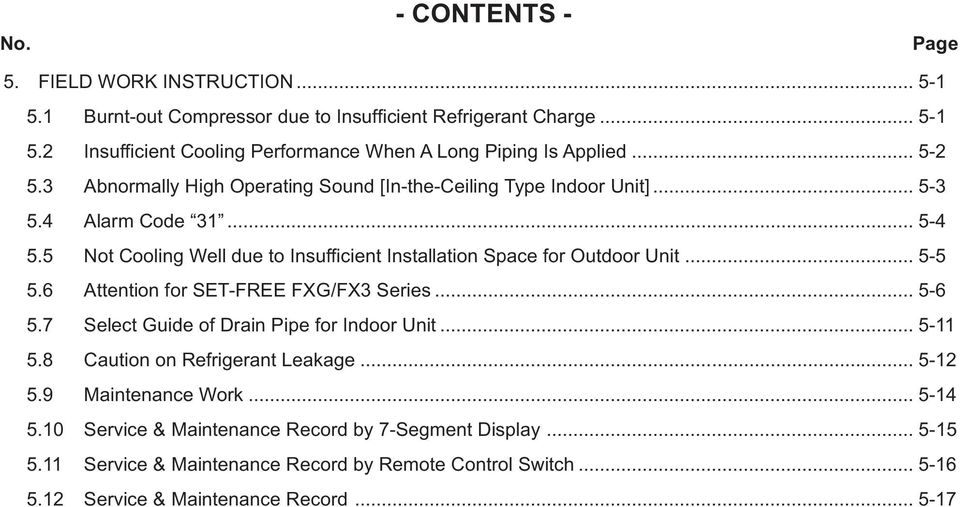
9 . - CONTENTS - Page 5. FIELD WORK INSTRUCTION Burnt-out Compressor due to Insufficient Refrigerant Charge Insufficient Cooling Performance When A Long Piping Is Applied Abnormally High Operating Sound [In-the-Ceiling Type Indoor Unit] Alarm Code t Cooling Well due to Insufficient Installation Space for Outdoor Unit Attention for SET-FREE FXG/FX3 Series Select Guide of Drain Pipe for Indoor Unit Caution on Refrigerant Leakage Maintenance Work Service & Maintenance Record by 7-Segment Display Service & Maintenance Record by Remote Control Switch Service & Maintenance Record
10 There are some alterations (mainly in PCB) in the indoor unit, and the distinction of the alterations are partly outlined in this manual. See the following table for the details. Model Before Alteration After Alteration CODE Production Shift CODE Production Shift RPC-2.0FSG From U4UH7706 RPC-2.5FSG From U4UH7711 RPC-3.0FSG From U4UR7514 RPC-4.0FSG From U4UK7994 RPC-5.0FSG From U4UT2827 RCD-1.0FSG From U4UR7004 RCD-1.5FSG From U4UN0462 RCD-2.0FSG From U4UN0507 RCD-2.5FSG From U4US3677 RCD-3.0FSG From U4UT2126 RCD-4.0FSG From U4UT2131 RCD-5.0FSG From U4UT2136 RPI-0.8FSG From U4UH8281 RPI-1.0FSG From U4UH8301 RPI-1.5FSG From U4UD3950 RPI-2.0FSG From U4UH8341 RPI-2.5FSG From U4UH8361 RPI-3.0FSG From U4UH8381 RPI-4.0FSG From U4UH8431 RPI-5.0FSG From U4UH8451 RPI-8FSG From First Production - - RPI-10FSG From First Production - - RPK-1.0FSGM *1) From U4UR1494 RPK-1.5FSGM *1) From U4UR1514 RPK-2.0FSGM *1) From U4UR1578 RPK-2.3FSGM *1) From U4UR1588 RPF-1.0FSG From First Production - - RPF-1.5FSG From First Production - - RPFI-1.0FSG From First Production - - RPFI-1.5FSG From First Production - - RCI-1.0FSG From First Production RCI-1.5FSG [Full Model Change] RCI-2.0FSG RCI-2.5FSG RCI-3.0FSG RCI-4.0FSG RCI-5.0FSG COMMON 1. The indication "USE PC-P1H" is shown in the indication label of the packing. RCI 2. The indication "USE PC-P1H" is shown on the electrical box cover. *1): The model name is indicated as shown when after alteration. (RPK Models Only) ex.) RPK-1.0FSGM

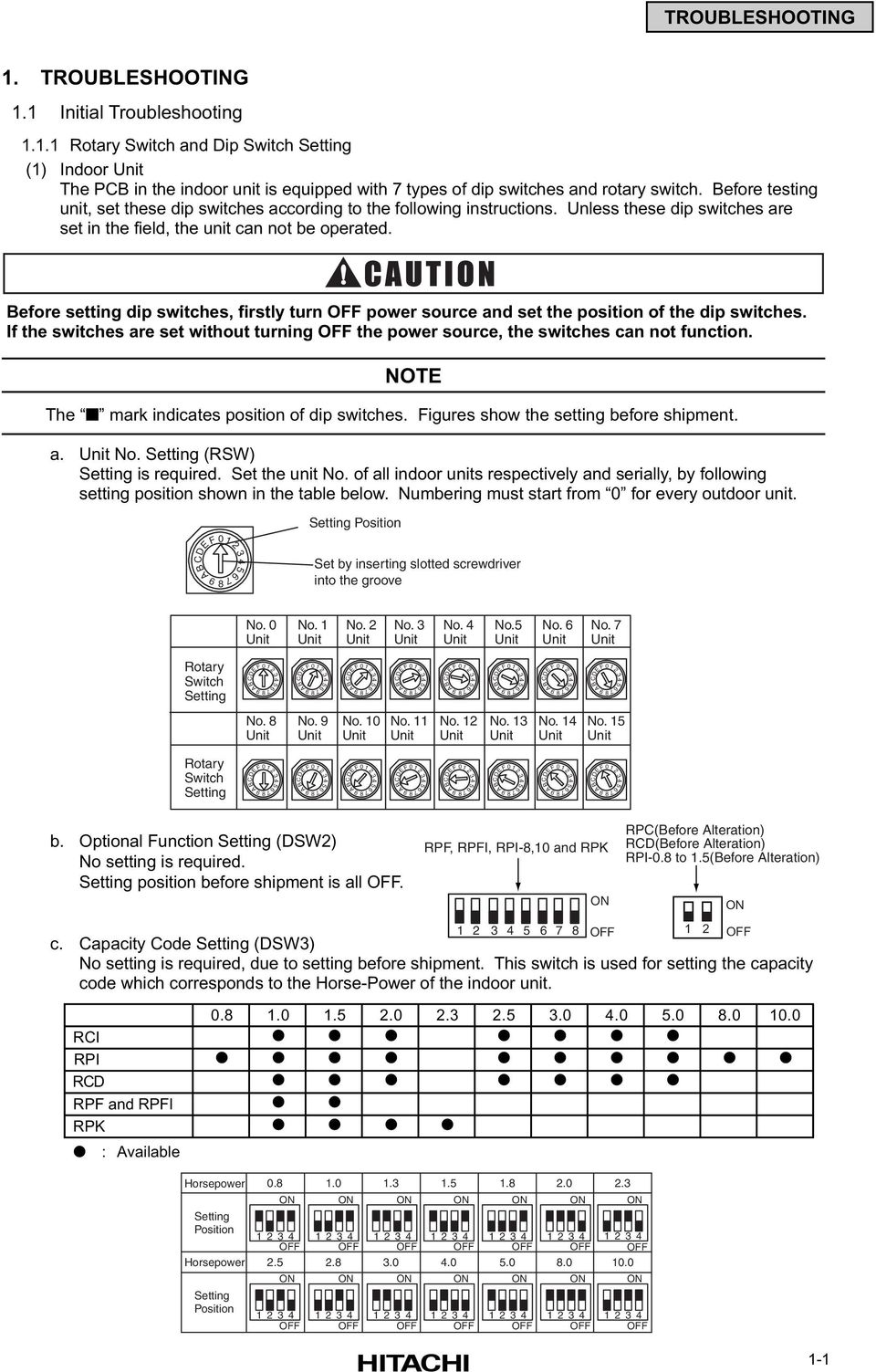
11 TROUBLESHOOTING 1. TROUBLESHOOTING 1.1 Initial Troubleshooting Rotary Switch and Dip Switch Setting (1) Indoor Unit The PCB in the indoor unit is equipped with 7 types of dip switches and rotary switch. Before testing unit, set these dip switches according to the following instructions. Unless these dip switches are set in the field, the unit can not be operated. Before setting dip switches, firstly turn OFF power source and set the position of the dip switches. If the switches are set without turning OFF the power source, the switches can not function. NOTE The mark indicates position of dip switches. Figures show the setting before shipment. a. Unit. Setting (RSW) Setting is required. Set the unit. of all indoor units respectively and serially, by following setting position shown in the table below. Numbering must start from 0 for every outdoor unit. DEF ABC Setting Position Set by inserting slotted screwdriver into the groove. 0 Unit. 1 Unit. 2 Unit. 3 Unit. 4 Unit.5 Unit. 6 Unit. 7 Unit Rotary Switch Setting DEF ABC DEF ABC DEF ABC DEF ABC DEF ABC DEF ABC DEF ABC DEF ABC. 8 Unit. 9 Unit. 10 Unit. 11 Unit. 12 Unit. 13 Unit. 14 Unit. 15 Unit Rotary Switch Setting DEF ABC DEF 9 ABC DEF 9 ABC DEF ABC DEF ABC DEF ABC DEF ABC DEF ABC b. Optional Function Setting (DSW2) setting is required. Setting position before shipment is all OFF. c. Capacity Code Setting (DSW3) setting is required, due to setting before shipment. This switch is used for setting the capacity code which corresponds to the Horse-Power of the indoor unit RCI RPI RCD RPF and RPFI RPK : Available RPF, RPFI, RPI-8,10 and RPK ON OFF RPC(Before Alteration) RCD(Before Alteration) RPI-0.8 to 1.5(Before Alteration) 1 2 ON OFF Horsepower Setting Position Horsepower Setting Position ON 1234 OFF 2.5 ON 1234 OFF ON ON ON OFF OFF OFF OFF OFF OFF ON 1234 OFF ON 1234 OFF ON 1234 OFF ON ON 1234 OFF ON ON 1234 OFF ON ON 1234 OFF 1-1
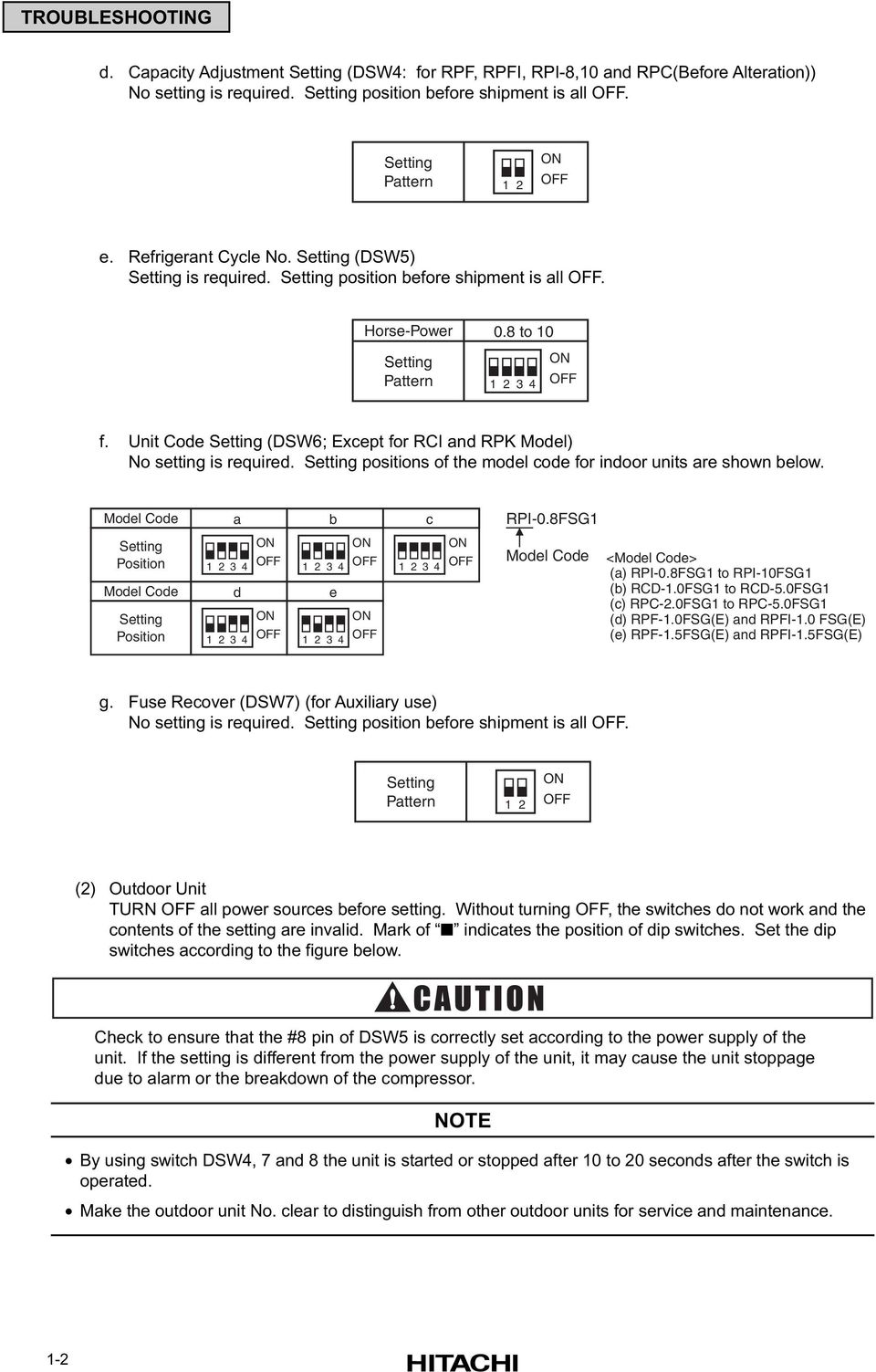
12 TROUBLESHOOTING d. Capacity Adjustment Setting (DSW4: for RPF, RPFI, RPI-8,10 and RPC(Before Alteration)) setting is required. Setting position before shipment is all OFF. Setting Pattern 1 2 ON OFF e. Refrigerant Cycle. Setting (DSW5) Setting is required. Setting position before shipment is all OFF. Horse-Power 0.8 to 10 Setting Pattern ON OFF f. Unit Code Setting (DSW6; Except for RCI and RPK Model) setting is required. Setting positions of the model code for indoor units are shown below. Model Code a b c RPI-0.8FSG1 Setting Position Model Code Setting Position d ON OFF ON OFF e ON OFF ON OFF ON OFF Model Code <Model Code> (a) RPI-0.8FSG1 to RPI-10FSG1 (b) RCD-1.0FSG1 to RCD-5.0FSG1 (c) RPC-2.0FSG1 to RPC-5.0FSG1 (d) RPF-1.0FSG(E) and RPFI-1.0 FSG(E) (e) RPF-1.5FSG(E) and RPFI-1.5FSG(E) g. Fuse Recover (DSW7) (for Auxiliary use) setting is required. Setting position before shipment is all OFF. Setting Pattern 1 2 ON OFF (2) Outdoor Unit TURN OFF all power sources before setting. Without turning OFF, the switches do not work and the contents of the setting are invalid. Mark of indicates the position of dip switches. Set the dip switches according to the figure below. Check to ensure that the #8 pin of DSW5 is correctly set according to the power supply of the unit. If the setting is different from the power supply of the unit, it may cause the unit stoppage due to alarm or the breakdown of the compressor. NOTE By using switch DSW4, 7 and 8 the unit is started or stopped after 10 to 20 seconds after the switch is operated. Make the outdoor unit. clear to distinguish from other outdoor units for service and maintenance. 1-2
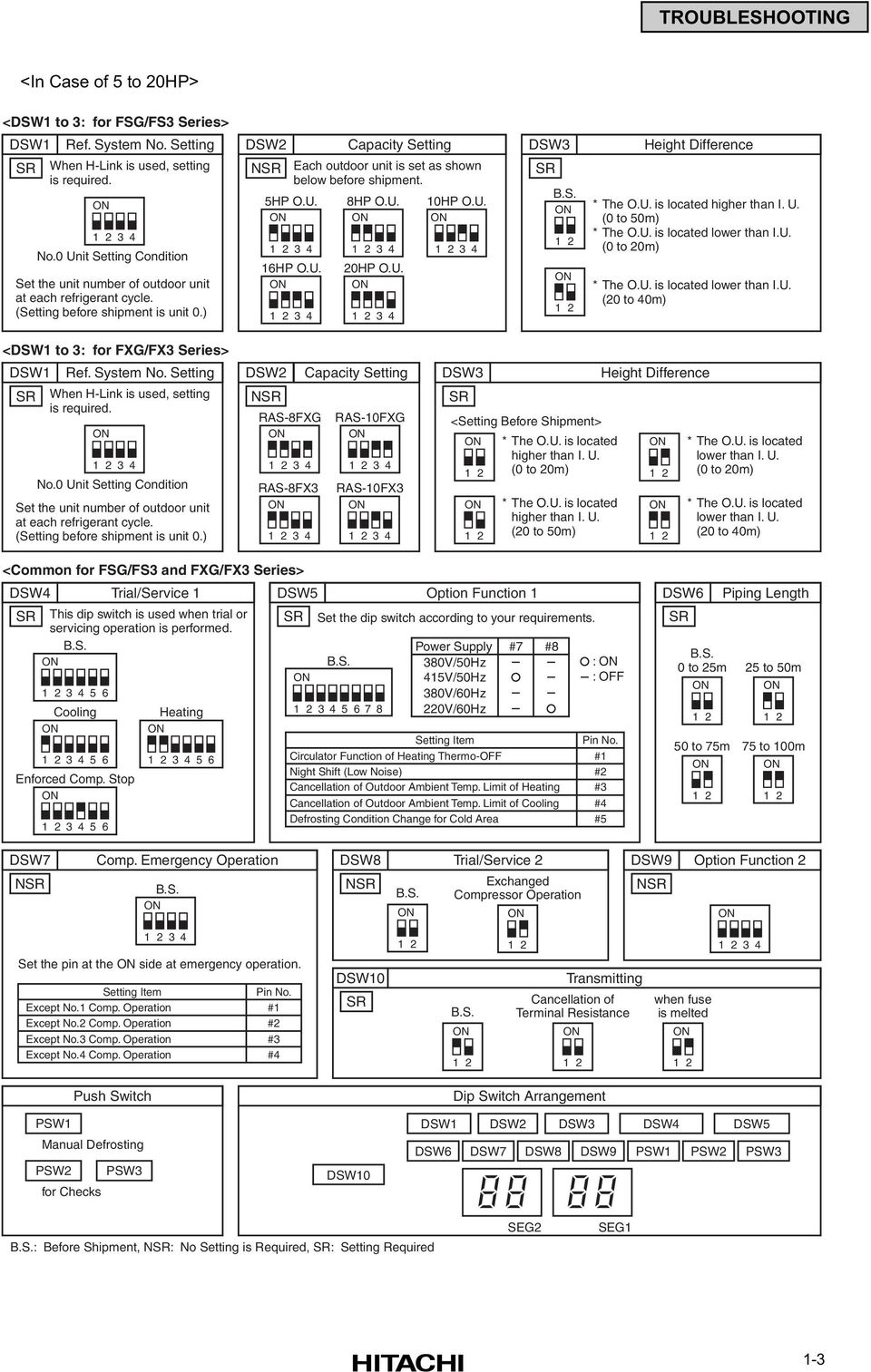
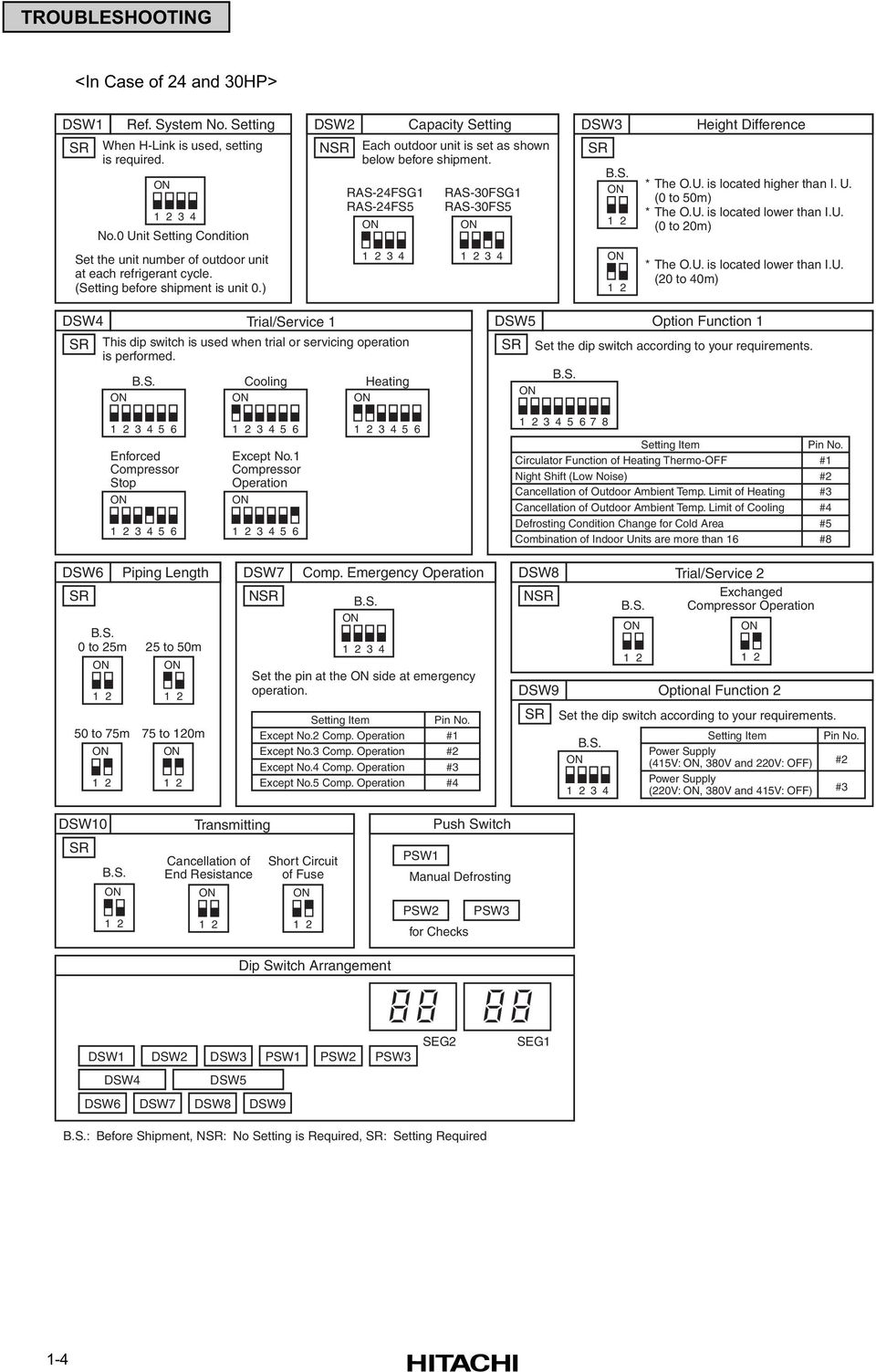
13 TROUBLESHOOTING <In Case of 5 to 20HP> <DSW1 to 3: for FSG/FS3 Series> DSW1 Ref. System. Setting SR When H-Link is used, setting is required. ON Unit Setting Condition Set the unit number of outdoor unit at each refrigerant cycle. (Setting before shipment is unit 0.) DSW2 NSR 5HP O.U. ON Capacity Setting Each outdoor unit is set as shown below before shipment. 16HP O.U. ON HP O.U. ON HP O.U. ON HP O.U. ON DSW3 SR B.S. ON 1 2 ON 1 2 Height Difference * The O.U. is located higher than I. U. (0 to 50m) * The O.U. is located lower than I.U. (0 to 20m) * The O.U. is located lower than I.U. (20 to 40m) <DSW1 to 3: for FXG/FX3 Series> DSW1 Ref. System. Setting SR When H-Link is used, setting is required. ON Unit Setting Condition Set the unit number of outdoor unit at each refrigerant cycle. (Setting before shipment is unit 0.) DSW2 NSR RAS-8FXG ON RAS-8FX3 ON Capacity Setting RAS-10FXG ON RAS-10FX3 ON DSW3 SR <Setting Before Shipment> ON 1 2 ON 1 2 * The O.U. is located higher than I. U. (0 to 20m) * The O.U. is located higher than I. U. (20 to 50m) Height Difference ON 1 2 ON 1 2 * The O.U. is located lower than I. U. (0 to 20m) * The O.U. is located lower than I. U. (20 to 40m) <Common for FSG/FS3 and FXG/FX3 Series> DSW4 Trial/Service 1 DSW5 Option Function 1 SR This dip switch is used when trial or servicing operation is performed. B.S. ON Cooling ON Enforced Comp. Stop ON Heating ON SR ON Set the dip switch according to your requirements. B.S Power Supply #7 #8 380V/50Hz 415V/50Hz 380V/60Hz 220V/60Hz Setting Item Circulator Function of Heating Thermo-OFF Night Shift (Low ise) Cancellation of Outdoor Ambient Temp. Limit of Heating Cancellation of Outdoor Ambient Temp. Limit of Cooling Defrosting Condition Change for Cold Area : ON : OFF Pin. #1 #2 #3 #4 #5 DSW6 SR ON 1 2 Piping Length B.S. 0 to 25m 25 to 50m 50 to 75m ON 1 2 ON to 100m ON 1 2 DSW7 NSR Comp. Emergency Operation B.S. ON DSW8 Trial/Service 2 NSR B.S. ON Exchanged Compressor Operation ON DSW9 Option Function 2 NSR ON Set the pin at the ON side at emergency operation. Setting Item Except.1 Comp. Operation Except.2 Comp. Operation Except.3 Comp. Operation Except.4 Comp. Operation Pin. #1 #2 #3 #4 DSW10 SR 1 2 B.S. ON Transmitting Cancellation of Terminal Resistance ON 1 2 when fuse is melted ON Push Switch Dip Switch Arrangement PSW1 Manual Defrosting PSW2 PSW3 for Checks DSW10 DSW1 DSW6 DSW2 DSW3 DSW4 DSW5 DSW7 DSW8 DSW9 PSW1 PSW2 PSW3 B.S.: Before Shipment, NSR: Setting is Required, SR: Setting Required SEG2 SEG1 1-3
14 TROUBLESHOOTING <In Case of 24 and 30HP> DSW1 Ref. System. Setting SR When H-Link is used, setting is required. ON Unit Setting Condition DSW2 NSR RAS-24FSG1 RAS-24FS5 ON Capacity Setting Each outdoor unit is set as shown below before shipment. RAS-30FSG1 RAS-30FS5 ON DSW3 SR B.S. ON 1 2 Height Difference * The O.U. is located higher than I. U. (0 to 50m) * The O.U. is located lower than I.U. (0 to 20m) Set the unit number of outdoor unit at each refrigerant cycle. (Setting before shipment is unit 0.) ON 1 2 * The O.U. is located lower than I.U. (20 to 40m) DSW4 SR B.S. ON Trial/Service 1 This dip switch is used when trial or servicing operation is performed. Cooling ON Heating ON DSW5 Option Function 1 SR Set the dip switch according to your requirements. B.S. ON Enforced Compressor Stop ON Except.1 Compressor Operation ON Setting Item Circulator Function of Heating Thermo-OFF Night Shift (Low ise) Cancellation of Outdoor Ambient Temp. Limit of Heating Cancellation of Outdoor Ambient Temp. Limit of Cooling Defrosting Condition Change for Cold Area Combination of Indoor Units are more than 16 Pin. #1 #2 #3 #4 #5 #8 DSW6 SR ON 1 2 Piping Length B.S. 0 to 25m 25 to 50m 50 to 75m ON 1 2 ON to 120m ON 1 2 DSW7 NSR Comp. Emergency Operation B.S. ON Set the pin at the ON side at emergency operation. Setting Item Except.2 Comp. Operation Except.3 Comp. Operation Except.4 Comp. Operation Except.5 Comp. Operation Pin. #1 #2 #3 #4 DSW8 Trial/Service 2 NSR Exchanged B.S. Compressor Operation SR B.S. ON ON ON 1 2 DSW9 Optional Function 2 Set the dip switch according to your requirements. Setting Item Pin. Power Supply (415V: ON, 380V and 220V: OFF) #2 Power Supply (220V: ON, 380V and 415V: OFF) #3 DSW10 SR B.S. ON 1 2 Transmitting Cancellation of End Resistance ON 1 2 Short Circuit of Fuse ON 1 2 Dip Switch Arrangement Push Switch PSW1 Manual Defrosting PSW2 PSW3 for Checks DSW1 DSW2 DSW3 PSW1 PSW2 PSW3 DSW4 DSW5 DSW6 DSW7 DSW8 DSW9 SEG2 SEG1 B.S.: Before Shipment, NSR: Setting is Required, SR: Setting Required 1-4
15 TROUBLESHOOTING (3) CH Unit (For FX Series Only) Before setting dip switches, firstly turn OFF power source and set the position of the dip switches. If the dip switches are set without turning OFF the power source, the switches can not function. PCB2 NOTE The mark indicates position of dip switches. The figures below show the setting before shipment. a. Position of Dip Switches The PCB2 in the electrical box of CH unit is equipped with 2 types of dip switches (DSW2, DSW5), as shown in the figure below. DSW2 DSW5 b. Setting of Dip Switches The dip switches are set before shipment and no setting in the field is required. These are utilized for the self-diagnosis of PCB. Factory Setting Position (Dip Switch) DSW2 DSW5 ON OFF ON OFF Checking of Electrical Wiring Check to ensure that the terminal for power source wiring (terminals L1 to L1 and N to N of each terminal board: AC V, terminals R to R and T to T of each terminal board: AC220V) and intermediate wiring (Operating Line: terminals 1 to 1 and 2 to 2 of each terminal board: DC5V) between the indoor unit and the outdoor unit coincide correctly, as figure below. If not, some component will be damaged. Check to ensure that the twist pair cable with shield ( 0.75mm2) are used for intermediate wiring to protect noise obstacle at total length of less than 1000m and size complied with local code. Check to ensure that the wirings and the breakers are chosen correctly, as shown in Table 1.1. and 1.2. All the field wiring and equipment must comply with local code. 1-5

16 TROUBLESHOOTING Example for Electrical Wiring Connection of FSG, FS3, FSG1 and FS5 System Outdoor Unit (5 to 20HP) < V/50Hz, 380V/60Hz> Outdoor Unit RAS-5FS3 RAS-8FS3 RAS-10FS3 RAS-16FS3 RAS-20FS3 RAS-5FSG RAS-8FSG RAS-10FSG RAS-16FSG RAS-20FSG. 0 System Outdoor Unit TB1 TB2 L1 L2 L3 N 1 2 Max. 4 Units / Power Supply Line (5, 8 and 10HP) 1 Outdoor Unit / Power Supply Line (16 and 20 HP). 1 System Outdoor Unit TB1 TB2 L1 L2 L3 N System Outdoor Unit TB1 TB2 L1 L2 L3 N 1 2 ELB FUSE ELB Operating Line (Shielded Twist Pair Cable) DC5V (n-pole Transmission H-LINK System) Distribution Box or Pull Box *2 Distribution Box or Pull Box *2 Main Switch ELB 3N 380V/50 Hz 415V/50 Hz 415V/60 Hz 1N (3N ) 220V/50 Hz 240V/50 Hz 220V/50 Hz L1 L2 N TB1. 0 Indoor Unit TB2 1 2 A B Remote Control Cable (Shielded Twist Pair Cable) *1 L1 L2 N TB1. 1 Indoor Unit TB2 1 2 A B Remote Control Cable (Shielded Twist Pair Cable) *1 Operating Line (Shielded Twist Pair Cable) DC5V (n-pole Transmission H-LINK System) TB : Terminal Board PCB : Printed Circuit Board Remote Control Switch (PC-P1H) Remote Control Switch (PC-P1H) : Field Wiring : Field Supplied : Optional Accessory. 0 System Indoor Units (Max. 16 Units per Refrigerant Cycle).1 System Indoor Units *1: When installing PC-P1H remote control switch in Australia, connect the both ends of shield tube to earth. *2: It is need for China and Australia only. <220V/60Hz> Outdoor Unit RAS-5FS3 RAS-8FS3 RAS-10FS3 RAS-16FS3 RAS-20FS3 RAS-5FSG RAS-8FSG RAS-10FSG RAS-16FSG RAS-20FSG. 0 System Outdoor Unit TB1 TB2 R S T System Outdoor Unit TB1 TB2 R S T System Outdoor Unit TB1 TB2 R S T 1 2 Operating Line (Shielded Twist Pair Cable) DC5V (n-pole Transmission H-LINK System) ELB FUSE ELB Distribution Box or Pull Box *2 Distribution Box or Pull Box *2 Main Switch ELB 3 220V/60Hz 1 220V/60 Hz Operating Line (Shielded Twist Pair Cable) DC5V (n-pole Transmission H-LINK System) TB : Terminal Board PCB : Printed Circuit Board L1 L2 N TB1. 0 Indoor Unit TB2 1 2 A B Remote Control Switch (PC-P1H) Remote Control Cable (Shielded Twist Pair Cable) *1 L1 L2 N TB1. 1 Indoor Unit TB2 1 2 A B Remote Control Cable (Shielded Twist Pair Cable) *1 Remote Control Switch (PC-P1H) : Field Wiring : Field Supplied : Optional Accessory. 0 System Indoor Units (Max. 27 Units per Refrigerant Cycle...RAS-24FSG1, RAS-24FS5 Max. 32 Units per Refrigerant Cycle...RAS-30FSG1, RAS-30FS5).1 System Indoor Units *1: When installing PC-P1H remote control switch in Australia, connect the both ends of shield tube to earth. *2: It is need for China and Australia only. 1-6
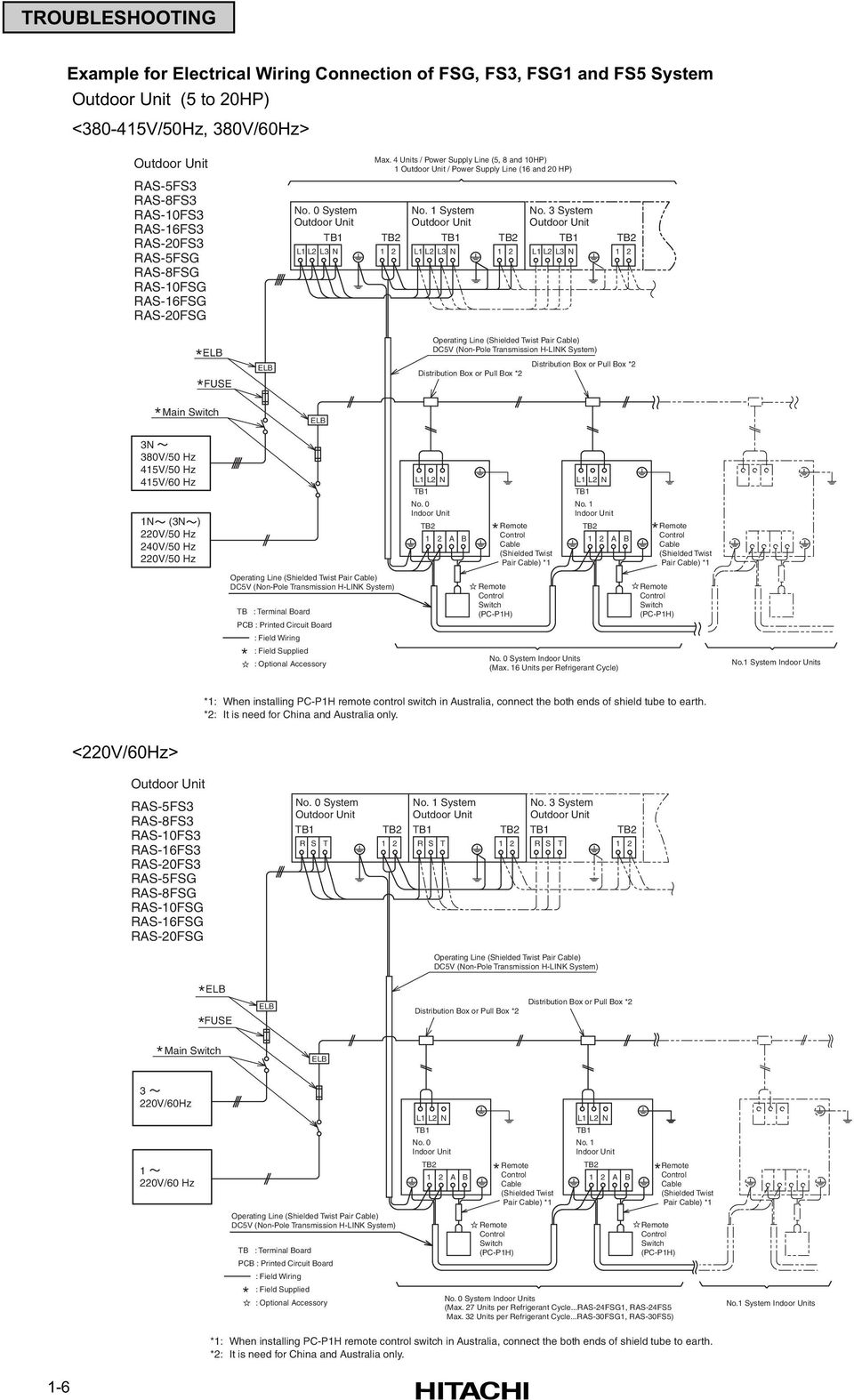
17 TROUBLESHOOTING Outdoor Unit (24 and 30HP) < V/50Hz, 380V/60Hz> Outdoor Unit RAS-24FSG1 RAS-30FSG1 RAS-24FS5 RAS-30FS5. 0 System Outdoor Unit TB1 TB2 L1 L2 L3 N 1 2 Operating Line (Shielded Twist Pair Cable) DC5V (n-pole Transmission H-LINK System) ELB FUSE ELB Distribution Box or Pull Box *2 Distribution Box or Pull Box *2 Main Switch ELB 3N 380V/50 Hz 415V/50 Hz 415V/60 Hz 1N (3N ) 220V/50 Hz 240V/50 Hz 220V/50 Hz Operating Line (Shielded Twist Pair Cable) DC5V (n-pole Transmission H-LINK System) TB : Terminal Board PCB : Printed Circuit Board : Field Wiring : Field Supplied : Optional Accessory L1 L2 N TB1. 0 Indoor Unit TB2 1 2 A B Remote Control Switch (PC-P1H) Remote Control Cable (Shielded Twist Pair Cable) *1 L1 L2 N TB1. 1 Indoor Unit TB2 1 2 A B. 0 System Indoor Units (Max. 27 Units per Refrigerant Cycle...RAS-24FSG1, RAS-24FS5 Max. 32 Units per Refrigerant Cycle...RAS-30FSG1, RAS-30FS5) Remote Control Cable (Shielded Twist Pair Cable) *1 Remote Control Switch (PC-P1H) *1: When installing PC-P1H remote control switch in Australia, connect the both ends of shield tube to earth. *2: It is need for China and Australia only. <220V/60Hz> Outdoor Unit RAS-24FSG1 RAS-30FSG1 RAS-24FS5 RAS-30FS5. 0 System Outdoor Unit TB1 TB2 R S T 1 2 Operating Line (Shielded Twist Pair Cable) DC5V (n-pole Transmission H-LINK System) ELB FUSE ELB Distribution Box or Pull Box *2 Distribution Box or Pull Box *2 Main Switch ELB 3 220V/60Hz 1 220V/60 Hz Operating Line (Shielded Twist Pair Cable) DC5V (n-pole Transmission H-LINK System) TB : Terminal Board PCB : Printed Circuit Board : Field Wiring : Field Supplied : Optional Accessory L1 L2 N TB1. 0 Indoor Unit TB2 1 2 A B Remote Control Switch (PC-P1H) Remote Control Cable (Shielded Twist Pair Cable) *1 L1 L2 N TB1. 1 Indoor Unit TB2 1 2 A B. 0 System Indoor Units (Max. 27 Units per Refrigerant Cycle...RAS-24FSG1, RAS-24FS5 Max. 32 Units per Refrigerant Cycle...RAS-30FSG1, RAS-30FS5) Remote Control Cable (Shielded Twist Pair Cable) *1 Remote Control Switch (PC-P1H) *1: When installing PC-P1H remote control switch in Australia, connect the both ends of shield tube to earth. *2: It is need for China and Australia only. 1-7

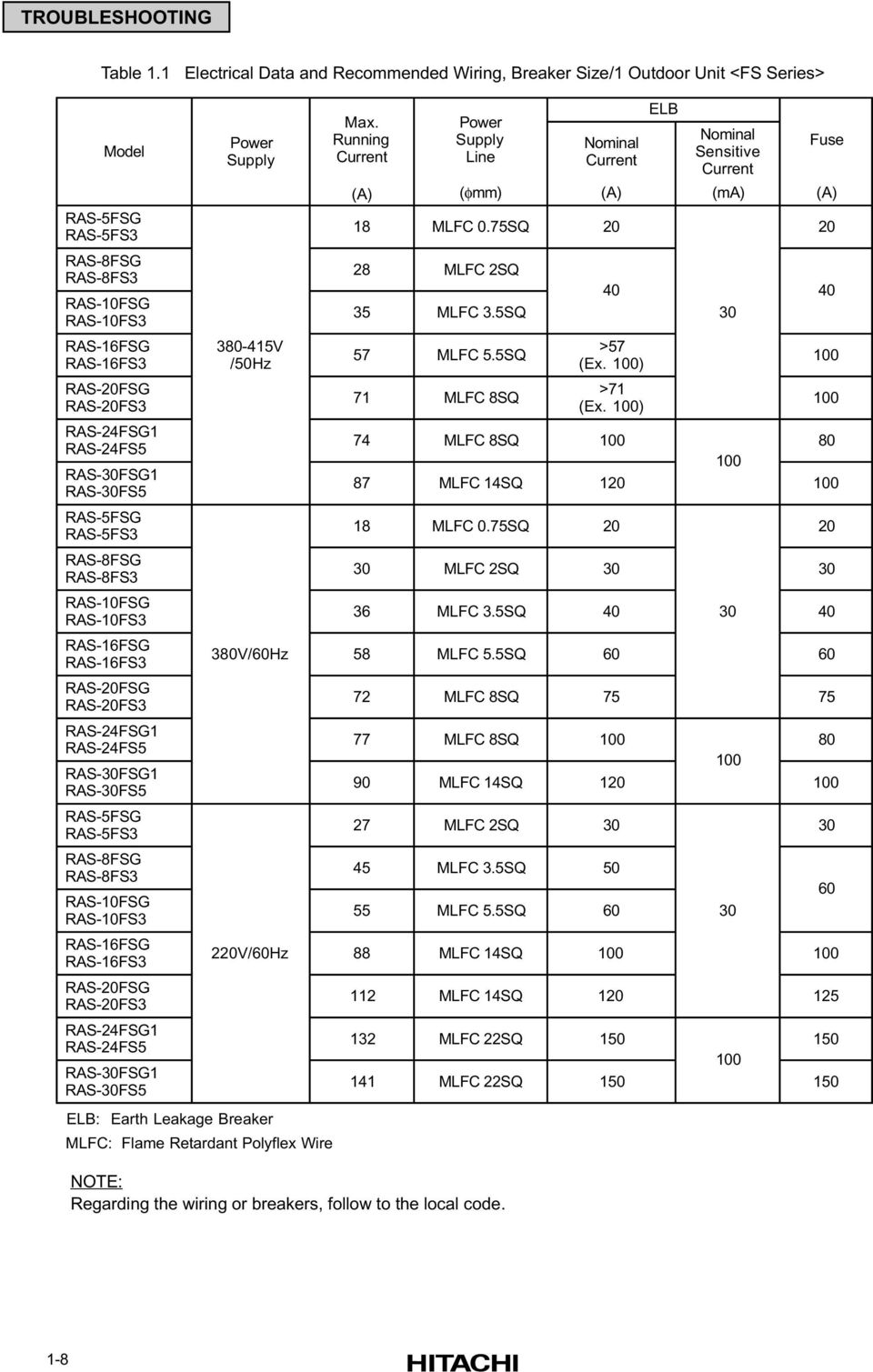
18 TROUBLESHOOTING Table 1.1 Electrical Data and Recommended Wiring, Breaker Size/1 Outdoor Unit <FS Series> Model RAS-5FSG RAS-5FS3 RAS-8FSG RAS-8FS3 RAS-10FSG RAS-10FS3 RAS-16FSG RAS-16FS3 RAS-20FSG RAS-20FS3 RAS-24FSG1 RAS-24FS5 RAS-30FSG1 RAS-30FS5 RAS-5FSG RAS-5FS3 RAS-8FSG RAS-8FS3 RAS-10FSG RAS-10FS3 RAS-16FSG RAS-16FS3 RAS-20FSG RAS-20FS3 RAS-24FSG1 RAS-24FS5 RAS-30FSG1 RAS-30FS5 RAS-5FSG RAS-5FS3 RAS-8FSG RAS-8FS3 RAS-10FSG RAS-10FS3 RAS-16FSG RAS-16FS3 RAS-20FSG RAS-20FS3 RAS-24FSG1 RAS-24FS5 RAS-30FSG1 RAS-30FS5 Power Supply V /50Hz 380V/60Hz 220V/60Hz ELB: Earth Leakage Breaker MLFC: Flame Retardant Polyflex Wire Max. Running Current Power Supply Line NOTE: Regarding the wiring or breakers, follow to the local code. minal Current minal Sensitive Current (A) (φmm) (A) (ma) (A) 18 MLFC 0.75SQ MLFC 2SQ 35 MLFC 3.5SQ 57 MLFC 5.5SQ 71 MLFC 8SQ >57 (Ex. 100) >71 (Ex. 100) MLFC 8SQ MLFC 14SQ MLFC 0.75SQ MLFC 2SQ MLFC 3.5SQ MLFC 5.5SQ MLFC 8SQ MLFC 8SQ MLFC 14SQ MLFC 2SQ MLFC 3.5SQ MLFC 5.5SQ MLFC 14SQ MLFC 14SQ MLFC 22SQ MLFC 22SQ ELB Fuse
19 TROUBLESHOOTING Example for Electrical Wiring Connection of FXG and FX3 System Outdoor Unit RAS-8FXG RAS-8FX3 RAS-10FXG RAS-10FX3. 0 System Outdoor Unit TB1 TB2 L1 L2 L3 N 1 2 Max. 4 Units / Power Supply Line. 1 System Outdoor Unit TB1 TB2 L1 L2 L3 N System Outdoor Unit TB1 TB2 L1 L2 L3 N 1 2 ELB FUSE ELB Distribution Box or Pull Box *2 Operating Line (Shielded Twist Pair Cable) DC5V (n-pole Transmission H-LINK System) Distribution Box or Pull Box *2 Main Switch 3N 380V/50 Hz 415V/50 Hz 415V/60 Hz ELB. 0 Group CH Unit. 1 Group CH Unit. 1 System CH Units 1N (3N ) 220V/50 Hz 240V/50 Hz 220V/50 Hz TB : Terminal Board PCB : Printed Circuit Board : Field Wiring : Field Supplied : Optional Accessory L1 L2 N TB1. 0 Indoor Unit TB2 1 2 A B Remote Control Cable (Shielded Twist Pair Cable) *1 L1 L2 N TB1. 1 Indoor Unit TB2 1 2 A B Remote Control Cable (Shielded Twist Pair Cable) *1 Operating Line (Shielded Twist Pair Cable) DC5V (n-pole Transmission H-LINK System) Remote Control Switch (PC-P1H) Remote Control Switch (PC-P1H). 0 System Indoor Units (Max. 16 Units per Refrigerant Cycle).1 System Indoor Units *1: When installing PC-P1H remote control switch in Australia, connect the both ends of shield tube to earth. *2: It is need for China and Australia only. Table 1.2 Electrical Data and Recommended Wiring, Breaker Size/1 Outdoor Unit <FX Series> Model RAS-8FXG RAS-8FX3 RAS-10FXG RAS-10FX3 Power Supply V /50Hz Max. Running Current Power Supply Line minal Current minal Sensitive Current (A) (φmm) (A) (ma) (A) 32 MLFC 2SQ 35 MLFC 3.5SQ ELB Fuse ELB: Earth Leakage Breaker MLFC: Flame Retardant Polyflex Wire NOTE: Regarding the wiring or breakers, follow to the local code. 1-9

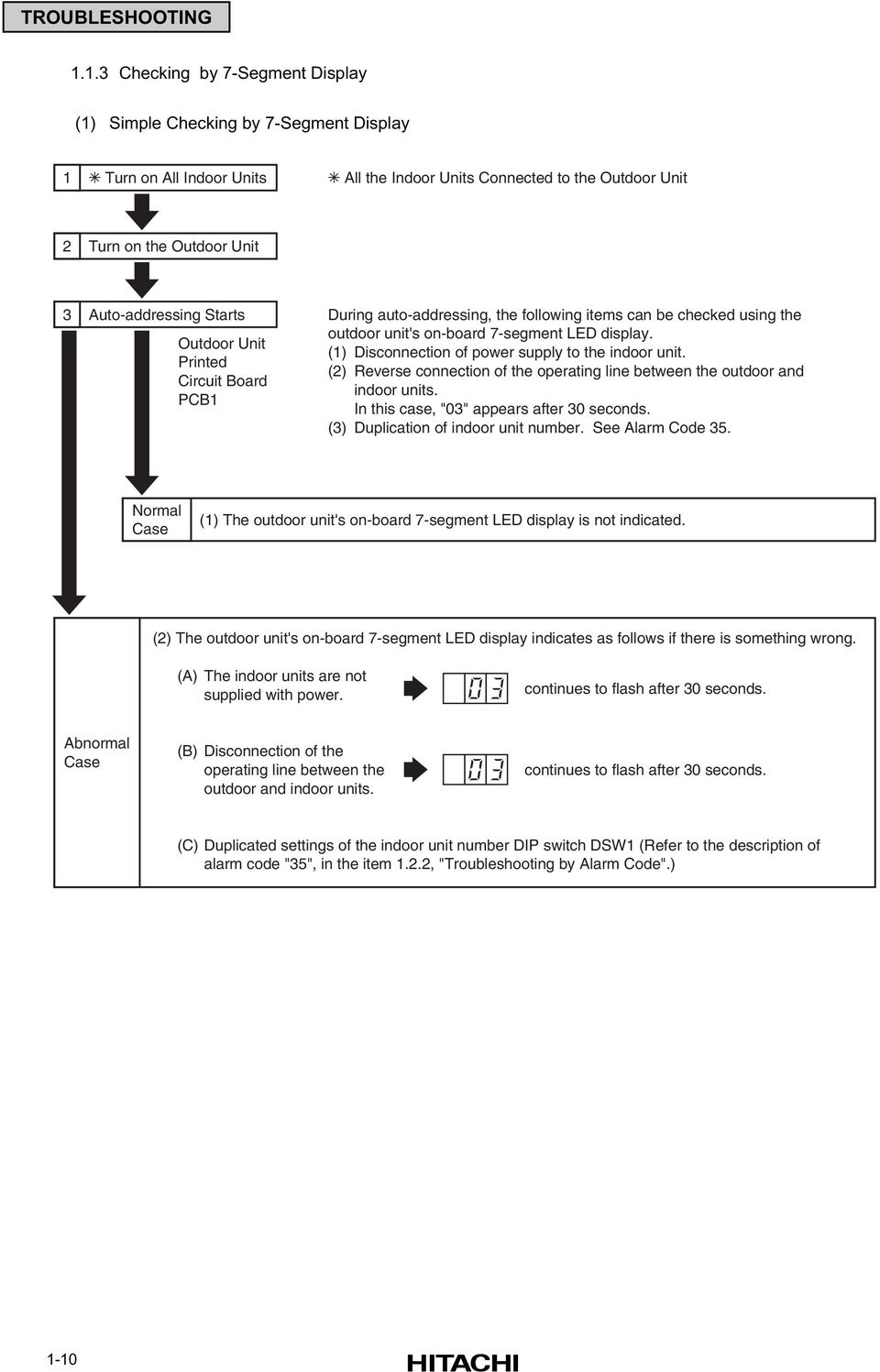
20 TROUBLESHOOTING Checking by 7-Segment Display (1) Simple Checking by 7-Segment Display 1 Turn on All Indoor Units All the Indoor Units Connected to the Outdoor Unit 2 Turn on the Outdoor Unit 3 Auto-addressing Starts Outdoor Unit Printed Circuit Board PCB1 During auto-addressing, the following items can be checked using the outdoor unit's on-board 7-segment LED display. (1) Disconnection of power supply to the indoor unit. (2) Reverse connection of the operating line between the outdoor and indoor units. In this case, "03" appears after 30 seconds. (3) Duplication of indoor unit number. See Alarm Code 35. rmal Case (1) The outdoor unit's on-board 7-segment LED display is not indicated. (2) The outdoor unit's on-board 7-segment LED display indicates as follows if there is something wrong. (A) The indoor units are not supplied with power. continues to flash after 30 seconds. Abnormal Case (B) Disconnection of the operating line between the outdoor and indoor units. continues to flash after 30 seconds. (C) Duplicated settings of the indoor unit number DIP switch DSW1 (Refer to the description of alarm code "35", in the item 1.2.2, "Troubleshooting by Alarm Code".) 1-10
21 TROUBLESHOOTING Emergency Operation when Inverter Compressor is Damaged (1) Failure of Inverter Compressor a. Contents of Operation (Applied Models: RAS-8FSG(3), 10FSG(3), 16FSG(3), 20FSG(3), 24FSG1(5), 30FSG1(5) / RAS-8FXG(3), 10FXG(3)) * This operation is an emergency operation by a constant compressor, when the inverter compressor is failed. * By turning ON #1 of DSW7 on PCB1 and #1 of DSW1 on PCB3, emergency operation is started. (In Case of 5 to 20HP) * By turning ON #6 of DSW4 on PCB1 and #1 of DSW1 on ISPM, emergency operation is started. (In Case of 24 and 30HP) * Control of the emergency operation is same with normal control except the inverter compressor stoppage. b. Operating Condition The constant speed compressor is forced to be stopped for compressor protection under the condition below. Total Capacity of Thermo-ON indoor units < 50% of Outdoor Unit Capacity In case of the above condition, the compressor is operated and stopped repeatedly, and it may cause the compressor failure. Therefore, the compressor is forced to be stopped to protect it. NOTE: If the printed circuit board for inverter (PCB3) is damaged, this is not available. Setting airflow of indoor unit is keeping during enforced stoppage. Therefore, it is recommended that setting airflow is Lo to avoid the person in the room feels cold. c. Method of Emergency Operation Checking Before Emergency Operation. * Measure insulation resistance of the inverter compressor. Do not perform the emergency operation when the insulation resistance is 0Ω. There is a possibility that refrigerant oil may be oxidized, if the emergency operation is performed, the other compressor is damaged. * In case of total capacity of Thermo-ON indoor units are more than 50% of outdoor unit capacity, emergency operation is available. * In this emergency operation, frequency of the compressor is not controlled at each 1Hz. Therefore, alarm code 07, 43, 44, 45 or 47 may be indicated on LCD. Details of alarm codes are shown in the alarm code table (page 1-23). * This emergency operation does not provide sufficient cooling and heating capacity. * This method is an emergency operation temporarily when the inverter compressor is damaged. Therefore, change the new one as soon as possible. *Turn OFF #1 of DSW7 on PCB1 and #1 of DSW1 on PCB3 after changing the new compressor. (In Case of 5 to 20HP) Turn OFF #6 of DSW4 on PCB1 and #1 of DSW1 on ISPM after changing the new compressor. (In Case of 24 and 30HP) If this setting is not performed, the inverter compressor will be damaged. d. Emergency Operation *Turn OFF all the power source switches. * Disconnect the wiring from the inverter compressor. Insulate the faston terminals for inverter compressor wires by insulation tape. * Set the.1 of DSW7 on the PCB1 and.1 of DSW1 on the PCB3 at the ON side. (In Case of 5 to 20HP) Set #6 of DSW4 on PCB1 and #1 of DSW1 on ISPM at the ON side. (In Case of 24 and 30HP) *Turn ON all the power source switches. * Operate the system by remote control switches. * The system is stopped by turning OFF all the remote control switches or turning OFF all the power source switches. 1-11
22 TROUBLESHOOTING (2) Failure of Constant Speed Compressor a. Contents of Operation (Applied Models: RAS-8FSG(3), 10FSG(3), 16FSG(3), 20FSG(3), 24FSG1(5), 30FSG1(5) / RAS-8FXG(3), 10FXG(3)) * This operation is an emergency operation by the inverter compressor, when the constant speed compressor is failed. * This operation is controlled by a normal control. b. Operating Condition * Set the.2, 3 or 4 of DSW7 on the PCB1 at the ON side. (In case of 5 to 20HP) * Set the.1, 2, 3 or 4 of DSW7 on the PCB1 at the ON side. (In case of 24 and 30HP) * Temperature of THM2, THM3 and THM4 on the top of compressors are not ignored by setting DSW7. If the thermistor is short-circuited or cut, this operation is available. 1-12
23 TROUBLESHOOTING Failure of Power Supply to Indoor Unit and Remote Control Switch Lights and LCD are not Indicated. t Operated If fuses are melted or a breaker is activated, investigate the cause of over current and take necessary action. Phenomenon Cause Check Item Action (Turn OFF Main Switch) Power Failure or Power is t ON Measure voltage by volt-meter. Supply power. Short Circuit Supplied between Wires Check for any uncovered part of wires. Remove the cause of short-circuit and replace the fuse. Melted Fuse or Activation of Breaker at Power Source Short Circuit of Wires to Earth Failure of Indoor Unit Fan Motor Measure insulation resistance. Measure resistance between wires and insulation resistance. Remove the cause of short-circuit and replace the fuse. Replace the AC chopper for indoor fan, fan motor and fuse. Failure of AC Chopper for Indoor Fan Replace the AC chopper for indoor fan and fuse. Short Circuit Supplied between Wires Check for any uncovered part of wires. Remove the cause of short-circuit and replace the fuse. Melted Fuse at Control Circuit Short Circuit of Control Circuit to Earth Failure of Indoor Unit Fan Motor Measure insulation resistance. Measure resistance between wiring and insulation resistance. Remove the cause of short-circuit and replace the fuse. Replace the AC chopper for indoor fan, fan motor and fuse. Failure of AC Chopper for Indoor Fan Replace the AC chopper for indoor fan and fuse. Failure of Transformer at Indoor Unit Side Measure voltage at secondary side. Replace the transformer. Disconnected Cable of Remote Control Switch Connect the cable. Replace cable or repair it. Insufficient Contacting at Connectors of Remote Control Switch Insufficient Connection or Incorrect Connection of Indoor Unit PCB Insufficient Connection or Incorrect Connection of PCB in Remote Control Switch Check connectors. Correctly connect it. 1-13
24 TROUBLESHOOTING (1.1.5 Failure of Power Supply to Indoor Unit and Remote Control Switch) Failure of Remote Control Switch Check it by self-checking mode *1). Replace remote control switch if failed. Unconnected Wires to PCB Check connectors. Correctly connect wires. Failure of PCB Failure of PCB Check it by self-checking mode *2). Replace PCB if failed. Incorrect Wiring Connection Take action according to the procedure indicated in "TEST RUN". *1): Refer to Item *2): Refer to Item Abnormal Transmission between Remote Control Switch and Indoor Unit RUN Lamp on Remote Control Switch: Flickering every 2 seconds Phenomenon Cause Check Item Action (Turn OFF Main Switch) Disconnection or Insufficient Contacting of Remote Control Cable Check cable and connections. Repair cable or connect it. Incorrect Wiring Connection (Incorrect Polarity) Check wiring and connections. Repairing Failure of Remote Control Switch Check it by self-checking mode *1). Replace it if remote control switch is faulty. Failure of PCB (in Indoor Unit and Remote Control Switch) Disconnected Wire to PCB Failure of PCB Check connectors. Check it by self-checking mode *2). Correctly connect wires. Replace PCB if failed. *1): Refer to Item *2): Refer to Item *3): This phenomenon occurs when the system is newly installed and is started within 5 minutes after power supply, since automatic setting of unit. is performed during this period. 1-14
25 TROUBLESHOOTING Abnormalities of Devices In the case that no abnormality (Alarm Code) is indicated on the remote control switch, and normal operation is not available, take necessary action according to the procedures mentioned below. Phenomenon Cause Check Item Action (Turn OFF Main Switch) Failure of Indoor Unit Fan Motor Disconnected Coil Burnt-Out Coil Measure coil resistance by tester. Measure insulation resistance. Replace indoor unit fan motor. Failure of Outdoor Unit Fan Motor Disconnected Coil Burnt-Out Coil Measure coil resistance by tester. Measure insulation resistance. Replace outdoor unit fan motor. "RUN" light is ON and LCD is indicated. However, the system does not operated. Failure of Magnetic Switch for Outdoor Unit Fan Motor Insufficient Contacting Measure voltage between contacting parts. Replace PCB for outdoor unit. (ex. The indoor, outdoor fans or compressor does not operate.) Failure of Comp. Motor Failure of Comp. Measure resistance between two wires. Check for abnormal sound from comp. Replace compressor. Failure of Magnetic Switch for Comp. Insufficient Contacting Check magnetic switch activates correctly or not. Replace magnetic switch. Failure of One of PCBs Disconnected Wiring to PCB Failure of PCB Check connections. Check PCB by self-checking *1). Correctly connect wiring. Replace PCB if failed. The Comp. does not Stop or Start even if the Setting temperature on LCD is Changed *3) Failure of Air Inlet Thermistor Failure of Thermistor Disconnection of Thermistor Abnormality of Remote Control Switch Cord Check it by Check Mode *2). Check it by Test Run. Replace or correctly connect wires if abnormality exists. Failure of Indoor Unit PCB Check it by self-checking *1). Replace PCB if failed. 1-15
26 TROUBLESHOOTING (1.1.7 Abnormalities of Devices) Phenomenon Cause Check Item Action (Turn OFF Main Switch) The Comp. does not Stop or Start even if the Setting temperature on LCD is Changed *3) Incorrect Optional Setting Check Setting Condition of "Thermistor of Remote Control Switch" by Optional Setting * Setting and Control "00": Control by Indoor Thermistor for Suction Air "01": Control by Thermistor of Remote Control Switch "02": Control by Average Value of Indoor Thermistor for Suction Air and Thermistor of Remote Control Switch In case that thermistor of remote control switch is not used, set at "00". Incorrect Input/Output Setting Check Setting Condition of "i1" and "i2" by Input/Output Setting * Setting and Control "01": Room Thermostat (Cooling) "02": Room Thermostat (Heating) In case that room thermostat is not used, set for input signal actually used. If no signal is used, set at "00". *1): Refer to Item to *2): Refer to Item *3): Even if controllers are normal, the compressor does not operate under the following conditions. * Indoor Air Temp. is lower than -21 C or Outdoor Air Temp. is lower than -5 C during cooling operation. * Indoor Air Temp. is higher than 30 C or Outdoor Air Temp. is higher than 23 C during heating operation. * When a cooling (or heating) operation signal is given to the outdoor unit and a different mode as heating (or cooling) operation signal is given to indoor units. * When an emergency stop signal is given to outdoor unit. 1-16
27 TROUBLESHOOTING (1.1.7 Abnormalities of Devices) Phenomenon Cause Check Item Action (Turn OFF Main Switch) Failure of Discharge Air Temp. Thermistor Failure of Thermistor Disconnected Wire of Thermistor Check thermistor by self-checking *2). Replace or correctly connect wiring when it is abnormal. Indoor Fan Speed is t Changed Failure of Remote Control Switch Failure of PCB for Indoor Unit Check it by self-checking *1). Replace if failed. Replace if PCB is failed. Failure of AC Chopper for Indoor Unit Check the indoor unit stoppage when the remote control switch is switched OFF. Replace if AC Chopper is failed. Failure of Thermistor for Outdoor Evaporating Temp. during Heating Failure of Thermistor Disconnected Wire of Thermistor Replace of correctly connect when it is abnormal. Defrosting Operation Mode is Available during Heating Operation or Defrosting Operation is Continued Failure of 4-Way Valve Disconnected 4-Way Valve Coil Incorrect Activation of 4-Way Valve Disconnected Control Wires between Indoor Unit and Outdoor Unit and CH Unit Failure of Outdoor Unit PCB Disconnected Wires to PCB Failure of PCB Measure resistance of coil. Enforced power supply. Check connectors. Check connectors. Check it by self-checking *1). Replace 4-Way valve. Correctly connect wiring. Correctly connect wiring. Replace it when check mode is not available. Failure of Indoor Unit PCB Disconnected Wires to PCB Failure of PCB Check connectors. Correctly connect wiring. Light and LCD Indication on Remote Control Switch are Kept ON Failure of PCB in Indoor Unit or Remote Control Switch Check PCB by self-checking *1). Replace if PCB is failed. *1): Refer to Item to *2): Refer to Item
28 TROUBLESHOOTING (1.1.7 Abnormalities of Devices) Phenomenon Cause Check Item Action (Turn OFF Main Switch) Indoor Heat Load is Greater than Cooling Capacity Calculate heat load. Use a bigger unit. Gas Leakage or Shortage of Refrigerant Measure superheat. Correctly charge refrigerant after repairing gas leakage. Excessively Small Diameter Tube or Long Piping Measure and check field-supplied pipes. Use correct pipes. Incorrect Activation of Check Valve of Outdoor Unit Check whether or not temp. difference exists before/after check valve. Replace check valve for outdoor unit. Check for clogging. Remove clogging. Check for connection cord and connector. Replace connector. Failure or Malfunction of Expansion Valve Is there operation sound from coil? Replace coil. Insufficient Cooling Operation Excessively Low Suction Pressure Clogged Capillary Tube in CH Unit Is thermistor on compressor normal? Is thermistor installed correctly on compressor? Is there dewing after capillary tube? Replace thermistor. Correctly install it. Replace capillary tube in CH Unit. Clogged Strainer in Indoor Unit or CH Unit Clogging at Low Pressure Piping Check temp. difference at inlet and outlet of strainer. Replace strainer in indoor unit. Clogging at Low Pressure Piping Check temp. difference. Remove clogging. Insufficient Air Flow to Indoor Unit Heat Exchanger Check for clogged air filter. Check for obstacle at inlet or outlet. Clean air filter. Remove obstacles. Excessively Low Air Temp. to Indoor Unit Heat Exchanger Insufficient revolution of indoor unit fan motor? Check Short-circuited indoor unit air. Replace fan motor. Remove cause of short-circuited air. 1-18
29 TROUBLESHOOTING (1.1.7 Abnormalities of Devices) Phenomenon Cause Check Item Action (Turn OFF Main Switch) Check Clogging of Outdoor Unit Heat Exchanger. Remove clogging. Insufficient Air Flow to Outdoor Unit Heat Exchanger Obstacles at inlet or outlet of outdoor unit heat exchanger? Is service space for outdoor unit sufficient? Remove obstacles. Secure service space. Correct Fan Speed? Replace fan motor. Excessively High Air Temp. to Outdoor Unit Heat Exchanger Short-Circuited Air to Outdoor Unit? Any Other Heat Load near Outdoor Unit? Remove cause of short-circuited air. Remove heat source. Excessively High Discharge Pressure Excessively Charged Refrigerant n- Condensed Gas in Cycle Check expansion valve opening. Check each temp. and pressure. Correctly charge refrigerant. Charge refrigerant after vacuum pumping. Clogging of Discharge Piping Check for clogging. Remove clogging. Insufficient Cooling Operation Check for clogging. Remove clogging. Check for connecting cord and connector. Replace connector. Failure or Malfunction of Expansion Valve Is there operation sound from coil? Replace coil. Is thermistor on compressor normal? Replace thermistor. Is thermistor installed correctly on compressor? Correctly install it. Malfunction or Internal Leakage of 4-Way Valve Check temp. difference at inlet and outlet of 4-way valve. Replace 4-way valve. Excessively Low Suction Pressure Failure of Bypass Solenoid Valve Malfunction or Internal Leakage of 4-Way Valve Check for leakage of solenoid valve. Check temp. difference between inlet and outlet of 4-way valve. Replace solenoid valve. Replace 4-way valve. Discharge Temp. of Indoor Unit is Unstable. Check for expansion valve of indoor unit in the same system. Replace failed expansion valve of indoor unit. 1-19
30 TROUBLESHOOTING (1.1.7 Abnormalities of Devices) Phenomenon Cause Check Item Action (Turn OFF Main Switch) Indoor Heat Load is Greater than Heating Capacity Calculate heat load. Replace the unit with a bigger unit. Gas Leakage or Insufficient Refrigerant Charge Measure superheat. Correctly charge refrigerant after gas leakage check and repairing. Excessively Small Diameter or Long Piping Measure field-supplied piping. Use specified pipes. Check for clogging. Remove clogging. Check for connecting cord and connector. Replace connector. Failure or Malfunction of Expansion Valve Is there operation sound from coil? Replace coil. Is thermistor on compressor normal? Replace thermistor. Is thermistor installed correctly on compressor? Correctly install it. Insufficient Heating Operation Excessively Low Suction Pressure Clogging of Indoor Unit/ CH Unit/ Outdoor Unit Strainer Clogging of Suction Piping Check temp. difference between inlet and outlet of strainer. Check temp. difference of each part. Replace strainer for outdoor unit, indoor unit or CH unit. Remove clogging. Is outdoor unit heat exchanger clogged? Remove clogging. Insufficient Air Flow through Outdoor Unit Heat Exchanger Is there any obstacles at inlet or outlet of outdoor unit? Is service space for outdoor unit sufficient? Remove obstacles. Secure sufficient service space. Check for speed of outdoor unit fan. Replace fan motor. Excessively Low Air Temp. through Outdoor Unit Heat Exchanger Check for any short-circuited air to outdoor unit. Remove cause of short-circuited air. Defrosting is Insufficiently Completed Check thermistor for defrosting. Replace thermistor for defrosting. 1-20
31 TROUBLESHOOTING (1.1.7 Abnormalities of Devices) Phenomenon Cause Check Item Action (Turn OFF Main Switch) Check for filter clogging. Remove clogging. Insufficient Air Flow to Indoor Unit Heat Exchanger Check for any obstacles at inlet or outlet of indoor unit. Remove obstacles. Check indoor fan speed. Replace fan motor. Excessively High Discharge Pressure Excessively High Air Temp. to Indoor Unit Heat Exchanger Check whether or not short-circuited air exists. Remove cause of short-circuited air. Excessively Charged Refrigerant Check expansion valve opening. Correctly charge refrigerant. Insufficient Heating Operation n- Condensate Gas in Ref. Cycle Clogging of Discharge Pr. Piping Check refrigerant quantity. *1) Check for clogging. Recharge refrigerant after vacuum pumping. Remove clogging. Malfunction or Internal Leakage of 4-Way Valve Malfunction of Check Valve of Outdoor Unit Check temp. difference between inlet and outlet of 4-way valve. Check temp. difference between inlet and outlet of check valve. Replace 4-way valve. Replace check valve. Excessively High Suction Pressure Failure of Bypass Solenoid Valve Malfunction or Internal Leakage of 4-Way Valve Check for leakage of solenoid valve. Check temp. difference between inlet and outlet of 4-way valve. Replace solenoid valve. Replace 4-way valve. Discharge Temp. of Indoor Unit is Unstable. Check for expansion valve of indoor unit in the same system. Replace failed expansion valve of indoor unit. *1): Refer to TCII, SP2-K03 and SP2-L
32 TROUBLESHOOTING (1.1.7 Abnormalities of Devices) Phenomenon Cause Check Item Action (Turn OFF Main Switch) Foreign Particles Inside of Fan Casing Check it by viewing. Remove foreign particles. Indoor Unit Fan Runner is Hitting Casing Check it by viewing. Adjust position of fan runner. Outdoor Unit Propeller Fan is Hitting Shroud Check it by viewing. Adjust position of propeller fan. Cooling or Heating Operation with Abnormal Sound Abnormal Sound from Compressor Faulty Installation Liquid Ref. Compression Wear or Breakage of Internal Comp. Parts Check each part is tightly fixed. Check expansion valve opening. Abnormal Sound from Inside of Compressor Tightly fix it. Ensure superheat. Replace compressor. Heating by Oil Heater Check resistance. (Oil Heater, Fuse) Replace oil heater or fuse. Hamming Sound from Magnetic Conductor Check surface of contacts. Replace magnetic switch. Abnormal Vibration of Cabinets Check each fixing screws. Tightly fix it. Outdoor Fan is t Operated When Compressor is Operated Obstacle at Outdoor Fan Watching Condition for Heating Operation Check obstacles. Wait for switching of 4-Way Valve. (1 to 3 minutes) Remove obstacles. In case that 4-Way Valve is not switched, check for insufficient refrigerant. Indoor Fan is t Operated When Compressor is Operated Discharge Pressure Does t Increase Higher than 1.5MPa due to insufficient refrigerant. Disconnected Wiring for Indoor Fan Check operation pressure. Check wiring. Add refrigerant. *1) Connect wiring correctly. Failure of AC Chopper Check AC chopper. Replace AC chopper. *1): Refer to TCII, SP2-K03 and SP2-L
33 TROUBLESHOOTING 1.2 Troubleshooting Procedure Alarm Code Indication of Remote Control Switch Indoor Unit Number Alarm Code Model Code Connected. of Indoor Units Alarm Code COOL MED A/C ADDS. RN ALARM Indicated for a second alternately COOL MED A/C ALARM Alarm Code Table Code. Category Content of Abnormality Leading Cause 01 Indoor Unit Tripping of Protection Device Failure of Fan Motor, Drain Discharge, PCB, Relay 02 Outdoor Unit Tripping of Protection Device Activation of PSH 03 Transmission Abnormality between Indoor (or outdoor) and Incorrect Wiring. Failure of PCB. Outdoor (or Indoor) Tripping of Fuse. Power Supply OFF. 04 Inverter Abnormality between Inverter and Control PCB Failure in Transmission between PCBs 05 Transmission Abnormality of Power Source Wiring Reverse Phase Incorrect Wiring 06 Voltage Drop Voltage Drop by Excessively Low or High Voltage to Outdoor Unit 07 Decrease in Discharge Gas Superheat Cycle 08 Increase in Discharge Gas Temperature Voltage Drop of Power Supply, Incorrect Wiring or Insufficient Capacity of Power Supply Wiring Excessive Refrigerant Charge, Expansion Valve Open Lock Insufficient Refrigerant. Ref. Leakage, Clogging or Expansion Valve Close Lock 09 Outdoor Unit Tripping of Protection Device Failure of Fan Motor 11 Inlet Air Thermistor 12 Outlet Air Thermistor Sensor on Failure of Thermistor, Sensor, Connection 13 Freeze Protection Thermistor Indoor Unit 14 Gas Piping Thermistor 19 Tripping of Protection Device for Fan Motor Failure of Fan Motor 21 High Pressure Sensor 22 Outdoor Air Thermistor 23 Sensor on Discharge Gas Thermistor on Comp. Failure of Thermistor, Sensor, Connection Outdoor Unit 24 Evaporating Thermistor 29 Low Pressure Sensor 30 * Incorrect Wiring Connection Incorrect Wiring Connection between Outdoor Unit, CH Unit and Indoor Unit 31 Incorrect Setting of Outdoor and Indoor Unit Incorrect Setting of Capacity Code. 32 Abnormal Transmission of Other Indoor Unit System 35 Incorrect Setting in Indoor/Outdoor Unit Abnormality of Protective Circuit in Outdoor Unit Abnormality of Running Current at Constant Compressor Failure of Power Supply, PCB in Other Indoor Unit. Failure of Other Indoor Unit of the Same Refrigerant Cycle. Existence of the same Indoor Unit. in the same refrigerant cycle. Failure of Indoor Unit PCB. Incorrect Wiring Connection to PCB in Outdoor Unit Overcurrent, Melted Fuse of Failure of Current Sensor 43 Pressure Ratio Decrease Protection Activating Failure of Compressor, Inverter 44 Low Pressure Increase Protection Activating Overload to Indoor in Cooling, High Temperature of Outdoor Air in Heating Expansion Valve Open Lock 45 Pressure High Pressure Increase Protection Activating Overload Operation. Excessive Refrigerant Clogging of Heat Exchanger 46 High Pressure Decrease Protection Activating Insufficient Refrigerant 47 Low Pressure Decrease Protection Activating Insufficient Refrigerant. Expansion Valve Close Lock. Refrigerant Leakage. 51 Abnormality of Current Sensor for Inverter Failure of Sensor on Inverter PCB 52 Overcurrent Protection Activating Overload, Overcurrent, Locked to Compressor 53 Inverter IPM Protection Activating Automatic Stoppage of IPM (Overcurrent, Low Voltage or Overheating) 54 ** Increase in Inverter Fin Temperature Abnormal Inverter Fin Thermistor, Abnormal Outdoor Fan 56 ** Abnormality of Detection for Fan Motor Position Abnormal Detection Circuit of Transmission 57 ** Outdoor Fan Fan Controller Protection Activating Abnormal Fan Speed 58 ** Abnormality of Fan Controller Overcurrent, Abnormal Fan Controller Fin 59 AC Chopper AC Chopper Circuit Protection Failure of FET, Power Supply, CT for Fan Motor EE Compressor Compressor Protection 3 Time Occurrence of Alarm Giving Damage to Compressor within 6 hours dd *** Transmission Incorrect Wiring between Indoor Units Incorrect Wiring between Indoor Units and Remote Control Switch * : For only FXG and FX3 series. Other code s. are common with FSG and FS3 series. ** : For only 24, 30FSG1/FSG5 (220V 60Hz), *** : In case of PC-2H2 1-23
34 TROUBLESHOOTING Troubleshooting by Alarm Code Alarm Code Activation of Safety Device in Indoor Unit RUN light flickers and ALARM is indicated on the remote control switch. The unit., alarm code and the unit code is alternately indicated on the set temperature section, and the unit. and alarm code are indicated on the display of the outdoor unit PCB. This alarm code is indicated when the contact between #1 and #2 of CN14 is not closed over 120 seconds during the cooling, fan or heating operation. * RCI-FSG2, RCD-FSG1, RPI-FSG1 Series: Is DC12V applied between #2 and GND of CN14? * RPF-FSG(E), RPFI-FSG(E), RPC-FSG1 Series: Is DC24V applied both ends of R24? Activation of Safety Device (such as Float Switch FS) or Incorrect Wiring Faulty PCB RCI, RCD, RPI, Types Other Types THM1 THM2 THM3 THM4 THM5 THM6 THM1 THM2 THM3 THM4 THM5 CN19 CN25 LED1 LED2 CN1 CN3 CN4 HA CN14 CN13 CN12 CN9 CN10 LED4 CN14 R24 Phenomenon Cause Check Item Action (Turn OFF Main Switch) High Drain Level Clogging of Drainage Check drain pan. Remove clogged foreign particles. Activation of Float Switch Faulty Float Switch Fault Faulty Contacting Check continuity when drain level is low. Measure resistance by tester. Replace float switch if faulty. Repair looseness and replace connector. Faulty Connection Check connections. Repair connection. Faulty Indoor Unit PCB Check PCB by self-checking *1). Replace it if faulty. *1): Refer to TCII, SP2-K03 and SP2-L
35 TROUBLESHOOTING Alarm Code Activation of Safety Device in Outdoor Unit RUN light flickers and ALARM is indicated on the remote control switch. The unit., alarm code and the unit code is alternately indicated on the set temperature section and the unit. and alarm code are indicated on the display of the outdoor unit PCB. This alarm is indicated when one of safety devices is activated during compressor running. Does CMC1 ON when starting? Is Y52C1 of 7-segments ON? (when in check mode "SC") Faulty PCB1 Is the voltage between PCN3 #1 and faston terminal "N" 220V or 240V during Y52C1 ON? ( Voltage) ( Looseness) Faulty PCB1 Check Wiring Connection Except for PCB1 Is the protective device still operating? ( continuity between #1 and #3 of PCN2 <5 to 20HP>, continuity between #1 and #3 of PCN2, PCN6, PCN7 and PCN8 <24 and 30HP> Is PCN3 or PCN2 loosened? (5 to 20HP) Is PCN3, PCN2, PCN16, PCN17 or PCN18 loosened? (24 and 30HP) Restart after connecting PCN3 or PCN2 correctly. (5 to 20HP) Restart after connecting PCN3, PCN2, PCN16, PCN17 or PCN18 correctly. (24 and 30HP) Does CMC1 turn ON for more than 3 seconds? Voltage Faulty PCB1 rmal PCB1 Check activation of the following safety devices. Remove the cause after checking. (1) High Pressure Switch (PSH: 3.0MPa (30 kgf/cm 2 G) for FS3, FS5 and FX3 Series 3.3MPa (33 kgf/cm 2 G) for FSG, FSG1 and FXG Series) Check Item Power Supply V/50Hz 380V/60Hz Connector for CMC1 PCN3 Faston Terminal 220V/60Hz PCN3 S1 N 1-25
36 TROUBLESHOOTING Phenomenon Cause Check Item Action (Turn OFF Main Switch) Clogging of Heat Exchanger? Remove clogging. Insufficient Air Flow to Heat Exchanger (Outdoor Heat Exchanger during Cooling Operation or Indoor Heat Exchanger during Heating Operation) Check for dust on air filter. Check for any obstacles at inlet or outlet of heat exchanger. Check the service space. Remove dust. Remove obstacles. Secure service space. Check for speed. Outdoor Fan: Cooling Indoor Fan: Heating Replace fan motor if faulty. Activation of High Pressure Switch due to Excessively High Discharge Pressure Expansion Valve Trouble Disconnected of Connector Fully opened and locked. (see page) Calculate heat load. Repair looseness or reconnect connector. Replace expansion valve. Reduce heat load or use a bigger unit. Excessively High Temp. Air to Indoor Unit Heat Exchanger Check for hot air near the ceiling (Heating). Check for short circuited air (Heating). Make good circulation. Remove short-circuited air. Check for other heat source. Remove heat source. Faulty High Pressure Switch Faulty Pressure Switch Insufficient Contacting Measure discharge pressure. Check continuity after decreasing of pressure. Measure resistance by tester. Replace it if faulty. Repair looseness. Replace connector. Incorrect Connection Check connections. Repair connections. 1-26
37 TROUBLESHOOTING Phenomenon Cause Check Item Action (Turn OFF Main Switch) Check for clogging. Remove clogging. Check connecting wiring and connectors. Replace connector. Faulty or Malfunction of Expansion Valve Check operating sound from coil. Replace coil. Check discharge gas thermistor. Replace thermistor. Check attaching state of discharge gas thermistor. Reattach thermistor. Activation of High Pressure Switch due to Excessively High Discharge Pressure Faulty Gas Bypass Solenoid Valve Overcharged Refrigerant Check for clogging. Check cycle operating temp. and expansion valve opening. Replace gas bypass solenoid valve. Charge refrigerant correctly. Mixture of n-condensable Gas in Refrigerant Cycle Check ambient temp. and pressure. Recharge refrigerant after vacuum pumping. Clogging of Discharge Piping Check for clogging. Remove clogging. Liquid Line Stop Valve or Gas Line Stop Valve are not in Operation Check stop valves. Fully open stop valve. Clogging of Check Valve Check for clogging. Replace check valve. 1-27
38 TROUBLESHOOTING FS SYSTEM Alarm Code Abnormal Transmitting between Indoor Units and Outdoor Unit RUN light flickers and ALARM is indicated on the remote control switch. The unit., alarm code and the unit code is alternately indicated on the set temperature section, or the unit. and alarm code are indicated on the display of the outdoor unit PCB. This alarm is indicated when abnormality is maintained for 3 minutes after normal transmitting between indoor units and outdoor unit, and also abnormality is maintained for 30 seconds after the micro-computer is automatically reset. The alarm is indicated when the abnormal transmitting is maintained for 30 seconds from starting of the outdoor unit. Investigate the cause of overcurrent and take necessary action when fuses are melted or the breaker for the outdoor unit are activated. Regarding RCI-FSG2, RCD-FSG1, RPI-FSG1 and RPK-FSGM* Series, non-pole checking is not required. 1-28
39 TROUBLESHOOTING Is DSW10-1P (Terminal Resistance) on PCB1 ON? Set it correctly. Is LED1 (red) on PCB1 ON? Remove CN2 of PCB1. *1) Is the voltage between faston terminal "R1" and "N" of PCB1 220V or 240V? Is connector (PCN1, CN1) for transformer is loosened? Check the fuses of outdoor unit power supply. Plug PCN1 and CN1 correctly. Is LED3 (yellow) on PCB1 ON? Is the fuse for PCB1 melted? Replace fuse. Outdoor Unit Is LED3 (yellow) on PCB1 flickering more than once in 10 seconds? PCB1: PCB1': Faulty PCB1 Outdoor Unit Printed Circuit Board Indoor Unit Printed Circuit Board Connect CN2 of PCB1. Is PCB1' setting n-pole operating. *2) Set it correctly. Is LED3 on PCB1' ON? Is LED3 (yellow) ON even if CN2 of PCB1' is removed? Faulty PCB1'. Check other indoor units. Is LED3 (yellow) on PCB1' flickering more than once in 10 seconds. Check wiring between outdoor unit and indoor units or fuse (EF1) for PCB1'. Indoor Unit Does refrigerant system setting between DSW1 on PCB1' and DSW5 on PCB1' correspond? Set it correctly. Does Alarm occur with all indoor units? Faulty PCB1'. Faulty PCB1. *1): In case that terminal resistance (DSW10-1P) is OFF when H-Link Connection is performed. Set the terminal resistance to ON when CN2 is removed. Set the terminal resistance to OFF when CN2 is reconnected. *2): PCB1' Factory Setting for n-pole Transmitting Check Item Item Setting Position Power Supply Faston Terminal SW2 Left Side (New Transmission Side) V/50Hz JP1 Short Circuited 380V/60Hz between R1 and N CN2 Transmission Wire Connecting 220V/60Hz between R1 and S1 CN18 n-occupied 1-29
40 TROUBLESHOOTING Phenomenon Cause Check Item Action (Turn OFF Main Switch) Power Failure of Power Supply Measure voltage by tester. Supply power. Short Circuit between Wires Check for breakage of insulation. Remove short circuit and replace fuse. Short Circuited Wire to Ground Measure insulation resistance. Remove short circuit to ground and replace fuse. Melted Fuse for Power Source or Activation of Outdoor Unit Breaker Faulty Comp. Motor Faulty Outdoor Unit Fan Motor Measure resistance between wires and insulation resistance. Measure resistance between wires and insulation resistance. Replace comp. and fuse. Replace outdoor unit fan motor and fuse. Failure of AC Chopper for Outdoor Fan Replace the AC chopper for outdoor fan and fuse. Short Circuit between Wires Check for breakage of insulation. Remove short circuit and replace fuse. Short Circuit of Control Circuit (to Ground) Measure insulation resistance. Remove short circuit and replace fuse. Melted Fuse for Control Circuit or Activation of Outdoor Unit Breaker Faulty Solenoid Coil for Magnetic Switch for Comp. Motor Failure of Outdoor Unit Fan Motor Measure resistance of coil. Measure resistance between wires and insulation resistance. Replace magnetic switch and fuse. Replace the AC chopper for outdoor fan, fan motor and fuse. Failure of AC Chopper for Outdoor Fan Replace the AC chopper for outdoor fan and fuse. Disconnected Wires Insufficient Contacting or Incorrect Connection Between Outdoor Unit and Indoor Unit Power Source Wiring for Outdoor Unit Check continuity of wires. Check for looseness of connection screws. Check terminal s. Replacing wires, repairing, tightening screws and correct wiring. Faulty PCB (Outdoor Unit, Indoor Unit) Disconnected Wires to PCB Faulty PCB Check connections. Correctly connect wires. Replace it if faulty. Incorrect Wiring (SW1 Setting and CN2 Connection) Disconnected Wire Insufficient Contacting Incorrect Wiring Check continuity and looseness of connection screws. Check terminal s. Replacing Wires, Repairing and Tightening Screws Correctly connect wires. 1-30
41 FX SYSTEM TROUBLESHOOTING Alarm Code Abnormal Transmitting between Indoor Units and Outdoor Unit RUN light flickers and ALARM is indicated on the remote control switch. The unit., alarm code and the unit code is alternately indicated on the set temperature section, or the unit. and alarm code are indicated on the display of the outdoor unit PCB. This alarm is indicated when abnormality is maintained for 3 minutes after normal transmitting between indoor units, CH units and outdoor unit, and also abnormality is maintained for 30 seconds after the micro-computer is automatically reset. The alarm is indicated when the abnormal transmitting is maintained for 30 seconds from starting of the outdoor unit. Investigate the cause of overcurrent and take necessary action when fuses are melted or the breaker for the outdoor unit are activated. Regarding RCI-FSG2, RCD-FSG1, RPI-FSG1 and RPK-FSGM Series, non-pole checking is not required. 1-31
42 TROUBLESHOOTING Is DSW10-1P (Terminal Resistance) on PCB1 ON? *1) Set it correctly. Is LED1 (red) on PCB1 ON? Remove CN2 of PCB1. *2) Is the voltage between faston terminal "R1" and "N" of PCB1 220V or 240V? Is connector (PCN1, CN1) for transformer is loosened? Check the fuses of outdoor unit power supply. Plug PCN1 and CN1 correctly. Is LED3 (yellow) on PCB1 ON? Is the fuse for PCB1 melted? Replace fuse. Outdoor Unit Is LED3 (yellow) on PCB1 flickering more than once in 10 seconds? PCB1: PCB1': Faulty PCB1 Outdoor Unit Printed Circuit Board Indoor Unit Printed Circuit Board Connect CN2 of PCB1. Is DSW5-1P (End Terminal Resistance) of PCB(1) ON? Set it correctly. Is LED1 (red) on PCB(1) ON? Is voltage between "R1" and "N" of PCN1 on PCB(1) 220V or 240V Check CH unit wiring. Is connector (TR, CN7) for transformer on PCB(1) is loosened? Plug TR and CN7 correctly. Is the fuse for PCB(1) melted? Replace fuse. CH Unit Is LED3 (green) on PCB(1) ON? Is LED3 (green) still ON after removing CN9 on PCB(1)? Faulty PCB(1) Check other CH units. Is LED3 (yellow) on PCB(1) flickering more than once in 10 seconds? Check wiring between outdoor unit and indoor units or fuse (EF3) for PCB(1). Remove CN8 of PCB(1). To Next Page 1-32
43 TROUBLESHOOTING Is LED2 (yellow) on PCB(1) ON? Is LED2 (yellow) on PCB(1) flickering more than once in 10 seconds? Are other units in same condition? Faulty PCB(1) Faulty PCB1 CH Unit Connect CN8 of PCB(1). Is PCB1' setting n-pole operating. *3) Set it correctly. Is LED3 on PCB1' ON? Is LED3 (yellow) ON even if CN2 of PCB1' is removed? Faulty PCB1'. Check other indoor units. Is LED3 (yellow) on PCB1' flickering more than once in 10 seconds? Check wiring between outdoor unit and indoor units or fuse (EF1) for PCB1'. Indoor Unit Does refrigeration system setting between DSW1 on PCB1' and DSW5 on PCB1' correspond? Set correctly. Does Alarm occur with all indoor units? Faulty PCB1'. Faulty PCB(1) *1): PCB1 Factory Setting for n-pole Transmitting Item Setting Position SW1 Right Side (New Transmission Side) DSW9-2P ON DSW10-1P ON CN101 Transmission Wire Connecting CN19 n-occupied *2): In case that terminal resistance (DSW10-1P) is OFF when H-Link Connection is performed. Set the terminal resistance to ON when CN2 is removed. Set the terminal resistance to OFF when CN2 is reconnected. *3): PCB1' Factory Setting for n-pole Transmitting Check Item Item Setting Position Power Supply Faston Terminal SW2 Left Side (New Transmission Side) V/50Hz JP1 Short Circuited 380V/60Hz between R1 and N CN2 Transmission Wire Connecting 220V/60Hz between R1 and S1 CN18 n-occupied 1-33
44 TROUBLESHOOTING Phenomenon Cause Check Item Action (Turn OFF Main Switch) Power Failure or Power Supply Short Circuit between Wires Measure voltage by tester. Check for breakage of insulation. Supply power. Remove short circuit and replace fuse. Melted Fuse for Power Source or Activation of Breaker (Outdoor Unit and CH Unit) Short Circuited Wire to Ground Faulty Comp. Motor Fault Outdoor Unit Fan Motor Measure insulation resistance. Measure resistance between wires and insulation resistance. Measure resistance between wires and insulation resistance. Remove short circuit to ground and replace fuse. Replace comp. and fuse. Replace outdoor unit fan motor and fuse. Failure of AC Chopper for Outdoor Fan Replace the AC chopper for outdoor fan and fuse. Short Circuit between Wires Check for breakage of insulation. Remove short circuit and replace fuse. Short Circuit of Control Circuit (to Ground) Measure insulation resistance. Remove short circuit and replace fuse. Melted Fuse for Control Circuit or Activation of Breaker (Outdoor Unit and CH Unit) Faulty Solenoid Coil for Magnetic Switch for Comp. Motor Failure of Outdoor Unit Fan Motor Measure resistance of coil. Measure resistance between wires and insulation resistance. Replace magnetic switch and fuse. Replace the AC chopper for outdoor fan, fan motor ad fuse. Failure of AC Chopper for Outdoor Fan Replace the AC chopper for outdoor fan and fuse. Faulty Transformer (CH Unit) Incorrect Power Supply Circuit of PCB1 Measure input voltage at CN1 on PCB(2) *1) Measure output voltage of PCB1 *2) Replace transformer. Replace PCB1. Disconnected Wires Insufficient Contacting or Incorrect Connection Between Outdoor Unit and Indoor Unit Power Source Wiring for Outdoor Unit Check continuity of wires. Check for looseness of connection screws. Check terminal s. Replacing wires, repairing, tightening screws and correct wiring. Faulty PCB (Outdoor Unit, Indoor Unit) Disconnected Wires to PCB Faulty PCB Check connections. Correctly connect wires. Replace it if faulty. Incorrect Wiring Disconnected Wire Insufficient Contacting Incorrect Wiring Check continuity and looseness of connection screws. Check terminal s. Replacing Wires, Repairing and Tightening Screws Correctly Connect Wires Check for unit number Incorrect Setting of Indoor Unit Number setting of RSW on Indoor PCB *1): Input Voltage at CN1 on PCB(2). (22.2VAC between #1 and #2, 14.5VAC between #3 and #4) *2): 12VDC between VCC12 and GND2, 5VDC between VCC05 and GND1, 12VDC between VCC12 and GND1, 15VDC between VCC15 and GND1, 24VDC between VCC24 and GND1, 12VDC between VCC12T and GND1, Set unit number correctly by dip switches on Indoor PCB. 1-34
45 TROUBLESHOOTING Alarm Code Abnormal Transmitting between Inverter and Outdoor PCB1, 3 RUN light flickers and ALARM is indicated on the remote control switch. The unit., alarm code and the unit code is alternately indicated on the set temperature section, and the unit. and alarm code are indicated on the display of the outdoor unit PCB1. This alarm is indicated when abnormality is maintained for 30 seconds after normal transmitting between the outdoor unit PCB1 and inverter PCB3, and also abnormality is maintained for 30 seconds after the microcomputer is automatically reset. The alarm is indicated when the abnormal transmitting is maintained for 30 seconds from starting of the outdoor unit. (In case of 5 to 20HP) This alarm is indicated when abnormality is maintained for 30 seconds after normal transmitting between the outdoor unit PCB1 and ISPM, and also abnormality is maintained for 30 seconds after the micro-computer is automatically reset. The alarm is indicated when the abnormal transmitting is maintained for 30 seconds from starting of the outdoor unit. (In case of 24 and 30HP) Is LED2 (green) on PCB1 flickering? Disconnect CN14 of PCB1. Check PCB3 (5 to 20HP) Check ISPM (24 and 30HP) Check PCB3 (5 to 20HP) Check ISPM (24 and 30HP) Is LED4 (yellow) on PCB3 flickering? Is LED4 (yellow) on PCB3 OFF? Is LED2 (green) on PCB1 flickering? Check PCB3 and check the wiring between PCB1 and PCB3. (5 to 20HP) Check ISPM and check the wiring between PCB1 and ISPM. (24 and 30HP) Check the wiring between PCB1 and PCB3. (5 to 20HP) Check the wiring between PCB1 and ISPM. (24 and 30HP) Faulty PCB1. PCB1: Control PCB in Outdoor Unit PCB3: Inverter PCB (High Voltage) (5 to 20HP) ISPM: Inverter System Power Module (24 and 30HP) Phenomenon Cause Check Item Action (Turn OFF Main Switch) Disconnected Wires, Insufficient Contacting or Incorrect Connection Between Control PCB and Inverter PCB Power Source Wiring for Outdoor Unit Check continuity of wires. Check for looseness of connection screws. Check connection. Replacing wires, repairing, tightening screws and incorrect wiring. Faulty PCB (PCB1 for Control, PCB3 for Inverter) (5 to 20HP) Disconnected Wires to PCB Check connections. Repair wiring connections. Faulty PCB (PCB for Control, ISPM for Inverter) (24 and 30HP) Faulty PCB Replace PCB if faulty. Incorrect Wiring Disconnected Wires Insufficient Contacting Incorrect Wiring Check continuity. Check for looseness of connection screws. Check connection s. Replacing Wires, Repairing and Tightening Screws Correctly Connect Wires 1-35
46 TROUBLESHOOTING Alarm Code Abnormality of Picking up Phase Signal RUN light flickers and ALARM is indicated on the remote control switch. The unit., alarm code and the unit code is alternately indicated on the set temperature section, and the unit. and alarm code are indicated on the display of the outdoor unit PCB. This alarm code is indicated when the main power source phase is reversely connected or one phase is not connected. Single Phase (Is there any phase not connected?) Reverse Phase Connection? Is there any excessively voltage decrease at power source? PCB1 is normal PCB1 is normal PCB1 is normal Correctly connect each phase of power source. Correctly connect each phase of power source. Abnormality with Power Source. Faulty PCB1 or other cause. Refer to next page. Voltage for unit to be suspended. Starting Voltage: Less than "A" V Running Voltage: "B" V NOTE: PCB1: Outdoor Unit Printed Circuit Board Power Supply "A" "B" V, 50Hz 380V, 60Hz 220V, 60Hz to to to 242 Phenomenon Cause Check Item Action (Turn OFF Main Switch) Activation of Reverse Phase Sensor in Outdoor Unit Reverse or Single Phase Faulty Outdoor Unit PCB Check it according to electrical wiring in Page 1-6, 1-7 and 1-9. Replacing Wires, Repair, Tightening Screws or Correct Wiring Replace PCB if faulty. 1-36
47 TROUBLESHOOTING Alarm Code Excessively Low or High Voltage for Inverter (For 5 to 20HP) RUN light flickers and ALARM is indicated on the remote control switch. The unit., alarm code and the unit code is alternately indicated on the set temperature section, and the unit. and alarm code are indicated on the display of the outdoor unit PCB. This alarm code is indicated when voltage between terminal P and N of transistor module (IPM) is insufficient and its occurrence is three times in 30 minutes. In the case that the occurrence is smaller than 2 times, retry is performed. Restart operation. * In case of V/50Hz, 380V/60Hz: Is the power supply voltage 380V +_ 10% or 415V +_ 10%? * In case of 220V/60Hz: Is the power supply voltage 220V +_ 10%? Check wiring and cable capacity. * In case of V/50Hz, 380V/60Hz: Is the voltage over 323V during operation? * In case of 220V/60Hz: Is the voltage over 170V during operation? Does the voltage fall during operation by operation of other apparatus? Does LED2 on PCB3 ON after compressor's electromagnetic switches (CMC) turn on? Is connection correctly between PCB3 and transistor module? Is the DC voltage over 460V? Check Item How is compressor operation? * Be careful especially because of high voltage. Power Supply V/50Hz 380V/60Hz 220V/60Hz Voltage (DC) 460V 230V Check capacitors (CB1, 2). rmal Frequency can increase higher than 60Hz. Compressor stops immediately. (lower than 30Hz) Compressor stops when frequency increase. (Approx. 30Hz to 60Hz (Loose Wiring, Change of Color) Fault Faulty PCB3 for inverter. Replace it. Connect correctly. Replace capacitors. Capacitors have high voltage. Be careful especially. *1) PCB3 is faulty. Replace it. Check the wiring, diode module (DM) and capacitors (CB1, 2). *2) *1): If capacitor has high voltage, perform the high voltage discharge work refer to item *2): Checking procedures of diode module is indicated in item *3): DC voltage measuring position: IPM P Terminal to + Terminal of Tester, N Terminal to - Terminal of Tester Measuring Position: DC 1000V 1-37
48 C CN8 CN9 R201 R200 PC208 CN207 LED201 ZN202 PC207 CN206 TROUBLESHOOTING Alarm Code Excessively Low or High Voltage for Inverter (For 24 and 30HP) RUN light flickers and ALARM is indicated on the remote control switch. The unit., alarm code and the unit code is alternately indicated on the set temperature section, and the alarm code is indicated on the display of the outdoor unit PCB. This alarm code is indicated when voltage between terminal P and N of inverter module (ISPM) is insufficient and its occurrence is three times in 30 minutes. In the case that the occurrence is smaller than 2 times, retry is performed. Restart operation. * In case of V/50Hz, 380V/60Hz: Is the power supply voltage 380V +_ 10% or 415V +_ 10%? * In case of 220V/60Hz: Is the power supply voltage 220V +_ 10%? Check wiring and cable capacity. * In case of V/50Hz, 380V/60Hz: Is the voltage over 323V during operation? * In case of 220V/60Hz: Is the voltage over 170V during operation? Does the voltage fall during operation by operation of other apparatus? Does LED201 on ISPM ON? Is connection correctly between ISPM and capacitors (CB1 and CB2), DCL or CMC? Is the DC voltage over 460V? How is compressor operation? * Be careful especially because of high voltage. Check Item Power Supply V/50Hz 380V/60Hz 220V/60Hz Voltage (DC) 460V 230V Check capacitors (CB1, 2). rmal Frequency can increase higher than 60Hz. Compressor stops immediately. (lower than 20Hz) Compressor stops when frequency increase. (Approx. 20Hz to 60Hz) (Loose Wiring, Change of Color) Fault Faulty ISPM. Replace it. Connect correctly. Replace capacitors. Capacitors have high voltage. Be careful especially. *1) Faulty ISPM. Replace it. Check the wiring, ISPM and CB. *2) In case the wiring is correct, replace ISPM. N TB2 RB + - P N P P1 TB3 ZN20 R216 R215 *1): If capacitor has high voltage, perform the high voltage discharge work refer to item *2): Checking procedures of ISPM is indicated in item Direct Current Measuring Position RB PD P N R S T U V W Measuring Range: DC1000V 1-38
49 TROUBLESHOOTING Alarm Code Decrease of Discharge Gas Superheat RUN light flickers and ALARM is indicated on the remote control switch. The unit., alarm code and the unit code is alternately indicated on the set temperature section, and the unit. and alarm code are indicated on the display of the outdoor unit PCB. In the case that the discharge gas superheat less than 15 deg. at the top of the compressor is maintained for 30 minutes, retry operation is performed. However, when the alarm occurs again within 90 minutes, this alarm code is indicated. Is the thermistor on top of compressor good? *1) Is the thermistor installed correctly on the compressor? Is it at cooling or heating mode when the alarm has occurred? Cooling Cooling Operation Heating Faulty Thermistor Install it correctly. Heating Operation Position of Thermistor THM8(Td1) for Inverter Drive RAS-5FSG, RAS-5FS3 THM8(Td1) THM9(Td2) THM8(Td1) for Inverter Drive RAS-8FSG, RAS-8FS3 RAS-10FSG, RAS-10FS3 RAS-8FXG, RAS-8FX3 RAS-10FXG, RAS-10FX3 THM12(Td3) THM9(Td2) for Constant Speed Drive THM13(Td4) 20,24,30HP only Check the high-pressure and compressor discharge gas temperature and calculate superheat value by outdoor unit PCB. Is superheat value under 15 degrees o C? <FX Series Only> Eliminate rapid change of heat load in a room or short path of discharged air among outdoor units. Plug the connector CN12 of PCB1 properly. Match the refrigerant piping and electric wiring. Plug the connector properly. Check the discharge pressure and compressor discharge gas temperature and calculate superheat value by outdoor unit PCB. Superheat: under 15 degrees o C? Is the opening degree of ex. valve of outdoor bypass below 5%? Is the connector (CN12) for ex. valve of outdoor bypass connected properly? Are the refrigerant piping and electric wiring matching? Is the connector on indoor unit PCB for ex. valve connected properly? for Inverter Drive RAS-16FSG, RAS-16FS3 Is the opening of the outdoor unit heat exchanger's expansion valve under 12%? Are the connectors (*2) of PCB1 of the outdoor unit heat exchanger's electric expansion valve connected properly? Is refrigerant correctly charged? Is gas leaking? for Constant Speed Drive RAS-20FSG, RAS-20FS3 RAS-24FSG1, RAS-24FS5, RAS-30FSG1, RAS-30FS5 Remove sudden changes of load like short path of outgoing air to the air intake of the outdoor unit, or the cause of frequent thermo-on/off. Plug the connectors (*2) of PCB1 properly. Charge correct refrigerant volume. Refer to TCII. Check the ex. valve. *1): Refer to "Characteristics of Thermistor" of page *2): PCB1 Connector. is shown in the right table. 5 to 20HP 24 and 30HP CN10 and CN11 CN10, CN11, CN12 and CN20 Repair leaks of gas. Correctly charge refrigerant. 1-39
50 TROUBLESHOOTING Phenomenon Cause Check Item Action (Turn OFF Main Switch) Ref. Cycle is Different from the Electrical System Check ref. cycle and the electrical system. Repair wiring. Overcharged Refrigerant Measure pressure. (Refer to Figure in Test Run of TCII.) Correctly charge refrigerant. Faulty Ex. Valve Check ex. valve (Refer to 1.3.6). Replace ex. valve if faulty. Decrease of Discharge Gas Superheat Faulty PCB Fault Disconnected Wires for Ex. Valve Control Replace PCB and check operation. Check connections. Replace PCB if faulty. Repair wiring connections. Fault Measure resistance. Replace thermistor if faulty. Faulty Discharge Gas Thermistor Incorrect Mounting Incorrect Connection Check mounting state. (Refer to page 1-39.) Check connections. Correctly mount thermistor. Remove looseness, replace connector or repair connections. 1-40
51 TROUBLESHOOTING Alarm Code Excessively High Discharge Gas Temperature at the Top of Compressor Chamber RUN light flickers and ALARM is indicated on the remote control switch. The unit., alarm code and the unit code is alternately indicated on the set temperature section, and the unit. and alarm code are indicated on the display of the outdoor unit PCB. This alarm is indicated when the following conditions occurs three times within one hour; (1) The temperature of the thermistor on the top of the compressor is maintained higher than 132 C for 10 minutes, or (2) The temperature of the thermistor on the top of the compressor is maintained higher than 140 C for 5 seconds. Is the thermistor on top of compressor good? Is the thermistor installed correctly on the compressor? Is it at cooling or heating mode when the alarm has occurred? Cooling Cooling Operation Heating Faulty Thermistor See page 1-53 for the thermistor resistance. Install it correctly. Heating Operation Position of Thermistor THM8 (Td1) for Inverter Drive RAS-5FSG, RAS-5FS3 THM8 (Td1) THM9 (Td2) THM8 (Td1) for Inverter Drive RAS-8FSG, RAS-8FS3 RAS-10FSG, RAS-10FS3 RAS-8FXG, RAS-8FX3 RAS-10FXG, RAS-10FX3 THM12 (Td3) THM9 (Td2) for Constant Speed Drive THM13 (Td4) 20, 24, 30HP only Check the outdoor unit PCB if the compressor discharge gas temperature is over 132 o C. <FX Series Only> Remove sudden changes of load like short path of discharge air to the intake of the outdoor unit, or the cause of frequent thermo-on/off. Plug the connector CN12 of PCB1 properly. Remove sudden changes of indoor load (short path, etc.) or short path of air between outdoor units. Check the outdoor unit PCB to see if the compressor discharge gas temperature is over 132 o C. Is the opening degree of ex. valve of outdoor bypass 100%? Is the connector (CN12) for ex. valve of outdoor bypass connected properly? Is the opening of all the operating indoor units ex. valve 100%? Is the amount of refrigerant correct? Is gas leaking? Repair leaks of gas. Recharge refrigerant. for Inverter Drive RAS-16FSG, RAS-16FS3 Is the opening of the outdoor unit ex. valve 100%? Are the connectors (*1) of PCB1 of the outdoor unit heat exchanger's ex. valve connected properly? Charge correct refrigerant volume. Refer to TCII. Check the ex. valve. for Constant Speed Drive 5 to 20HP 24 and 30HP RAS-20FSG, RAS-20FS3 RAS-24FSG1, RAS-24FS5, RAS-30FSG1, RAS-30FS5 Remove sudden changes of load like short path of discharge air to the air intake of the outdoor unit, or the cause of frequent thermo-on/off. Plug the connectors (*1) of PCB1 properly. *1): PCB1 Connector. is shown in the below table. CN10 and CN11 CN10, CN11, CN12 and CN
52 TROUBLESHOOTING Phenomenon Cause Check Item Action (Turn OFF Main Switch) Ref. Cycle is Different from the Electrical System Check ref. cycle and the electrical system. Repair wiring. Shortage of Refrigerant Check pressures. Correctly charge refrigerant. Faulty Ex. Valve Check ex. valve (Refer to 1.3.6). Replace ex. valve if faulty. Excessively High Discharge Gas Temperature (at Top of Compressor) Faulty PCB Fault Disconnected Wires for Ex. Valve Replace PCB and check operation. Check connections. Replace PCB if faulty. Repair wiring connections. Faulty Gas Bypass Solenoid Valve Ref. Leakage Replace solenoid valve if faulty. Fault Check resistance of thermistor. Replace thermistor if faulty. Faulty Discharge Gas Thermistor Incorrect Mounting of Thermistor Incorrect Wiring Check mounting state. Check connections. Correctly mount thermistor. Remove looseness, replace connectors or repair connections. 1-42
53 TROUBLESHOOTING Alarm Code Activation of Protection Device for Outdoor Fan Motor RUN light flickers and ALARM is indicated on the remote control switch. The unit., alarm code and the unit code is alternately indicated on the set temperature section, and the unit. and alarm code are indicated on the display of the outdoor unit PCB. This alarm code is indicated when the temperature of the internal thermostat ( ) for the outdoor fan motor is higher than 130 C. Check Item HP Mark Power Supply 5 to 20HP ITO1, /380V, 220V 50/60Hz 24, 30HP ITO1, 2, V 50Hz, 380V 60Hz ITO1, 3 220V 60Hz Does the outdoor fan run? Is continuity present after temperature has dropped to under 83 o C at the internal thermostat of the outdoor fan motor? Replace the motor. Is connection bad at the connector PCN14 on PCB1 or fan motor connectors (CN1, CN2, CN50, CN51, CN52)? Correct connection. Replace the connector. <Common> Is 220V or 240V applied across R2 and S2 on PCB2 (AC Chopper)? Is 220V or 240V applied across R2 and N of TB1? If the voltage is over 264V or under 187V, check the power source and check the wiring around the outdoor unit PCB. Replace the outdoor fan motor if faulty. Or check outdoor temperature. If it is unusual, take suitable action to reduce it. Phenomenon Cause Check Item Action (Turn OFF Main Switch) Faulty Outdoor Unit Fan Motor Measure coil resistance and insulation resistance. Replace motor if faulty. Activation of Internal Thermostat for Outdoor Unit Fan Motor Faulty Internal Thermostat Fault Insufficient Contacting Check continuity after fan motor temperature decreases to room temp. Measure resistance by tester. Replace fan motor if no continuity of internal thermostat under 83 o C. Correct looseness. Replace connectors. Incorrect Connection Check connections. Repair connections. 1-43
54 TROUBLESHOOTING Alarm Code Abnormality of Thermistor for Indoor Unit Inlet Air Temperature (Air Inlet Thermistor) RUN light flickers and ALARM is indicated on the remote control switch. The unit., alarm code and the unit code is alternately indicated on the set temperature section, and the unit. and alarm code are indicated on the display of the outdoor unit PCB. This alarm code is indicated when the thermistor is short-circuited (less than 0.24 kω) or cut (greater than 840 kω) during the cooling or heating operation. The system is automatically restarted when the fault is removed. Is it connected to THM1 (intake) of PCB? Connect it. Is resistance of THM1 between 0.24kΩ and 840kΩ? Faulty Thermistor Faulty PCB Indoor Unit Air Inlet Thermistor In Case of 4-Way Cassette Type Phenomenon Cause Check Item Action (Turn OFF Main Switch) Faulty Intake Air Thermistor Fault Incorrect Connection Check resistance. Check connection. Replace thermistor if faulty. Repair wiring and connections. Faulty PCB Replace PCB and check operation. Replace PCB if faulty Thermistor Resistance (KΩ) Ambient Temperature ( o C) Thermistor Characteristics NOTE: This data is applicable to the following thermistors; 1. Indoor Unit Discharge Air Temperature, 2. Indoor Unit Liquid Refrigerant Temperature, 3 Indoor Unit Intake Air Temperature, 4. Outdoor Air Temperature, 5. Outdoor Unit Evaporating Temperature, 6. Indoor Unit Gas Piping
55 TROUBLESHOOTING Alarm Code Abnormality of Thermistor for Indoor Unit Discharge Air Temperature (Air Outlet Thermistor) RUN light flickers and ALARM is indicated on the remote control switch. The unit., alarm code and the unit code is alternately indicated on the set temperature section, and the unit. and alarm code are indicated on the display of the outdoor unit PCB. This alarm code is indicated when the thermistor is short-circuited (less than 0.24 kω) or cut (greater than 840 kω) during the cooling or heating operation. Is the thermistor connected to THM2 of PCB? Is resistance of THM2 between 0.24 and 840kΩ? Faulty PCB Connect it. Faulty Thermistor Refer to page 1-44 for thermistor resistance. Indoor Unit Air Outlet Thermistor In Case of 4-Way Cassette Type Phenomenon Cause Check Item Action (Turn OFF Main Switch) Faulty Air Outlet Thermistor Fault Incorrect Connection Check resistance. Check wiring to PCB. Replace thermistor if faulty. Repair wiring and connections. Faulty PCB Replace PCB and check operation. Replace PCB if faulty. 1-45
56 TROUBLESHOOTING Alarm Code Abnormality of Thermistor for Indoor Unit Heat Exchanger Liquid Refrigerant Pipe Temperature (Freeze Protection Thermistor) RUN light flickers and ALARM is indicated on the remote control switch. The unit., alarm code and the unit code is alternately indicated on the set temperature section, and the unit. and alarm code are indicated on the display of the outdoor unit PCB. This alarm code is indicated when the thermistor is short-circuited (less than 0.24 kω) or cut (greater than 840 kω) during the cooling operation or heating operation. Is the thermistor connected to THM3 of PCB? Is resistance of THM3 between 0.24 and 840kΩ? Faulty PCB Connect it. Faulty Thermistor Refer to page 1-44 for thermistor resistance. Freeze Protection Thermistor (THM3) In Case of 4-Way Cassette Type Phenomenon Cause Check Item Action (Turn OFF Main Switch) Faulty Freeze Protection Thermistor Fault Incorrect Connection Check resistance. Check wiring to PCB. Replace thermistor if faulty. Repair wiring and connections. Faulty PCB Replace PCB and check operation. Replace PCB if faulty. 1-46
57 TROUBLESHOOTING Alarm Code Abnormality of Thermistor for Indoor Unit Heat Exchanger Gas Refrigerant Pipe Temperature (Gas Piping Thermistor) RUN light flickers and ALARM is indicated on the remote control switch. The unit., alarm code and the unit code is alternately indicated on the set temperature section, and the unit. and alarm code are indicated on the display of the outdoor unit PCB. This alarm code is indicated when the thermistor is short-circuited (less than 0.24 kω) or cut (greater than 840 kω) during the cooling or heating operation. The system is automatically restarted when the fault is removed. Is it connected to THM5 of PCB? Connect it. Is resistance of THM5 between 0.24kΩ and 840kΩ? Faulty Thermistor Refer to page 1-44 for thermistor resistance. Thermistor for Heat Exchanger Gas Pipe Faulty PCB In Case of 4-Way Cassette Type Phenomenon Cause Check Item Action (Turn OFF Main Switch) Faulty Thermistor for Indoor Unit Heat Exchanger Gas Pipe Temp. Fault Incorrect Connection Check resistance. Check wiring to PCB. Replace thermistor if faulty. Repair wiring and connections. Faulty PCB Replace PCB and check operation. Replace PCB if faulty. 1-47
58 TROUBLESHOOTING Alarm Code Activation of Protection Device for Indoor Fan Motor (RCI-Model) RUN light flickers and ALARM is indicated on the remote control switch. The unit., alarm code and the unit code is alternately indicated on the set temperature section, and the alarm code is indicated on the display of the outdoor unit PCB. This alarm code is indicated when the following conditions occurs three times in 30 minutes. * Indoor fan rotates less than 70rpm for 5 seconds during operation. Does the indoor fan run? Check the connector as shown on the right. PCB1: PCB2: CN1, CN19, PCN1, PCN7 CN201, CN202, PCN201, PCN202, PCN203 Is LED1 on PCB2 OFF? Faulty PCB2 Insufficient voltage for PCB2. (DC 280V) Replace PCB2 Is DC power supply for PCB2 correctly? Faulty PCB2 Is the voltage between Vcc15 and GND1 of PCB2 15V+10%? Replace PCB2 Is LED4 on PCB2 OFF? Faulty PCB1 or Transformer Insufficient voltage for PCB1. Replace PCB1 or Transformer Is DC power supply for PCB1 correctly? Faulty PCB1 or Transformer Is the voltage between Vcc05 and GND of PCB1 5V+5%? Is the voltage between Vcc12 and GND of PCB1 12V+10%? Replace PCB1 or Transformer Is fan motor speed control command to fan motor correctly? Faulty Fan Motor Remove CN201 on PCB2. Is the voltage between CN201 #3 and GND1 more than 1V? Replace Fan Motor Is pulse signal to PCB2 correctly? Faulty PCB2 Is the voltage between GND of PCB1 and PC1 2# of PCB2 several voltage? Replace PCB2 Faulty PCB1 Replace PCB1 PC1-2# PC1 CN201 CN202 CN201-3# PCN202 TB1 TB2 PCN7 PCN11 CN1 Electrical Box LED PCB2 CN201 CN203 PCN203 PCB1 CN19 Transformer LED4 1-48
59 TROUBLESHOOTING Alarm Code Activation of Protection Device for Indoor Fan Motor (except RCI and RPK Model) RUN light flickers and ALARM is indicated on the remote control switch. The unit., alarm code and the unit code is alternately indicated on the set temperature section, and the unit. and alarm code are indicated on the display of the outdoor unit PCB. This alarm code is indicated when the temperature of the internal thermostat for the indoor fan motor is higher than 130 C. Does the indoor fan run? Is continuity present at the internal thermostat Is fan motor hot? of indoor fan motor? Replace the motor. Is connection bad at the connector? Repair wiring and connections. Is the coil resistance of fan motor normal? Replace the motor. Check indoor temperature. If it is unusual, take suitable action to reduce it. Phenomenon Cause Check Item Action (Turn OFF Main Switch) Faulty Indoor Unit Fan Motor Measure coil resistance and insulation resistance. Replace motor if faulty. Activation of Internal Thermostat for Indoor Unit Fan Motor Faulty Internal Thermostat Fault Insufficient Contacting Check continuity after fan motor temperature decreases to room temp. Measure resistance by tester. Replace fan motor if no continuity. Correct looseness. Replace connectors. Incorrect Connection Check connections. Repair connections. 1-49
60 TROUBLESHOOTING Alarm Code Activation of Protection Device for Indoor Fan Motor (RPK-Model) RUN light flickers and ALARM is indicated on the remote control switch. The unit., alarm code and the unit code is alternately indicated on the set temperature section, and the unit. and alarm code are indicated on the display of the outdoor unit PCB. This alarm code is indicated when the running current of the indoor fan motor is higher than 1A. Does the indoor fan run? In the case of Hi-Tap setting, is the voltage between #5-#31 of CN29 on PCB normal? Is the fuse (EF1, EF2) cut out? Replace the PCB. Replace the motor. Is connection bad at the connector? Repair wiring and connections. Is the coil resistance of fan motor normal? Replace the motor. Check the dislocation of motor shaft and the obstacle of current of air. Phenomenon Cause Check Item Action (Turn OFF Main Switch) Faulty Indoor Unit Fan Motor Measure coil resistance and insulation resistance. Replace motor if faulty. Activation of Overcurrent Protection Device for Indoor Fan Motor Faulty PCB Fault Insufficient Contacting Check the output voltage and fuse in the case of Hi-Tap Setting. Measure resistance by tester. Replace PCB. Correct looseness. Replace connectors. Incorrect Connection Check connections. Repair connections. 1-50
61 TROUBLESHOOTING Alarm Code Abnormality of High Pressure Sensor for Outdoor Unit RUN light flickers and ALARM is indicated on the remote control switch. The unit., alarm code and the unit code is alternately indicated on the set temperature section, and the unit. and alarm code are indicated on the display of the outdoor unit PCB. This alarm code is indicated when the pressure sensor voltage decreases lower than 0.1V or increases higher than 4.9V during running. Is the connection CN7 of the outdoor unit PCB1 bad? Connect correctly. Is 12 VDC applied across #1 and #3 of the connector CN7 of the outdoor unit PCB1? PCB1 defective. Is voltage under 0.1 VDC or over 4.9VDC across #2 and #3 of the connector CN7 of the outdoor unit PCB1? Clogged Check Joint? Replace check joint. Abnormality of High Pressure Sensor. Faulty PCB1. Phenomenon Cause Check Item Action (Turn OFF Main Switch) Faulty High Pressure Sensor Fault Incorrect Connection Check output voltage is correct. Check connections. Replace pressure sensor if faulty. Repair wiring and connections. Faulty PCB Replace PCB and check operation. Replace PCB if faulty. Indicated Pressure Value is Excessively High or Low Malfunction of Pressure Sensor due to Faulty Check Joint Check for clogging of check joint. Replace check joint. 1-51
62 TROUBLESHOOTING Alarm Code Abnormality of Thermistor for Outdoor Air Temperature (Outdoor Unit Ambient Thermistor) RUN light flickers and ALARM is indicated on the remote control switch. The unit., alarm code and the unit code is alternately indicated on the set temperature section, and the unit. and alarm code are indicated on the display of the outdoor unit PCB. This alarm code is indicated when the thermistor is short-circuited (less than 0.2 kω) or cut (greater than 500 kω) during running. However, this alarm occurs during test running mode only. In the case that the thermistor is abnormal during running, operation continues based on the assumption that the outdoor temperature, is 35 C (Cooling) / 6 C (Heating). Is it connected to THM7 (TA) of PCB1? Connect it. Is resistance of THM7 between 0.2kΩ and 500kΩ? Faulty Thermistor Refer to page Outdoor Unit Ambient Thermistor (THM7) Faulty PCB1 Refer to page 1-44 for thermistor resistance. Phenomenon Cause Check Item Action (Turn OFF Main Switch) Faulty Thermistor for Outdoor Unit Ambient Fault Incorrect Connection Check resistance. Check wiring to PCB. Replace thermistor if faulty. Repair wiring and connections. Faulty PCB Replace PCB and check operation. Replace PCB if faulty. 1-52
63 TROUBLESHOOTING Alarm Code Abnormality of Thermistor for Discharge Gas Temperature on the Top of Compressor Chamber RUN light flickers and ALARM is indicated on the remote control switch. The unit., alarm code and the unit code is alternately indicated on the set temperature section, or the unit. and alarm code are indicated on the display of the outdoor unit PCB. (*1) If abnormality with the thermistor is found, check all the thermistors as shown below. This alarm code is indicated when the thermistor is short-circuited (less than 0.9 kω) or cut (greater than 2,350 kω) during running. Is the setting of DSW2 on PCB1 right? Set DSW2 on PCB1 correctly. Characteristics of Thermistor Are thermistors, THM8, THM9, THM12 and THM13 connected to THM8(TD1), THM9(TD2), THM12(TD3) and THM13(TD4)? Connect them. Resistance of Thermistor (kω) R25=200kΩ B=3920k 72.3 Is resistance of THM8, THM9, THM12 and THM13 same with characteristic in right figure? Faulty PCB1 THM8 (TD1) Position of Thermistor THM8 (TD1) Faulty Thermistor. (*1) Indication on the display of the outdoor unit PCB. THM9 (TD2) Faulty TD Faulty TD Faulty TD Faulty TD4 THM8 (TD1) THM9 (TD2) THM12 (TD3) Ambient Temperature ( o C) THM13 (TD4) 20, 24, 30HP only for Inverter Drive RAS-5FSG, RAS-5FS3 for Inverter Drive for Constant Speed Drive RAS-8FSG, RAS-8FS3 RAS-10FSG, RAS-10FS3 RAS-8FXG, RAS-8FX3 RAS-10FXG, RAS-10FX3 for Inverter Drive RAS-16FSG, RAS-16FS3 for Constant Speed Drive RAS-20FSG, RAS-20FS3 RAS-24FSG1, RAS-24FS5, RAS-30FSG1, RAS-30FS5 Phenomenon Cause Check Item Action (Turn OFF Main Switch) Faulty Discharge Gas Thermistor Fault Incorrect Connection Check resistance. Check wiring to PCB. Replace thermistor if faulty. Repair wiring and connections. Faulty PCB Replace PCB and check operation. Replace PCB if faulty. Incorrect Setting of DSW2 on PCB1 Check setting of DSW2 on PCB1. Correctly set DSW2 on PCB
64 TROUBLESHOOTING Alarm Code Abnormality of Thermistor for Evaporating Temperature during Heating Operation (Outdoor Unit) RUN light flickers and ALARM is indicated on the remote control switch. The unit., alarm code and the unit code is alternately indicated on the set temperature section, and or the unit. and alarm code are indicated on the display of the outdoor unit PCB. (*1) If abnormality with the thermistor is found, check all the thermistors as shown below. The evaporating thermistor during the heating operation is attached to the heat exchanger as shown below figure. If this thermistor is faulty, this alarm is indicated. The position is indicated below. THM11 THM10 THM10 THM11 THM10 THM10 THM11 THM5 RAS-5FSG, 5FS3 RAS-8FSG, 8FS3 RAS-10FSG, 10FS3 RAS-16FSG, 16FS3 RAS-20FSG, 20FS3 RAS-8FXG, 8FX3 RAS-10FXG, 10FX3 RAS-24FSG1, 24FS5 30FSG1, 30FS5 Is CN105 or CN106 on PCB1 connected to THM10 (Te1), or THM11 (Te2) or THM15 (Te3)? Is resistance of the thermistor between 0.2kΩ and 500kΩ? Connect it. Faulty Thermistor Regarding the thermistor characteristics, refer to page (*1) Indication on the display of the outdoor unit PCB Faulty Te Faulty Te Faulty Te3 Faulty PCB1 Phenomenon Cause Check Item Action (Turn OFF Main Switch) Faulty Thermistor for Evaporating Temperature during Heating Fault Incorrect Connection Check resistance. Check wiring to PCB. Replace thermistor if faulty. Repair wiring and connections. Faulty PCB Replace PCB and check operation. Replace PCB if faulty. 1-54
65 TROUBLESHOOTING Alarm Code Abnormality of Low Pressure Sensor (Outdoor Unit) RUN light flickers and ALARM is indicated on the remote control switch. The unit., alarm code and the unit code is alternately indicated on the set temperature section, and the unit. and alarm code are indicated on the display of the outdoor unit PCB. This alarm code is indicated when the pressure sensor voltage decreases lower than 0.1V or increases higher than 4.9V during running. Is the connection CN8 of the outdoor unit PCB1 mated loose? Connect correctly. Is 5 VDC applied across #1 and #3 of the connector CN8 of the outdoor circuit board PCB1? Faulty PCB1 Is voltage under 0.1 VDC or over 4.9 VDC across #2 and #3 of the connector CN8 of the outdoor circuit board PCB1? Faulty PCB1 Is the Check Joint clogged? Replace the check joint. Abnormality with Low Pressure Sensor. Phenomenon Cause Check Item Action (Turn OFF Main Switch) Faulty Low Pressure Sensor Fault Incorrect Connection Check output voltage is correct. Check connections. Replace pressure sensor if faulty. Repair wiring and connections. Faulty PCB Replace PCB and check operation. Replace PCB if faulty. Indicated Pressure Value is Excessively High or Low Malfunction of Pressure Sensor due to Faulty Check Joint Check for clogging of check joint. Replace check joint. 1-55
66 TROUBLESHOOTING Alarm Code Incorrect Wiring Connection (FX Series Only) RUN light flickers and ALARM is indicated on the remote control switch. The unit., alarm code and the unit code is alternately indicated on the set temperature section, and the unit. and alarm code are indicated on the display of the outdoor unit PCB. This alarm code is indicated when there are more than two (2) CH units connected between outdoor unit and indoor unit due to incorrect wiring connection. This alarm code is indicated when the outdoor unit PCB (PCB1) for FSG/FS3 series is attached incorrectly to the FXG/FX3 series outdoor unit. Is wiring connection correct? Outdoor Unit PCB is correct. Correct the wiring connection and start the unit again. Is PCB1 for FXG/FX3 series? Outdoor Unit PCB is for FSG/FS3 series. Replace the PCB1 with the one for FXG/FX3 series and start the unit again. Fault PCB for CH Unit Correct Wiring Incorrect Wiring Outdoor Unit Outdoor Unit Incorrect Example; Two (2) CH units between outdoor unit and indoor unit. 1, 2 of TB2. 1, 2 of TB2. 1, 2 of TB2. 1, 2 of TB2 CH Unit CH Unit CH Unit CH Unit. 3, 4 of TB2. 3, 4 of TB2. 3, 4 of TB2. 3, 4 of TB2 Indoor Unit Indoor Unit Indoor Unit Indoor Unit 1-56
67 TROUBLESHOOTING Alarm Code Incorrect Capacity Setting or Combined Capacity between Indoor Units and Outdoor Unit RUN light flickers and ALARM is indicated on the remote control switch. The unit., alarm code and the unit code is alternately indicated on the set temperature section, and the unit. and alarm code are indicated on the display of the outdoor unit PCB. This alarm code is indicated when the capacity setting dip switch, DSW2 on the outdoor unit PCB1, is not set (all the settings from #1 to #3 are OFF) or mis setting. This alarm code is indicated when the total indoor unit capacity is smaller than 50% or greater than 150% of the combined outdoor unit capacity. Are #1-#3 of DSW2 on the outdoor unit PCB1 set correctly? Are #1-#4 of DSW3 on the indoor unit PCB set correctly? Set the capacity for PCB1. Set the capacity for PCB. Are the setting of DSW1 on the outdoor unit PCB1 and the setting of DSW5 on the indoor unit PCB totally same in a refrigerant cycle? Total capacity of the indoor units is wrong. Set them correctly. In case of 16 or less of total indoor unit, set the dip switch DSW1 of outdoor unit PCB1 and DSW5 of indoor unit PCB correctly. In case of 17 or more of total indoor unit, set DSW5 of indoor unit PCB at {(DSW1 of outdoor unit PCB1)+1}. Phenomenon Cause Check Item Action (Turn OFF Main Switch) Incorrect Capacity Setting of Indoor Unit Incorrect Capacity Setting of Outdoor Unit Total Indoor Unit Capacity Connected to the Outdoor Unit is Beyond Permissible Range Refrigeration Cycle Setting of Outdoor Unit and Indoor Unit is Different Check combination of indoor units and capacity setting on PCB. Check capacity setting on outdoor unit PCB. Check outdoor unit model by calculating total indoor units capacity. Check refrigeration cycle setting on outdoor unit PCB and indoor unit PCB. Correctly set dip switch, DSW3. Correctly set dip switch, DSW2. Ensure that total indoor unit capacity is from50% to 130%. Set them correctly. Combination Combined Indoor Unit Outdoor Unit Model Total Q'ty Total Capacity (HP) RAS-5FSG(3) 2-8 sets *1) *1): RAS-8FSG(3), RAS-8FXG(3) sets RAS-10FSG(3), RAS-10FXG(3) RAS-16FSG, RAS-16FS (16) sets *2) *2): RAS-20FSG, RAS-20FS sets RAS-24FSG1, RAS-24FS sets RAS-30FSG1, RAS-30FS sets tes If the capacity of one indoor unit is the same as of the outdoor unit, the system can be operated. In case of changing the indoor unit capacity from 1.0HP or 1.5HP to 1.3HP by dip switch setting. 1-57
68 TROUBLESHOOTING Alarm Code Abnormality in Transmitting of Other Indoor Units RUN light flickers and ALARM is indicated on the remote control switch. The unit., alarm code and the unit code is alternately indicated on the set temperature section, and the unit. and alarm code are indicated on the display of the outdoor unit PCB. This alarm code is indicated on the remote control switch of other indoor unit when no transmitting data is issued from a malfunctioning indoor unit for more than 60 minutes after receiving transmitting data from the indoor unit. Is there any indoor unit with indication of alarm code "03"? Is the connector CN2 on PCB of indoor unit loose? Plug the connector CN2 properly and restart operation. Is there any indoor unit whose lamp is not lit or whose LCD is not indicated at the remote control switch? Is LED3 (yellow) flickering on the PCB of indoor unit? Check the wires between the indoor unit, CH unit and outdoor unit. Check the power source, fuse and transformer of the indoor unit or CH unit. Is LED3 OFF? Check connections of the PCB of indoor unit, CH unit or connector CN1. Is still LED3 ON? Faulty indoor unit PCB. Phenomenon Cause Check Item Action (Turn OFF Main Switch) Abnormal Transmitting Indoor Unit Outdoor Unit Outdoor Unit Indoor Unit Check indoor unit showing alarm code "03". Take action according to pages 1-28 to 34. Abnormal Transmitting from Other Units Incorrect Power Supply (to Indoor Unit or CH Unit) *1) Faulty Indoor Unit PCB or CH Unit PCB Check indoor unit showing no light ON on remote control switch. If all indoor unit show alarm code 32, check PCB by self-checking mode for all indoor unit or CH unit. Take action according to pages 1-13 to 14. Replace PCB if faulty. *1): This abnormality is indicated on an indoor unit which is normal, since this is due to abnormality of transmitting of the indoor units or power source abnormality in the same refrigeration cycle and electrical system. If the power source is abnormal, abnormality can not be indicated by its indoor unit, so, this alarm is indicated on the remote control switch of other indoor unit. 1-58
69 TROUBLESHOOTING Alarm Code Incorrect Indoor Unit. Setting RUN light flickers and ALARM is indicated on the remote control switch. The unit., alarm code and the unit code is alternately indicated on the set temperature section, and the unit. and alarm code are indicated on the display of the outdoor unit PCB. This alarm code is indicated 3 minutes after power is supplied to the outdoor unit when the indoor unit. connected to the outdoor unit is duplicated by setting of RSW. In the case of H-Link System, this alarm code is indicated when DSW1 of the outdoor unit PCB and DSW5 of the indoor unit PCB are incorrectly set. In this case, set correctly DSW1 and DSW5 after turning off Main Switch. Alarm Code Abnormality of Picking up Circuit for Protection (Outdoor Unit) RUN light flickers and ALARM is indicated on the remote control switch. The unit., alarm code and the unit code is alternately indicated on the set temperature section, and the unit. and alarm code are indicated on the display of the outdoor unit PCB. This alarm code is indicated when AC 220V or 240V is supplied to voltage *A or *B on PCB1 in the outdoor unit during inverter compressor stoppage. Faulty PCB1 Is 220VAC or 240VAC applied *A during stopping? PCB1 is normal Is 220VAC or 240VAC applied *B during stoppage? Check wiring connection of other PCB. *1) Power Supply *A *B V/50Hz Between terminal #3 of PCN14 on PCB1 Between terminal #3 of PCN2 on PCB1 380V/60Hz and faston terminal "N" on PCB1 and faston terminal "N" on PCB1 220V/60Hz Between terminal #3 of PCN14 on PCB1 Between terminal #3 of PCN2 on PCB1 and faston terminal "S" on PCB1 and faston terminal "S" on PCB1 Phenomenon Cause Check Item Action (Turn OFF Main Switch) Abnormality of Picking up Circuit for Protection Incorrect Connection Check voltage supplied to connectors. Repair wiring connections. Faulty PCB Replace PCB. *1): Check wiring system connecting to PCN14 and PCN2 on PCB
70 TROUBLESHOOTING Alarm Code Abnormality of Running Current at Constant Compressor RUN light flickers and ALARM is indicated on the remote control switch. The unit., alarm code and the unit code is alternately indicated on the set temperature section, and the unit. and alarm code are indicated on the display of the outdoor unit PCB. This alarm code is indicated when the following conditions occurs; The running current of the constant compressor exceeds the value of overcurrent limitation during operating. The running current of the constant compressor is detected 0A and retry when 3 minutes are passed after all compressors are stopped, and this phenomenon occurs three times within 30 minutes. Does the CMC2~4 turn ON? Check wiring connection around PCB1. Does the constant compressor operate? Check fuses and wiring between CMC2~4 and constant compressor. Is the running current indicated on 7-Segment of PCB1 at check mode? Is the connector CN4~6 of current transformer correctly connected? Connect it correctly. Check constant compressor and current transformer. Remove the cause after checking. Indication of 7-Segment Abnormality of Constant Compressor MC2 MC3 MC4 1-60
71 TROUBLESHOOTING Phenomenon Cause Check Item Action (Turn OFF Main Switch) Excessively Large Running Current of Compressor Motor Excessively High or Low Voltage of Power Source Imbalance Among Phase at Power Source Operate within V + 10% (50Hz) 380V + 10% (60Hz) 220V + 10% (60Hz) Adjust voltage between each phase. Excessively High Discharge Pressure Check for causes. Melted Fuse for Power Source Replace the fuses. Single Phase Operation Looseness of Screws for Power Source Tightly fix screws. Overcurrent of Compressor Motor Deterioration of Contact of Magnetic Switch for Compressor Replace magnetic contactor. Seizure of Compressor Bearing Locked-up? Replace compressor. Insulation Failure of Compressor Motor Measure insulation resistance. Replace compressor. Fault Check continuity during stoppage. Replace CT when faulty. Faulty CT Incorrect Connection Measure resistance by tester. Remove looseness and replace connector. Incorrect Wiring Check wiring. Correctly wiring. 1-61
72 TROUBLESHOOTING Alarm Code Activation to Protect System from Low Compression Ratio RUN light flickers and ALARM is indicated on the remote control switch. The unit., alarm code and the unit code is alternately indicated on the set temperature section, and the unit. and alarm code are indicated on the display of the outdoor unit PCB. This alarm code is indicated when a compression ratio, ε= {(Pd + 0.1) / (Ps + 0.1)} is calculated from a discharge pressure (MPa) and suction pressure (MPa) and the condition lower than ε = 1.8 occurs more than 3 times including 3 in one hour. Does the inverter operate? Does the compressor operate? Is the four-way valve spindle mounted at middle position? Are the high-pressure sensor and the low-pressure sensor good? Is there a leak in the Solenoid Valve for Hot Gas Bypass (SVA)? Check the inverter. Check the compressor and power cable. Replace the four-way valve if faulty. Replace the high-pressure sensor or the low-pressure sensor if faulty. Replace the Solenoid Valve (SVA) if faulty. Check if the intake air temperature is too low at the indoor or outdoor units. Phenomenon Cause Check Item Action (Turn OFF Main Switch) Inverter is not Functioning Check inverter. Repair faulty part. Compressor is not Operating Check compressor. Replace comp. if faulty. Valve Stoppage at Medium Position of 4-Way Valve Measure suction pipe temp. of 4-way valve. Replace 4-way valve if faulty. Excessively Low Compression Ratio Abnormality of High or Low Pressure Sensor Excessively Low Indoor Intake Air Temperature Check connector for PCB, power source and pressure indication. Check indoor unit and outdoor unit air temp. thermistor. Replace sensor if faulty. Replace thermistor if faulty. Leakage from Solenoid Valve: SVA Outdoor Unit Check Solenoid Valve. Replace SVA if leaking. Leakage from Solenoid Valve: SVD1, SVS1 of CH Unit <FX Series Only> Check Solenoid Valve. Replace SVD1 and SVS1 if leaking. 1-62
73 TROUBLESHOOTING Alarm Code Activation to Protect System from Excessively Low Suction Pressure RUN light flickers and ALARM is indicated on the remote control switch. The unit., alarm code and the unit code is alternately indicated on the set temperature section, and the unit. and alarm code are indicated on the display of the outdoor unit PCB. This alarm code is indicated when the compressor is operated under the conditions higher than 0.9 MPa of suction pressure and its occurrence is more than 3 times including 3 in one hour. Is there a leak in the solenoid valve SVA? Is the four-way valve spindle mounted at middle position? Is the low-pressure sensor good? Replace the solenoid valve SVA if faulty. Replace the four-way valve if faulty. Replace the low-pressure sensor if faulty. Check if the indoor/outdoor intake air temperature is too high. Phenomenon Cause Check Item Action (Turn OFF Main Switch) Leakage of Solenoid Valve SVA Check outlet pipe temp. of solenoid valve, SVA. Check connecting wires. Replace solenoid valve, SVA if faulty. Valve Stoppage at Medium Position of 4-Way Valve Measure suction gas pipe temp. of 4-way valve. Replace 4-way valve if faulty. Excessively Low Suction Pressure Abnormal Suction Pressure Sensor Check connectors of PCB and power source. Replace sensor if faulty. Excessively High Indoor Unit and Outdoor Unit Suction Air Temperature Check indoor unit and outdoor unit suction air temp. thermistor. Replace thermistor if faulty. Leakage from Solenoid Valve: SVD1, SVS1 of CH Unit <FX Series Only> Check Solenoid Valve. Replace SVD1 and SVS1 if leaking. 1-63
74 TROUBLESHOOTING Alarm Code Activation to Protect System from Excessively High Discharge Pressure RUN light flickers and ALARM is indicated on the remote control switch. The unit., alarm code and the unit code is alternately indicated on the set temperature section, and the unit. and alarm code are indicated on the display of the outdoor unit PCB. This alarm code is indicated when the compressor is operated under the conditions higher than 2.65 MPa (26.5 kg/cm 2 G) of discharge pressure [ in case of FSG, FSG1 and FXG models, Pd is higher than 2.84 MPa (28.4 kg/cm 2 G)] and its occurrence is more than 3 times including 3 in one hour. Is there a leakage of the solenoid valves SVA? Is the outdoor unit stop valve closed? Is the high-pressure sensor good? Are ex. valves fully closed and locked? Are electric wiring and refrigerant piping between the indoor and outdoor unit incorrectly connected? Check if indoor or outdoor intake air temperature is too high. Check the outdoor electronic expansion valve during cooling and the indoor electronic expansion valve during heating. Replace the solenoid valve SVA if faulty. Open the stop valve. Check connection of the circuit board connector. Replace the high-pressure sensor if faulty. Check the circuit board and connection of the circuit board connector. Replace the electronic expansion valves if faulty. Correctly connect it. In the case of H-LINK connection, check the refrigeration cycle setting on the PCB of outdoor unit and indoor unit. Phenomenon Cause Check Item Action (Turn OFF Main Switch) Leakage of Solenoid Valve SVA (Outdoor Unit) Check outlet temp. of solenoid valve, SVA. Check connection. Replace solenoid valve SVA if faulty. Closed Stop Valve Check stop valve. Open stop valve. Abnormal High Pressure Sensor Check connectors for PCB. Replace pressure sensor if faulty. Excessively High Discharge Pressure Excessively High Indoor Unit and Outdoor Unit Inlet Air Temp. Incorrect Connection between Indoor Unit and Outdoor Unit Check thermistor for indoor unit and outdoor unit inlet air temp. Check electrical system and ref. cycle. Replace thermistor if faulty. Correctly connect. Locked Ex. Valve with Fully Closed Check connector for PCB. Repair connector for PCB or ex. valve. Replace it if faulty. Fully Closed Solenoid Valve SVD1 (CH Unit) <FX Series Only> Check solenoid valve SVD1 opening in heating. Replace coil or CH unit if faulty. Stoppage of Indoor Fan <Wall Type Only> Melted Fuses Faulty PCB Check continuity of fuses. Replace PCB and check operation. Replace fuses. Replace PCB if faulty. 1-64
75 TROUBLESHOOTING Alarm Code Activation to Protect System from Excessively Low Discharge Pressure (for Protection of Refrigerant Shortage) RUN light flickers and ALARM is indicated on the remote control switch. The unit., alarm code and the unit code is alternately indicated on the set temperature section, and the unit. and alarm code are indicated on the display of the outdoor unit PCB. This alarm code is indicated when the compressor is operated under the conditions lower than 0.6MPa (6kgf/cm 2 G) for an hour. (MPa) (V) Discharge Pressure Alarm area Voltage between #2 and #3 of CN Outdoor Air Temperature ( o C) Is the amount of refrigerant correct? Correctly charge refrigerant. Connect pressure gauge at the check joint of the compressor discharge pipe. Is the high-pressure in the alarm area? Check for leakage of refrigerant. Is the connector CN7 of outdoor unit PCB1 loose? Plug the connector CN7 correctly. Is the high-pressure sensor pipe clogged? Remove clogging. Is voltage between #1 and #3 of the connector CN7 of outdoor unit PCB1 12V, and voltage between #2 and #3 in the alarm area? Replace the high-pressure sensor. Check the outdoor unit PCB1 by self-checking. Replace it if faulty. 1-65
76 TROUBLESHOOTING Alarm Code Activation to Protect System from Excessively Low Suction Pressure (Protection from Vacuum Operation) RUN light flickers and ALARM is indicated on the remote control switch. The unit., alarm code and the unit code is alternately indicated on the set temperature section, and the unit. and alarm code are indicated on the display of the outdoor unit PCB. This alarm code is indicated when a suction pressure is lower than 0.02 MPa (0.2 kg/cm 2 G) for over 12 minutes and its state occurs more than 3 times including 3 in one hour. Is the amount of refrigerant correctly? Correctly charge refrigerant. Is the outdoor stop valve open? Is refrigerant leaking? Is suction pressure sensor normal? Are the electronic ex. valves fully closed and locked? Check if connections of electric wiring and refrigerant piping between the indoor and outdoor unit are wrong. Check the indoor ex. valve during cooling and the outdoor ex. valve during heating. Open the stop valve. Repair leaks. Replace suction pressure sensor if faulty. Check connection of the connectors and the circuit board. Replace the electronic ex. valves if faulty. NOTE: In the case of H-LINK system, check the refrigerant system setting of the outdoor PCB and indoor PCB. Phenomenon Cause Check Item Action (Turn OFF Main Switch) Shortage of Ref. Check ref. charged volume or check for leakage. Repair leakage and correctly charge. Closed Stop Valve Check stop valve. Open stop valve. Excessively Low Suction Pressure (in Vacuum) Abnormal Low or High Pressure Sensor Incorrect Connection between Indoor Unit and Outdoor Unit Check connector for PCB. Check electrical system and ref. cycle. Replace pressure sensor if faulty. Correctly connect between indoor unit and outdoor unit. Locked Ex. Valve Check connector for PCB. Repair or replace connector of PCB or ex. valve. Closed Ex. Valve by Disconnecting Td Thermistor Check Td thermistors for compressors and measure Td thermistor resistance. Repair or replace Td thermistor. Faulty Outdoor Fan Motor Measure coil resistance and insulation resistance. Replace outdoor fan motor if faulty. Internal Thermostat for Outdoor Fan is Activated in Heating Operation Faulty Internal Thermostat Fault Incorrect Contact Check for conduction after temperature of outdoor fan motor is decreased. Measure resistance by tester. Replace outdoor fan motor. Remove looseness and replace connector. Incorrect Connection Check connection. Connect correctly. 1-66
77 TROUBLESHOOTING Alarm Code Abnormality of Current Transformer (0A Detection) (For 5HP to 20HP) RUN light flickers and ALARM is indicated on the remote control switch. The unit., alarm code and the unit code is alternately indicated on the set temperature section, and the unit. and alarm code are indicated on the display of the outdoor unit PCB. This alarm code is indicated when the current transformer is abnormal (0A detection) and its state occurs more than 3 times in 30 minutes. Condition of Activation: When the frequency of compressor is maintained at 15 to 18Hz after compressor is started, one of the absolute value of running current at each phase U+, U-, V+ and V- is less than 0.5A (including 0.5A). Restart operation. Power wiring of Comp. is not through CT. Pass the wires through CT. How is compressor operation when restarted? Compressor stops immediately. (nearly 18Hz) Compressor is not operated. P17 is appeared. *1) Faulty PCB3 and Replace PCB3 *2) Is the coil resistance of comp. normal? Replace Comp. Is output of transistor module correct? *2) Check transistor module. Replace PCB3 *1): P17 is shown at 7-segment on the outdoor unit PCB. *2): Perform the high voltage discharge work by referring to before checking and replacing the inverter parts. 1-67
78 TROUBLESHOOTING Alarm Code Abnormality of Current Transformer (For 24 and 30HP) RUN light flickers and ALARM is indicated on the remote control switch. The unit., alarm code and the unit code is alternately indicated on the set temperature section, and the unit. and alarm code are indicated on the display of the outdoor unit PCB. In case that the abnormality of alarm code 51, 52, 53 or 54 occurs three times within 30 seconds, the alarm code of abnormality occurred for the third time is indicated. Retry operation is performed up to second time of abnormality occurrence. Condition of Activation: When the frequency of compressor is maintained at 15 to 18Hz after compressor is started, one of the absolute value of running current at each phase U+, U-, V+ and V- is less than 0.5A (including 0.5A). Restart operation. How is compressor operation when restarted? Compressor stops immediately. (nearly 18Hz) Compressor is not operated. P17 is appeared. *1) Faulty ISPM and replace ISPM. *2) Is the coil resistance of comp. normal? Replace Comp. Is output of ISPM correct? *2) Or is output of voltage between U and V, V and W, W and U? Check ISPM. *1): P17 is shown at 7-segment on the outdoor unit PCB. *2): Perform the high voltage discharge work by referring to before checking and replacing the inverter parts. 1-68
79 TROUBLESHOOTING Alarm Code Protection Activation Against Instantaneous Overcurrent of Inverter (1) (For 5 to 20HP) RUN light flickers and ALARM is indicated on the remote control switch. The unit., alarm code and the unit code is alternately indicated on the set temperature section, and the unit. and alarm code are indicated on the display of the outdoor unit PCB. This alarm code is indicated when the electronic thermal relay for the inverter is activated 3 times including 3 in 30 minutes. Retry operation is performed up to the occurrence of 2 times. Conditions: Inverter current with 105% of the rated current, (1) runs continuously for 30 seconds or (2) runs intermittently and the accumulated time reaches up to 3.5 minutes, in 10 minutes. Model RAS-5FSG(3), RAS-8FSG(3), RAS-10FSG(3) RAS-16FSG(3), RAS-20FSG(3) RAS-8FXG(3), RAS-10FXG(3) Rated Current V 50Hz 220V 60Hz 380V 60Hz 14.0 / / / 25.0 Restart operation. Is the cause of stoppage " " of troubleshooting by 7-segments display "2" or "4"? "4" "2" Refer to next page. Is the compressor current larger than activation current? (The circuit board is normal.) Is discharge pressure high? Smaller than activation current. Check pressure and refrigeration cycle. Check for clogging of the heat exchanger. Check the fan motor. Check the diode module. *1) rmal Abnormal Replace the diode module. Check the inverter circuit board (PCB3) connection. *2) rmal Abnormal Connect it correctly. The inverter circuit board is faulty. Replace it. *1): Regarding the checking method for diode module, refer to page *2): Regarding replacing or the checking of inverter components, refer to page regarding electrical discharge. 1-69
80 TROUBLESHOOTING Alarm Code Protection Activation Against Instantaneous Overcurrent of Inverter (2) (For 5 to 20HP) RUN light flickers and ALARM is indicated on the remote control switch. The unit., alarm code and the unit code is alternately indicated on the set temperature section, and the unit. and alarm code are indicated on the display of the outdoor unit PCB. This alarm code is indicated when the instantaneous overcurrent tripping occurs 3 times including 3 in 30 minutes. Retry operation is performed up to the occurrence of 2 times. Conditions: Inverter current is 150% of the rated current. It trips occasionally. Restart operation. Does it trip soon? It trips after a certain period. Is the compressor running current as same as rated current? Check the diode module. *1) Are the input currents of three phases nearly equal? ( +_ 3%) Is the supply voltage V±10% or 220V±10%? Is it (a)v or more during operation? It trips immediately. Good Faulty Turn off power and disconnect U, V, W from compressor terminals. Turn ON #1 of DSW1 on PCB3 and restart. Does it trip? It trips. Check the transistor module. *2) Good (Input currents out of balance.) Faulty (Input currents nearly equal (±3%).) Check the inverter circuit board. *3) Good Is there any cause of instantaneous voltage decrease? Power Supply V 50Hz 380V 60Hz 220V 60Hz Mark (a) Faulty Replace the inverter circuit board. Check the compressor. Check the power source capacity. Replace the transistor module. Replace the inverter circuit board. Check the compressor. Replace the diode module. Replace the inverter circuit board. Check the power supply. Check the capacity and wiring of the power source. Is it (a)v more during operation when other devices are operating? Replace the inverter circuit board *): Regarding replacing or the checking method for the diode module, refer to page *): Regarding the checking method for transistor module, refer to page *): Regarding the checking of inverter components, refer to page regarding electrical discharge.
81 TROUBLESHOOTING Alarm Code Protection Activation Against Instantaneous Overcurrent of Inverter (1) (For 24 and 30HP) RUN light flickers and ALARM is indicated on the remote control switch. The unit., alarm code and the unit code is alternately indicated on the set temperature section, and the unit. and alarm code are indicated on the display of the outdoor unit PCB. In case that the abnormality of alarm code 51, 52, 53 or 54 occurs three times within 30 seconds, the alarm code of abnormality occurred for the third time is indicated. Retry operation is performed up to second time of abnormality occurrence. Conditions: Inverter current with 105% of the rated current, (1) runs continuously for 30 seconds or (2) runs intermittently and the accumulated time reaches up to 3.5 minutes, in 10 minutes. Model RAS-24FSG1, RAS-30FSG1, RAS-24FS5, RAS-30FS5 Rated Current V 50Hz 220V 60Hz 380V 60Hz 14.0 / 27.5 Restart operation. Is the cause of stoppage " " of troubleshooting by 7-segments display "2" or "4"? "4" "2" Refer to next page. Is the compressor current larger than activation current? (ISPM is normal.) Is discharge pressure high? Smaller than activation current. Check pressure and refrigeration cycle. Power Supply V 50Hz 380V 60Hz 220V 60Hz Activation Current 14.0A 27.5A Check for clogging of the heat exchanger. Check the fan motor. Replace ISPM. Check the inverter circuit board (ISPM) connection. *1) rmal Abnormal Connect it correctly. ISPM is faulty. Replace it. *1): Regarding replacing or the checking of ISPM, refer to page regarding electrical discharge. 1-71
82 TROUBLESHOOTING Alarm Code Protection Activation Against Instantaneous Overcurrent of Inverter (2) (For 24 and 30HP) RUN light flickers and ALARM is indicated on the remote control switch. The unit., alarm code and the unit code is alternately indicated on the set temperature section, and the unit. and alarm code are indicated on the display of the outdoor unit PCB. In case that the abnormality of alarm code 51, 52, 53 or 54 occurs three times within 30 seconds, the alarm code of abnormality occurred for the third time is indicated. Retry operation is performed up to second time of abnormality occurrence. Conditions: Inverter current is 150% of the rated current. Restart operation. Does it trip soon? It trips after a certain period. It trips immediately. Turn off power and disconnect U, V, W from compressor terminals. Turn ON #1 of DSW1 on ISPM and restart. Does it trip? It trips. Is there any cause of instantaneous voltage decrease? Check the compressor. Check the power source capacity. It trips occasionally. Replace ISPM. *2) Is the compressor running current as same as rated current? Check ISPM. *1) Good Faulty Check the compressor. Replace ISPM. *2) Are the input currents of three phases nearly equal? ( +_ 3%) (Input currents nearly equal (±3%).) (Input currents out of balance.) Replace ISPM. *2) Check the power supply. Is the supply voltage V±10% or 220V±10%? Is it (a)v or more during operation? Power Supply V 50Hz 380V 60Hz 220V 60Hz Mark (a) Check the capacity and wiring of the power source. Is it (a)v more during operation when other devices are operating? Replace ISPM. *2) 1*): Regarding replacing or the checking method for ISPM, refer to page *): Before the checking of ISPM, refer to page regarding electrical discharge. 1-72
83 TROUBLESHOOTING Alarm Code Protection Activation of Transistor Module (5 to 20HP) or ISPM (24 and 30HP) RUN light flickers and ALARM is indicated on the remote control switch. The unit., alarm code and the unit code is alternately indicated on the set temperature section, and the unit. and alarm code are indicated on the display of the outdoor unit PCB. Transistor module (5 to 20HP) or ISPM (24 and 30HP) have detecting function of abnormality. This alarm is indicated when the transistor module detect the abnormality 3 times in 30 minutes including 3. Retry operation is performed up to the occurrence of 2 times. (In Case of 5 to 20HP) In case that the abnormality of alarm code 51, 52, 53 or 54 occurs three times within 30 seconds, the alarm code of abnormality occurred for the third time is indicated. Retry operation is performed up to second time of abnormality occurrence. (In Case of 24 and 30HP) Conditions: Abnormal Current to the Transistor Module (5 to 20HP) or ISPM (24 and 30HP) such as Short Circuited or Grounded or Abnormal Temperature of the Transistor Module (5 to 20HP) or ISPM (24 and 30HP) or Control Voltage Decrease Turn off power, disconnect U, V, W from compressor terminals and restart. Does the protecting function activate? *3) 24 and 30HP Check the compressor. (If there is a short-circuit between phase lines, replace the compressor.) Replace ISPM. Check the transistor module (5 to 20HP) or the ISPM (24 and 30HP). *1) Good Faulty 5 to 20HP Check the inverter circuit board. *2) Faulty Good Replace the transistor module. Replace the transistor module and inverter circuit board. Is the silicon grease coated all over between the transistor module and the radiated fin? (5 to 20HP) Is the silicon grease coated all over between the ISPM and the radiated fin? Is the fixed screw on ISPM loose? (24 and 30HP) Coat the silicon grease to all the touched face between the transistor module and the radiated fin fully (5 to 20HP). Coat the silicon grease to all the touched face between the ISPM and the radiated fin fully. Fix the screw correctly (24 and 30HP). *4) Is the heat exchanger of outdoor unit clogged? Remove clogging. Replace the inverter circuit board (5 to 20HP) or ISPM (24 and 30HP). 1*): Regarding replacing or checking method for the transistor module (5 to 20HP) and the inveter components (24 and 30HP), refer to pages and *): Before the checking of inverter components, refer to page regarding electrical discharge. 3*): Turn ON the.1 switch of the dip switch DSW1 on PCB3/ISPM when restarting with disconnecting theterminals of the compressor. After troubleshooting, turn OFF the.1 switch of the dip switch DSW1 on PCB3/ISPM (5 to 20HP/24 and 30HP). 4*): Use the silicon grease provided as accessory (Service Parts.: P22760). 1-73
84 TROUBLESHOOTING Alarm Code Increase in Inverter Fin Temperature (Only 24 and 30HP) RUN light flickers and ALARM is indicated on the remote control switch. The unit., alarm code and the unit code is alternately indicated on the set temperature section, and the unit. and alarm code are indicated on the display of the outdoor unit PCB. In case that the abnormality of alarm code 51, 52, 53 or 54 occurs three times within 30 seconds, the alarm code of abnormality occurred for the third time is indicated. Retry operation is performed up to second time of abnormality occurrence. Conditions: This alarm is indicated when the temperature of the internal themostat for ISPM is higher than 100 o C. Restart operation. Does it trip soon? Replace the ISPM. Is the silicon grease coated securely between ISPM and fin? Apply the silicon grease between ISPM and fin securely. *2) Is the heat exchanger of outdoor unit clogged? Remove clogging. Replace the ISPM. *1) 1*): Regarding replacing or checking method for ISPM, refer to page *): Use the silicon grease provided as accessory (Service Parts.: P22760). 1-74
85 TROUBLESHOOTING Alarm Code Abnormality of Fan Motor Protection (Only 24 and 30HP 220V/60Hz) RUN light flickers and ALARM is indicated on the remote control switch. The unit., alarm code and the unit code is alternately indicated on the set temperature section, and the unit. and alarm code are indicated on the display of the outdoor unit PCB. This alarm is indicated when the revolution pulse output from the fan motor is 10rpm or less and the reverse revolution signal is detected. The fan motor is stopped once, and restarted after 10 seconds. It occurs more than 10 times in 30 minutes, this alarm is indicated. The abnormality occurs when the fan motor is stopped. Restart operation. Does the motor run? Does the fan stop by the foreign matter? Alarm code is not indicated. This alarm is indicated due to detected overcurrent by the contrary wind. This is normal. Remove the foreign matter. Check to remove the connector CN14 on PCB1 and CN201, CN203, CN206 and CN207 on ISPM and CN15 and CN110 of trunk connector. Are the connectors abnormal? Good Faulty Connect it correctly. Restart operation. Does the motor run? This is normal. Replace the fan motor. Restart operation. Does the motor run? This is normal. Alarm code is not indicated. Replace the PCB or the fan controller. In the case that the fan motor does not run even the PCB is replaced, replace ISPM. 1-75
86 TROUBLESHOOTING Alarm Code Abnormality of AC Chopper Circuit Board (Only for 5 to 20HP & 24, 30HP /380V 50/60Hz) RUN light flickers and ALARM is indicated on the remote control switch. The unit., alarm code and the unit code is alternately indicated on the set temperature section, and the unit. and alarm code are indicated on the display of the outdoor unit PCB. This alarm code is indicated when a current value of AC chopper becomes (1) less than 0.5A when outdoor unit fan is operating, or (2) more than 2A while outdoor unit fan stops. Is outdoor unit fan operating during the indication of alarm code? Abnormality of AC chopper circuit board (PCB2). Is outdoor unit fan operated for more than 2 seconds when the unit is restarted? Is the connection of CT5 at outdoor circuit board (PCB1) right? Connect CT5 correctly. Abnormality of CT5. Is the connection of CN13 at outdoor unit circuit board (PCB1) and CN201 at AC chopper circuit board right? Connect correctly. Is the connection of S3, R3 at outdoor unit circuit board (PCB1) or faston of EF9 and S1, R1 at AC chopper circuit board right? Connect correctly. Is the fuse of EF9 melted? Replace fuse. Is the connection of MAIN1, COM1, SUB1 at AC chopper circuit board right? Connect correctly. Is the connection of relay connector CN1 for outdoor fan motor right? Connect correctly. Faulty AC chopper. Replace the AC chopper. 1-76
87 TROUBLESHOOTING Alarm Code Incorrect Wiring Among Indoor Units This alarm code is indicated only when remote control switch PC-2H2 is used being connected to indoor unit. This alarm occurs in the case of incorrect connection like that T L terminal is connected to Vc terminal as below when indoor units are wired. I. U. 1 CN13(blue) Vc TG TL CN12(yellow) Vc TG TL CN13(blue) Vc TG TL CN12(yellow) Vc TG TL Incorrect Wiring Vc TG TL Remote Control Switch (yellow) Remote Control Switch The unit. and unit code are as below regardless of the indoor unit being connected to the remote control switch. Indoor Unit. 00 Cycle System 00 Unit Code E.00 Is wiring among indoor units right? Repair the wiring among indoor units. JP4 Turn off the main power switch and cut the wire JP4 at remote control switch, then turn on the main power switch again. Phenomenon Cause Check Item Action (Turn OFF Main Switch) Wiring Trouble Incorrect Wiring Check the wiring. Repair the wiring correctly. 1-77
88 TROUBLESHOOTING Alarm Code Compressor Protection This alarm code appears when one of the following alarms occurs three times within 6 hours, which may result in serious compressor damages, if the outdoor unit is continuously operated without removing the cause. Alarm Code: Content of Abnormality 02 Tripping of Protection Device in Outdoor Unit 07 Decrease in Discharge Gas Superheat 08 Increase in Discharge Gas Temperature 39 Abnormality of Running Current at Constant Comp. 43 Pressure Ratio Decrease Protection Activating 44 Low Pressure Increase Protection Activating 45 High Pressure Increase Protection Activating 46 High Pressure Decrease Protection Activating 47 Low Pressure Decrease Protection Activating These alarms are able to be checked by the CHECK Mode 1. Follow the action indicated in each alarm chart. These alarms are cleared only by turning OFF the main power switch to the system. However, careful attention is required before starting, since there is a possibility which will result in serious damages to the compressors. 1-78
89 TROUBLESHOOTING Troubleshooting in Check Mode by Remote Control Switch Use the remote control CHECK switch in the following cases. (1) When the RUN lamp is flashing. (2) To trace back the cause of trouble after restarting from stoppage with the RUN lamp flashing. (3) To check during normal operation or stoppage. (4) To monitor the temperatures of intake and discharge air. (PC-P1H) SWING FAN HIGH LOUVER ON/OFF TIMER SET TEMP. COOL MED ADDS RN HR HEAT LOW NO FUNCTION UNIT DEFROST DRY A/C SERVICE + CENTRAL ABNML FILTER AUTO VENT H.STRG T. RUN CHECK RUN / STOP TEMP. Check Mode Check Mode 1: Current data will be displayed. Check Mode 2: Data held immediately before failure, will be displayed. MODE FAN SPEED VENTI LOUVER ON/OFF TIMER TIME RESET CHECK rmal Mode CHECK Press for more than 3 seconds. Indication will delay as transmission between the remote control switch and indoor unit takes about 10 seconds. All data may be displayed as "FF" or "-1" or "255". These transient data produced temporarily by software do not affect device functions at all. (The alarm code may also be indicated as "FF".) Unit Number and Alarm Code Displayed COOL HIGH A/C ADDS. RN CHECK Alarm Code Identifying the Last Fault that has Occurred in the Indicated Unit. Unit number of connected unit or unit number for which checking mode was selected previously. After 7 seconds Check Mode 1 (See page 1-80 for details.) (A) COOL COOL CHECK Perform within 7 seconds to check another unit. HIGH A/C HIGH A/C CHECK CHECK Press for more than 3 seconds. Forward: Press the switch to rise from 00 to 01 to 02 Backward: Press the switch to descend from 15 to 14 to 13 To View the Previous Indication TEMP Press To View the Next Indication TEMP Press Unit Number and Alarm Code Displayed See (A) COOL HIGH ADDS. RN Press Press to view the next data. to view the previous data. After 7 seconds A/C CHECK Check Mode 2 (See page 1-83 for details.) COOL HIGH A/C CHECK TEMP Check Mode Released COOL HIGH A/C + VENTI CHECK Press CHECK Press In Check Mode 2, Data of the first three units connected serially to a remote control switch are available. You can press the CHECK switch to release Check Mode 2. Check Mode 1 cannot be released even if you press the CHECK switch. 1-79
90 TROUBLESHOOTING Although the wireless remote controller is used for wall type indoor unit with built-in receiver part, the alarm code can be checked by connecting PC-P1H to the connector (Blue) of the unit as shown below and pressing the operation switch. NOTES: 1. The unit is not operated by pressing operation switch. 2. The above function is available only when alarm occurs. 3. The PCB check by remote controller is not available. 4. The indication is the data when connecting PC-P1H, not the data before the alarm occurs. (1) Contents of Check Mode 1 The next indication is shown by pressing the part of TEMP switch. If the part of TEMP switch is pressed the previous indication is shown. > > Temperature Indication Indication of Category Code Indication of Temperature, etc. 1 Indoor Unit Temp. Setting ( o C) rmal Temperature Displayed 2 3 Indoor Unit Intake Air Temp. at Thermistor ( o C) Indoor Unit Discharge Air Temp. at Thermistor ( o C) Abnormal - - or 129 F F or 255 or 127 Thermistor Open-circuited or PCB Defected (Temp. for Top of Comp.: 129) Thermistor Short-circuited or PCB Defected) (Temp. for Top of Comp.: 127) 4 Indoor Unit Heat Exchanger Liquid Pipe Temp. ( o C) See "1.3.1 Self-Checking of PCB's using Remote Control Switch" in pages 1-103, 104. (NOTE 1) During transient period such as starting time, etc., "- -" may be indicated for a limited time. 5 6 Temperature at Remote Sensor ( o C) Outdoor Unit Ambient Air Temp. ( o C) This is indicated only when a remote sensor is connected. The indication of "- -" is normally indicated. RPK series can not connect a remote sensor. Therefore indication is "- -". 7 Indoor Unit Heat Exchanger Gas Pipe Temp. ( o C) 8 Outdoor Unit Evaporating Temp. during Heating ( o C) 9 Control Information This indicates the internal information for the remote control switch. In case of SET-FREE, this indication shows the operating compressor quantity. 10 Discharge Gas Temp. at the Top of Comp. Chamber ( o C) (ex.) During two compressors operation, average temperature of two compressors is indicated. In case that temperature is higher than 126 o C, " " to next page
91 TROUBLESHOOTING 11 Thermo Temp. of Remote Control Switch Heating Thermo-ON Cooling Thermo-ON Dark Alarm Operation H2 SWING FAN HIGH LOUVER ON/OFF TIMER SET TEMP. COOL MED ADDS RN HR HEAT LOW NO FUNCTION UNIT DEFROST DRY A/C SERVICE + CENTRAL ABNML FILTER AUTO VENT H.STRG T. RUN CHECK Indication on Micro-Computer Input/Output 52H RUN / STOP TEMP. 12 Micro-Computer Input/Output in Indoor Unit Dark Y52C2 Y212 Y211 Y52C1 Y20B MODE FAN SPEED VENTI LOUVER ON/OFF TIMER TIME RESET CHECK 13 Micro-Computer Input/Output in Outdoor Unit Y20A Outdoor Fan Indication of Unit Stoppage Cause Cause of Stoppage Abnormality Occurrence Counter Abnormality Occurrence Times Instantaneous Power Failure Occurrence Times in Indoor Unit Transmission Error Occurrence Times between Remote Control Switch and Indoor Unit Abnormality Occurrence Times on Inverter Indication of Automatic Louver Condition Louver Sensor to next page Symbols with a letter Y are relays on PCB 00 Operation OFF, Power OFF 01 Thermo-OFF (NOTE 1) 02 Alarm (NOTE 2) 03 Freeze Protection, Overheating Protection 05 Instantaneous Power Failure at Outdoor Unit, Reset (NOTE 3) 06 Instantaneous Power Failure at Indoor Unit, Reset (NOTE 4) 07 Stoppage of Cooling Operation due to Low Outdoor Air Temperature, Stoppage of Heating Operation due to High Outdoor Air Temperature 08 Compressor Quantity Changeover, Stoppage (HP > 8) 09 Demand of 4-Way Valve Changeover Stoppage (FX Only) 10 Demand, Enforced Stoppage 11 Retry due to Pressure Ratio Decrease 12 Retry due to Low Pressure Increase 13 Retry due to High Pressure Increase 14 Retry due to Abnormal Current of Constant Compressor (HP > 8) 15 Retry due to Abnormal High Temperature of Discharge Gas, Excessively Low Suction Pressure 16 Retry due to Decrease of Discharge Gas Superheat 17 Retry due to Inverter Tripping 18 Retry due to Voltage Decrease 19 Expansion Valve Opening Change Protection 20 Operation Mode Changeover of Indoor Unit (NOTE 5) (NOTE 1) (NOTE 2) (NOTE 3) (NOTE 4) (NOTE 5) Explanation of Term, Thermo-ON: A condition that an indoor unit is requesting compressor to operate. Thermo-OFF: A condition that an indoor unit is not requesting compressor to operate. Even if stoppage is caused by "Alarm", "02" is not always indicated. If transmission between the inverter printed circuit board and the control printed circuit board is not performed during 30 seconds, the outdoor unit is stopped. In this case, stoppage is d1-05 cause and the alarm code "04" may be indicated. If transmission between the indoor unit and the outdoor unit is not performed during 3 minutes, indoor units are stopped. In this case, stoppage is d1-06 cause and the alarm code "03" may be indicated. In the FSG and FS3 system "20" will be indicated at the difference mode between indoor units. Countable up to 99. Over 99 times, "99" is always indicated. (NOTE 1) If a transmitting error continues for 3 minutes, one is added to the occurrence times. (NOTE 2) The memorized data can be canceled by the method indicated in "Self-checking of PCBs using Remote Control Switch" in pages 1-103,
92 TROUBLESHOOTING Compressor Pressure/Frequency Indication 20 Discharge Pressure (High) (x 0.1 MPa) 21 Suction Pressure (Low) (x 0.01 MPa) 22 Control Information This is an indication for internal information for the remote control switch. This does not have any specific meaning. 23 Operation Frequency (Hz) The total frequency is indicated when two compressors are running Indoor Unit Capacity Indication Indoor Unit Capacity Outdoor Unit Code Refrigerant Cycle Number Refrigerant Cycle Number Expansion Opening Indication n The capacity of the indoor unit is indicated as shown in the table below. Capacity Code of Indoor Unit Indication Code Equivalent Capacity (HP) "n" indicates total number of indoor units; n = ~,,,,,,, (10) (11) (12) (13) (14) (15) (16) Indoor Unit Expansion Valve Opening (%) Outdoor Unit Expansion Valve MV1 Opening (%) Outdoor Unit Expansion Valve MV2 Opening (%) J3: 01~16 (01: when shipment (DSW5), Decimal Indication) J4: 00~0F (00: when shipment (DSW5), Indication with 16 numbers) In case of models without Expansion Valve (MV2), the same figure is indicated. 31 Outdoor Unit Expansion Valve MVB Opening (%) FX Series Only 32 Estimated Electric Current Indication Compressor Running Current (A) Temperature Indication Returns to Temperature Indication The total current is indicated when several compressors are running. In case of inverter compressor, the running current of primary side of inverter is indicated. 1-82
93 TROUBLESHOOTING (2) Contents of Check Mode 2 The latest data of the first three indoor units only connected serially are indicated when more than three indoor units are connected to one remote control switch. By pressing the part of TEMP switch, the next display is indicated, If the part of TEMP switch is pressed, the previous display is indicated. > > Temperature Indication Indication of Category Code Indication of Temperature, etc Indoor Unit Intake Air Temp. at Thermistor ( o C) Indoor Unit Discharge Air Temp. at Thermistor ( o C) Indoor Unit Heat Exchanger Liquid Pipe Temp. (Freeze Protection) ( o C) Outdoor Air Temp. ( o C) Indoor Heat Exchanger Gas Pipe Temp. ( o C) rmal Abnormal Temperature Displayed - - or 129 F F or 255 or 127 Thermistor Open-circuited or PCB Defected (Temp. for Top of Comp.: 129) Thermistor Short-circuited or PCB Defected) (Temp. for Top of Comp.: 127) See "1.3.1 Self-Checking of PCB's using Remote Control Switch" in pages 1-103, 104. (NOTE 1) During transient period such as starting time, etc., "- -" may be indicated for a limited time. (NOTE 2) All the data during the check mode 2 will be changed to "00" if a power failure occurs during alarm indication. 6 Evaporating Temp. at Heating ( o C) 7 Control Information This is an indication for internal information for the remote control switch. This does not have any specific meaning. 8 Discharge Gas Temp. at the Top of Comp. Chamber ( o C) The average temperature is indicated when two compressors are running. to next page 1-83
94 TROUBLESHOOTING Compressor Pressure/Frequency Indication 9 Discharge Pressure (High) (x 0.1 MPa) 10 Suction Pressure (Low) (x 0.01 MPa) 11 Control Information This is an indication for internal information for the remote control switch. This does not have any specific meaning. 12 Operating Frequency (Hz) The total frequency is indicated when plural compressor are running. Expansion Opening Indication 13 Indoor Unit Expansion Valve Opening (%) 14 Outdoor Unit Expansion Valve MV1 Opening (%) 15 Estimated Electric Current Indication Compressor Running Current (A) Temperature Indication Returns to Temperature Indication The total value is indicated when plural compressors are running. 1-84
95 TROUBLESHOOTING Troubleshooting by 7-Segment Display (1) Checking Method by 7-Segment Display By using the 7-segments and check switch (PSW) on the PCB1 in the outdoor unit, total quantity of combined indoor units, 7-segments operation conditions and each part of refrigeration cycle, can be checked. PSW 7-Segment Manual Defrost PSW1 PSW2 SEG3 Check PSW3 SEG2 Ref. Cycle Auto Check PSW4 SEG1 PSW3 Backward PSW2 Forward To start checking, press the "PSW2" switch for more than 3 seconds. To proceed checking, press the "PSW2" switch for less than 2 seconds. To proceed reversely, press the "PSW3" switch for less than 2 seconds. To cancel this checking, press the "PSW2" switch for more than 3 seconds. The display will be changed to the indication one step before. Then, press the "PSW2" switch once again for more than 3 seconds. Checking Item 1 Output State of Outdoor Micro-Computer PSW3 PSW2 PSW2 PSW3 Checking Contents Y20D Y20A Y52C4 Y52C1 Y20B Y52C2 Y20C Y52C3 YOH YRS AC Y211 Chopper Y212 YFAN2 2 Total of Thermo-ON Indoor Units Capacity PSW3 PSW2 PSW2 PSW3 ~ (Unit) 1 (x HP) 8 PSW3 PSW2 3 Running Frequency of Inverter Compressor MC1 PSW2 PSW3 ~ (Hz) PSW3 PSW2 4 Number of Running Compressor PSW2 PSW3 ~ PSW3 PSW2 5 Air Flow Ratio PSW2 PSW3 ~ PSW3 PSW2 6 Outdoor Expansion Valve MV1 Opening PSW2 PSW3 ~ (%) PSW3 PSW2 7 Outdoor Expansion Valve MV2 Opening (For 16 to 30HP) PSW2 PSW3 ~ (%) 1-85
96 TROUBLESHOOTING from Previous Page Checking Item PSW3 PSW2 8 Outdoor Expansion Valve MV3 Opening (For 24, 30HP) PSW2 PSW3 Checking Contents ~ (%) PSW3 PSW2 9 Outdoor Expansion Valve MVB Opening (For 24, 30HP) PSW2 PSW3 ~ (%) PSW3 PSW2 10 Discharge Pressure (High) PSW2 PSW3 ~ (MPa) PSW3 PSW2 11 Suction Pressure (Low) PSW2 PSW3 ~ (MPa) PSW3 PSW2 12 Discharge Gas Temperature on the Top of Compressor MC1 (TD1) PSW2 PSW3 ~ ( o C) Discharge Gas Temperature on the Top of Compressor MC2 (TD2) (For 8 to 30HP) Discharge Gas Temperature on the Top of Compressor MC3 (TD3) (For 16 to 30HP) Discharge Gas Temperature on the Top of Compressor MC4 (TD4) (For 20 to 30HP) Evaporating Temperature 1 at Heating PSW3 PSW2 PSW3 PSW2 PSW3 PSW2 PSW3 PSW2 PSW2 PSW3 PSW2 PSW3 PSW2 PSW3 PSW2 PSW3 : Open-circuited : Short-circuited ~ : Open-circuited : Short-circuited ~ : Open-circuited : Short-circuited ~ : Open-circuited : Short-circuited ~ ( o C) ( o C) ( o C) ( o C) Evaporating Temperature 2 at Heating (For 16 to 30HP) Evaporating Temperature 3 at Heating (For 24, 30HP) PSW3 PSW2 PSW3 PSW2 PSW2 PSW3 PSW2 PSW3 : Open-circuited : Short-circuited : Open-circuited : Short-circuited : Open-circuited : Short-circuited ~ ( o C) ~ ( o C) 1-86
97 TROUBLESHOOTING from Previous Page Checking Item 19 Ambient Air Temperature (TO) PSW3 PSW2 PSW2 PSW3 Checking Contents ~ ( o C) 20 Estimated Running Current of Compressor MC1 PSW3 PSW2 PSW2 PSW3 : Open-circuited : Short-circuited ~ (A) 21 Estimated Running Current of Compressor MC2 (For 8 to 30HP) PSW3 PSW2 PSW3 PSW2 PSW3 PSW2 Indicates running current of primary side of inverter. ~ (A) 22 Estimated Running Current of Compressor MC3 (For 16 to 30HP) PSW2 PSW3 PSW3 PSW2 ~ (A) 23 Estimated Running Current of Compressor MC4 (For 20 to 30P) PSW2 PSW3 PSW3 PSW2 ~ (A) 24 Indoor Unit Expansion Valve Opening (.0 Unit) ~ (.F Unit) ~ PSW2 PSW3 PSW3 PSW2 (.0 Unit) ~ (%) (Indicates only the units number connected) PSW2 PSW3 PSW3 PSW2 (.F Unit) ~ (%) 25 Indoor Unit Heat Exchanger Liquid Pipe Temperature (Freeze Protection) (.0 Unit) ~ (.F Unit) (Indicates only the units number connected) ~ PSW2 PSW3 PSW2 PSW3 PSW3 PSW2 PSW3 PSW2 (.0 Unit) ~ (.F Unit) ~ ( o C) ( o C) 26 Indoor Unit Heat Exchanger Gas Pipe Temperature (.0 Unit) ~ (.F Unit) ~ PSW2 PSW3 PSW3 PSW2 (.0 Unit) ~ ( o C) (Indicates only the units number connected) PSW2 PSW3 (.F Unit) ~ ( o C) 1-87
98 TROUBLESHOOTING from Previous Page Checking Item PSW3 PSW2 Checking Contents 27 Indoor Unit Intake Air Temperature (.0 Unit) ~ (.F Unit) ~ PSW2 PSW3 PSW3 PSW2 (.0 Unit) ~ ( o C) (Indicates only the units number connected) PSW2 PSW3 PSW3 PSW2 (.F Unit) ~ ( o C) 28 Indoor Unit Discharge Air Temperature (.0 Unit) ~ (.F Unit) ~ PSW2 PSW3 PSW3 PSW2 (.0 Unit) ~ ( o C) (Indicates only the units number connected) PSW2 PSW3 PSW3 PSW2 (.F Unit) ~ ( o C) 29 Indoor Unit Capacity Setting (.0 Unit) ~ (.F Unit) ~ PSW2 PSW3 PSW3 PSW2 (.0 Unit) 1 (x HP) 8 Refer to the "Capacity Code of Indoor Unit" table for the capacity code indication. (Indicates only the units number connected) PSW2 PSW3 PSW3 PSW2 (.F Unit) 1 (x HP) 8 Refer to the "Capacity Code of Indoor Unit" table for the capacity code indication. 30 Indoor Unit Cause of Stoppage (.0 Unit) ~ (.F Unit) ~ PSW2 PSW3 PSW3 PSW2 (.0 Unit) Refer to page (Indicates only the units number connected) PSW2 PSW3 PSW3 PSW2 (.F Unit) Refer to page Pressure Ratio Fall Protection Degeneration Control PSW2 PSW3 PSW3 PSW2 0: Degeneration Control is in Operation 1: Degeneration Control is not in Operation 32 High-Pressure Rise Protection Degeneration Control PSW2 PSW3 PSW3 PSW2 0: Degeneration Control is in Operation 1: Degeneration Control is not in Operation 33 Discharge Gas Temp. Increase Protection Degeneration Control PSW2 PSW3 0: Degeneration Control is in Operation 1: Degeneration Control is not in Operation 1-88
99 TROUBLESHOOTING from Previous Page Checking Item Discharge Gas Temp. 34 Decrease Protection Degeneration Control PSW3 PSW2 PSW3 PSW2 PSW3 PSW2 Checking Contents 0: Degeneration Control is in Operation 1: Degeneration Control is not in Operation 35 Current Protection Degeneration Control PSW2 PSW3 PSW3 PSW2 0: Degeneration Control is in Operation 1: Degeneration Control is not in Operation 36 Total Accumulated hours of Compressor MC1 PSW2 PSW3 ~ (x 10 times hours) PSW3 PSW2 displayed in 4 digit number 37 Total Accumulated hours of Compressor MC2 (For 8 to 30HP) PSW2 PSW3 PSW3 PSW2 ~ displayed in 4 digit number (x 10 times hours) 38 Total Accumulated hours of Compressor MC3 (For 16 to 30HP) PSW2 PSW3 PSW3 PSW2 ~ displayed in 4 digit number (x 10 times hours) Total Accumulated hours of Compressor MC4 (For 20 to 30HP) The Latest Alarm Code Cause of Stoppage at Outdoor Unit PSW2 PSW3 PSW2 PSW3 PSW2 PSW3 ~ displayed in 4 digit number (x 10 times hours) 41 Cause of Stoppage at Inverter PSW3 PSW2 PSW2 PSW3 The latest alarm code of stoppage cause is indicated. ~ PSW3 PSW2 42 Total Capacity Setting of Indoor Unit PSW2 PSW3 ~ 1 (x HP) 8 PSW3 PSW2 43 Total Quantity of Combined Indoor Unit PSW2 PSW3 ~ (sets) PSW3 PSW2 44 Address of Refrigerant System PSW2 PSW3 ~ Returns to START " " Indicates setting address by DSW1 1-89
100 TROUBLESHOOTING (2) Running Current of Compressor Inverter Primary Current The inverter primary current is estimated from the running current of the compressor MC1 indicated on 7-segments, as chart below. Invent Primary Current (A) Upper Limit Lower Limit Running Current of Compressor MC1 Indicated on 7- segment Indicated Running Current of Compressor MC2, MC3, MC4 The running current of the compressor MC2, MC3, MC4 is detected by current sensor. (CT2 to CT4) Cause of Stoppage for Inverter (Content of Check Item " ") Code Cause Cause of Stoppage for Corresponding Unit Indication during Retry Remark Alarm Code Automatic Stoppage of Transistor Module (IPM Error) (Over Current, Decrease Voltage, Increase Temperature) Instantaneous Over Current Abnormal Inverter Fin Thermistor Electronic Thermal Activation Inverter Voltage Decrease Increase Voltage Abnormal Current Sensor Instantaneous Power Failure Detection Reset of Micro-Computer for Inverter Earth Fault Detection for Compressor (Only Starting) Abnormal Power Source Phase 1-90
101 TROUBLESHOOTING Protection Control Code on 7-Segment Display (a) The protection control indication can be seen on 7-segments when a protection control is activated. (b) The 7-segment continues ON while function is working, and goes out when released. (c) When several protection controls are activated, code number with higher priority will be indicated (see below for the priority order). Higher priority is given to protection control related to frequency control than the other. <Priority Order> * Pressure Ratio Control * High-Pressure Rise Protection * Current Protection * Discharge Gas Temperature Rise Protection * Low-Pressure Fall Protection * Reversing Valve Switching Control (For 16, 20HP and FX Series) * High-Pressure Decrease Protection * Oil Return Control In relation to retry control, the latest retrial will be indicated unless a protection control related to frequency control is indicated. Code Protection Control Code Protection Control Pressure Ratio Control (*) Running Current Limit Control (For 24, 30HP) High-Pressure Increase Protection (*) Pressure Ratio Decrease Retry Current Protection (*) Low-Pressure Increase Retry Inverter Fin Temperature Increase Protection (For 24, 30HP) High-Pressure Increase Retry Discharge Gas Temperature Increase Protection (*) Over Current Retry of Constant Compressor Low-Pressure Decrease Protection Vacuum/Discharge Gas Temperature Increase Retry 4-Way Valve Switching Control (For 16, 20HP) Discharge Gas SUPERHEAT Decrease Retry Oil Return Control Inverter Trip Retry High-Pressure Decrease Protection Insufficient Voltage/ Excessive Voltage Retry In the case that degeneration control is activated, c is indicated in stead of 0. (*mark) Retry indication continues for 30 minutes unless a protection control is indicated. Retry indication disappears if the stop signal comes from all indoor units. NOTE: The protection control code being indicated on 7-segment display is changed to an alarm code when the abnormal operation occurs. Also, the same alarm code is indicated on the remote control switch. 1-91
102 TROUBLESHOOTING 1-92 Activating Condition of Protection Control Code For following the conditions as the temperature change, etc., the control of frequency, etc. is performed to prevent the abnormal conditions by the protection control. The activating conditions of protection control are shown in the table below. Code Protection Control Activating Condition Remarks P01 Compression Ratio>9 => Frequency Decrease (Pd/(Ps+1.3))<2.2 => Frequency Increase P02 High-Pressure Increase Protection Pd>2.4MPa => Frequency Decrease P03 Current Protection Inverter Output Current>25A (220V), 14A (380, 415V) => Frequency Decrease P04 Inverter Fin Temperature Inverter Fin Temperature>94 o C Increase Protection => Frequency Decrease P05 Temperature at the top of compressor is high Discharge Gas => Frequency Increase Temperature Increase (Maximum temperature is different Protection depending on the frequency.) P06 P07 P08 P09 P0A For 16, 20HP For 24, 30HP For 5 to 20HP For 24, 30HP Low-Pressure is Excessively Low => Frequency Increase (Minimum pressure is different depending on the ambient temperature.) When Switching P<0.5MPa => Frequency Increase P>1.3MPa => Frequency Decrease When Switching P<1.0MPa => Frequency Increase P>2.1MPa => Frequency Decrease Frequency less than 40Hz is maintained for more than 1 hour. => Frequency>40Hz Frequency less than 120Hz at cooling (150Hz at heating) is maintained for more than 1 hour => Frequency>120Hz at cooling (150Hz at heating) Pd<0.69MPa => Frequency Increase (When Cooling Operation) Pd<1.57MPa => Frequency Increase (When Heating Operation) Running Current for Comp.>Setting Value => Frequency Decrease P11 Pressure Ratio Decrease Retry Compression Ratio (Pd/(Ps+1.3)<1.8) P12 Low-Pressure Increase Retry Ps>0.9MPa P13 P14 P15 P16 P17 Inverter Trip Retry P18 Pressure Ratio Control Low-Pressure Decrease Protection 4-Way Valve Switching Control Oil Return Control High-Pressure Decrease Protection Running Current Limit Control (For 24, 30HP) High-Pressure Increase Retry For 5 to 20HP For 24, 30HP Overcurrent Retry of Constant Compressor Vacuum/Discharge Gas Temperature Increase Retry Discharge Gas SUPERHEAT Decrease Retry Insufficient Voltage /Excessive Voltage Retry For 5 to 20HP For 24, 30HP Ps>2.7MPa (In case of 20 to 30Hz: Pd>2.5MPa) Ps>2.7MPa Current>Maximum Value(*1), or Current<0.9A In Case of Ps>0.02MPa over 12 minutes, Discharge Gas Temperature>132 o C over 10 minutes or Discharge Gas Temperature>140 o C over 5 seconds Discharge Gas SUPERHEAT less than 10 deg. is maintained for an hour. Discharge Gas SUPERHEAT less than 10 deg. is maintained for 30 minutes. Automatic Stoppage of Transistor Module, Activation of Electronic Thermal or Abnormal Current Sensor Insufficient/Excessive Voltage at Inverter Circuit or CB Connector Part Ps: Suction Pressure of Compressor Pd: Discharge Pressure of Compressor P = Pd - Ps Pd: Discharge Pressure of Compressor Setting Value: Upper limit of total running current is set 80%, 70% and 60% at normal operation using input on PCB. When activating 3 times in an hour, "43" alarm is indicated. When activating 3 times in an hour, "44" alarm is indicated. When activating 3 times in an hour, "45" alarm is indicated. When activating 3 times in an hour, "39" alarm is indicated. When activating 3 times in 30 minutes, "47"(Ps) or "08" (Discharge Gas) alarm is indicated. When activating 3 times in 30 minutes, "51", "52" and "53" alarm is indicated. When activating 3 times in 30 minutes, "06" alarm is indicated When activating 2 times in 2 hours (90min. For 24, 30HP), "07" alarm is indicated.
103 TROUBLESHOOTING NOTES: 1. During protection control (except during alarm stoppage), the protection control code is indicated. 2. The protection control code is indicated during protection control and turns off when canceling the protection control. 3. After retry control, the condition of monitoring is continued for 30 minutes. 4. The maximum value (*1) is as follows. 8HP 10HP 16HP 20HP V 50Hz 380V 60Hz 220V 60Hz 12.1A 15.0A 17.8A 17.8A 12.6A 15.8A 18.8A 18.8A 23.9A 30.5A 36.2A 36.2A V 50Hz 380V 60Hz 220V 60Hz Comp.2 Comp.3, 4 Comp.2 Comp.3, 4 Comp.2 Comp.3, 4 24HP 17.8A 21.6A 18.8A 22.8A 36.2A 43.9A 30HP 17.8A 31.7A 18.8A 33.4A 36.2A 64.5A 1-93
104 TROUBLESHOOTING Function of RSW, DSWs and LEDs (1) Printed Circuit Board in Indoor Unit ( * Following figure shows a separated-board type PCB.) 1 Before Alteration 2 After Alteration a RCI - a-2 b RPI (0.8 to 5.0HP) b-1 b-2 c RCD c-1 c-2 d RPC d-1 d-2 e RPK e-1 e-2 f RPF, RPFI f-1 - g RPI (8, 10HP) g-1 - h KPI - h-2 (a-2) 1 12 PCN1 CN11 CN7 CN8 CN17 CN25 CN6 CN3 CN1 3 PCN7 PCN4 RSW LED4 5 PCN6 CN14 HA JP5 LED1 DSW3 DSW5 PCN5 EF1 DSW7 CN2 EF2 LED3 JP1 JP3 TP JP2 JP4 CN19 THM5 THM4 THM3 THM2 THM1 IC (b-1) (c-1) (b-2) (c-2) (d-2) (h-2) PCN2 CN2 THM1 THM2 THM3 THM4 THM5 CN1925 EF2 DSW7 JP1 SV1 HIC1 CN3 CN4 HA CN14 CN12 CN13 LED1 LED3 LED4 CN9 IP RSV DSW3 DSW6 DSW5 PCN3 EF1 PCN5 YH2 PCN6 ICI2 ICI1 EFR1 DM2 EFS1 CN8 CN11 PCN7 CN7 CN17 CN1 PCN1 PCN (d-1) (f-1) (g-1)
105 TROUBLESHOOTING (e-1) (e-2) Dip Switch and LED Functions on Indoor Unit Printed Circuit Board (Dip Switch/ : With, : Without) Part Name Contents of Functions a-2 b-1 c-1 Dip Switch b-2 c-2 d-2 h-2 d-1 f-1 g-1 e-1 e-2 Remarks 1 RSW Setting of Indoor Unit Number - 2 DSW2 Setting of Optional Functions A. a-2, b-1, b-2, c-1, c-2, d-2: A. Self-Diagnosis Function B. Remote ON/OFF Control B. a-2, b-1, b-2, c-1, c-2, d-2: C. Automatic Restart after Short Power Failure Dip Switch Setting is t D. Control by Field-Supplied Room Thermostat Required. (The Setting of Remote Control Switch is Required.) C. a-2, b-1, b-2, c-1, c-2, d-2: Same as B D. a-2, b-1, b-2, c-1, c-2, d-2: Same as B h-2: Function 3 DSW3 Setting of Indoor Unit Capacity Code - 4 DSW4 Setting of Capacity Adjustment - 5 DSW5 Setting of Refrigerant Cycle. Setting h-2: For Option Setting 6 DSW6 Setting of Unit Code h-2: For Refrigerant Cycle Setting (In Case of Using H-LINK) 7 DSW7 Setting of Fuse Recover - 9 LED1 This LED1 indicates the transmission state (Red) between the indoor unit and remote control switch. rmal Condition: Flickering - Abnormal Condition: Activated or Deactivated 10 LED2 This LED2 indicates the transmission state (Green) between the indoor unit and central station. (When Disconnected: Deactivated) - rmal Condition: Flickering Abnormal Condition: Activated or Deactivated 11 LED3 This LED3 indicates the transmission state (Yellow) between the indoor unit and outdoor unit. rmal Condition: Flickering one time/ some seconds Abnormal Condition: Activated or Deactivated more than 30 seconds or Flickering (30 times/1 second) - 12 LED4 This LED4 indicates the power supply (5V) (Red) for micro-computer. rmal Condition: Activated - Abnormal Condition: Deactivated 13 SW1 Setting of Transmission
106 TROUBLESHOOTING (2) Printed Circuit Board in Outdoor Unit Arrangement Inside of Main Electrical Box ( V/50Hz, 380V/60Hz) Before Manufacturing # U4MV0196 RAS-5FSG, RAS-5FS3 After Manufacturing # U4MV0197 RAS-8~20FSG, RAS-8~20FS3, RAS-8 and 10FXG, RAS-8 and 10FX3 Before Manufacturing # U4NG1001 (FSG/FS3 Series) EF7, EF8, CT3, CMC3, NF11: Only for RAS-16FSG, RAS-16FS3, RAS-20FSG and RAS-20FS3 After Manufacturing # U4NG1002 (FSG/FS3 Series) / From First Production (FXG/ FX3 Series) EF7, EF8, CT3, CMC3, NF11: Only for RAS-16FSG, RAS-16FS3, RAS-20FSG and RAS-20FS3 1-96
107 TROUBLESHOOTING RAS-24FSG1, RAS-24FS5, RAS- 30FSG1 and RAS-30FS5 Electrical Control Box of Outdoor Unit Front Side (For Inverter) Front Side (For Control) C1 DCL CMC1 NF1 EF1 Z CMC3 CMC4 NF2 NF4 NF3 TB4 PCB2 ISPM CB1 CB2 CA2 EF9 EF2 TB5 PCB1 TF1 TB3 NF7 R1 R2 CMC2 TF2 NF10 TB2 TB1 The Interior of the Electrical Control Box CMC3 CMC4 EF3 EF4 EF5 EF6 EF7 EF8 NF5 NF2 NF3 NF4 TB3 TB4 CMC2 NF10 TB1 TB2 CA1 CA3 C2 C3 C4 C5 Inside of Main Electrical Box (220V/60Hz) RAS-5FSG, RAS-5FS3 RAS-8~20FSG, RAS-8~20FS3 1-97
108 TROUBLESHOOTING RAS-24FSG1, RAS-24FS5, RAS- 30FSG1 and RAS-30FS5 Electrical Control Box of Outdoor Unit Front Side Front Side DCL NF1 EF1 EF2 TB4 EF11 EF8 ISPM2 ISPM1 CB CMC1 NF10 TB5 EF12 CMC3 CMC4 EF7 EF6 TB3 CMC2 EF5 EF4 EF3 CA1 CA3 TB2 TB1 The Interior of the Electrical Control Box TB4 CMC3 CMC4 PCB1 TF1 TB3 CMC2 TB1 TF2 TB2 Purpose Symbol PCB Purpose PCB1 for Control 1. Transmitting between Indoor Unit and Outdoor Unit 2. Processing for Sensor Input 3. Processing for Dip Switch Input 4. Operation Control for Above Items 1 to 3. Compressor Operation Control, Bypass Valve Control, Fan Control and Overcurrent Control 5. 7-Segment Indication 6. Processing of Safety Device Input 7. Processing of Relay Output 8. Reverse Phase Detection for Power Source PCB2 for Fan Fan Speed Control PCB3 for Inverter 1. Inverter power part is driven by instruction of PCB1 and compressor is driven. 2. Overcurrent Control 3. Protection Control for Inverter Part PCB5 for "SNUBBER" 1. Restraining of Surge Voltage added to Transistor Module (IPM) 2. Absorbing for Switching ise of Transistor Module (IPM) 1-98
109 TROUBLESHOOTING a. Control Printed Circuit Board: PCB1 5HP to 20HP HP and 30HP
110 TROUBLESHOOTING Dip Switches and LED Functions on Outdoor Unit Printed Circuit Boards Name of Internal Circuit Board Part Name Contents of Functions Controlling Board: 1 DSW1 Setting of Outdoor Unit Number PCB1 2 DSW2 Setting of Capacity Code Outdoor unit capacity is set according to nominal capacity (HP). 3 DSW3 Setting of Height Difference The height difference between outdoor and indoor units is set. 4 DSW4 A. Test Running for Cooling or Heating An outdoor unit can be run for testing. When testing has been finished, reset the function. B. Forced Stoppage of Compressor When performing test running or inspection, compressors can be forcedly stopped to ensure safety. 5 DSW5 A. Changeover of Defrosting Condition (Optional The defrosting operation for normal areas or cold areas Function) can be changed over. B. #7 of Pin: 380V OFF, 415V ON #8 of Pin: 220V ON 6 DSW6 Setting of Piping Length The total piping length between the outdoor unit and indoor unit is set. 7 DSW7 Setting of Emergency Operation 8 DSW8 Test Operation and Service Setting II setting is required. 9 DSW9 Optional Function 2 10 DSW10 Transmitting Setting 11 PSW1 Manual Defrosting Switch The defrosting operation is manually available under the forced defrosting area. 12 PSW2 Check Switches 13 PSW3 When checking units, checking items can be selected by these switches. 14 LED1 Power Source for PCB1 (Red) rmal Condition: Activated Abnormal Condition: Deactivated 15 LED2 This LED2 indicates the transmission state between the PCB1 (Green) and PCB3. rmal Condition: Flickering Abnormal Condition: Activated or Deactivated 16 LED3 This LED3 indicates the transmission state between the (Yellow) indoor unit and outdoor unit. rmal Condition: Flickering Abnormal Condition: Activated or Deactivated 18 SGE1 These indicate the following: "alarm", "protective safety device SGE2 has tripped" or "checking items"
111 TROUBLESHOOTING b. Inverter Printed Circuit Board: PCB3 LED2 DSW1 LED1 Dip Switch and LED Functions on Outdoor Unit Inverter Printed Circuit Board Switch Name Function DSW1 rmal:.1 and.2 of DSW1 are OFF. Emergency Operation or Troubleshooting: ON.1 of DSW1 is ON. OFF.2 of DSW1 is OFF. The above setting aims not to trip even if the CT detects 0A. Name of Printed Function Circuit Board LED1 (Red) This indicates the state of transmission. Flickering: rmal Transmission Activated or Deactivated: Abnormality in Transmission Circuit * LED2 (Red) This indicates the voltage between both terminal of capacitor CB1 and CB2 for inverter part. Activated: The voltage between both terminals of capacitor, CB is 50V+20V or greater. Deactivated: The voltage between both terminals of capacitor, CB is 50V+20V or smaller. *: Applied to the following products; 1) RAS-8 to 20FSG/FS V, 50Hz Model and 380V, 60Hz Model (After Manufacturing # U4NG1002) 220V, 60Hz Model (From The First Production) 2) RAS-5FSG/FS V, 50Hz Model and 380V, 60Hz Model (After Manufacturing # U4MV0197) 3) RAS-8, 10FXG/FX3 From First Production 1-101
112 TROUBLESHOOTING c. SNUBBER Board: PCB5 This PCB is applied to the following products only; 1) RAS-5FSG/FS V, 50Hz Model and 380V, 60Hz Model (Before Manufacturing # U4MV0196) 2) RAS-8 to 20FSG/FS V, 50Hz Model and 380V, 60Hz Model (Before Manufacturing # U4NG1001) LED3 LED Function on Outdoor Unit Printed Circuit Board Name of Printed Circuit Board LED3 (Red) Function This indicates the voltage between both terminal of capacitor CB1 and CB2 for inverter part. Activated: The voltage between both terminals of capacitor, CB is 50V+20V or greater. Deactivated: The voltage between both terminals of capacitor, CB is 50V+20V or smaller
113 TROUBLESHOOTING 1.3 Procedure of Checking Each Main Parts Self-Checking of PCBs using Remote Control Switch The following troubleshooting procedure is utilized for function test of PCBs in the indoor unit and outdoor unit. RUN/STOP Stop Operation Press FAN COOL HEAT DRY AUTO HIGH MED LOW A/C + VENT SWING LOUVER DEFROST CENTRAL H.STRG ON/OFF TIMER ADDS NO FUNCTION SERVICE RN HR ABNML SET TEMP. T. RUN CHECK UNIT FILTER TEMP Simultaneously depress two switches for 3 seconds. RUN / STOP TEMP. PCB Check Mode CHECK MODE FAN SPEED ON/OFF TIMER RESET VENTI LOUVER TIME CHECK (ex.) Indication of Unit. "0" Indication of Unit Number ADDS. RN After 7 Seconds Indication rmal Contents Abnormality (Open-circuit, Short-circuit, etc.) in circuit for Operating Automatic PCB Check Intake Air Temp. Thermistor Discharge Air Temp. Thermistor Result After Approx. 5 sec. (Max. 30 sec. in case of transmission failure between indoor unit and outdoor unit) Max. 3 Types of Abnormalities indicated. Liquid Pipe Temp. Thermistor Remote Thermistor Abnormality Gas Pipe Temp. Thermistor Remote Sensor Transmission of Central Station Indoor Unit PCB Abnormality (1) Abnormality (2) Abnormality (3) After 1 Seconds After 1 Seconds EEPROM Zero Cross Input Failure Transmission of Indoor Unit during This Checking Operation Transmission of Outdoor Unit ITO Input Failure PSH Input Failure Protection Signal Detection Circuit Phase Detection Transmission of Inverter High Pressure Sensor Outdoor Unit PCB to next page After 1 Seconds Contents Comp. Discharge Gas Temp. Thermistor Low Pressure Sensor Heat Exchanger Evaporation Temp. Thermistor Ambient Air Temp. Thermistor For performing the above checking in the case that the wireless remote control switch is used with the bulit-in receiver part of the RPK type indoor unit, perform the following procedures; (1) Turn OFF the power supply. (2) Disconnect the connector (CN25) on PCB(M). (3) Connect PC-P1H to the Connectors CN12 or CN13. (4) Turn ON the power supply. After completion of checking, turn OFF the power supply again and make connectors as before checking
114 TROUBLESHOOTING from previous page CHECK In case that there is a second unit. TEMP <Self-checking Indication of the Next Unit> Press Repetition of Self-checking of Unit. "0". (ex.) Indication of Unit. "1" ADDS. RN After 7 Seconds Result After 1 to 5 Seconds After 1 Second Repetition Release PCB Check Mode RESET Press NOTES: (1) If this indication is continued and J1 is not shown, this ADDS. RN indicates that each one of indoor units is not connected to the remote control switch. Check the wiring between the remote control switch and indoor unit. (2) In this troubleshooting procedure, checking of the following part of the PCB s is not available. PCB in Indoor Unit: Relay Circuit, Dip Switch, Option Circuit, Fan Circuit, Protection Circuit PCB in Outdoor Unit: Relay Circuit, Dip Switch, Option Circuit (3) In the case that this troubleshooting is performed in the system using the central station, indication of the central station may change during this procedure. However, this is not abnormal. (4) After this troubleshooting, the memory of abnormality occurrence times described on page 1-81 will be deleted.
115 TROUBLESHOOTING Self-Checking of Remote Control Switch Cases where CHECK switch is utilized. 1. If the remote control switch readouts malfunction. 2. For regular maintenance check. Changing of LCD Indication 1 Turn ON the power source. 2 Simultaneously depress the following 3 switches. (During operation, they can be depressed.) TEMP MODE Only for cancellation of EEPROM, depress the following 3 switches simultaneously during changing LCD indication. TEMP. 1 2 COOL DRY HEAT HIGH + MED LCD Indication A/C DEFROST CENTRAL SERVICE ABNML TEMP. FILTER Indicating Period (sec.) For 1 second For 1 second 3 4 The LCD indication changes as shown in the right figure. After the LCD indication changes as shown in the right figure, the RUN indicator flickers twice. To 11 TEMP MODE 3 4 FAN AUTO LOW H.STRG ADDS RN HR NO FUNCTION UNIT SERVICE SWING LOUVER ON/OFF TIMER SET VENT T. RUN CHECK For 1 second For 1 second FAN HIGH SWING LOUVER ON/OFF TIMER SET TEMP. The LCD indication changes as shown below. Depress all the switches (13 switches) -one by one. Every time the switch is depressed, the number of the indication of (A) part in the figure below increases one by one. A 5 COOL HEAT DRY AUTO MED LOW A/C + VENT DEFROST CENTRAL H.STRG ADDS NO FUNCTION SERVICE RN HR ABNML T. RUN CHECK UNIT FILTER For 3 seconds 5 NOTES: 1. Any order of depressing switches is available. 2. Depressing 2 or more switches simultaneously is invalid and not counted. Unless all the switches are depressed, the checking do not proceed to the next item. 6 The LCD indication changes as shown below. The remote control switch automatically starts to check the transmission circuit. In case that the transmission circuit is abnormal, the LCD indication remains as the left figure and the checking do not proceed to the next item. To the next page 1-105
116 TROUBLESHOOTING 7 The LCD indication changes as shown below. The detected temperature of remote control thermostat is indicated at the part (A) in the figure below. A If the number "- -" or "FF" is indicated at the (A) part, the remote control thermostat is abnormal. 8 The LCD indication changes as shown below. In case that EEPROM is not canceled, depress the CHECK switch. In case of depressing the RESET switch or leaving the switches for 15 seconds, the data of EEPROM (storage cell inside of the remote control switch) is cleared. At this time, the number is indicated at the (A) part shown in the figure below. When the number "99" is indicated, EEPROM is abnormal. The number indicated at the (A) part is "99", the checking do not proceed to the next item. A The LCD indication changes as shown below. Cancellation of EEPROM 3 9 After several seconds are passed, the remote control switch is automatically activated again. 11 The LCD indication changes as shown below and the EEPROM is automatically canceled by the remote control switch. When the remote control switch is activated again, the RUN indicator is ON and the operation is started. Therefore, depress switch and stop operation. RUN/STOP The LCD indication changes as shown below. 10 NOTES: 1. In case that the operation is not automatically started when the remote control switch is activated again, the detection circuit for momentary stoppage may be abnormal. However, it would not interfere the normal operation. 2. There is a case that the operation is automatically stopped after the automatic operation when the remote control switch is activated again. 12 After several seconds are passed, the remote control switch is automatically activated again. In this case, the operation is not started automatically
117 TROUBLESHOOTING Self-Checking of Indoor Unit PCB (Except for: RCI, RCD, RPI (0.8 to 5.0HP), RPC (After Alteration) and KPI) (1) Self-Checking by Relays on Indoor Unit PCB To Check Abnormality on Indoor Unit PCB due to Malfunction To check Abnormality on Indoor Unit PCB Based on Results of Checking by CHECK switch on the remote control switch and Self-Checking Function Procedure Refer to pages 1-94, 95 for location and function of DSW and LED. a) Turn OFF the main power switch. b) Disconnect connectors CN5 and CN8, and set dip switch DSW2 as shown below. Set #1 at ON side and #2 at OFF side. ON OFF Dip Switch DSW2 NOTE: Before turning ON the power, see checking procedure mentioned in next page. c) Turn ON the main power switch. Check Mode starts. (See next page.) * Analog Test * Relay Test d) After completion of self-checking, turn OFF the power and reset the dip switch as before
118 TROUBLESHOOTING (2) Self-Checking Procedures in Check Mode * for RPC (Before Alteration), RPF(I) and RPC (8, 10HP) Check Item State of Mode Confirmation Method (A) Initialize Exp. Valve Exp. Valve fully open => fully close and Auto Louver Auto Louver is horizontally stopped. (B) Analog Test If each thermistor for intake air, discharge air and If FAN operation is freeze protection is normal, proceed to the next step. available, it is normal. (C) Each Relay Test Check ON/OFF sound of relays and LED lamp. YFAN YH2 Y52H1, 2, 3 FAN Hi Me (CN21) Repeatedly Perform RUN (CN6) ALARM (CN7) COOL (CN5-3#) COOL Thermo-ON (CN5-2#) HEAT (CN8-2#) HEAT Thermo-ON (CN8-3#) (sec) Termination Turn OFF and reset all dip switches as they were. * for RPK Check Item State of Mode (A) Initialize Exp. Valve Exp. Valve fully open => fully close and Auto Louver Auto Louver is horizontally stopped. (B) Analog Test If each thermistor for intake air, discharge air and freeze protection is normal, proceed to the next step. Confirmation Method (C) Each Relay Test Check ON/OFF sound of relays. 52H1, 2, 3 Fan (Low) Repeatedly Perform Wireless Receiver Part (Red) Wireless Receiver Part (Green) Wireless Receiver Part (Yellow) Termination Turn OFF and reset all dip switches as they were
119 TROUBLESHOOTING Self-Checking of 7-Day Timer (PSC-3T) This procedure is utilized for regular maintenance check, and if the 7-day timer is malfunction. 1 Turn ON the main power switch. 2 Checking of LCD and Indicating Circuit: Simultaneously depress the following 4 switches, [HOUR] of "PRESENT TIME" [PRESENT DAY] of "DAY OF WEEK" [ON TIME] [OFF TIME] of "MONITOR". During operation, they can be depressed. All the LCD indications activated, for 5 seconds. All the LCD indications deactivated, for 1 second. NORMAL: All the LCD indications activated, for 5 seconds. All the LCD indications deactivated, for 1 second. 3 Checking of Touch Type Switch Function: Depress all the touch type switches one by one. Any one of the switches can be depressed. NORMAL: By depressing a particular touch type switch, the corresponding segment is activated. Indication MINUTE (PRESENT TIME) HOUR RETURN (ON/OFF TIME) OFF TIME SET/RESET PRESENT DRY After 15 Seconds MINUTE (ON/OFF TIME) CANCEL SET SET/ MONITOR HOUR (PRESENT TIME) SELECT ON TIME 4 Completion of self-checking, "77" is indicated, for 3 seconds. 5 Return to the indication before the self-checking
120 TROUBLESHOOTING Self-Checking of Central Station (PSC-3S1) This procedure is utilized for regular maintenance check, and if the central station is malfunction. 1 Turn ON the main power switch. 2 Checking of LCD and Indicating Circuit: Simultaneously depress the following 4 switches, [FAN] [COOL] and [ ] [ ] of "UNIT". During operation, they can be depressed. All the LCD indications activated, for 5 seconds. All the LCD indications deactivated, for 1 second. NORMAL: All the LCD indications activated, for 5 seconds. All the LCD indications deactivated, for 1 second. 3 Checking of Touch Type Switch Function: Depress all the touch type switches one by one. Any one of the switches can be depressed. By depressing a particular touch type switch, the corresponding segment is activated. Temp. Indication Part (UNIT) [blank] NORMAL: (UNIT) MNTR DRY RUN/STOP After 15 Seconds (TEMP.) RMT HEAT COOL (TEMP.) FAN INDVL PRGM TIMER 4 Checking of Transmission Circuit: Automatically checked, and the result will be NORMAL ABNORMAL indicated as figure right, for 3 seconds. 5 Return to the indication before the self-checking
121 C CN8 CN9 R201 R200 PC208 CN207 LED201 ZN202 PC207 CN206 TROUBLESHOOTING Procedure of Checking Other Main Parts (1) High Voltage Discharge Work for Replacing Parts <Perform this high voltage discharge work to avoid an electric shock.> Procedure (a) Turn OFF the main switches and wait for three minutes. Check to ensure that no high voltage exists. If LED3 (5 to 20HP) or LED201 (24 and 30HP) is ON after start-up and LED3 (5 to 20HP) or LED201 (24 and 30HP) is OFF after turning OFF power source, the voltage will decrease lower than DC50V. (b) Connect connecting wires to an electrical brazer. (c) Connect the wires to terminals, P and N on transistor module (5 to 20HP) or ISPM (24 and 30HP). => Discharging is started, resulting in hot brazer. Pay attention not to short-circuit between terminal P and N. In Case of 5 to 20HP Power Supply Manufacturing # "A" Case Before U4NG1001 (FSG/FS3) LED3 on PCB V/50Hz After U4NG1002 (FSG/FS3) 380V/60Hz LED2 on PCB3 2 From the First Production (FXG/FX3) 220V/60Hz From the First Production (FSG/FS3) LED2 on PCB3 3 Plug Connecting Wires <Case 1> P B N U V W Brazer <Case 2 and 3> Transistor Module In Case of 24 and 30HP ISPM Connecting Wires N RB TB2 LED201 Plug N P ZN20 Brazer P P1 TB3 R216 R215 RB PD P N R S T U V W (d) Wait for 2 or 3 minutes and measure the voltage once again. Check to ensure that no voltage is charged
122 TROUBLESHOOTING (2) Checking Procedures Transistor Module (In Case of 5 to 20HP) Outer Appearance and Internal Circuit of Transistor Module [Case 1] N B P U V W Vcc Out VUP S1 Fo In UFo UP GND GND VUPC VVP Vcc Out S1 VFo VP VVPC Fo In GND GND Vcc Out VWP S1 Fo In WFo WP GND GND VWPC Vcc Out S1 UN WN VN1 Fo In GND GND WN VNC TEMP Th Vcc Out S1 Fo In GND Br Fo GND P U Vcc Out S1 Fo In GND GND Vcc Out S1 V W N Fo In GND GND B [Case 2 and 3] N P B U V W VccU 3 P Pre-Driver 2 VinU Vz U 1 6 GNDU VccV V 5 Pre-Driver Vz 4 VinV GNDV 9 Pre-Driver 8 VccW VinW W Vz 7 11 GNDW Vcc 13 Pre-Driver Vz 10 VinX GND 14 Pre-Driver Vz VinY 15 Pre-Driver Vz VinZ NC B NC 12 N Over Heating Protection Circuit 16 ALM 1.5kΩ Remove all the terminals of the transistor module before check. If items (a) to (e) are performed and the results are satisfactory, the transistor module is normal. Measure it under 1 kω range of a tester. Do not use a digital tester. (a) By touching the + side of the tester to the P terminal of transistor module and the - side of tester to U, V and W of transistor module, measure the resistance. If all the resistances are from 1 to 5 kω, it is normal. P B N U V W (b) By touching the - side of the tester to the P terminal of transistor module and the + side of tester to U, V and W of transistor module, measure the resistance. If all the resistances are greater than 100 kω, it is normal. P B N U V W 1-112
123 TROUBLESHOOTING (c) By touching the - side of the tester to the N terminal of transistor module and the + side of tester to U, V and W of transistor module, measure the resistance. If all the resistances are from 1 to 5 kω, it is normal. P B N U V W (d) By touching the + side of the tester to the N terminal of transistor module and the - side of tester to U, V and W of transistor module, measure the resistance. If all the resistances are greater than 100 kω, it is normal. P B N U V W (3) Checking Procedures on Diode Module (In Case of 5 to 20HP) Outer Appearance and Internal Circuit of Diode Module [Case 1] + + [Case 2 and 3] If items (a) to (d) are performed and the results are satisfactory, the diode module is normal. Measure it under 1 kω range of a tester. Do not use a digital tester. (a) By touching the + side of the tester to the + terminal of the diode module and the - side of tester to the ~ terminals (3 NOs.) of the diode module, measure the resistance. If all the resistances are from 5 to 50 kω, it is normal. (b) By touching the - side of the tester to the + terminal of the diode module and the + side of tester to the ~ terminals (3 s.) of the diode module, measure the resistance. If all the resistances are greater than 500 kω, it is normal
124 C C CN8 CN9 CN8 CN9 TB2 R216 TB2 R216 R201 R200 R201 R200 PC208 R215 PC208 R215 CN207 CN207 LED201 ZN202 LED201 ZN202 PC207 PC207 CN206 CN206 TROUBLESHOOTING (c) By touching the - side of the tester to the - terminal of the diode module and the + side of tester to the ~ terminals (3 s.) of the diode module, measure the resistance. If all the resistances are from 5 to 50 kω, it is normal. (d) By touching the + side of the tester to the - terminal of the diode module and the - side of tester to the ~ terminals (3 s.) of the diode module, measure the resistance. If all the resistances are greater than 500 kω, it is normal. (4) Checking Procedures ISPM (In Case of 24 and 30HP) Internal Circuit of ISPM R S T P1 Remove all the terminals of the ISPM before check. If items (a) to (h) are performed and the results are satisfactory, ISPM is normal. Measure it under 1 kω range of a tester. Do not use a digital tester. N (a) By touching the + side of the tester to the P1 terminal of ISPM and the - side of tester to R, S and T of ISPM, measure the resistance. If all the resistances are more than 100 kω, it is normal. + - P1 RB N P P1 TB3 ZN20 RB PD P N R S T U V W R, S, T (b) By touching the - side of the tester to the P1 terminal of ISPM and the + side of tester to R, S and T of ISPM, measure the resistance. If all the resistances are more than 1 kω, it is normal. RB + - P1 N P P1 TB3 ZN20 RB PD P N R S T U V W R, S, T 1-114
125 C C C C CN8 CN9 CN8 CN9 CN8 CN9 CN8 CN9 TB2 R216 TB2 R216 TB2 R216 TB2 R216 R201 R200 PC208 R215 R201 R200 PC208 R215 R201 R200 R215 R201 R200 PC208 PC208 R215 CN207 CN207 CN207 CN207 LED201 ZN202 PC207 CN206 LED201 ZN202 PC207 CN206 LED201 ZN202 PC207 CN206 LED201 ZN202 PC207 CN206 TROUBLESHOOTING (c) By touching the - side of the tester to the N terminal of ISPM and the + side of tester to R, S and T of ISPM, measure the resistance. If all the resistances are more than 100 kω, it is normal. N RB N + - P P1 TB3 ZN20 RB PD P N R S T U V W R, S, T (d) By touching the + side of the tester to the N terminal of ISPM and the - side of tester to R, S and T of ISPM, measure the resistance. If all the resistances are more than 1 kw, it is normal. + - N RB N P P1 TB3 ZN20 RB PD P N R S T U V W R, S, T P U V W N (e) By touching the + side of the tester to the P terminal of ISPM and the - side of tester to U, V and W of ISPM, measure the resistance. If all the resistances are more than 100 kω, it is normal. + - P RB N P P1 TB3 ZN20 RB PD P N R S T U V W U, V, W (f) By touching the - side of the tester to the P terminal of ISPM and the + side of tester to U, V and W of ISPM, measure the resistance. If all the resistances are more than 1 kω, it is normal. + - P RB N P P1 TB3 ZN20 RB PD P N R S T U V W U, V, W 1-115
126 C C C C CN8 CN9 CN8 CN9 CN8 CN9 CN8 CN9 TB2 R216 TB2 R216 TB2 R216 TB2 R216 R201 R200 PC208 R215 R201 R200 PC208 R215 R201 R200 R215 R201 R200 PC208 PC208 R215 CN207 CN207 CN207 CN207 LED201 ZN202 PC207 CN206 LED201 ZN202 PC207 CN206 LED201 ZN202 PC207 CN206 LED201 ZN202 PC207 CN206 TROUBLESHOOTING (g) By touching the - side of the tester to the N terminal of ISPM and the + side of tester to U, V and W of ISPM, measure the resistance. If all the resistances are more than 100 kω, it is normal. RB N + - N P P1 TB3 ZN20 RB PD P N R S T U V W U, V, W (h) By touching the + side of the tester to the N terminal of ISPM and the - side of tester to U, V and W of ISPM, measure the resistance. If all the resistances are more than 1 kω, it is normal. RB N + - N P P1 TB3 ZN20 RB PD P N R S T U V W U, V, W P1 PB N P N If item (i) to (m) are performed and the results are satisfactory, ISPM is normal. Measure it under 1 kω range of a tester. Do not use a digital tester. (i) Perform the item (a) to (h). (j) By touching the + side of the tester to the RB terminal of ISPM and the - side of tester to P terminal of ISPM. If the resistance is more than 1 kω, it is normal. RB RB + - P N P P1 TB3 ZN20 RB PD P N R S T U V W (k) By touching the - side of the tester to the RB terminal of ISPM and the + side of tester to P terminal of ISPM. If the resistance is more than 100 kω, it is normal. RB RB + - P N P P1 TB3 ZN20 RB PD P N R S T U V W 1-116
127 C C CN8 CN9 CN8 CN9 TB2 R216 TB2 R216 R201 R200 PC208 R215 R201 R200 PC208 R215 CN207 CN207 LED201 ZN202 PC207 CN206 LED201 ZN202 PC207 CN206 TROUBLESHOOTING (l) By touching the + side of the tester to the RB terminal of ISPM and the - side of tester to N terminal of ISPM. If the resistance is more than 90 kω, it is normal. RB RB N + - N P P1 TB3 ZN20 RB PD P N R S T U V W (m) By touching the - side of the tester to the RB terminal of ISPM and the + side of tester to N terminal of ISPM. If the resistance is more than 90 kω, it is normal. RB RB N + - N P P1 TB3 ZN20 RB PD P N R S T U V W (5) Checking Method of Electronic Expansion Valve Indoor Unit Electronic Expansion Valve Outdoor Unit Electronic Expansion Valve Locked Check for the liquid pipe temperature It is abnormal if the liquid pipe pressure with during heating operation. does not increase during cooling Fully Closed It is abnormal if the temperature does operation. not increase. Locked It is abnormal under the following It is abnormal if the liquid pipe pressure with conditions; The temperature of freeze does not increase and the outlet Slightly Open protection thermistor becomes lower temperature of the expansion valve than the suction air temperature when decreases after the cooling operation the unit under checking is stopped and is started. other units are under cooling operation. Locked It is abnormal under the following with Electronic Expansion Valve conditions; After heating operation for Fully Open Freeze Protection Thermistor more than 30 min., the discharge gas temperature of compressor is not 10 o C higher than the condensing temperature and there is no other faults such as excessive charge of refrigerant, etc. Unit Under Checking Other Units 1-117
128 TROUBLESHOOTING (6) Checking of Electrical Coil Parts Name of Parts Model Electrical Wiring Diagram Wiring. Resistance (Ω) Fan Motor for Indoor Unit BL "1" - "3" R % SF U R "3" - "5" W % at 20 o C 60W for RPI-0.8FSG1, 1.0FSG1, 1.5FSG1 Fan Motor for Indoor Unit BL "1" - "3" R SF U R "3" - "5" W 1 75W for RPI-2.0FSG1, 2.5FSG1 Fan Motor for Indoor Unit BL "1" - "3" R % SF RC R "3" - "5" W % 3 5 at 20 o C 290W for RPI-3.0FSG1, 4.0FSG1 Fan Motor for Indoor Unit BL "1" - "3" R SF RB R "3" - "5" W 290W for RPI-5.0FSG1 Fan Motor for Indoor Unit SIC-72FV-D W for RCI-1.0 to 3.0FSG2 DC Motor Fan Motor for Indoor Unit SIC-81F-D W for RCI-4.0FSG2, 5.0FSG2 Fan Motor for Indoor Unit BL "1" - "3" R % CCC6719AH R "3" - "5" W % P at 20 o C 35W for RCD-1.0 to 2.0FSG1 Fan Motor for Indoor Unit BL "1" - "3" R % CCC6720AH R "3" - "5" W % at 20 o C 55W for RCD-2.5FSG1, 3.0FSG1 Fan Motor for Indoor Unit BL "1" - "2" R % CCC6719BH R "2" - "3" W % CCC6719CH P at 20 o C 35W x 2 for RCD-4.0FSG1 Fan Motor for Indoor Unit BL "1" - "2" R % CCC6720BH R "2" - "3" W % CCC6720CH at 20 o C 55W x 2 for RCD-5.0FSG
129 TROUBLESHOOTING Name of Parts Model Electrical Wiring Diagram Wiring. Resistance (Ω) Fan Motor for Indoor Unit EHOCM2P4P30 DC Motor - - for RPK-1.0FSGM,1.5FSGM 30W 2.0FSGM, 2.3FSGM Fan Motor for Indoor Unit BL "1" - "3" R TNO-KPPA 3 R "3" - "5" W at 20 o C for RPF-1.0FSG, 75W RPFI-1.0FSG Fan Motor for Indoor Unit 1 BL "1" - "3" R TNO-KPPA 5 R "3" - "5" W at 20 o C for RPF-1.5FSG, 35W RPFI-1.5FSG Fan Motor for Indoor Unit BL "1" - "3" R % TNO-KPPA R "3" - "5" W 77+10% for RPC-2.0FSG1 35W at 20 o C (Before Alteration) Fan Motor for Indoor Unit BL "1" - "3" R % TNO-KPPA R "3" - "5" W 91+10% for RPC-2.5FSG1, 3.0FSG1 50W at 20 o C (Before Alteration) Fan Motor for Indoor Unit BL "1" - "3" R 40+10% TNO-KPPA R "3" - "5" W 54+10% for RPC-4.0FSG1 95W at 20 o C (Before Alteration) 3 Fan Motor for Indoor Unit BL "1" - "3" R 25+10% TNO-KPPA R "3" - "5" W 40+10% for RPC-5.0FSG1 135W at 20 o C (Before Alteration) 1 Fan Motor for Indoor Unit BL "1" - "3" R % SF T 5 R "3" - "5" W % for RPC-2.0FSG1 35W at 20 o C (After Alteration) Fan Motor for Indoor Unit BL "1" - "3" R % SF W R "3" - "5" W % for RPC-2.5FSG1, 3.0FSG1 50W at 20 o C (After Alteration) Fan Motor for Indoor Unit BL "1" - "3" R % SF A R "3" - "5" W % for RPC-4.0FSG1 95W at 20 o C (After Alteration) Fan Motor for Indoor Unit BL "1" - "3" R % SF C R "3" - "5" W % for RPC-5.0FSG1 135W at 20 o C (After Alteration) 1-119
130 TROUBLESHOOTING Name of Parts Model Electrical Wiring Diagram Wiring. Resistance (Ω) Fan Motor for Outdoor Unit "4" - "1" 8.17 NF4501 "1" - "3" W for RAS-5FSG, RAS-5FS3 Fan Motor for Outdoor Unit "4" - "1" 5.28/ "1" - "3" 4.85/6.91 for RAS-8FSG, RAS-8FS3, RAS-10FSG, RAS-10FS3, NF7001/ RAS-8FXG, RAS-8FX3, NF7001K RAS-10FXG, RAS-10FX3 for Right Side of 275W 4 RAS-16FSG, RAS-16FS3, RAS-20FSG, RAS-20FS3 for Center of RAS-24FSG1, RAS-24FS5, RAS-30FSG1, RAS-30FS5 ( /380V, 50/60Hz) Fan Motor for Outdoor Unit "4" - "1" 6.74 "1" - "3" NF7011 for Left Side of RAS-16FSG, RAS-16FS3, 275W RAS-20FSG, RAS-20FS3 for Right and Left Side of RAS-24FSG1, RAS-24FS5, 4 RAS-30FSG1, RAS-30FS5 Fan Motor for Outdoor Unit "1" - "2" "2" - "3" 5.37 KNF5501 "3" - "1" 5.37 for Center of RAS-24FSG1, RAS-24FS5, RAS-30FSG1, RAS-30FS5 (220V, 60Hz) 380W
131 TROUBLESHOOTING Drain-up Motor Name of Parts for RCI-1.0FSG2, 1.5FSG2, 2.0FSG2, 2.5FSG2, 3.0FSG2, 4.0FSG2, 5.0FSG2 Drain-up Motor for RCD-1.0FSG1, 1.5FSG1, 2.0FSG1, 2.5FSG1, 3.0FSG1, 4.0FSG1, 5.0FSG1 Drain-up Motor for RPI-0.8FSG1, 1.0FSG1, 1.5FSG1 Solenoid Valve for Gas Bypass for RAS-5FSG, 8FSG, 10FSG, 8FXG, 10FXG RAS-5FS3, 8FS3, 10FS3, 8FX3, 10FX3 Solenoid Valve for Gas Bypass for RAS-16FSG, 20FSG, 16FS3, 20FS3 4-Way Valve Resistance (Ω) 256 at 20 o C 347 at 20 o C 447 at 20 o C CHV-0407 RAS-5FSG 1,435 + RAS-5FS3 at 20 o C CHV-01AJ503C1 RAS-8FSG, 8FXG RAS-8FS3, 8FX3 CHV ,435 + for RAS-5FSG, 8FSG, 10FSG, 8FXG, 10FXG RAS-10FSG, 10FXG CHV-01AJ503H1 at 20 o C RAS-5FS3, 8FS3, 10FS3, 8FX3, 10FX3 RAS-10FS3, 10FX3 4-Way Valve for RAS-16FSG, 20FSG, 16FS3, 20FS3 Compressor Motor for RAS-5FS3 Compressor Motor for RAS-8FS3, 10FS3, 16FS3, 20FS3 8FX3, 10FX3 Compressor Motor for RAS-8FS3, 8FX3 Compressor Motor for RAS-10FS3, 10FX3 Compressor Motor for RAS-16FS3, 20FS3 Model ADP-1403 KJV-1004 PJD-05230HS ST10PA ST10PA CHV CHV-01AJ503H1 401DHV 401DHVM 400DHM 500DHM 600DHM 2,018/1,245 at 20 o C (50/60Hz) 2,018/1,245 at 20 o C (50/60Hz) 1,435 at 20 o C *1.436/1.436/0.395 at 20 o C *1.436/1.436/0.395 at 20 o C *3.29/2.68/0.74 at 20 o C *2.73/2.22/0.572 at 20 o C *2.28/1.68/0.507 at 20 o C 1-121
132 TROUBLESHOOTING Compressor Motor for RAS-5FSG Compressor Motor Name of Parts for RAS-8FSG, 10FSG, 16FSG, 20FSG, 8FXG, 10FXG Compressor Motor for RAS-8FSG, 8FXG Compressor Motor for RAS-10FSG, 10FXG Compressor Motor Model Resistance (Ω) *1.436/1.436/0.395 at 20 o C *1.436/1.436/0.395 at 20 o C *3.29/2.68/0.74 at 20 o C *2.73/2.22/0.572 at 20 o C *2.28/1.68/0.507 G601DHM at 20 o C for RAS-16FSG, 20FSG Contactor for Compressor Motor A25: 501/401 FC-1S: 656/460 for RAS-5FSG, 8FSG, 10FSG, 8FXG, 10FXG A25/FC-1S at 20 o C RAS-5FS3, 8FS3, 10FS3, 8FX3, 10FX3 (50/60Hz) Contactor for Compressor Motor A35: 501/401 for RAS-16FSG, 20FSG, A35/FC-1S FC-1S: 656/460 at 20 o C RAS-16FS3, 20FS3 (50/60Hz) Compressor Motor 404DHD *0.944/0.944/0.211 at 20 o C for RAS-24FS5, 30FS5 Compressor Motor for RAS-24FS5, 30FS5 Compressor Motor for RAS-24FS5 Compressor Motor for RAS-30FS5 Compressor Motor for RAS-24FSG1, 30FSG1 Compressor Motor for RAS-24FSG1, 30FSG1 Compressor Motor for RAS-24FSG1 Compressor Motor for RAS-30FSG1 *: V, 50Hz / 380V, 60Hz / 220V, 60Hz G402DHV G402DHVM G401DHM G501DHM 603DH 750EH 1200EH G404DHD G603DH G750EH G1200EH *2.48/2.06/0.53 at 20 o C *1.47/1.32/0.35 at 20 o C *1.07/0.90/0.25 at 20 o C *0.944/0.944/0.211 at 20 o C *2.48/2.06/0.53 at 20 o C *1.47/1.32/0.35 at 20 o C *1.07/0.90/0.25 at 20 o C
133 TROUBLESHOOTING (7) Checking of Compressor CHECK LIST ON COMPRESSOR CLIENT: MODEL: DATE: Serial.: Production Date: Checker:. Check Item Check Method Result Remarks 1 Are THM8, THM9, THM12 and THM13 (1) Are wires of each thermistor correctly correctly connected? connected by viewing? THM8, THM9, THM12, THM13: (2) Check to ensure that 7-segment Discharge Gas Thermistor indication of Td1 is higher than Td2, Td3, Td4 when.1 comp. is operating. Td1: Temperature of THM8 Td2: Temperature of THM9 Td3: Temperature of THM12 Td4: Temperature of THM13 2 Are thermistor, THM8, THM9, THM12 (1) Check to ensure that thermistor on the and THM13 disconnected? top of comp. is correctly mounted by viewing? (2) Check to ensure that actually measured temp. are greatly different from the indication (Td1, Td2, Td3, Td4) during check mode. 3 Are connectors for current sensor (1) Check to ensure that indication A1, A2, correctly connected? A3 and A4 are 0 during compressor stopping. 4 Is current sensor faulty? (2) Check to ensure that indication A1, A2, A3 and A4 are not 0 during compressor running. (However, A2, A3 and A4 are 5 Is current sensing part on PCB3 faulty? 0 during stopping of.2,.3 and.4 comp.) 6 Is the direction of current sensor Check the direction => by viewing. (CTU, CTV) reverse? 7 Are power source wires, U and V Check to ensure that wires are correctly inserted correctly into current sensor? inserted. 8 Are ex. valves (MV1, MV2 and MVB) Check to ensure that MV1 to CN10 and correctly connected? MV2 to CN11 are correctly connected. 9 Are ex. valve coils (MV1, MV2 and MVB) Check to ensure that each coil is correctly correctly mounted? mounted on the valve. 10 Are the refrigeration cycle and electrical Check to ensure that refrigerant is flowing wiring system incorrectly connected? into indoor units by operating one refrigerating cycle only from the outdoor unit. 11 Is opening of ex. valve completely Check the following by the check mode closed (locked)? of outdoor units. (1) Liquid Pipe Temp. (TL) < Air Intake Temp. (Ti) during Cooling Operation (2) Liquid Pipe Temp. (TL) > Air Intake Temp. (Ti) during Heating Operation 12 Is opening of ex. valve fully opened Check to ensure that liquid pipe temp. is (locked)? lower than air intake temp. of stopping indoor unit when other indoor units are operating under cooling operation. 13 Are the contacts for comp. magnetic Check the surface of each contact (L1, L2 switch CMC faulty? and L3) by viewing. 14 Is there any voltage abnormality among Check to ensure that voltage imbalance is L1-L2, L2-L3 and L3-L1? smaller than 3%. Please note that power source voltage must be within 380V or 415V+10%, 220V+10%. 15 Is the comp. oil acidified during Check to ensure that the oil color is not compressor motor burning? black
134 TROUBLESHOOTING Additional Information for CHECK LIST ON COMPRESSOR Check Additional Information (Mechanism of Compressor Failure) Item 1 & 2 The liquid refrigerant return volume to the compressor is controlled by the discharge gas temperature Td1 when only.1 compressor is operating. If Td1 and Td2 are reversely connected, the liquid refrigerant return volume will become small by detecting the temperatures even if the actual discharge gas temperature is high. Therefore, this abnormal overheating operation will result in insulation failure of the motor winding. 3, 4 & 5 Overcurrent control (operating frequency control) is performed by detecting current by the current sensor. In this case, winding insulation failure will occur, since control is not available in spite of actually high current. 6 & 7 The current sensor checks phase and adjusts output electrical wave in addition to the above mentioned items. If fault occurs, the output electrical wave becomes unstable giving stress to the motor winding, resulting in winding insulation failure. 8 & 9 During a cooling operation, Pd is controlled by fan revolution of outdoor unit, and Td and SH are controlled by MV of each indoor units or MVB for FX series. During a heating operation, Td and SH are controlled by MV1 and MV2. If expansion valves are incorrectly connected, correct control is not available, resulting in compressor seizure depending on liquid refrigerant returning conditions or motor winding insulation failure depending on overheating conditions. 10 If the refrigeration cycle and electrical system are incorrectly connected, abnormally low suction pressure operation is maintained or abnormally high discharge pressure operation is maintained, resulting in giving stress to the compressor, since their correct control is not available. 11 ditto 12 The compressor may be locked due to the liquid return operation during the cooling operation. 13 In the case that the contacting resistance becomes big, voltage imbalance among each phase will cause abnormal overcurrent. 14 In this case, overcurrent will occur, efficiency will decrease or the motor winding will be excessively heated. 15 In the case, it will result in motor burning or compressor seizure
135 TROUBLESHOOTING 1.4 Test Run Test Run Mode by Remote Control Switch (1) Turn ON the power source of the indoor and outdoor units. (2) Set the TEST RUN mode by the remote control switch. Counting Number of Connected Units HIGH COOL SET TEMP. Depress the "MODE" and the "CHECK" switches simultaneously for more than 3 second. If "TEST RUN" and the counting number of the connected units to the remote control switch (for example "01") are indicated on the remote control switch, the connection of remote control cable is correct. Operation Lump MODE CHECK A/C RUN / STOP MODE FAN SPEED VENTI LOUVER UNIT CHECK TEMP. ON/OFF TIMER RESET CHECK TIME If no indication or "00" appears or the number of the units indicated is smaller than the actual number of the units, some abnormalities exist. Remote Control Switch (3) Remote Control Switch Indication Indication Counting number of connected units is incorrect. Fault * The power source is not turned ON. * The connection of the remote control cable is incorrect. * The connecting wires of power supply line are incorrect or loosened. * The setting of unit number is incorrect. * The connection of control cables between each indoor units are incorrect. (When one remote control switch controls multiple units.) Back to (1) after checking (4) Select TEST RUN MODE by depressing MODE switch. (COOL or HEAT) (5) Depress RUN/STOP switch. Inspection Points after the Power Source OFF 1. Connection between the connector and the wires: Red Wire -.1, Black Wire -.2, White Wire Connecting Points of Remote Control Cable 3. Contact of Connectors of Remote Control Cable 4. Connection Order of each Terminal Boards 5. Screw Fastening of each Terminal Boards 6. Dip Switch Setting on Printed Circuit Board 7. Wire Connecting Order of Bridge Cable 8. Connecting Points of Bridge Cable 9. Contact of Connectors of Bridge Cable The "TEST RUN" operation will be started. (The "TEST RUN" operation will be finished after 2 hours unit operation or by depressing the RUN/STOP switch again.) If the units do not start or the operation lamp on the remote control switch is flickered, some abnormalities exist. (6) Remote Control Switch Indication The operation lamp flickers. (1 time/1 sec.) And the Unit. and Alarm Code "03" flicker. Unit Condition The unit does not start. Fault The connecting wires of operating line are incorrect or loosened. Inspection Points after the Power Source OFF 1. Connecting Order of each Terminal Boards. The fuse on the PCB may be blown out due to miswiring. (Can be recovered only once by the DSW on the PCB) Procedures for Recovery When Transmitting Circuit Fuse is Blown Out 1. Correct the wiring for the terminal board. 2. Setting position of the model code are shown below. Indoor PCB DSW7 RPC (Before Alteration) RPF, RPFI, RPI-8,10, RPK RCI-FSG2, RCD, RPI-0.8 to 5.0 RPC (After Alteration) ON OFF ON OFF Outdoor PCB DSW10 ON OFF 1 2 The operation lamp flickers. (1 time/2 sec.) Indication of Flicker different to above. rmal rmal The unit does not start. The unit does not start, or starts once and then stops. The outdoor fans rotate reversely. The outdoor fans do not start. The connection of remote control cable is incorrect. The connection of the thermistors or other connectors are incorrect. Tripping of protector exists, or else. The connecting order of power supply line is incorrect. Some wires of power supply line is disconnected. Back to (1) after checking 2. Screw Fastening of each Terminal Boards. 3. Connecting Order of Power Line Between Indoor Units and Outdoor Unit. This is the same as item (3)-1, 2 and 3. Check by the alarm code table in the service manual. (Do it by service people.) Connecting Order of the Terminal Board: TB1 in the Outdoor Unit Connecting Point of Power Supply Line. Contact Outdoor Fan Motor Connector
136 TROUBLESHOOTING Test Run Mode by Outdoor Unit The procedure of test run from the outdoor unit side is indicated below. Setting of this dip switch is available with the power source ON. Setting of Dip Switch (Before Shipment) DSW4 Switch for Setting of Service Operation and Function 1. Test Run ON 2. COOL/HEAT Setting (ON: Heating Operation) OFF (Fixed) 4. Manual Compressor OFF 5. OFF (Fixed) OFF 6. OFF (Fixed) (In Case of 5 to 20HP) Except.1 Compressor (In Case of 24 and 30HP) Outdoor Unit Printed Circuit Board (PWB1) For Service DSW4 Do not touch any other electrical parts when operating switches on the PCB. Do not attach or detach service cover when the power source for the outdoor unit is ON and the outdoor unit is operated. Turn all the dip switches of DSW4 OFF when the test run operation is completed. Dip Switch Setting 1. Setting of Operation Mode Cooling: Set DSW4-2 OFF. Operation Remarks Test Run ON OFF Heating: Set DSW4-2 ON. ON OFF 2. Starting Test Run Set DSW4-1 ON and the operation is started after a few~20 seconds. ON OFF When heating operation, leave DSW4-2 at ON The indoor unit automatically start to operate when the test run of the outdoor unit is set. 2. The ON/OFF operation can be performed from the remote control switch or DSW4-1 of the outdoor unit. 3. Continuous operation during 2 hours is performed without Thermo-OFF. Take care that the indoor units operate in accordance with the test run operation of the outdoor unit. The test run is started from the outdoor unit and stopped from the remote control switch, the test run function of the remote control switch is cancelled. However, the test run function of the outdoor unit is not cancelled. In case that the plural indoor units are connected with one remote control switch, all the units start test run operation at the same time, therefore, turn the power source OFF for the indoor units not to operate test run. In this case, the "TEST RUN" indication of the remote control switch may flicker, and this is not abnormal. The setting of DSW4 is not required for the test run from the remote control switch. Manual OFF of Compressor 1. Setting * Compressor Manual OFF: Set DSW4-4 ON. ON OFF * Compressor ON: Set DSW4-4 OFF. ON OFF 1. When DSW4-4 is ON during compressor operation, the compressor stops to operate immediately and the indoor unit is under the condition of Thermo-OFF. 2. When DSW4-4 is OFF, the compressor starts to operate after the cancellation of 3-minutes guard. Do not repeat compressor ON/OFF frequently. Manual Defrost 1. Manual Defrost Operation Starts Press PSW1 for more than 3 seconds during heating operation, the defrost operation is started after 2 minutes. This function is not available within 5 minutes after starting heating operation. 2. Manual Defrost Operation Finishes Defrost operation is automatically ended and the heating operation is started. 1. Defrost operation is available regardless of frosting condition and total time of heating operation. 2. Defrost operation in not performed when the temperature of outdoor heat exchanger is higher than 10 o C, high pressure is higher than 2.0MPa (20 kgf/cm 2 G) or Thermo-OFF. Do not repeat defrost operation frequently. When manual defrost operation is accepted by PSW1, the time left before starting defrost operation is indicated at the 7-segment indicator on the PCB. Time left (every 4 seconds) 1-126
137 TROUBLESHOOTING Checking List (FSG and FS3 Series) CHECK LIST ON TEST OPERATION CLIENT: INSTALLER: DATE: O.U. MODEL: O.U. Serial.: Checker: I.U. Model I.U. Serial. I.U. Indoor Unit, O.U.: Outdoor Unit Piping Length: m Additional Refrigerant Charge: kg (1) General Was the dip switch, DSW3 for piping lift in O.U. set? Is the transmitting wire contacting to power lines? Was an earth wire connected? Check Item Was the dip switch, DSW6 for piping length in O.U. set? Is there any short circuit? Is there any voltage abnormality among each phase (L1-L2, L2-L3, L3-L1, L1-N)? Result (2) Refrigerant Cycle a. Operation (Cooling/Heating) Check Item Operate all the indoor units ("TEST RUN" mode). Operate all the indoor units at "HIGH" speed. In case that the constant compressor is turned ON and OFF repeatedly, stop one indoor unit (small capacity one). Result b. Sampling Data Check Item After the operation for more than 20 min. Check Pd and Td. Is Td-SH 20 to 40 deg.? (In Case of 24 and 30HP, Td-SH is 25 to 50 deg.) Is Ps 0.2 to 0.5? (In Case of 24 and 30HP, Ps is 0.2 to 0.6) Is Pd 1.2 to 2.2? (If the outdoor temperature is high, Pd becomes high.) Result 1-127
138 TROUBLESHOOTING (3) Check Item after Sampling Data a. Cooling Operation (It is applicable when outdoor temperature is higher than 15 C.). Check Item Standard Causes Result 1 Is H1 (Compressor Frequency) + (CC (Numbers of Running Compressor) -1) X (*) abnormally low or high? (It is applicable when Intake Air Temp. is 3 deg. higher than Setting Temp.) Running Horsepower of Indoor Units X 15Hz * * * Low: Insufficient Refrigerant High: Excessive Refrigerant DSW for I.U. Capacity; Incorrect Setting 2 Is fan actually running at "HIGH" speed when Fo (Air Flow Rate of Fan) is "15" (5 to 20HP) or "16" (24 and 30HP)? 3 Is Td1 higher than Td2 when only. 1 compressor is running (when CC (Numbers of Running Compressor) is "1")? 4 Is the total of ie (Indoor Ex. Valves Opening) abnormally low or high? 5 Is TL (Liquid Pipe Temp. of I.U. Heat Exchanger) lower than Ti (Intake Air Temp. of I.U.)? 6 Is TG (Gas Pipe Temp. of I.U. Heat Exchanger) lower than Ti (Intake Air Temp. of I.U.)? 7 Is there any excessive difference among I.U. at SHTG-TL of I.U. heat exchanger? (It is applicable when Intake Air Temp. is 3deg. higher than Setting Temp.) 8 Is there any I.U. with the I.U. heat exchanger SHTG-TL excessively different from other units' value and is ie lower than "7"? (It is applicable when Intake Air Temp. is 3 deg. higher than Setting Temp.) 9 Is there any I.U. with SH excessively lower than other units' value, under the condition of ie (I.U. Ex. Value) "100"? 10 Is the difference between Discharge Air Temp. And Intake Air Temp. more than 7 deg.? - * * * Total of ie: Horsepower of Outdoor Unit X (5 to 30) It is normal when TL-Ti<-5. It is normal when TG-Ti<-5. It is normal if the difference among units is within 7 deg. It is normal if SH is within 3 deg. lower than other units. It is normal if SH is within 3 deg. higher than other units. Fan Motor; Failure PCB; Failure Condenser; Failure - * Td Thermistor; Incorrect Connection or Incorrect Mounting * * * * * * * * * * * * * * Low: Excessive Refrigerant High: Insufficient Refrigerant, TL Thermistor; Failure Ex. Valve; Fully Closed Short-Circuit TG Thermistor; Failure Ex. Valve; Fully Closed or Slightly Open Short-Circuit TL/TG Thermistor; Failure Ex. Valve; Fully Open, Slightly Open or Fully Closed Ex. Valve; Locked with Fully Open Mismatched between Wiring and Piping Ex. Valve; Locked with Slightly Open or Closed Mismatched between Wiring and Piping
139 TROUBLESHOOTING b. Heating Operation (It is applicable when outdoor temperature is higher than 0 C.). Check Item Standard Causes Result 1 Is oe1 (O.U. Ex. Valves Opening) abnormally low or high when Td - SH is 15 to 30 deg.? oe1 = 30 to 70% * * Low: Insufficient Refrigerant High: Excessive Refrigerant 2 Is Pd "1.6" to "2.2"? (Pd is high when the indoor temperature is high.) 3 Is H1 (Compressor Frequency) + (CC (Numbers of Running Compressor) - 1) x ( ) abnormally low or high? (The lower is the room temp. and outdoor temp., the higher is the above value.) 4 Is Pd "0.2" to "0.5"? (Only under the condition that electrical expansion valve SVA is OFF.) 5 Is the temperature difference between I.U.* more than 15 deg. when ie (I.U. Ex. Valve) is 100? * The temperature difference between I.U. means the following; b3 (Discharge Gas Temp.) - b2 (Intake Air Temp.) indicated on the remote control switch by check mode. However, this is applicable only when b2 (Intake Air Temp.) - b1 (Setting Temp.) is higher than 3 deg. - * * Low: Solenoid Valve SVA Leakage High: Excessive Gas Pipe Resistance - * Low: Excessive Refrigerant * High: Insufficient Refrigerant, Excessive Pipe Resistance - * Low: O.U. Short-circuit * Low/High: O.U. Fan Thyristor Failure or Outdoor Air Sensor; Failure - * Failure such as P.C.B., Wiring, Coil, Valve * Excessive Pipe Resistance * Thermistor Failure for Discharge Air NOTES: 1. The symbol with an underline indicates checking item and the mark indicates checking data. 2. Regarding ( ), the following value should be applied. Power Supply Mark ( ) 8HP 10HP 16, 20HP V/50Hz V/60Hz 220V/60Hz
140
141 2. SERVICING SERVICING (2.1 Outdoor Unit) 2.1 Outdoor Unit TURN OFF all power source switches Removing Air Intake Grille (1) Remove screws for the air intake grille at the rear side of the unit. (2) Remove the air intake grille by pulling and unhooking each hook. Tool Phillips Screwdriver Insert Insert Screw Insert RAS-5FSG to RAS-10FSG, RAS-5FS3 to RAS-10FS3, RAS-8FXG, RAS-10FXG, RAS-8FX3, RAS-10FX3 Screw Screw Insert RAS-16FSG, RAS-20FSG, RAS-16FS3, RAS-20FS3 Insert Insert Insert Insert Insert Insert RAS-24FSG1, RAS-30FSG1, RAS-24FS5, RAS-30FS5 2-1
142 SERVICING (2.1 Outdoor Unit) TURN OFF all power source switches Removing Front Service Panel Remove five (5) screws per each panel. Slightly lift the panels upward and remove them. Tool Phillips Screwdriver NOTE: When removing screws for front service panel, remove the screw at the lower part of panel firstly. Screw Screw Remove this first. RAS-5FSG to RAS-10FSG, RAS-5FS3 to RAS-10FS3, RAS-8FXG, RAS-10FXG, RAS-8FX3, RAS-10FX3 Remove this first. RAS-16FSG, RAS-20FSG, RAS-16FS3, RAS-20FS3 Screw Remove this first. RAS-24FSG1, RAS-30FSG1, RAS-24FS5, RAS-30FS5 2-2
143 SERVICING (2.1 Outdoor Unit) TURN OFF all power source switches Removing Fan Guard Nets Remove four (4) screws per each fan guard net and remove the one. Tool Phillips Screwdriver Screw Fan Guard Net Screw Fan Guard Net Remove this first. RAS-5FSG to RAS-10FSG, RAS-5FS3 to RAS-10FS3, RAS-8FXG, RAS-10FXG, RAS-8FX3, RAS-10FX3 RAS-16FSG, RAS-20FSG, RAS-16FS3, RAS-20FS3 Fan Guard Net Screw RAS-24FSG1, RAS-30FSG1, RAS-24FS5, RAS-30FS5 2-3
144 SERVICING (2.1 Outdoor Unit) TURN OFF all power source switches Removing Outdoor Fan (1) Remove the fan guard nets according to the item Removing Fan Guard Nets. (2) Remove the fans by removing the cap nuts and flat washers fixing the propeller fans onto the motor shafts. If it is difficult to remove the fan, use a puller. Tool Spanner, Adjustable Wrench or Puller Electrical Box Electrical Box Electrical Box RAS-5FSG to RAS-10FSG, RAS-5FS3 to RAS-10FS3, RAS-8FXG, RAS-10FXG, RAS-8FX3, RAS-10FX3 RAS-16FSG, RAS-20FSG, RAS-16FS3, RAS-20FS3 RAS-24FSG1, RAS-30FSG1, RAS-24FS5, RAS-30FS5 Propeller Fan Nut Flat Washer Motor Shaft 2-4
145 SERVICING (2.1 Outdoor Unit) TURN OFF all power source switches. (3) Removing Wires (a) Remove two (2) screws fixing the electrical box cover and remove the electrical box cover. (b) Disconnect the connectors for the motors in the electrical box. (c) Remove the motors by removing four (4) fixing bolts for the motors. Tool Phillips Screwdriver, Adjustable Wrench, Spanner, Cutter, Stick Motor Shaft Bolt Motor Motor Clamp Electrical Box Connector NOTES: 1. Make the cord outlet of the motor directing downward when mounting the motor. 2. Firmly fix the motor wires onto the motor clamp with the plastic tie, not to touch the propeller fans. 3. Mounting Propeller Fan Put and push the propeller fan by identifying the mark with the cut part of the motor shaft. Firmly fix the propeller fan twice with a tightening torque from N m to 15.0 N m after the head of the fan shaft comes up. 4. Connect the motor wires to the electrical connecting part at the upper part of the electrical box. 2-5
146 SERVICING (2.1 Outdoor Unit) TURN OFF all power source switches Removing Compressor (RAS-5FSG and RAS-5FS3) Do not expose the inner refrigeration cycle to the atmosphere for a long period of time when replacing a compressor to protect the cycle from mixing water or foreign particles. If exposed for a long time, seal pipe ends using caps or tape certainly. Remove the caps for the compressor just before replacing the compressor. Check to ensure each terminal. when connecting compressor power wires. If incorrectly connected, the compressor will fail due to reverse rotation. Before starting this work, collect refrigerant into a cylinder from the cycle. (1) Remove front service panel according to the item Removing Front Service Panel. (2) Release the lace for top cap of the compressor and remove the top cap. (3) Remove the Td thermistor on the top of the compressor. NOTE: The thermostat fixer, holder, thermostat holder are used again when reassembling. Keep them in a box so that the parts are stored correctly. Tool Phillips Screwdriver, Charge-Hose, Adjustable Wrench or Spanner Water-proof Cover Cap Lace Thermostat Holder Holder Td Thermistor Thermostat Fixer 2-6
147 SERVICING (2.1 Outdoor Unit) TURN OFF all power source switches. (4) Release the lace for the water-proof cover, open the water-proof cover from the front side. NOTE: Remove the water-proof cover in the arrow mark direction as shown by paying attention to the cut part of the water-proof cover in order to avoid any damages. (5) Remove the terminal cover for the compressor and disconnect the wiring to the compressor terminals. Check to ensure that the terminals s. are indicated. If the terminal s. are not identified, at reassembling, the compressor will fail due to reverse rotation. NOTES: 1. Check to ensure that the faston terminals for the compressor are normal. When a pulling force of 20N or more is required, it is normal. If abnormal, replace the faston terminals with new ones. 2. Check to ensure that wires are firmly fixed. 3. It is recommended that the faston terminals be clamped to increase a contacting force after replacing the compressor. Direction to remove the cover Water-proof Cover Heater Cover Oil Heater Indication of Terminal Number Mark Band V U W Compressor Wires Terminal Box Pull upper part of the cover. 2-7
148 SERVICING (2.1 Outdoor Unit) TURN OFF all power source switches. (6) Remove the heater cover and the spring for the oil heater, and release the oil heater. Remove the spring by expanding the spring as shown. Spring Heater Cover Oil Heater (7) Disconnect the discharge pipe of the compressor. Use two spanners when disassembling the flare-nuts. Tool Adjustable Wrench or Spanner Discharge Pipe Two Spanners 2-8
149 SERVICING (2.1 Outdoor Unit) TURN OFF all power source switches. (8) Disconnect the suction pipe of the compressor. NOTES: 1. Completely wipe off the oil if the oil is spread to the other parts such as the compressor cover, wiring, bottom base, etc. If not, this will cause many problems to the unit. 2. If the oil is spilt, charge new oil equivalent to the spilt oil. 3. Check to ensure that the oil is not foul. If foul, replace it with new one. Tool Adjustable Wrench or Spanner Suction Pipe (9) Remove three nuts fixing the compressor and remove the compressor. NOTE: When lifting the compressor, hold the discharge pipe vertically and turn it to the right, and pull the compressor towards the front side by paying attention to the compressor leg not to touch the suction pipe. (10) Regarding remounting the compressor work, perform the above work in the reverse processes. Tool Adjustable Wrench or Spanner, Phillips Screwdriver Discharge Pipe Lift and move towards right. Suction Pipe Pay attention to this part not to touch the compressor leg. Pull towards front side. Oil Heater Special Nut Vibration-proof Rubber Pull out the compressor toward the front side, and remove the vibration-proof rubbers. Front Side 2-9
150 SERVICING (2.1 Outdoor Unit) TURN OFF all power source switches Removing Compressors (RAS-8FSG, RAS-10FSG, RAS-16FSG, RAS-20FSG, RAS-8FS3, RAS-10FS3, RAS-16FS3, RAS-20FS3, RAS-8FXG, RAS-10FXG, RAS-8FX3 and RAS-10FX3) Do not expose the inner refrigeration cycle to the atmosphere for a long period of time when replacing a compressor to protect the cycle from mixing water or foreign particles. If exposed for a long time, seal pipe ends using caps or tape certainly. Remove the caps for the compressor just before replacing the compressor. Check to ensure each terminal. when connecting compressor power wires. If incorrectly connected, the compressor will fail due to reverse rotation. Before starting this work, collect refrigerant into a cylinder from the cycle. (1) Remove front service panel according to the item Removing Front Service Panel. (2) Release the lace for top cap of the compressor and remove the top cap. (3) Remove the Td thermistor on the top of the compressor. NOTE: The thermostat fixer, holder, thermostat holder are used again when reassembling. Keep them in a box so that the parts are stored correctly. Tool Phillips Screwdriver, Charge-Hose, Adjustable Wrench or Spanner Water-proof Cover Cap Lace Thermostat Holder Holder Td Thermistor Thermostat Fixer 2-10
151 SERVICING (2.1 Outdoor Unit) TURN OFF all power source switches. (4) Release the lace for the water-proof cover, open the water-proof cover from the front side. NOTE: Remove the water-proof cover in the arrow mark direction as shown by paying attention to the cut part of the water-proof cover in order to avoid any damages. (5) Remove the terminal cover for the compressor and disconnect the wiring to the compressor terminals. Check to ensure that the terminals s. are indicated. If the terminal s. are not identified, at reassembling, the compressor will fail due to reverse rotation. NOTES: 1. Check to ensure that the faston terminals for the compressor are normal. When a pulling force of 20N or more is required, it is normal. If abnormal, replace the faston terminals with new ones. 2. Check to ensure that wires are firmly fixed. 3. It is recommended that the faston terminals be clamped to increase a contacting force after replacing the compressor. Direction to remove the cover Water-proof Cover Heater Cover Oil Heater Indication of Terminal Number Indication of Terminal Number Mark Band V U W V U W Compressor Wires Terminal Box Pull upper part of the cover. Compressor Wires Terminal Box Pull upper part of the cover. For Constant Compressor of 16 and 20HP 2-11
152 SERVICING (2.1 Outdoor Unit) TURN OFF all power source switches. (6) Remove the heater cover and the spring for the oil heater, and release the oil heater. Remove the spring by expanding the spring as shown. Spring Heater Cover Oil Heater (7) Disconnect the discharge pipe of the compressor. Use two spanners when disassembling the flare-nuts. Tool Adjustable Wrench or Spanner Discharge Pipe Two Spanners 2-12
153 SERVICING (2.1 Outdoor Unit) TURN OFF all power source switches. (8) Remove the flare-nut at the compressor side, and disconnect the feeding oil pipe. There is a possibility that the oil may flow from the inside of the feeding oil pipe. Therefore, prepare an oil pan, etc. to collect the oil. NOTES: 1. Completely wipe off the oil if the oil is spread to the other parts such as the compressor cover, wiring, bottom base, etc. If not, this will cause many problems to the unit. 2. If the oil is spilt, charge new oil equivalent to the spilt oil. 3. Check to ensure that the oil is not foul. If foul, replace it with new one. Tool Adjustable Wrench or Spanner Feeding Oil Pipe Oil Separator Oil Pan (9) Remove the suction pipe of the compressor. Tool Adjustable Wrench or Spanner Suction Pipe 2-13
154 SERVICING (2.1 Outdoor Unit) TURN OFF all power source switches. (10) Remove three nuts fixing the compressor and remove the compressor. There is no nut at the left rear side. NOTES: 1. Pull out the compressor without removing the oil heater. Remove the oil heater after the compressor is put outside the unit. (Constant Comp. Only) 2. When lifting the compressor, hold the discharge pipe vertically and turn it to the left and pull the compressor towards the front side by paying attention to the compressor leg not to touch the suction pipe. (11) Regarding remounting the compressor work, perform the above work in the reverse processes. Tool Adjustable Wrench or Spanner, Phillips Screwdriver Suction Pipe Pay attention to this part not to touch the compressor leg. Pull out towards front side. Special Nut Vibration-proof Rubber Lift and move towards left Front Side 2-14
155 SERVICING (2.1 Outdoor Unit) TURN OFF all power source switches Removing Compressors for MC1 and MC2 (RAS-24FSG1, RAS-30FSG1, RAS-24FS5 and RAS-30FS5) Do not expose the inner refrigeration cycle to the atmosphere for a long period of time when replacing a compressor to protect the cycle from mixing water or foreign particles. If exposed for a long time, seal pipe ends using caps or tape certainly. Remove the caps for the compressor just before replacing the compressor. Check to ensure each terminal. when connecting compressor power wires. If incorrectly connected, the compressor will fail due to reverse rotation. Before starting this work, collect refrigerant into a cylinder from the cycle. (1) Remove front service panel according to the item Removing Front Service Panel. (2) Release the lace for top cap of the compressor and remove the top cap. (3) Remove the holder for Td thermistor on the compressor. (4) Remove the Td thermistor on the top of the compressor. NOTE: The thermostat fixer, holder, thermostat holder and holder for Td thermistor are used again when reassembling. Keep them in a box so that the parts are stored correctly. Tool Phillips Screwdriver, Charge-Hose, Adjustable Wrench or Spanner MC1 MC2 MC3 MC4 Thermostat Holder Holder Water-proof Cover Cap Lace Td Thermistor Thermostat Fixer Holder for Td Thermistor Td Thermistor Water-proof Cover Wires for Compressor Terminal Box Cover 2-15
156 SERVICING (2.1 Outdoor Unit) TURN OFF all power source switches. (5) Release the lace for the water-proof cover, open the water-proof cover from the front side. NOTE: Remove the water-proof cover in the arrow mark direction as shown by paying attention to the cut part of the water-proof cover in order to avoid any damages. (6) Remove the spring for the oil heater. Oil Heater (MC1 Only) Direction to Remove Remove the spring. Water-proof Cover Oil Heater (7) Remove the terminal cover for the compressor and disconnect the wiring to the compressor terminals. Check to ensure that the terminals s. are indicated. If the terminal s. are not identified, at reassembling, the compressor will fail due to reverse rotation. NOTES: 1. Check to ensure that the faston terminals for the compressor are normal. When a pulling force of 20N or more is required, it is normal. If abnormal, replace the faston terminals with new ones. 2. Check to ensure that wires are firmly fixed. 3. It is recommended that the faston terminals be clamped to increase a contacting force after replacing the compressor. Tool Adjustable Wrench or Spanner Indication of Terminal Number Indication of Terminal Number V U W V U W Compressor Wires Terminal Box Pull upper part of the cover. Compressor Wires Terminal Box Pull upper part of the cover. In case of MC1. In case of MC
157 SERVICING (2.1 Outdoor Unit) TURN OFF all power source switches. (8) Disconnect the discharge pipe of the compressor. Use two spanners when disassembling the flare-nuts. Tool Adjustable Wrench or Spanner Discharge Pipe Double Spanners (9) Remove the flare-nut at the compressor side, and disconnect the evacuating oil pipe. There is a possibility that the oil may flow from the inside of the evacuating oil pipe. Therefore, prepare an oil pan, etc. to collect the oil. NOTES: 1. Completely wipe off the oil if the oil is spread to the other parts such as the compressor cover, wiring, bottom base, etc. If not, this will cause many problems to the unit. 2. If the oil is spilt, charge new oil equivalent to the spilt oil. 3. Check to ensure that the oil is not foul. If foul, replace it with new one. Tool Adjustable Wrench or Spanner Evacuating Oil Pipe Oil Pan 2-17
158 SERVICING (2.1 Outdoor Unit) TURN OFF all power source switches. (10) Remove the suction pipe of the compressor. Tool Adjustable Wrench or Spanner Suction Pipe (11) Remove three nuts fixing the compressor and remove the compressor. There is no nut at the left rear side. NOTES: 1. Pull out the compressor without removing the oil heater. Remove the oil heater after the compressor is put outside the unit. (Constant Comp. Only) 2. When lifting the compressor, hold the discharge pipe vertically and turn it to the left and pull the compressor towards the front side by paying attention to the compressor leg not to touch the suction pipe. (12) Regarding remounting the compressor work, perform the above work in the reverse processes. Tool Adjustable Wrench or Spanner, Phillips Screwdriver Suction Pipe Pay attention to this part not to touch the compressor leg. Pull out towards front side. Special Nut Vibration-proof Rubber Lift and move towards left Front Side 2-18
159 SERVICING (2.1 Outdoor Unit) TURN OFF all power source switches Removing Compressors for MC3 and MC4 (RAS-24FSG1, RAS-30FSG1, RAS-24FS5 and RAS-30FS5) Do not expose the inner refrigeration cycle to the atmosphere for a long period of time when replacing a compressor to protect the cycle from mixing water or foreign particles. If exposed for a long time, seal pipe ends using caps or tape certainly. Remove the caps for the compressor just before replacing the compressor. Check to ensure each terminal. when connecting compressor power wires. If incorrectly connected, the compressor will fail due to reverse rotation. Before starting this work, collect refrigerant into a cylinder from the cycle. (1) Remove front service panel according to the item Removing Front Service Panel. (2) Release the lace for top cap of the compressor and remove the top cap. Tool Phillips Screwdriver, Charge-Hose, Adjustable Wrench or Spanner MC1 MC2 MC3 MC4 In Case of More than 6HP Compressor Cap Lace Water-proof Cover 2-19
160 SERVICING (2.1 Outdoor Unit) TURN OFF all power source switches. (3) Remove the electrical box cover according to the item Removing Electrical Components. (4) Disconnect the connectors (CN57 and CN58) of oil heaters. (5) Remove the terminal box cover of the compressor and disconnect the compressor wires. NOTE: Check the terminal. and mark band at disconnecting work. If wired wrong when reassembling, the compressor will be damaged due to reverse rotation. Terminal Box Cover Compressor Wires (6) Remove the suction pipe (connecting flange with four bolts) and discharge pipe (connecting with flare nut). Tool Adjustable Wrench or Spanner, Phillips Screwdriver Suction Pipe Discharge Pipe 2-20
161 SERVICING (2.1 Outdoor Unit) (7) Remove Td thermistor on the top of compressor. Td thermistor is inside of the compressor cover. NOTE: The thermostat fixer, holder, thermostat holder and holder for Td thermistor are used again when reassembling. Keep them in a box so that the parts are stored correctly. TURN OFF all power source switches. Tool Adjustable Wrench or Spanner, Phillips Screwdriver Thermostat Holder Holder Td Thermistor Thermostat Fixer (8) Remove the 2 screws fixing the compressor base. (The compressor base is fixed by 2 screws at front of the unit.) Tool Adjustable Wrench or Spanner, Phillips Screwdriver Remove fixing screws for the compressor base. 2-21
162 SERVICING (2.1 Outdoor Unit) TURN OFF all power source switches. (9) Draw the compressor and remove it. Check to ensure that the compressor dose not come off the fixing base at this work. NOTE: Do not remove the water-proof cover, oil heater and slide base from the compressor when drawing work. Tool Adjustable Wrench or Spanner, Phillips Screwdriver Pull towards front side. (10) Remove the 4 special nuts, 4 vibration proof rubbers, water-proof cover, oil heater and slide bases from the compressor. NOTE: The special nuts, vibration proof rubbers, slide bases, oil heater and water-proof cover are used again when reassembling. Keep them in a box so that the parts are stored correctly. Tool Adjustable Wrench or Spanner, Phillips Screwdriver Special Nut Vibration-proof Rubber Oil Heater 2-22
163 SERVICING (2.1 Outdoor Unit) TURN OFF all power source switches Removing High Pressure Switch, High Pressure Sensor and Low Pressure Sensor (1) Remove the front service panel according to item Removing Front Service Panel. (2) Collect all refrigerant from the low pressure side check joint when the high pressure switch is removed. Use two spanners when removing the pressure sensor. Adjustable Wrench or Spanner Tool and Charge-Hose RAS-5FSG and RAS-5FS3 High Pressure Switch RAS-16FSG, RAS-20FSG, RAS-16FS3 and RAS-20FS3 High Pressure Switch Check Joint for High Pressure Sensor High Pressure Check Joint Check Joint for Low Pressure Sensor Low Pressure Check Joint RAS-8FSG, RAS-10FSG, RAS-8FS3 and RAS-10FS3 High Pressure Switch Oil Separator RAS-8FXG, RAS-10FXG, RAS-8FX3 and RAS-10FX3 High Pressure Switch Check Joint for High Pressure Sensor Low Pressure Check Joint Check Joint for Low Pressure Sensor High Pressure Check Joint Oil Separator High Pressure Check Joint Check Joint for High Pressure Sensor Check Joint for Low Pressure Sensor Low Pressure Check Joint Oil Separator Check Joint for High Pressure Sensor High Pressure Check Joint Check Joint for Low Pressure Sensor Low Pressure Check Joint RAS-24FSG1, RAS-30FSG1, RAS-24FS5 and RAS-30FS5 Check Joint for High Pressure Sensor Check Joint for Low Pressure Sensor High Pressure Switch High Pressure Check Joint Union Low Pressure Sensor Low Pressure Check Joint High Pressure Sensor 2-23
164 SERVICING (2.1 Outdoor Unit) TURN OFF all power source switches. A-1. Removing High Pressure Switch (RAS-5FSG, RAS-8FSG, RAS-10FSG, RAS-5FS3, RAS-8FS3, RAS-10FS3, RAS-8FXG, RAS-10FXG, RAS-8FX3 and RAS-10FX3) (1) Disconnect the faston terminals. (2) Remove the high pressure switch from the brazing part of the discharge pipe by a burner. NOTE: Do not expose the refrigeration cycle to the atmosphere for a long period to avoid mixing of water and foreign particles into the refrigeration cycle. If exposed for a long period, seal the hole. Tool Adjustable Wrench or Spanner, Phillips Screwdriver High Pressure Switch Faston Terminal Brazing Part A-2. Removing High Pressure Switch (RAS-16FSG, RAS-20FSG, RAS-16FS3, RAS-20FS3, RAS-24FSG1, RAS-30FSG1, RAS-24FS5 and RAS-30FS5) (1) Disconnect the high pressure switch from the union. NOTE: Do not expose the refrigeration cycle to the atmosphere for a long period to avoid mixing of water and foreign particles into the refrigeration cycle. If exposed for a long period, seal the hole. Tool Adjustable Wrench or Spanner, Phillips Screwdriver High Pressure Switch Union 2-24
165 SERVICING (2.1 Outdoor Unit) TURN OFF all power source switches. B. Removing High Pressure Sensor and Low Pressure Sensor (1) Remove the water-proof caps. NOTE: The water-proof caps are used after replacing pressure sensors. (2) Remove the pipe of the high pressure sensor or low pressure sensor using two spanners. Firstly, remove the check joint at the main pipe side as shown figure in (3) Remove the connector for the pressure sensors. (4) Remove the high pressure sensor or low pressure sensor after removing each two (2) fixing screws for the pressure sensors. NOTE: Put the water-proof caps on the pressure sensors again after replacing pressure sensors. Tool Adjustable Wrench or Spanner, Phillips Screwdriver Position of Pressure Sensors Position of Pressure Sensors RAS-5FSG, 5FS3 8FSG, 8FS3 10FSG, 10FS3 RAS-8FXG, 8FX3 10FXG, 10FX3 8 and 10HP Only RAS-16FSG, 16FS3 20FSG, 20FS3 Electrical Box Low Pressure Sensor 20HP Only Water-proof Cap High Pressure Sensor Mounting Plate for Pressure Sensors Screw Screw Two Spanners Position of Pressure Sensors Firstly remove the check joint at the main pipe. If the sensor side is removed, refrigerant will be discharged. RAS-24FSG1, 24FS5 30FSG1, 30FS5 2-25
166 SERVICING (2.1 Outdoor Unit) Removing Coil for Reversing Valve Coil TURN OFF all power source switches. Do not touch the electrical parts when the LED3 (Red) on the SNUBBER PCB (PCB5) or the LED2 (Red) on the Inverter PCB (PCB3) is lit, since the voltage is higher than 50V. (1) Remove the front service panel according to the item Removing Front Service Panel. (2) Remove the coil for the reversing valve as shown below. Tool Adjustable Wrench, Spanner, Phillips Screwdriver RAS-5FSG, 5FS3 8FSG, 8FS3 10FSG, 10FS3 RVR2 or and 10HP Only RAS-16FSG, 16FS3 20FSG, 20FS3 RVR1 or 211 RVR2 or HP Only RAS-8FXG, 8FX3 10FXG, 10FX3 RVR1 RVR2 The arrow mark ( ) indicates the position of the reversing valve coil. The figure is the front view one. RVR2 Reversing Valve Coil RAS-24FSG1, 24FS5 30FSG1, 30FS5 2-26
167 SERVICING (2.1 Outdoor Unit) Removing Coil for Solenoid Valve Coil TURN OFF all power source switches. Do not touch the electrical parts when the LED3 (Red) on the SNUBBER PCB (PCB5) or the LED2 (Red) on the Inverter PCB (PCB3) is lit, since the voltage is higher than 50V. (1) Remove the front service panel according to the item Removing Front Service Panel. (2) Remove the fixing screw (1 piece) for solenoid valve coil. (3) Remove the solenoid valve coil after removing the fixing screw (1 piece) for the solenoid valve. Tool Adjustable Wrench, Spanner, Phillips Screwdriver RAS-5FSG, 5FS3, 8FSG, 8FS3, 10FSG, 10FS3, 16FSG, 16FS3, 20FSG and 20FS3 RAS-8FXG, 8FX3, 10FXG, 10FX3 SVA or 20A SVA or 20A SVA SVB SVC RAS-5FSG, 5FS3 8FSG, 8FS3 10FSG, 10FS3 RAS-16FSG, 16FS3 20FSG, 20FS3 Solenoid Valve Coil for Gas Bypass SVA or 20A RAS-8FXG, 8FX3 10FXG, 10FX3 SVB: Solenoid Valve Coil for Liquid Bypass (Only for FX Series) SVC: Solenoid Valve Coil for Liquid Bypass (Only for FX Series) RAS-24FSG1, 30FSG1, 24FS5 and 30FS5 SVD1 *The solenoid valve 20D2 is located at behind the electrical box. C SVA4 SVD2 C SVA1 SVA2 SVA3 SVF1 B B B SVF2 A SVE2 SVE1 Details of A Details of B Details of C Solenoid Valve Coil Solenoid Valve Coil Solenoid Valve Coil SVF1, SVF2...for Oil Return SVE1, SVE2...for Heat Exchanger SVA1 to SVA4...for Gas Bypass SVD1, SVD2...for Heat Exchanger Change 2-27
168 SERVICING (2.1 Outdoor Unit) Removing Thermistor for Liquid Pipe TURN OFF all power source switches. Do not touch the electrical parts when the LED3 (Red) on the SNUBBER PCB (PCB5) or the LED2 (Red) on the Inverter PCB (PCB3) is lit, since the voltage is higher than 50V. (1) Remove the front service panel according to the item Removing Front Service Panel. (2) Remove two (2) screws fixing the electrical box cover and remove the electrical box cover. (3) Pull out the fixing plate for the thermistor from the pipe after detaching the CORK TAPE, and remove the thermistor for the liquid pipe. THM10 THM11 THM10 THM11 THM10 RAS-5FSG, 5FS3 8FSG, 8FS3 10FSG, 10FS3 RAS-16FSG, 16FS3 20FSG, 20FS3 RAS-8FXG, 8FX3 10FXG, 10FX3 Thermistor Thermistor Holder THM10 THM11 THM5 Seal completely by cork tape. RAS-24FSG1, 24FS5 30FSG1, 30FS5 2-28
169 SERVICING (2.1 Outdoor Unit) Removing Reversing Valve (RAS-5FSG, RAS-8FSG, RAS-10FSG, RAS-16FSG, RAS-20FSG, RAS-5FS3, RAS-8FS3, RAS-10FS3, RAS-16FS3, RAS-20FS3, RAS-8FXG, RAS-10FXG, RAS-8FX3 and RAS-10FX3) Before starting this work, collect refrigerant into a cylinder from the cycle and turn off all power source switches. (1) Remove the front service panel according to the item Removing Front Service Panel. (2) Remove the electrical box cover according to the item Removing Electrical Components. (3) Remove all the field wiring at the terminal board for control between the indoor and outdoor units, and power source terminal board. (4) Disconnect the wiring connections and check to ensure that all stop valves are open. TURN OFF all power source switches. Tool Phillips Screwdriver, Spanner, Hexagon Wrench, Wet Cloth, Burner, Pliers Terminal Board for Control Circuit Power Source Terminal Board Stop Valve (5) Disconnect the following to remove the reversing valve. (a) Brazing Portion between Reversing Valve and Discharge Pipe. (b) Brazing Portion of the Right and the Left Pipes of Three Pipes from the Reversing Valve. (c) Brazing Portion of the Center Pipe of Three Pipes from the Reversing Valve NOTE: Cover the reversing valve with wet cloth to protect it from excessively high temperature by a burner. Brazing Tool Phillips Screwdriver, Spanner, Hexagon Wrench, Wet Cloth, Burner, Pliers RVR1 or 211 RVR2 or 212 RVR2 or 212 Brazing RAS-5FSG, 5FS3 8FSG, 8FS3 10FSG, 10FS3 8 and 10HP Only RAS-16FSG, 16FS3 20FSG, 20FS3 20HP Only Brazing RVR1 RVR2 8 and 10HP Only RAS-8FXG, 8FX3 10FXG, 10FX3 2-29
170 R407 R407 SERVICING (2.1 Outdoor Unit) Removing Reversing Valve (RAS-24FSG1, RAS-30FSG1, RAS-24FS5 and RAS-30FS5) Before starting this work, collect refrigerant into a cylinder from the cycle and turn off all power source switches. (1) Remove the front service panel according to the item Removing Front Service Panel. (2) Remove the electrical box cover according to the item Removing Electrical Components. (3) Remove all the field wiring at the terminal board for control between the indoor and outdoor units, and power source terminal board. (4) Disconnect the wiring connections and check to ensure that two stop valves are open. TURN OFF all power source switches. Tool Phillips Screwdriver, Spanner, Hexagon Wrench, Wet Cloth, Burner, Pliers Terminal Board for Control Circuit Power Source Terminal Board Stop Valve (5) Disconnect the following to remove the reversing valve. (a) Brazing Portion between Reversing Valve and Discharge Pipe. (b) Brazing Portion of the Right and the Left Pipes of Three Pipes from the Reversing Valve. (c) Brazing Portion of the Center Pipe of Three Pipes from the Reversing Valve NOTE: Cover the reversing valve with wet cloth to protect it from excessively high temperature by a burner. Brazing Tool Phillips Screwdriver, Spanner, Hexagon Wrench, Wet Cloth, Burner, Pliers Brazing RVR2 Brazing RAS-24FSG1, 24FS5 30FSG1, 30FS5 2-30
171 SERVICING (2.1 Outdoor Unit) TURN OFF all power source switches Removing Electrical Components (RAS-5FSG, RAS-8FSG, RAS-10FSG, RAS-16FSG, RAS-20FSG, RAS-5FS3, RAS-8FS3, RAS-10FS3, RAS-16FS3, RAS-20FS3, RAS-8FXG, RAS-10FXG, RAS-8FX3 and RAS-10FX3) Do not touch the electrical parts when the LED3 (Red) on the SNUBBER PCB (PCB5) or the LED2 (Red) on the Inverter PCB (PCB3) is lit, since the voltage is higher than 50V. 1. When replacing transistor module (IPM) and diode module (DM) on heat radiation fins, spread silicone grease (made by Shinetsu Chemical Co., G746) lightly over the surface touching fins. 2. Identify terminals s. with the mark band s. when reassembling. If incorrectly connected, malfunctions or damages of electric components will occur. 3. Correctly insert two wires of U and V phases for the power cable of Inv. Comp. into the current sensor, CTU and CTV on PCB3. Connect the U phase of the power cable and U phase of the current sensor as a combination, and the V phase of the power cable and V phase of the current sensor as a combination respectively. If incorrectly connected, malfunction or damages will occur. 4. Do not clamp electrical wires between a mounting electric component and plates or electric parts when a PCB is remounted. 5. Screws, bushes and collars are used to fix the inverter PCB. Check to ensure that the bushes and collars are used when fixing the inverter PCB again. If not used, it may cause malfunction. 6. In the case that the control PCB is replaced, set all the dip switch at the same position as the original ones were. If not set, malfunction may occur. 7. Do not apply a strong force to electric components and PCBs to avoid damages. (1) Removing PCBs (a) Remove two (2) screws fixing the electrical box cover and remove the electrical box cover. (b) Disconnect the connector connected to the PCB and clamp the middle portion of the holder by pinchers and pull it out. Pull the PCB by applying a force by finger to the portion near the holder of the PCB from the rear side. (c) Replacing Inverter PCB (PCB3) After removing four (4) M3 screws and remove bushes and collars from the PCB. When remounting, firmly mount the bushes and collars. Tool Phillips Screwdriver, Pincher Middle Part of Holder PCB Screw Collar Screw Bush PCB 2-31
172 SERVICING (2.1 Outdoor Unit) TURN OFF all power source switches. (2) Others Other parts located at the rear side of PCB mounting plate and AC chopper mounting plate should be replaced as follows. (a) Remove two (2) screws fixing the mounting plate for the PCB and turn the plate towards the front side. (b) Remove two (2) screws fixing the mounting plate for the AC chopper and turn the plate towards the front side. Tool Phillips Screwdriver Mounting Plate for AC Chopper Mounting Plate for PCB (3) Removing Magnetic Contactor for Inverter Compressor (a) Remove two (2) screws fixing the mounting plate for the PCB and turn the plate towards the front side. (b) Remove two (2) screws fixing the magnetic contactor for inverter compressor. Tool Phillips Screwdriver Mounting Plate for PCB Mounting Plate for PCB Mounting Contactor for Inverter Compressor 2-32
173 SERVICING (2.1 Outdoor Unit) TURN OFF all power source switches Removing Electrical Components (RAS-24FSG1, RAS-30FSG1, RAS-24FS5 and RAS-30FS5) Do not touch the electrical parts when the LED201 (Red) on the ISPM(1) is lit, since the voltage is higher than 50V. 1. When replacing inverter system power module (ISPM for /380V 50/60Hz, ISPM1 and ISPM2 for 220V 60Hz) on heat radiation fins, spread silicone grease (made by Shinetsu Chemical Co., G746) lightly over the surface touching fins. 2. Identify terminals s. with the mark band s. when reassembling. If incorrectly connected, malfunctions or damages of electric components will occur. 3. Connect the cables of the inverter compressor correctly to ISPM(1). If incorrectly connected, malfunction or damages will occur. 4. Do not clamp electrical wires between a mounting electric component and plates or electric parts when a ISPM(1) is remounted. 5. In the case that the control PCB is replaced, set all the dip switch at the same position as the original ones were. If not set, malfunction may occur. 6. Do not apply a strong force to electric components and PCBs to avoid damages. (1) Removing Electrical Box Before this work, remove the service panel according to the item Removing Front Service Panel. (a) Loosen two (2) screws fixing the electrical box cover and remove it. NOTE: Do not remove screws for the electrical box cover so that it does not fall off. (b) Loosen clamps for the electrical wiring. (c) Disconnect the connectors connected to the PCB. (d) Remove the compressor cables, power source cables and operation wires from electrical box. (e) Disconnect the connectors for fan motor. (f) Lift up the electrical box and unhook it from the side cover. Draw the electrical box forwards. (Check to ensure that the cables does not pull with a great force.) Tool Phillips Screwdriver, Pincher Electrical Box of Control Section Electrical Box of Inverter Section 2-33
174 C12 C10 IC2 DSW4 IC DSW1 DSW2 DSW3 PSW1 PSW2 PSW DSW DSW6 DSW7 DSW8 DSW9 D122 PC1 + + R144 PC2 + R S T MP L1 L2 L3 N R S T MP L1 L2 L3 N SERVICING (2.1 Outdoor Unit) TURN OFF all power source switches. (2) Removing PCB (Electrical Box for Control) Before this work, remove the right side front cover according to the item Removing Front Service Panel. (a) Disconnect the connectors connected to the PCB and clamp the middle portion of the holder by pinchers and pull it out. NOTES: 1. Do not touch the electrical part of the PCB. 2. Do not apply a great force to the PCB. Tool Phillips Screwdriver, Pincher, Nippers Magnetic Contactor for Constant Speed Compressor Electrical Box A R S T Middle Part of Holder M63826P M63826P L1 L2 L3 N PCB Details of A PCB PCB Mounting Plate Screw for PCB Mounting Plate (3) Removing Other Electrical Parts (Electrical Box for Control) Before this work, remove the right side front cover according to the item Removing Front Service Panel. (a) Disconnect the cables connected to each electrical part. (b) Remove screws for the electrical parts mounting. (c) When replace the electrical box behind the PCB mounting plate, remove two (2) screws for the PCB mounting plate and turn the plate towards the front side. Tool Phillips Screwdriver, Pincher, Nippers Fuse for Power Source 32A 32A (a) (a) R S T (a) (a) L1 L2 L3 N Capacitor ise Filter 2-34
175 SERVICING (2.1 Outdoor Unit) TURN OFF all power source switches. (4) Removing Other Before this work, remove the center front panel cover according to the item Removing Front Service Panel. (a) Disconnect the cables connected to each electrical part. (b) Remove screws for the electrical parts mounting. NOTES: 1. Do not touch the electrical part of the PCB. 2. Do not apply a great force to the PCB. Tool Phillips Screwdriver, Nippers This example figure is V 50Hz and 380V 60Hz. Reactor Fuse for Fan Motor (MOF2) Magnetic Contactor ise Filter Fuse for Inverter Compressor (MC1) CN201 R1 S1 PD P1 P N RB RS T UV W C 10A L1 L2 L3 N COM2 MAIN1 SUB1 COM1 AC Chopper ISPM Smoothing Capacitor for Inverter Resistor Capacitor for Fan Motor (MOF2) Terminal Board for Power Source (5) Removing ISPM(1) Before this work, remove the service panel according to the item Removing Front Service Panel. Check to ensure that LED201 (Red) of the ISPM(1) is off. (a) Loosen two (2) screws fixing the inverter electrical box cover and remove it. NOTE: Do not remove screws for the inverter electrical box cover so that it does not fall off. (b) Disconnect the connectors and cables connected to the ISPM(1). (c) Remove four (4) screws fixing the ISPM(1) and remove it. NOTE: Do not apply a great force to the PCB Tool Phillips Screwdriver, Pincher otherwise the ISPM(1) will be damaged. ISPM1 RB N P P1 TB3 Power Cable for Compressor R S T U V W LED201 CN207 CN206 Control Cable for ISPM2 Fixing Screw for ISPM1 Control Cable for PCB Do not touch the any electrical parts during LED201 (Red) on ISPM(1) is ON. If touched, electric shock will occur. 2-35
176 SERVICING (2.1 Outdoor Unit) TURN OFF all power source switches. (6) Removing ISPM2 (In the case of 220V/60Hz) Before this work, remove the service cover panel according to the item Removing Front Service Panel. (a) Loosen two (2) screws fixing the inverter electrical box cover and remove it. NOTE: Do not remove screws for the inverter electrical box cover so that it does not fall off. (b) Disconnect the connectors and cables to the ISPM2. (c) Remove two (2) screws fixing the ISPM2 and remove it. NOTE: Do not apply a great force to the PCB otherwise the ISPM2 will be damaged. Tool Phillips Screwdriver, Pincher Control Cable Control Cable for Fan Motor Power Cable for Fan Motor R S T N P U V PD W Fixing Screw for ISPM2 Do not touch the any electrical parts during LED201 (Red) on ISPM(1) is ON. If touched, electric shock will occur. 2-36
177 2.2 In-the-Ceiling Type (RPI-0.8FSG1 to RPI-5.0FSG1) SERVICING (2.2 In-the-Ceiling Type) TURN OFF all power source switches Removing Long Life Filter The air intake grilles are field-supplied. Therefore, there is a case that the replacement of the long life filter is not easily performed depending on the installation manners. Check it carefully Removing Printed Circuit Board (PCB) (1) Loosen two (2) M4 screws fixing the electrical box cover and remove the electrical box cover by lifting it upwards. Tool Phillips Screwdriver Electrical Box Cover Screws 2-37
178 SERVICING (2.2 In-the-Ceiling Type) TURN OFF all power source switches. (2) There are three (3) PCBs. The control PCB is fixed with four (4) PCB holders. Clamp the center of the PCB holders by a long-nose plier and pull out the PCB. (3) Remove three (3) M4 screws and remove the AC chopper module PCB. Tool Phillips Screwdriver, Long-nose Pliers RPI-0.8FSG1 to RPI-2.5FSG1 Before Minor Change After Minor Change PCB2 (AC Chopper Module) Connector for Thermistor Connector for Float Switch Connector for Expansion Valve PCB1 PCB2 (AC Chopper Module) Connector for Thermistor Connector for Float Switch Connector for Expansion Valve PCB1 TB TB RPI-3.0FSG1 to RPI-5.0FSG1 Before Minor Change Connector for Thermistor PCB1 After Minor Change Connector for Thermistor PCB1 PCB2 (AC Chopper Module PCB) Connector for Float Switch Connector for Expansion Valve TB PCB2 (AC Chopper Module PCB) Connector for Float Switch Connector for Expansion Valve TB ATTENTION: Do not touch any components on the PCB. Do not apply excessive forces to the PCB or it will cause a malfunction. 2-38
179 SERVICING (2.2 In-the-Ceiling Type) TURN OFF all power source switches Removing Indoor Fan and Fan Motor The indoor fan and the fan motor for RPI-0.8 to 2.5FSG1 can be removed only from the bottom side. The indoor fan and the fan motor for RPI-3.0 to 5.0FSG1 can be removed from the side (electrical box side) and the bottom side. (1) Remove the electrical box cover according to the item Removing Printed Circuit Board (PCB). (2) Free the cables inside of the electrical box. Disconnect the connector for the float switch electrical wiring. Disconnect the connectors for the electronic expansion valve, the gas pipe thermistor, liquid pipe thermistor, discharge gas thermistor and the fan motor from the PCB. (There are two (2) connectors for the fan motor. One is located on the AC chopper module PCB, and remove it.) < Removing Indoor Fan and Fan Motor from Side (Electrical Box Side) of Unit (Only for RPI-3.0 to 5.0FSG1> Q ty of Casing and Runner: Each 2 / Q ty of Fan Motor: 1 Removing them according to the following items (3) to (10). (3) Remove seven (7) screws fixing the electrical box and remove the electrical box. Tool Phillips Screwdriver Screws (M4x7) Electrical Box 2-39
180 SERVICING (2.2 In-the-Ceiling Type) TURN OFF all power source switches. (4) Remove the electrical box and the fan motor assembly can be seen. Remove the wires fixed by the wire clamp on the fan motor fixing plate. Tool Phillips Screwdriver Wire Wire Clamp (5) Remove four (4) M4 screws fixing the casing at the side of the casing and remove the ring of the casing. Tool Phillips Screwdriver Ring Runner Runner Fixing Screw (6) Loosen the screw fixing the fan runner onto the fan motor shaft by the adjustable wrench and pull out the fan runner. 2-40
181 SERVICING (2.2 In-the-Ceiling Type) TURN OFF all power source switches. (7) Remove four (4) screws fixing the casing onto the motor fixing plate and pull out the casing. When pulling out the casing, turn the casing by an angle of 180. Tool Phillips Screwdriver M4 Screws M4 Screws Rotate the casing by 180 o Pull out the casing at this position (8) Remove two (2) M4 screws fixing the flange in front of the fan motor and remove the flange. Tool Phillips Screwdriver Flange M4 Screws 2-41
182 SERVICING (2.2 In-the-Ceiling Type) TURN OFF all power source switches. (9) Remove two (2) lower M6 screws fixing the motor base and loosen the upper two (2) M6 screws. (10) Remove four (4) M4 screws fixing the ring of the casing at the rear side of the fan motor and remove the motor base, the ring and the runner at the same time. Tool Phillips Screwdriver M6 Screws Runner Motor Base Motor Base Ring M4 Screws Fan Motor (11) Loosen the screw fixing the runner onto the fan motor by the adjustable wrench and pull out the runner. Tool Phillips Screwdriver, Adjustable Wrench Runner Fixing Screw ATTENTION: The total weight of the motor base, the fan motor, the ring and the runner is approximately 15kg. Carefully perform the above removing work. 2-42
183 SERVICING (2.2 In-the-Ceiling Type) TURN OFF all power source switches. < Removing Indoor Fan and Fan Motor from Bottom Side (For All Models)> Disconnect the connector for the fan motor wires according to the procedures (1) and (2) in page (3) Remove the lower M4 screws (Q ty: A) fixing the suction flange. Q ty of Screws (A): 2 (For RPI-0.8 to 1.5FSG1) 3 (For RPI-2.0 to 4.0FSG1) 4 (For RPI-5.0FSG1) Tool Phillips Screwdriver Suction Flange Screws (M4x ) A (4) Remove the lower M4 screws (Q ty: B) fixing the lower cover at the indoor fan side and remove the lower cover. Q ty of Screws (B): 11 (For RPI-0.8 to 1.5FSG1) 12 (For RPI-2.0 to 5.0FSG1) Tool Phillips Screwdriver Screws (M4x ) B Lower Cover 2-43
184 SERVICING (2.2 In-the-Ceiling Type) TURN OFF all power source switches. (5) Remove the lower cover and the fan assembly can be seen. Remove the wires for the motor fixed by the cord clamp of the fan motor fixing plate. For RPI-3.0FSG1 to RPI-5.0FSG1 (6) Remove eight (8) M4 screws fixing the casing onto the fan fixing plate and move the casing slightly. (7) Remove two (2) M4 screws fixing the motor fixing band to the motor base and remove the motor, the casing and the runner at the same time. Tool Phillips Screwdriver Motor Fixing Band Screws (M4x2) Screws (M4x8) ATTENTION: The total weight of the motor base, the fan motor, the ring and the runner is approximately 15kg. Carefully perform the above removing work. 2-44
185 SERVICING (2.2 In-the-Ceiling Type) TURN OFF all power source switches. For RPI-0.8FSG1 to RPI-2.5FSG1 (6) Remove the lower M4 screws (Q ty: C) fixing the casing onto the fan fixing plate, push the hooks at both sides of the casing and remove the lower part of the casing. Q ty of Screws (C): 2 (For RPI-0.8 to 1.5FSG1) 4 (For RPI-2.0 to 2.5FSG1) Tool Phillips Screwdriver Hook Casing (7) Remove two (2) screws fixing the motor fixing band to the motor base and remove the runner with the motor shaft. (8) Loosen the screws fixing the fan motor and the runner by the hexagonal wrench (for M6 screw) and pull out remove the runner. Tool Phillips Screwdriver, Hexagonal Wrench Motor Fixing Band Hexagonal Wrench Motor Shaft Screw Runner ATTENTION: The total weight of the motor base, the fan motor, the ring and the runner is approximately 15kg. Carefully perform the above removing work. 2-45
186 SERVICING (2.2 In-the-Ceiling Type) TURN OFF all power source switches Removing Thermistor for Liquid Piping and Gas Piping (1) Remove eight (8) M4 screws fixing the service cover and remove the service cover. Tool Phillips Screwdriver Screws (M4 x 8) Service Cover (2) Remove the cork tape, pipe insulations and the thermistor holder, the thermistors for pipes can be removed. Tool Phillips Screwdriver Expansion Valve Thermistor for Gas Piping Thermistor for Liquid Piping 2-46
187 SERVICING (2.2 In-the-Ceiling Type) TURN OFF all power source switches Removing Electronic Expansion Valve Coil (1) Remove the service cover according to the item Removing Thermistor for Liquid Piping and Gas Piping. (2) The following procedures are the same with other models. Tool Phillips Screwdriver Removing Float Switch (1) Remove the service cover according to the item Removing Thermistor for Liquid Piping and Gas Piping. (2) The float switch is fixed on the heat exchanger fixing plate. Remove the float switch by using two spanners. Tool Phillips Screwdriver, Spanner Float Switch ATTENTION: When reassembling, handle the float switch carefully. (Tightening Torque: Approx. 0.3N-m) If the float switch is dropped, malfunction will occur. 2-47
188 SERVICING (2.2 In-the-Ceiling Type) TURN OFF all power source switches Removing Drain Pump In case of the units with the drain pump (RPI-0.8 to 1.5FSG1), the drain pump is fixed on the service cover. Remove the fixing screws and remove the drain pump. Tool Phillips Screwdriver, Spanner A Drain Connection Indoor Unit Service Cover Drain Pan Drain Pump View from A 2-48
189 SERVICING (2.2 In-the-Ceiling Type) TURN OFF all power source switches Removing Drain Pan (1) Remove the lower M4 screws (Q ty: A) fixing the suction flange. * Q ty of Screws (A): 2 (For RPI-0.8 to 1.5FSG1) 3 (For RPI-2.0 to 4.0FSG1) 4 (For RPI-5.0FSG1) Tool Phillips Screwdriver Suction Flange Screws (M4x ) A (2) Remove the lower M4 screws (Q ty: B) fixing the lower cover at the indoor fan side and remove the lower cover. * Q ty of Screws (B): 11 (For RPI-0.8 to 1.5FSG1) 12 (For RPI-2.0 to 5.0FSG1) Tool Phillips Screwdriver Screws (M4x ) B Lower Cover 2-49
190 SERVICING (2.2 In-the-Ceiling Type) TURN OFF all power source switches. (3) Remove the lower M4 screws (Q ty: D) fixing the discharge flange. * Q ty of Screws (D): 2 (For RPI-0.8 to 1.5FSG1) 3 (For RPI-2.0 to 4.0FSG1) 4 (For RPI-5.0FSG1) Tool Phillips Screwdriver Screws (M4xD) Discharge Flange (4) Remove eight (8) M4 screws fixing the lower cover at the indoor heat exchanger side and remove the lower cover. (5) Remove M4 screws (eight (8) for each side) fixing the side frames at both sides and remove the side frames. (6) Pull the drain pan downward. Phillips Screwdriver, Tool Bucket (approx. 5 liters content) Screws (M4x8) (Both Sides) Drain Pan Side Frame Side Frame Screws (M4x8) Lower Cover 2-50
191 SERVICING 2.3 In-the-Ceiling Type (RPI-8FSG1 and RPI-10FSG1) (2.3 In-the-Ceiling Type) TURN OFF all power source switches Removing Long Life Filter The air intake grilles are field-supplied. Therefore, there is a case that the replacement of the long life filter is not easily performed depending on the installation manners. Check it carefully Removing Printed Circuit Board (PCB) (1) Loosen four (4) screws fixing the electrical box cover and remove the electrical box cover by lifting it upwards. (2) The PCB is fixed with four (4) PCB holders. Clamp the center of the PCB holders by a long-nose plier and pull out the PCB. Tool Phillips Screwdriver, Long-nose Pliers Electrical Box Cover Screws PCB Expanded Part of Holder PCB PCB Holders ATTENTION: Do not touch any parts on the PCB. Do not apply a strong force to the PCB, or it will cause malfunction of the PCB. 2-51
192 SERVICING (2.3 In-the-Ceiling Type) TURN OFF all power source switches Removing Indoor Fan and Fan Motor (1) Remove the electrical box cover according to the item Removing Printed Circuit Board (PCB). (2) Remove four (4) screws fixing the electrical box plate and remove the electrical box plate. (3) Disconnect the connector for the fan motor. (4) Remove three (3) screws fixing the electrical box and remove the electrical box on the unit as shown. Tool Phillips Screwdriver Electrical Box Cover Electrical Box Plate Runner Fixing Screw Electrical Box Ring Fixing Screws (5) Remove three (3) screws fixing the ring and remove the ring. (6) Loosen the screw fixing the fan runner onto the fan motor shaft and remove the near side fan runner. (7) Remove the screw fixing the fan casing and pull out the near side fan casing. Tool Phillips Screwdriver, Hexagonal Wrench (M8) Fan Casing Fixing Screws 2-52
193 SERVICING (2.3 In-the-Ceiling Type) TURN OFF all power source switches. (8) Remove three (3) screws fixing the ring onto the rear side fan casing and remove the ring. Tool Phillips Screwdriver Fan Casing Ring Ring Fixing Screws (9) Remove four (4) screws fixing the motor base. (10) Pull out the fan motor with motor base. Do not pull out the rear side fan casing. Tool Phillips Screwdriver Motor Motor Base 2-53
194 SERVICING (2.3 In-the-Ceiling Type) TURN OFF all power source switches Removing Electronic Expansion Valve and Thermistors (1) Remove three (3) screws fixing the heat exchanger cover and remove the heat exchanger cover. (2) Remove four (4) screws fixing the maintenance cover and remove the maintenance cover. Tool Phillips Screwdriver Screws Maintenance Cover Heat Exchanger Cover Screws (3) Remove the electronic expansion valve by using two (2) spanners. (4) Remove the thermistors attaching the pipe of heat exchanger. Tool Phillips Screwdriver, Spanner Expansion Valve Thermistor 2-54
195 2.4 4-Way Cassette Type SERVICING (2.4 4-Way Cassette Type) TURN OFF all power source switches Removing Long Life Filter (1) The long life filter is located inside of the air intake grille. Detach the filter after opening the air intake grille. By pushing the knob in the arrow mark direction, the air intake grille can be opened. (2) The filter can be removed from the air intake grille by supporting the lower side of the air intake grille and filter, and unhooking it from the extrusion part. Knob Air Intake Grille Removing Air Intake Grille By lifting the air intake grille at an angle of approximately 30 and releasing its chain, the air intake grille can be removed by holding it upwards and then towards you. If the chain is released and the angle is 90, the air intake grille can not be removed. Upper Part of Filter Hook Air Intake Grille Long Life Filter Chain Hook Lower Part of Filter 2-55
196 SERVICING (2.4 4-Way Cassette Type) TURN OFF all power source switches Removing Electrical Box Cover By opening the air intake grille, the electrical box can be seen. Remove two (2) screws fixing the electrical box cover and remove the cover. Tool Phillips Screwdriver Electrical Box Cover Screws Removing Optional Air Panel (1) Remove the electrical box cover according to the item Removing Electrical Box Cover. Disconnect the connector CN17 for louver motor on the indoor PCB. Electrical Box Connector for Louver Motor CN17 PCB 2-56
197 SERVICING (2.4 4-Way Cassette Type) TURN OFF all power source switches. (2) Remove the air intake grille from the optional air panel. (3) Remove the four (4) corner pockets as below. Insert slotted screwdriver or coin into the slot of corner pocket and unhook the hook of corner pocket in number order of 1 to 4. (4) Remove four (4) screws of the optional air panel and hook it by using the hinge to the hook of the drain pan as shown in the figure. Remove the optional air panel from the unit. Tool Phillips Screwdriver Hinge 1 4 Coin or Slotted Screwdriver 3 2 Lifting Corner Position Hook Fixing Screw Removing Fan Runner and Fan Motor (1) Remove the air intake grille according to the item Removing Air Intake Grille. (2) Drawing Electrical box (a) Disconnect the thermistors, drain motor connector (PCN6) and float switch connector from the PCB. (b) Loosen screw of the wire clamp and remove the wire clamp. (c) Remove three (3) screws fixing the electrical box and hang the electrical box. Tool Phillips Screwdriver Fixing Screw for Electrical Box Electrical Box Fixing Plate for Electrical Wiring Drain Pump Motor Connector (PCN6) Float Switch Connector (CN14) Discharge Thermistor Connector (THM2) Screw for Fixing Plate 2-57
198 SERVICING (2.4 4-Way Cassette Type) TURN OFF all power source switches Removing Bell-Mouth (1) Remove three (3) screws fixing the bell-mouth onto the drain pan and remove the bell-mouth. (2) Remove nut and washer fixing the runner and remove the runner. (3) Remove the earth wire for the fan motor. (Only for 4 and 5HP) (4) Disconnect the fan motor connector. (5) Remove three (3) nuts fixing the fan motor and remove the fan motor. (When reassembling the fan motor, tightening torque of the nut for the fan motor is approximately 8N-m.) Tool Phillips Screwdriver Motor Nut (3 pcs.) Runner Flat Washer Cap Nut Bell-Mouth Screw (3 pcs.) 2-58
199 SERVICING (2.4 4-Way Cassette Type) TURN OFF all power source switches Removing Printed Circuit Board (PCB) (1) Remove the air intake grille according to the item Removing Air Intake Grille. (2) Remove the electrical box cover according to the item Removing Electrical Box Cover. (3) Disconnect the all wiring connectors of the PCBs. (4) Remove the PCBs by holding the expanded part of the holders using long-nose pliers. Tool Phillips Screwdriver, Long-nose Plier NOTE: Do not touch electrical components on the PCBs. If great force is applied to the PCB, it will be faulty. Electrical Box PCB for Power Source Holder PCB Plier PCB 2-59
200 SERVICING (2.4 4-Way Cassette Type) TURN OFF all power source switches Removing Drain Pan (1) Remove the optional air panel according to the item Removing Optional Air Panel. (2) Remove the electrical box cover according to the item Removing Electrical Box Cover. Disconnect the connectors of the air outlet thermistor, piping thermistors (2), electronic expansion valve, drain pump, float switch and fan motor. (3) Remove the fan runner and fan motor according to the item Removing Fan Runner and Fan Motor. (4) Drain the drain water by pulling the rubber plug. Check clogging at the drain hole. (Do not use a cutter when removing the rubber plug. If used, the rubber plug will be damaged.) (5) Remove four (4) bolts for fixing the drain pan and remove the drain pan. Tool Phillips Screwdriver Rubber Plug Drain Pan Bolt for Fixing Drain Pan 2-60
201 SERVICING (2.4 4-Way Cassette Type) TURN OFF all power source switches Removing Drain-Up Mechanism (1) Remove the drain pan according to the item Removing Drain Pan. (2) Remove the hose band and remove the drain hose. (3) Remove screw of earth wiring. (4) Hold the drain-up mechanism and remove three (3) screws of the fixing plate for the drain-up mechanism. (5) Remove the drain-up mechanism with the fixing plate. Tool Phillips Screwdriver Screw for Earth Wiring Fixing Plate Drain Hose Screws Drain-Up Mechanism Hose Band Removing Float Switch (1) Remove the drain pan according to the item Removing Drain Pan. (2) Loosen the resin nut for fixing the float switch and remove the float switch. Remove two (2) screws of fixing base for fixing the drain-up mechanism when removing the drain-up mechanism. Tool Phillips Screwdriver Screw for Fixing Plate Screw for Fixing Plate Nut Fixing Base Float Switch Drain-Up Mechanism NOTE: Carefully handle the float switch. Do not drop it on the floor. If dropped, malfunction may occur. When mounting, attach the float switch to the fixing plate by hand. (Do not use a motor-driven screwdriver.) 2-61
202 SERVICING (2.4 4-Way Cassette Type) TURN OFF all power source switches Removing Thermistors for Liquid Pipe and Gas Pipe (1) Remove the optional air panel according to the item Removing Optional Air Panel. (2) Remove the bell-mouth according to.3 of the item Removing Fan Runner and Fan Motor. (3) Remove the drain pan according to the item Removing Drain Pan. (4) Remove the butyl sheet, pull out the fixing plate for the thermistor from the gas pipe, where the thermistor is located, and then pull out the thermistor. (5) Remove the butyl sheet, pull out the fixing plate for the thermistor from the liquid pipe, where the thermistor is located, and then pull out the thermistor. Phillips Screwdriver, Tool Bucket (approx. 5 liters content) Fixing Plate of Thermistor Thermistor for Gas Piping Butyl Sheet Fixing Plate of Thermistor Thermistor for Liquid Piping Butyl Sheet Up-Close View of Thermistor Installation Fixing Plate of Thermistor Thermistor 2-62
203 SERVICING (2.4 4-Way Cassette Type) TURN OFF all power source switches Removing Electronic Expansion Valve Coil (1) Remove the optional air panel according to the item Removing Optional Air Panel. (2) Remove the bell-mouth according to.3 of item Removing Fan Runner and Fan Motor. (3) Remove the drain pan according to the item Removing Drain Pan. Tool Phillips Screwdriver Expansion Valve (4) Remove the butyl sheet at the electronic expansion valve. (5) Prepare two (2) spanners. Hold the part of the valve body with one spanner and loosen the lock nut with another spanner by turning the lock nut counterclockwise. NOTE: Do not hold the motor part when loosening the lock nut by spanner. The base of the drive part may turn idle and be broken. (6) Turn the lock nut by a few turn, and the drive part is separated from the screw and can be removed. (7) Prepare the new drive part for replacement (service part) with the position of the driver (drive screw) already adjusted. NOTE: During replacement work, pay attention to the separation part and prevent the dust, foreign particle, etc. from entering into the separation part. (The exposed part by separation is the mechanical part of the valve.) Do not hurt the junction part of the valve with the tools. (8) Put the drive part onto the valve body, hold them with their axes matching and attach the lock nut to the screw part of the valve body. 2-63
204 SERVICING (2.4 4-Way Cassette Type) TURN OFF all power source switches. (9) Tighten the lock nut with spanner after tightening lightly by hand. The tightening torque shall be within the range of 12Nm (120kg-cm) to 15Nm (150kg-cm). NOTE: Do not apply the strong forces such as the rotating torque and the bending load to the motor by holding the motor by hand when tightening the lock nut. The direction of the eccentric part of the motor is assembled as the eccentric part of although the motor is directed toward the counter direction of the fittings for piping at the valve body, the alteration of this direction do not affect the open/close function of the valve. Therefore, the adjustment of the direction of the motor part is not required if the position of the motor is moved toward the rotating direction after replacement as shown below. However, pay attention to the direction of the motor for the coil of the electronic expansion valve not to touch other pipings and the side plate of the electrical box. Tool Phillips Screwdriver Pulse Motor Gear Drive Part Output Shaft Lock Nut Bellows Adjustment of direction is not required. Valve Body Valve Valve Sheet Valve Part Fig. 1 Expansion Valve Fig. 2 Direction of Drive Part (10) After completion of the replacement, attach the electronic expansion valve in the reverse procedures for removing. 2-64
205 SERVICING (2.4 4-Way Cassette Type) TURN OFF all power source switches Removing Automatic Louver Motor (1) Remove the optional air panel according to the item Removing Optional Air Panel. (2) Remove the motor cover after removing one (1) screw fixing the motor cover for the automatic louver motor. (3) Draw out the louver shaft from the automatic louver motor and remove the automatic louver motor with fixing plate. (4) Disconnect all the connectors connected to the motor. Tool Phillips Screwdriver Screw Corner Cover Optional Air Panel Louver Shaft Optional Air Panel Screw Automatic Louver Motor Connector 2-65
206 SERVICING (2.5 2-Way Cassette Type) Way Cassette Type TURN OFF all power source switches Removing Long Life Filter and Air Intake Grille (1) The long life filter is located inside of the air intake grille. The air intake grille can be opened by pushing the knob as shown below. (2) Detach the filter after opening the air intake grille. The filter can be removed from the air intake panel by supporting the louver side of the air intake grille and filter, and unhooking it from the extrusion part. (3) The air intake grille can be removed by releasing its chain, lifting it upwards and then drawing it towards you. Upper Part of Filter Hinges Air Intake Grille Long Life Filter Hinges Lower Part of Filter Knob Air Intake Grille Removing Electrical Box Cover By opening the air intake grille, the electrical box can be seen. Loosen one (1) screw fixing the electrical box cover and remove the cover. Tool Phillips Screwdriver Screw Electrical Box 2-66
207 SERVICING (2.5 2-Way Cassette Type) TURN OFF all power source switches Removing Optional Air Panel (1) Remove the electrical box cover by opening the air intake grille. Disconnect the connector (CN17) for the auto-louver on the indoor PCB. (2) Remove the air intake grille from the optional air panel. Remove four (4) screws fixing the optional air panel. (3) Remove the optional air panel after unhooking the hinge onto the hooks at the two positions near the drain pan. Tool Phillips Screwdriver (Before Alteration) (After Alteration) Connector for Louver Motor Connector for Louver Motor PCN4 PCB2 TB PCB2 (AC Chopper Model) CN7 CN4 PCB PCB Optional Air Panel Hinge Screws Screw x 2 (M6x30, Only for P-G46) Hook 2-67
208 SERVICING (2.5 2-Way Cassette Type) TURN OFF all power source switches Removing Fan Runner and Fan Motor (1) Remove the optional air panel according to the item Removing Optional Air Panel. (2) Removing Electrical Box (a) Disconnect the connectors for each wire. (b) Remove two (2) screws fixing the electrical box and turn the electrical box downwards by approximately 90. (The electrical box is hung by the hinge. Do not remove the fixing screws for the hinge.) Tool Phillips Screwdriver Screws Screw Hinge Hinge Electrical Box (3) Removing Bell-Mouth Remove the fixing plate after removing one (1) screw fixing the fixing plate on the support plate of the indoor unit. (For 4.0 and 5.0HP) Remove the bell-mouth by removing two (2) screws fixing the bell-mouth onto the fixing plate for the drain pan of the indoor unit. * Q ty of Bell-Mouth: 1 (RCD-1.0 to 3.0FSG1) 2 (RCD-4.0 to 5.0FSG1) Tool Phillips Screwdriver RCD-1.0FSG1 to RCD-3.0FSG1 RCD-4.0FSG1 and RCD-5.0FSG1 Fixing Plate for Drain Pan Fixing Plate for Drain Pan Fixing Plate Supporting Plate Bell-Mouth Bell-Mouth Bell-Mouth Fixing Screw Bell-Mouth Bell-Mouth Fixing Screw 2-68
209 SERVICING (2.5 2-Way Cassette Type) TURN OFF all power source switches. (4) Remove the fan runner and the fan motor. Remove the fan runner after removing the cap nut and the washer fixing the fan runner. (a) Disconnect the earth wire for the fan motor. (b) Remove four (4) nuts fixing the fan motor and remove the fan motor. (When reassembling, the required tightening torque for the cap nut is approximately 8N-m (80kg-cm). * Q ty of Fan Runner and Fan Motor: Each 1 (RCD-1.0 to 3.0FSG1) Each 2 (RCD-4.0 to 5.0FSG1) Tool Phillips Screwdriver, Spanner Nut Fan Motor Earth Runner Flat Washer Cap Nut 2-69
210 SERVICING (2.5 2-Way Cassette Type) TURN OFF all power source switches Removing Printed Circuit Board (PCB) (1) Remove the air intake grille according to the item Removing Long Life Filter and Air Intake Grille. (2) Remove the electrical box cover according to the item Removing Electrical Box Cover. (3) Pull out the PCB by pinching the expanded part of the PCB holders (holding PCB at four (4) positions) by long-nose plier. (4) Remove three (3) fixing screws for the AC chopper. (Pay attention to squeezing when reassembling, since the sealed earth wire and the transformer earth wire are commonly squeezed by one (1) screw.) Tool Phillips Screwdriver, Long-nose Plier NOTE: Do not touch electrical components on the PCBs. If great force is applied to the PCB, it will be faulty. Holder Holder AC Chopper Module PCB PCB PCB Electrical Box Cover Expanded Part of Holder 2-70
211 SERVICING (2.5 2-Way Cassette Type) TURN OFF all power source switches Removing Float Switch (1) Remove the air intake grille according to the item Removing Long Life Filter and Air Intake Grille. (2) Remove the bell-mouth according to the item Removing Fan Runner and Fan Motor. (3) Remove the cover after removing two (2) fixing screws for the cover of the service access hole near the pipes inside the unit. (4) Removing Float Switch Disconnect the connectors and remove the float switch after removing two (2) screw fixing the fixing plate for float switch onto the fixing plate for the drain-up mechanism. Tool Phillips Screwdriver Screws Service Access Cover Connector Fixing Screws Fixing Plate for Float Switch Fixing Plate for Drain-Up Mechanism Float Switch 2-71
212 SERVICING (2.5 2-Way Cassette Type) TURN OFF all power source switches Removing Drain-Up Mechanism (1) Remove the air intake grille according to the item Removing Long Life Filter and Air Intake Grille. (2) Remove the bell-mouth according to the item Removing Fan Runner and Fan Motor. (3) Remove the drain pan according to the item Removing Drain Pan. (4) After disconnecting the wire connector, remove two (2) fixing screws for the fixing plate for the drainup mechanism. Firstly support the drain-up mechanism by hand so as not to drop, remove the hose band from the drain hose, disconnect the drain hose and then remove the drain-up mechanism. Tool Phillips Screwdriver Connector Fixing Plate Drain Hose Hose Band Fixing Screws Drain-Up Mechanism 2-72
213 SERVICING (2.5 2-Way Cassette Type) TURN OFF all power source switches Removing Drain Pan (1) Remove the air intake grille according to the item Removing Long Life Filter and Air Intake Grille. (2) Open the electrical box cover according to the item Removing Electrical Box Cover. Disconnect the connecting wire between indoor unit and outdoor unit, electrical wiring for the electrical box and the connectors inside of the electrical box. (3) Remove the bell-mouth according to the item Removing Fan Runner and Fan Motor. (4) Discharge the drain water on the drain pan by removing the rubber plug. The sealing agent is used around the rubber plug. However, the rubber plug can be removed by pulling it out. Do not scratch the rubber plug by a cutter, etc. Check to ensure that the water hole is not clogged by pricking with a pencil. (5) Removing Drain Pan (a) Remove two (2) screws fixing the enforced plate onto the fixing plate for the drain pan. Remove two (2) screws fixing the support plate onto the fixing plate for the drain pan and remove the support plate. (For RCD-4.0 and 5.0FSG1) (b) Remove two (2) fixing plate for the drain pan. (c) Remove the drain pan. Tool Phillips Screwdriver, Bucket (approx. 5 liters content) RCD-1.0FSG1 to RCD-3.0FSG1 RCD-4.0FSG1 and RCD-5.0FSG1 Enforced Plate Drain Pan Fixing Plate for Drain Pan Drain Pan Fixing Plate for Drain Pan Rubber Plug Rubber Plug Fixing Plate for Drain Pan Support Plate 2-73
214 SERVICING (2.5 2-Way Cassette Type) TURN OFF all power source switches Removing Thermistors for Liquid and Gas Pipes (1) Remove the optional air panel according to the item Removing Optional Air Panel. (2) Remove the bell-mouth according to the item Removing Fan Runner and Fan Motor. (3) Remove the drain pan according to the item Removing Drain Pan. (4) Remove the insulation for the pipe, remove the thermistor holder from the gas piping and remove the thermistor for the gas pipe. (5) Remove the butyl sheet, remove the thermistor holder from the liquid piping and remove the thermistor for the liquid pipe. Tool Phillips Screwdriver Liquid Side Thermistor for Gas Pipe Holder Gas Side Insulation Thermistor Holder Butyl Sheet Holder Thermistor for Liquid Pipe 2-74
215 SERVICING (2.5 2-Way Cassette Type) TURN OFF all power source switches Removing Electronic Expansion Valve Coil (1) Remove the optional air panel according to the item Removing Optional Air Panel. (2) Remove the fan assembly according to the item Removing Fan Runner and Fan Motor. (3) Remove the drain pan according to the item Removing Drain Pan. Tool Phillips Screwdriver Expansion Valve (4) Remove the butyl sheet at the electronic expansion valve. (5) Prepare two (2) spanners (#19 and #14). Hold the part of the valve body with one spanner and loosen the lock nut with another spanner by turning the lock nut counterclockwise. NOTE: Do not hold the motor part when loosening the lock nut by spanner. The base of the drive part may turn idle and be broken. (6) Turn the lock nut by a few turn, and the drive part is separated from the screw and can be removed. (7) Prepare the new drive part for replacement (service part) with the position of the driver (drive screw) already adjusted. NOTE: During replacement work, pay attention to the separation part and prevent the dust, foreign particle, etc. from entering into the separation part. (The exposed part by separation is the mechanical part of the valve.) Do not hurt the junction part of the valve with the tools. (8) Put the drive part onto the valve body, hold them with their axes matching and attach the lock nut to the screw part of the valve body. 2-75
216 SERVICING (2.5 2-Way Cassette Type) TURN OFF all power source switches. (9) Tighten the lock nut with spanner after tightening lightly by hand. The tightening torque shall be within the range of 12Nm (120kg-cm) to 15Nm (150kg-cm). NOTE: Do not apply the strong forces such as the rotating torque and the bending load to the motor by holding the motor by hand when tightening the lock nut. The direction of the eccentric part of the motor is assembled as the eccentric part of although the motor is directed toward the counter direction of the fittings for piping at the valve body, the alteration of this direction do not affect the open/close function of the valve. Therefore, the adjustment of the direction of the motor part is not required if the position of the motor is moved toward the rotating direction after replacement as shown below. However, pay attention to the direction of the motor for the coil of the electronic expansion valve not to touch other pipings and the side plate of the electrical box. Tool Phillips Screwdriver Pulse Motor Gear Drive Part Output Shaft Lock Nut Bellows Adjustment of direction is not required. Valve Body Valve Valve Sheet Valve Part Fig. 1 Expansion Valve Fig. 2 Direction of Drive Part (10) After completion of the replacement, attach the electronic expansion valve in the reverse procedures for removing. 2-76
217 SERVICING (2.5 2-Way Cassette Type) TURN OFF all power source switches Removing Automatic Louver Motor (1) Remove the optional air panel according to the item Removing Optional Air Panel. (2) Remove the insulation mounted with adhesive at the both sides of the C cover assembly. Tool Phillips Screwdriver Insulation C Cover Assembly Optional Air Panel Insulation (3) Remove two (2) screws fixing the C cover assembly and remove the C cover assembly from the optional air panel. Tool Phillips Screwdriver Screws C Cover Assembly Motor Assembly Optional Air Panel 2-77
218 SERVICING (2.5 2-Way Cassette Type) TURN OFF all power source switches. (4) Remove two (2) screws fixing the motor assembly and remove two (2) stoppers by lifting the motor assembly upwards (to the arrow direction) by hand. The stopper can be removed by pulling. The motor assembly can be removed by removing the connector at the same time. Tool Phillips Screwdriver Screws Connector Motor Assembly Stopper (5) Remove one (1) screw fixing the crank and cut the plastic tie fixing the motor cord. Remove the motor after removing two fixing screws. Tool Phillips Screwdriver Plastic Tie Motor Assembly Motor Motor Screw Crank Screws 2-78
219 2.6 Wall Type SERVICING (2.6 Wall Type) TURN OFF all power source switches Removing Air Filter (1) Press 2 portions (right and left) of the air intake grille as shown below. (2) Slowly pull the lower side of the air intake grille toward the front side. Air Intake Grille (3) Lift up the air filter, detach the hooks and draw the air filter downward. Air Filter 2-79
220 SERVICING (2.6 Wall Type) TURN OFF all power source switches Removing Front Panel (1) Press the PUSH marks at both ends of the front panel and open the suction grille by pulling toward the front side. (2) Remove one (1) screws at the center of the front panel. After removing the screw, close the front panel once. (3) Remove three (3) bushes at the louver part of the air outlet and remove three screws. Tool Phillips Screwdriver Bush Screw Front Panel Screws (4) Hold both sides of the front panel, pull the front panel toward the front side slowly and lift up the front panel with paying attention not to touch the louver at the air outlet. (5) Lift up the front panel slightly, the three (3) catches at the upper part of the front panel are detached from the holes of the unit body and the front panel can be removed toward the front side. NOTE: Do NOT hit the front panel when removing the front panel. It may break the unit body. Front Panel Front Panel Extrusion Square Hole Unit Body (6) For attaching the front panel, attach the front panel at the air outlet side firstly, and attach three (3) catches at the upper part of the front panel. (7) Open the front panel as the procedure (1), and fix the screw (1 piece) at the center of the front panel. 2-80
221 SERVICING (2.6 Wall Type) TURN OFF all power source switches. (8) There are three (3) catches at the inner side of the front panel. Press the catch part from the front side and check to ensure that there is no gap between the front panel and the unit body. NOTE: If the gap exists between the front panel and the air outlet, it may cause air leakage and dewing may occur at the front panel and the dew may drop. (9) After attaching the front panel, tighten three (3) screws at the lower part of the air outlet and cover them with the bushes. Stoppers Gap 2-81
222 SERVICING (2.6 Wall Type) TURN OFF all power source switches Removing Motor for Automatic Louver (1) Remove the front panel according to the item Removing Front Panel. (2) Remove the electrical box according to the item Removing Electrical Box Cover. (3) Remove four screws fixing the AS motor. (4) Draw out the AS motor horizontally, the AS motor is separated from the louver shaft. (5) For attaching the AS motor, insert the shaft of the AS motor into the D-cut hole of the louver, and perform the reverse procedures for removing AS motor. Tool Phillips Screwdriver Connector (white) Connector (black) Screws AS Motor AS Motor Connector (black) Connector (white) Louver (gray) Louver (white) 2-82
223 SERVICING (2.6 Wall Type) TURN OFF all power source switches Removing Thermistors for Liquid Pipe, Gas Pipe, Discharge Air and Suction Air (1) Remove the front panel according to the item Removing Front Panel. (2) Remove the electrical box according to the item Removing Electrical Box Cover. (3) Removing Thermistor for Liquid Pipe Remove the butyl sheet protecting the thermistor for liquid pipe and remove the thermistor from the holder. Heat Exchanger Expansion Valve Thermistor for Liquid Pipe Thermistor Holder Lead Wire of Thermistor Butyl Sheet (4) Removing Thermistor for Gas Pipe Remove the piping insulation protecting the thermistor for gas pipe, by cutting the plastic tie and surrounding tapes and remove the thermistor from the holder. Expansion Valve Gas Pipe Plastic Tie Thermistor for Gas Pipe Piping Insulation Thermistor Holder Lead wire of Thermistor 2-83
224 SERVICING (2.6 Wall Type) TURN OFF all power source switches. (5) Removing Thermistor for Discharge Air Remove the thermistor for discharge air from the holder of the vertical louver and the hook at the right side of the air outlet. Vertical Louver Vertical Louver Holder Thermistor for Discharge Air Thermistor for Discharge Air Holder 120mm Hook (6) Removing Thermistor for Suction Air Remove the thermistor for suction air by cutting the plastic tie fixing the thermistor onto the right side of the electrical box. 20mm Thermistor for Suction Air Plastic Tie 2-84
225 SERVICING (2.6 Wall Type) TURN OFF all power source switches Removing Electrical Box Cover (1) Remove the front panel according to the item Removing Front Panel. (2) Remove one (1) screw for the electrical box cover. (3) Remove the power source wiring and wiring connection between indoor unit and outdoor unit. Tool Phillips Screwdriver Earth Screws Connector for Remote Control Switch Screw Connector for Expansion Valve Connector for AS Motor Terminal Block Connector for Fan Motor Screws Electrical Box Cover (4) Remove lead wires for expansion valve, fan motor, thermistor for liquid pipe and gas pipe, AS motor ( 2) and remote control switch from the connectors. And also remove earth wires ( 2) of the heat exchanger. (5) Remove the thermistor for discharge air from the holder fixed at the vertical louver of the air outlet. (6) Draw out the electrical box toward the front side after removing two (2) screws fixing the electrical box. (7) For attaching the electrical box, set the electrical box, connect the connectors and perform the reverse procedures for removing the electrical box. 2-85
226 SERVICING (2.6 Wall Type) TURN OFF all power source switches Removing Indoor PCB (1) Remove the front panel according to the item Removing Front Panel. (2) Remove one (1) screw for the electrical box cover. (3) Remove the connectors (CN17, CN22 and CN11) from the low voltage PCB. (4) Detach two (2) catches of the PCB base 1 fixing the low voltage PCB, lift the low voltage PCB and remove other connectors still connected. (5) Remove the earth wire from the heat exchanger, detach one (1) catch of the PCB base 2 fixing the high voltage PCB, lift the high voltage PCB and remove other connectors still connected. Tool Phillips Screwdriver Earth Wire Catch PCB Base 2 High Voltage PCB Catch Low Voltage PCB CN17 Electrical Box Cover Catch PCB Base 1 CN11 Terminal Board Screw Electrical Box PCB Base Z PCBI (P) PCB Base 1, 2 Pull and lift up to release. Electrical Box Module (black) Silicon Seat (pink) (only after minor chage model) Details of PCB (6) After the completion of replacement of PCB, connect the connectors to the PCB in the reverse procedures of removing. And firstly set the high voltage PCB to the electrical box and then set the low voltage PCB to the electrical box. 2-86
227 SERVICING (2.6 Wall Type) TURN OFF all power source switches Removing Drain Pan (1) Remove the front panel according to the item Removing Front Panel. (2) Remove the electrical box according to the item Removing Electrical Box Cover. (3) Remove the drain pan from the unit by releasing the catches (A) and (B) from the left side of the drain pan, and releasing the catch (C) by pulling the right side of the air panel toward the front side. (4) For attaching the drain pan, perform the reverse procedures for removing drain pan. NOTE: Check to ensure that the catches (A), (B) and (C) are snapped. Tool Phillips Screwdriver, Bucket (approx. 5 liters content) Heat Exchanger Heat Exchanger Release Catch (B) Drain Pan Release Catch (A) Release Catch (C) Draw the pan forwards 2-87
228 SERVICING (2.6 Wall Type) TURN OFF all power source switches Removing Heat Exchanger (1) Remove the front panel according to the item Removing Front Panel. (2) Remove the electrical box according to the item Removing Electrical Box Cover. (3) Remove the drain pan according to the item Removing Drain Pan. (4) Remove the piping stay at the rear side of the indoor unit. Tool Phillips Screwdriver Heat Exchanger Rear Piping of Heat Exchanger Screws Piping Stay Rear Side of Indoor Unit (5) Release the catch holding the left side of the heat exchanger and remove one screw fixing the heat exchanger. Screw Release Catch 2-88
229 SERVICING (2.6 Wall Type) TURN OFF all power source switches. (6) Remove one screw fixing the heat exchanger and release the catch holding the right side of the heat exchanger. Tool Phillips Screwdriver Release Catch Screw (7) Lift up the heat exchanger, draw out the rear piping of the heat exchanger from the square hole by pulling the upper part of the heat exchanger forward and remove the heat exchanger. Tool Phillips Screwdriver Unit body Square Hole Heat Exchanger Pull the upper part of the heat exchanger forward. (8) For attaching the heat exchanger, perform the reverse procedures for removing. NOTE: After attaching the heat exchanger, check to ensure that the hooks and the screws at the right and the left sides of the heat exchanger are correctly attached. 2-89
230 SERVICING (2.6 Wall Type) TURN OFF all power source switches Removing Fan and Fan Motor (1) Remove the heat exchanger according to the item Removing Heat Exchanger. (2) Remove the supporting plate for the bearing by pushing the knobs at both sides of the supporting plate toward the inside and releasing the catches. Tool Phillips Screwdriver Lever Supporting Plate Catch Bearing (inside) Push levers on both sides to release catches. (3) Remove the motor holders 1 and 2 fixing the fan motor. For removing the motor holder, insert the screwdriver at the catch part and screw it. (4) After removing the motor holder 1, loosen one (1) screw fixing the motor shaft and the fan. Tool Phillips Screwdriver Motor Holder 2 Fan Motor Motor Holder 1 Catch Motor Holder 1,2 Screwdriver 2-90
231 SERVICING (2.6 Wall Type) TURN OFF all power source switches. (5) Draw the fan leftward with lifting up the bearing side of the fan slightly, the fan and the fan motor are removed. Tool Phillips Screwdriver Lift up the fan and draw it leftward. Fan Motor Loosen Screw (6) For attaching the fan motor and the fan, perform the reverse procedures for removing. (7) Fix the fan at the position with 8mm clearance between the left end (bearing side) of the fan and the partition plate. (8) Fix the fan motor with the outlet of the lead wire at the position as shown below. Tool Phillips Screwdriver 8mm Fan Fan Motor Fan Motor Lead Wire of Motor Bearing Partition Plate 60 o 2-91
232 SERVICING (2.6 Wall Type) TURN OFF all power source switches Removing Electronic Expansion Valve Coil (1) Remove the front panel according to the item Removing Front Panel. (2) Remove the electrical box according to the item Removing Electrical Box Cover. (3) The butyl sheet is adhered around the piping of the heat exchanger, electronic expansion valve and the inlet and outlet piping of the electronic expansion valve. Tool Spanners (#19 and #14) Expansion Valve Coil Heat Exchanger Remove Butyl Sheet Lead Wire of Expansion Valve (4) Remove the butyl sheet of the surface of the piping, the coil part of the expansion valve and the part of the valve body. (5) Prepare two (2) spanners. Hold the part of the valve body with one spanner and loosen the lock nut with another spanner by turning the lock nut counterclockwise. NOTE: Do not hold the motor part when loosening the lock nut by spanner. The base of the drive part may turn idle and be broken. (6) Turn the lock nut by a few turn, and the drive part is separated from the screw and can be removed. (7) Prepare the new drive part for replacement (service part) with the position of the driver (drive screw) already adjusted. NOTE: During replacement work, pay attention to the separation part and prevent the dust, foreign particle, etc. from entering into the separation part. (The exposed part by separation is the mechanical part of the valve.) Do not hurt the junction part of the valve with the tools. (8) Put the drive part onto the valve body, hold them with their axes matching and attach the lock nut to the screw part of the valve body. 2-92
233 SERVICING (2.6 Wall Type) TURN OFF all power source switches. (9) Tighten the lock nut with spanner after tightening lightly by hand. The tightening torque shall be within the range of 12Nm (120kg-cm) to 15Nm (150kg-cm). NOTE: Do not apply the strong forces such as the rotating torque and the bending load to the motor by holding the motor by hand when tightening the lock nut. The direction of the eccentric part of the motor is assembled as the eccentric part of although the motor is directed toward the counter direction of the fittings for piping at the valve body, the alteration of this direction do not affect the open/close function of the valve. Therefore, the adjustment of the direction of the motor part is not required if the position of the motor is moved toward the rotating direction after replacement as shown below. However, pay attention to the direction of the motor for the coil of the electronic expansion valve not to touch other pipings and the side plate of the electrical box. Tool Spanners (#19 and #14) Pulse Motor Gear Drive Part Output Shaft Lock Nut Bellows Adjustment of direction is not required. Valve Body Valve Valve Sheet Valve Part Fig. 1 Expansion Valve Fig. 2 Direction of Drive Part (10) Attach the removed butyl sheet to the electronic expansion valve again. (11) After completion of the replacement, attach the electronic expansion valve in the reverse procedures for removing. 2-93
234 SERVICING (2.7 Floor Type) 2.7 Floor Type TURN OFF all power source switches Removing Air Intake Grille (1) Loosen the screws for fixing plate at the right side of each air intake grille, and move the fixing plates. (2) By pushing the knob at both sides of the air intake grille towards the arrow mark direction, the grille can be opened with an angle 30. (3) Remove it from the hinged part. Knob Removing Air Filter (1) The air filter is located at the inner side of the air intake grille. Remove all the air intake grilles. (2) Remove the air filter by pulling the knob of the air filter. 2-94
235 SERVICING (2.7 Floor Type) TURN OFF all power source switches Removing Discharge Air Grille (1) The discharge air grilles are mounted on the top by using a guide-rail. (2) By opening the top cover and sliding the discharge air grilles, the grilles can be removed. Fixing Plate Top Cover Discharge Air Grille Removing Front Cover (1) Remove the air filter according to the item Removing Air Filter. (2) Remove the front cover from the slit after removing four fixing screws at the lower part and pulling it out downwards. Tool Phillips Screwdriver Front Cover Screws 2-95
236 SERVICING (2.7 Floor Type) TURN OFF all power source switches Removing Fan Motor (1) Remove the air intake grille according to the item Removing Air Intake Grille. (2) Remove the air filter according to the item Removing Air filter. (3) Remove the front cover according to the item Removing Front Cover. (4) Remove the mounting plate for the fan motor after removing four fixing screws. Tool Phillips Screwdriver Screws (5) Disconnect the wiring connector for the fan motor. Remove the wiring assembly and connector. Connector Wiring Assembly 2-96
237 SERVICING (2.7 Floor Type) TURN OFF all power source switches. (6) Remove the casing 1 by pushing the catch part at four positions towards the inner side. Tool Phillips Screwdriver "1" Catch Casing (7) Loosen the screw by a hexagon wrench. Tool Hexagon Wrench Motor To Loosen Hexagonal Wrench (8) Remove the fan motor by sliding it backwards after removing the fixing plate. Pay attention not to drop it. Tool Phillips Screwdriver Band Fixing Screw 2-97
238 SERVICING (2.7 Floor Type) TURN OFF all power source switches Removing Printed Circuit Board (PCB) (1) Remove the air intake grille according to the item Removing Air Intake Grille. (2) Remove the air filter according to the item Removing Air Filter. (3) Remove the front cover according to the item Removing Front Cover. (4) The side cover can be removed by removing the three (3) fixing screws and pulling it downwards. Tool Phillips Screwdriver Side Panel Screws (5) Remove the electrical box cover after removing two (2) fixing screws. Tool Phillips Screwdriver Electrical Box Cover Screws 2-98
239 SERVICING (2.7 Floor Type) TURN OFF all power source switches. (6) The electrical box can be turned up to an angle of 90 by removing two fixing screws and unhooking the catch at the rear side of the electrical box. (7) The PCB is supported by four holders. Pull out the PCB from the PCB hole by pushing the expanded part of the holder using long-nose pliers and putting a finger near the hole of the PCB. Tool Phillips Screwdriver, Long-nose Pliers PCB Rear Side of Unit Front Side of Unit Expanded Part of Holder PCB (Low Voltage) PCB Holders View from Left Side of Unit NOTES: 1. Do not touch electrical components. Do not apply a large force to the PCB or it could result in damage. 2. When reassembling, check to ensure that each terminal is correctly connected by referring to the wire marks and terminal codes. If incorrectly connected, malfunction or damage of electrical parts will occur. View from Front Side of Unit 2-99
240 SERVICING (2.7 Floor Type) TURN OFF all power source switches Removing Thermistors for Liquid Pipe and Gas Pipe (1) Remove the air intake grille according to the item Removing Air Intake Grille. (2) Remove the air filter according to the item Removing Air Filter. (3) Remove the front cover according to the item Removing Front Cover. (4) Remove the side cover after removing three (3) fixing screws. Side Panel Screws (5) Remove the piping cover after removing two (2) fixing screws for the partition plate and four (4) fixing screws for piping cover. Partition Plate Piping Cover Screw 2-100
241 SERVICING (2.7 Floor Type) TURN OFF all power source switches. (6) Remove CORK TAPE and pull out the thermistor after removing the fixing plate for the thermistors. Thermistor for Gas Pipe Cork Tape Liquid Pipe Thermistor Pipe Thermistor Holder 2-101
242 SERVICING (2.8 Floor Concealed Type) 2.8 Floor Concealed Type TURN OFF all power source switches Removing Air Filter (1) The air filter is located at the inner upper part of the inlet. (2) Remove the air filter by pulling the center knob and bending the filter. Air Filter Removing Front Covers (1) Remove the air filter according to the item Removing Air Filter. (2) Remove the front lower cover after removing ten screws at the lower part of the front cover. Tool Phillips Screwdriver Front Lower Cover 2-102
243 SERVICING (2.8 Floor Concealed Type) TURN OFF all power source switches. (3) Remove the front upper cover after removing eleven (11) fixing screws. Tool Phillips Screwdriver Screws Front Upper Cover Removing Fan Motor (1) Remove the air filter according to the item Removing Air Filter. (2) Remove the front covers according to the item Removing Front Covers. (3) Remove the fan motor as same as indicated in.4 to.8 of the item Removing Fan Motor. Tool Phillips Screwdriver, Hexagon Wrench Removing Printed Circuit Board (PCB) (1) Remove the front covers according to the item Removing Front Covers. (2) Remove the PCBs as same as indicated in.5 to.7 of the item Removing Printed Circuit Board (PCB). Tool Phillips Screwdriver, Pincers Removing Thermistors for Liquid Pipe and Gas Pipe (1) Remove the air filter according to the item Removing Air Filter. (2) Remove the front covers according to the item Removing Front Covers. (3) Remove the thermistor as same as indicated in.4 to.6 of the item Removing Thermistors for Liquid Pipe and Gas Pipe. Tool Phillips Screwdriver 2-103
244 SERVICING (2.9 Ceiling Type) 2.9 Ceiling Type TURN OFF all power source switches Removing Air Filter and Air Intake Grille The air filter is located inside of the air intake grille. Remove the air filter after opening the air intake grilles. (1) Slide the catches on both sides of the air intake grille backwards. (2) Open the air intake grille downwards. (3) To remove the air filter, lift it upwards unhook it and draw it forward Removing Side Cover (1) Open the air intake grille according to the item Removing Air Filter and Air Intake Grille. (2) Remove the screw fixing the side cover. (3) Pull the side cover forward and unhook it from two (2) catches and metal plate hook. Screw Catch Metal Plate Catch 2-104
245 SERVICING (2.9 Ceiling Type) TURN OFF all power source switches Removing Discharge Air Grille (1) Remove the side covers according to the item Removing Side Cover. (2) Remove the screw connecting the AS motor assembly and the discharge air grille, and remove the stopper. Tool Phillips Screwdriver Screw Stopper Connector for AS Motor (3) Remove the screw supporting the bearing at the left side, pull out the discharge air grille including the bearing, and pull out the discharge air grille from the right side of the bearing. Tool Phillips Screwdriver Screw 2 Discharge Air Grille Bearing
246 SERVICING (2.9 Ceiling Type) TURN OFF all power source switches Removing Fan Motor (1) Open the air intake grille according to the item Removing Air Filter and Air Intake Grille. (2) Hook the electrical box on the lower frame after removing the screws fixing the electrical box. Tool Phillips Screwdriver Electrical Box NOTE: During this work, support the electrical box by hands not to drop it. (3) Open the electrical box cover and remove the connector of the fan motor wiring from the PCB. Tool Phillips Screwdriver Ex.) After Alteration! CAUTION PCN 202 Disconnect connector PCN
247 SERVICING (2.9 Ceiling Type) TURN OFF all power source switches. (4) Remove the casing 1 by pushing the catch part at four positions towards the inner side. Tool Phillips Screwdriver "1" Catch Casing (5) Loosen the screw for the coupling by a hexagon wrench. Tool Hexagon Wrench Coupling Hexagonal Wrench Loosen (6) Remove the fan motor by sliding it backwards after removing the fixing band. Pay attention not to drop it. Tool Phillips Screwdriver Motor Fixing Band Screw NOTE: Pay attention to the position of the runner shaft when replacing the fan motor. In case that the resistance is big when rotating the motor shaft by hand after replacing, remove the bearing once according to the item Removing Bearing, adjust the positions of the runner shaft and the motor shaft on the straight and assemble the runner shaft again
248 SERVICING (2.9 Ceiling Type) TURN OFF all power source switches Removing Bearing (1) Open the air intake grille according to the item Removing Air Filter and Air Intake Grille. (2) Remove the lower part of the casing according to the item Removing Fan Motor. (3) Loosen one (1) screw for the coupling by a hexagon wrench according to the item Removing Fan Motor. (4) Remove two (2) M8 bolts fixing the bearing and remove the bearing including the shaft and the runner assembly. Tool Hexagon Wrench, Phillips Screwdriver M8 Bolt Bearing Casing Air Filter Removing Coupling TURN OFF all power source switches. (1) Open the air intake grille according to the item Removing Side Cover. (2) Remove the lower part of the casing according to the item Removing Fan Motor and loosen two (2) screws for the coupling by a hexagon wrench. (3) Remove two (2) M8 screws fixing the bearing according to the item Removing Bearing. (4) Remove the coupling after removing the shaft and the fan runner assembly
249 SERVICING (2.9 Ceiling Type) TURN OFF all power source switches Removing Automatic Louver Motor (1) Remove the right side cover according to the item Removing Side Cover. (2) Remove the M4 screws and remove the AS motor assembly from the right shaft of the discharge air grille. Pay attention not to damage the AS motor assembly. (3) Remove two screws (A) fixing the motor for auto louver and remove the motor from the AS motor fixing plate. Remove one screw (B) fixing the shaft of the motor for auto louver and pinion AS. Tool Phillips Screwdriver, Torque Wrench M4 Screws A B A Connector for AS Motor NOTE: When assembling, tighten two screws (A) with a torque of 0.8Nm (8kg-cm) and one screw (B) with a torque of 0.4Nm (4kg-cm) using a torque wrench Removing Thermistors for Liquid Pipe and Gas Pipe, and Electronic Expansion Valve Coil (1) Open the air intake grille and remove the right and left side covers according to the items Removing Air Filter and Air Intake Grille and Removing Side Cover. (2) Remove the drain hose from the drain pan and remove the screws fixing the drain pan to the unit. (3) Remove the drain pan. Tool Phillips Screwdriver Drain Hose Drain Pan 2-109
250 SERVICING (2.9 Ceiling Type) TURN OFF all power source switches. (4) Remove the thermistors for the liquid pipe and gas pipe. (5) Refer to the item Removing Electronic Expansion Valve Coil in pages 2-63 and 2-64 for the procedures of removing electronic expansion valve coil. Partition Plate Thermistor for Gas Pipe Thermistor for Liquid Pipe Heat Exchanger Holder Thermistor Cork Tape Completely seal the thermistor with cork tape Checking Procedures for Electronic Expansion Valve Coil (1) Remove the right side cover according to the item Removing Side Cover. (2) Remove the check cover from the side cover R. (3) The electronic expansion valve can be seen through the checking hole. (4) Check the activation of the electronic expansion valve by touching with a hand. Side Plate R Checking Hole Expansion Valve Check Cover 2-110
251 SERVICING (2.9 Ceiling Type) TURN OFF all power source switches Removing Printed Circuit Board (PCB) (1) Open the air intake grille according to the item Removing Air Filter and Air Intake Grille. (2) Turn the electrical box according to.4 of the item Removing Fan Motor and hook the electrical box at the lower frame. (3) Remove the cover after removing two (2) screws fixings electrical box cover. Tool Phillips Screwdriver Electrical Box Cover NOTE: During this work, support the electrical box not to drop it. (4) The PCB is supported by four (4) holders. Pinch the expanded part of the holder with long-nose pliers. Tool Long-nose Pliers Expanded Part of Holder PCB (Low Voltage) PCB Holders PCB NOTE: Do not touch the electrical components. Do not apply big force to the PCB. If applied, the PCB will be faulty
252 SERVICING (2.10 Total Heat Exchanger) 2.10 Total Heat Exchanger TURN OFF all power source switches Structure The structure of the total heat exchanger is as shown in the figure. When maintaining, use service access door of ceiling. Service Cover Exhaust Fan Electrical Control Box Total Heat Exchange Element Holder Air Supply Fan Suspension Bracket Motor for Discharge Air Total Heat Exchange Element Damper Plate Air Filter Motor for Supply Air Removing Electrical Parts (1) Remove screws for fixing for the electrical control box cover and remove the corresponded electrical parts. (2) Open the service cover by pulling the handle. Remove the total heat exchanger element or air filter. Tool Phillips Screwdriver Control Box Cover Screw 2-112
253 SERVICING (2.10 Total Heat Exchanger) TURN OFF all power source switches Removing Air Filter and Total Heat Exchanger Element (1) Open the service cover by pulling the hinge. (2) Remove the air filter or total heat exchanger element. Tool Phillips Screwdriver Hinge Maintenance Cover Heat Exchanger Filters 2-113
254 SERVICING (2.10 Total Heat Exchanger) TURN OFF all power source switches Removing Fan Motor (1) Open the service cover by pulling the handle according to the item Removing Air Filter and Total Heat Exchager Element. (2) Remove the air filter according to the item Removing Air Filter and Total Heat Exchanger Element. (3) Remove the heat exchange element according to the item Removing Air Filter and Total Heat Exchanger Element. (4) Remove two (2) screws for fixing the total heat exchange element holder and remove the total heat exchange element holder. (5) Remove the fan casing. Tool Phillips Screwdriver (6) Remove six (6) screws for fixing the fan motor for supply air and remove the fan motor for supply air. (7) Remove four (4) screws for fixing the fan motor for discharge air and remove the fan motor for supply air. Tool Phillips Screwdriver
255 SERVICING (2.10 Total Heat Exchanger) TURN OFF all power source switches Air Filter Cleaning (1) Perform cleaning of the air filter more than once a year. (2) Ensure to use electric vacuum cleaner to remove dust clogged. (Otherwise, clean with water or natural type cleaning agent.) To dry-out the air filter, keep out of direct sun to avoid any deformation Total Heat Exchanger Cleaning (1) Clean up the total heat exchanger element more than once two years. (2) Use a vacuum cleaner to suck up the dust and dirt on the exposed surfaces of the total heat exchange elements. Attach a nozzle with a brush to the vacuum cleaner for this job, and clean the elements by passing the brush lightly over their exposed surfaces. Tool Phillips Screwdriver Total Heat Exchange Element Corner Vacuum Cleaner (with brush attachment) Do NOT wash the element by water. Do not use the fard nozzle of the vacuum cleaner. It may damage the exposed surfaces of the total heat exchange element. Under no circumstances should the total heat exchange elements be washed in water
256 SERVICING (2.11 Cleaning Indoor Unit Heat Exchanger) 2.11 Cleaning Indoor Unit Heat Exchanger Required Tools for Cleaning (for All Indoor Units). Remark. Tool Remark 1 Cleaning Water Pump 2 Water Tank Approx. 18 liters Clean Water A water pump equipped with 3 zzle Attached with Water Pump a tank is recommended. 4 Brush If the heat exchanger is heavily (non-metal) clogged with dust, remove it with this brush. The length of brush should be 25 to 35mm.! 17 Cleaning Water Collector * In-the-Ceiling Type * 4-Way Cassette Type * 2-Way Cassette Type * Wall Type * Ceiling Type 5 Hose for Select a hose according to Water Pan site requirements. 6 Bucket 2 s. for 5 liters 7 Phillips 1. Screwdriver 8 Nipper 1. 9 Adjustable 1. Wrench 10 Megohm Tester 500V 11 Cleaning Agent Select a neutral type cleaning agent. 12 Spray To spray cleaning water. 13 Tape with To fix the vinyl sheet to protect Adhesive the room from cleaning water. 14 Rope 1m, 4 pieces 15 Vinyl Sheet Select a vinyl sheet with 0.5mm thickness. 16 Gloves 1200 Insert the bar. Bar φ Transparent Vinyl Sheet Hose Boss Insert the bar. Inner Side of φ120 hole should be covered with felt sheet to insert the spray nozzle
257 SERVICING (2.11 Cleaning Indoor Unit Heat Exchanger) In-the-Ceiling Type Before cleaning, cover the floor with a vinyl sheet. TURN OFF all power source switches. * Refer to the item Required Tools for Cleaning for cleaning tools. Step 1 Procedure Remove the drain pan according to the item "Removing Drain Pan" and clean the drain pan. Required Tool 2 Remove the indoor fan motor and the fan runner assembly according to the item "Removing Indoor Fan and Fan Motor". 3 Removing Fan Fixing Plate * Phillips Screwdriver Top Plate Side Plate Fan Fixing Plate Remove the screws fixing the fan fixing plate and then pull out the fan fixing plate downwards. After removing the fan fixing plate, cover the lead wire with a vinyl sheet to avoid cleaning water. 4 Removing Dust Clogged * Brush in Heat Exchanger * Bucket or Paper Board Box Fins of Suction Side Heat Exchanger Scratch and remove the dust clogged in fins of the suction side exchanger with a brush. Collect the dust in a bucket
258 SERVICING (2.11 Cleaning Indoor Unit Heat Exchanger) Step Procedure Required Tool 5 Protection from * Vinyl Sheet Cleaning Water * Adhesive Tape Heat Exchanger * Cutter Vinyl Sheet Discharge Sheet Suction Sheet Cover the discharge side of the heat exchanger with a vinyl sheet to protect the insulation materials inside the unit from cleaning water. Seal the vinyl sheet properly so as to make no gaps with the adhesive tape. 6 Attaching Cleaning Water Pan NOTE: Perform the work by wearing gloves to prevent any injuries from touching the fins of the heat exchanger. Attach the vinyl sheet to protect the insulation materials from the cleaning water. (A transparent board is also applicable instead of the vinyl sheet.) Indoor Unit Rope Metal Bar Suspension Bracket Cleaning Water Collector Boss Hose Bucket Hang a cleaning water collector from the indoor unit. (1) Attach ropes to the suspension brackets. (2) Put the metal bars through the holes of the cleaning water collector. (3) Attach the ropes to the four bars of the cleaning water collector and suspend the cleaning water collector. (4) Attach the hose to the boss of the cleaning water collector and set the bucket at the end of the hose. 7 Spraying the Cleaning Water Spray the cleaning water over the fins of * Cleaning Agent the heat exchanger
259 SERVICING (2.11 Cleaning Indoor Unit Heat Exchanger) Step Procedure Required Tool 8 Cleaning with Clean Water * Water Tank * Pump * Washer zzle Spray Hose Bucket Pump Insert the nozzle into the hole of the cleaning water collector. Operate the pump, wash the dust off on the fins with clean water thoroughly. If the cleaning agent is left on the fins, it may cause corrosion. Adjust the pressure of the spray at approximately 2.5 to 5.0 kg/cm 2 so as not to crush the fins and direct the nozzle in a straight line toward the fins. 9 Make sure that there are no drops of water left after cleaning the fins * Screwdriver and reassemble the fan assembly and the drain pan. * Hexagon Wrench 10 Measure the condition of insulation of the drain pump with a megohm-meter tester. (Check to ensure that the resistance is bigger than 1 MΩ at 500V.) 11 Connect the electrical wiring as it was and attach the removed parts. * Screwdriver 12 Neutralization Treatment after Cleaning The cleaning agent specified in the item , is of neutral type. However, the cleaning water after cleaning may be not neutral due to dust or other foreign particles. Collect all cleaning water and make necessary neutralization for the cleaning water
260 SERVICING (2.11 Cleaning Indoor Unit Heat Exchanger) TURN OFF all power source switches Cleaning 4-Way Cassette Type Indoor Unit Spread a vinyl sheet over the floor to protect furnitures, etc. from cleaning water before this work.. Procedure Tool 1 Remove the optional air panel according to the item Phillips Screwdriver "Removing Optional Air Panel". 2 Remove the electrical box after opening the electrical box cover Phillips Screwdriver and disconnecting the connectors between the indoor and outdoor units and other connectors according to the item "Removing Electrical Box Cover". 3 Remove the bell-mouth and fan according to the item Phillips Screwdriver "Removing Fan Runner and Fan Motor". Adjustable Wrench 4 Remove the drain pan according to the item Phillips Screwdriver "Removing Drain Pan". 5 Remove the float switch according to the item Phillips Screwdriver "Removing Float Switch". 6 Remove the drain-up mechanism according to the item Phillips Screwdriver "Removing Drain-up Mechanism". NOTES: Remove the drain pan after removing drain water on the drain pan. 1. Remove the drain water on the drain pan after pulling out the rubber plug. Check to ensure that water can flow smoothly through the hole by pricking it with a pencil. 2. Insert the rubber plug into the hole after the above checking. 3. Remove the drain pan after removing four fixing screws. Carefully remove the drain pan, since drain water may remain at the bottom of the drain pan. 4. Clean and dry the drain pan after removing. Carefully handle the drain pan not to damage it
261 SERVICING (2.11 Cleaning Indoor Unit Heat Exchanger) TURN OFF all power source switches. (1) Scratch off the dust on the inner surface of the heat exchanger downwards using a brush. Collect all dust in a bucket or carton box. Tool Brush, Bucket (or Carton Box) (2) Attach a vinyl sheet by using adhesive tape around the heat exchanger so that cleaning water will not be splashed over the insulation surface and drain-up pump. Seal the gap between vinyl sheets by using adhesive tape. (3) Attach ropes to the each suspension bracket. (4) Put the metal bars through the holes of the cleaning water collector. (5) Attach the ropes to the four bars of the cleaning water collector and suspend the cleaning water collector as shown in the figure. (6) Connect a hose to the boss and put end of hose in a bucket. Tool Cutter Knife, Bucket Indoor Unit Suspension Bolt Rope Support Bar (8 s.) Boss Cleaning Water Collector Suspension Bracket 20 to 30mm Ceiling The water collector should be located 20 to 30mm higher than the bottom of the unit. Hose Cleaning Water Collector Bucket 2-121
262 SERVICING (2.11 Cleaning Indoor Unit Heat Exchanger) TURN OFF all power source switches. (7) Put approximately 15 liters of cleaning agent for aluminum fins in a supply tank. Cleaning Agent for Aluminum Fins (8) Insert the spray nozzle through the hole of the cleaning water collector. Operate the water pump and clean the dust on the heat exchanger. After cleaning, spray clean water to remove the cleaning water. Adjust the pressure of the water pump so as not to damage the fins. Tool Clean Water, Cleaning Agent, Water Pump, Cleaning Spray Cleaning Spray Bucket NOTES: 1. If the cleaning water remains, fins will be corroded. 2. Adjust the pressure of the pump at 2.5 to 5.0 kg/cm 2 so as not to damage fins
263 SERVICING (2.11 Cleaning Indoor Unit Heat Exchanger) TURN OFF all power source switches. (9) After cleaning, mount the drain pan by extending the rope downwards. NOTE: In the case that the cleaning water collector is removed, wipe off the drops from the indoor unit. Tool Phillips Screwdriver Drain Pan Cleaning Water Collector (10) Check the insulation of the drain pump with a megohm-meter. Check to ensure that the insulation is greater than 1 MΩ when 500V is applied. (11) Connect wiring as it was. (12) Neutralization Treatment after Cleaning The cleaning agent specified in the item is of the neutral type. However, the cleaning water after use may be not neutral. Collect all cleaning water and make necessary neutralization treatment for the cleaning water
264 SERVICING (2.11 Cleaning Indoor Unit Heat Exchanger) TURN OFF all power source switches Cleaning 2-Way Cassette Type Indoor Unit Spread a vinyl sheet over the floor to protect furnitures, etc. from cleaning water before this work. (1) Remove the drain pan according to the item Removing Drain Pan. Clean the drain pan after removal. (2) Remove the indoor fan motor and fan runner assembly according to the item Removing Fan Runner and Fan Motor. (3) Removing Fixing Plate Protect the wiring from cleaning water during the cleaning after removing fixing plate for the fan. Tool Phillips Screwdriver Top Plate Side Plate Fan Fixing Plate Pull down the fixing plate after removing three screws fixing the fixing plate for the fan to the top plate and side plate. (4) Removing Dust on Heat Exchanger Remove dust on the fins at the inlet side of the heat exchanger by scratching off downwards. Collect all dust in a bucket or carton box. Tool Brush, Bucket (or Carton Box) Inlet Side of Heat Exchanger 2-124
265 SERVICING (2.11 Cleaning Indoor Unit Heat Exchanger) TURN OFF all power source switches. (5) Put a vinyl sheet behind the heat exchanger so that cleaning water will not be splashed on the insulation surface of the unit. Seal the gap between vinyl sheets. Tool Vinyl Sheet, Tape, Cutter Heat Exchanger Vinyl Sheet Discharge Sheet Suction Sheet NOTES: 1. It is recommended that gloves be used during this work to avoid any injury. 2. Put a vinyl sheet to avoid splashed cleaning water. (6) Suspend the cleaning water collector from the indoor unit. (a) Connect a rope to the suspension bracket of the indoor unit put is downwards. (b) Insert the support bar into the cleaning water collector hole. (c) Suspend the cleaning water collector with the rope from the indoor unit. (d) Connect a hose to the boss for the cleaning water collector and put the other end in a bucket. (7) Spraying Cleaning Water Spray the cleaning water over the fins of the heat exchanger. Tool Cleaning Water Indoor Unit Rope Metal Bar Suspension Bracket Cleaning Water Collector Boss Hose Bucket 2-125
266 SERVICING (2.11 Cleaning Indoor Unit Heat Exchanger) TURN OFF all power source switches. (8) Cleaning with Clean Water Insert the spray nozzle through the hole of the cleaning water collector. Operate the pump and clean the fins with clean water. Adjust the water pump pressure so as not to damage the fins. Tool Clean Water, Pump, Spray zzle Spray Hose Bucket Pump NOTES: 1. If the cleaning water remains, fins will be corroded. 2. Adjust the pressure of the pump at 2.5 to 5.0 kg/cm 2 so as not to damage fins. (9) Attach the fan assembly and drain pan after cleaning is completed and dropping of cleaning water is stopped. Tool Phillips Screwdriver, Hexagon Wrench (10) Check the insulation of drain-up pump by megohm-meter. Check to ensure that the insulation is greater than 1 MΩ when 500V is applied. (11) Connect the wiring as it was. Mount the air Tool Phillips Screwdriver, Megohm-meter distribution chamber and optional air panel. (12) Neutralization Treatment after Cleaning The cleaning agent specified in the item is of the neutral type. However, the cleaning water after use may be not neutral. Collect all cleaning water and make necessary neutralization treatment for the cleaning water
267 SERVICING (2.11 Cleaning Indoor Unit Heat Exchanger) TURN OFF all power source switches Cleaning Wall Type Indoor Unit Spread a vinyl sheet over the floor to protect furnitures, etc. from cleaning water before this work. (1) Remove each parts according to the item 2.6 Wall Type. (2) Remove the front panel according to the item Removing Front Panel. (3) Remove the electrical box according to the item Removing Electrical Box Cover. (4) Remove the drain pan according to the item Removing Drain Pan. (5) Remove the heat exchanger according to the item Removing Heat Exchanger. (6) Cleaning (a) Remove dust with a brush. (b) Cover a vinyl sheet over the electrical components to protect them from splashed cleaning water. (c) In the case that cleaning agent is used, clean the heat exchanger with clean water completely. (d) Adjust the pressure of the pump so as not to damage fins. (7) Neutralization Treatment after Cleaning The cleaning agent specified in the item is of the neutral type. However, the cleaning water after use may be not neutral. Collect all cleaning water and make necessary neutralization treatment for the cleaning water. Tool Cleaning Water, Clean Water, Pump, Spray zzle Heat Exchanger NOTES: 1. If the cleaning water remains, fins will be corroded. 2. Adjust the pressure of the pump at 2.5 to 5.0 kg/cm 2 so as not to damage fins
268 SERVICING (2.11 Cleaning Indoor Unit Heat Exchanger) TURN OFF all power source switches Cleaning Floor Type and Floor Concealed Type Indoor Unit Spread a vinyl sheet over the floor to protect furnitures, etc. from cleaning water before this work. (1) Remove the front cover according to the item and Removing Front Cover. (2) Disconnect the drain hose from the field-supplied pipe. (3) Cover the rear side of the heat exchanger with a vinyl sheet after removing front side partition and drain pan. After covering, remount the front side partition and drain pan. Tool Vinyl Sheet, Tape, Cutter Heat Exchanger Cover it with Vinyl Sheet Front Side Partition Drain Pan (4) By lifting the drain hose and put the end in a bucket. Bucket Drain Hose 2-128
269 SERVICING (2.11 Cleaning Indoor Unit Heat Exchanger) TURN OFF all power source switches. (5) Removing Dust on Heat Exchanger Remove the dust on the heat exchanger with a brush by scratching dust downwards. Collect all dust in a bucket or carton box. Tool Brush, Bucket (or Carton Box) Bucket (6) Spray cleaning water over the fins of the heat exchanger. (7) Cleaning with Clean Water Cover the wiring connectors with insulation tape. Operate the pump and clean the heat exchanger with clean water completely. Adjust the pressure of pump so as not to damage fins. Tool Clean Water, Pump, Spray NOTES: 1. If the cleaning water remains, fins will be corroded. 2. Adjust the pressure of the pump at 2.5 to 5.0 kg/cm 2 so as not to damage fins
270 SERVICING (2.11 Cleaning Indoor Unit Heat Exchanger) TURN OFF all power source switches. (8) After checking that no power is supplied, connect the drain pipe and remove the insulation tape for the wiring connectors and then mount the front cover correctly. (9) Check the insulation of the terminal board in the electrical box. If the insulation is greater than 1MΩ by a 500 Megohm-meter, it is normal. Tool Megohm-meter, Voltage-Checker, Phillips Screwdriver (10) Neutralization Treatment after Cleaning The cleaning agent specified in the item is of the neutral type. However, the cleaning water after use may be not neutral. Collect all cleaning water and make necessary neutralization treatment for the cleaning water
271 SERVICING (2.11 Cleaning Indoor Unit Heat Exchanger) TURN OFF all power source switches Cleaning Ceiling Type Indoor Unit Spread a vinyl sheet over the floor to avoid cleaning water before this work. (1) Remove the left and right side covers according to the item Removing Side Cover. (2) Remove the discharge deflector according to the item Removing Discharge Air Grille. Tool Phillips Screwdriver (3) Open the intake air grille according to the item Removing Air Filter and Intake Air Grille. (4) Remove the lower cover and drain pan according to the item Removing Thermistors for Liquid Pipe and Gas Pipe, and Electronic Expansion Valve Coil. Tool Phillips Screwdriver (5) Remove the indoor fan motor and fan assembly according to the item Removing Fan Motor. Tool Phillips Screwdriver (6) Remove the partition plate 2 after removing two fixing screws. Tool Phillips Screwdriver (7) Remove the fixing plate for the fan after removing two screws at the left and one screw at the right side partition. Tool Phillips Screwdriver (8) Attach the drain pan and lower cover according to the reverse procedures in the item (4). Tool Phillips Screwdriver 2-131
272 SERVICING (2.11 Cleaning Indoor Unit Heat Exchanger) (9) Cover all components except the drain pan with a vinyl sheet avoid splashed cleaning water. NOTE: Wear gloves to avoid any injury during this work due to sharp edge of fins. TURN OFF all power source switches. Vinyl Sheet, Tape, Cutter, Phillips Screwdriver (10) Spray the cleaning water over the fins from the rear side of the heat exchanger. If the heat exchanger is heavily covered Tool Spray, Brush with dust, use a brush to wipe off. (11) Cleaning with Clean Water (a) Operate the pump and clean the heat exchanger with clean water completely. (b) Adjust pressure of the pump so as not to damage fins. Tool Clean Water, Pump, Cleaning Water Tool NOTES: 1. If the cleaning water remains, fins will be corroded. 2. Adjust the pressure of the pump at 2.5 to 5.0 kg/cm 2 so as not to damage fins. (12) Check the insulation of the terminal board with a megohm-meter. Check to ensure that the insulation is greater than 1MΩ when 500V is applied. Tool Megohm-Meter (13) Check to ensure that water can flow smoothly after pouring water on the drain pan. NOTE: Pay attention to the drain pan not to overflow. (14) Neutralization Treatment after Cleaning The cleaning agent specified in the item is of the neutral type. However, the cleaning water after use may be not neutral. Collect all cleaning water and make necessary neutralization treatment for the cleaning water
273 2.12 Collecting Refrigerant for Replacing Indoor Unit SERVICING (2.12 Collecting Refrigerant for Replacing Indoor Unit) (1) Prepare an empty refrigerant cylinder at -760mmHg with a charging hose. Measure the empty cylinder s weight. (2) After shutting the stop valve on the cylinder, connect the charge hose to the liquid line stop valve. Connect a pressure gauge to the check joint on the gas line stop valve. (3) Air purge inside of the hose between the liquid line stop valve and cylinder by loosening connection of the liquid line stop valve and close the connecting port of the cylinder after air purging. (4) Operate the unit as cooling mode at a frequency of 48Hz. Liquid Line Stop Valve Hose Pressure Gauge Gas Line Stop Valve Connecting Port Cylinder NOTES: 1. The cylinder capacity shall be equivalent to half of the total refrigerant capacity. 2. In case of 8HP and 10HP outdoor units; Remove the terminals of the constant speed compressor, and cover the terminals of the cables by insulator. (5) Open the liquid line stop valve on the cylinder to collect refrigerant into it. The cylinder capacity shall be equivalent to half of the total refrigerant capacity. Check the refrigerant quantity by measuring the weight. (6) Close the liquid line stop valve on the cylinder gradually during the cooling operation. (7) Fix the opening of the liquid line stop valve at a slightly opened position. Continue the cooling operation. (8) Finally close the liquid line stop valve and then gas line stop valve and stop the units at the same time when the pressure at the liquid line stop valve reaches at -400mmHg. NOTE: In the case that the collected refrigerant is recharged into the system, charge it by let the cylinder up side down so that refrigerant and oil can be charged together
274
275 MAIN PARTS 3. MAIN PARTS 3.1 Inverter Specifications of Inverter (For 380/415V, 50Hz and 380V, 60Hz Power Source) Applicable Model Applicable Power Source Output Voltage (Maximum) Output Current (Maximum) Time Rating Control Method Range Output Frequency Accuracy of Frequency Accuracy of Output Voltage Output / Characteristics RAS-5FSG, RAS-5FS3, RAS-8FSG, RAS-8FS3, RAS-10FSG, RAS-10FS3, RAS-16FSG, RAS-16FS3, RAS-20FSG, RAS-20FS3, RAS-8FXG, RAS-8FX3, RAS-10FXG, RAS-10FX3 3 Phase 380/415V + 10% 50/60Hz +5% 380/415V, 3 Phase 14.0A (5, 8 and 10HP), 16.5A (16 and 20HP) Continuous Frequency < 75Hz, Space Vector PWM Control 75Hz < Frequency < 115Hz, V/F Control 30 to 95Hz (5HP), 30 to 115Hz (8 to 20HP) 0.005Hz, at Applicable Frequency Range + 10% at Applicable Frequency Range Conditions: 1. Power Source Voltage AC380/415V 2. n-loading (Free Output) 3. Ammeter Type Volt-Meter (X1.1) RAS-24FSG1, RAS-24FS5, RAS-30FSG1, RAS-30FS5 14.0A Vector PWM Control 30 to 115Hz 0.01Hz, at Applicable Frequency Range (V) and 30HP f (Hz) Soft Start Stop Protection Function Excessive High or Low Voltage for Inverter Abnormality of Current Sensor Refer to the note in next page. 0.5Hz/S, 1Hz/S, 3Hz/S, 6Hz/S, 30Hz/S (5 Steps) Excessive Low Voltage at a DC Voltage is Lower than 350V Excessive High Voltage at a DC Voltage is Higher than 750V Stoppage at a current of compressor smaller than 0.5A When the frequency is 15 to 18Hz after starting. Cause of Abnormality: Failure of Current Sensor Failure of Transistor Module Failure of ISPM Failure of Compressor Disconnected Wiring 3-1
276 MAIN PARTS Protection Function Overcurrent Protection for Inverter (1) (2) Detecting current is more than 150% of the rated current. Rated Current 150% Rated Current 105% (3) (4) 20µs 20ms 30s Time Protection of Transistor Module Overload Control Fin Temperature Increase Earth Detection (1) (2) (3) (4) Short-Circuit Trip of Arm Instantaneous Overcurrent Trip Instantaneous Overcurrent Trip Electronic Thermal Trip Internal Protection Transistor Module or ISPM Condition is maintained longer than 30 seconds or accumulated longer than 3 minutes during 10 minutes sampling time. Transistor module or ISPM has four protection function for self-protection. (1) Some of the output terminals between "U" and "V", "V" and "W", "W" and "U" has a short-circuit. (2) Running current reaches the maximum rated current. (3) Abnormal temperature is measured by internal thermistor. (4) Control voltage decreases abnormally. Overload control as a current greater than (Rated Current X105%). Overload control release at a current smaller than (Rated Current X 88%). The unit is stopped when the ISPM temperature is higher than 100 o C. (Only for 24 and 30HP) The unit is stopped when the compressor is earthing. (Only for 24 and 30HP) NOTE: Characteristics are fluctuated by the current minimize control. 3-2
277 MAIN PARTS Specifications of Inverter (For 220V, 60Hz Power Source) Applicable Model Applicable Power Source Output Voltage (Maximum) Output Current (Maximum) Time Rating Control Method Range Output Frequency Accuracy of Frequency Accuracy of Output Voltage Output / Characteristics RAS-5FSG, RAS-5FS3, RAS-8FSG, RAS-8FS3, RAS-10FSG, RAS-10FS3, RAS-16FSG, RAS-16FS3, RAS-20FSG, RAS-20FS3 RAS-24FSG1, RAS-24FS5, RAS-30FSG1, RAS-30FS5 3 Phase 220V + 10% 60Hz +5% 220V, 3 Phase 25A (5, 8 and 10HP), 27.5A 30A (16 and 20HP) Continuous Frequency < 75Hz, Space Vector PWM Control Vector PWM Control 75Hz < Frequency < 115Hz, V/F Control 30 to 95Hz (5HP), 30 to 115Hz 30 to 115Hz (8 to 20HP) 0.005Hz, at 0.01Hz, at Applicable Frequency Range Applicable Frequency Range + 10% at Applicable Frequency Range Conditions: 1. Power Source Voltage AC220V 2. n-loading (Free Output) 3. Ammeter Type Volt-Meter (X1.1) (V) and 30HP f (Hz) Soft Start Stop Protection Function Excessive High or Low Voltage for Inverter Abnormality of Current Sensor Refer to the note in next page. 0.5Hz/S, 1Hz/S, 3Hz/S, 6Hz/S, 30Hz/S (5 Steps) Excessive Low Voltage at a DC Voltage is Lower than 194V Excessive High Voltage at a DC Voltage is Higher than 440V Stoppage at a current of compressor smaller than 0.5A When the frequency is 15 to 18Hz after starting. Cause of Abnormality: Failure of Current Sensor Failure of Transistor Module Failure of ISPM Failure of Compressor Disconnected Wiring 3-3
278 MAIN PARTS Protection Function Overcurrent Protection for Inverter (1) (2) Detecting current is more than 150% of the rated current. Rated Current 150% Rated Current 105% (3) (4) 20µs 20ms 30s Time Protection of Transistor Module Overload Control Fin Temperature Increase Earth Detection (1) (2) (3) (4) Short-Circuit Trip of Arm Instantaneous Overcurrent Trip Instantaneous Overcurrent Trip Electronic Thermal Trip Internal Protection Transistor Module or ISPM Condition is maintained longer than 30 seconds or accumulated longer than 3 minutes during 10 minutes sampling time. Transistor module or ISPM has four protection function for self-protection. (1) Some of the output terminals between "U" and "V", "V" and "W", "W" and "U" has a short-circuit. (2) Running current reaches the maximum rated current. (3) Abnormal temperature is measured by internal thermistor. (4) Control voltage decreases abnormally. Overload control as a current greater than (Rated Current X105%). Overload control release at a current smaller than (Rated Current X 88%). The unit is stopped when the ISPM temperature is higher than 100 o C. (Only for 24 and 30HP) The unit is stopped when the compressor is earthing. (Only for 24 and 30HP) NOTE: Characteristics are fluctuated by the current minimize control. 3-4
279 MAIN PARTS Arrangement of Inverter Power Unit < RAS-5 to 20FSG/FS3 ( /380V, 50/60Hz) > 5HP: Before Manufacturing #U4MV to 20HP: Before Manufacturing #U4NG W V U 2 N B 4 U V 255 A K W 200. Parts Model Name 1 Fin (mm) 200 X 255 X 50-2 Transistor Module PM25RSB120 IPM 3 Diode Module DF40AA160 DM 4 Diode Module RM201-1A-20F D 3-5
280 MAIN PARTS < RAS-5 to 20FSG/FS3 ( /380V, 50/60Hz) > 5HP: After Manufacturing #U4MV to 20HP: After Manufacturing #U4NG B P N 1 W 255 V 16 U 200. Parts Model Name 1 Fin (mm) 200 X 255 X 50-2 Transistor Module 6MBP25RA IPM 3 Diode Module 6RI30G-160 DM 3-6
281 MAIN PARTS < RAS-5 to 20FSG/FS3 (220V, 60Hz) > B P N U V W Parts Model Name 1 Fin (mm) 200 X 255 X 50-2 Transistor Module 7MBP50JB060 IPM 3 Diode Module 6RI50E-080 DM 3-7
282 MAIN PARTS < RAS-24 and 30FSG1/FS5 ( /380V, 50/60Hz) > 2 1 CN201 R1 S1 PD P1 P N RB R S T U V W C COM2 MAIN1 SUB1 COM1. Parts Model 1 AC Chopper FH9212P 2 ISPM HS15A3F12 < RAS-24 and 30FSG1/FS5 (220V, 60Hz) > Parts Model 1 ISPM 1 HS28A3F06 2 ISPM 2 HS06A3F06
283 MAIN PARTS Inverter Time Chart Main Circuit Power Source Frequency HIGH Frequency LOW All bit 1 All bit 1 Operation Frequency Instruction Output Voltage Soft Start-Stop (Frequency) The changing speed depends on the outer setting. Failure Signal Output Activation of Protection Device 10sec. Transmit Error 30sec. Protection Activation Overload Signal Activation Recovery Charged Indication (Red LED5 on PCB5 or LED2 on PCB2) 3-9
284 MAIN PARTS Protective Function (1) Excessive High or Low Voltage for Inverter (a) Level of Detection 1 When the voltage of direct current is greater than (A) V, abnormalities are detected. 2 When the voltage of direct current is smaller than (B) V, abnormalities are detected. Power Supply V, 50Hz 380V, 60Hz 220V, 60Hz (A) (B) (b) Function When abnormalities are detected, the inverter compressor is stopped and transmit the signal code of stoppage cause to PCB1. (c) Cancellation of Protection Function Transmission for signal code of stoppage cause is cancelled when a stopping order is given or main power source is cut off. (2) Abnormality of Current Sensor (a) Level of Detection When current of the inverter compressor decreases lower than 0.5A during the inverter compressor frequency between 15Hz and 18Hz, an abnormality is detected. (b) Function When abnormalities are detected, the inverter compressor is stopped, and transmit the signal code of stoppage cause to PCB1. (c) Cancellation of Protection Function Transmission for signal code of stoppage cause is cancelled when a stopping order is issued or main power source is cut off. (3) Overcurrent Protection for Inverter (a) Level of Detection 1 When the current detected by current sensor reaches 150% of the rated current, overcurrent is detected. (Instantaneous Overcurrent) 2 When the current detected by current sensor exceeds 105% of the rated current continuously for 30 seconds or for 3.5 minutes in total during a 10 minutes period, overcurrent is detected. (Electric Thermal Relay) (b) Function When abnormalities are detected, the inverter compressor is stopped and transmit the signal code of stoppage cause to PCB1. (c) Cancellation of Protection Function Transmission for signal code of stoppage cause is canceled by stopping order is issued or main power source is cut off. (4) Protection of Transistor Module and ISPM (a) Level of Detection 1 When some of the output terminals between U and V, V and W, W and U of transistor module or ISPM are short-circuited, an abnormality is detected. 2 When the running current of transistor module or ISPM reaches (Maximum Rated Current x 105%), an abnormality is detected. 3 When an internal temperature is measured by internal thermistor of transistor module or ISPM, an abnormality is detected. 4 When the control voltage of transistor module or ISPM decreases, an abnormality is detected. (b) Function When abnormalities are detected, the inverter compressor is stopped and the signal code of stoppage cause is transmitted to PCB1. (c) Cancellation of Protection Function Transmission for signal code of stoppage cause is canceled when a stopping order is issued or main power source is cut off. 3-10
285 MAIN PARTS (5) Fin Temperature Increase (Only for 24 and 30HP) (a) Level of Detection When the temperature of internal thermistor exceeds more than 100 o C, an abnormality is detected. (b) Function When abnormalities are detected, the inverter compressor is stopped and the signal code of stoppage cause is transmitted to PCB1. (c) Cancellation of Protection Function Transmission for signal code of stoppage cause is canceled when a stopping order is issued or main power source is cut off. (6) Earth Detection (a) Level of Detection When the starting current of the compressor reaches 80% of the overcurrent protection value, an abnormality is detected. (b) Function When abnormalities are detected, the inverter compressor is stopped and the signal code of stoppage cause is transmitted to PCB1. (c) Cancellation of Protection Function Transmission for signal code of stoppage cause is canceled when a stopping order is issued or main power source is cut off Overload Control (a) Level of Detection When the output current exceeds 105% of the maximum output current, an abnormality is detected. (b) Function An overload signal is issued when output current exceeds 105% of the maximum output current, and the frequency decreases. For 10 seconds after the output current decreases lower than 88% of the rated current, the operation is performed with the compressor frequency limited to the upper level frequency when the output current decreases lower than 88% of the rated one. However, if the frequency order is smaller than the maximum value, the operation is performed according to the order. (c) Cancellation of Protection Function After the operation described in the above item b. is performed for 10 seconds, this control is canceled. 3-11
286 MAIN PARTS 3.2 AC Chopper Reduction of Electromagnetic Sound Fan Motor Control by AC Chopper: Lower electromagnetic sound and vibration have been achieved by AC Chopper control than thyristor control. AC Chopper Control Concept of Fan Speed Control The voltage applied to the fan motor is controlled by chopping (ON/OFF) the power supply voltage at a frequency of 20kHz. Features Sinusoidal Wave Pattern and Remarkable Low Level of Electromagnetic Sound Generation of Harmonic Current (1) Specifications Rated Current of AC Chopper 2.1A 5.6A Applicable Power Source Output Voltage Single Phase 220/240V + 10% 50/60Hz Single Phase 220/240V + 10% Output Current (Maximum) 2.1A 5.6A Control Method Chopping Frequency Input Duty Signal Accuracy of Output Voltage AC Chopper Control 20kHz + 20% 100kHz + 5% Current 2 to 8mA + 10% + 6% Output/Characteristics Output Duty (%) 100 b a Input Duty = b/a Input Duty (%) d c Output Duty = d/c Soft Start Overcurrent Protection Method Input Duty: 10%/s Current Limiter Overcurrent Setting (Minimum) 2.1A 5.6A Overcurrent Protection Area [For 5.6A] Output Current (A) (Max. x 2) : Protection Area Output Current (A) 50Hz 60Hz : Protection Area 4.75 (Max. ) 4A 3.5A Input Duty (%) Input Duty (%) 3-12
287 MAIN PARTS (2) Structure a. 2.1A (For Indoor Units: RCI, RCD, RPC and RPI (0.8 to 2.5HP) Models) PCN201 CAUTION PCN202 PCN PCN203 CN201 b. 5.6A (For Outdoor Units and Indoor Units: RPI (3.0 to 5.0HP) Models) CN201 R1 CAUTION COM2 SUB1MAIN1 124 S1 COM1 (3) Circuit Diagram (Outline) a. 2.1A AC V (From Control PCB) R S PCN PCN MFE Input Duty Signal (From Control PCB) CN PCN PCN203 C b. 5.6A AC V (From Control PCB) R S R1 S1 SUB1 MAIN1 C MFE E1 COM1 Input Duty Signal (From Control PCB) CN NORMAL COM2 3-13
288 MAIN PARTS 3.3 Auto-Louver Mechanism Way Cassette Type (1) Auto-Louver Operation The louvers of the optional air panel with auto-louver swing simultaneously by a drive motor. The parts of the auto-louver mechanism are shown below. The motor (1) is installed to the louver (2) directly. The louver (2) is operated by rotating the motor (1). Four pieces of the motor (1) are installed to the unit and rotated simultaneously.. Part Name. Part Name 1 Motor 3 Bearing 2 Louver 4 Stopper AS (3) Bearing AS (1) (3) (2) (3) (4) (1) (2) Louver (1) Motor (4) Stopper AS (3) Bearing AS (1) (1) (2) Auto-Louver Stoppage Press the "AUTO LOUVER" of the remote control switch during auto-louver operation. The AS stopper of the louver (2) touches the steel plate stopper, and the louver is reset to the 0 position. (4) Motor 0 (zero) Reset (1) Motor The power supply for the motor (1) is turned OFF when the louver is at the setting position. Steel Plate Stopper (2) Louver The louver is stopped at the setting position. 3-14
289 MAIN PARTS Way Cassette Type (1) Auto-Louver Operation The louvers of the optional air panel with auto-louver swing simultaneously by a drive motor. The parts of the auto-louver mechanism are shown below. Stopper Bearing Louver Bearing Arm Arm Shaft B AS Motor Assembly Crank Stopper Stopper Arm Bearing Louver Bearing Arm Shaft A Stopper The principle of the auto-louver mechanism is as follows; The motor (1) rotates, the crank (2) fixed to the shaft of the motor (1) rotates, the rotating torque is changed at the arm (3) and transmitted to the arm shaft A (4) and the arm shaft B (5). The circular reciprocating force gives the driving force to the louver (6) and rotates the louver.. Part Name. Part Name 1 Motor 5 Arm Shaft B 2 Crank 6 Louver 3 Arm 7 Fixing Plate of 4 Arm Shaft A Motor (2) Auto-Louver Stoppage Press the "AUTO LOUVER" of the remote control switch during auto-louver operation. The crank (2) touches the stopper of the fixing plate of motor (7), and the louver is reset to the 0 position. The power supply for the motor (1) is turned OFF when the louver is at the setting position. The louver (6) is stopped at the setting position. 3-15
290 MAIN PARTS Ceiling Type (1) Auto-Louver Operation The louvers of the optional air panel with autolouver swing simultaneously by a drive motor. The parts and the principle of the auto-louver mechanism are shown in the right figure. The AS motor (1) rotates, the pinion (2) fixed to the shaft of the AS motor (1) rotates, the rotating torque is changed at the rack (3) and the circular reciprocating force gives the driving force to the louver (4) and rotates the louver. (2) Auto-Louver Stoppage (6) Louver (1) AS Motor (4) Bearing (3) Rack (2) Pinion (5) Cover Press the "AUTO LOUVER" of the remote control switch during auto-louver operation. The rack (3) touches the stopper of the cover (6), and the louver is reset to the 0 position. The power supply for AS motor (1) is turned OFF when the louver is at the setting position. (6) Louver Stopper (3) Rack (5) Cover (1) AS Motor (2) Pinion The louver (4) is stopped at the setting position Wall Type (1) Auto-Louver Operation The louvers of the optional air panel with autolouver swing simultaneously by two drive motors. The parts and the principle of the auto-louver mechanism are shown in the right figure. The motor (1) rotates, the rotating torque is transmitted to the louver (4) directly and the circular reciprocating force of the motor rotates the louver. (2) Auto-Louver Stoppage Press the "AUTO LOUVER" of the remote control switch during auto-louver operation. (2) Louver (1) Motor 0 (zero) Reset The louver swings toward the fully open direction, and the louver is reset to the 0 position. Main Louver Sub Louver The louver swings until the louver is at the setting position. The louver is stopped at the setting position. 3-16
291 MAIN PARTS 3.4 Scroll Compressor Reliable Mechanism for Low Vibration and Low Sound (1) The rotating direction is definite. (2) The pressure inside of the chamber is high pressure, and the surface temperature of the chamber is 60C o to 110C o Principle of Compression (1) The gas is inhaled from the inlet port at the outer frame of the fixed scroll. (2) The gas inside of the compression space is compressed toward the center of the scroll. (3) The compression space is minimum at the center of the scroll, and the gas compressed at the maximum is discharged from the outlet port of at the center of the scroll. (4) The above procedures (Suction Compression Discharge) is repeated continuously. Fixed Scroll Rotating Scroll Compression Space Discharge Outlet Suction Process Discharge Process Compression Process 3-17
292 MAIN PARTS Structure The compressor has the structure for oil supply from the outer oil separator. (8 to 20HP) The inside of the oil separator is at high pressure, and the surface temperature of the oil separator is as high (60C o to 110C o ) as the compressor. Suction Pipe Suction Discharge Suction Fixed Scroll Frame Discharge Motor Discharge Pipe Oil Separator Oil Supply Oil Pipe Compressor Type RAS-5FSG and 5FS3: Inverter Compressor x 1 RAS-8FSG, 10FSG, 8FS3, 10FS3, 8FXG, 10FXG, 8FX3 and 10FX3: Inverter Compressor x 1 and Constant Speed Compressor x 1 RAS-16FSG and 16FS3: Inverter Compressor x 1 and Constant Speed Compressor x 2 RAS-20FSG, 24FSG1, 30FSG1, 20FS3, 24FS5 and 30FS5: Inverter Compressor x 1 and Constant Speed Compressor x 3 Seen from the front side of the unit, the one compressor at the left is the inverter compressor and other compressor(s) is(are) constant speed type. 3-18
293 MAIN PARTS Model Inverter Compressor Constant Speed Compressor Total RAS-5FSG, RAS-5FS3 Without 1 Q'ty: 1 RAS-8FSG, RAS-8FS3 RAS-10FSG, RAS-10FS3 RAS-10FXG, RAS-10FX3 2 Q'ty: 1 Q'ty: 1 RAS-16FSG, RAS-16FS3 3 Q'ty: 1 Q'ty: 2 RAS-20FSG, RAS-20FS3 4 Q'ty: 1 Q'ty: 3 RAS-24FSG1, RAS-24FS5 RAS-30FSG1, RAS-30FS5 4 Q'ty: 1 Q'ty: 1 Q'ty:
294 MAIN PARTS 3.5 Thermistor Thermistor for Indoor Unit (1) Position of Thermistor (In Case of 4-Way Cassette Type) Thermistor for Indoor Heat Exchanger Gas Pipe Temperature (THM5) Thermistor for Air Outlet Temperature (THM2) Thermistor for Air Inlet Temperature (THM1) Thermistor for Indoor Heat Exchanger Liquid Pipe Temperature (For Freeze Protection) (THM3) (2) Thermistor for Indoor Suction Air Temperature (For Room Temperature Control) The room temperature is controlled by the thermistor for indoor suction air temperature detecting the temperature at the suction air inlet of the indoor unit. The setting temperature is indicated on the L.C.D. of the remote control switch by number. Adjust the setting temperature for prevention from excessive cooling and heating. t is recommended to set the temperature as follows; Thermistor Resistance (KΩ) Ambient Temperature ( o C) Thermistor Characteristics Economical Cooling Operation: 27 o C to 29 o C / Economical Heating Operation: 18 o C to 20 o C The resistance characteristics of thermistor is shown in the above figure. ATTENTION: The thermo-off valve of the indoor unit air inlet thermistor is set at the temperature higher than the valve indicated on the remote control switch by 4C o and the maximum is 30C o, because the suction air temperature during heating operation has a tendency to become higher than that of the occupied zone, intending comfortable heating operation. (3) Thermistor for Indoor Discharge Air Temperature (For Discharge AIr Temperature Control) The thermistor for indoor discharge air temperature is utilized for the control of prevention from cold air discharge in heating operation, etc. The resistance characteristics of thermistor is shown in the above figure. (4) Thermistor for Liquid Pipe Temperature of Indoor Heat Exchanger When the temperature of the heat exchanger is below 0 o C, thermostat is turned OFF automatically and over 14 o C, thermostat is turned ON again. Prevention from freezing onto the heat exchanger in COOL and DRY operation. The resistance characteristics of thermistor is shown in the above figure. (5) Thermistor for Gas Pipe Temperature of Indoor Heat Exchanger When the temperature of the heat exchanger is below 0 o C, thermostat is turned OFF automatically and over 14 o C, thermostat is turned ON again. Prevention from freezing onto the heat exchanger in COOL and DRY operation. The evaporating temperature in heating operation is detected. The resistance characteristics of thermistor is shown in the above figure. 3-20
295 MAIN PARTS Thermistor for Outdoor Unit (1) Position of Thermistor <Example: RAS-30FSG1> Thermistor for Outdoor Ambient Temperature Thermostat Holder Holder Thermistor for Discharge Gas Temperature Thermistor for Evaporating Temperature (2) Thermistor for Upper Part Temperature of Compressor (For Prevention of Discharge Gas Overheating) a. A thermistor for the upper part temperature of the compressor is installed to prevent discharge gas from overheating. If discharge gas temperature increases excessively lubricating oil deterioration occurs and lubricating properties deteriorate, resulting in short compressor life. b. If discharge gas temperature increases excessively, compressor temperature increases. At the worst, compressor motor winding will be burnt out. c. When the upper part temperature of compressor increases during heating operation, the unit is controlled according to the following method. An electronic expansion valve of outdoor units is (are) opened to return the liquid refrigerant to the compressor through the accumulator, decreasing compressor temperature. If the compressor upper part temperature increases exceeding 132 o C even if an electronic expansion valve opens, the compressor is stopped, in order to protect the compressor. In cooling operation, the above function is also available. Resistance Value of Thermistor (kω) R25 = 200kΩ B = 3920k Temperature ( o C) Resistance Characteristics of Thermistor for Discharge Gas Overheating Protection d. If compressor upper part temperature increases excessively, the protection control is activated and the compressor is stopped according to the following method. Operation Upper Part Temperature of Compressor Defecting Period Cooling Over 132 o C 10 minutes (Continuously) Over 140 o C 5 seconds (Continuously) Heating Over 132 o C 10 minutes (Continuously) Over 140 o C 5 seconds (Continuously) Defrosting Over 132 o C 5 seconds (Continuously) 3-21
296 MAIN PARTS (3) Thermistor for Outdoor Ambient Temperature The thermistor resistance characteristics are shown in the figure below. (4) Thermistor for Evaporating Temperature of Outdoor Unit in Heating Operation (For Defrosting) The characteristics for the thermistor is the same with the value of outdoor ambient temperature thermistor as shown in the figure below Thermistor Resistance (KΩ) Ambient Temperature ( o C) Thermistor Characteristics 3-22
297 MAIN PARTS 3.6 Electronic Expansion Valve Electronic Expansion Valve for Outdoor Units Micro-Computer Pulse Signal 2-Phase Permanent Magnetic Pulse Motor Control 0 to 500 Pulse by 1 Pulse Pulse Motor Refrigerant Flow Control Precise Control Needle Specifications Items Specifications Models to be Applied For Main Cycle of RAS-5FSG, RAS-5FS3, RAS-8FSG, RAS-8FS3, RAS-10FSG, RAS-10FS3, RAS-16FSG, RAS-16FS3, RAS-20FSG, RAS-20FS3, RAS-24FSG1, RAS-24FS5, RAS-30FSG1, RAS-30FS5, RAS-8FXG, RAS-8FX3, RAS-10FXG and RAS-10FX3 Type EKV (10.0USRT) Series / EKV (5.0USRT) Series for FX MVB Refrigerant Used R22 or R407C Working Temperature Range -30 o C to 65 o C (Operating Time of Coil: less than 50%) Mounting Direction Drive shaft in Vertical Direction within an Angle of 45 o as Maximum Flow Direction Reversible Drive Method 4-Phase Pulse Motor Method Rated Voltage DC12V+1.8V 83PPS (Pulse Width at ON: 36mm sec, OFF: 60mm sec) Drive Condition 1, 2 Phase Excitation Coil Resistance 46Ω+10% (at 20 (each Phase) o C) Wiring Diagram, Drive Circuit and Activation Mode B A M B A DC12V Wiring Diagram Drive Circuit A B A B ON OFF Valve Close Open Activation 3-23
298 MAIN PARTS Electronic Expansion Valve for Indoor Units Micro-Computer Pulse Signal Magnet 2-Phase Permanent Magnetic Pulse Motor Control 0 to 2,000 Pulse by 1 Pulse Pulse Motor Coil Refrigerant Flow Control Gear Precise Control Driver Bellows Valve Specifications Items Type Refrigerant Used Working Temperature Range Mounting Direction Flow Direction Rated Electricity Drive Method Rated Voltage Drive Condition Coil Resistance (1 Phase) Wiring Diagram, Drive Circuit and Activation Mode 1φ 3φ 2φ M 4φ Wiring Diagram Specifications EDM Type R22 or R407C -30 o C to 70 o C (With Coils t Electrified) Drive shaft in Vertical Direction, Motor Upside and 90 o in Four Direction Reversible 4-Phase Pulse Motor Method DC12V+1.2V 100Ω+250PPS (Pulse Width Over 3mm) 2 Phase Excitation % (at 20 o C) Procedure Phase ON 1φ OFF 2φ 3φ φ DC12V Drive Circuit Valve Activation Close Open Activation 3-24
299 MAIN PARTS 3.7 Pressure Sensor (1) High Pressure Control The high pressure during heating operation is detected by a high pressure sensor, and compressor frequencies are controlled by the proportional controlling method with operating capacity of indoor units (or PID Control for Compressor Frequency) so that the high pressure is controlled in an appropriate range. The output of the high pressure sensor during heating operation performs protective control; gas by-pass control. High Pressure Control 5 Heating Operation Proportional Control of Compressor Frequency with Operating Capacity of Indoor Units Protection Control (Gas Bypass Control) High Pressure Control Heating Operation PID Control for Compressor Frequency Protection Control (Gas Bypass Control) Output Voltage (DC V) 0.5 (FX Series Only) (-1) (35) Pressure MPa (kgf/cm 2 G) Output Characteristics of High Pressure Sensor (2) Low Pressure Control The suction pressure during cooling operation is detected by a low pressure sensor, and compressor frequencies are controlled by the proportional controlling method with operating capacity of indoor units (or PID Control for Compressor Frequency) so that the suction pressure is controlled in an appropriate range. If the suction pressure reaches excessively low, the cooling can be insufficient and parts composing the refrigeration cycle can be damaged. For this reason, if the output of the low pressure sensor indicates vacuum and the value is maintained 12 minutes or longer, the compressor is stopped for the purpose of protection. Low Pressure Control Cooling Operation PID Control for Compressor Frequency Vacuum Prevention Control (FX Series Only) Output Voltage (DC V) Low Pressure Control Cooling Operation Proportional Control of Compressor Frequency with Operating Capacity of Indoor Units Vacuum Prevention Control (-1) (5) (30) Pressure MPa (kgf/cm 2 G) Output Characteristics of Low Pressure Sensor 3-25
300 MAIN PARTS 3.8 High Pressure Protection Device If the discharge pressure is excessively high, the compressor and the component parts of the refrigeration cycle can be damaged. Therefore, in case that the discharge pressure is higher than 3.3/3.0MPa (R407C/R22), the protection control is activated and the compressor is stopped. High Pressure Switch Union Low Pressure Sensor High Pressure Sensor (1) For controlling the high pressure not to increase excessively during heating operation, the gas by-pass circuit and the air volume of the outdoor fan is controlled automatically. (2) The gas by-pass circuit, which is composed of the solenoid valve and the capillary tube for flow adjustment, control the high pressure not to increase excessively by leading the high pressure gas to the low pressure side. Capillary Tube P MP S Gas By-pass Circuit S S Solenoid Valve P S S 3-26
301 MAIN PARTS 3.9 ise Filter (NF) The noise filter decreases the leakage of noise made by the inverter to the power supply side. Terminals indicated with OUT are connected to the inverter side and terminals indicated with IN to the power supply side. For RAS-5FSG/5FS3~20FSG/FS3 Items Specifications Model HF4020C-DV Rated Current AC415V 20A Permissible Temperature Range -20 o C to 65 o C Circuit Diagram IN E N L1 L2 L3 Z1 Z4 Z2 Z3 Z5 L1 L2 L3 L4 C10 C11 C12 C13 C14 C15 L5 L6 L7 L8 OUT N L1 L2 L3 C1 C2 C3 C4 C5 C6 C7 C8 C9 250 N N L1 L2 L3 EMI FILTER TYPE RATING T.V LOT. L1 L2 L
302 MAIN PARTS for RAS-5 to RAS-20FSG/FS3 Items Specifications Model 20PTT10-H Rated Current AC415V 20A Permissible Temperature Range -20 o C to 85 o C Circuit Diagram L1 L2 L I L3 N z E N E Cx L L L CY1 CY1 CY1 CY2 CY2 L L L L1 L2' L O L3' A Cx D N' E' ± ± 0.3 Date Code 118 ± ± 0.3 E E Cx 20PTT10-H Cy1 Cy1 415VAC/20A Cy2 Cy2 Cx E' E' ± 0.3 L I N E N L3 Z N L3 Cx Cx N' L3' N' L3' L O A D L2 Z L2 L2' L2' L1 Z L1 Cx L Cy1 L Cx L1' L1' 5 - φ4.2 Unit: mm 70 Max. 30 Max. for RAS-24 and 30FSG1/FS5 Items Specifications Model 4LFB F Rated Current AC415V 22A Permissible Temperature Range -20 o C to 85 o C Circuit Diagram L1 L2 L I L3 N z E N E Cx L L L CY1 CY1 CY1 CY2 CY2 L L L L1 L2' L O L3' A Cx D N' E' ± ± 0.3 Date Code 118 ± ± 0.3 E E Cx 4LFB F Cy1 Cy1 415VAC/22A Cy2 Cy2 Cx E' E' ± 0.3 L I N E N L3 Z N L3 Cx Cx N' L3' N' L3' L O A D L2 Z L2 L2' L2' L1 Z L1 Cx L Cy1 L Cx L1' L1' 5 - φ4.2 Unit: mm 70 Max. 30 Max. 3-28
303 MAIN PARTS 3.10 Capacitor (CB1, CB2) This part is used for changing the alternative current to the direct current for the inverter. Connect two capacitor in line and used. Specifications Items Specifications Models 400LGSN2700M Capacity of Static Electricity 2700µF Rated Voltage 400V Permissible Temperature Range -25 o C to 95 o C Reactor (DCL) This part is used for changing the alternative current to the direct current for the inverter φ84 for RAS-5FSG to RAS-20FSG (380/415V) Items Specifications Character 1mH+10% (at 1kHz) Rated Current 33A Direct Resistance 25.1mΩ+20% (at 20 o C) Permissible Temperature Range -20 o C to 60 o C
304 MAIN PARTS for RAS-5 to 20FSG/FS3 (220V/60Hz) Items Specifications Character 0.5mH+10% (at 1kHz) Rated Current 37A Direct Resistance 12.2mΩ+20% (at 20 o C) Permissible Temperature Range -20 o C to 65 o C 74 ±2 66 ± ±2 MAX ± ±2 for RAS-24 and 30FSG1/FS5 Items Specifications Character 0.5mH+10% (at 1kHz) Rated Current 30A Direct Resistance 15mΩ+20% (at 20 o C) Permissible Temperature Range -20 o C to 65 o C 74 ±2 56 ± ±2 MAX ± ±2 3-30
305 4. OPTIONAL FUNCTION 4.1 Indoor Unit (For RPF(I)-FSG(E), RPK-FSGM( ), RPC-FSG1 (Before Alteration) and RPI (8, 10HP) Series) OPTIONAL FUNCTION (4.1 Indoor Unit) Remote Control ON/OFF Function This function provides a control to stop and start the system automatically from a remote place. Three methods are available by using each signal from a building management system. (1) Remote Control 1 (Level Signal Input) This is an ON/OFF function from a remote place by using level signal (or ON/OFF). The basic wiring, time chart are shown below. Indoor Unit PCB CN4 3 2 NOTE: When the unit is started by the remote ON/OFF switch, the fan speed is subject to the mode memorized in the remote control switch. SS3: Remote Control ON/OFF 3 2 3P Connector X1 SS3 X1 Control Circuit Power Source Wiring Diagram Example of Remote Control 1 Signal to 2 & 3 of CN4 NOTES: 1. Picking up signal within 10 seconds after power supply is turned ON is not available due to initializing of components. Do not change the signal (RUN/STOP) in this period. 2. Remote Control Switch is required for this function. 4-1
306 OPTIONAL FUNCTION (4.1 Indoor Unit) (2) Remote Control 2 (Pulse Signal Input) This is an ON/OFF function from a remote place by using pulse signal. The basic wiring and time chart are shown below. Turn OFF the power source before setting the dip switch. Indoor Unit PCB Set.6 at ON side. DSW2 ON OFF Indoor Unit PCB CN NOTES: 1. When the unit is started by the remote ON/OFF switch, the fan speed is subject to the mode memorized in the remote control switch. 2. The pulse width shall be wider than 200ms P Connector X1 X2 ON X1 OFF X2 Control Circuit Power Source Wiring Diagram Example of Remote Control 2 Signal to 2 & 3 of CN4 (Operation) Signal to 1 & 2 of CN4 (Stop) Control by R.C.S Unit Operation NOTE: Operation priority is given to the remote ON/OFF signal or remote control switch signal which is given last. Time Chart Time NOTES: 1. Picking up signal within 10 seconds after power supply is turned ON is not available due to initializing of components. Do not change the signal (RUN/STOP) in this period. 2. Remote Control Switch is required for this function. 4-2
307 OPTIONAL FUNCTION (4.1 Indoor Unit) (3) Remote Control 3 (Pulse Signal Input) By using the signal from a building management system, the air conditioners can be stopped. If a signal is input during stoppage of air conditioner, the air conditioner remains unchanged. The basic wiring and time chart are shown below. Turn OFF the power source before setting the dip switch. Indoor Unit PCB DSW2 Set.6 at ON side. ON OFF Indoor Unit PCB CN4 NOTE: The pulse width shall be wider than 200ms P Connector X1 OFF X1 Control Circuit Power Source Wiring Diagram Example of Remote Control 3 Signal to 1 & 2 of CN4 NOTES: 1. Picking up signal within 10 seconds after power supply is turned ON is not available due to initializing of components. Do not change the signal (RUN/STOP) in this period. 2. Remote Control Switch is required for this function. 4-3
308 OPTIONAL FUNCTION (4.1 Indoor Unit) (4) Cancellation of Commands from Remote Control Switch after Forced Stoppage (Level Signal Input) By using the signal from a building management system, the air conditioners can be stopped and the individual commands from the remote control switch are canceled. The basic wiring and time chart are shown below. The required parts are shown in Table 4.1. Cut JP5 of indoor PCB. Indoor Unit PCB JP1 JP2 JP3 JP4 JP5 JP6 < RPK > JP1 JP2 Cut JP2 of indoor PCB. CN P Connector X1 SS3: Forced Stoppage Sw. SS3 X1 Control Circuit Power Source Wiring Diagram Example CN4 4-4 NOTES: 1. Picking up signal within 10 seconds after power supply is turned ON is not available due to initializing of components. Do not change the signal (RUN/STOP) in this period. 2. Remote Control Switch is required for this function. Auxiliary Relay (X1, X2) Table 4.1 Specifications on Required Components for (1) to (4) Functions Changeover Switch (SS2, SS3) Manual Type 3P Connector Cord Cord (Indoor) Cord (Outdoor) Component Manufacturer or Specifications OMRON Mini Power Relay Model: MY1F or Equivalent Optional Part PCC-1 (*) (Able to Connect JST Connector XHP-3 (*)) Remarks Five Cords with Connectors as One Set Low Voltage 0.3mm 2 less than 24V (*) 220V/240V Class 0.5 to 0.75mm 2 Low Voltage 0.5 to 0.75mm 2 less than 24V (*) 220V/240V Class 2mm 2 (*) Only for RPK (After Alteration): PCC-1A (Connector XARP-3), 12V Voltage 220V or 240V NOTE: Make the wires CN4 as short as possible. Do not install the wires along the V power line. Separately install them at a distance of more than 30cm. (Intersecting as applicable.) If the wires are installed along the power line, put the wires in a metal tube and connect a wire to an end for grounding. The maximum wiring length is 70m. In the case that this function is used, it is recommended that safety devices such as electric leakage breaker or smoke detector, etc. be used.
309 OPTIONAL FUNCTION (4.1 Indoor Unit) Power Supply ON/OFF 1 (Automatic Operation When Power Supply ON) Set the dip switch on the PCB for the indoor unit as shown in the figure below to start and stop the system automatically according to the power supply ON/OFF. When this function is utilized in the condition that there is no person to operate the unit, make the system with monitoring for disaster prevention. Turn OFF the power source before setting the dip switch. Indoor Unit PCB Set.5 at ON side. DSW2 ON OFF NOTES: The unit is started and stopped according to the power supply ON/OFF due to the power failure. When the power failure is occurred during stoppage by the remote control switch operation, the unit is started again automatically after the power supply is recovered. In case of RPK-FSGM* (After Alteration) controlled by PC-P1H, set by PC-P1H. Refer to the item Optional Function Setting "item d1" Power Supply ON/OFF 2 (Restarting Function After Power Failure) Set the dip switch on the PCB for the indoor unit as shown in the figure below to restart the system automatically even if power failure continues for more than 2 seconds. The standard setting provides automatic restarting in less than 2 seconds after a power failure. The compressor starts in 2 seconds after a 3 minute time guard after power failure. Turn OFF the power source before setting the dip switch. Indoor Unit PCB Set.7 at ON side. DSW2 ON OFF NOTES: The system does not start if the system is stopped before power failure. In case of RPK-FSGM* (After Alteration) controlled by PC-P1H, set by PC-P1H. Refer to the item Optional Function Setting "item d3". 4-5
310 OPTIONAL FUNCTION (4.1 Indoor Unit) Control by Field-Supplied Room Thermostat In the case that a field-supplied room thermostat instead of the inlet thermistor of the indoor unit is used, connect wires as shown below. The required parts are shown in Table 4.2. Turn OFF the power source before setting the dip switch. 3P Connector Thermostat CN3 Temperature Increase Indoor Unit Set.3 at ON side. DSW2 Indoor Unit PCB ON OFF Field-Supplied Room Thermostat Operation Cooling Operation: Heating Operation: Compressor is ON by closing terminals 2 and 3 at CN3 Compressor is OFF by opening terminals 2 and 3 at CN3 Compressor is ON by closing terminals 1 and 2 at CN3 Compressor is OFF by opening terminals 1 and 2 at CN3 Table 4.2 Specifications on Required Components Component Manufacturer or Specifications Thermostat Equivalent of YAMATAKE R7031P005, R7031Q005 NOTES: 1. When a field-supplied room thermostat is used, select the specified thermostat as below. Contactor Load: DC24V 50 to 6 ma (*) Differential: more than 1.5 degree (*) Only for RPK (After Alteration): DC 12V 2. Do not use a thermostat utilizing mercury. 3. This function can be used together with Remote Control ON/OFF Function. 4-6
311 OPTIONAL FUNCTION (4.1 Indoor Unit) Operation Control by Remote Temperature Sensor (Except for RPK-FSGM (Before Alteration) Series) By using an optional remote temperature sensor, the followings are available. (1) The unit is controlled by the average temperature of the inlet air thermistor and remote temperature sensor. (2) In the case that the discharge air temperature exceeds 60 o C, the fan speed increases from Medium to High or Low to Medium. NOTES: 1. The remote temperature sensor can not be used together with the remote control thermistor. (Refer to the item (17).) 2. During the heating operation, Heating Temperature Calibration is automatically cancelled. (Refer to the item (1).) Cooling or Heating Operation Mode Setting Change by External Input (Level Signal Input) By utilizing this function, the cooling or heating operation mode can be changed by giving a contact signal from the outside to the unit. The operation mode is followed by the field-supplied switch or the remote control switch, which is used last. CN4 CN4 NOTES: 1. This function can not be used together with the following functions; Remote Control 2, Remote Control 3 and Cancellation of Commands from Remote Control Switch after Forced Stoppage. 2. Remote Control Switch is required for this function. 4-7
312 OPTIONAL FUNCTION (4.1 Indoor Unit) Picking Up Operation Signal Table 4.3 Required Parts for Modification Parts Name Specification / Model Auxiliary Relay * OMRON made High Power Relay Model LY2F DC24V (*) Connector Cable PCC-1 (3P Connector Cable) (*) *: Do not use the relay with diode. (*) Only for RPK (After Alteration): DC12V, PCC-1A (1) Picking Up Operation Signal This function is utilized to pick up the operation signal. By this function, operation signal at a remote place can be checked, or operation at the fresh air intake fan motor can be interlocked. Connect wires as shown below. The required parts are indicated in Table 4.3. Please note that the contact of the auxiliary relay RYa is closed when this operation signal is given. CN6 Connector CN6 RPK-FSGM* (After Alteration) CN7 Connector CN7 2 1 RY (JST-XHP-3) 3 Pin Connector Housing (JST-XARP-3) Picking Up Operation Signal (2) Picking Up Alarm Signal This signal is utilized to pick-up activation of safety devices. However, this function is not available under abnormal transmission conditions of the remote control switch. Connect the wires as shown below. The required parts are indicated in Table 4.3. Please note that the contact of auxiliary relay, RYa is closed when one of the safety devices is activated. (JST-XHP-3) (*) Picking Up Alarm Signal (*) Only for RPK (After Alteration): JST XARP-3 4-8
313 OPTIONAL FUNCTION (4.1 Indoor Unit) (3) Picking Up Heating Operation Signal (Except for RPK-FSGM Series) This function is utilized to pick up the heating operation signal. The contact of RYa is closed when heating operation signal is ON despite Thermo-ON or Thermo-OFF. Connect the wires as shown below. CN8 Connector CN8 (JST-XHP-3) Picking Up Heating Operation Signal (4) Picking Up Thermo-ON Signal during Heating Operation (Except for RPK-FSGM Series) This function is utilized to pick up the heating Thermo-ON signal of compressor running to control a circulator or a humidifier. Connect wires as shown below. The required parts are indicated in Table 4.3. The contact of RYa is closed when THERMOSTAT is ON during heating operation mode. (JST-XHP-3) NOTE: Thermo-ON indicates that one of the micro-computer control function THERMOSTAT is ON as a thermostat. 4-9
314 OPTIONAL FUNCTION (4.1 Indoor Unit) (5) Picking Up Cooling Operation Signal (Except for RPK-FSGM Series) This function is utilized to pick up the cooling signal. The contact of RYa is closed when cooling operation signal is ON despite Thermo-ON or Thermo-OFF. Connect the wires as shown below. The required main parts are indicated in Table 4.3. CN5 Connector CN5 (JST-XHP-3) Picking Up Cooling Operation Signal (6) Picking Up Thermo-ON Signal during Cooling Operation (Except for RPK-FSGM Series) This function is utilized to pick up the cooling Thermo-ON signal of compressor running. Connect the wires as shown below. The required parts are indicated in Table 4.3. The contact of RYa is closed when THERMOSTAT is ON during cooling operation mode. CN5 Connector CN5 (JST-XHP-3) Picking Up "Thermo-ON" during Cooling Operation NOTE: Thermo-ON indicates that one of the micro-computer control function THERMOSTAT is ON as a thermostat. 4-10
315 OPTIONAL FUNCTION 4.2 Indoor Unit (For RPI (0.8 to 5.0HP), RCI, RCD, RPC (After Alteration) and KPI Series) Input and Output Setting of Indoor PCB Connector For the external input and output signal, there are two input ports (CN3) and three output ports (CN7, CN8) prepared on the indoor unit PCB. In case of changing the setting (factory-set), perform the following procedures. (4.2 Indoor Unit) (1) Field Setting Mode Check to ensure that the unit is stopped, press the CHECK switch and the RESET switch on the remote control switch simultaneously more than 3 seconds, and the remote control switch is changed to the field setting mode. When the remote control switch is at the field setting mode, the SERVICE is indicated and the 01 is flickers below the SERVICE indication. (2) Input and Output Setting Mode At the field setting mode as described in the above item (1), press the TEMP switch or the TEMP switch and the number flickering below the SERVICE indication is changed as (01 <=> 02). Set the flickering number at 02, leave this condition for 7 seconds or press the CHECK switch, and the remote control switch is changed to the mode for input and output setting of indoor unit. (3) Selection of Indoor Unit (a) At the input and output setting mode, the indication on the remote control switch is changed as shown in the right figure. 1 The indication of 02 is turned ON. 2 The address of the indoor unit which the optional function is to be set, is indicated at the segments for timer setting time indication, and the ADDS is indicated below. 3 The refrigerant cycle number of the indoor unit for the input and output setting is indicated at the segments for timer setting time indication, and the RN is indicated below. 4 The indication of the setting temperature is turned OFF. (b) At the condition of the above item (a), press the TEMP switch or the TEMP switch of the remote control switch and the indoor unit for the input and output setting, can be changed. NOTES: 1. The indoor unit can be selected among the indoor units connected to the remote control switch. 2. In case that both the indications of the address and the refrigerant cycle number is AA, all the indoor units connected to the remote control switch are selected. In this case, the individual setting for each indoor unit can not be performed. (c) After selecting the indoor unit, leave the condition for 7 seconds or press the CHECK switch, the remote control switch is changed to the input and output setting mode. > > > > 4-11
316 OPTIONAL FUNCTION (4.2 Indoor Unit) (4) Setting Procedures (a) At the input and output setting mode, the indication on the remote control switch is changed as shown in the right figure. 1 The allocated port for input and output signal is indicated at the segments for timer setting time indication. Refer to the indicated port and the connector of the indoor PCB for the table below. 2 The codes of the input and output signals are indicated at the segments for setting temperature indication. Refer to the indicated code and the input and output signal for the table below. Indications and Input and Output Signals Indication 2 Input Output 00 t Set t Set 01 Control by Field-Supplied Room Thermostat (Cooling) Operation Signal 02 Control by Field-Supplied Room Thermostat (Heating) Alarm Signal 03 Remote Control ON/OFF Function 1 Cooling Operation Signal 04 Remote Control ON/OFF Function 2 (Operation) Thermo-ON Signal during Cooling 05 Remote Control ON/OFF Function 2 (Stop) Heating Signal 06 Cancellation of Commands from Remote Control Switch after Forced Stoppage Thermo-ON Signal during Heating 07 Cooling or Heating Operation Mode Setting Total Heat Exchanger Operation Signal 08 Input for UP/DOWN Grille (t Available) Output for UP/DOWN Grille (t Available) 4-12
317 Factory-Setting OPTIONAL FUNCTION (4.2 Indoor Unit) Connector. Pin. of Connector Setting When Shipping Indication 2 Input CN3 #1 - #2 Remote Control ON/OFF Function 1 03 #2 - #3 Cancellation of Commands from Remote Control Switch after Forced Stoppage 06 Output CN7 #1 - #2 Operation Signal 01 #1 - #3 Alarm Signal 02 CN8 #1 - #2 Thermo-ON Signal during Heating 06 (b) Press the TIME switch or the TIME switch, the indication of port at the segments for timer setting time indication is changed as shown below. Select the port for allocating the input and output signal. i1 i2 o1 o2 o3 When pressing the TIME When pressing the TIME switch switch (c) Press the CHECK switch, and the code of the input and output signal at the segments for setting temperature indication is changed as shown below. Select the input and output signal to be allocated to the port (5) Selection of Other Indoor Unit At the input and output setting mode, press the TEMP switch or the TEMP switch, the condition of the remote control switch is changed so that the indoor unit can be selected for the input and output setting described in the item (3). (6) Return from Input and Output Setting Mode Press the RESET switch, the input and output setting is memorized and the mode is returned to the normal condition Remote Control Thermistor Function The temperature can be controlled by the built-in thermistor of the remote control switch (remote control thermistor) instead of the thermistor for the suction air of the indoor unit. NOTES: 1. Even in case of controlling temperature by the remote control thermistor, the detected temperature by the thermistor for the suction air of the indoor unit is applied for the activation of the protective devices in relation with the thermostat for the suction air of the indoor unit. 2. In temperature control by the remote control thermistor, when the detecting temperature is abnormal due to the failure of the remote control thermistor, etc., the thermistor to be used is changed to the thermistor for suction air of the indoor unit automatically. 3. In case of using this remote control thermistor function, select the location for installing the remote control thermistor as follows; * where the average temperature of the room can be detected. * where the thermistor is not exposed to the sunlight directly. * where the heat source is not near the thermistor. * where the outdoor air do not affect the room temperature by opening and closing the door, etc. 4. In case of using two remote control switches (Main and Sub), this remote control thermistor function is available only for the main remote control switch. Refer to the item Optional Function Setting for the setting procedures of optional functions. 5. This function is not available while the remote sensor is utilizing. (Priority of Remote Sensor) > > 4-13
318 OPTIONAL FUNCTION (4.2 Indoor Unit) Remote Control ON/OFF Function This function provides a control to stop and start the system from a remote place. Four methods are available by using each signal from a building management system. The factory-setting is as follows; Remote Control 1 Signal Input to 1# and 2# of CN3 (item (1)), and Cancellation of Commands from Remote Control Switch after Forced Stoppage Signal Input to 2# and 3# of CN3. In case of using other functions, change the contact setting according to the item (1) Remote Control 1 (Level Signal Input) This is an ON/OFF function from a remote place by using level signal (or ON/OFF). The basic wiring, time chart are shown below. (In Case of Remote Control 1 Signal Input to 1# and 2# of CN3) NOTES: 1. Picking up signal within 10 seconds after power supply is turned ON is not available due to initializing of components. Do not change the signal (RUN/STOP) in this period. 2. Remote Control Switch is required for this function. 3. KPI series is applicable for A/C + VENTI Mode only. 4-14
319 OPTIONAL FUNCTION (4.2 Indoor Unit) (2) Remote Control 2 (Pulse Signal Input) This is an ON/OFF function from a remote place by using pulse signal. The basic wiring and time chart are shown below. (In Case of ON Signal Input to 2# and 3# of CN3 and OFF Signal Input to 1# and 2# of CN3) NOTES: 1. Picking up signal within 10 seconds after power supply is turned ON is not available due to initializing of components. Do not change the signal (RUN/STOP) in this period. 2. Remote Control Switch is required for this function. 3. KPI series is applicable for A/C + VENTI Mode only. 4-15
320 OPTIONAL FUNCTION (4.2 Indoor Unit) (3) Remote Control 3 By using the signal from a building management system, the air conditioners can be stopped. If a signal is input during stoppage of air conditioner, the air conditioner remains unchanged. The basic wiring and time chart are shown below. (In Case of Stoppage Signal Input to 1# and 2# of CN3) NOTES: 1. Picking up signal within 10 seconds after power supply is turned ON is not available due to initializing of components. Do not change the signal (RUN/STOP) in this period. 2. Remote Control Switch is required for this function. 4-16
321 OPTIONAL FUNCTION (4.2 Indoor Unit) (4) Cancellation of Commands from Remote Control Switch after Forced Stoppage By using the signal from a building management system, the air conditioners can be stopped and the individual commands from the remote control switch are canceled. The basic wiring and time chart are shown below. The required parts are shown in Table 4.1. (In Case of Cancellation of Commands from Remote Control Switch after Forced Stoppage Input to 2# and 3# of CN3) NOTES: 1. Picking up signal within 10 seconds after power supply is turned ON is not available due to initializing of components. Do not change the signal (RUN/STOP) in this period. 2. Remote Control Switch is required for this function. At this function, the B contact can be used by the optional setting (item (20)) of the remote control switch. The time chart when using the B contact is shown below. Time Chart NOTES: 1. Picking up signal within 10 seconds after power supply is turned ON is not available due to initializing of components. Do not change the signal (RUN/STOP) in this period. 2. Remote Control Switch is required for this function. 4-17
322 OPTIONAL FUNCTION (4.2 Indoor Unit) Table 4.4 Specifications on Required Components Auxiliary Relay (X1, X2) Changeover Switch (SS2, SS3) Manual Type 3P Connector Cord Cord (Indoor) Cord (Outdoor) Component Manufacturer or Specifications OMRON Mini Power Relay Model: MY1F or Equivalent Optional Part PCC-1A (Able to Connect JST Connector XARP-3) Remarks Five Cords with Connectors as one set Low Voltage 0.3mm 2 less than 12V 220V/240V Class 0.5 to 0.75mm 2 Low Voltage 0.5 to 0.75mm 2 less than 12V 220V/240V Class 2mm 2 Voltage 220V or 240V NOTE: Make the wires CN3 as short as possible. Do not install the wires along the V power line. Separately install them at a distance of more than 30cm. (Intersecting as applicable.) If the wires are installed along the power line, put the wires in a metal tube and connect a wire to an end for grounding. The maximum wiring length is 70m. In the case that this function is used, it is recommended that safety devices such as electric leakage breaker or smoke detector, etc. be used Power Supply ON/OFF 1 (Automatic Operation When Power Supply ON) Set the optional function of the remote control switch as shown in the item (22) to start and stop the system automatically according to the power supply ON/OFF. When this function is utilized in the condition that there is no person to operate the unit, make the system with monitoring for disaster prevention. NOTE: The unit is started and stopped according to the power supply ON/OFF due to the power failure. When the power failure is occurred during operation, the unit is started again automatically after the power supply is recovered. Remote Control Switch is required for this function Power Supply ON/OFF 2 (Restarting Function After Power Failure) Set the optional function of the remote control switch as shown in the item (24) to restart the system automatically even if power failure continues for more than 2 seconds. Set it after the main switch is OFF. The standard setting provides automatic restarting in less than 2 seconds after a power failure. The compressor starts in 2 seconds after a 3 minute time guard after power failure. NOTE: The system does not start if the system is stopped before power failure. Remote Control Switch is required for this function. 4-18
323 OPTIONAL FUNCTION Control by Field-Supplied Room Thermostat (Except for KPI Series) In the case that a field-supplied room thermostat instead of the inlet thermistor of the indoor unit is used, connect wires as shown below. The required parts are shown in Table 4.5. (In Case of Room Thermostat (Cooling) Input to 2# and 3# of CN3 and Room Thermostat (Heating) Input to 1# and 2# of CN3 according to the item 4.2.1) (4.2 Indoor Unit) Operation Cooling Operation: Heating Operation: Compressor is ON by closing terminals 2 and 3 at CN3 Compressor is OFF by opening terminals 2 and 3 at CN3 Compressor is ON by closing terminals 1 and 2 at CN3 Compressor is OFF by opening terminals 1 and 2 at CN3 Table 4.5 Specifications on Required Components Component Manufacturer or Specifications Thermostat Equivalent of YAMATAKE R7031P005, R7031Q005 NOTES: 1. When setting the dip switch DSW2, turn OFF power source and set the dip switch. If the dip switch is set without turning OFF the power source, it does not correctly function. 2. When a field-supplied room thermostat is used, select the specified thermostat as below. Contactor Load: DC12V Differential: more than 1.5 degree 3. Do not use a thermostat utilizing mercury. 4. This function can be used together with Remote Control ON/OFF Function. 4-19
324 OPTIONAL FUNCTION (4.2 Indoor Unit) Operation Control by Remote Temperature Sensor (Except for KPI Series) By using an optional remote temperature sensor, the followings are available. (1) The unit is controlled by the average temperature of the inlet air thermistor and remote temperature sensor. (2) In the case that the discharge air temperature exceeds 60 C, the fan speed increases from Medium to High or Low to Medium. NOTES: 1. The remote temperature sensor can not be used together with the remote control thermistor. (Refer to the item (17).) 2. During the heating operation, Heating Temperature Calibration is automatically cancelled. (Refer to the item (1).) Cooling or Heating Operation Mode Setting Change by External Input (Except for KPI Series) By utilizing this function, the cooling or heating operation mode can be changed by giving a contact signal from the outside to the unit. The operation mode is followed by the field-supplied switch or the remote control switch, which is used last. (In Case of Cooling or Heating Operation Mode Setting Change by External Input Signal Input to 1# and 2# of CN3) NOTES: 1. This function can not be used together with the following functions; Remote ON/OFF 2, Remote ON/ OFF 3 and Cancellation of Commands from Remote Control Switch after Forced Stoppage. 2. Remote Control Switch is required for this function. 4-20
325 OPTIONAL FUNCTION Precooling/Preheating Operation (KPI Series Only) This function is delayed to start the total heat exchanger at interlock with air conditioner. (1) 30 minutes Period Total heat exchanger starts 30 minutes later after starting air conditioner. This function is set by optional function on remote control switch (PC-P1H). NOTES: 1. This function is not available at ventilation setting (single operation of total heat exchanger). 2. Remote control switch is needed to set this function. (2) 60 minutes Period Total heat exchanger starts 60 minutes later after starting air conditioner. This function is set by optional function on remote control switch (PC-P1H). NOTES: 1. This function is not available at ventilation setting (single operation of total heat exchanger). 2. Remote control switch is needed to set this function. (4.2 Indoor Unit) Picking Up Operation Signal By utilizing this function, the cooling or heating operation mode can be changed by giving a contact signal from the outside to the unit. The operation mode is followed by the field-supplied switch or the remote control switch, which is used last. Required Parts for Modofication Parts Name Specification / Model Auxiliary Relay * OMRON made High Power Relay Model LY2F DC12V Connector Cable PCC-1A (3P Connector Cable) *: Do not use the relay with diode. (1) Picking Up Operation Signal This function is utilized to pick up the operation signal. By this function, operation signal at a remote place can be checked, or operation at the fresh air intake fan motor can be interlocked. Connect wires as shown below. Please note that the contact of the auxiliary relay RYa is closed when this operation signal is given. (In Case of Giving Operation Signal to 1# and 3# of CN7) 4-21
326 OPTIONAL FUNCTION (4.2 Indoor Unit) (2) Picking Up Alarm Signal This signal is utilized to pick-up activation of safety devices and is normally indicated on the remote control switch. However, this function is not available under abnormal transmission conditions. Connect the wires as shown below. Please note that the contact of auxiliary relay, RYa is closed when one of the safety devices is activated. (In Case of Giving Alarm Signal to 1# and 3# of CN7) (3) Picking Up Heating Operation Signal (Except for KPI Series) This function is utilized to pick up the heating operation signal. The contact of RYa is closed when heating operation signal is ON despite Thermo-ON or Thermo-OFF. Connect the wires as shown below. (In Case of Giving Heating Operation Signal to 1# and 3# of CN7) 4-22
327 OPTIONAL FUNCTION (4.2 Indoor Unit) (4) Picking Up Thermo-ON Signal during Heating Operation (Except for KPI Series) This function is utilized to pick up the heating Thermo-ON signal of compressor running to control a circulator or a humidifier. Connect wires as shown below. The contact of RYa is closed when THERMOSTAT is ON during heating operation mode. (In Case of Giving Thermo-ON Signal during Heating Operation to 1# and 2# of CN8) NOTE: Thermo-ON indicates that one of the micro-computer control function THERMOSTAT is ON as a thermostat. (5) Picking Up Cooling Operation Signal (Except for KPI Series) This function is utilized to pick up the cooling signal. The contact of RYa is closed when cooling operation signal is ON despite Thermo-ON or Thermo-OFF. Connect the wires as shown below. (In Case of Giving Cooling Operation Signal to 1# and 3# of CN7) 4-23
328 OPTIONAL FUNCTION (4.2 Indoor Unit) (6) Picking Up Thermo-ON Signal during Cooling Operation (Except for KPI Series) This function is utilized to pick up the cooling Thermo-ON signal of compressor running. Connect the wires as shown below. The contact of RYa is closed when THERMOSTAT is ON during cooling operation mode. (In Case of Giving Thermo-ON Signal during Cooling Operation to 1# and 3# of CN7) NOTES: 1. Thermo-ON indicates that one of the micro-computer control function THERMOSTAT is ON as a thermostat. 2. See the item regarding remote control switch setting for wiring and output signal. (7) Picking Up Total Heat Exchanger Signal This function is utilized to pick up the total heat exchanger signal when the ventilation is operated by PC-P1H. Connect the wires as shown below. 4-24
329 4.3 Outdoor Unit OPTIONAL FUNCTION (4.3 Outdoor Unit) On the outdoor unit printed circuit board, there are three input terminals to receive external signals and two or five output terminals to send signals outwards. These signals are available by setting as shown below. Function. Input Output 1 Fixing Heating Mode Operation Signal 2 Fixing Cooling Mode Alarm Signal 3 Demand Compressor ON Signal 4 Snow Sensor Defrosting Signal 5 Enforced Stoppage -- 6 Demand Current Control 80% 7 Demand Current Control 70% Only for 24 and 30HP 8 Demand Current Control 60% Each input terminal and output terminal are set before shipment as shown below. Input/Output Name Connector Pin. Setting Function (.) Input 1 CN17 (1-2) Fixed Heating Mode (1) Input 2 CN17 (2-3) Fixed Cooling Mode (2) Input 3 CN18 (1-2) Demand (3) Output 1 CN16 (1-2) Operation (1) Output 2 CN16 (1-3) Alarm (2) In the case that the above setting change is required at site, perform the following procedures. (1) Set. 1 pin on the dip-switch, DSW8 on the outdoor printed circuit board at the ON side while the main power to the outdoor unit is being supplied. By setting, function selection mode is available and the following appears on the 7-segment display. SEG2 SEG1 Input/Output Terminal Function. This display indicates that the function. 1 (Fixed Heating Mode) is set at input
330 OPTIONAL FUNCTION (4.3 Outdoor Unit) (2) By pressing the push-switches PSW2 and PSW3, input/output terminal name is changed. The following shows the display changes when PSW2 and PSW3 are pushed. Indication for Input 1 PSW3 PSW2 PSW3 Indication for Input 2 PSW2 PSW3 Indication for Input 3 PSW2 PSW3 Indication for Output 1 PSW2 PSW3 Indication for Output 2 PSW2 (3) After the input/output terminal name is selected, select your required function. by pushing PSW2 or PSW3 while PSW1 is being pushed. This number is increased by 1 by pushing PSW2 while PSW1 is being pushed. This number is decreased by 1 by pushing PSW3 while PSW1 is being pushed. (4) After selecting the function., return. 1 pin at the OFF side on the DSW8. The selected contents are memorized in the outdoor unit printed circuit board and the function selection mode is stopped. The memorized data is maintained even power source lines are disconnected. The connecting details of each function are described below, and the required parts are also indicated below. 4-26
331 OPTIONAL FUNCTION (4.3 Outdoor Unit) Demand In the case that the demand input terminals on the outdoor unit printed circuit board are short-circuited, compressor(s) is stopped. (In this case, the indoor unit(s) is put under thermo-off condition.) The stoppage code. 10 is given. By disconnecting the demand switch contact, restarting is available. The following indicates an example for Demand at input 3 (between 1 and 2 pins of CN18). Wiring Diagram Example of Demand Control Forced Stoppage The compressor is stopped and the indoor fan motor is stopped when the forced stoppage input terminals (CN18 #1 to #2) on the outdoor unit PCB is short-circuited during running. However, the remote control switch display remains at the same mode with the stoppage code. 10. In this case, if the input terminals are opened, operation is resumed. Wiring Diagram Example of Forced Stoppage 4-27
332 OPTIONAL FUNCTION (4.3 Outdoor Unit) Demand Current Control (Only for 24 and 30HP) In the case that the demand input terminals on the outdoor unit PCB are short-circuited, the compressor frequency is controlled that the maximum limit of the outdoor running current is set 80%, 70% and 60%. (The maximum limit of the outdoor unit running current can be selected according to the item 4.3 Outdoor Unit.) If the outddor unit running current decreses beyond the maximum limit, the indoor unit is put under themo- OFF condition. The stoppage code. 10 is given. When the input terminal is opened during the demand current control, its control is reset. Wiring Diagram Example of Demand Current Control Fixing Operation Mode In the case that the fixing input terminals of the operation mode on the outdoor PCB are short-circuited, the operation mode can be fixed at the cooling or heating mode. Short-circuit between Terminals 1 and 2 of CN17: Fixed Heating Mode Short-circuit between Terminals 2 and 3 of CN17: Fixed Cooling Mode During this fixed heating (or cooling) mode, no cooling (or heating) operation is available. The indoor units under the cooling or dry operation (or heating operation) will be changed to the Thermo-OFF condition during this mode, and an alarm code of 20 appears. Outdoor Unit Wiring Diagram Example of Fixing Operation Mode 4-28
333 OPTIONAL FUNCTION (4.3 Outdoor Unit) Snow Sensor In the case that the input terminals of the snow sensor are short-circuited during compressor stoppage, all the outdoor fan motors are operated at the full speed. However, if the compressor is called for compressor operation, the fan operation is changed to the normal operation. If the input terminal is opened, the fan(s) is stopped. This function protects the outdoor units from a condition covered with snow. Wiring Diagram Example of Snow Sensor Parts Table 4.6 Specifications of Required Main Parts Specifications Remarks Auxiliary Relay (X1, X2) Mini-Power Relay, MY1F (or 2F) made by OMRON 220/240V Changeover Switch (SS2, SS3) Manual Switch 220/240V 3 Pin Connector PCC-1A Five Cords with Cord (Connected to JST Connector, XARP-3) Connectors as One Set Cord Low Volt. 0.3mm 2 lower than 24V (Inside of Unit) 220/240V 0.5 to 0.75mm 2 Cord Low Volt. 0.5 to 0.75mm 2 lower than 24V (Outside of Unit) 220/240V 2mm 2 NOTES: 1. Make the wire to the terminals as short as possible. 2. Do not run the wires along high voltage cable. (crossing is applicable.) If necessary to run wires along high voltage cable, insert the low voltage cable(s) into metal tube and ground it at one end. If sealed wires are used at the low voltage wire side, ground it at one end of shield wires. The maximum length should be 70m. 4-29
334 OPTIONAL FUNCTION (4.3 Outdoor Unit) Defrosting Condition Changeover By changing the position of.5 on dip switch, DSW5, defrosting operation conditions can be changed. Standard Specifications Cold Area Specifications Dip Switch Setting Temperature Conditions under Defrosting Operation Outdoor Evaporating Temperature (Pipe) Outdoor Temp Defrosting Operation Stop Area Defrosting Operation Start Area Outdoor Evaporating Temperature (Pipe) Outdoor Temp Defrosting Operation Stop Area Defrosting Operation Start Area (1). 5 of DSW5 is set at OFF before shipment. (2) Turn OFF the main switch and set the dip switch Indoor Fan Control during Thermo-OFF at Heating By setting the dip switch as shown below, the indoor fan operates for 2 min. and stop for 6 min. as a cycle when the activation conditions are satisfied. (1). 1 of DSW5 is set at OFF before shipment. (2) Turn OFF the main switch and set the dip switch. NOTE: When the indoor fan is stopped by another control, it is not available to operate indoor fans. 4-30
335 4.3.8 All Season Heating Operation By setting the dip switch, the heating operation through the year is available. The heating operation is continued under a high outdoor temperature. OPTIONAL FUNCTION (4.3 Outdoor Unit) (1). 3 of DSW5 is set at OFF before shipment. (2) Turn OFF the main switch and set the dip switch. NOTE: The operation may be OFF due to high outdoor temperature protection control, since protection control is not cancelled All Season Cooling Operation By setting the dip switch, the cooling operation through the year is available. The cooling operation is continued under a low temperature. (1). 4 of DSW5 is set at OFF before shipment. (2) Turn OFF the main switch and set the dip switch. NOTE: The operation may be OFF due to low outdoor temperature protection control since protection control is not cancelled. 4-31
336 OPTIONAL FUNCTION (4.3 Outdoor Unit) Night Shift (Low Sound) Operation By changing.2 of the dip switch, DSW5, the night shift (low sound) operation can be set. In case of the night shift operation, the cooling capacity is decreased down to 60%. The night shift operation shall be applied only in case that the cooling capacity has the margin to be allowed for the capacity decrease and the low sound operation is required especially in the nighttime. (1) Outdoor Fan NOTE: The maximum rotation is always 100% (rotation ratio) for the standard unit. ( limitation of the outdoor temperature) (2) Frequency Range Outdoor Unit Capacity (HP) Minimum Frequency Converted Frequency of Constant Speed Compressor Maximum Frequency When 5 95Hz Except for the Conditions Below Night Shift 8 165Hz is not Set Hz 16 30Hz 255Hz Hz Hz Hz When 5 50Hz (1) Night Shift Operation Night Shift 8 100Hz (2) Cooling Operation is Set Hz (3) Outdoor Fan: Below 70% 16 30Hz 140Hz Hz Hz Hz Outdoor Unit Capacity (HP) Power Supply Frequency 50Hz 60Hz 50Hz 60Hz 62Hz 74Hz 70 x 2Hz 84 x 2Hz 70 x 3Hz 84 x 3Hz x 2Hz x 2Hz x 2Hz x 2Hz NOTE: The maximum frequency for the 8 to 30HP outdoor unit is indicated as; Inverter Frequency + Converted Frequency of Constant Speed Compressor. Conditions 4-32
337 Picking Up Signals from Outdoor Unit Printed Circuit Board The setting function of input terminal are shown to the item 4.3 Outdoor Unit. The parts applied to picking up operation signals are shown in Table 4.7. OPTIONAL FUNCTION (4.3 Outdoor Unit) Table 4.7 Main Required Part Part Name Manufacturer etc. Auxiliary Relay OMRON High Power Relay Model: LY2F DC12V (1) Picking Up Alarm Signal With this procedure the indoor unit alarm signals can be picked up. The method is explained in the figure below. The required part is indicated in Table 4.7. Connecting relay contactors (RYa) are closed at the time of alarm. (When either one of the units issues an alarm, an alarm signal is indicated.) Picking Up Alarm Signal (2) Picking Up Operation Signal With this procedure the operation signal of cooling or heating can be picked up. The method for picking up the signal is explained in the figure below. The required part is the same as in Table 4.7. Connecting relay contactors RYa are closed at the time of cooling or heating. These signals can be applied to the operation of circulators and humidifiers. Picking Up Operation Signal 4-33
338 OPTIONAL FUNCTION (4.3 Outdoor Unit) (3) Picking Up Compressor ON Signal With this procedure the compressor operation signal can be picked up. The method is explained in the figure below. The required part is the same part as in Table 4.7. Connecting relay contactors RYa are closed at the time of compressor running. This signal can be applied to the check of signals at the time of remote controlling and to the fan interlock of outdoor fresh air. Picking Up Compressor ON Signal (4) Picking Up Defrosting Signal With this procedure the defrosting signal can be picked up. The method is explained in the figure below. The required part is the same as in Table 4.7. Connecting relay contactors are closed at the time of defrosting. Picking Up Defrosting Signal 4-34
339 4.4 Remote Control Switch, PC-P1H and PC-2H2 OPTIONAL FUNCTION (4.4 Remote Control Switch) Name of Part Liquid Crystal Display (L.C.D) Section Fan Speed Indicator Ventilation Indicator Operation Mode Indicator Automatic Cooling / Heating Operation Indicator Swing Louver Indicator "DEFROST" Indicator CENTRAL (Central Control) Indicator ON / OFF Timer (Timer Operation) Indicator SET TEMP (Set Temperature) Indicator Alarm Code Indicator "NO FUNCTION" Indicator Run indicator (Red Lump) FAN COOL HEAT DRY AUTO HIGH MED LOW A/C + VENT SWING LOUVER DEFROST CENTRAL H.STRG ON/OFF TIMER ADDS NO FUNCTION SERVICE RN HR ABNML SET TEMP. T. RUN CHECK UNIT FILTER ABNML (Alarm) Indicator "FILTER" Indicator Operation Switch Section *Run / Stop Switch MODE (Operation Mode Selection) Switch RUN / STOP MODE FAN SPEED ON/OFF TIMER TEMP. RESET TEMP (Temperature Setting) Switch *RESET (Filter Reset) Switch *FAN SPEED (Fan Speed Selection) Switch VENTI LOUVER TIME CHECK CHECK Switch " "(Up & Down Panel Operation) Switch (This function is not available.) *VENTI (Ventilator Operation) Switch LOUVER (Swing Louver Operation) Switch *ON / OFF TIMER Switch *TIME (Time Setting) Switch *Available for Total Heat Exchanger Operation Remote Control Switch (PC-P1H and PC-2H2: Option) 4-35
340 SWING FAN HIGH LOUVER ON/OFF TIMER SET TEMP. COOL ADDS RN HR HEAT LOW NO FUNCTION UNIT DEFROST DRY A/C SERVICE + CENTRAL ABNML FILTER AUTO VENT H.STRG T. RUN CHECK RUN / STOP TEMP. OPTIONAL FUNCTION (4.4 Remote Control Switch) Simultaneous Operation Simultaneous Indoor Unit Operation with Remote Control Switch [All power sources must be turned off!!] Up to 16 indoor units can be simultaneously controlled using one remote control switch. The operation mode such as fan, cooling or heating, the setting of air flow, the setting of temperature and the setting of run/stop can only be set uniformly for all units. However, on/off operation of each thermostat can be done individually. Defrosting, protective devices function, etc. are individually performed. <PC-2H2> * The total length of the wire shall be 200m or shorter. (for 0.75mm2 wire 500m or shorter) * Use the fllowing three cable wire in the system parts. Model PRC-10E PRC-15E PRC-20E Length 10m 15m 20m Main Unit PCB <PC-P1H> * Simultaneous Indoor Units Operation in Same Refrigerant Piping System Control Cable (H-LINK) Controller DEF ABC 8 RSW CN12 (Yellow) CN13 (Blue) DEF ABC 8 RSW Set the rotary switch to.1 1 Set CN12 (Yellow) CN13 (Blue) 1st Branch Unit PCB Use an optional extension cable or field-supplied 0.32mm 2 cable. In case of using 0.32mm 2 cable, the total length of the cable must be within 200m. Main Indoor Unit. 1 Indoor Unit. 2 Indoor Unit. 14 Indoor Unit. 15 Indoor Unit Main Switch (PC-P1H) * Simultaneous Indoor Units Operation in Plural Refrigerant Piping Systems Outdoor Unit Refrigerant System 1 Outdoor Unit Refrigerant System 2 Outdoor Unit Refrigerant System 3 Control Cable (H-LINK) Main Indoor Unit. 1 Indoor Unit Main Indoor Unit. 1 Indoor Unit Main Indoor Unit. 1 Indoor Unit Main Switch (PC-P1H) 4-36 NOTE: Pay attention not to overlap the indoor units addresses in case that each of intoor units have a different refrigerant system. (1) Perform wiring between indoor units as shown in the following figure. Indoor Unit 1 2 A B A B Remote Control Switch Indoor Unit 1 2 A B Use 0.75mm 2 shielded twist pair cable. Shielded Twist Pair Cable for Remote Control Switch Control Cable between Outdoor Unit and Indoor Units (H-Link Control Cable) ATTENTION: 1. Use shielded twist pair cable for indoor unit - remote control switch and indoor unit - indoor unit. 2. The total length between each indoor units, indoor unit and the remote control switch must be 500m or shorter. 3. In case the remote control switch cables connect, pay attention to check the cables lest the H-LINK control cable is connected accidentally.
341 OPTIONAL FUNCTION (4.4 Remote Control Switch) (2) Connected unit control wires should not be installed parallel to V power cables. Fix them by utilizing bands. It is recommended, that cables be installed at least 30cm away from power cables or be put into grounded metal pipes. (3) Set rotary switches RSW on the printed circuit boards of respective units as shown in the following figure. [Turn off all power sources!!] <Setting of Rotary Switches> When indoor units are connected to the same outdoor unit, it is unnecessary to set rotary switches, because they are automatically addressed. Main Unit. 1 Unit. 2 Unit. 3 Unit. 4 Unit. 5 Unit. 6 Unit. 7 Unit ( ) ( ) ( ) ( ) ( ) ( ) ( ) ( ) Rotary Switch Setting DEF ABC DEF ABC DEF ABC DEF ABC DEF ABC DEF ABC DEF ABC DEF ABC. 8 Unit. 9 Unit.10 Unit.11 Unit.12 Unit.13 Unit.14 Unit.15 Unit ( ) ( ) ( ) ( ) ( ) ( ) ( ) ( ) Rotary Switch Setting DEF ABC DEF ABC DEF ABC DEF ABC DEF ABC DEF ABC DEF ABC DEF ABC ( ): Address Indication ATTENTION: * Pay attention not to overlap addresses. * Check the number of connected units by using Test Run Mode. Test run mode shall be performed after finishing wiring, refrigerant piping, additional refrigerant charge and other items required for operation. (4) Check Method of Number of Connected Units Perform this check after finishing wiring, refrigerant piping, additional refrigerant charge and other items required for operation. (a) Test Running Mode Turn ON the power sources of all units. Depress the CHECK switch and the MODE switch on the remote control switch simultaneously for three seconds or longer, to change the unit(s) to the test running mode. (Refer to the checking procedure by the CHECK switch.) (b) Number of Units Connected When the number of units connected is indicated where usually the temperature is indicated, the system is functioning normally. (c) False Number of Connected Units is Indicated When the indicated number of connected units is smaller than the actual number or zero, presumable causes are as follows: 1) The power source of some units is not turned ON. 2) Incorrect setting of unit numbers was performed. 3) Control wires between units or remote control switch were incorrectly connected regarding polarity and order. (d) Ending of Test Running Mode (5) When the confirmation of the number of connected units and the wiring-checking are finished, end the test running mode by depressing the RESET switch. 4-37
342 OPTIONAL FUNCTION (4.4 Remote Control Switch) Operation System with Two Remote Control Switches <PC-2H2> (1) By installing an additional remote control switch, a maximum of 16 units can be controlled from two different locations. Main and Sub Control Switch Determine one of the two remote control switches to be the main switch and the other as a sub switch. Cut the jumper wire JP01 in the sub remote control switch as shown in the right figure. Altering Method to Sub Control Switch Cut Jumper Wire JP01 with Nipper. Liquid Crystal Display JP01 (2) Wiring Method (a) Perform wiring between units as shown in the following figure: (Three Unit Case) Wiring Method Connecting Cable between Units (3-Core or 2-Wire). 0 Unit CN12 (Yellow) CN13 (Blue). 0 Unit CN12 (Yellow) CN13 (Blue). 0 Unit CN12 (Yellow) CN13 (Blue) Main Switch Remote Control Switch Sub-Switch Remote Control Switch Connect the main remote control switch to CN13 (or CN12) and the sub-remote control switch to CN12 (or CN13) (b) Decide the number of units. The method should be the same as in Simultaneous Indoor Unit Operation with One Remote Control Switch. (3) Checking the Main and Sub Remote Control Switches Press the CHECK switch and the RESET switch simultaneously for more than 3 seconds, the main remote control switch is changed to the field setting mode, and the sub remote control switch is changed to the check mode. ATTENTION: 1. When a main remote control switch malfunctions, unit operation stops. The units cannot be operated with only a sub-remote control switch. 2. When a main switch and a sub-switch are simultaneously operated, the units will operate according to either one of the modes after 30 seconds. 4-38
343 OPTIONAL FUNCTION (4.4 Remote Control Switch) <PC-P1H> (1) By installing an additional remote control switch, a maximum of 16 units can be controlled from two different locations. Main and Sub Control Switch Determine one of the two remote control switches to be the main switch and the other as a sub switch. Set the sub remote control switch by referring to the (31) Optional Function Setting. Then turn off and on the power source. (2) Wiring Method (a) Perform wiring between units as shown in the following figure: (Three Unit Case) * Simultaneous Indoor Units Operation in Same Refrigerant Piping System Control Cable (H-LINK) Main Indoor Unit. 1 Indoor Unit. 2 Indoor Unit. 14 Indoor Unit. 15 Indoor Unit Main Switch (Remote Control Switch) Connector Cable Between Units Sub Switch (Remote Control Switch) (b) Decide the number of units. The method should be the same as in Simultaneous Indoor Unit Operation with One Remote Control Switch. * Simultaneous Indoor Units Operation in Plural Refrigerant Piping Systems Outdoor Unit Refrigerant System 1 Outdoor Unit Refrigerant System 2 Outdoor Unit Refrigerant System 3 Control Cable (H-LINK) Main Indoor Unit. 1 Indoor Unit Main Indoor Unit. 1 Indoor Unit Main Indoor Unit. 1 Indoor Unit Main Switch (Remote Control Switch) Connector Cable Between Units ATTENTION: 1. When a main remote control switch malfunctions, unit operation stops. The units cannot be operated with only a sub-remote control switch. 2. When a main switch and a sub-switch are simultaneously operated, the units will operate according to either one of the modes after 30 seconds. 4-39
344 OPTIONAL FUNCTION (4.4 Remote Control Switch) Optional Function Setting The remote control switch is changed to the optional setting mode by the following procedures. (1) Field Setting Mode Check to ensure that the unit is stopped, press the CHECK switch and the RESET switch on the remote control switch simultaneously more than 3 seconds, and the remote control switch is changed to the field setting mode. When the remote control switch is at the field setting mode, the SERVICE is indicated and the 01 is flickers below the SERVICE indication. (2) Optional Setting Mode At the field setting mode as described in the above item (1), press the TEMP switch or the TEMP switch and the number flickering below the SERVICE indication is changed (01 <=> 02). Set the flickering number at 01, leave this condition for 7 seconds or press the CHECK switch, and the remote control switch is changed to the optional setting mode. (3) Selection of Indoor Unit (a) At the optional setting mode, the indication on the remote control switch is changed as shown in the right figure. 1 The indication of 01 is turned ON. 2 The address of the indoor unit which the optional function is to be set, is indicated at the segments for time setting time indication, and the ADDS is indicated below. 3 The refrigerant cycle number of the indoor unit for which the optional function is to be set, is indicated at the segments for timer setting time indication, and the RN is indicated below. 4 The indication of the setting temperature is turned OFF. (b) At the condition of the above item (a), press the TEMP switch or the TEMP switch of the remote control switch and the indoor unit for which the optional function is to be set, can be changed. NOTES: 1. The indoor unit can be selected among the indoor units connected to the remote control switch. 2. In case that both the indications of the address and the refrigerant cycle number is AA, the settings of all the indoor units is same. (c) After selecting the indoor unit, leave the condition for 7 seconds or press the CHECK switch, the remote control switch is changed to the optional setting mode. (4) Changing of Optional Functions and Setting Conditions (a) At the optional setting mode, the indication on the remote control switch is changed as shown in the right figure. 1 The indications of ADDS and RN are turned OFF. 2 The item number of the optional function is indicated at the segment for the setting temperature indication. Refer to the table in the next pages for the item numbers and the contents of the optional functions. > > > > 4-40
345 OPTIONAL FUNCTION (4.4 Remote Control Switch) 3 The setting condition of the optional function item is indicated at the segments for timer setting time indication. Refer to the table in the next pages and description of each items for the indication of the setting condition and the contents of the optional function. (b) Press the TIME switch or the TIME switch, the optional function item is changed as shown below. b1 b2 b3 b4 ~ E4 E5 F1 When pressing the TIME When pressing the TIME switch switch (c) Press the CHECK switch, and the setting condition of the optional function is changed as shown below. When pressing the CHECK switch ~ (5) Selection of Other Indoor Unit At the optional setting mode, press the TEMP switch or the TEMP switch, the condition of the remote control switch is changed so that the indoor unit can be selected to set the optional function described in the item (3). (6) Return from Optional Function Setting Mode Press the RESET switch, the optional function setting is memorized and the mode is returned to the normal condition. Setting Items of Optional Functions > >. Items Optional Functions b1 b2 b3 Individual Setting 10 C1 t Prepared 11 C2 t Prepared 12 C3 t Prepared b4 b5 b6 b7 b8 b9 C4 C5 Removal of Heating Temperature Compensation due to Uneven Heat Load Circulator Function at Heating Thermo-OFF Enforced 3 Minutes Minimum Operation Time of Compressor Change of Filter Cleaning Time Fixing of Operation Mode Fixing of Setting Temperature Fixing of Operation as Exclusive Cooling Unit Automatic COOL/HEAT Fixing of Air Volume Drain Pump in Heating Hi Speed Setting Condition 00 t Available 01 Available 00 t Available 01 Available 00 t Available 01 Available 00 Standard hours 02 1,200 hours 03 2,500 hours 04 Indication 00 t Available 01 Available 00 t Available 01 Available 00 t Available 01 Available 00 t Available 01 Available 00 t Available 01 Available 00 t Available 01 Available 00 t Available 01 Hi Speed 1 (*1) 02 Hi Speed 2 (*1) Contents 4-41
346 OPTIONAL FUNCTION (4.4 Remote Control Switch) 15 C6 16 C7 17 C8 18 C9 t Prepared 19 CA t Prepared 20 Cb Selection of Forced Stoppage Logic 21 CC t Prepared 23 d2 t Prepared 24 d3 Power Supply ON/OFF 2 25 Thermistor of Remote Control Switch 22 d1 Power Supply ON/OFF 1 E1 Ventilation Mode 26 E2 Increasing Supply Air Volume 27 E3 t Prepared 28 E4 Precooling/Preheating Period 29 E5 t Prepared 30 F1 Automatic Setting for OFF Timer 31 F2 Hi Speed at Heating Thermo-OFF Canceling of Enforced 3 Minutes Minimum Operation Time of Compressor Remote Control Main-Sub Setting 00 t Available 01 Available 00 t Available 01 Available 00 Control by Indoor Suction Thermistor 01 Control by Thermistor of Remote Control Switch 02 Control by Average Value of Indoor Suction Thermistor and Thermistor of Remote Control Switch 00 Forced Stoppage Input A Contact 01 Forced Stoppage Input B Contact 00 t Available 01 Available 00 t Available 01 Available 00 Automatic Ventilation 01 Ventilation by Total Heat Exchanger 02 Bypass Ventilation ( Total Heat Exchanging) 00 t Available 01 Available 00 Standard minutes minutes 00 Function 01 OFF Timer by 1 hour 02 OFF Timer by 2 hours M 23 OFF Timer by 23 hours 24 OFF Timer by 24 hours 00 Main 01 Sub NOTES: 1. (*1): This function is applicable for RCI and RCD models. In case of RPI-0.8 to 5.0FSG1 series, Hi Speed 1 is High External Pressure Setting and Hi Speed 2 is Low External Pressure Setting. 2. As for the optional functions with X at the individual setting, only when the All Rooms is selected to set the optional function, the setting condition can be changed. 3. The items C1 and C3 are not available. Do not change the setting condition For the models RPF(I)-FSG(E), RPI-8, 10HP, RPC-FSG1 (Before Alternation) and RPK-FSGM (Before Alternation), only the function setting of.1 to.9,.17 and.30 are available. (.17 is settable 01 only.) 4-42
347 OPTIONAL FUNCTION (4.4 Remote Control Switch) Optional Functions of Remote Control Switch (1) Removal of Heating Temperature Calibration This function is utilized when the temperature settings of the remote control switch and the suction air temperature of the indoor unit are required to be equal. In standard heating operation, the suction air temperature is higher than the room temperature, therefore the suction air temperature is calibrated -4 C. (Indicated Setting Temperature = Inlet Air Temperature -4 C Return to 0 C) This is useful when the thermistor at the suction side of an indoor unit is removed and installed in another place. The indicated setting temperature and the suction air temperature after removal of heating temperature calibration are as shown below. Activating Temperature ( o C) Indicated Temperature When Heating When Cooling For Comp ON OFF ON OFF ON OFF ON OFF Standard After Removal Activating Temperature ( o C) Indicated Temperature When Heating When Cooling For Comp. ON OFF ON OFF ON OFF Standard After Removal (2) Circulator Function at Heating Thermo-OFF In case that the fan speed is changed to LOW tap at heating Thermo-OFF, there is a case that the room air is stratified because warm air stagnates near the ceiling. In this case, it is recommended that the circulator function explained below be utilized. <Circulator Function> The function keeps the fan speed at thermo-off at the same level as thermo-on. In this case, air movement in the room will be kept on the same level as thermo-on, ensuring a homogenous air distribution. In the case that an Auto Louver is equipped, this operation will be also held on when the heating is turned thermo-off. NOTE: Perceptions of coolness, heat and air flow are subject to personal tastes and behaviors. It is therefore recommended to discuss this with customers thoroughly and then to set the unit accordingly. (3) Enforced 3 Minutes Minimum Operation Time of Compressor When a compressor frequently starts and stops in short intervals, this function should be used to guard the compressor. By setting this function, the mode of a minimum 3 minutes operation will be added. (The mode of a minimum 3 minutes stoppage is standard.) In case of SET-FREE, this function is standard even when setting is not available. NOTE: When the safety device is activated or the ON/OFF switch is pressed, the compressor is stopped immediately. 4-43
348 OPTIONAL FUNCTION (4.4 Remote Control Switch) (4) Change of Filter Cleaning Time The period for filter sign indication is set for each indoor unit model when shipping. The filter sign is indicated according to the filter cleaning time (Factory-Setting). However, this filter cleaning time can be changed depending on the condition of the filter as shown in the table below. In case of 4-Way Cassette Type Liquid Crystal Display on Remote Control Switch Approx. 100 hrs. 01 b4 Approx. 1,200 hrs. 02 b4 or 00 b4 * : Factory-Setting : Changed Setting Period * : In the case of RPK model, the factory setting is 200 hrs. Period for Filter Sign Indication Approx. 2,500 hrs. Indication 03 b4 04 b4 (5) Fixing of Operation Mode This function is utilized when changes in operation modes are not required. When this function is valid, the operation mode which has been set cannot be changed. (6) Fixing of Setting Temperature This function is utilized when changes in setting temperature are not required. When this function is valid, the setting temperature which has been set cannot be changed. (7) Fixing of Operation as Exclusive Cooling Unit This function is utilized when exclusive cooling operation is required. This function invalidates the heating operation and the automatic COOL/HEAT operation, as the operation of exclusive cooling unit. (8) Automatic COOL/HEAT Operation This function is utilized to operate the unit with changing cooling and heating operation automatically (same operation mode for indoor units in same refrigerant cycle). This function is invalid when the outdoor unit is cooling only model or the function of Fixing Operation as Exclusive Cooling Unit is valid. * As for FXG/FX3 series, cooling and heating operation mode can be changed individually for each indoor unit in same refrigerant cycle. (9) Fixing of Fan Speed This function is utilized to fix the fan speed. When this function is valid, the fan speed is not changed by the remote control switch. (10) t Prepared (11) t Prepared (12) t Prepared (13) Drain Pump in Heating (When the humidifier is installed) This function is utilized to operate the drain pump in heating operation. However, in case of SET- FREE, the indoor units do not have humidifier. Do not change the setting condition 00 of the item C4. (14) Hi Speed This function is utilized to increase the fan speed due to the high ceiling. (15) Hi Speed at Heating Thermo-OFF This function is utilized to increase the fan speed when thermo-off in heating operation with the function (14). (The fan speed is not increased when thermo-off in heating operation at the function (14) setting.) (16) Canceling of Enforced 3 Minutes Minimum Operation Time of Compressor In case of SET-FREE, Enforced 3 Minutes Minimum Operation Time of Compressor described in the item (3) is the standard function. This function is utilized to cancel the Enforced 3 Minutes Minimum Operation Time of Compressor function. 4-44
349 OPTIONAL FUNCTION (4.4 Remote Control Switch) (17) Remote Control Thermistor This function is utilized to control the unit by the built-in thermistor of the remote control switch (remote control thermistor) instead of the thermistor for suction air. Set this function at 01 or 02 when utilizing this function. However, even when this function is set at 01 or 02, the detecting temperature is abnormal due to the failure of the remote control thermistor, etc., the thermistor to be used is changed to the thermistor for suction air of the indoor unit automatically. (18) t Prepared (19) t Prepared (20) Selection of Forced Stoppage Logic This function is utilized to select the logic of the contact for forced stoppage signal input. The setting condition and the logic of the contact are as shown below. (21) t Prepared (22) Power Supply ON/OFF 1 (Automatic Operation When Power Supply ON for the models of RPI-0.8 to 5.0FSG1, RCI-FSG2, RCD-FSG1 and RPC-FSG1 (After Alteration). In case of other models, refer to the item ) This function is utilized to start and stop the unit according to the power supply ON/OFF. When this function is utilized in the condition that there is no person to operate the unit, make the system with monitoring for disaster prevention. NOTE: The unit is started and stopped according to the power supply ON/OFF due to the power failure. When the power failure is occurred during stoppage by the remote control switch operation, the unit is started again automatically after the power supply is recovered. (23) t Prepared (24) Power Supply ON/OFF 2 (Restarting Function After Power Failure for the models of RPI-0.8 to 5.0FSG1, RCI-FSG2, RCD-FSG1 and RPC-FSG1 (After Alteration). In case of other models, refer to the item ) This function is utilized to start the unit operation again automatically when the power supply is recovered after the power failure over 2 seconds. The standard unit is started operation again automatically with all the same operating conditions such as operation mode, etc. in case of the power failure within 2 seconds. (The compressor is started operation again after three minutes guard in addition to 2 seconds power failure as a maximum.) NOTE: In case of the power failure during the unit stoppage, the unit is stopped after recovering the power supply. (25) Ventilation Mode (Total Heat Exchange Model) This function is utilized to set the ventilation mode of the total heat exchanger. The setting condition and the ventilation mode are as shown below. Setting Condition Ventilation Mode Contents 00 Automatic Ventilation 01 Total Heat Exchanging Ventilation 02 Bypass Ventilation Selecting effective ventilation mode (Total Heat Exchanging Ventilation or Bypass Ventilation) for energy saving by detecting the temperature difference between the outdoor temperature and the room temperature. The heat exchanging is performed continuously when the total heat exchanger is operated. The heat exchanging is not performed continuously when the total heat exchanger is operated. 4-45
350 OPTIONAL FUNCTION (4.4 Remote Control Switch) (26) Increasing Supply Air Volume (Total Heat Exchange Model) This function is utilized to increase the supply air volume with the one-step high tap of the fan motor for supply air during operation of the total heat exchanger, make the room pressure higher than the surrounded room with the increased supply air volume and prevent the polluted air and smell from entering into the room. The setting air flow mode by remote control switch and the actual air flow of the total heat exchanger when setting this function are as shown below. Setting Air Flow Mode by Remote Control Switch LOW MED HIGH Air Flow of Total Heat Exchanger MED HIGH HIGH NOTE: In case that the setting air flow mode by the remote control switch is HIGH, the air flow of the total heat exchanger is HIGH even when this function is set. (27) With Humidifier (Only Indication) (Total Heat Exchange Model) This function is utilized to control the total heat exchanger with the humidifier. However, in case of the total heat exchanger of SET-FREE, the humidifier is not attached. Do not set this function. When this function is not set, the control of the humidifier is not performed. (28) Precooling/Preheating Period (Total Heat Exchange Model) This function is utilized to delay the start-up of the total heat exchanger operation. The setting condition and the delaying period of operation start-up are as shown below. Setting Condition Delaying Period of Operation Start-Up 0 minutes 30 minutes 60 minutes (29) t Prepared (30) Automatic OFF Timer Setting This function is utilized to set the OFF timer function automatically when the unit is started by the remote control switch. During operation with the automatic OFF timer setting function, the cancellation of the OFF timer and the changing of the setting period for OFF timer can not be performed. However, the OFF timer function is canceled when the unit is stopped. When the unit is operated again after stoppage, the setting period for OFF timer is the period set by the optional setting. The setting condition and the setting period for OFF timer are as shown below. Setting Condition ~ Setting Period for OFF Timer Function Invalid 1 hour 2 hours 3 hours ~ 22 hours 23 hours 24 hours NOTE: This function is canceled when connecting with the CS-NET, and 7-day Timer, controlled by Remote Control. (31) Remote Control Main-Sub Setting This function is utilized when two remote control switches are installted in one system. Set one remote control switch to Main, another remote control switch to Sub. 4-46
351 OPTIONAL FUNCTION (4.4 Remote Control Switch) Indication of Address (ADDS) and Refrigerant Cycle Number (RN) The address and the refrigerant cycle number can be indicated on the liquid crystal display of the remote control switch. (1) Model Indication Mode During operation or stoppage in normal condition, press the TEMP switch and TEMP switch simultaneously for more than 3 seconds. The remote control switch is changed to the model indication mode. (2) Indication of Unit Model (a) At the model indication mode, the following items of information about the indoor unit connected to the remote control switch are indicated for 3 seconds serially. 1 2 Address and Refrigerant Cycle Number Model Code of Outdoor Unit In case of group setting for the plural indoor units by the remote control switch, the above items 1 ~ 2 are indicated for each indoor unit. > > Indoor Unit 1 Indoor Unit 2 (3 seconds) (3 seconds) Address and Refrigerant Cycle Number Model Code of Outdoor Unit (3 seconds) Serial Number (3 seconds) (3 seconds) Address and Refrigerant Cycle Number Model Code of Outdoor Unit (3 seconds) Serial Number The indication of the above items 1 ~ 2 for all the indoor units connected the remote control switch is completed, the remote control switch is returned to the normal condition. (b) Indication of Address and Refrigerant Cycle Number The indication of the address and the refrigerant cycle number of the indoor unit is shown in the right figure. 1 The address of the indoor unit is indicated at the segments for timer setting time indication and the ADDS is indicated below the address indication. 2 The refrigerant cycle number of the indoor unit is indicated at the segments for timer setting time indication and the RN is indicated below the refrigerant cycle indication. 3 The indication of the setting temperature is turned OFF. (c) Indication of Model Code The indication of the model code is shown in the right figure. 1 The model code of the outdoor unit connected to the indoor unit indicated in the above item 1 is indicated at the segments for timer setting time indication. * Model Code of SET-FREE: F 2 The number of the indoor units in the same refrigerant cycle of the indoor unit indicated in the above item 1 at the segments for timer setting time indication. 3 4 The indication of the setting temperature is turned OFF. Serial. Indication The serial. is indicated in the liquid crystal HIGH display when mode is indoor unit serial. COOL indication mode as shown in the figure. Though an actual serial. is eight digits, A/C the last six digits are indicated in the liquid crystal display. 6th digit of Serial Number 5th digit of Serial Number 4th digit of Serial Number 3rd digit of Serial Number 2nd digit of Serial Number 1st digit of Serial Number 4-47
352 OPTIONAL FUNCTION (4.5 Wireless Remote Control Switch) 4.5 Wireless Remote Control Switch, PC-LH Name of Part Wireless Remote Control Switch (PC-LH3: Option) 4-48
353 4.5.2 Identifying of Indoor Units Installed Side By Side OPTIONAL FUNCTION (4.5 Wireless Remote Control Switch) NOTE: This function is not available in case of simultaneous operation mode. When installing two (2) indoor units side by side, the commands from the wireless remote control switch can be received by both the indoor units. a. When installing two (2) indoor units (A and B) side by side, set one unit identified by the following method. 1 Turn OFF the power source before performing the following procedures. b. Open the cover of the receiver part of the indoor unit to be identified (B unit) and set the dip switch.8 on the ON position (set at OFF position at factory). c. Identify the wireless remote control switch for the identified indoor unit. 1 Press the switch and the switch simultaneously more than 3 seconds. When b is indicated on the liquid crystal display of the wireless remote control switch, the unit is identified. 2 Press the switch and the switch simultaneously more than 3 seconds again. When A is indicated on the liquid crystal display of the wireless remote control switch, the identification of the unit is canceled. d. Set the rotary switch (RSW) on the indoor PCB of the indoor unit B as shown in the right figure. DEF ABC e. When the above procedures b, c and d are performed, only the identified indoor unit corresponds to the commands from the identified wireless remote control switch. f. When canceling the identification of the unit, set the dip switches of the receiver part and the setting of the rotary switch (RSW) on the indoor PCB at the former position and cancel the identification of the unit. 4-49
354 OPTIONAL FUNCTION (4.5 Wireless Remote Control Switch) Simultaneous Operation Up to 16 indoor units can be simultaneously controlled using one wireless remote control switch. In this case, only two (2) air panels for wireless control can be connected. Apply the simultaneous operation only in the case that the plural indoor units are installed in the same room as shown in the right figure. * Do not apply the simultaneous operation for the indoor units installed separately in different rooms. Some units may be left without turning OFF the power source. Control Cable between Indoor Units (Option) Control Example of Simultaneous Operation of Multiple Indoor Units Indoor Unit Controller Turn OFF all the power sources before wiring and setting the dip switches. (1) Installation of Air Panel for Wireless Control In case of simultaneous operation of plural (up to 16) units by the wireless remote control switch, apply the air panel for wireless control only to the unit to be operated, and apply the standard panels (for wired control) to other units. In case of applying plural air panels for wireless control, up to 2 air panels for wireless control can be used. Wireless Panel Standard Panel Standard Panel Standard Panel or Wireless Panel Wireless Controller Should be Standard Panel In case of applying two (2) air panels for wireless control, the setting of main and sub receiver part is required. Refer to the item Optional Function Setting of the table for the dip switch setting procedures. (2) Perform wiring between indoor units by referring to the receiver kit installation manual. 4-50
355 OPTIONAL FUNCTION (4.5 Wireless Remote Control Switch) (3) Connected unit control wires should not be installed parallel to V power cables. Fix them by utilizing bands. It is recommended that cables be installed at least 30cm away from power cables or be put into grounded metal pipes. (4) Set the rotary switches (RSW) on the printed circuit boards of respective units as shown in the table below. Setting Position DEF 9 ABC Set by inserting slotted screwdriver into the groove. 0 Unit. 1 Unit. 2 Unit. 3 Unit. 4 Unit.5 Unit. 6 Unit. 7 Unit Rotary Switch Setting DEF ABC DEF ABC DEF ABC DEF ABC DEF ABC DEF ABC DEF ABC DEF ABC. 8 Unit. 9 Unit. 10 Unit. 11 Unit. 12 Unit. 13 Unit. 14 Unit. 15 Unit Rotary Switch Setting DEF ABC DEF ABC DEF ABC DEF ABC DEF ABC DEF ABC DEF ABC DEF ABC ATTENTION: If the setting of the rotary switches (RSW) is not performed correctly, the operation LED (Red) on the panel flickers and the unit can not be operated due to the abnormal setting of the indoor unit number. (5) Identify the indoor units by attaching the nameplates of unit number (field-supplied) to the indoor units when setting the rotary switches (RSW) for each indoor unit. Receiver Part Receiver Part Unit Number Nameplates (6) Attach the nameplate of unit number for outdoor unit (field-supplied) corresponding to the unit number of the indoor unit. Unit Number Nameplates 4-51
356 OPTIONAL FUNCTION (4.5 Wireless Remote Control Switch) Emergency Operation In case that the unit is required to be operated when the wireless remote control switch is out of battery and can not function, etc., the unit can be operated by the emergency operation switch. The cooling operation and the heating operation are available for the emergency operation. Turn OFF the power source of the unit before performing the emergency operation. a. Open the cover of the receiver part or the grille of panel. b. Set the switch 1 to the COOL or HEAT position. c. Set the switch 2 (emergency operation switch) to the EMERGENCY position. d. Close the cover of the receiver part and turn ON the power source of the unit. e. The unit is operated. <Operating Condition> Operation Cooling Heating Setting Temperature 21 o C 30 o C Air Flow Mode HIGH HIGH * When operating the unit by the wireless remote control switch again, set the switch 2 (emergency operation switch) to the NORMAL position. NOTE: For stopping the unit operated by the wireless remote control switch, the unit can be stopped by setting the switch 2 (emergency operation switch) to the STOP position instead of turning OFF the power source of the unit. [In Case of PC-RLH8, 9, 10, 11] In case that PC-LH3 is unusable by batteries shortage, etc., perform emergency operation as follows. 1 Switch COOL : Press COOL so that the cooling operation is started. Press COOL again so that the cooling operation is stopped. 2 Switch HEAT : Press HEAT so that the heating operation is started. Press HEAT again so that the heating operation is stopped. NOTE: During the emergency operation, the LED (yellow) blinks (0.5 second ON / 0.5 second OFF). 4-52
357 4.5.5 Optional Function Setting (In Case of PC-RLH4, PC-RLH5 and PC-RLH7) OPTIONAL FUNCTION (4.5 Wireless Remote Control Switch) Turn OFF all the power sources before setting the dip switches. The following optional functions can be set by the dip switches of the receiver part. 1 Change of Filter Cleaning Time 2 Removal of Heating Temperature Calibration 3 Circulator Function at Heating Thermo-OFF 4 Identifying of Indoor Units Installed Side By Side 5 Setting of Main and Sub Receiver Part 6 Muffling Buzzer Sound a. Open the cover of the receiver part or the grille of panel. * Refer to the receiver kit installed in the indoor unit for the actual shape and the layout of the switches. b. Set the dip switches 1 as shown in the table below. After dip switch setting, close the cover of the receiver part or the grille of panel. Optional Function Dip Switch Standard 100 hours Filter Option 1,200 hours 2,500 hours Indication Muffling Buzzer Sound Removal of Heating Temperature Calibration Circulator Function at Heating Thermo-OFF Setting of Sub Receiver Part Identifying of Indoor Units : ON, : OFF, : ON or OFF (both available) 4-53
358 OPTIONAL FUNCTION (4.5 Wireless Remote Control Switch) Optional Functions of Wireless Remote Control Switch (1) Change of Filter Cleaning Time The filter sign (LED; Yellow) of the receiver part is set to turn ON after the total operation period is over 1,200 hours approximately (Factory-Setting). (In case of the RPK model, the factory-setting is 200 hrs.) However, this filter cleaning time can be changed depending on the condition of the filter as shown in the page. (2) Removal of Heating Temperature Calibration Refer to (1) for the details. (3) Circulator Function at Heating Thermo-OFF Refer to (2) for the details. (4) Identifying of Indoor Units Installed Side By Side Refer to the item Identifying of Indoor Units Installed Side By Side. (5) Setting of Main and Sub Control Switch Refer to the item Simultaneous Operation. [In Case of PC-RLH8, 9, 10, 11] The following optional functions can be set by the dip switches of the receiver kit. 1 Identifying of Indoor Units Installed Side by Side 2 Setting of Main and Sub Receiver Kit Optional Function Dip Switch Setting 3 (SW3) Setting of Sub Receiver Kit Identifying of Indoor Units : ON, : OFF 4-54
359 4.6 7-Day Timer, PSC-5T OPTIONAL FUNCTION (4.6 7-Day Timer) <Name of Parts> Liquid Crystal Display Section Indication of Mode Selection The figure below shows all the indications for reference. The actual display during operation is different. Indication of Pattern Setting Indication of Holiday Setting Indication of Present Time Indication of ON/OFF Setting Time * Setting 1, Setting 2 and Setting 3 <From Above> Indication of Present Day Indication of Running Day of A Week Run Indicator (Red Lamp) Change Switch of Operation Mode Setting Switch of Holiday Setting Switch of ON/OFF Time OK Switch Change Switch of Setting Pattern Cancel Switch of Setting Time Setting Switch of Present Time Setting Switch of Day of A Week Setting Switch of Running Day Change Switch of Setting Change Switch of ON/OFF Setting Operation Switch Section The above figure shows the control timer with the cover opened. The present time and the ON/OFF setting time are indicated by 12 hour units (AM0:00 12:00, PM0:00 12:00). When opening the cover, pull the cover foward the arrow direction. 4-55
360 OPTIONAL FUNCTION (4.7 Central Station) 4.7 Central Station, PSC-5S This central station is of the soft touch type. (Operation except with finger is not recommended.) Activation can be checked by referring to the liquid crystal display and LEDs. <Name of Parts> Liquid Crystal Display Section The figure below shows all the indications for reference. The actual display during operation is different. Indication of Group Number Indication of Timer Indication of Demand Control Indication of Setting Temperature Indication of Fan Speed Indication of Operation Mode AUTO is indicated only when the optional function Auto COOL/HEAT is set. Run Indicator (Red Lamp) RUN/STOP Switch Fan Speed Selection Switch Operation Mode Selection Switch Indication of Louver Angle FAN COOL HEAT DRY AUTO HIGH MED LOW RUN/STOP MODE FAN SPEED Indication of Emergency Stop Indication of NO FUNCTION Indication of Each Group Operation GROUP TIMER DEMAND EMERGENCY NO FUNCTION SET TEMP. LOUVER RMT. SW NAVAL CHECK ABNML FILTER GROUP RESET TIMER RMT. SW NAVAL LOUVER CHECK TEMP Indication of Alarm Code Indication of Remote Control Switch t Available ALARM Indicator FILTER Indicator Group Selection Switch FILTER Indication Reset Switch Check Switch Do not touch. This switch is only for service use. Timer Selection Switch Remote Control Switch t Available Switch Auto Louver Switch Temperature Setting Switch This switch is not used. Operation Switch Section The above figure shows the central station with the cover opened. When opening the cover, pull the cover foward the arrow direction. NOTE: In the case that the unit is operated under the following conditions, REMOTE is indicated on the LCD and control by the remote control switch is not available. (1) NAVL is selected by the control station. (2) Two minutes after resetting of the Central Station even if AVL is selected. 4-56
361 FIELD WORK INSTRUCTION 5. FIELD WORK INSTRUCTION 5.1 Burnt-out Compressor due to Insufficient Refrigerant Charge Question and Answer for Field Work Example 1: Burnt-out Compressor due to Insufficient Refrigerant Charge [Phenomenon] After commissioning, alarm code 08 sometimes occurred and compressors were burnt out after 2 month operation. [Cause] Refrigerant piping work was performed during summer season. Additional refrigerant was not sufficiently charged from the discharge side. This insufficient refrigerant charge resulted in discharge gas overheating and oil deterioration finally due to separated operation despite 08 alarm. [Countermeasure] 1. The compressor was replaced with a new one. 2. Correct refrigerant amount was charged according to refrigerant piping length and connected indoor units. [Remarks] Additional Refrigerant Charging: Open the liquid stop valve slightly when the additional refrigerant is charged from the check joint of the liquid stop valve (discharge side) during the cooling operation. If the liquid valve is fully open, it is difficult to charge the additional refrigerant. Do not charge refrigerant from the gas stop valve. 5-1
362 FIELD WORK INSTRUCTION 5.2 Insufficient Cooling Performance When A Long Piping Is Applied Question and Answer for Field Work Example 2: Insufficient Cooling Performance When A Long Piping Is Applied [Phenomenon] Sufficient cooling was not available for an indoor unit which located at the farthest position. [Cause] In the case that an outdoor unit is located 20 meters lower than indoor units, resetting of the dip switch, DSW3 is required. However, no setting was performed. Therefore, the target discharge pressure was not increased, resulting in insufficient cooling performance for the indoor. Insufficient Cooling I.U. O.U. DSW3 [Countermeasure] Setting for DSW3 was changed. [Remarks] Pay a special attention to the liquid pipe size if the lift between the indoor units and outdoor unit is higher than 20 meters. For details, see the Piping Work in TCII. 5-2
363 FIELD WORK INSTRUCTION 5.3 Abnormally High Operating Sound [In-the-Ceiling Type Indoor Unit] Question and Answer for Field Work Example 3: Abnormally High Operating Sound [In-the-Ceiling Type Indoor Unit] [Phenomenon] Operating sound during Hi speed was abnormally high. [Cause] The indoor units was installed without ducts of inlet side and outlet side. Due to almost no external static pressure, abnormally big air volume was supplied, resulting in higher air speed through the heat exchanger. Damper Indoor Unit Air Filter [Countermeasure] In order to reduce air flow, a plate as a damper at the discharge side was added. Another solution is at inlet side and outlet side. [Remarks] Please note that running current is increased when no external pressure is given to the indoor unit, resulting in overheating. 5-3
364 FIELD WORK INSTRUCTION 5.4 Alarm Code 31 Question and Answer for Field Work Example 4: Alarm Code 31 [Phenomenon] Alarm code 31 sometimes occurred and the system was stopped. [Cause] Combination of the indoor and outdoor unit was as follows. ON ON OFF ON ON ON I.U. I.U. I.U. I.U. O.U. This system was used in a tenant building. One of tenant s customers cut out the power switch for the indoor unit while other indoor units are running, resulting in different total indoor unit capacity setting in the same refrigerant cycle. [Countermeasure] All the main power switches for the indoor units were always ON. 5-4
365 FIELD WORK INSTRUCTION 5.5 t Cooling Well due to Insufficient Installation Space for Outdoor Unit Question and Answer for Field Work Example 5: t Cooling Well due to Insufficient Installation Space for Outdoor Unit [Phenomenon] Cooling operation was well performed through the intermediate season. However, the cooling operation was not well available when the outdoor temperature was higher than 35 C. [Cause] As the outdoor units were installed without a sufficient installation space, the hot discharge air from other outdoor units was circulated. In this case, though the outdoor temperature was 35 C, the actual suction air temperature was nearly 50 C and Protection System from Excessively High Suction Pressure was activated, the frequency of the compressor was decreased and the cooling capacity was also decreased accordingly. As the outdoor units in-line were installed back to back with a distance of 600mm between each outdoor unit s back, the hot discharged air from other outdoor units was circulated. [Countermeasure] To protect the unit from a short circuit, fences were mounted at the discharge air side as shown below. Fence Min. 300mm Min. 300mm 5-5
366 FIELD WORK INSTRUCTION 5.6 Attention for SET-FREE FXG/FX3 Series The SET-FREE FXG/FX3 series has been designed for the system to provide simultaneous cooling and heating operations during intermediate seasons and the refrigerant cycle is controlled according to heat balance of cooling and heating. Therefore, pay attention to the followings for the selection of installing sites and the installation work. As especially, this SET-FREE FXG series is operated by mixed refrigerant R407C (FXG), special attention is required. Follow the items below. * The SET-FREE FXG/FX3 series is for general office building air conditioning. Therefore, it is recommended that different air conditioning systems be selected in a place where systems are utilized for (i) machine rooms or computer rooms, providing big heat load and (ii) thermostatic chamber, requiring precise temperature control. * By operating this unit with other cooling/heating equipment at the same time, thermo-on/off may occur frequently or the heat load change may be big, and it may cause the decrease of the unit performance or shorten the lifetime of the unit. Do not install the unit in a place where operation with other cooling/heating equipment is required. <Attention for System Design of FXG/FX3 Series> (1) Installing Site: Do not install the unit in such places; (a) where temperature difference among rooms is excessively big and the heat load when cooling and heating is excessively big during simultaneous COOL/HEAT operation. (b) where the heat load change of a room is big and thermo-on/off may occur frequently especially during simultaneous COOL/HEAT operation. (c) where temporary capacity decrease according to ON/OFF operation of other rooms is not allowed. (d) where starting up in simultaneous COOL/HEAT operation mode is always required. (2) Piping Work: Do not perform the piping work as follows; (a) The piping length between the farthest indoor unit and the last multi-kit is excessively long. (b) The CH units are used individually for each indoor unit in a same room. (c) There is a height difference between CH units. Refer to the followings for the attention in detail. (Observe the attentions common to FSG/FS3 series.) <Attention for Simultaneous COOL/HEAT Operation> (1) Capacity of Simultaneous COOL/HEAT Operation: [Phenomenon] During the simultaneous cooling and heating operation, the capacity comparatively decreases when compared with the capacity whilst operating all the indoor units at the same mode. The capacity decrease mentioned above should be taken into consideration when in actual operation, especially for the small capacity units (0.8 to 1.5HP). <Cooling> All Indoor Units in Cooling Operation / Mainly Cooling Operation <Heating> All Indoor Units in Heating Operation / Mainly Heating Operation Cooling Capacity (%) Mainly Heating Operation 0 0 (5) 21 Outdoor Air Temperature ( C DB) Heating Capacity (%) Mainly Heating Operation 0 0 (5) 21 Outdoor Air Temperature ( C DB) 5-6
367 FIELD WORK INSTRUCTION [Countermeasure] Perform the heat load calculation with the decreased capacity as shown in the graph in page 5-8. Do not install the unit in such a place where temperature difference among rooms is big and the heat load when cooling and heating is excessively big during simultaneous COOL/HEAT operation. (2) Influence by ON/OFF Operation of Other Rooms: [Phenomenon] During the simultaneous cooling and heating operation, the actual capacity of the indoor units in operation is decreased for a short time due to the influence of heat balance when the cooling or heating operation when some other indoor units is started or stopped, or thermo-on/off. [Countermeasure] The following conditions and the system as shown below are not appropriate for FXG/FX3 series, since other indoor units may be influenced by the indoor unit. Therefore, it is recommended that different air conditioning systems be selected. (a) There is a room where the heat load change is big and ON/OFF operation of indoor unit is excessively frequent. (b) where capacity decrease for a short time according to ON/OFF operation of other rooms is not allowed. However, this system can be applied to a room where gradual heat load change is given, such as a heating operation in the morning, cooling operation during daytime and heating operation in the evening. [Example] In case that the mainly cooling operation is changed to the mainly heating operation especially when the big capacity indoor unit (ex.: 5HP) is stopped at cooling operation or thermo-off, the outdoor heat exchanger is changed from condenser to evaporator functions and the cooling capacity of other indoor units in continuous cooling operation is excessively decreased. 10HP Outdoor Unit CH Unit Indoor Unit 5HP Cooling ON / OFF 3HP Heating (Continuous) 1HP Cooling (Continuous) Mainly Cooling Mainly Heating ON OFF ON OFF ON 100% Capacity 5HP Cooling Unit Thermo ON /OFF Approx. 10min. 100% Capacity 80% 1HP Cooling Unit Continuous Operation 5-7
368 FIELD WORK INSTRUCTION (3) Piping Length of Farthest Indoor Unit: [Phenomenon] During the simultaneous cooling and heating operation, the cooling capacity of the farthest indoor unit is decreased when the farthest indoor unit is in cooling operation and the second farthest indoor unit is in heating operation. [Countermeasure] It is recommended that the piping length between the multi-kit and the farthest indoor unit be within 5m. In case that the piping length between the multi-kit and the farthest indoor unit is longer than 5m, use the T-branch at only the liquid pipe instead of liquid multi-kit. The direction of the T-branch is as shown below. Purchase the T-branch locally for this piping work and prepare at each site. If the diameter of the pipe between the outdoor unit and CH unit is different, use a reducer. Max. 30m L (m) L (m) < 5m...Multi-kit L (m) > 5m...T-branch at the Liquid Pipe only Outdoor Unit CH Unit Outdoor Unit CH Unit CH Unit CH Unit Horizontal (4) Start-Up in Simultaneous COOL/HEAT Operation Mode: [Phenomenon] In case of starting up in the simultaneous COOL/HEAT operation mode when the outdoor temperature is low, the capacity increase time of the unit operation is longer in comparison with the only cooling or heating operation mode (especially in starting up of small capacity operation; 1HP cooling and 1HP heating [Example]). [Countermeasure] Do not install the unit where starting up in simultaneous COOL/HEAT operation mode is always required. In case that the simultaneous COOL/HEAT operation is required, it is recommended that individual refrigerant systems be applied for cooling and heating, or the starting up is performed in only cooling or heating operation mode, and change over the operation mode to the simultaneous COOL/ HEAT mode when 10 to 20 minutes have passed after starting up operation. 5-8
369 FIELD WORK INSTRUCTION [Example] * In Case of Start-Up in Simultaneous COOL/HEAT Operation Mode Capacity Cooling Heating ON * In Case of Start-Up in Cooling Operation Mode (and Changeover to Simultaneous COOL/HEAT Operation Mode Afterward) Capacity Cooling Heating ON 10 to 20min. <Attention for Automatic COOL/HEAT Operation> In the case that the indoor units are operated under an automatic cooling/heating operation by pressing the AUTO COOL/HEAT switch, pay attention to the followings. (1) Interference of Cooling Unit and Heating Unit [Phenomenon] In the case that more than 2 indoor units are closely installed and operated in the same room, each indoor unit interferes with the next unit, resulting in inefficient operation. [Countermeasure] Do not use CH units individually for each indoor units in a same room. In such a case, connect the indoor units in a same room to one CH unit and operate indoor units in the same operation mode, if it is possible. Cooling Heating CH Unit CH Unit Outdoor Unit Outdoor Unit (2) Fan Operation When Changing Cooling/Heating Operation Mode [Phenomenon] In the case that room temperature rapidly increases during this automatic COOL/HEAT operation, the operation mode is changed in order, heating operation => fan operation => cooling operation. During this mode change, the fan operation continues for more than 10 minutes in order to avoid unwanted influences to other indoor units. [Countermeasure] It is recommended that other systems be considered if very precise temperature control is required. 5-9
370 FIELD WORK INSTRUCTION <Attention for Installing CH Unit> Before installing the CH units, pay attention to the service access and sound. (1) The CH unit consists of mechanical components such as solenoid valves in order to change the operation mode from cooling to heating or heating to cooling respectively. Therefore, please provide a service access door (minimum of mm) beneath the CH unit. (2) Flowing sound of refrigerant may be heard from the CH unit when the solenoid valve in the CH unit is activated. Therefore, take the following action to minimize the sound. * Install the CH unit inside the ceiling. As for the ceiling material, select a material like a plaster board which minimizes operation sound. * Do not install the CH units in near a bed room or hospital room. (3) Install the CH units according to the below table. Correct Outdoor Unit Outdoor Unit l: Max. 30m CH Unit H2: Max. 15m l1 l0 l3 l l0+l1, l2+l3, l4: Max 30m L: Max. 100m (Actual) Max. 125m (Equivalent) H2: Max. 4m l: Max. 30m l4 Indoor Unit H1: Max. 50m (In Case of Outdoor Unit Installed Higher than Indoor Unit) Max. 40m (In Case of Outdoor Unit Installed Lower than Indoor Unit) CH Unit H2: Max. 15m l0 l1 1 l2 l3 Indoor Unit l0+l1, l2+l3, l4+l5: Max. 30m 2 3 l5 l4 L: Max. 100m (Actual) Max. 125m (Equivalent) H1: Max. 50m (In Case of Outdoor Unit Installed Higher than Indoor Unit) Max. 40m (In Case of Outdoor Unit Installed Lower than Indoor Unit) * CH units are installed according to the below table. * The piping length between the 1st multi-kit and the farthest indoor unit is within 30m. * The total piping length between each multi-kit and each indoor unit is within 30m. * The maximum lift among indoor units is within 15m. * The maximum lift between the outdoor unit and the indoor unit is within 50m (In the case that the position of the outdoor unit is higher than that of the indoor unit) / 40m (In the case that the position of the outdoor unit is lower than that of the indoor unit) Height Difference among CH Unit Lowest Indoor Unit Installed Higher than Outdoor Unit Lowest Indoor Unit Installed Lower than Outdoor Unit Less than 15m (Max. Indoor Unit: 16 Units) Height Difference of CH Unit Max. Connectable CH Unit 0 to 3m Up to to 5m Up to to 6m Up to
371 FIELD WORK INSTRUCTION 5.7 Select Guide of Drain Pipe for Indoor Unit Selecting Method of Drain Pipe Diameter <Step 1> Calculation of Drain Flow Volume Calculate from that the drain flow volume is approximately 3 [l/hr] per 1HP of the indoor unit nominal capacity. For Example: Common drain pipe for four 2HP indoor units and four 2.5HP indoor units. (1) Total Horse Power of Indoor Unit: 4 2HP+4 2.5HP=18HP (2) Total Drain Flow Volume: 18HP 3 [l/hr.hp] =54 [l/hr] <Step 2> Select Drain Pipe from Table A and B (1) Horizontal Common Pipe with Slope 1/50: VP30 for above Example (2) Horizontal Common Pipe with Slope 1/100: VP30 for above Example (3) Vertical Common Pipe: VP30 for above Example Table A. Permissible Drain Flow Volume of Horizontal Vinyl Pipe JIS Symbol Inner Diameter Permissible Flow Volume [l/hr] [mm] Slope=1/50 Slope=1/100 VP VP VP VP VP NOTE t Applicable to Common Pipe Applicable to Common Pipe Table B. Permissible Drain Flow Volume of Vertical Vinyl Pipe JIS Symbol VP20 VP25 VP30 VP40 VP50 VP65 VP75 Inner Diameter [mm] Permissible Flow Volume [l/hr] ,440 2,760 5,710 8,280 NOTE t Applicable to Common Pipe Applicable to Common Pipe Drain Piping Incorrect: Upward Slope Unit Rising Part Incorrect 1/25 to 1/100 Down-Slope Drain Piping Connection Correct Common Drain Piping This drain pipe shall be separating from other pipes. 5-11
372 FIELD WORK INSTRUCTION 5.8 Caution on Refrigerant Leakage (1) Maximum Permissible Concentration of HCFC Gas The refrigerant R407C (or R22), charged in the SET-FREE FSG, FS1/FS3, FS5 and FXG/FX3 system, is an incombustible and non-toxic gas. However, if leakage occurs and gas fills a room, it may cause suffocation. The maximum permissible concentration of HCFC gas, R407C in air is 0.31 kg/m 3, R22 in air is 0.3 kg/m 3, according to the refrigeration and air conditioning facility standard (KHK S 0010) by the KHK (High Pressure Gas Protection Association) Japan. Therefore, some effective measure must be taken to lower the R407C or R22 concentration in air below 0.3 kg/m 3, in case of leakage. (2) Calculation of Refrigerant Concentration (a) Calculate the total quantity of refrigerant R (kg) charged in the system connecting all the indoor units of rooms to be air conditioned. (b) Calculate the room volume V (m 3 ) of each objective room. (c) Calculate the refrigerant concentration C (kg/m 3 ) of the room according to the following equation. R: Total Quantity of Charged Refrigerant (kg) = C: Refrigerant Concentration V: Room Volume (m 3 ) 0.3 (kg/m 3 ) (3) Countermeasure for Refrigerant Leakage According to KHK Standards The facility shall be arranged as follows referring to the KHK standards, so that the refrigerant concentration will be below 0.3 kg/m 3. (a) Provide a shutterless opening which will allow fresh air to circulate into the room. (b) Provide a doorless opening of 0.15% or more size to the floor area. (c) Provide a ventilator, linked with a gas leak detector, of 0.4 m 3 /min. or more ventilating capacity per Japanese Refrigeration Ton (= compressor displacement m 3 /h / 8.5 (R22) or 9.8 (R407C)) of the air conditioning system utilizing refrigerant R22. <FSG, FSG1/FS3, FS5 Series> RAS-5FSG / 2.15 ton (50Hz / 60Hz) RAS-5FS / 2.48 ton RAS-8FSG / 3.98 ton RAS-8FS / 4.59 ton RAS-10FSG / 4.31 ton RAS-10FS / 4.97 ton RAS-16FSG / 6.44 ton RAS-16FS / 7.42 ton RAS-20FSG / 8.35 ton RAS-20FS / 9.63 ton RAS-24FSG / 9.96 ton RAS-24FS / ton RAS-30FSG / ton RAS-30FS / ton <FXG/FX3 Series> RAS-8FXG ton (50Hz) RAS-8FX ton RAS-10FXG ton RAS-10FX ton (d) Pay a special attention to the place, such as a basement, etc., where refrigerant can stay, since refrigerant is heavier than air. 5-12
373 FIELD WORK INSTRUCTION <Example> System A Refrigerant: 60kg System A Outdoor Unit 20HP System B Outdoor Unit 18HP System B Refrigerant: 50kg E D D B A Floor 40m 2 Floor 70m 2 Floor 70m 2 Floor 400m 2 Floor 120m 2 Height 2.5m Gas Leak Detector Ventilator 2m 3 /min Opening: 0.06m 2 Room R (kg) V (m 3 ) C (kg/m 3 ) Countermeasure A B C m 2 Opening D m 2 Opening C + D E m 3 /min. Ventilator Linked with Gas Leak Detector If local codes or regulations are specified, follow them. <Example> British Standard BS R22 Commercial Office Building Class D Occupancy MR = C V MR: Maximum Charge or Leakage of Refrigerant (kg) C: Maximum Allowable Concentration = 0.17 (kg/m 3 ) V: Volume of Space (m 3 ) 5-13
374 FIELD WORK INSTRUCTION 5.9 Maintenance Work (1) For Indoor Unit and Outdoor Unit (a) Fan and Fan Motor Lubrication - All fan motors are pre-lubricated and sealed at the factory. Therefore, no lubricating maintenance is required. Sound and Vibration - Inspect for abnormal sound and vibration. Rotation - Inspect for clockwise rotation and rotating speed. Insulation - Inspect for electrical insulation resistance. (b) Heat Exchanger Clog - Inspect and remove any accumulated dirt and dust from the heat exchanger at regular intervals. As for outdoor unit, other obstacles such as growing grass and pieces of paper, which might restrict air flow, should also be removed. (c) Piping Connection Leakage - Inspect for refrigerant leakage at piping connection. (d) Cabinet Stain and Lubrication - Inspect and remove any stain and lubrication. Fixing Screw - Inspect and fix loosened or lost screws. Insulation - Inspect and repair peeled thermal insulation material on cabinet. (e) Electrical Equipment Activation - Inspect for abnormal activation of the magnetic contactor, auxiliary relay, PCB and etc. Line Condition - Pay attention to working voltage, amperage and phase balance. Inspect for faulty contact caused by loosened terminal connections, oxidized contacts, foreign matter, and other items. Inspect for electrical insulation resistance. (f) Control and Protective Devices Setting - Do not readjust the setting in the field unless the setting is maintained at a point other than the point listed in 11. SAFETY AND CONTROL DEVICE SETTING of TCII. (2) For Indoor Unit (a) Air Filter Cleaning - Inspect and remove any accumulated dirt and dust according to 12.2 Filter Cleaning of TCII. (b) Drain Pan, Drain-up Mechanism and Drain Pipe Drain Line - Inspect and clean the condensate drain line at least twice a year. Drain-up Mechanism - Inspect for activation of drain-up mechanism. (c) Float Switch Activation - Inspect for activation of float switch. (3) For Outdoor Unit (a) Compressor Sound and Vibration - Inspect for abnormal sound and vibration. Activation - Inspect for that the voltage drop of power supply line is within 16% at start and within 2% during operation. (b) Reverse Valve Activation - Inspect for any abnormal activating sound. (c) Strainer Clog - Inspect for that no temperature difference between both ends. (d) Earth Wire Earth Line - Inspect for continuity to the earth. (e) Oil Heater Activation - The oil heater should be activated at least 12 hours before start-up, by switching ON the main power source. 5-14
375 FIELD WORK INSTRUCTION 5.10 Service & Maintenance Record by 7-Segment Display Data Sheet for Checking by 7-Segment Display Client: Checked by: Date:.. Outdoor Unit Model (Serial. ) RAS- (Serial. ) RAS- (Serial. ) RAS- (Serial. ) RAS- (Serial. ) RAS- (Serial. ) (1) Operation Model (2) Test Run Start Time (3) Data Collect Start Time (4) Read Out Data from 7-Segment in Outdoor Unit Protection Control Code Outdoor Microcomputer Output SC 52C 1 52C 2 52C 3 52C 4 AC Chopper 52C 1 52C 2 52C 3 52C 4 AC Chopper 52C 1 52C 2 52C 3 52C 4 AC Chopper 52C 1 52C 2 52C 3 52C 4 AC Chopper 52C 1 52C 2 52C 3 52C 4 AC Chopper Indoor Total Operating Capacity Inverter Frequency Compressor Running Quantity Outdoor Fan Step Outdoor Unit Expansion Valve Opening Discharge Pressure Suction Pressure Discharge Gas Temperature Heat Exchanger Liquid Pipe Temperature Outdoor Temperature Compressor Running Current Indoor Unit (Unit.) Expansion Valve Opening Heat Exchanger Liquid Temp. Heat Exchanger Gas Temp. Intake Air Temp. Outlet Air Temp. Capacity ( 1/8HP) Indoor Unit Stoppage Cause Code Restricted Control for Prevention of Compression Ratio Decrease Restricted Control for Prevention of High Pressure Increase Restricted Control for Prevention of Discharge Gas Temp. Increase Restricted Control for Prevention of TdSH Decrease Restricted Control for Prevention of Overcurrent Accumulated Operation Time of Comp. 1 Accumulated Operation Time of Comp. 2 Accumulated Operation Time of Comp. 3 Accumulated Operation Time of Comp. 4 Outdoor Alarm Code Inverter Stoppage Cause Code Total Indoor Unit Capacity ( 1/8HP) Total Indoor Unit Quantity Refrigerant System Address op H1 CC TE oe1 oe2 oeb Pd Ps Td1 Td2 Td3 Td4 TE1 TE2 To A1 A2 A3 A4 R. C. Sw: Remote Control Switch, O.U.: Outdoor Unit, I.U.: Indoor Unit 52C 1 : CMC1, 52C 2 : CMC2, 52C 3 : CMC3, 52C 4 : CMC4 FAN 2 : Constant Speed Fan (16, 20HP Only), RS: Relay for Starting 20A: Solenoid Valve (SVA), 21 1 : Four Way Valve (RVR1), 21 2 : Four Way Valve (RVR2), CH: Oil Heater *: Multiply 1/8 by the code on the 7-segment. ie TL TG Ti To CA d1 c11 c13 c15 c16 c17 UJ1 UJ2 UJ3 UJ4 AC itc CP AA GA FAN 2 RS 20A OH FAN 2 RS 20A OH FAN 2 RS 20A OH FAN 2 RS 20A OH FAN 2 RS 20A OH 5-15
376 FIELD WORK INSTRUCTION 5.11 Service & Maintenance Record by Remote Control Switch Data Sheet for Checking by Remote Control Switch Time : : : : : : : : Client: I.U. Model Installation Date: I.U. Serial. System.: I.U.. / Alarm Code Date Checked: Check Mode 1 Check Mode Checked by: B Temp. Indication Set Temp. b1 - - Result Inlet Air Temp. b2 91 Discharge Air Temp. b3 92 Liquid Pipe Temp. b4 93 Remote Thermistor Temp. b5 - - Outdoor Air Temp. b6 94 Gas Pipe Temp. b7 95 Evaporating Temp. at Heating b8 96 Control Information b9 97 Comp. Top Temp. ba 98 C Micro-Computer State Indication I.U. Micro-Computer C1 - - O.U. Micro-Computer C2 - - D Stopping Cause State Indication Stopping Cause State Indication d1 - - E Alarm Occurrence Times of Abnormality E1 - - Times of Power Failure E2 - - Times of Abnormal Transmitting E3 - - Times of Inverter Tripping E4 - - F Automatic Louver State Louver Sensor State F1 - - H Pressure, Frequency State Indication Discharge Pressure H1 99 Suction Pressure H2 9A Control Information H3 9b Operating Frequency H4 9C J I.U. Capacity Indication I.U. Capacity ( 1/8HP) J1 - - O.U. Code J2 - - Refrigerant Cycle Number J3 - - Refrigerant Cycle Number J4 - - L Opening of Ex. Valve I.U. Ex. Valve L1 9d O.U. Ex. Valve 1 L2 9E O.U. Ex. Valve 2 L3 - - O.U. Ex. Valve B L4 - - P Running Current Indication (Reference) Comp. Current P1 9F 5-16
377 FIELD WORK INSTRUCTION 5.12 Service & Maintenance Record Service & Maintenance Record. Check Item Action Judgement 1 Is service space sufficient? YES or NO 2 Short Circuit of Discharge Air? YES or NO 3 Any Heat Influence YES or NO 4 Is earth wire connected? YES or NO 5 Refrigeration Piping GOOD or NOT GOOD 6 Fixing of Units GOOD or NOT GOOD 7 Any Damage on Outer or Internal Surface? YES or NO 8 Checking of Screw and Bolts Tighten if loosen. TIGHTENED or NOT TIGHTENED 9 Tightening of Terminal Screws Tighten all terminal screws by TIGHTENED or phillips driver. NOT TIGHTENED 10 Are compressor terminals PUSHED or Push all terminals. tightly fixed? NOT PUSHED 11 Insulation Resistance Measure insulation resistance by insulation resistance-meter. Comp. and Fan GOOD or NOT GOOD Motor: greater than 3MΩ Others: greater than 3MΩ 12 Does drain water smoothly flow? Check for smooth flow by pouring water. GOOD or NOT GOOD 13 Check for leakage at compressor. Check for any leakage. GOOD or NOT GOOD 14 Check for leakage at outdoor heat exchanger. ditto GOOD or NOT GOOD 15 Check for leakage at indoor heat exchanger. ditto GOOD or NOT GOOD 16 Check for leakage at 4-way valve. ditto GOOD or NOT GOOD 17 Check for leakage at check valve. ditto GOOD or NOT GOOD 18 Check for leakage at accumulator. ditto GOOD or NOT GOOD 19 Check for leakage at strainer. ditto GOOD or NOT GOOD 20 Check for leakage at electronic Ex. Valve. ditto GOOD or NOT GOOD 21 Check for leakage at piping. ditto GOOD or NOT GOOD 22 Check direction of fans. by Viewing or Air Flow Volume GOOD or NOT GOOD 23 Voltage among each Phase. higher than 220V GOOD or NOT GOOD 24 Vibration and Sound Check fan, compressor, piping, etc. GOOD or NOT GOOD 25 Activation of Each Operation Mode Check activation of COOL, HEAT, STOP and TEMP. switches. GOOD or NOT GOOD 26 High Pressure Cut-out Switch Check actual activation value. GOOD or NOT GOOD 27 Check activation of drain mechanism. Check it during cooling operation. GOOD or NOT GOOD 28 Indoor Inlet Air Temp. (DB/WB) o C DB/ o C WB 29 Indoor Outlet Air Temp. (DB/WB) o C DB/ o C WB 30 Outdoor Inlet Air Temp. (DB/WB) o C DB/ o C WB 31 Outdoor Outlet Air Temp. (DB/WB) o C DB/ o C WB 32 High Pressure Switch kg/cm 2 G 33 Low Pressure Switch kg/cm 2 G 34 Operating Voltage V 35 Operating Current A 36 Instruction Cleaning of Air Filter to Client DONE or NOT YET 37 Instruction for Cleaning Method to Client DONE or NOT YET 38 Instruction for Operation to Client DONE or NOT YET 5-17
378
379
380 Specifications in this catalog are subject to change without notice, in order that HITACHI may bring the latest innovations to their customers. Catalog Printed in Japan (N)
381 All data related to Indoor Units can be found in Technical Catalogue for FSG 8. ELECTRIC WIRING DIAGRAM (For Models: RAS-8FXG and RAS-10FXG) 8 ELECTRICAL WIRING DIAGRAMS 1 0DUN CA 1 CB 1,2 CH, CH 2 CMC1,2 CN, PCN CS 1,2 CT 2, 5, U, V DCL DM DS 3,4,9 12 DSW 1~10 DSW 1 EF1~4 IPM ITO 1 LED MC 1,2 MOF1 MV 1,2,B NF 1~10 OH 1 PCB 1~3 Pd, Ps PSH PSW1~3 R 1,2 RS 1,2 RVR 1,2 SVA TB 1,2 TF THM 7~10 Y ZNR Š 1DPH Capacitor Capacitor Crankcase Heater Contactor for Compressor Motor Connector Capacitor Current Transformer Reactor Diode Module I.F. Connector Dip Switch on PCB1 Dip Switch on PCB3 Fuse Transistor Module Internal Thermostat for Outdoor Fan Motor Light Emitting Diode Motor for Compressor Motor for Outdoor Fan Micro-Computer Control Expansion Valve ise Filter Oil Heater for Oil Separator Printed Circuit Board Sensor for Refrigerant Pressure Pressure Switch for Protection Push Switch on PCB1 Resistor Resistor for Starting Reversing Valve Relay Solenoid Valve for Hot Gas Bypass Terminal Board Transformer Thermistor Auxiliary Relay on PCB1 Surge Absorber Terminals 1RWH $OOWKHILHOGZLULQJDQGHTXLSPHQWPXVW FRPSO\ZLWKQDWLRQDODQGORFDOFRGHV
382 8 2 ELECTRICAL WIRING DIAGRAMS ELECTRIC WIRING DIAGRAM (For Models: CH-4.0GE and CH-6.5GE) For CH-6.5GE Only Cooling/Heating Changeover Unit ELECTRICAL CONTROL BOX Arrangement of Solenoid Valve (view of the top) Electrical Control Box ElectricFactory Wiring Earth Wiring Field Wiring Factory Setting Position (Dip Switch) Outdoor Unit or the other Changeover Unit Indoor Unit Power Supply For CH-6.5GE Only 0DUN 1DPH 5HPDUN PCB 1, 2, 3 Printed Circuit Board TB 1 Terminal Board Power Supply TB 2 Terminal Board Operation Line TF 1 Transformer EF 1 Fuse 1 (A) NF 1 ise Filter SVD1, SVS1 Solenoid Valve DC V SVD2, SVS2 Solenoid Valve AC V 1RWH $OOWKHILHOGZLULQJDQGHTXLSPHQWPXVW FRPSO\ZLWKQDWLRQDODQGORFDOFRGHV Printed Circuit Board Electrical Control Box of CH Unit
383 9. CONTROL SYSTEM 9.1.REFRIGERANT CYCLE (EXAMPLE: RAS-10FXG) Indoor Units Outdoor Unit CONTROL SYSTEM 1 Refrigerant Flow for Cooling Refrigerant Flow for Heating Field Refrigerant Piping Flare Connection Flange Connection Brazing Connection 1R 3DUW1DPH 1R 3DUW1DPH 1R 3DUW1DPH 1 Compressor 10 Micro-Computer Control Expansion Valve 19 Check Joint 2 Heat Exchanger 11 Micro-Computer Control Expansion Valve (Liquid Bypass) 20 Stop Valve (1/2) for Liquid Line 3 Receiver 12 Distributor 21 Stop Valve (1) for Gas Low Line 4 Oil Separator 13 Reversing Valve 22 Stop Valve (3/4) for Gas High Line 5 Accumulator 14 Capillary Tube 23 High Pressure Switch for Protection 6 Strainer 3/8 15 Check Valve (3/8) 24 Sensor for Refrigerant Pressure 7 Strainer 1/2 16 Check Valve (5/8) 25 Sigh Glass (FXG Only) 8 Strainer 3/4 17 Check Valve (3/4) 26 Dryer (FXG only) 9 Strainer 18 Solenoid Valve (Gas Bypass) 27 E-102XME Refrigerant R407 (FXG) Airtight Test Pressure 3.3 MPa
384 2 CONTROL SYSTEM &+8QLW&+*( Liquid Line ( 9.53mm) Ô To Indoor Unit To Outoor Unit Õ Liquid Line ( 9.53mm) High Pressure Gas Line ( 12.7mm) High Pressure Gas Line ( 15.88mm) Low Pressure Low Pressure Gas Line ( 15.88mm) Refrigerant Flow Direction (Cooling Operation) Refrigerant Flow Direction (Heating Operation) Field Refrigerant Piping Flare Connection &+8QLW&+*( To Indoor Unit To Outoor Unit Ô Õ Liquid Line Liquid Line High Pressure Gas Line High Pressure Gas Line Low Pressure Low Pressure Gas Line Refrigerant Flow Direction (Cooling Operation) Refrigerant Flow Direction (Heating Operation) Field Refrigerant Piping Flare Connection 0DUN 3DUW1DPH 0DUN 0DWHULDO6L]H2'PP WKLFNQHVVPP 0DWHULDO 1 Solenoid Valve (AC) a Solenoid Valve (DC) b Strainer c Check Valve d Capillary Tube e Capillary Tube f RWH 7KHPDUNRILQVLGH>@LVVKRZQLQWKHHOHFWULFDO ZLULQJGLDJUDP Copper Tube C1220T-O
Indoor coil is too warm in cooling mode or too cold in heating mode. Reversing valve or coil thermistor is faulty
 Codes Room Air Conditioner range: Indoor unit alarm s If timer lamp flashes for 1 second on, 1 second off, this indicates pre heating on the coil during heating mode and is not an error. If timer lamp
14. Troubleshooting Guide
 14. Guide 14.1 Refrigeration Cycle System In order to diagnose malfunctions, ensure the air conditioner is free from electrical problems before inspecting the refrigeration cycle. Such problems include
Si10-417_C. Pocket Manual. Service Diagnosis SPLIT & MULTI
 Pocket Manual Service Diagnosis SPLIT & MULTI Service Diagnosis SPLIT & MULTI 1. Troubleshooting with LED...5 1.1 Indoor Unit... 5 1.2 Outdoor Unit... 10 2. Troubleshooting by Symptoms...11 2.1 Air conditioner
SERVICE INSTRUCTION R410A. WALL MOUNTEDtype INVERTER SPLIT TYPE ROOM AIR CONDITIONER. Models Indoor unit Outdoor unit
 SERVICE INSTRUCTION SPLIT TYPE ROOM AIR CONDITIONER WALL MOUNTEDtype INVERTER Models Indoor unit Outdoor unit ASYG07LECA ASYG09LECA ASYG12LECA ASYG14LECA AOYG07LEC AOYG09LEC AOYG12LEC AOYG14LEC R410A CONTENTS
Failure code manual. content
 Failure code manual content 一 wall split AC series 2 二 floor standing AC series. 4 三 portable AC series.. 5 四 dehumidifer 6 五 DC inverter single split series...7 六 DC inverter multi-split series 10 1 一
SERVICE MANUAL SPLIT SYSTEM ROOM AIR CONDITIONER SHARP CORPORATION SHARP CORPORATION CONTENTS
 SERVICE MANUAL SPLIT SYSTEM ROOM AIR CONDITIONER INDOOR UNIT AH-129 AH-MP14 OUTDOOR UNIT AU-129 AU-MP14 CONTENTS SPECIFICATIONS...2 EXTERNAL DIMENSIONS...4 WIRING DIAGRAMS...5 ELECTRICAL PARTS...6 MICROCOMPUTER
R22. K Control. Indoor Unit. Nomenclature. Compatibility PL H 3 G K H B. Unit style Heat Pump Horse Power
 R22. K Control. Indoor Unit. Nomenclature. PL H 3 G K H B Compatibility Unit style Heat Pump Horse Power Control Boost Heaters R22. K Control. Outdoor Unit. Nomenclature. PU H 3 Y K A Compatibility Outdoor
PANASONIC TROUBLE SHOOTING GUIDE
 A General Guide To Room Style Products Pipework Pipe sizes and lengths should be as the relevant Technical Guide Both lines should be insulated No line accessories or oil traps should be fitted In cooling
SERVICE INSTRUCTION R410A. WALL MOUNTEDtype SPLIT TYPE ROOM AIR CONDITIONER INVERTER. Models Indoor unit Outdoor unit AOU 9RLFW AOU12RLFW AOU15RLS
 SERVICE INSTRUCTION SPLIT TYPE ROOM AIR CONDITIONER WALL MOUNTEDtype INVERTER Models Indoor unit Outdoor unit ASU 9RLF ASURLF ASU5RLS AOU 9RLFW AOURLFW AOU5RLS R40A CONTENTS. DESCRIPTION OF EACH CONTROL
LG Air Conditioning - Universal Split Fault Codes Sheet. Universal Split Systems
 Universal Split Systems If there is a fault on any LG Universal unit, a two digit number will appear on the remote controllers led display. If the unit does not have a remote controller the fault will
SERVICE INSTRUCTION R410A. SPLIT TYPE ROOM AIR CONDITIONER Universal Floor / Ceiling Duct / Cassette Wall Mounted / Floor type INVERTER MULTI
 SERVICE INSTRUCTION SPLIT TYPE ROOM AIR CONDITIONER Universal Floor / Ceiling Duct / Cassette Wall Mounted / Floor type INVERTER MULTI R410A Models Indoor unit Outdoor unit AB*14LBAJ AB*18LBAJ AB*F14LAT
1 4. 3 4-2 ABNORMAL OPERATION. 4-2-1 Error code Display. Specifics Error Code. Subsection Error Code. Subsection and Specifics Error code target
 4-2 ABNORMAL OPERATI 4-2-1 An is represented by 3 digit characters. The first 2 digit means the subsection, and the last 1 digit means the specifics. Ex.) Indoor unit Network communication Error Subsection
CONTENTS 1. IMPORTANT NOTICE 2 2. TECHNICAL SPECIFICATION 3 3. OPERATION DETAILS 4 4. WIRING DIAGRAM 11 5. EXPLOSION VIEW 12 6.
 TCL WALL MOUNTED SPLIT-TYPE AIR CONDITIONERS SERVICE MANUAL No.TE051220 Models TAC-09CHSA/GI TAC-12CHSA/GI CONTENTS 1. IMPORTANT NOTICE 2 2. TECHNICAL SPECIFICATION 3 3. OPERATION DETAILS 4 4. WIRING DIAGRAM
Service manual. Website: www.andico.com.au CAUTION - BEFORE SERVICING THE UNIT, READ THE SAFETY - PRECAUTIONS IN THIS MANUAL.
 Website: www.andico.com.au Service manual CAUTION - BEFORE SERVICING THE UNIT, READ THE SAFETY - PRECAUTIONS IN THIS MANUAL. - ONLY FOR AUTHORISED SERVICE PERSONNEL. MODELS: MPK1-09CR-QB8 MPK1-12ER-QB6
SERVICE MANUAL. Room Air Conditioner Multi Split type Outdoor unit /R410A DC Inverter/
 SERVICE MANUAL Room Air Conditioner Multi Split type Outdoor unit /R410A DC Inverter/ FS2MI-147HFD FS2MI-187HFD FS3MI-217HFD FS3MI-277HFD FS4MI-277HFD FS4MI-367HFD FS5MI-367HFD NOTE: Before servicing the
USER S MANUAL HSC-24A
 AIRREX AIR CONDITIONER USER S MANUAL HSC-24A Thank you for purchasing an AIRREX AIR CONDITIONER. BEFORE operation please read this user s manual carefully. Keep this manual readily available. It is ESSENTIAL
LG Air Conditioning Multi F(DX) Fault Codes Sheet. Multi Split Units
 Multi Split Units If there is a fault on any LG Multi unit, an Error mark is indicated on the display window of the indoor unit, wired-remote controller, and LED s of outdoor unit control board. A two
Model: AC-S13CG x 2. Model No: AC-S13CGx2.doc Version 1.0
 Air Conditioner Service Manual 2 3 Model: AC-S13CG x 2 3 Content Technical specification.. 4 Performance curve.5 Outline & dimension of indoor unit..10 Outline & dimension of outdoor unit 11 Exploded view
AIR CONDITIONER INSTALLATION MANUAL
 INSTALLATION MANUAL AIR CONDITIONER Please read this installation manual completely before installing the product. Installation work must be performed in accordance with the national wiring standards by
sip Sanyo Modbus Guide Technical Specification Pinouts, Cable Connections & Wiring Issue 2: February 2009 Synapsys Solutions Ltd, all rights reserved
 Sanyo Section : Section : Section : Section : Section : sip Modbus Guide Configuration Modbus Table Technical Specification Pinouts, Cable Connections & Wiring Alarm Fault Codes Issue : February 009 Section
Simple Self-Diagnosis by Malfunction Code
 Simple Self-Diagnosis by Code After Sales Service Division (SM-TS2) Detail Division 0 Indoor Unit System Others A C E F H J L P U M 7 8 9 External device activated (unified) Protection devices activated
Technical service manual 2009
 MULTI SPLIT TYPE, HEAT PUMP AIR CONDITIONERS Technical service manual 2009 KSIM MULTI ZONE SERIES R410A DC Inverter multi Series Models KSIM20912-H216 KSIM30912-H216 KSIM40912-H216 CONTENT 1. Product features
Technical service manual
 GD Midea Refrigeration Equipment Co.,Ltd ODMI-A-1202 MULTI SPLIT TYPE, HEAT PUMP AIR CONDITIONERS Technical service manual R410A Multi DC inverter 220~240V-1Ph-50Hz Outdoor units Models M2OC-14HRDN1 M2OC-14HRDN1-Q
Service manual. The voltage in P3 and P4 in outdoor PCB is high voltage about 310V The voltage in P5 and P6 in outdoor PCB is high voltage about 310V
 Resistance The voltage in P3 and P4 in outdoor PCB is high voltage about 310V The voltage in P5 and P6 in outdoor PCB is high voltage about 310V 9.2 Troubleshooting for indoor unit E0 E1 E2 E3 E5 E6 P0
SWIMMING POOL HEAT PUMP
 SWIMMING POOL HEAT PUMP Installation & User Manual Model HP40B HP50B HP65B Hayward Pool Products Canada, Inc. T: 1-888-238-7665 www.haywardpool.ca CONTENT I. Application 4 II. Features 4 III. Technical
technical data air conditioning systems RXS20-25-35E (single phase) FBQ-B8V1-B8V3B Split Heat Pump Condensing Units Split Sky Air
 technical data RXS20-25-35E FBQ-B8V-B8V3B (single phase) Split Heat Pump Condensing Units air conditioning systems Split Sky Air Outdoor Units R-40A RXS-E2VB Split Sky Air Outdoor Units Features O u t
york air-conditioning products Residential & VRF News 2015
 york air-conditioning products Residential & VRF News 2015 york air-conditioning products Catalogue Content Split Systems Pag. High wall High Efficiency Inverter YWHJZH 09 to 24 K 6 High wall Inverter
USER S MANUAL FH052EAV1 FH070EAV1. System Air Conditioner (Cooling and Heating) ENGLISH ESPAÑOL FRANÇAIS ITALIANO PORTUGUÊS DEUTSCH E HNIKA
 USER S MANUAL FH052EAV1 FH070EAV1 E HNIKA PORTUGUÊS ENGLISH ESPAÑOL ITALIANO DEUTSCH FRANÇAIS System Air Conditioner (Cooling and Heating) E S F I P D G DB98-29263A(1) Safety Precautions Register your
Portable Air Conditioner
 Portable Air Conditioner Owner's Manual Model:3 in 1 12,000 Btu/h Series 3 Please read this owner s manual carefully before operation and retain it for future reference. CONTENTS 1. SUMMARY...1 2. PORTABLE
13. Troubleshooting. Indoor unit s LED indication of Corona DC inverter unit. Indoor unit s LED indication of Alfa DC inverter unit
 Troubleshooting 13. Troubleshooting Indoor unit s LED indication of Corona DC inverter unit MCAC-HTSM-2007-11 E0 E1 E2 E3 E5 E6 P0 P1 P2 P3 P5 EEPROM error outdoor communication error Zero-crossing examination
Split and Multi Split air conditioners Service information
 Split and Multi Split air conditioners Service information Programming LG wired controllers 2 New type 2 Old type 7 Fault codes 9 Wall units (single split) 9 Universal split and multi split 10 Detailed
SERVICE MANUAL OUTDOOR UNIT. No. OBH590 REVISED EDITION-B. Models HFC
 SPLIT-TYPE AIR CONDITIONERS Revision B: MUZ-EF25/35/42/50VE - E2 and MUZ-EF25/35VEH - E2 have been added. Please void OBH590 REVISED EDITION-A. OUTDOOR UNIT SERVICE MANUAL HFC utilized R410A. OBH590 REVISED
543-0032-00, 943-0032-00. User s Manual
 543-0032-00, 943-0032-00 User s Manual 1 Comfort Alert Diagnostics Faster Service And Improved Accuracy The Comfort Alert diagnostics module is a breakthrough innovation for troubleshooting heat pump and
Operating Instructions Split System Air Conditioner
 Operating Instructions Split System Air Conditioner Model No. Indoor Unit Type Indoor Unit Type Nominal Capacity 26 36 F2 Low Silhouette Ducted S-26PF2U6 S-36PF2U6 Connectable outdoor unit lineup This
Heating, Ventilation, Air Conditioning and Refrigeration (HVACR)
 Heating, Ventilation, Air Conditioning and Refrigeration (HVACR) I. Demonstrate safety skills in typical HVACR work situations to NATE Core Installer Knowledge Areas for Technician Excellence for Safety
CONTENTS 1. IMPORTANT NOTICE 2 2. TECHNICAL SPECIFICATION 3 3. OPERATION DETAILS 4 4. ELECTRICAL SCHEMATIC DIAGRAM 13 5. EXPLOSION VIEW 16 6
 TCL WALL MOUNTED SPLIT-TYPE AIR CONDITIONERS SERVICE MANUAL No.TE080528 Models KFTHP-12 KFTHP-18 KFTHP-24 CONTENTS 1. IMPORTANT NOTICE 2 2. TECHNICAL SPECIFICATION 3 3. OPERATION DETAILS 4 4. ELECTRICAL
Split-type Air-Conditioner INSTALLATION MANUAL CONTENTS FOR INSTALLER MXZ-3A30NA MXZ-4A36NA ATTENTION. English. Français. Español
 Split-type Air-Conditioner MXZ-3A30NA MXZ-4A36NA INSTALLATION MANUAL Refer to the installation manual of each indoor unit for indoor unit installation. English Français Español ATTENTION This manual mentions
HEATER, AIR CONDITIONING AND VENTILATION
 55-1 GROUP 55 HEATER, AIR CONDITIONING AND VENTILATION CONTENTS GENERAL DESCRIPTION 55-2 HEATER AND AIR CONDITIONING SYSTEM 55-4 HEATER CONTROL 55-6 A/C-ECU 55-7 A/C COMPRESSOR 55-9 CONDENSER 55-9 DUCT
CLOSE CONTROL SYSTEM. PFD series provide you with highly reliable computer room cooling system. High Reliability
 PFD-P250VM-E PUHY-P250YJM-A(-BS) PUHY-P500YSJM-A(-BS) PQHY-P250YHM-A CLOSE CONTROL SYSTEM MITSUBISHI ELECTRIC s Close Control System (PFD series) is specifically designed for computer rooms, laboratories
UTOPIA DC-INVERTER ES SERIES HVRN1/H(V)RNS(E)
 UTOPIA DC-INVERTER ES SERIES HVRN1/H(V)RNS(E) Technical Catalogue Outdoor Units: 2~10 HP Indoor Units Type: 4-Way Cassette 2-Way Cassette Wall Ceiling In-the-Ceiling Floor Floor Concealed Specifications
TECHNICAL DATA & SERVICE MANUAL SPLIT SYSTEM AIR CONDITIONER INDOOR UNIT: AW52AL AW64AL AW52AL 387030095 AW64AL 0.8180.463.0 07/05
 TECHNICAL DATA & SERVICE MANUAL INDOOR UNIT: AW52AL AW64AL SPLIT SYSTEM AIR CONDITIONER Model No. Product Code No. AW52AL 387030095 AW64AL 387030096 0.8180.463.0 07/05 IMPORTANT! Please read before installation
How To Power A Car With A Fan And A Fan (Power)
 SPLIT TYPE ROO AIR CONDITIONER CEILING WALL TYPE INVERTER Indoor unit AWYZLBC AWYZLBC AWYZLBC AWYZLBC Outdoor unit AOYZLBC AOYZLBL AOYZLBC AOYZLBL CONTENTS SPECIFICATIONS................... OUTLINE AND
HP switch LP switch Discharge thermo Comp. Surface thermo
 1 Specifications Zubadan Model Name PUHZ-SHW80VHA PUHZ-SHW11VHA PUHZ-SHW11YHA Power supply (phase, cycle, voltage) 1φ, V, Hz 1φ, V, Hz 3φ, 0V, Hz Max. current A 9.5 35.0 13.0 Breaker size A 3 16 Outer
NO-FROST CUSTOMER SUPPORT INFORMATION INFORMATION ON THE NO-FROST TECHNOLOGY WHITE GOODS
 INFORMATION INFORMATION ON THE TECHNOLOGY The -Frost refrigerators are different from the other static refrigerators in terms of their operational system. In normal refrigerators, in the freezing section,the
OWNER S MANUAL VMH 09/12/18/27/36 InverterFlex
 OWNER S MANUAL VMH 09/12/18/27/36 InverterFlex Version C Single, Dual, Tri or Quad Zone Ductless Mini-Split System Heat Controller, Inc. 1900 Wellworth Ave. Jackson, MI 49203 (517)787-2100 www.heatcontroller.com
Air Conditioner Water Heater - A Product of HotSpot Energy LLC
 Air Conditioner Water Heater - A Product of HotSpot Energy LLC PLEASE READ THIS BEFORE YOU INSTALL THE UNIT 1. This air conditioner must be installed and/or repaired by a qualified technician. If you perform
WALL MOUNTED SPLIT TYPE AIR CONDITIONER
 WALL MOUNTED SPLIT TYPE AIR CONDITIONER MANUAL 8 OM-G12-ACSON CONTENTS - Operating Guide page 1 - G12 Remote Controller Indication page 2 - Indicator Lights page 4 - Installation of Aroma page 5 - Auto
SMM. Installation Operation Maintenance
 SMM Configuration SMM Module for Scroll Units, H Generation Installation Operation Maintenance 1 0 L80 IM 022 GB SMM Configuration SMM Module for Scroll Units, H generation Foreword These installation,
Table V. Troubleshooting Checklist for Refrigeration Systems. Air or non-condensable gas in system. Inlet water warm.
 Table V Troubleshooting Checklist for Refrigeration Systems TROUBLE POSSIBLE CAUSE CORRECTIVE MEASURE High condensing pressure. Low condensing pressure. Air or non-condensable gas in system. Inlet water
SERVICE MANUAL MUZ-GE09NA MUZ-GE12NA MUZ-GE15NA MUZ-GE18NA MUZ-GE24NA MUY-GE09NA MUY-GE12NA MUY-GE15NA MUY-GE18NA MUY-GE24NA OUTDOOR UNIT
 SPLIT-TYPE AIR CONDITIONERS Revision B: Descriptions regarding the outdoor fan motor have been corrected. Please void OBH549 REVISED EDITION-A. OUTDOOR UNIT SERVICE MANUAL HFC utilized R410A. OBH549 REVISED
SERVICE MANUAL FOR 6535 SERIES TWO TON HIGH EFFICIENCY PACKAGED HEAT PUMPS
 SERVICE MANUAL FOR 6535 SERIES TWO TON HIGH EFFICIENCY PACKAGED HEAT PUMPS TABLE OF CONTENTS 1. Warnings...2 2. Accessibility Of Appliance...3 3. Unit Dimensions And Specifications...3 4. Unit Specifications
AUTOMATIC CONTROL HEATING, VENTILATION AND AIR CONDITIONING SYSTEM
 SECTION 7D AUTOMATIC CONTROL HEATING, VENTILATION AND AIR CONDITIONING SYSTEM TABLE OF CONTENTS Description and Operation... 7D- General... 7D- FATC Control... 7D- FATC Input/Output Routing Diagram...
CONTROLLERS. Technical Catalogue CSC-5S HARC-70CE1 HARC-BX E HC-A160SMS HC-A16KNX HC-A32MB PC-A1IO PC-ALH PC-ALHN PC-ALHC
 CONTROLLERS CSC-5S HARC-70CE1 HARC-BX E HC-A160SMS HC-A16KNX HC-A32MB PC-A1IO PC-ALH PC-ALHN PC-ALHC PC-ALHD PC-ALHZ PC-ARH PC-ART PC-LH3A PSC-5HR PSC-A16RS PSC-A1RAD PSC-A1T PSC-A64S Table of contents
How To Measure Temperature On A Thermostat
 Кондиционеры Mitsubishi Heavy Техническое руководство Кондиционеры настенного типа SRK20HD-S, SRK28HD-S, SRK40HD-S, SRK20CD-S, SRK28CD-S, SRK40CD-S CTENTS 1. GENERAL INFORMATI... 1 1.1 Specific features...
REFRIGERATED TYPE COMPRESSED AIR DRYERS INSTRUCTION MANUAL. For Sales & Service please contact:
 7610.478.16 8/99 INSTRUCTION MANUAL Models 8005, 8010, 8015 For Sales & Service please contact: CENTRAIR Air Systems & Supplies Phone: 705-722-5747 Fax: 705-722-5458 Email: [email protected] Website: www.centrair.ca
TECHNICAL & SERVICE MANUAL WINDOW TYPE AIR CONDITIONER SA 79G SA 99G FILE NO. SA 79G SA 99G REFERENCE NO. SM700402
 TECHNICAL & SERVICE MANUAL SA 79G SA 99G FILE NO. WINDOW TYPE AIR CONDITIONER Model No. Product Code No. Destination SA-79G-A 1 851 005 18 General (50Hz) & Europe SA-99G-A 1 851 005 19 SA 79G SA 99G REFERENCE
SiBE12-625. D-Series / E-Series. [Applied Models] Inverter Multi : Cooling Only Inverter Multi : Heat Pump
![SiBE12-625. D-Series / E-Series. [Applied Models] Inverter Multi : Cooling Only Inverter Multi : Heat Pump](/thumbs/24/2925602.jpg "SiBE12-625. D-Series / E-Series. [Applied Models] Inverter Multi : Cooling Only Inverter Multi : Heat Pump") SiBE12-625 D-Series / E-Series [Applied Models] Inverter Multi : Cooling Only Inverter Multi : Heat Pump SUPER MULTI NX D-Series / E-Series Cooling Only Indoor Unit FTKS20D3VMW FTKS20CAVMB FDKS25CAVMB
SiBE12-625 D-Series / E-Series [Applied Models] Inverter Multi : Cooling Only Inverter Multi : Heat Pump SUPER MULTI NX D-Series / E-Series Cooling Only Indoor Unit FTKS20D3VMW FTKS20CAVMB FDKS25CAVMB
SERVICE MANUAL MUZ-GE25VA - E1 MUZ-GE25VAH - E1 MUZ-GE35VA - E1 MUZ-GE35VAH - E1 MUZ-GE42VA - E1 MUZ-GE42VAH - E1 MUZ-GE50VA - E1 MUZ-GE50VAH - E1
 SPLIT-TYPE AIR CONDITIONERS Revision A: MUZ-GE42/50VA(H) - E1 has been added. Please void OBH516. OUTDOOR UNIT SERVICE MANUAL HFC utilized R410A. OBH516 REVISED EDITION-A Models MUZ-GE25VA - E1 MUZ-GE25VAH
SECTION 23 81 03 - PACKAGED ROOFTOP AIR CONDITIONING UNITS NON-CUSTOM
 SECTION 23 81 03 - PACKAGED ROOFTOP AIR CONDITIONING UNITS NON-CUSTOM PART 1 - GENERAL 1.1 SUMMARY A. Section Includes: 1. Packaged rooftop air conditioning unit (5 tons and smaller). 2. Roof curb. 1.2
Table Z. Troubleshooting Chart for Air Conditioners. Cause
 Troubleshooting Chart for Air Conditioners Type of Unit Complaint Cause With open-type compressor Electric motor will not start Power failure Check circuit for power source Compressor stuck Locate cause
Doc.No. NDP 192U-02. Electric Pump Controller CE-124P. Instruction Manual
 Doc.No. NDP 192U-02 Electric Pump Controller CE-124P Instruction Manual 1. Parts Name and Function 1) POWER LED Indicate that CE-124P is powered up. 2) START/STOP KEY (SELECTOR KEY) Used to start and stop
HP 5 Microprocessor Control for Mammoth Water Source Heat Pumps
 HP 5 Microprocessor Control for Mammoth Water Source Heat Pumps Operation and Maintenance Manual Model: 71028004 Applies to: Single Circuit Water-to-Water Twin Circuit Units Without DDC Controls MAMM WHSP
INSTALLATION MANUAL. Address card EKAC10B
 INSTALLATION MANUAL 88 44 µchiller compact 70 64 4a 4b G G0 power supply G G0 power supply 50 5 50 5 4a 4b 5a 5b 4 5a 5b Installation manual READ THIS MANUAL ATTENTIVELY BEFORE STARTING UP THE UNIT. DO
DUCT TYPE AIR CONDITIONER
 OPERATING MANUAL OPERATING MANUAL BEDIENUNGSANLEITUNG MODE D EMPLOI MANUAL DE FUNCIONAMIENTO MANUALE DI ISTRUZIONI ΕΓΧΕΙΡΙ ΙΟ ΛΕΙΤΟΥΡΓΙΑΣ MANUAL DE INSTRUÇÕES AIR CONDITIONER DUCT TYPE English Deutsch
OWNER'S MANUAL R-410A Duct Free Split System Air Conditioner and Heat Pump
 R-410A Duct Free Split System Air Conditioner and Heat Pump Product Family: DFS4(A/H)-System, DFC4(A/H)3-Outdoor, DFF4(A/H)H-Indoor Please read the operating instructions and safety precautions carefully
Important Safeguards
 Table of Contents Important Safeguards...2 Product Layout...3 Preparing for Use...4 Air-conditioning without installation...4 Air-conditioning with installation...5 Control Panel...6 Operating from the
Heat Pump Water Heater IOM Manual
 Heat Pump Water Heater IOM Manual Installation Operation & Maintenance This manual is intended as an aid to qualified service personnel for proper installation, operation and maintenance of the heat pump
Split Type Room Air Conditioner. KSWM units
 OWNER S MANUAL Split Type Room Air Conditioner KSWM units Please read the operating instructions and safety precautions carefully and thoroughly before installing and operating your room air conditioner.
Troubleshooting Your Refrigerator
 Troubleshooting Your Refrigerator With conscientious care, a refrigerator will perform for years with little or no repairs. Refrigerators are categorized according to the way frost is removed from them.
SERVICE MANUAL. Room Air Conditioner Multi Split Wall-Mounted Type Indoor. FSAI-Pro-91AE2 FSAI-Pro-121AE2 FSAIF-Pro-181AE2
 SERVICE MANUAL Room Air Conditioner Multi Split Wall-Mounted Type Indoor FSAI-Pro-91AE2 FSAI-Pro-121AE2 FSAIF-Pro-181AE2 NOTE: Before servicing the unit, please read this at first. Always contact with
Split Air Conditioner
 Split nditioner plit itsplit ir onditioner Split Split Split Split Split User s WNER'S 'S ER'S For s: AWI/AWO-21HPR1 Delta AWI/AWO-25HPR1 Delta AWI/AWO-32HPR1 Delta AWI/AWO-53HPR1 Delta AWI/AWO-65HPR1
AIR CONDITIONING & HEAT PUMP SYSTEMS
 AIR CDITIING & HEAT PUMP SYSTEMS SERVICE GUIDE Including outdoor unit (FDC 6 Series and 8 Series) FDT 4-Way Cassette FDEN Ceiling Suspended FDKN Wall Mounted FDR Ducted Cassette FDU Ducted - gh Static
ENGLISH INSTRUCTION & INSTALLATION MANUAL DUCTLESS MINI SPLIT AIR CONDITIONING SYSTEMS
 ENGLISH INSTRUCTION & INSTALLATION MANUAL DUCTLESS MINI SPLIT AIR CONDITIONING SYSTEMS Céliera Corporation. All rights reserved. Unauthorized duplication, reproduction prohibited. CONTENTS SAFETY PRECAUTIONS...
Operating Instructions Air Conditioner
 P07-T10130 Operating Instructions Air Conditioner Indoor Unit CS-F24DD1E5 CS-F28DD1E5 CS-F34DD1E5 CS-F43DD1E5 CS-F50DD1E5 Outdoor Unit Inverter Model (HBE5 Series) CU-YL24HBE5 CU-YL28HBE5 CU-YL34HBE5 CU-YL43HBE5
UTOPIA RASC-G8 SERIES
 UTOPIA RASC-G8 SERIES Technical Catalog Outdoor Units: 5, 10 HP CONTENTS 0/1 0 CONTENTS PART I TECHNICAL DATA 1 FEATURES AND BENEFITS 1.1. System description 1/2 1.2. Installation advantages 1/4 2 GENERAL
Hitachi Air Conditioning. Engineered for tomorrow. Room Air Conditioning GENERAL CATALOGUE
 Hitachi Air Conditioning Engineered for tomorrow. Room Air Conditioning GENERAL CATALOGUE Contents Page 04 Product Range 08-09 RAC Summit Wall Mounted 10 RAC Shirokuma Wall mounted 11 RAC S Series - Wall
ALL IN ONE. Heat Pump Water Heater
 ALL IN ONE Heat Pump Water Heater INSTALLATION AND OPERATION INSTRUCTIONS Please read this user s manual carefully before operate the unit. www.airtradecentre.com CONTENTS A. IMPORTANT REMARKS ------------------------------------------------------------------------------------------------
utopia Split Systems DC Inverter 7kW-14kW G8 5kW-25kW
 utopia DC Inverter 7kW-14kW G8 5kW-25kW Split Systems Contents Company profile 4 Product range overview 6 Features and benefits 8 DC Inverter 12 Utopia G8 24 Utopia centrifugal 40 Total heat exchanger
MAINTENANCE INSTRUCTIONS. Thermia Robust heat pump
 MAINTENANCE INSTRUCTIONS Thermia Robust heat pump 9 6 8 0-5 4 7 4 5 0 0 1 R e v. 3 Table of contents 1 Important information.................. 2 1.1 Product description....................... 2 1.2 General................................
HEAT PUMP FREQUENTLY ASKED QUESTIONS HEAT PUMP OUTDOOR UNIT ICED-UP DURING COLD WEATHER:
 HEAT PUMP FREQUENTLY ASKED QUESTIONS HEAT PUMP OUTDOOR UNIT ICED-UP DURING COLD WEATHER: It is normal for a heat pump to have a build up of white frost on the outside coil during cold damp weather. The
Room Air Conditioner SVC MANUAL(Exploded View)
 Internal Use Only http://biz.lgservice.com Room Air Conditioner SVC MANUAL(Exploded View) MODEL : LSN092CE(ASNC0914DH0)/LSN092HE(ASNH091E1H0) LSU092CE(ASUC0914DH0)/LSU092HE(ASUH091E1H0) LSN122CE(ASNC121E1H0)/LSN122HE(ASNH121E1H0)
Midea Commercial Air Conditioner Malfunction Handbook
 Midea Commercial Air Conditioner Malfunction Handbook May 1, 2008 Customer Service Philosophy of Midea Air Conditioner Service Target: 100% Customer Satisfaction Service Standard: 100% Earnestness Service
LG Air conditioning Company Multi V Water Ⅱ. Air Conditioning Academy
 LG Air conditioning Company Multi V Water Ⅱ Air Conditioning Academy 1.1 What is Multi V Water II? High Performance Prospect rights Water pipe Refrigerant pipe Indoor unit Beautiful Exterior Convenience
SiUS281117. Service Manual. RZR-P, RZQ-P(9) Series Cooling Only / Heat Pump R-410A 60Hz
 Service Manual RZR-P, RZQ-P(9) Series Cooling Only / Heat Pump R-410A 60Hz ED Reference RZR-P, RZQ-P(9) Series Cooling Only / Heat Pump R-410A 60Hz For items below, please refer to Engineering Data. For
ECOCIAT. Domestic hot water heat recovery unit
 Heat recovery unit Domestic hot water High energy efficiency with R410A Compact and quiet Scroll compressors Brazed-plate heat exchangers Heating Heat recovery ENVIRONMENTALLY HFC R410A PROTECTION DE FRIENDLY
TECHNICAL & SERVICE MANUAL SPLIT SYSTEM AIR CONDITIONER + SAP C181MA + SAP C181GA + SAP C181BA + SAP C241MA + SAP C241BA FILE NO.
 TECHNICAL & SERVICE MANUAL SAP K161GJA SAP K181GJA SAP K181MBA SAP K241GJA SAP K241MBA + SAP C161GA + SAP C161JA + SAP C181GA + SAP C181JA + SAP C181MA + SAP C181BA + SAP C241GA + SAP C241JA + SAP C241MA
Single Zone LCD Thermostat Operating Instructions
 Fan Cool Furnace *Heat Pump or Heat Strip On/Off F Single Zone LCD Thermostat Operating Instructions MODEL 3313192.XXX Cool/Furnace 3313193.XXX Cool/Furnace/Heat Pump 3313194.XXX Cool/Furnace/Heat Strip
Haier Air conditioner
 For Europe Haier Air conditioner HAND in HAND HIGHER and HIGHER Page:1 For Europe HSU-09/12HVA103/R2(DB) HSU-09/12RHA103/R2(DB) Page:2 Error Codes and Description indoor and outdoor display(1) indoor Code
NSN 4120-01-21 4-3692
 *TM 9-4120-388-14 TECHNICAL MANUAL Operator s, Unit, Direct Support, And General Support Maintenance Manual AIR CONDITIONER, VERTICAL, COMPACT, 18,000 BTU/HR 208 VOLT, 3 PHASE, 50/60 HERTZ NSN 4120-01-21
SERVICE MANUAL OUTDOOR UNIT MUZ-A09NA,- 1,- U1,- U2 MUZ-A12NA,- U1 MUZ-A15NA,- U1 MUZ-A17NA,- U1 MUY-A15NA MUY-A17NA MUY-A24NA,- 1,- U1,- U2
 SPLIT-TYPE AIR CONDITIONERS Revision E: MUZ-GA24NA and MUY-GA24NA have been added. Please void OB451 REVISED EDITION-D. OUTDOOR UNIT SERVICE MANUAL HFC utilized R410A. OB451 REVISED EDITION-E Models MUZ-A09NA,-
AquaFREE System. Technical Catalogue. Outdoor units: RAS-(3~5)HVRNE RAS-(4/5)HRNE. Indoor units: RWM-(3~5)FSN1E RWM-(3~5)FSN1E-(4.
 AquaFREE System Technical Catalogue Outdoor units: RAS-(3~5)HVRNE RAS-(4/5)HRNE Indoor units: RWM-(3~5)FSN1E RWM-(3~5)FSN1E-(4.5/6)H(1/3) Specifications in this manual are subject to change without notice
Portable Air Conditioner. OWNER S MANUAL Read these instructions before use. Model: MF08CESWW. Voltage rating: 115V~60Hz Power rating : 800W
 MODE ALARM Portable Air Conditioner OWNER S MANUAL Read these instructions before use 8 Model: MF08CESWW Voltage rating: 115V~60Hz Power rating : 800W Customer Support : 1-800-474-2147 For product inquiries
Portable Air Conditioner. OWNER S MANUAL Read these instructions before use. Model: MM14CHCSCS
 Portable Air Conditioner OWNER S MANUAL Read these instructions before use Model: MM14CHCSCS Voltage rating: 120V~60Hz Power rating : 1400W(Cooling) Power rating : 1350W(Heating) Customer Support : 1-800-474-21477
10 tips for getting more reliability from your air-conditioning system [reliability]
![10 tips for getting more reliability from your air-conditioning system [reliability]](/thumbs/27/11786104.jpg "10 tips for getting more reliability from your air-conditioning system [reliability]") 10 tips for getting more reliability from your air-conditioning system [reliability] A guide for installers, specifiers, contractors and architects February 2010 10 tips for getting more reliability from
10 tips for getting more reliability from your air-conditioning system [reliability] A guide for installers, specifiers, contractors and architects February 2010 10 tips for getting more reliability from
RAV-SM564UT-E RAV-SM804UT-E RAV-SM1104UT-E RAV-SM1404UT-E RAV-SM1604UT-E
 AIR CONDITIONER (SPLIT TYPE) Owner s Manual Indoor Unit Model name: For commercial use 4-way Cassette Type RAV-SM564UT-E RAV-SM804UT-E RAV-SM1104UT-E RAV-SM1404UT-E RAV-SM1604UT-E Owner s Manual English
DC INVERTER MULTI-SYSTEM AIR CONDITIONER
 TECHNICAL & SERVICE MANUAL OUTDOOR UNIT : AEMI0AH AEMIAHB AEMIAH AEMI0AH FILE NO. Destination: Europe DC INVERTER MULTI-SYSTEM AIR CONDITIONER Capacity.0k.k.k.0k Outdoor Model No. AEMI0AH AEMIAHB AEMIAH
FULL DC INVERTER SYSTEMS
 FULL DC INVERTER SYSTEMS INDIDUAL AND MODULAR DESIGN & FLEXIBLE COMBINATION commercial air conditioners SDV4 2011/2012 AIR CONDITIONING 1 WELCOME TO THE WORLD of SINCLAIR AIR CONDITIONERS Company operation
Table of Contents. 1 - Specifications...3. 2 - Installation...3. 3 - Wiring...5. 4 - User controls...7
 THERMOSTATS Table of Contents Page 1 - Specifications...3 1.1 - Product range...3 ARTTH001 (DSL-610)...3 ARTTH002 (DSL-700)...3 ARTTH003 (DSL-600)...3 1.2 - Technical data...3 1.3 - Power failures...3
HVAC SYSTEM (HEATER, VENTILATOR, AND A/C)
 HVAC SYSTEM (HEATER, VENTILATOR, AND A/C) HEATER SYSTEM 1. Heater System A: GENERAL A semi-center type integrated air conditioning unit is used, where a high performance heater core and an evaporator core
ESPD8-301R MODEL ESP-D FAN COIL UNIT TROUBLESHOOTING GUIDE
 ESPD8-301R MODEL ESP-D FAN COIL UNIT TROUBLESHOOTING GUIDE Protected by one or more of the following U.S. Patents (3,507,354; 3,575,234; 3,596,936; 3,605,797; 3,685,329; 4,045,977; 4,698,982; 926,673 and