
SERVICE MANUAL. Heat Recovery Type R410A
|
|
|
- Mabel Morgan
- 9 years ago
- Views:
Transcription
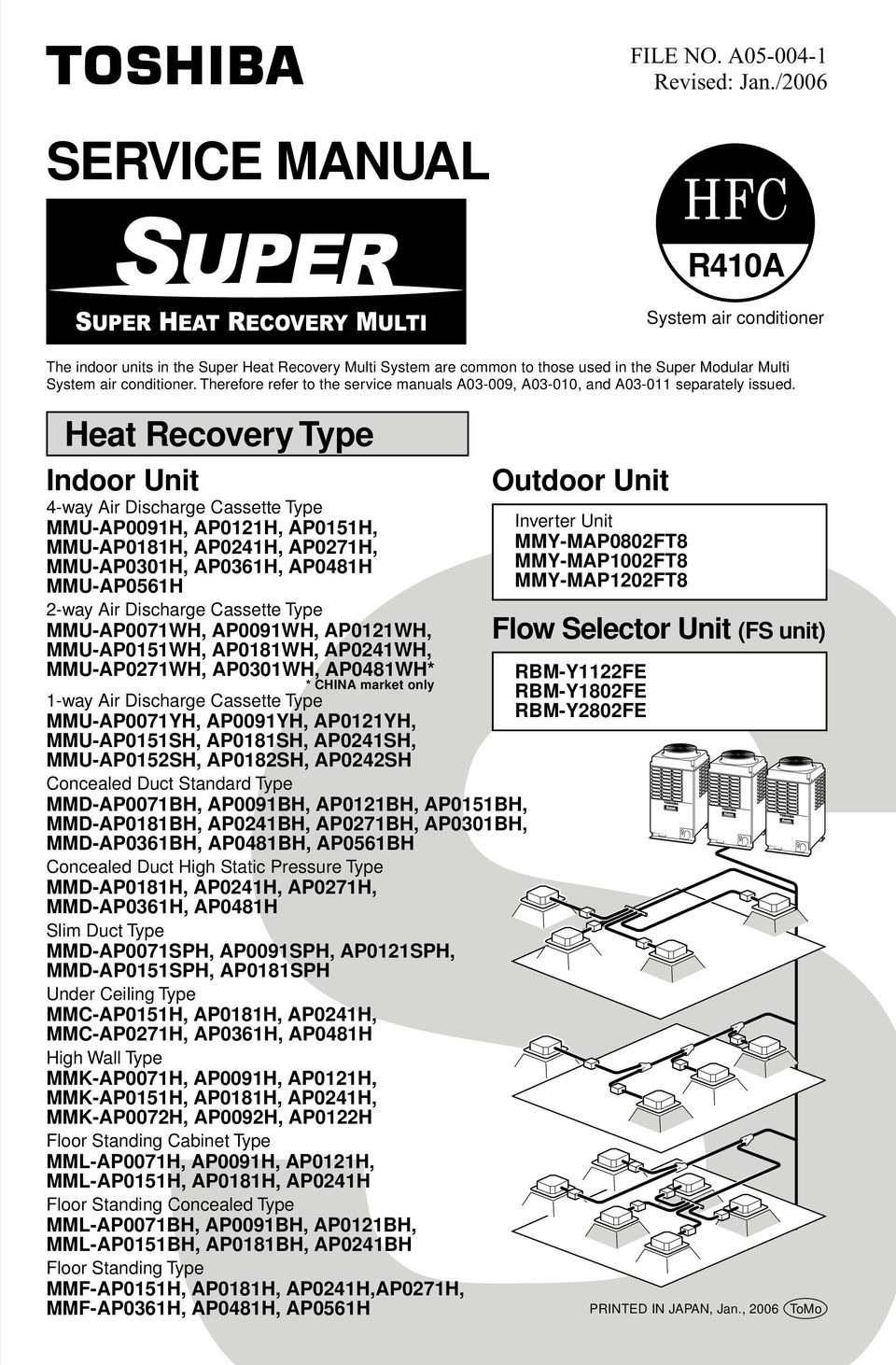
1 FILE. A Revised: Jan./006 SERVICE MANUAL R40A System air conditioner The indoor units in the Super Heat Recovery Multi System are common to those used in the Super Modular Multi System air conditioner. Therefore refer to the service manuals A0-009, A0-00, and A0-0 separately issued. Heat Recovery Type Indoor Unit 4-way Air Discharge Cassette Type MMU-AP009H, AP0H, AP05H, MMU-AP08H, AP04H, AP07H, MMU-AP00H, AP06H, AP048H MMU-AP056H -way Air Discharge Cassette Type MMU-AP007WH, AP009WH, AP0WH, MMU-AP05WH, AP08WH, AP04WH, MMU-AP07WH, AP00WH, AP048WH* * CHINA market only -way Air Discharge Cassette Type MMU-AP007YH, AP009YH, AP0YH, MMU-AP05SH, AP08SH, AP04SH, MMU-AP05SH, AP08SH, AP04SH Concealed Duct Standard Type MMD-AP007BH, AP009BH, AP0BH, AP05BH, MMD-AP08BH, AP04BH, AP07BH, AP00BH, MMD-AP06BH, AP048BH, AP056BH Concealed Duct High Static Pressure Type MMD-AP08H, AP04H, AP07H, MMD-AP06H, AP048H Slim Duct Type MMD-AP007SPH, AP009SPH, AP0SPH, MMD-AP05SPH, AP08SPH Under Ceiling Type MMC-AP05H, AP08H, AP04H, MMC-AP07H, AP06H, AP048H High Wall Type MMK-AP007H, AP009H, AP0H, MMK-AP05H, AP08H, AP04H, MMK-AP007H, AP009H, AP0H Floor Standing Cabinet Type MML-AP007H, AP009H, AP0H, MML-AP05H, AP08H, AP04H Floor Standing Concealed Type MML-AP007BH, AP009BH, AP0BH, MML-AP05BH, AP08BH, AP04BH Floor Standing Type MMF-AP05H, AP08H, AP04H,AP07H, MMF-AP06H, AP048H, AP056H Outdoor Unit Inverter Unit MMY-MAP080FT8 MMY-MAP00FT8 MMY-MAP0FT8 Flow Selector Unit (FS unit) RBM-YFE RBM-Y80FE RBM-Y80FE PRINTED IN JAPAN, Jan., 006 ToMo
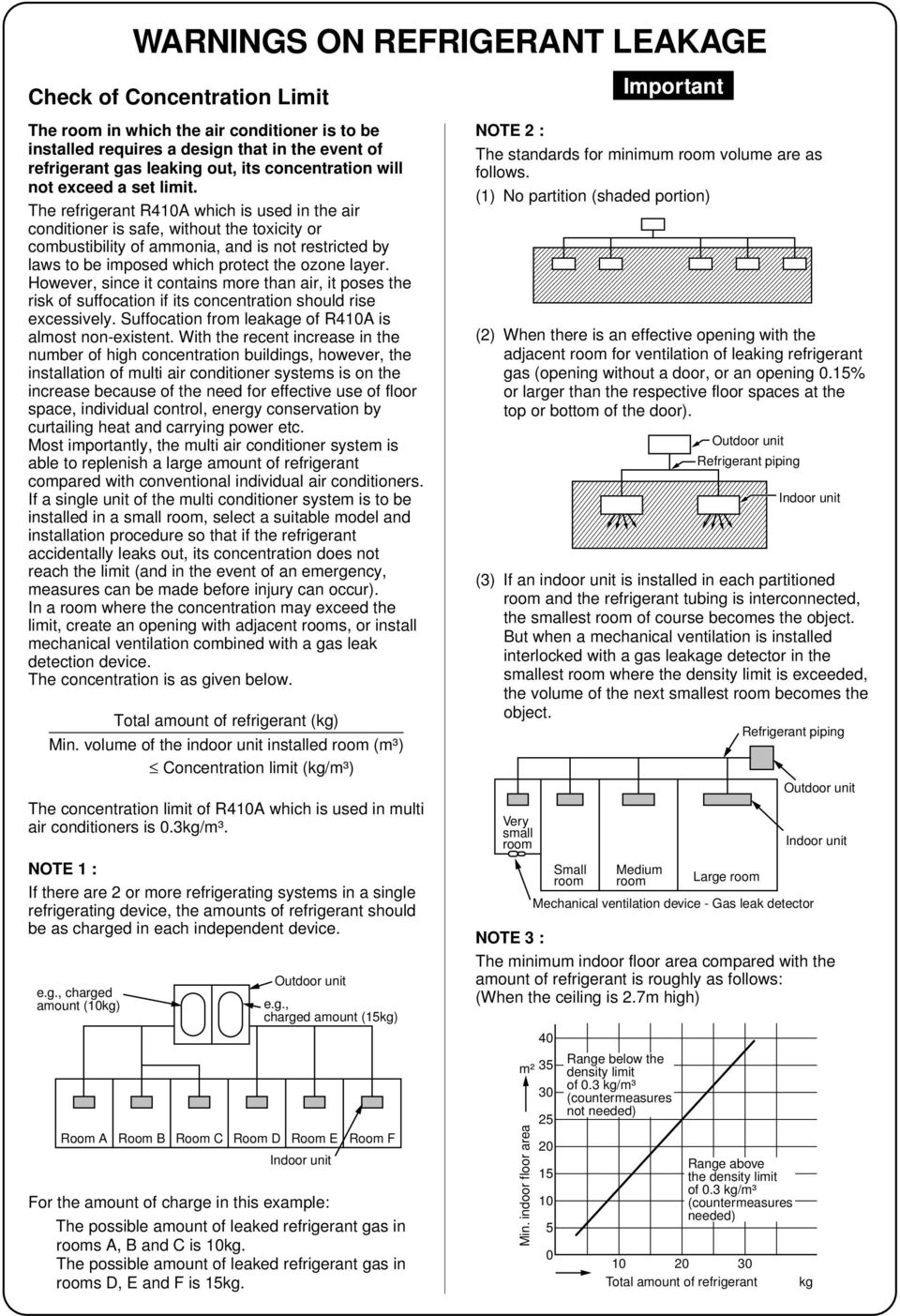
2 e.g., charged amount (0kg) WARNINGS ON REFRIGERANT LEAKAGE Check of Concentration Limit The room in which the air conditioner is to be installed requires a design that in the event of refrigerant gas leaking out, its concentration will not exceed a set limit. The refrigerant R40A which is used in the air conditioner is safe, without the toxicity or combustibility of ammonia, and is not restricted by laws to be imposed which protect the ozone layer. However, since it contains more than air, it poses the risk of suffocation if its concentration should rise excessively. Suffocation from leakage of R40A is almost non-existent. With the recent increase in the number of high concentration buildings, however, the installation of multi air conditioner systems is on the increase because of the need for effective use of floor space, individual control, energy conservation by curtailing heat and carrying power etc. Most importantly, the multi air conditioner system is able to replenish a large amount of refrigerant compared with conventional individual air conditioners. If a single unit of the multi conditioner system is to be installed in a small room, select a suitable model and installation procedure so that if the refrigerant accidentally leaks out, its concentration does not reach the limit (and in the event of an emergency, measures can be made before injury can occur). In a room where the concentration may exceed the limit, create an opening with adjacent rooms, or install mechanical ventilation combined with a gas leak detection device. The concentration is as given below. Total amount of refrigerant (kg) Min. volume of the indoor unit installed room (m³) Concentration limit (kg/m³) The concentration limit of R40A which is used in multi air conditioners is 0.kg/m³. TE : If there are or more refrigerating systems in a single refrigerating device, the amounts of refrigerant should be as charged in each independent device. Outdoor unit e.g., charged amount (5kg) Room A Room B Room C Room D Room E Room F Indoor unit For the amount of charge in this example: The possible amount of leaked refrigerant gas in rooms A, B and C is 0kg. The possible amount of leaked refrigerant gas in rooms D, E and F is 5kg. TE : The standards for minimum room volume are as follows. () No partition (shaded portion) () When there is an effective opening with the adjacent room for ventilation of leaking refrigerant gas (opening without a door, or an opening 0.5% or larger than the respective floor spaces at the top or bottom of the door). Outdoor unit Refrigerant piping Indoor unit () If an indoor unit is installed in each partitioned room and the refrigerant tubing is interconnected, the smallest room of course becomes the object. But when a mechanical ventilation is installed interlocked with a gas leakage detector in the smallest room where the density limit is exceeded, the volume of the next smallest room becomes the object. Refrigerant piping Very small room Small room Medium room Large room Mechanical ventilation device - Gas leak detector Outdoor unit Indoor unit TE : The minimum indoor floor area compared with the amount of refrigerant is roughly as follows: (When the ceiling is.7m high) 40 m² 5 Min. indoor floor area Important Range below the density limit of 0. kg/m³ (countermeasures not needed) Range above the density limit of 0. kg/m³ (countermeasures needed) Total amount of refrigerant kg
3 CONTENTS SAFETY CAUTION OUTLINE WIRING DIAGRAM PARTS RATING REFRIGERANT PIPING SYSTEMATIC DRAWING SYSTEM REFRIGERANT CYCLE DRAWING CONTROL OUTLINE APPLIED CONTROL TEST OPERATION TROUBLESHOOTING CONFIGURATION OF CONTROL CIRCUIT BACKUP OPERATIONS (EMERGENCY OPERATION) OIL LEVEL JUDGMENT DISPLAY REFRIGERANT RECOVERY WHEN REPLACING THE COMPRESSOR LEAKAGE/CLOGGING OF OIL-EQUALIZATION CIRCUIT REPLACING COMPRESSOR REPLACING PROCEDURE OF PARTS P.C. BOARD... 7 TE Ensure power is isolated from the unit when replacing the high performance filter or when opening the service panel.

4 SAFETY CAUTION The important contents concerned to the safety are described on the product itself and on this Service Manual. Please read this Service Manual after understanding the described items thoroughly in the following contents (Indications/Illustrated marks), and keep them. [Explanation of indications] Indication DANGER WARNING CAUTION Explanation Indicates contents assumed that an imminent danger causing a death or serious injury of the repair engineers and the third parties when an incorrect work has been executed. Indicates possibilities assumed that a danger causing a death or serious injury of the repair engineers, the third parties, and the users due to troubles of the product after work when an incorrect work has been executed. Indicates contents assumed that an injury or property damage ( ) may be caused on the repair engineers, the third parties, and the users due to troubles of the product after work when an incorrect work has been executed. Property damage : Enlarged damage concerned to property, furniture, and domestic animal/pet [Explanation of illustrated marks] Mark Explanation Indicates prohibited items (Forbidden items to do) The sentences near an illustrated mark describe the concrete prohibited contents. Indicates mandatory items (Compulsory items to do) The sentences near an illustrated mark describe the concrete mandatory contents. Indicates cautions (including danger/warning) The sentences or illustration near or in an illustrated mark describe the concrete cautious contents. [Confirmation of warning label on the main unit] Confirm that labels are indicated on the specified positions (Refer to the Parts disassembly diagram (Outdoor unit).) If removing the label during parts replace, stick it as the original. DANGER Turn off breaker. Execute discharge between terminals. Turn OFF the breaker before removing the front panel and cabinet, otherwise an electric shock is caused by high voltage resulted in a death or injury. During operation, a high voltage with 400V or higher of circuit ( ) at secondary circuit of the highvoltage transformer is applied. If touching a high voltage with the naked hands or body, an electric shock is caused even if using an electric insulator. : For details, refer to the electric wiring diagram. When removing the front panel or cabinet, execute short-circuit and discharge between highvoltage capacitor terminals. If discharge is not executed, an electric shock is caused by high voltage resulted in a death or injury. After turning off the breaker, high voltage also keeps to apply to the high-voltage capacitor. Do not turn on the breaker under condition that the front panel and cabinet are removed. An electric shock is caused by high voltage resulted in a death or injury. Prohibition 4
![[Explanation of indications] Indication DANGER WARNING CAUTION Explanation Indicates contents assumed that an imminent danger causing a death or serious injury of the repair engineers and the third](/docs-images/44/17961870/images/page_4.jpg "parties when an incorrect work has been executed.")
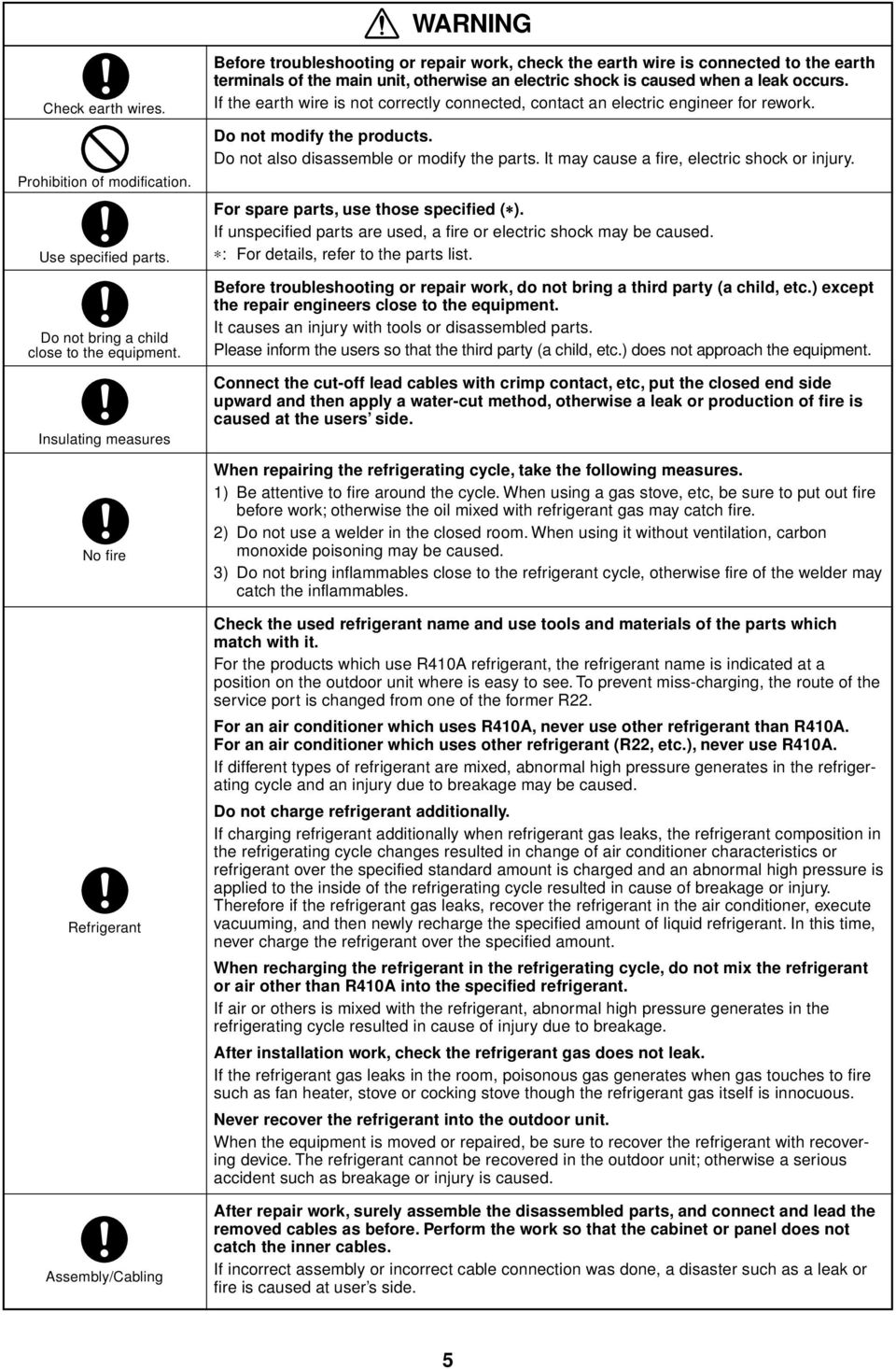
5 WARNING Check earth wires. Prohibition of modification. Use specified parts. Do not bring a child close to the equipment. Insulating measures No fire Refrigerant Assembly/Cabling Before troubleshooting or repair work, check the earth wire is connected to the earth terminals of the main unit, otherwise an electric shock is caused when a leak occurs. If the earth wire is not correctly connected, contact an electric engineer for rework. Do not modify the products. Do not also disassemble or modify the parts. It may cause a fire, electric shock or injury. For spare parts, use those specified ( ). If unspecified parts are used, a fire or electric shock may be caused. : For details, refer to the parts list. Before troubleshooting or repair work, do not bring a third party (a child, etc.) except the repair engineers close to the equipment. It causes an injury with tools or disassembled parts. Please inform the users so that the third party (a child, etc.) does not approach the equipment. Connect the cut-off lead cables with crimp contact, etc, put the closed end side upward and then apply a water-cut method, otherwise a leak or production of fire is caused at the users side. When repairing the refrigerating cycle, take the following measures. ) Be attentive to fire around the cycle. When using a gas stove, etc, be sure to put out fire before work; otherwise the oil mixed with refrigerant gas may catch fire. ) Do not use a welder in the closed room. When using it without ventilation, carbon monoxide poisoning may be caused. ) Do not bring inflammables close to the refrigerant cycle, otherwise fire of the welder may catch the inflammables. Check the used refrigerant name and use tools and materials of the parts which match with it. For the products which use R40A refrigerant, the refrigerant name is indicated at a position on the outdoor unit where is easy to see. To prevent miss-charging, the route of the service port is changed from one of the former R. For an air conditioner which uses R40A, never use other refrigerant than R40A. For an air conditioner which uses other refrigerant (R, etc.), never use R40A. If different types of refrigerant are mixed, abnormal high pressure generates in the refrigerating cycle and an injury due to breakage may be caused. Do not charge refrigerant additionally. If charging refrigerant additionally when refrigerant gas leaks, the refrigerant composition in the refrigerating cycle changes resulted in change of air conditioner characteristics or refrigerant over the specified standard amount is charged and an abnormal high pressure is applied to the inside of the refrigerating cycle resulted in cause of breakage or injury. Therefore if the refrigerant gas leaks, recover the refrigerant in the air conditioner, execute vacuuming, and then newly recharge the specified amount of liquid refrigerant. In this time, never charge the refrigerant over the specified amount. When recharging the refrigerant in the refrigerating cycle, do not mix the refrigerant or air other than R40A into the specified refrigerant. If air or others is mixed with the refrigerant, abnormal high pressure generates in the refrigerating cycle resulted in cause of injury due to breakage. After installation work, check the refrigerant gas does not leak. If the refrigerant gas leaks in the room, poisonous gas generates when gas touches to fire such as fan heater, stove or cocking stove though the refrigerant gas itself is innocuous. Never recover the refrigerant into the outdoor unit. When the equipment is moved or repaired, be sure to recover the refrigerant with recovering device. The refrigerant cannot be recovered in the outdoor unit; otherwise a serious accident such as breakage or injury is caused. After repair work, surely assemble the disassembled parts, and connect and lead the removed cables as before. Perform the work so that the cabinet or panel does not catch the inner cables. If incorrect assembly or incorrect cable connection was done, a disaster such as a leak or fire is caused at user s side. 5
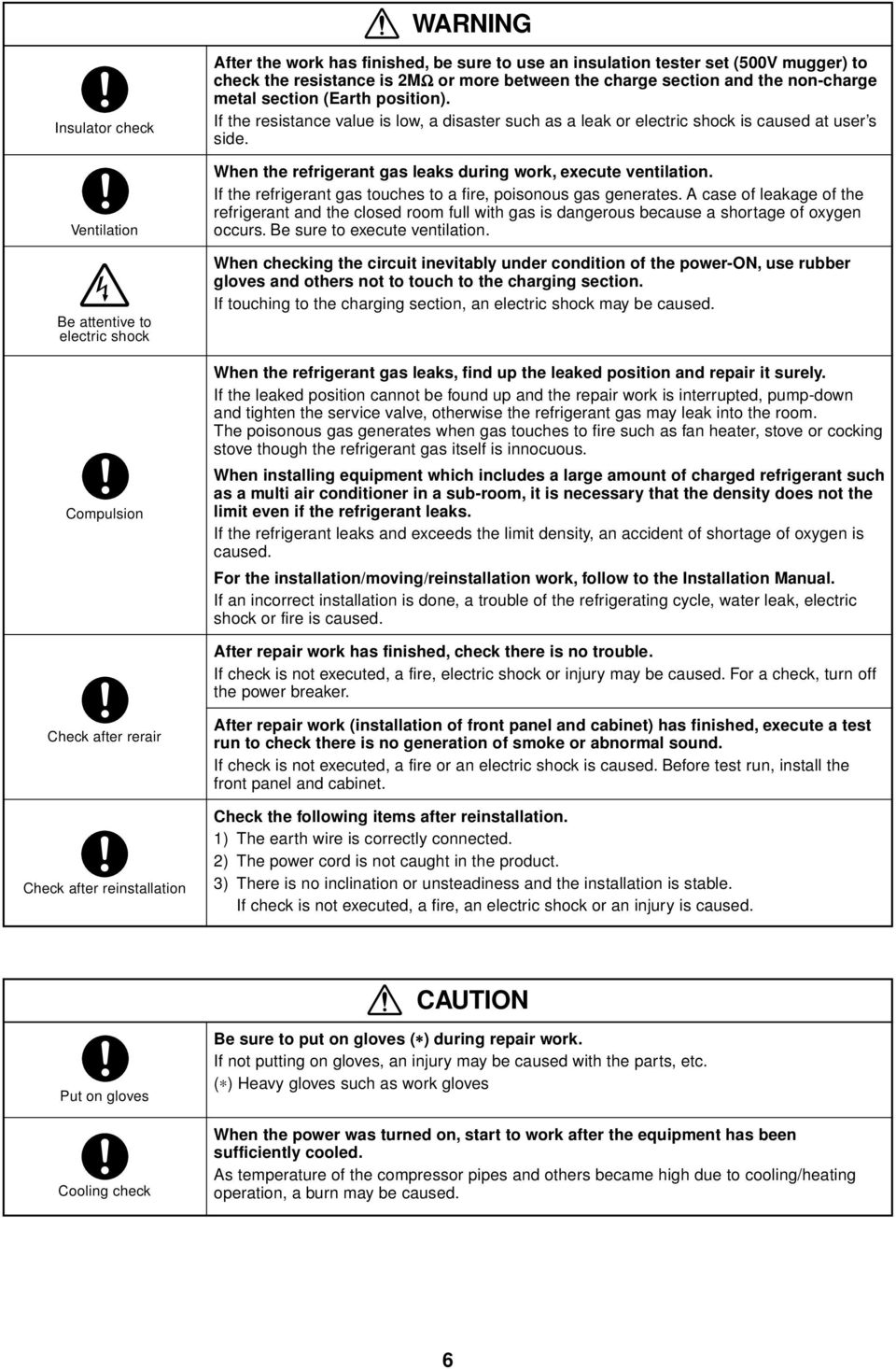
6 WARNING Insulator check Ventilation Be attentive to electric shock Compulsion After the work has finished, be sure to use an insulation tester set (500V mugger) to check the resistance is MΩ or more between the charge section and the non-charge metal section (Earth position). If the resistance value is low, a disaster such as a leak or electric shock is caused at user s side. When the refrigerant gas leaks during work, execute ventilation. If the refrigerant gas touches to a fire, poisonous gas generates. A case of leakage of the refrigerant and the closed room full with gas is dangerous because a shortage of oxygen occurs. Be sure to execute ventilation. When checking the circuit inevitably under condition of the power-on, use rubber gloves and others not to touch to the charging section. If touching to the charging section, an electric shock may be caused. When the refrigerant gas leaks, find up the leaked position and repair it surely. If the leaked position cannot be found up and the repair work is interrupted, pump-down and tighten the service valve, otherwise the refrigerant gas may leak into the room. The poisonous gas generates when gas touches to fire such as fan heater, stove or cocking stove though the refrigerant gas itself is innocuous. When installing equipment which includes a large amount of charged refrigerant such as a multi air conditioner in a sub-room, it is necessary that the density does not the limit even if the refrigerant leaks. If the refrigerant leaks and exceeds the limit density, an accident of shortage of oxygen is caused. For the installation/moving/reinstallation work, follow to the Installation Manual. If an incorrect installation is done, a trouble of the refrigerating cycle, water leak, electric shock or fire is caused. After repair work has finished, check there is no trouble. If check is not executed, a fire, electric shock or injury may be caused. For a check, turn off the power breaker. Check after rerair Check after reinstallation After repair work (installation of front panel and cabinet) has finished, execute a test run to check there is no generation of smoke or abnormal sound. If check is not executed, a fire or an electric shock is caused. Before test run, install the front panel and cabinet. Check the following items after reinstallation. ) The earth wire is correctly connected. ) The power cord is not caught in the product. ) There is no inclination or unsteadiness and the installation is stable. If check is not executed, a fire, an electric shock or an injury is caused. CAUTION Put on gloves Cooling check Be sure to put on gloves ( ) during repair work. If not putting on gloves, an injury may be caused with the parts, etc. ( ) Heavy gloves such as work gloves When the power was turned on, start to work after the equipment has been sufficiently cooled. As temperature of the compressor pipes and others became high due to cooling/heating operation, a burn may be caused. 6
7 7 New Refrigerant (R40A) This air conditioner adopts a new HFC type refrigerant (R40A) which does not deplete the ozone layer.. Safety Caution Concerned to New Refrigerant The pressure of R40A is high.6 times of that of the former refrigerant (R). Accompanied with change of refrigerant, the refrigerating oil has been also changed. Therefore, be sure that water, dust, the former refrigerant or the former refrigerating oil is not mixed into the refrigerating cycle of the air conditioner with new refrigerant during installation work or service work. If an incorrect work or incorrect service is performed, there is a possibility to cause a serious accident. Use the tools and materials exclusive to R40A to purpose a safe work.. Cautions on Installation/Service () Do not mix the other refrigerant or refrigerating oil. For the tools exclusive to R40A, shapes of all the joints including the service port differ from those of the former refrigerant in order to prevent mixture of them. () As the use pressure of the new refrigerant is high, use material thickness of the pipe and tools which are specified for R40A. () In the installation time, use clean pipe materials and work with great attention so that water and others do not mix in because pipes are affected by impurities such as water, oxide scales, oil, etc. Use the clean pipes. Be sure to brazing with flowing nitrogen gas. (Never use gas other than nitrogen gas.) (4) For the earth protection, use a vacuum pump for air purge. (5) R40A refrigerant is azeotropic mixture type refrigerant. Therefore use liquid type to charge the refrigerant. (If using gas for charging, composition of the refrigerant changes and then characteristics of the air conditioner change.). Pipe Materials For the refrigerant pipes, copper pipe and joints are mainly used. It is necessary to select the most appropriate pipes to conform to the standard. Use clean material in which impurities adhere inside of pipe or joint to a minimum. 4. Tools () Required Tools for R40A Mixing of different types of oil may cause generation of sludge, clogging of capillary, etc. Accordingly, the tools to be used are classified into the following three types. ) Tools exclusive for R40A (Those which cannot be used for conventional refrigerant (R)) ) Tools exclusive for R40A, but can be also used for conventional refrigerant (R) ) Tools commonly used for R40A and for conventional refrigerant (R) The table below shows the tools exclusive for R40A and their interchangeability. No. Tools exclusive for R40A (The following tools for R40A are required.) Tools whose specifications are changed for R40A and their interchangeability Used tool Flare tool Copper pipe gauge for adjusting projection margin Torque wrench Gauge manifold Charge hose Vacuum pump adapter Electronic balance for refrigerant charging Refrigerant cylinder Pipe flaring Usage Flaring by conventional flare tool Connection of flare nut Evacuating, refrigerant charge, run check, etc. Vacuum evacuating Refrigerant charge Refrigerant charge R40A air conditioner installation Existence of new equipment for R40A Yes Yes Yes Yes Yes Yes Yes Whether conventional equipment can be used *(Note ) *(Note ) No No No Yes No Conventional air conditioner installation Whether new equipment can be used with conventional refrigerant Yes *(Note ) No No Yes Yes No () Copper pipe Leakage detector Charging cylinder Gas leakage check Refrigerant charge Yes (Note ) No No Yes No <Piping> The pipe thickness, flare finishing size, flare nut and others differ according to a refrigerant type. When using a long copper pipe for R40A, it is recommended to select Copper or copper-base pipe without seam and one with bonded oil amount 40mg/0m or less. Also do not use crushed, deformed, discolored (especially inside) pipes. (Impurities cause clogging of expansion valves and capillary tubes.) <Flare nut> Use the flare nuts which are attached to the air conditioner unit. () Joint The flare joint and socket joint are used for joints of the copper pipe. The joints are rarely used for installation of the air conditioner. However clear impurities when using them. (Note ) When flaring is carried out for R40A using the conventional flare tools, adjustment of projection margin is necessary. For this adjustment, a copper pipe gauge, etc. are necessary. (Note ) Charging cylinder for R40A is being currently developed. General tools (Conventional tools can be used.) In addition to the above exclusive tools, the following equipments which serve also for R are necessary as the general tools. () Vacuum pump (7) Screwdriver (+, ) Use vacuum pump by (8) Spanner or Monkey wrench attaching vacuum pump adapter. (9) Hole core drill () Torque wrench (0) Hexagon wrench (Opposite side 4mm) () Pipe cutter () Tape measure (4) Reamer () Metal saw (5) Pipe bender (6) Level vial Also prepare the following equipments for other installation method and run check. () Clamp meter () Insulation resistance tester (Megger) () Thermometer (4) Electroscope (Volt meter)

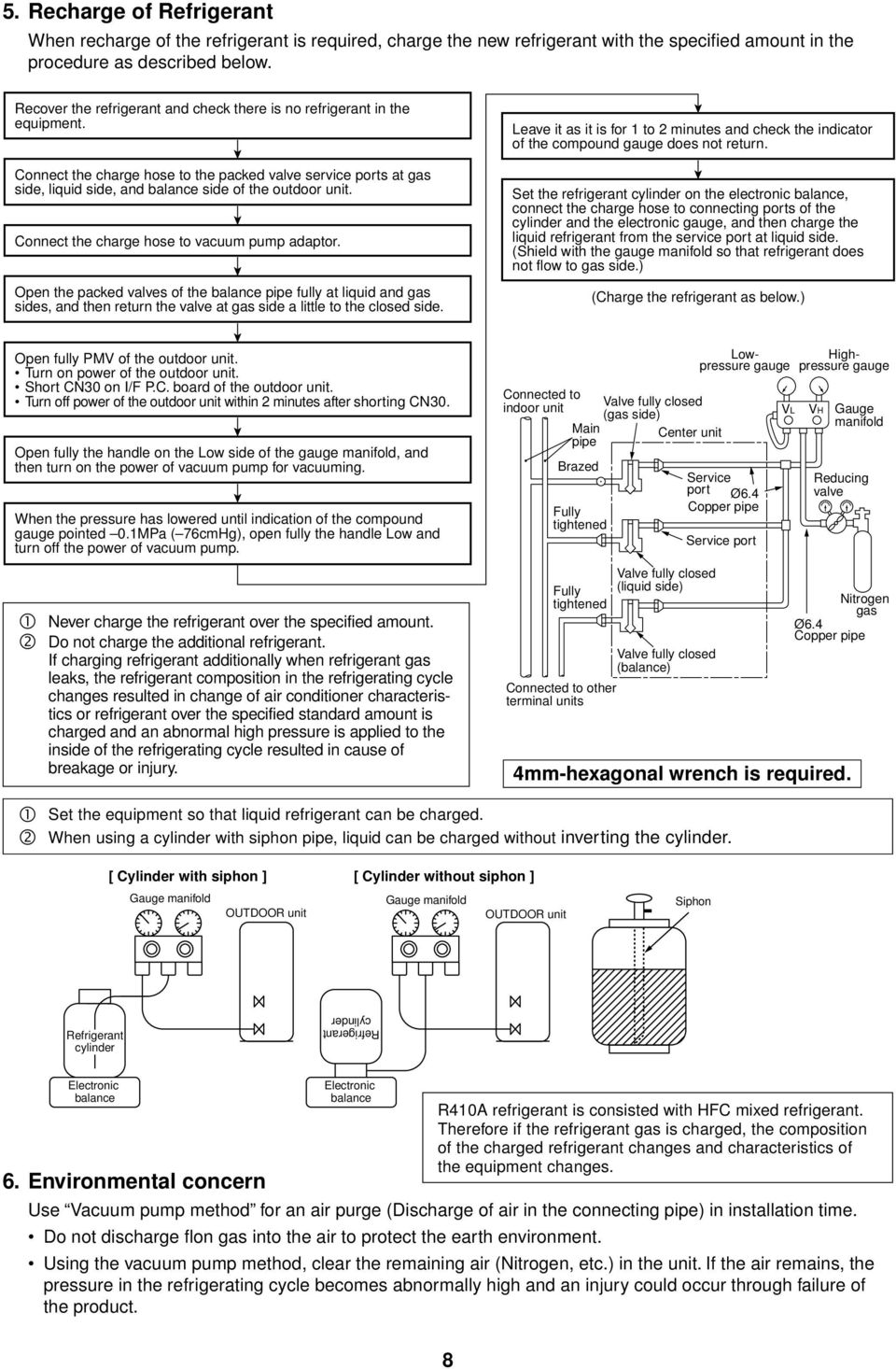
8 5. Recharge of Refrigerant When recharge of the refrigerant is required, charge the new refrigerant with the specified amount in the procedure as described below. Recover the refrigerant and check there is no refrigerant in the equipment. Connect the charge hose to the packed valve service ports at gas side, liquid side, and balance side of the outdoor unit. Connect the charge hose to vacuum pump adaptor. Open the packed valves of the balance pipe fully at liquid and gas sides, and then return the valve at gas side a little to the closed side. Leave it as it is for to minutes and check the indicator of the compound gauge does not return. Set the refrigerant cylinder on the electronic balance, connect the charge hose to connecting ports of the cylinder and the electronic gauge, and then charge the liquid refrigerant from the service port at liquid side. (Shield with the gauge manifold so that refrigerant does not flow to gas side.) (Charge the refrigerant as below.) Open fully PMV of the outdoor unit. Turn on power of the outdoor unit. Short CN0 on I/F P.C. board of the outdoor unit. Turn off power of the outdoor unit within minutes after shorting CN0. Open fully the handle on the Low side of the gauge manifold, and then turn on the power of vacuum pump for vacuuming. When the pressure has lowered until indication of the compound gauge pointed 0.MPa ( 76cmHg), open fully the handle Low and turn off the power of vacuum pump. Never charge the refrigerant over the specified amount. Do not charge the additional refrigerant. If charging refrigerant additionally when refrigerant gas leaks, the refrigerant composition in the refrigerating cycle changes resulted in change of air conditioner characteristics or refrigerant over the specified standard amount is charged and an abnormal high pressure is applied to the inside of the refrigerating cycle resulted in cause of breakage or injury. Connected to indoor unit Main pipe Brazed Fully tightened Fully tightened Valve fully closed (gas side) Center unit Valve fully closed (liquid side) Valve fully closed (balance) Connected to other terminal units Lowpressure gauge Service port Ø6.4 Copper pipe Service port VL Highpressure gauge VH Gauge manifold Reducing valve Nitrogen gas Ø6.4 Copper pipe 4mm-hexagonal wrench is required. Set the equipment so that liquid refrigerant can be charged. When using a cylinder with siphon pipe, liquid can be charged without inverting the cylinder. [ Cylinder with siphon ] [ Cylinder without siphon ] Gauge manifold Gauge manifold OUTDOOR unit OUTDOOR unit Siphon Refrigerant cylinder Refrigerant cylinder Electronic balance Electronic balance R40A refrigerant is consisted with HFC mixed refrigerant. Therefore if the refrigerant gas is charged, the composition of the charged refrigerant changes and characteristics of the equipment changes. 6. Environmental concern Use Vacuum pump method for an air purge (Discharge of air in the connecting pipe) in installation time. Do not discharge flon gas into the air to protect the earth environment. Using the vacuum pump method, clear the remaining air (Nitrogen, etc.) in the unit. If the air remains, the pressure in the refrigerating cycle becomes abnormally high and an injury could occur through failure of the product. 8
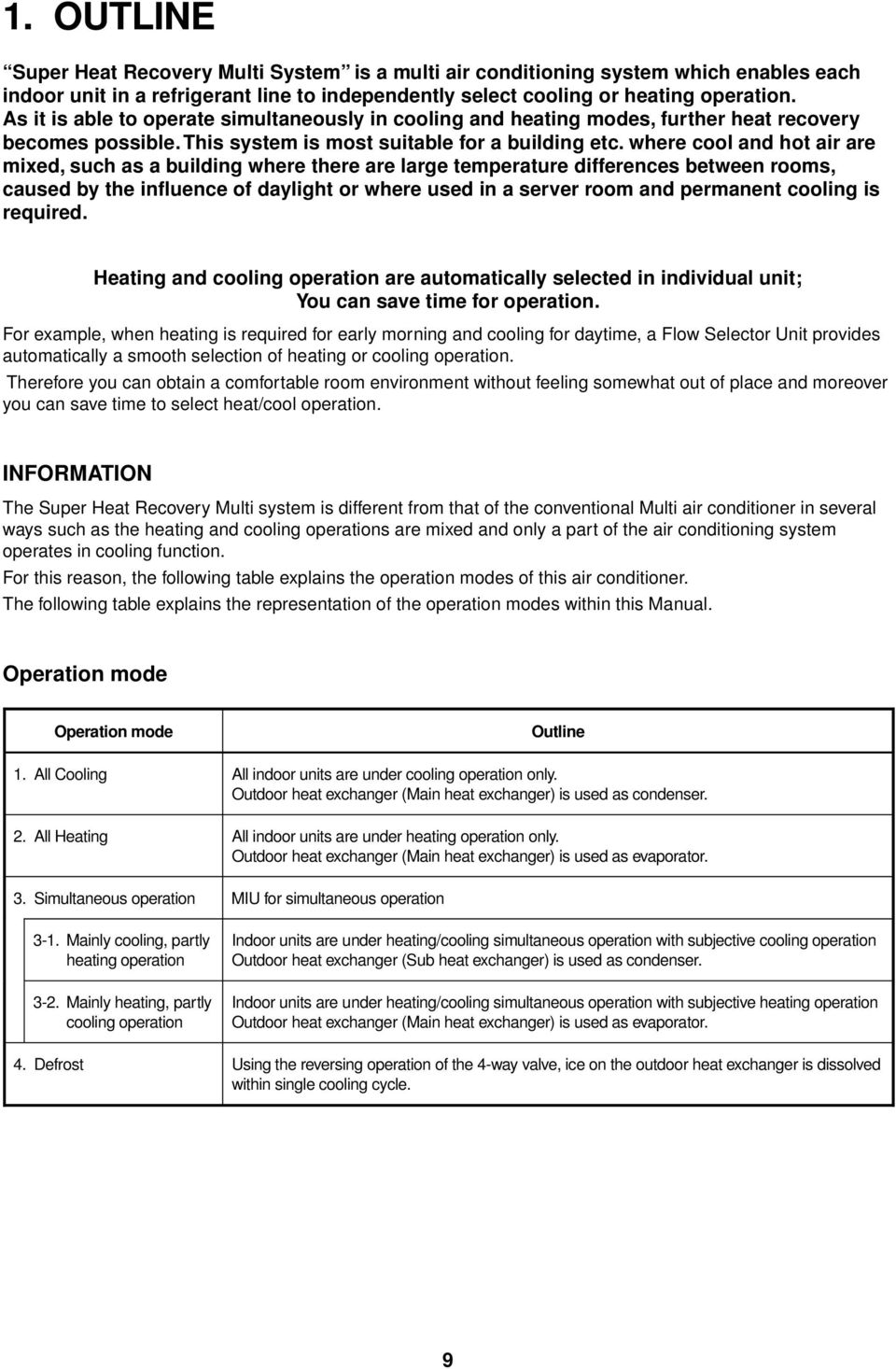
9 . OUTLINE Super Heat Recovery Multi System is a multi air conditioning system which enables each indoor unit in a refrigerant line to independently select cooling or heating operation. As it is able to operate simultaneously in cooling and heating modes, further heat recovery becomes possible. This system is most suitable for a building etc. where cool and hot air are mixed, such as a building where there are large temperature differences between rooms, caused by the influence of daylight or where used in a server room and permanent cooling is required. Heating and cooling operation are automatically selected in individual unit; You can save time for operation. For example, when heating is required for early morning and cooling for daytime, a Flow Selector Unit provides automatically a smooth selection of heating or cooling operation. Therefore you can obtain a comfortable room environment without feeling somewhat out of place and moreover you can save time to select heat/cool operation. INFORMATION The Super Heat Recovery Multi system is different from that of the conventional Multi air conditioner in several ways such as the heating and cooling operations are mixed and only a part of the air conditioning system operates in cooling function. For this reason, the following table explains the operation modes of this air conditioner. The following table explains the representation of the operation modes within this Manual. Operation mode Operation mode Outline. All Cooling All indoor units are under cooling operation only. Outdoor heat exchanger (Main heat exchanger) is used as condenser.. All Heating All indoor units are under heating operation only. Outdoor heat exchanger (Main heat exchanger) is used as evaporator.. Simultaneous operation MIU for simultaneous operation -. Mainly cooling, partly heating operation -. Mainly heating, partly cooling operation Indoor units are under heating/cooling simultaneous operation with subjective cooling operation Outdoor heat exchanger (Sub heat exchanger) is used as condenser. Indoor units are under heating/cooling simultaneous operation with subjective heating operation Outdoor heat exchanger (Main heat exchanger) is used as evaporator. 4. Defrost Using the reversing operation of the 4-way valve, ice on the outdoor heat exchanger is dissolved within single cooling cycle. 9
10 -. Component Multi Using High-efficiency Refrigerant R40A. Outdoor units Corresponding HP Inverter unit 8 HP 0 HP HP Appearance Model name Heat pump MMY- MAP080FT8 MAP00FT8 MAP0FT8 Cooling capacity (kw) Heating capacity (kw) No. of connectable indoor units 6 0. Combination of outdoor units Corresponding HP 6 HP 8 HP 0 HP 4 HP 6 HP 8 HP 0 HP Combined Model MMY- AP60FT8 AP80FT8 AP00FT8 AP40FT8 AP60FT8 AP80FT8 AP00FT8 Cooling capacity (kw) Heating capacity (kw) HP 0 HP 0 HP 8 HP 0 HP 0 HP 0 HP Combined outdoor units 8 HP 8 HP 0 HP 8 HP 8 HP 0 HP 0 HP 8 HP 8 HP 8 HP 0 HP No. of connectable indoor units Branching joints and headers Y-shape branching joint ( ) 4-branching header ( 4) 8-branching header ( 4) T-branch joint Model name Usage Appearance RBM-BY5FE Indoor unit capacity code ( ) Total below 6.4 RBM-BY0FE Indoor unit capacity code ( ) Total below 4. RBM-BY5E Indoor unit capacity code ( ) Total below 6.4 RBM-BY0E Indoor unit capacity code ( ) Total below 4. RBM-BY0FE Indoor unit capacity code ( ) Total below 5. RBM-BY0FE Indoor unit capacity code ( ) Total below 5. RBM-BY0E Indoor unit capacity code ( ) Total below 5. RBM-BY0E Indoor unit capacity code ( ) Total below 5. RBM-04FE Indoor unit capacity code ( ) Total below 4. RBM-04FE Indoor unit capacity code ( ) Total below 5. RBM-04E Indoor unit capacity code ( ) Total below 4. RBM-04E Indoor unit capacity code ( ) Total below 5. RBM-08FE Indoor unit capacity code ( ) Total below 4. RBM-08FE Indoor unit capacity code ( ) Total below 5. RBM-08E Indoor unit capacity code ( ) Total below 4. RBM-08E Indoor unit capacity code ( ) Total below 5. BT-FE The following types of T joint pipes are supplied as set. Balance pipe (Ø9.5) Liquid side (Corresponded dia. Ø.7 to Ø9.) Suction gas side (Corresponded dia. Ø. to Ø4.9) Discharge gas side (Corresponded dia. Ø9. to Ø.) For piping For piping ( 5) For piping For piping ( 5) For piping For piping ( 5) For piping For piping ( 5) Capacity code can be obtained from page,. (Capacity code is not actual capacity) If the total capacity code value of indoor unit exceeds that of the outdoor unit, apply capacity code of the outdoor unit. When using a Y-shape branching joint for st branching, select according to the capacity code of the outdoor unit. Max. 6.0 capacity code in total can be connected. This is used for branching to cooling only indoor unit. Model names for outdoor described in this guide are shortened because of the space constraint. 0

11 4. Flow selector units (FS unit) Model name Usage Appearance RBM-YFE Capacity rank for indoor unit : Type 007 to 00 RBM-Y80FE Capacity rank for indoor unit : Type 06 to 056 RBM-Y80FE Capacity rank for indoor unit : Type 08 to 096 * Accessory part (Sold separately): Connection cable kit (RBC-CBK5FE), up to 5m. 5. Indoor units Type Appearance Model name Capacity rank Capacity code 4-way Air Discharge Cassette Type -way Air Discharge Cassette Type -way Air Discharge Cassette Type Cooling capacity (kw) Heating capacity (kw) MMU-AP009H 009 type.8. MMU-AP0H 0 type MMU-AP05H, 05 type MMU-AP08H 08 type MMU-AP04H 04 type MMU-AP07H 07 type MMU-AP00H 00 type MMU-AP06H 06 type 4..5 MMU-AP048H 048 type MMU-AP056H 056 type MMU-AP007WH 007 type MMU-AP009WH 009 type.8. MMU-AP0WH 0 type MMU-AP05WH 05 type MMU-AP08WH 08 type MMU-AP04WH 04 type MMU-AP07WH 07 type MMU-AP00WH 00 type MMU-AP048WH (CHINA only) 048 type MMU-AP007YH 007 type MMU-AP009YH 009 type.8. MMU-AP0YH 0 type MMU-AP05SH 05 type MMU-AP08SH 08 type MMU-AP04SH 04 type MMU-AP05SH 05 type MMU-AP08SH 08 type MMU-AP04SH 04 type Concealed Duct Standard Type MMD-AP007BH 007 type MMD-AP009BH 009 type.8. MMD-AP0BH 0 type MMD-AP05BH 05 type MMD-AP08BH 08 type MMD-AP04BH 04 type MMD-AP07BH 07 type MMD-AP00BH 00 type MMD-AP06BH 06 type 4..5 MMD-AP048BH 048 type MMD-AP056BH 056 type

12 Type Appearance Model name Capacity rank Capacity code Concealed Duct High Static Pressure Type Slim Duct Type Under Ceiling Type High Wall Type Floor Standing Cabinet Type Floor Standing Concealed Type Floor Standing Type Cooling capacity (kw) Heating capacity (kw) MMD-AP08H 08 type MMD-AP04H 04 type MMD-AP07H 07 type MMD-AP06H 06 type 4..5 MMD-AP048H 048 type MMD-AP007SPH 007 type MMD-AP009SPH 009 type.8. MMD-AP0SPH 0 type MMD-AP05SPH 05 type MMD-AP08SPH 08 type MMC-AP05H 05 type MMC-AP08H 08 type MMC-AP04H 04 type MMC-AP07H 07 type MMC-AP06H 06 type 4..5 MMC-AP048H 048 type MMK-AP007H 007 type MMK-AP009H 009 type.8. MMK-AP0H 0 type MMK-AP05H 05 type MMK-AP08H 08 type MMK-AP04H 04 type MMK-AP007H 007 type MMK-AP009H 009 type.8. MMK-AP0H 0 type MML-AP007H 007 type MML-AP009H 009 type.8. MML-AP0H 0 type MML-AP05H 05 type MML-AP08H 08 type MML-AP04H 04 type MML-AP007BH 007 type MML-AP009BH 009 type.8. MML-AP0BH 0 type MML-AP05BH 05 type MML-AP08BH 08 type MML-AP04BH 04 type MMF-AP05H 05 type MMF-AP08H 08 type MMF-AP04H 04 type MMF-AP07H 07 type MMF-AP06H 06 type 4..5 MMF-AP048H 048 type MMF-AP056H 056 type

13 n Remote controllers Name Wired remote controller Simple wired remote controller Weekly timer SET DATA SETTING TEST H UNIT No. R.C. No. CODE No. TEST SETTING C F PROGRAM PROGRAM SuMoTuWeTh Fr Sa ERROR PROGRAM Appearance TEMP. ON / OFF WEEKLY TIMER TIMER SET FAN MODE TIME SWING/FIX VENT FILTER RESET TEST SET CL UNIT Model name RBC-AMTE RBC-ASE RBC-EXWE Name Wireless remote controller kit Receiver section Receiver section mounted separately Appearance ADR ADR ADR Receiver section Model name RBC-AXU (W)-E RBC-AXCE TCB-AXE Type 4-way Air Discharge Cassette type Under Ceiling type -way Air Discharge Cassette type (MMU-AP SH Series) Separate sensor type Name Central remote controller ALL ZONE ZONE GROUP 4 UNIT No. TEST CODE No. Appearance SET DATA SETTING R.C. No. SELECT ZONE GROUP CL SET Model name Type TCB-SC64TLE 64 system center controller

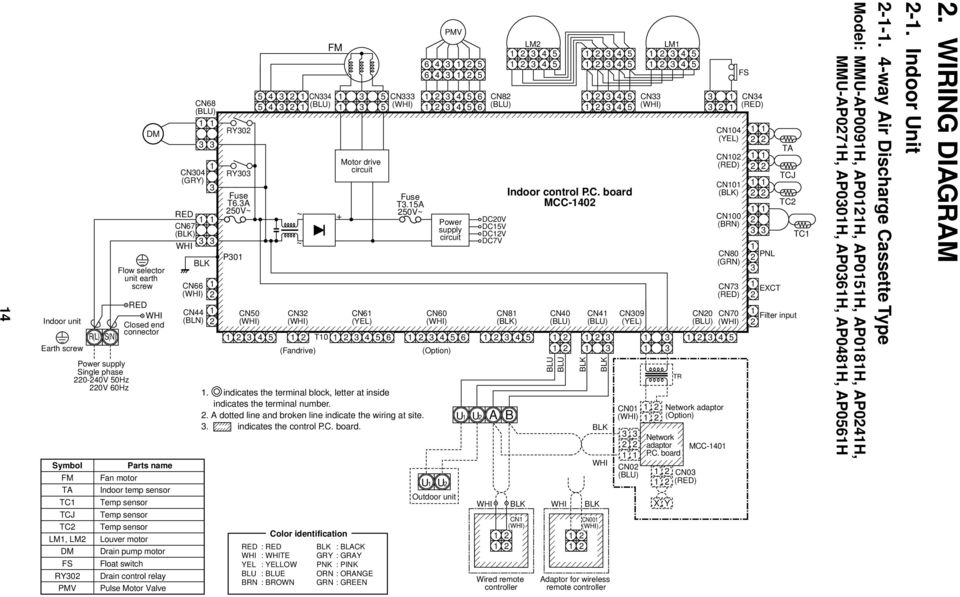
14 4 Indoor unit R(L) S(N) Earth screw Symbol FM TA TC TCJ TC LM, LM DM FS RY0 PMV Power supply Single phase 0-40V 50Hz 0V 60Hz DM Flow selector unit earth screw RED WHI Closed end connector Parts name Fan motor Indoor temp sensor Temp sensor Temp sensor Temp sensor Louver motor Drain pump motor Float switch Drain control relay Pulse Motor Valve CN68 (BLU) CN04 (GRY) RED CN67 (BLK) WHI BLK CN66 CN44 (BLN) RY0 RY0 Fuse T6.A 50V~ P0 CN CN4 5 4 (BLU) ~ + ~ CN (Fandrive) FM PMV CN Motor drive circuit CN6 (YEL) 4 5 Fuse T.5A 50V~ CN60 (Option) CN8 (BLU) DC0V DC5V DCV DC7V CN8 (BLK) 4 5 T indicates the terminal block, letter at inside indicates the terminal number.. A dotted line and broken line indicate the wiring at site.. indicates the control P.C. board. RED : RED WHI : WHITE YEL : YELLOW BLU : BLUE BRN : BROWN Color identification BLK : BLACK GRY : GRAY PNK : PINK ORN : ORANGE GRN : GREEN U Power supply circuit U Outdoor unit U U WHI A LM Indoor control P.C. board MCC-40 B CN Wired remote controller CN40 (BLU) BLU BLU BLK CN4 (BLU) BLK WHI BLK BLK BLK WHI CN00 Adaptor for wireless remote controller CN09 (YEL) CN0 CN0 (BLU) LM CN CN0 (RED) X Y TR CN04 (YEL) CN0 (RED) CN0 (BLK) CN00 (BRN) CN80 (GRN) CN7 (RED) CN0 CN70 (BLU) 4 5 Network adaptor (Option) Network adaptor P.C. board MCC-40 FS CN4 (RED) PNL EXCT TA TCJ TC Filter input TC Model: MMU-AP009H, AP0H, AP05H, AP08H, AP04H, MMU-AP07H, AP00H, AP06H, AP048H, AP056H way Air Discharge Cassette Type -. Indoor Unit. WIRING DIAGRAM
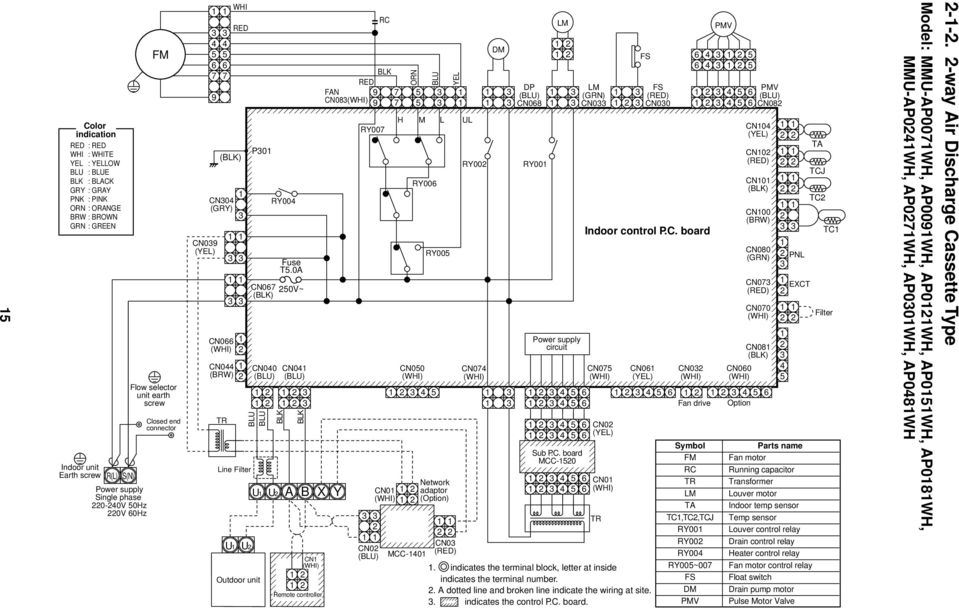
15 5 Color indication RED : RED WHI : WHITE YEL : YELLOW BLU : BLUE BLK : BLACK GRY : GRAY PNK : PINK ORN : ORANGE BRW : BROWN GRN : GREEN Indoor unit Earth screw R(L) S(N) Power supply Single phase 0-40V 50Hz 0V 60Hz FM Flow selector unit earth screw Closed end connector CN09 (YEL) WHI RED (BLK) CN04 (GRY) CN066 CN044 (BRW) TR U Line Filter CN067 (BLK) CN040 (BLU) BLU BLU U Outdoor unit P0 U RY004 U Fuse T5.0A BLK 50V~ CN04 (BLU) A BLK B RED FAN CN08 X CN Remote controller Y CN0 (BLU) RC BLK RY007 CN0 ORN CN MCC-40 BLU RY006 RY005 Network adaptor (Option) YEL H M L UL CN0 (RED) RY00 CN074 DM DP (BLU) CN068 RY00 LM Power supply circuit Sub P.C. board MCC LM (GRN) CN0 Indoor control P.C. board CN075 CN0 (YEL) CN0 TR FS CN06 (YEL). indicates the terminal block, letter at inside indicates the terminal number.. A dotted line and broken line indicate the wiring at site.. indicates the control P.C. board. FS (RED) CN00 CN CN04 (YEL) CN0 (RED) CN0 (BLK) CN00 (BRW) CN080 (GRN) CN07 (RED) CN070 CN08 (BLK) CN Fan drive Option Symbol FM RC TR LM TA TC,TC,TCJ RY00 RY00 RY004 RY005~007 FS DM PMV PMV PMV (BLU) CN08 PNL 4 5 EXCT Parts name Fan motor Running capacitor Transformer Louver motor Indoor temp sensor Temp sensor Louver control relay Drain control relay Heater control relay Fan motor control relay Float switch Drain pump motor Pulse Motor Valve TA TCJ TC TC Filter Model: MMU-AP007WH, AP009WH, AP0WH, AP05WH, AP08WH, MMU-AP04WH, AP07WH, AP00WH, AP048WH --. -way Air Discharge Cassette Type
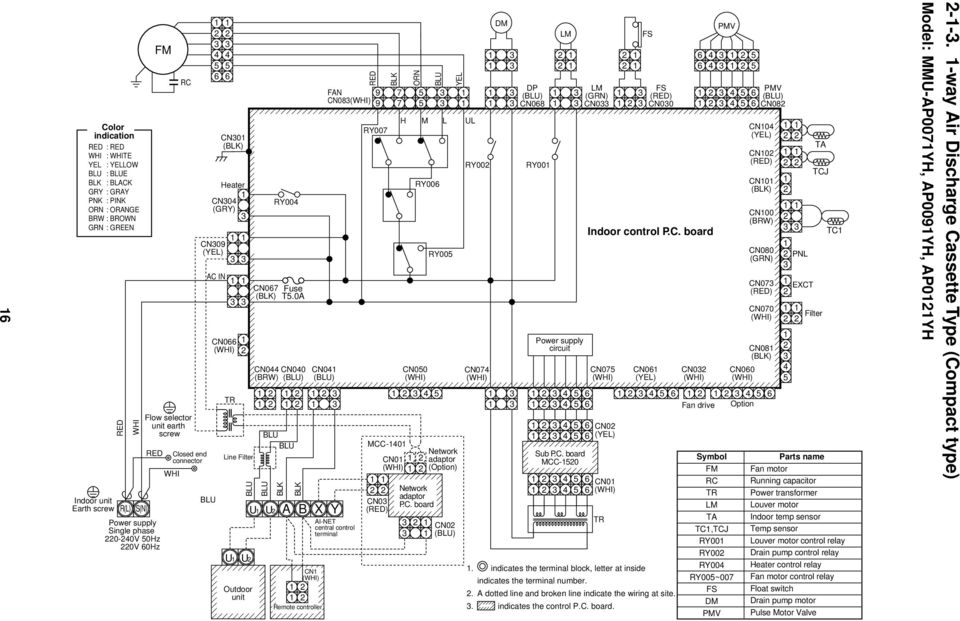
16 6 Color indication RED : RED WHI : WHITE YEL : YELLOW BLU : BLUE BLK : BLACK GRY : GRAY PNK : PINK ORN : ORANGE BRW : BROWN GRN : GREEN Indoor unit Earth screw RED WHI R(L) S(N) RED Power supply Single phase 0-40V 50Hz 0V 60Hz FM WHI RC Flow selector unit earth screw Closed end connector BLU CN0 (BLK) Heater CN04 (GRY) CN09 (YEL) AC IN CN066 TR U Line Filter Outdoor unit CN067 (BLK) CN044 (BRW) BLU BLU U U CN040 (BLU) BLU BLU U RY004 BLK Fuse T5.0A A BLK B CN04 (BLU) X CN Remote controller FAN CN08 Y AI-NET central control terminal RED RY007 BLK MCC-40 CN0 CN0 (RED) ORN CN RY006 Network adaptor P.C. board BLU RY005 Network adaptor (Option) CN0 (BLU) YEL H M L UL RY00 CN074 DM DP (BLU) CN068 RY00 LM Power supply circuit Sub P.C. board MCC LM (GRN) CN0 Indoor control P.C. board CN075 CN0 (YEL) CN0 TR FS CN06 (YEL) FS (RED) CN00. indicates the terminal block, letter at inside indicates the terminal number.. A dotted line and broken line indicate the wiring at site.. indicates the control P.C. board. CN PMV CN04 (YEL) CN0 (RED) CN0 (BLK) CN00 (BRW) CN080 (GRN) CN07 (RED) CN070 CN08 (BLK) CN Fan drive Option Symbol FM RC TR LM TA TC,TCJ RY00 RY00 RY004 RY005~007 FS DM PMV PMV (BLU) CN08 PNL 4 5 EXCT TA TCJ Filter TC Parts name Fan motor Running capacitor Power transformer Louver motor Indoor temp sensor Temp sensor Louver motor control relay Drain pump control relay Heater control relay Fan motor control relay Float switch Drain pump motor Pulse Motor Valve Model: MMU-AP007YH, AP009YH, AP0YH --. -way Air Discharge Cassette Type (Compact type)
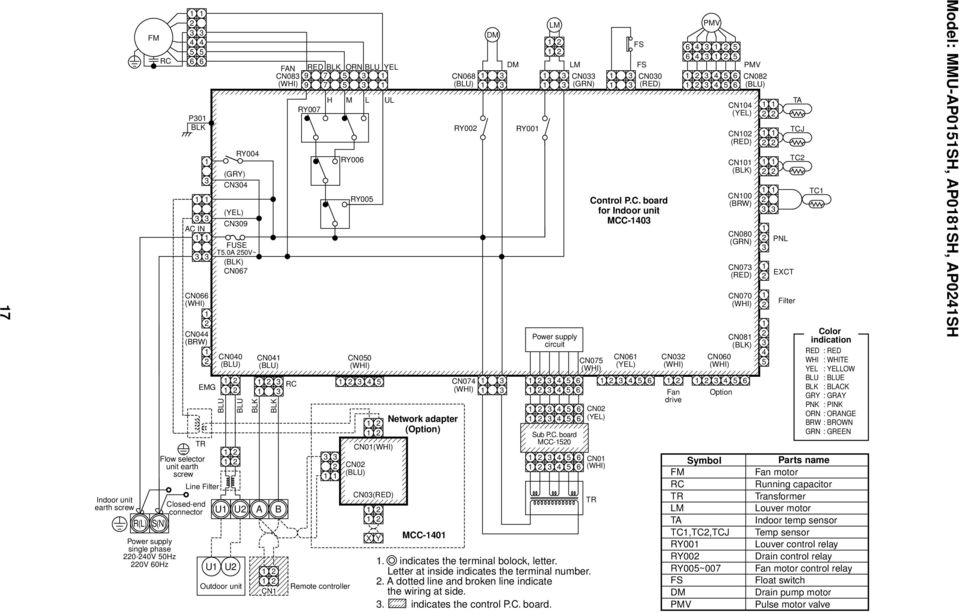
17 7 Indoor unit earth screw FM RC R(L) S(N) Power supply single phase 0-40V 50Hz 0V 60Hz P0 BLK RY004 (GRY) CN04 (YEL) AC IN CN09 FUSE T5.0A 50V~ (BLK) CN067 CN066 CN044 (BRW) Closed-end connector EMG TR Flow selector unit earth screw Line Filter CN040 (BLU) BLU U U U Outdoor unit BLU BLK CN04 (BLU) RY007 H Remote controller M L UL RY006 RY005 CN050 CN0 CN0 (BLU) CN0(RED) X Y. indicates the terminal bolock, letter. Letter at inside indicates the terminal number.. A dotted line and broken line indicate the wiring at side.. indicates the control P.C. board. CN06 (YEL) CN0 Symbol FM RC TR LM TA TC,TC,TCJ RY00 RY00 RY005~007 FS DM PMV CN04 (YEL) CN0 (RED) CN0 (BLK) CN00 (BRW) CN080 (GRN) CN07 (RED) RC 4 5 CN Fan Option drive BLK U A B CN FAN RED BLK ORN BLU YEL CN Network adapter (Option) MCC-40 CN068 (BLU) RY00 DM DM RY00 LM Power supply circuit LM CN0 (GRN) Sub P.C. board MCC Control P.C. board for Indoor unit MCC-40 CN075 CN0 (YEL) CN0 TR FS FS CN00 (RED) PMV CN060 PMV CN070 CN08 (BLK) CN08 (BLU) PNL 4 5 EXCT Filter TA TCJ TC TC Color indication RED : RED WHI : WHITE YEL : YELLOW BLU : BLUE BLK : BLACK GRY : GRAY PNK : PINK ORN : ORANGE BRW : BROWN GRN : GREEN Parts name Fan motor Running capacitor Transformer Louver motor Indoor temp sensor Temp sensor Louver control relay Drain control relay Fan motor control relay Float switch Drain pump motor Pulse motor valve Model: MMU-AP05SH, AP08SH, AP04SH
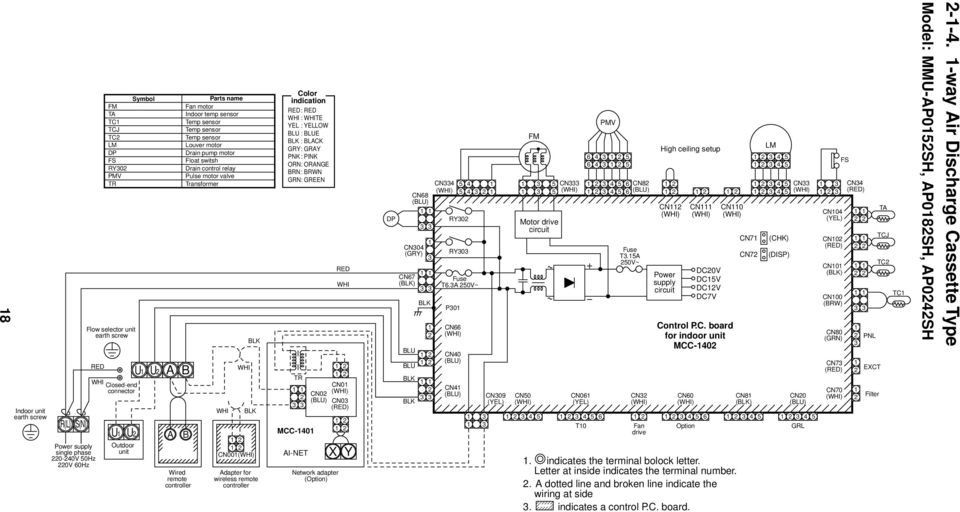
18 8 Indoor unit earth screw R(L) S(N) RED WHI Power supply single phase 0-40V 50Hz 0V 60Hz FM TA TC TCJ TC LM DP FS RY0 PMV TR Flow selector unit earth screw Closed-end connector U U Outdoor unit Symbol U U A A B Wired remote controller Parts name Fan motor Indoor temp sensor Temp sensor Temp sensor Temp sensor Louver motor Drain pump motor Float switsh Drain control relay Pulse motor valve Transformer B WHI WHI BLK BLK CN00 Adapter for wireless remote controller Color indication RED: RED WHI : WHITE YEL : YELLOW BLU : BLUE BLK : BLACK GRY: GRAY PNK : PINK ORN: ORANGE BRN: BRWN GRN: GREEN TR MCC-40 AI-NET CN0 (BLU) Network adapter (Option) RED CN0 CN0 (RED) WHI X Y DP CN68 (BLU) CN04 (GRY) CN67 (BLK) BLU BLU BLK BLK BLK CN4 RY0 RY0 P0 CN66 CN40 (BLU) CN4 (BLU) Fuse T6.A 50V~ CN09 (YEL) CN50 FM Motor drive circuit CN 6 6 CN06 (YEL) 4 4 PMV CN8 (BLU) Fuse T.5A 50V~ CN High ceiling setup CN Power supply circuit CN60 CN DC0V DC5V DCV DC7V CN0 Control P.C. board for indoor unit MCC-40 CN7 CN8 (BLK) LM (CHK) CN CN0 (BLU) T0 Fan Option GRL drive. indicates the terminal bolock letter. Letter at inside indicates the terminal number.. A dotted line and broken line indicate the wiring at side. indicates a control P.C. board. CN (DISP) FS CN04 (YEL) CN0 (RED) CN0 (BLK) CN00 (BRW) CN80 (GRN) CN4 (RED) CN7 (RED) CN70 PNL EXCT Filter TA TCJ TC TC Model: MMU-AP05SH, AP08SH, AP04SH way Air Discharge Cassette Type
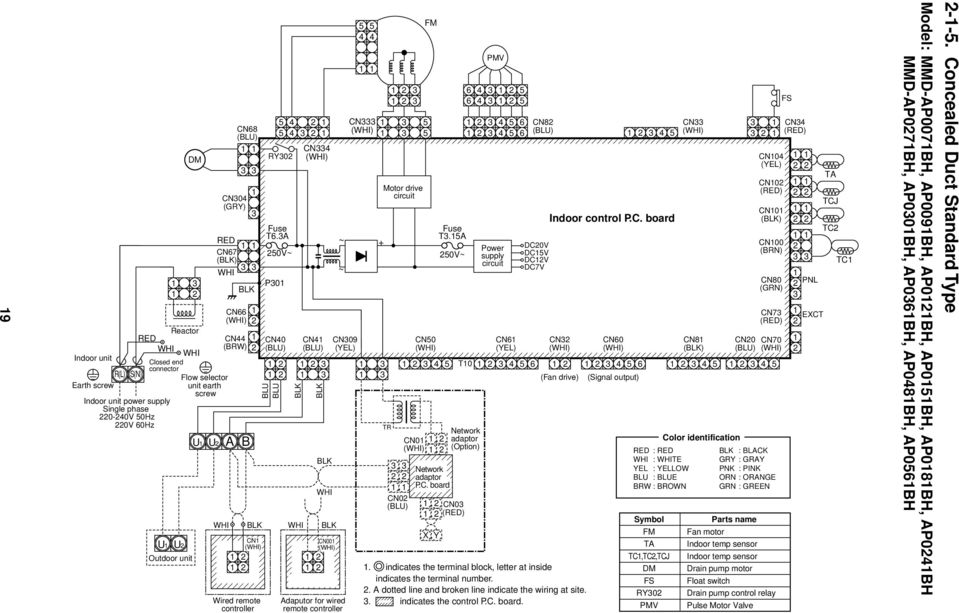
19 9 Reactor RED WHI WHI Indoor unit Closed end connector R(L) S(N) Earth screw Indoor unit power supply Single phase 0-40V 50Hz 0V 60Hz U U Outdoor unit DM Flow selector unit earth screw U CN68 (BLU) CN04 (GRY) RED CN67 (BLK) WHI U CN66 CN44 (BRW) WHI A BLK B CN Wired remote controller RY0 Fuse T6.A 50V~ P0 CN40 (BLU) CN4 (BLU) BLU BLU BLK BLK CN4 BLK WHI BLK WHI BLK CN00 Adaputor for wired remote controller ~ + ~ CN CN09 (YEL) TR 5 5 Motor drive circuit CN0 (BLU) CN50 PMV CN8 (BLU) Fuse T.5A Power DC0V 50V~ supply DC5V circuit DCV DC7V CN6 (YEL) 4 5 Indoor control P.C. board CN CN60 CN CN8 (BLK) 4 5 T (Fan drive) (Signal output) CN0 FM Network adaptor P.C. board Network adaptor (Option) CN0 (RED) X Y. indicates the terminal block, letter at inside indicates the terminal number.. A dotted line and broken line indicate the wiring at site.. indicates the control P.C. board. RED : RED WHI : WHITE YEL : YELLOW BLU : BLUE BRW : BROWN Symbol FM TA TC,TC,TCJ DM FS RY0 PMV Color identification CN04 (YEL) CN0 (RED) CN0 (BLK) CN00 (BRN) CN80 (GRN) CN7 (RED) CN0 CN70 (BLU) 4 5 BLK : BLACK GRY : GRAY PNK : PINK ORN : ORANGE GRN : GREEN Parts name Fan motor Indoor temp sensor Indoor temp sensor Drain pump motor Float switch Drain pump control relay Pulse Motor Valve FS CN4 (RED) PNL EXCT TA TCJ TC TC Model: MMD-AP007BH, AP009BH, AP0BH, AP05BH, AP08BH, AP04BH MMD-AP07BH, AP00BH, AP06BH, AP048BH, AP056BH --5. Concealed Duct Standard Type
20 0 Color indication RED : RED WHI : WHITE YEL : YELLOW BLU : BLUE BLK : BLACK GRY : GRAY PNK : PINK ORN : ORANGE BRW : BROWN GRN : GREEN RED WHI Closed end connector RED WHI (BLK) CN04 (GRY) TR T0A,50V~ Flow selector unit earth screw YEL R(L) S(N) Closed end connector Indoor unit Earth screw Power supply Single phase 0-40V 50Hz 0V 60Hz F Spark killer 8 4F 7 P0 CN09 (YEL) CN067 (BLK) Fuse T5.0A CN066 RY004 FAN CN08 CN044 CN040 (BRW) (BLU) CN04 (BLU) EMG OC RC U Outdoor unit RED RED 6 4 U 4F U WHI RED GRY WHI RED 5 U A RY007 B CN Remote controller 4F 4 4 RED GRY FM RC H M L UL RY006 RY005 CN CN0 CN0 (BLU) WHI BLU X Y ORN RY00 (Option) DP Network adaptor (Option) MCC-40 CN0 (RED) A F F F F4 BLK BRN DP (BLU) CN068 RY00 CN074 LM (GRN) CN0 Power supply circuit FS CN00 (RED) CN075 TR TA CN04 (YEL) CN06 (YEL) TCJ CN0 (RED) CN0 TC CN0 (BLK) TC CN080 (GRN) CN07 (RED) CN070 CN08 (BLK) CN08 (BLU) CN T0 Fan drive Option Sub P.C. board MCC indicates the terminal block, letter at inside indicates the terminal number.. A dotted line and broken line indicate the wiring at site.. indicates the control P.C. board. 4. When attaching a drain pump, exchange CN00 connector with the connector of the float switch. 5. A part is connected to the terminal block. When exchanging to the outside static pressure necessary at the local site, check the terminal No. and lead color of the fan motor in the below diagram, and then exchange the lead wire indicated by the arrow mark ( ). Wired for MMD-AP048 only (BRN Wire) BLK WHI GRY RED Motor over heating protection switch Indoor control P.C. board CN0 (YEL) CN0 49F BLU ORN BRN Sold separately CN00 (BRN) PNL EXCT Filter Symbol FM RC TR TA TC,TC,TCJ RY005~007 RY00 RY00 PMV F 4F DM FS PMV Parts name Fan motor Running capacitor Transformer Indoor temp sensor Temp sensor Fan motor control relay Louver motor control relay Drain control relay Pulse Motor Valve Fuse Fan motor control relay Drain pump motor Float switch Model: MMD-AP08H, AP04H, AP07H, AP06H, AP048H --6. Concealed Duct High Static Pressure Type

21 RED Indoor unit WHI Flow selector unit earth screw Earth screw RED WHI Closed end terminal R(L) S(N) Power supply single phase 00-40V 50Hz 00V 60Hz DM U U Outdoor unit CN68 (BLU) CN04 (GRY) CN67 (BLK) BLU BLU BLK BLK BLK U U A RY0 RY0 Fuse T6.A 50V~ P0 CN66 CN40 (BLU) CN4 (BLU) B CN Wired remote controller 5 4 CN4 5 4 ~ + ~ CN09 (YEL) BLK WHI WHI BLK WHI BLK CN00 CN50 Adaptor for wireless remote controller FM Motor drive circuit CN CN6 (YEL) T0 TR CN0 (BLU) CN0 Fuse T.5A Network adaptor P.C. board CN0 (RED) X Y Power supply circuit CN Fandrive DC0V DC5V DCV DC7V CN8 (BLU) Indoor control P.C. board CN Network adaptor (Option) PMV Option. indicates the terminal block, letter at inside indicates the terminal number.. A dotted line and broken line indicate the wiring at site.. indicates the control P.C. board. LM CN8 (BLK) 4 5 Sold separately CN CN0 (BLU) 4 5 GRL CN04 (YEL) CN0 (RED) CN0 (BLK) CN80 (GRN) CN7 (RED) CN70 FS CN4 (RED) PNL Color identification RED : RED WHI : WHITE YEL : YELLOW BLU : BLUE BRW : BROWN Symbol FM TA TC,TC,TCJ LM RY0 DM FS CN00 (BRW) EXCT FILTER TA TCJ TC BLK : BLACK GRY : GRAY PNK : PINK ORN : ORANGE GRN : GREEN Parts name Fan motor Indoor temp sensor Temp sensor Louver motor Drain control relay Drain pump motor Float switch TC Model: MMC-AP05H, AP08H, AP04H, AP07H, AP06H, AP048H --7. Under Ceiling Type
22 R(L) S(N) Power supply single phase 0-40V 50Hz 0V 60Hz Indoor unit Earth screw RED WHI Flow selector unit earth screw RED Closed-end connector WHI U U U U Outdoor unit LM CN68 (BLU) WHI CN04 (GRY) CN67 (BLK) P0 BLK CN66 RY0 RY0 CN40 (BLU) BLU BLU CN4 FUSE T6.A 50V~ A B X Y CN BLK Wired remote controller BLK BLK GRY GRY WHI CN00 BLK 5 5 Adaptor for wireless remote controller 4 4 CN4 (BLU) BLK WHI CN CN09 (YEL) TR Motor drive circuit CN CN0 CN0 (BLU) FM CN0(RED) Network adaptor (Option) MCC-40 PMV CN8 (BLU) FUSE T.5A 50V~ CN6 (YEL) CN Power supply circuit CN Fandrive Color indication RED : RED WHI : WHITE YEL : YELLOW BLU : BLUE BLK : BLACK GRY : GRAY PNK : PINK ORN : ORANGE BRW : BROWN GRN : GREEN DC0V DC5V DCV DC7V CN4 (RED) CN Option TA CN04 (YEL) CN8 (BLK) 4 5. indicates the terminal bolock. Letter at inside indicates the terminal number.. A dotted line and broken line indicate the wiring at side.. indicates the control P.C. board. Symbol FM TA TC,TC,TCJ PMV LM RY0 TCJ CN0 (RED) TC CN0 (BLK) Control P.C. board for Indoor unit MCC-40 TC CN00 (BRW) CN0 (GRN) CN0 (BLU) 4 5 CN080 (GRN) CN7 (RED) CN70 Parts name Fan motor Indoor temp sensor Temp sensor Pulse motor valve Louver motor Louver control relay EXCT Model: MMK-AP007H, AP009H, AP0H, AP05H, AP08H, AP04H --8. High Wall Type
23 GRN & YEL Heat exchanger GRN & YEL Power Supply Single phase 0-40V 50Hz 0V 60Hz RED WHI 5 CN67 (BLK) CN09 (YEL) GRN & YEL RED Color identification : : : : : : : : : : BRW RED WHI YEL BLU BLK GRY PNK ORN GRN & YEL GRN F0 Fuse T. 5A 50V~ WHI : BROWN RED WHITE YELLOW BLUE BLACK GRAY PINK ORANGE GREEN & YELLOW GREEN CN8 (BLK) WHI BRW YEL GRY PNK Flow selector unit (Sold separately) 4 5 WHI BRW YEL Pulse motor valve GRY ORN RED BLU Infrared rays receive and indication parts (MCC-86) RED BRW BLU ORN YEL WHI CN BLU YEL WHI BLK CN6 (YEL) RED Louver motor Fan motor. indicates the terminal block, letter at inside indicates the terminal number. BLK 5 4. A dotted line and broken line indicate the F wiring at site. S. indicates the control P.C. board. CN HBS BLU CN50 CN8 CN0 CN CN44 (BRW) (BLU) CN40 BLU (BLU) BLK CN4 (BLU) WHI DC 5V BLK Heat DC 0V CN00 exchanger Power DC V (BRW) BLK sensor supply (TC) DC 7V CN circuit BLK Heat CN0 exchanger (BLU) BLK sensor (TC) YEL YEL YEL (MCC-50) Control P.C.board for indoor unit CN60 YEL WHI CN80 (GRN) Fan drive Option PNL/EMG CN0 (GRN) CN0 (YEL) CN04 TF BLK BLK BLK BLK Heat exchanger sensor (TCJ) Thermo sensor (TA) Outdoor unit WHI BLK CN Wierd remote controller (Sold separately) Model: MMK-AP007H, AP009H, AP0H 4 HA
24 4 Indoor unit earth screw AC IN R(L) S(N) FM Power supply single phase 0-40V 50Hz 0V 60Hz RC P0 (BLK) RED WHI CN067 (BLK) CN066 RED Closed-end connector WHI 5 6 TR Flow selector unit earth screw Line filter RY004 (GRY) CN04 (YEL) CN09 FUSE T5.0A 50V~ CN040 (BLU) BLU U U U Outdoor unit BLU BLK CN04 (BLU) RY007 H Remote controller M L UL RY006 RY005 CN050 CN0 CN0 (BLU) CN0(RED) X Y CN06 (YEL). indicates the terminal block. Letter at inside indicates the terminal number.. A dotted line and broken line indicate the wiring at side.. indicates the control P.C. board. CN0 CN04 (YEL) CN0 (RED) CN0 (BLK) CN00 (BRN) CN080 (GRN) Symbol FM RC TR TA TC,TC,TCJ RY00 RY00 RY004 RY005~007 PMV CN07 (RED) RC 4 5 CN T0 Fan Option drive BLK U A B CN FAN RED BLK ORN BLU YEL CN Network adapter (Option) MCC-40 CN068 (BLU) RY00 DP RY00 LM Power supply circuit Sub P.C. board MCC-50 CN0 (GRN) Control P.C. board for Indoor unit MCC-40 CN075 CN0 (YEL) CN0 TR PMV PMV CN08 (BLU) FS CN00 (RED) CN060 CN070 CN08 (BLK) PNL 4 5 EXCT Filter TA TCJ TC TC Color indication RED : RED WHI : WHITE YEL : YELLOW BLU : BLUE BLK : BLACK GRY : GRAY PNK : PINK ORN : ORANGE BRW : BROWN GRN : GREEN Parts name Fan motor Running capacitor Transformer Indoor temp sensor Temp sensor Louver control relay Drain control relay Heater control relay Fan motor control relay Pulse motor valve Model: MML-AP007H, AP009H, AP0H, AP05H, AP08H, AP04H --9. Floor Standing Cabinet Type
25 5 Indoor unit earth screw RED WHI R(L) S(N) Power supply single phase 0-40V 50Hz 0V 60Hz Flow selector unit earth screw Closed-end RED connector WHI TR GRN U U U U FM For AP007BH,AP009BH,AP0BH A B X Y Outdoor unit CN Remote controller WHI RED RC FAN RED BLK ORN BLU YEL CN CN0 CN0 (BLU) CN0(RED) MCC-40. indicates the terminal block. Letter at inside indicates the terminal number.. A dotted line and broken line indicate the wiring at side.. indicates the control P.C. board. GRN Network adaptor (Option) CN0 (RED) WHI R0 (BLK) AC IN EMG FM RED RC RY004 (GRY) CN04 (YEL) CN09 FUSE T5.0A 50V~ (BLK) CN067 CN066 CN044 (BRW) CN040 (BLU) FAN CN08 RED BLK ORN BLU YEL H M L UL RY007 CN04 (BLU) RY006 RY005 CN050 CN068 (BLU) RY00 RY00 Power supply circuit CN0 (GRN) CN Control P.C. board for undoor unit MCC-40 CN075 CN06 (YEL) CN0 CN060 CN04 (YEL) CN0 (RED) CN0 (BLK) CN00 (BRW) CN080 (GRN) PNL CN07 (RED) EXCT CN070 CN08 (BLK) 4 5 CN Fan Option drive Color indication RED : RED WHI : WHITE YEL : YELLOW BLU : BLUE BLK : BLACK GRY : GRAY PNK : PINK ORN : ORANGE BRW : BROWN GRN : GREEN Sub P.C. board MCC-50 CN0 (YEL) TR Symbol FM RC TR TA TC,TC,TCJ RY00 RY00 RY004 RY005~007 PMV CN00 (RED) PMV CN08 (BLU) PMV 4 5 Filter Parts name Fan motor Running capacitor Transformer Indoor temp sensor Temp sensor Louver control relay Drain control relay Heater control reley Fan motor control relay Pulse motor valve TA TCJ TC TC Model: MML-AP007BH, AP009BH, AP0BH, AP05BH, AP08BH, AP04BH --0. Floor Standing Concealed Type
26 6 RED Indoor unit earth screw WHI R(L) S(N) Power supply single phase 0-40V 50Hz 0V 60Hz FM Flow selector unit earth screw Closed-end connector BRW P0 (BLK) AC IN CN066 CN044 (BRW) EMG TR Line filter RC RY004 (GRY) CN04 (YEL) CN09 FUSE T5.0A 50V~ (BLK) CN067 CN040 (BLU) BLU U U U BLU Outdoor unit CN04 (BLU) FAN RED BLK ORN BLU YEL CN H M L UL RY007 Remote controller RY006 RY005 CN050 CN0 CN0 (BLU) CN0(RED) X Y. indicates the terminal block, letter. Letter at inside indicates the terminal number.. A dotted line and broken line indicate the wiring at side.. indicates the control P.C. board. CN06 (YEL) CN0 CN060 CN04 (YEL) CN0 (RED) CN0 (BLK) CN00 (BRW) CN080 (GRN) Symbol FM RC TR LM TA TC,TC,TCJ RY00 RY00 RY005~007 PMV CN07 (RED) RC 4 5 CN Fan Option drive BLK BLK U A B CN Network adaptor (Option) MCC-40 CN068 (BLU) RY00 DP RY00 LM Power supply circuit LM CN0 (GRN) Sub P.C. board MCC-50 Control P.C. board for Indoor unit MCC-40 CN075 CN0 (YEL) CN0 TR FS CN00 (RED) PMV PMV CN070 CN08 (BLK) CN08 (BLU) PNL 4 5 EXCT Filter TA TCJ TC TC Color indication RED : RED WHI : WHITE YEL : YELLOW BLU : BLUE BLK : BLACK GRY : GRAY PNK : PINK ORN : ORANGE BRW : BROWN GRN : GREEN Parts name Fan motor Running capacitor Transformer Louver motor Indoor temp sensor Temp sensor Louver control relay Drain control relay Fan motor control relay Pulse motor valve Model: MMF-AP05H, AP08H, AP04H, AP07H, AP06H, AP048H, AP056H --. Floor Standing Type
27 7 Flow Selector unit Earth screw Color indication RED : RED WHI : WHITE YEL : YELLOW BLU : BLUE BLK : BLACK GRY : GRAY PNK : PINK ORN : ORANGE BRN : BRWN GRN : GREEN Closed-end connector Indoor unit Earth screw WHI RED R(L) S(N) Power supply 0-40V~, 50Hz 0V~, 60Hz Non Drain pump type ("SH" Type) CN68 (BLU) Drain pump type ("SPH" Type) DM U U Outdoor unit U U CN68 (BLU) RED WHI CN44 (BRW) A BLK A B FM 5 4 CN4 5 4 RY0 CN04 (GRY) Fuse T6.A 50V~ CN67 (BLK) P0 CN66 CN40 (BLU) BLU B BLU BLK CN4 (BLU) BLK Motor drive circuit CN09 (YEL) 5 CN 5 CN Fuse T.5A 50V~ PMV 5 5 (External static pressure setup) CN8 CN (BLU) 4 5 Power supply circuit DC0V DC5V DCV DC7V CN6 (YEL) CN CN CN. indicates the terminal bolock. Letter at inside indicates the terminal number.. A dotted line and broken line indicate the wiring at side. indicate a control P.C. board. CN0 Control P.C. board for undoor unit MCC-40 CN Fan drive Option Symbol FM TA TC,TC,TCJ RY0 PMV DM FS Non Drain pump type ("SH" Type) Drain pump type ("SPH" Type) CN7 CN7 (CHK) (DISP) CN8 (BLK) 4 5 Parts name Fan motor Indoor temp sensor Temp sensor Drain control relay Pulse motor valve Drain pump motor Float switch CN4 (RED) FS CN04 (YEL) CN0 (RED) CN0 (BLK) CN00 (BRW) CN80 (GRN) CN4 (RED) CN7 (RED) CN70 CN0 (BLU) 4 5 PNL EXCT TA TCJ TC TC Model: MMD-AP007SPH, AP009SPH, AP0SPH, AP05SPH, AP08SPH --. Slim Duct Type Wired remote controller
28 8 U U Indoor unit U U U U4 U5 U6 U U U U4 Central remote controller U5 U6 Outdoor unit CN09 BLU SV6 BLU BLU 7 7 SV4 BLU 5 5 CN(BLU) BLU SV4 BLU CN0 4 SV5 BLU BLU CN BLU SV BLU CN4(RED) BLU SVA BLU CN(YEL) BLU SVB BLU CN4(BLK) BLU SVC BLU CN BLU 4 SV BLU CN9 BLU SV BLU 4 CN6 BRW Heater CN5(BLU) BRW T Heater BLU BLU WHI WHI Symbol CM, CM PMV, PMV, PMV SV, SV4, SV4, SV5, SVA, SVB, SVC, SVD, SVE, SV6, SSV, SV 4WV COMP, COMP TS, TS TD, TD TE TO TK, TK, TK, TK4 TL HEATER, HEATER, ACCUM HEATER FM PS PD 6H, 6H MG-SW OCR HVC, HVC 7 CN0 CN0 (BLU) 5 CR500 CR50 CR50 CR504 CR506 CR507 CR508 CR509 CR5 CR54 CR56 CR57 PMV RED BRN BLU ORN YEL WHI CN00 RY500 RY50 RY50 RY504 RY506 RY507 RY508 RY509 RY5 RY54 RY56 RY57 Parts name Compressor Pulse motor valve -way valve coil PMV RED BRN BLU ORN YEL WHI CN0 4-way valve coil Compressor case thermo. Pipe temp. sensor (Inlet) Pipe temp. sensor (Outlet) Heat exchange temp. sensor Air temp. sensor Oil temp. sensor Liquid temp. sensor Case heater, 0V, 6W Fan motor (DC) Low pressure sensor High pressure sensor High pressure switch Magnetic switch Overcurrent relay High voltage capacitor PMV RED BRN BLU ORN YEL WHI CN0 (RED) RY58 Pressure Sensor PS RED BLK WHI 4 4 CN500 CN (RED) BRN (Srvice) Accumulator heater RY50 CR 58 Color indication RED BLK CN CN80 Flash CR 50 RED : RED WHI : WHITE YEL : YELLOW BLU : BLUE BLK : BLACK GRY : GRAY PNK : PINK ORN : ORANGE BRN : BRWN VLT : VIOLET Pressure Sensor PD WHI 4 4 CN50 (RED) RY5 Option Board 4 4 CN508 (RED) Interface Control P.C. Board MCC-49 RY5 4 CN 4 BLK BLK BLK BLK SV D SV E CR5 BLK (PNK) 4WV Noise filter P.C. board MCC-66 L L L N Option Board 4 4 CN509 (BLK) CN7 (BLU) BLK (PNK) CR5 Power supply terminal Parts layout Fan IPDU MCC-896 Option Board 4 4 CN50 CN07 4 ORN ORN SW06 RY59 CR59 Comp BLU ON SW0 SW0 SW0 SW0 U U U U4 U5 U6 Connecting terminal Power supply for fan MCC-49 Comp. IPDU No. MCC-50 Option Board CN5 (BLU) ON 4 SW ON 4 SW ON 4 SW ON 4 SW4 ON 4 SW06 ON 4 SW07 ON SW08 ON 4 SW09 ON 4 SW0 CN0 CN CN SW04 SW05 D600 D60 D60 D60 D604 CN05(RED) MG- SW OCR T6.A FUSE Option Board 4 4 CN5 (BLU) Interface control P.C. board (I/F) MCC-49 Comp. IPDU No. MCC-50 6H CN06 T6.A FUSE 6H CN08 (BLU) CN50 CN50 (PNK) CN504 CN5 (BLK) CN505 (GRN) CN507 (YEL) CN54 (BLK) CN55 (GRN) CN56 (RED) CN5 (YEL) CN5 CN5 (GRN) CN00 (BLK) CN RED BLK BLK ORN ORN Comp T6.A FUSE RED WHI BLK GRY L L L N CN5 (YEL) Option Power Supply phase 80-45V 50Hz BLU(BLK) BLU(BLK) BLU(BLK) BLU(BLK) BLK BLK BLK BLK BLK BLK BLK BLK BLU(BLK) BLU(BLK) BLU(BLK) BLU(BLK) BLU(BLK) BLU(BLK) BLU(BLK) BLU(BLK) BLK BLK 4 4 BLU BLU CN40 TD (YEL) TD (RED) TS (GRY) TS Option board WHI CN40 RED CN PNK RED BLU WHI BLK TE (BLK) TO (BLK) TK (BLK) TK (BLU) TK (BLU) TK4 (GRN) TL Transformer Earth screw RED L WHI L BLK L GRY N FM RED WHI BLK U V W + FAN IPDU P.C. Board MCC-896, 897 CN5 CN0 5 4 BLU CN500 YEL BLK WHI BLU RED PNK BLK WHI BLU RED PNK BLK WHI BLU RED PNK CN6 (BLU) CN06 CN8 (RED) IPDU Board () BLK W CN MCC-50 WHI V CN0 L CM CN0 RED U CN0 L CN09 YEL CN0 L CN CN5 CN BLU CN YEL BLU CN08 WHI Reactor RED CN7 (BLK) CN07 WHI CN506(BLK) CN50 (BLU) MCC-49 CN50 CN50 (RED) CN504 CN505(RED) BLK WHI RED BLU YEL CN YEL CN06 CN8 CN6 (RED) BLU (BLU) IPDU P.C. Board () BLK W CN MCC-50 WHI V CN0 L CM CN0 RED U CN0 L CN09 YEL CN0 L CN CN5 CN BLU CN YEL YEL BLK WHI BLU BLK BLK RED PNK PNK RED BLU YEL WHI BLK BLU Power supply P.C. board for FAN BLU BLU + + BLK HVC HVC BLK Noise filter P.C. board MCC-66 CN RED RED WHI CN0 CN0 CN7 CN8 RED WHI BLK BLK CN0 CN9 BLK GRY GRY CN04 CN0 GRY CN CN(BLU) GRY CN WHI RED Reactor CN7 (BLK) CN0 WHI Mg-SW A A GRY RED BLK WHI RED PTC Themistor RED RED OCR 4 6. The two-dot chain line indicates wiring at the local site, and the dashed line indicates accessories sold separately and service wires, respectively..,, and indicate the terminal board and the numerals indicate the terminal numbers.. indicates P.C. board. * Be sure to fix the electric parts cover surely with two screws. (Otherwise water enters into the box resulting in malfunction.) Model: MMY-MAP080FT8, MAP00FT8, MAP0FT8 -. Outdoor Unit
29 9 SVS SVS SVS SVSS Flow Selector unit RBM-Y80FE only RBM-Y80FE RBM-Y80FE only only SVDD SVD SVD CN0 (RED) Earth screw 5 5 CN Indoor unit Supplied wire (Power supply) Control P.C. board for indoor unit CN67 (BLK) Model: RBM-YFE, Y80FE, Y80FE -. Flow Selector Unit (FS Unit) COM SVD SVS SVDD SVSS WHI ORN BLU YEL BRW Control P.C. board MCC-4 CN0 (GRN) CN8 (BLK) R(L) S(N) Power supply single phase 0-40V 50Hz Indoor unit earth screw Supplied wire (Control wiring)
30 . PARTS RATING -. Indoor Unit 4-way Air Discharge Cassette Type Model MMU-AP 009H 0H 05H 08H 04H 07H 00H Fan motor SWF Drain pump motor ADP-409 Float switch FS-08-0 TA sensor Lead wire length : 55mm TC sensor Ø4 size lead wire length : 00mm Vinyl tube (Blue) TC sensor Ø6 size lead wire length : 00mm Vinyl tube (Black) TCJ sensor Ø6 size lead wire length : 00mm Vinyl tube (Red) Pulse motor EDM-MDTF- Pulse motor valve EDM-B5YGTF EDM-B40YGTF Louver motor (panel) MP4GA Model MMU-AP 06H 048H 056H Fan motor SWF Drain pump motor ADP-409 Float switch FS-08-0 TA sensor Lead wire length : 55mm TC sensor Ø4 size lead wire length : 00mm Vinyl tube (Blue) TC sensor Ø6 size lead wire length : 00mm Vinyl tube (Black) TCJ sensor Ø6 size lead wire length : 00mm Vinyl tube (Red) Pulse motor EDM-MDTF- Pulse motor valve EDM-B60YGTF- Louver motor (panel) MP4GA -way Air Discharge Cassette Type Model MMU-AP 007WH 009WH 0WH 05WH 08WH Fan motor AF-0-5-4G AF-0-9-4B Running capacitor for fan motor AC 400V,.0µF AC 450V,.0µF Drain pump motor PJD-050TF- Float switch FS Control P.C. board transformer TT- Pulse motor EDM-MDTF- Pulse motor valve EDM-B5YGTF EDM-B40YGTF TA sensor Lead wire length : 68mm TC sensor Ø4 size lead wire length : 00mm Vinyl tube (Blue) TC sensor Ø6 size lead wire length : 00mm Vinyl tube (Black) TCJ sensor Ø6 size lead wire length : 00mm Vinyl tube (Red) Model MMU-AP 04WH 07WH 00WH 048WH Fan motor AF F AF B Running capacitor for fan motor AC 450V,.5µF AC 450V,.5µF AC 500V, 5µF Drain pump motor PJD-050TF- Float switch FS Control P.C. board transformer TT- Pulse motor EDM-MDTF- Pulse motor valve EDM-B40YGTF EDM-B60YGTF- TA sensor Lead wire length : 68mm TC sensor Ø4 size lead wire length : 00mm Vinyl tube (Blue) TC sensor Ø6 size lead wire length : 00mm Vinyl tube (Black) TCJ sensor Ø6 size lead wire length : 00mm Vinyl tube (Red) 0
31 -way Air Discharge Cassette (Compact type) Type Model MMU-AP 007YH 009YH 0YH Fan motor AF-00--4N- Running capacitor for fan motor AC 400V, µf Drain pump motor PJD-050TF- Float switch FS Control P.C. board transformer TT- Pulse motor EDM-MDTF- Pulse motor valve EDM-B5YGTF TA sensor Lead wire length : 88mm TC sensor Ø4 size lead wire length : 00mm Vinyl tube (Blue) TCJ sensor Ø6 size lead wire length : 00mm Vinyl tube (Red) Model MMU-AP 05SH 08SH 04SH 05SH 08SH 04SH Fan motor AF D SWF Running capacitor for fan motor AC 450V,.5µF AC 500V,.5µF Drain pump motor PJD-050TF- ADP-409 Float switch FS FS-08-0 Control P.C. board transformer TT- Pulse motor EDM-MDTF- Pulse motor valve EDM-B40YGTF EDM-B40YGTF- TA sensor Lead wire length : 55mm Vinyl tube TC sensor Ø4 size lead wire length : 00mm Vinyl tube (Blue) TC sensor Ø6 size lead wire length : 00mm Vinyl tube (Black) TCJ sensor Ø6 size lead wire length : 00mm Vinyl tube (Red) Concealed Duct Standard Type Model MMD-AP 007BH 009BH 0BH 05BH 08BH Fan motor ICF Drain pump motor ADP-409 Float switch FS-08-0 Pulse motor EDM-MDTF- Pulse motor valve EDM-B5YGTF EDM-B40YGTF TA sensor Lead wire length : 68mm TC sensor Ø4 size lead wire length : 00mm Vinyl tube (Blue) TC sensor Ø6 size lead wire length : 00mm Vinyl tube (Black) TCJ sensor Ø6 size lead wire length : 00mm Vinyl tube (Red) Model MMD-AP 04BH 07BH 00BH 06BH 048BH 056BH Fan motor ICF ICF Drain pump motor ADP-409 Float switch FS-08-0 Pulse motor EDM-MDTF- Pulse motor valve EDM-B40YGTF EDM-B60YGTF- TA sensor Lead wire length : 68mm TC sensor Ø4 size lead wire length : 00mm Vinyl tube (Blue) TC sensor Ø6 size lead wire length : 00mm Vinyl tube (Black) TCJ sensor Ø6 size lead wire length : 00mm Vinyl tube (Red)
32 Concealed Duct High Static Pressure Type Model MMD-AP 08H 04H 07H 06H 048H Fan motor STF B STF A STF C STF B Running capacitor for fan motor AC 500V, 4µF AC 400V, 8µF AC 450V, 6µF AC 400V, 8µF Drain pump motor ADP-409 Float switch FS Pulse motor EDM-MDTF- Pulse motor valve EDM-B40YGTF EDM-B60YGTF- TA sensor Lead wire length : 00mm TC sensor Ø4 size lead wire length : 00mm Vinyl tube (Blue) TC sensor Ø6 size lead wire length : 00mm Vinyl tube (Black) TCJ sensor Ø6 size lead wire length : 00mm Vinyl tube (Red) Slim Duct Type Model MMD-AP 007SPH(SH) 009SPH(SH) 0SPH(SH) 05SPH(SH) 08SPH(SH) Fan motor SWF Pulse motor EDM-MDTF- Pulse motor valve EDM-B5YGTF EDM-B40YGTF Drain pump motor ADP-409 Float switch FS-08-0 TA sensor Lead wire length : 558mm TC sensor Ø4 size lead wire length : 00mm Vinyl tube (Blue) TC sensor Ø6 size lead wire length : 00mm Vinyl tube (Black) TCJ sensor Ø6 size lead wire length : 00mm Vinyl tube (Red) SPH series only. Under Ceiling Type Model MMC-AP 05H 08H 04H 07H 06H 048H Fan motor SWF SWF SWF Louver motor MP4GA Pulse motor EDM-MDTF- Pulse motor valve EDM-B40YGTF EDM-B60YGTF- TA sensor Lead wire length : 55mm Vinyl tube TC sensor Ø4 size lead wire length : 00mm Vinyl tube (Blue) TC sensor Ø6 size lead wire length : 00mm Vinyl tube (Black) TCJ sensor Ø6 size lead wire length : 00mm Vinyl tube (Red) High Wall Type Model MMK-AP 007H 009H 0H 05H 08H 04H 007H 009H 0H Fan motor ICF ICF-40-0 or MF-40-0 Louver motor MT8--6 MP4Z Pulse motor EDM-MDTF- Pulse motor valve EDM-B5YGTF EDM-B40YGTF EDM-B5YGTF- TA sensor Lead wire length : 88mm Vinyl tube Lead wire length : 8mm Vinyl tube TC sensor Ø4 size lead wire length : 00mm Vinyl tube (Blue) Ø4 size lead wire length : 600mm Vinyl tube (Blue) TC sensor Ø6 size lead wire length : 00mm Vinyl tube (Black) Ø6 size lead wire length : 800mm Vinyl tube (Black) TCJ sensor Ø6 size lead wire length : 00mm Vinyl tube (Red) Ø6 size lead wire length : 800mm Vinyl tube (Red)
33 Floor Standing Cabinet Type Model MML-AP 007H 009H 0H 05H 08H 04H Fan motor AF F AF F AF K Running capacitor for fan motor AC450V,.µF AC400V,.8µF AC450V, µf Transformer Pulse motor TT EDM-MDTF- Pulse motor valve EDM-B5YGTF EDM-B40YGTF TA sensor TC sensor TC sensor TCJ sensor Lead wire length : 88mm Vinyl tube Ø4 size lead wire length : 00mm Vinyl tube (Blue) Ø6 size lead wire length : 00mm Vinyl tube (Black) Ø6 size lead wire length : 00mm Vinyl tube (Red) Floor Standing Concealed Type Model MML-AP 007BH 009BH 0BH 05BH 08BH 04BH Fan motor AF G AF K Running capacitor for fan motor AC450V,.5µF AC450V, µf AC450V, µf Transformer Pulse motor TT- EDM-MDTF- Pulse motor valve EDM-B5YGTF EDM-B40YGTF TA sensor TC sensor TC sensor TCJ sensor Lead wire length : 88mm Vinyl tube Ø4 size lead wire length : 000mm Vinyl tube (Blue) Ø6 size lead wire length : 000mm Vinyl tube (Black) Ø6 size lead wire length : 000mm Vinyl tube (Red) Floor Standing Type Model MMF-AP 05H 08H 04H 07H 06H 048H 056H Fan motor AF-00-7R AF-00-6T AF-00-0M- AF-00-60H- Running capacitor for fan motor AC500V, µf AC500V,.5µF AC500V, 4µF Transformer Pulse motor TT- EDM-MDTF- Pulse motor valve EDM-B40YGTF EDM-B60YGTF- Louver motor TA sensor TC sensor TC sensor TCJ sensor MT8--9 Lead wire length : 00mm Vinyl tube Ø4 size lead wire length : 00mm Vinyl tube (Blue) Ø6 size lead wire length : 000mm Vinyl tube (Black) Ø6 size lead wire length : 00mm Vinyl tube (Red)
34 -. Outdoor Unit Model MMY- MAP080FT8 MAP00FT8 MAP0FT8 Compressor DA4AFB-M Output: :.75kW 4-way valve coil (Heat pump only) LB64046 AC0-40V 50Hz Pulse motor valve coil VPV-MOAJ54C0 HAM-MDTF- DCV AC0 40V 50Hz -way valve coil VPV SV, SVA, SVB, SVC, SVD, SVE SV4, SV4, SV5, SV6, SV, SV VPV-DQ SV, SVC, SVD, SVE, SV6, SV -way valve VPV-0DQ SVA, SV4, SV4, SV5 VPV-60DQ SVB VPV-04DQ50 SV High-pressure SW ACB-JB5 OFF :.7MPa, ON :.9MPa Pressure sensor (For high pressure) 50XA4-H 0.5 to.5v / 0 to 0.98MPa Pressure sensor (For low pressure) 50XA4-L 0.5 to 4.V / 0 to.7mpa Fan motor MF DC80V, 600W Case heater AC40V, 9W Compressor case thermo. US-6KXTMQO-SS OFF : 5 C, ON : 90 C -. Outdoor Control Unit Heat Recovery Model Model MMY- MAP080FT8 MAP00FT8 MAP0FT8 Power supply terminal block JXO-004 AC600V / 0A, 4P Communication line terminal block JXO-BH AC0V (or DC4V) / A, 6P Inductor CH-44FK.45mH / 5A Smoothing condenser (For compressor) 400LRSN 500M 500µF / 400V Power supply transformer TT-0-0T AC0V, 50mA P.C. board (Noise filter) MCC-66 Line filter (AC) FKX-40NK-480US 0.48mH / 0A (MCC-66 P.C. board) FKX-0NK-60US 0.6mH / 5A (MCC-66 P.C. board) P.C. board (Control board) MCC-49 P.C. board (IPDU for compressor) IPDU-4T6DAE 6.kW MCC-50 P.C. board (Power supply board) MCC-49 P.C. board (IPDU for fan) IPDU-D6DA 800W MCC-896, MCC-897 Power complex module 6MBR5UA0 5A/00V (MCC-50 P.C. board) Pipe temp. sensor (TD) 0 C to 5 C (Ambient temp. range) Pipe temp. sensor (TS) 0 C to 80 C (Ambient temp. range) Heat exchanger temp. sensor (TE) 0 C to 80 C (Ambient temp. range) Outside temp. sensor (TO) 0 C to 80 C (Ambient temp. range) Oil temp. sensor (TK) 0 C to 5 C (Ambient temp. range) Liquid temp. sensor (TL) 0 C to 80 C (Ambient temp. range) Smoothing capacitor (For fan) 400LRSN000M 000µF / 400V Magnet SW FC-S 400V / 8A Thermistor ZPROYCE0A500 00Ω, A, 500V -4. Flow Selector Unit (FS Unit) Model RBM-YFE RBM-Y80FE RBM-Y80FE P.C. board (Control board) MCC-4 -way valve coil VPV AC0-40V 50Hz -way valve VPV-DQ SVSS, SVDD VPV-04DQ50 SVS, SVD 4
35 5 SV4 valve SV4 valve TO sensor TE sensor Check joint (Low pressure) SV5 valve TS sensor SV valve SVD valve SV valve SV6 valve Low pressure sensor SVE valve SVC valve -5. Parts Layout in Outdoor Unit High pressure SW TD sensor High pressure SW TS sensor SVA valve SV valve PMV 4-way valve SVB valve TK, TK sensor TK sensor TD sensor TL sensor TK4 sensor Check joint (High pressure) High pressure sensor Check joint (Liquid pipe) Front side Rear side
36 SET DATA SETTING TEST UNIT No. R.C. No. WEEKLY TIMER ERROR -6. Name of Each Part [Concealed Duct Type] Indoor Unit Sold Separately Parts [4-way Air Discharge Cassette Type] Air outlet/air outlet louver Select air flow direction in cooling or heating operation. Earth screw Situated inside the electric parts box. Clip To open/close the air inlet grille. [-way Air Discharge Cassette Type] Earth screw Situated inside the electric parts box. Center panel Air inlet Air outlet/air outlet louver Select air flow direction in cooling or heating operation. Earth screw Situated inside the electric parts box. Air inlet grille Air filter Filters dust and other trash. (Air filter is situated in the air inlet grille.) -way discharge/-way discharge -way discharge or -way discharge can be selected according to the shape or arrangement of the room. For details, consult with the dealer from which you have purchased the air conditioner. Air filter Filters dust and other trash. (Air filter is situated in the air grille.) Air inlet grille Air outlet/air outlet louver Select air flow direction in cooling or heating operation. Air filter Filters dust and other trash. (Air filter is situated in the air grille.) [-way Air Discharge Cassette Type] MMU-AP007YH to AP0YH MMU-AP05SH to AP04SH MMU-AP05SH, AP08SH, AP04SH Button Button to open/close suction port Air filter Filters dust and other trash. (Air filter is situated in the air grille) Air inlet grille. Earth screw Situated inside the electric box. Earth screw Situated inside the electric parts box. Air outlet/air outlet louver Select air flow direction in cooling or heating operation. Air inlet grille Air filter Filters dust and other trash. (Air filter is situated in the air inlet grille.) Air outlet/air outlet louver Select air flow direction in cooling or heating operation mode. Air filter Filters dust and other trash. (Provided on the suction port.) Main remote controller RBC-AMTE Sub-remote controller RBC-ASE Wireless remote controller kit TCB-AXE RBC-AXCE RBC-AXU(W)-E H TEMP. FILTER RESET TEST TEST SETTING TIMER SET SET TIME CL FAN SWING/FIX UNIT CODE No. ON / OFF MODE VENT C Air outlet flange Discharge duct connection. Air filter Filter dust and other trash. (Air filter is situated in the air inlet grille.) [Concealed Duct, High Static Pressure Type] Air outlet Discharge duct connection. Earth screw Earth screws situated in the electric parts box. [Slim Duct Type] Air inlet Suction duct connection. Air filter (Air filter is not supplied on certain models within the series.) [Under Ceiling Type] Button Button to open/close the inlet grille. Air filter Air filter is situated in the air grille. (Filters dust and other trash.) [High Wall Type] MMK-AP007H to AP04H Air inlet grille Air filter Filters dust and other trash. (Air filter is situated in the air inlet grille.) MMK-AP007H to AP0H Air inlet grille Air filter Filters dust and other trash. (Air filter is situated in the air inlet grille.) Earth screw Earth screws are situated inside the electric parts box. Air inlet Air filter is situated in the air grille. Air inlet Suction duct connection. Air inlet grille Earth screw Situated inside the electric parts box. Drain pan Earth screw Situated in the electric parts box. Air outlet Discharge duct connection. Air outlet/air outlet louver Change the direction of the air to be discharged according to cool/heat mode. Earth screw Situated inside the electric parts box. Air outlet/air outlet louver Change the direction of the air to be discharged according to cool/heat mode. Earth screw Situated inside the electric parts box. Air outlet/air outlet louver Change the direction of the air to be discharged according to cool/heat mode. Weekly timer RBC-EXWE Central remote controller TCB-SC64TLE PROGRAM PROGRAM PROGRAM ALL ZONE ZONE GROUP 4 UNIT No. TEST SET DATA SETTING R.C. No. SELECT ZONE CL SET SuMoTuWeTh Fr Sa CODE No. GROUP
37 SET DATA SETTING TEST UNIT No. R.C. No. [Floor Standing Cabinet Type] Air filter Filters dust and other trash. (Situated inside the air grille.) Air outlet/air outlet louver Changes the direction of the air flow. Earth screw Situated inside the electric parts box. Air inlet grille -7. Parts Name of Remote Controller Display section In the illustration, all of the indicators are displayed for the purpose of explanation. In normal operation, only the icons relevant to the mode of operation would be displayed. When turning on the power breaker switch for the first time, [SET DATA] flashes on the display part of the remote controller. While this display is flashing, the system is performing a self-check function. Wait until this check has been completed and the [SET DATA] display has disappeared before using the remote controller H TEMP. FILTER RESET TEST TIMER SET SET TIME CL FAN SWING/FIX UNIT CODE No. ON / OFF MODE VENT Display section Operation section [Floor Standing Concealed Type] Earth screw Situated inside the electric parts box. Air inlet grille Air outlet port Drain pan (With drain filter) This accessory is installed at the local site SET DATA SETTING TEST H UNIT No. R.C. No. CODE No Front panel (Lower side) [Floor Standing Type] Horizontal louver/air outlet port Changes the direction of the air flow. Air inlet grille Air filter Filters dust and other trash. Earth screw Situated inside the electric parts box Outdoor Unit Air inlet Situated at front, rear, left, and right sides. Fixing leg Air filter Filters dust and other trash. (Situated inside the suction port.) Fixing metal holder Vertical louver The air can automatically be discharged rightward/leftward at stated periods. Drain pan Water accumulated in the drain pan is drained through the drain pipe. Fixing metal holder (Right and left) Air outlet (Discharge) Hot air is discharged when cooling operation is performed. Cold air is discharged when heating operation is performed. Power source aperture Refrigerant pipe access for connection SET DATA display Displayed during initialization of controller. Operation mode select display The selected operation mode is displayed. CHECK display Will be displayed when a error condition occurs or a protection device operates. 4 Timer time display Displays the selected delay time. (When a malfunction occurs, a check code is displayed in place of the time display.) 5 Timer SETIN setup display By pressing the Timer Set button, the display of the timer is shown in the following order: [OFF] [OFF] repeat OFF timer [ON] No display. 6 Filter display If FILTER is displayed, clean the air filter. 7 TEST run display Displayed during a test run. 8 Louver position display (for 4-Way Air Discharge Cassette Type and Under Ceiling Type model only) Displays louver position. 9 Louver swing display Indicates the movement of the louver. 0 Setpoint temperature display The selected set up temp. is displayed. Remote controller sensor display Displayed while the sensor of the remote controller is used. PRE-HEAT display Displayed when the heating or defrost operation is carried out. While this indication is displayed, the indoor fan stops or the runs in LOW fan speed. Operation ready display Displayed when cooling or heating operation is impossible because the outdoor temperature goes outside the operating range. 4 No function display Displayed when the selected function is not available. 5 Fan mode display The selected Fan mode is displayed. (AUTO) (HIGH) (MED.) (LOW) In the Concealed Duct High Static Pressure type models, [HIGH] only is displayed for the air speed. 6 Mode select control display Displayed when pushing Operation mode select button while the operation mode is fixed to heating or cooling by the system manager of the air conditioner. 7 Central control display Displayed when using the remote controller with a central control remote controller, etc. If the remote controller is prohibited on fan the centralcontrol side, flashes when operating the ON / OFF MODE following,, / buttons and the function is not accepted. (The different settings available on the remote controller when in use with a central controller, can be referred to in the owners manual of the central controller.)
38 8 Operation section Push each button to select the desired operation. This remote controller can operate up to a maximum 8 indoor units. The remote controller can memorize user settings and can be recalled and activated by a single press of ON / OFF the button. Fan mode select button Selects the desired air speed. The Concealed Duct High Static Pressure type models cannot be operated. Timer set button Used for setting the timer function. Check button The CHECK button is used for the check operation. During normal operation, do not use this button. 4 Fan button When an after-market fan device is connected to the system, this button activates the device. If is displayed on the remote controller when pushing the FAN button, a fan is not connected. 5 Filter reset button Resets the FILTER display. 6 Unit and Auto louver buttons UNIT : Select the desired indoor unit by pressing the unit button. SWING/FIX : 0 5 TEMP. FILTER RESET TEST TIMER SET SET TIME Press the button to set the louver into Auto mode. This function is not available on the Concealed Duct Standard Type, High Static Pressure Type, Floor standing Cabinet Type, Floor Standing Concealed Type, or Slim Duct Type. 7 CL FAN SWING/FIX UNIT ON / OFF MODE VENT Operation lamp Lit during normal product operation. Flashes to indicate malfunction or incorrect timer setting. ON / OFF 8 button Push to cycle between ON and OFF mode. When the unit is OFF, the Operation Lamp and the display will turn OFF. 9 Operation select button Selects the desired operation mode. 0 Set up temperature button Adjusts the temperature set point for the room. Set the desired temperature by pressing the or. OPTION : Remote controller sensor The temperature sensor in the indoor unit measures the room temperature. The remote controller can also measure the room temperature. For details of this feature, contact the dealer from whom you purchased the product. -8. Correct Usage When the product is operated for the first time, or after the SET DATA value has been changed, the procedure below should be followed. The remote controller can memorize user settings and can be recalled and acti ON / OFF vated by a single push of the button. Preparation Power the system by switching the electrical isolation device on and by pushing the ON/OFF button on the remote controller. When the power is switched on, a partition line is shown on the remote controller display. The remote controller performs a self-check function for approximately minute during which user input will not be accepted. REQUIREMENT While using the air conditioner, operate it only with ON / OFF button without turning off the main power switch and the leak breaker. Do not turn off the earth leakage breaker while the air conditioner is in use. When the air conditioner has not been operated for a period of time, ensure the earth leakage breaker is turned on for or more hours prior to the start up of operation. Push ON / OFF button. The operation lamp goes on, and the operation starts. Select an operation mode with the MODE button. AUTO HEAT DRY One push of the button, and the display (Dehumidity) changes in the order shown on the right. COOL FAN DRY mode function is not available on the Concealed Duct High Static Pressure Type. AUTO HIGH MED. LOW FAN Select air volume with button. One push of the button, and the display changes in the order shown on the right. When air volume is AUTO, air volume differs according to the temperature difference between the set temperature and the room temperature. In DRY mode, AUTO is displayed and the air volume is LOW. In heating operation, if the room temperature is not heated sufficiently with volume LOW operation, select MED. or HIGH operation. The temperature which the temperature sensor detects is one near the air inlet of the indoor unit. Therefore it slightly differs from the room temperature according to the installation status. The setup value is a criterion of the room temperature. (Automatic air speed cannot be selected in FAN mode.) Air volume of function is not available on Concealed Duct High Static Pressure Type air speed HIGH only is displayed. 4 Determine the set up temperature by pushing the TEMP. or TEMP. button. Stop Push ON / OFF 4 button. TEMP. FILTER RESET TEST TIMER SET TIME SET CL The operation lamp goes off, and the operation stops. FAN SWING/FIX UNIT ON / OFF MODE VENT
39 [In Cooling operation] The operation starts after approximately minute. [In Heating operation] REQUIREMENT In heating operation, the fan operation may continue for approximately 0 seconds after the air conditioner has stopped. The indoor fan continues in preheat operation for to 5 minutes, and then blows out the hot air. ( symbol is displayed on the remote controller.) When the temperature of the room has reached the set point temperature and after the unit has stopped, the air speed is lowered and the air volume is greatly reduced. In defrost mode, the fan stops so that cool air is not discharged. PRE-DEF symbol is displayed. [In Automatic operation] Using the difference between the set point temperature and the room temperature, the heating and cooling operations are automatically performed. How to set up the air direction Push SWING/FIX button. Every push of the button, the air direction changes. In Heating operation Set the air outlet louver downward. If directing it upward, the hot air may not reach the floor. In Cooling / Dry operation Set the air outlet louver upward. If directing it downward, dew condensation may fall on or near the air discharge port. Initial setup Initial setup 9-9. Adjustment of Wind Direction To increase the cooling or heating effect, be sure to make proper use of the discharge louver for cooling or heating operation. As the characteristics of the air, cool air collects at lower levels, and hot air collects at higher levels. CAUTION Set the louver so that air blows out horizontally. If cooling operation is performed with the louver blowing air downwards, the air outlet or surface of the louver will be wet with dew, which may drip. 4-way Air Discharge Cassette Type While the air conditioner stops, the discharge louver directs downward automatically. When the heating operation is in PREHEAT/DEFROST state, the louver is directed upward. The rotation of the louver starts after PREHEAT/DEFROST status cleared, is displayed on the remote controller even if the heating operation is in PREHEAT/DEFROST status. [In Cooling operation] Use the discharge louver with horizontal set point. [In Heating operation] Use the discharge louver with downward set point. How to start louvre swinging Push SWING/FIX button. Set the louver direction to the lowest position, and then push SWING/FIX again. [SWING ] is displayed and the air direction automatically changes upward/downward. In cases where one remote controller controls the multiple indoor units, each indoor unit can be selected and its air direction can be set up. How to stop louver swinging Push SWING/FIX button again while the louver is operating. The louver stops at a position when you push SWING/FIX. If pushing SWING/FIX again, the air direction descends from the highest position. * In COOL/DRY operation, the louver does not stop at the lowest position. If stopping the louver as it directs downward during operation, it stops after moving to the rd position from the highest position. 4 UNIT UNIT Push to set up the air direction individually in each indoor unit. Then the indoor unit No. in a group control is displayed. For the displayed indoor unit, set up the air direction. If the unit No. is not displayed, all the indoor units are operated at the same time. UNIT Every time is pushed, the display is exchanged as follows: TEMP. FILTER RESET TEST TIMER SET SET TIME CL In FAN operation FAN SWING/FIX UNIT ON / OFF MODE VENT,, 4 Initial setup In all modes Series of operation Display when stopping the swing Fan/Heat operation Cool/Dry operation No display Unit No. - Unit No. - Unit No. -4 Unit No. -
40 -way discharge or -way discharge can be selected according to the configuration of the room. For details, consult with the dealer from which you have purchased the air conditioner. INFORMATION If cooling operation has been selected while the louver is in a downward position, the cabinet or surface of the louver may become wet with dew. If heating operation has been selected while the louver is in a horizontal position, the room temperature may not be even. Never handle the louver directly with hands as a malfunction or injury may occur. Use the louver operation functions on the remote controller to change direction of the louver. Under Ceiling Type, -way Air Discharge Cassette Type (SH Series) When the air conditioner is stopped, the horizontal louver (Up/Down air direction adjustment plate) automatically directs upward. When the air conditioner is in stand-by status waiting to heat, the horizontal louver (Up/Down air direction adjustment plate) directs upward. The swinging operation starts upon the heating operation starting, but SWING is displayed on the remote controller even when in heating operation. How to set up the air flow direction Push SWING/FIX button during operation. Every pushing of the button, the air direction changes. -way Air Discharge Cassette Type [In Cooling operation] Use the air outlet louver with horizontal set point. [In Heating operation] Use the air outlet louver with downward set point. In Heating operation Set the horizontal louver (Up/Down air direction adjustment plate) downward. If directing it upward, the hot air may not reach the floor. Initial setup In Cooling / Dry operation Set the horizontal louver (Up/Down air direction adjustment plate) upward. If directing it downward, dew condensation may fall on or near the air discharge port. Initial setup 40 How to set up the air direction Push SWING/FIX button during operation. [SWING ] is displayed and the air direction automatically changes upward/downward. In case when one remote controller controls multiple indoor units, each indoor unit can be selected and the air direction can be set up. Push SWING/FIX button again during swinging of the TEMP. ON / OFF air outlet louver. The air outlet louver can be stopped at the required TIMER SET FAN MODE position. UNIT UNIT To set up the air direction individually, push button to display each indoor unit No. in a group control. Then set the air direction on the displayed indoor unit. If there is no display, all the indoor units can be operated collectively. UNIT Every pushing of the button, the display will change as shown in the figure. -way Air Discharge Cassette Type (H Series) Adjustment of air direction upward/downward [In Cooling operation] In cooling operation, use the air outlet louver in a position that will defuse cool air throughout the room. [In Heating operation] In heating operation, use the air outlet louver in a downward position so that the air is directed to the floor. Adjustment of air the direction rightward/leftward To change the discharge direction from the right or left position, set the vertical grille inside of the air outlet louver to the required direction. Setup the air flow direction and swinging Refer to the description of the -way Air Discharge Cassette Type. FILTER RESET TEST SET TIME CL SWING/FIX UNIT VENT, No display Unit No. - Unit No. - Unit No. -4 Unit No. - How to start swinging Push SWING/FIX button. Set the direction of the horizontal louver (Up/ Down air direction adjustment plate) to the lowest position and then push SWING/FIX button again. [SWING ] is displayed and the air direction automatically changes upward/downward. In cases where one remote controller controls the multiple indoor units, each indoor unit can be selected and air flow direction set up. How to stop swinging Push SWING/FIX button again during swinging of the horizontal louver. The horizontal louvre can be stopped at the desired position. The air direction can be again set up from the uppermost position by pushing SWING/FIX button. * While the horizontal louver is set downward in cooling/drying operation, it does not stop. If stopping the horizontal louver which directs downward during swinging, it will stop after reaching the rd position from the upper position. 4 UNIT UNIT Push to set up the air direction individually in each indoor unit. Then the indoor unit No. in a group control is displayed. For the displayed indoor unit, set up the air direction. If the unit No. is not displayed, all the indoor units are operated at the same time. UNIT Every time is pushed, the display is exchanged as follows: No display Unit No. - Unit No. - Unit No. -4 Unit No. - TEMP. FILTER RESET TEST TIMER SET TIME SET CL In FAN operation FAN SWING/FIX UNIT ON / OFF MODE VENT,, 4 Initial setup In all modes Series of operation Display when stopping the swing Fan/Heat operation Cool/Dry operation
41 Right/Left air direction adjustment To change the air outlet direction to the right or left side, set the vertical louver located behind the horizontal louver to the desired direction. INFORMATION If cooling operation is performed with a donwards discharge, dew may form on the surface of the cabinet or the horizontal louver resulting in possible dripping. If heating operation is performed with a horizontal discharge, the room temperature may not be equal i.e. there may be a large variance between one side of the room with the other. Floor Standing Cabinet Type [In Cooling operation] In cooling operation, set the air outlet louver with a horizontal set point so that the cold air diffuses the whole room. [In Heating operation] In heating operation, set the air outlet louver with a downwards set point so that the hot air blows towards the floor. High Wall Type Adjustment of air Flow direction Upwards/Downwards [In Cooling operation] In cooling operation, use the horizontal louver with a horizontal set point so that the cold air diffuses the whole room. [In Heating operation] In heating operation, use the horizontal louver with a downwards set point so that the hot air blows towards the floor. How to change the air outlet port Change the air outlet port using the following procedure. Remove the two fixing screws on the air outlet port. (The fixing screws are reused.) 4 REQUIREMENT If cooling operation is performed with the louver set at a downwards position, dew may form on the surface of the cabinet or the horizontal louver resulting in possible dripping. If heating operation is performed with the louver set in a horizontal position, the room temperature may not be equal i.e. there may be a large variance between one side of the room with the other. Do not move the horizontal louver directly with your hands; otherwise a fault maybe caused. Select the direction of the horizontal louver using the SWING/FIX button on the remote controller. The horizontal louver will not stop immediately even if the switch is pushed. Note pushing the switch again when the required louver direction has been reached will stop the louver. Remove the discharge port, by pushing up on the rear side, to a point where you can remove it from the rear clip. Lift the air outlet port upwards and remove it. 4 Reverse the air outlet port and attach it to the main unit. Pay attention so that four claw hooks (two at rear and two at the lower sides) are hooked on the mounting position. Adjustment of air Flow direction rightwards/leftwards To change the air outlet direction to the right or left side, set the vertical louver located behind the horizontal louver to the desired direction. 5 Be sure to tighten the air outlet port with the removed fixing screws so that the air outlet port does not come off. Setup of air direction and swinging H series: Refer to the description of -way Air Discharge Cassette Type. H series: Refer to the description of Under Ceiling Type, -way Air Discharge Cassette Type (SH Series).
42 Floor Standing Type Adjustment of air Flow direction upwards/downwards [In Cooling operation] In cooling operation, move the louver with your hands so that the horizontal air outlet points in a direction so that the cold air diffuses the entire room. [In Heating operation] In heating operation, move the louver with your hands so that the horizontal air outlet points in a downward direction, towards the floor. -0. Timer Operation The type of timer operation can be selected from the following three types. OFF timer : The operation stops when the time on the timer has reached the set time. Repeat OFF timer : The unit will stop, every time the set time period has elapsed. ON timer : The unit will start when the time on the timer has reached the set time. Timer operation 4 Adjustment of air Flow direction rightwards/leftwards [In case of using unsymmetrical air directions] Lift up the vertical louver lightly and direct it towards the desired direction once completed lower the louver back down. In this case, do not use the Swing function. [In case of automatic swing] Push the SWING/FIX button during operation. [SWING ] is displayed and the air direction will automatically change rightwards/ leftwards. In cases where one remote controller controls multiple indoor units, it is possible to set each indoor unit individually, so that the air flow direction can be altered. Push the SWING/FIX button again whilst the vertical louver is moving will allow you to stop the louver in the desired position. UNIT Swing button To set up the air flow the direction individually, push the button to display each UNIT indoor unit No. in a group control. Then set up the air flow direction to the desired indoor unit. If there is no display, all the indoor units can be operated collectively. UNIT Every push of the button, will change the display as shown in the figure. ON / OFF INFORMATION If cooling operation is performed with downward air outlet, dew may form on the surface of the cabinet or the horizontal louver, resulting in possible dripping of water. If heating operation is performed with the horizontal air outlet actively moving, unevenness of the temperature may increase within the room. Do not move the louver directly with your hands during swing operation; otherwise a fault may be caused. The vertical louver does not stop immediately even if the SWING/FIX button is pushed. To adjust the stop position, push the SWING/FIX button. TEMP. FILTER RESET TEST In this case, do not use the swing function. TIMER SET SET TIME CL FAN SWING/FIX UNIT MODE VENT, No display Unit No. - Unit No. - Unit No. -4 Unit No. - Push the TIMER SET button. The timer display (type) changes for every push of the button. SET TIME and timer time displays flash. TIME Push the buttons to select the SET TIME. For every push of the button, the set time increases in the unit of 0.5 hr (0 minutes). The maximum set time is 7.0 hr. For every push of the button, the set time decreases in the unit of 0.5 hr (0 minutes). The minimum set time is 0.5 hr. Push the SET button. The SETTING display disappears and the timer time display goes on. (When the ON timer is activated, the chosen time period will be displayed. Once the time has been reached, all displays except the ON light will disappear.) Cancel of timer operation 4 Push the CL button. TIMER display will disappear. TEMP. FILTER RESET TEST TIMER SET SET TIME CL 4 TICE ON / OFF When the unit stops after the timer has reached the preset time, the Repeat OFF timer will resume the operation. However by pushing the ON / OFF button the repeat function will stop once the time on the timer has again reached its set time. FAN SWING/FIX UNIT MODE VENT OFF (OFF timer) OFF (Repeat OFF timer) No display ON (ON timer)
43 -. Installation Installation location WARNING Select a location for installation that will be able to safely support the weight of the unit. If the installation location is not strong enough to support the unit and the unit falls, injury could result. -. Maintenance Cleaning of air filter When [FILTER] is displayed on the remote controller, its is time to check and if necessary clean the filter. Clogging of air filter decreases the cooling/heating effect. CODE No. CAUTION Do not install the unit in a location where combustible gases could conceivably leak. Leaking gases that accumulate in the vicinity of the unit could be ignited by the unit. FILTER display Notifies that it is time to clean the air filter. SET DATA SETTING TEST H TEMP. UNIT No. R.C. No. ON / OFF 4 REQUIREMENT A location that permits the level installation of the unit A location that provides enough space to service the unit safely A location where water draining from the unit will not pose a problem Avoid the following types of locations : Locations where salt is present in large amounts (seaside areas), or where sulfuric gases are present in large amounts (hot springs areas) (If the unit is to be used in such areas, special maintenance is necessary.) Locations that generate oils (including machine oils), steam, oily smoke, or corrosive gases Locations where organic solvents are used Locations in the vicinity of equipment that generates high frequency signals Locations where the outdoor unit will blow in the direction of a neighbor's window Locations where the noise of the outdoor unit will pose a problem Locations with poor air circulation Electric wiring Ensure that the unit is correctly earthed. WARNING Grounding is necessary. If earthing is incomplete, an electric shock may be caused. FILTER reset Push the FILTER switch after cleaning. The FILTER display will disappear. WARNING Be sure to turn off the main power supply prior to any maintenance. Please do not intend to do the daily maintenance and/or Air Filter cleaning by yourself. Cleaning of the air filter and other parts of the unit involves dangerous work in high places, so be sure to have a qualified service person do it. Do not attempt it by yourself. Daily maintenance For daily maintenance including Air Filter cleaning, please use qualified service personnel, particularly for the following models; 4-way Air Discharge Cassette Type Concealed Duct Type Under Ceiling Type -way Air Discharge Cassette Type Slim Duct Type -way Air Discharge Cassette Type Concealed Duct, High Static Pressure Type GOOD FILTER RESET TEST TIMER SET SET TIME CL FAN SWING/FIX UNIT MODE VENT GOOD Check that the circuit breaker is fitted. CAUTION Attaching a earth leakage breaker is necessary. Otherwise, an electric shock may be caused. Make sure that the correct capacity Fuses are used. Using wire or copper wire may cause a fire or unit fault. Ensure that the power supply to the unit is exclusive and is the correct rated voltage. To disconnect the appliance from the main power supply. This appliance must be connected to the main power supply by means of a circuit breaker or a switch with a contact separation of at least mm. -way Air Discharge Cassette Type GOOD Concealed Duct Type GOOD Under Ceiling Type 4-way Air Discharge Cassette Type GOOD GOOD Slim Duct Type -way Air Discharge Cassette Type GOOD Concealed Duct, High Static Pressure Type
44 High Wall Type (Model : H series) Push the projection at the center of the air filter. Undo the clip on the air filter, pull the air filter downwards while pushing it towards the main unit side. (Model : H series) Open the air inlet grille. Lift the air inlet grille up in to the horizontal position. Take hold of the left and right handles of the air filter and lift it up slightly, then pull downwards to remove it from the filter holder. Push the air filter, and pull it downward. Re-installing the air filter Insert the upper portion of air filter confirming alignment with the right and left edges of the indoor unit until it is located. Close the air inlet grille. If the FILTER lamp on the indoor unit is lit, push the FILTER button on the remote controller or the TEMPO- RARY button on the indoor unit to turn off the lamp. Filter holder 44 Floor Standing Cabinet Type Filter holder Gently push down the upper part of the suction port, and then pull towards you to remove it. Take out the air filter inside of the suction port. Floor Standing Concealed Type Push down on the hook of the air filter on the front panel (Lower side). Pull the air filter towards you to remove it. Cleaning the air inlet grille. Remove the air inlet grille. Hold the two sides of the air inlet grille and open in an upwards direction. Move the center arm to the left and remove the grille.. Wash it with water using a soft sponge or towel. (Do not use metallic scrubbing brush or other hard brushes.) Use of such hard objects will cause scratches on the surface of the grille, and the metal coating to peel off. If very dirty, clean the air inlet grille with a neutral detergent for kitchen use, and rinse it off with water.. Wipe the air inlet grille and allow to dry. 4. Fit the left and right arms of the air inlet grille to the shafts on the two sides of the air conditioner and push in completely, then push in the center arm. 5. Check that the center arm has been completely inserted and then close the air inlet grille. Push the arrow locations (Four) at the bottom of the air inlet grille to check whether the grill is completely closed. Front panel (Lower) Air filter knob Floor Standing Type Removal / Attachment of air filter Pull the air filter towards you. To attach the air filter, insert it into the main body and push. TE When cleaning the air filter, use a small brush or cleaning device. If the air filter is heavily stained use a neutral detergent mixed with warm water. After washing the filter, rinse it out thoroughly and place in the shade to dry. Do not expose to direct sun light. Once the air filter has dried, place the air filter back into the unit. Cleaning of main unit / remote controller CAUTION Wipe them with a soft and dry cloth. A cloth dampened with cold water may be used on the indoor unit if it is very dirty. Never use a damp cloth on the main unit or remote controller. Do not use or leave a chemically treated duster on the unit for long periods of time, as it may damage or alter the colour of the unit surface. Do not use benzine, thinner, polishing powder, or similar solvents for cleaning. These may cause the plastic surface to crack or deform. Thinner Polishing Benzene powder Chemical floor-cloth Do not use.
45 If you do not plan to use the unit for more than month. Operate the fan for to 4 hours to dry the inside of the unit Operate FAN mode.. Stop the air conditioner and turn off the main power supply or the circuit breaker. Checks before operation. Check that the air filters are installed.. Check that the air outlet or inlet is not blocked.. Turn on the main power switch or the circuit breaker for the main power supply to the air conditioner. Wipe with a dry soft cloth When the unit has not been turn on for a long period of time, ensure the unit is dry, as shown above and then operate in fan only mode for to 4 hours. -. Air Conditioner Operations and Performance Check before operation Check whether earth wire is disconnected or out of place. Check that air filter is installed to the indoor unit. Heating capacity WARNING Turn on the power supply hours or more before starting the air conditioner. During heating operation the heat pump system operates by absorbing the heat from the outside air and discharging it into the room. Therefore if the outside temperature drops, the units heating capacity will decrease. When the temperature of the outside air is low, it is recommended that you use other forms of heating in conjunction with the air conditioner. Defrost operation during heating operation If the outdoor unit has a build up of frost during the heating operation, the operation mode changes automatically to defrost mode to increase the heating effect (for approximatley to 0 minutes). During defrost operation, fans of the indoor and the outdoor units will stop. 45 TE For an Air conditioning system which is operated regularly, cleaning and maintenance of the indoor/ outdoor units are strongly recommended. As a general rule, if an indoor unit is operated for about 8 hours daily, the indoor/outdoor units will need to be cleaned at least once every MONTHS. This cleaning and maintenance shall be carried out by a qualified person. Failure to clean the indoor/outdoor units regularly will result in poor performance, icing, water leakage and even compressor failure. HINTS FOR ECOMICAL OPERATION Maintain room temperature at comfortable level Clean air filters The clogged air filter impairs the performance of the air conditioner. Never open doors and windows more than what is necessary To keep the cool or warm air in the room, never open doors and windows more than what is necessary. Window curtains In cooling, close the curtains to avoid direct sunlight. In heating, close the curtains to keep the heat in. Ensure uniform circulation of room air Adjust the air flow direction so that the air is evenly circulated throughout the room. Please close Blows upward Clean, please. Cool and dry air Warm air Gee, chilly Control Blows downward Air flow adjustment Protection for minutes The outdoor unit will not operate for approximately minutes after the air conditioner has been immediately restarted after being stop, or the power supply has been turned on. This is to protect the system. Main power failure If a power failure occurs during operation, all operations will stop. When restarting the unit, push the ON/OFF button again. Fan rotation of stopped unit When other indoor units within the same system are in operation, the fan on the indoor units that are on stand-by will rotate to protect the machine once per approximately hour for several minutes. Protective device (High pressure switch) The high pressure switch will stop the unit automatically when excessive load is applied to the air conditioner. If the protective device operates, the operation lamp will stay lit but the operation will stop. When the protective device operates, check characters on the remote controller display. The protective device may operate in the following cases. When suction or discharge port on the outdoor unit is blocked. When strong wind blows continuously against the discharge port of the outdoor unit. When dust or dirt is excessively adhered to the air filter of the indoor unit. When the discharge port of the indoor unit is blocked. Cooling/heating operation of a Heat Recovery Multi air conditioner When the outdoor temperature goes out of the operating range, the cooling or heating modes may not be performed in order to protect the equipment. In this case, the light goes on. Characteristics of heating operation Hot air will not be blown out immediately from the indoor unit. It will take between to 5 minutes (depending on temperature conditions of the room and the outside) before the indoor heat exchanger warms up sufficiently, to allow hot air to be blown. During operation, the indoor unit may stop if the outside temperature becomes to high. When other indoor units are in heating operation, the fan operation of the indoor unit on fan only operation may be stopped temporarily to prevent hot air from being blown out. Characteristics of cooling/heating simultaneous operation If the outdoor temperature drops during operation, the fan of the outdoor unit may stop.
46 46 Air conditioner operating conditions For specified performance, operate the air conditioner under the following temperature conditions: Cooling operation Heating operation -4. Re-Installation Outdoor temperature : 0 C to 4 C (Dry-bulb temp.) Room temperature : C to C (Dry-bulb temp.), 5 C to 4 C (Wet-bulb temp.) CAUTION Room relative humidity less than 80 %. If the air conditioner operates in excess of this figure, the surface of the air conditioner may cause dewing. Outdoor temperature : 5 C to C (Dry-bulb temp.), 5 C to 5.5 C (Wet-bulb temp.) Room temperature : 5 C to 8 C (Dry-bulb temp.) If the air conditioner is used outside of the above conditions, the units safety protection devices may operate. * Do not use Super HRM for other than personal usage where the ambient temperature may go down below 5 C. (For example, OA equipment/electric device/food/animals and plants/art object) CAUTION When outdoor temperature goes out of specified range, or mark is indicated on the Wired remote controller display and the required operation will stop. & : When in heating operation. : When in cooling operation. Notice : This indication is not failure. When outdoor temperature goes back to specified range, or will disappear and the unit will begin normal operation. The unit operation may stop if the next operation (request) cannot be fulfilled because it falls outside the specification for Super HRM. See below for the maximum cooling and heating specifications. (Outdoor temp. (DB) < 0 C : Cooling mode, > C : Heating mode) DANGER If the unit position is to be changed and re-located to a new position ask your local dealer or installation specialist. Do not attempt to move the air conditioner yourself, as incorrect installation may cause electric shock or fire. Do not install the air conditioner in the following places Do not install the air conditioner in any place within m from a TV, stereo or radio set. If the unit is installed in such places, noise transmitted from the air conditioner may affect the operation of these appliances. Do not install the air conditioner near a high frequency appliance (sewing machine or massager for business use, etc.), as the air conditioner may malfunction. Do not install the air conditioner in a humid or oily place, or in a place where steam, soot or corrosive gas maybe generated. Do not install the air conditioner in a salty place such as a seaside area. Do not install the air conditioner in a place where a great deal of machine oil is used. Do not install the air conditioner in a place where it is usually exposed to strong change winds such as in a seaside area or on the roof / upper floor of a building. Do not install the air conditioner in a place where sulfureous gas maybe generated such as in a spa. Do not install the air conditioner in a vessel or mobile crane. -5. When the Following Symptoms are Found Check the points described below before contacting your local service repair center. It is not a failure. Check again. Symptom Outdoor unit White misty cold air or water is blown out. Sometimes, the noise Pushu! is heard. Indoor unit Swish sound is sometimes heard. Slight Pishi! sound is heard. Discharge air smells. Silent indication is lit. Sound or cool air is blown from the indoor unit. Operates or stops automatically. Does not operate. When power of the air conditioner is turned on, Ticktock sound is heard. Air is not cooled or warmed sufficiently. It s strange. Cause The fan on the outdoor unit automatically stops when performing a defrost operation. Solenoid valve works when defrost operation starts and finishes. When the unit is in operation,a sound such as the movement of water from one area to another may be heard. This sound may become larger after a period of to minutes once the unit has begun operation. This is not a cause for concern, but is the movement of the refrigerant or the draining sound of the dehumidifier. This is sound generated when the heat exchanger, etc. expands and contracts slightly due to the change of temperature. Various odurs such as those from a carpet, clothes, cigarette, or cosmetics will adhere to the air conditioner. Has the outdoor temperature gone out of its specified range specified range? When the manager of the air conditioner has fixed the operation to either COOL or HEAT, but a request/demand contrary to this setup operation is requested. When the fan operation is stopped to prevent the discharge of hot air. Since refrigerant is flowed temporarily to prevent the stay of oil or refrigerant in the stand by indoor unit, the sound of flowing refrigerant, Kyururu or Shaa may be heard. When indoor unit operates in HEAT mode, and cold air in COOL mode white steam may be blown out. Sound is generated when the expansion valve operates when power supply has been turned on. Is the timer ON or OFF? Is there a power failure to the unit? Has the power supply been turned off? Has the power fuse or breaker blown? Has the protective device operated? (The operation lamp goes on.) Is the timer ON? (The operation lamp goes on.) Has the outdoor temperature gone out of the specified range for the outdoor unit? Is the suction port or discharge port of the outdoor unit obstructed? Are there any doors or windows open? Is the air filter clogged with dust? Is the discharge louver of the indoor unit set at appropriate position? Is the air selection set to LOW or MED and is the operation mode set to FAN Only? Is the setup temp. the appropriate temperature? Has the outdoor temperature gone out of the specified range? Be careful with noise or vibrations Do not install the air conditioner in a place where the noise or the hot air created by the outdoor unit will come into contact with your neighbours. Install the air conditioner on a solid and stable foundation as this will reduce the transmission of noise and vibration that is produced from the outdoor unit. If one indoor unit is operating, some sound may be audible from other indoor units that are connected within the same system (even when not in operation) When the following symptoms are found, stop the unit operation immediately, turn off the power supply, and contact the dealer from where you have purchased the air conditioner. Activation of the power supply causing the unit to operate in an unstable fashion (power on, power off, power on, power off etc). The main power fuse often blows out, or circuit breaker is often activated. Foreign matters or water have entered the unit by mistake. When the unit fails to operate after the protective device (circuit breaker) has been removed. Not recommended. Other unexplained symptoms or unit abnormalities, that cannot be explained.
47 Confirmation and check When a error has occurred in the air conditioner, the check code and the indoor unit No. will appear on the display part of the remote controller. UNIT No. CODE No. The check code is only displayed during while the unit is operating. R.C. No. If the display disappears, operate the air conditioner according to the following Confirmation of error history for confirmation. Check code Indoor unit No. in which an error has occurred Confirmation of error history When a error has occurred on the air conditioner, the error history can be confirmed with the following procedure. (Up to 4 errors can be stored in the memory of the remote controller.) The history can be confirmed from both operating status and stop status. TEMP. FILTER RESET TEST TIMER SET TIME SET CL ON / OFF FAN MODE SWING/FIX VENT UNIT Procedure Description 47 When pushing the SET and TEST buttons at the same time for 4 seconds or more, the following display will appear. If [Service check] is displayed, the mode enters into the change error history mode. [0 : Order of error history] is displayed in CODE No. window. UNIT No. R.C. No. CODE No. [Check code] is displayed in CHECK window. [Indoor unit address in which the error has occurred] is displayed in UNIT No. For every push of the, button used to set temperature, the trouble history stored in memory is displayed in order. The numbers in CODE No. indicate CODE No. [0] (latest) [04] (oldest). CAUTION Do not push the CL button because all the error history of the indoor unit will be deleted. After confirmation, push the TEST button to return to the normal display.. Check the error codes according to the above procedure.. Ask an authorized dealer or qualified service (maintenance) professional to repair or maintain the air conditioner.. More details of the service codes are explained in the Service Manual.
48 4. REFRIGERANT PIPING SYSTEMATIC DRAWING 4-. Inverter Unit (8, 0, HP) Model: MMY-MAP080FT8, MAP00FT8, MAP0FT8 Propeller fan FM Fan motor Strainer Sensor (TE) (Right side) Main heat exchanger Sensor (TO) (PMV) Strainer Sensor (TL) Pulse motor valve Solenoid valve (SV) (PMV) Check valve (PMV) Solenoid valve (SV5) Solenoid valve (SV6) Strainer Check valve Capillary tube Solenoid valve (SVD) Check joint Capillary tube (Left side) Main heat exchanger Sub heat exchanger (Right side) Sub heat exchanger (Left side) Solenoid valve (SV) High-pressure sensor Check valve Strainer Oil separator Strainer Capillary tube Solenoid valve (SV) 4-Way valve Capillary tube Sensor (TS) Sensor (TS) Lowpressure sensor Check joint Liquid tank Capillary tube Solenoid valve (SV4) Check valve Check valve Solenoid valve (SV4) Check joint Capillary tube Solenoid valve (SVC) Highpressure switch Sensor (TD) Highpressure switch Sensor (TD) Accumulator Solenoid valve (SVE) Compressor (Inverter) Capillary tube Sensor (TK) Strainer Check valve Capillary tube Sensor (TK) Sensor (TK4) Strainer Check valve Capillary tube Sensor (TK) Oil tank Compressor (Inverter) Capillary tube Strainer Strainer Strainer Solenoid valve (SVA) Check valve Solenoid valve (SVB) Check valve Service valve of balance pipe Service Service valve at valve at liquid discharge side gas side Service valve at suction gas side 48
49 4-. Explanation of Functional Parts Functional part name Solenoid valve 4-way valve Pulse motor valve Oil separator Temp. sensor SVA SVB SVC SVD SVE SV SV4 SV4 SV5 SV6 SV SV PMV, PMV TD, TD TS TS TE TK, TK, TK, TK4, TL TO (Connector CN4: Red) Closed : Allows oil to collect/remain in the oil tank. Open : Allows oil to exit the oil tank. Functional outline (Connector CN: Blue) Open : Allows oil to return to the outdoor unit via the balance pipe. (Connector CN4: Black) Open : Pressurizes the oil tank.. (Connector CN: White) Open : Supplies oil to the compressor from the oil separator. (Connector CN: White) Open : Turns on during operation and balances oil between compressors. (Hot gas bypass) (Connector CN: White) ) Low pressure release function ) High pressure release function ) Gas balance function during stop time (Gas balance control for compressor start-up) (Connector CN: Blue) ) For gas balance start ) High pressure release function ) Low pressure release function (Connector CN0: White) ) Increase of No. of heating indoor units, Gas balance function in defrost time ) Low-pressure balance function of discharge gas pipe during all cooling operation (Connector CN09: White) ) Liquid bypass function for discharge temp. release (Cooling bypass circuit) (Connector CN: White) ) For shutdown discharge gas (During all cooling operation and defrost operation) (Connector CN9: White) ) Flow-rate control function of refrigerant to sub heat exchanger during simultaneous operation ) Flow-rate control function of refrigerant to sub heat exchanger during defrost operation (Connector CN7: Blue) ) Cooling/Heating selection ) Reverse defrost ) Main-/Sub-heat exchanger selection (Connector CN00, 0: White) ) Super heat control function during all heating operation and mainly heating, partly cooling operation ) Under-cool adjustment function during all cooling operation ) Divided flow control function during mainly cooling, partly heating operation (Connector CN0: Red) ) For flow-rate control of sub heat exchanger during simultaneous operation (Control function of heating divided flow) ) A function preventive high pressure up during all cooling or all heating operation ) Prevention for early drop of oil level (Decrease of flow-out of discharge oil to cycle) ) Reserve function of surplus oil (TD: Connector CN50: White, TD: Connector CN50: Pink) ) Protection of compressor discharge temp. ) Releasing of discharge temp. (Connector CN504: White) ) Controls super heat of PMV and during all heating operation and simultaneous operation (Connector CN5: Black) ) Controls indoor oil recovery during all cooling operation and mainly cooling, partly heating operation ) Detects overheat of cycle. (Connector CN505: Green) ) Controls defrost during all heating operation and simultaneous operation. ) Controls outdoor fan during all heating operation and simultaneous operation. TK: Connector CN54: Black, TK: Connector CN56: Red, ) Judges oil level of compressor. TK: Connector CN55: Green, TK4: Connector CN5: Yellow (Connector CN5: White) ) Detects under-cool during all cooling operation and simultaneous operation. (Connector CN507: Yellow) ) Detects external ambient temperature. 49
50 Pressure sensor Functional part name High pressure sensor Low pressure sensor Functional outline (Connector CN50: Red) ) Detects high pressure and uses it to control the capacity of the compressor. ) Detects high pressure during all cooling operation and uses it to control the fan when cooling with low outside air. ) Detects under-cool of the indoor unit of which heating thermo.-on during all heating operation and simultaneous operation. 4) Controls outdoor fan rpm during mainly cooling, part heating operation. (Connector CN500: White) ) Detects low pressure and uses it to control capacity of the compressor during all cooling operation and simultaneous operation ) Detects low pressure and uses it to controls super heat during all heating operation and simultaneous operation Heater Compressor case heater (Compressor Connector CN6: White, Compressor Connector CN5: Blue) ) Prevents liquid accumulation in the compressor Accumulator case heater (Connector CN: Red) ) Prevents liquid accumulation to accumulator Balance pipe ) Oil balancing pipe between outdoor unit (This unit does not use this Balance pipe.) Operation mode Operation mode. All Indoor Unit(s) Operating for Cooling. All Indoor Unit(s) Operating for Heating Outline Only cooling operation without heating operation Outdoor heat exchanger (Main heat exchanger) is used as a condenser. Only heating operation without cooling operation Outdoor heat exchanger (Main heat exchanger) is used as an evaporator.. Simultaneous operation MIU for simultaneous operation -. Mainly cooling, partly heating operation -. Mainly heating, partly cooling operation Cooling/heating simultaneous operation with subjective cooling operation Outdoor heat exchanger (Sub heat exchanger) is used as a condenser. Cooling/heating simultaneous operation with subjective heating operation Outdoor heat exchanger (Main heat exchanger) is used as an evaporator. 4. Defrost Using the reversing operation of the 4-way valve, ice on the outdoor heat exchanger is dissolved within a single cooling cycle. For details of operation mode, refer to page 5 to
51 Configuration of outdoor unit heat exchanger Flow Selector Unit (FS Unit) Liquid pipe RBM-YFE Discharge gas pipe Suction gas pipe Propeller fan Fan motor Capillary tube Check valve Strainer SVD Strainer Capillary tube Capillary tube SVS SVDD SVSS Strainer Main heat exchanger To indoor liquid side To indoor gas side RBM-Y80FE Wind Wind * RBM-Y80FE has two SVS valves. Liquid pipe Discharge gas pipe Suction gas pipe Sub heat exchanger Sub heat exchanger Capillary tube Check valve Strainer SVD SVDD Strainer Capillary tube Capillary tube SVSS SVS SVS Strainer Front side (Right) Rear side (Left) To indoor liquid side To indoor gas side RBM-Y80FE * RBM-Y80FE has three SVS valves and two SVD. Liquid pipe Discharge gas pipe Suction gas pipe Capillary tube Check valve Strainer SVD SVDD Strainer Capillary tube Capillary tube SVSS Strainer SVS SVS SVS To indoor liquid side To indoor gas side Functional part name Solenoid valve SVD SVS SVDD SVSS Functional outline (Discharge gas block valve) ) High pressure gas circuit during heating operation (Suction gas block valve) ) Low pressure gas circuit during cooling operation (Pressure valve) ) For pressurizing when No. of heating indoor units increases. (Reducing valve) ) For recovery of refrigerant of the stopped indoor unit of which cooling thermo-off ) For reducing pressure when a No. of heating indoor units decreases. 5
52 4-. Indoor Unit Liquid side Gas side Strainer Capillary tube Air heat exchanger at indoor side Pulse Motor Valve (PMV) Sensor (TC) Distributor Sensor (TCJ) Fan Sensor (TC) Sensor (TA) M Fan motor (TE) MMU-AP007YH to AP0YH type air conditioners have no TC sensor. Functional part name Pulse Motor Valve PMV Temp. sensor. TA. TC. TC 4. TCJ Functional outline (Connector CN08 (6P): Blue) ) Controls super heat in cooling operation ) Controls under cool in heating operation ) Recovers refrigerant oil in cooling operation 4) Recovers refrigerant oil in heating operation (Connector CN04 (P): Yellow) ) Detects indoor suction temperature (Connector CN00 (P): Brown) ) Controls PMV super heat in cooling operation (Connector CN0 (P): Black) ) Controls PMV under cool in heating operation (Connector CN0 (P): Red) ) Controls PMV super heat in cooling operation ) [MMU-AP007 to AP0YH only] Controls PMV under cool in heating operation 5
53 5. SYSTEM REFRIGERANT CYCLE DRAWING 5-. Refrigerant Piping Systematic Diagram in System Selection of operation mode For the selection of each operation mode, refer to the below table: Stop Once this means the system does not operate for minutes after operation before update has stopped. After update All cooling operation (OFF) Mainly cooling, partly heating cooperation (ON) Mainly heating, partly cooling operation (ON) All heating operation (ON) All cooling operation (OFF) Operation continues (OFF à ON) Operation continues (OFF à ON) Stop Once (OFF à ON) Before update Mainly cooling, partly heating cooperation (ON) Mainly heating, partly cooling operation (ON) Operation continues (ON à OFF) Stop Once (ON à OFF) Operation continues (As ON) Operation continues (As ON) Operation continues (As ON) Operation continues (As ON) All heating operation (ON) Stop Once (ON à OFF) Operation continues (As ON) Operation continues (As ON) Note) Phrases in the parentheses of the table indicate the status of the 4-way valve. ON-OFF list of Flow Selector Unit (FS Unit) valve Outline of control valve output of FS unit (Basic operation) Indoor operation mode SVD (High pressure circuit valve) SVDD (Pressure valve <For delay>) SVS (Low pressure circuit valve) SVSS (Reducing valve <For delay>). Stop (Remote controller OFF) <All system stop> OFF <OFF> OFF <OFF> OFF <OFF> ON <OFF>. Cooling thermo-off OFF OFF OFF ON. Cooling thermo-on OFF OFF ON ON 4. Heating thermo-off 5. Heating thermo-on ON OFF OFF OFF 6. E04 error is being detected OFF ON OFF OFF 5
54 5-. All cooling operation (Operation of cooling only) In high outside temperature (0 C or more: Criterion) Header unit Follower unit FM FM TE Main heat exchanger * Sensor TO TE Main heat exchanger * Sensor TO SV Main heat exchanger * SV Main heat exchanger * PMV PMV PMV PMV PMV 4-Way valve OFF PMV 4-Way valve OFF SV5 SV TS Pd sensor SV5 SV TS Pd sensor Pd sensor TS Pd sensor TS TL SV6 SV TL SV6 SV OS OS SVD SVD Liquid tank SV4 SV4 Liquid tank SV4 SV4 HP HP Accumulator HP HP Accumulator TD SVC TD TD SVC TD Compressor (Inverter) TK Compressor (Inverter) Compressor (Inverter) TK Compressor (Inverter) TK TK TK TK Oil tank Oil tank SVE TK4 SVE TK4 SVA SVA SVB SVB Suction gas pipe Discharge gas pipe Liquid pipe FS unit SVD SVS SVD SVS SVD SVS SVD SVS SVDD SVSS SVDD SVSS SVDD SVSS SVDD SVSS Indoor unit PMV ST TC TCJ ST TC PMV ST TC TCJ ST TC PMV ST TC TCJ ST TC PMV ST TC TCJ ST TC Cooling Cooling High pressure gas or condensed liquid refrigerant Low pressure gas refrigerant Cooling Stop Low pressure gas refrigerant (Refrigerant recovery line) High pressure refrigerant (Push-in circuit) Outdoor unit Flow selector/indoor unit 4-way valve OFF SVA OFF Cooling thermo.-on Stop SV4 (n) (Note ) SVB OFF SVD OFF SVD OFF SV5 OFF SVC OFF SVS ON SVS OFF SV6 Control SVD Control SVDD OFF SVDD OFF SV ON SVE ON SVSS ON SVSS ON SV OFF PMV, Control PMV Control PMV Close Outdoor fan Control PMV Close (Note ) SV4 on the stopped compressor is ON. 54
55 In low outside temperature (5 C or less: Criterion) Header unit Follower unit FM FM TE Main heat exchanger * Sensor TO TE Main heat exchanger * Sensor TO SV Main heat exchanger * SV Main heat exchanger * PMV PMV PMV PMV PMV 4-Way valve OFF PMV 4-Way valve OFF SV5 SV TS Pd sensor SV5 SV TS Pd sensor Pd sensor TS Pd sensor TS TL SV6 SV TL SV6 SV OS OS SVD SVD Liquid tank SV4 SV4 Liquid tank SV4 SV4 HP HP Accumulator HP HP Accumulator TD SVC TD TD SVC TD Compressor (Inverter) TK Compressor (Inverter) Compressor (Inverter) TK Compressor (Inverter) TK TK TK TK SVE TK4 Oil tank SVE TK4 Oil tank SVA SVA SVB SVB Suction gas pipe Discharge gas pipe Liquid pipe FS unit SVD SVS SVD SVS SVD SVS SVD SVS SVDD SVSS SVDD SVSS SVDD SVSS SVDD SVSS Indoor unit PMV ST TC TCJ ST TC PMV ST TC TCJ ST TC PMV ST TC TCJ ST TC PMV ST TC TCJ ST TC Cooling Cooling Cooling Stop High pressure gas or condensed liquid refrigerant Low pressure gas refrigerant Low pressure gas refrigerant (Refrigerant recovery line) High pressure refrigerant (Push-in circuit) Outdoor unit Flow selector/indoor unit 4-way valve OFF SVA OFF Cooling thermo.-on Stop SV4 (n) (Note ) SVB OFF SVD OFF SVD OFF SV5 ON SVC OFF SVS ON SVS OFF SV6 Control SVD Control SVDD OFF SVDD OFF SV OFF SVE ON SVSS ON SVSS ON SV OFF PMV, Control PMV Control PMV Close Outdoor fan Control PMV Close (Note ) SV4 on the stopped compressor is ON. 55
56 5-. All heating operation (Operation of heating only) Header unit Follower unit FM FM TE Main heat exchanger * Sensor TO TE Main heat exchanger * Sensor TO SV Main heat exchanger * SV Main heat exchanger * PMV PMV PMV PMV PMV 4-Way valve OFF PMV 4-Way valve OFF SV5 SV TS Pd sensor SV5 SV TS Pd sensor Pd sensor TS Pd sensor TS TL SV6 SV TL SV6 SV OS OS SVD SVD Liquid tank SV4 SV4 Liquid tank SV4 SV4 HP HP Accumulator HP HP Accumulator TD SVC TD TD SVC TD Compressor (Inverter) TK Compressor (Inverter) Compressor (Inverter) TK Compressor (Inverter) TK TK TK TK SVE TK4 Oil tank SVE TK4 Oil tank SVA SVA SVB SVB Suction gas pipe Discharge gas pipe Liquid pipe FS unit SVD SVS SVD SVS SVD SVS SVD SVS SVDD SVSS SVDD SVSS SVDD SVSS SVDD SVSS Indoor unit PMV ST TC TCJ ST TC PMV ST TC TCJ ST TC PMV ST TC TCJ ST TC PMV ST TC TCJ ST TC Heating Heating Heating Stop High pressure gas or condensed liquid refrigerant Low pressure gas refrigerant Low pressure gas refrigerant (Refrigerant recovery line) High pressure refrigerant (Push-in circuit) Outdoor unit Flow selector/indoor unit 4-way valve OFF SVA OFF Heating thermo.-on Heating thermo.-off Stop SV4 (n) (Note ) SVB ON SVD ON SVD ON SVD OFF SV5 OFF SVC OFF SVS OFF SVS OFF SVS OFF SV6 Control SVD Control SVDD OFF SVDD OFF SVDD OFF SV ON SVE ON SVSS OFF SVSS OFF SVSS ON SV OFF PMV, Control PMV Control PMV Close PMV Close Outdoor fan Control PMV Close (Note ) SV4 on the stopped compressor is ON. 56
57 5-4. Mainly Cooling, Partly Heating Operation (Cooling/heating simultaneous operation with subjective cooling operation) Header unit Follower unit FM FM TE Main heat exchanger Sensor TO TE Main heat exchanger Sensor TO SV Main heat exchanger SV Main heat exchanger PMV PMV PMV Operating for condenser 4-Way valve ON PMV PMV PMV Operating for condenser 4-Way valve ON SV5 SV TS Pd sensor SV5 SV TS Pd sensor TL SV6 Pd sensor SV TS TL SV6 Pd sensor SV TS OS OS SVD SVD Liquid tank SV4 SV4 Liquid tank SV4 SV4 HP HP Accumulator HP HP Accumulator TD SVC TD TD SVC TD Compressor (Inverter) TK Compressor (Inverter) Compressor (Inverter) TK Compressor (Inverter) TK TK TK TK SVE TK4 Oil tank SVE TK4 Oil tank SVA SVA SVB SVB Suction gas pipe Discharge gas pipe Liquid pipe FS unit SVD SVS SVD SVS SVD SVS SVD SVS SVDD SVSS SVDD SVSS SVDD SVSS SVDD SVSS Indoor unit PMV ST TC TCJ ST TC PMV ST TC TCJ ST TC PMV ST TC TCJ ST TC PMV ST TC TCJ ST TC Cooling Cooling Stop Heating High pressure gas or condensed liquid refrigerant Low pressure gas refrigerant Low pressure gas refrigerant (Refrigerant recovery line) High pressure refrigerant (Push-in circuit) Outdoor unit Flow selector/indoor unit 4-way valve ON SVA OFF Cooling thermo.-on Heating thermo.-on Stop SV4 (n) (Note ) SVB OFF SVD OFF SVD ON SVD OFF SV5 OFF SVC OFF SVS ON SVS OFF SVS OFF SV6 Control SVD Control SVDD OFF SVDD OFF SVDD OFF SV ON SVE ON SVSS ON SVSS OFF SVSS ON SV Control PMV, Close (Note ) PMV Control PMV Control PMV Close Outdoor fan Control PMV Control (Note ) SV4 on the stopped compressor is ON. (Note ) May be controlled. 57
58 5-5. Mainly Heating, Partly Cooling Operation (Cooling/heating simultaneous operation with subjective heating operation) Header unit Follower unit FM FM TE Main heat exchanger * Sensor TO TE Main heat exchanger * Sensor TO SV Main heat exchanger * SV Main heat exchanger * PMV PMV PMV PMV PMV 4-Way valve ON PMV 4-Way valve ON SV5 SV TS Pd sensor SV5 SV TS Pd sensor TL SV6 Pd sensor SV TS TL SV6 Pd sensor SV TS OS OS SVD SVD Liquid tank SV4 SV4 Liquid tank SV4 SV4 HP HP Accumulator HP HP Accumulator TD SVC TD TD SVC TD Compressor (Inverter) TK Compressor (Inverter) Compressor (Inverter) TK Compressor (Inverter) TK TK TK TK SVE TK4 Oil tank SVE TK4 Oil tank SVA SVA SVB SVB Suction gas pipe Discharge gas pipe Liquid pipe FS unit SVD SVS SVD SVS SVD SVS SVD SVS SVDD SVSS SVDD SVSS SVDD SVSS SVDD SVSS Indoor unit PMV ST TC TCJ ST TC PMV ST TC TCJ ST TC PMV ST TC TCJ ST TC PMV ST TC TCJ ST TC Heating Heating High pressure gas or condensed liquid refrigerant Low pressure gas refrigerant Stop Cooling Low pressure gas refrigerant (Refrigerant recovery line) High pressure refrigerant (Push-in circuit) Outdoor unit Flow selector/indoor unit 4-way valve ON SVA OFF Cooling thermo.-on Heating thermo.-on Stop SV4 (n) (Note ) SVB OFF SVD OFF SVD ON SVD OFF SV5 OFF SVC OFF SVS ON SVS OFF SVS OFF SV6 Control SVD Control SVDD OFF SVDD OFF SVDD OFF SV ON SVE ON SVSS ON SVSS OFF SVSS ON SV Close (Note ) PMV, Control PMV Control PMV Control PMV Close Outdoor fan Control PMV Close (Note ) (Note ) SV4 on the stopped compressor is ON. (Note ) May be controlled. 58
59 5-6. Defrost Header unit Follower unit FM FM TE Main heat exchanger Sensor TO TE Main heat exchanger Sensor TO SV Main heat exchanger SV Main heat exchanger PMV PMV PMV PMV PMV 4-Way valve OFF PMV 4-Way valve OFF SV5 SV TS Pd sensor SV5 SV TS Pd sensor TL SV6 Pd sensor SV TS TL SV6 Pd sensor SV TS OS OS SVD SVD Liquid tank SV4 SV4 Liquid tank SV4 SV4 HP HP Accumulator HP HP Accumulator TD SVC TD TD SVC TD Compressor (Inverter) TK Compressor (Inverter) Compressor (Inverter) TK Compressor (Inverter) TK TK TK TK SVE TK4 Oil tank SVE TK4 Oil tank SVA SVA SVB SVB Suction gas pipe Discharge gas pipe Liquid pipe FS unit SVD SVS SVD SVS SVD SVS SVD SVS SVDD SVSS SVDD SVSS SVDD SVSS SVDD SVSS Indoor unit PMV ST TC TCJ ST TC PMV ST TC TCJ ST TC PMV ST TC TCJ ST TC PMV ST TC TCJ ST TC Cooling Heating High pressure gas or condensed liquid refrigerant Low pressure gas refrigerant Heating Stop Low pressure gas refrigerant (Refrigerant recovery line) High pressure refrigerant (Push-in circuit) Defrost operation is carried out during all heating operation or Mainly heating, part cooling operation. Outdoor unit Flow selector/indoor unit 4-way valve OFF SVA OFF Cooling thermo.-on Others SV4 (n) (Note ) SVB OFF SVD OFF SVD OFF SV5 ON SVC OFF SVS ON SVS ON SV6 Control SVD Control SVDD OFF SVDD OFF SV OFF SVE ON SVSS ON SVSS ON SV Close PMV, Control PMV Control PMV Control Outdoor fan Stop (Note ) PMV Control Fan Control Fan Stop (Note ) SV4 on the stopped compressor is ON. (Note ) May be controlled. 59
60 6. CONTROL OUTLINE 6-. Indoor Unit 6--. Control Specifications No. Item Outline of specifications Remarks Power supply is reset. () Identification of outdoor unit When the power supply is reset, the outdoor units are individually identified and communication is established. () Check code clear When the power supply is reset, the check code is also reset. If an abnormal status is still present upon restart the check code will be displayed again on the remote controller. Operation select () Based upon the operation command received from the remote controller or central controller, the operation mode is selected. Remote controller Control outline command Concealed Duct High Static Pressure type air conditioner cannot operate in drying mode. STOP Stops air conditioner. FAN Fan only operation COOL Cooling operation DRY Dry operation HEAT Heating operation COOL/HEAT AUTO COOL/HEAT AUTO operation Heating operation is automatically selected with difference between the set point temperature and room temperature. Room temp. control () Set point temperature adjustment range on remote controller ( C) Wired type Wireless type Allcooling 8 to 9 C 8 to 0 C All heating 8 to 9 C 6 to 0 C () The set point temperature in heating operation can be offset using item code (DN) 06. Setup data Setup temp. correction C + C +4 C +6 C Heating suction temperature shift Setup at shipment Setup data 4 Automatic capacity control () The difference between the temperature reading taken from the Ta (room) sensor and the Ts (set point) selected on the remote controller is used to determine the demand frequency to the outdoor unit. 5 Air volume control () The remote controller is used to select the modes HIGH (HH), MED (M), LOW (L) or AUTO. () The difference between the temperature reading taken from the Ta (room) sensor and the Ts (set point) selected is used to control the air volume setting when in AUTO mode. HH > H+ > H > L+ > L > LL 60
61 No. Item Outline of specifications Remarks 6 Prevention of cold air discharge () In all heating operation, the upper limit of the fan tap is set by one with higher temperature of TC sensor and TCJ sensor. When B zone has continued for 6 minutes, the operation shifts to C zone. In defrost time, the control point is set to +6 C. ( C) D C E B A A zone: OFF B zone: Over 6 C, below 8 C, LOW C zone: Over 8 C, below 0 C, MED D zone: Over 0 C, below C, HIGH E zone: Ultra HIGH In D and E zones, priority is given to remote controller air speed setup. In A and B zones, is displayed. 7 Freeze prevention control (Low temp. release) () In all cooling operation, the air conditioner operates as described below based upon temp. detected by TC, TC and TCJ sensors. To prevent the heat exchanger from freezing, the operation stops. When J zone is detected for 5 minutes, the command frequency becomes S0 to the outdoor unit. In K zone, the timer count is interrupted, and held. When I zone is detected, the timer is cleared and the operation returns to the normal operation. When the command frequency became S0 with continuation of J zone, operation of the the indoor fan in LOW mode until it reaches the I zone. It is reset when the following conditions are satisfied. Reset conditions ) TC > C and TC > C and TCJ > C ) 0 minutes passed after stop. ( C) P Q J K a P Q TC 0 C (5 C) 0 C () In all cooling operation, the air conditioner operates as described below based upon temp. detected by TC and TCJ sensors. When M zone is detected for 45 minutes, the command frequency becomes S0 to the outdoor unit. In N zone, the timer count is interrupted and held. When shifting to M zone again, the timer count restarts and continues. If L zone is detected, the timer is cleared and the operation returns to normal operation. Reset conditions ) TC > C and TC > C and TCJ > C ) 0 minutes passed after stop. ( C) P Q L N M P Q TC, TCJ 5 C.0 C In a Model without TC, TC is not judged. 6
62 No. Item Outline of specifications Remarks 8 Recovery control for cooling refrigerant and oil () The indoor unit which stops operation, thermostat is OFF, or operates in FAN mode opens PMV of the indoor unit by the specified opening degree when cooling refrigerant or oil recovery signal is received from the outdoor unit. () Drain pump of 4-way air discharge cassette type and concealed duct type operate during recovery control mode. Recovery operation is usually executed every hours. 9 Recovery control for heating refrigerant and oil The indoor unit which stops operation, thermostat is OFF, or operates in FAN mode performs the following controls when the heating refrigerant/oil recovery signal is received from the outdoor unit. ) Opens PMV of the indoor unit by the specified opening degree. ) Stops the fan. ) Only 4-way Air Discharge Cassette type air conditioner rotates the indoor fan with intermittent operation for approximately minute after recovery control. 4) Only 4-way Air Discharge Cassette type air conditioner rotates the indoor fan with intermittent operation for approximately minute after recovery control as the outdoor unit. 5) After recovery control, drain pump of 4-way air discharge cassette type and concealed duct type will operate. In the indoor unit which thermostat is OFF, or operates in FAN mode, lamp goes on. Recovery operation is usually executed every hour. 0 Short intermittent operation compensation control () For 5 minutes after the operation has started, the operation is continued even if entering thermostat-off condition. () However, if the thermostat has been turned off by changing the set up temp., the thermostat is OFF with even the above condition. The protective control has priority. Drain pump control () During COOL operation (including DRY operation), the drain pump operates. () While the drain pump operates, if the float switch works, the drain pump continues operation and a check code is displayed. () While the drain pump stops, if the float switch works, turn off the capacity demand command, stop the operation, and operate the drain pump. If the float switch continues operating for approx. 5 minutes, the operation stops and the check code is displayed. (4) In heating operation, if humidifier provided is judged, compressor ON, compressor ON, fan ON, and MAX (TC, TCJ) > C, the drain pump operates. Check code [P0] Elimination of remaining heat () When the air conditioner stops in the HEAT mode, drive the indoor fan with LOW mode for approx. 0 seconds. Auto louver control () When the louver signal has been received from the remote controller, the louver operates if the indoor fan is operating. () In 4-way Air Discharge Cassette type, the discharge louver automatically directs downward if the operation stops. () In 4-way Air Discharge Cassette type, the discharge louver directs upward if the heating operation is being prepared. 4 Filter sign display (None in wireless type) Provided in the separately laid type TCB-AXE. () The operation time of the indoor fan is integrated and stored in memory, and the filter exchange signal is sent to the remote controller to display on the remote controller LCD after the specified time. () When the filter reset signal is received form the remote controller, time of the integrated timer is cleared. In this time, if the specified time has passed, the measured time is reset and LCD display disappears. 6
63 No. Item Outline of specifications Remarks 5 and display (Operation and heating stand-by) <Operation standby>... Display on remote controller () P05 is one of displays of power wire missing. P05 of power cable is detected. COOL/DRY operation cannot be performed because the other indoor unit is under HEAT operation. HEAT operation cannot be performed because COOL priority is set (Outdoor I/F P.C. board SW -bit is ON) and the other indoor unit is under COOL/DRY operation. FAN operation cannot be performed because the system performs Heat oil/refrigerant recovery operation. There is a unit in which indoor overflow P0 is detected. There is a unit in which interlock alarm P is detected. () The above indoor units unavailable to operate waits under condition of thermostat OFF. <HEAT standby>... Display on remote controller () HEAT thermostat is OFF. During HEAT operation, the fan rotates with lower air speed than one specified in order to prevent discharge of cold draft or stops. (including case that defrost operation is being performed) HEAT operation cannot be performed because COOL priority is set (Outdoor I/F P.C. board SW bit is ON) and the other indoor unit is under COOL/DRY operation. () HEAT standby is displayed until the above conditions are released. goes on. goes on. 6 Selection of central control mode () The contents which can be changed on the remote controller at indoor unit side can be selected by setup at the central controller side. () In case of operation from TCC-LINK central controller (TCB-SC64TLE, etc.) [Central control mode ] : Cannot operate [Central control mode ] : Cannot operate, stop, select mode, set up temp. [Central control mode ] : Cannot select mode, set up temp. [Central control mode 4] : Cannot select mode () RBC-AMTE (Wired remote controller) While mode is the central control mode, CENTRAL lights on the display part of the remote controller. If operation is performed from the remote controller CENTRAL CONTROL mode, the status is notified with receiving sound. 6
64 6-. Outdoor Unit 6--. Operation Start/Operation End The compressor, solenoid valve, pulse motor valve (PMV), outdoor fan, etc. are controlled by a command from the indoor controller. The follower outdoor unit starts/stops by a command from the header outdoor unit. No. Item Operation explanation and applied data, etc. Remarks Pulse Motor Valve (PMV) control () PMV control (using two PMV, and ) Each PMV is controlled between 90 to 000 pulses during operation. In cooling operation, PMV opening is dependent upon detected readings from the TL sensor and Pd pressure sensor (sub-cool control). In heating operation, PMV opening is dependent upon detected readings from the TS and TD sensors and the Ps pressure sensor (super-heat control). Each PMV will be fully closed when the system is in Standby or No demand modes and when a malfunction in the system has occurred. During heating operation, PMV is 0 pulses and PMV may be controlled with only PMV, with a minimum of 45 pulses. 000 PMV opening PMV PMV Min. Med. Max. () PMV control ) PMV (Pulse Motor Valve ) is controlled between 0 to 500 pulses during mainly cooling, part heating or mainly heating, part cooling operation. ) PMV opening is controlled according to the demand capacity difference (HP) between the cooling capacity and the total heating capacity. ) The PMV will be fully closed when the system is in Standby or No demand modes and when a malfunction in the system has occurred. Outdoor fan control () Fan control in all cooling operation ) The outdoor fan speed/mode is determined by the detected Pd pressure value. ) When cooling operation has started, the outdoor fan speed of the master unit is controlled using the detected Pd pressure value. () Fan control in all heating operation ) The outdoor fan speed/mode is determined by the detected TE sensor value. ) If a TE value > 5 C has been continuously detected for 5 minutes, the operation may stop. ) After start up, this control is not available during the specified time after a defrost operation. 4) This operation may start and stop repeatedly when the system is undercharged. () Fan control for mainly cooling, part heating operation The outdoor fan speed (mode) is controlled according to the target of the Pd (Discharge pressure). When TE temp. (ambient temperature) exceeds 5 C, Heating operation stops. The maximum fan speed differs depending on the outdoor HP. 64
65 No. Item Operation explanation and applied data, etc. Remarks Capacity control ) The capacity request command received from the indoor controller determines the inverter frequency control of the outdoor unit. ) The two compressors in each outdoor unit swap starting order on successive operation. Min. frequency: 6Hz 4 Oil level detection control ) Measurement of sensors TK to TK4 is used to determine whether the correct amount of oil is present in the compressor case. ) A comparison of measurements taken from TK/TK with that of TK/TK4 is used to judge whether there is sufficient oil in the compressor case. If there is insufficient oil in the compressor case, the system switches to the oil equalizing control method. ) This control is performed during compressor operation. The detection is performed when one or both compressors are operated. Adequate oil level (Standard) ) The oil level of compressor is adequate when TK - TK > 5 C ) The oil level of compressor is adequate when TK - TK > 5 C Oil separator (SV) (SVD) OFF (SV4) (SV4) (TD) (SVC) OFF (TD) Compressor (TK) Compressor ON (SVE) (TK) (TK4) (TK) Oil tank Balance pipe Packed valve (SVA) OFF (SVB) 65
66 No. Item Operation explanation and applied data, etc. Remarks 5 Oil short protective control This control is provided to prevent oil shortage occurring in the compressors of each outdoor unit. The control is achieved by ON/OFF operation of the solenoid valves SVA, SVB, SVC and SVD. () Oil-short protective control The oil shortage protection control function stops the outdoor unit, if an oil shortage continues for 0 minutes, after minutes, 0 seconds the outdoor unit restarts. If this function is activated on successive occasions, an error check code (H07) is generated and the outdoor unit is stopped. Oil accumulated in the oil separator is returned to the compressor. 6 Refrigerant/Oil recovery control () During cooling operation, this function is executed to regularly to recover the refrigerant/oil from the indoor units and connecting pipe-work back to the outdoor unit. This function is also performed to prevent stagnated refrigerant accumulating in the outdoor heat exchanger during low ambient cooling. The control is managed by the header outdoor unit. ) Control conditions Cooling oil recovery operation is executed approximately every hours. ) Contents of control The recovery period lasts for approximately or minutes though this is dependant on the system capacity. () Refrigerant recovery control in heating room This function is executed regularly to recover the liquid refrigerant from the indoor unit. It is also used to recover oil present in the outdoor heat exchanger during the heating overload operation (except during defrost operation). The control is managed by the header outdoor unit. ) Heating operation oil, recovery control is executed approximately every hour. ) The period of recovery lasts for approximately to 0 minutes though this is dependent upon the load condition. () Control for refrigerating / whilst oil recovery in simultaneous operation. This function is executed to recover the refrigerating oil accumulated in the low-pressure gas inter-unit piping. (regardless of all cooling operation/all heating operation). ) Control condition When the combined time of the compressor-on has reached 95 minutes in simultaneous operation. ) Control contents When the conditions have been satisfied, upon changing the indoor unit mode from heating to cooling, (stop the indoor fan) the oil is recovered for a period between minutes 0 seconds to 0 minutes. The indoor unit in cooling operation continues operation. Control for refrigerant/ oil recovery is performed approximately every hours. Recovery lasts for approximately or minutes though this is dependent upon the system capacity. Heating operation, oil recovery is executed approximately every hour. Recovery lasts for approximately to 0 minutes though this is dependent upon the load condition. 7 Defrost control (Reverse cycle defrost method) () Defrost start condition The defrost function is initiated when the measurement temperature taken from the TE sensor is lower than - C for a period of 5 minutes after compressor initial start up and 55 minutes after subsequent start ups. () Contents of control If the outdoor units are combined, the minimum duration for the defrost operation is minutes. () Defrost stop condition The outdoor fan speed and compressor inverter frequency are determined by the measurement of Pd pressure during defrost operation. During the defrost operation, all solenoid 4-way valves are OFF and all compressors are operating. 66
67 No. Item Operation explanation and applied data, etc. Remarks 8 Release valve control () SV gas balance control In order to decrease the starting load on the compressor, SV valve is opened during the time the compressor is OFF, and the gas is balanced. () SV high pressure release control This function limits the pressure level during the low frequency operation of the inverter. () SV low pressure release control This function is used to prevent rapid pressure drop during transient operation of the unit. This is performed by the header unit only. The function is performed when required, except during No demand status or when the system is in Standby. (4) SV4, SV4 valves ) SV4, 4 low-pressure release control This function is used to prevent pressure dropping to low. The function is performed during defrost operation, heat start up, all cooling operation, or mainly cooling or part heating operation. Control contents (Defrost/heating start pattern) Turn on SV4 and SV4 when PS pressure 0.MPa, and turn off SV4 and SV4 when PS pressure 0.5MPa. Control contents (All cooling operation, Mainly cooling, part heating operation) Turn on SV4 and SV4 when PS pressure 0.4MPa and Pd pressure.8mpa, and turn off SV4 and SV4 when PS pressure 0.4MPa and Pd pressure.mpa ) High pressure release control This function is for gas bypass control which emergently prevents the high pressure cut. Turn on SV4 and SV4 when Pd pressure.5mpa, and turn off SV4 and SV4 when Pd pressure.45mpa. (5) SV6 valve ) Cooling bypass control This function is a liquid refrigerant bypass control to suppress the rise of the discharge temperature or the inside temperature of the compressor. Turn on SV6 valve when the discharge temperature (TD or TD) becomes 96 C or higher and turns off when it drops below 84 C by bypassing liquid refrigerant. (6) PMV ) High pressure release control (All heating operation) This function suppresses the rise of high pressure during the inverter low frequency operation when in all heating operation mode. Set up PMV opening to 45 pulses when Pd pressure =.45MPa. ) High pressure release control (All cooling operation) Set up PMV opening to 60 pulses when Pd pressure =.5MPa. 9 Frequency release control () High pressure release control This function is to correct the operation command of the compressor and suppress the rise of high pressure. ) Control contents The operation frequency is decreased by step when Pd pressure.4mpa. It is decreased by step every 0 seconds until Pd pressure drops below.4mpa. ) Release condition When Pd pressure.mpa When refrigerant recovery control starts in all heating mode During defrost operation, stop, thermo OFF 67
68 No. Item Operation explanation and applied data, etc. Remarks 0 Compressor stop due to high pressure release Each compressor is stopped should the Pd pressure sensor reach a value of.5 MPa. This control is performed by the header unit and any follower units. Case heater control Heating is provided for both the compressor case and accumulator. When the compressor in any outdoor unit is stopped, the heater is switched on to prevent accumulation of refrigerant. After installation of a system, it should be powered for the specified period of time prior to operating a test run to prevent damage to the system. If the system has not been powered for a prolonged period of time, it is important to apply power for the specified period of time before resuming operation. This function is often performed in conjunction with the compressor winding heating control. When this occurs, a noise may be heard which is not an indication of a malfunction. () Contents of control The function is performed during when the compressor is off. When the TO sensor temp measures 8 C or higher the heater turns off and turns on when it change:measures 5 C or lower The heater remains ON for 0 minutes after the compressor has changed mode from Off to On. IPDU control The IPDU controls the inverter compressor by communicating a command frequency that controls the compressor speed, depending on any active releases. The main controls of the IPDU P.C. board are: () Current release control Feedback from the AC input current sensor (CT) is used to prevent the inverter input current exceeding its specified limit () Heat sink temperature detection control Feedback from the thermistor (TH) on the compressor driving module is used to prevent the IGBT from overheating. The highest value is taken from IPDU and IPDU TH sensors. () Over-current protective control When an over-current condition is detected by the IPDU, the compressor is stopped. (4) Compressor case thermo control The compressor stops when the compressor case thermostat is activated. Whenever this condition occurs, a count is added to the system error count. After a period of minutes and 0 seconds, the compressor is reactivated and the error count cleared if the operation continues without further error for a period of 0 minutes or more. If the error count reaches 4, the check code [H04] is displayed (for compressor ) and [H4] (for compressor ). A TH sensor is provided in each two IPDU. The case thermostat is normally closed and connected to interface P.C. board. High pressure prevention control () High pressure SW control The high pressure switch is connected to the IPDU board and is in the normally closed condition. When the high pressure switch is activated, the compressor is stopped. Whenever this condition occurs, a count is added to the system error count. After a period of minutes and 0 seconds, the drive to the compressor is reactivated and the error count is cleared if the operation continues with further error for a period of 0 minutes or more. If the error count reaches 4, the check code [P04] is displayed. 68
69 Other cautions. Cooling operation in low ambient temperatures ) The indoor unit freeze prevention control system (TC sensor) may decrease the command frequency to the outdoor unit when low coil temperatures are detected. ) The cooling capacity control may decrease the command frequency to the outdoor unit when low ambient temperature is detected. ) When the discharge temperature sensor value reaches 60 C or below, the frequency may be increased above the required demand from the indoor unit.. PMV (Pulse Motor Valve) for outdoor unit ) When the system power is turned on an audible clicking sound is omitted due to the PMV initialising, this is a normal condition. When the outdoor unit is situated near other sources of noise, this sound may not be noticeable. ) Do not remove the driving part (head) of the PMV during operation as it may cause the PMV to malfunction. ) When transporting or replacing the outdoor unit, never keep the driving part (head) removed from the PMV body as the valve will be closed and may result in damage or failure due to sealed liquid compression. 4) When refitting the driving part (head) to the body of the PMV, apply pressure until a click sound can be heard, complete the process by resetting the power to the system. Release control list Release item Operation High pressure release SV ON, SV4, SV4 ON PMV=45 pulses (All heating operation), 60 pulses (All cooling operation) Operation frequency limit Low pressure release SV ON, SV4, SV4 ON, Operation frequency limit Discharge temp. release SV6 ON, Operation frequency limit Current release Operation frequency limit Heat sink release Outdoor fan speed up, Operation frequency limit 69
70 Oil equation control schematic diagram Header outdoor unit (MMY-MAP0FT8) Follower outdoor unit (MMY-MAP0FT8) Unit to send oil Unit to received oil FM FM TE Main heat exchanger * Sensor TO TE Main heat exchanger * Sensor TO SV Main heat exchanger * SV Main heat exchanger * PMV PMV PMV PMV PMV 4-Way valve OFF PMV 4-Way valve OFF SV5 SV TS Pd sensor SV5 SV TS Pd sensor Pd sensor TS Pd sensor TS TL SV6 SV TL SV6 SV OS OS SVD SVD Liquid tank SV4 SV4 Liquid tank SV4 SV4 HP HP Accumulator HP HP Accumulator TD SVC TD TD SVC TD Compressor (Inverter) TK Compressor (Inverter) Compressor (Inverter) TK Compressor (Inverter) TK TK TK TK SVE TK4 Oil tank SVE TK4 Oil tank SVA SVA SVB SVB 70
71 7. APPLIED CONTROL 7-. Indoor Unit 7--. Setup of Selecting Function in Indoor Unit (Be sure to Execute Setup by a Wired Remote Controller) <Procedure> Execute the setup operation while the unit stops. 5 6 TEMP. FILTER RESET TEST TIMER SET TIME SET CL FAN SWING/FIX UNIT ON / OFF MODE VENT 4 Push SET, CL, and TEST buttons simultaneously for 4 seconds or more. The firstly displayed unit No. indicates the master indoor unit address in the group control. In this time, the fan of the selected indoor unit is turned on. UNIT Every pushing button, the indoor unit numbers in the group control are successively displayed. In this time, the fan of the selected indoor unit only is turned on. Specify the item code (DN) using the setup temperature and buttons. 4 Select the setup data using the timer time and buttons. (When selecting the DN code to, change the temperature indication of the unit from C to F on the remote controller.) 5 Push SET button. (OK if display goes on.) To change the selected indoor unit, return to procedure. To change the item to be set up, return to procedure. 6 Pushing TEST button returns the status to normal stop status. 7
72 Table: Function selecting item code (DN) (Items necessary to perform the applied control at the local site are described.) DN d 0E 0F E 8 9 A E d 60 6 Item Filter display delay timer Dirty state of filter Central control address Specific indoor unit priority Heating temp shift Existence of [AUTO] mode Follows operation mode of the header unit Cooling only Type Indoor unit capacity Line address Indoor unit address Group address Louver type (Adjustment of air direction) Temp difference of [AUTO] mode selection COOL HEAT, HEAT COOL Automatic restart of power failure Operation condition of humidifier Selection of option/ error input (CN70) HA terminal (CN6) select Automatic elevating grille Ventilating fan control TA sensor selection Temperature unit select Drain pump control High ceiling selection (Air volume selection) Timer set (Wired remote controller) Anti-ceiling smudging control Description 0000 : None 000 : 50H 000 : 500H 000 : 5000H 0004 : 0000H 0000 : Standard 000 : High degree of dirt (Half of standard time) 000 : No. unit to 0064 : No.64 unit 0099 : Unfixed 0000 : No priority 000 : Priority 0000 : No shift 000 : + C 000 : + C to 000 : +0 C (Up to +6 recommended) 0000 : Provided 000 : Not provided (Automatic selection from connected outdoor unit) 0000 : Does not follow 000 : Follows 0000 : Heat pump 000 : Cooling only (No display of [AUTO] [HEAT]) 0000 : (-way air discharge cassette) 000 : (4-way air discharge cassette) to : Unfixed 000 to : No. unit to 000 : No.0 unit 000 : No. unit to 0064 : No.64 unit 0000 : Individual 000 : Header unit of group 000 : Follower unit of group 0000 : Not provided 000 : Swing only 0004 : [4-way Air Discharge Cassette type] and [Under Ceiling type] 0000 : 0 deg to 000 : 0 deg (For setup temperature, reversal of COOL/HEAT by ± (Data value)/) 0000 : None 000 : Restart 0000 : Usual 000 : Condition ignored (Detection control for heat exchanger temperature) 0000 : Filter input 000 : Alarm input (Air washer, etc.) 000 : None 0000 : Usual 000 : Leaving-ON prevention control 0000 : Unavailable 000 : Available 0000 : Unavailable 000 : Available 0000 : Body TA sensor 000 : Remote controller sensor 0000 : C (at factory shipment) 000 : F 0000 : None 000 : Pump ON 000 : None 000 : Pump OFF [4-way Air Discharge Cassette type] and [Under Ceiling type] 0000 : Standard filter 000 : Super-long life filter 000 : High efficiency filter [Concealed Duct Standard type] 0000 : Standard static pressure (40Pa) 000 : High static pressure (70Pa) 000 : High static pressure (00Pa) 0005 : Correspond to quiet sound 0006 : Low static pressure (0Pa) 0000 : Available (Operable) 000 : Unavailable (Operation prohibited) 0000 : Clear At shipment According to type 0000 : Standard 0099 : Unfixed 0000 : No priority 000 : + C (Floor type 0000: 0 C) 000 : Not provided 0000 : Not provided 0000 : Heat pump According to model type According to capacity type 0099 : Unfixed 0099 : Unfixed 0099 : Unfixed According to type 000 : deg (Ts±.5) 0000 : None 0000 : Usual 000 : None 0000 : Usual (HA terminal) 0000 : Unavailable 0000 : Unavailable 0000 : Body TA sensor 0000 : C 000 : Pump OFF 0000 : Standard 0000 : Available 4- way Air Discharge Cassette type only 7
73 TYPE Item code [0] Setup data ~ Type -way Air Discharge Cassette 4-way Air Discharge Cassette -way Air Discharge Cassette -way Air Discharge Cassette (Compact type) Concealed Duct Standard Slim Duct Concealed Duct High Static Pressure Under Ceiling High Wall Floor Standing Cabinet Floor Standing Concealed Floor Standing Abbreviated Model name MMU-AP XXX SH MMU-AP XXX H MMU-AP XXX WH MMU-AP XXX YH MMD-AP XXX BH MMD-AP XXX SPH, SH MMD-AP XXX H MMC-AP XXX H MMK-AP XXX H MML-AP XXX H MML-AP XXX BH MMF-AP XXX H Indoor unit capacity Item code [] Setup data ~ Model
74 7--. How to Set Up the Cooling Only Indoor Unit When connecting an indoor unit for use in cooling only. A flow selector unit is not connected. It is necessary to setup the unit. Perform setup as per the following procedure. Setup of the indoor unit is performed by use of a wired remote controller. If a wired remote controller is not used, for setup purposes a wired controller must be temporarily connected. When using the air conditioner with a wireless remote controller, select Cooling Only on the wireless remote controller after the below setup. Use of the wireless remote controller can be referred to in the manual supplied with the wireless remote controller. Change the setup during off status. CODE No. UNIT No. R.C. No. TEMP. ON / OFF FILTER RESET TEST TIMER SET SET TIME CL FAN SWING/FIX UNIT MODE VENT Procedure Description Push SET + CL + TEST buttons simultaneously for 4 seconds or more and CODE No. display part will flashes as shown in the figure. SETTING UNIT No. Check that the displayed item code is [0]. If the item code displayed is not [0], push TEST R.C. No. button to erase the display and restart the operation from the first step. (After pushing the TEST button, the operation of the remote controller will not function for a short period.) (* The display changes according to the indoor unit model.) In group control, the firstly displayed indoor unit No. becomes the header unit. Each pushing of the [UNIT] button, changes the indoor unit number within the group. Select the indoor unit that requires setup. The indoor unit selected can be confirmed at this time as the louver and fan will operate. Use and buttons of the set temperature to specify the item code [0F]. 4 Use and buttons on the timer time to select the setup data [000]. Setup data Cooling Only setup 0000 Heat pump 000 Cooling Only UNIT No. R.C. No. CODE No. 5 6 Push SET button at this time, if the display changes from flashing to lit this confirms setup is complete. To change the setup of a different indoor unit other than the selected unit restart operation from Procedure. In a group control, setup change of all the indoor units in the group is necessary. To change the setup of the group other than the selected one, restart operation from Procedure. CAUTION Cooling Only and Heat pump cannot be connected in the same group. Pushing CL button clears the set up contents which has been previously set. In this case, restart from Procedure. When the setup has completed, push TEST button. (The setup is determined.) Pushing the TEST button deletes the display and returns to the normal stop status. (For some time after TEST button has been pushed, the operation of the remote controller will not function for a short period.) 74
75 7--. Setting When Connecting Multiple Indoor Units to a FS unit Cautions to connection of indoor unit When connecting multiple indoor units to a single FS unit, it is necessary to set up the Item code. This should be done after the addressing of the units. When connecting multiple indoor units to a single FS unit, only group control is available. Remote controllers cannot be connected to individual units. FS unit Piping Indoor unit Control wiring between indoor unit and FS unit Remote controller Group control n Usage/Features It is not possible to group control indoor units that are connected to more than one FS unit. Indoor units off of a single FS unit cannot be individually controlled. Piping FS unit FS unit Piping FS unit Piping Control wiring between indoor unit and FS unit Remote controller NG Indoor unit Control wiring between indoor unit and FS unit Indoor unit Group control Remote controller NG How to set up Item code VENT Push + TEST buttons simultaneously for 4 seconds or more. is displayed in the UNIT No. window. At this time, the fans of all the indoor units in the group control start the fan operation. Using the set temperature buttons /, select the Item code 0E. Change SET DATA to 0 using the timer buttons /. 4 Push SET button. 5 Push TEST button. This confirms the setup has finished. 5 4 SET DATA TEMP. FILTER RESET TEST SETTING TIMER SET TIME SET CL UNIT No. R.C. No. FAN SWING/FIX UNIT CODE No. ON / OFF MODE VENT 75
76 n In case of not setting 0 to Item code 0E When more than one indoor unit has been set up as a group to one FS unit and you have forgotten to set 0 on Item code 0E on all the indoor units, the following may occur: ) When AUTO operation is selected on the remote controller and cooling operation and heating operation are required, hot air may be discharged from the cooling operation unit or cool air may be discharged from the heating operation unit (or fan stops). However in case of, L8 error code is output and the air conditioner stops. Suction gas pipe Discharge gas pipe FS unit Highpressure gas SVS SVDD SVSS High-pressure gas Liquid High-pressure gas Highpressure gas Liquid High-pressure gas Highpressure gas Liquid Highpressure gas Liquid pipe SVD Liquid SVD SVDD SVS ON OFF OFF Indoor unit Control wiring between indoor unit and FS unit Heating operation Hot air Cooling operation Hot air Cooling operation Hot air SVSS OFF Suction gas pipe Discharge gas pipe FS unit Lowpressure gas SVS SVDD SVSS Liquid Low-pressure gas Liquid Low-pressure gas Liquid Low-pressure gas Liquid pipe SVD Liquid SVD OFF SVDD OFF SVS ON SVSS ON Indoor unit Control wiring between indoor unit and FS unit Cooling operation Cool air Heating operation Cool air Heating operation Cool air ) When the cooling thermostat of the indoor unit that is connected to the FS unit has been off, the refrigerant will not flow and cooling air may not discharge evenly if the thermostats of the other cooling operation units are on. Suction gas pipe Discharge gas pipe Liquid pipe FS unit SVS SVDD SVD SVSS SVD SVDD OFF OFF Indoor unit Control wiring between indoor unit and FS unit Cooling operation Thermo OFF Cooling operation Thermo ON Cooling operation Thermo ON SVS OFF SVSS ON 76
77 7--4. Applied Control in Indoor Unit n Remote location ON/OFF control box (TCB-IFCB-4E) [Wiring and setup] Use the exclusive connector for connection with the indoor control P.C. board. In a group control, the system can operate when connecting with any indoor unit (Control P.C. board) in the group. However when taking out the operation/error signal from the other unit, it is necessary to take out from each unit individually. () Control items ) Start/Stop input signal : Operation start/stop in unit ) Operation signal : Output during normal operation ) Error signal : Output during alarm (Serial communication error or indoor/outdoor protective device) operation () Wiring diagram using remote control interface (TCB-IFCB-4E) Input IFCB-4E : No voltage ON/OFF serial signal Output No voltage contact for operation, error display Contact capacity: Below Max. AC40V 0.5A Indoor control P.C. board Remote location ON/OFF control box (TCB-IFCB-4E) Start/Stop input COM (GND) Remote controller prohibition/clear input Operation signal output 4 COM (+V) 5 Error signal output 6 CN6 T0 (YEL) 4 CN CN ON/OFF serial signal input COM Operation signal output Error signal output Power supply 0 40V, ~50Hz 77
78 n Ventilating fan control from remote controller [Function] The start/stop operation can be operated from the wired remote controller when air to air heat exchanger or ventilating fan is installed in the system. The fan can be operated even if the indoor unit is not operating. Use a fan which can receive the no-voltage A contact as an outside input signal. In a group control, the units are collectively operated and they can not be individually operated. () Operation Handle a wired remote controller in the following procedure. Use the wired remote controller during stop of the system. Be sure to set up the wired remote controller to the header unit. (Same in group control) In a group control, if the wired remote controller is set up to the header unit, both header and follower units are simultaneously operable. Push concurrently SET + CL + TEST buttons for 4 seconds or more. The unit No. displayed firstly indicates the header indoor unit address in the group control. In this time, the fan of the selected indoor unit turns on. UNIT Every pushing button, the indoor unit numbers in group control are displayed successively. In this time, the fan of the selected indoor unit only turns on. Using the setup temp or button, specify the item code. 4 Using the timer time or button, select the setup data. (At shipment: 0000 ) The setup data are as follows: Setup data Handling of operation of air to air heat exchanger or ventilating fan Unavailable (At shipment) Available 5 Push SET button. (OK if display goes on.) To change the selected indoor unit, go to the procedure ). To change the item to be set up, go to the procedure ). 6 Pushing TEST returns the status to the usual stop status. () Wiring CN FAN DRIVE (P WHI) Relay (DCV, procured locally) Outside control input of fan To terminal Indoor control P.C. board Note) Determine the cable length between the indoor control P.C. board and the relay within m. 4-way Air Discharge Cassette type -way Air Discharge Cassette type ( series) Concealed Duct Standard type Slim Duct type Under Ceiling type High Wall type model : Corresponds up to a relay in which rated current of the operation coil is approx. 75mA Other type models: Correspond up to a relay in which rated current of the operation coil is approx. 6mA (Does not correspond to a terminal block type relay on the market.) 78
79 n Leaving-ON prevention control [Function] This function controls the indoor units individually. It is connected with cable to the control P.C. board of the indoor unit. In a group control, it is connected with cable to the indoor unit (Control P.C. board), and the item code E is set to the connected indoor unit. It is used when the start operation from outside if unnecessary but the stop operation is necessary. Using a card switch box, card lock, etc, the forgotten-off of the indoor unit can be protected. When inserting a card, start/stop operation from the remote controller is allowed. When taking out a card, the system stops if the indoor unit is operating and start/stop operation from the remote controller is forbidden. () Control items ) Outside contact ON : The start/stop operation from the remote controller is allowed. (Status that card is inserted in the card switch box) ) Outside contact OFF : If the indoor unit is operating, it is stopped forcedly. (Start/Stop prohibited to remote controller) (Status that card is taken out from the card switch box) When the card switch box does not perform the above contact operation, convert it using a relay with b contact. () Operation Handle the wired remote controller switch in the following procedure. Use the wired remote controller switch during stop of the system. Push concurrently SET + CL + TEST buttons for 4 seconds or more. Using the setup temp or button, specify the item code E. Using the timer time or button, set 000 to the setup data. 4 Push SET button. 5 Push TEST button. (The status returns to the usual stop status.) () Wiring CN6 T0 (YEL) Relay (procured locally) * In the figure, the contact indicates a status that the card is taken out. Indoor control P.C. board Power supply Outside contact (Card switch box, etc: Procured locally) Note) Determine the cable length between the indoor control P.C. board and the relay within m. n Demand control from indoor unit When the relay is turned on, a forced thermostat-off operation starts. Wiring example CN7 EXCT (P plug: RED) Relay (procured locally) Relay coil signal Note) Determine the cable length between the indoor or outdoor control P.C. board and the relay within m. Indoor control P.C. board 79
80 7-. Outdoor Unit 7--. Applied Control in Outdoor Unit The following functions become available by setting the switches on the outdoor interface P.C. board. No. Function Switch No. Bit Outdoor fan high static pressure shift SW0 Interface P.C. board of outdoor unit Switch position detail SW0 Bit For setup of outdoor fan high static pressure shift Outdoor fan High Static Pressure Shift n Usage/Features This function is set when connecting a duct to the discharge port of the outdoor unit. n Setup Turn Bit of the dip switch [SW0] on the interface P.C. board of the outdoor unit to ON. n Specifications The outdoor fan high static pressure shift function increases the fan speed on the outdoor unit to enable a discharge duct to be installed on the discharge port - the design of the ducting should be such that a static pressure of 5 Pa is not exceeded. This function should be executed where the discharge ducting static pressure exceeds 5 Pa. 45Pa or more : For detail of adjustment, consult with the sales subsidiary. The discharged air volume from each outdoor unit is shown in the table below: Capacity rank (MMY-MAP) Standard air volume of outdoor unit (m³/min.) 080 type 00, 0 type
81 7--. Applied Control in Outdoor Unit The following functions are available by using a separately supplied P.C. board. Set up the switches on the outdoor unit (U). No. Function Switch No. Bit Connector No. Used control P.C. board Power peak-cut control (Standard) SW07 CN5 TCB-PCDME Power peak-cut control (Expansion) SW07, CN5 TCB-PCDME Snowfall fan control CN509 TCB-PCMOE 4 External master ON/OFF control CN5 TCB-PCMOE 5 Night operation control CN508 TCB-PCMOE 6 Operation mode selection control CN50 TCB-PCMOE Outdoor unit interface P.C. board Connector position detail CN508 Red CN509 Black CN50 White CN5 Blue CN5 Green Switch position detail SW07 Bit Bit For power peak-cut control selection For power peak-cut control (expansion) selection 8
82 7---. Power Peak-cut Control (Standard) Header outdoor unit interface P.C. board Power peak-cut control board OFF SW ON SW In case of serial signal In case of pulse signal CN5 (BLU) Connection cable PJ7 (4P WHI) DC.V L Power supply Max. AC40V Operation Display SW07 Set up Bit. (Setup to header unit only) Procured locally Operation The upper limit capacity of the outdoor unit is restricted based on the demand request signal from outside. L : Display lamp during power peak-cut control SW : Power peak-cut ON switch (ON during demand, OFF in normal time) SW : Power peak-cut OFF switch (OFF during demand, ON in normal time) * Input signals of SW and SW are acceptable even if they are longer then pulse input (00mm.sec.) or serially made. However do not turn on SW and SW simultaneously. Be sure to prepare a contact for each terminal. Relay contact capacity of operation port Below AC40V 0.5A (COSØ = 00%) Below DC4V A (Non-inductive load) Note) When connecting non-inductive load such as relay coil to L load, insert the noise surge absorber CR (In case of AC) or counter electromotive-proof diode (In case of DC) into the bypass circuit. Power peak-cut control board: TCB-PCDME Outdoor unit destination to be connected becomes the header outdoor unit (U). Setup when Power peak-cut control requested Power peak-cut control board (TCB-PCDME) Power peak-cut ON signal is input. Power peak-cut OFF signal is input. SW SW L ON OFF ON OFF ON OFF Outdoor unit interface P.C. board SW07: Bit OFF SW07: Bit ON 0% (Forced stop) Capacity 60% (Upper limit restriction) 00% (Normal operation) 00% (Normal operation) Setup positions of header outdoor unit interface P.C. board Connector position detail CN5 Blue Switch position detail SW07 Bit OFF ON Operation stop to 00% ON 60% to 00% 8
83 7---. Power Peak-cut Control (Expansion) Header outdoor unit interface P.C. board Power peak-cut control board OFF SW ON SW CN5 (BLU) Connection cable PJ7 (4P WHI) DC.V L Operation Display Power supply MAX AC40V Procured locally SW07 Set up Bit. ON Bit. (Setup to Header unit only) Operation The upper limit capacity of the outdoor unit is restricted based on the demand request signal from outside. L : Display lamp during Power peak-cut control SW : Power peak-cut ON switch SW : Power peak-cut OFF switch * Input signals of SW and SW are acceptable even if they are upper than pulse input (00mm. sec.) or serially made. Be sure to prepare a contact for each terminal. Relay contact capacity of operation port Below AC40V A (COSØ = 00%) Below DC4V A (Non-inductive load) Note) When connecting non-inductive load such as relay coil to L load, insert the noise surge absorber CR (In case of AC) or counter electromotive-proof diode (In case of DC) into the bypass circuit. Power peak-cut control board: TCB-PCDME Outdoor unit destination to be connected becomes the header outdoor unit (U). Setup at power peak-cut control (expansion) request Outside power peak-cut request SW OFF ON OFF ON SW OFF OFF ON ON Display lamp L OFF ON ON ON Power Peak-cut request Outdoor wire interface P.C. board (SW07/ Bit ON) SW07 : Bit OFF SW07 : Bit ON 00% (Normal operation) 00% (Normal operation) 80% (Upper limit restriction) 85% (Upper limit restriction) 60% (Upper limit restriction) 75% (Upper limit restriction) 0% (Forced stop) 60% (Upper limit restriction) Setup positions of header outdoor unit interface P.C. board Connector position detail CN5 Blue Switch position detail SW07 Bit Bit OFF ON ON Operation stop to 60%, 80%, 00% ON 60% to 60%, 75%, 85%, 00% Power peak-cut (expansion) ON 8
84 7---. Snowfall Fan Control Header outdoor unit interface P.C. board Operation The outdoor unit fan operates when a Snowfall signal is received. Terminal Input signal Operation External master ON/OFF control board CN509 (4P BLK) Connection cable PJ7 (4P WHI) COOL (SMC) ON OFF ON OFF Snowfall fan control (Operates outdoor unit fan.) Usual operation (Releases control.) HEAT COOL COM The control contents are accepted during leading and trailing of the input signal. (The status of leading and trailing should be held for 00mm. sec. or more.) SMC External master ON/OFF control board : TCB-PCMO E Outdoor unit destination to be connected becomes the header outdoor unit (U). SMC: Snowfall detection switch Procured locally (Snow sensor) External master ON/OFF control Header outdoor unit interface P.C. board Operation The outdoor unit starts or stops the system. Terminal Input signal Operation External master ON/OFF control board CN5 (4P BLU) Connection cable PJ7 (4P WHI) COOL (SMC) Heat (SMH) ON OFF ON OFF Starts collectively indoor units. Stops collectively indoor units. HEAT COOL SMH SMC COM The control contents are accepted during trailing of the input signal. (The status of trailing should be held for 00mm. sec. or more.) TES ) Do not turn on COOL and HEAT terminals concurrently. ) Be sure to prepare a contact for each terminal. Outside signal: No voltage pulse contact External master ON/OFF control board : TCB-PCMO E Outdoor unit destination to be connected becomes the header outdoor unit (U). Procured locally SMC: Input signal for start. SMH: Input signal for stop. 84
85 Night Operation Control Header outdoor unit interface P.C. board Operation Reduce emitted noise during night by resting the compressor and fan speed. External master ON/OFF control board CN508 (4P RED) Connection cable PJ7 (4P WHI) Terminal COOL (SMC) Input signal ON OFF ON OFF Operation Night (sound reduction) operation control Usual operation HEAT COOL COM The control contents are accepted during leading and trailing of the input signal. (The status of leading and trailing should be held for 00mm. sec. or more.) Capacity criterion during night operation control Capacity during control indicates values as described in the following table. SMC Night operation sound reduction db (A) Capacity COOL HEAT 0 type 50 Approx. 55% Approx. 45% 00 type 50 Approx. 65% Approx. 55% Procured locally 080 type 50 Approx. 80% Approx. 70% SMC : Input signal for night operation. External master ON/OFF control board : TCB-PCMO E Outdoor unit destination to be connected becomes the header outdoor unit (U). (Against Max. capacity) Operation Mode Selection Control Header outdoor unit interface P.C. board External master ON/OFF control board CN50 (4P WHI) Connection cable PJ7 (4P WHI) Operation This control can be operated with the operation mode which is permitted by SMC or SMH. The indoor unit operating by operation mode without permission is as follows: ) Display on remote controller (Mode select controlled) goes on. ) Indoor fan In FAN mode: Fan normally operates. In COOL mode: Fan normally operates. In HEAT mode: Fan operates with ultra low speed. * Be sure to prepare a contact for each contact terminal. Outside signal: No voltage serial contact HEAT COOL COM SMC: COOL mode designated input switch SMH: HEAT mode designated input switch SMH SMC External master ON/OFF control board : TCB-PCMO E Outdoor unit destination to be connected becomes the header outdoor unit (U). Procured locally 85
86 8. TEST OPERATION 8-. Procedure and Summary of Test Operation A test operation is executed in the following procedure. When a trouble or an error occurs in each step, remove causes of a trouble or an error referring to the section 9. Troubleshooting. Check before test operation Check the basic items, mainly the installation work. Be sure to enter the check results in the check list and.. In case that a central control system is connected (Before address setup) Central control units U U U U4 4 5 Other refrigerant line Check the main power supply is turned on. It is the check after the power has been turned on. Check the refrigerant circuit system is normally turned on. Other refrigerant line U U4 Outdoor unit Header unit (A) U U4 Follower unit (B) U U4 Follower unit (C) U U4 Set up the addresses. Start the address setup in the outdoor/indoor units. (TE) The operation does not start by only power-on. U U U5 U6 Earth U U U5 U6 U U U5 U6 U U U5 U6 Test operation END Carry out a test operation. Check air blowing and cooling/heating operation in the indoor unit. To indoor unit -phase 80-45V Leak interception Main switch Check Items before Test Operation Prior to the test operation, check the following items so that there is no trouble in the installation work. Main check items for electric wiring The communication system differs from that of R or R407 refrigerant Modular Multi system air conditioner. Check again cautious points on wiring.. In case that a center control system is not connected: No. ƒ Note) Outdoor unit Indoor unit Header unit (A) U U4 Earth -phase 80-45V Leak interception Main switch -phase 0V Leak interception Main switch The above figure does not show all the electric cables. For details, refer to the installation manuals for outdoor unit, indoor unit, remote controller, or optional devices. U U U U A B 4 U5 U6 U U A B Follower unit (B) U Remote controller Main check items Are indoor and outdoor communication lines of the header unit connected to U/U terminals? Is the relay connector between U/U terminal and U/U4 terminal removed? (Set up at shipment from the factory) Is the communication line between each outdoor units connected to U5/U6 terminal? Is the terminal resistance (SW0-) on the interface P.C. board of the header unit turned on? (Set up at shipment from the factory) Is the end terminal of the shield cable grounded? U U U U A U4 B U5 U6 U U A Follower unit (C) 5 5 B U U Check U U4 U5 U6 No. ƒ Note) Indoor unit U U -phase 0V Leak interception Main switch Remote controller Main check items A B The above figure does not show all the electric cables. For details, refer to the installation manuals for outdoor unit, indoor unit, remote controller, or optional devices. U U A B Remote controller U U A B Remote controller Are indoor and outdoor communication lines of the header unit connected to U/U terminals? Is the relay connector between U/U terminal and U/U4 terminal removed? (Set up at shipment from the factory) (Before address setup, remove the relay connector.) Is the communication line between outdoor and indoor units connected to U5/U6 terminal? Is the communication line of the central control system connected to the header unit U/U4 terminals of each refrigerant line? (The communication line of the central control system may be connected to the communication lines of the indoor/outdoor communication lines.) Is the terminal resistance (SW0-) on the interface P.C. board of the header unit turned on? (Set up at shipment from the factory) (After address setup, turn off SW0- of the header unit except the smallest unit after check of trial operation.) Is the end terminal of the shield cable grounded? When the refrigerant line and the central control system of the custom air conditioner are connected: Are TCC-LINK adaptors correctly connected? When the digital inverter air conditioner operates with group operation, twin, or triple operation, are the adopters connected to the header unit of the indoor unit? U U A B Check
87 . Connection check between Flow Selector Unit (FS Unit) and indoor unit Power supply Single phase 0-40V, 50Hz No. ƒ Note) Earth leakage breaker Power switch A U/U B Earth terminal L N Pull Box Indoor unit CN8 Earth terminal Control wiring Power line Remote controller A B FS unit CN0 CN0 Earth terminal The above figure does not cover all the electric wirings. For details, refer to the Installation Manual of Flow selector unit. Indoor unit Remote controller Indoor unit A A A U/U B B U/U B Earth terminal Control FS unit Earth terminal wiring CN8 CN0 CN8 L N Power CN0 L N line Pull Box Earth terminal Earth terminal 4 Main check items Are indoor/outdoor communication lines connected to U/U terminals? Is the signal line of the FS unit connected to connector CN8? Is the power supply cable of the FS unit connected to R (L) and S (N) terminals? Is the power supply cable of the FS unit connected to the closed end connector? When the indoor unit is a Wall type ( Series) or Concealed Duct High Static Pressure type? Earth terminal Control wiring Power line Check Remote controller A B FS unit CN0 CN0 Earth terminal Check list Calculate the additional amount of refrigerant from the following: Additional amount Actual liquid Additional amount of Corrective amount of = + of refrigerant (B) pipe length refrigerant per liquid pipe m. refrigerant by system capacity (A) (B) Firstly enter the total length for each liquid pipe in the following table and then calculate the additional amount of refrigerant by pipe length. Additional amount of refrigerant by pipe length Pipe dia at liquid side Ø6.4 Ø9.5 Ø.7 Ø5.9 Ø9.0 Ø. Standard amount of refrigerant kg/m Total pipe length at each liquid side Additional amount of refrigerant by pipe length (A) Next, refer to the following table for the corrective amount of refrigerant (B) by system capacity. = = = = = = Additional amount of refrigerant pipe dia at each liquid side kg kg kg kg kg kg kg kg 87 Check list Using the Check list, check there is no trouble in the installation work. Is capacity of the leak Outdoor total capacity XXXX A Header unit (A) XXXX A Indoor unit XXXX A breaker appropriate? Follower unit (B) XXXX A Follower unit (C) XXXX A Is the diameter of the power cable correctly wired? Header unit (A) XXXX mm² Indoor unit XXXX mm² Follower unit (B) XXXX mm² Follower unit (C) XXXX mm² Is the control communication line correctly wired? Indoor outdoor connection terminals (U, U) XXXX Outdoor outdoor connection terminals (U5, U6) XXXX Central control system connection terminals (U, U4) XXXX Corrective amount of refrigerant by system capacity Normal type System horse power HP Unit Unit Unit Corrective amount of refrigerant (B) kg Is the power of the indoor units supplied collectively? Is the earth grounded Is the insulation good? (0MΩ or more) Is the main power voltage correct? (Within 00V ± 0%) Is the diameter of the connecting pipe correct? Is the branch kit correct? Does the indoor unit condensate drain adequately? Is the thermal insulation of pipes good? (Connecting pipes, Branch kit) Check the additional amount of refrigerant. XXXX MΩ or more XXXX V For both indoor and outdoor units, ensure air is not short-circuited from discharge to inlet ports. After pressure test, check that the pipework and indoor units have been vacuumed and the correct amount of additional gas has been charged. Are valves of all the outdoor units fully opened? Suction gas side Discharge gas side Liquid side Balance side Header unit (A) XXXX XXXX XXXX XXXX Follower unit (B) XXXX XXXX XXXX XXXX Follower unit (C) XXXX XXXX XXXX XXXX Finally add the additional amount of refrigerant by pipe length (A) to the corrective amount of refrigerant by system capacity (B). This is the final additional amount of refrigerant. If the result is indicated as a negative, do not add any refrigerant. Do not add the refrigerant (= 0kg). Additional amount of refrigerant Additional amount of refrigerant by pipe length (A) Corrective amount of refrigerant by system HP (B) Additional amount of refrigerant kg kg kg
88 8-. Check at Main Power-ON After turning on the main power of the indoor units and outdoor unit in the refrigerant line to be executed with a test operation, check the following items in outdoor and each indoor unit. (After turning on the main power, be sure to check in order of indoor unit outdoor unit.) If the power supply of the outdoor unit has been firstly turned on, [E9] appears on the 7-segment display on the interface P.C. board until the power supply of the indoor unit is turned on. However it is not an error. Check on outdoor unit. Check that all the rotary switches, SW0, SW0, and SW0 on the interface P.C. board of the outdoor unit are set up to.. If other error code is displayed on 7-segment [B], remove the cause of trouble referring to 9. Troubleshooting.. Check that [L08] is displayed on 7-segment display [B] on the interface P.C. board of the outdoor unit. (L08: Indoor address unset up) (If the address setup operation has already finished in service time, etc, the above check code is not displayed, and only [U] is displayed on 7-segment display [A].) Interface P.C. board 7-segment display [A] 7-segment display [B] 8-4. Address Setup After power-on, set up the indoor address from the interface P.C. board of the outdoor unit. (The address setup operation cannot be performed by power-on only. ) Cautions. It requires approx. 5 minutes usually for line to automatically set up address. However in some cases, it may require maximum 0 minutes.. It is unnecessary to operate the air conditioner for address setup.. Manual address setup is also available besides automatic setup. Automatic address: Setup from SW5 on the interface P.C. board of the outdoor unit Manual address: Setup from the weird remote controller. (For details, refer to section Address setup procedure ) Address Setup and Check Procedure Procedure Item Indoor unit power-on Operation and check contents Turn on power of indoor unit in refrigerant line to which address is set up. Outdoor unit power-on Turn on power of all the outdoor units in refrigerant line to which address is set up. 7-segment display check Check that [L08] is displayed on 7-segment display [B] on the interface P.C. board of the outdoor unit in the system to which address is set up. 4 Address setup start Confirm the corresponding items in 8-4- Address setup procedure, and then set up address according to the operation procedure. (Be sure that the setup operation may differ in group control or central control.) Note) Address cannot be set up if switches are not operated Display check after setup After address setup, [U] [ ] are displayed in 7-segment display section. If an error code is displayed in 7-segment display [B], remove the cause of trouble referring to 9. Troubleshooting. SW0 SW0 SW0 Check on indoor unit. Display check on remote controller (In case of wired remote controller) Check that a frame as shown in the following left figure is displayed on LC display section of the remote controller. GOOD TEMP. FILTER RESET TEST TIMER SET SET TIME CL FAN SWING/FIX UNIT ON / OFF MODE VENT Normal status (Power and operation stop) GOOD Abnormal status (Power is not normally turned on.) If a frame is not displayed as shown in the above right figure, the power of the remote controller is not normally turned on. Therefore check the following items. Check power supply of indoor unit. Check wiring between indoor unit and remote controller. Check whether there is cutoff of cable around the indoor control P.C. board or not, and check connection failure of connectors. Check failure of transformer for the indoor microcomputer. Check indoor control P.C. board failure. TEMP. FILTER RESET TEST TIMER SET SET TIME CL FAN SWING/FIX UNIT ON / OFF MODE VENT 6 System information check after setup Interface P.C. board Using 7-segment display function, check the system information of the scheduled system. (This check is executed on the interface P.C. board of the outdoor unit.) System capacity No. of connected outdoor unit No. of connected indoor units Rotary switch setup SW0 SW0 SW0 4 7-segment display [A] [No. of HP] [B] [HP] [Connected No. of units] [ P] [Connected No. of units] After the above checks, return rotary switches SW0, SW0, SW0 to //. 7-segment display [A] Push-switch SW04 SW0 SW0 SW0 Rotary switches Push-switch SW05 Push-switch SW5 7-segment display [B]
89 Address Setup Procedure In this air conditioner, it is required to set up address to the indoor unit before starting operation. Set up the address according to the following setup procedure. CAUTION. Set up address after wiring work.. It requires maximum 0 minutes (Usually, approx. 5 minutes) to set up automatically an address to line.. To set up an address automatically, the setup at outdoor side is necessary. (Address setup cannot be performed by power-on only.) 4. To set up an address, it is unnecessary to operate the air conditioner. 5. Manual address setup is also available besides automatic setup. Automatic address : Setup from SW5 on the interface P.C. board of the header unit Manual address : Setup from the wired remote controller It is temporarily necessary to set the indoor unit and wired to :. (In group operation and in time without remote controller) Automatic Address Setup Without central control : To the address setup procedure With central control : To the address setup procedure (However, go to the procedure when the central control is performed in a single refrigerant line.) (Example) Address setup procedure Cable systematic diagram Address setup procedure In case of central control in a single refrigerant line Outdoor Indoor Remote controller Indoor Remote controller To procedure Central remote controller Outdoor Indoor Remote controller Central remote controller Indoor. Turn on power of indoor/outdoor units. (In order of indoor Outdoor). After approx. minute, check that U.. L08 (U.. flash) is displayed in 7-segment display section on the interface P.C. board of the outdoor unit.. Push SW5 to start the setup of the automatic addressing. (Max. 0 minutes for line (Usually, approx. 5 minutes)) 4. When the count Auto Auto Auto is displayed in 7-segment display section, and it changes from U (U.. flash) to U (U.. light), the setup finished. 5. When performing an automatic address setup on a single refrigerant line with central control, connect relay connected between [U, U] and [U, U4] terminals in the header unit. In case of central control over refrigerant lines Outdoor Indoor Remote controller To procedure Header unit interface P.C. board SW04 SW05 SW5 D600 D60 D60 D60 D604 SW0 SW0 SW0 5 Indoor Remote controller U U For internal wiring between indoor and outdoor Outdoor Indoor Remote controller U U4 For wiring of central control system Central remote controller Indoor, 4 U5 U6 For internal wiring between outdoor units REQUIREMENT When a group control is performed over the multiple refrigerant lines, be sure to turn on the power supplies of all the indoor units connected in a group at the time of address setup. If turning on the power for each refrigerant line to set up address, a header indoor unit is set for each line. Therefore, an alarm code L0 (Duplicated header indoor units) is output in operation after address setup. In this case, change the group address from the wired remote controller for only one header unit is set up. Address setup procedure. Using SW and 4 on the interface P.C. board of the outdoor unit in each system, set up the address for each system. (At shipment from factory: Set to Address ) Note) Be careful not to duplicate addresses with the other refrigerant line. Line address switch on outdoor interface P.C. board Line address SW SW Check that the relay connectors between [U, U] and [U, U4] terminals are not connected in all the outdoor units to which the central control is connected. (At shipment from factory: Connector not connected). Turn on power of indoor/outdoor. (In order of indoor outdoor) 4. After approx. minute, check that 7-segment display is U..L08 (U.. flash) on the interface P.C. board of the outdoor unit. 5. Push SW5 to start the setup of automatic addressing. (Max. 0 minutes for line (Usually, approx. 5 minutes)) 6. When the count Auto Auto Auto is displayed in 7-segment display section, and it changes from U (U.. flash) to U (U.. light), the setup finished. 7. Procedure 4. to 6. are repeated in other refrigerant lines. (Example) Cabling systematic diagram Line address : Is not used for setup of system address. (Do not change setup.) Outdoor Indoor Remote controller ON 4 Group control over multiple refrigerant lines Indoor Outdoor Indoor Indoor Header unit interface P.C. board ON 4 SW SW SW SW4 ON 4 ON 4 ON ON 4 ON 4 SW06 SW07 ON 4 SW08 SW09 ON 4 SW0 ( : Switch ON, : Switch OFF) SW SW4 4 4 U U For internal wiring between indoor and outdoor U U4 For wiring of central control system U5 U6 For internal wiring between outdoor units
90 90 8. How to set up the terminal resistance When all the address setups have finished in the same refrigerant circuit system, put the terminal resistance in the same central control line into one. Remain only SW0- of the header outdoor unit with address as ON. (With end terminal resistance) Set up SW0- of the other header outdoor units to OFF. (Without terminal resistance) 9. Connect the relay connector between [U, U] and [U, U4] of the header unit for each refrigerant line. 0. Then set up the central control address. (For the central control address setup, refer to the Installation manual of the central control devices.) Before address setup During setup of address After address setup Outdoor interface P.C. board SW, 4 (Refrigerant line address) SW0- Terminal-end resistance of indoor/outdoor communi cation line/central control communication line Relay connector Relay connector Indoor side (Automatic setup) Refrigerant line address Indoor unit address Group address Header unit U U4 U U U U A B Connect short after address setup 0 U5 U6 Remote controller U U Individual Header unit U U4 ON SW0 OFF U U U5 U6 U U A B Remote controller ON Individual Follower unit U U4 U U A B Remote controller U U 0 U5 U6 Follower unit U U4 ON SW0 OFF U U U5 U6 A B Remote controller Open Relay connector Relay connector Remote controller Group Connect short after address setup Header unit interface P.C. board ON 4 ON 4 SW SW SW SW4 ON 4 ON 4 ON ON 4 ON 4 Note Never connect a relay connector until address setup for all the refrigerant lines has been completed ; otherwise address cannot be correctly set up. U U U U SW06 Header unit Follower unit U U4 U U4 A B U5 U6 Remote controller Group U U U U A B U5 U6 Header unit Follower unit U U4 U U4 ON ON SW0 SW0 OFF OFF U U U5 U6 U U U5 U6 U U A B (Setup is unnecessary.) U U A B U U U U SW07 0 ON 4 SW08 Header unit Follower unit Header unit Follower unit (Setup is unnecessary.) OFF after address setup (Setup is unnecessary.) (Setup is unnecessary.) Open Header unit U U4 A B U5 U6 Remote controller Connect short after address setup Relay connector Header unit U U4 ON SW0 OFF U U U5 U6 U U A B Remote controller Header unit Relay connector ON SW0 SW09 SW0 ON 4 SW0 Setup at shipment from factory OFF after address setup ON Open Manual address setup from remote controller In case to decide an address of the indoor unit prior to finish of indoor wiring work and unpracticed outdoor wiring work (Manual setup from remote controller) Arrange one indoor unit and one remote controller set to by. Turn on the power. Push simultaneously SET + CL for 4 seconds or more. LCD changes to flashing. + TEST buttons (Line address) (Wiring example in lines) # Outdoor Line address Indoor address Group address Remote controller Header Indoor Indoor Indoor Operation procedure End Data, 5, 8 4, 7, 0 Follower # Outdoor Indoor In the above example, under condition of no inter-unit wire of the remote controller, set the address after individual connecting of the wired remote controller. SET DATA TEMP. FILTER RESET TEST SETTING Indoor TIMER SET SET Group address Individual : 0000 Header unit : 000 Follower unit : 000 } In case of group control TIME CL UNIT No. R.C. No. FAN SWING/FIX UNIT (Indoor address) (Group address) CODE No. ON / OFF MODE VENT Using the setup temp. / buttons, set to the item code. Using the timer time / buttons, set up the line address. (Match it with the line address on the interface P.C. board of the outdoor unit in the identical refrigerant line.) 4 Push SET button. (OK when display goes on.) 5 Using the setup temp. / buttons, set to the item code. 6 Using the timer time / buttons, set up the indoor address. 7 Push SET button. (OK when display goes on.) 8 Using the setup temp. / buttons, set 4 to the item code. 9 Using the timer time / buttons, set Individual = 0000, Header unit = 000, Follower unit = Push SET button. (OK when display goes on.) Push TEST button. Setup operation finished. (Status returns to normal stop status.) Item code, 6, 9
91 9 Note ) When setting the line address from the remote controller, do not use address 9 and 0. The address 9 and 0 cannot be set up in the outdoor unit. Therefore if they are incorrectly set up, a check code [E04] (Indoor/outdoor communication circuit error) is output. Confirmation of indoor unit address and position by using the remote controller [Confirmation of indoor unit address and the position]. When you want to know the indoor address though position of the indoor unit itself can be recognized; <Procedure> (Operation while the air conditioner operates) ON / OFF If it stops, push button. CODE No. UNIT Push button. The unit No. - is displayed on the LCD. (Disappears after several seconds) The displayed unit No indicates the line address and indoor address. (If there is other indoor unit connected to the same remote controller (Group control unit), other unit No. is displayed every pushing UNIT button.). When you want to know position of the indoor unit using the address To confirm the unit numbers in a group control; <Procedure> (Operation while the air conditioner stops) The indoor unit numbers in a group control are successively displayed, and the corresponding indoor fan is turned on. (Operation while the air conditioner stops) VENT Push + TEST buttons simultaneously for CODE No. 4 seconds or more. Unit No. is displayed. The fans of all the indoor units in a group control are turned on. UNIT Every pushing button, the indoor unit numbers in the group control are successively displayed. The firstly displayed unit No. indicates the address of the header unit. Only fan of the selected indoor unit is turned on. Push TEST button to finish the procedure. All the indoor units in group control stop. Operate End TEMP. FILTER RESET TEST TIMER SET SET TIME CL UNIT No. FAN SWING/FIX UNIT ON / OFF MODE VENT Operation procedure SET DATA TEMP. FILTER RESET TEST SETTING TIMER SET SET TIME CL UNIT No. R.C. FAN SWING/FIX UNIT ON / OFF MODE VENT Operation procedure End No. To confirm all the unit numbers from an arbitrary wired remote controller; <Procedure> (Operation while the air conditioner stops) The indoor unit No. and position in the same refrigerant line can be confirmed. An outdoor unit is selected, the indoor unit numbers in the same refrigerant line are successively displayed, and then its indoor unit fan is turned on. Push the timer time + TEST buttons simultaneously for 4 seconds or more. Firstly, the line, item code AC (Address Change) is displayed. (Select outdoor unit.) Using UNIT + SWING/FIX buttons, select the line address. Using SET button, determine the selected line address. The indoor unit address, which is connected to the refrigerant pipe of the selected outdoor unit is displayed and the fan is turned on. 4 Every pushing UNIT button, the indoor unit numbers in the identical pipe are successively displayed. Only fan of the selected indoor unit operates. [To select another line address] 5 Push CL button to return to procedure ). The indoor address of another line can be successively confirmed. 6 Push TEST button to finish the procedure. Change of indoor address from remote controller Change of indoor address from wired remote controller To change the indoor address in individual operation (Wired remote controller : Indoor unit = : ) or group control (When the setup operation with automatic address has finished, this change is available.) <Procedure> (Operation while air conditioner stops) Push simultaneously SET + CL + TEST buttons for 4 seconds or more. (The firstly displayed unit No. indicates the header unit in group control.) In group control, select an indoor unit No. to be changed by UNIT button. (The fan of the selected indoor unit is turned on.) Using the setup temp. / buttons, set to the item code. 4 Using the timer time / buttons, change the displayed setup data to a data which you want to change. 5 Push SET button. 6 Using the UNIT button, select the unit No. to be changed at the next time. Repeat the procedure 4 to 6 and change the indoor address so that it is not duplicated. 7 After the above change, push UNIT button to confirm the changed contents. 8 If it is acceptable, push TEST button to finish confirmation SET DATA TEMP. FILTER RESET TEST Operation procedure End SET DATA TEMP. FILTER RESET TEST SETTING SETTING TIMER SET SET TIME FAN SWING/FIX UNIT ON / OFF MODE VENT Operation procedure End CL TIMER SET SET TIME CL UNIT No. R.C. No. UNIT No. R.C. No. FAN SWING/FIX UNIT CODE No. CODE No. ON / OFF MODE VENT 4 5 4, 6, 7
92 9 To change all the indoor addresses from an arbitrary wired remote controller; (When the setup operation with automatic address has finished, this change is available.) Contents : Using an arbitrary wired remote controller, the indoor unit address can be changed for each same refrigerant line Change the address in the address check/change mode. <Procedure> (Operation while air conditioner stops) Push the timer time + TEST buttons simultaneously for 4 seconds or more. Firstly, the line, item code AC (Address Change) is displayed. UNIT Using + SWING/FIX buttons, select the line address. Push SET button. The indoor unit address, which is connected to the refrigerant pipe of the selected outdoor unit is displayed and the fan is turned on. First the current indoor address is displayed on the setup data. (Line address is not displayed.) 4 The indoor address of the setup data moves up/down by the timer time / buttons. Change the setup data to a new address. 5 Push SET button to determine the setup data. UNIT 6 Every pushing button, the indoor unit numbers in the identical pipe are successively displayed. Only fan of the selected indoor unit operates. Repeat the procedure 4 to 6 and change all the indoor addresses so that they are not duplicated. 7 Push SET button. (All the displays on LCD go on.) 8 Push TEST button to finish the procedure. Clearance of address (Return to status (Address undecided) at shipment from factory) Method An address is individually cleared from a wired remote controller is set up to line address, indoor address, and group address data from the remote controller. (For the setup procedure, refer to the abovementioned address setup from the remote controller.) Method Clear the indoor addresses in the same refrigerant line from the outdoor unit.. Turn off the power of the refrigerant line to be returned to the status at shipment, and change the header unit to the following status. ) Remove the relay connector between [UU] and [UU4]. (If it has been already removed, leave it as it is.) ) Turn on SW0- on the interface P.C. board of the header unit if it is OFF. (If it has been already ON, leave it as it is.) Header unit U U4 U U U U U5 U6 Follower unit U U4 U U U U U5 U6 Header Center unit U U4 U U U U U5 U6 Follower unit U U4 U U U U U5 U6 Header Center unit U U4 U U U U Central control device U U U U4 U5 U6 A B A B A B A B A B Remote controller Remote controller Remote controller Remote controller Unit of which address is to be returned to the initial status CODE No. CODE No. SET DATA SETTING UNIT No. SET DATA SETTING UNIT No. TEMP. FILTER RESET TEST TIMER SET SET TIME CL R.C. No. FAN SWING/FIX UNIT ON / OFF MODE VENT Cancel of line selection TEMP. ON / OFF TIMER SET FAN MODE TIME SWING/FIX VENT 4 FILTER RESET TEST SET CL UNIT 8 6 5, 7 To finish the set R.C. No.. Turn on the indoor/outdoor power of which address is to be cleared. After approx. minute, check that U is displayed, and then execute the following operation on the interface P.C. board of the header unit of which address is to be cleared in the refrigerant line. SW0 SW0 SW0 SW04 After checking that A.d.buS is displayed on 7-degment display, and then push SW04 for 5 seconds or more. After checking that A.d.nEt is displayed on 7-degment display, and then push SW04 for 5 seconds or more. Address which can be cleared Line + Indoor + Group address Central address Here, if the unit No is not called up, the outdoor unit in this line does not exist. Push CL button, and then select a line according to procedure. Operation procedure End. After A.d. c.l. has been displayed on 7-degment display, return SW0/SW0/SW0 to //. 4. When the address clearing has correctly finished, U..L08 is displayed on 7-degment display after a while. If A.d. n.g. is displayed on 7-degment display, there is a possibility which is connected with the other refrigerant line. Check again the relay connector between [UU] and [UU4] terminals. TE) Be careful that the other refrigerant line address may be also cleared if clearing operation is not correctly executed. 5. After clearing of the address, set up an address again.
93 In case of increase the address-undefined indoor units (Extension, etc.) If set up the indoor address of which address is undefined accompanied with extension of indoor units, replacement of P.C. board, etc, follow to the methods below. Method Set up an address individually from a wired remote controller. (Line address, Indoor address, Group address, Central address) For the setup method, refer to the above Manual address setup from remote controller. Method Set up an address from the outdoor unit. Leave the address of the unit of which address has been already set up as it is. Set up an address only to the unit of which address is undefined. The addresses are allocated from the low number. Setup procedure Arrange the outdoor header units in the refrigerant line to which indoor units are added. (Figure below). Remove the relay connector between [UU] and [UU4].. Turn on SW0- on the interface P.C. board at outdoor header unit side if it is OFF. Turn off the power, and then execute the operation. Header unit U U4 Follower unit U U4 Header Center unit U U4 Follower unit U U4 Header Center unit U U4 Central control device U U U U Check after Address Setup When Central Control System is Connected When the central control system is connected, check the following setup has finished after address setup. U U U U4 Other refrigerant line Central control units U Line address = U U 5 Center Header unit (A) U4 U5 U6 4 Outdoor unit Indoor unit Header unit (A) Earth U -phase 80 45V, 50Hz Leak interception Main switch Line address = U U U A U B U4 5 U5 U6 U U A B Follower unit (B) U U U U U A U4 B U5 U6 U U A B Other refrigerant line Follower unit (C) U U U U4 U5 U6 9 U U U5 U6 U U U5 U6 U U U5 U6 U U U5 U6 U U U5 U6 -phase 0 40V, 50Hz Leak interception Main switch Remote controller Remote controller Remote controller U U U U U U U U U U A B A B A B A B A B Remote controller Remote controller Remote controller Added indoor unit Remote controller Relay connector Main check items ) Is relay connector of the header unit connected after address setup? ) Is relay connector of the follower unit removed? Check. Turn on the indoor/outdoor power of which address is to be set up. After approx. minute, check that U is displayed on 7-segment display. 4. Execute the following operation on the interface P.C. board of the header unit. SW0 SW0 SW0 SW04 Terminal resistance ) Is the end resistance (SW0-) of the header unit with the least refrigerant line address number (in the central control line) turned on? (Setup is unnecessary for follower unit.) 4) Are the terminal resistance (SW0-) of the header units except for the line of which central control refrigerant line address is the smallest, turned off? (Setup is unnecessary for follower unit.) 4 After checking that is displayed on 7-segment display, and then push SW04 for 5 seconds or more. Line address 5) Are not addresses in the line address (SW, SW4) duplicated in each refrigerant line? AUTO AUTO AUTO AUTO9 is counted and displayed on 7-degment display. Return the SW0, 0, 0 setup as before. 5. When U is displayed on 7-segment display, the setup operation finished. Turn off the indoor/outdoor power. 6. Return the following setup as before. Relay connector SW0- Note) The above table does not describe all the electric cablings. For details, refer to each installation manual for outdoor unit, indoor unit, remote controller, and optional devices.
94 8-5. Troubleshooting in Test Operation If the phenomena appear, such as a check code is output or the remote controller is not accepted in power-on after cabling work or in address setup operation, the following causes are considered A check Code is Displayed on the Remote Controller Check code displayed on remote controller Outdoor unit 7-segment display Cause Countermeasures E04 E9-00 Outdoor power is formerly turned on. Turn on the power again. (In order of Indoor Outdoor) There is none of outdoor terminator resistor, or there are two or more resistances. (After address setup) After address was decided, all the indoor units do not correctly response after power-on in outdoor unit. ON SW0 Check SW0 bit of the outdoor unit. No connection between multiple refrigerant lines: SW0 bit 0N Connection between multiple refrigerant lines: SW0 bit of the connected outdoor unit is turned on only in one line. Check and modifies disconnection of indoor/outdoor communication line.(communication line between outdoor unit and the leading indoor unit) Check influence of communication noise. L08 Address setup error Only line addresses of the connected indoor units are undefined. The outdoor line address and the line addresses in all indoor units do not match. The indoor addresses are duplicated. (Units except those displaying E04 are duplicated.) A header unit is not set up in a group. (Except group displaying E04) Set up address again. E08-XX Duplication of indoor addresses. (Address No in which sub-code of the check code are duplicated) Set up address again. E07 There is none of outdoor terminal resistance, or there are two or more resistances. (After address setup, when terminal resistance setup is changed after power-on.) ON SW0 Check SW0 bit of the outdoor unit. No connection between multiple refrigerant lines: SW0 bit 0N Connection between multiple refrigerant lines: SW0 bit of the connected outdoor unit is turned on only in one line. Transmission circuit error at interface side (P.C. board failure) Replace the interface P.C. board. E06 After address setup, communication from all the indoor units interrupted under condition that a normal operation can be performed. Check and correct disconnection of indoor/outdoor communication line.(communication line between outdoor unit and the leading indoor unit) Check influence of communication noise. E6 E6-XX Exceeded No of connected indoor units or exceeded capacity. Adjust No of connected indoor units or capacity. E5 E5 Duplication of outdoor addresses. (Only when outdoor address was manually set up) Do not use a manual setup for outdoor address. L04 L04 Duplication of outdoor line addresses Line address setup error, occurred after connection between U, U and U, U4 connectors Modify line address setup of the outdoor unit between lines. (Set up SW and 4 on the interface P.C. board.) L05 ( ) L06 Duplicated of indoor units with priority The Heat Recovery Multi is not set up on priority. L06 ( ) There are two or more indoor units set up with priority. L08 L08 Address setup error Only indoor addresses of all the connected indoor units are undefined. Set up address again. ( ) [L05]: Displayed on the indoor unit set up with priority [L06]: Displayed on the indoor unit except one set up with priority 94
95 8-5-. Operation from remote controller is not accepted and a check code is displayed on 7-segment display of the interface P.C. board of the outdoor unit. Remote controller status No response 7-segment display of outdoor unit L08 E9-00 E0-0 Cause Line addresses and indoor addresses of all the connected indoor units are unset. There is no outdoor unit of group control. Indoor unit power is not turned on. Indoor/outdoor communication line is not correctly connected to the outdoor unit. (Fig. ) (Indoor/outdoor cannot communicate before address setup.) There is none of outdoor terminator resistor, ON or there are two or more resistances. (Before address setup) SW0 Address setup is performed with connecting indoor/outdoor communication line between outdoor units. (Fig. ) Address setup is performed under condition of connecting between multiple refrigerant lines. (Fig. ) Set up addresses. Set up group address. Countermeasures Turn on the power again. (In order of indoor outdoor) Correct wiring. Check SW0 bit of the outdoor unit. No connection between multiple refrigerant lines: SW0 bit 0N Connection between multiple refrigerant lines: SW0 bit of the connected outdoor unit is turned on only in one line. Correct wiring. Correct wiring There is no display of a check code on 7-segment display on the interface P.C. board of the outdoor unit though there is indoor unit which does not accept the operation from the remote controller. Remote controller status No response No display on remote controller (No line is output.) 7-segment display of outdoor unit None None Cause Communication line is not connected between indoor and outdoor. Line and indoor addresses are unset. (Unit which does not response to remote controller) The power of the header unit of the group is not turned on in indoor group control. (Unit which does not response to remote controller) Group address is set up to follower unit in the individual control. (Unit which does not response to remote controller) The power is not turned on. (Unit which is not displayed on remote controller) Remote controller is not connected with cable. (Unit which is not displayed on remote controller) Miscabling of remote controller (Unit which is not displayed on remote controller) Remote controller communication circuit error (Unit which is not displayed on remote controller) If 0V is incorrectly applied to the remote controller terminal, the remote controller communication circuit fails. Modify wiring. Set up address. Turn on the power. Countermeasures Set [0] to group address in case of individual control. Turn on the power. Correct wiring. Correct wiring. Remove FASTON terminal connected to remote controller terminals (A/B), and check the voltage. If voltage is not applied, replace P.C. board. (5 to 8V usually) In check for No. of connected outdoor units and connected Indoor units after address setup, diminished No. of connected units displayed. (There are outdoor/indoor units which do not operate in a test operation.) Status Number of connected outdoor units is short. Number of connected indoor units is short. Number of outdoor units connected to group is short in group operation from remote controller. Cause Miswiring of communication line between outdoor units or unconnected cable (Fig. 4) (Address setup operation has finished without recognition of miswired follower unit.) Miswiring of communication line between indoor units or unconnected cable (Fig. 5) (Address setup operation has finished without recognition of miswired indoor unit.) Remote controller is not connected with wire. Miscabling of remote controller Remote controller communication circuit error If 0V is incorrectly applied to the remote controller terminal, the remote controller communication circuit fails. Countermeasures After modification of wiring, set up address again and check No. of the connected outdoor units. After modification of wiring, set up address again and check No. of the connected indoor units. Using the main remote controller connected to a group, start a test operation, specify the unit which does not operate (Unit unconnected to group), and then check wiring. Using the main remote controller connected to a group, start a test operation, specify the unit which does not operate (Unit unconnected to group). Remove Fasten receptacle connected to remote controller terminals (A/B), and check the voltage. If voltage is not applied, replace P.C. board. (5 to8v in normal time) 95
96 Incorrect wiring example (Fig. ) Remote controller status Header unit 7-segment display Incorrect example No response E9-00 Header unit U/U4 Header unit U5/U6 Indoorunit Indoorunit Indoorunit Indoorunit (Fig. ) Remote controller status Header unit 7-segment display Incorrect example No response E9-0 Header unit U5/U6 Follower unit Indoorunit U/U (Fig. ) Remote controller status Header unit 7-segment display Incorrect example No response E0-0 Header unit U/U Follower unit U/U Header unit U/U Follower unit U5/U6 Header unit Line Follower unit Line U/U Indoorunit Indoorunit Indoorunit (Fig. 4) Status Incorrect example Number of connected outdoor units is short. Header unit U/U Follower unit U/U4 Header unit U/U4 Follower unit Header unit U5/U6 Follower unit Indoorunit U/U Indoorunit U/U U/U4 U5/U6 U/U Indoorunit U/U U/U4 (Fig. 5) Status Number of connected outdoor units is short. Header unit U/U Incorrect example Header unit U/U Indoorunit A/B Indoorunit Indoorunit Indoorunit 96
97 8-6. Test Operation Check Fan Operation Check START Push [START/STOP] button. Select the operation mode [FAN]. When an error code has been displayed on the remote controller, refer to Section Is air discharged from the discharge port of the indoor unit? Is there any abnormal noise? Normal Check indoor fan, fan motor and fan circuit. (Ensure power has been isolated before removing any covers.) Check for items in contact with fan. (Ensure power has been isolated before removing any covers.) Check all indoor units in turn Cooling/Heating Test Operation Check The cooling/heating test operation check can be performed on both remote controller and outdoor interface P.C. board.. Test operation start/stop operation Test operation from remote controller Wired remote controller When pushing TEST button for 4 seconds or more, [TEST] is displayed in the display section and the mode enters the test operation mode. Push ON / OFF button. TEST, 5 TEMP. FILTER RESET TEST TIMER SET TIME SET CL FAN SWING/FIX UNIT ON / OFF MODE VENT, 4 Using MODE button, select an operation mode either [COOL] or [HEAT]. Do not use any other operation modes, only [COOL] or [HEAT]. Temperature adjustment is unavailable during test operation. Errors are detected as usual. TEST 4 When the test operation has finished, push The same display as that in procedure appears. ON / OFF button to stop the operation. 5 Push TEST button to clear the test operation mode. [TEST] display disappears and the status returns to the normal stop status. 97
98 Wireless remote controller (Except 4-way Air Discharge Cassette type, Under Ceiling type and -way Air Discharge Cassette type ( Series)) Remove the screw which fixes the name plate to the receiver part on the wireless remote controller. Remove the nameplate of the receiver section by inserting a minus screwdriver, into the notch at the bottom of the plate, and set the Dip switch to [TEST RUN ON]. ON / OFF Execute a test operation with button on the wireless remote controller.,, and LED flash during test operation. Under status of [TEST RUN ON], the temperature adjustment from the wireless remote controller is not available. Ensure that this is not used for normal operation as equipment damage may occur. Use either COOL or HEAT operation mode for a test operation. Receiver unit Note) The outdoor unit does not operate for approx. minutes. Spacer After power-on and after operation has stopped. 4 After the test operation finished, stop the air conditioner using the wireless remote controller, and return the Dip switch to its original setting. (A 60-minute timing function is designed into the sensor section in order to prevent a continuous test operation.) Small screw M4 5 screw ( pieces) Notch Nameplate Wireless remote controller (4-way Air Discharge Cassette type) Turn OFF the power to the air conditioner. Remove the adjust corner cap and the attached with sensor section from the ceiling panel. For removal method, follow to the installation instructions attached to the ceiling panel. (Be careful to handling the sensor section because cables are connected to the sensor.) Remove the sensor cover from the adjust corner cap. ( screw) Change Bit [: TEST] of the switch [S00] on the sensor P.C. board from OFF to ON. Mount the sensor cover and attach the adjust corner cap with sensors to the ceiling panel. Turn on power of the air conditioner. ON / OFF Push button of the wireless remote controller, and select an operation mode [COOL] or [HEAT] with MODE button. (All the display lamps of the wireless remote controller sensor section flash during the test operation.) Do not use operation mode other than [COOL] or [HEAT]. Errors are detected as usual. S00 Bit : OFF ON ON / OFF 4 4 When the test operation has finished, push button to stop the operation. ON 5 Turn off the power to the air conditioner. Sensor cover Change Bit [] of the switch [S00] on the Sensor P.C. board sensor P.C. board from ON to OFF. Adjust corner cap Attach the adjust corner cap with sensors to the ceiling panel. Test operation from outdoor unit Refer to Function of Start/Stop the Indoor Unit from Outdoor Unit in 8-7. Service Support Function. TE) The test operation returns to normal operation after 60 minutes have passed. 98
99 In case of wireless remote controller (for Under Ceiling type and -way Air Discharge Cassette type ( Series)) Procedure Turn on power of the air conditioner. Description The operation is not accepted for 5 minutes when power has been turned on at first time after installation, and minute when power has been turned on at the next time and after. After the specified time has passed, perform a test operation. Push [Start/Stop] button and change the operation mode to [COOL] or [HEAT] with [Mode] button. Then change the fan speed to [High] using [Fan] button. 4 5 Test cooling operation Set temperature to [8 C] using [Temperature set] button. After checking the receiving sound Pi, immediately push [Temperature set] button to set to [9 C] After checking the receiving sound Pi, immediately push [Temperature set] button to set to [8 C]. Test heating operation Set temperature to [0 C] using [Temperature set] button. After checking the receiving sound Pi, immediately push [Temperature set] button to set to [9 C]. After checking the receiving sound Pi, immediately push [Temperature set] button to set to [0 C]. 6 7 Then repeat the procedure After approx. 0 seconds, all the display lamps on the sensor part of wireless remote controller, [Operation] (Green), [Timer] (Green), and [Ready] (Yellow) flash and the air conditioner starts operation. If the lamps do not flash, repeat the procedure and after. After the test operation, push [Start/Stop] button to stop the operation. Outline of test operation from the wireless remote controller Test cooling operation: Start 8 C 9 C 8 C 9 C 8 C 9 C 8 C (Test operation) Stop Test heating operation: Start 0 C 9 C 0 C 9 C 0 C 9 C 0 C (Test operation) Stop Be sure to set the air speed to [High], 4, 5, 6, 7 99
100 . Test operation START Test operation for one indoor unit Refer to Test operation procedure of indoor remote controller. Operation start The operation does not start approx. minutes after power-on or after operation stopped. (TE) After power-on, it may require Max. 0 minutes to start the operation due to the initial communication of the system. Is cold air or hot air discharged? Is air circulation good? Check operation status of the compressor. Check direction of the louver. Test operation for all units in turn Operate all the indoor units at once. Execute a test operation using Function of start/stop the indoor unit from outdoor unit in Service support function. (TE ) Is the temperature difference between suction and discharge good? Is the operating voltage correct? (Rated voltage ±0%) Check power voltage of the main power supply. Check cable size of the power supply. (TE ) Is the operating current normal? (TE ) Is the operating pressure normal? Normal Check temperature load of the indoor room/ outdoor ambient. Check pipe length and refrigerant charge amount. Check operating Hz of compressor. Check abnormal sound in the outdoor unit. (Abnormal sound, etc of compressor and others) 00
101 (TE ) Criteria for judging difference between suction and discharge temperature. Cooling After operation for a minimum of 0 minutes in [COOL] mode, check the dry bulb temperature difference. Temperature difference: 8 C or more between suction and discharge air of the indoor unit. (In Max-Hz operation). Heating After operation for a minimum of 0 minutes in [HEAT] mode, check the dry bulb temperature difference. Temperature difference: 5 C or more between suction and discharge air of the indoor unit. (In Max-Hz operation) The temperature difference may diminish in cases of systems in which the connected indoor capacity exceeds 00%, or with long pipe length, etc. (TE ) Criteria for operating current For a test operation (with all the indoor units operating), normal operating current is shown in the following table. Outdoor unit Current value 8HP 0HP HP 8 (Unit: A) (TE ) Criteria for cycle status. Refrigerating cycle under standard condition The refrigerating cycle under standard cooling and heating condition is as follows: Pressure Pipe surface temp Number of compressor rotations Air temp condition (MPa) ( C) (rps) (DB/WB) ( C) High (Pd) Low (Ps) Discharge (TD) Suction (TS) Indoor heat exchanger (TC) Outdoor heat exchanger (TE) Liquid temp (TL) Compressor Compressor Indoor Outdoor 0HP MMY-MAP00FT8 Cool standard Heat standard /9 0/ 5/ 7/6 This compressor is driven with 4-pole motor. The value of the compressor frequency (Hz) measured by a clamp meter is two times the rotation count (rps) of the compressor. This data is the cycle data under condition of standard pipe length and two 4-way Air Discharge Cassette type air conditioners connected. Data changes according to installed pipe length, combination of indoor units or connected indoor capacity. For a compressor, the left side is and the right side is viewed front the front of the unit. Even if two compressors operate, the frequency difference may set as a measures against resonance. The temperature of indoor heat exchanger (TC) indicates TCJ sensor temperature in cooling time, and TC sensor temperature in heating time respectively.. Criteria for operating pressure General criteria is as follows: All cooling operaton High pressure :.0 to.mpa Low pressure : 0.5 to 0.9MPa Indoor :8 to C Outdoor :5 to 5 C When all the units operate in cooling mode All heating operation High pressure :.5 to.mpa Low pressure : 0.5 to 0.7MPa Indoor :5 to 5 C Outdoor : 5 to 0 C When all the units operate in heating mode Using the rotary switch on the outdoor unit I/F, the operating pressure, cycle temperature, and compressor rotation count can be checked on the 7-segment display. Refer to Outdoor refrigerant circuit system data display and Indoor cycle data display in Section 9. Troubleshooting. 0
102 8-7. Service Support Function Function to Start/Stop (ON/OFF) Indoor Unit from Outdoor Unit The following functions enables the start and stop of the indoor units using the switches on the interface P.C. board of the header unit. No. Function Outline Setup/Release 7-segment display All cooling test operation Changes the mode of all the connected indoor units collectively to cooling test operation. Note) Control operation same as test operation for remote controller. [Setup] Push SW04 for seconds or more with SW0, SW0 5, SW0. [Release] Return SW0, SW0, SW0 to. Section A Section B [C ] [ C] All heating test operation Changes the mode of all the connected indoor units collectively to heating test operation. Note) Control operation same as test operation for remote controller. [Setup] Push SW04 for seconds or more with SW0, SW0 6, SW0. [Release] Return SW0, SW0, SW0 to. Section A Section B [H ] [ H] Batch start Starts all the connected indoor units collectively. Note) The contents follow the setup of remote controller. [Setup] Push SW04 for seconds or more with SW0, SW0 7, SW0. [Release] Return SW0, SW0, SW0 to. Section A Section B [CH] [ ] [ ] is displayed on Section B for 5 seconds. Batch stop Stops all the connected indoor units collectively. [Setup] Push SW05 for seconds or more with SW0, SW0 7, SW0. [Release] Return SW0, SW0, SW0 to. Section A Section B [CH] [ 00] [ 00] is displayed on Section B for 5 seconds. 4 Individual start Starts the specified indoor unit. Notes) Control operation same as test. The other indoor units keep existing status. [Setup] Push SW04 for seconds or more set SW0 6 and set SW0 and SW0 to address No. ( to 64) to be started. [Release] Return SW0, SW0, SW0 to. Section A Section B [ ] [ ] Section A: Displays the corresponding indoor address. Section B: Displays [ ] for 5 seconds from operation-on. Individual stop Stops the specified indoor unit. Note) The other indoor units keep existing status. [Setup] Push SW05 for seconds or more set SW0 6 and set SW0 and SW0 to address No. ( to 64) to be stopped. [Release] Return SW0, SW0, SW0 to. Section A Section B [ ] [ ] Section A: Displays the corresponding indoor address. Section B: Displays [ 00] for 5 seconds from operation-off. Individual test operation Operates the specified indoor unit. Note) The other indoor units keep existing status. [Setup] Push SW04 for 0 seconds or more set SW0 6 and set SW0 and SW0 to address No. ( to 64) to be operated. [Release] Return SW0, SW0, SW0 to. Section A Section B [ ] [ ] Section A: Displays the corresponding indoor address. Section B: Displays [ FF] for 5 seconds from test operation-on. TE ) TE ) This start/stop function only sends the command signals from the outdoor unit to the indoor unit, such as start, stop, operation mode, etc. Once it does not resend the signals even if the indoor unit does not follow the sent signals. The above controls are not available when an error has caused the system to stop. Interface P.C. board 7-segment display [A] 7-segment display [B] SW04 SW05 SW0 SW0 SW0 Rotary switch 0
103 . All cooling test operation function This function is provided to change collectively the mode of all the indoor units connected to the same system for cooling test operation mode, using switches on the interface P.C. board of the header unit. Operation procedure Power ON Be sure to turn on power at the indoor side before power-on of outdoor unit. Set SW0 on the interface P.C. board of the header unit to [], Sw0 to [5], and SW0 to [] respectively. ([C ] is displayed on the 7-segment display [A].) Push SW04 on the interface P.C. board of the header unit for seconds or more. Start [TEST] is displayed on the remote controller of the indoor unit to be operated. Check that C is displayed on the 7-segment display [A] [B] on the interface P.C. board of the outdoor unit. [C ] [B] [ C] Operation check Return SW0, SW0, SW0 on the interface P.C. board of the outdoor unit to [], [], [] respectively or push the push-switch SW05 for seconds or more. Stop/End. All heating test operation function This function is provided to change collectively the mode of all the indoor units connected to the same system for heating test operation mode, using switches on the interface P.C. board of the outdoor unit. Operation procedure Power ON Be sure to turn on power at the indoor side before power-on of outdoor unit. Set SW0 on the interface P.C. board of the header unit to [], Sw0 to [6], and SW0 to [] respectively. ([H ] is displayed on the 7-segment display [A].) Push SW04 on the interface P.C. board of the header unit for seconds or more. Start [TEST] is displayed on the remote controller of the indoor unit to be operated. Check that H is displayed on the 7-segment display [A] [B] [B] on the interface P.C. board of the outdoor unit. [ H ] [ H] Operation check Return SW0, SW0, SW0 on the interface P.C. board of the outdoor unit to [], [], [] respectively or push the push-switch SW05 for seconds or more. Stop/End Interface P.C. board 7-segment display [A] 7-segment display [B] SW04 SW05 SW0 SW0 SW0 Rotary switch TE) The test operation returns to normal operation after 60 minutes. 0
104 . Batch start/stop (ON/OFF) function This function is provided to start/stop collectively all the indoor units connected to the same system by using switches on the interface P.C. board of the outdoor unit. Operation procedure Power ON Be sure to turn on power at the indoor side before power-on of outdoor unit. If an error is already displayed under condition of SW0 [], SW0 [], SW0 [], resolve the problem using the troubleshooting guide and then execute the test operation. Set up the operation mode of the remote controller. (If it is not set up, the operation continues in the current mode.) (FAN/COOL/HEAT) If the operation is set heat, indoor unit which is set to cool priority will not operate or will be displayed. If the operation is set to cool, indoor unit which is set to heat priority will not operate or will be displayed. Set on the interface P.C. board of the header unit SW0 to [], Sw0 to [7], and SW0 to [] respectively. ([CH ] is displayed on 7-segment display [A].) Push SW04 on the interface P.C. board of the header unit for seconds or more. Start The indoor unit to be started operates. Push the push-switch SW05 on the interface P.C. board of the header unit for seconds or more. Stop After test operation, return the rotary switches SW0, SW0, and SW0 on the interface P.C. board of the header unit to [], [], [] respectively. End 04
105 4. Individual start/stop (ON/OFF) individual test operation function This function is provided to start/stop (ON/OFF) individually each indoor unit connected to the same system by using switches on the interface P.C. board of the header unit. Set SW0 [6] and set SW0, SW0 to indoor address No. ( to 64) to be started (Refer to the following table ) - only the setup indoor unit starts operation. (In the rotary switches of the indoor unit which operates in a group by the remote controller, the follower unit cannot be individually started or stopped. In this case, [ ] is displayed on 7-segment display [B] on the interface P.C. board of the header unit.) Operation procedure Power ON Be sure to turn on power at the indoor side before power-on of outdoor unit. If an error is already displayed under condition of SW0 [], SW0 [], SW0 [], return the status to normal one according to troubleshooting and then execute a test operation. Set up the operation mode of the remote controller. (If it is not set up, the operation starts with the current mode.) The unit which is not given with priority by heating priority control, cooling priority control, and selection of cooling or heating mode is not operated. In this case, or is displayed on the remote controller. Match the rotary switch on the interface P.C. board of the header unit * with in the following table. [A] [ ] (7-segment display) [B] [ ] Address display of corresponding indoor unit [ 00] is displayed for 5 seconds after operation-on. Push the push-switch SW04 on the interface P.C. board of the header unit for seconds or more. (If pushing this switch continuously for 0 seconds or more, the operation changes to the individual test operation.) [A] [ ] (7-segment display) [B] [ ] Address display of [ ] is displayed for corresponding indoor unit 5 seconds after operation-on. (For individual test operation,[ FF] is displayed.) Start The indoor unit to be started operates. Push the push-switch SW05 on the interface P.C. board of the header unit for seconds or more. [A] [ ] Address display of corresponding indoor unit (7-segment display) [B] [ ] [ 00] is displayed for 5 seconds after operation-on. After test operation, return the display select switches SW0, SW0, and SW0 on the interface P.C. board of the header unit to [], [], [] respectively. End * SW0 SW0 SW0 Units to be operated 6 to 6 6 to 6 6 to 6 6 to 6 4 } Address to individually Address 6 Address 7 to individually Address } Address to individually Address 48 } Address 49 to individually Address 64 } In individual start/stop TE) The individual test operation returns to the normal operation after 60 minutes. 05
106 8-7-. Error Clearing Function. Clearing from the main remote controller [Error clearing in outdoor unit] Error of the outdoor unit is cleared by the unit of one refrigerant circuit system to which the indoor units operated by the remote controller. (Error of the indoor unit is not cleared.) For clearing errors, the service monitor function of the remote controller is used. <Method> Change the mode to service monitor mode by pushing CL + TEST buttons simultaneously for 4 seconds or more. Using / buttons, set FF to item code. The display in Section A in the following figure is counted with interval of 5 seconds as When the count arrives 0000, the error is cleared. However, counting from 0005 is repeated on the display. When TEST button is pushed, the status returns to the normal status. Operation procedure The status returns to the normal status. CODE No. Section A UNIT No. R.C. No. TEMP. TIMER SET TIME FAN SWING/FIX ON / OFF MODE VENT FILTER RESET TEST SET CL UNIT [Error clearing in indoor unit] Error in the indoor unit is cleared by ON / OFF button on the remote controller. (Only error of the indoor unit connected with operating remote controller is cleared.) 06
107 . Clearing from the interface P.C. board Using the switches on the interface P.C. board, this function is to clear the currently detected error for each refrigerant circuit system without resetting the power supply. ( Restart of error detection) Errors in both outdoor and indoor units are once cleared. Set the rotary switches on the interface P.C. board of the header unit to the following setting. SW0=[] SW0=[6] SW0=[] (7-segment display) [A] [B] [ E ] [ ] Push the push-switch SW04 on the interface P.C. board of the header unit for 5 seconds or more. [ C L] is displayed in 7-segment display [B] on the P.C. board (for 5 seconds), and the error is completely cleared. (7-segment display) [A] [B] [ E ] [ C L ] 7-segment display [A] 7-segment display [B] Interface P.C. board Push switch SW04 Push switch SW05 SW0 SW0 SW0 <Rotary switch>. Clearing of error check code by power reset This function is provided to clear error in a refrigerant circuit system by resetting the power of all the outdoor and the indoor units. ( Restart of error detection) As same as the clearing method on the interface P.C. board, errors of both the outdoor and the indoor units are once cleared. Method. Be sure to reset power of both the outdoor and the indoor units. TE) After power reset, it requires usually minutes to power-on due to the initial communication of the system. In same cases, it requires Max. 0 minutes. 07
108 8-7-. Remote Controller Distinction Function This function is provided to distinguish the remote controller connected from the outdoor unit to the indoor unit for a refrigerant circuit system using switches on the interface P.C. board of the header unit. Distinction procedure Power ON Be sure turn on the power of the indoor unit prior to the power of the outdoor unit. Set the display select switches on the interface P.C. board of the header unit as follows: SW0 [] SW0 [4] SW0 [] (7-segment display) [A] [ A ] [B] [ ] Operation Push the push-switch SW04 on the interface P.C. board of the header unit for seconds or more. (7-segment display) [A] [ A ] [A] [ FF ] TEST display of the connected remote controller flashes. Check the connected remote controller. Push the push-switch SW05 on the interface P.C. board of the header unit for seconds or more. End Other end conditions:. 0 minutes passed for sending operation. SW0, SW0, or SW0 changed to other position. Interface P.C. board 7-segment display [A] 7-segment display [B] SW04 SW05 SW0 SW0 SW0 Rotary switch 08
109 Pulse Motor Valve (PMV) Forced Open/Close Function in Indoor Unit This function is provided to fully open or close forcibly the PMV for minutes in all indoor units, using the switch operation on the interface P.C. board of the header unit. This function is also used to open the PMV fully when turning off the power and executing an operation, for example, vacuuming. Operation [Open fully] Set the switch SW0 on the interface P.C. board of the header unit to [], SW0 to [], SW0 to [] and push SW04 for seconds or more. (Display shown on 7-segment display for minutes as follows.) [P ] [ FF] [Close fully] Set the switch on the interface P.C. board of the header unit SW0 to [], SW0 to [], SW0 to [] and push SW05 for seconds or more. (Display shown on 7-segment display for one minute as follows.) [P ] [ 00] [Clear] After minutes ( minutes for Close fully ) have passed when setup has finished, the PMV automatically returns to the normal operation Pulse Motor Valve (PMV) Forced Open Fully/Close fully Function in Outdoor Unit This function is provided to fully open or close fully the P.M.V. (PMV/PMV/PMV) used in the outdoor unit for minutes. [Open fully] Short-circuit CN0 on the interface P.C. board of the header unit. [Close fully] Short-circuit CN on the interface P.C. board of the header unit. [Operating method] Select one of PMV or PMV to open. Turn SW bit to OFF when handling (PMV/PMV), and turn it to ON when selecting PMV. Enlarged diagram of switch position [Clear] After minutes, the opening returns to the normal operation. Be sure to remove the short circuit after confirmation. SW I/F P.C. board Check connector CN0 Check connector CN Bit OFF ON PMV, PMV PMV 09
110 Solenoid Valve Forced Open/Close Function in Outdoor Unit This function is provided to forcibly open/close each solenoid valve mounted in the outdoor unit by use of the switches provided on the outdoor unit interface P.C. board. This function confirms the operation of each solenoid valve. [Operation]. On the interface P.C. board set SW0 to [], SW0 to [] and SW0 to [].. Confirm [H, ] is displayed on the 7-segment display [B]. Push switch SW04 for seconds or more.. Confirm [] is displayed on the 7-segment display - this indicates that solenoid SV has been switched on. 4. Each solenoid can be operated by selecting the appropriate SW0 position as shown in the table below. (ON/OFF output pattern of each solenoid valve is as below.) TE ) Be aware that there is a 5 second delay in the operation of the selected solenoid valve after SW0 has been set. TE ) The mark [ ] in the table indicates the selected solenoid valve is forced on. TE ) The mark [ ] in the table indicates the selected solenoid mode will depend on the specifications of the air conditioner. TE 4) The mark [ ] in the table indicates the selected solenoid valve has been turned off. TE 5) The case heater relay output operates both compressor and accumulator heaters. SW0 7-segment display [B] Operation pattern of solenoid valve SV SV5 SV6 SV SV SV4 SV4 SVA SVB SVC SVD SVE Case heater [......] [ ] [... 6 ] 4 [... ] 5 [... ] 6 [... 4 ] 7 [... 4 ] 8 [... 4 ] 9 [... A ] 0 [... b ] [... C ] [... d ] [... E ] 4 [... ] 5 [ ] 6 [ A L L ] [Clear] Return settings on SW0, SW0, and SW0 to (//) on the Interface P.C. board. TE) Ensure this function is cleared to return the air conditioner to normal operation. 0
111 Fan Operation Check in Outdoor Unit This function is provided to check the fan operation on the interface P.C. board in the outdoor unit. The frequency of the fan speed can be controlled. Therefore utilize this function to check the operation or abnormal sound in the fan system. TE) Do not use this function during operation of the compressor. It may damage the compressor. [Operation]. Set the switch on the interface P.C. board of the outdoor unit SW0 to [], SW0 to [], SW0 to [4].. When [F. d] is displayed in 7-segment display [A], keep pushing the switch SW04 for seconds or more.. From when fan step [ ] is displayed in 7-segment display [B], the fan starts operation. (Max. step operation) 4. After then, 7-segment display [B] and the fan step are changed by changing the setup number of the switches SW0 and SW0. (Output pattern of the fan is as follows.) SW0 SW0 SW0 7-segment display [B] Fan step SW0 SW0 SW0 7-segment display [B] Fan step [ ] [ 5 ] 5 [ 0 ] 0 [ 4 ] 4 [ 9 ] 9 [ ] 4 [ 8 ] 8 4 [ ] 5 [ 7 ] 7 5 [ ] 6 [ 6 ] 6 6 [ 0 ] 0 7 [ 5 ] 5 7 [ 9 ] [ 4 ] [ ] [ 8 ] [ 7 ] [ ] 0 [ 6 ] 6 [ ] [ 5 ] 5 [ 0 ] 0 [ 4 ] 4 [ 9 ] 9 [ ] 4 [ 8 ] 8 4 [ ] 5 [ 7 ] 7 5 [ ] 6 [ 6 ] 6 6 [ 0 ] 0 [Clear] This function is cleared by one of the following operations.. When SW0 setting number was changed to other number.. Push-switch SW05 was pushed for seconds or more.
112 Abnormal Outdoor Unit Discrimination Method <By Fan Operating Function> This function is provided to forcedly operate the fan of the outdoor unit in which an error occurred or the fan of the normal outdoor unit by the switch operation on the interface P.C. board in the header unit. To specify which one of the follower units connected to the system was faulty, use this function for the system stop due to a follower unit fault (Check code [E8]). [Operation] In case to operate the fan in the erroneous outdoor unit only. Check all the switches, SW0, SW0, and SW0 on the interface P.C. board in the header unit are set to []. 7-segment display [A] [B] Outdoor unit No. Error code display. Push the push-switch SW04 for seconds or more.. E is displayed on 7-segment display [A]. 4. The fan of the outdoor unit in which error occurred starts operation within approx. 0 seconds when E was displayed. In case to operate the fans in all the normal outdoor units. Check all the switches, SW0, SW0, and SW0 on the interface P.C. board are set to [//].. Push the push-switches SW04 and SW05 at the same time for seconds or more.. E 0 is displayed on 7-segment display [A]. 4. The fans of all the normal outdoor units start operation with the Max. fan speed within approx. 0 seconds when E 0 was displayed. [Release] Push the push-switch SW05 on the interface P.C. board in the header unit for seconds or more. The outdoor fan which was operated stops. * Check [U. ] is displayed on 7-segment display [A], and then finish the work.
113 Manual Adjustment Function of Outside Temp (TO) Sensor This function is provided to fix TO sensor value manually by the switch operation on the interface P.C. board in the outdoor unit. When the unit stops abnormally due to TO sensor failure, etc, an emergent operation is available by set up the value manually to position near the current outside temperature. [Operation]. Set the rotary switches on the interface P.C. board to numbers as follows. SW0 [] / SW0 [] / SW0 [5] 7-segment display: [t o]. Keep pushing the push-switch SW04 on the interface P.C. board for second or more. The mode changes to the TO sensor value fix manual mode.. As shown in the following table, TO sensor value can be fixed by setting the rotary switch SW0 on the interface P.C. board. SW0 SW0 SW0 7-segment display [B] TO sensor value SW0 SW0 SW0 7-segment display [B] TO sensor value [ 0 ] 0 C 9 [ 45 ] 45 C [ 5 ] 5 C 0 [ 5 ] 5 C [ 0 ] 0 C [ 0 ] 0 C 4 [ 5 ] 5 C [ 5 ] 5 C [ 0 ] 0 C [ 0 ] 0 C 6 [ 5 ] 5 C 4 [ ] C 7 [ 40 ] 40 C 5 [ 5 ] 5 C 8 [ 4 ] 4 C 6 [ 7 ] 7 C TE) Emergent operation should be restricted to one day or so on. If operating TO sensor fixed with this function, the system control operation of the air conditioner may not become one based upon the specification of the product. Therefore an emergent operation should be restricted to a day or so on. [Clear] Return numbers of SW0, SW0, and SW0 on the interface P.C. board in the header unit to [//] each. Service support function list SW0 SW0 SW0 7-segment display [A] Function contents [ J C ] Refrigerant circuit and control communication line check function (Cooling operation) [ J H ] Refrigerant circuit and control communication line check function (Heating operation) [ P ] Indoor PMV forced full open function 4 [ A ] Indoor remote controller discriminating function 5 [ C ] Cooling test operation function 6 [ H ] Heating test operation function 7 [ C H ] Indoor collective start/stop (ON/OFF) function 6 [ E r ] Error clear function [ H r ] Solenoid valve forced open/close function to 6 4 to 5 [ F d ] Fan forced operation function 5 [ t o ] Outside temp sensor manual adjustment function 6 to 6 [ 0 ] to [ 6 ] Indoor No. to 6 unit [ 7 ] to [ ] Indoor No.7 to unit [ ] to [ 4 8 ] Indoor No. to 48 unit 4 [ 4 9 ] to [ 6 4 ] Indoor No.49 to 64 unit Indoor individual start/stop (ON/OFF) function
114 Indoor Fan Operation Check Function This function is provided to check operation of single indoor unit without using communication with the remote controller or outdoor unit. This function can be used regardless operating or stopping of the system. However, if this function is used for a long time, a trouble of the air conditioner may be caused. Therefore using of this function should be restricted to several minutes. [Operation]. Short-circuit CHK pin (CN7 on the indoor P.C. board). If short-circuiting DISP pin (CN7 on the indoor P.C. board) while short-circuiting CHK pin (CN7 on the indoor P.C. board), the indoor PMV only becomes the minimum opening (0 pulse). When opening DISP pin, it becomes the maximum opening again. [Clear] Open CHK pin. If the system is operating, it stops once but automatically restart after several minutes. For the details of CHK pin (CN7 on indoor P.C. board) and DISP pin (CN7 on indoor P.C. board), refer to. Control circuit configuration, Indoor unit, Indoor P.C. board MCC-40 and MCC Indoor Fan Only Operating Mode When operating an air conditioner with indoor units and remote controller only in fan operation etc., this function can be used. A group operation is also available. [Operation] ) Short circuit DISP pin (CN7 on the indoor P.C. board). However, if CHK pin (CN7 on the indoor P.C. board) has been previously short circuited, this function is unavailable. ) In a group operation, set up a group as usual. ) While DISP pin is short circuited, all the sensor error judgment operation and communication with the outdoor unit are not performed. PMV is fixed to the Max. opening. [Clear] Open DISP pin. 4
115 8-7-. Monitor Function of Remote Controller Switch When using a remote controller with the model name RBC-ATME, the following monitor functions can be used. Calling of display screen [Contents] The temperature or the operation status of the remote controller, indoor unit, or each sensor of the outdoor unit can be known by calling up the service monitor mode from the remote controller. [Procedure] Push CL + TEST buttons simultaneously for 4 seconds or more to call up the service monitor mode. The service monitor goes on, and temperature of the item code 00 is firstly displayed. Push the temperature setup / buttons to select the item number (Item code) to be monitored. For displayed codes, refer to the table below. UNIT Push button to change the item to one to be monitored. Then monitor the indoor unit and sensor temperature or operation status in the corresponding refrigerant line. 4 Pushing TEST button returns the display to the normal display. UNIT No. TEMP. ON / OFF TIMER SET FAN MODE TIME SWING/FIX VENT 4 FILTER RESET TEST SET CL UNIT Operation procedure 4 CODE No. Returns to the normal display Item code Data name Unit Display format Item code Data name Unit Display format 00 Room temp (During control) C 0 Compressor discharge temp (Td) C Indoor unit data (TE ) System data A 0b 0C 0d Room temp (Remote controller) Indoor suction temp (TA) Indoor coil temp (TCJ) Indoor coil temp (TC) Indoor coil temp (TC) Indoor discharge temp (Tf) (TE ) Indoor PMV opening No. of connected indoor units Total HP of connected indoor units No. of connected indoor units Total HP of outdoor units C C C C C C pulse unit HP unit HP /0 0 0 Outdoor unit individual data (TE 4, 5) A b d E F Compressor discharge temp (Td) High-pressure sensor detention pressure (Pd) Low-pressure sensor detention pressure (Ps) Suction temp (TS) Outdoor heat exchanger temp (TE) Temp at liquid side (TL) Outside ambient temp (TO) Low-pressure saturation temp (TU) Compressor current (I) Compressor current (I) PMV + opening Compressor, ON/OFF Outdoor fan mode Outdoor unit HP C MPa MPa C C C C C A A pulse HP /0 (TE ) 0 to (TE ) Only a part of indoor unit types is installed with the discharge temperature sensor. This temperature is not displayed for other types. (TE ) When the units are connected to a group, data of the header indoor unit only can be displayed. (TE ) 0 : Compressor only is ON. 0 : Compressor only is ON. : Both compressor and are ON. (TE 4) The item codes are described as the example of the header unit. (TE 5) The upper digit of an item code represents the outdoor unit number. : Header unit (A) : Follower unit (B) : Follower unit (C) 5
116 9. TROUBLESHOOTING 9-. Troubleshooting Summary. Before troubleshooting ) Applied models Super Heat Recovery Multi type models (Indoor unit: MMX-APXXX, Outdoor unit: MMY-MAPXXXFT8) ) Required tools / measuring devices Screwdrivers (Philips, Flat), spanner, longnose pliers, nipper, push pin for reset switch, etc. Digital multimeter, thermometer, pressure gauge, etc. ) Confirmation before check (The following items are not troubles.) No Operation Compressor does not operate. Indoor fan does not work. Outdoor fan does not rotate, or fan speed changes. Indoor fan does not stop. Start/stop operation on remote controller is unavailable. None Check items Is it delayed for minutes? ( minutes after compressor-off) Is thermostat OFF? Is the fan operating or timer? Is the system initially communicating? Heating operation cannot be performed under the condition that the outside temperature is C or higher. Cooling operation cannot be performed under the condition that the outside temperature is 5 C or lower. Is cold draft prevention control operating at heating mode? Is it in low ambient cooling control? Is a defrost operation being performed? Is the fan operating to remove residual heat after heating operation? Is an auxiliary unit or remote controller being operated? Are the wire connections on the indoor units and remote controllers correct?. Troubleshooting procedure When a fault has occurred, follow the procedure detailed below. Trouble Check the check display on the interface P.C. board of the header unit. Check position or part in which trouble occurred. TE) A malfunction of the microprocessor may be caused by power supply inconsistencies and external noise. If there are any noise sources, move remote controller and signal wires away from the noise sources or shield them. 6
117 9-. Check Method If an trouble occurs, the error code can be retrieved from the main remote controller/central remote controller (LCD display) or the header unit interface P.C. board (7-segment display). Using this self diagnostic function, the trouble can be identified using the table below. Check code list The following list shows all fault codes. If check code is from indoor remote controller: See Main remote controller display in the list. If check code is from outdoor unit: See Outdoor 7-segment display in the list. If check code is from AI-NET central control remote controller: See AI-NET central control display in the list. If check code is from indoor unit with wireless remote controller: See Sensor display of receiving unit in the list. IPDU: Intelligent Power Drive Unit : Lighting, : Flashing, l : Goes off ALT.: Flashing is alternately when there are two flashing LED. SIM: Simultaneous flashing when there are two flashing LED Main remote controller display Check code Outdoor 7-segment display Auxiliary code Wireless remote controller Sensor block display AI-NET central of receiving unit Check code name Detecting device control display Operation Timer Ready Flash E0 l l Communication error between indoor and remote controller (Detected at remote controller side) Remote controller E0 l l Remote controller transmission error Remote controller E0 97 l l E04 04 l l E06 E06 No. of indoor units in which sensor has been normally received Communication error between indoor and remote controller (Detected at indoor side) Communication circuit error between indoor/outdoor (Detected at indoor side) 04 l l Decrease of No. of indoor units I/F Communication circuit error between indoor/outdoor E07 l l I/F (Detected at outdoor side) E08 E08 Duplicated indoor addresses 96 l l Duplicated indoor addresses Indoor / I/F E09 99 l l Duplicated main remote controllers Remote controller E0 CF l l Communication error between indoor MCU Indoor E E 0: Indoor/Outdoor communication 0: Communication between outdoor units 4 l l Automatic address start error I/F E5 E5 4 l l Indoor is nothing during automatic addressing I/F E6 E6 00: Capacity over 0 ~: No. of connected units 89 l l Capacity over / No. of connected indoor units I/F E8 97, 99 l l Communication error between indoor units Indoor E9 E9 E0 E0 00: Header is nothing 0: Two or more header units 0: Outdoor of other line connected 0: Indoor of other line connected 96 l l Outdoor header units quantity error I/F 4 l l Other line connected during automatic address I/F E E 5 l l Sending error in communication between outdoor units I/F E5 E5 5 l l Duplicated follower outdoor addresses I/F E6 E6 No. of outdoor units which received signal normally 5 l l Decrease of No. of connected outdoor units I/F E8 E8 Detected outdoor unit number d l l Follower outdoor unit error I/F E E 0: IPDU error 0: IPDU error 0: IPDU, error 04: Fan IPDU error 05: IPDU + Fan IPDU error 06: IPDU + Fan IPDU error 07: All IPDU error CF l l IPDU communication error I/F Indoor Indoor 7
118 Main remote controller display Check code Outdoor 7-segment display Auxiliary code Wireless remote controller Sensor block display AI-NET central of receiving unit Check code name Detecting device control display Operation Timer Ready Flash F0 0F l ALT Indoor TCJ sensor error Indoor F0 0d l ALT Indoor TC sensor error Indoor F0 9 l ALT Indoor TC sensor error Indoor F04 F04 9 ALT TD sensor error I/F F05 F05 A ALT TD sensor error I/F F06 F06 8 ALT TE sensor error I/F F07 F07 8 ALT TL sensor error I/F F08 F08 b ALT TO sensor error I/F F0 OC l ALT Indoor TA sensor error Indoor F F A ALT TS sensor error I/F F F 0: Comp. side 0: Comp. side 4 ALT TH sensor error IPDU F5 F5 8 ALT Outdoor temp. sensor miscabling (TE, TL) I/F F6 F6 4 ALT Outdoor pressure sensor miscabling (Pd, Ps) I/F F F 4 ALT Ps sensor error I/F F4 F4 4 ALT Pd sensor error I/F F9 l SIM Indoor other error Indoor F F C SIM Indoor EEPROM error I/F H0 H0 H0 H0 H0 H0 0: Comp. side 0: Comp. side 0: Comp. side 0: Comp. side 0: Comp. side 0: Comp. side IF l l Compressor break down IPDU d l l Magnet switch error Overcurrent relay operation Compressor trouble (lock) MG-SW Overcurrent relay IPDU 7 l l Current detect circuit system error IPDU H04 H04 44 l l Comp case thermo operation I/F H06 H06 0 l l Low pressure protective operation I/F H07 H07 d7 l l Oil level down detective protection I/F H08 H08 0: TK sensor error 0: TK sensor error 0: TK sensor error 04: TK4 sensor error d4 l l Oil level detective temp sensor error I/F H4 H4 44 l l Comp case thermo operation I/F H6 H6 0: TK oil circuit system error 0: TK oil circuit system error 0: TK oil circuit system error 04: TK4 oil circuit system error d7 l l L0 96 l L04 L04 96 L05 96 l L06 L06 No. of indoor units with priority 96 l L07 99 l L08 L08 99 l L09 46 l L0 L0 88 L7 L7 46 L8 L8 8A L0 L0 98 L8 L8 46 L9 L9 0: IPDU error 0: IPDU error 0: IPDU error 04: Fan IPDU error 05: IPDU + Fan IPDU error 06: IPDU + Fan IPDU error 07: All IPDU error CF L0 L0 Detected indoor address b6 Oil level detective circuit error Magnet switch error Overcurrent relay operation I/F MG-SW Overcurrent relay SIM Indoor center unit duplicated Indoor SIM Outdoor line address duplicated I/F SIM Duplicated indoor units with priority (Displayed in indoor unit with priority) SIM Duplicated indoor units with priority (Displayed in unit other than indoor unit with priority) SIM Group line in individual indoor unit Indoor SIM Indoor group/address unset Indoor, I/F SIM Indoor capacity unset Indoor SIM Outdoor capacity unset I/F SIM Inconsistency error of outdoor units I/F SIM FS unit error FS unit SIM Duplicated central control addresses AI-NET, Indoor SIM Over No. of connected outdoor units I/F SIM No. of IPDU error I/F SIM Indoor outside interlock Indoor L Extended I/C error I/F I/F I/F 8
119 Main remote controller display Check code Outdoor 7-segment display Auxiliary code Wireless remote controller P0 l P0 P0 E l 0: Comp. side P04 P04 0: Comp. side l P05 P05 0: Phase-missing detection 0: Phase error AF l P07 P07 0: Comp. side 0: Comp. side IC l P0 P0 Detected indoor address Ob l P l P P 47 l 0: TS condition P5 P5 AE 0: TD condition l P7 P7 bb l P9 P9 Detected outdoor unit number O8 l P0 P0 l P P [0 [ [ : IGBT short : Fan motor position detective circuit error : Fan motor trouble : TH sensor temp. error (Heat sink overheat) : TH sensor error : Vdc output error [C [D [E Sensor block display AI-NET central of receiving unit Check code name Detecting device control display Operation Timer Ready Flash A l 0: Comp. side P6 P6 4 0: Comp. side l 0: Comp. side P9 P9 6 0: Comp. side l P P 47 l ALT Indoor fan motor error Indoor ALT Discharge temp. TD error I/F ALT High-pressure SW system operation IPDU ALT Phase-missing detection /Phase error I/F ALT Heat sink overheat error IPDU, I/F ALT Indoor overflow error Indoor ALT Indoor fan motor error Indoor ALT Outdoor liquid back detection error I/F ALT Gas leak detection I/F ALT Discharge temp. TD error I/F ALT 4-way valve inverse error I/F ALT High-pressure protective operation I/F ALT Outdoor fan IPDU error IPDU ALT G-TR short protection error IPDU ALT Comp position detective circuit system error IPDU ALT Other indoor unit error (Group terminal unit error) Indoor b7 By alarm device ALT Error in indoor group AI-NET 97 AI-NET communication system error AI-NET 99 Duplicated network adapters AI-NET Error detected by TCC-LINK central control device Central control device indication Check code Outdoor 7-segment display Auxiliary code Wireless remote controller Sensor block display AI-NET central of receiving unit Check code name Detecting device control display Operation Timer Ready Flash C05 C06 C P0 Differs according to error contents of unit with occurrence of alarm Sending error in TCC-LINK central control device Receiving error in TCC-LINK central control device Batch alarm of general-purpose equipment control interface Group control branching unit error (L0 is displayed.) Duplicated central control addresses TCC-LINK TCC-LINK General-purpose equipment I/F TCC-LINK 9
120 New check code. Difference between the TCC LINK and AI-NET check code The displaying method of the check code changes in this model and onwards. AI-NET check code TCC Link Used characters Characteristics of code classification Block display Hexadecimal notation, digits Few classification of communication/ incorrect setup system Indoor P.C. board, Outdoor P.C. board, Cycle, Communication Display in wired remote controller [ ] is displayed. [UNIT No.] + Check code + Operation lamp (Green) flash Display on sensor part in wireless remote controller Block display of combination of [ ] [ ] [ ] Display on 7-segment in outdoor unit Unit No. and check code are displayed. In a case of error with auxiliary code, the check code and the auxiliary code are displayed alternately.. Special mention Alphabet + Decimal notation, digits Many classification of communication/incorrect setup system Communication/Incorrect setup (4 ways), Indoor protection, Outdoor protection, Sensor, Compressor protection, etc. Display A C E F H J L P Unused Classification Central control system error Communication system error Each sensor error (Failure) Compressor protective system error Unused Setup error, Other errors Protective device operation ) If this model is connected to AI-NET by network adaptor, the different check codes are displayed on the main remote controller and AI-NET central control remote controller. Example) Indoor TA sensor error AI-NETWORK BUS Network adaptor Indoorunit OC AI-NET central control remote controller F0 Wired remote controller ) The check code of the remote controller is displayed only while the air conditioner is operating (remote controller start button ON). When the air conditioner has stopped and the error has been cleared, the check code display on the remote controller also disappears. However, if the error continues after the unit has stopped, the check code is immediately displayed when the unit is restarted. 0
121 9-. Troubleshooting by Check Display on Remote Controller In case of wired remote controller (RBC-AMTE). Confirmation and check When a trouble occurs in the air conditioner, the check code and the indoor unit No. are displayed on the of the remote controller. The check code is displayed while the air conditioner operates. If the display has disappeared, operate the air conditioner and check the error based upon the following Confirmation of error history. Check code UNIT No. R.C. No. CODE No. Indoor unit No. in which an error occurred. Confirmation of error history If a trouble occurs in the air conditioner, the error history can be found with the following procedure. (Up to 4 error histories are stored in the memory.) This history can be confirmed from either operating status or stop status. TEMP. FILTER RESET TEST TIMER SET TIME SET CL FAN SWING/FIX UNIT ON / OFF MODE VENT Procedure Description When pushing SET and TEST buttons simultaneously for 4 seconds or more, the below display appears. If [Service Check] is displayed, the mode enters the error history mode. [0: Error history order] is displayed in code number window. [Check Code] is displayed in code number window. UNIT No. CODE No. [Indoor unit address with error] is displayed in UNIT No. R.C. No. Each successive push of the temp. set / buttons, the error histories stored in the memory are displayed in order. The numbers in item code indicates item code [0] (most recent) to [04] (Oldest). CAUTION If [CL] button is pushed all of the error histories of the indoor unit will be deleted. After confirmation, push TEST button to return to the usual display.
122 In case of central remote controller (TCB-SC64TLE) ALL ZONE GROUP 4 ZONE UNIT No. TEST CODE No. SET DATA SETTING R.C. No. SELECT ZONE GROUP CL SET. Confirmation and check When a trouble occurred on the air conditioner, the check code and the indoor unit No. are displayed on the display section of the remote controller. The check code is displayed while the air conditioner operates. If the display disappeared, operate the air conditioner and check the error based upon the following Confirmation of error history. Unit No display UNIT No. Alarm display R.C No. Alternate flashing display. Confirmation of error history When a trouble occurred on the air conditioner, the error history can be confirmed with the following procedure. (Up to 4 error histories are stored in memory.) This history can be confirmed from either operating or stop. ) Push and SET buttons in succession for 4 seconds or more. ) SERVICE CHECK goes on and Item code 0 goes on. ) When selecting (flash) the group number if there is the alarm history, the UNIT number and the latest alarm history are displayed alternately. * In this time, the temperature cannot be set up. 4) To confirm the alarm history other than the latest one, push temp. set / to select Item code (0 to 04). 5) To confirm the alarm in the other group, push ZONE and to select the group number Do not push CL button because all the alarm histories of the currently selected group are deleted. 6) To finish the service check, push button. GROUP Unit No display UNIT No. Alarm display R.C No. Alternate flashing display
123 In case of AI-NET central remote controller. Operation for CHECK display When pushing the CHECK switch, the indoor unit No. (Network address No.) including the check data is displayed in the UNIT No. display section, and the check code is displayed in the set up temp. display section. MONITOR ZONE ON CENTER AUX. TYPE STANDBY SET ALL UNIT OFF LOCKED TIMER No. FILTER MODE FAN TEMP. CHECK FAN ONLY AUTO C COOL HIGH DRY MED HEAT LOW LOUVER AUTO FIX MANUAL MONITOR/SET ALL/ZONE ZONE UNIT ON CENTER/LOCKED MODE TEMP. FILTER RESET CHECK ON CHECK switch Push for 0.5 seconds to display CHECK code. Push for seconds to reset indoor microprocessor. (While indoor microprocessor is locked by ALL STOP alarm) Push for 0 seconds to clear check data. ZONE SET/ENTER SELECT OFF TIMER ON FAN LOUVER RESET switch Push the switch in the hole with pin. The remote controller resets initialized. (All data is cleared.). Reading of CHECK monitor display 7 segment display Hexadecimal notation Decimal notation Display on CHECK monitor Unit line No. (Network address No.) CHECK data MONITOR SET ZONE ON CENTER ALL UNIT OFF LOCKED MODE FAN Check code detected at first Check code detected at last FAN ONLY COOL DRY HEAT AUTO AUX. TYPE TIMER No. AUTO HIGH MED. LOW FIX STANDBY FILTER TEMP. CHECK C LOUVER MANUAL (Example) There is no check data. UNIT TEMP. CHECK (Example) In No. unit, first the interconnection wire (bus communication line) of indoor/outdoor has failed. Next, the room temp. sensor is defective. For No.6 unit, the high pressure switch at the inverter unit side operates. UNIT TEMP. CHECK UNIT TEMP. CHECK UNIT TEMP. CHECK
124 9-4. Check Code and Check Position Displayed on the Remote Controller and Outdoor Unit (7-Segment Display of Interface) Check code Main Outdoor 7-segment display remote controller Check code Sub-code AI-NET central control remote controller Detected position Check code name Status Error detection condition Check item (position) E0 Remote controller Communication error between indoor and remote controller (Detected at remote controller side) Corresponding Communication interrupted unit only stops. between indoor P.C. board and remote controller. Check remote controller inter-unit cable (A/B). Check disconnection, connector contact error. Check indoor power supply. Check indoor P.C. board error. Check remote controller address setup. (When two remote controllers operate) Check remote controller P.C. board. E0 Remote controller Remote controller sending error Corresponding Signal could not be sent from unit only stops. remote controller to indoor unit. Check the communication wire of remote controller: Exchange remote controller. 4 E0 97 Indoor unit Communication error between indoor and remote controller (Detected at indoor side) E04 4 Indoor unit Indoor/outdoor communication circuit error (Detected at indoor side) Corresponding No communication from unit only stops. remote controller (including wireless) and communication adapter. Corresponding Indoor unit does not receive unit only stops. communication from outdoor unit. Check remote controller and communication adapter wiring. Check power-on order of indoor/outdoor. Check indoor address setup. Check inter-unit cabling between indoor and outdoor. Check outdoor end terminal resistance setup (SW0-). E06 E06 No. of indoor units which received signal normally 4 I/F Decreased number of indoor units All stop When signal is not sent for a certain period from the indoor unit which has been used to send signals, [E06] is normally displayed. Check the power supply of indoor unit. (Power-ON) Check connection of communication line between indoor and outdoor. Check connector connection for communication in indoor P.C. board. Check connector connection for communication in outdoor P.C. board. Check indoor P.C. board failure. Check outdoor P.C. board (I/F) failure. E07 I/F Indoor/outdoor communication circuit error (Detected at outdoor side) All stop Transmission from outdoor to indoor cannot continue for 0 seconds. Check outdoor terminator resistor setup (SW0-). Check the communication connection between indoor and outdoor. E08 E08 Duplicated indoor addresses 96 Indoor I/F Duplicated indoor addresses All stop Multiple indoor unit address setup are duplicated. Check indoor address. Check the change of remote controller connection (Group / individual) after setup of indoor address. E09 99 Remote controller Duplicated master remote controllers E0 CF Indoor unit Communication error between indoor P.C. board assembly Corresponding In -remote controller control unit only stops. (including wireless), both are setup as master (Header indoor unit stops and other indoor unit is operating.) Corresponding There is any trouble in power unit only stops. line. Check remote controller setup. Check remote controller P.C. board. Indoor P.C. board failure
125 5 Check code Main Outdoor 7-segment display remote controller Check code Sub-code E E 0: Indoor/outdoor communication 0: Between outdoors communication AI-NET central control remote controller Detected position 4 I/F Automatic address start error E5 E5 4 I/F No corresponding indoor unit during automatic address E6 E6 00: Capacity over 0 to: No. of connected units E8 97, 99 Indoor unit E9 E9 00: No header unit 0: Two or more header units E0 E0 0: Connection of outdoor of other line 0: Connection of indoor of other line 89 I/F No. of connected indoor units / Capacity over Check code name Status Error detection condition Check item (position) Communication error between indoor header and follower units 96 I/F Outdoor unit quantity error 4 I/F Other line unit connected during automatic address E E 5 I/F Communication sending error between outdoor units E5 E5 5 I/F Duplicated outdoor follower address setup E6 E6 No. of normally received outdoor units E8 E8 No. of detected outdoor units 5 I/F Decreased number of connected outdoor units d I/F Outdoor follower unit error All stop All stop All stop Corresponding unit only stops. All stop All stop All stop When indoor automatic address started, other refrigerant circuit system was setting automatic address. When outdoor automatic address started, indoor automatic address was executed. Indoor unit is not found when indoor automatic address start was set up. Total capacity of indoor units exceeded 5% of total outdoor capacity. No. of connected indoor units are more than 48 units. [Note] If this code appears after backup setup of outdoor unit trouble, set up No. capacity-over detection. Setup method of No. capacity-over detection Turn on SW09/Bit on I/F P.C. board of outdoor header unit. Regular communication between indoor header and follower units There are multiple outdoor units in line. There is none of outdoor unit in line. Unit of other line was connected when indoor automatic address started. Transmission of other outdoor unit was unavailable for 0 seconds or more. Setup the address again after disconnecting communication connection with other refrigerant circuit system. Check the communication line connection between indoor and outdoor. Check the electric power line error in indoor. Check the noise of surrounding devices. Power failure Check indoor P.C. board error. Check the connection capacity of indoor unit. Check the HP capacity of indoor unit. Check the indoor/outdoor capacity setup Check the No. of connected indoor units. Check the outdoor I/F P.C. board error Check cable of the remote controller. Check power cabling of indoor. Check P.C. board of indoor. The outdoor unit connected with communication cable between indoor and outdoor (U.U) is the outdoor unit. Check connection of communication line between indoor and outdoor. Check outdoor P.C. board(i/f) error. Separate the cable between lines according to automatic address setup method in Address setup. In this model, only one outdoor unit is provided to one refrigerant line. Be sure to check there is no communication connection with outdoor unit in the other refrigerant line. All stop Outdoor addresses manually set up are duplicated. Note) Do not set up the outdoor address manually. All stop All stop The signal was not returned for constant from the outdoor unit which was receiving signal. In this model, only one outdoor unit is provided to one refrigerant line. Be sure to check there is no communication connection with outdoor unit in the other refrigerant line. Outdoor header unit received error code from outdoor Check the check code of outdoor follower unit. follower unit. Convenient functions When pushing SW04 for second or more under condition that [E8] is displayed on 7-segment display of outdoor header unit, the fan of outdoor unit which stopped abnormally starts rotating. If pushing SW04 and SW05 simultaneously, the fan of normal outdoor unit operates. When pushing SW05 singly, the operation of fan is cleared.
126 Check code Main Outdoor 7-segment display remote controller Check code Sub-code AI-NET central control remote controller Detected position Check code name Status Error detection condition Check item (position) E E 0: IPDU error 0: IPDU error 0: IPDU, errors 04: Fan IPDU error 05: IPDU + Fan IPDU error 06: IPDU + Fan IPDU error 07: All IPDU error or communication error between IPDU and I/F P.C. board or outdoor I/F P.C. board error CF I/F IPDU communication error All stop Communication of each IPDU (P.C. board) in inverter box interrupted. Check connection of communication connector and disconnection between IPDU and I/F P.C. board. Check outdoor P.C. board (I/F, IPDU, Fan IPDU) error. Check external noise. Check power supply P.C. board for fan error. F0 OF Indoor unit Indoor TCJ sensor error Corresponding unit only stops Resistance value of sensor is infinite or zero. (Open/Short) Check connection/cabling of TCJ sensor connector. Check characteristics of TCJ sensor resistance value. Check indoor P.C. board error. F0 Od Indoor unit Indoor TC sensor error Corresponding Resistance value of sensor is unit only stops. infinite or zero (Open/Short). Check connection/cabling of TC sensor connector. Check characteristics of TC sensor resistance value. Check indoor P.C. board error. 6 F0 9 Indoor unit Indoor TC sensor error F04 F04 9 I/F TD sensor error Corresponding Resistance value of sensor is unit only stops. infinite or zero (Open/Short). All stop Resistance value of sensor is infinite or zero (Open/Short) Check connection/cabling of TC sensor connector. Check characteristics of TC sensor resistance value. Check indoor P.C. board error. Check connection of TD sensor connector. Check characteristics of TD sensor resistance value. Check outdoor P.C. board (I/F) error. F05 F05 A I/F TD sensor error All stop Resistance value of sensor is infinite or zero (Open/Short) Check connection of TD sensor connector. Check characteristics of TD sensor resistance value. Check outdoor P.C. board (I/F) error. F06 F06 8 I/F TE sensor error All stop Resistance value of sensor is infinite or zero (Open/Short). Check connection of TE sensor connector. Check characteristics of TE sensor resistance value. Check outdoor P.C. board (I/F) error. F07 F07 8 I/F TL sensor error All stop Resistance value of sensor is infinite or zero (Open/Short). Check connection of TL sensor connector. Check characteristics of TL sensor resistance value. Check outdoor P.C. board (I/F) error. F08 F08 b I/F TO sensor error All stop Resistance value of sensor is infinite or zero (Open/Short). Check connection of TO sensor connector. Check characteristics of TO sensor resistance value. Check outdoor P.C. board (I/F) error. F0 OC Indoor Indoor TA sensor error Corresponding Resistance value of sensor is unit only stops. infinite or zero (Open/Short). Check connection/cabling of TA sensor connector. Check characteristics of TA sensor resistance value. Check indoor P.C. board error. F F 0: TS 0: TS A I/F TS, TS sensor error All stop Resistance value of sensor is infinite or zero (Open/Short). Check connection of TS or TS sensor connector. Check characteristics of TS, TS sensor resistance value. Check outdoor P.C. board (I/F) error.
127 Check code Main Outdoor 7-segment display remote controller Check code Sub-code AI-NET central control remote controller Detected position Check code name Status Error detection condition Check item (position) F F 0: Compressor side 0: Compressor side 4 IPDU TH sensor error All stop Resistance value of sensor is infinite or zero (Open/Short). IGBT built-in temp sensor error Exchange IPDU P.C. board. F5 F5 8 I/F Outdoor temp sensor miscabling (TE, TL) All stop During operation of compressor in HEAT mode, the TE detection temp was higher than that of TL by the specified value continued for minutes or more. Check installation of TE sensor and TL sensor. Check characteristics of TE and TL sensor resistance value. Check outdoor P.C. board (I/F) error. F6 F6 4 I/F Outdoor pressure sensor miscabling (Pd, Ps) All stop High-pressure Pd sensor and low-pressure Ps sensor were exchanged, or output voltages of both sensors are zero. Check connection of high-pressure Pd sensor connector. Check connection of low-pressure Ps sensor connector. Check pressure sensors Pd and Ps error. Check outdoor P.C. board (I/F) error. Check compression error of compressor. 7 F F 4 I/F Ps sensor error All stop Output voltage of Ps sensor was zero. F4 F4 4 I/F Pd sensor error All stop Output voltage of Pd sensor was zero. (Sensor Open) Pd > 4.5MPa during stop of compressor Misconnection of Ps sensor and Pd sensor connectors Check connection of Ps sensor connector. Check Ps sensor error. Check compression error of compressor. Check 4-way valve error. Check outdoor P.C. board (I/F) error. Check SV4 circuit error. Check connection of Pd sensor connector. Check Pd sensor error. Check outdoor P.C. board (I/F) error. F9 Indoor Indoor other error Corresponding Indoor P.C. board did not unit only stops. operate normally. Check indoor P.C. board error (EEPROM error). F F C I/F Outdoor EEPROM error All stop (*) Outdoor P.C. board (I/F) did not operate normally. Check power voltage. Check power noise. Check outdoor P.C. board (I/F) error. H0 H0 0: Compressor side 0: Compressor side F IPDU Compressor breakdown All stop Inverter current detection circuit detected over-current and stopped. Check power voltage. (AC0 40V ± 0%). Check compressor error. Check cause of abnormal overload operation. Check outdoor P.C. board (IPDU) error. H0 H0 0: Compressor side 0: Compressor side d IPDU Compressor error (lock) MG-SW error OCR operation All stop Over-current was detected several seconds after header compressor had started. Check compressor error. Check power voltage. (AC80 0%, 45V +0%). Check cable of compressor and phase-missing. Check connector/terminal connection on IPDU P.C. board. Check conduction of case heater. (Check activation error due to liquid stagnation in compressor.) Check outdoor P.C. board (IPDU) error. Check outdoor MG-SW or OCR. (*) All stop only in case of the header unit The follower unit continues operation. MG-SW : Magnet Switch, OCR : Over-current Relay
128 Check code Main Outdoor 7-segment display AI-NET remote central control controller Check code Sub-code remote controller Detected position Check code name Status Error detection condition Check item (position) H0 H0 0: Compressor side 0: Compressor side 7 IPDU Current detection circuit system error All stop While header compressor stopped, current flowed more than the specified amount. Check cabling of current detection circuit system. Check outdoor P.C. board (IPDU) error. 8 H04 H04 44 I/F Compressor case thermo operation H06 H06 0 I/F Low-pressure protective operation All stop All stop Compressor case thermostat performed protective operation. Low-pressure Ps detected operation lower than 0.0MPa. Check compressor case thermo circuit. (Connector, cable, P.C. board) Check full opening of service valve. (Gas and liquid side) Check outdoor PMV clogging. (PMV,, ) Check SV4 circuit leakage. Check miscabling/misinstallation of SV4 and SV4. Check valve open status of indoor PMV. Check 4-way valve error. Check refrigerant shortage. Check SV5 leak. Check SV circuit. (Wiring, OFF at one side only) Check mispiping of discharge gas/suction gas main pipe. Check Flow selector unit. Check leakage of SVD valve and SVS valve. (Check leakage of SVDD valve and SVSS.) Check mispiping of FS unit connecting pipe (Suction gas/discharge gas), wiring between FS unit and indoor unit, and connection of connectors. Check miswiring of SVS/SVD valves. Check full opening of service valve. (Discharge gas, suction gas and liquid side) Check outdoor PMV clogging. (PMV, ) Check SV circuit and SV4 circuit error. Check low-pressure Ps sensor error. Check indoor air filter clogging. Check valve open of indoor PMV. Check refrigerant pipe clogging. Check outdoor fan operation. (All heating, mainly heating, part cooling operation) Check refrigerant shortage. Check clogging of circuit at auxiliary heat exchanger side. (PMV, SV, check valve) Check 4-way valve error. (Reversal error) Check mispiping of discharge gas/suction gas main pipe. Check Flow selector unit. Check miswiring of discharge gas/suction gas pipe to FS unit. Check wiring between FS unit and indoor unit. Check miswiring of SVD/SVS valves, misinstallation of coil. Check opened status of SVS valve.
129 Check code Main Outdoor 7-segment display remote controller Check code Sub-code AI-NET central control remote controller Detected position Check code name Status Error detection condition Check item (position) H07 H07 d7 I/F Protection for oil level drop detection All stop The operating compressor detected oil shortage continuously for hours. Check all the outdoor units in the corresponding line. Check full opening of service valve of balance pipe. Check connection and installation of TK, TK, TK, and TK4 sensors. Check characteristics of TK, TK, TK, and TK4 resistance values. Check gas leak and oil leak in the same line. Check refrigerant stagnation in compressor. Check error of SVA, SVB, SVC, SVD, and SVE valves. Check clogging of oil separator oil return circuit. Check clogging of oil-equation circuit. <Check clogging of oil equation pipe between compressors.> Check TS, TS sensors (Miswiring and misinstallation of TS and TS) Check leakage of SV6 circuit. Check FS unit. Leakage of check valve of bypass between liquid pipe and discharge gas pipe Mispiping of discharge/suction gas connection Miswiring of SVD/SVS valve/misinstallation of coil Check whether there is no setup missing of indoor unit in all cooling operation mode 9 H08 H08 0: TK sensor error 0: TK sensor error 0: TK sensor error 04: TK4 sensor error d4 I/F Oil level detective temp sensor error All stop All stop Resistance value of sensor is infinite or zero. (Open/Short) Resistance value of sensor is infinite or zero. (Open/Short) Check connection of TK sensor connector. Check characteristics of TK sensor resistance value. Check outdoor P.C. board (I/F) error. Check connection of TK sensor connector. Check characteristics of TK sensor resistance value. Check outdoor P.C. board (I/F) error. All stop Resistance value of sensor is infinite or zero. (Open/Short) Check connection of TK sensor connector. Check characteristics of TK sensor resistance value. Check outdoor P.C. board (I/F) error. All stop Resistance value of sensor is infinite or zero. (Open/Short) Check connection of TK4 sensor connector. Check characteristics of TK4 sensor resistance value. Check outdoor P.C. board (I/F) error. H4 H4 44 I/F Compressor case thermo operation All stop Compressor case thermostat operated. Check compressor case thermo circuit. (Connector, cable, P.C. board) Check full opening of service valve. (Gas and liquid side) Check outdoor PMV clogging. (PMV, ) Check SV4 valve leak. Check miscabling/misinstallation of SV4 and SV4. Check valve opening of indoor PMV. Check 4-way valve error. Check refrigerant shortage. Check SV circuit. (Wiring, OFF at one side only) Check mispiping of discharge gas/suction gas main pipe. Check Flow selector unit. Check leakage of SVD valve and SVS valve. (Check leakage of SVDD valve and SVSS.) Check mispiping of FS unit connecting pipe (Suction gas/discharge gas), wiring between FS unit and indoor unit, and connection of connectors. Check miswiring of SVS/SVD valves.
130 Check code Main Outdoor 7-segment display remote controller Check code Sub-code Detected AI-NET position central control remote controller Check code name Status Error detection condition Check item (position) H6 H6 0: TK oil circuit system error 0: TK oil circuit system error 0: TK oil circuit system error 04: TK4 oil circuit system error d7 I/F Oil level detective circuit system error MG-SW error OCR operation All stop Temperature change of TK could not be detected after compressor started operation. Check TK sensor coming-off. Check characteristics of TK sensor resistance value. Check TK, TK, TK, and TK4 misconnection. Check operation error of SVE valve. Check capillary clogging of oil-equation circuit and operation error of stop valve. Check refrigerant stagnation in compressor. Check MG-SW or OCR. Temperature change of TK could not be detected after compressor started operation. Check TK sensor coming-off. Check characteristics of TK sensor resistance value. Check TK, TK, TK, and TK4 misconnection. Check SVE valve operation. Check capillary clogging of oil equalization circuit and check stop valve operation. Check refrigerant stagnation in compressor shell. Check MG-SW or OCR. 0 Temperature change of TK could not be detected after compressor started operation. Check TK sensor coming-off. Check characteristics of TK sensor resistance value. Check TK, TK, TK, and TK4 misconnection. Check SVE valve operation. Check capillary clogging of oil-equalization circuit and check valve operation. Check refrigerant stagnation in compressor shell. Check MG-SW or OCR. Temperature change of TK4 could not be detected after compressor started operation, or the difference from other TK sensor changed for a constant time only within the specified range. L0 96 Indoor Duplicated indoor center units Corresponding There are multiple header unit only stops. units in a group. L04 L04 96 I/F Duplicated outdoor line address All stop Line address setup is duplicated against the outdoor unit in different refrigerant pipe system. Check TK4 sensor coming-off. Check characteristics of TK4 sensor resistance value. Check TK, TK, TK, and TK4 misconnection. Check SVE valve operation. Check capillary clogging of oil-equalization circuit and check valve operation. Check refrigerant stagnation in compressor shell. Check MG-SW or OCR. Check indoor address. Check the change of remote controller connection (Group/individual) after indoor address setup. Check line address. L05 96 I/F Duplicated indoor units with priority (Displayed on indoor unit with priority) All stop Indoor units with priority were duplicated. Check display of indoor unit with priority. MG-SW : Magnet Switch, OCR : Over-current Relay
131 Check code Main Outdoor 7-segment display remote controller Check code Sub-code AI-NET central control remote controller Detected position Check code name Status Error detection condition Check item (position) L06 L06 No. of indoor units with priority 96 I/F Duplicated indoor units with priority (Displayed on the unit other than indoor unit with priority) All stop Indoor units with priority were duplicated. Check display of indoor unit with priority and outdoor unit. L07 99 Indoor Group line in individual indoor unit. L08 L08 99 Indoor Indoor group / address unset Corresponding At least one indoor unit connected unit only stops. to a group existed in the individual indoor units. Corresponding Address was not yet set up. unit only stops. Check indoor address. Check indoor address. Note) After installation, this code is displayed when the power is first turned on. L09 46 Indoor Indoor capacity unset Corresponding Indoor unit capacity was unset. unit only stops. Set up indoor capacity. (DN=) L0 L0 88 I/F Outdoor capacity unset All stop On the I/F P.C. board for service, Check model setup on outdoor I/F P.C. board A ssy for service. jumper line was not cut according to the model. L7 L7 I/F Inconsistent models of outdoor units and series outdoor units have been mixed. Check outdoor units. L8 L8 Corresponding indoor address 8A I/F FS unit system error Corresponding unit only stops. An indoor unit which is not connected with a FS unit is operating without setup of cooling only mode. Check setup of remote controller (DN=[OFF]). Check FS unit. Check pipe connection to FS unit. (Mispiping between discharge gas and suction gas) Check miswiring/misinstallation of SVS/SVD valves. L0 98 AI-NET, Indoor Duplicated central control addresses All stop Duplicated central control addresses Check central control address. Check network adaptor P.C. board. (In case of AI-NET) L8 L8 46 I/F Quantity over of connected outdoor units All stop There were more than four outdoor units. Check No. of connected outdoor units. (Max. 4 units per system) Check communication line between outdoor units. Check outdoor P.C. board (I/F) error. L9 L9 0: IPDU error 0: IPDU error 0: IPDU, errors 04: Fan IPDU error 05: IPDU + Fan IPDU error 06: IPDU + Fan IPDU error 07: All IPDU error or communication error between IPDU and I/F P.C. board, or outdoor I/F P.C. board error CF I/F IPDU quantity error All stop No. of IPDU units detected when power was turned on were less. Check model setup for outdoor I/F service P.C. board. Check connection of UART communication connector. Check IPDU, fan IPDU, and I/F P.C. board error. Note) UART: Universal Asynchronous Receiver Transmitter L0 L0 Detected indoor address b6 Indoor Interlock in indoor unit from outside Corresponding Outside error input terminal unit only stops. Detected signal to (CN80) for more than minute n Outside device is connected to connector (CN80): ) Check outside device error. ) Check indoor P.C. board error. n Outside device is not connected to connector (CN80): ) Check indoor P.C. board error. L I/F Extended IC (Integrated Circuit) error Operation continues. P.C. board (I/F) parts error Check indoor (I/F) P.C. board.
132 Check code Main Outdoor 7-segment display remote controller Check code Sub-code AI-NET central control remote controller Detected position Check code name Status Error detection condition Check item (position) P0 Indoor Indoor fan motor error Corresponding unit only stops. Check the lock of fan motor (AC fan). Check cabling. P0 P0 E I/F Discharge temp TD error All stop Discharge temp (TD) exceeded 5 C. Check full opening of outdoor service valves (Gas side, Liquid side). Check clogging of outdoor PMV. (PMV,) Check characteristics of TD sensor resistance value. Check refrigerant shortage. Check 4-way valve error. Check leakage of SV4 circuit. Check SV4 circuit. (Miswiring and misinstallation of SV4 and SV4) Check leakage of SV5 circuit. Check leakage of SV6 circuit. (Capillary clogging, valve operation error) Check mispiping of discharge gas/suction gas main pipe. Check Flow selector unit. Check leakage of SVD valve and SVS valve. (Check leakage of SVDD valve and SVSS.) Check mispiping of FS unit connecting pipe (Suction gas/discharge gas), wiring between FS unit and indoor unit, and connection of connectors. Check miswiring of SVS/SVD valves. P04 P04 0: Compressor side 0: Compressor side I/F Actuation of high-pressure SW All stop High-pressure SW actuated. Check Pd pressure sensor error. Check full opening of outdoor service valves (Gas side, Liquid side). Check outdoor fan error. Check outdoor fan motor error. Check clogging of outdoor PMV. (PMV,) Check clogging of indoor/outdoor heat exchangers. Check short-circuiting of outdoor suction/discharge air. Check clogging of SV circuit. Check outdoor P.C. board (I/F) error. Check indoor fan system error. (Cause of air volume decrease) Check opening of indoor PMV. Check miscabling of communication line between indoor and outdoor. Check operation error of check valve of discharge pipe. Check SV4 valve circuit. Check SV5 valve circuit. Check refrigerant overcharge. Check mispiping of discharge gas/suction gas main pipe. Check circuit clogging at auxiliary heat exchanger side. (PMV, SV, check valve) Check FS unit. Check clogging of SVD valve and operation error. Check wiring inside of FS unit. (SVD/SVS coil miswiring, etc.) Check wiring between FS unit and indoor unit. (Miswiring, Disconnection, Wiring missing) P05 P05 0: Power supply missing phase 0: Power supply phase order (reversed phase) AF I/F Phase missing or reversed phase order All stop Missing phase was detected when the power turned on. Reversed phase was detected when the power turned on. Check outdoor power line. Check outdoor P.C. board (I/F) error.
133 Check code Main Outdoor 7-segment display remote controller Check code Sub-code P07 P07 0: Compressor side 0: Compressor side P0 P0 Indoor address with trouble AI-NET Detected central control position remote controller C IPDU I/F Check code name Heat sink overheat error Ob Indoor Indoor overflow error P Indoor Indoor fan motor error Status Error detection condition Check item (position) All stop All stop Corresponding unit only stops. The standard ducted unit air conditioner utilizes a direct current (DC) indoor fan motor that features current limiting protection. In the event power is not isolated prior to service, the protective control circuit will activate and stop the unit operating. The check code P will be displayed on the remote controller-once service work has been completed, this code can be cleared by switching off then on the electrical isolation device of the indoor unit and pressing the operation stop button on the remote controller to reset the system P P 47 I/F Outdoor liquid back detection error P5 P5 0: TS condition AE I/F Gas leak detection (TS condition) 0: TD condition AE I/F Gas leak detection (TD condition) All stop All stop All stop IGBT built-in temp sensor (TH) was overheated. Float switch operated. Float switch circuit disconnected or the connector came off. The value of motor speed deviated from target value was detected for certain time. Over-current protection operated. Check power voltage. Check outdoor fan system error. Check clogging of heat sink cooling duct. Check fixation between IGBT and heat sink. (Check screwing and contact.) Check IPDU error.(igbt built-in temp sensor (TH) error). Check the float switch connector. Check operation of drain pump unit. Check the drain pump circuit. Check clogging of drain pipe. Check indoor P.C. board error. Check connection of fan connector and wiring. Check fan motor error. Check indoor P.C. board error. Check influence of outside air control. Check indoor type code (DN=0) and the capacity code (DN=). In heating Check full close operation of outdoor PMV (, ). While the system is operating Check Pd and Ps sensor error. in HEAT mode, outdoor PMV of Check clogging of SV circuit. which opening degree was 00 Check clogging of 4-way valve error circuit. pulse or less for a certain time. Check outdoor P.C. board (I/F) error. Check capillary clogging of oil return circuit from oil separator. Check TS, TS sensor error. Suction temp exceeded the judgment standard temp for 0 minutes or more. TS error judgment standard temperature In cooling operation: 60 C or higher In heating operation: 40 C or higher Discharge temperature TD or TD was continuously 08 C or higher for 0 minutes. Check refrigerant shortage. Check full open of outdoor service valves (gas side, liquid side). Check outdoor PMV clogging (PMV, ). Check characteristics of TS sensor resistance value. Check 4-way valve error. Check leakage of SV4 circuit. Check leakage of SV5 circuit. Check mispiping of discharge gas/suction gas main pipe. Check Flow selector unit. Check leakage of SVD valve and SVS valve. (Check leakage of SVDD valve and SVSS.) Check mispiping of FS unit connecting pipe (Suction gas/discharge gas), wiring between FS unit and indoor unit, and connection of connectors. Check miswiring of SVS/SVD valves. Check refrigerant shortage. Check outdoor PMV clogging (PMV, ). Check characteristics of TD, TD sensor resistance value. Check indoor air filter clogging. Check pipe clogging. Check SV4 circuit (Valve leakage, misinstallation) Check mispiping of discharge gas/suction gas main pipe. Check Flow selector unit. Check leakage of SVD valve and SVS valve. (Check leakage of SVDD valve and SVSS.) Check mispiping of FS unit connecting pipe (Suction gas/discharge gas), wiring between FS unit and indoor unit, and connection of connectors. Check miswiring of SVS/SVD valves.
134 Check code Main Outdoor 7-segment display remote controller Check code Sub-code AI-NET central control remote controller Detected position Check code name Status Error detection condition Check item (position) P7 P7 bb I/F Discharge temp TD error All stop Discharge temperature (TD) exceeded 5 C. Check full opening of outdoor service valves (gas side, liquid side). Check clogging of outdoor PMV (PMV, ). Check characteristics of TD sensor resistance value. Check 4-way valve error. Check leakage of SV4 circuit. Check SV4 circuit. (Miscabling and misinstallation of SV4 and SV4) Check leakage of SV5 valve circuit. Check SV6 circuit. (Clogging, Valve operation error) Check mispiping of discharge gas/suction gas main pipe. Check Flow selector unit. Check leakage of SVD valve and SVS valve. (Check leakage of SVDD valve and SVSS.) Check mispiping of FS unit connecting pipe (Suction gas/discharge gas), wiring between FS unit and indoor unit, and connection of connectors. Check miswiring of SVS/SVD valves. 4 P9 P9 Detected outdoor unit No. 8 I/F 4-way valve operation error All stop When abnormal refrigerating cycle data was detected in heating Error of 4-way valve error Check coil error and connector connection of 4-way valve. Check characteristics of TS/TE sensor resistance value. Check characteristics of Pd, Ps pressure sensor output voltage. Check misconnection of TE and TL sensors. Check Flow selector unit. Check leakage of SVD valve and SVS valve. (Check leakage of SVDD valve and SVSS.) Check mispiping of FS unit connecting pipe (Suction gas/discharge gas). P0 P0 I/F High-pressure protective operation All stop Pd sensor detected.6mpa or more. Check Pd pressure sensor error. Check full opening of service valves (Gas side, Liquid side). Check outdoor fan error. Check outdoor fan motor error. Check clogging of outdoor PMV. (PMV,) Check clogging of indoor/outdoor heat exchangers. Check air short-circuiting in outdoor unit. Check clogging of SV circuit. Check outdoor P.C. board (I/F) error. Check indoor fan system error. (Cause of air volume decrease) Check valve opening of indoor PMV. Check miscabling of communication line between indoor and outdoor. Check operation error of check valve of discharge pipe. Check circuit of gas balance SV4 valve. Check mispiping of discharge gas/suction gas main pipe. Check operation error of check valve of discharge gas pipe. Check circuit of SV valve. (Clogging, OFF at one side only) Check clogging of circuit at auxiliary heat exchanger side. (Miswiring, Disconnection, Wiring missing) Check Flow selector unit. Check leakage of SVD valve and operation error. Check wiring inside of FS unit. (SVD/SVS coil miswiring, etc.) Check wiring between FS unit and indoor unit. (Miswiring, Disconnection, Wiring missing) Check circuit of SV5 valve. Check refrigerant overcharge.
135 Check code Main Outdoor 7-segment display remote controller Check code Sub-code AI-NET central control remote controller Detected position Check code name Status Error detection condition Check item (position) P P 0: IGBT shortage : Position detection circuit error : Motor lock error 4: Motor current error detection C: TH sensor temp. error D: TH sensor error E: Vdc error A FAN-IPDU Outdoor fan IPDU error All stop (Sub-code: 0) Short-circuit current was detected at start time. Short-circuit current was detected when checking IGBT short-circuit before start time. All stop (Sub-code: ) The standard value of detection circuit of fan IPDU current fluctuated at start time. All stop (Sub-code: ) Abnormal current was detected within 0 seconds after start time. Check fan motor. (Interphase short-circuit) Check fan IPDU error. Check fan IPDU error. Check fan motor. (Lock, phase missing) Check cause of abnormal overload at start time. Check connection of connector to fan motor. All stop (Sub-code: 4) Short-circuit current was detected when seconds or more passed after start time. Over-current was detected when 0 seconds or more passed after start time. Check power supply voltage. Check fan IPDU error. 5 All stop (Sub-code: C) Heat sink sensor (TH) of fan IPDU detected 95 C error. All stop (Sub-code: D) Heat sink sensor (TH) of fan IPDU detected short-circuiting or open. Check outdoor fan system. Check fan IPDU error. Check fixation between fan IPDU and heat sink. Check fan IPDU error. All stop (Sub-code: E) Input power supply voltage of the fan IPDU over the setup value was detected. Input power supply terminal of the fan IPDU was unconnected. Power supply P.C. board error of the fan IPDU Check input power supply voltage of the fan IPDU. Check power supply P.C. board error of the fan IPDU. Check error of external electrolytic condenser. P6 P6 0: Compressor side 0: Compressor side 4 IPDU G-Tr short-circuit protection error All stop Instantaneous over-current was detected when compressor started. Check connector connection and wiring on IPDU P.C. board. Check compressor error and defect of compressor coil. Check outdoor P.C. board (IPDU) error. P9 P9 0: Compressor side 0: Compressor side 6 IPDU Compressor position detection circuit error All stop Position detected was not normal. Check connector connection and wiring. Check compressor error and defect of compressor coil. Check P.C. board (IPDU) error. P 47 Indoor Other indoor error (Group follower unit error) Corresponding E07/L07/L0/L08 was detected when other unit only stops. indoor unit in the group was defective. Check indoor P.C. board.
136 Error detected by TCC-LINK central control device Check code Display on Outdoor 7-segment display central control device Check code Sub-code AI-NET central control remote controller Detected position Check code name Status Error detection condition Check item (position) C05 TCC-LINK TCC-LINK central control device transmission error Operation continued. Signal is not transmit from central control device. Check central control device error. Check communication line error of central control device. Check setup of terminator resistor. C06 TCC-LINK central control device receiving error Operation continued. Signal is not received from central control device. Check central control device error. Check communication line error of central control device. Check setup of terminator resistor. Check the power of connecting destination connected device. Check P.C. board error of the connected device. C HA control interface Interface batch alarm of HA control interface Operation continued. Error was input in HA control interface Check error input. P0 Differs according to error contents of the with alarm TCC-LINK Follower unit error of group control Operation continued. An error occurred in follower unit of the group control. ([P0] is displayed only on the central remote controller.) Check the error code of the unit with alarm. 6 (L0 is displayed.) Duplicated central control address Operation continued. Central control addresses were duplicated. Check the address setup. Error detected by AI-NET central control device Check code Main remote controller Outdoor 7-segment display Check code Sub-code AI-NET central control remote controller Detected position Check code name Status Error detection condition Check item (position) 97 AI-NET AI-NET communication system error 99 AI-NET Duplicated network adapters Operation continued. Operation continued. E07/L07/L0/L08 was detected when other indoor unit in the group was defective. Multiple network adapters were connected to communication line of remote controller. (Detected at central controller side) Check multiple network adapters. Check wire and miscabling of remote controller: Only one network adapter can be connected to communication line of remote controller. Check communication line, miscabling, and power of indoor unit. Check communication. (X, Y terminals) Check network adapter P.C. board. Check the central controller (Central control remote controller, etc.) b7 AI-NET Error in indoor group Operation continued. Error of follower unit in the group Check follower unit in the group. * These errors are concerned to communication of remote controllers (A, B) and central system [AI-NET X, Y], and the main remote controller displays [E0], [E0], [E0], [E09], or [E8] in some cases and displays none in other cases according to the error.
137 Cautions when servicing for compressor. Removing wires of both compressors check output of the inverter as described below. How to check inverter output. Turn off the power supply.. Remove the compressor lead cables from the compressors. (Be sure to remove lead cables of both compressors.). Turn on the power supply and start cooling or heating operation. In this time, pay attention to touch the fasten receptacle terminal lug of the compressor leads so that they do not contact with other fasten receptacle terminal lug or other position (unit cabinet, etc.). 4. Check output voltage of compressor lead cable at inverter side. When the output voltage does not satisfy the criteria in the following table, replace IPDU P.C. board. No. Measured position Between Red and White Between White and Black Between Black and Red Criteria 400 V to 650 V 400 V to 650 V 400 V to 650 V After checking the output, when connecting the compressor lead again to the compressor terminal, check surely there is no distortion on the fasten terminal lug. If it is loosened, caulk it with pinchers, etc and then connect lead to the terminal. How to check resistance of compressor winding. Turn off the power supply.. Remove the compressor lead cables from the compressors. In each compressor, check the winding resistance between phases and resistance of the outdoor cabinet using a tester. Is not it earthed? Normal if 0MΩ or more are measured Is not shorted between windings? Normal if 0.7Ω to 0.9Ω are measured (Use a precise digital tester.) How to check the outdoor fan motor. Turn off the power supply.. Take off three connectors (U.V.W) from the fan IPDU P.C. board.. Turn the fan with hands. If the fan does not turn, it is a fan motor error (Lock). Replace the fan motor. If the fan turns, measure the winding resistance between the phases of the connector (Motor winding) with a tester. If to Ω are measured, it is normal. (Use a digital tester.) 7
138 9-5. Diagnosis Procedure for Each Check Code Check code [E0] / [ ] (TCC-L / AI-NET) Check code name Communication error between indoor and remote controller (Detected at remote controller side) Cause of operation. Remote controller interconnecting cable error. Indoor power supply error. Indoor P.C. board error 4. Remote controller address setup error 5. Remote controller P.C. board error Check code [E0] / [97] (TCC-L / AI-NET) Check code name Communication error between indoor and remote controller (Detected at indoor side) Cause of operation No communication from remote controller and communication adaptor This error is detected when the indoor unit cannot receive a signal from the remote controller. Check communication wiring of the remote controllers A and B. As communication is impossible, this fault code [E0] is not displayed on the main remote controller. It is displayed on TCC-LINK central controller. Is the interconnection cable of remote controllers (A/B) normal? Correct interconnection cable of remote controller. Is there no disconnection or connector contact error on harness out of terminal block of indoor unit? Is a group control operation? Correct connection and check circuit cabling. Check code [E04] / [04] (TCC-L / AI-NET) Check code name Indoor/Outdoor communication circuit error (Detected at indoor side) Cause of operation. Power of outdoor unit was firstly turned on.. Connection error of communication line between indoor and outdoor. Terminal resistance setup error on outdoor header unit. 4. Address setup error Is power of each indoor unit turned on? Check power connection status of indoor unit. (Turn on power again.) Was power turned on in order of indoor unit outdoor unit? Turn on power again in order of indoor unit outdoor unit. 8 Is power applied to remote controller? AB terminals: Approx. DC8V Check indoor P.C. board. Defect Replace Is connection (U/U terminals) of indoor/outdoor interconnection cable normal? Correct interconnection cable. Are two remote controllers used without the correct identification? Change one to main/other to sub. (Remote controller address connector) Check remote controller P.C. board. Defect Replace Is the end terminal resistance setup of outdoor unit normal? Is address setup correct? Correct the end terminal resistance setup. Set up address again. Check code [E0] / [ ] (TCC-L / AI-NET) Check code name Remote controller sending error Cause of operation Signal could not be sent to indoor unit. Check the communication wire of the remote controller. Is power applied to fuse (F0) on indoor P.C. board? Is there no noise, etc? Check connection of interconnection cable between indoor and outdoor is correct, and then connect communication line connector on indoor P.C. board (CN40) to CN44 (EMG). Check noise etc. and eliminate it if any. * It is not displayed on 7-segment display of the central control controller. Is communication wiring between remote controller and indoor unit correct? Correct the communication wiring. Check indoor P.C. board. Defect Replace For details, refer to Troubleshooting in test operation. Sending circuit error of the remote controller Replace remote controller.
139 Check code Check code name Cause of operation Check code Check code name Cause of operation [E06] / [04] (TCC-L / AI-NET) Decreased number of indoor units. Communication lines (U, U) connection error between indoor and outdoor. Connector connection error of communication for indoor P.C. board. Connector connection error of communication for outdoor I/F P.C. board 4. Power supply of indoor unit (Is power turned on?) [E07] / [ ] (TCC-L / AI-NET) Indoor/Outdoor communication circuit error (Detected at outdoor side) Is setup of terminal resistance of outdoor unit normal?. Outdoor communication terminal resistance setup error. Indoor/outdoor communication connection error Sub-code: No. of indoor units which received signals normally Is there no mis-wiring/ disconnection on communication line betweenindoor and outdoor? Correct communication line. Is interconnection cable (U, U) between indoor and outdoor short-circuited? Correct setup of terminal resistance. Is connection of CN40 connector on indoor P.C. board normal? Is connection of interconnection cable between indoor and outdoor correct? Correct short-circuit. Is connection of CN0 connector on outdoor I/F P.C. board normal? Correct wiring of the connector. Correct communication line. 9 Is power of indoor turned on? Turn on power of indoor unit. Is there an error on power cable to an outdoor unit? Is F400 (fuse) on I/F P.C. board failed? * Check conduction with tester. Did a power failure occur? Is there no noise, etc? Clear the fault code. Check noise etc. and eliminate it if any. Correct power cable. Is there noise source? Turn on power to start operation. Check indoor P.C. board. Defect Replace (TE). When signal is not sent for a certain period from the indoor unit which has been sending signals normally, [E06] is displayed. Eliminate noise. Outdoor I/F P.C. board failure Replace I/F P.C. board failure However an emergent operation is available by inserting connector from CN0 to CN.
140 Check code Check code name Cause of operation Check code Check code name Cause of operation [E08] / [96] (TCC-L / AI-NET) Sub-code: Duplicated indoor address Duplicated indoor addresses Indoor addresses are duplicated. [E] / [4] (TCC-L / AI-NET) Automatic address start error. When indoor automatic address started, other refrigerant circuit system was setting automatic address. (Sub code : 0). When outdoor automatic address started, the indoor automatic address was being set. (Sub-code: 0) Using a main remote controller (RBC-AMTE), check the setup item codes (DN code),, and 4. When there is no address duplication, check to the following flowchart. Sub-code: 0: Communication between indoor and outdoor 0: Communication between outdoor units Is cable connection to communication line normal? Correct cable connection. Are U, U, U, and U4 connectors connected? Is communication line connected to the different outdoor unit? Disconnect relay connector of U, U, U, and U4. Turn on power of outdoor unit again. Set up address again. (Refer to Address setup procedure.) Is indoor unit quantity connected to outdoor unit correct? Correct communication line. Check code Check code name Cause of operation 40 Set up indoor address again. [E5] / [4] (TCC-L / AI-NET) No corresponding indoor unit during automatic address. Communication line connection error between indoor and outdoor.. Indoor power system error. Noise from surrounding devices 4. Power failure 5. Indoor P.C. board error Check code [E09] / [99] (TCC-L / AI-NET) Check code name Duplicated master remote controller Cause of operation Setup of master remote controller is duplicated. Is communication line between indoor and outdoor normal? Correct communication line. Are two remote controllers set up as two master remote controllers? Correct setup of remote controllers one as a master, and the other as sub (remote controller address connector). Is connection of CN40 connector on indoor P.C. board correct? Correct connection. Check remote controller P.C. board. Failure Replace Is connection of CN0 connector on I/F P.C. board of header outdoor unit correct? Correct connection. Is there any connection error of power cable? Correct power cable. Check code Check code name Cause of operation [E0] / [CF] (TCC-L / AI-NET) Communication error in indoor P.C. board assembly Indoor P.C. board error failure Did a power failure occur? Set up address again after resetting power supply. Is there any fault on power line? Check power voltage on line. Eliminate noise, etc. Is there a noise source? Eliminate noise. Check indoor control P.C. board. Failure Replace Set up address again after resetting power supply.
141 Check code Check code name Cause of operation Check code Check code name Cause of operation [E6] / [89] (TCC-L / AI-NET) Connected indoor units capacity over. There are 48 or more connected indoor units.. Capacity over of total connected indoor units.. Incorrect setup of indoor/outdoor capacity [E8] / [97/99] (TCC-L / AI-NET) Communication error between indoor header and follower Regular communication between indoor header and follower is unavailable. Sub-code: 00 : Capacity over 0 : ~ : Number of connected indoor units Are remote controller interconnection wires (A/B) normal? Correct remote controller interconnection wires. Is backup operation of outdoor unit being set up? Perform setup of no detection for over capacity. Is there any disconnection of connector or wiring from terminal block of indoor unit? Correct connection. Check circuit wire. Is No. of connected indoor units correct? Excessive indoor units are connected. Correct miswiring. Is a group control operation? Is setup of indoor unit HP correct? Correct HP setup. Is the power of all indoor units turned on? Check power connection status of indoor unit. Is total capacity of connected indoor units within 5%? (*) Ensure capacity of connected indoor units within 5% of outdoor units. Check indoor address. Check indoor P.C. board. Failure Replace 4 For a service P.C. board, check outdoor HP setup. (Set up jumper 9, 0,, and.) OK Set up outdoor HP. (Refer How to exchange interface P.C. board.) Correct indoor address. NG Check outdoor interface P.C. board. ( ) When capacity of the outdoor unit is HP, up to a maximum capacity 0% of indoor units can be connected. Check code [E9] / [96] (TCC-L / AI-NET) Check code name Header outdoor units quantity error Cause of operation. Misconnection of interconnection cable between indoor and outdoor. Outdoor I/F P.C. board error Sub-code: 00: No header unit 0: Two or more header units Are communication lines (U, U) between indoor and outdoor connected to multiple outdoor units? Connect communication line between indoor and outdoor to one unit per system. Is communication line between indoor and outdoor connected to one unit per system? Connect communication line between indoor and outdoor. Check I/F P.C. board. Reference) When the power supply of the outdoor unit is first turned on, the check code [E9 00] is displayed until the power supply of the indoor units are turned on. However is not an error. When the power supply of the indoor units are this turned on, the check code is automatically reset.
142 Check code Check code name Cause of operation Check code Check code name Cause of operation [E0] / [4] (TCC-L / AI-NET) Unit connected to other line during automatic address When starting automatic indoor address, a device in another refrigerant system is connected. [E5] / [5] (TCC-L / AI-NET) Duplicated address setup of terminal outdoor units Addresses are duplicated by manual setting of outdoor address Sub-code: 0: Connection of outdoor of another system 0: Connection of indoor unit of another system Never set up the outdoor address manually. Separate the wire between systems according to address setup method. Check code Check code name Cause of operation Check code [E] / [5] (TCC-L / AI-NET) Check code name Communication sending error between outdoor units Cause of operation. Interconnection cable error between outdoor unit. Communication error between outdoor units, I/F P.C. board error. Terminal resistance setup error between outdoor units [E6] / [5] (TCC-L / AI-NET) Decrease of connected outdoor units Sub-code: No. of outdoor units which received signals normally. Outdoor unit backup setup. Outdoor power error. Communication line connection error between outdoor units 4. Connector error for communication 5. Outdoor I/F P.C. board error 4 Is there miscabling or disconnection on communication line between outdoor units? Is connection of CN0 connector on outdoor I/F P.C. board normal? Is main power of outdoor unit turned off? Correct communication line. Correct wiring of cable connector. Turn on main power of outdoor unit. Is outdoor unit setting backup? Is main power of follower unit turned on? Is communication line between outdoor units connected normally? Is communication connector (CN0) between follower outdoor units connected? Clear the error and then start operation. (*) Turn on the main power supply. Correct connection of communication line. Correct connection. (Communication connector: CN0) Is the terminal resistance between outdoor units turned on? (SW0 Bit ) Turn the terminal resistance to ON. Check I/F P.C. board. ( ) How to clear the error Set SW0/SW0/SW0 on I/F P.C. board of header unit to /6/, and push SW04 for 5 seconds or more. (7-segment display: [Er.] [CL]) Did power failure occur? Is there no noise source, etc? Clear fault code. Check and eliminate noise, etc Check code [E8] / [d] (TCC-L / AI-NET) Check code name Terminal outdoor unit error Terminal unit error Cause of operation Sub-code: Detected outdoor unit number Check outdoor I/F P.C. board. Defect Replace An error occurred on the terminal unit. Confirm the check code of the terminal unit using 7-segment display on the I/F P.C. board of the terminal unit and check it according to the diagnostic procedure for each fault code. How to identify the terminal outdoor unit on which error occurred Under condition that [E8] is displayed on the 7-segment display on the header unit, when pushing SW04 for second or more, the fan on the faulty outdoor unit will rotate. Pushing SW05 alone, stops the fan rotation.
143 Check code Check code name Cause of operation Check code Check code name Cause of operation [E] / [CF] (TCC-L / AI-NET) IPDU communication error. Connection error of communication line between IPDU and I/F P.C. board. I/F P.C. board error. IPDU P.C. board error 4. External noise [F0] / [0F] (TCC-L / AI-NET) Is TCJ sensor connector (CN0: Red) on indoor P.C. board normally connected? Indoor TCJ sensor error TCJ sensor Open/Short Correct connection. Sub-code: 0: IPDU error 0: IPDU error 0: IPDU, error 04: Fan IPDU error 05: IPDU, fan IPDU error 06: IPDU, fan IPDU error 07: All IPDU error or communication line error between IPDU-I/F P.C. boards, or outdoor I/F P.C. board error If the fan IPDU is abnormal, be sure to check the voltage output on the fan power P.C. board. Is jumper lead setup on the outdoor I/F P.C. board correct? (Jumper 7, 8, 9 ON) Connect the jumper lead. Are characteristics of TCJ sensor resistance value normal? Check indoor main P.C. board. Defect Replace * Indoor unit temperature sensor characteristics See Characteristics-. Replace TCJ sensor. Are communication connectors between I/F fan power P.C. board, and IPDU connected? Correct connection. Check code [F0] / [0d] (TCC-L / AI-NET) Check code name Indoor TC sensor error TC sensor Open/Short Cause of operation 4 Is there disconnection on communication line between IPDU and I/F P.C. board? Connect the communication line. Is TC sensor connector (CN0: Black) on indoor P.C. board normally connected? Correct connection. Is there voltage between pin 4 and pin 5 of CN600 on I/F P.C. board? (Measure with tester: DC0 to 5 V) I/F P.C. board error Are characteristics of TC sensor resistance value normal? * * Indoor unit temperature sensor characteristics See Characteristics-. Replace TC sensor. Is there voltage deflection between pin and pin 5 of CN600 on I/F P.C. board? (Measure with tester: DC 0 to 5V, 5 pin GND) IPDU P.C. board error Check indoor main P.C. board. Defect Replace On the fan power supply P.C. board, ) CN50: Between pins and 5 V ) CN50: Between pins and 5 7V ) Between +5V and GND of CN505: 5V Replace fan power P.C. board. Check code [F0] / [9] (TCC-L / AI-NET) Check code name Indoor TC sensor error TC sensor Open/Short Cause of operation Replace P.C. board according to auxiliary code. Auxiliary code P.C. board to be replaced IPDU IPDU IPDU, Fan IPDU IPDU, fan IPDU IPDU, fan IPDU IPDU,, fan IPDU, I/F Is TC sensor connector (CN00: Brown) on indoor P.C. board normally connected? Are characteristics of TC sensor resistance value normal? * * Indoor unit temperature sensor characteristics See Characteristics-. Correct connection. Replace TC sensor. Check indoor main P.C. board. Defect Replace
144 Check code Check code name Cause of operation Check code Check code name Cause of operation [F04] / [9] (TCC-L / AI-NET) TD sensor error TD sensor Open/Short [F0] / [0C] (TCC-L / AI-NET) Indoor TA sensor error TA sensor Open/Short This check code means detection of Open/Short of TD sensor. Check disconnection of connector (TD sensor: CN50, White) and characteristics of sensor resistance value. (Refer to Outdoor unit temperature sensor characteristics.) If sensor is normal, replace outdoor I/F P.C. board. This check code means detection of Open/Short of TA sensor. Check disconnection of connector (TA sensor: CN04, Yellow) and characteristics of sensor resistance value. (Refer to Outdoor unit temperature sensor characteristics.) If sensor is normal, replace indoor P.C. board. Check code Check code name Cause of operation Check code Check code name Cause of operation [F05] / [A] (TCC-L / AI-NET) TD sensor error TD sensor Open/Short [F] / [A] (TCC-L / AI-NET) TS sensor error TS, TS sensor Open/Short 44 This check code means detection of Open/Short of TD sensor. Check disconnection of connector (TD sensor: CN50, Pink) and characteristics of sensor resistance value. (Refer to Outdoor unit temperature sensor characteristics.) If sensor is normal, replace outdoor I/F P.C. board. Check code [F06] / [8] (TCC-L / AI-NET) Check code name TE sensor error TE sensor Open/Short Cause of operation This check code means detection of Open/Short of TE sensor. Check disconnection of connector (TE sensor: CN505, Green) and characteristics of sensor resistance value. (Refer to Outdoor unit temperature sensor characteristics.) If sensor is normal, replace outdoor I/F P.C. board. Sub-code: 0: TS sensor 0 : TS sensor This check code means detection of Open/Short of TS sensor. Check disconnection of connector (TS sensor: CN504, White TS sensor: CN5, Black) and characteristics of sensor resistance value. (Refer to Outdoor unit temperature sensor characteristics.) If sensor is normal, replace outdoor I/F P.C. board. Check code [F] / [4] (TCC-L / AI-NET) Check code name TH sensor error Sub-code: 0: Compressor side 0: Compressor side Cause of operation IGBT built-in sensor error in A-IPDU Check code Check code name Cause of operation This check code means IGBT built-in temperature sensor error. Check connection of connectors CN06 on IPDU P.C. board and CN600 on I/F P.C. board. If sensor is normal, replace IPDU P.C. board. [F07] / [8] (TCC-L / AI-NET) TL sensor error TL sensor Open/Short This check code means detection of Open/Short of TL sensor. Check disconnection of connector (TL sensor: CN5, White) and characteristics of sensor resistance value. (Refer to Outdoor unit temperature sensor characteristics.) If sensor is normal, replace outdoor I/F P.C. board. Check code [F08] / [b] (TCC-L / AI-NET) Check code name TO sensor error TO sensor Open/Short Cause of operation This check code means detection of Open/Short of TO sensor. Check disconnection of connector (TO sensor: CN507, Yellow) and characteristics of sensor resistance value. (Refer to Outdoor unit temperature sensor characteristics.) If sensor is normal, replace outdoor I/F P.C. board.
145 Check code [F5] / [8] (TCC-L / AI-NET) Are installed positions of TE sensor and TL sensor correct? Are connection of TE sensor connector and TL sensor connector normal? Are resistance characteristics of TL sensor and TE sensor normal? Check outdoor I/F P.C. board. Defect Replace Check code name Outdoor temp sensor miscabling (TE, TL) * TE sensor : Outdoor heat exchanger temp sensor TL sensor : Temp sensor between liquid tanks of outdoor P.M.V. / Outdoor I/F P.C. board TE sensor : CN505, Green TL sensor : CN5, White Cause of operation. Misinstallation and misconnection of TE sensor and TL sensor. Resistance characteristics error of TE sensor and TL sensor. Outdoor P.C. board (I/F) error * Outdoor unit temperature sensor characteristics See TE sensor : Characteristics-5. See TL sensor : Characteristics-. Correct installed positions of TE sensor and TL sensor. Correct connection. Correct connection. Check code [F] / [4] (TCC-L / AI-NET) Is connection of Ps sensor connector correct? Are output voltage characteristics of Ps sensor normal? Is there no leakage from SV4 valve? Replace SV4 valve. Check code name Ps sensor error Connector: CN500, White Is not refrigerant by passed from discharge to suction of 4-way valve? Cause of operation Output voltage error of Ps sensor Sensor error * Pressure (Check joint) by pressure gauge Pressure display on 7-segment display Output voltage of I/F P.C. board If and, are different, an error of pressure sensor itself is considered. If and are different, check interface P.C. board. Check 4-way valve. Correct connection. Check compressor. 45 Check code Check code name Cause of operation Check code [F4] / [4] (TCC-L / AI-NET) Check code name Pd sensor error Cause of operation Output voltage error of Pd sensor [F6] / [4] (TCC-L / AI-NET) Outdoor pressure sensor miscabling (Pd, Ps). High-pressure Pd sensor and lowpressure sensor Ps are exchanged.. Output voltage of each sensor is zero. It is output voltage error of Pd sensor. Check disconnection of connection of connector (Pd sensor: CN50) circuit and output voltage of sensor. If the sensor is normal, replace outdoor I/F P.C. board. Are connection of Pd sensor and Ps sensor connectors correct? Are output voltage characteristics of Pd sensor and Ps sensor normal? Correct connection of connectors. Pd sensor: CN50, Red Ps sensor: CN500, White Sensor error Replace Check code [F9] / [] (TCC-L / AI-NET) Check code name Indoor other error Indoor P.C. board error EEROM error Cause of operation Are Pd/Ps output values Pd > Ps during compressor operation? Check outdoor I/F P.C. board. Defect Replace Pressure (Check joint) by pressure gauge Pressure display on 7-segment display Output voltage of I/F P.C. board If and, are different, an error of pressure sensor itself is considered. If and are different, check interface P.C. board. Check compressor. * Value can be confirmed by 7-segment display function on outdoor I/F P.C. board. Pd SW0/0/0=// Ps SW0/0/0=// This error is detected during operation of air conditioner of IC0 non-volatile memory (EEPROM) on indoor unit P.C. board. Replace service P.C. board. If EEPROM was not inserted when power was turned on or it is absolutely impossible to read/write EEPROM data, the automatic address mode is repeated. In this case, [97 error] is displayed on AI-NET central controller. (Approx. minutes) (Approx. minute) (Power ON) [SET DATA] is displayed on main remote controller. [SET DATA] disappears. (Repetition) LED (D0) Hz flashes for approx. 0 seconds on indoor unit P.C. board. Reboot (Reset)
146 Check code Check code name Cause of operation Check code Check code name Cause of operation [F] / [C] (TCC-L / AI-NET) Is there any trouble of outdoor unit power supply? Outdoor EEPROM error. Outdoor unit power error (Voltage, noise, etc.). Outdoor I/F P.C. board error Check power voltage and line. Correct power line. Check external noise, etc. [H0] / [d] (TCC-L / AI-NET) Compressor error (Lock). Outdoor unit power line error. Compressor circuit system error. Compressor error 4. Refrigerant stagnation in compressor shell 5. IPDU P.C. board error Sub-code: 0: Compressor side 0: Compressor side Check I/F P.C. board. Is power voltage of outdoor unit normal? 80 45V ± 0% Check code [H0] / [F] (TCC-L / AI-NET) Check code name Compressor breakdown Cause of operation. Outdoor unit power line error. Compressor circuit system error. Compressor error 4. Cause of abnormal overload operation 5. IPDU P.C. board error Does voltage drop occur when other compressor starts? Correct power line. Does OCR of MG-SW operate? Reset OCR manually. 46 Sub-code: 0: Compressor side 0: Compressor side Is power voltage of outdoor unit normal? Does voltage drop occur when other compressor starts? Is connection of wiring or connection of connector on IPDU P.C. board normal? 80 45V ± 0% Correct power line. Correct connector connection or wiring. Is wiring or connector connection on IPDU P.C. board normal? Is not it an abnormal overload? Is there no refrigerant stagnation in compressor shell? Operation starts. Is compressor normal? Is case heater output normal? Check case heater. Correct connector connection or wiring. Correct cause of overload. Correct refrigerant stagnation in compressor shell. Compressor error Is winding resistance between phases of corresponding compressor normal? (Note ) Is not it an abnormal overload? Compressor error (Motor burning, etc.) Correct cause of overload. Check IPDU P.C. board. Check the following items mainly.. Existence of abnormal sound and abnormal vibration during operation or starting. Abnormal overheat of case during operation or stop time (Never touch with hands.). Current of compressor lead during operation or starting time (No varied change of current) change If OCR operates even after manual reset of OCR, check whether the wiring to the current sensor (T0) of Comp-IPDU is correct or not. Check IPDU P.C. board. Take off lead cable of compressor.. Check resistance between windings: It is normal if there are 0.7 to Check insulation between outdoor cabinet and terminal: It is normal if there are 0M or more. S C Check code [H0] / [7] (TCC-L / AI-NET) Check code name Current detective circuit system error Sub-code: 0: Compressor side 0: Compressor side Cause of operation. Cabling or connector connection error on IPDU P.C. board. IPDU P.C. board error Note * After checking the output, when connecting the compressor lead again to the compressor terminal, check surely there is no distortion on the Fasten receptacle terminal. If it is loosened, caulk it with pinchers, etc and then connect lead to the terminal firmly. R Details of compressor power connecting section Wiring or connector connection on IPDU P.C. board normal? Correct connector connection or cabling. Check IPDU P.C. board.
147 Check code Check code name Cause of operation Check code Check code name Cause of operation [H04] / [44] (TCC-L / AI-NET) [H4] / [44] (TCC-L / AI-NET) Compressor case thermo operation Compressor case thermo operation. Case thermo circuit error. I/F P.C. board error. Service valve closed 4. Outdoor PMV clogging 5. SV4 valve leak, Coil misinstallation 6. 4-way valve error 7. Compressor error 8. Refrigerant shortage [H06] / [0] (TCC-L / AI-NET) Low-pressure protective operation. Service valve close. Ps sensor error. SV, SV4 circuit error 4. Miscabling of communication between indoor and outdoor 5. Indoor/outdoor fan and condenser error 6. Indoor/outdoor PMV clogging 7. Indoor/outdoor heat exchanger clogging 8. Refrigerant shortage 47 Is case thermo circuit normal?. Connector connection. Wiring. I/F P.C. board (Note ) Are service valves of gas pipe and liquid pipe of outdoor unit fully opened? Are outdoor PMV// normal?. Connector connection. Wiring. Coil 4. Valve body 5. I/F P.C. board Start operation. Are SV4 and SV4 Valve circuits normal?. Incorrect installation and connection of SV4 and SV4. Leakage from SV4, 4 circuit Does not refrigerant bypass from discharge to suction through 4-way valve? Is not refrigerant bypassed from discharge to suction? Is compressor normal? (Note ) (Note ). Case thermo is usually closed.. Operation temperature of case thermo is 0 C. Connector CN00, 0, White SV4 valve: Connector CN, Blue Repair case thermo circuit. Open service valves fully. Repair outdoor PMV. Correct SV4, SV5, SV valve circuits. Check 4-way valve. Check piping. Compressor error Are characteristics of low-pressure sensor normal? Is indoor unit connected to different refrigerant systems? Cleaning Are service valves of gas and liquid pipe of outdoor unit fully opened? Are SV and SV4 circuits normal? Is there mispiping of discharge gas and suction gas main pipes? Is flow selector normal? (A) Cooling Does indoor fan operate normally in cooling season? Is there clogging of indoor air filter or heat exchanger? Is indoor PMV normal? Refrigerant shortage or, clogging or pipe deformed (B) Heating Exchange low-pressure sensor. * Pressure by pressure gauge (Check joint) Pressure display on 7-segment display Output voltage of I/F P.C. board If and, are different, an error of pressure sensor error is considered. If and are different, check I/F P.C. board. Correct SV and SV4 circuits. Check wiring, installation and connection. (Check with miswiring check function of outdoor unit.) Are following items normal?. Connection. Condenser. Motor 4. Fan Is connection or coil normal? Is there clogging of the valve? Open service valves fully. Correct piping. Correct cabling. Check flow selector. In cooling season, go to (A), In heating season, go to (B) Repair faulty parts. Check indoor P.C. board. Failure Replace Repair faulty parts. Replace PMV body. Is flow selector unit normal? (Note ) Check the following items mainly.. Existence of abnormal sound and abnormal vibration during operation or when starting. Abnormal overheat of case during operation or stop (Do not touch.). Current of compressor during operation or starting (No rapid current change) Check flow selector unit. Cleaning Is outdoor fan operating normally in heating season? Is there clogging of outdoor heat exchanger? Is outdoor PMV normal? Is indoor fan system normal? Fan cracked Fan loose Check outdoor I/F P.C. board. Failure Replace Repair faulty parts. Refrigerant shortage, clogging, pipe breakage (After checking there is no slogging or pipe breakage, charge refrigerant again.) Refrigerant shortage, clogging, pipe deformed
148 Check code [H07] / [d7] (TCC-L / AI-NET) Are TK, TK, TK, and TK4 sensors connected correctly? Is sensor fitted correctly or mis-installed. Are TK and TK sensors connected correctly? Is sensor fitted correctly or mis-installed. Are sensor characteristics normal? Check leakage of SV6 circuit. Check code name Low oil level protection * Characteristics- Abnormal Cause of operation. Valves of balance pipes closed.. Miscabling or misinstallation of TK to TK4 sensors. TK to TK4 sensor error 4. Gas leak or oil leak of all outdoor units 5. Refrigerant stagnation of compressor case 6. SVA, B, D, C, E valve error 7. Clogging of oil return circuit from oil separator 8. Clogging of oil-equation circuit system Correct miswiring. TK: CN54, TK: CN55 TK: CN56, TK4: CN5 ( ) Correct miswiring. (TS: CN504, TS: CN5) Sensor error Replace Replace defective parts. In some cases, it may be difficult to check for leakage or clogging of refrigerant in low ambient temperature condition. In this case, it may take longer for the system to warm up before commencing checks. (Criteria: Discharge temperature of TD and TD are 60 C or higher) (*) a) Leakage check for SVA valve (for multiple outdoor unit system) Turn off the power supply, take off connector of SVA valve, and then start a test operation after power-on. Check the temperature change at secondary side of SVA valve during operation ( in the figure on the next page). If temperature is increased, it is a leakage of SVA valve. Replace SVA valve. b) Leakage check for SVC valve Turn off the power supply, take off connector of SVC valve, and then start a test operation after power-on. After operation for several minutes, check temperature at secondary side of SVC valve ( in the figure on the next page). If temperature is high (equivalent to discharge temperature TD), it is a leakage of SVC valve. Replace SVC valve. (Even if there is leakage from SVC valve does not occur, temperature of SVC valve at secondary side rises during operation. When the checked temperature is equivalent to TD temperature, it is a leakage of SVC valve. Replace SVC valve.) 48 Check setup of cooling only indoor units is correct. Are characteristics of TK to TK4 normal? Check gas leak of outdoor unit. (Check oil leak at the outdoor unit.) Is the flow selector unit normal? Check accumulation of refrigerant in compressor case. Check oil level judgment of each compressor. Normal Normal Normal Refrigerant accumulation Correct accumulation of refrigerant in compressor case, reset power supply and start operation. Are all the oil levels appropriate? Eliminate cause of stagnation. Indoor/outdoor PMV error (Cause of refrigerant stagnation) Discharge check valve error, etc. Abnormal * Characteristics-4 Abnormal SW0/0/0=/6/ are displayed on 7-segment display. (*) Check leakage of solenoid valve. (SVC) Check clogging. (SVE) No leakage or clogging (*) Check clogging in oil recovery circuit of the oil separator. (Capillary, Strainer) Check clogging of SVD valve. No clogging Check clogging of oil-equalization circuit. (*) Set up cooling only operation mode. Item code (DN) OF Cooling only operation mode: 000 Clogging Sensor error Replace Determine position where gas leaked and repair. (Recharge, refill oil.) Repair the flow selector unit. Replace defective parts Replace defective parts Replace defective parts c) Clogging check for SVB valve (for multiple outdoor unit system) While outdoor unit is operating, set up SW0/0/0 = [] [] [] to 7-segment display [Hr], and push SW04 for seconds or more, [Hr] [] is displayed. Set up SW0 = [9], and turn on SVA, SVB, SVC valves (7-segment display [Hr] [ -]). While outdoor unit is operating, check temperature change at secondary side of SVB valve ( in the figure on the next page). If temperature does not rise (equivalent to suction temperature), it is a clogging of SVB valve. Replace SVB valve. d) Clogging check for SVE valve While the outdoor unit is operating, set up SW0/0/0 = [] [] [] the 7-segment display A displays [Hr], and push SW04 for seconds or more, [Hr] [ ] is displayed. Set up SW0 = [0], and turn on SVE valve (7-segment displays [Hr] [ ]). After operating for several minutes, check the pipe temperature at the secondary side of the SVE valve. If it is the equivalent to the outside temperature, SVE valve may be clogged. Replace SVE valve. Note: If SVE valve is clogged, the temperature of all TK to TK4 sensors do not change. (*) Clogging check for SVD valve of oil return circuit from oil separator a) Oil return circuit While outdoor unit is operating, check temperature (secondary side of capillary) on oil return circuit (5 in the figure on the next page). If temperature is equivalent to suction temperature, a clogging of strainer of oil return circuit or capillary is considered. Repair the clogged part. b) Clogging check for SVD valve While outdoor unit is operating, set up SW0/0/0 = [] [] [] to 7-segment display [Hr], and push SW04 for seconds or more, [Hr] [] is displayed. Set up SW0 = [7], and turn on SVD valve (7-segment display [Hr] [ d]). If temperature is low at secondary side of the valve or it does not change, clogging of valve, capillary, or strainer is considered ( 6 in the figure on the next page). (Note) When refrigerant stagnates in compressor shell, there may appear to be a low oil level.
149 (*) Check for solenoid valve of outdoor unit (for multiple outdoor unit system) a) Clogging check for SVA valve While outdoor unit is operating, set up SW0/0/0 = [] [] [] to 7-segment display [Hr], and push SW04 for seconds or more, [Hr] [] is displayed. Set up SW0 = [4], and turn on SVA valve (7-segment display [Hr] [ A]). If temperature is low at secondary side of the valve or it does not change, clogging of valve or check valve is considered ( in the figure). b) Clogging check for SVC valve While outdoor unit is operating, set up SW0/0/0 = [] [] [] to 7-segment display [Hr], and push SW04 for seconds or more, [Hr] [] is displayed. Set up SW0 = [6], and turn on SVC valve (7-segment display [Hr] [ C]). If temperature does not increase, clogging of valve or strainer is considered ( in the figure). Check code [H08] / [d4] (TCC-L / AI-NET) Check code name Oil level detective temperature sensor error Cause of operation TK to TK4 sensor Open/Short Sub-code: 0: TK sensor error 0: TK sensor error 0: TK sensor error 04: TK4 sensor error This error is an oil level temperature sensor error. Check for disconnection of the wiring and resistance value of the sensor. If the sensors are normal, replace the outdoor I/F P.C. board. Circuit TK TK TK TK4 Connector CN54 (Black) CN55 (Green) CN56 (Red) CN5 (Yellow) 49 (*4) a) Clogging check for oil-equalization circuit Operate the outdoor unit (drive both compressors in the unit). After operating for 0 minutes, check temperature of TK and TK sensors and temperature of oil equalization circuit capillary (7 in the figure) have increased. (Criteria) TK, TK=Td, Td temperature - Approx. 0 to 0 C Oil-equalization capillary tubes should be significantly higher than outside air temperature and suction temperature. If temperature is low, a malfunction of capillary, strainer, or check valve is to be considered. Repair the defective parts. 6 5 High-pressure sensor Check joint (SVD) Solenoid valve (SV4) High-pressure SW (TD) Compressor (Inverter) Oil separator Sensor (TK) Strainer (SV) Strainer Solenoid valve (SV4) High-pressure SW Sensor (TD) Compressor (Inverter) Check code [H6] / [d7] (TCC-L / AI-NET) Has TK sensor become detached? Is there incorrect wiring or installation on TK/TK/TK/TK4 sensors? Are characteristics of TK sensor resistance value normal? Check code name TK temperature detective circuit error (Sub-code: 0) * Characteristics-4 Start a test operation in COOL or HEAT mode. TK sensor temp is displayed on 7-segment display with SW0/0/0=[] [] []. Check TK sensor temp. approx. 0 minutes after compressor has operated. If low temperature continues (approximately outside ambient temp.) or temperature does not change, a clogging of strainer of oil-equalization circuit, clogging of capillary tube, or malfunction of check valve is to be considered. * Outdoor unit temp sensor characteristics-4 Error Cause of operation. Connection of TK sensor. Error in resistance value of TK sensor. Oil-equalization circuit error (Check valve, capillary clogging, strainer clogging). Refrigerant stagnation in case of compressor shell Correct installation of sensor. Correct wiring/installation. TK: CN54 TK: CN55 ( TK: CN56 ) TK4: CN5 Sensor error Replace clogged part. Compressor (TK) (TK) No error Strainer 4 (SVE) (TK4) Oil tank 7 Capillary tube TK 7 Balance pipe Packed valve Strainer (SVA) Solenoid valve (SVB) Check valve Check the clogging of SVE valve. (Note ) No error Check I/F P.C. board Error (Note ) Refer to item [H07] error. Replace SVE valve. Oil tank
150 Check code Check code name Cause of operation Check code Check code name Cause of operation [H6] / [d7] (TCC-L / AI-NET) TK detective circuit system error (Sub-code: 0). Connection of TK sensor.. Error in resistance value of TK sensor (see 9-7 Sensor characteristics).. Oil-equalization circuit error (check valve, capillary clogging, strainer clogging). 4. Refrigerant stagnation in case of compressor shell. [H6] / [d7] (TCC-L / AI-NET) TK temperature detective circuit error (Sub-code: 0). Connection of TK sensor.. Error in resistance value of TK sensor (see 9-7 Sensor characteristics).. Error of SVC valve circuit periphery (check capillary clogging, strainer clogging). 4. Refrigerant stagnation in case of compressor shell. Has TK sensor become detached? Correct installation of sensor. Has TK sensor become detached? Correct installation of sensor. Is there incorrect wiring or installation on TK/TK/TK/TK4 sensors? Correct wiring/installation. TK: CN54 TK: CN55 ( TK: CN56 ) TK4: CN5 Is there incorrect wiring or installation on TK/TK/TK/TK4 sensors? Correct wiring/installation. TK: CN54 TK: CN55 ( TK: CN56 ) TK4: CN5 50 Are characteristics of TK sensor resistance value normal? Does OCR of MG-SW operate? After power reset * Outdoor unit temp sensor characteristics-4 Start a test operation in COOL or HEAT mode. TK sensor temp is displayed on 7-segment display with SW0/0/0=[] [] []. Check TK sensor temp approx. 0 minutes after compressor has operated. If low temperature continues (approximately outside temp) or temperature does not change, a clogging of strainer of oil-equalization circuit, clogging of capillary or malfunction of check valve is considered. Error Sensor error Reset OCR manually.(*) Replace clogging part. Compressor Are characteristics of TK sensor resistance value normal? * Outdoor unit temp sensor characteristics-4 Start a test operation in COOL or HEAT mode. TK sensor temp is displayed on 7-segment display with SW0/0/0=[] [] []. Check TK sensor temp. approx. 0 minutes after compressor has operated. If low temperature continues (approximately outside ambient temp.) or temperature does not change, a clogging of parallel capillary is considered. After power reset, check capillary choke of SVC valve bypass. No error Error Sensor error Replace Replace clogged part (Capillary). Strainer SVE valve No error TK Capillary tube Strainer TK Check the clogging of SVE valve. (Note ) No error Error (Note ) Refer to item [H07] error. Replace SVE valve. Check the clogging of SVE valve. (*) No error Error * Refer to item [H07] error. Oil tank Check I/F P.C. board Check I/F P.C. board Replace SVE valve. * If OCR operates even after manual reset of OCR, check whether the wiring to the current sensor (T0) of Comp-IPDU is correct or not.
151 Check code Check code name Cause of operation Check code Check code name Cause of operation [H6] / [d7] (TCC-L / AI-NET) Has TK4 sensor become detached? TK4 temperature detective circuit error (Sub-code: 04). Connection of TK4 sensor.. Error in resistance value of TK4 sensor (see 9-7 Sensor characteristics).. Check clogging and malfunction of SVE valve circuit. 4. Oil-equalization circuit error (check capillary clogging, strainer clogging). 5. Refrigerant stagnation in case of compressor shell. Correct installation of sensor. [L04] / [96] (TCC-L / AI-NET) Are there duplicate line address setups? Are communication wire connections of [U.U], [U.U4], and [U5, U6] normal? Duplicated setup of outdoor line address Outdoor line addresses are duplicated. Correct the line address setup. Correct the wire connection. Is there incorrect wiring or installation on TK/TK/TK/TK4 sensors? Correct wiring/installation. TK: CN54 TK: CN55 ( TK: CN56 ) TK4: CN5 Check outdoor I/F P.C. board. Failure Replace Repeat the address setup. (Refer to Address setup.) Are characteristics of TK4 sensor resistance value normal? Does OCR of MG-SW operate? Sensor error Replace Reset OCR manually.(*) Check code [L05] / [96] (TCC-L / AI-NET) Check code name Duplicated indoor units with priority (Displayed on indoor unit with priority) Cause of operation. Two or more prior indoor units exist. 5 Check the clogging of SVE valve. (*) Error No error Check I/F P.C. board * Refer to item [H07] error. * If OCR operates even after manual reset of OCR, check whether the wiring to the current sensor (T0) of Comp-IPDU is correct or not. This check code is displayed on the set indoor unit when setup of indoor unit with priority is duplicated. Priority setup with two or more units is not available. Choose one prior unit in one refrigerant circuit system. Replace SVE valve. Check the clogging of SVE valve. Check code [L06] / [96] (TCC-L / AI-NET) Check code name Duplicated indoor units with priority (Displayed on the indoor unit other than one with priority and on the outdoor unit) Cause of operation Two or more indoor units with priority are duplicated. Check code Check code name Cause of operation Sub-code: No. of indoor units with priority [L0] / [96] (TCC-L / AI-NET) Duplicated indoor header units There were two or more indoor header units within the same remote controller group. When indoor unit with priority is duplicated, this fault code is displayed on the unit other than the setup indoor unit and outdoor unit. As only one indoor unit with priority is valid, change the setup. ) Check the connection of the remote controller after the connection has been changed. ) If the group configuration and address are normal when power has been turned on, the mode automatically shifts to address setup mode. (Re-setup of address) Refer to Address setup.
152 Check code Check code name Cause of operation Check code Check code name Cause of operation [L07] / [99] (TCC-L / AI-NET) Group line in individual indoor unit The group line is connected in the individual indoor unit. [L0] / [88] (TCC-L / AI-NET) Outdoor capacity unset The model selection jumper of the outdoor I/F P.C. board does not match the model. Is there group wiring? Check setup item code DN,, and 4 addresses. Item code (D) : Line address Item code (D) : Indoor address Item code (D) 4: Group address Service I/F P.C. board for the outdoor unit is common to all outdoor units. The service I/F P.C. board will need to be set up for the correct model based upon the faulty I/F P.C. board, which it is replacing. Set up the model based upon the I/F P.C. board assembly change procedure. Is there an individual indoor unit. Correct indoor group address. Check indoor P.C. board. Failure Replace Check code Check code name Cause of operation Check code Check code name Cause of operation [L7] / [46] (TCC-L / AI-NET) Inconsistent models of outdoor units There are outdoor units on the communication line other than Super Module Multi Flex type such as Super Module Multi or Super Module Multi ice regenerative type [L08] / [99]* (TCC-L / AI-NET) Is the power on all the indoor units turned on? Indoor group / address unset Indoor address unset Turn on the power of indoor units. Are the connected outdoor units those for flex on system? (Check model name.) Replace outdoor units of other models with specified models 5 Disconnect connectors between [U, U] and [U, U4]. Clear addresses. (Refer to Address clear.) Re-execute address setup. (Refer to Address setup.) Turn on the power of outdoor unit again. Is the check code [L7] displayed even if turning power on again of all the connected outdoor units on system alone? Are all the connected outdoor I/F P.C. board's on system P.C. board's of outdoor units for Super Module Multi Flex? Correct communication line between outdoor units. Change the incorrectly built-in outdoor I/F P.C. board's with I/F P.C. board's for Super Module Multi Flex. Note) This code is displayed when the power is turned on at the first time after installation. (Because the address is not yet set up) Check again whether there is any other outdoor unit or not on the communication line in system. If any, turn off power of the corresponding outdoor unit and then check once more. Using 7-segment on I/F P.C. board, check the model name on each outdoor unit. For check, when putting the rotary switch on SW0/0/0=6/6/6, it is an outdoor I/F P.C. board, for Super Module Multi Flex if F is displayed at the left side of 7-segment [A] part. Check code [L09] / [46] (TCC-L / AI-NET) Check code name Indoor capacity unset Cause of operation Indoor capacity unset Are capacity setups of indoor units unset? Set up capacity data of indoor unit. (Setup item code (DN) = ) Check indoor P.C. board. Defect Replace
153 Check code Check code name Cause of operation Check code Check code name Cause of operation [L8] / [8A] (TCC-L / AI-NET) Is every indoor unit been set up for cooling only mode? Flow selector unit system error An indoor unit which has been operated in cooling only mode is operated in heating mode without setup for cooling only mode. Set up All cooling mode. Item code (DN)=OF Cooling only operation mode=000 Check flow selector unit. [L9] / [CF] (TCC-L / AI-NET) IPDU quantity error. Incorrect model setup in service for I/F P.C. board. Communication error between IPDU, fan IPDU and I/F. IPDU, fan IPDU, I/F P.C. board error Sub-code: 0: IPDU error 0: IPDU error 0: IPDU, error 04: Fan IPDU error 05: IPDU, fan IPDU error 06: IPDU, fan IPDU error 07: All IPDU error or disconnection of communication line between IPDU-I/F P.C. board or outdoor I/F P.C. board error Is jumper setup of outdoor I/F P.C. board correct? (Jumpers 7, 8, 9 ON) Correct connection. Check code Check code name Cause of operation [L0] / [98] (TCC-L / AI-NET) Duplicated central control addresses Central control addresses are duplicated. Is communication connector between IPDU and I/F P.C. board connected? Correct connection. Are two or more central control system with identical network addresses connected? Correct the network address of the central control system. Is the communication line between IPDU and I/F P.C. board disconnected? Reconnect communication line. 5 Check the network adaptor on the indoor P.C. board. Is there voltage fluctuation between pin 4 and pin 5 of CN600 on I/F P.C. board (measure by tester: DC 0 to 5 V). I/F P.C. board error Check code [L8] / [46] (TCC-L / AI-NET) Is No. of connected outdoor units below units? Check code name Quantity over of connected outdoor units Cause of operation. Quantity over of connected outdoor units. Connection error of communication line between outdoor units. Outdoor I/F P.C. board error Max. units are allowed for flex system. Is there voltage fluctuation between pin and pin 5 of CN600 on I/F P.C. board (measure by tester: DC 0 to 5 V). On the fan power supply P.C. board, ) CN50: Between and 5 pins V ) CN50: Between and 5 pins 7V ) Between +5V and GND at the side of CN505: 5V Both IPDU (No., No.) and fan IPDU did not return the communication. IPDU P.C. board error Replace fan power supply on P.C. board. Is the communication line between outdoor units correct? Check outdoor I/F P.C. board. Correct connection of the communication line. Replace IPDU P.C. board with trouble. Auxiliary code P.C. board to be replaced IPDU IPDU IPDU, Fan IPDU IPDU, fan IPDU IPDU, fan IPDU IPDU,, fan IPDU, I/F
154 Check code Check code name Cause of operation Check code Check code name Cause of operation [L0] / [b6] (TCC-L / AI-NET) Is outside device connected to connector CN80? Does outside device correctly operate? Interlock in indoor unit from outside Outside error was input. Check indoor P.C. board. Failure Replace Check outside device. Failure Replace [P0] / [E] (TCC-L / AI-NET) Discharge temp TD error. Service valve of outdoor unit closed.. Outdoor PMV, error. TD sensor error 4. Refrigerant short, clogging in pipe 5. 4-way valve error 6. SV4 circuit leakage, misinstallation 7. SV5 circuit leakage 8. SV6 circuit clogging 9. Discharge gas/suction gas pipes mispiping 0. Flow selector unit error Check cause of the operation. Are service valves of outdoor discharge gas, suction gas, and liquid pipe fully opened? Open service valves fully. Check code [L] / [ ] (TCC-L / AI-NET) Check code name Extended IC error Cause of operation. Outdoor unit power error. Outdoor I/F P.C. board error Are outdoor PMV and PMV normal?. Connector connection. Wiring. Coil 4. Valve itself 5. Outdoor P.C. board * Connector CN00, 0 White Repair outdoor PMV. 54 Are there any faults with the outdoor unit power supply? Check outdoor I/F P.C. board. Check power voltage and line. Check auxiliaty noise, etc. Is resistance characteristic of TD sensor normal? Is there any refrigerant leakage on discharge gas to suction side on the 4-way valve? * Refer to Outdoor unit temperature sensor characteristics-4. Replace TD. Check 4-way valve. SV4 circuit. Are not coils of SV4 and SV4 valves mounted reversely?. Is no leakage from SV4? Correct mounting of valve coils or replace SV4 valve. Check code [P0] / [] (TCC-L / AI-NET) For the models installed with AC fan motor only Check code name Indoor fan motor error. Cabling error. Check fan motor. Cause of operation Check leakage of SV5 circuit. Normal Check clogging of SV6 circuit. Abnormal Abnormal Replace defective parts. Replace defective parts. Is there a connection error or disconnection of CN076 connector? Is not there mechanical lock of fan motor? Correct cabling circuit for the connector connection. Replace fan motor. Normal Check mispiping of discharge gas / suction gas main pipes. Normal Is the flow selector unit normal? Abnormal Correct piping. Repair flow selector unit. Check indoor P.C. board. Failure Replace Is not indoor unit in other refrigerant line connected? Correct wiring. Refrigerant short, clogging, pipe breakage (Check there is no pipe breakage, and then recharge refrigerant.)
155 55 Check code [P04] / [] (TCC-L / AI-NET) Check code name Actuation of high-pressure SW Sub-code: 0: Compressor side 0: Compressor side Does high-pressure SW operate? Are parts of high-pressure SW normal? Is service valve fully opened? Check for mispiping of discharge/suction gas main pipes. Normal Check operation of PMV SV valve. Normal Is the flow selector normal? Normal Reset power supply, and start a test operation corresponding to the season. Are characteristics of high-pressure sensor normal? B All cooling operation Abnormal Abnormal Abnormal All cooling operation To B All heating operation To C Cause of operation. High-pressure SW error. Service valve closed. Pd sensor error 4. Indoor/outdoor fan error 5. Indoor/outdoor PMV choke 6. Indoor/outdoor heat exchanger clogging, air short circuit 7. SV circuit error 8. SV4 circuit error 9. SV5 circuit error 0. Discharge line check valve malfunction. Refrigerant overcharge Is circuit cabling normal? Note) High-pressure SW is normally closed. (B contact) Check and correct cabling. Check I/F P.C. board. Failure Replace Check parts. Failure Replace Open service valve fully. Correct piping. Replace defective parts. Repair the flow selector unit. Replace the high-pressure sensor. A Is SV4 circuit normal? Refrigerant overcharge, clogging,pipe breakage, abnormal overload condition Eliminate the interfered causes. Replace 4-way valve. Repair faulty position. Check and correct the cabling. Is indoor PMV normal? Are there any obstructions in the operation of the indoor heat exchanger? Air filter clogging Heat exchanger clogging Air short circuit Is SV circuit normal? Are indoor units of different refrigerant circuit connected? Coil error, clogging, ( disconnection of wiring, etc. ) Is 4-way valve normal? Repair SV4 circuit. Is connector connection, coil normal? Is there clogging of the valve? ( ) Check with miscabling check function of outdoor unit. Repair faulty parts. C All heating operation All heating operation Does heating indoor fan normally operate? Are connector connection, heat exchanger, fan, and fan motor normal? Are characteristics of TC and TCJ sensor resistance value normal? Check indoor P.C. board. Failure Replace Repair faulty parts. Replace TC or TCJ sensor. Replace PMV body. Refrigerant overcharge, clogging, pipe breakage, abnormal overload condition Does cooling outdoor fan normally operate? Is there no crack or coming-off of fan? Repair faulty parts. Connector connection, fan IPDU, fan motor, wiring Are there any obstructions in the operation of the indoor heat exchanger?. Air filter clogging. Heat exchanger clogging. Air short circuit Is SV circuit normal? A Eliminate the interfered causes. Repair SV circuit. Coil error, clogging, ( disconnection of wiring, etc. ) Check code [P05] / [AF] (TCC-L / AI-NET) Check the phase power line of outdoor unit. Check error of outdoor I/F P.C. board. Check there is no looseness, etc of terminal. Check code name Open phase, negative phase Cause of operation. Power supply open phase. Power supply negative phase
156 Check code Check code name Cause of operation Check code Check code name Cause of operation [P07] / [C] (TCC-L / AI-NET) Heat sink overheat error. Power voltage error. Outdoor fan system error. Heat sink installation error 4. Clogging of hear sink cooling duct 5. IPDU P.C. board error (TH sensor error) [P] / [] (TCC-L / AI-NET) Indoor fan motor error. Cabling error of fan motor connector. Fan motor error. Indoor P.C. board error Sub-code: 0: Compressor side 0: Compressor side Turn off power supply. * Detectable only in models with DC fan motor 4-way Air Discharge Cassette, or Concealed Duct Standard type Under Ceiling, or High Wall type ( ) Is power voltage normal?* * 80 45V ± 0% Correct power line. Is there connection error or disconnection on connector CN, CN4 of indoor P.C. board (MCC-40)? Correct connector connection. Is wiring of IPDU normal? Correct wiring such as cable to compressor. Is indoor fan normal? Check fan and fan motor. Remove connectors CN and CN4 on indoor P.C. board (MCC-40). 56 Is fixing between IPDU and heat sink loose? Is there blocking of heat sink cooling duct? Check IPDU P.C. board. Check code [P0] / [0b] (TCC-L / AI-NET) Check code name Indoor overflow error Tighten screws. Clear blocking. Cause of operation. Float SW operation error. Drain pump operation error. Clogging of drain pipe 4. Indoor P.C. board error Does fan turn without trouble when turning it with hands? Is resistance value between each phase at motor side of fan motor connector CN on indoor P.C. board (MCC-40) correct? * Is resistance value at motor side of fan motor connector CN4 on indoor P.C. board (MCC-40) correct? * Replace indoor fan motor. Replace indoor fan motor. * Is not winding (Red lead) to (White lead), (White lead) to 5 (Black lead), 5 (Black lead) to (Red lead) opened/shorted? Resistance value should satisfy the follows. [4-way Air Discharge Cassette type] MMU-AP009H, AP00 Approx. 70 to 00W MMU-AP06H, AP056 Approx. 5 to 50W [Concealed Duct Standard, Under Ceiling, High Wall type] 5 to 5W Check insulation resistance between the cabinet and,, 5? Should be 0W or more Replace indoor fan motor. Sub-code: Indoor address with trouble * Check insulation resistance value of fan motor position detective circuit. Is winding (Yellow lead) to 4 (Pink lead) opened/shorted? Resistance should be 5 to 0kW Is float SW connector (Indoor control P.C. board CN4) connected normally? Correct connector connection. Is output of indoor fan motor position detective signal correct? * Replace indoor fan motor. Does float SW operate? Is wiring normal? Check and correct wiring. Check indoor P.C. board. Failure Replace CN * Check fan motor position detective signal. Measure voltage with tester between CN4 and 5 on indoor P.C. board (MCC-40) under condition of CN and CN4 installed and power-on. Turn fan slowly with hands so that pin voltage fluctuates between 0 and 5V. Between 4 and 5: 5V Does drain pump operate? Is power supply to drain pump normal? Check indoor P.C. board. Failure Replace Check indoor P.C. board (MCC-40). Failure Replace Check drain pipe, etc. Replace drain pump, and check cabling. Check there is 0 40 V voltage of - pin of CN68 on indoor P.C. board. CN4
157 Check code Check code name Cause of operation Check code Check code name Cause of operation [P] / [47] (TCC-L / AI-NET) Outdoor liquid back detection error. PMV/PMV error. Pd sensor, Ps sensor error. Clogging of SV circuit 4. Clogging of SVB circuit, balance pipe 5. Leakage on main discharge pipe 6. Outdoor I/F P.C. board error [P5] / [AE] (TCC-L / AI-NET) Gas leak detection TS condition (Sub-code: 0). Outdoor unit service valve closed. Outdoor PMV error. TS sensor error 4. Refrigerant shortage, clogging refrigerant circuit 5. 4-way valve error 6. SV4 circuit error Are connections of outdoor PMV/PMV connectors correct? Correct connector connection. (CN00, CN0) Are service valves at gas and liquid side fully opened? Open service valves fully. Are operations of outdoor PMV/PMV normal? Are characteristics of Pd sensor/ps sensor output voltage normal? Is SV valve coil correctly connected? PMV error Pd sensor/ps sensor error Correct connector connection. (CV: CN0) Is outdoor PMV, normal?. Connector connection. Wiring. Coil 4. Valve body 5. Outdoor I/F P.C. board Are characteristics of TS sensor resistance normal? Connectors CN00, 0 White Refer to outdoor unit temperature sensor characteristics-. Repair outdoor PMV. Replace TS sensor. 57 Is there any miswiring or misinstallation on TS and TS sensors? Correct miswiring/installation Does not discharge refrigerant gas bypass to suction side through 4-way valve? Check and replace 4-way valve and coil. Check I/F P.C. board. Is there no leakage of SV4 and 4 valve circuits? Repair SV4 and SV4 circuits. Coil, valve body, ( ) disconnection of cable, etc Check mispiping of discharge gas/ suction gas main pipes. Abnormal Correct piping. Normal Is the flow selector unit normal? Abnormal Repair the flow selector unit. Normal Refrigerant shortage, clogging, pipe breakage. (Check there is no clogging and pipe breakage, and then recharge refrigerant.)
158 Check code Check code name Cause of operation Check code Check code name Cause of operation [P5] / [AE] (TCC-L / AI-NET) Are service valves on gas and the liquid sides fully opened? Gas leak detection TD condition (Sub-code: 0). Outdoor unit service valve closed. Outdoor PMV error. TD sensor error 4. SV4 circuit error 5. Refrigerant shortage, clogging refrigerant circuit Open the service valves fully. [P7] / [bb] (TCC-L / AI-NET) Discharge temp TD error. Outdoor unit service valve closed. Outdoor PMV error. TD sensor error 4. Refrigerant shortage, clogging of refrigerant circuit 5. 4-way valve error 6. SV4 circuit leakage, misinstallation 7. SV5 circuit leakage 8. SV6 circuit clogging 9. Mispiping of discharge gas/suction gas pipes 0. Flow selector unit error 58 Is outdoor PMV, normal?. Connector connection. Cabling. Coil 4. Valve body 5. Outdoor I/F P.C. board Are characteristics of TD, TD sensor resistance normal? Is SV4 valve circuit normal? (Coil misinstallation, valve leakage) * Connectors CN00, 0 White * Refer to outdoor unit temperature sensor characteristics-4. Repair outdoor PMV. Replace TD or TD sensor. Repair SV4 and SV4 circuits. ( ) Coil, valve body, coil installation, disconnection of cable, etc. Are service valves of gas and liquid sides fully opened? Is outdoor PMV normal?. Connector connection. Cabling. Coil 4. Valve body 5. Outdoor I/F P.C. board Are characteristics of TD sensor resistance normal? Does not discharge refrigerant gas by pass to suction sidethrough 4-way valve? * Connectors CN00, 0 White * Refer to outdoor unit temperature sensor characteristics-4. Open service valves fully. Repair outdoor PMV. Replace TD sensor. Check 4-way valve. Are there indoor units connected in different refrigerant circuit? Correct cabling. SV4 circuit. Are not SV4 and SV4 valve coils installed reversely?. Is there no leakage through SV4 circuit? Correct installation of valve coil. Replace SV4 valve. Check leakage of SV5 and SV circuits. Normal Check for mispiping of discharge gas/suction gas main pipes. Normal Is the flow selector unit normal? Normal Abnormal Abnormal Abnormal Replace defective parts. Correct piping. Repair the flow selector unit. Check leakage of SV5 circuit. Check clogging of SV6 circuit. Check mispiping of discharge gas/ suction gas main pipes. Is the flow selector unit normal? Replace defective parts. Replace defective parts. Correct piping. Repair the flow selector unit. Refrigerant shortage, clogging, pipe breakage. (Check there is no clogging and pipe breakage and then recharge refrigerant.) Are there indoor units connected in different refrigerant circuit? Refrigerant shortage, clogging, pipe breakage. Use the mis-wiring check ( ) function of outdoor unit. ( ) Check there is no clogging and pipe leakage, and then recharge with refrigerant. Correct cabling.
159 Check code Check code name Cause of operation Check code Check code name Cause of operation [P9] / [08] (TCC-L / AI-NET) Sub-code: Detected outdoor unit No. Is 4-way valve coil connector connected? 4-way valve operation error. 4-way valve error. TS sensor/te sensor error. Pd sensor/ps sensor error 4. TE sensor/tl sensor misconnection Correct connector connection. (4-way valve coil: CN7) [P0] / [] (TCC-L / AI-NET) High-pressure protective operation. Pd sensor error. Service valve closed.. Indoor/outdoor fan error 4. Indoor/outdoor PMV clogging 5. Indoor/outdoor heat exchanger clogging 6. SV circuit error 7. SV4 circuit error 8. SV5 circuit error 9. Outdoor I/F P.C. board error 0. Operation error of check valve of main discharge pipe. Refrigerant overcharge 59 Are TS, TE, Pd, Ps sensor connectors connected? Are characteristics of resistance value of TS and TE sensors normal? Are output voltage characteristics of Pd and Ps sensors normal? Are connection and installation of TE and TL sensors correct? Correct connector connection. TS sensor: CN504 TE sensor: CN505 Pd sensor: CN50 Ps sensor: CN500 Replace sensor. Replace sensor. Correct connection and installation. Are service valves fully opened? Are characteristics of high-pressure sensor normal? Check mispiping of discharge gas/ suction gas main pipes. Normal Check operation of PMV SV. Normal Is the flow selector unit normal? Normal Reset power supply, and start a test operation corresponded to the season. Abnormal Abnormal Abnormal All cooling operation To B All heating operation To C Open service valves fully. Check parts. Failure Replace Correct piping. Replace defective parts. Repair the flow selector unit. Reset the power supply and start heating test operation. Is the flow selector unit normal? Replace the FS unit. B All cooling operation Does cooling outdoor fan normally operate? Is there no fan crack or coming-off? Is outdoor PMV, normal? *. Pressure by pressure gauge (Check joint). Pressure display on 7-segment display. Output voltage of I/F P.C. board If and, are different, an error of pressure sensor is considered. If and are different, check I/F P.C. board. Correct faulty parts. Correct faulty parts. (Connector connection, fan IPDU, fan motor, wiring) Correct faulty position. Does 4-way valve operate? 4-way valve error Does refrigerant gas discharge to suction side through 4-way valve? * Check 4-way valve. If an error did not occur in test operation, restart the operation. * Check TS and TE temperature of the outdoor unit which compressors is operated. (I/F) SW0=[], SW0=[6], SW0=[] TS sensor temperature SW0=[], SW0=[7], SW0=[] TE sensor temperature Judgment criteria TE sensor: Normal if TE 0 C except summer season (Outside temp 0 C or lower) TS sensor: Normal if TS 40 C except summer season (Outside temp 0 C or lower) Are there any obstructions to the operation of the heat exchanger?. Blocked heat exchanger. Air short circuit Is SV circuit normal? Is SV4 circuit normal? Does the check valve of the main discharge pipe operate normally? Refrigerant overcharge, clogging, pipe breakage, abnormal overload condition (Connector connection wiring, coil mounting, valve clogging, etc) Eliminate the interfered causes. Repair SV circuit. (Coil error, clogging, disconnection of cable, etc.) Repair SV4 circuit. (Coil error, clogging, disconnection of cable, etc.) Repair check valve. Replace
160 C Check code Check code name Cause of operation All heating operation Does heating indoor fan normally operate? Is indoor PMV normal? Is connector connection of indoor heat exchanger fan or fan motor normal? Repair faulty parts. [P] / [A] (TCC-L / AI-NET) Outdoor fan IPDU error. Fan lock. Fan IPDU P.C. board error. Overload 4. External cause such as power surge 5. Fan IPDU power P.C. board error Sub-code: 0 : IGBT short circuit : Position detect circuit error : Motor lock error 4 : Motor current error detected C : TH sensor error (Heat sink overheat) D : TH sensor error E : Vdc error Is connector connection coil normal? Repair faulty parts. Are characteristics of sensor TC and TCJ resistance normal? Replace TC or TCJ sensor. Are wire connections on the fan IPDU and the power P.C. board assembly normal? Is the outdoor fan motor locked? Correct cable connector connection. Is there a clogging? Check indoor P.C. board. Faulty Replace Is winding resistance of the motor correct? to W (Between R and S, R and T, S and T) Replace motor. 60 Is check valve of main discharge pipe normal? Replace PMV body. Repair check valve. Replace Repair check valve. Replace Is the fan IPDU firmly attached to the heat sink. Retightening of screws, etc. Is sub-code of outdoor I/F P.C. board [0d]? Replace fan IPDU. Are there any obstructions to the operation of the heat exchanger?. Air filter clogging. Blocked heat exchanger. Air short circuit Eliminate the interfered causes. Is there no problem such as stuffing or blast blowing to discharge port of outdoor fan? Correct cause of overload. Is SV5 circuit normal? Check operation of 4-way valve. Abnormal Repair SV5 circuit. Coil error, choke, ( disconnection of cable, etc. ) Replace 4-way valve. Check fan IPDU. Normal Check clogging of SV circuit. Abnormal Replace defective parts. Normal Are there indoor units connected to different refrigerant circuits? Use the mis-wiring check function ( of outdoor unit. ) Check and correct cabling. Refrigerant overcharge, clogging, pipe breakage, abnormal overload condition
161 Check code Check code name Cause of operation Check code Check code name Cause of operation [P6] / [4] (TCC-L / AI-NET) G-Tr short-circuit protection error. Outdoor unit power error. IPDU error/cable connection error. Compressor error 4. IPDU P.C. board error [P9] / [6] (TCC-L / AI-NET) Compressor position detective circuit error. Wire connection error.. Compressor error. IPDU P.C. board error Sub-code: 0: Compressor side 0: Compressor side Sub-code: 0: Compressor side 0: Compressor side Is the power supply voltage to the outdoor unit normal? Is wire connector connection on the IPDU P.C. board normal? Correct power line. Correct the wire connections. Are the connectors and wiring to the compressor normal? Is it grounded? Check and correct circuit and wires, i.e. to the compressor, etc. Compressor error Replace Is compressor operation normal? Is smoothing condenser normal? (500µF, 50V) Replace compressor. Check capacity valve external appearance. Is there a winding short? (Is winding resistance 0. to 0.W?) Is the winding open circuit? Compressor error Replace Compressor error Replace 6 Replace IPDU P.C. board. Check IPDU P.C. board. Failure Replace Check code [P] / [47] (TCC-L / AI-NET) Check code name Other indoor error (Group follower unit error) Cause of operation Other indoor unit in the group has a error. When the header unit of the group detects [E0, L0, L07, L08 error], the follower unit(s) in the group display [P] error and stop. There are no check code displays or alarm record on the main remote controller.
162 Check code [ ] / [97] (TCC-L / AI-NET) Check code name AI-NET communication line error Cause of operation AI-NET communication line error Are AI-NET X and Y communication lines normal? Correct communication line. Are connections of CN0, CN0, and CN0 connectors on network adaptor P.C. board (MCC-40) and CN09 and CN4 connectors on indoor P.C. board normal? Correct connection of connectors. Are remote controller communication lines (A, B) normal? Check connection of A, B terminal. Correct communication line of remote controller. Is there no connection error on the power line? Correct power line. 6 Is not main power supply turned on? Turn on the main power supply. Did a block-out occur? Clear check code. Is the network address changed by the main remote controller? Is there any noise etc.? Eliminate noise, etc. Can other indoor units be controlled from AI-NET central remote controller, or is the operation status of indoor unit the same? Unavailable (Others are same.) Check central controller. Failure Replace Does the network adaptor P.C. board LED (D0) turn on? Can the indoor unit be controlled from the main remote controller? Check indoor P.C. board. Failure Replace Check power transformer of the network adaptor P.C. board (MCC-40). Failure Replace
163 Display A CN0 SW06 D600 CN SW0 SW07 CN SW04 D60 D60 D60 D604 SW0 SW08 SW0 SW05 SW09 SW5 Display B Segment Display Function n 7-segment display on the outdoor unit (Interface P.C. board) On the interface control P.C. board, a 7-segment LED is provided to check the operating status. The displayed contents are changed by combining the setup numbers of the rotary switches (SW0, SW0 and SW0) on the I/F P.C. board. Interface P.C. board SW06 SW07 SW08 SW09 7-segment display A 7-segment display B CN0 CN SW05 SW5 D600 CN SW04 D60 D60 D60 D604 nd. place st. place rd. place nd. place st. place Display A SW0 SW0 SW0 Display B u Check procedure when the system has stopped due to an trouble When the system has stopped due to an trouble in the outdoor unit, execute the following check procedure.. Open the panels of the outdoor unit, and then check the 7-segment display. The check code is shown on the right side of 7-segment display B. [U] [ ] ([ ]: Check code) Rotary switch setup for confirming the check code: SW0 [], SW0 [], SW0 []. However the check code [OOO] is displayed for seconds and the sub-code [OOO] for second are alternately displayed if a sub-code is provided.. Confirm the check code, and then follow the check procedure detailed for the diagnosis of the fault.. [U] [E8] on the 7-segment display means an error on the follower unit. change. Push and hold switch SW04 on the header unit for seconds or more. Only the fan of the outdoor unit with a fault will operate. Open the panel of the corresponding unit, and then confirm the ceck code shown on the 7-segment display. 4. Perform the check procedure based on each check code diagnosis. How to read the check display 7-segment display A b C d E F H J L P a c e G h i n o r S t V y u 6
164 . Data display of system information (Displayed on the header outdoor unit only) SW0 SW SW0 Display contents Refrigerant name Displays refrigerant name. A B System capacity A [ 5] to [48] : 5 to 48HP Model with refrigerant R40A r4 0A Model with refrigerant R407C r4 07C B [HP] No. of outdoor units A [ ] to [ 4] : to 4 units B [ P] No. of connected indoor units/ A [ 0] to [48] : 0 to 48 units (No. of connected units) No. of units with cooling thermo ON B [C0] to [C48] : 0 to 48 units (No. of units with cooling thermo ON) No. of connected indoor units/ A [ 0] to [48] : 0 to 48 units (No. of connected units) No. of units with heating thermo ON B [H0] to [H48] : 0 to 48 units (No. of units with heating thermo ON) Compressor command A Data is displayed with hexadecimal notation correction amount B Release control A Normal time : [ r], During release control: [r] B Oil-equalization control A Normal time : [oil-0] B During oil equation : [oil-] Oil-equalization request A Displays with segment LED lighting pattern B Display A Display B F E A G B C D Dp U U U4 F in the left figure goes on: Header requests oil equalization. C in the left figure goes on: Follower requests oil-equalization. (Outdoor unit number) Refrigerant/oil recovery operation A During sending of cooling refrigerant oil recovery signal : [C]. Normal time : [C ] Automatic address A [Ad] Demand operation A [du] B During sending of heating refrigerant oil recovery signal : [H]. Normal time : [H ] B Automatic addressing : [FF], Normal time : [ ] B Normal time : [ ]. In 50% to 90% : [ 50 to 90] When controlling by communication line input : [E50 to E90] Optional control (P.C. board input) Displays optioned control status A B Option control (BUS line input) Unused Operation mode selection : In heating with priority (Normal) h.... Priority on cooling c.... Heating only H.... Cooling only C.... Priority on No. of operating indoor units n.... Priority on specific indoor unit U.... Batch start/stop : Normal..... Start input..... Stop input Night low-noise operation : Normal..... Operation input..... Snow fan operation : Normal..... Operation input..... Same as above A B 64 mark: Indicates none on display
165 . Data display of outdoor unit information (Displayed on each outdoor unit) SW0 SW0 SW0 Display contents Error data A Displays outdoor unit number: [U] to [U4] B Displays check code (Latest code only is displayed.) There is no check code: [ ] There is sub-code: Check code [ ] for seconds, sub-code [ ] for second alternately <SW04> push function : Fan of unit with error only drives. 7-segment A: [E] <SW04 + SW05> push function : Fan of normal unit only drives. 7-segment A: [E0] <SW05> push function : Interruption of fan operation function A B Operation mode A Stop: [ ] Normal cooling: [ C], Normal heating: [ H], Normal defrost: [ J] B 4 Outdoor unit HP A 5HP: [ 5], 6HP: [ 6], 8HP: [ 8], 0HP: [0], HP: [] B [HP] 5 Compressor operation command A No. compressor operation command is displayed. Data display with Hexadecimal notation: [00 to FF] B No. compressor operation command is displayed. Data display with Hexadecimal notation: [00 to FF] <SW04> push function 7-segment display (A/B) : Inverter frequency is exchanged to decimal notation. : [ ] [ H] (Normal display by pushing <SW05>) 6 Outdoor fan step A [FP] B Step 0 to : [ 0 to ] 7 Compressor backup A Displays No. compressor setup status Normal: [ ], Backup setup: [C] B Displays No. compressor setup status Normal: [ ], Backup setup: [C] 8 A B 9 Control valve output data Displays control output status of solenoid valve A B 4-way valve: ON H. 4-way valve: OFF H. 0 0 SV: ON / SV5: OFF SV: OFF / SV5: ON SVA: ON / SVB: OFF / SVC: OFF /SVD: OFF SVA: OFF / SVB: ON / SVC: OFF /SVD: OFF SVA: OFF / SVB: OFF / SVC: ON /SVD: OFF SVA: OFF / SVB: OFF / SVC: OFF /SVD: ON SV4: ON / SV4: OFF 4. 0 SV4: OFF / SV4: ON PMV /PMV opening Displays opening data (Decimal) (Total opening). P 5. P 6 Oil level judgment status A [ol] [SW05] push SW function: The following data is displayed for seconds. * During oil shortage in compressor : [L ], during oil shortage in compressor : [ L] B Initial display: [ ], Oil level judgment result: [A. #. ] Judgment result of compressor in [#], compressor in [ ] (0: Normal,, : Shortage) is displayed. 65
166 . Data display of outdoor cycle (Displayed on each outdoor unit) SW0 SW SW0 Display contents Pd pressure data Pd pressure (MPaG) is displayed with decimal data. (MPaG: Approx. /0 value of kg/cm G data) A P d. B. Ps pressure data Ps pressure (MPaG) is displayed with decimal data. P S.. PL pressure conversion data Estimated pressure of liquid line (MPaG) is displayed with decimal data. P L.. TD sensor data Temperature sensor data ( C) is displayed with decimal notation. Symbol Data t d. TD sensor data Symbol display for sec. and data display for sec. are alternately displayed. Symbol t d TS sensor data Data is displayed in [ ]. Negative data is displayed as [ ]. Data Symbol t S. Data. TS sensor data TE sensor data TL sensor data TO sensor data TK sensor data TK sensor data TK sensor data TK4 sensor data A B A B Symbol ts Data. Symbol te Data Symbol t L Data. Symbol t o Data. Symbol F Data. Symbol F Data. Symbol F Data. Symbol F 4 Data. 4. Data display of indoor unit information (Displayed on the header unit only) SW0 SW0 SW0 Display contents 4 to 6 to Receiving status of B Receiving time: [ ], Not received: [ ] indoor BUS communication 5 Indoor check code B No check code: [ ] 6 Indoor capacity B 0., 0. 5, 0. 8,,.,. 7,,. 5,,., 4, 5, (HP) horse power 6, 8, 0, 6, 0 7 Indoor request command B Data is displayed with Hexadecimal notation [ 0 to F] : Heating (S code) 8 Indoor PMV opening data B Data is displayed with Hexadecimal notation 9 Indoor TA sensor data B Data is displayed with Hexadecimal notation 0 Indoor TF sensor data B Data is displayed with Hexadecimal notation Indoor TCJ sensor data B Data is displayed with Hexadecimal notation Indoor TC sensor data B Data is displayed with Hexadecimal notation Indoor TC sensor data B Data is displayed with Hexadecimal notation TE) Indoor address No. is chosen by changing SW0 and SW0. SW0 SW0 Indoor address to 6 SW0 setup number to 6 SW0 setup number + 6 to 6 SW0 setup number + 7-segment display A [0] to [6] [7] to [] [] to [48] 66
167 5. Outdoor EEPROM check code display (Displayed on the header unit only) The latest check code written in EEPROM on each outdoor unit is displayed. (It is used when confirming the check code after power supply has been reset.) Set SW0 to 0 as shown in the following table and the push SW04 for 5 seconds or more to display an check code. W0 SW0 SW0 Display contents 7-segment display A B 6 The latest check code of the header unit (U) E. r. The latest check code of the follower unit (U) E. r. The latest check code of the follower unit (U) E. r. n 7-segment display A, B Display A Display B D600 D60 D60 D60 D Sensor Characteristics Outdoor Unit n Temperature sensor characteristics Resistance [k ] Characteristic- Outdoor TS, TS, TO, TL sensors Temperature [ C] 00 Characteristic-4 Outdoor TD, TD, TK, TK, TK, TK4 sensors 0 50 Resistance [k ] Resistance [k ] (65 C or higher) Temperature [ C] 0 00 Characteristic-5 Outdoor TE sensor 0 Resistance [k ] (0 C or lower) Temperature [ C] Resistance [k ] (0 C or higher) 67
168 n Pressure sensor characteristics I/O cable connection table Pin No. 4 High pressure side (Pd) Low pressure side (Ps) Input/Output name Lead wire color Input/Output name Lead wire color OUTPUT White OUTPUT White GND Black GND Black +5V Red +5V Red Output voltage Pressure High pressure side (Pd) Low pressure side (Ps) 0.5 to.9 V DC 0.5 to.5 V DC 0 to. MPa 0 to 0.98 MPa 5 5 Output at high pressure side (V).9 Output at low pressure side (V) Pressure (MPa) Pressure (MPa) Indoor Unit n Temperature sensor characteristics Resistance [k ] Characteristic- Indoor TA sensor Resistance [k ] (0 C or lower) Characteristic- Indoor TC, TC, TCJ sensors Resistance [k ] (0 C or higher) Temperature [ C] Temperature [ C] 0 68
169 Pressure Sensor Output Check Outdoor Unit n Pd sensor characteristics 0 to 4.4MPa (0.5 to 5V output with 0 to 4.4MPa) Voltage check between CN50 and ƒ pins on the outdoor unit I/F P.C. board (Tester rod at ƒ pin side) VOLT Pd (MPa) Pd (kg/cm²) VOLT Pd (MPa) Pd (kg/cm²) VOLT Pd (MPa) Pd (kg/cm²) VOLT Pd (MPa) Pd (kg/cm²) VOLT Pd (MPa) Pd (kg/cm²)
170 70 n Ps sensor characteristics 0 to.48mpa (0.5 to 5V output with 0 to.48mpa) Voltage check between CN500 and ƒ pins on the outdoor unit I/F P.C. board (Tester rod at ƒ pin side) VOLT Ps (MPa) Ps (kg/cm²) VOLT Ps (MPa) Ps (kg/cm²) VOLT Ps (MPa) Ps (kg/cm²) VOLT Ps (MPa) Ps (kg/cm²) VOLT Ps (MPa) Ps (kg/cm²)
171 9-8-. Flow Selector Unit (FS Unit) Leakage of SVD valve or SVS valve, etc; Positions to be checked and check code when a trouble such as miswiring occurred. Part name Trouble mode Clogging Operation mode All heating operation Mainly cooling, part heating operation Mainly heating, part cooling operation Correspon ding indoor unit All Heating unit Heating unit Not cooled Phenomenon which appears as result (Corresponding indoor unit or flow selector unit) Not heated May become almost normal capacity l Abnormal cooling sound Circulating sound Detection of check code Judgment and position to be checked TC is lower than normal indoor unit. Temperature of suction gas pipe at indoor side of the flow selector unit is lower than that of normal FS unit. Example of refrigerant flow Leakage All cooling operation (SV ON) Mainly cooling, part heating operation Mainly cooling, part heating operation All Cooling unit Cooling unit SVD circuit SVS circuit Compared with normal indoor unit, TCJ is higher. Suction gas pipe at outdoor side of the flow selector unit is hot. Refrigerant circulating sound is heard in bypass from SVD valve to SVS valve. A 7 SVD valve SVS valve SVDD valve Miswiring/ Misinstallation of coil SVD SVS Clogging Leakage Clogging Leakage Miswiring/ Misinstallation of coil SVD SVS All cooling operation (SV OFF) All SVD circuit All cooling operation (SV ON) Mainly cooling, part heating operation Mainly cooling, part heating operation All heating operation Mainly cooling, part heating operation Mainly heating, part cooling operation All cooling operation Mainly cooling, part heating operation Mainly heating, part cooling operation All heating operation Mainly cooling, part heating operation Mainly heating, part cooling operation All heating operation Mainly cooling, part heating operation Mainly heating, part cooling operation All cooling operation (SV ON) Mainly cooling, part heating operation Mainly heating, part cooling operation All heating operation Mainly cooling, part heating operation Mainly heating, part cooling operation All cooling operation (SV ON) Mainly cooling, part heating operation Mainly heating, part cooling operation All Cooling unit Cooling unit All Heating unit Heating unit All Cooling unit Cooling unit All Heating unit Heating unit All Heating unit Heating unit All Cooling unit Cooling unit All Heating unit Heating unit All Cooling unit Cooling unit SVD circuit SVS circuit SVSS circuit SVS circuit l Indoor unit, flow selector unit SVDD circuit SVDD circuit SVDD circuit L8 Flow selector unit error P9 4-way valve reversal error Refrigerant circulating sound is heard from SVD valve circuit. TCJ is high and SH is little. (Liquid pack) Temperature of TCJ and TC become high similar to heating. (All heating circuit) Discharge gas pipe at outdoor unit side of the flow selector unit is rather hot. Refrigerant circulating sound is not heard from SVS valve, but it is heard from SVD valve. Gas pipe at indoor side of the flow selector unit is cold. (Cooling circuit, Liquid pack) Refrigerant circulating sound is not heard from SVD valve, but it is heard from SVS valve. TCJ is higher than normal indoor unit. Gas pipe at indoor side of the flow selector unit is not cold. Refrigerant circulating sound is heard from SVSS valve. Compared with normal indoor unit, TCJ is low. Temperature of suction gas pipe at outdoor side of the flow selector unit is higher than that of normal flow selector unit. Refrigerant circulating sound is heard from SVS valve circuit. In start time, when exchanging mode from cooling to heating after defrost operation, refrigerant shock sound may be heard. Refrigerant circulating sound may be heard from SVDD valve circuit. Suction gas pipe at outdoor unit side of the flow selector unit may be hot. Refrigerant circulating sound may be heard from SVDD valve circuit. Refrigerant circulating sound may be heard from SVDD valve circuit. Suction gas pipe at outdoor unit side of the flow selector unit may be hot. B C All heating operation Mainly cooling, part heating operation Mainly heating, part cooling operation All Heating unit Heating unit l Indoor unit, flow selector unit In start time, when exchanging mode from cooling to heating after defrost operation, refrigerant shock sound may be heard.
172 7 Part name Trouble mode Operation mode SVSS valve Discharge Liquid bypass capillary, Check valve Piping Discharge pipe Liquid pipe Gas pipe Clogging Leakage Single cooling Simultaneous cooling (Indoor cooling) Simultaneous heating (Indoor cooling) Single heating Simultaneous cooling (Indoor heating) Simultaneous heating (Indoor heating) Single heating Simultaneous cooling (Indoor heating) Simultaneous heating (Indoor heating) Correspon ding indoor unit Single cooling (SV ON) Simultaneous cooling (Indoor cooling) Check valve Simultaneous heating (Indoor cooling) Capillary clogging Single heating Simultaneous cooling (Indoor heating) Simultaneous heating (Indoor heating) Check valve Single cooling (SV OFF) leakage Incorrect piping Single cooling Discharge pipe Simultaneous cooling (Indoor cooling) Suction gas pipe Simultaneous heating (Indoor cooling) Not cooled Phenomenon which appears as result (Corresponding indoor unit or flow selector unit) Not heated May become almost normal capacity l Abnormal cooling sound Circulating sound l Indoor unit, Selector unit l Indoor unit, Selector unit SVSS circuit Check valve circuit Detection of check code P5 [Gas leak detection] Judgment and position to be checked Operation is changed from heating to cooling. Refrigerant impact sound is heard at defrost time. Refrigerant sound may be heard from SVSS valve circuit. Temperature of suction gas pipe at outdoor side of the selector unit is higher than that of normal selector unit. Gas short is observed and PD and PS may be lower than those in normal time. TD and TS may be higher than those in normal time. Refrigerant sound may be heard from check valve. Discharge gas pipe is cold or it may be frozen. TCJ and TC are heated same as heating. (Heating circuit) Discharge gas pipe at outdoor side of selector unit is fairly heated. Example of refrigerant flow Signal line Power supply line Disconnection Contact error Miswiring In some cases, phenomena such as above occur.
173 Reference Refrigerant circulating example of flow selector unit when a trouble occurred Suction gas pipe Discharge gas pipe Liquid pipe SVS SVDD SVD SVSS PMV TC TC TCJ C SVS ON Suction gas pipe Discharge gas pipe Liquid pipe SVS SVDD SVD SVSS PMV TC TC TCJ B SVD ON SV ON Suction gas pipe Discharge gas pipe Liquid pipe SVS SVDD SVD SVSS PMV TC TC TCJ A SV ON SVD leakage SVS ON 7
174 74 Central control X remote controller (Option) Y (In case of AI-NETWORK) Indoor unit # Network adaptor (Option) Network adaptor P.C. board (MCC-40) AI-NET communication circuit DC5V Power circuit Transformer Remote controller communication circuit CPU H8/687 Switch setup PMV Louver motor None for Concealed Duct type *4 Drain pump Indoor fan motor Indoor control P.C. board (MCC-40) Power circuit DC80V DC0V DCV DC5V CPU TMP88CH 47FG (TMP88PH 47FG) Fan motor control circuit Wired remote controller (Up to units) Display LCD Display LED Outside output Start Alarm Ready Thermostat ON COOL HEAT FAN Driver CPU Remote controller communication circuit L A B Remote controller communication circuit CPU H8/09 Function setup Key switch DC5V Power circuit AC BUS synchronous communication signal input circuit circuit Power supply Ø0-40V, 50Hz EEPROM TA sensor TCI sensor TC sensor TCJ sensor *4 Float input HA CN * N U U Indoor/Outdoor U communication U Outdoor unit CN Weekly timer Display LCD Power circuit DC5V # A B L LCD driver CPU Secondary battery Same as left * Power supply U U N Outdoor unit # A B L Same as left * Power supply U U N Function setup Key switch Outdoor unit. Connection of wired remote controller Max. 8 units are connectable. * * However in a case that the network adaptor is installed when remote controllers are connected, maximum 7 units are connectable. * The network adaptor is installed to only one unit. * The weekly timer cannot be connected to the simple wired remote controller. *4 Nome for high wall spearate sold parts for under ceiling. 4-way Air Discharge Cassette Type, Concealed Duct Standard Type, Under Ceiling Type, High Wall Type, -way Air Discharge Cassette Type ( Series), Slim Duct Type 0--. Indoor Controller Block Diagram 0-. Indoor Unit 0. CONFIGURATION OF CONTROL CIRCUIT
175 75 Central control X remote controller (Option) Y (In case of AI-NETWORK) Indoor unit # Network adaptor (Option) Network adaptor P.C. board (MCC-40) AI-NET communication circuit DC5V Power circuit Transformer Remote controller communication circuit * 4 *5 CPU H8/687 Switch setup PMV Louver motor Drain pump Indoor fan motor Indoor control P.C. board (MCC-40) Power circuit Transformer DC0V DCV DC5V Fan motor control circuit Wired remote controller (Up to units) Display LCD Display LED Outside output Start Alarm Ready Thermostat ON COOL HEAT FAN Driver CPU Remote controller communication circuit L A B Remote controller communication circuit CPU H8/09 N U U Function setup Key switch DC5V Power circuit AC BUS synchronous communication signal input circuit circuit Outdoor unit Power supply Ø0-40V, 50Hz EEPROM TA sensor TCI sensor * 6 TC sensor TCJ sensor * 5 CN * Float input None for Concealed Duct HA U Indoor/Outdoor communication U CN Weekly timer Display LCD Power circuit DC5V # A B L LCD driver CPU Secondary battery Same as left * Power supply U U N Outdoor unit # A B L Same as left * Power supply U U N Function setup Key switch Outdoor unit Max. 8 units are connectable. * * However in a case that the network adaptor is installed when remote controllers are connected, maximum 7 units are connectable. * The network adaptor is installed to only one unit. * The weekly timer cannot be connected to the simple wired remote controller. *4 Nome for concealed duct, Floor standing cabinet Floor standing concealed *5 Nome for concealed duct, Floor standing cabinet Floor standing concealed Floor standing *6 Nome for -way discharge cassette YH type. -way Air Discharge Cassette Type, -way Air Discharge Cassette Type ( Series), Concealed Duct High Static Pressure Type, Floor Standing Cabinet Type, Floor Standing Concealed Type, Floor Standing Type
176 76 Central control X remote controller (Option) Y (In case of AI-NETWORK) Indoor unit # Network adaptor (Option) Network adaptor P.C. board (MCC-40) AI-NET communication circuit DC5V Power circuit Transformer Remote controller communication circuit CPU H8/687 Switch setup PMV Louver motor None for Concealed Duct type * Drain pump Indoor fan motor Indoor control P.C. board (MCC-40) Power circuit DC80V DC0V DCV DC5V CPU TMP88CH 47FG (TMP88PH 47FG) Fan motor control circuit Outside output Start Alarm Ready Thermostat ON COOL HEAT FAN Driver L A B Remote controller communication circuit CPU H8/09 AC BUS synchronous communication signal input circuit circuit Power supply Ø0-40V, 50Hz EEPROM TA sensor TCI sensor TC sensor TCJ sensor * Float input None for Concealed Duct HA N U U Indoor/Outdoor U communication U Outdoor unit Power circuit Buzzer Remote controller communication circuit Sensor circuit CPU Wireless remote controller kit Sensor P.C. board Display LED Emergent operation SW Function setup SW # A B L Same as left * Power supply U U N Outdoor unit # A B L Same as left * Power supply U U N Outdoor unit Max. 8 units are connectable. * * However in a case that the network adaptor is installed when wireless remote controller kits are connected, maximum 7 units are connectable. * The network adaptor is installed to only * Nome for high wall spearate sold parts for under ceiling. one unit. 4-way Air Discharge Cassette Type, Concealed Duct Standard Type, Under Ceiling Type, High Wall Type, -way Air Discharge Cassette Type ( Series), Slim Duct Type. Connection of wireless remote controller kit
177 77 Central control X remote controller (Option) Y (In case of AI-NETWORK) Indoor unit # Network adaptor (Option) Network adaptor P.C. board (MCC-40) AI-NET communication circuit DC5V Power circuit Transformer Remote controller communication circuit * *4 CPU H8/687 Switch setup PMV Louver motor Drain pump Indoor fan motor Indoor control P.C. board (MCC-40) Power circuit Transformer DC0V DCV DC5V Fan motor control circuit Outside output Start Alarm Ready Thermostat ON COOL HEAT FAN Driver L A B Remote controller communication circuit CPU H8/09 AC BUS synchronous communication signal input circuit circuit N U U Outdoor unit Power supply Ø0-40V, 50Hz EEPROM TA sensor TCI sensor *5 TC sensor TCJ sensor *4 Float input None for Concealed Duct HA U Indoor/Outdoor communication U Remote controller communication circuit Sensors Display section Wireless remote controller kit Max. 8 units are connectable. * * However in a case that the network adaptor is installed when wireless remote controller kits are connected, maximum 7 units are connectable. * The network adaptor is installed to only one unit. # A B L Same as left * Power supply U U N Outdoor unit # A B L Same as left * Power supply U U N Outdoor unit * Nome for concealed duct, Floor standing cabinet Floor standing concealed *4 Nome for concealed duct, Floor standing cabinet Floor standing concealed Floor standing *5 Nome for -way discharge cassette YH type. -way Air Discharge Cassette Type, -way Air Discharge Cassette Type ( Series), Concealed Duct High Static Pressure Type, Floor Standing Cabinet Type, Floor Standing Concealed Type, Floor Standing Type
178 78 Central control X remote controller (Option) Y (In case of AI-NETWORK) Indoor unit # Network adaptor (Option) Network adaptor P.C. board (MCC-40) AI-NET communication circuit DC5V Power circuit Transformer Remote controller communication circuit CPU H8/687 Switch setup PMV Louver motor None for Concealed Duct type *4 Drain pump Indoor fan motor Indoor control P.C. board (MCC-40) Power circuit DC80V DC0V DCV DC5V CPU TMP88CH 47FG (TMP88PH 47FG) Fan motor control circuit Wired remote controller Display LCD Display LED Outside output Start Alarm Ready Thermostat ON COOL HEAT FAN Driver L CPU Remote controller communication circuit A B Remote controller communication circuit CPU H8/09 AC BUS synchronous communication signal input circuit circuit Power supply Ø0-40V, 50Hz Function setup Key switch DC5V Power circuit EEPROM TA sensor TCI sensor TC sensor CN * TCJ sensor *4 Float input None for Concealed Duct HA N U U Indoor/Outdoor U communication U Outdoor unit CN Weekly timer Display LCD Power circuit Power circuit DC5V Buzzer DC5V Remote controller communication circuit Sensor circuit LCD driver CPU CPU Secondary battery Wireless remote controller kit Sensor P.C. board Display LED Function setup Key switch Emergent operation SW Function setup SW Max. 8 units are connectable. * # A B L Same as left * Power supply U U N Outdoor unit # A B L Same as left * Power supply U U N Outdoor unit 4-way Air Discharge Cassette Type, Concealed Duct Standard Type, Under Ceiling Type, High Wall Type, -way Air Discharge Cassette Type ( Series), Slim Duct Type * However in a case that the network adaptor is installed, maximum 7 units are connectable. * The network adaptor is installed to only one unit. * The weekly timer cannot be connected to the simple wired remote controller. *4 Nome for high wall spearate sold parts for under ceiling.. Connection of both remote controller and wireless remote controller kit
179 79 Central control X remote controller (Option) Y (In case of AI-NETWORK) Indoor unit # Network adaptor (Option) Network adaptor P.C. board (MCC-40) AI-NET communication circuit DC5V Power circuit Transformer Max. 8 units are connectable. * Remote controller communication circuit * However in a case that the network adaptor is installed, maximum 7 units are connectable. * The network adaptor is installed to only one unit. *4 *5 CPU H8/687 Switch setup PMV Louver motor Drain pump Indoor fan motor Indoor control P.C. board (MCC-40) Power circuit Transformer DC0V DCV DC5V Fan motor control circuit Display LCD Display LED * The weekly timer cannot be connected to the simple wired remote controller. Wired remote controller Outside output Start Alarm Ready Thermostat ON COOL HEAT FAN Driver CPU Remote controller communication circuit L A B Remote controller communication circuit CPU H8/09 N U U Function setup Key switch DC5V Power circuit AC BUS synchronous communication signal input circuit circuit Outdoor unit Power supply Ø0-40V, 50Hz EEPROM TA sensor TCI sensor *6 TC sensor CN * TCJ sensor *5 Float input None for Concealed Duct HA U Indoor/Outdoor communication U CN Weekly timer Display LCD Power circuit DC5V LCD driver CPU Secondary battery Remote controller communication circuit Sensors Display section Function setup Key switch Wireless remote controller kit *4 Nome for concealed duct, Floor standing cabinet Floor standing concealed *5 Nome for concealed duct, Floor standing cabinet Floor standing concealed Floor standing # A B L Same as left * Power supply U U N Outdoor unit # A B L Same as left * Power supply U U N Outdoor unit *6 Nome for -way discharge cassette YH type. -way Air Discharge Cassette Type, -way Air Discharge Cassette Type ( Series), Concealed Duct High Static Pressure Type, Floor Standing Cabinet Type, Floor Standing Concealed Type, Floor Standing Type
180 80 DC fan output PMV output DC fan return * Float SW Microcomputer operation LED Fan output HA (T0) Optional output Flap (Used only for 4-way Air Discharge Cassette Type,Under ceiling type) TA sensor Filter/Option error input DISP CHK TCJ sensor EXCT Used for servicing EEPROM Remote controller inter-unit cable TC sensor Indoor/Outdoor communication (Also used for communication of the central control system) * TC sensor Indoor/Outdoor communication (Spare) * Nome for under ceiling, high wall Power supply Optional power supply Remote controller power supply LED * Drain pump output MCC-40 4-way Air Discharge Cassette Type, Concealed Duct Standard Type, Under Ceiling Type, High Wall Type, -way Air Discharge Cassette Type ( Series), Slim Duct Type 0--. Indoor P.C. Board
181 8 Power transformer (Primary side) (AC00V) * Flap Drain pump output Optional power supply Power supply AC fan output Power transformer (Secondary side) (ACV, 4V, 0V) EXCT Filter/Option error input Microcomputer operation LED TA sensor Outside error input PMV output Float SW * Short plug is inserted in Concealed Duct High Static Pressure type, Floor standing cabinet type, Floor standing type, Floor stabding conceded type. EEPROM TCJ sensor TC sensor TCI sensor Indoor/Outdoor communication (Spare) Indoor/Outdoor communication (Also used for communication of the central control system) DISP Used for CHK servicing * -way Air discharge cassette, -way Air discharge cassette, Floor standing only. Remote controller power supply LED HA (T0) Optional output Remote controller inter-unit wire MCC-40 -way Air Discharge Cassette Type, -way Air Discharge Cassette Type ( Series), Concealed Duct High Static Pressure Type, Floor Standing Cabinet Type, Floor Standing Concealed Type, Floor Standing Type
182 MCC-50 -way Air Discharge Cassette Type, -way Air Discharge Cassette Type ( Series), Concealed Duct High Static Pressure Type, Floor Standing Cabinet Type, Floor Standing Concealed Type, Floor Standing Type C90 CN0 + C0 + + IC0 I G O +5V + GND 6 CN0 6 MCC-50-0 COMPONENT SIDE Power supply trans side (Input) Control P.C. board side (Output) 0--. Flow Selector Unit P.C. Board MCC-4-0 8
183 0--4. Optional Connector Specifications of Indoor P.C. Board Function Connector No. Pin No. Specifications Remarks Humidifier output CN66 DCV Output In heating, thermo ON, Fan ON, Humidifier output ON * Humidifier provided, Drain pump ON is set up by CN70 short-circuit or from remote controller. (DN=40) Fan output CN DCV Output Shipment setup: ON with indoor unit operation and OFF with stop are linked. * Single operation by FAN button on remote controller is set up from remote controller (DN=) CN6 ON/OFF input HA ON/OFF input (J0: /=Pulse (At shipment) / Static input select) 0V (COM) ƒ Main prohibition input Operation stop of main remote controller is permitted / prohibited by input. Operation output ON during operation (Answerback of HA) DCV (COM) Alarm output ON during alarm output Option output CN60 DCV (COM) Defrost output ON when outdoor unit is defrosted ƒ Thermo ON output ON during Real thermostat ON (Compressor ON) COOL output ON when operation mode is cooling system (COOL, DRY, Cool/Heat Auto cooling) HEAT output ON when operation mode is heating system (HEAT, Cool/Heat Auto cooling) Fan output ON when indoor fan is ON (During use of air cleaner/interlock cabling) Outside error input CN80 DCV (COM) DCV (COM) Generate check code L0 (for minute continuously) to stop forcedly the operation. ƒ Outside error input CN0 CN70 CHK operation check CN7 Check mode input 0V Used for indoor operation check. (Outdoor does not communicate with remote controller, and outputs specified operation such as indoor fan H, drain pump ON, etc.) DISP exhibition mode CN7 Display mode input 0V Exhibition mode enables to communicate by indoor unit and remote controller only. (When power has been turned on.) Timer short (Usual) EXCT demand CN7 Demand input Indoor unit forced thermostat OFF operation 0V 8
184 0-. Outdoor unit Positions to be checked on the interface P.C. board (MCC-49) BUS terminal Terminator resistor select SW0 CN0 backup CN0 For inter-unit cable between indoor and outdoor units CN0 backup RMV CN00,0 For outdoor unit cable between outdoor units CN0 Pressure sensor (Ps) Pressure sensor (Pd) UART communication CN600 Option input/output CN508,509,50, 55,50,5 Jumper select SV6 CN09 SW4/4 CN SV5 CN0 Sensor input TD,CN50 TD,CN50 TK,CN54 TK,CN55 TK,CN56 TK4,CN5 TE,CN505 TL,CN5 TS,CN504 TO,CN507 TS,CN5 SV CN 5V SVA CN4 SVB CN GND V.V SVC CN4 SV CN Connection of power supply transformer CN00 Option input/output CN5 High pressure swith Dina-doctor connecting terminal CN800 High pressure swith SV CN9 Case heater For transformer power supply CN40,40 Case heater Accumulator heater SVD SVE CN For expansion BUS power supply CN5 SW06 to 4 7-segment LED SW0,0,0 4-way valve CN7 SW04,05,5 Comp. case thermo input CN07 Comp. case thermo input CN05 L, L, L, N-phase input CN400 84
185 Inverter P.C. board (MCC-50) [IPDU, IPDU] Compressor output +V Power supply input (AC400V) GND +5V Input current sensor (T0) Communication between I/F and Comp. IPDU Reactor (IPDU only is connected.) AC0V input DC0V output (IPDU only is connected.) DC0V input Electrolytic condenser (+, -) Reactor (IPDU only is connected.) Connection between IPDU and 85
186 Power supply P.C. board for fan (MCC-49) AC0V input +V Communication between I/F and fan IPDU GND ( ) Judgement +V +7V terminal terminal 5 5 Communication between fan IPDU +7V output DC0V output (For Comp. IPDU) Electrolytic condenser CN500 DC0V output for fan IPDU (Judgemant : DC 80 70V) 86
187 0--. Outdoor Interface P.C. Board Dip switch function exchange setup list Part type Exchange contents Initial setup at shipment SW0 Rotary SW 4bit 6 step Display / Operation switch () For 7-segment display / service operation [] SW0 Rotary SW 4bit 6 step Display / Operation switch () For 7-segment display / service operation [] SW0 Rotary SW 4bit 6 step Display / Operation switch () For 7-segment display / service operation [] SW04 Push SW For service [Operation/Start] [Operation/Start] by pushing SW05 Push SW For service [Stop/End] [Stop/End] by pushing Bit Backup setup (Based on the following setup) OFF Bit Bit 4 Bit Bit Bit OFF SW06 SW 4bit Bit OFF OFF OFF OFF Normal OFF Bit 4 OFF ON No. COMP backup OFF ON OFF No. COMP backup Bit Power peak-cut control exchange OFF: 0 00%, ON: Middle 00% OFF SW07 SW 4bit Bit Power peak-cut control exchange (Expansion) (For 4-steps exchange) OFF Bit OFF Bit 4 OFF n Header unit Bit Outdoor address setup exchange OFF: Auto setup (Normal), ON: Manual setup OFF SW09 SW 4bit Bit Judge indoor capacity over OFF: (Normal), ON: OFF Bit Correction of installed pipe size OFF: Normal, ON: Size UP (For outdoor expansion) OFF Bit 4 Judge abnormal No. of connected indoor units OFF: No error judgment, ON: Error OFF Bit OFF SW0 SW 4bit Bit Outdoor fan high-static pressure shift OFF : Normal, ON: High-static pressure shift OFF Bit Bit 4 Sound reduction control OFF: Normal, ON : INV frequency upper limit restriction OFF: Normal, ON: Fan rpm upper limit restriction OFF OFF Bit OFF SW SW 4bit Bit OFF Bit 4 Operation when indoor overflow detected OFF: System stop, ON : System operation continues OFF Bit PMV manual operation selected OFF: PMV, PMV ON : PMV OFF SW SW 4bit Bit OFF Bit OFF Bit 4 OFF Bit OFF SW SW 4bit Bit OFF Bit OFF Bit 4 Line address setup OFF SW4 SW 4bit Bit,,, 4 Line address setup Refer to item Address setup procedure OFF SW0 SW bit Bit Terminator resistor between outdoor units OFF: No Terminator resistor ON : Exists ON CN0 Check connector Manual full opening setup of PMV Opened: Normal, Short: Opened fully Open CN Check connector Manual full closing setup of PMV Opened: Normal, Short: Opened fully Open CN Check connector Check for assembly line in factory. Opened: Normal, Short: Check mode Open * The outdoor unit connected with indoor/outdoor communication line becomes automatically the master unit. No manual setting is necessary. 87
188 . BACKUP OPERATIONS (EMERGENCY OPERATION) When a trouble occurs in an outdoor unit or in one of the compressors in an outdoor unit, the malfunctioning unit or compressor stops and a backup operation (emergency operation) is available through the other functioning outdoor units and compressors. A backup operation can be set up following the procedure below. -. Before Backup Operation The method of the backup operation will differ depending on the type of trouble. Refer to the following table. Trouble contents When a trouble occurs on one of the compressors in the same unit (Note ) When a trouble occurs on the both compressors in the same unit Trouble of the compressor coil (Such as defect of compressor coil) When a trouble occurs on the refrigerating system parts, fan system parts, or electric system parts When a trouble occurs on the temperature sensor or pressure sensor Backup operation method Compressor backup Outdoor unit backup or outdoor unit backup during cooling season (Note ) Setup procedure To item To item or item 4 (Note ) (Note ) When a trouble of the compressor coil etc has occurred, deterioration of the oil will be high. Therefore do not perform a backup operation, as other units within the system may be damaged. Only one outdoor unit within a given system can be subjected to the backup procedure. -. Compressor Backup Setup Outline When a trouble occurs on one of the two compressors, follow the procedure below. If it is necessary perform a backup operation on the other normal compressor. Procedure. Turn off the main power supplies to all the units connected to the system.. As shown below set up the switch SW06 on the interface P.C. board on the outdoor unit on which the compressor has failed. SW06 Bit Bit Bit Bit 4 Initial setup at shipment from factory No. compressor (Left side) is defective. No. compressor (Right front side) is defective. OFF OFF OFF OFF ON OFF OFF OFF OFF ON OFF OFF. Turn on the main power supplies of all of the units connected to the system. After the backup set up for the outdoor unit in cooling season is complete, check the system operates. 88
189 -. Backup Setup for Outdoor Unit Outline In this model, setup of the backup operation is available in either the header unit or the follower unit in a situation where the outdoor units are defective. In a system in which two or more outdoor units are connected, carry out the backup operation on the outdoor unit if the error modes described below occur. Compressor error (Rare short error or when one compressor cannot operate, etc.) Pressure sensor (Pd, Ps) / Temperature sensor (TD, TD, TS, TE, TK, TK, TK, TK4, TL) error Note only one outdoor unit within a given system can be subjected to the backup procedure. Procedure. Turn off the main power supplies to all the units connected to the system. [Set up procedure for the malfunctioning outdoor unit] (The following work is common to the header unit and follower units in the system.). Turn on both bit and of the SW06 on the interface P.C. board.. Fully close the liquid service valve when the outdoor PMV is suspected to be leaking (i.e. when the PMV will not close fully). 4. Turn on the main power supplies of all of the units connected to the system. If the fault is a compressor insulation error, remove the wiring to the compressor before turning the power supply on. After the backup set up for the outdoor unit in cooling season is complete, check the system operates. Turn on bit and bit of dip SW06. 89
190 . OIL LEVEL JUDGMENT DISPLAY The judgment result of the current oil level of the compressor can be confirmed by the switch setup on the interface P.C. board on the outdoor unit. Confirm the result using the following procedure.. Operation procedure Interface P.C. board on the outdoor unit which displays oil level judgment ) Operation starts. ) Result of oil level judgment is displayed. ) Set SW0/SW0/SW0 to /6/. 4) After confirmation, return SW0/SW0/SW0 to //. ) Start the operation. ) Set the rotary switches SW0/0/0 on the interface P.C. board to /6/. ) The result of the oil level judgement is displayed on the 7-segment display. 7-segment display [ol] [A00] The right digits indicate the judgment result. The judgment results of the oil level in compressor and compressor are displayed. (Example: A o = : Oil level result of compressor, o : Oil level result of compressor Display example 7-segment display [ol] [A00] : Oil level is good in compressor and. [ol] [A0] : Oil level is good in compressor and short in compressor [ol] [A0] : Oil shortage in compressor and good in compressor Judgment result in compressor Judgment result in compressor For the contents of judgment result, refer to the following table.) 7-segment display oil level results 7-segment display 0 A B C D Judgment result Appropriate Shortage TK circuit error TK circuit error TK circuit error TK4 circuit error Contents Oil level inside of the compressor is appropriate. Shortage of oil level in the compressor (Both A and A indicate shortage.) If this judgment continues, the system stops for protection. TK circuit error is found. If this judgment continues, the system stops for protection. TK circuit error is found. If this judgment continues, the system stops for protection. TK circuit error is found. If this judgment continues, the system stops for protection. TK4 circuit error is found. If this judgment continues, the system stops for protection. 4) After confirmation, return SW0/SW0/SW0 to (//). 90
191 . REFRIGERANT RECOVERY WHEN REPLACING THE COMPRESSOR -. Refrigerant Recovery in the Malfunctioning Outdoor Unit A pump-down function is available in this system. For multiple outdoor unit systems, execute pump-down by using the normal outdoor units and the refrigerant can be recovered from the outdoor unit, which is to be repaired. --. Before Refrigerant Recovery Operation Pay attention to the following items during pump-down operation.. The refrigerant recovery rate changes with the outside temperature in the pump-down operation. When the pump-down operation has finished, recover the remaining gas using a recovery device and measure the amount of recovered refrigerant.. Executing the pump-down operation when heating the accumulator of the malfunctioning outdoor unit improves refrigerant recovery rate.. While both outdoor PMVs are closed the refrigerant in the heat exchanger cannot be recovered. If executing brazing after pump-down operation, recover the refrigerant in the heat exchanger before starting. --. Refrigerant Recovery Procedure (If no backup operation for the outdoor unit has been implemented) Procedure Turn on the power supply to the system, and ensure system operation is stopped. If the fault is an insulation error in the compressor, remove the wiring to the compressor before turning on the power supply. [Set up the malfunctioning outdoor unit as follows]. Using a charge hose, connect the check joint of the liquid pipe and the check joint at the low pressure side, then purge the air in the hose (to recover refrigerant in the heat exchanger and the liquid tank).. Fully close the service valve of the liquid pipe of the malfunctioning outdoor unit. Keep service valves of the gas pipe and the balance pipe open.. If it is thought that the oil has deteriorated due to a faulty compressor, take off the SVA valve connector of the malfunctioning outdoor unit, so that the oil does not flow in the other outdoor units. 4. Set the rotary switches SW0/0/0 to // on the interface P.C. board of the malfunctioning outdoor unit, [rd] [ ] is displayed on the 7-segment display. 5. Press SW04 for 5 seconds or more, [rd][ FF] is displayed on 7-segment display and then pump down starts. When interrupting the operation, turn off the power supplies to all of the outdoor units or push SW05 on the interface P.C. board. If oil deteriorates due to a faulty compressor, remove SVA connector. Malfunctioning outdoor unit Connected with check joint of the liquid pipe and check joint at low pressure side by a charge hose and purge. Close fully service valve at liquid side. (Keep gas and balance side opened.) 4 Set rotary SW0/0/0 to //. [rd] [ ] are displayed. Push the push SW04 for 5 seconds or more. 5 [rd] [ FF] are displayed. Operation during pump down operation P.C. board of the malfunctioning outdoor unit Outdoor unit Outdoor unit with trouble Other outdoor units Operation contents Compressor stops. Outdoor fan ON PMV and PMV open. SVA/B/C/D/E ON Operates in test COOL operation 9
192 6. Fully close the service valve in the gas pipe of the malfunctioning outdoor unit approximately 0 minutes after the system has started. 7. Push SW04 of the malfunctioning outdoor unit, to display the pressure data (MPa). For each successive push of SW04, the data display changes as shown in the example below. Display Example [rd] [ ] Initial display [Pd] [.0] High pressure [Ps] [.0] Low pressure [Select an outdoor unit for pressure adjustment as follows] 8. When operating the pump down mode, the outdoor unit which has the lowest unit number is selected as the outdoor unit for the pressure adjustment. Unit No. When SW0/0/0 are set to //, the number displayed on the 7-segment display indicates the unit number ([U#][---]: # indicates the unit number) [Set up all other outdoor units as follows] 9. Fully close the service valves of all the other outdoor unit balance pipes. Only keep the service valves of the balance pipes of the unit in which the pressure adjustment will be made and the malfunctioning unit fully open. [Setup for outdoor unit for adjustment of pressure] 0. Set up the rotary SW0/0/0 to // on the interface P.C. board of the outdoor unit in which the pressure adjustment will be made.. The low pressure (Ps) data is displayed on the 7-segment display. Slowly close the service valve of the gas pipe and adjust so that a pressure of 0. MPa is displayed.. When the low pressure (Ps) of the malfunctioning outdoor unit is almost the same as that of the unit in which the pressure adjustment has been made, fully close the service valve of the gas pipe in the unit which the pressure adjustment was made. [Set up the malfunctioning outdoor unit as follows]. When the pressure of the malfunctioning outdoor unit is below 0. MPa, fully close the service valve of the balance pipe and push SW05 on the interface P.C. board to finish the pump down operation. 4. Turn off the power supplies to all of the outdoor units and use a refrigerant recovery device to recover the remaining refrigerant in the outdoor unit, in which the pump down operation has been completed. Be sure to measure the recovered refrigerant, as the same amount of refrigerant will be required to be recharged after the repair. 9 Fully close the balance pipes of the outdoor units except the unit for pressure adjustment and unit with the malfunction. 6 Fully close the service valve of the gas pipe approx. 0 minutes after the system has started. Malfunctioning outdoor unit 7 The low pressure is displayed by pushing SW04. [Ps] [###] 8 The lowest number outdoor unit is selected as the outdoor unit for pressure adjustment. 0 The low pressure is displayed by setting SW0/0/0 to //. [Ps] [###] When low pressure of the malfunctioning outdoor unit is below 0.0 MPa, fully close the service valve of the balance pipe. 4 Turn off the power of all the outdoor units. Using a recovery device, reclaim the remaining refrigerant in the outdoor unit in which pump-down operation has finished and measure the amount. Close service valve of the gas pipe gradually while checking the low pressure, and then adjust the pressure to 0. MPa. When low pressure of the malfunctioning outdoor unit and low pressure of the outdoor unit for pressure adjustment becomes almost same, fully close the service valve of gas pipe on the outdoor unit for pressure adjustment Return all rotary switches SW0/0/0 to //. 9
193 (Refrigerant recovery procedure (backup)) If the power of the malfunctioning unit cannot be turned on, the PMV cannot be opened, therefore the amount of recovered refrigerant decreases compared with the usual pump down operation. Using a refrigerant recovery device, recover the remaining gas in the unit and measure the recovered refrigerant, as the same amount of refrigerant will be required to be recharged after the repair. Procedure [Set up the malfunctioning outdoor unit as follows]. Using a gauge manifold, connect the check joint of the liquid pipe and the low pressure side, and then purge air in the hose (to recover refrigerant in the heat exchanger and the liquid tank).. Fully close the service valve of the liquid pipe in the malfunctioning outdoor unit (keep the service valves of the gas pipe and the balance pipe open). [Set up the unit selected as the header unit as follows]. Set up the rotary SW0/0/0 to /5/ on the interface P.C. board of the selected header outdoor unit, [C.] [ ] is displayed on 7-segment display. 4. Push SW04 for 5 seconds or more, the system operates in the test cooling operation when [C.] [ C] is displayed on the 7-segment display. Set up the rotary SW0/0/0 to // on the interface P.C. board of the selected header outdoor unit to display the low pressure data (MPa) on the 7-segment display. 5. Push the SW04 for seconds, the low pressure (MPa) is displayed on 7-segment. Connect check joint of the liquid pipe and low pressure side by the gauge manifold, and then purge air inside of the hose. Close fully service valve of the liquid pipe. (Keep gas valve of pipe and balance pipe opened.) Header unit with trouble Unit selected as the header unit 4 Set rotary SW0/0/0 to /5/. [C. ] [ ] are displayed. Push SW04 for 5 seconds or more. 5 [C. ] [ C] are displayed (Test cooling operation starts.) 6 Low pressure (MPa) is displayed by pushing the push SW04. Pd Ps Td Td TS TE C C Interface P.C. board 6. Fully close the service valve of the gas pipe on the malfunctioning outdoor unit approximately 0 minutes after the system has started. [Select an outdoor unit for pressure adjustment as follows] 7. Select the header unit as the unit for pressure adjustment. [Set up all other outdoor units as follows] 8. Fully close the service valves of the other outdoor unit balance pipes. Only keep the service valves of the balance pipes of the header unit and the malfunctioning unit fully open. 9
194 [Setup for header unit] 9. The low pressure (Ps) data is displayed on the 7-segment display. Slowly close the service valve of the gas pipe and adjust so that a pressure of 0. MPa is displayed. 0. When the manifold gauge pressure of the malfunctioning outdoor unit is almost the same as that of the header unit in which the pressure adjustment has been made, fully close the service valve of the gas pipe in the header unit. [Set up the malfunctioning outdoor unit as follows]. When the manifold gauge pressure of the malfunctioning outdoor unit becomes below 0. MPa, fully close the packed valve of the balance pipe and then push SW05 on the interface P.C. board to finish the pump down operation.. Turn off the power supplies of all of the outdoor units, and use a refrigerant recovery device to recover the remaining refrigerant in the outdoor unit, in which the pump down operation has been completed. Be sure to measure the recovered refrigerant, as the same amount of refrigerant will be required to be recharged after the repair. 8 Fully close the balance pipes of the outdoor units other than the master unit and the malfunctioning unit. 6 Fully close the service valve of the gas pipe approx. 0 minutes after the system has started. Outdoor unit with trouble 7 The header unit is selected as the outdoor unit for pressure adjustment. When the low pressure of the malfunctioning outdoor unit is below 0.0 MPa, fully close the service valve of the balance pipe. Push the switch SW05 to finish the pump-down operation. 0 Turn off the main power supplies of all the outdoor units. Using a recovery device, recover the remaining refrigerant in the outdoor unit in which pump-down operation has finished and measure the amount. 9 Close service valve of the gas pipe while checking the low pressure, and then adjust the pressure to 0. MPa. When the pressure of the malfunctioning outdoor unit (manifold gauge) and pressure of the header unit become almost same, close valve of the gas pipe fully. Return all SW0/0/0 of the header unit to (//) to complete the work. 94
195 -. How to Operate the System During Repair of the Malfunctioning Outdoor Unit Procedure. Follow the aforementioned -. Refrigerant Recovery in the Malfunctioning Outdoor Unit.. Recover the refrigerant in the system by using a recovery device. The refrigerant amount to be recovered is determined based upon the capacity of the malfunctioning outdoor unit (see the following table). Example) In a case of backup for 0 hp-outdoor unit in 0 hp system: in the original system hp (0 hp system) = 7.5 kg Refrigerant amount in system hp (0 hp system) after backup = 8.0 kg Refrigerant amount to be recovered = = 9.5 kg. For the unit which the refrigerant has been recovered, execute Outdoor Unit Backup Setup of another section. System HP Combination of outdoor units Refrigerant amount (kg)
196 -. Process after Repair After completion of the repair work, perform vacuuming of the outdoor unit using the following procedure. Procedure. Short CN0 on the interface P.C. board on the outdoor unit for which the repair work has been completed, to open the PMV fully. (Confirm that Bit of SW is OFF.) Note) The PMV opening by using short CN0 returns the PMV to fully closed after minutes. To continue to fully open status, turn off the power supply of the outdoor unit within minutes after using short CN0.. Be sure to perform vacuuming from the following three check joints. (Liquid pipe, discharge pipe, and suction pipe) Propeller fan Strainer Sensor (TE) FM Fan motor (Right side) Main heat exchanger Sensor (TO) (PMV) Strainer Sensor (TL) Liquid tank Pulse motor valve Solenoid valve (SV) (PMV) Check valve (PMV) Solenoid valve (SV5) Solenoid valve (SV6) Strainer Check valve Solenoid valve (SVD) (Left side) Main heat exchanger Sub heat exchanger (Right side) Sub heat exchanger (Left side) Capillary tube Solenoid valve (SV4) Solenoid valve (SV) Check High-pressure valve sensor Capillary Check joint tube Capillary tube Strainer Strainer Oil separator Check valve Capillary tube Solenoid valve (SV) Check valve 4-Way valve Capillary tube Solenoid valve (SV4) Sensor (TS) Sensor (TS) Lowpressure sensor Check joint Check joint Capillary tube Solenoid valve (SVC) Highpressure switch Sensor (TD) Highpressure switch Sensor (TD) Accumulator Solenoid valve (SVE) Compressor (Inverter) Capillary tube Sensor (TK) Strainer Check valve Capillary tube Sensor (TK) Sensor (TK4) Strainer Check valve Capillary tube Sensor (TK) Oil tank Compressor (Inverter) Capillary tube Strainer Strainer Strainer Solenoid valve (SVA) Check valve Solenoid valve (SVB) Check valve Service valve of balance pipe Service valve at liquid side Service valve at discharge gas side Service valve at suction gas side 96
197 4. LEAKAGE/CLOGGING OF OIL-EQUALIZATION CIRCUIT Check code list for leakage, clogging of outdoor refrigerant circuit and oil circuit parts Trouble by clogging Part name Position with trouble (See next page.) Unit issuing check code Check code to be detected Phenomena (Corresponding unit) Outdoor PMV A Corresponding unit High-pressure protective operation Low-pressure protective operation Discharge temp. error P0 H06 P0 P7 High-pressure up Low-pressure down Discharge temp. up Check valve of main discharge pipe collective section B Corresponding unit High-pressure protective operation High-pressure SW system error P0 P04-XX Abnormal high-pressure up Check valve of discharge pipe C Corresponding unit High-pressure SW system error P04-XX Abnormal high-pressure up Check valve of oil-equalization circuit Capillary Strainer D Corresponding unit Oil level detective circuit error Oil level down error H6-XX H07 Oil-equalization circuit error or oil-shortage judgment SVA valve E Other connected unit Oil level down error H07 Excessive oil amount SVB valve F Corresponding unit Oil level down error H07 Shortage of oil amount SVC valve G Other connected unit Oil level down error H07 Excessive oil amount SVD valve SVD valve circuit capillary Strainer H Corresponding unit Oil level down error H07 Shortage of oil amount SVE valve I Corresponding unit Oil level detective circuit error H6-04 Oil level down error H07 Oil-equalization circuit error Judgment of shortage Shortage of oil amount Oil return capillary J Corresponding unit Oil level down error H07 Shortage of oil amount SVC bypass capillary K Corresponding unit Oil level detective circuit error H6-0 Oil-equalization circuit error Trouble by leakage Part name Position with trouble (See next page.) Unit issuing check code Check code to be detected Phenomena (Corresponding unit) Outdoor PMV A Corresponding unit Outdoor liquid back error Oil level down error P H07 Refrigerant stagnation Check valve of main discharge pipe collective section B Corresponding unit Oil level down error Compressor breakdown Compressor error (Lock) H07 H0-XX H0-XX Refrigerant stagnation Check valve of discharge pipe C Corresponding unit Oil level down error Compressor breakdown Compressor error (Lock) H07 H0-XX H0-XX Refrigerant stagnation Check valve of oil-equalization circuit D Corresponding unit Oil level down error H07 Excessive oil amount (Leaked side) Shortage of oil amount (Normal side) SVA valve E Corresponding unit Oil level down error H07 Shortage of oil amount SVC valve G Corresponding unit Oil level down error H07 Judgment of oil shortage TE) XX: Error on sub-code 97
198 Propeller fan (PMV) Strainer Pulse motor valve (PMV) Solenoid valve (SV) Sensor (TE) Strainer FM (Right side) Fan motor Main heat exchanger (Left side) Main heat exchanger Auxiliary heat exchanger (Right side) Sensor (TO) A H Strainer Sensor (TL) Check valve (PMV) Solenoid valve (SV5) Solenoid valve (SV6) Check valve Capillary tube Solenoid valve (SVD) Check joint Capillary tube Auxiliary heat exchanger (Left side) Solenoid valve (SV) High-pressure sensor Check valve Strainer Oil separator Strainer Capillary tube Solenoid valve (SV) 4-Way valve Capillary tube Sensor (TS) Sensor (TS) Lowpressure sensor Check joint B C K Check joint Liquid tank Capillary tube Solenoid valve (SV4) Check valve Capillary tube Check valve Solenoid valve (SVC) Solenoid valve (SV4) Highpressure switch Sensor (TD) Highpressure switch Sensor (TD) Accumulator G D I E Compressor (Inverter) Solenoid valve (SVE) Capillary tube Sensor (TK) Strainer Check valve Capillary tube Sensor (TK) Sensor (TK4) Strainer Check valve Capillary tube Sensor (TK) Oil tank Compressor (Inverter) Capillary tube J F Strainer Strainer Strainer Solenoid valve (SVA) Check valve Solenoid valve (SVB) Check valve Service valve of balance pipe Service Service valve at valve at liquid discharge side gas side Service valve at suction gas side 98
199 5. REPLACING COMPRESSOR 5-. Compressor Replacing Procedure (Outline) Never recover the refrigerant into outdoor unit. WARNING Be sure to use a refrigerant recovery device for refrigerant recovery for reinstallation or repair work. Recovery into the outdoor unit is unavailable; otherwise a serious accident such as rupture or ingury could occur. START Recover refrigerant from outdoor unit, using a suitable device. Turn off power to the troubled outdoor unit. TE) Full opening operation of PMV by CN0 short-circuiting rwill return to fully closed after minutes have passed. To continue full-opening status, turn off power to the outdoor unit within minutes. Remove the troubled compressor. Measure oil amount in the troubled compressor. Check oil color of the troubled compressor. ASTM: Is 4 or more? Judge the oil status based on the oil color, ( and then decide to exchange the troubled ) compressor only or both compressors. Exchange the malfunctioning compressor only. Replace both the malfunctioning compressor and the normal compressor. Measure the oil amount in the normal compressor. Adjust oil amount based upon the measured oil amount. Install two compressors. Check for leakage in the malfunctioning outdoor unit. Vacuum the malfunctioning outdoor unit. * This flowchart is the standard for replacing compressors. Each case must be considered on individual circumstances. Replace the compressors based on the following conditions of judgement.. Oil of 900 cc is charged in a compressor for service.. The amount of oil is 800 cc in an outdoor unit at shipment.. When a compressor is removed, it usually contains 800 to 400 cc of oil. Oil separator usually holds 0 to 000 cc of oil. Charge the refrigerant. END 99
200 5-. Replacing Compressor Exchanging a compressor When changing the compressor, extract oil from the defective compressor and based on the quality of the oil, make the decision of whether to change one or both compressors. If oil colour ASTM is 4.0 or more, both compressors should be replaced. CAUTION The compressor can weigh in excess of 0kg. One person should not attempt to lift it alone. Removal of defective compressor Turn off the power supply to the defective unit. Remove the front panel. (M5 7) Remove the cover on the electric parts box. (M4 ) Remove the screws (M5 ) that fix the electric parts box to the outdoor unit. Remove the tabs for temporary hooking the lower part of the electric parts box. Note) Due to the center of gravity of the electrical box, pay careful attention as the box may fall out. Remove the tabs from the upper part of the electric parts box and move it to the valve side. Note) The electrical parts box may become unstable. If it does, disconnect all cables and completely remove the electrical parts box. Hooks M5 screws ( positions) Claw for temporary hooking Remove the lower duct. (M4 4) Remove the sound-insulation mat. Remove the crank case heater. Remove the terminal cover of the compressor, the wiring to the compressor and the case thermostat unit. Note) Remove the cables from the compressor side only. Ensure the cable ends are insulated with electrical tape. WARNING Be aware that if oil is present when brazing a fire could occur. Remove the discharge pipe, suction pipe, and oil-equation pipe. Remove the hexagonal bolts fixing the compressor. (One side of hexagon: mm pcs. a compressor) Note) Only two hexagonal bolts are provided per compressor. Remove the compressor. Measurement of the quantity of oil in the defective compressor Place the defective compressor on a scale, and use the weight to calculate the oil quantity. Oil amount in the defective compressor: A [cc] = (Removed compressor mass (kg).5) 04 (Specific gravity of oil: 04 cc/kg) Note) When compressor holds no oil, mass is.5 kg. Positions to be removed ( positions) (In case of right side) *Left side is same as right side Lower duct Compressor/ Sound-insulation mat M4 screws (4 positions) 00
201 Color check of oil in the defective compressor Lay the defective compressor down, extract a little oil from the oil-equalization pipe and then check the oil colour based on the oil colour sample. Determine the number of compressors to replace based on the oil colour: ASTM below 4: Replace the defective compressor ASTM above 4: Replace both compressors Compressor Oil-equation pipe When replacing only the defective compressor Adjustment of oil amount in the service compressor (Oil amount 900cc at shipment) Adjust the oil amount in the service compressor based on the amount of oil found in the defective compressor by following instructions below.. If the amount of oil in the defective compressor is 0 < A < 000 ) Adjust the amount of oil in the service compressor to 000 cc. Lay the service compressor down, and extract 900 cc of oil from the oil-equalization pipe. Note) Do not extract more than 900 cc as a compressor fault may be caused. If the amount of oil in the defective compressor is below 500 cc, a fault in the oil-equalization circuit is possible. Check the compressor using 5-. Procedure to Identify the Cause of Compressor Oil Shortage.. If the amount of oil in the defective compressor is 000 < A < 900 ) Adjust the amount of oil in the service compressor to A cc. Lay the service compressor down and extract (900 - A) cc of oil from the oil-equalization pipe.. If the amount of oil in the defective compressor is 900 < A ) Adjust the amount of oil in the service compressor to A cc. Insert a hose into the discharge pipe or oil equation pipe of the service compressor and then add (A - 900) cc of oil using a funnel. Compressor 0
202 When replacing both the defective and normal compressors Removal of normal compressor Remove the normal compressor in the same way as the defective compressor. Note) Be sure to apply insulation to the removed cable terminals with insulating tape, etc. WARNING Be aware that if oil is present when brazing, a fire eruption could occur. Measurement of oil amount in the normal compressor As with measurement of oil amount in the defective compressor, place the defective compressor on a scale, and use the weight to calculate the oil quantity. Oil amount of the normal compressor: B [cc] = (Removed compressor mass (kg).5) 04 (Specific gravity of oil: 04 [cc/kg]) Note) When the compressor holds no oil, the compressor mass is.5kg. Adjustment of oil amount in the service compressor Adjust the oil amount in the service compressors based on the amount of oil found in the defective compressor (A cc) and normal compressor (B cc) by following instructions below.. If the total amount oil in both the compressors is 0 < (A + B) < 000 ) Adjust the amount of oil in the two service compressors to 000 cc each. Lay the two service compressors down, and extract 900 cc of oil from each of the oil-equalization pipes. If the amount of oil in the defective compressor is below 500 cc, a fault in the oil-equalization circuit is possible. Check the compressor using 5-. Procedure to Identify the Cause of Compressor Oil Shortage.. If the total amount of oil in both the compressors is 000 < (A + B) < 800 ) Adjust oil amount in the two service compressors to A + B [cc] each. Lay the two service compressors down and extract 800 (A + B) [cc] of oil from each oil-equalization pipe.. If the total amount of oil in both the compressors is: 800 < A ) Adjust the amount of oil in both the service compressors to A + B [cc] each. (Insert a hose into the discharge pipe or oil equation pipe of the service compressor and then add A + B 900 [cc] of oil using a funnel.) Compressor 0
203 Installation of compressor Install the compressor in the reverse procedure of removal. When removing the compressor, the terminals may become loose. If this happens crimp them with pliers and then check there are no looseness. Note) Only two hexagonal bolts are provided to fix the compressor. The tightening torque of the hexagonal bolt to fix the compressor is 00kg/cm. If oil has been extracted from the accumulator, braze the cutoff pipe after pinching. Vacuuming In case of single outdoor system Connect vacuum pump to the valve charge ports on the liquid, gas pipes and the check joint on the highpressure side and then vacuum. Vacuum until the vacuum low-pressure gauge indicates (mmhg). Note) Before vacuuming, open PMV, fully. Vacuuming of the outdoor heat exchanger will not occur if PMV and are closed. In case of multiple outdoor unit systems In the case of conducting the refrigerant recovery at replacing the compressor, perform vacuuming as -. Process after Repair. Full opening of PMV, PMV Turn on the power to the outdoor unit. Confirm that Bit on SW is OFF. Short CN0 on I/F P.C. board on the outdoor unit. Turn off the power to the outdoor unit within minutes of short-circuiting. Refrigerant charging Add the same amount of refrigerant as the remaining refrigerant from charge port of the liquid service valve. 0
204 5-. Procedure to Identify the Cause of Compressor Oil Shortage Is there any disconnection, mis-cabling, or incorrect installation of sensors on the unit of which the compressor has been replaced? Correct miscabling or incorrect installation of the sensors: TK: CN54/TK: CN55 TK: CN56/TK4: CN5 Are the sensor characteristics of TK, TK, TK and TK4 sensors correct? Sensor error Exchange Check oil-equalization circuit in the following procedure once the compressor is removed. Check items and procedure for the oil-equalization circuit under when the compressor has been removed Check items Position Procedure Check for refrigerant stagnation in compressor Outdoor PMV,, leakage Check valve leakage on main discharge pipe Check valve leakage of discharge pipe A B C ) Pressurize with nitrogen through check joint of liquid pipe and check for pressure at check joint of discharge pipe. If pressure of check joint of discharge pipe is high, leakage from outdoor PMV,, and check valve of main discharge pipe are possible. Exchange the parts. ) If the pressure cannot be found, open outdoor PMV,, fully and recheck pressure. If the pressure from the discharge check joint is high, leakage from check valve of main discharge pipe is possible. Exchange the parts. ) If gas leaks from the brazed discharge pipe where compressor has been removed, when pressurized with nitrogen from the check joint of the main discharge pipes, the discharge pipe check valves is possibly leaking. Exchange the parts. Check valve leakage of oil-equalization circuit D 4) If gas leaks from the brazed oil-equalization pipe where compressor has been removed, when pressurized with nitrogen from the check joint of the discharge pipe, the check valve of oil-equalization circuit is a possibly leaking. Exchange the parts. SVA valve leakage SVB valve clogging E F 5) Pressurize with nitrogen with the check joint on the discharge pipe then open SVB valve manually. If gas leaks from the brazed suction pipe where the compressor should be, there may be a leak in SVA valve. Exchange the parts. Check for oil shortage in compressor SVE valve clogging. Clogging of oil-return capillary G H 6) Open SVE valve manually while pressurizing with nitrogen using the check joint on the discharge pipe. If there is no leakage at the brazed suction pipe where the compressor was removed, the SVE valve or oil return capillary may be clogged. Exchange the parts. SVD valve capillary clogging. Clogging of oil-return capillary I H 7) Open SVE valve manually while pressurizing with nitrogen from the check joint of the discharge pipe. If there is no leakage at the brazed suction pipe where the compressor was removed, the SVD valve/capillary or oil return capillary may be clogged. Exchange the parts. 04
205 Propeller fan (PMV) Strainer Pulse motor valve (PMV) Solenoid valve (SV) Sensor (TE) Strainer FM (Right side) Fan motor Main heat exchanger (Left side) Main heat exchanger Auxiliary heat exchanger (Right side) Sensor (TO) B A Nitrogen pressure Strainer Sensor (TL) Liquid tank Check valve (PMV) Solenoid valve (SV5) Solenoid valve (SV6) Check valve Capillary tube Solenoid valve (SVD) Check joint Capillary tube Auxiliary heat exchanger (Left side) Capillary tube Solenoid valve (SV4) Solenoid valve (SV) High-pressure sensor Strainer Oil separator Strainer Check valve Check valve Capillary tube Solenoid valve (SV) Check valve 4-Way valve Capillary tube Solenoid valve (SV4) Sensor (TS) Sensor (TS) Lowpressure sensor Check joint I Check joint Capillary tube Solenoid valve (SVC) Highpressure switch Sensor (TD) Highpressure switch Sensor (TD) Accumulator C Nitrogen pressure Compressor (Inverter) Solenoid valve (SVE) Capillary tube Sensor (TK) Strainer Check valve Capillary tube Sensor (TK) Sensor (TK4) Strainer Check valve Capillary tube Sensor (TK) Oil tank Compressor (Inverter) Capillary tube D Strainer Strainer Strainer Solenoid valve (SVA) Check valve Solenoid valve (SVB) Check valve H Service valve of balance pipe Service valve at liquid side Service valve at discharge gas side Service valve at suction gas side H G E F 05
206 6. REPLACING PROCEDURE OF PARTS No. Part to be exchanged Work procedure Remarks Cabinet REQUIREMENT Discharge cabinet Wear protective clothing on your hands as other components may cause and injury etc. ) Disassembling ) Stop the unit operation and turn off the power supply to the unit. ) Remove the screws on the discharge cabinet. (M5 6, 4 pcs.) ) Remove the screws (Front/rear at lower side) on the cabinet. (M5 0, 7 pcs. each) Screws (4 corners) 5) Suction cabinet (Front and rear) 4) Remove the screws on the service panel. (M5 0, pcs.) 5) Remove the screws (Front/rear sides) on the suction cabinet. (M5 0, 4 pcs. each) (M4 0, pcs. each) 6) Remove the screws (Right/left sides) on the side panel. (M5 0, 4 pcs. each) ) Lower cabinet tab (Front and rear) 6) Side board (Right and left) 4) Service panel Reassembly Reassemble the cabinet in the reverse procedure ( 6) ) ) on the above Disassembling Procedure. However be sure to follow the following points when assembling the discharge cabinet. w Cautions when assembling the discharge cabinet The hooking tabs (6 positions) located on the inside edge of the discharge cabinet, are to be correctly fitted into the relevant slots on the right/left side panels. Failure to do so may result in unit vibration. * Hooking tab positions each at longitudinal direction ( ) Propeller fan motor REQUIREMENT Wear protective clothing on your hands as other components may cause and injury etc. ) Discharge cabinet Disassembling ) Stop the unit operation and turn off the power supply to the unit. ) Remove the screws on the discharge cabinet. (M5 6, 4 pcs.) Screws (4 corners) 06
207 No. Part to be exchanged Work procedure Remarks Propeller fan motor ) Remove the flange nut fixing on the fan motor and propeller fan. (To tighten the nut, turn it clockwise.) ) Flange nut 4) Remove the square washer. 5) Remove the propeller fan. TE Gently pull the straight upwards. 6) Remove the connectors ( positions) from IPDU P.C. board on the inverter fan and then pull out the fan motor lead upwards. 4) Square washer 7) Remove the fixing screws (4 pcs.) on the fan motor. 6) 7) Screws (4 positions) Route of the fan motor lead Remove e the connector and pull it out upwards. Detailed photo of connector Signal line Power line w Cautions when exchange/reassembling the fan motor ) Match the D-cut surface of the motor with the mark on the fan, insert the propeller fan. (If tightening the D-cut surface when out of position, the propeller fan will melt due to friction heat, which will cause the unit to malfunction.) ) Be sure to attach the square washer. (Failure to do so will result in abnormal sound and vibration being generated.) ) Tighten the flange nut with 5N m (5kg cm). ) D-cut face of motor shaft 4) Insert the hooking tabs on the discharge cabinet securely into the tab holes on the cabinet. (Refer to the photo in the previous page; positions each at front and rear sides, total 6 positions) Fan mark Positioning to D-cut face of shaft 07
208 No. Part to be exchanged Work procedure Remarks Heat exchanger REQUIREMENT Wear protective clothing on your hands as other components may cause and injury etc. ) Motor base Before beginning the procedure, ensure the refrigerant has been reclaimed from the outdoor unit, using a suitable refrigerant recovery device. w Disassembling (Example): Heat exchanger (Right) ) Remove the cabinet. ) Remove the motor base. (M5 0, 4 pcs.) Heat exchanger (Left) ) Motor base bracket Heat exchanger (Right) 5) Support ) Remove the motor base bracket. (M5 0, 5 pcs.) 4) Remove the screws on the heat exchanger fixing board. (M5 0, 6 pcs.) 5) Remove the screws on the support. (M5 0, pcs.) 4) Heat exchanger fixing board 6) Waterproof board 6) Remove the screws on waterproof board. (M4 0, pcs.) 7) Remove the brazing section on the connected pipe (8 positions). 8) Remove the screws on the support at the rear side, and then pull out the heat exchanger. (M5 0, pcs.) 7) Brazing section (4 positions at header side) 8) Rear side 7) Brazing section (4 positions at distributor side) 8) Support Draw it out it backwards. (Draw it out forwards in case of a left side heat exchanger.) 08
209 No. Part to be exchanged Work procedure Remarks 4 HeInverter assembly w Removal of box REQUIREMENT Wear protective clothing on your hands as other components may cause and injury etc. ) Screw ) Stop the unit operation and turn off the power supply to the unit. ) Remove the inverter cover. (M4 0, pcs.) ) Remove the fixing screws on the box. ( pc. each at upper and lower sides.) 4) Lightly push down the fixing tab at the lower side to enable the box to be removed. 5) Remove the hooking tab at the upper side while holding the ceiling board with both hands. ) Screw 5) 4) Fixing claw Pull out toward you. Reassembly and cautions ) Hook the upper tab. ) Push in the lower part. Be sure to check there is no pinching of the cables at the corners on the rear side. ) Tighten the fixing screws on the upper and lower sides. ( pc. each at upper/lower part) ) ) When pushing in the lower part, be sure to check that the cable is not be stretched. 09
210 No. Part to be exchanged Work procedure Remarks 5 Inverter assembly w Removal of P.C. board and electric parts REQUIREMENT Wear protective clothing on your hands as other components may cause and injury etc.. Noise filter P.C. boards 4. IPDU P.C. board for fan. Interface P.C. board (Control P.C. board). Noise filter P.C. board. Interface P.C. board ) Stop the unit operation and turn off the power supply to the unit. ) Remove the cables and then the P.C. board from the board edge spacer at the corner. Exchange of service P.C. board For the interface P.C. board, it is necessary to set up the jumper links, etc for each model. Refer to Exchange procedure of interface P.C. board.. IPDU P.C. board (For driving of compressor ). PDU P.C. board (For driving of compressor ). IPDU P.C. board ) Stop the unit operation and turn off the power supply to the unit. ) Remove the heat sink (Radiator plate) fixing screws. (M4 6, pcs.) ) Remove the cables. ) Screw 4) Remove the P.C. board from the card edge spacer at the corners. Heat sink fixing screw, compressor lead cables (U, V, W), etc, M4 screw tightening torque (.47±0.N m) Exchange of service P.C. board For the IPDU P.C. board, it is necessary to set up the jumper links, etc for each model. Refer to Exchange procedure of IPDU P.C. board. 4. IPDU P.C. board for fan ) Stop the unit operation and turn off the power supply to the unit. ) Remove the wires. ) Remove the heat sink (Radiator plate) fixing screws. ) Screw * (M4 8, 4 pcs.) Tightening torque of screw for heat sink fixing board (.47 ± 0.N m) 0
211 No. Part to be exchanged Work procedure Remarks 5 Inverter assembly w Removal of P.C. board and electric parts REQUIREMENT Wear protective clothing on your hands as other components may cause and injury etc. 5. Reactor 6. Transformer ) Stop operation, and then turn the power supply to the unit. 7. Electrolytic capacitor ) Take off the screws ( positions) on the terminal block installation board. ) Take off the fixing screws on each part and then remove the cables. Caution when removing the electrolytic capacitor (No.7) Reactor, transformer and electrolytic condenser are stored at the rear side of the terminal block. ) Screw ) Electrolytic capacitors will discharge over time. As the natural discharge by the electlytic capacitor may be unavailable and voltage may remain in some cases due to trouble conditions, be sure to confirm discharge of the capacitor. ) Screw ) Screw ) Use a suitable resistive load (00Ω/40W or equivalent) to discharge the capacitor or plug of the soldering iron, make continuity and discharge between and poles. Recommendation will check the voltage with a DC volt meter. Terminal block installation board TE Do not discharge using a tool (e.g. screwdriver) as the capacitor charge can cause an injury. 5. Reactor ( pieces) ) Screw ) Screw 6. Transformer 7. Electrolytic condenser Plug of soldering iron
212 No. Part to be exchanged Work procedure Remarks 6 Pressure sensor positions of -way valve coil Rear side Oil tank SVC SVA SVB Liquid tank SVD Accumulator SV SV6 Oil separator Compressor() Compressor() PS sensor SV SV4 SV4 PD sensor SV5 Front side SV 7 Temperature sensor positions and identification Front side of air conditioner Front side TS sensor TS sensor(grasy) TD sensor(yellow) TD sensor(red) Accumulator Compressor() Compressor()
213 No. Part to be exchanged Work procedure Remarks 7 Temperature sensor positions and identification Rear side of air conditioner Rear side Accumulator TK sensor(white) TK sensor(black) Accumulator side (Front side) Oil separator TK4 sensor(green) TK sensor(blue) Rear side Liquid tank Oil tank 8 Attachment/ detachment of pipe fixing rubber This air conditioner has been designed so that vibration has been reduced to a minium by incorporating in the lower section of the unit, the use of eyeglass rubber fixing brackets and SUS bands. Both of which greatly help to reduce vibration and improve unit reliability. Used positions of SUS fixing band: Total 5 positions Ø6.5 Û Ø5.88 between SVE valve and suction Ø6.5 Û Ø5.88 between SVC valve and discharge pipe Ø8.0 Û Ø5.4 between SV valve and discharge Ø8.0 Û Ø9.05 between SV4 valve and suction pipe Ø8.0 Û Ø9.05 between SV4 valve and suction pipe
214 No. Part to be exchanged Work procedure Remarks 8 Attachment/ detachment of pipe fixing rubber REQUIREMENT Wear protective clothing on your hands as other components may cause and injury etc. ) Disassembling ) Squeeze the band either side of the clip to release. ) Pushing in the tab side of SUS band the tab comes off from square hole. Compress the rubber to release the cup. ) Push in the band towards the arrow mark. Assembly ) Individually fit each rubber bracket to the relevant pipe. Align the direction of the slits and then attach to each pipe. ) ) For assembly align the tab side of the SUS band to the slit side of the rubber bracket. ) ) Attach the rubber band so that there is no gap between the SUS band and the the fixing rubber bracket. Pay special attention no to create a gap at the hair pin of the rubber band. 4) Squeeze the rubber bracket and band so that the hook part of the band clips into the square hole. Matching the tabs, the slide them. Align the tabs to the slit side of the rubber. ) Slide it. ) Push the band against the rubber to eliminate any gaps. Slide the square hole side towards the arrow mark. 4) Push the tab side up against the rubber. 4
215 No. Part to be exchanged Work procedure Remarks 9 Exchange of accumulator REQUIREMENT Wear protective clothing on your hands as other components may cause and injury etc. Before beginning the procedure, ensure the refrigerant has been reclaimed from the outdoor unit, using a suitable refrigerant recovery device. ) Remove the lower cabinet (rear side). ) Remove the fixing screws (M6 pcs.) from the accumulator leg base board. ) Remove the accumulator fixing board fixing screws on accumulator (M6 pcs.) The accumulator fixing board is fixed to the middle partition board. (Take off only the screws, which fix the accumulator unit.) 4) Remove the pipe (brazing part) connected to the SV valve. 5) Remove the discharge cabinet fan and motor base. 6) Remove the accumulator cover fixing screws (M5 4 pcs.) of the middle partition board and then pull it upwards. 7) Using a pipe cutter, cut off the entrance/exit pipe of accumulator at the specified position. (For the cut-off position, refer to the Manual attached to the repair parts.) 8) Pull the accumulator upwards. 6) Accumulator cover 7) Cut pipe at entrance/exit ports. 6) ) Accumulator fixing board 6) Two screws each at front and rear 8) Middle partition board 4) SV valve Accumulator ) Two screws ) Three screws 4) Brazing part with SV assembly 5
216 No. Part to be exchanged Work procedure Remarks 0 Exchange of 4-way valve REQUIREMENT Wear protective clothing on your hands as other components may cause and injury etc. Before beginning the procedure, ensure the refrigerant has been reclaimed from the outdoor unit, using a suitable refrigerant recovery device. ) Remove the lower cabinet (Front side). ) Remove the inverter box according to the item How to remove the inverter box. ) Remove the brazed sections on PMV assembly at positions. (Refer to the figure below.) 4) Remove the brazed sections on the 4-way valve at 4 positions. When brazing, prepare a shield plate, etc. so that the brazing flames do not burn the wires. Remove brazed sections at positions on the strainer. Remove brazed sections at positions on the 4-way valve. PMV assembly 4-way valve body Remove brazed sections at positions under PMV. Remove brazed sections at position under 4-way valve. Before removal of PMV assembly After removal of PMV assembly 6
217 7. P.C. BOARD 7-. Indoor Unit 7--. Exchange of P.C. Board for Indoor Service Part code Model type P.C. board model Label display on P.C. board 4-6V-07 MMU-AP WH series MMU-AP YH series MMU-AP SH series MMD-AP H series MML-AP H series MMU-AP BH series MMF-AP H series MCC-40 0RD M0 4-6V-0 MMD-AP BH series MCC-40 0DD M0 4-6V-69 MMU-AP H series MMC-AP H series MMK-AP H series MMD-AP SPH/SH series MMU-AP SH series MCC-40 0DD M0 Requirement when exchanging the P.C. board assembly for indoor service The fixed memory (herein EEPROM, IC0) stores the model type and capacity code, which are set upon shipment from the factory. Data set upon installation (i.e. line/indoor/group addresses) are also stored in the EEPROM. Proceed with the exchange of the P.C. board as shown in the procedure below. After exchange, confirm the settings for master/sub, etc. are correct and carry out a test operation. Exchange procedure Method Before exchange, it is possible to turn on the power of the indoor unit and read out the setup contents from the wired remote controller. Readout of EEPROM data: Procedure ò Exchange of P.C. board for service & power ON: Procedure ò Programming the EEPROM data: Procedure ò Power supply reset (All the indoor units connected to the remote controller are reset in case of group operation control) 7
218 Method Before exchange, it is impossible to read out the setup contents due to EEPROM error. Exchange of P.C. board for service & power ON: Procedure ò Writing-in of the setup data such as the model name, capacity code, indoor unit address high ceiling setup, connection setup of option, etc to EEPROM based upon customer s information: Procedure ò Power supply reset (All the indoor units connected to the remote controller in case of group operation control) Procedure : Readout setup contents from EEPROM (Contents of EEPROM with setup changed at local site include setup at shipment from the factory are read out.). Push SET + CL + TEST buttons simultaneously for 4 seconds or more. (Corresponds to number of the operation diagram of the remote controller in page 8.) In a group operation control, the firstly displayed unit No. indicates the header indoor unit No. In this case, 0 is displayed in the item code (DN). The fan of the selected indoor unit operates, and also starts swinging in a model with flap. UNIT. Every pushing, the indoor unit Nos. in the group control are displayed successively. (Corresponds to number of the operation diagram of the remote controller in page 8.) Specify the indoor unit No. to be exchanged. The fan of the selected indoor unit operates, and also starts swinging in a model with flap.. Using temperature setup / buttons, the item code (DN) can be moved up/down one by one. (Corresponds to number of the operation diagram of the remote controller in page 8.) 4. First change the item code (DN) from 0 0. (Setup of filter sign lighting time) In this time, make a note of contents of the displayed setup data. 5. In the next time, change the item code (DN) using / buttons. Make a note of contents of the setup data as same as the above. 6. Then repeat item 5., and make a note of contents of the important setup data as indicated in the attached table (Example). Item code necessary at minimum The item code (DN) is consisted with 0 to AA. DN No. may jump on the way. DN Contents 7. When noting has finished, push TEST button to Indoor unit capacity return to the normal stop status. 6 Line address (Corresponds to number of the operation diagram Indoor address of the remote controller in page 8.) (It requires approx. minute to operate the remote controller.) 4 Group address <Remote controller operation diagram> 0 Type Type and capacity of the indoor unit are necessary to set up the revolution frequency of the fan. SET DATA UNIT No. R.C. No. 5 6 TEMP. FILTER RESET TEST TIMER SET TIME SET CL FAN SWING/FIX UNIT ON / OFF MODE VENT 4 8
219 Procedure : Exchange of P.C. board for service. Exchange P.C. board with a P.C. board for service. In this time, the jumper line (cut) setup or the (short-circuit) connecting connector setup on the previous P.C. board should be reflected on P.C. board for service. (See the blow figures.) (MCC-40) JP CN4 (MCC-40) JP00 CN04 CN4 CN00 From the left CN,,0 When short-circuited plug is mounted to P.C. board before change, re-mount the short-circuited plug as previons.. It is necessary to set Indoor unit to be exchanged : Remote controller = : Based upon the system configuration, turn on power of the indoor unit with one of the following items. ) Single (Individual) operation Turn on power of the indoor units and proceed to Procedure. ) Group operation A) In case that power of the exchanged indoor unit only can be turned on Turn on power of the exchanged indoor unit only and proceed to Procedure. B) In case that power of the indoor units cannot be turned on individually (Case ) a) Remove temporarily the group wire connected to the terminal blocks A and B of the exchanged indoor unit. b) After connecting the remote controller wire only to the removed terminal block, turn on power of the indoor units and proceed to Procedure. When the above methods cannot be used, follow to the two cases below. C) In case that power of the indoor units cannot be turned on individually (Case ) a) Remove all CN4 connectors of the indoor units in the same group except those of the exchanged indoor unit. b) Turn on power of the indoor units and proceed to Procedure. After Procedure operation has finished, be sure to return the temporarily removed group wire or CN4 connector to the original connection. Indoorunit P.C. board Indoorunit P.C. board Indoorunit Service P.C. board of the unit to be changed (Case ) A B A B A B Group wire Remote controller Remove the group wire of the terminal blocks A and B of the changed indoor unit, and then install the remote controller only. (Case ) Indoorunit Indoorunit P.C. board P.C. board Indoorunit Service P.C. board of the unit to be changed CN 4 Remove CN4 connectors of the indoor units other than the units to be changed in the same group. A B A B Group wire A B Remote controller 9
220 Procedure : Writing-in of setup contents to EEPROM (The EEPROM contents which are installed on the service P.C. board have been set up at shipment from the factory.). Push SET + CL + TEST buttons simultaneously for 4 seconds or more. (Corresponds to number of the operation diagram of the remote controller in page 8.) ( is displayed in the UNIT No box.) In this time, 0 is displayed in the item code (DN). The fan of the indoor unit operates, and also starts swinging in a model with flap.. Using temperature setup / buttons, the item code (DN) can be moved one step up or down one by one. (Corresponds to number of the operation diagram of the remote controller in page 8.). First set up the type and capacity code of the indoor unit. (The data at shipment from the factory is written in EEPROM by changing the type and capacity code.) ) Set 0 to the item code (DN). (As before) ) Using the timer time / buttons, set up the type. 4 (Corresponds to number of the operation diagram of the remote controller in page 8.) (For example, 000 indicates 4-way Air Discharge Cassette type.): Refer to the attached table. ) Push SET button. (OK if display goes on.) 5 (Corresponds to number of the operation diagram of the remote controller in page 8.) 4) Using temperature setup / buttons, set to the item code (DN). 5) Using the timer time / buttons, set up the capacity code. (For example, 00 indicates 07 type.): Refer to the attached table. 6) Push SET button. (OK if display goes on.) 7) Push TEST button to return to the normal stop status. 4. In the next, the contents such as address setup, which were set up at the local site after installation are written in EEPROM. Execute again the operation in the above item.). 5. Using temperature setup / buttons, set 0 to the item code (DN). (Lighting time setup for filter sign) 6. Compare the contents of the setup data which is displayed in this time with contents noted in a memo in Procedure and customer s information. ) If data is incorrect, change it using the timer time / buttons so that it matches with contents noted in a memo, and then push SET button. (OK if display goes on.) ) Do nothing if data is same as those in the memo. 7. Using temperature setup / buttons, change the item code (DN). Check also the contents of the setup data and then change them it to those in the memo. 8. Then repeat operations in items 6. and After setup operation, push TEST button to return to the normal stop status. 6 (Corresponds to number of the operation diagram of the remote controller in page 8.) In a group operation, turn off the power supply once, return the group wires between indoor units and CN4 connectors as before, and then turn on power of all the indoor units. (It requires approx. minute to operate the remote controller.) The item code (DN) is consisted with 0 to AA. DN No. may jump on the way. Even if pushing SET button after changing the data incorrectly, the data can be returned to one before change by pushing CL button before changing the item code (DN). EEPROM layout EEPROM (IC0) is attached to IC socket. To remove it, use a pair of tweezers, etc. To attach EEPROM, arrange the direction as shown in the following figures. In exchanging time, pay attention not to bend the lead wire of IC. P.C. board (MCC-40) P.C. board (MCC-40) EPROM (IC0) EPROM (IC0) Align notch directions of IC socket and EEPROM for installation. Notch IC socket Notch EPROM 0
221 Record the contents of the following before exchanging P.C. boards. (Item code list) DN Item Memo Setup at shipment from factory 0 Filter sign lighting time According to type 0 Dirty condition of filter 0000: Standard 0 Central control address 0099: Undefined 06 0d 0F Heating inlet temp. shift Cooling Auto mode existence Cooling only/heat pump select 000: + C (Floor standing: 0) 000: No auto mode cooling/heating 0000: Heat pump ( ) * Automatic by connected selection outdoor unit 0 Type According to model type Indoor unit capacity According to capacity code Line address 0099: Undefined Indoor unit address 0099: Undefined 4 Group address 0099: Undefined 9 Louver type (Air direction adjustment) According to type E Temp. width between cooling and heating automatic selective control points 000: deg (Ts ±.5) 8 Automatic restart from power failure 0000: None A E HA terminal (T0) selection 0000: Normal 0 Sensor select 0000: Body sensor 40 5d High ceiling selection 0000: Standard 60 Timer setup (Wired remote controller) 0000: Possible Type Item code [0] Indoor unit capacity Item code [] Setup data Type -way Air Discharge Cassette 4-way Air Discharge Cassette -way Air Discharge Cassette -way Air Discharge Cassette (Compact type) Concealed Duct Standard Slim Duct Model abb. name MMU-AP SH MMU-AP H MMU-AP WH MMU-AP YH MMD-AP BH MMD-AP SPH MMD-AP SH Setup data Model Invalid 007 type 009 type 0 type 05 type Setup data Model 048 type 056 type 07 type 096 type 0006 Concealed Duct High Static Pressure MMD-AP H Under Ceiling MMC-AP H type High Wall MMK-AP H type Floor Standing Cabinet Floor Standing Concealed MML-AP H MML-AP BH type 00 type 008 ~ 00 (Floor Standing 8, 0HP) Floor Standing (Below 6HP) MMF-AP H type * The initial setup value of EEPROM installed on the service P.C. board
222 7-. Outdoor Unit 7--. Cautions in Service for Compressor. When checking the inverter output, remove the both wires of the compressor as follows How to Check Inverter Output. Turn off the power supply.. Remove the compressor lead from the compressor. (Be sure to remove lead wires of both compressors.). Turn on the power supply and drive the air conditioner in cool or heat mode. In this case, be careful so that a fasten terminal of the compressor lead does not come to contact with other fasten terminal or you don t touch other parts (Set cabinet). 4. Check the output voltage of the compressor lead at the inverter side. If the result is not accepted by the following criteria, replace IPDU P.C. board. No. Measuring position Between Red and White Between White and Black Between Black and Red Criteria 60V to 50V 60V to 50V 60V to 50V After check of output, sufficiently check there is no distortion on the fasten terminals when reconnecting the compressor lead to the compressor terminals. If any distortion is found, caulk the fasten terminal with pliers, etc. and then connect it. <How to check resistance or compressor winding>. Turn off the power supply.. Remove the compressor lead from the compressor.. Using a tester, check the winding resistance between each phases of each compressor and resistance of the outdoor cabinet. Is not grounded? It is normal if there are 0MΩ or more. Is not short-circuited between windings? It is normal if there are 0.Ω to 0.Ω. (Use a precise digital tester.) 7--. How to Check Outdoor Fan Motor. Turn off the power supply.. Remove three fasten terminals (U, V, W) of the fan motor from IPDU P.C. board for the outdoor fan.. Turn the fan with hands. If it is not turned, a fan motor error (Lock) is considered. Replace the fan motor with a new one. When it is turned, measure the winding resistance between each phases of the fasten terminal (motor winding) with a tester. It is normal if the winding resistance between phases are to Ω. (Use a precise digital tester.) Part name Outdoor fan motor Procedure Measure resistance of each winding with a tester. Red U White V Black W Position Red-White Black-Red White-Black Resistance ~Ω ~Ω ~Ω (Normal temp.)
223 7--4. How to Check Fan Power Supply P.C. Board and Fan IPDU The fan power supply P.C. board supplies DC power. It supplies DC80V for the fan IPDU, and DCV and DC7V for the control power supply respectively. If the control power is not supplied, a communication error (Error code [E]) is out.. How to check fan power supply P.C. board (MCC-49) As shown in the following table, measure the voltage of the check positions with a digital tester. No. Check item Check position Criteria DC80V output Between CN500 and ƒ DC60 to DC40V Control power voltage Between CN500 and Between CN500 and DCV DC7V. How to check fan IPDU. Check that the lead wires are correctly inserted into 50 fasten terminal of DC80V input and into the communication connector (CN0).. After then replace the fan IPDU if an abnormality is recognized. MCC-49 Front View F500 0A 50V~ CN505 RED CN504 BLU UART CN50 AC IN 5 L500 L506 DB500 RED CN50 C5 ~ ~ C509 + R505 C50 C50 RY500 R50 +V R5 C5 L50 R5 R58 + IC50 6 C UNIT 5 GND +5V J500 C508 C J50 J504 J50 +7V T500 J505 J50 6 G O IC50 F50 T6.A 50V~ C5 IC500 R C507 CN50 WHI + + R5 + 6 UART C54 R59 D505 C56 C5 BLK CN506 CN500 WHI DC OUT CN50 BLU DC IN/OUT MCC-49-05S COMPONENT SIDE CAPA CN500
224 7--5. Interface Board Replacement Procedure This service board is commonly installed in different models. If the board assembly is to be replaced, check the displayed inspection contents and replace the board with the correct version for the model and follow this procedure. Replacement steps. Turn off the power supply of the outdoor unit.. Remove the connectors, fasteners and screw terminals connected to the interface P.C. board.. Remove the interface P.C. board from the six card edge spacers. 4. Disconnect the jumper wires of the service board, as instructed in the table below. The jumper setting differs from the one to be replaced. If the model is not specified, inspection code L0 is displayed and the equipment will not operate. No. At shipment Model name Service P.C. board MMY-MAP080FT8-INV MMY-MAP00FT8-INV MMY-MAP0FT8-INV J09 J0 J Yes Yes Yes Disconnect Disconnect Leave intact Leave intact Disconnect Leave intact Disconnect Leave intact Leave intact 5. Set dip switch settings of the service board to the switch settings detailed below before replacement. Dip Switch SW07 SW0 SW SW4 SW0 Setting contents Demand setting Outdoor fan high static pressure setting, etc. System address setting Terminating resistance setting 6. After setting the jumper wires of the service board, install the service board in the outdoor control unit (Confirm that it is securely fixed to the card edge spacers.) 7. Connect the connector and fasten terminals (confirm that they are correctly and securely inserted). 8. If a component part on the board is bent during board replacement, adjust it manually so that it is not in contact with other parts/components. 9. Install the cover then turn on the power supply. Check the operation. IC0 Jumper wire replacement place (J09, 0, ) IC0 IC00 IC0 CN CN4 4
225 7--6. Comp-IPDU Board Replacement Procedure Manual This service board is commonly installed in different models. If the board assembly is to be replaced, replace it properly in with the correct version for the model and follow this procedure. Replacement steps. Turn off the power supply to the outdoor unit.. Confirm that the capacitor has been fully discharged (confirm that the voltage between CN and CN5 is 0 V).. Remove the connectors, fasteners and screw terminals connected to the A-IPDU board. 4. Remove screws that fix the IGBT (Q00) of the Comp-IPDU board to the heat sink. 5. Remove the Comp-IPDU board from the four card edge spacers. 6. Set the dip Switch (SW80) of the Comp-IPDU board, as instructed in the table below. If the model is not specified, inspection L9 is displayed and the equipment will not operate. Comp-IPDU No. SW80 Bit Bit JAt shipment No. No. ON ON ON ON ON OFF 7. After setting the dip Switch of the service board, apply silicone grease evenly onto the IGBT and install it in the outdoor control unit (Confirm that it is securely fixed to the card edge spacers). 8. Fix the IGBT of the Comp-IPDU board to the heat sink with two screws. 9. Connect connectors/fasteners and confirm they are correctly and securely inserted. 0. If a component part on the board is bent during board replacement, adjust it manually so that it does not touch other parts or components.. Install the cover then turn on the power supply. Check the operation. Board layout of the inverter Switch layout on the P.C. board Noise filter board Fan IPDU Interface board T0 SW80 T0 IC0 Power supply P.C. board assembly Magnetic switch CN6 IC Terminal Comp-IPDU Comp-IPDU CN CN5 Q00 No. No. CN7 T0 T05 T04 5
226 7--7. Notice for Wiring Wiring for service shall be done according to the wiring diagram. Special caution is needed for the reactor, which has different connecting points on the COMP-IPDU and COMP-IPDU. COMP-IPDU No. TO REACTOR COMP-IPDU No. TO REACTOR CN0 (REACTOR ) CN (REACTOR ) CN08 (REACTOR ) CN07 (REACTOR ) P.C. board noise filter P.C. board power P.C. board interface P.C. board Comp-IPDU No. P.C. board Comp-IPDU No. Inverter front view DANGER The electrolytic capacitors in this panel are charged to 660 volts D.C. Before servicing, turn off the power supply and allow the capacitor to discharge for at least 0 minutes. (Purpose: Discharge the capacitor) Discharge to a safe level of 0 volts D.C. or LESS. Test with a D.C. Voltmeter as shown. CN (CAPA ) CN5 (CAPA+) 0V, DC Comp-IPDU No. & No. COMP-IPDU No. and COMP-IPDU No. have the same electric potential, measure both. Never discharge the capacitor terminals with any metal implement. Personal injury or equipment damage may result. 6
227 Inverter Assembly Configuration Fan IPDU BUS terminal block Power supply P.C. board for fan Relay connector Magnet swith Power supply terminal block Noise filter IPDU Over-current relay IPDU Interface P.C. board 7
228 TOSHIBA CARRIER CORPORATION CHOME -, KONAN, MINATOKU, TOKYO, , JAPAN Copyright 005 TOSHIBA CARRIER CORPORATION, ALL Rights Reserved.
AIR-CONDITIONER SPLIT TYPE
 FILE NO. A08-016 SERVICE MANUAL AIR-CONDITIONER SPLIT TYPE RAS-M10PKVP-E, RAS-M13PKVP-E, RAS-M16PKVP-E, RAS-M18PKVP-E / RAS-M10PKVP-ND, RAS-M13PKVP-ND, RAS-M16PKVP-ND, RAS-M18PKVP-ND / RAS-3M26GAV-E1,
INDOOR UNIT <DIGITAL INVERTER>
 FILE. A-08 SERVICE MANUAL SPLIT TYPE INDOOR UNIT Concealed Duct Type RAV-SM406BT-E RAV-SM456BT-E RAV-SM566BT-E RAV-SM806BT-E RAV-SM06BT-E RAV-SM406BT-E RAV-SM606BT-E RAV-SM406BT-TR RAV-SM456BT-TR
AIR-CONDITIONER MULTI TYPE
 Leading Innovation FILE NO. SVM-02 SERVICE MANUAL AIR-CONDITIONER MULTI TYPE < Console Type> MML-AP0074NH-E, -TR MML-AP0094NH-E, -TR MML-AP024NH-E, -TR MML-AP054NH-E, -TR MML-AP084NH-E, -TR This Service
AIR-CONDITIONER SERVICE MANUAL (MULTI TYPE) R410A
 FILE NO. A-0 SERVICE MANUAL AIR-CONDITIONER (MULTI TYPE) Medium Static Ducted Type MMD- AP0074BH2UL MMD- AP0094BH2UL MMD- AP024BH2UL MMD- AP054BH2UL MMD- AP084BH2UL MMD- AP024BH2UL MMD- AP0244BH2UL MMD-
AIR-CONDITIONER SERVICE MANUAL SPLIT TYPE RAV-SP804ATZG-E RAV-SM454SDT-E RAV-SP564ATZG-E R410A INDOOR UNIT OUTDOOR UNIT FILE NO.
 FILE. A08-007 SERVICE MANUAL AIR-CONDITIONER INDOOR UNIT RAV-SM404SDT-E RAV-SM454SDT-E RAV-SM564SDT-E OUTDOOR UNIT RAV-SP404AT-E RAV-SP404ATZ-E RAV-SP404ATZG-E
Super Modular Multi Design Manual HFC R-410A. Indoor unit. Outdoor unit
 Ref.-No. SMMS02-AE-10-05 Indoor unit 4-way ceiling cassette MMU-AP0091H, AP0121H, AP0151H, MMU-AP0181H, AP0241H, AP0271H, MMU-AP0301H, AP0361H, AP0481H MMU-AP0561H 2-way ceiling cassette MMU-AP0071WH,
INSTALLATION MANUAL. Outdoor Unit R410A FILE NO. A03-012. Cooling Only Model. Heat Pump Model. Heat Pump Model
 FILE NO. A03-0 INSTALLATION MANUAL R40A Unit 4-way Air Discharge Cassette Type MMU-AP009H, AP0H, AP05H, MMU-AP08H, AP04H, AP07H, MMU-AP030H, AP036H, AP048H MMU-AP056H -way Air Discharge Cassette Type MMU-AP007WH,
AIR-CONDITIONER SERVICE MANUAL SPLIT TYPE R410A RAV-SM566KRT-E, RAV-SM806KRT-E RAV-SM566KRT-TR, RAV-SM806KRT-TR INDOOR UNIT.
 FILE. SVM-2004 SERVICE MANUAL AIR-CONDITIONER INDOOR UNIT SPLIT TYPE High Wall Type RAV-SM566KRT-E, RAV-SM806KRT-E RAV-SM566KRT-TR, RAV-SM806KRT-TR R40A FILE. SVM-2004 Adoption of New Refrigerant This
SERVICE MANUAL/INTEGRATION
 FILE. A05-08 Revised: Jul/5/005 SERVICE MANUAL/INTEGRATION SPLIT TYPE INDOOR UNIT RAV-SM56UT-E RAV-SM56BT-E RAV-SM56CT-E RAV-SM80UT-E RAV-SM80BT-E RAV-SM80CT-E RAV-SM0UT-E RAV-SM0BT-E
Split-type Air-Conditioner INSTALLATION MANUAL CONTENTS FOR INSTALLER MXZ-3A30NA MXZ-4A36NA ATTENTION. English. Français. Español
 Split-type Air-Conditioner MXZ-3A30NA MXZ-4A36NA INSTALLATION MANUAL Refer to the installation manual of each indoor unit for indoor unit installation. English Français Español ATTENTION This manual mentions
Air to Air Heat Exchanger with DX Coil Unit
 FILE. A10-022 Revised Sep. 2011 AIR CONDITIONER (MULTI TYPE) SERVICE MANUAL Air to Air Heat Exchanger with DX Coil Unit Model name: Model with a humidifier MMD-VNK502HEXE MMD-VNK802HEXE MMD-VNK1002HEXE
Air Conditioner Water Heater - A Product of HotSpot Energy LLC
 Air Conditioner Water Heater - A Product of HotSpot Energy LLC PLEASE READ THIS BEFORE YOU INSTALL THE UNIT 1. This air conditioner must be installed and/or repaired by a qualified technician. If you perform
AIR-CONDITIONER SERVICE MANUAL MULTI TYPE R410A INDOOR UNIT
 SERVICE MANUAL FILE NO. A12-005 Revision 1 : Jan. 2013 INDOOR UNIT AIR-CONDITIONER MULTI TYPE < Concealed Duct Standard Type > MMD-AP0076BH-E (TR) MMD-AP0096BH-E (TR) MMD-AP0126BH-E (TR) MMD-AP0156BH-E
Heating, Ventilation, Air Conditioning and Refrigeration (HVACR)
 Heating, Ventilation, Air Conditioning and Refrigeration (HVACR) I. Demonstrate safety skills in typical HVACR work situations to NATE Core Installer Knowledge Areas for Technician Excellence for Safety
Outdoor Unit RAS-07PAVP-E RAS-10PAVP-E RAS-13PAVP-E RAS-16PAVP-E RAS-18PAVP-E. (North Europe Type)
 FILE. A08-010 AIR-CONDITIONER (SPLIT TYPE) SERVICE MANUAL Model name: Indoor Unit (Standard Type) RAS-07PKVP-E RAS-10PKVP-E RAS-13PKVP-E RAS-16PKVP-E RAS-18PKVP-E (North Europe
INSTALLATION INSTRUCTIONS Fan Coil Replacement Coil Kit EBX & EBXX
 Fan Coil Replacement Coil Kit EBX & EBXX These instructions must be read and understood completely before attempting installation. These instructions covers the installation of replacement coil kit into
AIR-CONDITIONER SPLIT TYPE
 FILE NO. A06-05 SERVICE MANUAL AIR-CONDITIONER SPLIT TYPE INDOOR UNIT Heat Pump Model RAS-M0SMUV-E RAS-M3SMUV-E RAS-M6SMUV-E Cooling Only Model RAS-M0SMUCV-E RAS-M3SMUCV-E RAS-M6SMUCV-E R40A PRINTED IN
AIR-CONDITIONER SERVICE MANUAL MULTI TYPE. < SUPER HEAT RECOVERY MULTI -i > FILE NO. A12-006. Outdoor Unit Model name:
 FILE N. A12-006 SERVICE MANUAL AIR-CNDITINER < SUPER HEAT RECVERY MULTI -i > utdoor Unit Model name: MULTI TYPE MMY-MAP0804FT8(Z)(ZG)-E MMY-MAP1004FT8(Z)(ZG)-E MMY-MAP1204FT8(Z)(ZG)-E MMY-MAP1404FT8(Z)(ZG)-E
AIR-CONDITIONER SPLIT TYPE
 FILE. A04-015 SERVICE MANUAL AIR-CONDITIONER SPLIT TYPE RAS-B10EKVP-E, RAS-B13EKVP-E /RAS-M14EAV-E RAS-M10EKCVP-E, RAS-M13EKCVP-E /RAS-M14EACV-E RAS-B10EKVP-E, RAS-B13EKVP-E, RAS-B16EKVP-E/RAS-M18EAV-E
SERVICE INSTRUCTION R410A. WALL MOUNTEDtype INVERTER SPLIT TYPE ROOM AIR CONDITIONER. Models Indoor unit Outdoor unit
 SERVICE INSTRUCTION SPLIT TYPE ROOM AIR CONDITIONER WALL MOUNTEDtype INVERTER Models Indoor unit Outdoor unit ASYG07LECA ASYG09LECA ASYG12LECA ASYG14LECA AOYG07LEC AOYG09LEC AOYG12LEC AOYG14LEC R410A CONTENTS
GENERAL INFORMATION FOR REPAIR AND MAINTENANCE OF CENTRAL AIR CONDITIONING PLANT ( Direct & Chiller ).
 GENERAL INFMATION F REPAIR AND MAINTENANCE OF CENTRAL AIR CONDITIONING PLANT ( Direct & Chiller ). Name of sector Refrigeration & Air Conditioning Name of Module REPAIR AND MAINTENANCE OF CENTRAL AIR CONDITIONING
AIR-CONDITIONER SPLIT TYPE
 FILE NO. SVM-10070-1 SERVICE MANUAL Indoor Unit AIR-CONDITIONER SPLIT TYPE RAS-M22SKV-E RAS-M24SKV-E R410A PRINTED IN JAPAN (Revised, May 2011) CONTENTS 1. SAFETY PRECAUTIONS...
Si10-417_C. Pocket Manual. Service Diagnosis SPLIT & MULTI
 Pocket Manual Service Diagnosis SPLIT & MULTI Service Diagnosis SPLIT & MULTI 1. Troubleshooting with LED...5 1.1 Indoor Unit... 5 1.2 Outdoor Unit... 10 2. Troubleshooting by Symptoms...11 2.1 Air conditioner
OWNER S MANUAL / INSTALLATION MANUAL
 FILE NO. A05-02 OWNER S MANUAL / INSTALLATION MANUAL Heat Recovery Type Indoor Unit MMU-AP009H, AP02H, AP05H, MMU-AP08H, AP024H, AP027H, MMU-AP030H, AP036H, AP048H MMU-AP056H
AIR CONDITIONER INSTALLATION MANUAL
 INSTALLATION MANUAL AIR CONDITIONER Please read this installation manual completely before installing the product. Installation work must be performed in accordance with the national wiring standards by
USER INSTRUCTIONS FOR GET PORTABLE 12k BTU AIR CONDITIONER MODEL No. GPACU12HR
 USER INSTRUCTIONS FOR GET PORTABLE 12k BTU AIR CONDITIONER MODEL No. GPACU12HR CONTENTS Introduction Safety Notes Identification of parts Installation instructions Operation instructions Maintenance Troubleshooting
R22. K Control. Indoor Unit. Nomenclature. Compatibility PL H 3 G K H B. Unit style Heat Pump Horse Power
 R22. K Control. Indoor Unit. Nomenclature. PL H 3 G K H B Compatibility Unit style Heat Pump Horse Power Control Boost Heaters R22. K Control. Outdoor Unit. Nomenclature. PU H 3 Y K A Compatibility Outdoor
Test Code: 8297 / Version 1
 Blueprint HVAC Maintenance Technology PA Test Code: 8297 / Version 1 Copyright 2014. All Rights Reserved. General Assessment Information HVAC Maintenance Technology PA Blueprint Contents General Assessment
PANASONIC TROUBLE SHOOTING GUIDE
 A General Guide To Room Style Products Pipework Pipe sizes and lengths should be as the relevant Technical Guide Both lines should be insulated No line accessories or oil traps should be fitted In cooling
AIR-CONDITIONER SPLIT TYPE
 ONE-TOUCH COMFORT SLEEP SWING FAN FIX QUIET POWER-SEL Hi POWER FILE. SVM-056 SERVICE MANUAL AIR-CONDITIONER SPLIT TYPE Indoor Unit RAS-8N3KV-E RAS-BN3KV-E Outdoor Unit
AIR CONDITIONER SERVICE MANUAL SPLIT WALL TYPE
 SERVICE MANUAL AIR CONDITIONER SPLIT WALL TYPE RAS-10GKV-E2 / RAS-10GAV-E2 RAS-13GKV-E2 / RAS-13GAV-E2 RAS-16GKV-E2 / RAS-16GAV-E2 RAS-10NKV-A2 / RAS-10NAV-A2 RAS-13NKV-A2 / RAS-13NAV-A2 RAS-16NKV-A2 /
Portable Air Conditioner
 Portable Air Conditioner Owner's Manual Model:3 in 1 12,000 Btu/h Series 3 Please read this owner s manual carefully before operation and retain it for future reference. CONTENTS 1. SUMMARY...1 2. PORTABLE
DIGITAL SCROLL CENTRAL AIR CONDITIONER (OUTDOOR UNIT)
 E-II-YDS-100-140-0907 ENGLISH INSTALLATION MANUAL DIGITAL SCROLL CENTRAL AIR CONDITIONER (OUTDOOR UNIT) YDS System, R410A, R407C & R22 / YDMH-C (B/A) 100&140 For correct installation, read this manual
Service manual. Website: www.andico.com.au CAUTION - BEFORE SERVICING THE UNIT, READ THE SAFETY - PRECAUTIONS IN THIS MANUAL.
 Website: www.andico.com.au Service manual CAUTION - BEFORE SERVICING THE UNIT, READ THE SAFETY - PRECAUTIONS IN THIS MANUAL. - ONLY FOR AUTHORISED SERVICE PERSONNEL. MODELS: MPK1-09CR-QB8 MPK1-12ER-QB6
TECHNICAL DATA & SERVICE MANUAL SPLIT SYSTEM AIR CONDITIONER INDOOR UNIT: AW52AL AW64AL AW52AL 387030095 AW64AL 0.8180.463.0 07/05
 TECHNICAL DATA & SERVICE MANUAL INDOOR UNIT: AW52AL AW64AL SPLIT SYSTEM AIR CONDITIONER Model No. Product Code No. AW52AL 387030095 AW64AL 387030096 0.8180.463.0 07/05 IMPORTANT! Please read before installation
Installation manual. Branch kit 1:3 RBC-TRP100E AIR CONDITIONER (SPLIT TYPE) Model name: Installation manual. Air conditioner (Split type) 1 English
 AIR CONDITIONER (SPLIT TYPE) Installation manual Branch kit 1:3 Model name: RBC-TRP100E Installation manual Air conditioner (Split type) 1 English Manuel d installation Climatiseur (Type split) 24 Français
Fujitsu General New Zealand Ltd
 Fujitsu General New Zealand Ltd Ozone layer protection Global warming prevention HCFC (R22) Ozone depletion potential : 0.055 Global warming potential : 1,810 1987 Montreal Protocol adoption Complete abolishment
FILE NO. SVM-03016 SERVICE MANUAL AIR-CONDITIONER SPLIT TYPE RAS-M10UKCV-E, RAS-M13UKCV-E, RAS-M16UKCV-E / RAS-3M23YACV-E
 FILE NO. SVM-03016 SERVICE MANUAL AIR-CONDITIONER SPLIT TYPE RAS-M10UKCV-E, RAS-M13UKCV-E, RAS-M16UKCV-E / RAS-3M23YACV-E R410A June, 2003 CONTENTS 1. SPECIFICATIONS... 3 2. REFRIGERANT R410A... 7 3. CONSTRUCTION
SERVICE MANUAL SPLIT SYSTEM ROOM AIR CONDITIONER SHARP CORPORATION SHARP CORPORATION CONTENTS
 SERVICE MANUAL SPLIT SYSTEM ROOM AIR CONDITIONER INDOOR UNIT AH-129 AH-MP14 OUTDOOR UNIT AU-129 AU-MP14 CONTENTS SPECIFICATIONS...2 EXTERNAL DIMENSIONS...4 WIRING DIAGRAMS...5 ELECTRICAL PARTS...6 MICROCOMPUTER
SERVICE INSTRUCTION R410A. WALL MOUNTEDtype SPLIT TYPE ROOM AIR CONDITIONER INVERTER. Models Indoor unit Outdoor unit AOU 9RLFW AOU12RLFW AOU15RLS
 SERVICE INSTRUCTION SPLIT TYPE ROOM AIR CONDITIONER WALL MOUNTEDtype INVERTER Models Indoor unit Outdoor unit ASU 9RLF ASURLF ASU5RLS AOU 9RLFW AOURLFW AOU5RLS R40A CONTENTS. DESCRIPTION OF EACH CONTROL
SERVICE INSTRUCTION R410A. SPLIT TYPE ROOM AIR CONDITIONER Universal Floor / Ceiling Duct / Cassette Wall Mounted / Floor type INVERTER MULTI
 SERVICE INSTRUCTION SPLIT TYPE ROOM AIR CONDITIONER Universal Floor / Ceiling Duct / Cassette Wall Mounted / Floor type INVERTER MULTI R410A Models Indoor unit Outdoor unit AB*14LBAJ AB*18LBAJ AB*F14LAT
ROOM AIR CONDITIONER INSTALLATION MANUAL
 ROOM AIR CONDITIONER INSTALLATION MANUAL ( Split Type) Please read this installation manual completely before installing the product When the power cord is damaged, replacement work shall be performed
LG Floor Standing Type Air Conditioner INSTALLATION MANUAL
 website http://www.lgservice.com e-mail http://www.lgeservice.com/techsup.html LG Floor Standing Type Air Conditioner INSTALLATION MANUAL LG IMPORTANT Please read this installation manual completely before
SERVICE MANUAL OUTDOOR UNIT. No. OBH590 REVISED EDITION-B. Models HFC
 SPLIT-TYPE AIR CONDITIONERS Revision B: MUZ-EF25/35/42/50VE - E2 and MUZ-EF25/35VEH - E2 have been added. Please void OBH590 REVISED EDITION-A. OUTDOOR UNIT SERVICE MANUAL HFC utilized R410A. OBH590 REVISED
Floor Type Air-Conditioner INSTALLATION MANUAL CONTENTS FOR INSTALLER MFZ-KA25VA MFZ-KA35VA MFZ-KA50VA. English
 Floor Type Air-Conditioner MFZ-KA25VA MFZ-KA35VA MFZ-KA50VA INSTALLATION MANUAL This manual only describes the installation of indoor unit. When installing the outdoor unit, refer to the installation manual
Installation manual MMU-AP0071MH2UL MMU-AP0091MH2UL MMU-AP0121MH2UL MMU-AP0151MH2UL MMU-AP0181MH2UL AIR CONDITIONER (MULTI TYPE) Indoor Unit
 AIR CONDITIONER (MULTI TYPE) Installation manual Indoor Unit Model name: Compact 4-way Cassette type MMU-AP0071MH2UL MMU-AP0091MH2UL MMU-AP0121MH2UL MMU-AP0151MH2UL MMU-AP0181MH2UL Installation manual
543-0032-00, 943-0032-00. User s Manual
 543-0032-00, 943-0032-00 User s Manual 1 Comfort Alert Diagnostics Faster Service And Improved Accuracy The Comfort Alert diagnostics module is a breakthrough innovation for troubleshooting heat pump and
Installation Manual AIR CONDITIONER (MULTI-SPLIT TYPE) Outdoor Unit RAS-5M34UAV-E1. For OUTDOOR USE only. Model name: English
 AIR CONDITIONER (MULTI-SPLIT TYPE) Outdoor Unit For OUTDOOR USE only Model name: RAS-5M34UAV-E1 Outdoor Unit 2 English Manuel du proprietaire Unité hydroélectrique 16 Français Betriebsanleitung Wassergerät
14. Troubleshooting Guide
 14. Guide 14.1 Refrigeration Cycle System In order to diagnose malfunctions, ensure the air conditioner is free from electrical problems before inspecting the refrigeration cycle. Such problems include
Element D Services Plumbing
 Medical Vacuum and Gas PART 1 - GENERAL 1.01 OVERVIEW A. This section addresses medical vacuum, waste anesthetic gas disposal, compressed air, oxygen, nitrous oxide, nitrogen and carbon dioxide systems.
FILE NO. A010-024 SERVICE MANUAL AIR-CONDITIONER SPLIT TYPE. <Heat Pump Type> RAS-M10PKVP-E RAS-M13PKVP-E RAS-M16PKVP-E RAS-M18UAV-E
 FILE. A010-024 SERVICE MANUAL Indoor Unit RAS-M10PKVP-E RAS-M13PKVP-E RAS-M16PKVP-E Outdoor Unit AIR-CONDITIONER RAS-M18UAV-E SPLIT TYPE R410A PRINTED IN JAPAN, Mar., 2011 CONTENTS 1.
LG Air Conditioning - Universal Split Fault Codes Sheet. Universal Split Systems
 Universal Split Systems If there is a fault on any LG Universal unit, a two digit number will appear on the remote controllers led display. If the unit does not have a remote controller the fault will
LG Air Conditioning Multi F(DX) Fault Codes Sheet. Multi Split Units
 Multi Split Units If there is a fault on any LG Multi unit, an Error mark is indicated on the display window of the indoor unit, wired-remote controller, and LED s of outdoor unit control board. A two
National Competency Based Skill Training Refrigeration and Air-conditioning Mechanic Logbook
 National Competency Based Skill Training Refrigeration and Air-conditioning Mechanic Logbook Trainee:... Training Provider:... Year:... Trainee Contact no:... Competency Based Skill Training Logbook Introduction
ECOCIAT. Domestic hot water heat recovery unit
 Heat recovery unit Domestic hot water High energy efficiency with R410A Compact and quiet Scroll compressors Brazed-plate heat exchangers Heating Heat recovery ENVIRONMENTALLY HFC R410A PROTECTION DE FRIENDLY
SYSTEM Inverter Air Conditioners
 OPERATION MANUAL SYSTEM Inverter Air Conditioners MODEL Ceiling Suspended type FXHQ12MVJU FXHQ24MVJU FXHQ36MVJU Read these instructions carefully before installation. Keep this manual in a handy place
SYLLABUS For BASIC TRADE COURSE (360 Hours) On REFRIGERATION AND AIR CONDITIONING
 SYLLABUS For BASIC TRADE COURSE (360 Hours) On REFRIGERATION AND AIR CONDITIONING INDEX 1. Introduction 3 2. Objectives 3 3. Employment Opportunity 4 4. Course Structure 4 5. Entry Qualification 4 6. List
USER S MANUAL HSC-24A
 AIRREX AIR CONDITIONER USER S MANUAL HSC-24A Thank you for purchasing an AIRREX AIR CONDITIONER. BEFORE operation please read this user s manual carefully. Keep this manual readily available. It is ESSENTIAL
SERVICE MANUAL. Room Air Conditioner Multi Split type Outdoor unit /R410A DC Inverter/
 SERVICE MANUAL Room Air Conditioner Multi Split type Outdoor unit /R410A DC Inverter/ FS2MI-147HFD FS2MI-187HFD FS3MI-217HFD FS3MI-277HFD FS4MI-277HFD FS4MI-367HFD FS5MI-367HFD NOTE: Before servicing the
AIR CONDITIONER (SPLIT TYPE)
 INSTALLATION MANUAL AIR CONDITIONER (SPLIT TYPE) For general public use ENGLISH EN Indoor Unit RAS-07PKVP-E RAS-10PKVP-E RAS-13PKVP-E RAS-16PKVP-E RAS-18PKVP-E RAS-07PKVP-ND RAS-10PKVP-ND RAS-13PKVP-ND
Elements Elements describe the essential outcomes. 1. Prepare to diagnose and repair air conditioning and HVAC system
 AURETU004 Application Competency Field Unit Sector Elements Elements describe the essential outcomes. 1. Prepare to diagnose and repair air conditioning and HVAC system 2. Diagnose air conditioning and
Earth can hardly wait for a change in the atmosphere. Nor can we. By making air conditioning supremely energy-efficient, quiet, easy to install, and
 1 Earth can hardly wait for a change in the atmosphere. Nor can we. By making air conditioning supremely energy-efficient, quiet, easy to install, and cost-effective, Toshiba aims at the heart of growing
Failure code manual. content
 Failure code manual content 一 wall split AC series 2 二 floor standing AC series. 4 三 portable AC series.. 5 四 dehumidifer 6 五 DC inverter single split series...7 六 DC inverter multi-split series 10 1 一
Indoor coil is too warm in cooling mode or too cold in heating mode. Reversing valve or coil thermistor is faulty
 Codes Room Air Conditioner range: Indoor unit alarm s If timer lamp flashes for 1 second on, 1 second off, this indicates pre heating on the coil during heating mode and is not an error. If timer lamp
Air Conditioning for Small and Medium-size Buildings
 Air Conditioning for Small and Medium-size Buildings Defining a HIGHER standard The all-new MiNi-SMMS air conditioner lineup lets you cool or warm as many as 12 *1 rooms with a single system. Outdoor units
SERVICE MANUAL SPLIT TYPE 42NQV025H 38NYV025H 42NQV035H 38NYV035H 42NQV035M 38NYV035M 42NQV045H 38NYV045H 42NQV045M 38NYV045M R410A
 FILE NO. SVM-07013-1 SERVICE MANUAL SPLIT TYPE Indoor Unit Outdoor Unit 42NQV025H 38NYV025H 42NQV035H 38NYV035H 42NQV035M 38NYV035M 42NQV045H 38NYV045H 42NQV045M
FILE NO. SVM-10029 SERVICE MANUAL SPLIT TYPE RAS-10SKVR-E2 / RAS-10SAVR-E2 R410A
 FILE. SVM-10029 SERVICE MANUAL SPLIT TYPE Indoor Unit Outdoor Unit RAS-10SKVR-E2 / RAS-10SAVR-E2 R410A March, 2010 CONTENTS FILE. SVM-10029 1. SAFETY PRECAUTIONS...
SYLLABUS FOR SIX MONTHS - FULL TIME CERTIFICATE COURSE IN REFRIGERATION AND AIR-CONDITIONING. Effective From :- UNDER DEVELOPMENT.
 SYLLABUS FOR SIX MONTHS - FULL TIME CERTIFICATE COURSE IN REFRIGERATION AND AIR-CONDITIONING Effective From :- UNDER DEVELOPMENT Prepared by: Curriculum development cell Institute of Research Development
E2 Series Electric Furnaces
 E2 Series Electric Furnaces Service Manual Table of Contents Electrical Requirements... 10 Codes, Specifications Requirements... 10 Connection Supply Service Wires... 10 Furnace Sequence of Operation...
Installation Manual MMD-AP0184H-E MMD-AP0244H-E MMD-AP0274H-E MMD-AP0364H-E MMD-AP0484H-E AIR CONDITIONER (MULTI TYPE) Indoor Unit.
 AIR CONDITIONER (MULTI TYPE) Indoor Unit Model name: Concealed Duct High Static Pressure Type MMD-AP0184H-E MMD-AP0244H-E MMD-AP0274H-E MMD-AP0364H-E MMD-AP0484H-E English SMMS Concealed Duct High Static
AIR CONDITIONER (SPLIT TYPE) Installation Manual. Indoor Unit RAV-SM2242DT-E RAV-SM2802DT-E. Model name: Concealed Duct High Static Pressure Type
 AIR CONDITIONER (SPLIT TYPE) Indoor Unit Model name: Concealed Duct High Static Pressure Type RAV-SM2242DT-E RAV-SM2802DT-E Air conditioner (Split type) 1 English Manuel d installation Climatiseur (Type
SERVICE MANUAL 12VDC WALL THERMOSTAT AIR CONDITIONING SYSTEMS ROOFTOP UNITS ONLY
 SERVICE MANUAL 12VDC WALL THERMOSTAT AIR CONDITIONING SYSTEMS ROOFTOP UNITS ONLY! WARNING - SHOCK HAZARD! TO PREVENT THE POSSIBILITY OF SEVERE PERSONAL INJURY, DEATH, OR EQUIPMENT DAMAGE DUE TO ELECTRICAL
HEATER, AIR CONDITIONING AND VENTILATION
 55-1 GROUP 55 HEATER, AIR CONDITIONING AND VENTILATION CONTENTS GENERAL DESCRIPTION 55-2 HEATER AND AIR CONDITIONING SYSTEM 55-4 HEATER CONTROL 55-6 A/C-ECU 55-7 A/C COMPRESSOR 55-9 CONDENSER 55-9 DUCT
SERVICE MANUAL. Room Air Conditioner Multi Split Wall-Mounted Type Indoor. FSAI-Pro-91AE2 FSAI-Pro-121AE2 FSAIF-Pro-181AE2
 SERVICE MANUAL Room Air Conditioner Multi Split Wall-Mounted Type Indoor FSAI-Pro-91AE2 FSAI-Pro-121AE2 FSAIF-Pro-181AE2 NOTE: Before servicing the unit, please read this at first. Always contact with
AIR CONDITIONER OUTDOOR UNIT
 AIR CONDITIONER OUTDOOR UNIT INSTALLATION MANUAL For authorized personnel only. MANUEL D'INSTALLATION Pour le personnel agréé uniquement. English Français MANUAL DE INSTALACIÓN Solo para personal autorizado.
How To Power A Car With A Fan And A Fan (Power)
 SPLIT TYPE ROO AIR CONDITIONER CEILING WALL TYPE INVERTER Indoor unit AWYZLBC AWYZLBC AWYZLBC AWYZLBC Outdoor unit AOYZLBC AOYZLBL AOYZLBC AOYZLBL CONTENTS SPECIFICATIONS................... OUTLINE AND
SERVICE MANUAL MUZ-GE25VA - E1 MUZ-GE25VAH - E1 MUZ-GE35VA - E1 MUZ-GE35VAH - E1 MUZ-GE42VA - E1 MUZ-GE42VAH - E1 MUZ-GE50VA - E1 MUZ-GE50VAH - E1
 SPLIT-TYPE AIR CONDITIONERS Revision A: MUZ-GE42/50VA(H) - E1 has been added. Please void OBH516. OUTDOOR UNIT SERVICE MANUAL HFC utilized R410A. OBH516 REVISED EDITION-A Models MUZ-GE25VA - E1 MUZ-GE25VAH
Ductless Split Air Conditioner
 Ductless Split Air Conditioner Installation Manual Indoor HSU09VHG(DB)-W HSU12VHG(DB)-W HSU18VHH(DB)-W HSU24VHG(DB)-W Outdoor HSU09VHG(DB)-G HSU12VHG(DB)-G HSU18VHH(DB)-G HSU24VHG(DB)-G Table of Contents
Heat Pump Water Heater IOM Manual
 Heat Pump Water Heater IOM Manual Installation Operation & Maintenance This manual is intended as an aid to qualified service personnel for proper installation, operation and maintenance of the heat pump
English DAIKIN ROOM AIR CONDITIONER INSTALLATION MANUAL. Français. R410A Split Series. Español MODELS FTXS15LVJU FTXS18LVJU FTXS24LVJU
 English DAIKIN ROOM AIR CONDITIONER INSTALLATION MANUAL R410A Split Series Español Français MODELS FTXS15LVJU FTXS18LVJU FTXS24LVJU Safety Precautions Read these Safety Precautions carefully to ensure
Installation Instructions for Alarm Module Kit A043F059
 Instruction Sheet 07-2013 Installation Instructions for Alarm Module Kit A043F059 1 Introduction The information contained within is based on information available at the time of going to print. In line
Technical service manual
 GD Midea Refrigeration Equipment Co.,Ltd ODMI-A-1202 MULTI SPLIT TYPE, HEAT PUMP AIR CONDITIONERS Technical service manual R410A Multi DC inverter 220~240V-1Ph-50Hz Outdoor units Models M2OC-14HRDN1 M2OC-14HRDN1-Q
SiBE12-625. D-Series / E-Series. [Applied Models] Inverter Multi : Cooling Only Inverter Multi : Heat Pump
![SiBE12-625. D-Series / E-Series. [Applied Models] Inverter Multi : Cooling Only Inverter Multi : Heat Pump](/thumbs/24/2925602.jpg "SiBE12-625. D-Series / E-Series. [Applied Models] Inverter Multi : Cooling Only Inverter Multi : Heat Pump") SiBE12-625 D-Series / E-Series [Applied Models] Inverter Multi : Cooling Only Inverter Multi : Heat Pump SUPER MULTI NX D-Series / E-Series Cooling Only Indoor Unit FTKS20D3VMW FTKS20CAVMB FDKS25CAVMB
SiBE12-625 D-Series / E-Series [Applied Models] Inverter Multi : Cooling Only Inverter Multi : Heat Pump SUPER MULTI NX D-Series / E-Series Cooling Only Indoor Unit FTKS20D3VMW FTKS20CAVMB FDKS25CAVMB
york air-conditioning products Residential & VRF News 2015
 york air-conditioning products Residential & VRF News 2015 york air-conditioning products Catalogue Content Split Systems Pag. High wall High Efficiency Inverter YWHJZH 09 to 24 K 6 High wall Inverter
Quest 105, Dry155, and 205 Dual
 Quest 105, Dry155, and 205 Dual Read and Save These Instructions This manual is provided to acquaint you with the dehumidifier so that installation, operation and maintenance can proceed successfully.
RI-215A Operator s Manual. Part Number: 71-0045RK Revision 0 Released: 10/3/05
 RI-215A Operator s Manual Part Number: 71-0045RK Revision 0 Released: 10/3/05 Warranty RKI Instruments, Inc., warrants gas alarm equipment sold by us to be free from defects in materials and workmanship,
ADM1TE 5/30A DIN rail single phase two wire energy meter
 ADMTE 5/30A DIN rail single phase two wire energy meter. Safety instruction.2 Foreword.3 Performance criteria.4 Specifications.5 Basic errors.6 Description.7 Dimensions.8 Installation.9 Operating.0 Troubleshooting.
FILE NO. SVM-14016 SERVICE MANUAL SPLIT TYPE RAS-35G2KVP-ND / RAS-35G2AVP-ND R410A
 FILE. SVM-14016 SERVICE MANUAL SPLIT TYPE Indoor Unit Outdoor Unit RAS-25G2KVP-ND / RAS-25G2AVP-ND RAS-35G2KVP-ND / RAS-35G2AVP-ND R410A May, 2014 CONTENTS
LG Air conditioning Company Multi V Water Ⅱ. Air Conditioning Academy
 LG Air conditioning Company Multi V Water Ⅱ Air Conditioning Academy 1.1 What is Multi V Water II? High Performance Prospect rights Water pipe Refrigerant pipe Indoor unit Beautiful Exterior Convenience
CENTRAL AIR CONDITIONER SPLIT SYSTEM
 CENTRAL AIR CONDITIONER SPLIT SYSTEM WITH ELECTRONIC CONTROL SERIES BS BS 30E BS 36 BS 43 INSTALLATION INSTRUCTIONS SUMMARY GENERAL...3 SELECTING THE LOCATION OF UNITS...5 RELATIVE LOCATION OF THE UNITS...5
RAV-SP404ATP-E RAV-SP454ATP-E RAV-SP564ATP-E RAV-SP564ATJP-E
 AIR CONDITIONER (SPLIT TYPE) Installation manual Outdoor Unit For commercial use Model name: RAV-SP404ATP-E RAV-SP454ATP-E RAV-SP564ATP-E RAV-SP564ATJP-E English - 1 - Original instruction Please read
Table Z. Troubleshooting Chart for Air Conditioners. Cause
 Troubleshooting Chart for Air Conditioners Type of Unit Complaint Cause With open-type compressor Electric motor will not start Power failure Check circuit for power source Compressor stuck Locate cause
SPLIT -TYPE ROOM AIR CONDITIONER
 Before using your air conditioner, please read this manual carefully and keep it for future reference SPLIT -TYPE ROOM AIR CONDITIONER Please read this installation manual completely before installing
MULTI SPLIT SYSTEM AIR CONDITIONER
 TECHNICAL & SERVICE MANUAL AER534QC Dual System Kit :DKR8585C (Option) MULTI SPLIT SYSTEM AIR CONDITIONER Model No. Product Code No. AER534QC 387007146 Model No. Product Code No. DKR8585C 387025905 Outdoor
INNOVATIVE SOLUTION OF DOMESTIC HEATING SPLIT TYPE SPLIT DHW INTEGRATED TYPE MONOBLOC TYPE
 INNOVATIVE SOLUTION OF DOMESTIC HEATING SPLIT TYPE SPLIT DHW INTEGRATED TYPE MONOBLOC TYPE Fujitsu General realizes considerable energy saving operations by the Heat pump heating system using the ambient
Roof Top Air Conditioner INSTALLATION AND OPERATING INSTRUCTIONS
 Roof Top Air Conditioner INSTALLATION AND OPERATING INSTRUCTIONS Ducted System RECORD THIS UNIT INFORMATION FOR FUTURE REFERENCE: Model Number: Serial Number: Date Purchased: This manual must be read and
INSTALL INSTRUCTIONS KK-C-HVAC-1 HVAC UNIT 2003-2014 CHEVROLET/GMC VANS FOR
 INSTALL INSTRUCTIONS KK-C-HVAC-1 HVAC UNIT 2003-2014 CHEVROLET/GMC VANS FOR (For NEW 2007 ALL WHITE KWIK-KITS ONLY) Warning do not attempt to install A/C units unless you are experienced with servicing
Multi System. 16 SEER, Inverter System. 9,000 to 18,000 BTU/Hr. Single Split
 Multi System 16 SEER, Inverter System 9,000 to 18,000 BTU/Hr Single Split 4MXW8-A 4TXM6-A March2013 42 Warnings and Cautions Warnings and Cautions. Notice that warnings and cautions appear at appropriate
NewAir AC-10100E / AC-10100H Portable Air Conditioner Owner s Manual PLEASE READ AND SAVE THESE INSTRUCTIONS
 NewAir AC-10100E / AC-10100H Portable Air Conditioner Owner s Manual PLEASE READ AND SAVE THESE INSTRUCTIONS ELECTRICAL SAFETY This appliance is for indoor use only. Always turn off the unit and unplug
TECHNICAL & SERVICE MANUAL WINDOW TYPE AIR CONDITIONER SA 79G SA 99G FILE NO. SA 79G SA 99G REFERENCE NO. SM700402
 TECHNICAL & SERVICE MANUAL SA 79G SA 99G FILE NO. WINDOW TYPE AIR CONDITIONER Model No. Product Code No. Destination SA-79G-A 1 851 005 18 General (50Hz) & Europe SA-99G-A 1 851 005 19 SA 79G SA 99G REFERENCE