
Symantec Enterprise Vault Compatibility Charts. March 28, 2012
|
|
|
- Emory Gordon
- 10 years ago
- Views:
Transcription
1 Symantec Compatibility Charts March 28, 2012

2 Symantec : Compatibility Charts Legal Notice Copyright 2012 Symantec Corporation. All rights reserved. Symantec, the Symantec Logo, Veritas,, Compliance Accelerator, and Discovery Accelerator are trademarks or registered trademarks of Symantec Corporation or its affiliates in the U.S. and other countries. Other names may be trademarks of their respective owners. This Symantec product may contain third party software for which Symantec is required to provide attribution to the third party ( Third Party Programs ). Some of the Third Party Programs are available under open source or free software licenses. The License Agreement accompanying the Software does not alter any rights or obligations you may have under those open source or free software licenses. Please see the Third Party Software file accompanying this Symantec product for more information on the Third Party Programs. The product described in this document is distributed under licenses restricting its use, copying, distribution, and decompilation/reverse engineering. No part of this document may be reproduced in any form by any means without prior written authorization of Symantec Corporation and its licensors, if any. THE DOCUMENTATION IS PROVIDED "AS IS" AND ALL EXPRESS OR IMPLIED CONDITIONS, REPRESENTATIONS AND WARRANTIES, INCLUDING ANY IMPLIED WARRANTY OF MERCHANTABILITY, FITNESS FOR A PARTICULAR PURPOSE OR NON-INFRINGEMENT, ARE DISCLAIMED, EXCEPT TO THE EXTENT THAT SUCH DISCLAIMERS ARE HELD TO BE LEGALLY INVALID. SYMANTEC CORPORATION SHALL NOT BE LIABLE FOR INCIDENTAL OR CONSEQUENTIAL DAMAGES IN CONNECTION WITH THE FURNISHING, PERFORMANCE, OR USE OF THIS DOCUMENTATION. THE INFORMATION CONTAINED IN THIS DOCUMENTATION IS SUBJECT TO CHANGE WITHOUT NOTICE. The Licensed Software and Documentation are deemed to be commercial computer software as defined in FAR and subject to restricted rights as defined in FAR Section "Commercial Computer Software - Restricted Rights" and DFARS , "Rights in Commercial Computer Software or Commercial Computer Software Documentation", as applicable, and any successor regulations. Any use, modification, reproduction release, performance, display or disclosure of the Licensed Software and Documentation by the U.S. Government shall be solely in accordance with the terms of this Agreement. Symantec Corporation 350 Ellis Street Mountain View, CA

3 Contents Chapter 1 Chapter 2 Chapter 3 About this guide and Microsoft products... 7 Original releases and service packs... 8 Key...8 core dependencies Server support for Add-Ins...10 Operating system...11 Domain and forest functional levels...13 Microsoft SQL Server...13 Microsoft Data Access Components (MDAC)...15.NET Framework...16 Microsoft Internet Information Server (IIS)...17 Microsoft Message Queuing (MSMQ)...17 Microsoft ISA Server and Forefront TMG...17 Microsoft Outlook on the server...18 Microsoft Management Console (MMC)...19 Web browsers...20 Server virtualization...20 Physical to virtual conversion tools...21 Clustering...21 Citrix...22 Microsoft Operations Manager (MOM) and System Center Operations Manager (SCOM)...23 Symantec backup agents for...23 FIPS compliance...24 Storage devices, appliances, and software Storage devices: CIFS/SMB...26 Storage devices: Streamer API...29 EMC Centera...30 Secondary storage devices...31 Storage software...31 Secondary storage software...32

4 4 Contents Chapter 4 Chapter 5 Chapter 6 Exchange archiving Exchange System Manager (ESM) versions where ESM is not a prerequisite versions where ESM is a prerequisite Exchange Server Exchange Online Data Classification Services Exchange Server OWA control file versions OWA Extensions compatibility with Server Exchange archiving client compatibility Windows client operating systems Windows clients Web browsers Mac client operating systems Mac clients Mac client browsers Legacy Mac client support Desktop search utilities Windows Desktop Search (WDS) and Windows Search (WS) X1 Content Connector for Mobile Search compatibility with Screen reader File System Archiving (FSA) Content platforms Support for FSA Agent Support for placeholders on EMC Celerra/VNX Series Support for NetApp Data ONTAP Support for IBM N series Unsupported content platforms Client access Supported client access Unsupported client access Content protocols Supported content protocols Unsupported content protocols Supported Windows components Cluster support for FSA services Operating system requirements when configuring FSA with clustered file servers... 66

5 Contents 5 Supported applications...67 server and FSA Agent/Placeholder service component..70 Chapter 7 Chapter 8 Chapter 9 Chapter 10 Chapter 11 Chapter 12 Domino mailbox archiving and journal archiving Domino mailbox archiving...71 Mail template support...71 Server...72 Domino Gateway...73 Web applications...75 Mandatory Lotus Domino hotfixes...75 SharePoint archiving SharePoint server versions...77 Windows SharePoint Services (WSS)...78 for SharePoint support in an RBS environment...78 SharePoint indexing...79 Compliance Accelerator and Discovery Accelerator Compliance Accelerator...82 Compliance Accelerator upgrade paths...82 Compliance Accelerator compatibility with...83 Compliance Accelerator compatibility with other server components 84 Compliance Accelerator compatibility with other client components 87 Server virtualization...88 Discovery Accelerator...89 Discovery Accelerator upgrade paths...89 Discovery Accelerator compatibility with...90 Discovery Accelerator compatibility with other server components..90 Discovery Accelerator compatibility with other client components...93 Server virtualization...95 Antivirus software Third-party integrations Localization 2007 localization localization localization localization...108

6 6 Contents Appendix A Changes to prerequisite software for 10.0

7 Chapter 1 About this guide The Compatibility Charts provide information about Symantec support for use of, Compliance Accelerator, and Discovery Accelerator. This edition of the Compatibility Charts does not contain information about Symantec support for the following versions, although these versions are supported until the dates specified: /Compliance Accelerator/Discovery Accelerator 6.0; supported until July 5, 2012 /Compliance Accelerator/Discovery Accelerator 7.0; supported until December 14, 2012 The last editions of the Compatibility Charts that contain information about these versions are available from on the Symantec support Web site. and Microsoft products Symantec is committed to ensuring that works effectively with the various products found in a typical Microsoft collaboration environment. We are committed to ensuring that adds value to the latest releases from Microsoft in the following product families: Exchange Office and Outlook Windows SQL Server SharePoint To this end, we try to provide support for new releases from Microsoft in those areas within 90 days after the general availability of the releases from Microsoft. In some cases, support may take longer than this, but we try to meet

8 8 About this guide Original releases and service packs this objective to provide our customers the best interoperability with Microsoft products. Microsoft update rollups and hotfixes are supported unless otherwise stated. Original releases and service packs Where a table shows (for example) 9.0, support is on all versions of 9.0 unless stated otherwise. For example, see the table in Windows clients on page 45. Outlook 2007 OR is supported by all versions of 2007/8.0/9.0/10.0. Key The values in the tables in this guide have the following meanings: OR OSR SP Y N P Original Release. OEM Service Release. Service Pack. Use of the combination of products is supported. Use of the combination of products is not supported. Pending. Use of the combination of products is not currently supported. Following testing, this value will change to Y or N.

9 Chapter 2 core dependencies The core dependencies comprise: Server support for Add-Ins for clients. Features and services that needs to function. The dependencies listed are not the same as prerequisites, as not all features are needed in every installation of.

10 10 core dependencies Server support for Add-Ins Server support for Add-Ins The following table shows the supported combinations of Server and Add-Ins for clients. Note: You cannot upgrade from certain versions of 9.0.n Outlook Add-Ins to 10.0 Outlook Add-Ins. For more information, see the Points to note section in the 10.0 ReadMeFirst. You can download the latest version of the 10.0 ReadMeFirst from Server Add-Ins 2007 Y Y N N 8.0 Y a Y Y N 9.0 N Y Y Y 10.0 N N Y Y a. Vault Cache is not supported by Add-Ins version 8.0 in combination with version 2007 servers.

11 core dependencies Operating system 11 Operating system Windows NT Server 4.0 All versions N N N N Windows 2000 Server OR N N N N SP1, SP2 a N N N N SP3 Y b N N N SP4 Y b N b N b N Windows 2000 Advanced Server OR N N N N SP1, SP2 N N N N SP3 Y b N N N SP4 Y b N b N b N Windows 2000 DataCenter OR N N N N SP1, SP2 N N N N SP3 Y b N N N SP4 Y b N b N b N Windows Server 2003 OR Y N N N SP1 Y c N N N SP2 Y Y Y N R2 Y N N N R2 SP2 Y Y Y N b Windows Server 2003 x64 edition (using WOW64) OR, SP1 Y N N N Windows Server 2003 x64 edition SP2, R2, R2 SP2 OR, SP1, SP2, R2, R2 SP2 Y d Y d, e Y d, e N d N f N f N f N f

12 12 core dependencies Operating system Windows Storage Server 2003 SP1 Y c N N N SP2 Y Y Y N Windows Storage Server 2008 SP1, SP2 N N g N g N g Windows Server 2008 SP1 N N N N SP2 N N N N Windows Server 2008 x64 edition (using WOW64) SP1 N Y d, e, h, i Y N SP2 N Y d, e, i Y N R2, R2 SP1 N Y d, e, j Y d, e Y e Windows Server 2008 x64 edition All versions N N N N Windows Small Business Server 2003 N N N N 2008 N N N N Windows Essential Business Server 2008 N N N N a. If the system is under heavy load, contact Microsoft for the latest DCOM rollup fixes (ref: ). b. On a file server on which you are installing the FSA Agent/Placeholder service using the FSA Agent or Install Placeholder wizard in the Administration Console, the minimum requirement is SP4 + Update rollup package 1 for SP4. c. This version is a minimum requirement on a file server if you are installing the FSA Agent/Placeholder service using the FSA Agent or Install Placeholder wizard in the Administration Console. If you install the FSA Agent/Placeholder service by running the MSI Installer kit, then this version is not mandatory. d. SMTP agent is not supported on 64-bit editions. e. Installation of the Deployment Scanner on a Windows domain controller is not supported. f. The FSA Placeholder service is supported on Windows Server 2003 x64 edition. g. FSA is supported. See Chapter 6, File System Archiving (FSA). h. Requires Microsoft hotfix i. We recommend that you use the SP2 version of Windows 2008 Server x64 edition (using WOW64), not the SP1 version. j. Requires 8.0 SP4 or later service pack.

13 core dependencies Domain and forest functional levels 13 Domain and forest functional levels Microsoft SQL Server supports all Active Directory (AD) and Active Directory Domain Services (AD DS) functional levels for Windows 2000/2003/2008/ 2008 R2. Note: supports SQL databases only at their default compatibility levels. For more information about SQL database compatibility levels, see: SQL Server 7.0 SQL Server 2000 SP1, SP2, SP3, SP4 OR, SP1, SP2, SP3/SP3a N N N N Y N N N SP4 Y Y a, b N N SQL Server 2005 Express OR, SP1 Y c, d N N N SP2 Y c, d N N N SP3 P Y c, d Y c, d N SQL Server 2005 Workgroup OR, SP1 Y c N N N SP2 Y c Y c N N SP3, SP4 N N N N SQL Server 2005, Enterprise and Standard OR, SP1 Y Y N N SP2 Y Y Y N SP3, SP4 Y Y Y Y SQL Server 2005 x64 edition OR, SP1 Y e Y e N N SP2 Y e Y e Y N SP3, SP4 Y e Y e Y Y

14 14 core dependencies Microsoft SQL Server SQL Server 2008 Express N N N N SQL Server 2008, Enterprise and Standard OR N N N N SP1 N N N N SP2, SP3 N N N N R2, R2 SP1 N N N N SQL Server 2008 x64 edition, Enterprise and Standard OR N N N N SP1 N Y e, f Y N SP2, SP3 N Y e, f Y Y R2, R2 SP1 N N Y Y SQL Server 2012, Enterprise, Business Intelligence, and Standard OR N N N P a. Not supported with Windows b. Reporting requires SQL Server 2000 Reporting Services Enterprise Edition Service Pack 2. c. Reporting is not supported. d. Although supported, SQL Server 2005 Express Edition is not recommended due to its performance and scalability limitations. For details, see the SQL Server 2005 Features Comparison table, which is in the Features section of the SQL Server 2005 Product Information on the Microsoft Web site. e. Reporting is supported, except for: Vault Store Usage Summary, Vault Store Usage by Archive, and Vault Store Usage by Billing Account. f. Requires 8.0 SP2 or later service pack.

15 core dependencies Microsoft Data Access Components (MDAC) 15 Microsoft Data Access Components (MDAC) MDAC 2.1 SP2, 2.5, 2.5 SP1, 2.5 SP2, 2.5 SP3 2.6, 2.6 SP1, 2.6 SP2, 2.7, 2.7 SP1, 2.8, 2.8 SP1, 2.8 SP2 N N N N Y Y Y Y Some confusion exists as to the exact versions of MDAC 2.1 or later. The versions are as follows: Version Also known as Notes MDAC 2.1 Packaged with Microsoft SQL Server 6.5 SP5a and 7.0. MDAC 2.1 SP1 Only packaged with Internet Explorer 5 (version ) and SQL Server 7.0 SP1. MDAC 2.1 SP1a MDAC 2.1 SP2 Generally Available release version Generally Available release version Contains the same MDAC version as SQL Server 7.0 SP2 and SP3. MDAC 2.5 MDAC 2.5 RTM version Contains the same MDAC version as the first release of Windows MDAC 2.5 SP1 Release version Contains the same MDAC version as Windows 2000 SP1. MDAC 2.5 SP2 Release version MDAC 2.6 MDAC 2.6 RTM version Contains the same MDAC version as SQL Server MDAC 2.6 SP1 Release version Contains the same MDAC version as SQL Server 2000 SP1 and Windows 2000 SP2. MDAC 2.7 MDAC 2.7 RTM Refresh ( ) Contains the same MDAC code as Windows XP, but with an updated version number. MDAC 2.7 SP1 Release version Packaged with SQL Server 2000 SP3a.

16 16 core dependencies.net Framework Version Also known as Notes MDAC 2.8 Release version Contains the same MDAC version as Windows Server MDAC 2.8 SP1 Release version MDAC 2.8 SP2 Release version NET Framework Due to issues with clustering, MDAC 2.6 SP1, MDAC 2.7, MDAC 2.7 SP1, MDAC 2.8, and MDAC 2.8 SP1 are currently not supported on SQL Server 6.5 or SQL Server 7.0 clustered servers. Note: The System Status display, which was introduced in 8.0 SP4, requires.net Framework 3.5 SP1 or a later service pack to be installed on the computer that is running the Administration Console Y Y N N 1.1 SP Y Y N N Y Y N N 2.0 SP1 Y Y N N 2.0 SP2 Y Y N a N 3.0, 3.0 SP1 Y Y N a N 3.5 Y Y N a N 3.5 SP1 Y Y Y Y 4.0 N N P P a. Supported for 9.0 FSA Agent.

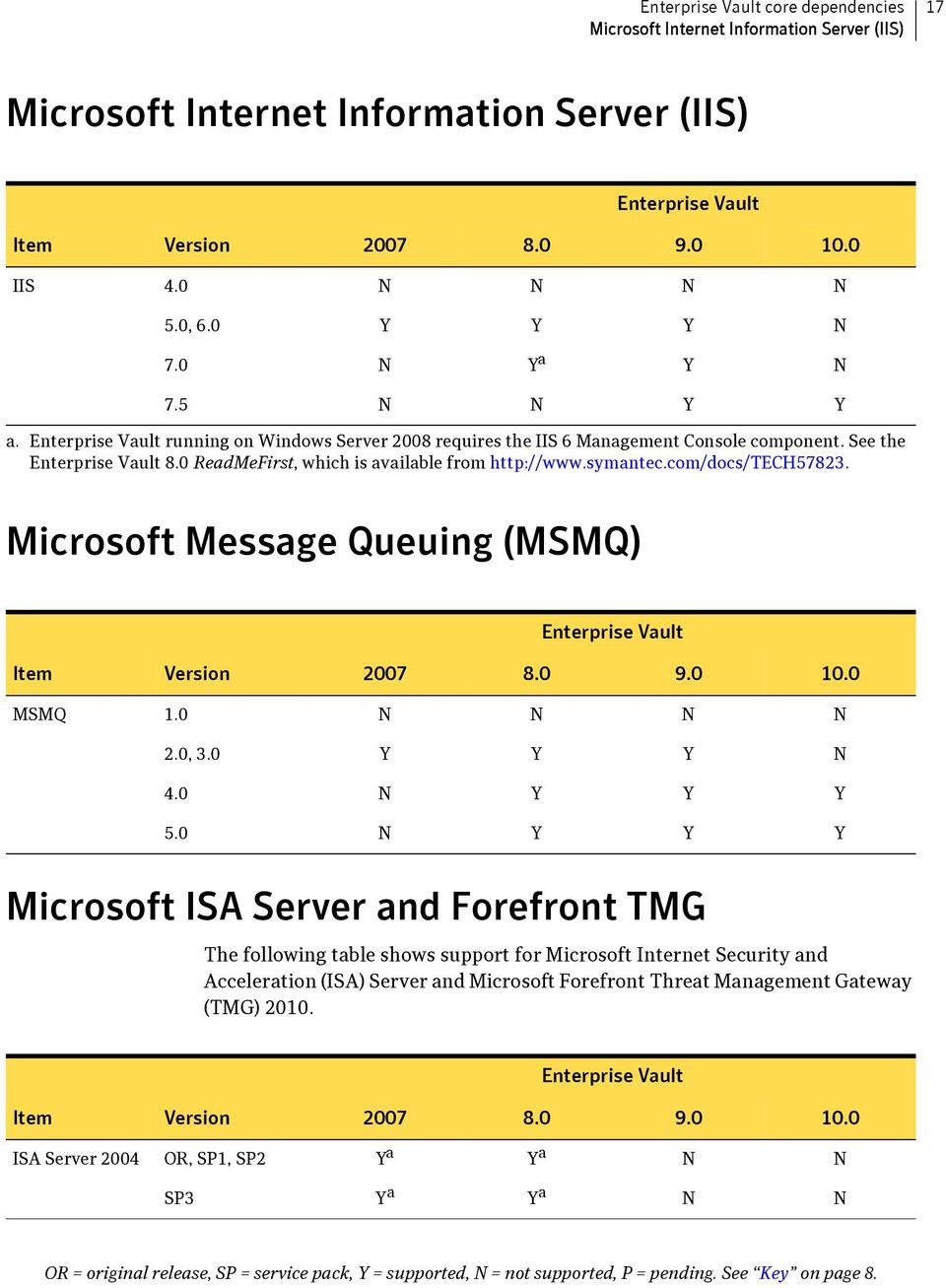
17 core dependencies Microsoft Internet Information Server (IIS) 17 Microsoft Internet Information Server (IIS) IIS 4.0 N N N N 5.0, 6.0 Y Y Y N 7.0 N Y a Y N 7.5 N N Y Y a. running on Windows Server 2008 requires the IIS 6 Management Console component. See the 8.0 ReadMeFirst, which is available from Microsoft Message Queuing (MSMQ) MSMQ 1.0 N N N N 2.0, 3.0 Y Y Y N 4.0 N Y Y Y 5.0 N Y Y Y Microsoft ISA Server and Forefront TMG The following table shows support for Microsoft Internet Security and Acceleration (ISA) Server and Microsoft Forefront Threat Management Gateway (TMG) ISA Server 2004 OR, SP1, SP2 Y a Y a N N SP3 Y a Y a N N
18 18 core dependencies Microsoft Outlook on the server ISA Server 2006 All versions Y Y Y Y Forefront TMG 2010 Standard and Enterprise editions OR, SP1 N N Y Y a. If you are configuring access using OWA forms-based authentication, you should be aware of the issue described in Microsoft Knowledge Base article KB The issue prevents OWA 2003 users from opening attachments to archived messages when using forms-based authentication. To fix the issue you need to install ISA Server 2004 Service Pack 2, and apply Microsoft hotfix KB Microsoft Outlook on the server Footnote f in the following table refers to an Outlook 2007 hotfix that you may need to apply to fix an issue where connections to Exchange may fail. Note that if you apply that hotfix, you do not also need to apply the earlier hotfixes referred to in footnotes e (for Outlook 2007 original release) or h (for Outlook 2007 SP1/SP2). Outlook 2000 All versions N N N N Outlook 2002 All versions N N N N Outlook , SP1 Y Y N N SP2 Y Y Y Y SP3 Y a Y a Y a Y a Outlook 2007 b OR N c Y d, e, f, g N N SP1 N c Y d, f, g, h N N SP2 N c Y d, f, g, h Y f, g, i, j Yg, i, j SP3 N c Y g Y g Y g Outlook 2010 OR, SP1 N N P P
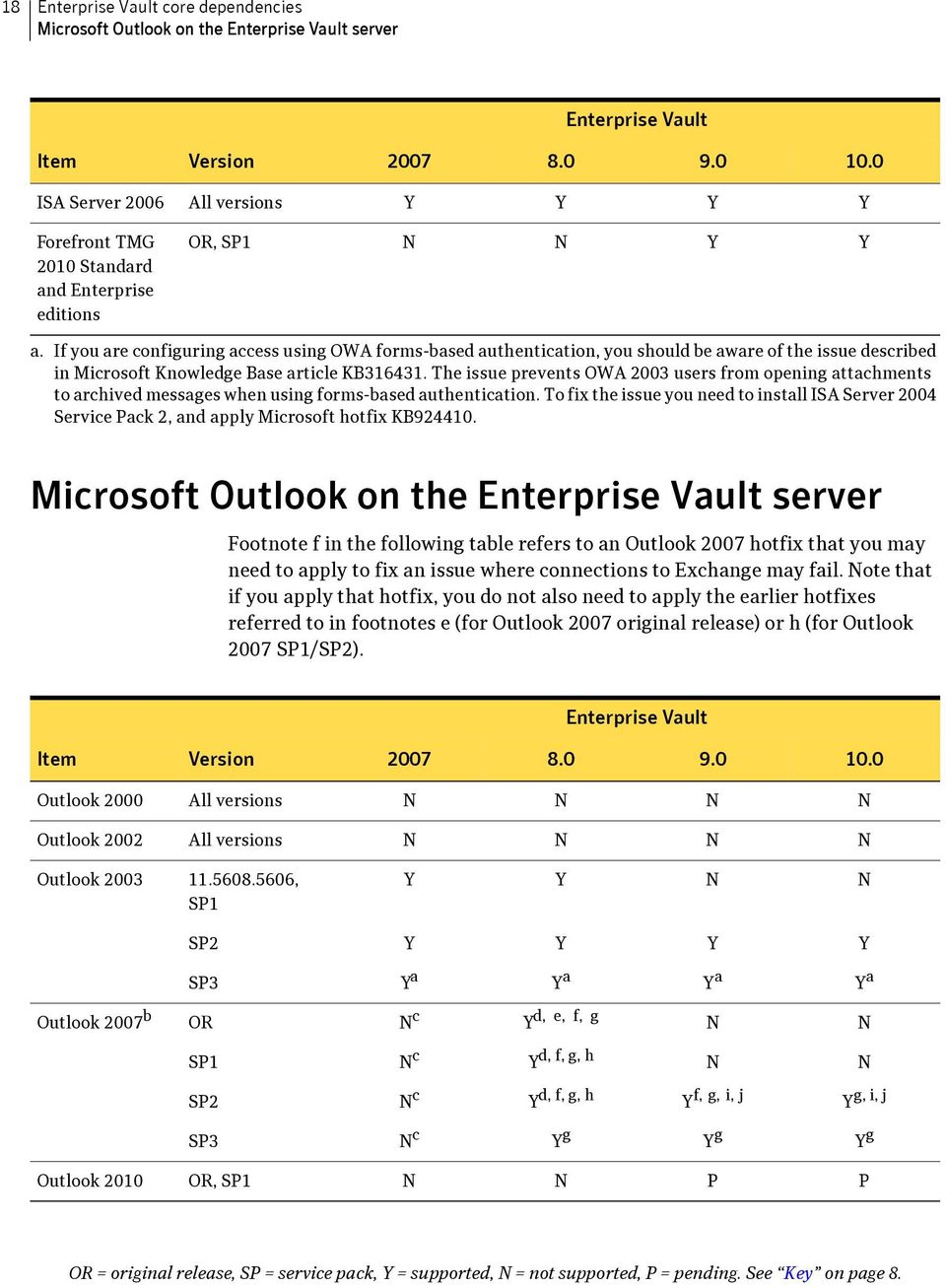
19 core dependencies Microsoft Management Console (MMC) 19 a. Requires Microsoft hotfix To use this hotfix, you need to set the registry entries mentioned in the Microsoft Knowledge Base article The recommended registry value is 0xFFFFFFFF. b. See technical note TECH at c. Outlook 2007 is not supported on 2007 servers. It is supported on users desktop computers; it requires 2007 or later service pack. For further essential information about support for Outlook 2007 on users desktop computers, see the release notes. d. Requires 8.0 SP1 or later service pack. However, changes in the architecture of Outlook 2007 affect throughput, and testing has shown that fewer items may be archived per hour, particularly for Journaling. This is not expected to be an issue in most cases but, if you are already using Outlook 2003 on 8.0 SP1 or later servers, we recommend that you continue to use it. e. Requires Microsoft hotfix f. This footnote applies to 8.0/8.0.n and 9.0/9.0.1 only. For information about an issue where connections to Exchange may fail when Outlook 2007 is installed on a busy server, see technical note TECH at This technical note provides information about the issue and a link to a Microsoft Knowledge Base article, from which you can obtain an Outlook 2007 hotfix. g. Set the registry entries described in the Microsoft Knowledge Base article The recommended registry value is 0xFFFFFFFF. h. Requires Microsoft hotfix i. Required for Exchange Server archiving of Exchange Server 2010 targets. j. This footnote applies to and later service packs, and to 10.0 and service packs. Requires Microsoft hotfix Microsoft Management Console (MMC) MMC 1.1 N N N N 1.2, 2.0 Y Y Y N 3.0 Y Y Y Y

20 20 core dependencies Web browsers Web browsers Internet Explorer 4.0, 5.0, 5.5, 5.5 SP1 N N N N 5.5 SP2 N N N N 6.0, 6.0 SP1, 6.0 SP2 Y Y N N 7.0, 8.0 Y Y Y Y 9.0 N Y Y Y a Mozilla Firefox All versions N N P P Safari 3.x, 4.0 N N P P 5.0 N N P P a. Supported only in Compatibility View. Server virtualization VMware ESX/ESXi 2.5 Y N N N 3.0 Y N N N 3.5 Y Y Y N 4.0 N Y Y N 4.1 N Y Y Y 5.0 N Y Y Y Microsoft Virtual Server 2005 OR Y a N N N Microsoft Hyper-V Server 2008 OR, SP1, SP2 N Y Y N R2, R2 SP1 N Y b Y Y c

21 core dependencies Clustering 21 a. See technical note TECH48903 at b. Requires 8.0 SP4 or later service pack. c. Eight CPUs are recommended for 10.0 servers. However, Microsoft Hyper-V Server 2008 R2 and R2 SP1 support a maximum of four CPUs for each virtual machine. Physical to virtual conversion tools VMware vcenter Converter Standalone N N Y Y Clustering Microsoft Server clustering Windows Server 2003, OR, SP1 Windows Server 2003, SP2, R2, R2 SP2 Windows Server 2003, x64 edition, OR, SP1 Windows Server 2003, x64 edition, SP2, R2, R2 SP2 Windows Server 2008 SP1, SP2 Windows Server 2008, x64 edition SP1, SP2 Windows Server 2008 R2, x64 edition, OR, SP1 Y a Y a N N Y a Y a Y a N Y a Y a N N Y a Y a Y a N N N N N N Y a Y a N N Y a, b Y a Y a
22 22 core dependencies Citrix VERITAS Cluster Server VCS 4.3 MP1 Y a, c P N N VCS 5.0 Y a Y a P N VCS 5.0, x64 edition N Y a P N VCS 5.1 Y a Y Y a N VCS 5.1, x64 edition N Y d, e Y a, e N VCS 5.1 SP1 N Y d Y a N VCS 5.1 SP1, x64 edition N Y d, e Y a, e N VCS 5.1 SP2 N Y d, e Y a, e Y a VCS 6.0 N N Y f Y f a. Active/passive clusters, in which one or more active nodes can fail over to a passive node, are supported. Active/active clusters are not supported. b. Requires 8.0 SP4 or later service pack. c. For further configuration information, see technical notes TECH46525 at and TECH46788 at d. See technical note TECH71047 at e. Windows Server 2008 R2 or later service pack requires VCS 5.1 SP2. f. Requires appropriate hotfix (see on the Symantec support Web site). Citrix Symantec provides client support for Citrix-based thin client provisioning. This support is limited to the installation and use of the client for Outlook, excluding Vault Cache or Virtual Vault. Support for these features is a future requirement for the client. Symantec does not currently support any aspect of its server infrastructure provisioned via Citrix.
23 core dependencies Microsoft Operations Manager (MOM) and System Center Operations Manager (SCOM) 23 Microsoft Operations Manager (MOM) and System Center Operations Manager (SCOM) MOM 2005 Y Y Y P SCOM 2007 OR Y Y N N 2007 R2 N N Y Y Symantec backup agents for Symantec Backup Exec 12 OR Y N N N 2010 OR Y Y N N 2010 R2 Y Y Y a N 2010 R3 Y Y Y Y b Symantec NetBackup 7.0.n N Y Y N a. Requires 9.0, 9.0.1, or N N Y Y b. Requires Backup Exec 2010 R3 revision 5204 Hotfix See technical note TECH at
24 24 core dependencies FIPS compliance FIPS compliance Federal Information Processing Standards (FIPS) is a standard for cryptographic modules in computer systems. The table in this section shows the versions of, Compliance Accelerator and Discovery Accelerator that are FIPS compliant. Note that the term FIPS compliant is not a defined FIPS term. Where the documentation states that a version of is FIPS compliant, it means that: uses FIPS validated instances of algorithms and hashing functions in all instances where data is encrypted or hashed. manages cryptographic keys and message authentication in a secure manner, as required of FIPS validated cryptographic modules. For more information about and compliance with the FIPS standard, see the following article on the Symantec support Web site: Item N N Y a N b Compliance Accelerator N N Y a N b Discovery Accelerator N N Y a N b a. Requires or later service pack. b. From version , uses a FIPS validated cryptographic module to provide the required cryptographic functionality, but this module is not used for indexing. For more information, see article DOC4820 at
25 Chapter 3 Storage devices, appliances, and software This chapter details compatibility between and the storage products to which it can archive data. Where appropriate, the tables in this chapter indicate the specific third-party product version that was tested with. If there is a subsequent minor release that provides fixes without changing existing functionality, Symantec supports use of with that minor release unless stated otherwise. Symantec supports archiving from to any high-performing disk storage that is: A directly attached or Storage Area Network (SAN) attached volume formatted as NTFS Network Attached Storage (NAS) that is accessible over the CIFS/SMB protocol Supported by an Storage Streamer API implementation
26 26 Storage devices, appliances, and software Storage devices: CIFS/SMB Storage devices: CIFS/SMB The following table shows support for storage devices using access over the CIFS/SMB protocol. Item EMC Celerra (DART 5.5) Y a Y a Y a Y a EMC Celerra (DART or later service pack) Y a, b Y a Y a Y a EMC Data Domain Y c Y a Y a P Fujitsu ETERNUS DX N Y Y P Hitachi Content Archive Platform 1.6 Y a, d N N N Hitachi Content Archive Platform 2.x Y d, e N N N Hitachi Content Archive Platform 2.6 Y d Y d, f Y d P Hitachi Content Platform Y d, g Y d, h Y d P Hitachi Content Platform 3.1 N Y d, h Y d P Hitachi Content Platform 4.0 ( or later 4.0.n.n version) and 4.1.n.n N Y d, h Y d, i P HP X9000 Systems (IBRIX) v5.5.2 N N Y j P HP X9000 Systems (IBRIX) v6.0 N N Y a Y a IBM N series running Data ONTAP 7.1 Y a, k N N N IBM N series running Data ONTAP 7.2 Y a, k Y a, k Y a, k Y a, k IBM N series running Data ONTAP 7.3 Y Y Y a, k Y a, k IBM N series running Data ONTAP 8.0 N N P P Isilon IQ Clustered Storage System Y N P P iternity Compliant Archive Solution N Y l, m, n Y m, n P KOM Networks KOMpliance Secure Archive Storage N Y h, m, o P P NEC HYDRAstor (2.2.0 or later service pack) Y Y a, l P P
27 Storage devices, appliances, and software Storage devices: CIFS/SMB 27 Item NetApp (Filer, NearStore, NearStore with SnapLock) ONTAP 7.1 NetApp (Filer, NearStore, NearStore with SnapLock) ONTAP 7.2 NetApp (Filer, NearStore, NearStore with SnapLock) ONTAP 7.3.n NetApp (Filer, NearStore, NearStore with SnapLock) ONTAP 8.0 Y a, k N N N Y a, k Y a, k Y a, k Y a, k Y a, k Y a, k Y a, k Y a, k N Y k Y k Y a, k Nexsan Assureon Archive Y m N P P Oracle Sun ZFS Storage Appliance N Y l, j Y i, j P Permabit Enterprise Archive Y a Y a P P Pillar Axiom Y a Y a, h Y a P Plasmon UDO (via Pegasus InveStore software) Y N P P Plasmon UDO Archive Appliance Y a N P P PowerFile Active Archive Appliance Y m N P P SUN Fire X4500 Y P P P Sun StorageTek 5220 NAS OS 4.12, 4.20, 4.21, 4.22 Sun StorEdge 5310 NAS OS 4.12, 4.20, 4.21, 4.22 Sun StorageTek 5320 NAS OS 4.20, 4.21, 4.22 Y a P P P Y a P P P Y a Y P P Sun Storage 7000 Unified Open Storage Systems Y Y Y P Symantec FileStore Appliances running FileStore 5.5 SP1 RP2 or a later 5.5 release: Symantec FileStore Software Appliance Symantec FileStore N8000 Huawei Symantec N8000 Huawei N8000 Fujitsu UDS 3000 Xiotech ISE NAS N N Y j P
28 28 Storage devices, appliances, and software Storage devices: CIFS/SMB Item Symantec FileStore Appliances running FileStore 5.6 and 5.7: Symantec FileStore Software Appliance Symantec FileStore N8000 Huawei Symantec N8000 Huawei N8000 Fujitsu UDS 3000 Xiotech ISE NAS N N Y Y TotalTec TrustWorthy Appliance Y P P P a. WORM feature also supported. b. Requires 2007 SP4 or later service pack. c. De-duplication feature is not supported. d. retention categories that would cause a retention date later than January 19, 2038 are not supported. Infinite retention is not supported. e. See technical note TECH50928 at f. Requires 8.0 SP1 or later service pack. g. Requires 2007 SP6 or later service pack. h. Requires 8.0 SP3 or later service pack. i. Requires or later service pack. j. Non-WORM only. k. The PST Locator task will not find PST files on a MultiStore (vfiler) system. The PST Locator task will find PST files on a NearStore system that is running ONTAPI 1.4 or above. l. Requires 8.0 SP2 or later service pack. m. WORM only. n. For essential information about using iternity Compliant Archive Solution with 8.0 SP2 or later service pack, see the following page on the iternity Web site: o. retention categories that would cause a retention date later than December 31, 2037 are not supported. Infinite retention is not supported.
29 Storage devices, appliances, and software Storage devices: Streamer API 29 Storage devices: Streamer API The following table shows support for storage devices using an Storage Streamer API implementation. Item Dell DX Object Storage platform N N Y a, b Y a Caringo CAStor N N Y a, b Y a Hitachi Content Platform 4.0 ( or later 4.0.n.n version) and 4.1.n.n N N Y c, d, e, f, g Yc, f, g a. WORM feature also supported. b. If you are using Dell DX Object Storage platform/caringo CAStor and you experience poor post-processing performance, we recommend that you upgrade to Post-processing checks backup status on the vault store partition and processes backed-up items. c. retention categories that would cause a retention date later than January 19, 2038 are not supported. Infinite retention is not supported. d. Requires 9.0 SP2 or later service pack. e. If you are using Hitachi Content Platform 4.0.n.n or 4.1.n.n via HTTP and you experience poor post-processing performance, we recommend that you upgrade to Post-processing checks backup status on the vault store partition and processes backed-up items. f. Not supported for Domino Server archiving. g. Requires HCP streamer version or later.
30 30 Storage devices, appliances, and software EMC Centera EMC Centera Item EMC Centera Y Y Y Y EMC Centera SDK and CentraStar The following table shows which version of the EMC Centera SDK is supplied with each version, and the CentraStar release against which Symantec s testing was performed. Note: If you are planning to upgrade an existing installation, use the table to see which version of the SDK is supplied with the version of you are upgrading to. We recommend that you then check with EMC that the version of CentraStar you are using is supported by that SDK. version Centera SDK version (build number) CentraStar version 2007 OR, SP1, SP2, SP3 3.1 SP1 ( ) 3.1.n, 4.0.n 2007 SP4 8.0 OR 2007 SP5, SP6 8.0 SP1, SP2, SP3 8.0 SP4, SP5 9.0, 9.0.1, 9.0.2, , ( ) 3.1.n, 4.0.n, 4.1.n 3.2 SP3 ( ) 3.1.n, 4.0.n, 4.1.n 3.2 P5 ( ) 3.1.n, 4.0.n, 4.1.n, 4.2 Notes In the CentraStar version column, n represents any minor version number. For example, 3.0.n indicates that versions and are supported. The Storage on Access node feature in CentraStar 2.4 is available on Gen-3 and later Centeras only. The M++ naming scheme in CentraStar 3.0 is supported. For optimum performance, and to ensure adoption of EMC Centera best practices, Symantec recommends using the Centera in CPM mode. All
31 Storage devices, appliances, and software Secondary storage devices 31 performance and scalability testing is done in CPM mode, and is pre-configured for Centera with all best practice settings in place. Secondary storage devices The secondary storage devices in the table below require migration of data contained in collection files. For more information about migrating data to these secondary storage devices, see the technical notes referred to in the table footnotes. Storage software Item IBM Data Retention 550 (DR550) a Y Y Y P IBM Information Archive 1.1, 1.2 a N Y Y b P Fujitsu ETERNUS (Content Archive Manager 1.4) c Y N N N Fujitsu ETERNUS AS500 c N Y Y P Nirvanix Storage Delivery Network N N N Y d a. See technical note TECH49972 at b. If you use the 64-bit IBM Tivoli Storage Manager Backup-Archive client, you must install both the Client API (64-bit) Runtime Files and the Client API (32-bit) Runtime Files as part of a custom client installation. c. See technical note TECH49971 at d. See technical note TECH at Windows NTFS a Windows 2000, Windows Server 2003 OR, SP1 Windows Server 2003 SP2 or later service pack Y Y N N Y Y Y Y Windows Server 2008 Y Y Y Y
32 32 Storage devices, appliances, and software Secondary storage software Windows Storage Server Y Y Y Y Centera CentraStar See EMC Centera SDK and CentraStar on page 30. Pegasus InveStore 4.2.1, 4.30 Y P P P Quantum StorNext Storage Manager with a StorNext file system Y P P P SAMBA and Sun StorageTek SAM-FS on Solaris 10 SAMBA and Sun StorageTek SAM-FS on Solaris 10 Update 4 SAMBA b Sun StorageTek SAM-FS 4.5 U5 SAMBA a Sun StorageTek SAM-FS 4.6 N N N N Y N N N SAMBA and Solaris ZFS on Solaris 10 Update 4 Y N N N a. A standard NTFS file system mounted on fast access media (such as SAN, NAS, or DAS) is an acceptable platform for, offering speed, scalability, and security. Some vendors offer an NTFS front-end to other media (such as offline or WORM). should work with such systems, but care should be taken of their specific characteristics, such as slower access speeds. It is recommended that the index data is not placed on such alternate media, even though it is NTFS-based. Secondary storage software The secondary storage software listed below enables migration of data contained in collection files. IBM Tivoli Storage 5.1, 5.2, 5.3 Y N N N Manager a 5.4 Y Y Y P 5.5 N P Y b P 6.1, 6.2 N Y Y b P
33 Storage devices, appliances, and software Secondary storage software 33 Veritas NetBackup 5.1, 6.0 Y c N P P 5.1, 6.0, x64 editions N N N N 6.5 Y d Y d Y d P 6.5, x64 edition Y d, e Y d, f Y d, f P Symantec NetBackup 7.0.n N Y g, h Y g Y 7.1 N P P P Symantec Backup Exec 2010 N Y i P P 2010 R2 N P Y P 2010 R3 P P P P SAMBA and Sun StorageTek SAM-FS on Solaris 10 Hummingbird NFS Maestro Client 2007 on Vault Server; Sun StorageTek SAM-FS on Solaris 10 SAMBA b Sun StorageTek SAM-FS 4.5 U5 Hummingbird NFS Maestro Client Sun StorageTek SAM-FS 4.5 U5. Y P P P Y P P P a. See technical note TECH49972 at b. If you use the 64-bit IBM Tivoli Storage Manager Backup-Archive client, you must install both the Client API (64-bit) Runtime Files and the Client API (32-bit) Runtime Files as part of a custom client installation. c. See technical note TECH49824 at d. See technical notes TECH70427 at and TECH72197 at e. must run on a 32-bit server, with 32-bit Veritas NetBackup client. f. 8.0 SP1 and earlier must run on a 32-bit server, with 32-bit Veritas NetBackup client. 8.0 SP2 and later can run on 32-bit and 64-bit servers, with Veritas NetBackup 6.5. g. See technical note TECH at From this page you can download the Symantec NetBackup for Agent Administrator s Guide, which includes information about the NetBackup Migrator. h. Requires 8.0 SP3 or later service pack.
34 34 Storage devices, appliances, and software Secondary storage software i. Requires 8.0 SP3 or later service pack, and Backup Exec Migrator for.
35 Chapter 4 Exchange archiving This chapter contains information about compatibility with Exchange archiving server components. For information about compatibility with Exchange archiving client components, see Exchange archiving client compatibility on page 43. Exchange System Manager (ESM) Microsoft Exchange System Manager (ESM) is a prerequisite on the Enterprise Vault server for 7.0 SP2 and earlier versions. See the following subsections for more information. Note: You cannot use Exchange System Manager on an server to manage Exchange Server. The version of mapi32.dll used by Enterprise Vault is not compatible with that required by Exchange System Manager. versions where ESM is not a prerequisite From 7.0 SP3 onwards, it is possible to run an Exchange mailbox archiving task or Journaling task without installing ESM on the server. The ability to synchronize inherited permissions from the Exchange server to users archives requires ESM to be installed on the server. Note the following:
36 36 Exchange archiving Exchange System Manager (ESM) If ESM is installed on an server running 32-bit Windows Server 2003, you can still synchronize inherited permissions from the Exchange server to users' archives. Windows Server 2003 x64 SP2 or later and Windows Server 2008 x64 or later prevent Exchange Server 2003 ESM from installing, so you cannot synchronize inherited permissions if the server uses these operating systems. 7.0 SP3 and later versions of still include the ability to synchronize delegate permissions; that is, permissions set through Active Directory users and computers, or through Outlook folder permissions. versions where ESM is a prerequisite In 7.0 SP2 and earlier versions, servers with an Exchange mailbox archiving task or Journaling task must have the ESM tools and fixes shown in the table below. Note: Exchange Management Console (the management tool with Exchange Server 2007) is currently not supported on any version of the server. To archive from Exchange Server 2007, install Exchange System Manager for Exchange Server 2003 on the server. Outlook 2003 is also still required on the server, even if all of your target Exchange servers are running Exchange Server 2007.
37 Exchange archiving Exchange System Manager (ESM) 37 OS on server Exchange Server version Windows 2000 Server Exchange Server 2000 Exchange System Manager. If archiving from a computer that is running Exchange Server 5.5, include support for Exchange Server 5.5 Exchange 2000 Server Service Pack 3 Exchange Server 2000 Exchange System Manager. Exchange 2000 Server Service Pack 3 Exchange 2000 Post-Service Pack 3 (SP3) Rollup Patch Exchange Server 2000 Exchange System Manager. Exchange 2000 Server Service Pack 3 Exchange 2000 Post-Service Pack 3 (SP3) Rollup Patch Not supported Exchange 2000 Post-Service Pack 3 (SP3) Rollup Patch Windows Server 2003 Windows Server 2008 Exchange Server 2003 Exchange System Manager or Exchange Server 2003 Exchange System Manager Service Pack 1 (SP1) Exchange Server 2003 Exchange System Manager or Exchange Server 2003 Exchange System Manager Service Pack 1 (SP1) Exchange Server 2003 Exchange System Manager OR, SP1, SP2 Exchange Server 2003 Exchange System Manager OR, SP1, SP2 Exchange Server 2003 Exchange System Manager OR, SP1, SP2 Exchange Server 2003 Exchange System Manager OR, SP1, SP2 Exchange Server 2003 Exchange System Manager OR, SP1, SP2 Exchange Server 2003 Exchange System Manager OR, SP1, SP2
38 38 Exchange archiving Exchange Server Exchange Server Exchange Server 5.5 OR, SP1, SP2, SP3, SP4 N N N N Exchange Server 2000 OR, SP1, SP2 Y N N N SP3 Y Y Y Y Exchange Server 2003 OR, SP1 Y Y a Y a Y a SP2 Y Y a Y a Y a Exchange Server 2003 x64 edition Exchange Server 2007, x64 edition OR, SP1, SP2 N N N N OR Y b Y b Y Y SP1 Y c,d Y Y Y SP2 Y c,d Y Y Y SP3 Y Y Y Y Exchange Server 2010 e OR N N N N SP1 N N Y Y SP2 N N Y Y a. The following are required on each Windows 2003 Server on which you install the Outlook Web Access (OWA) 2003 Extensions: Windows Server 2003 Service Pack 2 or later and Exchange Server 2003 Service Pack 1 or later. b. Requires 2007 or later service pack. Deployment of the latest service pack is recommended. Outlook 2003 must be installed on the server that is archiving from Exchange Server Exchange Server 2007 Outlook Web Access (OWA) is supported. For further essential information about support for Exchange Server 2007, see the release notes. c. OWA on Exchange 2007 SP1 requires 2007 SP2 or later service pack.
39 Exchange archiving Exchange Online 39 d. Exchange 2007 is supported on Windows Server 2008 with 2007 SP3 or later service pack is not supported on Windows Server running on Windows Server 2003 is supported in a domain with Windows Server 2008 domain controllers, where the domain functional level is Windows Server 2003 or 2008, but only if the forest functional level is set to Windows Server e. For information about using 8.0 for journaling of user mailboxes on Exchange Server 2010, see technical note TECH at Exchange Online Microsoft Business Productivity Online Standard Suite (BPOS) N Y a Y Y Microsoft Office 365 N N Y Y b a. Requires 8.0 SP4 or later service pack. b. See technical note TECH at Data Classification Services Data Classification Services uses various components of and Symantec Data Loss Prevention to automate the classification of Microsoft Exchange messages that are managed in Enterprise Vault. versions older than version 10.0 OR do not support Symantec Data Loss Prevention. Symantec Data Loss Prevention Item Version OR Y a Y N N N N N Y a. Requires two hotfixes for Data Loss Prevention For more information, see technical note TECH at
40 40 Exchange archiving Exchange Server OWA control file versions Exchange Server OWA control file versions As OWA Extensions modify OWA control files on Exchange Server 2003, the version of these files must be one that is supported by. The control file versions supported are shown in the table below. Exchange Server 2003 hotfixes may modify OWA control files. If you have installed an Exchange Server 2003 hotfix that has created an unsupported version of the OWA control files folder, or modified any files in the control files folder, a Save file error will be reported when you attempt to install the OWA Extensions. Exchange Server version Control file version Exchange Server SP Y Y Y Y Exchange Server SP1 + hotfix Y Y Y Y Exchange Server SP Y Y Y Y Exchange Server SP2 + hotfix v1 Exchange Server SP2 + hotfix v2 Exchange Server SP2 + hotfix v1 Exchange Server SP2 + hotfix v2 Exchange Server SP2 + hotfix Exchange Server SP2 + hotfix Exchange Server SP2 + hotfix Exchange Server SP2 + hotfix Y Y Y Y Y Y Y Y Y Y Y Y Y Y Y Y a Y Y Y Y Y b Y Y Y Y c Y Y Y Y d Y Y Y
41 Exchange archiving Exchange Server OWA control file versions 41 Exchange Server version Control file version Exchange Server SP2 + hotfix Exchange Server SP2 + hotfix Exchange Server SP2 + hotfix Exchange Server SP2 + hotfix v1 Exchange Server SP2 + hotfix Exchange Server SP2 + hotfix / v2 Exchange Server SP2 + hotfix Y d Y Y Y Y e Y Y Y Y f Y g Y Y Y f Y h Y Y Y i Y j Y Y Y i Y j Y Y N Y k Y Y a. Exchange Server 2003 SP2 hotfix (the equivalent of Exchange Server 2003 SP1 hotfix ) does not change the control file version. b. Requires 2007 original release with the appropriate hotfix (see on the Symantec support Web site), or later service pack. c. Requires 2007 SP3 or later service pack. d. Requires 2007 SP2 with the appropriate hotfix (see on the Symantec support Web site), or later service pack. e. Requires 2007 SP4 with the appropriate hotfix or later service pack. f. Requires 2007 SP6 or later service pack. g. Requires 8.0 SP3 or later service pack. h. Requires 8.0 SP2 or later service pack. i. Requires 2007 SP6 with the appropriate hotfix (see on the Symantec support Web site), or later service pack. j. Requires 8.0 SP4 or later service pack. k. Requires 8.0 SP3 with the appropriate hotfix (see on the Symantec support Web site), or later service pack.
42 42 Exchange archiving OWA Extensions compatibility with Server OWA Extensions compatibility with Server The following table shows the compatibility of OWA Extensions with Server versions. OWA Extensions for OWA 2000 and Y Y N N 8.0 Y Y Y N 9.0 N Y Y Y 10.0 N N Y Y OWA Extensions for OWA Y Y Y N 9.0 N Y Y Y 10.0 N N Y Y OWA Extensions for OWA 2010 SP1 9.0 N N Y Y 10.0 N N Y Y
43 Chapter 5 Exchange archiving client compatibility This chapter contains information about compatibility with Exchange archiving client components. For information about the operating systems that File System Archiving (FSA) supports for placeholder and file internet shortcut access, see the FSA section Client access on page 59. For information about Compliance Accelerator client compatibility, see Compliance Accelerator compatibility with other client components on page 87. For information about Discovery Accelerator client compatibility, see Discovery Accelerator compatibility with other client components on page 93.
44 44 Exchange archiving client compatibility Windows client operating systems Windows client operating systems Windows 95 OSR 2, OSR 2.1, OSR 2.5, SP1 N N N N Windows 98 OR, SE N N N N Windows ME OR N N N N Windows XP Professional OR, SP1 Y N N N SP2, SP3 Y Y Y a Y Windows XP Professional x64 Windows XP Home, Media Center, and Tablet PC Editions OR, SP1 N N N N SP2 N N N N OR, SP1, SP2 N N N N x64 N N N N Windows NT 4.0 All versions N N N N Windows 2000 (Professional, Server, Advanced Server, DataCenter) OR, SP1, SP2, SP3, SP4 Y N N N Windows Server 2003 OR, SP1 Y Y Y P R2 Y Y Y P SP2 Y Y Y P x64 N N N N Windows Server 2008 SP1, SP2 N N N N Windows Server 2008 x64 (using WOW64) SP1 N Y Y P SP2 N Y Y P R2, R2 SP1 N Y b Y Y Windows Server 2008 x64 SP1 N N N N
45 Exchange archiving client compatibility Windows clients 45 Windows Vista OR, SP1 Y Y Y Y SP2 Y Y Y Y Windows Vista x64 OR, SP1 Y Y Y Y SP2 Y Y Y Y Windows 7 OR, SP1 N Y c Y Y Windows 7 x64 OR, SP1 N Y Y Y a requires Windows XP SP3. b. Requires 8.0 SP4 or later service pack. c. Requires 8.0 SP3 or later service pack. For more information about support for Windows 7, see technical note TECH at Note: The language variants of the Outlook Add-Ins are tested against new releases from Microsoft for each major release (for example, 9.0). The language variants are fully supported for Service Packs but are only tested if there is a known language dependency. Windows clients Exchange Client , N N N N Outlook , , , Outlook , , , , N N N N N N N N Outlook , SR-1, SR-1a, SP2, SP3 Y N N N
46 46 Exchange archiving client compatibility Windows clients Outlook 2002 a, b , SP1, SP2, SP3 Y N N N Outlook , SP1 Y Y N N SP2 Y c Y c Y c Y c SP3 Y d Y d Y d Y d Outlook 2007 OR Y Y Y Y SP1, SP2 Y d Y d Y d Y d SP3 N Y d Y d Y d Outlook 2010 OR, SP1 N N Y e, f, g, h Y g, h a. If you use Outlook 2002, apply SP2 or both SP1 and hotfix This resolves a problem when trying to forward archived messages that have attachments. See the Administration Console help for more details. b. There is a problem with Outlook 2002 that prevents the contents of shortcuts from being displayed in the Outlook preview pane. A Microsoft hotfix addresses this problem for Outlook 2002, and it is already included in Outlook Once you have installed the hotfix for Outlook 2002, or you have installed Outlook 2003, there are several registry values to set on each client computer to make the preview pane work. There is a new setting in DesktopSettings.txt that makes the client automatically create the registry values that are needed. For more information, see the description of FixOutlookPreviewPane in the Configuring Clients section of the Administration Console help. c. See technical note TECH46028 at d. An issue exists in Outlook 2003 SP3 and Outlook 2007, with items that have 2048 or more recipients in the TO, CC or BCC fields, or have more than 2048 attachments. See technical note TECH56978 at If you are likely to be affected by this issue, it is addressed by Microsoft hotfixes. For Outlook 2003 SP3, see For Outlook 2007, see The recommended registry value is 0xFFFFFFFF. e. Requires or later service pack. f. In and 9.0.2, the HTTP-Only Outlook Add-In is supported with Outlook 2010 against 8.0 SP4 and SP5 servers, and against 9.0 (original release) servers. However, a hotfix is required for the 8.0 SP4 servers and for the 9.0 servers: For 8.0 SP4: For 9.0: No hotfix is required for 8.0 SP5 or later servers. g. Outlook 2010 support requires the HTTP-Only Outlook Add-In.
47 Exchange archiving client compatibility Web browsers 47 h. If you are running the Outlook 2010 cumulative update released on July 11, 2011 (available at or SP1, see technical note TECH at Web browsers Internet Explorer 4.0, 5.0, 5.5, 5.5 SP1 N N N N 5.5 SP2 N N N N 6.0, 6.0 SP1, 6.0 SP2 Y Y N N 7.0, 8.0 Y Y Y Y 9.0 N Y Y Y a Mozilla Firefox All versions N N P P Safari 3.x, 4.0 N N P P 5.0 N N P P a. Supported only in Compatibility View. Mac client operating systems Mac OS X 10.4 N N N N 10.5.x N Y a Y Y 10.6 N N Y Y 10.7 N N P Y b 10.8 N N P P a. Requires 8.0 SP2 or later service pack.
48 48 Exchange archiving client compatibility Mac clients b. Requires or later service pack. Mac clients Entourage 2004 N Y a Y N 2008 ( or later) N Y b Y Y Entourage, Web Services edition 2008 (13.n) N N Y Y Outlook 2011 for Mac or later N N N Y a. Requires 8.0 SP3 or later service pack. b. Requires 8.0 SP2 or later service pack. Mac client browsers The OWA Extensions are not supported for OWA client access from Safari or Firefox. Safari or later N Y a Y Y 4.n N Y a Y Y 5.0 N N P P Mozilla Firefox 3.n N P P P a. Requires 8.0 SP2 or later service pack.
49 Exchange archiving client compatibility Legacy Mac client support 49 Legacy Mac client support The following table shows support for Mac clients by versions of Enterprise Vault before version 8.0 SP2. Item Version Outlook 2001 N N Internet Explorer 5.0, 5.2 N N Entourage 2004 Y a Y b 2008 OR N N 2008 SP1 Y a, c Safari Y d Y a, c P 3.x P P Mozilla Firefox 1.5, 2.0, 3.0 P P a. For all versions of Entourage, support is for customized shortcuts only. b. Requires 8.0 SP3 or later service pack. c. Requires Microsoft Office 2008 for Mac client update. d. Browser Search (search.asp) using Windows authentication works in Safari. Browser Search using Domino authentication has not been tested. You cannot use Archive Explorer or Integrated Search in Safari.
50 50 Exchange archiving client compatibility Desktop search utilities Desktop search utilities Windows Desktop Search (WDS) and Windows Search (WS) Notes 8.0 (all and the original release of Enterprise Vault 9.0 support WDS and WS only on 32-bit versions of Microsoft Windows XP, Vista, and Windows 7. Support for WS on Windows 7 32-bit requires 8.0 SP4 or later and later versions support WS with the following combinations of Windows and Microsoft Office: 64-bit Windows with 64-bit Microsoft Office 32-bit Windows with 32-bit Microsoft Office 64-bit Windows with 32-bit Microsoft Office Note: For and only, WS in conjunction with 64-bit Windows and 32-bit Microsoft Office does not index the full content of items in Vault Cache. It only indexes the header information. This restriction does not apply to Item Version WDS 2.6.x WDS 3.x WS 4.0 Outlook Add-In a 2007 OR N N N 2007 SP1 or SP2 N Y b N 2007 SP3 or later N Y Y 8.0 OR, SP1, SP2, SP3, SP4, SP5 N Y Y 9.0 OR, 9.0.1, 9.0.2, N N Y 10.0 OR, N N Y HTTP-only Outlook Add-In (MSI installation) a 2007 OR N N N 2007 SP1 or SP2 N Y b N 2007 SP3 or later N Y Y 8.0 OR, SP1, SP2, SP3, SP4, SP5 N Y Y 9.0 OR, 9.0.1, 9.0.2, N N Y 10.0 OR, N N Y
51 Exchange archiving client compatibility Desktop search utilities 51 Item Version WDS 2.6.x WDS 3.x WS 4.0 HTTP-only Self-Installing Outlook Add-In (installed from Web page) a 2007 OR or later N N N 8.0 OR, SP1, SP2, SP3, SP4, SP5 N N N 9.0 OR, 9.0.1, 9.0.2, N N N 10.0 OR, N N N a. For information about making the Add-Ins available, see the Installing and Configuring guide. b. Deployment of 2007 SP3 is recommended. X1 Content Connector for Item Version X1 Content Connector for Outlook Add-In a 2007 P 8.0 P 9.0 P 10.0 P HTTP-only Outlook Add-In 2007 P (MSI installation) a 8.0 P 9.0 P 10.0 P HTTP-only Self-Installing 2007 P Outlook Add-In (installed from Web page) a 8.0 P 9.0 P 10.0 P a. For information about making the Add-Ins available, see the Installing and Configuring guide.
52 52 Exchange archiving client compatibility Mobile Search compatibility with Mobile Search compatibility with Mobile Search accepts valid connection requests from most common mobile devices that run a Web browser, without the need for any device-specific configuration. For information about installing and configuring Mobile Search, see the Setting up Exchange Server Archiving manual. Mobile Search 8.0 SP2, SP3, SP4, SP5 N Y a, b, c Y b, c N 9.0 OR, 9.0.n N Y b, c Y b, c Y b 10.0 OR, 10.0.n N N Y b, d, e Y b, d, e a. Mobile Search requires the 8.0 SP1 or later API Runtime. b. You must ensure that the API Runtime version and the server version are the same. c. Mobile Search is supported only on Windows Server 2003 SP2 (32-bit and 64-bit). d. We recommend the use of version 10.0 or later of the API Runtime and server with Mobile Search However, version 9.0/9.0.n of the API Runtime and server are also supported with Mobile Search e. Mobile Search 10.0 is supported on Windows Server 2003 SP2 (32-bit and 64-bit) and on Windows Server 2008 (all. Screen reader and later releases support the use of JAWS for Windows version 12 with Microsoft Office Outlook does not support JAWS with the Web applications, including Outlook Integrated search (Search Vaults) and Archive Explorer. For more information about and Section 508 Compliance, see technical note TECH54254 at
53 Chapter 6 File System Archiving (FSA) Content platforms Support for FSA Agent Note: File System Archiving does not support FAT32 file systems. File System Archiving requires an FSA Agent to be installed on the target file server to allow Windows placeholders to be created and accessed. The FSA Agent is supported for use with the following operating systems. CIFS platforms N Y a P P Windows 2000 Server OR N N N N SP1, SP2 b N N N N SP3, SP4 Y c Y c N N Windows 2000 Advanced Server OR N N N N SP1, SP2 N N N N SP3 Y c N N N SP4 Y c Y c Y c, d N
54 54 File System Archiving (FSA) Content platforms Windows 2000 DataCenter OR N N N N SP1, SP2 N N N N SP3 Y c N N N SP4 Y c Y c Y c, d N Windows Server 2003 OR N N N N SP1 Y e Y e Y e Y e SP2 Y Y Y Y R2 Y Y Y Y R2 SP2 Y Y Y Y Windows Server 2003 x64 edition (using WOW64) OR N N N N Windows Server 2003 x64 edition OR, SP1, R2, R2 SP2 Y f Y e Y e Y e Windows Storage Server 2003 SP1 Y e Y e Y e Y e SP2 Y Y Y Y Windows Storage Server 2003 x64 edition OR N N N N SP1 N N N N SP2 N N N N R2 N Y g Y Y Unified Data Storage Server 2003 OR Y Y Y Y x64 edition Y Y Y Y Windows Server 2008 SP1 Y h, i Y Y Y SP2 Y g, h Y Y Y Windows Server 2008 x64 edition (using WOW64) SP1 N N N N SP2 N N N N R2, R2 SP1 N N N N
55 File System Archiving (FSA) Content platforms 55 Windows Server 2008 x64 edition SP1 Y g, h Y Y Y SP2 Y g, h Y Y Y R2, R2 SP1 N Y j Y Y Windows Core Server 2008 All versions N N N N Windows Core Server 2008 R2 All versions N N N P Windows Storage Server 2008 OR N Y Y Y Windows Storage Server 2008 x64 edition OR N Y Y Y SP1 N Y N P R2 SP1 N Y Y Y a. For more information on archiving and Internet shortcuts on CIFS compliant platforms, see technical note TECH75480 at b. If the system is under heavy load, contact Microsoft for the latest DCOM rollup fixes (ref: ). c. On a file server on which you are installing the FSA Agent/Placeholder service using the Install FSA Agent or Install Placeholder wizard in the Administration Console, the minimum requirement is SP4 + Update rollup package 1 for SP4. d. Not supported by and later service packs. See technical note TECH at e. This version is a minimum requirement on a file server if you are installing the FSA Agent/Placeholder service using the Install FSA Agent or Install Placeholder wizard in the Administration Console. If you install the FSA Agent/Placeholder service by running the MSI Installer kit, then this version is not mandatory. f. The FSA Reporting Web service is not supported on Windows Server 2003 x64 edition. g. Requires 8.0 SP1 or later service pack. h. Requires 2007 SP3 or later service pack. i. FSA is supported in clustered Windows Server 2008 environments from 2007 SP4. j. Requires 8.0 SP3 or later service pack.
56 56 File System Archiving (FSA) Content platforms Support for placeholders on EMC Celerra/VNX Series supports the creation and access of placeholders on EMC Celerra/VNX Series devices running the following operating system. DART 5.5 Y Y Y Y or later Y a Y Y Y 6.0 P P Y Y or later N N Y Y b a. Requires 2007 SP4 or later service pack. b and later service packs support access to placeholders on EMC Celerra Data Mover HTTP Server using SSL. SSL connections are not supported for VNX Series devices. Support for NetApp Data ONTAP File System Archiving is supported to archive from NetApp Data ONTAP as shown in the following table. For more information on supported configurations of and NetApp MultiStore devices, see technical note TECH50129 at Note: The major and minor releases of Data ONTAP are supported, in accordance with NetApp s recommendations. In the following table, n represents any minor version number. Data ONTAP 7.0.n, 7.1.n Y N N N 7.2.n Y Y Y Y 7.3.n Y a Y Y Y 8.0.n N Y b Y Y
57 File System Archiving (FSA) Content platforms 57 MultiStore (vfiler) running Data ONTAP Data ONTAP 7.0.n, 7.1.n Y c N N N Data ONTAP 7.2.n Y Y Y Y Data ONTAP 7.3.n Y a Y Y Y Data ONTAP 8.0.n N Y b Y Y a. Requires 2007 SP5 or later service pack. b. Requires 8.0 SP5 or later service pack. c. A limitation with versions of NetApp Data ONTAP earlier than Data ONTAP 7.2 prevents from working correctly with NetApp MultiStore (vfiler) systems. is unable to create an FPolicy on the filer automatically, and an error message appears in the event log on the server. For details of how to create an FPolicy for to use, see technical note TECH44960 at Support for IBM N series File System Archiving is supported to archive from IBM N series enterprise storage as shown in the following table. IBM N series running Data ONTAP Data ONTAP 7.1.n Y N N N Data ONTAP 7.2.n Y Y Y Y Data ONTAP 7.3.n Y a Y Y Y Data ONTAP 8.0.n N P P P MultiStore (vfiler) running Data ONTAP Data ONTAP 7.1.n Y b N N N Data ONTAP 7.2.n Y Y Y Y Data ONTAP 7.3.n Y a Y Y Y Data ONTAP 8.0.n N P P P
58 58 File System Archiving (FSA) Content platforms a SP5 or later b. A limitation with versions of Data ONTAP earlier than Data ONTAP 7.2 prevents from working correctly with MultiStore (vfiler) systems. is unable to create an FPolicy on the filer automatically, and an error message appears in the event log on the server. For details of how to create an FPolicy for to use, see technical note TECH44960 at Unsupported content platforms For reference, File System Archiving does not support the following content platforms. Windows NT 4.0 N N N N Linux All varieties N N N N Unix All varieties N N N N Apple Macintosh All versions N N N N Novell All versions N N N N VxFS All versions N N N N SAM-FS All versions N N N N SAMBA All versions N N N N EMC Centera (CIFS) All versions N N N N NetApp NFS volumes All versions N N N N NetApp Multi-protocol volumes NetApp SnapLock volumes NetApp Read Only volumes All versions N N N N All versions N N N N All versions N N N N
59 File System Archiving (FSA) Client access 59 Client access Supported client access File System Archiving supports the following operating systems for placeholder and file internet shortcut access. Item Apple Macintosh 10.5, 10.6 N Y a P P Windows XP Y Y Y Y Windows 2000 Professional Y Y Y N Windows 2000 Server Y Y Y N Windows 2003 Server Y Y Y Y Windows 2003 R2 Server Y Y Y Y Windows Vista Y Y Y Y Windows Vista x64 edition Y Y Y Y Windows 7 N Y b Y Y Windows 7 x64 edition N Y b Y Y a. Requires 8.0 SP3 or later service pack, and GroupLogic ArchiveConnect. For more information, see technical note TECH at b. Requires 8.0 SP4 or later service pack. Unsupported client access File System Archiving does not support the following operating systems for placeholder and file internet shortcut access. Apple Macintosh OS 9 a N N N N Apple Macintosh 10.n.n a N N N N Linux All varieties N N N N
60 60 File System Archiving (FSA) Content protocols Unix All varieties N N N N Windows Mobile N N N N Windows 95, 98, ME N N N N Windows Media N N N N Windows PocketPC N N N N IBM OS/2 All versions N N N N a. File Internet Shortcuts and Placeholders are not supported via either Apple File Protocol (AFP) or Server Message Block (SMB). Content protocols Supported content protocols File System Archiving currently supports the following protocols. Windows CIFS 2000, 2003, R2, WSS, WSS R2 Y Y Y Y 2008 Y Y Y Y NetApp Data ONTAP CIFS 7.0.n Y N N N 7.1 Y N N N 7.2 Y Y Y Y 7.3 Y Y Y Y 8.0.n N Y Y Y EMC Celerra CIFS DART 5.5 Y Y Y Y or later service pack Y Y Y Y
61 File System Archiving (FSA) Content protocols 61 EMC Celerra Multi protocol DART 5.5 Y Y Y Y or later service pack Symantec FileStore Appliances running FileStore 5.5 SP1 RP2 or a later 5.5 release: Symantec FileStore Software Appliance Symantec FileStore N8000 Huawei Symantec N8000 Huawei N8000 Fujitsu UDS 3000 Xiotech ISE NAS Symantec FileStore Appliances running FileStore 5.6 and 5.7: Symantec FileStore Software Appliance Symantec FileStore N8000 Huawei Symantec N8000 Huawei N8000 Fujitsu UDS 3000 Xiotech ISE NAS P P P P N N Y a P N N Y a Y a a. For more information on archiving and Internet shortcuts on CIFS compliant platforms, see technical note TECH75480 at
62 62 File System Archiving (FSA) Content protocols Unsupported content protocols For reference, File System Archiving currently does not support the following protocols. Unix NFS All varieties N N N N Linux NFS All varieties N N N N Unix CIFS All varieties N N N N Linux CIFS All varieties N N N N Windows NFS 2003, R2 N N N N Windows Services for Novell All versions N N N N Windows Services for Mac All versions N N N N Windows AFP All versions N N N N NetApp Data ONTAP NFS All versions N N N N NetApp Data ONTAP Multi-Protocol All versions N N N N EMC Celerra NFS only All versions N N N N SAMBA SMB All versions N N N N AppleTalk Remote Access Protocol (ARAP) All versions N N N N AppleTalk Control Protocol (ATCP) All versions N N N N
63 File System Archiving (FSA) Supported Windows components 63 Supported Windows components File System Archiving placeholder and file internet shortcuts have been tested with the following Windows components. If a Windows component does not appear on this list, it is advisable to perform a proof of concept validation of a production system prior to installation. Note: Where applicable, the support shown is based on the FSA Agent/Placeholder service and application hosted on the same file server. All the components described in this section are 32-bit, unless 64-bit is explicitly stated. FAT16 All versions N N N N FAT32 All versions N N N N NTFS 1.2 (also referred to as 4.0) NTFS 3.0 (also referred to as 5.0) NTFS 3.1 (also referred to as 5.1) NT 3.51, NT 4 N N N N 2000 Y Y Y Y 2003, 2003 R2 Y Y Y Y EFS (Encrypting File System) 2003 SP2 N N Y Y 2008 R2 SP1 N N Y a Y Volume Mount Points 2000, 2003, 2003 R2 Partial b Partial b Partial b Partial b Directory Junction Points 2000, 2003, 2003 R2 Partial c Partial c Partial c Partial c Hard Links 2000, 2003, 2003 R2 P N N N Symbolic Links Vista N N P P Alternate Data Streams 2000, 2003, 2003 R2 Y d Y d Y d Y d Quotas 2000, 2003, 2003 R2, 2008, 2008 R2, 2008 R2 SP1 Partial e Partial e Y Y Volume Shadow Copy 2003, 2003 R2 N Y f Y f Y f
64 64 File System Archiving (FSA) Supported Windows components Native Structured Storage 2000, 2003 N N P P File Compression 2000, 2003, 2003 R2 Partial g Partial g Partial g Partial g Single Instance Storage 2000, 2003, 2003 R2 N N P P Microsoft DFS Namespace 2000, 2003, 2003 R2 Y h Y h Y h Y h 2008 N Y h Y h Y h Microsoft DFS Replication (FRS) 2000 N Y i N N 2003 N Y i Y i, j Y i, j Microsoft DFS-R (RDC) 2003 R2, R2 SP1 N Y i Y i Y i 2008 SP1, SP2, R2, R2 SP1 N Y i Y i Y i Branch Cache 2008 R2 SP1 N N Y k Y BitLocker 2008 SP2, R2 SP1 N N N Y a. Requires or later service pack. b. A single mount point created as an volume and all its subfolders are supported. The subfolders can also be archiving targets. Neither nested mount points, nor volume targets added above the mount point are supported. c. A single junction point created as an volume and all its subfolders are supported. The subfolders can also be archiving targets. Nested junction points are not supported. d. will retain Alternate Data Streams on Placeholders. e. On Windows 2003 SP1, users with a Windows Quota are able to archive, recall, and restore items even after the quota limit is reached. On Windows 2003 SP2 Storage Server R2, the Windows FSRM Quota limits work as expected. f. Requires 8.0 SP1 or later service pack. g. An archived file that was originally compressed with Windows compression will be recalled uncompressed when accessed through FSA. The recalled file cannot be re-compressed with Windows compression due to a Microsoft limitation. h. Placeholder access is supported. Both folder location tracking and archiving from a DFS Namespace are not supported. For more information, see technical note TECH47395 at i. Only internet shortcuts are supported. Placeholders are not supported.
65 File System Archiving (FSA) Cluster support for FSA services 65 j. The version of Windows Server 2003 that is supported is Windows Server 2003 SP2. k. Requires or later service pack. Cluster support for FSA services The following table shows the cluster server software that can be used to provide high availability of the FSA services. Support for the cluster server software shown in the table is built in to. Microsoft Cluster Server included with Windows 2000 Server Advanced Server, Datacenter Server Y N N N Microsoft Cluster Server included with Windows Server 2003 Enterprise Edition SP1 Y N N N SP2 Y Y Y P R2 Y Y Y P R2 SP2 Y Y Y Y a Microsoft Cluster Server included with Windows Server 2003 x64 edition Microsoft Cluster Server included with Windows Server 2003 x64 edition (using WOW64) Microsoft Cluster Server included with Windows Server 2008 OR Y Y Y P R2 SP2 N N N Y a OR N N N N SP1, SP2 Y b Y Y Y Microsoft Cluster Server included with Windows Server 2008 x64 edition SP1, SP2 Y b Y Y Y R2, R2 SP1 N Y c Y Y
66 66 File System Archiving (FSA) Cluster support for FSA services Microsoft Cluster Server included with Windows Server 2008 x64 edition (using WOW64) SP1, SP2 N N N N R2, R2 SP1 N N N N VERITAS Cluster Server (VCS) 4.3 MP1 or later d Y N N N 5.0 Y Y Y Y 5.1 P Y e Y Y VERITAS Cluster Server (VCS) x64 edition 5.0 N Y e Y Y 5.1 P Y e, f Y f Y a. Requires or later service pack. 6.0 N N P P b. FSA is supported in clustered Windows Server 2008 environments from 2007 SP4. c. Requires 8.0 SP4 or later service pack. d. For FSA, VCS 4.3 MP1 is also the base version for VCS x64 support. e. Requires 8.0 SP1 or later service pack. f. Windows Server 2008 R2 or later service pack requires VCS 5.1 SP2. Operating system requirements when configuring FSA with clustered file servers To configure FSA with clustered file servers running on 8.0, 9.0, and 10.0 OR, you must run the Administration Console on a computer with a suitable operating system. For more information, see technical note TECH71442 at This restriction does not apply to and later service packs.
67 File System Archiving (FSA) Supported applications 67 Supported applications File System Archiving placeholder and file internet shortcuts have been tested with the following applications. If a third-party application does not appear on this list, it is advisable to perform a proof of concept validation of a production system prior to installation. Notes Where applicable, the support shown is based on the FSA Agent/Placeholder service and application hosted on the same file server. Use of some unsupported third-party file managers can result in corruption of placeholders and potential data loss. EMC Replistore All versions N N N N Vision Solutions Double-Take Availability for Windows IBM Tivoli Storage Manager Client 6.0 N N N Y a, b Y c P P P 5.4 N P P P 5.5 N P P P 6.1 N P P P 6.2 N P Y P Symantec Storage Central All versions Partial d P P P Symantec Storage Exec 5.3 or earlier Partial e N N N 5.5 Partial f N N N Symantec Backup Exec, FSA Agent only 11d, 11d CPO, 11d DLO N N N N 12 Y Y P P 12.5 P Y g Y P 2010, 2010 R2 Y Y Y P
68 68 File System Archiving (FSA) Supported applications Symantec Backup Exec, System Recovery All versions N N N N Veritas NetBackup h 5.1 N N N N 5.1, x64 edition N N N N 6.0 Y i Y i P P 6.5 Y i Y i Y P 6.0, x64 edition N N N N 6.5, x64 edition P P Y P Symantec NetBackup 7.0, N Y g Y P 7.1 N P Y P 7.5 N N N Y NetApp SnapShot ONTAP 7.2.n, 7.3 Y Y Y Y NetApp SnapRestore ONTAP 7.2.n, 7.3 Y Y Y Y NetApp SnapRestore + Windows Shadow Copy Client NetApp SnapRestore + Single item access ONTAP 7.2.n, 7.3 N j N j N j N j ONTAP 7.2.n, 7.3 N j N j N j N j NetApp SnapMirror ONTAP 7.2.n, 7.3 Y k Y k Y k Y k NetApp SnapMirror Sync ONTAP 7.2.n, 7.3 Y k Y k Y k Y k NetApp SnapVault ONTAP 7.2.n, 7.3 Y Y P P NetApp SnapVault Restore ONTAP 7.2.n, 7.3 Y Y P P NetApp SnapVault + Windows Shadow Copy Client NetApp SnapVault + Single item access ONTAP 7.2.n, 7.3 N j N j N j N j ONTAP 7.2.n, 7.3 N j N j N j N j NetApp FlexClone ONTAP 7.2.n, 7.3 Y Y Y Y NetApp VFM N P P P Veritas Replication Exec 3.1 N N N N
69 File System Archiving (FSA) Supported applications 69 Veritas Volume Replicator 5.0 Y P P P 5.1 SP1 N N Y Y ExtremeZ-IP File Server N N Y P a. Requires or later service pack. b. For more information, see technical note TECH at c. IBM added support for offline files in TSM Client All versions previously released will cause a placeholder recall during backup. For more information, refer to IBM s article: d. Storage Central: Reporting will display the true size of the files contained on the file system; that is, 4 KB for each placeholder. File Blocking functionality is supported. Quota functionality in Storage Central is unsupported and must be disabled. e. Storage Exec 5.3 or earlier: Reporting will display the true size of the files contained on the file system; that is, 4 KB for each placeholder. File Blocking functionality is supported. Quota functionality in Storage Exec is unsupported and must be disabled. f. Storage Exec 5.5: Reporting will display the original size of the files contained on the file system. File Blocking functionality is supported. Quota functionality in Storage Exec is unsupported and must be disabled. However, quota functionality can be used on Storage Exec 5.5 with hotfix 5. g. Requires 8.0 SP4 or later service pack. h. See technical note TECH49824 at i. If you restore FSA placeholders using Veritas NetBackup, and the NetBackup option If the destination file already exists then Overwrite existing files is selected, the restore action will fail. j. Symantec and NetApp are aware of the limitation of single item restore and are jointly working towards a solution. k. Note the restrictions described in technical note TECH at
70 70 File System Archiving (FSA) server and FSA Agent/Placeholder service component server and FSA Agent/Placeholder service component It is possible to combine the optional FSA Agent/Placeholder service component with a different version of the server, as shown in the following table. Note: Support is provided for backwards compatibility, but new features may not be available until the FSA Agent/Placeholder service version is aligned with the server version. server version 2007 SP4 or later service pack 8.0 and service packs 8.0 and service packs 9.0 and service packs 10.0 and service packs FSA Agent/ Placeholder service component version 8.0 and service packs a 2007 SP4 or later service pack a 9.0 and service packs 8.0 and service packs 9.0 and service packs a. To use the FSA Reporting feature, you must use compatible versions of the FSA Agent and Reporting. For details, see technical note TECH57334 at
71 Chapter 7 Domino mailbox archiving and journal archiving Domino mailbox archiving Domino mailbox archiving and journal archiving are supported on Enterprise Vault. Mail template support The following table shows the Domino mail templates supported by Enterprise Vault. Lotus Domino Item Version Enterprise Vault 8.0 OR Y Y Y a N Y a Y N N N N N 8.0 SP1, SP2 Y Y Y a N Y a Y Y N N N N 8.0 SP3, SP4, SP5 9.0 OR, 9.0.1, Y Y Y a N Y a Y Y Y N N N N Y Y Y Y Y Y Y Y N N N Y Y Y Y Y Y Y Y Y N 10.0 OR N Y Y Y Y Y Y Y Y Y N N Y Y Y Y Y Y Y Y Y Y
72 72 Domino mailbox archiving and journal archiving Domino mailbox archiving a. All supported languages except Hebrew. Server Lotus Notes client must be installed on the server to support Domino mailbox and journal archiving. The following table shows the supported versions of Lotus Notes. Item Version Enterprise Vault 2007 Enterprise Vault 8.0 Enterprise Vault 9.0 Enterprise Vault 10.0 Lotus Notes Y Y Y N Y a Y Y N P P Y N 8.0 Y a Y Y N P Y Y N P Y b 8.5 P Y c Y Y N N P P Y N N N Y d Y N N N Y e a. All supported languages except Hebrew, which is pending. b. Requires 8.0 SP1 or later service pack. c. Requires 8.0 SP3 or later service pack. d. Requires or later service pack. e. Requires or later service pack.
73 Domino mailbox archiving and journal archiving Domino mailbox archiving 73 Domino Gateway The following table shows support for with versions of Lotus Notes and Lotus Domino Server on an Domino Gateway. You must have at least a Domino Messaging server license for each Domino Gateway. Note: In a production environment, the Domino Gateway should not be used as a general mail server. 64-bit Domino Server is not supported as a Domino gateway. Item Version Enterprise Vault 2007 Enterprise Vault 8.0 Enterprise Vault 9.0 Enterprise Vault 10.0 Lotus Notes Y Y Y N Y a Y Y N P P Y N 8.0 Y a Y Y N P Y Y N P Y b Y N 8.5 P Y c Y N P P Y N N N Y d Y d N N N Y e
74 74 Domino mailbox archiving and journal archiving Domino mailbox archiving Item Version Enterprise Vault 2007 Enterprise Vault 8.0 Enterprise Vault 9.0 Enterprise Vault 10.0 Lotus Domino Server Y Y Y N Y a Y Y N P P Y N 8.0 Y a Y Y N P Y Y N P Y b Y N 8.5 P Y c Y N P P Y N N N Y f, g Y f N N N Y e a. All supported languages except Hebrew, which is pending. b. Requires 8.0 SP1 or later service pack. c. Requires 8.0 SP3 or later service pack. d. Requires Lotus Notes with Fix Pack 2. e. Requires or later service pack. f. Requires Lotus Domino Server with Fix Pack 2. g. Requires or later service pack.
75 Domino mailbox archiving and journal archiving Mandatory Lotus Domino hotfixes 75 Web applications The following table shows support for Web applications (that is, the applications that provide archive searching and related features such as restoring an archived item) with browsers on user workstations. This section does not include browser requirements for Domino Web Access (DWA). Refer to your Domino product documentation for specific DWA browser requirements. Item Version Enterprise Vault 2007 Enterprise Vault 8.0 Enterprise Vault 9.0 Enterprise Vault 10.0 Internet Explorer Mozilla Firefox 6.0 Y Y N N 7.0, 8.0 Y Y Y Y Any N N N N Safari Any N N N N Mandatory Lotus Domino hotfixes You must obtain Lotus Notes client and Lotus Domino server hotfixes from IBM. With the exception of 9.0 servers, the Lotus Notes client hotfixes should be installed on every Server configured for Lotus Domino Archiving and every Domino Gateway server. The Lotus Domino server hotfixes should be installed on every Domino Gateway server. The Lotus Notes client hotfixes should be installed on the client from which you run EVInstall.nsf (not required for 9.0). You do not need to apply the hotfixes to your target Domino mail servers or end user Lotus Notes clients. Quote the following Service Request (SR)/PMR and hotfix numbers when contacting IBM support: client: PMR 49545,019,866; hotfix 702HF1183 (not required for 9.0) server: PMR 49545,019,866; hotfix 702HF client: PMR 51278,019,866; hotfix 703HF693 (not required for 9.0) server: PMR 51278,019,866; hotfix 703HF690
76 76 Domino mailbox archiving and journal archiving Mandatory Lotus Domino hotfixes 8.0 client: PMR 51279,019,866; hotfix 80HHF218 (not required for 9.0) 8.0 server: PMR 51279,019,866; hotfix 80HF client: PMR 56179,019,866; hotfix 801HHF197 (not required for 9.0) server: PMR 51283,019,866; hotfix 801HF client: PMR 54202,019,866; hotfix 802HHF258 (not required for 9.0) server: PMR 62772,019,866; hotfix 802HF client: none 8.5 server: none client: none server: the following hotfix is required if you are using Enterprise Vault or 9.0.3, and Lotus Domino server Fix Pack 4 or Fix Pack 5. The hotfix applies only to Fix Pack 5, so if you are using Fix Pack 4, you must upgrade to Fix Pack 5 and then apply the hotfix: Service Request (SR) AKUR8BR745; PMR 10626,019,866; hotfix 851FP5HF79.
77 Chapter 8 SharePoint archiving SharePoint server versions SharePoint Portal Server 2001 SharePoint Portal Server 2003 with BCDL SharePoint Portal Server 2003 with SQL Microsoft Office SharePoint Server 2007 OR, SP1, SP2a, SP3 N N N N OR, SP1, SP2 N N N N OR, SP1, SP2 Y Y N N SP3 Y Y N N OR Y Y Y Y SP1 Y a Y a Y Y SP2 Y Y Y Y Microsoft Office SharePoint Server 2007 x64 edition OR Y b Y Y Y SP1 Y a, b Y a Y Y SP2 Y Y Y Y SharePoint 2010 OR N N Y Y SP1 N N Y Y a. Kerberos authentication is supported from 2007 SP4. b. Microsoft Office SharePoint Server x64 edition is supported from 2007 SP2.
78 78 SharePoint archiving Windows SharePoint Services (WSS) Windows SharePoint Services (WSS) WSS 2.0 OR, SP1, SP2 Y Y N N SP3 Y Y N N WSS 3.0 OR Y Y Y Y SP1 Y Y Y Y SP2 Y Y Y Y SharePoint Foundation 2010 OR N N Y Y SP1 N N P P for SharePoint support in an RBS environment Due to the design of and how it interacts with the SharePoint system, it is expected that will work with any Remote BLOB (Binary Large Object) Storage (RBS) solution. Symantec has formally tested and certified 9.0 and 10.0 with the RBS solutions listed in the table below. For details, see technical note TECH at AvePoint DocAve Extender All versions N N Y Y Microsoft FILESTREAM All versions N N Y Y Metalogix StoragePoint All versions N N Y Y
79 SharePoint archiving SharePoint indexing 79 SharePoint indexing SharePoint shortcuts are compatible with Microsoft FAST Search Server 2010 for SharePoint. Archived content that has been replaced with shortcuts can be indexed both by FAST, and by the standard SharePoint index. Note that Symantec has not certified FAST for other content sources.
80 80 SharePoint archiving SharePoint indexing
81 Chapter 9 Compliance Accelerator and Discovery Accelerator All servers in all sites in an Accelerators environment must run the same version of. For example, when using Discovery Accelerator with two installations, you cannot have one site that runs 9.0 and another that runs Enterprise Vault 8.0 SP4. If the major version of Compliance Accelerator or Discovery Accelerator is the same as the version of, the minor version (Service Pack) of Compliance Accelerator or Discovery Accelerator must be the same as, or later than, the minor version of. For example: You can run Compliance Accelerator 10.0 with servers, but not Compliance Accelerator with You can run Discovery Accelerator with servers, but not Discovery Accelerator with
82 82 Compliance Accelerator and Discovery Accelerator Compliance Accelerator Compliance Accelerator Compliance Accelerator upgrade paths The following table shows the permitted upgrade paths to the Compliance Accelerator versions in the Upgrade to: column. For more information about Compliance Accelerator upgrade paths, see technical note TECH53174 at Upgrade to: Compliance Accelerator 8.0 Compliance Accelerator 9.0 Compliance Accelerator Compliance Accelerator From: Compliance Accelerator 2007 SP4/SP5/SP6 only Compliance Accelerator 2007 SP6, or 8.0 SP4/SP5 only Compliance Accelerator 2007 SP6, 8.0 SP5, or 9.0 only Compliance Accelerator 2007 SP6, 8.0 SP5, 9.0, or only Compliance Accelerator Compliance Accelerator 2007 SP6, 8.0 SP5, 9.0, 9.0.1, or only Compliance Accelerator 10.0 Compliance Accelerator 8.0 SP5, 9.0.2, or only. Compliance Accelerator Compliance Accelerator 8.0 SP5, 9.0.3, or 10.0 only.
83 Compliance Accelerator and Discovery Accelerator Compliance Accelerator 83 Compliance Accelerator compatibility with Compliance Accelerator Item Version 2007 (all 8.0 (all 9.0 (all 10.0 (all 2007 OR, SP1, SP2, SP3 Y N N N 2007 SP4, SP5, SP6 Y Y N N 8.0 OR, SP1, SP2, SP3, SP4, SP5 N Y Y N 9.0 OR, 9.0.1, 9.0.2, N N Y Y 10.0 OR, N N N Y Note: Installing Compliance Accelerator and Discovery Accelerator on the same server is not supported.
84 84 Compliance Accelerator and Discovery Accelerator Compliance Accelerator Compliance Accelerator compatibility with other server components Compliance Accelerator server Item Version 2007 (all 8.0 (all 9.0 (all 10.0 (all Windows NT 4.0 Server All versions N N N N Windows 2000 (Server, Advanced, Data Center) SP2 N N N N SP3, SP4 Y N N N Windows Server 2003 OR, SP1 Y N N N SP2 Y Y Y N R2 Y Y N N R2 SP2 Y Y Y N Windows Server 2003 x64 edition (using WOW 64) OR, SP1, SP2 N Y Y N Windows Server 2008 SP1 N N N N SP2 N N N N Windows Server 2008 x64 edition (using WOW 64) SP1 N Y a Y a N SP2 N Y a Y a N R2, R2 SP1 N Y b Y Y SQL Server 7.0 All versions N N N N SQL Server 2000 SP4 Y N N N SQL Server 2005, Enterprise and Standard SQL Server 2005 x64 edition, Enterprise and Standard OR, SP1 Y N N N SP2, SP3, SP4 Y Y c Y c Y c OR, SP1 Y N N N SP2, SP3, SP4 Y Y c Y c Y c SQL Server 2008 Express N N N N SQL Server 2008, Enterprise and Standard OR N N N N SP1 N N N N SP2, SP3 N N N N R2, R2 SP1 N N N N
85 Compliance Accelerator and Discovery Accelerator Compliance Accelerator 85 Compliance Accelerator server Item Version 2007 (all 8.0 (all 9.0 (all 10.0 (all SQL Server 2008 x64 edition, Enterprise and Standard OR N N N N SP1 N Y d Y Y SP2 N Y d Y Y SP3 N Y d Y Y R2 N N Y Y R2 SP1 N N Y Y SQL Server 2012, Enterprise, Business Intelligence, and Standard OR N N N P.NET Framework 1.1 OR, SP1 N N N N 2.0 Y N N N 3.0 N N N N 3.0 SP1 N Y N N 3.5 Y N N N 3.5 SP1 Y Y Y Y 4.0 N P P P MDAC 2.7 OR, SP1 2.8 OR, SP1, SP2 Y Y Y Y Internet Explorer 5.5 Y N N N 6.0 (all Y Y N N 7.0, 8.0 Y Y Y Y 9.0 P P P P
86 86 Compliance Accelerator and Discovery Accelerator Compliance Accelerator Compliance Accelerator server Item Version 2007 (all 8.0 (all 9.0 (all 10.0 (all Outlook (on server) 2000 (all e Y N N N 2003 e OR, SP1 Y Y N N 2003 e SP2, SP3 Y Y Y Y 2007 OR, SP1 N Y f N N 2007 SP2 N Y Y Y 2010 N N P P Lotus Notes g or later Y N N N a. Requires Microsoft hotfix b. Requires 8.0 SP4 or later service pack. 7.0, 7.0.1, Y P P N Y Y Y N N N Y N 8.0 Y Y Y N N Y Y N N Y f Y N 8.5 N Y h Y N N N Y N 8.5.2, N N N Y c. For SQL Server 2005, we recommend that you install SP3 or later to resolve known issues when printing reports and exporting them in Excel format. d. Requires 8.0 SP2 or later service pack. e. Compliance Accelerator exports messages in MSG format. There are restrictions concerning the use of MSG format messages in different versions of Outlook. For more information, see technical note TECH74513 at f. Requires 8.0 SP1 or later service pack. g. Required if you want to export Lotus Domino items.
87 Compliance Accelerator and Discovery Accelerator Compliance Accelerator 87 h. Requires 8.0 SP3 or later service pack. Compliance Accelerator compatibility with other client components Compliance Accelerator client Item Version 2007 (all 8.0 (all 9.0 (all 10.0 (all Windows XP OR, SP1 N N N N SP2, SP3 Y Y Y Y Windows Vista OR N N N N SP1, SP2 N Y Y Y Windows 7 OR, SP1 N Y a Y Y.NET Framework 1.1 OR, SP1 N N N N 2.0 Y N N N 3.0 N N N N 3.0 SP1 N Y N N 3.5 Y N N N 3.5 SP1 Y Y Y Y 4.0 N N P P Internet Explorer 4.0, 5.0, 5.5 N N N N 6.0 OR, SP1 Y Y N N 7.0, 8.0 Y Y Y Y 9.0 P P P P Outlook b 2003, 2007, Y Y Y Y 2010 N N Y c Y
88 88 Compliance Accelerator and Discovery Accelerator Compliance Accelerator Compliance Accelerator client Item Version 2007 (all 8.0 (all 9.0 (all 10.0 (all Lotus Notes d or later Y N N N 7.0, 7.0.1, Y P P N Y Y Y Y N P Y Y 8.0 Y Y Y Y N Y Y Y N Y Y Y 8.5 N Y Y Y N N Y Y 8.5.2, N N N Y a. Requires Compliance Accelerator 8.0 SP4 or later service pack. b. Required if you want to view Exchange Server items in Outlook on the Compliance Accelerator client. c. Requires Compliance Accelerator 9.0 SP1 or later service pack. d. Required if you want to view Lotus Domino items in Lotus Notes on the Compliance Accelerator client. Server virtualization Compliance Accelerator Item Version 2007 (all 8.0 (all 9.0 (all 10.0 (all VMware ESX/ESXi 3.0 N N N N 3.5 N Y Y N 4.0 N Y Y N 4.1 N Y Y Y 5.0 N Y Y Y Microsoft Virtual Server 2005 OR N N N N
89 Compliance Accelerator and Discovery Accelerator Discovery Accelerator 89 Compliance Accelerator Item Version 2007 (all 8.0 (all 9.0 (all 10.0 (all Microsoft Hyper-V Server 2008 OR, SP1, SP2 N Y Y N R2, R2 SP1 N Y a Y Y a. Requires 8.0 SP4 or later service pack. Discovery Accelerator Discovery Accelerator upgrade paths The following table shows the permitted upgrade paths to the Discovery Accelerator versions in the Upgrade to: column. For more information about Discovery Accelerator upgrade paths, see technical note TECH53174 at Upgrade to: Discovery Accelerator 8.0 Discovery Accelerator 9.0 Discovery Accelerator From: Discovery Accelerator 2007 SP4/SP5/SP6 only Discovery Accelerator 2007 SP6, or 8.0 SP4/SP5 only Discovery Accelerator 2007 SP6, 8.0 SP5, or 9.0 only Discovery Accelerator Discovery Accelerator 2007 SP6, 8.0 SP5, 9.0, or only Discovery Accelerator Discovery Accelerator 2007 SP6, 8.0 SP5, 9.0, 9.0.1, or only Discovery Accelerator 10.0 Discovery Accelerator 8.0 SP5, 9.0.2, or only. Discovery Accelerator Discovery Accelerator 8.0 SP5, 9.0.3, or 10.0 only.
90 90 Compliance Accelerator and Discovery Accelerator Discovery Accelerator Discovery Accelerator compatibility with Discovery Accelerator Item Version 2007 (all 8.0 (all 9.0 (all 10.0 (all 2007 OR, SP1, SP2, SP3 Y N N N 2007 SP4, SP5, SP6 Y Y N N 8.0 OR, SP1, SP2, SP3, SP4, SP5 N Y Y N 9.0 OR, 9.0.1, 9.0.2, N N Y Y 10.0 OR, N N N Y Note: Installing Compliance Accelerator and Discovery Accelerator on the same server is not supported. Discovery Accelerator compatibility with other server components Discovery Accelerator server Item Version 2007 (all 8.0 (all 9.0 (all 10.0 (all Windows NT 4.0 Server All versions N N N N Windows 2000 (Server, Advanced, Data Center) SP2 N N N N SP3, SP4 Y N N N Windows Server 2003 OR, SP1 Y N N N SP2 Y Y Y N R2 Y Y N N R2 SP2 Y Y Y N Windows Server 2003 x64 edition (using WOW 64) OR, SP1, SP2 N Y Y N Windows Server 2008 SP1 N N N N SP2 N N N N
91 Compliance Accelerator and Discovery Accelerator Discovery Accelerator 91 Discovery Accelerator server Item Version 2007 (all 8.0 (all 9.0 (all 10.0 (all Windows Server 2008 x64 edition (using WOW 64) SP1 N Y a Y a N SP2 N Y a Y a N R2, R2 SP1 N Y b Y Y SQL Server 7.0 All versions N N N N SQL Server 2000 SP4 Y N N N SQL Server 2005, Enterprise and Standard SQL Server 2005 x64 edition, Enterprise and Standard OR, SP1 Y N N N SP2, SP3, SP4 Y Y c Y c Y c OR, SP1 Y N N N SP2, SP3, SP4 Y Y c Y c Y c SQL Server 2008 Express N N N N SQL Server 2008 Enterprise and Standard OR N N N N SP1 N N N N SP2, SP3 N N N N R2, R2 SP1 N N N N SQL Server 2008 x64 edition Enterprise and Standard OR N N N N SP1 N Y d, e, f Y d, f Y SP2 N Y d, e, f Y d, f Y f SP3 N Y d, e, f Y Y R2 N N Y Y R2 SP1 N N Y Y SQL Server 2012, Enterprise, Business Intelligence, and Standard OR N N N P.NET Framework 1.1 OR, SP1 N N N N 2.0 Y N N N 3.0 N N N N 3.0 SP1 N Y N N 3.5 Y N N N 3.5 SP1 Y Y Y Y 4.0 N P P P
92 92 Compliance Accelerator and Discovery Accelerator Discovery Accelerator Discovery Accelerator server Item Version 2007 (all 8.0 (all 9.0 (all 10.0 (all MDAC 2.7 OR, SP1 2.8 OR, SP1, SP2 Y Y Y Y Internet Explorer 5.5 Y N N N 6.0 (all Y Y N N 7.0, 8.0 Y Y Y Y 9.0 P P P P Outlook (on server) g 2000 (all h Y N N N 2003 h OR, SP1 Y Y N N 2003 h SP2, SP3 Y Y Y Y 2007 OR, SP1 N Y i N N 2007 SP2 N Y Y Y 2010 N P P P Lotus Notes j or later Y N N N a. Requires Microsoft hotfix b. Requires 8.0 SP4 or later service pack. 7.0, 7.0.1, Y P P N Y Y Y N N N Y N 8.0 Y Y Y N N Y Y N N Y i Y N 8.5 N Y k Y N N N Y N 8.5.2, N N N Y c. For SQL Server 2005, we recommend that you install SP3 or later to resolve known issues when printing reports and exporting them in Excel format. d. Requires Discovery Accelerator 8.0 SP2 or later service pack. Users of the Discovery Accelerator s analytics feature require SQL Server 2008 SP1 with cumulative update 1.
93 Compliance Accelerator and Discovery Accelerator Discovery Accelerator 93 e. Requires 8.0 SP2 or later service pack. f. Installing SQL Server 2008 can have an effect on the analytics facilities in Discovery Accelerator. See the Discovery Accelerator Administrator s Guide for more information and guidelines on how to resolve these issues. g. Required if you want to export to PST files. h. Discovery Accelerator exports messages in MSG format. There are restrictions concerning the use of MSG format messages in different versions of Outlook. For more information, see technical note TECH74513 at i. Requires 8.0 SP1 or later service pack. j. Required if you want to export Lotus Domino items. k. Requires 8.0 SP3 or later service pack. Discovery Accelerator compatibility with other client components Discovery Accelerator client Item Version 2007 (all 8.0 (all 9.0 (all 10.0 (all Windows XP OR, SP1 N N N N SP2, SP3 Y Y Y Y Windows Vista OR N N N N SP1, SP2 N Y Y Y Windows 7 OR, SP1 N Y a Y Y.NET Framework 1.1 OR, SP1 N N N N 2.0 Y N N N 3.0 N N N N 3.0 SP1 N Y N N 3.5 Y N N N 3.5 SP1 Y Y Y Y 4.0 N N P P Internet Explorer 4.0, 5.0, 5.5 N N N N 6.0 OR, SP1 Y Y N N 7.0, 8.0 Y Y Y Y 9.0 P P P P
94 94 Compliance Accelerator and Discovery Accelerator Discovery Accelerator Discovery Accelerator client Item Version 2007 (all 8.0 (all 9.0 (all 10.0 (all Outlook b 2003, 2007 Y Y Y Y 2010 N N Y c Y Lotus Notes d or later Y N N N 7.0, 7.0.1, Y P P N Y Y Y Y N N Y Y 8.0 Y Y Y Y N Y Y Y N Y Y Y 8.5 N Y Y Y N N Y Y 8.5.2, N N N Y a. Requires Discovery Accelerator 8.0 SP4 or later service pack. b. Required if you want to view Exchange Server items in Outlook on the Discovery Accelerator client. c. Requires Discovery Accelerator 9.0 SP1 or later service pack. d. Required if you want to view Lotus Domino items in Lotus Notes on the Discovery Accelerator client.
95 Compliance Accelerator and Discovery Accelerator Discovery Accelerator 95 Server virtualization Discovery Accelerator Item Version 2007 (all 8.0 (all 9.0 (all 10.0 (all VMware ESX/ESXi 3.0 N N N N 3.5 N Y Y N 4.0 N Y Y N 4.1 N Y Y Y 5.0 N Y Y Y Microsoft Virtual Server 2005 Microsoft Hyper-V server 2008 OR N N N N OR, SP1, SP2 N Y Y N R2, R2 SP1 N Y a Y Y a. Requires 8.0 SP4 or later service pack.
96 96 Compliance Accelerator and Discovery Accelerator Discovery Accelerator
97 Chapter 10 Antivirus software Server McAfee VirusScan Enterprise 7.0 Y Y Y Y 8.5, 8.7 Y Y Y Y Symantec AntiVirus 8.1 Y a, b Y a Y a Y a 9.n Y a, b Y a Y a Y a 10.n Y Y Y Y Symantec Endpoint Protection 11.0 N P Y Y 12.0 N P Y Y Trend Micro OfficeScan 8.0 SP1 P Y c Y c Y c 10.n P Y c, d Y c Y c a. If you use Symantec AntiVirus you are recommended to make sure that you have Symantec AntiVirus 10.0 or later before installing the FSA Agent. See technical note TECH52292 at b. See the section Files are not archived or are recalled immediately in the 2007 ReadMeFirst. c. Users of File System Archiving should follow the guidance given in technical note TECH69094 at d. Requires 8.0 SP3 or later. For a list of recommended antivirus exclusions for, see technical note TECH48856 at
98 98 Antivirus software placeholder shortcuts appear to the operating system as markers for offline files. Some antivirus programs can be configured to ignore offline files, but others cannot. You can configure the antivirus products listed in the table above to ignore offline files. Other antivirus programs that have not been tested, but which can be configured to ignore offline files, will probably work with File System Archiving. If you cannot configure your antivirus program to ignore offline files, every placeholder that it checks will result in an offline file being recalled. In this case, you can use the supplied EVFSABackupmode.exe program to place the file server into backup mode before scanning. See the Administration Console help for more information. If you do not use placeholder shortcuts, any virus checker works.
99 Chapter 11 Third-party integrations Note: See Chapter 12, Localization on page 103 for language-specific information about integrations. Symantec IM Manager 6.5, 7.0, 8.0, 8.1 Y P P N 8.2, 8.3 Y P P N 8.4 N Y P N N Y a Y N , N P Y Y OpenText Livelink ECM - edocs DM N N N N OpenText LegalKEY 4.18 MR 2 N N N N FaceTime IMAuditor 6.0 Y P P P 8.0, 9.0, 10.0 N Y Y P FaceTime Vantage 10.1 N Y Y P Akonix L7 Enterprise 4.2, 4.3 Y P P P Adapter for Rights Management Services (RMS) 7.0 N N N N
100 100 Third-party integrations Adapter for Secure Messaging and Rights Management (SMRM) 7.5 Y b Y b N N 8.0 N Y b N N 9.0 N Y c, d Y d Y d Automatic Classification Engine e, f 4.7 Y N N N 8.0 N Y N N 9.0 N N Y N Discovery Collector 9.0 N N Y g Y User Classification Engine 7.0 Y h N N N Computer Associates MDY FileSurf 7.5 SR4 N N N N Connector for EMC Documentum Retention 7.0 Y j Y j N N Policy Server i 8.0 N Y k N N IBM DB2 Content Manager and Records Manager l 8.3 (Fix Pack 100 Build 073) Y h N N N Open Text Livelink ECM Records Manager l 9.5 Y h, m N N N EnCase Ingest Connector Y Y Y Y n Procedo Archive Migration Manager (PAMM) 2.5 N Y o, p, q P P TransVault 4.6, 4.7, 5.0 N Y n, o, p P P Globanet Migrator (GEM) 3.x N Y o, r P P 4.3 N P Y P Akaibu Evolve 1.2 N N Y r, s P Voltage Secur Archive Connector 2.0 N Y t, u Y u P Hanzo Archives Web Archive Connector 1.0 N N Y v Y v a. Requires 8.0 SP3 or later service pack. b. Supports: Microsoft RMS SP1 and SP2 Liquid Machines Document Control PGP Universal server c. Requires 8.0 SP3 specifically.
101 Third-party integrations 101 d. Supports: Adapter for Secure Messaging and Rights Management (SMRM) 9.0 PGP Desktop and PGP Universal Server PGP Desktop and PGP Universal Server LM RMS and PGP Desktop and PGP Universal Server Windows RMS and PGP Desktop and PGP Universal Server PGP Desktop and PGP Universal Server e. ACE is not supported with 64-bit editions of Microsoft SQL Server. f. ACE is not supported with any version of Lotus Domino. g. Discovery Collector 9.0 is supported with the following combinations: 9.0 and Discovery Accelerator SP4 and Discovery Accelerator SP4 and Discovery Accelerator 8.0 SP4 h. Supported with Outlook 2007 when using UCE SR2. i. Does not work against Exchange Server j. The Connector for EMC Documentum Retention Policy Server requires the following: Documentum Content Server 5.3 SP3, Windows platforms only Documentum Retention Policy Services 5.3 SP3 Documentum Administrator 5.3 SP3 Documentum Application Installer 5.3 SP3 Documentum Web Services Framework 5.3 SP3 k. Requires 8.0 SP1 or later service pack. l. Supported by User Classification Engine. m. Livelink ECM Patch released in September, NT_Windows_2000_September_Patch_Release is required. n. An Content Management API hotfix is required to enable EnCase Ingest Connector 10.0 to list the vault stores and archives to which the user has access. For more information, see the latest news about 10.0 at o. Requires 8.0 SP2 or later service pack. p. Competitive migrations are supported. q. Intra-site migrations (that is, within the same site) are supported. Inter-site migrations (that is, between two sites) are not supported. Inter-site migration includes two sites within the same directory, or two sites within different directories. r. Only competitive migrations are supported. s. Supported against Exchange Server 2003 and 2007 only. t. Requires 8.0 SP4 or SP5.
102 102 Third-party integrations u. Supports: Exchange Server archiving Exchange journal archiving See the following data sheet on the Voltage Web site: v. See the following data sheet on the Hanzo Archives Web site:
103 Chapter 12 Localization The tables below show the languages in which the following are available: user interfaces (UIs) for administrators and end users, and for Compliance Accelerator and Discovery Accelerator. documentation for administrators and end users, including Compliance Accelerator and Discovery Accelerator documentation. add-on UIs localization 2007 component/add-on English Japanese Simplified Chinese Traditional Chinese German French Italian Dutch Swedish Spanish Danish Hebrew Administration UIs: Administration Console UI Y Y Y N N N N N N N N N Reporting Y Y Y N N N N N N N N N Monitoring Y Y Y N N N N N N N N N End user UIs: Outlook Add-Ins Y Y Y Y Y Y Y Y Y Y Y Y Extensions for Lotus Notes Y Y Y Y Y Y Y Y Y Y Y Y a Archive Search applications Y Y Y Y Y Y Y Y Y Y Y Y SharePoint Web Parts Y Y Y Y Y Y Y Y Y Y Y Y
104 104 Localization 2007 localization 2007 component/add-on English Japanese Simplified Chinese Traditional Chinese German French Italian Dutch Swedish Spanish Danish Hebrew Accelerator UIs: Compliance Accelerator Y Y Y b Y b N N N N N N N N Discovery Accelerator Y Y Y c Y c N N N N N N N N Documentation: Documentation for Enterprise Vault administrators Documentation for Enterprise Vault end users Documentation for Compliance Accelerator Documentation for Discovery Accelerator Y Y Y N N N N N N N N N Y Y Y Y Y Y Y Y Y Y Y Y a Y Y Y b Y b N N N N N N N N Y Y Y c Y c N N N N N N N N Add-on UIs: Adapter for RMS Y N N N N N N N N N N N Adapter for SMRM Y Y N N N N N N N N N N Automatic Classification Engine 4.7 Connector for EMC Documentum 7.0 Y N N N N N N N N N N N Y N N N N N N N N N N N IM Manager 8.2, 8.3 Y N N N N N N N N N N N User Classification Engine 7.0 Y N N N N N N N N N N N a. Help in Hebrew for the extensions for Lotus Notes is available in 2007 SP1 or later service pack. It is not available in the original release of b. Compliance Accelerator 2007 SP1 or later is required for Traditional Chinese and Simplified Chinese. c. Discovery Accelerator 2007 SP1 or later is required for Traditional Chinese and Simplified Chinese.
105 Localization 8.0 localization localization 8.0 component/add-on English Japanese Simplified Chinese Traditional Chinese Korean German French Italian Dutch Swedish Spanish Danish Hebrew Russian Polish Administration UIs: Administration Console UI Y Y Y N N N N N N N N N N N N Reporting Y Y Y N N N N N N N N N N N N Monitoring Y Y Y N N N N N N N N N N N N End user UIs: Outlook Add-Ins Y Y Y Y Y a Y Y Y Y Y Y Y Y Y Y Extensions for Lotus Notes Y Y Y Y Y a Y Y Y Y Y Y Y Y Y Y Client for Mac OS X Y Y N N N Y Y N N N Y N N N N Archive Search applications SharePoint Web Parts Y Y Y Y Y a Y Y Y Y Y Y Y Y b Y Y Y Y Y Y Y a Y Y Y Y Y Y Y Y Y Y Accelerator UIs: Compliance Accelerator Y Y Y Y N N N N N N N N N N N Discovery Accelerator Y Y Y Y N N N N N N N N N N N Documentation: Documentation for administrators Documentation for end users Documentation for Compliance Accelerator Documentation for Discovery Accelerator Y Y Y N N N N N N N N N N N N Y Y Y c Y c Y a,c Y Y Y c Y c Y c Y Y c Y c Y c Y c Y Y Y Y N N N N N N N N N N N Y Y Y Y N N N N N N N N N N N
106 106 Localization 9.0 localization 8.0 component/add-on English Japanese Simplified Chinese Traditional Chinese Korean German French Italian Dutch Swedish Spanish Danish Hebrew Russian Polish Add-on UIs: Adapter for SMRM Y Y N N N N N N N N N N N N N Automatic Classification Engine 8.0 Y N N N N N N N N N N N N N N EnCase Ingest Connector Y N N N N N N N N N N N N N N Connector for EMC Documentum 7.0 Y N N N N N N N N N N N N N N IM Manager 8.4 Y N N N N N N N N N N N N N N a. 8.0 SP1 or later is required for Korean. b. The Mobile Search UI is not available in Hebrew. c. Documentation for the Client for Mac OS X is available only in English, French, German, Spanish, and Japanese. 9.0 localization 9.0 component/add-on English Japanese Simplified Chinese Traditional Chinese Korean German French Italian Dutch Swedish Spanish Danish Hebrew Russian Polish Administration UIs: Administration Console UI Y Y Y N N N N N N N N N N N N Reporting Y Y Y N N N N N N N N N N N N Monitoring Y Y Y N N N N N N N N N N N N End user UIs: Outlook Add-Ins Y Y Y Y Y Y Y Y Y Y Y Y Y Y Y Extensions for Lotus Notes Y Y Y Y Y a Y Y Y Y Y Y Y Y Y Y Client for Mac OS X Y Y N N N Y Y N N N Y N N N N
107 Localization 9.0 localization component/add-on English Japanese Simplified Chinese Traditional Chinese Korean German French Italian Dutch Swedish Spanish Danish Hebrew Russian Polish Archive Search applications SharePoint Web Parts Y Y Y Y Y Y Y Y Y Y Y Y Y a Y Y Y Y Y Y Y Y Y Y Y Y Y Y Y Y Y Accelerator UIs: Compliance Accelerator Y Y Y Y N N N N N N N N N N N Discovery Accelerator Y Y Y Y N N N N N N N N N N N Documentation: Documentation for administrators Documentation for end users Documentation for Compliance Accelerator Documentation for Discovery Accelerator Y Y Y N N N N N N N N N N N N Y Y Y b Y b Y b Y Y Y b Y b Y b Y Y b Y b Y b Y b Y Y Y Y N N N N N N N N N N N Y Y Y Y N N N N N N N N N N N Add-on UIs: Adapter for SMRM Y Y N N N N N N N N N N N N N Automatic Classification Engine 8.0 Y N N N N N N N N N N N N N N EnCase Ingest Connector Y N N N N N N N N N N N N N N IM Manager 8.4 Y N N N N N N N N N N N N N N a. The Mobile Search UI is not available in Hebrew. b. Documentation for the Client for Mac OS X is available only in English, French, German, Spanish, and Japanese.
108 108 Localization 10.0 localization 10.0 localization 10.0 component/add-on English Japanese Simplified Chinese Traditional Chinese Korean German French Italian Dutch Swedish Spanish Danish Hebrew Russian Polish Brazilian Portuguese Administration UIs: Administration Console UI Y Y Y N N N N N N N N N N N N N Reporting Y Y Y N N N N N N N N N N N N N Monitoring Y Y Y N N N N N N N N N N N N N End user UIs: Outlook Add-Ins Y Y Y Y Y Y Y Y Y Y Y Y Y Y Y Y Extensions for Lotus Notes Y Y Y Y Y a Y Y Y Y Y Y Y Y Y Y Y Client for Mac OS X Y Y N N N Y Y N N N Y N N N N N Archive Search applications SharePoint Web Parts Y Y Y Y Y Y Y Y Y Y Y Y Y a Y Y Y Y Y Y Y Y Y Y Y Y Y Y Y Y Y Y Y Accelerator UIs: Compliance Accelerator Y Y Y Y N N N N N N N N N N N N Discovery Accelerator Y Y Y Y N N N N N N N N N N N N Documentation: Documentation for administrators Documentation for end users Documentation for Compliance Accelerator Y Y Y N N N N N N N N N N N N N Y Y Y b Y b Y b Y Y Y b Y b Y b Y Y b Y b Y b Y b Y b Y Y Y Y N N N N N N N N N N N N
109 Localization 10.0 localization component/add-on English Japanese Simplified Chinese Traditional Chinese Korean German French Italian Dutch Swedish Spanish Danish Hebrew Russian Polish Brazilian Portuguese Documentation for Discovery Accelerator Y Y Y Y N N N N N N N N N N N N Add-on UIs: Adapter for SMRM Y Y N N N N N N N N N N N N N N Automatic Classification Engine 8.0 EnCase Ingest Connector Y N N N N N N N N N N N N N N N Y N N N N N N N N N N N N N N N IM Manager 8.4 Y N N N N N N N N N N N N N N N a. The Mobile Search UI is not available in Hebrew. b. Documentation for the Client for Mac OS X is available only in English, French, German, Spanish, and Japanese.
110 110 Localization 10.0 localization
111 Appendix A Changes to prerequisite software for Enterprise Vault servers require Windows Server 2008 R2 or Windows Server 2008 R2 SP1. Windows Server 2008 R2 is only available in a 64-bit edition, and therefore 10.0 requires 64-bit hardware. For information about migrating to 64-bit hardware before you upgrade to 10.0, see The following table shows changes to 10.0 prerequisite software since 9.0. Software Dropped Notes Windows Windows Server 2003, Windows Server 2008 Standalone Administration Console requires Windows Vista SP1 or later, Windows 7, Windows Server 2008 R2, or Windows Server 2008 R2 SP1. SQL Server 2008 R2 x64 is now supported..net 3.5 SP1 required by Enterprise Vault core. 3.5 SP1 or SP2 required for FSA Agent. IIS All versions earlier than 7.5 Only IIS 7.5 is supported with Windows Server 2008 R2.
112 112 Changes to prerequisite software for 10.0 Software Dropped Notes MSMQ 2.0 Windows Server 2003 is no longer supported. MMC 1.2, 2.0 Windows Server 2003 is no longer supported. Internet Explorer 6.x Clustering (VCS, MCS) VCS 5.0 for Enterprise Vault server VCS 5.1 SP2 for server; VCS 5.0 and VCS 5.1 for file server. Outlook Add-Ins 2007 and 8.0 Mac clients Entourage 2004 Outlook 2011 for Mac is now supported. Mobile Search Content platforms FSA on Windows 8.0 Windows 2000 Domino Server Target 8.5.2, which adds support for Windows Server 2008 R2, is now All supported. Domino Gateway Lotus Notes client ( server and Domino Gateway) All Lotus Notes client (user) For the Domino Gateway, the minimum supported version is (32-bit) with Fix Pack 2. SMTP Archiving components Windows Server 2003, Windows Server 2008 SMTP Archiving components require Windows Server 2008 R2 or Windows Server 2008 R2 SP1.
113 Changes to prerequisite software for The following table shows the compatibility between various client components and an 10.0 server: Client Version Outlook Add-Ins N Y Y Client for Mac OS X Entourage 2004 N N N Client for Mac OS X Entourage 2008 N Y Y Client for Mac OS X Entourage (EWS) Y Y Client for Mac OS X Outlook 2011 Y Y OWA 2000 and 2003 Client N Y Y OWA 2007 Client N Y Y OWA 2010 SP1 Client Y Y FSA Agent N Y Y API Runtime N N Y Mobile Search N N Y Discovery Collector N Y
114 114 Changes to prerequisite software for 10.0
How To Support Ms.Net On A Microsoft Server With A.Net 2.0.1.1 (Windows) And A.Proxies) (Windows Xp) (For Windows) (Powerpoint) (Net 2) (
 Symantec Compatibility Charts September 4, 2015 Symantec : Compatibility Charts Legal Notice Copyright 2015 Symantec Corporation. All rights reserved. Symantec, the Symantec Logo, the Checkmark Logo,,
Symantec Enterprise Vault. Upgrading to Enterprise Vault 11.0.1
 Symantec Enterprise Vault Upgrading to Enterprise Vault 11.0.1 Symantec Enterprise Vault: Upgrading to Enterprise Vault 11.0.1 The software described in this book is furnished under a license agreement
Enterprise Vault Installing and Configuring
 Enterprise Vault Installing and Configuring Enterprise Vault 6.0 Legal Notice Copyright 2005 Symantec Corporation. All rights reserved. Symantec, the Symantec Logo, VERITAS, the VERITAS Logo, and Enterprise
Symantec Enterprise Vault
 Symantec Enterprise Vault Setting up Exchange Server Archiving 10.0 Symantec Enterprise Vault: Setting up Exchange Server Archiving The software described in this book is furnished under a license agreement
Symantec Enterprise Vault.cloud Compatibility List. March 13, 2015
 Symantec Enterprise Vault.cloud Compatibility List March 13, 2015 Symantec Enterprise Vault.cloud: Compatibility List Legal Notice Copyright 2015 Symantec Corporation. All rights reserved. Symantec, the
Symantec Enterprise Vault
 Symantec Enterprise Vault Setting up Exchange Server Archiving 11.0 Symantec Enterprise Vault: Setting up Exchange Server Archiving The software described in this book is furnished under a license agreement
Symantec NetBackup for Microsoft SharePoint Server Administrator s Guide
 Symantec NetBackup for Microsoft SharePoint Server Administrator s Guide for Windows Release 7.6 Symantec NetBackup for Microsoft SharePoint Server Administrator s Guide The software described in this
Symantec NetBackup for Microsoft SharePoint Server Administrator s Guide
 Symantec NetBackup for Microsoft SharePoint Server Administrator s Guide for Windows Release 7.5 Symantec NetBackup for Microsoft SharePoint Server Administrator s Guide The software described in this
Symantec Enterprise Vault
 Symantec Enterprise Vault Setting up Exchange Server Archiving 9.0 Symantec Enterprise Vault: Setting up Exchange Server Archiving The software described in this book is furnished under a license agreement
Symantec Enterprise Vault
 Symantec Enterprise Vault Guide for Microsoft Outlook 2003/2007 Users 10.0 Full Outlook Add-In Symantec Enterprise Vault: Guide for Microsoft Outlook 2003/2007 Users The software described in this book
Symantec Enterprise Vault
 Symantec Enterprise Vault Setting up SMTP Archiving 10.0 Symantec Enterprise Vault: Setting up SMTP Archiving The software described in this book is furnished under a license agreement and may be used
Symantec Enterprise Vault
 Symantec Enterprise Vault Guide for Microsoft Outlook 2003/2007 Users 9.0 Symantec Enterprise Vault: Guide for Microsoft Outlook 2003/2007 Users The software described in this book is furnished under a
Symantec Enterprise Vault
 Symantec Enterprise Vault Guide for Microsoft Outlook 2010 Users 9.0 Symantec Enterprise Vault: Guide for Microsoft Outlook 2010 Users The software described in this book is furnished under a license agreement
Enterprise Vault. For Microsoft Exchange Server. Installing and Configuring Version 5.0
 Enterprise Vault For Microsoft Exchange Server Installing and Configuring Version 5.0 March 2005 This publication and the software it describes are the intellectual property of kvault Software Ltd (KVS).
Symantec Mail Security for Microsoft Exchange
 Symantec Mail Security for Microsoft Exchange Getting Started Guide v7.0.2 Symantec Mail Security for Microsoft Exchange Getting Started Guide The software described in this book is furnished under a license
Symantec Enterprise Vault
 Symantec Enterprise Vault Guide for Microsoft Outlook 2010/2013 Users 10.0 Light Outlook Add-In Symantec Enterprise Vault: Guide for Microsoft Outlook 2010/2013 Users The software described in this book
Enterprise Vault.cloud. Microsoft Exchange Managed Folder Archiving Guide
 Enterprise Vault.cloud Microsoft Exchange Managed Folder Archiving Guide Enterprise Vault.cloud: Microsoft Exchange Managed Folder Archiving Guide The software described in this book is furnished under
Symantec Enterprise Vault
 Symantec Enterprise Vault Setting up File System Archiving (FSA) 11.0 Symantec Enterprise Vault: Setting up File System Archiving (FSA) The software described in this book is furnished under a license
Enterprise Vault 10 Feature Briefing
 Enterprise Vault 10 Feature Briefing Nirvanix Cloud Storage This document is one of a set of Feature Briefings which detail major new or changed features in Enterprise Vault 10. This document covers the
Symantec Enterprise Vault
 Symantec Enterprise Vault Guide for Microsoft Outlook 2010/2013 Users 10.0 Full Outlook Add-In Symantec Enterprise Vault: Guide for Microsoft Outlook 2010/2013 Users The software described in this book
Veritas Enterprise Vault. Setting up Exchange Server Archiving
 Veritas Enterprise Vault Setting up Exchange Server Archiving 12 Veritas Enterprise Vault: Setting up Exchange Server Archiving Last updated: 2015-12-09. Legal Notice Copyright 2015 Veritas Technologies
Symantec Enterprise Vault
 Symantec Enterprise Vault Guide for Microsoft Outlook 2010/2013 Users 10.0 Full Outlook Add-In Symantec Enterprise Vault: Guide for Microsoft Outlook 2010/2013 Users The software described in this book
Symantec Enterprise Vault
 Symantec Enterprise Vault Guide for Microsoft Outlook 2003/2007 Users 10.0 Light Outlook Add-In Symantec Enterprise Vault: Guide for Microsoft Outlook 2003/2007 Users The software described in this book
Symantec Enterprise Vault
 Symantec Enterprise Vault Reporting 10.0 Symantec Enterprise Vault: Reporting The software described in this book is furnished under a license agreement and may be used only in accordance with the terms
Symantec Enterprise Vault
 Symantec Enterprise Vault Guide for Mac OS X Users 10.0 Symantec Enterprise Vault: Guide for Mac OS X Users The software described in this book is furnished under a license agreement and may be used only
Symantec NetBackup for Enterprise Vault Agent Administrator's Guide
 Symantec NetBackup for Enterprise Vault Agent Administrator's Guide for Windows Release 7.6 The software described in this book is furnished under a license agreement and may be used only in accordance
Archiving with Enterprise Vault Bruno Ritter
 Archiving with Enterprise Vault Bruno Ritter Senior Presales Tech Specialist Symantec Enterprise Vault Flexible Policy-based Archiving Software Resource management Retention management Discovery management
Symantec Enterprise Vault
 Symantec Enterprise Vault Setting up SMTP Archiving 11.0 Symantec Enterprise Vault: Setting up SMTP Archiving The software described in this book is furnished under a license agreement and may be used
Symantec NetBackup OpenStorage Solutions Guide for Disk
 Symantec NetBackup OpenStorage Solutions Guide for Disk UNIX, Windows, Linux Release 7.6 Symantec NetBackup OpenStorage Solutions Guide for Disk The software described in this book is furnished under a
Symantec Mail Security for Microsoft Exchange Management Pack Integration Guide
 Symantec Mail Security for Microsoft Exchange Management Pack Integration Guide Symantec Mail Security for Microsoft Exchange Management Pack Integration Guide The software described in this book is furnished
Symantec Backup Exec TM 11d for Windows Servers. Quick Installation Guide
 Symantec Backup Exec TM 11d for Windows Servers Quick Installation Guide September 2006 Symantec Legal Notice Copyright 2006 Symantec Corporation. All rights reserved. Symantec, Backup Exec, and the Symantec
How To Archive A Mail From A Mailbox On A Server On A Password Protected (Smtp) On A Pc Or Mac (Mailbox) On An Ipa (For A Password Safemail) On Your Pc Or Ipa On A Mac
 Symantec Enterprise Vault Setting up SMTP Archiving 11.0 Symantec Enterprise Vault: Setting up SMTP Archiving The software described in this book is furnished under a license agreement and may be used
Patch Assessment Content Update Release Notes for CCS 11.1. Version: 2016-02 Update
 Patch Assessment Content Update Release Notes for CCS 11.1 Version: 2016-02 Update Patch Assessment Content Update 2016-02 Release Notes for CCS 11.1 Legal Notice Copyright 2016 Symantec Corporation. All
Symantec Backup Exec Management Plug-in for VMware User's Guide
 Symantec Backup Exec Management Plug-in for VMware User's Guide The software described in this book is furnished under a license agreement and may be used only in accordance with the terms of the agreement.
Veritas Operations Manager LDom Capacity Management Add-on User's Guide 4.1
 Veritas Operations Manager LDom Capacity Management Add-on User's Guide 4.1 November 2011 Veritas Operations Manager LDom Capacity Management Add-on User's Guide The software described in this book is
Getting Started with Symantec Endpoint Protection
 Getting Started with Symantec Endpoint Protection 20983668 Getting Started with Symantec Endpoint Protection The software described in this book is furnished under a license agreement and may be used only
Enterprise Vault Whitepaper Move Archive Feature Overview
 Enterprise Vault Whitepaper Move Archive Feature Overview This document provides an overview of the Enterprise Vault Move Archive feature This document applies to the following version(s) of :
Symantec Mail Security for Microsoft Exchange Getting Started Guide
 Symantec Mail Security for Microsoft Exchange Getting Started Guide The software described in this book is furnished under a license agreement and may be used only in accordance with the terms of the agreement.
Symantec Protection for SharePoint Servers 6.0.4. Getting Started Guide
 Symantec Protection for SharePoint Servers 6.0.4 Getting Started Guide Symantec Protection for SharePoint Servers Getting Started Guide The software described in this book is furnished under a license
Symantec Backup Exec 2010 R2. Quick Installation Guide
 Symantec Backup Exec 2010 R2 Quick Installation Guide 20047221 The software described in this book is furnished under a license agreement and may be used only in accordance with the terms of the agreement.
Symantec Mail Security for Microsoft Exchange
 Symantec Mail Security for Microsoft Exchange Getting Started Guide v7.0 Symantec Mail Security for Microsoft Exchange Getting Started Guide The software described in this book is furnished under a license
Symantec Backup Exec 2010
 Reliable Backup and Recovery Designed for Your Growing Business Overview delivers market leading backup and recovery protection from server to desktop. Easily protect more data while you reduce storage
Veritas Cluster Server Database Agent for Microsoft SQL Configuration Guide
 Veritas Cluster Server Database Agent for Microsoft SQL Configuration Guide Windows 2000, Windows Server 2003 5.0 11293743 Veritas Cluster Server Database Agent for Microsoft SQL Configuration Guide Copyright
Veritas InfoScale 7.0 for Windows
 Veritas InfoScale 7.0 for Windows Software Compatibility List July 06, 2015 Veritas InfoScale TM 7.0 for Windows Software Compatibility List Page 1 of 18 Contents General Notes... 3 Support Legend... 4
Backup Exec 15. Quick Installation Guide
 Backup Exec 15 Quick Installation Guide 21344987 Documentation version: 15 PN: 21344987 Legal Notice Copyright 2015 Symantec Corporation. All rights reserved. Symantec, the Symantec Logo, the Checkmark
Symantec Mail Security for Microsoft Exchange Management Pack Integration Guide
 Symantec Mail Security for Microsoft Exchange Management Pack Integration Guide Symantec Mail Security for Microsoft Exchange Management Pack Integration Guide The software described in this book is furnished
Veritas Storage Foundation and High Availability Solutions HA and Disaster Recovery Solutions Guide for Enterprise Vault
 Veritas Storage Foundation and High Availability Solutions HA and Disaster Recovery Solutions Guide for Enterprise Vault Windows Server 2003 Windows Server 2008 5.1 Service Pack 2 Veritas Storage Foundation
Symantec ApplicationHA agent for SharePoint Server 2010 Configuration Guide
 Symantec ApplicationHA agent for SharePoint Server 2010 Configuration Guide Windows on Hyper-V 6.1 February 2014 Symantec ApplicationHA agent for SharePoint Server 2010 Configuration Guide The software
Symantec Protection Engine for Cloud Services 7.0 Release Notes
 Symantec Protection Engine for Cloud Services 7.0 Release Notes Symantec Protection Engine for Cloud Services Release Notes The software described in this book is furnished under a license agreement and
Symantec Enterprise Vault Technical Note
 Symantec Enterprise Vault Technical Note Configuring Internal and External WebApp URLs for OWA 2007 SP4 and later Symantec Enterprise Vault: Configuring Internal and External WebApp URLs for OWA The software
Symantec Storage Foundation and High Availability Solutions Microsoft Clustering Solutions Guide for Microsoft SQL Server
 Symantec Storage Foundation and High Availability Solutions Microsoft Clustering Solutions Guide for Microsoft SQL Server Windows 6.1 February 2014 Symantec Storage Foundation and High Availability Solutions
Enabling Windows Management Instrumentation Guide
 Enabling Windows Management Instrumentation Guide Enabling Windows Management Instrumentation Guide The software described in this book is furnished under a license agreement and may be used only in accordance
Getting Started Guide for Symantec On-Demand Protection for Outlook Web Access 3.0
 Getting Started Guide for Symantec On-Demand Protection for Outlook Web Access 3.0 PN: 12199694 Getting Started Guide for Symantec On-Demand Protection for Outlook Web Access 3.0 The software described
Symantec ApplicationHA agent for Microsoft Exchange 2010 Configuration Guide
 Symantec ApplicationHA agent for Microsoft Exchange 2010 Configuration Guide Windows on Hyper-V 6.1 February 2014 Symantec ApplicationHA agent for Microsoft Exchange 2010 Configuration Guide The software
Enterprise Vault Whitepaper Configuring a NAS device as Enterprise Vault storage
 Enterprise Vault Whitepaper Configuring a NAS device as Enterprise Vault storage This document provides background and guidance on how configure Symantec Enterprise Vault with generic Network Attached
Veritas Operations Manager Package Anomaly Add-on User's Guide 4.1
 Veritas Operations Manager Package Anomaly Add-on User's Guide 4.1 November 2011 Veritas Operations Manager Package Anomaly Add-on User's Guide The software described in this book is furnished under a
VERITAS Backup Exec TM 10.0 for Windows Servers
 VERITAS Backup Exec TM 10.0 for Windows Servers Quick Installation Guide N134418 July 2004 Disclaimer The information contained in this publication is subject to change without notice. VERITAS Software
Symantec Enterprise Security Manager Patch Policy Release Notes
 Symantec Enterprise Security Manager Patch Policy Release Notes Symantec Enterprise Security Manager Patch Policy Release Notes The software described in this book is furnished under a license agreement
Benefits of upgrading to Enterprise Vault 11
 Benefits of upgrading to Vault 11 This document describes the new s and benefits that are available to existing customers who upgrade to Vault 11. Upgrading to the latest version can provide benefits in
Symantec NetBackup for Microsoft Exchange Server Administrator s Guide
 Symantec NetBackup for Microsoft Exchange Server Administrator s Guide for Windows Release 7.6 Symantec NetBackup for Microsoft Exchange Server Administrator's Guide The software described in this book
Symantec NetBackup Backup, Archive, and Restore Getting Started Guide. Release 7.5
 Symantec NetBackup Backup, Archive, and Restore Getting Started Guide Release 7.5 Symantec NetBackup Backup, Archive, and Restore Getting Started Guide The software described in this book is furnished
Using Data Domain Storage with Symantec Enterprise Vault 8. White Paper. Michael McLaughlin Data Domain Technical Marketing
 Using Data Domain Storage with Symantec Enterprise Vault 8 White Paper Michael McLaughlin Data Domain Technical Marketing Charles Arconi Cornerstone Technologies - Principal Consultant Data Domain, Inc.
Symantec Security Information Manager 4.8 Release Notes
 Symantec Security Information Manager 4.8 Release Notes Symantec Security Information Manager 4.8 Release Notes The software described in this book is furnished under a license agreement and may be used
Symantec Drive Encryption for Windows
 Symantec Drive Encryption for Windows Technical Note 10.3 Released January 2014. Legal Notice Copyright (c) 2014 Symantec Corporation. All rights reserved. Symantec, the Symantec Logo, the Checkmark Logo,
Altiris Patch Management Solution for Windows 7.1 from Symantec Release Notes
 Altiris Patch Management Solution for Windows 7.1 from Symantec Release Notes Altiris Patch Management Solution for Windows 7.1 from Symantec Release Notes The software described in this book is furnished
REDCENTRIC MANAGED ARCHIVE SERVICE SERVICE DEFINITION
 REDCENTRIC MANAGED ARCHIVE SERVICE SERVICE DEFINITION SD005 V2.0 Issue Date 02 July 2014 1) SERVICE OVERVIEW Redcentric's Managed Archive Service allows customers to regain control of their Microsoft Exchange
Veritas Cluster Server Getting Started Guide
 Veritas Cluster Server Getting Started Guide Windows Server 2003, Windows Server 2008 5.1 Service Pack 2 21101490 Veritas Cluster Server Getting Started Guide The software described in this book is furnished
EMC SourceOne. Products Compatibility Guide 300-008-041 REV 54
 EMC SourceOne Products Compatibility Guide 300-008-041 REV 54 Copyright 2005-2016 EMC Corporation. All rights reserved. Published in the USA. Published February 23, 2016 EMC believes the information in
Veritas Storage Foundation and High Availability Solutions Getting Started Guide
 Veritas Storage Foundation and High Availability Solutions Getting Started Guide Linux 5.1 Service Pack 1 Platform Release 2 Veritas Storage Foundation and High Availability Solutions Getting Started Guide
Symantec NetBackup for Lotus Notes Administrator's Guide
 Symantec NetBackup for Lotus Notes Administrator's Guide for UNIX, Windows, and Linux Release 7.5 Symantec NetBackup for Lotus Notes Administrator's Guide The software described in this book is furnished
Symantec Enterprise Vault
 Symantec Enterprise Vault Setting up SharePoint Server Archiving 10.0 Symantec Enterprise Vault: Setting up SharePoint Server Archiving The software described in this book is furnished under a license
VERITAS NetBackup 6.0 Enterprise Server INNOVATIVE DATA PROTECTION DATASHEET. Product Highlights
 VERITAS NetBackup 6.0 Enterprise Server INNOVATIVE DATA PROTECTION As the recognized leader for enterprise-class backup and recovery, VERITAS NetBackup Enterprise Server software is designed to help provide
Policy Based Encryption Essentials. Administrator Guide
 Policy Based Encryption Essentials Administrator Guide Policy Based Encryption Essentials Administrator Guide Documentation version: 1.0 Legal Notice Copyright 2015 Symantec Corporation. All rights reserved.
... Technical report: Implementing Symantec Enterprise Vault with IBM System Storage N series. Best-practices integration guide.
 Technical report: Implementing Symantec Enterprise Vault with IBM System Storage N series Best-practices integration guide........ Document NS3500-0 May 22, 2008 Copyright IBM Corporation, 2008. All Rights
IBM Lotus Protector for Mail Encryption
 IBM Lotus Protector for Mail Encryption for Windows User's Guide 2.1.1 Version Information Lotus Protector for Mail Encryption User's Guide. Lotus Protector for Mail Encryption Version 2.1.1. Released
CommVault Simpana Archive 8.0 Integration Guide
 CommVault Simpana Archive 8.0 Integration Guide Data Domain, Inc. 2421 Mission College Boulevard, Santa Clara, CA 95054 866-WE-DDUPE; 408-980-4800 Version 1.0, Revision B September 2, 2009 Copyright 2009
What s New with Enterprise Vault 11? Symantec Enterprise Vault 11 - What's New?
 What s New with Enterprise Vault 11? 1 Disclaimer Any information regarding pre-release Symantec offerings, future updates or other planned modifications is subject to ongoing evaluation by Symantec and
Backup Exec 2010: Archiving Options
 Backup Exec 2010: Archiving Options White Paper: Backup Exec 2010: Archiving Options Backup Exec 2010: Archiving Options Contents Introduction............................................................................................
Veritas NetBackup for Microsoft Exchange Server Administrator s Guide
 Veritas NetBackup for Microsoft Exchange Server Administrator s Guide Windows Release 6.5 Veritas NetBackup for Microsoft Exchange Server Administrator s Guide Copyright 2002-2007 Symantec Corporation.
Backup Exec 2014 Software Compatibility List (SCL)
 Backup Exec 2014 Software Compatibility List (SCL) Updated on January 28, 2015 Copyright 2015 Symantec Corporation. All rights reserved. Symantec, the Symantec Logo, and Backup Exec are trademarks or registered
Symantec Protection for SharePoint Servers 6.0.4 Implementation Guide
 Symantec Protection for SharePoint Servers 6.0.4 Implementation Guide for Microsoft SharePoint 2003/2007 Symantec Protection for SharePoint Servers Implementation Guide The software described in this book
Symantec Enterprise Vault
 Symantec Enterprise Vault Setting up IMAP 11.0 Symantec Enterprise Vault: Setting up IMAP The software described in this book is furnished under a license agreement and may be used only in accordance with
Veritas Cluster Server Release Notes
 Veritas Cluster Server Release Notes Windows Server 2003, Windows Server 2008 5.1 SP2 The software described in this book is furnished under a license agreement and may be used only in accordance with
Symantec Endpoint Protection 11.0 Architecture, Sizing, and Performance Recommendations
 Symantec Endpoint Protection 11.0 Architecture, Sizing, and Performance Recommendations Technical Product Management Team Endpoint Security Copyright 2007 All Rights Reserved Revision 6 Introduction This
Veritas Operations Manager Release Notes. 3.0 Rolling Patch 1
 Veritas Operations Manager Release Notes 3.0 Rolling Patch 1 Veritas Operations Manager Release Notes The software described in this book is furnished under a license agreement and may be used only in
VERITAS Backup Exec 9.1 for Windows Servers Quick Installation Guide
 VERITAS Backup Exec 9.1 for Windows Servers Quick Installation Guide N109548 Disclaimer The information contained in this publication is subject to change without notice. VERITAS Software Corporation makes
Data Sheet: Backup & Recovery Symantec Backup Exec 12.5 for Windows Servers The gold standard in Windows data protection
 The gold standard in Windows data protection Overview Symantec Backup Exec 12.5 delivers market-leading backup and recovery protection from server to desktop, providing complete data protection for the
Symantec Security Information Manager - Best Practices for Selective Backup and Restore
 Symantec Security Information Manager - Best Practices for Selective Backup and Restore Symantec Security Information Manager - Best practices for selective backup and restore The software described in
WHITE PAPER: TECHNICAL. Enterprise Vault 8.0 File System Archiving. Alex Brown, Technical Field Enablement Daniel Maiworm, Technical Field Enablement
 WHITE PAPER: TECHNICAL Enterprise Vault 8.0 File System Archiving Alex Brown, Technical Field Enablement Daniel Maiworm, Technical Field Enablement May 2009 White Paper: Symantec Technical Content Introduction...
Symantec Backup Exec System Recovery Granular Restore Option User's Guide
 Symantec Backup Exec System Recovery Granular Restore Option User's Guide Symantec Backup Exec System Recovery Granular Restore Option User's Guide The software described in this book is furnished under
Symantec Discovery Accelerator
 Symantec Discovery Accelerator Installation Guide 10.0 Symantec Discovery Accelerator: Installation Guide The software described in this book is furnished under a license agreement and may be used only
Veritas Operations Manager Advanced 5.0 HSCL Pack 1 Release Notes
 Veritas Operations Manager Advanced 5.0 HSCL Pack 1 Release Notes November 2012 Veritas Operations Manager Advanced Release Notes The software described in this book is furnished under a license agreement
Symantec ESM Agent For IBM iseries AS/400
 Symantec ESM Agent For IBM iseries AS/400 Version 6.5 Release Notes Legal Notice Copyright 2009 Symantec Corporation. All rights reserved. Symantec, the Symantec Logo, LiveUpdate, Symantec Enterprise Security
Quest vworkspace. System Requirements. Version 7.2 MR1
 Quest vworkspace System Requirements Version 7.2 MR1 2011 Quest Software, Inc. ALL RIGHTS RESERVED. Patents Pending. This guide contains proprietary information protected by copyright. The software described