
The Internet and TCP/IP David K. Hunter
|
|
|
- Thomasine Ray
- 10 years ago
- Views:
Transcription
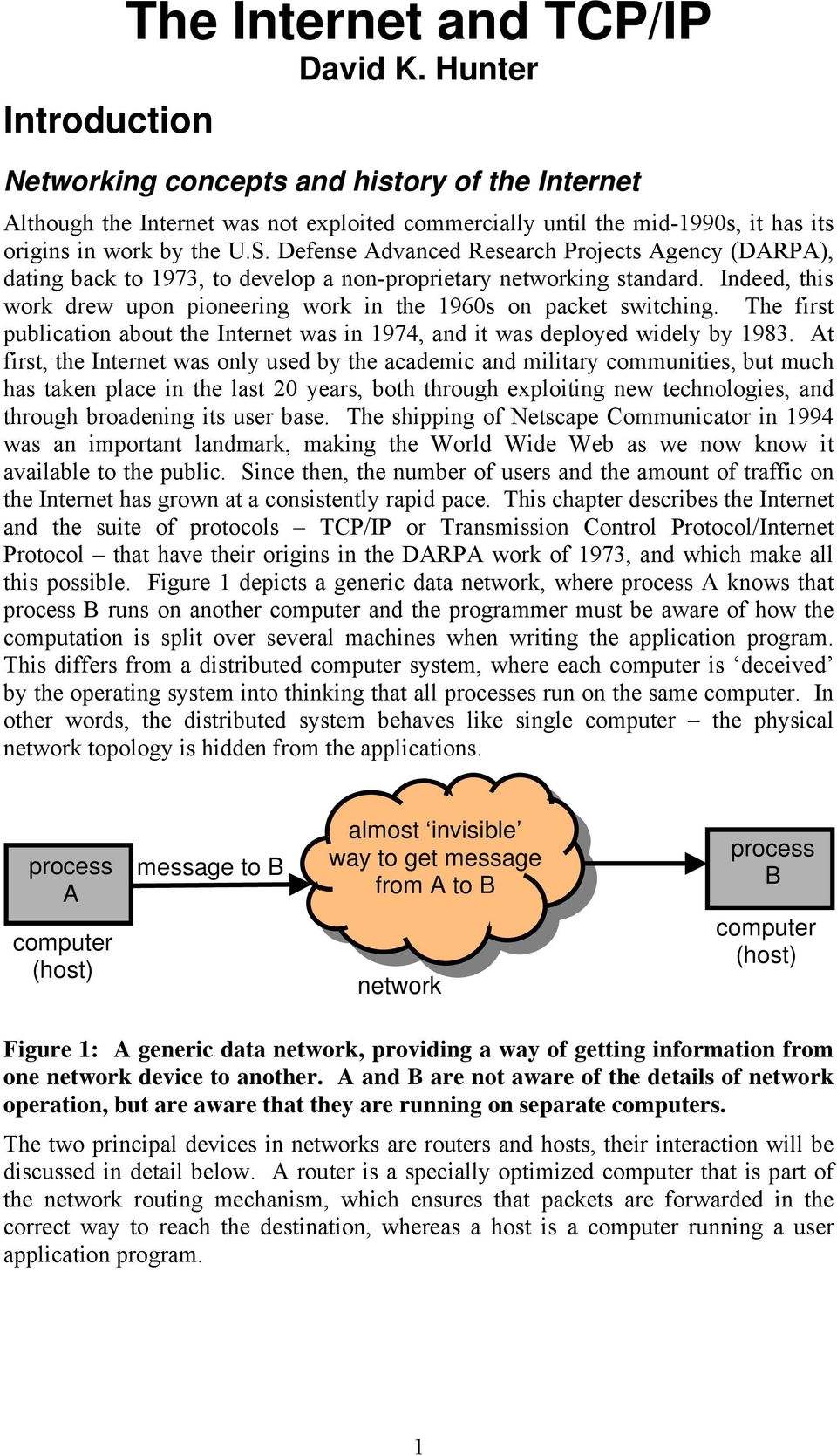
1 Introduction The Internet and TCP/IP David K. Hunter Networking concepts and history of the Internet Although the Internet was not exploited commercially until the mid-1990s, it has its origins in work by the U.S. Defense Advanced Research Projects Agency (DARPA), dating back to 1973, to develop a non-proprietary networking standard. Indeed, this work drew upon pioneering work in the 1960s on packet switching. The first publication about the Internet was in 1974, and it was deployed widely by At first, the Internet was only used by the academic and military communities, but much has taken place in the last 0 years, both through exploiting new technologies, and through broadening its user base. The shipping of Netscape Communicator in 1994 was an important landmark, making the World Wide Web as we now know it available to the public. Since then, the number of users and the amount of traffic on the Internet has grown at a consistently rapid pace. This chapter describes the Internet and the suite of protocols TCP/IP or Transmission Control Protocol/Internet Protocol that have their origins in the DARPA work of 1973, and which make all this possible. Figure 1 depicts a generic data network, where process A knows that process B runs on another computer and the programmer must be aware of how the computation is split over several machines when writing the application program. This differs from a distributed computer system, where each computer is deceived by the operating system into thinking that all processes run on the same computer. In other words, the distributed system behaves like single computer the physical network topology is hidden from the applications. process A computer (host) message to B almost invisible way to get message from A to B network process B computer (host) Figure 1: A generic data network, providing a way of getting information from one network device to another. A and B are not aware of the details of network operation, but are aware that they are running on separate computers. The two principal devices in networks are routers and hosts, their interaction will be discussed in detail below. A router is a specially optimized computer that is part of the network routing mechanism, which ensures that packets are forwarded in the correct way to reach the destination, whereas a host is a computer running a user application program. 1
2 Internet design philosophy In the early 1970s, when the Internet protocols were designed, there were a number of proprietary computer networking technologies in existence. The DARPA team wished to design a non-proprietary networking technique, for interconnection of existing networks. Their key objectives are summarized below: Use store-and-forward packet switching, since this was a natural choice for envisaged applications, and the networks that were to be interconnected used packet switching. Continue communication even if routers or networks go down. Support multiple types of communications services. Integrate a number of separately administered networks of different types into a common entity. Use distributed management. While these objectives remain relevant today, the Internet has evolved greatly since this original design phase. Moreover, it is now being used for voice and video transmission, which were not envisaged in the original data-centric concept. Originally, the Internet was used by a relatively small group of academic users, and the provisions for addressing seemed more than ample. As the use of the Internet has increased over the years, providing addresses for all users has become an issue, and the addressing schemes described in this chapter are designed to prevent address wastage. Many envisage that a new version of IP, IPv6, will be introduced, largely for this reason. Figure illustrates some of the technologies deployed in the present-day Internet. The terminology, protocols, and techniques used will be explained in depth in the remainder of this chapter. The network in the diagram is composed of a variety of technologies for example, trans-atlantic cables, wireless networks, local area networks such as Ethernet, and connections via the telephone system via both 56K modems and Asymmetric Digital Subscriber Line (ADSL). TCP/IP unifies these diverse technologies, making them all appear to be one network to the applications programmer. Although they will be discussed later, two further features of the diagram are relevant here:

3 US backbone router host European backbone TAT trans-atlantic cable ISP router ADSL non-ip network private network access point NAT hub tunnel national network Ethernet bus LAN IEEE wireless LAN Ethernet star LAN point of presence telephone system client Figure : An illustration of the wide variety of technologies that co-exist in the Internet. The TCP/IP protocol suite (layers 3-5) provides a unifying framework for the variety of networking technologies in layers 1 and, making them appear as one network to the application programs. A Point of Presence (POP) is owned by an Internet service provider, so that subscribers can dial into it to access the Internet. Service providers usually have several POPs in many different geographic locations, so that subscribers can dial into the nearest one. Network Address Translation (NAT) allows each host on its local network to have its own IP address, while only requiring one address in total from the viewpoint of the external network. This is a way of easing the addressing problem described above, although IPv6 is a more satisfactory and permanent solution. Protocol layering and the protocol stack Layering of network protocol functions is a crucial design strategy that is adopted in almost all communications networks. TCP/IP consists of very many protocols, with each protocol residing in one of five layers, facilitating protocol design, implementation, and maintenance. Each layer provides a service to the layer immediately above, while adjacent layers communicate via an interface that hides layer implementation detail; details of lower layers are hidden from higher layers. This simplifies implementation and maintenance of the protocols, although it can cause problems for example with TCP over wireless, where packets are often lost due to a noisy channel, but TCP interprets congestion as a sign of network congestion. The 5-layer model used in TCP/IP (Figure 3) is similar to the 7-layer Open System Interconnection (OSI) model, but layers 5 and 6 are missing. The five remaining layers are: 1. Physical layer interfaces to the physical transmission medium 3

4 . Data link layer transfers information reliably between two nodes that are connected by a link 3. Network layer transfers information on a best-effort basis from source to destination, perhaps over many links 4. Transport layer transfers information reliably from source to destination, ensuring packet ordering 5. Application layer interfaces to application programs. application transport network IP data link Ethernet physical physical medium source host Figure 3: The TCP/IP protocol stack, consisting of five layers physical, data link, network, transport, and application. A set of cooperating protocols that are interrelated in this way is called a protocol stack. The hosts at either end of the communications path implement all five layers in the protocol stack, whereas intermediate routers need only implement the lower three layers physical, data link, and network. Each layer in the stack is described below. Physical layer layer 1 FTP, TELNET TCP, UDP network data link physical router IP Ethernet The physical layer deals with transmitting raw zero and one bits over a communications channel. It specifies signalling voltages, the length of bits in nanoseconds, connector pin-outs, whether operation is unidirectional or bidirectional, and so on. However, the physical layer is not the physical transmission medium itself; this lies below the physical layer. Information is carried from A to B via a transmission medium (Figure 4); in this example, it is encoded in physical form at network device A, and decoded at network device B, being carried through voltage, current, infrared light, or radio waves. A link may be point-to-point or broadcast, and in both cases a device is connected to a link by a hardware network interface. link (wire, fibre, free space) application transport network data link physical physical medium destination host Tx network device A Rx network device B Figure 4: Two network devices communicating over a physical link, as defined by the physical layer. 4

5 The Bit Error Rate (BER) is the ratio of the number of bits received in error (a one mistaken for a zero or vice-versa) divided by the total number of bits sent. Typical BERs for wireless are better than 10 -, for coaxial cable 10-6, and for optical fibre, better than The propagation speed for wireless transmission, and in free space, is approximately ms -1 ; for all other media it is approximately 10 8 ms -1. This is important when considering the operation of higher-layer protocols, especially TCP, because the delay this introduces affects the protocol s efficiency. Data link layer layer The data link layer provides reliable transfer of information across a physical link, where a link is a direct physical connection between two network devices. (A connection between two users that passes through many intermediate nodes would involve many links.) It sends blocks of data (frames) with the necessary functionality: Synchronization, to ensure that the receiver can align successfully to bit and byte boundaries Error control, to ensure that any lost packets due to errors are retransmitted. It uses the services of the physical layer to get bits over the line: 1. The layer -to-layer 1 interface converts zero and one bits to a physical quantity on the link.. The layer 1-to-layer interface converts a physical quantity on the link into zero and one bits. A Medium Access Control (MAC) protocol is necessary for broadcast links, to decide when each network device may access the medium. TCP/IP does not specify layers 1 and, but Ethernet is commonly used, since the IEEE 80.3 Ethernet standard defines both layers. Other options instead of Ethernet include Asynchronous Transfer Mode (ATM) over Synchronous Digital Hierarchy (SDH), token ring, and Fibre Distributed Data Interface (FDDI). Common 10 Mb/s Ethernet topology configurations are shown in Figure 5. The bus network is passive and uses a MAC protocol called Carrier Sense Multiple Access with Collision Detection (CSMA/CD) to provide all hosts with fair access to the network. The switched Ethernet is connected in a star topology, and frames are switched to the correct host by the central switching hub there is no broadcast shared medium. Ethernet standards exist for 10 Mb/s, 100 Mb/s, 1 Gb/s and 10 Gb/s data rates. User device (a) 10 Mb/s coaxial cable bus 10 Mb/s UTP cable Switching hub (b) Figure 5: Two common configurations of Ethernet networks (a) a broadcast bus using CSMA/CD, and (b) a star, which uses a switched hub. 5

6 Network layer layer 3 The network layer uses the Internet Protocol (IP) to route packets from source to destination efficiently through a network, or patchwork of networks, each using a different link layer technology. It is concerned with getting packets from the source all the way to the destination, and in order to do this, an efficient global network interface addressing scheme is required which must be independent of layer addressing, since layer addressing is technology dependent. The network layer also deals with addressing and routing, and, in the Open System Interconnection (OSI) model, also implements congestion control. Packets in the network layer are called datagrams in IP, an important network layer protocol. A datagram size of 1500 bytes is generally chosen when discussing Internet operation because this is the maximum permitted by the Ethernet frame size or Maximum Transmission Unit (MTU), and Ethernet networks often carry IP traffic. Transport layer layer 4 The transport layer uses the Transmission Control Protocol (TCP) to ensure that a message from a source process arrives without errors or omissions at the destination process, and also ensures that packets arrive in order. TCP also implements congestion control. In layer, Ethernet does not correct bit errors in the frame, but it can, however, detect them. Such errors are usually resolved in layer 4 via retransmission of erroneous packets. Application layer layer 5 Application layer protocols form an interface between the network and the application software, so they do not consist of the application software itself. Examples of application layer protocols include: File Transfer Protocol (FTP) used to transfer files between a host and a server. Telnet allows the user to log in and use a remote machine, with a text interface. Simple Mail Transfer Protocol (SMTP) transfers s between mail servers, and from a host to its mail server. Post Office Protocol version 3 (POP3) used by a host to read s on its mail server. Simple Network Management Protocol (SNMP) facilitates the exchange of management information between network devices, enabling network administrators to manage network performance, find and solve network problems, and plan for network growth. Hyper Text Transfer Protocol (HTTP) the standard Web transfer protocol, used for transferring Web pages written in HTML from the server to the host that requests them. Domain Name System (DNS) translates domain names such as into IP addresses such as This avoids the user having to think in terms of IP addresses. 6

7 Applications often have a client/server architecture, where the client application, which usually runs on a host, makes a request of the server application. The server then fulfils the request this is a convenient way to interconnect programs distributed across different locations. Conclusions on protocol layering The protocol stack simplifies programming, because without it, programmers would need to know about: Creating bit-streams directly, for transmission Communications hardware Writing drivers for the hardware Detecting errors in byte streams and correcting them Routing the byte stream through the network While a simple data link may be more efficient than a network in certain specialized applications where transmission efficiency is paramount, the additional trouble and complexity involved would be justified in only a few very special cases. Layer encapsulation and IP-in-IP Because TCP/IP employs a layered protocol architecture, the interfaces between layers are of crucial importance (Figure 6). Between layers, a process known as encapsulation takes a packet from a higher layer and inserts it into the data field of the layer below, while at the destination, the data field is removed and presented to the layer above. Thus a hierarchy of packet headers is in fact transmitted by the physical layer. layer 5 (applications) echo (port 7) NTP (port 13) DNS (port 53) layer 4 (UDP) port 53 UDP hdr application data layer 3 (IP) layer (Ethernet) Ethertype 0x800 Ethernet frame protocol 17 IP header UDP datagram IP datagram Figure 6: An illustration of interlayer encapsulation. The data field in each layer holds a packet or block of data from the layer above. Each packet header contains a field that states from which protocol in the layer above to the payload it came, and consequently, to what process it should be sent at the destination. In an Ethernet packet (known as a frame layer ), this field is called the Ethertype field. In an IP packet (known as a datagram layer 3), this is known as the 7

8 protocol field, and in a TCP segment or UDP datagram (layer 4), it is called a port. The port identifies the application protocol concerned, and the combination of an IP address and a port is called a socket, an important concept in TCP/IP programming. Figure 6 depicts three application-layer protocols: With echo, the server returns what the client has sent to it this is used when implementing the Linux ping command. Network Time Protocol (NTP) synchronises the router clocks. Domain Name System (DNS) translates domain names such as into 3-bit IP addresses. The data field in the data-link layer is limited in size by the protocol concerned, limiting the size of the IP datagram that may be placed within it. This size limit is called the Maximum Transmission Unit (MTU), and some common values are shown in Table 1. The MTU refers to one link, however the path MTU refers to an entire path, which may consist of many links, and is the minimum value of all the MTUs along the path. Hence the path MTU is the maximum size of IP datagram that can be sent over a given path. Link layer protocol Default MTU Point to Point Protocol (PPP) 96 X5 576 Serial Line Internet Protocol (SLIP) 1066 Ethernet 1500 Fibre Distributed Data Interface (FDDI) Mb/s token ring 4464 Token bus Mb/s token ring Hyperchannel Table 1: Default MTU sizes for common link layer technologies. Besides encapsulating transport layer packets, IP can encapsulate existing IP datagrams (a form of intralayer encapsulation); hence a new IP datagram is created with the existing IP datagram encapsulated within its data field. Mobile IP is an important application of this, where a mobile host is associated with both its original primary address, and also the secondary address of its new physical location. Datagrams that arrive destined for the primary address are intercepted by an agent, which encapsulates them via IP-in-IP, before sending them to the secondary address. This type of encapsulation can also implement tunnel mode in IPsec (IP security), protecting traffic that must pass through an intermediate, untrusted network. The path from the point of IP-in-IP encapsulation the corresponding point of decapsulation is called a tunnel, and generally exists between two firewalls in different organizations. It is called a tunnel because existing datagrams are placed inside new ones with different addressing information. Hence hosts on each company s LAN need not be aware of the security mechanism. Tunnel mode may aggregate a bundle of TCP connections, which are handled as one encrypted stream. This prevents an intruder seeing who is sending how many packets to whom, since this may well be information that the senders do not wish to share. 8

9 Applications of IPsec include secure Virtual Private Networks (VPN), secure access by users to Internet Service Providers (ISPs), and electronic commerce. IP and the network layer The above examination of protocol layering is a necessary prerequisite for the study of Internet Protocol (IP) arguably the most important single protocol in TCP/IP. Implementation of IP addressing is an important concern, along with the addressing schemes that have been proposed since the Internet was first devised. IPv4 addressing In IPv4 addressing, each host and router has a unique Internet-wide IP address that identifies the device, and the network that it is on, which could be, for example, an Ethernet. This is 3 bits long in IPv4 ( 3 addresses), or 18 bits in IPv6. No two devices on the Internet have the same IP address (except when NAT or Network Address Translation is involved to be discussed later). To be exactly correct, the IP address refers to a network interface on a device, and not the device itself. For example, routers have more than one network interface, each on a different network. Network addressing has evolved over the years, principally due to the increasing scarcity of IP addresses. It affects the efficiency and ease of implementation of Internet routing, since it is used by routing protocols when computing optimal paths through the network. It also influences how datagrams are forwarded within routers, influencing routing table organization and size. This affects the efficiency of the Internet s operation because large router tables cannot be searched quickly, slowing down network operation. Due to expansion and increasing use, Internet addressing has developed since its first deployment, both to facilitate fast and efficient forwarding of data in routers, and to avoid wasting addresses. It will be explained later that if a group of physically adjacent hosts have consecutive IP addresses, then these addresses can often be summarized in just one entry in a router s table, facilitating fast searching by reducing the number of table entries. The Internet was originally developed for a relatively small group of academic users, and at that time, a 3-bit address space seemed ample. Since then, Internet use has increased dramatically, resulting in a series of addressing techniques offering increasingly efficient address usage. These are, in order of implementation: Flat addressing 3-bit address. Addresses are allocated arbitrarily, with no order or structure. Hence it is very difficult to combine multiple addresses into one routing table entry, since they are rarely consecutive. Class-based addressing classes A, B, and C. There is a predefined number of possible customer networks in each of these three classes. In each class, a network has a predefined number of addresses assigned to it. Unfortunately, these divisions of addresses are rigid, resulting in inefficiency and address wastage. Subnet addressing the networks from class-based addressing are subdivided into subnets. This provides a network administrator with some flexibility in dividing up the addresses allocated to a particular network. The number of subnets in each network is defined by the network administrator. 9
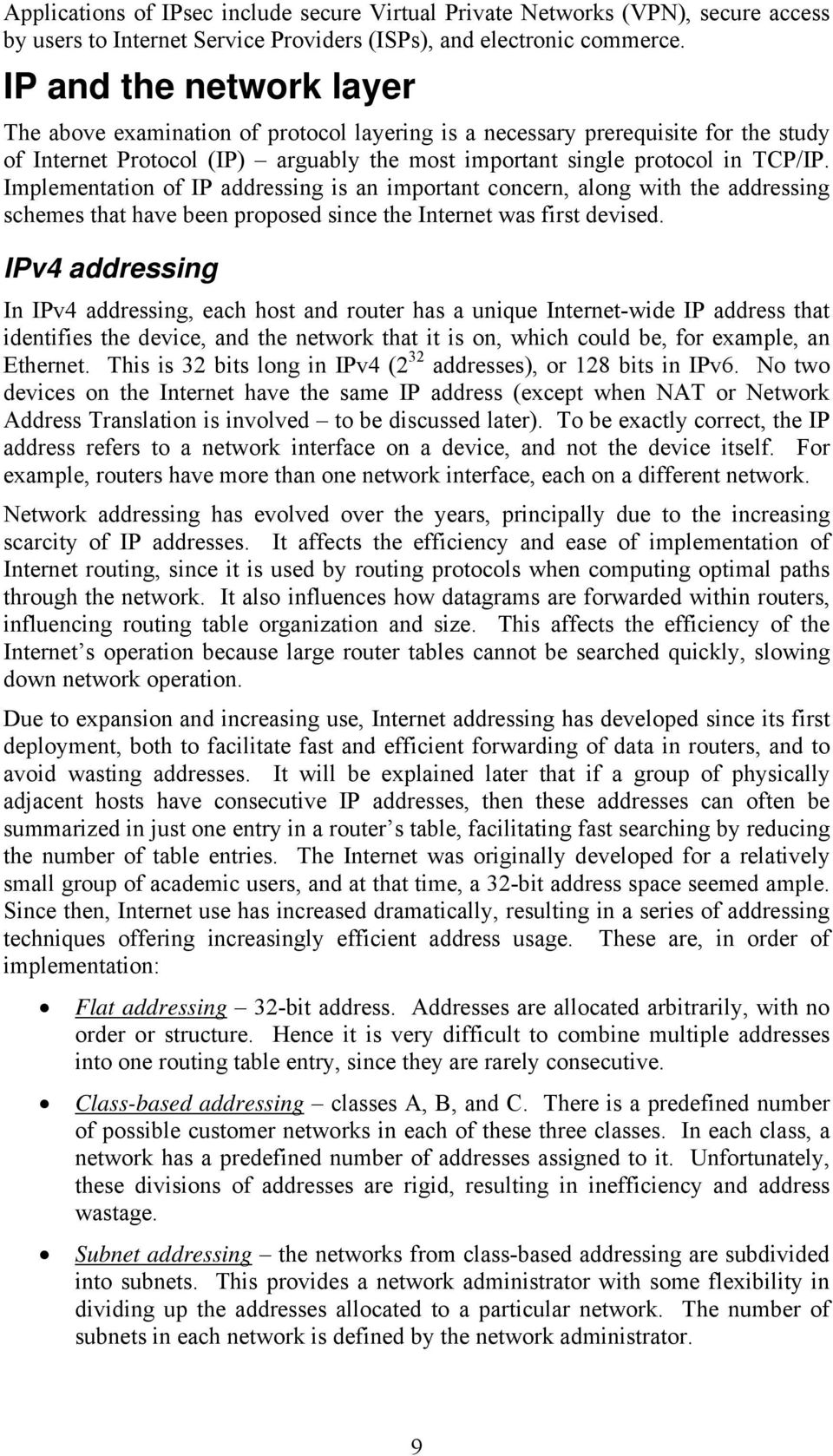
10 Classless Inter Domain Routing (CIDR) is based upon many of the ideas of subnet addressing, and offers the greatest efficiency in address usage. Each user network is assigned a variable-sized group of addresses, greatly reducing unnecessary wastage of addresses. This address allocation method can often allocate large groups of addresses into one routing table entry, yielding more efficient routing table organization. IPv6 overcomes the problem of address exhaustion by allocating 18 bits for each IP address. Although IPv6 was proposed more than a decade ago, it has yet to be adopted. One reason is that Network Address Translation has delayed the need for it, since NAT is a quick fix to avoid running out of IP addresses. Routing table organization Routers contain routing tables, which decide the next hop for incoming IP datagrams. The router matches a datagram s IP address with a table entry, and then looks up the corresponding next hop. Both the address of the next hop router, and the number of the corresponding router port, are stored. Each entry in the table contains a prefix, which defines a block of destination addresses. A prefix consists of a base address and a mask, where the base address is indicated by one in the corresponding bit of the mask. The concept will be described in more detail when discussing CIDR. A table entry may also define a single IP address, but this is extremely rare the rationale behind IP routing tables is to minimize the number of entries via prefixes, making table searching faster and more efficient. When several matching prefixes exist for an IP address, the one with the longest mask is chosen. If a matching prefix cannot be found, the datagram is sent to the interface indicated by the default entry in the table. Class-based IPv4 addressing In class-based addressing (or classful addressing Figure 7), each IP address lies in one of four classes A, B, C or D. In classes A, B and C, two fields define the network id and the host id (Table ). Class D addresses begin 1110, and are used for multicasting, while there is also an experimental class E starting class A msb 0 network host lsb B 10 network host C 110 network host D 1110 multicast address Figure 7: Class definitions for class-based (or classful ) addressing. Classes A, B and C are for point-to-point communication, whereas, class D is used for multicasting. Classes A to C each define fixed fields for identifying both the network and the host within it. 10
11 Class Most Network id Host id Maximum Maximum significant bits bits bits networks hosts A B C Table : Summary of Internet address classes A, B, and C. Certain addresses are reserved for special purposes: = this host, this network the source address for RARP packets, discussed later = all hosts on the local network 0.X.Y.Z = host X.Y.Z, this network, class A 0.0.Y.Z = host Y.Z, this network, class B Z = host Z, this network, class C Hence a host need not know the network address of its LAN, but it must know the address class. X = all hosts on network X, class A X.Y = all hosts on network X.Y, class B X.Y.Z.55 = all hosts on network X.Y.Z, class C = loopback address used for debugging and testing. Subnet addressing Subnet addressing (Figure 8) overcomes the inflexibility of classful addressing by permitting the division of a class A, B, or C address space efficiently among the individual networks (or subnetworks) within an organization. With subnet addressing, subnet masks of contiguous one bits followed by contiguous zero bits define subnetworks within a network. Without subnets, one class B address space (for example) defines one network with some 65,000 hosts, which is too big for one physical network. Here, this address space is divided among physical networks, yielding more efficient use of IP addresses. subnet mask msb network address subnet address host address Figure 8: Division of 3-bit address into fields for the network address, subnet address and host address. In this case, a class B address space is used, so the address begins with 10 binary. The mask used in a router table entry s prefix depends on whether it is inside or outside the network. Inside the network, the mask contains 1 for network bits, 1 for lsb 11

12 subnet bits, and 0 for host bits, so that the routers take account of network address and subnet address. Outside the network, the mask contains 1 for network bits, 0 for subnet bits, and 0 for host bits, so that the routers take account of the network address, but not the subnet address. Example of subnet addressing Figure 9 shows network (class B) that has been divided into four subnetworks , , , and Inside the network, the routing table entries contain the following mask: However, outside the network, the routers do not need to be aware of how the network is split up into subnetworks, so the mask there is: Traffic is not broadcast over all subnetworks, with each subnet only carrying traffic that is necessary router to Internet router Figure 9: An example of subnet addressing the class B address space is divided into four subnets /4, /4, /4, and /4. Example subnetting of branch offices An organization has a head office with no more than 54 branch offices (Figure 10), and each office has no more than 54 hosts. The organization chooses a hub and spokes topology, with the head office at the centre, and one branch at the end of each spoke. The organization obtains the class B network addresses starting from

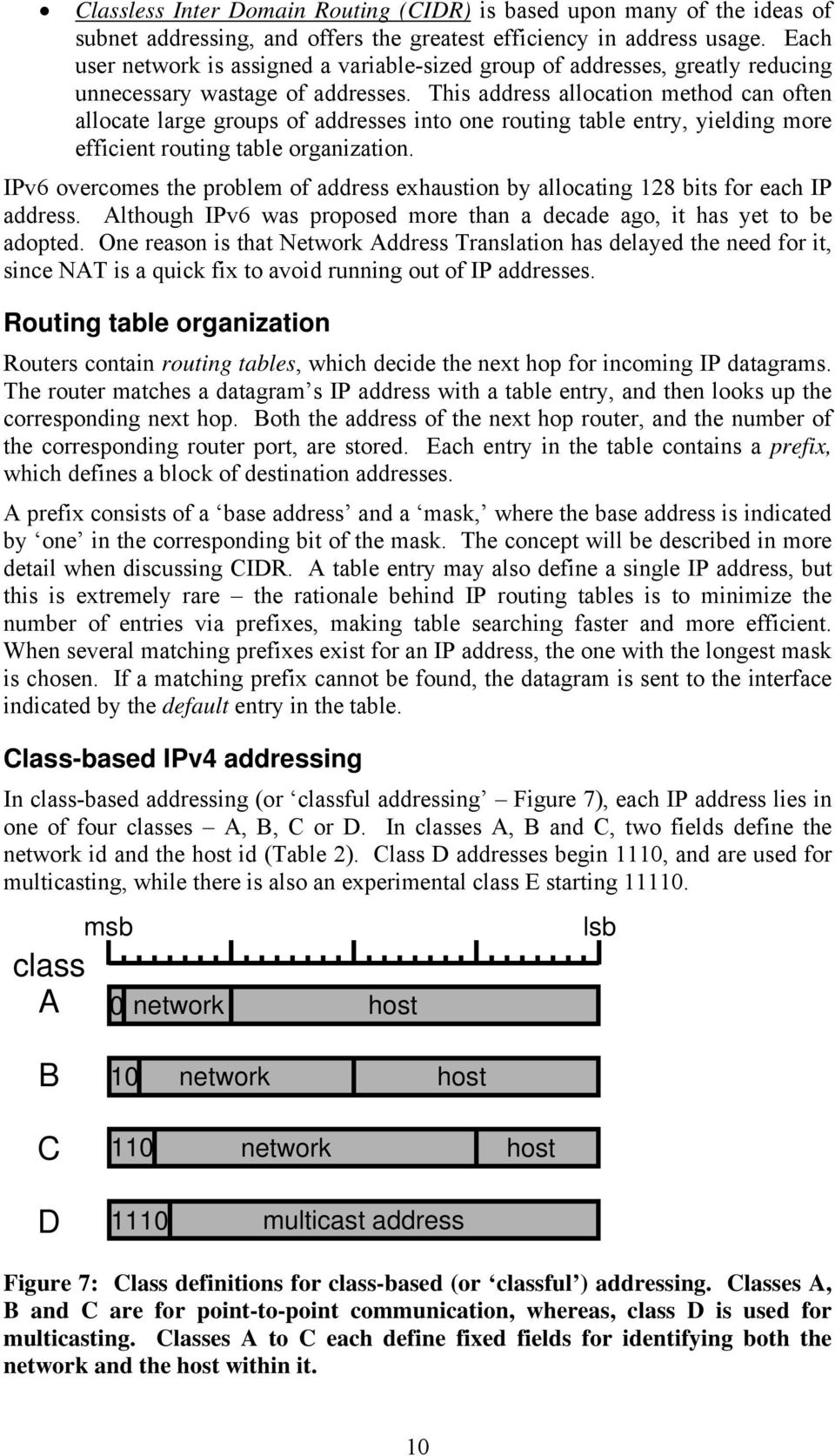
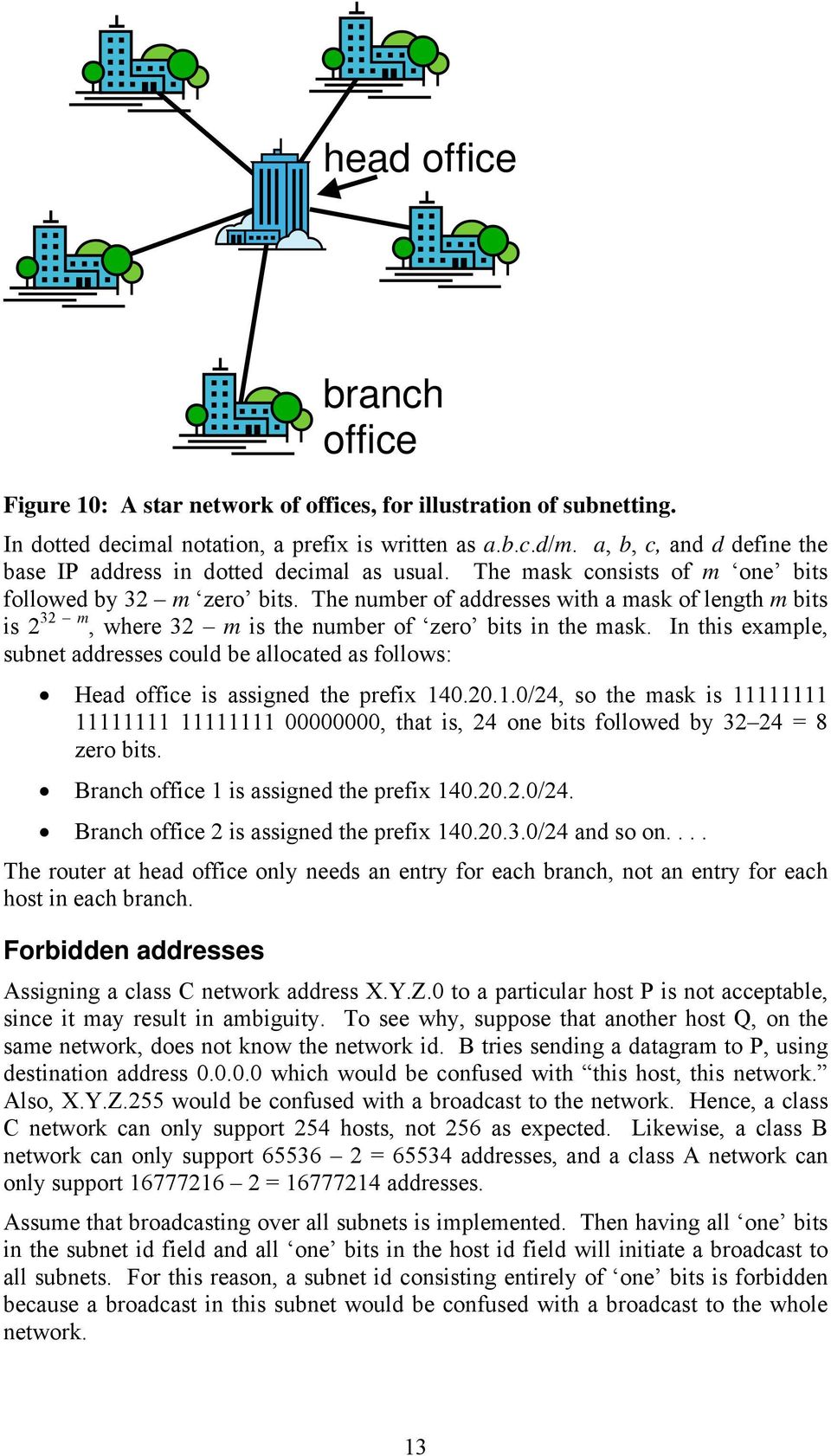
13 head office branch office Figure 10: A star network of offices, for illustration of subnetting. In dotted decimal notation, a prefix is written as a.b.c.d/m. a, b, c, and d define the base IP address in dotted decimal as usual. The mask consists of m one bits followed by 3 m zero bits. The number of addresses with a mask of length m bits is 3 m, where 3 m is the number of zero bits in the mask. In this example, subnet addresses could be allocated as follows: Head office is assigned the prefix /4, so the mask is , that is, 4 one bits followed by 3 4 = 8 zero bits. Branch office 1 is assigned the prefix /4. Branch office is assigned the prefix /4 and so on.... The router at head office only needs an entry for each branch, not an entry for each host in each branch. Forbidden addresses Assigning a class C network address X.Y.Z.0 to a particular host P is not acceptable, since it may result in ambiguity. To see why, suppose that another host Q, on the same network, does not know the network id. B tries sending a datagram to P, using destination address which would be confused with this host, this network. Also, X.Y.Z.55 would be confused with a broadcast to the network. Hence, a class C network can only support 54 hosts, not 56 as expected. Likewise, a class B network can only support = addresses, and a class A network can only support = addresses. Assume that broadcasting over all subnets is implemented. Then having all one bits in the subnet id field and all one bits in the host id field will initiate a broadcast to all subnets. For this reason, a subnet id consisting entirely of one bits is forbidden because a broadcast in this subnet would be confused with a broadcast to the whole network. 13
14 Two problems with class-based addressing In classful addressing, much of the address space is wasted, which is particularly serious because, due to the growth in Internet use, addresses have become scarce. To see this, consider the three address classes: Class A networks are too large, with up to hosts, so many host addresses are unused. Class B networks are just the right size, hence largely used up, with up to hosts. Class C networks are too small, so not so widely used, with up to 54 hosts. Also, with classful addressing, addresses in the same geographical region or organization tend not to be contiguous. This makes address summarization (aggregation) impossible in many cases, resulting in inefficient routing, because the routing tables become large and inefficient. Classless Interdomain Routing (CIDR) CIDR overcomes the problems of class-based addressing. The remaining class C address space is allocated geographically, for example: represents Europe represents North America represents Central and South America represents Asia and Pacific. Hence, an entire continent has just one routing table entry. The address space is allocated hierarchically as blocks of addresses, and not as class C networks. First, a prefix (a base network address plus a mask) is allocated to an ISP, which can allocate a longer prefix in its address space to each customer. Prefixes are stored as base address and mask pairs in routing tables, for example: /16 (16 msb prefix of ISPA) /4 (prefix of a customer of ISPA 1/56 th of ISPA s address space) A customer s prefix or an ISP s prefix can denote addresses covering more than one old class C address space. In the past, an organization applied to the Network Information Centre (NIC) for a network address space of the required class. Then, the organization obtained Internet services from an Internet Service Provider (ISP). The NIC was responsible for Internet network addressing, so networks served by a given ISP often had unrelated addresses, and routing tables had an entry for each of the ISP s networks. It is desirable to have just one entry for each ISP, which can then use CIDR to divide up its available address space. Organizations are now assigned blocks of IP addresses by Internet Service Providers (ISPs), and in turn, ISPs are allocated blocks of IP addresses by the appropriate Internet registry. Addresses now managed by Internet Corporation for Assigned Names and Numbers (ICANN). 14

15 Example routing table size and allocating prefixes Suppose all class-based network addresses were allocated randomly, and that the number of class-based networks was approximately 1. This happens to be the number of class C networks, and would also be the number of rows in the routing table. Searching such a large table, and hence forwarding, would be slow. Also, routers must exchange these large tables to reflect network changes, using up network bandwidth that could otherwise be used by customer traffic. Using CIDR, an ISP called ISPA is allocated the prefix /16, having 16 = possible customer host addresses. ISPA is based in Asia and Pacific it is within the range to Five of its customers need 64, 64, 18, 104, and 4096 host addresses respectively. For 64 addresses, the least significant 6 bits of the address (to give addresses 0 to 63) are required so the prefix mask has 3 6 = 6 bits. The first 64 addresses of ISPA s address space are allocated, with prefix /6 so that the addresses range from to The next 64 addresses are allocated with the prefix /6, where the last masked bit is a one, rather than a zero, as for the first allocation. This corresponds to the range to The 18 addresses need 7 bits so the mask has 3 7 = 5 bits, hence /5 is allocated. So far, the equivalent of one old class C network has been allocated, i.e., /4 call this block 0. Allocation of 104 addresses requires 4 old class C networks, which needs 10 host bits. The mask is bits and the allocation is / (blocks 4 to 7). The nd bit is a one to distinguish the addresses from those already allocated, for which this bit was a zero. It is impossible to allocate addresses to instead, because they cannot be uniquely distinguished from other customers addresses by one base address and one mask. The 4096 addresses require 16 old class C blocks and 1 bits, that is, a prefix mask of 3 1 = 0 bits. Blocks 16 to 31 are used, so the network prefix is / = 1 class C networks have been allocated. With random allocation, each would have had its own routing table entry, but they are now all summarized by the prefix /16, the allocation for ISPA. So the number of routing table entries decreases by 0. The fraction of ISPA s address space allocated is 1/56, about 8. percent. IPv6 a new version of the Internet Protocol So far, ways of using IPv4 s address space more efficiently notably CIDR have been discussed. IPv4 is the current version of IP, having a 3-bit address space, supporting up to some 4.3 billion different IP addresses. While this was more than enough in the early days of the Internet, when it was used by a small community of academic users, its use is now so widespread that IP addresses have become very scarce. One quick-fix solution involves the use of Network Address Translation (NAT), where a customer s network has only one IP address when accessed from outside. Although NAT is presently widely used, a more satisfactory and permanent solution is offered by IPv6, which has an address space of 18 bits ( IP 15
16 addresses). Progress in developing and deploying IPv6 has been slow, but is accelerating. Not only will the IPv4 address space become insufficient, but its real-time delivery of audio and video is not fully satisfactory. Also, more complex addressing and routing facilities, to support collaboration between users, will be required by future applications. IPv6 retains many features of IPv4, but uses extension headers much more widely than IPv4 s options, which are a similar concept. The header format has been thoroughly revised in IPv6, and along with having better support for audio and video, the protocol can easily be extended. Instead of the dotted decimal notation used in IPv4, addresses in IPv6 are written in a type of hexadecimal notation, which is more compact. There are three main types of address. Unicast addresses send datagrams to single computers, whereas multicast addresses sends them to a group of computers, which may be geographically dispersed. Finally, anycast is a new type of addressing in IPv6 which sends a datagram to the nearest computer residing at a particular location. Domain Name System (DNS) The discussion so far has involved numeric IP addresses, which most users find uninformative and unappealing. For this reason, applications such as Web browsing and usually use domain names, for example, The toplevel domain name is at the right of the domain name ( org in this case), preceded by the second-level subdomain ( charityappeal ). The top-level domain names, and the subdomain names, are separated by dots. Application layer services resolve or translate domain names into IP addresses by making a call to a library resolve function. The domain name is passed as a parameter, and this function accesses the local DNS server (or name server) to carry out the translation. If this is not possible, this server accesses DNS servers at higher levels in the DNS hierarchy until the domain name is resolved. DNS was developed in the early to mid-1980s, and is highly distributed and resilient. It uses layer 4 protocol UDP; it is a hierarchical system with more than 50 top-level domains, each representing many hosts. These top-level domains are either one of 15 generic top-level domains (e.g., com, edu, gov, mil, net, org) or one of 43 country domains, with most having a registrar, administrating second-level domains. The domain names are case-insensitive. Most U.S. organizations are under a generic domain but most others are under the domain of their country. Naming follows organizational boundaries, not physical networks. For example, if the computer science and engineering departments in a university share the same Local Area Network (LAN) in the same building, they may nevertheless have different domains. Alternatively, if engineering is split over two building and two separate networks the hosts on both networks may belong to the same domain. Internet Protocol (IP) Having covered IP addressing schemes, the most important layer 3 protocol, Internet Protocol (IP) is now discussed. It provides the basic mechanism for carrying information from one network device to another. The network layer (layer 3) sends information as independent packets called datagrams as it becomes available. IP is entirely connectionless, with no circuits, and no connection setup or teardown. It is 16

17 simple and therefore easy to implement, with no overhead for circuit establishment and termination. Hence, it is economical on network resources. It handles simple client-server queries rapidly, with no circuit setup or pull-down. IP has the disadvantage that information order can be lost, especially when different datagrams take different routes. Quality of service is not guaranteed since only besteffort transport is provided. Transmission Control Protocol (TCP, layer 4) ensures information order and provides network performance, while IP concentrates on trying to get packets from A to B. IPv4 datagram header Figure 11 shows the IPv4 datagram header the total length is in bytes. Each row of the diagram represents four bytes or 3 bits, so that when the header is transmitted, the first row is transmitted from left to right, followed by the second row, and so on. Each row contains one of more fields, each of which carries out a specific function as detailed below. msb version IHL type of service identification time to live protocol 3 bits D M F F total length fragment offset header checksum source address destination address zero to ten 3-bit word options lsb data payload (up to bytes) Figure 11: The IP datagram header, which is between 0 and 60 bytes long. The identification field is incremented by 1 for each datagram sent, to permit out-oforder datagrams to be detected at the receiver. The fragment offset is only 13 bits long, which has implications as will become clearer when fragmentation is discussed. If a datagram is too large to fit in a link layer frame, fragmentation splits it into several smaller ones. The Type of Service (ToS) field is an 8-bit field used by routers to prioritize service of arriving datagrams (Table 3). It permits delay to be minimized, throughput to be maximized, reliability to be maximized, or cost to be minimized, although it is not normally used in this way, as originally intended. Today s routers allow ToS functionality within organizations, but ToS has a greater role to play in IPv6. It is also re-used in DiffServ, a Quality of Service (QoS) mechanism in IP. 17

18 Bits Type Description 0 - precedence levels 0-7; 0 is normal, 7 is highest 3-6 type of service delay, reliability, throughput, cost 7 reserved for future use Table 3: Fields in the ToS field. The version field (4 bits) is set to either 4 or 6, denoting IPv4 or IPv6. The header length (IHL IP Header Length) is only 4 bits long, and measures the header length in groups of 4 bytes; i.e., to obtain the length of the header in bytes, multiply the IHL by 4. The minimum value of IHL is 5, corresponding to a 0-byte header, where there are no options. Options correspond to extra information in the header, which is used for added features. The maximum value of IHL is 15, corresponding to a 60- byte header, with 40 bytes of options. The total length of the IP datagram is held in a 16-bit field, and hence may in theory be up to 16 1 = bytes. In practice, it is limited to a smaller value by the link layer technology being used. However, all hosts must be able to accept datagrams up to 576 bytes in length, and longer datagrams should not be sent unless it is known that the destination host can accept them. The source and destination IP addresses are both 3 bits long. The Time To Live (TTL) field is 8 bits long, and is decremented by one for each link (or hop) taken. The datagram is discarded if the TTL reaches zero, preventing datagrams from wandering indefinitely or going round in circles. TTL is usually initialized to a value in the range 64 to 18 at the datagram s source, depending on the implementation. IP provides a service to a layer 4 (transport layer) protocol, i.e., sending a datagram from the source to the destination on a best-effort basis. The protocol field is one byte (8 bits long), and defines the layer 4 protocol to pass the data payload on to. As discussed previously, the protocol can be IP itself if the datagram contains an encapsulated IP datagram. Table 4 shows the values of the IP protocol field for different transport layer protocols. Protocol Code Description ICMP Internet Control Message Protocol 1 carries network error messages and network control information IGMP Internet Group supports multicast Message Protocol IP Internet Protocol 4 IP encapsulated within IP, for security TCP Transmission Control 6 provides a reliable end-to-end connection Protocol UDP User Datagram Protocol 17 implements connectionless operation with no guarantees ISO-TP4 9 International Standards Organization (ISO) transport protocol AH Authentication Header 51 Packet requires security check or encryption upon arrival at destination ISO-IP 80 ISO Internet Protocol OSPF Open Shortest Path First 89 Carries routing information between routers Table 4: Values of the IP protocol field for different transport layer protocols. 18
19 Fragmentation If a datagram is too large for a link, the router fragments it, for example, Ethernet restricts IP datagrams to 1500 bytes. Each fragment is encapsulated in a smaller datagram, and fragments of the same original datagram have the same identification number. IP reorders fragments and only reassembles them into datagrams at the destination; it has flags devoted to fragmentation in the header: DF = Don t Fragment; don t fragment the datagram MF = More Fragments; more fragments to follow DF = 0, MF = 1 except for last fragment where MF = 0 Each fragment carries in the fragment offset field the location of its first data byte in the original datagram; this is expressed in multiples of 8 bytes since this field is only 13 bits long. Hence, all fragments except the last one must be a multiple of 8 bytes in length. Example of fragmentation A 4000 byte IP datagram (with DF = 0) from an FDDI ring is received by a router to be sent over an Ethernet LAN. The IP header is 0 bytes long (with no options), so the data is hence 3980 bytes. This is to be placed into IP data fields of no more than = 1480 bytes, so the data field size in fragments is 1480 bytes bytes bytes, and hence the IP datagram sizes are 1500 bytes bytes bytes bytes represents 185 groups of 8 bytes. The first fragment (1500 bytes) has DF = 0 (fragmentation allowed), MF = 1 (more fragments of the datagram to follow) and offset = 0. The second fragment (1500 bytes) has DF = 0, MF = 1, and offset = 185, since = 1480 bytes have already been sent, and the 186 th group of 8 bytes in the original datagram is the first in this fragment. The last fragment (1040 bytes) has DF = 0, MF = 0 (no more fragments since this is the last one) and offset = 185 = 370, i.e = 960 bytes already sent. IPv4 options Up to 40 bytes of options are allowed in the header, to support additional features. The main IP header is 0 bytes long, and the options are less than or equal to 40 bytes; hence, the total header size is 0 to 60 bytes. These are generally used for diagnostics and troubleshooting. In strict and loose source routing, the source specifies the path to be taken, and routers send the datagram to the next address specified. The record route option keeps a record of (Timestamp, IP address) pairs for each router that the datagram passes through. Router alert implements a special service because a packet has special requirements, usually for security, for example, to route away from certain countries. Often options are not used. IPv4 checksum for header verification Header contents are verified by each router processing the datagram. At the transmitter, the checksum field is set to zero, and one s complement addition 19
20 (exclusive-or) of all 16-bit header words is calculated. The result of the addition is placed in the checksum field. Hence this procedure chooses a value for the checksum field, so that the checksum of the whole header is now equal to zero. It is important to distinguish between the checksum field, and the value of the checksum for the whole header. Each receiving router re-computes the checksum, including the checksum field in the calculation. If the result is zero, it is assumed there are no errors. The data field of the datagram is not checked, and it is left to the transport layer protocol to do this. This scheme cannot detect two errors in the same bit position, and cannot detect swapped bytes, or indeed swapped words. This IP checksum calculation was chosen to permit fast implementation in software. In Ethernet (layer ), the Frame Check Sequence (FCS) is determined via hardware. The use of hardware allows a more sophisticated error check to take place. IPv4 support protocols The IP support protocols are necessary for IPv4 to function correctly. Internet Control Message Protocol (ICMP) reports network errors and delivers information to hosts and routers. Address Resolution Protocol (ARP) provides the layer address corresponding to the layer 3 address provided. The layer address is required to forward a datagram on the next link. Reverse Address Resolution Protocol (RARP), Boot Protocol (BOOTP), and Dynamic Host Configuration Protocol (DHCP) represent successive refinements of the same concept. They provide the layer 3 address corresponding to the layer address provided. If a host boots and needs to know its IP address, it is provided by one of these protocols. Examples might be a workstation with no disk, which therefore does not know its IP address, or a customer connected to a service provider via a modem, who must have a new IP address allocated every time they power up. Internet control message protocol (ICMP) ICMP is the diagnostic and control protocol, informing a source of the fate of its datagrams if they do not reach their destination. It also informs hosts of the existence of local routers. ICMP carries diagnostics about a dropped datagram to its source. For example, Time Exceeded indicates that the router detects that the TTL expired; Parameter Problem shows that the router detects via a checksum that the IP header is corrupted, while with Echo Reply, the source requests the return of an ICMP packet by the destination. Echo Reply is used to implement the ping command in Linux. ICMP also carries router control messages back to the source. For example, Source Quench indicates that the router is congested so the source must send fewer packets. However better congestion control methods exist in TCP, so Source Quench is rarely used today. Destination Unreachable indicates either that the packet has its DF bit set and is too long for the network, or that the router cannot find a route. This is often not reported due to the use of default routing table entries. A Redirect means that a router knows a better route for packets, i.e., that the packet should really have been sent by the host to another router. ICMP also permits hosts to find their local default router, which forwards datagrams that are destined for outside the local network. With a Router Advertisement 0

21 message, a router informs hosts on this network of its existence, by sending either an ICMP message (type 9) to address or The address is a class D (multicast) address meaning all hosts on the network. Router Solicitation is used by hosts to indicate a desire to receive router advertisements. Local router addresses are usually timed out after 30 minutes. ICMP messages are transmitted in IP datagrams with the structure depending on the type of control message; however, all begin as shown in Figure 1. ICMP messages are held in the IP data field, where types 9 and 10 are used to supply hosts with the local router IP address. For diagnostic purposes, an ICMP message includes the IP header from the datagram causing the error, and the first 8 bytes after the header. type code checksum type: echo reply (0) destination unreachable (3) source quench (4) redirect (5) etc. code: network unreachable (0) host unreachable (1) port unreachable (3) fragmentation needed and DF set (4) checksum: covers entire ICMP message same algorithm as for IP Figure 1: First four bytes of an ICMP message. ARP implementation Normally, an IP datagram is passed to Ethernet (data link layer), and the whole IP datagram is encapsulated in the data field of an Ethernet frame (Figure 13). The datagram only contains the 3-bit IP address of the destination, hence the objective is to determine the 48-bit Ethernet address. Ethernet header IP header IP data IP datagram Figure 13: Encapsulation of an IP datagram within an Ethernet frame. Using Address Resolution Protocol (ARP), the source broadcasts the destination IP address in an Ethernet-ARP frame to all other devices on the network. The device having that IP address sends back an ARP packet with its media or Ethernet address, so that in this way, the corresponding Ethernet address is obtained. Now that the Ethernet address is known, the IP datagram is encapsulated in an Ethernet frame and sent to its destination. The IP address and corresponding Ethernet address are cached at the source in case further datagrams must be sent to the same destination. Hence with ARP no address translation lookup table needs to be maintained, simplifying address management. ARP (Figure 14) can be used with technologies other than Ethernet (such as ATMARP). The same packet format is also used for RARP. 1
22 Ethernet header destination (Ethernet) address broadcast address for ARP request (all 1s) source (Ethernet) address protocol type = ARP hardware (H) = Ethernet protocol (P) type = IP H.len P.len length of protocol and hardware addresses operation code source hardware address source protocol address dest. hardware address dest. protocol address ARP request = 1, ARP response =, RARP request = 3, RARP reply = 4 unknown Ethernet address in request Figure 14: Ethernet header and ARP packet. The packet format is flexible, and can support a variety of protocols. RARP, BOOTP, and DHCP Although RARP and BOOTP have been superseded by DHCP, it is nevertheless instructive to study their operation. At boot-up, a diskless machine (nowadays known as a thin client ) does not have a record of its IP address. It can obtain it by making an all ones Ethernet broadcast, and a RARP server responds with its IP address. The protocol employed is Reverse Address Resolution Protocol (RARP), which uses the ARP packet format. Since the broadcast is local, each LAN must have a RARP server. The restriction of having a local server is avoided by BOOTP. The BOOTP request is broadcast via a UDP datagram, so a router can forward the request to a BOOTP server if it is on another network. BOOTP informs a booting host of necessary network information: Its IP address The network prefix The default local router Its executable code if it is diskless in conjunction with Trivial File Transfer Protocol (TFTP) Number of seconds since midnight on 1 January 1900 IP address of the default router, and other routers that can be used IP address of DNS name server, printer server, time server, and so on Dynamic Host Configuration Protocol (DHCP) extends BOOTP and has in fact superseded it. It assigns IP addresses dynamically from a pool that is defined in the server s configuration file, hence a host does not tie up an IP address when not in use. A range of addresses is declared for each subnet, for example: pool { range
23 } This assigns 90 IP addresses in the range to to the subnet in question. DHCP is an improvement over BOOTP because BOOTP requires individual IP and Ethernet addresses to be set up in a table manually. However, DHCP may override the pool of addresses by assigning a manually assigned IP address to any Ethernet address specified by the network administrator, in the same way as BOOTP. DHCP is used by ISPs to assign IP addresses automatically to dialup users, cable users, and ADSL users. It is also used in office networks, particularly when laptops are used extensively, and are only rarely connected. Steps involved in first hop This example explains how an IP datagram gets to its first hop destination. Assume its source is on an Ethernet LAN, and also assume that DHCP was used to configure the datagram s source. Furthermore, also assume that the source s ARP cache is empty. From DHCP, the source knows the prefix of its network, so it examines the datagram s destination address. Via the network address field, it determines whether the destination is on its network. If this is so, the final destination is the first-hop destination. Otherwise, the source knows that the first-hop destination must be the default router on its network and, from DHCP, it has the IP address of this default router. Either way the source now knows the IP address of the first hop, so it then sends an ARP broadcast with this IP address enclosed. This is necessary because the ARP cache is empty. A network device on the local network will recognize the IP address as its own, and it then sends an ARP response back informing the source of the link layer (Ethernet) address of the first hop. The source then encapsulates the IP datagram in an Ethernet frame destined to that link layer address. Suppose the source host s address is ; a class B address with 18.5 = The source host s subnet mask is , also written as The final destination address is , also class B with 95 = The last two bits of the mask correspond to part of the subnet address, which differs between the source (10) and destination (01), hence they are on different subnets, and the first-hop destination is the local router. Transport Protocols IP provides a basis upon which protocols in the layer above (layer 4) can build, in order to provide a useful service to application protocols in layer 5. The most important layer 4 protocol is undoubtedly Transmission Control Protocol (TCP), which, unlike IP, transfers information reliably between network devices. UDP (User Datagram Protocol) is an enhancement of IP that is used when TCP would be too complex, and would involve too great an overhead. Transactional TCP (T/TCP) seeks to provide a compromise between TCP and UDP, whereas Realtime Transport Protocol (RTP) transports real-time data such as audio and video. 3
24 Outline of TCP operation Transmission Control Protocol (TCP) is an important layer 4 protocol, providing a reliable duplex byte stream pipe between application processes on remote computers. It: Sets up and closes connections between the source and destination, and also negotiates maximum acceptable segment length (Maximum Transmission Unit or MTU). Ensures the correct byte order of the message at the destination. Retransmits lost IP datagrams via fast retransmit and timeout. Manages the transmission rate of a source host via congestion control, so that the network and destination are never overloaded. IP routes a datagram from source to destination on a best-effort basis, with no connection setup or teardown. However, TCP turns datagram exchange into a reliable process-to-process data connection, by providing circuits or data calls. TCP delivers data reliably, in sequence, and without errors, and does not overwhelm the destination or the network. TCP is implemented in the end hosts only, and not in routers. In TCP, a port number defines the application in layer 5 that is using it. To set up a TCP connection, the application requests it from the TCP process. The TCP processes at the source and destination hosts then set up a connection. This is known as a three-way handshake. It can also carry passwords if required by the application. TCP also reserves send and receive memory buffers at each end for implementation of TCP s sliding window protocol. These buffers store incoming data while the receive application is busy. TCP agrees the path MTU once the connection has been established. After that, the application places outgoing bytes in the send buffer, and TCP slices the contents into segments (the name for packets in TCP), which are encapsulated in IPv4 datagrams. The receiving TCP process sends a TCP segment acknowledging each incoming segment taken out of its receive buffer. It is possible to piggyback data onto acknowledgment segments, when implementing duplex communication. If an acknowledgment segment is not received before a timeout period expires the segment is re-sent, overcoming the problem of IP datagrams becoming lost in the network. The congestion control mechanism, implemented via fast retransmit and fast recovery, is triggered by packet loss. In client/server applications, a client application makes a request of the server application (Figure 15), and the server fulfils the request. This is a convenient way to interconnect programs distributed across different locations. The port number on the server is well known or registered, and the client must know it in advance, since it is predefined for each application. The port number on the client is ephemeral, and is defined by the client as part of the request. 4
25 rec. send send rec. client application client network to another client server application rec. send server Figure 15: Communications between a client and a server often a convenient way of organizing application programs. TCP is also used in peer-to-peer applications, where the application in either peer may initiate a transaction. Table 5 shows some common applications that use TCP, where the port numbers refer to the server. Application Port number File Transfer Protocol (FTP) 0 telnet (log in at remote host) 3 Simple Mail Transport Protocol (SMTP 5 communicates between mail servers) Hypertext Transfer Protocol (HTTP) 80 connect user to ISP s mailbox (POP3) 110 Table 5: Common applications using TCP. TCP segment header As noted above, in TCP, a packet is known as a segment. The header is shown in Figure 16. The maximum length of an IP datagram is bytes, so the amount of data permitted in each TCP segment s data field may be obtained by subtracting the length of the IP header and the length of the TCP header from this. TCP segments are encapsulated within IP datagrams with an IP protocol field of 6 this identifies TCP as the layer 4 protocol to which IP in the receiving host should sent the contents of IP s data field. Recall that all Internet hosts must be able to accept IP datagrams of up to 576 bytes in length. Hence TCP must be able to accept segments with up to a 536 byte payload, i.e., 576 minus the lengths of both IP and TCP headers. 5
26 msb header length source port destination port sequence number of first byte ack number next byte expected unused U R G checksum A P C S K H 3 bits R S S Y T N F I N window size urgent pointer zero to ten 3-bit word options lsb data (0 to bytes) Figure 16: The TCP segment header, which is between 0 and 60 bytes long. TCP header field functions The source and destination ports are each bytes in length, and, along with the IP address of the encapsulating IP datagram, they uniquely identify the application to which the TCP must deliver the TCP segment. The combination of an IP address and a port number is often called a socket. Well-known port numbers exist for SMTP, FTP, and HTTP for example. The sequence number is 3 bits long, and it is set by the source of a segment; it contains the byte position of the start of the data payload within an overall data stream. The acknowledgment number is 3 bits long, and is set by the destination in an acknowledgment segment. It contains the sequence number of the next byte expected by the destination, so that the destination may transmit bytes up to a window ahead of this. The header length is expressed in units of 3-bit words; it is 4 bits long, and indicates a header length between 0 bytes and 60 bytes. It is required because the length of the options field varies from 0 to 40 bytes. The ACK and SYN bits are used during connection setup in the three-way handshake: SYN = 1, ACK = 0 is a connection request SYN = 1, ACK = 1 is a connection accept and connection request SYN = 0, ACK = 1 is connection accept The PSH flag is set if the TCP receiver process is to send (push) both the segment payload and data already in the buffer to the application immediately. The URG flag is set to indicate that the urgent pointer points to payload data to be read by the destination application immediately. This is an application level interrupt mechanism 6
27 that is used when the Esc key is pressed in telnet and rlogin, or when aborting a file transfer in FTP. The FIN bit is set when closing the connection from the sender, however, with a duplex connection, the other half of the connection remains open. The RST bit is set if the connection has become confused or a connection request is refused. Options (up to ten 3-bit words) are most commonly used when announcing upon setup the acceptable MTU. The window size (16 bits) is set in an acknowledgment segment, permitting the receiving TCP process to tell the sending TCP process how many bytes it is willing to accept; it is often equal to the receiver buffer space available. The sending TCP process may choose to send less if it thinks that the network is congested, and this will be discussed in detail below. Usually, this field allows a window of up to bytes, however an extension to TCP exists that supports larger windows. The checksum field (16 bits Figure 17) is calculated using the same algorithm as the IP header checksum; however, it includes the TCP header, TCP data, and selected data that also appears in the IP header. also present in IP header padding source IP address destination IP address protocol = 6 TCP segment length + pseudoheader TCP header fields + data in TCP segment included in checksum Figure 17: Calculation of the TCP header checksum, which includes the segment s data field and also includes fields present in the IP datagram header. Three-way handshake The three-way handshake sets up a TCP connection (Figure 18). It is convenient to name segments according to the flags set: SYN is the segment sent to set up a connection ACK is the segment acknowledging a SYN FIN is a segment declaring that no more data is to be sent After transmitting a SYN, the sequence number is incremented by 1, permitting unambiguous acknowledgment. 7
28 client server SYN, SEQ# = 4500, WIN = 5000 max seg = 1460 SYN, SEQ# = 7000, ACK 4501 WIN = 5000, max seg = 1460 ACK 7001 Figure 18: A three-way handshake, setting up a TCP connection. A SYN sets up a connection, an ACK acknowledges a SYN, while a FIN terminates a connection. Path MTU discovery Fragmentation is undesirable because it increases the likelihood of misordered datagrams, and re-ordering is an overhead for TCP. Also, the fragment headers represent an additional load on the network, increasing the processing load on routers. Instead, TCP uses path MTU discovery, where MTU is the Maximum Transmission Unit. TCP sends a datagram with length of either the source network MTU or the MTU announced by destination, whichever is smaller, and DF = 1. The default destination MTU is 536 bytes. If the datagram does not reach its destination (indicated by an ICMP message), smaller datagrams are sent until one reaches the destination. This allows the path MTU to be determined, and reduces the overhead of packet headers as much as possible without causing fragmentation. Security problems with TCP Suppose there is a malicious attacker who emulates a trusted host (Figure 19). Each connection in TCP starts with a different Initial Sequence Number (ISN), which is not 8
29 zero since this is easy to predict. If an attacker can predict the ISN, it can participate in a TCP connection with the victim server. The attacker sets its source IP address to that of trusted client it is impersonating, and sends a SYN segment. The attacker receives no messages from the server they are all sent to the trusted client, including the reply from the attacker s SYN. However, the attacker does not need a segment from the server to tell it what the ISN is, and can therefore send an acknowledgment with the correct ISN to the server, followed by malicious commands. trusted client attacker SYN, SEQ# = 4500 server SYN, SEQ# = 7000, ACK 4501 ACK 7001 malicious command Figure 19: If an attacker can guess the Initial Sequence Number (ISN), it can send malicious commands to the server, even although it does not have authorization to do so. Reducing the number of datagrams transmitted Nagle s algorithm increases the efficiency of TCP when the user is typing, for example while using telnet to log in to another host remotely. Suppose the sending TCP process sends the first byte immediately; a 41-byte IP datagram is sent consisting of 0 bytes IP header + 0 bytes TCP header + 1 byte data. The sending process buffers the bytes received from the application until the first segment is acknowledged, preventing a large number of wasteful 41-byte datagrams. It is also necessary to avoid one-byte windows (also known as the silly window syndrome ). This occurs if the received buffer is full and the application reads one byte at a time. The receiving TCP process does not re-advertise a new window size 9
30 unless it corresponds to the agreed MTU or its buffer is half empty; i.e., the receive process waits until a reasonable amount of capacity is available. It may also be necessary to reduce the number of TCP ACK segments sent due to application actions. The receiving TCP process can block read requests by the application until there is sufficient to read, reducing the number of calls to TCP. This increases response time, but may not be important for some applications such as FTP. It can be overridden using PSH. Slow start Slow start is an important part of TCP s congestion control mechanism. It takes place when a TCP connection is started, and adjusts to the available capacity between the sender and the receiver. To do this, it injects new segments into the network only at the rate previous segments are acknowledged. Two variables are used throughout ssthresh is used by slow start and congestion avoidance, and is initialized to The congestion window variable (cwnd measured in bytes) is used alongside the window advertised by the receiver. The variables ssthresh and cwnd are held at the transmitter. The window used by the sender is either cwnd or the advertised window, whichever is smaller. The advertised window indicates flow control imposed by the receiver, and, as discussed below, cwnd indicates congestion control imposed by the sender s perception of congestion in the network. Slow start is used only when cwnd ssthresh. It starts with cwnd being set to 1 segment, and the sender transmitting 1 segment. Whenever an ACK is received, cwnd is increased by 1 segment, resulting in an exponential increase in cwnd over time. Example of slow start in TCP Slow start is used on a line with a 10 ms round-trip time and no congestion. The receive window is fixed at 4 KByte, and the maximum segment size is KByte. The time before the first full window can be sent is computed: first KByte 1 segment t = 0 ms 4 KByte segments t = 10 ms 8 KByte 4 segments t = 0 ms 16 KByte 8 segments t = 30 ms min(3, 4) KByte 1 segments t = 40 ms Therefore at time t = 40 ms the first full window is sent. Each time an ACK is received, the congestion window is increased by one segment. Congestion avoidance Congestion avoidance is used when cwnd > ssthresh; it responds to lost segments, assuming that they are due to congestion. One indication of congestion is a timeout, however, duplicate ACKs also indicate packet loss and, hence, congestion. This is because TCP always acknowledges the last contiguous byte received; if there is a break in the bytes received due to loss of a segment, the last byte before the break is always acknowledged (Figure 0). 30
31 data break data t Figure 0: TCP always acknowledges the last contiguous byte of data that it received, therefore if there is a break in the data due to a lost segment, the last byte before the break will be acknowledged repeatedly. Congestion avoidance is always implemented alongside slow start, since they are both integral parts of TCP s congestion control scheme. When congestion is detected: ssthresh 0.5 min (cwnd, advertised window) In addition, if the congestion was indicated by a timeout, TCP goes back to slow start: cwnd 1 segment If, on the other hand, the congestion was indicated by duplicate ACKs, fast retransmit and fast recovery are instigated, as described next. In congestion avoidance, 1/cwnd is added to cwnd whenever an ACK is received, yielding a linear increase in cwnd of 1 segment per round-trip time. Fast retransmit and fast recovery Before assuming that segment loss has taken place, TCP waits until three duplicate ACKs have been received; these indicate a break in the data received, hence a lost segment. Three duplicate ACKs are usually too many to have been caused by misordering. TCP now enters fast retransmit phase, retransmitting lost segments without waiting for a timeout. This is appropriate as data is still flowing since ACKs have been received, so there is no need for a slow start, and the reduction in transmission rate that it implies. Then TCP enters fast recovery phase by going back to congestion avoidance. The ssthresh has been set to half the window by congestion avoidance. In addition, cwnd is set to ssthresh (this is in fact a slight simplification). It takes more than one Round Trip Time (RTT) from a data segment not being received, before the retransmitted segment arrives, hence having multiple segment losses in a window causes delay and loss of throughput in many TCP implementations. One solution to this problem is Selective ACKnowledgment TCP (SACK TCP), which uses a more sophisticated scheme for providing acknowledgments. By employing source quench packets, ICMP sought to avoid network congestion; however, it is better to control the sending TCP process at the TCP level by using the congestion control measures described here. Figure 1 shows the evolution of TCP s cwnd in the version known as Reno. Other variants, such as Tahoe and New Reno, behave slightly differently; for example, Tahoe goes into slow start after a triple ACK. The TCP sender backs off when it thinks there is congestion, and it is assumed that segment loss is due to congestion. This is not a valid assumption, for example, with radio transmission, since packet loss is very often due to the noise characteristics of the physical layer. Hence this assumption made by TCP has limited value in certain circumstances. 31
32 cwnd triple duplicate ACK indicating segment loss (congestion) ssthresh timeout 1 slow start ssthresh = congestion avoidance slow start time Figure 1: The dynamics of evolution of the TCP congestion window size, cwnd. Duplicate ACKs result in fast retransmit followed by fast recovery, whereas a timeout implies a return to slow start. TCP retransmission timer The correct choice of timeout interval for retransmission is critical to efficient transport layer operation. In TCP, this is determined dynamically. Define the roundtrip time M as the time between sending the last segment and receiving its acknowledgment. The estimated round-trip time (RTT) is a moving average: RTT = αrtt + (1 αm) (α = 7/8) The mean deviation D on the RTT is also a moving average: D = αd + (1 α) M RTT The timeout is taken to be RTT + 4D, where both 4 and 7/8 were chosen for computational ease. When TCP was devised, computers were not as cheap and powerful as they are now, so it was important to choose constants that could be multiplied quickly. Hence the timeout interval is dependent on the mean RTT and its deviation. If a timeout occurs it is doubled for each successive failure this is known as exponential backoff. TCP timeout is followed by a slow start. Example of send window size after timeout Suppose the TCP congestion window is set to 18 KByte, and, at this point, a timeout occurs. The maximum segment size is 1 KByte. The size of the send window is now computed, assuming the next four transmission bursts are all successful; the data transmitted in one RTT is called a burst. The congestion window is the amount the source thinks it can send in a window, so since a timeout has occurred it sets ssthresh to 18/ = 9 KByte. Then the send window size increases exponentially from 1 (slow start). When the threshold is reached, it grows linearly in time, assuming no timeouts or segment losses: Send window = 1 KByte Send window = KByte Send window = 4 KByte 3
33 Send window = 8 KByte Send window = min(16, 9) KByte = 9 KByte i.e., ssthresh The send window is 9 KByte after the fourth burst is sent. Round-trip time calculation example Suppose the current TCP estimated round-trip time RTT 0 is 30 ms, and that the following three acknowledgments come in after 6 ms, 3 ms, and 4 ms, respectively. Assuming α = 0.9, the new RTT estimates are calculated as follows: RTT 1 = 0.9 RTT = 9.6 ms RTT = = 9.84 ms RTT 3 = = 9.56 ms Bandwidth-delay product and link utilization The capacity of a pipe is the number of bits that are in transit along the transmission path at once: bandwidth (bits / sec) round-trip time (sec) This is also known as the bandwidth-delay product, and is measured in bits. For long, modern, high-speed links, this can be much greater than the maximum TCP advertised window size of bytes. The upper bound on maximum link utilization is the advertised window size divided by the bandwidth-delay product. The propagation delay of optical fibre is approximately 5 ns per metre, so a 1000 km fibre link has a 5 ms one-way delay or 10 ms RTT. When operating at 10 Gb/s, the bandwidth-delay product is 100 Mbit or 1.5 MByte, hence the upper bound on maximum throughput is / ( ) = 0.5%. To improve efficiency, TCP s receive window size should be increased, so TCP s window scale extension (non-standard), allows windows up to 1 GByte. Hence the efficiency is increased since it is proportional to the receive window size, assuming the receive window size is not greater than the bandwidth-delay product. The window scale extension overcomes the fact that the channel is long (i.e., RTTs are large) and fat (i.e., has a large bandwidth). If multiple segments are lost in a RTT, then it can take so long to retransmit them all that TCP times out. For example, Reno can only retransmit at most one dropped segment per round-trip time. This is much more likely with large window sizes, since there are more segments in transit that can potentially be lost. Selective Acknowledgement (SACK) is one variant of TCP that has been proposed to solve this problem. Long Fat Network (LFN) example In this example, two TCP/IP hosts communicate over a path of one-way length L metres, and the mean propagation velocity of segments along the path is c m/s. The hosts use a window size of W bytes, and the transmission bit rate is r bits per second. Assume that only one TCP connection (i.e., the one in question) exists along the transmission path. The objective is to derive an upper bound for the throughput in bits per second. 33
34 Using the above quantities, the propagation time along the forward and return path is L/c, and the time taken to transmit one byte is 8/r. The number of bytes in transit along the forward and return paths is: (L / c) / (8 / r) = Lr / 4c (1) The TCP window size can be divided by this quantity to yield the utilization: U = min(4wc/lr, 1) The min function is used because U cannot by definition be greater than 1. If W, the window size, is greater than the bandwidth-delay product, then the throughput is limited by the window size. Assuming that this is not the case, the throughput is: ru = 4Wc/L bits per second Assume c = 10 8 m/s and that W = 65535, the maximum possible in conventional TCP. Also, the bit rate r = bits/s = 10 Gb/s. Hence for a 1 km link, an upper bound on utilization is: 4Wc / Lr = ( )/( ) = 5.5 > 1, hence U = 1 Whereas for an 8800 km link, the utilization is: 4Wc / Lr = ( )/( ) = Suppose a scientist in London has many large files of experimental data, each exceeding 100 Mbyte in length. The scientist has tried to send them using TCP to a colleague in Los Angeles but has been disappointed with the transfer rate. To improve throughput, many files could be transmitted at once; the transfer rate for each individual file is the same, however the overall transfer rate is proportional to the number of parallel files. Another option would be to modify TCP so that it allows a window size greater than bytes. User datagram protocol (UDP) User Datagram Protocol (UDP) provides a lightweight datagram service between source and destination applications; it is a layer 4 (transport layer) protocol. It is simple, and avoids the complexities of TCP. It is also fast, with no need for a threeway handshake before data transfer takes place. It is suited to simple client/server network applications, where the connection setup overhead of TCP is unacceptable. On the other hand, it has the disadvantages of having no error control, hence lost or erroneous datagrams are not retransmitted because there is no mechanism for correcting transmission errors. Also UDP does not guarantee to preserve datagram order, a problem which was solved in TCP. The UDP header and checksum calculation is shown in Figure. The pseudo-header contains the UDP header and certain fields which are also in the IP header, where the same checksum algorithm as for IP applies. The UDP length field includes the header and the data length. To obtain the even number of bytes required by the checksum algorithm, padding with zeros takes place. Checksum calculation is optional, and the UDP header has no options. Some well-known UDP ports are shown in Table 6. 34
35 logical header padding source port UDP length source IP address destination IP address protocol 17 UDP length + + data in UDP datagram destination port checksum pseudoheader component actual UDP header Figure : Calculation of the UDP checksum, which includes data also present in the IP datagram, and may include the UDP data field. Service Port Description echo 7 echo datagram back to user daytime 13 report time in units of a second nameserver 53 used by Domain Name System (DNS) bootps 67 BOOTP server port bootpc 68 BOOTP client port Network Time Protocol (NTP) 13 network time over LAN or WAN to millisecond accuracy Simple Network Management Protocol (SNMP) 161 supports network management Table 6: Some well-known UDP ports. T/TCP Transactional TCP A transaction is a client request followed by a server response, for example, a DNS request and response. With transactions, the overhead of connection establishment and termination should be avoided or minimized, furthermore latency should be reduced as much as possible. Transactional TCP (T/TCP) fills the gap between UDP and TCP. UDP is too simple since it does not provide error control, and has no retransmission of lost or erroneous datagrams, whereas TCP is very sophisticated and general-purpose, and many segments must be exchanged even for a single transaction. T/TCP is a modification to TCP, using the options field, and is intended for clientserver transactions. T/TCP avoids using conventional TCP unless either the client has re-booted, or a first request is taking place. The client increments a 3-bit Connection Counter (CC) for each new transaction; this is initialized to zero when the client boots up. The CC is stored by the server. During operation, the client sends client-request data, client-syn, client-fin and client-cc. If the received CC is no greater than the stored CC, or the server has no stored CC for this client, it must be a re-boot or first request, hence, T/TCP must revert to a normal TCP three-way handshake, to obtain state information. In this case, the round-trip time and maximum segment size are cached. (A standard window size is used throughout.) 35
36 Otherwise, just two more segments are exchanged. Firstly, the server responds with server-data, server-syn, server-fin, ACK of client-fin and echo of client-cc, and, finally, the client sends an ACK of the server-fin. RTP Realtime Transport Protocol The original Internet was designed to transport only data traffic, however transporting all services data, audio, and video on one network can reduce the overall cost of managing and running a telecommunications service. Many telecommunications operators have already committed themselves to this path, or are considering doing so, due to the economies that can result. Realtime Transport Protocol (RTP) facilitates this by transporting services such as Internet radio, Voice over IP (Internet telephony), music-on-demand, videoconferencing, and video-on-demand. Although it is, strictly speaking, a transport protocol, it is in fact implemented in the application layer, using UDP in the transport layer. RTP itself is a thin protocol supporting real-time applications. It implements timing reconstruction at the receiver, providing buffering to compensate for jitter. This is necessary because IP offers no guarantees about delay, and each packet in a stream may experience a different delay when travelling from source to destination. It has no flow control, no error control, and no acknowledgments, since if a packet is lost, a retransmitted packet would be too late to be of use to the receiver. Each RTP payload can carry several real-time data streams of different types. Realtime Transport Control Protocol (RTCP) is a control protocol that does not transport any user data. It provides support for real-time conferencing of groups of any size, and offers quality-of-service feedback from receivers in a multicast group. Based on this, the encoding process can adjust its rate to suit network conditions. It supports the synchronization of different media streams, and names data sources in ASCII, so that they can be identified by the user. Internet routing Thus far, it has been assumed that routers know where to forward incoming IP datagrams, in order to route information effectively across the network from one network device to another. Internet routing carries out this task by setting up routing tables in routers, thus defining the best route for each IP datagram from source to destination. There are a number of considerations and constraints: Routers receive topology information from only their immediate neighbours. Failure may take place at any time of a router or link, so routing must be dynamic, not static. Any one of several possible distance metrics may be employed, such as number of hops, reciprocal of link capacity, queue length, or propagation delay. Routing can be implemented within (interior to) and between (exterior to) autonomous systems (ASs). An AS is a set of interconnected routers and networks that is controlled by one or more network administrators working for a single entity, such as a university, or all or part of a business enterprise. A distributed algorithm is used, because the Internet has no central control. An efficient routing algorithm is essential to the overall efficient operation of the Internet, because inefficient, indirect, 36
37 routes imply misuse of resources, and assigning addresses inefficiently for example randomly) implies very large routing tables. Manual routing In manual routing, the network administrator sets up routing table entries manually. This is a viable option only if the network has a fixed topology with no router or link failures, has unique routes that are easy to determine manually, and is small, implying a reduced number of calculations. For Windows hosts and routers the command to store permanent routes is: route p add base_address mask mask router_interface metric n n is the number of hops required to reach the destination. For large, complex networks, this approach is cumbersome, error-prone, and inefficient. Dynamic routing Dynamic routing is carried out by specialized computers that are known, not surprisingly, as routers. These run special software and may have special routing hardware. Routers use routing tables stored in memory, which are used to determine on which link to place an IP datagram so that it reaches the correct destination; the datagram destination address is used to index the table. Routers build up routing tables by exchanging network connectivity ( topology ) information with their neighbours; this information is carried in IP datagrams. The discussion below describes in detail how routers build and use routing tables to route a packet efficiently through the Internet to its destination. Routing hierarchy area, AS, Internet In Figure 3, Border Gateway Protocol (BGP) routers are always on the edge of an Autonomous System (AS), and exchange routing information with BGP routers in one or more other ASs. Unlike Routing Information Protocol (RIP), Open Shortest Path First (OSPF) allows the existence of area border routers, which are on the edge of an area, and connected to backbone area within the AS. Networks or groups of networks (not usually individual hosts) are referred to in routing tables. AS backbone area BGP router Internet backbone AS area AS area border router Figure 3: Autonomous systems (AS) are interconnected by the Internet backbone, with each AS being divided into areas. 37
38 Internet routing is carried out in a hierarchical fashion. It takes place first in an area, then autonomous system then in the Internet backbone. The routing protocol used depends on the level in the hierarchy, as shown in Table 7. Routing Information Protocol (RIP) does not permit the use of areas. There are also proprietary routing protocols such as Interior Gateway Routing Protocol (IGRP), which are not described here. Table 8 describes the main features of distance vector, link state, and pathbased routing these are all important types of dynamic routing. Routing hierarchy intra-area routing autonomous system inter-as Routing protocol type Interior Gateway Protocol (IGP) Exterior Gateway Protocol (EGP) Example protocol Open Shortest Path First (OSPF) Routing Information Protocol (RIP), OSPF Border Gateway Protocol (BGP) Table 7: Routing hierarchies, routing protocol types, and routing protocols. Protocol Description type distance distributed shortest path routing algorithm vector link state each router builds up a picture of the network, through flooding path based routers exchange entire path information considers administration and policy Table 8: Types of routing protocol. Example Routing Information Protocol (RIP) Open Shortest Path First (OSPF) Border Gateway Protocol (BGP) Distance vector routing Distance vector routing was once widely deployed, especially within RIP. Although RIP is now rarely used, it is still instructive to study this type of routing, since its shortcomings explain many of the design decisions underlying link-state routing, which is very widespread. Furthermore, distance-vector routing has much in common with path-based routing, which is widely used in Border Gateway Protocol (BGP). In distance-vector routing, each router has an entry for every destination router in the AS, containing the distance to the destination router, and the address of the first neighbour router on the route to the destination. No assumptions are made about the starting condition of each router s table. Periodically, each router sends a routing update to each of its neighbours, consisting of Distance Vectors (DV), where each DV indicates a destination and the distance to it. Hence, there is one DV for each possible destination router. Different routers may send out routing updates asynchronously, and it is not important if routing updates are occasionally dropped. Suppose an update arrives from a neighbour. Then the router adds one hop to each distance metric in the update, to account for the hop that exists from its neighbour. It then compares each new DV with the corresponding current DV. If the new distance to any destination node is smaller than the existing value, the new route is adopted, that is, the router updates the distance and first hop in the table entry for the node in question. If the router that sent the update is the first hop on the existing route (that is, 38
39 if it is the router that the route was learned from previously), the new metric is used even if it is larger than the old one. This accommodates the possibility of the initial estimate being too low. It can be shown analytically that this algorithm converges to the best result, assuming the system is static. If a failure occurs, the distance entries for paths with a broken link as first hop are set to infinity. Although the algorithm operates satisfactorily under static conditions, it is essential to consider how quickly it converges in the event of a fault. Count to infinity and bounce problems In the count to infinity scenario, the DVs do not converge (Figure 4 and Table 9), and distances increase towards infinity (represented by 15 hops in RIP). As a result, datagrams pass to and fro repeatedly between two nodes (A and B in this case), known as bouncing. Bouncing occurs here because there is a long route (shown dotted in Figure 4) to C from A, which is not used until d AC has incremented beyond this long route s length. In the meantime, packets destined for C bounce between A and B, causing congestion. long route from C to A A B C Figure 4: Example to illustrate bounce and count to infinity problems. Traffic bounces between A and B until their distance metrics increases above the length of the long route from C to A. d AC d BC RIP signalling and routing activity 1 All routes set up network has converged. Link BC fails. 3 A reports DV first B sets route via A (what happens if B reports first?). B does not realise it is on the route from A to C. 4 3 A notes B now has link to C of length 3. The new metric is used since the router that sent the update also sent the original route. 4 5 B notes A now has link to C of length 4. The new metric is used since the router that sent the update also sent the original route. etc etc Both distances count towards infinity. Table 9: Illustration of bouncing with RIP. Example distance-vector routing For simplicity, assume routers exchange DVs simultaneously every second starting from cold (T = 0); in practice, routers send out DVs to one another asynchronously. The earliest time will be determined at which the DVs converge to do this, each router s DVs are displayed in Figure 5 shortly after each integer time, immediately after DVs have been exchanged. 39
40 T = 0 ( -, -,0-, -) C T = ( -,1B,0-,1D) C T = 1 + (B,1B,0-,1D) C (0-, -, -, -) (0-,1B, -, -) (0-,1B,B,B) A B ( -,0-, -, -) ( -, -, -,0-) T = + ( -, -,0-,1D) D C A B (1A,0-,1C,1D) ( -,1B,1C,0-) T = (3D,D,0-,1D) D C A DVs converge T = 4 + B (1A,0-,1C,1D) (B,1B,1C,0-) (3D,D,0-,1D) D C (0-,1B,B,B) (0-,1B, -,B) (0-,1B,3B,B) A B (1A,0-, -,1D) (B,1B,1C,0-) T = 5 + (0-,1B,3B,B) (3D,D,0-,1D) D C A B (1A,0-,D,1D) (B,1B,1C,0-) T = 6 + (0-,1B, -, -) ( -, -,0-,1D) D C A DVs converge T = 7 + (0-,1B,5B,4B) B (1A,0-,D,1D) (B,1B,1C,0-) (5D,4D,0-,1D) increase indefinitely D C A B (1A,0-, -, -) ( -, -,1C,0-) D A B (1A,0-,4A,3A) (4C,3C,1C,0-) D A B (1A,0-, -, -) ( -, -,1C,0-) D Figure 5: Evolution of distance-vector routing under fault conditions. The last time a break occurs, the network does not stabilize. The inter-router distance is 1 for all adjacent routers. The notation used is (dn, dn, dn, dn) where d is the distance in hops, and n is the next hop. The first such pair refers to node A, next to node B, and so on. Just after all routers acquire the correct distance vectors, link BC breaks; the evolution of the DVs until they again converge is shown. Again, the routers advertise their distance vectors at each integer time, and routers only learn about link failures when a distance vector is not received (RIP itself is more complex as discussed shortly). After the distance vectors converge, link DB also breaks; it will be shown that the distance vectors do not converge. The complete solution is shown in Figure 5. Triggered updates and split horizons With triggered updates, routers send the routing updates on as soon as the information is available without waiting for periodic transmission of updates, so speeding up the response to network changes. Information regarding the changed routes only is sent, and not the whole routing table. Care must be taken not to propagate out-of-date information. In the split horizon solution to bouncing, entries are not sent along the link from which they were learned. Such entries are set to infinity ( poisoned reverse ); however, this is only a partial solution, and other problems still arise. Triggered updates and split horizon are both used in Routing Information Protocol (RIP). RIP 1 RIP routers communicate distance vectors via port 50/udp, where a RIP message within the UDP data field contains: RIP version 1 in this case Command field (response = 1, request = ) 40
41 Up to 5 DV entries, each including IP address and distance each of these is 0 bytes long, containing plenty of unused space for additional fields in future versions. Every 30 seconds, each router s entire routing table is sent to every other neighbour router. If a router receives no update about a route for 3 minutes, then that route s metric times out and is set to infinity. The entry is deleted 60 seconds later ( garbage collection ), allowing time for the invalidation to propagate. Infinity is represented by 15 hops, which is assumed to be greater than the network diameter. Triggered updates are sent when the metric for a route changes, and split horizon is also implemented. RIP has a number of drawbacks. It does not function efficiently when implemented in large networks, because the network diameter is limited by infinity being 15 hops, and also because periodic broadcasts of routing tables consume a lot of bandwidth. Furthermore, if a router fails, distance vectors converge too slowly; it can take several minutes, and time-out and garbage collection are slow. It is especially slow and hence inefficient for large autonomous systems; during settling time, loops can occur and datagrams can be lost or misdirected. In RIP 1, routing decisions are primarily based on hop counting, with no concept of network delays or link costs. Also, RIP 1 is oblivious to subnet addressing since it cannot identify subnet and host fields. Furthermore, it is not secure since any host sending packets from UDP port 50 is considered to be a router by its local routers. Consequently, RIP has not been recommended since RIP In spite of the drawbacks in RIP 1, RIP was still the most popular routing protocol until relatively recently, due to its simplicity. But it has now largely been superseded by more modern protocols such as OSPF, although some enhancements were introduced in RIP, which employs additional message fields that were left unused in RIP 1. Hence the message format is backward compatible with RIP 1. Improvements in RIP over RIP 1 include: Subnet masks are passed as well as IP addresses. The first entry in a message can be an authentication segment, implementing a simple 16-byte clear text password. Multicasting is used rather than broadcasting. RIP 1 broadcasts routing tables to all hosts and routers on the local network, whereas RIP uses the multicast address instead, meaning all RIP- routers, but no other devices. This reduces the processing load on hosts, which do not need routing messages. RIP is still not a vast improvement on RIP 1 it still has hop count limitations, and also suffers from slow convergence. RIP summary RIP is simple, with only two message types (request and response) and with only one table per router. It gives acceptable performance in small Autonomous Systems (AS) where failure is rare. RIP is inadequate for large, complex ASs because DVs converge too slowly, causing congestion and packet loss, and larger networks fail 41
42 more often, because there are more links and routers that are capable of failing. RIP does not properly address issues identified by the Type of Service field in the IP header. These and other problems led to the use of routing protocols based on linkstate algorithms. Link-state interior routing Link-state routing is completely different from the distance-vector approach. In linkstate interior routing, each router maintains a Link State Database (LSD), which contains the state of every link in the network, a picture of what the network looks like. The LSD holds the state of each directed link in the network, consisting of the cost of the link, and other information such as whether it is broken, and the number of the message that reported its state. If a link s source router finds that a link has either failed or come up again, it floods the network with a message about the link status. Messages about a given link are numbered, so a router can tell an old message from a new one. When a link breaks, the database is updated via flooding of information, hence, a new set of routing tables is compiled comparatively quickly. This provides much faster convergence than is possible with distance-vector protocols. Based upon information in the LSD, each router uses Dijkstra s algorithm to compute the least cost route to every other router, hence, deciding the link on which to send a datagram on its least cost route. This approach overcomes the problems of RIP. OSPF design Open shortest path first (OSPF) was developed openly by Internet Engineering Task Force (IETF). Within OSPF, the HELLO protocol determines whether each neighbouring link is broken, hence, establishing and testing neighbour reachability. Every router sends HELLO messages to all its neighbouring routers; a neighbouring router may be attached via either a point-to-point link or via a LAN. The HELLO protocol also elects one designated router per LAN, which avoids routers on a LAN talking to each other needlessly, and ensures that databases are synchronized between routers on a LAN. In OSPF, a large AS is divided into independent areas. It is possible to have a separate set of routes for each IP type of service, where the link weight can be throughput, round-trip time, reliability, and so on. Routes can be chosen to balance network load, subnet addressing can be used, and password authentication is implemented, much as in RIP. As with RIP, OSPF uses multicasting, not broadcasting. OSPF data is encapsulated directly within IP datagrams, hence, OSPF does not employ either TCP or UDP. IP indicates that it is carrying OSPF data by setting the protocol field to 89. LSD synchronization is essential in order for OSPF to work correctly; otherwise datagrams may be sent along incorrect routes. The objective of synchronization is to flood link status around the network as quickly as possible. All records are synchronously aged and dropped upon expiry, and they are also protected by a checksum (the same format as IP). Furthermore, all router messages are password authenticated. Synchronization is achieved in OSPF by several packet types: Encoded database description packets describe the link state database contents to a peer OSPF router. They list records to be requested later, and are 4
43 exchanged when adjacency between routers is initialized. They contain message sequence numbers to identify which packets contain the latest information. Link-state acknowledgment packets send acknowledgments on a hop-to-hop basis during flooding. If necessary, a link-state request packet is used to solicit link information. State is exchanged using link-state update messages, which are sent in response to link-state request packets, and a link-state acknowledge packet is sent upon receipt of this. Dijkstra s algorithm Dijkstra s algorithm operates on a graph made up of nodes (or vertices) interconnected by links (or edges) see Figure 6. Here, the nodes represent routers, and the links (or edges) represent transmission links between routers. The objective is to determine the shortest paths from one named node to all other nodes. C 3 A 1 D 4 F 3 Figure 6: Seven-node network used to demonstrate Dijkstra s algorithm. The weights on links could indicate, for example, delay in milliseconds, or the reciprocal of link capacity in Gb/s. It is a classic shortest path algorithm with execution time that is approximately proportional to the square of the number of nodes. It is recommended for use in OSPF, where the LSD defines the graph. It is assumed that although the length or distance between all adjacent pairs of nodes is specified (Figure 6), this rarely represents physical distance for example, it could be delay in milliseconds, or cost in arbitrary units. Links are often weighted with 1 for OSPF, so that the total distance is measured in hops. The minimum distance from designated node i to all other nodes is sought. Each node j is labelled with: Whether it is scanned, indicating distance definitely minimized d(i, j) which is the minimum distance recorded so far from node i (the designated node) to the present node j A pointer to the next node on the route back to i. B 5 G 3 E 43
44 l(j, k) is the length of the link from j to k. The algorithm now follows: 1. Mark all nodes as being unscanned, with a null pointer.. Set d(i, i) 0 (distance from node i to itself is zero). 3. Set d(i, j) to infinity for all j not equal to i (any distance computed later in the algorithm will be an improvement over infinity). 4. Set d(i, j) l(i, j), and set the pointer at j to i, for all nodes j directly adjacent to i. 5. Mark node i as having been scanned. 6. If all nodes are scanned, terminate the algorithm. 7. Find the unscanned node j with the smallest d(i, j). 8. Scanning: for all nodes k immediately adjacent to j, if d(i, j) + l(j, k) < d(i, k), set d(i, k) d(i, j) + l(j, k), and set the pointer at k to j (Figure 7). 9. Mark node j as having been scanned and go back to step i j d(i, j) l(j, k) d(i, k) Figure 7: In Dijkstra s algorithm, d(i, k) is the existing value of the distance from i to k, which may be over more than one hop. j and k are directly connected, with distance l(j,k). If the route from i to k is via j is shorter than d(i, k), then the route via j is recorded as being preferable. Example of Dijkstra s algorithm k Figures 8 34 illustrate a simple example of Dijkstra s algorithm. The algorithm terminates when there are no unscanned nodes, and the distances and routes computed are shown in Table 10. In some cases, alternative courses of action must be considered, based upon two equal distances. The choices made do not affect the distances computed, although they may affect the routes. Four links AB, AF, DG, and EG are not used at all, since this algorithm simply computes the shortest path and does not attempt to use network resources evenly. 44
45 C(S, -, 0) node i designated node A(U, C, 3) 3 B(U, -, ) 3 1 D(U, C, ) F(U, C, 4) G(U, -, ) E(U, -, ) assigned to route not assigned Figure 8: Initialization of Dijkstra s algorithm steps 1, and 3. Node C is scanned. The notation is ( S or U, pointer, distance), where S denotes a scanned node, and U denotes unscanned. Links in dotted lines have not been assigned to a route, whereas those in bold lines have. A(U, C, 3) 3 B(U, D, 4) C(S, -, 0) node i designated node 3 1 D(S, C, ) F(U, C, 4) G(U, D, 7) E(U, -, ) Figure 9: Node D, with distance, the lowest unscanned node, is scanned. Distances for B and G are updated. 45
46 A(S, C, 3) 3 B(U, D, 4) C(S, -, 0) node i designated node D(S, C, ) 5 3 E(U, -, ) F(U, C, 4) G(U, D, 7) Figure 30: Node A, with distance 3, the lowest unscanned node, is scanned. No distances are updated. F had distance of 4 both via the direct route and via A it is unimportant whether its distance is updated. A(S, C, 3) 3 B(U, D, 4) C(S, -, 0) node i designated node 3 1 D(S, C, ) F(S, C, 4) G(U, F, 6) E(U, -, ) Figure 31: Either F or B may be scanned, since they both share the lowest distance of 4. It does not matter which is chosen the distances ultimately computed are identical but the routes are different. G s distance is reduced from 7 to 46
47 C(S, -, 0) node i designated node 3 A(S, C, 3) 3 B(S, D, 4) D(S, C, ) F(S, C, 4) G(U, F, 6) E(U, B, 6) Figure 3: Node B, with distance 4, the lowest unscanned node, is scanned. E s distance is reduced to 6. C(S, -, 0) node i designated node Figure 33: Either E or G may be scanned, since they both share the lowest distance of It does not matter which is chosen the distances ultimately computed are identical but the routes are different. No distances are updated. A(S, C, 3) 3 B(S, D, 4) 1 5 D(S, C, ) F(S, C, 4) G(U, F, 6) E(S, B, 6) 47
48 C(S, -, 0) node i designated node 3 4 Figure 34: Node G, with distance 6, the lowest unscanned node, is scanned. No distances are updated. Arguably, scanning G is not necessary; however, the algorithm specifies that this step must be carried out. Node Distance Route A 3 CA B 4 CDB C 0 C D CD E 6 CDBE F 4 CF G 6 CFG A(S, C, 3) 3 B(S, D, 4) Table 10: Results from Dijkstra s algorithm. Hierarchy in an Autonomous System 1 D(S, C, ) F(S, C, 4) G(U, F, 6) E(S, B, 6) With OSPF, an Autonomous System is divided into areas (for example, Figure 35), where one area is the backbone area and all other areas connect to it. The route between any two areas must pass through the backbone area, so that no two areas can be connected unless one is the backbone area. These areas must be defined by the network administrator, which may be troublesome for large ASs with many areas. A1 AB a area A a1 a3 A3 BB0 AB4 b b3 b1 backbone area B b4 b6 BC3 Figure 35: Division of an autonomous system into three areas, when using OSPF. Information from one area is summarized by area-border routers before being passed into another area. All areas must be adjacent to the backbone area. BB1 BC1 c1 area C b5 c3 5 border router C c C4 3 area-border router 48
49 Area-border routers (connected to the backbone area) summarize the calculations made within areas, for other routers to use manual configuration of these is timeconsuming and error-prone. Dijkstra s algorithm carries out routing calculations only within a single area, thus tackling its scalability issue. In Figure 36, the backbone area cannot see the details of area A s topology AB and AB4 are equally acceptable routers if A3 is the destination. If link a1 fails (Figure 36), area A is split. A1 and A3 update link states A1-A3 and A3-A1 and send them to AB and AB4 respectively, either by flooding or by contact with an adjacent router. AB4 must always be used by the backbone to route a packet to A3, and OSPF ensures that this happens by updating AB s routing table to route to A3 via AB4. a1 A1 A3 BB0 AB a area A AB4 b b1 backbone area B BC3 BB1 c1 area C b5 Figure 36: Area A is split, although the backbone routers are not aware of this. If links b and b5 now fail (Figure 37), the backbone area is split. BB0 knows immediately of the failure of b, and BC1 tells BB0 (via BB1) that b5 has failed. BC1 also advertises to BB0, a route with destination BC3 via area C. OSPF hence creates a virtual backbone link through area C, which enables router BB0 to communicate with router BC3. The only way of reaching area C from BB0 is now via BB1, which is computed by OSPF in the backbone. Once it reaches an area C router (BC1), Dijkstra s algorithm routes via links c1, c and c3. a1 A1 A3 a3 BB0 AB a area A a3 AB4 b3 b b3 b4 b1 backbone area B b4 b6 b6 b5 BC3 BC1 BB1 BC1 Figure 37: The backbone area is split links b and b5 have failed. c3 c1 area C c3 C c C4 C c C4 49
50 Summary of interior gateway protocols OSPF is preferable to RIP because it has faster convergence that is loopless. It supports multiple metrics, and, hence, the ToS field in IP can support multiple paths to the destination by permitting routers to implement load balancing. It also requires less router signalling in large networks and supports another level of hierarchy ( areas ) in an AS, permitting much larger ASs. There are other interior gateway protocols, for example: Interior Gateway Routing Protocol (IGRP) is based on distance-vector technology. It uses IP, with a protocol field of 88, and is proprietary, owned by Cisco. An improved version exists Enhanced IGRP or EIGRP. Intermediate System to Intermediate System (IS-IS) is an ISO-inspired standard, for routing ConnectionLess Network Protocol (CLNP ISO protocol similar to IP). It uses link-state technology, and is similar to OSPF. Exterior gateway protocols It is not feasible to use OSPF to route over the interconnections between ASs, because there are too many of them (up to 65535) and because the metrics of ASs (e.g. transit ASs) are often politically based. The Exterior Gateway Protocol (EGP) was used in the past, but its backbone architecture has become outdated. Confusingly, EGP refers both to this particular protocol, and to the generic class of protocols which set up routes between ASs. Border Gateway Protocol (BGP 4) is now the standard means of connecting ASs. It is a variant on distance-vector protocols but nevertheless very different from RIP. Border routers send complete source-destination paths, avoiding the count-to-infinity problem by avoiding paths going through the node itself. The receiving router adds its 16-bit AS number, and its own metric. To send the path to connected ASs, two conditions must apply. Firstly, the politics must be acceptable, for example, one company may not wish to have its datagrams carried on a network owned by a certain other company, for reasons of confidentiality, or one ISP may not wish to carry traffic from another ISP, since for obvious reasons, it prefers to carry traffic from its own customers. Secondly, the node must not be already in the path (loop avoidance). BGP uses TCP port 179. Internet Exchanges are a good example of the use of BGP. An Internet Exchange is a point where the networks owned by content providers and ISPs are interconnected to exchange traffic, improving connectivity and providing users with better quality access to servers and other sites. Routing between these networks is carried out via BGP, so any organization wishing to be connected to an Internet Exchange must have a router running BGP 4, and an AS number. Starting up BGP 4 on a Cisco router Figure 38 could be the partial contents of a configuration file which starts up BGP 4 on a Cisco router in AS Static routes are user-configured they direct datagrams to their destination within this AS, along a specified path. From a border gateway router of an AS 5555 with CIDR prefix /3, the script declares connectivity to another AS via its BGP router It then declares reachability to several networks in 5555 via the network command has only 50
51 one BGP neighbour specified in the script i.e. neighbours are not discovered automatically, and must be specified via the neighbour command. The last statement ensures that BGP advertises /3 to other ASs. This is because BGP only advertises routes in the routing table, due to synchronisation issues with OSPF. The prefixes in the previous two statements do not match the prefix declared in the network command they are more specific, and must be in order to be used for forwarding. This is why the extra dummy routing table is defined in the last line, because it matches the neighbour command. router bgp 5555 starts BGP with an AS number of 5555 network mask prefix announced to peers many such statements in practice neighbor remote-as peer has IP addr and AS no.... base address mask next hop ip route Ethernet0 static route in routing table ip route Ethernet1 static route in routing table ip route Null0 54 black hole route discards packets Figure 38: Starting up a Cisco router running BGP the text would be placed in a configuration file. Multicast routing An IP datagram sent via multicast transmission is received by a group of devices, where each group has a unique Class D address. Members of a group may be anywhere on the Internet, but only one copy of an IP multicast datagram passes across a link of any network used in the transmission. The multicast routing protocol ensures that during multicast transmission, routers do not receive multicast datagrams, unless they are involved in the multicast only group members process multicast datagrams at the IP level. Multicast variants exist of RIP, OSPF and BGP. Ethernet supports multicasting in layer. There is a direct correspondence between layer and layer 3 multicast addresses so ARP is not needed to translate from layer 3 to layer multicast addresses. Hence multicasting on a single LAN is in principle straightforward. Multicasting is facilitated by Internet Group Management Protocol (IGMP), which implements signalling between routers, such as message for joining and leaving multicast groups. IGMP messages are encapsulated within IP datagrams. Multicasting was built into IPv6 when it was designed, but was merely added on to IPv4 as an afterthought. The application layer This section considers two common applications and Web browsing, which make use of the protocols and concepts that have been introduced thus far. large distance ensures it is never used In an system, there are two types of programs, or applications. Firstly, the user agent allows users to compose, read, file, and send s, and this is the only application that many users are aware of. Secondly, the message transfer agent 51
52 moves messages from source to destination, and runs as a background process. Its operation is hidden from the user. The message structure consists of a header and the message itself. The envelope is used by message transfer agent, containing the destination address, priority, security level, and so on. The message consists of two further subdivisions. The header contains information for the user agent, and the body contains information for the human recipient, the most obvious example being a text message. The user agent displays a summary of fields from the envelope and header when displaying the contents of the user s mailbox. The message structure is formally defined in RFC 8, taking the following form: The envelope, defined in RFC 81 The header fields (Table 11) A blank line The message body Header To: Cc: Bcc: From: Sender: Received: Return-Path: Date: Reply-To: Message-Id: In-Reply-To: References: Keywords: Subject: Meaning address(es) of primary recipients address(es) of secondary recipients address(es) for blind carbon copies Person or people who created the message address of the actual sender Agent ID, date and time added by each MTA along the route Can be used to identify a path back to the sender The date and time the message was sent address to which replies should be sent Unique number for referencing this message later Message-id of the message to which this is a reply Other relevant message-ids User-chosen keywords Short summary of the message for the one-line display Table 11: Header fields for the RFC 8 message structure. Multipurpose Internet Mail Extensions (MIME) is an extension to RFC 8, which is defined in RFCs One of its most common uses is to send file attachments with s. MIME messages can be sent using existing mail software designed for RFC 8. Firstly, it allows non-ascii (American Standard Code for Information Interchange) alphabets and characters to be sent, such as French, German, and Chinese. There are two correct ways to send binary files such as executables and images base64 encoding, and quoted-printable encoding. In base64 encoding, the file is divided up into groups of 3 bytes, or 4 bits. Each of these groups is then divided into three smaller groups of 6 bytes, with each of these being encoded as an ASCII character. On the other hand, in quoted-printable encoding, bytes above 17 are encoded as an = sign plus their value in hex. This is more efficient than base64 if few characters have ASCII values above 17. 5
53 MIME also specifies the nature of the message body for example, text, image, audio or video. It permits attachments, also known as multipart messages. Two protocols are used to transfer mail messages Simple Mail Transfer Protocol (SMTP) and Post Office Protocol Version 3 (POP3). SMTP is defined in RFC 81, and provides transport both between mail servers, and from each user machine to its mail server. To deliver , the source machine establishes a TCP connection to port 5 of the destination machine, while at the destination, SMTP copies each message into the correct mailbox. ASCII commands are defined within SMTP to allow the destination to accept or decline mail, and to acknowledge receipt of a message. Use of ASCII in this way makes the protocol easier to test and debug. POP3 is defined in RFC SMTP on its own works well if all machines are always online. However a TCP connection cannot be set up if the machine is turned off or is off-line, as with a home computer using a dialup modem. Using POP3, the user machine can read s from the mailbox at the ISP, or delete them, via a TCP connection which is open for the duration of the session. TCP port 110 is used for this purpose. Web browsing This example shows what happens when Hyper Text Transfer Protocol (HTTP) is used to retrieve a Web page stored at Usually this takes place via a Web browser. However, here the interface will be via the telnet command, in order to show the commands, and Hyper Text Markup Language (HTML) text that is actually transferred. HTTP is the standard Web transfer protocol, and HTML is the language that Web pages are written in. When the user requests a new Web page, an HTTP GET command is sent to the server Port number 80 is used, identifying HTTP as the application. For purposes of illustration, the telnet command is used to connect to the remote server: telnet 80 Then the GET command is sent to instruct the server to return the relevant page of HTML: GET /path/fermat.html HTTP is an ASCII protocol that includes other request types besides GET including: HEAD read a Web page header PUT store a Web page DELETE remove a Web page The server sends the HTML Web page back to the client: HTTP/ OK Date: Mon, 8 Nov 004, 17:04:39 GMT Context-Type: text/html <html> <body> <h1>proof of Fermat s last theorem</h1> 53
54 </body> </html> The code 00 on the first line represents OK. Other codes are 400 for bad request 403 for forbidden, and 404 for not found. Usually, a browser formats the HTML text file using the tags enclosed in angle brackets, and then displays the finished document. There is a blank line before the first tag, and more HTML code exists before </body>, indicated by the series of dots. However, HTML or browsers are not necessary for HTTP to work, since an application may connect to the server directly. Also, an HTTP server can be accessed manually via telnet (as above). Conclusions Over the last twenty years, TCP/IP has been incredibly successful. The most important protocol in the suite is IP, the Internet Protocol; indeed all data exchanged in the Internet is carried by an IP datagram, a uniform and universal packet format. There is a mapping between IP addresses and link layer addresses that facilitates the operation of IP with any link layer technology. This is been a major factor in IP s success, which has allowed IP to operate with several generations of LAN technology. Furthermore, IP has handled the extreme increases in scale that have taken place in the Internet over the last twenty years, although, as the discussion above on IP addressing showed, refinements have been necessary to the addressing scheme. TCP is also an important protocol, providing end-to-end data circuits that are used by many well-known applications, such as FTP and HTTP. It overcomes the main limitations of IP, namely its tendency to drop datagrams or deliver datagrams out of sequence. Routing protocols are also important. RIP, an early Internet routing protocol, was described, which is now rarely used even though it was popular at one time. This is because, despite its simplicity, it often does not converge gracefully in the event of a fault, often taking several minutes to do so. OSPF is a modern routing protocol that overcomes these problems via a link-state algorithm where each node builds up a picture of the entire network in its locality, to assist its routing decisions. RIP and OSPF are designed for routing within an autonomous system BGP is the standard protocol for interdomain routing. Acknowledgements The author wishes to thank Tim Gilfedder of BT for his constructive comments on an earlier draft of this Chapter, and Matthew Thomas of the University of Essex for his advice on BGP. Thanks are also due to the students on MSc course EE904 at Essex University whose comments and queries have helped improve this material over the years. References 1 Comer, D. E. (004) Computer Networks and Internets with Internet Applications, Fourth Edition, Prentice-Hall. Fall, K., S. Floyd (1996) Simulation-based Comparisons of Tahoe, Reno and SACK TCP, Computer Communications Review (July), vol. 6, pp Halsall, F. (005) Computer Networking and the Internet, Fifth Edition, Addison Wesley. 54
55 4 Hassan, M., Jain, R. () High Performance TCP/IP Networking, Prentice-Hall. 5 Huitema, C. () Routing in the Internet, Second Edition, Prentice-Hall. 6 Stevens, W. R. () TCP/IP Illustrated: The Protocols, Addison Wesley. 7 Tanenbaum, A.( 003) Computer Networks, Fourth Edition, Prentice-Hall. 8 RFCs (Requests for Comments) from the IETF (Internet Engineering Task Force), available from 55
Technical Support Information Belkin internal use only
 The fundamentals of TCP/IP networking TCP/IP (Transmission Control Protocol / Internet Protocols) is a set of networking protocols that is used for communication on the Internet and on many other networks.
8.2 The Internet Protocol
 TCP/IP Protocol Suite HTTP SMTP DNS RTP Distributed applications Reliable stream service TCP UDP User datagram service Best-effort connectionless packet transfer Network Interface 1 IP Network Interface
Lecture Computer Networks
 Prof. Dr. H. P. Großmann mit M. Rabel sowie H. Hutschenreiter und T. Nau Sommersemester 2012 Institut für Organisation und Management von Informationssystemen Thomas Nau, kiz Lecture Computer Networks
Course Overview: Learn the essential skills needed to set up, configure, support, and troubleshoot your TCP/IP-based network.
 Course Name: TCP/IP Networking Course Overview: Learn the essential skills needed to set up, configure, support, and troubleshoot your TCP/IP-based network. TCP/IP is the globally accepted group of protocols
Guide to TCP/IP, Third Edition. Chapter 3: Data Link and Network Layer TCP/IP Protocols
 Guide to TCP/IP, Third Edition Chapter 3: Data Link and Network Layer TCP/IP Protocols Objectives Understand the role that data link protocols, such as SLIP and PPP, play for TCP/IP Distinguish among various
Guide to Network Defense and Countermeasures Third Edition. Chapter 2 TCP/IP
 Guide to Network Defense and Countermeasures Third Edition Chapter 2 TCP/IP Objectives Explain the fundamentals of TCP/IP networking Describe IPv4 packet structure and explain packet fragmentation Describe
Transport and Network Layer
 Transport and Network Layer 1 Introduction Responsible for moving messages from end-to-end in a network Closely tied together TCP/IP: most commonly used protocol o Used in Internet o Compatible with a
IP - The Internet Protocol
 Orientation IP - The Internet Protocol IP (Internet Protocol) is a Network Layer Protocol. IP s current version is Version 4 (IPv4). It is specified in RFC 891. TCP UDP Transport Layer ICMP IP IGMP Network
Ethernet. Ethernet. Network Devices
 Ethernet Babak Kia Adjunct Professor Boston University College of Engineering ENG SC757 - Advanced Microprocessor Design Ethernet Ethernet is a term used to refer to a diverse set of frame based networking
Internet Protocol: IP packet headers. vendredi 18 octobre 13
 Internet Protocol: IP packet headers 1 IPv4 header V L TOS Total Length Identification F Frag TTL Proto Checksum Options Source address Destination address Data (payload) Padding V: Version (IPv4 ; IPv6)
Chapter 3. TCP/IP Networks. 3.1 Internet Protocol version 4 (IPv4)
 Chapter 3 TCP/IP Networks 3.1 Internet Protocol version 4 (IPv4) Internet Protocol version 4 is the fourth iteration of the Internet Protocol (IP) and it is the first version of the protocol to be widely
IP Networking. Overview. Networks Impact Daily Life. IP Networking - Part 1. How Networks Impact Daily Life. How Networks Impact Daily Life
 Overview Dipl.-Ing. Peter Schrotter Institute of Communication Networks and Satellite Communications Graz University of Technology, Austria Fundamentals of Communicating over the Network Application Layer
Lecture 15. IP address space managed by Internet Assigned Numbers Authority (IANA)
 Lecture 15 IP Address Each host and router on the Internet has an IP address, which consist of a combination of network number and host number. The combination is unique; no two machines have the same
Computer Networks. Lecture 3: IP Protocol. Marcin Bieńkowski. Institute of Computer Science University of Wrocław
 Computer Networks Lecture 3: IP Protocol Marcin Bieńkowski Institute of Computer Science University of Wrocław Computer networks (II UWr) Lecture 3 1 / 24 In previous lectures We learned about layer 1
RARP: Reverse Address Resolution Protocol
 SFWR 4C03: Computer Networks and Computer Security January 19-22 2004 Lecturer: Kartik Krishnan Lectures 7-9 RARP: Reverse Address Resolution Protocol When a system with a local disk is bootstrapped it
Gary Hecht Computer Networking (IP Addressing, Subnet Masks, and Packets)
 Gary Hecht Computer Networking (IP Addressing, Subnet Masks, and Packets) The diagram below illustrates four routers on the Internet backbone along with two companies that have gateways for their internal
Basic Networking Concepts. 1. Introduction 2. Protocols 3. Protocol Layers 4. Network Interconnection/Internet
 Basic Networking Concepts 1. Introduction 2. Protocols 3. Protocol Layers 4. Network Interconnection/Internet 1 1. Introduction -A network can be defined as a group of computers and other devices connected
Subnetting,Supernetting, VLSM & CIDR
 Subnetting,Supernetting, VLSM & CIDR WHAT - IP Address Unique 32 or 128 bit Binary, used to identify a system on a Network or Internet. Network Portion Host Portion CLASSFULL ADDRESSING IP address space
Introduction to IP v6
 IP v 1-3: defined and replaced Introduction to IP v6 IP v4 - current version; 20 years old IP v5 - streams protocol IP v6 - replacement for IP v4 During developments it was called IPng - Next Generation
This tutorial will help you in understanding IPv4 and its associated terminologies along with appropriate references and examples.
 About the Tutorial Internet Protocol version 4 (IPv4) is the fourth version in the development of the Internet Protocol (IP) and the first version of the protocol to be widely deployed. IPv4 is described
Address Resolution Protocol (ARP), Reverse ARP, Internet Protocol (IP)
 Tik-110.350 Computer Networks (3 cr) Spring 2000 Address Resolution Protocol (ARP), Reverse ARP, Internet Protocol (IP) Professor Arto Karila Helsinki University of Technology E-mail: [email protected]
Chapter 5. Data Communication And Internet Technology
 Chapter 5 Data Communication And Internet Technology Purpose Understand the fundamental networking concepts Agenda Network Concepts Communication Protocol TCP/IP-OSI Architecture Network Types LAN WAN
Internetworking and Internet-1. Global Addresses
 Internetworking and Internet Global Addresses IP servcie model has two parts Datagram (connectionless) packet delivery model Global addressing scheme awaytoidentifyall H in the internetwork Properties
TCP/IP Basis. OSI Model
 TCP/IP Basis 高 雄 大 學 資 訊 工 程 學 系 嚴 力 行 Source OSI Model Destination Application Presentation Session Transport Network Data-Link Physical ENCAPSULATION DATA SEGMENT PACKET FRAME BITS 0101010101010101010
Internetworking. Problem: There is more than one network (heterogeneity & scale)
 Internetworking Problem: There is more than one network (heterogeneity & scale) Hongwei Zhang http://www.cs.wayne.edu/~hzhang Internetworking: Internet Protocol (IP) Routing and scalability Group Communication
How do I get to www.randomsite.com?
 Networking Primer* *caveat: this is just a brief and incomplete introduction to networking to help students without a networking background learn Network Security. How do I get to www.randomsite.com? Local
Internet Working 5 th lecture. Chair of Communication Systems Department of Applied Sciences University of Freiburg 2004
 5 th lecture Chair of Communication Systems Department of Applied Sciences University of Freiburg 2004 1 43 Last lecture Lecture room hopefully all got the message lecture on tuesday and thursday same
IP Addressing Introductory material.
 IP Addressing Introductory material. A module devoted to IP addresses. Addresses & Names Hardware (Layer 2) Lowest level Ethernet (MAC), Serial point-to-point,.. Network (Layer 3) IP IPX, SNA, others Transport
IP Network Layer. Datagram ID FLAG Fragment Offset. IP Datagrams. IP Addresses. IP Addresses. CSCE 515: Computer Network Programming TCP/IP
 CSCE 515: Computer Network Programming TCP/IP IP Network Layer Wenyuan Xu Department of Computer Science and Engineering University of South Carolina IP Datagrams IP is the network layer packet delivery
TCP/IP Fundamentals. OSI Seven Layer Model & Seminar Outline
 OSI Seven Layer Model & Seminar Outline TCP/IP Fundamentals This seminar will present TCP/IP communications starting from Layer 2 up to Layer 4 (TCP/IP applications cover Layers 5-7) IP Addresses Data
Networking Test 4 Study Guide
 Networking Test 4 Study Guide True/False Indicate whether the statement is true or false. 1. IPX/SPX is considered the protocol suite of the Internet, and it is the most widely used protocol suite in LANs.
Internet Protocols Fall 2005. Lectures 7-8 Andreas Terzis
 Internet Protocols Fall 2005 Lectures 7-8 Andreas Terzis Outline Internet Protocol Service Model Fragmentation Addressing Original addressing scheme Subnetting CIDR Forwarding ICMP ARP Address Shortage
Network layer: Overview. Network layer functions IP Routing and forwarding
 Network layer: Overview Network layer functions IP Routing and forwarding 1 Network layer functions Transport packet from sending to receiving hosts Network layer protocols in every host, router application
2057-15. First Workshop on Open Source and Internet Technology for Scientific Environment: with case studies from Environmental Monitoring
 2057-15 First Workshop on Open Source and Internet Technology for Scientific Environment: with case studies from Environmental Monitoring 7-25 September 2009 TCP/IP Networking Abhaya S. Induruwa Department
Internetworking and IP Address
 Lecture 8 Internetworking and IP Address Motivation of Internetworking Internet Architecture and Router Internet TCP/IP Reference Model and Protocols IP Addresses - Binary and Dotted Decimal IP Address
Chapter 3: Review of Important Networking Concepts. Magda El Zarki Dept. of CS UC Irvine [email protected] http://www.ics.uci.
 Chapter 3: Review of Important Networking Concepts Magda El Zarki Dept. of CS UC Irvine [email protected] http://www.ics.uci.edu/~magda 1 Networking Concepts Protocol Architecture Protocol Layers Encapsulation
IP address format: Dotted decimal notation: 10000000 00001011 00000011 00011111 128.11.3.31
 IP address format: 7 24 Class A 0 Network ID Host ID 14 16 Class B 1 0 Network ID Host ID 21 8 Class C 1 1 0 Network ID Host ID 28 Class D 1 1 1 0 Multicast Address Dotted decimal notation: 10000000 00001011
Overview of Computer Networks
 Overview of Computer Networks Client-Server Transaction Client process 4. Client processes response 1. Client sends request 3. Server sends response Server process 2. Server processes request Resource
Network Layer: Network Layer and IP Protocol
 1 Network Layer: Network Layer and IP Protocol Required reading: Garcia 7.3.3, 8.1, 8.2.1 CSE 3213, Winter 2010 Instructor: N. Vlajic 2 1. Introduction 2. Router Architecture 3. Network Layer Protocols
2. IP Networks, IP Hosts and IP Ports
 1. Introduction to IP... 1 2. IP Networks, IP Hosts and IP Ports... 1 3. IP Packet Structure... 2 4. IP Address Structure... 2 Network Portion... 2 Host Portion... 3 Global vs. Private IP Addresses...3
Network Layer IPv4. Dr. Sanjay P. Ahuja, Ph.D. Fidelity National Financial Distinguished Professor of CIS. School of Computing, UNF
 Network Layer IPv4 Dr. Sanjay P. Ahuja, Ph.D. Fidelity National Financial Distinguished Professor of CIS School of Computing, UNF IPv4 Internet Protocol (IP) is the glue that holds the Internet together.
IP Addressing. IP Addresses. Introductory material.
 IP Addressing Introductory material. An entire module devoted to IP addresses. IP Addresses Structure of an IP address Classful IP addresses Limitations and problems with classful IP addresses Subnetting
Savera Tanwir. Internet Protocol
 Savera Tanwir Internet Protocol The IP Protocol The IPv4 (Internet Protocol) header. IP Packet Details Header and payload Header itself has a fixed part and variable part Version IPv4, IPv5 or IPv6 IHL,
04 Internet Protocol (IP)
 SE 4C03 Winter 2007 04 Internet Protocol (IP) William M. Farmer Department of Computing and Software McMaster University 29 January 2007 Internet Protocol (IP) IP provides a connectionless packet delivery
NETWORK LAYER/INTERNET PROTOCOLS
 CHAPTER 3 NETWORK LAYER/INTERNET PROTOCOLS You will learn about the following in this chapter: IP operation, fields and functions ICMP messages and meanings Fragmentation and reassembly of datagrams IP
Chapter 2 - The TCP/IP and OSI Networking Models
 Chapter 2 - The TCP/IP and OSI Networking Models TCP/IP : Transmission Control Protocol/Internet Protocol OSI : Open System Interconnection RFC Request for Comments TCP/IP Architecture Layers Application
Understanding TCP/IP. Introduction. What is an Architectural Model? APPENDIX
 APPENDIX A Introduction Understanding TCP/IP To fully understand the architecture of Cisco Centri Firewall, you need to understand the TCP/IP architecture on which the Internet is based. This appendix
Computer Networks 1 (Mạng Máy Tính 1) Lectured by: Dr. Phạm Trần Vũ
 Computer Networks 1 (Mạng Máy Tính 1) Lectured by: Dr. Phạm Trần Vũ 1 Lecture 7: Network Layer in the Internet Reference: Chapter 5 - Computer Networks, Andrew S. Tanenbaum, 4th Edition, Prentice Hall,
Overview of TCP/IP. TCP/IP and Internet
 Overview of TCP/IP System Administrators and network administrators Why networking - communication Why TCP/IP Provides interoperable communications between all types of hardware and all kinds of operating
CS 348: Computer Networks. - IP addressing; 21 st Aug 2012. Instructor: Sridhar Iyer IIT Bombay
 CS 348: Computer Networks - IP addressing; 21 st Aug 2012 Instructor: Sridhar Iyer IIT Bombay Think-Pair-Share: IP addressing What is the need for IP addresses? Why not have only MAC addresses? Given that
How To Use A Network Over The Internet (Networking) With A Network (Netware) And A Network On A Computer (Network)
 1 TCP Transmission Control Protocol, is a connection based Internet protocol responsible for breaking data into packets to send over a network using IP (internet protocol) IP works at the TCP/IP Internet
Internet Protocols. Addressing & Services. Updated: 9-29-2012
 Internet Protocols Addressing & Services Updated: 9-29-2012 Virtual vs. Physical Networks MAC is the part of the underlying network MAC is used on the LAN What is the addressing mechanism in WAN? WAN is
(Refer Slide Time: 02:17)
 Internet Technology Prof. Indranil Sengupta Department of Computer Science and Engineering Indian Institute of Technology, Kharagpur Lecture No #06 IP Subnetting and Addressing (Not audible: (00:46)) Now,
1 Data information is sent onto the network cable using which of the following? A Communication protocol B Data packet
 Review questions 1 Data information is sent onto the network cable using which of the following? A Communication protocol B Data packet C Media access method D Packages 2 To which TCP/IP architecture layer
Datacommunication. Internet Infrastructure IPv4 & IPv6
 Internet Infrastructure IPv4 & IPv6 Eric Malmström [email protected] Slide 1 Background mid 1970 DARPA finances research on packet switching networks p-p networks, packet radio and satellite
Overview. Securing TCP/IP. Introduction to TCP/IP (cont d) Introduction to TCP/IP
 Overview Securing TCP/IP Chapter 6 TCP/IP Open Systems Interconnection Model Anatomy of a Packet Internet Protocol Security (IPSec) Web Security (HTTP over TLS, Secure-HTTP) Lecturer: Pei-yih Ting 1 2
IP addressing and forwarding Network layer
 The Internet Network layer Host, router network layer functions: IP addressing and forwarding Network layer Routing protocols path selection RIP, OSPF, BGP Transport layer: TCP, UDP forwarding table IP
Lecture 8. IP Fundamentals
 Lecture 8. Internet Network Layer: IP Fundamentals Outline Layer 3 functionalities Internet Protocol (IP) characteristics IP packet (first look) IP addresses Routing tables: how to use ARP Layer 3 functionalities
SSVVP SIP School VVoIP Professional Certification
 SSVVP SIP School VVoIP Professional Certification Exam Objectives The SSVVP exam is designed to test your skills and knowledge on the basics of Networking, Voice over IP and Video over IP. Everything that
Future Internet Technologies
 Future Internet Technologies Traditional Internet Dr. Dennis Pfisterer Institut für Telematik, Universität zu Lübeck http://www.itm.uni-luebeck.de/people/pfisterer Internet Protocol v4 (IPv4) IPv4 Model
Internet Addresses (You should read Chapter 4 in Forouzan)
 Internet Addresses (You should read Chapter 4 in Forouzan) IP Address is 32 Bits Long Conceptually the address is the pair (NETID, HOSTID) Addresses are assigned by the internet company for assignment
Mathatma Gandhi University
 Mathatma Gandhi University BSc Computer Science IV th semester BCS 402 Computer Network &Internet MULTIPLE CHOICE QUESTIONS 1. The computer network is A) Network computer with cable B) Network computer
2. What is the maximum value of each octet in an IP address? A. 128 B. 255 C. 256 D. None of the above
 1. How many bits are in an IP address? A. 16 B. 32 C. 64 2. What is the maximum value of each octet in an IP address? A. 128 B. 255 C. 256 3. The network number plays what part in an IP address? A. It
CHAPTER 3 STATIC ROUTING
 CHAPTER 3 STATIC ROUTING This chapter addresses the end-to-end delivery service of IP and explains how IP routers and hosts handle IP datagrams. The first section discusses how datagrams are forwarded
SSVP SIP School VoIP Professional Certification
 SSVP SIP School VoIP Professional Certification Exam Objectives The SSVP exam is designed to test your skills and knowledge on the basics of Networking and Voice over IP. Everything that you need to cover
IPv6 Fundamentals Ch t ap 1 er I : ntroducti ti t on I o P IPv6 Copyright Cisco Academy Yannis Xydas
 IPv6 Fundamentals Chapter 1: Introduction ti to IPv6 Copyright Cisco Academy Yannis Xydas The Network Today The Internet of today is much different that it was 30, 15 or 5 years ago. 2 Technology Tomorrow
Networking 4 Voice and Video over IP (VVoIP)
 Networking 4 Voice and Video over IP (VVoIP) Course Objectives This course will give delegates a good understanding of LANs, WANs and VVoIP (Voice and Video over IP). It is aimed at those who want to move
Chapter 12 Supporting Network Address Translation (NAT)
 [Previous] [Next] Chapter 12 Supporting Network Address Translation (NAT) About This Chapter Network address translation (NAT) is a protocol that allows a network with private addresses to access information
Communications and Computer Networks
 SFWR 4C03: Computer Networks and Computer Security January 5-8 2004 Lecturer: Kartik Krishnan Lectures 1-3 Communications and Computer Networks The fundamental purpose of a communication system is the
IP Addressing A Simplified Tutorial
 Application Note IP Addressing A Simplified Tutorial July 2002 COMPAS ID 92962 Avaya Labs 1 All information in this document is subject to change without notice. Although the information is believed to
The Internet. Internet Technologies and Applications
 The Internet Internet Technologies and Applications Aim and Contents Aim: Review the main concepts and technologies used in the Internet Describe the real structure of the Internet today Contents: Internetworking
Computer Networks/DV2 Lab
 Computer Networks/DV2 Lab Room: BB 219 Additional Information: http://www.fb9dv.uni-duisburg.de/ti/en/education/teaching/ss08/netlab Equipment for each group: - 1 Server computer (OS: Windows 2000 Advanced
Protocols and Architecture. Protocol Architecture.
 Protocols and Architecture Protocol Architecture. Layered structure of hardware and software to support exchange of data between systems/distributed applications Set of rules for transmission of data between
256 4 = 4,294,967,296 ten billion. 256 16 = 18,446,744,073,709,551,616 ten quintillion. IP Addressing. IPv4 Address Classes
 IP Addressing With the exception of multicast addresses, Internet addresses consist of a network portion and a host portion. The network portion identifies a logical network to which the address refers,
JOB READY ASSESSMENT BLUEPRINT COMPUTER NETWORKING FUNDAMENTALS - PILOT. Test Code: 4514 Version: 01
 JOB READY ASSESSMENT BLUEPRINT COMPUTER NETWORKING FUNDAMENTALS - PILOT Test Code: 4514 Version: 01 Specific Competencies and Skills Tested in this Assessment: PC Principles Identify physical and equipment
Interconnection of Heterogeneous Networks. Internetworking. Service model. Addressing Address mapping Automatic host configuration
 Interconnection of Heterogeneous Networks Internetworking Service model Addressing Address mapping Automatic host configuration Wireless LAN network@home outer Ethernet PPS Internet-Praktikum Internetworking
Subnetting and Network Management Omer F. Rana. Networks and Data Communications 1
 Subnetting and Network Management Omer F. Rana Networks and Data Communications 1 Subnetting Subnetting is an important concept in establishing TCP/IP based networks important in integrating small Local
Network Layer, Part 1 Internet Architecture. History
 Network Layer, Part 1 Internet Architecture These slides are created by Dr. Huang of George Mason University. Students registered in Dr. Huang s courses at GMU can make a single machine readable copy and
Introduction to LAN/WAN. Network Layer (part II)
 Introduction to LAN/WAN Network Layer (part II) Topics The Network Layer Introduction Routing (5.2) The Internet (5.5) IP, IP addresses ARP (5.5.4) OSPF (5.5.5) BGP (5.5.6) Congestion Control (5.3) Internetworking
UPPER LAYER SWITCHING
 52-20-40 DATA COMMUNICATIONS MANAGEMENT UPPER LAYER SWITCHING Gilbert Held INSIDE Upper Layer Operations; Address Translation; Layer 3 Switching; Layer 4 Switching OVERVIEW The first series of LAN switches
ESSENTIALS. Understanding Ethernet Switches and Routers. April 2011 VOLUME 3 ISSUE 1 A TECHNICAL SUPPLEMENT TO CONTROL NETWORK
 VOLUME 3 ISSUE 1 A TECHNICAL SUPPLEMENT TO CONTROL NETWORK Contemporary Control Systems, Inc. Understanding Ethernet Switches and Routers This extended article was based on a two-part article that was
Protocols. Packets. What's in an IP packet
 Protocols Precise rules that govern communication between two parties TCP/IP: the basic Internet protocols IP: Internet Protocol (bottom level) all packets shipped from network to network as IP packets
Efficient Addressing. Outline. Addressing Subnetting Supernetting CS 640 1
 Efficient Addressing Outline Addressing Subnetting Supernetting CS 640 1 IPV4 Global Addresses Properties IPv4 uses 32 bit address space globally unique hierarchical: network + host 7 24 Dot Notation 10.3.2.4
Post-Class Quiz: Telecommunication & Network Security Domain
 1. What type of network is more likely to include Frame Relay, Switched Multi-megabit Data Services (SMDS), and X.25? A. Local area network (LAN) B. Wide area network (WAN) C. Intranet D. Internet 2. Which
Networking Technology Online Course Outline
 Networking Technology Online Course Outline Introduction Networking Technology Introduction Welcome to InfoComm University About InfoComm International About Networking Technology Network Technology Course
Network Simulation Traffic, Paths and Impairment
 Network Simulation Traffic, Paths and Impairment Summary Network simulation software and hardware appliances can emulate networks and network hardware. Wide Area Network (WAN) emulation, by simulating
SUPPORT DE COURS. Dr. Omari Mohammed Maître de Conférences Classe A Université d Adrar Courriel : [email protected]
 Dr. Omari Mohammed Maître de Conférences Classe A Université d Adrar Courriel : [email protected] SUPPORT DE COURS Matière : Réseaux 2 Niveau : 3 ème Année Licence en Informatique Option : Réseaux et
Computer Network. Interconnected collection of autonomous computers that are able to exchange information
 Introduction Computer Network. Interconnected collection of autonomous computers that are able to exchange information No master/slave relationship between the computers in the network Data Communications.
Network Models and Protocols
 669-5ch01.fm Page 1 Friday, April 12, 2002 2:01 PM C H A P T E R Network Models and Protocols 1 EXAM OBJECTIVES 1.1 Layered Network Models 1.2 The Layers of the TCP/IP 5-Layer Model 1.3 Network Protocols
Advanced Higher Computing. Computer Networks. Homework Sheets
 Advanced Higher Computing Computer Networks Homework Sheets Topic : Network Protocols and Standards. Name the organisation responsible for setting international standards and explain why network standards
Chapter 9. IP Secure
 Chapter 9 IP Secure 1 Network architecture is usually explained as a stack of different layers. Figure 1 explains the OSI (Open System Interconnect) model stack and IP (Internet Protocol) model stack.
Internet Protocol Address
 SFWR 4C03: Computer Networks & Computer Security Jan 17-21, 2005 Lecturer: Kartik Krishnan Lecture 7-9 Internet Protocol Address Addressing is a critical component of the internet abstraction. To give
BASIC ANALYSIS OF TCP/IP NETWORKS
 BASIC ANALYSIS OF TCP/IP NETWORKS INTRODUCTION Communication analysis provides powerful tool for maintenance, performance monitoring, attack detection, and problems fixing in computer networks. Today networks
Outline. CSc 466/566. Computer Security. 18 : Network Security Introduction. Network Topology. Network Topology. Christian Collberg
 Outline Network Topology CSc 466/566 Computer Security 18 : Network Security Introduction Version: 2012/05/03 13:59:29 Department of Computer Science University of Arizona [email protected] Copyright
Internet Control Protocols Reading: Chapter 3
 Internet Control Protocols Reading: Chapter 3 ARP - RFC 826, STD 37 DHCP - RFC 2131 ICMP - RFC 0792, STD 05 1 Goals of Today s Lecture Bootstrapping an end host Learning its own configuration parameters
Unix System Administration
 Unix System Administration Chris Schenk Lecture 08 Tuesday Feb 13 CSCI 4113, Spring 2007 ARP Review Host A 128.138.202.50 00:0B:DB:A6:76:18 Host B 128.138.202.53 00:11:43:70:45:81 Switch Host C 128.138.202.71
Indian Institute of Technology Kharagpur. TCP/IP Part I. Prof Indranil Sengupta Computer Science and Engineering Indian Institute of Technology
 Indian Institute of Technology Kharagpur TCP/IP Part I Prof Indranil Sengupta Computer Science and Engineering Indian Institute of Technology Kharagpur Lecture 3: TCP/IP Part I On completion, the student
Internet Protocol version 4 Part I
 Internet Protocol version 4 Part I Claudio Cicconetti International Master on Information Technology International Master on Communication Networks Engineering Table of Contents