
Personal Video Conferencing - A Case Study on Avaya
|
|
|
- Sybil Carroll
- 5 years ago
- Views:
Transcription
1 WHITEPAPER The Viability of Large-Scale Personal Video Conferencing Deployments Part Two Achieving Critical Mass in Critical Time to Deliver Critical Benefits Andrew W. Davis April 2013 Study sponsored by 2013 Wainhouse Research, LLC Page 1

2 Introduction This document is part two of a study of "Avaya on Avaya" describing the rollout of large numbers of personal video conferencing clients to Avaya staff members. The first white paper details Avaya's goals and objectives, the timeline involved with the rollout of Scopia desktop clients, and the ten keys identified for personal conferencing success. This document describes the results and observations made nine months after the initial deployment. The initiative for Avaya's video deployment stemmed from management's extremely positive experience with video conferencing during the due diligence and integration process around Avaya's acquisition of Radvision. Avaya was able to assemble a project team, identify the goals and challenges involved in a world-wide personal video deployment, and to video-enable more than 4,000 global Avaya employees within a matter of weeks. Wainhouse Research believes that deployment scale is a critical factor. If video-enabled users can call only a small number of their colleagues (or only a limited number of devices), then video will never become a mainstream communications mode, and the full range of benefits will never be achieved. Metcalfe's Law, wherein the value of the network is dependent on the number of endpoints, is highly applicable in the case of personal video conferencing. Limiting desktop video to small numbers of users relegates visual communications to a silo, prevents usage from becoming pervasive, and is an important factor in limiting success. Achieving deployment scale, as Avaya has demonstrated, involves a variety of factors, including ease-of-provisioning for the tech support team; ease-of-use and quality of experience for the user community, and a willingness to accept a corporate culture change. Avaya Deployment Update Avaya's Goals & Objectives Avaya management identified four transformational challenges for the company: 1. Improve the quality of recurring senior staff meetings in order to shorten decision cycles. 2. Build higher levels of esprit de corps and interdisciplinary trust in product development teams scattered around the globe. 3. Speed the integration of Radvision employees - particularly senior management, sales and marketing, and product development - into the Avaya culture and organization. 4. Enhance the sales process by giving field sales and marketing people more effective tools to connect with customers more often and on a more intimate level. Solution Spotlight: Scopia Before the acquisition of Radvision was completed, Avaya moved full speed ahead to deploy Scopia 2013 Wainhouse Research, LLC Page 2

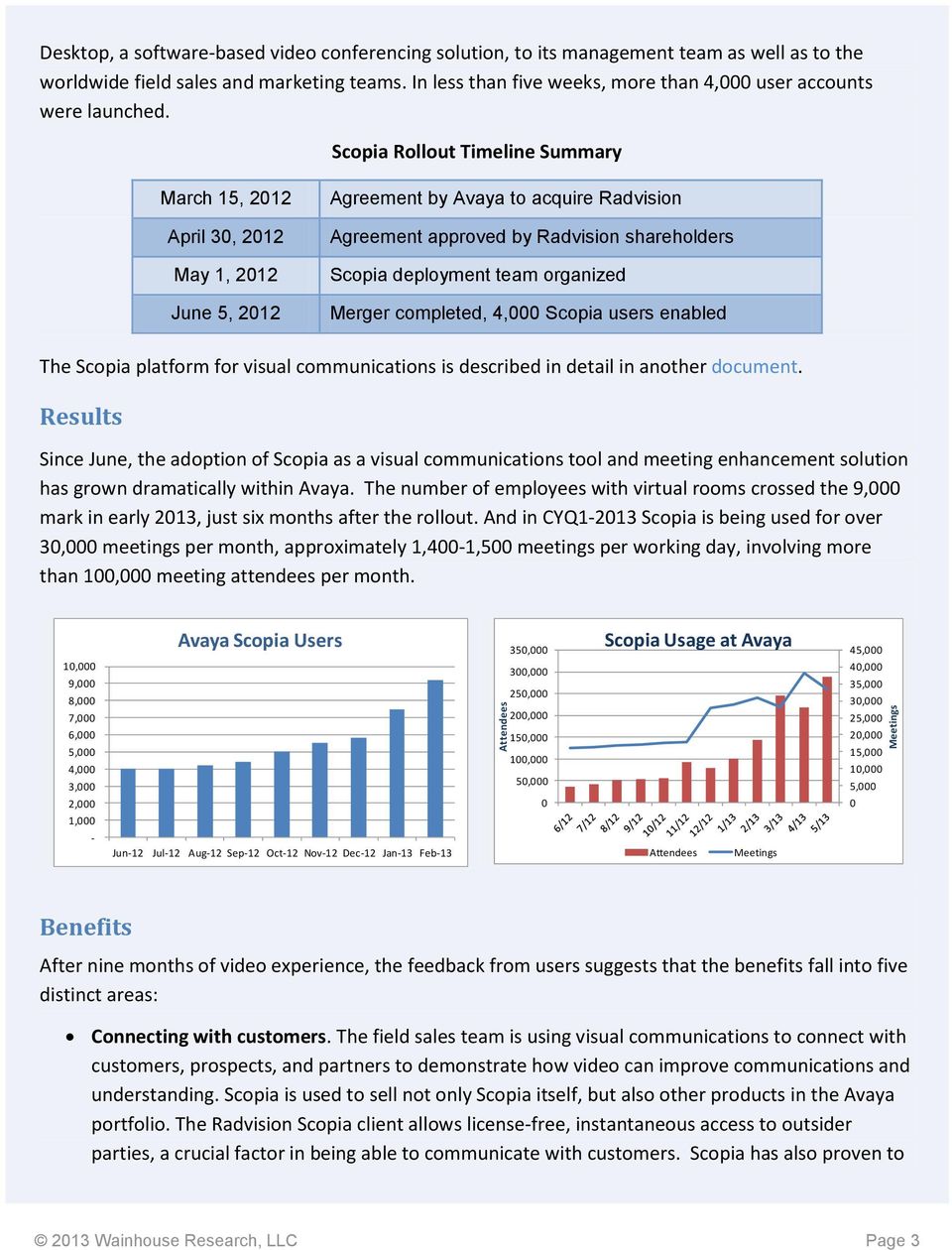
3 Attendees Meetings Desktop, a software-based video conferencing solution, to its management team as well as to the worldwide field sales and marketing teams. In less than five weeks, more than 4,000 user accounts were launched. Scopia Rollout Timeline Summary March 15, 2012 April 30, 2012 May 1, 2012 June 5, 2012 Agreement by Avaya to acquire Radvision Agreement approved by Radvision shareholders Scopia deployment team organized Merger completed, 4,000 Scopia users enabled The Scopia platform for visual communications is described in detail in another document. Results Since June, the adoption of Scopia as a visual communications tool and meeting enhancement solution has grown dramatically within Avaya. The number of employees with virtual rooms crossed the 9,000 mark in early 2013, just six months after the rollout. And in CYQ Scopia is being used for over 30,000 meetings per month, approximately 1,400-1,500 meetings per working day, involving more than 100,000 meeting attendees per month. 10,000 9,000 8,000 7,000 6,000 5,000 4,000 3,000 2,000 1,000 - Avaya Scopia Users Jun-12 Jul-12 Aug-12 Sep-12 Oct-12 Nov-12 Dec-12 Jan-13 Feb , , , , , ,000 50,000 0 Scopia Usage at Avaya Attendees Meetings 45,000 40,000 35,000 30,000 25,000 20,000 15,000 10,000 5,000 0 Benefits After nine months of video experience, the feedback from users suggests that the benefits fall into five distinct areas: Connecting with customers. The field sales team is using visual communications to connect with customers, prospects, and partners to demonstrate how video can improve communications and understanding. Scopia is used to sell not only Scopia itself, but also other products in the Avaya portfolio. The Radvision Scopia client allows license-free, instantaneous access to outsider parties, a crucial factor in being able to communicate with customers. Scopia has also proven to 2013 Wainhouse Research, LLC Page 3
4 be a valuable tool for internal sales training with regional Scopia experts able to bring the Avaya sales force up to speed without the cost, inconvenience, and scheduling challenges presented by travel. One Avaya manager credits Scopia with his ability to train over 400 employees and 150 channel partners in seven countries in less than six months. Stronger teams. As reported in Part One of this study, senior managers up to the CEO-level at Avaya have taken to using Scopia for their staff meetings, thereby allowing participation via the desktop, using mobile devices or from room systems. Visual communications have vastly improved the interactions and overall quality of these meetings when compared to the typical audio conference technology used in the past especially because Avaya is a globally dispersed organization. As is the case with the sales outreach program, ease-of-use and reliability have been crucial for the solution to gain acceptance. For larger meetings, the ability to instantly see who is speaking has actually sped up communications and shortened overall meeting times. Other managers report that it is simply great to see their colleagues faces, many of whom work in remote offices and are seldom seen in-person. Improved collaboration. Product development and marketing teams report that having everyone video-enabled has made the teams more cohesive and improved overall working relationships. Managers at Avaya Labs have set up virtual coffee rooms that facilitate ad-hoc meetings and spontaneous video chats between researchers in scattered locations, telecommuters, and remote managers. For more formal meetings, Scopia has proven to be a far more effective communications vehicle, not only because video makes it obvious who is talking, and not only because video provide important body language feedback, but also because Scopia's integrated data presentation platform includes a "slider" function, which enables anyone in the meeting to go back through the presentation materials individually. This reduces meeting interruptions while also improving information flow for all. While it is too early to report shortened development cycles or time-to-market statistics due to Scopia adoption, internal teams working on a variety of new Avaya UC solutions expect these benefits to appear. Collaboration at Avaya has been further facilitated because Scopia interoperates with many devices that were previously deployed at Avaya such as the ADVD tablet and other Avaya Aura SIP-based session management solutions as well as Android and ios devices. Streamlined communications. Many employees at Avaya report to managers in different locations. Meetings via Scopia have enabled faster integration of new employees and generated feelings of being "more connected" when compared to the traditional method that relied on audio conferencing. Optimized processes. Executives and senior managers in supply chain management at Avaya have deployed Scopia for communications up and down the internal global logistics team as well as with outside suppliers. They report that for B2B communications, the combination of click-toconnect, support for ios, Android, Mac and PCs, and high quality audio-video are key to 2013 Wainhouse Research, LLC Page 4
5 developing an understanding with partners. Visual communications is not expected to completely replace travel in dealing with suppliers, but to reduce travel frequency and to make in-person meetings more productive since relationships will be well established beforehand. The logistics team is also using video communications for internal strategy sessions and quarterly business reviews, both of which make heavy use of whiteboarding as well as multipoint video. Feedback from the IT professionals at Avaya focuses on two very different areas: Easy-to-Deploy: When rolling out any solution to thousands of co-workers, the deployment process can represent a significant load on the IT department. The deployment burden comes in the form of both support costs, represented by IT man hours, as well as calendar time delays. A long time to deploy leads to a delay in achieving desired benefits. Avaya developed a self-serve model that made the large scale deployment very low cost for the IT group. Easy-to-Support: Any solution that leads to large numbers of post-deployment support calls can be a nightmare when deployed to thousands of users. Avaya's IT department has found Scopia to be a clean, easy-to-understand solution for its many users. The ease of use is enhanced by the common user interface running across all the Scopia-supported platforms. Lessons Learned Rolling out a personal video conferencing service to managers and information workers has significant benefits beyond travel savings including improved team building, better integration of resources, and faster decision making via better meetings. A factor that is often overlooked is the need to deploy to a critical mass of users. Scale is essential to making video calling an everyday experience. Configuring the network to support personal video conferencing and the required bandwidth is an important step, and not one that is particularly onerous with today's technology and services. One factor that Avaya identified after the initial rollout to 4,000 workers was the need to automate the provisioning process. If the IT team had to spend 5-10 minutes to configure each user, then large-scale deployments would be impractical. Avaya created a self-service model by using the Scopia Management Suite s ability to synch with Active Directory (AD). After receiving an on how to access the server and set up his own account, each user chooses his own moderator PIN and participant code and is given privileges based on his AD group Wainhouse Research, LLC Page 5

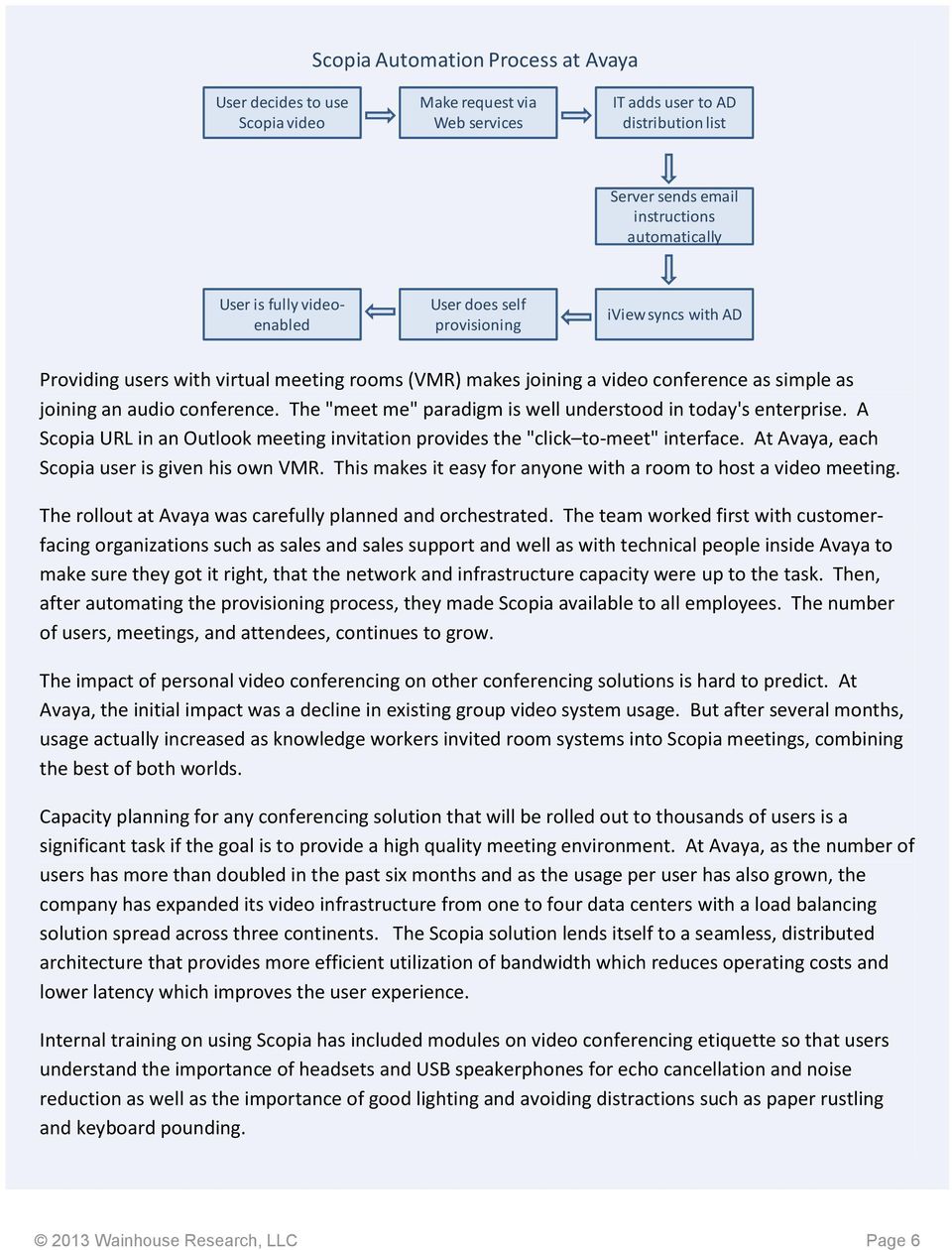
6 Scopia Automation Process at Avaya User decides to use Scopia video Make request via Web services IT adds user to AD distribution list Server sends instructions automatically User is fully videoenabled User does self provisioning iview syncs with AD Providing users with virtual meeting rooms (VMR) makes joining a video conference as simple as joining an audio conference. The "meet me" paradigm is well understood in today's enterprise. A Scopia URL in an Outlook meeting invitation provides the "click to-meet" interface. At Avaya, each Scopia user is given his own VMR. This makes it easy for anyone with a room to host a video meeting. The rollout at Avaya was carefully planned and orchestrated. The team worked first with customerfacing organizations such as sales and sales support and well as with technical people inside Avaya to make sure they got it right, that the network and infrastructure capacity were up to the task. Then, after automating the provisioning process, they made Scopia available to all employees. The number of users, meetings, and attendees, continues to grow. The impact of personal video conferencing on other conferencing solutions is hard to predict. At Avaya, the initial impact was a decline in existing group video system usage. But after several months, usage actually increased as knowledge workers invited room systems into Scopia meetings, combining the best of both worlds. Capacity planning for any conferencing solution that will be rolled out to thousands of users is a significant task if the goal is to provide a high quality meeting environment. At Avaya, as the number of users has more than doubled in the past six months and as the usage per user has also grown, the company has expanded its video infrastructure from one to four data centers with a load balancing solution spread across three continents. The Scopia solution lends itself to a seamless, distributed architecture that provides more efficient utilization of bandwidth which reduces operating costs and lower latency which improves the user experience. Internal training on using Scopia has included modules on video conferencing etiquette so that users understand the importance of headsets and USB speakerphones for echo cancellation and noise reduction as well as the importance of good lighting and avoiding distractions such as paper rustling and keyboard pounding Wainhouse Research, LLC Page 6
7 Recommendations Enterprises should evaluate the new generation of personal video conferencing solutions as a vehicle to increase sales, strengthen partnerships, and improve internal team building. The current crop of personal video collaboration solutions are enterprise-ready and overcome the scalability, reliability, and quality issues that plagued desktop video conferencing years ago. Avoid creating islands of communication. Integrate room systems with desktop and mobile video conferencing solutions, bringing added value to video collaboration. Integrated deployments should support high quality audio and video across all devices as well as easy connections inside and outside the firewall. Look for a solution with a flexible software licensing model and a model that meets specific needs. Information workers often have multiple devices, for example, and may need access to video services from more than one. A video solution should support meeting invitations to individuals outside the enterprise and should support a browser-based client for those situations where the person cannot download a separate application. Finally, an enterprise-capable video solution should be supported by software for remote or centralized monitoring and management. Get ahead of the BYOD issue by introducing an easy-to-use, secure personal video solution. Create a mindset that video should be associated with a person, not with a conference room. Start by creating a small, end-user driven team of product champions with participation from at least one high level executive. Have IT represented on the team, but do not have only IT department members. Include the network specialists and line-of-business users. Communicate internally to all involved with information on what will happen and when so that colleagues can monitor the progress of the deployment project. Include training sessions and provide documentation on how to use the new solution effectively. Communicate after the deployment about how the solution is being used and what benefits workers are seeing. This will help drive adoption. About Avaya Avaya is a global leader in business communications and collaboration, providing unified communications, contact centers, data solutions and related services to companies of all sizes around the world. For more information please visit Radvision, an Avaya company, is a leading provider of video conferencing and telepresence technologies over IP and wireless networks. Radvision solutions help businesses collaborate more efficiently by supporting video, voice and data communications over any fixed and mobile network Wainhouse Research, LLC Page 7
8 About Wainhouse Research Wainhouse Research, is an independent market research firm that focuses on critical issues in the Unified Communications and rich media conferencing fields, including applications like distance education and e-learning. The company conducts multi-client and custom research studies, consults with end users on key implementation issues, publishes white papers and market statistics, and delivers public and private seminars as well as speaker presentations at industry group meetings. Wainhouse Research publishes a variety of reports that cover all aspects of rich media conferencing as well as a free newsletter, The Wainhouse Research Bulletin Wainhouse Research, LLC Page 8

How To Run A Visual Communications Deployment In The Cloud
 WHITEPAPER Video Collaboration in the Cloud Taking videoconferencing interoperability and ease-of-use to the next level Andrew W. Davis March 2012 Sponsored by: Copyright 2012 Wainhouse Research, LLC Page
Are Hosted Video Conferencing Services Enough?
 WHITEPAPER Are Hosted Video Conferencing Services Enough? A Buyers Guide to Hosted and Managed Video Services Ira M. Weinstein June 2014 Sponsored by: Copyright 2014 Wainhouse Research, LLC Page 1 Introduction
Extending Room Video Conferencing with Microsoft Lync
 WHITEPAPER Extending Room Video Conferencing with Microsoft Lync Approaches to and Benefits of Integrating Microsoft Lync with Room Video Conferencing Systems Andrew W. Davis William A. Haskins July 2012
The Group Collaboration Conundrum
 The Group Collaboration Conundrum Enterprises worldwide depend on a range of virtual conferencing and collaboration tools including audio conferencing, web conferencing / content sharing, and the highest
7 Questions to Ask Video Conferencing Providers
 7 Questions to Ask Video Conferencing Providers CONTENTS Introduction...3 1. How many people can participate in your video conferences?...3 2. What kind of endpoints does the solution support or require?...4
Radvision, an Avaya company, is a leading provider of products and technologies for unified visual communications over IP, wireless and emerging
 Radvision, an Avaya company, is a leading provider of products and technologies for unified visual communications over IP, wireless and emerging next-generation networks. Radvision s latest innovations
MICROSOFT LYNC SOLUTIONS. Unifying Communications with the Active Communications Solution
 MICROSOFT LYNC SOLUTIONS Unifying Communications with the Active Communications Solution CONTENTS 1 Who are VideoCentric? 2 What is Unified Communications? - How can UC help my company? 3 What sorts of
Software for Scheduling
 AT&T 12:34 PM Web API Reporting Support Parking AT&T myvrm Demo Book a Room Catering myvrm app A/V Security House keeping Audio Only Room Control Panel CDR Reporting Streaming Multiple Entry Points Software
Choosing a Microsoft Web Conferencing Solution. Published: August 2007 For the latest information, please see http://www.microsoft.
 Choosing a Microsoft Web Conferencing Solution Published: August 2007 For the latest information, please see http://www.microsoft.com/uc/ Introduction In today s global economy, companies need to communicate
Video Conferencing by Avaya
 Video Conferencing by Avaya Agenda Radvision Overview Evolution of Enterprise Video Scopia Elite Series MCU & iview Scopia Desktop & Mobility Scopia XT Series End-Points 2 Radvision Overview Industry Leader
Scaling the Video Conferencing Environment
 WHITEPAPER Scaling the Video Conferencing Environment Benefiting from Scalable Video Coding and Media Routing without a Forklift Upgrade Ira M. Weinstein July 2013 Sponsored by: Copyright 2013 Wainhouse
Kyle Holmgren. Channel Account Manager IA,NE,SD,MN
 Kyle Holmgren Channel Account Manager IA,NE,SD,MN Mitel Today Mitel Today 2014 Mitel. Proprietary Mitel s Transformation 2014 Mitel. Proprietary Mitel a history of M&A 05 Aastra acquired EADS France Sep
BOARDROOM-QUALITY WEB AND VIDEO CONFERENCING MADE EASY. www.omnijoin.com
 BOARDROOM-QUALITY WEB AND VIDEO CONFERENCING MADE EASY. WHY OMNIJOIN FROM BROTHER? OmniJoin web conferencing is a business-grade, secure online meeting service that provides video, crystal clear audio,
Understanding the Benefits of Unified Communications
 Understanding the Benefits of Unified Communications Overview Increasing operating efficiencies is more important than ever in today s business. Competitive pressures force organizations to improve processes
The Business Case for Pervasive Video Conferencing
 WHITEPAPER The Business Case for Pervasive Video Conferencing Ira M. Weinstein December 2012 Sponsored by: Copyright 2012 Wainhouse Research, LLC Page 1 Introduction Organizations around the world depend
CONNECTING THE WORLD Mobility. Compatibility. Simplicity.
 Hosted Video as a Service (VaaS) Solution The Avaya Scopia platform is a feature rich multi-point video conferencing solution based on industry standards that allows for seamless conferencing between standards-based
AuDeo s Guide. Desktop & Mobile Video Conferencing
 AuDeo s Guide to Desktop & Mobile Video Conferencing What s out there & what we think 1 Contents The benefits of desktop & mobile Video Conferencing... 3 Why choose business quality video over and above
Online Collaboration For Organizational Training And Development
 Online Collaboration For Organizational Training And Development The only collaboration solution designed expressly for training and education, Blackboard Collaborate is a comprehensive, open platform
What Every IT Manager Needs to Know About Desktop Videoconferencing
 d What Every IT Manager Needs to Know About Desktop Videoconferencing Ira M. Weinstein Wainhouse Research Wainhouse Research, LLC 34 Duck Hill Terrace Duxbury, MA 02332 USA +1.781.934.6165 www.wainhouse.com
How should an enterprise move toward Unified Communications?
 WHITE PAPER How should an enterprise move toward Unified Communications? June 2008 Table of Contents Introduction... 1 Initiative 1: Improve support for mobile workers... 2 Initiative 2: Bring telephony
VoIP Conferencing Best Practices. Ultimate Guide for Hosting VoIP Conferences. A detailed guide on best practices for VoIP conferences:
 VoIP Conferencing Best Practices Ultimate Guide for Hosting VoIP Conferences A detailed guide on best practices for VoIP conferences: 1. Setting Up Your Hardware 2. VoIP Conference Software and Its Settings
MAKING VIDEO WORK AS-A-SERVICE
 MAKING VIDEO WORK AS-A-SERVICE THE CHALLENGE A Changing Video Environment Video communication has become a vital application in most large businesses and government agencies, increasing collaboration and
ipecs UCS Unified Communications Solution Easy to access and activate Highlights Single server solution
 ipecs UCS Unified Communications Solution In today s world of remote and dispersed workers, the ipecs UCS application provides tools to enhance productivity and mobility while improving employee collaboration
Cloud Video. Data Sheet
 Cloud Video Data Sheet 4net Technologies Cloud Video 4net s Cloud Video enables remote workers to simply and easily connect to standards-based videoconferencing systems, VoIP phones, ipad s, iphone s and
Top Five Reasons to Implement Unified Communications Now
 Top Five Reasons to Implement Unified Communications Now August 2013 Prepared by: Zeus Kerravala Top Five Reasons to Implement Unified Communications Now by Zeus Kerravala August 2013 º º º º º º º º º
Cisco Unified Videoconferencing Manager Version 5.5
 Cisco Unified Videoconferencing Manager Version 5.5 A comprehensive management suite for Cisco Unified Videoconferencing solutions The Cisco Unified Videoconferencing product line an integral component
Creating a Video Collaboration Strategy: Four Mistakes Mid-Market Companies Make and How to Avoid Them
 WHITE PAPER Creating a Video Collaboration Strategy: Four Mistakes Mid-Market Companies Make and How to Avoid Them If you are considering a telepresence or video conferencing purchase for your organization,
Cisco Unified Videoconferencing Manager Version 5.0
 Data Sheet Cisco Unified Videoconferencing Manager Version 5.0 A comprehensive management suite for Cisco Unified Videoconferencing solutions. The Cisco Unified Videoconferencing product line an integral
OpenScape Web Collaboration
 OpenScape Web Collaboration The quickest and easiest way to collaborate, share and support online Performance-boosting collaboration and secure support from anywhere Issues raised, ideas shared and decisions
Where do you work? Where do you work?
 Where do you work? The answer used to be the name of the company you worked for and assumed you worked in their office building. But today that question takes on a whole new meaning. Today, more and more
How To Use An Apa Sip (Sip) To Improve Your Business
 The Business Value of Enterprise SIP - A CIO View Table of Contents Background... 1 What is SIP?... 1 Why SIP?... 1 1. Presence... 2 2. User Centricity vs. Device Bound... 3 3. SIP Trunking and Delivering
Paths to the Future for CS1000 Enterprises
 Paths to the Future for CS1000 Enterprises Table of Contents Introduction... 1 The New World of Enterprise Communications... 2 Evolving Your CS1000 Infrastructure... 4 Avaya Aura Collaboration Pack...
OpenScape UC Application
 OpenScape UC Application A better way to communicate How productive are your virtual teams? Today s reality - A mobile, global, distributed and virtual workforce. But face-to-face just isn t always possible.
Transformação dos negócios com o uso de vídeo. Ricardo Ogata Business Manager 02 de Julho
 Transformação dos negócios com o uso de vídeo Ricardo Ogata Business Manager 02 de Julho Benefit Use Case Adoption Business Transformation Curve In person Pervasive Collaborative Time Teams Connected
IP Office Receptionist
 IP Office Receptionist Efficient and Professional Call Handling Overview Receptionists can handle dozens, even hundreds of calls daily, so it s easy to see how important it is to deploy a phone application
IOCOM Visimeet tm : Enterprise Videoconferencing and Collaboration Software. July 2012
 IOCOM Visimeet tm : Enterprise Videoconferencing and Collaboration Software July 2012 Contents Market About IOCOM About Visimeet Competition Appendix Room configurations Visimeet UI Mission IOCOM is helping
Mitel MiCollab Audio, Web and Video Conferencing
 Mitel MiCollab Audio, Web and Video Conferencing Wherever you are around the world, share information and collaborate with co-workers, partners, and customers As workforce roles become more varied, and
Lync Quick Start Guide for MAC OS
 Microsoft Lync is a unified communications platform that works ideally in a Windows Operating System, but is also feature- rich using a MAC OS. The purpose of this guide is to cover highlights of Lync
MAKING VIDEO WORK AS-A-SERVICE
 MAKING VIDEO WORK AS-A-SERVICE THE CHALLENGE A Changing Video Environment Video communication has become a vital application in most large businesses and government agencies, increasing collaboration and
Personal Video Conferencing How mobility is changing the video conferencing landscape: Industry trends and deployment best practices.
 How mobility is changing the video conferencing landscape: Industry trends and deployment best practices March 2012 Table of Contents Executive Summary... 3 Market Trends... 4 Applications & Benefits...
Quick Start Guide. Web Conferencing & Secure Instant Messaging via Microsoft Office Communications Server 2007. Apptix Live Support: 866-428-0128
 Quick Start Guide Web Conferencing & Secure Instant Messaging via Microsoft Office Communications Server 2007 Apptix Live Support: 866-428-0128 Quick Start Guide / Introduction Page 2 of 6 Quick Start
Cisco Collaboration Architecture: Enhance Employee Effectiveness for Greater Business Impact
 White Paper Cisco Collaboration Architecture: Enhance Employee Effectiveness for Greater Business Impact What You Will Learn The power to bring people together at critical moments can significantly enhance
Global Software and Services Firm Reduces Costs, Builds Community with Unified Communications
 Microsoft Lync Server 2010 Customer Solution Case Study Global Software and Services Firm Reduces Costs, Builds Community with Unified Communications Overview Country or Region: United States Industry:
VidyoPanorama SOLUTION BRIEF. www.vidyo.com 1.866.99.VIDYO
 SOLUTION BRIEF VidyoPanorama www.vidyo.com 1.866.99.VIDYO 2011 Vidyo, Inc. All rights reserved. Vidyo and other trademarks used herein are trademarks or registered trademarks of Vidyo, Inc. or their respective
MITEL MiCOLLAB KEEPING PEOPLE CONNECTED AND PRODUCTIVE ANYTIME, ANYWHERE, ON ANY DEVICE KEY BENEFITS
 BROCHURE MITEL MiCOLLAB KEEPING PEOPLE CONNECTED AND PRODUCTIVE ANYTIME, ANYWHERE, ON ANY DEVICE Delivering effective collaboration amongst employees, partners and customers is a critical driver to the
OpenScape Web Collaboration
 OpenScape Web Collaboration The quickest and easiest way to collaborate, share and support online Performance-boosting collaboration and secure support from anywhere Issues raised, ideas shared and decisions
Mitel MiCollab Client
 Mitel MiCollab Client Making In the Moment Communications More Dynamic In today s fast-paced, competitive world of business how can employees work together efficiently & effectively to help drive the success
eircom unified communications solutions giving your teams the power to deliver
 eircom unified communications solutions giving your teams the power to deliver In a fast-moving world, information is power Business today moves fast: If your teams can t easily access the right resources
OCS Client Installation - Quick Start Guide. Web Conferencing & Secure Instant Messaging via Microsoft Office Communications Server 2007
 OCS Client Installation - Quick Start Guide Web Conferencing & Secure Instant Messaging via Microsoft Office Communications Server 2007 MailStreet Live Support: 866-461-0851 Document Revision: March, 2010
KEEPING PEOPLE CONNECTED AND PRODUCTIVE ANYTIME, ANYWHERE, ON ANY DEVICE
 BROCHURE MITEL MiCOLLAB KEEPING PEOPLE CONNECTED AND PRODUCTIVE ANYTIME, ANYWHERE, ON ANY DEVICE Effective collaboration among employees, partners and customers is a critical driver of any organization
UNIFIED COMMUNICATION COMPARISON GUIDE. Unified Messaging, Mobile Integration & Unified User Interface
 UNIFIED COMMUNICATION COMPARISON GUIDE Unified Messaging, Mobile Integration & Unified User Interface Introduction Unified communications is one of the most promising and powerful business technologies
Integrating Microsoft OCS/Lync Video with Group and Telepresence Video Systems
 Integrating Microsoft OCS/Lync Video with Group and Telepresence Video Systems It s Anything but Turnkey. How an Experienced vmsp can Help You Stay Out of Trouble by Avoiding the Pitfalls. E. Brent Kelly
Spontania User Setup Guide
 Spontania User Setup Guide ClearOne 5225 Wiley Post Way Suite 500 Salt Lake City, UT 84116 Telephone 1.800.945.7730 1.801.975.7200 Spontania Support 1.801.974.3612 TechSales 1.800.705.2103 FAX 1.801.977.0087
Polycom RealPresence Desktop v3.1
 Customer FAQ Polycom RealPresence Desktop v3.1 Frequently Asked Questions Purpose This document describes Polycom RealPresence Desktop v3.1 features and answers many common product questions. In addition,
Audio and Web Conferencing
 DATA SHEET MITEL Audio and Web Conferencing Simple, Cost-effective Audio and Web Conferencing Mitel Audio and Web Conferencing (AWC) is a simple, cost-effective and scalable audio and web conferencing
VIDEOCONFERENCE. 1 Introduction. Service Description Videoconferece
 VIDEOCONFERENCE 1 Introduction Videoconferencing is interactive remote communication between two or more participants, transmitted by voice or image. Participants see and listen to each other and can present
The workplace shift: How can UC improve the way we work?
 Opinion paper Working together The workplace shift: How can UC improve the way we work? Introduction Some senior decision-makers are embracing the recent workplace shift; the use of consumer technology
UC & C Success Requires a Services Lead Approach
 UC & C Success Requires a Services Lead Approach Presented by Zeus Kerravala Principal Analyst 2014 ZK RESEARCH, A DIVISION OF KERRAVALA CONSULTING The Business Climate is Changing Technology Solution