
Guidelines for Datacenter Energy Information System
|
|
|
- Preston Small
- 10 years ago
- Views:
Transcription
1 Guidelines for Datacenter Energy Information System Reshma Singh, Rod Mahdavi, Paul A. Mathew, Jessica Granderson, Lawrence Berkeley National Laboratory; Yash Shukla, CEPT University December 2013 Environmental Energy Technologies Division
2
3 U.S.-India Joint Center for Building Energy Research and Development (CBERD) Guidelines for Data Center Energy Information Systems Reshma Singh, Rod Mahdavi, Paul Mathew, Jessica Granderson, Lawrence Berkeley National Laboratory and Yash Shukla, CEPT University
4
5 Acknowledgements The U.S. Department of Energy (DOE) and the Department of Science and Technology (DST), Government of India (GOI) provided joint funding for work under the U.S. India Partnership to Advance Clean Energy Research (PACE-R) program s U.S. India Joint Center for Building Energy Research and Development (CBERD) project. The Assistant Secretary for Energy Efficiency and Renewable Energy, Office of Building Technology of the U.S. DOE under Contract No. DE-AC02-05CH11231 supports the U.S. CBERD activity. The DST, GOI, administered by Indo-U.S. Science and Technology Forum, supports the Indian CBERD activity. The authors acknowledge the assistance and thank all the reviewers, in particular, Raju Pandey of SynapSense Corporation; Satish Kumar and Aalok Deshmukh of Schneider Electric; and Ankur Thareja of Wipro Limited, for their advice and continued support. Also thank you to Bill Tschudi, Dale Sartor, Erin Hult and Guanjing Lin at Lawrence Berkeley National Lab for their insightful reviews. DISCLAIMER This document was prepared as an account of work sponsored by the United States Government. While this document is believed to contain correct information, neither the United States Government nor any agency thereof, nor The Regents of the University of California, nor any of their employees, makes any warranty, express or implied, or assumes any legal responsibility for the accuracy, completeness, or usefulness of any information, apparatus, product, or process disclosed, or represents that its use would not infringe privately owned rights. Reference herein to any specific commercial product, process, or service by its trade name, trademark, manufacturer, or otherwise, does not necessarily constitute or imply its endorsement, recommendation, or favoring by the United States Government or any agency thereof, or The Regents of the University of California. The views and opinions of authors expressed herein do not necessarily state or reflect those of the United States Government or any agency thereof or The Regents of the University of California. i
6 ii
7 Guidelines for Data Center Energy Information Systems Authors CBERD US Team: Reshma Singh, Rod Mahdavi, Paul Mathew, Jessica Granderson Lawrence Berkeley National Laboratory CBERD India Team: Yash Shukla CEPT University December 31, 2013 iii
8 Table of Contents 1. Introduction... 1 Audience Context Five Steps to Data Center EIS... 4 Step 1: Define Drivers and Metrics... 6 Business Drivers... 6 Metrics... 7 Step 2: Select Metering...10 Levels of Metering...10 Key Metrics and the Meters...19 Table 5 summarizes the relation between metrics and meter readings for three measure levels Estimated Cost of Metering...19 Step 3: Identify Tools/Software...19 Levels of Software and Tools...20 Step 4: Determine Monitoring Approach and Energy Performance Tracking Package...26 Levels of Energy Performance Tracking (EPT) Packages...26 Step 5: Procure, Install and Use the EIS...29 The Process of Acquiring, Installing, and Using the EIS Conclusions References...35 Appendix 1: Details on Business Drivers...37 Appendix 2: Glossary of Terms...40 Appendix 3: Types of Meters...44 Appendix 4: Examples of Meters...45 Appendix 5: Sample Data Center EIS Specifications...59 I. SAMPLE: EIS General Specifications...59 II. SAMPLE: Wireless Network Specification for Data Center EIS...66 List of Acronyms...73 iv
9 Introduction The purpose of this document is to provide structured guidance to data center owners, operators, and designers, to empower them with information on how to specify and procure data center energy information systems (EIS) for managing the energy utilization of their data centers. Data centers are typically energy-intensive facilities that can consume up to 100 times more energy per unit area than a standard office building (FEMP 2013). This guidance facilitates data-driven decision making, which will be enabled by following the approach outlined in the guide. This will bring speed, clarity, and objectivity to any energy or asset management decisions because of the ability to monitor and track an energy management project s performance. An EIS is a key component of managing operations and reducing energy use and cost in data centers. It is broadly defined as performance monitoring software, data acquisition hardware, and communication systems used to store, analyze, and display building operational and energy data (Granderson 2009). Given the heightened awareness around data center energy utilization, there are many EIS products in the market that provide a range of capabilities. Data center owners, operators, and designers need to consider their organization s specific priorities and context (e.g., knowledge base, skill, resources) to determine the appropriate solution for them. This document provides vendor-neutral guidance focused on energy monitoring and performance tracking in a data center. The energy performance tracking (EPT) could be a stand-alone package, or be a subset of a larger data center infrastructure management (DCIM) package. However, this guide does not include other asset or infrastructure management aspects of DCIM, and its focus is entirely energy-centric. By using the five-step guidance provided in this document, the user will be able to specify and install off-the-shelf, currently available products and packages. The specification guidelines could be used as a basis for a request for proposals (RFP) for EIS vendors, or for doing the job in-house. The guide s five steps help to answer these critical questions: 1. What are the business drivers and related metrics for energy information systems? 2. What are the metering requirements (e.g., what sensors and meters at which points and at what frequency of measurements)? 3. What are the software tool requirements (including communication platform, analysis, and visualization)? 4. What is the optimum level of energy monitoring and performance tracking (i.e., Basic, Intermediate, or Advanced [EIS] package)? 5. How should one acquire, install, and use an EIS package? These five questions convey a deliberate, exhaustive process for selecting an appropriate EPT package. Users who are well-versed with metering and tools may elect to do a quicker read, moving directly from Step 1 to Steps 4 and 5, and iterating back to Steps 2 and 3 if more detail is required. 1
10 Note that by design, this guide exposes the reader to various levels of energy performance-tracking packages before they get to best practice EIS. Not every step defined in Section 3 will lead to an EIS. The EIS as defined in this guide is an advanced EPT system as defined in Step 4; and its procurement, installation and use described in Step 5. These guidelines are pertinent for new construction and retrofits, as well as for integrated or stand-alone data center buildings. Existing data centers may have constraints that can preclude certain EIS options as being impractical or costprohibitive. Generally speaking, wireless EPT packages are easier to install and less costly than wired solutions, especially for retrofit projects. Finally, this guide s long-term objective is to provide a basis for a packaged, scalable EIS solution for data center and commercial building energy management that will be cost-effective and rapidly deployable in both India and the United States. Audience The primary audiences for this guide are stakeholders with an interest in specifying, installing, and using a data center EIS; especially first-time users such as: Engineers and designers of new data centers Data center owners Data center facility managers Data center information technology (IT) managers Secondary audiences are energy services companies (ESCOs) and performance contractors, as well as vendors of data center EIS products and software developers who wish to deliver appropriate EIS solutions to informed clients. Context Data centers constitute a large and rapidly growing sector of energy use. By one estimate, they consumed 0.5 percent of the world s electricity in 2005, at an aggregate cost of 7.2 billion USD, and this is growing by 16 percent each year (Koomey 2008). Although the net consumption of data centers in India has yet to be quantified, the IT-heavy nature of the country s tertiary economy suggests relative data center energy consumption in India may exceed the global average (Sartor 2010). Data centers can consume up to 100 times more energy per unit area than a standard office building. Often, only around 15 percent of original source energy is used for the IT equipment within a data center. Figure 1 outlines typical data center energy consumption ratios (FEMP 2013). 2

11 Figure 1: Illustrative end-use breakdown of data center energy consumption (Source: FEMP 2013) In the United States, from , computing performance increased 25 times, but energy efficiency increased only 8 times. The amount of power consumed per server increased 4 times (Koomey 2011). The cost of electricity and supporting infrastructure is currently surpassing the capital cost of IT equipment. Figure 2a illustrates the increase in electricity consumption in U.S. data centers. The influx of IT activities, a renewed banking sector, an expanding Internet population, and the second largest wireless network have led to data explosion and the increased need for data centers in India. The data center market in India is expected to grow at a rapid pace for both captive and hosted data center space. Figure 2b illustrates the increase in footprint of Indian data centers. While the availability of reliable power is the biggest challenge for the growth of data centers in India, efficiency is also a concern: the Power Usage Effectiveness (PUE)1 of Indian data centers ranges from 1.4 (best) to a high of 3.0 (worst) (CII 2013). By comparison, the best U.S. data center PUE is 1.1, as reported for a Facebook data center in Oregon (Facebook 2010) and by Google as their average PUE (Google 2013). a 1 Power Usage Effectiveness is a metric of data center energy efficiency. It is defined in Appendix 2. 3

12 b Figure 2: (a) U.S. data center historical energy use data. U.S. data centers use 2 percent of all electricity in the country (Source: Koomey 2011). (b) Growth projection for data centers in India. The data center footprint in India will almost triple from a 2008 baseline to 6.6 million square feet (sf) in Note that this footprint does not include the numerous under-1,000 sf data centers. (Source: CII 2013). Since data center operator awareness of energy efficiency is increasing, there is an increased demand for energyefficiency products, which has expanded the market and increased the number of suppliers and products. However, this quantitative increase does not necessarily translate to quality, and hence it becomes important to provide practical recommendations. This document provides a set of guidelines that users can employ to help analyze and manage energy across the whole spectrum of energy-efficient strategies for data centers. The guidelines are applicable to various EIS. Five Steps to Data Center EIS Data center owners interested in monitoring their data center s energy use should develop a well-informed plan or roadmap based on the specific targeted energy-monitoring and performance-tracking goals. The goals are in turn dependent on the enterprise s business drivers. Setting these goals early in the process will help ensure that the equipment and software tools are incorporated into the design early enough to minimize costs, reduce issues during construction coordination, and maximize monitoring system expansion capability. The plan or roadmap should be started during the development of design and construction documents and updated as necessary to reflect changes that occur. The data center energy-monitoring and performance-tracking plan should address how the results of the energy monitoring will be used. Depending on the target audience for the results (e.g., building operator, owner, or engineer), the design team can adjust the monitoring system and performance-tracking software tool requirements. Building size and complexity will also influence the goals and objectives of energy monitoring, as well as how the energy consumption data are collected. 4
13 This document follows a five-step plan, as illustrated in Figure 3 below and listed here. An Energy Performance Tracking (EPT) plan should follow these five steps: 1. Define drivers and metrics: Articulate the business drivers for energy management and reporting, and clearly define a set of energy-related metrics based on those drivers. 2. Select metering: Select the level of metering and sensor hardware for the project (i.e., whole-building, system, or end-use). This process should include identification of the level of monitoring required for the future metering system build-out or data center modification or expansion. 3. Identify tools/software: Identify tools and software required for data acquisition, communication, analysis, and visualization. 4. Determine the monitoring approach and energy performance tracking package: Determine which energymonitoring and performance-tracking package takes into account the three aspects listed above. Also consider accuracy/cost information for monitoring equipment and performance-tracking tools. 5. Procure, install, and use the EIS: Procure, install, and operate the solution. Include training for building operations staff and develop a corrective action plan for addressing problems and operational issues. Figure 3 below summarizes the step-by-step guidelines for specifying the monitoring solution. 5
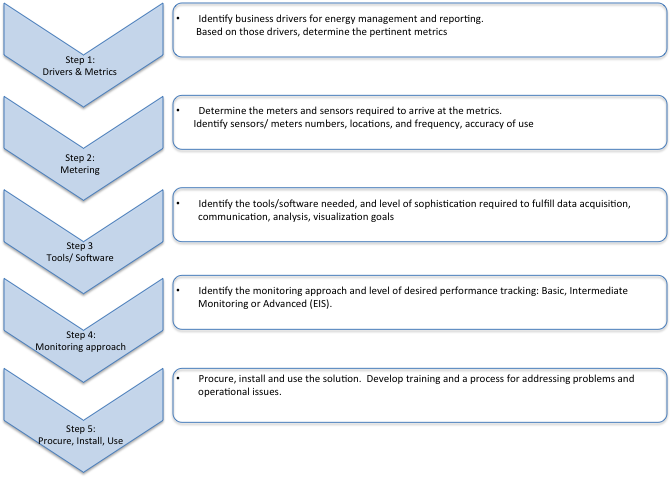
14 Figure 3: The five-step process for developing data center EIS specifications The following sections provide a detailed description of each of the five steps. Step 1: Define Drivers and Metrics The first step is to identify and prioritize why and how the user will use their monitoring solution. The type of monitoring solution will be derived from current and future business drivers that require tracking and reporting of energy information. Business Drivers The user should begin by prioritizing the following five business drivers: 1. Track and manage energy consumption to collect energy use data at building or end-use levels to inform the organization about how it uses energy, where it is used, and what drives its energy use. Tracking helps to identify abnormally low or high energy usage and potential causes, and it also supports emergency responses, such as load-shedding events. It also facilitates capacity planning around space and power utilization and helps with carbon accounting and greenhouse gas (GHG) reporting. 2. Track and manage energy cost to predict energy cost, verify energy bills, and prioritize and validate energy costs through improved energy efficiency and energy management. Cost tracking can improve your organization s bottom line by enabling a high return on investment. 6
15 3. Benchmark to quantitatively assess data center performance and to compare them across a level playing field. Benchmarking evaluates your organization s position relative to the rest of the market (cross-sectional benchmarking) or over time in one data center (longitudinal benchmarking). This enables engagement with senior management and other stakeholders to participate in continuous improvement in the organization s energy performance. 4. Develop and validate energy-efficiency strategies to identify opportunities for increasing profitability by lowering energy and operational costs. These strategies can also be used for commissioning and detecting faults in physical systems and diagnosing their causes. 5. Manage demand response (DR) to determine peak, critical, and non- critical load trends; and to verify energy savings from demand response at peak energy times. The opportunity for DR in datacenters depends on redundancy requirements and criticality of the mission of the datacenter. For instance, energy use may be curbed by increasing the air intake or ambient temperature, or using site generators as the main power source. A definition of each of these business drivers is provided in Appendix 1. These drivers form the Y-axis of Table 1, Characterization matrix of business drivers and metrics. Metrics Each of these business drivers has various metrics associated with it that include measurements and derived metrics, ranging across whole-building (data center) and end-use levels. The following are standard derived metrics used to understand and manage the efficiency of data center energy consumption. (Also see Appendix 2 for further details on derived metrics.) 1. Carbon Dioxide (CO 2 ) Emissions (metric tons per capita): energy-related CO 2 emissions released at the location of the consumption of the fuel; in this case, electricity. 2. Power Usage Effectiveness or PUE (index): a measure of how efficiently a computer data center uses energy; specifically, how much energy is used by the computing equipment (in contrast to cooling and other overhead) PUE = Total Facility Annual Energy Use IT Equipment Annual Energy Use 3. Electrical Chain Efficiency, or Electrical Power Distribution Efficiency (avg. percent): efficiency of a power chain that usually consists of a utility transformer, automatic transfer switch, back-up generator, distribution switch gear, uninterruptable power supply (UPS), and the downstream power distribution system (power distribution units, PDUs), providing power to the IT equipment cabinets. Other distribution losses are incurred by the infrastructure systems as well. 7
16 4. Cooling System Efficiency (avg. kw/ton): efficiency of the cooling system in a data center that represents the majority of facility-related energy usage in the data center, outside of the actual IT load itself. 5. IT Utilization: percent of the utilized portion of IT capacity. An idle server can use as much as 50 percent of the energy it would use when it is 100 percent utilized. 6. IT Efficiency (product/w): In computing, performance per watt is a metric of the energy efficiency of particular computer architecture or computer hardware. Specifically, it measures the rate of computation that can be delivered by a computer for every watt of power consumed. FLOPS (floating point operations per second) per watt is a common measure. Another performance-based metric is transactions/watt. Metrics along the X-axis of Table 1 include both measurements and derived metrics. The user can review Table 1 below as a checklist to determine their prioritized business drivers, and hence what metrics (measurements and derived metrics) would be associated with them. The metrics define the data requirements that will enable decision-making around the business accountability goals. The data requirements can be met through meters that are defined further in Step 2. The next few sections elaborate Steps 2 through 4, with the objective of fulfilling the business drivers to various stages of granularity. At the end of Step 1, the user should be able to determine their desired metrics based on the business drivers, and then proceed to Step 2. Then use the output from Step 1 as a reference point to the remaining Steps 2 through 5, so that the final Energy Performance Tracking strategy is guided by the core business drivers. As mentioned earlier, users who are well-versed with metering and tools may elect to move directly from Step 1 to Steps 4 and 5 (which discuss the EPT packages and their implementation, respectively), and iterate back to Step 2 and Step 3 if more detail is required. 8
17 Drivers Whole-building (data center) measurements End-use measurements Derived metrics Energy Use: All sources (KWh) Energy Use: Utility (KWh) Energy Use: Generator (KWh) Energy Use-: Other source CHP., RE (KWh) Building Load (kw) Annual IT Energy Energy Use (KWh) Cost (INR or $) Cooling load (KWh) Fans energy Use (KWh) Elec Distr. energy loss (KWh) Lighting and other plugs energy use (KWh) Environmental Temp, Hum., Press. Annual CO2 metric ton Power Electrical Usage chain Effectiven efficiency ess (PUE) (Avg percent) Cooling system efficiency (Avg kw/ton) IT Utilization (e.g. CPU utilization) IT Efficiency (Product/ W) 1. Track and manage energy consumption 1.1 Identify baseline energy consumption x x x x 1.2 Monitor real time energy consumption x x x x x x x x x x 1.3 Anomaly detection x x x x x x 1.4 Track emergency response e.g load shed events x x x x x x x x x 1.5 Optimize across various possible sources of energy x x x x 1.6 Capacity management viz. space planning, cooling and power load capacity planning x x x x x x 1.7 Carbon accounting x 2. Track and manage energy cost 2.1 Predict energy cost, allocation x x x x x x x x 2.2 Verify billing/ metering accuracy; identify discrepancies x x x x x x x x x x x 2.3 Estimate savings x x x x x x x x x x x 3. Benchmarking 3.1 Cross-sectional benchmarking x x x x x x 3.2 Longitudinal benchmarking x x x x x x 4. Develop and validate energy efficiency projects 4.1 Set performance goals and Identify improvement opportunities for energy savings and/or retrofit x x x x x x x x x x x x x x x x x 4.2 Monitoring-based commissioning x x x x x x x x x x x x x x x x 4.3 Fault detection and diagnostics x x x x x x x x x x x x x x x x 4.4 Verify savings from energy improvement x x x x x x x x x x x x x x x x 5. Manage Demand (Demand Response) 5.1 Determine peak, critical and non-critical load trends x x x x x x x x x x x 5.2 Verify savings from DR x x x x x x x x x x x Table 1: Characterization matrix of business drivers and metrics 9
18 Step 2: Select Metering Once the user has identified the prioritized metrics, the second step is to identify what points need to be metered, what kind of metering equipment to use, and how frequent to take readings and collect data. Levels of Metering We define three levels of metering. The user can choose from these three levels, based on the extent and accuracy of the measurements and the potential analysis. Appendix 3 and Appendix 4 provide details about the meters that can be used in a data center. Select one of the following three levels of metering for your specific data center needs. Level 1: Basic Metering At Level 1, Basic Metering, only some of the highest-level points are metered at the campus or larger building (and usually not at the data center) level. This is done primarily through manual readings, although for couple of meters, such as electric utility meter and switch-gear meter, there may be automated readings. Any other potential points beyond those are manually recorded from the display of the equipment, such as the UPS display, chiller display, or read from sensors such as data center air temperature and chiller water temperature. Since the readings are manual, the frequency tends to be low monthly, or in some cases weekly. See Figure 4 below for a representative diagram for Level 1 metering. This is a relatively inexpensive solution that relies mainly on existing meters; however, the level of data availability and accuracy is low for derived metrics. For instance, the level of accuracy for PUE measurement can be as high as +30 percent. See Table 2 for details on Level 1 metering, and what metrics it helps to measure. Guidelines for Datacenter Energy Information Systems Page 10
19 RENEWABLE UTILITY M GENERATOR SWITCH GEAR M1 ATS DISTRIBUTION SWITCH GEAR OFFICE and OTHERS DISTRIBUTION PANEL DISTRIBUTION PANEL UPS M5 CRAH/C CHILLER M8 PUMPS LIGHTING PDU CT FAN OUTDOOR TEMP S IT Computer room CHW FLOW CHWS TEMP S2 CHWR TEMP S3 AIR INTAKE TEMP CPU USED CTW TEMP Legend Electrical Cooling IT Power meter M Sensor S IT activity O Figure 4: Representative diagram for Level 1: Basic metering (mainly utility metering) Guidelines for Datacenter Energy Information Systems Page 11
20 Meters Electric meter at utility Energy Use: All sources (KWh) Whole-building (data center) measurements End-use measurements Derived metrics Energy Energy Energy Building Annual IT Energy Cooling Load Fan Energy Elec Distr. Lighting Environmental Annual Power Electrical Cooling Use: Use: Use: Other Load (kw) Energy Use (KWh) (KWh) Use energy and Other CO2 Usage Chain System Utility Generator source Cost (KWh) loss Temp., metric ton Effective. Effic. (Avg Efficiency (KWh) (KWh) CHP, RE (KWh) (INR or $) (KWh) Hum., Press. (PUE) percent) (Avg kw/ton) M M M Electric meter at generator M M On-site renewable energy meter Electric meter at distribution panels UPS meter PDU meter IT energy meter Product meter Chiller plant meter CRAH meter CRAC meter Pump meter Fan meter Lighting meter Chilled water flow meter Air flow meter Data center air temp Air distribution pressure (ducted/ underfloor) Chilled water temp Cooling tower fan Outside air temperature display display nameplate nameplate nameplate nameplate Metrics Energy Use ( e.g., generator heater) (KWh) CRAH temp display display rough estimate rough rough estimate estimate IT IT Utilization (e.g., CPU Utiliz.) Efficiency (Product/ W) Measured time series data Instantaneous values M Meters with automated data collection Table 2: Metrics and pertinent meters associated with Level 1 (basic) metering. This level of metering allows for rough estimates of some of the derived metrics. Guidelines for Datacenter Energy Information Systems Page 12
21 Level 2: Intermediate Metering Level 2, Intermediate Metering, is a hybrid metering solution, where some of the points are metered and some are recorded manually. This is different from Level 1, Basic Metering, where the majority or all of the points are manually read, although in a few cases a couple may be automated. Level 2 metering is done at the data center level and at some selected system-level points. In addition to the minimum meters in Level 1, Level 2 may include certain additional manual recording and automated metering, such as the chiller plant meter and outside air temperature through a weather station. See Figure 5 below for a representative diagram for Level 2 metering. Additional monitoring can provide a better estimate of end-use or component-level usage patterns. In this case, the PUE can be off by +15 percent. The hybrid of manually collected and automatically collected data can be varied. It also may be possible to get some level of historical information and do trending. See Table 3 for more details on Level 2 metering and what metrics it helps to measure. Guidelines for Datacenter Energy Information Systems Page 13
22 RENEWABLE UTILITY M GENERATOR M SWITCH GEAR M1 ATS DISTRIBUTION SWITCH GEAR M2 OFFICE and OTHERS DISTRIBUTION PANEL DISTRIBUTION PANEL UPS M5 CRAH/C M13 CHILLER M8 PUMPS LIGHTING PDU M6 CT FAN M10 OUTDOOR TEMP S IT Computer room CHW FLOW CHWS TEMP S2 CHWR TEMP S3 AIR INTAKE TEMP CPU USED CTW TEMP Electrical Cooling IT Power meter M Sensor S IT activity O Figure 5: Representative diagram for Level 2 (intermediate) metering of power chain and cooling system Guidelines for Datacenter Energy Information Systems Page 14
23 Energy Use: All sources (KWh) Whole-building (data center) measurements End-use measurements Derived metrics Energy Energy Energy Building Annual IT Energy Cooling Load Fan Energy Elec Distr. Lighting Environmental Annual Power Electrical Cooling Use: Use: Use: Other Load (kw) Energy Use (KWh) (KWh) Use Energy and Other CO2 metric Usage Chain System Utility (KWh) Generator (KWh) source CHP, RE (KWh) Cost (INR or $) (KWh) Loss (KWh) Temp, Hum, Press. ton Effective. (PUE) Efficiency (Avg percent) Effic. (Avg kw/ton) Energy Use ( e.g., generator heater) (KWh) Electric meter at utility M M M M estimate estimate Electric meter at generator M M M On-site renewable energy meter M M Electric meter at distribution panels UPS meter EM estimate estimate PDU meter IT energy meter Product meter EM Chiller plant meter M estimate estimate CRAH meter M CRAC meter Pump meter Fan meter Lighting meter Chilled water flow meter Air flow meter Data center air temp Air distribution pressure (ducted/ underfloor) Chilled water temp Cooling tower fan S Outside air temperature S S S IT Utilization (e.g., CPU utiliz.) IT Efficiency (Product/ W) Measured time series data Instantaneous values S M EM Sensor with manually recorded information Meter with automated data collection Equipment meter to be manually recorded Table 3: Metrics and pertinent meters associated with Level 2, intermediate metering. This level of metering allows for estimates of many of the derived metrics Guidelines for Datacenter Energy Information Systems Page 15
24 Level 3: Deep Metering In Level 3, Deep Metering, all the points are automatically metered, with minimum dependency on potentially inaccurate equipment display values and manual recording. At this level, the accuracy of the metrics depends on the meters accuracy. The values are metered over time as opposed to being estimated from the product specifications or taken from a single manual meter reading. The PUE measurement accuracy can be as high as +5 percent. This is the most expensive metering level, but it results in extensive measurements, comprehensive data collection, analytics, customized trending, and user-friendly visualization for meeting the drivers as defined in Table 1. See Figure 6 below for a representative diagram for Level 3 metering. See Table 4 for details on Level 3 metering. RENEWABLE M UTILITY M GENERATOR M SWITCH GEAR M1 ATS DISTRIBUTION SWITCH GEAR M2 OFFICE and OTHERS M11 DISTRIBUTION PANEL M3 DISTRIBUTION PANEL M4 UPS M5 CRAH/C M13 CHILLER M8 PUMPS M9 LIGHTING M12 PDU M6 CT FAN M10 OUTDOOR TEMP S IT M7 Computer room CHW FLOW S1 CHWS TEMP S2 CHWR TEMP S3 AIR INTAKE TEMP S4 CPU USED O1 CTW TEMP S4 Legend Electrical Cooling IT Power meter M Sensor S IT activity O Guidelines for Datacenter Energy Information Systems Page 16
25 Figure 6: Diagram showing Level 3 (deep) metering recommended standardization for meter locations. This includes locations of measurable points for cooling, power chain, and IT equipment. Guidelines for Datacenter Energy Information Systems Page 17
26 Meters Whole-building (data center) measurements End-use measurements Derived metrics Energy Energy Use- Building Annual IT Energy Cooling load Fans Elec Distr. Environmental Annual Power Electrical Cooling Use- Other Load (kw) Energy Use (KWh) (KWh) energy energy CO2 Usage chain system Generator source Cost Use loss factors metric Effectivene efficiency efficiency (KWh) CHP., RE (KWh) (INR or $) (KWh) (KWh) ton ss (PUE) (Avg percent) (Avg kw/ton) Energy Use- Energy All Usesources Utility (KWh) (KWh) Lighting and other energy use ( e.g. generator heater)(k Wh) Electric meter at utility M M M Precise Precise Electric meter at generator M M Precise Precise On-site Renewable energy meter M M Precise Precise IT IT Utilization (e.g. CPU utilization) Electric meter at distribution panels M Precise Precise UPS meter M M Precise Precise PDU meter M M Precise IT energy meter M M Precise Precise Precise Product meter M Precise Precise Chiller plant meter M Precise Precise CRAH meter M Precise Precise CRAC meter M Precise Precise Pump meter M Precise Precise Fan meter M M Precise Precise Lighting meter M Precise Precise Chilled water flow meter M Precise Air flow meter M Data center air temp S Metrics Air distribution pressure (ducted/ underfloor) S Chilled water temp S Precise Cooling tower fan M Precise Outside Air Temperature S S Precise Efficiency (Product/ W) Measured time series data Instantaneous values S M EM Sensor Meter with automated software data collection Equipment meter to be manually recorded Table 4: Metrics associated with Level 3 (deep) metering, that provides the most precise accuracy for all the derived metrics Guidelines for Datacenter Energy Information Systems Page 18
27 Key Metrics and the Meters Table 5 summarizes the relation between metrics and meter readings for three measure levels. Metrics Measure level 1 Measure level 2 Measure level 3 PUE 1 (M1-estimated office load)/m5 NR NR PUE 2 NA M2/M6 NR PUE 3 NA NA M2/M7 Elec. Dist. Loss Estimated based on UPS type and load factor M5-M6 M3+M3-M7 Cooling Efficiency Estimated based on cooling type M4/M6x0.285 M4/(500xS1x (S3- S2))/12000 IT Efficiency NA NA O1x1000/M7 Estimated Cost of Metering Table 5- Metrics, Meters, and Measure Levels The cost of a monitoring and metering package will depend on the scope and design of the desired specific system. For a rough estimate, the cost of metering can be estimated at $150 $1,000 per point (a point can be an analogue or digital signal). Wireless monitoring points are in the range of $150 $300, and wired monitoring points are in the range of $500 $1,000 per point. The cost of a permanent reliable power meter with good accuracy can be as low as $3,000 and as high as $10,000. Consider this example for Level 3 metering in a typical data center. The sample data center includes 100 cabinets, 20 servers per rack (average), 2 UPS units, 5 PDUs, 10 computer room air handlers (CRAHs), 2 chillers, 2 towers, 4 pumps, and 2 generators. Metering scope includes 600 rack temperature points, 10 PDU power metering points, 4 UPS power metering points, 10 CRAH fan power metering points, 2 chillers power metering points, 2 cooling tower fan power metering points, 4 pump power metering points, 2 generator power metering points, 5 panel power metering points, and about 60 temperature monitoring points for CRAHs and cooling equipment. The cost of metering equipment can be about $150,000 in the United States, including installation. For a similar sample data center in India, the cost of metering and installation can be about $100,000. Software, commissioning, and training will be extra. At the end of Step 2, determine your desired level of metering, and proceed to Step 3. Step 3: Identify Tools/Software The third step is to determine the appropriate software tools and packages. Software tools provide platforms for data collection, communication, analytics, visualization, and potentially, interoperability. Guidelines for Datacenter Energy Information Systems Page 19
28 Before embarking on selecting the appropriate tools, the user should take stock of existing information sources such as: Operations, schedules, services, and in-house skills. Trend-logging integration options from existing monitoring systems, including the building automation system (BAS). It is important to identify and utilize any existing information systems and then select the level of software tools from the following three levels. Also, note that the level of tools will be also correlated to the level of metering, as identified in Step 2. Levels of Software and Tools Level 1 Software Approach: Spreadsheet Tools Level 1 tools utilization is at the basic level of (homegrown) spreadsheet models used to manipulate the data. Data collection and communication is limited to manually acquired data for instance, spot measurements may be taken monthly or weekly (Figure 7). Results can be displayed in spreadsheets or basic charts and graphs. The quality and extent of the reports mostly depends on the operator s knowledge base and level of effort. Some operators create homemade tools to do analytics and present the results. Considering the possible errors in recording of the data from displays and meters and manual calculations, the accuracy of the result is generally low. However this level may be applicable for a site where savings opportunities are lower, and extensive metering is not worthwhile. Table 5 illustrates an example. Using the display of UPS units, the IT power was recorded each month over the course of seven months, and chiller loads and electrical loss (UPS input minus UPS output) was noted. Then an estimate of other loads was added to the analysis, and the PUE was calculated (Figure 7). The result showed that the PUE improved when IT load was higher and outdoor temperature was lower. The information represented in Table 5 was manually collected through monthly spot measurements. However, spot measurements tend to introduce error, due to load fluctuations, and can introduce bias error, depending on when measurements were collected. Some loads may be estimated rather than measured, introducing additional uncertainty. The granularity of data is coarse, and the level of analysis and accuracy is correspondingly limited. The result is a high-level capability to ascertain the data center metrics and calibrate to business drivers such as whole-building benchmarking. The numbers shown in Table 6 are the real-time kilowatt (kw) power draw for each system. Fan 1 Chiller 1 UPS 1 EE loss Fan 2 Chiller 2 UPS 2 EE loss Lighting, cooling PUE 3-Jan Guidelines for Datacenter Energy Information Systems Page 20
29 1-Feb Mar Apr May Jun Jul Note: All units are in kilowatts. Table 6: Example of Level 1 tool-based data collection PUE Jan 1-Feb 1-Mar 1-Apr 1-May 1-Jun 1-Jul Figure 7: Example of results from using Level 1 tool-based data visualization Level 2 Software Approach: Equipment-Specific Software The Level 2 software approach involves a combination of manual and automated data collection. This approach implies selected continuous data collection streams through priortized meters, while other data are collected from spot readings. The focus is on certain areas for partial metering and partial automated data collection. Tools, such as software for the smart card for UPS meter and UPS utilization, are separately provided by various equipment vendors. Spreadsheets are still used for energy calculations. Guidelines for Datacenter Energy Information Systems Page 21
30 This hybrid of manually collected and automatically collected data can be used to provide more granularity of analysis and information than the Level 1 tools provide. In terms of analysis, it may be possible to get some level of historical information and do trending. The quality and extent of the reports depends on the knowledge base and level of effort of the operators of the available meters. Considering the possible errors of those recording of the data from displays and meters and some manual calculations, the accuracy is more granular than that of level 1 tools, but still not optimal. An example is provided below, where PDU reading is used (instead of UPS) and some of the other loads are actually measured (which is better than estimating). The difference here is that the numbers are closer to the actuals, and accuracy is more reliable than that in Level 1 tools. A better report can be created based on the greater number of data collected. Using a Level 2 software approach, some high-level assumptions can be made, such as monthly benchmarking and an estimated PUE based on spots checks on a monthly, daily, or hourly basis. One can execute prioritized metering, but with a ±15 percent accuracy. Some training in the software is required. Level 3 Software Approach: EIS Software Level 3 softwrae approach enatils an EIS, full-functionality software that enables true data-driven energy decision making. This approach encompasses the broad range of business drivers as identified in Table 1. There are two aspects to EIS software: 1. Integration and Communication 2. Analytics and Visualization Details about each are provided below. Integration and Communications Ideally, EIS solutions should integrate with building management systems (BMS) that work toward managing the entire building, including lighting, cooling, power, and security a concept known as Data Center Infrastructure Management (DCIM). See Appendix 2 for more information about DCIM. It is of great benefit if the EIS modules are interoperable with other enterprise resource management/bms/energy management system (EMS) platforms. For instance, integration with the building automation system (BAS) for fault detection and diagnosis (FDD), and integration with automated system Guidelines for Datacenter Energy Information Systems Page 22
31 optimization (ASO), a tool to dynamically change heating, ventilating, and air conditioning (HVAC) BAS settings for optimizing energy use. The EIS should also integrate with modules that perform capacity management and change management, and ideally should be virtually interoperable with IT. Given all the points of integration highlighted above, the EIS should operate smoothly across all of those currently disparate systems. In addition, the EIS should monitor power (UPS, PDU), cooling (chillers, CRACs), generators, servers, and sensors using multiple protocols (BACnet, Modbus, and simple network management protocol [SNMP]). Given this integration and its familiarity with the facilities side of the house, EIS should provide the capability to actually alter or automate certain actions within the data center based on pre-set, user-set thresholds. For example, if a large workload moves to a different CRAH zone on the data center floor, DCIM should automatically work with the variable frequency drive in that CRAH to adjust the fan speed as required by the zone, and/or adjust the cooling level. Analytics and Visualization Standardization of dashboards and reports associated with Level 3 is based on analyses, in order to: Display the most important performance indicators and performance measures that are being monitored; these are usually user-defined, user-friendly, and easy to understand. Display content that can include different kinds of charts and measured or calculated numbers presented in graphically. Provide information for key stakeholders (owners, operators, and managers). Provide visual data that fits on a single computer screen. Different screens can be used to display different energy parameters. Update displayed data automatically. Support interactivity filtering, drilling down, or customizing the screens to meet the needs of various stakeholders. Store data and generate reports on various goals of energy use, as needed or defined by the stakeholders. Recommended Standardized Dashboards Figure 8 illustrates the dashboard that is built around the main metrics and can be used by different levels of stakeholders, including senior management. Power is the amount of energy used in one hour. Guidelines for Datacenter Energy Information Systems Page 23
32 Figure 8: Dashboard view of interest for different users using Level 3 tools The dashboard is arranged in three columns. The first column illustrates the real-time figures for energy cost, energy by use (kilowatt-hours [kwh]/hour), and instantanious PUE. The second column illustrates the average figures during last 7 days, last 30 days, and last 12 months for the same performance metrics. The third column illustrates the trending capabilities of the dashboard for the same metrics. The examples shown are for trending from beginning of the year. By moving the cursor on the graph, the user can define trending by any start/finish (date/hour) with whatever granularity is desired. Figure 9 illustrates the dashboard that can best serve the IT manager in addition to the above dashboard. The IT manager will see the same dashboard as the director, but in addition a second window will assist with the observation of IT utilization. Guidelines for Datacenter Energy Information Systems Page 24
33 Figure 9: IT manager s second dashboard using a Level 3 tools approach The first column illustrates real-time IT utilization. The second column illustrates the average IT utilization during the last 7 days, last 30 days, and last 12 months for IT utilization. Finally, the third column graph is used for trending. By moving the cursor on the graph, you can define trending by any start/finish (date/hour) with whatever granularity is desired. Figure 10 illustrates the dashboard that can be added to the previous dashboards to best serve a facility manager. The facility manager will see the same dashboard as the director but in addition a second window will help the manager observe the electrical distribution efficiency, the cooling efficiency, and a thermal map of the data center. Examples are shown for trending from beginning of the year. In the actual case, by moving the cursor on the graph, you can define trending based on any start/finish (date/hour) and with any granularity desired (e.g., a few hours, few days, or weeks). A thermal map also can be defined for any time/date as the user wishes. In addition, a movie can be set up by defining the start and end point so that changes can be observed for any period of time in the past. In summary, the benefits of Level 3 EIS Software include: the removal of manual arrors, customized analytics, and visualization at all user levels to access and use the data as needed. Automatic control (i.e., the ability to communicate with other systems such as BAS) can help users simultaneously read three to four metrics to provide automatic control signals (e.g., when the temperature in a data center lowers, an automatic control to turn off the chilled water valve). Guidelines for Datacenter Energy Information Systems Page 25
34 50 WEEK TO DATE MONTH TO DATE % % ELEC DIST EFFICIENCY YEAR TO DATE 90 AVG ELEC DIST EFFICIENCY % 0 JANFEB MAR ELEC DIST EFFICIENCY 1 WEEK TO DATE MONTH TO DATE.8.8 kw/ton kw/ton COOLING EFFICIENCY YEAR TO DATE.8 AVG COOLING EFFICIENCY kw/ton 0 JANFEB MAR COOLING EFFICIENCY Thermal Map Figure 10: Facility manager s dashboard using a Level 3 tools approach At the end of Step 3, the user should be able to determine their desired level of tools and software for data acquisition, communication, analysis, and visualization, and proceed to Step 4. Step 4: Determine Monitoring Approach and Energy Performance Tracking Package Identify the energy performance tracking (EPT) package required, as gleaned from Steps 2 and 3 above. Prioritize the package most suited for the purpose, with respect to business needs and cost. Iterate back to Steps 2 and 3 as necessary. The user should then develop a specification based on their particular needs. A monitoring approach consists of a combination of metering/sensing hardware, data collection/communications software, and a pre-defined analysis and visualization interface. The user can use one of the three described below as a starting point and then customize based on the outputs from steps 1, 2, and 3. Levels of Energy Performance Tracking (EPT) Packages There are three levels of EPT approaches, from which the user can select the one most relevant to their data center. Each level of metering hardware, software, and data acquisition should be prioritized according to the Guidelines for Datacenter Energy Information Systems Page 26
35 business drivers, and will also be influenced by the available budget. These three levels correspond to ASHRAE guidelines, Real Time Energy Consumption Measurements In Data Centers. Issued in 2010, it defined three levels of measurements: minimum practical (Level 1), best practical (Level 2), and state-of-the art (Level 3) (See Table 7). Measurement Level 1 Minimum Practical 2 Best Practical 3 State-of-the-Art Human activity Periodic measurement and Some manual recording recording manual and some automated Automated recording Measurement equipment Manual Semi-manual Automated Reliance on manufacturer data High Less None Infrastructure upgrade Very low Limited, less expensive upgrades is done High Reports Manual, no trending is possible, no training is needed Limited trending, existing staff should be able to handle All types of reports, consultant/vendor assistance needed for implementation Dashboards None Limited Extensive Table 7: Comparison of three levels of EPT packages based on ASHRAE guidelines The following is a description of each package: Level 1: Basic EPT Package The Level 1 Basic EPT Package requires no, or limited, infrastructure upgrades and investment in instrumentation. Homegrown spreadsheets for this level of measurement may be utilized for analysis. Even with minimal instrumentation and data logging, a data center owner/operator can perform analysis on the data to observe trends. For example, PUE can be calculated just by dividing total power load (assuming that the meter measures just power to the data center and support rooms/systems) by UPS output power (shown on UPS display). This is snapshot PUE. Annual PUE is equal to total annual energy use divided by annual IT energy use. In a Level 1 measurement scenario, the organization most probably would have an online data acquisition system, so a documented process should be established to ensure that the metered data from key subsystems are read on a consistent and timely basis, and that the data are reviewed for consistency and are Guidelines for Datacenter Energy Information Systems Page 27
36 accurately entered into the spreadsheet software. Notes should also be included to account for any anomalies such as new acquisitions, new equipment installed, or new applications installed in the data center to help normalize the data. The Basic EPT package may be used for site/portfolio purposes, for gauging financial, energy, and carbon performance. For example, utility billing information that does not require interval meter data may be used. For some purposes, such as simple tracking, utility cost accounting, monthly cross-sectional benchmarking at the whole-building level, and carbon accounting, the Level 1 Basic EPT package may suffice. Level 1 Basic EPT Package = Level 1 Basic metering + Level 1 Spreadsheet tools + simple, hand-drawn charts visualization Level 2: Intermediate EPT Package The Level 2 Intermediate EPT Package assumes a combination of manual and automated measurements. For the automated measurements, a data acquisition system is provided to gather and store the subsystem metering data. Some human intervention may be required periodically. A Level 2 measurement should provide an organization with the information needed to operate its facilities systems in real-time to support the IT and the organization. The Intermediate EPT Package may be used at the whole-building (data center) or selected end-use level. It requires a certain amount of interval meter data or other time-series data, such as temperature. With some well-prioritized meters, one can analyze and reveal energy waste and opportunities for energy-efficiency projects at the whole-building, and to a small extent, the system level. For purposes such as longitudinal building benchmarking (which looks at the same metric over a period of time) beyond that available through Level 1, interval data-based load profiling, and broad-brush analysis, the Level 2 package may suffice. Level 2 Intermediate EPT Package = Level 1 Basic or 2 Intermediate metering + Level 2 equipment-specific tools and reports/ charts visualization Level 3: Advanced EIS Package The Level 3 Advanced EIS package instrumentation, including automatic data collection and logging software, is required at key measurement points throughout the data center and facilities. With this level of instrumentation, it is more practical to support proactive control of the IT and facility loads linked with electric utilities. Deep savings are associated with deep metering, as deep metering provides more information for the EIS to analyze. But there can be a degree of flexibility as to whether an EIS should be used only with deep metering. Since an EIS can be used to fulfill various business drivers, such as energy-efficiency opportunity identification, benchmarking, measurement and verification (M&V), and utility bill analysis, all of these Guidelines for Datacenter Energy Information Systems Page 28
37 functions do not necessarily require deep metering. For example, an EIS can detect abnormal energy behavior by comparing the daily whole-building energy consumption profiles using certain statistical models. In addition, an EIS can also determine the project savings with whole-building energy use. Therefore, an EIS can also use shallow metering and still bring savings. Simple tools and metering can be helpful if the level of detail of the results is well-matched to the facility s size. For a site where savings opportunities are lower, extensive metering is probably not worthwhile. However, an EIS is designed with a high capability to glean and process information, so it is adequately matched to higher levels of metering and the potential for higher savings. Hence, there is flexibility when choosing a software approach for different metering levels. Facility software has historically focused on power and cooling systems, and IT software has focused on storage, network, and computing systems. Organizations typically focusing on the power and cooling systems for the data centers may have sensors installed at various locations with monitoring systems for facilities personnel. In most organizations, IT monitors its equipment on a network that may or may not be separate from the facilities network. Using IT-equipment-based sensors, data center power and thermal metrics can be gathered and used for real-time control of data center thermal profiles and real-time power provisioning. Since the sensors are integrated into equipment, configuration errors and correlation of IT equipment to power supply units are reduced. Facilities management is a real-time process, and therefore requires localized monitoring and control in order to affect a workable control loop. Information technology equipment is deployed at a very large scale, and therefore requires localized monitoring to cope with the volume of data produced by a large number of computing and networking devices. Both facilities and IT equipment rely on local monitoring for consolidating local data to be logged to a central management database. In this Level 3 case, organizations are able to display facilities information to IT and vice versa, thereby linking the organizations. While the IT and facility software systems may not be fully integrated, having the key metrics available to each team in real-time helps optimize the system. The advanced EIS monitoring approach may be used seamlessly across the portfolio, whole-building (data center), and end-use levels. All the business drivers and the metrics associated with them in Step 1 can be precisely determined. This information makes for a much more effective data-driven energy management platform. Level 3 Advanced EIS Package = Automated inputs from Level 1 Basic or Level 2 Intermediate or optimum Level 3 Deep metering and Advanced software and dashboard + potential interoperability with DCIM. At the end of Step 4, the user should be able to determine the desired level of their EPT package and then proceed to Step 5. Step 5: Procure, Install and Use the EIS This final step involves the selection, installation, commissioning of the EIS and conducting training for the selected monitoring package. Guidelines for Datacenter Energy Information Systems Page 29
38 In the following section, although a description has been provided for Level 3 (Advanced EIS Monitoring approach), the user could also take a Level 1 or 2 approach. The Process of Acquiring, Installing, and Using the EIS Planning To plan this final step, conduct the following activities: Invite input from facility/it managers on needs and expectations. This information will help to ensure that all needs are being considered from the outset. Select a vendor. The chosen EIS solutions vendor should be experienced and should demonstrate an ability to understand your specific needs and challenges. The vendor should be willing to engage with you in a long consultancy processes to properly establish how their specific solution can integrate with your system, address your needs, and maximize new opportunities. Create an EIS Roadmap, using the process described above in Steps 2 4, to achieve the business objectives defined in Step 1. The process will depend partly on the capabilities of the EIS vendor, as well as your facility s specific needs, challenges, and data center type. It is important to have a roadmap for implementing the EIS before beginning the implementation process. Develop the implementation roadmap in conjunction with EIS vendor partners, and establish key implementation milestones and ways of measuring them. Issue a Request for Proposal (RFP) to the short-listed vendors. See sample specifications language provided in Appendix 5. Modify the sample specification to meet your facility s specific requirements. Implementation Key implementation phases typically include project initiation, defining needs and expectations, obtaining buy-in from all stakeholders, design, implementation, integration and configuration, commissioning, and training. Implementation needs a roadmap and a process to execute. For instance, practical concerns such as avoiding a shutdown of the data center operations while the monitoring system is being installed may be a one worth planning around. Automating monitoring that was or could have been done manually is the first step. Power monitoring is the usually first monitoring phase, and environmental monitoring is the second phase. Commissioning Commissioning may be the hardest part of the implementation process. Every monitoring system on the site that is connected to the new EIS needs to be recommissioned. The presence of IT and facilities operators during commissioning is strongly recommended. In general, the commissioning process comprises the integrated application of a set of engineering techniques and procedures to check, inspect, and test every operational component of the EIS project. This ranges from individual functions, such as instruments and equipment, up to complex amalgamations such as modules, subsystems, and systems. The key goal is to Guidelines for Datacenter Energy Information Systems Page 30
39 enable communications between sensors and gateways, and then to servers and monitoring/control consoles. Considering that the time stamp is different from one system to another, converting data to information is the next key factor. Training The goal of training should be to increase awareness and create user-friendliness with the EIS package. This starts with assessing training needs, developing training materials focused on the key energy-efficiency performance metrics, and presenting workshops for all levels of data center stakeholders. Training should be used to influence behavioral change and enhance collaborative efforts between management, technology, and facilities staff. To this end, vendors should provide comprehensive training to the operators. At the end of Step 5, you should be confident about procuring and operating an EPT package for optimum use in your data center. Conclusions These guidelines have described three packages for Energy Performance Tracking (EPT). The user should select the relevant package for their purpose after going through Steps 1 through 5, with iterative loops as required. In summary: Level 1 Basic EPT Package = Level 1 Basic metering + Level 1 Spreadsheet tools and simple hand-drawn charts visualization Level 2 Intermediate EPT Package = Level 1 Basic or 2 Intermediate metering + Level 2 equipment-specific tools and reports/ charts visualization Level 3 Advanced EIS Package = Automated inputs from Level 1 Basic or Level 2 Intermediate or, ideally Level 3 Deep metering + Advanced software and dashboard + potential interoperability with DCIM Guidelines for Datacenter Energy Information Systems Page 31
40 These EPT packages, to varying degrees, help to fulfill the current and future business drivers that require tracking and reporting of energy information. The authors guidance about the relevance of the packages to the drivers is as follows: 1. Track and manage energy consumption: This is a high-level measurement of energy use. Usually the building utility meter and display of switch gear provide adequate information to estimate energy use. As identified in Table 1, whole-building metrics mostly satisfy this driver. Homemade spreadsheets and some end-use measurements can provide energy-use tracking and even basic capacity management. Level 1 and Level 2 EPT packages would be sufficient for this driver. 2. Track and manage energy cost: This directly relates to the energy use driver. The complexity may increase when the utility has variable rates and higher rates for peak loads. At this point, more data, including end-use metrics, are needed to track cost. Verifying reduced energy costs through improved energy efficiency and energy management is also important. Hence, a Level 3 EIS package would be most appropriate for tracking and managing energy costs. 3. Energy-efficiency benchmarking: Benchmarking is done with peers and/or through comparison to the same site before and after retrofits. Benchmarking usually is based on energy-efficiency measures and relies on derived metrics. Again, the higher the level of monitoring and analytics, the more precise the benchmarking. Through benchmarking, stakeholders can make meaningful conclusions from the collected data. For this, a Level 3 EIS package is recommended. 4. Develop and validate energy efficiency strategies: This is the most important driver. Here a fullfunctionality Level 3 EIS package is needed to comfortably address deficiencies and plan energyefficiency measures. 5. To avoid unwanted and business disruptive shutdowns, and manage demand response: Onsite generation and load shedding are mostly employed, but monitoring and predictive measures are needed to achieve a secure and efficient demand-response process. It is essential to use point monitoring and trending for this driver, so at a minimum a Level 2 EPT and preferably a Level 3 EIS is recommended. Figure 11 summarizes the mapping of business drivers to EPT package levels. Guidelines for Datacenter Energy Information Systems Page 32
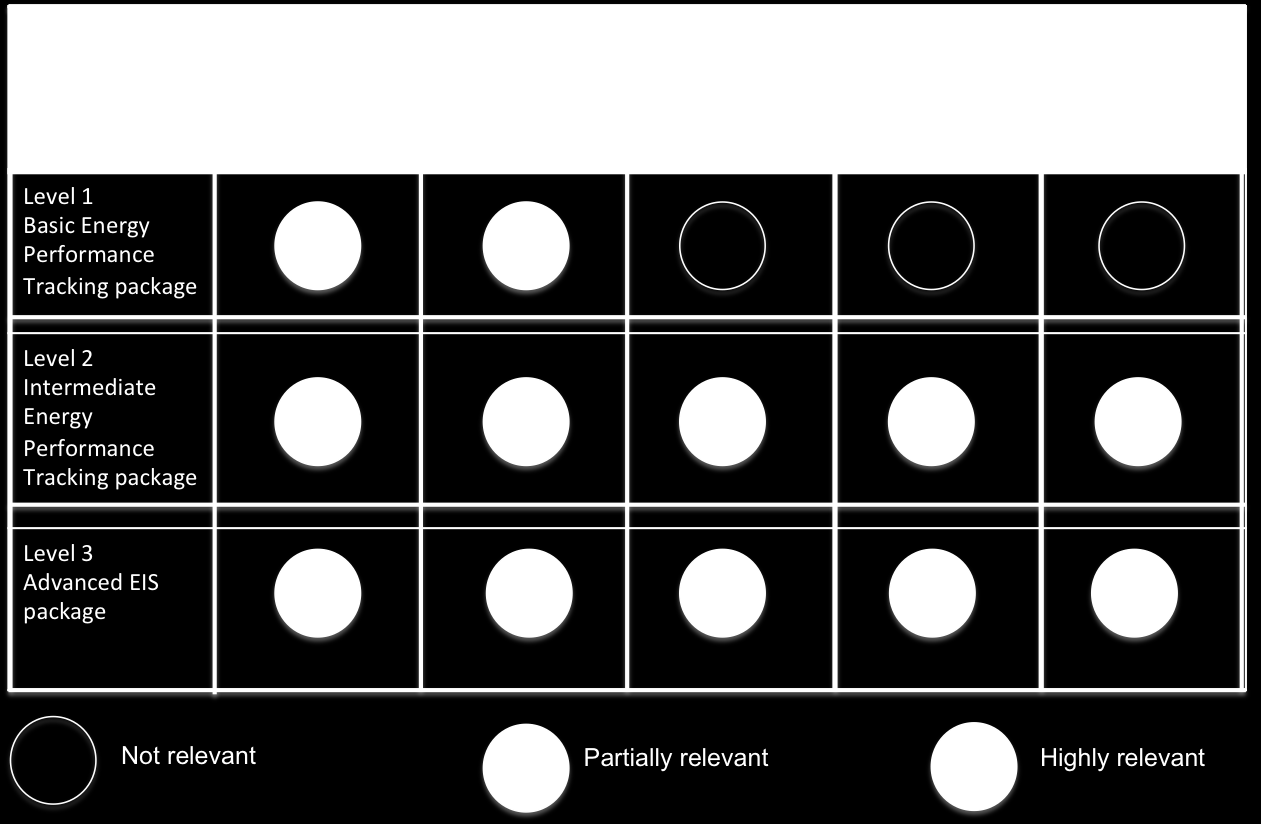
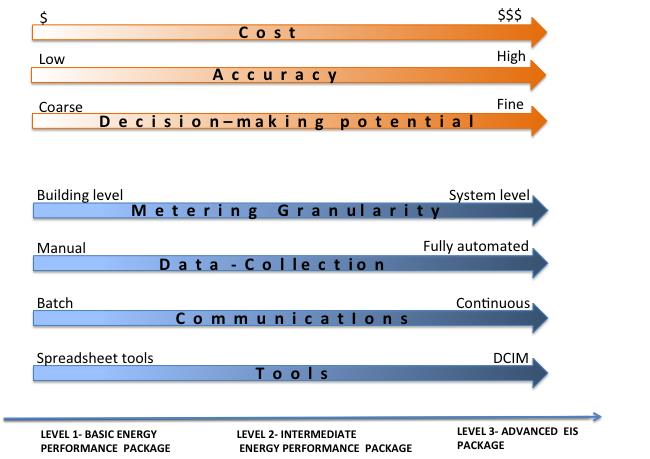
41 Figure 11: Mapping of business drivers to EPT package levels Figure 12 shows, on a sliding scale, the benefits and costs of the three levels of EPT. If possible, the budget should be allocated toward a Level 3 Advanced EIS package to enable a data-driven approach to data center energy management. Figure 12: Comparison of the three levels of Energy Performance Tracking Guidelines for Datacenter Energy Information Systems Page 33
42 Guidelines for Datacenter Energy Information Systems Page 34
43 References CII (Confederation of Indian Industry) Energy Efficiency in Indian Data Centers: Present Trends and Future Opportunities. Energy Trust of Oregon Monitoring & Reporting Applications Guide. Developed with support from PAE Consulting Engineers. Accessed in December 2013 from Facebook Data Center FAQ Accessed in December 2013 from FEMP (Federal Energy Management Program). No date. U.S. Department of Energy: Energy Efficiency and Renewable Energy. Federal Energy Management Program website. Accessed in October 213 from Google Efficiency: How We Do It. Google datacenters. Accessed in November 2013 from Granderson, J., M. A. Piette, G. Ghatikar, and P. Price Building Energy Information Systems: State of the Technology and User Case Studies. Lawrence Berkeley National Laboratory. LBNL-2899E. Granderson, J., M. A. Piette, B. Rosenblum, and L. Hu Energy Information Handbook: Applications for Energy-Efficient Building Operations. Lawrence Berkeley National Laboratory. LBNL-5727E. Koomey, Jonathan Growth in Data Center Electricity Use 2005 to Accessed in December 2013 from Koomey, Jonathan Worldwide Electricity Used in Data Centers. Lawrence Berkeley National Laboratory. Accessed in December 2013 from Guidelines for Datacenter Energy Information Systems Page 35
44 North American Access Technologies (NAAT). No date. Network Services Division. Accessed in December 2013 from Sartor, D., K. Kircher, S. Kumar, and M. Kamath Benchmarking Energy Consumption in Indian Data Centers. Guidelines for Datacenter Energy Information Systems Page 36
45 Appendix 1: Details on Business Drivers The following table provides definitions for each of the business drivers from Table 1. Several of these are standard definitions from the Energy Information Handbook. (Granderson 2011). 1. Track and manage energy consumption 1.1 Identification of baseline energy consumption This metric is used to determine current energy consumption (the baseline). The baseline is a standard or typical energy performance metric, used for comparisons. Baselines may be expressed according to a variety of metrics, and also to compare with consumption after energy-efficiency measures are implemented. The baseline can be at a certain point in time, or at a particular level of energy efficiency. 1.2 Measurement of realtime energy consumption for a specified time series at whole data-center and end-use level 1.3 Simple tracking of energy use to monitor for anomalies 1.4 Tracking of emergency responses The purposes of real-time measurements are to study the status of different equipment and systems and to detect anomalies. This is a window to the health of operations. This is the most basic form of energy consumption accounting. Energy use from one time period to another is inspected for decreases or increases, or for longterm downward or upward trends. A diversion from predicted value initiates an alert informing the operators of anomalies from expected use in the system s operation. Simple tracking relies on energy use total, and does not include normalization. This involves tracking emergency response such as a load-shedding event or as a part of fault diagnostics. 1.5 Optimization across various possible energy sources Available power from different sources is analyzed and those at a lower carbon footprint and lower cost, such as a smart power distribution system, are selected. 1.6 Capacity management through space planning, cooling, and power load capacity planning Part of predictive measurement is to have data on available capacity of space for future rack/servers, available power (from site, from PDU, etc.), and available cooling needed for the future IT equipment. 1.7 Carbon accounting This accounting is used to quantify greenhouse gas (GHG) emissions associated with data center energy consumption. Carbon is typically reported at the building or portfolio level, but it may also be tracked at the system or component level. Guidelines for Datacenter Energy Information Systems Page 37
46 2. Track and manage energy cost 2.1 Prediction of energy cost, allocation 2.2 Verification of billing/metering accuracy and discrepancy identification 2.3 Estimation of cost saving This method converts energy consumption into billed costs, so that information can be used in budgets and financial projections. Bills are verified with respect to metered energy, to avoid surprises. By creating the baseline and comparing the impact of energy-efficiency measures, savings can be estimated. Energy savings performance of energy conservation measures (ECMs) can be determined using baseline models, with regression being the most common approach. 3. Benchmarking 3.1 Cross-sectional benchmarking: Comparison of energy use with other facilities in the portfolio or peer group 3.2 Longitudinal benchmarking: Comparison of energy use across time 4. Develop and validate energy-efficiency projects 4.1 Setting performance goals and identification of improvement opportunities for energy savings and/or retrofits By comparing your data center s energy performance to that of a comparable group of data centers, you can rank your facility s performance with that of similar facilities. By comparing your data center s current energy performance to past performance, you can identify energy trends and opportunities for improvement. After benchmarking is complete, performance goals can be set that compare benchmark values with peers. Opportunities can then be discovered for energy efficiency. 4.2 Monitoring-based commissioning This process verifies and documents the performance of building equipment to ensure that operational needs and design intent are satisfied. The monitoring process is required for a complete and thorough commissioning. 4.3 Diagnosing problems during operations (fault detection and diagnostics) Through these diagnostics, equipment and hardware faults can be identified and treated. 4.4 Verification of energy savings from energyimprovement projects to reduce overall This process quantifies the total energy savings associated with an efficiency improvement. Monitoring is a tool to verify the savings, both in peak load reduction and energy reduction. Guidelines for Datacenter Energy Information Systems Page 38
47 consumption and peak demand 5. Manage Demand (demand response, or DR) 5.1 Determination of peak, critical, and non-critical load trends Changes in electric usage by customers in response to changes in the price of electricity over time or when system reliability is jeopardized. A plan can be created for load shedding when the energy consumption trend is known. 5.2 Verification of energy and cost savings from DR With monitoring, the savings can be evaluated and verified for DR. Guidelines for Datacenter Energy Information Systems Page 39
48 Appendix 2: Glossary of Terms Cooling Systems These systems generally fall into two categories: the Computer Room Air Conditioner (CRAC), wherein each unit has its own internal compressor, and Computer Room Air Handler (CRAH), which is primarily a coil and a fan, which requires externally supplied chilled water. From an energy-efficiency viewpoint, the CRAH, which is usually supplied by a water-cooled central chilled water plant, is more efficient than an air-cooled CRAC unit. However, the air-cooled CRAC unit has one advantage over a centralized chiller system; it is all-autonomous and therefore offers inherent redundancy and fault tolerance, in that there is no single point of failure (other than power failure). Data centers have historically maintained very tight environmental conditions, to help ensure the reliability of the IT equipment. This was originally driven by older equipment s susceptibility to temperature and humidity changes, as well as a very narrow range of recommended environmental conditions mandated by the equipment manufacturers themselves. Demand Response Demand response (DR) is defined as: Changes in electric usage by end-use customers from their normal consumption patterns in response to changes in the price of electricity over time, or to incentive payments designed to induce lower electricity use at times of high wholesale market prices or when system reliability is jeopardized. It includes all intentional modifications to consumption patterns of electricity of end-use customers that are intended to alter the timing, level of instantaneous demand, or total electricity consumption. It is expected that demand-response programs will be designed to decrease electricity consumption or shift it from on-peak to off-peak periods, depending on consumers preferences and lifestyles. Demand response activities are also defined as actions voluntarily taken by a consumer to adjust the amount or timing of his energy consumption. Demand response is a reduction in demand designed to reduce peak demand or avoid system emergencies. Hence, DR can be a more cost-effective alternative than adding generation capabilities to meet the peak and or occasional demand spikes. Its underlying objective is to actively engage customers in modifying their consumption in response to pricing and/or abnormality signals. This all is possible through end-use monitoring of energy consumption, which is best made possible by a Level 3 monitoring. Derived Metrics The following are standard data center-derived metrics used in order to understand and manage energy consumption. 1. Carbon Dioxide (CO 2 ) Emissions (metric tons per capita): energy-related CO 2 emissions released at the location of the consumption of the fuel; in this case, electricity. Guidelines for Datacenter Energy Information Systems Page 40

49 2. Power Usage Effectiveness or PUE (index): a measure of how efficiently a computer data center uses energy; specifically, how much energy is used by the computing equipment (in contrast to cooling and other overhead) PUE = Total Facility Energy IT Equipment Energy Hypothetically, a perfectly efficient data center would have a PUE of 1, so the closer to that number, the more efficient the data center is. The average PUE for U.S. data centers is about 2. There are efficient data centers that have PUE of about 1.2 and even 1.1. Different values can be obtained depending on where the IT power measurement is done. Figure14 illustrates the three assigned values for PUE based on meter location. The organization GreenGrid has defined three degrees of accuracy for PUE. If the measurement at UPS is used as IT energy to calculate PUE, it is called PUE 1. See Figure 14 for meter location. If measurement is done at PDU, then power loss in the UPS is considered infrastructure energy that is called PUE 2. If the measurement is taken at the server, then a more realistic PUE, called PUE 3, is obtained, since all the power distribution losses are considered in the infrastructure portion of the energy used, and not in the IT portion. Guidelines for Datacenter Energy Information Systems Page 41
50 Figure 14: Different versions of PUE (Source: NAAT, Inc.) 3. Electrical power chain efficiency (avg. percent): Efficiency of a power chain that usually consists of a utility transformer, automatic transfer switch, back-up generator, distribution switch gear, uninterruptable power supply (UPS), and the downstream power distribution system going to the IT equipment cabinets. 4. Cooling system efficiency (avg. kw/ton): Efficiency of the cooling system in a data center that represents the majority of facility-related energy usage in the data center, outside of the actual IT load itself. 5. IT Utilization (e.g., CPU utilization): In computing, performance per watt is a measure of the energy efficiency of particular computer architecture or computer hardware. Literally, it measures the rate of computation that can be delivered by a computer for every watt of power consumed. FLOPS (floating point operations per second) per watt is a common measure. While each of the components in the power chain incur a relatively small loss, the overall efficiency in of the power system is primarily affected by the efficiency of the uninterruptible power system (UPS), as well the overall smaller downstream power distribution losses. 6. Data Center IT Power Density (W/unit area): This metric indicates the IT power load per unit area. For instance, legacy data centers run at 20 to 100 watts/square foot (sf). Newer data centers are designed for 100 to 500 watts/sf. Data Center Infrastructure Management (DCIM) In general, data center infrastructure management (DCIM) is a category of solutions created by the information technology (IT) industry to extend the traditional data center management function to include all physical assets and resources in the facilities and IT domains. It extends the traditional data center management function to include all physical assets and resources in the facilities and IT domains, to integrate all critical aspects of a data center s systems. Metrics provide the foundation of the DCIM system used to manage the data center. DCIM deployments over time will integrate IT and facilities management disciplines to centralize monitoring, management, and intelligent capacity planning of a data center s critical systems. In general: DCIM is a central data repository for multiple pieces of information, delivering a consolidated source of data for all infrastructure variables such as energy use, location, asset life cycle, environmental conditions, capacity, connectivity, and configuration. DCIM tools aggregate data from multiple sources and present the data to decision makers in a meaningful, actionable way; mostly graphical. DCIM solutions need to support strong change planning and management processes. Guidelines for Datacenter Energy Information Systems Page 42
51 Some DCIM solutions can be used to design proposed infrastructure, allowing facilities and IT to model proposed changes and capacities. To identify energy-efficiency opportunities, data needs to be converted to actionable information, including cost and payback, which DCIM can provide. Although staff time and commitment is needed to review and act on information, EIS process automation can minimize labor time and labor cost. It makes capacity management possible, which provides real-time resource utilization data. It provides better electrical, cooling, floor, cabinet, and IT capacity planning. As the result of DCIM implementation and integration, through providing a common platform for monitoring and managing data center resources, DCIM produces greater harmonies between management, technology, and facilities personnel. This includes managing cooling and electrical systems together more cost effectively and energy efficiently. Although these personnel share the common goal of maintaining the health of the data center, in many cases they continue to operate in physical and cultural silos. At a minimum, DCIM should be capable of the following: Communicate with the other sites and facilities monitoring and control systems. This requires open protocol capability (e.g., SNMP, Modbus, BACnet, over TCP). Provide customization of the dashboard with different components and for different users. Provide customization of real-time and historical reporting. Provide central monitoring and control for multiple sites. Provide access to resources such as a library of IT and infrastructure equipment and components (as well as websites such as those related to weather, utilities, and other factors). Guidelines for Datacenter Energy Information Systems Page 43
52 Appendix 3: Types of Meters The following is a list of types of meters pertinent to data centers. Measurement Equipment Type Accuracy % Cost level Notes Temperature Thermocouple $ Stable, durable Temperature Thermistors $$ Retains characteristics Temperature RTDs $$$ Stable output, ease of calibration Pressure in pipe Burdon $$ Used for speed variable pumps Pressure in pipe Strain gauge $$ Used for speed variable pumps Liquid Flow Paddle wheel $ Water quality impact Liquid Flow Turbine Wheel $$ Water quality impact Liquid Flow Venturi $ Shut down needed Liquid Flow Ultrasonic 1 5 $$ No shut down is required to install Liquid Flow Variable area $ Shut down needed Liquid Flow Coriolis mass $$$ Too accurate for this application Air flow Hot wire Anemometer $ For air handler and perf tile Power Electromechanic Not recommended Power Electronic $$$ Very good Power Solid-State $$$ Best Power Portable $ Range of quality Guidelines for Datacenter Energy Information Systems Page 44
53 Appendix 4: Examples of Meters Measurement Equipment The following is a list of equipment that may be useful in collecting measurement data for a data center. The equipment specifications and photos were provided by the Pacific Energy Center (PEC). Further information and additional equipment can be found on the PEC website ( under Performance Measurement Tools. This list is provided as sample measurement equipment, and this document does not make any warranty, expressed or implied, toward the applicability or effectiveness of a specific measuring tool toward a specific system or facility. We recommend that for any metering equipment that you procure, you should obtain the measures, accuracy, resolution and memory and fit it to your requirements. Sample meters are provided below: Power Meters Dent Instruments Elite Pro, Line Powered, Extended Memory Model: EPUHPSDC Measures: Power, Current, Voltage, Power Factor Description: Poly phase recording power meter with 4 integrated voltage references. Uses 333mV current transducers. Logger uses a PC serial interface for data transfer and real time readings. Models with extended memory (store 100k records) and modems also available. Logger dimension: 3 in x 6 in x 2 in. - Current: 0 to 6000 Amps (0.5% typical, meter only) - Volts: 0 to 600V AC or DC - Frequency: 50 or 60 Hz Resolution: 12 bit Memory/Records: 100,000 recs Dent Instruments ElitePro Logger Measures: Power, Current, Voltage, Power Factor Description: Poly phase recording power meter with 4 integrated voltage references. Uses 333mV current transducers. Logger uses a PC serial interface Guidelines for Datacenter Energy Information Systems Page 45
54 for data transfer and real time readings. Models with extended memory (store 100k records) and modems also available. Logger dimension: 3 in x 6 in x 2 in. - Current: 0 to 6000 Amps (0.5% typical, meter only) - Volts: 0 to 600V AC or DC - Frequency: 50 or 60 Hz Resolution: 12 bit Memory/Records: 25,000 records Summit Technology Power Quality Analyzer PS4000 Model: PS4000 Measures: AC Voltage, Amps, AC Current, Kilowatt, Kilowatt/Hour, Power Factor, Harmonics, Transients, Swells and Sags. Description: True RMS power quality analyzer with 1000 amp current probes and voltage references for 3-phase loads. Capable of swell, sag, inrush, highspeed transient, and harmonic analysis. Meter has a LCD display for real-time readings and button interface. Stand alone logger uses a PC serial interface for data transfer. Logger dimension: 4 in x 8 in x 1.5 in. - AC Voltage 1 to 600 VRMS (0.1%) - AC Current: 0.01 to 5000 Amps (0.1% of readings plus accuracy of probes) - Harmonic (THD): Thru 25th or 1800 Hz (To within 1% of fundamental) Memory/Records: 4 Megabyte Summit Technology PS250 True RMS Energy Analyzer Model: PS 250 Measures: AC Voltage, Amps, AC Current, Kilowatt, Kilowatt/Hours, Power Factor, Harmonics Description: Stand alone true RMS, data logging, polyphase power meter can measure up to 140 measurement parameters. Four voltage clips and three proprietary 1000 Amp CT clamps are included with meter. Meter has LCD display for real-time readings and uses a PC serial interface for data transfer. Logger dimension: 4 in x 8 in x 1.5 in. - Voltage: 1 to 600 VRMS (± 0.5%) - AC Current: Amps (± 0.5% plus accuracy of current probe) - Harmonic (THD): through 50th or 3000 Hz (± 1% of fundamental) Memory/Records: Standard Mem: 1,044 Records with 53 Variables, Extended Mem: 4,540 Records with 53 Variables Guidelines for Datacenter Energy Information Systems Page 46
55 Summit Technology Summit Technology Single Phase Adapter Box Model: 120ADP Measures: AC Current Description: Single-phase receptacle with voltage and current leads to be used with the Powersight Energy Analyzer. Allows user to get power and waveform information on plug-loads. - AC Current: 0 to 15 Amps (+/-0.5%) - AC Power: 0 to 120 VAC (+/-1%) Compatible Data Loggers: Powersight 250 Powersight 3000 Powersight 4000 True RMS Energy Analyzer PS-3000 Model: PS-3000 Measures: AC Voltage, AC Current, Kilowatt, Kilowatt/Hour, Power Factor, Harmonics Description: True RMS energy analyzer with 1000 amp current probes and voltage references for 3-phase loads. Meter has an LCD display for real-time readings and a keypad interface. Stand alone logger uses a PC serial interface for data transfer. Logger dimension: 4 in x 8 in x 1.5 in. - Voltage: 1 to 600 Volts rms (± 0.5%) - Frequency: 45 to 3000 Hz (± 0.5%) - AC Current: 0.01 to 6000 Amps (± 0.5% plus accuracy of probe) - Power: 1 Watt to 60 Megawatts (± 1% + accuracy of probe) - Power Factor: 0 to 1 (± 1% + accuracy of probe) - Energy & Cost: (± 1% + accuracy of probe) - Harmonic (THD): through 50th or 3000 Hz (± 1% of fundamental) Memory/Records: Standard Mem: 1,044 Records with 53 Variables, Extended Mem: 4,540 Records with 53 Variables Temperature/Relative Humidity Probes/Sensors and Data Loggers ACR Systems External Temp/RH Sensor for ACR Model: EH-010A Measures: Temperature, Relative Humidity Description: External temperature and relative humidity sensor with 3 foot lead length. Guidelines for Datacenter Energy Information Systems Page 47
56 For use with the ACR SmartReader 2. - RH: 10% to 95% (± 5%) - Temp: - 4 to 104 F Compatible Data Loggers: ACR SmartReader 2 ACR Systems Smart Reader 2 Model: SR-002 Measures: Temperature, Relative Humidity Description: Temperature and relative humidity logger with four channels; one internal temperature, one internal RH, two channels for optional external temperature and RH sensors. Logger uses a PC serial interface for data transfer and real time readings. Logger dimension: 4.2 in x 2.9 in x 0.9 in. - Internal Temp: - 40 to 158 F (± 0.3 F) - Internal RH: 0% to 95% (± 4%) Resolution: 8 bit Memory/Records: 32,768 readings ACR Systems Smart Reader Plus 2 Model: SRP-2 Description: Temperature and relative humidity logger. 128 KB mem., 12 bit 0 to 95 % RH (non-condensing) +/- 3% RH from 10 to 90 % RH Resolution: 12 Bit Memory/Records: 128 KB ACR Systems Smart Reader Plus 4 Model: SRP-004 Measures: Pressure and temperature. Description: Pressure and temperature logger (used for very precise low differential pressure measurements). -40 to 158 F operating temperature range +/-0.05"for.5",1.0" and 2.0" ranges- calibrated +/-1.0" for5.0" and 10.0" ranges- calibrated Thermal : +/-0.5%FS(over compensated range) Memory/Records: 32 KB ACR Systems Smart Reader Plus 4 LPD Model: SRP-004-LPD-10-32K Guidelines for Datacenter Energy Information Systems Page 48
57 Measures: gauge and differential pressures plus/minus 10"WC Description: differential pressure and temperature logger plus/minus 10"WC Resolution: 12 bit Memory/Records: 32Kb Related Application Note(s): ACR Systems Smart Reader Plus 6 Model: SRP M 7 Measures: Temperature Description: Eight channel logger with one internal temperature channel, and seven thermocouple input channels. Uses ACR thermocouple wires, or any J, K, S, T, and E type thermocouples. Logger uses a PC serial interface for data transfer and real time readings. Logger dimension: 4.2 in x 2.9 in x 0.9 in. - Internal Temp: - 40 to 158 F (± 0.2 to 0.3 F) Resolution: 12 bit Memory/Records: 1,048,000 readings Architectural Energy Corp. Architectural Energy Corp. 12 inch Temperature Probe Model: Temp-02-2-t Measures: Temperature Description: Air duct temperature sensor for use with the AEC MicroDataLogger. 12 inch temperature probe with 16 foot long cable and an attached prewired MicroDatalogger module. - Temperature: - 40 to 254 F (± 0.9 F) Compatible Data Loggers: AEC MicroDataLogger Air Temperature Module Model: TEMP-02-1-T01 Measures: temperature Description: Air temperature sensor directly mounted on a pre-wired module with no cable. For use with the AEC MicroDataLogger. - Temperature: - 40 to 254 F (± 0.9 F) Compatible Data Loggers: AEC MicroDataLogger Architectural Energy Corp. Weather Station Model: in-house Measures: Temperature, Relative Humidity Guidelines for Datacenter Energy Information Systems Page 49
58 Description: Portable weather station with relative humidity sensor and ambient temperature sensor in radiation shield. Watertight enclosure to be used with the AEC MicroDataLogger. The weather station can also be configured for use with wind speed, wind direction and radiation sensors. - Relative Humidity: 0 to 90% (± 3%) - Air Temperature: - 40 to 254 F (± 0.9 F) Compatible Data Loggers: AEC MicroDataLogger Campbell Scientific Temperature & RH probe Model: 207 #7059 Measures: Temperature, Relative Humidity Description: Temperature and relative humidity sensor with radiation shield. Sensor requires 3 VAC excitation, and measures across a 150mV range to calculate the RH based on the temperature. For use with Campbell Scientific data loggers. - Temperature: - 40 to 140 (± 0.72 F) - Relative Humidity: 12% to 100% (± 5%) Compatible Data Loggers: Campbell CR10 Measurement Computing Corp. Measurement Computing Corp. IQ-Temp Model: IQ-Temp Measures: temperature Description: Ambient temperature logger with LED light indicator showing different status levels. Logger uses a PC serial interface for data transfer and real time readings. - Temperature: - 40 to 185 F (± 0.9 F) Resolution: 12 bit Memory/Records: 21,280 records IQ-VmA Model: IQ-Vma Measures: Temperature, Milliamp, Millivolt and Voltage Signals Description: Voltage/milliamp input data logger with nine voltage input ranges, a current input range and an internal temperature sensor. Logger uses a PC 9 serial interface for data transfer and real time readings. - Temperature: - 40 to 185 F (± 0.9 F) - Inputs: - 0 to 333 mv, 0 to 1.2 V, 0 to 5 V, 0 to 10 V, 0 to 30 V, 0 to 20 ma (± 0.3%) Resolution: 12 bit Memory/Records: 21,280 records Dickson Pro Series Temperature & RH logger Guidelines for Datacenter Energy Information Systems Page 50
59 Model: TP120 Measures: Temperature, Relative Humidity Description: Two channel data logger with internal temperature and relative humidity sensors. Logger uses a PC serial interface for data transfer and real time readings. Logger dimension: 3.1 in x 2.1 in x 0.9 in. - Temperature: - 40 to 176 F (± 1.8 F between + 14 to 176 F) - Relative Humidity: 0 to 95% (± 2%) Resolution: 0.1 F, 0.1% RH Memory/Records: 32,512 records Dickson Omega Engineering Omega Engineering TH Trace Model: TL 120 Measures: Temperature, Relative Humidity Description: Compact temperature and relative humidity logger. Logger uses a PC serial interface for data transfer and real time readings. - Temperature: - 40 to 176 F - Relative Humidity: 25% to 95% (± 5%) Resolution: 0.9 F; 0.19% RH Memory/Records: 7680 records Type K Thermocouple Probe Model: TJ240-CASS-ISU-8 Measures: Temperature Description: Wide-range Type K Thermocouple with 12 ft. lead with transition joint and 8" stainless steel probe. - Temperature: to 1600 F (± 1.98 F or ± 4.4% whichever is greater) Compatible Data Loggers: ACR SmartReader Plus 6 Type T Thermocouple Wire Model: TT-T-20 Measures: Temperature Description: Type T Thermocouple wire uses two metals, copper and constantan, to produce a current proportional to temperature. This non-linear signal needs a reference meter to provide an accurate reading. - Temperature: to 500º F Compatible Data Loggers: ACR SmartReader Plus 6 Campbell 21X Campbell CR10 Guidelines for Datacenter Energy Information Systems Page 51
60 Hobo Type T Thermocouple Onset Computer Corp. Onset Computer Corp. HOBO Pro RH/TEMP Model: H Measures: Relative Humidity, Temperature Description: This high accuracy, two channel weatherproof data logger can be installed in outdoor environments. Logger uses a PC serial interface for data transfer and real time readings. - Temperature: - 22 to 122 F (± 0.33 F at 70 F) - Relative Humidity: 0 to 100% (± 3%, ± 4% in condensing environments) Resolution: 8 bit or 12 bit (2 modes) Memory/Records: 64k records HOBO Pro Temp/Ext. Temp Model: H Measures: Temperature Description: High accuracy, two channel, weather-proof, temperature data logger. The exterior temperature sensor has a 6' lead. Logger uses a PC serial interface for data transfer and real time readings. - Internal Temperature: - 22 to 122 F (± 0.33 F at 70 F) External Temperature: - 40 to 212 F (± 0.33 F at 70 F) Resolution: 8 or 12 bit (2 modes) Memory/Records: 64k records Onset Computer Corp. HOBO RH/Temp/Light/Ext Model: H Measures: Temperature, Relative Humidity, Light Intensity, AC Current and External Temperature with proprietary sensors, Low DC Voltage Signals Description: Stand-alone four channel data logger with internal sensors for monitoring relative light levels, temperature, relative humidity, and one external channel for proprietary temperature thermistors and current transducers and non-proprietary DC voltage signals. The logger uses an RS232 interface for data transfer and real time readings.in. - Temperature: - 4 to 158 F (± 1.27 F at 70 F) - Relative Humidity: 25 to 95% (± 5%) - Light Intensity: 2 to 600 footcandles typical, maximum varies from 300 to 900 footcandles - Voltage Signal: 0 to 2.5 DC volts (±10 mv ±3% of reading) Resolution: 8 bit Memory/Records: 7943 records Guidelines for Datacenter Energy Information Systems Page 52
61 Onset Computer Corp. HOBO TEMP Model: HO Measures: Temperature Description: Stand-alone single channel temperature logger with internal thermistor and non-volatile memory. Blinking LED confirms operation. Logger uses a PC serial interface for data transfer and real time readings. - Temperature: - 4 to 158 F ( ± 1.27 F at 70 F) Resolution: 8 bit Memory/Records: 7944 readings Onset Computer Corp. HOBO Temp External Model: H Measures: Temperature, External Proprietary Sensors: Temperature, Current, Voltage Description: Two channel data logger has an internal temperature sensor and an input channel for external proprietary sensors for temperature, AC current and non-proprietary DC voltage signals. Logger uses a PC serial interface for data transfer and real time readings. Logger dimension: 2.4 in x 1.9 in x 0.8 in. - Temperature: - 4 to 158 F (± 1.27 F at 70 F) - Milliamp Signal: 4 to 20 ma - Voltage Signal: 0 to 2.5 DC volts Resolution: 8 bit Memory/Records: 7943 records Onset Computer Corp. HOBO Type T Thermocouple Logger Model: H Measures: Temperature Description: These loggers accept Type T thermocouple probes with plug-in subminiature connectors. Two software-selectable measurement ranges available for optimal accuracy and resolution. There is also an internal ambient temperature sensor. Logger uses a PC serial interface for data transfer and real time readings. - Internal Temperature: 32 to 122 F (± 1.3 F at 70 F) - Type T Thermocouple: to +122 F (± 7.2 F at F), - 94 to +356 F (± 5.4 F at 131 F) Resolution: Int: 0.7 F at 70 F, Ext: 1.8 to 11 F, and 1.8 to 5.4 F Memory/Records: 32,530 records Onset Computer Corp. HOBO U12 J,K,S,T Thermocouple Logger Model: U Measures: Temperature Guidelines for Datacenter Energy Information Systems Page 53
62 Description: Thermocouple logger with two temperature channels. Channel 1 is for external Type J, K, S or T thermocouples. Channel two is the logger's internal temperature sensor for cold-junction compensation of the thermocouple output. Compatible with standard thermocouples with standard subminiature connectors. Logger uses a direct USB connection. Logger dimension: 2.3 in x 2.9 in x 0.85 in. - Internal Temperature: 32º to 122º F (± 0.63º F) Resolution: 12-bit Memory/Records: 43,000 measurements Onset Computer Corp. Onset Computer Corp. Onset Computer Corp. HOBO U12 RH/Temp/Light/Ext Datalogger Model: U Measures: Temperature, Relative Humidity, Light; 0 to 2.5 VDC input for external sensors: Temperature, Current, Voltage Description: Stand-alone four channel data logger with internal sensors for monitoring relative light levels, temperature, relative humidity, and one external channel for proprietary temperature thermistors and current transducers and non-proprietary DC voltage signals. The logger uses a USB interface for data transfer and real time readings. Logger dimension: 2.3 in x 2.9 in x 0.85 in. - Temperature: - 4 to 158 F (± 0.63 F) - Relative Humidity: 5 to 95% (± 2.5%) - Light Intensity: 1 to 3000 footcandles typical - Voltage Signal: 0 to 2.5 DC volts (±10 mv ±3% of reading) Resolution: 12 bit Memory/Records: 43,000 records Narrow Range Temperature Sensor Model: TMC6-HB Measures: Temperature Description: Narrow range external temperature sensor for Hobo data loggers. 6 foot cable and 0.3 inch diameter sensor; fits in 3/16 inch holes. - Temperature: 32 to 110 F (± 0.7 F with H8, ± 0.45 F with U12 at 68 F) Compatible Data Loggers: Hobo 4-channel External Hobo RH/Temp/2 External Hobo RH/Temp/Light/External Hobo U-12 Temp/RH/Light/External Resolution: 0.3 F at 68 F with H8, F at 68 with U12 RH, Temp, 2 External Channel HOBO Model: H Measures: Relative Humidity, Temperature, 0 to 2.5 VDC with External sensors: Guidelines for Datacenter Energy Information Systems Page 54
63 Temperature, Current, Voltage Description: Stand-alone four channel data logger with one internal relative humidity sensor, one internal temperature sensor, and two external channels for proprietary sensors for temperature, AC current and non-proprietary low voltage signal input. Logger uses a PC serial interface for data transfer and real time readings. Logger dimension: 2.4 in x 1.9 in x 0.8 in. - Temperature: - 4 to 158 F (± 1.27 F at 70 F) - Relative Humidity: 25% to 95% (± 5%) - Voltage Signal: 0 to 2.5 DC volts (±10 mv ±3% of reading) - Milliamp Signal: 4 to 20 ma (±10 mv ±3% of reading) Resolution: 8 bit Memory/Records: 7943 records Onset Computer Corp. Pace Scientific Pace Scientific Temperature Sensor Model: TMC6-HA Measures: Temperature Description: Wide range external temperature sensor for Hobo data loggers. 6 foot cable and a sensor diameter of 0.2 inch. - Temperature: - 40 to +212 F (± 0.9 F with H8, ± 0.45 with U12 at 68 F) Compatible Data Loggers: Hobo 4-channel External Hobo RH/Temp/2 External Hobo RH/Temp/Light/External Hobo U-12 Temp/RH/Light/External Resolution: ± 0.7 F at 68 F with H8, ± 0.05 F at 68 F with U12 PT907 Temperature Probe Model: PT907 Measures: Temperature Description: Proprietary Pace Scientific temperature probe with epoxy tip and 4' lead. Not for continuous immersion in water (mineral or silicon oil ok). - Temperature: -58 to 221 F (± 0.27 F from 32 to 104 F, better than ±0.54 F from -13 to 185 F) Compatible Data Loggers: Pace Pocket Logger Pace XR5 Logger PT916 Temp Probe Model: PT916 Measures: Temperature Description: Pace Scientific proprietary probe has closed end stainless steel tube, suitable Guidelines for Datacenter Energy Information Systems Page 55
64 for liquid or gaseous immersion, refrigerant (insert into a Pete's Plug) and general temperature applications. 1/8 inch sensor diameter with 4 foot long cable. - Temperature: -58 to 248 F continuous duty, or intermittent max temp: 302 F (± 0.27 F from 32 to 104 F, better than ± 0.54 F from -13 to 185 F) Compatible Data Loggers: Pace Pocket Logger Pace Scientific Pace Scientific PT940 Temperature Probe Model: PT940 Measures: Temperature Description: Proprietary temperature probe with closed end stainless steel tube in a moisture-proof jacket, suitable for wet environments for use with the Pace Scientific data loggers. 3/16 inch sensor diameter with 20 foot cable. - Temperature: - 58 to 221 F (± 0.27 F from 32 to 104 F, better than ± 0.54 F from - 13 to 185 F) Compatible Data Loggers: Pace Pocket Logger Pace XR5 Logger Temperature & RH Probe Model: TRH FT Measures: Temperature, Relative Humidity Description: Proprietary temperature & RH probe for the Pace Logger. Probe's lead length in 10 feet and 0.5 inches in sensor diameter. - Relative Humidity: 0 to 95% (± 2%) - Temperature: - 13 to 185 F (± 0.27 F from 32 to 104, ± 0.55 F below 32 F and above 104 F) Compatible Data Loggers: Pace Pocket Logger Pace XR5 Logger Hydronic Flow Meters Controlotron Dual Channel Submersible Flow Computer Model: 1010WDP1 Measures: Liquid Flow Description: Portable ultrasonic flow meter with clamp-on transducers for non-intrusive liquid flow monitoring. Kit includes a variety of transducer sizes for use on pipe diameters ranging from 0.75 inches to 24 inches. The transducers can be used on pipe temperatures up to 250 F. Instantaneous readings are output via graphic display screen. Logger uses a PC 9-pin serial Guidelines for Datacenter Energy Information Systems Page 56
65 interface for data transfer. - Flow: 1 to 40 ft/sec (± 0.5%) Resolution: 12 bit Memory/Records: 200 Kilobytes of Memory GE Panametrics Dual Channel Flow Meter - 2PT868 Model: 2PT868 Measures: Liquid Flow Description: Non-intrusive, portable, 2-channel, transit time ultrasonic flowmeter for chilled and hot liquid applications with continuous calculation of the sum, average and difference of the two channels. Meter has an LCD display and keypad for instantaneous readings and PC serial interface for data transfer. Standard transducers ranging for pipes ranging from 2.0" to 200" OD used for measuring flow for liquids with temperatures ranging from -4 to 122 F. Kit includes ultrasonic thickness gage for measuring pipe thickness. - Flow: 0.1 to 40 feet/sec (± 2% for pipe diameter less than 6 inches; ± 2% to 5% for pipe diameter greater than or equal to 6 inches) Memory/Records: 40,000 records GE Panametrics Mid-Range Ultrasonic Transducers Model: C-PT-10-M-B-00 Measures: Flow (liquid) Description: Mid Range ultrasonic transducers for the Panametrics Ultrasonic Flow Meter for pipes ranging from 2.0 to 200 inches for liquids with temperatures ranging from -4 to 270 F. GE Panametrics Onicon Small Pipe Transducers and Clamping Fixtures Model: CF-LP-2EM40NM-1 Measures: Liquid Flow Description: Small pipe transducers and clamping fixture for the Panametrics flow meters for pipe sizes ranging from 0.5" to 2.0" OD. For measuring flow for liquids with temperatures ranging from -40 to 248 F. - Flow: (± 0.5 nanosecond) Dual turbine flow sensor Model: F-1200 Measures: Flow Description: Insertion sensor for measuring flow of water-based liquid. Fits schedule 40, 4 inch pipe size. Liquid temperature range up to 180 F continuous and 200 F at peak. Sensor has a 400 psi maximum operating pressure and 18 pulses per gallon. Sensor output is 15 VDC signal. Guidelines for Datacenter Energy Information Systems Page 57
66 - Flow: 2.5 to 60,900 GPM, depending on pipe size (± 2% or better, depending on range) Compatible Data Loggers: AEC MicroDataLogger SeaMetrics Paddle Wheel Flow Sensor Model: IP101B Measures: Liquid Flow Description: Brass insertion meter with paddle wheel flow sensor. Fits pipes ranging from 2" to 10". Used with AO55 analog transmitter to transmit 4-20 ma signal. - Liquid Flow: 0.1 to 9 Meters/Sec (± 1.5% Full Scale) Compatible Data Loggers: AEC MicroDataLogger Pace Pocket Logger Guidelines for Datacenter Energy Information Systems Page 58
67 Appendix 5: Sample Data Center EIS Specifications The following are two sample EIS-related specification documents. The first specification is a general specification for monitoring and control as part of an EIS for a data center. It is a typical construction specification and shall be regarded as a sample. The second is a guide/specification for a wireless monitoring as part of EIS. It is specific to wireless systems. The specifications language for EIS should be selected, tailored, and modified to suit each user s purpose and preferences based on the steps provided in the guidance document. I. SAMPLE: EIS General Specifications This specification covers general requirement for an EIS and is the main part for an EIS. An EIS also addresses demand-response management, which is not addressed here. PART 1 GENERAL 1.1 RESPONSIBILITY A. The final responsibility for providing all the necessary EIS components and for the proper operation of the systems as described, except where directly excluded or listed as work not included, shall be by the EIS Contractor. Nothing in this specification is intended to override this responsibility. B. The EIS Contractor shall have the responsibility as the expert in the proper application of his systems. The final design, installation, and operation of the system is the responsibility of this Contractor. The Contractor shall make additions and/or modifications to the design as required at no additional cost. C. The Contractor is responsible for including the proper settings of each loop (set point, throttling range, integral, and derivative) as necessary to achieve system stability and control accuracy. 1.2 GENERAL CRITERIA Guidelines for Datacenter Energy Information Systems Page 59
68 A. The final design, installation, and operation of the systems in accordance with the sequence of operation are the responsibility of the Contractor and he shall make additions and/or modifications to the design, as required, to produce the required function at no additional cost. B. The final responsibility for providing all the necessary monitoring and control components and for the proper operation of the control systems, as described herein, shall be by this Contractor. Nothing in this specification is intended to override this responsibility. C. The Contractor shall have the responsibility as the expert in the proper application of his monitoring and control components to input, review, and correct the design such that the control system shall function as intended. 1.4 DESCRIPTION A. General: The control system shall consist of a high-speed web-based operator interface. Operators shall be able to perform normal operator functions through the web browser interface. B. The system shall directly monitor and control specified IT, cooling, and electrical equipment. This includes all aspect of the project with regard to energy use. 1.5 SCOPE OF WORK A. Provide design, labor, equipment (hardware and software), and materials that are required to result in a complete installation and properly operating EIS as described herein. B. Furnish all remote field devices, except those specifically excluded, to assure a complete and operating system (sensors, gateways, transmitters, power supplies, etc.). C. The control output signals and thus, the control of the final devices (motors, valves, dampers, etc.) shall be electric. D. Owner will provide a server to install their operating program(s) on. Contractor is responsible for coordination of software versions and implementation. E. Provide complete engineering/detailed control drawings showing all devices, terminal numbers, schedules, legends, labels, etc., as required to properly display the system to be installed and to allow easy troubleshooting in the future. The diagrams shall also indicate set points, throttling range, ratios, and all other switch settings and adjustments. F. Provide a detailed written sequence of operation that specifically describes the system operation in terms easily understandable by the Owner's representative and describes how the Contractor's specific equipment will accomplish making the system operate as intended. This shall be more detailed than the engineers sequence and specifically describe the operation of each device. G. Provide complete start up, check out, and commissioning of related building control systems. Guidelines for Datacenter Energy Information Systems Page 60
69 H. Provide complete start-up and field calibration of the control system. This Contractor must set the controls at the proper values to assure that all systems are stable, hold the required conditions, and function as intended. I. Provide complete on-site Owner instruction in the proper operation of the system and all devices. Training should be provided and video taped for later use. Training should include operation of equipment, programming, set point adjustments, etc. J. Provide complete operating and maintenance instruction booklets in hardcover binders that are fully indexed and include a complete parts listing. K. Control systems shall provide for manual operation in case automatic operations fail where designed into the system. L. Control systems shall interconnect via network. Provide BACnet, SNMP, and/or Modbus interface as necessary to monitor/control equipment connected via serial interface. Coordinate as necessary with equipment suppliers to insure proper interface. M. Immediately following the acceptance of the EIS submittals, the contractor shall submit the system programming/logic flow diagrams. In addition, this contractor shall include at this time the system checkout checklist used to verify system performance and interaction. N. This contractor shall have the system trending activated for the following system points as indicated on the attached points list. Trending shall begin one week prior to this contractor demonstrating the functional performance test required by the commissioning firm and continue on for a minimum of one week or longer based on the owner s facility management and after system demonstration and acceptance. O. Provide all wiring, terminations, enclosures, network devices, software installation, alarm programming, and commissioning for monitoring of typical electrical systems, including but not limited to the following: 1. Generators 2. Power distribution units (PDU) 3. Power transformers 4. Medium voltage switchgear 5. UPS modules 6. Battery diagnostic/monitoring systems 7. Lighting controls PART 2 PRODUCTS Guidelines for Datacenter Energy Information Systems Page 61
70 The intent of this section is not to cover all the components of an EIS system. This is only a sample specification. The Owner needs to decide on the level of monitoring and management and provide the contractor with the specification and scope of work. 2.1 EIS A. The EIS shall be a microprocessor-based, fully integrated, modular system, wireless granular mesh network. B. The system shall include, but not be limited to, the following: 1. The system shall be easily expandable by the user in both capacity and functionality. 2. To maintain reliability, each stand-alone controller shall be capable of operating, controlling, or monitoring without a host computer. 3. Each stand-alone controller shall be capable of performing the basic direct digital control (DDC) functions with proportional integral derivative (PID) loop control, time scheduling, duty cycling, temperature override, start and stop time optimization, outside air optimization, and user-defined programs to meet the sequences of operation. 4. The controllers shall be connected by a high-speed network to allow for data communication between controllers and other parts of the system. 5. The network shall be fault-tolerant and any stand-alone controller detecting an error in its operation shall disconnect itself from the network to allow the remaining controllers to continue normal operations. The only loss of data shall be the data supplied by the failed controller panel. The network panel shall automatically regenerate the token after a failed panel removes itself from the network or on start-up of the system. 6. The network shall be able to pass analog point values and binary point status conditions. A minimum amount of points shall be definable as "global" points for interchanging pertinent data between stand-alone controller panels or for initiating alarm sequences. 7. Provide automatic clock synchronization between all stand-alone controllers on the network and any supervisory computer workstations. 8. The system shall be fully programmable by the user to allow adding, deleting, and changing points and to write custom control sequences without vendor assistance. 9. The system shall have full proportional, integral, and derivative control of control loops to minimize offset and maintain tight control to assigned set points. 10. Start/Stop Function: The system shall enable starting and stopping of remote devices either by operator or built-in clock function. 11. Pre-programmed standard functions for HVAC control and energy management shall be provided in each stand-alone controller for: Guidelines for Datacenter Energy Information Systems Page 62
71 a. Time of day scheduling. b. Daylight-savings time adjustments. c. Holiday scheduling. d. Temperature compensated duty cycling. e. Electrical demand limiting. f. Start and stop time optimization. g. Controlling start/stop interlock schedules. h. Minimum on/maximum off timers. i. Temperature override. j. Outside air enthalpy optimization. k. Maintenance messages. l. Direct Digital Control (PID). m. Power failure/auto restart. n. User-defined programming. o. Data logging. p. Self diagnostics with service alarm buffer. 12. The system shall provide for automatic restart after a power failure or upon initialization of the system. Controlled loads shall have a user programmable delay between successive starts to limit demand peaks. 13. The stand-alone controllers' and distributed control modules' database shall be stored on disk memory at the supervisory computer for backup and restore operation. The controller shall up-line load any entered attribute changes made at the panel by a manual command from the supervisory computer. 14. Each stand-alone controller shall contain self diagnostics that continuously monitor the proper operation of the unit. A malfunction of the controller, any distributed control module, or associated communication link shall be reported automatically to display the condition of failure along with time and date. 15. The system shall include data logging, storage, and trending capabilities. 2.2 TEMPERATURE SENSORS A. Temperature sensors shall be as required to meet the control tolerances specified. Guidelines for Datacenter Energy Information Systems Page 63
72 2.7 HUMIDITY SENSORS/TRANSMITTERS A. Furnish electronic humidity transmitters complying with following minimum specifications: 1. Sensing range 10% to 90% RH 2. Operating range 20% to 80%RH 3. Accuracy - plus/minus 3% RH over operating range including non-linearity, hysteresis, and repeatability. 4. Drift - maximum 5% of full scale per year. B ma Output signal as suitable for interfacing to analogue to digital converter input of DDC controller. 2.8 DIFFERENTIAL PRESSURE TRANSMITTERS A. Differential pressure transmitters shall be provided as necessary to meet the control tolerances specified. The transmitters shall include zero adjust and averaging output (debounce). 2.9 HOST COMPUTER AND PERIPHERALS A. Owner will provide the computer workstation. EIS contractor shall install provide and install the required software for proper operation. B. The system shall include all necessary operating system software. C. Provide all required connectors and cables for complete connection of all Host and Local Command Device connections to peripherals CURRENT TRANSMITTERS A. AC current transmitters shall be self-powered, combination split-core current transformer type with built-in rectifier and high-gain servo amplifier with 4-20 ma two-wire output. Full-scale unit ranges shall be 10 A, 20 A, 50 A, 100 A, 150 A, and 200 A, with internal zero and span adjustment. Unit accuracy shall be ±1% full-scale at 500 ohm maximum burden. B. Transmitter shall meet or exceed ANSI/ISA S50.1 requirements and shall be UL/CSA recognized. Guidelines for Datacenter Energy Information Systems Page 64
73 C. Unit shall be split-core type for clamp-on installation on existing wiring VOLTAGE TRANSFORMERS A. AC voltage transformers shall be UL/CSA recognized, 600 Vac rated, and shall have built-in fuse protection. B. Transformers shall be suitable for ambient temperatures of 4 C 55 C (40 F 130 F) and shall provide ±0.5% accuracy at 24 Vac and 5 VA load. C. Windings (except for terminals) shall be completely enclosed with metal or plastic POWER MONITORS A. Power monitors shall be three-phase type and shall have three-phase disconnect and shorting switch assembly, UL-listed voltage transformers, and UL-listed split-core current transformers. B. Power monitors shall provide selectable output: rate pulse for kwh reading or 4-20 ma for kw reading. Power monitors shall operate with 5 A current inputs and maximum error of ±2% at 1.0 power factor or ±2.5% at 0.5 power factor CURRENT SWITCHES A. Current-operated switches shall be self-powered, solid-state with adjustable trip current. Select switches to match application current and DDC system output requirements DIFFERENTIAL PRESSURE SWITCHES A. Differential pressure switches (air or water service) shall be UL-listed, SPDT snap-acting, pilot-duty rated (125 VA minimum) and shall have scale range and differential suitable for intended application and NEMA 1 enclosure unless otherwise specified LIQUID FLOW TRANSMITTER A. Flow meter with associated installation kit or approved equal with local display. This is for Chilled water application only. Guidelines for Datacenter Energy Information Systems Page 65
74 II. SAMPLE: Wireless Network Specification for Data Center EIS This section covers the wireless monitoring of data center environmental conditions (temperature, humidity, and pressure) and CRAH/C power use. The purpose of providing this section is to inform the owners of cost saving that can be resulted in use of wireless sensors in lieu of wired ones. DESCRIPTION A wireless mesh network (WMN) is a communications network made up of radio nodes organized in a mesh topology. Wireless mesh networks often consist of mesh clients, mesh routers, and gateways. The mesh clients are often laptops, cell phones, and other wireless devices, while the mesh routers forward traffic to and from the gateways, which may but need not connect to the Internet. The coverage area of the radio nodes working as a single network is sometimes called a mesh cloud. Access to this mesh cloud is dependent on the radio nodes working in harmony with each other to create a radio network. A mesh network is reliable and offers redundancy. When one node can no longer operate, the rest of the nodes can still communicate with each other, directly or through one or more intermediate nodes. Wireless mesh networks can be implemented with various wireless technology including , , , cellular technologies, or combinations of more than one type. ARCHITECTURE REQUIREMENTS Wireless mesh architectures infrastructure is, in effect, a router network minus the cabling between nodes. It should be built of peer radio devices that do not have to be cabled to a wired port. Mesh architecture should sustain signal strength by breaking long distances into a series of shorter hops. Intermediate nodes not only should boost the signal, but cooperatively make forwarding decisions based on their knowledge of the network, i.e., perform routing. Architecture should provide high bandwidth, spectral efficiency, and economic advantage over the coverage area. Wireless mesh networks (Figure 1) should have a relatively stable topology except for the occasional failure of nodes or addition of new nodes. The path of traffic, being aggregated from a large number of end users, should change infrequently. Practically all the traffic in an infrastructure mesh network should either be forwarded to or from a gateway. The sensor nodes should collect temperature and other environmental parameters and power readings. The manager (gateway) should coordinate routing, aggregate packets of data, collect network statistics, and handle all data transfers. Again, gateway communication with its mesh network is required to be wireless. The server should communicate with the gateway through an Ethernet connection. Guidelines for Datacenter Energy Information Systems Page 66
75 Figure 1. Wireless Mesh Network Architecture COMPONENTS AND FEATURES SPECIFICATIONS The monitoring and metering shall be a microprocessor-based, fully integrated, modular, wireless granular mesh network. The system shall include, but not be limited to, the following features: The system shall be easily expandable by the user in both capacity and functionality. The network shall be fault tolerant. Following are requirements for typical components: Gateway While the main power supply is the house 120V, the gateway shall have a minimum of 72-hour battery backup in case of power failure. It should have lights showing if it is powered by battery. Also lights should demonstrate if the gateway is communicating with the nodes. The system shall have complete alarm handling, logging, prioritizing, and acknowledge capabilities. It shall include data logging, storage, dashboard, and trending. Rack thermal node The temperature node shall gather data from multiple sensors installed on the air intake and air exhaust of the racks and transfer temperature and humidity data to the nodes. Temperature nodes wired to those sensing points should communicate with the gateway through the wireless mesh network. It is preferred that the same node collect relative humidity data from sensors without a need for additional nodes. Accuracy of equal or better than ±0.6 F is required. The time between each data release (communication with gateway) should not exceed 5 minutes. Nodes should have lights showing that they are on, communicating, or initializing. Guidelines for Datacenter Energy Information Systems Page 67
76 CRAH/C Thermal Each unit comes with two thermal nodes: one for supply air and one for return air. Having multiple sensors at the return, usually a 3 foot by 8 foot area, will provide a more accurate temperature reading but is optional. Accuracy of equal or better than ±0.6 F is required. The time between each data release (communication with gateway) should not exceed 5 minutes. Nodes should have lights showing that they are on, communicating, or initializing. Dew Point Sensors/ Transmitters These can be integrated parts of the rack and CRAH/CRAC thermal nodes listed above to make the installation faster and easier or provided separately. Required accuracy is +0.9 F. The time between each data release (communication with gateway) should not exceed 5 minutes. Nodes should have lights showing that they are on, communicating, or initializing. Differential Pressure Transmitters Differential pressure transmitters should be provided as necessary to meet the control tolerances specified. Differential Pressure Range should be from -1.0 to 2.0 in H 2 O. Zero-point accuracy should be equal or better than: ±0.002 in H 2 O. The time between each data release (communication with gateway) should not exceed 5 minutes. Nodes should have lights showing that they are on, communicating, or initializing. Current Transmitters AC current transmitters should be a self-powered, combination split-core current transformer type with builtin rectifier and high-gain servo amplifier with 4-20 milliamp (ma) two-wire output. Full-scale unit ranges shall be 10 amps (A) to 1,000 A, with internal zero and span adjustment. Unit accuracy shall be ±1% full-scale at a 500 ohm maximum burden. The transmitter shall meet or exceed ANSI/ISA S50.1 requirements and shall be UL/CSA recognized. The unit shall be a split-core type, for clamp-on installation on existing wiring. Nodes should have lights showing that they are on, communicating, or initializing. Voltage Transformers AC voltage transformers shall be UL/CSA recognized, 600 Vac rated, and shall have built-in fuse protection. Transformers shall provide ±0.5% accuracy at 24 Vac and 5 VA load. Windings (except for terminals) shall be completely enclosed with metal or plastic. Other Components Guidelines for Datacenter Energy Information Systems Page 68
77 There might be requirement for other components such as Btu meter (combination of water flow meter and two temperature sensors) for chilled water system, or others. These meters are not part of the wireless mesh network but should be able to communicate with the monitoring server through Modbus, Bacnet, SNMP or other communication protocols. Battery Life The network should let battery-powered devices sleep for minutes at a time, reducing battery use. The duty cycle of battery-powered nodes within a network should be designed to be very low, offering even more energy efficiency and greater battery life. Batteries should last for four years at a minimum. Operational Interference Data center environments typically have a large amount of radio frequency (RF) noise. This noise is created by servers, UPS inverters and building systems, and other wireless communications, such as Wi-Fi and mobile phones, all of which create interference that can significantly degrade network performance. To overcome operational interference (noise), the network nodes should be ultra low-power wireless transceivers that transfer data to and from integrated sensors or controllers, using an on-board radio to send the packets to neighboring nodes. Each node should pass the packet on to other nodes, in a series of hops that deliver data to their destination. Preconfigured nodes should be able to be added to or removed from the network without disrupting communications. In addition, wireless monitoring devices should not cause any problems with the operation of the existing communicating devices in the data center; therefore, they should have lowpower transmissions (< 3 mw), low data transmission rate (< 3%), and non-overlapping frequency range. Security Wireless sensor, router, and gateway devices should not support any Internet-protocol (IP)-based protocols. To avoid any security threats, they should not provide any support for IP connection initiation, connection establishment, data initiation, or data transfer. In addition, the wireless networks shall use encryption, to ensure that external agents cannot snoop the context of the communication on the network. Data Latency Wireless network providers should identify their data latency in their bid. This includes propagation, the time that it takes for a packet to travel between one place and another, and transmission speed, considering the medium itself introduces some delay. The data reliability of the wireless network should be on the order of %, at least. The wireless network also should be able to accommodate feedback (i.e., data flow from upstream back). Guidelines for Datacenter Energy Information Systems Page 69
78 If communication with a vendor s server is necessary, the mechanism, ease of use, and security features need to be defined and approved by the data center managers. SCOPE OF WORK The following bullets outline the scope of work. Note that the responsibility for each item should be well defined in the contract between the Owner and Contractor(s). Provide all of the design, labor, equipment, and materials that are required to result in a complete and properly operating monitoring and metering installation. Furnish all remote field devices (sensors, gateways, transmitters, power supplies, etc.) to assure a complete and operating system. Provide a server for the monitoring and metering contractor to install their operating program(s) on. The contractor is responsible for coordination of software versions and implementation. Provide complete start up, check out, and commissioning of related monitoring and metering systems. Provide complete on-site instruction to the Owner in the proper operation of the system and all devices. Provide all wiring, terminations, enclosures, network devices, software installation, and commissioning for monitoring of typical electrical systems such as CRAH and/or CRAC units. Figure 2 shows a typical wireless EIS. On the left a thermal node, a pressure node, and a gateway are shown, and on the right the green dots identify sensor placement. Guidelines for Datacenter Energy Information Systems Page 70
79 Figure 2: Typical Monitoring Solutions (Courtesy of SynapSense Corporation) PURPOSE The main purpose of this work is to use the monitoring to improve the robustness of the energy-efficiency assessment. This application helps to create an accurate understanding of data center operation, evaluation of air management in the data center (locating hot and cold spots and air leaks, etc.), and calculation of PUE. Air flow distribution can be optimized through trial and trending (sealing openings, floor tile tuning, etc.). After each trial, trending can immediately show the impact of the changes, which can encourage additional trials. The purpose of the trials is to identify the effect on the separation of cold and hot air, potentials for increasing room temperature set point, and expanding relative humidity set-point range or disabling humidity control. SYSTEM DATA PRESENTATION The important data should be accessible through a server interface in the form of dashboard, snapshots, maps, tables, and graphs. Rack temperature and humidity, supply air pressure, and CRAC/CRAH power use should be accessible directly. Databases of information should be created that users can utilize to create different reports for diagnostic, management, or planning purposes. For example, a user should be able to superimpose rack air intake temperature on the data center map, or tabulate it to compare with other data, or graph it to exhibit the changes of the parameter in a pre-defined period of time. Power usage effectiveness is not expected as a direct output of the assessment kit. It is computed using electrical component readings, estimation of power use by the cooling system (assuming certain efficiencies), estimation of lighting power use, and information from CRAC/CRAH power measurement. REFERENCES Assessment Protocol: Metering Protocol: Data Collection Protocol: Self-Benchmarking Guide for Data Center Infrastructure: Metrics, Benchmarks, Actions Guidelines for Datacenter Energy Information Systems Page 71
80 Guidelines for Datacenter Energy Information Systems Page 72
81 List of Acronyms AC ANSI ASHRAE ASO ATS AVG BAS BMS Btu CHP CHW CII CO 2 CRAC CRAH CSA CT CTW DC DCIM DDC DR ECM EE Loss EIS EM alternating current American National Standards Institute American Society of Heating, Refrigerating and Air Conditioning Engineers automated system optimization automatic transfer switch average building automation system building management systems British thermal unit combined heat and power chilled water Confederation of Indian Industry carbon dioxide computer room air conditioning computer room air handling Canadian Standards Association cooling tower cooling tower water direct current data center infrastructure management direct digital control demand response energy conservation measures Electrical distribution energy loss Energy Information System equipment meter Guidelines for Datacenter Energy Information Systems Page 73
82 EMS EPT ESCO FDD FEMP FLOPS GHG HVAC Hz INR ISA IT kw kwh LCD LED M M&V mv PC PDU PEC PID PSU PUE RE RF RFP energy management system Energy Performance Tracking energy services company fault detection and diagnosis Federal Energy Management Program floating point operations per second greenhouse gas heating, ventilating, and air conditioning hertz Indian rupees International Society of Automation information technology kilowatt kilowatt-hour liquid-crystal display light-emitting diode power meter measurement and verification millivolt personal computer power distribution unit Pacific Energy Center proportional integral derivative power supply unit Power Usage Effectiveness renewable energy radio frequency request for proposal Guidelines for Datacenter Energy Information Systems Page 74
83 RH RMS RTD S sf SNMP TCP THD UL UPS USD VAC WMN W relative humidity root mean square resistance temperature detector sensor square foot simple network management protocol transmission control protocol total harmonic distortion underwriters laboratories uninterruptable power supply United States dollars voltage alternating current wireless mesh network watt Guidelines for Datacenter Energy Information Systems Page 75
General Recommendations for a Federal Data Center Energy Management Dashboard Display
 General Recommendations for a Federal Data Center Energy Management Dashboard Display Prepared for the U.S. Department of Energy s Federal Energy Management Program Prepared By Lawrence Berkeley National
Case Study: Opportunities to Improve Energy Efficiency in Three Federal Data Centers
 Case Study: Opportunities to Improve Energy Efficiency in Three Federal Data Centers Prepared for the U.S. Department of Energy s Federal Energy Management Program Prepared By Lawrence Berkeley National
Building Energy Management: Using Data as a Tool
 Building Energy Management: Using Data as a Tool Issue Brief Melissa Donnelly Program Analyst, Institute for Building Efficiency, Johnson Controls October 2012 1 http://www.energystar. gov/index.cfm?c=comm_
Energy Efficiency Opportunities in Federal High Performance Computing Data Centers
 Energy Efficiency Opportunities in Federal High Performance Computing Data Centers Prepared for the U.S. Department of Energy Federal Energy Management Program By Lawrence Berkeley National Laboratory
How Does Your Data Center Measure Up? Energy Efficiency Metrics and Benchmarks for Data Center Infrastructure Systems
 How Does Your Data Center Measure Up? Energy Efficiency Metrics and Benchmarks for Data Center Infrastructure Systems Paul Mathew, Ph.D., Staff Scientist Steve Greenberg, P.E., Energy Management Engineer
Measuring Power in your Data Center: The Roadmap to your PUE and Carbon Footprint
 Measuring Power in your Data Center: The Roadmap to your PUE and Carbon Footprint Energy usage in the data center Electricity Transformer/ UPS Air 10% Movement 12% Cooling 25% Lighting, etc. 3% IT Equipment
Data Center Metering and Resource Guide. Version 1.1. July 30th, 2015. Rod Mahdavi and Steve Greenberg. Lawrence Berkeley National Laboratory
 Data Center Metering and Resource Guide Version 1.1 July 30th, 2015 Rod Mahdavi and Steve Greenberg Lawrence Berkeley National Laboratory Note to users: Please submit comments and suggestions to Steve
Recommendations for Measuring and Reporting Overall Data Center Efficiency
 Recommendations for Measuring and Reporting Overall Data Center Efficiency Version 2 Measuring PUE for Data Centers 17 May 2011 Table of Contents 1 Introduction... 1 1.1 Purpose Recommendations for Measuring
Data Center Industry Leaders Reach Agreement on Guiding Principles for Energy Efficiency Metrics
 On January 13, 2010, 7x24 Exchange Chairman Robert Cassiliano and Vice President David Schirmacher met in Washington, DC with representatives from the EPA, the DOE and 7 leading industry organizations
Recommendations for Measuring and Reporting Overall Data Center Efficiency
 Recommendations for Measuring and Reporting Overall Data Center Efficiency Version 1 Measuring PUE at Dedicated Data Centers 15 July 2010 Table of Contents 1 Introduction... 1 1.1 Purpose Recommendations
Modeling and Simulation of HVAC Faulty Operations and Performance Degradation due to Maintenance Issues
 LBNL-6129E ERNEST ORLANDO LAWRENCE BERKELEY NATIONAL LABORATORY Modeling and Simulation of HVAC Faulty Operations and Performance Degradation due to Maintenance Issues Liping Wang, Tianzhen Hong Environmental
Metrics for Data Centre Efficiency
 Technology Paper 004 Metrics for Data Centre Efficiency Workspace Technology Limited Technology House, PO BOX 11578, Sutton Coldfield West Midlands B72 1ZB Telephone: 0121 354 4894 Facsimile: 0121 354
Guideline for Water and Energy Considerations During Federal Data Center Consolidations
 Guideline for Water and Energy Considerations During Federal Data Center Consolidations Prepared for the U.S. Department of Energy Federal Energy Management Program By Lawrence Berkeley National Laboratory
scalable data centre energy management solution
 scalable data centre energy management solution scalable data centre energy management solution EcoMeasure - Scalable Data Centre Energy Management & Efficiency Measurement Solution by Workspace Technology
Comprehensive Data Center Energy Management Solutions
 FROM INSIGHT TO EFFICIENCY: Comprehensive Data Center Energy Management Solutions Since 1995, facility managers and BAS professionals have relied on the Niagara framework to provide full convergence of
Understanding Power Usage Effectiveness (PUE) & Data Center Infrastructure Management (DCIM)
 Understanding Power Usage Effectiveness (PUE) & Data Center Infrastructure Management (DCIM) Salim Janbeh Physical Infrastructure Consultant [email protected] PANDUIT You Can t Manage What You Don t Measure:
Datacenter Efficiency
 EXECUTIVE STRATEGY BRIEF Operating highly-efficient datacenters is imperative as more consumers and companies move to a cloud computing environment. With high energy costs and pressure to reduce carbon
Comprehensive Data Center Energy Management Solutions
 FROM INSIGHT TO EFFICIENCY: Comprehensive Data Center Energy Management Solutions Since 1995, facility managers and BAS professionals have relied on the Niagara Framework to provide full convergence of
Outline. CC objectives Site and building description Typical data floor overview CC measures Results Lessons learned
 Outline CC objectives Site and building description ypical data floor overview CC measures Results Lessons learned 2 CC Objectives Identify and solve existing operating problems Improve building thermal
Case Study: Innovative Energy Efficiency Approaches in NOAA s Environmental Security Computing Center in Fairmont, West Virginia
 Case Study: Innovative Energy Efficiency Approaches in NOAA s Environmental Security Computing Center in Fairmont, West Virginia Prepared for the U.S. Department of Energy s Federal Energy Management Program
Case study: End-to-end data centre infrastructure management
 Case study: End-to-end data centre infrastructure management Situation: A leading public sector organisation suspected that their air conditioning units were not cooling the data centre efficiently. Consequently,
Energy Efficient High-tech Buildings
 Energy Efficient High-tech Buildings Can anything be done to improve Data Center and Cleanroom energy efficiency? Bill Tschudi Lawrence Berkeley National Laboratory [email protected] Acknowledgements California
Building Energy Information Systems:
 Building Energy Information Systems: State of the Technology and User Case Studies Jessica Granderson Lawrence Berkeley National Laboratory Sponsored by the California Energy Commission Public Interest
Design Best Practices for Data Centers
 Tuesday, 22 September 2009 Design Best Practices for Data Centers Written by Mark Welte Tuesday, 22 September 2009 The data center industry is going through revolutionary changes, due to changing market
Self-benchmarking Guide for Data Center Infrastructure: Metrics, Benchmarks, Actions 6-28-10. Sponsored by:
 Self-benchmarking Guide for Data Center Infrastructure: Metrics, Benchmarks, Actions 6-28-10 Sponsored by: Disclaimer This document was prepared as an account of work sponsored by the United States Government.
Increasing Data Center Efficiency through Metering and Monitoring Power Usage
 White Paper Intel Information Technology Computer Manufacturing Data Center Efficiency Increasing Data Center Efficiency through Metering and Monitoring Power Usage To increase data center energy efficiency
Data center lifecycle and energy efficiency
 Data center lifecycle and energy efficiency White Paper Lifecycle management, thermal management, and simulation solutions enable data center energy modernization Introduction Data centers are coming under
Managing Power Usage with Energy Efficiency Metrics: The Available Me...
 1 of 5 9/1/2011 1:19 PM AUG 2011 Managing Power Usage with Energy Efficiency Metrics: The Available Metrics and How to Use Them Rate this item (1 Vote) font size Data centers consume an enormous amount
DC Pro Assessment Tools. November 14, 2010
 DC Pro Assessment Tools November 14, 2010 William Tschudi, PE Lawrence Berkeley National Laboratory [email protected] 510-495-2417 1 Slide 1 Assessment tools LBNL is developing tools to assist in performing
Reducing Data Center Loads for a Large-Scale, Net Zero Office Building
 rsed Energy Efficiency & Renewable Energy FEDERAL ENERGY MANAGEMENT PROGRAM Reducing Data Center Loads for a Large-Scale, Net Zero Office Building Energy Efficiency & Renewable Energy Executive summary
Overview of Green Energy Strategies and Techniques for Modern Data Centers
 Overview of Green Energy Strategies and Techniques for Modern Data Centers Introduction Data centers ensure the operation of critical business IT equipment including servers, networking and storage devices.
Applying ICT and IoT to Multifamily Buildings. U.S. Department of Energy Buildings Interoperability Vision Meeting March 12, 2015 Jeff Hendler, ETS
 Applying ICT and IoT to Multifamily Buildings U.S. Department of Energy Buildings Interoperability Vision Meeting March 12, 2015 Jeff Hendler, ETS ETS is an Energy Technology, Behavior Management, and
Building Analytics Improve the efficiency, occupant comfort, and financial well-being of your building.
 Building Analytics Improve the efficiency, occupant comfort, and financial well-being of your building. Make the most of your energy SM Building confidence knowing the why behind your facility s operations
Data Center Infrastructure Management (DCIM) Demystified
 software is quickly becoming the core engine of data center operations. Only 5 years ago, manual spreadsheets, sometimes supplemented with Visio diagrams, were accepted as the default tools for data center
GHG Protocol Product Life Cycle Accounting and Reporting Standard ICT Sector Guidance. Chapter 8: 8 Guide for assessing GHG emissions of Data Centers
 GHG Protocol Product Life Cycle Accounting and Reporting Standard ICT Sector Guidance Chapter : Guide for assessing GHG emissions of Data Centers DRAFT March 0 Table of Contents GHG Protocol ICT Sector
BCA-IDA Green Mark for Existing Data Centres Version EDC/1.0
 BCA-IDA Green Mark for Existing Data Centres Version EDC/1.0 To achieve GREEN MARK Award Pre-requisite Requirement All relevant pre-requisite requirements for the specific Green Mark Rating are to be complied
Measure Server delta- T using AUDIT- BUDDY
 Measure Server delta- T using AUDIT- BUDDY The ideal tool to facilitate data driven airflow management Executive Summary : In many of today s data centers, a significant amount of cold air is wasted because
Data Center Leadership In the DOE Better Buildings Challenge
 Symposium Southern California February 18th, 2015 Data Center Leadership In the DOE Better Buildings Challenge Applying Best Practices to meet the Challenge Dale Sartor, PE Lawrence Berkeley National Laboratory
Data Center Lifecycle and Energy Efficiency
 Data Center Lifecycle and Energy Efficiency Lifecycle infrastructure management, power management, thermal management, and simulation solutions enable data center modernization. White Paper October 2014
Guidance for Calculation of Efficiency (PUE) in Data Centers
 Guidance for Calculation of Efficiency (PUE) in Data Centers White Paper 158 Revision 3 by Victor Avelar Executive summary Before data center infrastructure efficiency can be benchmarked using PUE or other
DOE Data Center Air-Management (AM) Tool: Data Collection Guide. Version 1.18 (November 24, 2014)
 DOE Data Center Air-Management (AM) Tool: Data Collection Guide Version 1.18 (November 24, 2014) The Data Collection Guide and the Air Management Tool were developed jointly by Lawrence Berkeley National
Data Center Technology: Physical Infrastructure
 Data Center Technology: Physical Infrastructure IT Trends Affecting New Technologies and Energy Efficiency Imperatives in the Data Center Hisham Elzahhar Regional Enterprise & System Manager, Schneider
Data Center Energy Use, Metrics and Rating Systems
 Data Center Energy Use, Metrics and Rating Systems Steve Greenberg Energy Management Engineer Environmental Energy Technologies Division Lawrence Berkeley National Laboratory October 31, 2007 Today s s
Improve competiveness of IDC and enterprise data centers with DCIM
 Improve competiveness of IDC and enterprise data centers with DCIM This paper studies the implementation of modern DCIM systems for data centers to improve operational competitiveness with ATEN's DCIM
Energy management White paper. Greening the data center with IBM Tivoli software: an integrated approach to managing energy.
 Energy management White paper Greening the data center with IBM Tivoli software: an integrated approach to managing energy. May 2008 2 Contents 3 Key considerations for the green data center 3 Managing
Foreseer Services. Product application guide. Table of contents
 Product application guide Foreseer Services Table of contents 1.0 General.......................................... 2 1.1 What are Foreseer Software and Engineering Services.... 3 1.1.1 Foreseer Service
Measuring Power in your Data Center
 RESEARCH UNDERWRITER WHITE PAPER LEAN, CLEAN & GREEN Raritan Measuring Power in your Data Center Herman Chan, Director, Power Solutions Business Unit, and Greg More, Senior Product Marketing Manager There
Data Center Infrastructure Management: How to Optimize Data Center Operations
 Data Center Infrastructure Management: How to Optimize Data Center Operations Khaled Nassoura, PE [email protected] General Manager Raritan, Inc. Question of the Day Question: Would any CFO run
Green Data Centre Design
 Green Data Centre Design A Holistic Approach Stantec Consulting Ltd. Aleks Milojkovic, P.Eng., RCDD, LEED AP Tommy Chiu, EIT, RCDD, LEED AP STANDARDS ENERGY EQUIPMENT MATERIALS EXAMPLES CONCLUSION STANDARDS
Guidance for Calculation of Efficiency (PUE) in Data Centers
 Guidance for Calculation of Efficiency (PUE) in Data Centers White Paper 158 Revision 1 by Victor Avelar > Executive summary Before data center infrastructure efficiency can be benchmarked using PUE or
Digital Realty Data Center Solutions Digital Chicago Datacampus Franklin Park, Illinois Owner: Digital Realty Trust Engineer of Record: ESD Architect
 Digital Realty Data Center Solutions Digital Chicago Datacampus Franklin Park, Illinois Owner: Digital Realty Trust Engineer of Record: ESD Architect of Record: SPARCH Project Overview The project is
How To Get A Better Understanding Of Energy Efficiency
 Big Data : New opportunities for EM&V of energy efficiency programs Annika Todd, Erin Hult April 2014 Data explosion in other fields Pedabytes of data collected by Google, Netflix, Amazon Development of
IT Cost Savings Audit. Information Technology Report. Prepared for XYZ Inc. November 2009
 IT Cost Savings Audit Information Technology Report Prepared for XYZ Inc. November 2009 Executive Summary This information technology report presents the technology audit resulting from the activities
Next-Generation Building Energy Management Systems
 WHITE PAPER Next-Generation Building Energy Management Systems New Opportunities and Experiences Enabled by Intelligent Equipment Published 2Q 2015 Sponsored By Daikin Applied and Intel Casey Talon Senior
Managing Cooling Capacity & Redundancy In Data Centers Today
 Managing Cooling Capacity & Redundancy In Data Centers Today About AdaptivCOOL 15+ Years Thermal & Airflow Expertise Global Presence U.S., India, Japan, China Standards & Compliances: ISO 9001:2008 RoHS
DESIGN YOUR DATA CENTER FOR TODAY & TOMORROW.
 DESIGN YOUR DATA CENTER FOR TODAY & TOMORROW. A WORKING DATA CENTER IS A COMPLEX SYSTEM IN WHICH EVERY COMPONENT PLAYS A CRITICAL ROLE. HARDWARE, SOFTWARE, SECURITY, NETWORKING, POWER, COOLING, AND THE
Free Cooling in Data Centers. John Speck, RCDD, DCDC JFC Solutions
 Free Cooling in Data Centers John Speck, RCDD, DCDC JFC Solutions Why this topic Many data center projects or retrofits do not have a comprehensive analyses of systems power consumption completed in the
Power & Environmental Monitoring
 Data Centre Monitoring Made Easy Power & Environmental Monitoring Features & Benefits Packet Power provides the easiest, most cost effective way to capture detailed power and temperature information for
Verizon SMARTS Data Center Design Phase 1 Conceptual Study Report Ms. Leah Zabarenko Verizon Business 2606A Carsins Run Road Aberdeen, MD 21001
 Verizon SMARTS Data Center Design Phase 1 Conceptual Study Report Ms. Leah Zabarenko Verizon Business 2606A Carsins Run Road Aberdeen, MD 21001 Presented by: Liberty Engineering, LLP 1609 Connecticut Avenue
How High Temperature Data Centers & Intel Technologies save Energy, Money, Water and Greenhouse Gas Emissions
 Intel Intelligent Power Management Intel How High Temperature Data Centers & Intel Technologies save Energy, Money, Water and Greenhouse Gas Emissions Power savings through the use of Intel s intelligent
Statement Of Work Professional Services
 Statement Of Work Professional Services Data Center Electrical Efficiency Assessment Data Center Electrical Efficiency Assessment Service 1.0 Executive Summary Table of Contents 1.0 Executive Summary 2.0
A Systems Approach to HVAC Contractor Security
 LLNL-JRNL-653695 A Systems Approach to HVAC Contractor Security K. M. Masica April 24, 2014 A Systems Approach to HVAC Contractor Security Disclaimer This document was prepared as an account of work sponsored
HVAC Technologies for Building Energy Efficiency Improvements 2013 National Symposium on Market Transformation. Richard Lord Carrier Fellow
 HVAC Technologies for Building Energy Efficiency Improvements 2013 National Symposium on Market Transformation Richard Lord Carrier Fellow HVAC Industry Challenges and Issues Ozone Deletion Global Warming
User Guide. The Business Energy Dashboard
 User Guide The Business Energy Dashboard 1 More Ways to Understand and Control Your Energy Use At FPL, we re investing in smart grid technologies as part of our commitment to building a smarter, more reliable
Cooling Capacity Factor (CCF) Reveals Stranded Capacity and Data Center Cost Savings
 WHITE PAPER Cooling Capacity Factor (CCF) Reveals Stranded Capacity and Data Center Cost Savings By Lars Strong, P.E., Upsite Technologies, Inc. Kenneth G. Brill, Upsite Technologies, Inc. 505.798.0200
Re Engineering to a "Green" Data Center, with Measurable ROI
 Re Engineering to a "Green" Data Center, with Measurable ROI Alan Mamane CEO and Founder Agenda Data Center Energy Trends Benchmarking Efficiency Systematic Approach to Improve Energy Efficiency Best Practices
Integrated Tools for Multifamily Green Asset Management. Energy Upgrade CA Web Portal Funding Finder Compass Portfolio Tracker Webinar May 22, 2012
 Integrated Tools for Multifamily Green Asset Management Energy Upgrade CA Web Portal Funding Finder Compass Portfolio Tracker Webinar May 22, 2012 Webinar Agenda 2 Introductions Energy Upgrade California
StruxureWare TM Data Center Operation
 StruxureWare TM Data Center End to end Management (DCIM) software for monitoring, control of power, cooling, security and energy usage from the building through IT systems Part of StruxureWare for Data
Resource Advisor OVERVIEW
 Resource Advisor OVERVIEW Resource Advisor Features Customize Site Dashboards Localized Preferences Meter Integration Data Entry Flexibility Manage Project Management Goal Setting & Forecasting Scenario
Control of Computer Room Air Handlers Using Wireless Sensors. Energy Efficient Data Center Demonstration Project
 Control of Computer Room Air Handlers Using Wireless Sensors Energy Efficient Data Center Demonstration Project About the Energy Efficient Data Center Demonstration Project The project s goal is to identify
How High Temperature Data Centers & Intel Technologies save Energy, Money, Water and Greenhouse Gas Emissions
 Intel Intelligent Power Management Intel How High Temperature Data Centers & Intel Technologies save Energy, Money, Water and Greenhouse Gas Emissions Power and cooling savings through the use of Intel
Liquid Cooling Solutions for DATA CENTERS - R.M.IYENGAR BLUESTAR LIMITED.
 Liquid Cooling Solutions for DATA CENTERS - R.M.IYENGAR BLUESTAR LIMITED. Presentation Goals & Outline Power Density Where we have been- where we are now - where we are going Limitations of Air Cooling
Building Information Technology and Management
 Building Information Technology and Management Issue Brief Olivia Nix Strategy Analyst, Institute for Building Efficiency Contributing Authors Jim Kummer, Program Manager, Energy and Sustainability Technology
Revolutionizing Data Center Infrastructure Management
 Infrastructure Management & Monitoring for Business-Critical Continuity TM Revolutionizing Data Center Infrastructure Management The Trellis Platform A Real-Time Solution to Continuous Performance Improvement
GUIDE TO ICT SERVER ROOM ENERGY EFFICIENCY. Public Sector ICT Special Working Group
 GUIDE TO ICT SERVER ROOM ENERGY EFFICIENCY Public Sector ICT Special Working Group SERVER ROOM ENERGY EFFICIENCY This guide is one of a suite of documents that aims to provide guidance on ICT energy efficiency.
BCA-IDA Green Mark for New Data Centres Version NDC/1.0
 BCA-IDA Green Mark for New Data Centres Version NDC/1.0 To achieve GREEN MARK Award Pre-requisite Requirement All relevant pre-requisite requirements for the specific Green Mark Rating are to be complied
ENERGY AUDITS (OR SURVEYS) & ENERGY MANAGEMENT PROGRAMS SECTION B
 ENERGY AUDITS (OR SURVEYS) & ENERGY MANAGEMENT PROGRAMS SECTION B GOALS OF THE ENERGY AUDIT Clearly identify types and costs of energy use Understand how energy is being used--and possibly wasted Identify
DATA CENTER ASSESSMENT SERVICES
 DATA CENTER ASSESSMENT SERVICES ig2 Group Inc. is a Data Center Science Company which provides solutions that can help organizations automatically optimize their Data Center performance, from assets to
Data Center Infrastructure Management: ERP for the Data Center Manager
 Data Center Infrastructure Management: ERP for the Data Center Manager 1 2 Topics What s DCIM & the ERP Analogy Why DCIM How DCIM Works How DCIM Helps 3 DCIM by Definition DCIM is a system that collects
Electrical Efficiency Measurement for Data Centers
 Electrical Efficiency Measurement for Data Centers White Paper 154 Revision 2 by Neil Rasmussen Contents Click on a section to jump to it > Executive summary A closer look at data center 3 Data center
Reducing Data Center Energy Consumption
 Reducing Data Center Energy Consumption By John Judge, Member ASHRAE; Jack Pouchet, Anand Ekbote, and Sachin Dixit Rising data center energy consumption and increasing energy costs have combined to elevate
Energy Efficiency in New and Existing Data Centers-Where the Opportunities May Lie
 Energy Efficiency in New and Existing Data Centers-Where the Opportunities May Lie Mukesh Khattar, Energy Director, Oracle National Energy Efficiency Technology Summit, Sep. 26, 2012, Portland, OR Agenda
Data Centers That Deliver Better Results. Bring Your Building Together
 Data Centers That Deliver Better Results Bring Your Building Together 1 Meeting the high demands of your data center Meeting the increasing heat loads associated with growing computational needs requires
Data Centers: Definitions, Concepts and Concerns
 Data Centers: Definitions, Concepts and Concerns Arash Mousavi DCC September 2013 Agenda 1. Introduction 2. Issues in Modern Data Centers: Siemens Integrated Data Center Solutions 3. Issues in Modern Data
How to Build a Data Centre Cooling Budget. Ian Cathcart
 How to Build a Data Centre Cooling Budget Ian Cathcart Chatsworth Products Topics We ll Cover Availability objectives Space and Load planning Equipment and design options Using CFD to evaluate options
DATACENTER INFRASTRUCTURE MANAGEMENT SOFTWARE. Monitoring, Managing and Optimizing the Datacenter
 Analyzing the Business of Enterprise IT Innovation DATACENTER INFRASTRUCTURE MANAGEMENT SOFTWARE Monitoring, Managing and Optimizing the Datacenter As datacenters become bigger, denser and more complex,