
Hardening Network Devices. PacNOG15 Network Security Workshop
|
|
|
- Elmer Wiggins
- 10 years ago
- Views:
Transcription
1 Hardening Network Devices PacNOG15 Network Security Workshop Last updated 15 July
2 Limiting Device Access 2

3 Think of ALL Devices p The following problem was reported last year and affects low-end CPEs (ADSL connections only) n Admin password exposed via web interface n Allow WAN management (this means anyone on Internet) n Bug fixed and reintroduced depending on the firmware version p The bug is quite a number of years old

4 Password Visible via Web Interface

5 How CPE are Exploited

6 Magnitude of Problem p 4.5 Million CPEs (ADSL Modems) using a unique malicious DNS p In early 2012 more than 300,000 CPEs still infected p 40 malicious DNS servers found p Could device hardening have made a difference?

7 Device Physical Access p Equipment kept in highly restrictive environments p Console access n password protected n access via OOB management n configure timeouts p Individual users authenticated p Social engineering training and awareness p If you can touch it the device now belongs to you

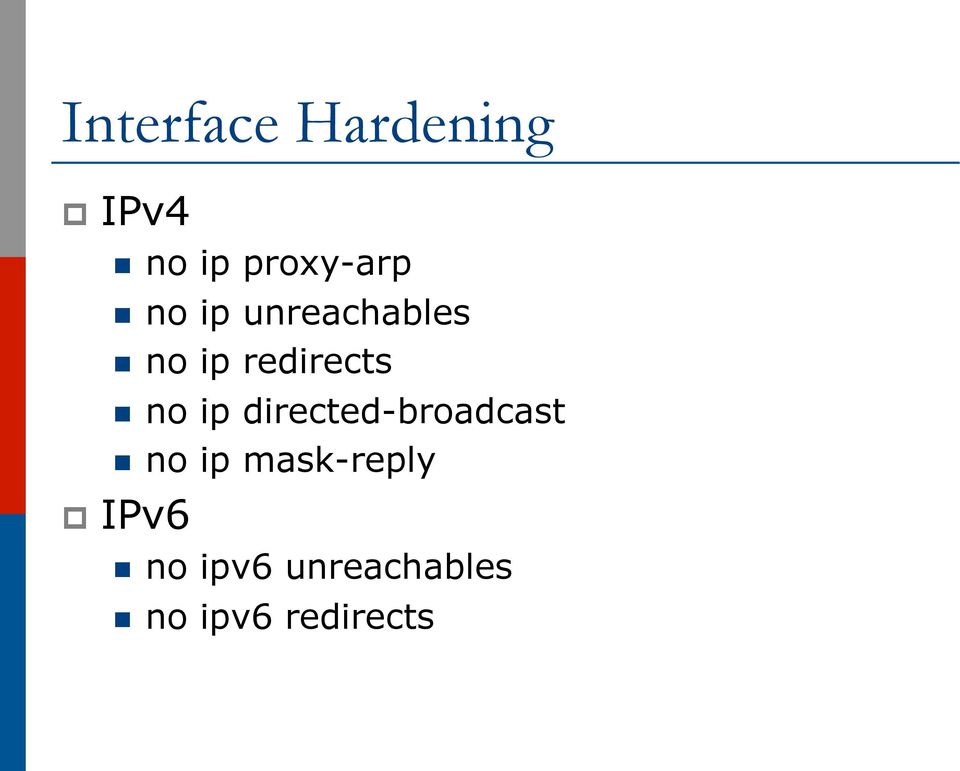
8 Interface Hardening p IPv4 n no ip proxy-arp n no ip unreachables n no ip redirects n no ip directed-broadcast n no ip mask-reply p IPv6 n no ipv6 unreachables n no ipv6 redirects
9 Device Access Control p Set passwords to something not easily guessed p Use single-user passwords (avoid group passwords) p Encrypt the passwords in the configuration files p Use different passwords for different privilege levels p Use different passwords for different modes of access p IF AVAILABLE use digital certificate based authentication mechanisms instead of passwords

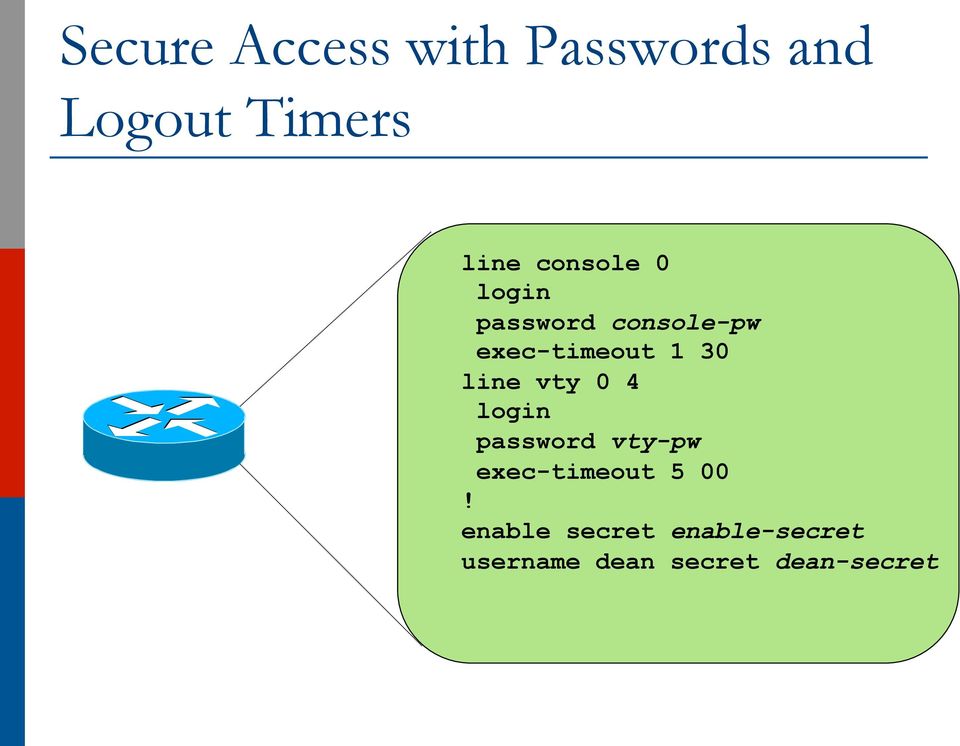
10 Secure Access with Passwords and Logout Timers line console 0 login password console-pw exec-timeout 1 30 line vty 0 4 login password vty-pw exec-timeout 5 00! enable secret enable-secret username dean secret dean-secret
11 Never Leave Passwords in Clear-Text p service password-encryption command p password command n Will encrypt all passwords on the Cisco IOS n with Cisco-defined encryption type 7 n Use command password 7 <password> for cut/paste operations n Cisco proprietary encryption method p secret command n Uses MD5 to produce a one-way hash n Cannot be decrypted n Use command secret 5 <password> n to cut/paste another enable secret password

12 Management Plane Filters p Authenticate Access p Define Explicit Access To/From Management Stations n SNMP n Syslog n TFTP n NTP n AAA Protocols n DNS n SSH, Telnet, etc.

13 Authenticate Individual Users username dean secret dean-secret username miwa secret miwa-secret username pfs secret pfs-secret username staff secret group-secret Do NOT have group passwords!

14 User Authentication: Good p From Cisco IOS 12.3, MD5 encryption was added for user passwords n Do NOT use type 7 encryption p (it is easy to reverse) aaa new-model aaa authentication login neteng local username pfs secret 5 $1$j6Ac$3KarJszBV3VMaL/2Nio3E. username dean secret 5 $1$LPV2$Q04NwAudy0/4AHHHQHvWj0 line vty 0 4 login neteng access-class 3 in

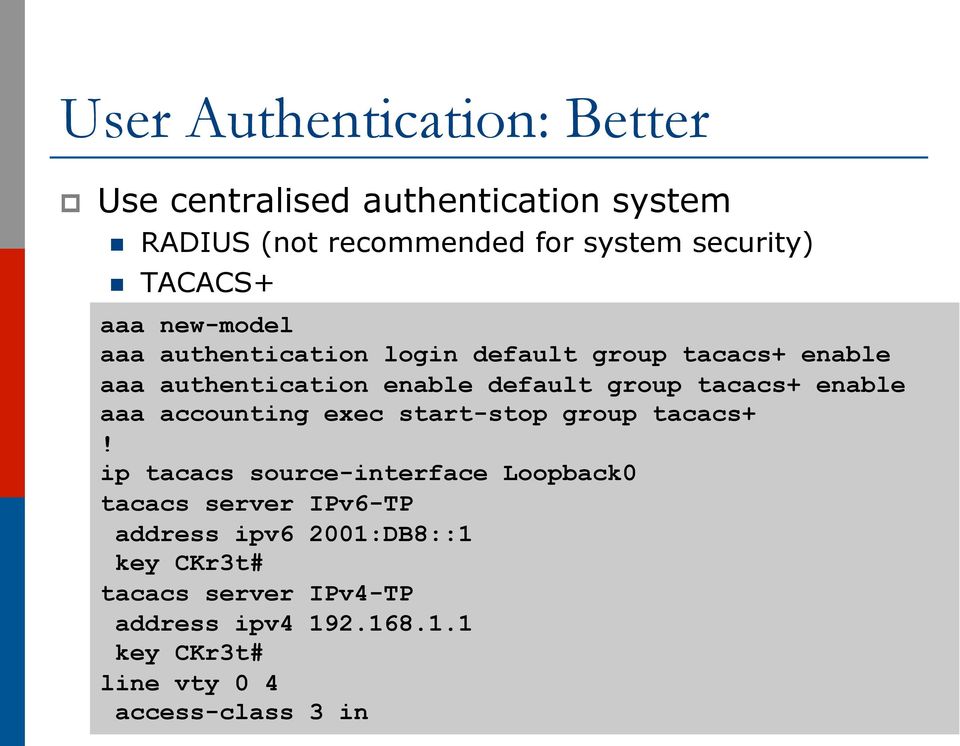
15 User Authentication: Better p Use centralised authentication system n RADIUS (not recommended for system security) n TACACS+ aaa new-model aaa authentication login default group tacacs+ enable aaa authentication enable default group tacacs+ enable aaa accounting exec start-stop group tacacs+! ip tacacs source-interface Loopback0 tacacs server IPv6-TP address ipv6 2001:DB8::1 key CKr3t# tacacs server IPv4-TP address ipv key CKr3t# line vty 0 4 access-class 3 in
16 Restrict Access To Trusted Hosts p Use filters to specifically permit hosts to access an infrastructure device p Example: ip access-list extended VTY permit tcp host eq 22 log-input permit tcp host eq 22 log-input permit tcp host eq 23 log-input deny ip any any log-input! line vty 0 4 access-class VTY in transport input ssh telnet

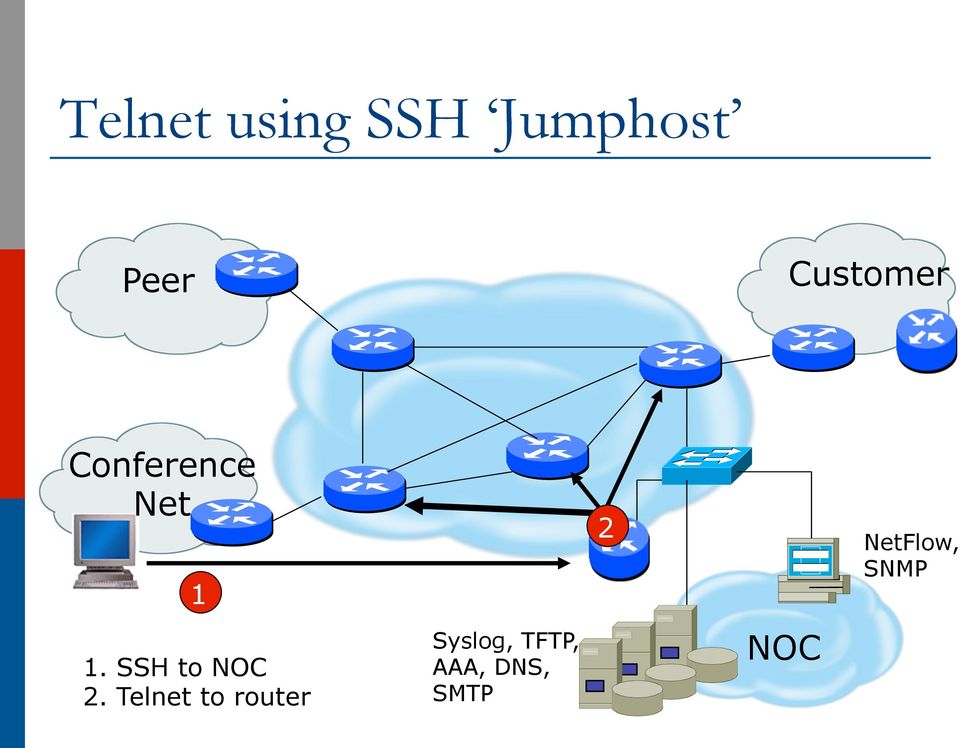
17 Telnet using SSH Jumphost Peer Customer Conference Net 1 1. SSH to NOC 2. Telnet to router Syslog, TFTP, AAA, DNS, SMTP 2 NOC NetFlow, SNMP
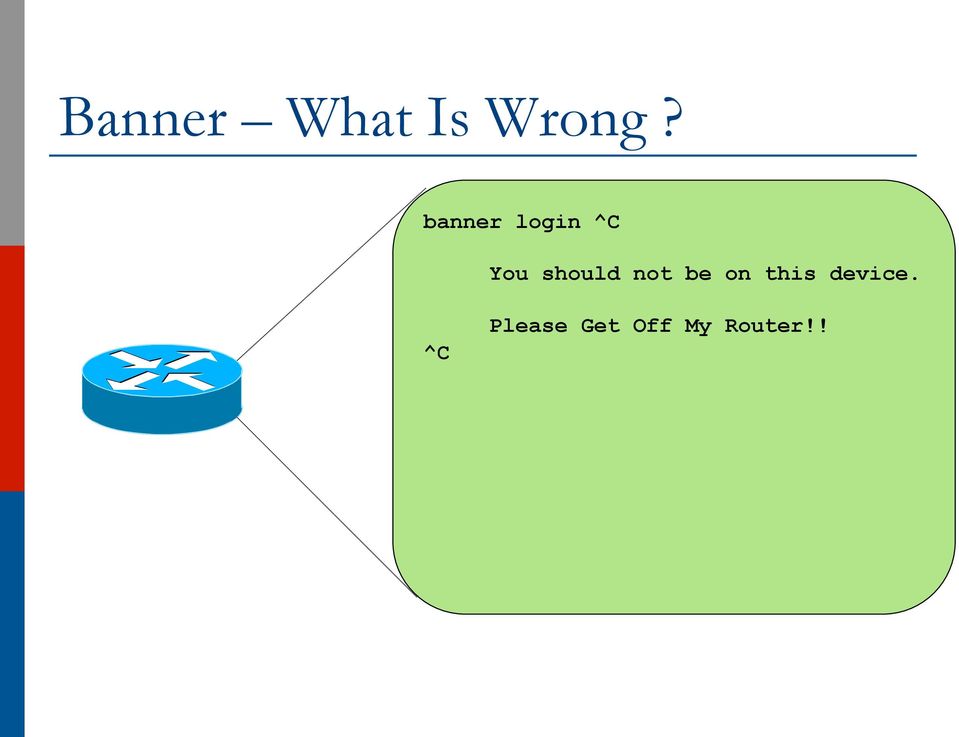
18 Banner What Is Wrong? banner login ^C You should not be on this device. ^C Please Get Off My Router!!
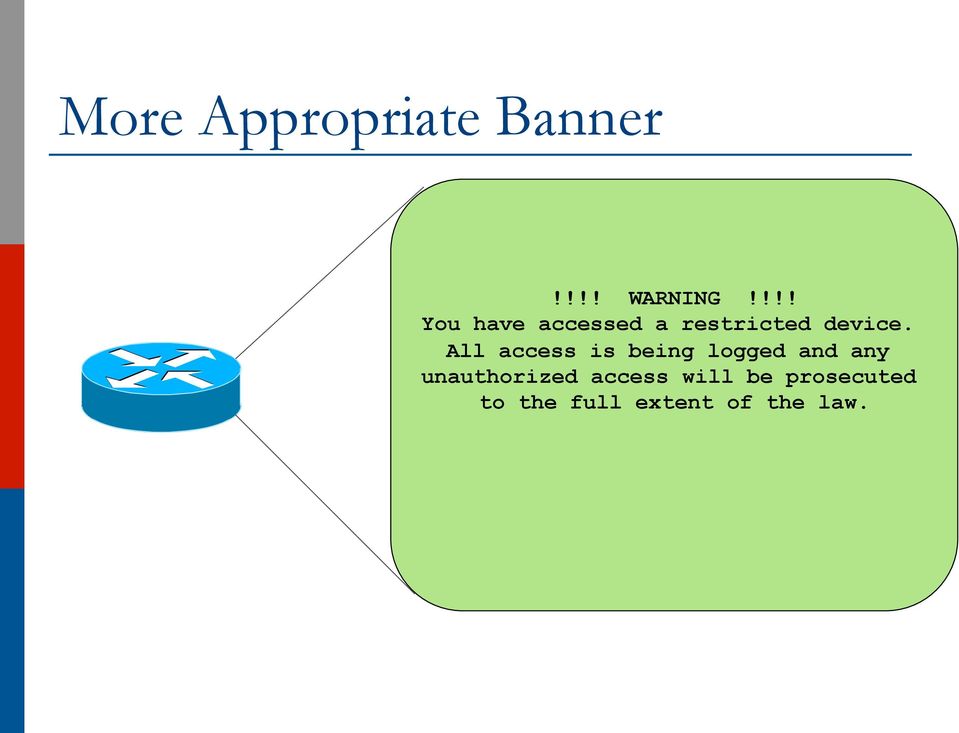
19 More Appropriate Banner!!!! WARNING!!!! You have accessed a restricted device. All access is being logged and any unauthorized access will be prosecuted to the full extent of the law.
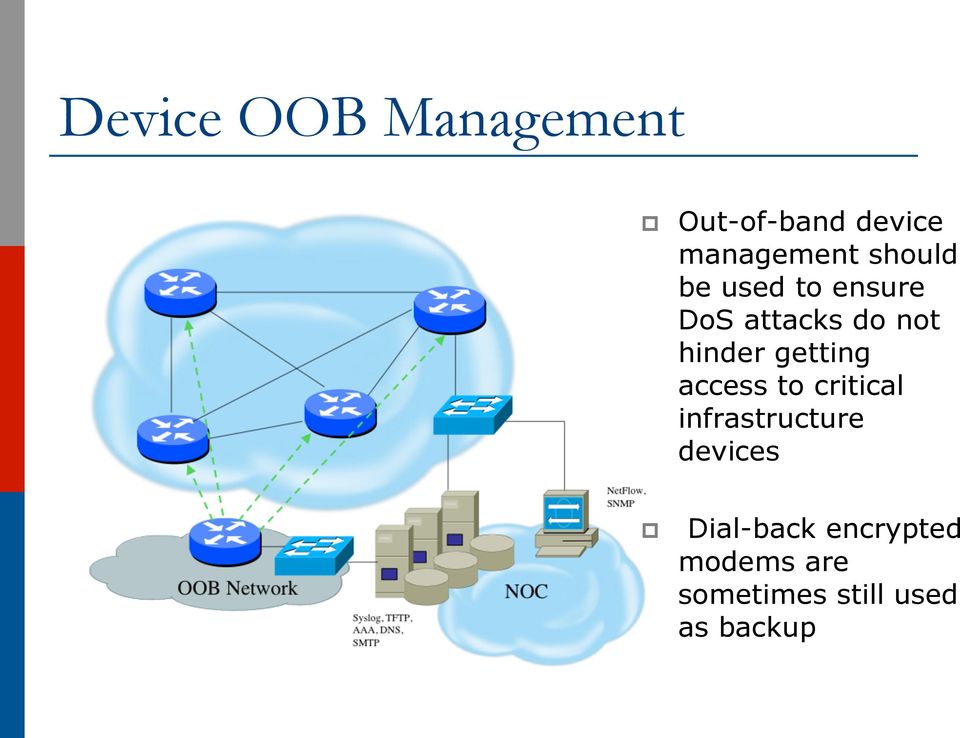
20 Device OOB Management p Out-of-band device management should be used to ensure DoS attacks do not hinder getting access to critical infrastructure devices p Dial-back encrypted modems are sometimes still used as backup
21 Device Management Common Practice (1) p SSH primarily used n Telnet only from jumphosts p HTTP access explicitly disabled p All access authenticated n Varying password mechanisms n AAA usually used p Different servers for in-band vs OOB p Different servers for device authentication vs other p Static username pw or one-time pw n Single local database entry for backup
22 Device Management Common Practice (2) p Each individual has specific authorization p Strict access control via filtering p Access is audited with triggered pager/ notifications p SNMP is read-only n Restricted to specific hosts n View restricted if capability exists n Community strings updated every days
23 Turn Off Unused Services p Global Services n no service finger (before Cisco IOS 12.0) n no ip finger n no service pad n no service udp-small-servers n no service tcp-small-servers n no ip bootp server n no cdp run p Interface Services n no ip redirects n no ip directed-broadcast n no ip proxy arp n no cdp enable
24 Secure SNMP Access 24
25 Secure SNMP Access p SNMP is primary source of intelligence on a target network! p Block SNMP from the outside access-list 101 deny udp any any eq snmp p If the router has SNMP, protect it! snmp-server community fo0bar RO 8 access-list 8 permit p Explicitly direct SNMP traffic to an authorized management station. snmp-server host fo0bar
26 Secure SNMP Access ipv6 access-list SNMP-PERMIT permit ipv6 2001:DB8:22::/64 any permit ipv6 any 2001:DB8:22::/64! no snmp community public no snmp community private! snmp-server enable traps snmp-server enable traps snmp authentication snmp-server enable traps snmp coldstart snmp-server trap-source Loopback0 snmp-server community v6comm RO ipv6 SNMP-PERMIT
27 SNMP Best Practices p Do not enable read/write access unless really necessary p Choose community strings that are difficult to guess p Limit SNMP access to specific IP addresses p Limit SNMP output with views
28 Secure Logging Infrastructure p Log enough information to be useful but not overwhelming. p Create backup plan for keeping track of logging information should the syslog server be unavailable p Remove private information from logs p How accurate are your timestamps?
29 Fundamental Device Protection Summary p p p p p p p p p p p p Secure logical access to routers with passwords and timeouts Never leave passwords in clear-text Authenticate individual users Restrict logical access to specified trusted hosts Allow remote vty access only through ssh Disable device access methods that are not used Protect SNMP if used Shut down unused interfaces Shut down unneeded services Ensure accurate timestamps for all logging Create appropriate banners Test device integrity on a regular basis
30 Securing the Data Path 30
31 Securing The Data Path p p p p p Filtering and rate limiting are primary mitigation techniques Edge filter guidelines for ingress filtering (BCP38/ BCP84) Null-route and black-hole any detected malicious traffic Netflow is primary method used for tracking traffic flows Logging of Exceptions
32 Data Plane (Packet) Filters p Most common problems n Poorly-constructed filters n Ordering matters in some devices p Scaling and maintainability issues with filters are commonplace p Make your filters as modular and simple as possible p Take into consideration alternate routes n Backdoor paths due to network failures
33 Filtering Deployment Considerations p How does the filter load into the router? p Does it interrupt packet flow? p How many filters can be supported in hardware? p How many filters can be supported in software? p How does filter depth impact performance? p How do multiple concurrent features affect performance? p Do I need a standalone firewall?
34 General Filtering Best Practices p Explicitly deny all traffic and only allow what you need p The default policy should be that if the firewall doesn't know what to do with the packet, deny/ drop it p Don't rely only on your firewall for all protection of your network p Implement multiple layers of network protection p Make sure all of the network traffic passes through the firewall p Log all firewall exceptions (if possible)
35 Ingress Filtering ipv6 access-list INBOUND-iACL remark Permit the legitimate signaling traffic (BGP, EIGRP, PIM) permit tcp host 2001:db8:20::1 host 2001:db8:20::2 eq bgp permit tcp host 2001:db8:20::1 eq bgp host 2001:db8:20::2 permit 88 any any permit 103 any any remark Permit NDP packets permit icmp any any nd-na permit icmp any any nd-ns permit icmp any any router-advertisement permit icmp any any router-solicitation remark Deny RH0 and other unknown extension headers deny ipv6 any any routing-type 0 log deny ipv6 any any log undetermined-transport remark Permit the legitimate management traffic permit tcp 2001:db8:11::/48 any eq 22 permit tcp 2001:db8:11::/48 any eq www permit udp 2001:db8:11::/48 any eq snmp remark Deny any packets to the infrastructure address space deny ipv6 any 2001:db8:2222::/48 deny ipv6 any 2001:db8:20::/48 permit ipv6 any any! interface FastEthernet 0/0 description Connection to outside network ipv6 address 2001:db8:20::2/64 ipv6 traffic-filter INBOUND-iACL in
36 RFC2827 (BCP38) Ingress Filtering p If an ISP is aggregating routing announcements for multiple downstream networks, strict traffic filtering should be used to prohibit traffic which claims to have originated from outside of these aggregated announcements. p The ONLY valid source IP address for packets originating from a customer network is the one assigned by the ISP (whether statically or dynamically assigned). p An edge router could check every packet on ingress to ensure the user is not spoofing the source address on the packets which he is originating.
37 But What About Egress Filtering? p In theory, certain addresses should not be seen on the global Internet p In practice, they are and filters aren t being deployed (even when capability available) ipv6 access-list DSL-ipv6-Outbound permit ipv6 2001:DB8:AA65::/48 any deny ipv6 any any log interface atm 0/0 ipv6 traffic-filter DSL-ipv6-Outbound out
38 Configuration and archiving Agenda Item
39 System Images and Configuration Files p Careful of sending configurations where people can snoop the wire n CRC or MD5 validation n Sanitize configuration files p SCP should be used to copy files n TFTP and FTP should be avoided p Use tools like RANCID to periodically check against modified configuration files
40 Software and Configuration Upgrade / Integrity p Files stored on specific systems with limited access p All access to these systems are authenticated and audited p SCP is used where possible; FTP is NEVER used; TFTP still used p Configuration files are polled and compared on an hourly basis (RANCID) p Filters limit uploading / downloading of files to specific systems p p Many system binaries use MD-5 checks for integrity Configuration files are stored with obfuscated passwords
41 Threats Against Routing Protocols 41
42 Router Security Considerations p Segment areas for route redistribution and ensure limited access to routers in critical backbone areas p Design networks so outages don t affect entire network but only portions of it p Control router access n Watch for internal attacks on these systems n Use different passwords for router enable and monitoring system root access. p Scanning craze for all kinds of ports this will be never ending battle
43 Routing Control Plane p p p p p MD-5 authentication n Some deploy at customer s request Route filters limit what routes are believed from a valid peer Packet filters limit which systems can appear as a valid peer Limiting propagation of invalid routing information n n n Prefix filters AS-PATH filters (trend is leaning towards this) Route damping (latest consensus is that it causes more harm than good) Not yet possible to validate whether legitimate peer has authority to send routing update
44 Why Use Route Authentication p Route Authentication equates to data origin authentication and data integrity p In BGP, requires TCP resets to be authenticated so malicious person can t randomly send TCP resets p In cases where routing information traverses shared networks, someone might be able to alter a packet or send a duplicate packet p Routing protocols were not initially created with security in mind..this needs to change.
45 Sample MD-5 Auth Configuration (OSPFv2) interface Loopback0 ip address ip ospf 10 area 0! interface Serial2 ip address ip ospf 10 area 0 ip ospf message-digest-key 1 md5 mk6! router ospf 10 area 0 authentication message-digest interface Loopback0 ip address ip ospf 10 area 0! interface Serial1/0 ip address ip ospf 10 area 0 ip ospf message-digest-key 1 md5 mk6! router ospf 10 area 0 authentication message-digest
46 Sample OSPFv3 IPSec Configuration interface Loopback0 ipv6 address 2001:DB8::1/128 ipv6 ospf 100 area 0 interface FastEthernet0/0 description Area 0 backbone interface ipv6 address 2001:DB8:2000::1/64 ipv6 ospf 100 area 0 interface FastEthernet0/1 description Area 1 interface ipv6 address 2001:DB8:1000::2/64 ipv6 ospf 100 area 1 ipv6 ospf authentication ipsec spi 257 sha C1E A5D A D0C06015B564D400F0E C0C ipv6 router ospf 100 router-id log-adjacency-changes detail passive-interface Loopback0 timers spf 0 1 timers pacing flood 15 area 0 range 2001:DB8::/64 area 0 range 2001:DB8:2000::/64 area 1 range 2001:DB8:1000::/64 area 0 encryption ipsec spi 256 esp aes-cbc F711C1E A5D557B7A A0B00075D504B420D0C E0E53520D D5D A195E4E C5B sha B5B565F701D1F E A D0C07005A574C42
47 Control Plane (Routing) Filters p Filter traffic destined TO your core routers p Develop list of required protocols that are sourced from outside your AS and access core routers n Example: ebgp peering, GRE, IPSec, etc. n Use classification filters as required p Identify core address block(s) n This is the protected address space n Summarization is critical for simpler and shorter filter lists
48 BGP Security Techniques p BGP Community Filtering p MD5 Keys on the ebgp and ibgp Peers p Max Prefix Limits p Prefer Customer Routes over Peer Routes (RFC 1998) p GTSM (i.e. TTL Hack)
49 Audit and Validate Your Routing Infrastructures p Are appropriate paths used? n Check routing tables n Verify configurations p Is router compromised? n Check access logs
50 Routing Security Conclusions p Current routing protocols do not have adequate security controls p Mitigate risks by using a combination of techniques to limit access and authenticate data p Be vigilant in auditing and monitoring your network infrastructure p Consider MD5 authentication p Always filter routing updates.especially be careful of redistribution
51 But Wait There s More p RPKI Resource Public Key Infrastructure, the Certificate Infrastructure to Support the other Pieces n We need to be able to authoritatively prove who owns an IP prefix and what AS(s) may announce it n Prefix ownership follows the allocation hierarchy (IANA, RIRs, ISPs, etc) n Origin Validation p Using the RPKI to detect and prevent mis-originations of someone else s prefixes (early 2012) n AS-Path Validation AKA BGPsec p Prevent Attacks on BGP (future work)
52 BGP Why Origin Validation? p Prevent YouTube accident & Far Worse p Prevents most accidental announcements p Does not prevent malicious path attacks p That requires Path Validation and locking the data plane to the control plane, the third step, BGPsec
53 Infrastructure Security Summary p Every device in your network could be exploited so make sure to harden them all (especially change default username/passwords) n Printers, tablets, CPE s, etc p Filtering help everyone PLEASE deploy antispoofing filters p Understand what you are sending in the clear from sending device to recipient and protect where needed p Log and audit for trends since sometimes an abnormality can show the start of reconnaissance for a later attack
54 Hardening IPv6 Network Devices ISP Workshops 54
Internet Infrastructure Security Technology Details. Merike Kaeo [email protected]
 Internet Infrastructure Security Technology Details Merike Kaeo [email protected] Securing The Device Agenda Item Think of ALL Devices The following problem was reported last year and affects
8 steps to protect your Cisco router
 8 steps to protect your Cisco router Daniel B. Cid [email protected] Network security is a completely changing area; new devices like IDS (Intrusion Detection systems), IPS (Intrusion Prevention
The Cisco IOS Firewall feature set is supported on the following platforms: Cisco 2600 series Cisco 3600 series
 Cisco IOS Firewall Feature Set Feature Summary The Cisco IOS Firewall feature set is available in Cisco IOS Release 12.0. This document includes information that is new in Cisco IOS Release 12.0(1)T, including
- Basic Router Security -
 1 Enable Passwords - Basic Router Security - The enable password protects a router s Privileged mode. This password can be set or changed from Global Configuration mode: Router(config)# enable password
LAB II: Securing The Data Path and Routing Infrastructure
 LAB II: Securing The Data Path and Routing Infrastructure 8. Create Packet Filters a. Create a packet filter which will deny packets that have obviously bogus IP source addresses but permit everything
Security Audit CHAPTER21. Perform Security Audit
 CHAPTER21 Perform is a feature that examines your existing router configurations and then updates your router in order to make your router and network more secure. is based on the Cisco IOS AutoSecure
Network Security Knowledge is Everything! Network Operations
 Network Security Knowledge is Everything Network Operations Warrick Mitchell - Network Engineer [email protected] Agenda What is Network Security General Configuration Security Logging and
Output Interpreter. SHOW RUNNING-CONFIG SECURITY Analysis SHOW RUNNING-CONFIG - FW Analysis. Back to top
 Output Interpreter You have chosen to display errors warnings general information, and helpful references. Headings are displayed for all supported commands that you submitted. SHOW RUNNING-CONFIG SECURITY
Center for Internet Security Gold Standard Benchmark for Cisco IOS
 Center for Internet Security Gold Standard Benchmark for Cisco IOS Level 1 and 2 Benchmarks Version 2.1 http://www.cisecurity.org [email protected] September 2, 2003 Abstract This document defines
CCNA Security. Chapter Two Securing Network Devices. 2009 Cisco Learning Institute.
 CCNA Security Chapter Two Securing Network Devices 1 The Edge Router What is the edge router? - The last router between the internal network and an untrusted network such as the Internet - Functions as
Implementing Secured Converged Wide Area Networks (ISCW) Version 1.0
 COURSE OVERVIEW Implementing Secure Converged Wide Area Networks (ISCW) v1.0 is an advanced instructor-led course that introduces techniques and features that enable or enhance WAN and remote access solutions.
Cisco IOS Switch Security Configuration Guide
 Report Number: I33-010R-2004 Cisco IOS Switch Security Configuration Guide Switch Security Guidance Activity of the Systems and Network Attack Center (SNAC) Authors: Date: 21 June 2004 A. Borza Version:
Executive Summary and Purpose
 ver,1.0 Hardening and Securing Opengear Devices Copyright Opengear Inc. 2013. All Rights Reserved. Information in this document is subject to change without notice and does not represent a commitment on
APNIC Members Training Course Security workshop. 2-4 July, 2008. Port Vila Vanuatu. In conjunction with PACNOG 4
 APNIC Members Training Course Security workshop 2-4 July, 2008 Port Vila Vanuatu In conjunction with PACNOG 4 Router device security lab 1. APNIC s remote lab In these exercises you will be remotely accessing
Task 20.1: Configure ASBR1 Serial 0/2 to prevent DoS attacks to ASBR1 from SP1.
 Task 20.1: Configure ASBR1 Serial 0/2 to prevent DoS attacks to ASBR1 from SP1. Task 20.2: Configure an access-list to block all networks addresses that is commonly used to hack SP networks. Task 20.3:
C H A P T E R Management Cisco SAFE Reference Guide OL-19523-01 9-1
 CHAPTER 9 The primary goal of the management module is to facilitate the secure management of all devices and hosts within the enterprise network architecture. The management module is key for any network
Firewall Authentication Proxy for FTP and Telnet Sessions
 Firewall Authentication Proxy for FTP and Telnet Sessions First Published: May 14, 2003 Last Updated: August 10, 2010 Before the introduction of the Firewall Authentication Proxy for FTP and Telnet Sessions
Switch Configuration Required to Support Cisco ISE Functions
 APPENDIXC Switch Configuration Required to Support Cisco ISE Functions To ensure Cisco ISE is able to interoperate with network switches and functions from Cisco ISE are successful across the network segment,
ProCurve Networking. Hardening ProCurve Switches. Technical White Paper
 ProCurve Networking Hardening ProCurve Switches Technical White Paper Executive Summary and Purpose... 3 Insecure Protocols and Secure Alternatives... 3 Telnet vs. Secure Shell... 3 HTTP vs. HTTPS... 3
Introduction to Cisco router configuration
 Introduction to Cisco router configuration AFNOG 2001 Workshop 07 to 11 May 2001 Accra - GHANA By: Adiel AKPLOGAN CAFE Informatique S. A. - TOGO E-mail: [email protected] - Web: http://www.akplogan.net
Brocade to Cisco Comparisons
 1 2 3 Console cables - The console cables are not interchangeable between Brocade and Cisco. Each vendor provides their console cable with each manageable unit it sells. Passwords - Neither Cisco or Brocade
ACADEMIA LOCAL CISCO UCV-MARACAY CONTENIDO DE CURSO CURRICULUM CCNA. SEGURIDAD SEGURIDAD EN REDES. NIVEL I. VERSION 2.0
 ACADEMIA LOCAL CISCO UCV-MARACAY CONTENIDO DE CURSO CURRICULUM CCNA. SEGURIDAD SEGURIDAD EN REDES. NIVEL I. VERSION 2.0 Module 1: Vulnerabilities, Threats, and Attacks 1.1 Introduction to Network Security
IT Security Standard: Network Device Configuration and Management
 IT Security Standard: Network Device Configuration and Management Introduction This standard defines the steps needed to implement Bellevue College policy # 5250: Information Technology (IT) Security regarding
CISCO IOS NETWORK SECURITY (IINS)
 CISCO IOS NETWORK SECURITY (IINS) SEVENMENTOR TRAINING PVT.LTD [Type text] Exam Description The 640-553 Implementing Cisco IOS Network Security (IINS) exam is associated with the CCNA Security certification.
Cisco ASA Configuration Guidance
 Cisco ASA Configuration Guidance Abstract The modern network perimeter is more complicated than ever. The number of applications, protocols, and attacks that a firewall is expected to support and protect
642 523 Securing Networks with PIX and ASA
 642 523 Securing Networks with PIX and ASA Course Number: 642 523 Length: 1 Day(s) Course Overview This course is part of the training for the Cisco Certified Security Professional and the Cisco Firewall
Chapter 4 Managing Your Network
 Chapter 4 Managing Your Network This chapter describes how to perform network management tasks with your ADSL2+ Modem Wireless Router. Backing Up, Restoring, or Erasing Your Settings The configuration
Lab Configuring Syslog and NTP (Instructor Version)
 (Instructor Version) Instructor Note: Red font color or Gray highlights indicate text that appears in the instructor copy only. Topology Addressing Table Objectives Device Interface IP Address Subnet Mask
Track 2 Workshop PacNOG 7 American Samoa. Firewalling and NAT
 Track 2 Workshop PacNOG 7 American Samoa Firewalling and NAT Core Concepts Host security vs Network security What is a firewall? What does it do? Where does one use it? At what level does it function?
Chapter 8 Router and Network Management
 Chapter 8 Router and Network Management This chapter describes how to use the network management features of your ProSafe Dual WAN Gigabit Firewall with SSL & IPsec VPN. These features can be found by
White Paper. Cisco MPLS based VPNs: Equivalent to the security of Frame Relay and ATM. March 30, 2001
 The leading edge in networking information White Paper Cisco MPLS based VPNs: Equivalent to the security of Frame Relay and ATM March 30, 2001 Abstract: The purpose of this white paper is to present discussion
Cisco Configuring Commonly Used IP ACLs
 Table of Contents Configuring Commonly Used IP ACLs...1 Introduction...1 Prerequisites...2 Hardware and Software Versions...3 Configuration Examples...3 Allow a Select Host to Access the Network...3 Allow
One-Step Lockdown with Cisco SDM
 One-Step Lockdown with Cisco SDM Router Hardening Automagically The process of turning off unnecessary services is called hardening a router to prevent attacks or exploits. The basic steps of router hardening
Note: This case study utilizes Packet Tracer. Please see the Chapter 5 Packet Tracer file located in Supplemental Materials.
 Note: This case study utilizes Packet Tracer. Please see the Chapter 5 Packet Tracer file located in Supplemental Materials. CHAPTER 5 OBJECTIVES Configure a router with an initial configuration. Use the
How To Set Up An Ip Firewall On Linux With Iptables (For Ubuntu) And Iptable (For Windows)
 Security principles Firewalls and NAT These materials are licensed under the Creative Commons Attribution-Noncommercial 3.0 Unported license (http://creativecommons.org/licenses/by-nc/3.0/) Host vs Network
How To Secure Network Threads, Network Security, And The Universal Security Model
 BUILDING AN UNIVERSAL NETWORK SECURITY MODEL Zahari Todorov Slavov, Valentin Panchev Hristov Department of Computer Systems and Technology, South-West University Neofit Rilski, Blagoevgrad, Bulgaria, e-mail:
7750 SR OS System Management Guide
 7750 SR OS System Management Guide Software Version: 7750 SR OS 10.0 R4 July 2012 Document Part Number: 93-0071-09-02 *93-0071-09-02* This document is protected by copyright. Except as specifically permitted
Security Toolsets for ISP Defense
 Security Toolsets for ISP Defense Backbone Practices Authored by Timothy A Battles (AT&T IP Network Security) What s our goal? To provide protection against anomalous traffic for our network and it s customers.
Table of Contents. Configuring IP Access Lists
 Table of Contents...1 Introduction...1 Prerequisites...2 Hardware and Software Versions...2 Understanding ACL Concepts...2 Using Masks...2 Summarizing ACLs...3 Processing ACLs...4 Defining Ports and Message
P330-ML Version 4.5 Release Notes
 Avaya P330-ML Version 4.5 Release Notes 1. Introduction This document contains information related to the Avaya P332G-ML, P332GT-ML and P334T-ML stackable switches that was not included in the User's Guide.
Introduction of Intrusion Detection Systems
 Introduction of Intrusion Detection Systems Why IDS? Inspects all inbound and outbound network activity and identifies a network or system attack from someone attempting to compromise a system. Detection:
Cisco Configuring Secure Shell (SSH) on Cisco IOS Router
 Cisco Configuring Secure Shell (SSH) on Cisco IOS Router Table of Contents Configuring Secure Shell (SSH) on Cisco IOS Routers...1 Contents...1 Introduction...1 Hardware and Software Versions...1 SSHv1
Configuring a Backup Path Test Using Network Monitoring
 6AOSCG0006-29B February 2011 Configuration Guide Configuring a Backup Path Test Using Network Monitoring This configuration guide describes how to configure a demand routing test call to test the availability
Cisco Certified Security Professional (CCSP)
 529 Hahn Ave. Suite 101 Glendale CA 91203-1052 Tel 818.550.0770 Fax 818.550.8293 www.brandcollege.edu Cisco Certified Security Professional (CCSP) Program Summary This instructor- led program with a combination
How To Configure A Cisco Router With A Cio Router
 CHAPTER 1 This chapter provides procedures for configuring the basic parameters of your Cisco router, including global parameter settings, routing protocols, interfaces, and command-line access. It also
Chapter 9 Monitoring System Performance
 Chapter 9 Monitoring System Performance This chapter describes the full set of system monitoring features of your ProSafe Dual WAN Gigabit Firewall with SSL & IPsec VPN. You can be alerted to important
Objectives. Background. Required Resources. CCNA Security
 Chapter 8 Lab B, Configuring a Remote Access VPN Server and Client Topology IP Addressing Table Device Interface IP Address Subnet Mask Default Gateway Switch Port R1 FA0/1 192.168.1.1 255.255.255.0 N/A
SonicOS 5.9 / 6.0.5 / 6.2 Log Events Reference Guide with Enhanced Logging
 SonicOS 5.9 / 6.0.5 / 6.2 Log Events Reference Guide with Enhanced Logging 1 Notes, Cautions, and Warnings NOTE: A NOTE indicates important information that helps you make better use of your system. CAUTION:
IDS 4.0 Roadshow. Module 1- IDS Technology Overview. 2003, Cisco Systems, Inc. All rights reserved. IDS Roadshow
 IDS 4.0 Roadshow Module 1- IDS Technology Overview Agenda Network Security Network Security Policy Management Protocols The Security Wheel IDS Terminology IDS Technology HIDS and NIDS IDS Communication
BROCADE IRONSHIELD BEST PRACTICES: HARDENING Brocade ROUTERS & SWITCHES
 HARDENING Brocade ROUTERS & SWITCHES 2009 Brocade Communications Systems, Inc. All Rights Reserved. Summary The IronShield Best Practices: Hardening Brocade Routers & Switches document is designed to help
Cisco CCNP 642 825 Implementing Secure Converged Wide Area Networks (ISCW)
 Cisco CCNP 642 825 Implementing Secure Converged Wide Area Networks (ISCW) Course Number: 642 825 Length: 5 Day(s) Certification Exam This course will help you prepare for the following exam: Cisco CCNP
General Network Security
 4 CHAPTER FOUR General Network Security Objectives This chapter covers the following Cisco-specific objectives for the Identify security threats to a network and describe general methods to mitigate those
Skills Assessment Student Training Exam
 Skills Assessment Student Training Exam Topology Assessment Objectives Part 1: Initialize Devices (8 points, 5 minutes) Part 2: Configure Device Basic Settings (28 points, 30 minutes) Part 3: Configure
642 552 Securing Cisco Network Devices (SND)
 642 552 Securing Cisco Network Devices (SND) Course Number: 642 552 Length: 1 Day(s) Course Overview This course is part of the training for the Cisco Certified Security Professional, Cisco Firewall Specialist,
Implementing Cisco IOS Network Security
 Implementing Cisco IOS Network Security IINS v3.0; 5 Days, Instructor-led Course Description Implementing Cisco Network Security (IINS) v3.0 is a 5-day instructor-led course focusing on security principles
SonicWALL PCI 1.1 Implementation Guide
 Compliance SonicWALL PCI 1.1 Implementation Guide A PCI Implementation Guide for SonicWALL SonicOS Standard In conjunction with ControlCase, LLC (PCI Council Approved Auditor) SonicWall SonicOS Standard
Course Overview: Learn the essential skills needed to set up, configure, support, and troubleshoot your TCP/IP-based network.
 Course Name: TCP/IP Networking Course Overview: Learn the essential skills needed to set up, configure, support, and troubleshoot your TCP/IP-based network. TCP/IP is the globally accepted group of protocols
WiNG 5.X How To. Policy Based Routing Cache Redirection. Part No. TME-05-2012-01 Rev. A
 WiNG 5.X How To Policy Based Routing Cache Redirection Part No. TME-05-2012-01 Rev. A MOTOROLA, MOTO, MOTOROLA SOLUTIONS and the Stylized M Logo are trademarks or registered trademarks of Motorola Trademark
IPv6 Security. Scott Hogg, CCIE No. 5133 Eric Vyncke. Cisco Press. Cisco Press 800 East 96th Street Indianapolis, IN 46240 USA
 IPv6 Security Scott Hogg, CCIE No. 5133 Eric Vyncke Cisco Press Cisco Press 800 East 96th Street Indianapolis, IN 46240 USA Contents Introduction xix Chapter 1 Introduction to IPv6 Security 3 Reintroduction
Internet Protocol: IP packet headers. vendredi 18 octobre 13
 Internet Protocol: IP packet headers 1 IPv4 header V L TOS Total Length Identification F Frag TTL Proto Checksum Options Source address Destination address Data (payload) Padding V: Version (IPv4 ; IPv6)
Cisco ASA, PIX, and FWSM Firewall Handbook
 Cisco ASA, PIX, and FWSM Firewall Handbook David Hucaby, CCIE No. 4594 Cisco Press Cisco Press 800 East 96th Street Indianapolis, Indiana 46240 USA Contents Foreword Introduction xxii xxiii Chapter 1 Firewall
Campus LAN at NKN Member Institutions
 Campus LAN at NKN Member Institutions RS MANI [email protected] 1/7/2015 3 rd Annual workshop 1 Efficient utilization Come from: Good Campus LAN Speed Segregation of LANs QoS Resilient Access Controls ( L2 and
Chapter 8 Lab B: Configuring a Remote Access VPN Server and Client
 Chapter 8 Lab B: Configuring a Remote Access VPN Server and Client Topology Note: ISR G2 devices have Gigabit Ethernet interfaces instead of FastEthernet Interfaces. All contents are Copyright 1992 2012
1 hours, 30 minutes, 38 seconds Heavy scan. All scanned network resources. Copyright 2001, FTP access obtained
 home Network Vulnerabilities Detail Report Grouped by Vulnerability Report Generated by: Symantec NetRecon 3.5 Licensed to: X Serial Number: 0182037567 Machine Scanned from: ZEUS (192.168.1.100) Scan Date:
Locking down a Hitachi ID Suite server
 Locking down a Hitachi ID Suite server 2016 Hitachi ID Systems, Inc. All rights reserved. Organizations deploying Hitachi ID Identity and Access Management Suite need to understand how to secure its runtime
Cisco Secure PIX Firewall with Two Routers Configuration Example
 Cisco Secure PIX Firewall with Two Routers Configuration Example Document ID: 15244 Interactive: This document offers customized analysis of your Cisco device. Contents Introduction Prerequisites Requirements
ICND1-100-101 IOS CLI Study Guide (CCENT)
 ICND1-100-101 IOS CLI Study Guide (CCENT) Hostname: 2. hostname SW1 SWITCH CONFIGURATION Mgmt IP: 2. interface vlan 1 3. ip address 10.0.0.2 4. no shut Gateway: 2. ip default-gateway 10.0.0.1 Local User/Pwd:
CCNP v2 Eğitimi İçeriği
 Öngereksinimler: CCNA http://www.cliguru.com/ccna Kurs Tanımı: CCNP v2 Eğitimi İçeriği Giriş seviyesi network bilgilerine sahip katılımcıları network'ün temeli olan Routing Switching alanında orta üst
Central America Workshop - Guatemala City Guatemala 30 January - 1 February 07. IPv6 Security
 City Guatemala 30 January - 1 February 07 Pedro Lorga ([email protected]) Simon Muyal ([email protected]) Piers O'Hanlon ([email protected]) Laboratory Exercise: Objectives In this laboratory exercise
P and FTP Proxy caching Using a Cisco Cache Engine 550 an
 P and FTP Proxy caching Using a Cisco Cache Engine 550 an Table of Contents HTTP and FTP Proxy caching Using a Cisco Cache Engine 550 and a PIX Firewall...1 Introduction...1 Before You Begin...1 Conventions...1
Using a Sierra Wireless AirLink Raven X or Raven-E with a Cisco Router Application Note
 Using a Sierra Wireless AirLink Raven X or Raven-E with a Application Note Cisco routers deliver the performance, availability, and reliability required for scaling mission-critical business applications
Configuring Health Monitoring
 CHAPTER 6 This chapter describes how to configure the health monitoring on the CSM and contains these sections: Configuring Probes for Health Monitoring, page 6-1 Configuring Route Health Injection, page
Implementing Secure Converged Wide Area Networks (ISCW)
 Implementing Secure Converged Wide Area Networks (ISCW) 1 Mitigating Threats and Attacks with Access Lists Lesson 7 Module 5 Cisco Device Hardening 2 Module Introduction The open nature of the Internet
Why Is MPLS VPN Security Important?
 MPLS VPN Security An Overview Monique Morrow Michael Behringer May 2 2007 Future-Net Conference New York Futurenet - MPLS Security 1 Why Is MPLS VPN Security Important? Customer buys Internet Service :
IMPLEMENTING CISCO IP ROUTING V2.0 (ROUTE)
 IMPLEMENTING CISCO IP ROUTING V2.0 (ROUTE) COURSE OVERVIEW: Implementing Cisco IP Routing (ROUTE) v2.0 is an instructor-led five day training course developed to help students prepare for Cisco CCNP _
Cisco Secure ACS. By Igor Koudashev, Systems Engineer, Cisco Systems Australia [email protected]. 2006 Cisco Systems, Inc. All rights reserved.
 Cisco Secure ACS Overview By Igor Koudashev, Systems Engineer, Cisco Systems Australia [email protected] 2006 Cisco Systems, Inc. All rights reserved. 1 Cisco Secure Access Control System Policy Control and
IINS Implementing Cisco Network Security 3.0 (IINS)
 IINS Implementing Cisco Network Security 3.0 (IINS) COURSE OVERVIEW: Implementing Cisco Network Security (IINS) v3.0 is a 5-day instructor-led course focusing on security principles and technologies, using
Chapter 4: Lab A: Configuring CBAC and Zone-Based Firewalls
 Chapter 4: Lab A: Configuring CBAC and Zone-Based Firewalls Topology IP Addressing Table Device Interface IP Address Subnet Mask Default Gateway Switch Port R1 FA0/1 192.168.1.1 255.255.255.0 N/A S1 FA0/5
Unicast Reverse Path Forwarding
 Unicast Reverse Path Forwarding This feature module describes the Unicast Reverse Path Forwarding (RPF) feature, which helps to mitigate problems caused by malformed or forged IP source addresses passing
Reverse Shells Enable Attackers To Operate From Your Network. Richard Hammer August 2006
 Reverse Shells Enable Attackers To Operate From Your Network Richard Hammer August 2006 Reverse Shells? Why should you care about reverse shells? How do reverse shells work? How do reverse shells get installed
Firewalls. Chapter 3
 Firewalls Chapter 3 1 Border Firewall Passed Packet (Ingress) Passed Packet (Egress) Attack Packet Hardened Client PC Internet (Not Trusted) Hardened Server Dropped Packet (Ingress) Log File Internet Border
Cisco SAFE: A Security Blueprint for Enterprise Networks
 WHITE PAPER Cisco SAFE: A Security Blueprint for Enterprise Networks TABLE OF CONTENTS Authors................................. 1 Abstract................................. 1 Audience................................
Configuring SNMP and using the NetFlow MIB to Monitor NetFlow Data
 Configuring SNMP and using the NetFlow MIB to Monitor NetFlow Data NetFlow is a technology that provides highly granular per-flow statistics on traffic in a Cisco router. The NetFlow MIB feature provides
Tim Bovles WILEY. Wiley Publishing, Inc.
 Tim Bovles WILEY Wiley Publishing, Inc. Contents Introduction xvii Assessment Test xxiv Chapter 1 Introduction to Network Security 1 Threats to Network Security 2 External Threats 3 Internal Threats 5
Today s Topics. Protect - Detect - Respond A Security-First Strategy. HCCA Compliance Institute April 27, 2009. Concepts.
 Protect - Detect - Respond A Security-First Strategy HCCA Compliance Institute April 27, 2009 1 Today s Topics Concepts Case Study Sound Security Strategy 2 1 Security = Culture!! Security is a BUSINESS
HughesNet Broadband VPN End-to-End Security Enabled by the HN7700S-R
 HughesNet Broadband VPN End-to-End Security Enabled by the HN7700S-R HughesNet Managed Broadband Network Services include a high level of end-toend security utilizing a robust architecture designed by
A Guide to New Features in Propalms OneGate 4.0
 A Guide to New Features in Propalms OneGate 4.0 Propalms Ltd. Published April 2013 Overview This document covers the new features, enhancements and changes introduced in Propalms OneGate 4.0 Server (previously
Introduction to Firewalls
 Introduction to Firewalls Today s Topics: Types of firewalls Packet Filtering Firewalls Application Level Firewalls Firewall Hardware/Software IPChains/IPFilter/Cisco Router ACLs Firewall Security Enumeration
CCNP: Implementing Secure Converged Wide-area Networks
 CCNP: Implementing Secure Converged Wide-area Networks Cisco Networking Academy Version 5.0 This document is exclusive property of Cisco Systems, Inc. Permission is granted to print and copy this document
"Charting the Course...
 Description "Charting the Course... Course Summary Interconnecting Cisco Networking Devices: Accelerated (CCNAX), is a course consisting of ICND1 and ICND2 content in its entirety, but with the content