
XYZs of Oscilloscopes
|
|
|
- Sibyl Parks
- 10 years ago
- Views:
Transcription
1 Primer XYZs of Oscilloscopes Analog Oscilloscope Delay Line Vert Amp Amp Display Trigger Horiz Amp Digital Storage Oscilloscope Amp A/D DeMux Acquisition µp Display Memory Memory Display Digital Phosphor Oscilloscope DPX Digital Phosphor Amp A/D Acquisition Rasterizer Display Memory Display µp Copyright 2000 Tektronix, Inc. All rights reserved.

2

3 XYZs of Oscilloscopes Introduction The oscilloscope is an essential tool if you plan to design or repair electronic equipment. It lets you see electrical signals. Energy, vibrating particles, and other invisible forces are everywhere in our physical universe. Sensors can convert these forces into electrical signals that you can observe and study with an oscilloscope. Oscilloscopes let you see events that occur in a split second. Why Read This Book? If you are a scientist, engineer, technician, or electronics hobbyist, you should know how to use an oscilloscope. The concepts presented here provide you with a good starting point. If you are using an oscilloscope for the first time, read this book to get a solid understanding of oscilloscope basics. Then, read the manual provided with your oscilloscope to learn specific information about how to use it in your work. After reading this book, you will be able to: Describe how oscilloscopes work Describe the difference between analog, digital storage, and digital phosphor oscilloscopes Describe electrical waveform types Understand basic oscilloscope controls Take simple measurements If you come across an unfamiliar term in this book, check the glossary in the back for a definition. This book serves as a useful classroom aid. It includes vocabulary and multiple choice written exercises on oscilloscope theory and controls. You do not need any mathematical or electronics knowledge. This book emphasizes teaching you about oscilloscopes how they work, how to choose the right one, and and how to make it work for you. i

4 ii

5 XYZs of Oscilloscopes Contents Introduction i Why Read This Book? i The Oscilloscope 1 What Can You Do With an Oscilloscope? 2 Analog, Digital Storage, and Digital Phosphor Oscilloscopes 2 How Oscilloscopes Work 3 Analog Oscilloscopes 3 Digital Storage Oscilloscopes 4 Digital Phosphor Oscilloscopes 4 Sampling Methods 5 Real-Time Sampling with Interpolation 5 Oscilloscope Terminology 7 Measurement Terms 7 Types of Waves 7 Sine Waves 7 Square and Rectangular Waves 8 Sawtooth and Triangle Waves 8 Step and Pulse Shape 8 Complex Waves 8 Waveform Measurements 9 Frequency and Period 9 Voltage 9 Phase 9 Performance Terms 9 Bandwidth 9 Rise Time 9 Effective Bits 9 Frequency Response 10 Vertical Sensitivity 10 Sweep Speed 10 Gain Accuracy 10 Time Base or Horizontal Accuracy 10 Sample Rate 10 ADC Resolution (or Vertical Resolution) 10 Record Length 10 Waveform Capture Rate 10 Setting Up 11 Grounding 11 Ground the Oscilloscope 11 Ground Yourself 11 Setting the Controls 11 Probes 12 Intelligent Probe Interfaces 12 Using Passive Probes 12 Using Active Probes 13 Using Current Probes 13 Where to Clip the Ground Clip 13 Compensating the Probe 14 iii

6 The Controls 15 Display Controls 15 Vertical Controls 15 Position and Volts per Division 15 Input Coupling 15 Bandwidth Limit 16 Alternate and Chop Display 16 Math Operations 17 Horizontal Controls 17 Position and Seconds per Division 17 Time Base Selections 17 Trigger Position 17 Zoom 18 XY Mode 18 The Z Axis 18 XYZ Mode 18 Trigger Controls 18 Trigger Level and Slope 19 Trigger Sources 19 Trigger Modes 19 Trigger Coupling 20 Trigger Holdoff 20 Digitizing Oscilloscope Triggers 20 Acquisition Controls for Digitizing Oscilloscopes 21 Acquisition Modes 21 Stopping and Starting the Acquisition System 22 Sampling Methods 22 Other Controls 22 Measurement Techniques 23 The Display 23 Voltage Measurements 23 Time and Frequency Measurements 24 Pulse and Rise Time Measurements 24 Phase Shift Measurements 25 Waveform Measurements with Digitizing Oscilloscopes 26 What s Next? 26 Written Exercises 27 Part I Exercises 28 Part II Exercises 30 Answers to Written Exercises 34 Glossary 35 iv

7 The Oscilloscope What is an oscilloscope, what can you do with it, and how does it work? This section answers these fundamental questions. The oscilloscope is basically a graph-displaying device it draws a graph of an electrical signal (see Figure 1). In most applications the graph shows how signals change over time: the vertical (Y) axis represents voltage and the horizontal (X) axis represents time. The intensity or brightness of the display is sometimes called the Z axis. This simple graph can tell you many things about a signal. Here are a few: You can determine the time and voltage values of a signal You can calculate the frequency of an oscillating signal You can see the moving parts of a circuit represented by the signal You can tell how often a particular portion of the signal is occurring relative to other portions You can tell if a malfunctioning component is distorting the signal You can find out how much of a signal is direct current (DC) or alternating current (AC) You can tell how much of the signal is noise and whether the noise is changing with time An oscilloscope s front panel includes a display screen and the knobs, buttons, switches, and indicators used to control signal acquisition and display. Front-panel controls normally are divided into Vertical, Horizontal, and Trigger sections, and in addition, there are display controls and input connectors. See if you can locate these front-panel sections in Figures 2 and 3 as well as on your oscilloscope. Figure 1. X, Y, and Z Components of a displayed waveform. Figure 2. The TAS 465 Analog Oscilloscope front panel. 1

8 Figure 3. The TDS 784D Digital Phosphor Oscilloscope front panel. What Can You Do With an Oscilloscope? Oscilloscopes are used by everyone from television repair technicians to physicists. They are indispensable for anyone designing or repairing electronic equipment. The usefulness of an oscilloscope is not limited to the world of electronics. With the proper transducer, an oscilloscope can measure all kinds of phenomena. A transducer is a device that creates an electrical signal in response to physical stimuli, such as sound, mechanical stress, pressure, light, or heat. For example, a microphone is a transducer that converts sound to an electrical signal. An automotive engineer uses an oscilloscope to measure engine vibrations. A medical researcher uses an oscilloscope to measure brain waves. The possibilities are endless. Analog, Digital Storage, and Digital Phosphor Oscilloscopes Electronic equipment can be divided into two types: analog and digital. Analog equipment works with continuously variable voltages, while digital equipment works with discrete binary numbers that may represent voltage samples. For example, a conventional phonograph is an analog device, while a compact disc player is a digital device. Oscilloscopes also come in analog and digitizing types (see Figure 5). Fundamentally an analog oscilloscope works by applying the measured signal voltage directly to an electron beam moving across the oscilloscope screen (usually a cathode-ray tube, CRT). The back side of the screen is treated with a coating that phosphoresces wherever the electron beam hits it. The signal voltage deflects the beam up and down proportionally, tracing the waveform on the screen. The more frequently the beam hits a particular screen location, the more brightly it glows. This gives an immediate picture of the waveform. The range of frequencies an analog scope can display is limited by the CRT. At very low frequencies, the signal appears as a bright, slow-moving dot that s difficult to distinguish as a waveform. At high frequencies, the CRT s writing speed defines the limit. When the signal frequency exceeds the CRT s writing speed, the display becomes too dim to see. The fastest analog scopes can display frequencies up to about 1 GHz. In contrast, a digitizing oscilloscope uses an analogto-digital converter (ADC) to convert the voltage being measured into digital information. The digitizing scope acquires the waveform as a series of Figure 4. An example of scientific data gathered by an oscilloscope. 2

9 samples. It stores these samples until it accumulates enough samples to describe a waveform, and then reassembles the waveform for viewing on the screen. The conventional digitizing scope is known as a DSO Digital Storage Oscilloscope. Its display doesn t rely on luminous phosphor; instead, it uses a raster-type screen. Recently a third major oscilloscope architecture has emerged: the Digital Phosphor Oscilloscope (DPO). The DPO is a digitizing scope that faithfully emulates the best display attributes of the analog scope and provides the benefits of digital acquisition and processing as well. Like the DSO, the DPO uses a raster screen. But instead of a phosphor, it employs special parallel processing circuitry that delivers a crisp, intensity-graded trace. For both DSOs and DPOs, the digital approach means that the scope can display any frequency within its range with equal stability, brightness, and clarity. The digitizing oscilloscope s frequency range is determined by its sample rate, assuming that its probes and vertical sections are adequate for the task. For many applications either an analog or digitizing oscilloscope will do. However, each type has unique characteristics that may make it more or less suitable for specific tasks. People often prefer analog oscilloscopes when it s important to display rapidly varying signals in real time (as they occur). The analog scope s chemical phosphor-based display has a characteristic known as intensity grading which makes the trace brighter wherever the signal features occur most often. This makes it easy to distinguish signal details just by looking at the trace s intensity levels. Digital storage oscilloscopes allow you to capture and view events that may happen only once transient events. Because the waveform information is in digital form (a series of stored binary values), it can be analyzed, archived, printed, and otherwise processed within the scope itself or by an external computer. The waveform doesn t need to be continuous; even when the signal disappears, it can be displayed. However, DSOs have no real-time intensity grading; therefore they cannot express varying levels of intensity in the live signal. The Digital Phosphor Oscilloscope breaks down the barrier between analog and digitizing scope technologies. It s equally suitable for viewing high frequencies or low, repetitive waveforms, transients, and signal variations in real time. Among digitizing scopes, only the DPO provides the Z (intensity) axis that s missing from conventional DSOs. How Oscilloscopes Work To better understand the oscilloscope s many uses, you need to know a little more about how oscilloscopes display a signal. Although analog oscilloscopes work somewhat differently than digitizing oscilloscopes, some of the internal systems are similar. Analog oscilloscopes are simpler in concept and are described first, followed by a description of digitizing oscilloscopes. Figure 5. Analog and digitizing oscilloscopes display waveforms. Amp Delay Line Trigger Figure 6. Analog oscilloscope block diagram. Vert Amp Horiz Amp Analog Oscilloscopes When you connect an oscilloscope probe to a circuit, the voltage signal travels through the probe to the vertical system of the oscilloscope. Figure 6 is a simple block diagram that shows how an analog oscilloscope displays a measured signal. Depending on how you set the vertical scale (volts/div control), an attenuator reduces the signal voltage or an amplifier increases the signal voltage. Next, the signal travels directly to the vertical deflection plates of the cathode ray tube (CRT). Voltage applied to these deflection plates causes a glowing dot to move. (An electron beam hitting the phosphor inside the CRT creates the glowing dot.) A positive voltage causes the dot to move up while a negative voltage causes the dot to move down. The signal also travels to the trigger system to start or trigger a horizontal sweep. Horizontal sweep is a term referring to the action of the horizontal system causing the glowing dot to move across the screen. Triggering the horizontal system causes the horizontal time base to move the glowing dot across the screen from left to right within a specific time interval. Many sweeps in rapid sequence cause the movement of the glowing dot to blend into a solid line. At higher speeds, the dot may sweep across the screen up to 500,000 times each second. Together, the horizontal sweeping action and the vertical deflection action traces a graph of the signal Display 3

10 Figure 7. Triggering stabilizes a repeating waveform. on the screen. The trigger is necessary to stabilize a repeating signal. It ensures that the sweep begins at the same point of a repeating signal, resulting in a clear picture as shown in Figure 7. In summary, when using an analog oscilloscope (or any type of oscilloscope), you need to adjust three basic settings to accommodate an incoming signal: The attenuation or amplification of the signal. Use the volts/div control to adjust the amplitude of the signal to the desired measurement range The time base. Use the sec/div control to set the amount of time per division represented horizontally across the screen The triggering of the oscilloscope. Use the trigger level to stabilize a repeating signal, or for triggering on a single event In addition, analog scopes have focus and intensity controls that can be adjusted to create a sharp, legible display. Digital Storage Oscilloscopes Some of the systems that make up DSOs are the same as those in analog oscilloscopes; however, digitizing oscilloscopes contain additional data processing systems (see Figure 8). With the added systems, the digitizing oscilloscope collects data for the entire waveform and then displays it. The first (input) stage of a DSO is a vertical amplifier, just like the analog oscilloscope s. Vertical attenuation controls allow you to adjust the amplitude range of this stage. Next, the analog-to-digital converter (ADC) in the acquisition system samples the signal at discrete points in time and converts the signal s voltage at these points to digital values called sample points. The horizontal system s sample clock determines how often the ADC takes a sample. The rate at which the clock ticks is called the sample rate and is expressed in samples per second. The sample points from the ADC are stored in memory as waveform points. More than one sample point may make up one waveform point. Together, the waveform points make up one waveform record. The number of waveform points used to make a waveform record is called the record length. The trigger system determines the start and stop points of the record. The display receives these record points after being stored in memory. Depending on the capabilities of your oscilloscope, additional processing of the sample points may take place, enhancing the display. Pretrigger may be available, allowing you to see events before the trigger point. Note that the DSO s signal path includes a microprocessor. The measured signal passes through this device on its way to the display. In addition to processing the signal, the microprocessor coordinates display activities, manages the front-panel controls, and more. This is known as a serial processing architecture. Digital Phosphor Oscilloscopes The Digital Phosphor Oscilloscope (DPO) offers a new approach to oscilloscope architecture. Like the analog oscilloscope, its first stage is a vertical amplifier; like the DSO, its second stage is an ADC. But after the analog-to-digital conversion, the DPO looks quite different from the DSO. It has special features designed to recreate the intensity grading of an analog CRT. Rather than relying on a chemical phosphor as an analog scope does, the DPO has a purely electronic Digital Phosphor that s actually a continuously updated data base. This data base has a separate Amp A/D DeMux Acquisition µp Display Memory Memory Display Figure 8. Digital storage oscilloscope block diagram serial processing. 4

11 DPX Digital Phosphor Amp A/D Acquisition Rasterizer Display Memory Display µp Figure 9. Digital phosphor oscilloscope block diagram Parallel Processing. cell of information for every single pixel in the scope s display. Each time a waveform is captured (in other words, every time the scope triggers), it is mapped into the Digital Phosphor database s cells. Each cell representing a screen location that is touched by the waveform gets reinforced with intensity information. Others do not. Thus intensity information builds up in cells where the waveform passes most often. When the Digital Phosphor database is fed to the oscilloscope s display, the display reveals intensified waveform areas, in proportion to the signal s frequency of occurrence at each point much like the intensity grading characteristics of an analog oscilloscope (unlike an analog scope, though, the DPO allows the varying levels to be expressed in contrasting colors if you wish). With a DPO, it s easy to see the difference between a waveform that occurs on almost every trigger and one that occurs, say, every 100th trigger. Importantly, the DPO uses a parallel processing architecture to achieve all this manipulation without slowing down the whole acquisition process. Like the DSO, the DPO uses a microprocessor for display management, measurement automation, and analysis. But the DPO s microprocessor is outside the acquisition/display signal path (see Figure 9), where it doesn t affect the acquisition speed. Sampling Methods Digitizing oscilloscopes DSO or DPO can use either real-time, interpolated real-time, or equivalent-time sampling to collect sample points. Realtime sampling is ideal for signals whose frequency is less than half the scope s maximum sample rate. Here, the oscilloscope can acquire more than enough points in one sweep of the waveform to construct an accurate picture (see Figure 10). Note that realtime sampling is the only way to capture single-shot transient signals with a digitizing scope. When measuring high-frequency signals, the oscilloscope may not be able to collect enough samples in one sweep. There are two solutions for accurately acquiring signals whose frequency exceeds half the oscilloscope s sample rate: Collect a few sample points of the signal in a single pass (in real-time mode) and use interpolation to fill in the gaps. Interpolation is a processing technique to estimate what the waveform looks like based on a few points Build a picture of the waveform by acquiring samples from successive cycles of the waveform, assuming the signal repeats itself (equivalent-time sampling mode) Real-Time Sampling with Interpolation Digitizing oscilloscopes take discrete samples of the signal which can be displayed. However, it can be difficult to visualize the signal represented as dots, especially because there may be only a few dots representing high-frequency portions of the signal. To aid in the visualization of signals, digitizing oscilloscopes typically have interpolation display modes. In simple terms, interpolation connects the dots. Using this process, a signal that is sampled only a few times in each cycle can be accurately displayed. However, for accurate representation of the signal, the sample rate should be at least four times the bandwidth of the signal. Linear interpolation connects sample points with straight lines. This approach is limited to recon- Figure 10. Real-time sampling. 5

12 Figure 11. Linear and sine interpolation. structing straight-edged signals such as square waves. The more versatile sin x/x interpolation connects sample points with curves (see Figure 11). Sin x/x interpolation is a mathematical process in which points are calculated to fill in the time between the real samples. This form of interpolation lends itself to curved and irregular signal shapes, which are far more common in the real world than pure square waves and pulses. Consequently, sin x /x interpolation is the preferred method for most applications. Some digitizing oscilloscopes can use equivalenttime sampling to capture very fast repeating signals. Equivalent-time sampling constructs a picture of a repetitive signal by capturing a little bit of information from each repetition (see Figure 12). The waveform slowly builds up like a string of lights going on one-by-one. With sequential sampling, the points appear from left to right in sequence; with random sampling, the points appear randomly along the waveform. Figure 12. Equivalent-time sampling. 6

13 Oscilloscope Terminology Learning a new skill often involves learning a new vocabulary. This idea holds true for learning how to use an oscilloscope. This section describes some useful measurement and oscilloscope performance terms. Measurement Terms The generic term for a pattern that repeats over time is a wave sound waves, brain waves, ocean waves, and voltage waves are all repeating patterns. An oscilloscope measures voltage waves. One cycle of a wave is the portion of the wave that repeats. A waveform is a graphic representation of a wave. A voltage waveform shows time on the horizontal axis and voltage on the vertical axis. Waveform shapes tell you a great deal about a signal. Any time you see a change in the height of the waveform, you know the voltage has changed. Any time there s a flat horizontal line, you know that there s no change for that length of time. Straight diagonal lines mean a linear change rise or fall of voltage at a steady rate. Sharp angles on a waveform mean sudden change. Figure 13 shows some common waveforms and Figure 14 shows some common sources of waveforms. Types of Waves You can classify most waves into these types: Sine waves Square and rectangular waves Triangle and sawtooth waves Step and pulse shapes Complex waves Sine Waves The sine wave is the fundamental wave shape for several reasons. It has harmonious mathematical properties it s the same sine shape you may have studied in high school trigonometry class. The power line voltage at your wall outlet varies as a sine wave. Test signals produced by the oscillator circuit of a signal generator are often sine waves. Most AC power sources produce sine waves. (AC stands for alternating current, although the voltage alternates too. DC stands for direct current, which means a Figure 13. Common waveforms. Figure 14. Sources of common waveforms. 7

14 Figure 15. Sine and damped sine waves. Figure 16. Square and rectangular waves. Figure 17. Sawtooth and triangle waves. Figure 18. Step, pulse, and pulse train shapes. steady current and voltage, such as a battery produces.) The damped sine wave is a special case you may see in a circuit that oscillates but winds down over time. Figure 15 shows examples of sine and damped sine waves. Square and Rectangular Waves The square wave is another common wave shape. Basically, a square wave is a voltage that turns on and off (or goes high and low) at regular intervals. It s a standard wave for testing amplifiers good amplifiers increase the amplitude of a square wave with minimum distortion. Television, radio, and computer circuitry often use square waves for timing signals. The rectangular wave is like the square wave except that the high and low time intervals are not of equal length. It is particularly important when analyzing digital circuitry. Figure 16 shows examples of square and rectangular waves. Sawtooth and Triangle Waves Sawtooth and triangle waves result from circuits designed to control voltages linearly, such as the horizontal sweep of an analog oscilloscope or the raster scan of a television. The transitions between voltage levels of these waves change at a constant rate. These transitions are called ramps. Figure 17 shows examples of sawtooth and triangle waves. Step and Pulse Shape Signals such as steps and pulses that only occur once are called single-shot or transient signals. The step indicates a sudden change in voltage, like what you would see if you turned on a power switch. The pulse indicates what you would see if you turned a power switch on and then off again. It might represent one bit of information traveling through a computer circuit or it might be a glitch (a defect) in a circuit. A collection of pulses travelling together creates a pulse train. Digital components in a computer communicate with each other using pulses. Pulses are also common in x-ray and communications equipment. Figure 18 shows examples of step and pulse shapes and a pulse train. Complex Waves Some waveforms combine the characteristics of sines, squares, steps, and pulses to produce a waveshape that challenges many oscilloscopes. The signal information may be embedded in the form of amplitude, phase, and/or frequency variations. For example, look at Figure 19 although it s an ordinary composite video signal, it is made up of many cycles of higher-frequency waveforms embedded in a lower-frequency envelope. In this example it s usually most important to understand the relative levels and timing relationships of the steps. What s needed to view this signal is an oscilloscope that captures the low-frequency envelope and blends in the higher-frequency waves in an intensity-graded fashion so you can see their overall level. Analog instruments and DPOs are most suited to viewing complex waves such as video signals. Their displays provide the necessary intensity grading. Often, the frequency-of-occurrence information that their displays express is essential to understanding what the waveform is really doing. Figure 19. Complex wave (NTSC composite video signal). 8

15 Waveform Measurements You use many terms to describe the types of measurements that you take with your oscilloscope. This section describes some of the most common measurements and terms. Frequency and Period If a signal repeats, it has a frequency. The frequency is measured in Hertz (Hz) and equals the number of times the signal repeats itself in one second (the cycles per second). A repeating signal also has a period this is the amount of time it takes the signal to complete one cycle. Period and frequency are reciprocals of each other, so that 1/period equals the frequency and 1/frequency equals the period. So, for example, the sine wave in Figure 20 has a frequency of 3 Hz and a period of 1/3 second. Voltage Voltage is the amount of electric potential (a kind of signal strength) between two points in a circuit. Usually one of these points is ground (zero volts) but not always you may want to measure the voltage from the maximum peak to the minimum peak of a waveform, referred to as the peak-to-peak voltage. The word amplitude commonly refers to the maximum voltage of a signal measured from ground or zero volts. The waveform shown in Figure 21 has an amplitude of one volt and a peak-to-peak voltage of two volts. Phase Phase is best explained by looking at a sine wave. The voltage level of sine waves is based on circular motion, and a circle has 360 degrees ( ). One cycle of a sine wave has 360, as shown in Figure 21. Using degrees, you can refer to the phase angle of a sine wave when you want to describe how much of the period has elapsed. Phase shift describes the difference in timing between two otherwise similar signals. In Figure 22, the waveform labeled current is said to be 90 out of phase with the waveform labeled voltage, since the waves reach similar points in their cycles exactly 1/4 of a cycle apart (360 /4 = 90 ). Phase shifts are common in electronics. Performance Terms The terms described in this section may come up in your discussions about oscilloscope performance. Understanding these terms will help you evaluate and compare your oscilloscope with other models. Bandwidth The bandwidth specification tells you the frequency range the oscilloscope accurately measures. As signal frequency increases, the capability of the oscilloscope to accurately respond decreases. By convention, the bandwidth tells you the frequency at which the displayed signal reduces to 70.7% of the applied sine wave signal. (This 70.7% point is referred to as the 3 db point a term based on a logarithmic scale.) Rise Time Rise time is another way of describing the useful frequency range of an oscilloscope. Rise time may be a more appropriate performance consideration when you expect to measure pulses and steps. An oscilloscope cannot accurately display pulses with rise times faster than the specified rise time of the oscilloscope. Effective Bits Effective bits is a measure of a digitizing oscilloscope s ability to accurately reconstruct a signal by considering the quality of the oscilloscope s ADC and amplifiers. This measurement compares the oscilloscope s actual error to that of an ideal digitizer. Because the actual errors include noise and distortion, the frequency and amplitude of the signal as well as the bandwidth of the instrument must be specified. Figure 20. Frequency and period. Figure 21. Sine wave degrees. Figure 22. Phase shift. 9

16 Frequency Response Bandwidth alone is not enough to ensure that an oscilloscope can accurately capture a high frequency signal. The goal of oscilloscope design is to have Maximally Flat Envelope Delay (MFED). A frequency response of this type has excellent pulse fidelity with minimum overshoot and ringing. Since a digitizing oscilloscope is composed of real amplifiers, attenuators, ADCs, interconnect and relays, the MFED response is a goal which can only be approached. Pulse fidelity varies considerably with model and manufacturer. Vertical Sensitivity The vertical sensitivity indicates how much the vertical amplifier can amplify a weak signal. Vertical sensitivity is usually given in millivolts (mv) per division. The smallest voltage a general purpose oscilloscope can detect is typically about 1 mv per vertical screen division. Sweep Speed For analog oscilloscopes, this specification indicates how fast the trace can sweep across the screen, allowing you to see fine details. The fastest sweep speed of an oscilloscope is usually given in nanoseconds/div. Gain Accuracy The gain accuracy indicates how accurately the vertical system attenuates or amplifies a signal. This is usually listed as a percentage error. Time Base or Horizontal Accuracy The time base or horizontal accuracy indicates how accurately the horizontal system displays the timing of a signal. This is usually listed as a percentage error. Sample Rate On digitizing oscilloscopes, the sample rate indicates how many samples per second the ADC (and therefore the oscilloscope) can acquire. Maximum sample rates are usually given in megasamples per second (MS/s). The faster the oscilloscope can sample, the more accurately it can represent fine details in a fast signal. The minimum sample rate may also be important if you need to look at slowly changing signals over long periods of time. Typically, the sample rate changes with changes made to the vertical sensitivity control to maintain a constant number of waveform points in the waveform record. ADC Resolution (or Vertical Resolution) The resolution, in bits, of the ADC (and therefore the digitizing oscilloscope) indicates how precisely it can turn input voltages into digital values. Calculation techniques can improve the effective resolution. Record Length The record length of a digitizing oscilloscope indicates how many waveform points the oscilloscope is able to acquire for one waveform record. Some digitizing oscilloscopes let you adjust the record length. The maximum record length depends on the amount of memory in your oscilloscope and its ability to combine memory length from unused channels. Since the oscilloscope can only store a finite number of waveform points, there is a trade-off between record detail and record length. You can acquire either a detailed picture of a signal for a short period of time (the oscilloscope fills up on waveform points quickly) or a less detailed picture for a longer period of time. Some oscilloscopes let you add more memory to increase the record length for special applications. Waveform Capture Rate Waveform capture rate is the rate at which an oscilloscope triggers, acquires, and displays waveforms. On DSOs, the rate is a few hundred times per second at the most, due to their serial processing architecture. All in all, most DSOs sample about 1% of the total time the signal is available to them. The limitation of this approach is that signal activity continues even though the oscilloscope isn t sampling very often. And an important waveform aberration might occur during that lapse. A new digitizing oscilloscope architecture, the DPO, has emerged to solve this problem. On a DPO, signal acquisition is repeated hundreds of thousands of times per second as fast as an analog oscilloscope. The DPO s extremely high waveform capture rate (as well as their digital phosphor technology) makes it possible to view rare, erratic signal events. 10

17 Setting Up This section briefly describes how to set up and start using an oscilloscope specifically, how to ground the oscilloscope, set the controls in standard positions, and compensate the probe. Proper grounding is an important step when setting up to take measurements or work on a circuit. Properly grounding the oscilloscope protects you from a hazardous shock and grounding yourself protects your circuits from damage. Grounding Ground the Oscilloscope Grounding the oscilloscope is necessary for safety. If a high voltage contacts the case of an ungrounded oscilloscope, any part of the case including knobs that appear insulated, can give you a shock. However, with a properly grounded oscilloscope, the current travels through the grounding path to earth ground rather than through you to earth ground. Figure 23. Typical wrist type grounding strap. To ground the oscilloscope means to connect it to an electrically neutral reference point (such as earth ground). Ground your oscilloscope by plugging its three-pronged power cord into an outlet grounded to earth ground. Grounding is also necessary for taking accurate measurements with your oscilloscope. The oscilloscope needs to share the same ground as any circuits you are testing. Some oscilloscopes do not require the separate connection to earth ground. These oscilloscopes have insulated cases and controls, which keeps any possible shock hazard away from the user. Ground Yourself If you are working with integrated circuits (ICs), you also need to ground yourself. Integrated circuits have tiny conduction paths that can be damaged by static electricity that builds up on your body. You can ruin an expensive IC simply by walking across a carpet or taking off a sweater and then touching the leads of the IC. To solve this problem, wear a grounding strap (see Figure 23). This strap safely sends static charges on your body to earth ground. Setting the Controls After plugging in the oscilloscope, take a look at the front panel. It is divided into three main sections labeled Vertical, Horizontal, and Trigger (see Figure 24). Your oscilloscope may have other sections, depending on the model and type (analog or digitizing). Notice the input connectors on your oscilloscope. This is where you attach probes. Most oscilloscopes have at least two input channels and each channel Figure 24. Front-panel control sections of a typical oscilloscope. 11

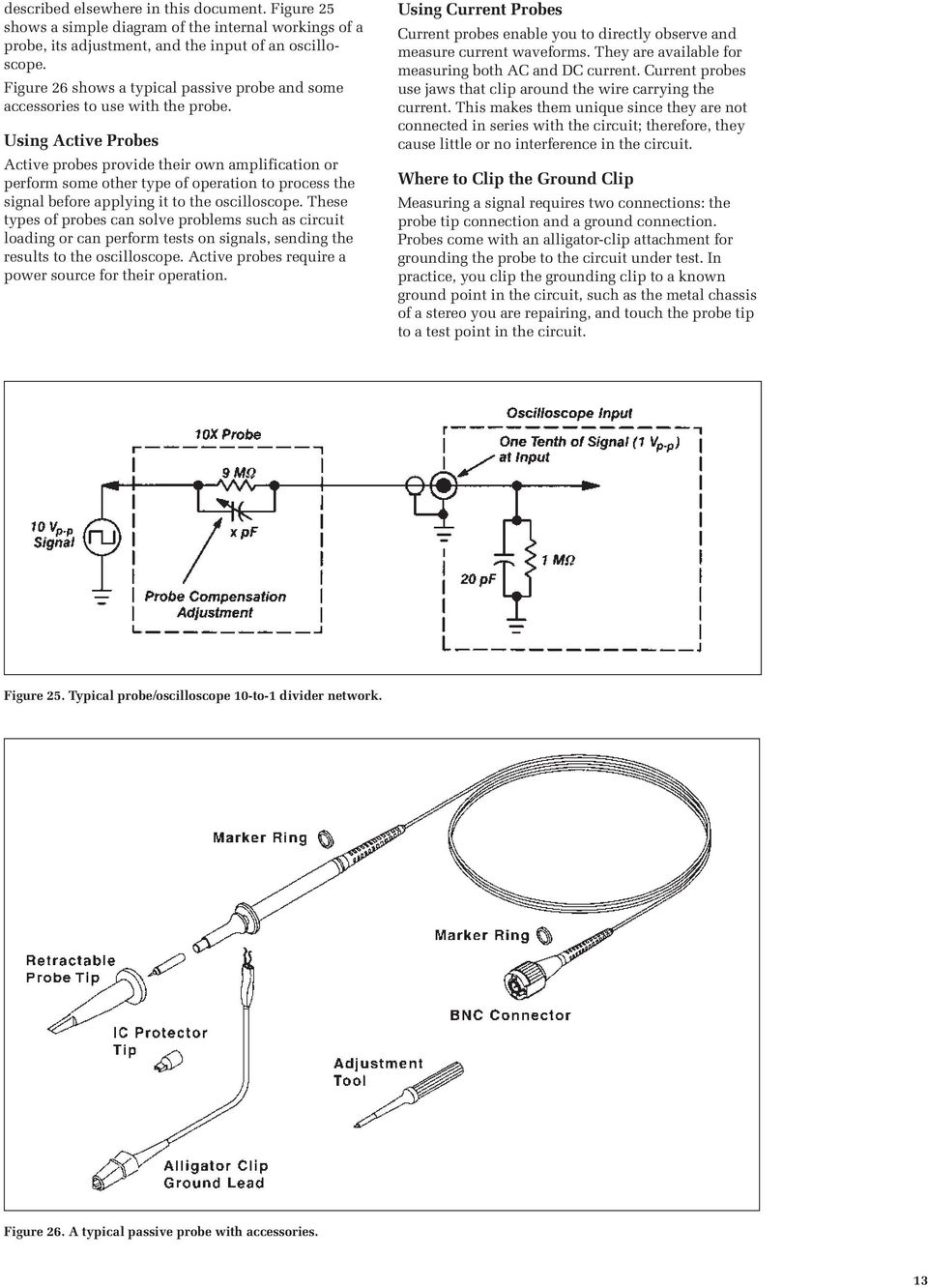
18 can display a waveform on the screen. Multiple channels are handy for comparing waveforms. Some oscilloscopes have an AUTOSET or PRESET button that sets up the controls in one step to accommodate a signal. If your oscilloscope does not have this feature, it is helpful to set the controls to standard positions before taking measurements. Standard positions include the following: Set the oscilloscope to display channel 1 Set the volts/division scale to a mid-range position Turn off the variable volts/division Turn off all magnification settings Set the channel 1 input coupling to DC Set the trigger mode to auto Set the trigger source to channel 1 Turn trigger holdoff to minimum or off Set the intensity control to a nominal viewing level Adjust the focus control for a sharp display These are general instructions for setting up your oscilloscope. If you are not sure how to do any of these steps, refer to the manual that came with your oscilloscope. The Controls section describes the controls in more detail. Probes Now you are ready to connect a probe to your oscilloscope. It s important to use a probe designed to work with your oscilloscope. A probe is more than a cable with a clip-on tip. It s a high-quality connector, carefully designed not to pick up stray radio and power-line noise. Probes are designed not to influence the behavior of the circuit you are testing. However, no measurement device can act as a perfectly invisible observer. The unintentional interaction of the probe and oscilloscope with the circuit being tested is called circuit loading. To minimize circuit loading, you will probably use a 10X attenuator (passive) probe. Your oscilloscope probably arrived with a passive probe as a standard accessory. Passive probes provide you with an excellent tool for generalpurpose testing and troubleshooting. For more specific measurements or tests, many other types of probes exist. Two examples are active and current probes. Descriptions of these probes follow, with more emphasis given to the passive probe since this is the probe type that allows the most flexibility of use. Intelligent Probe Interfaces Many modern oscilloscopes provide special automated features built into the input and mating probe connectors. The act of connecting the probe to the instrument notifies the oscilloscope about the probe s attenuation factor, which in turn scales the display so that the probe s attenuation is figured into the readout on the screen. Some probe interfaces also recognize the type of probe; that is, passive, active, or current. Lastly, the interface may act as a DC power source for probes. Active probes have their own amplifier and buffer circuitry that requires DC power. Using Passive Probes Most passive probes have some attenuation factor, such as 10X, 100X, and so on. By convention, attenuation factors, such as for the 10X attenuator probe, have the X after the factor. In contrast, magnification factors like X10 have the X first. The 10X (read as ten times ) attenuator probe minimizes circuit loading and is an excellent generalpurpose passive probe. Circuit loading becomes more pronounced at higher frequencies, so be sure to use this type of probe when measuring signals above 5 khz. The 10X attenuator probe improves the accuracy of your measurements, but it also reduces the amplitude of the signal seen on the screen by a factor of 10. Because it attenuates the signal, the 10X attenuator probe makes it difficult to look at signals less than 10 millivolts. The 1X probe is similar to the 10X attenuator probe but lacks the attenuation circuitry. Without this circuitry, more interference is introduced into the circuit being tested. Use the 10X attenuator probe as your standard probe, but keep the 1X probe handy for measuring weak signals. Some probes have a convenient feature for switching between 1X and 10X attenuation at the probe tip. If your probe has this feature, make sure you are using the correct setting before taking measurements. Many oscilloscopes can detect whether you are using a 1X or 10X probe and adjust their screen readouts accordingly. However with some oscilloscopes, you must set the type of probe you are using or read from the proper 1X or 10X marking on the volts/div control. The 10X attenuator probe works by balancing the probe s electrical properties against the oscilloscope s electrical properties. Before using a 10X attenuator probe, you need to adjust this balance for your particular oscilloscope. This adjustment is called compensating the probe and is further 12

19 described elsewhere in this document. Figure 25 shows a simple diagram of the internal workings of a probe, its adjustment, and the input of an oscilloscope. Figure 26 shows a typical passive probe and some accessories to use with the probe. Using Active Probes Active probes provide their own amplification or perform some other type of operation to process the signal before applying it to the oscilloscope. These types of probes can solve problems such as circuit loading or can perform tests on signals, sending the results to the oscilloscope. Active probes require a power source for their operation. Using Current Probes Current probes enable you to directly observe and measure current waveforms. They are available for measuring both AC and DC current. Current probes use jaws that clip around the wire carrying the current. This makes them unique since they are not connected in series with the circuit; therefore, they cause little or no interference in the circuit. Where to Clip the Ground Clip Measuring a signal requires two connections: the probe tip connection and a ground connection. Probes come with an alligator-clip attachment for grounding the probe to the circuit under test. In practice, you clip the grounding clip to a known ground point in the circuit, such as the metal chassis of a stereo you are repairing, and touch the probe tip to a test point in the circuit. Figure 25. Typical probe/oscilloscope 10-to-1 divider network. Figure 26. A typical passive probe with accessories. 13
20 Compensating the Probe Before using a passive probe, you need to compensate it to balance its electrical properties to a particular oscilloscope. You should get into the habit of compensating the probe every time you set up your oscilloscope. A poorly adjusted probe can make your measurements less accurate. Figure 27 shows what happens to measured waveforms when using a probe that is not properly compensated. Most oscilloscopes have a square-wave reference signal available at a terminal on the front panel which can be used to compensate the probe. You compensate a probe by: Attaching the probe to an input connector Connecting the probe tip to the probe compensation signal Attaching the ground clip of the probe to ground Viewing the square wave reference signal Making the proper adjustments on the probe so that the corners of the square wave are square When you compensate the probe, always first attach any accessory tips you will use and connect the probe to the vertical channel you plan to use. This way, the oscilloscope has the same electrical properties for compensation as it does when you make measurements. Figure 27. The effects of improper probe compensation. 14

21 The Controls This section briefly describes the basic controls found on analog and digitizing oscilloscopes. Remember that some controls differ between analog and digitizing oscilloscopes; your oscilloscope probably has controls not discussed here. Display Controls Display systems vary between analog oscilloscopes and digitizing scopes, including both DSOs and Digital Phosphor Oscilloscopes (DPOs). Common controls include: An intensity control to adjust the brightness of the waveform. As you increase the sweep speed of an analog oscilloscope, you need to increase the intensity level. A focus control to adjust the sharpness of the waveform. Digitizing oscilloscopes may not have a focus control. A trace rotation control to align the waveform trace with the screen s horizontal axis. The position of your oscilloscope in the earth s magnetic field affects waveform alignment. Digitizing oscilloscopes may not have a trace rotation control. On DPOs, a contrast control. On many DSOs and on DPOs, a color palette control to select trace colors and intensity grading color levels. Other display controls may let you adjust the intensity of the graticule lights and turn on or off any on-screen information (such as menus). Vertical Controls Use the vertical controls to position and scale the waveform vertically. Your oscilloscope also has controls for setting the input coupling and other signal conditioning, described later in this section. Figure 28 shows a typical front panel and on-screen menus for the vertical controls. Position and Volts per Division The vertical position control lets you move the waveform up or down to exactly where you want it on the screen. The volts per division (usually written volts/div) setting varies the size of the waveform on the screen. A good general purpose oscilloscope can accurately display signal levels from about 4 millivolts to 40 volts. The volts/div setting is a scale factor. For example, if the volts/div setting is 5 volts, then each of the eight vertical divisions represents 5 volts and the entire screen can show 40 volts from bottom to top (assuming a graticule with eight major divisions). If the setting is 0.5 volts/div, the screen can display 4 volts from bottom to top, and so on. The maximum voltage you can display on the screen is the volts/div setting times the number of vertical divisions. (Recall that the probe you use, 1X or 10X, also influences the scale factor. You must divide the volts/div scale by the attenuation factor of the probe if the oscilloscope does not do it for you.) Often, the volts/div scale has either a variable gain or a fine gain control for scaling a displayed signal to a certain number of divisions. Use this control to take rise time measurements. Input Coupling Coupling means the method used to connect an electrical signal from one circuit to another. In this case, the input coupling is the connection from your test circuit to the oscilloscope. The coupling can be set to DC, AC, or ground. DC coupling shows all of an input signal. AC coupling blocks the DC component of a signal so that you see the waveform centered at Figure 28. Typical Vertical controls. 15
22 zero volts. Figure 29 illustrates this difference. The AC coupling setting is handy when the entire signal (alternating plus constant components) is too large for the volts/div setting. The ground setting disconnects the input signal from the vertical system, which lets you see where the zero-volt level is on the screen. With grounded input coupling and auto trigger mode, you see a horizontal line on the screen that represents zero volts. Switching from DC to ground and back again is a handy way of measuring signal voltage levels with respect to ground. Bandwidth Limit Most oscilloscopes have a circuit that limits the bandwidth of the oscilloscope. By limiting the bandwidth, you reduce the high-frequency noise that sometimes appears on the displayed waveform, providing you with a more refined signal display. Alternate and Chop Display On analog scopes, multiple channels are displayed using either an alternate or chop mode. (Digitizing oscilloscopes can present multiple channels simultaneously without the need for chop or alternate modes.) Alternate mode draws each channel alternately the oscilloscope completes one sweep on channel 1, then one sweep on channel 2, a second sweep on channel 1, and so on. Use this mode with mediumto high-speed signals, when the sec/div scale is set to 0.5 ms or faster. Chop mode causes the oscilloscope to draw small parts of each signal by switching back and forth between them. The switching rate is too fast for you to notice, so the waveform looks whole. You typically use this mode with slow signals requiring sweep speeds of 1 ms per division or less. Figure 30 shows the difference between the two modes. It is often useful to view the signal both ways, to make sure you have the best view. Figure 29. AC and DC input coupling. Figure 30. Multi-channel display modes. 16
23 Math Operations Your oscilloscope may also have operations to allow you to add waveforms together, creating a new waveform display. Analog oscilloscopes combine the signals while digitizing oscilloscopes create new waveforms mathematically. Subtracting waveforms is another math operation. Subtraction is possible with analog oscilloscopes by using the channel invert function on one signal and then using the add operation. Digitizing oscilloscopes typically have a subtraction operation available. Figure 31 illustrates a third waveform created by adding two different signals together. Horizontal Controls Use the horizontal controls to position and scale the waveform horizontally. Figure 32 shows a typical front panel and on-screen menus for the horizontal controls. Using the power of their internal processors, digitizing oscilloscopes offer many advanced math operations: multiplication, division, integration, Fast Fourier Transform, and more. Position and Seconds per Division The horizontal position control moves the waveform left and right to exactly where you want it on the screen. The seconds per division (usually written as sec/div) setting lets you select the rate at which the waveform is drawn across the screen (also known as the time base setting or sweep speed). This setting is a scale factor. For example, if the setting is 1 ms, each horizontal division represents 1 ms and the total screen width represents 10 ms (ten divisions). Changing the sec/div setting lets you look at longer or shorter time intervals of the input signal. As with the vertical volts/div scale, the horizontal sec/div scale may have variable timing, allowing you to set the horizontal time scale in between the discrete settings. Figure 31. Adding channels. Time Base Selections Your oscilloscope has a time base usually referred to as the main time base and it is probably the most useful. Many oscilloscopes have what is called a delayed time base a time base sweep that starts after a pre-determined time from the start of the main time base sweep. Using a delayed time base sweep allows you to see events more clearly or even see events not visible with the main time base sweep alone. The delayed time base requires the setting of a delay time and possibly the use of delayed trigger modes and other settings not described in this book. Refer to the manual supplied with your oscilloscope for information on how to use these features. Trigger Position Horizontal trigger position control is only available on digitizing oscilloscopes. The trigger position control may be located in the horizontal control section of your oscilloscope. It actually represents the horizontal position of the trigger in the waveform record. Varying the horizontal trigger position allows you to capture what a signal did before a trigger event Figure 32. Typical Horizontal controls. 17
24 (called pretrigger viewing). Thus it determines the length of the viewable signal both preceding and following a trigger point. Digitizing oscilloscopes can provide pretrigger viewing because they constantly process the input signal whether a trigger has been received or not. A steady stream of data flows through the oscilloscope; the trigger merely tells the oscilloscope to save the present data in memory. In contrast, analog oscilloscopes only display the signal (that is, write it on the CRT) after receiving the trigger. Pretrigger viewing is a valuable troubleshooting aid. For example, if a problem occurs intermittently, you can trigger on the problem, record the events that led up to it and, possibly, find the cause. Zoom Your oscilloscope may have special horizontal magnification settings that let you display a magnified section of the waveform on-screen. On a DSO, the operation is performed on stored digitized data. XY Mode Most analog oscilloscopes have the capability of displaying a second channel signal along the X-axis (instead of time). This is known as XY mode. The XY mode is further explained in the Measurement Techniques section of this document. The Z Axis The Z axis brings a third dimension intensity to the traditional waveform display. One application of the Z-axis is to feed special timed signals into the separate Z input to create highlighted marker dots at known intervals in the waveform. XYZ Mode DPOs can use the Z input to create an XY display with intensity grading. In this case, the DPO samples the instantaneous data value at the Z input and uses that value to intensify a specific part of the waveform. XYZ is especially useful for displaying the polar patterns commonly used in testing wireless communication devices. Trigger Controls The trigger controls let you stabilize repeating waveforms and capture single-shot waveforms. Figure 33 shows a typical front panel and on-screen menus for the trigger controls. Figure 33. Typical Trigger controls. 18
25 The trigger makes repeating waveforms appear static on the oscilloscope display by repeatedly displaying the same portion of the input signal. Imagine the jumble on the screen that would result if each sweep started at a different place on the signal (see Figure 34). Trigger Level and Slope Your oscilloscope may have several different types of triggers, such as edge, video, pulse, or logic. Edge triggering is the basic and most common type. For edge triggering, the trigger level and slope controls provide the basic trigger point definition. The trigger circuit acts as a comparator. You select the slope and voltage level of one side of the comparator. When the trigger signal matches your settings, the oscilloscope generates a trigger. The slope control determines whether the trigger point is on the rising or the falling edge of a signal. A rising edge is a positive slope and a falling edge is a negative slope. The level control determines where on the edge the trigger point occurs. Figure 34. Untriggered display. Figure 35 shows the effect the trigger slope and level settings have on how a waveform is displayed. Trigger Sources The oscilloscope does not necessarily have to trigger on the signal being measured. Several sources can trigger the sweep: Any input channel An external source other than the signal applied to an input channel The power source signal A signal internally generated by the oscilloscope Most of the time, you can leave the oscilloscope set to trigger on the channel displayed. Many oscilloscopes provide a trigger output that delivers the trigger signal to another instrument. Note that the oscilloscope can use an alternate trigger source whether displayed or not. So you have to be careful not to unwittingly trigger on, for example, channel 1 while displaying channel 2. Trigger Modes The trigger mode determines whether or not the oscilloscope draws a waveform if it does not detect a trigger. Common trigger modes include normal and auto. In normal mode, the oscilloscope only sweeps if the input signal reaches the set trigger point; otherwise (on an analog oscilloscope) the screen is blank or (on a digitizing oscilloscope) frozen on the last acquired waveform. Normal mode can be disorienting since you may not see the signal at first if the level control is not adjusted correctly. Auto mode causes the oscilloscope to sweep, even without a trigger. If no signal is present, a timer in the oscilloscope triggers the sweep. This ensures that the display will not disappear if the signal drops to small voltages. It is also the best mode to use if you are looking at many signals and do not want to bother setting the trigger each time. Figure 35. Positive and negative slope triggering. 19
26 In practice, you will probably use both modes: normal mode because it lets you select just the signal area you need to see, and auto mode because it requires less adjustment. Some oscilloscopes also include special modes for single sweeps, triggering on video signals, or automatically setting the trigger level. Trigger Coupling Just as you can select either AC or DC coupling for the vertical system, you can choose the kind of coupling for the trigger signal. Besides AC and DC coupling, your oscilloscope may also have high frequency rejection, low frequency rejection, and noise rejection trigger coupling. These special settings are useful for eliminating noise from the trigger signal to prevent false triggering. Trigger Holdoff Sometimes getting an oscilloscope to trigger on the correct part of a signal requires great skill. Many oscilloscopes have special features to make this task easier. Trigger holdoff is an adjustable period of time during which the oscilloscope cannot trigger. This feature is useful when you are triggering on complex waveform shapes, so that the oscilloscope only triggers on the first eligible trigger point. Figure 36 shows how using trigger holdoff helps create a usable display. Digitizing Oscilloscope Triggers In addition to the usual threshold triggering, many digitizing oscilloscopes offer a host of specialized trigger settings which have no equivalents on analog instruments. These triggers respond to specific conditions in the incoming signal, making it easy to detect, for example, a pulse that is narrower than it should be. Such a condition would be impossible to detect with a voltage threshold trigger alone. Following is a partial list of the digital triggers found on advanced DSOs and DPOs, along with a brief definition of each: Pulse Width and Glitch trigger Detects pulses either within or exceeding specified widths. Runt Pulse trigger Detects a pulse that crosses the lesser but not the greater of two threshold levels. Logic (Boolean) trigger Uses multiple oscilloscope inputs as binary inputs that must meet logical conditions such as NAND or NOR to produce a trigger. Serial Data trigger Detects specific data combinations in digital telecom signals Setup and Hold Violation trigger Detects violations of digital setup and hold time when clock and data signals are acquired on two different inputs. Figure 36. Trigger holdoff. 20
27 Acquisition Controls for Digitizing Oscilloscopes Digitizing oscilloscopes have settings that let you control how the acquisition system processes a signal. Look over the acquisition options on your digitizing oscilloscope while you read this description. Figure 37 shows an example of an acquisition menu. Acquisition Modes Acquisition modes control how waveform points are produced from sample points. Recall from the first section that sample points are the digital values that come directly out of the Analog-to-Digital-Converter (ADC). The time between sample points is called the sample interval. Waveform points are the digital values that are stored in memory and displayed to form the waveform. The time value difference between waveform points is called the waveform interval. The sample interval and the waveform interval may be, but need not be, the same. This fact leads to the existence of several different acquisition modes in which one waveform point is made up from several sequentially acquired sample points. Additionally, waveform points can be created from a composite of sample points taken from multiple acquisitions, which leads to another set of acquisition modes. A description of the most commonly used acquisition modes follows. Sample Mode: This is the simplest acquisition mode. The oscilloscope creates a waveform point by saving one sample point during each waveform interval. Peak Detect Mode: The oscilloscope saves the minimum and maximum value sample points taken during two waveform intervals and uses these samples as the two corresponding waveform points. Digitizing oscilloscopes with peak detect mode run the ADC at a fast sample rate, even at very slow time base settings (long waveform interval), and are able to capture fast signal changes that would occur between the waveform points if in sample mode. Peak detect mode is particularly useful for seeing narrow pulses spaced far apart in time. Hi Res Mode: Like peak detect, hi res mode is a way of getting more information in cases when the ADC can sample faster than the time base setting requires. In this case, multiple samples taken within one waveform interval are averaged together to produce one waveform point. The result is a decrease in noise and an improvement in resolution for low-speed signals. Envelope Mode: Envelope mode is similar to peak detect mode. However, in envelope mode, the minimum and maximum waveform points from multiple acquisitions are combined to form a waveform that shows min/max changes over time. Peak detect mode is usually used to acquire the records that are combined to form the envelope waveform. Average Mode: In average mode, the oscilloscope saves one sample point during each waveform interval as in sample mode. However, waveform points from consecutive acquisitions are then averaged together to produce the final displayed waveform. Average mode reduces noise without loss of bandwidth but requires a repeating signal. A special note about DPO acquisition: The Digital Phosphor Oscilloscope has a high display sample density and an innate ability to capture intensity (Z-axis) information. With its intensity axis, the DPO is able to provide the same type of 3-dimensional, real-time display that analog scopes are known for. As you look at the waveform trace on a DPO, you can see brightened areas. These are the areas where the signal occurs most often. This makes it easy to distinguish, for example, the basic signal shape from a transient that occurs only once in a while. The basic signal would appear much brighter. DPOs also include all the acquisition modes described above. Figure 37. Example of an acquisition menu. 21
28 Stopping and Starting the Acquisition System One of the greatest advantages of digitizing oscilloscopes is their ability to store waveforms for later viewing. To this end, there are usually one or more buttons on the front panel that allow you to stop and start the acquisition system so you can analyze waveforms at your leisure. Additionally, you may want the oscilloscope to automatically stop acquiring after one acquisition is complete or after one set of records has been turned into an envelope or average waveform. This feature is commonly called single sweep or single sequence and its controls are usually found either with the other acquisition controls or with the trigger controls. Sampling Methods In digitizing oscilloscopes that can use either realtime sampling or equivalent-time sampling as described earlier, the acquisition controls will allow you to choose which one to use for acquiring signals. Note that this choice makes no difference for slow time base settings and only has an effect when the ADC cannot sample fast enough to fill the record with waveform points in one pass. Other Controls So far, we have described the basic controls that a beginner needs to know about. Your oscilloscope may have other controls for various functions. Some of these may include: Measurement cursors Keypads for mathematical operations or data entry Printing capabilities Interfaces for connecting your oscilloscope to a computer Look over the other options available to you and read your oscilloscope s manual to find out more about these other controls. 22
29 Measurement Techniques This section teaches you basic measurement techniques. The two most basic measurements you can make are voltage and time measurements. Just about every other measurement is based on one of these two fundamental techniques. This section discusses methods for making measurements visually with the oscilloscope screen. This is a common technique with analog instruments, and also may be useful for at-a-glance interpretation of DSO or DPO displays. Note that most digitizing oscilloscopes include automated measurement tools. Knowing how to make measurements manually as described here will help you understand and check the automatic measurements of DSOs and DPOs. Automated measurements are explained later in this section. Another handy formula is the power law: the power of a DC signal equals the voltage times the current. Calculations are more complicated for AC signals, but the point here is that measuring the voltage is the first step toward calculating other quantities. Figure 39 shows the voltage of one peak (V p ) and the peak-to-peak voltage (V p-p ), which is usually twice V p. Use the RMS (root-mean-square) voltage (V RMS ) to calculate the power of an AC signal. The most basic method of taking voltage measurements is to count the number of divisions a waveform spans on the oscilloscope s vertical scale. Adjusting the signal to cover most of the screen The Display Take a look at the oscilloscope display. Notice the grid markings on the screen these markings create the graticule. Each vertical and horizontal line constitutes a major division. The graticule is usually laid out in an 8-by-10 division pattern. Labeling on the oscilloscope controls (such as volts/div and sec/div) always refers to major divisions. The tick marks on the center horizontal and vertical graticule lines (see Figure 38) are called minor divisions. Many oscilloscopes display on the screen how many volts each vertical division represents and how many seconds each horizontal division represents. Voltage Measurements Voltage is the amount of electric potential, expressed in volts, between two points in a circuit. Usually one of these points is ground (zero volts) but not always. Voltages can also be measured from peak-to-peak from the maximum point of a signal to its minimum point. You must be careful to specify which voltage you mean. The oscilloscope is primarily a voltage-measuring device. Once you have measured the voltage, other quantities are just a calculation away. For example, Ohm s law states that voltage between two points in a circuit equals the current times the resistance. From any two of these quantities, you can calculate the third using the following formula: Ohm s Law: Voltage = Current * Resistance Current = Voltage Resistance Figure 38. An oscilloscope graticule. Figure 39. Voltage peak and peak-to-peak voltage. Resistance = Voltage Current Power Law: Power = Voltage * Current 23
30 vertically, then taking the measurement along the center vertical graticule line having the smaller divisions makes for the best voltage measurements (see Figure 40). The more screen area you use, the more accurately you can read from the screen. Many oscilloscopes have on-screen cursors that let you take waveform measurements automatically onscreen, without having to count graticule marks. A cursor is simply a line that you can move across the Figure 40. Measure voltage on the center vertical graticule line. Figure 41. Measure time on the center horizontal graticule line. screen. Two horizontal cursor lines can be moved up and down to bracket a waveform s amplitude for voltage measurements, and two vertical lines move right and left for time measurements. A readout shows the voltage or time at the positions of the cursors. Time and Frequency Measurements You take time measurements using the horizontal scale of the oscilloscope. Time measurements include measuring the period, pulse width, and timing of pulses. Frequency is the reciprocal of the period, so once you know the period, the frequency is one divided by the period. Like voltage measurements, time measurements are more accurate when you adjust the portion of the signal to be measured to cover a large area of the screen. Taking time measurements along the center horizontal graticule line, having smaller divisions, makes for the best time measurements (see Figure 41). Pulse and Rise Time Measurements In many applications, the details of a pulse s shape are important. Pulses can become distorted and cause a digital circuit to malfunction, and the timing of pulses in a pulse train is often significant. Standard pulse measurements are pulse width and pulse rise time. Rise time is the amount of time a pulse takes to go from the low to high voltage. By convention, the rise time is measured from 10% to 90% of the full voltage of the pulse. This eliminates any irregularities at the pulse s transition corners. This also explains why most oscilloscopes have 10% and 90% markings on their screen. Pulse width is the amount of time the pulse takes to go from low to high and back to low again. By convention, the pulse width is measured at 50% of full voltage. See Figure 42 for these measurement points. Pulse measurements often require fine-tuning the triggering. To become an expert at capturing pulses, you should learn how to use trigger holdoff and how to set the digitizing oscilloscope to capture pretrigger data, as described earlier in The Controls section. Horizontal magnification is another useful feature for measuring pulses, since it allows you to see fine details of a fast pulse. Figure 42. Rise time and pulse width measurement points. 24
31 Phase Shift Measurements The horizontal control section may have an XY mode that lets you display an input signal rather than the time base on the horizontal axis. This mode of operation opens up a whole new area of phaseshift measurement techniques. The phase of a wave is the amount of time that passes from the beginning of a cycle to the beginning of the next cycle, measured in degrees. Phase shift describes the difference in timing between two otherwise identical periodic signals. One method for measuring phase shift is to use XY mode. This involves connecting one signal to the vertical system as usual and then another signal to the horizontal system. (This method only works if both signals are sinusoidal.) This set up is called an XY measurement because both the X and Y axis are tracing voltages. The waveform resulting from this arrangement is called a Lissajous pattern (named for French physicist Jules Antoine Lissajous and pronounced LEE-sa-zhoo). From the shape of the Lissajous pattern, you can tell the phase difference between the two signals. You can also tell their frequency ratio. Figure 43 shows Lissajous patterns for various frequency ratios and phase shifts. The XY measurement mode originated with analog oscilloscopes. Due to their relatively low sample density, DSOs may have difficulty creating real-time XY displays. Some DSOs create an XY image by accumulating data points over time, then displaying the composite. Digital Phosphor Oscilloscopes, on the other hand, are able to acquire and display a genuine XY mode image in real-time, using a continuous stream of digitized data. DPOs can also display an XYZ image with intensified areas. Figure 43. Lissajous patterns. 25
32 Waveform Measurements with Digitizing Oscilloscopes Digitizing oscilloscopes have functions that make waveform measurements easier. Modern DSOs and DPOs have front-panel buttons or screen-based menus from which you can select fully automated measurements. These include amplitude, period, rise/fall time, and much more. Many digitizing instruments also provide mean and RMS calculations, duty cycle, and other math operations. Automated measurements appear as on-screen alphanumeric readouts. Typically these readings are more accurate than it s possible to obtain with direct graticule interpretation. Following is a list of the fully automated waveform measurements available on the TDS 500D/700D Series Digital Phosphor Oscilloscopes. Period Duty cycle + High Frequency Duty cycle Low Width + Delay Minimum Width Phase Maximum Rise time Burst width Overshoot + Fall time Peak-to-peak Overshoot Amplitude Mean RMS Extinction ratio Cycle mean Cycle RMS Mean optical power Cycle area What s Next? This section has covered basic measurement techniques. Other measurement techniques involve setting up the oscilloscope to test electrical components on an assembly line, subtracting noise from a signal, capturing elusive transient signals, and many others that would take too much room to list. The measurement techniques you will use depend on your application, but you have learned enough to get started. Practice using your oscilloscope and read more about it. Soon its operation will be second nature to you. 26
33 Written Exercises This section contains written exercises that cover information in this book. The exercises are divided into two parts, Part I and Part II. Part I covers information presented in these sections: The Oscilloscope Oscilloscope Terminology Part II covers information presented in sections: Setting Up The Controls Measurement Techniques 27
34 Part I Exercises The following exercises cover information presented in these sections: The Oscilloscope Oscilloscope Terminology Check how well you have absorbed the information in these sections by doing this short self-test. Answers are given on page 34. Vocabulary Exercise Write the number of the definitions in the right column next to the correct words in the left column. Term Definition 1. Acquisition A. The unit of electric potential difference. 2. Analog B. A performance measurement indicating the precision of an ADC, measured in bits. 3. Bandwidth C. Term used when referring to degree points of a sine wave. 4. Digital Phosphor D. The number of times a signal repeats in one second. 5. Frequency E. The amount of time it takes a wave to complete one cycle. 6. Glitch F. A stored digital value that represents the voltage of a signal at a specific point in time. 7. Period G. A common waveform shape that has a rising edge, a width, and a falling edge. 8. Phase H. A performance measurement indicating the fastest edge a given oscilloscope can accurately display. 9. Pulse I. Oscilloscope circuitry that controls the timing of the sweep. 10. Waveform Point J. An intermittent error in a circuit. 11. Rise Time K. A signal measured by an oscilloscope that only occurs once. 12. Sample Point L. The oscilloscope s process of collecting sample points from the ADC, processing them, and storing them in memory. 13. Digital Storage M. Something that operates with continuous values. 14. Time Base N. Digitizing Oscilloscope that captures 3 dimensions of signal information in real- time. 15. Transient O. Digitizing Oscilloscope with serial processing. 16. ADC Resolution P. A frequency range. 17. Volt Q. The raw data from an ADC used to calculate waveform points. 28
35 Using Oscilloscopes Exercise Circle the best answer for each statement. Some statements have more than one right answer. 1. With an oscilloscope you can: a. Calculate the frequency of a signal. b. Find malfunctioning electrical components. c. Analyze bird calls. e. All the above. 2. The difference between analog and digitizing oscilloscopes is: a. Analog oscilloscopes do not have on-screen menus. b. Analog oscilloscopes apply a measurement voltage directly to the display system, while digital oscilloscopes first convert the voltage into digital values. c. Analog oscilloscopes measure analogs, whereas digitizing oscilloscopes measure digits. d. Analog oscilloscopes do not have an acquisition system. 3. An oscilloscope s vertical section does the following: a. Acquires sample points with an ADC. b. Starts a horizontal sweep. c. Lets you adjust the brightness of the display. d. Attenuates or amplifies the input signal. 4. The time base control of the oscilloscope does the following: a. Adjusts the vertical scale. b. Shows you the current time of day. c. Sets the amount of time represented by the horizontal width of the screen. d. Sends a clock pulse to the probe. 5. On an oscilloscope display: a. Voltage is on the vertical axis and time is on the horizontal axis. b. A straight diagonal trace means voltage is changing at a steady rate. c. A flat horizontal trace means voltage is constant. d. All the above. 6. All repeating waves have the following properties: a. A frequency measured in hertz. b. A period measured in seconds. c. A bandwidth measured in hertz. d. All the above. 7. If you probe inside a computer with an oscilloscope, you are likely to find the following types of signals: a. Pulse trains. b. Ramp waves. c. Sine waves. d. All the above. 8. When evaluating the performance of an analog oscilloscope, some things you might consider are: a. The bandwidth. b. The vertical sensitivity. c. The ADC resolution. d. The sweep speed. 9. The difference between digital storage oscilloscopes (DSO) and digital phosphor oscilloscopes (DPO) is: a. The DSO has a higher bandwidth. b. The DPO captures three dimensions of waveform information in real-time. c. The DSO has a color display. d. The DSO captures more signal details. 29
36 Part II Exercises The following exercises cover information presented in these sections: Setting Up The Controls Measurement Techniques Check how well you have absorbed the information in these sections by doing this short self-test. Answers are given on page 34. Vocabulary Exercise Write the letter of the definitions in the right column next to the correct words in the left column. Term Definition 1. Averaging Mode A. The unintentional interaction of the probe and oscilloscope with the circuit being tested which distorts a signal. 2. Circuit Loading B. A conductor that connects electrical currents to the Earth. 3. Compensation C. A sampling mode in which the digital oscilloscope collects as many samples as it can as the signal occurs, then constructs a display, using interpolation if necessary. 4. Coupling D. A sampling mode in which the digital oscilloscope constructs a picture of a repetitive signal by capturing a little bit of information from each repetition. 5. Earth Ground E. A device that converts a specific physical quantity such as sound, pressure, strain, or light intensity into an electrical signal. 6. Equivalent-Time F. A test device for injecting a signal into a circuit input. 7. Graticule G. A processing technique used by digital oscilloscopes to eliminate noise in a signal. 8. Interpolation H. The method of connecting two circuits together. 9. Real Time I. A connect-the-dots processing technique to estimate what a fast waveform looks like based on only a few sampled points. 10. Signal Generator J. The grid lines on a screen for measuring oscilloscope traces. 11. Single Sweep K. A trigger mode that triggers the sweep once, must be reset to accept another trigger event. 12. Transducer L. A probe adjustment for 10X attenuator probes that balances the electrical properties of the probe with the electrical properties of the oscilloscope. 30
37 Using Oscilloscopes Exercise Circle the best answer for each statement. Some statements have more than one right answer. 1. To operate an oscilloscope safely, you should: a. Ground the oscilloscope with the proper three-pronged power cord. b. Learn to recognize potentially dangerous electrical components. c. Avoid touching exposed connections in a circuit being tested even if the power is off. d. All the above. 2. Grounding an oscilloscope is necessary: a. For safety reasons. b. To provide a reference point for making measurements. c. To align the trace with the screen s horizontal axis. d. All the above. 3. Circuit loading is caused by: a. An input signal having too large a voltage. b. The probe and oscilloscope interacting with the circuit being tested. c. A 10X attenuator probe being uncompensated. d. Putting too much weight on a circuit. 4. Compensating a probe is necessary to: a. Balance the electrical properties of the 10X attenuator probe with the oscilloscope. b. Prevent damaging the circuit being tested. c. Improve the accuracy of your measurements. d. All the above. 5. The trace rotation control is useful for: a. Scaling waveforms on the screen. b. Detecting sine wave signals. c. Aligning the waveform trace with the screen s horizontal axis on an analog oscilloscope. d. Measuring pulse width. 6. The volts per division control is used to: a. Scale a waveform vertically. b. Position a waveform vertically. c. Attenuate or amplify an input signal. d. Set the numbers of volts each division represents. 7. Setting the vertical input coupling to ground does the following: a. Disconnects the input signal from the oscilloscope. b. Causes a horizontal display to appear on the screen. c. Lets you see where zero volts is on the screen. d. All the above. 8. The trigger is necessary to: a. Stabilize repeating waveforms on the screen. b. Capture single-shot waveforms. c. Mark a particular point of an acquisition. d. All the above. 9. The difference between auto and normal trigger mode is: a. In normal mode the oscilloscope only sweeps once and then stops. b. In normal mode the oscilloscope only sweeps if the input signal reaches the trigger point; otherwise the screen is blank. c. Auto mode makes the oscilloscope sweep continuously even without being triggered. d. All the above. 31
38 10. A digital oscilloscope s acquisition controls let you specify: a. Whether the oscilloscope uses real-time or equivalent-time sampling to collect sample points. b. Whether to average a collection of records to form a waveform. c. How sample points are processed to form waveform points. d. All the above. 11. The acquisition mode that best reduces noise in a repeating signal is: a. Sample mode. b. Peak detect mode. c. Envelope mode. d. Averaging mode. 12. The two most basic measurements you can make with an oscilloscope are: a. Time and frequency measurements. b. Time and voltage measurements. c. Voltage and pulse width measurements. d. Pulse width and phase shift measurements. 13. If the volts/division is set at 0.5, the largest signal that can fit on the screen (assuming an 8 x 10 division screen) is: a millivolts peak-to-peak. b. 8 volts peak-to-peak. c. 4 volts peak-to-peak. d. 0.5 volts peak-to-peak. 14. If the seconds/division is set at 0.1 ms, the amount of time represented by the width of the screen is: a. 0.1 ms. b. 1 ms. c. 1 second. d. 0.1 khz. 15. By convention, pulse width is measured: a. At 10% of the pulse s maximum voltage. b. At 50% of the pulse s maximum voltage. c. At 90% of the pulse s maximum voltage. d. At 10% and 90% of the pulse s maximum voltage. 16. You attach a probe to your test circuit but the screen is blank. You should: a. Check that the screen intensity is turned up. b. Check that the oscilloscope is set to display the channel that the probe is connected to. c. Set the trigger mode to auto since norm mode blanks the screen. d. Set the vertical input coupling to AC and set the volts/division to its largest value since a large DC signal may go off the top or bottom of the screen. e. Check that the probe isn t shorted and make sure it is properly grounded. f. Check that the oscilloscope is set to trigger on the input channel you are using. g. All of the above. 32
39 Answers to Exercises on Back 33
40 Answers to Written Exercises This section provides the answers to all written exercises in the previous sections. Part I: Vocabulary Exercise Answers 1. L 5. D 9. G 13. O 2. M 6. J 10. F 14. I 3. P 7. E 11. H 15. K 4. N 8. C 12. Q 16. B 17. A Part I: Oscilloscope Usage Exercise Answers 1. D 3. D 5. D 7. D 2. B, D 4. C 6. A,B 8. A, B, D 9. B Part II: Vocabulary Exercise Answers 1. G 4. H 7. J 10. F 2. A 5. B 8. I 11. K 3. L 6. D 9. C 12. E Part II: Oscilloscope Usage Exercise Answers 1. D 5. C 9. B,C 13. C 2. A, B 6. A, C, D 10. D 14. B 3. B 7. D 11. D 15. B 4. A, C 8. D 12. B 16. G 34
41 Glossary AC (Alternating Current) A signal in which the current and voltage vary in a repeating pattern over time. ADC (Analog-to-Digital Converter) A digital electronic component that converts an electrical signal into discrete binary values. Alternate Mode A display mode of operation in which the oscilloscope completes tracing one channel before beginning to trace another channel. Amplitude The magnitude of a quantity or strength of a signal. In electronics, amplitude usually refers to either voltage or power. Analog Oscilloscope One of three prevalent oscilloscope architectures (the other two are DSOs and DPOs see definitions below). An instrument that creates a waveform display by applying the input signal (conditioned and amplified) to an electron beam moving across a CRT screen. A chemical phosphor coating on the CRT creates a glowing trace wherever the beam hits. Attenuation A decrease in signal voltage during its transmission from one point to another. Averaging A processing technique used by digital oscilloscopes to eliminate noise in a signal. Bandwidth A frequency range. CRT (Cathode-Ray Tube) An electron-beam tube in which the beam can be focused on a luminescent screen and varied in both position and intensity to produce a visible pattern. A television picture tube is a CRT. Chop Mode A display mode of operation in which small parts of each channel are traced so that more than one waveform can appear on the screen simultaneously. Circuit Loading The unintentional interaction of the probe and oscilloscope with the circuit being tested, distorting the signal. Compensation A probe adjustment for 10X probes that balances the capacitance of the probe with the capacitance of the oscilloscope. Coupling The method of connecting two circuits together. Circuits connected with a wire are directly coupled; circuits connected through a capacitor or a transformer are indirectly (or AC) coupled. Cursor An on-screen marker that you can align with a waveform to take accurate measurements. DC (Direct Current) A signal with a constant voltage and current. Digital Phosphor Oscilloscope (DPO) A digitizing oscilloscope that closely models the display characteristics of an analog oscilloscope while providing traditional digitizing oscilloscope benefits (waveform storage, automated measurements, etc.). The DPO uses a parallel processing architecture to pass the signal to the raster-type display. This provides intensity-graded viewing characteristics. Digital Storage Oscilloscope (DSO) An oscilloscope that acquires signals via digital sampling (using an analog-to-digital converter). It uses a serial architecture that employs a single processor to control acquisition, user interface, and the raster display. Division Measurement markings on the CRT graticule of the oscilloscope. Earth Ground A conductor that will dissipate large electrical currents into the Earth. Envelope The outline of a signal s highest and lowest points acquired over many repetitions. Equivalent-time Sampling A sampling mode in which the oscilloscope constructs a picture of a repetitive signal by capturing a little bit of information from each repetition. Focus The oscilloscope control that adjusts the CRT electron beam to control the sharpness of the display. Frequency The number of times a signal repeats in one second, measured in Hertz (cycles per second). The frequency equals 1/period. Gigahertz (GHz) 1,000,000,000 Hertz; a unit of frequency. Glitch An intermittent error in a circuit. Graticule The grid lines on a screen for measuring oscilloscope traces. Ground 1. A conducting connection by which an electric circuit or equipment is connected to the earth to establish and maintain a reference voltage level. 2. The voltage reference point in a circuit. Hertz (Hz) One cycle per second; the unit of frequency. Kilohertz (khz) 1000 Hertz; a unit of frequency. Interpolation A connect-the-dots processing technique to estimate what a fast waveform looks like based on only a few sampled points. 35
42 Megahertz (MHz) 1,000,000 Hertz; a unit of frequency. Megasamples per second (MS/s) A sample rate unit equal to one million samples per second. Microsecond (µs) A unit of time equivalent to seconds. Millisecond (ms) A unit of time equivalent to seconds. Nanosecond (ns) A unit of time equivalent to seconds. Noise An unwanted voltage or current in an electrical circuit. Oscilloscope An instrument used to make voltage changes visible over time. The word oscilloscope comes from oscillate, since oscilloscopes are often used to measure oscillating voltages. Peak (V p ) The maximum voltage level measured from a zero reference point. Peak-to-peak (V p-p ) The voltage measured from the maximum point of a signal to its minimum point, usually twice the V p level. Peak Detection An acquisition mode for digital oscilloscopes that lets you see the extremes of a signal. Period The amount of time it takes a wave to complete one cycle. The period equals 1/frequency. Phase The amount of time that passes from the beginning of a cycle to the beginning of the next cycle, measured in degrees. Probe An oscilloscope input device, usually having a pointed metal tip for making electrical contact with a circuit element and a flexible cable for transmitting the signal to the oscilloscope. Pulse A common waveform shape that has a fast rising edge, a width, and a fast falling edge. RMS Root mean square. Real-time Sampling A sampling mode in which the oscilloscope collects as many samples as it can as the signal occurs. Record Length The number of waveform points used to create a record of a signal. Rise Time The time taken for the leading edge of a pulse to rise from its minimum to its maximum values (typically measured from 10% to 90% of these values). Sample Point The raw data from an ADC used to calculate waveform points. Screen The surface of the CRT upon which the visible pattern is produced the display area. Signal Generator A test device for injecting a signal into a circuit input; the circuit s output is then read by an oscilloscope. Sine Wave A common curved wave shape that is mathematically defined. Single Shot A signal measured by an oscilloscope that only occurs once (also called a transient event). Single Sweep A trigger mode for displaying one screen full of a signal and then stopping. Slope On a graph or an oscilloscope screen, the ratio of a vertical distance to a horizontal distance. A positive slope increases from left to right, while a negative slope decreases from left to right. Square Wave A common wave shape consisting of repeating square pulses. Sweep One horizontal pass of an oscilloscope s electron beam from left to right across the CRT screen. Sweep Speed A measurement of how fast the time base sweeps the electron beam across the CRT screen. Time Base Oscilloscope circuitry that controls the timing of the sweep. The time base is set by the seconds/division control. Trace The visible shapes drawn on a CRT by the movement of the electron beam. Transducer A device that converts a specific physical quantity such as sound, pressure, strain, or light intensity into an electrical signal. Transient A signal measured by an oscilloscope that only occurs once (also called a single-shot event). Trigger The circuit that initiates a horizontal sweep on an oscilloscope and determines the beginning point of the waveform. Trigger Holdoff A control that inhibits the trigger circuit from looking for a trigger level for some specified time after the end of the waveform. Trigger Level The voltage level that a trigger source signal must reach before the trigger circuit initiates a sweep. Volt The unit of electric potential difference. Voltage The difference in electric potential, expressed in volts, between two points. 36
43 Waveform A graphic representation of a voltage varying over time. Waveform Point A digital value that represents the voltage of a signal at a specific point in time. Waveform points are calculated from sample points and stored in memory. Z-axis The signal in an oscilloscope that controls electronbeam brightness as the trace is formed. 37
44 For further information, contact Tektronix: Worldwide Web: for the most up-to-date product information visit our web site at: ASEAN Countries (65) ; Australia & New Zealand 61 (2) ; Austria, Central Eastern Europe, Greece, Turkey, Malta,& Cyprus ; Belgium +32 (2) ; Brazil and South America 55 (11) ; Canada 1 (800) ; Denmark +45 (44) ; Finland +358 (9) ; France & North Africa ; Germany + 49 (221) ; Hong Kong (852) ; India (91) ; Italy +39 (2) ; Japan (Sony/Tektronix Corporation) 81 (3) ; Mexico, Central America, & Caribbean 52 (5) ; The Netherlands ; Norway ; People s Republic of China 86 (10) ; Republic of Korea 82 (2) ; South Africa (27 11) ; Spain & Portugal ; Sweden ; Switzerland +41 (41) ; Taiwan 886 (2) ; United Kingdom & Eire +44 (0) ; USA 1 (800) From other areas, contact: Tektronix, Inc. Export Sales, P.O. Box 500, M/S , Beaverton, Oregon , USA 1 (503) Copyright 2000, Tektronix, Inc. All rights reserved. Tektronix products are covered by U.S. and foreign patents, issued and pending. Information in this publication supersedes that in all previously published material. Specification and price change privileges reserved. TEKTRONIX and TEK are registered trademarks of Tektronix, Inc. All other trade names referenced are the service marks, trademarks or registered trademarks of their respective companies TD/XBS 03W
XYZs of Oscilloscopes
 o s c i l l o s c o p e s Table of Contents Introduction...3 Signal Integrity The Significance of Signal Integrity.................................4 Why is Signal Integrity a Problem?.................................4
1. Oscilloscope is basically a graph-displaying device-it draws a graph of an electrical signal.
 CHAPTER 3: OSCILLOSCOPE AND SIGNAL GENERATOR 3.1 Introduction to oscilloscope 1. Oscilloscope is basically a graph-displaying device-it draws a graph of an electrical signal. 2. The graph show signal change
Oscilloscope Fundamentals
 Table of Contents Introduction................................. 4 Signal Integrity............................ 5-6 The Significance of Signal Integrity................ 5 Why is Signal Integrity a Problem?.................
DSO-1062D/DSO-1102D/DSO-1202D different bandwidths. Digital Oscilloscope User Manual
 DSO-1062D/DSO-1102D/DSO-1202D different bandwidths Digital Oscilloscope User Manual Contents Contents Contents... i Copyright Declaration... iv Chapter 1 Safety Tips... 1 1.1 General Safety Summary...
Electrical Resonance
 Electrical Resonance (R-L-C series circuit) APPARATUS 1. R-L-C Circuit board 2. Signal generator 3. Oscilloscope Tektronix TDS1002 with two sets of leads (see Introduction to the Oscilloscope ) INTRODUCTION
Lab 1: The Digital Oscilloscope
 PHYSICS 220 Physical Electronics Lab 1: The Digital Oscilloscope Object: To become familiar with the oscilloscope, a ubiquitous instrument for observing and measuring electronic signals. Apparatus: Tektronix
Figure 1: Multiple unsynchronized snapshots of the same sinusoidal signal.
 1 Oscilloscope Guide Introduction An oscilloscope is a device used to observe and measure time-dependent electronic signals. It is essentially an enhanced voltmeter which displays a graph of potential
EXPERIMENT NUMBER 5 BASIC OSCILLOSCOPE OPERATIONS
 1 EXPERIMENT NUMBER 5 BASIC OSCILLOSCOPE OPERATIONS The oscilloscope is the most versatile and most important tool in this lab and is probably the best tool an electrical engineer uses. This outline guides
User Manual. TDS 200-Series Digital Real-Time Oscilloscope 071-0398-03
 User Manual TDS 200-Series Digital Real-Time Oscilloscope 071-0398-03 This document supports firmware version FV:v1.00 and above. www.tektronix.com Copyright Tektronix, Inc. All rights reserved. Tektronix
Fundamentals of Signature Analysis
 Fundamentals of Signature Analysis An In-depth Overview of Power-off Testing Using Analog Signature Analysis www.huntron.com 1 www.huntron.com 2 Table of Contents SECTION 1. INTRODUCTION... 7 PURPOSE...
User s Manual of OWON Colour Digital Storage Oscilloscope
 Copy Right in this Manual Lilliput Company. All rights have been reserved. The Lilliput s products are under the protection of the patent rights in America and other countries, including ones which have
How To Use A High Definition Oscilloscope
 PRELIMINARY High Definition Oscilloscopes HDO4000 and HDO6000 Key Features 12-bit ADC resolution, up to 15-bit with enhanced resolution 200 MHz, 350 MHz, 500 MHz, 1 GHz bandwidths Long Memory up to 250
RIGOL Data Sheet. DS1000E, DS1000D Series Digital Oscilloscopes DS1102E, DS1052E, DS1102D, DS1052D. Product Overview. Applications. Easy to Use Design
 RIGOL Data Sheet DS1000E, DS1000D Series Digital Oscilloscopes DS1102E, DS1052E, DS1102D, DS1052D Product Overview DS1000E, DS1000D series are kinds of economical digital oscilloscope with high-performance.
Analogue/Digital Analogue and Differential Oscilloscopes
 Analogue/Digital Analogue and Differential Oscilloscopes Metrix oscilloscopes are designed to meet all your signal measurement and analysis needs, for production, laboratory, R&D or professional training
TDS5000B, TDS6000B, TDS/CSA7000B Series Acquisition Modes
 TDS5000B, TDS6000B, TDS/CSA7000B Series Acquisition Modes Tektronix oscilloscopes provide several different acquisition modes. While this gives the user great flexibility and choice, each mode is optimized
DSO8000E SERIES HANDHELD OSCILLOSCOPE
 DSO8000E SERIES HANDHELD OSCILLOSCOPE USER S MANUAL 8072E/8102E/8152E/8202E (V1.0.1) Contents Contents Contents... i Copyright Declaration... iii Chapter 1 Safety Tips... 1 1.1 General Safety Summary...
Current Loop Tuning Procedure. Servo Drive Current Loop Tuning Procedure (intended for Analog input PWM output servo drives) General Procedure AN-015
 Servo Drive Current Loop Tuning Procedure (intended for Analog input PWM output servo drives) The standard tuning values used in ADVANCED Motion Controls drives are conservative and work well in over 90%
AUDIO. 1. An audio signal is an representation of a sound. a. Acoustical b. Environmental c. Aesthetic d. Electrical
 Essentials of the AV Industry Pretest Not sure if you need to take Essentials? Do you think you know the basics of Audio Visual? Take this quick assessment test on Audio, Visual, and Systems to find out!
UT4000. Series USER MANUAL. Digital Storage Oscilloscope
 UT4000 Series USER MANUAL Digital Storage Oscilloscope UT4000 Series Digital Storage Oscilloscope User Manual General Safety Rules This unit is designed and manufactured strictly in accordance with GB4793
Beginners Guide to the TDS 210 and TDS 220 Oscilloscopes
 Beginners Guide to the TDS 210 and TDS 220 Oscilloscopes By David S. Lay P. Eng Foreword This guide contains information to help you become familiar with using digital oscilloscopes. You should work through
AC Measurements Using the Oscilloscope and Multimeter by Mr. David Fritz
 AC Measurements Using the Oscilloscope and Multimeter by Mr. David Fritz 1 Sine wave with a DC offset f = frequency in Hz A = DC offset voltage (average voltage) B = Sine amplitude Vpp = 2B Vmax = A +
Basic oscilloscope operation
 asic oscilloscope operation This worksheet and all related files are licensed under the Creative Commons ttribution License, version.0. To view a copy of this license, visit http://creativecommons.org/licenses/by/.0/,
PCM Encoding and Decoding:
 PCM Encoding and Decoding: Aim: Introduction to PCM encoding and decoding. Introduction: PCM Encoding: The input to the PCM ENCODER module is an analog message. This must be constrained to a defined bandwidth
DDX 7000 & 8003. Digital Partial Discharge Detectors FEATURES APPLICATIONS
 DDX 7000 & 8003 Digital Partial Discharge Detectors The HAEFELY HIPOTRONICS DDX Digital Partial Discharge Detector offers the high accuracy and flexibility of digital technology, plus the real-time display
User Manual. Digital Storage Oscilloscope DSO25 / DSO100. Version No.: V 1.6
 User Manual Digital Storage Oscilloscope DSO25 / DSO100 Version No.: V 1.6 I Declaration Copyright Eleshop. All rights reserved. Contents in this Manual are not allowed to copy, extract and translate before
FREQUENCY RESPONSE ANALYZERS
 FREQUENCY RESPONSE ANALYZERS Dynamic Response Analyzers Servo analyzers When you need to stabilize feedback loops to measure hardware characteristics to measure system response BAFCO, INC. 717 Mearns Road
Calibration and Use of a Strain-Gage-Instrumented Beam: Density Determination and Weight-Flow-Rate Measurement
 Chapter 2 Calibration and Use of a Strain-Gage-Instrumented Beam: Density Determination and Weight-Flow-Rate Measurement 2.1 Introduction and Objectives This laboratory exercise involves the static calibration
INTERFERENCE OF SOUND WAVES
 2011 Interference - 1 INTERFERENCE OF SOUND WAVES The objectives of this experiment are: To measure the wavelength, frequency, and propagation speed of ultrasonic sound waves. To observe interference phenomena
Agilent Technologies 3000 Series Oscilloscopes
 Agilent Technologies 3000 Series Oscilloscopes Data Sheet The performance and features you need at the industry s lowest price Features: 60 to 200 MHz bandwidths 1 GSa/s maximum sample rate Large 15-cm
Embest DSO2300 USB Oscilloscope
 Embest DSO2300 USB Oscilloscope - 8-bit, 100Ms/s, 50MHz, 2-channel USB1.1/2.0 Compatible Digital Storage Oscilloscope - Multi-functions Including Logic Analyzer, Spectrum Analyzer (FFT), Record & Playback
Limited WARRANTY: Make Noise implies and accepts no responsibility for harm to person or apparatus caused through operation of this product.
 Function Limited WARRANTY: Make Noise warrants this product to be free of defects in materials or construction for a period of one year from the date of purchase (proof of purchase/invoice required). Malfunction
RC Circuits and The Oscilloscope Physics Lab X
 Objective RC Circuits and The Oscilloscope Physics Lab X In this series of experiments, the time constant of an RC circuit will be measured experimentally and compared with the theoretical expression for
Dash 8Xe / Dash 8X Data Acquisition Recorder
 75 Dash 8Xe / Dash 8X Data Acquisition Recorder QUICK START GUIDE Supports Recorder System Software Version 2.0 1. INTRODUCTION 2. GETTING STARTED 3. HARDWARE OVERVIEW 4. MENUS & BUTTONS 5. USING THE DASH
WHY DIFFERENTIAL? instruments connected to the circuit under test and results in V COMMON.
 WHY DIFFERENTIAL? Voltage, The Difference Whether aware of it or not, a person using an oscilloscope to make any voltage measurement is actually making a differential voltage measurement. By definition,
DIGITAL-TO-ANALOGUE AND ANALOGUE-TO-DIGITAL CONVERSION
 DIGITAL-TO-ANALOGUE AND ANALOGUE-TO-DIGITAL CONVERSION Introduction The outputs from sensors and communications receivers are analogue signals that have continuously varying amplitudes. In many systems
User Manual TDS3000 Series Digital Phosphor Oscilloscopes 071-0274-01
 User Manual TDS3000 Series Digital Phosphor Oscilloscopes 071-0274-01 This document supports firmware version 2.00 and above. Copyright Tektronix, Inc. All rights reserved. Tektronix products are covered
Technical Datasheet Scalar Network Analyzer Model 8003-10 MHz to 40 GHz
 Technical Datasheet Scalar Network Analyzer Model 8003-10 MHz to 40 GHz The Giga-tronics Model 8003 Precision Scalar Network Analyzer combines a 90 db wide dynamic range with the accuracy and linearity
TV Trouble Shooting Manual
 INFORMATION SOURCE 5 TV Trouble Shooting Manual VOLUME 1 BY MASAAKI MUKAI AND RYOZO KOBAYASHI ASIAN AND PACIFIC SKILL DEVELOPMENT PROGRAMME INTERNATIONAL LABOUR OFFICE ISLAMABAD, PAKISSTAN, 1988 Appendix
W a d i a D i g i t a l
 Wadia Decoding Computer Overview A Definition What is a Decoding Computer? The Wadia Decoding Computer is a small form factor digital-to-analog converter with digital pre-amplifier capabilities. It is
RIGOL Data Sheet. DS1000E, DS1000D Series Digital Oscilloscopes DS1102E, DS1052E, DS1102D, DS1052D. Product Overview. Applications. Easy to Use Design
 RIGOL Data Sheet DS1000E, DS1000D Series Digital Oscilloscopes DS1102E, DS1052E, DS1102D, DS1052D Product Overview DS1000E, DS1000D series are kinds of economical digital oscilloscope with high-performance.
Dash 18X / Dash 18 Data Acquisition Recorder
 75 Dash 18X / Dash 18 Data Acquisition Recorder QUICK START GUIDE Supports Recorder System Software Version 3.1 1. INTRODUCTION 2. GETTING STARTED 3. HARDWARE OVERVIEW 4. MENUS & BUTTONS 5. USING THE DASH
CONSTRUCTING A VARIABLE POWER SUPPLY UNIT
 CONSTRUCTING A VARIABLE POWER SUPPLY UNIT Building a power supply is a good way to put into practice many of the ideas we have been studying about electrical power so far. Most often, power supplies are
TESTS OF 1 MHZ SIGNAL SOURCE FOR SPECTRUM ANALYZER CALIBRATION 7/8/08 Sam Wetterlin
 TESTS OF 1 MHZ SIGNAL SOURCE FOR SPECTRUM ANALYZER CALIBRATION 7/8/08 Sam Wetterlin (Updated 7/19/08 to delete sine wave output) I constructed the 1 MHz square wave generator shown in the Appendix. This
Timing Errors and Jitter
 Timing Errors and Jitter Background Mike Story In a sampled (digital) system, samples have to be accurate in level and time. The digital system uses the two bits of information the signal was this big
Video Matrix Switches and Bandwidth
 Video Matrix Switches and Bandwidth TABLE OF CONTENTS What is a Video Matrix Switch?...3 Bandwidth in Video Matrix Switches...4 Bandwidth Variations in Video Systems...4 Measuring Video Matrix Switch Bandwidth...4
Numerical Parameters Analysis of Boonton 4540 Peak Power Meter
 Application Note Numerical Parameters Analysis of Boonton 4540 Peak Power Meter Mazumder Alam Product Marketing Manager, Boonton Electronics Introduction The Boonton 4540 series RF peak power meters consisting
U1602A Handheld Oscilloscopes, 20 MHz
 Products & Services Technical Support Buy Industries About Agilent United States Home >... > Oscilloscopes > U1600A Series handheld oscilloscopes (2 models) > U1602A Handheld Oscilloscopes, 20 MHz Product
EXPERIMENT NUMBER 8 CAPACITOR CURRENT-VOLTAGE RELATIONSHIP
 1 EXPERIMENT NUMBER 8 CAPACITOR CURRENT-VOLTAGE RELATIONSHIP Purpose: To demonstrate the relationship between the voltage and current of a capacitor. Theory: A capacitor is a linear circuit element whose
What is the difference between an equivalent time sampling oscilloscope and a real-time oscilloscope?
 What is the difference between an equivalent time sampling oscilloscope and a real-time oscilloscope? Application Note In the past, deciding between an equivalent time sampling oscilloscope and a real
Loop Bandwidth and Clock Data Recovery (CDR) in Oscilloscope Measurements. Application Note 1304-6
 Loop Bandwidth and Clock Data Recovery (CDR) in Oscilloscope Measurements Application Note 1304-6 Abstract Time domain measurements are only as accurate as the trigger signal used to acquire them. Often
LOXONE 12 Channel Amplifier
 LOXONE 12 Channel Amplifier Item no.: 200110 Thank you for purchasing the Loxone Twelve Channel Amplifier. The versatility of the Amplifier makes it the perfect choice for almost every type of custom multi-room
Basics of Digital Recording
 Basics of Digital Recording CONVERTING SOUND INTO NUMBERS In a digital recording system, sound is stored and manipulated as a stream of discrete numbers, each number representing the air pressure at a
Impedance 50 (75 connectors via adapters)
 VECTOR NETWORK ANALYZER PLANAR TR1300/1 DATA SHEET Frequency range: 300 khz to 1.3 GHz Measured parameters: S11, S21 Dynamic range of transmission measurement magnitude: 130 db Measurement time per point:
Cathode Ray Tube. Introduction. Functional principle
 Introduction The Cathode Ray Tube or Braun s Tube was invented by the German physicist Karl Ferdinand Braun in 897 and is today used in computer monitors, TV sets and oscilloscope tubes. The path of the
NEW PRODUCT ANNOUCEMENT
 URRllEN TECHNOLOGY NEW PRODUCT ANNOUCEMENT ADS1000CL+ / CML DSO Series 25MHz ~ 200MHz We are glad to introduce to our global customers our new series of Digital Storage Oscilloscope under ADS1000 CL+ &
Using an Oscilloscope
 Using an Oscilloscope The oscilloscope is used to measure a voltage that changes in time. It has two probes, like a voltmeter. You put these probes on either side of the thing that you want to measure
ANALYZER BASICS WHAT IS AN FFT SPECTRUM ANALYZER? 2-1
 WHAT IS AN FFT SPECTRUM ANALYZER? ANALYZER BASICS The SR760 FFT Spectrum Analyzer takes a time varying input signal, like you would see on an oscilloscope trace, and computes its frequency spectrum. Fourier's
The Basics of Scanning Electron Microscopy
 The Basics of Scanning Electron Microscopy The small scanning electron microscope is easy to use because almost every variable is pre-set: the acceleration voltage is always 15kV, it has only a single
Oscilloscope, Function Generator, and Voltage Division
 1. Introduction Oscilloscope, Function Generator, and Voltage Division In this lab the student will learn to use the oscilloscope and function generator. The student will also verify the concept of voltage
PASSIVE INFRARED INTRUSION DETECTOR PASSIVE INFRAROOD DETECTOR DETECTEUR D INTRUSION PASSIF INFRAROUGE
 MODEL HAA51 PASSIVE INFRARED INTRUSION DETECTOR PASSIVE INFRAROOD DETECTOR DETECTEUR D INTRUSION PASSIF INFRAROUGE OPERATING MANUAL HAA51 PASSIVE INFRARED INTRUDER DETECTOR INTRODUCTION HAA51 Passive Infrared
Troubleshooting accelerometer installations
 Troubleshooting accelerometer installations Accelerometer based monitoring systems can be tested to verify proper installation and operation. Testing ensures data integrity and can identify most problems.
ARRL Morse Code Oscillator, How It Works By: Mark Spencer, WA8SME
 The national association for AMATEUR RADIO ARRL Morse Code Oscillator, How It Works By: Mark Spencer, WA8SME This supplement is intended for use with the ARRL Morse Code Oscillator kit, sold separately.
Computer Networks and Internets, 5e Chapter 6 Information Sources and Signals. Introduction
 Computer Networks and Internets, 5e Chapter 6 Information Sources and Signals Modified from the lecture slides of Lami Kaya ([email protected]) for use CECS 474, Fall 2008. 2009 Pearson Education Inc., Upper
Prepared by: Paul Lee ON Semiconductor http://onsemi.com
 Introduction to Analog Video Prepared by: Paul Lee ON Semiconductor APPLICATION NOTE Introduction Eventually all video signals being broadcasted or transmitted will be digital, but until then analog video
RF Measurements Using a Modular Digitizer
 RF Measurements Using a Modular Digitizer Modern modular digitizers, like the Spectrum M4i series PCIe digitizers, offer greater bandwidth and higher resolution at any given bandwidth than ever before.
Measuring Temperature withthermistors a Tutorial David Potter
 NATIONAL INSTRUMENTS The Software is the Instrument Application Note 065 Measuring Temperature withthermistors a Tutorial David Potter Introduction Thermistors are thermally sensitive resistors used in
Clock Recovery in Serial-Data Systems Ransom Stephens, Ph.D.
 Clock Recovery in Serial-Data Systems Ransom Stephens, Ph.D. Abstract: The definition of a bit period, or unit interval, is much more complicated than it looks. If it were just the reciprocal of the data
Extended Resolution TOA Measurement in an IFM Receiver
 Extended Resolution TOA Measurement in an IFM Receiver Time of arrival (TOA) measurements define precisely when an RF signal is received, necessary in the identification of type and mode of RF and radar
DDX 7000 & 8003. Digital Partial Discharge Detectors FEATURES APPLICATIONS
 DDX 7000 & 8003 Digital Partial Discharge Detectors The HAEFELY HIPOTRONICS DDX Digital Partial Discharge Detector offers the high accuracy and flexibility of digital technology, plus the real-time display
INTERFERENCE OF SOUND WAVES
 1/2016 Sound 1/8 INTERFERENCE OF SOUND WAVES PURPOSE: To measure the wavelength, frequency, and propagation speed of ultrasonic sound waves and to observe interference phenomena with ultrasonic sound waves.
RIGOL. Quick Guide. DS1000CA Series Oscilloscope. Aug. 2011. RIGOL Technologies, Inc.
 Quick Guide DS1000CA Series Oscilloscope Aug. 2011 Technologies, Inc. Guaranty and Declaration Copyright 2011 Technologies, Inc. All Rights Reserved. Trademark Information is a registered trademark of
CHAPTER 11: Flip Flops
 CHAPTER 11: Flip Flops In this chapter, you will be building the part of the circuit that controls the command sequencing. The required circuit must operate the counter and the memory chip. When the teach
PicoScope 6000A/B Series
 PicoScope 6000A/B Series PC Oscilloscopes User's Guide -1 PicoScope 6000A/B Series User's Guide I Contents 1 Welcome...1 2 Introduction...2 1 Using this guide 2 Safety symbols 3 Safety warnings 4 FCC
Evaluating Oscilloscope Fundamentals
 Evaluating Application Note This application note provides an overview of oscilloscope fundamentals. You will learn what an oscilloscope is and how it operates. We will discuss oscilloscope applications
Lab Exercise 1: Acoustic Waves
 Lab Exercise 1: Acoustic Waves Contents 1-1 PRE-LAB ASSIGNMENT................. 2 1-3.1 Spreading Factor: Spherical Waves........ 2 1-3.2 Interference In 3-D................. 3 1-4 EQUIPMENT........................
Gage Applied Technologies
 Copyright 2004 As seen in Evaluation Engineering/September 2004 1 Use of a PC-Based Digitizer in an Ultrasonic Flaw-Detection System Written by: Andrew Dawson, Ph.D. ABSTRACT: Use of modern high-speed
Procon Engineering. Technical Document PELR 1002. TERMS and DEFINITIONS
 Procon Engineering Technical Document PELR 1002 TERMS and DEFINITIONS The following terms are widely used in the weighing industry. Informal comment on terms is in italics and is not part of the formal
Lab E1: Introduction to Circuits
 E1.1 Lab E1: Introduction to Circuits The purpose of the this lab is to introduce you to some basic instrumentation used in electrical circuits. You will learn to use a DC power supply, a digital multimeter
Facilities. Facility Power Monitoring: Or, Where Did All the Electrons Go? Technology & Development Program. Permanent and Temporary Metering
 Facilities United States Department of Agriculture Forest Service Technology & Development Program February 2007 7300 0773-2309 Facility Power Monitoring: Or, Where Did All the Electrons Go? Ted Etter,
Users Manual FA106 / FA306 version 1.0. Field Analyzer. FA106 and FA306. Users Manual
 Field Analyzer FA106 and FA306 Users Manual 1 Contents Contents...2 Preface...3 Chapter 1 Basic Functions...4 1.1 Turning on/off...4 1.2 Choosing the required measuring mode...4 1.3 Picture of front panel...5
Analog and Digital Signals, Time and Frequency Representation of Signals
 1 Analog and Digital Signals, Time and Frequency Representation of Signals Required reading: Garcia 3.1, 3.2 CSE 3213, Fall 2010 Instructor: N. Vlajic 2 Data vs. Signal Analog vs. Digital Analog Signals
COMP175: Computer Graphics. Lecture 1 Introduction and Display Technologies
 COMP175: Computer Graphics Lecture 1 Introduction and Display Technologies Course mechanics Number: COMP 175-01, Fall 2009 Meetings: TR 1:30-2:45pm Instructor: Sara Su ([email protected]) TA: Matt Menke
QUICK START GUIDE FOR DEMONSTRATION CIRCUIT 956 24-BIT DIFFERENTIAL ADC WITH I2C LTC2485 DESCRIPTION
 LTC2485 DESCRIPTION Demonstration circuit 956 features the LTC2485, a 24-Bit high performance Σ analog-to-digital converter (ADC). The LTC2485 features 2ppm linearity, 0.5µV offset, and 600nV RMS noise.
Waves: Recording Sound Waves and Sound Wave Interference (Teacher s Guide)
 Waves: Recording Sound Waves and Sound Wave Interference (Teacher s Guide) OVERVIEW Students will measure a sound wave by placing the Ward s DataHub microphone near one tuning fork A440 (f=440hz). Then
ECEN 1400, Introduction to Analog and Digital Electronics
 ECEN 1400, Introduction to Analog and Digital Electronics Lab 4: Power supply 1 INTRODUCTION This lab will span two lab periods. In this lab, you will create the power supply that transforms the AC wall
PicoScope 3000 A and B Series
 PicoScope 3000 A and B Series PC Oscilloscopes and MSOs User's Guide PicoScope 3000 A and B Series PC Oscilloscopes and MSOs User's Guide I Contents 1 Welcome...1 2 Introduction...2 1 Safety symbols 2
Building a Simulink model for real-time analysis V1.15.00. Copyright g.tec medical engineering GmbH
 g.tec medical engineering GmbH Sierningstrasse 14, A-4521 Schiedlberg Austria - Europe Tel.: (43)-7251-22240-0 Fax: (43)-7251-22240-39 [email protected], http://www.gtec.at Building a Simulink model for real-time
Objectives. Electric Current
 Objectives Define electrical current as a rate. Describe what is measured by ammeters and voltmeters. Explain how to connect an ammeter and a voltmeter in an electrical circuit. Explain why electrons travel
Gas Dynamics Prof. T. M. Muruganandam Department of Aerospace Engineering Indian Institute of Technology, Madras. Module No - 12 Lecture No - 25
 (Refer Slide Time: 00:22) Gas Dynamics Prof. T. M. Muruganandam Department of Aerospace Engineering Indian Institute of Technology, Madras Module No - 12 Lecture No - 25 Prandtl-Meyer Function, Numerical
FREQUENCY RESPONSE OF AN AUDIO AMPLIFIER
 2014 Amplifier - 1 FREQUENCY RESPONSE OF AN AUDIO AMPLIFIER The objectives of this experiment are: To understand the concept of HI-FI audio equipment To generate a frequency response curve for an audio
Chapter 6: From Digital-to-Analog and Back Again
 Chapter 6: From Digital-to-Analog and Back Again Overview Often the information you want to capture in an experiment originates in the laboratory as an analog voltage or a current. Sometimes you want to
Digital Systems Based on Principles and Applications of Electrical Engineering/Rizzoni (McGraw Hill
 Digital Systems Based on Principles and Applications of Electrical Engineering/Rizzoni (McGraw Hill Objectives: Analyze the operation of sequential logic circuits. Understand the operation of digital counters.
Harmonics and Noise in Photovoltaic (PV) Inverter and the Mitigation Strategies
 Soonwook Hong, Ph. D. Michael Zuercher Martinson Harmonics and Noise in Photovoltaic (PV) Inverter and the Mitigation Strategies 1. Introduction PV inverters use semiconductor devices to transform the
Lab #9: AC Steady State Analysis
 Theory & Introduction Lab #9: AC Steady State Analysis Goals for Lab #9 The main goal for lab 9 is to make the students familar with AC steady state analysis, db scale and the NI ELVIS frequency analyzer.
T = 1 f. Phase. Measure of relative position in time within a single period of a signal For a periodic signal f(t), phase is fractional part t p
 Data Transmission Concepts and terminology Transmission terminology Transmission from transmitter to receiver goes over some transmission medium using electromagnetic waves Guided media. Waves are guided
Oscilloscope Fundamentals Primer
 Oscilloscope Fundamentals Primer Oscilloscope Fundamentals Version 1.1 Published by Rohde & Schwarz USA, Inc. 8661 A Robert Fulton Dr., Columbia, MD 21046 R&S is a registered trademark of Rohde & Schwarz
Yamaha Power Amplifier. White Paper
 Yamaha Power Amplifier White Paper August 2008 Table of Contents 1. About EEEngine...2 1.1. Introduction...2 1.2. Explanation of different amplifier topologies...2 2. Yamaha technology...5 2.1. Dual mono-amplifier
MODEL 2202IQ (1991-MSRP $549.00)
 F O R T H E L O V E O F M U S I C F O R T H E L O V E O F M U S I C MODEL 2202IQ (1991-MSRP $549.00) OWNER'S MANUAL AND INSTALLATION GUIDE INTRODUCTION Congratulations on your decision to purchase a LINEAR
HP 54710A, 54710D, 54720A and 54720D Oscilloscopes
 User s Reference Publication number 54720-97005 First edition, October 1995 This book applies directly to firmware revision 4.XX. For Safety information, Warranties, and Regulatory information, see the