
Ontrack EasyRecovery User s Guide
|
|
|
- Shanon Goodman
- 10 years ago
- Views:
Transcription
1 Ontrack EasyRecovery User s Guide Page i

2 Ontrack EasyRecovery User Guide Notice to Users Ontrack EasyRecovery software has been developed, licensed and copyrighted by Kroll Ontrack Inc. Use of the software is governed by the terms and conditions of the end user license agreement contained within the software. This manual should not be construed as any representation or warranty with respect to the software named herein. Occasionally, changes or variations exist in the software that is not reflected in the manual. Generally, if such changes or variations are known to exist and affect the product significantly, a release note or README file will accompany the User s Guide and/ or the distribution CD-ROM, or will be available through Software Updates. In that event, please read the release notes or README file before using this product. Trademarks Kroll Ontrack, Ontrack, EasyRecovery and other names of Kroll Ontrack brand and product names referred to herein are trademarks or registered trademarks of Kroll Ontrack Inc. in the United States and/or other countries. All other brand and product names are trademarks of their respective holders. Copyrights Copyright Kroll Ontrack Inc. All Rights Reserved. No part of this publication may be reproduced, transmitted, transcribed, stored in a retrieval system, or translated into a language or computer language, in any form by any means, electronic, mechanical, optical, chemical, manual or otherwise, without the express written consent of Kroll Ontrack Inc. Printed in the USA. Manual Conventions This manual uses a number of conventions that make it easier to read and understand. This font denotes button and field names This font denotes menus and menu paths You will see this 123 graphic any time there are numbered steps or instructions. Page ii

3 Ontrack EasyRecovery User Guide Notes contain additional information that may not directly relate to the current text, but is important to know. Warnings contain important information that you must be aware of to avoid possible system problems. The term click, as in Click Next to continue means that you move the mouse pointer over the specified area on your screen, and click with the primary mouse button. The term right-click, as in Right-click on the tray icon means that you move the mouse pointer over the specified location and click the secondary mouse button (the right button if you re right-handed). Getting Help THIS MANUAL This manual will get you started installing and using Ontrack EasyRecovery. It provides an introduction and explanation of the tools in Ontrack EasyRecovery, and describes how to use each one. ONLINE HELP The Ontrack EasyRecovery online help system is available by several access methods: Select the Help Topics item from the Help menu. All tool pages have help, click the Help button. Page iii
4 Ontrack EasyRecovery User Guide TECHNICAL/CUSTOMER SUPPORT Free technical support is available for one year from the date you purchase Ontrack EasyRecovery. Please contact us if you have any Ontrack EasyRecovery questions or problems. We would also be pleased to hear from you if you have suggestions or special requests regarding any of our products. Technical support and data recovery questions can be submitted electronically via or by visiting the Kroll Ontrack website: United States United Kingdom Canada Australia Austria Belgium France Germany Hong Kong Ireland Italy Japan Lithuania Netherlands Norway Poland Russia Singapore Spain Sweden Switzerland Page iv
5 Ontrack EasyRecovery User Guide You can get technical support by telephone for Ontrack EasyRecovery software by calling: United States United Kingdom +44 (0) Canada Australia Austria +49 (0) Belgium +32 (0) France Germany +49 (0) Hong Kong Hong Kong: Taiwan: China: Northern Region: China: Southern Region: Macau: Ireland +353 (0) Italy Japan +81 (0) Lithuania Netherlands +31 (0) Norway Poland Katowice: +48 (32) Warszawa: Russia Singapore Spain Sweden +46 (0) Switzerland +49 (0) Page v

6 Table of Contents Chapter 1: Welcome to Ontrack EasyRecovery Welcome to Ontrack EasyRecovery Software! System Requirements Installing Ontrack EasyRecovery Starting Ontrack EasyRecovery Updating Your Software Removing Ontrack EasyRecovery Chapter 2: Categories & Tool Components Chapter 3: Ontrack EasyRecovery Categories Disk Diagnostics Data Recovery File Repair Repair Software Updates Chapter 4: Troubleshooting Chapter 5: Setting Properties General Settings Page vi

7 Chapter 1: Welcome to Ontrack EasyRecovery WELCOME TO ONTRACK EASYRECOVERY SOFTWARE! Ontrack EasyRecovery software is a comprehensive collection of essential tool components designed to help you quickly and easily diagnose your system, recover inaccessible data, and repair corrupt files. The software can help manage your data in the following ways: DIAGNOSE YOUR SYSTEM Test for potential hardware problems Analyze file system structures Create Data Advisor diagnostic software self-booting diskette RECOVER LOST DATA Accidentally deleted files Formatted or fdisked partitions Virus outbreaks Application damage or corruption Make Emergency Boot Media of Data Recovery tools Page 1
8 Chapter 1: Welcome to Ontrack EasyRecovery REPAIR FILES Virus Damage Unreadable sectors due to hard disk or removable media failure Inadvertent application, operating system, or computer shutdown Random data corruption to critical areas Other events that cause damage to data within a file SYSTEM REQUIREMENTS Ontrack EasyRecovery has the following minimum system requirements: Microsoft Windows 2003 Server, Windows XP Home, Windows XP Professional, Windows Vista Basic, Windows Vista Business, Windows Vista Ultimate, or Windows Vista Enterprise Though Ontrack EasyRecovery requires the above operating systems for installation purposes, Ontrack EasyRecovery is capable of recovering files from DOS and other Windows-based operating systems such as Windows 3.x, Windows 95, Windows 98, and Windows NT. Microsoft Internet Explorer 6.0 or later Software program applicable to the type of files repaired or recovered Minimum of 64 MB of RAM (in most cases) Intel Pentium -class processor 200 MB of free space (Windows version only) Available destination space to copy recovered or repaired data Monitor with a resolution of at least 1024 x 768 Anti-virus software should be disabled Page 2

9 Chapter 1: Welcome to Ontrack EasyRecovery Some Ontrack EasyRecovery tools may have additional system requirements. See tool specific help files for more details. INSTALLING ONTRACK EASYRECOVERY Follow these steps to install Ontrack EasyRecovery: 1. Insert the Ontrack EasyRecovery CD into your CD-ROM drive. 2. The CD will automatically start. If it does not, click Run on the Start menu, and type D:\setup.exe, where D is the drive letter of your CD-ROM drive. Click OK. 3. Select the appropriate language. 4. Click Install Ontrack EasyRecovery. 5. Follow the on-screen instructions. If you downloaded Ontrack EasyRecovery from the Internet, open Windows Explorer (or My Computer), locate and doubleclick the downloaded file. The installation process will automatically start. Page 3
10 Chapter 1: Welcome to Ontrack EasyRecovery STARTING ONTRACK EASYRECOVERY The installation process created an Ontrack EasyRecovery icon in the Program files menu. You can start Ontrack EasyRecovery in one of two ways. To start Ontrack EasyRecovery, do one of the following: Click the Start button, and then point to Programs. Point to Ontrack EasyRecovery, and then click Ontrack EasyRecovery. Double-click the Ontrack EasyRecovery icon on the desktop. When Ontrack EasyRecovery starts up, you see the main Home window. From the main Ontrack EasyRecovery window, you can click any of the program buttons on the left side to access the tools. You can also access the Kroll Ontrack Web site. UPDATING YOUR SOFTWARE Kroll Ontrack periodically provide updates to Ontrack EasyRecovery software products. Programming updates (also known as patches) are available to you through the Internet, and are free for a limited time. Software Updates will download and install program patches in minutes. If there are multiple components for updating, Software Updates provides you with a list of options you can update everything, or select a subset of options. We recommend running Software Updates as soon as you purchase and install Ontrack EasyRecovery, just in case there is a program patch that was not included with your version. To run Software Updates: 1. Make sure you are connected to the Internet. If you access the Internet using a modem, you should already be dialed in, or your browser should be set up to automatically dial in. 2. Start Ontrack EasyRecovery. Page 4
11 Chapter 1: Welcome to Ontrack EasyRecovery 3. Click the Software Updates button from the main Ontrack EasyRecovery window. 4. In the Software Updates window, click Next. This connects you to the Kroll Ontrack update server. Software Updates will determine which Ontrack EasyRecovery tools you have installed. The list will include updates and product patches. Checked items will be downloaded to your computer. 5. Select the items you want to update, and click Next. 6. Follow the on-screen instructions. 7. At the last screen, click Done. Depending on what you updated, you may be prompted to restart Windows. The changes will appear in Ontrack EasyRecovery the next time you run it. REMOVING ONTRACK EASYRECOVERY To remove Ontrack EasyRecovery: 1. Click Control Panel, and then double-click the Add or Remove Programs icon. 2. Click Ontrack EasyRecovery and then click Remove. 3. Click Yes when the confirmation dialog box appears. 4. Follow the on-screen instructions. Page 5
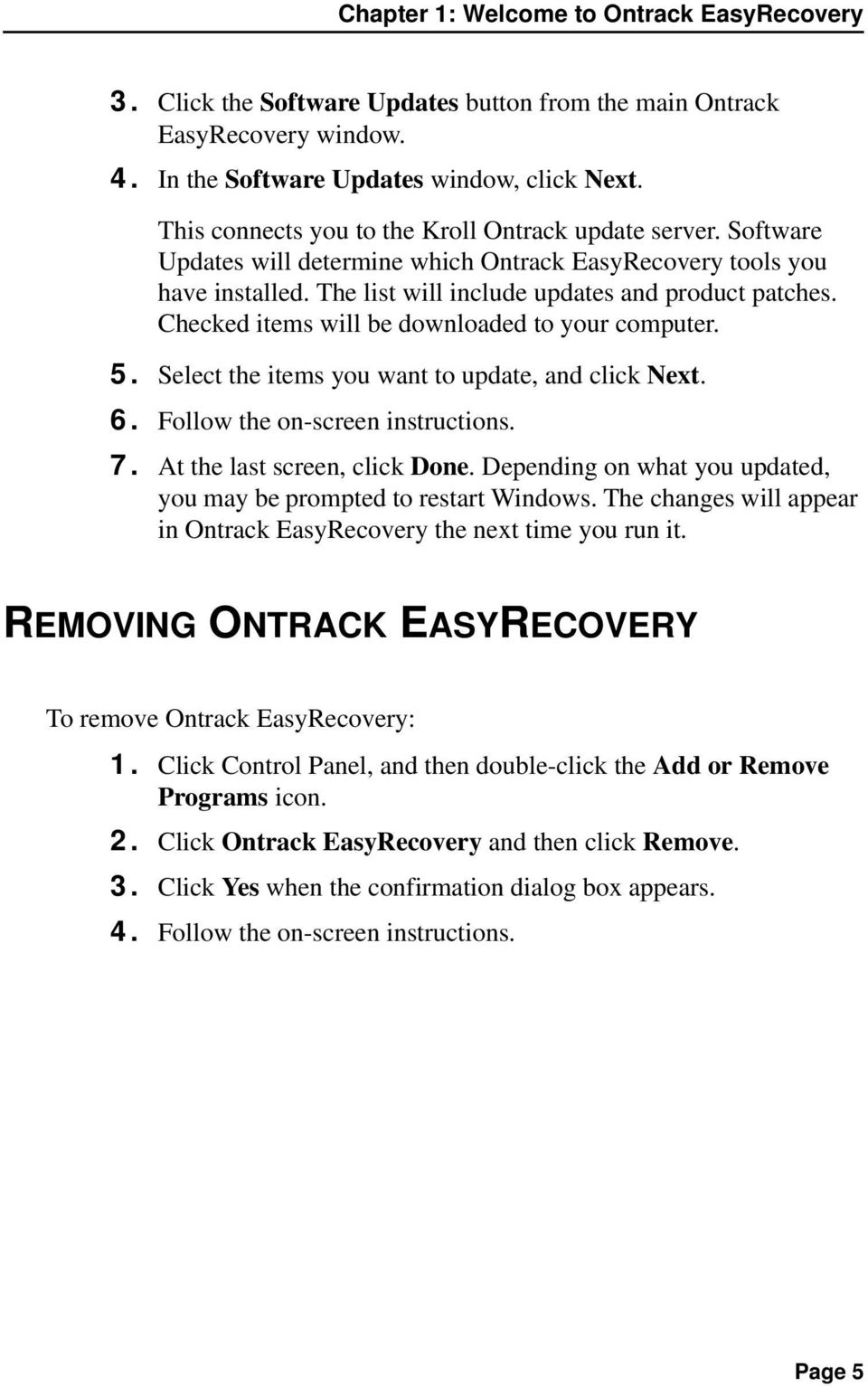
12 Chapter 2: Categories & Tool Components Ontrack EasyRecovery is designed to contain many add-on tool capabilities. Each new tool will be installed and grouped into related categories. The categories are listed along the left column of the main Ontrack EasyRecovery window. The Software Updates category is standard and always included with Ontrack EasyRecovery. Any custom categories that are purchased will appear above the Software Updates category. Page 6
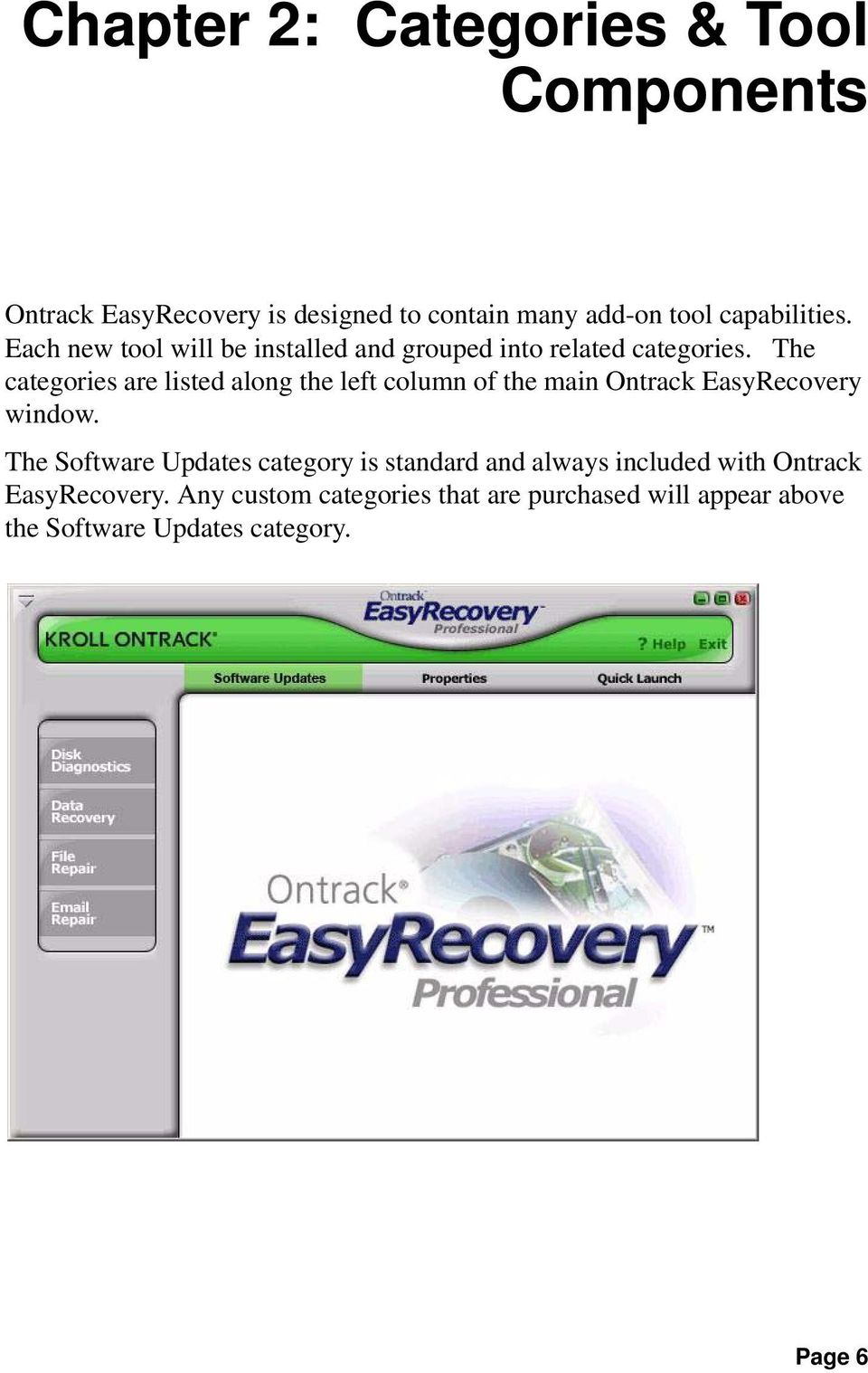
13 Chapter 2: Categories & Tool Components This is an example; the category and tools you have installed may be different from the example. Just click on a category button to see the installed tool components for that category. Each tool provides you with the specified capabilities relevant to that category. You will notice that when you move the cursor over a utility button, the button becomes available for selection. Click on the button to select the tool. FILE REPAIR FOR OFFICE (EXAMPLE) In this example, the File Repair category has five tool components currently installed. Additional tools will be made available from time to time for purchase. Page 7
14 This is an example; the category and tools you have installed may be different from the example. All tools that appear within a custom category will have their own help file. Once you click on the tool, and click on the wizard bar Help button within that tool, you will be provided with Help specific to that tool component. If you click the Help button from other areas within the software, you will receive specific help on the use of the Ontrack EasyRecovery software product. Page 8
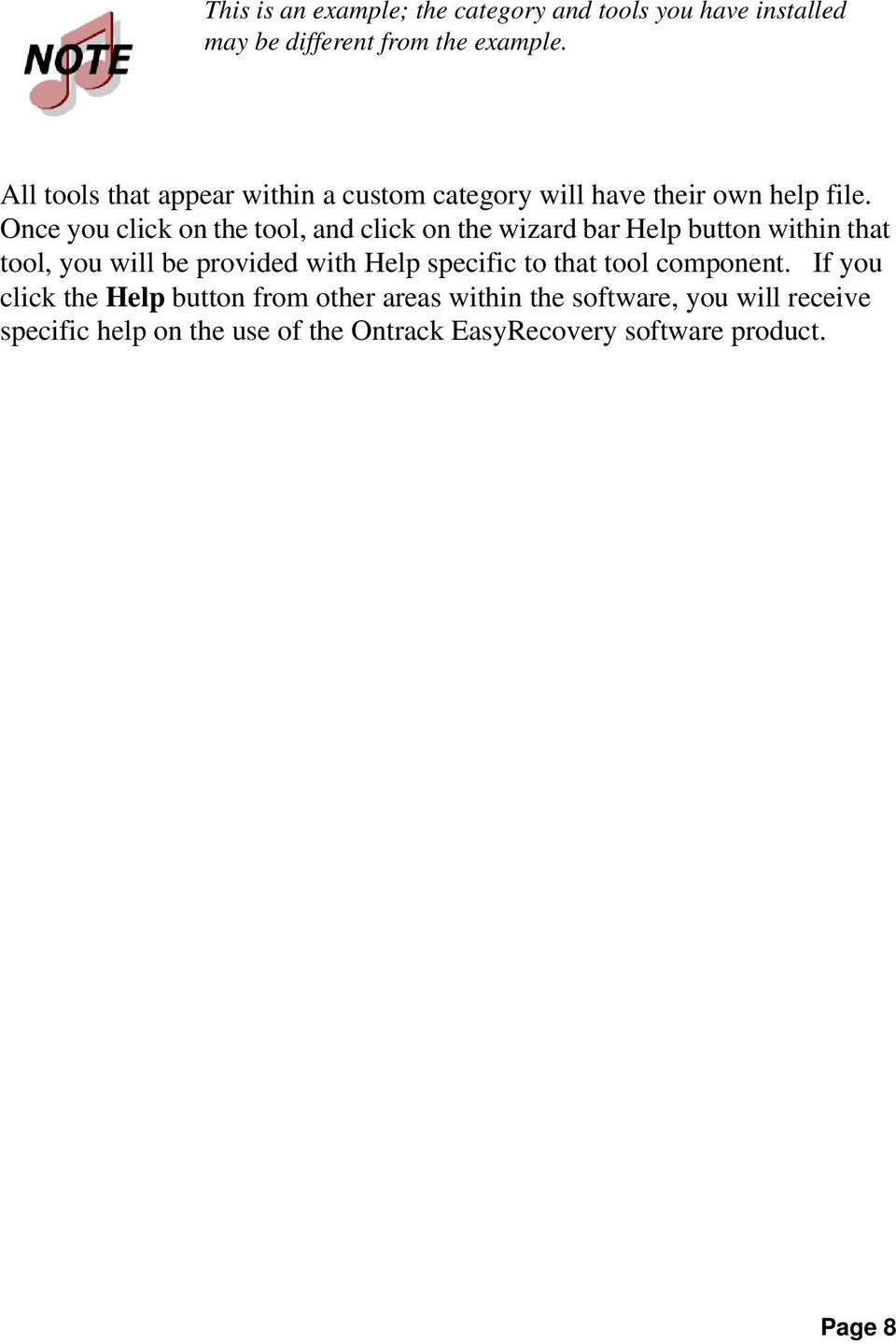
15 Chapter 3: Ontrack EasyRecovery Categories Chapter 3: Ontrack EasyRecovery Categories Currently, the following categories can be included with Ontrack EasyRecovery: Disk Diagnostics Data Recovery File Repair Repair Software Updates Page 9
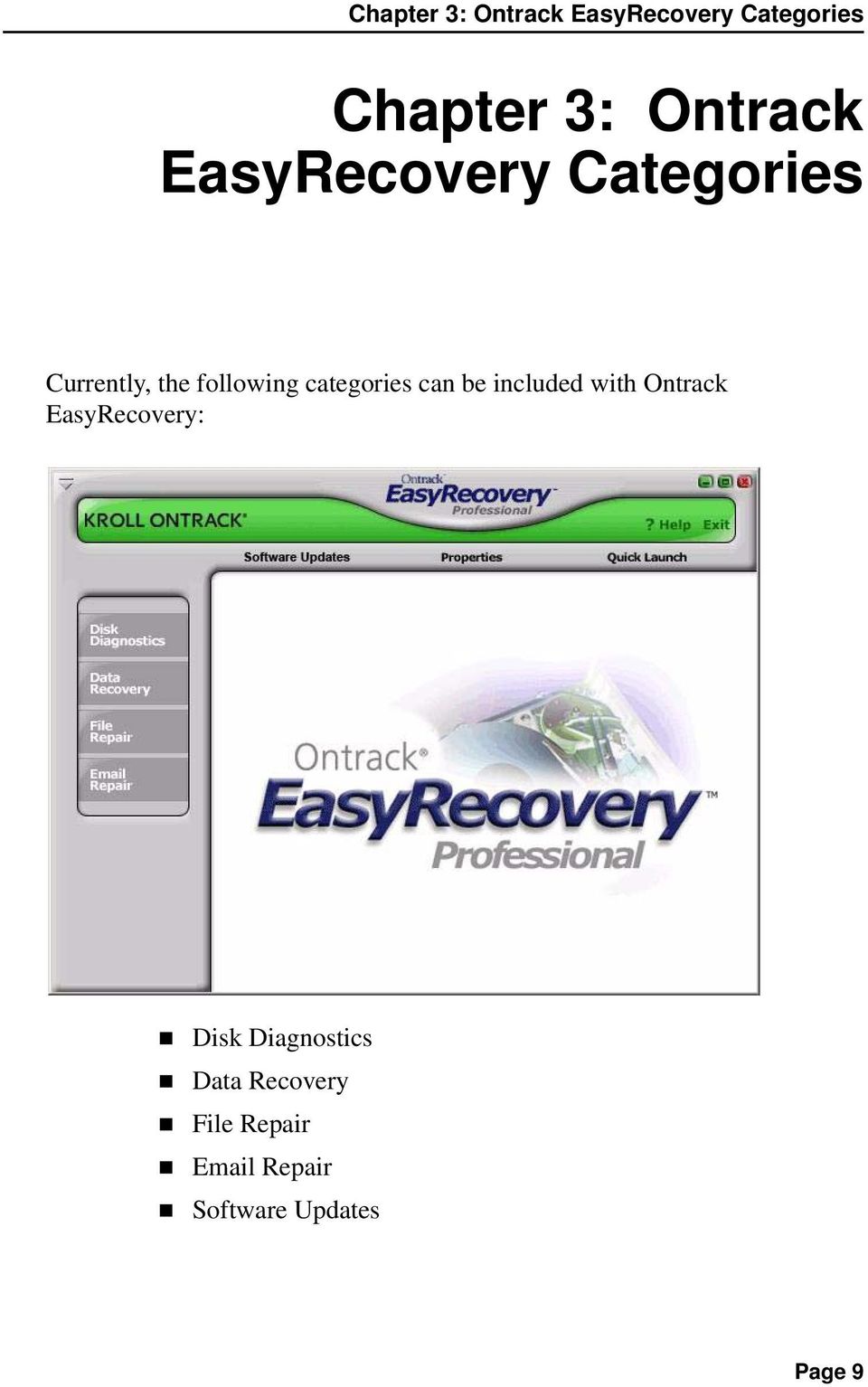
16 Chapter 3: Ontrack EasyRecovery Categories This is an example; the category and tools you have installed may be different from the example. DISK DIAGNOSTICS The Disk Diagnostics category provides you with valuable system diagnostic tools. Tools included in this category are designed to quickly determine whether your system is experiencing hardware or on-disk structure problems. All tools in this category generate a detailed report on the condition of your system. Page 10
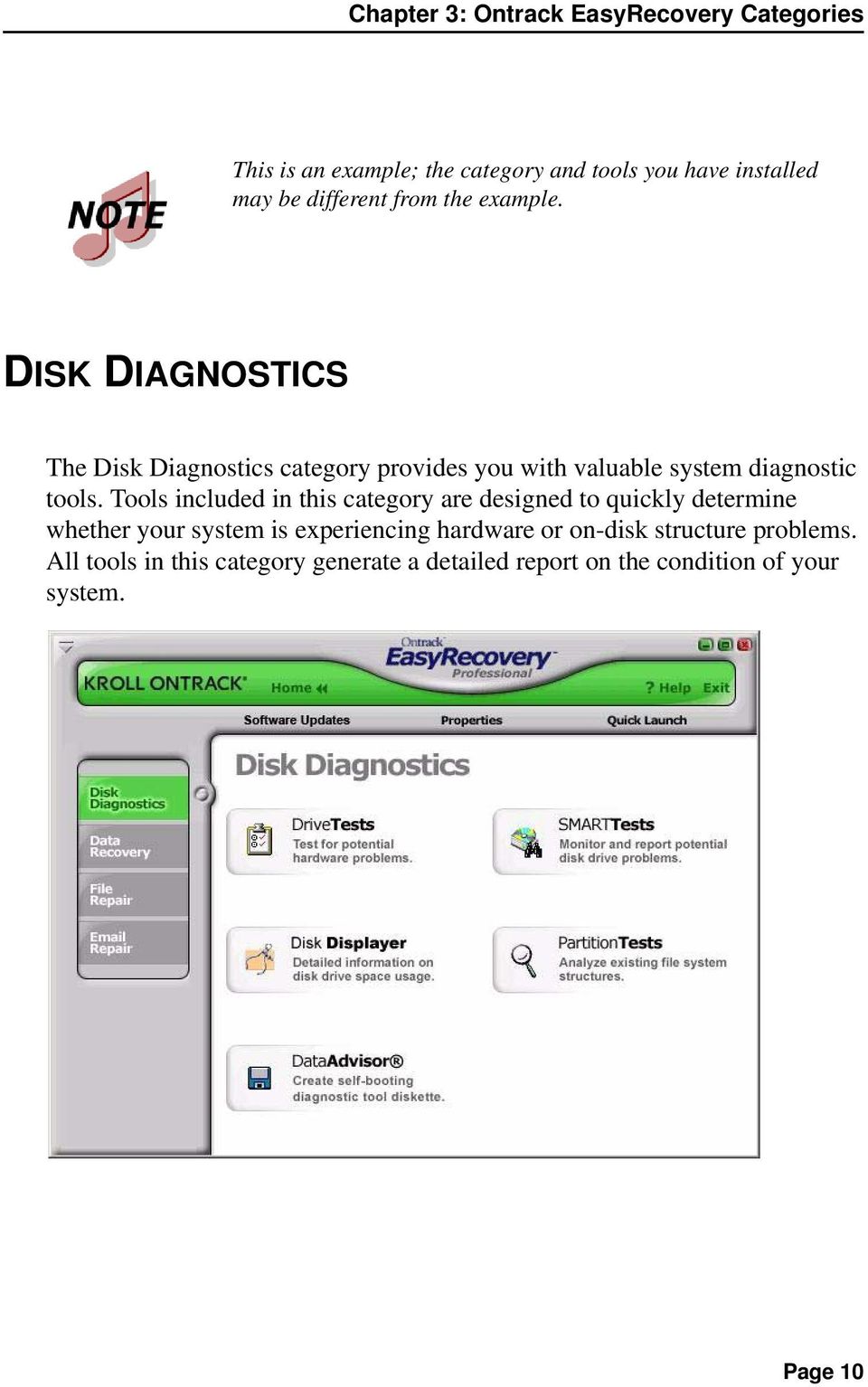
17 Chapter 3: Ontrack EasyRecovery Categories This is an example; the category and tools you have installed may be different from the example. The DriveTests tool allows you to test the physical health of your disk drive. The tool will perform the following hardware tests. SMART Status Check Short SMART Test Extended SMART Test Quick Diagnostic Test Full Diagnostic Test SMART stands for Self-Monitoring, Analysis and Reporting Technology. SMART tests will prevent data loss by predicting possible drive failures using special algorithms built into the firmware of your hard drive. The SMART Status Check will perform a quick status check of your hard disk, which takes a few seconds. The Short SMART Test will issue a short (around 90 seconds) self-test command where as the Extended SMART Test will issue a comprehensive (several minutes) self-test command to your hard disk. Any drives reporting a SMART failure could likely to fail at any time and should be backed up immediately. The Quick Diagnostic Tests and Full Diagnostic Tests are read-only tests designed to check the physical stability of your hard drive. The Quick Diagnostic Test will determine, with 90 percent certainty, in 90 seconds, whether your hard disk has a physical problem. The Full Diagnostic test will check/read the entire hard drive looking for physical problems on the drive such as unreadable sectors. Page 11

18 Chapter 3: Ontrack EasyRecovery Categories In some cases, your drive may not have any physical problems but on-disk structure problems. The Partition Tests tool is designed to analyze on-disk file system structures for FAT and NTFS partitions. The tool will do an extensive scan of file systems structures generating a detailed report of the condition of your file data. This categories also includes diagnostic software to be used in the case where your system will not boot. Data Advisor is a self-booting diagnostic tool for assessing the condition of your computer system. Data Advisor quickly assesses the health of your hard disk drive, file structures, and computer memory by identifying problems that could cause data loss. Disk Displayer is a utility that displays disk usage on your computer system. Disk Displayer presents an instant graphic view of where space is being consumed on your computer, making it easy to locate oversized folders and files. Disk Displayer helps you determine which files are cluttering up space on your system. A typical end user will many times have difficulty in adding a hard drive to their system because they don't have direct access to jumper settings for hard drives. DATA RECOVERY The Data Recovery category includes a collection of recovery tools, which target recovery of file data. The Data Recovery tools will recover files from corrupted FAT and NTFS partitions. All tools are NON-DESTRUCTIVE and READ-ONLY. The tools are designed to recover and copy your data to another destination such as a removable drive, another hard drive, a floppy diskette, or a network volume. Each tool is a fully automated wizard, which walks the user through three simple steps: 1. Evaluate: The tool identifies all devices and/or partitions on the system and displays a graphical representation of what was found 2. Recover: The tool examines the file structures that remain on the corrupted partition and constructs a virtual file system in memory. Page 12
19 Chapter 3: Ontrack EasyRecovery Categories 3. Tag and Copy: A list of files is graphically presented to you with a "Windows Explorer like" look and feel. You then have the ability to filter select files and folders for copy to a safe location. The data recovery tools available are listed below. DeletedRecovery FormatRecovery RawRecovery ResumeRecovery StandardRecovery AdvancedRecovery Emergency Media This is an example; the category and tools you have installed may be different from the example. Page 13

20 Chapter 3: Ontrack EasyRecovery Categories Mistakenly deleting files is one of the most common data recovery scenarios. The DeletedRecovery tool will give you quick access to deleted files, and has different options for scanning a partition. You can perform a quick scan, or a thorough complete scan for deleted files. You also have the option to enter a File Filter string, either with or without using 'wildcards', to quickly recover files of a specific name. Another common data recovery situation is accidental reformatting of a partition. The FormatRecovery tool will allow you to recover files from an accidentally formatted or reinstalled partition. This type of recovery will ignore the existing file system structures and try to search for structures associated with the previous file system. The RawRecovery tool allows you to scan severely corrupted partitions for files using a file signature search algorithm. This tool will help you recover files from a partition with damaged directory structures. Over 290 popular file signatures are available for scanning for your file data in this tool. The number of file signatures available for scanning will depend on which Ontrack EasyRecovery edition you have installed. For the most difficult recoveries, the AdvancedRecovery and StandardRecovery tools provide you with advanced recovery options including recovering from mistakenly deleted partitions, virus attacks, and other major file system corruptions. Both tools give you a detailed graphical representation of the devices connected to your system including partitions associated with each device. Which tool you have installed is dependent on the edition of Ontrack EasyRecovery purchased. The Data Recovery category also includes the EmergencyMedia tool that can create an emergency boot diskette or an emergency boot CD-ROM. The diskette and CD-ROM allow you to recover data from a partition even if you cannot boot to Windows. They include a DOS version of the Data Recovery engine used in the Windows tools. All recovery tools in the Data Recovery category allow the option to resume the recovery at a later time. The ResumeRecovery tool will load a saved recovery file to resume a previous recovery option. Page 14
21 Chapter 3: Ontrack EasyRecovery Categories FILE REPAIR The File Repair category contains repair tools for Microsoft Office files and other file formats. Currently, tools are available for the following file formats. Access Repair Excel Repair PowerPoint Repair Word Repair Zip Repair Kroll Ontrack is continually developing file recovery tools for other file formats. For a listing of the latest file formats supported and detailed tool information, check Page 15
22 Chapter 3: Ontrack EasyRecovery Categories Each file repair tool has the same basic characteristics. All tools are NON- DESTRUCTIVE and READ-ONLY. Each tool is a fully automated wizard which use the same basic recovery steps: 1. File Selection: The file selection window allows you to select files for repair by browsing the folder on your computer. Within the selection window, you have the ability to specify the destination folder for the repaired file(s). You have the choice of repairing the select files(s) in their current folder or making a repaired copy of the selected file(s) in a different folder. 2. Recovery Properties: Properties, sometimes called settings, define how a tool runs. Most properties are initially set to standard or default values. By changing the properties, you can customize the file repair tools for your own needs. See Chapter 5 for a detailed explanation of how to change tool properties. 3. Progress and Report: This window displays information on the repair process for all selected files. The information can be saved to a report file. Below is a brief description of the current File Repair tools available. Most File Repair tools have additional system requirements. See tool-specific help files for more details. Access Repair repairs and restores Microsoft Office Access files created using Microsoft Access 2.0, 95, 97, 2000, XP, 2003, and Features include the ability to recover and restore data from an inconsistent database, relationships between tables, password protected databases, and objects such as Queries, Forms, Reports, Pages, and Macros. Plus, the Microsoft Access tool has support available for recovery of deleted table data (Microsoft Access 97, 2000) and the ability to continue to repair and restore beyond internal file errors. Page 16
23 Chapter 3: Ontrack EasyRecovery Categories Excel Repair fixes and restores Microsoft Office Excel files created using Microsoft Excel 95, 97, 2000, XP, 2003, and Features include ability to recover and restore formulas, text, cell formatting attributes (i.e. font, border), off-sheet references, multi-sheet structures, sheet names, and pasted graphics and images such as.tif,.jpg, and.gif. Plus the Microsoft Excel tool has the ability to continue to repair and restore beyond internal file errors. PowerPoint Repair fixes and restores Microsoft Office PowerPoint files created using Microsoft PowerPoint 97, 2000, XP, 2003, and Features include ability to recover and restore WordArt and formatting of text within shapes, properties of pictures within shapes, slide show transition settings, tables, action buttons, and all basic types of shapes. Plus the Microsoft PowerPoint component has the ability to continue to repair and restore beyond internal file errors, recover drawings, pictures, and animation of objects in a slide, recover notes pages for a slide, and recover slide master, handout master, notes master, and regular slides. Word Repair fixes and restores.doc files created using Microsoft Office Word 6.0, 95, 97, 2000, XP, 2003, and Features include ability to recover tables, bulleted lists, password protected files, and imbedded images such as.tif,.jpg,.gif, and.bmp files. Plus, the Microsoft Word component has the ability to continue to repair and restore beyond internal file errors. Zip Repair fixes and restores files created by WinZip and ZipMagic. Plus, if the tool cannot repair the whole file, it salvages as many files in the archive as it can. REPAIR Ontrack EasyRecovery Repair is a do-it-yourself software solution that enables you to repair corrupt files quickly and easily, requires less technical sophistication than many software applications, and saves you time and resources. Page 17
24 Chapter 3: Ontrack EasyRecovery Categories All Repair tools follow the same basic characteristics of the File Repair tools. See the File Repair section for more details. Most Repair tools have additional system requirements. See tool-specific Help files for more details. Repair has two components: Outlook Repair repairs Microsoft Outlook files. OutlookExpress Repair repairs Microsoft Outlook Express files. Kroll Ontrack is continually developing recovery tools for other formats. For a listing of the latest file formats supported and detailed tool information, check Page 18
25 Below is a brief description of the current File Repair tools available: Outlook Repair repairs and restores Microsoft Outlook files that were created using Microsoft Outlook 97, 98, 2000, XP, 2003, and You can use this tool to recover and restore corrupt Personal Folder Files (PST), corrupt Offline Folder Files (OST), deleted messages, and password protected files. You can also use this tool to recover Messages, Folders, Calendar, Contacts, Tasks, and Notes. OutlookExpress Repair repairs and restores Microsoft Outlook Express files that were created using Microsoft Outlook Express version 5.0 and later. You can use this tool to recover and restore corrupt Microsoft Outlook Express DBX files containing message data. In other words, you can use this tool on any folder containing messages in Microsoft Outlook Express. SOFTWARE UPDATES Kroll Ontrack periodically improves Ontrack EasyRecovery adding features, enhancements, and making changes based on customer requests. The Software Updates section of Ontrack EasyRecovery provides information on obtaining these new offerings: Page 19
26 Chapter 3: Ontrack EasyRecovery Categories SOFTWARE UPDATES Programming updates (also known as patches) are also available to you through the Internet, and are free for a limited time. Software Updates downloads and installs program patches in minutes. For more information, see Updating Your Software on page 4. Page 20
27 Chapter 4: Troubleshooting Even if you've had the worst possible disaster happen to your computer, you may still be able to get the data from it. Problem/Symptoms Possible Causes What to Do The file I want to repair cannot be found. The file I repaired still does not open My computer is exhibiting erratic, unpredictable behavior My hard drive is making unusual grinding or scraping noises and generally sounds in bad shape The file was deleted or not recently saved. The file is not repairable. Possible Virus. Possible corrupted operating systems structures. The drive may be going bad. Search the complete partition for the file. Optionally, try the DataRecovery category to attempt to recover the lost file. Many of the tools will create more than one type of file as part of the recovery process. Be sure to try all destination files that have been generated. View the help file for the individual tool for more information. Some tools will create more than one destination file in an attempt to retrieve the data. Ontrack EasyRecovery requires a healthy system. Use a PC maintenance product to diagnose and repair the system problem. Back up everything important to another destination immediately. Turn off the computer. Get the computer checked out by a good technician. May have to replace the hard drive but before doing so, make sure you've recovered any data that hasn't been backed up using a data recovery software or service solution. Page 21
28 Chapter 4: Troubleshooting Problem/Symptoms Possible Causes What to Do There is evidence of bad sectors on my drive. My boot drive is corrupt. The drive may be going bad. The drive has experienced corruption Ontrack EasyRecovery Professional contains a Disk Diagnostic utility that will scan the surface of the drive for bad sectors. Some bad sectors do not preclude a successful recovery, but can affect the quality of the recovery. If the drive is making noise or is reporting an increasing number of bad sectors, our in-house data recovery service is recommended. Install Ontrack EasyRecovery on a functioning computer. In the DataRecovery category will be a selection to make Emergency Media. This will create a bootable data recovery tools media that can be run on the computer with the corrupt boot drive. Page 22
29 Chapter 5: Setting Properties Chapter 5: Setting Properties GENERAL SETTINGS When you first install Ontrack EasyRecovery, there are a number of setup options and properties that are initially given default values. Once you become familiar with Ontrack EasyRecovery, or if you are already an advanced computer user, you may want to review and change the default properties. To open the Properties dialog box, click the Properties button at the top of the Ontrack EasyRecovery window. This opens the Properties window, in which you can change any setup options and other properties for Ontrack EasyRecovery. When you first launch Properties, you see the global program settings: Page 23
30 Chapter 5: Setting Properties Properties for each individual tool can be set by clicking on the appropriate tool button located within the left bar. Page 24
Setting Up Novell Small Business Suite
 VERSION 5.1 Setting Up Novell Small Business Suite Easy to install and manage, Novell Small Business Suite 5.1 is a network software system designed to give single-site businesses superior performance
Image Backup and Recovery Procedures
 Image Backup and Recovery Procedures Thank you for purchasing a Fujitsu computer. Fujitsu is committed to bringing you the best computing experience with your new system. It is very important that you
Installation & Activation Guide
 Lepide Exchange Recovery Manager Lepide Software Private Limited, All Rights Reserved This User Guide and documentation is copyright of Lepide Software Private Limited, with all rights reserved under the
Stellar Phoenix. SQL Database Repair 6.0. Installation Guide
 Stellar Phoenix SQL Database Repair 6.0 Installation Guide Overview Stellar Phoenix SQL Database Repair software is an easy to use application designed to repair corrupt or damaged Microsoft SQL Server
Symantec Backup Exec System Recovery Granular Restore Option User's Guide
 Symantec Backup Exec System Recovery Granular Restore Option User's Guide Symantec Backup Exec System Recovery Granular Restore Option User's Guide The software described in this book is furnished under
Image Backup and Recovery Procedures
 Image Backup and Recovery Procedures Thank you for purchasing a Fujitsu computer. Fujitsu is committed to bringing you the best computing experience with your new system. It is very important that you
User Guide Replica Automatic Backup System
 User Guide Replica Automatic Backup System 2009 Seagate Technology Contents 1 Getting Started with the Seagate Replica Automatic Backup System...4 Replica s First Steps...4 Safely Disconnect...4 Using
Stellar Phoenix. Access Database Repair 5.0 Installation Guide
 Stellar Phoenix Access Database Repair 5.0 Installation Guide Overview Stellar Phoenix Access Database Repair, a secure and easy to use application is designed for repairing corrupt Microsoft Access (.mdb,.accdb)
Symantec Backup Exec System Recovery Exchange Retrieve Option User's Guide
 Symantec Backup Exec System Recovery Exchange Retrieve Option User's Guide Symantec Backup Exec System Recovery Exchange Retrieve Option User's Guide The software described in this book is furnished under
Software Installation Procedure (MS Windows)
 Software Installation Procedure (MS Windows) E9970-96005 Rev. A 02/2004 (3070 05.30p 0603 WN) In this guide... Introduction, 1 Agilent 3070 Tech Support Web Site, 2 Time for Installation, 2 PC Specifications
Getting Started. rp5800, rp5700 and rp3000 Models
 Getting Started rp5800, rp5700 and rp3000 Models Copyright 2011 Hewlett-Packard Development Company, L.P. The information contained herein is subject to change without notice. Microsoft, Windows, and Windows
SysInfoTools MS Access Database Recovery v3.0
 SysInfoTools MS Access Database Recovery v3.0 Table Of Contents 1. SysInfoTools MS Access Database Recovery v3.0... 2 2. Overview... 2 3. Getting Started... 3 3.1 Installation procedure... 3 4. Order and
GUARD1 PLUS SE Administrator's Manual
 GUARD1 PLUS SE Administrator's Manual Version 4.4 30700 Bainbridge Road Solon, Ohio 44139 Phone 216-595-0890 Fax 216-595-0991 [email protected] www.guard1.com i 2010 TimeKeeping Systems, Inc. GUARD1 PLUS
Release Notes: PowerChute plus for Windows 95 and Windows 98
 : PowerChute plus for Windows 95 and Windows 98 These release notes supplement the User s Guide: PowerChute plus, Version 5.0.2, for Windows 95 and Windows 98 (pc98ug.pdf) and the Installation Guide: PowerChute
SysInfoTools MS SQL Database Recovery
 SysInfoTools MS SQL Database Recovery Table Of Contents 1. SysInfoTools MS SQL Database Recovery... 2 2. Overview... 2 3. Getting Started... 3 3.1 Installation procedure... 4 4. Order and Activation...
NetBak Replicator 4.0 User Manual Version 1.0
 NetBak Replicator 4.0 User Manual Version 1.0 Copyright 2012. QNAP Systems, Inc. All Rights Reserved. 1 NetBak Replicator 1. Notice... 3 2. Install NetBak Replicator Software... 4 2.1 System Requirements...
Windows Data Recovery Home 6.0
 Installation Guide Stellar Phoenix Windows Data Recovery Home 6.0 Overview Stellar Phoenix Windows Data Recovery - Home edition is a complete solution to recover lost data from your hard disks and removable
Selected Windows XP Troubleshooting Guide
 1 Selected Windows XP Troubleshooting Guide To locate lost files: Compiled by: Jason M. Cohen Check these locations to locate lost files: The My Documents folder Click Start, and then click My Documents.
SysInfoTools MS Word Docx Files Repair v2.0
 SysInfoTools MS Word Docx Files Repair v2.0 Table Of Contents 1. SysInfoTools MS Word Docx Recovery v2.0... 2 2. Overview... 2 3. Getting Started... 3 3.1 Installation procedure... 3 4. Order and Activation...
Personal Folders Backup
 Personal Folders Backup The Personal Folders Backup tool is designed for use in Outlook 2000 and later and the operating systems that support each respective Outlook version. The tool provides a quick
IBM Rapid Restore PC powered by Xpoint - v2.02 (build 6015a)
 IBM Rapid Restore PC powered by Xpoint - v2.02 (build 6015a) User s Reference Guide Internal IBM Use Only This document only applies to the software version listed above and information provided may not
RSView 32 ACTIVE DISPLAY SYSTEM GETTING RESULTS GUIDE. PUBLICATION VW32AD-GR001E-EN-E July 2011 Supersedes Publication VW32AD-GR001D-EN-E
 RSView 32 ACTIVE DISPLAY SYSTEM GETTING RESULTS GUIDE PUBLICATION VW32AD-GR001E-EN-E July 2011 Supersedes Publication VW32AD-GR001D-EN-E Contact Rockwell Copyright Notice Trademark Notices Customer Support
Table of Contents. Rebit 5 Help
 Rebit 5 Help i Rebit 5 Help Table of Contents Getting Started... 1 Making the First Recovery Point... 1 Don't Forget to Create a Recovery Media... 1 Changing Backup Settings... 1 What Does Rebit 5 Do?...
F-Secure Online Backup Quick Installation Guide
 F-Secure Online Backup Quick Installation Guide TOC 3 Contents F-Secure Online Backup Quick Installation Guide...5 Introduction...6 System Requirements...7 Installation...10 Installation on a Windows computer...10
PRODUCT GUIDE. N u c l e u s D a t a R e c o v e r y. C o m P riv a t e L i m i t e d
 PRODUCT GUIDE Table of Contents 1. Introduction to Kernel SQL Password Recovery... 4 1.1 Using this Manual... 4 1.2 About Kernel SQL Password Recovery... 5 1.4 Who Should Use this Software?... 5 2. Getting
Installation & Activation Guide. Lepide Active Directory Self Service
 Installation & Activation Guide Lepide Active Directory Self Service , All Rights Reserved This User Guide and documentation is copyright of Lepide Software Private Limited, with all rights reserved under
EntraPass WebStation. Installation Manual DN1864-1005
 EntraPass WebStation Installation Manual EntraPass WebStation Installation Manual Table of Contents General Information...1 Copyright Info...1 Technical Support...1 Overview...2 Introduction... 2 Description...
Windows 2003 Server Installation Guide
 Windows 2003 Server Installation Guide Revision 2.0 April 14, 2011 Licenses This manual is the exclusive property of Prometric, Inc. This manual is licensed for use with restrictions to authorized centers
MGC WebCommander Web Server Manager
 MGC WebCommander Web Server Manager Installation and Configuration Guide Version 8.0 Copyright 2006 Polycom, Inc. All Rights Reserved Catalog No. DOC2138B Version 8.0 Proprietary and Confidential The information
WHITE PAPER. HP Guide to System Recovery and Restore
 WHITE PAPER January 2003 Prepared By PSG Product Software Engineering Hewlett-Packard Company CONTENTS Purpose3 Using Safe Mode To Diagnose And Correct Problems 4 Using the Recovery Console To Repair Damaged
BillQuick Agent 2010 Getting Started Guide
 Time Billing and Project Management Software Built With Your Industry Knowledge BillQuick Agent 2010 Getting Started Guide BQE Software, Inc. 2601 Airport Drive Suite 380 Torrance CA 90505 Support: (310)
Before you install ProSeries software for network use
 Before you install ProSeries software for network use The following pages describe system requirements and other information you need to know before installing ProSeries software for network use. Important:
WhatsUp Gold v16.2 Installation and Configuration Guide
 WhatsUp Gold v16.2 Installation and Configuration Guide Contents Installing and Configuring Ipswitch WhatsUp Gold v16.2 using WhatsUp Setup Installing WhatsUp Gold using WhatsUp Setup... 1 Security guidelines
Drive Vaccine PC Restore
 Horizon DataSys Drive Vaccine PC Restore User Manual Horizon DataSys Copyright 2011 All Rights Reserved Last Updated: May 16, 2011 Table of Contents Table of Contents... 2 Introduction... 4 Chapter 1:
Ontrack PowerControls User Guide Version 8.1
 ONTRACK POWERCONTROLS Ontrack PowerControls User Guide Version 8.1 Instructions for operating Ontrack PowerControls in Microsoft SQL Server Environments APRIL 2015 NOTICE TO USERS Ontrack PowerControls
Norton Ghost 15.0. How to copy partitions from an HDD to a Samsung SSD
 Norton Ghost 15.0 How to copy partitions from an HDD to a Samsung SSD This Quick User Guide was created under Symantec s authorization by Samsung Electronics Co., Ltd. in order to offer a simple & easy
Lepide Event Log Manager. Users Help Manual. Lepide Event Log Manager. Lepide Software Private Limited. Page 1
 Users Help Manual Lepide Event Log Manager Lepide Software Private Limited. Page 1 Users Help Manual for Lepide Event Log Manager Lepide Software Private Limited, All Rights Reserved This User Guide and
A+ Guide to Software: Managing, Maintaining, and Troubleshooting, 5e. Chapter 3 Installing Windows
 : Managing, Maintaining, and Troubleshooting, 5e Chapter 3 Installing Windows Objectives How to plan a Windows installation How to install Windows Vista How to install Windows XP How to install Windows
SYSTEM REQUIREMENTS...
 Contents INTRODUCTION... 1 BillQuick HR Setup Checklist... 2 SYSTEM REQUIREMENTS... 3 HARDWARE REQUIREMENTS... 3 SOFTWARE REQUIREMENTS... 3 Operating System Requirements... 3 Other System Requirements...
Database Administration Guide
 Database Administration Guide 013008 2008 Blackbaud, Inc. This publication, or any part thereof, may not be reproduced or transmitted in any form or by any means, electronic, or mechanical, including photocopying,
Automation License Manager
 s Contents Product Overview 1 Installation 2 Working with the Automation License Manager 3 Glossary Manual Index 12/2008 A5E02389428-01 Legal information Warning notice system This manual contains notices
Microsoft BackOffice Small Business Server 4.5 Installation Instructions for Compaq Prosignia and ProLiant Servers
 Integration Note October 2000 Prepared by OS Integration Engineering Compaq Computer Corporation Contents Introduction...3 Requirements...3 Minimum Requirements...4 Required Information...5 Additional
Zinstall HDD User Guide
 Zinstall HDD User Guide Thank you for purchasing Zinstall. If you have any questions, issues or problems, please contact us: Toll-free phone: (877) 444-1588 International callers: +1-877-444-1588 Support
4 Backing Up and Restoring System Software
 4 Backing Up and Restoring System Software In this Chapter... Planning a Backup Strategy, 4-3 Preparing for Disaster Recovery, 4-4 Creating Boot Recovery Diskettes, 4-5 Making a Full Backup Tape, 4-8 Restoring
Meridian 1 Meridian 1 Attendant PC LAN Interface Installation Guide
 Meridian 1 Meridian 1 Attendant PC LAN Interface Installation Guide Document Number: P0874391 Document Release: Standard 1.00 Date: November 1997 Year Publish FCC TM 1997 All rights reserved Printed in
Installation Guide for Workstations
 Installation Guide for Workstations Copyright 1998-2005, E-Z Data, Inc. All Rights Reserved. No part of this documentation may be copied, reproduced, or translated in any form without the prior written
IT Essentials v4.1 LI 11.4.5 Upgrade and configure storage devices and hard drives. IT Essentials v4.1 LI 12.1.3 Windows OS directory structures
 IT Essentials v4.1 LI 11.4.5 Upgrade and configure storage devices and hard drives 2.3 Disk management tools In Windows Vista and Windows 7, use the following path: Start > Start Search > type diskmgmt.msc
Agilent N5970A Interactive Functional Test Software: Installation and Getting Started
 Agilent N5970A Interactive Functional Test Software: Installation and Getting Started Application Note The N5970A Interactive Functional Test Software along with the 8960 Series 10 (E5515C) wireless communications
Getting started. Symantec AntiVirus Corporate Edition 8.1 for Workstations and Network Servers
 Getting started Symantec AntiVirus Corporate Edition 8.1 for Workstations and Network Servers Copyright 2003 Symantec Corporation. All rights reserved. Printed in the U.S.A. 03/03 Symantec and the Symantec
Network Scanner Tool R3.1. User s Guide Version 3.0.04
 Network Scanner Tool R3.1 User s Guide Version 3.0.04 Copyright 2000-2004 by Sharp Corporation. All rights reserved. Reproduction, adaptation or translation without prior written permission is prohibited,
Symantec Backup Exec TM 11d for Windows Servers. Quick Installation Guide
 Symantec Backup Exec TM 11d for Windows Servers Quick Installation Guide September 2006 Symantec Legal Notice Copyright 2006 Symantec Corporation. All rights reserved. Symantec, Backup Exec, and the Symantec
Information in this document, including URL and other Internet Web site references, is subject to change without notice. Unless otherwise noted, the
 Information in this document, including URL and other Internet Web site references, is subject to change without notice. Unless otherwise noted, the example companies, organizations, products, domain names,
SharpdeskTM R3.1. Installation Guide Version 3.1.01
 SharpdeskTM R3.1 Installation Guide Version 3.1.01 1 Copyright 2000-2004 by Sharp Corporation. All rights reserved. Reproduction, adaptation or translation without prior written permission is prohibited,
Intel Rapid Storage Technology
 Intel Rapid Storage Technology User Guide August 2011 Revision 1.0 1 Document Number: XXXXXX INFORMATION IN THIS DOCUMENT IS PROVIDED IN CONNECTION WITH INTEL PRODUCTS. NO LICENSE, EXPRESS OR IMPLIED,
FileMover 1.2. Copyright Notice. Trademarks. Patents
 FileMover 1.2 Copyright Notice No part of this publication may be reproduced, transmitted, transcribed, stored in a retrieval system, or translated into any human or computer language, in any form or by
Setup and Configuration Guide for Pathways Mobile Estimating
 Setup and Configuration Guide for Pathways Mobile Estimating Setup and Configuration Guide for Pathways Mobile Estimating Copyright 2008 by CCC Information Services Inc. All rights reserved. No part of
MAS 90. Installation and System Administrator's Guide 4WIN1010-02/04
 MAS 90 Installation and System Administrator's Guide 4WIN1010-02/04 Copyright 1998-2004 Best Software, Inc. All rights reserved. Rev 02 Contents Chapter 1 Introduction 1 How to Use This Manual 1 Graphic
BIGPOND ONLINE STORAGE USER GUIDE Issue 1.1.0-18 August 2005
 BIGPOND ONLINE STORAGE USER GUIDE Issue 1.1.0-18 August 2005 PLEASE NOTE: The contents of this publication, and any associated documentation provided to you, must not be disclosed to any third party without
BillQuick Assistant 2008 Start-Up Guide
 Time Billing and Project Management Software Built With Your Industry Knowledge BillQuick Assistant 2008 Start-Up Guide BQE Software, Inc. 2601 Airport Drive Suite 380 Torrance CA 90505 Support: (310)
Reporting for Contact Center Setup and Operations Guide. BCM Contact Center
 Reporting for Contact Center Setup and Operations Guide BCM Contact Center Document Number: NN40040-302 Document Status: Standard Document Version: 04.00 Part Code: N0060637 Date: June 2006 Copyright 2005
HP External Hard Disk Drive Backup Solution by Seagate User Guide. November 2004 (First Edition) Part Number 373652-001
 HP External Hard Disk Drive Backup Solution by Seagate User Guide November 2004 (First Edition) Part Number 373652-001 Copyright 2004 Hewlett-Packard Development Company, L.P. The information contained
1. System Requirements
 BounceBack Ultimate 14.2 User Guide This guide presents you with information on how to use BounceBack Ultimate 14.2. Contents 1. System Requirements 2. BounceBack Pre-Installation 3. How To Install The
Chapter 5: Fundamental Operating Systems
 Chapter 5: Fundamental Operating Systems IT Essentials: PC Hardware and Software v4.1 Chapter5 2007-2010 Cisco Systems, Inc. All rights reserved. Cisco Public 1 Chapter 5 Objectives 5.1 Explain the purpose
Lepide Active Directory Self Service. Installation Guide. Lepide Active Directory Self Service Tool. Lepide Software Private Limited Page 1
 Installation Guide Lepide Active Directory Self Service Tool Lepide Software Private Limited Page 1 Lepide Software Private Limited, All Rights Reserved This User Guide and documentation is copyright of
Lepide Exchange Recovery Manager
 Configuration Guide Lepide Exchange Recovery Manager Lepide Software Private Limited, All Rights Reserved This User Guide and documentation is copyright of Lepide Software Private Limited, with all rights
Stellar Phoenix Windows Data Recovery. Stellar Phoenix Windows Data Recovery 5.0 User Guide
 Stellar Phoenix Windows Data Recovery Stellar Phoenix Windows Data Recovery 5.0 User Guide Overview Stellar Phoenix Windows Data Recovery - Professional edition is a complete solution to recover lost data
A+ Guide to Managing and Maintaining Your PC, 7e. Chapter 16 Fixing Windows Problems
 A+ Guide to Managing and Maintaining Your PC, 7e Chapter 16 Fixing Windows Problems Objectives Learn what to do when a hardware device, application, or Windows component gives a problem Learn what to do
VERITAS Backup Exec 9.1 for Windows Servers Quick Installation Guide
 VERITAS Backup Exec 9.1 for Windows Servers Quick Installation Guide N109548 Disclaimer The information contained in this publication is subject to change without notice. VERITAS Software Corporation makes
3M Occupational Health and Environmental Safety 3M E-A-Rfit Validation System. Version 4.2 Software Installation Guide (Upgrade) 1 P age
 3M Occupational Health and Environmental Safety 3M E-A-Rfit Validation System Version 4.2 Software Installation Guide (Upgrade) 1 P age Contents Important Information Read First... 3 Software Download...
Keystone 600N5 SERVER and STAND-ALONE INSTALLATION INSTRUCTIONS
 The following instructions are required for installation of Best Access System s Keystone 600N5 (KS600N) network key control software for the server side. Please see the system requirements on the Keystone
www.horizon-datasys.com User s Guide
 www.horizon-datasys.com User s Guide Drive Vaccine PC Restore Plus The information contained in this document is subject to change without notice. Horizon Datasys Corporation assumes no responsibility
DX8100 Series Symantec AntiVirus Corporate Edition Installation Instructions. Version 10.1.6
 DX8100 Series Symantec AntiVirus Corporate Edition Installation Instructions Version 10.1.6 DX8100 DX8100 Digital Video Recorder C2643M (4/08) Contents Description...........................................................................................................
Introduction to Windows XP Operating System
 Introduction to Windows XP Operating System Introduction to Windows XP Operating System Document Syllabus Course Description: This workshop will introduce basic Windows operating system concepts. Using
Symantec AntiVirus Corporate Edition Patch Update
 Symantec AntiVirus Corporate Edition Patch Update Symantec AntiVirus Corporate Edition Update Documentation version 10.0.1.1007 Copyright 2005 Symantec Corporation. All rights reserved. Symantec, the Symantec
 FaxTalk FaxCenter Pro Because your faxes are important! Version 8 Send. Receive. Manage. FaxTalk FaxCenter Pro Version 8 Because your faxes are important! Copyright 1992-2010 Thought Communications, Inc.
PRODUCT GUIDE. L e p i d e S o f t w a r e P r i v a t e L i m i t e d
 PRODUCT GUIDE Table of Contents 1. About Kernel for Exchange Server Recovery... 3 1.1 Using this Manual... 3 1.2 Kernel for Exchange Server Recovery... 4 1.4 Who Should Use this Software?... 6 2. Getting
NTI Backup Now EZ v2 User s Guide
 NTI Backup Now EZ v2 User s Guide GMAA00423010 11/12 2 Copyright statement This guide is copyrighted by Toshiba Corporation with all rights reserved. Under the copyright laws, this guide cannot be reproduced
BillQuick HR Getting Started Guide2015
 GETTING STARTED GUIDE: BillQuick HR 2015 BillQuick HR Getting Started Guide2015 BillQuick Power Up Your Business (866) 945-1595 www.bqe.com [email protected] GETTING STARTED GUIDE: BillQuick HR 2015 Contents
Installation Guide. Wyse R Class Conversion to Xenith Pro. Wyse USB Firmware Tool TM Release 1.18 Products: R10L, R50L, R90L, R90LW, R90L7
 Installation Guide Wyse R Class Conversion to Xenith Pro Wyse USB Firmware Tool TM Release 1.18 Products: R10L, R50L, R90L, R90LW, R90L7 Issue: 031213 PN: 883887-30L Rev. B Copyright Notices 2013, Wyse
How To Install Safari Antivirus On A Dv8000 Dv Recorder On A Pc Or Macbook Or Ipad (For A Pc) On A Microsoft Dv8 (For Macbook) On An Ipad Or Ipa (
 Using Symantec AntiVirus Corporate Edition Version 9.0 Software On a DX8000 DVR DX8000 Digital Video Recorder C1613M-A (12/04) Contents Using Symantec AntiVirus Corporate Edition 9.0 Software.....................................................................5
PARTNER ACS R4.0 Remote Administration R4.0. Getting Started
 PARTNER ACS R.0 Remote Administration R.0 Getting Started 8-6-66 700080 Issue May 00 Copyright 00, Avaya Inc. Document 8-6-66 All Rights Reserved 700080 Printed in USA Issue May 00 Notice Every effort
Step-by-Step Guide to Securing Windows XP Professional with Service Pack 2 in Small and Medium Businesses
 Step-by-Step Guide to Securing Windows XP Professional with Service Pack 2 in Small and Medium Businesses 2004 Microsoft Corporation. All rights reserved. This document is for informational purposes only.
Centran Version 4 Getting Started Guide KABA MAS. Table Of Contents
 Page 1 Centran Version 4 Getting Started Guide KABA MAS Kaba Mas Welcome Kaba Mas, part of the world-wide Kaba group, is the world's leading manufacturer and supplier of high security, electronic safe
ACTIVE@ UNDELETE 7.0 USER GUIDE
 ACTIVE@ UNDELETE 7.0 USER GUIDE COPYRIGHT Copyright 27, LSOFT TECHNOLOGIES INC. All rights reserved. No part of this documentation may be reproduced in any form or by any means or used to make any derivative
Parallels Desktop for Mac
 Parallels Software International, Inc. Parallels Desktop for Mac Quick Start Guide 3.0 (c) 2005-2007 Copyright 2006-2007 by Parallels Software International, Inc. All rights reserved. Parallels and Parallels
HP ProtectTools Embedded Security Guide
 HP ProtectTools Embedded Security Guide Document Part Number: 364876-001 May 2004 This guide provides instructions for using the software that allows you to configure settings for the HP ProtectTools Embedded
Introduction and Overview
 Inmagic Content Server Workgroup 10.00 Microsoft SQL Server 2005 Express Edition Installation Notes Introduction and Overview These installation notes are intended for the following scenarios: 1) New installations
Corsair Flash Voyager USB 2.0 Flash Drive UFD Utility User s Manual
 Corsair Flash Voyager USB 2.0 Flash Drive UFD Utility User s Manual Contents For AP v2.10.0.0 Release For Windows 98/ME/2000/XP Version 1.1B (08/27/2004) Contents...1 Introduction...1 Features & Specifications...2
Installing Windows XP Professional
 CHAPTER 3 Installing Windows XP Professional After completing this chapter, you will be able to: Plan for an installation of Windows XP Professional. Use a CD to perform an attended installation of Windows
Help Guide. Product Catalogue. Marine Coatings
 Product Catalogue 2 Table of Contents 1.0 Getting Started... 3 1.1 Introduction... 3 1.2 System Requirements... 3 1.3 The Catalogue Interface... 3 2.0 Using the Catalogue... 4 2.1 Top Menu... 4 2.1.1 Products...
Getting Started. HP Retail Systems
 Getting Started HP Retail Systems Copyright 2012, 2013 Hewlett-Packard Development Company, L.P. The information contained herein is subject to change without notice. Microsoft and Windows are U.S. registered
C R E A T E D 8 / 2 1 / 2 0 1 3. Recommended Settings for AVImark
 C R E A T E D 8 / 2 1 / 2 0 1 3 Recommended Settings for AVImark Introduction The following pages contain instructions for setting up AVImark. If you need assistance, please call our friendly technical
Attix5 Pro Server Edition
 Attix5 Pro Server Edition V7.0.2 User Manual for Mac OS X Your guide to protecting data with Attix5 Pro Server Edition. Copyright notice and proprietary information All rights reserved. Attix5, 2013 Trademarks
SSD Guru. Installation and User Guide. Software Version 1.4
 SSD Guru Installation and User Guide Software Version 1.4 Contents Welcome!............................................................................. 1 Key features.........................................................................
Trend Micro Incorporated reserves the right to make changes to this document and to the products described herein without notice.
 Trend Micro Incorporated reserves the right to make changes to this document and to the products described herein without notice. Before installing and using the software, please review the readme files,
Sample- for evaluation purposes only! Outlook Web App. TeachUcomp, Inc. A Presentation of TeachUcomp Incorporated. Copyright TeachUcomp, Inc.
 A Presentation of TeachUcomp Incorporated. Copyright TeachUcomp, Inc. 2015 Outlook Web App TeachUcomp, Inc. it s all about you Copyright: Copyright 2015 by TeachUcomp, Inc. All rights reserved. This publication,