
GFI Product Comparison. GFI MailArchiver 6.0 vs Quest Software Archive Manager
|
|
|
- Peter Black
- 10 years ago
- Views:
Transcription
1 GFI Product Comparison GFI MailArchiver 6.0 vs Quest Software Archive Manager
2 General features GFI MailArchiver 6.0 Quest Software Archive Manager Supports Microsoft Exchange 2000, 2003 and 2007 Supports distributed installation (different roles on different machines for load balancing) Direct support for Microsoft Volume Shadow Service (Backup using MS VSS) Supports archiving from different sources MS Exchange MailServers (IMAP & Directory Services) PST files systems PST files LCS Instant Messages Archiving features Supports Microsoft Exchange Journaling Can archive from Microsoft Exchange Public Folders Using export tool Can archive directly from Exchange mailboxes (not through Exchange Journaling) Using export tool Archives inbound/outbound s Archives internal (Exchange) s Archives from multiple servers at the same time Protocols supported for archiving s exoledb IMAP Performs automatic discovery and archiving of the PST files Can archive s from local and remote PST files Uses client side PST processing engine (agent) r Automatically archive s to a new database according to a pre-defined schedule IMAP Information not available Archived s can be exported/restored back to mailbox s can be excluded from archiving Backend storage support (archived s) address AD User Firebird (default) MS SQL 2000 MS SQL 2005 MS SQL 2008 MS SQL Express NTFS File System address Domain MS SQL 2000 MS SQL 2005 File System Format of the archived s MIME.eml Format TXT HTML 2

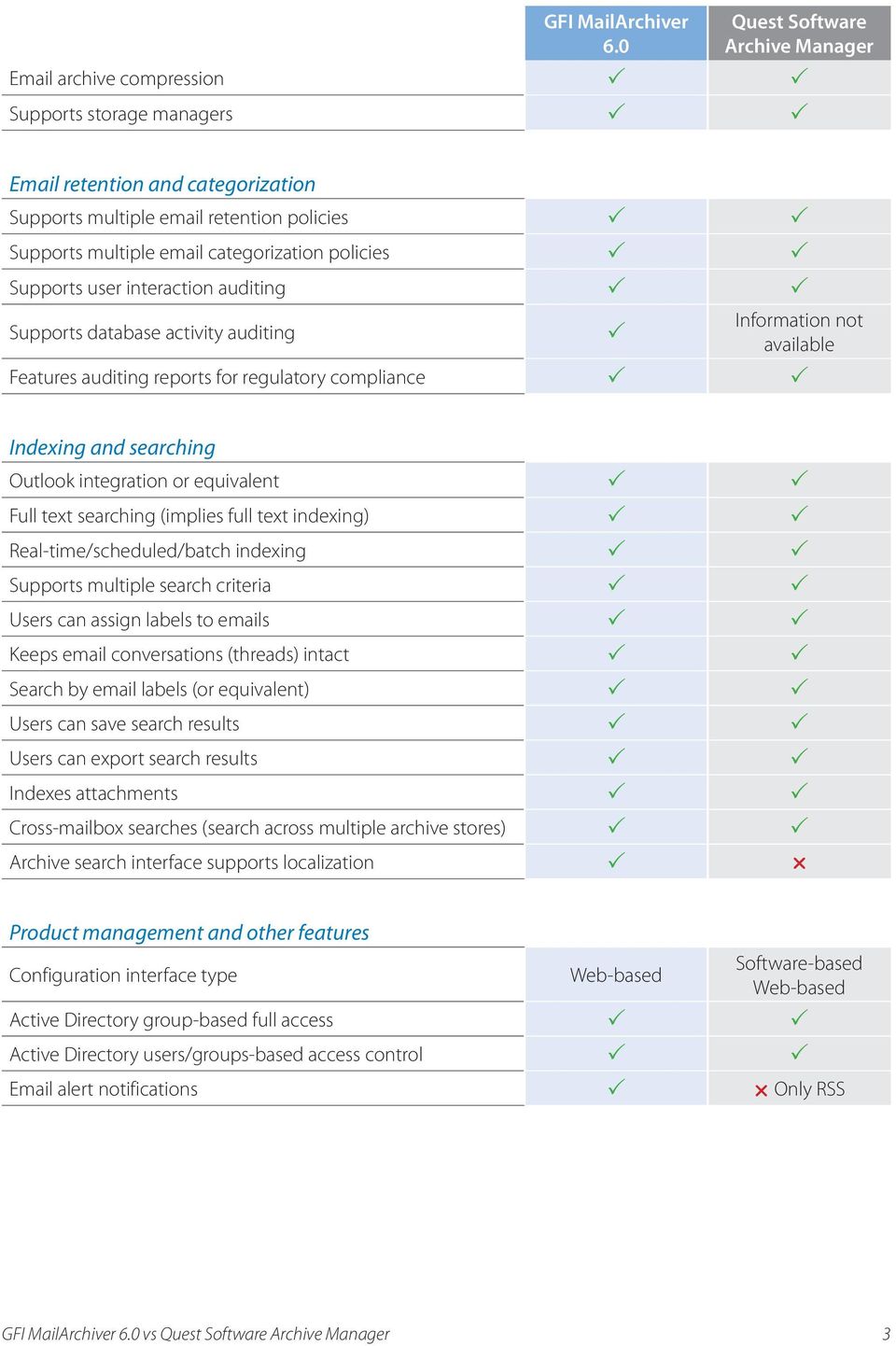
3 GFI MailArchiver 6.0 Quest Software Archive Manager archive compression Supports storage managers retention and categorization Supports multiple retention policies Supports multiple categorization policies Supports user interaction auditing Supports database activity auditing Information not available Features auditing reports for regulatory compliance Indexing and searching Outlook integration or equivalent Full text searching (implies full text indexing) Real-time/scheduled/batch indexing Supports multiple search criteria Users can assign labels to s Keeps conversations (threads) intact Search by labels (or equivalent) Users can save search results Users can export search results Indexes attachments Cross-mailbox searches (search across multiple archive stores) Archive search interface supports localization r Product management and other features Configuration interface type Web-based Software-based Web-based Active Directory group-based full access Active Directory users/groups-based access control alert notifications r Only RSS 3
4 GFI MailArchiver is a simple, cost-effective, and time-efficient archiving solution that eliminates the dependence on PST files and offers excellent support for archiving, searching and auditing requirements. A simple high-level comparison between the key features of GFI MailArchiver and Quest Software Archive Manager revealed the following differences: GFI MailArchiver can be integrated with several servers and platforms On which servers and platforms can I use GFI MailArchiver? GFI MailArchiver can be easily integrated with Microsoft Exchange Server 2000, 2003, 2007 and It does not require a dedicated machine and can be installed on the same machine that is being used as the mail server. This is particularly beneficial for small businesses, as it eliminates the need for purchasing and maintaining different servers. In addition, GFI MailArchiver supports distributed installation for load sharing, thus addressing the requirements of large organizations. It can also archive from multiple Exchange Servers at the same time. While Quest Software Archive Manager can also be integrated with Microsoft Exchange Server 2000, 2003 and 2007, it generally requires a dedicated server for installation. GFI MailArchiver is also compatible with Microsoft Windows Server 2000, 2003 and 2008, while Quest Software Archive Manager is only compatible with Windows Server GFI MailArchiver ensures smooth functionality of the Exchange Server Does my archiving solution affect the functionality of the Exchange Server? GFI MailArchiver does not affect Exchange Server functionality in any way. When archiving, GFI MailArchiver does not create any links to the or attachments. A copy of the is archived intact through journaling. On the other hand, Quest Software Archive Manager replaces the with a stub message, which may affect the functionality of the Exchange Server. In these cases, the archiving server and the Exchange server are dependent on each other; hence if one server is experiencing downtime, the other is affected. GFI MailArchiver provides robust backend storage What kind of backend storage is supported by GFI MailArchiver? Besides Microsoft SQL Server and SQL Express, GFI MailArchiver can be integrated with the Firebird database. Firebird is the default, in-built database for GFI MailArchiver and does not require any additional license costs. The Firebird alternative is best suited for small businesses, where traffic is low. Quest Software Archive Manager can only be integrated with MS SQL for backend storage. GFI MailArchiver also supports all UNC-based storage managers, such as QStar and IBM Tivoli. GFI MailArchiver allows users to classify their s Can I classify my s by defining my own categories? GFI MailArchiver facilitates efficient management by allowing both the administrator and the user to define labels for classification. While the administrator can enforce organization-level classification, the user can also create user level categories. This provides more flexibility and control to the users. In addition, labels also help in refining search results and meeting compliance requirements. Quest Software Archive Manager allows only administrators to define tags for s. Users can classify their s in pre-defined default categories, and use them for search only after the approval from the administrator. 4
5 GFI MailArchiver dynamically updates search results Can my archiving solution dynamically update search results? GFI MailArchiver allows users to save search results in the form of Search Folders. A Search Folder stores the search query, allowing users to modify or delete Search Folders safely and without affecting the archived s. When a user accesses the search folder, the search query stored is executed again thus displaying all the s that meet the conditions specified by the user. On the other hand, Quest Software Archive Manager allows users to save search results in the form of Save Searches menu, which does not update search results automatically. GFI MailArchiver provides an easy way to export search results Can I export search results? In GFI MailArchiver, search results can be exported to a folder on a disk or to a specific address. Exporting to an address can be done in two ways, either as an attachment or directly as an . On the other hand, Quest Software Archive Manager allows users, who have the required permission, to export search results to a Microsoft Outlook PST file. GFI MailArchiver provides User Interaction and Database Activity Auditing What mechanisms are available for auditing purposes? GFI MailArchiver provides two types of auditing User Interaction Auditing and Database Activity Auditing. User Interaction Auditing records all user activities in the form of a report, i.e., User Audit Trail. It records all activities of users when they browse or search through archives using the Web interface. Database Activity Auditing tracks all the changes made to the database, such as configuration management, access control and retention policies. The auditing reports serve as a useful resource during audits, system performance monitoring, and in certain cases for regulatory compliance. GFI MailArchiver offers a multi-lingual interface Does my archiving solution offer support for languages other than English? A truly universal archiving solution, GFI MailArchiver offers a multi-lingual interface. It supports localization in several languages including English, Dutch, French, German, Italian, Russian, Spanish, Czech, Arabic, Japanese, Simplified Chinese and Traditional Chinese. It allows users to set their preferred language as the default language for their web interface. On the other hand, Quest Software Archive Manager supports only English language. GFI MailArchiver ensures legal compliance Does my archiving solution ensure legal compliance? GFI MailArchiver does not allow users to modify archived mails. This helps to ascertain the integrity, and hence the original content of the mail for compliance purposes. GFI MailArchiver also helps organizations to meet regulatory compliance, with, for example, the Sarbanes-Oxley Act 2002, E-Comm Act 2000, BS7799-2:2002, the Enterprise Act 2002, and Decreto del Presidente del Consiglio dei Ministri (8 February 1999). GFI MailArchiver does not require additional training Do I need additional training to use this product? No additional end user or administration training is required for using and maintaining GFI MailArchiver. It is a user-friendly yet technically robust product. 5
6 USA, CANADA AND CENTRAL AND SOUTH AMERICA Weston Parkway, Suite 104, Cary, NC 27513, USA Telephone: +1 (888) Fax: +1 (919) GFI 1057 may11 ENGLAND AND IRELAND Magna House, London Road, Staines, Middlesex, TW18 4BP, UK Telephone: +44 (0) Fax: +44 (0) EUROPE, MIDDLE EAST AND AFRICA GFI House, San Andrea Street, San Gwann, SGN 1612, Malta Telephone: Fax: AUSTRALIA AND NEW ZEALAND 83 King William Road, Unley 5061, South Australia Telephone: Fax: [email protected] Disclaimer GFI Software. All rights reserved. All product and company names herein may be trademarks of their respective owners. The information and content in this document is provided for informational purposes only and is provided as is with no warranty of any kind, either express or implied, including but not limited to the implied warranties of merchantability, fitness for a particular purpose, and non-infringement. GFI Software is not liable for any damages, including any consequential damages, of any kind that may result from the use of this document. The information is obtained from publicly available sources. Though reasonable effort has been made to ensure the accuracy of the data provided, GFI makes no claim, promise or guarantee about the completeness, accuracy, recency or adequacy of information and is not responsible for misprints, outof-date information, or errors. GFI makes no warranty, express or implied, and assumes no legal liability or responsibility for the accuracy or completeness of any information contained in this document. If you believe there are any factual errors in this document, please contact us and we will review your concerns as soon as practical.

GFI Product Comparison. GFI MailArchiver 6.0 vs Waterford Technologies MailMeter Archive
 GFI Product Comparison GFI MailArchiver 6.0 vs Waterford Technologies MailMeter Archive General features GFI MailArchiver 6.0 Waterford Technologies MailMeter Archive Supports Microsoft Exchange Server
GFI Product Comparison. GFI MailArchiver 6.0 vs EMC EmailXtender Archive Edition
 GFI Product Comparison GFI MailArchiver 6.0 vs EMC EmailXtender Archive Edition General features GFI MailArchiver 6.0 EMC EmailXtender Archive Edition Supports Microsoft Exchange Server 2000, 2003 and
GFI product comparison. GFI MailArchiver vs. Symantec Enterprise Vault
 GFI product comparison GFI MailArchiver vs. Symantec Enterprise Vault General features GFI MailArchiver Symantec Enterprise Vault Supports Microsoft Exchange Server 2003, 2007 and 2010 Supports distributed
GFI Product Comparison. GFI MailArchiver 6.0 vs Stimulus Software MailArchiva
 GFI Product Comparison GFI MailArchiver 6.0 vs Stimulus Software MailArchiva Overview GFI MailArchiver 6.0 is the business archiving solution for small and medium-sized enterprises (SMEs). Reduce PST management
GFI Product Guide. GFI MailArchiver Archive Restrictions and Licensing Guide
 GFI Product Guide GFI MailArchiver Archive Restrictions and Licensing Guide The information and content in this document is provided for informational purposes only and is provided "as is" with no warranty
How to configure IBM iseries (formerly AS/400) event collection with Audit and GFI EventsManager
 GFI White Paper How to configure IBM iseries (formerly AS/400) event collection with Audit and GFI EventsManager This document explains how to configure and use GFI EventsManager to collect IBM iseries
GFI Product comparison. GFI MailArchiver vs. Microsoft Exchange 2010
 GFI Product comparison GFI MailArchiver vs. Microsoft Exchange 2010 GFI MailArchiver 2011 GFI MailArchiver is an industry-leading email management solution. It is used globally by administrators to lower
GFI MailEssentials Online Archive Configuration and usage
 GFI MailEssentials Online Archive Configuration and usage Contents Retention policies 3 Message tagging 4 Access rights 5 Journaling 5 Accessing archived messages 7 Archive search / Viewing archived messages
GFI product comparison. GFI MailArchiver vs. Microsoft Exchange 2010
 GFI product comparison GFI MailArchiver vs. Microsoft Exchange 2010 GFI MailArchiver GFI MailArchiver is an industry-leading email management solution. It is used globally by administrators to lower email
GFI Product Manual. GFI MailArchiver Outlook Addon
 GFI Product Manual GFI MailArchiver Outlook Addon The information and content in this document is provided for informational purposes only and is provided "as is" with no warranty of any kind, either express
GFI Product Comparison. GFI LanGuard 2011 vs Retina Network Security Scanner 5.12.1
 GFI Product Comparison GFI LanGuard 2011 vs Retina Network Security Scanner 5.12.1 General features GFI LanGuard 2011 Retina 5.12.1 Scheduled scans Agent-less Agent-based Integration with Active Directory
GFI Product Comparison. GFI LanGuard 2011 vs Microsoft Baseline Security Analyzer 2.2
 GFI Product Comparison GFI LanGuard 2011 vs Microsoft Baseline Security Analyzer 2.2 General features GFI LanGuard 2011 MBSA 2.2 Scheduled scans r Agent-less Agent-based Integration with Active Directory
GFI Product Manual. GFI MailArchiver Evaluation Guide
 GFI Product Manual GFI MailArchiver Evaluation Guide The information and content in this document is provided for informational purposes only and is provided "as is" with no warranty of any kind, either
GFI Product Guide. GFI MailArchiver Archive Assistant
 GFI Product Guide GFI MailArchiver Archive Assistant The information and content in this document is provided for informational purposes only and is provided "as is" with no warranty of any kind, either
GFI Product Manual. Outlook Connector User Manual
 GFI Product Manual Outlook Connector User Manual http://www.gfi.com [email protected] The information and content in this document is provided for informational purposes only and is provided "as is" with no
GFI MailEssentials 2014 Upgrade Guide A guide to upgrading from previous versions of GFI MailEssentials and GFI MailSecurity
 GFI MailEssentials 2014 Upgrade Guide A guide to upgrading from previous versions of GFI MailEssentials and GFI MailSecurity The information and content in this document is provided for informational purposes
Archiving technologies
 GFI White Paper Archiving technologies Have you ever considered the impact one untraceable email can have on an organization or individual s career? With so much corporate information contained within
How to create a complex and secure backup strategy
 GFI White Paper How to create a complex and secure backup strategy Data is the lifeblood of every organization and business. Data theft and data loss through negligence or hardware failure can cause irreparable
GFI Product Guide. GFI Archiver Evaluation Guide
 GFI Product Guide GFI Archiver Evaluation Guide The information and content in this document is provided for informational purposes only and is provided "as is" with no warranty of any kind, either express
Patch management with GFI LanGuard and Microsoft WSUS
 GFI White Paper Patch management with GFI LanGuard and Microsoft WSUS A cost-effective and easy solution for network-wide patch management This white paper provides an overview of how to use GFI LanGuard
GFI MailSecurity deployment strategies
 GFI White Paper GFI MailSecurity deployment strategies Which operating mode(s) to use in your network environment GFI MailSecurity can be deployed as an SMTP gateway or as a VS API version for Microsoft
Quick Start Guide for administrators
 Quick Start Guide for administrators Contents Welcome 3 Your login information 3 Step 1: Adding mailboxes 3 Part 1: Add users 3 Part 2: Add aliases 3 Step 2: Adjusting your spam handling settings 4 Optional
GFI Product Guide. How to create a new SQL Server Instance in Microsoft SQL Server 2012 and SQL Server Express
 GFI Product Guide How to create a new SQL Server Instance in Microsoft SQL Server 2012 and SQL Server Express The information and content in this document is provided for informational purposes only and
GFI Product Manual. Outlook Connector Manual
 GFI Product Manual Outlook Connector Manual The information and content in this document is provided for informational purposes only and is provided "as is" with no warranty of any kind, either express
GFI Product Comparison. GFI MailEssentials vs Barracuda Spam Firewall
 GFI Product Comparison GFI MailEssentials vs Barracuda Spam Firewall GFI MailEssentials Barracuda Spam Firewall Integrates closely with Microsoft Exchange Server 2003/2007/2010 Integrates closely with
Email security Cloud vs. On-premise solutions
 GFI White Paper Email security Cloud vs. On-premise solutions Choosing whether to put your email security in the cloud or host it on premise is a major decision. Hopefully this white paper will help. Contents
GFI Product Guide. Archive Assistant
 GFI Product Guide Archive Assistant The information and content in this document is provided for informational purposes only and is provided "as is" with no warranty of any kind, either express or implied,
How to keep spam off your network
 GFI White Paper How to keep spam off your network What features to look for in anti-spam technology A buyer s guide to anti-spam software, this white paper highlights the key features to look for in anti-spam
GFI Product Comparison. GFI MailEssentials vs. Trend Micro ScanMail Suite for Microsoft Exchange
 GFI Product Comparison GFI MailEssentials vs. Trend Micro ScanMail Suite for Microsoft Exchange GFI MailEssentials Trend Micro ScanMail Suite Microsoft Exchange Server 2003/2007/2010/2013 Integration Option
Integrating faxes into today s world of healthcare e-records
 GFI White Paper Integrating faxes into today s world of healthcare e-records This white paper examines the obstacles preventing the move away from fax machines, and the benefits of having a communications
How To Set Up A Journaling Mailbox In Microsoft Office 365 And Gfi Mailarchiver
 GFI Product Guide GFI MailArchiver and Office 365 Deployment Guide The information and content in this document is provided for informational purposes only and is provided "as is" with no warranty of any
Understanding data backups: why SMEs need them
 GFI White Paper Understanding data backups: why SMEs need them Data is the lifeblood of every organization, yet many either fail to back up their data or they are not doing so properly. Losing data can
GFI White Paper. Going beyond Exchange 2010 - Why it pays to have a dedicated email archiving solution
 GFI White Paper Going beyond Exchange 2010 - Why it pays to have a dedicated email archiving solution Contents Introduction 3 The state of email archiving and data retention 3 The compliance challenge
Endpoint Protection Performance Benchmarks
 Endpoint Protection Performance Benchmarks GFI Software conducted objective performance testing on four, publically available business endpoint protection security software products on Windows 7 Professional
GFI Product Comparison. GFI MailEssentials vs Symantec Mail Security for Microsoft Exchange 7.0
 GFI Product Comparison GFI MailEssentials vs Symantec Mail Security for Microsoft Exchange 7.0 GFI MailEssentials Symantec Mail Security for Microsoft Exchange 7.0 Supports Microsoft Exchange Server 2003
GFI Product Guide. GFI Archiver and Office 365 Deployment Guide
 GFI Product Guide GFI Archiver and Office 365 Deployment Guide The information and content in this document is provided for informational purposes only and is provided "as is" with no warranty of any kind,
The importance of an Acceptable Use Policy
 GFI White Paper The importance of an Acceptable Use Policy In an ideal world, employees would use the computers and Internet access provided their employer solely for business use. It is however, sadly,
The business implications of not having a backup strategy: where businesses get it wrong
 GFI White Paper The business implications of not having a backup strategy: where businesses get it wrong A business that fails to maintain a copy of its data is asking for trouble. It is extremely easy
GFI MAX RemoteManagement Building Blocks to Managed services
 GFI MAX RemoteManagement Building Blocks to Managed services Overview GFI s Building Block Program is all about making Managed Services a practical reality for IT support companies. A recent survey found
GFI Cloud white paper. Cloud-based services: Easing the IT burden while taking control. www.gficloud.com
 GFI Cloud white paper Cloud-based services: Easing the IT burden while taking control www.gficloud.com Contents Introduction 3 Transferring workload into the cloud 4 Managing the cloud 5 Summary 6 About
GFI White Paper. How Web Reputation increases your online protection
 GFI White Paper How Web Reputation increases your online protection Contents Introduction to Web Reputation 3 Why use Web Reputation? 3 The value of using Web Reputation and antivirus software 3 The value
Social networking at work: Thanks, but no thanks?
 GFI White Paper Social networking at work: Thanks, but no thanks? Millions of people around the world with access to the Internet are members of one or more social networks. They have a permanent online
GFI Product Manual. Version 6.0. Getting Started Guide
 GFI Product Manual Version 6.0 Getting Started Guide The information and content in this document is provided for informational purposes only and is provided "as is" with no warranty of any kind, either
Patch management: Fixing vulnerabilities before they are exploited
 GFI White Paper Patch management: Fixing vulnerabilities before they are exploited Managing and administering software updates remains one of the most challenging and resource-intensive tasks an IT Department
GFI Product Manual. Administrator Guide
 GFI Product Manual Administrator Guide The information and content in this document is provided for informational purposes only and is provided "as is" with no warranty of any kind, either express or implied,
Evaluation guide. Evaluator s guide to getting the maximum benefit out of a GFI LanGuard trial
 Evaluation guide Evaluator s guide to getting the maximum benefit out of a GFI LanGuard trial Contents GFI LanGuard 2012 evaluation guide 1 Introduction 4 GFI LanGuard overview 4 Why do customers purchase
Vulnerability management: Key questions you should be asking
 GFI White Paper Vulnerability management: Key questions you should be asking Is vulnerability management critical for a business? Aren t traditional security tools sufficient to protect and secure the
GFI MailEssentials 2012 Upgrade Guide A guide to upgrading from previous versions of GFI MailEssentials and GFI MailSecurity Applies to GFI
 GFI MailEssentials 2012 Upgrade Guide A guide to upgrading from previous versions of GFI MailEssentials and GFI MailSecurity Applies to GFI MailEssentials 2012 Service Release 4 The information and content
Archive Legislation: Email archiving in the Netherlands. The key laws that affect your business
 Archive Legislation: Email archiving in the Netherlands The key laws that affect your business Contents Laws regulating archiving 3 Who is required to archive email? 4 GFI Archiver 4 Archive Legislation:
How to perform network-wide security event log monitoring
 GFI White Paper How to perform network-wide security event log monitoring Using GFI EventsManager for intrusion detection and essential auditing of security event logs This white paper explains the need
GFI Archiver Evaluation guide: Online Demo Evaluation Guide
 GFI Archiver Evaluation guide: Online Demo Evaluation Guide EN The information and content in this document is provided for informational purposes only and is provided as is with no warranty of any kind,
Survey: Web filtering in Small and Medium-sized Enterprises (SMEs)
 September 2010 GFI Software www.gfi.com More and more organizations are seeing value in web filtering and web security solutions, a survey conducted by GFI Software shows, with seven in 10 stating they
Why organizations need to archive email
 GFI White Paper Why organizations need to archive email The underlying reasons why corporate email archiving is important Over the past few years, email has become an integral part of the business workflow.
Protecting your network against email threats
 GFI White Paper Protecting your network against email threats The need for comprehensive server-based email security This white paper explains why antivirus software alone is not enough to protect your
GFI Product Manual. Getting Started Guide
 GFI Product Manual Getting Started Guide The information and content in this document is provided for informational purposes only and is provided "as is" with no warranty of any kind, either express or
GFI FAXmaker for Exchange/SMTP 12: An introduction to the architecture and deployment options
 GFI FAXmaker for Exchange/SMTP 12: An introduction to the architecture and deployment options An overview of how GFI FAXmaker works, and how to deploy it This white paper describes the different ways in
GFI Product Manual. Evaluation Guide Part 1: Quick Install
 GFI Product Manual Evaluation Guide Part 1: Quick Install The information and content in this document is provided for informational purposes only and is provided "as is" with no warranty of any kind,
GFI Product Manual. Administration and Configuration Manual
 GFI Product Manual Administration and Configuration Manual http://www.gfi.com [email protected] The information and content in this document is provided for informational purposes only and is provided "as is"
Product comparison. GFI LanGuard 2014 vs. Microsoft Windows InTune (October 2013 Release)
 Product comparison GFI LanGuard 2014 vs. Microsoft Windows InTune (October 2013 Release) GFI LanGuard 2014 Windows Intune General features Scheduled scans Agent-less r Agent-based Integration with Active
How To Use Gfi Mailarchiver On A Pc Or Macbook With Gfi Email From A Windows 7.5 (Windows 7) On A Microsoft Mail Server On A Gfi Server On An Ipod Or Gfi.Org (
 GFI MailArchiver for Exchange 4 Manual By GFI Software http://www.gfi.com Email: [email protected] Information in this document is subject to change without notice. Companies, names, and data used in examples
GFI Product Guide. Administrator Guide
 GFI Product Guide Administrator Guide The information and content in this document is provided for informational purposes only and is provided "as is" with no warranty of any kind, either express or implied,
Archive Legislation: Email archiving in Switzerland. The key laws that affect your business
 Archive Legislation: Email archiving in Switzerland The key laws that affect your business Contents Basic provisions for document retention: Obligation to archive for 10 years 3 Tax law requirements 3
Product comparison. GFI LanGuard 2014 vs. Microsoft Windows Server Update Services 3.0 SP2
 Product comparison GFI LanGuard 2014 vs. Microsoft Windows Server Update Services 3.0 SP2 General features GFI LanGuard 2014 Microsoft WSUS 3.0 SP2 Scheduled scans Agent-less r Agent-based Integration
GFI Product Guide. Administrator Guide
 GFI Product Guide Administrator Guide The information and content in this document is provided for informational purposes only and is provided "as is" with no warranty of any kind, either express or implied,
Make life simple and make more money the easy way.
 Technical factsheet Make life simple and make more money the easy way. MAX Backup - fast, reliable, automatic, offsite, secure backup and disaster recovery to make your life easier! No more worrying about
GFI Product Manual. Deployment Guide
 GFI Product Manual Deployment Guide http://www.gfi.com [email protected] The information and content in this document is provided for informational purposes only and is provided "as is" with no warranty of
Omniquad Exchange Archiving
 Omniquad Exchange Archiving Deployment and Administrator Guide Manual version 3.1.2 Revision Date: 20 May 2013 Copyright 2012 Omniquad Ltd. All rights reserved. Omniquad Ltd Crown House 72 Hammersmith
GFI Product Manual. Evaluation Guide Part 1: Quick Install
 GFI Product Manual Evaluation Guide Part 1: Quick Install The information and content in this document is provided for informational purposes only and is provided "as is" with no warranty of any kind,