
GFI Product Guide. GFI MailArchiver Archive Restrictions and Licensing Guide
|
|
|
- Georgina Adams
- 10 years ago
- Views:
Transcription
1 GFI Product Guide GFI MailArchiver Archive Restrictions and Licensing Guide

2 The information and content in this document is provided for informational purposes only and is provided "as is" with no warranty of any kind, either express or implied, including but not limited to the implied warranties of merchantability, fitness for a particular purpose, and non-infringement. GFI Software is not liable for any damages, including any consequential damages, of any kind that may result from the use of this document. The information is obtained from publicly available sources. Though reasonable effort has been made to ensure the accuracy of the data provided, GFI makes no claim, promise or guarantee about the completeness, accuracy, recency or adequacy of information and is not responsible for misprints, out-of-date information, or errors. GFI makes no warranty, express or implied, and assumes no legal liability or responsibility for the accuracy or completeness of any information contained in this document. If you believe there are any factual errors in this document, please contact us and we will review your concerns as soon as practical. All product and company names herein may be trademarks of their respective owners. Microsoft and Windows are either registered trademarks or trademarks of Microsoft Corporation in the United States and other countries. GFI MailArchiver is copyright of GFI SOFTWARE Ltd GFI Software Ltd. All rights reserved. Document Version: V Last updated (month/day/year): 7/15/2014
3 1 About GFI MailArchiver Licensing 4 2 Configuring Archive Restrictions Enabling Mailbox Archive Restrictions Disabling Mailbox Archive Restrictions 9

4 1 About GFI MailArchiver Licensing GFI MailArchiver requires a license for every mailbox. Each GFI MailArchiver license is made up of the following: An Archiving license A GFI MailArchiver File Archive Assistant (FAA) license Each license can be used by the same user to archive items from the mail server and/or to archive files from a client machine using the GFI MailArchiver File Archive Assistant. For example, when purchasing a license for 75 users, you can enable archiving for 75 different mailboxes and for each of these users you can also install the GFI MailArchiver File Archive Assistant on their machines. A user with multiple computers, all of which have GFI MailArchiver File Archive Assistant installed, is still counted as 1 GFI MailArchiver File Archive Assistant license. To free up GFI MailArchiver File Archive Assistant licenses simply uninstall GFI MailArchiver File Archive Assistant from client machines on your network. You may need to exclude certain mailboxes from archiving while including specific ones. This can be achieved by configuring Mailbox Archive Restrictions and determines the number of licensed mailboxes counted by the product. For general information on GFI MailArchiver licensing, refer to: Licensing
5 2 Configuring Archive Restrictions GFI MailArchiver requires a license for every mailbox. You may need to exclude certain mailboxes from archiving while including only specific ones. This can be achieved by configuring Mailbox Archive Restrictions. Using an Archive Restriction List composed of Active Directory user names and/or addresses (called Inclusion List or Exclusion List depending on the selected restriction method), you can determine the number of licensed mailboxes counted by the product using one of the following methods: RESTRICTION METHOD Restricting by Exclusion DESCRIPTION Enable Archiving Restrictions by selecting one of the following options under Using an Exclusion list: DO NOT archive at all if ANY of the recipients or senders are in the restriction list - GFI MailArchiver does not archive if any of the addresses in the is listed in the Archive Restriction List or Always archive but users in the restriction list will not be able to view it - is always archived, but users in the Archive Restriction List will not be able to view the archived . IMPORTANT If you select 'Always archive but users in the restriction list will not be able to view it' but the recipients or senders are not in Active Directory, s are not archived. When GFI MailArchiver is configured to use an exclusion list, the licensing module deducts the number of Active Directory users in the configured Archive Restriction List from the total count of users in the organization. NOTE addresses in the Archive Restriction List are not deducted. Example 1: Consider an Active Directory with 10 users and an exclusion list of 6 Active Directory users. The license required in this scenario is for 4 users. Example 2: Consider an Active Directory with 10 users and an exclusion list of 6 Active Directory users, but the exclusion list contains also another entry for 1 address (not a user). In this case the license required is still for 4 users since addresses are ignored. GFI MailArchiver 2 Configuring Archive Restrictions 5

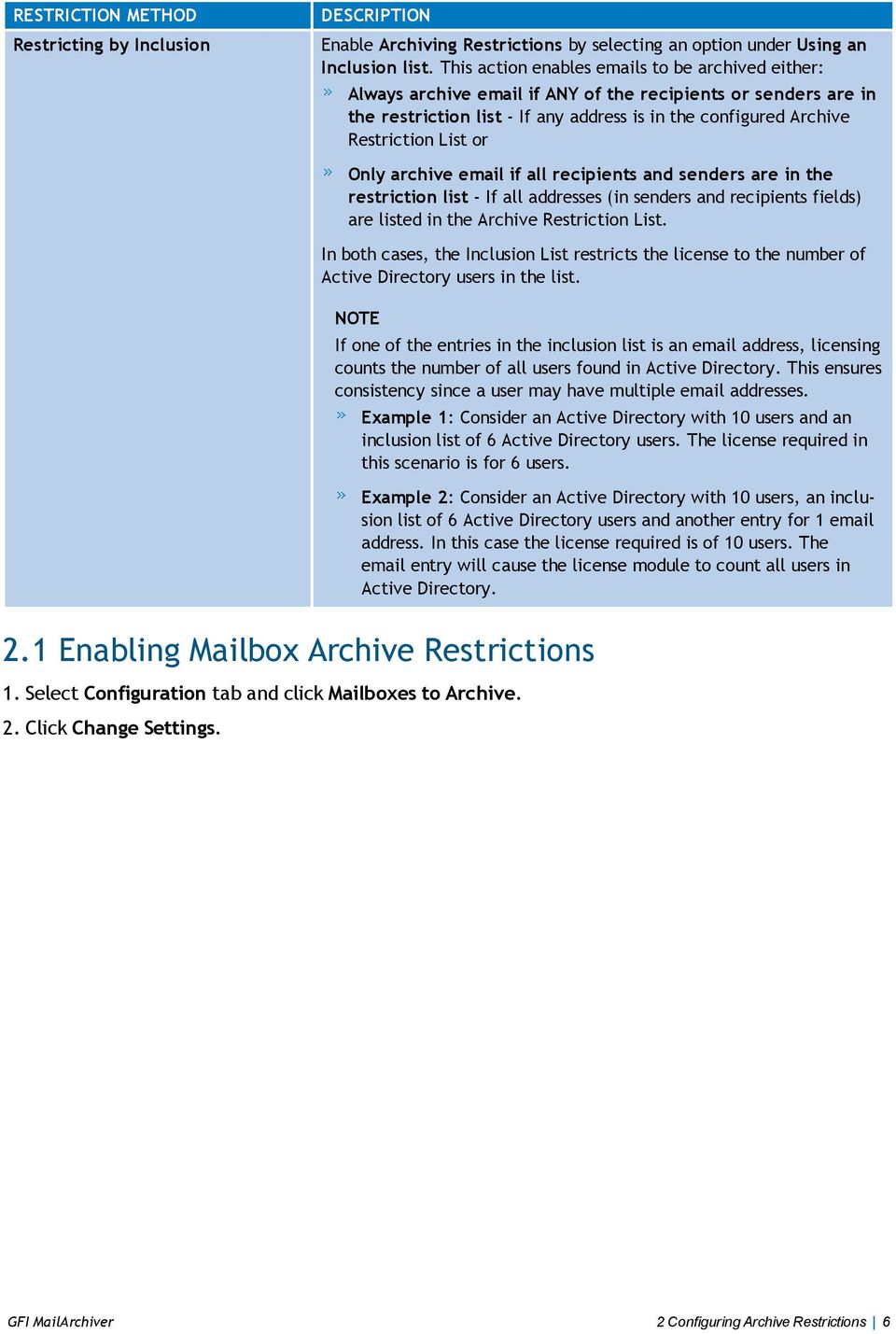
6 RESTRICTION METHOD Restricting by Inclusion DESCRIPTION Enable Archiving Restrictions by selecting an option under Using an Inclusion list. This action enables s to be archived either: Always archive if ANY of the recipients or senders are in the restriction list - If any address is in the configured Archive Restriction List or Only archive if all recipients and senders are in the restriction list - If all addresses (in senders and recipients fields) are listed in the Archive Restriction List. In both cases, the Inclusion List restricts the license to the number of Active Directory users in the list. NOTE If one of the entries in the inclusion list is an address, licensing counts the number of all users found in Active Directory. This ensures consistency since a user may have multiple addresses. Example 1: Consider an Active Directory with 10 users and an inclusion list of 6 Active Directory users. The license required in this scenario is for 6 users. Example 2: Consider an Active Directory with 10 users, an inclusion list of 6 Active Directory users and another entry for 1 address. In this case the license required is of 10 users. The entry will cause the license module to count all users in Active Directory. 2.1 Enabling Mailbox Archive Restrictions 1. Select Configuration tab and click Mailboxes to Archive. 2. Click Change Settings. GFI MailArchiver 2 Configuring Archive Restrictions 6
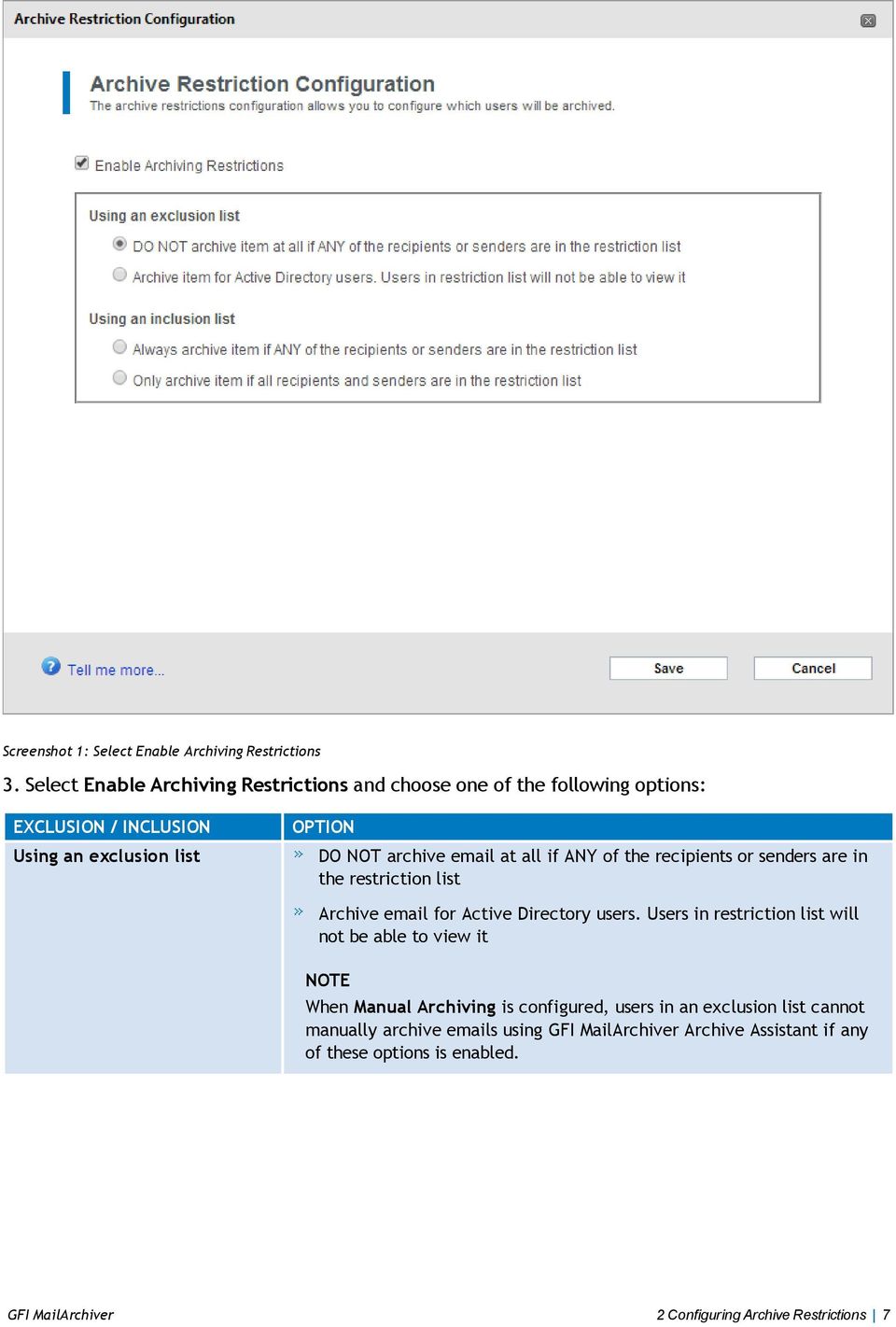
7 Screenshot 1: Select Enable Archiving Restrictions 3. Select Enable Archiving Restrictions and choose one of the following options: EXCLUSION / INCLUSION Using an exclusion list OPTION DO NOT archive at all if ANY of the recipients or senders are in the restriction list Archive for Active Directory users. Users in restriction list will not be able to view it NOTE When Manual Archiving is configured, users in an exclusion list cannot manually archive s using GFI MailArchiver Archive Assistant if any of these options is enabled. GFI MailArchiver 2 Configuring Archive Restrictions 7
8 EXCLUSION / INCLUSION Using an inclusion list OPTION Always archive if ANY of the recipients or senders are in the restriction list Only archive if all recipients and senders are in the restriction list NOTE When Manual Archiving is configured, all users in an inclusion list are able to manually archive s using GFI MailArchiver Archive Assistant if any of these options is enabled. IMPORTANT After enabling Archive Restrictions, click Manage Restrictions to create the list of users, groups or mailboxes to be restricted. The configured Restrictions will not come into affect if the list is not created. NOTE s archived manually using the GFI MailArchiver Archive Assistant are always archived, even when an exclusion list is configured. 4. Click Save. GFI MailArchiver 2 Configuring Archive Restrictions 8

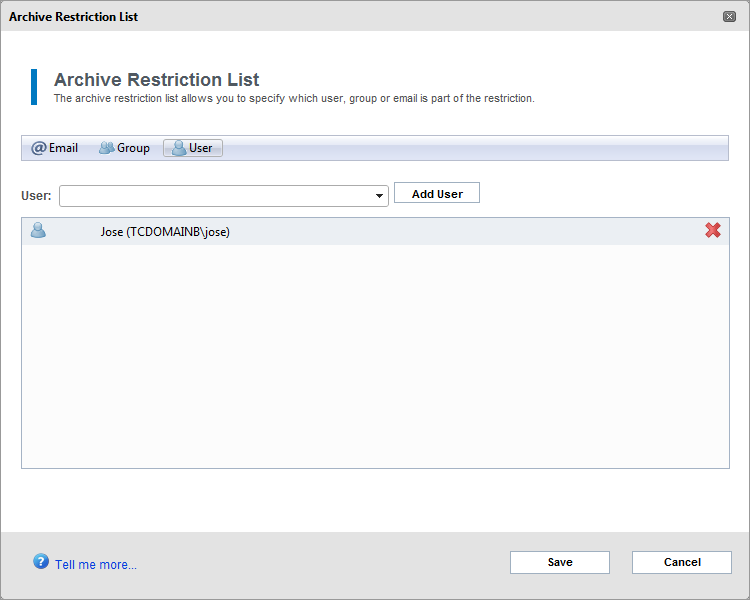
9 Screenshot 2: Add s, groups or users 5. Click and select an option between , group or users and key in the , group name or user name of the user to restrict. 6. Click Save. 2.2 Disabling Mailbox Archive Restrictions To disable mailbox archive restrictions: 1. Select Configuration tab. 2. Click Mailboxes to Archive. 3. Click Change Settings. 4. Uncheck Enable Archiving Restrictions. 5. Click Save. GFI MailArchiver 2 Configuring Archive Restrictions 9

10 USA, CANADA AND CENTRAL AND SOUTH AMERICA 4309 Emperor Blvd, Suite 400, Durham, NC 27703, USA Telephone: +1 (888) Fax: +1 (919) UK AND REPUBLIC OF IRELAND Magna House, London Road, Staines-upon-Thames, Middlesex, TW18 4BP, UK Telephone: +44 (0) Fax: +44 (0) EUROPE, MIDDLE EAST AND AFRICA GFI House, Territorials Street, Mriehel, BKR 3000, Malta Telephone: Fax: AUSTRALIA AND NEW ZEALAND 83 King William Road, Unley 5061, South Australia Telephone: Fax: [email protected]

GFI Product Guide. How to create a new SQL Server Instance in Microsoft SQL Server 2012 and SQL Server Express
 GFI Product Guide How to create a new SQL Server Instance in Microsoft SQL Server 2012 and SQL Server Express The information and content in this document is provided for informational purposes only and
How To Set Up A Journaling Mailbox In Microsoft Office 365 And Gfi Mailarchiver
 GFI Product Guide GFI MailArchiver and Office 365 Deployment Guide The information and content in this document is provided for informational purposes only and is provided "as is" with no warranty of any
GFI Product Guide. GFI MailArchiver Archive Assistant
 GFI Product Guide GFI MailArchiver Archive Assistant The information and content in this document is provided for informational purposes only and is provided "as is" with no warranty of any kind, either
GFI Product Guide. GFI Archiver Evaluation Guide
 GFI Product Guide GFI Archiver Evaluation Guide The information and content in this document is provided for informational purposes only and is provided "as is" with no warranty of any kind, either express
GFI Product Guide. GFI Archiver and Office 365 Deployment Guide
 GFI Product Guide GFI Archiver and Office 365 Deployment Guide The information and content in this document is provided for informational purposes only and is provided "as is" with no warranty of any kind,
GFI Product Manual. GFI MailArchiver Evaluation Guide
 GFI Product Manual GFI MailArchiver Evaluation Guide The information and content in this document is provided for informational purposes only and is provided "as is" with no warranty of any kind, either
GFI MailEssentials 2014 Upgrade Guide A guide to upgrading from previous versions of GFI MailEssentials and GFI MailSecurity
 GFI MailEssentials 2014 Upgrade Guide A guide to upgrading from previous versions of GFI MailEssentials and GFI MailSecurity The information and content in this document is provided for informational purposes
GFI product comparison. GFI MailArchiver vs. Microsoft Exchange 2010
 GFI product comparison GFI MailArchiver vs. Microsoft Exchange 2010 GFI MailArchiver GFI MailArchiver is an industry-leading email management solution. It is used globally by administrators to lower email
GFI Product Comparison. GFI MailArchiver 6.0 vs Stimulus Software MailArchiva
 GFI Product Comparison GFI MailArchiver 6.0 vs Stimulus Software MailArchiva Overview GFI MailArchiver 6.0 is the business archiving solution for small and medium-sized enterprises (SMEs). Reduce PST management
GFI Product Manual. Outlook Connector User Manual
 GFI Product Manual Outlook Connector User Manual http://www.gfi.com [email protected] The information and content in this document is provided for informational purposes only and is provided "as is" with no
GFI Product comparison. GFI MailArchiver vs. Microsoft Exchange 2010
 GFI Product comparison GFI MailArchiver vs. Microsoft Exchange 2010 GFI MailArchiver 2011 GFI MailArchiver is an industry-leading email management solution. It is used globally by administrators to lower
GFI MailEssentials Online Archive Configuration and usage
 GFI MailEssentials Online Archive Configuration and usage Contents Retention policies 3 Message tagging 4 Access rights 5 Journaling 5 Accessing archived messages 7 Archive search / Viewing archived messages
GFI Product Comparison. GFI LanGuard 2011 vs Retina Network Security Scanner 5.12.1
 GFI Product Comparison GFI LanGuard 2011 vs Retina Network Security Scanner 5.12.1 General features GFI LanGuard 2011 Retina 5.12.1 Scheduled scans Agent-less Agent-based Integration with Active Directory
GFI Product Comparison. GFI LanGuard 2011 vs Microsoft Baseline Security Analyzer 2.2
 GFI Product Comparison GFI LanGuard 2011 vs Microsoft Baseline Security Analyzer 2.2 General features GFI LanGuard 2011 MBSA 2.2 Scheduled scans r Agent-less Agent-based Integration with Active Directory
GFI Product Manual. GFI MailArchiver Outlook Addon
 GFI Product Manual GFI MailArchiver Outlook Addon The information and content in this document is provided for informational purposes only and is provided "as is" with no warranty of any kind, either express
Quick Start Guide for administrators
 Quick Start Guide for administrators Contents Welcome 3 Your login information 3 Step 1: Adding mailboxes 3 Part 1: Add users 3 Part 2: Add aliases 3 Step 2: Adjusting your spam handling settings 4 Optional
GFI Product Comparison. GFI MailArchiver 6.0 vs EMC EmailXtender Archive Edition
 GFI Product Comparison GFI MailArchiver 6.0 vs EMC EmailXtender Archive Edition General features GFI MailArchiver 6.0 EMC EmailXtender Archive Edition Supports Microsoft Exchange Server 2000, 2003 and
GFI Product Comparison. GFI MailArchiver 6.0 vs Quest Software Archive Manager
 GFI Product Comparison GFI MailArchiver 6.0 vs Quest Software Archive Manager General features GFI MailArchiver 6.0 Quest Software Archive Manager Supports Microsoft Exchange 2000, 2003 and 2007 Supports
GFI product comparison. GFI MailArchiver vs. Symantec Enterprise Vault
 GFI product comparison GFI MailArchiver vs. Symantec Enterprise Vault General features GFI MailArchiver Symantec Enterprise Vault Supports Microsoft Exchange Server 2003, 2007 and 2010 Supports distributed
GFI Product Guide. Archive Assistant
 GFI Product Guide Archive Assistant The information and content in this document is provided for informational purposes only and is provided "as is" with no warranty of any kind, either express or implied,
GFI Product Comparison. GFI MailArchiver 6.0 vs Waterford Technologies MailMeter Archive
 GFI Product Comparison GFI MailArchiver 6.0 vs Waterford Technologies MailMeter Archive General features GFI MailArchiver 6.0 Waterford Technologies MailMeter Archive Supports Microsoft Exchange Server
GFI MailSecurity deployment strategies
 GFI White Paper GFI MailSecurity deployment strategies Which operating mode(s) to use in your network environment GFI MailSecurity can be deployed as an SMTP gateway or as a VS API version for Microsoft
How to configure IBM iseries (formerly AS/400) event collection with Audit and GFI EventsManager
 GFI White Paper How to configure IBM iseries (formerly AS/400) event collection with Audit and GFI EventsManager This document explains how to configure and use GFI EventsManager to collect IBM iseries
How to create a complex and secure backup strategy
 GFI White Paper How to create a complex and secure backup strategy Data is the lifeblood of every organization and business. Data theft and data loss through negligence or hardware failure can cause irreparable
Archiving technologies
 GFI White Paper Archiving technologies Have you ever considered the impact one untraceable email can have on an organization or individual s career? With so much corporate information contained within
GFI Product Comparison. GFI MailEssentials vs Symantec Mail Security for Microsoft Exchange 7.0
 GFI Product Comparison GFI MailEssentials vs Symantec Mail Security for Microsoft Exchange 7.0 GFI MailEssentials Symantec Mail Security for Microsoft Exchange 7.0 Supports Microsoft Exchange Server 2003
Patch management with GFI LanGuard and Microsoft WSUS
 GFI White Paper Patch management with GFI LanGuard and Microsoft WSUS A cost-effective and easy solution for network-wide patch management This white paper provides an overview of how to use GFI LanGuard
GFI Product Manual. Outlook Connector Manual
 GFI Product Manual Outlook Connector Manual The information and content in this document is provided for informational purposes only and is provided "as is" with no warranty of any kind, either express
How to keep spam off your network
 GFI White Paper How to keep spam off your network What features to look for in anti-spam technology A buyer s guide to anti-spam software, this white paper highlights the key features to look for in anti-spam
GFI Product Comparison. GFI MailEssentials vs Barracuda Spam Firewall
 GFI Product Comparison GFI MailEssentials vs Barracuda Spam Firewall GFI MailEssentials Barracuda Spam Firewall Integrates closely with Microsoft Exchange Server 2003/2007/2010 Integrates closely with
GFI Product Comparison. GFI MailEssentials vs. Trend Micro ScanMail Suite for Microsoft Exchange
 GFI Product Comparison GFI MailEssentials vs. Trend Micro ScanMail Suite for Microsoft Exchange GFI MailEssentials Trend Micro ScanMail Suite Microsoft Exchange Server 2003/2007/2010/2013 Integration Option
Email security Cloud vs. On-premise solutions
 GFI White Paper Email security Cloud vs. On-premise solutions Choosing whether to put your email security in the cloud or host it on premise is a major decision. Hopefully this white paper will help. Contents
Integrating faxes into today s world of healthcare e-records
 GFI White Paper Integrating faxes into today s world of healthcare e-records This white paper examines the obstacles preventing the move away from fax machines, and the benefits of having a communications
Understanding data backups: why SMEs need them
 GFI White Paper Understanding data backups: why SMEs need them Data is the lifeblood of every organization, yet many either fail to back up their data or they are not doing so properly. Losing data can
The importance of an Acceptable Use Policy
 GFI White Paper The importance of an Acceptable Use Policy In an ideal world, employees would use the computers and Internet access provided their employer solely for business use. It is however, sadly,
Endpoint Protection Performance Benchmarks
 Endpoint Protection Performance Benchmarks GFI Software conducted objective performance testing on four, publically available business endpoint protection security software products on Windows 7 Professional
GFI Cloud white paper. Cloud-based services: Easing the IT burden while taking control. www.gficloud.com
 GFI Cloud white paper Cloud-based services: Easing the IT burden while taking control www.gficloud.com Contents Introduction 3 Transferring workload into the cloud 4 Managing the cloud 5 Summary 6 About
Social networking at work: Thanks, but no thanks?
 GFI White Paper Social networking at work: Thanks, but no thanks? Millions of people around the world with access to the Internet are members of one or more social networks. They have a permanent online
The business implications of not having a backup strategy: where businesses get it wrong
 GFI White Paper The business implications of not having a backup strategy: where businesses get it wrong A business that fails to maintain a copy of its data is asking for trouble. It is extremely easy
GFI White Paper. How Web Reputation increases your online protection
 GFI White Paper How Web Reputation increases your online protection Contents Introduction to Web Reputation 3 Why use Web Reputation? 3 The value of using Web Reputation and antivirus software 3 The value
GFI MAX RemoteManagement Building Blocks to Managed services
 GFI MAX RemoteManagement Building Blocks to Managed services Overview GFI s Building Block Program is all about making Managed Services a practical reality for IT support companies. A recent survey found
GFI Product Manual. Version 6.0. Getting Started Guide
 GFI Product Manual Version 6.0 Getting Started Guide The information and content in this document is provided for informational purposes only and is provided "as is" with no warranty of any kind, either
GFI Archiver Evaluation guide: Online Demo Evaluation Guide
 GFI Archiver Evaluation guide: Online Demo Evaluation Guide EN The information and content in this document is provided for informational purposes only and is provided as is with no warranty of any kind,
GFI White Paper. Going beyond Exchange 2010 - Why it pays to have a dedicated email archiving solution
 GFI White Paper Going beyond Exchange 2010 - Why it pays to have a dedicated email archiving solution Contents Introduction 3 The state of email archiving and data retention 3 The compliance challenge
Survey: Web filtering in Small and Medium-sized Enterprises (SMEs)
 September 2010 GFI Software www.gfi.com More and more organizations are seeing value in web filtering and web security solutions, a survey conducted by GFI Software shows, with seven in 10 stating they
GFI FAXmaker for Exchange/SMTP 12: An introduction to the architecture and deployment options
 GFI FAXmaker for Exchange/SMTP 12: An introduction to the architecture and deployment options An overview of how GFI FAXmaker works, and how to deploy it This white paper describes the different ways in
Patch management: Fixing vulnerabilities before they are exploited
 GFI White Paper Patch management: Fixing vulnerabilities before they are exploited Managing and administering software updates remains one of the most challenging and resource-intensive tasks an IT Department
Vulnerability management: Key questions you should be asking
 GFI White Paper Vulnerability management: Key questions you should be asking Is vulnerability management critical for a business? Aren t traditional security tools sufficient to protect and secure the
GFI Product Manual. Evaluation Guide Part 1: Quick Install
 GFI Product Manual Evaluation Guide Part 1: Quick Install The information and content in this document is provided for informational purposes only and is provided "as is" with no warranty of any kind,
Archive Legislation: Email archiving in the Netherlands. The key laws that affect your business
 Archive Legislation: Email archiving in the Netherlands The key laws that affect your business Contents Laws regulating archiving 3 Who is required to archive email? 4 GFI Archiver 4 Archive Legislation:
GFI Product Manual. Administration and Configuration Manual
 GFI Product Manual Administration and Configuration Manual http://www.gfi.com [email protected] The information and content in this document is provided for informational purposes only and is provided "as is"
GFI Product Manual. Getting Started Guide
 GFI Product Manual Getting Started Guide The information and content in this document is provided for informational purposes only and is provided "as is" with no warranty of any kind, either express or
Protecting your network against email threats
 GFI White Paper Protecting your network against email threats The need for comprehensive server-based email security This white paper explains why antivirus software alone is not enough to protect your
Evaluation guide. Evaluator s guide to getting the maximum benefit out of a GFI LanGuard trial
 Evaluation guide Evaluator s guide to getting the maximum benefit out of a GFI LanGuard trial Contents GFI LanGuard 2012 evaluation guide 1 Introduction 4 GFI LanGuard overview 4 Why do customers purchase
Managed Online Backup Compliance
 Managed Online Backup Compliance Introduction Many of MAXfocus s new and existing customers who have started to use Managed Online Backup [MOB] have asked for a statement of compliance against existing
Make life simple and make more money the easy way.
 Technical factsheet Make life simple and make more money the easy way. MAX Backup - fast, reliable, automatic, offsite, secure backup and disaster recovery to make your life easier! No more worrying about
GFI MailEssentials 2012 Upgrade Guide A guide to upgrading from previous versions of GFI MailEssentials and GFI MailSecurity Applies to GFI
 GFI MailEssentials 2012 Upgrade Guide A guide to upgrading from previous versions of GFI MailEssentials and GFI MailSecurity Applies to GFI MailEssentials 2012 Service Release 4 The information and content
GFI Product Manual. Web security, monitoring and Internet access control. Evaluation Guide Part 1: Quick Install
 GFI Product Manual Web security, monitoring and Internet access control Evaluation Guide Part 1: Quick Install The information and content in this document is provided for informational purposes only and
GFI Product Manual. Evaluation Guide Part 1: Quick Install
 GFI Product Manual Evaluation Guide Part 1: Quick Install The information and content in this document is provided for informational purposes only and is provided "as is" with no warranty of any kind,
GFI White Paper: GFI FaxMaker and HIPAA compliance
 GFI White Paper: GFI FaxMaker and HIPAA compliance This document outlines the requirements of HIPAA in terms of faxing protected health information and how GFI Software s GFI FaxMaker, an easy-to-use fax
Installing GFI FAXmaker version 12
 Installing GFI FAXmaker version 12 How to install GFI FAXmaker version 12 on the same machine as the SMTP server (non-exchange 2000/2003) This white paper explains how to install GFI FAXmaker for Exchange/SMTP
Product comparison. GFI LanGuard 2014 vs. Microsoft Windows InTune (October 2013 Release)
 Product comparison GFI LanGuard 2014 vs. Microsoft Windows InTune (October 2013 Release) GFI LanGuard 2014 Windows Intune General features Scheduled scans Agent-less r Agent-based Integration with Active
GFI Product Manual. Getting Started Guide
 GFI Product Manual Getting Started Guide The information and content in this document is provided for informational purposes only and is provided "as is" with no warranty of any kind, either express or
Product comparison. GFI LanGuard 2014 vs. Microsoft Windows Server Update Services 3.0 SP2
 Product comparison GFI LanGuard 2014 vs. Microsoft Windows Server Update Services 3.0 SP2 General features GFI LanGuard 2014 Microsoft WSUS 3.0 SP2 Scheduled scans Agent-less r Agent-based Integration
MAX Insight. HIPAA Hardening & Configuration Guide for MSP s
 MAX Insight Whitepaper HIPAA Hardening & Configuration Guide for MSP s Detailed advice and recommendations on how to properly setup and configure the MAXfocus product platform for usage within HIPAA compliancy