
LogiCORE IP AXI Performance Monitor v2.00.a
|
|
|
- Julianna Evans
- 10 years ago
- Views:
Transcription
1 LogiCORE IP AXI Performance Monitor v2.00.a Product Guide

2 Table of Contents IP Facts Chapter 1: Overview Target Technology Applications Unsupported Features Licensing Chapter 2: Performance Resource Utilization Signal Descriptions Space Chapter 3: Designing with the Core General Design Guidelines Clocking Resets Chapter 4: Customizing and Generating the Core GUI Chapter 5: Constraining the Core Appendix 6: Migrating Appendix A: Additional Resources Xilinx Resources References Technical Support Revision History Notice of Disclaimer AXI Performance Monitor v2.00.a 2

3 IP Facts Introduction The LogiCORE IP AXI Performance Monitor measures major performance metrics for the AMBA Advanced extensible Interface (AXI) system. The Performance Monitor measures bus latency of a specific master/slave (AXI4/ AXI4-Stream) in a system, the amount of memory traffic for specific durations and other performance metrics. Features AXI4-Lite interface for register configuration. Configurable number of monitor slots (max of 8). Each can be statically configured as AXI4 memory mapped (AXI4 MM) or AXI4-Stream. Flexible support for monitor slots with any data, ID and frequency. Optional FIFO at each monitor slot interface for clock domain crossing. Free running Global Clock Counter. Event Log module. Logs interested flags computed from events on the monitor slots into the streaming FIFO along with timestamp difference. Event Count module. Metrics can be computed based on the events on any one out of the connected monitor slots. The number of metric counters is configurable. Samples metrics at pre-configured sample intervals or when an external capture event occurs. External events can be counted. Each external event will have a corresponding Start and Stop signals. External events can also be clock domain crossed. Supported Device Family (1) Supported User Interfaces Resources Design Files Example Design Test Bench Constraints File Simulation Model Supported S/W Driver (3) LogiCORE IP Facts Table Core Specifics Zynq (2), Artix -7, Kintex -7, Virtex -7,Virtex-6, Spartan -6 AXI4-Stream, AXI4-Lite and AXI4 See Table 2-1, Table 2-2, and Table 2-3. Provided with Core Tested Design Flows (4) Verilog HDL, VHDL Not Provided Not Provided XDC None Standalone Design Entry Vivado Design Suite v (5) Xilinx Platform Studio (XPS) 14.2 Simulation Mentor Graphics ModelSim Synthesis XST v14.2 Vivado Synthesis Support Provided by Notes: 1. For a complete list of supported derivative devices, see IDS Embedded Edition Derivative Device Support. 2. Supported in ISE Design Suite implementations only. 3. Standalone driver details can be found in the EDK or SDK directory (<install_directory>/doc/usenglish/ xilinx_drivers.htm). Linux OS and driver support information is available from //wiki.xilinx.com. 4. For the supported versions of the tools, see the Xilinx Design Tools: Release Notes Guide. 5. Supports only 7 series devices. AXI Performance Monitor v2.00.a 3

4 Chapter 1 Overview The LogiCORE IP AXI Performance Monitor measures major performance metrics for the AMBA Advanced extensible Interface (AXI) system. The Performance Monitor measures bus latency of a specific master/slave (AXI4/AXI4-Stream) in a system, the amount of memory traffic for specific durations, and other performance metrics. The Performance Monitor Unit (PMU) monitors and analyzes system behavior on an AXI bus of multi-core systems. It mainly consists of two modules: Event Log Module: Logs the interested events on the AXI monitor slots into a streaming FIFO, which can be read by the host and reconstruct the transactions for analyzing the system behavior/performance. Event Count Module: Provides monitoring hardware for counting events associated with AXI bus transactions. The included hardware counters can be set, read by the software, and used to analyze and enhance the performance of the entire system. All the AXI signals of agents in an AXI system are connected to the monitor slots of the core. Each slot can be configured as AXI4 MM or AXI4-Stream slots based on the agent connected. Configuration registers are configured through the AXI4-Lite interface the core provides. The top-level block diagram of the AXI Performance Monitor is shown in Figure 1-1. AXI Performance Monitor v2.00.a 4

5 X-Ref Target - Figure 1-1 Figure 1-1: Block Diagram of AXI Performance Monitor Event Log Module The Event Log block diagram is shown in Figure 1-2. X-Ref Target - Figure 1-2 Figure 1-2: Block Diagram of Event Log Module The Event Detector block generates the flags based on the events occurring at the Monitor Interface. The information generated for the AXI4 MM slot includes: Write Address Latch Flag AXI Performance Monitor v2.00.a 5

6 First Write Flag Last Write Flag Response Flag Read Address Latch Flag First Read Flag Last Read Flag AWID BID ARID RID AWLEN ARLEN The information generated for the AXI4-Stream slot includes: First Write Flag Last Write Flag TID TDEST TUSER The packet format for the streaming FIFO is listed in Table 1-1. Table 1-1 shows the packet format for only two slots. The of the packet increases with the number of slots in a similar fashion. Table 1-1: Packet Format Width Name Is Valid Description 8 SW sync data 16 Time Stamp Difference Contains the SW sync data register value when written to that register. Otherwise all zeroes. Contains the time stamp difference between the previous event (write to fifo) and the current event 1 Loop event Is 1 in case the time stamp difference exceeds 2^16 AXI Performance Monitor v2.00.a 6

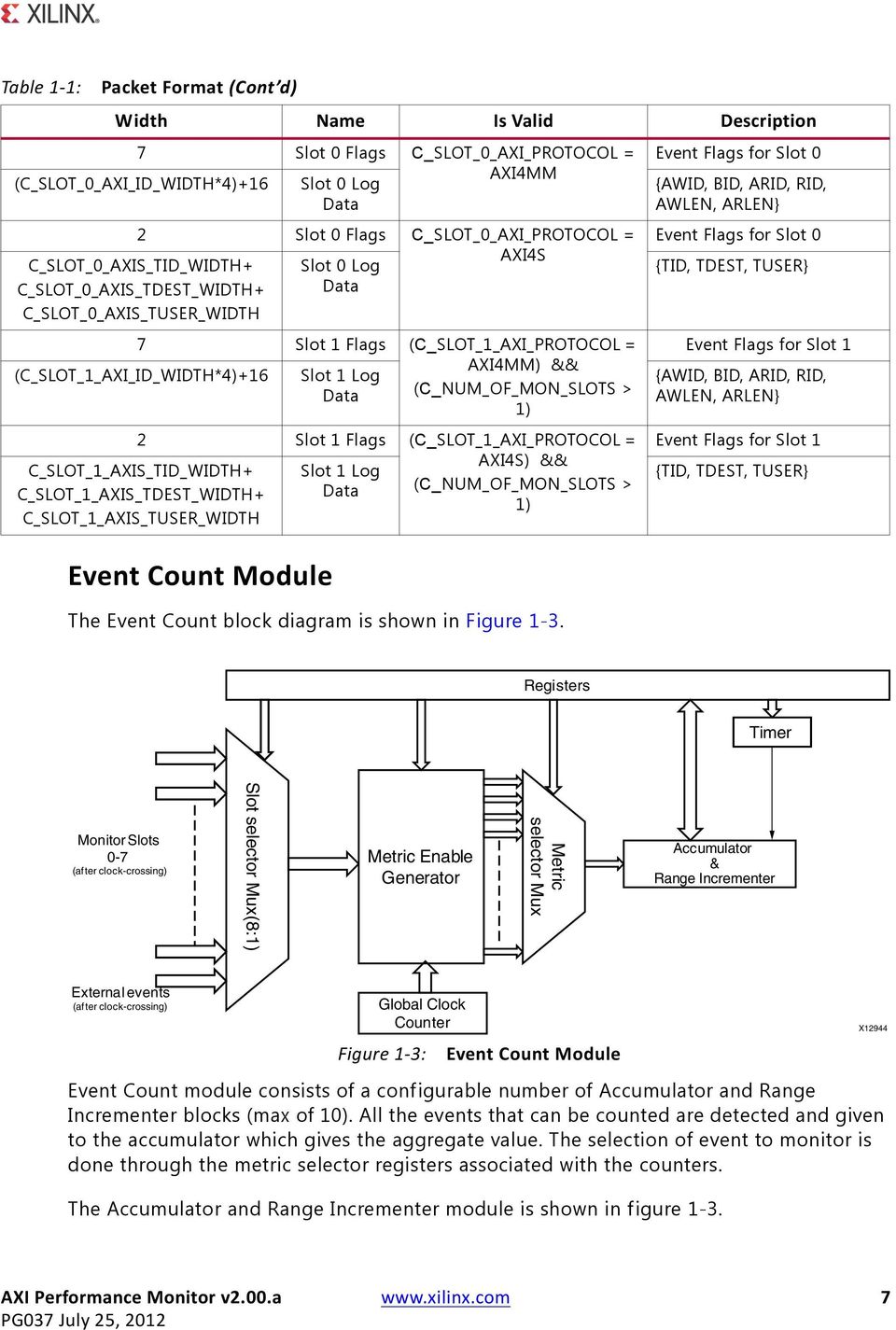
7 Table 1-1: Packet Format (Cont d) Width Name Is Valid Description 7 Slot 0 Flags C_SLOT_0_AXI_PROTOCOL = Event Flags for Slot 0 (C_SLOT_0_AXI_ID_WIDTH*4)+16 Slot 0 Log Data AXI4MM {AWID, BID, ARID, RID, AWLEN, ARLEN} 2 C_SLOT_0_AXIS_TID_WIDTH+ Slot 0 Flags Slot 0 Log C_SLOT_0_AXI_PROTOCOL = AXI4S C_SLOT_0_AXIS_TDEST_WIDTH+ Data C_SLOT_0_AXIS_TUSER_WIDTH 7 Slot 1 Flags (C_SLOT_1_AXI_PROTOCOL = AXI4MM) && (C_SLOT_1_AXI_ID_WIDTH*4)+16 Slot 1 Log Data (C_NUM_OF_MON_SLOTS > 1) 2 Slot 1 Flags (C_SLOT_1_AXI_PROTOCOL = AXI4S) && C_SLOT_1_AXIS_TID_WIDTH+ Slot 1 Log (C_NUM_OF_MON_SLOTS > C_SLOT_1_AXIS_TDEST_WIDTH+ Data 1) C_SLOT_1_AXIS_TUSER_WIDTH Event Count Module The Event Count block diagram is shown in Figure 1-3. Event Flags for Slot 0 {TID, TDEST, TUSER} Event Flags for Slot 1 {AWID, BID, ARID, RID, AWLEN, ARLEN} Event Flags for Slot 1 {TID, TDEST, TUSER} X-Ref Target - Figure 1-3 Figure 1-3: Event Count Module Event Count module consists of a configurable number of Accumulator and Range Incrementer blocks (max of 10). All the events that can be counted are detected and given to the accumulator which gives the aggregate value. The selection of event to monitor is done through the metric selector registers associated with the counters. The Accumulator and Range Incrementer module is shown in figure 1-3. AXI Performance Monitor v2.00.a 7
8 X-Ref Target - Figure 1-4 Figure 1-4: The Range Incrementer compares the event count with the low and high ranges from the Range register and increments the count by one if the value falls within the limits. The Accumulator and Incrementer values can be read through the AXI4-Lite interface. The Range Incrementer is useful in obtaining the read/write latency ranges. The Range Incrementer also consists of a timer which helps in sampling the accumulator and incrementer values at pre-configured time intervals. The counters can also be used to count the external events that fall between its corresponding start and stop signals. The metrics are obtained for the selected agent/slot. This selection is done through the configuration register. Metrics computed for an AXI4 MM agent: Accumulator and Range Incrementer Write Request Count: Total number of write requests by/to the agent. Read Request Count: Total number of read requests given by/to the agent. Read Latency: It is defined as the time from the start of read address transaction to the beginning of the read data service. Write Latency: It is defined as the period needed a master completes write data transaction, that is, from write address transaction to write response from slave. Write Byte Count: Total number of bytes written by/to the agent. This metric is helpful when calculating the throughput of the system. Read Byte Count: Total number of bytes read from/by the agent. Average Write Latency: Average write latency seen by the agent. It can be derived from total write latency and the write request count. AXI Performance Monitor v2.00.a 8

9 Target Technology Average Read Latency: Average read latency seen by the agent. It can be derived from total read latency and the read request count. Master Write Idle Cycle Count: Number of idle cycles caused by the masters during write transactions to the slave. Slave Write Idle Cycle Count: Number of idle cycles caused by this slave during write transactions to the slave. Master Read Idle Cycle Count: Number of idle cycles caused by the master during read transactions to the slave. Slave Read Idle Cycle Count: Number of idle cycles caused by this slave during read transactions to the slave. Metrics computed for an AXI4-Stream agent: Transfer Cycle Count: Total number of writes by/to the agent. Data Byte Count: Total number of data bytes written by/to the agent. This metric helps in calculating the throughput of the system. Position Byte Count: Total number of position bytes transferred. Null Byte Count: Total number of null bytes transferred. Packet Count: Total number of packets transferred. System-level metrics like write data throughput, read data throughput, and interconnect read latency can be computed by obtaining all metrics for all the agents in the system. Target Technology This solution targets the Zynq-7000, Artix-7, Kintex-7, Virtex-7,Virtex-6, and Spartan-6 FPGA families. Applications The AXI Performance Monitor has the following applications: Computing the cache hits/misses (hit ratio) and determining the optimal cache size for an application. Studying the latencies involved for any AXI-based slave, like a memory controller, and tuning the core. Comparing different applications by facilitating benchmarking. AXI Performance Monitor v2.00.a 9

10 Unsupported Features Debugging a system, for example, counting the responses against requests. Obtaining charts like latency distribution, throughput, burst distribution and others for a slave and across the system. Obtaining the system-level metrics like write throughput, read throughput, average interconnect read latency and others. Obtaining the run time of an application and optimizing the software. Analyzing the latencies involved in transactions by identifying the agent causing more idle cycles in the transactions. Comparing two similar AXI agents. Counting the interested external events (other than AXI) like FIFO overflow/underflow, interrupts, and others. Logging the important or interested events on the monitor slots, reconstruct and analyze the behavior/performance. Unsupported Features The AXI Performance Monitor has the following known limitations: Bus contention metrics are not computed. Due to logic constraints, the core does not provide the metrics for all the agents in the system in a single run of the application. Only supports a reordering depth of 1. The read data reordering depth is the number of addresses pending in the slave that can be reordered. Does not support out-standing transactions. Does not support interleaved transactions. Licensing This Xilinx LogiCORE IP module is provided at no additional cost with the Xilinx Vivado Design Suite under the terms of the Xilinx End User License. Information about this and other Xilinx LogiCORE IP modules is available at the Xilinx Intellectual Property page. For information on pricing and availability of other Xilinx LogiCORE IP modules and tools, contact your local Xilinx sales representative. AXI Performance Monitor v2.00.a 10

11 Chapter 2 This chapter contains resource usage data, signal descriptions and details about the registers. Performance This section contains details about the performance of the core. Latency The latency is the worst time the performance monitor requires for providing valid metric counters data through registers. When the monitor clock and core clock are same, the latency is six clocks. When the monitor clock and core clock are asynchronous, FIFO latency is added to the above mentioned latency, and thus the effective latency is four monitor clocks and 13 core clocks. Resource Utilization Because the AXI Performance Monitor is a module that will be used with other design pieces in the FPGA, the resource utilization and timing numbers reported in this section are estimates only. When the AXI Performance Monitor is combined with other pieces of the FPGA design, the utilization of FPGA resources and timing of the design will vary from the results reported here. The AXI Performance Monitor resource utilization benchmarks for a variety of parameter combinations measured with Kintex -7 FPGA as the target device are shown in Table 2-1. Resource usage for Zynq -7000, Artix -7, and Virtex -7 devices can also be estimated based on Table 2-1. AXI Performance Monitor v2.00.a 11

12 Signal Descriptions Table 2-1: Resource Usage for Kintex-7 (XC7K410TFFG676-3) and Zynq-7000 (Kintex-7 based) Parameter Values (Other Parameters at Default Value) Device Resources Performance C_NUM_MONITOR_SLOTS C_NUM_OF_COUNTERS Slices Slice Reg LUTs Fmax (MHz) The AXI Performance Monitor resource utilization benchmarks for a variety of parameter combinations measured with Virtex-6 FPGA as the target device are shown in Table 2-2. Table 2-2: Resource Usage for Virtex-6 FPGAs (XC6VLX130T-FF1156-1) Parameter Values (Other Parameters at Default Value) Device Resources Performance C_NUM_MONITOR_SLOTS C_NUM_OF_COUNTERS Slices Slice Reg LUTs Fmax (MHz) The AXI Performance Monitor resource utilization benchmarks for a variety of parameter combinations measured with an Spartan-6 FPGA as the target device are shown in Table 2-3. Table 2-3: Resource Usage for Spartan-6 (XC6SLX45T-FGG484-2) Parameter Values (Other Parameters at Default Value) Device Resources Performance C_NUM_MONITOR_SLOTS C_NUM_OF_COUNTERS Slices Slice Reg LUTs Fmax (MHz) Signal Descriptions Table 2-4 lists the AXI Performance Monitor signals. The I/O signals include AXI interface signals through which the IP is configured and registers are read, and Monitor slot I/O signals to which the agents (masters/slaves) that need to be monitored are connected. AXI Performance Monitor v2.00.a 12

13 Signal Descriptions Table 2-4: Core Signals Port Name Interface I/O Description Core P0 CORE_ACLK System Input Core clock P1 CORE_ARESETN System Input Core Reset. Active Low. P2 CAPTURE_EVENT System Input Event Capture P3 RESET_EVENT System Input Event Reset P4 INTERRUPT System Output Active high Interrupt AXI4-Lite Interface P5 S_AXI_ACLK AXI4-Lite Input AXI clock. P6 S_AXI_ARESETN AXI4-Lite Input AXI reset. Active Low. P7 S_AXI_AWADDR [C_S_AXI_ADDR_WIDTH-1:0] AXI4-Lite Input AXI Write address. The write address bus gives the address of the first transfer in a write burst transaction. P8 S_AXI_AWVALID AXI4-Lite Input Write address valid. This signal indicates that valid write address and control information are available. P9 S_AXI_AWREADY AXI4-Lite Output Write address ready. This signal indicates that the slave is ready to accept an address and associated control signals. P10 S_AXI_WDATA[C_S_AXI_DATA_WIDTH-1:0] AXI4-Lite Input Write data bus. P11 S_AXI_WSTRB[C_S_AXI_DATA_WIDTH/8-1:0] AXI4-Lite Input Write strobes. This signal indicates which byte lanes to update in memory. P12 S_AXI_WVALID AXI4-Lite Input Write valid. This signal indicates that valid write data and strobes are available. P13 S_AXI_WREADY AXI4-Lite Output Write ready. This signal indicates that the slave can accept the write data. P14 S_AXI_BRESP[1:0] AXI4-Lite Output Write response. This signal indicates the AXI4-Lite status of the write transaction. P15 S_AXI_BVALID AXI4-Lite Output Write response valid. This signal indicates that a valid write response is available. AXI Performance Monitor v2.00.a 13
![P6 S_AXI_ARESETN AXI4-Lite Input AXI reset. Active Low. P7 S_AXI_AWADDR [C_S_AXI_ADDR_WIDTH-1:0] AXI4-Lite Input AXI Write address.](/docs-images/45/6544680/images/page_13.jpg "The write address bus gives the address of the first transfer in a write burst transaction. P8 S_AXI_AWVALID AXI4-Lite Input Write address valid.")
14 Signal Descriptions Table 2-5: Table 2-4: Core Signals (Cont d) Port Name Interface I/O Description P16 S_AXI_BREADY AXI4-Lite Input Response ready. This signal indicates that the master can accept the response information. P17 S_AXI_ARADDR[C_S_AXI_ADDR_WIDTH-1:0] AXI4-Lite Input Read address. The read address bus gives the initial address of a read burst transaction. P18 S_AXI_ARVALID AXI4-Lite Input Read address valid. This signal indicates, when HIGH, that the read address and control information is valid and will remain stable until the address acknowledgement signal, S_AXI_ARREADY is High. P19 S_AXI_ARREADY AXI4-Lite Output Read address ready. This signal indicates that the slave is ready to accept an address and associated control signals. P20 S_AXI_RDATA[C_S_AXI_DATA_WIDTH-1:0] AXI4-Lite Output Read data bus. P21 S_AXI_RRESP[1:0] AXI4-Lite Output Read response. This signal indicates the status of the read transfer. P22 S_AXI_RVALID AXI4-Lite Output Read valid. This signal indicates that the required read data is available and the read transfer can complete. P23 S_AXI_RREADY AXI4-Lite Input Read ready. This signal indicates that the master can accept the read data and response information. Monitor Slot0 Interface Table 2-5 lists the Monitor Slot 0 interface signals. Monitor Slot0 AXI MM/AXI Stream ports are enabled based on SLOT 0 protocol parameter, C_SLOT_0_AXI_PROTOCOL. Monitor Slot0 Interface Signals Port Name Direction Width Description Monitor Slot0 AXI MM SLOT_0_AXI_ACLK Input 1 AXI Clock SLOT_0_AXI_ARESETN Input 1 AXI Active Low Reset AXI Performance Monitor v2.00.a 14

15 Signal Descriptions Table 2-5: Monitor Slot0 Interface Signals (Cont d) Port Name Direction Width Description SLOT_0_AXI_AWID Input C_SLOT_0_AXI_ID_WIDTH Write Address Channel Transaction ID SLOT_0_AXI_AWADDR Input C_SLOT_0_AXI_ADDR_WIDTH Write Address Channel Address SLOT_0_AXI_AWPROT Input 3 Write Address Channel Protection Bits SLOT_0_AXI_AWLEN Input 8 Write Address Channel Burst Length (0-255) SLOT_0_AXI_AWSIZE Input 3 Write Address Channel Transfer Size code (0-7) SLOT_0_AXI_AWBURST Input 2 Write Address Channel Burst Type code (0-2) SLOT_0_AXI_AWCACHE Input 4 Write Address Channel Cache Characteristics SLOT_0_AXI_AWLOCK Input 1 Write Address Channel Atomic Access Type (0, 1) SLOT_0_AXI_AWVALID Input 1 Write Address Channel Valid SLOT_0_AXI_AWREADY Input 1 Write Address Channel Ready SLOT_0_AXI_WDATA Input C_SLOT_0_AXI_DATA_WIDTH Write Data Channel Data SLOT_0_AXI_WSTRB Input C_SLOT_0_AXI_DATA_WIDTH/8 Write Data Channel Byte Strobes SLOT_0_AXI_WLAST Input 1 Write Data Channel Last Data Beat SLOT_0_AXI_WVALID Input 1 Write Data Channel Valid SLOT_0_AXI_WREADY Input 1 Write Data Channel Ready SLOT_0_AXI_BID Input C_SLOT_0_AXI_ID_WIDTH Write Response Channel Transaction ID SLOT_0_AXI_BRESP Input 2 Write Response Channel Response Code (0-3) SLOT_0_AXI_BVALID Input 1 Write Response Channel Valid SLOT_0_AXI_BREADY Input 1 Write Response Channel Ready SLOT_0_AXI_ARID Input C_SLOT_0_AXI_ID_WIDTH Read Address Channel Transaction ID SLOT_0_AXI_ARADDR Input C_SLOT_0_AXI_ADDR_WIDTH Read Address Channel Address SLOT_0_AXI_ARLEN Input 8 Read Address Channel Burst Length code(0-255) SLOT_0_AXI_ARSIZE Input 3 Read Address Channel Transfer Size code (0-7) SLOT_0_AXI_ARBURST Input 2 Read Address Channel Burst Type (0-2) AXI Performance Monitor v2.00.a 15

16 Signal Descriptions Table 2-5: Monitor Slot0 Interface Signals (Cont d) Port Name Direction Width Description SLOT_0_AXI_ARCACHE Input 4 Read Address Channel Cache Characteristics SLOT_0_AXI_ARPROT Input 3 Read Address Channel Protection Bits SLOT_0_AXI_ARLOCK Input 1 Read Address Channel Atomic Access Type (0, 1) SLOT_0_AXI_ARVALID Input 1 Read Address Channel Valid SLOT_0_AXI_ARREADY Input 1 Read Address Channel Ready SLOT_0_AXI_RID Input C_SLOT_0_AXI_ID_WIDTH Read Data Channel Transaction ID SLOT_0_AXI_RDATA Input C_SLOT_0_AXI_DATA_WIDTH Read Data Channel Data SLOT_0_AXI_RRESP Input 2 Read Data Channel Response Code (0-3) SLOT_0_AXI_RLAST Input 1 Read Data Channel Last Data Beat SLOT_0_AXI_RVALID Input 1 Read Data Channel Valid SLOT_0_AXI_RREADY Input 1 Read Data Channel Ready Monitor Slot0 AXI Stream SLOT_0_AXIS_ACLK Input 1 AXI Streaming Clock SLOT_0_AXIS_ARESETN Input 1 AXI Streaming Active Low Reset SLOT_0_AXIS_TVALID Input 1 Indicates that the master is driving valid transfer SLOT_0_AXIS_TREADY Input 1 Indicates that the slave can accept a transfer in the current cycle SLOT_0_AXIS_TDATA Input C_SLOT_0_AXIS_TDATA_WIDTH Primary payload SLOT_0_AXIS_TSTRB Input C_SLOT_0_AXIS_TDATA_WIDTH/8 Byte qualifier (data byte or a position byte) SLOT_0_AXIS_TKEEP Input C_SLOT_0_AXIS_TDATA_WIDTH/8 Byte qualifier (data byte or a null byte) SLOT_0_AXIS_TLAST Input 1 Indicates the boundary of a packet SLOT_0_AXIS_TID Input C_SLOT_0_AXIS_TID_WIDTH Data stream identifier SLOT_0_AXIS_TDEST Input C_SLOT_0_AXIS_TDEST_WIDTH Provides routing information for the data stream SLOT_0_AXIS_TUSER Input C_SLOT_0_AXIS_TUSER_WIDTH User defined sideband information Monitor Slot1 Interface Table 2-6 describes the Monitor Slot 1 interface signals. These are enabled only when C_NUM_MONITOR_SLOTS >1. Monitor Slot1 AXI MM/AXI Stream ports are enabled based on the SLOT 1 protocol, C_SLOT_1_AXI_PROTOCOL. AXI Performance Monitor v2.00.a 16

17 Signal Descriptions Table 2-6: Monitor Slot1 Interface Signals Port Name Direction Width Description Monitor Slot1 AXI MM SLOT_1_AXI_ACLK Input 1 AXI Clock SLOT_1_AXI_ARESETN Input 1 AXI Active Low Reset SLOT_1_AXI_AWID Input C_SLOT_1_AXI_ID_WIDTH Write Address Channel Transaction ID SLOT_1_AXI_AWADDR Input C_SLOT_1_AXI_ADDR_WIDTH Write Address Channel Address SLOT_1_AXI_AWPROT Input 3 Write Address Channel Protection Bits SLOT_1_AXI_AWLEN Input 8 Write Address Channel Burst Length (0-255) SLOT_1_AXI_AWSIZE Input 3 Write Address Channel Transfer Size code (0-7) SLOT_1_AXI_AWBURST Input 2 Write Address Channel Burst Type code (0-2) SLOT_1_AXI_AWCACHE Input 4 Write Address Channel Cache Characteristics SLOT_1_AXI_AWLOCK Input 1 Write Address Channel Atomic Access Type (0, 1) SLOT_1_AXI_AWVALID Input 1 Write Address Channel Valid SLOT_1_AXI_AWREADY Input 1 Write Address Channel Ready SLOT_1_AXI_WDATA Input C_SLOT_1_AXI_DATA_WIDTH Write Data Channel Data SLOT_1_AXI_WSTRB Input C_SLOT_1_AXI_DATA_WIDTH/8 Write Data Channel Byte Strobes SLOT_1_AXI_WLAST Input 1 Write Data Channel Last Data Beat SLOT_1_AXI_WVALID Input 1 Write Data Channel Valid SLOT_1_AXI_WREADY Input 1 Write Data Channel Ready SLOT_1_AXI_BID Input C_SLOT_1_AXI_ID_WIDTH Write Response Channel Transaction ID SLOT_1_AXI_BRESP Input 2 Write Response Channel Response Code (0-3) SLOT_1_AXI_BVALID Input 1 Write Response Channel Valid SLOT_1_AXI_BREADY Input 1 Write Response Channel Ready SLOT_1_AXI_ARID Input C_SLOT_1_AXI_ID_WIDTH Read Address Channel Transaction ID SLOT_1_AXI_ARADDR Input C_SLOT_1_AXI_ADDR_WIDTH Read Address Channel Address SLOT_1_AXI_ARLEN Input 8 Read Address Channel Burst Length code(0-255) AXI Performance Monitor v2.00.a 17

18 Signal Descriptions Table 2-6: Monitor Slot1 Interface Signals (Cont d) Port Name Direction Width Description SLOT_1_AXI_ARSIZE Input 3 Read Address Channel Transfer Size code (0-7) SLOT_1_AXI_ARBURST Input 2 Read Address Channel Burst Type (0-2) SLOT_1_AXI_ARCACHE Input 4 Read Address Channel Cache Characteristics SLOT_1_AXI_ARPROT Input 3 Read Address Channel Protection Bits SLOT_1_AXI_ARLOCK Input 1 Read Address Channel Atomic Access Type (0, 1) SLOT_1_AXI_ARVALID Input 1 Read Address Channel Valid SLOT_1_AXI_ARREADY Input 1 Read Address Channel Ready SLOT_1_AXI_RID Input C_SLOT_1_AXI_ID_WIDTH Read Data Channel Transaction ID SLOT_1_AXI_RDATA Input C_SLOT_1_AXI_DATA_WIDTH Read Data Channel Data SLOT_1_AXI_RRESP Input 2 Read Data Channel Response Code (0-3) SLOT_1_AXI_RLAST Input 1 Read Data Channel Last Data Beat SLOT_1_AXI_RVALID Input 1 Read Data Channel Valid SLOT_1_AXI_RREADY Input 1 Read Data Channel Ready Monitor Slot1 AXI Stream SLOT_1_AXIS_ACLK Input 1 AXI Streaming Clock SLOT_1_AXIS_ARESETN Input 1 AXI Streaming Active Low Reset SLOT_1_AXIS_TVALID Input 1 Indicates that the master is driving valid transfer SLOT_1_AXIS_TREADY Input 1 Indicates that the slave can accept a transfer in the current cycle SLOT_1_AXIS_TDATA Input C_SLOT_1_AXIS_TDATA_WIDTH Primary payload SLOT_1_AXIS_TSTRB Input C_SLOT_1_AXIS_TDATA_WIDTH/8 Byte qualifier (data byte or a position byte) SLOT_1_AXIS_TKEEP Input C_SLOT_1_AXIS_TDATA_WIDTH/8 Byte qualifier (data byte or a null byte) SLOT_1_AXIS_TLAST Input 1 Indicates the boundary of a packet SLOT_1_AXIS_TID Input C_SLOT_1_AXIS_TID_WIDTH Data stream identifier SLOT_1_AXIS_TDEST Input C_SLOT_1_AXIS_TDEST_WIDTH Provides routing information for the data stream SLOT_1_AXIS_TUSER Input C_SLOT_1_AXIS_TUSER_WIDTH User defined sideband information AXI Performance Monitor v2.00.a 18

19 Signal Descriptions Table 2-7: Monitor Slot2 Interface Table 2-7 lists the Monitor Slot2 interface signals. These are enabled only when C_NUM_MONITOR_SLOTS >2. Monitor Slot2 AXI MM/AXI Stream ports are enabled based on the SLOT 2 protocol parameter, C_SLOT_2_AXI_PROTOCOL. Monitor Slot2 Interface Signals Port Name Direction Width Description Monitor Slot2 AXI MM SLOT_2_AXI_ACLK Input 1 AXI Clock SLOT_2_AXI_ARESETN Input 1 AXI Active Low Reset SLOT_2_AXI_AWID Input C_SLOT_2_AXI_ID_WIDTH Write Address Channel Transaction ID SLOT_2_AXI_AWADDR Input C_SLOT_2_AXI_ADDR_WIDTH Write Address Channel Address SLOT_2_AXI_AWPROT Input 3 Write Address Channel Protection Bits SLOT_2_AXI_AWLEN Input 8 Write Address Channel Burst Length (0-255) SLOT_2_AXI_AWSIZE Input 3 Write Address Channel Transfer Size code (0-7) SLOT_2_AXI_AWBURST Input 2 Write Address Channel Burst Type code (0-2) SLOT_2_AXI_AWCACHE Input 4 Write Address Channel Cache Characteristics SLOT_2_AXI_AWLOCK Input 1 Write Address Channel Atomic Access Type (0, 1) SLOT_2_AXI_AWVALID Input 1 Write Address Channel Valid SLOT_2_AXI_AWREADY Input 1 Write Address Channel Ready SLOT_2_AXI_WDATA Input C_SLOT_2_AXI_DATA_WIDTH Write Data Channel Data SLOT_2_AXI_WSTRB Input C_SLOT_2_AXI_DATA_WIDTH/8 Write Data Channel Byte Strobes SLOT_2_AXI_WLAST Input 1 Write Data Channel Last Data Beat SLOT_2_AXI_WVALID Input 1 Write Data Channel Valid SLOT_2_AXI_WREADY Input 1 Write Data Channel Ready SLOT_2_AXI_BID Input C_SLOT_2_AXI_ID_WIDTH Write Response Channel Transaction ID SLOT_2_AXI_BRESP Input 2 Write Response Channel Response Code (0-3) SLOT_2_AXI_BVALID Input 1 Write Response Channel Valid SLOT_2_AXI_BREADY Input 1 Write Response Channel Ready AXI Performance Monitor v2.00.a 19

20 Signal Descriptions Table 2-7: Monitor Slot2 Interface Signals (Cont d) Port Name Direction Width Description SLOT_2_AXI_ARID Input C_SLOT_2_AXI_ID_WIDTH Read Address Channel Transaction ID SLOT_2_AXI_ARADDR Input C_SLOT_2_AXI_ADDR_WIDTH Read Address Channel Address SLOT_2_AXI_ARLEN Input 8 Read Address Channel Burst Length code(0-255) SLOT_2_AXI_ARSIZE Input 3 Read Address Channel Transfer Size code (0-7) SLOT_2_AXI_ARBURST Input 2 Read Address Channel Burst Type (0-2) SLOT_2_AXI_ARCACHE Input 4 Read Address Channel Cache Characteristics SLOT_2_AXI_ARPROT Input 3 Read Address Channel Protection Bits SLOT_2_AXI_ARLOCK Input 1 Read Address Channel Atomic Access Type (0, 1) SLOT_2_AXI_ARVALID Input 1 Read Address Channel Valid SLOT_2_AXI_ARREADY Input 1 Read Address Channel Ready SLOT_2_AXI_RID Input C_SLOT_2_AXI_ID_WIDTH Read Data Channel Transaction ID SLOT_2_AXI_RDATA Input C_SLOT_2_AXI_DATA_WIDTH Read Data Channel Data SLOT_2_AXI_RRESP Input 2 Read Data Channel Response Code (0-3) SLOT_2_AXI_RLAST Input 1 Read Data Channel Last Data Beat SLOT_2_AXI_RVALID Input 1 Read Data Channel Valid SLOT_2_AXI_RREADY Input 1 Read Data Channel Ready Monitor Slot2 AXI Stream SLOT_2_AXIS_ACLK Input 1 AXI Streaming Clock SLOT_2_AXIS_ARESETN Input 1 AXI Streaming Active Low Reset SLOT_2_AXIS_TVALID Input 1 Indicates that the master is driving valid transfer SLOT_2_AXIS_TREADY Input 1 Indicates that the slave can accept a transfer in the current cycle SLOT_2_AXIS_TDATA Input C_SLOT_2_AXIS_TDATA_WIDTH Primary payload SLOT_2_AXIS_TSTRB Input C_SLOT_2_AXIS_TDATA_WIDTH/8 Byte qualifier (data byte or a position byte) SLOT_2_AXIS_TKEEP Input C_SLOT_2_AXIS_TDATA_WIDTH/8 Byte qualifier (data byte or a null byte) SLOT_2_AXIS_TLAST Input 1 Indicates the boundary of a packet AXI Performance Monitor v2.00.a 20

21 Signal Descriptions Table 2-7: Monitor Slot2 Interface Signals (Cont d) Port Name Direction Width Description SLOT_2_AXIS_TID Input C_SLOT_2_AXIS_TID_WIDTH Data stream identifier SLOT_2_AXIS_TDEST Input C_SLOT_2_AXIS_TDEST_WIDTH Provides routing information for the data stream SLOT_2_AXIS_TUSER Input C_SLOT_2_AXIS_TUSER_WIDTH User defined sideband information Monitor Slot3 Interface Table 2-8 lists the Monitor Slot3 interface signals. These are enabled only when C_NUM_MONITOR_SLOTS >3. Monitor Slot3 AXI MM/AXI Stream ports are enabled based on the SLOT 3 protocol parameter, C_SLOT_3_AXI_PROTOCOL. Table 2-8: Monitor Slot3 Interface Signals Port Name Direction Width Description Monitor Slot3 AXI MM SLOT_3_AXI_ACLK Input 1 AXI Clock SLOT_3_AXI_ARESETN Input 1 AXI Active Low Reset SLOT_3_AXI_AWID Input C_SLOT_3_AXI_ID_WIDTH Write Address Channel Transaction ID SLOT_3_AXI_AWADDR Input C_SLOT_3_AXI_ADDR_WIDTH Write Address Channel Address SLOT_3_AXI_AWPROT Input 3 Write Address Channel Protection Bits SLOT_3_AXI_AWLEN Input 8 Write Address Channel Burst Length (0-255) SLOT_3_AXI_AWSIZE Input 3 Write Address Channel Transfer Size code (0-7) SLOT_3_AXI_AWBURST Input 2 Write Address Channel Burst Type code (0-2) SLOT_3_AXI_AWCACHE Input 4 Write Address Channel Cache Characteristics SLOT_3_AXI_AWLOCK Input 1 Write Address Channel Atomic Access Type (0, 1) SLOT_3_AXI_AWVALID Input 1 Write Address Channel Valid SLOT_3_AXI_AWREADY Input 1 Write Address Channel Ready SLOT_3_AXI_WID Input C_SLOT_3_AXI_ID_WIDTH SLOT_3_AXI_WDATA Input C_SLOT_3_AXI_DATA_WIDTH Write Data Channel Data SLOT_3_AXI_WSTRB Input C_SLOT_3_AXI_DATA_WIDTH/8 Write Data Channel Byte Strobes SLOT_3_AXI_WLAST Input 1 Write Data Channel Last Data Beat SLOT_3_AXI_WVALID Input 1 Write Data Channel Valid AXI Performance Monitor v2.00.a 21
22 Signal Descriptions Table 2-8: Monitor Slot3 Interface Signals (Cont d) Port Name Direction Width Description SLOT_3_AXI_WREADY Input 1 Write Data Channel Ready SLOT_3_AXI_BID Input C_SLOT_3_AXI_ID_WIDTH Write Response Channel Transaction ID SLOT_3_AXI_BRESP Input 2 Write Response Channel Response Code (0-3) SLOT_3_AXI_BVALID Input 1 Write Response Channel Valid SLOT_3_AXI_BREADY Input 1 Write Response Channel Ready SLOT_3_AXI_ARID Input C_SLOT_3_AXI_ID_WIDTH Read Address Channel Transaction ID SLOT_3_AXI_ARADDR Input C_SLOT_3_AXI_ADDR_WIDTH Read Address Channel Address SLOT_3_AXI_ARLEN Input 8 Read Address Channel Burst Length code(0-255) SLOT_3_AXI_ARSIZE Input 3 Read Address Channel Transfer Size code (0-7) SLOT_3_AXI_ARBURST Input 2 Read Address Channel Burst Type (0-2) SLOT_3_AXI_ARCACHE Input 4 Read Address Channel Cache Characteristics SLOT_3_AXI_ARPROT Input 3 Read Address Channel Protection Bits SLOT_3_AXI_ARLOCK Input 1 Read Address Channel Atomic Access Type (0, 1) SLOT_3_AXI_ARVALID Input 1 Read Address Channel Valid SLOT_3_AXI_ARREADY Input 1 Read Address Channel Ready SLOT_3_AXI_RID Input C_SLOT_3_AXI_ID_WIDTH Read Data Channel Transaction ID SLOT_3_AXI_RDATA Input C_SLOT_3_AXI_DATA_WIDTH Read Data Channel Data SLOT_3_AXI_RRESP Input 2 Read Data Channel Response Code (0-3) SLOT_3_AXI_RLAST Input 1 Read Data Channel Last Data Beat SLOT_3_AXI_RVALID Input 1 Read Data Channel Valid SLOT_3_AXI_RREADY Input 1 Read Data Channel Ready Monitor Slot3 AXI Stream SLOT_3_AXIS_ACLK Input 1 AXI Streaming Clock SLOT_3_AXIS_ARESETN Input 1 AXI Streaming Active Low Reset SLOT_3_AXIS_TVALID Input 1 Indicates that the master is driving valid transfer AXI Performance Monitor v2.00.a 22
23 Signal Descriptions Table 2-8: Monitor Slot3 Interface Signals (Cont d) Port Name Direction Width Description SLOT_3_AXIS_TREADY Input 1 Indicates that the slave can accept a transfer in the current cycle SLOT_3_AXIS_TDATA Input C_SLOT_3_AXIS_TDATA_WIDTH Primary payload SLOT_3_AXIS_TSTRB Input C_SLOT_3_AXIS_TDATA_WIDTH/8 Byte qualifier (data byte or a position byte) SLOT_3_AXIS_TKEEP Input C_SLOT_3_AXIS_TDATA_WIDTH/8 Byte qualifier (data byte or a null byte) SLOT_3_AXIS_TLAST Input 1 Indicates the boundary of a packet SLOT_3_AXIS_TID Input C_SLOT_3_AXIS_TID_WIDTH Data stream identifier SLOT_3_AXIS_TDEST Input C_SLOT_3_AXIS_TDEST_WIDTH Provides routing information for the data stream SLOT_3_AXIS_TUSER Input C_SLOT_3_AXIS_TUSER_WIDTH User defined sideband information Monitor Slot4 Interface Table 2-9 lists the Monitor Slot4 interface signals. These are enabled only when C_NUM_MONITOR_SLOTS >4. Monitor Slot4 AXI MM/AXI Stream ports are enabled based on the SLOT 4 protocol parameter, C_SLOT_4_AXI_PROTOCOL. Table 2-9: Monitor Slot4 Interface Signals Port Name Direction Width Description Monitor Slot4 AXI MM SLOT_4_AXI_ACLK Input 1 AXI Clock SLOT_4_AXI_ARESETN Input 1 AXI Active Low Reset SLOT_4_AXI_AWID Input C_SLOT_4_AXI_ID_WIDTH Write Address Channel Transaction ID SLOT_4_AXI_AWADDR Input C_SLOT_4_AXI_ADDR_WIDTH Write Address Channel Address SLOT_4_AXI_AWPROT Input 3 Write Address Channel Protection Bits SLOT_4_AXI_AWLEN Input 8 Write Address Channel Burst Length (0-255) SLOT_4_AXI_AWSIZE Input 3 Write Address Channel Transfer Size code (0-7) SLOT_4_AXI_AWBURST Input 2 Write Address Channel Burst Type code (0-2) SLOT_4_AXI_AWCACHE Input 4 Write Address Channel Cache Characteristics AXI Performance Monitor v2.00.a 23
24 Signal Descriptions Table 2-9: Monitor Slot4 Interface Signals (Cont d) Port Name Direction Width Description SLOT_4_AXI_AWLOCK Input 1 Write Address Channel Atomic Access Type (0, 1) SLOT_4_AXI_AWVALID Input 1 Write Address Channel Valid SLOT_4_AXI_AWREADY Input 1 Write Address Channel Ready SLOT_4_AXI_WID Input C_SLOT_4_AXI_ID_WIDTH SLOT_4_AXI_WDATA Input C_SLOT_4_AXI_DATA_WIDTH Write Data Channel Data SLOT_4_AXI_WSTRB Input C_SLOT_4_AXI_DATA_WIDTH/8 Write Data Channel Byte Strobes SLOT_4_AXI_WLAST Input 1 Write Data Channel Last Data Beat SLOT_4_AXI_WVALID Input 1 Write Data Channel Valid SLOT_4_AXI_WREADY Input 1 Write Data Channel Ready SLOT_4_AXI_BID Input C_SLOT_4_AXI_ID_WIDTH Write Response Channel Transaction ID SLOT_4_AXI_BRESP Input 2 Write Response Channel Response Code (0-3) SLOT_4_AXI_BVALID Input 1 Write Response Channel Valid SLOT_4_AXI_BREADY Input 1 Write Response Channel Ready SLOT_4_AXI_ARID Input C_SLOT_4_AXI_ID_WIDTH Read Address Channel Transaction ID SLOT_4_AXI_ARADDR Input C_SLOT_4_AXI_ADDR_WIDTH Read Address Channel Address SLOT_4_AXI_ARLEN Input 8 Read Address Channel Burst Length code(0-255) SLOT_4_AXI_ARSIZE Input 3 Read Address Channel Transfer Size code (0-7) SLOT_4_AXI_ARBURST Input 2 Read Address Channel Burst Type (0-2) SLOT_4_AXI_ARCACHE Input 4 Read Address Channel Cache Characteristics SLOT_4_AXI_ARPROT Input 3 Read Address Channel Protection Bits SLOT_4_AXI_ARLOCK Input 1 Read Address Channel Atomic Access Type (0, 1) SLOT_4_AXI_ARVALID Input 1 Read Address Channel Valid SLOT_4_AXI_ARREADY Input 1 Read Address Channel Ready SLOT_4_AXI_RID Input C_SLOT_4_AXI_ID_WIDTH Read Data Channel Transaction ID SLOT_4_AXI_RDATA Input C_SLOT_4_AXI_DATA_WIDTH Read Data Channel Data SLOT_4_AXI_RRESP Input 2 Read Data Channel Response Code (0-3) AXI Performance Monitor v2.00.a 24
25 Signal Descriptions Table 2-9: Monitor Slot4 Interface Signals (Cont d) Port Name Direction Width Description SLOT_4_AXI_RLAST Input 1 Read Data Channel Last Data Beat SLOT_4_AXI_RVALID Input 1 Read Data Channel Valid SLOT_4_AXI_RREADY Input 1 Read Data Channel Ready Monitor Slot4 AXI Stream SLOT_4_AXIS_ACLK Input 1 AXI Streaming Clock SLOT_4_AXIS_ARESETN Input 1 AXI Streaming Active Low Reset SLOT_4_AXIS_TVALID Input 1 Indicates that the master is driving valid transfer SLOT_4_AXIS_TREADY Input 1 Indicates that the slave can accept a transfer in the current cycle SLOT_4_AXIS_TDATA Input C_SLOT_4_AXIS_TDATA_WIDTH Primary payload SLOT_4_AXIS_TSTRB Input C_SLOT_4_AXIS_TDATA_WIDTH/8 Byte qualifier (data byte or a position byte) SLOT_4_AXIS_TKEEP Input C_SLOT_4_AXIS_TDATA_WIDTH/8 Byte qualifier (data byte or a null byte) SLOT_4_AXIS_TLAST Input 1 Indicates the boundary of a packet SLOT_4_AXIS_TID Input C_SLOT_4_AXIS_TID_WIDTH Data stream identifier SLOT_4_AXIS_TDEST Input C_SLOT_4_AXIS_TDEST_WIDTH Provides routing information for the data stream SLOT_4_AXIS_TUSER Input C_SLOT_4_AXIS_TUSER_WIDTH User defined sideband information Monitor Slot5 Interface Table 2-10 lists the Monitor Slot5 interface signals. These are enabled only when C_NUM_MONITOR_SLOTS >5. Monitor Slot5 AXI MM/AXI Stream ports are enabled based on the SLOT 5 protocol parameter, C_SLOT_5_AXI_PROTOCOL. Table 2-10: Monitor Slot5 Interface Signals Port Name Direction Width Description Monitor Slot5 AXI MM SLOT_5_AXI_ACLK Input 1 AXI Clock SLOT_5_AXI_ARESETN Input 1 AXI Active Low Reset SLOT_5_AXI_AWID Input C_SLOT_5_AXI_ID_WIDTH Write Address Channel Transaction ID SLOT_5_AXI_AWADDR Input C_SLOT_5_AXI_ADDR_WIDTH Write Address Channel Address SLOT_5_AXI_AWPROT Input 3 Write Address Channel Protection Bits AXI Performance Monitor v2.00.a 25
26 Signal Descriptions Table 2-10: Monitor Slot5 Interface Signals (Cont d) Port Name Direction Width Description SLOT_5_AXI_AWLEN Input 8 Write Address Channel Burst Length (0-255) SLOT_5_AXI_AWSIZE Input 3 Write Address Channel Transfer Size code (0-7) SLOT_5_AXI_AWBURST Input 2 Write Address Channel Burst Type code (0-2) SLOT_5_AXI_AWCACHE Input 4 Write Address Channel Cache Characteristics SLOT_5_AXI_AWLOCK Input 1 Write Address Channel Atomic Access Type (0, 1) SLOT_5_AXI_AWVALID Input 1 Write Address Channel Valid SLOT_5_AXI_AWREADY Input 1 Write Address Channel Ready SLOT_5_AXI_WID Input C_SLOT_5_AXI_ID_WIDTH SLOT_5_AXI_WDATA Input C_SLOT_5_AXI_DATA_WIDTH Write Data Channel Data SLOT_5_AXI_WSTRB Input C_SLOT_5_AXI_DATA_WIDTH/8 Write Data Channel Byte Strobes SLOT_5_AXI_WLAST Input 1 Write Data Channel Last Data Beat SLOT_5_AXI_WVALID Input 1 Write Data Channel Valid SLOT_5_AXI_WREADY Input 1 Write Data Channel Ready SLOT_5_AXI_BID Input C_SLOT_5_AXI_ID_WIDTH Write Response Channel Transaction ID SLOT_5_AXI_BRESP Input 2 Write Response Channel Response Code (0-3) SLOT_5_AXI_BVALID Input 1 Write Response Channel Valid SLOT_5_AXI_BREADY Input 1 Write Response Channel Ready SLOT_5_AXI_ARID Input C_SLOT_5_AXI_ID_WIDTH Read Address Channel Transaction ID SLOT_5_AXI_ARADDR Input C_SLOT_5_AXI_ADDR_WIDTH Read Address Channel Address SLOT_5_AXI_ARLEN Input 8 Read Address Channel Burst Length code(0-255) SLOT_5_AXI_ARSIZE Input 3 Read Address Channel Transfer Size code (0-7) SLOT_5_AXI_ARBURST Input 2 Read Address Channel Burst Type (0-2) SLOT_5_AXI_ARCACHE Input 4 Read Address Channel Cache Characteristics SLOT_5_AXI_ARPROT Input 3 Read Address Channel Protection Bits AXI Performance Monitor v2.00.a 26
27 Signal Descriptions Table 2-10: Monitor Slot5 Interface Signals (Cont d) Port Name Direction Width Description SLOT_5_AXI_ARLOCK Input 1 Read Address Channel Atomic Access Type (0, 1) SLOT_5_AXI_ARVALID Input 1 Read Address Channel Valid SLOT_5_AXI_ARREADY Input 1 Read Address Channel Ready SLOT_5_AXI_RID Input C_SLOT_5_AXI_ID_WIDTH Read Data Channel Transaction ID SLOT_5_AXI_RDATA Input C_SLOT_5_AXI_DATA_WIDTH Read Data Channel Data SLOT_5_AXI_RRESP Input 2 Read Data Channel Response Code (0-3) SLOT_5_AXI_RLAST Input 1 Read Data Channel Last Data Beat SLOT_5_AXI_RVALID Input 1 Read Data Channel Valid SLOT_5_AXI_RREADY Input 1 Read Data Channel Ready Monitor Slot5 AXI Stream SLOT_5_AXIS_ACLK Input 1 AXI Streaming Clock SLOT_5_AXIS_ARESETN Input 1 AXI Streaming Active Low Reset SLOT_5_AXIS_TVALID Input 1 Indicates that the master is driving valid transfer SLOT_5_AXIS_TREADY Input 1 Indicates that the slave can accept a transfer in the current cycle SLOT_5_AXIS_TDATA Input C_SLOT_5_AXIS_TDATA_WIDTH Primary payload SLOT_5_AXIS_TSTRB Input C_SLOT_5_AXIS_TDATA_WIDTH/8 Byte qualifier (data byte or a position byte) SLOT_5_AXIS_TKEEP Input C_SLOT_5_AXIS_TDATA_WIDTH/8 Byte qualifier (data byte or a null byte) SLOT_5_AXIS_TLAST Input 1 Indicates the boundary of a packet SLOT_5_AXIS_TID Input C_SLOT_5_AXIS_TID_WIDTH Data stream identifier SLOT_5_AXIS_TDEST Input C_SLOT_5_AXIS_TDEST_WIDTH Provides routing information for the data stream SLOT_5_AXIS_TUSER Input C_SLOT_5_AXIS_TUSER_WIDTH User defined sideband information Monitor Slot6 Interface Table 2-11 lists the Monitor Slot 6 interface signals and these are enabled only when C_NUM_MONITOR_SLOTS >6. Monitor Slot6 AXI MM/AXI Stream ports are enabled based on SLOT 6 protocol parameter C_SLOT_6_AXI_PROTOCOL. AXI Performance Monitor v2.00.a 27
28 Signal Descriptions Table 2-11: Monitor Slot6 Interface Signals Port Name Direction Width Description Monitor Slot6 AXI MM SLOT_6_AXI_ACLK Input 1 AXI Clock SLOT_6_AXI_ARESETN Input 1 AXI Active Low Reset SLOT_6_AXI_AWID Input C_SLOT_6_AXI_ID_WIDTH Write Address Channel Transaction ID SLOT_6_AXI_AWADDR Input C_SLOT_6_AXI_ADDR_WIDTH Write Address Channel Address SLOT_6_AXI_AWPROT Input 3 Write Address Channel Protection Bits SLOT_6_AXI_AWLEN Input 8 Write Address Channel Burst Length (0-255) SLOT_6_AXI_AWSIZE Input 3 Write Address Channel Transfer Size code (0-7) SLOT_6_AXI_AWBURST Input 2 Write Address Channel Burst Type code (0-2) SLOT_6_AXI_AWCACHE Input 4 Write Address Channel Cache Characteristics SLOT_6_AXI_AWLOCK Input 1 Write Address Channel Atomic Access Type (0, 1) SLOT_6_AXI_AWVALID Input 1 Write Address Channel Valid SLOT_6_AXI_AWREADY Input 1 Write Address Channel Ready SLOT_6_AXI_WID Input C_SLOT_6_AXI_ID_WIDTH SLOT_6_AXI_WDATA Input C_SLOT_6_AXI_DATA_WIDTH Write Data Channel Data SLOT_6_AXI_WSTRB Input C_SLOT_6_AXI_DATA_WIDTH/8 Write Data Channel Byte Strobes SLOT_6_AXI_WLAST Input 1 Write Data Channel Last Data Beat SLOT_6_AXI_WVALID Input 1 Write Data Channel Valid SLOT_6_AXI_WREADY Input 1 Write Data Channel Ready SLOT_6_AXI_BID Input C_SLOT_6_AXI_ID_WIDTH Write Response Channel Transaction ID SLOT_6_AXI_BRESP Input 2 Write Response Channel Response Code (0-3) SLOT_6_AXI_BVALID Input 1 Write Response Channel Valid SLOT_6_AXI_BREADY Input 1 Write Response Channel Ready SLOT_6_AXI_ARID Input C_SLOT_6_AXI_ID_WIDTH Read Address Channel Transaction ID SLOT_6_AXI_ARADDR Input C_SLOT_6_AXI_ADDR_WIDTH Read Address Channel Address SLOT_6_AXI_ARLEN Input 8 Read Address Channel Burst Length code(0-255) AXI Performance Monitor v2.00.a 28
29 Signal Descriptions Table 2-11: Monitor Slot6 Interface Signals (Cont d) Port Name Direction Width Description SLOT_6_AXI_ARSIZE Input 3 Read Address Channel Transfer Size code (0-7) SLOT_6_AXI_ARBURST Input 2 Read Address Channel Burst Type (0-2) SLOT_6_AXI_ARCACHE Input 4 Read Address Channel Cache Characteristics SLOT_6_AXI_ARPROT Input 3 Read Address Channel Protection Bits SLOT_6_AXI_ARLOCK Input 1 Read Address Channel Atomic Access Type (0, 1) SLOT_6_AXI_ARVALID Input 1 Read Address Channel Valid SLOT_6_AXI_ARREADY Input 1 Read Address Channel Ready SLOT_6_AXI_RID Input C_SLOT_6_AXI_ID_WIDTH Read Data Channel Transaction ID SLOT_6_AXI_RDATA Input C_SLOT_6_AXI_DATA_WIDTH Read Data Channel Data SLOT_6_AXI_RRESP Input 2 Read Data Channel Response Code (0-3) SLOT_6_AXI_RLAST Input 1 Read Data Channel Last Data Beat SLOT_6_AXI_RVALID Input 1 Read Data Channel Valid SLOT_6_AXI_RREADY Input 1 Read Data Channel Ready Monitor Slot6 AXI Stream SLOT_6_AXIS_ACLK Input 1 AXI Streaming Clock SLOT_6_AXIS_ARESETN Input 1 AXI Streaming Active Low Reset SLOT_6_AXIS_TVALID Input 1 Indicates that the master is driving valid transfer SLOT_6_AXIS_TREADY Input 1 Indicates that the slave can accept a transfer in the current cycle SLOT_6_AXIS_TDATA Input C_SLOT_6_AXIS_TDATA_WIDTH Primary payload SLOT_6_AXIS_TSTRB Input C_SLOT_6_AXIS_TDATA_WIDTH/8 Byte qualifier (data byte or a position byte) SLOT_6_AXIS_TKEEP Input C_SLOT_6_AXIS_TDATA_WIDTH/8 Byte qualifier (data byte or a null byte) SLOT_6_AXIS_TLAST Input 1 Indicates the boundary of a packet SLOT_6_AXIS_TID Input C_SLOT_6_AXIS_TID_WIDTH Data stream identifier SLOT_6_AXIS_TDEST Input C_SLOT_6_AXIS_TDEST_WIDTH Provides routing information for the data stream SLOT_6_AXIS_TUSER Input C_SLOT_6_AXIS_TUSER_WIDTH User defined sideband information AXI Performance Monitor v2.00.a 29
30 Signal Descriptions Table 2-12: Monitor Slot7 Interface Table 2-12 lists the Monitor Slot7 interface signals. These are enabled only when C_NUM_MONITOR_SLOTS >7. Monitor Slot7 AXI MM/AXI Stream ports are enabled based on the SLOT 7 protocol parameter, C_SLOT_7_AXI_PROTOCOL. Monitor Slot7 Interface Signals Port Name Direction Width Description Monitor Slot7 AXI MM SLOT_7_AXI_ACLK Input 1 AXI Clock SLOT_7_AXI_ARESETN Input 1 AXI Active Low Reset SLOT_7_AXI_AWID Input C_SLOT_7_AXI_ID_WIDTH Write Address Channel Transaction ID SLOT_7_AXI_AWADDR Input C_SLOT_7_AXI_ADDR_WIDTH Write Address Channel Address SLOT_7_AXI_AWPROT Input 3 Write Address Channel Protection Bits SLOT_7_AXI_AWLEN Input 8 Write Address Channel Burst Length (0-255) SLOT_7_AXI_AWSIZE Input 3 Write Address Channel Transfer Size code (0-7) SLOT_7_AXI_AWBURST Input 2 Write Address Channel Burst Type code (0-2) SLOT_7_AXI_AWCACHE Input 4 Write Address Channel Cache Characteristics SLOT_7_AXI_AWLOCK Input 1 Write Address Channel Atomic Access Type (0, 1) SLOT_7_AXI_AWVALID Input 1 Write Address Channel Valid SLOT_7_AXI_AWREADY Input 1 Write Address Channel Ready SLOT_7_AXI_WID Input C_SLOT_7_AXI_ID_WIDTH SLOT_7_AXI_WDATA Input C_SLOT_7_AXI_DATA_WIDTH Write Data Channel Data SLOT_7_AXI_WSTRB Input C_SLOT_7_AXI_DATA_WIDTH/8 Write Data Channel Byte Strobes SLOT_7_AXI_WLAST Input 1 Write Data Channel Last Data Beat SLOT_7_AXI_WVALID Input 1 Write Data Channel Valid SLOT_7_AXI_WREADY Input 1 Write Data Channel Ready SLOT_7_AXI_BID Input C_SLOT_7_AXI_ID_WIDTH Write Response Channel Transaction ID SLOT_7_AXI_BRESP Input 2 Write Response Channel Response Code (0-3) SLOT_7_AXI_BVALID Input 1 Write Response Channel Valid AXI Performance Monitor v2.00.a 30
31 Signal Descriptions Table 2-12: Monitor Slot7 Interface Signals (Cont d) Port Name Direction Width Description SLOT_7_AXI_BREADY Input 1 Write Response Channel Ready SLOT_7_AXI_ARID Input C_SLOT_7_AXI_ID_WIDTH Read Address Channel Transaction ID SLOT_7_AXI_ARADDR Input C_SLOT_7_AXI_ADDR_WIDTH Read Address Channel Address SLOT_7_AXI_ARLEN Input 8 Read Address Channel Burst Length code(0-255) SLOT_7_AXI_ARSIZE Input 3 Read Address Channel Transfer Size code (0-7) SLOT_7_AXI_ARBURST Input 2 Read Address Channel Burst Type (0-2) SLOT_7_AXI_ARCACHE Input 4 Read Address Channel Cache Characteristics SLOT_7_AXI_ARPROT Input 3 Read Address Channel Protection Bits SLOT_7_AXI_ARLOCK Input 1 Read Address Channel Atomic Access Type (0, 1) SLOT_7_AXI_ARVALID Input 1 Read Address Channel Valid SLOT_7_AXI_ARREADY Input 1 Read Address Channel Ready SLOT_7_AXI_RID Input C_SLOT_7_AXI_ID_WIDTH Read Data Channel Transaction ID SLOT_7_AXI_RDATA Input C_SLOT_7_AXI_DATA_WIDTH Read Data Channel Data SLOT_7_AXI_RRESP Input 2 Read Data Channel Response Code (0-3) SLOT_7_AXI_RLAST Input 1 Read Data Channel Last Data Beat SLOT_7_AXI_RVALID Input 1 Read Data Channel Valid SLOT_7_AXI_RREADY Input 1 Read Data Channel Ready Monitor Slot7 AXI Stream SLOT_7_AXIS_ACLK Input 1 AXI Streaming Clock SLOT_7_AXIS_ARESETN Input 1 AXI Streaming Active Low Reset SLOT_7_AXIS_TVALID Input 1 Indicates that the master is driving valid transfer SLOT_7_AXIS_TREADY Input 1 Indicates that the slave can accept a transfer in the current cycle SLOT_7_AXIS_TDATA Input C_SLOT_7_AXIS_TDATA_WIDTH Primary payload SLOT_7_AXIS_TSTRB Input C_SLOT_7_AXIS_TDATA_WIDTH/8 Byte qualifier (data byte or a position byte) SLOT_7_AXIS_TKEEP Input C_SLOT_7_AXIS_TDATA_WIDTH/8 Byte qualifier (data byte or a null byte) AXI Performance Monitor v2.00.a 31
32 Signal Descriptions Table 2-12: Monitor Slot7 Interface Signals (Cont d) Port Name Direction Width Description SLOT_7_AXIS_TLAST Input 1 Indicates the boundary of a packet SLOT_7_AXIS_TID Input C_SLOT_7_AXIS_TID_WIDTH Data stream identifier SLOT_7_AXIS_TDEST Input C_SLOT_7_AXIS_TDEST_WIDTH Provides routing information for the data stream SLOT_7_AXIS_TUSER Input C_SLOT_7_AXIS_TUSER_WIDTH User defined sideband information External Events Table 2-13 lists the External event interface signals. Table 2-13: External Events Interface Signals Port Name Direction Width Description External Event 0 EXT_CLK_0 Input 1 External Event0 interface clock EXT_RSTN_0 Input 1 External Event0 interface reset. Active low. EXT_EVENT_0_CNT_START Input 1 External Event0 Count start signal EXT_EVENT_0_CNT_STOP Input 1 External Event0 Count stop signal EXT_EVENT_0 Input 1 External Event0 External Event 1 EXT_CLK_1 Input 1 External Event1 interface clock EXT_RSTN_1 Input 1 External Event1 interface reset. Active low. EXT_EVENT_1_CNT_START Input 1 External Event1 Count start signal EXT_EVENT_1_CNT_STOP Input 1 External Event1 Count stop signal EXT_EVENT_1 Input 1 External Event1 Event Log Streaming Interface Table 2-14 lists the event log streaming interface signals. Table 2-14: Event Log Streaming Interface Signals Port Name Direction Width Description M_AXIS_ACLK Input 1 AXI Streaming Clock M_AXIS_ARESETN Input 1 AXI Streaming Active Low Reset M_AXIS_TDATA Output C_FIFO_AXIS_TDATA_WIDTH Streaming Data M_AXIS_TSTRB Output C_FIFO_AXIS_TDATA_WIDTH/8 Byte qualifier for Streaming Data M_AXIS_TVALID Output 1 Indicates that the master is driving valid transfer AXI Performance Monitor v2.00.a 32
33 Signal Descriptions Table 2-14: Event Log Streaming Interface Signals (Cont d) Port Name Direction Width Description M_AXIS_TID Output C_FIFO_AXIS_TID_WIDTH Data stream identifier M_AXIS_TREADY Input 1 Indicates that the slave can accept a transfer in the current cycle Design Parameters Table 2-15 describes the core design parameters. Table 2-15: Core Parameters Generic Feature/ Description System Parameters Parameter Name Allowable Values G1 Target FPGA family C_FAMILY Zynq7000, Artix7, Kintex7, Virtex7, Virtex6, Spartan6 Default Value Virtex7 VHDL Type string G2 Instance name C_INSTANCE axi_perf_mon string AXI4-Lite Interface Parameters G3 G4 AXI address bus AXI data bus C_S_AXI_ADDR_WIDTH Integer C_S_AXI_DATA_WIDTH Integer G5 AXI interface type C_S_AXI_PROTOCOL AXI4LITE AXI4LITE String Monitors and Event Counter Parameters G6 G7 G8 G9 G10 G11 G12 Number of monitor slots all monitor input signals Enable Event Count module Number of metric counters Width of the Global Free running counter Enable Sampled metric counters Width of sample interval counter C_NUM_MONITOR_SLOTS Integer C_REG_ALL_MONITOR_SIGNALS Integer C_ENABLE_EVENT_COUNT Integer C_NUM_OF_COUNTERS Integer C_GLOBAL_COUNT_WIDTH 32, Integer C_HAVE_SAMPLED_METRIC_CNT Integer C_METRICS_SAMPLE_COUNT_WIDTH 32, Integer AXI Performance Monitor v2.00.a 33
34 Signal Descriptions Table 2-15: Generic G13 Enable synchronizers between AXI4LITE and CORE clocks SLOT 0 Monitor Interface Parameters G14 G15 G16 G17 G18 SLOT 0 AXI Identification tag SLOT 0 AXI address bus SLOT 0 AXI data bus SLOT 0 AXI Identification tag SLOT 0 AXI data bus G19 SLOT 0 AXI4-Stream destination G20 SLOT 0 AXI4-Stream user C_AXI4LITE_CORE_CLK_ASYNC Integer C_SLOT_0_AXI_ID_WIDTH Integer C_SLOT_0_AXI_ADDR_WIDTH Integer C_SLOT_0_AXI_DATA_WIDTH 8, 16, 32, 64, 128, 256, 512, Integer C_SLOT_0_AXIS_TID_WIDTH Integer C_SLOT_0_AXIS_TDATA_WIDTH 8, 16, 32, 64, 128, 256, 512, Integer C_SLOT_0_AXIS_TDEST_WIDTH Integer C_SLOT_0_AXIS_TUSER_WIDTH Integer G21 SLOT 0 AXI protocol C_SLOT_0_AXI_PROTOCOL AXI4MM, AXI4S AXI4MM String G22 SLOT 0 FIFO Enable C_SLOT_0_FIFO_ENABLE Integer SLOT 1 Monitor Interface Parameters G23 G24 G25 G26 Core Parameters (Cont d) Feature/ Description SLOT 1 AXI Identification tag SLOT 1 AXI address bus SLOT 1 AXI data bus SLOT 1 AXI Identification tag Parameter Name Allowable Values C_SLOT_1_AXI_ID_WIDTH Integer C_SLOT_1_AXI_ADDR_WIDTH Integer C_SLOT_1_AXI_DATA_WIDTH 8, 16, 32, 64, 128, 256, 512, 1024 Default Value VHDL Type 32 Integer C_SLOT_1_AXIS_TID_WIDTH Integer AXI Performance Monitor v2.00.a 34
35 Signal Descriptions Table 2-15: Generic G27 SLOT 1 AXI data bus G28 SLOT 1 AXI4-Stream destination G29 SLOT 1 AXI4-Stream user C_SLOT_1_AXIS_TDATA_WIDTH 8, 16, 32, 64, 128, 256, 512, Integer C_SLOT_1_AXIS_TDEST_WIDTH Integer C_SLOT_1_AXIS_TUSER_WIDTH Integer G30 SLOT 1 AXI protocol C_SLOT_1_AXI_PROTOCOL AXI4MM, AXI4S AXI4MM String G31 SLOT 1 FIFO Enable C_SLOT_1_FIFO_ENABLE Integer SLOT 2 Monitor Interface Parameters G32 G33 G34 G35 G36 SLOT 2 AXI Identification tag SLOT 2 AXI address bus SLOT 2 AXI data bus SLOT 2 AXI Identification tag SLOT 2 AXI data bus G37 SLOT 2 AXI4-Stream destination G38 SLOT 2 AXI4-Stream user C_SLOT_2_AXI_ID_WIDTH Integer C_SLOT_2_AXI_ADDR_WIDTH Integer C_SLOT_2_AXI_DATA_WIDTH 8, 16, 32, 64, 128, 256, 512, Integer C_SLOT_2_AXIS_TID_WIDTH Integer C_SLOT_2_AXIS_TDATA_WIDTH 8, 16, 32, 64, 128, 256, 512, Integer C_SLOT_2_AXIS_TDEST_WIDTH Integer C_SLOT_2_AXIS_TUSER_WIDTH Integer G39 SLOT 2 AXI protocol C_SLOT_2_AXI_PROTOCOL AXI4MM, AXI4S AXI4MM String G40 SLOT 2 FIFO Enable C_SLOT_2_FIFO_ENABLE Integer SLOT 3 Monitor Interface Parameters G41 G42 Core Parameters (Cont d) Feature/ Description SLOT 3 AXI Identification tag SLOT 3 AXI address bus Parameter Name Allowable Values Default Value VHDL Type C_SLOT_3_AXI_ID_WIDTH Integer C_SLOT_3_AXI_ADDR_WIDTH Integer AXI Performance Monitor v2.00.a 35
36 Signal Descriptions Table 2-15: Generic G43 G44 G45 SLOT 3 AXI data bus SLOT 3 AXI Identification tag SLOT 3 AXI data bus G46 SLOT 3 AXI4-Stream destination G47 SLOT 3 AXI4-Stream user C_SLOT_3_AXI_DATA_WIDTH 8, 16, 32, 64, 128, 256, 512, Integer C_SLOT_3_AXIS_TID_WIDTH Integer C_SLOT_3_AXIS_TDATA_WIDTH 8, 16, 32, 64, 128, 256, 512, Integer C_SLOT_3_AXIS_TDEST_WIDTH Integer C_SLOT_3_AXIS_TUSER_WIDTH Integer G48 SLOT 3 AXI protocol C_SLOT_3_AXI_PROTOCOL AXI4MM, AXI4S AXI4MM String G49 SLOT 3 FIFO Enable C_SLOT_3_FIFO_ENABLE Integer SLOT 4 Monitor Interface Parameters G50 G51 G52 G53 G54 Core Parameters (Cont d) Feature/ Description SLOT 4 AXI Identification tag SLOT 4 AXI address bus SLOT 4 AXI data bus SLOT 4 AXI Identification tag SLOT 4 AXI data bus G55 SLOT 4 AXI4-Stream destination G56 SLOT 4 AXI4-Stream user Parameter Name Allowable Values C_SLOT_4_AXI_ID_WIDTH Integer C_SLOT_4_AXI_ADDR_WIDTH Integer C_SLOT_4_AXI_DATA_WIDTH 8, 16, 32, 64, 128, 256, 512, Integer C_SLOT_4_AXIS_TID_WIDTH Integer C_SLOT_4_AXIS_TDATA_WIDTH 8, 16, 32, 64, 128, 256, 512, Integer C_SLOT_4_AXIS_TDEST_WIDTH Integer C_SLOT_4_AXIS_TUSER_WIDTH Integer G57 SLOT 4 AXI protocol C_SLOT_4_AXI_PROTOCOL AXI4MM, AXI4S Default Value AXI4MM VHDL Type String G58 SLOT 4 FIFO Enable C_SLOT_4_FIFO_ENABLE Integer AXI Performance Monitor v2.00.a 36
37 Signal Descriptions Table 2-15: Generic SLOT 5 Monitor Interface Parameters G59 G60 G61 G62 G63 SLOT 5 AXI Identification tag SLOT 5 AXI address bus SLOT 5 AXI data bus SLOT 5 AXI Identification tag SLOT 5 AXI data bus G64 SLOT 5 AXI4-Stream destination G65 SLOT 5 AXI4-Stream user C_SLOT_5_AXI_ID_WIDTH Integer C_SLOT_5_AXI_ADDR_WIDTH Integer C_SLOT_5_AXI_DATA_WIDTH 8, 16, 32, 64, 128, 256, 512, Integer C_SLOT_5_AXIS_TID_WIDTH Integer C_SLOT_5_AXIS_TDATA_WIDTH 8, 16, 32, 64, 128, 256, 512, Integer C_SLOT_5_AXIS_TDEST_WIDTH Integer C_SLOT_5_AXIS_TUSER_WIDTH Integer G66 SLOT 5 AXI protocol C_SLOT_5_AXI_PROTOCOL AXI4MM, AXI4S AXI4MM String G67 SLOT 5 FIFO Enable C_SLOT_5_FIFO_ENABLE Integer SLOT 6 Monitor Interface Parameters G68 G69 G70 G71 G72 Core Parameters (Cont d) Feature/ Description SLOT 6 AXI Identification tag SLOT 6 AXI address bus SLOT 6 AXI data bus SLOT 6 AXI Identification tag SLOT 6 AXI data bus G73 SLOT 6 AXI4-Stream destination Parameter Name Allowable Values C_SLOT_6_AXI_ID_WIDTH Integer C_SLOT_6_AXI_ADDR_WIDTH Integer C_SLOT_6_AXI_DATA_WIDTH 8, 16, 32, 64, 128, 256, 512, Integer C_SLOT_6_AXIS_TID_WIDTH Integer C_SLOT_6_AXIS_TDATA_WIDTH 8, 16, 32, 64, 128, 256, 512, 1024 Default Value VHDL Type 32 Integer C_SLOT_6_AXIS_TDEST_WIDTH Integer AXI Performance Monitor v2.00.a 37
38 Signal Descriptions Table 2-15: Generic G74 SLOT 6 AXI4-Stream user C_SLOT_6_AXIS_TUSER_WIDTH Integer G75 SLOT 6 AXI protocol C_SLOT_6_AXI_PROTOCOL AXI4MM, AXI4S AXI4MM String G76 SLOT 6 FIFO Enable C_SLOT_6_FIFO_ENABLE Integer SLOT 7 Monitor Interface Parameters G77 G78 G79 G80 G81 SLOT 7 AXI Identification tag SLOT 7 AXI address bus SLOT 7 AXI data bus SLOT 7 AXI Identification tag SLOT 7 AXI data bus G82 SLOT 7 AXI4-Stream destination G83 SLOT 7 AXI4-Stream user C_SLOT_7_AXI_ID_WIDTH Integer C_SLOT_7_AXI_ADDR_WIDTH Integer C_SLOT_7_AXI_DATA_WIDTH 8, 16, 32, 64, 128, 256, 512, Integer C_SLOT_7_AXIS_TID_WIDTH Integer C_SLOT_7_AXIS_TDATA_WIDTH 8, 16, 32, 64, 128, 256, 512, Integer C_SLOT_7_AXIS_TDEST_WIDTH Integer C_SLOT_7_AXIS_TUSER_WIDTH Integer G84 SLOT 7 AXI protocol C_SLOT_7_AXI_PROTOCOL AXI4MM, AXI4S AXI4MM String G85 SLOT 7 FIFO Enable C_SLOT_7_FIFO_ENABLE Integer Monitor Slots Maximum Widths G86 G87 G88 Core Parameters (Cont d) Feature/ Description Maximum AXI Identification tag Maximum AXI address bus Maximum AXI data bus Parameter Name Allowable Values C_MON_SLOTS_AXI_ID_MAX_WIDTH Integer C_MON_SLOTS_AXI_ADDR_MAX_WIDTH Integer C_MON_SLOTS_AXI_DATA_MAX_WIDTH 8, 16, 32, 64, 128, 256, 512, 1024 Default Value VHDL Type 32 integer AXI Performance Monitor v2.00.a 38
39 Space Table 2-15: Generic G89 G90 G91 G92 Maximum AXI4-Stream Identification tag Maximum AXI4-Stream data bus Maximum AXI4-Stream destination Maximum AXI4-Stream user External Event Parameters G93 G94 Enable FIFO for synchronizing External Event 0 signals Enable FIFO for synchronizing External Event 1 signals Event Log Parameters G95 G96 G97 G98 Core Parameters (Cont d) Feature/ Description Enable event logging Event log FIFO depth Event log FIFO Streaming Interface TID Parameter Name Allowable Values C_MON_SLOTS_AXIS_TID_MAX_WIDTH Integer C_MON_SLOTS_AXIS_TDATA_MAX_WIDTH 8, 16, 32, 64, 128, 256, 512, 1024 Default Value VHDL Type 32 Integer C_MON_SLOTS_AXIS_TDEST_MAX_WIDTH Integer C_MON_SLOTS_AXIS_TUSER_MAX_WIDTH Integer C_EXT_EVENT0_FIFO_ENABLE Integer C_EXT_EVENT1_FIFO_ENABLE Integer C_ENABLE_EVENT_LOG Integer C_FIFO_AXIS_DEPTH Integer C_FIFO_AXIS_TDATA_WIDTH Integer C_FIFO_AXIS_TID_WIDTH Integer Space This section details the registers and reset values of the AXI Performance Monitor core. Table 2-16 shows all the AXI Performance Monitor registers and addresses. AXI Performance Monitor v2.00.a 39
40 Space Table 2-16: Core s Address (hex) Name Access Type Global Clock Counter s 0x0000 0x0004 Sample Interval s 0x0020 0x0024 0x0028 Interrupt s 0x0030 0x0034 0x0038 Global Clock Counter Global Clock Counter Sample Interval MSB Sample Interval LSB Sample Interval Control Global Interrupt Enable Interrupt Enable Interrupt Status Agent and Metric Selector s 0x0040 0x0044 0x0048 0x004C Agent Selector Metric Selector 0 Metric Selector 1 Metric Selector 2 Metric Counters (Accumulators, Incrementers and Range s) Default Value (hex) Description Read 0x0 Higher 32-bit data of the Global Clock Counter Read 0x0 Lower 32-bit data of the Global Clock Counter Read / Write 0x0 Higher 32-bit data of Sample Interval Read / Write 0x0 Lower 32-bit data of Sample Interval Read / Write 0x0 Sample Interval Control Read / Write 0x0 Global Interrupt Enable Read / Write 0x0 Interrupt Enable Read / Write 0x0 Interrupt Status Read / Write 0x0 Agent Selector Read / Write 0x0 Metric Selector for Metric Counter 0 Read / Write 0x0 Metric Selector for Metric Counter 1 Read / Write 0x0 Metric Selector for Metric Counter 2 0x0100 Metric Counter 0 Read 0x0 Metric Counter 0 0x0104 Incrementer 0 Read 0x0 Incrementer 0 0x0108 Range 0 Read / Write 0x0 Low & High Ranges for Incrementer 0 AXI Performance Monitor v2.00.a 40
41 Space Table 2-16: Core s (Cont d) Address (hex) Name Access Type Default Value (hex) Description 0x0110 Metric Counter 1 Read 0x0 Metric Counter 1 0x0114 Incrementer 1 Read 0x0 Incrementer 1 0x0118 Range 1 Read / Write 0x0 Low & High Ranges for Incrementer 1 0x0120 Metric Counter 2 Read 0x0 Metric Counter 2 0x0124 Incrementer 2 Read 0x0 Incrementer 2 0x0128 Range 2 Read / Write 0x0 Low & High Ranges for Incrementer 2 0x0130 Metric Counter 3 Read 0x0 Metric Counter 3 0x0134 Incrementer 3 Read 0x0 Incrementer 3 0x0138 Range 3 Read / Write 0x0 Low & High Ranges for Incrementer 3 0x0140 Metric Counter 4 Read 0x0 Metric Counter 4 0x0144 Incrementer 4 Read 0x0 Incrementer 4 0x0148 Range 4 Read / Write 0x0 Low & High Ranges for Incrementer 4 0x0150 Metric Counter 5 Read 0x0 Metric Counter 5 0x0154 Incrementer 5 Read 0x0 Incrementer 5 0x0158 Range 5 Read / Write 0x0 Low & High Ranges for Incrementer 5 0x0160 Metric Counter 6 Read 0x0 Metric Counter 6 0x0164 Incrementer 6 Read 0x0 Incrementer 6 0x0168 Range 6 Read / Write 0x0 Low & High Ranges for Incrementer 6 AXI Performance Monitor v2.00.a 41
42 Space Table 2-16: 0x0170 Metric Counter 7 Read 0x0 Metric Counter 7 0x0174 Incrementer 7 Read 0x0 Incrementer 7 0x0178 Range 7 Read / Write 0x0 Low & High Ranges for Incrementer 7 0x0180 Metric Counter 8 Read 0x0 Metric Counter 8 0x0184 Incrementer 8 Read 0x0 Incrementer 8 0x0188 Range 8 Read / Write 0x0 Low & High Ranges for Incrementer 8 0x0190 Metric Counter 9 Read 0x0 Metric Counter 9 0x0194 Incrementer 9 Read 0x0 Incrementer 9 0x0198 Range 9 Read / Write 0x0 Low & High Ranges for Incrementer 9 Sampled Metric Counter s 0x0200 0x0204 0x0210 0x0214 0x0220 0x0224 0x0230 0x0234 Core s (Cont d) Address (hex) Name Access Type Sampled Metric Counter 0 Sampled Incrementer 0 Sampled Metric Counter 1 Sampled Incrementer 1 Sampled Metric Counter 2 Sampled Incrementer 2 Sampled Metric Counter 3 Sampled Incrementer 3 Default Value (hex) Description Read 0x0 Sampled Metric Counter 0 Read 0x0 Sampled Incrementer 0 Read 0x0 Sampled Metric Counter 1 Read 0x0 Sampled Incrementer 1 Read 0x0 Sampled Metric Counter 2 Read 0x0 Sampled Incrementer 2 Read 0x0 Sampled Metric Counter 3 Read 0x0 Sampled Incrementer 3 AXI Performance Monitor v2.00.a 42
43 Space Table 2-16: 0x0240 0x0244 0x0250 0x0254 0x0260 0x0264 0x0270 0x0274 0x0280 0x0284 0x0290 0x0294 CONTROL Sampled Metric Counter 4 Sampled Incrementer 4 Sampled Metric Counter 5 Sampled Incrementer 5 Sampled Metric Counter 6 Sampled Incrementer 6 Sampled Metric Counter 7 Sampled Incrementer 7 Sampled Metric Counter 8 Sampled Incrementer 8 Sampled Metric Counter 9 Sampled Incrementer 9 Global Clock Count Read 0x0 Sampled Metric Counter 4 Read 0x0 Sampled Incrementer 4 Read 0x0 Sampled Metric Counter 5 Read 0x0 Sampled Incrementer 5 Read 0x0 Sampled Metric Counter 6 Read 0x0 Sampled Incrementer 6 Read 0x0 Sampled Metric Counter 7 Read 0x0 Sampled Incrementer 7 Read 0x0 Sampled Metric Counter 8 Read 0x0 Sampled Incrementer 8 Read 0x0 Sampled Metric Counter 9 Read 0x0 Sampled Incrementer 9 0x0300 Control Read / Write 0x0 Control Event Log s 0x0400 0x0404 Core s (Cont d) Address (hex) Name Access Type Flag Enable Software-written Data Default Value (hex) Description Read / Write 0x0 Flag Enable Read / Write 0x0 Software-written Data The Global Clock Count is a 32/64 read register. This register holds the total number of simulation cycles. The bit definition and accessibility of this register are shown in AXI Performance Monitor v2.00.a 43
44 Space Table Table 2-17: Global Clock Count Bit Definitions (0x0004) Bit Name Access Reset Value Description Global Clock Count Read 0x00 Higher 32-bits of Global Clock Count 31-0 Global Clock Count Read 0x00 Lower 32-bits of Global Clock Count Notes: 1. If parameter C_S_AXI_DATA_WIDTH is 32, the register can be read by a read transaction to two locations: (0x0000) and (0x0004). 2. If C_GLOBAL_COUNT_WIDTH=32, only the lower 32 bits of the register are valid. 3. If C_GLOBAL_COUNT_WIDTH=64, then all 64 bits of the register are valid. Sample Interval The Sample Interval is a 32/64-bit read/write register. This register holds the load value for the sample interval down counter used in generating a capture event for capturing the metric counters into Sampled Metric Counter registers. The bit definition and accessibility of this register is shown in Table Table 2-18: Sample Interval Bit Definitions (0x0024) Bit Name Access Reset Value Description Sample Interval Read / Write 0x00 Higher 32-bits of Sample Interval 31-0 Sample Interval Read / Write 0x00 Lower 32-bits of Sample Interval Notes: 1. If parameter C_S_AXI_DATA_WIDTH is 32, the register can be read by a read transaction to two locations: (C_ 0x0020) and (C_ 0x0024). 2. If C_METRICS_SAMPLE_COUNT_WIDTH=32, only the lower 32-bits of the register are valid. 3. If C_METRICS_SAMPLE_COUNT_WIDTH=64, then higher 32-bits of the register are also valid. Sample Interval Control The Sample Interval Control is a 32-bit register. This register is used to control the sample interval down counter inside the monitor. The bit definition and accessibility of this register is shown in Table Table 2-19: Sample Interval Control Bit Definitions (0x0028) Bit Name Access Reset Value Description 31-9 Reserved N/A N/A Reserved 8 Metric_Counters_Reset_Enable Read/Write 0 1: Metric Counters are reset when sample interval counter lapses. AXI Performance Monitor v2.00.a 44
45 Space Table 2-19: 7-2 Reserved N/A N/A Reserved 1 Load Read/Write 0 1: Loads the Sample Interval register value into the Sample Interval Counter. 0 Enable Read/Write 0 1: Enables the down counter. Before enabling, the counter should be loaded with the sample Interval value. Global Interrupt Enable The Global Interrupt Enable provides the master enable/disable for the interrupt output to the processor. This is a single read/write register. Table 2-20: Global Interrupt Enable Bit Definitions (0x0030) Bit Name Access Reset Value Description 31-1 Reserved N/A N/A Reserved 0 GIE Read/Write 0 Master enable for the device interrupt output to the system interrupt controller: 1: Enabled 0: Disabled Interrupt Enable This is a read/write register. Writing a 1 to a bit in this register enables the corresponding ISR bit to cause assertion of the Interrupt. An IER bit set to 0 does not inhibit an interrupt condition for being captured, just reported. Writing a 0 to a bit disables, or masks, will disable the generation of interrupt output for corresponding interrupt signal. Table 2-21: Sample Interval Control Bit Definitions (0x0028) (Cont d) Bit Name Access Reset Value Description Interrupt Enable Bit Definitions (0x0034) Bit Name Access Reset Value Description Reserved N/A N/A Reserved 12 Metric Counter 9 Overflow Interrupt Enable 11 Metric Counter 8 Overflow Interrupt Enable Read/Write 0 Metric Counter 9 Overflow Interrupt 1: Enabled 0: Disabled Read/Write 0 Metric Counter 8 Overflow Interrupt 1: Enabled 0: Disabled AXI Performance Monitor v2.00.a 45
46 Space Table 2-21: Interrupt Enable Bit Definitions (0x0034) (Cont d) Bit Name Access Reset Value Description 10 Metric Counter 7 Overflow Interrupt Enable 9 Metric Counter 6 Overflow Interrupt Enable 8 Metric Counter 5 Overflow Interrupt Enable 7 Metric Counter 4 Overflow Interrupt Enable 6 Metric Counter 3 Overflow Interrupt Enable 5 Metric Counter 2 Overflow Interrupt Enable 4 Metric Counter 1 Overflow Interrupt Enable 3 Metric Counter 0 Overflow Interrupt Enable 2 Event Log FIFO full Interrupt Enable 1 Sample Interval Counter Overflow Interrupt Enable 0 Global Clock Counter Overflow Interrupt Enable Read/Write 0 Metric Counter 7 Overflow Interrupt 1: Enabled 0: Disabled Read/Write 0 Metric Counter 6 Overflow Interrupt 1: Enabled 0: Disabled Read/Write 0 Metric Counter 5 Overflow Interrupt 1: Enabled 0: Disabled Read/Write 0 Metric Counter 4 Overflow Interrupt 1: Enabled 0: Disabled Read/Write 0 Metric Counter 3 Overflow Interrupt 1: Enabled 0: Disabled Read/Write 0 Metric Counter 2 Overflow Interrupt 1: Enabled 0: Disabled Read/Write 0 Metric Counter 1 Overflow Interrupt 1: Enabled 0: Disabled Read/Write 0 Metric Counter 0 Overflow Interrupt 1: Enabled 0: Disabled Read/Write 0 Event Log FIFO full Interrupt 1: Enabled 0: Disabled Read/Write 0 Sample Interval Counter Overflow Interrupt 1: Enabled 0: Disabled Read/Write 0 Global Clock Counter Overflow Interrupt 1: Enabled 0: Disabled AXI Performance Monitor v2.00.a 46
47 Space Interrupt Status When read, the contents of this register indicate the presence or absence of an active interrupt signal. Each bit in this register that is set to a 1 indicates an active interrupt signal. Bits that are 0 are not active. The bits in the ISR are independent of the interrupt enable bits in the IER. The interrupt can be cleared by writing '1' to the corresponding bit in the Interrupt Status registers. Table 2-22: Interrupt Status Bit Definitions (0x0038) Bit Name Access Reset Value Description Reserved N/A N/A Reserved 12 Metric Counter 9 Overflow Interrupt 11 Metric Counter 8 Overflow Interrupt 10 Metric Counter 7 Overflow Interrupt 9 Metric Counter 6 Overflow Interrupt 8 Metric Counter 5 Overflow Interrupt 7 Metric Counter 4 Overflow Interrupt 6 Metric Counter 3 Overflow Interrupt 5 Metric Counter 2 Overflow Interrupt Read/Write 0 Metric Counter 9 Overflow Interrupt 1: Active 0: Not Active Read/Write 0 Metric Counter 8 Overflow Interrupt 1: Active 0: Not Active Read/Write 0 Metric Counter 7 Overflow Interrupt 1: Active 0: Not Active Read/Write 0 Metric Counter 6 Overflow Interrupt 1: Active 0: Not Active Read/Write 0 Metric Counter 5 Overflow Interrupt 1: Active 0: Not Active Read/Write 0 Metric Counter 4 Overflow Interrupt 1: Active 0: Not Active Read/Write 0 Metric Counter 3 Overflow Interrupt 1: Active 0: Not Active Read/Write 0 Metric Counter 2 Overflow Interrupt 1: Active 0: Not Active AXI Performance Monitor v2.00.a 47
48 Space Table 2-22: 4 Metric Counter 1 Overflow Interrupt 3 Metric Counter 0 Overflow Interrupt Agent Selector Read/Write 0 Metric Counter 1 Overflow Interrupt 1: Active 0: Not Active Read/Write 0 Metric Counter 0 Overflow Interrupt 1: Active 0: Not Active 2 Event Log FIFO full Interrupt Read/Write 0 Event Log FIFO full Interrupt 1: Active 0: Not Active 1 Sample Interval Counter Overflow Interrupt 0 Global Clock Counter Overflow Interrupt Read/Write 0 Sample Interval Counter Overflow Interrupt 1: Active 0: Not Active Read/Write 0 Global Clock Counter Overflow Interrupt 1: Active 0: Not Active The Agent Selector is a 32-bit register. This register is used to select the agent for which the metrics need to be computed. The bit definition and accessibility of this register are shown in Table Table 2-23: Interrupt Status Bit Definitions (0x0038) (Cont d) Bit Name Access Reset Value Description Agent Selector Bit Definitions (0x0040) Bit Name Access Reset Value Description 31-4 Reserved N/A N/A Reserved 3-0 Agent_Num Read/Write x00 Agent Number is the slot number for which the metrics would be computed. Agent Number should be given based on the number of monitor slots. 0000: SLOT0 agent 0001: SLOT1 agent 0010: SLOT2 agent 0011: SLOT3 agent 0100: SLOT4 agent 0101: SLOT5 agent 0110: SLOT6 agent 0111: SLOT7 agent AXI Performance Monitor v2.00.a 48
49 Space Metric Selector 0 The Metric Selector 0 is a 32-bit register. This register is used to select the kind of metrics computed by the first four counters. The bit definition and accessibility of this register are shown in Table Table 2-24: Metric Selector 0 Bit Definitions (0x0044) Bit Name Access Reset Value Description Reserved N/A N/A Reserved Metric Selector for Counter 3 Metric Selector 1 Read/Write x00 Selects the kind of metrics computed by Counter Reserved N/A N/A Reserved Metric Selector for Counter 2 Read/Write x00 Selects the kind of metrics computed by Counter Reserved N/A N/A Reserved 13-8 Metric Selector for Counter 1 Read/Write x00 Selects the kind of metrics computed by Counter Reserved N/A N/A Reserved 5-0 Metric Selector for Counter 0 The Metric Selector 1 is a 32-bit register. This register is used to select the kind of metrics computed by counters 4 to 7. The bit definition and accessibility of this register are shown in Table Table 2-25: Read/Write x00 Selects the kind of metrics computed by Counter 0. Metric Selector 0 Bit Definitions (0x0048) Bit Name Access Reset Value Description Reserved N/A N/A Reserved Metric Selector for Counter 7 Read/Write x00 Selects the kind of metrics computed by Counter Reserved N/A N/A Reserved Metric Selector for Counter 6 Read/Write x00 Selects the kind of metrics computed by Counter Reserved N/A N/A Reserved 13-8 Metric Selector for Counter 5 Read/Write x00 Selects the kind of metrics computed by Counter Reserved N/A N/A Reserved 5-0 Metric Selector for Counter 4 Read/Write x00 Selects the kind of metrics computed by Counter 4. AXI Performance Monitor v2.00.a 49
50 Space Metric Selector 2 The Metric Selector 2 is a 32-bit register. This register is used to select the kind of metrics computed by counters 8 to 9. The bit definition and accessibility of this register are shown in Table Table 2-26: Metric Selector 0 Bit Definitions (0x004C) Bit Name Access Reset Value Description Reserved N/A N/A Reserved 13-8 Metric Selector for Counter 9 Read/Write x00 Selects the kind of metrics computed by Counter Reserved N/A N/A Reserved 5-0 Metric Selector for Counter 8 Metric Selector values and the corresponding metric that is computed are described in Table Table 2-27: Metric Selector Value Metric Metrics Computed for AXI4 MM Agent Read/Write x00 Selects the kind of metrics computed by Counter 8. Description 0 Write Transaction Count Number of write transactions by/to a particular master/ slave. 1 Read Transaction Count Number of read transactions by/to a particular master/ slave. 2 Write Byte Count Number of bytes written by/to a particular master/slave. 3 Read Byte Count Number of bytes read from/by a particular slave/master. 4 Write Beat Count Number of beats written by/to a particular master/slave. 5 Total Read Latency Used with Num_Rd_Reqs (Read Transaction Count) to compute the Average Read Latency. 6 Total Write Latency Used with Num_Wr_Reqs (Write Transaction Count) to determine the Average Write Latency. 7 Slv_Wr_Idle_Cnt Number of idle cycles caused by the slave during a Write transaction. 8 Mst_Rd_Idle_Cnt Number of idle cycles caused by the master during a read transaction. 9 Num_BValids Number of BValids given by a slave to the master. This count helps in checking the responses against the number of requests given. 10 Num_WLasts Number of WLasts given by the master. This count should exactly match the number of requests given by the master. This helps in debugging of the system. AXI Performance Monitor v2.00.a 50
51 Space Table 2-27: (Cont d) Metric Selector Value Metric Description 11 Num_RLasts Number of RLasts given by the slave to the master. This count helps in checking the responses against requests. This count should exactly match the number of requests given by the master. Metrics Computed for AXI4-Stream Agent 16 Transfer Cycle Count Gives the total number of cycles the data is transferred. 17 Packet Count Gives the total number of packets transferred. 18 Data Byte Count Gives the total number of data bytes transferred. 19 Position Byte Count Gives the total number of position bytes transferred. 20 Null Byte Count Gives the total number of null bytes transferred. 21 Slv_Idle_Cnt Gives the number of idle cycles caused by the slave. 22 Mst_Idle_Cnt Gives the number of idle cycles caused by the master. External Events 32 External event count 0 Gives the count for external event 0 33 External event count 1 Gives the count for external event 1 Metric Counter x s The Metric Counter s are of 32-bit wide. These contain the accumulated value of the events that are chosen. The bit definition and accessibility of this register are shown in Table Table 2-28: Metric Counter Bit Definitions (0x0100) Bit Name Access Reset Value Description 31-0 Metric Counter (Accumulator) Read 0 Contains the accumulated value of the event selected Notes: 1. Number of Metric Counters that exist in the system is based on C_NUM_OF_COUNTERS parameter. 2. x varies from 0 to C_NUM_OF_COUNTERS-1 3. Refer register space table for addresses of all metric counters Incrementer x s The Incrementer s are of 32-bit wide. These contain the value that the number of times a selected event fallen in the chosen range for Incrementer. The bit definition and accessibility of this register are shown in Table AXI Performance Monitor v2.00.a 51
52 Space Table 2-29: Incrementer Bit Definitions (0x0104) Bit Name Access Reset Value Description 31-0 Incrementer Read 0 Contains the value of the Incrementer Notes: 1. Number of Incrementers that exist in the system is based on C_NUM_OF_COUNTERS parameter. 2. x varies from 0 to C_NUM_OF_COUNTERS-1 3. Refer register space table for addresses of all Incrementer s Range x The Range s are of 32-bit wide. These registers help in incrementing the incrementer when the selected event falls in the range specified here. The bit definition and accessibility of this register are shown in Table Table 2-30: Range Bit Definitions (0x0108) Bit Name Access Reset Value Description Range HIGH Read / Write 0x00 Contains the HIGHER limit of a range 15-0 Range LOW Read / Write 0x00 Contains the LOWER limit of a range Notes: 1. Number of Range s that exist in the system is based on C_NUM_OF_COUNTERS parameter. 2. x varies from 0 to C_NUM_OF_COUNTERS-1 3. Refer register space table for addresses of all Range s Sampled Metric Counter x s The Metric Counters are captured into the Sampled Metric Counter registers when there is a capture event. The capture event can be an external event passed to the core or an overflow event of the sample interval counter. These registers are in AXI clock domain. The bit definition and accessibility of this register are shown in Table Table 2-31: Sampled Metric Counter Bit Definitions (0x0200) Bit Name Access Reset Value Description 31-0 Sampled Metric Counter (Accumulator) Read 0 Contains the sampled Metric Counter value Notes: 1. Number of Sampled Metric Counters that exist in the system is based on C_NUM_OF_COUNTERS parameter. 2. x varies from 0 to C_NUM_OF_COUNTERS-1 3. Refer register space table for addresses of all sampled metric counters AXI Performance Monitor v2.00.a 52
53 Space Sampled Incrementer x s The Incrementers are captured into the Sampled Incrementer registers when there is a capture event. The capture event can be an external event passed to the core or an overflow event of the sample interval counter. These registers are in AXI clock domain. The bit definition and accessibility of this register are shown in Table Table 2-32: Sampled Incrementer Bit Definitions (0x0204) Bit Name Access Reset Value Description 31-0 Sampled Incrementer Read 0 Contains the sampled Incrementer value Notes: 1. Number of Sampled Metric Counters that exist in the system is based on C_NUM_OF_COUNTERS parameter. 2. x varies from 0 to C_NUM_OF_COUNTERS-1 3. Refer register space table for addresses of all sampled metric counters Control The Control is a 32-bit register. This register is used to enable and reset the metrics counters inside the core. It is also used in enabling the event logging logic inside the core. The bit definition and accessibility of this register are shown in Table Table 2-33: Control Bit Definitions (0x0300) Bit Name Access Reset Value Description Reserved N/A N/A Reserved 25 Streaming_FIFO_Reset Read/Write 0 1: Resets the streaming FIFO 24 Reserved N/A N/A Reserved Reserved N/A N/A Reserved 17 Global_Clk_Cnt_Reset Read/Write 0 1: Resets the free-running Global Clock Counter 16 Global_Clk_Cnt_En Read/Write 0 1: Enables the free-running Global Clock Counter 15-9 Reserved N/A N/A Reserved 8 Enable_Event_Log Read/Write 0 1: Enables event logging 7-2 Reserved N/A N/A Reserved 1 Metrics_Cnt_Reset Read/Write 0 1: Resets all metric counters in the monitor 0 Metrics_Cnt_En Read/Write 0 1: Enables all metric counters in the monitor AXI Performance Monitor v2.00.a 53
54 Space Flag Enable Control The Flag Enable Control is a 32-bit register. This register is used to enable the events that are used to log the data into streaming FIFO. The bit definition and accessibility of this register are shown in Table Table 2-34: Flag Enable Control Bit Definitions (0x0400) Bit Name Access Reset Value Description Reserved N/A N/A Reserved 16 Enable Software-written data Flag Software-Written Data Read/Write 0 1: Enables event logging on write to Software-written data register 15-7 Reserved N/A N/A Reserved 6 Enable Last Read Flag Read/Write 0 1: Enables event logging on last read of a transaction 5 Enable First Read Flag 4 Enable Read Addr Flag Read/Write 0 1: Enables event logging on first read of a transaction Read/Write 0 1: Enables event logging on read address latch 3 Enable Response Flag Read/Write 0 1: Enables event logging on response of a transaction 2 Enable Last Write Flag 1 Enable First Write Flag 0 Enable Write Addr Flag Read/Write 0 1: Enables event logging on last write of a transaction Read/Write 0 1: Enables event logging on first write of a transaction The Software-Written Data is a 32-bit register. This register value is written into the streaming FIFO upon write to this register. The bit definition and accessibility of this register are shown in Table Table 2-35: Read/Write 0 1: Enables event logging on write address latch Software-Written Data Bit Definitions (0x0404) Bit Name Access Reset Value Description 31-8 Reserved N/A N/A Reserved 7-0 Software-written Data Read/Write 0x00 Software-Written Data AXI Performance Monitor v2.00.a 54
55 Chapter 3 Designing with the Core This chapter includes guidelines and additional information to make designing with the core easier. General Design Guidelines The following steps are recommended for all designs using Event Count logic of the Performance Monitor: 1. Instantiate the Performance Monitor core in the EDK system. See Figure Configure the core based on the agents connected to the monitor slots. 3. Verify CORE_ACLK is the fastest clock in the design. 4. Program the configuration registers. 5. Write to Agent Selector and Metric Selector s with the metric type and targeted agent. 6. Enable the metrics and global counter (Control register). 7. Read Metric Counters/Incrementers/Sampled Metric Counters/Sampled Incrementers/ Global Clock Counter based on the requirement. AXI Performance Monitor v2.00.a 55
56 Clocking X-Ref Target - Figure 3-1 Figure 3-1: The following steps are recommended for all designs using Event Log logic of the Performance Monitor: 1. Instantiate the Performance Monitor core in any system. 2. Configure the core based on the agents connected to the monitor slots. 3. Verify CORE_ACLK is the fastest clock in the design. 4. Program the configuration registers. 5. Enable the Event Log bit in Control register. AXI Performance Monitor in EDK System 6. Read out the data from streaming interface of the core. Clocking CORE_ACLK should be the fastest clock among all the clocks connected to the core. Resets All external resets are Active Low except RESET_EVENT which resets the sampled metric counters. AXI Performance Monitor v2.00.a 56
57 Chapter 4 Customizing and Generating the Core The AXI Performance Monitor can be found in Embedded_Processing\Debug & Verification in the Vivado IP Catalog. To access the AXI Performance Monitor, do the following: 1. Open an existing project or create a new project in Vivado. 2. Open the IP catalog and navigate to any of the above taxonomies. 3. Double-click on AXI Performance Monitor to bring up the AXI Perf Mon GUI. GUI The AXI Performance Monitor GUI contains one screen (Figure 4-1) that provides information about the core, allows configuration, and generates the core. AXI Performance Monitor v2.00.a 57
58 GUI X-Ref Target - Figure 4-1 The GUI has been split into tabs for ease-of-use. The Basic tab contains most of the configuration options. Each monitor slot has a separate tab for configuring the slot-related parameters. Component Name The component name is the base name of the output files generated for the core. Names must begin with a letter and can be composed of any of the following characters: a to z, 0 to 9, and "_". Basic Options Figure 4-1: Vivado Basic Screen This section describes the GUI options for the AXI Performance Monitor core. Number of Monitor Slots: Indicates the number of monitor slots. Enable Event Counters: Checking this option enables the event count logic inside the core. Number of Counters: Indicates the number of metric counters. AXI Performance Monitor v2.00.a 58
59 GUI Enable Sampled Metric Counters: Checking this option enables the sampled metric counters inside the core. Sample Interval Counter Width: Indicates the of Sample Interval Counter. The value can be 32 or 64. Enable Event Log: Checking this option enables the event log logic inside the core. Streaming Interface TID Width: Indicates the TID of the Streaming Interface. Streaming Interface TDATA Width: Indicates the TDATA of the Streaming Interface. Streaming FIFO Depth: Indicates the depth of the Streaming FIFO. Enable FIFO for Event 0: Checking this option enables FIFO for synchronizing external event 0 signals to the core clock domain. Enable FIFO for Event 1: Checking this option enables FIFO for synchronizing external event 1 signals to the core clock domain. All Monitor Signals: Checking this option registers all monitor signals at the interface and as a result improves timing. Enable Synchronizers (between AXI4-LITE and Core Clocks): Checking this option enables synchronizers between the AXI4-LITE interface and the core clock domains. Global Clock Counter Width: Indicates the of the Global Clock Counter. The value can be 32 or 64. Slot Options: This section describes the options that affect the monitor slot in the AXI Performance Monitor core. AXI Protocol: Indicates if the connected agent to the monitor slot is AXI4 MM or AXI4-Stream. ID Width: Indicates the ID of the AXI4 MM slot. DATA Width: Indicates the DATA of the AXI4 MM slot. Address Width: Indicates the Address of the AXI4 MM slot. TUSER Width: Indicates the TUSER of the AXI4-Stream slot. TDEST Width: Indicates the TDEST of the AXI4-Stream slot. TID Width: Indicates the TID of the AXI4-Stream slot. TDATA Width: Indicates the TDATA of the AXI4-Stream slot. Enable FIFO: Checking this option enables FIFO for synchronizing monitor slot signals to the core clock domain. AXI Performance Monitor v2.00.a 59
60 Chapter 5 Constraining the Core The following XDC constraints are added in core-level XDC file. set clk_domain_a [get_clocks -of_objects [get_ports S_AXI_ACLK]] set clk_domain_b [get_clocks -of_objects [get_ports CORE_ACLK]] set_false_path -from [all_registers -clock $clk_domain_a] -to [all_registers -clock $clk_domain_b] set_false_path -from [all_registers -clock $clk_domain_b] -to [all_registers -clock $clk_domain_a] AXI Performance Monitor v2.00.a 60
61 Appendix 6 Migrating This version of the core has major updates and is not backward compatible. This core must be used as a new IP for any embedded design. For details about migrating to the Vivado Design Suite, see UG911, Vivado Design Suite Migration Methodology Guide. AXI Performance Monitor v2.00.a 61
62 Appendix A Additional Resources Xilinx Resources For support resources such as Answers, Documentation, Downloads, and Forums, see the Xilinx Support website at: For a glossary of technical terms used in Xilinx documentation, see: References These documents provide supplemental material useful with this user guide: AXI4 AMBA AXI Protocol Version: 2.0 Specification AMBA AXI4-Stream Protocol Version: 1.0 Specification Technical Support Xilinx provides technical support at for this LogiCORE IP product when used as described in the product documentation. Xilinx cannot guarantee timing, functionality, or support of product if implemented in devices that are not defined in the documentation, if customized beyond that allowed in the product documentation, or if changes are made to any section of the design labeled DO NOT MODIFY. AXI Performance Monitor v2.00.a 62
63 Revision History Revision History The following table shows the revision history for this document. Date Version Revision 04/24/ Initial Xilinx release. 05/22/ Added Zynq-7000 support. 07/25/ Added support for Vivado Design Suite. Added Event Log module and changed Event Count logic to be symmetric. Notice of Disclaimer The information disclosed to you hereunder (the Materials ) is provided solely for the selection and use of Xilinx products. To the maximum extent permitted by applicable law: (1) Materials are made available AS IS and with all faults, Xilinx hereby DISCLAIMS ALL WARRANTIES AND CONDITIONS, EXPRESS, IMPLIED, OR STATUTORY, INCLUDING BUT NOT LIMITED TO WARRANTIES OF MERCHANTABILITY, NON-INFRINGEMENT, OR FITNESS FOR ANY PARTICULAR PURPOSE; and (2) Xilinx shall not be liable (whether in contract or tort, including negligence, or under any other theory of liability) for any loss or damage of any kind or nature related to, arising under, or in connection with, the Materials (including your use of the Materials), including for any direct, indirect, special, incidental, or consequential loss or damage (including loss of data, profits, goodwill, or any type of loss or damage suffered as a result of any action brought by a third party) even if such damage or loss was reasonably foreseeable or Xilinx had been advised of the possibility of the same. Xilinx assumes no obligation to correct any errors contained in the Materials or to notify you of updates to the Materials or to product specifications. You may not reproduce, modify, distribute, or publicly display the Materials without prior written consent. Certain products are subject to the terms and conditions of the Limited Warranties which can be viewed at IP cores may be subject to warranty and support terms contained in a license issued to you by Xilinx. Xilinx products are not designed or intended to be fail-safe or for use in any application requiring fail-safe performance; you assume sole risk and liability for use of Xilinx products in Critical Applications: warranty.htm#critapps. Copyright 2012 Xilinx, Inc. Xilinx, the Xilinx logo, Artix, ISE, Kintex, Spartan, Virtex, Zynq, and other designated brands included herein are trademarks of Xilinx in the United States and other countries. All other trademarks are the property of their respective owners. AXI Performance Monitor v2.00.a 63
AXI Performance Monitor v5.0
 AXI Performance Monitor v5.0 LogiCORE IP Product Guide Vivado Design Suite Table of Contents IP Facts Chapter 1: Overview Advanced Mode...................................................................
MicroBlaze Debug Module (MDM) v3.2
 MicroBlaze Debug Module (MDM) v3.2 LogiCORE IP Product Guide Vivado Design Suite Table of Contents IP Facts Chapter 1: Overview Feature Summary..................................................................
LogiCORE IP Block Memory Generator v7.3
 LogiCORE IP Block Memory Generator v7.3 Product Guide Table of Contents SECTION I: SUMMARY IP Facts Chapter 1: Overview Feature Summary..................................................................
Clocking Wizard v5.1
 Clocking Wizard v5.1 LogiCORE IP Product Guide Vivado Design Suite Table of Contents IP Facts Chapter 1: Overview About the Core.................................................................... 6 Recommended
System Performance Analysis of an All Programmable SoC
 XAPP1219 (v1.1) November 5, 2015 Application Note: Zynq-7000 AP SoC System Performance Analysis of an All Programmable SoC Author: Forrest Pickett Summary This application note educates users on the evaluation,
Bus Master Performance Demonstration Reference Design for the Xilinx Endpoint PCI Express Solutions
 XAPP (v.) April, Application Note: Series, Virtex-, Virtex-, Spartan- and Spartan- FPGAs Bus Master Performance Demonstration Reference Design for the Xilinx Endpoint PCI Express Solutions Jason Lawley
Color Correction Matrix v6.0
 Color Correction Matrix v6.0 LogiCORE IP Product Guide Table of Contents IP Facts Chapter 1: Overview Feature Summary.................................................................. 6 Applications......................................................................
Applying the Benefits of Network on a Chip Architecture to FPGA System Design
 Applying the Benefits of on a Chip Architecture to FPGA System Design WP-01149-1.1 White Paper This document describes the advantages of network on a chip (NoC) architecture in Altera FPGA system design.
Embedded System Tools Reference Manual
 Embedded System Tools Reference Manual EDK [optional] Xilinx is disclosing this user guide, manual, release note, and/or specification (the Documentation ) to you solely for use in the development of designs
High-Level Synthesis for FPGA Designs
 High-Level Synthesis for FPGA Designs BRINGING BRINGING YOU YOU THE THE NEXT NEXT LEVEL LEVEL IN IN EMBEDDED EMBEDDED DEVELOPMENT DEVELOPMENT Frank de Bont Trainer consultant Cereslaan 10b 5384 VT Heesch
SDLC Controller. Documentation. Design File Formats. Verification
 January 15, 2004 Product Specification 11 Stonewall Court Woodcliff Lake, NJ 07677 USA Phone: +1-201-391-8300 Fax: +1-201-391-8694 E-mail: [email protected] URL: www.cast-inc.com Features AllianceCORE
Achieving High Performance DDR3 Data Rates
 WP383 (v1.2) August 29, 2013 Achieving High Performance DDR3 Data Rates By: Adrian Cosoroaba Programmable devices frequently require an external memory interface to buffer data that exceeds the capacity
Technical Note. Micron NAND Flash Controller via Xilinx Spartan -3 FPGA. Overview. TN-29-06: NAND Flash Controller on Spartan-3 Overview
 Technical Note TN-29-06: NAND Flash Controller on Spartan-3 Overview Micron NAND Flash Controller via Xilinx Spartan -3 FPGA Overview As mobile product capabilities continue to expand, so does the demand
Vivado Design Suite Tutorial
 Vivado Design Suite Tutorial High-Level Synthesis UG871 (v2012.2) August 20, 2012 Notice of Disclaimer The information disclosed to you hereunder (the Materials ) is provided solely for the selection and
DDS. 16-bit Direct Digital Synthesizer / Periodic waveform generator Rev. 1.4. Key Design Features. Block Diagram. Generic Parameters.
 Key Design Features Block Diagram Synthesizable, technology independent VHDL IP Core 16-bit signed output samples 32-bit phase accumulator (tuning word) 32-bit phase shift feature Phase resolution of 2π/2
Clock and Data Recovery Unit based on Deserialized Oversampled Data
 XAPP1240 (v2.0) September 24, 2015 Application Note: Xilinx 7 series devices and UltraScale devices Clock and Data Recovery Unit based on Deserialized Oversampled Data Authors: Paolo Novellini, Antonello
Digitale Signalverarbeitung mit FPGA (DSF) Soft Core Prozessor NIOS II Stand Mai 2007. Jens Onno Krah
 (DSF) Soft Core Prozessor NIOS II Stand Mai 2007 Jens Onno Krah Cologne University of Applied Sciences www.fh-koeln.de [email protected] NIOS II 1 1 What is Nios II? Altera s Second Generation
Below is a diagram explaining the data packet and the timing related to the mouse clock while receiving a byte from the PS-2 mouse:
 PS-2 Mouse: The Protocol: For out mini project we designed a serial port transmitter receiver, which uses the Baud rate protocol. The PS-2 port is similar to the serial port (performs the function of transmitting
HDMI 2.0 Implementation on Kintex UltraScale FPGA GTH Transceivers
 XAPP1275 (v1.0) January 27, 2016 Application Note: Kintex UltraScale Family HDMI 2.0 Implementation on Kintex UltraScale FPGA GTH Transceivers Authors: Gilbert Magnaye and Marco Groeneveld Summary This
Exploiting Stateful Inspection of Network Security in Reconfigurable Hardware
 Exploiting Stateful Inspection of Network Security in Reconfigurable Hardware Shaomeng Li, Jim Tørresen, Oddvar Søråsen Department of Informatics University of Oslo N-0316 Oslo, Norway {shaomenl, jimtoer,
EDK Concepts, Tools, and Techniques
 EDK Concepts, Tools, and Techniques A Hands-On Guide to Effective Effective Embedded Embedded System Design System Design [optional] UG683 EDK 11 [optional] Xilinx is disclosing this user guide, manual,
FPGA Manager PCIe, USB 3.0 and Ethernet
 FPGA Manager PCIe, USB 3.0 and Ethernet Streaming, made simple. Embedded Computing Conference 2014 Marc Oberholzer Enclustra GmbH Content Enclustra Company Profile FPGA Design Center FPGA Solution Center
OPTIMIZE DMA CONFIGURATION IN ENCRYPTION USE CASE. Guillène Ribière, CEO, System Architect
 OPTIMIZE DMA CONFIGURATION IN ENCRYPTION USE CASE Guillène Ribière, CEO, System Architect Problem Statement Low Performances on Hardware Accelerated Encryption: Max Measured 10MBps Expectations: 90 MBps
Open Flow Controller and Switch Datasheet
 Open Flow Controller and Switch Datasheet California State University Chico Alan Braithwaite Spring 2013 Block Diagram Figure 1. High Level Block Diagram The project will consist of a network development
Eli Levi Eli Levi holds B.Sc.EE from the Technion.Working as field application engineer for Systematics, Specializing in HDL design with MATLAB and
 Eli Levi Eli Levi holds B.Sc.EE from the Technion.Working as field application engineer for Systematics, Specializing in HDL design with MATLAB and Simulink targeting ASIC/FGPA. Previously Worked as logic
A case study of mobile SoC architecture design based on transaction-level modeling
 A case study of mobile SoC architecture design based on transaction-level modeling Eui-Young Chung School of Electrical & Electronic Eng. Yonsei University 1 EUI-YOUNG(EY) CHUNG, EY CHUNG Outline Introduction
AXI Reference Guide. [Guide Subtitle] [optional] UG761 (v13.1) March 7, 2011 [optional]
![AXI Reference Guide. [Guide Subtitle] [optional] UG761 (v13.1) March 7, 2011 [optional]](/thumbs/40/21122377.jpg "AXI Reference Guide. [Guide Subtitle] [optional] UG761 (v13.1) March 7, 2011 [optional]") AXI Reference Guide [Guide Subtitle] [optional] [optional] Xilinx is providing this product documentation, hereinafter Information, to you AS IS with no warranty of any kind, express or implied. Xilinx
AXI Reference Guide [Guide Subtitle] [optional] [optional] Xilinx is providing this product documentation, hereinafter Information, to you AS IS with no warranty of any kind, express or implied. Xilinx
Simplifying Embedded Hardware and Software Development with Targeted Reference Designs
 White Paper: Spartan-6 and Virtex-6 FPGAs WP358 (v1.0) December 8, 2009 Simplifying Embedded Hardware and Software Development with Targeted Reference Designs By: Navanee Sundaramoorthy FPGAs are becoming
Extending the Power of FPGAs. Salil Raje, Xilinx
 Extending the Power of FPGAs Salil Raje, Xilinx Extending the Power of FPGAs The Journey has Begun Salil Raje Xilinx Corporate Vice President Software and IP Products Development Agenda The Evolution of
40G MACsec Encryption in an FPGA
 40G MACsec Encryption in an FPGA Dr Tom Kean, Managing Director, Algotronix Ltd, 130-10 Calton Road, Edinburgh EH8 8JQ United Kingdom Tel: +44 131 556 9242 Email: [email protected] February 2012 1 MACsec
Networking Virtualization Using FPGAs
 Networking Virtualization Using FPGAs Russell Tessier, Deepak Unnikrishnan, Dong Yin, and Lixin Gao Reconfigurable Computing Group Department of Electrical and Computer Engineering University of Massachusetts,
Using Vivado Design Suite with Version Control Systems Author: Jim Wu
 Application Note: Vivado Design Suite XAPP1165 (v1.0) August 5, 2013 Using Vivado Design Suite with Version Control Systems Author: Jim Wu Summary This application note provides recommendations for using
USB - FPGA MODULE (PRELIMINARY)
 DLP-HS-FPGA LEAD-FREE USB - FPGA MODULE (PRELIMINARY) APPLICATIONS: - Rapid Prototyping - Educational Tool - Industrial / Process Control - Data Acquisition / Processing - Embedded Processor FEATURES:
System on Chip Platform Based on OpenCores for Telecommunication Applications
 System on Chip Platform Based on OpenCores for Telecommunication Applications N. Izeboudjen, K. Kaci, S. Titri, L. Sahli, D. Lazib, F. Louiz, M. Bengherabi, *N. Idirene Centre de Développement des Technologies
Zynq-7000 Platform Software Development Using the ARM DS-5 Toolchain Authors: Simon George and Prushothaman Palanichamy
 Application Note: Zynq-7000 All Programmable Soc XAPP1185 (v2.0) May 6, 2014 Zynq-7000 Platform Software Development Using the ARM DS-5 Toolchain Authors: Simon George and Prushothaman Palanichamy Summary
TIP-VBY1HS Data Sheet
 Preliminary DATA SHEET Preliminary TIP-VBY1HS Data Sheet V-by-One HS Standard IP for Xilinx FPGA Rev.1.00 Tokyo Electron Device Ltd. Rev1.00 1 Revision History The following table shows the revision history
ChipScope Pro Tutorial
 ChipScope Pro Tutorial Using an IBERT Core with ChipScope Pro Analyzer Xilinx is disclosing this user guide, manual, release note, and/or specification (the Documentation ) to you solely for use in the
Fractional Burst Clock Data Recovery for XG-PON Applications Author: Paolo Novellini and Massimo Chirico
 Application Note: 7 Series FPGAs XAPP1083 (v1.0.2) January 17, 2014 Fractional Burst Clock Data Recovery for XG-PON Applications Author: Paolo Novellini and Massimo Chirico Summary This application note
Building an Embedded Processor System on a Xilinx Zync FPGA (Profiling): A Tutorial
 Building an Embedded Processor System on a Xilinx Zync FPGA (Profiling): A Tutorial Embedded Processor Hardware Design January 29 th 2015. VIVADO TUTORIAL 1 Table of Contents Requirements... 3 Part 1:
Arbitration and Switching Between Bus Masters
 February 2010 Introduction Reference Design RD1067 Since the development of the system bus that allows multiple devices to communicate with one another through a common channel, bus arbitration has been
Design and Verification of Nine port Network Router
 Design and Verification of Nine port Network Router G. Sri Lakshmi 1, A Ganga Mani 2 1 Assistant Professor, Department of Electronics and Communication Engineering, Pragathi Engineering College, Andhra
Qsys and IP Core Integration
 Qsys and IP Core Integration Prof. David Lariviere Columbia University Spring 2014 Overview What are IP Cores? Altera Design Tools for using and integrating IP Cores Overview of various IP Core Interconnect
Getting Started with Embedded System Development using MicroBlaze processor & Spartan-3A FPGAs. MicroBlaze
 Getting Started with Embedded System Development using MicroBlaze processor & Spartan-3A FPGAs This tutorial is an introduction to Embedded System development with the MicroBlaze soft processor and low
Best Practises for LabVIEW FPGA Design Flow. uk.ni.com ireland.ni.com
 Best Practises for LabVIEW FPGA Design Flow 1 Agenda Overall Application Design Flow Host, Real-Time and FPGA LabVIEW FPGA Architecture Development FPGA Design Flow Common FPGA Architectures Testing and
PMC-XM-DIFF & EADIN/MODBUS Virtex Design
 DYNAMIC ENGINEERING 150 DuBois, Suite C Santa Cruz, CA 95060 (831) 457-8891 Fax (831) 457-4793 http://www.dyneng.com [email protected] Est. 1988 User Manual PMC-XM-DIFF & EADIN/MODBUS Virtex Design Interface
C-GEP 100 Monitoring application user manual
 C-GEP 100 Monitoring application user manual 1 Introduction: C-GEP is a very versatile platform for network monitoring applications. The ever growing need for network bandwith like HD video streaming and
Post-Configuration Access to SPI Flash Memory with Virtex-5 FPGAs Author: Daniel Cherry
 Application Note: Virtex-5 Family XAPP1020 (v1.0) June 01, 2009 Post-Configuration Access to SPI Flash Memory with Virtex-5 FPGAs Author: Daniel Cherry Summary Virtex -5 FPGAs support direct configuration
Hardware Level IO Benchmarking of PCI Express*
 White Paper James Coleman Performance Engineer Perry Taylor Performance Engineer Intel Corporation Hardware Level IO Benchmarking of PCI Express* December, 2008 321071 Executive Summary Understanding the
What is LOG Storm and what is it useful for?
 What is LOG Storm and what is it useful for? LOG Storm is a high-speed digital data logger used for recording and analyzing the activity from embedded electronic systems digital bus and data lines. It
8-ch RAID0 Design by using SATA Host IP Manual Rev1.0 9-Jun-15
 8-ch RAID0 Design by using SATA Host IP Manual Rev1.0 9-Jun-15 1 Overview RAID0 system uses multiple storages to extend total storage capacity and increase write/read performance to be N times. Assumed
Xenomai: integration and qualification of a real time operating system ARMadeus Systems
 : integration and qualification of a real time operating system ARMadeus Systems Gwenhaël 8 july 2009 1 / 22 Plan 1 2 3 of in a Buildroot environment 4 5 6 2 / 22 : basics Real time extension for Linux.
Nutaq. PicoDigitizer 125-Series 16 or 32 Channels, 125 MSPS, FPGA-Based DAQ Solution PRODUCT SHEET. nutaq.com MONTREAL QUEBEC
 Nutaq PicoDigitizer 125-Series 16 or 32 Channels, 125 MSPS, FPGA-Based DAQ Solution PRODUCT SHEET QUEBEC I MONTREAL I N E W YO R K I nutaq.com Nutaq PicoDigitizer 125-Series The PicoDigitizer 125-Series
PLL Dynamic Reconfiguration Author: Karl Kurbjun and Carl Ribbing
 Application Note: Spartan-6 Family XAPP7 (v1.1) October 6, 011 PLL Dynamic Reconfiguration Author: Karl Kurbjun and Carl Ribbing Summary This application note provides a method to dynamically change the
Implementing Multi-channel DMA with the GN412x IP
 www.gennum.com 1 of 36 Contents 1. Related Documentation... 3 2. Overview... 4 2.1 Getting Started... 5 3. Multi-Channel DMA Hardware Design... 6 3.1 DMA Hardware Operation... 7 3.1.1 DMA Data Buffering...
Clock Data Recovery Design Techniques for E1/T1 Based on Direct Digital Synthesis Author: Paolo Novellini and Giovanni Guasti
 Application Note: Virtex and Spartan FPGA Families XAPP868 (v1.0) January 29, 2008 Clock Data ecovery Design Techniques for E1/T1 Based on Direct Digital Synthesis Author: Paolo Novellini and Giovanni
Performance Monitor Unit Design for an AXI-based Multi-Core SoC Platform
 Performance Monitor Unit Design for an AXI-based Multi-Core SoC Platform Hyun-min Kyung, Gi-ho Park, Jong Wook Kwak, WooKyeong Jeong, Tae-Jin Kim, Sung-Bae Park Processor Architecture Lab, SOC R&D Center,
TERMINAL Debug Console Instrument
 Summary This document describes how to place and use the TERMINAL virtual instrument in an FPGA design. Core Reference CR0180 (v2.0) March 06, 2008 The TERMINAL device is a debug console instrument for
HANIC 100G: Hardware accelerator for 100 Gbps network traffic monitoring
 CESNET Technical Report 2/2014 HANIC 100G: Hardware accelerator for 100 Gbps network traffic monitoring VIKTOR PUš, LUKÁš KEKELY, MARTIN ŠPINLER, VÁCLAV HUMMEL, JAN PALIČKA Received 3. 10. 2014 Abstract
The new frontier of the DATA acquisition using 1 and 10 Gb/s Ethernet links. Filippo Costa on behalf of the ALICE DAQ group
 The new frontier of the DATA acquisition using 1 and 10 Gb/s Ethernet links Filippo Costa on behalf of the ALICE DAQ group DATE software 2 DATE (ALICE Data Acquisition and Test Environment) ALICE is a
Low Cost System on Chip Design for Audio Processing
 Low Cost System on Chip Design for udio Processing 1 yas Kanta Swain, 2 Kamala Kanta Mahapatra bstract System-on-Chip (SoC) design is an integration of multi million transistors in a single chip for alleviating
SOCWIRE: A SPACEWIRE INSPIRED FAULT TOLERANT NETWORK-ON-CHIP FOR RECONFIGURABLE SYSTEM-ON-CHIP DESIGNS
 SOCWIRE: A SPACEWIRE INSPIRED FAULT TOLERANT NETWORK-ON-CHIP FOR RECONFIGURABLE SYSTEM-ON-CHIP DESIGNS IN SPACE APPLICATIONS Session: Networks and Protocols Long Paper B. Osterloh, H. Michalik, B. Fiethe
Accelerate Cloud Computing with the Xilinx Zynq SoC
 X C E L L E N C E I N N E W A P P L I C AT I O N S Accelerate Cloud Computing with the Xilinx Zynq SoC A novel reconfigurable hardware accelerator speeds the processing of applications based on the MapReduce
FPGAs for High-Performance DSP Applications
 White Paper FPGAs for High-Performance DSP Applications This white paper compares the performance of DSP applications in Altera FPGAs with popular DSP processors as well as competitive FPGA offerings.
ChipScope Pro 11.4 Software and Cores
 ChipScope Pro 11.4 Software and Cores User Guide Xilinx is disclosing this user guide, manual, release note, and/or specification (the "Documentation") to you solely for use in the development of designs
Source-Synchronous Serialization and Deserialization (up to 1050 Mb/s) Author: NIck Sawyer
 Application Note: Spartan-6 FPGAs XAPP1064 (v1.2) November 19, 2013 Source-Synchronous Serialization and Deserialization (up to 1050 Mb/s) Author: NIck Sawyer Summary Spartan -6 devices contain input SerDes
ISE In-Depth Tutorial. UG695 (v14.1) April 24, 2012
 ISE In-Depth Tutorial Notice of Disclaimer The information disclosed to you hereunder (the Materials ) is provided solely for the selection and use of Xilinx products. To the maximum extent permitted by
9 REASONS WHY THE VIVADO DESIGN SUITE ACCELERATES DESIGN PRODUCTIVITY
 9 REASONS WHY THE VIVADO DESIGN SUITE ACCELERATES DESIGN PRODUCTIVITY Does your development team need to create complex, competitive, next-generation systems in a hurry? Xilinx All Programmable devices
Modeling Latches and Flip-flops
 Lab Workbook Introduction Sequential circuits are digital circuits in which the output depends not only on the present input (like combinatorial circuits), but also on the past sequence of inputs. In effect,
7a. System-on-chip design and prototyping platforms
 7a. System-on-chip design and prototyping platforms Labros Bisdounis, Ph.D. Department of Computer and Communication Engineering 1 What is System-on-Chip (SoC)? System-on-chip is an integrated circuit
Section 14. Compare/Capture/PWM (CCP)
 M Section 14. Compare/Capture/PWM (CCP) HIGHLIGHTS This section of the manual contains the following major topics: 14.1 Introduction...14-2 14.2 Control Register...14-3 14.3 Capture Mode...14-4 14.4 Compare
Von der Hardware zur Software in FPGAs mit Embedded Prozessoren. Alexander Hahn Senior Field Application Engineer Lattice Semiconductor
 Von der Hardware zur Software in FPGAs mit Embedded Prozessoren Alexander Hahn Senior Field Application Engineer Lattice Semiconductor AGENDA Overview Mico32 Embedded Processor Development Tool Chain HW/SW
ARM Webinar series. ARM Based SoC. Abey Thomas
 ARM Webinar series ARM Based SoC Verification Abey Thomas Agenda About ARM and ARM IP ARM based SoC Verification challenges Verification planning and strategy IP Connectivity verification Performance verification
MONOCHROME RGB YCbCr VIDEO DIGITIZER
 Active Silicon SNAPPER-PMC-8/24 MONOCHROME RGB YCbCr VIDEO DIGITIZER High quality analogue video acquisition board with square pixel sampling for CCIR, EIA (RS-170) standards, and nonstandard video formats.
Develop a Dallas 1-Wire Master Using the Z8F1680 Series of MCUs
 Develop a Dallas 1-Wire Master Using the Z8F1680 Series of MCUs AN033101-0412 Abstract This describes how to interface the Dallas 1-Wire bus with Zilog s Z8F1680 Series of MCUs as master devices. The Z8F0880,
No serious hazards are involved in this laboratory experiment, but be careful to connect the components with the proper polarity to avoid damage.
 HARDWARE LAB 5/DESIGN PROJECT Finite State Machine Design of a Vending Machine Using Xilinx ISE Project Navigator and Spartan 3E FPGA Development Board with VHDL Acknowledgements: Developed by Bassam Matar,
Getting the most TCP/IP from your Embedded Processor
 Getting the most TCP/IP from your Embedded Processor Overview Introduction to TCP/IP Protocol Suite Embedded TCP/IP Applications TCP Termination Challenges TCP Acceleration Techniques 2 Getting the most
Using FPGAs to Design Gigabit Serial Backplanes. April 17, 2002
 Using FPGAs to Design Gigabit Serial Backplanes April 17, 2002 Outline System Design Trends Serial Backplanes Architectures Building Serial Backplanes with FPGAs A1-2 Key System Design Trends Need for.
Life Cycle of a Memory Request. Ring Example: 2 requests for lock 17
 Life Cycle of a Memory Request (1) Use AQR or AQW to place address in AQ (2) If A[31]==0, check for hit in DCache Ring (3) Read Hit: place cache word in RQ; Write Hit: replace cache word with WQ RDDest/RDreturn
USB 3.0 Connectivity using the Cypress EZ-USB FX3 Controller
 USB 3.0 Connectivity using the Cypress EZ-USB FX3 Controller PLC2 FPGA Days June 20, 2012 Stuttgart Martin Heimlicher FPGA Solution Center Content Enclustra Company Profile USB 3.0 Overview What is new?
Virtex-6 FPGA Connectivity Kit
 Virtex-6 FPGA Connectivity Kit Getting Started Guide XPN 0402826-01 Xilinx is disclosing this user guide, manual, release note, and/or specification (the Documentation ) to you solely for use in the development
FPGA PCIe Bandwidth. Abstract. 1 Introduction. Mike Rose. Department of Computer Science and Engineering University of California San Diego
 FPGA PCIe Bandwidth Mike Rose Department of Computer Science and Engineering University of California San Diego June 9, 2010 Abstract The unique fusion of hardware and software that characterizes FPGAs
A Mixed Time-Criticality SDRAM Controller
 NEST COBRA CA4 A Mixed Time-Criticality SDRAM Controller MeAOW 3-9-23 Sven Goossens, Benny Akesson, Kees Goossens Mixed Time-Criticality 2/5 Embedded multi-core systems are getting more complex: Integrating
How To Design A Single Chip System Bus (Amba) For A Single Threaded Microprocessor (Mma) (I386) (Mmb) (Microprocessor) (Ai) (Bower) (Dmi) (Dual
 Architetture di bus per System-On On-Chip Massimo Bocchi Corso di Architettura dei Sistemi Integrati A.A. 2002/2003 System-on on-chip motivations 400 300 200 100 0 19971999 2001 2003 2005 2007 2009 Transistors
Xilinx Training Course Listing
 Xilinx Training Course Listing Effective April 1, 2015 II TABLE OF CONTENTS Overview...1 Xilinx Training Course Listing...2 Core Design Skills......3 Product Training......4 Specialty Design Skills...6
HP Smart Array Controllers and basic RAID performance factors
 Technical white paper HP Smart Array Controllers and basic RAID performance factors Technology brief Table of contents Abstract 2 Benefits of drive arrays 2 Factors that affect performance 2 HP Smart Array
AES (Rijndael) IP-Cores
 AES (Rijndael) IP-Cores Encryption/Decryption and Key Expansion Page 1 Revision History Date Version Description 24 February 2006 1.0 Initial draft. 15 March 2006 1.1 Block diagrams added. 26 March 2006
Quartus II Software Design Series : Foundation. Digitale Signalverarbeitung mit FPGA. Digitale Signalverarbeitung mit FPGA (DSF) Quartus II 1
 (DSF) Quartus II Stand: Mai 2007 Jens Onno Krah Cologne University of Applied Sciences www.fh-koeln.de [email protected] Quartus II 1 Quartus II Software Design Series : Foundation 2007 Altera
EC313 - VHDL State Machine Example
 EC313 - VHDL State Machine Example One of the best ways to learn how to code is seeing a working example. Below is an example of a Roulette Table Wheel. Essentially Roulette is a game that selects a random
Implementing SPI Master and Slave Functionality Using the Z8 Encore! F083A
 Application Note Implementing SPI Master and Slave Functionality Using the Z8 Encore! F083A AN026701-0308 Abstract This application note demonstrates a method of implementing the Serial Peripheral Interface
RAPID PROTOTYPING OF DIGITAL SYSTEMS Second Edition
 RAPID PROTOTYPING OF DIGITAL SYSTEMS Second Edition A Tutorial Approach James O. Hamblen Georgia Institute of Technology Michael D. Furman Georgia Institute of Technology KLUWER ACADEMIC PUBLISHERS Boston
FPGA Implementation of IP Packet Segmentation and Reassembly in Internet Router*
 SERBIAN JOURNAL OF ELECTRICAL ENGINEERING Vol. 6, No. 3, December 2009, 399-407 UDK: 004.738.5.057.4 FPGA Implementation of IP Packet Segmentation and Reassembly in Internet Router* Marko Carević 1,a,
WiSER: Dynamic Spectrum Access Platform and Infrastructure
 WiSER: Dynamic Spectrum Access Platform and Infrastructure I. Seskar, D. Grunwald, K. Le, P. Maddala, D. Sicker, D. Raychaudhuri Rutgers, The State University of New Jersey University of Colorado, Boulder
Design of a High Speed Communications Link Using Field Programmable Gate Arrays
 Customer-Authored Application Note AC103 Design of a High Speed Communications Link Using Field Programmable Gate Arrays Amy Lovelace, Technical Staff Engineer Alcatel Network Systems Introduction A communication
Creating a Controllable Oscillator Using the Virtex-5 FPGA IODELAY Primitive Author: Martin Kellermann
 Application Note: Virtex-5 FPGAs XAPP872 (v1.0) April 28, 2009 Creating a Controllable Oscillator Using the Virtex-5 FPGA IODELAY Primitive Author: Martin Kellermann Introduction. This application note
Distributed Elastic Switch Architecture for efficient Networks-on-FPGAs
 Distributed Elastic Switch Architecture for efficient Networks-on-FPGAs Antoni Roca, Jose Flich Parallel Architectures Group Universitat Politechnica de Valencia (UPV) Valencia, Spain Giorgos Dimitrakopoulos
Avalon Interface Specifications
 Avalon Interface Specifications Subscribe MNL-AVABUSREF 101 Innovation Drive San Jose, CA 95134 www.altera.com TOC-2 Contents 1. Introduction to the Avalon Interface Specifications... 1-1 1.1 Avalon Properties
VI Performance Monitoring
 VI Performance Monitoring Preetham Gopalaswamy Group Product Manager Ravi Soundararajan Staff Engineer September 15, 2008 Agenda Introduction to performance monitoring in VI Common customer/partner questions
White Paper FPGA Performance Benchmarking Methodology
 White Paper Introduction This paper presents a rigorous methodology for benchmarking the capabilities of an FPGA family. The goal of benchmarking is to compare the results for one FPGA family versus another