
ABAQUS Tutorial. 3D Modeling
|
|
|
- Blaise Webster
- 10 years ago
- Views:
Transcription
1 Spring /21/11 ABAQUS Tutorial 3D Modeling This exercise intends to demonstrate the steps you would follow in creating and analyzing a simple solid model using ABAQUS CAE. Introduction A solid undergoes thermal expansion due to the application of heat along with deformation due to applied load. Model Definition Consider a thin aluminum cylinder of length 1 m and inner and outer radii 0.2 m & 0.21 m respectively. The cylinder is kept fixed at one end and at the other end a tensile load of 200 kpa is applied. The fixed end of the cylinder is at K (the ambient temperature) and the free end at K (all other sides are insulated). The cylinder expands due to the heat flow. The various functions within ABAQUS are organized into modules and we are going to use these modules to define the steps in our procedure. 1. >module load abaqus/ >abaqus cae 3. Once you start ABAQUS CAE select Create Model Database to create a new model. 4. The default module that opens up is the Part Module.


2 Part Module: This module allows you to create the geometry required for the problem. To create a 3-D geometry you first create a 2-D profile and then manipulate it to obtain the solid geometry. 1. From the Part Toolbox on the left of the viewport select Create Part. 2. You can name the part as cylinder or anything else you like. We are going to create a deformable solid shape in the 3-D modeling space through extrusion so we do not change the default selections. 3. Enter 1 as the approximate size and click Continue.


3 4. Click Create Circle Center and Perimeter on the drawing toolbox and enter 0, 0 as the center point in field below the viewport and press Enter. Enter the perimeter point as 0.21, 0 and press Enter to complete the circle. Similarly make another circle with the same center and the perimeter point as 0.2, 0. Press Esc to exit the circle definition and then press Done. 5. Enter the extrusion depth as 1 and press OK. 6. Click Auto-Fit View in the toolbar above to zoom out and view all the points.

4 This finishes our work in the Part module. Select Module: Property from the toolbar above the viewport. Property Module: In this module you define the material properties for your analysis and assign those properties to the available parts. 1. Select Create Material from the Property Toolbox. 2. Enter material name as Aluminum. Click on the General tab and select Density from the drop-down menu. Type in the mass density as Click on the Mechanical tab and select Elasticity>Elastic from the drop-down menu. Enter the Young s Modulus as 70E9 and the Poisson s Ratio as Click on the Mechanical tab and select Expansion. Edit the reference temperature to and the expansion coefficient to 23e-6. Click on


5 the Thermal tab and select Conductivity. Enter the thermal conductivity as 160. Click on the Thermal tab and select Specific Heat. Enter the value as 900 and click OK.


6 3. Select Create Section from the property toolbox. Name the section as you like. We need a solid homogeneous section for our problem. Click Continue. Select the material as Aluminum and click OK. 4. Click Assign Section on the property toolbox and select the part from the viewport. Click Done below. Select the section you had created and click OK.

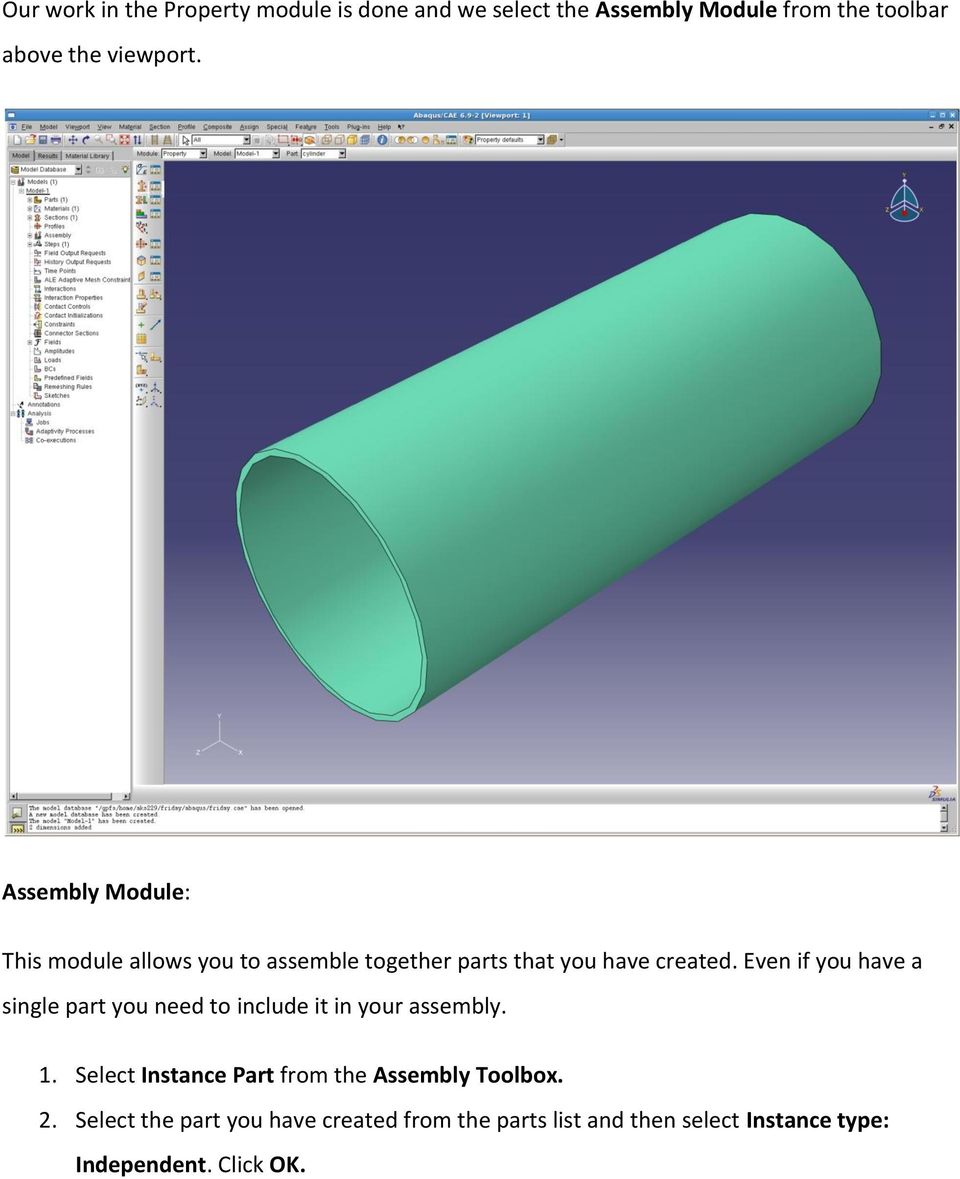
7 Our work in the Property module is done and we select the Assembly Module from the toolbar above the viewport. Assembly Module: This module allows you to assemble together parts that you have created. Even if you have a single part you need to include it in your assembly. 1. Select Instance Part from the Assembly Toolbox. 2. Select the part you have created from the parts list and then select Instance type: Independent. Click OK.

8 Select Module: Step from the toolbar above. Step Module: This module allows you to select the kind of analysis you want to perform on your model and define the parameters associated with it. You can also select which variables you want to included in the output files in this modules. You apply loads over a step. To apply a sequence of loads create several steps and define the loads for each of them. 1. Select Create Step from the Step Toolbox. 2. Name the step as you want and select Coupled temp-displacement as the procedure. Click Continue.


9 3. The edit step dialog box lets you choose the solution technique, the solver type and define the time stepping strategy. 4. Under Basic change the Response to Steady-state and click OK. The Interaction Module allows you to set up interactions (contact, film), constraints, connectors, fasteners and wire feature between parts. Our problem does not involve any of these features but it will be a good idea to explore this module on your own at a later time. Select Module: Load from the toolbar above. Load Module: The Load Module is where you define the loads and boundary conditions for your model for a particular step (indicated in the toolbar above). You can even define loads and boundary conditions as fields like electric potential, acoustic pressure, etc. 1. Select Create Load from the Load Toolbox. Select Surface Traction and click Continue. Select the top face of the cylinder (z=1) (it gets highlighted in red) and click Done.


10 2. Change the Traction type to General. Click on the Edit tab under Direction in the dialog box. Enter the starting point of the direction vector as (0, 0, 0) and the end point as (0,0, 1). Enter the Magnitude as 2e5 and click OK. 3. Select Create Boundary Condition from the Load Toolbox. Select Symmetry / Antisymmetry / Encastre and click Continue. Select the bottom face (z=0) of the cylinder and click Done. Select Pinned (U1=0, U2=0, U3=0) and click OK.


11 4. Again select Create Boundary Condition from the Load Toolbox. Switch Category to Other and select Temperature and click Continue. Select the bottom face of the cylinder and press Done. Enter the magnitude as and click OK. Similarly put the top face at


12 Now that we have defined the loads and the boundary conditions we move on to mesh the geometry. Select Module: Mesh from the toolbar above the viewport. Mesh Module: The mesh model controls how you mesh your model the type of element, their size etc. 1. Select Seed Part Instance from the mesh toolbox. Enter the approximate global size as

13 2. Click on Mesh Part Instance and then on Yes to mesh the model.


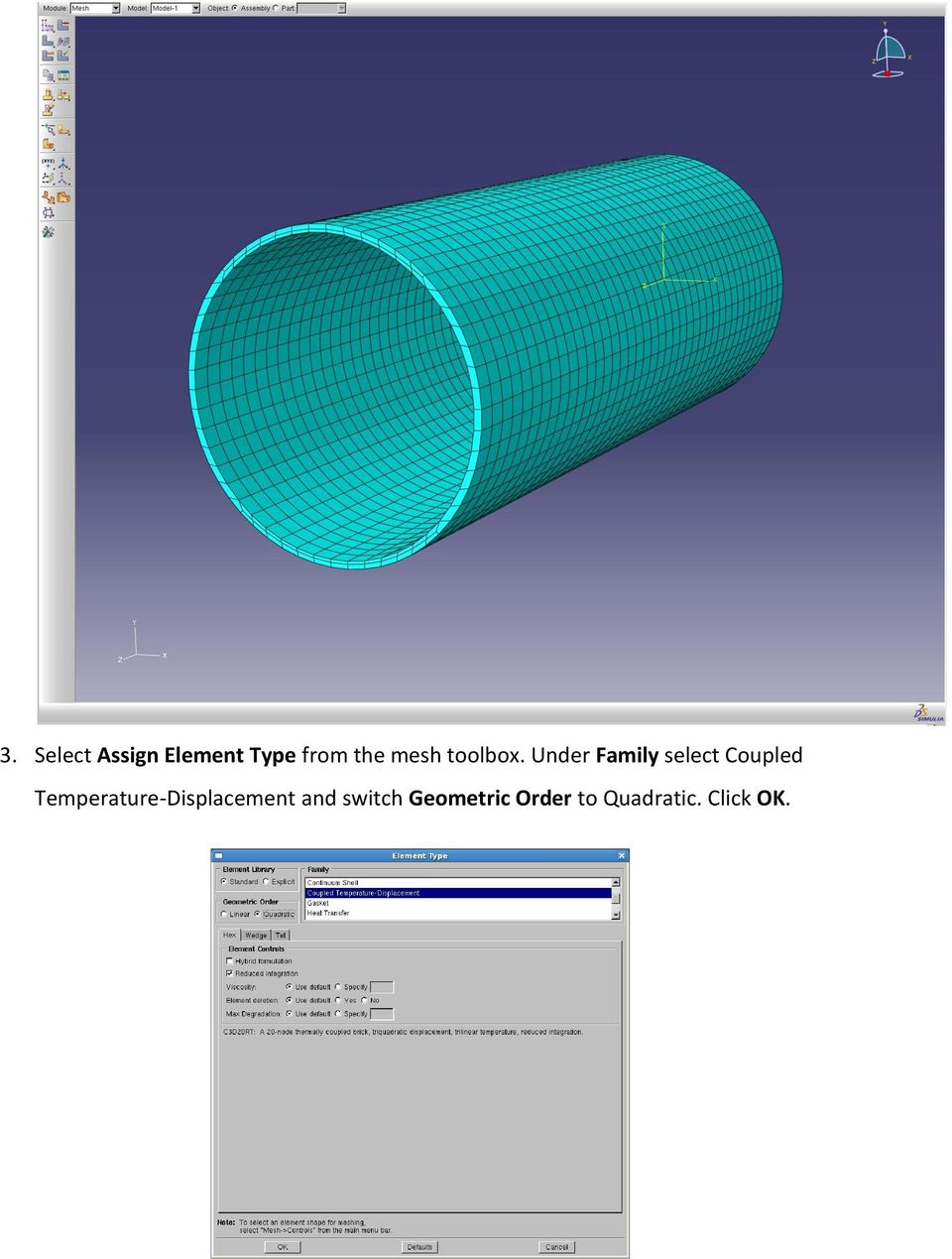
14 3. Select Assign Element Type from the mesh toolbox. Under Family select Coupled Temperature-Displacement and switch Geometric Order to Quadratic. Click OK.

15 When finished select Module: Job from the toolbar above. Job Module: This module allows you to submit your model for analysis. 1. Select Create Job from the Job Toolbox. Name the job as you like. Select your model and click Continue. 2. You can add a description to the job, allocate memory, allot multiple processors and select precision. Use the default values and click OK. 3. Select the Job Manager from the toolbox and click on the Write Input tab.


16 4. If you are running the job for the first time it is advisable to run Data Check to check the input file for errors. Click OK to overwrite the job files. 5. Once the data check is completed Submit the job for analysis. Click OK to overwrite the job files. You can click Monitor to observe the progress of the solution process. You can see the errors, warnings, data and message file.


17 6. Once the job is completed click on the Results tab on the job manager. This opens the Visualization Module for postprocessing. Visualization Module: This model allows you to look at your model after deformation. You can also plot values of stress, displacement, reaction forces, etc. as contours on your model surface or as vectors or tensors. 1. Select Plot Deformed Shape from the Visualization toolbox. 2. Select Plot Contours on Deformed Shape to plot stress contours on the model surface.


18 3. You can see the location of the maximum & minimum stresses by selecting Contour Options>Limits>Show Location.

19 4. Select Results>Field Output from the main menu. This opens a dialog box that allows you to select the variable you want to plot in the viewport. 5. Select U (Spatial Displacement at nodes)>magnitude>ok to plot the displacement contours on the model.

20 6. To plot displacement vectors click on Plot Symbols on Deformed Shape on the toolbox. 7. You can now animate this plot by selecting Animate Harmonic. Mouse Gestures: Ctrl+Alt+Left Click (MB1): Rotate View Ctrl+Alt+Middle Click (MB2): Pan View Ctrl+Alt+Right Click (MB3): Magnify View Use Shift key to select multiple objects. Note on System of Units: ABAQUS has no built-in system of units. Specify all unit data in consistent units. Some common systems of consistent units: SI: m, N, kg, s, Pa, J, kg/m 3 SI (mm): mm, N, tonne (1000 kg), s, MPa, mj, tonne/mm 3 US Unit (ft): ft, lbf, slug, s, lbf/ft 2, ft lbf, slug/ft 3 Questions, comments? Contact: [email protected]

ABAQUS/CAE Tutorial: Analysis of an Aluminum Bracket
 H. Kim FEA Tutorial 1 ABAQUS/CAE Tutorial: Analysis of an Aluminum Bracket Hyonny Kim last updated: August 2004 In this tutorial, you ll learn how to: 1. Sketch 2D geometry & define part. 2. Define material
Workshop. Tennis Racket Simulation using Abaqus
 Introduction Workshop Tennis Racket Simulation using Abaqus In this workshop you will become familiar with the process of creating a model interactively by using Abaqus/CAE. You will create the tennis
2.3 Example: creating a model of an overhead hoist with ABAQUS/CAE
 The instructions for the examples discussed in this manual will focus on using the Model Tree to access the functionality of ABAQUS/CAE. Menu bar actions will be considered only when necessary (e.g., when
Applying a circular load. Immediate and consolidation settlement. Deformed contours. Query points and query lines. Graph query.
 Quick Start Tutorial 1-1 Quick Start Tutorial This quick start tutorial will cover some of the basic features of Settle3D. A circular load is applied to a single soil layer and settlements are examined.
Steady Flow: Laminar and Turbulent in an S-Bend
 STAR-CCM+ User Guide 6663 Steady Flow: Laminar and Turbulent in an S-Bend This tutorial demonstrates the flow of an incompressible gas through an s-bend of constant diameter (2 cm), for both laminar and
Solved with COMSOL Multiphysics 4.3
 Vibrating String Introduction In the following example you compute the natural frequencies of a pre-tensioned string using the 2D Truss interface. This is an example of stress stiffening ; in fact the
List of Problems Solved Introduction p. 1 Concept p. 1 Nodes p. 3 Elements p. 4 Direct Approach p. 5 Linear Spring p. 5 Heat Flow p.
 Preface p. v List of Problems Solved p. xiii Introduction p. 1 Concept p. 1 Nodes p. 3 Elements p. 4 Direct Approach p. 5 Linear Spring p. 5 Heat Flow p. 6 Assembly of the Global System of Equations p.
Embankment Consolidation
 Embankment Consolidation 36-1 Embankment Consolidation In this tutorial, RS2 is used for a coupled analysis of a road embankment subject to loading from typical daily traffic. Model Start the RS2 9.0 Model
Customer Training Material. ANSYS Mechanical Basics. Mechanical. ANSYS, Inc. Proprietary 2010 ANSYS, Inc. All rights reserved. WS2.
 Workshop 2.1 ANSYS Mechanical Basics Introduction to ANSYS Mechanical WS2.1-1 Notes on Workshop 2.1 The first workshop is extensively documented. As this course progresses, students will become more familiar
Essay 5 Tutorial for a Three-Dimensional Heat Conduction Problem Using ANSYS Workbench
 Essay 5 Tutorial for a Three-Dimensional Heat Conduction Problem Using ANSYS Workbench 5.1 Introduction The problem selected to illustrate the use of ANSYS software for a three-dimensional steadystate
Piston Ring. Problem:
 Problem: A cast-iron piston ring has a mean diameter of 81 mm, a radial height of h 6 mm, and a thickness b 4 mm. The ring is assembled using an expansion tool which separates the split ends a distance
ANSYS Example: Transient Thermal Analysis of a Pipe Support Bracket
 ME 477 Transient Thermal Example 1 ANSYS Example: Transient Thermal Analysis of a Pipe Support Bracket The section of pipe shown below is a representative section of a longer pipe carrying a hot fluid
Getting Started with ANSYS ANSYS Workbench Environment
 Getting Started with ANSYS ANSYS Workbench Environment Overview The purpose of this tutorial is to get you started with the ANSYS Workbench environment. We will use a simple, static analysis of a single
Learning Module 4 - Thermal Fluid Analysis Note: LM4 is still in progress. This version contains only 3 tutorials.
 Learning Module 4 - Thermal Fluid Analysis Note: LM4 is still in progress. This version contains only 3 tutorials. Attachment C1. SolidWorks-Specific FEM Tutorial 1... 2 Attachment C2. SolidWorks-Specific
Linear Static Analysis of a Cantilever Beam Using Beam Library (SI Units)
 APPENDIX A Linear Static Analysis of a Cantilever Beam Using Beam Library (SI Units) Objectives: Create a geometric representation of a cantilever beam. Use the geometry model to define an MSC.Nastran
ESCUELA TÉCNICA SUPERIOR DE INGENIEROS INDUSTRIALES Y DE TELECOMUNICACIÓN
 ESCUELA TÉCNICA SUPERIOR DE INGENIEROS INDUSTRIALES Y DE TELECOMUNICACIÓN Titulación: INGENIERO INDUSTRIAL Título del proyecto: MODELING CRACKS WITH ABAQUS Pablo Sanchis Gurpide Pamplona, 22 de Julio del
Trace Layer Import for Printed Circuit Boards Under Icepak
 Tutorial 13. Trace Layer Import for Printed Circuit Boards Under Icepak Introduction: A printed circuit board (PCB) is generally a multi-layered board made of dielectric material and several layers of
ME 24-688 Week 11 Introduction to Dynamic Simulation
 The purpose of this introduction to dynamic simulation project is to explorer the dynamic simulation environment of Autodesk Inventor Professional. This environment allows you to perform rigid body dynamic
MASTER DEGREE PROJECT
 MASTER DEGREE PROJECT Finite Element Analysis of a Washing Machine Cylinder Thesis in Applied Mechanics one year Master Degree Program Performed : Spring term, 2010 Level Author Supervisor s Examiner :
Understand the Sketcher workbench of CATIA V5.
 Chapter 1 Drawing Sketches in Learning Objectives the Sketcher Workbench-I After completing this chapter you will be able to: Understand the Sketcher workbench of CATIA V5. Start a new file in the Part
Solved with COMSOL Multiphysics 4.0a. COPYRIGHT 2010 COMSOL AB.
 Permanent Magnet Introduction This example shows how to model the magnetic field surrounding a permanent magnet. It also computes the force with which it acts on a nearby iron rod. Thanks to the symmetry
Laminar Flow in a Baffled Stirred Mixer
 Laminar Flow in a Baffled Stirred Mixer Introduction This exercise exemplifies the use of the rotating machinery feature in the CFD Module. The Rotating Machinery interface allows you to model moving rotating
Manual Analysis Software AFD 1201
 AFD 1200 - AcoustiTube Manual Analysis Software AFD 1201 Measurement of Transmission loss acc. to Song and Bolton 1 Table of Contents Introduction - Analysis Software AFD 1201... 3 AFD 1200 - AcoustiTube
This tutorial provides a recipe for simulating L
 Pipe Flow Tutorial for STAR-CCM+ ME 448/548 February 5, 2014 Gerald Recktenwald [email protected] 1 Overview This tutorial provides a recipe for simulating laminar flow in a pipe with STAR- L CCM+. The
CATIA V5 FEA Tutorials Releases 12 & 13
 CATIA V5 FEA Tutorials Releases 12 & 13 Nader G. Zamani University of Windsor SDC PUBLICATIONS Schroff Development Corporation www.schroff.com www.schroff-europe.com Visit our website to learn more about
Introduction to COMSOL. The Navier-Stokes Equations
 Flow Between Parallel Plates Modified from the COMSOL ChE Library module rev 10/13/08 Modified by Robert P. Hesketh, Chemical Engineering, Rowan University Fall 2008 Introduction to COMSOL The following
KiCad Step by Step Tutorial
 KiCad Step by Step Tutorial Copyright 2006 David Jahshan: kicad at iridec.com.au 2011 Update Copyright 2011 Phil Hutchinson Copyright: Please freely copy and distribute (sell or give away) this document
Finding Drag Coefficient using Solidworks Flow Simulation
 Finding Drag Coefficient using Solidworks Flow Simulation Using solidworks to find the drag coefficient of shapes is a very useful way to cut down on the design time of a project, as it can remove tests.
Tutorial for Assignment #3 Heat Transfer Analysis By ANSYS (Mechanical APDL) V.13.0
 Tutorial for Assignment #3 Heat Transfer Analysis By ANSYS (Mechanical APDL) V.13.0 1 Problem Description This exercise consists of an analysis of an electronics component cooling design using fins: All
Tutorial 1. Introduction to Using ANSYS FLUENT in ANSYS Workbench: Fluid Flow and Heat Transfer in a Mixing Elbow
 Tutorial 1. Introduction to Using ANSYS FLUENT in ANSYS Workbench: Fluid Flow and Heat Transfer in a Mixing Elbow Introduction This tutorial illustrates using ANSYS Workbench to set up and solve a three-dimensional
Tutorial for laboratory project #2 Using ANSYS Workbench. For Double Pipe Heat Exchanger
 Tutorial for laboratory project #2 Using ANSYS Workbench For Double Pipe Heat Exchanger 1. Preparing ANSYS Workbench Go to Start Menu/All Programs/Simulation/ANSYS 12.1/Workbench. In the toolbox menu in
Files Used in this Tutorial
 Generate Point Clouds Tutorial This tutorial shows how to generate point clouds from IKONOS satellite stereo imagery. You will view the point clouds in the ENVI LiDAR Viewer. The estimated time to complete
Getting Started with CATIA Version 5
 WB Getting Started with CATIA Version 5 Page 1 CATIA User Interface Let s review the following key features: Multi-document support Standard and specific menus & toolbars (File, Edit, Insert, ) Standard
An introduction to 3D draughting & solid modelling using AutoCAD
 An introduction to 3D draughting & solid modelling using AutoCAD Faculty of Technology University of Plymouth Drake Circus Plymouth PL4 8AA These notes are to be used in conjunction with the AutoCAD software
PRO-MECHANICA. Lesson One < Structural > Beam Cantilever Beam
 PRO-MECHANICA Pro-Mechanica is a product of PTC. It works with Creo Pro/E in integrated mode to allow users to perform structural and thermal analyses. This tutorial was originally written for UNIX platform,
Turbulent Flow Through a Shell-and-Tube Heat Exchanger
 Turbulent Flow Through a Shell-and-Tube Heat Exchanger Introduction This model describes a part of a shell-and-tube heat exchanger (see Figure 1), where hot water enters from above. The cooling medium,
version 3.0 tutorial - Turbulent mixing in a T-junction with CFDSTUDY in SALOME contact: [email protected]
 EDF R&D Fluid Dynamics, Power Generation and Environment Department Single Phase Thermal-Hydraulics Group 6, quai Watier F-78401 Chatou Cedex Tel: 33 1 30 87 75 40 Fax: 33 1 30 87 79 16 MAY 2013 documentation
Composite Surfaces Tutorial
 Composite Surfaces Tutorial 4-1 Composite Surfaces Tutorial This tutorial will use the same model as the Materials & Loading Tutorial (with some modifications), to demonstrate how to perform a circular
RV 12 Electrical Schematic Instructions
 RV 12 Electrical Schematic Instructions Step 1: Set your monitor resolution as high as possible. Step 2: Download "RV 12 Electrical Systems (XXX).dwg" from the Van's Aircraft web site to your desktop.
Set up and solve a transient problem using the pressure-based solver and VOF model.
 Tutorial 18. Using the VOF Model This tutorial was run using ANSYS FLUENT 12.1. The results have been updated to reflect the change in the default setting of node-based smoothing for the surface tension
TABLE OF CONTENTS. INTRODUCTION... 5 Advance Concrete... 5 Where to find information?... 6 INSTALLATION... 7 STARTING ADVANCE CONCRETE...
 Starting Guide TABLE OF CONTENTS INTRODUCTION... 5 Advance Concrete... 5 Where to find information?... 6 INSTALLATION... 7 STARTING ADVANCE CONCRETE... 7 ADVANCE CONCRETE USER INTERFACE... 7 Other important
Visualization of 2D Domains
 Visualization of 2D Domains This part of the visualization package is intended to supply a simple graphical interface for 2- dimensional finite element data structures. Furthermore, it is used as the low
Introduction to Solid Modeling Using SolidWorks 2012 SolidWorks Simulation Tutorial Page 1
 Introduction to Solid Modeling Using SolidWorks 2012 SolidWorks Simulation Tutorial Page 1 In this tutorial, we will use the SolidWorks Simulation finite element analysis (FEA) program to analyze the response
Part Design. Page 1 1997 2001 DASSAULT SYSTEMES. IBM Product Lifecycle Management Solutions / Dassault Systemes
 Part Design Page 1 Tutorial Objectives Description This tutorial is an introduction to Part Design. Message This tutorial illustrates how CATIA can Design precise 3D mechanical parts with an intuitive
Introduction to CATIA V5
 Introduction to CATIA V5 Release 16 (A Hands-On Tutorial Approach) Kirstie Plantenberg University of Detroit Mercy SDC PUBLICATIONS Schroff Development Corporation www.schroff.com www.schroff-europe.com
Getting Started Using ADAMS/View
 Getting Started Using ADAMS/View About This Guide 3 Introducing the Latch Design Problem 5 Building Your Model 11 Testing Your First Prototype 29 Validating Results Against Physical Test Data 41 Refining
Begin creating the geometry by defining two Circles for the spherical endcap, and Subtract Areas to create the vessel wall.
 ME 477 Pressure Vessel Example 1 ANSYS Example: Axisymmetric Analysis of a Pressure Vessel The pressure vessel shown below is made of cast iron (E = 14.5 Msi, ν = 0.21) and contains an internal pressure
Contents. First Steps - Ball Valve Design
 Sol i dwor ksfl ow Si mul at i on 2009 Tut or i al Contents First Steps - Ball Valve Design Open the SolidWorks Model........................................... 1-1 Create a Flow Simulation Project.......................................
CONCEPT-II. Overview of demo examples
 CONCEPT-II CONCEPT-II is a frequency domain method of moment (MoM) code, under development at the Institute of Electromagnetic Theory at the Technische Universität Hamburg-Harburg (www.tet.tuhh.de). Overview
Your FEMLAB Trial: An Introduction to FEMLAB s Multiphysics Modeling Capabilities
 Your FEMLAB Trial: An Introduction to FEMLAB s Multiphysics Modeling Capabilities 1 Preface. This manual gives you an introduction to modeling in FEMLAB by taking you through the basic steps of the modeling
Heat Transfer by Free Convection
 Heat Transfer by Free Convection Introduction This example describes a fluid flow problem with heat transfer in the fluid. An array of heating tubes is submerged in a vessel with fluid flow entering at
ANSYS CFD-Post Tutorials
 ANSYS CFD-Post Tutorials ANSYS, Inc. Southpointe 275 Technology Drive Canonsburg, PA 15317 [email protected] http://www.ansys.com (T) 724-746-3304 (F) 724-514-9494 Release 15.0 November 2013 ANSYS, Inc.
Comsol Multiphysics. Physics Builder User s Guide VERSION 4.3 BETA
 Comsol Multiphysics Physics Builder User s Guide VERSION 4.3 BETA Physics Builder User s Guide 1998 2012 COMSOL Protected by U.S. Patents 7,519,518; 7,596,474; and 7,623,991. Patents pending. This Documentation
Mastercam X6 Basic 3D Design
 Basic 3D Design mastercam x getting started tutorials Mastercam X6 Basic 3D Design December 2011 Be sure you have the latest information! Information might have been changed or added since this document
CHEG 3128 Heat, Mass, & Kinetics Laboratory Diffusion in Laminar Flow Regimes Modeling and COMSOL Tutorial Tutorial by Andrea Kadilak
 CHEG 3128 Heat, Mass, & Kinetics Laboratory Diffusion in Laminar Flow Regimes Modeling and COMSOL Tutorial Tutorial by Andrea Kadilak Introduction COMSOL is a computer modeling software package that will
GAMBIT Demo Tutorial
 GAMBIT Demo Tutorial Wake of a Cylinder. 1.1 Problem Description The problem to be considered is schematically in fig. 1. We consider flow across a cylinder and look at the wake behind the cylinder. Air
Simulation of 9C46-1125-A_DRUM-WHEEL BRAKE - 410 MM DIA
 Simulation of 9C46-1125-A_DRUM-WHEEL BRAKE - 410 MM DIA Date: 21 Mayıs 2012 Pazartesi Designer: Solidworks Study name: Study 1 Analysis type: Frequency Description No Data Table of Contents Description...
Creo Simulate 1.0 April 2011
 Creo Simulate 1.0 April 2011 Creo Simulate a Creo family app Installed / Un-installed separately Creo Simulate in two modes: Embedded mode module of Creo Parametric Standalone mode In Standalone mode:
ANSYS CFD-Post Standalone: Tutorials
 ANSYS CFD-Post Standalone: Tutorials ANSYS, Inc. Release 12.1 Southpointe November 2009 275 Technology Drive ANSYS, Inc. is Canonsburg, PA 15317 certified to ISO [email protected] 9001:2008. http://www.ansys.com
KiCad Step by Step Tutorial
 KiCad Step by Step Tutorial Copyright 2006 David Jahshan: kicad at iridec.com.au Copyright: Please freely copy and distribute (sell or give away) this document in any format. Send any corrections and comments
FEMM 4.2 Magnetostatic Tutorial 1. David Meeker [email protected]. January 25, 2006. 1. Introduction
 FEMM 4.2 Magnetostatic Tutorial 1 David Meeker [email protected] January 25, 2006 1. Introduction Finite Element Method Magnetics (FEMM) is a finite element package for solving 2D planar and axisymmetric
Technology of EHIS (stamping) applied to the automotive parts production
 Laboratory of Applied Mathematics and Mechanics Technology of EHIS (stamping) applied to the automotive parts production Churilova Maria, Saint-Petersburg State Polytechnical University Department of Applied
Tutorial for Tracker and Supporting Software By David Chandler
 Tutorial for Tracker and Supporting Software By David Chandler I use a number of free, open source programs to do video analysis. 1. Avidemux, to exerpt the video clip, read the video properties, and save
1. Installing The Monitoring Software
 SD7000 Digital Microphone Monitor Software manual Table of Contents 1. Installing The Monitor Software 1.1 Setting Up Receivers For Monitoring 1.2 Running The Application 1.3 Shutdown 2. The Detail Monitoring
CATIA Electrical Harness Design TABLE OF CONTENTS
 TABLE OF CONTENTS Introduction...1 Electrical Harness Design...2 Electrical Harness Assembly Workbench...4 Bottom Toolbar...5 Measure...5 Electrical Harness Design...7 Defining Geometric Bundles...7 Installing
Pro/E Design Animation Tutorial*
 MAE 377 Product Design in CAD Environment Pro/E Design Animation Tutorial* For Pro/Engineer Wildfire 3.0 Leng-Feng Lee 08 OVERVIEW: Pro/ENGINEER Design Animation provides engineers with a simple yet powerful
The following is an overview of lessons included in the tutorial.
 Chapter 2 Tutorial Tutorial Introduction This tutorial is designed to introduce you to some of Surfer's basic features. After you have completed the tutorial, you should be able to begin creating your
MS WORD 2007 (PC) Macros and Track Changes Please note the latest Macintosh version of MS Word does not have Macros.
 MS WORD 2007 (PC) Macros and Track Changes Please note the latest Macintosh version of MS Word does not have Macros. Record a macro 1. On the Developer tab, in the Code group, click Record Macro. 2. In
Introduction to Measurement Tools
 Introduction to Measurement Tools Revu's built-in measurement tools make it easy to take length, area, perimeter, diameter, volume and radius measurements, count from PDFs and perform area cutouts. Compatibility
Number of Edges on Excavated Boundaries : What does it mean?
 As with all of Rocscience software, RS 3 is developed to be an easy-to-use, quick-to-learn 3D FEM software that takes care of tedious modeling tasks so the user may concentrate on simulating the geomechanical
INTRODUCTION TO COMSOL Multiphysics
 INTRODUCTION TO COMSOL Multiphysics Introduction to COMSOL Multiphysics 1998 2015 COMSOL Protected by U.S. Patents listed on www.comsol.com/patents, and U.S. Patents 7,519,518; 7,596,474; 7,623,991; 8,457,932;
SubCue Analyzer Software - Introduction
 SubCue Analyzer Software - Introduction The SubCue Analyzer is a tool to initialize and download the temperature data from implantable SubCue Dataloggers. To begin, open the SubCue Analyzer program from
Design Animation. Table of Contents: 1) Overview 2) Tutorial 3) Key Vocabulary 4) Tutorial Evaluation
 Design Animation Table of Contents: 1) Overview 2) Tutorial 3) Key Vocabulary 4) Tutorial Evaluation Page 1 of 20 Overview: Pro/ENGINEER Design Animation provides engineers with a simple yet powerful tool
Introduction to Autodesk Inventor for F1 in Schools
 Introduction to Autodesk Inventor for F1 in Schools F1 in Schools Race Car In this course you will be introduced to Autodesk Inventor, which is the centerpiece of Autodesk s digital prototyping strategy
Professional Fire Software Control Center. Fire Training Module Training Manual
 Professional Fire Software Control Center Fire Training Module Training Manual Table of Contents PAGE(S) DESCRIPTION 2 Table of Contents 3 Getting Started / How do I Receive Help? 4 Different Parts of
Weld Design. CATIA V5 Training Foils. Weld Design. Copyright DASSAULT SYSTEMES 1. Instructor Notes:
 CATIA V5 Training Foils Weld Design Version 5 Release 19 January 2009 EDU_CAT_EN_WD1_FI_V5R19 1 About this course Objectives of the course Upon completion of this course you will be able to: - Weld parts,
INTRODUCTION TO COMSOL Multiphysics
 INTRODUCTION TO COMSOL Multiphysics Introduction to COMSOL Multiphysics 1998 2015 COMSOL Protected by U.S. Patents listed on www.comsol.com/patents, and U.S. Patents 7,519,518; 7,596,474; 7,623,991; 8,457,932;
Manual. Sealer Monitor Software. Version 0.10.7
 Manual Sealer Monitor Software Version 0.10.7 Contents 1 Introduction & symbols 1 2 Installation 2 2.1 Requirements 2 2.2 Installation process 2 3 Menu & Tooblar 5 3.1 File menu 5 3.2 Print menu 6 3.3
Learning Module 6 Linear Dynamic Analysis
 Learning Module 6 Linear Dynamic Analysis What is a Learning Module? Title Page Guide A Learning Module (LM) is a structured, concise, and self-sufficient learning resource. An LM provides the learner
Basic 2D Design Be sure you have the latest information!
 Basic 2D Design mastercam x getting started tutorials Basic 2D Design December 2011 Be sure you have the latest information! Information might have been changed or added since this document was published.
11 Printing Designs. When you have completed this chapter, you will be able to:
 11 Printing Designs Creating printed documents is the end we have worked towards from the beginning of this course. We have already been introduced to it very briefly with Printing - A First Look on page
Editing Common Polygon Boundary in ArcGIS Desktop 9.x
 Editing Common Polygon Boundary in ArcGIS Desktop 9.x Article ID : 100018 Software : ArcGIS ArcView 9.3, ArcGIS ArcEditor 9.3, ArcGIS ArcInfo 9.3 (or higher versions) Platform : Windows XP, Windows Vista
SolidWorks. SolidWorks Teacher Guide. and Student Courseware
 SolidWorks SolidWorks Teacher Guide and Student Courseware SolidWorks Corporation Outside the U.S.: +1-978-371-5011 300 Baker Avenue Fax: +1-978-371-7303 Concord, Massachusetts 01742 USA Email: [email protected]
10.0-2. Finite Element Modeling
 What s New in FEMAP FEMAP 10.0 and 10.0.1 include enhancements and new features in: User Interface on page 3 Meshing on page 23 Mesh Associativity on page 33 Properties on page 33 Functions on page 35
Pro/ENGINEER Wildfire 4.0 Basic Design
 Introduction Datum features are non-solid features used during the construction of other features. The most common datum features include planes, axes, coordinate systems, and curves. Datum features do
Layout Tutorial. Getting Started
 Getting Started Layout Tutorial This tutorial will explain how create a layout template, send views to a layout page, then save the document in PDF format. In this tutorial you will learn about: Creating
Real Time Rendering. Preface What's New Getting Started Basic Tasks Advanced Tasks Workbench Description Index
 Real Time Rendering Preface What's New Getting Started Basic Tasks Advanced Tasks Workbench Description Index Dassault Systèmes 1994-99. All rights reserved. Preface CATIA Version 5 Real Time Rendering
Introduction to Comsol Multiphysics
 Introduction to Comsol Multiphysics VERSION 4.2a Benelux COMSOL BV Röntgenlaan 37 2719 DX Zoetermeer The Netherlands +31 (0) 79 363 4230 +31 (0) 79 361 4212 [email protected] www.comsol.nl Denmark COMSOL
Introduction to Autodesk Inventor for F1 in Schools
 F1 in Schools race car Introduction to Autodesk Inventor for F1 in Schools In this course you will be introduced to Autodesk Inventor, which is the centerpiece of Autodesk s Digital Prototyping strategy
Customer Training Material. Lecture 4. Meshing in Mechanical. Mechanical. ANSYS, Inc. Proprietary 2010 ANSYS, Inc. All rights reserved.
 Lecture 4 Meshing in Mechanical Introduction to ANSYS Mechanical L4-1 Chapter Overview In this chapter controlling meshing operations is described. Topics: A. Global Meshing Controls B. Local Meshing Controls
PART 1 Basic Setup. Section 1.1 Direct The Strokes 1.1.1
 Animated Impressionism with Adobe After Effects This tutorial covers a technique for animating paint strokes applied to a still image so that it appears to be a work of impressionistic art. Adobe After
Jump-Start Tutorial For ProcessModel
 Jump-Start Tutorial For ProcessModel www.blueorange.org.uk ProcessModel Jump-Start Tutorial This tutorial provides step-by-step instructions for creating a process model, running the simulation, and viewing
CATIA Basic Concepts TABLE OF CONTENTS
 TABLE OF CONTENTS Introduction...1 Manual Format...2 Log on/off procedures for Windows...3 To log on...3 To logoff...7 Assembly Design Screen...8 Part Design Screen...9 Pull-down Menus...10 Start...10
Numerical Analysis of Independent Wire Strand Core (IWSC) Wire Rope
 Numerical Analysis of Independent Wire Strand Core (IWSC) Wire Rope Rakesh Sidharthan 1 Gnanavel B K 2 Assistant professor Mechanical, Department Professor, Mechanical Department, Gojan engineering college,
Welcome to Corel DESIGNER, a comprehensive vector-based drawing application for creating technical graphics.
 Importing 3D models Welcome to Corel DESIGNER, a comprehensive vector-based drawing application for creating technical graphics. In this tutorial, you will modify a three-dimensional model of a transmission
CATIA for Design and Engineering. Version 5 Releases 14 & 15. David S. Kelley. Central Michigan University SDC
 CATIA for Design and Engineering ersion 5 Releases 4 & 5 David S. Kelley Central Michigan University SDC PUBLICATIONS Schroff Development Corporation www.schroff.com www.schroff-europe.com TUTORIAL Extruded
5. Tutorial. Starting FlashCut CNC
 FlashCut CNC Section 5 Tutorial 259 5. Tutorial Starting FlashCut CNC To start FlashCut CNC, click on the Start button, select Programs, select FlashCut CNC 4, then select the FlashCut CNC 4 icon. A dialog
Analysis of Mobile Phone Reliability Based on Active Disassembly Using Smart Materials *
 Journal of Surface Engineered Materials and Advanced Technology, 2011, 1, 80-87 doi:10.4236/jsemat.2011.12012 Published Online July 2011 (http://www.scirp.org/journal/jsemat) Analysis of Mobile Phone Reliability