
TECHNICAL MANUAL TECHNICAL MANUAL SYSTEM BOARD D1325 SYSTEM BOARD D1325
|
|
|
- Scot Stone
- 10 years ago
- Views:
Transcription
1 TECHNICAL MANUAL TECHNICAL MANUAL SYSTEM BOARD D1325 SYSTEM BOARD D1325

2 Sie haben technische Fragen oder Probleme? Wenden Sie sich bitte an: Ihren zuständigen Vertriebspartner Ihre Verkaufsstelle Weitere Informationen finden Sie im Handbuch "Sicherheit, Garantie und Ergonomie". Aktuelle Informationen zu unseren Produkten, Tipps, Updates usw. finden Sie im Internet: Are there any technical problems or other questions you need clarified? Please contact: your sales partner your sales outlet You will find further information in the manual "Safety, Guarantee and Ergonomics". The latest information on our products, tips, updates, etc., can be found on the Internet under:

3

4 Herausgegeben von/published by Fujitsu Siemens Computers GmbH Dieses Handbuch wurde auf Recycling-Papier gedruckt. This manual has been printed on recycled paper. Ce manuel est imprimé sur du papier recyclé. Este manual ha sido impreso sobre papel reciclado. Questo manuale è stato stampato su carta da riciclaggio. Denna handbok är tryckt på recyclingpapper. Dit handboek werd op recycling-papier gedrukt. Bestell-Nr./Order No.: A26361-D1325-Z Printed in the Federal Republic of Germany AG /01 A26361-D1325-Z

5 Deutsch English Systembaugruppe D1325 System Board D1325 Technisches Handbuch Technical Manual Ausgabe August 2001 August 2001 edition

6 Intel, Pentium und Celeron sind eingetragene der Intel Corporation, USA. Microsoft, MS, MS-DOS und Windows sind eingetragene Warenzeichen der Microsoft Corporation. PS/2 und OS/2 Warp sind eingetragene Warenzeichen von International Business Machines, Inc. Alle weiteren genannten Warenzeichen sind Warenzeichen oder eingetragene Warenzeichen der jeweiligen Inhaber und werden als geschützt anerkannt. Copyright Fujitsu Siemens Computers GmbH 2001 Alle Rechte vorbehalten, insbesondere (auch auszugsweise) die der Übersetzung, des Nachdrucks, der Wiedergabe durch Kopieren oder ähnliche Verfahren. Zuwiderhandlungen verpflichten zu Schadenersatz. Alle Rechte vorbehalten, insbesondere für den Fall der Patenterteilung oder GM-Eintragung. Liefermöglichkeiten und technische Änderungen vorbehalten. Dieses Handbuch wurde erstellt von cognitas. Gesellschaft für Technik-Dokumentation mbh Intel, Pentium and Celeron are registered trademarks of Intel Corporation, USA. Microsoft, MS, MS-DOS and Windows are registered trademarks of Microsoft Corporation. PS/2 and OS/2 Warp are registered trademarks of International Business Machines, Inc. All other trademarks referenced are trademarks or registered trademarks of their respective owners, whose protected rights are acknowledged. All rights, including rights of translation, reproduction by printing, copying or similar methods, even of parts are reserved. Offenders will be liable for damages. All rights, including rights created by patent grant or registration of a utility model or design, are reserved. Delivery subject to availability. Right of technical modification reserved. This manual was produced by cognitas. Gesellschaft für Technik-Dokumentation mbh

7 Contents Introduction...1 Notational conventions...1 Important notes...1 Information about boards...2 Features...3 External ports...4 Internal ports and connectors...5 Hard disk connection...6 PCI bus interrupts...6 Settings with switches and jumpers...7 Recovering System BIOS - switch Jumper USB...7 Add-on modules...8 Installing and removing processors...9 Upgrading main memory...10 Installing network board with WOL...11 Replacing the lithium battery...12 Glossary...13 A26361-D1325-Z

8

9 Introduction i Depending on the configuration chosen, some of the hardware components described may not be available on your system board. You will find further information in the "BIOS Setup" description. Further information about drivers is provided in the readme files on the hard disk, on the supplied drivers diskettes, on the "Drivers & Utilities" or on the "ServerStart" CD. Notational conventions The meanings of the symbols and fonts used in this manual are as follows: Pay particular attention to text marked with this symbol. Failure to observe this warning endangers your life, destroys the device, or may lead to loss of data.! i Supplementary information, remarks, and tips follow this symbol. Ê Text which follows this symbol describes activities that must be performed in the order shown. Ë This symbol indicates that you must enter a blank space (press the Space Bar) at this point. Ú This symbol indicates that you must press the Enter key. Text in this typeface indicates screen outputs. Text in this bold typeface indicates the entries you make via the keyboard. Text in italics indicates commands or menu items. "Quotation marks" indicate names of chapters or terms. Important notes Store this manual close to the device. If you pass the device on to third parties, you should pass this manual on with it. Be sure to read this page carefully and note the information before you open the device.! You cannot access the system board components without first opening the device. How to dismantle and reassemble the device is described in the Operating Manual accompanying the device. Please observe the safety information provided in the "Important notes" chapter in the device's operating manual. Incorrect replacement of the lithium battery may lead to a risk of explosion. It is therefore essential to observe the instructions in the "Add-on modules" - "Replacing the lithium battery" section. A26361-D1325-Z English - 1

10 Important notes The shipped version of this board complies with the requirements of the EEC directive 89/336/EEC "Electromagnetic compatibility". Compliance was tested in a typical PC configuration. When installing the board, refer to the specific installation information in the Operating Manual or Technical Manual for the receiving device. Connecting cables for peripherals must be adequately shielded to avoid interference. Components can become very hot during operation. Ensure you do not touch components when making extensions to the system board. There is a danger of burns!! i The warranty is invalidated if the device is damaged during the installation or replacement of system expansions. Information on which system expansions you can use is available from your sales outlet or the customer service centre. Information about boards To prevent damage to the system board or the components and conductors on it, please take great care when you insert or remove boards. Take great care to ensure that extension boards are slotted in straight, without damaging components or conductors on the system board, or any other components, for example EMI spring contacts. Be especially careful with the locking mechanisms (catches, centring pins etc.) when you replace the system board or components on it, for example memory modules or processors. Never use sharp objects (screwdrivers) for leverage. Boards with electrostatic sensitive devices (ESD) are identifiable by the label shown. When you handle boards fitted with ESDs, you must, under all circumstances, observe the following points: You must always discharge static build up (e.g. by touching a grounded object) before working. The equipment and tools you use must be free of static charges. Remove the power plug from the mains supply before inserting or removing boards containing ESDs. Always hold boards with ESDs by their edges. Never touch pins or conductors on boards fitted with ESDs. 2 - English A26361-D1325-Z

11 Features Features The components and connectors marked are not necessarily present on the system board. System board in ATX format mpga478 Intel processor Pentium 4 with 400 MHz Front Side. Pentium 4 processors support MMX technology and Intel Streaming SIMD Extensions. The size and frequency of first-level cache and second-level cache are dependent upon the processor used. Intel chipset 845 Analogue Devices AD1885 (AC'97) Audio Codec internal: Stereo CD-In, Stereo AUX-In external: Mono Micro-In, Stereo Line-In, Stereo Line-Out, Game/Midi port Headphones via audio front panel 3 DIMM slots for 32 MB to 3 GB main memory (SDRAM memory modules meet the PC133 specification) with ECC Flash BIOS Power-on functions: Wake on RTC Wake on LAN Wake on PCI Cards Wake on USB COM1 wake up support (standby) Energy saving functions: APM and ACPI (requires an operating system that supports ACPI) Switching on/off, standby mode, suspend mode via on/off switch Switching on/off via software Security functions: Processor serial number System, Setup and Keyboard password parallel and serial ports can be deactivated Floppy disk write-protection via BIOS Setup Boot hard disk virus warning function Flash BIOS and EEPROMs (on the memory modules) virus protection function. 6 PCI slots PCI slots support 3.3 V main and auxiliary voltages. A26361-D1325-Z English - 3

12 Features 1 AGP slot The AGP slot supports 1x, 2x and 4x AGP mode. Only AGP boards with 1.5 V are supported. 1 CNR type A slot shared with PCI slot IDE hard disk controller connected to PCI bus for up to four IDE drives (e.g. IDE hard disk drives, ATAPI CD-ROM drives) The IDE hard disk controller are ATA33/66/100, ultra DMA capable and support PIO modes 0-4. Floppy disk drive controller (possible formats: 720 KB, 1.44 MB, 2.88 MB) The system board supports booting from a 120 MB IDE floppy disk drive. Real-time clock/calendar with integrated battery backup 1 internal WOL interface 2 internal USB ports (C / D) 1 external parallel port (ECP- and EPP-compatible) 2 external serial ports (16C550 compatible with FIFO) 2 external PS/2 ports for keyboard and mouse 2 external USB ports (A / B) External ports a8b8c 1 = PS/2 mouse port 2 = PS/2 keyboard port 3 = Serial port 1 4 = Parallel port 5 = Serial port 2 6 = USB ports A and B 7 = Game/Midi port 8a = Audio Line-Out 8b = Audio Line-In 8c = Audio Micro-In The components and connectors marked are not necessarily present on the system board. 4 - English A26361-D1325-Z

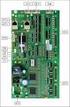
13 Features Internal ports and connectors DIMM 3 DIMM 2 DIMM PCI 1 PCI 2 PCI 3 PCI 4 PCI 5 PCI 6 CNR AGP = Power supply ATX 2 = Floppy Disk Drive 3 = IDE drives 3 and 4 (secondary) 4 = Connector for control panel and loudspeaker 5 = IDE drives 1 and 2 (primary) 6 = Jumper USB 7 = Fan 2 8 = USB ports C / D 9 = Wake On LAN 10 = CD audio input 11 = Audio front panel 12 = AUX audio input 13 = Power supply +12 V 14 = Fan 1 (e.g. for the processor) The components and connectors marked are not necessarily present on the system board. A26361-D1325-Z English - 5

14 Features Hard disk connection An ultra ATA/66 or ultra ATA/100 hard disk must be connected with a cable especially designed for the ultra ATA/66or ultra ATA/100 mode. Ê Connect the end of the cable marked with blue to the system board. PCI bus interrupts The following table shows which PCI bus interrupts are assigned on the system board. PCI bus interrupt Component on system board: B, C, D, A PCI bus slot 1 C, D, A, B PCI bus slot 2 D, A, B, C PCI bus slot 3 E, F, G, H PCI bus slot 4 F, G, H, A PCI bus slot 5 G, H, A, B PCI bus slot 6 / CNR slot A, B AGP slot D First USB controller H Second USB controller E LAN controller B SMBus B AC'97 Audio 6 - English A26361-D1325-Z

15 Settings with switches and jumpers Settings with switches and jumpers ON Switch 1 = must always be set to off Switch 2 = System BIOS recovery Switch 3 = must always be set to off Switch 4 = must always be set to off i The clock frequency of the processor is set automatically. Recovering System BIOS - switch 2 Switch 2 enables recovery of the old system BIOS after an attempt to update has failed. To restore the old system BIOS you need a Flash BIOS Diskette (please call our customer service centre). On Off Jumper USB The System BIOS executes from floppy drive A: and the inserted "Flash-BIOS- Diskette" restores the System BIOS on the system board. Normal operation (default setting). 1 The power supply of the USB port is set with the jumper. 1-2 Wakeup (USB) is only possible via ACPI S Wakeup (USB) is possible via ACPI S1 to S4. Requirement: Switch 3 is set to On. A26361-D1325-Z English - 7

16 Add-on modules Add-on modules! Exit Suspend mode, switch off the device and remove the power plug from the mains supply, before carrying out any of the procedures described in this chapter! Even when you have switched off the device, parts (e.g. memory modules, AGP and PCI extension boards) are still supplied with power. All PCI slots support 3.3 V main and auxiliary voltages. AGP boards support 1,5 V main and auxiliary voltages DIMM 3 DIMM 2 DIMM 1 5 PCI 1 AGP 1 PCI 2 PCI 3 PCI 4 PCI 5 PCI 6 CNR = Socket for processor with heat sink 2 = Location bank 1 for main memory 3 = Location bank 2 for main memory 4 = Location bank 3 for main memory 5 = Lithium battery 6 = CNR slot type A 7 = PCI slots 1, 2, 3, 4, 5, 6 8 = AGP slot 8 - English A26361-D1325-Z

17 Add-on modules Installing and removing processors A Ê Pull the lever in the direction of the arrow (1) and lift it as far as it will go (2). Ê Remove the old processor from the socket (3). Ê Insert the new processor in the socket so that the angled corner of the processor matches the coding on the socket (A) with regard to the position (4).! The angled corner of the processor may be covered by the heat sink. In this case let yourself be guided by the marking in the rows of pins on the underside of the processor. Ê Push the lever back down until it clicks into place (5). A26361-D1325-Z English - 9

18 Add-on modules Upgrading main memory These slots are suitable for DIMM format 32, 64, 128, 256, 512, 1024 MB SDRAM memory modules. Memory modules with different memory capacities can be combined. You may only use unbuffered 3.3 V memory modules. Buffered memory modules are not! supported. SDRAM memory modules must meet the PC133 specification. Installing a memory module 2 2 Ê Push the holders on each side of the memory compartment outwards. Ê Insert the memory module into the location (1). Ê At the same time flip the lateral holders upwards until the memory module snaps in place (2). Removing a memory module 1 1 Ê Push the clips on the right and left of the compartment outward (1). Ê Carefully remove the memory module from the compartment (2) English A26361-D1325-Z

19 Add-on modules Installing network board with WOL Ê Ê i Install the network board as described in the operating manual for your unit. Push the WOL cable onto the WOL plug connector of the system board. To use the WOL functionality of a network board the power supply must provide a 5 V auxiliary voltage of at least 1 A. If the system board was not already incorporated in a device when you bought it you must check whether your power supply can provide the auxiliary voltage. You may find further information in the supplied description of the network board. A26361-D1325-Z English - 11

20 Add-on modules Replacing the lithium battery! Incorrect replacement of the lithium battery may lead to a risk of explosion. The lithium battery must be replaced with an identical battery or a battery type recommended by the manufacturer (CR2032). Do not throw lithium batteries into the household waste. They must be disposed of in accordance with local regulations concerning special waste. Ensure that you insert the battery the right way round. The plus pole must be on the top! The following graphic representation is also valid if the lithium battery is built-in vertically Ê Lift the contact (1) a few millimetres and remove the battery from its socket (2). Ê Insert a new lithium battery of the same type into the socket (3) English A26361-D1325-Z

21 Glossary Glossary The technical terms and abbreviations given below represent only a selection of the full list of common technical terms and abbreviations. Not all technical terms and abbreviations listed here are valid for the described system board. ACPI Advanced Configuration and ISA Industrial Standard Architecture Power Management Interface AC'97 Audio Codec '97 LAN Local Area Network AGP Accelerated Graphics Port LSA LAN Desk Service Agent AMR Audio Modem Riser MCH Memory Controller Hub AOL Alert On LAN MMX MultiMedia extension APM Advanced Power Management P64H PCI64 Hub ATA Advanced Technology Attachment PCI Peripheral Component Interconnect BIOS Basic Input Output System PXE Preboot execution Environment CAN Controller Area Network RAM Random Access Memory CPU Central Processing Unit RAMDAC Random Access Memory Digital Analogue Converter CNR Communication Network Riser RDRAM Rambus Dynamic Random Access Memory C-RIMM Continuity Rambus Inline RIMM Rambus Inline Memory Module Memory Module DIMM Dual Inline Memory Module RTC Real Time Clock ECC Error Correcting Code SB Soundblaster EEPROM Electrical Erasable Programmable Read Only Memory SDRAM Synchronous Dynamic Random Access Memory FDC Floppy Disk Controller SGRAM Synchronous Graphic Random Access Memory FIFO First-In First-Out FSB Front Side Bus SIMD Streaming Mode Instruction (Single Instruction Multiple Data) FWH Firmware Hub SMBus System Management Bus GMCH Graphics and Memory Controller SVGA Super Video Graphic Adapter Hub GPA Graphics Performance USB Universal Serial Bus Accelerator I 2 C Inter Integrated Circuit VGA Video Graphic Adapter IAPC Instantly Available Power WOL Wake On LAN Managed Desktop PC Design ICH I/O Controller Hub IDE Intelligent Drive Electronics IPSEC Internet Protocol Security A26361-D1325-Z English - 13
SYSTEM BOARD D1107 ADDITIONAL TECHNICAL MANUAL
 SYSTEM BOARD D07 ADDITIONAL TECHNICAL MANUAL Is there...... any technical problem or other question you need clarified? Please contact: Our Hotline: Mo-Fr: 8 a.m. - 6 p.m. Sat: 9 a.m. - 2 p.m. Tel.: ++49
85MIV2 / 85MIV2-L -- Components Locations
 Chapter Specification 85MIV2 / 85MIV2-L -- Components Locations RJ45 LAN Connector for 85MIV2-L only PS/2 Peripheral Mouse (on top) Power PS/2 K/B(underside) RJ45 (on top) +2V Power USB0 (middle) USB(underside)
Intel Desktop Board D925XECV2 Specification Update
 Intel Desktop Board D925XECV2 Specification Update Release Date: July 2006 Order Number: C94210-005US The Intel Desktop Board D925XECV2 may contain design defects or errors known as errata, which may cause
System Installation. 3-1 Socket 370 Celeron/Pentium-III Processor. Installing S370 CPU. Removing CPU. Configuring System Bus
 System Installation This chapter provides you with instructions to set up your system. The additional information is enclosed to help you set up onboard PCI device and handle WDT operation in software
Mainboard D1522 / D1521
 answers 2 Technisches Handbuch / Technical Manual Mainboard D1522 / D1521 Deutsch / English / Français Sie haben...... technische Fragen oder Probleme? Wenden Sie sich bitte an: Ihren zuständigen Vertriebspartner
answers Mainboard D1931 Technisches Handbuch / Technical Manual Deutsch / English
 answers 2 Technisches Handbuch / Technical Manual Mainboard D1931 Deutsch / English Sie haben...... technische Fragen oder Probleme? Wenden Sie sich bitte an: Ihren zuständigen Vertriebspartner Ihre Verkaufsstelle
Mother Board Component
 Mother Board Component Explain Introduction Mother Board Component 1.Clock Generator 2. CPU socket 3. Memory Socket Memory error checking 4. ROM Bios 5. CMOS Ram 6. Battery 7. Chipset 8. Expansion Slot
Basisinformationen Mainboard Basic information on mainboard
 Mainboard Deutsch - English Technisches Handbuch / Technical Manual Basisinformationen Mainboard Basic information on mainboard Sie haben...... technische Fragen oder Probleme? Wenden Sie sich bitte an:
Upgrading and Servicing Guide
 Upgrading and Servicing Guide The only warranties for Hewlett-Packard products and services are set forth in the express statements accompanying such products and services. Nothing herein should be construed
EUCIP IT Administrator - Module 1 PC Hardware Syllabus Version 3.0
 EUCIP IT Administrator - Module 1 PC Hardware Syllabus Version 3.0 Copyright 2011 ECDL Foundation All rights reserved. No part of this publication may be reproduced in any form except as permitted by ECDL
A+ Guide to Managing and Maintaining Your PC, 7e. Chapter 1 Introducing Hardware
 A+ Guide to Managing and Maintaining Your PC, 7e Chapter 1 Introducing Hardware Objectives Learn that a computer requires both hardware and software to work Learn about the many different hardware components
Chapter 6. Inside the System Unit. What You Will Learn... Computers Are Your Future. What You Will Learn... Describing Hardware Performance
 What You Will Learn... Computers Are Your Future Chapter 6 Understand how computers represent data Understand the measurements used to describe data transfer rates and data storage capacity List the components
Compaq Presario Desktop Products. Upgrading and Servicing Guide
 Compaq Presario Desktop Products Upgrading and Servicing Guide The information in this document is subject to change without notice. Hewlett-Packard Company makes no warranty of any kind with regard to
The Motherboard Chapter #5
 The Motherboard Chapter #5 Amy Hissom Key Terms Advanced Transfer Cache (ATC) A type of L2 cache contained within the Pentium processor housing that is embedded on the same core processor die as the CPU
Computer Setup (F10) Utility Guide Evo Desktop Family Evo Workstation Family
 b Computer Setup (F10) Utility Guide Evo Desktop Family Evo Workstation Family Document Part Number: 215867-004 May 2002 This guide provides instructions on how to use Computer Setup. This tool is used
Chapter 5 Cubix XP4 Blade Server
 Chapter 5 Cubix XP4 Blade Server Introduction Cubix designed the XP4 Blade Server to fit inside a BladeStation enclosure. The Blade Server features one or two Intel Pentium 4 Xeon processors, the Intel
Chapter 1. Getting Started Getting Started
 Getting Started Chapter 1. Getting Started Getting Started Thank you for purchasing the MD-8080 M-ATX mainboard. The MD-8080 is based on Intel 865PE & Intel ICH5 chipsets for optimal system efficiency.
EVGA Z97 Classified Specs and Initial Installation (Part 1)
 User Guide EVGA Z97 Classified Specs and Initial Installation (Part 1) - 1 - Table of Contents Before you Begin 3 Parts Not in the kit.4 Intentions of the kit 4 Motherboard Specifications 5 Unpacking and
Specifications for the Gateway M1300 Tablet PC
 Specifications for the Gateway M1300 Tablet PC Specifications are subject to change without notice or obligation. Processor and Core Logic Processor options Chipset Processor packaging Level 2 cache Core
Getting Started. rp5800, rp5700 and rp3000 Models
 Getting Started rp5800, rp5700 and rp3000 Models Copyright 2011 Hewlett-Packard Development Company, L.P. The information contained herein is subject to change without notice. Microsoft, Windows, and Windows
Systembaugruppe / System Board D1755
 Systembaugruppe / System Board D1755 Technisches Handbuch / Technical manual Deutsch / English Are there...... any technical problems or other questions which you would like to be clarified? Please contact:
Electronic Emission Notices
 1 Electronic Emission Notices Federal Communications Commission (FCC) Statement This equipment has been tested and found to comply with the limits for a Class B digital device, pursuant to Part 15 of FCC
(AOpen reserves the right to revise all the specifications and information contained in this document which is subject to change without notice.
 (AOpen reserves the right to revise all the specifications and information contained in this document which is subject to change without notice.) PS/2 Mouse Connector USB2.0 Ports SPP/EPP/ECP Parallel
Motherboard Specifications, A8M2N-LA (Naos)
 HP Customer Care > Compaq Presario SR2010NX Desktop PC Motherboard Specifications, A8M2N-LA (Naos) Support details» Motherboard specifications table» Motherboard layout and photos» Clearing the BIOS settings»
PTM800Pro MAINBOARD MANUAL
 PTM800Pro MAINBOARD MANUAL DOC No. : M0590040 Rev. : A0 Date : 3, 2006 Part No. : 25-13031-00 Table of Contents Chapter 1. Overview... 1-2 Package Checklist...1-3 The PTM800Pro Mainboard...1-4 Main Features...1-5
AwardBIOS Setup Utility
 AwardBIOS Setup Utility Modifications to the BIOS Setup settings should be performed by advanced users only. Setting items to incorrect values may cause your system to malfunction. Introducing BIOS Setup...2
Phoenix SecureCore TM Setup Utility
 Phoenix SecureCore TM Setup Utility Important information: We continually strive to bring you the latest and proven features and technologies. As part of our drive to continually improve our products modifications
M266A. User Manual. Version 3.0 Published July 2003 Copyright 2003 ASRock INC. All rights reserved.
 M266A User Manual Version 3.0 Published July 2003 Copyright 2003 ASRock INC. All rights reserved. 1 Copyright Notice: No part of this manual may be reproduced, transcribed, transmitted, or translated in
Red: MODEM-CN Connector Green: AUX-IN Connector Black: CD-IN Connector
 PS/2 Mouse RJ-45 LAN Connector Connector (Optional) SPP/EPP/ECP Parallel Port MIDI/Game Port PS/2 Keyboard Connector USB Port COM 1 Port COM 2 Port Red: MODEM-CN Connector Green: AUX-IN Connector Black:
USA Notice. Any changes or modifications not expressly approved by the grantee of this device could void the user s authority to operate the device.
 Safety and Regulatory Information USA Notice FCC Part 15:This equipment has been tested and found to comply with the limits for a class B digital device, pursuant to Part 15 of the FCC Rules. These limits
EUCIP - IT Administrator. Module 1 - PC Hardware. Version 2.0
 EUCIP - IT Administrator Module 1 - PC Hardware Version 2.0 Module 1 Goals Module 1 The PC Hardware module requires the candidate to know and recognise the basic physical make-up of a personal computer
Getting Started. Chapter 1
 Chapter 1 Getting Started Thank you for choosing the 7728 v2.x Series Micro-ATX mainboard. The 7728 v2.x Series mainboards are based on Intel H61 chipsets for optimal system efficiency. Designed to fit
Executive Series. Intel Desktop Board DB75EN Executive Series MicroATX Form Factor
 Intel Desktop Board DB75EN MicroATX Form Factor product brief Built for Business: Intel Desktop Board DB75EN maximizes employee productivity, PC performance, and data security with Intel Small Business
Data Sheet ESPRIMO P1500. The wide-ranging home office and multimedia PC ESPRIMO P1500
 Pages: Data Sheet The wide-ranging home office and multimedia PC Issue: November 2009 The wide-ranging is the ideal home office and multimedia PC for families. Equipped with powerful Intel processor and
USB 2.0 VGA ADAPTER USER MANUAL
 USB 2.0 VGA ADAPTER USER MANUAL CONTENTS INTRODUCTION... 3 FEATURES... 3 SYSTEM REQUIREMENTS... 3 PACKAGE CONTENTS... 3 SUPPORTED COMMON DISPLAY RESOLUTION... 4 TECHNICAL SPECIFICATIONS... 4 INSTALLATION
BIOS Update Release Notes
 BIOS Update Release Notes PRODUCTS: DH55TC, DH55HC, DH55PJ (Standard BIOS) BIOS Version 0040 - TCIBX10H.86A.0040.2010.1018.1100 October 18, 2010 Integrated Graphics Option ROM Revision on HC/TC: 2017 PC
Intel RAID Controller Troubleshooting Guide
 Intel RAID Controller Troubleshooting Guide A Guide for Technically Qualified Assemblers of Intel Identified Subassemblies/Products Intel order number C18781-001 September 2, 2002 Revision History Troubleshooting
Intel architecture. Platform Basics. White Paper Todd Langley Systems Engineer/ Architect Intel Corporation. September 2010
 White Paper Todd Langley Systems Engineer/ Architect Intel Corporation Intel architecture Platform Basics September 2010 324377 Executive Summary Creating an Intel architecture design encompasses some
PS/2 Keyboard Connector
 PS/2 Mouse Connector SPP/EPP/ECP Parallel Port RJ45 LAN Jack (for AX45F-4DL, AX45F-4DN and AX45F-4D Max) Line-In USB 2.0 Ports Speaker Out MIC-In Realtek Gigabit LAN chip (for AX45F-4D Max and AX45F-4DL)
Intel Desktop Board D815EEA2/D815EPEA2 Technical Product Specification
 Intel Desktop Board D815EEA2/D815EPEA2 Technical Product Specification May 2001 Order Number A46399-002 The Intel Desktop Boards D815EEA2 and D815EPEA2 may contain design defects or errors known as errata
Computer Setup (F10) Utility Guide Business PCs
 Computer Setup (F10) Utility Guide Business PCs Copyright 2007 Hewlett-Packard Development Company, L.P. The information contained herein is subject to change without notice. Microsoft, Windows, and Windows
CPU SHB210 BIOS Versionen V14.x
 CPU SHB210 BIOS Versionen V14.x 2 BIOS V 14.x Version V 1.0 Stand 05.07.2013 r Pa Bearbeitung/Illustrationen Pa Warenzeichen Alle verwendeten Produktnamen und Warenzeichen sind Eigentum ihrer jeweiligen
Intel Desktop Board DP965LT
 Intel Desktop Board DP965LT Technical Product Specification September 2006 Order Number: D56017-002US The Intel Desktop Board DP965LT may contain design defects or errors known as errata that may cause
Technical Product Specifications Dell Dimension 2400 Created by: Scott Puckett
 Technical Product Specifications Dell Dimension 2400 Created by: Scott Puckett Page 1 of 11 Table of Contents Technical Product Specifications Model 3 PC Technical Diagrams Front Exterior Specifications
LB-IPC. High Performance, Ultra Low Noise Low Power Consumption. Features. Applications
 LB-IPC High Performance, Ultra Low Noise Low Power Consumption Features Support Intel Pentium M and Celeron M 400/533 FSB Processor up to 2.13GHz Intel 915GM / ICH 6M Thermal Control Technology On-board
Configuring Memory on the HP Business Desktop dx5150
 Configuring Memory on the HP Business Desktop dx5150 Abstract... 2 Glossary of Terms... 2 Introduction... 2 Main Memory Configuration... 3 Single-channel vs. Dual-channel... 3 Memory Type and Speed...
NEC USB PortBar with the Driver Installation Diskette
 NEC USB PortBar with the Driver Installation Diskette Congratulations on purchasing the NEC USB PortBar for your NEC Versa notebook computer! The NEC USB PortBar connects to the USB port on your NEC Versa
Trademarks. IBM, PC/AT, and PC/XT are trademarks of International Business Machines Corporation.
 The information presented in this publication has been carefully checked for reliability; however, no responsibility is assumed for inaccuracies. Specifications are subject to change without notice. Trademarks
Quick Start Turning on the Tablet PC for the First Time
 User s Manual DL46 Getting Started Congratulations on your purchase of a Tablet PC. The Tablet PC is a fully functional PC with built-in LAN, and wireless connectivity. With your Tablet PC you will be
Trademarks. IBM, PC/AT, and PC/XT are trademarks of International Business Machines Corporation.
 The information presented in this publication has been carefully checked for reliability; however, no responsibility is assumed for inaccuracies. Specifications are subject to change without notice. Trademarks
Motherboard P4SD-LA. ( Oxford ) User Guide
 ( Oxford ) User Guide Motherboard Checklist Contents specifications summary... iii 1. Motherboard layout... 1 2. Central Processing Unit (CPU)... 2 3. System memory... 3 Memory configurations... 3 Installing
TS500-E5. Configuration Guide
 TS500-E5 Configuration Guide E4631 Second Edition V2 March 2009 Copyright 2009 ASUSTeK COMPUTER INC. All Rights Reserved. No part of this manual, including the products and software described in it, may
H ARDWARE C ONSIDERATIONS
 H ARDWARE C ONSIDERATIONS for Sidewinder 5 firewall software Dell Precision 530 This document provides information on specific system hardware required for running Sidewinder firewall software on a Dell
P4SD-LA (Yale) User Guide. Motherboard
 (Yale) User Guide Motherboard Checklist Contents specifications summary... iii 1. Motherboard layout... 1 2. Central Processing Unit (CPU)... 2 3. System memory... 3 Memory configurations... 3 Installing
IPN73-BA Motherboard layout reference Contents
 IPN73-BA Motherboard layout reference Contents Specifications summary Motherboard layout Rear panel connectors Function selectors Status indicators Internal connectors February 2008 Specifications summary
Computer Components Study Guide. The Case or System Box
 Computer Components Study Guide In this lesson, we will briefly explore the basics of identifying the parts and components inside of a computer. This lesson is used to introduce the students to the inside
answers Mainboard D1844 RiserCard E391 Technisches Handbuch / Technical Manual Deutsch / English
 answers 2 Technisches Handbuch / Technical Manual Mainboard D1844 RiserCard E391 Deutsch / English Sie haben...... technische Fragen oder Probleme? Wenden Sie sich bitte an: Ihren zuständigen Vertriebspartner
BIOS Update Release Notes
 BIOS Update Release Notes PRODUCTS: DH61BE, DH61CR, DH61DL, DH61WW, DH61SA, DH61ZE (Standard BIOS) BIOS Version 0120 - BEH6110H.86A.0120.2013.1112.1412 Date: November 12, 2013 ME Firmware: Ignition SKU
XTreme Files OS & Data Backup/Restore User Manual Please read the Instruction manual before using the XTreme Files (F Series) 1.
 XTreme Files OS & Data Backup/Restore User Manual Please read the Instruction manual before using the XTreme Files (F Series) 1. The suggested interface for your computer is USB2.0 to have better speed
Genesi Pegasos II Setup
 Freescale Semiconductor Application Note AN2666 Rev. 0, 07/2004 Genesi Pegasos II Setup by Maurie Ommerman CPD Applications Freescale Semiconductor, Inc. Austin, TX This application note is the first in
Chapter 4 System Unit Components. Discovering Computers 2012. Your Interactive Guide to the Digital World
 Chapter 4 System Unit Components Discovering Computers 2012 Your Interactive Guide to the Digital World Objectives Overview Differentiate among various styles of system units on desktop computers, notebook
answers Mainboard D2140 Technical Manual English
 answers 2 Technical Manual Mainboard D2140 English Sie haben...... technische Fragen oder Probleme? Wenden Sie sich bitte an: Ihren zuständigen Vertriebspartner Ihre Verkaufsstelle Aktuelle Informationen
Commonwealth of Virginia Virginia Information Technologies Agency GATEWAY DESKTOPS, NOTEBOOKS & SERVERS. Optional Use Contract
 Commonwealth of Virginia Virginia Information Technologies Agency GATEWAY DESKTOPS, NOTEBOOKS & SERVERS Optional Use Contract Date: September 12, 2008 Contract #: Authorized User: Contractor: VA-030801-GATE
Data Sheet Fujitsu ESPRIMO P2440 Desktop PC
 Data Sheet Fujitsu ESPRIMO P2440 Desktop PC Your immediately available Office PC ESPRIMO P2440 Equipped with proven AMD technology the ESPRIMO P2440 is the best choice for cost-conscious buyers in small
M7VIK BIOS Setup BIOS Setup...1
 BIOS Setup...1 1 Main Menu... 3 2 Standard CMOS Features... 6 3 Advanced BIOS Features... 9 4 Advanced Chipset Features... 12 5 Integrated Peripherals... 16 6 Power Management Setup... 21 7 PnP/PCI Configurations...
HP Pavilion All-in-One MS200 series PC. Upgrading and Servicing Guide. Printed in
 HP Pavilion All-in-One MS200 series PC *579907-001* *579907-001* Printed in Upgrading and Servicing Guide Replacing a Wireless Keyboard or Mouse...2 Before You Begin... 2 Replacing the Keyboard or Mouse...
Lecture 2: Computer Hardware and Ports. [email protected] http://faculty.sau.edu.sa/y.alharbi/en
 BMTS 242: Computer and Systems Lecture 2: Computer Hardware and Ports Yousef Alharbi Email Website [email protected] http://faculty.sau.edu.sa/y.alharbi/en The System Unit McGraw-Hill Copyright 2011
Building A Computer: A Beginners Guide
 Building A Computer: A Beginners Guide Mr. Marty Brandl The following was written to help an individual setup a Pentium 133 system using an ASUS P/I- P55T2P4 motherboard. The tutorial includes the installation
Datasheet. The cost-optimized all-rounder
 Datasheet Fujitsu Thin Client The cost-optimized all-rounder The compact and cost-efficient is your perfect entry thin client for Server-Based Computing and Virtual Workplace solutions. High energy-efficiency
System Configuration and Order-information Guide ECONEL 100 S2. March 2009
 System Configuration and Orderinformation Guide ECONEL 100 S2 March 2009 Front View DVDROM Drive 5 inch Bay Floppy Disk Drive Back View Mouse Keyboard Serial Port Display 10/100/1000BASET Connector Inside
GS-SR112. Rackmount Server System Installation Guide
 GS-SR112 Rackmount Server System Installation Guide 1-i Contents 1. SAFETY, CARE AND REGULATORY INFORMATION 1-1 2. INTRODUCTION 2-1 2.1. PREFACE 2-1 2.2. FEATURES 2-1 3. PACKAGE CONTENTS 3-1 4. SYSTEM
Ultra Thin Client TC-401 TC-402. Users s Guide
 Ultra Thin Client TC-401 TC-402 Users s Guide CONTENT 1. OVERVIEW... 3 1.1 HARDWARE SPECIFICATION... 3 1.2 SOFTWARE OVERVIEW... 4 1.3 HARDWARE OVERVIEW...5 1.4 NETWORK CONNECTION... 7 2. INSTALLING THE
BIOS Update Release Notes
 PRODUCTS: D975XBX (Standard BIOS) BIOS Update Release Notes BIOS Version 1351 August 21, 2006 BX97510J.86A.1351.2006.0821.1744 Fixed issue where operating system CD installation caused blue screen. Resolved
Maxtor OneTouch User's Guide
 EXTERNAL HARD DRIVE Maxtor OneTouch User's Guide TM II P/N:20259600 i Contents 1 Introduction................................................. 1 Maxtor OneTouch II Drive Components............................
EVGA X99 Classified Specs and Initial Installation (Part 1)
 User Guide EVGA X99 Classified Specs and Initial Installation (Part 1) - 1 - Table of Contents Before you Begin 3 Parts Not in the kit.4 Intentions of the kit 4 Motherboard Specifications 5 Unpacking and
Parallels Desktop for Mac
 Parallels Software International, Inc. Parallels Desktop for Mac Quick Start Guide 3.0 (c) 2005-2007 Copyright 2006-2007 by Parallels Software International, Inc. All rights reserved. Parallels and Parallels
Logical Operations. Control Unit. Contents. Arithmetic Operations. Objectives. The Central Processing Unit: Arithmetic / Logic Unit.
 Objectives The Central Processing Unit: What Goes on Inside the Computer Chapter 4 Identify the components of the central processing unit and how they work together and interact with memory Describe how
Dell Inspiron 660s Owner s Manual
 Dell Inspiron 660s Owner s Manual Computer model: Inspiron 660s Regulatory model: D06S Regulatory type: D06S001 Notes, Cautions, and Warnings NOTE: A NOTE indicates important information that helps you
Discovering Computers 2011. Living in a Digital World
 Discovering Computers 2011 Living in a Digital World Objectives Overview Differentiate among various styles of system units on desktop computers, notebook computers, and mobile devices Identify chips,
EPSON. Personal Document Station. Printed on recycled paper with at least 10% post-consumer content
 EPSON Personal Document Station @ Printed on recycled paper with at least 10% post-consumer content A Note Concerning Responsible Use of Copyrighted Materials Like photocopiers, scanners can be misused
2.5" XTreme Files OS & Data Backup/Restore User Manual Please read the Instruction manual before using the XTreme Files (X Series) 1.
 2.5" XTreme Files OS & Data Backup/Restore User Manual Please read the Instruction manual before using the XTreme Files (X Series) 1. The suggested interface for your computer is USB2.0 to have better
Cisco MCS 7816-I3 Unified Communications Manager Appliance
 Cisco MCS 7816-I3 Unified Communications Manager Appliance Cisco Unified Communications is a comprehensive IP communications system of voice, video, data, and mobility products and applications. It enables
Using GIGABYTE Notebook for the First Time
 Congratulations on your purchase of the GIGABYTE Notebook. This manual will help you to get started with setting up your notebook. The final product configuration depends on the model at the point of your
Federal Communications Commission (FCC)
 Safety Compliance Federal Communications Commission (FCC) This equipment has been tested and found to comply with the limits for a Class B digital device, pursuant to Part 15 of the FCC Rules. These limits
Important Information
 Caution! When installing a CPU heatsink and cooling fan make sure that you DO NOT scratch the motherboard or any of the surface-mount resistors with the clip of the cooling fan. If the clip of the cooling
H ARDWARE C ONSIDERATIONS
 H ARDWARE C ONSIDERATIONS for Sidewinder 5 firewall software Compaq ProLiant ML370 G2 This document provides information on specific system hardware required for running Sidewinder firewall software on
SATA II-150 PCI Quick Installation Guide
 SATA II-150 PCI Quick Installation Guide Introducing the SATA II-150 PCI The SATA II-150 PCI is an ultra high-speed dual channel Serial ATA Generation 2 controller for use in PCI enabled systems. Features
Important Information
 Caution! When installing a CPU heatsink and cooling fan make sure that you DO NOT scratch the motherboard or any of the surface-mount resistors with the clip of the cooling fan. If the clip of the cooling
Phone and Fax: (717) 762-7444 or Send Email to- [email protected] On the Internet at http://www.rose-computers.com
 Rose Computers Custom configured complete systems, upgrades, individual components, and on-site service available. 14789 Wingerton Road Waynesboro, PA 17268 Phone and Fax: (717) 762-7444 or Send Email
RM300 E - System Unit
 RM300 E - System Unit (Reliant UNIX) + A H J E B E A @ K I A H E B H = J E This technical documention has been reviewed and certified according to the TÜV Product Service/tekom testing specifications for
K7S8XE. User Manual. Version 1.0 Published April 2003 Copyright 2003 ASRock INC. All rights reserved.
 K7S8XE User Manual Version 1.0 Published April 2003 Copyright 2003 ASRock INC. All rights reserved. 1 Copyright Notice: No part of this manual may be reproduced, transcribed, transmitted, or translated
How To Use An Uniden U8768 With A Power Supply (I386) And Power Supply For A Power Card (Amd) (I86) (Amd86) With A Hard Disk Drive (Amd66) (Power Card) (
 FCC Information and Copyright This equipment has been tested and found to comply with the limits of a Class B digital device, pursuant to Part 5 of the FCC Rules. These limits are designed to provide reasonable
Cisco MCS 7825-H3 Unified Communications Manager Appliance
 Cisco MCS 7825-H3 Unified Communications Manager Appliance Cisco Unified Communications is a comprehensive IP communications system of voice, video, data, and mobility products and applications. It enables
Corsair Flash Voyager USB 2.0 Flash Drive UFD Utility User s Manual
 Corsair Flash Voyager USB 2.0 Flash Drive UFD Utility User s Manual Contents For AP v2.10.0.0 Release For Windows 98/ME/2000/XP Version 1.1B (08/27/2004) Contents...1 Introduction...1 Features & Specifications...2
Orbit PCI Mk 2 Network Card. User Manual. Part No. 502566 Issue 4
 Orbit PCI Mk 2 Network Card User Manual Part No. 502566 Issue 4 Information in this document is subject to change without notice. Companies, names and data used in examples herein are fictitious unless
70-271. Supporting Users and Troubleshooting a Microsoft Windows XP Operating System Q&A. DEMO Version
 Supporting Users and Troubleshooting a Microsoft Windows XP Operating System Q&A DEMO Version Copyright (c) 2007 Chinatag LLC. All rights reserved. Important Note Please Read Carefully For demonstration
NEC USB PortBar with the Driver Installation Diskette
 NEC USB PortBar with the Driver Installation Diskette Congratulations on purchasing the NEC USB PortBar for your NEC Versa notebook computer! The NEC USB PortBar connects to the USB port on your NEC Versa
AP480-S Motherboard layout reference Contents
 AP80-S Motherboard layout reference Contents Specifications summary Motherboard layout Rear panel connectors Function selectors Internal connectors JUL 2008 Specifications summary CPU Chipset Front Side
SiS 180 S-ATA User s Manual. Quick User s Guide. Version 0.1
 SiS 180 S-ATA User s Manual Quick User s Guide Version 0.1 Edition April 2003 Copyright Trademarks SiS is a registered trademark of Silicon Integrated Systems Corp. All brand or product names mentioned
PV530-ITX. www.asrock.com. Product Brief. Detail Specification. VIA PV530 CPU + VX900 Chipset
 Detail Specification Platform - Mini-ITX Form Factor: 6.7-in x 6.7-in, 17.0 cm x 17.0 cm - Solid Capacitor for CPU power CPU Chipset Memory - VIA PV530 Processor (1.8 GHz) - Supports FSB800 MHz - Supports