
Generating Load from the Cloud Handbook
|
|
|
- Alexander Cameron Kelly
- 10 years ago
- Views:
Transcription


1 Ingenieurbüro David Fischer AG A Company of the Apica Group Generating Load from the Cloud Handbook Version 5.0 English Edition 2011, 2012 December 6, 2012 Page 1 of 44
2 Table of Contents 1 Overview One-off Setup Tasks Register for an Amazon EC2 Account Subscribe to the Amazon Load Generators Setup your AWS Security Credentials inside Proxy Sniffer Generating Load from the Cloud Starting the Load Generators in the Cloud Uploading a Temporary License Testing the Reachability and the License of a Load Generator Executing Load Tests from Load Generators in the Cloud Monitoring the System Resources of the cloud-based Load Generators Verifying the Quality of Peering between the Amazon Data Center and your Stressed Web Application Stopping the Load Generators in the Cloud Additional Suggestions Proxy Sniffer Manufacturer Important note: Do not forget to stop all of your Amazon load generators after you have performed the load test. Please read this documentation completely before you start any cloud-based load generator. 2011, 2012 Ingenieurbüro David Fischer AG All Rights Reserved Page 2 / 44

3 1 Overview Starting from Version 4.4-C the Proxy Sniffer Web Load and Stress Testing Tool supports cloud based load test generators. Once you have prepared and verified that your load test works correctly on your local workstation by simulating a small number of web users, you can generate an almost unlimited load from preinstalled load generators located in the Amazon data centers (AWS EC2). At the time of this writing, Amazon is operating eight data centers located in the following geographies: US West, US East, Ireland, Singapore, Tokyo, Sydney and Sao Paulo. From within the Proxy Sniffer GUI you can seamlessly run your load tests from one or multiple Amazon data centers while monitoring its progress in the Proxy Sniffer GUI, as you would for a locally run test. The Proxy Sniffer GUI makes no distinction between a local cluster of load generators or a cloud based cluster. Using our cloud-based load generators will give you the following benefits: There is no need to purchase or lease any hardware; and no additional installation effort is required. You can save a considerable amount of money if you require powerful load generators for a short time only. After following some one-time preparatory steps you can immediately start using the cloud-based load generators, as frequently as you wish. These generators usually start up in less than 3 minutes. In situations where your only option would be to perform load tests via a leased line with limited network throughput (such as ADSL), you will not be able to generate realistic load against "Internet Applications". Using the cloud-based load generators is an ideal solution for generating large load tests from your local workstation, especially where only limited bandwidth is available. Amazon has excellent peering relationships with many leading Internet providers allowing you to generate in excess of 500 Mbit/s throughput during a load test.. This testing methodology allows you to perform end-to-end tests of upstream network components such as DNS servers, routers and firewalls that are traversed in order to reach your web application. This allows you to determine how your web application performs from an end-user's perspective. Depending on the licensing model that you are using, you will be able to simulate "from the cloud" up to 200,000 web users (rent per hour) or even more (Weekly Unlimited License). There is no need to configure anything on the load generators. All started load generators are automatically combined to form a loadgenerating cluster. 2011, 2012 Ingenieurbüro David Fischer AG All Rights Reserved Page 3 / 44
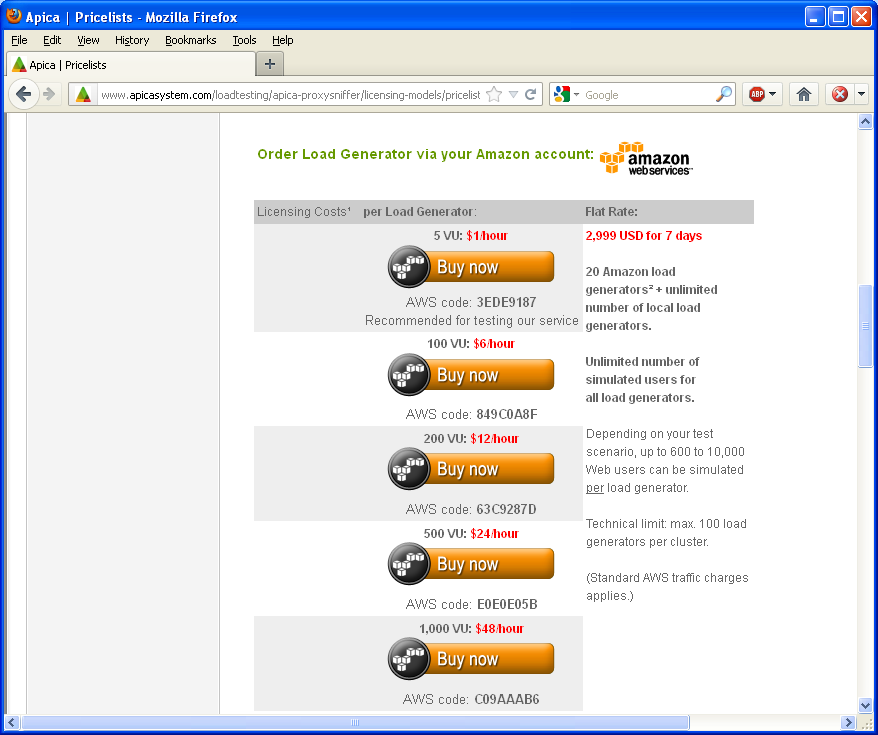
4 2 One-off Setup Tasks 2.1 Register for an Amazon EC2 Account If you have not already done so, you should register for an Amazon EC2 account. Go to and click on the Sign up for Amazon EC2 button. Follow the dialogs (they should be self explanatory). You will also have to enter your credit card information. 2.2 Subscribe to the Amazon Load Generators This step is only required you plan to rent the load generator in the Amazon data centers on an hourly base. If you have purchased a "Weekly Unlimited License" or a "Weekly Site License" or a "Weekly Cloud License" you can skip this step. Do not subscribe to the Amazon load generators in such a case and continue reading chapter 2.3. Note that you have to upload such a license as described in chapter The subscription for the hourly rented load generators is free and will enable your AWS account to run our AMIs. You will only be charged for the hours that you ve been using our load generators. Amazon will invoice and charge your credit card on a monthly basis. No recurring subscription fees or fixed costs apply. If you don t use our load generators within a calendar month no fees are payable. You can subscribe to multiple types of load generators depending on the number of licensed virtual users per load generator (5, 100, 200, 500, 1000, 2000, 5000 or VU). To subscribe to one or several types of load generators go to or to and read the instructions. Then click on the hyperlink for the corresponding Amazon Product Code. 2011, 2012 Ingenieurbüro David Fischer AG All Rights Reserved Page 4 / 44

5 Hint: if you have never used one of our cloud based load generators we recommend that you perform a first test by starting one load generator which supports only 5 web users. This has the advantage that it costs you only 1 USD per hour avoiding you to incur high charges during your learning stages. We recommend you to subscribe at least to two types of load generators (5 virtual users and another larger type of load generator). 2011, 2012 Ingenieurbüro David Fischer AG All Rights Reserved Page 5 / 44

6 Note: The Amazon "Activation Key" is not needed. There is no need to take note of it. 2011, 2012 Ingenieurbüro David Fischer AG All Rights Reserved Page 6 / 44

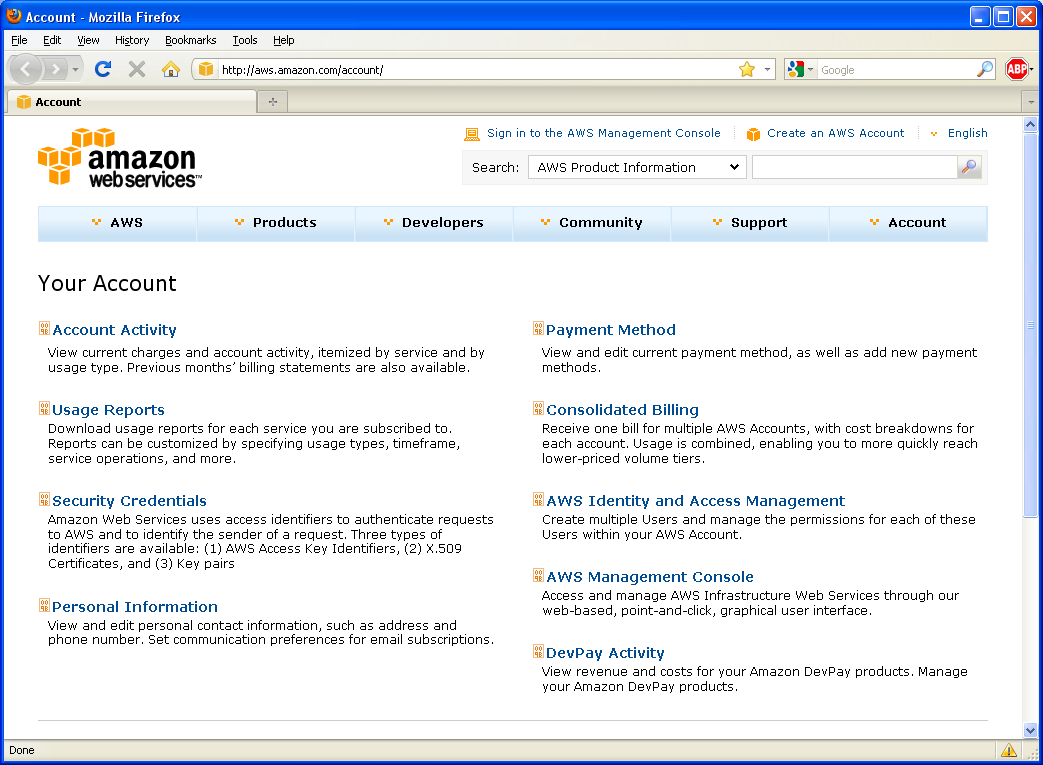
7 2.3 Setup your AWS Security Credentials inside Proxy Sniffer For you to seamlessly control the cloud based load generators via the Proxy Sniffer GUI we recommend to configure your AWS Security Credentials within Proxy Sniffer. From the Proxy Sniffer Main Menu navigate to: Project Navigator Exec Agent Network Configuration EC2 2011, 2012 Ingenieurbüro David Fischer AG All Rights Reserved Page 7 / 44

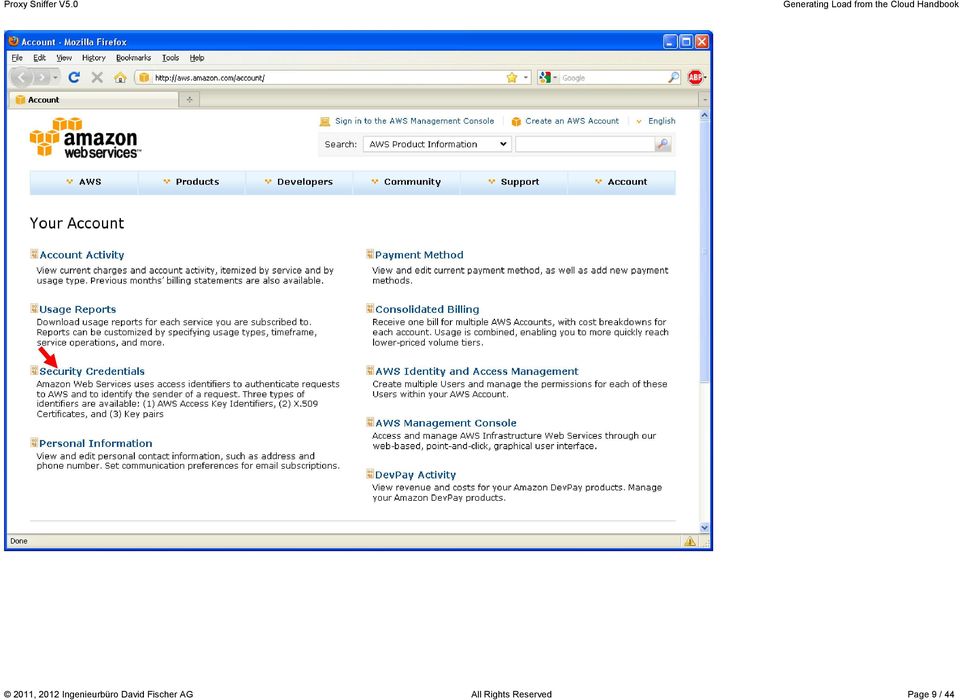
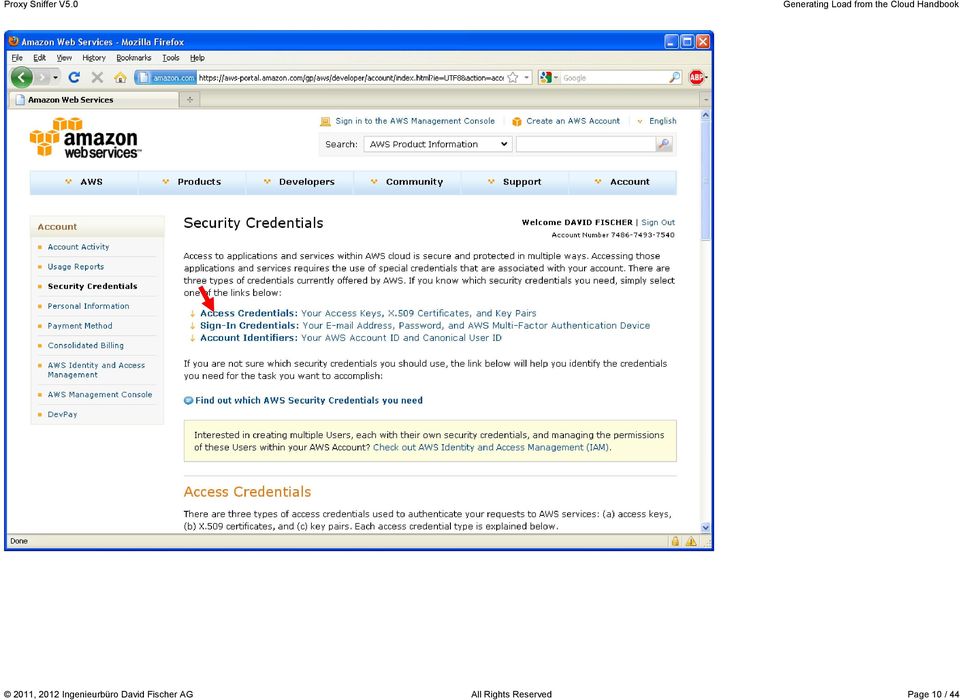
8 To get your AWS Access Key ID and your AWS Secret Access Key you have to open a new Web browser window and login into Amazon AWS at Alternatively you can also click on the corresponding hyperlink inside the Proxy Sniffer window. 2011, 2012 Ingenieurbüro David Fischer AG All Rights Reserved Page 8 / 44

9 2011, 2012 Ingenieurbüro David Fischer AG All Rights Reserved Page 9 / 44

10 2011, 2012 Ingenieurbüro David Fischer AG All Rights Reserved Page 10 / 44
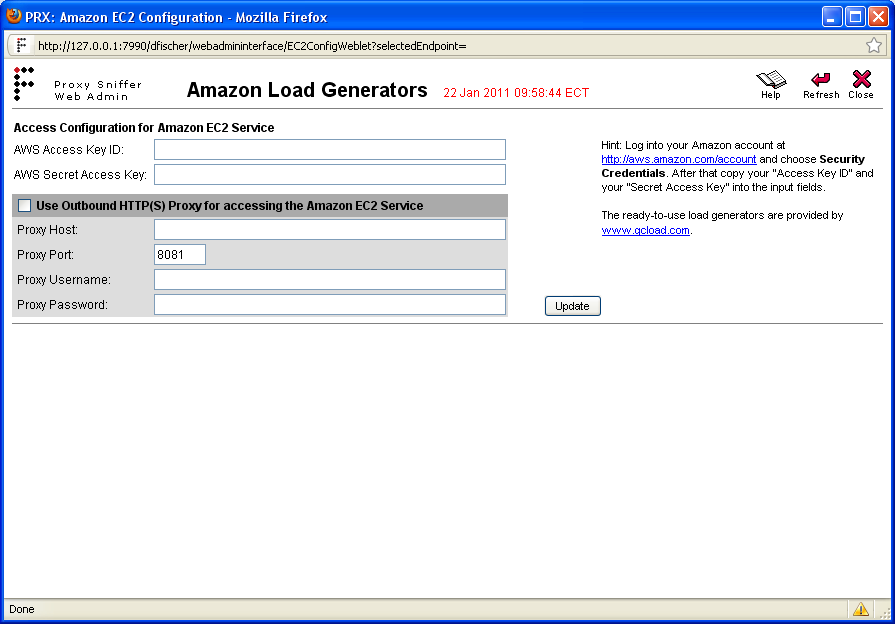
11 You can now copy and paste your "AWS Access Key ID" and your "AWS Secret Access Key" into Proxy Sniffer: 2011, 2012 Ingenieurbüro David Fischer AG All Rights Reserved Page 11 / 44
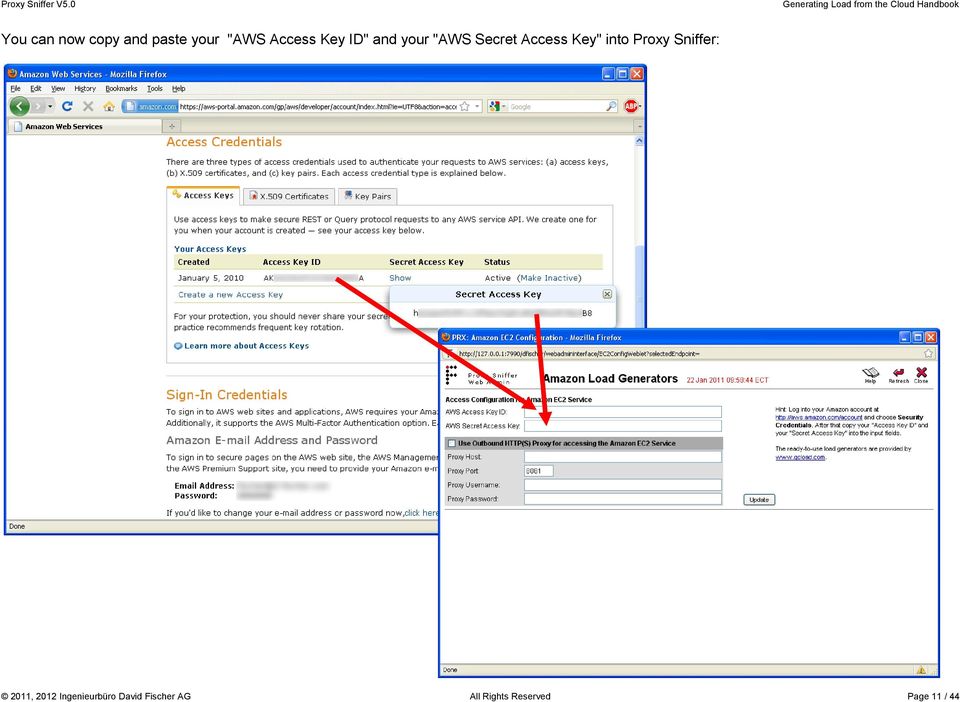
12 After that click on the Update button: Hint: it is also supported to access the Amazon EC2 service via an outbound Proxy Server of your company. Please be aware that Kerberos authentication against your outbound Proxy Server is not supported ("HTTP basic access authentication" only). Please make sure you do not confuse this with the authentication method(s) used by your load test program. 2011, 2012 Ingenieurbüro David Fischer AG All Rights Reserved Page 12 / 44
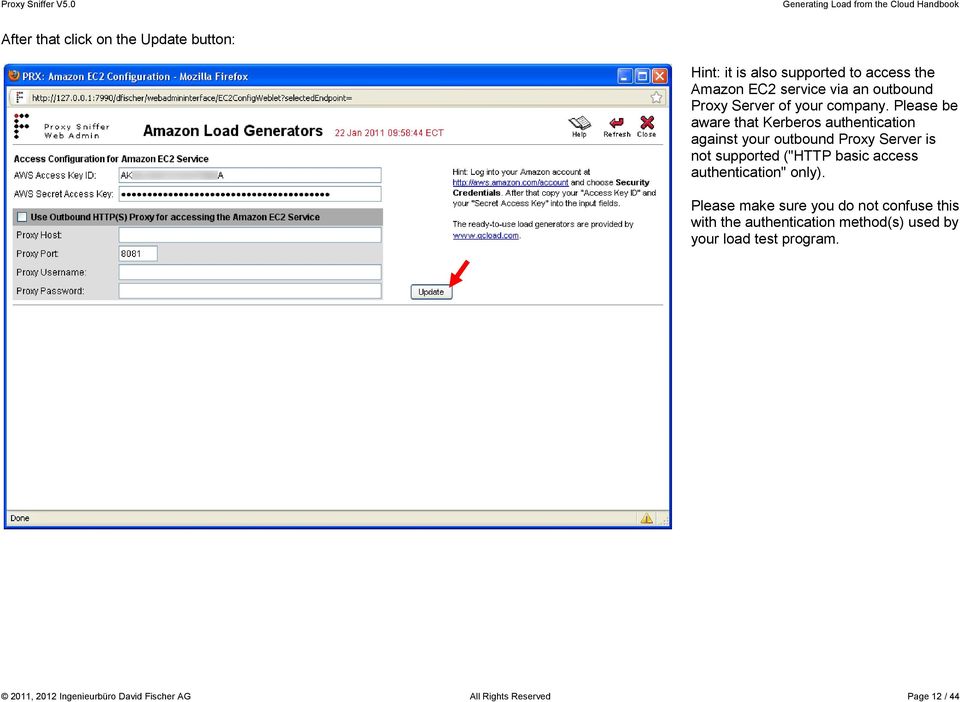
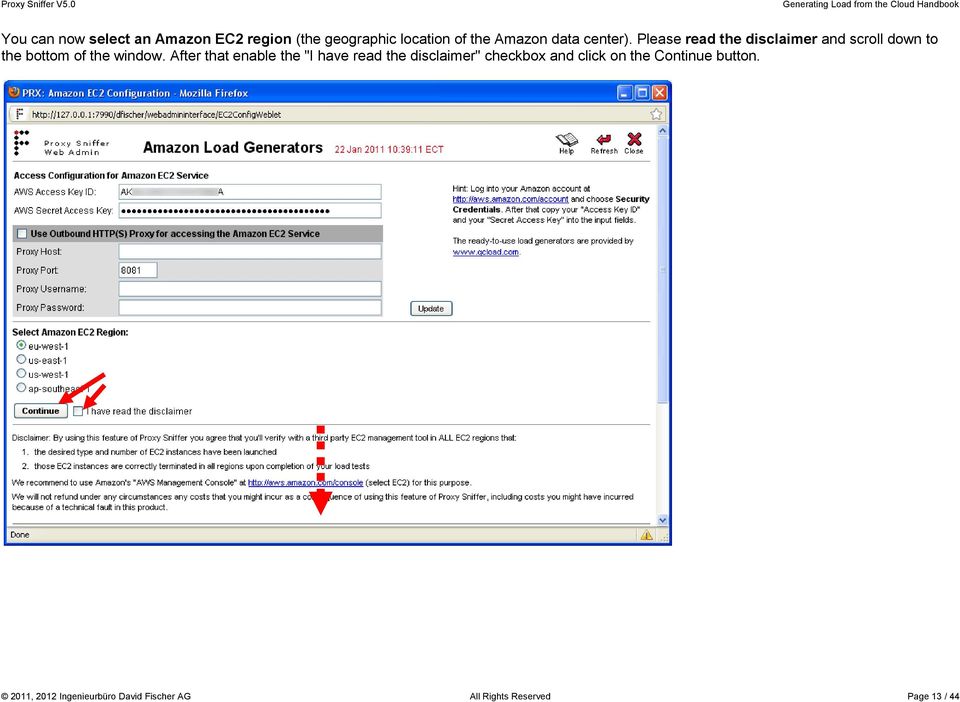
13 You can now select an Amazon EC2 region (the geographic location of the Amazon data center). Please read the disclaimer and scroll down to the bottom of the window. After that enable the "I have read the disclaimer" checkbox and click on the Continue button. 2011, 2012 Ingenieurbüro David Fischer AG All Rights Reserved Page 13 / 44
14 All preparations are now completed: So far your credit card has not been charged. 2011, 2012 Ingenieurbüro David Fischer AG All Rights Reserved Page 14 / 44

15 3 Generating Load from the Cloud 3.1 Starting the Load Generators in the Cloud Before you start one or several load generators please consider the following facts: 1. At least one full hour of usage is charged each time when you start a load generator, for each instance that is started. You will always be charged the hourly fee for each hour (or part thereof) of usage. We don t recommend frequently stopping and restarting our load test generators to avoid unneeded charges. Some examples: Shutting down and restarting a load generator instance 3 times in an hour will cost you as much as if you would left the same instance running for 3 hours. If you start 3 instances concurrently you will be charged for the hourly rate of each of the 3 instances. 2. Do not stop the load generators until you have acquired all of your load test results. Your test results will be lost if you stop the load generators without acquiring the test results. 3. Do not forget to stop all of your Amazon load generators after you have performed the load test! As mentioned above you will be charged for every hour (or part thereof) our load generators are running. No automatic shutdowns will occur. It is your responsibility to ensure that all load generators have been correctly terminated. Amazon uses the following naming conventions in relation to their cloud-based virtual machines: An "instance" is a running cloud computer (load generator) for which you are actually charged by the hour (or part thereof).. "launch" an instance means: "start" a cloud computer (load generator). "terminate" an instance means: "stop" a cloud computer (load generator). You will not longer be charged for a load generator after you have "terminated" the instance. An "AMI" (Amazon Machine Image) is a stored disk-image of a cloud computer (load generator). The Proxy Sniffer product uses the term "Exec Agent" which is synonymous to "load generator". 2011, 2012 Ingenieurbüro David Fischer AG All Rights Reserved Page 15 / 44

16 If you have not already done so, select your desired Amazon data center and wait until the web browser has refreshed its contents (this operation might take some time to complete). Click on the [ i ] icon to see which types of load generators are available in your selected Amazon data center: 2011, 2012 Ingenieurbüro David Fischer AG All Rights Reserved Page 16 / 44
![Click on the [ i ] icon to see which types of load generators are available in your](/docs-images/45/5536886/images/page_16.jpg "selected Amazon data center: 2011, 2012 Ingenieurbüro David Fischer AG All Rights Reserved")

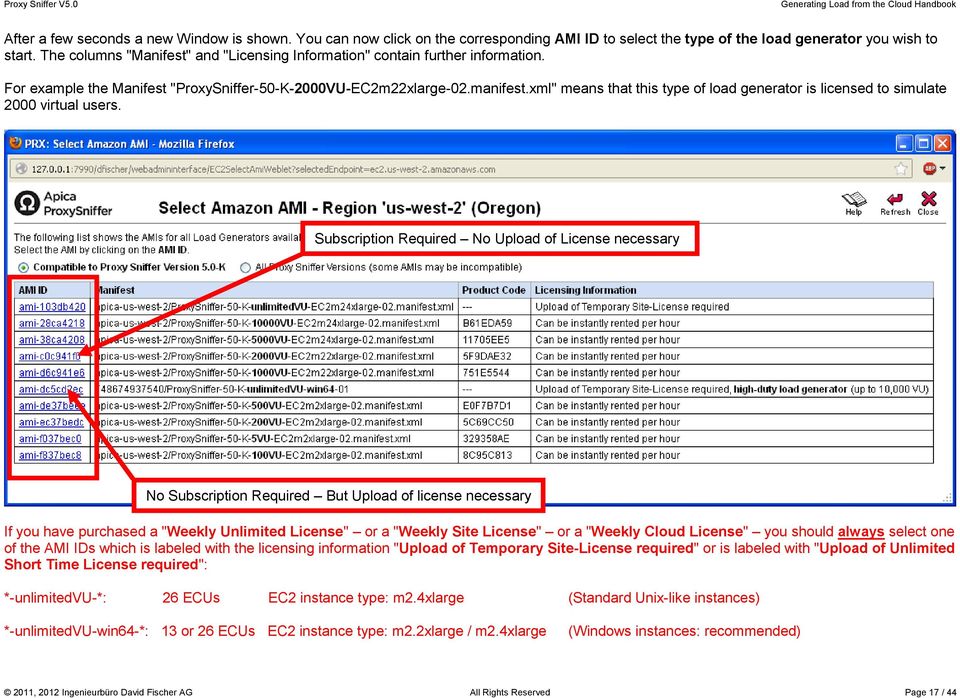
17 After a few seconds a new Window is shown. You can now click on the corresponding AMI ID to select the type of the load generator you wish to start. The columns "Manifest" and "Licensing Information" contain further information. For example the Manifest "ProxySniffer-50-K-2000VU-EC2m22xlarge-02.manifest.xml" means that this type of load generator is licensed to simulate 2000 virtual users. Subscription Required No Upload of License necessary No Subscription Required But Upload of license necessary If you have purchased a "Weekly Unlimited License" or a "Weekly Site License" or a "Weekly Cloud License" you should always select one of the AMI IDs which is labeled with the licensing information "Upload of Temporary Site-License required" or is labeled with "Upload of Unlimited Short Time License required": *-unlimitedvu-*: 26 ECUs EC2 instance type: m2.4xlarge (Standard Unix-like instances) *-unlimitedvu-win64-*: 13 or 26 ECUs EC2 instance type: m2.2xlarge / m2.4xlarge (Windows instances: recommended) 2011, 2012 Ingenieurbüro David Fischer AG All Rights Reserved Page 17 / 44
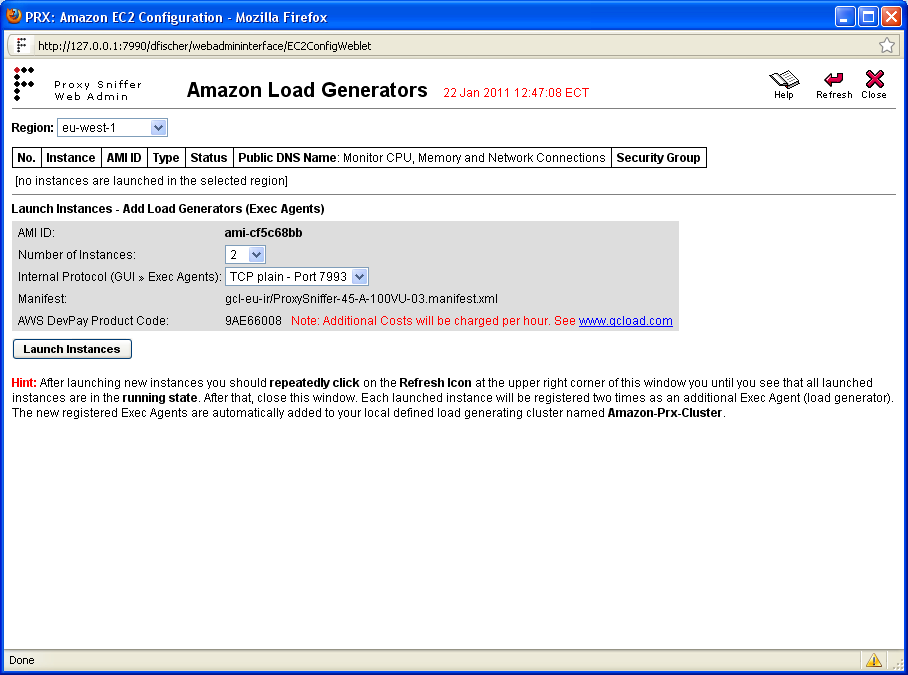
18 You can now select number of load generators to be started (number of launched instances). After that click on the "Launch Instances" button. In the image shown below two load generators are started and each of them is licensed to simulate 100 virtual users. Note: at this stage you can also select which protocol will be used for communications between the Proxy Sniffer GUI and the load generators. You can choose either the plain TCP/IP protocol (recommended for most cases) or alternatively you can choose the HTTP or the HTTPS protocol. When using the HTTPS protocol, the network traffic between the GUI and the load generators will be encrypted. However; there is no protection implemented against "man-in-themiddle" attacks. 2011, 2012 Ingenieurbüro David Fischer AG All Rights Reserved Page 18 / 44
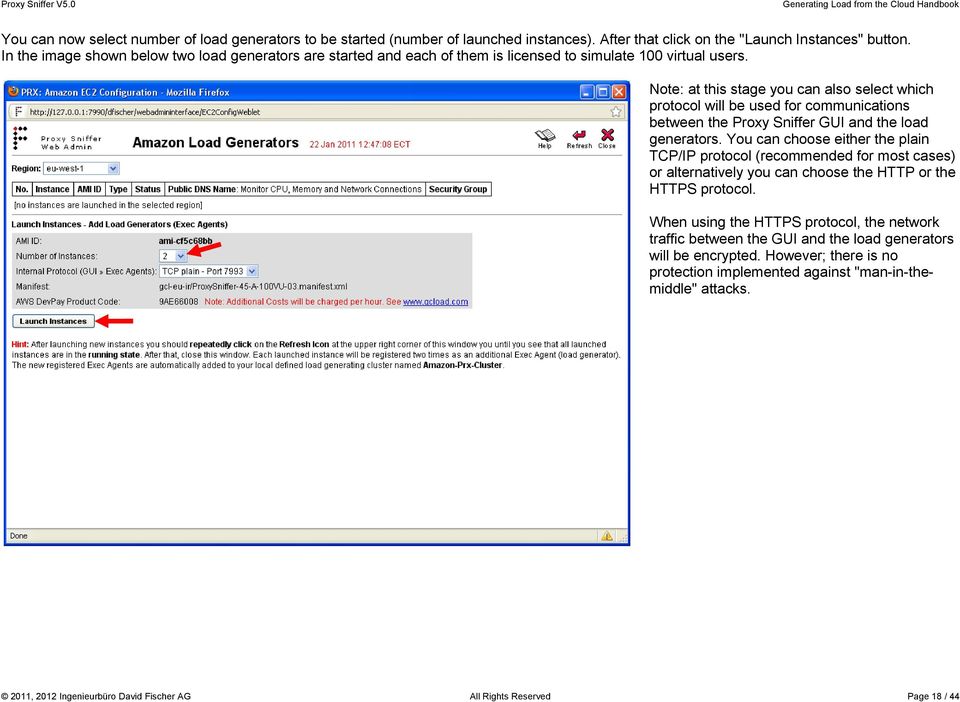
19 The instances are now in the "pending" state. You should repeatedly click every 15 seconds on the Refresh icon until you see that all launched instances are in the "running" state. 2011, 2012 Ingenieurbüro David Fischer AG All Rights Reserved Page 19 / 44

20 At this stage you should pause for about 3 minutes. The instances are already running, but the boot process of the operating system requires a small extra time to initialize all required services. After 3 minutes you can close this window and return to the "Exec Agent Network Configuration" menu. 2011, 2012 Ingenieurbüro David Fischer AG All Rights Reserved Page 20 / 44

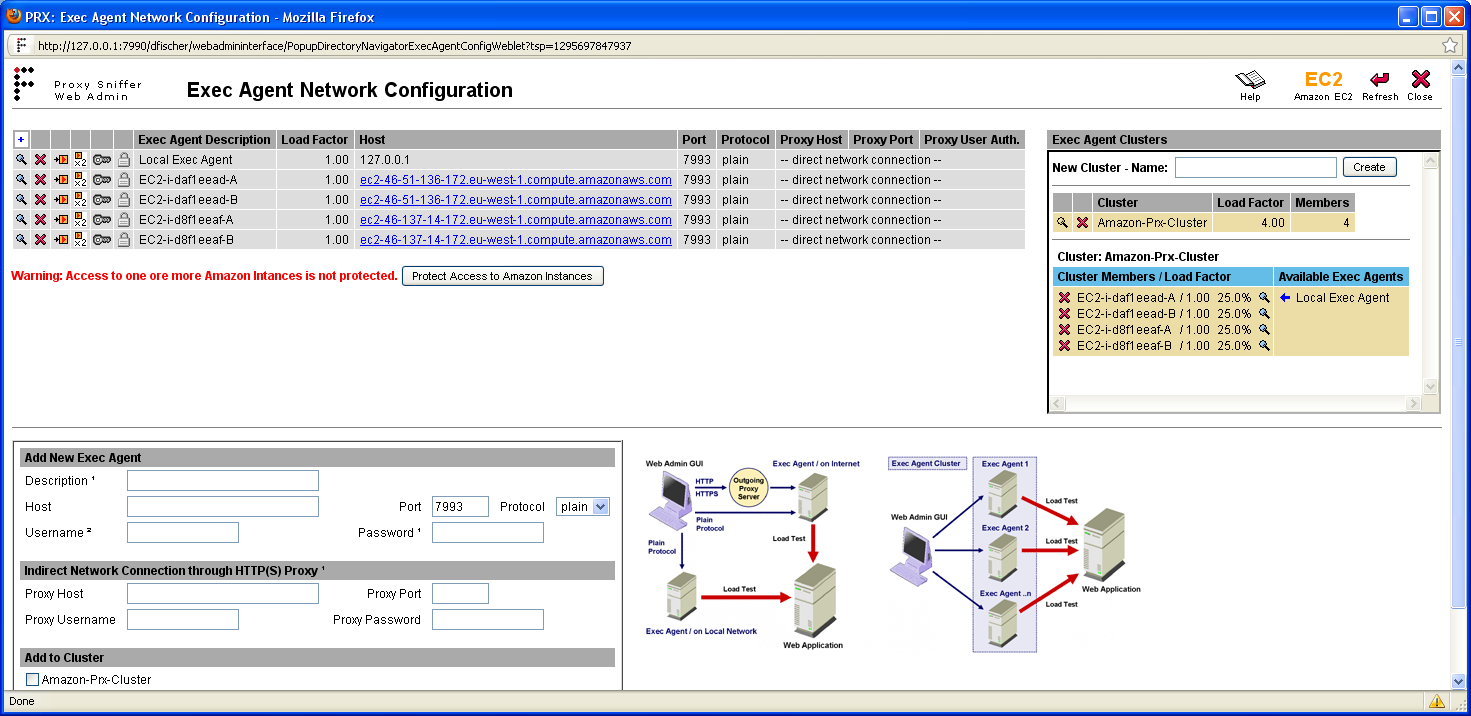
21 Each load generator is automatically registered two times as an additional "Exec Agent" and a new cluster named "Amazon-Prx-Cluster" is formed. As a further but optional step, we recommend that you protect the access to the load generators in order that nobody else than you can later view and download your load test data. In particular, if your load tests use Input Files containing usernames and passwords, you should always protect your Exec Agents. 2011, 2012 Ingenieurbüro David Fischer AG All Rights Reserved Page 21 / 44

22 Protecting the Exec Agents: You can choose any username and password. 2011, 2012 Ingenieurbüro David Fischer AG All Rights Reserved Page 22 / 44
23 If you have rented the load generators on an hourly base, they are now ready to execute load tests Uploading a Temporary License If you have purchased a "Weekly Unlimited License" or a "Weekly Site License" or a "Weekly Cloud License" you have additionally to upload your license to the load generators: 2011, 2012 Ingenieurbüro David Fischer AG All Rights Reserved Page 23 / 44
24 3.1.2 Testing the Reachability and the License of a Load Generator You can test the configuration and connectivity to an Exec Agent by clicking on the icon within the list of Exec Agents (functional ping of Exec Agent): 2011, 2012 Ingenieurbüro David Fischer AG All Rights Reserved Page 24 / 44
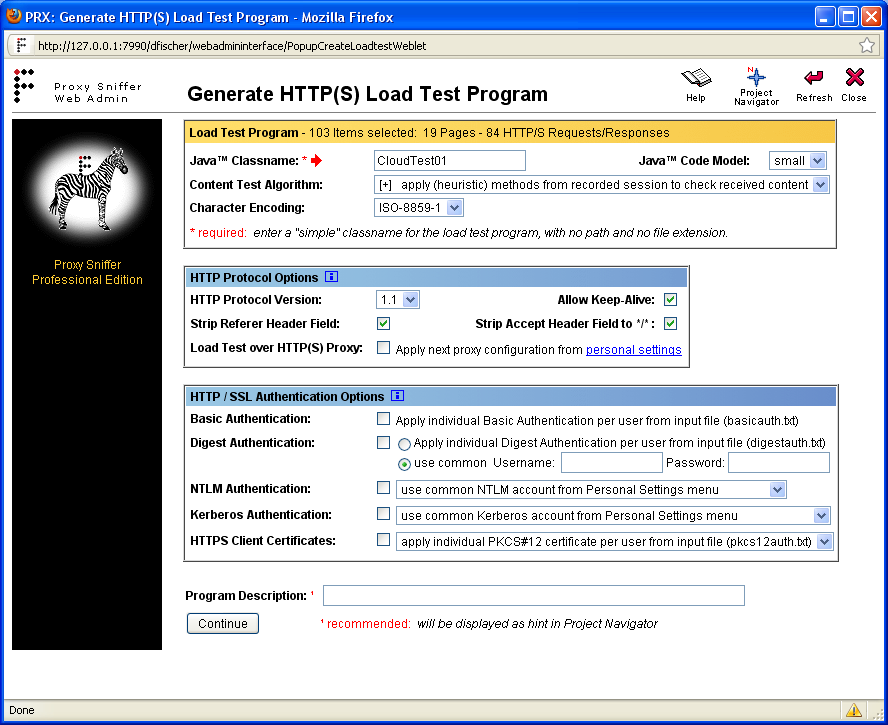
25 3.2 Executing Load Tests from Load Generators in the Cloud Note: if you have recorded and prepared your load test via an outbound Proxy Server of you company you must re-generate the load test program after having disabled the option "Load Test over HTTP(S) Proxy" as shown in the following screenshot: 2011, 2012 Ingenieurbüro David Fischer AG All Rights Reserved Page 25 / 44

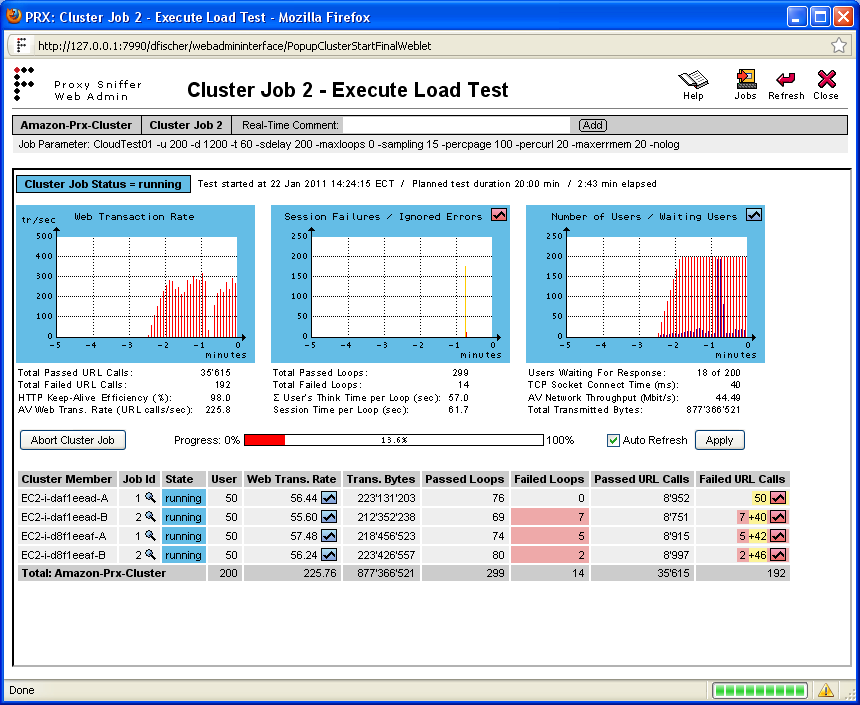
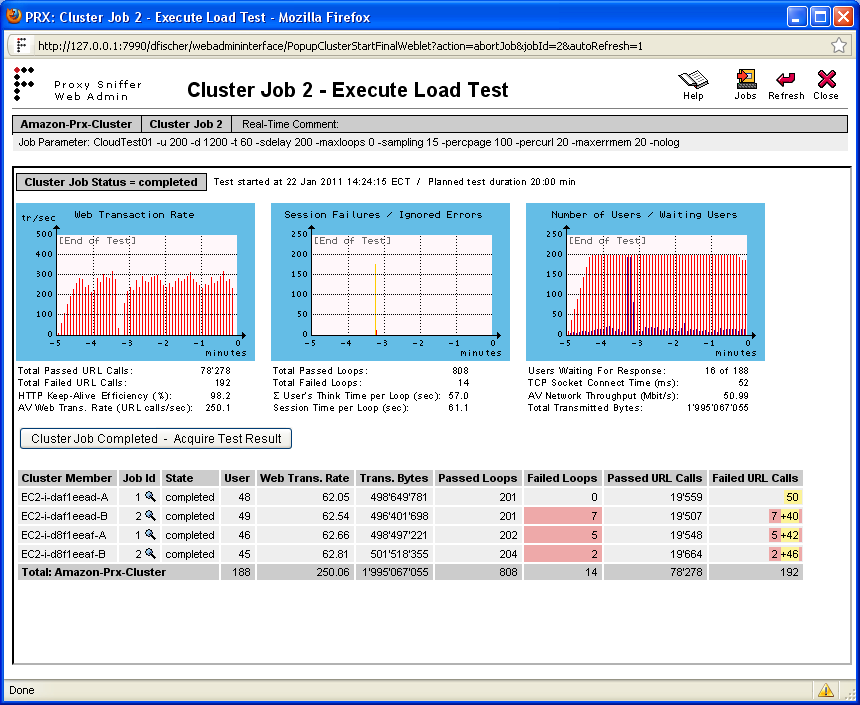
26 You can now start the load test as usual from your local workstation. Please make sure you select the "Amazon-Prx-Cluster" as the load generator: 2011, 2012 Ingenieurbüro David Fischer AG All Rights Reserved Page 26 / 44
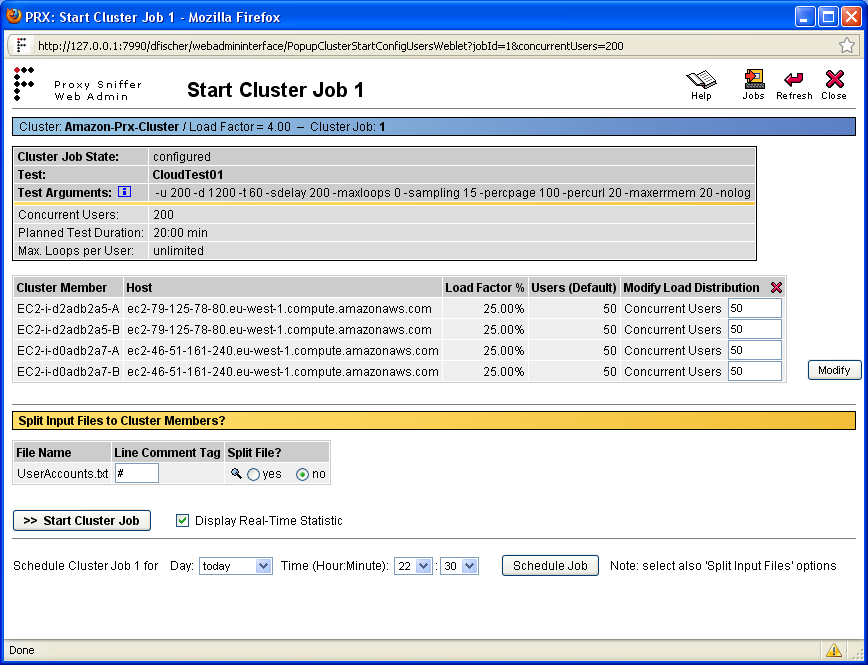
27 If a load test uses any Input Files (data files), the files are automatically transmitted (replicated) to all cluster members. Optionally you can select in the GUI whether you wish to automatically split the content of an Input File. This can be useful, for example, if an Input File contains user accounts (usernames/passwords) but the web application does not allow duplicate logins. If you enable the corresponding option in the GUI the Input File is automatically divided into parts and each cluster member will receive only a part of the Input File. 2011, 2012 Ingenieurbüro David Fischer AG All Rights Reserved Page 27 / 44
28 2011, 2012 Ingenieurbüro David Fischer AG All Rights Reserved Page 28 / 44
29 2011, 2012 Ingenieurbüro David Fischer AG All Rights Reserved Page 29 / 44
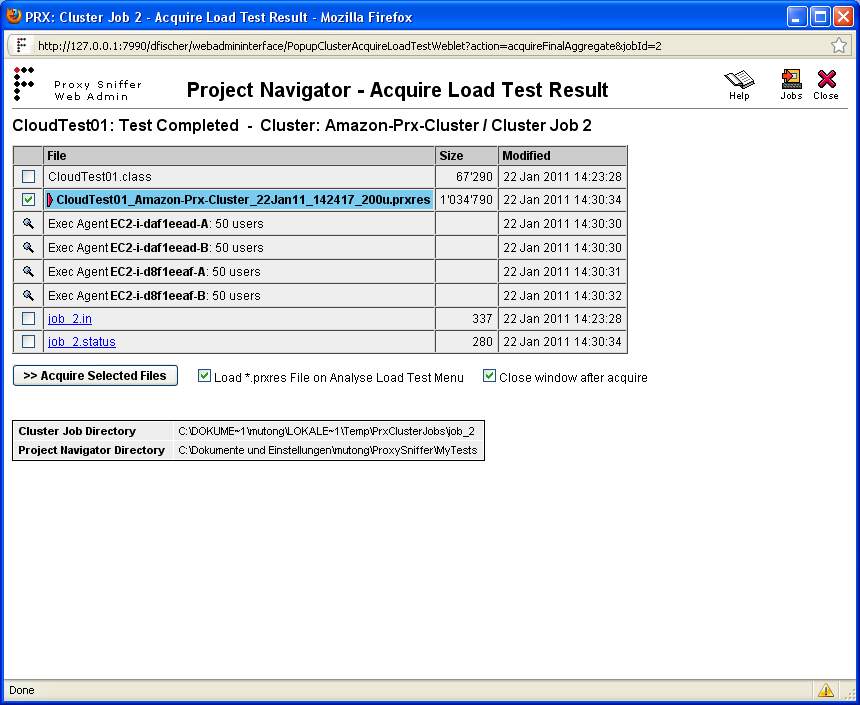
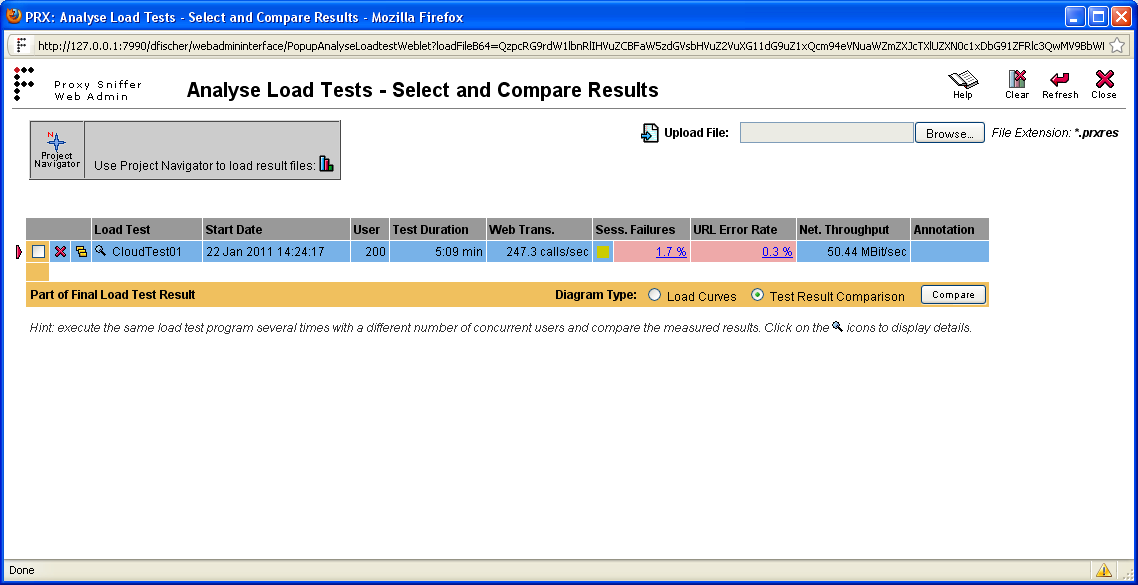
30 The load test result is now transferred from the cloud to your local workstation. 2011, 2012 Ingenieurbüro David Fischer AG All Rights Reserved Page 30 / 44
31 2011, 2012 Ingenieurbüro David Fischer AG All Rights Reserved Page 31 / 44
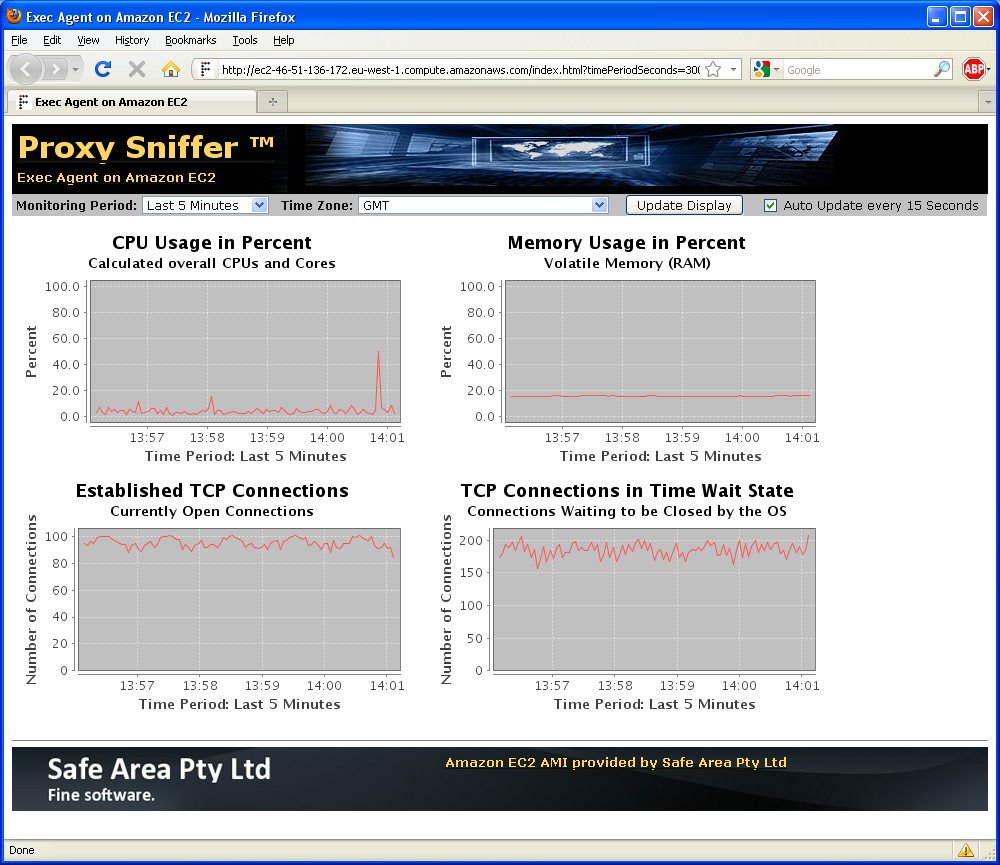
32 3.3 Monitoring the System Resources of the cloud-based Load Generators To monitor the system resources of the cloud-based load generators you can click on the hyperlinks which are shown in the column "Host" of the Exec Agent Network Configuration menu: If you have protected the access to the load generators the Web browser is asking you for the username and for the password which you have configured. The most important chart is the CPU Usage in Percent. Starting form simulating more than 500 virtual users from one load generator and depending on your test scenario the underlying operating system of a single load generator might be overloaded. However, this happens only in rare cases. Normally a single load generator can simulate at least 1000 virtual users. If the CPU of a load generator is constantly at nearly 100% usage, the measured response times will be invalid because the measuring system itself is overloaded. The sum of Established TCP Connections + TCP Connections in Time Wait State can reach a value up to 16,000 without that any problem occurring on a load generator. If you run out of free network connections the special error type "Network Error at Client Side" is reported in the charts and statistics of the load test result. 2011, 2012 Ingenieurbüro David Fischer AG All Rights Reserved Page 32 / 44

33 3.4 Verifying the Quality of Peering between the Amazon Data Center and your Stressed Web Application You should take a look at the measured value TCP Socket Connect Time to verify if the quality of peering between the Amazon data center and your stressed Web application is adequate. Normal values are within a range of 20 up to 200 milliseconds. You can monitor this value in real-time. 2011, 2012 Ingenieurbüro David Fischer AG All Rights Reserved Page 33 / 44
34 3.5 Stopping the Load Generators in the Cloud You have to navigate again to the EC2 menu form Main Menu Project Navigator Exec Agent Network Configuration EC2 2011, 2012 Ingenieurbüro David Fischer AG All Rights Reserved Page 34 / 44
35 Select the Amazon data center in which you have started the load generators. If you have started your load generators in several data centers choose only one of them. You can select later the other data centers. 2011, 2012 Ingenieurbüro David Fischer AG All Rights Reserved Page 35 / 44
36 After that you will see the status of all load generators in the selected data center. Enable the checkboxes for all instances which are in the status "running" and click on the Terminate button. 2011, 2012 Ingenieurbüro David Fischer AG All Rights Reserved Page 36 / 44
37 The instances are now changing their state to "shutting-down". 2011, 2012 Ingenieurbüro David Fischer AG All Rights Reserved Page 37 / 44
38 Wait a few seconds and then click on the Refresh icon. The instances are now changing their state to "terminated". Starting from this point in time you will no longer be charged for the load generators. 2011, 2012 Ingenieurbüro David Fischer AG All Rights Reserved Page 38 / 44
39 We strongly recommend that you repeat this procedure by selecting in a round-robin fashion all other Amazon data centers in order to verify that no other load generator is running in any of the Amazon data centers. You must wait until the web browser shows that the window has been refreshed to get valid information about the selected data center. 2011, 2012 Ingenieurbüro David Fischer AG All Rights Reserved Page 39 / 44
40 Important Note: in case you are unable to stop (terminate) the Amazon load generators by using the Proxy Sniffer GUI, you must immediately use Amazon's "AWS Management Console" at (select EC2) to terminate the instances. 2011, 2012 Ingenieurbüro David Fischer AG All Rights Reserved Page 40 / 44

41 2011, 2012 Ingenieurbüro David Fischer AG All Rights Reserved Page 41 / 44

42 2011, 2012 Ingenieurbüro David Fischer AG All Rights Reserved Page 42 / 44
43 4 Additional Suggestions If the web application targeted by your test is located inside your company, you should not use the same leased line to the Internet to control the load generators in the Amazon cloud. If your Internet connection becomes overloaded you might no longer be able to control the load generators or to abort the load test. As a consequence all traffic between your company and the Internet may be severely impacted or even completely blocked. In such situation we therefore strongly recommend that you use a second direct Internet connection to control the load generators in the Amazon's cloud by using plain TCP/IP connections (Exec Agent TCP port 7993). Should you completely lose control of the load generators please login from a secondary Internet connection directly into the Amazon AWS console and shutdown all load generators instances to restore the connectivity. 2011, 2012 Ingenieurbüro David Fischer AG All Rights Reserved Page 43 / 44
44 5 Proxy Sniffer Manufacturer Ingenieurbüro David Fischer AG, Switzerland A company of the Apica Group Product Web Site: , 2012 Ingenieurbüro David Fischer AG All Rights Reserved Page 44 / 44
Recording HTTP/S Traffic from any iphone and ipad by using "Pure Cloud"
 Ingenieurbüro David Fischer AG A Company of the Apica Group http://www.proxy-sniffer.com Recording HTTP/S Traffic from any iphone and ipad by using "Pure Cloud" Version 5.0-K 2012 November 25, 2012 All
Pure Cloud Run all components of the Apica ProxySniffer product completely in the cloud.
 Ingenieurbüro David Fischer AG A Company of the Apica Group www.proxy-sniffer.com Pure Cloud Run all components of the Apica ProxySniffer product completely in the cloud. 2012 Ingenieurbüro David Fischer
Handling of "Dynamically-Exchanged Session Parameters"
 Ingenieurbüro David Fischer AG A Company of the Apica Group http://www.proxy-sniffer.com Version 5.0 English Edition 2011 April 1, 2011 Page 1 of 28 Table of Contents 1 Overview... 3 1.1 What are "dynamically-exchanged
USER CONFERENCE 2011 SAN FRANCISCO APRIL 26 29. Running MarkLogic in the Cloud DEVELOPER LOUNGE LAB
 USER CONFERENCE 2011 SAN FRANCISCO APRIL 26 29 Running MarkLogic in the Cloud DEVELOPER LOUNGE LAB Table of Contents UNIT 1: Lab description... 3 Pre-requisites:... 3 UNIT 2: Launching an instance on EC2...
KeyControl Installation on Amazon Web Services
 KeyControl Installation on Amazon Web Services Contents Introduction Deploying an initial KeyControl Server Deploying an Elastic Load Balancer (ELB) Adding a KeyControl node to a cluster in the same availability
Testing and Restoring the Nasuni Filer in a Disaster Recovery Scenario
 Testing and Restoring the Nasuni Filer in a Disaster Recovery Scenario Version 7.2 November 2015 Last modified: November 3, 2015 2015 Nasuni Corporation All Rights Reserved Document Information Testing
Testing and Restoring the Nasuni Filer in a Disaster Recovery Scenario
 Testing and Restoring the Nasuni Filer in a Disaster Recovery Scenario Version 7.0 July 2015 2015 Nasuni Corporation All Rights Reserved Document Information Testing Disaster Recovery Version 7.0 July
Zend Server Amazon AMI Quick Start Guide
 Zend Server Amazon AMI Quick Start Guide By Zend Technologies www.zend.com Disclaimer This is the Quick Start Guide for The Zend Server Zend Server Amazon Machine Image The information in this document
NEFSIS DEDICATED SERVER
 NEFSIS TRAINING SERIES Nefsis Dedicated Server version 5.2.0.XXX (DRAFT Document) Requirements and Implementation Guide (Rev5-113009) REQUIREMENTS AND INSTALLATION OF THE NEFSIS DEDICATED SERVER Nefsis
QUANTIFY INSTALLATION GUIDE
 QUANTIFY INSTALLATION GUIDE Thank you for putting your trust in Avontus! This guide reviews the process of installing Quantify software. For Quantify system requirement information, please refer to the
Tutorial: Using HortonWorks Sandbox 2.3 on Amazon Web Services
 Tutorial: Using HortonWorks Sandbox 2.3 on Amazon Web Services Sayed Hadi Hashemi Last update: August 28, 2015 1 Overview Welcome Before diving into Cloud Applications, we need to set up the environment
WhatsUp Gold v16.3 Installation and Configuration Guide
 WhatsUp Gold v16.3 Installation and Configuration Guide Contents Installing and Configuring WhatsUp Gold using WhatsUp Setup Installation Overview... 1 Overview... 1 Security considerations... 2 Standard
.Trustwave.com Updated October 9, 2007. Secure Web Gateway Version 11.0 Amazon EC2 Platform Set-up Guide
 .Trustwave.com Updated October 9, 2007 Secure Web Gateway Version 11.0 Amazon EC2 Platform Set-up Guide Legal Notice Copyright 2012 Trustwave Holdings, Inc. All rights reserved. This document is protected
CTERA Agent for Mac OS-X
 User Guide CTERA Agent for Mac OS-X June 2014 Version 4.1 Copyright 2009-2014 CTERA Networks Ltd. All rights reserved. No part of this document may be reproduced in any form or by any means without written
SevOne NMS Download Installation and Implementation Guide
 SevOne NMS Download Installation and Implementation Guide 5.3.X 530 V0002 Contents 1. Get Started... 3 2. SevOne Download Installation... 6 3. Appliance Network Configuration... 9 4. Install License and
MATLAB on EC2 Instructions Guide
 MATLAB on EC2 Instructions Guide Contents Welcome to MATLAB on EC2...3 What You Need to Do...3 Requirements...3 1. MathWorks Account...4 1.1. Create a MathWorks Account...4 1.2. Associate License...4 2.
Configuration Information
 This chapter describes some basic Email Security Gateway configuration settings, some of which can be set in the first-time Configuration Wizard. Other topics covered include Email Security interface navigation,
Barracuda Link Balancer Administrator s Guide
 Barracuda Link Balancer Administrator s Guide Version 1.0 Barracuda Networks Inc. 3175 S. Winchester Blvd. Campbell, CA 95008 http://www.barracuda.com Copyright Notice Copyright 2008, Barracuda Networks
Dynamic DNS How-To Guide
 Configuration Guide Dynamic DNS How-To Guide Overview This guide will show you how to set up a Dynamic DNS host name under the D-Link DDNS service with your D-Link ShareCenter TM. Dynamic DNS is a protocol
The steps will take about 4 hours to fully execute, with only about 60 minutes of user intervention. Each of the steps is discussed below.
 Setup Guide for the XenApp on AWS CloudFormation Template This document walks you through the steps of using the Citrix XenApp on AWS CloudFormation template (v 4.1.5) available here to create a fully
Guide to the LBaaS plugin ver. 1.0.2 for Fuel
 Guide to the LBaaS plugin ver. 1.0.2 for Fuel Load Balancing plugin for Fuel LBaaS (Load Balancing as a Service) is currently an advanced service of Neutron that provides load balancing for Neutron multi
Web Application Firewall
 Web Application Firewall Getting Started Guide August 3, 2015 Copyright 2014-2015 by Qualys, Inc. All Rights Reserved. Qualys and the Qualys logo are registered trademarks of Qualys, Inc. All other trademarks
How To Deploy Sangoma Sbc Vm At Amazon Cloud Service (Awes) On A Vpc (Virtual Private Cloud) On An Ec2 Instance (Virtual Cloud)
 Sangoma VM SBC AMI at AWS (Amazon Web Services) SBC in a Cloud Based UC/VoIP Service. One of the interesting use cases for Sangoma SBC is to provide VoIP Edge connectivity between Soft switches or IPPBX's
ReadyNAS Replicate. Software Reference Manual. 350 East Plumeria Drive San Jose, CA 95134 USA. November 2010 202-10727-01 v1.0
 ReadyNAS Replicate Software Reference Manual 350 East Plumeria Drive San Jose, CA 95134 USA November 2010 202-10727-01 v1.0 2010 NETGEAR, Inc. All rights reserved. No part of this publication may be reproduced,
Vantage RADIUS 50. Quick Start Guide Version 1.0 3/2005
 Vantage RADIUS 50 Quick Start Guide Version 1.0 3/2005 1 Introducing Vantage RADIUS 50 The Vantage RADIUS (Remote Authentication Dial-In User Service) 50 (referred to in this guide as Vantage RADIUS)
ShadowControl ShadowStream
 ShadowControl ShadowStream Revision 1.3 4/12/2012 Table of Contents Introduction... 3 Download ShadowStream Server... 3 Installation... 4 Configuration... 5 Creating Users... 6 Testing the User Rights...
FAQ. How does the new Big Bend Backup (powered by Keepit) work?
 FAQ How does the new Big Bend Backup (powered by Keepit) work? Once you establish which of the folders on your hard drive you ll be backing up, you ll log into myaccount.bigbend.net and from your control
Online Backup Guide for the Amazon Cloud: How to Setup your Online Backup Service using Vembu StoreGrid Backup Virtual Appliance on the Amazon Cloud
 Online Backup Guide for the Amazon Cloud: How to Setup your Online Backup Service using Vembu StoreGrid Backup Virtual Appliance on the Amazon Cloud Here is a step-by-step set of instructions to get your
WebSpy Vantage Ultimate 2.2 Web Module Administrators Guide
 WebSpy Vantage Ultimate 2.2 Web Module Administrators Guide This document is intended to help you get started using WebSpy Vantage Ultimate and the Web Module. For more detailed information, please see
Talari Virtual Appliance CT800. Getting Started Guide
 Talari Virtual Appliance CT800 Getting Started Guide March 18, 2015 Table of Contents About This Guide... 2 References... 2 Request for Comments... 2 Requirements... 3 AWS Resources... 3 Software License...
WELCOME TO CITUS CLOUD LOAD TEST
 USER S GUIDE CONTENTS Contents... 2 Chapter 1: Welcome to Citus Cloud Load Test... 3 1. What is Citus Cloud Load Test?... 3 2. Why Citus Cloud Load Test?... 3 3. Before using this guide... 3 Chapter 2:
Weston Public Schools Virtual Desktop Access Instructions
 Instructions for connecting to the Weston Schools Virtual Desktop Environment Notes: You will have to have administrator permission on your computer in order to install a VMWare Client application which
Deploying Virtual Cyberoam Appliance in the Amazon Cloud Version 10
 Deploying Virtual Cyberoam Appliance in the Amazon Cloud Version 10 Document version 1.0 10.6.2.378-13/03/2015 Important Notice Cyberoam Technologies Pvt. Ltd. has supplied this Information believing it
Chapter 8 Router and Network Management
 Chapter 8 Router and Network Management This chapter describes how to use the network management features of your ProSafe Dual WAN Gigabit Firewall with SSL & IPsec VPN. These features can be found by
WHITE PAPER SETTING UP AND USING ESTATE MASTER ON THE CLOUD INTRODUCTION
 WHITE PAPER SETTING UP AND USING ESTATE MASTER ON THE CLOUD INTRODUCTION Cloud Computing can provide great flexibility for the Estate Master user. You can access your feasibilities, manage you projects
PI Cloud Connect Overview
 PI Cloud Connect Overview Version 1.0.8 Content Product Overview... 3 Sharing data with other corporations... 3 Sharing data within your company... 4 Architecture Overview... 5 PI Cloud Connect and PI
Build Your Own Performance Test Lab in the Cloud. Leslie Segal Testware Associate, Inc. [email protected]
 Build Your Own Performance Test Lab in the Cloud Leslie Segal Testware Associate, Inc. [email protected] Problem(s) I was trying to Solve Need more VUs Don t have Tool Times up reschedule test
Virtual Appliance for VMware Server. Getting Started Guide. Revision 2.0.2. Warning and Disclaimer
 Virtual Appliance for VMware Server Getting Started Guide Revision 2.0.2 Warning and Disclaimer This document is designed to provide information about the configuration and installation of the CensorNet
ZyXEL IP PBX Support Note. ZyXEL IP PBX (X2002) VoIP. Support Notes
 ZyXEL IP PBX (X2002) VoIP Support Notes Version 1.00 October 2008 1 Contents Overview ZyXEL IP PBX Support Note 1. How to manage and maintain your IPPBX?...3 1.1 Firmware Upgrade..3 1.2 Backing up your
Configuration Information
 Configuration Information Email Security Gateway Version 7.7 This chapter describes some basic Email Security Gateway configuration settings, some of which can be set in the first-time Configuration Wizard.
HOMEROOM SERVER INSTALLATION & NETWORK CONFIGURATION GUIDE
 HOMEROOM SERVER INSTALLATION & NETWORK CONFIGURATION GUIDE Level 1, 61 Davey St Hobart, TAS 7000 T (03) 6165 1555 www.getbusi.com Table of Contents ABOUT THIS MANUAL! 1 SYSTEM REQUIREMENTS! 2 Hardware
Cox Business Premium Online Backup USER'S GUIDE. Cox Business VERSION 1.0
 Cox Business Premium Online Backup USER'S GUIDE Cox Business VERSION 1.0 Table of Contents ABOUT THIS GUIDE... 4 DOWNLOADING COX BUSINESS PREMIUM ONLINE BACKUP... 5 INSTALLING COX BUSINESS PREMIUM ONLINE
Remote Console Installation & Setup Guide. November 2009
 Remote Console Installation & Setup Guide November 2009 Legal Information All rights reserved. No part of this document shall be reproduced or transmitted by any means or otherwise, without written permission
Proxy Sniffer V4.3 Release Notes
 Ingenieurbüro David Fischer GmbH Mühlemattstrasse 61, 3007 Bern Switzerland http://www.proxy-sniffer.com Email: [email protected] Proxy Sniffer V4.3 Release Notes 2009 Ingenieurbüro David Fischer GmbH
Setting up VMware ESXi for 2X VirtualDesktopServer Manual
 Setting up VMware ESXi for 2X VirtualDesktopServer Manual URL: www.2x.com E-mail: [email protected] Information in this document is subject to change without notice. Companies, names, and data used in examples
aims sql server installation guide
 aims sql server installation guide Document Version: 4000 February 2015 CONTENTS AIMS Installation Guide... 3 Installing the AIMS Software... 4 Pre-Requisites... 4 Installation... 4 Shortcuts... 4 Directory
Eucalyptus 3.4.2 User Console Guide
 Eucalyptus 3.4.2 User Console Guide 2014-02-23 Eucalyptus Systems Eucalyptus Contents 2 Contents User Console Overview...4 Install the Eucalyptus User Console...5 Install on Centos / RHEL 6.3...5 Configure
Configuration Guide. BES12 Cloud
 Configuration Guide BES12 Cloud Published: 2016-04-08 SWD-20160408113328879 Contents About this guide... 6 Getting started... 7 Configuring BES12 for the first time...7 Administrator permissions you need
Privileged Access Management Upgrade Guide
 Privileged Access Management Upgrade Guide 2015 Bomgar Corporation. All rights reserved worldwide. BOMGAR and the BOMGAR logo are trademarks of Bomgar Corporation; other trademarks shown are the property
Contents Notice to Users
 Web Remote Access Contents Web Remote Access Overview... 1 Setting Up Web Remote Access... 2 Editing Web Remote Access Settings... 5 Web Remote Access Log... 7 Accessing Your Home Network Using Web Remote
PaperCut Payment Gateway Module - PayPal Payflow Link - Quick Start Guide
 PaperCut Payment Gateway Module - PayPal Payflow Link - Quick Start Guide This guide is designed to supplement the Payment Gateway Module documentation and provides a guide to installing, setting up, and
DESLock+ Basic Setup Guide Version 1.20, rev: June 9th 2014
 DESLock+ Basic Setup Guide Version 1.20, rev: June 9th 2014 Contents Overview... 2 System requirements:... 2 Before installing... 3 Download and installation... 3 Configure DESLock+ Enterprise Server...
Deploying Windows Streaming Media Servers NLB Cluster and metasan
 Deploying Windows Streaming Media Servers NLB Cluster and metasan Introduction...................................................... 2 Objectives.......................................................
Backup Server DOC-OEMSPP-S/6-BUS-EN-21062011
 Backup Server DOC-OEMSPP-S/6-BUS-EN-21062011 The information contained in this guide is not of a contractual nature and may be subject to change without prior notice. The software described in this guide
Web Remote Access. User Guide
 Web Remote Access User Guide Notice to Users 2005 2Wire, Inc. All rights reserved. This manual in whole or in part, may not be reproduced, translated, or reduced to any machine-readable form without prior
How To Create An Easybelle History Database On A Microsoft Powerbook 2.5.2 (Windows)
 Introduction EASYLABEL 6 has several new features for saving the history of label formats. This history can include information about when label formats were edited and printed. In order to save this history,
MailEnable Connector for Microsoft Outlook
 MailEnable Connector for Microsoft Outlook Version 2.23 This guide describes the installation and functionality of the MailEnable Connector for Microsoft Outlook. Features The MailEnable Connector for
System Administration Training Guide. S100 Installation and Site Management
 System Administration Training Guide S100 Installation and Site Management Table of contents System Requirements for Acumatica ERP 4.2... 5 Learning Objects:... 5 Web Browser... 5 Server Software... 5
Integration Guide. Microsoft Active Directory Rights Management Services (AD RMS) Microsoft Windows Server 2008
 Integration Guide Microsoft Active Directory Rights Management Services (AD RMS) Microsoft Windows Server 2008 Integration Guide: Microsoft Active Directory Rights Management Services (AD RMS) Imprint
IIS, FTP Server and Windows
 IIS, FTP Server and Windows The Objective: To setup, configure and test FTP server. Requirement: Any version of the Windows 2000 Server. FTP Windows s component. Internet Information Services, IIS. Steps:
How To Set Up A Backupassist For An Raspberry Netbook With A Data Host On A Nsync Server On A Usb 2 (Qnap) On A Netbook (Qnet) On An Usb 2 On A Cdnap (
 WHITEPAPER BackupAssist Version 5.1 www.backupassist.com Cortex I.T. Labs 2001-2008 2 Contents Introduction... 3 Hardware Setup Instructions... 3 QNAP TS-409... 3 Netgear ReadyNas NV+... 5 Drobo rev1...
Nessus Enterprise for Amazon Web Services (AWS) Installation and Configuration Guide. July 16, 2014 (Revision 2)
 Nessus Enterprise for Amazon Web Services (AWS) Installation and Configuration Guide July 16, 2014 (Revision 2) Table of Contents Introduction... 3 Requirements... 3 Standards and Conventions... 3 Nessus
Table of Contents. Table of Contents
 Table of Contents Setup Instructions... 1 Step 1: Download the Required Components... 1 Step 2: Install and Run the Online Backup Module... 3 Step 3: Sign-Up to the Online Backup Service... 4 Step 4: Configure
Arkay Remote Data Backup Client Quick Start Guide
 Arkay Remote Data Backup Client Quick Start Guide Version 6.1.56.27 September 2005 Quick Start Guide It's easy to get started with Arkay Remote Data Backup and Recovery Service. To start using Arkay Remote
Velocity Web Services Client 1.0 Installation Guide and Release Notes
 Velocity Web Services Client 1.0 Installation Guide and Release Notes Copyright 2014-2015, Identiv. Last updated June 24, 2015. Overview This document provides the only information about version 1.0 of
REQUIREMENTS AND INSTALLATION OF THE NEFSIS DEDICATED SERVER
 NEFSIS TRAINING SERIES Nefsis Dedicated Server version 5.1.0.XXX Requirements and Implementation Guide (Rev 4-10209) REQUIREMENTS AND INSTALLATION OF THE NEFSIS DEDICATED SERVER Nefsis Training Series
Web Load Stress Testing
 Web Load Stress Testing Overview A Web load stress test is a diagnostic tool that helps predict how a website will respond to various traffic levels. This test can answer critical questions such as: How
User Manual. Onsight Management Suite Version 5.1. Another Innovation by Librestream
 User Manual Onsight Management Suite Version 5.1 Another Innovation by Librestream Doc #: 400075-06 May 2012 Information in this document is subject to change without notice. Reproduction in any manner
Virtual Appliance Setup Guide
 Virtual Appliance Setup Guide 2015 Bomgar Corporation. All rights reserved worldwide. BOMGAR and the BOMGAR logo are trademarks of Bomgar Corporation; other trademarks shown are the property of their respective
Every Silver Lining Has a Vault in the Cloud
 Irvin Hayes Jr. Autodesk, Inc. PL6015-P Don t worry about acquiring hardware and additional personnel in order to manage your Vault software installation. Learn how to spin up a hosted server instance
Cloud Services. Email Encryption. SecureMail Admin Guide
 Cloud Services Email Encryption SecureMail Admin Guide 11/22/2014 ADMINISTRATOR CONTROL PANEL GENERAL USE There are a few basics that you will encounter repeatedly when using the Hosting Control Panel
Nessus Enterprise Cloud User Guide. October 2, 2014 (Revision 9)
 Nessus Enterprise Cloud User Guide October 2, 2014 (Revision 9) Table of Contents Introduction... 3 Nessus Enterprise Cloud... 3 Subscription and Activation... 3 Multi Scanner Support... 4 Customer Scanning
McAfee SMC Installation Guide 5.7. Security Management Center
 McAfee SMC Installation Guide 5.7 Security Management Center Legal Information The use of the products described in these materials is subject to the then current end-user license agreement, which can
2X ApplicationServer & LoadBalancer Manual
 2X ApplicationServer & LoadBalancer Manual 2X ApplicationServer & LoadBalancer Contents 1 URL: www.2x.com E-mail: [email protected] Information in this document is subject to change without notice. Companies,
Comsol Multiphysics. Running COMSOL on the Amazon Cloud. VERSION 4.3a
 Comsol Multiphysics Running COMSOL on the Amazon Cloud VERSION 4.3a Running COMSOL on the Amazon Cloud 1998 2012 COMSOL Protected by U.S. Patents 7,519,518; 7,596,474; and 7,623,991. Patents pending. This
Preparing for GO!Enterprise MDM On-Demand Service
 Preparing for GO!Enterprise MDM On-Demand Service This guide provides information on...... An overview of GO!Enterprise MDM... Preparing your environment for GO!Enterprise MDM On-Demand... Firewall rules
Mechanics Bank Mobile Banking Mobile Finance Manager (MFM) Application Palm Treo Installation
 Mechanics Bank Mobile Banking Mobile Finance Manager (MFM) Application Palm Treo Installation Thank you for your interest in Mechanics Bank Mobile Banking. This guide will help you get started with Mechanics
Security Provider Integration RADIUS Server
 Security Provider Integration RADIUS Server 2015 Bomgar Corporation. All rights reserved worldwide. BOMGAR and the BOMGAR logo are trademarks of Bomgar Corporation; other trademarks shown are the property
Networking Guide Redwood Manager 3.0 August 2013
 Networking Guide Redwood Manager 3.0 August 2013 Table of Contents 1 Introduction... 3 1.1 IP Addresses... 3 1.1.1 Static vs. DHCP... 3 1.2 Required Ports... 4 2 Adding the Redwood Engine to the Network...
DreamFactory on Microsoft SQL Azure
 DreamFactory on Microsoft SQL Azure Account Setup and Installation Guide For general information about the Azure platform, go to http://www.microsoft.com/windowsazure/. For general information about the
Installing and Configuring vcloud Connector
 Installing and Configuring vcloud Connector vcloud Connector 2.7.0 This document supports the version of each product listed and supports all subsequent versions until the document is replaced by a new
MFPConnect Monitoring. Monitoring with IPCheck Server Monitor. Integration Manual Version 2.05.00 Edition 1
 MFPConnect Monitoring Monitoring with IPCheck Server Monitor Integration Manual Version 2.05.00 Edition 1 TABLE OF CONTENTS 1. INTRODUCTION...3 2. REQUIREMENTS...4 3. RESTRICTIONS...5 4. INSTALLATION...6
How To Install An Aneka Cloud On A Windows 7 Computer (For Free)
 MANJRASOFT PTY LTD Aneka 3.0 Manjrasoft 5/13/2013 This document describes in detail the steps involved in installing and configuring an Aneka Cloud. It covers the prerequisites for the installation, the
Deploy Remote Desktop Gateway on the AWS Cloud
 Deploy Remote Desktop Gateway on the AWS Cloud Mike Pfeiffer April 2014 Last updated: May 2015 (revisions) Table of Contents Abstract... 3 Before You Get Started... 3 Three Ways to Use this Guide... 4
Installation and Setup: Setup Wizard Account Information
 Installation and Setup: Setup Wizard Account Information Once the My Secure Backup software has been installed on the end-user machine, the first step in the installation wizard is to configure their account
Introduction. What is a Remote Console? What is the Server Service? A Remote Control Enabled (RCE) Console
 Contents Introduction... 3 What is a Remote Console?... 3 What is the Server Service?... 3 A Remote Control Enabled (RCE) Console... 3 Differences Between the Server Service and an RCE Console... 4 Configuring
F-Secure Messaging Security Gateway. Deployment Guide
 F-Secure Messaging Security Gateway Deployment Guide TOC F-Secure Messaging Security Gateway Contents Chapter 1: Deploying F-Secure Messaging Security Gateway...3 1.1 The typical product deployment model...4
GETTING STARTED WITH PROGRESS AMAZON CLOUD
 Progress OpenEdge Progress Fuse W H I T E P A P E R Progress Actional Progress Orbix > Progress Apama Progress Sonic GETTING STARTED WITH PROGRESS Progress ObjectStore OPENEDGE Progress Orbacus Progress
Backup & Disaster Recovery Appliance User Guide
 Built on the Intel Hybrid Cloud Platform Backup & Disaster Recovery Appliance User Guide Order Number: G68664-001 Rev 1.0 June 22, 2012 Contents Registering the BDR Appliance... 4 Step 1: Register the
1 You will need the following items to get started:
 QUICKSTART GUIDE 1 Getting Started You will need the following items to get started: A desktop or laptop computer Two ethernet cables (one ethernet cable is shipped with the _ Blocker, and you must provide
VoIPon www.voipon.co.uk [email protected] Tel: +44 (0)1245 808195 Fax: +44 (0)1245 808299
 VoiceGear/3CX Integration Guide Ver.0.1 Page 2 1. OVERVIEW... 3 1.1 SETTING UP 3CX PBX...4 1.2 SETTING UP VOICEGEAR GATEWAY...5 2. VOICEGEAR-3CX SIP INTEGRATION... 6 2.1 3CX CONFIGURATION...7 2.2 VOICEGEAR
How To Integrate An Ipm With Airwatch With Big Ip On A Server With A Network (F5) On A Network With A Pb (Fiv) On An Ip Server On A Cloud (Fv) On Your Computer Or Ip
 F5 Networks, Inc. F5 Recommended Practices for BIG-IP and AirWatch MDM Integration Contents Introduction 4 Purpose 5 Requirements 6 Prerequisites 6 AirWatch 6 F5 BIG-IP 6 Network Topology 7 Big-IP Configuration
Quickstart Guide. First Edition, Published September 2009. Remote Administrator / NOD32 Antivirus 4 Business Edition
 Quickstart Guide First Edition, Published September 2009 Remote Administrator / NOD32 Antivirus 4 Business Edition Contents Getting started...1 Software components...1 Section 1: Purchasing and downloading
Installation Guide for Microsoft SQL Server 2008 R2 Express. October 2011 (GUIDE 1)
 Installation Guide for Microsoft SQL Server 2008 R2 Express October 2011 (GUIDE 1) Copyright 2011 Lucid Innovations Limited. All Rights Reserved This guide only covers the installation and configuration
Ahsay Replication Server v5.5. Administrator s Guide. Ahsay TM Online Backup - Development Department
 Ahsay Replication Server v5.5 Administrator s Guide Ahsay TM Online Backup - Development Department October 9, 2009 Copyright Notice Ahsay Systems Corporation Limited 2008. All rights reserved. Author:
Immersion Day. Creating an Elastic Load Balancer. Rev 2015-01
 Rev 2015-01 Table of Contents Overview...3 Launch a Second Web Server...4 Create an ELB...6 Copyright 2015, Amazon Web Services, All Rights Reserved Page 2 Overview This lab will walk the user through
Secure Web Service - Hybrid. Policy Server Setup. Release 9.2.5 Manual Version 1.01
 Secure Web Service - Hybrid Policy Server Setup Release 9.2.5 Manual Version 1.01 M86 SECURITY WEB SERVICE HYBRID QUICK START USER GUIDE 2010 M86 Security All rights reserved. 828 W. Taft Ave., Orange,
Configuration Manual English version
 Configuration Manual English version Frama F-Link Configuration Manual (EN) All rights reserved. Frama Group. The right to make changes in this Installation Guide is reserved. Frama Ltd also reserves the
Snoopy. Objective: Equipment Needed. Background. Procedure. Due Date: Nov 1 Points: 25 Points
 Snoopy Due Date: Nov 1 Points: 25 Points Objective: To gain experience intercepting/capturing HTTP/TCP traffic on a network. Equipment Needed Use the Ubuntu OS that you originally downloaded from the course