
Cisco 7911 IP Phone Quick Reference Guide
|
|
|
- Darlene Golden
- 10 years ago
- Views:
Transcription
1 Cisco7911IPPhone QuickReferenceGuide

2 TableofContents: Introduction OverviewofPhone HowDoI: o PlaceaCall? o PutaCallonHold? o AdjusttheHandsetVolume? o AdjusttheRingerVolume? o UsetheMonitor? o OperatetheLCDScreen? o AdjusttheLCDContrast? o UseVoic ? o ViewmyMissedCalls? o SetUpaConferenceCall? o TransferaCall? o ForwardAllCalls? o UseDonotDisturb DND? o UseImmediateDivert idivert?

3 OverviewofCisco7911IPPhone

4 HowDoI? Solution Tip PlaceaCall? Liftthereceiveranddial thenumber,or Withoutliftingthe receiverpressthe NewCallsoftkeyanddial thenumber,liftingthe receiverwhenthecallis answered, OR Withoutliftingthe receiverdialthenumber andpressthedialsoftkey orliftthereceiverto continuethecall, OR PresstheRedialsoftkey. PutaCallonHold? AdjusttheHandset Volume? AdjusttheRinger Volume? Use the Monitor Feature? PresstheHoldbutton. TheHoldbuttonwilllight red. Toreturntothecall, PressthelitHoldbutton. Presstheupordown Volumebuttonwhenthe receiverisinuse. PresstheSavesoftkeyto saveyourchange. Presstheupordown Volumebuttonwhenthe receiverisnotinuse(inthe handsetcradle). ToactivatetheMonitor: Duringacallpressthe Monitorsoftkeyandhang upthehandset.(youwillbe Acallonholdremains activeeventhoughyou andtheotherparty cannotheareachother. Youcananswerorplace anothercallwhileacallis onhold. You can use the monitor to listen to a call. To talk on a call, you must pick up the handset.
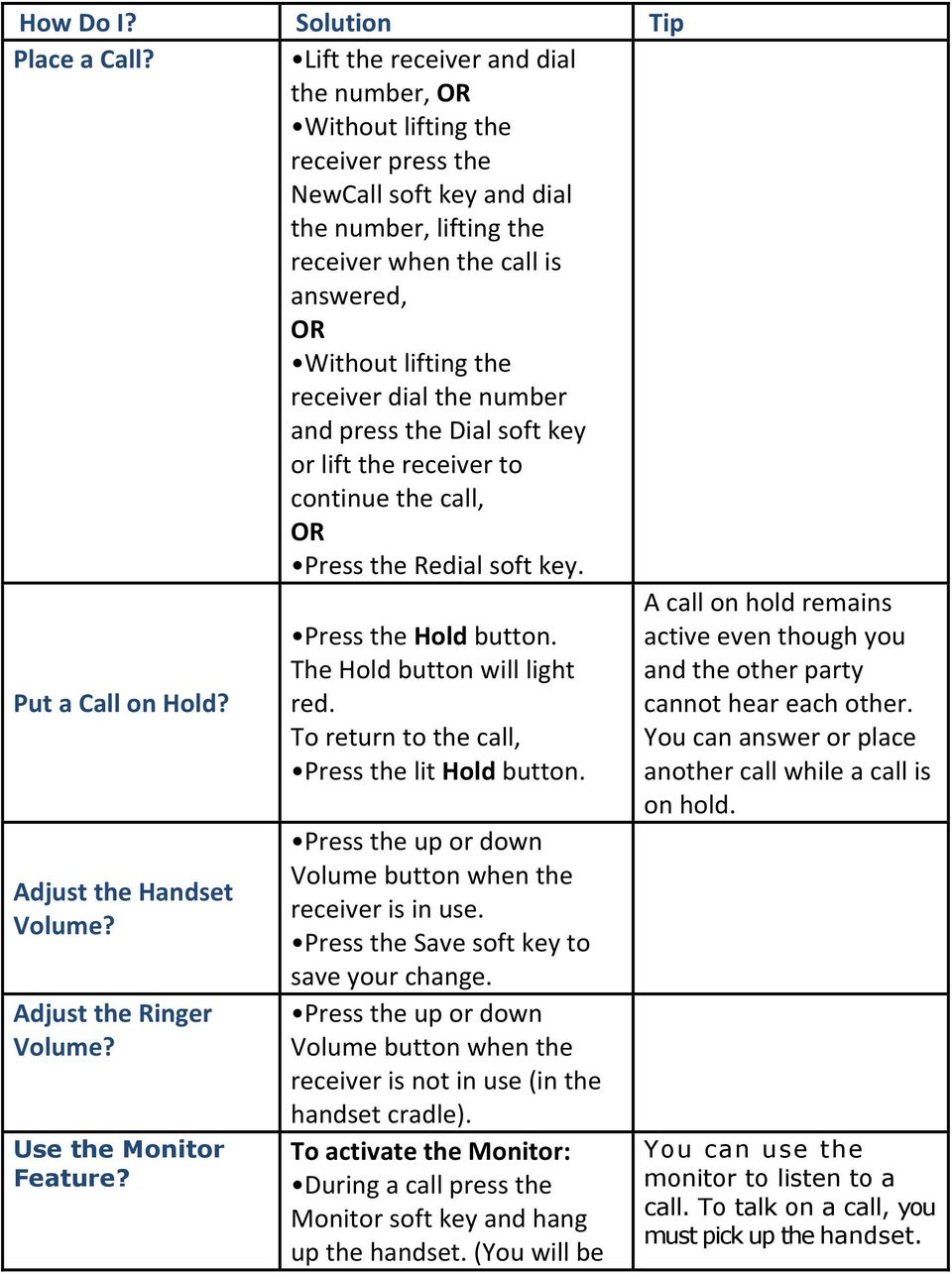
5 Operate the LCD Screen? abletohearthecall,butyou willnotbeabletotalkonthe call.) ToswitchfromtheMonitor tothehandset: Pickupthehandset ToturnofftheMonitorand hangup: PresstheEndCallsoftkey. ToadjusttheMonitor volume: Presstheupordown Volumebuttonwhenthe Monitorisinuse. PresstheSavesoftkeyto saveyourchange. Tocontrolthecursor: Pressthe>>softkey torepositionthe cursor. Pressthe<<softkeyto deleteacharacterordigit inanentry. Toselectamenuitem: Press the Navigation button to select (highlight) a menu item. Then press the Select soft key. OR Press the number key on your phone s dial pad that corresponds to the item number in the menu. Operating your phone s LCD screen is easy. Use the Navigation button, soft keys, and the keypad to make your selections. Tip: To exit out of a menu on your phone s LCD screen, press the Exit soft key.
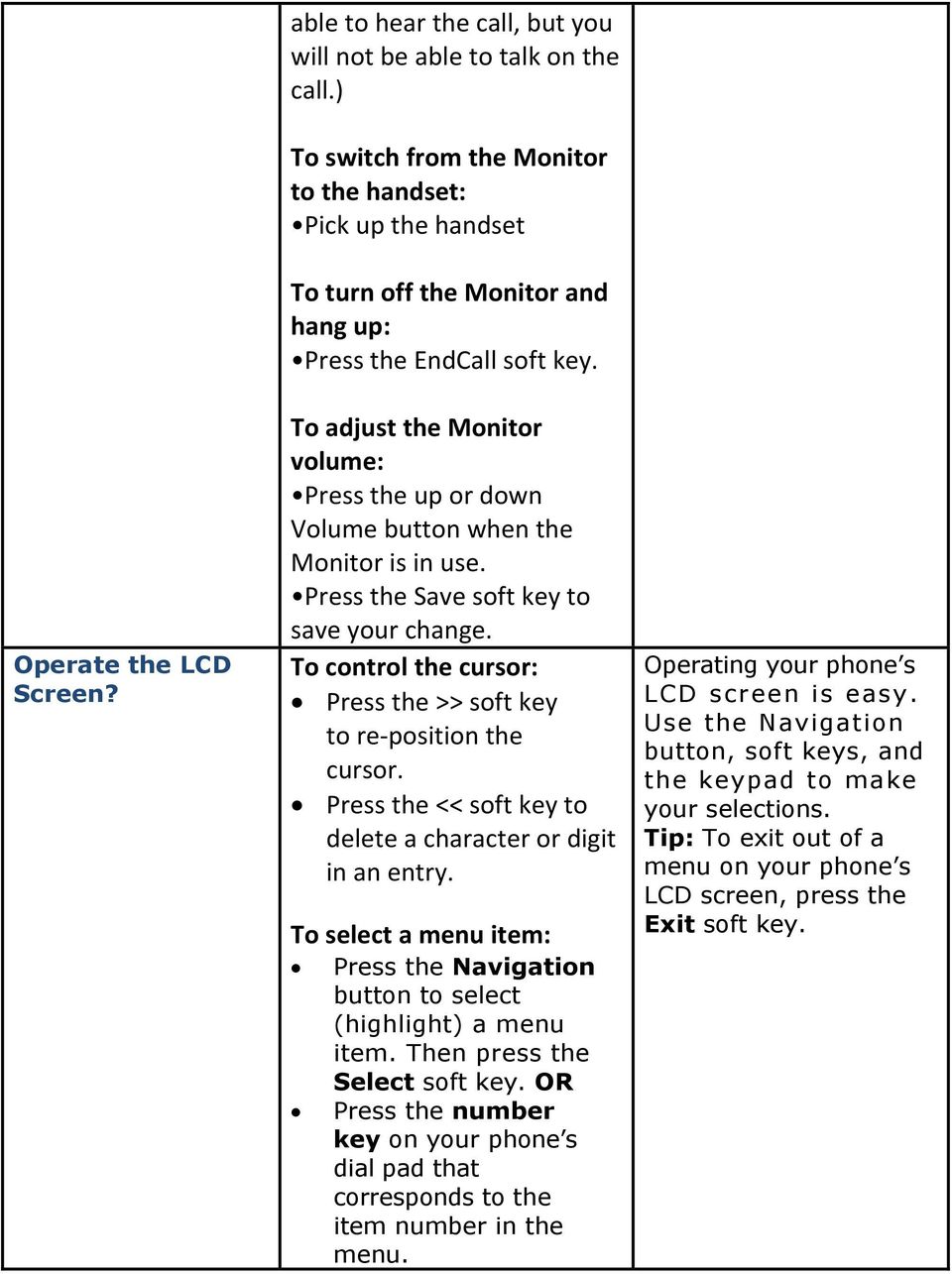
6 Adjust the LCD Contrast? Use Voice Mail? View my Missed Calls? PresstheMenubutton SelectSettingsfromthe menu. SelectUserPreferences SelectContrastfromthe menu. PresstheUporDownsoft keystosetthedesired contrast. PresstheSavesoftkeyto acceptyourchanges. Set up voice mail: Press the Msgs soft key on your Cisco IP Phone and enter your PIN (134679) when prompted. Allows you to save a recorded name Set up a voice greeting Change your PIN or password Access voice mail: Press the Msgs soft key or dial 1900, enter your PIN and follow the instructions. To view your call records: PresstheMenubutton. SelectDirectories. Selectaparticular directory. Choosefrom: o MissedCalls o ReceivedCalls o PlacedCalls To dial from a call record: Your phone s LCD display will indicate if you have missed a call. Use the Directories menu to view (and dial from) call records in your Missed Calls, Received Calls, and Placed Calls directories. A call record contains the time and date of the call, and a phone
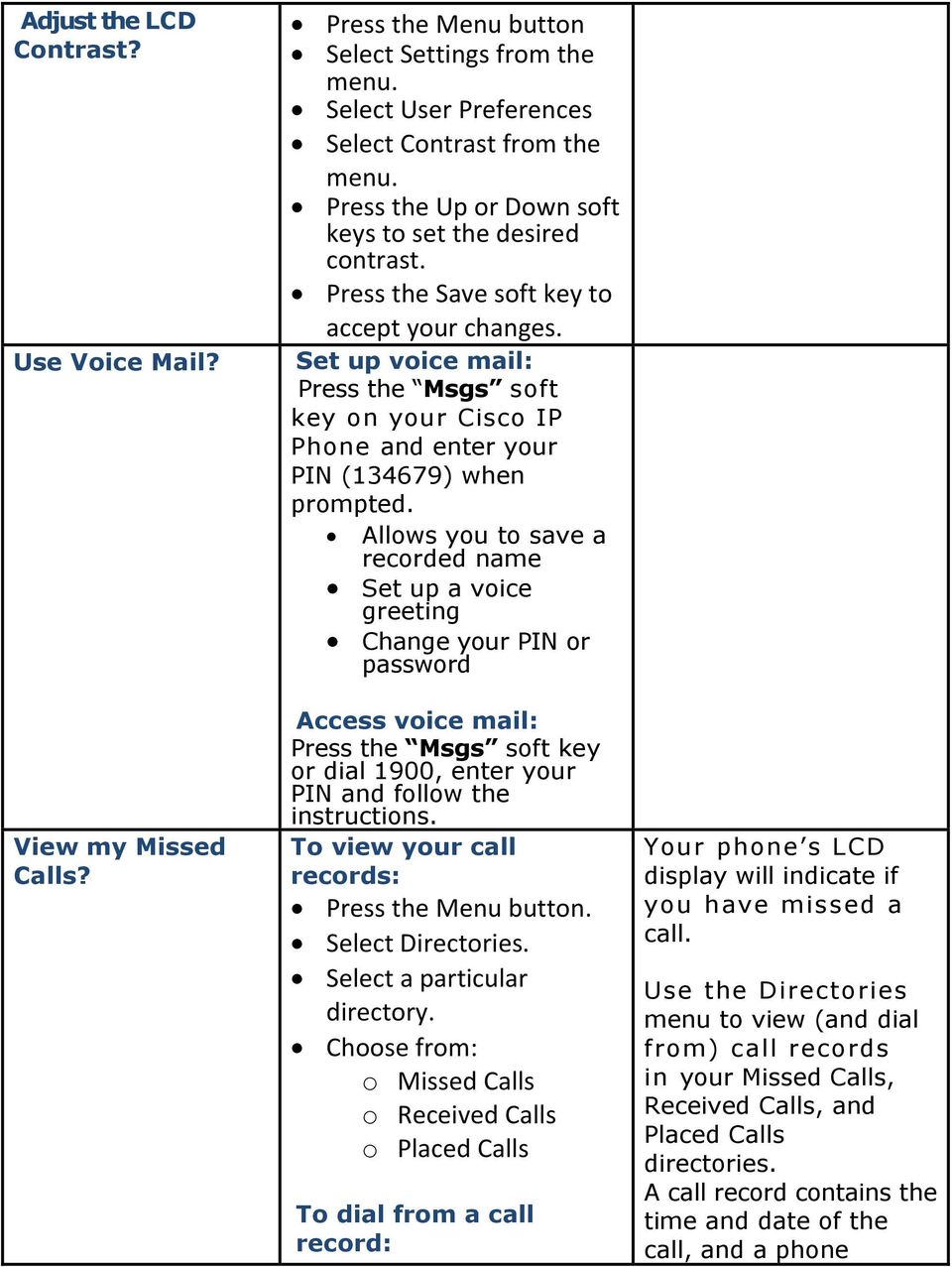
7 Set Up a Conference Call? Followthestepsaboveto openyourmissed, Received,orPlacedCalls directory. UsetheNavigationbutton toselect(highlight)a particularrecord. Ifnecessary,usethe EditDialsoftkeytoadd digitstothefrontofthe number. Liftthehandsetorpress thedialsoftkey. To delete ALL your call records: Select an entire directory and press the Clear soft key. Select a call record and press the Delete soft key. (Please note this will delete all your call records not just one set.) To turn a two-party call into a conference call: Step1 Duringacall,pressthe Moresoftkeythenpress theconfrnsoftkey.doing soautomaticallyactivates anewlineandputsthe firstpartyonhold. Step2 Placeacalltoanother numberorextension. Step3 Whenthecallconnects, number (if available). Note Once the conference call initiator disconnects, no additional parties can be added.
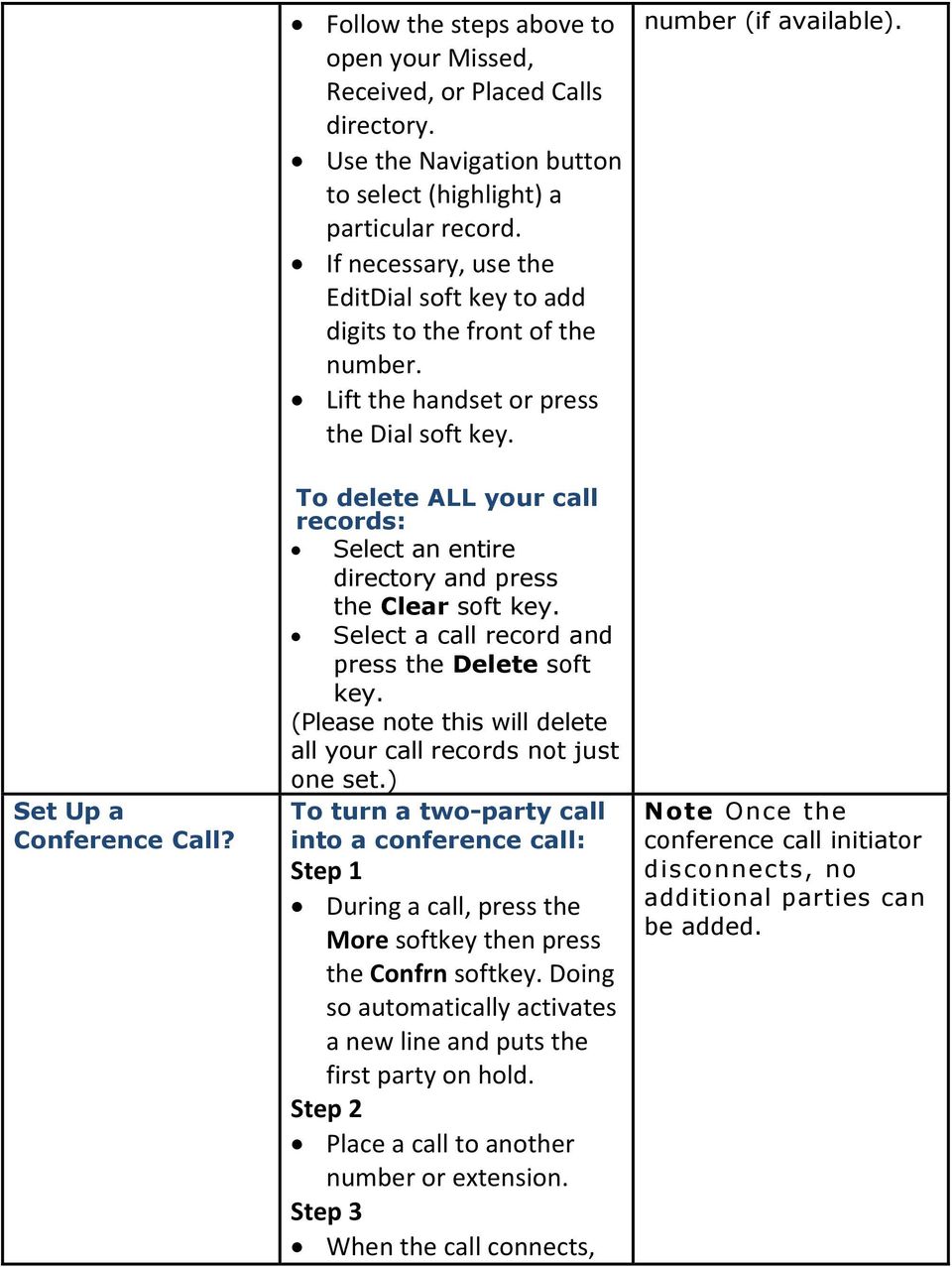
8 Transfer a Call? Forward All Calls? pressconfrn againtoadd thenewpartytothe conferencecall. Repeatthesestepstoadd partiestotheconference call. Duringacall,pressthe Trnsfersoftkey.Doingso automaticallyputsthecallon hold. Dialthenumberoroffice extensiontowhichyouwant totransferthecall. Whenthecallringsonthe otherend,presstrnsfer again.or,whentheparty answers,announcethecall andthenpresstrnsfer. To forward all of your incoming calls to another number: PresstheMOREsoftkey. PresstheCFwdAllsoftkey. Youwillheartwobeeps. Enterthenumbertowhich youwanttoforwardallof yourcalls.enterthenumber exactlyasyouwouldifyou wereplacingacalltothat number(i.edial"9"firstifan externalcall). Afteryouenterthe number,youwillheartwo beeps. TheLCDscreendisplaysa messageconfirmingthe numbertowhichyourcalls Ifnecessary,pressend callandthenthehold buttontoreturntothe originalcall. Note Tocancelcall forwarding,pressthe CfwdAllsoftkey. Youcanusecall forwardingtosendyour incomingcallstoanother CiscoIPPhoneortoa traditionalphone. Ifcallforwardingis activeandthereisno answerattheforwarded number(byaperson, answeringmachine,or voic system),the callwillberedirectedto yourvoic system. Youcansetupcall forwardingwhenyouare notatyourphoneby

9 How do I Use DND? How do I use idivert? arebeingforwarded. ToturnCallForwardOff presscfwdallagain Itissometimesbeneficialto receiveincomingcallsbut nothavethephonering.you canseewhoistryingtocall youbycallerid,butthereis onlyasinglebeepheard, ratherthantheusual4rings. ToenableDoNotDisturb, pressthe more softkey, thenpressthe DND softkey.youwillsee Do NotDisturbisactive appearonyourdisplay. TodisableDND,pressthe more softkey,then DND. Yourphonewillringnormal onincomingcalls. Whenyoureceivean incomingcall,youhave theoptionofimmediately sendingthatcallerto voic . Whileyourphoneis ringing,presstheidivert softkey Thecallerissent immediatelytoyour voic . accessingtheciscocall ManagerUserOptions websitefromyour computer.toaccessthis site,askyoursystem administratorfortheurl. Thisfeatureisusefulif youarehavingameeting inyourofficeanddonot wanttobeinterruptedby aringingphone.

Information Systems Cisco 7940/7942 IP Phone Quick Reference Guide
 Information Systems Cisco 7940/7942 IP Phone Quick Reference Guide Contents Page: Cisco 7940/7942 IP Phone Quick Reference Guide Contents 2 Introduction 3 Phone Overview 3 How Do I: 4 Place a Call? 4 Put
Information Systems Cisco 7965 IP Phone Quick Reference Guide
 Information Systems Cisco 7965 IP Phone Quick Reference Guide Contents Cisco 7965 IP Phone Quick Reference Guide Contents Page 2 Introduction 3 Overview of Phone 3 How Do I: 4 Place a Call? 4 Put a Call
Information Systems Cisco 7945 IP Phone Quick Reference Guide
 Information Systems Cisco 7945 IP Phone Quick Reference Guide Contents Cisco 7945 IP Phone Quick Reference Guide Contents Page 2 Introduction 3 Overview of Phone 3 How Do I: 4 Place a Call? 4 Put a Call
End User Phone Training 7945/7965 Reference Guide
 End User Phone Training 7945/7965 Reference Guide Page 1 Navigation (Scroll) The user may display his/her last calls out using the blue navigation button. Please note that the phone handset will display
Cisco IP Phone 7942 User Training Guide
 Cisco IP Phone 2 User Training Guide 1 1 Key to the Cisco 2: 1 2 = Line Buttons = Foot Adjust Button = Message Button = Mute Button = Headset Button = Volume Button = Directories Button = Help Button =
CISCO IP PHONE 6945 Series User Guide
 CISCO IP PHONE 6945 Series User Guide Notes Page 15 VOICE MAIL Setting up Voice Mail for the First Time: Press the messages key on your phone. Follow the recorded instruction to record your name, record
7921G Wireless IP Telephone User Guide
 7921G Wireless IP Telephone User Guide Deerfield Public Schools District 109 Line Definitions: 1. Line 1 Personal Line 4. Press the EXIT soft key twice to exit the Directory menu. Placing a Call: 1. Dial
Cisco Unified Communications System End-User Guide
 Cisco Unified Communications System End-User Guide Version 1.0 Revised July 25, 2012 Customized for Neptune School District Note: Information in this document is drawn from Cisco documentation. These guides
Cisco IP Phone Models 7941 and 7945 Quick Reference Guide December 23, 2011
 Emergency Calls Dial 911 or 3 911 Cisco IP Phone Models 7941 and 7945 Quick Reference Guide December 23, 2011 Place a Call Lift handset (or press the Speaker button, the line button, or New Call soft key)
Cisco Unified Communications System End-User Guide
 Cisco Unified Communications System End-User Guide Version 1.0 Revised 11/19/2012 Customized for East Orange School District Note: Information in this document is drawn from Cisco documentation. These
Quickstart Guide. Cisco IP Phone 7800 Series
 Quickstart Guide Cisco IP Phone 7800 Series Cisco IP Phone 7800 Series Features 1 2 1) Handset light strip 17 16 15 14 3 4 5 6 7 8 9 10 11 2) Phone screen 3) Softkey button 4) Navigation and select button
Cisco VoIP 79XX Phones Reference Guide ICIT Technology Training and Advancement [email protected]. Updated on 7/11/2014
 Cisco VoIP 79XX Phones Reference Guide ICIT Technology Training and Advancement [email protected] Updated on 7/11/2014 1 TABLE OF CONTENTS 2 Phone Overview... 4 2.1 Phone Terms... 5 3 Operating Your Phone...
Featuring the Vertical Xcelerator IP Phone System DESK PHONE USER GUIDE V1.5
 Featuring the Vertical Xcelerator IP Phone System DESK PHONE USER GUIDE V1.5 For Service Purchased After May 1 st 2009 Table of Contents INTRODUCTION TO YOUR XCELERATOR DESK PHONE... 2 WELCOME... 2 XCELERATOR
How To Use A Cisco Phone On A Cell Phone On An Ipod Or Ipod (For A Cell) On A Pc Or Ipo (For An Ipo) On An Iphone Or Ipok (For Pc Or Mac)
 Cisco IP Communications Solutions End User Training Course Outline Introducing your IP phone Using common telephone features Using telephone feature buttons Voicemail Cisco 7942 Model This full-featured
Norstar Programming Feature Codes
 Norstar Programming Feature Codes Common Telephone Features Customizing Your Telephone Norstar Voice Mail Commands Administrative Commands for Voice Mail Norstar 3x8, 6x16 and 8x24 Programming Common Norstar
IP Phone Training. University Information Technology Services. uits.arizona.edu. Revised 05-26-2010
 IP Phone Training Revised 05-26-2010 Know Your IP Phone 1) Line/speed dial buttons 2) Foot stand adjustment 3) Display button 4) Voice Mail button 5) Directories button 6) Help button 7) Settings button
Cisco IP Phone User Guide
 Cisco IP Phone User Guide CONTENTS DISPLAY CONTRAST SETTINGS... 4 CHOOSE RING TONE... 4 SET RING VOLUME... 5 SET RECEIVER VOLUME... 5 SET SPEAKER VOLUME... 6 SETUP VOICE MAIL... 6 MAKE CALLS... 6 CALLS
3 Com Phone System Training
 3 Com Phone System Training If you have any questions about the phone system contact: Karen Escavage Phone: 521-7526 Email: [email protected] Richard Blackwell Phone: 521-7544 Email: [email protected]
Quick Reference Guide for SPA9x2 Phones QUICK REFERENCE BUSINESS SERIES. Linksys IP Phone Models: SPA962, SPA942 and SPA922
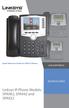 Quick Reference Guide for SPA9x2 Phones QUICK REFERENCE BUSINESS SERIES Linksys IP Phone Models: SPA962, SPA942 and SPA922 Phone Buttons and Features Handset Message Waiting Indicator LCD Screen Line Keys
Getting to Know Your Cisco VoIP Phone 303G, 504G, 508G and 514G
 Getting to Know Your Cisco VoIP Phone 303G, 504G, 508G and 514G Getting to know your new phone is easy. This guide will help you get started. You ll learn how to: Use the feature buttons Navigate your
Welcome to Cisco s IP Telephony Phone and Voice Mail Training
 Welcome to Cisco s IP Telephony Phone and Voice Mail Training Last Updated: June 2010 Features and Benefits Full-feature Telephone Provides voice communication over your Data network Phone number moves
Cisco IP Phone 7960G and Cisco IP Phone 7940G for Cisco IOS Telephony Services
 CHAPTER 1 Cisco IP Phone 7960G and Cisco IP Phone 7940G for Cisco IOS Telephony Services Button Legend The Cisco IP Phone 7960G and the Cisco IP Phone 7940G differ only in the number of available line
CISCO SMALL BUSINESS PRO IP PHONE
 CISCO SMALL BUSINESS PRO IP PHONE For Models: SPA501G, SPA502G, SPA504G, SPA508G, and SPA509G Business Communications Solutions 9910 Irvine Center Drive Irvine, CA 92618 www.bcsconsultants.com [ m ] 949.333.1000
Cisco IP Phone Training 8/26/15
 Cisco IP Phone Training 8/26/15 Using your Phone This document will provide information on the following: Introduce you to your phone Place, transfer, forward, park and pick up a call Set voice mail passwords
VWCC Cisco Phone Users Guide New Phone setup and configuration guide Version 1.4
 VWCC Cisco Phone Users Guide New Phone setup and configuration guide Version 1.4 Last updated: 5/23/11 Table of Contents 1. VOICE MAIL... 3 1.1 Configuring your Voice Mail Box... 3 1.2 Additional Voicemail
Phone & Voicemail Instructions
 General Phone Tips To transfer a call to another line: 1. Press the Conf button 2. Dial the extension you wish to conference 3. Wait for the person to answer 4. Press Conf again to connect the two calls
Hosted VoIP User Guide
 Hosted VoIP User Guide Cisco 500 series Handset Cisco 500 series handset 1 Hosted VoIP Services Welcome to GCI Hosted VoIP services. Detailed below is a basic user guide outlining the simplicity of the
CISCO IP Phone 7942-7962
 CISCO IP Phone 7942-7962 PHONE / EXTENSION NUMBERS - Internal 5-digit extension numbers - 13000 to 13199 (Non-DID) - 73000 to 73199 (DID s) - External 7-digit phone numbers (DID Direct Inward Dial) - 687-3000
Using the Cisco IP Phone System
 Using the Cisco IP Phone System Chapter 0 The Cisco IP Phones 7970 and 7960G are full-feature telephones that provide voice communication over the same data network that your computer uses, allowing you
Operating Your Cisco IP Phone Quick Reference Guide. Basic Operations: Answering, Ending and Placing a call
 Operating Your Cisco IP Phone Quick Reference Guide Basic Operations: Answering, Ending and Placing a call Answer a Call End a call Place a Call Using the handset Using the handset To get a dial tone:
Cisco IP Phone System Basic Features Model 7940 Durham, NC
 Cisco IP Phone System Basic Features Model 7940 Durham, NC This guide will walk you through setting up and using some very useful features on the new Cisco IP telephone. First of all, your phone will look
Voice Mail Instructions For Cisco Unity Voicemail System. Table of Contents
 Voice Mail Instructions For Cisco Unity Voicemail System Table of Contents Page 2 Page 2 Page 2 Page 3 Page 4 Page 5 Page 6 Initial/Mandatory Setup of Your Voice Mail Confirming Deletion of Deleted Messages
St. Paul Public Schools. IP Phone Quick Reference Guide
 St. Paul Public Schools IP Phone Quick Reference Guide Phone Operations Place a Call Internal call: dial the 5-digit extension number External call: dial 9 + the number Pick up the Handset, press the line
Cisco IP Phone Training
 Cisco IP Phone Training Objectives Overview Cisco IP Phone Layout Basic Phone Functions Voicemail Questions 2 Foot Stand Release Press the foot stand adjustment knob on the right-hand side of the phone.
VoIP Handset User Manual. Digital Voice Quality Business Grade Handset Easy Plug & Play
 Digital Voice Quality Business Grade Handset Easy Plug & Play Table of Contents 1.0 Getting Started... 1 1.1 Unpacking the box... 1 1.2 Assembling the Phone... 2 2.0 Phone Button Features... 3 3.0 Phone
2 Session buttons. 1 Phone Screen
 1 Phone Screen 2 Session buttons Shows information about your phone, including directory number (extension), call information (for example caller ID, icons for an active call or call on hold) and available
Hosted PBX End User Training Guide For the Polycom Soundpoint IP 321, 331 and 335 Phone
 Hosted PBX End User Training Guide For the Polycom Soundpoint IP 321, 331 and 335 Phone HOSTED PBX END USER TRAINING GUIDE ACCESSING VOICEMAIL To retrieve your voicemail, press the Menu button, button
7971 Basic Phone Overview
 7971 Basic Phone Overview 1 Programmable buttons Configurable buttons that provide access to various phone features 2 Footstand button Allows you to adjust the angle of the phone base. Awakens the touchscreen
Cloud Voice Service Cisco Unified IP Phone 6921 User Guide. (Version 1.0)
 Cisco Unified IP Phone 6921 User Guide (Version 1.0) Table of Content 1 Phone Set Features and Functions... 3 1.1 Operation for IP Phone 6921... 3 2 Location of Control... 4 3 Preference Setup... 6 3.1
Polycom 2-Line Desk Phone Quick Reference Guide
 Polycom 2-Line Desk Phone Quick Reference Guide ACC-1142 PUG Table of Contents INTRODUCTION TO YOUR POLYCOM 2-LINE DESK PHONE... 2 WELCOME... 2 DESK PHONE... 2 HOW TO USE YOUR POLYCOM 2-LINE DESK PHONE...
IP Phone 7941/7961 User Manual
 IP Phone 7941/7961 User Manual IP Phone User Manual IP Phone User Manual...2 IP Phone Introduction...3 Setting Up Your IP Phone...3 Locating Buttons and Hardware...5 Using Help on Your Phone...7 Choosing
Cisco IP Phone 7960 / 7940 Quick Reference Guide
 Cisco IP Phone 7960 / 7940 Quick Reference Guide CONTENTS CALLS... 5 Placing a Call... 5 Dialing... 5 Answering a Call... 5 Ending a Call... 5 Muting a Call... 5 Placing a Call on Hold... 5 TRANSFERS...
IP Phone System: Cisco 7960G and 7940G
 IP Phone System: Cisco 7960G and 7940G Table of Contents: IP Phone System 7940G and 7960G CISCO IP PHONE ROAD MAP...1 NAVIGATE THE PHONE SYSTEM AND USE THE LCD SCREEN...2 SOFT KEYS... 2 USE THE NAVIGATION
Cisco IP Phone Training
 Cisco IP Phone Training TRAINING OVERVIEW Cisco IP Phone & Agent Training Cisco IP Phone 7821, 8831, 8851 Call Control Features Button review User Options How is my phone connected? Voicemail Cisco IP
Call Indicator Light LCD Display Screen
 Network & Telecoms Information Technology Services www.its.salford.ac.uk Using your 7911/12 IPT Phone This is the complete IT Services Guide to your Cisco 7911 /12 Series Internet Protocol Telephone. Call
Cisco 504 IP Phone. Quick User guide. Produced by: The Nomis Support Desk. [email protected]
 Cisco 504 IP Phone Quick User guide Produced by: The Nomis Support Desk 0844 880 0018 [email protected] Nomis Connections, Connections House, 11a Kings Road, Fleet, Hampshire, GU51 3AA 0844
City University VoIP Quick Reference Cisco IP Phone 7945, 7971-7975
 For enquiries and service appointment, please call CSC Help Desk at 3442 7658 Warning: Do not unplug, remove or change the location of IP phone yourself. Otherwise, network interruption may be resulted.
HELPFUL HINTS FOR VOIP PHONES
 HELPFUL HINTS FOR VOIP PHONES TO LEAVE A MESSAGE IN MAILBOX WITHOUT CALLING THE NUMBER ACCESS THE LINE (GET DIAL TONE) - PRESS STAR DIAL 5 DIGIT NUMBER TO TRANSFER A CALL WITHOUT ANNOUNCING WHOSE CALLING
Cisco IP 7961 Telephone & Unity Voicemail User s Guide
 Cisco IP 7961 Telephone & Unity Voicemail User s Guide Office of Information Technology Telecommunications and Network Operations Table of Contents General Information...1 Understanding Lines vs. Calls...2
Quick Start Guide Cisco 7912 IP Telephone
 Quick Start Guide Cisco 7912 IP Telephone Contents: Cisco 7912 IP Phone Feature and Key Overview...3 Basic Features...5 Installing the IP Phone and Connecting to the Network...5 Placing a Call...5 Answering
Using Your New Cisco VOIP Phone STANFORD UNIVERSITY INFORMATION TECHNOLOGY SERVICES
 Using Your New Cisco VOIP Phone Agenda Getting to know your IP phone Cisco 8961, 9951 Review the basics and learn about special features Soft Keys Login/Logoff Free Conference Calling Ring tones and images
Overview of IP Phone. 1 Handset Pick up to place or answer a call. 2 Message Waiting Indicator
 Overview of IP Phone 1 Handset Pick up to place or answer a call. 2 Message Waiting Indicator Displays solid red when you have a new voice mail message. Flashes red during an incoming call. 3 LCD Screen
Guide to using your CISCO IP 6941 phone at Imperial College
 Cisco IP Phone 6941 Cisco IP 6941 Phone Screen 1. Header Displays date, time and extension number 2. Programmable feature button - Shows feature button programming depending on your confi guration 3. Primary
Setting up & using your IP Telephone
 Setting up & using your IP Telephone Version: 1.8 Last Edited: 09/02/15 Welcome to your new IP Telephone! In order to help you get acquainted with your new phone this helpsheet provides a basic description
Cisco IP Phone 7941 and 7961 User Guide
 Cisco IP Phone 7941 and 7961 User Guide Depending on configuration, programmable buttons provide access to: Phone lines (line buttons) Speed-dial numbers (speed-dial buttons) 1 The buttons illuminate to
PHONE & VOICEMAIL- REFERENCE GUIDE
 Information Technology PHONE & VOICEMAIL- REFERENCE GUIDE INTRODUCTION The following guide is designed as a reference guide for the Cisco Model 7960 phone system. Figure 1 Cisco Model 7960 Phone COMMON
Cisco 7940/7960 IP Phone Quick Reference Guide
 Cisco 7940/7960 IP Phone Quick Reference Guide Phone Operations Place a Call Internal call: dial the extension number External call: dial 9 + the entire 7 or 10-digit phone number for a local call, or
State of Illinois Central Management Services. Training provided to you by Netech Corporation
 State of Illinois Central Management Services Training provided to you by Netech Corporation The phone Basic Calling Functions Making calls, transferring calls Features Call Logs, Corporate Directory Video
Cisco 8851. Dial Plan. Feature and Session Buttons. Your Phone
 Cisco 8851 Dial Plan Internal Calls: Dial 5-digit extension External Calls: Domestic/Local: 9+1 Area Code + Number Int l: 9+011+Country Code + Number Emergency: 9+911 or 911 Your Phone 1. Incoming call
VoIP User Guide. Polycom VVX300/310. Polycom VVX300-310 1
 VoIP User Guide Polycom VVX300/310 Polycom VVX300-310 1 Hosted VoIP Services Welcome to GCI Hosted VoIP services. Detailed below is a basic user guide outlining the simplicity of the service. Depending
Vertical 4-Line Desk Phone Quick Reference Guide ACC-1145 PUG
 ACC-1145 PUG Vertical 4-Line Desk Phone Quick Reference Guide Table of Contents INTRODUCTION TO YOUR XCELERATOR DESK PHONE... 2 WELCOME... 2 DESK PHONE... 2 HOW TO USE YOUR XCELERATOR DESK PHONE... 3 Answering
Graphical LCD. Dial. Line 1. Menu. Messages TUV 7 8 9 OPER. Dial Pad Volume Up/Down
 User Guide. Thank you for choosing our Cloud9 hosted phone solution. This user guide will provide everything you need to know in how to use your new system with the Polycom Soundpoint 331/335 desktop phone
Welcome to your new ShoreTel 230 voice over IP telephone.
 ShoreTel 230 Table of Contents Preparing for your new phone:... 3 Set up:... 3 Record Multiple Greetings... 4 Retrieving Voice Mail... 5 ShoreTel Call Manager... 6 Call Manager Voice Mail... 8 Call Manager
Using the Cisco IP Phone 7940/7960
 CHAPTER 3 Using the Cisco IP Phone 7940/7960 Your Cisco IP Phone 7940/7960 provides features you might not have had before on an office phone. You can learn how to use these features by exploring the available
Training Guide For 7960 & 7940 Series Cisco IP Phones
 Training Guide For 7960 & 7940 Series Cisco IP Phones Prepared by: Corporate Technologies, LLC 2000 44 th Street SW, Suite 100 Fargo, ND 58103 (701) 893-4000 1 Table of Contents: Section I: GETTING STARTED
Allworx Phone Functions
 Voicemail Shortcuts The following shortcuts are available while listening to a voicemail message: *1 REPLY to this message. *6 Play the NEXT message. *2 FORWARD this message. *7 REWIND the message 10 seconds.
VoIP User Guide. Polycom IP331 Handset. Polycom IP331 Handset 1
 VoIP User Guide Polycom IP331 Handset Polycom IP331 Handset 1 Hosted VoIP Services Welcome to GCI Hosted VoIP services. Detailed below is a basic user guide outlining the simplicity of the service. Depending
Quick Start Guide Cisco 7940/7960 IP Telephone
 Quick Start Guide Cisco 7940/7960 IP Telephone Contents: Cisco 7960/7940 IP Phone Feature and Key Overview...2 Basic Features...5 Installing the IP Phone and Connecting to the Network...5 Adjusting the
Welcome to Princeton University s Unified Messaging System. An Introduction. Janice Guarnieri Silvia Fernandes Julia Seymore
 Welcome to Princeton University s Unified Messaging System An Introduction Janice Guarnieri Silvia Fernandes Julia Seymore Today s Agenda Brief overview of Unified Messaging Getting Started Demo of Telephone
CISCO UNIFIED COMMUNICATIONS MANAGER EXPRESS 7.1 USER GUIDE
 CISCO UNIFIED COMMUNICATIONS MANAGER EXPRESS 7.1 USER GUIDE For Unified IP Phone 7931 Business Communications Solutions 9910 Irvine Center Drive Irvine, CA 92618 www.bcsconsultants.com [ m ] 949.333.1000
Cisco IP Phone Training. covers Cisco 7945 & 7965 model phones and general phone usage
 Cisco IP Phone Training covers Cisco 7945 & 7965 model phones and general phone usage Topics Phone Contents for Cisco 7945 and Cisco 7965 Placing, Answering, and Disconnecting Calls Using the Softkeys
Cisco SPA 525G. Quick Start guide. Business
 Cisco SPA 525G Quick Start guide Business Cisco Small Business SPA IP Phone Model SPA 525G/SPA 525G2 Package Contents IP telephone (Fig. 1) Desk Stand RJ-45 Ethernet Cable Setup CD-ROM Quick Start Guide
Overview of IP Phone Notes:
 Overview of IP Phone 1 Handset Pick up to place or answer a call. 2 LCD Screen Displays date and time, phone station name, line extensions, and soft key options. 3 Line Keys/Additional Line Keys Indicates
Cisco VoIP 8961/9951/9971 Phones Reference Guide ICIT Technology Training and Advancement [email protected]
 Cisco VoIP 8961/9951/9971 Phones Reference Guide ICIT Technology Training and Advancement [email protected] Updated on 8/1/2014 TABLE OF CONTENTS Phone Overview... 4 Phone Terms... 5 Operating Your Phone...
OneSolutions Hosted IP PBX Cisco IP Phone Training
 OneSolutions Hosted IP PBX Cisco IP Phone Training Download the Service User Guides at: http://www.onecommunications.com/knowledgecenter.aspx?id=4704 2009 One Communications. The One Communications logo
AVAYA VOICE OVER INTERNET PROTOCOL (VOIP) TELEPHONE USER MANUAL. Revised by Leeward CC IT October 2012. University of Hawaiʻi Community Colleges
 AVAYA VOICE OVER INTERNET PROTOCOL (VOIP) TELEPHONE USER MANUAL Revised by Leeward CC IT October 2012 University of Hawaiʻi Community Colleges Hawaiian Telecom Copyright 2012 Table of Contents PLACING
VoIP Aastra 6739i User Guide
 VoIP Aastra 6739i User Guide University of Calgary Network Services Contents Voicemail... 3 Access: From your office... 3 Access: From any phone... 3 Voice Mail Options... 3 Access: Internet... 5 Calling
Welcome! Cisco 8945 End User Training
 Welcome! Cisco 8945 End User Training Welcome Instructor: Name Schedule: One hour and fifteen minutes Phone Orientation Call Handling Features Voice Mail Reference Cards Conversion: Date and Details Cell
Basic Features. Placing a Call. Answering a Call. Ending a Call. Placing a Call on Hold. Redialing a Call. Press the Phone button. Dial the number.
 Basic Features Placing a Call Press the Phone button. Dial the number. Answering a Call Press the Phone button or the Answer softkey. The active call appears in the active call list in the LCD screen.
Napa Valley College Cisco Telephone User Guide
 Napa Valley College Cisco Telephone User Guide Button Legend 1 Programmable buttons Depending on configuration, programmable buttons provide access to: Phone lines (line buttons) Speed-dial numbers (speed-dial
VoIP Phone System. South Central College VoIP User Guide
 VoIP Phone System South Central College installed a new high tech phone system in July of 2005. This system communicates across the network rather than using traditional phone wiring. The technology, known
Training Guide for Cisco IP Phones 7940/7960
 Training Guide for Cisco IP Phones 7940/7960 LCD Display Indicator Light Foot Stand Adjustment Line Keys Soft Keys Navigation button 1 2 3 4 5 6 7 8 9 * 0 # i Menu buttons Volume Control Sound Control
NEC SV8100 Telephone System User Guide (for SV8100 12-button and 24-button phones with CAP/PARK keys)
 NEC SV8100 Telephone System User Guide (for SV8100 12-button and 24-button phones with CAP/PARK keys) KEYS AND BUTTONS ON YOUR PHONE Incoming Call/Message Waiting indicator light Flashes red quickly when
CISCO IP 7962 Series QUICK REFRENCE
 CISCO IP 7962 Series QUICK REFRENCE 1. Programmable Buttons 2. Phone Screen 3. Foot stand Button 4. Messages Button 5. Directies Button 6. Help Button 7. Settings Button 8. Services Button 9. Volume Button
Cisco 7961/7941. IP Phone Training. 2004, Network Architechs, Inc. IP Phone Training
 Cisco 7961/7941 IP Phone Training 2004, Network Architechs, Inc. IP Phone Training Objectives Upon completion of this training, you will be able to perform the following tasks: Identify the layout of the
Cisco 7900 Series IP Phone
 Main Menu 1. Phone Parts Stand Adjustment button Ring/Voicemail indicators Programmable buttons Soft Keys Navigation Wheel Volume Button Speaker Button Mute Button Headset Button 2. Line Appearance Colors
Using Basic Call Management Functions
 Using Basic Call Management Functions This chapter provides instructions on using your basic phone functions. It includes the following sections: Managing the Audio Source and Volume, page 28 Answering
1. Primary Phone Line 2. Programmable Button Indicators 3. Soft Key Labels 4. Status Line 5. Call Activity Area 6. Phone Tab 7.
 CISCO IP 7975 Series QUICK REFRENCE 1. Programmable Buttons 2. Foot stand Button 3. Display Button 4. Messages Button 5. Directies Button 6. Help Button 7. Settings Button 8. Services Button 9. Volume
Cisco 7940/7960 User Guide. Cisco 7940/7960 User Guide
 Cisco 7940/7960 User Guide Table of Contents Table of Contents...2 Introduction...3 The Cisco 7940/7960 IP Phone... 3 Web Portal...3 Telephony Toolbar...3 Document Format...4 Feature Functionality...5
Cisco 7912 Users Guide
 Cisco 7912 Users Guide Cisco IP Phone 7912 Road Map to your Cisco IP Phone 1 2 LCD Screen Cisco IP Phone series type 3 Soft Keys 4 5 6 Navigation button Menu Button Hold Button 7 Dial Pad Volume 8 Button
Quick Start Guide (79xx Series Offices)
 Quick Start Guide (79xx Series Offices) Congratulations on your new phone!! GCSD has upgraded the entire phone system to a modern VOIP (voice over Internet Protocol) system. The biggest things to be aware
Univerge SV8100 Multi-line Telephone Reference Guide
 Univerge SV8100 Multi-line Telephone Reference Guide 2 Congratulations on your organization s decision to install a NEC SV8100 telecommunications system provided by Atel Communications. The goal of this
Cisco Unified IP Phone 6945 User Guide for Cisco Unified Communications Manager Express Version 8.8 (SCCP)
 Cisco Unified IP Phone 6945 User Guide for Cisco Unified Communications Manager Express Version 8.8 (SCCP) First Published: July 22, 2011 Last Modified: July 22, 2011 Americas Headquarters Cisco Systems,
Polycom Conference Phone Quick Reference Guide ACC-1144 PUG
 ACC-1144 PUG Polycom Conference Phone Quick Reference Guide Table of Contents INTRODUCTION TO YOUR POLYCOM CONFERENCE PHONE... 2 WELCOME... 2 CONFERENCE PHONE... 2 HOW TO USE YOUR POLYCOM CONFERENCE PHONE...
Ipiphony Phone System. User Manual. 1 P a g e
 Ipiphony Phone System User Manual 1 P a g e About this Guide This guide explains how to use the basic features of your new Aastra phones. Not all features listed are available by default. Contact your
How To Use A Cell Phone On A Sim Sims 2.2 (Sprinting) And Sims 1 (Cell Phone) With A Sims 3.2.2 On A Iphone Or Ipod) With An Ipod
 LINKSYS SPA941 / SPA942 User Guide Emergency To dial 911 for emergency service, you must dial the Outside Access Digit first (usually 9) + 911. Customer Service / Technical Support (919) 459-2300, option
Cisco Phone Overview. Voicemail: Internal Hit messages (Envelope) button or dial 10000
 Cisco Phone Overview Providence School Department extensions are 5 digits. Dial 8 to place an outside call. Voicemail: Internal Hit messages (Envelope) button or dial 10000 To place a call, choose one