
OneSolutions Hosted IP PBX Cisco IP Phone Training
|
|
|
- Juliana Newman
- 10 years ago
- Views:
Transcription
1 OneSolutions Hosted IP PBX Cisco IP Phone Training Download the Service User Guides at: One Communications. The One Communications logo is a registered trademark of One Communications Corp. Cisco is a registered trademark of Cisco Systems, Inc., and/or its affiliates in the United States and certain other countries.

2 Agenda Topic 1. IP Phone Usage 2. Voice Mail Setup 3. CommPortal Access 4. Additional Support 5. Premium Seat Features 2
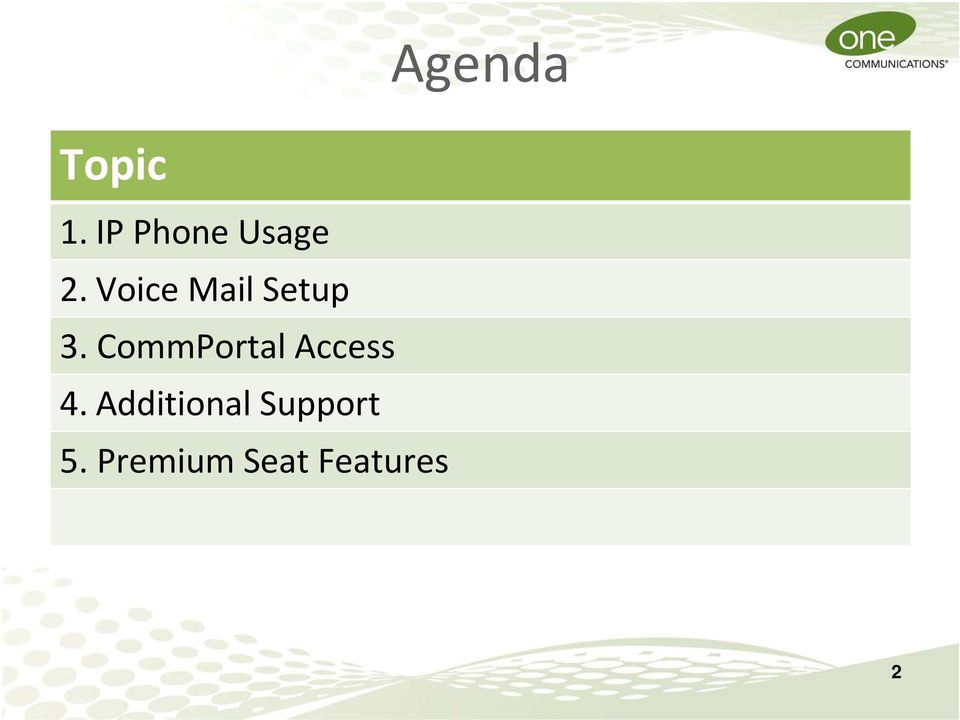
3 Cisco IP Phone Feature Making a call Phone Function 1. Lift handset and dial. Or, 2. Press a line key and dial. 3
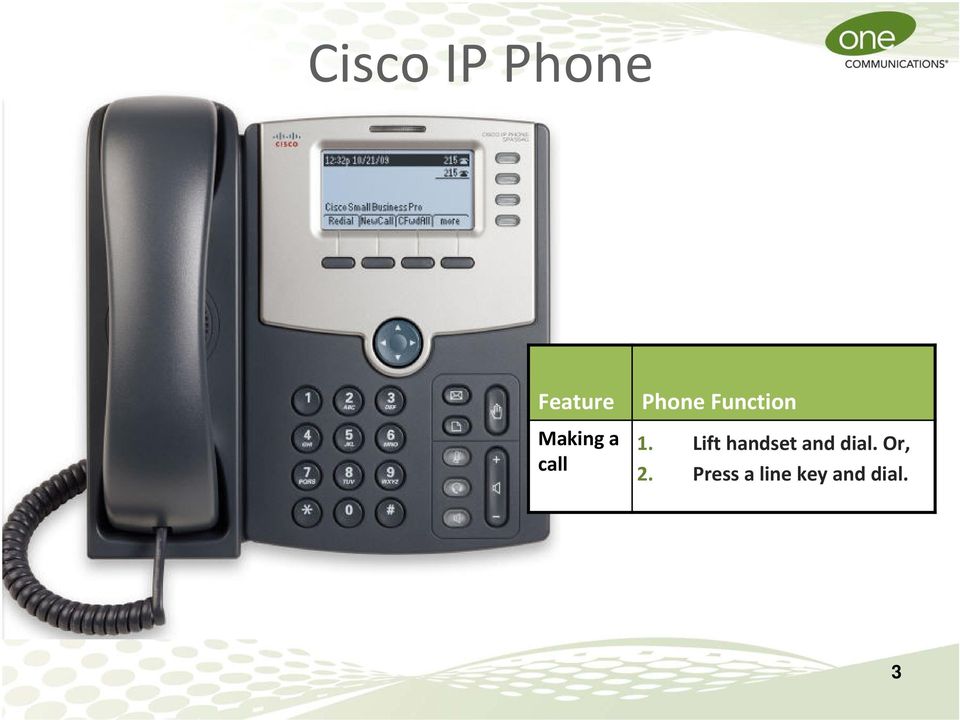
4 IP Phone Features Feature Voice Mail Menu/ Settings Mute Headset Speaker phone Phone Function To access your messages, press the Voice Mail button on your phone. Press to access a menu to configure features and preferences (such as your directory, ring tone and speed dials). To mute the phone, press the Mute button. The button lights red. To use a headset, press the Headset button. The button lights green. To use hands free, press the Speakerphone button. The button lights green. 4
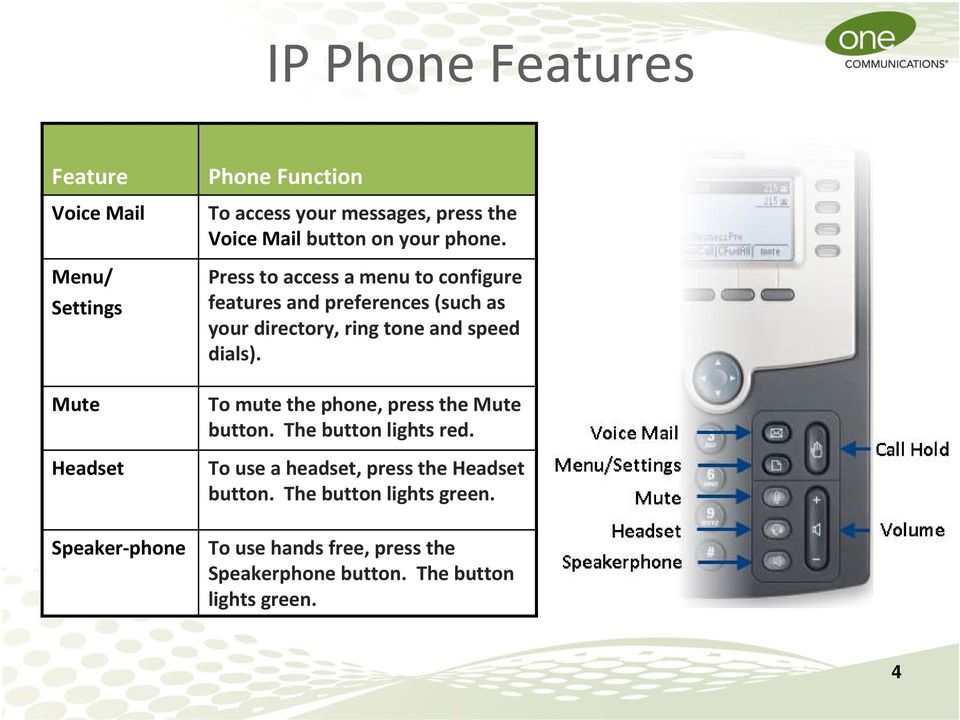
5 IP Phone Features Feature Call Hold Volume Phone Function To put a call on hold, press the Hold button. A series of beeps indicates the call is on hold. To resume the call, press the flashing red line button for the call or the Resume soft key. To adjust the volume while you are on a call, press the + or. Then press Save. Pressing the Volume button while not on a call adjusts the volume of the phone s ringer. 5
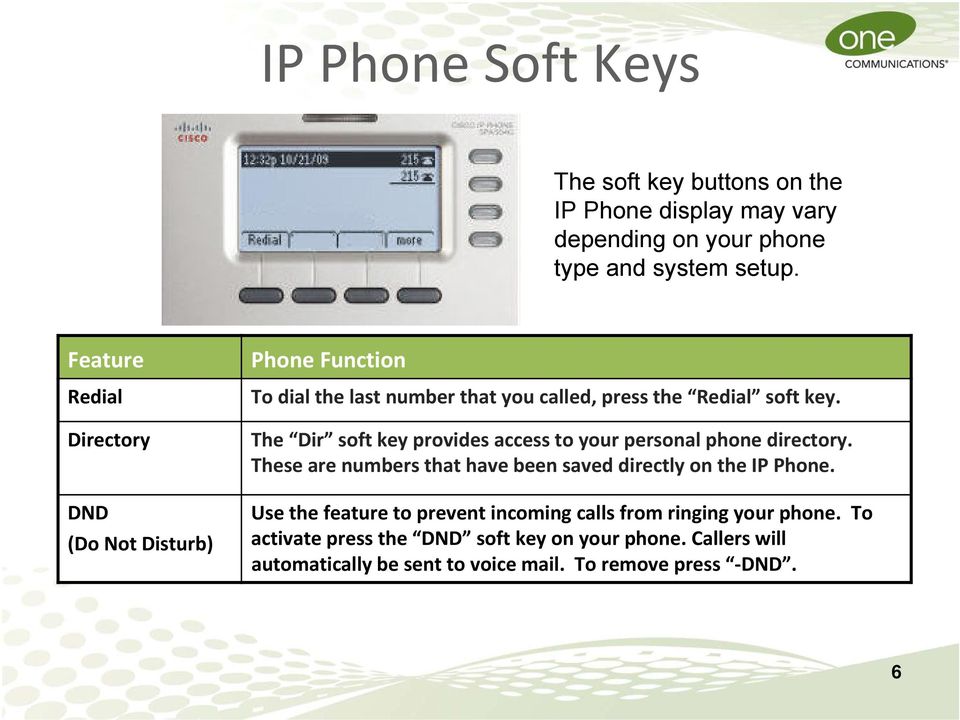
6 IP Phone Soft Keys The soft key buttons on the IP Phone display may vary depending on your phone type and system setup. Feature Redial Directory DND (Do Not Disturb) Phone Function To dial the last number that you called, press the Redial soft key. The Dir soft key provides access to your personal phone directory. These are numbers that have been saved directly on the IP Phone. Use the feature to prevent incoming calls from ringing your phone. To activate press the DND soft key on your phone. Callers will automatically be sent to voice mail. To remove press DND. 6
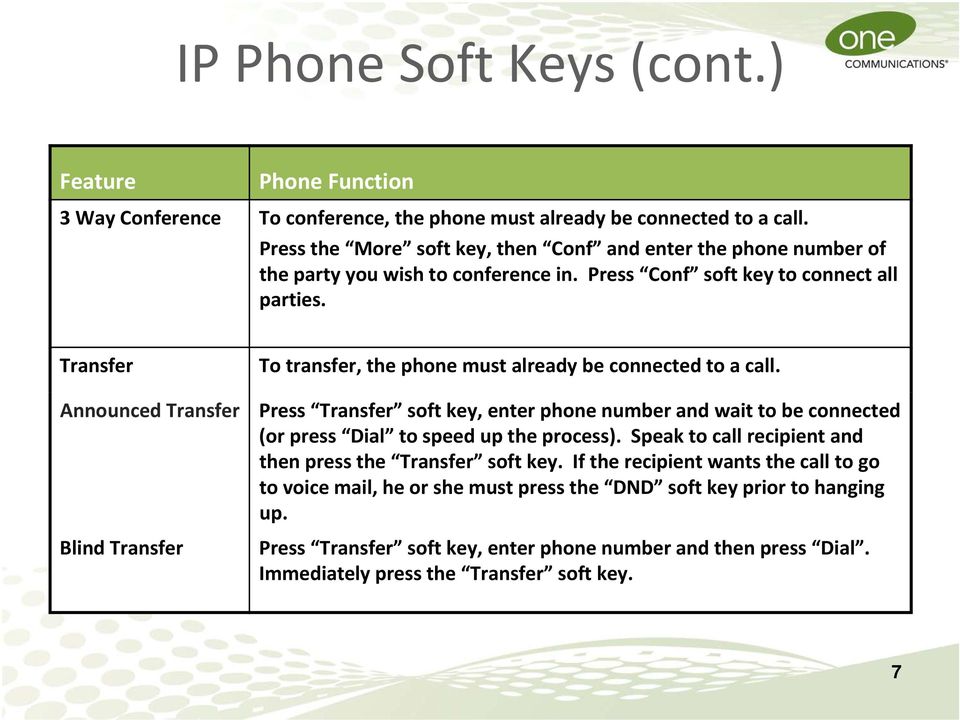
7 IP Phone Soft Keys (cont.) Feature Phone Function 3 Way Conference To conference, the phone must already be connected to a call. Press the More soft key, then Conf and enter the phone number of the party you wish to conference in. Press Conf soft key to connect all parties. Transfer Announced Transfer Blind Transfer To transfer, the phone must already be connected to a call. Press Transfer soft key, enter phone number and wait to be connected (or press Dial to speed up the process). Speak to call recipient and then press the Transfer soft key. If the recipient wants the call to go to voice mail, he or she must press the DND soft key prior to hanging up. Press Transfer soft key, enter phone number and then press Dial. Immediately press the Transfer soft key. 7
8 Voice Mail Setup This will take about 2 minutes 1. Click the voice mail button on the IP Phone. 2. Follow the voice prompts to set up your voice mail. Record your name. Set your voice mail PIN (6 20 digits long) which is also used for the CommPortal. The pin cannot be any part of the telephone number The pin cannot be a sequence of numbers (not ) The pin cannot repeat any number more than two (2) times (not ) Record a personal greeting or keep the standard greeting with your recorded name. Note: After initial setup, you can access your voice mail remotely by dialing your phone number and pressing the * button. 8

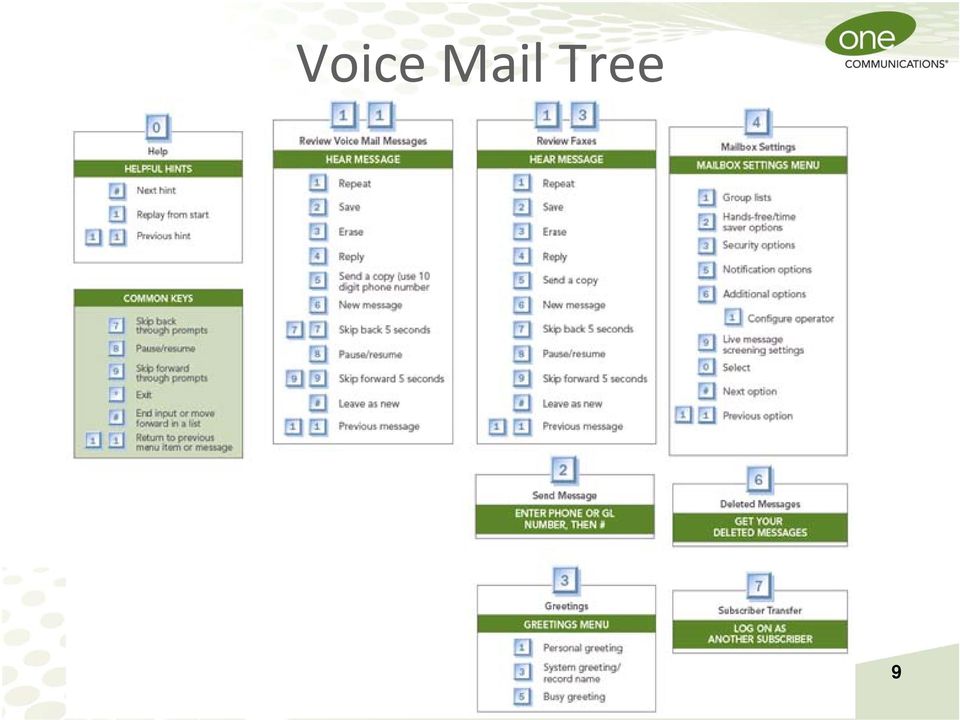
9 Voice Mail Tree 9
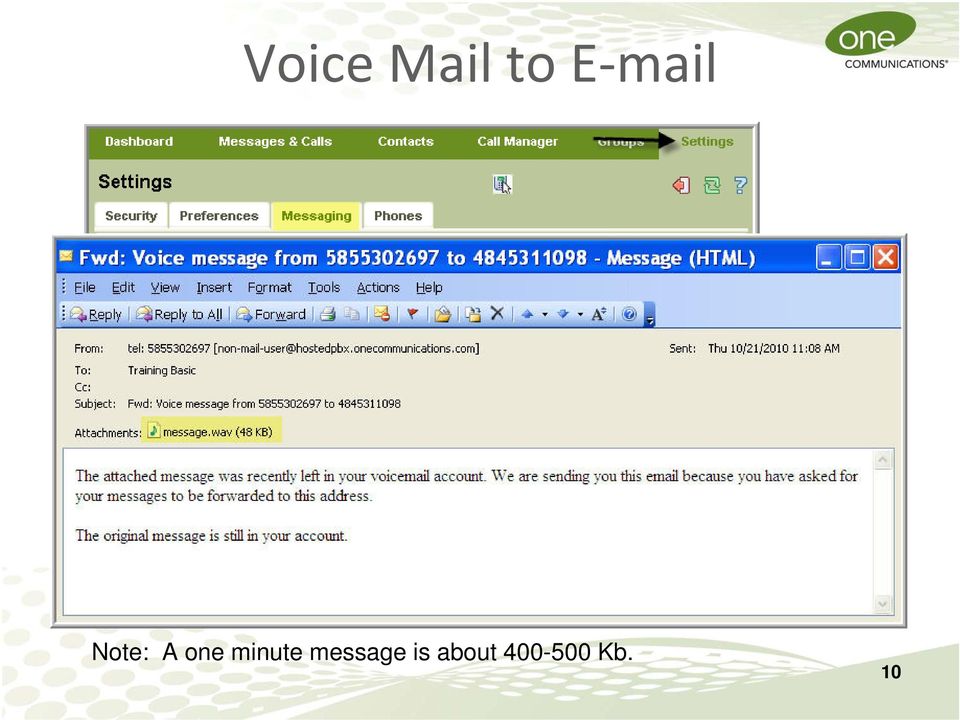
10 Voice Mail to E mail Note: A one minute message is about Kb. 10
11 CommPortal Access The CommPortal* is a web tool which allows you to view missed calls, listen to voice mail messages, view contacts, and set up rules to handle your calls. Access to the CommPortal is available from any location with Internet connectivity. Go to Enter your 10 digit phone number. Enter the PIN that you created when you set up your voice mail. *System requirements are listed in the Quick Start Guide. 11
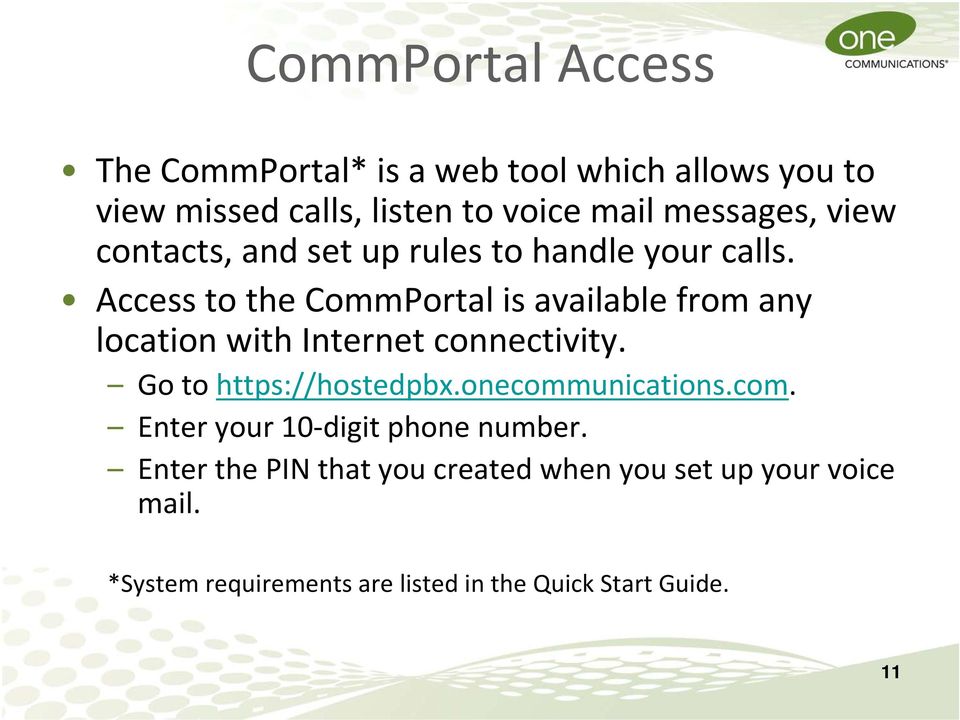
12 CommPortal Demo The Tabs (top line) provide navigation to the key features. Tabs 1. Dashboard: provides a quick view of the most common functions. 2. Messages & Calls: provides call history. 3. Contacts: provides a method for storing and retrieving contact details. 4. Call Manager: allows customer to manage how incoming calls are handled. 5. Settings: provides access to call service settings. 12
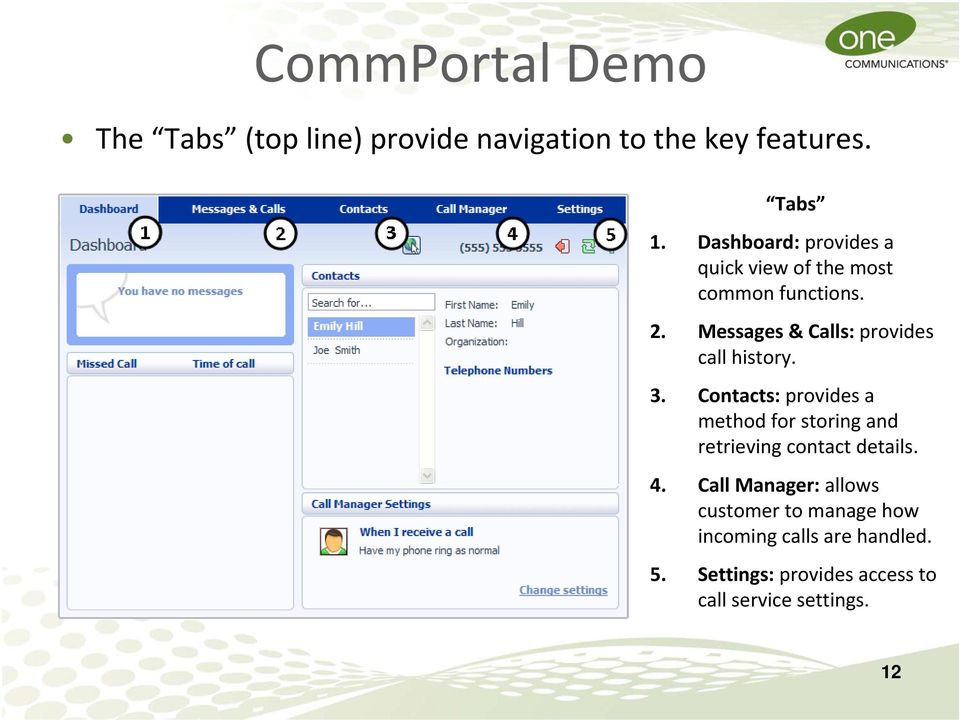
13 CommPortal Standard Buttons Below the navigation Tabs there are several standard buttons located on the right side of the page. Button CommPortal Function Click to Dial allows you to enter a phone number that will be called from your IP phone. Logout exits the CommPortal. You are automatically logged out after 30 minutes of inactivity. Refresh updates the page with recent phone and message activity. 13
14 Online Help The help button provides immediate answers to questions related to available features. The information provided will change based on the Tab you are viewing. 14

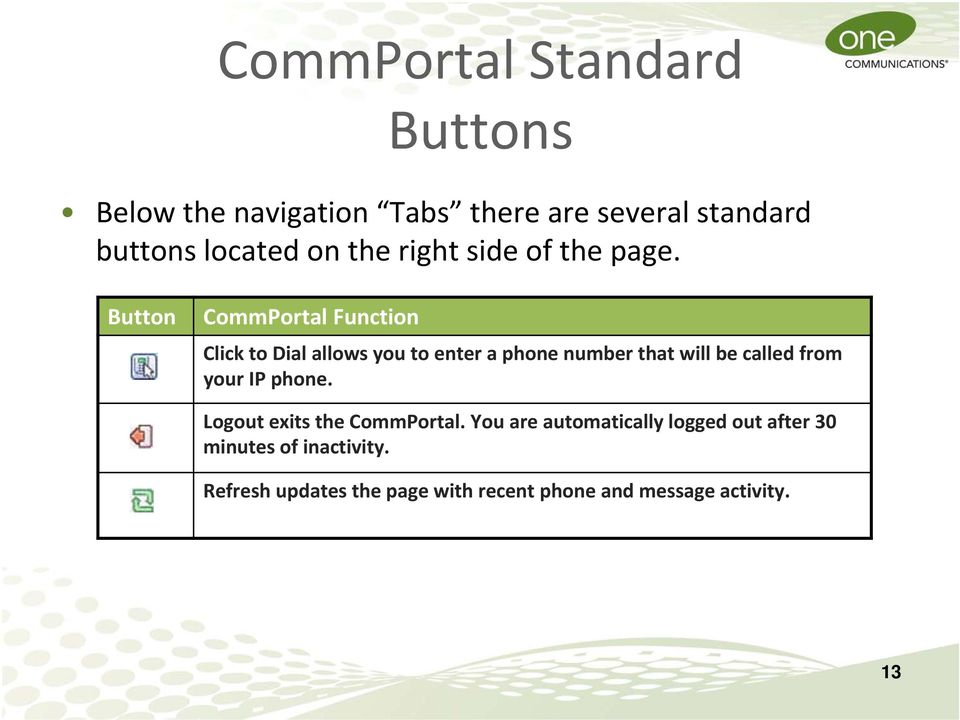
15 Visit to access Hosted IP PBX user guides. Dial (listed in the Quick Start Guide) for Customer Service issues. 15
16 Premium Seat Features CommPortal Assistant (CommAssistant) Tool Bar* Microsoft Outlook Integration allows you to synchronize contacts and use the existing Call Contact button. Toaster Pop up provides an indication that a new message has arrived. Remote Click to Dial allows you to use a remote telephone to make calls and caller ID displays your IP phone number. Find Me/Follow Me is a subscriber location service for incoming calls. Incoming Call Manager is a call handling service. *System requirements are listed in the Premium Seat Quick Start Guide. 16
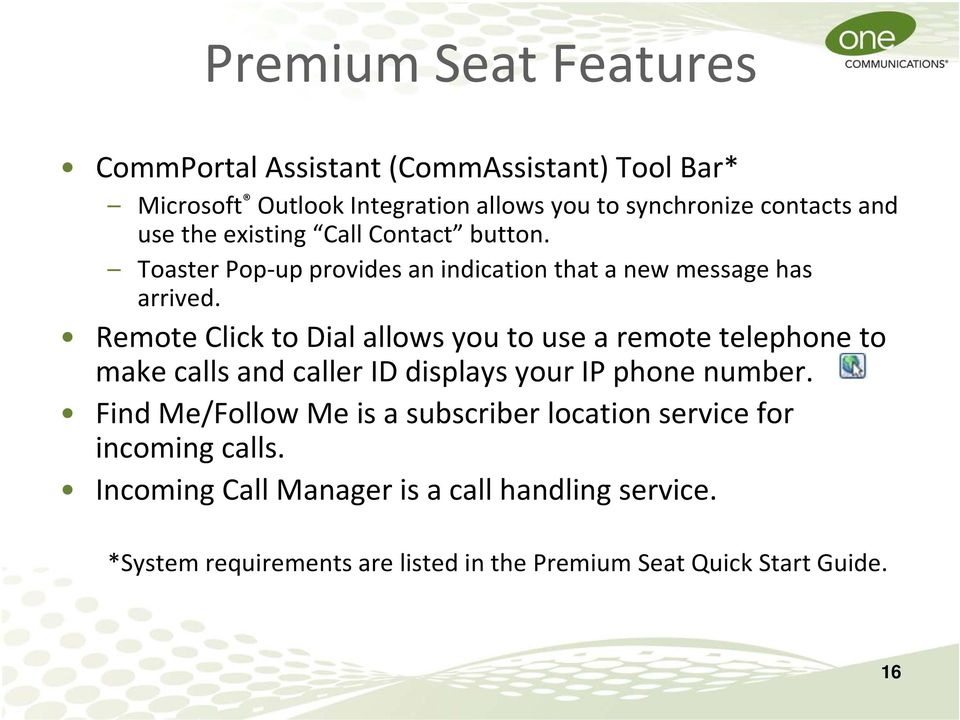
17 CommAssistant Tool Bar The CommAssistant Tool Bar is a thin software client which runs on your PC and offers convenient access into your account. 1. Go to the Settings tab and choose CommPortal Assistant. 2. Download the Tool Bar. 17
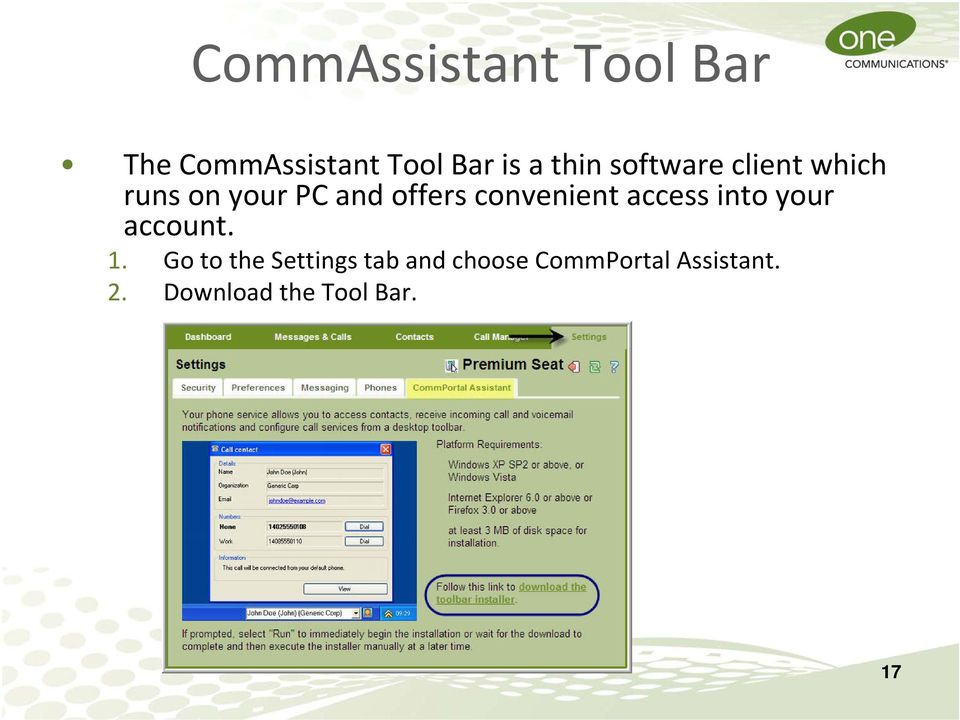
18 CommAssistant Tool Bar 1. Click the Tool Bar icon on your Taskbar at the bottom right corner of your screen. 2. Select Configure CommAssistant. 18
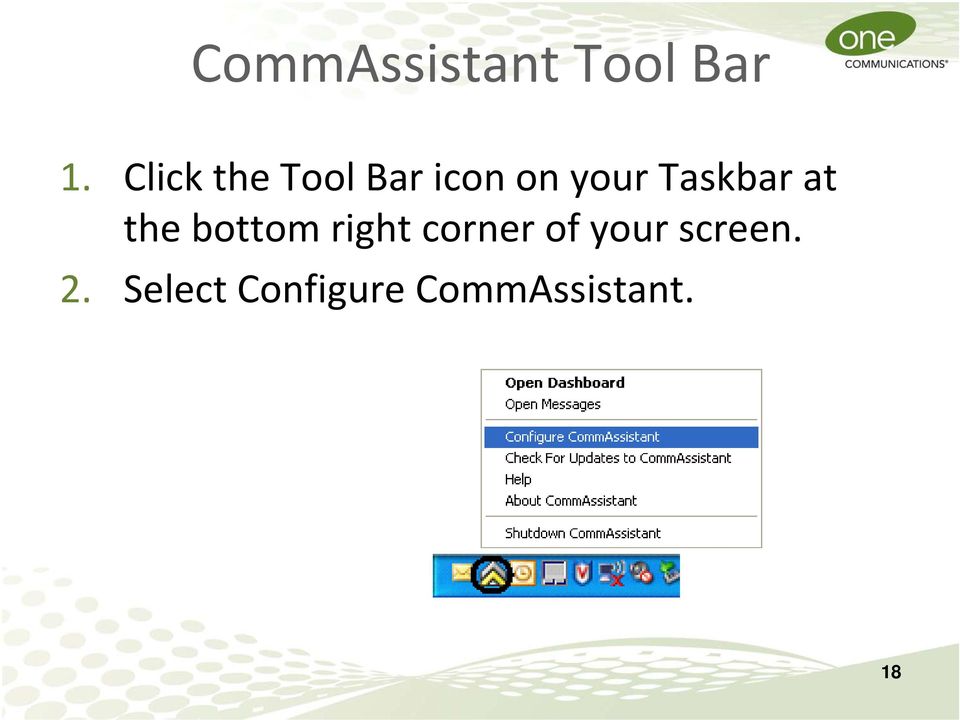
19 Tool Bar Settings On the General tab, enter the CommPortal credentials and Proxy configuration settings as shown. The Options settings can be set based on your personal preferences. 19
20 Tool Bar Usage You can view the Dashboard by clicking the Tool Bar icon on your Taskbar and select Open Dashboard. You can use the CommAssistant dropdown to place or forward calls, apply rules, configure schedules, and more. 20

21 CommPortal Demo (Premium Seat) 21
22 Summary The IP Phone operates much like a traditional phone. The CommPortal provides a graphical user interface to your IP Phone. The CommPortal provides easy customization. The CommPortal links your computer to your IP Phone. Assistance is available online or via the One Communications Customer Care Center. Visit to access Hosted IP PBX user guides. Dial (listed in the Quick Start Guide) for Customer Service issues. 22
CISCO IP PHONE 6945 Series User Guide
 CISCO IP PHONE 6945 Series User Guide Notes Page 15 VOICE MAIL Setting up Voice Mail for the First Time: Press the messages key on your phone. Follow the recorded instruction to record your name, record
Cisco VoIP 79XX Phones Reference Guide ICIT Technology Training and Advancement [email protected]. Updated on 7/11/2014
 Cisco VoIP 79XX Phones Reference Guide ICIT Technology Training and Advancement [email protected] Updated on 7/11/2014 1 TABLE OF CONTENTS 2 Phone Overview... 4 2.1 Phone Terms... 5 3 Operating Your Phone...
TruConnect. Hosted PBX User Guide. Quick Start Guide - Page 2. Table of Contents - Page 5. 1-800-768-1212 www.truvista.net
 TruConnect Hosted PBX User Guide R R Quick Start Guide - Page 2. Table of Contents - Page 5. 1-800-768-1212 www.truvista.net TruConnect User Guide Page 1. Hosted TruConnect IP PBX Quick Reference Guide
CISCO IP 7962 Series QUICK REFRENCE
 CISCO IP 7962 Series QUICK REFRENCE 1. Programmable Buttons 2. Phone Screen 3. Foot stand Button 4. Messages Button 5. Directies Button 6. Help Button 7. Settings Button 8. Services Button 9. Volume Button
Hosted Voice Quick Start Guide
 Hosted Voice Quick Start Guide EATEL 225-621-4100 Welcome Welcome to Hosted Voice from EATEL! This guide is intended to get you up and running for the basic features associated with the product. Pages
Table Of Contents. Installation and Safety. Cisco IP Phone 7960 Features. Cisco IP Phone 7960 Operation. Conference Calls
 Table Of Contents Installation and Safety Installing the Cisco IP Phone 7960 Cisco IP Phone 7960 Features Accessing Online Help Cisco IP Phone 7960 Operation How to Use the Handset, Headset, and Speakerphone
Cisco VoIP 8961/9951/9971 Phones Reference Guide ICIT Technology Training and Advancement [email protected]
 Cisco VoIP 8961/9951/9971 Phones Reference Guide ICIT Technology Training and Advancement [email protected] Updated on 8/1/2014 TABLE OF CONTENTS Phone Overview... 4 Phone Terms... 5 Operating Your Phone...
Cisco 8851. Dial Plan. Feature and Session Buttons. Your Phone
 Cisco 8851 Dial Plan Internal Calls: Dial 5-digit extension External Calls: Domestic/Local: 9+1 Area Code + Number Int l: 9+011+Country Code + Number Emergency: 9+911 or 911 Your Phone 1. Incoming call
Training Guide For 7960 & 7940 Series Cisco IP Phones
 Training Guide For 7960 & 7940 Series Cisco IP Phones Prepared by: Corporate Technologies, LLC 2000 44 th Street SW, Suite 100 Fargo, ND 58103 (701) 893-4000 1 Table of Contents: Section I: GETTING STARTED
Cisco IP Phone 7942 User Training Guide
 Cisco IP Phone 2 User Training Guide 1 1 Key to the Cisco 2: 1 2 = Line Buttons = Foot Adjust Button = Message Button = Mute Button = Headset Button = Volume Button = Directories Button = Help Button =
Getting to Know Your Cisco VoIP Phone 303G, 504G, 508G and 514G
 Getting to Know Your Cisco VoIP Phone 303G, 504G, 508G and 514G Getting to know your new phone is easy. This guide will help you get started. You ll learn how to: Use the feature buttons Navigate your
Hosted PBX End User Training Guide For the Polycom Soundpoint IP 321, 331 and 335 Phone
 Hosted PBX End User Training Guide For the Polycom Soundpoint IP 321, 331 and 335 Phone HOSTED PBX END USER TRAINING GUIDE ACCESSING VOICEMAIL To retrieve your voicemail, press the Menu button, button
Optimum Lightpath Hosted Voice User Guide
 Optimum Lightpath Hosted Voice User Guide V10-12-10 Table of Contents 1. Making and Answering Calls... 6 1.1 Internally... 6 1.2 Externally... 6 1.3 Emergency Calls... 6 1.4 Speaker Phone... 6 1.5 Ending
Cisco Unified Communications System End-User Guide
 Cisco Unified Communications System End-User Guide Version 1.0 Revised July 25, 2012 Customized for Neptune School District Note: Information in this document is drawn from Cisco documentation. These guides
Cisco IP Phone Training 8/26/15
 Cisco IP Phone Training 8/26/15 Using your Phone This document will provide information on the following: Introduce you to your phone Place, transfer, forward, park and pick up a call Set voice mail passwords
Cisco VoIP 8941/8945 Phones Reference Guide ICIT Technology Training and Advancement [email protected]
 Cisco VoIP 8941/8945 Phones Reference Guide ICIT Technology Training and Advancement [email protected] Updated on 7/31/2014 TABLE OF CONTENTS Phone Overview... 4 Phone Terms... 5 Operating Your Phone...
Cisco Unified Communications System End-User Guide
 Cisco Unified Communications System End-User Guide Version 1.0 Revised 11/19/2012 Customized for East Orange School District Note: Information in this document is drawn from Cisco documentation. These
Cloud Voice Service Cisco Unified IP Phone 6921 User Guide. (Version 1.0)
 Cisco Unified IP Phone 6921 User Guide (Version 1.0) Table of Content 1 Phone Set Features and Functions... 3 1.1 Operation for IP Phone 6921... 3 2 Location of Control... 4 3 Preference Setup... 6 3.1
Polycom 2-Line Desk Phone Quick Reference Guide
 Polycom 2-Line Desk Phone Quick Reference Guide ACC-1142 PUG Table of Contents INTRODUCTION TO YOUR POLYCOM 2-LINE DESK PHONE... 2 WELCOME... 2 DESK PHONE... 2 HOW TO USE YOUR POLYCOM 2-LINE DESK PHONE...
Cisco IP Phone Training
 Cisco IP Phone Training Objectives Overview Cisco IP Phone Layout Basic Phone Functions Voicemail Questions 2 Foot Stand Release Press the foot stand adjustment knob on the right-hand side of the phone.
End User Phone Training 7945/7965 Reference Guide
 End User Phone Training 7945/7965 Reference Guide Page 1 Navigation (Scroll) The user may display his/her last calls out using the blue navigation button. Please note that the phone handset will display
Cisco Unified IP Phone 6945 User Guide for Cisco Unified Communications Manager Express Version 8.8 (SCCP)
 Cisco Unified IP Phone 6945 User Guide for Cisco Unified Communications Manager Express Version 8.8 (SCCP) First Published: July 22, 2011 Last Modified: July 22, 2011 Americas Headquarters Cisco Systems,
Information Systems Cisco 7940/7942 IP Phone Quick Reference Guide
 Information Systems Cisco 7940/7942 IP Phone Quick Reference Guide Contents Page: Cisco 7940/7942 IP Phone Quick Reference Guide Contents 2 Introduction 3 Phone Overview 3 How Do I: 4 Place a Call? 4 Put
Information Systems Cisco 7965 IP Phone Quick Reference Guide
 Information Systems Cisco 7965 IP Phone Quick Reference Guide Contents Cisco 7965 IP Phone Quick Reference Guide Contents Page 2 Introduction 3 Overview of Phone 3 How Do I: 4 Place a Call? 4 Put a Call
1. Primary Phone Line 2. Programmable Button Indicators 3. Soft Key Labels 4. Status Line 5. Call Activity Area 6. Phone Tab 7.
 CISCO IP 7975 Series QUICK REFRENCE 1. Programmable Buttons 2. Foot stand Button 3. Display Button 4. Messages Button 5. Directies Button 6. Help Button 7. Settings Button 8. Services Button 9. Volume
Cisco 7941 / 7961 IP Phone User Guide
 Cisco 7941 / 7961 IP Phone User Guide Emergency To dial 911 for emergency service, you must dial the Outside Access Digit first (usually 9) + 911. Customer Service / Technical Support (919) 459-2300, option
Using the Cisco IP Phone System
 Using the Cisco IP Phone System Chapter 0 The Cisco IP Phones 7970 and 7960G are full-feature telephones that provide voice communication over the same data network that your computer uses, allowing you
VoIP Handset User Manual. Digital Voice Quality Business Grade Handset Easy Plug & Play
 Digital Voice Quality Business Grade Handset Easy Plug & Play Table of Contents 1.0 Getting Started... 1 1.1 Unpacking the box... 1 1.2 Assembling the Phone... 2 2.0 Phone Button Features... 3 3.0 Phone
Quick Reference Guide for SPA9x2 Phones QUICK REFERENCE BUSINESS SERIES. Linksys IP Phone Models: SPA962, SPA942 and SPA922
 Quick Reference Guide for SPA9x2 Phones QUICK REFERENCE BUSINESS SERIES Linksys IP Phone Models: SPA962, SPA942 and SPA922 Phone Buttons and Features Handset Message Waiting Indicator LCD Screen Line Keys
Gazelle Hosted PBX V8.0 End User Guide
 Gazelle Hosted PBX V8.0 End User Guide Document VPM-777-200, Version 1.2 08 Apr 2013 Document Version 1.2 Gazelle Communications Metaswitch Hosted PBX V8.0 08 Apr 2013 End User Guide Contents 1 Introduction...
Cisco IP Phone Training
 Cisco IP Phone Training TRAINING OVERVIEW Cisco IP Phone & Agent Training Cisco IP Phone 7821, 8831, 8851 Call Control Features Button review User Options How is my phone connected? Voicemail Cisco IP
Guide to using your CISCO IP 6941 phone at Imperial College
 Cisco IP Phone 6941 Cisco IP 6941 Phone Screen 1. Header Displays date, time and extension number 2. Programmable feature button - Shows feature button programming depending on your confi guration 3. Primary
EPB Hosted Phone Solution Quick Start Guide
 Quick Start Guide Congratulations on making the smart move to EPB for communications solutions that help you do business even better. This quick start guide will help you get the most from your EPB Hosted
For customers in AL, FL, GA, KS, SC, TN. wowforbusiness.com MATRIX USER GUIDE. For Cisco SPA504 & SPA509 IP Phones MGCP.U.1304.O
 wowforbusiness.com MATRIX USER GUIDE For Cisco SPA504 & SPA509 IP Phones MGCP.U.1304.O Matrix User Guide Table of Contents Getting Started...3 CommPortal...3 Support...3 Understanding Your Phone s Lines
WTC Communications Hosted PBX User Guide
 WTC Communications Hosted PBX User Guide Version 7.13.1 Section Subject Page 3 Making Calls...5 3.1 Internal...5 3.2 External...5 3.3 Emergency Calls...5 3.4 Speaker Phone...5 3.5 Ending Calls...5 4 Answering
Snom Phone Quick Start Guide
 Snom Phone Quick Start Guide Today s Phone Company 1.866.342.4283 www.megagate.com Table of Contents 1. Quick Reference information... 3 2. Introduction... 4 3. Making Calls... 5 3.1 Internally... 5 3.2
Information Systems Cisco 7945 IP Phone Quick Reference Guide
 Information Systems Cisco 7945 IP Phone Quick Reference Guide Contents Cisco 7945 IP Phone Quick Reference Guide Contents Page 2 Introduction 3 Overview of Phone 3 How Do I: 4 Place a Call? 4 Put a Call
PHONE & VOICEMAIL- REFERENCE GUIDE
 Information Technology PHONE & VOICEMAIL- REFERENCE GUIDE INTRODUCTION The following guide is designed as a reference guide for the Cisco Model 7960 phone system. Figure 1 Cisco Model 7960 Phone COMMON
Basic Training Syllabus
 Mastering the ShoreTel IP Communication System Basic Training Syllabus Personal Call Manager - P a g e 1 Objectives of the class: Understanding new technology can at times appear challenging. However,
Overview of IP Phone. 1 Handset Pick up to place or answer a call. 2 Message Waiting Indicator
 Overview of IP Phone 1 Handset Pick up to place or answer a call. 2 Message Waiting Indicator Displays solid red when you have a new voice mail message. Flashes red during an incoming call. 3 LCD Screen
Cisco IP Phone Models 7941 and 7945 Quick Reference Guide December 23, 2011
 Emergency Calls Dial 911 or 3 911 Cisco IP Phone Models 7941 and 7945 Quick Reference Guide December 23, 2011 Place a Call Lift handset (or press the Speaker button, the line button, or New Call soft key)
Welcome to Cisco s IP Telephony Phone and Voice Mail Training
 Welcome to Cisco s IP Telephony Phone and Voice Mail Training Last Updated: June 2010 Features and Benefits Full-feature Telephone Provides voice communication over your Data network Phone number moves
Quickstart Guide. Cisco IP Phone 7800 Series
 Quickstart Guide Cisco IP Phone 7800 Series Cisco IP Phone 7800 Series Features 1 2 1) Handset light strip 17 16 15 14 3 4 5 6 7 8 9 10 11 2) Phone screen 3) Softkey button 4) Navigation and select button
Quick Reference Guide
 Dialing Plan Fill in these important numbers for your dialing plan. Cisco IP 8941/8945 Phone for ADP Network Phone Enterprise Quick Reference Guide Number Description My Direct Dial or Extension Operator/Attendant
Cisco IP Phone 7960G and Cisco IP Phone 7940G for Cisco IOS Telephony Services
 CHAPTER 1 Cisco IP Phone 7960G and Cisco IP Phone 7940G for Cisco IOS Telephony Services Button Legend The Cisco IP Phone 7960G and the Cisco IP Phone 7940G differ only in the number of available line
Polycom Conference Phone Quick Reference Guide ACC-1144 PUG
 ACC-1144 PUG Polycom Conference Phone Quick Reference Guide Table of Contents INTRODUCTION TO YOUR POLYCOM CONFERENCE PHONE... 2 WELCOME... 2 CONFERENCE PHONE... 2 HOW TO USE YOUR POLYCOM CONFERENCE PHONE...
Welcome! Cisco 8945 End User Training
 Welcome! Cisco 8945 End User Training Welcome Instructor: Name Schedule: One hour and fifteen minutes Phone Orientation Call Handling Features Voice Mail Reference Cards Conversion: Date and Details Cell
Cloud Voice Service. Cisco Unified IP Phone 7942G User Guide. (Version 1.0)
 Cisco Unified IP Phone 7942G User Guide (Version 1.0) Table of Content 1. Phone Set Features and Functions... 2 1.1 Operation for IP Phone 7942G... 3 1.2 Adjusting the Height of the Footstand... 4 2. Preference
Avaya 9608 IP Phone Quick Reference User Guide
 Avaya 9608 IP Phone Quick Reference User Guide The phone supports 24 programmable call appearance/feature buttons. The labels for these are displayed in the main display and can be controlled by the adjacent
Hosted IP-PBX Phone System Polycom Model 650 - Handset
 End User Guide Hosted IP-PBX Phone System Polycom Model 650 - Handset Business Voice Systems Metro Connection Services Commercial DirecTV Managed Services Data Center Business Voice Systems Metro Broadband
IP Phone System: Cisco 7960G and 7940G
 IP Phone System: Cisco 7960G and 7940G Table of Contents: IP Phone System 7940G and 7960G CISCO IP PHONE ROAD MAP...1 NAVIGATE THE PHONE SYSTEM AND USE THE LCD SCREEN...2 SOFT KEYS... 2 USE THE NAVIGATION
Napa Valley College Cisco Telephone User Guide
 Napa Valley College Cisco Telephone User Guide Button Legend 1 Programmable buttons Depending on configuration, programmable buttons provide access to: Phone lines (line buttons) Speed-dial numbers (speed-dial
Cisco 504 IP Phone. Quick User guide. Produced by: The Nomis Support Desk. [email protected]
 Cisco 504 IP Phone Quick User guide Produced by: The Nomis Support Desk 0844 880 0018 [email protected] Nomis Connections, Connections House, 11a Kings Road, Fleet, Hampshire, GU51 3AA 0844
How To Use A Sim Sim Sims 3.2 On A Cell Phone On A Pc Or Mac Or Ipa (For A Sims) On A Simmer (For An Ipa) Or Ipb (For Mac) On An Ip
 Telephone and Voice Mail Quick Reference Guide ADTRAN IP 712 and IP 706 Phones ADTRAN Polycom IP 650, IP 601, IP 501, and IP 430 Phones Table of Contents 4 5 6 10 15 16 17 19 20 21 22 Voice Mail Quick
2 Session buttons. 1 Phone Screen
 1 Phone Screen 2 Session buttons Shows information about your phone, including directory number (extension), call information (for example caller ID, icons for an active call or call on hold) and available
Cisco 7940/7960 User Guide. Cisco 7940/7960 User Guide
 Cisco 7940/7960 User Guide Table of Contents Table of Contents...2 Introduction...3 The Cisco 7940/7960 IP Phone... 3 Web Portal...3 Telephony Toolbar...3 Document Format...4 Feature Functionality...5
TELEPHONE BUTTONS & ICONS TOUCHSCREEN OVERVIEW
 This Telephone Guide describes the various features available to you. Telephone Buttons and Icons describe the physical buttons and keys on the phone, the Touchscreen Overview outlines basic functions,
Cloud Voice Service Remote Extension for Cisco Unified IP Phone 7942G User Guide
 Cloud Voice Service Remote Extension for Cisco Unified IP Phone 7942G User Guide (Version 1.0) Table of Content 1. Phone Set Features and Functions... 2 1.1 Setup the IP Phone... 3 1.2 Adjusting the Height
AVAYA 9608 & 9611G IP DESKPHONE INSTRUCTIONS
 AVAYA 9608 & 9611G IP DESKPHONE INSTRUCTIONS 1 MESSAGE WAITING INDICATOR PHONE DISPLAY NAVIGATION ARROWS and the OK BUTTON PHONE BUTTON MESSAGE BUTTON CONTACTS HISTORY HOME HEADSET SPEAKER VOLUME BUTTON
Quick Start Guide (79xx Series Offices)
 Quick Start Guide (79xx Series Offices) Congratulations on your new phone!! GCSD has upgraded the entire phone system to a modern VOIP (voice over Internet Protocol) system. The biggest things to be aware
Network Phone - Polycom 550 Phone Quick Reference Card
 Network Phone - Polycom 550 Phone Quick Reference Card Dialing Plan Fill in these important numbers for your dialing plan. Number Description My Direct Dial or Extension Operator / Attendant Off-site Voice
Optus VoIP IP Handset Quick Start Guide.
 Optus VoIP IP Handset Quick Start Guide. Congratulations on your new IP Handset The Linksys SPA-942 is a functionally powerful and easy to use business phone featuring a high resolution graphical display,
Cisco SPA 500 Series IP Phones
 Cisco SPA 500 Series IP Phones Cisco Small Business Pro SPA 500 Series IP Phones Models 502G, 504G, 508G, and 509G Cisco SPA 500 Series IP Phones User Guide 1 P age Table of Contents Getting Started...
Cisco Model SPA 303 Quick Start Guide
 Cisco Model SPA 303 Quick Start Guide Welcome Thank you for choosing the Cisco Small Business IP phone. This guide describes how to install your phone and how to perform some basic tasks. 1 Installing
7971 Basic Phone Overview
 7971 Basic Phone Overview 1 Programmable buttons Configurable buttons that provide access to various phone features 2 Footstand button Allows you to adjust the angle of the phone base. Awakens the touchscreen
Model SPA 303G Quick Start Guide
 mydatavo Model SPA 303G Quick Start Guide Welcome Thank you for choosing Datavo as your business solutions provider. This guide describes how to install your phone and how to perform some basic tasks.
Quick Start Guide Cisco 7912 IP Telephone
 Quick Start Guide Cisco 7912 IP Telephone Contents: Cisco 7912 IP Phone Feature and Key Overview...3 Basic Features...5 Installing the IP Phone and Connecting to the Network...5 Placing a Call...5 Answering
Guide to using your CISCO IP 7945 phone at Imperial College London
 Cisco IP Phone 7945 To transfer a call To make an inquiry call Announce to the caller you are going to transfer their call 1. Press the Transfer button. The call will go on hold. 2. Dial the extension
Contents. Business Solutions. Page
 C 2012 Contents Page Premium User Toolbar Assistant... 2 First Time Login... 4 Login Button... 4 Subsequent Use... 5 Dial Number... 6 Redial Number... 6 Dial from Contacts (Outlook Edition)... 6 Dialing
Linksys SPA942 User Guide. Linksys 942 User Guide
 Linksys 942 User Guide Table of Contents Table of Contents...2 Introduction...3 The Linksys SPA942 IP Phone... 3 Web Portal...3 Telephony Toolbar...4 Document Format...4 Feature Functionality...4 Feature
Polycom SoundPoint 320/321 Quick Guide
 Polycom SoundPoint 320/321 Quick Guide ISC Netwking & Telecommunications University of Pennsylvania October 2009, v2 Contents Features... 3 Phone Basics... 4 Making Calls... 4 Answering Calls... 4 Ending
State of Illinois Central Management Services. Training provided to you by Netech Corporation
 State of Illinois Central Management Services Training provided to you by Netech Corporation The phone Basic Calling Functions Making calls, transferring calls Features Call Logs, Corporate Directory Video
Quick Start Guide Cisco 7940/7960 IP Telephone
 Quick Start Guide Cisco 7940/7960 IP Telephone Contents: Cisco 7960/7940 IP Phone Feature and Key Overview...2 Basic Features...5 Installing the IP Phone and Connecting to the Network...5 Adjusting the
3COM 35 SERIES IP PHONES QUICK REFERENCE-6W100
 3COM 35 SERIES IP PHONES QUICK REFERENCE-6W100 Your 3Com IP Phone must be configured to work in an IP network. Typically, your administrator assigns IP parameters, including an IP address, phone extension
Using Basic Call Management Functions
 Using Basic Call Management Functions This chapter provides instructions on using your basic phone functions. It includes the following sections: Managing the Audio Source and Volume, page 28 Answering
VoIP Quick Start Guide
 VoIP Quick Start Guide VoIP is made up of three elements: The Phone The Software (optional) The Web Version of the software (optional) Your new voice mail can be accessed by calling (971-722) 8988. Or,
Optus VoIP IP Handset Quick Start Guide.
 Optus VoIP IP Handset Quick Start Guide. Congratulations on your new IP Handset The Linksys SPA-942 is a functionally powerful and easy to use business phone featuring a high resolution graphical display,
Ipiphony Phone System. User Manual. 1 P a g e
 Ipiphony Phone System User Manual 1 P a g e About this Guide This guide explains how to use the basic features of your new Aastra phones. Not all features listed are available by default. Contact your
Cisco Phone Overview. Voicemail: Internal Hit messages (Envelope) button or dial 10000
 Cisco Phone Overview Providence School Department extensions are 5 digits. Dial 8 to place an outside call. Voicemail: Internal Hit messages (Envelope) button or dial 10000 To place a call, choose one
Using Your New Cisco VOIP Phone STANFORD UNIVERSITY INFORMATION TECHNOLOGY SERVICES
 Using Your New Cisco VOIP Phone Agenda Getting to know your IP phone Cisco 8961, 9951 Review the basics and learn about special features Soft Keys Login/Logoff Free Conference Calling Ring tones and images
TABLE: The 2420 Telephone Components
 2420 Telephone TABLE: The 2420 Telephone Components 1. Display, Call Appearance and Feature buttons: Call Appearance Keys allow the user to handle multiple calls and the display shows call information.
Quick start guide to your IP phone
 Quick start guide to your IP phone IP Phone Models SPA501G, SPA502G, SPA504G, SPA508G, and SPA509G Welcome Thank you for choosing the Cisco Small Business IP Phone. This guide describes how to install
Overview of IP Phone Notes:
 Overview of IP Phone 1 Handset Pick up to place or answer a call. 2 LCD Screen Displays date and time, phone station name, line extensions, and soft key options. 3 Line Keys/Additional Line Keys Indicates
Features & User Guide
 & User Guide Welcome to RCN Hosted Voice Thank you for choosing RCN Hosted Voice as your new telephone system. By partnering with RCN Business Services, you now have access to incredible state-of-the-art
CISCO SMALL BUSINESS PRO IP PHONE
 CISCO SMALL BUSINESS PRO IP PHONE For Models: SPA501G, SPA502G, SPA504G, SPA508G, and SPA509G Business Communications Solutions 9910 Irvine Center Drive Irvine, CA 92618 www.bcsconsultants.com [ m ] 949.333.1000
USER GUIDE. Cisco Small Business Pro. SPA 500 Series IP Phones Models 504G, 508G, and 509G. Provided by
 USER GUIDE Cisco Small Business Pro SPA 500 Series IP Phones Models 504G, 508G, and 509G Provided by Understanding Your Phoneʼs Lines and Buttons Use the following graphic and table to identify the parts
How To Use A Cisco Phone On A Cell Phone On An Ipod Or Ipod (For A Cell) On A Pc Or Ipo (For An Ipo) On An Iphone Or Ipok (For Pc Or Mac)
 Cisco IP Communications Solutions End User Training Course Outline Introducing your IP phone Using common telephone features Using telephone feature buttons Voicemail Cisco 7942 Model This full-featured
Cloud Voice Service Cloud Communicator User Guide. (Version 1.0)
 Cloud Voice Service Cloud Communicator User Guide (Version 1.0) Table of Content 1.0 Cloud Communicator Installation Guide... 3 1.1 Install Cisco AnyConnect VPN...3 1.2 Install Cisco IP Communicator...5
TABLE OF CONTENTS TABLE OF CONTENTS. 1. Introduction:
 TABLE OF CONTENTS TABLE OF CONTENTS 1. Introduction: General... 4 Telephone Layout... 4 Key Definitions... 5 IP Telephone Log In/Out Hot Desking... 16 Speed Dial Programming Personal or Station... 17 Speed
Cisco SPA 525G. Quick Start guide. Business
 Cisco SPA 525G Quick Start guide Business Cisco Small Business SPA IP Phone Model SPA 525G/SPA 525G2 Package Contents IP telephone (Fig. 1) Desk Stand RJ-45 Ethernet Cable Setup CD-ROM Quick Start Guide
Polycom VVX410. Full user guide. Gamma, Kings House, Kings Road West, Newbury, Berkshire RG14 5BY
 Polycom VVX410 Full user guide Contents Contents... 2 Introduction... 4 How to set up the Polycom VVX410... 5 Phone Keys and Hardware... 6 Using your phone... 7 Home view... 7 Lines View... 8 Calls View...
How To Use A Cell Phone On A Sim Sims 2.2 (Sprinting) And Sims 1 (Cell Phone) With A Sims 3.2.2 On A Iphone Or Ipod) With An Ipod
 LINKSYS SPA941 / SPA942 User Guide Emergency To dial 911 for emergency service, you must dial the Outside Access Digit first (usually 9) + 911. Customer Service / Technical Support (919) 459-2300, option
FairPoint Hosted PBX Business Advantage Premium Service - User Tutorial
 FairPoint Hosted PBX Business Advantage Premium Service - User Tutorial Welcome This training will help you get the most from your new Hosted PBX service. Service: FairPoint Hosted PBX - Business Advantage
Cisco IP Phone 7960 / 7940 Quick Reference Guide
 Cisco IP Phone 7960 / 7940 Quick Reference Guide CONTENTS CALLS... 5 Placing a Call... 5 Dialing... 5 Answering a Call... 5 Ending a Call... 5 Muting a Call... 5 Placing a Call on Hold... 5 TRANSFERS...
Cisco IP Phone 7941 and 7961 User Guide
 Cisco IP Phone 7941 and 7961 User Guide Depending on configuration, programmable buttons provide access to: Phone lines (line buttons) Speed-dial numbers (speed-dial buttons) 1 The buttons illuminate to
ShoreTel Communicator User Guide Professional
 ShoreTel Communicator User Guide Professional Using Communicator for Basic Call Handling Features and Functions Making Calls Type Name of desired party or enter Extension Number in Quick Dialer When populated
USER GUIDE. Cisco Small Business Pro. SPA 504G IP Phone for 8x8 Virtual Office
 USER GUIDE Cisco Small Business Pro SPA 504G IP Phone for 8x8 Virtual Office Cisco and the Cisco Logo are trademarks of Cisco Systems, Inc. and/or its affiliates in the U.S. and other countries. A listing
How To Use A 9608 Phone On A Cell Phone On Sim Sims 2 (Satellite) On A Sims 3 (Cell Phone) On An Iphone Or Ipad Or Ipa 2 (Cellphone) On Sims 4
 AVAYA 9608 SIP DESKPHONE INSTRUCTIONS MESSAGE WAITING INDICATOR YOUR PHONE 9608 PHONE INSTRUCTIONS If there are messages in your Avaya Voice Mailbox, the light on the top right corner of your telephone
Vertical 4-Line Desk Phone Quick Reference Guide ACC-1145 PUG
 ACC-1145 PUG Vertical 4-Line Desk Phone Quick Reference Guide Table of Contents INTRODUCTION TO YOUR XCELERATOR DESK PHONE... 2 WELCOME... 2 DESK PHONE... 2 HOW TO USE YOUR XCELERATOR DESK PHONE... 3 Answering