
& ' ( ) * +, * Thanks to Ethan O Toole for edit suggestions and additional details (2003.June)
|
|
|
- Anis Cleopatra Spencer
- 10 years ago
- Views:
Transcription
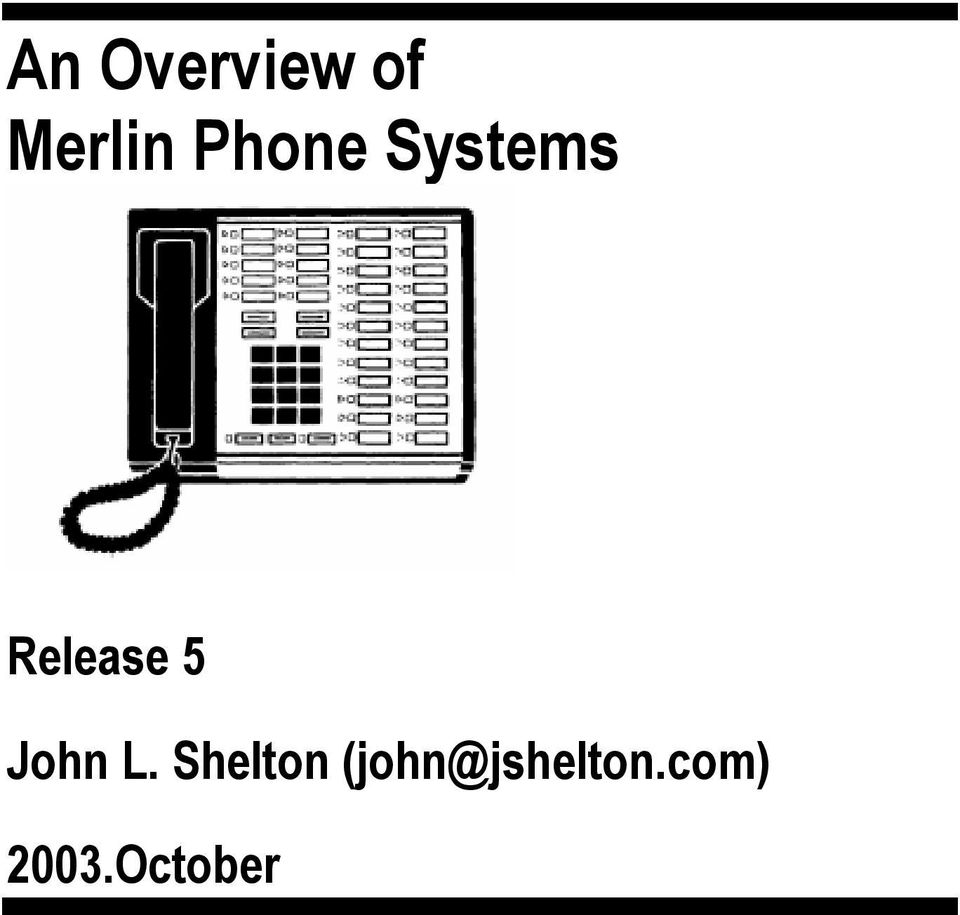
1 !! " #
2 & ' ( ) * Copyright 2003 John L. Shelton; all rights reserved. This document may not be reproduced without permission, though small quotations for review purposes may be used without permission. The trademarks Merlin, Spirit, and Partner are owned by Avaya, the successor to AT&T & Lucent. Please send suggestions for enhancement to [email protected]. +, * Thanks to Ethan O Toole for edit suggestions and additional details (2003.June) %
3 - # ( 1 INTRODUCTION WHY THIS WAS WRITTEN THE MERLIN CONCEPT THE MANUFACTURERS PREDECESSORS TO THE MERLIN SYSTEMS AVAILABLE DOCUMENTATION COMPARISON AT A GLANCE: THE MERLIN SYSTEMS THE ANALOG/HYBRID (CLASSIC) SYSTEMS MERLIN MERLIN MERLIN FEATURE MODULES FOR THE SMALLER SYSTEMS (206, 410, 820) MERLIN MERLIN EXPANSION PARTS & FEATURE MODULES FOR 1070 & MERLIN PLUS (820D) DIGITAL SYSTEMS MERLIN II MERLIN LEGEND MERLIN MAGIX MERLIN MAGIX SOFTWARE RELEASES THE PHONES COMPARISON AT A GLANCE SINGLE LINE TELEPHONES ANALOG/HYBRID PHONES (ATL) EARLY DIGITAL PHONES MLX DIGITAL PHONES ETR DIGITAL PHONES MERLIN MAGIX (TDL) PHONES THE WIRING STATION WIRING LINE WIRING OTHER WIRING GROUND WIRING OTHER WIRING ADAPTERS MUSIC ON HOLD MAINTENANCE PROLONGING EQUIPMENT LIFE %

4 7.2 MINOR REFURBISHMENT OF TELEPHONES %

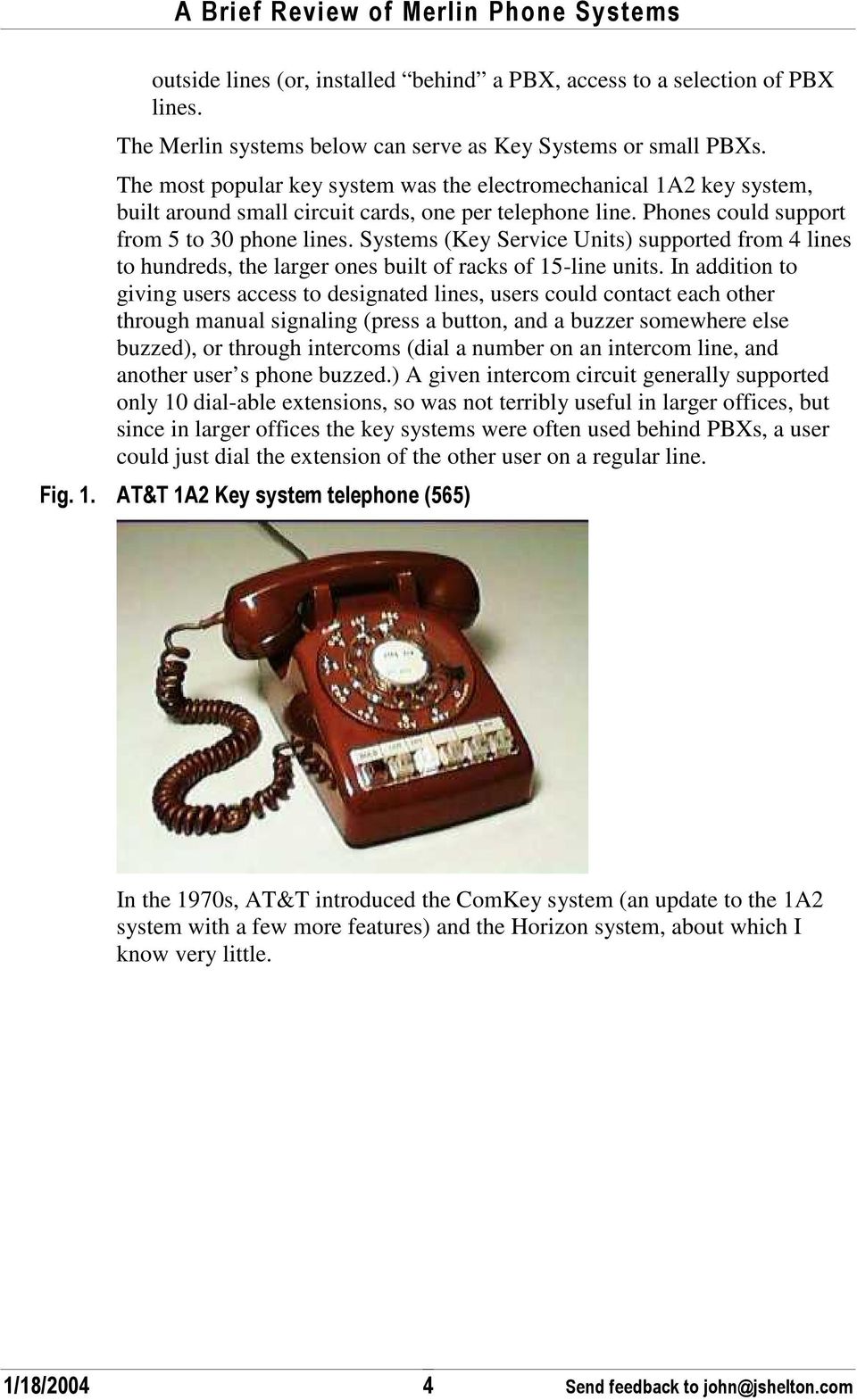
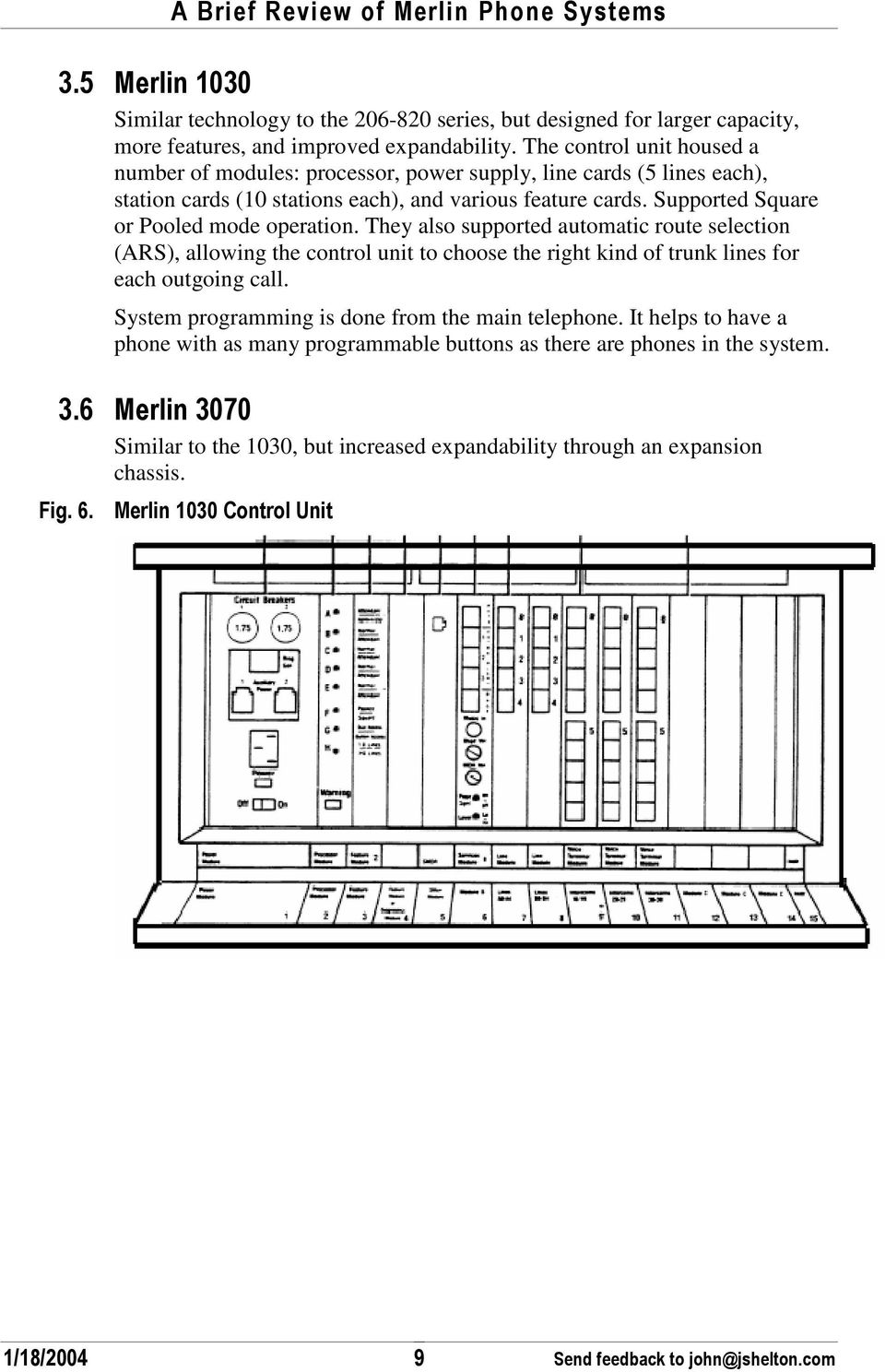
5 . * / ' - # FIG. 1. AT&T 1A2 KEY SYSTEM TELEPHONE (565)... 4 FIG. 2. AT&T COMKEY SYSTEM... 5 FIG. 3. COMPARISON CHART, MERLIN SYSTEMS... 6 FIG. 4. ILLUSTRATION OF MERLIN 206, 410 CONTROL UNITS... 8 FIG. 5. MERLIN 820 CONTROL UNIT WITH ONE PHONE CONNECTED... 8 FIG. 6. MERLIN 1030 CONTROL UNIT... 9 FIG. 7. MERLIN 3070 CONTROL UNIT, EXPLODED FIG. 8. MERLIN PLUS CONTROL UNIT FIG. 9. MERLIN PLUS, FULLY POPULATED, REVEALING MOH FIG. 10. MERLIN II SYSTEM FIG. 11. MERLIN II CARDS FIG. 12. MERLIN II BASIC AND EXPANSION CARRIER FIG. 13. MERLIN II AND MERLIN LEGEND CIRCUIT CARDS FIG. 14. LEGEND SOFTWARE RELEASES FIG. 15. MAGIX CIRCUIT CARDS FIG. 16. AT&T 7101 SINGLE LINE PHONE FIG. 17. ORIGINAL CLASSIC MERLIN PHONES FIG. 18. FIXED METAL STAND FOR 5, 10, AND 22 BUTTON SETS (SHOWN UNDERNEATH A 5 BUTTON SET) FIG. 19. FIG. 20. ADJUSTABLE METAL STAND FOR 10 BUTTON SETS SHOWN ON BOTTOM OF TELEPHONE ADJUSTABLE METAL STAND FOR 34 BUTTON SETS SHOWN WITHOUT TELEPHONE FIG. 21. COMPARISON CHART, MERLIN ANALOG PHONES FIG. 22. MERLIN PFC PHONE FAX COPIER FIG. 23. ANALOG/HYBRID PHONE ACCESSORIES FIG. 24. ILLUSTRATION OF 7406D SERIES PHONE FIG. 25. MLX SERIES PHONES FIG. 26. MLX-20L CONSOLE WITH DIRECT STATION SELECTION FIG. 27. LEGEND DSS UNIT FIG. 28. MERLIN MAGIX (TDL) TELEPHONES FIG WIRE COLOR CODES: MERLIN & ETHERNET FIG. 30. EXAMPLE GROUNDING FIG. 31. RADIO SHACK TO CONNECT MOH TO CLASSIC SYSTEMS FIG. 32. RADIO SHACK TO CONNECT MOH TO MERLIN PLUS (820D) FIG. 33. SCHEMATIC FOR MUSIC-ON-HOLD CONNECTION TO MERLIN II OR LEGEND %

6 0 4, / 00 5 I am a telephone hobbyist. My professional work is not related to telephone installation. In my spare time, I have tinkered with telephones for the last 40 years. In the early 1980s, AT&T developed what would become one of its most popular small business products, the Merlin series of telephone systems. Over the years, millions of pieces of equipment were built and installed, and many are still out there today. There is an active market in buying/selling used Merlin equipment. Because older models are not now manufactured, there is a dearth of information available to hobbyists. Avaya, successor to AT&T, makes a current line of equipment, the Merlin Magix, which is extremely capable, and suitable for modern office telecom applications. By no means should this document dissuade anyone from considering a Magix system. Should you be interested in understanding the older systems, read further here. It is not the intention of this guide to replace the documentation originally written for Merlin systems. If you want to know how to install and program these systems, find the documentation elsewhere (see Available Documentation, on page 5.) This guide will help you understand the different models of phones and systems, and compare them. It may also include obscure technical documentation not easily found elsewhere. I encourage those with additional knowledge to send me updates. 0 - ) The Merlin system has been one of the most successful of AT&T s telephone products for small businesses. The systems have a nearly 20-year history, and support from 2 to 200 users with enough features to be considered a small PBX (for larger Merlin systems). AT&T originally dovetailed the Merlin series with its smaller electronic PBXs (the System 25). Phones for the larger PBX (System 75) used different technology, but the same sleek style. In contrast to earlier systems, AT&T designed the Merlin series for: Feature plentiful operation End-user programmability Ease of installation (including installation by non Bell personnel) 01021!! 3 0,, # +
7 Low maintenance (electronic replacement of mechanical parts; LED replacement of incandescent lights) Sale to end users (as opposed the Bell System s previous policy of leasing equipment.) AT&T continued its achievements in high reliability. Merlin systems were designed for many years of service, in contrast to many other electronic key systems from the 1980s. Consequently, Merlin systems were more expensive than the low-cost import units flooding the market then. AT&T, via its Bell Labs unit, invested considerably in Human Factors Engineering, making these phones easy to learn and easy to use. Remarkably, phones built in the early 1980s are still compatible with systems built in the early 2000s. Unlike the earlier 1A2 key system, other manufacturers never copied the design. (1A2 key systems, described below, were copied part-for-part by a half-dozen manufacturers.) Smaller Merlin models were pure Key systems; standard phones had direct access to one or more outside telephone lines. If two phones shared the same outside lines, then users at those phones could talk simultaneously to an outside party by selecting the same line button. A call could be placed on hold at one phone, and retrieved at another phone (with the same line button.) Larger systems (1030, 3070, Merlin II, Legend, and Magix) also offer Pooled (or PBX) operation, where users typically do not access an individual line, but instead request an available line from a pool of similar lines. In a larger office, it typically doesn t matter to the user which outside line is selected, they all work the same way. A call placed on hold in a pooled system can only be retrieved at the original phone. But a call could be parked, and retrieved from elsewhere via dialing a special code. Calls can be transferred to another extension. Pooled mode operation still allows individual lines to be assigned directly to one or more phones instead of participating in a pool. Merlin II and succeeding phone systems also support a behind PBX mode, designed for use in large offices with a PBX. 0" - / / Throughout this document, we typically say AT&T, but Merlin systems have been manufactured by AT&T and its successors, as described below. 0"0 - ' - After the breakup of the Bell System, AT&T Technologies, a part of AT&T, manufactured electronic telephone systems. The Western Electric name was retired. Merlin was originally engineered, built, and sold by AT&T. The 01021!! 3,, # +

8 names AT&T and AT&T Technologies were both used on Merlin equipment. 0" / In 1997, AT&T spun off Lucent, all the manufacturing divisions of AT&T. AT&T wanted to be able to buy equipment from other manufacturers, and the Lucent folks wanted to be able to sell more widely (including AT&T competitors.) Lucent continued the Merlin line of equipment. Many models of AT&T equipment were simply re-branded Lucent; later, Lucent introduced new models. For many years, Lucent made older equipment as replacement/expansion units for existing customers, but did not actively market the older units to new customers. 0"" Avaya is a new company, with a heritage dating back to Alexander Graham Bell and AT&T. Avaya grew up in the Bell system. Over the decades, the core of what is now Avaya became AT&T's Global Business Communication Systems group. The next evolution came in 1996, when Avaya was part of the systems and technology business that was spun off from AT&T as Lucent Technologies. Four years later, Avaya was finally set to launch when the enterprise networking part of Lucent was spun off. The move allowed Avaya to singularly focus on the needs of enterprise customers. Avaya separated from Lucent on Sept. 30, 2000 and began operating as an independent company. 1 Avaya continues to make available certain older Merlin parts; large customers, like the US Government, continue to buy classic system components and telephones. More importantly, Avaya continues the Merlin Magix system. 03, The old Bell System (AT&T, Western Electric, etc.) provided multi-line phone systems to users from the 1930s through the 1970s. These could be classified into: Private Branch Exchanges (PBXs), starting with traditional operator cordboards and advancing quickly to automatic exchanges; these served ,000 phones Key systems, managing a group of telephone lines across a group of users, typically serving users. Each user has access to a selection of 1 From Avaya s corporate web site !! 3 ",, # +
9 outside lines (or, installed behind a PBX, access to a selection of PBX lines. The Merlin systems below can serve as Key Systems or small PBXs. The most popular key system was the electromechanical 1A2 key system, built around small circuit cards, one per telephone line. Phones could support from 5 to 30 phone lines. Systems (Key Service Units) supported from 4 lines to hundreds, the larger ones built of racks of 15-line units. In addition to giving users access to designated lines, users could contact each other through manual signaling (press a button, and a buzzer somewhere else buzzed), or through intercoms (dial a number on an intercom line, and another user s phone buzzed.) A given intercom circuit generally supported only 10 dial-able extensions, so was not terribly useful in larger offices, but since in larger offices the key systems were often used behind PBXs, a user could just dial the extension of the other user on a regular line.. * 0 - ' ) 7 In the 1970s, AT&T introduced the ComKey system (an update to the 1A2 system with a few more features) and the Horizon system, about which I know very little !! 3 3,, # +
10 . * - ' - ( 6 Concurrent with the Merlin systems, AT&T introduced Spirit, for very small systems, and Partner, for medium sized systems. Neither was as flexible or expandable as Merlin. The Spirit system had some design defect which caused AT&T to cease manufacture in a short time, and was the basis of a class action lawsuit. AT&T settled with discount coupons for maintenance or additional parts. The Partner system continued to present-day, and has replaced smaller Merlin systems. 0 # & / Avaya has kindly posted many old manuals on their web site in PDF format. Look at for their Product Documentation section. Some information can be found in old AT&T manuals and by cruising public web auctions. The Web forum Tek-Tips has a channel devoted to Merlin phone systems; start at Send them some money to keep the web site alive !! 3,, # +

11 ( ) 8 9 Here in a single chart are all the Merlin systems compared side-by-side. This is not intended to be comprehensive: read the detailed descriptions that follow.. * " ( ) : ; - ( ) <. /! 7 Small Analog ATL 2 x 6 Few, but expandable 30! Small Analog ATL 4 x 10 Few, but expandable 2! Small Analog ATL 2 x 5 minimum 8 x 20 max 0! "! Large Analog ATL 5 x 10 min 10 x 30 max "! =! Large Analog ATL 5 x 10 min / 2! & 30 x 70 max Small Analog ATL 4 x 10 min 8 x 20 max Few, but expandable Moderate, expandable Moderate, expandable Rich with small system features 44 Large Digital ATL *, * < Large Digital MLX Also singleline, digital Also ATL, MTR, singleline Large Digital TDL digital Also, MLX, single-line 4 x 8 min Rich with large 56 x 120 max 2 system features 4 x 8 min Very rich with 80 x 200 max 3 large system features 80 x 200 max Extremely rich In general, the small systems are easier to install and administer, and are more suitable for Small Office/Home Offices. The Large systems have many additional features designed for bigger groups of people. 2 It may not be possible to reach all lines and all stations simultaneously, depending on configuration of cards, types of telephone, etc. 3 It may not be possible to reach all lines and all stations simultaneously, depending on configuration of cards, types of telephone, etc !! 3 7,, # +

12 " - * 1> #, ( All the systems in this section supported the Merlin analog/hybrid phones (see section 5.2, Single line telephones, page 31. These were the original systems, introduced in the early 1980s. All the analog systems share the internal analog technology; connecting any voice circuit (between telephones and/or phone lines) is done via ordinary analog circuitry. Each system had a maximum capacity for these connections, in some cases it was smaller than the system size might imply. For example, on the Merlin 820D, it would not be possible to have 5 different intercom conversations between internal users simultaneously. All the analog systems support only one kind of telephone line: the traditional Loop Start (LS) line, commonly found in homes and small businesses. The loop start line is so-called because operating the telephone causes an electrical loop to be closed, telling the Central Office to provide dial tone. Medium and Large businesses often use Ground Start lines (or more advanced digital lines) because they provide a more reliable way for the central office and the customer equipment to work together. Ground Start support is only available on the digital Merlin systems. "0! 7 First generation, small table-top unit (could be wall mounted) supporting 2 POTS 4 lines and 6 analog/hybrid phones. Up to three feature cartridges could be installed to give additional capabilities. System programming is done from the main telephone, the one plugged into the first jack. " 30! Essentially the same as the 206, but supporting 4 phone lines and 10 stations. 4 POTS = Plain Old Telephone Service, standard lines such as are found in a residence or small office. The phone company refers to these as Loop Start lines !! 3 =,, # +
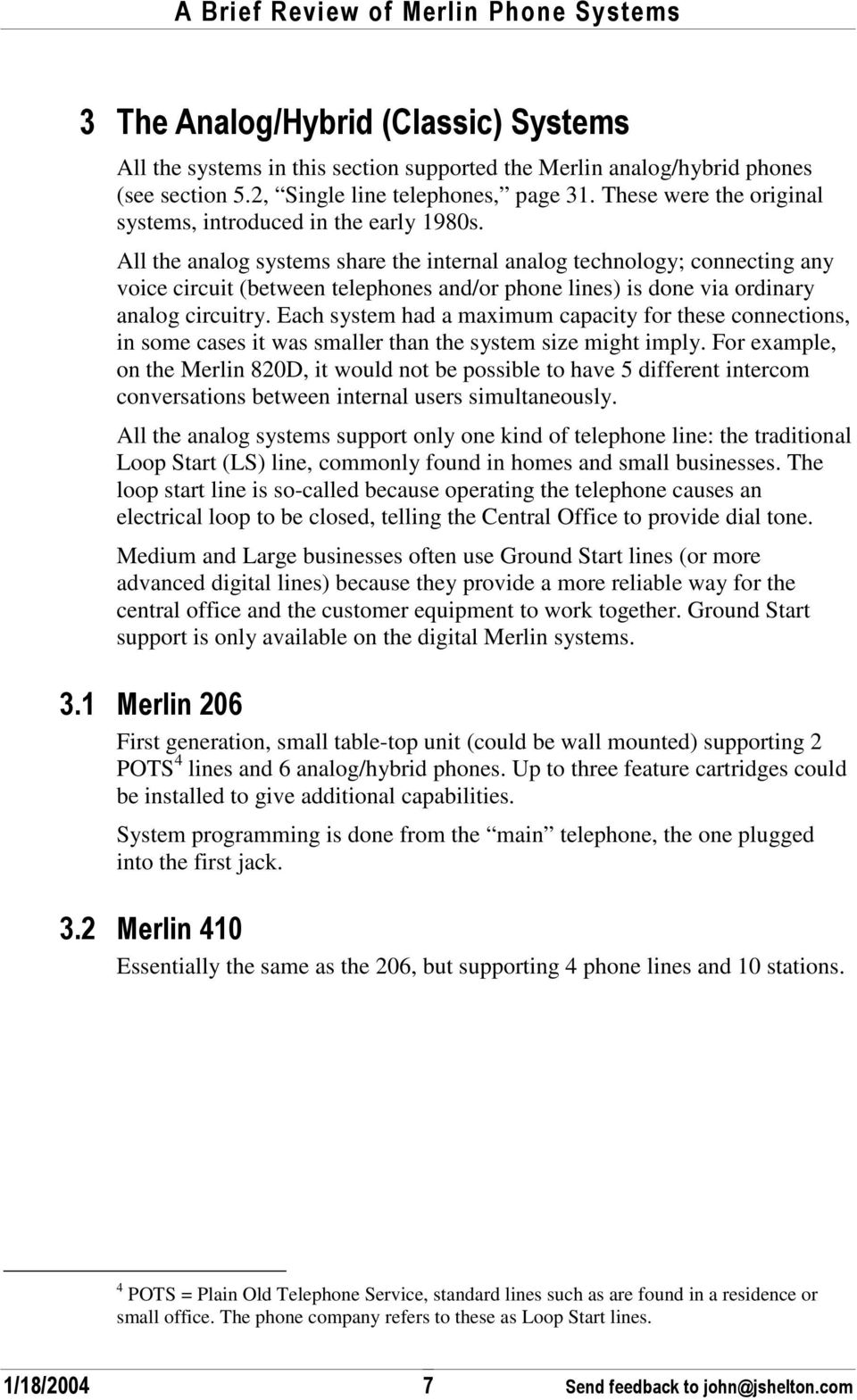
13 . * 3 4/! 7:30! / "" 2! Similar to the 410, but designed to be expandable; the unit supported up to 4 modules, each of which supported 2 phone lines and 5 terminals.. * 2! / ), "3. /, /! 7:30! :2! The basic smaller systems came with remarkably few features. In order to do things like Conference Calling and Automatic Dialing, one had to add one of the two feature packs.. / + 0 adds features: on-hook dialing; call transfer; hold reminder; group listening; prevents outbound calls on individual phones; privacy; automatic outside and intercom dialing; last number redial; auto line selection; do not disturb; and ringing options. / + Includes all the features of Feature Pack 1, plus personal and system 3 digit speed dial; custom ringing; call pickup; group paging; message waiting; outward toll restrictions; transfer return; voice signaling disable; and per phone customizing capabilities - ) 44 /,, * : support for paging, music on hold - ) 444, * : power fail cutover, extra alert All of these capabilities were built into the Merlin Plus later on !! 3 2,, # +
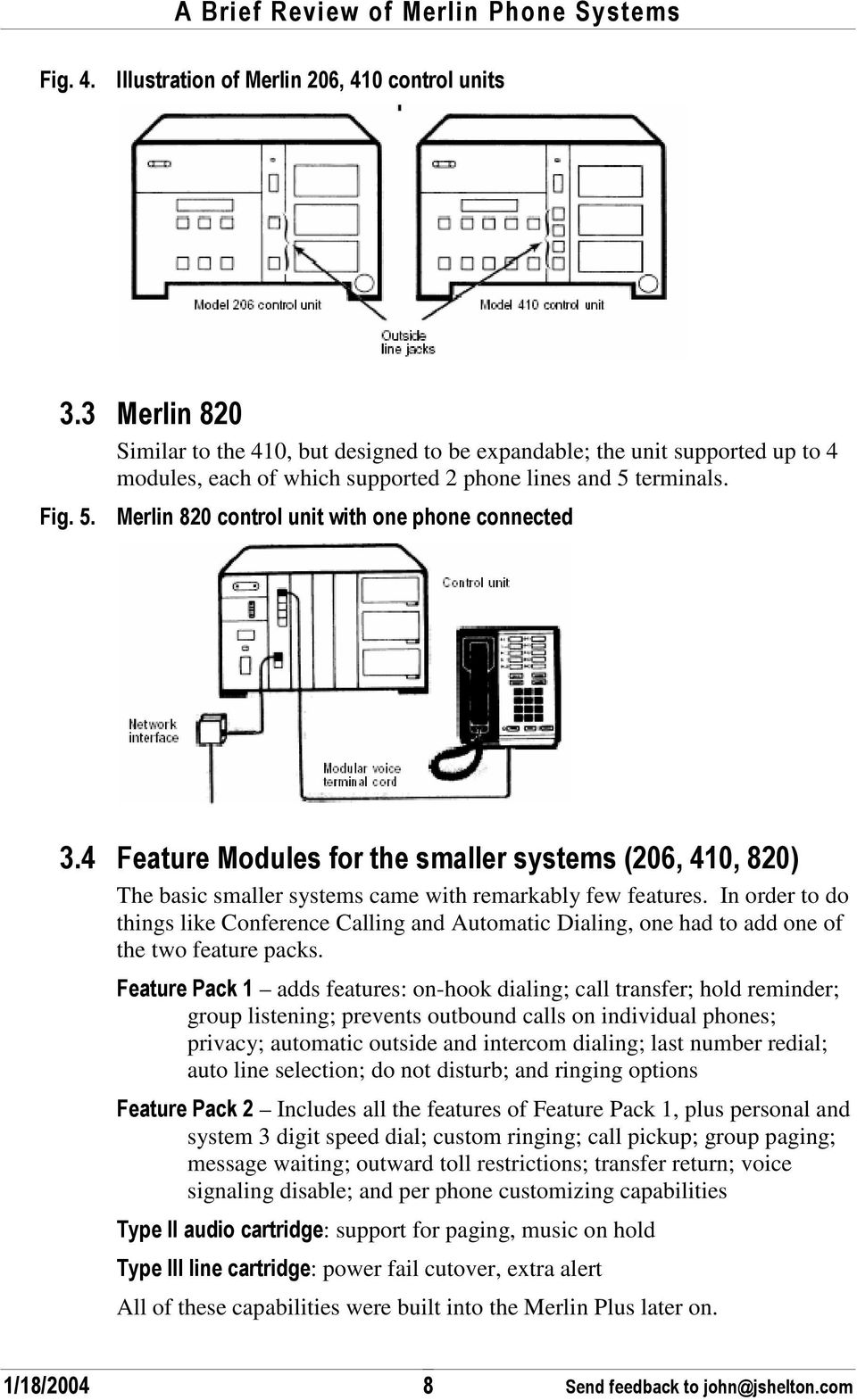
14 " 0! "! Similar technology to the series, but designed for larger capacity, more features, and improved expandability. The control unit housed a number of modules: processor, power supply, line cards (5 lines each), station cards (10 stations each), and various feature cards. Supported Square or Pooled mode operation. They also supported automatic route selection (ARS), allowing the control unit to choose the right kind of trunk lines for each outgoing call. System programming is done from the main telephone. It helps to have a phone with as many programmable buttons as there are phones in the system. "7 "! =! Similar to the 1030, but increased expandability through an expansion chassis.. * 7 0! "! 01021!! 3?,, # +
15 . * = "! =! / :< ),, "= A < ) '. /, / 0! =! ' "! =! * 8 to power single-line (T/R) phones / < / ) ) if system is full of cards and phones. /, / 0B provides the programming; successive versions added more features.. /, / 3 Provides the following features: Auto answer Line pickup Centralized voice terminal programming Automatic route selection Transfer return. /, / Provides the following features: Automatic route selection: Outgoing calls automatically follow the least expensive available route you specify Group call distribution: Internal and external calls go directly to the number or group of numbers dialed One-touch intercom, paging, call coverage Privacy, bridging, do not disturb, on-hook dialing 3 enhanced night service features 01021!! 3 0!,, # +

16 All telephone lines can appear on all telephone sets, up to button BIS or existing 34 button deluxe set can be used as an attendant console in small configurations & * / optional, aids in finding problems &, optional for logging calls to a printer, supports Music on Hold, 3-zone Paging, supplemental alert C, supports 4 loop-start phone lines 0! C, supports 10 ATL (hybrid) phones 0! C # ), / supports 10 standard tip/ring telephones "2 / 2! & This was a second generation, feature-heavy replacement for the 206, 410, and 820 systems; the unit started with 4 lines and 10 stations, and could be expanded with an addition 4 lines and/or 10 stations to a maximum capacity of 8x20. No additional feature modules were necessary; it included nearly everything. A few years later, AT&T came out with a second release (R2), which added a few other powerful features including Remote System Access (dial into the system with a password, then be able to dial out) automatic system answering (where the system would answer and prompt the user to enter an extension) busy buster, where the unit could be asked to re-dial calls until they answer. This feature did not appear again on later systems. The illustration below shows a control unit with only one line and one station card installed:. * 2 / 01021!! 3 00,, # +

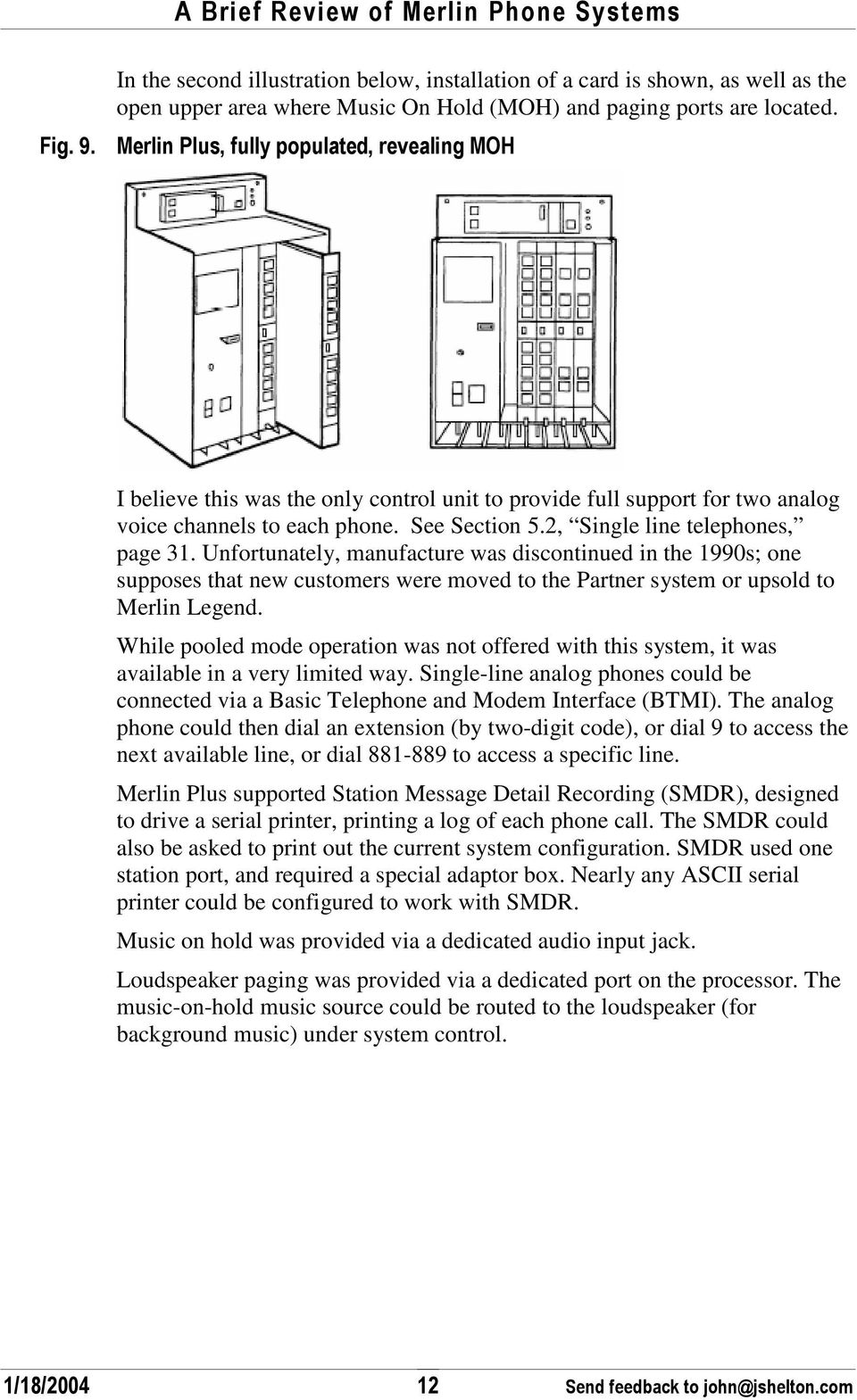
17 In the second illustration below, installation of a card is shown, as well as the open upper area where Music On Hold (MOH) and paging ports are located.. *? / :/ ) ) /, : * > I believe this was the only control unit to provide full support for two analog voice channels to each phone. See Section 5.2, Single line telephones, page 31. Unfortunately, manufacture was discontinued in the 1990s; one supposes that new customers were moved to the Partner system or upsold to Merlin Legend. While pooled mode operation was not offered with this system, it was available in a very limited way. Single-line analog phones could be connected via a Basic Telephone and Modem Interface (BTMI). The analog phone could then dial an extension (by two-digit code), or dial 9 to access the next available line, or dial to access a specific line. Merlin Plus supported Station Message Detail Recording (SMDR), designed to drive a serial printer, printing a log of each phone call. The SMDR could also be asked to print out the current system configuration. SMDR used one station port, and required a special adaptor box. Nearly any ASCII serial printer could be configured to work with SMDR. Music on hold was provided via a dedicated audio input jack. Loudspeaker paging was provided via a dedicated port on the processor. The music-on-hold music source could be routed to the loudspeaker (for background music) under system control !! 3 0,, # +
18 3 & * The digital systems bring a wealth of advantages to Merlin, in the areas of capacity, features, and quality. Analog Merlin systems, for example, could make conference calls by bridging together two telephone lines, but the remote parties never received good sound quality. All the digital Merlin systems support both Loop Start (LS) and Ground Start (GS) telephone lines; digital trunks are supported in varying degrees. This support allows tighter integration with the central office, making certain features work more reliably This was a second generation, feature-heavy replacement for the 1030 and 3070 units. It was built with a modular chassis approach, allowing the installation of various modules to suit the user s needs. Each chassis held one power supply and 6 cards; up to two chassis could be connected to support a total of 12 cards. The main chassis requires a processor card. A blank card could be used on the right side of a chassis to give support to the front cover if not enough cards were installed. System programming is done from the main telephone, preferably a Merlin II System Display Console (which gives detailed menu prompts on an LCD screen), but can also be done on the BIS-34D or SP-34D phones, though with more difficulty.. * 0! 44 Merlin II initiated as an AT&T product in Despite the fact that only a few digital phones were sold, this system was designed from the ground up to be digital. The backplane supported digital communication between all cards, and all phone conversations were 01021!! 3 0",, # +
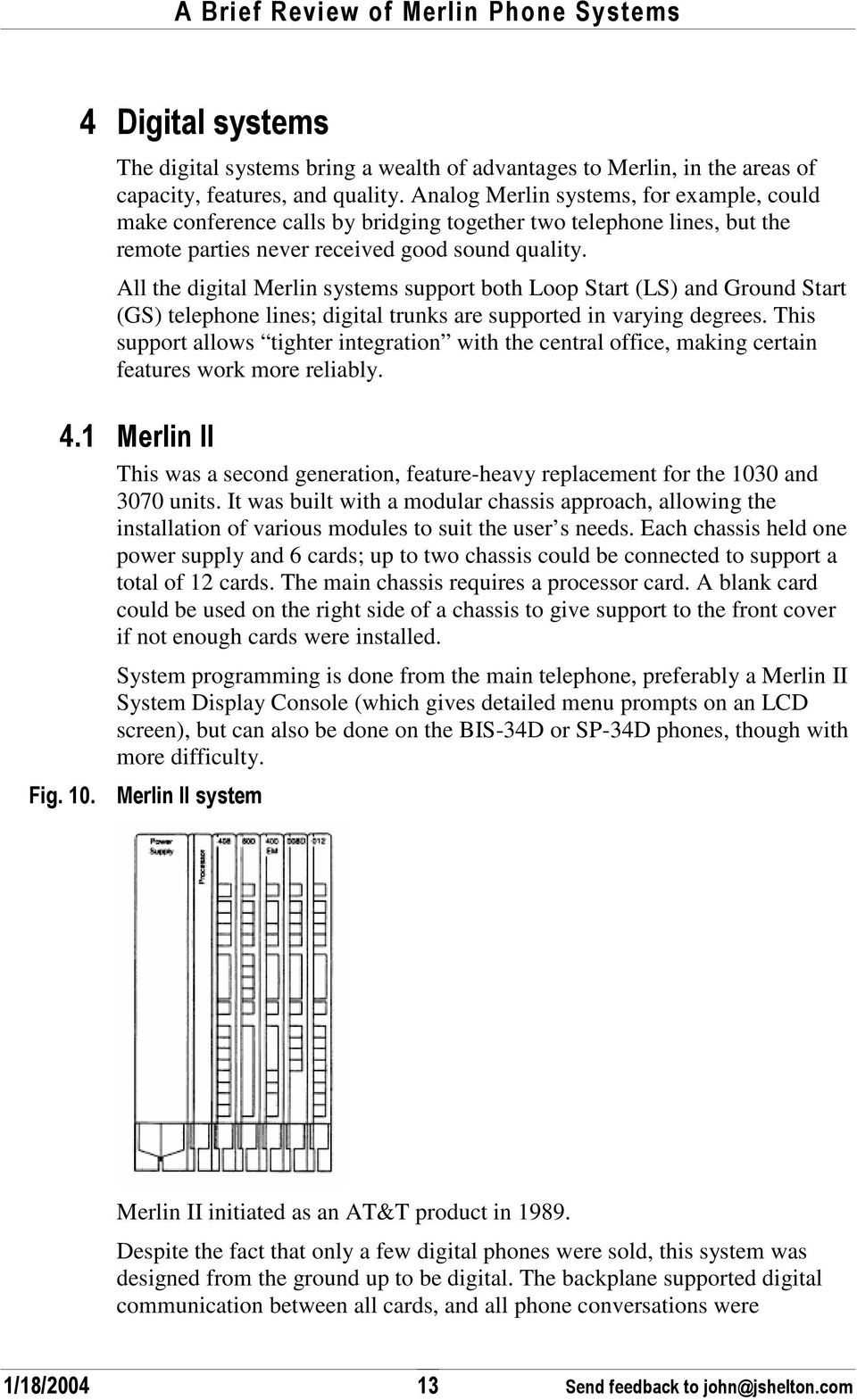
19 converted to digital on each card. (Yet the typical phone was the Analog/Hybrid phone.) Cards were about 1 inch thick, 18 inches tall, and 10 inches deep; each card contained a plastic shell and internal circuit cards. The plastic shell provided physical protection, and helped with cooling the electronics within by providing a chimney effect. As a result of the large plastic enclosures, Merlin II systems were substantially larger than comparable earlier systems. Sample cards are shown below, as are a pair of carriers which held the cards.. * 00 44, 01021!! 3 03,, # +

20 . * 0 44#, < ) The table below shows a complete listing of cards available for the Merlin II and Merlin Legend series (since the Legend could re-use most Merlin II cards.) Most of the circuit cards have a part number beginning 517. A letter code follows, indicating the generation (higher letters indicate later versions or generations), and a numeric part number. For example, 517C13, an 012 card, replaced the 517B13 card. Where possible, I have listed known part numbers.. * 0" 44, *, /, (, & ) / D / Original Power Supply 391A, 391AA, 391A1, 391A2, 391B1 Supported most cards, but had limited power capacity, and in fully loaded systems required an adjunct (external) power supply for assistance. A ringing generator could be added to support the 012 (T/R) card. B-series power supplies used 220V input. Supplies 54 unit loads Any Upgraded power supply 391A3 or 391B2 391C1 Merlin II processor card 517A7 Supplied more power than the original, allowing a system to be fully loaded without adjunct power supply. Provided test ports to check voltage levels. A ringing generator could be added to support the 012 (T/R) card. A3 supplies 75 unit loads C1 provides 96 unit loads Provides the compute power for the system, and included a replaceable feature module allowing upgrades. Supported Feature Modules FM1 and FM2. FM2 feature module has part number 517D6 Any Merlin II R1 R !! 3 0,, # +

21 (, & ) / D / Merlin II R3 processor 517C7 Upgraded processor with 3 rd generation features FM3 module is part number 517G6 Merlin II R3 Legend original processor 517A27 Used pluggable Feature Module for software upgrades. (FM 2 shown below, circuit side out.) Legend R1 R2 Legend CKE3 Processor 517B33 517C33 Legend Release 7 CKE4 Processor FM 2 was part number 517E25, 517G25, 517J25 The Release 3.0 processor module contains a PCMCIA memory card interface capable of accommodating a single card. White cards, called Translation cards, store a backup image of the programming; the Legend can be set to automatically backup programming, or you can do it manually. Red cards, called Forced Upgrade are used to upgrade the firmware. While software release 7.0 can be installed on this processor, it has some limitations due to the processor memory. Newer processor for Legend system, can also support Merlin Magix. Distinguished by the label Equipped with CKE4 Legend R3-R7 Legend R !! 3 07,, # +
22 (, & ) / D / Blank Card Used to fill out a non-full chassis Any 007 MLM Merlin Legend Mail 008 (ATL) 517A3 517B3 Capacity: 7 internal, system-defined T/R jacks; 2 TTRs; internal remote maintenance device; serial port for PC connection. 5 Supports: MERLIN LEGEND Mail Voice Messaging System; resides on this module and the internal T/R jacks can be used only for this application The system software recognizes the MERLIN LEGEND Mail VMS module as an 012 (T/R) module. Even though the module has a maximum of 7 T/R internal ports, including the modem jack, it uses 12 ports of capacity in any of its three configurations. supported 8 analog/hybrid (ATL) phones Legend R1 Unsupported in Magix 008D supported digital phones, but limited selection All Merlin II, not supported in Legend 008 MLX 517A21 517B21 517B21B 8 digital extension jacks for MLX phones, each with 1 or 2 extensions (each extension is assigned an individual extension number) Supports: MLX extensions, including: MLX voice only MLX voice with Voice Announce to Busy MLX voice and Multi-Function Module (MFM) with T/R adjunct MLX voice and MFM with Supplemental Station Adapter (SSA) ISDN terminal adapter only Access device for data communications between a PC on the system and a high-speed Internet connection, connection to remote node LAN access server, or ISDN router2 Computer Telephony Integration (CTI) link3 Videoconferencing systems using one jack and 2B data feature or 2 jacks with ISDN terminal adapters (depending on video system) Legend 1 5 Several of the descriptions here are from AT&T/Lucent Merlin manuals !! 3 0=,, # +
23 (, & ) / D / 008 OPT up to 8 single-line (POTS) telephones, in or out of building. (OPT = Off Premise Telephone) The system software recognizes the OPT module as an 012 (T/R) module. Even though the OPT module has only 8 jacks, it uses 12 ports of capacity, thereby decreasing overall extension capacity by 4 extensions for every OPT module. 012 (T/R) 517A13 517B13 517C13 517D13 517E13 517F with ring generator 517G13 517H13 Capacity: 12 T/R extensions on 2-way voice transmission path with support for telephones with message-waiting lights, 2 TTRs Supports: Single-line telephones; Intuity AUDIX ; Messaging 2000; T/R adjuncts (such as answering or fax machine); analog data devices (such as modems) Requires power supply with Ring Generator installed Several optional applications, if used with the system, require a basic jack on a 012 module: MERLIN MAIL Voice Messaging System, MERLIN Attendant, AUDIX Voice Power ls II, and Integrated Voice Power Automated Attendant IS Il. Up to four applications can be connected to the system using the same 012 module. If there are four applications, the module must be used exclusively for this equipment If you have fewer than four applications connected to an 012 module, some tip/ring devices also can be connected. If possible, the module should be used only for the application equipment. Note: The applications discussed here do not work properly with 012 module manufactured for older MERLIN II systems. These applications must be connected to 012 modules with the code 517C13 or 517D13 on the label on the top of the module. Modules with the code 517A13 or 517B13 can be used only to connect single-line telephones and do not provide the disconnect signal required by answering machines and applications. Same as 012, but has internal ring generator Merlin II any release Merlin II any release 01021!! 3 02,, # +
24 (, & ) / D / 016 (T/R) Capacity: 16 T/R extensions on 2-way voice transmission path with support for telephones with message-waiting lights, 4 TTRs Supports: Single-line telephones; Intuity AUDIX ; Messaging 2000; T/R adjuncts (such as answering or fax machine); analog data devices (such as modems) Includes built-in ring generator Legend R4 016 ETR Capacity: 16 ETR station ports including 6 with T/R functionality and 4 TTRs. First 10 ports are ETR ports only; remaining 6 ports can support either T/R or ETR, but not both simultaneously. Legend R7 Supports: MLS, ETR, Business Cordless 905, and TransTalk MDC and MDW telephones; and any T/R device. 016 MLX Like the 008 MLX, but 16 ports. Legend R7 100D (DS1) 517A15 517B15 517C15 517E15 517M15 Capacity: 24 channels ( virtual lines/trunks) for voice and analog data or for digital data only (T1); or 23 B-channels for voice and data, and 1 channel used for signaling (PRI). Supports private networking in Release 6.0 and later systems, Hybrid/PBX mode only. Supports: T1 emulates 24 lines/trunks: loop-start, ground-start, tie, and Direct Inward Dial (DID; Hybrid/PBX mode only); can also supply subscriber services. In Release 4.0 and later, T1 can also provide high-speed (56K) data communications and digitally emulated tie trunks for data communications. PRI supports subscriber services, allows high-speed digital data communications, and includes special features. For Release 7.0 and later systems, Common Channel Signaling (CCS) is not an option for T1. Legend R1 100R INA T1 voices & Data Magix 1 or later 400 LS 517A2 517B2 400 LS with 4 TTRs 517A12 517B12 provided 4 incoming telephone lines; one power fail phone. LS = Loop Start, the standard for residential and small business provided 4 incoming telephone lines; one power fail phone. LS = Loop Start, the standard for residential and small business. Includes 4 touchtone receivers Unsupported in Magix Unsupported in Magix 01021!! 3 0?,, # +
25 (, & ) / D / 400 EM 517A14 4 tie line trunks (E&M type) 400 GS/LS/TTR 517A18 517B18 517C18 517D (LS ATL) 517A1 517B1 517C1 517D1 408 GS/LS 517A26 517B26 517C26 517D26 supported 4 incoming lines, either ground-start or loop-start, and includes 4 touch-tone receivers; 1 power fail phone combination of 400 and 008 cards 4 incoming lines (Ground start or Loop start) and 8 ATL phones Unsupported in Magix Unsupported in Magix 408 GS/LS- MLX 4 incoming lines and 8 MLX phones Legend R1 517A GS/LS- ID-MLX Adds Caller ID capability to the 408 GS/LS-MLX Legend R2 to recognize card; R7 to use Caller ID 01021!! 3!,, # +
26 (, & ) / D / 412 LS-ID- ETR Capacity: 4 LS trunks with Caller ID and 2 TTRs plus 12 ETR station ports, including 4 with T/R functionality. First 8 ports are ETR only; remaining 4 ports can support either T/R or ETR, but not both simultaneously. Supports: MLS, ETR, Business Cordless 905, and TransTalk MDC and MDW telephones; and any T/R device. In the event of a power failure, port 12 becomes the PFT port for line 1. If the port is programmed for ETR, a single-line telephone must be plugged into the port. Caller ID, if you subscribe to caller identification from the local telephone company, displays the telephone number of incoming callers on supported display telephones. Legend R7 800 NI-BRI 517A32?? Capacity: 8 BRI facilities, each with 2 B-channels ( virtual lines) for voice and data and 1 channel used for signaling Supports: Voice, data, video, and other services at 64 kbps over standard ISDN lines/trunks Legend R4 Unsupported in Magix 800 (LS) 517A4 517B4 8 analog incoming lines; two power fail phones Merlin II any release 800 DID 517C GS/LS 517A19 517B19 517C19 8 analog incoming lines with Direct Inward Dialing (DID) information to allow direct connection to extensions 8 analog incoming lines, loop or ground start; two power fail phones Legend R1 800 GS/LS-ID Capacity: 8 ground-start and/or loop-start lines/trunks; 2 TTRs Legend R3 Supports: 2 PFT telephones; Caller ID (loop-start trunks only), if you subscribe to caller identification from the local telephone company, displays the number of incoming callers, and in R7.0 and later, the name of incoming callers as well, on MLX, MLS, and ETR display telephones Line cards that support Loop Start or Ground Start lines typically have one or two Power Fail ports. These are jacks connected to the first (or first and fifth) lines on the card, providing access to dial tone when the system is powered down. Users might plug in an emergency telephone !! 3 0,, # +
27 3 *, Legend was an extension of the Merlin II, using a new processor, and requiring at least one digital phone as the console. In addition to supporting many new digital phones (MLX phones,) Legend had more features, increased system capacity, and support for voice mail, T1 trunks, and ISDN. Almost all the Merlin II line and station cards can be recycled into Merlin Legend systems. Merlin Legend systems are packaged similarly to the Merlin II, but support up to three carriers instead of two. System programming can be done from either an MLX-20L operator console, or from a PC running the WinSPM software. Using WinSPM, it is possible to configure a system with no MLX phones. Legend initiated as an AT&T product in The standard digital phones (MLX) use an ISDN protocol: 2B+D (two basicrate digital channels of 64 kilobit/sec, plus one data/signaling channel (16 kilobit/sec). Legend also supports some other digital sets, including Partner phones. See the table above in Merlin II, for a listing of the cards that work in the Legend system. Later versions of the processor card included a PCMCIA slot. Backup memory cards could store a backup copy of the system programming. Upgrade cards allowed upgrading the system software (or software for some newer modules.) 3 0 *, The Legend system had 7 major releases, and a few minor releases. They are summarized here.. * 03 *, *, / >, / ) ), 1.0 Original Merlin Legend release Original Legend processor Oct Adds French/Spanish language selection Phones available with buttons in French or Spanish Minor improvements in programming/maintenance Better usability; prompting on display phones Original Legend processor 01021!! 3,, # +
28 *, Oct Aug / Copy extension feature Integrated Solution III for programming of Legend & Audix Finer granularity of Forced Idle to minimize disruption during maintenance Substantial usability enhancements particularly to support voice mail Enhancements to display prompts Support for DID over T1 facility New Fax Attendant System supports send/receive of faxes, running on the IS III platform. Support for new 408 GS/LS-MLX module Improved PRI support Improved maintenance with lots more error logging Usability enhancements Improved SMDR logging for PRI based calls New 012 card (rev 517G13 or higher) includes built-in ring generator. New 008 OPT card with built in ring generator Support of PRI connectivity to Definity systems New MLX-10DP telephones with extra jack to connect to PassageWay solution on PCs. Several new software packages for management, including HackerTracker, Merlin Identifier. Several new adjuncts including Magic on Hold, Off Premises Range Extender, others. >, / ) ), Original Legend processor with FM2 programming module Original processor with FM2 card 01021!! 3 ",, # +
29 *, Aug Mar Mar Jun Jun Jun Feb / New processor, Release 3 with integrated modem, PCMCIA card, 4mb Flash ROM, 1.5mb battery-backed RAM, and error status display. Sometimes called CKE3 processor. 800 GS/LS-ID line/trunk module supporting Caller ID Support for many more single-line phones including some videophones. Support for MDC 9000, MDW 9000 six-line cordless, wireless phones. Remote maintenance/programming by modem Built-in backup to PCMCIA card, and automatic scheduling Direct voice mail access Miscellaneous enhancements New PagePal for connecting paging systems Major security enhancements to prevent fraud, hacking. Expanded dial plan allowing up to 200 t/r devices Support for National ISDN BRI service New 800 NI-BRI module New 016 tip/ring module Support for T1 switched 56 digital data Miscellaneous enhancements Minor enhancements Many minor enhancements Improved SMDR support and new Merlin Legend Reporter application New CTI allows telephony applications to control and monitor MLX and ATL phone operations Hotline feature Group calling enhancements Support for new MLX-5, MLX-5D phones. Support for private networks, with unified dial plan to allow remote calls to appear local Significant Group calling enhancements Centrex Transfer via remote call forwarding Improvements in authorization codes >, / ) ), Release 3 processor Release 3 processor Release 3 processor Release 3 processor Release 3 processor Release 3 processor Release 3 processor 01021!! 3 3,, # +
30 *, Aug Apr / Enhanced private networking Service observing, allowing one extension to observe call at another extension Introduction of WinSPM Increased to 200 the maximum MLX digital stations; by using MFM adjuncts, now supports total 400 station endpoints. Support for MLS and Enhanced Tip/Ring (ETR) phones Partner phones, allowing a migration path. New 412 LS-ID- ETR and 016 ETR module. New CKE4 processor required for full support of some new features. New 016 MLX module, supported with only CKE4 processor. Voice Announce on Idle Only option for MLX phones Priority Call Queuing Caller ID with Name allows display phones to show Name or number by pressing a button. Improved MLX headset operation Choice of rotary or touch-tone signaling on a per-port basis for T/R ports. Abandoned call information reported to Merlin Legend Reporter. Release 7.0 was the final Legend release. >, / ) ), Release 3 processor CKE4 processor Release 3 processor works with most functionality. 3 *, * * ) Some programming information is not obvious from reading the manual. Here are some tips. By default, in Key system mode, Legend assigns two intercom buttons to each phone, one is used when the caller wishes to ring the other party, and the other is used when the caller wishes to speak over the other party s speaker. (The buttons are labeled ICOM RING and ICOM VOICE). It is possible to have only one intercom button, freeing up more buttons for lines or features. You can use Centralized Programming to delete the second ICOM button. You can also switch the remaining button from RING to VOICE by using feature code *19 or **19. By default, in Key system mode, Legend selects either a ringing line or idle line to be the line you will access when you lift the handset. If there is no line ringing, you will access idle lines in order from 1 8, (starting with the first button above the intercom buttons.) You can change the idle line preference 01021!! 3,, # +
31 order without re-arranging the buttons, for example, to give priority to a personal line on button 5. Use the Automatic Line Selection feature, feature codes *14 to start button ordering, and **14 when done. 3 ",, As documented on Tek-Tips, there are some dial codes that you can enter from an extension while using an intercom line. I don t have thorough information: E!! From MLX phones tests communication, display, and lights E! "F ), F / + / # Performs trunk testing E! 3 TTR testing E! Display system software version E! 2 Test telephone 3 3 ' 5 SPM (for DOS computers) and WinSPM (for Windows computers) allows remote programming of the Legend system. The computer can be attached directly to the Legend system with a short cable and adapter (see Other wiring adapters, in section 6.5, below,) or can be connected via modem to an internal modem on the processor card. Avaya offers upgrades to the WinSPM software via their web site; if you have version 2 or greater, you can upgrade to newer versions. For Legend release 1 5, the WinSPM software provides complete emulation of the MLX-20L programming console, but not much more. For Legend releases 6 and 7, the software provides shortcuts that make programming easier. WinSPM can also perform system backups, eliminating the need for memory cards in the system processor. This is a very handy feature. WinSPM can also perform upgrading of the system programming when the processor is upgraded. One must purchase/install the processor upgrade separately from WinSPM, then use WinSPM to convert the stored programming information. WinSPM cannot by itself upgrade a Legend system. WinSPM has limited performance because of the 1200 or 2400 bps serial communication link !! 3 7,, # +
32 3" * < Magix was initiated as a Lucent product in 1999, and manufacture continues today by Avaya. 6 This document provides only limited information about Magix; consult Avaya for current product information. Magix builds on the Legend foundation, but introduces new packaging and improved features. It also discontinues support for the classic (ATL or Hybrid) Merlin phones. The Magix uses a shielded, metal carrier for holding circuit cards. Many of the Legend cards can be installed in the metal carrier. In the Merlin II and Legend systems, each card is encased in a plastic shell. The Magix system dispenses with the shells; the carrier provides full support for each circuit card. Many of the older Legend cards can be removed from their plastic shell, and some of the Magix cards can be placed in a plastic shell to allow installation in a Legend system. Magix can also support a mix of metal carriers and plastic (Legend) carriers. Magix systems support the following phones: MLX digital phones 4400 series digital phones ETR (Enhanced Tip/Ring) Partner phones ETR-34D Telephone ETR-18/18D Telephones ETR-6 Telephone MLS phones MLS-34D Telephone MLS-18D Telephone MLS-12/12D Telephones MLS-6 Telephone The following new circuit cards were introduced with Magix:. * 0 * < /,, - ) & ) 617R33, 617T33 617V33-K CKE5 Processor Introduced for Magix system, but can be used in Legend. Normally shipped 6 Actually, as of 2003, Avaya contracts manufacture to Celestica, but continues to design and market Merlin phones. Celestica also manufactures the Partner line !! 3 =,, # +
33 , - ) & ) in a Magix-style board, but can be put into a clamshell to fit Legend systems. 617A52 617B52 617A58 617B58 617N15A 617S15 617T15 617A59 617N TDL LS-ID 4 loop start lines and 12 Magix (TDL) stations 024 TDL 23 Magix (TDL) stations 100 DCD One DS1 circuit (24 channels) configured for either T1 or PRI service; may include CSU/DSU. 100R INA 100D 617C MLX 8 MLX stations 617A MLX 16 MLX stations 617E T/R 16 single line phones 617A ETR 16 ETR (Enhanced tip/ring) (Partner) stations 617B NI-BRI 617G DID 8 DID incoming lines 617E OPT 617D E&M 4 E&M tie lines 617B GS/LS-ID 8 Loop Start or Ground start lines with caller ID 617E GS/LS-MLX-ID 4 loop start or ground start lines with caller ID; 8 MLX stations 617A49 617B49 617C49 Merlin Messaging R2 messaging; allows web browser access to voice mail; backup and restore over LAN. Supports up to 12 ports 33 * < As of 2003, Magix included the following software releases: 01021!! 3 2,, # +
34 0! 0??? 0!!! / G / Original release; substantial features over previous Legend release 7.0 ARS enhancements: 10 and 11-digit dialing Increase ARS tables from 16 to 24-digits Wild Card entries in 6-digit table Allow List enhancements: Increase entries from 7 to 14-digits Wildcard entry support in Allow and Disallow lists Convert files to support upgrade from MERLIN LEGEND to MERLIN MAGIX Integrated System Automatic Daylight Savings Time updates for system and MERLIN Messaging R2.0 (or later) Serviceability enhancements: Electronic serial number viewing Automatic configuration of the MERLIN Messaging R2.0 (or later) system Station Responding Test Touch-Tone Receiver (TTR) Audit DS1 Module with Built-In CSU/DSU (100DCD) TransTalk 9040 connection to TDL port WinSPM R4 support!!! 0 Call Center enhancements: CTI Link in support of the Avaya's Solution Development Program Real-Time Monitoring & Analysis plus Intelligent Queue Messages using TASKE applications WinSPM R5 support MERLIN Messaging R2.5 new feature support: Caller ID/ANI integration Display number of new and old messages Delayed Announcement Service 01021!! 3?,, # +
35 0!! 0G G / Call Center enhancements: Calling group agent in multiple calling groups Selective login Selective logout Auxiliary Work Time Selective Supervisor mode Enhanced TSAPI events and services Caller ID display enhancement: 100D/CSU/DSU maintenance enhancements WinSPM R6 support!! / Loudspeaker page with Group Page Call screening Hot Dialpad Remote call forwarding with simultaneous internal alert Headset displays CTI link "!!! " !! 3 "!,, # +
36 - ) 0 ( ) * This quick chart shows basic differences between the different kinds of phones supported in the Merlin series. - * / > #, H 4 & G, * * * < 33< < - & - * Analog voice channel, digital signaling ISDN all-digital Analog voice line All digital * ; ) * # # / 5 34 for standard phones, 82 button console 5 28 additional 50- button direct station selection None 6-24 Wide range Limited Wide range limited ( Classic (membrane) phones in 8 colors; newer phones only in black Black & white Dozens of colors from many manufacturers Black & white * / Most distinctive styling Improved displays Digital volume control Limited access to system features Separate handset and headset jacks 2 wire interface * ) AT&T made no single line phones for the Merlin system, though nearly every Merlin system has had the ability to connect single-line telephones. Smaller systems allowed this through an accessory device. Merlin II, Legend, and Magix provided support via 012 T/R and 016 T/R cards. A single line phone is often called Tip/Ring T/R because it uses only two wires, the tip and ring wires. This wiring standard has been in use for over 100 years !! 3 "0,, # +
37 Single line phones have always been of limited utility in the Merlin systems. Because of not having the fixed feature buttons and displays, users could access limited features via dial-codes. The cost of adding single line phones was also high for the early, smaller systems. (One reason for the Partner system s creation was to support single line phones more easily.) Depending on the way of attachment, single line phones could take advantage of various small features, such as rotary or touch-tone dialing, and a message waiting indicator. Some features available to single-line phones are accessed by doing a switch hook flash, depressing the switch hook for about 2/3 of a second. Some single-line phones include a flash button to generate the right timing.. The AT&T 7101 telephone, designed primarily for System 25 and System 75, shared the same sleek, modern styling with the Hybrid sets described below, but used standard analog signaling. The 7101 featured a Recall button, a Disconnect button, and a message waiting light. These phones could be used on any ordinary phone line. AT&T described it as: The Model 7101A single-line analog voice terminal is about 2-¾ inches wide, 3-½ inches high, and 8-½ inches deep. The set comes equipped with the following: Handset Touch-Tone Dial Message Indicator Tone Ringer with Volume Control Two Fixed Feature Buttons Recall - Used to place a call on hold and to obtain recall dial tone for Conference, Transfer, and other features accessible by feature access code. Disconnect - Used to disconnect one call and immediately obtain dial tone for another call !! 3 ",, # +
38 . * 07 - ' - =0! 0 * ) The phone included a removable metal stand; the stand provided necessary mass to keep the phone from slipping off a table. No angle adjustment is possible; it appears that different angles were available. In order to connect or disconnect the line cord, it is necessary to remove the base. In order to remove the base, it is necessary to remove the handset cord. Wall mounting no doubt was possible, but unlike the cosmetically similar ATL phones below, conversion probably required extra parts. " * 1> #, ) - These were the first Merlin phones. The term Analog refers to the voice channel; it is a traditional analog voice line, but no signaling is done over this line. We sometimes call these phones hybrid because there is a digital control channel that transmits button information from the phone to the control unit, and light and ringing information from the control unit to the phone. The term ATL was used for the Merlin II and Merlin Legend systems to distinguish these phones from the newer MLX phones !! 3 "",, # +
39 . * 0= * I ( J Of all the Merlin telephones, these original phones were the most elegant. Merlin introduced a new, smaller handset, and an attractive flat chassis. Membrane buttons kept the phone surface smooth, and allowed for large labels. The phones were originally introduced in 5, 10, and 34 button versions. AT&T describes the signaling channel as analog multi-line telephone protocol (40 kbps). The first set of these phones had a membrane panel providing most of the buttons. The membrane phone looked very high-tech, and the smooth wide membrane buttons allowed large space for labeling. But the membranes had a (relatively) high failure rate, and were later replaced with more normal buttons in the second set. There are some Merlin-compatible phones built for other AT&T systems that work pretty well. But, as Brian Cox 7 reports: Merlin phones [installed in Classic systems] voice announce on intercom calls by default. To turn voice announce off for a phone put the switch on the left side of the phone to 'P', then touch the intercom button to turn off the green led, and put the switch back to normal. The phone will then ring on intercom calls. The second set of these phones introduced the more reliable buttons and speakerphone capabilities. 7 [email protected] ( !! 3 "3,, # +
40 All of these phones support two voice channels; when the handset is in use on a call, the speaker can carry a second conversation. Not all control units support this feature. Full two-way, dual channel mode was first supported with the HFAI-10 phone (Hands Free Answer on Intercom) when connected to the Merlin Plus system. In this combination, a user could be talking on the handset, and an intercom call could come in via speaker. The user merely covered the handset microphone, and talked back to the phone to answer the intercom call. Merlin II and Merlin Legend systems require use of two adjacent station jacks to support this second channel. The built-in speakerphones on these ATL phones use what is called the Pressure Zone Effect to get remarkably good quality. A Pressure Zone Microphone is mounted approximately 1 / 8 inch above a hard surface, such as a table top. The effect helps cancel noise and echo, and during the 1980s was considered the state of the art for conference room microphones. Merlin speakerphones are rendered nearly useless when placed on a soft surface such as a plush tablecloth or carpet, since the expected sound reflection is muffled. All the ATL phones were designed for desk or wall mounting by selecting the appropriate base. The available bases were: Fixed angle metal base, kept the phone at a convenient angle, and provided enough mass to keep the phone from sliding on a desk. Available in narrow width which worked on the 5, 10, and 22 button phones 01021!! 3 ",, # +
41 . * 02. <,, :0! :, # / /, # / Adjustable angle metal base, allowing 3 different angles (the 11A stand.) Designed for the 10 button sets, but could have been used on the 22 button set.. * 0?, / #, 0! # / # ) 01021!! 3 "7,, # +
42 The wide adjustable metal stand for use with 34 and 70 button sets, shown below:. *!, / #, "3# / / ) Finally, a plastic stand offered either desk or wall mounting via substitution of a small part. The chart below shows all the Merlin ATL phones, roughly in order of (A) number of programmable buttons, and (B) date of introduction. Unless otherwise noted, all phones have regular buttons and an Other jack for plugging in adjunct devices !! 3 "=,, # +
43 . * 0 ( ) ( : * G ', ="! ( * # / Smallest phone; Membrane buttons. No other adjunct jack. ) + ) K ( 5 No Black White Brown Gray Mid Blue Burgundy Cinnabar ( C (, ="0 AT&T never made an upgraded version of the 5B phone, and discontinued the phone due to its limitations. Only portable made for the Merlin series. No other adjunct jack. 5 No Black Misty Cream 01021!! 3 "2,, # +
44 G ', 0! ="! " ( * # / ) + ) K ( Membrane phone 10 No Black White Brown Gray Mid Blue Burgundy Cinnabar >. 4C0! ="!? Unique to offer hands free answer on Intercom (HFAI) No other adjunct jack. 10 HFAI only Black Misty Cream 4 C0! ="0" 10 Yes Black Misty Cream 4 C ="03 22 Yes Black Misty Cream 01021!! 3 "?,, # +
45 G ', 4 C & ="0 ( * # / ) + ) K ( Adds LCD display to show time, timer, called # 22 Yes Black "3 Not all buttons had lights; limited to autodial function. Membrane buttons. 34 No Black Orange "3 & / < ="! Like 34B, but all buttons had lights. Membrane buttons. 34 No Black 01021!! 3 3!,, # +
46 G ', C"3 ( * # / Speakerphone version of 34B; had dual lights on only 10 line/feature buttons, and green lights on 2 additional buttons ) + ) K ( 34 Yes Black C"3& Like the SP-34, but with a display 34 Yes Black 4 C"3 ="07 34 Yes Black Misty Cream 01021!! 3 30,, # +
47 G ', 4 C"3& ="0= ( * # / Adds LCD display to show time, timer, called #, and feedback during system programming ) + ) K ( 34 Yes Black. (, ( ="! 2 Modified BIS-34D with built in Fax/Copier See illustration below Adds 36 buttons to the 34B console, but those buttons are not fully programmable. Membrane buttons. Works as an operator console on 1030, 3070, Merlin II, and Merlin Legend systems; 30 buttons on the right side provide direct station selection (and busy lamp indication); with 3 shift keys, this console can direct calls to 90 extensions. Will work as a 34B on other systems. 34 Yes Black 70 No Black White Brown Gray Mid Blue Burgundy Cinnabar Misty Cream You can upgrade other 34 button sets to this console by adding the console extension !! 3 3,, # +
48 G ', 2 ) ="02 ( * # / Total 82 programmable buttons, used only as reception/programming console on Merlin II. Can also be used on Legend as an alternate console. Requires external power supply. The speakerphone is Monitor only. This reception console was also used on System 75; some of the feature buttons had no function on Merlin systems. When used for programming the Merlin II, the display provided menu prompting. On the Legend, this phone can be used as an alternate DLC console, but cannot be used for system programming. The power supply for this phone, required, is about the size of a brick. Other Merlin phones allow an auxiliary power supply, but this one is the only one to require it. ) + ) K ( 82 No Black Merlin Receptionist Console The Merlin analog phones could also be used on AT&T s smallest PBX, the System 25. The Merlin PFC was an interesting development, a hybrid multi-line phone and fax machine in a reasonably compact package. As can be seen from the illustration below, it is not much bigger than the 34 button phones !! 3 3",, # +
49 . *. (. < ( ) The PFC used the selected line to send or receive a fax; one could not simultaneously talk and fax. Most of the phones above were supplied with plastic stands that allowed use on a desk or wall mounting. Available as an option were metal stands, suitable for desk use only, that were stronger and heavier. The metal stand for the 5B and 10B sets is non-adjustable. A non-adjustable stand for the 34B won t fit newer 34 button sets. An adjustable metal stand was made that fits all the 34 button sets. "0 * 1> #,, / Most of the Analog/Hybrid phones (above) included an Other jack which supported these accessories: 01021!! 3 33,, # +
50 . * " * 1> #, ), 8 / ), ) & ) With the General Purpose Adapter (GPA) you can connect to your voice terminal Touch-Tone ( not rotary ) equipment such as manual dial modems, auto dialers, answering machines, and telephone extensions (including cordless telephones). Line selection is done on the telephone; when the attached device is in use, the phone is busy. The GPA can be configured to allow both the phone and accessory to be used (but sharing the line), or for the accessory to override the phone. >,, ), 9! :! ( Allows fully integrated attachment of a headset; when the headset is activated, the phone acts as if the handset had been picked up. This is a great improvement over most headsets, which connect to handset cords and require the user to lift the handset to use the headset !! 3 3,, # +
51 , - ), 4 & ) Used on the Merlin Plus; a later version may be used on Merlin II and Legend. Unlike the General Purpose Adapter, this plugs into the control unit in place of a telephone, not an adjunct to a telephone. Since Merlin II and Legend support singleline analog telephones directly (through the 012 T/R and 016 T/R), this unit was less useful on newer, larger systems. The BTMI 2 version is shown here: / ) ), ) You can connect Extra Alert Devices, such as a horn, bell, strobe, or chime, to your system so that people working in noisy or remote areas of a building can be alerted when a call rings. When you activate the Supplemental Alert Adapter (SAA) and a voice terminal rings, the adapter automatically activates the connected extra alert device, which gives a visual or audible signal that a call has come in. ) + ) A high quality speakerphone (S102A, available in glossy black or dusty silver) can be attached, providing better speakerphone quality than that built-in to the BIS models, or adding that capability to non-speakerphone models. Newer versions of the speakerphone (S202, available in black or misty cream) incorporated a quality reset which measured room acoustics and made internal adjustments for best quality operation. Both speakerphones used the Pressure Zone Effect !! 3 37,, # +
52 , & ( & ) Used only with the Merlin Plus system for logging calls or configuration to a printer. 4 In-Range, Out-of-Building protector, designed to protect phones and systems from electrical interference, lightning problems, ground issues, etc. Used when a phone is within the typical 1000 foot range of the system, but is not in the same building. AT&T strongly cautions that these units are needed to protect people and equipment. 3 A & * For the Merlin II, and probably also supported by the Legend, AT&T built the 008D card to support the 7406D digital phone. The 74xx series was designed for larger PBX equipment (AT&T System 75, 85, and Definity), but at least this one set was supported, in 4 configurations: 7406D 7406D with Display 7406D with Data Stand 01021!! 3 3=,, # +
53 7406D with Display and Data Stand. * 3 4/ =3! 7& ) The Merlin II 008D card also supported a PT510D Digital Voice/Data set. H & * ) AT&T describes the MLX series of phones as being ISDN sets: they communicate 2 basic-rate channels and 1 data channel over 2 pairs of wire. Clearly, the MLX series are optimized for use with a Merlin system, not directly connected to the public switched ISDN network, because of the dedicated feature buttons. The primary improvements of the MLX series over the original Analog/Hybrid phones are: Use of standard technology (ISDN) 8 Improved display (on many phones) Electronic control of handset, speaker, and ringing volume (replacing rotating knobs or sliding levers) Return to the standard K-style handset, larger than the original Merlin handset. Less cool looking, but cheaper and perhaps more comfortable for the user. A downside to the MLX phones was their lower reliability; many users have reported failures that are traceable to keypad problems. See Section 7, Maintenance, for more information. All the MLX phones are designed for desk mounting and include a plastic base that can be installed in two different ways to offer low-angle or highangle. 8 Although ISDN has not become popular in the US, as was expected when this effort was started !! 3 32,, # +
54 The MLX-5, -10, and -16 sets are also designed for wall mounting by use of an accessory wall mounting plate. To mount such phones on the wall, install the accessory plate using suitable screws or anchors, and remove the plastic base from the phone, exposing the key-hole shaped slots. These slots mate with round tabs on the wall mounting plate. While the MLX-20L and -28D are not designed for wall-mounting, you can do so by removing the base, inverting it, and screwing it to the wall. This requires that you drill 4 holes in the base, and mount the front (shorter) end of the base upward. Hang the telephone from the tabs at the top, and the bottom end of the phone will connect with other tabs on the base !! 3 3?,, # +
55 ,. * H ) ( * #. / / H C Low-end phone with no display 5 - & ) H C & 5 2x24 H C 0! !! 3!,, # +
56 , H C 0! & ( * #. / / & ) 10 2x24 H C 0! & 10 - Includes PassageWay module H C 07& Includes PassageWay module 16 2x !! 3 0,, # +
57 , H C! ( * #. / / Preferred system programming console Supports Direct Station Selection (DSS) unit & ) 20 7 x !! 3,, # +
58 , H C 2& ( * #. / / & ) Supports Direct Station Selection (DSS) unit 28 2x24 The MLX-20L console can have up to two Direct Station Selectors attached, allowing fast connection of a call to a station.. * 7 H C! & 0 * 5, / H ) PassageWay Direct Connect Solution is a collection of five software applications that provide an interface between an approved DOS PC and the system through an MLX-28D, MLX-20L, MLX-16DP, or MLX-10DP telephones. (These phones require and adjunct card installed; the DP designation indicates the card has been installed.) - ' - (. A card file application that enables a user to maintain names, addresses, telephone numbers and other information. - ' -. A telephone programming application that enables users to program telephone features for their MLX-28D, MLX-20L, or MLX-10DP 01021!! 3 ",, # +
59 telephones from the PC. Multiple button programming files can be created, saved, and exchanged with other users. * L. An application that enables users to access information from the call log, which stores a record of every call made while using AT&TCall. - ' - (. Management software that provides the basis for all the other PassageWay applications. AT&TConnect also provides autodialing using the command set used by most modems. - ' - / ; ;. An application that enables users to manage incoming calls (answer, hold, or drop) and view the calling party number (Caller ID) for each incoming call at their telephones. As can be seen, these are very early Computer Telephony Integration (CTI) applications. Avaya Merlin Magix has much stronger support for CTI. /. /, / H ) The Multi Function Module (MFM) is a circuit card installed in MLX phones to support a secondary tip/ring (single line phone) device. Once installed, the second item operates independently; it can initiate and receive calls in parallel with the MLX phone. The MFM is assigned its own extension number, independent from the MLX phone. (The extension number may be related; for example, in a Legend system with 2 digit extensions, an MFM attached to extension 18 will be assigned extension 718. The MFM also supports extra ringing devices such as bells, chimes, or horns, either 20 Hz AC ringing signal, or 48 VDC. The MFM requires an adjunct power supply to generate a ringing signal. It will work without the power supply for outbound calling. " & An adjunct unit connected to the DSS port on an MLX-20L or MLX-28D telephone. This unit has 50 buttons for accessing 50 different extensions. Each has a single red indicator light (for station status). Pressing an extension button initiates a call to that station, or transfers a current call to that station. Page buttons allow the 50 buttons to be used for 3 separate groups of extensions; a single DSS unit then can easily access 150 stations !! 3 3,, # +
60 . * = *, & / 3 >, Unlike the ATL phones, the MLX phones do not require a special adapter for headsets. Headsets plug into the handset jack on the telephone. Buttons may be programmed to use the headset: / for operators, when a call comes in, a short buzz is heard, then the call is answered automatically > * / ) answers or hangs up the call without needing to lift the handset / mutes either the headset or handset. (The permanent Mute button on MLX phones affects only the speakerphone.) / - With headset operation on (green LED next to Headset Status button is on), the user or operator answers and makes calls with the headset. With headset operation off (green LED next to Headset Status button is off), the user or operator answers and makes calls with the handset !! 3,, # +
61 7 A - & * These are Enhanced Tip Ring phones primarily designed for the AT&T Partner system. They are supported on the Merlin Legend through ETR station cards. Though supported, Partner-like features may not work correctly when such phones are attached to a Merlin = * < - & ) These newer all-digital phones work only on Magix systems, and require a different station card than the MLX phones. A significant enhancement is the inclusion of separate headset and handset outlets, providing full support for headsets. All the 4400 series phones use a two-wire digital interface, making system wiring easier. Some phones require auxiliary power as noted !! 3 7,, # +
62 . * 2 * < - & ), ( * #. / / & ) 33!! Single line, no display None 33!! & Single line 2 x 16 33! 7& F 6 2 x & F 12 2 x & F 24 2 x & F 24 7 x 24 Only the display differs from the 4424D+ phone. Vacuum Fluorescent display requires power adapter installed with telephone !! 3 =,, # +
63 , ( * #. / / & 50 direct station selection buttons plus 10 feature buttons & ) none Adjuct to the 4424D+ and 4424LD+ phones. May require installation of power adapter !! 3 2,, # +
64 7-5 * This section discusses various wire/cable arrangements for connecting Merlin parts. Includes are some secrets to avoiding purchase of expensive parts * Station wiring connects a Merlin Station (telephone) to the system. The three station wiring descriptions below use standard 8-pin modular plugs, and the cables are wired non-reversing: pin 1 on one plug is wired to pin 1 on the other end of the cable. The connections are the same as standard 10-Base- T Ethernet cables (sometimes referred to as CAT-5 ). Indeed, one can use a typical Ethernet cable if one is missing the station cable. You cannot, however, use a Merlin station cable for Ethernet, because the quality is insufficient to carry high-speed data.. *? 2C, 9' A C32C), / + ) *, A, Or 9 /Wt Bu 2 Wt/Or Or 3 Gn/Wt Bk 4 Bu/Wt Rd 5 Wt/Bu Gn 6 Wt/Gn Ye 7 Bn/Wt Bn 8 Wt/Bn Sl, /, 4 pair station wiring on 8-wire modular jack for feeding ATL (analog/hybrid) phones. AT&T referred to this as the D8W cord. On smaller systems like the Merlin Plus, all four pair were used: Pair 1: primary voice channel (white-blue pair) Pair 2: signaling (button presses, lights, etc) (white-orange pair) 9 The official phone wiring color two letter abbreviations are: Wt = White, Rd = Red, Bk = Black, Ye = Yellow, Vi = Violet, Bu = Blue, Or = Orange, Gn = Green, Bn = Brown, and Sl = Slate. These abbreviations are non-ambiguous !! 3?,, # +
65 Pair 3: power (-48v DC) (white-green pair) Pair 4: secondary voice channel (for HFAI, etc.) (white-brown pair) 3 pair station wiring on 8-wire modular jack for feeding ATL phones on Merlin II and Merlin Legend. The ATL station cards in these systems supported only 1 voice channel, but two adjacent jacks could be bridged to support both voice channels to the ATL phones. (This is really the same station wiring as above, but one pair is not used.) 3 pair station wiring on 8-wire modular jack for feeding MLX phones on Merlin Legend. As can be seen, the power pair is different for MLX and ATL phones, making it important to know which kind of phone is connected to which jack. Pair 1: Transmit +/- Pair 3: Receive +/- Pair 4: Power (-48v DC) 7 5 * 3 pair line wiring on 8-wire modular jack for E&M tie-line support on Merlin II, Legend. Pair 1: T, R (tip and ring) Pair 2: T1, R1 (second tip & ring) Pair 3: E & M Single pair line on 6-wire modular jack for providing incoming Loop Start or Ground Start lines on all Merlin systems. The center two wires (pins 3 & 4, typically red & green conductors) are used. AT&T referred to this as a D2R cord. 7" 5 * Adjunct device cable (between Analog/Hybrid phone and accessory) uses a 4 pair cable, and special Keyed Modular 8 pin plugs; the key is a small tab on the plug that prevents inserting these into a standard 8-pin jack. Wiring is straight-through, but pair usage is unknown. AT&T made a special 18-inch D8AC modular cord with light-blue modular plugs on the ends. These cables are very hard to find, and expensive when you do find them /, * AT&T has a long track record of safety and reliability. To improve both aspects of an installation, they insist on strong ground wiring requirements. My recommendation is to follow them; they take little money, a few extra minutes during installation, and can prevent problems in the future !! 3 7!,, # +
66 In general, AT&T recommends additional ground wires be installed between the system and known reference points (beyond the grounding provided in the grounded power cord.). Consult your installation guides for details. The following illustration, for a Merlin Plus, has a typical arrangement: separate ground wire from equipment, closely coupled to the incoming phone lines, back to a good ground source.. * "! A < ) * /, * 7 *, ) Here are miscellaneous adapters used in Merlin installations. 3!. B 8 wire modular plug. Allows connecting a Data Collector and Busy Buster feature to Merlin Plus station 19. 3!! breaks out pins 7 & 8 for power 3!! & C 8 wire modular plug, splits off pair 3. Suttle, supplier to the telecom industry, has many wiring diagrams for adapters (such as the one above) at " 8 wire modular to DB-25 (traditional serial line) for SMDR or PC hookup to a printer (used on Merlin II and Legend). Pin connections 01021!! 3 70,, # +
67 are believed to be: mod1 db22; mod2 db6+8; mod3 db20; mod4 db7; mod5 db3; mod6 db2. If you wanted to make an adapter to connect to the DB-9 serial port on a Windows computer, the following chart should help. This has been tested working with WinSPM software. 8-pin modular jack DB-9 female connector view from back side of connector. Pin 1 Pin 9 Pin 2 Pins 1, 6, 8 Pin 3 Pin 4 Pin 4 Pin 5 Pin 5 Pin 2 Pin 6 Pin 3 77 / >, Several Merlin systems support Music On Hold. This feature provides music to those callers who are placed on hold. AT&T advises that: If you use equipment that rebroadcasts music or other copyrighted materials, you may be required to obtain a copyright license from and pay license fees to a third party (such as the American Society of Composers, Artists, and Producers or Broadcast Music Incorporated). Magic on Hold requires no such license and can be purchased from AT&T. 10 For non-commercial purposes, such as home use, I see no problem with using a radio as the source of Music on Hold. You may want to check with your lawyer or the radio station. The early systems (206, 410, 820) allowed Music on Hold with the addition of a feature cartridge. That cartridge had two screw terminals configured to 10 From a Merlin Legend manual; this citation appears in many AT&T manuals !! 3 7,, # +
68 be an 8-ohm load. You can connect to a radio using a cable with an earphone plug on one end, and bare wires on the other end. Radio Shack part number is ideal for this use.. * "0, + 3 C 3"3 > The Merlin Plus has an RCA jack, also 8-ohm, for connection. Use the Radio Shack cable to connect to a standard radio with earphone jack.. * ", + 3 C 370 > / 2! & The Merlin II and Merlin Legend systems do not have dedicate music on hold ports. Instead, one must designate one of the trunk ports as the music source. This is a little nasty, since trunk ports are traditionally expensive. AT&T also required the purchase of a special music adapter to connect correctly. These are not cheap, and not easy to find. Fortunately, you can make your own. What s required is an audio transformer, to convert a standard 8-ohm earphone feed into the 600-ohm standard phone line. You will need the following parts: A modular cable with a standard 6-pin plug on one end, and bare wires on the other end. (Radio Shack part number , but you can just take a standard telephone cord and chop off one end. A shielded earphone cable with a 1/8 plug on one end, and bare wires on the other end (Radio Shack part number , above) An 8-ohm to 600-ohm audio transformer. (Radio Shack part can be used; it is 1000-ohms on one side, but center-tapped, which means 01021!! 3 7",, # +
69 it can be used as an 8-ohm to 500-ohm transformer, and that s good enough.) A small metal box (Radio Shack or equivalent) Tools: drill, soldering iron, solder, tape The crude drawing below shows how to hook the pieces together. Solder all connections, and use tape to insulate them. Run the cords through the ends of the metal box by drilling small holes. (Better to do this before hooking things together!) Tie a knot in each cord to keep it from pulling out of the box.. * "" / CC, 44 *,! " " It s best to keep the total wire length to under 10 feet to avoid picking up hum or interference. Keep the modular cable end shorter, and if possible, use special twisted wire cable (instead of standard flat modular cable) to minimize interference !! 3 73,, # +
70 If you use the Radio Shack transformer listed above, you will not use one of the 5 wires coming out of the transformer. Connect the red and white wires to the earphone plug, and the blue and black (or green and black, it doesn t matter) to the telephone cord !! 3 7,, # +
71 = With proper care, a Merlin system will last for decades. Some originally installed systems are approaching 20 years today with little signs of degradation. Telephones with excessive wear are refurbished by dozens of companies; a large aftermarket exists to generate parts for this effort. It is a testament to the quality of the Merlin system that refurbishing continues today. =0 * * D / ) You can take several steps to maximize the life of your Merlin equipment. Follow AT&T/Lucent guidelines regarding system grounding and power input. Use surge-protected power, and consider an uninterruptible power supply (UPS) to keep your system properly powered at all times. Proper grounding can reduce the effects of electrical surges. Keep the system powered on at all times; don t switch it on and off frequently. Doing so causes the internal temperature to alternate, leading to mechanical movement; over time, connections may become unstable. Use proper lightning/surge protection for all trunks connected to the system. Use a heavy (gauge 10 or better) ground wire in parallel with the phone wires from the equipment to the service entry. Follow instructions about proper clearance for ventilation; most Merlin units prefer to be wall-mounted with adequate room to allow convection air flow. Since the Merlins don t have internal fans for cooling, they depend on unimpeded air flow through the chassis; the natural warmth of the electronics warms the surrounding air, which rises and is replaced with cooler air. This won t work if you block the ventilation slots on the top and bottom of the control unit. Improve handset cord life by periodically untwisting cords before they get totally mangled. Most telephone users twist the cord one revolution each time they use the phone. Avoid placing stickers or tape on telephones. If necessary, remove glue/gum with citrus oil solvents. = / # ) = 0 ) # ) You can improve the look of Merlin phones by printing professional labels for all the buttons. The attached file, below, includes many labels for MLX and ATL series phones !! 3 77,, # +
72 = ( * 4 ) The Merlin BIS series of phones is easily disassembled. Remove 2 screws from the bottom of the phone, and one screw from behind the number label. Place the phone buttons down on a table, and gently remove the bottom by lifting straight up. You can then lift off the circuit board, exposing all the buttons and their rubber contact strips. These contact strips hold small black nubs; when you press a button, the button pushes the rubber strip, moving the nub down until it touches the circuit board. If a phone button doesn t work, it may be due to dirt accumulation on the nub or the circuit board. Clean both with a gentle cleanser. If someone spilled coffee inside the phone, you may have an hour s worth of cleaning to do. The buttons and the telephone case can be cleaned by soaking in soapy water. Be sure all parts are dry before re-assembly. = " ( * H ) TBD. = 3 / Mike Sandman at has instructions for repairing the membrane buttons on older Merlin phones. has a good forum for Merlin systems !! 3 7=,, # +
AT&T MERLIN COMMUNICATIONS SYSTEM ADMINISTRATION MANUAL: MODELS 206 AND 410 WITH FEATURE PACKAGE 1
 AT&T MERLIN COMMUNICATIONS SYSTEM ADMINISTRATION MANUAL: MODELS 206 AND 410 WITH FEATURE PACKAGE 1 Table of Contents Page How to Use This Manual The MERLIN Voice Terminal Setting the Control Unit Model
AT&T MERLIN COMMUNICATIONS SYSTEM USER S GUIDE MODELS 206, 410 AND 820 WITH FEATURE PACKAGE 2
 AT&T MERLIN COMMUNICATIONS SYSTEM USER S GUIDE MODELS 206, 410 AND 820 WITH FEATURE PACKAGE 2 Table of Contents Page Page Available Features Key to Symbols Placing and Answering Calls Line Buttons and
AT&T. PARTNER Plus/PARTNER II. Quick Reference for Use with MLS-Series Telephones. Communications System
 AT&T PARTNER Plus/PARTNER II Communications System Quick Reference for Use with MLS-Series Telephones Copyright 1994 AT&T All Rights Reserved Printed in U.S.A. 518-455-327 Issue 1 August 1994 MLS-34D,
Personal Speed Dial Numbers
 Personal Speed Dial Numbers To dial a Personal Speed Dial number: Press [ Feature ] followed by the Dial Code. See panel 4 for programming instructions. Your system may also be programmed with System Speed
PARTNER Advanced Communications System (ACS)
 PARTNER Advanced Communications System (ACS) Over 1 million systems sold IP Telephony Contact Centers Unified Communication Services Get the powerful communications capabilities your growing business needs
Avaya PARTNER Advanced Communications System OVERVIEW
 IP Telephony Contact Centers Mobility Services Avaya Advanced Communications System OVERVIEW More than 1 million businesses have turned to the Avaya Advanced Communications System. Why? Because the system
Avaya PARTNER Small Office Edition
 IP Telephony Contact Centers Mobility Services OVERVIEW Avaya PARTNER Small Office Edition The right solution for very small businesses that are very serious about communications. When it comes to communications,
Chapter 2. IP Office Essential Edition PARTNER Version
 Chapter 2. IP Office Essential Edition PARTNER Version 2010 AVAYA All rights reserved. Page 19 2. IP Office Essential Edition PARTNER Version The IP Office Essential Edition - PARTNER Version (known hereafter
4406D+, 4412D+. 4424D+, and 4424LD+ Telephones User s Guide
 4406D+, 4412D+. 4424D+, and 4424LD+ Telephones User s Guide Back Panels: Programming and Feature Codes Displays Front Panels: Your Telephone Call Handling Using Features Programming and Feature Codes 555-710-127
IP Office Essential Edition IP Office Essential Edition - Quick Version Phone Based Administration
 - Quick Version Phone Based Administration - Issue 3d - (31 May 2011) 2011 AVAYA All Rights Reserved. Notices While reasonable efforts have been made to ensure that the information in this document is
Lucent Technologies Bell Labs Innovations. MERLIN Plus. COMMUNICATIONS SYSTEM Release 2 System Manual
 Lucent Technologies Bell Labs Innovations MERLIN Plus COMMUNICATIONS SYSTEM Release 2 System Manual 999-507-148 Issue 3 August 1990 1990 AT&T All Rights Reserved Printed in U.S.A. 999-507-148 Issue 3 August
AMERICA S BEST SMALL BUSINESS PBX/PHONE SYSTEM!
 TELEPHONE MAN OF AMERICA Earning Your Business Every Step of the Way! Specializing in Telecom Equipment of all Brands, Carrier Services, Technician Services, Maintenance Agreements & Purchasing Excess
Business Communications Manager ATA 2 User Guide
 Business Communications Manager ATA 2 User Guide 2001 Nortel Networks P0941629 Issue 02 Contents About Business Communications Manager ATA 25 What does ATA 2 do? 5 Feature List 7 Alternate Line 7 Call
AT&T. DEFINITY Communications. and System 85 8102 and 8110 Telephone User's Guide. System Generic 2
 AT&T DEFINITY Communications System Generic and System 85 810 and 8110 Telephone User's Guide NOTICE While reasonable efforts were made to ensure that the information in this document was complete and
AMERICA S BEST SMALL BUSINESS PBX/PHONE SYSTEM!
 TELEPHONE MAN OF AMERICA Earning Your Business Every Step of the Way! Specializing in Telecom Equipment of all Brands, Carrier Services, Technician Services, Maintenance Agreements & Purchasing Excess
The following is a set of definitions used in FAQs for the Partner product line:
 Frequently Asked Questions Office Switching Systems Partner/Partner II/Partner Plus The following is a set of definitions used in FAQs for the Partner product line: PR1 = Partner Release 1 PR2,3,4 = Partner
Lucent Technologies Bell Labs Innovations. MERLIN PIus COMMUNICATIONS SYSTEM. Release 2 User s Guide. 999-500-148 Issue 1 August 1988
 Lucent Technologies Bell Labs Innovations MERLIN PIus COMMUNICATIONS SYSTEM Release 2 User s Guide 999-500-148 Issue 1 August 1988 1988 AT&T 999-500-148 All Rights Reserved Issue 1 Printed in U.S.A. August
AT&T. DEFINITY Communications. 7410 Plus Voice Terminal User's Guide. and System 85. System Generic 2
 AT&T DEFINITY Communications System Generic 2 and System 85 7410 Plus Voice Terminal User's Guide NOTICE While reasonable efforts were made to ensure that the information in this document was complete
IP Office Basic Edition IP Office Basic Edition - Quick Mode Phone Based Administration
 - Quick Mode Phone Based Administration - Issue 4c - (28 November 2011) 2011 AVAYA All Rights Reserved. Notices While reasonable efforts have been made to ensure that the information in this document is
Quick Reference Guide For Partner ACS R5 System Programming
 System Programming From extension 10 or 11 (Any MLS display phone) dial Feature 00, then press the Left Intercom button 2 times to enter System Programming. The numbers in parentheses after the program
AT&T. MERLIN MAIL Voice Messaging System Release 2. for MERLIN LEGEND Communications System Planning Guide and Forms
 AT&T MERLIN MAIL Voice Messaging System Release 2 for MERLIN LEGEND Communications System Planning Guide and Forms Copyright 1991 AT&T AT&T 585-320-501 All Rights Reserved Issue 1 Printed in U.S.A. October
converged communications
 converged communications The future of business communications Enjoy freedom of choice with investment protection The Xen IPK gives you a choice: You can deploy traditional telephony, ToIP, or any combination,
Personal Speed Dial Numbers
 Personal Speed Dial Numbers To dial a Personal Speed Dial number: Press Feature followed by the Dial Code. See panel 4 for programming instructions. Your system may also be programmed with System Speed
For a Converged World
 For a Converged World ... the right technology, the right time, the right choice. Aspire from NEC is a family of telephone systems ranging in size from 4 to hundreds of extensions tailored to meet the
EncoreCX. The Ideal Communications Solution for BUSINESS and RESIDENTIAL Applications
 EncoreCX The Ideal Communications Solution for BUSINESS and RESIDENTIAL Applications The Scalable, Voice-Centric Communications Platform for BUSINESS and RESIDENTIAL Applications Whether you are at work
TDS Series. Enterprise Class Hybrid IP Communication System. A High Performance Communication System for Midsize to Large Enterprises 40 TO1280 PORTS
 TDS Series Enterprise Class Hybrid IP Communication System A High Performance Communication System for Midsize to Large Enterprises 40 TO1280 PORTS TDS Series Enterprise Class Communication System Support
PARTNER Voice Messaging PC Card. Installation, Programming and Use
 PARTNER Voice Messaging PC Card Installation, Programming and Use 518-456-100 Issue 2 November 1997 Copyright 1998, Lucent Technologies 518-456-100 All Rights Reserved Issue 2 Printed in USA April 1998
eircom advantage 4800 System Introduction
 eircom advantage 4800 System Introduction Specifications subject to change without notice. Facilities described may or may not be supported by your network. eircom advantage is the registered trademark
For a Converged World
 For a Converged World Aspire from NEC allows you to converge your voice and data network and enjoy the many advantages of Voice over Internet Protocol (VoIP) while enjoying the hundreds of features you
Auto Telecom Australia www.hybrex.com.au
 Hybrex Hospitality Solutions Auto Telecom Australia www.hybrex.com.au Auto Telecom Corporation Overview Auto Telecom Corporation manufactures and distributes the Hybrex and TransTel range through its own
5000 Network Communications Solutions
 TECHNICAL SPECIFICATIONS MITEL 5000 Network Communications Solutions Introducing Mitel 5000 Network Communications Solutions Mitel 5000 Network Communications Solutions for Small and Medium Businesses
CONNECTING YOUR BUSINESS WITH TOMORROW KX-TD
 CONNECTING YOUR BUSINESS WITH TOMORROW KX-TD Digital business telephone system range KX-TD range Digital super hybrid systems For today The Panasonic brand has been built upon years of manufacturing top
A vaya MERLIN MAGIX Integrated System
 A vaya MERLIN MAGIX Integrated System A easy to use solution that s also leading edge. IP Telephony Contact Centers Unified Communication Services The Avaya MERLIN MAGIX Integrated System is the ideal
Contents. MERLIN LEGEND Communications System Analog Multiline Telephones User s Guide
 Document #: 555-660-120 Comcode: 108196239 Issue 1, February 1998 MERLIN LEGEND Communications System Analog Multiline Telephones User s Guide Contents Your Analog Multiline Telephone... 1 Describes the
IP Office Basic Edition IP Office Basic Edition - Quick Mode 1400 Series Phone User Guide
 - Quick Mode 1400 Series Phone User Guide - Issue 6b - (23 November 2011) 2011 AVAYA All Rights Reserved. Notices While reasonable efforts have been made to ensure that the information in this document
AT&T. MERLIN Plus COMMUNICATIONS SYSTEM. Training Manual
 AT&T MERLIN Plus COMMUNICATIONS SYSTEM Training Manual 1986 AT&T All Rights Reserved Printed in USA Issue 1 December 1986 NOTICE The information in this document is subject to change without notice. AT&T
Four-Line Intercom Speakerphone 944
 1 USER S MANUAL Part 2 Four-Line Intercom Speakerphone 944 Please also read Part 1 Important Product Information AT&T and the globe symbol are registered trademarks of AT&T Corp. licensed to Advanced American
KX-TD connection diagram
 KX-TD connection diagram Application Software Ask for a brochure and/or quotation PanaStat (Call Management Software) Desktop Telephony Assistant (3rd Party CTI solution) Integrated Headsets Optional Features:
Synapse Simplicity without Sacrifice
 telephones.att.com/smb Data Sheet Synapse Simplicity without Sacrifice The full-featured, scalable communications solution for SMBs Ideal for up to 100 users SB67030/SB67031 feature deskset SB67010 PSTN
Title page. IP Phone 2004. Call Center User Guide. Nortel Communication Server 1000
 Title page Nortel Communication Server 1000 IP Phone 2004 Call Center User Guide Revision history Revision history May 2007 Standard 01.01. This document is issued to support Communication Server 1000
Enterprise Edge Feature Programming Telephone Guide
 Enterprise Edge Feature Programming Telephone Guide 1999 Nortel Networks P0908510 Issue 02 Contents Chapter 1 Getting Started 11 Using this guide 11 Before you start 11 What you ll need to do programming
CONNECTING YOUR BUSINESS WITH TOMORROW KX-TD. Digital business telephone system range
 CONNECTING YOUR BUSINESS WITH TOMORROW KX-TD Digital business telephone system range KX-TD range Digital super hybrid systems For today The Panasonic brand has been built upon years of manufacturing top
Benefits Of Upgrading To The Latest CIX Processor
 Benefits Of Upgrading To The Latest CIX Processor The Bits: This document is a reference to help you discover the benefits of selling existing Strata CIX system upgrading to release 4 processor: ACTU3A,
PARTNER Voice Messaging PC Card
 Lucent Technologies Bell Labs Innovations PARTNER Voice Messaging PC Card For the PARTNER Advanced Communications System Installation, Programming and Use Copyright 1997, Lucent Technologies 518-456-100
AT&T. PARTNER II Communications System Release 4.0 Programming and Use
 AT&T PARTNER II Communications System Release 4.0 Programming and Use Copyright 1994 AT&T AT&T 518-455-326 All Rights Reserved Issue 1 Printed in U.S.A. August 1994 Notice Every effort was made to ensure
Introducing your Meridian Digital Telephone 1
 Contents Introducing your Meridian Digital Telephone 1 Meridian Digital Telephones 1 M3820 1 M3310 2 M3110 3 Selecting a position for your Meridian Digital Telephone 4 Parts of your Meridian Digital Telephone
PARTNER II Communications System Release 1 Installation and Use
 518-455-310 September 1991 PARTNER II Communications System Release 1 Installation and Use AT&T Proprietary This book contains proprietary information of AT&T and is not to be disclosed or used except
Ipiphony Phone System. User Manual. 1 P a g e
 Ipiphony Phone System User Manual 1 P a g e About this Guide This guide explains how to use the basic features of your new Aastra phones. Not all features listed are available by default. Contact your
ISDN 970 Telephone USER MANUAL. Copyright 1999 Lucent Technologies Inc. All rights reserved. Printed in Mexico. Issue L3 847937794
 ISDN 970 Telephone USER MANUAL Copyright 1999 Lucent Technologies Inc. All rights reserved. Printed in Mexico. Issue L3 847937794 Table of Contents ABOUT ISDN... 3 ISDN TERMS... 3 A GUIDE TO THIS MANUAL...
MERLIN. Service and Maintenance Manual: Models 206, 410, and 820
 MERLIN Service and Maintenance Manual: Models 206, 410, and 820 518-600-012IS Comcode 103973152 Issue 1 February 1985 MERLINTM COMMUNICATIONS SYSTEM SERVICE AND MAINTENANCE MANUAL: MODELS 206, 410, AND
The Bizfon is sold direct through the web site, through our telephone sales division and through our dealer network.
 Who is Bizfon, Inc? What is a Bizfon? Bizfon, Inc. is a developer, manufacturer and marketer of full featured, affordable phone systems for the SOHO (small office/home office) market. Bizfon, Inc. was
Multiline Telephone User Guide
 Notice Note that when converting this document from its original format to a.pdf file, some minor font and format changes may occur causing slight variations from the original printed document. When viewing
IP Office Essential Edition IP Office Essential Edition - PARTNER Version 1400 Series Phone User Guide
 - PARTNER Version 1400 Series Phone User Guide - Issue 5a - (25 October 2011) 2011 AVAYA All Rights Reserved. Notices While reasonable efforts have been made to ensure that the information in this document
Digital Super Hybrid Systems KX-TD816 / KX-TD1232
 Digital Super Hybrid Systems KX-TD6 / KX-TD3 Panasonic Digital Super Hybrid Systems Deploy Digital Communication Solutions to Help Your Company Flourish A new weapon for your arsenal from Panasonic to
AT&T SPIRIT. Communications System User Manual
 AT&T SPIRIT Communications System User Manual Table of Contents How to Use this Manual 2 Key to Symbols 4 Ringing Patterns 5 Groups (2448 System) 5 Indicator Light Patterns 5 Parts of the Telephones 6
CONVERSip EP100 Digital Endpoint. User Guide
 CONVERSip EP100 Digital Endpoint User Guide TABLE OF CONTENTS OVERVIEW...15 1.2 Positioning Your EP100...22 1.3 Setting Display Contrast...23 1.4 Setting a Personal Ringing Tone...24 1.5 Setting Volume
User s manual. speakerphone/ answering system and answering system with caller ID/call waiting caller ID/ call waiting
 User s manual 1080 Corded 4-Line small telephone/ business small system business with digital system/ speakerphone/ answering system and answering system with caller ID/call waiting caller ID/ call waiting
MITEL. 3000 communications system
 MITEL 3000 communications system The Scalable, Voice-centric Communications Platform for Business Today s diverse environments require advanced communications technology to address new and dynamic ways
Venture Multiline Communications
 THREE LINE TELEPHONE WITH ANSWERING User Guide Venture Multiline Communications Welcome to Venture the 3 Line phone/system with a built-in Telephone Answering Device (TAD). The Venture is a fully customizable
How To Use A Mitel 5340 Ip Phone
 silhouette Mitel IP Phone User Reference Guide Release 4.0 Final Contents Introduction...1 Setting your language...1 Setting your language for the web interface...1 Setting your language for the phone
Our commitment. How is Allworx different? There s no compromising for our customers! Move at your own pace. No compromising on features
 Our commitment Allworx delivers on the promise of VoIP telephony for businesses by overcoming the daunting price and functionality obstacles of other suppliers. Up to now, competitive product offerings
AVAYA 9608 & 9611G IP DESKPHONE INSTRUCTIONS
 AVAYA 9608 & 9611G IP DESKPHONE INSTRUCTIONS 1 MESSAGE WAITING INDICATOR PHONE DISPLAY NAVIGATION ARROWS and the OK BUTTON PHONE BUTTON MESSAGE BUTTON CONTACTS HISTORY HOME HEADSET SPEAKER VOLUME BUTTON
MITEL IP PHONE USER REFERENCE GUIDE Release 4.0
 MITEL IP PHONE USER REFERENCE GUIDE Release 4.0 Simple as your phone. Smart as the internet. NOTICE The information contained in this document is believed to be accurate in all respects but is not warranted
Avaya 1616/1616-I IP Deskphone User Guide
 Avaya 1616/1616-I IP Deskphone User Guide 16-601448 Issue 2 February 2010 2009 Avaya Inc. All Rights Reserved. Notice While reasonable efforts were made to ensure that the information in this document
Avaya 1608/1608-I IP Deskphone User Guide
 Avaya 1608/1608-I IP Deskphone User Guide 16-601446 Issue 2 February 2010 2009 Avaya Inc. All Rights Reserved. Notice While reasonable efforts were made to ensure that the information in this document
EP4300 4 Line Intercom Speakerphone with Caller ID and Jumbo Pivoting Display
 EP4300 4 Line Intercom Speakerphone with Caller ID and Jumbo Pivoting Display User s Guide Please read before using telephone Getting Started Congratulations! You ve purchased a HGC EP4300 System Intercom
IP Phone 1140E User Guide. BCM Business Communications Manager
 IP Phone 1140E User Guide BCM Business Communications Manager Document Status: Standard Document Version: 03.02 Document Number: NN40050-105 Date: November 2006 Copyright Nortel Networks Limited 2006,
Polycom SoundPoint IP 650
 Polycom SoundPoint IP 650 User Guide For training/documentation, please visit us @ http://customertraining.verizonbusiness.com or call 1 800 662 1049 2009 Verizon. All Rights Reserved. The Verizon and
AVAYA 9608/9611G SIP DESKPHONE INSTRUCTIONS
 AVAYA 9608/9611G SIP DESKPHONE INSTRUCTIONS MESSAGE WAITING INDICATOR PHONE DISPLAY NAVIGATION ARROWS and the OK BUTTON PHONE BUTTON MESSAGE BUTTON CONTACTS HISTORY HOME HEADSET SPEAKER VOLUME BUTTON MUTE
Title page. IP Phone 1140E. User Guide. Business Communications Manager
 Title page Business Communications Manager IP Phone 1140E User Guide Revision history Revision history November 2005 Preliminary 0.22. This document is up-issued to support Nortel Business Communications
How To Use A 9608 Phone On A Cell Phone On Sim Sims 2 (Satellite) On A Sims 3 (Cell Phone) On An Iphone Or Ipad Or Ipa 2 (Cellphone) On Sims 4
 AVAYA 9608 SIP DESKPHONE INSTRUCTIONS MESSAGE WAITING INDICATOR YOUR PHONE 9608 PHONE INSTRUCTIONS If there are messages in your Avaya Voice Mailbox, the light on the top right corner of your telephone
KX-T7735 KX-T7730 KX-T7720 KX-T7750
 Advanced H y b r i d S y s t e m KXTEB308 The telephone is your main source of communication your link to business partners, customers, friends, and even your family members both inside and outside the
DX 80 Business Communications System
 DX 80 Business Communications System A World Connected Today s growing enterprises are faced with numerous business challenges: an increasingly competitive marketplace, heightened productivity demands,
Four-Line Intercom Speakerphone 955
 1 USER S Revised: August 3, 2000 MANUAL Part 2 Four-Line Intercom Speakerphone 955 2000 Advanced American Telephones. All rights reserved. Printed in Indonesia. 850004037 Issue 1AT&T 8/00 Please also read
Family of Products. Award-winning phone systems for businesses
 Allworx Family of Products 2007 Allworx Family of Products Award-winning phone systems for businesses Whether your business has 10 employees at a single site or hundreds of employees at multiple sites,
V o i c e Processing S y s t e m
 V o i c e Processing S y s t e m Bursting with new and improved messaging features for the Networking age, Panasonic introduces and - two voice processing systems (VPS) with knockout features designed
Attachment III Scope of Work Tehama Count Dept of Social Services Phone System Replacement RFP 2014
 Attachment III Scope of Work Tehama Count Dept of Social Services Phone System Replacement RFP 2014 1. Scope of work a. The proposed system will be installed at three TCDSS offices in Red Bluff and Corning,
Telephone System Feature Comparison Matrix and Description
 This document outlines the features in XBLUE Networks X16, X-25, X-44 and X-50 telephone systems. Although some of the descriptions are general, they will give a good indication of each system s strengths.
Four-Line Intercom Speakerphone 964
 1 USER S MANUAL Part 2 Four-Line Intercom Speakerphone 964 2000 Advanced American Telephones. All rights reserved. Printed in Indonesia. 850002940 Issue 1AT&T 6/00 Please also read Part 1 Important Product
G1E Series eri 40 Port P Hy H brid IP I Communication System
 G1E Series 40 Port Hybrid IP Communication System Outside Line Interfaces PSTN (Public Switch Telephone Network) Traditional and familiar loop start telephone lines. Caller ID is supported. ISDN (Integrated
silhouette Cloud-Based Phone System Mitel IP Phone User Reference Guide Release 5.0 Final
 silhouette Cloud-Based Phone System Mitel IP Phone User Reference Guide Release 5.0 Final Contents Introduction...1 Setting your language...1 Setting your language for the web interface...1 Setting your
Revised: May 14, 2009 INFRASTRUCTURE SERVICES
 Revised: May 14, 2009 INFRASTRUCTURE SERVICES VoIP Service Guide Table of Contents CHAPTER 1 VOIP SERVICE VoIP Service 2 Standard Features 2-4 Additional Features 5 CHAPTER 2 VOIP & ANALOG SERVICE VG248
2.4 GHz Dual Handset Cordless Telephone Answering System 2255 with Caller ID/Call Waiting
 USER S MANUAL Part 2 2.4 GHz Dual Handset Cordless Telephone Answering System 2255 with Caller ID/Call Waiting Please also read Part 1 Important Product Information AT&T and the globe symbol are registered
OfficeSuite Cloud-Based Phone System Mitel IP Phone User Reference Guide Release 5.0 Final
 OfficeSuite Cloud-Based Phone System Mitel IP Phone User Reference Guide Release 5.0 Final Note: The information contained in this document is the property of Broadview Networks Inc. and is disclosed to
The Raven Computers introduction to Avaya IP Office
 The Raven Computers introduction to Avaya IP Office IP Office - advanced communication for any company 10 reasons to choose Avaya IP Office 1 The right model for your business - With several models to
Strata CTX28 Communication Solutions For Small Business
 Strata CTX28 Communication Solutions For Small Business SMALL BUSINESSES NEED BIG COMPANY PERFORMANCE When it comes to telecommunications, the Strata CTX28 business communication system delivers. Easy
AT&T. DEFINITY Communications. 7406BIS Voice Terminal User's Guide. and System 85. System Generic 2
 AT&T DEFINITY Communications System Generic 2 and System 85 7406BIS Voice Terminal User's Guide NOTICE While reasonable efforts were made to ensure that the information in this document was complete and
Polycom SoundPoint IP 550
 Polycom SoundPoint IP 550 User Guide For training/documentation, please visit us @ http://customertraining.verizonbusiness.com or call 1 800 662 1049 2009 Verizon. All Rights Reserved. The Verizon and
Mitel IP Phone User Reference Guide Release 5.0
 830 Parkview Drive North, El Segundo, CA 90245 Tel: 310 747 3232 Fax: 310 747 3233 WWW.UNIVOIP.COM OfficeConnect Mitel IP Phone User Reference Guide Release 5.0 Note: The information contained in this
Lync as a PBX Features list
 Lync as a PBX Features list Each time you want to replace a PBX by Lync, you have to be clear about what you can do and what you will have to work around. So here is a short list of feature supported (or
Avaya Campus PBX MICHIGAN STATE UNIVERSITY. Telecommunication Systems. Avaya 2410 User Guide
 Avaya Campus PBX MICHIGAN STATE UNIVERSITY Telecommunication Systems Avaya 2410 User Guide MICHIGAN STATE UNIVERSITY Avaya 2410 Telephone User Guide Michigan State University Telecommunication Systems
MERLIN LEGEND Communications System MLX-5 and MLX-10 Nondisplay Telephones User s Guide
 Document #: 555 660 124 Comcode: 108196247 Issue 1, February 1998 MERLIN LEGEND Communications System MLX-5 and MLX-10 Nondisplay Telephones User s Guide Contents Your MLX-10 Nondisplay Telephone... Inside
Setting Up the Cisco Unified IP Phone
 CHAPTER 3 This chapter includes the following topics, which help you install the Cisco Unified IP Phone on an IP telephony network: Before You Begin, page 3-1 Understanding the Cisco Unified IP Phone 7962G
Cisco Unified IP Phone User Guide for Cisco Unified Communications Manager 8.5 (SCCP and SIP)
 Cisco Unified IP Phone User Guide for Cisco Unified Communications Manager 8.5 (SCCP and SIP) For Cisco Unified IP Phone 8941 and 8945 Americas Headquarters Cisco Systems, Inc. 170 West Tasman Drive San
KX-TAW848. Advanced Hybrid Wired/Wireless Telephone System
 KX-TAW848 Advanced Hybrid Wired/Wireless Telephone System System Overview The KX-TAW848, designed specifically for upscale home applications and small business environments, offers a modular design that
Avaya 2420 Digital Telephone End User Guide
 Avaya 2420 Digital Telephone End User Guide 2420 Digital Telephone End User Guide 1 P age Table of Contents About Your Telephone... 3 Overview... 3 Support for Call Center Users... 3 Support for Optional