
Compensation and Pension Record Interchange (CAPRI) System Administration And Technical Guide
|
|
|
- Theodore Sanders
- 10 years ago
- Views:
Transcription
1 Compensation and Pension Record Interchange () System Administration And Technical Guide March 2015 Version 1.6 Department of Veterans Affairs (VA) Office of Information and Technology (OIT) Management & Financial Systems

2

3 Revision History Date Version Description Author 7/10/ Initial Publication Eileen Fairbrother / Mike Jenkins / Donna Sandusky / George Kocis / Susan Koch 3/25/ Updated sections 5 and 7.4 with changing the CLAIMS server FQDN Gina Johnson from CLAIMS.FORUM.VA.GOV to CLAIMS.MED.VA.GOV as indicated by Michael Shickle 03/25/2013 4/9/ Updated Distribution File listing Jan Long 9/9/ Updated section 15.2 to only contain VDL link to Kristina DelaCruz 12/4/ Updated section 7.8 with a new screen shot Bob Kaiser 2/25/ Updated Appendix A Randy Wipert / Jan Long 3/05/ Updated various sections based on stakeholder feedback. Gina Johnson March 2015 Systems Administration & Technical Guide i

4 ii Systems Administration & Technical Guide March 2015

5 Preface Purpose of the System Administration and Technical Guide The System Administration and Technical Guide document describes the handling, functionality and architecture of the product. The guide includes detailed information about the technical architecture and components associated with. Reference Numbering System This document uses a numbering system to organize its topics into sections and show the reader how these topics relate to each other. For example, section 1.3 means this is the main topic for the third section of Chapter 1. If there were two subsections to this topic, they would be numbered and A section numbered would be the seventh subsection of the fourth subsection of the fifth subsection of the third topic of Chapter 2. This numbering system tool allows the reader to more easily follow the logic of sections that contain several subsections. March 2015 Systems Administration & Technical Guide iii

6 iv Systems Administration & Technical Guide March 2015

7 Table of Contents 1. Introduction Acronyms Reference Materials Helpful User Information Technical Support Agency Partners External Clients Department of Defense (DoD) Internal Clients Veterans Health Administration Health Information Access (HIA) Veterans Benefits Administration Veteran Service Organization (VSO) National Cemetery Administration VA Office of Inspector General Systems Relationship System Architecture Diagram Database Integration Agreements (DBIAs) Custodial Agreements Subscriber Agreements Account Management Establishing Account Installing Distribution Files GUI Client Software Logging onto Desktop Icon Shortcuts Setup Non- Remote Users Regional Office Remote Users Remote Users VistA Terminal Terminal Server Users News Alerts Audit Kept Application Maintenance Application Software Maintenance C&P Worksheet Template Maintenance Applications Development Tools and Usage Delphi 2006 Development Software...20 March 2015 Systems Administration & Technical Guide v

8 Table of Contents 10. Code Repository Tool (Version Control) Source Files for Delphi Remote Procedure Calls (RPCs) for MUMPS Fileman Installation Procedures and Usage Environmental Setup Installation Guide Getting Started FileMan Access Codes Advanced User Programmer Manual Technical Manual Package-wide Variables Key Variables How to Generate Online Documentation XIndex Archiving, Purging, and Frequency Security Security Management General Security Remote Systems Contingency Planning Interfacing Electronic Signatures Security Keys Troubleshooting and Error Information Not Installed in VistA GUI Option Not Assigned to User in VistA VistA Server Down VistA Limits Ability to See Patient Records Network Problems Institution File in VistA has Been Locally Modified Too Many Invalid Attempts at Access Code / Verify Code Multiple Sign-Ons General Error Message...31 Appendix A - Remote Procedure Calls for MUMPS... 1 vi Systems Administration & Technical Guide March 2015

9 1. Introduction The Compensation and Pension Record Interchange () project is an information technology initiative to improve service to disabled veterans by promoting efficient communication between the Veterans Health Administration (VHA) and Veterans Benefits Administration (VBA). Online access to medical data enhances the timeliness of the benefits determination. Previous attempts to automate this process were hindered by the "roll and scroll" nature of the VHA computer interface of the Automated Medical Information Exchange (AMIE) II. The software acts as a bridge between the VBA and VHA information systems. It offers VBA Rating Veteran Service Representatives and Decision Review Officers help in building the rating decision documentation through online access to medical data. It also offers VHA Compensation and Pension (C&P) staff an easy, standardized way of recording C&P Examination reports. provides VBA employees with a standardized, user-friendly method to rapidly access veterans' electronic medical records throughout the Department of Veterans Affairs (VA). delivers leading edge "point and click" technology to the users' desktops. In addition, the learning curve for is significantly less than that for character-based systems. builds upon existing VHA information security approaches. In addition to using established mechanisms to ensure only authorized access to medical data, adds a level of security by allowing VBA users to read but not alter electronic medical record information. also provides innovative improvements for medical centers by integrating highly detailed (C&P) Rating examination results into the veterans' medical records. Previously, these reports were not retained online in medical center computer systems but were archived onto paper. This procedure precluded the sharing of clinically useful data. Initially developed specifically for VBA, the utility of has been expanded to other user groups that include VHA, Office of the Medical Inspector, Office of Information (OI), Research, and Veteran Service Officers. Recently, most of the newest features of are specifically targeted at adding features to be used by VHA C&P providers and staff. Note: This document has extensive use of URLs to enable the user access to the best, current and specific information available. 1.1 Acronyms Term A&A AHLTA AMIE AWIV C&P CPRS CPWM DBQ DoD DVBA Definition Advisory & Assistance Armed Forces Health Longitudinal Technology Application (formerly CHCS II, US DoD military health system) Automated Medical Information Exchange Advanced Web Image Viewer Compensation and Pension Compensation and Pension Record Interchange Computerized Patient Record System Compensation and Pension Worksheet Module Disability Benefits Questionnaire Department of Defense The pre-fix for AUTOMATED MED INFO EXCHANGE (namespace). VBA's interface into VistA. March 2015 Systems Administration & Technical Guide 1

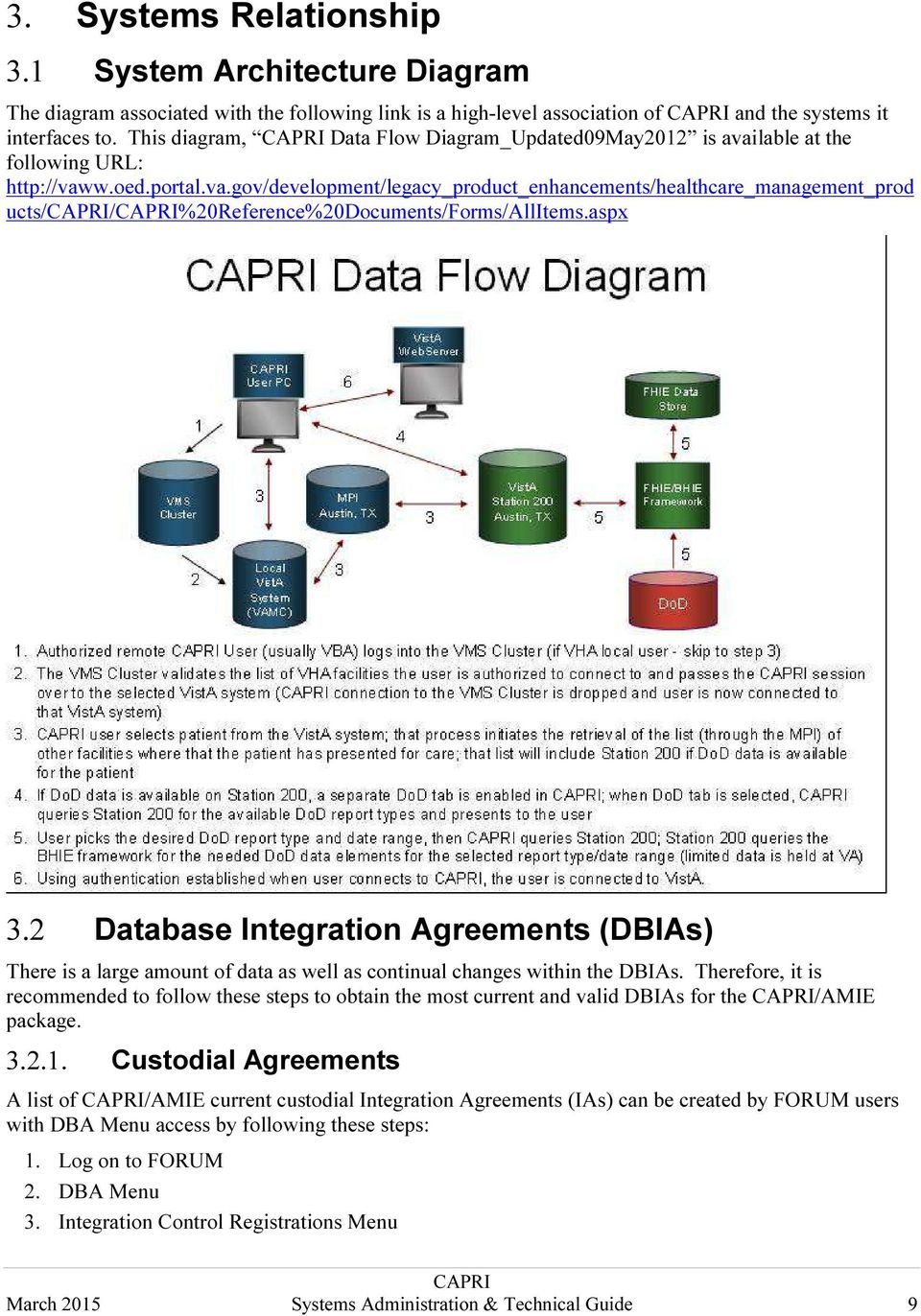
10 Term EHR FHIE GUI HIA HTML IDE IAs IRM IS IT MAS MUMPS / M NCIO NPM OI OIT RDV RO RPC TIU URL VA VAMC VBA VDL VHA VISN VistA Definition Electronic Health Record Federal Health Information Exchange Graphical User Interface Health Information Access HyperText Markup Language Interactive Development Environment Integration Agreements Information Resources Management Information Systems Information Technology Medical Administration Service Massachusetts General Hospital Utility Multi-Programming System Network Chief Information Officer National Patch Module Office of Information Office of Information Technology Remote Data View Regional Office Remote Procedure Call Text Integration Utilities Universal Resource Locator (Internet Shortcut file name extension) Department of Veterans Affairs VA Medical Center Veterans Benefits Administration VA (Software) Document Library Veterans Health Administration Veterans Integrated Service Network Veterans Health Information Systems and Technology Architecture 1.2 Reference Materials This section contains all referenced materials related to this document. nt_products//%20reference%20documents/forms/allitems.aspx Systems Administration & Technical Guide March 2015

11 DISCLAIMER: The appearance of external hyperlink references in the manual does not constitute endorsement by the VA of this Web site or the information, products, or services contained therein. The VA does not exercise any editorial control over the information you may find at these locations. Such links are provided and consistent with the stated purpose of the VA. 1.3 Helpful User Information The following link provides specific information regarding obtaining access, Training, Advanced Web Image Viewer (AWIV) Desk Reference, /Virtual VA interactions, and other useful information at: This link applies to VBA users. 1.4 Technical Support User support questions should be addressed to local IT support staff, Information Resources Management (IRM), or one of the National Service Desks. A Remedy ticket may be submitted for related issues to the National Service Desk at Agency Partners 2.1 External Clients Non-VA users include external reviewers and researchers obtaining information from various VA administrations for their specific authorized purposes Department of Defense (DoD) The DoD and the VA have been working together, starting in 2002, to share health information between their two Electronic Health Record (EHR) systems. The VA s EHR is Veterans Health Information Systems and Technology Architecture / Computerized Patient Record System (VistA CPRS) and the DoD s is Armed Forces Health Longitudinal Technology Application (AHLTA), formerly CHCS II, US March 2015 Systems Administration & Technical Guide 3

12 DoD military health system. Transferring information between VistA CPRS and AHLTA was a major undertaking, since both EHRs were created using different types of software applications. Both the DoD and the VA have been committed to the task and worked together to develop advanced technology to ensure the secure transfer of electronic health information between the two EHR systems. This important work supports the health care provided to active duty service members and veterans. 2.2 Internal Clients is a VHA developed application. The other two administrations within the VA, VBA and the National Cemetery Administration, use directly and/or indirectly Veterans Health Administration The following link (URL) provides a complete list of VHA Medical Centers, Outpatient Clinics, Community Based Outpatient Clinics, Vet Centers, and Veterans Integrated Service Network (VISN) locations where the VHA utilizes the system. The level of access granted to users will depend on job function, need to know, and the level of security placed on certain sensitive patient records Health Information Access (HIA) This VHA program coordinates access to many of VHA s health information resources that include national databases, EHRs, extracted datasets, and medical record data found in CPRS through and Vista Web Veterans Benefits Administration The following table lists the VBA regional office (RO) locations with each of their VBA system name. Note: VBA IT continues to use the VA Office of Information Technology (OIT) naming convention method prior to its reorganization. This naming convention is organizational versus geographical in nature. This table reflects that as all VBA IT locations fall under Region 5. VHA IT currently uses the VA OIT current geographical naming convention. Additionally, VBA from a Business Line perspective doesn t use Region 5, but breaks Region 5 down into three separate NCIOs. (See map following this table) REGIONAL OFFICE LOCATION Atlanta, GA Baltimore, MD Columbia, SC Huntington, WV Jackson, MS Little Rock, AR Louisville, KY Montgomery, AL Nashville, TN New Orleans, LA Newark, NJ Roanoke, VA St. Louis, MO VBA Region 5 SYSTEM_NAME ST. PETERSBURG REGION REGION 5 > VBA > St Petersburg Region > VARO Atlanta > LAN REGION 5 > VBA > St Petersburg Region > VARO Baltimore > LAN REGION 5 > VBA > St Petersburg Region > VARO Columbia > LAN REGION 5 > VBA > St Petersburg Region > VARO Huntington > LAN REGION 5 > VBA > St Petersburg Region > VARO Jackson > LAN REGION 5 > VBA > St Petersburg Region > VARO Little Rock > LAN REGION 5 > VBA > St Petersburg Region > VARO Louisville > LAN REGION 5 > VBA > St Petersburg Region > VARO Montgomery > LAN REGION 5 > VBA > St Petersburg Region > VARO Nashville > LAN REGION 5 > VBA > St Petersburg Region > VARO New Orleans > LAN REGION 5 > VBA > St Petersburg Region > VARO Newark > LAN REGION 5 > VBA > St Petersburg Region > VARO Roanoke > LAN REGION 5 > VBA > St Petersburg Region > VARO St. Louis > LAN 4 Systems Administration & Technical Guide March 2015

13 REGIONAL OFFICE LOCATION St. Louis RMC, MO St. Petersburg, FL Washington, DC Winston-Salem, NC Boston, MA Buffalo, NY Chicago, IL Cleveland, OH Des Moines, IA Detroit, MI Fargo, ND Hartford, CT Indianapolis, IN Lincoln, NE Manchester, NH Milwaukee, WI New York, NY Philadelphia, PA Pittsburgh, PA Providence, RI Sioux Falls, SD St. Paul, MN Togus, ME White River Jct, VT Wichita, KS Wilmington, DE Albuquerque, NM Anchorage, AK Boise, ID Denver, CO Cheyenne, WO Fort Harrison, MT Honolulu, HI Houston, TX Los Angeles, CA Manila, PI Muskogee, OK Oakland, CA Phoenix, AZ Portland, OR Reno, NV Salt Lake City, UT San Diego, CA San Juan, PR Seattle, WA VBA Region 5 SYSTEM_NAME REGION 5 > VBA > St Petersburg Region > VARO St. Louis RMC > LAN REGION 5 > VBA > St Petersburg Region > VARO St. Petersburg > LAN REGION 5 > VBA > St Petersburg Region > VARO Washington > LAN REGION 5 > VBA > St Petersburg Region > VARO Winston-Salem > LAN St. Paul Region REGION 5 > VBA > St Paul Region > VARO Boston > LAN REGION 5 > VBA > St Paul Region > VARO Buffalo > LAN REGION 5 > VBA > St Paul Region > VARO Chicago > LAN REGION 5 > VBA > St Paul Region > VARO Cleveland > LAN REGION 5 > VBA > St Paul Region > VARO Des Moines > LAN REGION 5 > VBA > St Paul Region > VARO Detroit > LAN REGION 5 > VBA > St Paul Region > VARO Fargo > LAN REGION 5 > VBA > St Paul Region > VARO Hartford > LAN REGION 5 > VBA > St Paul Region > VARO Indianapolis > LAN REGION 5 > VBA > St Paul Region > VARO Lincoln > LAN REGION 5 > VBA > St Paul Region > VARO Manchester > LAN REGION 5 > VBA > St Paul Region > VARO Milwaukee > LAN REGION 5 > VBA > St Paul Region > VARO New York > LAN REGION 5 > VBA > St Paul Region > VARO Philadelphia > LAN REGION 5 > VBA > St Paul Region > VARO Pittsburgh > LAN REGION 5 > VBA > St Paul Region > VARO Providence > LAN REGION 5 > VBA > St Paul Region > VARO Sioux Falls > LAN REGION 5 > VBA > St Paul Region > VARO St. Paul > LAN REGION 5 > VBA > St Paul Region > VARO Togus > LAN REGION 5 > VBA > St Paul Region > VARO White River Jct. > LAN REGION 5 > VBA > St Paul Region > VARO Wichita > LAN REGION 5 > VBA > St Paul Region > VARO Wilmington > LAN SAN DIEGO REGION REGION 5 > VBA > San Diego Region > VARO Albuquerque > LAN REGION 5 > VBA > San Diego Region > VARO Anchorage > LAN REGION 5 > VBA > San Diego Region > VARO Boise > LAN REGION 5 > VBA > San Diego Region > VARO Denver > LAN REGION 5 > VBA > San Diego Region > VARO Cheyenne > LAN REGION 5 > VBA > San Diego Region > VARO Fort Harrison > LAN REGION 5 > VBA > San Diego Region > VARO Honolulu > LAN REGION 5 > VBA > San Diego Region > VARO Houston > LAN REGION 5 > VBA > San Diego Region > VARO Los Angeles > LAN REGION 5 > VBA > San Diego Region > VARO Manila > LAN REGION 5 > VBA > San Diego Region > VARO Muskogee > LAN REGION 5 > VBA > San Diego Region > VARO Oakland > LAN REGION 5 > VBA > San Diego Region > VARO Phoenix > LAN REGION 5 > VBA > San Diego Region > VARO Portland > LAN REGION 5 > VBA > San Diego Region > VARO Reno > LAN REGION 5 > VBA > San Diego Region > VARO Salt Lake City > LAN REGION 5 > VBA > San Diego Region > VARO San Diego > LAN REGION 5 > VBA > San Diego Region > VARO San Juan > LAN REGION 5 > VBA > San Diego Region > VARO Seattle > LAN March 2015 Systems Administration & Technical Guide 5

14 REGIONAL OFFICE LOCATION Waco, TX VBA Region 5 SYSTEM_NAME REGION 5 > VBA > San Diego Region > VARO Waco > LAN 6 Systems Administration & Technical Guide March 2015

15 This is the VBA s Region 5 Business Line perspective Network map of CIOs: March 2013 Systems Administration & Technical Guide 7

16 Veteran Service Organization (VSO) All VSO offices are co-located with VBA regional offices as shown in the table of the previous Section The VSO has authorized read-only permissions for specific claimant s EHR. This access allows the VSO to help a veteran who is preparing a VA benefit claim. offers VSO users: A national user account option with a single access/verify code, from which authorized users can view a Veteran s entire VA health record from any site where the Veteran has been seen Customizable reports and health summaries C&P exam requests and results A search feature that enables users to search progress notes and discharge summaries for text Access to current and past AMIE C&P claims activity Federal Health Information Exchange (FHIE)/ DoD health data Access to VistAWeb for quickly viewing data at remote locations VistAWeb is an intranet, browser-based application that provides a read-only view into EHR data. It allows the user to view data that is accessible on the reports tab of CPRS. It retrieves data for patients from all sites where the patient has visited if authorized for special user access and mirrors the behavior of the CPRS and Remote Data View (RDV), however imaging is not currently available National Cemetery Administration The National Cemetery Administration does not directly use the application, but receives its verified veteran information through VBA. VBA uses to acquire this veteran information VA Office of Inspector General The VA Office of Inspector General performs audits and conducts research for reports when directed using accessed data. 8 Systems Administration & Technical Guide March 2015

17 3. Systems Relationship 3.1 System Architecture Diagram The diagram associated with the following link is a high-level association of and the systems it interfaces to. This diagram, Data Flow Diagram_Updated09May2012 is available at the following URL: ucts//%20reference%20documents/forms/allitems.aspx 3.2 Database Integration Agreements (DBIAs) There is a large amount of data as well as continual changes within the DBIAs. Therefore, it is recommended to follow these steps to obtain the most current and valid DBIAs for the /AMIE package Custodial Agreements A list of /AMIE current custodial Integration Agreements (IAs) can be created by FORUM users with DBA Menu access by following these steps: 1. Log on to FORUM 2. DBA Menu 3. Integration Control Registrations Menu March 2015 Systems Administration & Technical Guide 9
18 4. Custodial Package Menu 5. Active ICRs by Custodial Package Option 6. Select Package Name: AMIE Subscriber Agreements A list of /AMIE current subscriber IAs can be created by FORUM users with DBA Menu access by following these steps: 1. Log on to FORUM 2. DBA Menu 3. Integration Control Registrations Menu 4. Subscriber Package Menu 5. Print Active by Subscriber Package Option 6. Start with subscribing package: AUTOMATED MED INFO A 7. Go to subscribing package: AUTOMATED MED INFO Z 4. Account Management 4.1 Establishing Account access for local VHA medical center users is managed by the local IRM/ISO staff at the medical center, just like any other application (i.e. roll-and-scroll VistA, CPRS, BCMA, etc.). HIA only manages users that authenticate/authorize through the CLAIMS system. To contact the HIA team send to: [email protected] Once you obtain access and depending on your role you will be able to create additional accounts using tools. Refer to the latest version of the GUI User Manual in the VA (Software) Document Library (VDL); see section Edit Remote User Site Access at the following URL: 5. Installing Note: It is important that all users at your site remain on the same version. The AMIE package must be installed and maintained at VistA sites with patient data that will be accessed through the GUI application. Installation and configuration of the AMIE package is described in the AMIE Installation Guide, Technical Manual, and Release Notes found at: The AMIE package is maintained through patches in the Department of Veterans Benefits Administration (DVBA) namespace, issued through the VistA National Patch Module (NPM). For the VBA, the new version runs when the user starts the application from Start/All Programs/VBAPPS/REMOTE. The user can make new Windows desktop shortcuts (see Section 7.1) after starting the new version. For the VHA, the IRM department will install the desktop icon. Please check with them on the specifics of starting. Normally, the user should find the shortcut in the same place the user would find the Computerized Patient Record System (CPRS). Local VistA Connection: The shortcut can be set to connect to a specific VistA system. will accept the command line parameters s=servername and p=portname, just like CPRS. 10 Systems Administration & Technical Guide March 2015

19 REMOTE: Remote users access through the Claims system, which runs on the VHA Forum hardware. The server for those users should be set to CLAIMS.MED.VA.GOV, port For more details reference the latest version of the GUI User Manual, see section Remote Functionality at the following URL: 6. Distribution Files 6.1 GUI Client Software The GUI client software is distributed as a zipped file from which the executable.exe is extracted. Information on downloading the installation files for the GUI software is included in the FORUM patch announcing a new version of. The following is a sample of a FORUM patch section describing the availability of the installation files and other documents pertaining to the GUI distribution. Release notes are normally provided with each release to provide a list of the updates included in the patch, because not all users have access to the patch description. The user manual is included if it is updated. The distribution of these documents is at the discretion of each installing facility. The updated documents are placed on the VDL site following patch release. The GUI client software and documentation are available using FTP. The preferred method is to FTP the files from: download.vista.med.va.gov (Files will be in an anonymous.software directory) March 2015 Systems Administration & Technical Guide 11

20 This transmits the files from the first available FTP server. Sites may also elect to retrieve software directly from a specific server as follows: OI&T FIELD OFFICE FTP ADDRESS DIRECTORY Albany ftp.fo-albany.med.va.gov [anonymous.software] Hines ftp.fo-hines.med.va.gov [anonymous.software] Salt Lake City ftp.fo-slc.med.va.gov [anonymous.software] The following files will be available: Required Distribution Files to Run the Application File Name Contents Retrieval format DVBA_##_P###_##.ZIP File(s) indented below: BINARY -.exe V### executable - VAVVA.dll Virtual VA dynamically linked library -.map error map - Session.r2w Reflections session configuration - ssh_config Secure Shell configuration - libeay32.dll VLER/DAS SSL dynamically linked library - ssleay32.dll VLER/DAS SSL dynamically linked library - QPDF.exe QPDF PDF Compression executable - libgcc_s_dw2_1.dll QPDF dynamically linked library - libstdc++-6.dll QPDF dynamically linked library - qpdf13.dll QPDF dynamically linked library Optional Distribution Files which Contain Important User Info - _GUI_ISG.doc GUI Installation Supplemental Guide DVBA ##_P###_RN.PDF Patch Release Notes BINARY DVBA ##_P###_UM.PDF Updated User Manual BINARY _SYSTEMADMINTECHGUIDE_DVBA_27_TM.PDF SAT GUIDE BINARY Note: The VDL web site is usually updated within 1-3 days of the release date and will contain the Release Notes and if updated the GUI User Manual as shown in the highlighted text above. The VDL s URL is: 7. Logging onto The information is this section is a combination from several different sources but most of the information can be found in the latest version of the GUI User Manual, see section Logging On at the following URL: Please check this main source, the latest version of the GUI User Manual, for any updated information that may not be found here. 7.1 Desktop Icon Shortcuts Setup Note: It is important that all users at your site remain on the same version. Additionally, there is no required fixed location for the executable. The location is at the discretion of each installing facility. is routinely installed in the Program Files/VistA/ directory of a user s workstation. Many sites install the GUI on a network share drive and place a shortcut on the user s workstations. Other sites install the GUI on a Citrix server for remote access. 12 Systems Administration & Technical Guide March 2015

21 For the VBA, the new version runs when the user starts the application from Start/All Programs/VBAPPS/REMOTE. It is recommended that for shortcuts, VBA users utilize this folder. For the VHA, the IRM department will install the desktop icon. Please check with them on the specifics of starting. Normally, the user should find the shortcut in the same place the user would find the CPRS. Local Vista Connection: The shortcut can be set to connect to a specific VistA system. will accept the command line parameters s=servername and p=portname, just like CPRS. See the Additional Information section; subsection Installation, in the latest version of the GUI User Manual, at the following URL: Non- Remote Users Step 1 The user starts by double-clicking the icon. Step 2 OPTIONAL If the workstation has been configured with serverlist.exe by IRM, and if there is no server and port information in the shortcut, a window will appear asking the user to select an initial server and port (see following screenshot). Selecting the down arrow in the upper right corner displays all the VHA sites the user can access. A scroll bar appears if the list is too long to be displayed. If the user has access to only one VHA facility, then the VistA sign on screen in Step 5 is displayed immediately. Step 3 OPTIONAL The user scrolls to the name of the desired VHA facility, if it is not already visible, and clicks it to select it. Step 4 OPTIONAL The user clicks OK Step 5 The user enters a VistA Access Code, presses the Tab key, and then enters the Verify Code. The user then presses Enter or clicks OK. This takes the user to the Patient Selector Screen. March 2015 Systems Administration & Technical Guide 13
22 Note: New users without access codes should contact local IRM staff to get one. 7.3 Regional Office Remote Users Most VBA users are Remote users. Each Remote user needs only one Access Code and one Verify Code to connect to authorized VA Medical Center (VAMC) sites. Step 1 From the Start/VBAPPS/ Remote/ Remote menu, the user clicks the icon. Step 2 After entering the VistA Access Code, the user presses the Tab key to go to the next field and enters the Verify Code. Then the user presses Enter or clicks OK Note: New users without access codes should contact local IRM staff to get one. The first time the user logs into a VistA application, only the Access Code should be entered. will then prompt the user to create a Verify Code. Most users should have a valid Access and Verify Code combination by the time they use. 14 Systems Administration & Technical Guide March 2015
23 OPTIONAL To change the Verify Code, the user selects the Change Verify Code checkbox on the sign-on dialog before clicking OK. The user will then be prompted to create a new Verify Code as shown in the steps in the following screenshot. After selecting OK, the user is prompted to enter and confirm a New Verify Code March 2015 Systems Administration & Technical Guide 15

24 Step 3 The Remote site selection screen displays the user s authorized VHA facilities. (These accesses are established when an account is initially created and/or the user request specific facilities along with the proper approvals after the account creation. This facility information is located in the file ) When the user selects a Remote site executable it provides the authorized remote sites. If shown, the vertical scrollbar is used to scroll through all authorized sites. The user selects a site and then either double-clicks the site s name or clicks OK to access that site. has been modified to include the city and state where each facility is located. In addition, the list may now be sorted by State. The following screenshot shows DEV/FEX Test System in Troy, New York as the selected VHA facility. After loads the VHA facility, the user is prompted with the Patient Selector screen. Instructions for use of the Patient Selector screen are found in section Using the Software of the latest version of the GUI User Manual at the following URL: 16 Systems Administration & Technical Guide March 2015
25 7.4 Remote Users Remote users access through the Claims system, which runs on the VHA Forum hardware. The server for those users should be set to CLAIMS.MED.VA.GOV, port 9400 (see screenshot below). Remote users outside of VBA will normally obtain an access code from the Office of Information (OI) support staff, not from the local field site. Most VBA users are Remote users. Most VHA users are local site users. If a user starts and does not successfully connect to a VistA system within 90 seconds, automatically shuts down. When users log into remotely, alerts users when no account is set up. For additional information see the Remote Functionality section in the GUI User Manual at the following URL: VistA Terminal The Attachmate Reflections Secure Shell application replaces the telnet window. Remote users can launch a VistA Terminal session by selecting the VistA button to log into the local VistA system site they are assigned to. A dialog box is displayed when the VistA button is clicked that provides the user the ability to choose between connecting using the secure shell application or telnet. The default is set to secure shell application. Note: Local users will not have access to the VistA Terminal from and the VistA button will not be available. March 2015 Systems Administration & Technical Guide 17

26 7.6 Terminal Server Users Step 1 From the Hines terminal server application, the user double-clicks the icon. Step 2 Follow the instructions in the previous Section 4.3.2, Regional Office Remote Users, Steps 2 and News Before logging on to, News alerts are displayed if new items exist. The user can select the News item to view the contents. The user can select Clear All to remove all News items. The user can select Close to continue working with. 7.8 Alerts When users of the C&P Template functionality log into, any existing Template Alerts are displayed. automatically checks pending Compensation and Pension Worksheet Module (CPWM) Template statuses. Pending templates in the user s queue are displayed on the alert screen. The C&P Alert screen displays alerts according to template status. Alerts for template statuses are: draft, awaiting signature, sent back from reviewer, requiring review, CPRS documents to cosign, cosigned documents ready to transfer to AMIE, and vendor exam requests pending review. The user clicks the Resolve This Alert button to be taken to the section of where the alert can be resolved. For example, if the user has unsigned templates, then he or she is taken to the Unsigned Templates window. The user may select Continue to bypass the alerts and go to the Patient Selector screen. 18 Systems Administration & Technical Guide March 2015

27 7.9 Audit Kept The following instructions are to view your audit log. This is an example only, use your correct information to locate your log. Example: The log file is named - DVBA_2.7_BuildVersion_dd_mm_yy.TXT Go to: C:\Documents and Settings\YourVAUserName\Local Settings\Temp\DVBA_2.7_ BuildVersion_dd_mm_yy.txt 8. Application Maintenance 8.1 Application Software Maintenance The National Patch Module currently resides on the FORUM server and is used to release VistA patches nationally. Updates to the application are distributed through the VA FORUM National Patch Module (NPM) under the DVBA namespace. The DVBA namespace is shared with the Automated Medical Information Exchange (AMIE) package. Patch names follow the format DVBA*Version*PatchNumber. The patch consists of the patch description and the routines and VistA FileMan components in PackMan format for installation on the VistA server. The patch description consists of an overview description of the patch, a functional overview, a list of the components released by the patch, retrieval instructions for the software and documentation, and installation instructions for the VistA server portion of the patch. executable and documentation associated with the patch are retrieved from an FTP server designated by the VA for software downloads. The software retrieval instructions are always added by the developer in the SOFTWARE AND DOCUMENTATION RETRIEVAL section of the patch description. A separate installation guide is provided with each patch that provides instructions for installing the GUI. New versions of the GUI do not require installation of previous versions. March 2015 Systems Administration & Technical Guide 19
28 The Associated Patches section of the Patch Description lists any previous patches that must be installed prior to the new patch. The Functional Overview section of the patch describes the functional and technical changes included in the patch. The Installation Requirements section provides detailed instructions on the installation of all patch components. When a patch includes new GUI, the Software and Documentation Retrieval section indicates the name of the GUI distribution (zip) file, the installed executable version, and the file size. This section also provides primary and alternative FTP download locations of the installation file, any Release Notes, and other updated documentation files. Updated patch documentation is uploaded to the VDL within three days of the patch release at the following URL: When a patch contains a new GUI version, users should be aware of any notes regarding the timing of installation of the M components and providing the new GUI to users. VA staff with access to FORUM can subscribe to receive notification of newly released patches by selecting the FORUM Patch User Menu option, Select Packages for Notification sub-option, then selecting the AMIE package. 8.2 C&P Worksheet Template Maintenance template files are in an ever evolving environment. To obtain the latest information available information it is best to retrieve a list each time. examination templates are stored in the TEMPLATE DEFINITION file. This file maintains a list of definitions used to generate examination templates in the Graphical User Interface (GUI). Entries in the TEMPLATE DEFINITION file are used by the application to create the examination templates in the GUI. Retired template definitions are retained in the file for historical purposes. This file should remain standardized between all sites. No additions, modifications, or editions should be made to this file except through the remote PUSH utility. Entries in the TEMPLATE DEFINITION file are maintained remotely. The Business Engineering Services Team (BEST) team manages the TEMPLATE DEFINITION file using the Template PUSH utility. Organizationally, the (BEST) falls under Systems Management within the VHA Chief Business Office (CBO). Insight into this utility can be gained from the PUSH DBQ Utility User Manual document at the following URL: This utility is used only by BEST staff. PUSH utility users log onto the CLAIMS Server for authentication and verification. The user performing a PUSH operation must be assigned the option DVBA MANAGE TMPLTES GUI option. This option exists only on the CLAIMS and TEST CLAIMS systems, since this is where the operator is authenticated and where the initial context is created. The option DVBA GUI is used to create the context for connection to sites where the template definitions are actually updated. Questions about and issues with the PUSH utility should be addressed to: VHA CBO BEST Staff. 9. Applications Development Tools and Usage 9.1 Delphi 2006 Development Software This section includes the Delphi 2006 installation procedure, installation of third-party components, and their purpose and usage. This documentation is currently available in draft format in SharePoint at: 20 Systems Administration & Technical Guide March 2015
29 ucts//%20reference%20documents/forms/allitems.aspx Upon final approval this document will be posted in the VDL at: Code Repository Tool (Version Control) The Delphi application utilizes the Rational ClearCase tool for version control. Its VA approval documentation is located at URL: Per this VA URL, it is recommended to go directly to IBM s Rational ClearCase website at URL: for any additional current application information. 11. Source Files for Delphi 2006 The application is developed in Delphi Standard source file name extensions are preserved as required by the development tool. These file name extensions are.dfm,.pas,.res, and.drc The source files are stored on a Rational ClearQuest Server. Your code must be checked into ClearQuest once modifications have passed testing by the developer. Due to the longevity of the project only limited unit description and usage is available. The developer will need to reference the GUI User Manual to obtain and understand what logic occurs when executing the application. By using the GUI User Manual, adding break points in the Delphi 2006 IDE, the developer will obtain an understanding of the Functions, Procedures, RPCs, input and output file, and parameter list and usage. Select the latest version of the GUI User Manual at the following URL: For any additional assistance refer to Section 1.4, Technical Support, for contact information. 12. Remote Procedure Calls (RPCs) for MUMPS See Appendix A for a list of detailed RPCs used by the Graphical User Interface (GUI) software. To duplicate the list of RPCs in Appendix <>, do the following: 1. Type "D P^DI" to start Fileman. 2. At "Select OPTION:", select option 2, "PRINT FILE ENTRIES". 3. At "OUTPUT FROM WHAT FILE:", enter "REMOTE PROCEDURE". 4. Accept the default for "SORT BY: NAME//" by hitting RETURN. 5. At "START WITH NAME: FIRST//", enter "DVBA" to start with the first RPC name. 6. At "GO TO NAME: LAST//", enter "DVBC" to list all of the namespace RPCs. 7. Accept the default for "WITHIN NAME, SORT BY:" 8. At "FIRST PRINT FIELD:", Enter a "?" and then "Y" for "Do you want the entire nn-entry FIELD list?". The list will be displayed for you to choose from. March 2015 Systems Administration & Technical Guide 21
30 9. At "FIRST PRINT FIELD:" prompt, enter ".01" for NAME. At each successive "THEN PRINT FIELD:" prompt, enter the field numbers listed here:.02 TAG.03 ROUTINE.04 RETURN.06 INACTIVE 1 (word-processing) 2 INPUT PARAMETER At "THEN PRINT INPUT PARAMETER SUB-FIELD:" after entering "2", click RETURN to bypass sub-fields At the next "THEN PRINT FIELD:", press RETURN to complete the list of desired fields. 11. For the heading, answer "Replace" with "REM...", then answer "With" with RETURN to remove a heading, or enter a heading. 12. At the "STORE PRINT LOGIC IN TEMPLATE:" select or create a Print Template, or take the default to bypass creating a print template. 13. At "DEVICE:", answer "0;80;99999" to display the RPC listing to your screen. Copy and paste the results into a word processing application for possible cleanup. 22 Systems Administration & Technical Guide March 2015
31 This is an example of the dialog: From the VA FileMan menu, select "Print File Entries" VA FileMan VA FileMan Version 22.0 Enter or Edit File Entries Print File Entries Search File Entries Modify File Attributes Inquire to File Entries Utility Functions... Data Dictionary Utilities... Transfer Entries Other Options... Select VA FileMan Option: PRINT FILE ENTRIES OUTPUT FROM WHAT FILE: PATIENT// REMOTE PROCEDURE (2998 entries) SORT BY: NAME// START WITH NAME: FIRST// DVBA GO TO NAME: LAST// DVBC WITHIN NAME, SORT BY: FIRST PRINT FIELD:? (enter "?" to view available fields) Answer with FIELD NUMBER, or LABEL Do you want the entire 14-Entry FIELD List? Y (Yes) Choose from:.01 NAME.02 TAG.03 ROUTINE.04 RETURN.05 AVAILABILITY.06 INACTIVE.07 CLIENT MANAGER.08 WORD WRAP ON.09 VERSION.1 SUPPRESS RDV USER SETUP.11 APP PROXY ALLOWED 1 (word-processing) 2 INPUT PARAMETER (multiple) 3 (word-processing) FIRST PRINT FIELD:.01 NAME THEN PRINT FIELD:.02 TAG THEN PRINT FIELD: Heading (S/C): REMOTE PROCEDURE LIST Replace REM... With YOUR HEADING Replace YOUR HEADING START AT PAGE: 1// DEVICE: 0;80;9999 UCX/TELNET YOUR HEADING MAY 22, :53 PAGE 1 NAME TAG DVBA 2507 REQUEST DVBA CHECK PATCH CNP CHECK March 2015 Systems Administration & Technical Guide 23
32 13. Fileman 13.1 Installation Procedures and Usage All VA FileMan documentation is available on the VDL, accessible at the following URL: There is also additional documentation regarding other FileMan information i.e. FileMan Tips, etc is accessible at: Note: Using the Freedom of Information Act this website obtained documentation from the VA for VISTA. In general this site gathers information from multiple sources including the VA website Environmental Setup The VA FileMan V.22 Key and Index Tutorial document contains the environmental setup information at the following URL: Installation Guide Access the VA FileMan Installation Guide at: Getting Started Access the VA FileMan Getting Started User Manual at: 24 Systems Administration & Technical Guide March 2015
33 FileMan Access Codes The following table is a list of recommended VA FileMan access codes associated with each file contained in the AMIE software. FILE NUMBER FILE NAME DD ACCESS RD ACCESS WR ACCESS DEL ACCESS LAYGO ACCESS 31 Disability 396 Form # # # # AMIE Site AMIE # # # # # # # # # # # # Cancellation AMIE Body Insufficient AMIE C&P Exam # # # # Note: The code in this table is the programmer s access. The other codes are arbitrary, and are determined by the developers during the design phase and assigned as needed to users by the Information Systems (IS) staff in the File Manager Access Code field of the New Person (#200) file Advanced User Access the VA FileMan Advanced User Manual at: Programmer Manual Access the VA FileMan Programmer Manual at: Technical Manual Access the VA FileMan Technical Manual at: Package-wide Variables There are no package-wide or special variables in the AMIE software Key Variables PNAM = Patient name DFN = Internal ^DPT number SSN = Social security number CFLOC = Claim folder location DCHGDT = Discharge date ADMDT = Admission date March 2015 Systems Administration & Technical Guide 25
34 How to Generate Online Documentation This section describes some of the various methods by which users may secure AMIE technical documentation. Online technical documentation pertaining to the AMIE software, in addition to that which is located in the help prompts may be generated through utilization of several Kernel options. These include XINDEX and VA FileMan List File Attributes. Further information about other utilities which supply online technical documentation may be found in the Kernel Reference Manual XIndex This option analyzes the structure of a routine(s) to determine in part if the routine(s) adheres to VistA Programming Standards. The XINDEX output may include the following components: compiles list of errors and warnings, routine listing, local variables, global variables, naked globals, label references, and external references. By running XINDEX for a specified set of routines, the user is afforded the opportunity to discover any deviations from VistA Programming Standards which exist in the selected routine(s) and to see how routines interact with one another, that is, which routines call or are called by other routines. To run XINDEX for the AMIE software, specify the following namespace at the "routine(s)?>" prompt: DVBA* and DVBC*. AMIE initialization routines which reside in the UCI in which XINDEX is being run, as well as compiled template routines found within the AMIE namespace, should be omitted at the "routine(s)?>" prompt. To omit routines from selection, preface the namespace with a minus sign (-) Data Dictionary List File Attributes This VA FileMan option allows the user to generate documentation pertaining to files and file structure. Utilization of this option via the "Standard" format will yield the following data dictionary information for a specified file(s): file name and description, identifiers, cross-references, files pointed to by the file specified, files which point to the file specified, input templates, print templates, and sort templates. In addition, the following applicable data is supplied for each field in the file: field name, number, title, global location, description, help prompt, cross-reference(s), input transform, date last edited, and notes. Using the "Global Map" format of this option generates an output which lists all cross-references for the file selected, global location of each field in the file, input templates, print templates, and sort templates. For a comprehensive listing of AMIE files used by, please use the following link (URL) to locate the Files section of the AMIE Technical Manual: Archiving, Purging, and Frequency relies on the AMIE application for any archiving and purging functionality. Although the AMIE software has no archiving capabilities AMIE s purging capabilities are handled by the DVBA REGIONAL PURGING PROGRAM option deletes all FINALIZED requests which are older than the date set in the AMIE SITE PARAMETER file (#396.1). It should normally be set to run daily on TaskMan, as it takes several minutes to run in programmer mode. In addition to purging the FORM 7131 file (#396), it also purges the AMIE REPORT file (#396.2). The frequency is based on the amount of 7131 information purged by this program. It is determined by the NUMBER OF DAYS TO KEEP HISTORY parameter set through the Regional File Site Parameter Setup option. It is suggested to keep at least 30 days on file at all times, but no more than 120 days. The NUMBER OF DAYS TO KEEP HISTORY field (#9) of the AMIE SITE PARAMETER file (#396.1) will automatically keep 30 days of report data if no value is in that field. While the AMIE software uses a very small amount of disk space, it is wise not to let the data accumulate if it is not needed by the hospital. 26 Systems Administration & Technical Guide March 2015
35 The DVBA C Purge 2507 option deletes all 2507 requests with the following statuses and that are older than the number of days in the DAYS TO KEEP 2507 HISTORY parameter: Completed, Printed by RO; Completed, Transferred Out; Cancelled by Medical MAS; Cancelled by RO. This option should be scheduled through TaskMan to run nightly. It may be run in programmer mode but will take several minutes. The 2507 EXAM (#396.4) file will be purged in conjunction with the 2507 REQUEST file (#396.3). 15. Security 15.1 Security Management VA Directive prohibits local modifications to VistA software General Security For GUI security refer to the most current User Manual. This manual includes instructions for setting up users, as well as descriptions of all Security Keys used by the GUI application. See the GUI User Manual at: Remote Systems The AMIE software does not transmit data to any remote systems. For interactions with remote systems, refer to the Systems Architecture diagram in Section Contingency Planning Your facility should have a local contingency plan in the event of application problems in a live environment. It should identify the procedure for maintaining functionality provided by the AMIE software as well as the GUI application, in the event of system outage Interfacing There are no special interfacing requirements for the AMIE or the software Electronic Signatures The GUI application uses electronic signatures. Use the following link to locate the GUI User Manual: Security Keys Take the following steps to get information about the security keys used with the AMIE software. 1. VA FileMan Menu 2. Print File Entries Option 3. Output from what File: SECURITY KEY 4. Sort by: Name 5. Start with name: DVBA to DVBC 6. Within name, sort by: <RET> 7. First print field: Name March 2015 Systems Administration & Technical Guide 27
36 8. Then print field: Description Note: Some keys do not affect the menu operation. This is due to some options having several different functions which are limited in scope by the key. This limitation is done internally by the program being used. 16. Troubleshooting and Error Information Note: In all cases, please print the error message for your local IRM staff. A majority of issues that are initially called into the Service Desk or are created into Remedy tickets are not often related issues, but are due to other issues regarding networks and users accesses/permissions, etc... Those few issues that are identified as a issue are forwarded onto the Team. The team works to replicate and identify the issue, then to develop solutions or workarounds to correct or eliminate the issue. Some of these issues result in identification of a defect or an issue that may become a future enhancement. These issues are often unique and not reported in any significant numbers. The Team forwards these specific issues onto the VA who will determine if the issue(s) is something that should be recognized as a defect or a possible enhancement scheduled for one of the next patch installation deployment. The remainder of this section includes general troubleshooting and error information that is located in the GUI User Manual at the following URL: Select the latest version of the document; refer to the section Troubleshooting and Error Messages Not Installed in VistA The user receives the message in the following screenshot if the VHA Medical Center has not loaded the VHA half of the software. The user should contact local IRM staff after receiving this message GUI Option Not Assigned to User in VistA The user receives the message in the following screenshot if the VHA medical center has not assigned the option to RO users. The user must contact local IRM staff upon receiving this message. 28 Systems Administration & Technical Guide March 2015


37 16.3 VistA Server Down The user receives the message in the following screenshot, or a similar one such as WSAETIMEDOUT, when there are performance issues in the VA Wide Area Network (WAN), if a server is down, or if a server was not restarted after being down. When this happens, AMIE II may or may not connect, depending on the exact problem. The user should test the AMIE II connection VistA Limits Ability to See Patient Records The user receives the message in the following screenshot if the medical facility made local permission modifications in VistA that prohibit users from seeing the contents of patient records Network Problems The user receives the message in the following screenshot if the connection to the medical facility is lost unexpectedly. The user should try to connect to the medical facility again. March 2015 Systems Administration & Technical Guide 29

38 16.6 Institution File in VistA has Been Locally Modified The user may receive the message in the following screenshot when requesting exams, requesting 7131s, or entering new patients if the VHA medical facility has an incomplete or incorrect Regional Office list in their system Too Many Invalid Attempts at Access Code / Verify Code The user receives the message in the following screenshot if the user attempted to log on and entered the wrong Access Code / Verify Code combination three or more times Multiple Sign-Ons The user may receive the message in the following screenshot if the user did not log out of correctly or if the session was unexpectedly disconnected. 30 Systems Administration & Technical Guide March 2015
39 16.9 General Error Message The user may receive the message in the following screenshot for a number of reasons. Upon receiving this message, the user should cancel the current task, close, and sign on again. If the user receives this error message again, local IRM staff should be contacted for assistance. March 2015 Systems Administration & Technical Guide 31
40 32 Systems Administration & Technical Guide March 2015
41 Appendix A - Remote Procedure Calls for MUMPS The DVBA GUI menu option contains all the RPCs. Name: DVBA GUI Menu Text: Capri GUI (Broker) Type: Broker (Client/Server) Package: AUTOMATED MED INFO EXCHANGE Description: This is the B type option used by GUI client application. It contains all the RPCs used by the GUI application. The table that starts on the next page shows a correlation between the s MUMPS RPCs and DELPI s RPCs associated within supporting the application. March 2015 Systems Administration & Technical Guide A-1
42 MUMPS DELPHI NAME TAG ROUTINE RETURN INPUT PARAMETER (Multiple) Procedure Name Locations Broker Name Parameter DG SENSITI VE RECORD ACCESS PTSEC DGSEC4 This Remote Procedure Call (RPC) will: - Verify user is not accessing his/her own Patient file record if the Restrict Patient Record Access (#1201) field in the MAS parameters (#43) file is set to yes and the user does not hold the DG RECORD ACCESS security key. If parameter set to yes and user is not a key holder, a social security number must be defined in the New Person file for the user to access any Patient file record. - Determine if user accessing a sensitive record or an employee's record RESULT(1) = -1-RPC/API failed Required variable not defined 0-No display/action required Not an employee, not sensitive or not accessing own Patient record 1-Display warning message Sensitive - inpatient or a DG SENSITIVITY key holder or Employee and DG SECURITY OFFICER key holder 2-Display warning message, require OK to continue and call DG SENSITIVE RECORD BULLETIN RPC to update DG Security Log file and generate Sensitive Record Access mail message. Sensitive - not an inpatient and not a key holder or Employee/not a DG SECURITY OFFICER key holder 3-Access to record denied Accessing own Patient file record 4-Access to Patient file (#2) records denied SSN not defined RESULT(2-n) = error message or warning/privacy Act message. Error and warning messages will begin in RESULT(2) array. The Privacy Act message is the longest message and will utilize RESULT(2)- RESULT(8). If RESULT(1)=1, the DG Security Log file is updated. If RESULT(1)=2, the user must acknowledge they want to access the restricted record and the application must call the DG SENSITIVE RECORD BULLETIN RPC to update the DG Security Log file and generate the Sensitive Record Access mail msg DG SENSITIV E RECORD ACCESS' 'DG SENSITIV E RECORD ACCESS' patientlist patientlistr estricted FMCvrListBox1P t.getselectedreco rd.ien or FMCvrListBox2P t.getselectedreco rd.ien or FMCvrListBox3P t.getselectedreco rd.ien for all params FMListBox1.Get SelectedRecord.I EN; A-2 Systems Administration & Technical Guide March 2015
43 MUMPS DELPHI NAME TAG ROUTINE RETURN INPUT PARAMETER (Multiple) Procedure Name Locations Broker Name Parameter DG SENSITIVE RECORD BULLETIN' NOTICE DGSEC4 SINGLE This Remote Procedure Call (RPC) will add an entry to the DG SECURITY LOG (#38.1) file and/or generate the sensitive record access bulletin depending on the value in ACTION input parameter. If ACTION parameter not defined, defaults to update DG Security Log file and generate Sensitive Record Access mail message. NONE RESULT= 1 - successfully added entry and/or generated sensitive record access bulletin 0 - unsuccessful DG SENSITIVE RECORD BULLETIN ' patientlistre stricted RpcBroker1 PatientIEN 'DVBA GUI^Capri GUI (Broker)' ' ' DVBA EXAM LINK TIU LINK DVBAXM L SINGLE Links an exam in TEMPLATES # to TIU DOCUMENT #8925 EXAMIEN TIUIEN returns 1 if the exam has been successfully linked to the TIU DOCUMENT; otherwise return 0^error message DVBA EXAM LINK TIU tiusign RpcBroker1 PNCSForm.xFMEdi t2.iens TIUNoteIEN; March 2015 Systems Administration & Technical Guide A-3
44 MUMPS DELPHI NAME TAG ROUTINE RETURN INPUT PARAMETER (Multiple) Procedure Name Locations Broker Name Parameter DVBA EXAM XML FILEIN DVBAXML SINGLE This RPC allows for the filling of the 2507 EXAM template in the XML version. EXAMIEN DAS XML XML is the array list format of the template being stored : Y Returns successful filing status or error message DVBA EXAM XML Tiusign RpcBroker1 AnExamIEN; _InhouseEx amxmlnote; DVBA GET EXAM IEN GETEXA M DVBXML SINGLE get an exam ien from the TEMMPLATE # given a tiu ien from TIU DOCUMENT #8925 TIUIEN returns a integer greater than zero if the exam can be found; otherwise return -1^error message DVBA GET EXAM IEN List of files uuencodedfile PType := list; Tiusign RpcBroker1 TiuDocumentIen DVBA GETCANC ELREASON CANRS N DVBCANRS This returns an array of active 2507 EXAM Cancellation Reasons. New active reasons added with Patch DVB*2.7*189. Old list of cancellation reasons set to inactive. LIST Returns a 1 when completed DVBA GETCANCE LREASO ExamDeta il No Params A-4 Systems Administration & Technical Guide March 2015
45 MUMPS DELPHI NAME TAG ROUTINE RETURN INPUT PARAMETER (Multiple) Procedure Name Locations Broker Name Parameter DVBA GETCLAIM GETCT DVBACPR1 This RPC returns a list (array) of Claim Types associated with a valid 2507 Request REQIEN Returns all Claim Types associated to the valid 2507 Request DVBA GETCLAIM ViewExa m RpcBroker1 RequestIEN; DVBA GETSPCL CONSID GETSC DVBACPR1 This RPC returns an array of special considerations linked to a 2507 request REQUEST IEN NONE DVBA GETSPCLC ONSID ViewExa m RpcBroker1 RequestIEN; DVBA LISTCLAIM LSTCT DVBACPR1 This RPC returns a list (array) of valid Claim Types NONE List of valid Claim Types DVBA LISTCLAIM ViewExa m NewExam RpcBroker1 No params DVBA LISTINSUF RSN LSTIR DVBACPR1 This RPC returns a list (array) of valid Insufficient Reasons that can be linked to a 2507 exam. NONE NONE DVBA LISTINSUF RSN NewExam RpcBroker1 No params DVBA LISTSPCLC ONSID LSTSC DVBACPR1 This RPC returns an array (listing) of valid special considerations that can be linked to a 2507 request. NONE NONE DVBA LISTSPCLC ONSID NewExam ViewExa m RpcBroker1 No params March 2015 Systems Administration & Technical Guide A-5
46 MUMPS DELPHI NAME TAG ROUTINE RETURN INPUT PARAMETER (Multiple) Procedure Name Locations Broker Name Parameter DVBA SETCLAIM DVBA SETSPCLC ONSID DVBA CHECK PATCH DIVISION SETCT DVBACPR1 This RPC returns the status of Claim Types passed to be set to a valid 2507 Request SETSC DVBCAPR1 SINGLE CHEC 1B SINGLE DIVISIO N 1 SINGLE This RPC sets the passed-in special considerations and links them to the passed-in 2507 request. This RPC is a wrapper for the supported $$PATCH^XPDU TL API to determine whether a given patch is installed or not "1^Patch Is Installed" is returned on success; otherwise "0^Patch Is Not Installed" is returned. ARRACT Returns status of Claim Type sets DVBA SETCLAIMT YPE 2507 REQUEST IEN SPECIAL CONSIDERATI ON LIST DVBPATCH NONE Returns "1^Patch Is Installed" on success; otherwise returns "0^Patch Is Not Installed". DVBA SETSPCLCO NSID DVBA CHECK PATCH' None None None DIVISION NewExam ViewExa m NewExam ViewExa m Sup port RpcBroker1 RequestIEN PType:= literal; cbclaimtype.item s[cbclaimtype.ite mindex] PType := List RpcBroker1 RequestIEN; chklstspecialcons iderations.items[i ]; PType := list; No Params Main RpcBroker1 No Params A-6 Systems Administration & Technical Guide March 2015
47 MUMPS DELPHI NAME TAG ROUTINE RETURN INPUT PARAMETER (Multiple) Procedure Name Locations Broker Name Parameter DVBA MVI GET CORRESP ONDING IDS DVBA MVI SEARCH PERSON GETIDS DVBAMVI2 LITERAL This is the Integration Control Number (ICN) used to identify the patient that is selected from the MVI SEARCH PERSON web service results. Format: " V750710^NI^2 00M^USVHA^ " FINDPA T DVBAMVI1 This remote procedure passes the delimited person traits to the MVI SEARCH PERSON web service and returns the results of the search. SOURCE ID PERSON TRAITS INITIAL QUANTITY NAME FORMAT List of VAMC treating facilities associated with the passed identifier. Each line contains INSTITUTION (#4) file IEN, station name,and station number delimited by a caret ("^"). The first entry in the list contains the total number of stations returned. Format: instutionien^stationname^s tationnumber Example: DVBOUT(0)=2 DVBOUT(1)="516^BAY PINES VA HCS^516" DVBOUT(2)="523^BOSTON HCS VAMC^523" The zero array node returns the caret-delimited record count and search status results. Piece 1: Returned record count Piece 2: OK or error message text Array node 1 starts the list of caret-delimited matching patient records. Piece 1: FULLNAME Piece 2: SSN (9 digits) Piece 3: DATE OF BIRTH (external format) Pieces 4-7 contain the MVI ID components Piece 4: ID Piece 5: IdType Piece 6: Assigning Location Piece 7: Assigning Issuer Example results: DVBA MVI GET CORRESPO NDING IDS DVBA MVI SEARCH PERSON frmmvise arch frmmvise arch HIAVerify Patient None SearchString PType:= literal; SearchResultNum Param PType:= literal; March 2015 Systems Administration & Technical Guide A-7
48 MUMPS DELPHI NAME TAG ROUTINE RETURN INPUT PARAMETER (Multiple) Procedure Name Locations Broker Name Parameter 2507 PENDING REPORT STRT 6 GLOBAL Generates a report based on the status of 2507 requests. DVBCSORT RSTAT ERDAYS OLDAYS ELTYP Default name format: R(0)=2^OK R(1)= PATIENT^ ^01/01/1980^ V192931^NI^200M^US VHA R(2)= T PATIENT^ ^01/01/1980^ V479586^NI^200M^US VHA VistA name format:r(0)=1^ok R(1)=PATIENT, T^ ^01/01/1980^ V479586^NI^200M^USVHA Error: R(0)=0^Acknowledgement Error: Multiple Matches Found[4] MSG is returned PENDING REPORT Not called in Delphi code Not called in Delphi code Not called in Delphi code 8861 NOTIFICA TIONS ENTER DVBANTFY SINGLE This will perform MailMan notifications for Form 8861 Requests based on the status of the request. IEN STAT The RPC returns either a success or failure to send the MailMan notification, either 0 or NOTIFICAT IONS VocRehab Class Value := frmvrmedicalreq uest.selectedmedi calrequestien, PType := literal Value := MsgType PType := literal A-8 Systems Administration & Technical Guide March 2015
49 MUMPS DELPHI NAME TAG ROUTINE RETURN INPUT PARAMETER (Multiple) Procedure Name Locations Broker Name Parameter AMIS REPORT STRT 3 Returns an AMIS report for specified search criteria. BDATE EDATE NONE AMIS REPORT RemoteR eports, Reports Value := DateTimePickerSt art.date; Value := DateTimePickerSt op.date; Value := aregionaloffice + '^' + Piece(DivisionList. Strings[i], '^', 2); Value := 'N'; // Just say NO to mailman Value := AuthorIEN; APPOINT MENT LIST DPA 1 B GLOBAL Returns a list of past, future or all appointments. VAL1 VAL2 Returns LIST of appointments for the patient based on value of CHOICE. APPOINTM ENT LIST Value := PriorityFilter; MAIN Value := PatientIEN; Value := 'P'; //A=All appt. F=Future appt. P=Past appt. March 2015 Systems Administration & Technical Guide A-9
50 MUMPS DELPHI NAME TAG ROUTINE RETURN INPUT PARAMETER (Multiple) Procedure Name Locations Broker Name Parameter CCOW CHECK CREDENT IALS CCOW FRM SINGLE CHKCR ED 1 SINGLE This remote procedure encapsulates the supported calls $$SITE^VASITE and $$PROD^XUPR OD. Parameter 1 = Pass back local station number ($$SITE^VASITE ) 2 = Pass back whether production account or not ($$PROD^XUPR OD) Verifies the user has been granted access to AMIE II/ INFO NONE CCOW NONE NONE CHECK CREDENTI ALS' Main untbrkrm thds viewaddres s, Brkr Value := '1'; Value := '2'; No Params DATETIM E DTTM 1 SINGLE Returns the current date/time from VistA ' CHECK CREDENTI ALS' NONE NONE DATETIME' ' DATETIME' viewexam REPORTS telnet No Params No Parms No Params DIVISION DIVISIO N 1 SINGLE Returns list of divisions NONE NONE DIVISION Main No Params A-10 Systems Administration & Technical Guide March 2015
51 MUMPS DELPHI NAME TAG ROUTINE RETURN INPUT PARAMETER (Multiple) Procedure Name Locations Broker Name Parameter DOD INFO DOD REPORT INFOMS G SENDR PT DOD SINGLE D OD GLOBAL This remote procedure call returns a message to be displayed in. The RPC is designed specifically for the FHIE VistA server not the local VAMC facilities. It is distributed nationally with the application to keep the remote procedures and the DVBA GUI option consistent on all systems using. Please do not use. This remote procedure call returns a DOD report from the FHIE framework. The RPC is designed specifically for the FHIE VistA server not the local VAMC facilities. It is distributed nationally with the application to keep the remote procedures and the DVBA GUI option NONE NONE DOD INFO IEN DATATYP E BEGDATE ENDDATE ORMAX NONE DOD REPORT' Main Main RPCBrokerDO D RPCBrokerDO D No Params No Params March 2015 Systems Administration & Technical Guide A-11
52 MUMPS DELPHI NAME TAG ROUTINE RETURN INPUT PARAMETER (Multiple) Procedure Name Locations Broker Name Parameter DOD REPORT S RPTTYP S D OD consistent on all systems using. Please do not use. Input: IEN = Patient's DFN DATA = Type of data being requested BEGDATE = Beginning search date ENDDATE = Ending search date ORMAX = Max number of entries for report This remote procedure call returns a list of available report types. The RPC is designed specifically for the FHIE VistA server not the local VAMC facilities. It is distributed nationally with the application to keep the remote procedures and the DVBA GUI option consistent on all systems using. Please do not use. NONE NONE DOD REPORT S' Main RPCBrokerDO D No Params A-12 Systems Administration & Technical Guide March 2015
53 MUMPS DELPHI NAME TAG ROUTINE RETURN INPUT PARAMETER (Multiple) Procedure Name Locations Broker Name Parameter EXAMS BY DATE EXAMB YDT E BD GLOBAL Provides a report by date range of all AMIE/ exam requests. BEGDT ENDT EXAMS BY DATE' REPORTS Value := FMToDateConvert( FormatDateTime(' mm/dd/yyyy', DateTimePicker1.D atetime)); PType := literal Value := FMToDateConvert( FormatDateTime(' mm/dd/yyyy', DateTimePicker2.D atetime)) PType := literal FETCH 1U4N FIND DFN BY ICN U1N4 ICN F RM D OD GLOBAL GLOBAL Retrieve the 1u4n field for the list of patient IENS provided as the only argument. Each IEN will be sent back with field.0905 appended after a caret. This remote procedure call returns the patient's DFN associated with the ICN passed to the RPC. The DFN is the internal entry number in the Patient (#2) file. The RPC is designed specifically for the ARR List of Patient IENs in piece 1,followed by 1U4N in piece 2 FETCH 1U4N' ICN NONE FIND DFN BY ICN' unsigned Mult[IntToStr(i + 1)] := FMListBoxIPR1.G etselectedrecord.i EN; PType := list; Main RPCBrokerDO D No Params March 2015 Systems Administration & Technical Guide A-13
54 MUMPS DELPHI NAME TAG ROUTINE RETURN INPUT PARAMETER (Multiple) Procedure Name Locations Broker Name Parameter FIND DUPS DUP 8 4 GLOBAL FHIE VistA server not the local VAMC facilities. It is distributed nationally with the application to keep the remote procedures and the DVBA GUI option consistent on all systems using. Please do not use. Find potential duplicates within the PATIENT File (#2) At least one of NAM, DOB, or SSN must be passed Possible matches are "better" when more than one of these is passed NAM DOB SSN BYREF - Passed by reference, will contain name of a TMP Global housing the results Subscript 0: - 1^ERROR_MESSAGE (in the event of an error) OR Subscript 0: Number of potential matches found (if no errors) Subscript 1-K: Patient's matching ALL 3 of NAM, DOB, SSN have a weighting of 3 (see Note) Subscript K+1-L: Patient's matching ANY 2 of NAM, DOB, SSN have a weighting of 2 (see Note) Subscript L+1-M: Patient's matching ONLY 1 of NAM, DOB, SSN have a weighting of 1 (see Note) ^TMP(1-M) = DFN^ZERO_NODE where DFN is the Patient IEN ZERO_NODE is the data from ^ DPT(DFN,0) NOTE: Potential matches within a weighting (if any) will be sorted by Patient Name FIND DUPS' ' FIND DUPS' EnterPt entersimple nam := LastName.text + ',' + FirstName.text; nam := LastName.text + ',' + FirstName.text; A-14 Systems Administration & Technical Guide March 2015
55 MUMPS DELPHI NAME TAG ROUTINE RETURN INPUT PARAMETER (Multiple) Procedure Name Locations Broker Name Parameter FIND EXAMS FINDEX AM 1 Lists all of the patient's AMIE II C&P exam requests whether complete, new or pending. INPUT1 FIND EXAMS' ' FIND EXAMS' ManageRep orts loadexamco mments FMExamRequestLi stbox.getselectedr ecord.ien FMExamRequestLi stbox.getselectedr ecord.ien ' FIND EXAMS' newexam FMExamRequestLi stbox.getselectedr ecord.ien ' FIND EXAMS' tiusign Value := FMExamRequestLi stbox.getselectedr ecord.ien; ' FIND EXAMS' uncosignedu tility Value := FMExamRequestLi stbox.getselectedr ecord.ien; ' FIND EXAMS' viewexam frmmain.fmexam RequestListbox.Get SelectedRecord.IE N; March 2015 Systems Administration & Technical Guide A-15
56 MUMPS DELPHI NAME TAG ROUTINE RETURN INPUT PARAMETER (Multiple) Procedure Name Locations Broker Name Parameter FORM COPY COPY F RM SINGLE Copies a form in file to a new entry. Clears key field so the form becomes editable as a new draft document. 1 = IEN in to copy 2 = IEN in patient file 1 2 Returns the IEN of the newly copied form. FORM COPY Main Value := FMListBoxIPR1.G etselectedrecord.i EN; If 2 is null, the copied form will be filed under the same patient it previously belonged to. If 2 has a value, it'll be copied to the new patient. FORM DATA BACKUP BACKU P F RM SINGLE Makes a backup copy of a template in case of data loss. The backup is restored through the GUI. DVBIEN LISTBOX TEXT FORM DATA BACKUP' PNCSMain Piece(xFMEdit2.IE NS, ',', 1); or 'MANAGE TEMPLATES restore-point' or 'Template CLOSED / ' + VersionUser; or 'TEMPLATE RESTORE restorepoint '; A-16 Systems Administration & Technical Guide March 2015
57 MUMPS DELPHI NAME TAG ROUTINE RETURN INPUT PARAMETER (Multiple) Procedure Name Locations Broker Name Parameter or SaveName + ' / ' + VersionUser; or frmmain.rpcbrok er1.param[2].value + ' / ' + AuthorName; FORM DATA BACKUP DELETE DELETE F RM SINGLE String returned is "^" piece separated, as follows: Piece Item 1 IEN FORM DATA BACKUP DELETE'; tiusign Value := Piece(PNCSForm.x FMEdit2.IENS, ',', 1); FORM DATA BACKUP RESTORE RESTO RE F RM SINGLE IEN SIEN FORM DATA BACKUP RESTORE' PNCSMain Piece(xFMEdit2.IE NS, ',', 1); IntToStr(WhichVer siontoload); March 2015 Systems Administration & Technical Guide A-17
58 MUMPS DELPHI NAME TAG ROUTINE RETURN INPUT PARAMETER (Multiple) Procedure Name Locations Broker Name Parameter GET SET GETSET D DU This remote procedure retrieves the SET OF CODES for a given file and field for use in populating controls. DVBFIL DVBFLD The results will be returned as an array of strings, each containing the internal set of codes value and the external set of codes value delimited by a caret ("^"). Example results: DVBRSLT(1)="T^TERMINAL" DVBRSLT(2)="P^POW" DVBRSLT(3)="OS^ORIGINAL SC" DVBRSLT(4)="ON^ORIGINAL NSC" DVBRSLT(5)="I^INCREASE" DVBRSLT(6)="R^REVIEW" DVBRSLT(7)="OTR^OTHER" GET SET NewExam, VocRehabC ancelexam, VocRehabCl ass PType := literal 9 PType := literal PType := literal 16 PType := literal PType := literal 13 PType := literal A-18 Systems Administration & Technical Guide March 2015
59 MUMPS DELPHI NAME TAG ROUTINE RETURN INPUT PARAMETER (Multiple) Procedure Name Locations Broker Name Parameter GET URL URL URL SINGLE Returns a URL for some items used within INDEX NONE GET URL Main Value := 3 PType := literal Value := 5 PType := literal 1=VBA's AMIE worksheet website Value := 6 Ptype := literal Value := 7 Ptype := literal Value := 8 PType := literal Value := 2 PType := literal GET VISIT INFO VISIT TIU SINGLE NONE PATIENTNAME VISITDATE CLINICIEN NONE GET VISIT INFO Not called in Delphi code Not called in Delphi code Value := 1 PType := literal Not called in Delphi code March 2015 Systems Administration & Technical Guide A-19
60 MUMPS DELPHI NAME TAG ROUTINE RETURN INPUT PARAMETER (Multiple) Procedure Name Locations Broker Name Parameter GET VVA TOKEN VVATO KEN URL SINGLE This remote procedure retrieves the username, password, and token value passed to the Virtual VA web service. RETURN PARAMETER : Returns the values for username, password, and token as a single caret-delimited string. Example: capri^xxxxx^u sername-1 NONE NONE GET VVA TOKEN Main No Params HEALTH SUMMAR Y TEXT INCREASE EXAM COUNT RPT 1 GLOBAL INCEXA M 1 SINGLE This rpc retrieves DFN the report text for REPORT ID a report selected HEALTHSUM on the Report tab. MARY the report format DATERANGE on the roll 'n scroll version of CPRS Used to record the number of exams pending for a specified patient. NONE HEALTH SUMMARY TEXT INCREASE EXAM COUNT' Not called in Delphi code viewexam Not called in Delphi code Not called in Delphi code No Params INST LIST INSTLIS T 1 GLOBAL Returns a list of Institutions. ' INCREASE EXAM COUNT' NONE NONE INST LIST newexam No Params Main COMMENTED OUT NO LONGER CALLED A-20 Systems Administration & Technical Guide March 2015
61 MUMPS DELPHI NAME TAG ROUTINE RETURN INPUT PARAMETER (Multiple) Procedure Name Locations Broker Name Parameter LABLIST LABLIS T 1 GLOBAL Returns a list of the site's laboratory test names. NONE NONE LABLIST Main No Params LOAD FORM LOAD F RM GLOBAL Set DVBTPSV to 3 for a regular load, 9 for a load from the redundant save field and 10 for the cancellation field. If no value is set, the routine assumes a value of 3. DVBIEN DVBTPSV LOAD FORM' pcnshow Value := frmmain.piece(fm GetsIPRFile.IENS, ',', 1); MAIL INIT INIT 3 SINGLE INIT Mailman variables NONE address^ MAIL INIT Main No params MPI ASSIGN ICN MPI DVBCPA TA SINGLE This call should be made after a new patient is added into the patient file. It will call the MPI to assign an ICN. If no ICN can be obtained after 30 seconds, a local ICN will be assigned and the local ICN flag set. DFN MPI ASSIGN ICN' ' MPI ASSIGN ICN' ' MPI ASSIGN ICN' EnterPt entersimple enterptsimpl e140 PatientIEN, ',', 1 PatientIEN, ',', 1 Value := Piece(PatientIEN, ',', 1); ' MPI ASSIGN enterpt140 Value := Piece(PatientIEN, ',', 1); March 2015 Systems Administration & Technical Guide A-21
62 MUMPS DELPHI NAME TAG ROUTINE RETURN INPUT PARAMETER (Multiple) Procedure Name Locations Broker Name Parameter ICN' NEW PERSON FILE START 8 4 GLOBAL NONE NONE NONE NEW PERSON FILE AuditOld No Params NOTE TITLES NOTET L T IU Returns list of note titles from TIU in format name+" "+type+" "+status ' NOTE TITLES' PNCSMain No Params ORIGINAL PROCESSI NG DATE PENDING C&P REPORT PTINQ REPORT 7131INQ XDA 8 9 GLOBAL STRT 6 GLOBAL PTINQ 1 GLOBAL STRT 7 1 GLOBAL Generates a report containing the pending C&P exam requests Returns a patient inquiry text report. Returns a 7131 inquiry report. DFN ' ORIGINAL PROCESSI NG DATE' DVBCSOR T RSTAT ERDAYS OLDAYS ADIVNUM ELTYP ' PENDING C&P REPORT' NONE NONE PTINQ ZDFN RECIEN YES REPORT 7131INQ REPORTS Value := PatientIEN; PType := literal REPORTS Mulitpule parms are set depending on evaluation conditions, however all Values are of type Literal Main Value := PatientIEN; Main Value := PatientIEN; Value := A-22 Systems Administration & Technical Guide March 2015
63 MUMPS DELPHI NAME TAG ROUTINE RETURN INPUT PARAMETER (Multiple) Procedure Name Locations Broker Name Parameter REPORT ADMINQ ENBRO KE2 DVBAAD RP GLOBAL Generates an admission inquiry report, in either standard or delimited format, for the specified parameters. BDATE EDATE ROYESNO RONUM DVBADL MTR REPORT ADMINQ FMSeventyOne31R equestlistbox.gets electedrecord.ien; REPORTS Value := DateTimePicker1.D atetime PType := literal Value := DateTimePicker2.D atetime PType := literal Value := RegOfcYesNo PType := literal Value := RegOfcNum PType := literal REPORT ADMISSIO N INQUIRY ENBRO KER DVBAAD RP Returns display text indicating when the report was last run REPORT ADMISSIO N INQUIRY' Value := GetDelimitedParam (IsDelimited) PType := literal REPORTS No Params March 2015 Systems Administration & Technical Guide A-23
64 REPORT ADMISSIO NS STRT 54 GLOBAL Generates an admission report, in either standard or delimited format, for the specified date range. BDATE EDATE DVBADLMT R NONE REPORT ADMISSIO NS REPORTS Value := FromDate PType := literal Value := ToDate PType := literal REPORT CHECKLIS T REPORT CPDETAIL S REPORT DISCHAR GE REPOR T1 STRT STRT 9 Generates an exam worksheet GLOBAL Returns a detailed summary of a specific C&P request. Generates a discharge report, in either standard or delimited format, for the specified parameters. NONE NONE REPORT CHECKLIS T DFN ZREQDA BDATE EDATE AD DVBADL MTR NONE NONE REPORT CPDETAIL S REPORT DISCHAR GE Not called in Delphi code Not called in Delphi code Value := GetDelimitedPar am(isdelimited) PType := literal Not called in Delphi code Main Value := PatientIEN;. Value := FMExamRequestLi stbox.getselectedr ecord.ien; REPORTS Value := FromDate Value := ToDate Value := DoYouWant PType := literal REPORT EXAM CHKLIST STRT 4 Generates an exam worksheet. NONE NONE ' REPORT EXAM CHKLIST' Value := IsDelimited PType := literal REPORTS No Params A-24 Systems Administration & Technical Guide March 2015
65 MUMPS DELPHI NAME TAG ROUTINE RETURN INPUT PARAMETER (Multiple) Procedure Name Locations Broker Name Parameter REPORT INCOMPV ET REPORT LISTS STRT 5 1 GLOBAL Generates an incompetent veteran report, in either standard or delimited format, for the specified date range. LIST 1 This remote procedure call returns a list of reports, Health Summary types and date ranges that can be displayed at the workstation. BDATE EDATE DVBADL MTR NONE REPORT INCOMPV ET NONE NONE REPORT LISTS REPORTS Value := FromDate Not called in Delphi code Not called in Delphi code Value := ToDate Value := IsDelimited PType := literal Not called in Delphi code REPORT NEW NOTICES DC REPORT PENDING7 131 ENBRO KER STRT DVBADS NT 5 7 GLOBAL GLOBAL There are no input parameters for this RPC. Broker-enabled version of option DVBA NOTICE/DISCH ARGE PRINT, Print New Notices of Discharge. Generates a list of pending 7131 requests. NONE NONE ' REPORT NEW NOTICES DC' SELDIV DIV DVBADL MTR NONE ' REPORT PENDING7 131' REPORTS No Params REPORTS Value := '' Note: the Value param is set base on multiple conditions. See code for conditions. March 2015 Systems Administration & Technical Guide A-25
66 MUMPS DELPHI NAME TAG ROUTINE RETURN INPUT PARAMETER (Multiple) Procedure Name Locations Broker Name Parameter REPORT READMIT REPORT SPECIAL REPORTS STRT SPECRP T START 5 6 DVBASP D2 8 2 GLOBAL GLOBAL GLOBAL Generates a readmission report, in either standard or delimited format, for the specified date range. Generates a Special Report for Pension and Advisory & Assistance (A&A), in either standard or delimited format, for the specified parameters. REGIONAL OFFICE 21 DAY CERTIFICATE PRINTING BDATE EDATE DVBAH DVBADL MTR DCS BDATE EDATE RONUM REP DVBADL MTR REPORT REPORT STRING NONE REPORT READMIT ' REPORT SPECIAL' ' REPORTS' Reports Value := UserDUZHomeSer ver; specialreport This RPC has 6 possible parms that can be set base on evaluation conditions. All of the Parms have a Type set to Literal. REPORTS Value := '1'; // 21 Day Cert Print Value := '' ' REPORTS' REPORTS Has two Parms with the type equal to literal. This RPC is called 4 times depending on which report is to be executed. RESTRICT ED LIST PATIENTS RSTLIS T F RM GLOBAL Returns a list of restricted patients for when in remote mode. ' REPORTS' DUZ NONE RESTRICT ED LIST PATIENTS REPORTS Value := '3'; // C&P FINAL (MANUAL) Value := ''; // Main Value := UserDUZHomeSer ver; A-26 Systems Administration & Technical Guide March 2015
67 MUMPS DELPHI NAME TAG ROUTINE RETURN INPUT PARAMETER (Multiple) Procedure Name Locations Broker Name Parameter SAVE FORM SC VETERAN REPORT SAVE F RM SINGLE Set DVBIEN to the internal entry number of the form Set DVBLINES to the lines to be saved Set DVBLINEN to the starting line # in the global. This allows for forms to be sent in chunks. EN 4 Generates a service-connected veterans report. DVBIEN DVBLINE S DVBLINE COUNT DVBLINE N INPUT1 INPUT2 NONE NONE SAVE FORM SC VETERAN REPORT PNCSMain Value := IEN Not called in Delphi code Not called in Delphi code Value := xformdatatemp.li nes[x + y]; PType := list; Value := inttostr(y); Value := inttostr(x); Value := whichglobal; Not called in Delphi code SEND MSG MSG 1 SINGLE Used to generate messages for specific actions, such as changing a C&P exam request. VAL1 VAL2 VAL3 VAL4 VAL5 SEND MSG' EnterPt AuthorIEN ': New C&P Veteran Added to Patient File' MailManBuffer.Lin es 'DVBA C NEW C&P VETERAN ' SEND MSG' entersimple AuthorIEN ': New C&P Veteran Added to Patient File' MailManBuffer.Lin es[i] 'DVBA C NEW C&P VETERAN' Value := AuthorIEN; //DUZ March 2015 Systems Administration & Technical Guide A-27
68 MUMPS DELPHI NAME TAG ROUTINE RETURN INPUT PARAMETER (Multiple) Procedure Name Locations Broker Name Parameter SEND MSG TWO SET DIVISION MSG2 DUZ2 1 A 8 4 SINGLE SINGLE THIS RPC IS THE SECOND FOR THE MSG 2507 EXAM THIS ONE PRODUCES A MESSAGE FOR EACH EXAM THAT IS COMPLETED DUZ RIEN ELIST Set the Division NUM Return ERR RETURNS THE ERROR MESSAGE OR THE 'MESSAGE SENT' O^ERR_MESSAGE (upon failure) IEN^INSTITUTION_NAME (upon success) ' SEND MSG' SEND MSG TWO SET DIVISION' viewexam Of Author of Note Value := ': Cancellation of 2507 Exams'; //Max 45 Chars PType := list; Mult[IntToStr(i + 1)] := frmmain.mailman Buffer.Lines[i]; Value := 'DVBA C 2507 CANCELLATION' ; //Mail Group Name Supp ort Value := SenderDUZ; Value := RequestIEN; ExamIENs[I] PType := list; REPORTS Value := RemoteUserDivisio nnumber; PType := literal; SURGERY CASE START 8 9 GLOBAL NONE DFN NONE SURGERY CASE Main Value := PatientIEN; PType := literal; A-28 Systems Administration & Technical Guide March 2015
69 MUMPS DELPHI NAME TAG ROUTINE RETURN INPUT PARAMETER (Multiple) Procedure Name Locations Broker Name Parameter TEAM PATIENTS TEMPLAT E DEFINITI ON TEAMP TS DEFINE 1 F RM GLOBAL GLOBAL Function returns an array of patients on a team. C&P Worksheet Templates are made of 3 files: a form definition, a code definition, and a script definition. TEAM ID DVBIEN DVB Array of patients on a team in the format: patient id (DFN)^patient name. NONE TEAM PATIENTS TEMPLAT E DEFINITIO N Main Value := PatientSelectionL ist; Browsetemp No params lates, Managetemp latesdefs, Pncsmain, Pncsshow, Printtemplat e, Pncspanello ader, Set DVBIEN to the internal entry number of the form TEMPLAT E LIST TEMPL ATE 1 GLOBAL Set DVB to the definition you want: 1= Form, 2=Script, 3=Report Returns complete list of templates. NONE NONE TEMPLAT E LIST Main None March 2015 Systems Administration & Technical Guide A-29
70 MUMPS DELPHI NAME TAG ROUTINE RETURN INPUT PARAMETER (Multiple) Procedure Name Locations Broker Name Parameter TEMPLAT E REPORT FULL RPTSTA T 8 5 GLOBAL Returns report of exam templates, including current status STRTDT ENDDT TEMPLAT E REPORT FULL'; REPORTS Value := FMToDateConvert( FormatDateTime(' mm/dd/yyyy', DateTimePicker3.D atetime)); Value := FMToDateConvert( FormatDateTime(' mm/dd/yyyy', DateTimePicker4.D atetime)); A-30 Systems Administration & Technical Guide March 2015
71 MUMPS DELPHI NAME TAG ROUTINE RETURN INPUT PARAMETER (Multiple) Procedure Name Locations Broker Name Parameter VERSION VERSIO N 1 SINGLE Used to ensure GUI and VISTA are on the same version of. DVBGUIV NONE VERSION Main Value := VersionUser; ZIP2CITY ZIP2CIT Y A DR The remote procedure returns a list containing city, county, and state for DVBZIP ZIP code value in ZIP+4 format. : RESULT(0)=ResultCount_"^"_Error ZIP2CITY ' ZIP2CITY' EnterPt entersimple Zipcode as text azipcode March 2015 Systems Administration & Technical Guide A-31
72 MUMPS DELPHI NAME TAG ROUTINE RETURN INPUT PARAMETER (Multiple) Procedure Name Locations Broker Name Parameter a given ZIP code. Results format: Result(0)=ResultC ount_"^"_errorms g Msg RESULT(1)=City_"^"_County_"^"_ State RESULT(n)=City_"^"_County_"^"_ State Result(1..n)=City_ "^"_County_"^"_ State The remote procedure returns a list containing city, county, and state for a given ZIP code. Results format: Result(0)=ResultC ount_"^"_errorms g Result(1..n)=City_ "^"_County_"^"_ State The remote procedure returns a list containing city, county, and state for a given ZIP code. Results format: Result(0)=ResultC ount_"^"_errorms g Result(1..n)=City_ "^"_County_"^"_ State A-32 Systems Administration & Technical Guide March 2015
73 MUMPS DELPHI NAME TAG ROUTINE RETURN INPUT PARAMETER (Multiple) Procedure Name Locations Broker Name Parameter DVBAD CONTRAC TED EXAM CRYPTO EN DVBACE M1 SINGLE Allows the demtran (GUI) application to Encrypt/Decrypt information for storage to or retrieval from the VistA environment. DVBAETY P DVBAIVA L Encrypted or Decrypted result(s) based on the cryptography action performed. If multiple values passed ('^' delimitted) then the results Enter RETURN to continue or '^' to exit: will be returned in the same position as the original value that was acted upon. DVBAD CONTRAC TED EXAM CRYPTO clsvendcon n ClmsSysCCO WBrkr Value := '2'; FUsername + '^' + FPassword; DVBAD CONTRAC TED EXAM REPORTS CERPTS DVBACER 1 GLOBAL Allows demtran (GUI) to execute the Detailed, Summary and Timeliness contracted exam reports. DVBARTY P DVBAFLT RS NONE DVBAD CONTRAC TED EXAM REPORTS Frm508Repo rtrslts _CCOWBrkr _RptType _RptParams.ValueF romindex[i] PType := List; ORPRF GETFLG GETFL G ORPRF ORPRF GETFLG' FormPtRecor dflags labelpatientdfn.ca ption Piece(ORListBoxFl ags.items[orlistbo xflags.itemindex], '^', 1); ORPRF HASFLG HASFL G ORPRF 'ORPRF HASFLG' patientlist PatientDFN March 2015 Systems Administration & Technical Guide A-33
74 MUMPS DELPHI NAME TAG ROUTINE RETURN INPUT PARAMETER (Multiple) Procedure Name Locations Broker Name Parameter ORPRF TRIGGER POPUP ORWCIRN FACLIST TRIGRP OP FACLIS T ORPRF SINGLE Returns 1 if popup flag display should be triggered for given patient upon patient selection. If not, returns 0. Does not require clean-up after calling it since it does not set arrays or globals. ORWCIRN Returns a list of the remote VA facilities at which the selected patient has been seen. Returns 1 if popup flag display should be triggered for given patient upon patient selection. If not, returns 0. 'ORPRF TRIGGER POPUP' ORWCIRN FACLIST' 'ORWCIR N FACLIST' patientlist frmmain.piece(fm CvrGets1Pt.IENS, ',', 1); patientlist patientlistrest ricted frmmain.piece(fm CvrGets1Pt.IENS, ',', 1); FMListBox1.GetSel ectedrecord.ien; ORWLRR CHART CHART ORWLRR GLOBAL 'ORWLRR CHART' frmlabgrap h PatientIEN; // Patient IEN FMToDateConvert( FormatDateTime('m m/dd/yyyy', DateTimePicker2.D ate)) + '.2359'; //Stop Date FMToDateConvert( FormatDateTime('m m/dd/yyyy', DateTimePicker1.D ate)); //Start Date '0'; // 0 for "All Specimens" ' ' A-34 Systems Administration & Technical Guide March 2015
75 MUMPS DELPHI NAME TAG ROUTINE RETURN INPUT PARAMETER (Multiple) Procedure Name Locations Broker Name Parameter ORWORB FASTUSE R FASTU SER ORWORB GLOBAL Function returns notifications for current user. 'ORWORB FASTUSE R' tiucosignatur e No Params ORWPT ADMITLS T ADMIT LST ORWPT Returns a list of admissions for a patient (for visit selection). 'ORWPT ADMITLS T' PNCSMain xpatientiens.capti on ORWU DT DT ORWU SINGLE Returns date in internal VA FileMan format. ORWU DT' 'ORWU DT' MailMan tiusign NOW' Value := 'NOW' 'ORWU DT' EditPatientLi sts 'NOW' 'ORWU DT' EnterPt 'NOW' 'ORWU DT' entersimple 'NOW' 'ORWU DT' ManageRepo rts 'NOW' 'ORWU DT' managetempl atedefs 'NOW' 'ORWU DT' PNCSMain 'NOW' 'ORWU DT' remoteusersit eseditor Value := 'NOW'; 'ORWU DT' tiucosignatur e Value := 'NOW'; 'ORWU DT' uncosignedut ility Value := 'NOW'; March 2015 Systems Administration & Technical Guide A-35
76 MUMPS DELPHI NAME TAG ROUTINE RETURN INPUT PARAMETER (Multiple) Procedure Name Locations Broker Name Parameter 'ORWU DT' viewexam Value := 'NOW'; ORWU VALIDSIG VALIDS IG ORWU SINGLE Validates a broker encrypted electronic signature. 'ORWU VALIDSIG ' tiusign Value := encrypt(edit3.text); TIU CREATE ADDEND UM RECORD TIU CREATE RECORD MAKEA DD TIUSRVP SINGLE MAKE TIUSRVP SINGLE This Remote Procedure allows the creation of addenda to TIU Documents. This remote procedure allows the creation of TIU DOCUMENT records. This is the record number of the resulting addendum. NOTE: If no addendum record may be created, then the return variable will look as follows: "-1^Could not create addendum." If the call is successful, this will be the record number (IEN) of the resulting entry in the TIU DOCUMENT FILE (#8925). In the event of a filing error, the first "^"- piece will be zero, and the second "^"-piece of this scalar return variable will be a textual message describing the nature of the error (e.g., 0^Invalid TITLE Selected."). 'TIU CREATE ADDEND UM RECORD' 'TIU CREATE RECORD' tiucosignatur e Value := CoSigTIUNoteIEN; Mult['1202'] := authorien; Mult['1301'] := dttm PType := list; Value := '1'; tiusign Value := PNCSform.xPatient IENS.Caption; // Patient Value := atitleien; // Title Value := ''; // VDT Value := ''; // VLOC Value := ''; // VisitIDIEN; //VSIT Mult['1202'] := AuthorIEN; Mult['1301'] := Piece(aVisitIDIEN, A-36 Systems Administration & Technical Guide March 2015
77 MUMPS DELPHI NAME TAG ROUTINE RETURN INPUT PARAMETER (Multiple) Procedure Name Locations Broker Name Parameter TIU DELETE RECORD DELET E TIUSRVP SINGLE Deletes TIU Document records...evaluates authorization. Returns error message with ERR=1^Explanation text if the user is NOT authorized to delete the named record (e.g., it's his, but signed; or it's not his, and he better keep his paws off it). 'TIU DELETE RECORD' ';', 2); // Reference Date Mult['1205'] := Piece(aVisitIDIEN, ';', 1); // Location Mult['1208'] := FMEdit16.Text; // Cosigner Mult['1701'] := ''; //Subject PType := list; Value := avisitidien; // Visit Location; Date/Time; Service category (Optional).Value := '1'; //Suppress? tiusign Value := atiunoteien; Value := Encrypt(aSignature) ; TIU GET ALERT INFO GETAL RT TIUSRVP SINGLE Given a TIU XQAID, return the patient anddocument type for the item being alerted. TIUDA^DFN^gui tab indicator where TIUDA is the document IEN in ^TIU(8925 DFN is the patient IEN gui tab indicator is an arbitrarily set constant based on the document type. 'TIU GET ALERT INFO' tiucosignatur e Value := frmmain.piece(or ListBox1.Items[OR ListBox1.ItemIndex ], '^', 8); March 2015 Systems Administration & Technical Guide A-37
78 MUMPS DELPHI NAME TAG ROUTINE RETURN INPUT PARAMETER (Multiple) Procedure Name Locations Broker Name Parameter TIU GET RECORD TEXT TGET TIUSRVR1 GLOBAL This RPC will get the textual portion of a TIU Document Record. TIU GET RECORD TEXT' 'TIU GET RECORD TEXT' tiusign uncosignedut ility Value := atiunoteien; Value := TIUNoteIEN; //TIU Document number 'TIU GET RECORD TEXT' tiucosignatur e Value := frmmain.piece(frm Main.Piece(frmMai n.piece(orlistbox 1.Items[ORListBox 1.ItemIndex], '^', 8), ';', 1), 'U', 2); TIU LOAD BOILERPL ATE TEXT BLRSH ELL TIUSRVD GLOBAL This RPC will load the boilerplate text associated with the selected title, and execute the methods for any objects embedded in the boilerplate text. 'TIU GET RECORD TEXT' 'TIU LOAD BOILERPL ATE TEXT' tiudisplayuni t Value := edittiudocumentn umber.text; No Params PNCSMain Copy(PNCSForm.x FMPNTitles.Items[ xfmpntitles.itemi ndex], Pos(' IEN#', PNCSForm.xFMPN Titles.Items[xFMP NTitles.ItemIndex]) + 6, 99); xpatientiens.capti on; {Patient IEN} A-38 Systems Administration & Technical Guide March 2015
79 MUMPS DELPHI NAME TAG ROUTINE RETURN INPUT PARAMETER (Multiple) Procedure Name Locations Broker Name Parameter TIU REQUIRE S COSIGNA TURE REQCO S TIUSRVA SINGLE This Boolean RPC simply evaluates whether the current user requires cosignature for TIU DOCUMENTS, and returns a 1 if true, or a 0 if false. Boolean result: 0 if FALSE, OR 1 if TRUE. 'TIU REQUIRE S COSIGNA TURE' tiusign Value := Copy(pncsForm.xF MPNTitles.Items[x], Pos(' IEN#', pncsform.xfmpnt itles.items[x]) + 6, 99); Value := '0'; Value := AuthorIEN; TIU SET DOCUME NT TEXT TIU SIGN RECORD SETTE XT TIUSRVPT SINGLE SIGN TIUSRVP SINGLE This RPC buffers the transmittal of text (i.e., the body of TIU Documents) from the Client to the Server. It allows documents of indefinite size to be filed, without risk of an allocate error on the M Server. This API Supports the application of the user's electronic signature to a TIU document while evaluating authorization, and validating the user's electronic signature. Four '^'-piece scalar result formatted as follows: If successful: <IEN in TIU DOCUMENT FILE>^<LAST_PAGE_RECEIVED >^<TOTAL_PAGES_EXPECTED> If unsuccessful: 0^0^0^Explanatory text This is the error code which may result if the user enters an invalid code, or if the Authorization/Subscription Utility determines that the user is NOT authorized to sign (or cosign) the document, as specified by the site's business rules. 'TIU SET DOCUME NT TEXT'; TIU SIGN RECORD' 'TIU SIGN RECORD' tiucosignatur e tiusign tiucosignatur e Value := addendien; Mult['"TEXT",' + inttostr(x + 1) + ',0'] := addendumtext.lines[ x]; or Mult['"HDR"'] := '1^1'; PType := list; Value := '0'; Value := atiunoteien; Value := Encrypt(aSignature) ; Value := addendien; Value := Encrypt(TIUSignFo rm.edit3.text); March 2015 Systems Administration & Technical Guide A-39
80 MUMPS DELPHI NAME TAG ROUTINE RETURN INPUT PARAMETER (Multiple) Procedure Name Locations Broker Name Parameter TIU UPDATE RECORD XUS SET VISITOR UPDAT E SETVIS IT TIUSRVP XUSBSE 1 SINGLE SINGLE This API updates the record named in the TIUDA parameter, with the information contained in the TIUX(Field #) array. The body of the modified TIU document should be passed in the TIUX("TEXT",i,0 ) subscript, where i is the line number (i.e., the "TEXT" node should be ready to MERGE with a word processing field). Any filing errors which may occur will be returned in the single valued ERR parameter (which is passed by reference). 'TIU UPDATE RECORD' XUS SET VISITOR' tiucosignatur e CheckRemot econnection s Value := addendien; Mult['1202'] := authorien; Mult['1301'] := dttm Mult['1701'] := ''; PType := list; Value := '1'; No Params 'XUS SET VISITOR' FindPatientA nywhere No Params A-40 Systems Administration & Technical Guide March 2015
81 MUMPS DELPHI NAME TAG ROUTINE RETURN INPUT PARAMETER (Multiple) Procedure Name Locations Broker Name Parameter XWB GET VARIABL E VARVA L XWBLIB SINGLE This RPC accepts the name of a variable which will be evaluated and its value returned to the server. For example, this RPC may be called with a parameter like DUZ which will be returned as XWB GET VARIABL E ' 'XWB GET VARIABL E ' 'XWB GET VARIABL E ' 'XWB GET VARIABL E ' essoselect PNCSMain REPORTS telnet DUZ' 'DUZ' PType := reference; Value := 'DUZ("2")' PType := reference Value := 'DUZ("2")'; PType := reference; Value := 'DUZ("2")'; PType := reference; 'XWB GET VARIABL E ' tiudisplayuni t March 2015 Systems Administration & Technical Guide A-41
Department of Veterans Affairs Quarterly Notice to Congress on Data Breaches Third Quarter of Fiscal Year 2015 April 1, 2015 through June 30, 2015
 VHA 4/1/15 VISN 01 Boston, MA 1 0 4/15/15 VISN 01 Boston, MA 1 0 4/22/15 VISN 01 Boston, MA 10 0 4/24/15 VISN 01 Boston, MA 1 0 4/27/15 VISN 01 Boston, MA 0 1 4/29/15 VISN 01 Boston, MA 0 1 4/30/15 VISN
REVIEW OF WAIVER DECISIONS FOR COMPENSATION AND PENSION DEBTS
 REVIEW OF WAIVER DECISIONS FOR COMPENSATION AND PENSION DEBTS VBA can improve the quality and uniformity of waiver decisions. Report No.: 7R1-B01-047 Date: February 21, 1997 Office of Inspector General
The MetLife Market Survey of Assisted Living Costs
 The MetLife Market Survey of Assisted Living Costs October 2005 MetLife Mature Market Institute The MetLife Mature Market Institute is the company s information and policy resource center on issues related
The MetLife Market Survey of Nursing Home & Home Care Costs
 The MetLife Market Survey of Nursing Home & Home Care Costs September 2005 MetLife Mature Market Institute The MetLife Mature Market Institute is the company s information and policy resource center on
How To Rate Plan On A Credit Card With A Credit Union
 Rate History Contact: 1 (800) 331-1538 Form * ** Date Date Name 1 NH94 I D 9/14/1998 N/A N/A N/A 35.00% 20.00% 1/25/2006 3/27/2006 8/20/2006 2 LTC94P I F 9/14/1998 N/A N/A N/A 35.00% 20.00% 1/25/2006 3/27/2006
U.S. Department of Housing and Urban Development: Weekly Progress Report on Recovery Act Spending
 U.S. Department of Housing and Urban Development: Weekly Progress Report on Recovery Act Spending by State and Program Report as of 3/7/2011 5:40:51 PM HUD's Weekly Recovery Act Progress Report: AK Grants
TITLE POLICY ENDORSEMENTS BY STATE
 TITLE POLICY ENDORSEMENTS BY STATE State Endorsement ID Endorsement Description AK ARM ALTA 6 Adjustable (Variable) Rate AK BALLOON FNMA Balloon Endorsement AK CONDO ALTA 4 Condominium AK COPY FEE Copies
Ethernet Access (Formerly Converged Ethernet Access) Operations Manual
 Ethernet Access (Formerly Converged Ethernet Access) Operations Manual 1. Service Description. Ethernet Access (formerly known as Converged Ethernet Access or Multi-Service Ethernet Access) provides dedicated
U.S. Department of Veterans Affairs: 2015 TCF List of Locations for VA Careers
 U.S. Department of Veterans Affairs: 2015 TCF List of Locations for VA Careers How to Find Job Announcements and Apply VHA offers a designated number of TCF Program positions each year, for 2015 there
Tax Rates and Tax Burdens In The District of Columbia - A Nationwide Comparison
 Government of the District of Columbia Natwar M. Gandhi Chief Financial Officer Tax Rates and Tax Burdens In The District of Columbia - A Nationwide Comparison 2004 Issued August 2005 Tax Rates And Tax
90-400 APPENDIX B. STATE AGENCY ADDRESSES FOR INTERSTATE UIB CLAIMS
 INTERSTATE UIB CLAIMS Alabama Multi- Unit (#01) Industrial Relations Bldg. Montgomery, AL 31604 Alaska Interstate Unit (#02) P.O. Box 3-7000 Juneau, AK 99801 Arizona Interstate Liable Office (#03) Department
Frequently Asked Questions About Using The GRE Search Service
 Frequently Asked Questions About Using The GRE Search Service General Information Who can use the GRE Search Service? Institutions eligible to participate in the GRE Search Service include (1) institutions
Federation of State Boards of Physical Therapy Jurisdiction Licensure Reference Guide Topic: PTA Supervision Requirements
 These tables provide information on what type of supervision is required for PTAs in various practice settings. Definitions Onsite Supervision General Supervision Indirect Supervision The supervisor is
MASTER PATIENT INDEX/PATIENT DEMOGRAPHICS (MPI/PD) VISTA RELEASE NOTES. Version 1.0
 MASTER PATIENT INDEX/PATIENT DEMOGRAPHICS (MPI/PD) VISTA RELEASE NOTES December 2007 Department of Veterans Affairs Veterans Health Information Technology (VHIT) Common Services (CS) Revision History
Federation of State Boards of Physical Therapy Jurisdiction Licensure Reference Guide Topic: Continuing Competence
 This document reports CEU requirements for renewal. It describes: Number of required for renewal Who approves continuing education Required courses for renewal Which jurisdictions require active practice
VETERANS BENEFITS ADMINISTRATION. October 7, 2015 Controlled Unclassified Information
 VETERANS BENEFITS ADMINISTRATION U nveterans d e r Secretary BENEFITS ADMINISTRATION f o r B e n e f i t s N AV CONTROLLED PA C o nunclassified f e r e n c e INFORMATION October 7, 2015 Controlled Unclassified
New York Public School Spending In Perspec7ve
 New York Public School Spending In Perspec7ve School District Fiscal Stress Conference Nelson A. Rockefeller Ins0tute of Government New York State Associa0on of School Business Officials October 4, 2013
AXA Advisors Retail Distribution Overview. September 23, 2004
 AXA Advisors Retail Distribution Overview September 23, 2004 Agenda Retail Distribution Organization Financial Services Industry Climate AXA Advisors - Our Advantage 2003/2004 Initiatives & Accomplishments
Standardized Pharmacy Technician Education and Training
 Standardized Pharmacy Technician Education and Training Kevin N. Nicholson, RPh, JD Vice President, Pharmacy Regulatory Affairs National Association of Chain Drug Stores May 19, 2009 Overview of how technicians
Tax Rates and Tax Burdens in the District of Columbia - A Nationwide Comparison. Government of the District of Columbia. Vincent C.
 Government of the District of Columbia Vincent C. Gray Mayor Jeffrey DeWitt Chief Financial Officer Tax Rates and Tax Burdens in the District of Columbia - A Nationwide Comparison 2013 Issued November
Florida Workers Comp Market
 Florida Workers Comp Market 10/5/10 Lori Lovgren 561-893-3337 [email protected] Florida Workers Compensation Rates 10-1-03 1-1-11 to 1-1-11* Manufacturing + 9.9% 57.8% Contracting + 7.3% 64.4 % Office
Federation of State Boards of Physical Therapy Jurisdiction Licensure Reference Guide Topic: Continuing Competence
 This document reports CEU (continuing education units) and CCU (continuing competence units) requirements for renewal. It describes: Number of CEUs/CCUs required for renewal Who approves continuing education
NHIS State Health insurance data
 State Estimates of Health Insurance Coverage Data from the National Health Interview Survey Eve Powell-Griner SHADAC State Survey Workshop Washington, DC, January 13, 2009 U.S. DEPARTMENT OF HEALTH AND
Alabama Commission of Higher Education P. O. Box 302000 Montgomery, AL. Alabama
 Alabama Alaska Arizona Arkansas California Colorado Connecticut Delaware Alabama Commission of Higher Education P. O. Box 302000 Montgomery, AL 36130-2000 (334) 242-1998 Fax: (334) 242-0268 Alaska Commission
Table 12: Availability Of Workers Compensation Insurance Through Homeowner s Insurance By Jurisdiction
 AL No 2 Yes No See footnote 2. AK No Yes No N/A AZ Yes Yes Yes No specific coverage or rate information available. AR No Yes No N/A CA Yes No No Section 11590 of the CA State Insurance Code mandates the
Regional Electricity Forecasting
 Regional Electricity Forecasting presented to Michigan Forum on Economic Regulatory Policy January 29, 2010 presented by Doug Gotham State Utility Forecasting Group State Utility Forecasting Group Began
State Corporate Income Tax-Calculation
 State Corporate Income Tax-Calculation 1 Because it takes all elements (a*b*c) to calculate the personal or corporate income tax, no one element of the corporate income tax can be analyzed separately from
National Electric Rate Survey
 National Electric Rate Survey Ranking of typical residential, commercial and industrial electric bills 2015 Survey 1040 O Street, P.O. Box 80869 Lincoln, NE 68501-0869 p: 402.475.4211 www.les.com Lincoln
National Student Clearinghouse. CACG Meeting
 National Student Clearinghouse Presentation for CACG Meeting February 2010 Dr. Jeff Tanner, Vice President The Clearinghouse A non-profit organization founded in 1993 in affiliation with several educational
PART I - IDENTIFICATION AND PERSONAL INFORMATION 1D. VA FILE NUMBER. CHAPTER 1606 (Montgomery GI Bill - Selected Reserve
 OMB Approved No 2900-0074 Respondent Burden: 20 minutes REQUEST FOR CHANGE OF PROGRAM OR PLACE OF TRAINING (Under Chapters 30 and 32, Title 38, USC; Chapters 1606 and 1607, Title 10, USC and Section 903
NAAUSA Security Survey
 NAAUSA Security Survey 1. How would you rate the importance of each of the following AUSA security improvements. Very important Somewhat important Not too important Not at all important Secure parking
The Lincoln National Life Insurance Company Variable Life Portfolio
 The Lincoln National Life Insurance Company Variable Life Portfolio State Availability as of 12/14/2015 PRODUCTS AL AK AZ AR CA CO CT DE DC FL GA GU HI ID IL IN IA KS KY LA ME MP MD MA MI MN MS MO MT NE
ISO Rating Bureau User Field Transfer Utility Instructions
 ISO Rating Bureau User Field Transfer Utility Instructions 1993-2011 ACS, A Xerox Company, Xerox Corporation and Affiliated Computer Services Inc. All rights reserved. 2900 100th St., Suite 309 Urbandale,
Enrollment Snapshot of Radiography, Radiation Therapy and Nuclear Medicine Technology Programs 2013
 Enrollment Snapshot of Radiography, Radiation Therapy and Nuclear Medicine Technology Programs 2013 A Nationwide Survey of Program Directors Conducted by the American Society of Radiologic Technologists
Table of Contents. Enhanced Use Leases Awarded. Introductory Statement... 4 3. Lease Awards... 4 3. Departmental Enhanced-Use Lease Priorities...
 Table of Contents Enhanced Use Leases Awarded Introductory Statement... 4 3 Lease Awards... 4 3 Departmental Enhanced-Use Lease Priorities... 4 5 2007 Congressional Submission 4-1 4-2 Enhanced-Use Leases
APPENDIX 1: SURVEY. Copyright 2010 Major, Lindsey & Africa, LLC. All rights reserved.
 APPENDIX 1: SURVEY Major, Lindsey & Africa Partner Compensation Survey (2010) Dear : Major, Lindsey & Africa invites you to participate in our 2010 MLA Partner Compensation Survey. This Survey, which is
U.S. Department of Education NCES 2011-460 NAEP. Tools on the Web
 U.S. Department of Education NCES 2011-460 NAEP Tools on the Web Whether you re an educator, a member of the media, a parent, a student, a policymaker, or a researcher, there are many resources available
CollegeFish.org Transfer Student Recruitment
 CollegeFish.org Transfer Student Recruitment Welcome to CollegeFish.org, Phi Theta Kappa s comprehensive, online recruitment site. This site allows four year institutions to actively recruit transfer students
Enrollment Snapshot of Radiography, Radiation Therapy and Nuclear Medicine Technology Programs 2014
 Enrollment Snapshot of, Radiation Therapy and Nuclear Medicine Technology Programs 2014 January 2015 2015 ASRT. All rights reserved. Reproduction in any form is forbidden without written permission from
1. Full Name of Assured: 2. Address (MUST be a Physical Address): (City) (State) (Zip) Phone Number: ( ) Fax Number: ( ) Email Address:
 ARBITRATORS, HEARING OFFICERS AND MEDIATORS PROFESSIONAL LIABILITY INSURANCE issued to the NATIONAL ASSOCIATION OF SALARIED PROFESSIONALS PURCHASING GROUP, INC. and specified members of the AMERICAN BAR
Native American Direct Loan Program
 Native American Direct Loan Program Date: May 10, 2016 Veterans Benefits Administration The NADL Program at work 2 Program Highlights What is a Native American Direct Loan (NADL). Why we have a NADL program.
Blind Rehabilitation
 Blind Rehabilitation The Blind Rehabilitation Programs Support blind and low vision Veterans and active duty Servicemembers in regaining their independence and quality of life to enable their successful
Number of Liver Transplants Performed 2003-2004 Updated October 2005
 PEDIATRIC CENTERS PEDIATRIC TRANSPLANT CENTERS Number of Liver Transplants Performed 2003-2004 Updated October 2005 University of Alabama Hospital, Birmingham, AL 3 2 1 University Medical Center, University
Atlanta Rankings 2014
 Atlanta Rankings Major National Magazine and Study Rankings BUSINESS FACILITIES Metro Business Rankings Lowest Cost of Doing Business 2. Orlando, FL 3. Charlotte, NC 4. San Antonio, TX 5. Tampa, FL 6.
Health Workforce Data Collection: Findings from a Survey of States
 Health Workforce Data Collection: Findings from a Survey of States Jean Moore, DrPH David Armstrong, PhD Health Workforce Technical Assistance Center School of Public Health University at Albany, SUNY
How To Know The Nursing Workforce
 FAST FACTS The Nursing Workforce 2014: Growth, Salaries, Education, Demographics & Trends RN Job Growth Rate (new and replacement) By State/Region, 2012-2022) 14 states project an annual growth rate of
State Annual Report Due Dates for Business Entities page 1 of 10
 State Annual Report Due Dates for Business Entities page 1 of 10 If you form a formal business entity with the state, you may be required to file periodic reports on the status of your entity to preserve
States Served. CDFI Fund 601 Thirteenth Street, NW, Suite 200, South, Washington, DC 20005 (202) 622-8662 25
 s Served CDFI Fund 601 Thirteenth Street, NW, Suite 200, South, Washington, DC 20005 (202) 622-8662 25 New Markets Tax Credit Program Sixth Round (2008) s Served NOTES: (1) Allocatees that are italicized
Understanding Payroll Recordkeeping Requirements
 Understanding Payroll Recordkeeping Requirements 1 Presented by Sally Thomson, CPP Directory of Payroll Training American Payroll Association [email protected] 2 Agenda Recordkeeping Requirements
ANGELOUECONOMICS 2012 INDUSTRY HOTSPOTS
 ANGELOUECONOMICS 2012 INDUSTRY HOTSPOTS INDUSTRY SPECIALIZATION OF AMERICA'S 100 LARGEST METROPOLITAN AREAS INDUSTRY CLUSTERS 19-24 (of 36) ABOUT THE RANKINGS In the 21 st Century, the engines that drive
Veterans Benefits Administration Connecting With Those We Serve
 Veterans Benefits Administration Connecting With Those We Serve Department of Veterans Affairs Veterans Benefits Administration (VBA) Disability Compensation Vocational Rehabilitation & Employment Home
State of the Residential Property Management Market Survey Report, Fall 2012
 State of the Residential Property Management Market Survey Report, Fall 2012 Recently we asked you to give us your opinion regarding the state of the residential property management market. Now that we
Post-Graduation Survey Results 2013 College of Fine Arts School of Design Undergraduate
 Post-Graduation Survey Results 2013 School of Design Undergraduate EMPLOYERS AND JOB TITLES AppMesh Inc. User Experience Designer San Francisco CA Sodiumpartners Designer Seoul Korea Microsoft User Experience
10 Reasons Why Vertex SMB is A Better Way to Handle Your Sales and Use Tax Automation 11:00 11:30. Scott Coleman. Channel Sales Manager
 11:00 11:30 10 Reasons Why Vertex SMB is A Better Way to Handle Your Sales and Use Tax Automation Scott Coleman Channel Sales Manager Agenda Landscape of the Market Today 10 Reasons Why Vertex SMB is a
In Utilization and Trend In Quality
 AHA Taskforce on Variation in Health Care Spending O Hare Hilton, Chicago February 10, 2010 Allan M. Korn, M.D., FACP Senior Vice President, Clinical Affairs and Chief Medical Officer Variation In Utilization
The MetLife Market Survey of Nursing Home & Assisted Living Costs
 The MetLife Market Survey of Nursing Home & Assisted Living Costs October 2007 MetLife Mature Market Institute in conjunction with LifePlans, Inc. The MetLife Mature Market Institute Staffed by gerontologists,
CDFI FUND NEW MARKETS TAX CREDIT PROGRAM:
 CDFI FUND US Department of the Treasury NEW MARKETS TAX CREDIT PROGRAM: SECOND ROUND (2003-2004) Allocatees Serving Allocatee Name (Award Amount) AK 1 Alaska Growth Capital BIDCO, Inc. ($35 million) Total:
Session #56. Two-Factor Authentication. Steven Burke & James McMahon U.S. Department of Education
 Session #56 Two-Factor Authentication Steven Burke & James McMahon U.S. Department of Education Project Overview To comply with the White House through the United States Office of Management and Budget
AN INSIDE LOOK AT SOCIAL RECRUITING IN THE USA
 AN INSIDE LOOK AT SOCIAL RECRUITING IN THE USA THE BULLHORN REACH RANKINGS REPORT TM WWW.BULLHORNREACH.COM @BULLHORNREACH JUNE 2012 COPYRIGHT 2012 BULLHORN, INC. ALL RIGHTS RESERVED. EXECUTIVE SUMMARY
Federation of State Boards of Physical Therapy Jurisdiction Licensure Reference Guide Topic: License Renewal Who approves courses?
 Federation of State s of Physical The table below provides information on approval of continuing education/competence courses and for each jurisdiction. Summary Number of jurisdictions requiring approval
The Most Affordable Cities For Individuals to Buy Health Insurance
 The Most Affordable Cities For Individuals to Buy Health Insurance Focusing on Health Insurance Solutions for Millions of Americans Copyright 2005, ehealthinsurance. All rights reserved. Introduction:
Rates are valid through March 31, 2014.
 The data in this chart was compiled from the physician fee schedule information posted on the CMS website as of January 2014. CPT codes and descriptions are copyright 2012 American Medical Association.
ARBITRATORS AND MEDIATORS PROFESSIONAL LIABILITY INSURANCE (This is an application for a claims-made policy.) 1. Full Name of Assured:
 ARBITRATORS AND MEDIATORS PROFESSIONAL LIABILITY INSURANCE (This is an application for a claims-made policy.) 1. Full Name of Assured: 2. Address (MUST be a Physical Address): (City) (State) (Zip) Phone
Dashboard. Campaign for Action. Welcome to the Future of Nursing:
 Welcome to the Future of Nursing: Campaign for Action Dashboard About this Dashboard: These are graphic representations of measurable goals that the Campaign has selected to evaluate our efforts in support
Enrollment Snapshot of Radiography, Radiation Therapy and Nuclear Medicine Technology Programs 2012
 Enrollment Snapshot of, and Nuclear Medicine Programs 2012 A Nationwide Survey of Program Directors Conducted by the American Society of Radiologic Technologists January 2013 2012 ASRT. All rights reserved.
2015 U.S. TOURISM QUALITY PERFORMANCE REPORT RESONANCE REPORT
 2015 U.S. TOURISM QUALITY PERFORMANCE REPORT RESONANCE REPORT RESONANCE CONSULTANCY CREATES DEVELOPMENT STRATEGIES, PLANS, AND BRANDS THAT SHAPE THE FUTURE OF PLACES AROUND THE WORLD. Our team has advised
IHS USER SECURITY AUDIT
 RESOURCE AND PATIENT MANAGEMENT SYSTEM IHS USER SECURITY AUDIT (BUSA) Version 1.0 Office of Information Technology Division of Information Technology Albuquerque, New Mexico Table of Contents 1.0 Release
ehealth Price Index Trends and Costs in the Short-Term Health Insurance Market, 2013 and 2014
 ehealth Price Index Trends and Costs in the Short-Term Health Insurance Market, 2013 and 2014 June 2015 1 INTRODUCTION In this report, ehealth provides an analysis of consumer shopping trends and premium
LexisNexis Law Firm Billable Hours Survey Report
 LexisNexis Law Firm Billable Hours Survey Report Executive Summary Despite the critical impact on a firm s bottom line, it remains challenging for some attorneys and legal staff to efficiently capture
AmGUARD Insurance Company EastGUARD Insurance Company NorGUARD Insurance Company WestGUARD Insurance Company GUARD
 About Us For over 30 years, we have protected the interests of the small- to mid-sized businesses that insure with us. At Berkshire Hathaway Insurance Companies, we dedicate our efforts in the areas that
STATUS OF ITEM FILINGS
 National Council on Compensation Insurance Regulatory Services JUNE 3, 2016 STATUS OF ITEM FILINGS IF-2016-06-01 ACTION NEEDED BACKGROUND IMPACT NCCI ACTION PERSON TO CONTACT Review changes in the Status
Table 11: Residual Workers Compensation Insurance Market By Jurisdiction
 Table 11: Residual Workers Market By AL Yes/NCCI 3 Two declination AK Yes/NCCI Two declination AZ Yes/NCCI Three declination, including one from the State Fund Agent/ ()/ Access? 4 Recommend NWCRP Recommend
State Technology Report 2008
 About This Report This State Technology Report is a supplement to the 11th edition of Technology Counts, a joint project of Education Week and the Editorial Projects in Education Research Center. As in
VCF Program Statistics (Represents activity through the end of the day on June 30, 2015)
 VCF Program Statistics (Represents activity through the end of the day on June 30, 2015) As of June 30, 2015, the VCF has made 12,712 eligibility decisions, finding 11,770 claimants eligible for compensation.
IHS Emergency Department Dashboard
 RESOURCE AND PATIENT MANAGEMENT SYSTEM IHS Emergency Department Dashboard (BEDD) Version 1.0 Office of Information Technology Division of Information Resource Management Albuquerque, New Mexico Table of
Department of Banking and Finance
 Criminal History Reference Listings The following contacts may assist in obtaining criminal history checks from various state agencies. While the information is believed to be reliable, the links reflect
The following rates are the maximum rates that should be illustrated. Be sure to update the IRIS illustration system
 INTEREST RATES - June 16, 2016 to July 15, 2016 Notices 1. Before soliciting or taking any annuity applications, it is required that you have completed Lafayette Life's Annuity Training and any Continuing
State Insurance Information
 State Insurance Information Alabama 201 Monroe St. Suite 1700 Montgomery, AL 36104 334-269-3550 fax:334-241-4192 http://www.aldoi.org/ Alaska Dept. of Commerce, Division of Insurance. P.O. Box 110805 Juneau,
PART I - APPLICANT INFORMATION. 7. TELEPHONE NUMBER(S) (Including Area Code) SECONDARY
 1. NAME (First, Middle Initial, Last) DEPENDENTS' REQUEST FOR CHANGE OF PROGRAM OR PLACE OF TRAINING (Under Provisions of Chapters 33 and 35, Title 38, U.S.C.) INTERNET VERSION AVAILABLE - You may complete
Preapproval Inspections for Manufacturing. Christy Foreman Deputy Director Division of Enforcement B Office of Compliance/CDRH
 Preapproval Inspections for Manufacturing Christy Foreman Deputy Director Division of Enforcement B Office of Compliance/CDRH Major Steps Review of the Quality System information Inspection requests generated
National Bureau for Academic Accreditation And Education Quality Assurance PUBLIC HEALTH
 1 GEORGE WASHINGTON UNIVERSITY WASHINGTON DC B Athletic Training 1 MA B 1 BROWN UNIVERSITY PROVIDENCE RI B EAST TENNESSEE STATE UNIVERSITY JOHNSON CITY TN B 3 HUNTER COLLEGE NEW YORK NY B 4 UNIVERSITY
handbook PRODUCT FOOTPRINT ONLINE TOOLS SALES CONNECT CONTACT
 handbook PRODUCT FOOTPRINT ONLINE TOOLS SALES CONNECT CONTACT Product Portfolio Security Life offers products to both individuals through our personal dental and vision plans as well as to employers through
State Special Education Forms September 2002 Eileen M. Ahearn, Ph.D.
 QTA A brief analysis of a critical issue in special education Special Education s September 2002 Eileen M. Ahearn, Ph.D. Purpose and Method One of the major issues mentioned in connection with the pending
2012 Operating Company Technical Service Training Schedules
 2012 Operating Company Technical Service Training Schedules Cleveland / Convotherm Delfield / McCall Frymaster / Dean Garland / Garland Grill / U.S. Range / Sunfire Jackson Lincoln / Merrychef For more
A descriptive analysis of state-supported formative assessment initiatives in New York and Vermont
 ISSUES& ANSWERS REL 2012 No. 112 At Education Development Center, Inc. A descriptive analysis of state-supported formative assessment initiatives in New York and Vermont ISSUES& ANSWERS REL 2012 No. 112
OFFICE OF INSPECTOR GENERAL SPECIAL FRAUD ALERT FRAUD AND ABUSE IN NURSING HOME ARRANGEMENTS WITH HOSPICES
 OFFICE OF INSPECTOR GENERAL SPECIAL FRAUD ALERT FRAUD AND ABUSE IN NURSING HOME ARRANGEMENTS WITH HOSPICES March 1998 The Office of Inspector General was established at the Department of Health and Human
PEER Analysis of OSHA Recordkeeping Inspections Done Pursuant to its National Emphasis Program (NEP)(10/09-8/10) SUMMARY OF DATA
 PEER Analysis of OSHA Recordkeeping Inspections Done Pursuant to its National Emphasis Program (NEP)(10/09-8/10) SUMMARY OF DATA 1 The Senate appropriated $1,000,000 to OSHA in January 2009 for use in
PRODUCTS CURRENTLY AVAILABLE FOR SALE. Marquis SP
 INTEREST RATES - August 16, 2016 to September 15, 2016 Notices 1. Before soliciting or taking any annuity applications, it is required that you have completed Lafayette Life's Annuity Training and any
Plan for Achieving Self Support
 Plan for Achieving Self Support Program on Employment and Disability A distance education series promoting utilization of work incentives sponsored by the Research Foundation for Mental Hygiene under a
Certification and Registration of Minorities, Veterans and Small Business
 Southern Ohio Chapters Brief #2.05 Latest Revision: 08/2011 Certification and Registration of Minorities, Veterans and Small Business There are many forms of registration and certification. Your first
2016 Individual Exchange Premiums updated November 4, 2015
 2016 Individual Exchange Premiums updated November 4, 2015 Within the document, you'll find insights across 50 states and DC with available findings (i.e., carrier participation, price leadership, gross
Lodging, Rental Car and Meal Taxes on Travelers in the Top 50 U.S. Cities
 Lodging, Rental Car and Meal Taxes on Travelers in the Top 50 U.S. Cities July 2008 Prepared by: American Economics Group, Inc. TABLE OF CONTENTS EXECUTIVE SUMMARY...3 TABLES: COMBINED TAXES ON LODGING,
Moving TIM from Good to Great?
 FHWA Update: Traffic Incident Management Program Moving TIM from Good to Great? Iowa Traffic Safety Forum November 19, 2014 Mr. Jeff King (Retired Capt. AzDPS) Traffic Incident Management Public Safety
Ending Veteran and Veteran Family Homelessness: The Homeless Veteran Supported Employment Program (HVSEP)
 Ending Veteran and Veteran Family Homelessness: The Homeless Veteran Supported Employment Program (HVSEP) Carma A. Heitzmann, Ph.D. National Program Manager HVSEP VHA Homeless Program Office [email protected]