
Symantec Storage Foundation for Windows
|
|
|
- Dwain Morgan
- 10 years ago
- Views:
Transcription
1 Advanced online storage management Data Sheet: Storage Management Overview Symantec TM Storage Foundation for Windows brings advanced online storage management to Microsoft Windows Server physical and virtual environments by virtualizing the storage seen by a host, so that users can optimally manage, configure, and share storage. Storage Foundation delivers storage management without interruption to servers and the business-critical applications and services they host, such as Microsoft Exchange, SQL, and SharePoint Server and Microsoft Hyper-V. Advanced features that will make your data center more dynamic and reduce overall costs are also available, such as Symantec TM Dynamic Multi-pathing (DMP) and Symantec TM Replicator Option. Highlights SmartIO - Granular and intelligent application-level caching enables storage QoS for mission-critical applications. Storage pooling for Hyper-V - Storage services on a per virtual machine (VM) basis for Hyper-V virtual machines. Online storage migration Eases storage migration in both physical and virtual environments. Online configuration with dynamic disks Optimizes storage performance and availability without disrupting the OS applications or virtual machines. Centralized ed management and reporting Improves operational efficiencies and visibility with centralized management and reporting across thousands of hosts and enables non-disruptive storage operations through Graphical User Interface (GUI) based management. I/O path availability and performance Spreads I/O across multiple paths for maximized performance and provides path-fault tolerance for protection against path failure. Local and remote data protection tection Creates fault-tolerant snapshot copies of data for quick recovery and off-host operations, and replicates data across any distance for remote access. Thin provisioning support Enables customers to "Get Thin" and "Stay Thin". Microsoft t Hyper-V integration gration Enhances Hyper-V environments with advanced storage management and disaster recovery features. Increased storage utilization and visibility across heterogeneous storage platforms Provides comprehensive insight into the storage environment and improved usage across storage hardware. SmartIO Enable granular and intelligent caching for critical applications or Hyper-V virtual machines. With SmartIO, application architects, server administrators, and database administrators can increase I/O throughput and lower I/O latency for critical SQL instances. Additionally, SmartIO helps in stacking multiple Hyper-V virtual machines without ending up with an I/O logjam. SmartIO provides caching at a volume level to accelerate application read performance. It protects data by using a write through cache to the HDD, providing persistent high availability integrity of application data. SmartIO comes with automatic caching heuristics that adapt to the application s I/ O access patterns. Users can additionally tune SmartIO based on additional hints they may have on the applications. In internal Symantec lab tests replicating real-world use cases, SmartIO delivers up to 3x performance improvement, and helps reduce storage costs by 70%. Storage pooling for Hyper-V As more Windows instances are getting virtualized, virtual machines admins are constantly challenged with the current storage provisioning model, where there is no per virtual machine storage service. Typically, virtual machines are lumped together on single LUNs, resulting in the same storage 1

2 service which can be disastrous for critical applications if that LUN/Array has a failure. Storage pooling in Storage Foundation for Windows provides storage services on a per virtual machine basis for Hyper-V virtual machines. The per virtual machine data can now be stored as mirrored volumes across arrays, protecting virtual machine data from single LUN/Arrays failures. This is also helpful in Live Migrating virtual machines across campus distances, where storage resides at respective sites. Online Storage Migration Storage Foundation for Windows adds intelligence to storage migration operations and provides a level of automation and orchestration so that multiple volumes can be easily moved to new storage locations while online. In virtual and physical environments, online storage migration can be dramatically simplified with the SmartMove feature. SmartMove crosses hardware boundaries to provide efficient movement of data when mirroring volumes. With SmartMove, only used blocks are copied, which results in improved performance during volume and snapshot mirror operations, and significantly shortens volume and array migration times. Online configuration with dynamic disks Dynamic disks created with Storage Foundation for Windows enhance storage management, improve performance and increase availability. Multiple volume types, including simple, spanned, mirrored, striped, mirrored-stripe, and RAID-5 can be configured and operations such as relaying out a volume can be performed while the system, volumes, and the hosted applications remain online. Advanced features are available to monitor volume capacity, take corrective action when low space conditions exist, perform online shrinking of volumes, discover thin storage, and the reclaim freed up space, which is returned to the thin array s storage pool. Allocation, volumes can be mirrored or grown to any storage within the same site. Centralized management and reporting With Veritas Operations Manager, organizations can centrally monitor and report on the application, server, and storage environments through a secure Web-based console across heterogeneous platforms. This approach leads to higher service levels, reduces the risk of human error, and provides comprehensive visibility throughout the environment. Operations Manager enables administrators to identify and visualize potential problems with applications and storage resources by correlating health and status information across multiple applications, servers, storage, and replication resources. The increased visibility enables rapid problem resolution that typically spans multiple organizational structures. Storage Foundation for Windows enables single point control of routine administration tasks, such as adding or moving storage resources or data across different disk devices and subsystems. Volume shred capabilities allow data to be securely deleted via Department-of-Defense compliant threeand seven-pass erasure. Online storage bottlenecks and I/O hot spots are proactively detected and the data can be migrated easily and non-disruptively with drag-anddrop functionality or scheduled with a migration wizard. Automatic track alignment is also available to optimize performance. Storage Foundation for Windows manages and monitors storage presented by all of the leading array vendors, and supports clustering configurations with Symantec Cluster Server and Microsoft Windows Server Failover Cluster. The Site Aware Allocation feature protects against configuration errors in stretched (or campus) clusters that allow storage resources to be tagged with site identifiers so that volumes maintain site integrity. With Site Aware 2

3 Figure 1. Storage Foundation for Windows provides simple, graphical, and non-disruptive, storage management capabilities. Figure 2. Storage Foundation for Windows provides easy to use storage, device, and I/O path management. I/O path availability and performance Storage I/O performance and availability are enhanced across heterogeneous server and storage infrastructures with Dynamic Multi-pathing. It fully integrates with the Microsoft Windows MPIO Framework, offering MPIO Device Specific Modules for most of the industry s leading arrays. It also delivers several intelligent algorithms to balance I/O load across multiple host bus adapters for faster throughput, and increases application availability by rerouting I/O traffic to an available data path in the event of a path failure. Advanced multi-pathing management enables visualization of array resources (by array, controller, or path), command-line interfaces for custom scripts, path performance statistics, proactive path checking, and Simple Network Management Protocol (SNMP) alerts for path failure and recovery notification. Array specific naming provides consistent device names across servers, bridging the gap between server and storage administrators. Aggregate statistics offer better determination of bottlenecks, and extended attribute discovery provides information about the devices being managed so that a system administrator can easily identify the type of device being presented, including RAID type, whether it s thick or thin, being replicated, or cloned. Local and remote data protection Storage Foundation for Windows addresses both local and remote data protection needs. With the FlashSnap option, administrators can utilize the intuitive, GUI-based scheduler to create point-in-time copies of data with minimal impact to applications and users. Volume Replicator, as part of Replicator Option from Symantec is a non-hardware specific solution that consistently copies data to remote locations without distance limitations. FlashSnap snapshots are full-mirror, point-in-time copies, which can be accessed from the same server or easily transported to another server. FlashSnap is integrated with Microsoft s Volume Shadow Copy Service (VSS), and supports VSS-based snapshots via a scheduler and software snapshot provider. These snapshots can be used on-host as backups for quick recovery from disasters, or off-host for various operations, including backup, testing, and data warehousing. FlashSnap includes application specific support for Microsoft Exchange Server, Microsoft SQL Server, Microsoft SharePoint Portal Server, and Symantec Enterprise Vault. VSS-based configuration wizards ease the snapshot configuration process, providing component selection and support for multiple snapshot sets, disk selection for snapshot 3
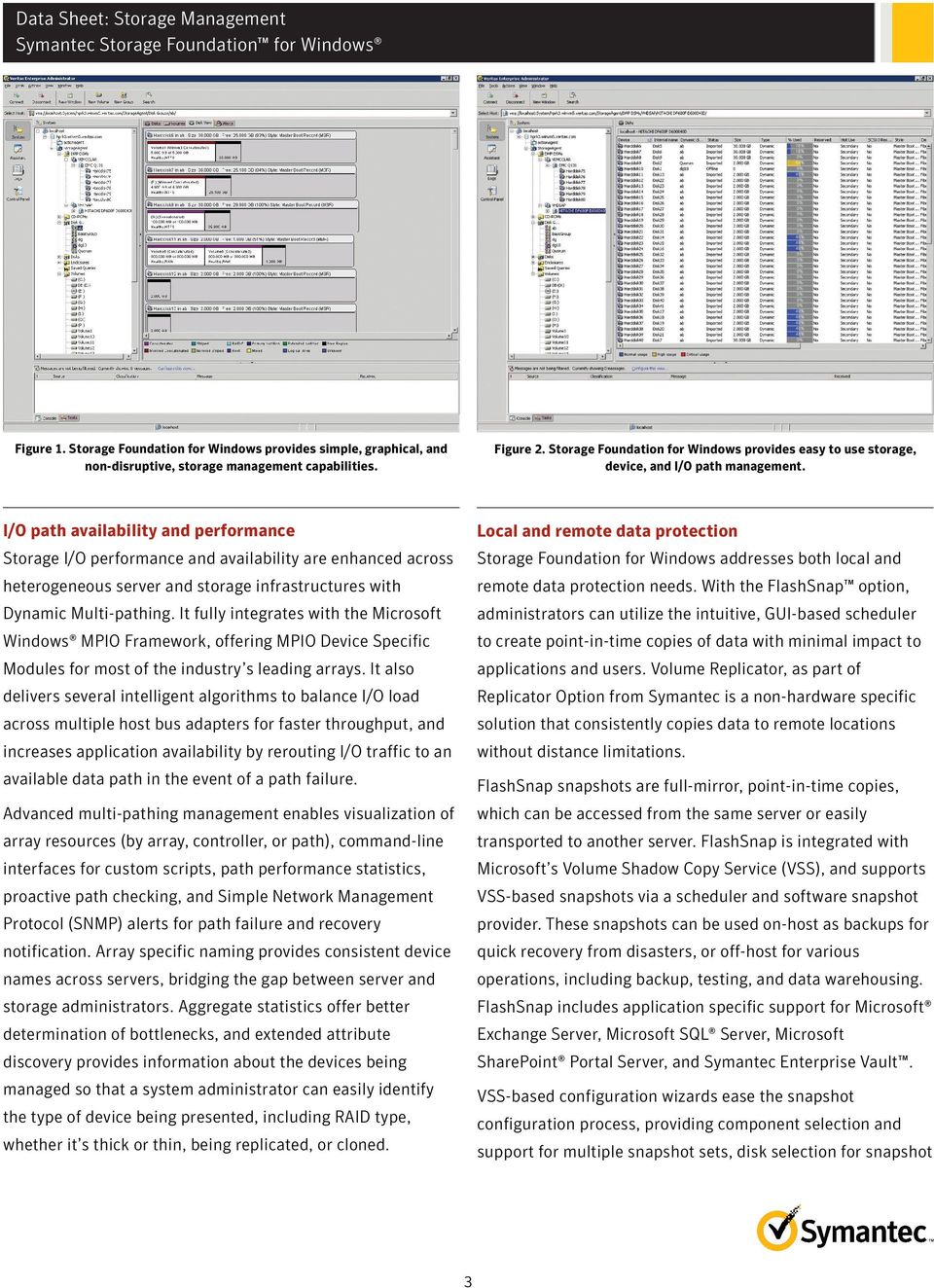

4 volumes, and setup schedules for snapshot operations. Along with these quick recovery wizards, entire workflows and configuration wizards are also available for other solutions in the Symantec Solutions Configuration Center. For business-critical applications that require remote recovery sites, Replicator Option is extremely flexible and can efficiently replicate data across any distance over IP networks. Organizations can combine virtually any storage devices on any major operating system to offer a consistent, easy-tomanage, highly available disaster recovery solution across the enterprise. Volume Replicator integrates with FlashSnap so that VSS-based snapshots can be taken at the production site and duplicated with minimal overhead at the disaster recovery site. The bunker replication feature allows organizations to implement the optimal data replication strategy, where they can replicate data over any distance while being able to maintain a recovery point objective of zero. both of these in a manner that is seamless and non-disruptive. Getting Thin. The first challenge for IT organizations is migrating to a thin environment. Most online storage migration tools perform block-level copying, which means that they cannot differentiate between used and unused data blocks, so they copy everything, including the unused blocks. This results in the destination and the source being identical and over provisioned by the thin array. Storage Foundation for Windows solves this challenge by identifying, which blocks are used and which are unused. It then copies only the used data blocks to the new, thin environment. Migration can occur while applications remain online. This facilitates an easy, non-disruptive and efficient transition to a thin environment at anytime. Staying Thin. The second challenge IT organizations face is keeping an environment thin over time. While this may seem like a rational expectation, array vendors typically don t make it easy to stay thin. Specifically, blocks of data that are erased by an application or user are typically not reclaimable, even by the most advanced thin-enabled arrays. Figure 3. Establishing snapshots and using rollbacks or roll-forward to recover from data corruption or logical failures Storage Foundation for Windows provides host-side intelligence that notifies thin arrays about freed blocks, and actively triggers reclamation of those blocks and returns them to the free pool. The reserve free pool remains as capacious as possible, which provides optimum value and decreases the need to purchase additional hardware. Other volume managers use a write-once, allocate-forever approach that does not allow unused blocks to be reclaimed and repurposed. "Get Thin" and "Stay Thin" Storage Foundation for Windows delivers unique capabilities when it comes to leveraging thin provisioning. Organizations can address the two major elements involved in the successful long-term adoption of thin provisioning: first they need to get thin and then they need to stay thin. Organizations need to do 4
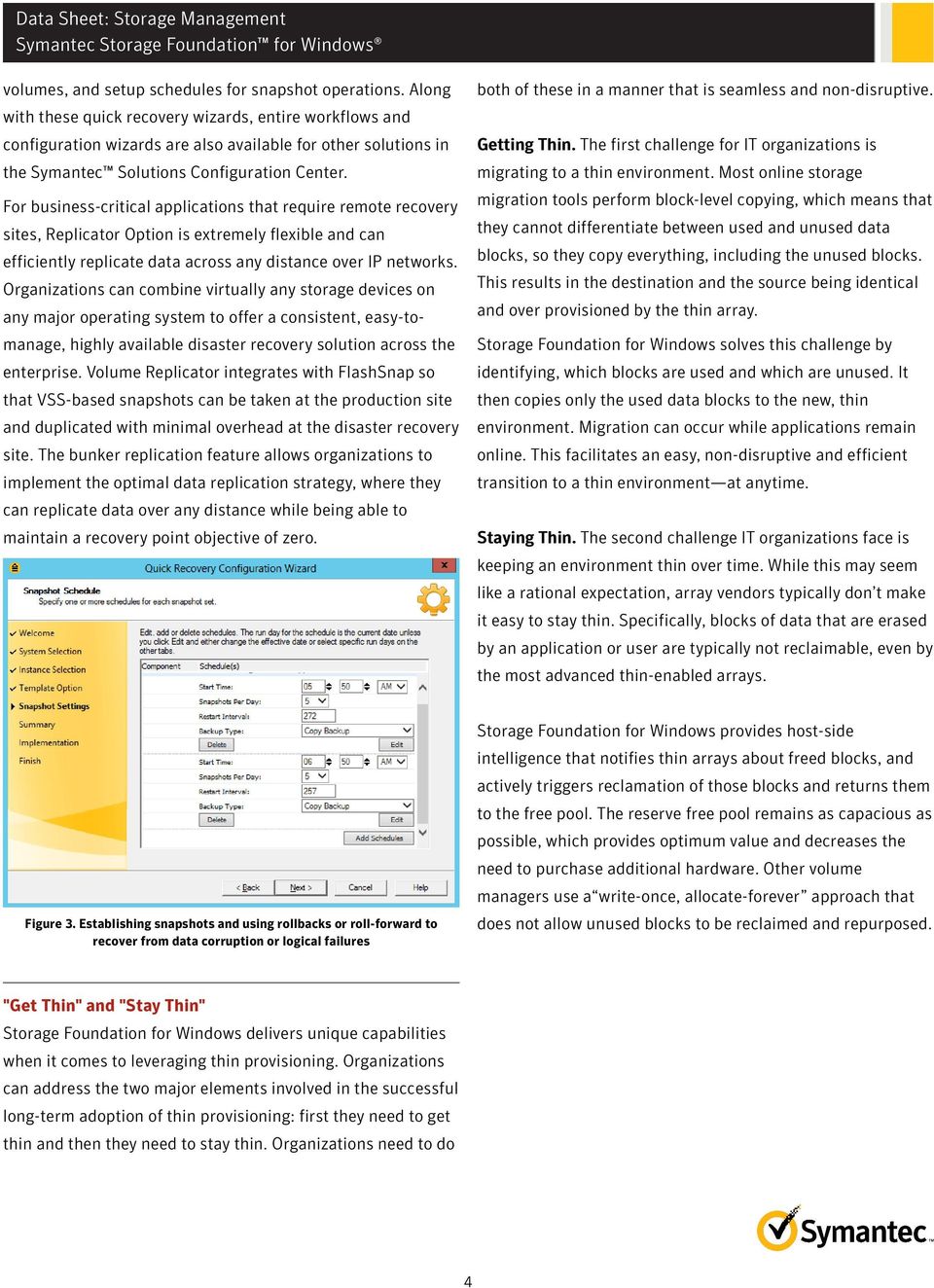
5 Replication Figure 4. Storage Foundation for Windows helping customers to migrate to thinly provisioned storage and continuously reclaiming unused storage after it has been migrated. Hyper-V integration Storage Foundation for Windows provides several benefits to virtual machines (VMs) when used in the Hyper-V parent partition, including multi-pathing, replication, storage migration, and snapshots, to extend Hyper-V s capabilities in the data center. Those benefits extend to both the VM's operating system and its associated data volumes, in both Quick Migration and Live Migration scenarios. For environments utilizing the new capabilities of Microsoft Hyper-V 2012 Virtual Fibre Channel capabilities, Storage Foundation for Windows can also provide all of its storage management and advanced capabilities for fibre channel attached storage from within the virtual machine. Live Storage Migration Storage Foundation for Windows running within the Hyper-V host (parent partition) includes a Storage Migration Wizard that allows selection at the VM level for live storage migration. The VM and all of its associated data files are identified and intelligently migrated while remaining online and accessible. This capability allows administrators a high level of flexibility when deploying new hardware, as VMs can be moved to a new array or to a Logical Unit Number (LUN) that has been configured for better performance. Running with the virtual machine, Storage Foundation for Windows, can provide online migration of application data volumes, whether that is between different virtual disks regardless of underlying parent storage or between fibre channel LUNs attached directly to the guest through Hyper-V Virtual Fibre Channel. Running in the Hyper-V parent, Replicator Option can selectively replicate volumes that contain the Virtual Hard Disk (VHD/VHDX) files used by the VMs and their application data over an IP network. Replication can be synchronous, asynchronous, or a combination of the two. If run within the virtual machines, Replicator Option provides replication of application data volumes when utilized with Cluster Server inside the virtual machine, Storage Foundation HA/DR for Windows provides a comprehensive end to end automated disaster recovery solution for the application. Campus Clusters As a host-based volume manager, Storage Foundation for Windows can mirror volumes across different storage devices and arrays. This allows shared storage clusters to be stretched beyond the confines of a data center to a secondary site, as long as the distance between them does not exceed latency limitations. These stretched clusters, also known as Campus Clusters, provide a level of high availability that can withstand a complete site failure, and provide a potential disaster recovery strategy for a Hyper-V environment from virtual machine level up when run in the Hyper-V parent. When utilized in Hyper-V guests with Hyper-V Virtual Fibre Channel, an application focused campus cluster disaster recovery strategy is achieved. Dynamic Multi-Pathing Storage Foundation for Windows extends multi-pathing capabilities to provide path failover and load balancing to Logical Unit Numbers that host Hyper-V VMs when utilized in the Hyper-V parent. If utilizing Hyper-V Virtual Fibre Channel for direct fibre channel access of storage to the virtual machine to accommodate scenarios around in guest clustering, Dynamic Multi-Pathing within the guest can ensure optimized available storage access directly between the Virtual Fibre Channel attached storage and the virtual machine. 5

6 Increased storage utilization and visibility across heterogeneous storage environments IT organizations struggle with soaring storage costs and capacity that becomes wasted through the regular cycle of operations. Storage Foundation for Windows enables administrators to improve storage utilization and capacity management across heterogeneous storage hardware. Storage volumes and file systems can be grown or shrunk dynamically, and storage can be provisioned to new applications without modifications or end-user downtime. Storage Foundation for Windows automates daily and repetitive storage tasks and performs them while keeping applications online, including RAID reconfiguration, defragmentation, file system resizing, volume resizing, and storage migrations, and even visibility to storage s latest technology, solid-state or flash drives. Supported OS platforms, applications, and storage devices Microsoft Windows Server 2008 R2, 2012 (x64), 2012 R2 (x64) Microsoft Exchange Server 2007, 2010 Microsoft SQL Server 2008, 2008 R2, 2012 Microsoft SharePoint Portal Server 2010, 2013 Microsoft System Center Operations Manager 2007 R2 Oracle 10g R2, 11g, 12c Symantec Enterprise Vault 9.0, 10.0 If the Storage Foundation for Windows Dynamic Multi-pathing or any third-party, multi-pathing software is utilized, refer to the latest Storage Foundation for Windows Hardware Compatibility List. If a multi-pathing option is not utilized, any hardware device in the Microsoft Windows Server Catalog is supported. Symantec Cluster Server for Windows and Symantec Cluster Server HA/DR for Windows Symantec Dynamic Multi-Pathing for Windows Veritas Operations Manager Packaging Symantec Storage Foundation Basic for Windows A free version of the industry-leading Storage Foundation for Windows is available for management of edge-tier and departmental workloads, with up to four volumes and two sockets per system. Storage Foundation Basic for Windows is available for free download at: sfbasic Symantec Storage Foundation for Windows Includes Dynamic Multi-pathing Symantec Storage Foundation Enterprise for Windows Includes FlashSnap and the Cluster Option for Microsoft Cluster Symantec Storage Foundation HA for Windows Includes Symantec Cluster Server for Windows, application agents and database agents Symantec Storage Foundation Enterprise HA for Windows Includes FlashSnap and Fast Failover Symantec Storage Foundation HA/DR for Windows Includes Hardware Replication agents and Global Cluster Option Symantec Storage Foundation Enterprise HA/DR for Windows Includes Storage Foundation HA for Windows, DMP, Hardware Replication agents, GCO, FlashSnap, and Fast Failover Symantec Replicator Option Includes Volume Replicator Please consult the hardware and software compatibility lists for the most t current and detailed operating system and storage array support information. Related products Symantec Storage Foundation HA for Windows 6
7 More Information Visit our website To speak with a Product Specialist in the U.S. Call toll-free 1 (800) To speak with a Product Specialist outside the U.S. For specific country offices and contact numbers, please visit our website. About Symantec Symantec protects the world s information and is the global leader in security, backup, and availability solutions. Our innovative products and services protect people and information in any environment from the smallest mobile device to the enterprise data center to cloud-based systems. Our industry-leading expertise in protecting data, identities, and interactions gives our customers confidence in a connected world. More information is available by connecting with Symantec at go.symantec.com/socialmedia. Symantec World Headquarters 350 Ellis St. Mountain View, CA USA +1 (650) (800) Copyright 2013 Symantec Corporation. All rights reserved. Symantec and the Symantec Logo are trademarks or registered trademarks of Symantec Corporation or its affiliates in the U.S. and other countries. Other names may be trademarks of their respective owners /14 7
Symantec Storage Foundation High Availability for Windows
 Symantec Storage Foundation High Availability for Windows Storage management, high availability and disaster recovery for physical and virtual Windows applications Data Sheet: High Availability Overview
Veritas Storage Foundation High Availability for Windows by Symantec
 Veritas Storage Foundation High Availability for Windows by Symantec Simple-to-use solution for high availability and disaster recovery of businesscritical Windows applications Data Sheet: High Availability
VERITAS Storage Foundation 4.3 for Windows
 DATASHEET VERITAS Storage Foundation 4.3 for Windows Advanced Volume Management Technology for Windows In distributed client/server environments, users demand that databases, mission-critical applications
Data Sheet: Storage Management Veritas Virtual Infrastructure Bringing enterprise-class storage management to virtual server environments
 Bringing enterprise-class storage management to virtual server environments Overview Veritas Virtual Infrastructure delivers the first unified enterprise-class virtualization solution, bringing industry-leading
Veritas Cluster Server from Symantec
 Delivers high availability and disaster recovery for your critical applications Data Sheet: High Availability Overview protects your most important applications from planned and unplanned downtime. Cluster
DATASHEET. Proactive Management and Quick Recovery for Exchange Storage
 VERITAS Edition for Microsoft Exchange 2000 Proactive Management and Quick Recovery for Exchange Storage The VERITAS Enterprise Administrator GUI enables centralized, cross-platform storage management.
Database Storage Management with Veritas Storage Foundation by Symantec Manageability, availability, and superior performance for databases
 Database Storage Management with Veritas Storage Foundation by Symantec Manageability, availability, and superior performance for databases Solution Brief: Database Storage Management Database Storage
Veritas Storage Foundation 4.3 for Windows by Symantec
 Veritas Storage Foundation 4.3 for Windows by Symantec Advanced online volume management technology for Windows Veritas Storage Foundation for Windows brings advanced volume management technology to Windows
Realizing the True Potential of Software-Defined Storage
 Realizing the True Potential of Software-Defined Storage Who should read this paper Technology leaders, architects, and application owners who are looking at transforming their organization s storage infrastructure
Consulting Services for Veritas Storage Foundation
 Reducing the complexity of enterprise storage management The continued explosive growth in corporate data, combined with the proliferation of disparate storage management tools and technologies, has created
Best Practices for Managing Storage in the Most Challenging Environments
 Best Practices for Managing Storage in the Most Challenging Environments Sanjay Srivastava Senior Product Manager, Symantec The Typical Virtualization Adoption Path Today, 20-25% of server workloads are
Transform Your Windows Data Center: Solve Key Storage and High Availability Challenges
 SOLUTION BRIEF: TRANSFORM YOUR WINDOWS DATA CENTER: SOLVE....... KEY... STORAGE......... AND.... HIGH..... AVAILABILITY............ Transform Your Windows Data Center: Solve Key Storage and High Availability
Data Sheet: Disaster Recovery Veritas Volume Replicator by Symantec Data replication for disaster recovery
 Data replication for disaster recovery Overview Veritas Volume Replicator provides organizations with a world-class foundation for continuous data replication, enabling rapid and reliable recovery of critical
Veritas InfoScale Availability
 Veritas InfoScale Availability Delivers high availability and disaster recovery for your critical applications Overview protects your most important applications from planned and unplanned downtime. InfoScale
Veritas Replicator from Symantec
 Data replication across multi-vendor storage for cost effective disaster recovery Data Sheet: Disaster Recovery Overviewview provides organizations with a comprehensive solution for heterogeneous data
How To Connect Virtual Fibre Channel To A Virtual Box On A Hyperv Virtual Machine
 Virtual Fibre Channel for Hyper-V Virtual Fibre Channel for Hyper-V, a new technology available in Microsoft Windows Server 2012, allows direct access to Fibre Channel (FC) shared storage by multiple guest
Symantec Cluster Server powered by Veritas
 Delivers high availability and disaster recovery for your critical applications Data Sheet: High Availability Overview protects your most important applications from planned and unplanned downtime. Cluster
WHITE PAPER: ENTERPRISE SECURITY. Symantec Backup Exec Quick Recovery and Off-Host Backup Solutions
 WHITE PAPER: ENTERPRISE SECURITY Symantec Backup Exec Quick Recovery and Off-Host Backup Solutions for Microsoft Exchange Server 2003 and Microsoft SQL Server White Paper: Enterprise Security Symantec
Comparison: Microsoft Logical Disk Manager (LDM) and VERITAS Volume Manager
 Comparison: Microsoft Logical Disk Manager (LDM) and VERITAS Volume Manager V E R I T A S W H I T E P A P E R for Microsoft Windows Table of Contents Online Storage Management Challenge.......................................................................................................................1
Virtual Machine Protection with Symantec NetBackup 7
 Overview There s little question that server virtualization is the single biggest game-changing trend in IT today. Budget-strapped IT departments are racing to embrace the promise of virtualization for
Symantec NetBackup 7 Clients and Agents
 Complete protection for your information-driven enterprise Overview Symantec NetBackup provides a simple yet comprehensive selection of innovative clients and agents to optimize the performance and efficiency
Enterprise Storage Solution for Hyper-V Private Cloud and VDI Deployments using Sanbolic s Melio Cloud Software Suite April 2011
 Enterprise Storage Solution for Hyper-V Private Cloud and VDI Deployments using Sanbolic s Melio Cloud Software Suite April 2011 Executive Summary Large enterprise Hyper-V deployments with a large number
VERITAS Volume Management Technologies for Windows
 WHITE PAPER VERITAS Volume Management Technologies for Windows V E R I T A S W H I T E P A P E R The Next Generation of Disk Management for Windows Platforms Windows 2000 and Windows Server 2003 1 TABLE
VERITAS Volume Management Technology for Windows COMPARISON: MICROSOFT LOGICAL DISK MANAGER (LDM) AND VERITAS STORAGE FOUNDATION FOR WINDOWS
 WHITE PAPER VERITAS Volume Management Technology for COMPARISON: MICROSOFT LOGICAL DISK MANAGER (LDM) AND VERITAS STORAGE FOUNDATION FOR WINDOWS 2000 and 2003 1 TABLE OF CONTENTS Table of Contents...2
Symantec NetBackup 7.1 What s New and Version Comparison Matrix
 Symantec 7.1 What s New and Version Comparison Matrix Symantec 7 allows customers to standardize backup and recovery operations across physical and virtual environments with fewer resources and less risk
Optimized data protection through one console for physical and virtual systems, including VMware and Hyper-V virtual systems
 Symantec Backup Exec 12.5 for Windows Small Business Server Premium and Standard Editions Comprehensive data protection and system recovery for Microsoft Windows Small Business Server Overview Symantec
ENTERPRISE STORAGE WITH THE FUTURE BUILT IN
 ENTERPRISE STORAGE WITH THE FUTURE BUILT IN Breakthrough Efficiency Intelligent Storage Automation Single Platform Scalability Real-time Responsiveness Continuous Protection Storage Controllers Storage
Optimizing the Data Center for Today s Federal Government
 WHITE PAPER: OPTIMIZING THE DATA CENTER FOR TODAY S FEDERAL......... GOVERNMENT............................... Optimizing the Data Center for Today s Federal Government Who should read this paper CIOs,
Windows Server 2008 Hyper-V Backup and Replication on EMC CLARiiON Storage. Applied Technology
 Windows Server 2008 Hyper-V Backup and Replication on EMC CLARiiON Storage Applied Technology Abstract This white paper provides an overview of the technologies that are used to perform backup and replication
STORAGE CENTER. The Industry s Only SAN with Automated Tiered Storage STORAGE CENTER
 STORAGE CENTER DATASHEET STORAGE CENTER Go Beyond the Boundaries of Traditional Storage Systems Today s storage vendors promise to reduce the amount of time and money companies spend on storage but instead
Backup Exec 15: Protecting Microsoft Hyper-V
 TECHNICAL BRIEF: BACKUP EXEC 15: PROTECTING MICROSOFT HYPER-V........................................ Backup Exec 15: Protecting Microsoft Hyper-V Who should read this paper Technical White Papers are
Optimizing the Data Center for Today s State & Local Government
 WHITE PAPER: OPTIMIZING THE DATA CENTER FOR TODAY S STATE...... &.. LOCAL...... GOVERNMENT.......................... Optimizing the Data Center for Today s State & Local Government Who should read this
Confidently Virtualize Business-critical Applications in Microsoft Hyper-V with Symantec ApplicationHA
 WHITE PAPER: VIRTUALIZE BUSINESS-CRITICAL APPLICATIONS.............. WITH..... CONFIDENCE..................... Confidently Virtualize Business-critical Applications in Microsoft Hyper-V with Symantec ApplicationHA
EMC Backup and Recovery for Microsoft SQL Server 2008 Enabled by EMC Celerra Unified Storage
 EMC Backup and Recovery for Microsoft SQL Server 2008 Enabled by EMC Celerra Unified Storage Applied Technology Abstract This white paper describes various backup and recovery solutions available for SQL
Backup Exec 2014: Protecting Microsoft SharePoint
 TECHNICAL BRIEF: BACKUP EXEC 2014: PROTECTING MICROSOFT SHAREPOINT........................................ Backup Exec 2014: Protecting Microsoft SharePoint Who should read this paper Technical White Papers
VERITAS Backup Exec 10 for Windows Servers AGENTS & OPTIONS MEDIA SERVER OPTIONS KEY BENEFITS AGENT AND OPTION GROUPS
 DATASHEET VERITAS Backup Exec 10 for Windows Servers AGENTS & OPTIONS VERITAS Backup Exec for Windows Servers is the Gold Standard in Windows data protection providing comprehensive, cost effective, certified
Data Sheet: Backup & Recovery Symantec Backup Exec 12.5 for Windows Servers The gold standard in Windows data protection
 The gold standard in Windows data protection Overview Symantec Backup Exec 12.5 delivers market-leading backup and recovery protection from server to desktop, providing complete data protection for the
End-to-End Availability for Microsoft SQL Server
 WHITE PAPER VERITAS Storage Foundation HA for Windows End-to-End Availability for Microsoft SQL Server January 2005 1 Table of Contents Executive Summary... 1 Overview... 1 The VERITAS Solution for SQL
How VERITAS Storage Foundation TM for Windows Compliments Microsoft Windows Server 2003
 White Paper VERITAS Storage Foundation TM 4.1 for Windows How VERITAS Storage Foundation TM for Windows Compliments Microsoft Windows Server 2003 9/14/2004 1 Introduction...3 Storage Technologies In Windows
Building Private Cloud Architectures
 Building Private Cloud Architectures Chandra Rangan Sr. Director, Storage & Availability Management Group Symantec Corporation SNW Spring 2011: Building Private Cloud Architectures 1 State of the infrastructure
VERITAS and HP A LONG-TERM COMMITMENT
 VERITAS and HP A LONG-TERM COMMITMENT Hewlett-Packard holds the respect and trust of enterprises worldwide that depend on HP servers, storage, printers, and other equipment to run their businesses. HP
Optimized Storage Solution for Enterprise Scale Hyper-V Deployments
 Optimized Storage Solution for Enterprise Scale Hyper-V Deployments End-to-End Storage Solution Enabled by Sanbolic Melio FS and LaScala Software and EMC SAN Solutions Proof of Concept Published: March
VERITAS Business Solutions. for DB2
 VERITAS Business Solutions for DB2 V E R I T A S W H I T E P A P E R Table of Contents............................................................. 1 VERITAS Database Edition for DB2............................................................
Symantec NetBackup Snapshots, Continuous Data Protection, and Replication
 Symantec NetBackup Snapshots, Continuous Data Protection, and Replication Technical Brief: Symantec NetBackup Symantec NetBackup Snapshots, Continuous Data Protection, and Replication Contents Overview...............................................................................................
Symantec Storage Foundation and High Availability Solutions Microsoft Clustering Solutions Guide for Microsoft SQL Server
 Symantec Storage Foundation and High Availability Solutions Microsoft Clustering Solutions Guide for Microsoft SQL Server Windows 6.1 February 2014 Symantec Storage Foundation and High Availability Solutions
Protecting Miscrosoft Hyper-V Environments
 Protecting Miscrosoft Hyper-V Environments Who should read this paper Technical White Papers are designed to introduce Veritas partners and end users to key technologies and technical concepts that are
EMC Virtual Infrastructure for Microsoft Applications Data Center Solution
 EMC Virtual Infrastructure for Microsoft Applications Data Center Solution Enabled by EMC Symmetrix V-Max and Reference Architecture EMC Global Solutions Copyright and Trademark Information Copyright 2009
Symantec NetBackup 7.5 for VMware
 V-Ray visibility into virtual machine protection Solution Overview: Data Protection Overview There is little question that server virtualization is the single biggest game-changing trend in IT today. Budget-strapped
Mayur Dewaikar Sr. Product Manager Information Management Group Symantec Corporation
 Next Generation Data Protection with Symantec NetBackup 7 Mayur Dewaikar Sr. Product Manager Information Management Group Symantec Corporation White Paper: Next Generation Data Protection with NetBackup
Veritas Cluster Server by Symantec
 Veritas Cluster Server by Symantec Reduce application downtime Veritas Cluster Server is the industry s leading clustering solution for reducing both planned and unplanned downtime. By monitoring the status
Symantec Server Management Suite 7.6 powered by Altiris technology
 Symantec Server Management Suite 7.6 powered by Altiris technology Standardized control for distributed, heterogeneous server environments Data Sheet: Endpoint Management Overviewview Symantec Server Management
Data Sheet: Storage Management Veritas CommandCentral Storage 5.1 Centralized visibility and control across heterogeneous storage environments
 Centralized visibility and control across heterogeneous storage environments Overview Veritas CommandCentral Storage is an industry standard based, comprehensive software solution that seamlessly integrates
Veritas NetBackup 6.0 Database and Application Protection
 Veritas NetBackup 6.0 Database and Application Protection Innovative data protection When it comes to database and application recovery, Symantec has a clear goal in mind simplify the complexity of database
WHITE PAPER: DATA PROTECTION. Veritas NetBackup for Microsoft Exchange Server Solution Guide. Bill Roth January 2008
 WHITE PAPER: DATA PROTECTION Veritas NetBackup for Microsoft Exchange Server Solution Guide Bill Roth January 2008 White Paper: Veritas NetBackup for Microsoft Exchange Server Solution Guide Content 1.
Symantec Backup Exec 2014 Agents and Options
 Symantec Backup Exec 2014 Agents and Options Data Sheet: Data Protection Overview enhance and extend Backup Exec features, capabilities, and platform support. Whether you need to protect VMware vsphere,
EMC VPLEX FAMILY. Continuous Availability and data Mobility Within and Across Data Centers
 EMC VPLEX FAMILY Continuous Availability and data Mobility Within and Across Data Centers DELIVERING CONTINUOUS AVAILABILITY AND DATA MOBILITY FOR MISSION CRITICAL APPLICATIONS Storage infrastructure is
Nutanix Solution Note
 Nutanix Solution Note Version 1.0 April 2015 2 Copyright 2015 Nutanix, Inc. All rights reserved. This product is protected by U.S. and international copyright and intellectual property laws. Nutanix is
Administration of Veritas Storage Foundation High Availability 5.0 for Windows
 Administration of Veritas Storage Foundation High Availability 5.0 for Windows Study Guide The following tables list the Symantec Certification exam objectives for the Administration of Veritas Storage
Backup Exec 15 Agents and Options
 DATA PROTECTION Backup Exec 15 Agents and Options Enhance and extend Backup Exec features, capabilities, and platform support Overview enhance and extend Backup Exec features, capabilities, and platform
OPTIMIZING EXCHANGE SERVER IN A TIERED STORAGE ENVIRONMENT WHITE PAPER NOVEMBER 2006
 OPTIMIZING EXCHANGE SERVER IN A TIERED STORAGE ENVIRONMENT WHITE PAPER NOVEMBER 2006 EXECUTIVE SUMMARY Microsoft Exchange Server is a disk-intensive application that requires high speed storage to deliver
VERITAS NetBackup 6.0 Database and Application Protection
 VERITAS NetBackup 6.0 Database and Application Protection INNOVATIVE DATA PROTECTION When it comes to database and application recovery, VERITAS Software has a clear goal in mind simplify the complexity
Veritas Backup Exec : Protecting Microsoft SharePoint
 Veritas Backup Exec : Protecting Microsoft SharePoint Who should read this paper Technical White Papers are designed to introduce IT professionals to key technologies and technical concepts that are associated
IBM System Storage DS5020 Express
 IBM DS5020 Express Manage growth, complexity, and risk with scalable, high-performance storage Highlights Mixed host interfaces support (Fibre Channel/iSCSI) enables SAN tiering Balanced performance well-suited
Symantec NetBackup deduplication general deployment guidelines
 TECHNICAL BRIEF: SYMANTEC NETBACKUP DEDUPLICATION GENERAL......... DEPLOYMENT............. GUIDELINES.................. Symantec NetBackup deduplication general deployment guidelines Who should read this
Redefining Microsoft SQL Server Data Management. PAS Specification
 Redefining Microsoft SQL Server Data Management APRIL Actifio 11, 2013 PAS Specification Table of Contents Introduction.... 3 Background.... 3 Virtualizing Microsoft SQL Server Data Management.... 4 Virtualizing
Archiving, Backup, and Recovery for Complete the Promise of Virtualization
 Archiving, Backup, and Recovery for Complete the Promise of Virtualization Unified information management for enterprise Windows environments The explosion of unstructured information It is estimated that
Symantec Backup Exec.cloud
 Automatic, continuous, and secure protection that backs up data to the cloud, or via a hybrid approach combining on-premise and cloud-based backup. Data Sheet: Symantec.cloud Only 21 percent of SMBs are
INCREASING EFFICIENCY WITH EASY AND COMPREHENSIVE STORAGE MANAGEMENT
 INCREASING EFFICIENCY WITH EASY AND COMPREHENSIVE STORAGE MANAGEMENT UNPRECEDENTED OBSERVABILITY, COST-SAVING PERFORMANCE ACCELERATION, AND SUPERIOR DATA PROTECTION KEY FEATURES Unprecedented observability
Symantec Backup Exec 2012
 Better backup for all Data Sheet: Backup and Disaster Recovery Overview is one integrated product that protects virtual and physical environments, simplifies both backup and disaster recovery, and recovers
Powering Linux in the Data Center
 SOLUTION BRIEF: POWERING LINUX IN THE DATA CENTER........................................ Powering Linux in the Data Center Who should read this paper Linux IT Architect and Director of IT for Linux Servers
Symantec Backup Exec 11d for Windows Small Business Server Premium and Standard Editions
 Symantec Backup Exec 11d for Windows Small Business Server Premium and Standard Editions Comprehensive data protection and recovery for Microsoft Windows Small Business Server Today s small businesses
Downtime, whether planned or unplanned,
 Deploying Simple, Cost-Effective Disaster Recovery with Dell and VMware Because of their complexity and lack of standardization, traditional disaster recovery infrastructures often fail to meet enterprise
EMC RECOVERPOINT FAMILY
 EMC RECOVERPOINT FAMILY Cost-effective local and remote data protection and disaster recovery solution ESSENTIALS Maximize application data protection and disaster recovery Protect business applications
High Availability with Windows Server 2012 Release Candidate
 High Availability with Windows Server 2012 Release Candidate Windows Server 2012 Release Candidate (RC) delivers innovative new capabilities that enable you to build dynamic storage and availability solutions
Confidently Virtualize Business-Critical Applications in Microsoft
 Confidently Virtualize Business-Critical Applications in Microsoft Hyper-V with Veritas ApplicationHA Who should read this paper Windows Virtualization IT Architects and IT Director for Windows Server
Data Sheet: Archiving Symantec Enterprise Vault Store, Manage, and Discover Critical Business Information
 Store, Manage, and Discover Critical Business Information Managing millions of mailboxes for thousands of customers worldwide, Enterprise Vault, the industry leader in email and content archiving, enables
Symantec Enterprise Vault for Microsoft Exchange
 Symantec Enterprise Vault for Microsoft Exchange Store, manage, and discover critical business information Data Sheet: Archiving Trusted and proven email archiving Symantec Enterprise Vault, the industry
Symantec NetBackup 5220
 A single-vendor enterprise backup appliance that installs in minutes Data Sheet: Data Protection Overview is a single-vendor enterprise backup appliance that installs in minutes, with expandable storage
High availability and disaster recovery with Microsoft, Citrix and HP
 High availability and disaster recovery White Paper High availability and disaster recovery with Microsoft, Citrix and HP Using virtualization, automation and next-generation storage to improve business
Symantec and VMware: Virtualizing Business Critical Applications with Confidence WHITE PAPER
 Symantec and VMware: Virtualizing Business Critical Applications with Confidence WHITE PAPER Challenges of Using Traditional High-Availability Solutions Business-critical applications and the systems they
Symantec Backup Exec 11d for Windows Small Business Server Premium and Standard Editions
 Symantec Backup Exec 11d for Windows Small Business Server Premium and Standard Editions Comprehensive data protection and recovery for Microsoft Windows Small Business Server Today s small businesses
Redefining Microsoft SQL Server Data Management
 Redefining Microsoft SQL Server Data Management Contact Actifio Support As an Actifio customer, you can get support for all Actifio products through the Support Portal at http://support.actifio.com/. Copyright,
Simplified Management With Hitachi Command Suite. By Hitachi Data Systems
 Simplified Management With Hitachi Command Suite By Hitachi Data Systems April 2015 Contents Executive Summary... 2 Introduction... 3 Hitachi Command Suite v8: Key Highlights... 4 Global Storage Virtualization
Symantec NetBackup OpenStorage Solutions Guide for Disk
 Symantec NetBackup OpenStorage Solutions Guide for Disk UNIX, Windows, Linux Release 7.6 Symantec NetBackup OpenStorage Solutions Guide for Disk The software described in this book is furnished under a
WHITE PAPER PPAPER. Symantec Backup Exec Quick Recovery & Off-Host Backup Solutions. for Microsoft Exchange Server 2003 & Microsoft SQL Server
 WHITE PAPER PPAPER Symantec Backup Exec Quick Recovery & Off-Host Backup Solutions Symantec Backup Exec Quick Recovery & Off-Host Backup Solutions for Microsoft Exchange Server 2003 & Microsoft SQL Server
Altiris Server Management Suite 7.1 from Symantec
 Altiris Server Suite 7.1 from Symantec Standardized control for distributed, heterogeneous server environments Data Sheet: Endpoint Overview The complexity of managing today s data centers is complicated
Technology Insight Series
 Evaluating Storage Technologies for Virtual Server Environments Russ Fellows June, 2010 Technology Insight Series Evaluator Group Copyright 2010 Evaluator Group, Inc. All rights reserved Executive Summary
EMC Virtual Infrastructure for Microsoft Applications Data Center Solution
 EMC Virtual Infrastructure for Microsoft Applications Data Center Solution Enabled by EMC Symmetrix V-Max and Reference Architecture EMC Global Solutions Copyright and Trademark Information Copyright 2009
CA ARCserve Replication and High Availability Deployment Options for Hyper-V
 Solution Brief: CA ARCserve R16.5 Complexity ate my budget CA ARCserve Replication and High Availability Deployment Options for Hyper-V Adding value to your Hyper-V environment Overview Server virtualization
Instant Recovery for VMware
 NETBACKUP 7.6 FEATURE BRIEFING INSTANT RECOVERY FOR VMWARE NetBackup 7.6 Feature Briefing Instant Recovery for VMware Version number: 1.0 Issue date: 2 nd August 2013 This document describes a feature
Solution Overview: Data Protection Archiving, Backup, and Recovery Unified Information Management for Complex Windows Environments
 Unified Information Management for Complex Windows Environments The Explosion of Unstructured Information It is estimated that email, documents, presentations, and other types of unstructured information
The Benefits of Virtualizing
 T E C H N I C A L B R I E F The Benefits of Virtualizing Aciduisismodo Microsoft SQL Dolore Server Eolore in Dionseq Hitachi Storage Uatummy Environments Odolorem Vel Leveraging Microsoft Hyper-V By Heidi
What s New with VMware Virtual Infrastructure
 What s New with VMware Virtual Infrastructure Virtualization: Industry-Standard Way of Computing Early Adoption Mainstreaming Standardization Test & Development Server Consolidation Infrastructure Management
Microsoft SharePoint 2010 on VMware Availability and Recovery Options. Microsoft SharePoint 2010 on VMware Availability and Recovery Options
 This product is protected by U.S. and international copyright and intellectual property laws. This product is covered by one or more patents listed at http://www.vmware.com/download/patents.html. VMware
Simplify Your Windows Server Migration
 SOLUTION BRIEF: ENDPOINT MANAGEMENT........................................ Simplify Your Windows Server Migration Who should read this paper Windows Server 2003 customers looking to migrate to the latest
Nimble Storage for VMware View VDI
 BEST PRACTICES GUIDE Nimble Storage for VMware View VDI N I M B L E B E S T P R A C T I C E S G U I D E : N I M B L E S T O R A G E F O R V M W A R E V I E W V D I 1 Overview Virtualization is an important
WHITE PAPER: TECHNICAL. Enhancing Microsoft SQL Server 2005 Availability with Veritas Storage Foundation for Windows
 WHITE PAPER: TECHNICAL Enhancing Microsoft SQL Server 2005 Availability with Veritas Storage Foundation for Windows Saveen Pakala, Product Manager Paul Belk, Technical Product Manager Storage and Availability
Taking the Leap to Virtualization
 WHITE PAPER: TAKING THE LEAP TO VIRTUALIZATION........................................ Taking the Leap to Virtualization Who should read this paper Midsized Business IT Directors, IT Managers and IT Administration