
The Benefits of Virtualizing
|
|
|
- Dylan Barnett
- 10 years ago
- Views:
Transcription
1 T E C H N I C A L B R I E F The Benefits of Virtualizing Aciduisismodo Microsoft SQL Dolore Server Eolore in Dionseq Hitachi Storage Uatummy Environments Odolorem Vel Leveraging Microsoft Hyper-V By Heidi Biggar, Larry Meese and Anu Chawla April 2010 Hitachi Data Systems
2 2 Table of Contents Executive Summary 3 Introduction 4 Microsoft Hyper-V 4 Hitachi Storage 4 Business Benefits of Virtualizing SQL Server 2008 in Hitachi Storage Environments 5 Cost Savings 5 Agility and Manageability Improvement 6 Business Continuity 6 Deployment Considerations 7 Virtual Server Considerations 7 Storage Considerations 8 Business Continuity Considerations 8 Test Scenario: SQL Server Workload Performance 8 Hardware Description 9 Performance Test Description and Results 10 Conclusion 12 Appendix A Related Links 13

3 3 Executive Summary Server virtualization is a hot trend in the information technology (IT) world because of the many business and technical benefits it can provide. By enabling organizations to run multiple operating systems and applications on a single physical server versus multiple physical machines, server virtualization can help organizations significantly reduce hardware, energy and management overhead. Server virtualization is also a key building block of a dynamic IT infrastructure, which is all about efficiency, resiliency and agility. From an application perspective, server virtualization allows organizations to consolidate workloads. This increases resource utilization and lowers capital and operational costs. The more agile the IT environment is the more an organization is able to meet changing business and application requirements. The type of storage platform that organizations deploy to support a virtualized server environment is very important. The right storage system platform should ensure low latency for maximum performance, provide scalable capacity and bandwidth as application demands change, and automatically balance application workloads as needed. The right platform might also give organizations the ability to virtualize their storage environments or pool heterogeneous disk resources to optimize and protect the application environment. This paper discusses the specific benefits that organizations can achieve by virtualizing Microsoft SQL Server in Hitachi Adaptable Modular Storage or Hitachi Universal Storage Platform environments. These benefits include: Lower capital and operational costs Improved agility and manageability Higher availability Many of the data points and test results in this paper were the product of testing conducted by the SQL Server Customer Advisory Team (SQLCAT). The intent of this testing (specifically of SQL and Microsoft Hyper-V environments) was to provide guidance to end users. Further information about this testing as well as papers from this team can be found at For best results use Acrobat Reader 8.0

4 4 Introduction To optimize Microsoft SQL Server 2008 environments, organizations must pay attention to both the server and the storage environment supporting the application. Choosing the right virtual and physical technologies can have a significant impact on IT and business performance. In a Microsoft environment, Hyper-V is the obvious choice for the virtualization infrastructure and can be implemented as a role within Microsoft Windows Server On the storage side, Hitachi Data Systems offers best-in-class midrange and enterprise-class storage solutions to meet organizations' varying requirements. Below, these technologies are discussed in more detail. Microsoft Hyper-V Hyper-V is hypervisor-based technology that Microsoft leverages to create and manage the virtual server environment. It mediates hardware resource sharing among participating virtual servers and the physical hosts that they are running on. Hyper-V is integrated with Microsoft System Center Virtual Machine Manager (SCVMM) 2008 and Microsoft Management Console (MMC) snap-ins for improved management. SCVMM makes it possible for IT professionals to easily and cost-effectively manage physical and virtual machines through a single console, rapidly provision new virtual machines (VMs) and consolidate underutilized physical servers. Hyper-V with SCVMM makes it easier for administrators to move workloads between physical servers. Although SQL Server 2008 will continue to be managed by the typical management tools as if it were still located on a physical machine, SCVMM simplifies the management of the virtual machine that hosts SQL Server, and its migration from physical to virtual environments. Hitachi Storage The Hitachi Adaptable Modular Storage 2000 family, the Hitachi Universal Storage Platform V and Hitachi Universal Storage Platform VM provide scalable support for demanding SQL Server 2008 environments. The 2000 family is designed for midrange organization demands and the Universal Storage Platform is designed for enterprise application requirements. Each option has features that make it ideal for virtualized SQL Server environments. For example, Adaptable Modular Storage is able to distribute workloads across multiple storage controllers and automatically balance workloads in a virtualized environment. This ensures maximum availability and performance from a storage perspective, which is critical in SQL Server 2008 environments. It also has Hitachi Dynamic Load Balancing, symmetric active-active controllers and a SAS architecture that enhances availability and makes the management of virtualized environments easier by giving each controller direct access to data through multiple data paths. The Universal Storage Platform enables organizations to virtualize the back end storage supporting the SQL Server environment as well as leverage Hitachi system-based resources, such as replication, across the virtualized environment. The ability to draw capacity and bandwidth from a pool as needed and leverage technologies such as Hitachi system-based replication across the environment

5 5 enables SQL Server 2008 to run more efficiently and improve the availability and flexibility of the entire system. Additionally, Hitachi enables advanced dynamic provisioning, partitioning and wide striping. These features benefit SQL Server 2008 environments by enabling the following: Partitioning. Partitioning enables storage system resources such as cache and ports to be isolated and dedicated to applications and workloads as needed. SQL Effect: Administrators can isolate system resources and dedicate them to SQL Server 2008 as needed. This mitigates the potential impact of other workloads on the system so that service objectives are met. Dynamic provisioning. Dynamic provisioning maximizes disk capacity and eliminates the need to pre-allocate capacity. SQL Effect: Storage capacity is pooled and dynamically provisioned to SQL Server 2008 as needed. Disk capacity is not consumed until the physical server, virtual server or application writes to the volume. This functionality permits storage and database administrators to "right size" the underlying storage infrastructure to mitigate overprovisioned, underutilized database capacity. Wide striping. Wide striping enables logical units to be allocated and dispersed across all physical disks in the virtualized storage pool. This can yield performance benefits; but, more importantly, it can significantly improve storage utilization. SQL Effect: Traditionally, storage capacity for applications such as SQL Server 2008 is sized for performance first and capacity second. To meet performance requirements, more disk spindles are allocated to applications and much of the disk capacity is unused. Wide striping avoids this in SQL Server environments by leveraging the I/O processing capabilities of all spindles in a given pool versus a fixed number of disk spindles with traditional LUN allocations. In addition, wide striping across a storage pool provides an I/O buffer that SQL Server can burst into without degrading performance or elongating response times. Business Benefits of Virtualizing SQL Server 2008 in Hitachi Storage Environments Companies that install SQL Server 2008 into a Hyper-V environment and use the right storage platforms can expect to see significant business benefits, including improved cost savings, enhanced agility, manageability and higher availability. Cost Savings In the virtualized SQL Server environment, cost savings can be generated from: Reduced IT footprint. Organizations that virtualize their server and storage environments need fewer physical resources, such as people and technology, to support their SQL Server 2008 environments. In addition, fewer physical servers use less floor space, and less electricity is required to power and cool the environment. Easier management. Server and storage virtualization make management of the SQL Server environment easier and more efficient. This can reduce management costs; fewer administrators
6 6 can manage more virtual database servers. Administrators can proactively monitor and manage their virtualized SQL Server 2008 environments with tools such as Microsoft SCVMM 2008 and Microsoft System Center Operations Manager (SCOM) These tools make it possible to reconfigure virtual SQL Server instances while they are running and reduce downtime costs. Storage platform features. Thin provisioning enabled by the Hitachi storage platforms eliminates the need to pre-allocate physical disk capacity and therefore minimizes excessive provisioning. Physical disk capacity is not consumed until the physical server, virtual server or application writes to the volume. This enables administrators to make the maximum use of disk capacity. In addition, storage virtualization enables organizations to pool physical disk resources, which can generate consolidation and improve utilization, especially when combined with thin provisioning. Licensing advantages. Server consolidation can also have a significant impact on software costs by reducing the number of licenses required. With Windows Server 2008 Standard Edition, three virtual machines can be hosted on one physical server without the need to purchase additional licenses. With the Enterprise Edition, an unlimited number of virtual machines can be hosted on one physical server without the need to purchase additional licenses. The Enterprise Edition also provides the ability to reassign licenses in a server farm. Agility and Manageability Improvement Hyper-V and Hitachi storage platforms enhance SQL Server 2008 manageability and agility in a virtualized environment by: Isolating application workloads on the storage system. Storage virtualization improves server virtualization performance by making it possible for administrators to isolate application workloads and system resources to support specific service level agreements. The Hitachi storage platforms can logically and physically isolate applications from all components of the storage system, from channel to cache to storage devices. Providing heterogeneous storage support. With the Hitachi Universal Storage Platform V and Universal Storage Platform VM, both Hitachi and non-hitachi storage can be externally attached and virtualized, enabling users to take advantage of both Hitachi and non-hitachi disks in their environments. This extends the advanced intelligence and capabilities of the Universal Storage Platform to other storage units, which enables organizations to preserve prior capital investments in legacy storage platforms. Allowing live automated provisioning of storage. Virtualizing storage minimizes the risk of database service interruption by automating the provisioning of storage resources within the SQL Server 2008 environment. By enabling live provisioning, administrators do not have to shut down the entire database system to reconfigure partitions for one application that requires more storage capacity. In some cases, provisioning can be entirely automated. Business Continuity Virtualizing the SQL Server 2008 environment can greatly benefit business continuity through backup, high availability and disaster recovery capabilities. Simplified backup and recovery. All of the virtual machines running on a physical server can be stored as a unit, which can then be replicated to another server in the same location or in a
7 7 geographically separate location and brought online. The configuration of each virtual machine is stored and copied as part of the SQL Server environment. This means that if the virtual machine hosting a particular SQL Server instance crashes, it can be restored and brought back online quickly, without the need to rebuild the server environment from scratch. Availability during server maintenance. Administrators can minimize application downtime by manually or automatically migrating database servers between physical servers without shutting down SQL Server For example, in planned downtime scenarios, a virtual machine can be migrated from one node to a different node to service users, while maintenance takes place in the original node. During this time the database can still serve user requests and run batch operations, providing higher availability. Failover support through physical host clustering. Physical host failover clusters ensure that if the virtual machine goes down on one node, the same virtual machine can be automatically resurrected in a different node. In addition, the use of a virtual IP ensures that there is no need to reset connections after the failover is complete. Host clusters are not ideal from a database standpoint as the transactional context will be lost. However, this ensures that the database is available immediately to restart batch operations or to take user requests even if some users need to resubmit transactions that were in process during the failover. Business continuity or disaster recovery. Hitachi Storage Cluster for Microsoft Hyper-V provides real time or near real time recovery of SQL Server environments locally and across geographically dispersed environments to protect organizations against system-wide or site-wide outages or disasters. This Hyper-V solution works with Microsoft failover clustering technology and leverages Hitachi system-based replication software, such as Hitachi TrueCopy Synchronous Remote Replication in Disaster Recovery software bundle, Hitachi In-System Heterogeneous Replication software bundle and Hitachi Universal Replicator software 1. Deployment Considerations Making the move from a physical to a virtualized SQL Server 2008 environment requires thorough consideration of the entire IT infrastructure, including the server and network environment, storage platforms, applications, utilization patterns, and both business and technical deployment goals. The following section lists some of the more critical virtual server, storage and business continuity considerations. Consider this list to be a starting point as each database environment has its own deployment considerations. Virtual Server Considerations How many servers will be virtualized? Will workloads be isolated from one another on separate virtual servers? In some situations, isolating database workloads can optimize performance. How can the virtual servers be configured so that maintenance tasks such as backups and index 1 See co-branded white paper, Optimizing High Availability and Disaster Recovery with Hitachi Storage Cluster in Microsoft Virtualized Environments at: pdf

8 8 management will not substantially reduce server performance? How will access to the virtual servers be restricted? Will administrative rights that are applied to one virtual server also be applied to others? Storage Considerations What will the capacity of the storage system be? How fast does the storage system need to be? How will the storage space be partitioned? How many logical units will be needed? Can the storage capacity of the system be increased or repartitioned without downtime? How quickly can it be increased? What type and pattern of data will be transferred between the servers and the storage device? How will the database be backed up and restored? Business Continuity Considerations Will failover protection for physical servers be needed? How many backup physical servers will be needed? Will the virtual servers that are hosted on several physical servers fail over to one backup physical server or to several? Can the virtual database servers be easily moved between physical servers? Will the backup virtual database servers be located at a remote site? What are the backup storage requirements at the remote site? What will the data bandwidth of the connection between the primary and the remote site be? Will the databases need to be mirrored? This is necessary if failover protection is needed at the individual database level. How quickly can the solution be scaled to accommodate future business continuity needs? Test Scenario: SQL Server Workload Performance This section describes a database solution and the results of performance tests that measured its capacity to process online transaction processing (OLTP) workloads. A virtualized SQL Server 2008 environment managed by Hyper-V is hosted on one physical server running Windows Server The database data and log files were stored on a Hitachi Adaptable Modular Storage system. Figure 1 illustrates the system architecture.
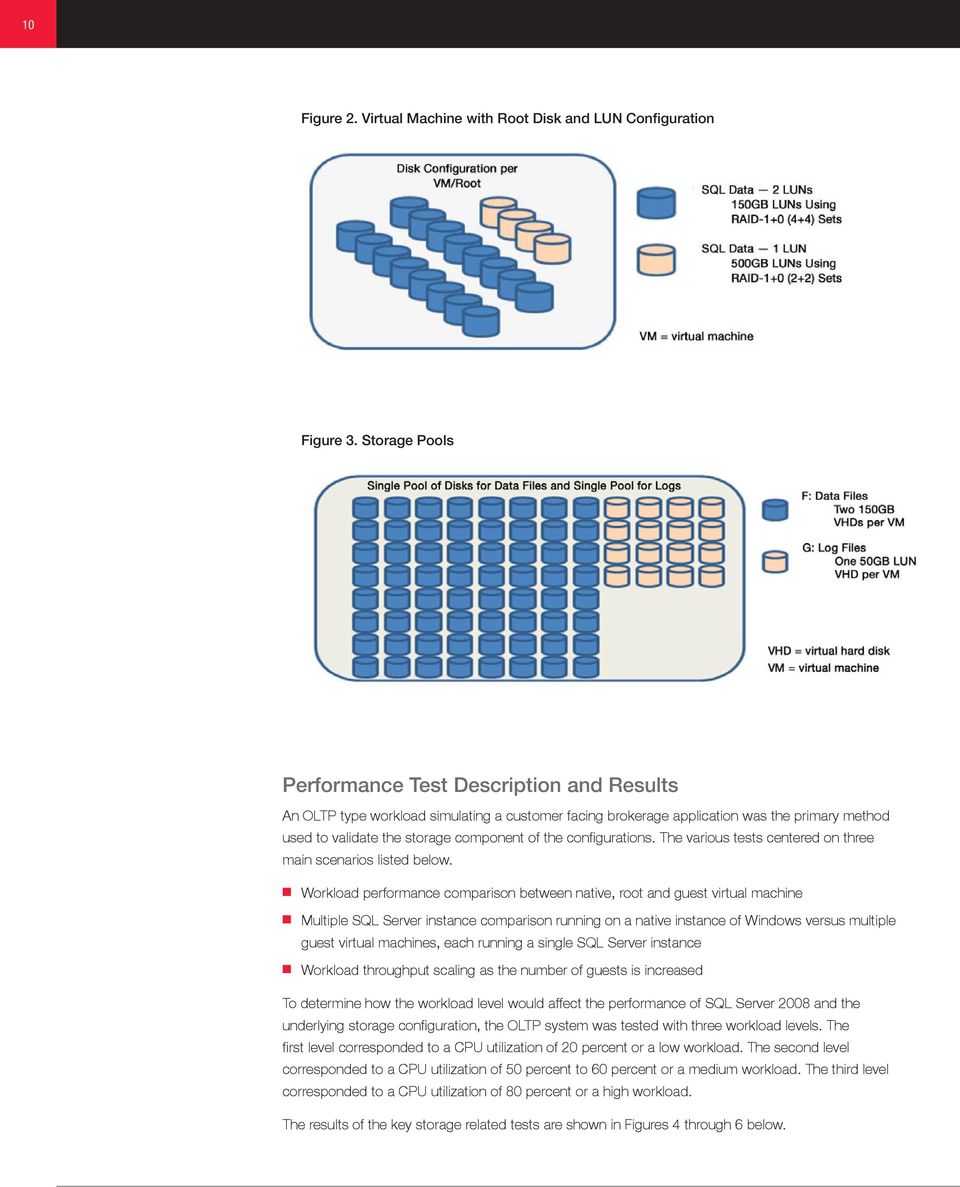
9 9 Figure 1. Test OLTP Architecture Hardware Description The physical server utilized was a Dell R900 with the following configuration: Quad-core 2.40 gigahertz (GHz) Intel processor with 1.06GHz bus speed 6 megabyte (MB) level 2 memory cache 64 gigabyte (GB) physical memory Two 4GB per second dual port Emulex host bus adapters The Hitachi Adaptable Modular Storage system maintained two primary configurations for the various conducted tests shown in Figures 2 and 3.

10 10 Figure 2. Virtual Machine with Root Disk and LUN Configuration Figure 3. Storage Pools Performance Test Description and Results An OLTP type workload simulating a customer facing brokerage application was the primary method used to validate the storage component of the configurations. The various tests centered on three main scenarios listed below. Workload performance comparison between native, root and guest virtual machine Multiple SQL Server instance comparison running on a native instance of Windows versus multiple guest virtual machines, each running a single SQL Server instance Workload throughput scaling as the number of guests is increased To determine how the workload level would affect the performance of SQL Server 2008 and the underlying storage configuration, the OLTP system was tested with three workload levels. The first level corresponded to a CPU utilization of 20 percent or a low workload. The second level corresponded to a CPU utilization of 50 percent to 60 percent or a medium workload. The third level corresponded to a CPU utilization of 80 percent or a high workload. The results of the key storage related tests are shown in Figures 4 through 6 below.
11 11 Figure 4. Reads per Second for Data Volumes Figure 5. Average Disk Latency in Seconds Figure 6. I/O Throughput and Latency Using Passthrough versus a Fixed VHD on Shared Storage
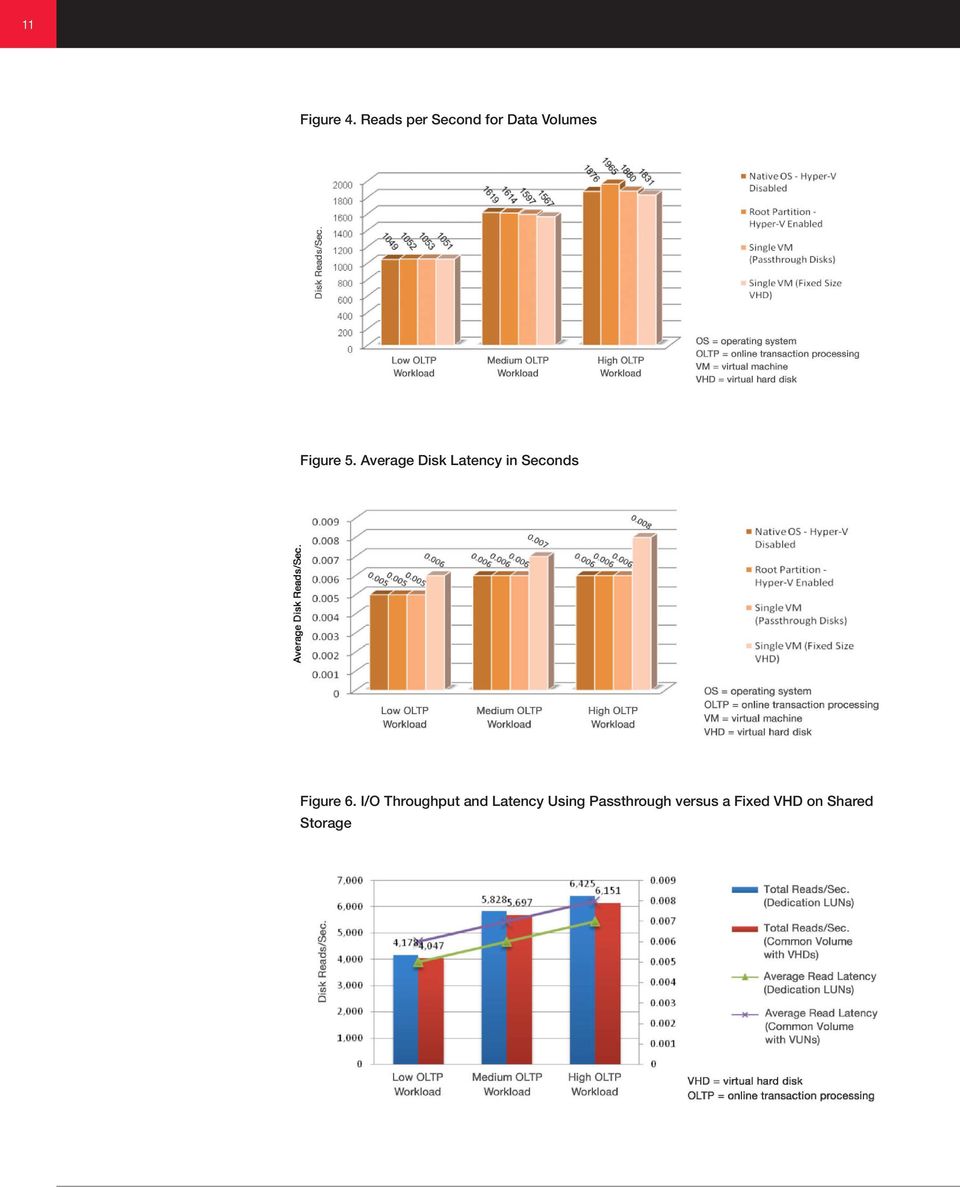
12 12 These results show that there is a slight but negligible reduction in system performance when running SQL Server 2008 as a virtual server compared to running SQL Server 2008 in a nonvirtualized environment. There was minimal overhead of I/O performance when running SQL Server from within a guest virtual machine. In the virtual configurations, passthrough disk configuration provided the best I/O performance; however, minimal overhead was observed when the test was run using fixed-size virtual hard disks (VHD). The decision of which storage configuration to use should be made based on what makes sense for the particular deployment. Virtual machines using VHDs are easier to move around than passthrough disks. This added flexibility along with the other benefits that VHDs provide can outweigh the negligible performance impact in many environments. For consolidation scenarios, the amount of storage resources available as well as the scenario will drive the decision of whether or not to virtualize. In testing, acceptable performance was found in both the shared and dedicated configurations. In either case, storage sizing decisions should be made with workload and response time requirements in mind. 2 The main conclusion derived from the tests was that it is practical to run production SQL Server 2008 workloads under a Hyper-V environment as long as the workload is within the capacity of the Hyper-V guest virtual machine. Conclusion SQL Server environments are excellent candidates for server and storage virtualization. When the database system is properly configured for optimal input/output throughput, SQL Server 2008 offers comparable performance when deployed as either a virtual server or as a server that has not been virtualized. Virtual SQL Server solutions are more cost-effective than conventional database solutions and can be more quickly scaled to meet changing business needs. With server and storage virtualization provided by Hyper-V and Hitachi storage solutions, companies can reduce costs and make their database systems more powerful and efficient. 2 Please refer to white paper, Running SQL Server 2008 in a Hyper-V Environment: Best Practices and Performance Considerations at: SQL2008inHyperV2008.docx
13 13 Appendix A Related Links Running SQL Server 2008 in a Hyper-V Environment: Best Practices and Performance Considerations SQL2008inHyperV2008.docx Predeployment I/O Best Practices Hitachi Adaptable Modular Storage 2000 Family Best Practices with Hyper-V Hitachi Universal Storage Platform Family Best Practices with Hyper-V Optimizing High Availability and Disaster Recovery with Hitachi Storage Cluster in Microsoft Virtualized Environments Hitachi Adaptable Modular Storage 2000 Family Best Practices with Microsoft SQL Server Best Practices for Microsoft SQL Server on Hitachi Universal Storage Platform VM

14 Corporate Headquarters 750 Central Expressway Santa Clara, California USA Regional Contact Information Americas: or Europe, Middle East and Africa: +44 (0) or Asia Pacific: or Hitachi is a registered trademark of Hitachi, Ltd., in the United States and other countries. Hitachi Data Systems is a registered trademark and service mark of Hitachi, Ltd., in the United States and other countries. All other trademarks, service marks and company names in this document or website are properties of their respective owners. Notice: This document is for informational purposes only, and does not set forth any warranty, expressed or implied, concerning any equipment or service offered or to be offered by Hitachi Data Systems Corporation. Hitachi Data Systems Corporation All Rights Reserved. DS-345-B DG April 2010

Lab Validation Report. By Steven Burns. Month Year
 1 Hyper-V v2 Host Level Backups Using Symantec NetBackup 7.0 and the Hitachi VSS Hardware Provider with the Hitachi Adaptable Modular Storage 2000 Family Lab Validation Report By Steven Burns March 2011
ENTERPRISE VIRTUALIZATION ONE PLATFORM FOR ALL DATA
 ENTERPRISE VIRTUALIZATION ONE PLATFORM FOR ALL DATA ENTERPRISE VIRTUALIZATION ONE PLATFORM FOR ALL DATA SUMMARY ONE PLATFORM FOR ALL DATA WOULD YOU LIKE TO SAVE 20% TO 30% ON YOUR STORAGE SPEND? We can
How to Manage Critical Data Stored in Microsoft Exchange Server 2010. By Hitachi Data Systems
 W H I T E P A P E R How to Manage Critical Data Stored in Microsoft Exchange Server 2010 By Hitachi Data Systems April 2012 2 Table of Contents Executive Summary and Introduction 3 Mission-critical Microsoft
Virtualizing Microsoft SQL Server 2008 on the Hitachi Adaptable Modular Storage 2000 Family Using Microsoft Hyper-V
 Virtualizing Microsoft SQL Server 2008 on the Hitachi Adaptable Modular Storage 2000 Family Using Microsoft Hyper-V Implementation Guide By Eduardo Freitas and Ryan Sokolowski February 2010 Summary Deploying
Windows Server 2008 R2 Hyper-V Live Migration
 Windows Server 2008 R2 Hyper-V Live Migration Table of Contents Overview of Windows Server 2008 R2 Hyper-V Features... 3 Dynamic VM storage... 3 Enhanced Processor Support... 3 Enhanced Networking Support...
Enterprise Storage Solution for Hyper-V Private Cloud and VDI Deployments using Sanbolic s Melio Cloud Software Suite April 2011
 Enterprise Storage Solution for Hyper-V Private Cloud and VDI Deployments using Sanbolic s Melio Cloud Software Suite April 2011 Executive Summary Large enterprise Hyper-V deployments with a large number
Dionseq Uatummy Odolorem Vel
 W H I T E P A P E R Aciduisismodo The 3D Scaling Dolore Advantage Eolore Dionseq Uatummy Odolorem Vel How 3D Scaling Drives Ultimate Storage Efficiency By Hitachi Data Systems September 2010 Hitachi Data
Hitachi NAS Platform and Hitachi Content Platform with ESRI Image
 W H I T E P A P E R Hitachi NAS Platform and Hitachi Content Platform with ESRI Image Aciduisismodo Extension to ArcGIS Dolore Server Eolore for Dionseq Geographic Uatummy Information Odolorem Systems
Optimized Storage Solution for Enterprise Scale Hyper-V Deployments
 Optimized Storage Solution for Enterprise Scale Hyper-V Deployments End-to-End Storage Solution Enabled by Sanbolic Melio FS and LaScala Software and EMC SAN Solutions Proof of Concept Published: March
Deploying Microsoft Exchange Server 2010 on the Hitachi Adaptable Modular Storage 2500
 Deploying Microsoft Exchange Server 2010 on the Hitachi Adaptable Modular Storage 2500 Reference Architecture Guide By Patricia Brailey July 2010 Summary IT administrators need email solutions that provide
Windows Server 2008 R2 Hyper-V Live Migration
 Windows Server 2008 R2 Hyper-V Live Migration White Paper Published: August 09 This is a preliminary document and may be changed substantially prior to final commercial release of the software described
Hitachi Adaptable Modular Storage 2000 Family and Microsoft Exchange Server 2007: Monitoring and Management Made Easy
 Solution Profile Hitachi Adaptable Modular Storage 2000 Family and Microsoft Exchange Server 2007: Monitoring and Management Made Easy Hitachi Data Systems Monitoring and Management Made Easy Over the
Dell High Availability Solutions Guide for Microsoft Hyper-V
 Dell High Availability Solutions Guide for Microsoft Hyper-V www.dell.com support.dell.com Notes and Cautions NOTE: A NOTE indicates important information that helps you make better use of your computer.
Customer Experiences with Storage Virtualization and Hitachi Dynamic Tiering
 CUSTOMER EXPERIENCES Customer Experiences with Storage Virtualization and Hitachi Dynamic Tiering This e-book demonstrates the benefits of Hitachi storage virtualization and Dynamic Tiering through customer
DELL. Dell Microsoft Windows Server 2008 Hyper-V TM Reference Architecture VIRTUALIZATION SOLUTIONS ENGINEERING
 DELL Dell Microsoft Windows Server 2008 Hyper-V TM Reference Architecture VIRTUALIZATION SOLUTIONS ENGINEERING September 2008 1 THIS WHITE PAPER IS FOR INFORMATIONAL PURPOSES ONLY, AND MAY CONTAIN TYPOGRAPHICAL
Dell Virtualization Solution for Microsoft SQL Server 2012 using PowerEdge R820
 Dell Virtualization Solution for Microsoft SQL Server 2012 using PowerEdge R820 This white paper discusses the SQL server workload consolidation capabilities of Dell PowerEdge R820 using Virtualization.
Lab Validation Report. Leo Nguyen. Month Year
 1 Hitachi Compute Blade 2000, Hitachi Adaptable Modular Storage 2500, and Microsoft Exchange 2010 Management Packs Integration with Microsoft System Center Operations Manager 2007 R2 Lab Validation Report
Data center virtualization
 Data center virtualization A Dell Technical White Paper August 2011 Lay the foundation for impressive disk utilization and unmatched data center flexibility Executive summary Many enterprise IT departments
Building a Scalable Microsoft Hyper-V Architecture on the Hitachi Universal Storage Platform Family
 Building a Scalable Microsoft Hyper-V Architecture on the Hitachi Universal Storage Platform Family Reference Architecture Guide By Rick Andersen April 2009 Summary Increasingly, organizations are turning
Deploying Microsoft Exchange Server 2010 on the Hitachi Adaptable Modular Storage 2500
 Deploying Microsoft Exchange Server 2010 on the Hitachi Adaptable Modular Storage 2500 Implementation Guide By Patricia Brailey August 2010 Summary IT administrators need email solutions that provide data
How To Connect Virtual Fibre Channel To A Virtual Box On A Hyperv Virtual Machine
 Virtual Fibre Channel for Hyper-V Virtual Fibre Channel for Hyper-V, a new technology available in Microsoft Windows Server 2012, allows direct access to Fibre Channel (FC) shared storage by multiple guest
Hitachi Data Systems and Brocade Disaster Recovery Solutions for VMware Environments
 Hitachi Data Systems and Brocade Disaster Recovery Solutions for VMware Environments Technical Brief By Sarah Hamilton, Hitachi Data Systems Marcus Thordal, Brocade July 2009 Executive Summary The rapid
Hitachi Data Systems and Brocade Disaster Recovery Solutions for VMware Environments
 Hitachi Data Systems and Brocade Disaster Recovery Solutions for VMware Environments Technical Brief By Sarah Hamilton, Hitachi Data Systems, and Marcus Thordal, Brocade December 2009 Executive Summary
Virtualized High Availability and Disaster Recovery Solutions
 Virtualized High Availability and Disaster Recovery Solutions Microsoft on the IBM System Storage DS5000, IBM System x Servers, & IBM BladeCenter Highlights Windows Server 2008 and with MSCS failover cluster
HIGHLY AVAILABLE MULTI-DATA CENTER WINDOWS SERVER SOLUTIONS USING EMC VPLEX METRO AND SANBOLIC MELIO 2010
 White Paper HIGHLY AVAILABLE MULTI-DATA CENTER WINDOWS SERVER SOLUTIONS USING EMC VPLEX METRO AND SANBOLIC MELIO 2010 Abstract This white paper demonstrates key functionality demonstrated in a lab environment
An Oracle White Paper November 2010. Oracle Real Application Clusters One Node: The Always On Single-Instance Database
 An Oracle White Paper November 2010 Oracle Real Application Clusters One Node: The Always On Single-Instance Database Executive Summary... 1 Oracle Real Application Clusters One Node Overview... 1 Always
HBA Virtualization Technologies for Windows OS Environments
 HBA Virtualization Technologies for Windows OS Environments FC HBA Virtualization Keeping Pace with Virtualized Data Centers Executive Summary Today, Microsoft offers Virtual Server 2005 R2, a software
ATA DRIVEN GLOBAL VISION CLOUD PLATFORM STRATEG N POWERFUL RELEVANT PERFORMANCE SOLUTION CLO IRTUAL BIG DATA SOLUTION ROI FLEXIBLE DATA DRIVEN V
 ATA DRIVEN GLOBAL VISION CLOUD PLATFORM STRATEG N POWERFUL RELEVANT PERFORMANCE SOLUTION CLO IRTUAL BIG DATA SOLUTION ROI FLEXIBLE DATA DRIVEN V WHITE PAPER Gear Up for the As-a-Service Era A Path to the
Microsoft SQL Server Always On Technologies
 Microsoft SQL Server Always On Technologies Hitachi Data Systems Contributes Always On Storage Solutions A Partner Solutions White Paper By Rick Andersen and Simon Pengelly December 2006 Executive Summary
TRANSFORM THE DATA CENTER E-GUIDE
 TRANSFORM THE DATA CENTER E-GUIDE 2 Synopsis In this guide 3 For IT organizations in large businesses seeking a greater return on their enterprise storage investments, a transformed data center is a virtual
Virtualizing SQL Server 2008 Using EMC VNX Series and Microsoft Windows Server 2008 R2 Hyper-V. Reference Architecture
 Virtualizing SQL Server 2008 Using EMC VNX Series and Microsoft Windows Server 2008 R2 Hyper-V Copyright 2011 EMC Corporation. All rights reserved. Published February, 2011 EMC believes the information
Performance characterization report for Microsoft Hyper-V R2 on HP StorageWorks P4500 SAN storage
 Performance characterization report for Microsoft Hyper-V R2 on HP StorageWorks P4500 SAN storage Technical white paper Table of contents Executive summary... 2 Introduction... 2 Test methodology... 3
EMC VPLEX FAMILY. Continuous Availability and data Mobility Within and Across Data Centers
 EMC VPLEX FAMILY Continuous Availability and data Mobility Within and Across Data Centers DELIVERING CONTINUOUS AVAILABILITY AND DATA MOBILITY FOR MISSION CRITICAL APPLICATIONS Storage infrastructure is
EMC Virtual Infrastructure for Microsoft SQL Server
 Microsoft SQL Server Enabled by EMC Celerra and Microsoft Hyper-V Copyright 2010 EMC Corporation. All rights reserved. Published February, 2010 EMC believes the information in this publication is accurate
How To Manage A Hyperv With Hitachi Universal Storage Platform Family
 Hitachi Universal Storage Platform Family Best Practices with Hyper-V Best Practices Guide By Rick Andersen and Lisa Pampuch April 2009 Summary Increasingly, businesses are turning to virtualization to
VERITAS Storage Foundation 4.3 for Windows
 DATASHEET VERITAS Storage Foundation 4.3 for Windows Advanced Volume Management Technology for Windows In distributed client/server environments, users demand that databases, mission-critical applications
EMC VPLEX FAMILY. Continuous Availability and Data Mobility Within and Across Data Centers
 EMC VPLEX FAMILY Continuous Availability and Data Mobility Within and Across Data Centers DELIVERING CONTINUOUS AVAILABILITY AND DATA MOBILITY FOR MISSION CRITICAL APPLICATIONS Storage infrastructure is
Virtual SAN Design and Deployment Guide
 Virtual SAN Design and Deployment Guide TECHNICAL MARKETING DOCUMENTATION VERSION 1.3 - November 2014 Copyright 2014 DataCore Software All Rights Reserved Table of Contents INTRODUCTION... 3 1.1 DataCore
MICROSOFT CLOUD REFERENCE ARCHITECTURE: FOUNDATION
 Reference Architecture Guide MICROSOFT CLOUD REFERENCE ARCHITECTURE: FOUNDATION EMC VNX, EMC VMAX, EMC ViPR, and EMC VPLEX Microsoft Windows Hyper-V, Microsoft Windows Azure Pack, and Microsoft System
Solution Brief Availability and Recovery Options: Microsoft Exchange Solutions on VMware
 Introduction By leveraging the inherent benefits of a virtualization based platform, a Microsoft Exchange Server 2007 deployment on VMware Infrastructure 3 offers a variety of availability and recovery
SQL Server Consolidation Using Cisco Unified Computing System and Microsoft Hyper-V
 SQL Server Consolidation Using Cisco Unified Computing System and Microsoft Hyper-V White Paper July 2011 Contents Executive Summary... 3 Introduction... 3 Audience and Scope... 4 Today s Challenges...
MICROSOFT HYPER-V SCALABILITY WITH EMC SYMMETRIX VMAX
 White Paper MICROSOFT HYPER-V SCALABILITY WITH EMC SYMMETRIX VMAX Abstract This white paper highlights EMC s Hyper-V scalability test in which one of the largest Hyper-V environments in the world was created.
Increasing IT Efficiency in a Dynamic Datacenter with a Virtualized Storage Solution
 Increasing IT Efficiency in a Dynamic Datacenter with a Virtualized Storage Solution End to End Efficiency Delivered by Microsoft Server Virtualization and Compellent Storage Virtualization Solution Blueprint
High Availability with Windows Server 2012 Release Candidate
 High Availability with Windows Server 2012 Release Candidate Windows Server 2012 Release Candidate (RC) delivers innovative new capabilities that enable you to build dynamic storage and availability solutions
Best Practices for SAP on Hyper-V
 Microsoft Collaboration Brief April 2010 Best Practices for SAP on Hyper-V Authors Josef Stelzel, Sr. Developer Evangelist, Microsoft Corporation [email protected] Bernhard Maendle, Architect, connmove
Archiving Microsoft Exchange Mailboxes on Hitachi Content Platform using Storage Adapter for Symantec Enterprise Vault
 1 Archiving Microsoft Exchange Mailboxes on Hitachi Content Platform using Storage Adapter for Symantec Enterprise Vault Lab Validation Report By Praveen Javehrani March 2012 Month Year Feedback Hitachi
Dell High Availability Solutions Guide for Microsoft Hyper-V R2. A Dell Technical White Paper
 Dell High Availability Solutions Guide for Microsoft Hyper-V R2 A Dell Technical White Paper THIS WHITE PAPER IS FOR INFORMATIONAL PURPOPERATING SYSTEMS ONLY, AND MAY CONTAIN TYPOGRAPHICAL ERRORS AND TECHNICAL
Technology Insight Series
 Evaluating Storage Technologies for Virtual Server Environments Russ Fellows June, 2010 Technology Insight Series Evaluator Group Copyright 2010 Evaluator Group, Inc. All rights reserved Executive Summary
DeltaV Virtualization High Availability and Disaster Recovery
 DeltaV Distributed Control System Whitepaper October 2014 DeltaV Virtualization High Availability and Disaster Recovery This document describes High Availiability and Disaster Recovery features supported
HP recommended configuration for Microsoft Exchange Server 2010: HP LeftHand P4000 SAN
 HP recommended configuration for Microsoft Exchange Server 2010: HP LeftHand P4000 SAN Table of contents Executive summary... 2 Introduction... 2 Solution criteria... 3 Hyper-V guest machine configurations...
EMC Virtual Infrastructure for Microsoft Applications Data Center Solution
 EMC Virtual Infrastructure for Microsoft Applications Data Center Solution Enabled by EMC Symmetrix V-Max and Reference Architecture EMC Global Solutions Copyright and Trademark Information Copyright 2009
Microsoft Windows Server Hyper-V in a Flash
 Microsoft Windows Server Hyper-V in a Flash Combine Violin s enterprise-class storage arrays with the ease and flexibility of Windows Storage Server in an integrated solution to achieve higher density,
SQL Server Storage Best Practice Discussion Dell EqualLogic
 SQL Server Storage Best Practice Discussion Dell EqualLogic What s keeping you up at night? Managing the demands of a SQL environment Risk Cost Data loss Application unavailability Data growth SQL Server
Enterprise Deployment: Laserfiche 8 in a Virtual Environment. White Paper
 Enterprise Deployment: Laserfiche 8 in a Virtual Environment White Paper August 2008 The information contained in this document represents the current view of Compulink Management Center, Inc on the issues
Microsoft Hyper-V Cloud Fast Track Reference Architecture on Hitachi Virtual Storage Platform
 1 Microsoft Hyper-V Cloud Fast Track Reference Architecture on Hitachi Virtual Storage Platform Reference Architecture Rick Andersen August, 2011 Month Year Feedback Hitachi Data Systems welcomes your
Cloud Optimize Your IT
 Cloud Optimize Your IT Windows Server 2012 The information contained in this presentation relates to a pre-release product which may be substantially modified before it is commercially released. This pre-release
EMC Celerra Unified Storage Platforms
 EMC Solutions for Microsoft SQL Server EMC Celerra Unified Storage Platforms EMC NAS Product Validation Corporate Headquarters Hopkinton, MA 01748-9103 1-508-435-1000 www.emc.com Copyright 2008, 2009 EMC
EMC PERFORMANCE OPTIMIZATION FOR MICROSOFT FAST SEARCH SERVER 2010 FOR SHAREPOINT
 Reference Architecture EMC PERFORMANCE OPTIMIZATION FOR MICROSOFT FAST SEARCH SERVER 2010 FOR SHAREPOINT Optimize scalability and performance of FAST Search Server 2010 for SharePoint Validate virtualization
Dionseq Uatummy Odolorem Vel
 W H I T E P A P E R Aciduisismodo Tiered Storage Design Dolore Eolore Guide Dionseq Uatummy Odolorem Vel Best Practices for Cost-effective Designs By John Harker September 2010 Hitachi Data Systems 2 Table
OPTIMIZING SERVER VIRTUALIZATION
 OPTIMIZING SERVER VIRTUALIZATION HP MULTI-PORT SERVER ADAPTERS BASED ON INTEL ETHERNET TECHNOLOGY As enterprise-class server infrastructures adopt virtualization to improve total cost of ownership (TCO)
Cloud Based Application Architectures using Smart Computing
 Cloud Based Application Architectures using Smart Computing How to Use this Guide Joyent Smart Technology represents a sophisticated evolution in cloud computing infrastructure. Most cloud computing products
Lab Validation Report
 Lab Validation Report Microsoft Hyper-V R2 Scalable, Native Server Virtualization for the Enterprise By Brian Garrett and Mark Bowker July 2010 Lab Validation: Microsoft Hyper-V R2 2 Contents Introduction...
INCREASING EFFICIENCY WITH EASY AND COMPREHENSIVE STORAGE MANAGEMENT
 INCREASING EFFICIENCY WITH EASY AND COMPREHENSIVE STORAGE MANAGEMENT UNPRECEDENTED OBSERVABILITY, COST-SAVING PERFORMANCE ACCELERATION, AND SUPERIOR DATA PROTECTION KEY FEATURES Unprecedented observability
Virtualizing Exchange
 Virtualizing Exchange Simplifying and Optimizing Management of Microsoft Exchange Server Using Virtualization Technologies By Anil Desai Microsoft MVP September, 2008 An Alternative to Hosted Exchange
FOR SERVERS 2.2: FEATURE matrix
 RED hat ENTERPRISE VIRTUALIZATION FOR SERVERS 2.2: FEATURE matrix Red hat enterprise virtualization for servers Server virtualization offers tremendous benefits for enterprise IT organizations server consolidation,
VERITAS Business Solutions. for DB2
 VERITAS Business Solutions for DB2 V E R I T A S W H I T E P A P E R Table of Contents............................................................. 1 VERITAS Database Edition for DB2............................................................
Maximizing SQL Server Virtualization Performance
 Maximizing SQL Server Virtualization Performance Michael Otey Senior Technical Director Windows IT Pro SQL Server Pro 1 What this presentation covers Host configuration guidelines CPU, RAM, networking
Microsoft Windows Server in a Flash
 Microsoft Windows Server in a Flash Combine Violin s enterprise-class storage with the ease and flexibility of Windows Storage Server in an integrated solution so you can achieve higher performance and
What Is Microsoft Private Cloud Fast Track?
 What Is Microsoft Private Cloud Fast Track? MICROSOFT PRIVATE CLOUD FAST TRACK is a reference architecture for building private clouds that combines Microsoft software, consolidated guidance, and validated
High availability and disaster recovery with Microsoft, Citrix and HP
 High availability and disaster recovery White Paper High availability and disaster recovery with Microsoft, Citrix and HP Using virtualization, automation and next-generation storage to improve business
EMC Business Continuity for Microsoft SQL Server 2008
 EMC Business Continuity for Microsoft SQL Server 2008 Enabled by EMC Celerra Fibre Channel, EMC MirrorView, VMware Site Recovery Manager, and VMware vsphere 4 Reference Architecture Copyright 2009, 2010
RED HAT ENTERPRISE VIRTUALIZATION FOR SERVERS: COMPETITIVE FEATURES
 RED HAT ENTERPRISE VIRTUALIZATION FOR SERVERS: COMPETITIVE FEATURES RED HAT ENTERPRISE VIRTUALIZATION FOR SERVERS Server virtualization offers tremendous benefits for enterprise IT organizations server
Veeam Backup & Replication Enterprise Plus Powered by Cisco UCS: Reliable Data Protection Designed for Virtualized Environments
 Plus Powered by : Reliable Data Protection Designed for Virtualized Environments Solution Brief April 2015 Solution Highlights Extend backup for current Cisco, VMware, and Microsoft Hyper-V virtual machine
Global Solution Services Overview
 O V E R V I E W Corporate Headquarters 750 Central Expressway, Santa Clara, California 95050-2627 USA Contact Information: + 1 408 970 1000 www.hds.com / [email protected] Asia Pacific and Americas 750 Central
Veritas InfoScale Availability
 Veritas InfoScale Availability Delivers high availability and disaster recovery for your critical applications Overview protects your most important applications from planned and unplanned downtime. InfoScale
Deploying Microsoft SQL Server 2008 R2 with Logical Partitioning on the Hitachi Virtual Storage Platform with Hitachi Dynamic Tiering
 1 Deploying Microsoft SQL Server 2008 R2 with Logical Partitioning on the Hitachi Virtual Storage Platform with Hitachi Dynamic Tiering Reference Architecture Guide By Eduardo Freitas May 2011 Month Year
How To Get A Storage And Data Protection Solution For Virtualization
 Smart Storage and Modern Data Protection Built for Virtualization Dot Hill Storage Arrays and Veeam Backup & Replication Software offer the winning combination. Veeam and Dot Hill Solutions Introduction
A Customer Blueprint: Improving Efficiency and Availability Using Microsoft Hyper-V and NetApp Storage
 NETAPP WHITE PAPER A Customer Blueprint: Improving Efficiency and Availability Using Microsoft Hyper-V and NetApp Storage Microsoft Solutions Engineering, NetApp Microsoft Virtualization Solutions, Microsoft
Server and Storage Virtualization with IP Storage. David Dale, NetApp
 Server and Storage Virtualization with IP Storage David Dale, NetApp SNIA Legal Notice The material contained in this tutorial is copyrighted by the SNIA. Member companies and individuals may use this
Protect SQL Server 2012 AlwaysOn Availability Group with Hitachi Application Protector
 Protect SQL Server 2012 AlwaysOn Availability Group with Hitachi Application Protector Tech Note Nathan Tran The purpose of this tech note is to show how organizations can use Hitachi Applications Protector
EMC VPLEX FAMILY. Transparent information mobility within, across, and between data centers ESSENTIALS A STORAGE PLATFORM FOR THE PRIVATE CLOUD
 EMC VPLEX FAMILY Transparent information mobility within, across, and between data centers A STORAGE PLATFORM FOR THE PRIVATE CLOUD In the past, users have relied on traditional physical storage to meet
Virtualizing Microsoft SQL Server 2008 Using VMware vsphere 4 on the Hitachi Adaptable Modular Storage 2000 Family
 Virtualizing Microsoft SQL Server 2008 Using VMware vsphere 4 on the Hitachi Adaptable Modular Storage 2000 Family Deployment Guide By Eduardo Freitas and Bob Ingram November 2009 Summary Deploying a virtualized
ARC VIEW. Stratus High-Availability Solutions Designed to Virtually Eliminate Downtime. Keywords. Summary. By Craig Resnick
 ARC VIEW OCTOBER 23, 2014 Stratus High-Availability Solutions Designed to Virtually Eliminate Downtime By Craig Resnick Keywords Virtualization, High Availability, Fault Tolerant, Critical Process, Real-time
ENTERPRISE STORAGE WITH THE FUTURE BUILT IN
 ENTERPRISE STORAGE WITH THE FUTURE BUILT IN Breakthrough Efficiency Intelligent Storage Automation Single Platform Scalability Real-time Responsiveness Continuous Protection Storage Controllers Storage
Virtual Tape Library Solutions by Hitachi Data Systems
 O V E R V I E W Virtual Tape Library Solutions by Hitachi Data Systems Hitachi Data Systems Virtual Tape Library Solutions by Hitachi Data Systems Enterprise data centers face a growing problem in data
Feature Comparison. Windows Server 2008 R2 Hyper-V and Windows Server 2012 Hyper-V
 Comparison and Contents Introduction... 4 More Secure Multitenancy... 5 Flexible Infrastructure... 9 Scale, Performance, and Density... 13 High Availability... 18 Processor and Memory Support... 24 Network...
Using VMware VMotion with Oracle Database and EMC CLARiiON Storage Systems
 Using VMware VMotion with Oracle Database and EMC CLARiiON Storage Systems Applied Technology Abstract By migrating VMware virtual machines from one physical environment to another, VMware VMotion can
The Advantages of Multi-Port Network Adapters in an SWsoft Virtual Environment
 The Advantages of Multi-Port Network Adapters in an SWsoft Virtual Environment Introduction... 2 Virtualization addresses key challenges facing IT today... 2 Introducing Virtuozzo... 2 A virtualized environment