
Instant Recovery for VMware
|
|
|
- Bennett Webb
- 10 years ago
- Views:
Transcription
1 NETBACKUP 7.6 FEATURE BRIEFING INSTANT RECOVERY FOR VMWARE NetBackup 7.6 Feature Briefing Instant Recovery for VMware Version number: 1.0 Issue date: 2 nd August 2013 This document describes a feature introduced in NetBackup7.6 and available in this and higher releases. If you have any feedback or questions about this document please them to [email protected] stating the document title. This document is provided for informational purposes only. All warranties relating to the information in this document, either express or implied, are disclaimed to the maximum extent allowed by law. The information in this document is subject to change without notice. Copyright 2013 Symantec Corporation. All rights reserved. Symantec, the Symantec Logo, and the Checkmark Logo are trademarks or registered trademarks of Symantec Corporation or its affiliates in the U.S. and other countries. Other names may be trademarks of their respective owners.
2

3 Feature Description When severe data loss happens, quickly regaining access to that information can be extremely important. The time required to access that data (or recovery time objective - RTO) depends heavily on the technology used to protect it. Clustering technologies provide the fastest possible RTO but are expensive, complex and require special skills to deploy and maintain. Standard backup technologies are simple to implement but the restore process can be extremely time consuming. Before data is user accessible, the entire OS image or data set must be restored. This restore process can take hours or even days. But what if the restore process could be completely reversed? What if you could first gain access to the data and then begin the restoration? This is exactly what the NetBackup Instant Recovery for VMware (IRV) feature does. Developed in conjunction with the NetBackup for VMware data protection technology, IRV can instantly power on a VMware virtual machine (VM) from a full or Accelerator incremental disk based backup image (normal incremental backups cannot be used as they are not whole backup images). The VM can be made accessible in as little as 60 seconds. Once the VM is running, users can access it just as they would any other VM. Any subsequent changes made to the VM are 100% retained. From the user perspective the VM is fully functional. The user has no indication that the VM is powered on from a backup destination. The physical restore process can begin as soon as the VM is running and while it is in use. To recover the full VM, VMware s Storage vmotion is used to copy the live VM image to a traditional ESXi Datastore. During the entire Storage vmotion restore process there is zero service interruption to this newly powered on VM. If the requirement is simply to verify the backup is good or restore some data from the VM and not to recover the full VM vmotion is not required. The required data can simply be copied from the running VM on the backup storage and the VM can then be shut down again. Note: The backup image itself is never altered during a recovery operation, all updates are written to a transaction log and only merged with the VM on the traditional ESXi Datastore once the vmotion operation is completed. Page 1
4 Business Value Data protection technologies have always been a balance between cost and restore performance. Faster restores have traditionally required more hardware. But what if you could perform an extremely fast restore with no modifications to your backup infrastructure and no new additional and expensive hardware? That is exactly what IRV provides. Using currently existing NetBackup disk backup storage technologies, IRV tricks the VMware environment into treating the NetBackup standard disk or deduplication backup target(s) as VMware storage. The VM to be restored is automatically registered on the vcenter server and booted by IRV. At this point VMware s Storage VMotion migrates the VM files to the permanent ESXi storage with zero service disruption to the VM. There are three powerful benefits of this feature: 1) Inexpensive. Everything required to enable IRV is developed in software. That means that no new hardware is required and no modifications to existing hardware or backup environment is needed. 2) Simple. Implementing this feature is as easy as upgrading to NetBackup 7.6. Nothing needs to be modified within vsphere. The VMware backup host simply needs to add NFS support. 3) Instant. By reversing the traditional restore process, lost data can be made available in seconds. Besides providing a powerful instant DR capability, IRV can be flexibly repurposed to provide additional functionality including: Single file restore from any OS IRV can instantly provide file system access to VMs running any OS. Users have instant access to the booted VM and can extract any desired file or folder. This process requires minimal resources on the ESXi host. Because the boot process is so quick, restores are fast regardless of the size of the VM. Non-disruptive DR testing Testing DR with traditional recovery mechanisms is time-consuming, disruptive and commonly requires additional hardware. Traditional DR mandates that the entire VM first be restored and requires enough free disk space to store it. With IRV, NetBackup automates DR testing by powering on the VM from backup storage into a separate, isolated ESXi network. This allows VM testing without impacting a production instance or requiring additional storage. Application and patch testing Before performing a patch or application update, the update can be quickly tested using a current backup copy of the target VM. Once the test OS image is booted, Page 2

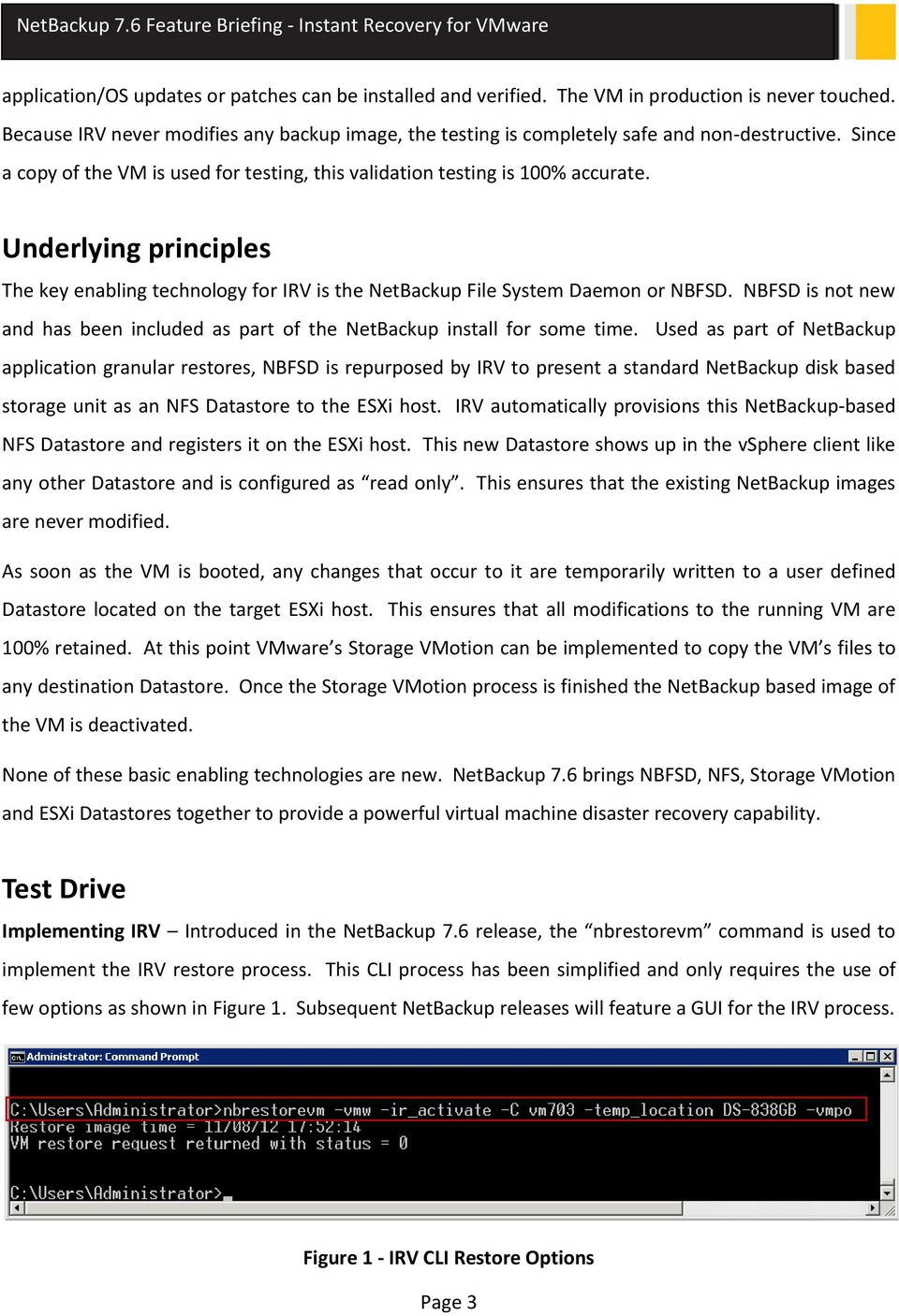
5 application/os updates or patches can be installed and verified. The VM in production is never touched. Because IRV never modifies any backup image, the testing is completely safe and non-destructive. Since a copy of the VM is used for testing, this validation testing is 100% accurate. Underlying principles The key enabling technology for IRV is the NetBackup File System Daemon or NBFSD. NBFSD is not new and has been included as part of the NetBackup install for some time. Used as part of NetBackup application granular restores, NBFSD is repurposed by IRV to present a standard NetBackup disk based storage unit as an NFS Datastore to the ESXi host. IRV automatically provisions this NetBackup-based NFS Datastore and registers it on the ESXi host. This new Datastore shows up in the vsphere client like any other Datastore and is configured as read only. This ensures that the existing NetBackup images are never modified. As soon as the VM is booted, any changes that occur to it are temporarily written to a user defined Datastore located on the target ESXi host. This ensures that all modifications to the running VM are 100% retained. At this point VMware s Storage VMotion can be implemented to copy the VM s files to any destination Datastore. Once the Storage VMotion process is finished the NetBackup based image of the VM is deactivated. None of these basic enabling technologies are new. NetBackup 7.6 brings NBFSD, NFS, Storage VMotion and ESXi Datastores together to provide a powerful virtual machine disaster recovery capability. Test Drive Implementing IRV Introduced in the NetBackup 7.6 release, the nbrestorevm command is used to implement the IRV restore process. This CLI process has been simplified and only requires the use of few options as shown in Figure 1. Subsequent NetBackup releases will feature a GUI for the IRV process. Figure 1 - IRV CLI Restore Options Page 3
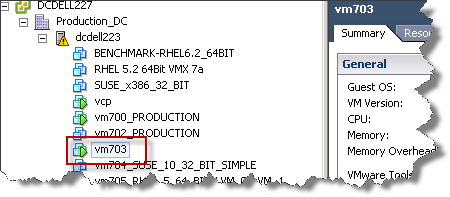
6 Monitoring Once the IRV process is initiated both the vsphere Client (Figure 2) and the NetBackup activity monitor (Figure 3) show the status of the VM being powered on. Figure 2 - IRV Restore process in vsphere Client Figure 3 - IRV activation in NetBackup Activity Monitor vsphere Client The newly powered on VM can be viewed from the vsphere client just like any other VM and is 100% user accessible. Any of the extensive capabilities designed into vsphere (e.g. Storage VMotion) can be implemented on this VM. Figure 4 - IRV VM listed in vsphere Client Temporary Datastore Using NBFSD, IRV presents the NetBackup disk based storage unit as a read only Datastore to the selected ESXi host (Figure 5). Page 4

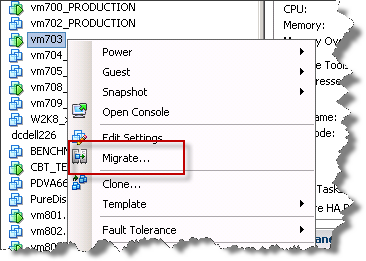
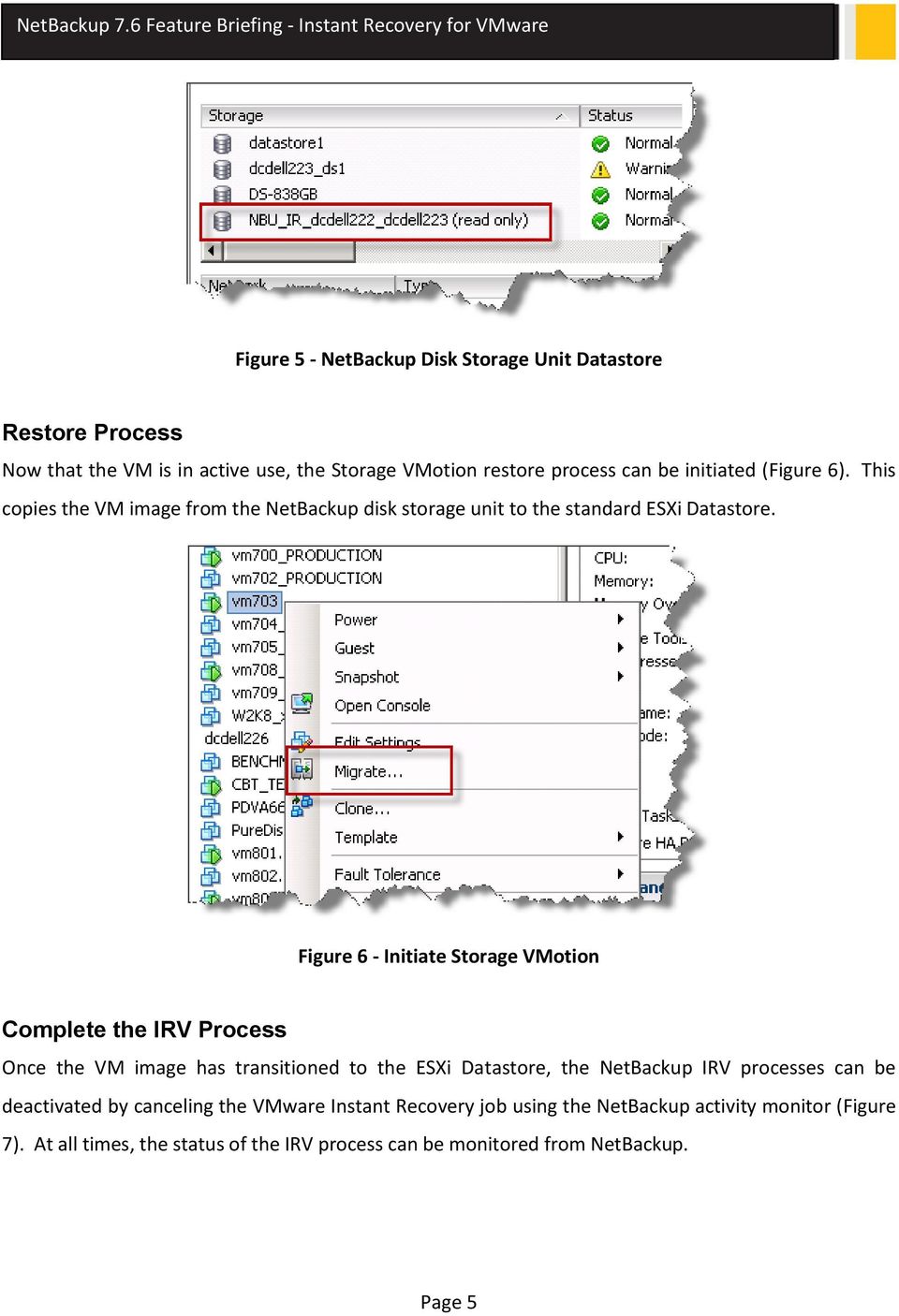
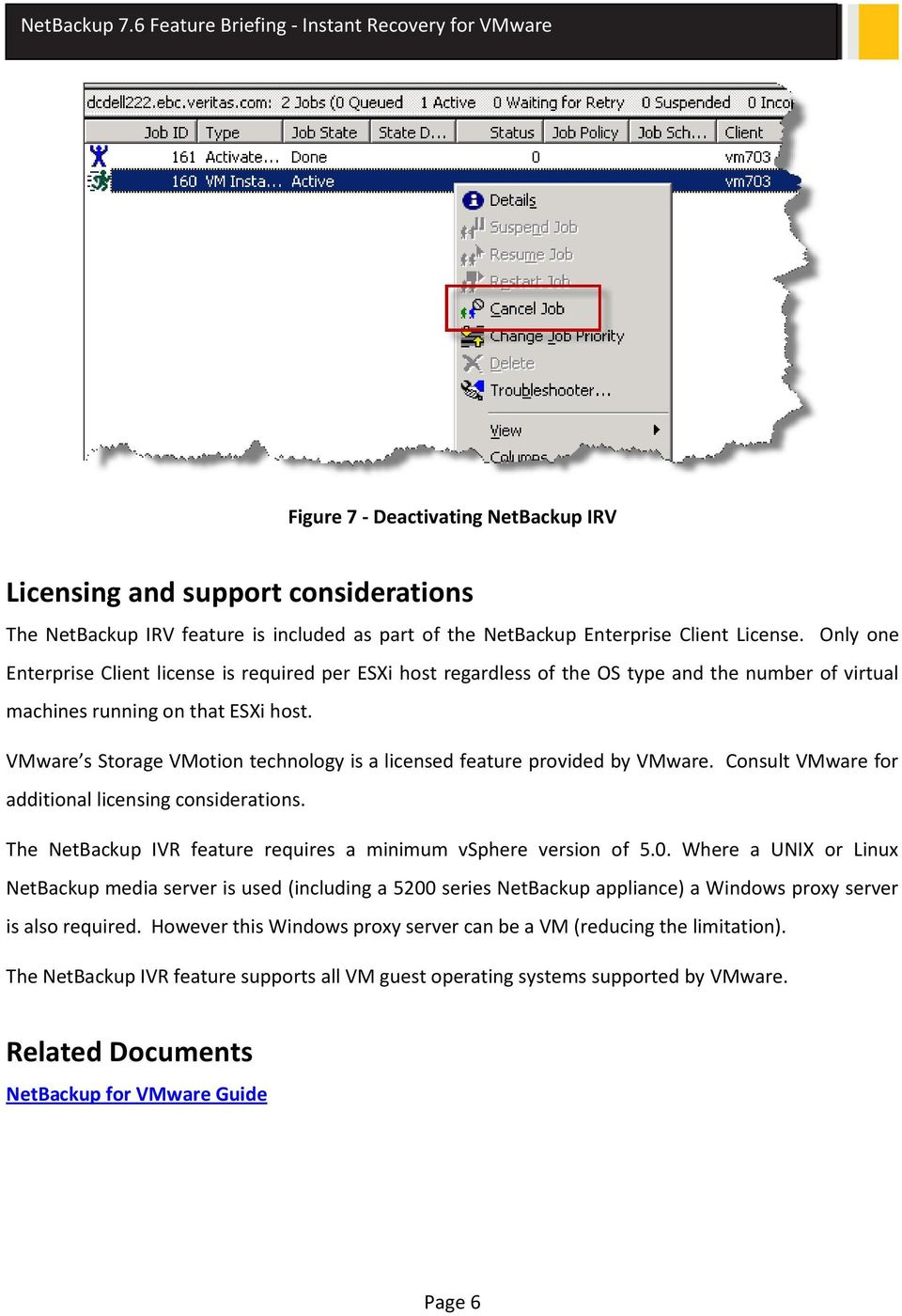
7 Figure 5 - NetBackup Disk Storage Unit Datastore Restore Process Now that the VM is in active use, the Storage VMotion restore process can be initiated (Figure 6). This copies the VM image from the NetBackup disk storage unit to the standard ESXi Datastore. Figure 6 - Initiate Storage VMotion Complete the IRV Process Once the VM image has transitioned to the ESXi Datastore, the NetBackup IRV processes can be deactivated by canceling the VMware Instant Recovery job using the NetBackup activity monitor (Figure 7). At all times, the status of the IRV process can be monitored from NetBackup. Page 5
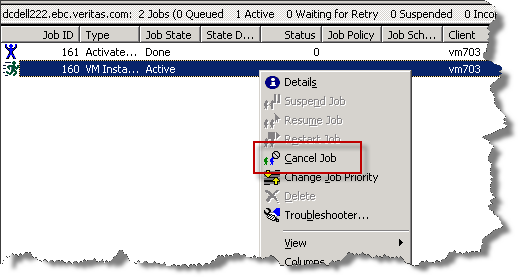
8 Figure 7 - Deactivating NetBackup IRV Licensing and support considerations The NetBackup IRV feature is included as part of the NetBackup Enterprise Client License. Only one Enterprise Client license is required per ESXi host regardless of the OS type and the number of virtual machines running on that ESXi host. VMware s Storage VMotion technology is a licensed feature provided by VMware. Consult VMware for additional licensing considerations. The NetBackup IVR feature requires a minimum vsphere version of 5.0. Where a UNIX or Linux NetBackup media server is used (including a 5200 series NetBackup appliance) a Windows proxy server is also required. However this Windows proxy server can be a VM (reducing the limitation). The NetBackup IVR feature supports all VM guest operating systems supported by VMware. Related Documents NetBackup for VMware Guide Page 6
9 About Symantec: Symantec is a global leader in providing security, storage, and systems management solutions to help consumers and organizations secure and manage their information-driven world. Our software and services protect against more risks at more points, more completely and efficiently, enabling confidence wherever information is used or stored. Headquartered in Mountain View, Calif., Symantec has operations in 40 countries. More information is available at For specific country offices and contact numbers, please visit our Web site: Symantec Corporation World Headquarters 350 Ellis Street Mountain View, CA USA +1 (650) (800) Copyright 2013 Symantec Corporation. All rights reserved. Symantec and the Symantec logo are trademarks or registered trademarks of Symantec Corporation or its affiliates in the U.S. and other countries. Other names may be trademarks of their respective owners.

Direct virtual machine creation from backup with BMR
 NETBACKUP 7.6 FEATURE BRIEFING DIRECT VIRTUAL MACHINE CREATION FROM BACKUP WITH BMR NetBackup 7.6 Feature Briefing Direct virtual machine creation from backup with BMR Version number: 1.0 Issue date: 5
Symantec NetBackup 7 Clients and Agents
 Complete protection for your information-driven enterprise Overview Symantec NetBackup provides a simple yet comprehensive selection of innovative clients and agents to optimize the performance and efficiency
Symantec NetBackup 7.5 What s New and Version Comparison Matrix
 Symantec NetBackup 7.5 What s New and Version Comparison Matrix Solution Overview: Data Protection While backup takes many forms, recovery shouldn t. Symantec NetBackup with V-Ray technology is the single
NetBackup for VMware Data Recovery Services to End the Dark Ages of Virtualization
 NetBackup for VMware Data Recovery Services to End the Dark Ages of Virtualization VADP vstorage APIs for Data Protection Centralized Efficient Off-host LAN free Challenges Dynamic Environment Performance
Backing Up the CTERA Portal Using Veeam Backup & Replication. CTERA Portal Datacenter Edition. May 2014 Version 4.0
 Backing Up the CTERA Portal Using Veeam Backup & Replication CTERA Portal Datacenter Edition May 2014 Version 4.0 Copyright 2009-2014 CTERA Networks Ltd. All rights reserved. No part of this document may
Symantec NetBackup 7.1 What s New and Version Comparison Matrix
 Symantec 7.1 What s New and Version Comparison Matrix Symantec 7 allows customers to standardize backup and recovery operations across physical and virtual environments with fewer resources and less risk
Virtual Machine Protection with Symantec NetBackup 7
 Overview There s little question that server virtualization is the single biggest game-changing trend in IT today. Budget-strapped IT departments are racing to embrace the promise of virtualization for
NetBackup Best Practice Using Tape Storage with Deduplicating Disk Storage
 NetBackup Best Practice Using Tape Storage with Deduplicating Disk Storage This document looks at best practices around creating multiple copies of backups on a mixture of tape and deduplicating disk storage.
Symantec Backup Exec 2012 Licensing Guide
 REPORT: SYMANTEC BACKUP EXEC 2012 LICENSING GUIDE........................................ Symantec Backup Exec 2012 Licensing Guide Who should read this paper Use this guide to learn how to license Symantec
Symantec NetBackup 7.5 Technical Brief
 TECHNICAL BRIEF: SYMANTEC NETBACKUP 7.5 TECHNICAL BRIEF........................................ Symantec NetBackup 7.5 Technical Brief Who should read this paper This document is intended for backup administrators
Symantec Backup Exec 2012
 Better backup for all Data Sheet: Backup and Disaster Recovery Overview is one integrated product that protects virtual and physical environments, simplifies both backup and disaster recovery, and recovers
Symantec NetBackup for VMware Administrator's Guide. Release 7.6
 Symantec NetBackup for VMware Administrator's Guide Release 7.6 Symantec NetBackup for VMware Guide The software described in this book is furnished under a license agreement and may be used only in accordance
Cloud Storage Backup for Storage as a Service with AT&T
 WHITE PAPER: CLOUD STORAGE BACKUP FOR STORAGE AS A SERVICE........ WITH..... AT&T........................... Cloud Storage Backup for Storage as a Service with AT&T Who should read this paper Customers,
Drobo How-To Guide. Use a Drobo iscsi Array as a Target for Veeam Backups
 This document shows you how to use a Drobo iscsi SAN Storage array with Veeam Backup & Replication version 5 in a VMware environment. Veeam provides fast disk-based backup and recovery of virtual machines
Veritas Storage Foundation High Availability for Windows by Symantec
 Veritas Storage Foundation High Availability for Windows by Symantec Simple-to-use solution for high availability and disaster recovery of businesscritical Windows applications Data Sheet: High Availability
Symantec NetBackup OpenStorage Solutions Guide for Disk
 Symantec NetBackup OpenStorage Solutions Guide for Disk UNIX, Windows, Linux Release 7.6 Symantec NetBackup OpenStorage Solutions Guide for Disk The software described in this book is furnished under a
Symantec NetBackup 7.5 for VMware
 V-Ray visibility into virtual machine protection Solution Overview: Data Protection Overview There is little question that server virtualization is the single biggest game-changing trend in IT today. Budget-strapped
Taking the Leap to Virtualization
 WHITE PAPER: TAKING THE LEAP TO VIRTUALIZATION........................................ Taking the Leap to Virtualization Who should read this paper Midsized Business IT Directors, IT Managers and IT Administration
Symantec Backup Exec 2010
 Reliable Backup and Recovery Designed for Your Growing Business Overview delivers market leading backup and recovery protection from server to desktop. Easily protect more data while you reduce storage
Solution Overview VMWARE PROTECTION WITH EMC NETWORKER 8.2. White Paper
 White Paper VMWARE PROTECTION WITH EMC NETWORKER 8.2 Solution Overview Abstract This white paper describes the integration of EMC NetWorker with VMware vcenter. It also includes details on the NetWorker
Symantec Backup Exec 2014
 Symantec Backup Exec 2014 Maxim Tsvetaev Principal Systems Engineer Backup Exec 2014 1 Today s Top Backup and Recovery Challenges Reducing Costs and Complexity Protecting Virtual Machines Meeting Backup
Confidence in a connected world. Veritas NetBackup 6.5 for VMware 3.x Best Practices
 WHITE PAPER: Best Practices Confidence in a connected world. Veritas NetBackup 6.5 for VMware 3.x Best Practices White Paper: Best Practices Veritas NetBackup 6.5 for VMware 3.x Best Practices November
Cloud, Appliance, or Software? How to Decide Which Backup Solution Is Best for Your Small or Midsize Organization.
 WHITE PAPER: CLOUD, APPLIANCE, OR SOFTWARE?........................................ Cloud, Appliance, or Software? How to Decide Which Backup Solution Is Best for Your Small or Midsize Who should read
TECHNICAL PAPER. Veeam Backup & Replication with Nimble Storage
 TECHNICAL PAPER Veeam Backup & Replication with Nimble Storage Document Revision Date Revision Description (author) 11/26/2014 1. 0 Draft release (Bill Roth) 12/23/2014 1.1 Draft update (Bill Roth) 2/20/2015
Complete Storage and Data Protection Architecture for VMware vsphere
 Complete Storage and Data Protection Architecture for VMware vsphere Executive Summary The cost savings and agility benefits of server virtualization are well proven, accounting for its rapid adoption.
Symantec Desktop and Laptop Option 7.6
 Automated protection for desktops and laptops Data Sheet: Backup and Disaster Recovery Overview With the majority of business-critical information residing outside the data centers or on off corporate
Symantec NetBackup Snapshots, Continuous Data Protection, and Replication
 Symantec NetBackup Snapshots, Continuous Data Protection, and Replication Technical Brief: Symantec NetBackup Symantec NetBackup Snapshots, Continuous Data Protection, and Replication Contents Overview...............................................................................................
[VADP OVERVIEW FOR NETBACKUP]
![[VADP OVERVIEW FOR NETBACKUP]](/thumbs/39/18644205.jpg "[VADP OVERVIEW FOR NETBACKUP]") 2013 Ram Nagalla [VADP OVERVIEW FOR NETBACKUP] Understanding the concept of VADP backup in Netbackup and brief description about the different configuration scenarios. Index 1) Overview. 2 2) Compatibility
2013 Ram Nagalla [VADP OVERVIEW FOR NETBACKUP] Understanding the concept of VADP backup in Netbackup and brief description about the different configuration scenarios. Index 1) Overview. 2 2) Compatibility
Archiving, Backup, and Recovery for Complete the Promise of Virtualization
 Archiving, Backup, and Recovery for Complete the Promise of Virtualization Unified information management for enterprise Windows environments The explosion of unstructured information It is estimated that
Symantec NetBackup for Microsoft SharePoint Server Administrator s Guide
 Symantec NetBackup for Microsoft SharePoint Server Administrator s Guide for Windows Release 7.6 Symantec NetBackup for Microsoft SharePoint Server Administrator s Guide The software described in this
Drobo How-To Guide. Topics Drobo and vcenter SRM Basics Configuring an SRM solution Testing and executing recovery plans
 VMware Site Recovery Manager (SRM) was designed to simplify DR by eliminating complex runbooks, orchestrating the workflow of failover, and enabling automation of parts of that workflow. VMware SRM leverages
Minimize the impact of downtime and disruption. Replace time-consuming manual processes with fast, automated recovery.
 Protect Against Business Downtime and Disaster with Rapid, Reliable Backup and Recovery Overview Symantec Backup Exec System Recovery 2010 is a simple, cost-effective backup and recovery solution for small
Symantec NetBackup for Microsoft SharePoint Server Administrator s Guide
 Symantec NetBackup for Microsoft SharePoint Server Administrator s Guide for Windows Release 7.5 Symantec NetBackup for Microsoft SharePoint Server Administrator s Guide The software described in this
Backup Exec 15: Protecting Microsoft SQL
 TECHNICAL BRIEF: BACKUP EXEC 15: PROTECTING MICROSOFT SQL........................................ Backup Exec 15: Protecting Microsoft SQL Who should read this paper Technical White Papers are designed
VMware vsphere Data Protection 6.0
 VMware vsphere Data Protection 6.0 TECHNICAL OVERVIEW REVISED FEBRUARY 2015 Table of Contents Introduction.... 3 Architectural Overview... 4 Deployment and Configuration.... 5 Backup.... 6 Application
Backup Exec 2014: Protecting Microsoft SharePoint
 TECHNICAL BRIEF: BACKUP EXEC 2014: PROTECTING MICROSOFT SHAREPOINT........................................ Backup Exec 2014: Protecting Microsoft SharePoint Who should read this paper Technical White Papers
Improve Backup Performance by Upgrading to Symantec Backup Exec 12.5 with Service Pack 2
 Improve Backup Performance by Upgrading to Symantec Backup Exec 12.5 with Service Pack 2 Test Report to Show How Existing Backup Exec Customers Can Improve Backup Performance and Reduce Backup Windows
More enhanced features.
 More enhanced features. Saves time and lowers cost. Upgrade today for complete data and system protection across your virtual and physical server environments. Symantec Backup Exec 12.5 NEW agents for
Symantec NetBackup Appliances
 Symantec NetBackup Appliances Simplifying Backup Operations Geoff Greenlaw Manager, Data Centre Appliances UK & Ireland January 2012 1 Simplifying Your Backups Reduce Costs Minimise Complexity Deliver
Mayur Dewaikar Sr. Product Manager Information Management Group Symantec Corporation
 Next Generation Data Protection with Symantec NetBackup 7 Mayur Dewaikar Sr. Product Manager Information Management Group Symantec Corporation White Paper: Next Generation Data Protection with NetBackup
Distributed Backup with the NetVault Plug-in for VMware for Scale and Performance
 Distributed Backup with the NetVault Plug-in for VMware for Scale and Performance Table of contents Introduction...3 Background...3 Problem...4 Solution...4 NetVault VMware Plug-in Configuration...5 NetVault
Enterprise Vault 11 Feature Briefing
 Enterprise Vault 11 Feature Briefing Enterprise Vault SCOM Enhancements This document is about the new Enterprise Vault SCOM enhancements introduced in Enterprise Vault 11. If you have any feedback or
Symantec NetBackup deduplication general deployment guidelines
 TECHNICAL BRIEF: SYMANTEC NETBACKUP DEDUPLICATION GENERAL......... DEPLOYMENT............. GUIDELINES.................. Symantec NetBackup deduplication general deployment guidelines Who should read this
Backup Exec 2014: Protecting Microsoft SQL
 TECHNICAL BRIEF: BACKUP EXEC 2014: PROTECTING MICROSOFT SQL........................................ Backup Exec 2014: Protecting Microsoft SQL Who should read this paper Technical White Papers are designed
CommVault Simpana 10 Best Practices
 CommVault Simpana 10 Best Practices for the Dell Compellent Storage Center Andrew Smith, Data Protection Product Specialist Kris Piepho, Microsoft Product Specialist July, 2013 Revisions Date Description
Backup Exec 15: Protecting Microsoft Hyper-V
 TECHNICAL BRIEF: BACKUP EXEC 15: PROTECTING MICROSOFT HYPER-V........................................ Backup Exec 15: Protecting Microsoft Hyper-V Who should read this paper Technical White Papers are
Learn About Symantec Backup Exec 2012
 Symantec Backup Exec 2012 Siedziba spółki: Perceptus sp. z o. o. Ul. Drzewna 30/2A 65-140 Zielona Góra Biuro handlowe ul. Chopina 14A 65-031 Zielona Góra Tel. 68 470 07 70 Fax 68 470 07 79 Email: [email protected]
Solution Overview: Data Protection Archiving, Backup, and Recovery Unified Information Management for Complex Windows Environments
 Unified Information Management for Complex Windows Environments The Explosion of Unstructured Information It is estimated that email, documents, presentations, and other types of unstructured information
Introduction to VMware vsphere Data Protection TECHNICAL WHITE PAPER
 Introduction to VMware vsphere Data Protection TECHNICAL WHITE PAPER Table of Contents Introduction.... 3 Architectural Overview... 3 Deployment and Configuration.... 5 Administration.... 5 Backup....
Платформа NetBackup 7.6. What's new in NetBackup 7.6? 1
 Платформа NetBackup 7.6 What's new in NetBackup 7.6? 1 Building the NetBackup Platform 3 Key Investment Areas 1. Optimize for Source Workloads Physical Virtual Arrays Big Data Accelerator V-Ray Replication
Symantec NetBackup 7.5 Clients and Agents
 Complete protection for your information-driven enterprise Data Sheet: Data Protection Overviewview Symantec NetBackup provides a simple yet comprehensive selection of innovative clients and agents to
Symantec Storage Foundation High Availability for Windows
 Symantec Storage Foundation High Availability for Windows Storage management, high availability and disaster recovery for physical and virtual Windows applications Data Sheet: High Availability Overview
VMware vsphere 5.0 Evaluation Guide
 VMware vsphere 5.0 Evaluation Guide Auto Deploy TECHNICAL WHITE PAPER Table of Contents About This Guide.... 4 System Requirements... 4 Hardware Requirements.... 4 Servers.... 4 Storage.... 4 Networking....
Technology Insight Series
 Advancing VMware-based Data Resilience John Webster August, 2011 Technology Insight Series Evaluator Group Advancing VMware-based Data Resilience Copyright 2011 Evaluator Group, Inc. All rights reserved.
What s New in Veeam Backup & Replication v5
 vpower What s New in Veeam Backup & Replication v5 Veeam Backup & Replication v5 is a major new release of Veeam s industry-leading data protection and disaster recovery solution for VMware vsphere that
VMware vsphere Data Protection 5.8 TECHNICAL OVERVIEW REVISED AUGUST 2014
 VMware vsphere Data Protection 5.8 TECHNICAL OVERVIEW REVISED AUGUST 2014 Table of Contents Introduction.... 3 Features and Benefits of vsphere Data Protection... 3 Additional Features and Benefits of
Veritas Cluster Server from Symantec
 Delivers high availability and disaster recovery for your critical applications Data Sheet: High Availability Overview protects your most important applications from planned and unplanned downtime. Cluster
What s New in Ghost Solution Suite 3.0
 What s New in Ghost Solution Suite 3.0 This document highlights some of the most impactful new features of Ghost Solution Suite 3.0 For more comprehensive information, please view the Ghost Solution Suite
Virtual Server System and Data Protection, Recovery and Availability
 Virtual Server System and Data Protection, Recovery and Availability Although server virtualization helps reduce IT infrastructure costs, it also adds complexity to protecting the wide range of applications
IBM Tivoli Storage Manager for Virtual Environments
 IBM Storage Manager for Virtual Environments Non-disruptive backup and instant recovery: Simplified and streamlined Highlights Simplify management of the backup and restore process for virtual machines
EMC AVAMAR INTEGRATION WITH EMC DATA DOMAIN SYSTEMS
 EMC AVAMAR INTEGRATION WITH EMC DATA DOMAIN SYSTEMS A Detailed Review ABSTRACT This white paper highlights integration features implemented in EMC Avamar with EMC Data Domain deduplication storage systems
Protecting the Microsoft Data Center with NetBackup 7.6
 Protecting the Microsoft Data Center with NetBackup 7.6 Amit Sinha NetBackup Product Management 1 Major Components of a Microsoft Data Center Software Hardware Servers Disk Tape Networking Server OS Applications
Optimization, Business Continuity & Disaster Recovery in Virtual Environments. Darius Spaičys, Partner Business manager Baltic s 2012-06-14
 Optimization, Business Continuity & Disaster Recovery in Virtual Environments Darius Spaičys, Partner Business manager Baltic s 2012-06-14 Agenda Business Continuity and Disaster Recovery Challenges How
How to Backup and Restore a VM using Veeam
 How to Backup and Restore a VM using Veeam Table of Contents Introduction... 3 Assumptions... 3 Add ESXi Server... 4 Backup a VM... 6 Restore Full VM... 12 Appendix A: Install Veeam Backup & Replication
Access to easy-to-use tools that reduce management time with Arcserve Backup
 Access to easy-to-use tools that reduce management time with Arcserve Backup In business, evolution is constant. Staff grows. New offices spring up. New applications are being implemented, and typically,
Protecting Citrix XenServer Environments with CA ARCserve
 Solution Brief: CA ARCserve R16.5 Complexity ate my budget Protecting Citrix XenServer Environments with CA ARCserve Customer Challenges Today, you face demanding service level agreements (SLAs) while
WHITE PAPER: DATA PROTECTION. Veritas NetBackup for Microsoft Exchange Server Solution Guide. Bill Roth January 2008
 WHITE PAPER: DATA PROTECTION Veritas NetBackup for Microsoft Exchange Server Solution Guide Bill Roth January 2008 White Paper: Veritas NetBackup for Microsoft Exchange Server Solution Guide Content 1.
How To Use Netbackup For Business
 Enterprise Cloud Backup and Recovery with Symantec NetBackup Data Sheet: Backup and Disaster Recovery Overview of Symantec NetBackup As the established market leader, Symantec NetBackup delivers reliable
Biomni Front Office for NetBackup
 Multi-tenancy and self-service on the NetBackup Platform Data Sheet: Backup and Disaster Recovery This partnership with Biomni creates a solution that gives Symantec NetBackup customers multi-tenancy and
Dell AppAssure Universal Recovery
 Technology spotlight Dell AppAssure Universal Recovery The key to unlimited cross-platform restoration flexibility Universal Recovery is a built-in Dell AppAssure tool for recovering whole physical machines,
CA arcserve r16.5 Hybrid data protection
 CA arcserve r16.5 Hybrid data protection Whether you re protecting the data center, remote offices or desktop resources, you need a solution that helps you meet today s demanding service-level agreements
W H I T E P A P E R : D A T A P R O T E C T I O N. Backing Up VMware with Veritas NetBackup. George Winter January 2009
 W H I T E P A P E R : D A T A P R O T E C T I O N Backing Up VMware with Veritas NetBackup George Winter January 2009 Contents 1.0 EXECUTIVE OVERVIEW... 3 1.1 INTENDED AUDIENCE... 3 1.2 GLOSSARY... 3 1.3
Demystifying Virtualization for Small Businesses Executive Brief
 Demystifying Virtualization for Small Businesses White Paper: Demystifying Virtualization for Small Businesses Demystifying Virtualization for Small Businesses Contents Introduction............................................................................................
REDEFINE SIMPLICITY TOP REASONS: EMC VSPEX BLUE FOR VIRTUALIZED ENVIRONMENTS
 REDEFINE SIMPLICITY AGILE. SCALABLE. TRUSTED. TOP REASONS: EMC VSPEX BLUE FOR VIRTUALIZED ENVIRONMENTS Redefine Simplicity: Agile, Scalable and Trusted. Mid-market and Enterprise customers as well as Managed
Backup Exec 2010 R2 Key Sales Plays Safe, Secure, Sold
 Backup Exec 2010 R2 Key Sales Plays Safe, Secure, Sold Udi Taboch CTO, ABnet Communications How Do Businesses Ensure Easy Recovery of Critical Data While Minimizing Storage Costs? Only 27% of SMBs believe
Simplify Your Windows Server Migration
 SOLUTION BRIEF: ENDPOINT MANAGEMENT........................................ Simplify Your Windows Server Migration Who should read this paper Windows Server 2003 customers looking to migrate to the latest
EMC Data Domain Management Center
 EMC Data Domain Management Center Version 1.1 Initial Configuration Guide 302-000-071 REV 04 Copyright 2012-2015 EMC Corporation. All rights reserved. Published in USA. Published June, 2015 EMC believes
Protecting Microsoft Hyper-V 3.0 Environments with CA ARCserve
 Solution Brief: CA ARCserve R16.5 Complexity ate my budget Protecting Microsoft Hyper-V 3.0 Environments with CA ARCserve Customer Challenges Today, you face demanding service level agreements (SLAs) while
Business Process Desktop: Acronis backup & Recovery 11.5 Deployment Guide
 WHITE Deployment PAPERGuide Business Process Desktop: Acronis backup & Recovery 11.5 Deployment Guide An Acronis White Paper Copyright Acronis, Inc., 2000 2011 Deployment Guide Table of contents About
Data Sheet: Backup & Recovery Symantec Backup Exec 12.5 for Windows Servers The gold standard in Windows data protection
 The gold standard in Windows data protection Overview Symantec Backup Exec 12.5 delivers market-leading backup and recovery protection from server to desktop, providing complete data protection for the
NBU651 BMR. Avi Weinberger
 NBU651 BMR Avi Weinberger Bare Metal Restore Overview BMR automates system recovery by restoring the operating system, the system configuration, and all system and data files with two steps: Run one command
Delivering Performance and Value through Multiple Deduplication Pools
 SOLUTION BRIEF: SYMANTEC NETBACKUP........................................ Delivering Performance and Value through Multiple Deduplication Pools Who should read this paper - Directors of IT and IT Managers
Symantec Workspace Virtualization 7.6
 Simplifies application packaging and delivery, eliminates application conflicts, supports normal visibility Data Sheet: Endpoint Management Improve the control and management of your organization s endpoints
Symantec Cluster Server powered by Veritas
 Delivers high availability and disaster recovery for your critical applications Data Sheet: High Availability Overview protects your most important applications from planned and unplanned downtime. Cluster
Symantec NetBackup Plug-in for VMware vcenter Guide. Release 7.6
 Symantec NetBackup Plug-in for VMware vcenter Guide Release 7.6 Symantec NetBackup Plug-in for vcenter Guide The software described in this book is furnished under a license agreement and may be used only
Backup and Recovery Best Practices With CommVault Simpana Software
 TECHNICAL WHITE PAPER Backup and Recovery Best Practices With CommVault Simpana Software www.tintri.com Contents Intended Audience....1 Introduction....1 Consolidated list of practices...............................
EMC VIPR SRM: VAPP BACKUP AND RESTORE USING EMC NETWORKER
 EMC VIPR SRM: VAPP BACKUP AND RESTORE USING EMC NETWORKER ABSTRACT This white paper provides a working example of how to back up and restore an EMC ViPR SRM vapp using EMC NetWorker. October 2015 WHITE
IMPROVING VMWARE DISASTER RECOVERY WITH EMC RECOVERPOINT Applied Technology
 White Paper IMPROVING VMWARE DISASTER RECOVERY WITH EMC RECOVERPOINT Applied Technology Abstract EMC RecoverPoint provides full support for data replication and disaster recovery for VMware ESX Server
Backup and Recovery Best Practices With Tintri VMstore
 Backup and Recovery Best Practices With Tintri VMstore Backup and Recovery Best Practices with Tintri VMstore TECHNICAL BEST PRACTICES PAPER, Revision 1.0, April 10, 2014 Contents Contents Introduction
Reducing the Cost and Complexity of Business Continuity and Disaster Recovery for Email
 Reducing the Cost and Complexity of Business Continuity and Disaster Recovery for Email Harnessing the Power of Virtualization with an Integrated Solution Based on VMware vsphere and VMware Zimbra WHITE
EV 10.0.3 Feature Briefing
 EV 10.0.3 Feature Briefing Exchange Server 2013 OWA Support This document is one of a set of Feature Briefings which detail major new or changed features in Enterprise Vault 10. This document covers the
Veeam Backup & Replication for VMware
 Veeam Backup & Replication for VMware Version 8.0 Evaluator s Guide May, 2015 2015 Veeam Software. All rights reserved. All trademarks are the property of their respective owners. No part of this publication
White Paper: Whole Disk Encryption
 How Whole Disk Encryption Works White Paper: Whole Disk Encryption How Whole Disk Encryption Works Contents Introduction to Whole Disk Encryption.....................................................................
Symantec NetBackup for Microsoft Exchange Server Administrator s Guide
 Symantec NetBackup for Microsoft Exchange Server Administrator s Guide for Windows Release 7.5 Symantec NetBackup for Microsoft Exchange Server Administrator s Guide The software described in this book
Veritas NetBackup 6.0 Database and Application Protection
 Veritas NetBackup 6.0 Database and Application Protection Innovative data protection When it comes to database and application recovery, Symantec has a clear goal in mind simplify the complexity of database
Symantec NetBackup Backup, Archive, and Restore Getting Started Guide. Release 7.5
 Symantec NetBackup Backup, Archive, and Restore Getting Started Guide Release 7.5 Symantec NetBackup Backup, Archive, and Restore Getting Started Guide The software described in this book is furnished