
Active Directory Integration Notes. Introduction. Overview
|
|
|
- Ashley Blankenship
- 10 years ago
- Views:
Transcription
1 Active Directory Integration Notes Created July 2006 Revised October 2007 Table of Contents Active Directory Integration Notes... 1 Introduction... 1 Overview... 1 Prerequisites... 2 Installation... 2 Creating Active Directory Groups... 2 Configure the AD Repository Servers... 2 Configure the AD Authentication Information... 3 Create PINsafe Groups... 4 Configuring Transport Groups... 4 Auto Create PIN credentials (optional)... 5 Sync the AD Database... 5 Troubleshooting... 5 Additional Information... 5 Introduction This configuration document outlines how to integrate PINsafe using Active Directory as a source of user data. During operation most of the administration work for users is carried out on the Active Directory Server. An existing AD infrastructure can be used or a new one created. This document assumes creation of new AD groups. Overview PINsafe carries out an LDAP lookup on an Active Directory Domain to populate its own database. PINsafe 3.3 onwards allows multiple AD servers to provide user information as well as an internal XML database. The following steps are required: 1. On the AD server configure authentication groups and populate users with mobile phone numbers and addresses where required. 2. Create an AD Repository Server 3. Configure the AD authentication Information 4. On the PINsafe Server select Repository/Groups and enter the Repository Group names 5. Configure a Transport for sending security strings 6. Auto PIN creation (optional but recommended) 7. Sync the AD database. Hints: Ensure transports and alerts are working with XML users and test the configuration with a small number of users
2 Prerequisites Active Directory with administrator rights Active Directory login service account for PINsafe Active directory populated fields for example mobile numbers and addresses PINsafe server LDAP browser (optional but recommended) Installation Creating Active Directory Groups Users are added to Active Directory (AD) groups to allow them access to differing authentication resources. By creating additional AD groups different configurations can be made to suit the required environment. The following documentation assumes the following configuration: PINsafe Users - who have access to all authentication methods PINsafe Administrators who have access to all authentication methods and admin rights Create a Swivel Organizational Unit (OU) Right Click on the domain then select New and then OU, enter the name Swivel Within the Swivel OU create a PINsafeAdmin Container (CN) Right click on the Swivel OU then select New Group, enter the name PINsafeAdmin Within the Swivel OU create a PINsafeUsers Container (CN) Right click on the Swivel OU then select New Group, enter the name PINsafeUsers Add users to the PINsafeUsers and PINsafeAdmin group as appropriate Configure the AD Repository Servers On the PINsafe Server select Repository/General and create an Active Directory Repository, the name should appear on the left hand side below Repository.
3 Configure the AD Authentication Information Select the Repository/<AD Name> you have created and enter the username and password and Active Directory Server IP address. (Note this should be an account without a regular password expiry). The user must be an account with rights to the system and the UPN (User Principle Name) must be specified, (e.g. [email protected]).

4 Create PINsafe Groups On the PINsafe Server select Repository/Groups and enter the Repository Group names corresponding to those created in Active Directory. Leave the fields blank that are not required. The input fields are case sensitive. Use an LDAP browser if unsure of the path. The format must be: CN=<AD Container>,OU=<Organizational Unit>,DC=<mydomain>,DC=<com> Example: CN=PINsafeAdmin,OU=Swivel,DC=swivelsecure,DC=com Configuring Transport Groups Configure Transport for sending security strings (Repository Group) and alerts (Alert Repository Group). For SMS use destination attribute : mobile, for SMTP use destination attribute mail. Note: If using the Telephone Number field in AD instead of the mobile field, then the destination attribute telephonenumber needs to be specified. Hint: Test that all Transports are working. Note if using AD users and XML users you will have to use separate Transports to specify the different destination attributes.

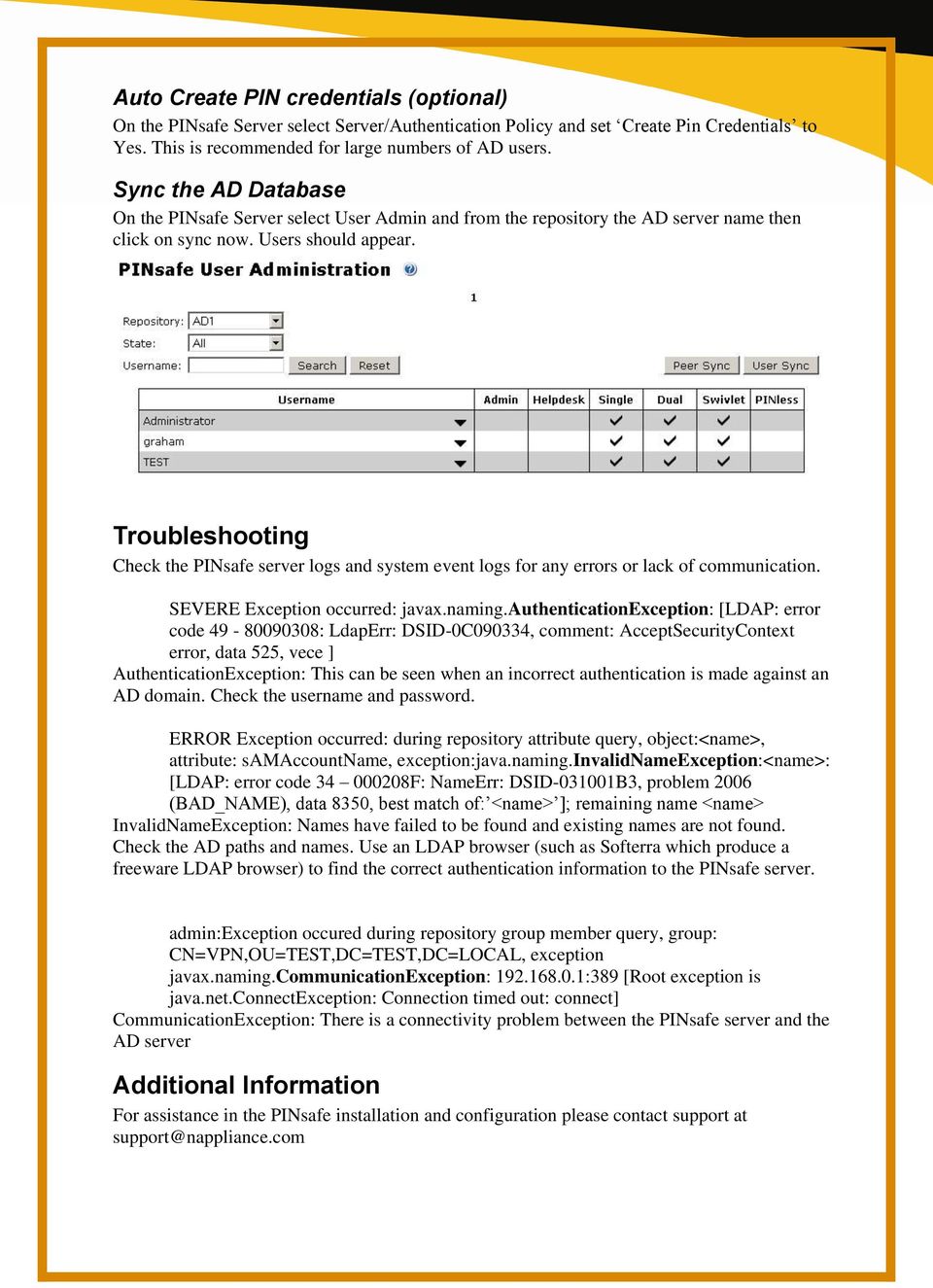
5 Auto Create PIN credentials (optional) On the PINsafe Server select Server/Authentication Policy and set Create Pin Credentials to Yes. This is recommended for large numbers of AD users. Sync the AD Database On the PINsafe Server select User Admin and from the repository the AD server name then click on sync now. Users should appear. Troubleshooting Check the PINsafe server logs and system event logs for any errors or lack of communication. SEVERE Exception occurred: javax.naming.authenticationexception: [LDAP: error code : LdapErr: DSID-0C090334, comment: AcceptSecurityContext error, data 525, vece ] AuthenticationException: This can be seen when an incorrect authentication is made against an AD domain. Check the username and password. ERROR Exception occurred: during repository attribute query, object:<name>, attribute: samaccountname, exception:java.naming.invalidnameexception:<name>: [LDAP: error code F: NameErr: DSID B3, problem 2006 (BAD_NAME), data 8350, best match of: <name> ]; remaining name <name> InvalidNameException: Names have failed to be found and existing names are not found. Check the AD paths and names. Use an LDAP browser (such as Softerra which produce a freeware LDAP browser) to find the correct authentication information to the PINsafe server. admin:exception occured during repository group member query, group: CN=VPN,OU=TEST,DC=TEST,DC=LOCAL, exception javax.naming.communicationexception: :389 [Root exception is java.net.connectexception: Connection timed out: connect] CommunicationException: There is a connectivity problem between the PINsafe server and the AD server Additional Information For assistance in the PINsafe installation and configuration please contact support at [email protected]
Alert Notification of Critical Results (ANCR) Public Domain Deployment Instructions
 Alert Notification of Critical Results (ANCR) Public Domain Deployment Instructions Server Prerequisites Internet Information Server (IIS). It may be enabled in Windows Features (see Enabling IIS section).
Integration Guide. Swivel Secure Authentication
 Integration Guide Swivel Secure Authentication Revised: 21 February 2016 About This Guide Guide Type Documented Integration WatchGuard or a Technology Partner has provided documentation demonstrating integration
Basic Configuration. Key Operator Tools older products. Program/Change LDAP Server (page 3 of keyop tools) Use LDAP Server must be ON to work
 Where to configure: User Tools Basic Configuration Key Operator Tools older products Program/Change LDAP Server (page 3 of keyop tools) Use LDAP Server must be ON to work Administrator Tools newest products
Active Directory LDAP Quota and Admin account authentication and management
 Active Directory LDAP Quota and Admin account authentication and management Version 4.1 Updated July 2014 GoPrint Systems 2014 GoPrint Systems, Inc, All rights reserved. One Annabel Lane, Suite 105 San
PINsafe Manual. PINsafe Reference Manual Version 3.8
 PINsafe Reference Manual Last Revision: Page 1 of 94 September 2010 Contents Table of Contents Introduction... 5 Getting Started with PINsafe 3.7... 6 Setting the PINsafe Database... 6 Setting the Internal
Getting Started with Clearlogin A Guide for Administrators V1.01
 Getting Started with Clearlogin A Guide for Administrators V1.01 Clearlogin makes secure access to the cloud easy for users, administrators, and developers. The following guide explains the functionality
SchoolBooking LDAP Integration Guide
 SchoolBooking LDAP Integration Guide Before you start This guide has been written to help you configure SchoolBooking to connect to your LDAP server. Please treat this document as a reference guide, your
Active Directory Integration
 Active Directory Integration Last updated March 2016 Contents Introduction:... 2 Administration configuration set up:... 2 Configuring for a single OU import... 3 User Importing... 3 Active Directory and
Cisco TelePresence Authenticating Cisco VCS Accounts Using LDAP
 Cisco TelePresence Authenticating Cisco VCS Accounts Using LDAP Deployment Guide Cisco VCS X8.1 D14465.06 December 2013 Contents Introduction 3 Process summary 3 LDAP accessible authentication server configuration
Setting up Sharp MX-Color Imagers for Inbound Fax Routing to Email or Network Folder
 Setting up Sharp MX-Color Imagers for Inbound Fax Routing to Email or Network Folder MX-2300, MX-2600, MX-2700, MX-3100, MX-3501, MX-4501, MX-5500, MX-6200, MX-6201, MX-7000, MX-7001, *MX-M850, *MX-M950,
Configuring User Identification via Active Directory
 Configuring User Identification via Active Directory Version 1.0 PAN-OS 5.0.1 Johan Loos [email protected] User Identification Overview User Identification allows you to create security policies based
This presentation explains how to integrate Microsoft Active Directory to enable LDAP authentication in the IBM InfoSphere Master Data Management
 This presentation explains how to integrate Microsoft Active Directory to enable LDAP authentication in the IBM InfoSphere Master Data Management Collaboration Server. Before going into details, there
VERALAB LDAP Configuration Guide
 VERALAB LDAP Configuration Guide VeraLab Suite is a client-server application and has two main components: a web-based application and a client software agent. Web-based application provides access to
SchoolBooking SSO Integration Guide
 SchoolBooking SSO Integration Guide Before you start This guide has been written to help you configure SchoolBooking to operate with SSO (Single Sign on) Please treat this document as a reference guide,
Quick Scan Features Setup Guide
 Xerox WorkCentre 7132 Quick Scan Features Setup Guide 701P45042 This guide includes instructions for: Scan to Email on page 1 Scan to Mailbox Setup (Optional) on page 5 Network Scanning Setup (Optional)
Setting Up Sharp MX-Color Imagers To Scan To Email
 Setting Up Sharp MX-Color Imagers To Scan To Email MX-2300, MX-2600, MX-2700, MX-3100, MX-3501, MX-4501, MX-5500, MX-6200, MX-6201, MX-7000, MX-7001, MX-M850, MX-M950, MX-M1100 Step 1. Click Start > Run
Integrating Webalo with LDAP or Active Directory
 Integrating Webalo with LDAP or Active Directory Webalo can be integrated with an external directory to identify valid Webalo users and then authenticate them to the Webalo appliance. Integration with
Administration Guide. . All right reserved. For more information about Specops Password Sync and other Specops products, visit www.specopssoft.
 Administration Guide. All right reserved. For more information about Specops Password Sync and other Specops products, visit www.specopssoft.com Copyright and Trademarks Specops Password Sync is a trademark
Scan Features Minimum Requirements Guide WorkCentre M123/M128 WorkCentre Pro 123/128 701P42081
 Scan Features Minimum Requirements Guide WorkCentre M123/M128 WorkCentre Pro 123/128 701P42081 2004. All rights reserved. Copyright protection claimed includes all forms and matters of copyrighted material
SCOPTEL WITH ACTIVE DIRECTORY USER DOCUMENTATION
 SCOPTEL WITH ACTIVE DIRECTORY USER DOCUMENTATION Table of content ScopTel with Active Directory... 3 Software Features... 3 Software Compatibility... 3 Requirements... 3 ScopTel Configuration... 4 Prerequisites...
LDAP Implementation AP561x KVM Switches. All content in this presentation is protected 2008 American Power Conversion Corporation
 LDAP Implementation AP561x KVM Switches All content in this presentation is protected 2008 American Power Conversion Corporation LDAP Implementation Does not require LDAP Schema to be touched! Uses existing
Quality Center LDAP Guide
 Information Services Quality Assurance Quality Center LDAP Guide Version 1.0 Lightweight Directory Access Protocol( LDAP) authentication facilitates single sign on by synchronizing Quality Center (QC)
Active Directory Integration
 January 11, 2011 Author: Audience: SWAT Team Evaluator Product: Cymphonix Network Composer EX Series, XLi OS version 9 Active Directory Integration The following steps will guide you through the process
Quick Scan Features Setup Guide. Scan to E-mail Setup. See also: System Administration Guide: Contains details about E-mail setup.
 Quick Scan Features Setup Guide XE3024EN0-2 This guide includes instructions for: Scan to E-mail Setup on page 1 Scan to Mailbox Setup on page 6 Network Scanning Setup on page 9 Scan to PC Setup on page
IMPLEMENTING DIRECTORY SERVICES INTEGRATION WITH HELIX MEDIA LIBRARY Revision Date: September 2014
 IMPLEMENTING DIRECTORY SERVICES INTEGRATION WITH HELIX MEDIA LIBRARY Revision Date: September 2014 Helix Media Library User Guide Table of Contents Introduction...3 1. Prerequisites...3 2. Running the
Summary. How-To: Active Directory Integration. April, 2006
 How-To How-To Integrate CanIt-PRO with Active Directory: April, 2006 Summary Several organizations use Active Directory to manage their user accounts. This paper describes how to integrate CanIt-PRO with
Field Description Example. IP address of your DNS server. It is used to resolve fully qualified domain names
 DataCove DT Active Directory Authentication In Active Directory (AD) authentication mode, the server uses NTLM v2 and LDAP protocols to authenticate users residing in Active Directory. The login procedure
Here, we will discuss step-by-step procedure for enabling LDAP Authentication.
 LDAP Authenticated Web Administration : MailScan 5.x is powered with LDAP Authenticated Web Administration. This gives security enhancement to authenticate users, to check their quarantined and ham emails.
Protected Trust Directory Sync Guide
 Protected Trust Directory Sync Guide Protected Trust Directory Sync Guide 2 Overview Protected Trust Directory Sync enables your organization to synchronize the users and distribution lists in Active Directory
PriveonLabs Research. Cisco Security Agent Protection Series:
 Cisco Security Agent Protection Series: Enabling LDAP for CSA Management Center SSO Authentication For CSA 5.2 Versions 5.2.0.245 and up Fred Parks Systems Consultant 3/25/2008 2008 Priveon, Inc. www.priveonlabs.com
Important Information
 June 2015 Important Information The following information applies to Proofpoint Essentials US1 data center only. User Interface Access https://usproofpointessentials.com MX Records mx1-usppe-hosted.com
Active Directory Requirements and Setup
 Active Directory Requirements and Setup The information contained in this document has been written for use by Soutron staff, clients, and prospective clients. Soutron reserves the right to change the
Only LDAP-synchronized users can access SAML SSO-enabled web applications. Local end users and applications users cannot access them.
 This chapter provides information about the Security Assertion Markup Language (SAML) Single Sign-On feature, which allows administrative users to access certain Cisco Unified Communications Manager and
LDAP Directory Integration with Cisco Unity Connection
 CHAPTER 6 LDAP Directory Integration with Cisco Unity Connection The Lightweight Directory Access Protocol (LDAP) provides applications like Cisco Unity Connection with a standard method for accessing
SharePoint AD Information Sync Installation Instruction
 SharePoint AD Information Sync Installation Instruction System Requirements Microsoft Windows SharePoint Services V3 or Microsoft Office SharePoint Server 2007. License management Click the trial link
Cryoserver Archive Lotus Notes Configuration
 Lotus Notes Configuration Version 1.0 December 2007 Forensic & Compliance Systems Ltd +44 (0)800 280 0525 [email protected] www.cryoserver.com Contents INTRODUCTION... 3 SMTP ROUTING TO CRYOSERVER...
IIS, FTP Server and Windows
 IIS, FTP Server and Windows The Objective: To setup, configure and test FTP server. Requirement: Any version of the Windows 2000 Server. FTP Windows s component. Internet Information Services, IIS. Steps:
Web Testing, Java Testing, Server Monitoring. AppPerfect Installation Guide
 Web Testing, Java Testing, Server Monitoring AppPerfect Installation Guide You will need administrator rights on Windows machines and root access on Linux machine to install AppPerfect products. If you
Email: [email protected] Toll Free: 1-866-716-2040 International: 1-646-506-9354
 1. Check your Welcome e-mail for login credentials for the control panel. 2. Using the login details in the welcome e-mail; login at https://cp.hostallapps.com Adding Domain: 1. On the Home Page of the
Device Log Export ENGLISH
 Figure 14: Topic Selection Page Device Log Export This option allows you to export device logs in three ways: by E-Mail, FTP, or HTTP. Each method is described in the following sections. NOTE: If the E-Mail,
TypingMaster Intra. LDAP / Active Directory Installation. Technical White Paper (2009-9)
 TypingMaster Intra LDAP / Active Directory Installation Technical White Paper (2009-9) CONTENTS Contents... 2 TypingMaster Intra LDAP / Active Directory White Paper... 3 Background INFORMATION... 3 Overall
VMware Identity Manager Administration
 VMware Identity Manager Administration VMware Identity Manager 2.4 This document supports the version of each product listed and supports all subsequent versions until the document is replaced by a new
HOTPin Integration Guide: Microsoft Office 365 with Active Directory Federated Services
 HOTPin Integration Guide: Microsoft Office 365 with Active Directory Federated Services Disclaimer Disclaimer of Warranties and Limitation of Liabilities All information contained in this document is provided
SecureAware on IIS8 on Windows Server 2008/- 12 R2-64bit
 SecureAware on IIS8 on Windows Server 2008/- 12 R2-64bit Note: SecureAware version 3.7 and above contains all files and setup configuration needed to use Microsoft IIS as a front end web server. Installing
Group Management Server User Guide
 Group Management Server User Guide Table of Contents Getting Started... 3 About... 3 Terminology... 3 Group Management Server is Installed what do I do next?... 4 Installing a License... 4 Configuring
SonicWALL Email Security Quick Start Guide. Version 4.6
 SonicWALL Email Security Quick Start Guide Version 4.6 Quick Start Guide - Introduction This document guides you through the most basic steps to set up and administer SonicWALL Email Security. For more
Configuring Sponsor Authentication
 CHAPTER 4 Sponsors are the people who use Cisco NAC Guest Server to create guest accounts. Sponsor authentication authenticates sponsor users to the Sponsor interface of the Guest Server. There are five
Defender 5.7 - Token Deployment System Quick Start Guide
 Defender 5.7 - Token Deployment System Quick Start Guide This guide describes how to install, configure and use the Defender Token Deployment System, based on default settings and how to self register
Overview How it works: Features: Page 1
 Overview Tired of having domain administrators resetting user s passwords? Reduce costs and lighten the load of domain admins by delegating this duty to level 1 helpdesk personnel, department managers,
OpenLDAP Oracle Enterprise Gateway Integration Guide
 An Oracle White Paper June 2011 OpenLDAP Oracle Enterprise Gateway Integration Guide 1 / 29 Disclaimer The following is intended to outline our general product direction. It is intended for information
Adeptia Suite LDAP Integration Guide
 Adeptia Suite LDAP Integration Guide Version 6.2 Release Date February 24, 2015 343 West Erie, Suite 440 Chicago, IL 60654, USA Phone: (312) 229-1727 x111 Fax: (312) 229-1736 DOCUMENT INFORMATION Adeptia
VMware Identity Manager Administration
 VMware Identity Manager Administration VMware Identity Manager 2.6 This document supports the version of each product listed and supports all subsequent versions until the document is replaced by a new
Fortigate SSL VPN 4 With PINsafe Installation Notes
 Fortigate SSL VPN 4 With PINsafe Installation Notes Table of Contents Fortigate SSL VPN 4 With PINsafe Installation Notes... 1 1. Introduction... 2 2. Overview... 2 2.1. Prerequisites... 2 2.2. Baseline...
Tool Tip. SyAM Management Utilities and Non-Admin Domain Users
 SyAM Management Utilities and Non-Admin Domain Users Some features of SyAM Management Utilities, including Client Deployment and Third Party Software Deployment, require authentication credentials with
Using LDAP for User Authentication
 Using LDAP for User Authentication Product version: 4.50 Document version: 1.1 Document creation date: 03-06-05 Purpose This technical note describes how to configure and set up EPiServer to use an LDAP
Authentication Methods
 Authentication Methods Overview In addition to the OU Campus-managed authentication system, OU Campus supports LDAP, CAS, and Shibboleth authentication methods. LDAP users can be configured through the
Configuration Guide for Active Directory Integration
 Configuration Guide for Active Directory Integration Workspot, Inc. 12/4/2015 Workspot Active Directory Integration The Enterprise Connector provides synchronization between an on-premise Active Directory
Fortigate SSL VPN 3.x With PINsafe Installation Notes
 Fortigate SSL VPN 3.x With PINsafe Installation Notes Table of Contents Fortigate SSL VPN 3.x With PINsafe Installation Notes... 1 1. Introduction... 2 2. Overview... 2 2.1. Prerequisites... 2 2.2. Baseline...
Configuring and Using the TMM with LDAP / Active Directory
 Configuring and Using the TMM with LDAP / Active Lenovo ThinkServer April 27, 2012 Version 1.0 Contents Configuring and using the TMM with LDAP / Active... 3 Configuring the TMM to use LDAP... 3 Configuring
Created by Hotline Support Konica Minolta Hotline Support (UK) V1.2
 The Konica Minolta Guide to LDAP This guide details how to set up the: Bizhub 250/350, 420/500, 361/421/501, 600/750 Bizhub C250, C252, C300, C351, C352, C450 Bizhub C203, 253, 451,,550, 650 Created by
OneLogin Integration User Guide
 OneLogin Integration User Guide Table of Contents OneLogin Account Setup... 2 Create Account with OneLogin... 2 Setup Application with OneLogin... 2 Setup Required in OneLogin: SSO and AD Connector...
User Service and Directory Agent: Configuration Best Practices and Troubleshooting
 User Service and Directory Agent: Configuration Best Practices and Troubleshooting Websense Support Webinar March 2011 web security data security email security Support Webinars 2009 Websense, Inc. All
Skyward LDAP Launch Kit Table of Contents
 04.30.2015 Table of Contents What is LDAP and what is it used for?... 3 Can Cloud Hosted (ISCorp) Customers use LDAP?... 3 What is Advanced LDAP?... 3 Does LDAP support single sign-on?... 4 How do I know
Management, Logging and Troubleshooting
 CHAPTER 15 This chapter describes the following: SNMP Configuration System Logging SNMP Configuration Cisco NAC Guest Server supports management applications monitoring the system over SNMP (Simple Network
DESLock+ Basic Setup Guide Version 1.20, rev: June 9th 2014
 DESLock+ Basic Setup Guide Version 1.20, rev: June 9th 2014 Contents Overview... 2 System requirements:... 2 Before installing... 3 Download and installation... 3 Configure DESLock+ Enterprise Server...
Coveo Platform 7.0. Microsoft Active Directory Connector Guide
 Coveo Platform 7.0 Microsoft Active Directory Connector Guide Notice The content in this document represents the current view of Coveo as of the date of publication. Because Coveo continually responds
AD Self Password Reset Installation and configuration
 AD Self Password Reset Installation and configuration AD Self Password Reset Installation 1 Manual v1.4 Table of Contents TABLE OF CONTENTS 2 SUMMARY 3 INSTALLATION 4 REMOVAL 6 AD SELF PASSWORD RESET CONFIGURATION
Installation and Configuration Guide
 Installation and Configuration Guide BlackBerry Resource Kit for BlackBerry Enterprise Service 10 Version 10.2 Published: 2015-11-12 SWD-20151112124827386 Contents Overview: BlackBerry Enterprise Service
Dell SupportAssist Version 2.0 for Dell OpenManage Essentials Quick Start Guide
 Dell SupportAssist Version 2.0 for Dell OpenManage Essentials Quick Start Guide Notes, Cautions, and Warnings NOTE: A NOTE indicates important information that helps you make better use of your computer.
Configuring Color Access on the WorkCentre 7120 Using Microsoft Active Directory Customer Tip
 Configuring Color Access on the WorkCentre 7120 Using Microsoft Active Directory Customer Tip October 21, 2010 Overview This document describes how to limit access to color copying and printing on the
FileCruiser. VA2600 SR1 Quick Configuration Guide
 FileCruiser VA2600 SR1 Quick Configuration Guide Contents About this guide 1 Setup FileCruiser 2 Get IP address 2 Login to the Administration Portal 3 Basic configuration with Setup Wizard 4 Step 1: Configure
Using LDAP Authentication in a PowerCenter Domain
 Using LDAP Authentication in a PowerCenter Domain 2008 Informatica Corporation Overview LDAP user accounts can access PowerCenter applications. To provide LDAP user accounts access to the PowerCenter applications,
Managing User Accounts
 Managing User Accounts This chapter includes the following sections: Active Directory, page 1 Configuring Local Users, page 3 Viewing User Sessions, page 5 Active Directory Active Directory is a technology
Embedded Web Server Security
 Embedded Web Server Security Administrator's Guide September 2014 www.lexmark.com Model(s): C54x, C73x, C746, C748, C792, C925, C950, E260, E360, E46x, T65x, W850, X264, X36x, X46x, X543, X544, X546, X548,
Cloudwork Dashboard User Manual
 STUDENTNET Cloudwork Dashboard User Manual Make the Cloud Yours! Studentnet Technical Support 10/28/2015 User manual for the Cloudwork Dashboard introduced in January 2015 and updated in October 2015 with
Security Provider Integration Kerberos Authentication
 Security Provider Integration Kerberos Authentication 2015 Bomgar Corporation. All rights reserved worldwide. BOMGAR and the BOMGAR logo are trademarks of Bomgar Corporation; other trademarks shown are
Configuring Global Protect SSL VPN with a user-defined port
 Configuring Global Protect SSL VPN with a user-defined port Version 1.0 PAN-OS 5.0.1 Johan Loos [email protected] Global Protect SSL VPN Overview This document gives you an overview on how to configure
Configuring MailArchiva with Insight Server
 Copyright 2009 Bynari Inc., All rights reserved. No part of this publication may be reproduced or transmitted in any form or by any means, electronic or mechanical, including photocopy, recording, or any
RoomWizard Synchronization Software Manual Installation Instructions
 2 RoomWizard Synchronization Software Manual Installation Instructions Table of Contents Exchange Server Configuration... 4 RoomWizard Synchronization Software Installation and Configuration... 5 System
FaxCore 2007 Getting Started Guide (v1.0)
 FaxCore 2007 Getting Started Guide (v1.0) FaxCore 2007 Getting Started Guide (v1.0) Page 1 FaxCore 2007 Getting Started Guide Setting up Windows 2003 This only applies to FaxCore appliances. When the server
How to configure your email client
 How to configure your email client This guide will teach you how to set up your email client. In this guide we will cover both Outlook and Windows Live mail, which are two of the major email clients used
Version 9. Active Directory Integration in Progeny 9
 Version 9 Active Directory Integration in Progeny 9 1 Active Directory Integration in Progeny 9 Directory-based authentication via LDAP protocols Copyright Limit of Liability Trademarks Customer Support
Contents About the Contract Management Post Installation Administrator's Guide... 5 Viewing and Modifying Contract Management Settings...
 Post Installation Guide for Primavera Contract Management 14.1 July 2014 Contents About the Contract Management Post Installation Administrator's Guide... 5 Viewing and Modifying Contract Management Settings...
F-SECURE MESSAGING SECURITY GATEWAY
 F-SECURE MESSAGING SECURITY GATEWAY DEFAULT SETUP GUIDE This guide describes how to set up and configure the F-Secure Messaging Security Gateway appliance in a basic e-mail server environment. AN EXAMPLE
Using Microsoft Windows Authentication for Microsoft SQL Server Connections in Data Archive
 Using Microsoft Windows Authentication for Microsoft SQL Server Connections in Data Archive 2014 Informatica Corporation. No part of this document may be reproduced or transmitted in any form, by any means
SITRANS RD500 Configuring the RD500 with PSTN or GSM modems and Windows-based servers and clients for communication Objective:
 AG041410 SITRANS RD500 Configuring the RD500 with PSTN or GSM modems and Windows-based servers and clients for communication Objective: Determine how to configure the RD500 and your PSTN or GSM modem APPLICATION
Email Client configuration and migration Guide Setting up Thunderbird 3.1
 Email Client configuration and migration Guide Setting up Thunderbird 3.1 1. Open Mozilla Thunderbird. : 1. On the Edit menu, click Account Settings. 2. On the Account Settings page, under Account Actions,
Active Directory integration with CloudByte ElastiStor
 Active Directory integration with CloudByte ElastiStor Prerequisite Change the time and the time zone of the Active Directory Server to the VSM time and time zone. Enabling Active Directory at VSM level
InfoRouter LDAP Authentication Web Service documentation for inforouter Versions 7.5.x & 8.x
 InfoRouter LDAP Authentication Web Service documentation for inforouter Versions 7.5.x & 8.x Active Innovations, Inc. Copyright 1998 2015 www.inforouter.com Installing the LDAP Authentication Web Service
ECAT SWE Exchange Customer Administration Tool Web Interface User Guide Version 6.7
 ECAT SWE Exchange Customer Administration Tool SWE - Exchange Customer Administration Tool (ECAT) Table of Contents About this Guide... 3 Audience and Purpose... 3 What is in this Guide?... 3 CA.mail Website...
Deploying RSA ClearTrust with the FirePass controller
 Deployment Guide Deploying RSA ClearTrust with the FirePass Controller Deploying RSA ClearTrust with the FirePass controller Welcome to the FirePass RSA ClearTrust Deployment Guide. This guide shows you
BackupAssist Settings tab User guide
 User guide Contents 1. Introduction... 2 Documentation... 2 Licensing... 2 Settings overview... 2 2. Settings tab selections... 3 Backup user identity... 3 Email server settings... 4 Email address list...
Using MailStore to Archive MDaemon Email
 Using MailStore to Archive MDaemon Email This guide details how to archive all inbound and outbound email using MailStore, as well as archiving any emails currently found in the users accounts in MDaemon.
Embedded Web Server Security
 Embedded Web Server Security Administrator's Guide September 2014 www.lexmark.com Model(s): MS911de, MX910de, MX911, MX912, XM9145, XM9155, XM9165, CS310, CS410, CS510, CX310, CX410, CX510, M1140, M1145,
Integrating LANGuardian with Active Directory
 Integrating LANGuardian with Active Directory 01 February 2012 This document describes how to integrate LANGuardian with Microsoft Windows Server and Active Directory. Overview With the optional Identity
Using LDAP with Sentry Firmware and Sentry Power Manager (SPM)
 Using LDAP with Sentry Firmware and Sentry Power Manager (SPM) Table of Contents Purpose LDAP Requirements Using LDAP with Sentry Firmware (GUI) Initiate a Sentry GUI Session Configuring LDAP for Active
3rd Party VoIP Phone Setup Guide (Panasonic 500-550b)
 3rd Party VoIP Phone Setup Guide (Panasonic 500-550b) We are changing how we add 3rd party VoIP phones to accounts. Going forward, you can simply add a 3rd Party Softphone and use those credentials to
NAS 206 Using NAS with Windows Active Directory
 NAS 206 Using NAS with Windows Active Directory Connect your NAS to a Windows Active Directory domain A S U S T O R C O L L E G E COURSE OBJECTIVES Upon completion of this course you should be able to: