
This presentation explains how to integrate Microsoft Active Directory to enable LDAP authentication in the IBM InfoSphere Master Data Management
|
|
|
- Letitia Warner
- 10 years ago
- Views:
Transcription
1 This presentation explains how to integrate Microsoft Active Directory to enable LDAP authentication in the IBM InfoSphere Master Data Management Collaboration Server.
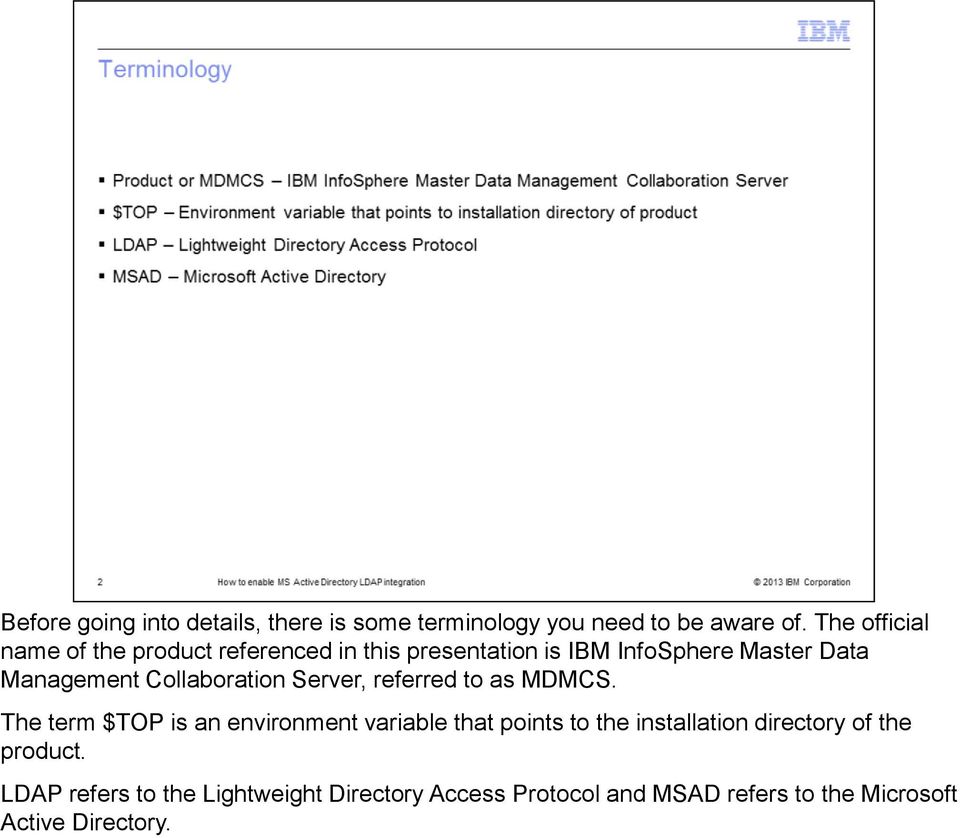
2 Before going into details, there is some terminology you need to be aware of. The official name of the product referenced in this presentation is IBM InfoSphere Master Data Management Collaboration Server, referred to as MDMCS. The term $TOP is an environment variable that points to the installation directory of the product. LDAP refers to the Lightweight Directory Access Protocol and MSAD refers to the Microsoft Active Directory.
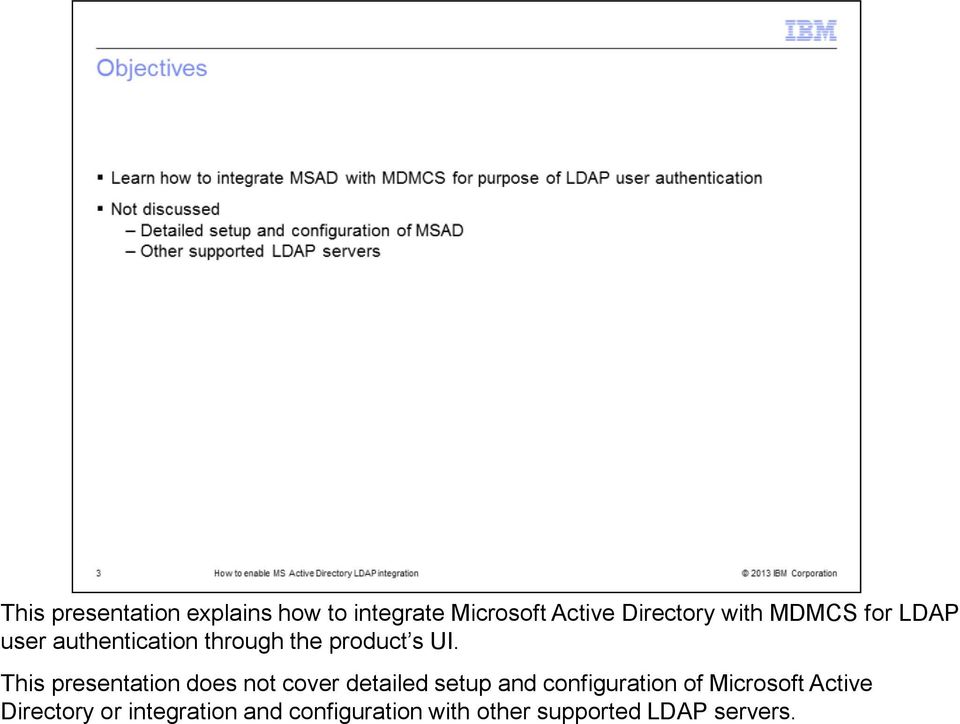
3 This presentation explains how to integrate Microsoft Active Directory with MDMCS for LDAP user authentication through the product s UI. This presentation does not cover detailed setup and configuration of Microsoft Active Directory or integration and configuration with other supported LDAP servers.
4 This presentation assumes that you have a fully configured and working Microsoft Active Directory and MDMCS instance.
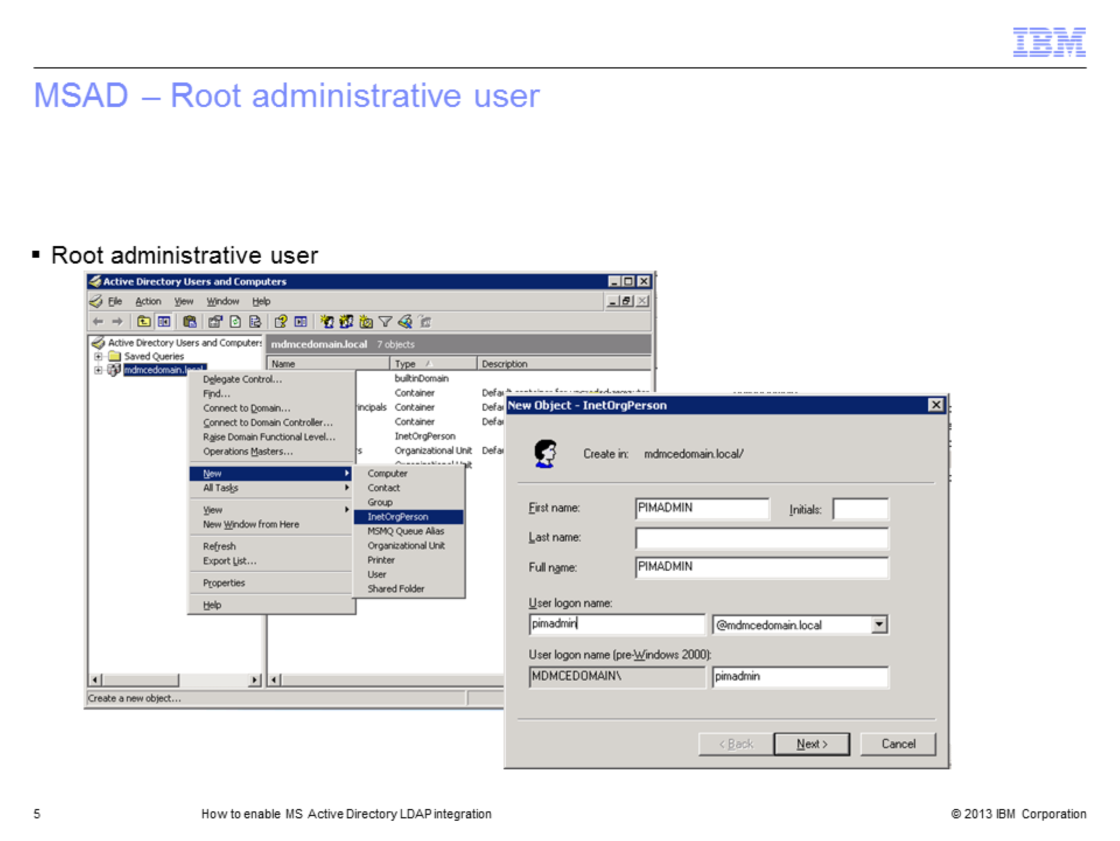
5 This step is optional if you already have a root administrative user configured. However, it is good practice to have a specific root administrative user for the purposes of MDMCS administration and configuration. If you do not have an administrative user configured, add a user of type InetOrgPerson at the root of the domain. This user is used as the root user in the MDMCS LDAP lookup table Root Entry DN field.
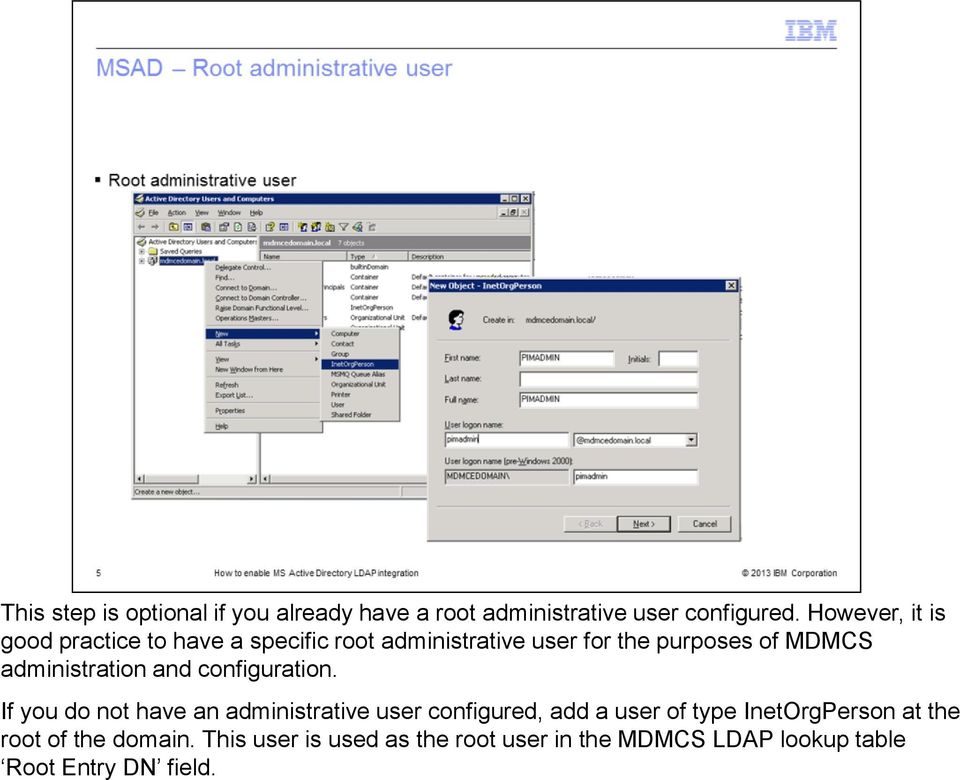
6 This step is optional if you already have an organization object. If you do not have an organization object, create a new Organization by choosing a new Organizational Unit. This organization is used as a container to groups that are created to map MDMCS roles.
7 This step is optional if you already have Groups and Users. The first step is to create Groups. Create a new Group by selecting the newly created Organizational Unit and right click, choose a new Group and fill in the details. Create as many Group objects as necessary for all your users based on business needs and on the Roles that are created in MDMCS. Groups have a one-to-one relationship mapping to the MDMCS Roles. If there are no users, you can add users for the Organizational Unit. For example, here, the organizational unit is Support. Finally, based on business needs, assign users to a group. For example, if a user is assigned the role of NA then ensure this user is made a member of the NA Group in the MSAD administration. Once MSAD configuration is finished the setup contains an Organization Unit, Groups that map to MDMCS Roles and Users map to the LDAP users in the MDMCS UI.

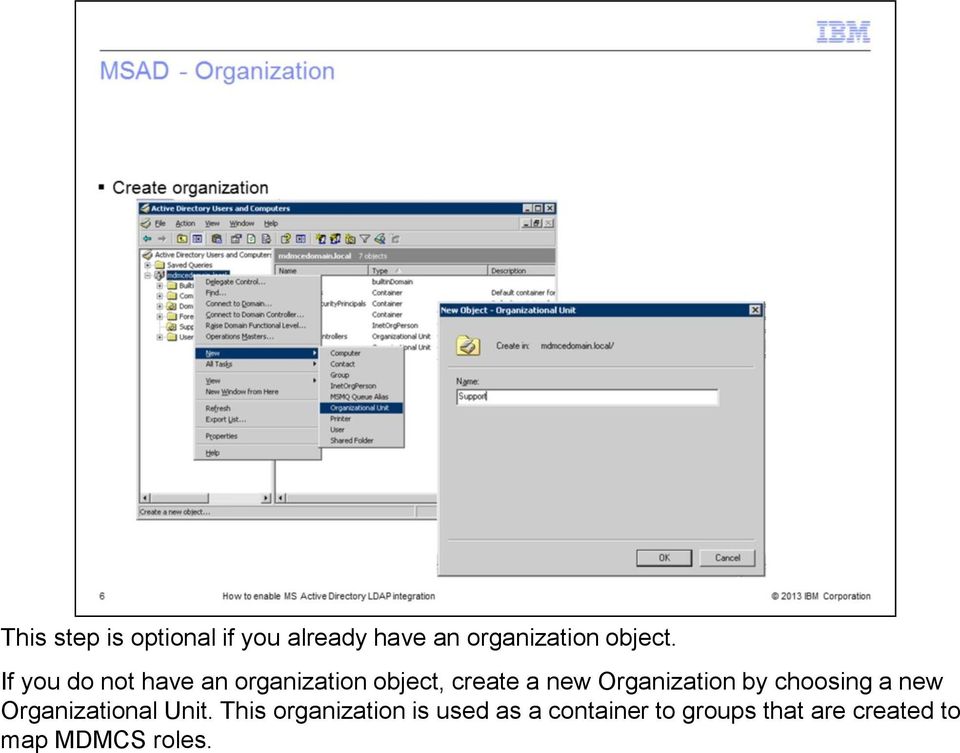
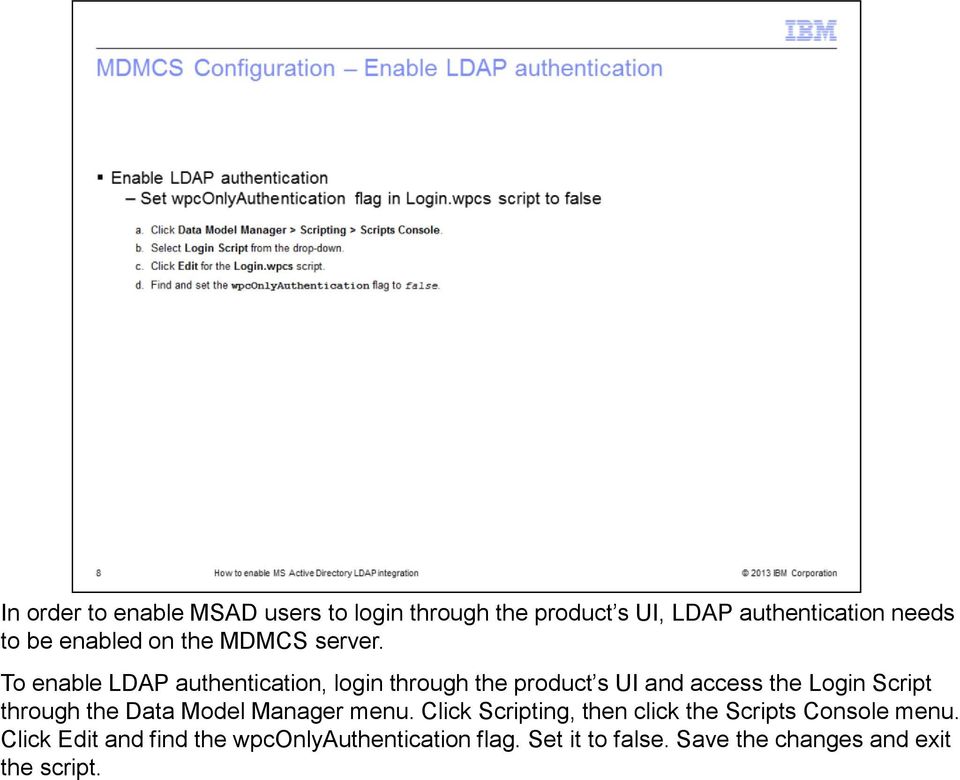
8 In order to enable MSAD users to login through the product s UI, LDAP authentication needs to be enabled on the MDMCS server. To enable LDAP authentication, login through the product s UI and access the Login Script through the Data Model Manager menu. Click Scripting, then click the Scripts Console menu. Click Edit and find the wpconlyauthentication flag. Set it to false. Save the changes and exit the script.

9 The next step is to configure an additional logger in order to have LDAP related messages written to the product s logs. You need to add a category and appender for this LDAP logger in the $TOP/etc/default/log.xml. Browse to the $TOP/etc/default/log.xml file and open it. Add the appender and category shown here. Ensure you set the logger value to debug. Save all the changes and exit the file. In order for this change to take effect, restart the product s application server. When troubleshooting LDAP issues the first place to review is the ldap.log, which is located in the $TOP/logs/appsvr_name directory.

10 Create roles in MDMCS with the same name as the groups configured in the Microsoft Active Directory server whose members are to be authenticated. For example, add the role of NA, AP and EMEA as per the earlier image.

11 The final step is to add values in the MDMCS LDAP lookup table. You will need to provide details for the values described in this table.

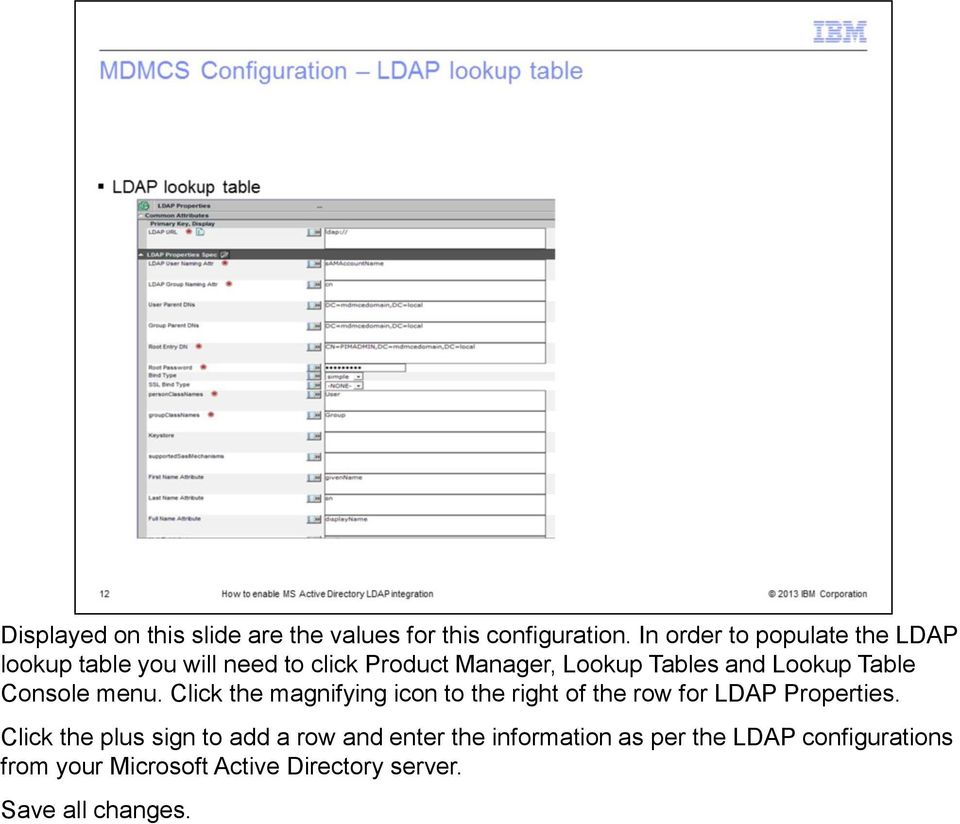
12 Displayed on this slide are the values for this configuration. In order to populate the LDAP lookup table you will need to click Product Manager, Lookup Tables and Lookup Table Console menu. Click the magnifying icon to the right of the row for LDAP Properties. Click the plus sign to add a row and enter the information as per the LDAP configurations from your Microsoft Active Directory server. Save all changes.
13 LDAP users should now be able to login through the MCMCS UI. There is no need to create the LDAP users in MDMCS. Once an LDAP user is able to login successfully, they are listed in the User Console.

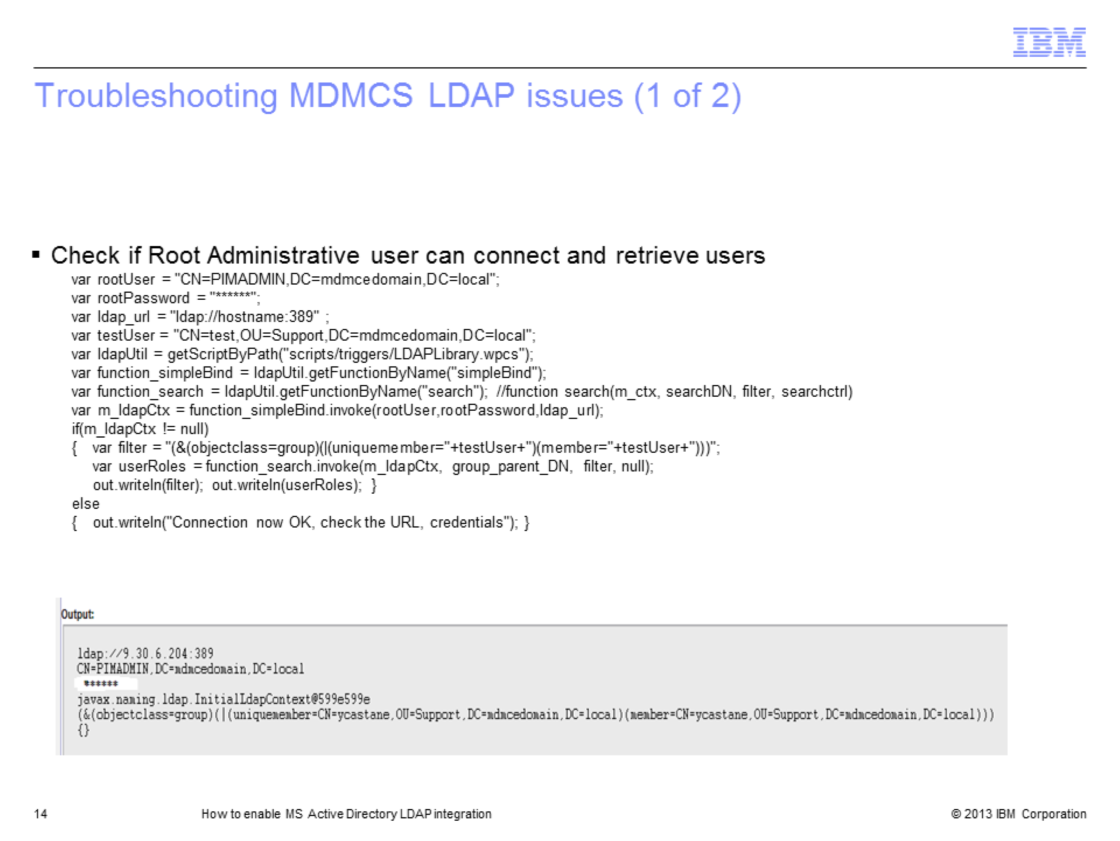
14 If you are having issues logging in, you can test whether the values entered for Root Entry DN can connect to the LDAP server and retrieve user information. Update and run the script in the sandbox. Look at the output to see if the information is correct and a connection can be made to the LDAP user.

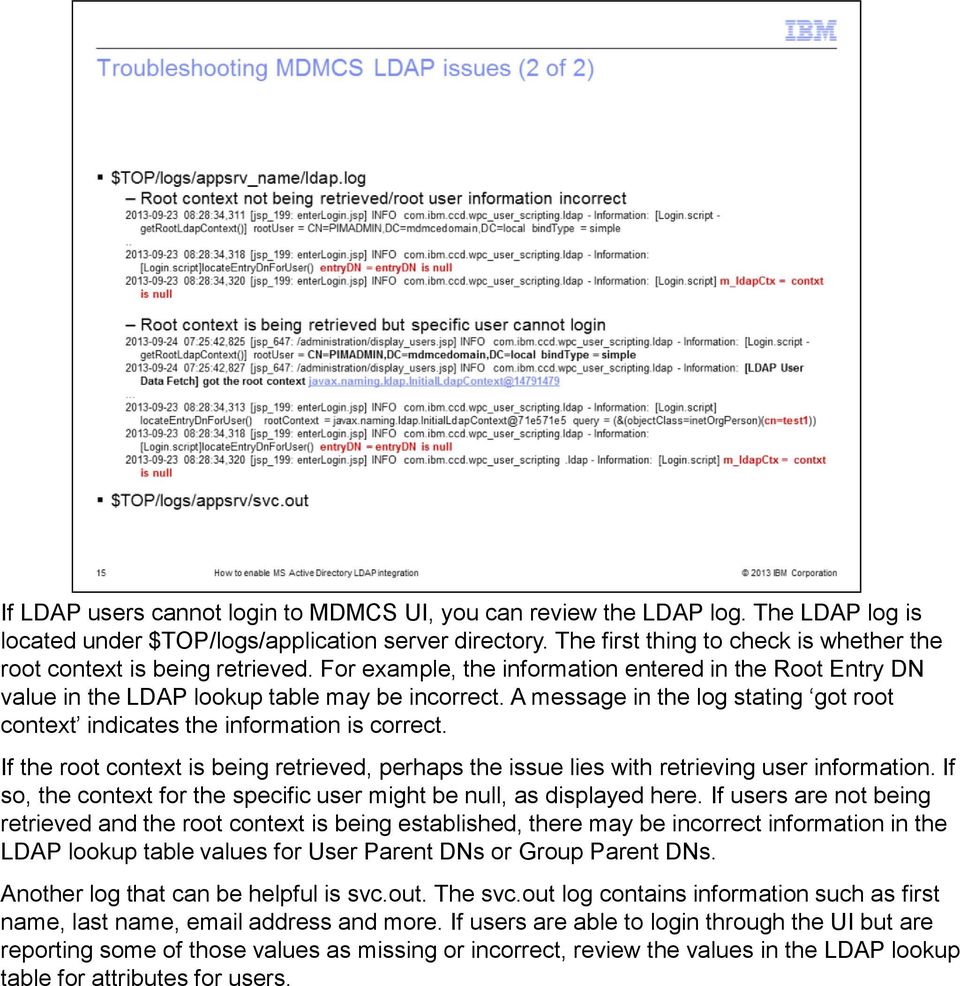
15 If LDAP users cannot login to MDMCS UI, you can review the LDAP log. The LDAP log is located under $TOP/logs/application server directory. The first thing to check is whether the root context is being retrieved. For example, the information entered in the Root Entry DN value in the LDAP lookup table may be incorrect. A message in the log stating got root context indicates the information is correct. If the root context is being retrieved, perhaps the issue lies with retrieving user information. If so, the context for the specific user might be null, as displayed here. If users are not being retrieved and the root context is being established, there may be incorrect information in the LDAP lookup table values for User Parent DNs or Group Parent DNs. Another log that can be helpful is svc.out. The svc.out log contains information such as first name, last name, address and more. If users are able to login through the UI but are reporting some of those values as missing or incorrect, review the values in the LDAP lookup table for attributes for users.
16 There are several third party tools that provide a graphical user interface to browse your LDAP directory. When configuring and troubleshooting LDAP issues, these tools can help identify if the values being entered in the MDMCS LDAP lookup table are valid or if proper values are being returned from the MS Active Directory server. JXExplorer will allow you to browse, search and modify your LDAP directory. Softerra LDAP Browser will allow a read only view of your LDAP directory unless you purchase Softerra LDAP Administrator.

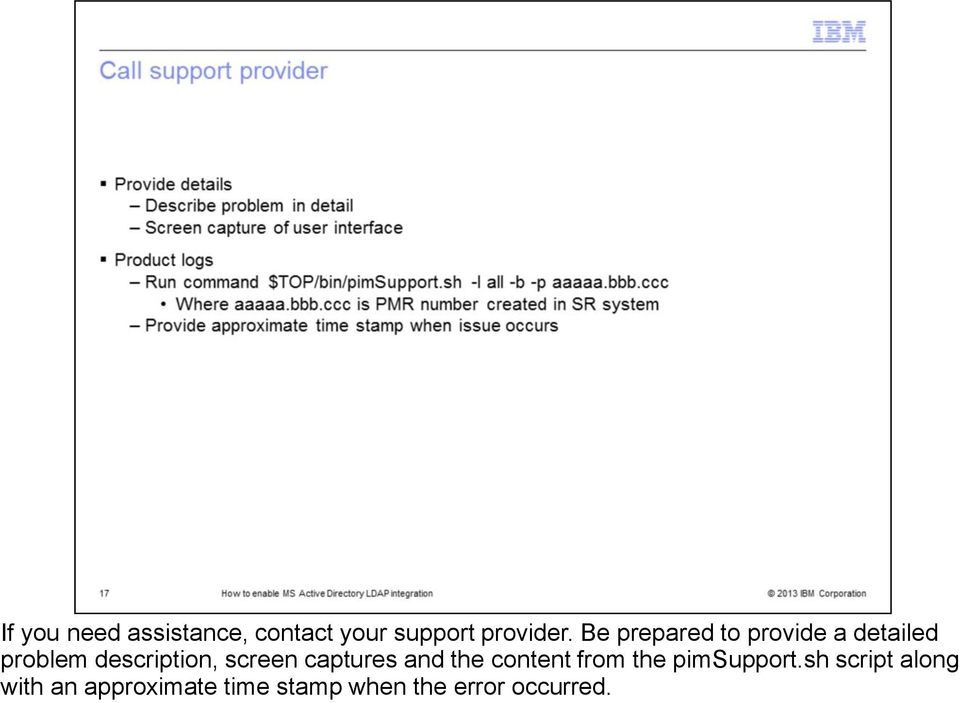
17 If you need assistance, contact your support provider. Be prepared to provide a detailed problem description, screen captures and the content from the pimsupport.sh script along with an approximate time stamp when the error occurred.
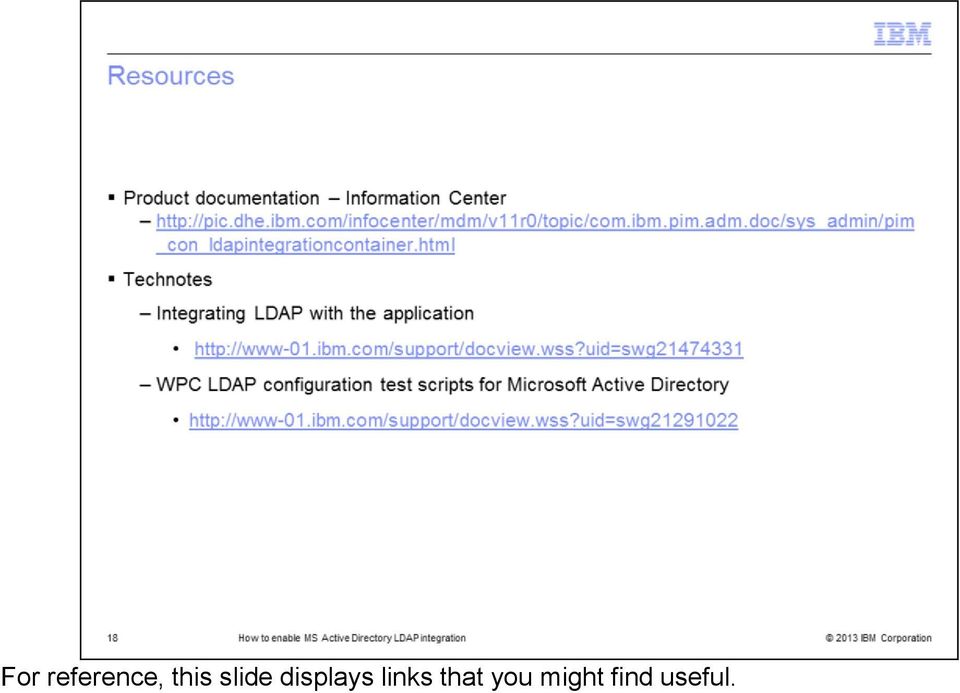
18 For reference, this slide displays links that you might find useful.
19
SecureAware on IIS8 on Windows Server 2008/- 12 R2-64bit
 SecureAware on IIS8 on Windows Server 2008/- 12 R2-64bit Note: SecureAware version 3.7 and above contains all files and setup configuration needed to use Microsoft IIS as a front end web server. Installing
Basic Configuration. Key Operator Tools older products. Program/Change LDAP Server (page 3 of keyop tools) Use LDAP Server must be ON to work
 Where to configure: User Tools Basic Configuration Key Operator Tools older products Program/Change LDAP Server (page 3 of keyop tools) Use LDAP Server must be ON to work Administrator Tools newest products
Converting Prospects to Purchasers.
 CONFIGURE MICROSOFT OFFICE 365 AND MICROSOFT EXCHANGE TO CAPTURE LASSO EMAIL The following instructions are for clients who wish to configure Microsoft Office 365 or Microsoft Exchange to record email
How To Enable A Websphere To Communicate With Ssl On An Ipad From Aaya One X Portal 1.1.3 On A Pc Or Macbook Or Ipad (For Acedo) On A Network With A Password Protected (
 Avaya one X Portal 1.1.3 Lightweight Directory Access Protocol (LDAP) over Secure Socket Layer (SSL) Configuration This document provides configuration steps for Avaya one X Portal s 1.1.3 communication
Field Description Example. IP address of your DNS server. It is used to resolve fully qualified domain names
 DataCove DT Active Directory Authentication In Active Directory (AD) authentication mode, the server uses NTLM v2 and LDAP protocols to authenticate users residing in Active Directory. The login procedure
Configuring Sponsor Authentication
 CHAPTER 4 Sponsors are the people who use Cisco NAC Guest Server to create guest accounts. Sponsor authentication authenticates sponsor users to the Sponsor interface of the Guest Server. There are five
NSi Mobile Installation Guide. Version 6.2
 NSi Mobile Installation Guide Version 6.2 Revision History Version Date 1.0 October 2, 2012 2.0 September 18, 2013 2 CONTENTS TABLE OF CONTENTS PREFACE... 5 Purpose of this Document... 5 Version Compatibility...
Setting up Sharp MX-Color Imagers for Inbound Fax Routing to Email or Network Folder
 Setting up Sharp MX-Color Imagers for Inbound Fax Routing to Email or Network Folder MX-2300, MX-2600, MX-2700, MX-3100, MX-3501, MX-4501, MX-5500, MX-6200, MX-6201, MX-7000, MX-7001, *MX-M850, *MX-M950,
User Management Resource Administrator. Managing LDAP directory services with UMRA
 User Management Resource Administrator Managing LDAP directory services with UMRA Copyright 2005, Tools4Ever B.V. All rights reserved. No part of the contents of this user guide may be reproduced or transmitted
PaperStream Connect. Setup Guide. Version 1.0.0.0. Copyright Fujitsu
 PaperStream Connect Setup Guide Version 1.0.0.0 Copyright Fujitsu 2014 Contents Introduction to PaperStream Connect... 2 Setting up PaperStream Capture to Release to Cloud Services... 3 Selecting a Cloud
Using LDAP Authentication in a PowerCenter Domain
 Using LDAP Authentication in a PowerCenter Domain 2008 Informatica Corporation Overview LDAP user accounts can access PowerCenter applications. To provide LDAP user accounts access to the PowerCenter applications,
Configure Single Sign on Between Domino and WPS
 Configure Single Sign on Between Domino and WPS What we are doing here? Ok now we have the WPS server configured and running with Domino as the LDAP directory. Now we are going to configure Single Sign
The presentation explains how to create and access the web services using the user interface. WebServices.ppt. Page 1 of 14
 The presentation explains how to create and access the web services using the user interface. Page 1 of 14 The aim of this presentation is to familiarize you with the processes of creating and accessing
LDAP and Active Directory Guide
 LDAP and Active Directory Guide Contents LDAP and Active Directory Guide...2 Overview...2 Configuring for LDAP During Setup...2 Deciding How to Use Data from LDAP... 2 Starting the Setup Tool... 3 Configuring
Quick Scan Features Setup Guide. Scan to E-mail Setup. See also: System Administration Guide: Contains details about E-mail setup.
 Quick Scan Features Setup Guide XE3024EN0-2 This guide includes instructions for: Scan to E-mail Setup on page 1 Scan to Mailbox Setup on page 6 Network Scanning Setup on page 9 Scan to PC Setup on page
SchoolBooking SSO Integration Guide
 SchoolBooking SSO Integration Guide Before you start This guide has been written to help you configure SchoolBooking to operate with SSO (Single Sign on) Please treat this document as a reference guide,
Customer Tips. Configuring Color Access on the WorkCentre 7328/7335/7345 using Windows Active Directory. for the user. Overview
 Xerox Multifunction Devices Customer Tips February 13, 2008 This document applies to the stated Xerox products. It is assumed that your device is equipped with the appropriate option(s) to support the
Cisco TelePresence Authenticating Cisco VCS Accounts Using LDAP
 Cisco TelePresence Authenticating Cisco VCS Accounts Using LDAP Deployment Guide Cisco VCS X8.1 D14465.06 December 2013 Contents Introduction 3 Process summary 3 LDAP accessible authentication server configuration
SOFTWARE BEST PRACTICES
 1 of 7 Abstract MKS Integrity Server LDAP (Lightweight Directory Access Protocol) implementations vary depending on the environment they are being placed into. The configuration of the corporate LDAP implementation
ACTIVE DIRECTORY DEPLOYMENT
 ACTIVE DIRECTORY DEPLOYMENT CASAS Technical Support 800.255.1036 2009 Comprehensive Adult Student Assessment Systems. All rights reserved. Version 031809 CONTENTS 1. INTRODUCTION... 1 1.1 LAN PREREQUISITES...
Quick Scan Features Setup Guide
 Xerox WorkCentre 7132 Quick Scan Features Setup Guide 701P45042 This guide includes instructions for: Scan to Email on page 1 Scan to Mailbox Setup (Optional) on page 5 Network Scanning Setup (Optional)
Summary. How-To: Active Directory Integration. April, 2006
 How-To How-To Integrate CanIt-PRO with Active Directory: April, 2006 Summary Several organizations use Active Directory to manage their user accounts. This paper describes how to integrate CanIt-PRO with
Quality Center LDAP Guide
 Information Services Quality Assurance Quality Center LDAP Guide Version 1.0 Lightweight Directory Access Protocol( LDAP) authentication facilitates single sign on by synchronizing Quality Center (QC)
Exostar LDAP Proxy / SecureEmail Setup Guide. This document provides information on the following topics:
 This document provides information on the following topics: Email Encryption set-up Outlook 2003 Email Encryption set-up Outlook 2007 Email Encryption set-up Outlook 2010 Email Encryption set-up Outlook
MICROSTRATEGY 9.3 Supplement Files Setup Transaction Services for Dashboard and App Developers
 NOTE: You can use these instructions to configure instructor and student machines. Software Required Microsoft Access 2007, 2010 MicroStrategy 9.3 Microsoft SQL Server Express 2008 R2 (free from Microsoft)
SQL Server Setup for Assistant/Pro applications Compliance Information Systems
 SQL Server Setup for Assistant/Pro applications Compliance Information Systems The following document covers the process of setting up the SQL Server databases for the Assistant/PRO software products form
Using Internet or Windows Explorer to Upload Your Site
 Using Internet or Windows Explorer to Upload Your Site This article briefly describes what an FTP client is and how to use Internet Explorer or Windows Explorer to upload your Web site to your hosting
Configuring a Windows 2003 Server for IAS
 Configuring a Windows 2003 Server for IAS When setting up a Windows 2003 server to function as an IAS server for our demo environment we will need the server to serve several functions. First of all we
Active Directory Integration Notes. Introduction. Overview
 Active Directory Integration Notes Created July 2006 Revised October 2007 Table of Contents Active Directory Integration Notes... 1 Introduction... 1 Overview... 1 Prerequisites... 2 Installation... 2
CLEO NED Active Directory Integration. Version 1.2.0
 CLEO NED Active Directory Integration Version 1.2.0 CLEO NED Active Directory Integration Manual v1.2.0 Copyright c 2010 Lancaster University Network Services Limited. All rights reserved. Microsoft, Windows,
LDAP Implementation AP561x KVM Switches. All content in this presentation is protected 2008 American Power Conversion Corporation
 LDAP Implementation AP561x KVM Switches All content in this presentation is protected 2008 American Power Conversion Corporation LDAP Implementation Does not require LDAP Schema to be touched! Uses existing
Step-by-Step Guide to Setup Instant Messaging (IM) Workspace Datasheet
 Step-by-Step Guide to Setup Instant Messaging (IM) Workspace Datasheet CONTENTS Installation System requirements SQL Server setup Setting up user accounts Authentication mode Account options Import from
Active Directory Requirements and Setup
 Active Directory Requirements and Setup The information contained in this document has been written for use by Soutron staff, clients, and prospective clients. Soutron reserves the right to change the
Configuring Color Access on the WorkCentre 7120 Using Microsoft Active Directory Customer Tip
 Configuring Color Access on the WorkCentre 7120 Using Microsoft Active Directory Customer Tip October 21, 2010 Overview This document describes how to limit access to color copying and printing on the
Installing the Microsoft Network Driver Interface
 Installing the Microsoft Network Driver Interface Overview This guide explains how to install the PictureTel Live200 Microsoft Network Driver Interface (NDIS) software you have downloaded from PictureTel's
Only LDAP-synchronized users can access SAML SSO-enabled web applications. Local end users and applications users cannot access them.
 This chapter provides information about the Security Assertion Markup Language (SAML) Single Sign-On feature, which allows administrative users to access certain Cisco Unified Communications Manager and
WirelessOffice Administrator LDAP/Active Directory Support
 Emergin, Inc. WirelessOffice Administrator LDAP/Active Directory Support Document Version 6.0R02 Product Version 6.0 DATE: 08-09-2004 Table of Contents Objective:... 3 Overview:... 4 User Interface Changes...
Dell KACE K1000 System Management Appliance Version 5.4. Service Desk Administrator Guide
 Dell KACE K1000 System Management Appliance Version 5.4 Service Desk Administrator Guide October 2012 2004-2012 Dell Inc. All rights reserved. Reproduction of these materials in any manner whatsoever without
Installation Logon Recording Basis. By AD Logon Name AD Logon Name(recommended) By Windows Logon Name IP Address
 Internet Recorder Binding User Names to AD Server & Recording Skype Text Conversation Path: Recording Analysis > Setting Terminologies: AD Server (User Name Logon Name Binding) The AD logon names can be
VERALAB LDAP Configuration Guide
 VERALAB LDAP Configuration Guide VeraLab Suite is a client-server application and has two main components: a web-based application and a client software agent. Web-based application provides access to
SOLGARI CLOUD BUSINESS COMMUNICATION SERVICES CLOUD CONTACT CENTRE MICROSOFT DYNAMICS INTEGRATION
 SOLGARI CLOUD BUSINESS COMMUNICATION SERVICES CLOUD CONTACT CENTRE MICROSOFT DYNAMICS INTEGRATION APRIL 2015 Microsoft Dynamics CRM Integration The Solgari CRM Integration module provides out of the box
Migrating helpdesk to a new server
 Migrating helpdesk to a new server Table of Contents 1. Helpdesk Migration... 2 Configure Virtual Web on IIS 6 Windows 2003 Server:... 2 Role Services required on IIS 7 Windows 2008 / 2012 Server:... 2
RoomWizard Synchronization Software Manual Installation Instructions
 2 RoomWizard Synchronization Software Manual Installation Instructions Table of Contents Exchange Server Configuration... 4 RoomWizard Synchronization Software Installation and Configuration... 5 System
NetIQ Advanced Authentication Framework - MacOS Client
 NetIQ Advanced Authentication Framework - MacOS Client Installation Guide Version 5.2.0 1 Table of Contents 1 Table of Contents 2 Introduction 3 About This Document 3 About MacOS Client 4 System Requirements
Managing Identities and Admin Access
 CHAPTER 4 This chapter describes how Cisco Identity Services Engine (ISE) manages its network identities and access to its resources using role-based access control policies, permissions, and settings.
Step by step guide for connecting PC to wired LAN at dormitories of University of Pardubice
 Step by step guide for connecting PC to wired LAN at dormitories of University of Pardubice English version Version 1.1 July 2008 Information Cente University of Pardubice Content A. Windows XP... 2 B.
Immotec Systems, Inc. SQL Server 2005 Installation Document
 SQL Server Installation Guide 1. From the Visor 360 installation CD\USB Key, open the Access folder and install the Access Database Engine. 2. Open Visor 360 V2.0 folder and double click on Setup. Visor
PriveonLabs Research. Cisco Security Agent Protection Series:
 Cisco Security Agent Protection Series: Enabling LDAP for CSA Management Center SSO Authentication For CSA 5.2 Versions 5.2.0.245 and up Fred Parks Systems Consultant 3/25/2008 2008 Priveon, Inc. www.priveonlabs.com
escan SBS 2008 Installation Guide
 escan SBS 2008 Installation Guide Following things are required before starting the installation 1. On SBS 2008 server make sure you deinstall One Care before proceeding with installation of escan. 2.
Workspot Configuration Guide for the Cisco Adaptive Security Appliance
 Workspot Configuration Guide for the Cisco Adaptive Security Appliance Workspot, Inc. 1/27/2015 Cisco ASA and Workspot Overview The Cisco Adaptive Security Appliance (ASA) provides organizations with secure,
IIS, FTP Server and Windows
 IIS, FTP Server and Windows The Objective: To setup, configure and test FTP server. Requirement: Any version of the Windows 2000 Server. FTP Windows s component. Internet Information Services, IIS. Steps:
Quick Start Guide for Parallels Virtuozzo
 PROPALMS VDI Version 2.1 Quick Start Guide for Parallels Virtuozzo Rev. 1.1 Published: JULY-2011 1999-2011 Propalms Ltd. All rights reserved. The information contained in this document represents the current
Securing SAS Web Applications with SiteMinder
 Configuration Guide Securing SAS Web Applications with SiteMinder Audience Two application servers that SAS Web applications can run on are IBM WebSphere Application Server and Oracle WebLogic Server.
Upgrading User-ID. Tech Note PAN-OS 4.1. 2011, Palo Alto Networks, Inc.
 Upgrading User-ID Tech Note PAN-OS 4.1 Revision B 2011, Palo Alto Networks, Inc. Overview PAN-OS 4.1 introduces significant improvements in the User-ID feature by adding support for multiple user directories,
Verify LDAP over SSL/TLS (LDAPS) and CA Certificate Using Ldp.exe
 Verify LDAP over SSL/TLS (LDAPS) and CA Certificate Using Ldp.exe Document ID: 118761 Contributed by Nazmul Rajib and Binyam Demissie, Cisco TAC Engineers. Jan 14, 2015 Contents Introduction How to Verify
Microsoft Office 365 Using SAML Integration Guide
 Microsoft Office 365 Using SAML Integration Guide Revision A Copyright 2013 SafeNet, Inc. All rights reserved. All attempts have been made to make the information in this document complete and accurate.
LDAP User Guide PowerSchool Premier 5.1 Student Information System
 PowerSchool Premier 5.1 Student Information System Document Properties Copyright Owner Copyright 2007 Pearson Education, Inc. or its affiliates. All rights reserved. This document is the property of Pearson
DualShield Authentication Platform
 Quick Start Guide (Version 5.7) Copyright 2013 Deepnet Security Limited Copyright 2013, Deepnet Security. All Rights Reserved. Page 1 Trademarks Deepnet Unified Authentication, MobileID, QuickID, PocketID,
Active Directory Integration
 Active Directory Integration Last updated March 2016 Contents Introduction:... 2 Administration configuration set up:... 2 Configuring for a single OU import... 3 User Importing... 3 Active Directory and
Using Microsoft Active Directory for Checkpoint NG AI SecureClient
 Using Microsoft Active Directory for Checkpoint NG AI SecureClient Dave Crowfoot www.works4me.com [email protected] This is the solution that I came up with to utilize MS Active directory to authenticate
Using Group Policies to Install AutoCAD. CMMU 5405 Nate Bartley 9/22/2005
 Using Group Policies to Install AutoCAD CMMU 5405 Nate Bartley 9/22/2005 Before we get started This manual provides a step-by-step process for creating a Group Policy that will install AutoCAD to a Windows
Monitoring Oracle Enterprise Performance Management System Release 11.1.2.3 Deployments from Oracle Enterprise Manager 12c
 Monitoring Oracle Enterprise Performance Management System Release 11.1.2.3 Deployments from Oracle Enterprise Manager 12c This document describes how to set up Oracle Enterprise Manager 12c to monitor
Lepide Active Directory Self Service. Installation Guide. Lepide Active Directory Self Service Tool. Lepide Software Private Limited Page 1
 Installation Guide Lepide Active Directory Self Service Tool Lepide Software Private Limited Page 1 Lepide Software Private Limited, All Rights Reserved This User Guide and documentation is copyright of
HP Device Manager 4.7
 Technical white paper HP Device Manager 4.7 LDAP Troubleshooting Guide Table of contents Introduction... 2 HPDM LDAP-related context and background... 2 LDAP in HPDM... 2 Full domain account name login...
Deploying RSA ClearTrust with the FirePass controller
 Deployment Guide Deploying RSA ClearTrust with the FirePass Controller Deploying RSA ClearTrust with the FirePass controller Welcome to the FirePass RSA ClearTrust Deployment Guide. This guide shows you
Active Directory and Cisco CallManager Integration Troubleshooting Guide
 Active Directory and Cisco CallManager Integration Troubleshooting Guide Contents TAC Notice: What's Changing on TAC Web Help us help you. Please rate this document. Excellent Good Introduction Prerequisites
This means that any user from the testing domain can now logon to Cognos 8 (and therefore Controller 8 etc.).
 ChaseReferrals and multidomaintrees Graphical explanation of the difference Imagine your Active Directory network looked as follows: Then imagine that you have installed your Controller report server inside
Avatier Identity Management Suite
 Avatier Identity Management Suite Migrating AIMS Configuration and Audit Log Data To Microsoft SQL Server Version 9 2603 Camino Ramon Suite 110 San Ramon, CA 94583 Phone: 800-609-8610 925-217-5170 FAX:
National Fire Incident Reporting System (NFIRS 5.0) Configuration Tool User's Guide
 National Fire Incident Reporting System (NFIRS 5.0) Configuration Tool User's Guide NFIRS 5.0 Software Version 5.6 1/7/2009 Department of Homeland Security Federal Emergency Management Agency United States
Adobe Connect LMS Integration for Blackboard Learn 9
 Adobe Connect LMS Integration for Blackboard Learn 9 Install Guide Introduction The Adobe Connect LMS Integration for Blackboard Learn 9 gives Instructors, Teaching Assistants and Course Builders the ability
ZyWALL OTP Co works with Active Directory Not Only Enhances Password Security but Also Simplifies Account Management
 ZyWALL OTP Co works with Active Directory Not Only Enhances Password Security but Also Simplifies Account Management Problem: The employees of a global enterprise often need to telework. When a sales representative
System Area Management Software Tool Tip: Integrating into NetIQ AppManager
 System Area Management Software Tool Tip: Integrating into NetIQ AppManager Overview: This document provides an overview of how to integrate System Area Management's event logs with NetIQ's AppManager.
Installation and Configuration Guide
 Installation and Configuration Guide BlackBerry Resource Kit for BlackBerry Enterprise Service 10 Version 10.2 Published: 2015-11-12 SWD-20151112124827386 Contents Overview: BlackBerry Enterprise Service
Integration with Active Directory
 VMWARE TECHNICAL NOTE VMware ACE Integration with Active Directory This document explains how to set up Active Directory to use with VMware ACE. This document contains the following topics: About Active
SonicOS Enhanced 3.2 LDAP Integration with Microsoft Active Directory and Novell edirectory Support
 SonicOS Enhanced 3.2 LDAP Integration with Microsoft Active Directory and Novell edirectory Support Document Scope This document describes the integration of SonicOS Enhanced 3.2 with Lightweight Directory
Administration Guide. BlackBerry Enterprise Service 12. Version 12.0
 Administration Guide BlackBerry Enterprise Service 12 Version 12.0 Published: 2015-01-16 SWD-20150116150104141 Contents Introduction... 9 About this guide...10 What is BES12?...11 Key features of BES12...
Astaro Security Gateway V8. Remote Access via L2TP over IPSec Configuring ASG and Client
 Astaro Security Gateway V8 Remote Access via L2TP over IPSec Configuring ASG and Client 1. Introduction This guide contains complementary information on the Administration Guide and the Online Help. If
Installing LearningBay Enterprise Part 2
 Installing LearningBay Enterprise Part 2 Support Document Copyright 2012 Axiom. All Rights Reserved. Page 1 Please note that this document is one of three that details the process for installing LearningBay
Integrating VMware Horizon Workspace and VMware Horizon View TECHNICAL WHITE PAPER
 Integrating VMware Horizon Workspace and VMware Horizon View TECHNICAL WHITE PAPER Table of Contents Introduction.... 3 Requirements.... 3 Horizon Workspace Components.... 3 SAML 2.0 Standard.... 3 Authentication
System Area Management Software Tool Tip: Agent Deployment utilizing. the silent installation with Active Directory
 System Area Management Software Tool Tip: Agent Deployment utilizing the silent installation with Active Directory Table of Contents Introduction... 3 Prerequisites... 3 Windows 2003 Server... 3 Using
Configuring the Cisco ISA500 for Active Directory/LDAP and RADIUS Authentication
 Configuring the Cisco ISA500 for Active Directory/LDAP and RADIUS Authentication This application note describes how to authenticate users on a Cisco ISA500 Series security appliance. It includes these
Setup Guide for AD FS 3.0 on the Apprenda Platform
 Setup Guide for AD FS 3.0 on the Apprenda Platform Last Updated for Apprenda 6.0.3 The Apprenda Platform leverages Active Directory Federation Services (AD FS) to support identity federation. AD FS and
Contents Introduction... 3 Introduction to Active Directory Services... 4 Installing and Configuring Active Directory Services...
 Contents 1. Introduction... 3 1.1. Setup... 3 2. Introduction to Active Directory Services... 4 3. Installing and Configuring Active Directory Services... 5 3.1. Joining to Domain... 5 3.2. Promoting Member
CruzNet Secure Set-Up Instructions for Windows Vista
 CruzNet Secure Set-Up Instructions for Windows Vista 1. In order to start using CruzNet Secure, you'll first need to create a password at https://vpn.soe.ucsc.edu/. Click on the reset your password link.
Sample. Configuring the RADIUS Server Integrated with ProCurve Identity Driven Manager. Contents
 Contents 4 Configuring the RADIUS Server Integrated with ProCurve Identity Driven Manager Contents Overview...................................................... 4-3 RADIUS Overview...........................................
SA Citrix Virtual Desktop Infrastructure (VDI) Configuration Guide
 SA Citrix Virtual Desktop Infrastructure (VDI) Configuration Guide Published July 2015 This document covers steps to configure Citrix VDI on Pulse Secure s SA Series SSL VPN platforms. It also covers brief
Dell KACE K1000 Management Appliance. Service Desk Administrator Guide. Release 5.3. Revision Date: May 13, 2011
 Dell KACE K1000 Management Appliance Service Desk Administrator Guide Release 5.3 Revision Date: May 13, 2011 2004-2011 Dell, Inc. All rights reserved. Information concerning third-party copyrights and
Skyward LDAP Launch Kit Table of Contents
 04.30.2015 Table of Contents What is LDAP and what is it used for?... 3 Can Cloud Hosted (ISCorp) Customers use LDAP?... 3 What is Advanced LDAP?... 3 Does LDAP support single sign-on?... 4 How do I know
Information Security Practice II. Installation and set-up of Web Server and FTP accounts
 Information Security Practice II Installation and set-up of Web Server and FTP accounts Installation of IIS Setup of laboratory 3 virtual machines are required in this laboratory: 1. Win2003 the web server
INTEGRATION GUIDE. DIGIPASS Authentication for Google Apps using IDENTIKEY Federation Server
 INTEGRATION GUIDE DIGIPASS Authentication for Google Apps using IDENTIKEY Federation Server Disclaimer Disclaimer of Warranties and Limitation of Liabilities All information contained in this document
Configuring MailArchiva with Insight Server
 Copyright 2009 Bynari Inc., All rights reserved. No part of this publication may be reproduced or transmitted in any form or by any means, electronic or mechanical, including photocopy, recording, or any
Journaling Guide for Email Archive for Exchange 2007
 Journaling Guide for Email Archive for Exchange 2007 (C) 2010 Websense, Inc. All Rights Reserved. Thank you for choosing Email Archive. This Journaling Guide provides information you need to set up the
Setting Up Sharp MX-Color Imagers To Scan To Email
 Setting Up Sharp MX-Color Imagers To Scan To Email MX-2300, MX-2600, MX-2700, MX-3100, MX-3501, MX-4501, MX-5500, MX-6200, MX-6201, MX-7000, MX-7001, MX-M850, MX-M950, MX-M1100 Step 1. Click Start > Run
NAS 206 Using NAS with Windows Active Directory
 NAS 206 Using NAS with Windows Active Directory Connect your NAS to a Windows Active Directory domain A S U S T O R C O L L E G E COURSE OBJECTIVES Upon completion of this course you should be able to:
Mozilla Thunderbird: Setup & Configuration Learning Guide
 Mozilla Thunderbird: Setup & Configuration Learning Guide Exchange Email at Tufts Below you will find some nomenclature to help familiarize you with the Tufts email system. Term UTLN Email Address Exchange
Egnyte Single Sign-On (SSO) Configuration for Active Directory Federation Services (ADFS)
 w w w. e g n y t e. c o m Egnyte Single Sign-On (SSO) Configuration for Active Directory Federation Services (ADFS) To set up ADFS so that your employees can access Egnyte using their ADFS credentials,
ADFS Integration Guidelines
 ADFS Integration Guidelines Version 1.6 updated March 13 th 2014 Table of contents About This Guide 3 Requirements 3 Part 1 Configure Marcombox in the ADFS Environment 4 Part 2 Add Relying Party in ADFS
Print Audit 6 - SQL Server 2005 Express Edition
 Print Audit 6 - SQL Server 2005 Express Edition Summary This is a step-by-step guide to install SQL Server 2005 Express Edition to use as a database for Print Audit 6. Pre-Requisites There are a few pre-requisites
IIS SECURE ACCESS FILTER 1.3
 OTP SERVER INTEGRATION MODULE IIS SECURE ACCESS FILTER 1.3 Copyright, NordicEdge, 2006 www.nordicedge.se Copyright, 2006, Nordic Edge AB Page 1 of 14 1 Introduction 1.1 Overview Nordic Edge One Time Password
HYPERION SYSTEM 9 N-TIER INSTALLATION GUIDE MASTER DATA MANAGEMENT RELEASE 9.2
 HYPERION SYSTEM 9 MASTER DATA MANAGEMENT RELEASE 9.2 N-TIER INSTALLATION GUIDE P/N: DM90192000 Copyright 2005-2006 Hyperion Solutions Corporation. All rights reserved. Hyperion, the Hyperion logo, and