
Howiekrania.Com
|
|
|
- Wilfred Randall
- 5 years ago
- Views:
Transcription

1 WAŻNE Dziękujemy za wybranie naszego produktu. Przed użyciem proszę zapoznać się z niniejszą instrukcją INSTRUKCJA UŻYTKOWANIA VIDEO DOMOFONU URZ0164 TK 702C Z KAMERĄ TK - 819C

2 I. Wstęp Dziękujemy za wybór naszego produktu. Ten bez słuchawkowy wideodomofon (model TK 702C) charakteryzuje się ładnym kształtem oraz dużym -7 calowym ekranem. Działa w oparciu o wewnątrz domowy monitor oraz dwukierunkowy system komunikacji. Pozostając w domu można obserwować znajdującą się na zewnątrz osobę i otworzyć mu drzwi. (furtkę). Dzięki wmontowanemu oświetleniu LED możliwe jest odróżnienie odwiedzających nas osób w nocy. Na wyposażeniu znajduje się kolorowa kamera. Urządzenie może być w łatwy sposób zamontowane oraz obsługiwane. Zapewnia zwiększenie bezpieczeństwa nas i naszej rodziny. II. Budowa A. Stacja zewnętrzna (Kamera) 1. Mikrofon 2. Kamera 3. lampka na podczerwień 4. Przycisk dzwonka 5. Głośnik 6. Terminale dla stacji wewnętrznej : (1) Niebieski: Audio (2) Żółty: Video (3) Czarny: Uziemienie (GND) (4) Czerwony: Zasilanie (+13V) Uwaga: Powyżej 10 m zalecamy użycie 0,5 mm²-0.75 mm² kabla Stacja wewnętrzna 1. Kolorowy Ekran ( 7.0 cala) 2. Głośnik 3. Przycisk monitora 4. Przycisk otwierania drzwi 5. Przycisk intercomu/wybór dzwonka 6. Przycisk alarmu 7. Zasilanie (czerwone) 8. regulacja jasności 9. Regulacja koloru 10. Regulacja głośności

3 11. Mikrofon 12. Miejsce do mocowania 13. Podłączenia zamka elektrycznego: czerwony: zamek +, czarny: zamek Terminale dla Stacji zewnętrznej. (1) Niebieski: Audio (2) Żółty: Video (3) Czarny: Uziemienie (GND) (4) Czerwony: Zasilanie (+13V) 15. Wejście zasilania DC 13V/1A III. Użytkowanie Użytkowanie Stacji wewnętrznej 1. W momencie kiedy odwiedzająca nas osoba naciśnie przycisk dzwonka stacji zewnętrznej : a) dzwonek w domu zacznie dzwonić i na ekranie pokaże się obraz osoby odwiedzającej b) jeżeli gospodarz chce rozmawiać z odwiedzającym musi nacisnąć przycisk 5 (zapali się lampka). W celu otwarcia drzwi należy nacisnąć przycisk 4. Po zakończeniu rozmowy ponownie należy nacisnąć przycisk 4, co umożliwi powrót do stanu standby. Cały proces powinien zając około 45 sekund. c) Jeżeli gospodarz nie chce rozmawiać z odwiedzającym obraz odwiedzającego pokaże się automatycznie. Następnie po 30 sek. urządzenie powróci do stanu standby. 2. W celu obserwacji sytuacji na zewnątrz przez 30 sekund należy nacisnąć przycisk 3 3. Po naciśnięciu przycisku 6 (alarmu) w stacji zewnętrznej rozlegnie się dźwięk alarmowy (jest to możliwe w wideodomofonach z funkcja alarmu). 4. W celu regulacji jasności, koloru, i głośności należy nacisnąć odpowiednio przyciski 8, 9 lub 10. Użytkowanie stacji zewnętrznej 1. Kiedy odwiedzający naciśnie przycisk 4 w stacji wewnętrznej rozlegnie się muzyka. 2. Intercom może pracować z mikrofonem 1 3. Urządzenie posiada oświetlenie diodowe (LED) w celu umożliwienie rozpoznania osoby odwiedzającej w nocy.

4 IV. Instalacja Dzwonek wideodomofonu powinien zostać zamocowany w odpowiednim miejscu zabezpieczonym przed uderzeniami deszczu oraz bezpośrednio padającymi promieniami słonecznymi. Zalecana wysokość mocowania kamery wynosi 1,5-1,6 mod podłoża. Pozwala to monitorować przestrzeń w odpowiednim zasięgu. 1. Instalacja stacji zewnętrznej (rysunek 4) W celu instalacji stacji zewnętrznej na początku należy przykręcić do ściany za używając 5 kołków rozporowych obudowę. Następnie zamocować część zasadniczą. 2. Instalacja stacji wewnętrznej (schemat 5) Na początku należy za pomocą 4 śrub umocować płytę montażową na wysokości 1,5 1,6 m od podłogi. Następnie zawiesić urządzenie. V. Uwagi 1. Przed podłączeniem monitora do sieci prądu AC należy pamiętać o uprzednim podłączeniu zasilacza. 2. W celu zabezpieczenia przed spięciem nie należy zdejmować górnej osłony bez

5 wcześniejszego instruktarzu udzielonego przez przeszkolony personel. Jeżeli wystąpi konieczność naprawy proszę o kontakt z nasza firmą. 3. Miejsce zamocowania urządzenia powinno być zabezpieczone przed wilgocią kurzem oraz bezpośrednim działaniem promieni słonecznych. 4. Do czyszczenia powierzchni kamery video należy używać czystej i suchej szmatki Zabrania się używania w tym celu aktywnych substancji. 5. Nie należy trzymać stacji wewnętrznej w stanie monitoringu. 6. Nie należy naciskać rożnych przycisków jednocześnie. 7. Nie należy trzymać przycisku otwierania drzwi dłużnej niż 5 sekund. 8. W celu zabezpieczenia sygnału video przed zakłóceniami odległość pomiędzy stacja zewnętrzna i wewnętrzna nie powinna być mniejsza niż 1m. VI. Charakterystyka techniczna Sygnał wejściowy: standardowy sygnał video VS Vp-p Oporność wejściowa: 75 Ω Odtwarzanie obrazu: 90% Szerokość pasma video: ~ 5,5 MHz Jasność: > 250 Lux Rozdzielczość: 144 X234 Rozmiar ekranu: 7.0 '' Format: PAL / NISC Opóźnienie prze automatycznym przekazie obrazu: 45 sek. Źródło oświetlenia dla widoczności w nocy: LED/podczerwień Napięcie zasilania: DC 13V/1A Kąt widzenia kamery: 60 Zużycie energii: Standby: 0,5W. Praca: 13W Wymiary stacji wewnętrznej: 230x 165X 40mm Temperatura: C Waga: 1,6 kg VII Standardowe akcesoria 1. Kabel połączeniowy pomiędzy stacją zewnętrzną i wewnętrzną 1 2. Śruby do mocowania stacji zewnętrznej 8 3. Instrukcja obsługi 1 4. Transformator (DC13V/1A) 1


6 IMPORTANT Va multumim pentru alegerea acestui produs. Va rugam urmati aceste instructiuni cu atentie inainte de folosirea aparatului. URZ0164 MODEL: TK-702C SISTEM VIDEO INTERFON INSTRUCTIUNI DE FUNCTIONARE

7 I. SCURTA INTRODUCERE Multumim pentru ca ati ales produsele noastre cele mai recente din modelul NO. TK-702C. Acest video interfon cu hands free, are o forma frumoasa, este foarte ingust si are un ecran mare cu afisaj color (ecran de 7.0 ). Acest produs este folosit pentru interior si pentru comunicare duplex prin interfon. Puteti sta in casa si monitoriza ceea ce se intampla in exterior si puteti deschide usa pentru vizitatori. Intre timp, aparatul mai dispune de un LED infrarosu cu vedere nocturna pentru a distinge vizitatorii pe timp de seara. Modelul TK-702C are o camera color incorporata, ceea ce face imaginile mai vii si mai frumoase. Dispozitivul are afisaj clar, poate fi instalat cu usurinta si este usor de utilizat. Este un dispozitiv ideal de siguranta pentru familiile moderne. Va dorim success in folosirea produselor noastre si credem ca acest dispozitiv va contribui la asigurarea protectiei familiei dumneavoastra. II. COMPONENTE A. STATIE EXTERNA ( Fig. 1) 1. MICROFON 2. CAMERA 3. LUMINA INFRAROSIE (ALB/NEGRU) 4. BUTON SONERIE 5. DIFUZOR 6. TERMINALE PENTRU STATIA INTERNA 1. Blue: AUDIO 3. NEGRU: MASA (-) 2. GALBEN: VIDEO 4. ROSU: ALIMENTARE (+13V) Above 10m distance use 0,5mm2-0,75mm2 cable B. STATIE INTERNA ( Fig. 2) 1. ECRAN COLOR (7.0 ) 2. DIFUZOR 3. BUTON MONITOR 4. BUTON DESCHDERE 5. BUTON INTERFON/ SONERIE(blue) 6. BUTON DE AVERTIZARE 7. PORNIRE (ROSU) 8. REGLARE LUMINOZITATE 9. REGLARE CULOARE 10. REGLARE VOLUM 11. MICROFON 12. POZITII PENTRU PLACA DE FIXARE 13. CONECTORI AI INCHIDERII CENTRALIZATE (Red: INCHIDERE CONECTOR+, Black: INCHIDERE CONECTOR -) 14. TERMINALE PENTRU STATIA EXTERNA 1. Blue: AUDIO 3. NEGRU: MASA (-) 2. GALBEN: VIDEO 4. ROSU: ALIMENTARE (+13V) 15. INTRARE ALIMENTARE DC 13V/1A III. FUNCTIONARE FUNCTIONAREA STATIEI INTERNE 1) Cand vizitatorul apasa butonul soneriei de la statia externa, a) Soneria va suna si imaginea video color a vizitatorului va fi afisata pe ecran. b) Daca gazda doreste sa vorbeasca cu vizitatorul, va apasa butonul pentru a vorbi prin interfon iar lumina ce indica acest lucru se va aprinde. Apoi apasati butonul pentru a deschide usa. Dupa terminarea convorbirii, apasati butonul interfonului pentru ca dispozitivul sa poata reveni in
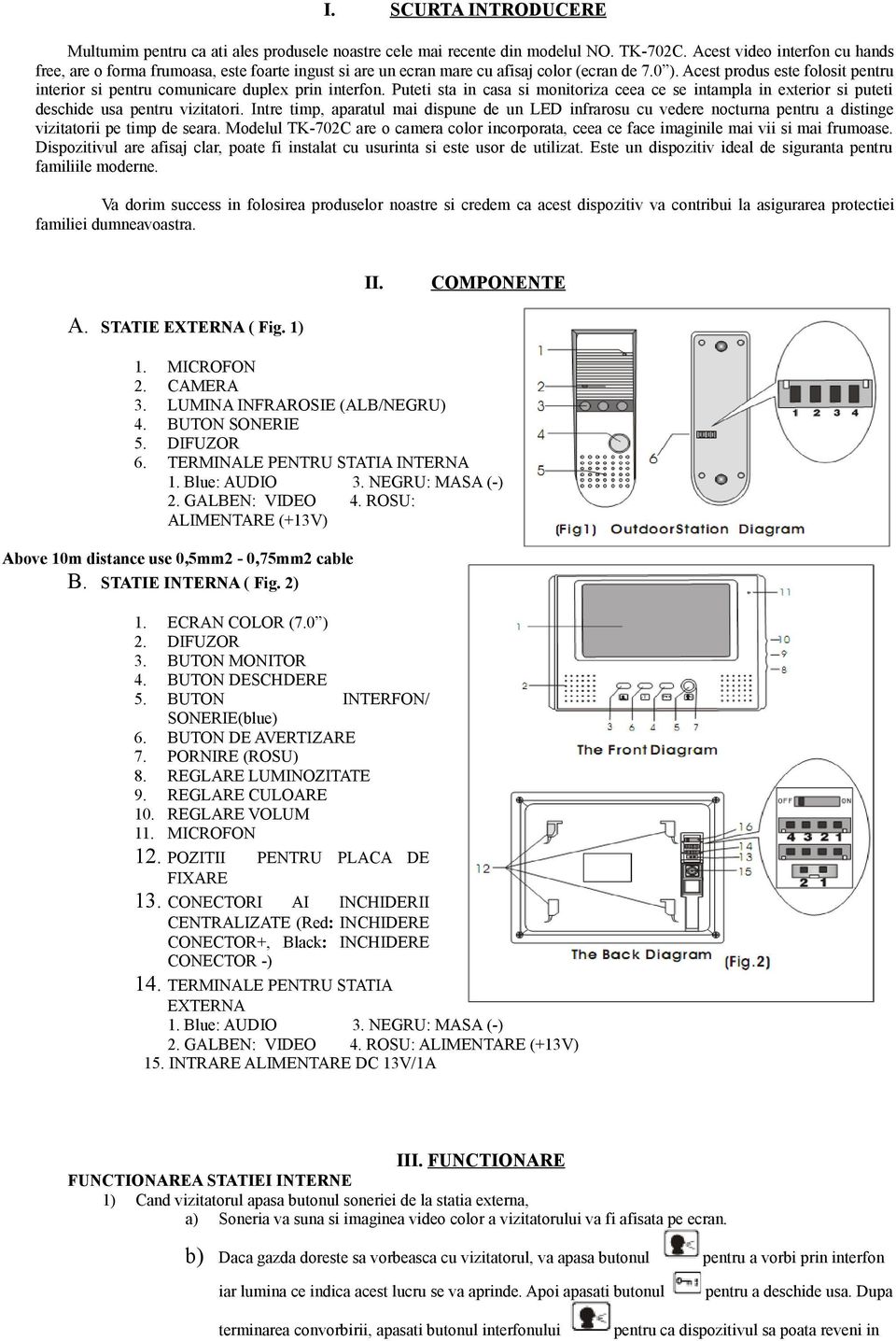
8 standby. Intregul procedeu va dura 45 de secunde. c) Daca gazda nu doreste sa comunice cu vizitatorul, infatisarea acestuia va fi afisata automat. Apoi acesta va reveni in standby dupa 30 de secunde. 2) Apasati butonul MONITORULUI pentru a monitoriza intrarea o data la 30 de secunde. 3) Apasand butonul de AVERTIZARE, un sunet de avertizare va fi auzit la statia externa ( este indicat pentru interfoanele video cu alarma). 4) Apasati butonul de reglare al CULORII, LUMINOZITATII si VOLUMULUI pentru a regla contrastul, luminozitatea, respectiv volumul. FUNCTIONAREA STATIEI EXTERNE 1) Cand vizitatorul apasa butonul (4) al statiei externe, statia interna va suna pentru a anunta vizitatorul. 2) Interfonul poate functiona cu microfon. (1) 3) Modelul are iluminare de la LED-ul infrarosu pentru a putea distinge vizitatorul pe timpul noptii. Instalati-l intrun loc suficient de luminat pentru a avea o imagine mult mai clara. IV. INSTALARE Soneria video trebuie instalata intr-un loc ferit de ploi si de lumina directa a soarelui. Inaltimea recomandata de fixare a camerei este de m de la sol, pentru o monitorizare la distanta potrivita. 1. INSTALAREA STATIEI EXTERNE ( Fig. 4) Folositi dibluri pentru fixarea pe perete. Apoi, fixati statia externa pe trepiedul de metal folosind suruburi de metal. (sau folositi dibluri lungi pentru a fixa statia externa direct pe perete) 2. INSTALAREA STATIEI INTERNE (Referiti-va la figura 5) Fixati intai placa portanta pe perete la inaltimea de m de la sol. Apoi suspendati dispozitivul pe placa portanta dupa ce statia interna este conectata corespunzator. V. AVERTISMENT 1) Conectati adaptorul la monitor inainte de conectarea la sursa de alimentare AC. 2) Pentru a preveni socurile electrice, partea superioara trebuie indepartata fara consultarea personalului calificat. Daca este nevoie de intretinere, va rugam san e contactati.

9 3) Dispozitivul ar trebui plasat in locuri bine ventilate pentru a-l feri de umezeala, praf si lumina directa a soarelui. 4) Curatati suprafata camerei video cu un material moale si curat, dar nu cu chimicale. 5) Nu tineti statia interna pe monitorizare timp indelungat. 6) Nu apasati butoanele simultan. 7) Nu tineti butonul de deschidere apasat pentru mai mult de 5 secunde! 8) Pentru a preveni interferentele semnalului video, distanta dintre statia interna si cea externa nu trebuie sa fie mai mica de 1 metru. VI. CARACTERISTICI TEHNICE ESENTIALE Semnal intrare: semnal video standard, VS Vp-p Impedanta intrare: 75Ω Reproducere imagine: 90% Latimea benzii video: ~ 5.5 MHZ Luminozitate: > 250LUX Rezolutie imagine (color): 1440 (H) x 234 (V) Dimensiuni ecran: 7.0 Formatul sistemului: PAL/NTSC Intervalul de intarziere pentru afisajul automat: 45 secunde Sursa de iluminare pentru vederea nocturna: LED/ infrarosu Unghiul camerei: 60º Tensiunea: DC 13V/1A Consumul de putere: Standby: 0.5W; Functionare: 13W Dimensiuni statie interna: 230 (L) x 165 (I) x 40 (D)mm Temperatura: -10ºC ~ 55ºC Greutate: 1.6kg. VII. ACCESORII STANDARD 1.Un cablu de conectare pentru statia interna si externa: 1 2. Accesorii si suruburi pentru statia externa: 8 3. Ghid de utilizare: 1 4. Transformator (13V DC/1A): 1

10 IMPORT ANT Thank you for choosing this product. Please follow these instructions carefully before use. Model: TK-702C VIDEO INTERCOM SYSTEM Operation Instruction

11 I Brief Introduction Thank you for choosing our latestlproducts of model NO.TK -702C. This hand free video Intercom door phone contain beautiful shape, supe r thin pattern and big color display screen (7.0screen " ).This product is based on the indoor display and duplex intercom communication. You can stay at home to monitor outside of your door and unlock the door for visitor. Meanwhile, It has infrared LEDwith night vision to distinguish the image of visitor in the evening. Model TK-702Cis with color camera built in, which makes the image more vivid and beautiful. The device has clear display, can be easily installed and conveniently operated. It is an ideal security device for modern families. II Components A. Outdoor Station (Refer to Fig.1) 1. Microphone 2. Camera 3. Infrared light (B/W) 4. Bell Button 5. Speaker 6. Terminals for Indoor Station 1.Blue: AUDIO 2.Yellow :VIDEO 3. Black :GND 4. Red : POWER (+13V) (Fig1) OutdoorStation Diagram B. Indoor Station (Refer to Fig.2) 1. Color Screen(7.0 ) 2. Speaker 3. Monitor Button 4. Unlock Button 5. Intercom Button/ choose ring (Blue) 6. Warning Button 7. Power(Red) 8. BrightnessAdjustment 9. Color Adjustment 10.Volume Adjustment 11. Microphone 12. Fitting Positionsfor Bracket Plate 13. Connectors Of Electrical Lock The FrontDiagram (1.Red : LOCK 2.Black: LOCK ) The Back Diagram (Fig.2)

12 14. Termanals for Outdoor Station 1.Blue: AUDIO 2.Yellow :VIDEO 3 Black :GND 15. Power Input DC13V/1A 16. Audio video amp switch (fig 3) 4. Red : POWER (+13V) III Operation (Fig3) Operation Of Indoors Station 1).When visitorpress bell button of the outdoors station, a. The bell will ring and the color video image of visitor will displayed on the screen. b. If the host wants to talk with the visitor, press the button to intercom and indicating lamp will be bright. Then press button to unlock the door. After finishing communication, press the intercom to let device recover to standby status. The whole process should be 45 seconds. c. If the host doesn't want to communicate with visitor, the image of visitor willbe displayed automatically. Then it will recover to standby status in 30 seconds. 2). Pressthe Monitor button to monitor the situation of gateway for 30 seconds at the time. 3).Press the Warning button. it will have a warning sound on the outdoor station (It is suitablefor the video door phone with alarm function). 4).Press buttoncolor Adjustment, Brightnessand Volume to adjust contrast, brightness and volume respectively. 5 ) Setting up ringing function,when standby,press to choose your favorite ring,when press the first time,indoor unit willmake the first ringing,again to press the button,the device will make the second ringing,done it again and again,you will choose one of your favorite ringings,then to make sure press to confirm setting ringing(other functionsare not working whenyou are choosing ringings) Operation Of Outdoor Station 1). When visitor pressesbutton (4) of outdoor station, the indoor station will ring play the chord music to notily the host. 2). The intercom can work with Microphone (1). 3). The model has LED illumination to distinguish the visitor at night. Please install itat sufficient light place for much clearer picture. IV Installation I V I n s t a l l t i o n The video doorbell should be fixed at the proper place avoiding the rain-strikingand strong direct sunlight. The recommended fixing height of the camera is m away from the floor. It helps the camera to monitor the proper range.

13 1. Installation Of Outdoor Station (Referto Fig.4) Use metal screw with expend plastic pip to fix the meal on the wall. Then, fix the outdoor unit on the metal tripod using metal screw. (Or uselong metal screw with expend plastic pip tp fix the outdoor unit directly on the wall.) (Fig 4) 2.Installation of indoor Station (Refer to Fig.5) Firstly, fix the mounting plate on the wall at height of m away from the floor. Secondly, hang this device on the mounting plate after the indoor station is well linked. Fig.5 2.Distend Pipes 3.Fixing Screw (KAH4x35mm) 1.Mounting Plate For Indoor Station (Bracket Plate) 4.Holes For HangingIndoor Station (Indoor Station) V Notice 1) Please connect the adaptor with the monitor before connecting to AC power supply. 2). To prevent electrical shock, the top cover should not be removed without instruction of skillful staff. If it needs maintenance, please contact with our company. 3). The device should be placed properly at ventilated place to prevent from damp, dust and direct sunlight. 4). Please wipe the surface of the video camera with soft and clean cloth but not with chemicals. 5).Don t keep the indoor station on monitoring state for too long time. 6).Don t press buttons simultaneously. 7).Don t press unlock button holding for more then 5 seconds! 8).To prevent the video signal from disturbance, the distance between indoor sation and outdoor station should not less than 1 meter.

14 VI Main Technical Features Input signal: standard video signal, VS Vp-p Input impedance: 75 Picture reproducibility: >90% Video bandwidth: ~5.5MHZ Brightness: >250LUX Picture resolution(color):1440(h)x234(v) screen size: 7.0 System format: PAL / NTSC Time-delay for automatic display: 45 seconds Illumination source for night vision: LED/ Infrared Camera angle: 60 o Input voltage: DC 13V/1A Power consumption: Standby:0.5W; Operation:13W Dimension of Indoor station: 230(W) x165(h) x40(d)mm o Temperature: -10C~55 Weight: 1.6kg o C VII Standard Accessories 1.A cable for Connecting Indoor and Outdoor Station: 1 2.Fittings and Screws for Outdoor Station: 8 3.User s Manual: 1 4.Transformer (DC13V/1A):

VIDEO DOOR PHONE SYSTEM
 ENGLISH VIDEO DOOR PHONE SYSTEM USER MANUAL Manual covers IH-692 Master and IH-692 Slave Monitors PRECAUTIONS BEFORE INSTALLATION Connect this unit ONLY to other compatible units. Do not connect it to
COLOR VIDEO DOOR PHONE CDV-71BE/D
 COLOR VIDEO DOOR PHONE CDV-71BE/D 513-11, Sangdaewon-dong, Jungwon-gu, Seongnam-si, Gyeonggi-do, Korea Int l Business Dept. : Tel.; +82-31-7393-540~550 Fax.; +82-31-745-2133 Web site : www.commax.com Printed
Dome Camera with IR Night Vision
 Dome Camera with IR Night Vision Instruction Manual VER.:1.0, NO.: R040687/2 Thank you for purchasing our product. Before installing this camera, please read this instruction manual carefully to ensure
SECURITY CAMERA INSTRUCTION MANUAL ENGLISH VERSION 1.0 LBC5451. www.lorextechnology.com
 SECURITY CAMERA INSTRUCTION MANUAL ENGLISH VERSION 1.0 LBC5451 www.lorextechnology.com Contents 1x Camera and mounting stand 1x Power adapter 1x Mounting kit 1x Allen key 1x Screw cap 1x 60 ft. (18m)
IP Villa System Quick Start Guide
 IP Villa System Quick Start Guide Version 1.0.0 Welcome Thank you for purchasing our device! This quick start guide will help you become familiar with our device in a very short time. Before installation
Day / Night IR Color Camera User Manual V2.1.0
 Day / Night IR Color Camera User Manual V2.1.0 1 Thank you for purchasing our product. If there is any question or request, please do not hesitate to contact dealer. This manual is applicable to DS-2CC102P(N)-IR1(IR3)(IR5),
INSTRUCTIONS FOR URMET DOMUS DEVICE INTERCHANGEABILITY
 SECTION F (REV.B) INSTRUCTIONS FOR URMET DOMUS DEVICE INTERCHANGEABILITY INSTRUCTIONS FOR URMET DOMUS DEVICE INTERCHANGEABILITY Download from: www.urmetdomus.com Technical Manuals area BASIC SYSTEM DIAGRAMS
USER MANUAL. KIT VIDEO DOOR PHONE 2 smart 1 family
 USER MANUAL EN KIT VIDEO DOOR PHONE smart 1 family Harry Johnston Call from the outdoor panel keys; Possibility to see on the terminal's display the person calling ; Duplex hands-free audio communication;
e-4 AWT07MLED 7 Q TFT LCD MONITOR (LED Backlighted) USER MANUAL
 Thank you for purchasing our product. Please read this User s Manual before using the product. Change without Notice AWT07MLED 7 Q TFT LCD MONITOR (LED Backlighted) USER MANUAL e-4 SAFETY PRECAUTIONS Federal
2 WIRE COLOR. KCV-D372 MANUAL [ 7inch Digital color video phone ] HANDSFREE VIDEOPHONE. Warranty. Warranty Card
![2 WIRE COLOR. KCV-D372 MANUAL [ 7inch Digital color video phone ] HANDSFREE VIDEOPHONE. Warranty. Warranty Card](/thumbs/24/4139509.jpg "2 WIRE COLOR. KCV-D372 MANUAL [ 7inch Digital color video phone ] HANDSFREE VIDEOPHONE. Warranty. Warranty Card") Warranty To receive after-sales service, have the following ready when you contact our branches 1. Name of the product 2. Model number of the product 3. The area of problem 4. Phone number and address
Warranty To receive after-sales service, have the following ready when you contact our branches 1. Name of the product 2. Model number of the product 3. The area of problem 4. Phone number and address
First Concept Asia Limited. Audio/ Video Door Phone System
 Audio/ Video Door Phone System Single Audio Door Phone Technical Specifications: Power Supply: DC 12V Transmission Distance: 50 meters 2 wire Installation Two ways Communication Wiring requirement: RVV
AUDIO VIDEO INTERCOM SYSTEMS SECURITY & SAFETY AT YOUR FINGER TIPS AUDIO VIDEO INTERCOM SYSTEMS
 AUDIO VIDEO INTERCOM SYSTEMS SECURITY & SAFETY AT YOUR FINGER TIPS AUDIO VIDEO INTERCOM SYSTEMS 1 DORANI VIDEO INTERCOM - 2 WIRE SERIES 7 TFT MONITOR TECHNICAL SPECIFICATIONS 7 Colour TFT screen 480 x
PAL to NTSC (NTSC to PAL) Converter with 19 inch Rack (CDM-640AR)
 PAL to NTSC (NTSC to PAL) Converter with 19 inch Rack (CDM-640AR) Operation Manual Introduction This unit will convert NTSC/PAL or VGA input signal into NTSC/PAL or VGA output. It offers premium conversion
User Manual Color video door phone
 User Manual Color video door phone CDV-70KM Thank you for purchasing COMMAX products. Please carefully read this User s Guide (in particular, precautions for safety) before using a product and follow instructions
User Manual. Video Doorphone CDV-1020AQ
 User Manual Video Doorphone CDV-1020AQ 513-11, Sangdaewon-dong, Jungwon-gu, Seongnam-si, Gyeonggi-do, Korea Int l Business Dept. Tel. : +82-31-7393-540~550 Fax. : +82-31-745-2133 Web site : www.commax.com
Broadway 3D Security System
 Broadway 3D Security System USER MANUAL v.1.1.0 Artec Group, Inc. 2012 Table of contents 1. General Information... 3 2. Delivery Package... 4 3.1. B3D BR... 5 3.2. B3D B... 6 3.3. B3D BM... 7 4. Integration
Table of Contents CHAPTER 3 - SYSTEM SET UP 7 TABLE OF CONTENTS
 Table of Contents TABLE OF CONTENTS CHAPTER 1 - INTRODUCTION 1 ICON 1 JAZZ EB307ES 1 SYSTEM REQUIREMENTS 2 PC REQUIREMENTS 2 MAC REQUIREMENTS 2 PACKAGE CONTENTS 2 CHAPTER 2 - INSTALLING THE HDD 3 PREPARING
High definition day/night
 PROFESSIONAL High definition day/night security CAMERA HIGH DEFINITION 600 TVL colour CAMERA DELIVERING HIGH QUALITY VIDEO with accurate colour rendition POWERFUL NIGHT VISION 24 INFRA-RED LEDs FOR NIGHT
ACCESS CONTROL DOOR PHONES Installation and Programming Manual
 ACCESS CONTROL DOOR PHONES Installation and Programming Manual Pantel Pancode Installation and Programming Manual Version 5, Release 7, July 2008 Table of Contents 1 Introduction...1 1.1 Pancode...1 1.2
24 Wide Screen LED Monitor with HDMI
 24 Wide Screen LED Monitor with HDMI USER MANUAL L24LE11B_MANUAL_EN_R1 Please read this manual carefully before using, and keep it for future reference. TABLE OF CONTENTS GETTING STARTED Monitor Stand
Monitors. Platea Monitor
 Monitors Platea Monitor The common features of Platea monitors are: Casing manufactured in ABS RAL9003 white colour. 4" b/w flat tube screen or color TFT LCD of 'A Grade' quality. Brightness and contrast
Infrarot-Bewegungsmelder IP44
 Infrarot-Bewegungsmelder IP44 infrared motion sensors IP44 ODA (weiß) slim ODA (schwarz) slim 95174 96000 ODA (weiß) ODA (schwarz) 95175 96001 Betriebsanleitung User s Manual User s Manual infrared motion
Ghid pentru salvarea mail-urilor folosind un client de mail
 Ghid pentru salvarea mail-urilor folosind un client de mail Tutorialul de fata se adreseaza acelora care utilizeaza posta de mail a Universitatii Tehnice folosind unul din urmatoarii clienti de mail: 1.
www.sebury.com.cn Digital Keypad Use s Manual
 K3 K4 www.sebury.com.cn Digital Keypad Use s Manual Contents Introduction Introduction Specifications Intramural Interface Circuit 3 Mounting 3 Wiring 5 Power UP 7 Engineer Programming Mode 7 The K3/K4
Innovative DOOR STATION Solutions
 Innovative DOOR STATION Solutions When a visitor arrives at your front door or gate we ring... Your mobile when you are out Your normal telephones in your home Your PABX system in your office Communicating
2013 Wireless Video Intercom INSTALLATION GUIDE
 2013 Wireless Video Intercom INSTALLATION GUIDE INDEX System configuration and wiring VL-SWD501 System Component.. 4 VL-SWD501EX wiring schematic diagram VL-SWD501EX wiring type and length... 5.... 6 Door
Enterphone Solo. User/Installation Manual Part No. 421-2001
 Enterphone Solo User/Installation Manual Viscount Communication and Control Systems Inc. 4585 Tillicum Street, Burnaby, B.C., Canada V5J 5K9 Phone: (604) 327-9446 Toll Free: 1-800-476-3774 Fax: (604) 327-3859
QUICK REFERENCE MANUAL
 PIONEER PLASMA DISPLAY SYSTEM QUICK REFERENCE MANUAL PDP-501HD: PLASMA DISPLAY PANEL PDP-501R: MEDIA RECEIVER PDP-501S-LR: SPEAKERS TABLE OF CONTENTS 1.0 CHOOSE THE INSTALLATION SITE...2 2.0 SET UP THE
Network Box Camera Installation Manual
 Network Box Camera Installation Manual V3.0.0 Hangzhou Hikvision Digital Technology Co., Ltd. http://www.hikvision.com 2010 04 Thank you for purchasing our product. If there are any questions, or requests,
PS 29M DUAL CHANNEL BELTPACK IN METAL CASE
 PS 29M DUAL CHANNEL BELTPACK IN METAL CASE USER MANUAL October 2013 This product is designed and manufactured by: ASL Intercom BV Zonnebaan 42 3542 EG Utrecht The Netherlands Phone: +31 (0)30 2411901 Fax:
IT-12M IT-12D Ver_2.0 INTERPRETATION SYSTEM. User s Manual
 IT-12M IT-12D Ver_2.0 INTERPRETATION SYSTEM User s Manual Important Notice All the safety and instructions for operation and use of the equipment should be read carefully before the system is operated.
Ghid de instalare XAVB6504 Powerline 600 Mbps cu acces trecere prin patru porturi
 Ghid de instalare XAVB6504 Powerline 600 Mbps cu acces trecere prin patru porturi Cuprins Conţinutul ambalajului.................................. 3 Caracteristicile hardware.................................
PROXIMITY CARD READERS C-10, C-20, C60, C70
 Installation Manual PROXIMITY CARD READERS C-10, C-20, C60, C70 VERSION 1.0 CONTENTS 1. General information................................. 3 2. Technical data......................... 4 3. Connection
COLOR TFT LCD MONITOR. User Manual
 COLOR TFT LCD MONITOR User Manual GENERAL INFORMATION Thank you for choosing our TFT LCD(liquid crystal display) monitor. This product employs integrate circuits, low power consumption, and no radiation
>>IP. VIDEO INTERCOM & SMART HOME TCP/IP video intercom solution expert
 Enjoy value-added service Seamlessly connected with IP camera Embedded SIP protocol Support App function >>IP VIDEO INTERCOM & SMART HOME TCP/IP video intercom solution expert Solution SIP Intercom Security
FPV MONITOR. User Manual
 FPV MONITOR User Manual Important Safety Instructions: Please read User Guide before using this product. Please keep User Guide for future reference. Please read the cautions to prevent possible danger
VTO6xxx. IP door stations. User manual
 VTO6xxx IP door stations User manual Table of Contents 1 Product Appearance 2 Basic Function Introduction 2.1 Call Manager Center 2.2 Call User 2.2.1 Connecting Status 2.2.2 Calling Status 2.3 Monitor
Adaptor Powerline 500 PassThru (XAVB5401) Ghid de instalare
 Adaptor Powerline 500 PassThru (XAVB5401) Ghid de instalare Cuprins Conţinutul ambalajului.................................. 3 Caracteristicile hardware................................. 4 Descrierile ledurilor.....................................
Manual de utilizare Evolio Hi-Speed 5.0
 Manual de utilizare Evolio Hi-Speed 5.0 Important Pentru ca acest produs sa functioneze in modul Navigatie este necesar sa aveti semnal la satelit. Se poate sa intampinati situatii, in casa sau in cladiri,
SMART Board 685ix interactive whiteboard system Model 685ix
 Specifications SMART Board 685ix interactive whiteboard system Model 685ix Physical specifications SMART Board 685ix interactive whiteboard 77 1/2" W 49 1/2" H 5 1/8" D Size (196.9 cm 125.7 cm 13 cm) Active
Wespot. SecNurse A NEW GENERATION TECHNICAL AIDS USER S GUIDE
 Wespot SecNurse A NEW GENERATION TECHNICAL AIDS USER S GUIDE EN This manual is published by OPTEX, without any warranty. Improvements and changes to this manual necessitated by typographical errors, inaccuracies
DP-236Q Wireless Video Door Phone
 DP-236Q Wireless Video Door Phone Manual 3 1 Wireless operation camera and monitor can operate from up to 492ft (150m) 2 away Remotely and securely talk to visitors and unlock doors or gates via the monitor
D/N VANDAL RES. VARI-FOCAL IR DOME CAMERA
 D/N VANDAL RES. VARI-FOCAL IR DOME CAMERA PIH-0746XW/0746XS INSTRUCTION MANUAL IMPORTANT SAFEGUARDS CAUTION RISK OF ELECTRIC SHOCK DO NOT OPEN CAUTION TO REDUCE THE RISK OF ELECTRIC SHOCK, DO NOT REMOVE
Operating Instructions. Room temperature controller
 Operating Instructions 1. Area of application The room temperature controller is used to regulate the temperature in closed rooms such as flats, schools, function suites, workshops, etc. Safety instructions
Solar Home System. User Manual. AEH-SHS01-10W2L Solar Home System 2 Lamps
 Solar Home System User Manual AEHSHS0110W2L Solar Home System 2 Lamps All rights reserved Specifications subject to change without prior notice 2 Dear Customer, Thank you for purchasing Schneider Electric
3 Specification. Master Chip Broadcom 1190. Keys Direct-button 1. Microphone 1. Amplifier 0.5W Speaker 0.5W. Voice
 I20-T Door Phone 1 Description I20-T Voice Access control is a digital IP door phone with Fanvil Voip Solutions (Broadcom chip 1190), stable and reliable. FDSP ensure voice loud and clear. Good looking,
Wireless Home Security Alarm System AM 500
 Wireless Home Security Alarm System AM 500 12 MONTH GUARANTEE Installation & Operating Instructions INTRODUCTION The AM500 is a simple self-contained alarm system. It protects the home by sounding a siren
Installation and Operation Guide
 Video Intercom System Door Station Installation and Operation Guide Model No. VL-GC002A Thank you for purchasing a Panasonic Door Station. Please read this Installation and Operation Guide before using
Model: LCDM40 4.0 LCD Rear Vision Mirror Monitor Installation Manual Features
 Model: LCDM40 4.0 LCD Rear Vision Mirror Monitor Installation Manual Features Mirror with built in 4.0 LCD Monitor Low Profile, Slim Design High Resolution TFT LCD Built in Speaker Two video inputs Fully
Wireless alarm system with voice dialer
 USER MANUAL Wireless alarm system with voice dialer INTRODUCTION When an intruder enters the protected area, it will trigger a strident siren and the red LED will flash. The dialer will automatically call
Userʼs Manual. 7 Color LCD TV & Monitor V7000
 Userʼs Manual 7 Color LCD TV & Monitor V7000 Dear Customers Thank you for purchasing the ikan V7000 7 LCD TFT Monitor. This product employs new integrate circuitry, and a high quality TFT LCD panel. It
Business/ Home GSM Alarm System
 Business/ Home GSM Alarm System BUSINESS/HOME GSM ALARM SYSTEM POWER STATUS RECORD SIGNAL User Manual Profile For a better understanding of this product, please read this user manual thoroughly before
ACCESS CONTROL DOOR PHONES Installation and Programming Manual
 ACCESS CONTROL DOOR PHONES Installation and Programming Manual NOTICE This manual describes the Pantel/Pancode Access Control Door Phones system. Additional copies of this manual may be obtained from
GSM Door Phone System
 GSM Door Phone System System Installation, Setting and Operation Manual User Manual (263-S V1) Please read this user manual completely before operating this system and keep it in a safe place for future
VIDEO DOOR PHONE SYSTEM
 ENGLISH VIDEO DOOR PHONE SYSTEM USER MANUAL Manual Intercom Multimedia 1 2 Memory Playback 3 4 About Album User Setup Close DT-ENG-27SDTD7-V1 CONTENTS 1. Parts and Functions... 1 2. Mounting... 1 3. Operation
D/N VANDAL RES. VARI-FOCAL DOME CAMERA
 D/N VANDAL RES. VARI-FOCAL DOME CAMERA PIH-2342X/2346X W/S INSTRUCTION MANUAL IMPORTANT SAFEGUARDS CAUTION RISK OF ELECTRIC SHOCK DO NOT OPEN CAUTION TO REDUCE THE RISK OF ELECTRIC SHOCK, DO NOT REMOVE
DRM75A 230V 20/100A DIN rail single phase two wire energy meter
 DRM75A 230V 20/100A DIN rail single phase two wire energy meter 1.1 Safety instruction 1.2 Foreword 1.3 Performance criteria 1.4 Specifications 1.5 Basic errors 1.6 Description 1.7 Dimensions 1.8 Installation
Installation. Smart-UPS VT MGE Galaxy 3500. Maintenance Bypass Panel. 10-40 kva 400 V
 Installation Smart-UPS VT MGE Galaxy 3500 Maintenance Bypass Panel 10-40 kva 400 V Contents Safety.................................................. 1 Save these instructions...................................
Concierge. Outdoor panels
 www.bas- ip.com BAS- IP Intercoms Price Feb 24, 2015 Model Photo Description Retail price, USD Concierge AM- 01 Concierge monitor 9" touch screen, memory (SD cards up to 32 GB), address video intercom.
Single Day Alarm Clock with. Bluetooth and USB Play-through
 Single Day Alarm Clock with Bluetooth and USB Play-through MODEL : BSC 200 READ THIS INSTRUCTION MANUAL BEFORE OPERATING THE APPLIANCE. SAVE THIS MANUAL FOR FUTURE REFERENCE. TABLE OF CONTENTS IMPORTANT
COLOR VIDEO DOOR PHONE CAV-72B
 COLOR VIDEO DOOR PHONE CAV-72B 513-11, Sangdaewon-dong, Jungwon-gu, Seongnam-si, Gyeonggi-do, Korea Int l Business Dept. : Tel.; +82-31-7393-540~550 Fax.; +82-31-745-2133 Web site : www.commax.com Printed
VIDEO DOOR PHONE SYSTEM
 ENGLISH VIDEO DOOR PHONE SYSTEM USER MANUAL DT-ENG-693SDTD5-V2 10S1025 CONTENTS 1. Parts and Functions-- - - - - - - - - - - - - - - - - - - - - - 1 2. Monitor Mounting-- - - - - - - - - - - - - - - -
Video Kits. For Villas. Rock vandal resistant panel
 Video 5 wires Video 2 wires Video Kits Rock vandal resistant panel Injected aluminium vandal resistant (IK-09) and weatherproof (IP-44) door panels, in grey colour. Adjustable pan and tilt CCD b/w or color
ONBACK. We Offer Full Systems, Monitors, Cameras and Accessories. Call Us Toll Free: 1-800-535-0104 Fax: 740-366-0771 Website: www.holtzindustries.
 Thinking About Safety... Think RayView! A Division Of: Holtz Industries, Inc. We Offer Full Systems, Monitors, Cameras and Accessories We Accept These Major Credit Cards ONBACK Call For Safety s Sake Your
PK-01. Standalone door control module. SATEL sp. z o.o. ul. Schuberta 79 80-172 Gdańsk POLAND tel. + 48 58 320 94 00
 Standalone door control module PK-01 Firmware version 1.00 pk-01_en 06/12 SATEL sp. z o.o. ul. Schuberta 79 80-172 Gdańsk POLAND tel. + 48 58 320 94 00 [email protected] www.satel.eu WARNINGS Read carefully
VZ-M7 HDMI Field Monitor 7 Class HD LCD
 VZ-M7 HDMI Field Monitor 7 Class HD LCD The VZ-M7 HDMI monitor provides sharp, accurate images for improved framing and focus assist on any camera equipped with an HDMI output. Utilizing top-quality Grade
Installation, operation and maintenance manual TX 35A
 Installation, operation and maintenance manual TX 35A Rev.10 may 2012 Page 1 of 18 1.0.0 Table of contents INSTALLATION, OPERATION AND MAINTENANCE MANUAL...1 1.0.0 TABLE OF CONTENTS...2 2.0.0 ILLUSTRATIONS...2
2M IR Mini Dome Quick Installation Guide
 2M IR Mini Dome 2M IR Mini Dome Quick Installation Guide Please follow the installation steps below to set up 2M IR Mini Dome IP Camera. Check the package contents against the list below. See P.1 Physical
PCS300 Universal IP Reporting Module V1.0
 PCS300 Universal IP Reporting Module V1.0 Reference and Installation Manual Patents: One or more of the following US patents may apply: 7046142, 6215399, 6111256, 6104319, 5920259, 5886632, 5721542, 5287111,
CAUTION RISK OF ELECTRIC SHOCK DO NOT OPEN
 BeoLab 4000 Guide CAUTION RISK OF ELECTRIC SHOCK DO NOT OPEN CAUTION: To reduce the risk of electric shock, do not remove cover (or back). No User-serviceable parts inside. Refer servicing to qualified
Spis treści. ADPRO FastTrace 2...2. ADPRO FastTrace 2E...5. ADPRO FastTrace 2E Hybrid...13. ADPRO FastTrace 2(E) - Accessories...
 Spis treści FastTrace 2...2 FastTrace 2E...5 FastTrace 2E Hybrid...13 FastTrace 2(E) - Accessories...18 FastTrace 2(E) Licenses...20 Presidium...33 Xtralis stworzył system składający się z FastTrace 2/2E
SECTION 3A (Rev.F) SECTION CONTENTS. Download from www.urmet.com Technical Manuals area. sec.3a INSTALLATION...9 TECHNICAL SPECIFICATIONS...
 SECTION 3A (Rev.F) Apartment door phone stations Download from www.urmet.com Technical Manuals area. ATLANTICO DOOR PHONES 2 TECHNICAL SPECIFICATIONS...2 4+n wire system door phones...2 Door phone with
15-INCH TFT-LCD MONITOR
 15-INCH TFT-LCD MONITOR 15RTV INSTRUCTION MANUAL Please read this manual thoroughly before use, and keep it handy for future reference. SAFETY INSTRUCTION.2-3 CAUTIONS....4 FCC RF INTERFERENCE STATEMENT.5
TFT LCD COLOR MONITOR OPERATION MANUAL
 TFT LCD COLOR MONITOR OPERATION MANUAL Mode 1 Mode 2 Mode 3 DEAR CUSTOMERS Thanks you for purchasing 8 TFT COLOR MONITOR,We hope that you will have the enjoyment of your new mini color TFT LCD. SAFEGUARDS
4.3-inch Back-Up Camera
 TM 4.-inch Back-Up Camera Model No.: PKC0BU4 Owner s Manual and Warranty Information Read these instructions completely before using this product. Retain this Owner s Manual for future reference. INTRODUCTION
SMART Board interactive whiteboard system
 PLEASE THINK BEFORE YOU PRINT Specifications SMART Board interactive whiteboard system Model 680i3 Physical specifications SMART Board 680 interactive whiteboard Size 65 1/4" W 49 1/2" H 5 1/8" D (165.7
IP 67. IR-Cut. Day/Night. Filter
 FE-501OD 5MP Fisheye Outdoor IP67 PoE Camera Maximum 15fps@1920x1920 H.264 MPEG4 and MJPEG Encoder Hardware Dewarp via Fisheye Processor Minimum 0.1 Lux for Night Vision ROI (Region of Interest) with e-ptz
Rapide Inline Ceiling Extractor Fan, White Fascia 41800040590. Rapide Inline Ceiling Extractor Fan, Chrome Fascia 41800040580
 Any Queries Call : 08000 23 23 23 Rapide Inline Ceiling Extractor Fan, White Fascia 41800040590 Rapide Inline Ceiling Extractor Fan, White Fascia Illuminated 41800040670 Rapide Inline Ceiling Extractor
INSTALLATION GUIDE. AXIS 215 PTZ-E Network Camera ENGLISH
 INSTALLATION GUIDE AXIS 215 PTZ-E Network Camera ENGLISH Safety Information Follow these instructions to complete the installation of the AXIS 215 PTZ-E network camera. Warning! High voltage - the electrical
User Manual Door Camera
 User Manual Door Camera DRC-4CPN2 Thank you for purchasing COMMAX products. Please carefully read this User s Guide (in particular, precautions for safety) before using a product and follow instructions
Detector transparent with Color Inserts. FAA 500 TR P Trim Ring transparent with Color Inserts. FCA 500 / FCA 500 E Detector Bases
 Detector Color Detector transparent with Color Inserts FAA 500 TR W Trim Ring FAA 500 TR P Trim Ring transparent with Color Inserts FAA 500 BB Ceiling Mount Back Box FCA 500 / FCA 500 E Detector Bases
Video surveillance camera Installation Guide
 Video surveillance camera Installation Guide TV7085 TV7086 TV7087 TV7088 14 1. Preface Dear Customer, Thank you for purchasing this Eyseo digital surveillance camera. You made the right decision in choosing
Mirror Mount Video Monitor/Recorder with Front and Rear View Night Cameras PLCMDVR5
 Mirror Mount Video Monitor/Recorder with Front and Rear View Night Cameras PLCMDVR5 www.pyleaudio.com Instruction Manual Installation and Connection: 1. Please disconnect your car battery. 2. In the contents
RC8061 Pan and Tilt Camera Installation Guide
 RC8061 Pan and Tilt Camera Installation Guide P/N: 956YM801GJ Document Version: 1.07 Copyright 2011 All Rights Reserved. All trademarks and trade names are the properties of their respective owners. i
AN500T, AN1000, AN1000T, AN1500, AN1500T AN2000, AN2000T
 Product Instruction Manual Accona AN500T, AN1000, AN1000T, AN1500, AN1500T AN2000, AN2000T Panel heater v16.5/5 Version 3.2 Jan 2015 Contents 1. Important safety points 2. Installation 2.1. Wall mounting
D/N VARI-FOCAL IR CAMERA
 D/N VARI-FOCAL IR CAMERA PIH-0364X/0368X/0384X/0388X W/S INSTRUCTION MANUAL IMPORTANT SAFEGUARDS 1. Read Instructions All the safety and operating instructions should be read before the unit is operated.
Daily use. Never use alcohol or other solvents to clean any part of the loudspeakers!
 BeoLab 6002 Guide WARNING: To reduce the risk of fire or electric shock, do not expose this appliance to rain or moisture. Do not expose this equip ment to dripping or splashing and ensure that no objects
AUTODIALLER / QUICKDIALLER - SA132
 AUTODIALLER / QUICKDIALLER - SA132 INSTRUCTION LEAFLET ENGLISH www.thermomax-group.com CONTENTS 1 SETUP AT A GLANCE... 2 2 FOREWORD....... 3 3 INSTALLATION...... 4 4 KEYPAD AND INDICATORS...... 5 SETTING
1.1 The Audio Entry Phone System shall be suitable for 2 way voice communication between the different apartments and the main entrance panel.
 DIGITAL AUDIO INTERCOM SYSTEM The contractor shall Supply, Install, Test and Commission a modern Audio Entry Phone System to facilitate Audio Communication between the different apartments and the building
SMART Board interactive flat panel with appliance Model 8055ie-SMP
 Specifications SMART Board interactive flat panel with appliance Model 8055ie-SMP Physical specifications Size 52 3/8" W 32 5/16" H 3 11/16" D (133 cm 82 cm 9.3 cm) (See Physical dimensions on page 7 for
Easy Security Camera Set TX 28 User Manual
 Technaxx Easy Security Camera Set TX 28 User Manual This device complies with the requirements of the standards referred to the Directive R&TTE 1999/5/EC. The Declaration of Conformity you find here: www.technaxx.de/
LCD4Video 7" LCD Monitor USER MANUAL Model # LCD7n
 LCD4Video 7" LCD Monitor USER MANUAL Model # LCD7n Thank you for purchasing our 7 LCD Monitor. The LCD7n 7" LCD Monitor is designed to be used as an external video display that can be mounted on top of
Security Camera Indoor/Outdoor Color Camera w/ Night Vision
 Security Camera Indoor/Outdoor Color Camera w/ Night Vision INSTRUCTION MANUAL V1.1 www.defender-usa.com IMPORTANT INFORMATION NEED HELP? DO NOT RETURN THIS PRODUCT TO THE STORE Please contact an Defender
Replacing the vacuum tube
 wunder cm7 This microphone has been meticulously created to meet the demand for the U47 sound using historically correct components around the heart of the microphone the original, specially selected EF14
OM2260VW2 USER MANUAL VERIZON WIRELESS HOME PHONE CONNECT
 OM2260VW2 USER MANUAL VERIZON WIRELESS HOME PHONE CONNECT Welcome to Verizon Wireless Thank you for choosing Verizon Wireless Home Phone Connect. You re now connected to the power of America s most reliable
BIBUS VOP. large blocks of flats with switchboard and mixed mainly audio systems. Ideal for door phone systems with up to 250 users.
 BIBUS VOP Advice for use: large blocks of flats with switchboard and mixed mainly audio systems Ideal for door phone systems with up to 250 users VOP technology Easy creation of mixed audio and video door
16/32 Channel 1U Rack Mount CCTV Power Supply
 16/32 Channel 1U Rack Mount CCTV Power Supply Manual PH-A3224-GUQ Shown 16-Channel 32-Channel PTC PH-A1612-PUQ PH-A3224-PUQ Glass Fuse PH-A1612-GUQ PH-A3224-GUQ Industrial design 12 Amp 3 Amps per channel
PSDC 08128. PSDC 12V/8A/8x1A Power supply for up to 8 analog cameras PTC/TOPIC.
 PSDC 08128 v.1.2 PSDC 12V/8A/8x1A Power supply for up to 8 analog cameras PTC/TOPIC. EN** Edition: 9 from 25.05.2015 Supersedes the edition: 8 from 12.12.2014 the 8x 1A/12V DC power output for powering
CELO5. User & Installation Manual. www.audac.eu
 CELO5 User & Installation Manual www.audac.eu 2 Introduction 5 High-end Slim Ceiling Speaker The CELO5 is the 5 version of AUDAC s CELO High-end Slim ceiling speaker series with an RMS power of 50 Watt