
Outlook Web Access (OWA) with Exchange Server 2007 (Windows version)
|
|
|
- Maude Pearson
- 10 years ago
- Views:
Transcription

1 Outlook Web Access (OWA) with Exchange Server 2007 (Windows version) 1. Login into your Baylor account via a web browser such as Internet Explorer, Fire Fox, or Netscape. The web URL is still Choose your security option of either public or private. NOTE: A private choice will allow for a 24 hour connection, whereas the public choice will time out after 15 minutes. After making your security choice, enter your current bear_id and password, and as always be sure to logout of your account when you are done checking Once you are logged in you will see the contents of your Inbox. There is a new design, layout, and color to OWA.

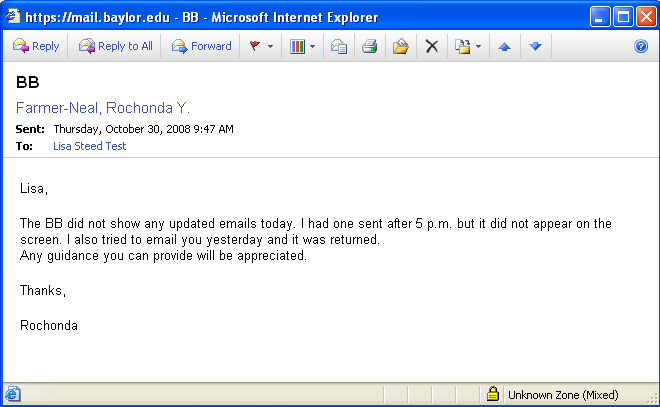
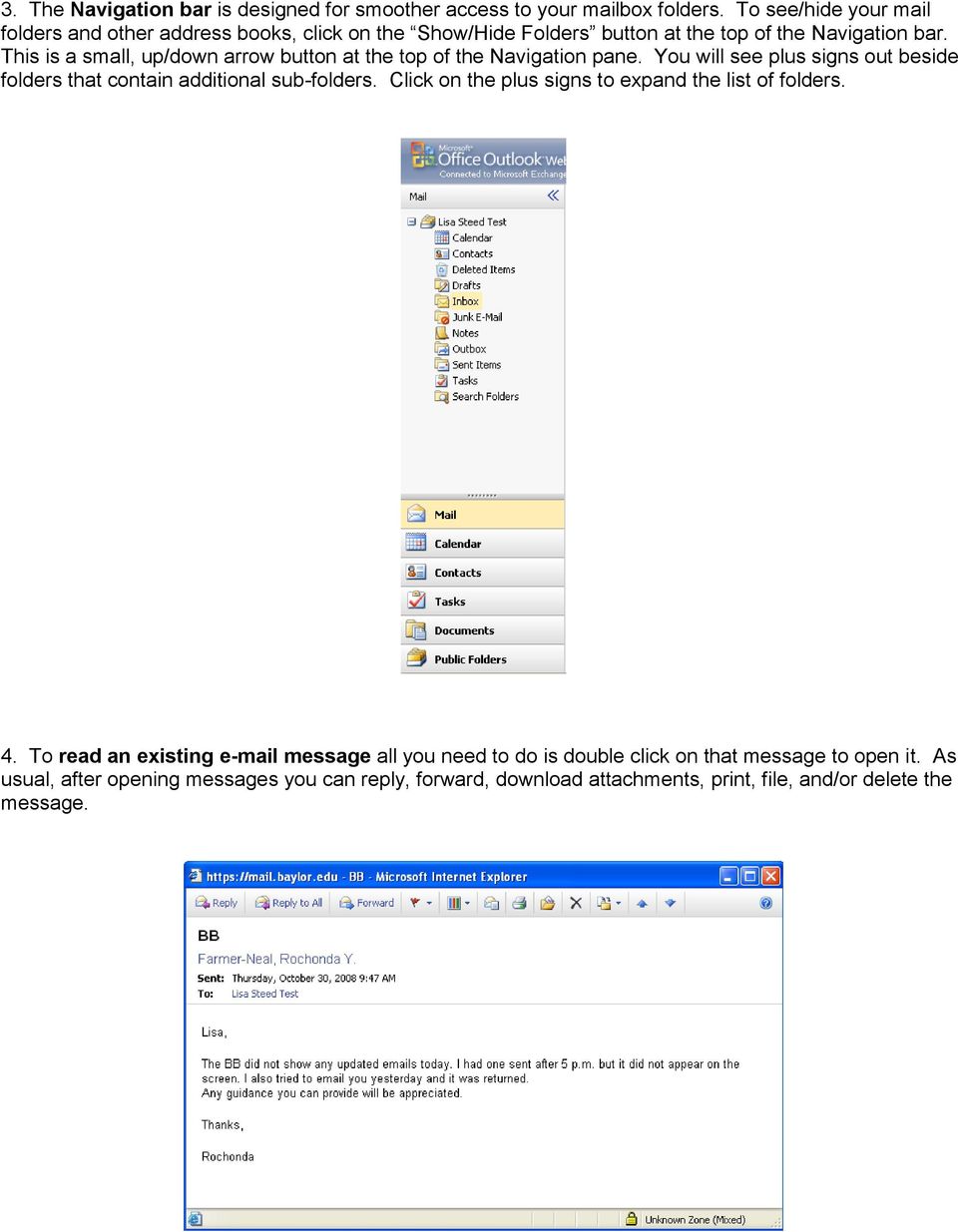
2 3. The Navigation bar is designed for smoother access to your mailbox folders. To see/hide your mail folders and other address books, click on the Show/Hide Folders button at the top of the Navigation bar. This is a small, up/down arrow button at the top of the Navigation pane. You will see plus signs out beside folders that contain additional sub-folders. Click on the plus signs to expand the list of folders. 4. To read an existing message all you need to do is double click on that message to open it. As usual, after opening messages you can reply, forward, download attachments, print, file, and/or delete the message.
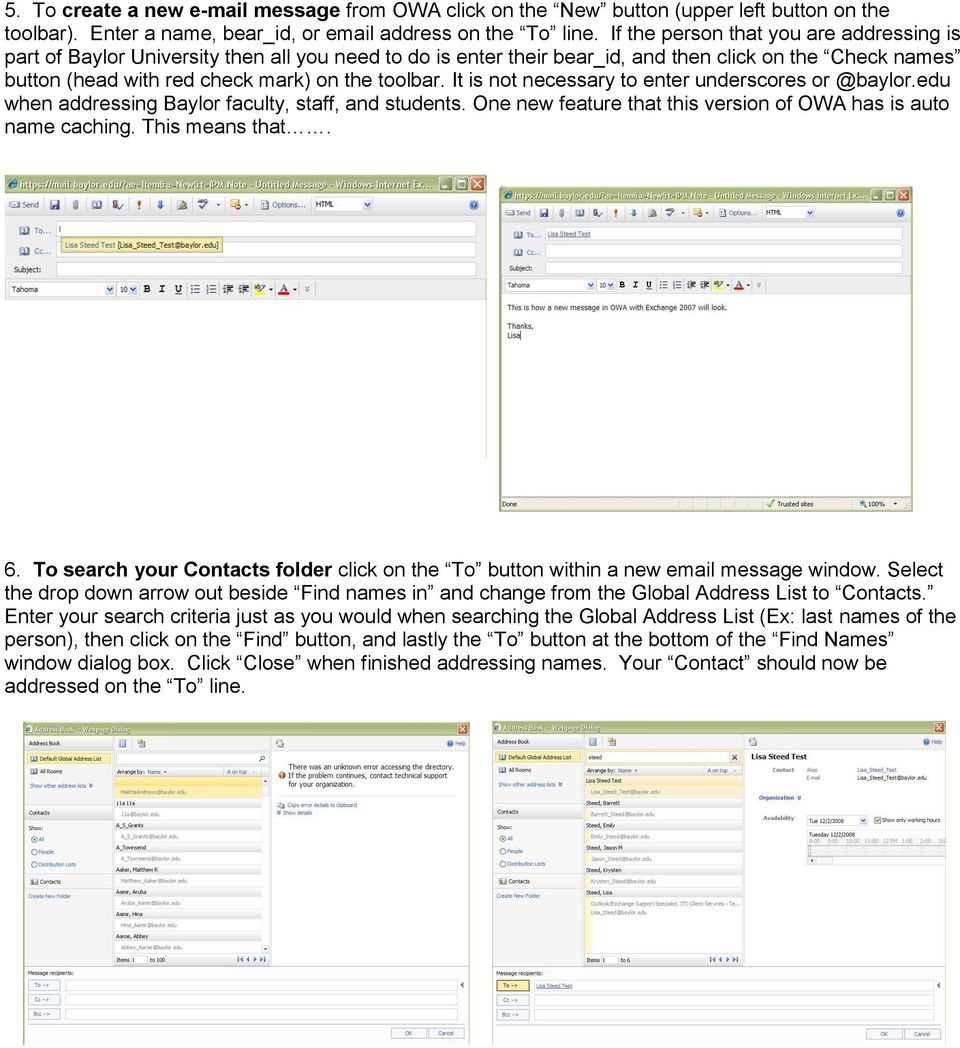
3 5. To create a new message from OWA click on the New button (upper left button on the toolbar). Enter a name, bear_id, or address on the To line. If the person that you are addressing is part of Baylor University then all you need to do is enter their bear_id, and then click on the Check names button (head with red check mark) on the toolbar. It is not necessary to enter underscores when addressing Baylor faculty, staff, and students. One new feature that this version of OWA has is auto name caching. This means that. 6. To search your Contacts folder click on the To button within a new message window. Select the drop down arrow out beside Find names in and change from the Global Address List to Contacts. Enter your search criteria just as you would when searching the Global Address List (Ex: last names of the person), then click on the Find button, and lastly the To button at the bottom of the Find Names window dialog box. Click Close when finished addressing names. Your Contact should now be addressed on the To line.
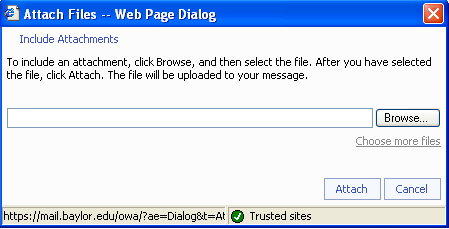
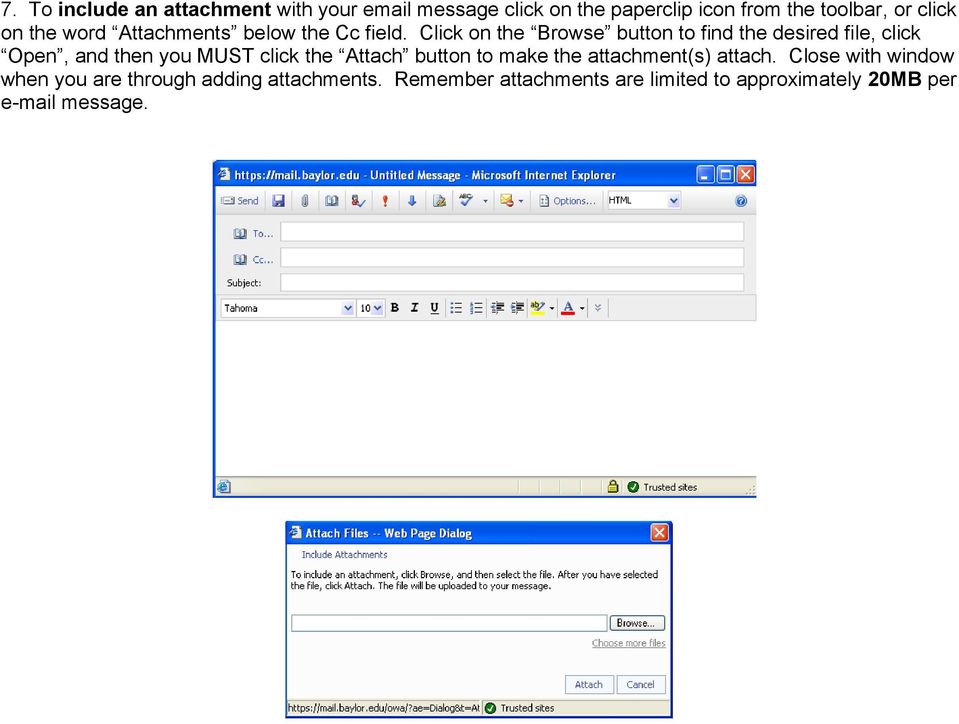
4 7. To include an attachment with your message click on the paperclip icon from the toolbar, or click on the word Attachments below the Cc field. Click on the Browse button to find the desired file, click Open, and then you MUST click the Attach button to make the attachment(s) attach. Close with window when you are through adding attachments. Remember attachments are limited to approximately 20MB per message.
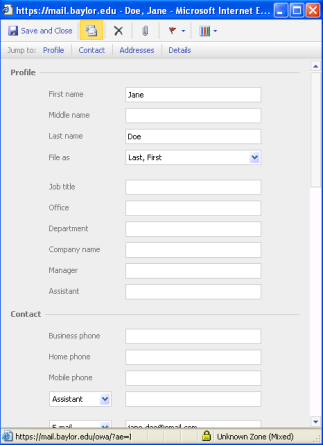

5 8. To send an to someone in another address book rather than Baylor s Global Address List or your Contacts folder, click on the desired address book from the folder list. Double click on the person that you wish to send an message to. Choose the New message to contact button on the toolbar. This button looks like an envelope with a business card. After clicking the button the address of this contact will appear in a new message for you to send. 9. Creating Distribution Lists is possible with OWA. Simply click on your Contacts folder, click on the drop down arrow out beside the New button and choose Distribution list. Select the Members button to add people to your list. Notice that you can now see free/busy information for those listed in Baylor s Global Address List. Be sure to click on the Add button to complete the process of making the list. Once complete be sure to Save & Close the newly created list.

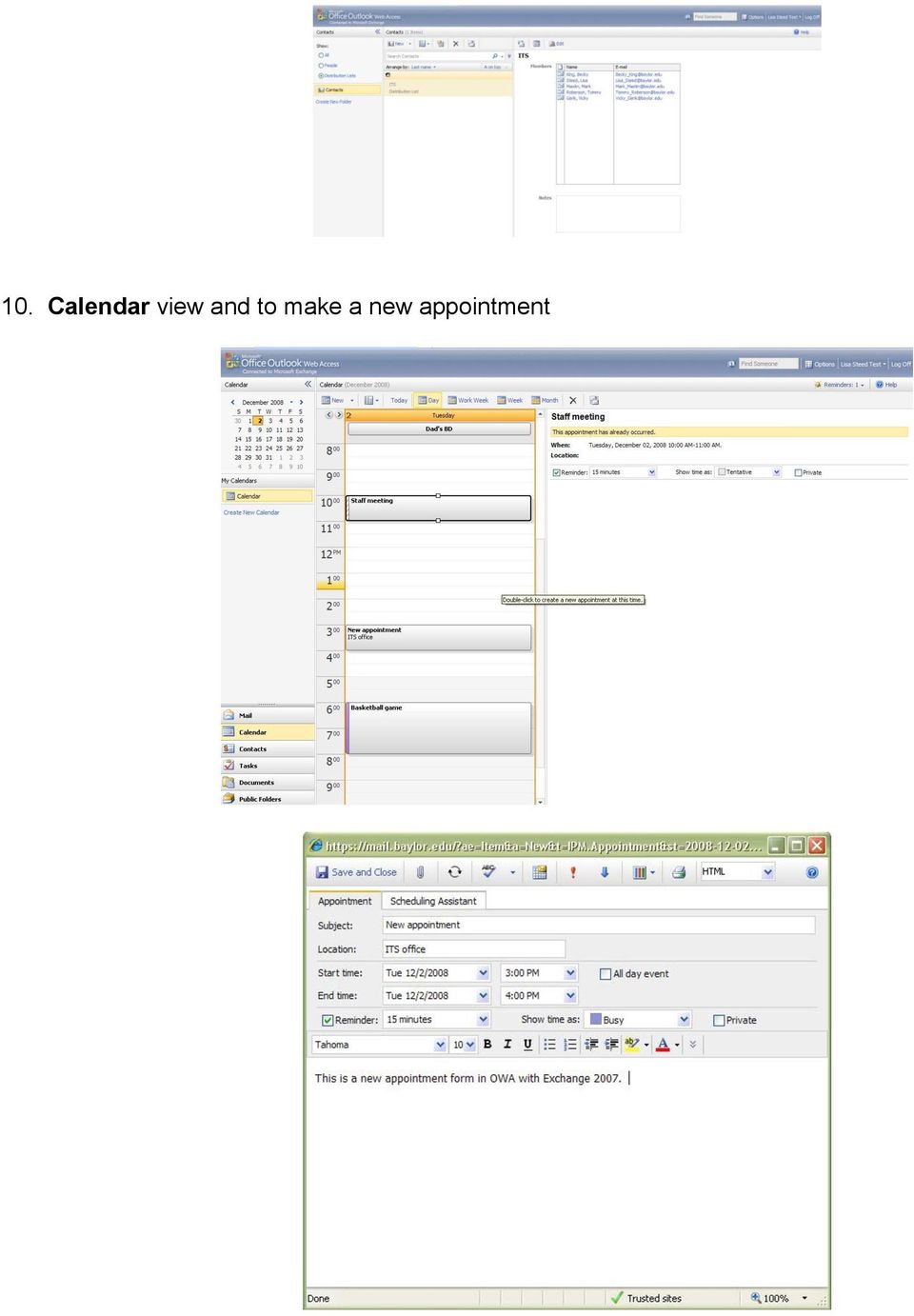
6 10. Calendar view and to make a new appointment

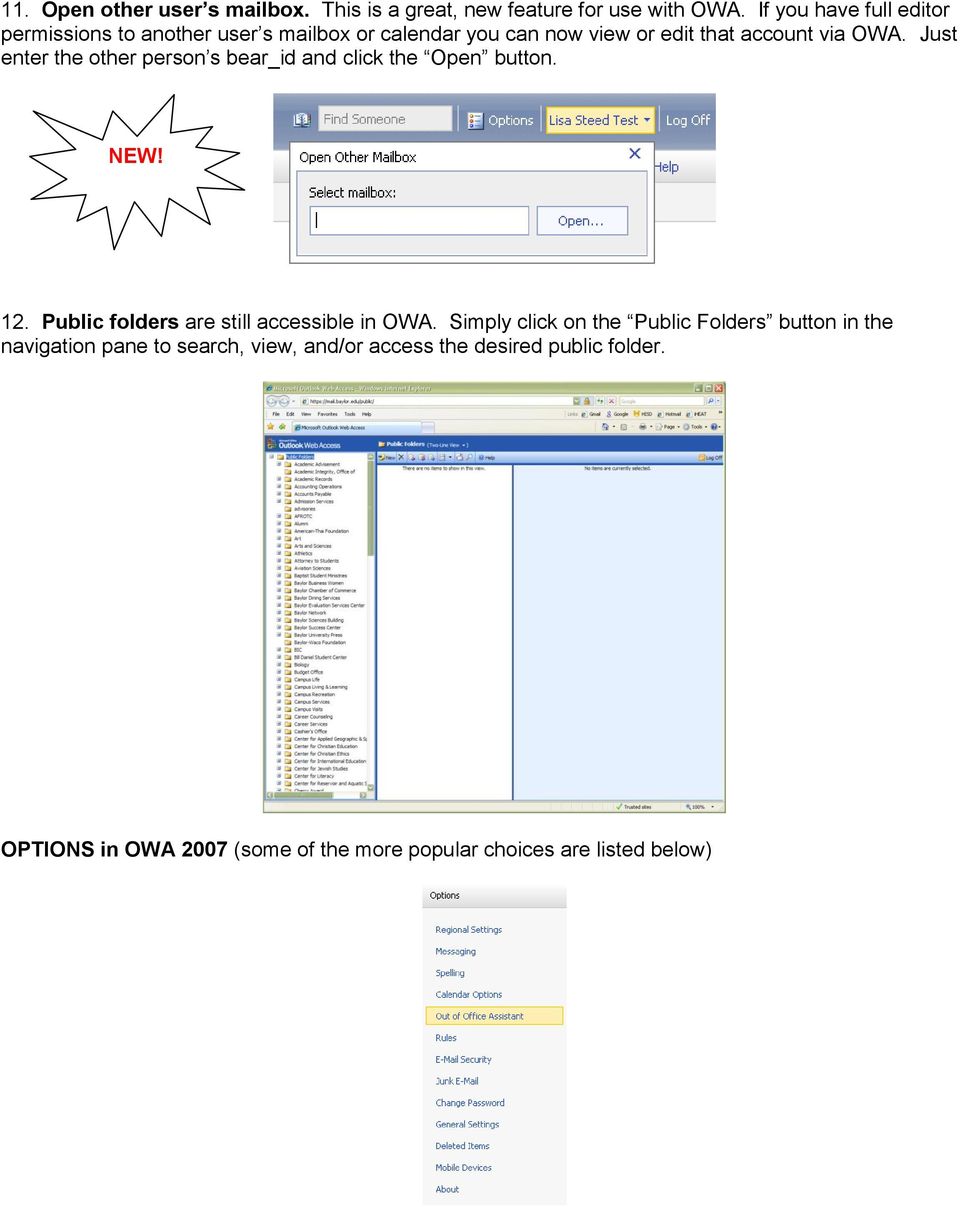
7 11. Open other user s mailbox. This is a great, new feature for use with OWA. If you have full editor permissions to another user s mailbox or calendar you can now view or edit that account via OWA. Just enter the other person s bear_id and click the Open button. NEW! 12. Public folders are still accessible in OWA. Simply click on the Public Folders button in the navigation pane to search, view, and/or access the desired public folder. OPTIONS in OWA 2007 (some of the more popular choices are listed below)

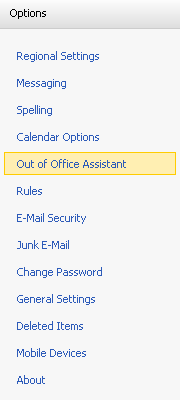
8 Rules- Click on the Rules link from the navigation pane on the left. From here, you can either create a new rule or change an existing rule. Rules not only help you with your day to day mailbox management, but can also be used to help combat spam. Be sure to click Save when you are finished creating the rule.


9 Junk filter. Just like the Outlook desktop client, you also have junk filter options within OWA. Click on the Options button in the title bar and then click on the Junk option in the navigation pane. You have a Safe Senders, Safe Recipients, and a Blocked Senders list that you may add addresses or even full domains to. NOTE: Blocked Senders means blocked from your Inbox, not the server itself. Spell check is available in OWA, too. To select a language for spell checking message, simply click on the Options button in the title bar and then click on the Spelling option in the navigation pane. Here you can choose your preferences for spell checking. Signatures. Click on the Options button in the title bar and then click on the Messaging option in the navigation pane. You can type your signature in the Signature section of Messaging. Be sure to check the box, Automatically include my signature in outgoing messages once you have completed composing your desired signature. If you have any other questions please contact the Help Desk at

Outlook Web Access E-mail
 Outlook Web Access E-mail A. Accessing the mailbox via the Internet 1. Open your browser Firebox or Internet Explorer 2. In the URL address location box, key mail.asbury.edu for students and mail2.asbury.edu
How to access your email via Outlook Web Access
 How to access your email via Outlook Web Access 1) Open your internet browser and type in the following address: www.law.miami.edu * Aol users must minimize their browser and use Internet Explorer 6.0+
Outlook Web Access. PRECEDED by v\
 Outlook Web Access Logging in to OWA (Outlook Web Access) from Home 1. Login page http://mail.vernonct.org/exchange 2. To avoid these steps each time you login, you can add the login page to your favorites.
GroupWise Web Access 8.0
 GroupWise Web Access 8.0 How to check your email via the Internet For More Information, please contact: Administrative Office of the Courts Technology Help Desk (615) 532 9503 or (800) 448-7980 Table of
How to access your email from WORK & HOME
 How to access your email from WORK & HOME 1. Open your browser and go to the district website by typing in the following address: http://www.islandtrees.org 2. Click on Staff Resources 3. Click on the
Outlook Web Access (OWA) for Staff
 Outlook Web Access (OWA) for Staff Note:The full version runs on Internet Explorer (IE) and the Light version runs on all other browsers (Firefox, Safari, Chrome etc). Web access URL / note the s after
Division of School Facilities OUTLOOK WEB ACCESS
 Division of School Facilities OUTLOOK WEB ACCESS New York City Department of Education Office of Enterprise Development and Support Applications Support Group 2011 HELPFUL HINTS OWA Helpful Hints was created
Outlook Web Access User Guide
 Table of Contents Title Page How to login...3 Create a new message/send attachment...5 Remove the reading pane...10 Calendar functions...11 Distribution lists...11 Contacts list...13 Tasks...18 Options...19
Using Outlook Web App
 Using Outlook Web App About Outlook Web App Using a web browser and the Internet, Outlook Web App (OWA) provides access to your Exchange mailbox from anywhere in the world at any time. Outlook Web App
Outlook Web App McKinney ISD 5/27/2011
 Outlook Web App McKinney ISD 5/27/2011 Outlook Web App Tutorial Outlook Web Access allows you to gain access to your messages, calendars, contacts, tasks and public folders from any computer with internet
Outlook Web Access Tipsheets
 You can use a Web browser to access your Outlook mailbox from any computer with an Internet connection. You can use Outlook Web Access with Microsoft Internet Explorer, Mozilla Firefox and many other browsers.
CITY OF BURLINGTON PUBLIC SCHOOLS MICROSOFT EXCHANGE 2010 OUTLOOK WEB APP USERS GUIDE
 CITY OF BURLINGTON PUBLIC SCHOOLS MICROSOFT EXCHANGE 2010 OUTLOOK WEB APP USERS GUIDE INTRODUCTION You can access your email account from any workstation at your school using Outlook Web Access (OWA),
Using Outlook WebAccess
 Using Outlook WebAccess Outlook Toolbars - Terminology Update all folders New Move/Copy Reply Forward Check for New Messages Help Show/Hide Folders Delete Reply to All Show/Hide Reading Pain Search Address
Outlook Web Access (OWA) User Guide
 Outlook Web Access (OWA) User Guide September 2010 TABLE OF CONTENTS TABLE OF CONTENTS... 2 1.0 INTRODUCTION... 4 1.1 OUTLOOK WEB ACCESS SECURITY CONSIDERATIONS... 4 2.0 GETTING STARTED... 5 2.1 LOGGING
You can also get to OWA by typing https://mymail.saisd.net. You have now entered the new and improved Web Outlook.
 Access E-Mail from Anywhere through the Internet Start your Internet Browser i.e. Internet Explorer Go to www.saisd.net Refer to Quick Links on the right side of the page Click on Web Outlook Were it shows
OWA - Outlook Web App
 OWA - Outlook Web App Olathe Public Schools 0 Page MS Outlook Web App OPS Technology Department Last Revised: May 1, 2011 Table of Contents MS Outlook Web App... 1 How to Access the MS Outlook Web App...
Using Outlook Web Access
 Using Outlook Web Access Log on JTSA Outlook Web Access 1. Enter the following URL into the address bar on your web browser (Internet Explorer recommended) and press enter http://exweb.jtsa.edu 2. The
Training Manual. Version 6
 Training Manual TABLE OF CONTENTS A. E-MAIL... 4 A.1 INBOX... 8 A.1.1 Create New Message... 8 A.1.1.1 Add Attachments to an E-mail Message... 11 A.1.1.2 Insert Picture into an E-mail Message... 12 A.1.1.3
Outlook Web App. in Office 365. The Outlook Window. Signing In. (Outlook Exchange Faculty & Staff) Getting Started
 Outlook Web App in Office 365 (Outlook Exchange Faculty & Staff) Getting Started The Outlook Window Navigation Bar Settings Navigation Pane View Pane Reading Pane Navigation Bar switch between Outlook,
Outlook Web App The Basics
 Outlook Web App (OWA) is accessible from any compatible web browser, on or off campus. It is available to all users of the UR Exchange 2010 email service. These basic instructions will get you started.
Accessing your e-mail using a web browser
 Accessing your e-mail using a web browser The web address for the PTS e-mail site is. http://mailserver.pts.edu Type that web address in the address bar and press . The screen below appears Next,
Outlook 2010. Mail, Calendar, Contacts, Notes & Tasks. User Guide
 User Guide Outlook 2010 Mail, Calendar, Contacts, Notes & Tasks IT Training (818) 677-1700 [email protected] www.csun.edu/it/training CSUN IT Training YouTube Channel http://www.youtube.com/user/csuninfotech
Microsoft Outlook Web Access Overview
 Microsoft Outlook Web Access Overview Table of contents Logging on to Outlook Web Access... 3 The sections of Outlook Web Access... 4 The Inbox Toolbar... 4 How to sections... 5 Email Basics... 5 Use the
Outlook Web Access 2003 New Features Guide
 Global Information Services Outlook Web Access 2003 New Features Guide Table of Contents After following a link, click on the toolbar to return to the Table of Contents. OWA 2003 2 Log in Screen 2 OWA
Entourage - an Introduction to E-mail
 Entourage - an Introduction to E-mail Version 2004 for Macintosh Table of Contents What is Entourage Starting Entourage The Navigation Pane Getting Help Creating and Sending a Message Using the UI Exchange
The online email environment
 The online email environment These are the options for the selected application. Navigation Pane is comprised of a folders list and oneclick access to your Inbox, Calendar, Contacts, and Tasks folders
If you encounter difficulty or need further assistance the Archdiocesan help desk can be reached at (410) 547-5305, option 1. Email Access Methods:
 ArchMail (www.archbalt.org/archmail) is a centrally hosted email system for the employees of the Archdiocese. To simplify employee access multiple methods for accessing email have been established. This
Outlook 2007 - Exchange
 Information Technology MS Office Outlook 2007 Users Guide Outlook 2007 - Exchange Mail, Calendar, Contacts, Notes & Tasks Folders IT Training & Development 677-1700 [email protected] TABLE OF CONTENTS
BCSD WebMail Documentation
 BCSD WebMail Documentation Outlook Web Access is available to all BCSD account holders! Outlook Web Access provides Webbased access to your e-mail, your calendar, your contacts, and the global address
Outlook Web Access An Introductory Guide
 Outlook Web Access An Introductory Guide IT Training & Assessment Unit, Queen s University Belfast 1 Contents Logging on... 3 Email... 3 Compose a Message... 4 Saving an Email Attachment... 5 Saving a
Outlook Web App User Guide
 Outlook Web App Table of Contents QUICK REFERENCE... 2 OUTLOOK WEB APP URL... 2 Imagine! Help Desk...... 2 OUTLOOK WEB APP MAIN WINDOW... 2 KEY NEW FEATURES... 3 GETTING STARTED WITH OUTLOOK... 4 LOGGING
Outlook Web Application (OWA) Basic Training
 Outlook Web Application (OWA) Basic Training Requirements to use OWA Full Version: You must use at least version 7 of Internet Explorer, Safari on Mac, and Firefox 3.X (these two achieve 99 percent feature
INET1005 May 2009 Getting Started with MyUH Email
 INET1005 May 2009 Getting Started with MyUH Email Introduction Introduction... 1 Overview... 1 My E-mail Inbox Channel... 2 MyUH E-mail Center... 3 Address Book... 5 Email Options... 6 Help... 6 Exit...
Honeywell Secure Email External User Guide August 2013
 Honeywell Secure Email External User Guide August 2013 PAGE: 1 of 14 Chapter No Table of Content Page No 1 Introduction 3 2 Using the Honeywell Secure Email Interface 3 3 Sending an Encrypted Email to
How is Webmail Different than Microsoft Outlook (or other e-mail program)?
 What is Webmail? Webmail (also called Outlook Web Access) is Internet-based software which allows you to access your Hartwick e-mail account from any computer that is connected to the Internet. How is
OUTLOOK WEB APP (OWA): MAIL
 Office 365 Navigation Pane: Navigating in Office 365 Click the App Launcher and then choose the application (i.e. Outlook, Calendar, People, etc.). To modify your personal account settings, click the Logon
Microsoft Outlook Web Access Handbook
 Microsoft Outlook Web Access Handbook Introduction Outlook Web access allows you to use a web browser (Internet Explorer or Firefox) to read your email, send email, and check your online calendar. This
Email - Outlook Web App
 ITS Computing Guide IT Services www.its.salford.ac.uk Email - Outlook Web App Web access to an email account provides the following benefits: Access your email from a computer with an internet connection,
Email at Bradford - Outlook
 This document provides guidance for staff using Office 365 with Microsoft Outlook 2010 for email at the University of Bradford. The University of Bradford retains copyright for this material, which may
GUIDEWIRE. Introduction to Using WebMail. macrobatix. Learn how to: august 2008
 macrobatix GUIDEWIRE august 2008 Introduction to Using WebMail Learn how to: Manage Your Inbox Compose a Message Activate Spam Filter Modify Spam Settings Check Held Messages *To download the complete
Citrus Valley Health Partners. Web Outlook User Guide. Table of Contents
 Citrus Valley Health Partners Web Outlook User Guide Table of Contents Getting Started Page Access to Web Outlook... 1 Log in Instructions... 1 Basic Navigation... 1 The Menu Bar... 1 The Reading Pane...
MICROSOFT OUTLOOK 2010 READ, ORGANIZE, SEND AND RESPONSE E-MAILS
 MICROSOFT OUTLOOK 2010 READ, ORGANIZE, SEND AND RESPONSE E-MAILS Last Edited: 2012-07-09 1 Read Emails... 4 Find the inbox... 4 Change new incoming e-mail notification options... 5 Read email... 6 Change
2010 Outlook Web App Client Overview
 2010 Outlook Web App Client Overview The upgrade to Microsoft Exchange 2010 includes an updated web-based e-mail client, OWA. OWA stands for Outlook Web App and gives you access to your district e-mail
Open OWA by going to https://anywhere.exchserver.net/owa. Provide your user name and password.
 Introduction... 2 Mailbox... 3 Calendar... 4 Contacts... 4 Options... 5 Sign out... 6 Requirements... 6 SaskTel Hosted Email & Collaboration - Hosted Exchange Outlook Web App (OWA) User Guide 1 With Outlook
Outlook Web App OWA Quick Guide. Getting you up to speed quickly.
 Outlook Web App OWA Quick Guide Getting you up to speed quickly. Information Services 8-1-2014 Contents Exploring the OWA (Outlook Web App) User Interface... 2 Getting Started... 2 Mail... 6 Creating and
Connecting to LUA s webmail
 Connecting to LUA s webmail Effective immediately, the Company has enhanced employee remote access to email (Outlook). By utilizing almost any browser you will have access to your Company e-mail as well
GroupWise to Outlook: How Do I?
 Group- Wise GroupWise to Outlook: How Do I? Outlook Function Function How to Proxy Delegate From the File tab, click Account Settings and then Delegate Access from the drop-down menu. In the Delegates
Outlook 101. Use and Manage Your Outlook Email Account. 2006 Terence Peak, UIW Dept. of Instructional Technology
 Outlook 101 Use and Manage Your Outlook Email Account What you will learn today Difference Between OWA and Outlook Client Mail Options Contacts Managing Outlook Calendar Options Tasks Outlook Web Access
Microsoft Outlook Web App Quick Reference Card
 Microsoft Outlook Web App Quick Reference Card Accessing Outlook Web App You can access your mailbox through any browser that supports HTML 3.2 and ECMA. To access your mailbox, enter your OWA web address/url
User Guide for Kelani Mail
 User Guide for Kelani Mail Table of Contents Log in to Kelani Mail 1 Using Kelani Mail 1 Changing Password 2 Using Mail Application 3 Using email system folders 3 Managing Your Mail 4 Using your Junk folder
Email User Manual. [Outlook Web App 2013]
![Email User Manual. [Outlook Web App 2013]](/thumbs/30/14055838.jpg "Email User Manual. [Outlook Web App 2013]") [Outlook Web App 2013] Central Information Systems Division March 2014 Table of Contents 1. To Login... 4 2. To Logout... 5 3. Change Password... 5 4. Email Messaging... 6 4.1 Create a New Mail... 6 4.2
[Outlook Web App 2013] Central Information Systems Division March 2014 Table of Contents 1. To Login... 4 2. To Logout... 5 3. Change Password... 5 4. Email Messaging... 6 4.1 Create a New Mail... 6 4.2
Beginners Guide. Entourage 2004
 Beginners Guide to Entourage 2004 Table of Contents Computer Services Introduction... 2 New e-mail service at NUI, Galway... 2 Online Documentation... 2 The Entourage Window... 3 Creating a Signature File...
Faculty & Staff Guide for Outlook Web App (OWA) Prepared by Information Technology Division Lehman College July 11, 2013
 im Faculty & Staff Guide for Outlook Web App (OWA) Prepared by Information Technology Division Lehman College July 11, 2013 Lehman College, CUNY 1 Information Technology Division Table of Contents Introduction...
Outlook 2003 User Guide. April 15, 2004
 Outlook 2003 User Guide April 15, 2004 PURPOSE OF THE DOCUMENT... 2 NAVIGATE OUTLOOK...3 Toolbars... 3 Menu Toolbar... 4 Standard Toolbar... 5 Outlook Bar... 6 Navigation Pane... 7 USING THE MAIL OPTION...
Office Outlook web access Reference Guide
 U TO R E XC H A N G E : C a l e n d a r i n g a n d e m a i l u p g r a d e w i t h M i c r o s o f t E xc h a n g e Office Outlook web access Reference Guide To log in, go to owa.utoronto.ca. You will
Microsoft Office 365 Outlook Web App (OWA)
 CALIFORNIA STATE UNIVERSITY, LOS ANGELES INFORMATION TECHNOLOGY SERVICES Microsoft Office 365 Outlook Web App (OWA) Winter 2015, Version 2.0 Table of Contents Introduction...3 Logging In...3 Navigation
O UTLOOK 2003 HELP SHEET MAIL. Opening the program. Mail
 O UTLOOK 2003 HELP SHEET MAIL Opening the program At Work Double-click the icon on your desktop. Or click the Start button. If this icon is displayed, click on it. If it is not displayed, click Start,
Henrico County Public Schools
 Henrico County Public Schools Presents: The New Web Based E-Mail Solution DRAFT Table of Contents Table of Contents...2 Logging Into Outlook Web Access...4 Overview..5 Navigating the Outlook Components...5
Outlook Web Access (OWA) - Using Calendar and Email on the Web
 Outlook Web Access (OWA) - Using Calendar and Email on the Web You can access OWA through a web browser on any computer connected to the internet. This guide is intended to help with the most common tasks
Microsoft Office 365 Outlook Web App (OWA)
 CALIFORNIA STATE UNIVERSITY, LOS ANGELES INFORMATION TECHNOLOGY SERVICES Microsoft Office 365 Outlook Web App (OWA) Spring 2013, Version 1.0 Table of Contents Introduction...3 Signing In...3 Navigation
Outlook Web Access (OWA)
 Outlook Web Access (OWA) Note:The full version runs on Internet Explorer (IE) and the Light version runs on all other browsers (Firefox, Safari, Chrome etc). Web access URL https://mail.student.gla.ac.uk/
Mimecast Services for Outlook (MSO4)
 Mimecast Services for Outlook (MSO4) End User Quick Start Guide for Outlook 2010/2013 Mimecast Services for Outlook (MSO 4) is a software application that integrates with your Microsoft Outlook. Once installed,
Lesson 7: Maintenance
 Lesson 7: Maintenance This lesson introduces you to processes that will help you with the overall maintenance of Outlook 2007. The processes outlined in this section are: Mailbox Cleanup: Helps you focus
RSCCD REMOTE PORTAL TABLE OF CONTENTS: Technology Requirements NOTE
 RSCCD REMOTE PORTAL The RSCCD Remote Portal allows employees to access their RSCCD Email (via Outlook Web Access), Department (Public) Folders, Personal (H Drive) Folder, and the District Intranet from
Outlook Web Access (OWA) 2010 Email Cheat Sheet
 June 9, 2014 Outlook Web Access (OWA) 2010 Email Cheat Sheet Outlook Web Access 2010 allows you to gain access to your messages, calendars, contacts, tasks and public folders from any computer with internet
Secure Message Center User Guide
 Secure Message Center User Guide Using the Department of Banking Secure Email Message Center 2 Receiving and Replying to Messages 3 Initiating New Messages 7 Using the Address Book 9 Managing Your Account
https://mail.wheelock.edu
 The Wheelock College Guide to Understanding Microsoft Outlook Web Access Maintained by: Wheelock College Department of Information Technology Version 1.1 June 2006 https://mail.wheelock.edu This document
Outlook Webb App quick guide
 What is Outlook Web App 2010? Outlook Webb App quick guide Updated 7/17/2012 The Outlook Web App allows you to access your University e-mail and calendar from any computer that has Internet access via
Lotus Notes Client Version 8.5 Reference Guide
 Lotus Notes Client Version 8.5 Reference Guide rev. 11/19/2009 1 Lotus Notes Client Version 8.5 Reference Guide Accessing the Lotus Notes Client From your desktop, double click the Lotus Notes icon. Logging
Outlook Operating Instructions. Internal Desktop Access
 Outlook Operating Instructions Internal Desktop Access OUTLOOK OPERATING INSTRUCTIONS (INTERNAL DESKTOP ACCESS) FREQUENTLY ASKED QUESTIONS & ANSWERS Q: How do I check my email while on campus? A: Click
Changes to Skillnet Group Emails. Outlook and Outlook Express Users
 Changes to Skillnet Group Emails Skillnet Group emails are moving from the current provider to our own exchange mail server. This will mean that you will have a much improved web-mail system and almost
Outlook Web Access End User Guide
 Outlook Web Access End User Guide Page 0 Outlook Web Access is an online, limited version of an Outlook client which can be used to access an exchange account from a web browser, without having an Outlook
Office365 at Triton College
 Office365 at Triton College Logging in to Office365 The new log in page for Triton email is http://outlook.com/triton.edu At that page, enter your username in this format: [email protected]
Webmail Instruction Guide
 Webmail Instruction Guide This document is setup to guide your through the use of the many features of our Webmail system. You may either visit www.safeaccess.com or webmail.safeaccess.com to login with
Guidelines for using e-mail account through OWA
 Guidelines for using e-mail account through OWA Logon to Outlook Web Access (OWA), UNITEN User E-mail. UNITEN User E-mail account is accessible through out the world. It is also known as OWA (Outlook Web
Outlook Web Access Tutorial
 1 Outlook Web Access Tutorial Outlook Web Access 2010 allows you to gain access to your messages, calendars, contacts, tasks and public folders from any computer with internet access. How to access your
Web Mail Classic Web Mail
 April 14 Web Mail Classic Web Mail Version 2.2 Table of Contents 1 Technical Requirements... 4 2 Accessing your Web Mail... 4 3 Web Mail Features... 5 3.1 Home... 5 3.1.1 Mailbox Summary... 5 3.1.2 Announcements...
Using Outlook web access.
 Pages: 1 of 10 Using Outlook web access. Introduction...2 Accessing Webmail...2 Client Options...2 Premium Client Features...3 Initial Screen Premium Client...3 Similarities to Outlook Client...4 Inbox
PolyU Staff Email Service. Outlook Web App (OWA) User Guide
 PolyU Staff Email Service Outlook Web App (OWA) User Guide Version 2.2 Last Update: 23 December 2014 PolyU Staff Email: www.polyu.edu.hk/email ITS HelpCentre Support: www.polyu.edu.hk/hots ITS HelpCentre
Student Office 365 Outlook Web App OWA Quick Guide. Getting you up to speed quickly.
 Student Office 365 Outlook Web App OWA Quick Guide Getting you up to speed quickly. Information Services 9-5-2014 Contents Logging into the CWU Student Outlook Web App... 3 Getting Started with Office
Baylor Secure Messaging. For Non-Baylor Users
 Baylor Secure Messaging For Non-Baylor Users TABLE OF CONTENTS SECTION ONE: GETTING STARTED...4 Receiving a Secure Message for the First Time...4 Password Configuration...5 Logging into Baylor Secure Messaging...7
USING OUTLOOK WEB ACCESS
 USING OUTLOOK WEB ACCESS 17 March 2009, Version 1.0 WHAT IS OUTLOOK WEB ACCESS? Outlook Web Access (OWA) is a webmail service of Microsoft Exchange Server. The web interface of Outlook Web Access resembles
MUTUAL OF OMAHA SECURE EMAIL SYSTEM CLIENT/PARTNER USER GUIDE
 MUTUAL OF OMAHA SECURE EMAIL SYSTEM CLIENT/PARTNER USER GUIDE Mutual of Omaha Secure Email Client/Partner User Guide April 2015 TABLE OF CONTENTS INTRODUCTION 3 About this Guide 3 CREATING A MUTUAL OF
New Features in Outlook Web Access
 New Features in Feature and functionality Logon Screen Navigation Description User logon screen for Navigation in resembles navigation in Microsoft Office Outlook 2007. Drag-and-Drop Move items by dragging
Using Webmail. Technical Manual: User Guide. Document Updated: 1/07. The Webmail Window. Displaying and Hiding the Full Header.
 Using Webmail Technical Manual: User Guide The Webmail Window To save an attachment: 1. Click once on the attachment name. Or, if there are multiple attachments, click the Save icon to save all attachments
Outlook 2013 ~ e Mail Quick Tips
 The Ribbon: Home tab New Email to send a new mail New Items to send a new mail, a new appointment, a new meeting, a new contact, a new task, a new Lync Meeting Ignore to ignore a request Clean Up to clean
MECnet Portal: Using Web-Based Email
 User Manual MECnet Portal: Using Web-Based Email Salem Public Schools Salem, Massachusetts Table of Contents Logging in at School or at Home................................. 3 The Top Navigation Bar........................................
MICROSOFT OUTLOOK 2011 READ, SEARCH AND PRINT E-MAILS
 MICROSOFT OUTLOOK 2011 READ, SEARCH AND PRINT E-MAILS Lasted Edited: 2012-07-10 1 Find the Inbox... 3 Check for New Mail... 4 Manually check for new messages... 4 Change new incoming e-mail schedule options...
OWA User Guide. Table of Contents
 OWA User Guide Table of Contents 1. Basic Functionality of Outlook Web Access... 2 How to Login to Outlook Web Access (OWA)... 2 Change Password... 3 Mail... 3 Composing Mail... 5 Attachments - Web Ready
Web Mail Guide... Error! Bookmark not defined. 1 Introduction to Web Mail... 4. 2 Your Web Mail Home Page... 5. 3 Using the Inbox...
 Powered by Table of Contents Web Mail Guide... Error! Bookmark not defined. 1 Introduction to Web Mail... 4 1.1 Requirements... 4 1.2 Recommendations for using Web Mail... 4 1.3 Accessing your Web Mail...
OUTLOOK 2010 TIPS TABLE OF CONTENTS 1. SEND A BLIND CARBON COPY MARQUETTE UNIVERSITY IT SERVICES
 OUTLOOK 2010 TIPS TABLE OF CONTENTS 1.Send a Blind Carbon Copy... 1 2. Change the view of the Outlook window... 2 3. Use Out of Office Assistant... 2 4. Create Rules... 4 5. Use Autocomplete... 5 6. Request
Managing Contacts in Outlook
 Managing Contacts in Outlook This document provides instructions for creating contacts and distribution lists in Microsoft Outlook 2007. In addition, instructions for using contacts in a Microsoft Word
Outlook Web Access is accessible to all users where Internet access is available. This document contains instructions on how to use OWA.
 Welcome to the City of Sarasota s Outlook Web Access (OWA). As a member of the Board you are required to use your City-issued email address for correspondence that is related to the business of the Advisory
Outlook Live Basics. for Students
 Outlook Live Basics for Students 2 Outlook Live for Support Staff Outlook Live for Support Staff 3 Getting Started... 6 Signing into your Outlook Account... 6 Migrating your Account... 8 Address Book...
School Mail System. - Access through Office 365 Exchange Online. User Guide FOR. Education Bureau (EDB)
 School Mail System - Access through Office 365 Exchange Online User Guide FOR Education Bureau (EDB) Version: 1.0 May 2015 The Government of the Hong Kong Special Administrative Region The contents of
How to Guide Outlook Web Access 2010
 How to Guide Outlook Web Access 2010 If you have questions about any of the items in this guide, contact the IS Service Desk at 85-2400 or 414-326-2400. Outlook Web Access (OWA) provides Web-based email