
OWA User Guide. Table of Contents
|
|
|
- Alan Milton Whitehead
- 10 years ago
- Views:
Transcription
1 OWA User Guide Table of Contents 1. Basic Functionality of Outlook Web Access... 2 How to Login to Outlook Web Access (OWA)... 2 Change Password... 3 Mail... 3 Composing Mail... 5 Attachments - Web Ready Document Viewing... 6 Message Flagging... 7 Labeling (Categories)... 7 Delegate Mailbox access... 7 Opening another user's mailbox... 7 View mailbox size instantly... 8 Access to mailbox archives (Enterprise Vault)... 9 Calendar... 9 How to view another user s calendar in OWA...10 Side-by-side calendars...10 Public Folders New Features in OWA Conversation view...12 Ignore option...13 Forward as an attachment...14 Delivery report...15 Same premium experience without IE...16 Integrated IM/presence information...16 Exchange Control Panel (ECP)...17 General Account Information...18 Organize Groups...19 Settings...20 Phone...23 Block or Allow
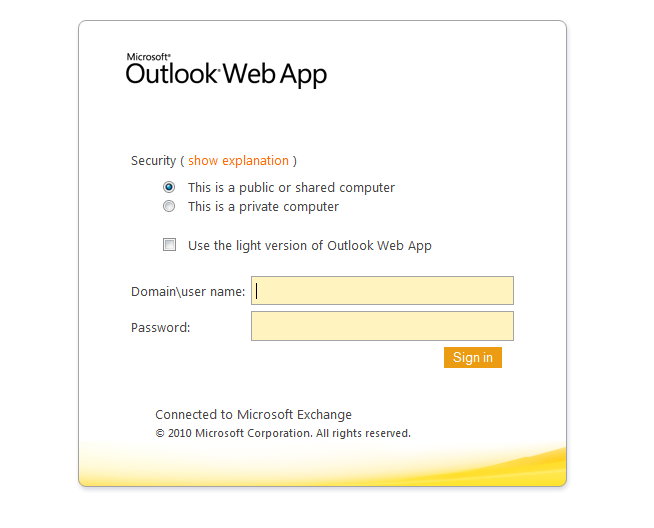
2 1. Basic Functionality of Outlook Web Access How to Login to Outlook Web Access (OWA) To access OWA, click on this link: or type the URL into your web browser. Enter [domain]\[username] and password, as shown in screenshot below, then hit Enter or click Sign in. User Name: enter your [home domain]\[network username] i.e. vsms\john.doe, or ahs\jane.doe Password: enter your domain password this is the password that you login to your workstation with. NOTE: Username may differ depending on your network naming conventions. If you need further assistance, contact your helpdesk or your technical support contact. 2
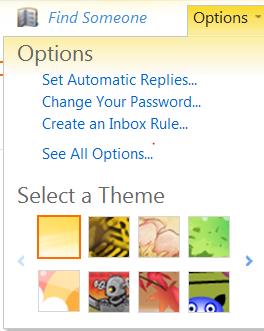
3 Change Password Click on option top right corner Change your password Click on Options, then Change Password Mail Within the folder tree, there is enhanced drag and drop functionality from the mail list. You can drag and drop single or multiple items from the mail list into folders and interact with those items by right clicking and choosing actions within the menus. If you have items that are vaulted you can drag and drop them within your own mailbox, but you must open and forward or restore to move them to another mailbox. 3
4 Integrated Notifications Notifications of new mail drop down from the folder title next to the Help icon (instead of a pop-up on the Window s Taskbar). They remain for 5 seconds before disappearing. area Mail Module Toolbar From the mail module toolbar, a user can: Change the mail list to single-line view instead of the default multiple-line view. Adjust the Reading Pane that s shown on the right by default. Options include Off, Right and Bottom. Delete Items Move or Copy to a folder Arrange messages Right-click on the From, Subject, Received, Size... toolbar to view more Types of sort include Conversation (shows threads of specific message Attachments, Importance, Flag Due Date, and Flag Start Date. sorting options. topics), Type, NOTE: When in multiple line view, the toolbar only displays Arrange by, but still allows for custom sorting by right or regular clicking anywhere on the toolbar. Back to Top 4
5 Composing Mail NOTE: These features are also available to you when scheduling a meeting invitation in Calendar mode. From within the New Mail Toolbar you can: Access messaging options to set importance, priority, and request read receipts. Choose to format your message in HTML or Plain Text. Use the HTML editor to change fonts, and color or add a hyperlink to a document. Click on the double-headed arrow on the font toolbar for more formatting options. Full featured Address Book This displays the Global Address List, Contacts, and Rooms (Resources), and is browseable and fully searchable. Auto-complete mail names When you type the first letter of a mail name in the To, CC boxes, Auto-complete suggests possible matches based on you have typed previously. Or you can use the Check icon. or Bcc names Names Personal Properties Right-click on a resolved name to view their properties, e.g. office location and phone number, where available. 5
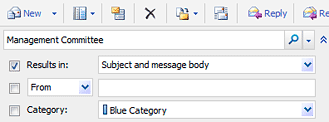
6 Access or search the Address Book at any time from the main OWA toolbar (see icon opposite); when composing mail, from the message window toolbar, or by clicking on the To or Cc button. Display details Click on an entry in the address book to display details for that person in the Reading Pane opposite. Details displayed include Calendar availability. Spell check Click on spell check after composing your mail to highlight misspelled words simply right-click on a highlighted word to view alternative options. Reading Pane Buttons for responding to Calendar items (i.e. Accept, Tentative, and Decline) are now integrated into the Reading Pane of messages, so you don t need to double-click on an invite in order to respond. Search Find items in our mailbox quickly and simply via the integrated Click on the double-headed arrow to perform an advanced search. search bar. In the Mail module, Search is shown as one field above the mail list that will search across the currently selected folder or user-selected location provided by a drop-down menu. NOTE: The integrated search is also available in Contacts and Tasks views. Attachments - Web Ready Document Viewing Read Word, Excel, PowerPoint, or Acrobat attachments as web pages (HTML) no need to have MS Office or Acrobat Reader installed on our computer. Click on the [Open as Web Page] link to quickly view the document in a web viewer. It is, of course still possible to Open or View an attachment in the usual way. 6
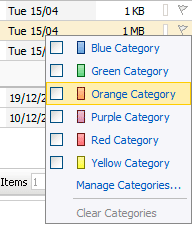
7 Message Flagging Flags can now be associated with start dates for Tasks. Right-click on a flag to view options. Labeling (Categories) Click on the Categories icon (next to the flag) to color code messages, in addition to or instead of flagging. NOTE: You can also categorize Calendar items, Contacts and Tasks. Delegate Mailbox access To open a shared mailbox, first click on your mailbox name on the top right of the OWA window then enter the name of the mailbox that has been shared with you in the Open Other Mailbox prompt. Click Open The mailbox that has been shared with you will open in a new window. NOTE: You must be granted Full Access by another user in order to open their mailbox in OWA. This feature is therefore only of use to those who have Delegate access to another account, e.g. Pas. Opening another user's mailbox With Exchange 2010, you can select a mailbox to open from the GAL, and it "nests" into the left pane along with your default mailbox. OWA also remembers which mailboxes you opened and displays them when you log on the next time. 7
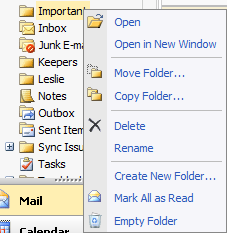

8 Click the triangle next to your name. Enter the mailbox name and click Open. View mailbox size instantly Hover mouse over your mailbox name to display the maximum allowed mailbox size and current usage. The right-click folder tree context menu now includes: Move Folder Copy Folder New folder creation and in-place folder renaming Mark All as Read action for folders Empty Folder to delete all items in one click NOTE: A new Option to empty the Deleted Items Folder on log off is also provided in the new Options pages. 8
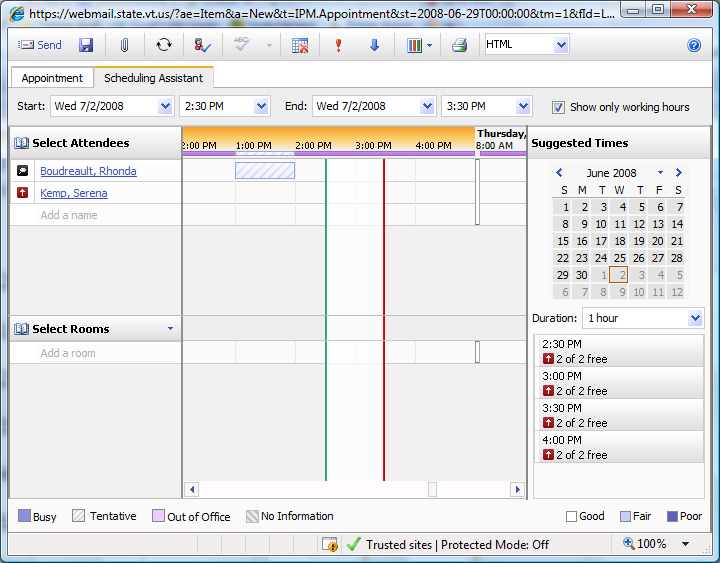
9 Access to mailbox archives (Enterprise Vault) OWA 2010 allows users to access archived mailboxes from within the OWA interface so that you can get access to the archived messages no matter where you are. Basic search Click on Search Archives Calendar The Calendar has been completely redesigned with lots of added functionality and visuals: New calendar views for daily, weekly, and work week including a new Reading Pane preview available for all views so you don t have to double click to open an appointment to see the full details. Enhanced Date Picker with current date selection and view settings reflected for daily, weekly, and work week. Smart scheduling with integrated free/busy status indicators for each meeting invitee and meeting time. 9

10 How to view another user s calendar in OWA NOTE: In order to see the information of a user, this user must have given you the permission to share their information with you. You will not be able to make changes to the other user's information in Outlook Web Access, even if you have been granted rights to make changes. Other user's folders are opened in Outlook Web Access as "read-only" by default. Once you are logged into OWA, open a new tab and type the following link address bar, changing user.name to the user whose calendar you wish to Click to open a new tab into the view: Tabs are only available if your Internet Explorer has been upgraded to version 7. To find out which version of IE you are running, from the internet toolbar, go to Help and choose About Internet Explorer. A dialog box will pop up with the version you are running. If you are running an older version of IE, follow the same directions above omitting the open a new tab step. Use your browser s back button to go back to your OWA mailbox. This tab is your OWA mailbox This tab is the other user s calendar Side-by-side calendars Another feature is the ability to open up a shared calendar and view it side by side with your own calendar. This is invaluable if you need to make plans that include coordinating your schedule with someone else's. You can share your calendar with other users of your Exchange 2010 server. 10

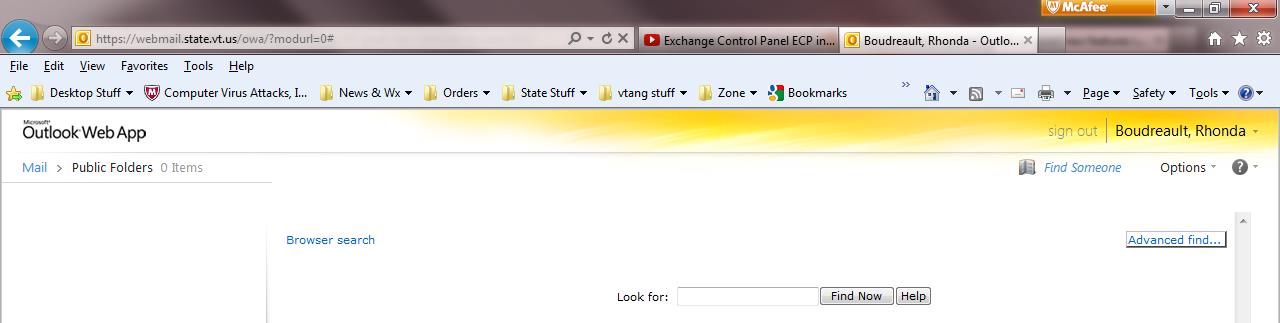
11 Public Folders Public folders have been added to the OWA folder tree and can be accessed normally. Users can add, copy, move, delete and search just like an OWA folder. NOTE: Public folders are not available in OWA Light. Back to Top 11
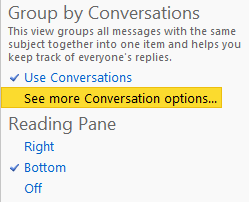
12 2. New Features in OWA 2010 Conversation view OWA 2010 provides the same conversation view and experience as Outlook 2010: By default, messages are displayed in threads so that all the messages on a particular topic are grouped. No more searching for a previous message to check what the response is referring to. When a new message in a thread comes in, the whole thread gets moved chronologically to the date/time of the new message. Conversation view has its benefits and drawbacks, but if you don't like it, you can turn it off. Just right-click Arrange By, scroll down to Conversations, and deselect Show Messages In Conversations. Click Use Conversations to organize by conversation. This icon indicates a conversation. Click again to turn off conversations view. Expand the triangle icon to view conversation items. Click on See more Conversation options to view more options. 12
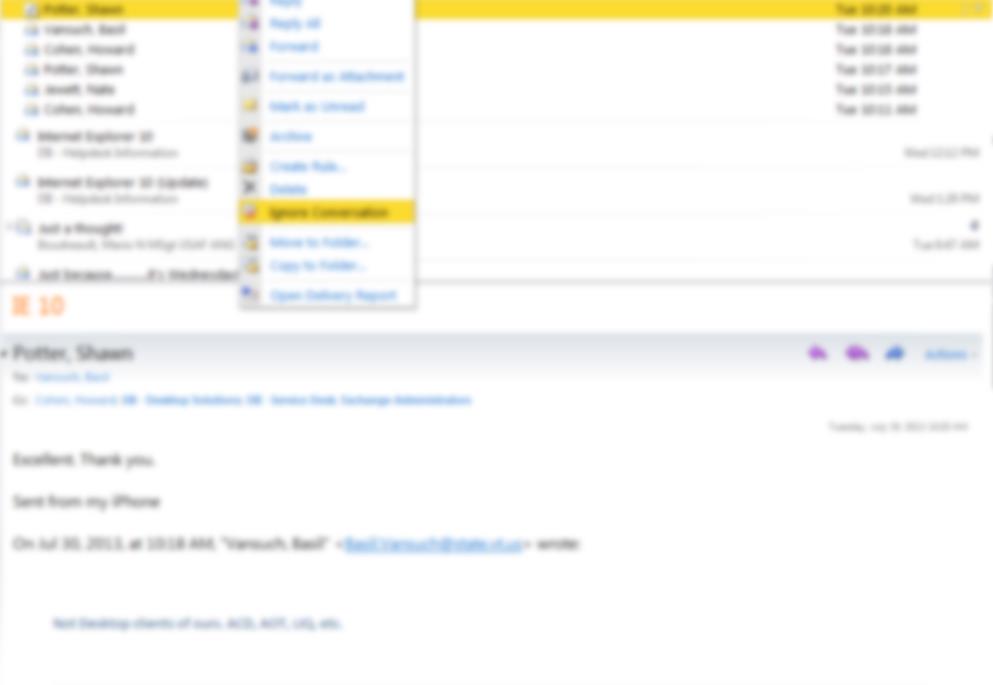
13 Ignore option If you belong to mailing lists, you'll appreciate this new feature in Outlook 2010, which you also get with OWA Sometimes, the group will engage in discussions that don't interest you at all. Now you don't even have to see them. Just select Ignore Conversation from the action menu and any further messages in that conversation will be automatically deleted. This can be a real time-saver. Right click on the conversation, choose Ignore Conversation. Choose OK to delete the conversation. 13
14 Forward as an attachment It's a little thing, but sometimes it's the little things that matter most. With OWA 2010, you can forward an message as an attachment. This can come in handy if you need to forward a message to someone but don't necessarily want the person to open it immediately. You can create an original message where you can tell the person about the attachment -- or example, you might forward a message that possibly contains a virus to someone who provides technical support for you. Right click on the message and choose Forward as Attachment. An message will pop up where you can address the appropriately. 14
15 Delivery report Another new option on the action menu is Open Delivery Report. If you've ever sent an important and then agonized over whether it got to the recipient, this feature will be one of your favorites. You can search for messages you've sent to a specified recipient, messages you've received from a specified recipient, or messages with specific words in the subject line. The delivery report will show you on what date and at what time the message was submitted and when it was successfully delivered. Right click on the message and choose Open Delivery Report. A Delivery Report will pop up with the results. 15
16 Same premium experience without IE OWA 2010 supports the complete, premium experience on Mac OS X with Safari as well as with Firefox. OWA is compatible with: Firefox Safari Internet Explorer Opera Netscape & 5.2 on Mac Integrated IM/presence information OWA 2010 integrates directly with Microsoft Office Communicator 2007 R2, allowing you to see the presence status (available, busy, away, etc.) of other users within your organization and even engage in a chat with them. You can also engage in multiple chat sessions with different people at the same time. 16
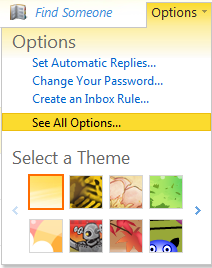
17 Exchange Control Panel (ECP) Users can do more with the ECP, such as creating and managing distribution groups, tracking their own messages, setting up retention policies for their messages, and updating the property fields information in their Active Directory user accounts. The Exchange Control Panel (ECP) in Exchange
18 General Account Information Account Information Organize Inbox Rules Automatic Replies (Out of Office) 18
19 Delivery Reports Groups Public Groups 19
20 Settings Mail Signature, Message Format, Message Options, Read Receipt, Reading Pane, Conversations Spelling Options 20
21 Calendar Appearance, Text Messaging Notifications, Reminders, Automatic Processing General Name Resolution, Accessibility 21
22 Sent Items Options Regional Settings Language, Date Format, Current time zone Change Password Security 22
23 Phone Mobile Phones Text Messaging (SMS) Block or Allow Junk Settings 23
New Features in Outlook Web Access
 New Features in Feature and functionality Logon Screen Navigation Description User logon screen for Navigation in resembles navigation in Microsoft Office Outlook 2007. Drag-and-Drop Move items by dragging
Email access via the Internet. Outlook Web Access
 Email access via the Internet Outlook Web Access SiX Document Title/ Search Keyword(s): Email access via the Internet Outlook Web Access Service Group: E-Learning & Information Management Contact Details:
Outlook Web Access (OWA) User Guide
 Outlook Web Access (OWA) User Guide September 2010 TABLE OF CONTENTS TABLE OF CONTENTS... 2 1.0 INTRODUCTION... 4 1.1 OUTLOOK WEB ACCESS SECURITY CONSIDERATIONS... 4 2.0 GETTING STARTED... 5 2.1 LOGGING
Microsoft Office 365 Outlook Web App (OWA)
 CALIFORNIA STATE UNIVERSITY, LOS ANGELES INFORMATION TECHNOLOGY SERVICES Microsoft Office 365 Outlook Web App (OWA) Spring 2013, Version 1.0 Table of Contents Introduction...3 Signing In...3 Navigation
CITY OF BURLINGTON PUBLIC SCHOOLS MICROSOFT EXCHANGE 2010 OUTLOOK WEB APP USERS GUIDE
 CITY OF BURLINGTON PUBLIC SCHOOLS MICROSOFT EXCHANGE 2010 OUTLOOK WEB APP USERS GUIDE INTRODUCTION You can access your email account from any workstation at your school using Outlook Web Access (OWA),
BCSD WebMail Documentation
 BCSD WebMail Documentation Outlook Web Access is available to all BCSD account holders! Outlook Web Access provides Webbased access to your e-mail, your calendar, your contacts, and the global address
Outlook 2007 - Exchange
 Information Technology MS Office Outlook 2007 Users Guide Outlook 2007 - Exchange Mail, Calendar, Contacts, Notes & Tasks Folders IT Training & Development 677-1700 [email protected] TABLE OF CONTENTS
Outlook 2010. Mail, Calendar, Contacts, Notes & Tasks. User Guide
 User Guide Outlook 2010 Mail, Calendar, Contacts, Notes & Tasks IT Training (818) 677-1700 [email protected] www.csun.edu/it/training CSUN IT Training YouTube Channel http://www.youtube.com/user/csuninfotech
Outlook Web Access E-mail
 Outlook Web Access E-mail A. Accessing the mailbox via the Internet 1. Open your browser Firebox or Internet Explorer 2. In the URL address location box, key mail.asbury.edu for students and mail2.asbury.edu
Using Outlook Web App
 Using Outlook Web App About Outlook Web App Using a web browser and the Internet, Outlook Web App (OWA) provides access to your Exchange mailbox from anywhere in the world at any time. Outlook Web App
Email User Manual. [Outlook Web App 2013]
![Email User Manual. [Outlook Web App 2013]](/thumbs/30/14055838.jpg "Email User Manual. [Outlook Web App 2013]") [Outlook Web App 2013] Central Information Systems Division March 2014 Table of Contents 1. To Login... 4 2. To Logout... 5 3. Change Password... 5 4. Email Messaging... 6 4.1 Create a New Mail... 6 4.2
[Outlook Web App 2013] Central Information Systems Division March 2014 Table of Contents 1. To Login... 4 2. To Logout... 5 3. Change Password... 5 4. Email Messaging... 6 4.1 Create a New Mail... 6 4.2
Microsoft Office 365 Outlook Web App (OWA)
 CALIFORNIA STATE UNIVERSITY, LOS ANGELES INFORMATION TECHNOLOGY SERVICES Microsoft Office 365 Outlook Web App (OWA) Winter 2015, Version 2.0 Table of Contents Introduction...3 Logging In...3 Navigation
Using Webmail. Document Updated: 11/10. Technical Manual: User Guide. The Webmail Window. Logging In to Webmail. Displaying and Hiding the Full Header
 Using Webmail Technical Manual: User Guide Webmail is supported in the following browsers: Windows Internet Explorer 6, Internet Explorer 7, Firefox 2, and Firefox 3 Mac OSX Safari 2, Safari 3, Firefox
Outlook Web Access Tutorial
 1 Outlook Web Access Tutorial Outlook Web Access 2010 allows you to gain access to your messages, calendars, contacts, tasks and public folders from any computer with internet access. How to access your
Outlook Web App User Guide
 Outlook Web App Table of Contents QUICK REFERENCE... 2 OUTLOOK WEB APP URL... 2 Imagine! Help Desk...... 2 OUTLOOK WEB APP MAIN WINDOW... 2 KEY NEW FEATURES... 3 GETTING STARTED WITH OUTLOOK... 4 LOGGING
Outlook Web App OWA. Let s take a look at the new features and functionality available on OWA. Feature & Functionality Description User experience
 Outlook Web App OWA Let s take a look at the new features and functionality available on OWA. Feature & Functionality Description User experience Logon Screen User logon screen for Outlook Web App (OWA)
Student Office 365 Outlook Web App OWA Quick Guide. Getting you up to speed quickly.
 Student Office 365 Outlook Web App OWA Quick Guide Getting you up to speed quickly. Information Services 9-5-2014 Contents Logging into the CWU Student Outlook Web App... 3 Getting Started with Office
Outlook. Getting Started Outlook vs. Outlook Express Setting up a profile Outlook Today screen Navigation Pane
 Outlook Getting Started Outlook vs. Outlook Express Setting up a profile Outlook Today screen Navigation Pane Composing & Sending Email Reading & Sending Mail Messages Set message options Organizing Items
Outlook Web App OWA Quick Guide. Getting you up to speed quickly.
 Outlook Web App OWA Quick Guide Getting you up to speed quickly. Information Services 8-1-2014 Contents Exploring the OWA (Outlook Web App) User Interface... 2 Getting Started... 2 Mail... 6 Creating and
OWA - Outlook Web App
 OWA - Outlook Web App Olathe Public Schools 0 Page MS Outlook Web App OPS Technology Department Last Revised: May 1, 2011 Table of Contents MS Outlook Web App... 1 How to Access the MS Outlook Web App...
Using Outlook WebAccess
 Using Outlook WebAccess Outlook Toolbars - Terminology Update all folders New Move/Copy Reply Forward Check for New Messages Help Show/Hide Folders Delete Reply to All Show/Hide Reading Pain Search Address
Outlook Web Access (OWA) 2010 Email Cheat Sheet
 June 9, 2014 Outlook Web Access (OWA) 2010 Email Cheat Sheet Outlook Web Access 2010 allows you to gain access to your messages, calendars, contacts, tasks and public folders from any computer with internet
Outlook Web Access -User Guides-
 Nilai University College (Nilai Education Sdn. Bhd) Outlook Web Access -User Guides- Prepared By IT Department (Infrastructure Team) VERSION: 1.0 All rights reserved. This document is a proprietary product
Outlook 2011 Window. [Day], [Work Week], [Full [Home]. Schedule and plan: Click the [New
![Outlook 2011 Window. [Day], [Work Week], [Full [Home]. Schedule and plan: Click the [New](/thumbs/27/11891778.jpg "Outlook 2011 Window. [Day], [Work Week], [Full [Home]. Schedule and plan: Click the [New") MS Outlook 2011 Quick Reference for Macintosh The Ribbon consists a series of tabs giving access to buttons, menus, and dialog boxes in various groups to facilitate locating the tools required for a particular
MS Outlook 2011 Quick Reference for Macintosh The Ribbon consists a series of tabs giving access to buttons, menus, and dialog boxes in various groups to facilitate locating the tools required for a particular
Using Webmail. Technical Manual: User Guide. Document Updated: 1/07. The Webmail Window. Displaying and Hiding the Full Header.
 Using Webmail Technical Manual: User Guide The Webmail Window To save an attachment: 1. Click once on the attachment name. Or, if there are multiple attachments, click the Save icon to save all attachments
Webmail Instruction Guide
 Webmail Instruction Guide This document is setup to guide your through the use of the many features of our Webmail system. You may either visit www.safeaccess.com or webmail.safeaccess.com to login with
Microsoft Outlook Web App Quick Reference Card
 Microsoft Outlook Web App Quick Reference Card Accessing Outlook Web App You can access your mailbox through any browser that supports HTML 3.2 and ECMA. To access your mailbox, enter your OWA web address/url
Using Webmail. Document Updated: 9/08. Technical Manual: User Guide. The Webmail Window. Displaying and Hiding the Full Header.
 Using Webmail Technical Manual: User Guide Webmail is supported in the following browsers: Windows Internet Explorer 6, Internet Explorer 7, Firefox 2, and Firefox 3 Mac OSX Safari 2, Safari 3, Firefox
Microsoft Outlook 2010. Reference Guide for Lotus Notes Users
 Microsoft Outlook 2010 Reference Guide for Lotus Notes Users ContentsWelcome to Office Outlook 2010... 2 Mail... 3 Viewing Messages... 4 Working with Messages... 7 Responding to Messages... 11 Organizing
Training Manual. Version 6
 Training Manual TABLE OF CONTENTS A. E-MAIL... 4 A.1 INBOX... 8 A.1.1 Create New Message... 8 A.1.1.1 Add Attachments to an E-mail Message... 11 A.1.1.2 Insert Picture into an E-mail Message... 12 A.1.1.3
Migrating to Microsoft Exchange with Outlook 2007 and Outlook Web Access
 Migrating to Microsoft Exchange with Outlook 2007 and Outlook Web Access Jeff Pankin Information Services and Technology This document will focus on key differences when moving to Exchange using Outlook
Module One: Getting Started... 6. Opening Outlook... 6. Setting Up Outlook for the First Time... 7. Understanding the Interface...
 2 CONTENTS Module One: Getting Started... 6 Opening Outlook... 6 Setting Up Outlook for the First Time... 7 Understanding the Interface...12 Using Backstage View...14 Viewing Your Inbox...15 Closing Outlook...17
Outlook Email. User Guide IS TRAINING CENTER. 833 Chestnut St, Suite 600. Philadelphia, PA 19107 215-503-7500
 Outlook Email User Guide IS TRAINING CENTER 833 Chestnut St, Suite 600 Philadelphia, PA 19107 215-503-7500 This page intentionally left blank. TABLE OF CONTENTS Getting Started... 3 Opening Outlook...
Entourage - an Introduction to E-mail
 Entourage - an Introduction to E-mail Version 2004 for Macintosh Table of Contents What is Entourage Starting Entourage The Navigation Pane Getting Help Creating and Sending a Message Using the UI Exchange
Outlook Web App McKinney ISD 5/27/2011
 Outlook Web App McKinney ISD 5/27/2011 Outlook Web App Tutorial Outlook Web Access allows you to gain access to your messages, calendars, contacts, tasks and public folders from any computer with internet
Email -- Reading and Printing Email
 Email -- Reading and Printing Email Checking for New Email By default, webmail checks for new email automatically. If you want to manually check for new email, click the Check Email button. Or, click the
How to access your email via Outlook Web Access
 How to access your email via Outlook Web Access 1) Open your internet browser and type in the following address: www.law.miami.edu * Aol users must minimize their browser and use Internet Explorer 6.0+
Outlook Web Application (OWA) Basic Training
 Outlook Web Application (OWA) Basic Training Requirements to use OWA Full Version: You must use at least version 7 of Internet Explorer, Safari on Mac, and Firefox 3.X (these two achieve 99 percent feature
Webmail User Guide. The Webmail Window. Logging In to Webmail. Displaying and Hiding the Full Header. Printing an Email. Composing a New Email
 Webmail User Guide Rev: November, 2012 Webmail is supported in the following browsers: Windows Internet Explorer 6, Internet Explorer 7, Firefox 2, and Firefox 3 Mac OSX Safari 2, Safari 3, Firefox 2,
https://mail.wheelock.edu
 The Wheelock College Guide to Understanding Microsoft Outlook Web Access Maintained by: Wheelock College Department of Information Technology Version 1.1 June 2006 https://mail.wheelock.edu This document
Microsoft Outlook Web Access Overview
 Microsoft Outlook Web Access Overview Table of contents Logging on to Outlook Web Access... 3 The sections of Outlook Web Access... 4 The Inbox Toolbar... 4 How to sections... 5 Email Basics... 5 Use the
Henrico County Public Schools
 Henrico County Public Schools Presents: The New Web Based E-Mail Solution DRAFT Table of Contents Table of Contents...2 Logging Into Outlook Web Access...4 Overview..5 Navigating the Outlook Components...5
Kerio Connect. Kerio Connect Client. Kerio Technologies
 Kerio Connect Kerio Connect Client Kerio Technologies 2015 Kerio Technologies s.r.o. Contents Kerio Connect Client.......................................................... 10 Kerio Connect Client.....................................................
MS OUTLOOK 2007 E-MAIL
 MS OUTLOOK 2007 E-MAIL CREATE, SEND, READ, AND RESPOND TO E-MAIL MESSAGES An e-mail address consists of a user ID and a host name, separated by the @ symbol (userid@host name). You can SEND AND RECEIVE
Lotus Notes Client Version 8.5 Reference Guide
 Lotus Notes Client Version 8.5 Reference Guide rev. 11/19/2009 1 Lotus Notes Client Version 8.5 Reference Guide Accessing the Lotus Notes Client From your desktop, double click the Lotus Notes icon. Logging
Faculty & Staff Guide for Outlook Web App (OWA) Prepared by Information Technology Division Lehman College July 11, 2013
 im Faculty & Staff Guide for Outlook Web App (OWA) Prepared by Information Technology Division Lehman College July 11, 2013 Lehman College, CUNY 1 Information Technology Division Table of Contents Introduction...
Microsoft Outlook 2013 -And- Outlook Web App (OWA) Using Office 365
 1 C H A P T E R Microsoft Outlook 2013 -And- Outlook Web App (OWA) Using Office 365 1 MICROSOFT OUTLOOK 2013 AND OUTLOOK WEB ACCESS (OWA) Table of Contents Chapter 1: Signing Into the Microsoft Email System...
School Mail System. - Access through Office 365 Exchange Online. User Guide FOR. Education Bureau (EDB)
 School Mail System - Access through Office 365 Exchange Online User Guide FOR Education Bureau (EDB) Version: 1.0 May 2015 The Government of the Hong Kong Special Administrative Region The contents of
TEAM 1-5.3a Introduction to Outlook Web Access (OWA) 2010
 Introduction to Outlook Web Access (OWA) 2010 2 TEAM 1-5.3a Introduction to Outlook Web Access (OWA) 2010 Table of Contents Introduction... 3 What s New in OWA 2010... 4 Accessing Your Exchange Account
O UTLOOK 2003 HELP SHEET MAIL. Opening the program. Mail
 O UTLOOK 2003 HELP SHEET MAIL Opening the program At Work Double-click the icon on your desktop. Or click the Start button. If this icon is displayed, click on it. If it is not displayed, click Start,
Microsoft Outlook 2010
 Microsoft Outlook 2010 Prepared by Computing Services at the Eastman School of Music July 2010 Contents Microsoft Office Interface... 4 File Ribbon Tab... 5 Microsoft Office Quick Access Toolbar... 6 Appearance
Outlook 101. Use and Manage Your Outlook Email Account. 2006 Terence Peak, UIW Dept. of Instructional Technology
 Outlook 101 Use and Manage Your Outlook Email Account What you will learn today Difference Between OWA and Outlook Client Mail Options Contacts Managing Outlook Calendar Options Tasks Outlook Web Access
Outlook Web Access. PRECEDED by v\
 Outlook Web Access Logging in to OWA (Outlook Web Access) from Home 1. Login page http://mail.vernonct.org/exchange 2. To avoid these steps each time you login, you can add the login page to your favorites.
Amazon WorkMail. User Guide Version 1.0
 Amazon WorkMail User Guide Amazon WorkMail: User Guide Copyright 2016 Amazon Web Services, Inc. and/or its affiliates. All rights reserved. Amazon's trademarks and trade dress may not be used in connection
The online email environment
 The online email environment These are the options for the selected application. Navigation Pane is comprised of a folders list and oneclick access to your Inbox, Calendar, Contacts, and Tasks folders
Using the GroupWise Client
 Spring 2006 (Our appreciation to Jennifer Sherouse for her assistance in editing and improving this document) Page 1 of 15 What is the GroupWise Client The GroupWise client is a program that installs on
Connecting to LUA s webmail
 Connecting to LUA s webmail Effective immediately, the Company has enhanced employee remote access to email (Outlook). By utilizing almost any browser you will have access to your Company e-mail as well
MS Visio Org Charts and Diagrams. The Essentials. Janet W. Lee Technology Training Coordinator Loyola Marymount University, Los Angeles
 MS Visio Org Charts and Diagrams 2 Outlook Desktop: The Essentials Janet W. Lee Technology Training Coordinator Loyola Marymount University, Los Angeles http://its.lmu.edu/training February 2014 Compiled
Using Outlook Web Access
 Using Outlook Web Access Log on JTSA Outlook Web Access 1. Enter the following URL into the address bar on your web browser (Internet Explorer recommended) and press enter http://exweb.jtsa.edu 2. The
OUTLOOK 2013 - GETTING STARTED
 OUTLOOK 2013 - GETTING STARTED Information Technology September 1, 2014 1 GETTING STARTED IN OUTLOOK 2013 Backstage View Ribbon Navigation Pane View Pane Navigation Bar Reading Pane 2 Backstage View contains
Outlook Web Access Tipsheets
 You can use a Web browser to access your Outlook mailbox from any computer with an Internet connection. You can use Outlook Web Access with Microsoft Internet Explorer, Mozilla Firefox and many other browsers.
GroupWise to MS Outlook 2007
 GroupWise to MS Outlook 2007 "GroupWise to MS Outlook 2007" The following is a list of GroupWise features with the equivalent names and brief instructions for performing similar actions in Microsoft Outlook.
Outlook Web Access (OWA or WebMail) Frequently Asked Questions
 Outlook Web Access (OWA or WebMail) Frequently Asked Questions If you are a part-time staff member, adjunct faculty member, or Villanova student, you will access your Villanova email using a program called
COOK COUNTY OFFICE 365 MIGRATION USER GUIDE
 COOK COUNTY OFFICE 365 MIGRATION USER GUIDE Dear Cook County Office 365 User: Your mailbox is schedule to be migrated to Microsoft s Office 365 platform. Page 1 TABLE OF CONTENTS 01. PRE-MIGRATION RECOMMENDATIONS
Outlook Live Basics. for Students
 Outlook Live Basics for Students 2 Outlook Live for Support Staff Outlook Live for Support Staff 3 Getting Started... 6 Signing into your Outlook Account... 6 Migrating your Account... 8 Address Book...
Mail tips. Set a reminder to reply to a message. Right-click the message you want to set the reminder for, point
 Mail tips Set a reminder to reply to a message Right-click the message you want to set the reminder for, point to Follow Up, and then click Add Reminder. In the Due By list, click the date when you have
OUTLOOK WEB APP 2013 ESSENTIAL SKILLS
 OUTLOOK WEB APP 2013 ESSENTIAL SKILLS CONTENTS Login to engage365 Web site. 2 View the account home page. 2 The Outlook 2013 Window. 3 Interface Features. 3 Creating a new email message. 4 Create an Email
Outlook Web Access User Guide
 Table of Contents Title Page How to login...3 Create a new message/send attachment...5 Remove the reading pane...10 Calendar functions...11 Distribution lists...11 Contacts list...13 Tasks...18 Options...19
Microsoft Outlook 2010 The Essentials
 2010 The Essentials Training User Guide Sue Pejic Training Coordinator Information Technology Services Email : [email protected] Mobile : 0419 891 113 Table of Contents What is Outlook?... 4 The Ribbon...
Outlook 2010 Desk Reference Guide
 Outlook 2010 Desk Reference Guide Version 1.0 Developed by OR/WA IRM Please remember to print back-to-back. July 12, 2011 Microsoft Outlook 2010 This document has been developed by OR/WA IRM staff to provide
Outlook 2010 Essentials
 Outlook 2010 Essentials Training Manual SD35 Langley Page 1 TABLE OF CONTENTS Module One: Opening and Logging in to Outlook...1 Opening Outlook... 1 Understanding the Interface... 2 Using Backstage View...
Microsoft Outlook 2011 The Essentials
 Microsoft Outlook 2011 The Essentials Training User Guide Sue Pejic Training Coordinator Information Technology Services Email : [email protected] Mobile : 0419 891 113 Table of Contents Overview Outlook
PolyU Staff Email Service. Outlook Web App (OWA) User Guide
 PolyU Staff Email Service Outlook Web App (OWA) User Guide Version 2.2 Last Update: 23 December 2014 PolyU Staff Email: www.polyu.edu.hk/email ITS HelpCentre Support: www.polyu.edu.hk/hots ITS HelpCentre
WHAT S NEW IN OUTLOOK 2010 & HOW TO CUSTOMIZE IT
 WHAT S NEW IN OUTLOOK 2010 & HOW TO CUSTOMIZE IT THE RIBBON... 2 CONTEXTUAL TABS... 4 THE FILE TAB... 4 DIALOG BOXES... 5 MINIMIZING THE RIBBON... 5 CUSTOMIZING THE RIBBON... 6 CUSTOMIZING THE QUICK ACCESS
Email - Outlook Web App
 ITS Computing Guide IT Services www.its.salford.ac.uk Email - Outlook Web App Web access to an email account provides the following benefits: Access your email from a computer with an internet connection,
Outlook Web App The Basics
 Outlook Web App (OWA) is accessible from any compatible web browser, on or off campus. It is available to all users of the UR Exchange 2010 email service. These basic instructions will get you started.
Outlook Web App (OWA) Quick Start Guide
 As we move to AD, Office365 and Outlook from our comfort zone of Novell and GroupWise, remember that you have been using Microsoft for a long time. Yes, Office is a Microsoft product. Since Outlook is
ACCESSING YOUR CHAFFEY COLLEGE E-MAIL VIA THE WEB
 ACCESSING YOUR CHAFFEY COLLEGE E-MAIL VIA THE WEB If a District PC has not been permanently assigned to you for work purposes, access your Chaffey College e-mail account via the Web (Internet). You can
2010 Outlook Web App Client Overview
 2010 Outlook Web App Client Overview The upgrade to Microsoft Exchange 2010 includes an updated web-based e-mail client, OWA. OWA stands for Outlook Web App and gives you access to your district e-mail
EMAIL QUICK START GUIDE
 IT Services Microsoft Outlook 2010 EMAIL QUICK START GUIDE Contents What is Outlook?...2 Quick Guide to Email...2 Create a new e-mail message...2 Forward or reply to an e-mail message...2 Creating new
Outlook Web Access (OWA) - Using Calendar and Email on the Web
 Outlook Web Access (OWA) - Using Calendar and Email on the Web You can access OWA through a web browser on any computer connected to the internet. This guide is intended to help with the most common tasks
Microsoft Outlook Tips & Tricks
 Microsoft Outlook Tips & Tricks Columbia College Technology Services Table of Contents Creating an email signature Page 1 Handling attachments Page 1 Sending an attachment Opening an attachment Page 2
Web Mail Guide... Error! Bookmark not defined. 1 Introduction to Web Mail... 4. 2 Your Web Mail Home Page... 5. 3 Using the Inbox...
 Powered by Table of Contents Web Mail Guide... Error! Bookmark not defined. 1 Introduction to Web Mail... 4 1.1 Requirements... 4 1.2 Recommendations for using Web Mail... 4 1.3 Accessing your Web Mail...
You can also get to OWA by typing https://mymail.saisd.net. You have now entered the new and improved Web Outlook.
 Access E-Mail from Anywhere through the Internet Start your Internet Browser i.e. Internet Explorer Go to www.saisd.net Refer to Quick Links on the right side of the page Click on Web Outlook Were it shows
How is Webmail Different than Microsoft Outlook (or other e-mail program)?
 What is Webmail? Webmail (also called Outlook Web Access) is Internet-based software which allows you to access your Hartwick e-mail account from any computer that is connected to the Internet. How is
Outlook Web Access (OWA) with Exchange Server 2007 (Windows version)
 Outlook Web Access (OWA) with Exchange Server 2007 (Windows version) 1. Login into your Baylor email account via a web browser such as Internet Explorer, Fire Fox, or Netscape. The web URL is still http://mail.baylor.edu/
This handout, along with additional supporting Outlook handouts, and other information can be found at www.med.wayne.edu/msis/somputing/email.
 Outlook Web Access Introduction Users who are away from their computers, as well as users who share a computer, can take advantage of Outlook Web Access to access your account on SOM's Exchange Server
GroupWise Web Access 8.0
 GroupWise Web Access 8.0 How to check your email via the Internet For More Information, please contact: Administrative Office of the Courts Technology Help Desk (615) 532 9503 or (800) 448-7980 Table of
Welcome to NETVIGATOR Email
 About NETVIGATOR Email Welcome to NETVIGATOR Email NETVIGATOR Email service is a full-featured messaging and collaboration application offering reliable, high-performance email, contact lists, calendaring,
Outlook 2007 Email and Calendaring
 Outlook 2007 Email and Calendaring The Outlook Calendar Environment... 2 The Different Calendar Views... 3 Creating Appointments/Events/Meetings in Your Calendar... 4 Creating an Appointment the Speedy
Email Basics. a. Click the arrow to the right of the Options button, and then click Bcc.
 Email Basics Add CC or BCC You can display the Bcc box in all new messages that you compose. In a new message, do one of the following: 1. If Microsoft Word is your e-mail editor a. Click the arrow to
If you encounter difficulty or need further assistance the Archdiocesan help desk can be reached at (410) 547-5305, option 1. Email Access Methods:
 ArchMail (www.archbalt.org/archmail) is a centrally hosted email system for the employees of the Archdiocese. To simplify employee access multiple methods for accessing email have been established. This
USING MICROSOFT OUTLOOK 2013
 USING MICROSOFT OUTLOOK 2013 Staff Development Technology 0 P a g e TABLE OF CONTENTS Outlook 2013 Ribbon... 1 Viewing Inbox... 1 Background Color and Themes... 2 INBOX... 3 Reading Pane... 3 Turn off/on
Microsoft Outlook 2003 Quick How-to Guide
 Microsoft Outlook 2003 Quick How-to Guide Microsoft Outlook 2003 Quick How-to-Guide This document is designed to be a quick guide for the most common tasks in Outlook. It is separated into different sections
Using Microsoft Office 2013: Outlook. Gerry Kruyer
 Using Microsoft Office 2013: Outlook Table of Contents Outlook 2013 Ribbon... 4 Viewing Inbox... 4 Folders... 4 Home Tab... 5 Background Colour and Themes... 5 Inbox... 6 Reading Pane... 6 Turn off/on
Email. Help Documentation. This document was auto-created from web content and is subject to change at any time. Copyright (c) 2013 SmarterTools Inc.
 Help Documentation This document was auto-created from web content and is subject to change at any time. Copyright (c) 2013 SmarterTools Inc. Email Email Overview SmarterMail users can send and receive
Don't have Outlook? Download and configure the Microsoft Office Suite (which includes Outlook)!
 UVa Exchange Service Outlook 2013 Quickstart Guide Don't have Outlook? Download and configure the Microsoft Office Suite (which includes Outlook)! In this Quickstart Guide, you will learn to: Send and
REDUCING YOUR MICROSOFT OUTLOOK MAILBOX SIZE
 There are several ways to eliminate having too much email on the Exchange mail server. To reduce your mailbox size it is recommended that you practice the following tasks: Delete items from your Mailbox:
OFFICE 365 TRAINING GUIDE
 OFFICE 365 TRAINING GUIDE Presented by: GATEWAY UNIFIED SCHOOL DISTRICT 4411 MOUNTAIN LAKES BLVD, REDDING, CA 96003 gateway schools.org TABLE OF CONTENTS About Office 365... 2 Signing Into Email/Outlook