
MyGIG radios (models RER, REN and REU)
|
|
|
- Brianna Harper
- 9 years ago
- Views:
Transcription
1 Page 1 of 30 Home Main menu This page last updated: July 24, 2008 MyGIG radios (models RER, REN and REU) Multimedia Infotainment System -- includes WKJeeps.com EXCLUSIVE info -- About MyGIG Compatible vehicles Spec's & Features Bluetooth Front seat video MyGIG radios & parts MyGIG Troubleshooting MyGIG Lockpick device for unlocking restricted features WKJeeps.com website Premier Sponsor Discount Jeep Parts and Accessories shipped worldwide Shown above is the first photo of Chrysler's newest generation MyGIG radio, model RER. The new 6.5" touch-screen model features a built-in hard drive with storage for 2000 songs, a front-mounted audio input jack and a USB data port. MyGIG premiered in 2007 models of the

2 Page 2 of 30 Jeep Wrangler, Dodge Nitro, Chrysler Sebring and Dodge Avenger. Most other Chrysler/Dodge/Jeep vehicles were added to the list in the 2008 model year. MyGIG is a revolutionary multimedia infotainment system that integrates radio, navigation, DVD, Bluetooth, USB and satellite radio technologies. The USB port allows uploads of music and photos to the 20 gigabyte hard drive, while the system also will copy files from CDs as they're inserted. Using the Gracenote database, MyGIG will find the artist, track and title for the music. The auxiliary input jack permits passengers to listen to a portable MP3 player through the vehicle's speakers. MyGIG is a Sirius Satellite Radio player and also includes UConnect the hands-free Bluetooth cellular system. Controlling the system is easy, too. The 6.5-inch touch screen allows easy menu navigation, while the Advanced Voice Dialog System recognizes more than 1,000 words for audio, navigation, entertainment and hands-free mobile phone use. Navigating traffic also becomes easier using MyGIG's real-time traffic information. Separate audio outputs allow passengers to listen to the car speakers while different audio tracks play through the system's wireless headphones. That means the kids can watch their DVD on the optional rear-seat entertainment system while parents listen to the radio in the front. MyGIG models To date, three different versions of the MyGIG radio have been released in North America, models RER (with navigation), REN (without navigation, and with or without Satellite radio) and REU (with navigation and remote display screen). Model REU is currently available only in the all-new 2009 Dodge Journey. MyGIG radios use two different Bus systems, high speed and low speed. Vehicles designed for a high-speed electrical bus will not work on a vehicle with a low-speed bus, and vice versa. See the Parts section below for more information on the different versions of the MyGIG radios. The european versions of RER radios use the sales code REW. South Africa, Middle East "GCC", Australia, and New Zealand are model "REP". Vehicle compatibility list (WKJeeps.com exclusive information at time of publication) MyGIG is an available factory option in the following 2007 model year vehicles: 2007 Jeep Wrangler (Sahara & Rubicon) 2007 Dodge Nitro

3 Page 3 of Chrysler Sebring 2007 Dodge Avenger MyGIG is an available factory option in the following 2008 model year vehicles: 2008 Chrysler Aspen 2008 Chrysler 300 series 2008 Chrysler minivans 2008 Chrysler Sebring 2008 Dodge Avenger 2008 Dodge Challenger SRT Dodge Charger 2008 Dodge Dakota 2008 Dodge Durango 2008 Dodge Magnum 2008 Dodge minivans 2008 Dodge Nitro 2008 Jeep Commander 2008 Jeep Grand Cherokee 2008 Jeep Liberty 2008 Jeep Wrangler MyGIG will be introduced in the following vehicles starting with the 2009 model year: 2009 Dodge Caliber 2009 Dodge Challenger R/T 2009 Dodge Journey 2009 Dodge Ram 1500 (except Mega Cab) 2009 Jeep Compass 2009 Jeep Patriot 2009 Volkswagen minivans (Chrysler-built) MyGIG is not compatible with the following Chrysler, Dodge and Jeep vehicles: All 2006 and prior models All 2007 models except Wrangler, Nitro, Sebring and Avenger The following 2008 models: Chrysler Pacifica Chrysler PT Cruiser Dodge Caliber

4 Page 4 of 30 Dodge Ram Dodge Viper Jeep Compass Jeep Patriot The following 2009 models: Chrysler PT Cruiser Dodge Viper Dodge Ram 2500, 3500 MyGIG Specifications and features: GPS Navigation: (Models RER and REU only) Hard drive (HDD) based navigation (data pre-loaded) Flip-down motorized display Full map & TBT display Point-of-interest listing Real time traffic updates via Sirius Turn-by-turn route guidance Voice activated destination input 2D & 3D Bird s eye view of road LCD Display: 6.5 TFT display (400 x 240 pixels) Touchscreen LCD Flip down Motorized Display Enhanced graphics Data File Transfer/Storage: 2007 RER models: 20 GB HDD for Nav, Photo, Music (7 GB available for storage) 2008-up RER models: 30 GB HDD for Nav, Photo, Music (17 GB available for storage) 2007-up REN models: 20 GB HDD for Nav, Photo, Music (7 GB available for storage) USB 2.0 port interface JPEG photo viewer

5 Page 5 of 30 Customizable screen background using your own photos Music file transfer CD/DVD to HDD Integrated Music Juke Box: Supports Gracenote Music file management system Ability to Rip and store music to HDD via CD or USB Integrated Radio Receivers: 12 AM/12 FM station presets 12 satellite radio presets (when equipped) Bass, treble, balance, fade control and mid-range Bi-directional radio seek CD changer controls Dual base band satellite radio receiver (Sirius) Dual FM tuner Electronically tuned Optimized AM tuner World tuner support Audio / Video Entertainment System: Supports three simultaneous audio output sources Supports two simultaneous video output sources Displays video output on radio headunit display Capability to play and control DVD audio/video from headunit or external DVD player (Note: Certain state laws mandate that the Front Seat Video feature, on vehicles so equipped, be disengaged. See information below.) Recorder for AM, FM, SIRIUS, DVD Drive, auxiliary input, and microphone Single Compact Disc player: Track seek and scan, forward and reverse Display for elapsed time, track and disc disc selection MP3/WMA capability CDs containing MP3/WMA-encoded files can be played Shock-resistant vibration-dampened mounting Ignition-off disc ejection capability Integrated Voice Dialogue System (SDS): Command and control of Audio, navigation and Phone functions Large vocabulary Pop-up dialog display Adaptive voice learning capability Automatic phonetic transcription (G2P) Seamless Voice Tree Supports English, French, Spanish for U.S.

6 Page 6 of 30 Other: UConnect communications system, integrated (model RER only) Bluetooth connectivity (model RER only) MyGIG bezel dimensions Bluetooth compatibility Not all Bluetooth phones are compatible with UConnect. For a current list with photos, go to Bluetooth compatible phones, choose the 2007 Sebring, and then choose Getting Started. Note that in some cases, the phone must have a certain software version or later in order to work; customers may need to have their phone provider upgrade the software in their phone (this is usually free). Front seat video enable/disable Due to certain state regulations, a function for disabling the front seat video option has been incorporated into the vehicle as a running change. This function will enable or disable the radios ability to play video in the front seat. If enabled, the radio will only play video when the vehicle is in Park (Automatic Transmission) or when the parking brake is set and vehicle speed is zero (Manual Transmission). If disabled, the radio will NOT play video in the front seat in any operating mode. Certain state laws mandate that the Front Seat Video feature, on vehicles so equipped, be disengaged prior to vehicle delivery. Vehicles equipped with the Front Seat Video My GIG feature (sales codes RER, REN, REU), and delivered to the following states, must have the Front Seat Video feature disengaged during the New Vehicle Prep process, using the StarSCAN tool: Connecticut Florida Illinois

7 Page 7 of 30 Kansas Michigan New Mexico Nevada Oklahoma Oregon Pennsylvania Tennessee Texas Maryland Utah Wyoming For vehicles affected, the vehicle Navigation User Manual will contain a special insert providing the customer with specific details regarding this action. NOTE: Some early release vehicles may be delivered without the special Navigation User Manual insert. For these vehicles it will be necessary to make a copy of the attached form A and include it with the existing vehicle s Navigation User Manual to ensure that the customer is aware of any legal requirements that may apply. Dealer instructions for front seat video enable/disable: 1. Connect the StarSCAN. 2. From the Home Screen, enter ECU View. 3. Select Radio. 4. Select Misc. Functions. 5. Select Enable/Disable Front Seat Video. 6. Select Enable or Disable as desired. 7. Select finish to exit. Gracenote database The Gracenote database will recognize 100,000 CDs, but it cannot recognize newly released CDs that came out after the database was installed. Future software updates will add to the database. The first update to the Gracenote database is due in late March In-motion restrictions For safety reasons, certain features such as video playback, parts of the address book, and the keyboard to enter information are locked out when the vehicle is in motion. Drivers can use the voice recognition feature, however. Traffic Message Channel

8 Page 8 of 30 The Traffic Message Channel (TMC) is provided by SIRIUS ; owners must have a valid subscription for it to work. For more information see Wikpedia's Traffic Message Channel page. --WKJeeps.com-- MyGIG Navigation radios, kits and related parts 1. RER MyGIG navigation radio - radio only 2. RER MyGIG navigation radio - Mopar kit 3. REN MyGIG radio without navigation, with Satellite radio 4. REN MyGIG radio without navigation, without Satellite radio 5. Satellite radio installation kits 6. Software/firmware updates for RER radios 7. Software/firmware updates for REN/REZ radios 8. Software/firmware updates for REP radios 9. Gracenote updates for all MyGIG radios 10. Factory replacement GPS antenna 11. USB port door

9 Page 9 of MyGIG RER and REN owner's manuals About part numbers: Sales codes and part numbers for radios and discs can be quite confusing. A 3-letter sales code is assigned for each radio in a particular series. For each sales code, "RER" for example, superseding part numbers are assigned during the production history. Most part numbers start out with a series of numbers, such as " ". Revisions after that add a 2-letter suffix, as in " AA" with later revisions followed by "AB", "AC" "AD" and so on. Revisions can consist of circuitry updates or changes, firmware fixes and changes, and minor cosmetic changes. In addition, sometimes changing a supplier for a particular part will result in an updated part number. In almost all cases the higher the last letter of the part number the newer the part. While parts with the same master part number (" ") are for the most part interchangeable with later revisions ("AA", "AB" etc.), there are exceptions in some cases. When upgrading to a new radio it is usually best to stay within the Master part number series that is assigned to your vehicle, as shown in the tables below. Bus systems MyGIG radios run on two different Bus systems, a low speed Bus (CAN B) and a high-speed Bus system (CAN C). MyGIG radios designed for a high-speed electrical bus will not work on a vehicle with a low-speed bus, and vice versa. Sirius Satellite Radio - All versions of the RER radios feature a built-in satellite radio tuner. The non-navigation version of the MyGIG radio (model REN) is available with or without built-in Satellite radio, as noted in the part lists below. In-vehicle entertainment has evolved with another innovative product from MOPAR. Sirius Satellite Radio will introduce a new level of depth and content to radio listening by providing up to 100 channels of digital entertainment coast to coast; 60 commercial-free channels of music and 40 channels of news, sports and entertainment. Programming varies from the Best of the 80's and Rock to Classic Jazz and Country sounds, ESPN Radio and The Weather Channel to Radio Disney and The History Channel. The system uses statistical multiplexing technology, which optimizes the fidelity on each channel, to provide superior sound resolution. The Sirius Satellite Radio System plays directly from your vehicle's radio with the installation of a special receiver and permanent mount antenna. A monthly service fee will apply. UConnect Hands Free Bluetooth - All versions of the MyGIG RER navigation radios feature UConnect built-in (a wiring harness is required for operation, see "Upgrading" section below). The non-navigation versions of the MyGIG radio (model REN) do not have UConnect built-in, but will interface with the factory UConnect system, if equipped. UConnect is the exclusive voiceactivated, hands-free, in-vehicle communications system. It

10 Page 10 of 30 encourages safe vehicle operation and doesn't compromise driver control. UConnect allows you to dial your wireless phone through simple voice commands. In addition, UConnect mutes your radio before receiving or sending a call, allows you to store up to 32 names and four numbers per name (128 entries) in the system's phonebook, and is flexible enough for an entire family (up to five phones can be linked to the system). UConnect includes Bluetooth technology that enables your wireless phone to connect to your vehicle without wires or a docking station. This leading edge technology will allow you to store your wireless phone anywhere in the vehicle. The UConnect system is fully integrated with the vehicle s audio system. The radio display will be used for visual prompts from the UConnect system such as phone battery status, signal strength, caller ID, and call type. NOTE: Your phone may not support all available UConnect features. Refer to your vehicle owner s manual for UConnect system operating instructions. Upgrading to a MyGig radio Per the vehicle compatibilty list above, MyGIG radios can be added to vehicles that did not come from the factory with this radio option. When purchasing a unit, it is best to stay within the part number range for your vehicle as shown in the parts listings below. The higher the part number pre-fix ("AB", "AC", "AD" etc.), the newer the revision and production date. Some vehicles may require optional bezel kits, or, for UConnect operation in RER radios, a special adaptor harness. The use of a StarSCAN to retrieve and change additional radio settings may also be required. For example, if a vehicle s backup camera does not display, the radio may not know that the vehicle has a camera. Conversely, if the radio thinks there s a backup camera when there isn t, the screen may display static when the vehicle is put into reverse. UConnect wiring kit for RER navigation radios - When you add an RER radio to a compatible vehicle, a special jumper harness is required to complete the installation for UConnect operation, even if you have the factory UConnect option to begin with. This is due to the conflict of having two UConnect modules - one in the vehicle, and another in the RER radio. In addition, if your vehicle did NOT come with factory UConnect you will still need a jumper harness AND will need to buy either the factory UConnect mirror with microphone, or the stand-alone Mopar microphone.

11 Page 11 of 30 UConnect wiring kits Application Mopar Part # MSRP Description All vehicles with factory UConnect All vehicles without factory UConnect $ $ Wiring kit for vehicles that came with a factory UConnect mirror. Wiring kit for vehicles that did not come with a factory UConnect mirror. Purchase of a rear-view mirror with UConnect or stand-alone microphone is also necessary (part numbers are listed below). UConnect mirrors (required for vehicles that did not come with a factory UConnect mirror) 2008 Grand Cherokee Laredo Also fits: 2008 Chrysler Aspen 2008 Chrysler Sebring sedan 2008 Dodge Avenger 2008 Dodge Dakota 2008 Dodge AB $ Replaces existing prism/electro chromic

12 Page 12 of 30 Durango 2008 Dodge Nitro 2008 Jeep Liberty 2008 Minivans 2009 Dodge Ram (DS) 2009 Dodge Caliber 2009 Jeep Compass mirror with a dual microphone mirror Grand Cherokee Limited 2008 Jeep Commander without SmartBeam 2008 Jeep Commander with SmartBeam 2008 Chrysler 300 and Dodge Charger/Magnum without SmartBeam AC $ AC $ AC $ AB $ Replaces a SmartBeam mirror with a SmartBeam + dual microphone mirror. Replaces existing prism/electro chromic mirror with a dual microphone mirror. Replaces a SmartBeam mirror with a SmartBeam + dual microphone mirror. Replaces existing prism/electro chromic mirror with a dual microphone mirror Chrysler 300 and Dodge $ Replaces a SmartBeam mirror with a

13 Page 13 of 30 Charger/Magnum SmartBeam with SmartBeam + dual AB microphone mirror Dodge Challenger AB $ Replaces existing prism/electro chromic mirror with a dual microphone mirror. UConnect microphone kit (alternative to replacing rear view mirror) All vehicles without factory UConnect $ Stand-alone remote microphone w/wiring. 1. RER MyGIG navigation radio AM/FM/DVD player with navigation and satellite radio receiver (subscription not included), integrated hands-free calling, voice recognition (English, Spanish, French Canadian) and back up camera support, 20GB Hard Disk Drive, mini stereo audio jack, USB interface with a 6.5" touch screen. NOTE: Radio only, GPS antenna and manual not included. A separate satellite radio install kit must be purchased if this feature is desired (see section 5 below for part numbers). Part numbers are listed from earliest release to latest release. For more information see About part numbers. RER Low Speed CAN Bus RER High Speed CAN Bus Grand Cherokee and Liberty (2008)

14 Page 14 of 30 Commander (2008) P/N AG P/N AH P/N AI P/N AJ P/N AK Avenger and Sebring (2007) P/N AC P/N AD P/N AE P/N AF P/N AG Avenger and Sebring (2008) P/N AH P/N AI P/N AH P/N AI Nitro (2007) P/N AD P/N AE P/N AF P/N AG Nitro (2008) P/N AG P/N AH P/N AI Caliber / Patriot (2009) P/N AC ($ ) Challenger (2008) P/N AJ Minivan (2008) P/N AH P/N AI Challenger (2009) P/N AC ($ ) Charger, Magnum and 300 (2008) P/N AH P/N AI Wrangler (2007) P/N AD P/N AE P/N AF P/N AG

15 Page 15 of 30 Dakota /MMC Raider (2008) P/N AH P/N AI Wrangler (2008) P/N AH P/N AI Durango and Aspen (2008) P/N AE P/N AF P/N AG P/N AH P/N AI Aspen (2009) P/N AJ Aspen - hybrid (2009) P/N AD Ram (2009) P/N AC ($ ) 2. RER MyGIG navigation radio - Mopar kit upgrade package (Includes navigation radio, GPS antenna and owner's manual. A separate satellite radio install kit must be purchased if this feature is desired (see section 5 below for part numbers). NOTE: The UConnect hands-free calling feature will not be available until early May For vehicles that did not come with the UConnect rear view mirror, the Mopar p/n will be (MSRP $165.00). Purchase of a rear-view mirror with UConnect is necessary. For vehicles that came with the factory UConnect mirror, the required adaptor harness

16 Page 16 of 30 will be p/n (MSRP $105.00). Part numbers are listed from earliest release to latest release. For more information see About part numbers. RER Low Speed CAN Bus Grand Cherokee and Commander (2008) Avenger and Sebring (2008) Challenger (2008) Charger, Magnum and 300 (2008) Dakota / MMC Raider Durango and Aspen (2008) P/N ($ ) P/N AB ($ ) P/N AC ($ ) P/N AD ($ ) RER High Speed CAN Bus Liberty (2008) Minivan (2008) Wrangler and Nitro (2008) P/N ($ ) P/N AB ($ ) P/N AC ($ ) P/N AD ($ ) 3. REN MyGIG radio without navigation, without integrated UConnect, with Satellite radio REN AM/FM Stereo Radio with DVD player, 20GB Hard Disk Drive, mini stereo audio jack, USB interface with a 6.5" touch screen. Supports MP3/WMA/JPEG/DVD video. Handsfree compatibility with factory UConnect system and production Rearview Camera. (Head unit only, GPS antenna and manual not included. A separate satellite radio install kit must be purchased if this feature is desired (see section 5 below for part numbers). Part numbers are listed from earliest release to latest release. For more information see About part numbers.
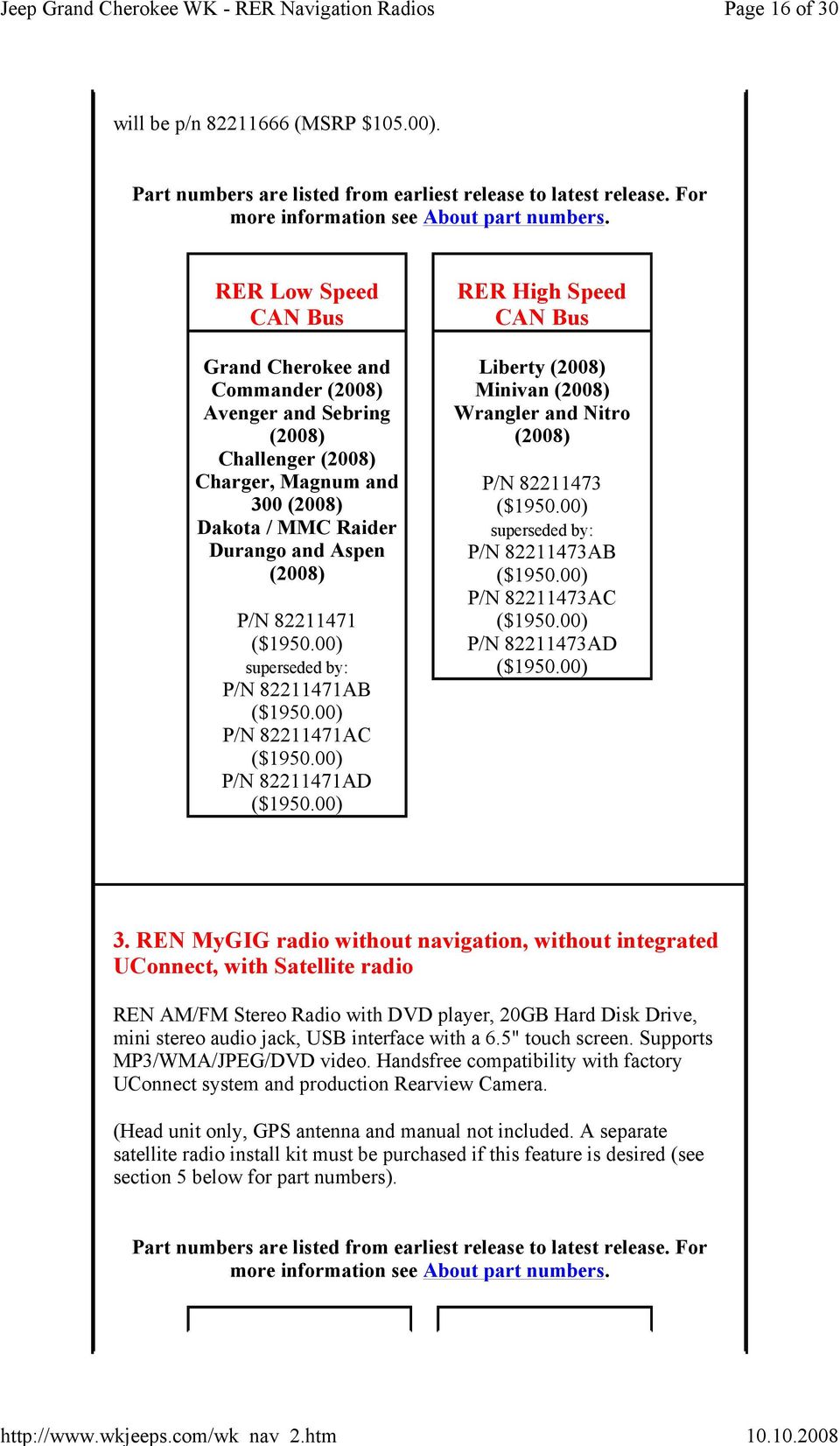
17 Page 17 of 30 REN Low Speed CAN Bus REN High Speed CAN Bus Grand Cherokee and Commander (2008) P/N AG P/N AH P/N AI P/N AJ P/N AK Journey (2009) P/N AE P/N AF P/N AG P/N AH P/N AI P/N AJ Avenger and Sebring (2008) P/N AH P/N AI P/N AJ P/N AK Caliber / Patriot (2009) P/N AB Charger, Magnum and 300 (2008) P/N AH P/N AI P/N AJ Minivan (2008) P/N AA P/N AD P/N AE P/N AF P/N AG (up to 3/08/08) P/N AH P/N AI P/N AJ P/N AL (after 4/21/08) Minivan (2009) P/N AB

18 Page 18 of 30 P/N AK Durango ( ) and Aspen (2008) P/N AF P/N AG P/N AH P/N AH P/N AI P/N AJ P/N AK Ram (2009) P/N AB Wrangler (2008) P/N AH P/N AI P/N AJ Aspen (2009) P/N AK 4. REN MyGIG radio without navigation, without integrated UConnect, without Satellite radio REN AM/FM Stereo Radio with DVD player, 20GB Hard Disk Drive, mini stereo audio jack, USB interface with a 6.5" touch screen. Supports MP3/WMA/JPEG/DVD video. Handsfree compatibility with factory UConnect system and production Rearview Camera. (Head unit only, without navigation, no accessories. Not compatible with satellite radio.) Part numbers are listed from earliest release to latest release. For more information see About part numbers.

19 Page 19 of 30 REN Low Speed CAN Bus REN High Speed CAN Bus Grand Cherokee and Commander (2008) P/N AH P/N AI P/N AJ P/N AK Journey (2009) P/N AF P/N AG P/N AH P/N AI P/N AJ Avenger and Sebring ( ) P/N AH P/N AI P/N AJ P/N AK Challenger (2009) P/N AB Minivan (2008) P/N AE P/N AF P/N AG (up to 3/08/08) P/N AH P/N AI P/N AJ P/N AL (after 4/21/08) Charger, Magnum and 300 (2008) P/N AH P/N AI P/N AJ P/N AK Ram (2009) P/N AB Wrangler (2008) P/N AH P/N AI

20 Page 20 of 30 Durango ( ) and Aspen (2008) P/N AJ P/N AF P/N AG P/N AH P/N AI P/N AJ P/N AK Aspen (2009) P/N AK 5. Satellite radio installation kits Mopar Sirius Satellite Radio installation kits are designed specifically for your vehicle. You will experience a new level of depth and content to radio listening which includes 100 channels of digital entertainment coast to coast; 60 commercial-free channels of music and 40 channels of news, sports and entertainment. Kits include antenna and wiring harness. Part numbers are listed from earliest release to latest release. For

21 Page 21 of 30 more information see About part numbers. Grand Cherokee and Commander (2008) Dakota (2008) Durango and Aspen (2008) Minivan (2008) P/N ($154.00) P/N AB ($154.00) Avenger and Sebring ( ) Charger, Magnum and 300 (2008) Journey (2009) Liberty (2008) P/N AB ($154.00) P/N AC ($154.00) Wrangler and Nitro (2008) P/N ($154.00) Item Version 6. Software and firmware updates for RER/REW radios: Since the MyGIG radios store the mapping software on the built-in hard drive, vehicles that come from the factory with the MyGIG radios no longer include a DVD navigation disc. Future upgrades will be released on either a CD (smaller updates) or DVD (major
22 Page 22 of 30 updates). All versions of the MyGIG releases are listed to the right. Changelogs for update v9.556: Bug fix radios stuck in Spanish or French (Wrangler) Bug fix radios stuck in Demo mode Changelogs for update v9.561: Disclaimer screen auto-off after 5- seconds iphone Uconnect support added Saves the Nav Prompt volume to 0 over an IGN cycle Fixes loss of SAT presets Changelogs for update v9.665: Graphics Accelerator for faster 3D map Overlay Sirius speed and flow on Map in three colors (red, yellow, green) Update of UConnect bluetooth drivers for Verizon phones Faster POI lookup Improved Software update process using CRC error check Changelogs for update v9.713: Enable Wrangler microphone for UConnect and Voice Recognition HDD firmware update to prevent Master Cylinder HDD corruption Able to play imported compressed music from same album in order of the track number Navigation data base improved update software SAT preset to new defaults Changelogs for update v9.807: Added more Bluetooth Compatible phones -Many new phones including Motorola Q) Human Machine Interface (HMI) - Improvements
23 Page 23 of 30 Moved JB (Juke Box) tab to FAVORITES under HDD New progress icon for downloading music Changed some POI icons on the map (removed yellow background) Added phone book download status icon under UConnect screen. Improved reliability of downloading Maps, Gracenote and application updates Added Alpha jump to HDD lists - The Alpha Jump feature allows you to search for your desired artist in the play list by pressing the first letter in the artists name on the touch screen.) New UConnect Functionality Support of Phone Book Download from compatible Bluetooth Hands Free Phones. A paired phone will automatically download phone numbers to the MyGIG address book. Radio provides Voice Recognition to all names in this download. User can manually store individual names to the permanent address book. As soon as the phone is connected via Bluetooth, the download of the phone book starts. Maximum of 1000 entries per phone will be downloaded. January 2007 Application version: NTG4_9.041 July 2007 Application version: NTG4_9.556 October 2007 Application version: NTG4_9.561 January 2008 Application version: NTG4_9.665 February 2008 Application version: NTG4_9.668 April 2008 Application version: NTG4_9.713 May 2008 Application version: NTG4_9.715 August 2008 Application version: NTG4_9.807 Real-time traffic, speed and flow feature receives traffic messages with the satellite radio receiver. This feature requires a subscription with Sirius to receive this service. Traffic flow information is fed to SIRIUS traffic by roadway sensors monitored and maintained by local Department of
24 Page 24 of 30 Transportation agencies. Transparent Green, Yellow and Red lines will indicate traffic speeds on supported major roads. Revised Vehicle Entertainment Screen (VES) - Includes an expanded audio, media and input source display enhancements. Major Bug fixes for 9.807: Acceptance Screen does not time out Additional phones supported for usage with HFM Audio glitches while playing DVD audio disc Audio mutes CD/DVD mode locks up Default state icon missing Disc stuck in radio Display does not open until after hitting the Open/Close button several times Displays barely discernable when radio manual set to dim level 1 Guidance prompt does not remain ON/OFF in same state after key cycle IPhone cannot connect Left Speaker permanently muted after Adaptive Cruise Control Warning Navigation displaying upcoming turn as current turn Point on map feature inaccurate Preset alternating between 1 and 12 Preset stations do not recognize driver 1 or driver 2 recalls Presets skipped when using remote Radio allows LW to be selected (REP radio) Radio displays Module Failure Radio does not go past the Navigation is being activated. Screen, music on the hard drive cannot be accessed, and capacity of the hard drive shows 0 Radio does not return to normal mode after disconnecting from
25 Page 25 of 30 Hands-free call Radio is stuck in Demo Mode SDARV channel list not displayed SDARV seek function inop Status bar not displayed Steering wheel radio switches not functional for HFM volume Traffic information (speed and flow) and traffic incident icons slowly disappear from screen Unable to change language Using hands free feature, near and far end cannot be heard VES plays HDD files in random order Viewing DVD through the radio display appears distorted Volume level of guidance prompt does not stay VR button does not work while in Smart Accessory Mode VR not available while in AUX mode Note: ipod support is only available today through Model Year 2009 radios via a serial port out the back of the radio. It is not currently an upgrade for Model Year 2007 and 2008 radios. 7. Software and Firmware updates for REN/REZ radios: Updates are released on CDs. The latest versions of the MyGIG software are listed to the right. October 2007 Application version: NTG4_9.004 March 2008 Application version: NTG4_ Software and Firmware updates for REP radios: Updates are released on CDs. The latest versions of the MyGIG software are listed to the right. March 2008 Application version: REP_9.303 August 2008 Application version: REP_9.xxx 9. Gracenote software updates for all MyGIG radios: February 2008
26 Page 26 of 30 Updates are released on DVDs. The latest versions of the MyGIG Gracenote software are listed to the right. Application version: Gracenote: v Factory replacement GPS antenna P/N AB ($37.60) (2008 Grand Cherokee/Commander) P/N AA ($51.45) (2008 Charger, Magnum, 300, Dakota, minivans) P/N AB ($43.00) (2008 Challenger) P/N AA ($51.75) (2008 Durango/Aspen) P/N AA ($51.45) (2009 Journey) P/N AB ($51.45) (2008 Liberty) P/N AB ($51.45) ( Nitro) P/N AA ($43.85) (2008 Sebring/Stratus) P/N AA ($40.85) ( Wrangler) P/N AA (RER) ($16.70) 11. USB port door P/N AA (REW) ($16.70) P/N AA (REN) ($23.00) P/N AA (REZ) MyGIG model RER owner's manual PDF (193-pages, MB) 12. MyGIG owner's manuals MyGIG model RER quick tips PDF (2-pages, 837kb) MyGIG model REN owner's manual PDF (96-pages, MB) Note: Prices listed above are for reference purposes only and may vary by dealer. Parts are not available from this web site Tips on buying a new or used navigation unit
27 Page 27 of 30 online from ebay or from non-authorized dealers If you are buying a navigation unit online from a non-authorized dealer note that you will NOT have a factory warranty. It is important to buy from a trusted source with excellent references, some of which offer their own warranty. Be sure that in addition to the radio that you receive the correct navigation antenna, latest navigation disc and owner's manual. Assure that the seller will provide a non-doa or longer guarantee, and that the unit will be carefully packaged. The largest seller of Chrysler/Dodge/Jeep navigation radios, parts and accessories on Ebay is mr.cd1. In addition to a nice selection of navigation radios, mr.cd1 carries the latest issue navigation discs as well as a wide assortment of different adaptor cables and other navigation related parts. A warranty is offered for most items. Click Here to see mrcd1's latest list of offerings. You can also send mr.cd1 an [email protected]. Mention this web site for an additional discount on selected navigations radios and parts. WKJeeps.com website Premier Sponsor Discount Jeep Parts and Accessories shipped worldwide MyGIG Troubleshooting For safety, some features (video playback, some parts of the address book, and the keyboard to enter information) are locked out when the vehicle is in motion. Drivers can use the voice recognition feature, however. The voice recognition system is designed to work with the windows up, the HVAC fan on Off or Low, and the user speaking in a normal tone. It will not work as well if the windows are down, the fan is on high, or if the driver speaks in low tones. If the voice recognition system has trouble understanding a user, he/she can train it using a short procedure. See the navigation Owner s Manual. MyGIG radios designed for a high-speed electrical bus will not work on a vehicle with a low-speed bus, and vice versa. (Nothing will be damaged, but the system will not work.)
28 Page 28 of 30 The use of a StarSCAN to retrieve and change additional radio settings may be required. For example, if a vehicle s backup camera does not display, the radio may not know that the vehicle has a camera. Conversely, if the radio thinks there s a backup camera when there isn t, the screen may display static when the vehicle is put into reverse. Emergency eject of stuck discs - Homemade CD-Rs or DVD- Rs that were poorly formatted may confuse the system, causing the disc to become jammed. On radios with software version or later, you can force the disc to eject using a combination of keys. First make sure the display is open. Then, for an RER radio, hold the NAV button while pressing SEEK UP and SEEK DOWN at the same time. For an REN radio, hold the AUDIO button while pressing SEEK UP and SEEK DOWN at the same time. If discs frequently jam, using high quality media and better burning software to create the discs may solve the problem. If the navigation system shows the wrong current location, use the Nav menu and make sure that the radio is receiving at least four satellites. Then drive the vehicle on main roads (which are more likely to be in the database) until the current location is correctly shown. This usually takes no more than 30 seconds, but it can require as long as 20 minutes. Once the current location is accurate, the problem should not reoccur unless the vehicle is transported while not operating (on a ferry, railroad car, transport truck, etc.). If it does reoccur, repeat the procedure. Owners who plug an external device such as an MP3 player into the AUX jack should remember that both volume controls, on the radio and on the device itself, will affect the sound level. If Radio presets do not seem to save on radio, please confirm that the following process is being performed: When listening to the selected station in AM/FM modes, - Press and hold the desired preset soft key on the right side of the display. - Keep holding the preset until the preset goes through a color change of green, then yellow. Once the selected preset turns yellow, the current station/frequency will be saved. Note: Mopar IPOD kits - Satellite radio station presets are lost when switching from the IPOD mode to satellite radio mode. Error messages:
29 Page 29 of 30 Module Failure message displays when trying to use satellite mode. Usually caused by an electrical short in the SDAR antenna, not the radio. This appears to be most common on Durango and Aspen. The SDAR antenna cable is usually the source of the problem. Check behind Driver's A-Pillar trim for possible pinched antenna cable and or loose and or bent pin at the back of the radio. "Module failure" message does not indicate the need to replace the radio. "Navigation is being activated" message may appear momentarily when the radio is first turned on and in the navigation mode. This is normal while GPS satellites are being located. If message does not go away after driving on main roads for a few minutes, push the Menu button on the radio and select "System Set Up", and then "System Info". Check for "Tag Not Found" or "Not applicable" messages described below. "Tag Not Found" - Displayed on navigation information page. Critical error, radio must be replaced due to internal HDD failure. "Not applicaple/na msg" - Displayed in Gracenote area. Critical error, radio must be replaced (non-navigation REN models). "EMERGENCY UPDATE/ERROR(256): failed to flash update ifs" - Error when updating software. Disconnect battery negative terminal (or radio power) for one hour or longer. Restore power, disc should read properly and complete update. MyGIG current known issues When travelling on non-gps authenticated roads, the RER radio Navigation distance to the next turn is actually the straight line distance to the next proximate GPS-authenticated road. This issue was corrected with software release 9.713, April Occasionally upon ignition key on the RER Radio the DVD control is locked up and disc cannot be played. This issue was corrected with software release 9.713, April RER Radio automatically previews navigation route when selecting navigation mode and entering a route. This issue was corrected with software release 9.713, April 2008.
30 Page 30 of 30 Pairing issues with phones such as the Motorola V3m. New drivers to correct this issue became available with software release 9.713, April Hard Start/No Start Due to Weak Battery - This may be caused by the radio not powering down properly and keeping the communication buss awake causing a parasitic battery draw. Applies to 2008 vehicles equipped with a MYGIG radio (sales code REN, REP, RER, REW or REZ) built before February 8, See TSB MyGIG Engineering Mode screens Home Main menu
Charger / Magnum, Grand Caravan, Avenger, Nitro, (Journey and Caliber 2009 only) Chrysler:
 MyGIG Multimedia System with GPS Navigation Detailed Information Availability 2008-09 Model Year Vehicles Dodge: Charger / Magnum, Grand Caravan, Avenger, Nitro, (Journey and Caliber 2009 only) Chrysler:
MyGIG Multimedia System with GPS Navigation
 MyGIG Multimedia System with GPS Navigation Detailed Information Availability 2008-09 Model Year Vehicles Dodge: Charger / Magnum, Grand Caravan, Avenger, Nitro, (Journey and Caliber 2009 only) Chrysler:
THE witech SOFTWARE IS REQUIRED TO BE AT THE LATEST RELEASE BEFORE PERFORMING THIS PROCEDURE.
 NUMBER: GROUP: 08-053-16 REV. B Electrical DATE: May 19, 2016 This bulletin is supplied as technical information only and is not an authorization for repair. No part of this publication may be reproduced,
THE witech SOFTWARE IS REQUIRED TO BE AT THE LATEST RELEASE BEFORE PERFORMING THIS PROCEDURE.
 NUMBER: 08-054-16 GROUP: Electrical DATE: April 29, 2016 This bulletin is supplied as technical information only and is not an authorization for repair. No part of this publication may be reproduced, stored
REC FIM LOCKPICK INSTALLATION OPTIONS
 REC FIM LOCKPICK INSTALLATION OPTIONS TM PLUG INTO RADIO PLUG WHITE CONNECTOR INTO RADIO PLUG AND PLAY RADIO CONNECTORS UNPLUG ORIGINAL RADIO GRAY CONNECTOR THEN PLUG IN HERE AFTERMARKET FRONT CAMERA VIDEO
THE witech SOFTWARE LEVEL MUST BE AT RELEASE 12.02 OR HIGHER TO PERFORM THIS PROCEDURE.
 NUMBER: 08-019-12 GROUP: Electrical DATE: March 27, 2012 This bulletin is supplied as technical information only and is not an authorization for repair. No part of this publication may be reproduced, stored
MyGIG Frequently Asked Questions
 Page 1 of 7 MyGIG Frequently Asked Questions Q: How do I find the software versions of my MyGIG Radio? A: Press the Menu button on the right side of the radio. Press the System Setup on screen button.
OVERVIEW: This bulletin involves inspecting and updating the radio software, if required.
 NUMBER: 08-072-15 GROUP: Electrical DATE: July 16, 2015 This bulletin is supplied as technical information only and is not an authorization for repair. No part of this publication may be reproduced, stored
INSTRUCTIONS Please read all instructions carefully before using
 Car Multimedia System XM-2DTSB79 AUX IR MIC RESET USB INSTRUCTIONS Please read all instructions carefully before using Touch calibration If touch calibration error occurs, you can adjust the touch coordinate
GEN 5 LOCKPICK INSTALLATION POSSIBILITIES
 EVEN IF YOU ALREADY HAVE A FACTORY REAR VIEW CAMERA THE GEN 5 MAKES IT EASY TO ADD A FRONT OR BABY CAM ** INCLUDED CONNECTION FOR AFTERMARKET CAMERA(S) OR ANY STANDARD VIDEO INPUT IF REAR CAMERA, CONNECT
Getting to Know Xsight... 3. Home Screen and Everyday Use... 9. Settings... 11. PC Setup... 17. 2 www.oneforall.com
 User Manual English English Getting to Know Xsight........................................ 3 Unpacking and Setting Up Xsight............................................................. 3 Using Xsight
Blue&Me. Live life while you drive. What you can do: Introduction. What it consists of:
 Blue&Me Live life while you drive Introduction Blue&Me is an innovative in-car system that allows you to use your Bluetooth mobile phone and to listen to your music while you drive. Blue&Me can be controlled
Bluetooth Operation. In - Dash Navigation Radio
 Bluetooth Operation In - Dash Navigation Radio Introduction Congratulations on your purchase of the In-Dash Navigation Radio. Please read the instruction manual for this product before using. The documentation
S4 USER GUIDE. Read Me to Get the Most Out of Your Device...
 S4 USER GUIDE Read Me to Get the Most Out of Your Device... Contents Introduction 4 Remove the Protective Cover 5 Charge Your S4 5 Pair the S4 with your Phone 6 Install the S4 in your Car 8 Using the Handsfree
Owner s Manual AWM910 JENSEN AWM910 COMPACT DISC PLAYER RADIO CD COMPACT MUSIC SYSTEM MUTE AUX BAND AUX IN PUSH PUSH PWR VOL ALARM T/F AUD SPK A SPK B
 AWM910 Owner s Manual COMPACT DISC PLAYER PUSH 1 2 3 4 5 6 RPT SCAN RDM H M PUSH PWR VOL ALARM SET ON/OFF EQ T/F AUD RADIO CD COMPACT MUSIC SYSTEM MUTE AUX BAND CD AUX IN A B A+B JENSEN AWM910 Thank You!
UVO SYSTEM QUICK REFERENCE GUIDE
 UVO SYSTEM QUICK REFERENCE GUIDE Congratulations on the Purchase of your new UVO system! Your new UVO system allows you to enjoy various audio and multimedia features through the main audio system. For
UconnectTM USER S MANUAL
 UconnectTM USER S MANUAL SECTION TABLE OF CONTENTS PAGE 1 INTRODUCTION...3 2 Uconnect Phone...7 3 Uconnect Multimedia - Video Entertainment System (VES)...41 4 Voice Command...95 1 2 3 4 CONTENTS INTRODUCTION
NUMBER: 08-050-13. DATE: July 11, 2013. SUBJECT: RE2 RE3 RE6 RB4 RB5 RB6 Radio Enhancements
 NUMBER: 08-050-13 GROUP: Electrical DATE: July 11, 2013 This bulletin is supplied as technical information only and is not an authorization for repair. No part of this publication may be reproduced, stored
Smart Music Control Application CONTENTS. Smart Music Control Application. User Guide CONTENTS 1 GETTING STARTED 1 MEDIA PLAYER MODE 1
 Smart Music Control Application JVC KENWOOD Corporation Smart Music Control Application User Guide CONTENTS CONTENTS 1 GETTING STARTED 1 How to Install Smart Music Control App 1 Preparing the Music Player
UCONNECT VOICE COMMANDS QUICK GUIDE
 UCONNECT VOICE COMMANDS QUICK GUIDE For Uconnect 4.3/RHA, Uconnect 4.3S/REB, Uconnect 8.4/RE2 and Uconnect 8.4N/RB5 how to speak uconnect With this quick guide of commands and tips you ll be speaking your
Tiny Audio C3. English TINY AUDIO C3. Please read carefully before using this product
 English TINY AUDIO C3 Please read carefully before using this product 1 Safety Instructions: 1. Do not use this radio near water. 2. Clean with dry cloth. 3. Do not block any ventilation openings. 4. Do
BLU Vivo 4.3 User Manual
 BLU Vivo 4.3 User Manual 1 Table of Contents Phone Safety Information... 3 Appearance and Key Functions... 4 Installation and Charging... 5 Phone Operation... 7 Communication... 10 Camera... 11 Gallery...
HANDS FREE COMMUNICATION (UConnect ) IF EQUIPPED
 UConnect Hands Free Communications- Complete Instructions HANDS FREE COMMUNICATION (UConnect ) IF EQUIPPED UConnect is a voice-activated, hands-free, in- vehicle communications system. UConnect allows
Installation & Operation Manual HANDS-FREE BLUETOOTH MEDIA INTEGRATION KIT. Perfect for ANDROID TM
 GET CONNECTED Installation & Operation Manual HANDS-FREE BLUETOOTH MEDIA INTEGRATION KIT TranzIt BLU HF ISFM2351 Perfect for ANDROID TM Note to Readers, The information contained within the following documentation
ALL-NEW MAZDA3 CONNECTIVITY QUICK START GUIDE
 ALL-NEW MAZDA3 CONNECTIVITY QUICK START GUIDE 1 MZD-CONNECT INFOTAINMENT SYSTEM For more information on any of the topics covered in this guide as well as detailed how-to guides for most functions please
Kanguru Micro MP3 PRO USB2.0 User s Manual
 Kanguru Micro MP3 PRO USB2.0 User s Manual MP3/WMA Player + Digital Voice Recorder FM Tuner + USB Flash Drive Copyright 2005, All Rights Reserved. This manual applies to 1.1 or later versions of the Kanguru
Parrot MKi9000. User guide
 Parrot MKi9000 User guide Contents Contents... 2 Installation... 3 Before you begin... 3 Checking the car configuration... 3 Caution... 3 Removing the car stereo... 3 Installing the kit... 4 Car stereo
Portable media PORTABLE MEDIA PORTABLE MEDIA CONNECTIONS
 Portable media PORTABLE MEDIA Do not adjust the auxiliary device or allow the device to distract the driver while the vehicle is moving. Driver distraction can lead to accidents causing serious injury
Lenovo Miix 2 8. User Guide. Read the safety notices and important tips in the included manuals before using your computer.
 Lenovo Miix 2 8 User Guide Read the safety notices and important tips in the included manuals before using your computer. Notes Before using the product, be sure to read Lenovo Safety and General Information
DAB1001. Wireless Digital Radio Interface. Installation & User Guide
 DAB1001 Wireless Digital Radio Interface Installation & User Guide Contents Contents... 2 Introduction... 3 Contents of Package... 4 Installation... 5 Product Overview... 5 Installation Procedure... 5
CONNECTIVITY QUICK START GUIDE
 CONNECTIVITY QUICK START GUIDE MZD-CONNECT 1 MZD-CONNECT INFOTAINMENT SYSTEM The MZD-Connect system is divided into five sections as displayed on the Home screen. The Home screen can be accessed at any
Dealer Service Instructions for: Safety Recall F50 Reprogram ABS Control Module
 Dealer Service Instructions for: Safety Recall F50 Reprogram ABS Control Module February 2007 Models 2007 (LX) Chrysler 300, Dodge Charger and Magnum - built from September 7, 2006 through Novermber 18,
Pioneer AVIC Z140BH and AVIC X940BT firmware update (v4.600) for iphone with Lightning connector compatible with AppRadio Mode
 Pioneer AVIC Z140BH and AVIC X940BT firmware update (v4.600) for iphone with Lightning connector compatible with AppRadio Mode Update instructions for navigation models: AVIC-Z140BH and AVIC-X940BT Download
GROM Interface Installation into Nissan and Infiniti cars using NIS02 vehicle specific harness
 GROM Interface Installation into Nissan and Infiniti cars using NIS02 vehicle specific harness Tools needed 1. Panel trim removal tool (optional) 2. Philips screwdriver Picture 1: NIS02 vehicle specific
itunes Basics Website: http://etc.usf.edu/te/
 Website: http://etc.usf.edu/te/ itunes is the digital media management program included in ilife. With itunes you can easily import songs from your favorite CDs or purchase them from the itunes Store.
Touch 2 Touch 2 with Go Touch 2 with Go Plus. Quick reference guide
 Touch 2 Touch 2 with Go Touch 2 with Go Plus Quick reference guide Simple. Intuitive. User friendly. Toyota Touch 2 multimedia system delivers information, and entertainment inside your Toyota vehicle
Dension BTA1500 Bluetooth Module
 USER MANUAL Dension BTA1500 Bluetooth Module DEBTA-9201-2 1 www.dension.com USER MANUAL - BTA1500 Contents 1. Introduction... p.2 2. Useful Information... p.2 3. Package contents... p.3 4. Car compatibility...
Fit Clip Plus Portable Media Player
 Fit Clip Plus Portable Media Player User Guide BL 8GB Thank you for purchasing a Fit Clip Plus Portable Media Player! To get the most out of your Fit Clip Plus, please read this entire user guide carefully.
Get started. Issue 1
 Get started Issue 1 2008 Nokia. All rights reserved. Nokia, Nokia Connecting People, Nseries, N85, Navi, and Nokia Care are trademarks or registered trademarks of Nokia Corporation. Other product and company
AM/FM/CD/MP3 Receiver with USB/SD & A u xiliary Input 3 Built-in Microphone inputs for P A Announcements. Installation/Operation Manual
 AM/FM/CD/MP3 Receiver with USB/SD & A u xiliary Input 3 Built-in Microphone inputs for P A Announcements Installation/Operation Manual 50W x 4 CD-2000 CONTROLS AND INDICATORS (1) Power Button (2) Volume/Select
Contents. 5. Navigating the Software Menus 25 The Basics 25 Diagrams of Top Level Sub Menus 27. 6. Tips and Troubleshooting 34
 Contents 1. Quick Start 1 Features 1 What You Need to Begin 2 Installing the Battery 2 The Basic Controls 3 Play Music 5 Listen to the FM Radio 7 Voice recording 8 Headphone/Earphone 9 2. Playing Music
HP Advanced Wireless Docking Station. User Guide
 HP Advanced Wireless Docking Station User Guide Copyright 2014, 2015 Hewlett-Packard Development Company, L.P. Intel is a trademark of Intel Corporation in the U.S. and other countries. Windows and Windows
nüvi 1400 series quick start manual
 nüvi 1400 series quick start manual for use with these nüvi models: 1410, 1490 2009 Garmin Ltd. or its subsidiaries April 2009 190-01073-01 Rev. A Printed in Taiwan Looking at Your nüvi See the Important
The Parts of the System
 2 The Parts of the System THE RECEIVER THE RECEIVER FRONT PANEL Power Light This green light on the receiver front panel lights up when the receiver is turned ON. This light flashes when the receiver memory
Eclipse 180 User s Manual
 Eclipse 180 User s Manual Congratulations on purchasing your Eclipse Personal Media Player! To get the most out of your purchase, please take the time to carefully read through this manual. Foreword If
Bluetooth Module Car Kits
 Bluetooth Module Car Kits YT-BTM User Manual English I Product Introduction YATOUR Bluetooth Module Car Kits (hereinafter referred to as YT- BTM ) should be used with YATOUR Digital Music Changer or YATOUR
Table of Contents. System Requirement of MP3 Player:... 4. Connection and Downloading... 7. Downloading DRM10 Files... 8.
 Table of Contents Instructions... 1 Precautions... 2 System requirements... 4 System Requirement of MP3 Player:... 4 Introduction... 5 Features... 5 Charging the Battery... 6 Connection and Downloading...
BCS1 Bluetooth Aux Car Adapter Kit
 BCS1 Bluetooth Aux Car Adapter Kit Table of Contents Introduction 3 What s In the Box? 4 Controls and Indicators 5 Installation 6 Pairing Your Phone 14 Operation 15 Troubleshooting 24 Safety Warnings 25
Hi, let s get started. Sound Rise Wireless Speaker & Alarm Clock
 Hi, let s get started. Sound Rise Wireless Speaker & Alarm Clock Welcome to your new Sound Rise! We created Sound Rise for music lovers like you. Start the day with your favorite tunes, rock out while
HP Bluetooth Pendant Headphones User Guide
 HP Bluetooth Pendant Headphones User Guide Copyright 2008 Hewlett-Packard Development Company, L.P. Windows and Windows Vista are either trademarks or registered trademarks of Microsoft Corporation in
ABOUT YOUR SATELLITE RECEIVER
 2 Satellite Receiver ABOUT YOUR SATELLITE RECEIVER This chapter gives you an overview and a description of your satellite receiver. SATELLITE RECEIVER OVERVIEW SINGLE AND DUAL MODES REMOTE CONTROL SATELLITE
SPH-DA120. English. Operation Manual. Smartphone Receiver
 Operation Manual Smartphone Receiver SPH-DA120 Notice to all users: This software requires that the product is properly connected to your vehicle s parking brake and depending on your vehicle, additional
MVS - Mini Video Speaker
 MVS - Mini Video Speaker Mini Clock Radio Night Vision Hidden Camera User Manual Spy Tec www.spytecinc.com GETTING STARTED Components Features Powering Up the Device Micro SD Memory Card for Data Storage
CLASSROOM TECHNOLOGY GUIDE
 Media Services/Instructional Technology Support Services Waymon L. Hickman Building, Room 131 1665 Hampshire Pike Columbia, TN 38401 CLASSROOM TECHNOLOGY GUIDE Bob Trybalski, Coordinator [email protected]
A6210 WiFi USB Adapter 802.11ac USB 3.0 Dual Band User Manual
 802.11ac USB 3.0 Dual Band User Manual August 2014 202-11373-01 350 East Plumeria Drive San Jose, CA 95134 USA Support Thank you for selecting NETGEAR products. After installing your device, locate the
PART 1. Using USB Mixer with a Computer
 PART 1. Using USB Mixer with a Computer Universal Serial Bus Mixers The USB mixer is equipped with either one or two USB ports that allow you to play and record audio directly from your computer! Just
Infotainment Manual Model Year 2015 Edition: March 2014 KTA-2701/5-VX-en. VAUXHALL Movano
 Infotainment Manual Model Year 2015 Edition: March 2014 KTA-2701/5-VX-en VAUXHALL Movano 0-1 Infotainment Manual Model Year 2015 Edition: March 2014 KTA-2701/5-VX-en Contents Introduction... 2 Radio...
i399 2.1 Channel HiFi Audio System w/ BluePin Technology
 i399 2.1 Channel HiFi Audio System w/ BluePin Technology It is 2.1 channel ipod docking audio system with built-in woofer. It comes with a detachable BluePin. BluePin is a combination of Bluetooth TX and
Navigation System. if equipped
 Navigation System if equipped Table of Contents Introduction 5 System introduction 5 Driving restrictions 6 What is SYNC? 7 Safety information 8 How to get going 8 System overview 14 Map display options
User Manual 9.7 Tablet Android 4.0
 User Manual 9.7 Tablet Android 4.0 1 Welcome...3 Important Notices...3 Keys and Functions...4 I. Getting Started...5 1.1 Turn on/off...5 1.1.1 Turn on...5 1.1.2 Turn off...5 1.2 Lock/unlock the screen
Performance Pages: Challenger/Charger/300... 1 Downloading Timers Data... 4. Give it a Try!... 9
 PERFORMANCE PAGES Contents Performance Pages: Challenger/Charger/300... 1 Downloading Timers Data... 4 Give it a Try!... 8 Requirements... 8 Disclaimers... 8 Tips... 9 FAQs... 9 SRT Performance Pages:
MAX ENERGY POWER PROGRAMMER PART #52001/52501 REFERENCE GUIDE AND INSTALLATION MANUAL ADDENDUM 2007-2010 JEEP WRANGLER WITH ENHANCED OFF-ROAD FEATURES
 MAX ENERGY POWER PROGRAMMER PART #52001/52501 REFERENCE GUIDE AND INSTALLATION MANUAL ADDENDUM 2007-2010 JEEP WRANGLER WITH ENHANCED OFF-ROAD FEATURES The following is a step by step guide for installing
RETAINS STEERING WHEEL CONTROLS, SYNC MEDIA PLAYER, SYNC BLUETOOTH AND MORE!
 Owner's Guide FOR1 & Kenwood radio RETAINS STEERING WHEEL CONTROLS, SYNC MEDIA PLAYER, SYNC BLUETOOTH AND MORE! PRODUCTS REQUIRED idatalink Maestro RR Radio Replacement Interface FOR01 Installation Harness
DSB-100 Portable Premium Bluetooth Speaker Owner s Manual
 . DSB-100 Portable Premium Bluetooth Speaker Owner s Manual You can print more than one page of a PDF onto a single sheet of paper. 1 Index Preparation Unpacking 3 Overview 4 Sound Quality 4 Design 4 Operation
Audio & Communications
 Audio & Communications Model R171 287 HO 02 Audio & Communications (CrullG) 08-02-04 1 Objectives At the end of this session, you will be able to: 1. Properly connect the microphones to Tele Aid and Cell
Jabra FREEWAY. User manual. www.jabra.com
 Jabra FREEWAY User manual www.jabra.com CONTENTS THANK YOU...2 ABOUT YOUR...2 WHAT YOUR SPEAKERPHONE CAN DO...3 GETTING STARTED...4 CHARGE YOUR SPEAKERPHONE...4 TURNING YOUR SPEAKERPHONE ON AND OFF...5
Premium Design Phone with Smartphone Connect
 Smartphone Connect App Guide Premium Design Phone with Smartphone Connect Model No. KX-PRW130 Thank you for purchasing a Panasonic product. This document explains how to use the Smartphone Connect app.
TR7322U-OR RDS / MP3-USB TUNER (24 Volt)
 www.vdo.com TR7322U-OR RDS / MP3-USB TUNER (24 Volt) OWNER'S MANUAL Safety Information Safety Information Thank you for purchasing this product, please read the manual carefully before operating, and reserve
Table of Contents Function Keys of Your RF Remote Control Quick Setup Guide Advanced Features Setup Troubleshooting
 Congratulations on your purchase of the AT&T U-verse TV Point Anywhere RF Remote Control. This product has been designed to provide many unique and convenient features to enhance your AT&T U-verse experience.
Installation Instructions
 AUX Chapter 1 Getting Started Installation Instructions 1.1 Subject The GROM an integration between an MP3 player and a factory installed car stereo. Equipped with the specific vehicle harness and standard
Porsche Classic. Radio navigation system
 Porsche Classic Radio navigation system The latest technology in a classic car? Yes, because it s a Porsche. The Porsche Classic radio navigation system. The new Porsche Classic radio navigation system
User Manual 7" Tablet Android 4.1 Model: S3
 User Manual 7" Tablet Android 4.1 Model: S3 Welcome...3 Important Notices...3 Keys and Functions...4 I. Getting Started...4 1.1 Turn on/off...4 1.1.1 Turn on...4 1.1.2 Turn off...5 1.2 Lock/unlock the
Point of View SmartTV-500 Center - Android 4.2. General notices for use...2 Disclaimer...2 Box Contents...2
 Point of View SmartTV-500 Center - Android 4.2 English Table of Contents General notices for use...2 Disclaimer...2 Box Contents...2 1.0 Product basics...3 1.1 Buttons and connections... 3 1.2 Connecting
Mbox Basics Guide. Version 6.7 for LE Systems on Windows XP or Mac OS X. Digidesign
 Mbox Basics Guide Version 6.7 for LE Systems on Windows XP or Mac OS X Digidesign 2001 Junipero Serra Boulevard Daly City, CA 94014-3886 USA tel: 650 731 6300 fax: 650 731 6399 Technical Support (USA)
M3 User Manual Tablet Android 4.1
 M3 User Manual Tablet Android 4.1 Welcome... 2 Important Notices... 3 Keys and Functions... 4 I. Getting Started... 5 1.1 Turn on/off...5 1.1.1 Turn on... 5 1.1.2 Turn off... 5 1.2 Lock/unlock the screen
Multimedia. User Guide
 Multimedia User Guide Copyright 2006 Hewlett-Packard Development Company, L.P. Microsoft and Windows are U.S. registered trademarks of Microsoft Corporation. The information contained herein is subject
DAB+P Smart DAB Radio Receiver Quick Start Guide
 DAB+P Smart DAB Radio Receiver Quick Start Guide v.1.1 DBP-9201-2 INTRODUCTION The Dension DAB+P device is a universal solution for listening to your favorite DAB (Digital Audio Broadcast) stations everywhere
Mirror Mount Video Monitor/Recorder with Front and Rear View Night Cameras PLCMDVR5
 Mirror Mount Video Monitor/Recorder with Front and Rear View Night Cameras PLCMDVR5 www.pyleaudio.com Instruction Manual Installation and Connection: 1. Please disconnect your car battery. 2. In the contents
Using AORUS Notebook for the First Time
 V2.0 Congratulations on your purchase of the AORUS Notebook! This Manual will help you to get started with setting up your notebook. For more detailed information, please visit our website at http://www.aorus.com.
Parrot Zikmu by Starck. User guide
 Parrot Zikmu by Starck User guide Contents Getting started... 4 Installation... 4 Installation... 4 Maintenance and precautions... 5 Commands... 5 Turning the speakers on / off... 5 Selecting an audio
>> smart cross connect Users Guide. November 2014.
 >> smart cross connect Users Guide November 2014. >> Table of Contents 1 Overview 1.1 Getting Around 1.2 Pairing your smart with smart cross connect 2 In-Car Mode 2.1 Car Info 2.2 Navigation 2.2.1 Addresses
Thank you for purchasing the Mobile WiFi. This Mobile WiFi brings you a high speed wireless network connection.
 Quick Start Thank you for purchasing the Mobile WiFi. This Mobile WiFi brings you a high speed wireless network connection. This document will help you understand your Mobile WiFi so you can start using
HP USB Digital/Analog TV Tuner. User Guide
 HP USB Digital/Analog TV Tuner User Guide Copyright 2008 Hewlett-Packard Development Company, L.P. Windows and Windows Vista are U.S. registered trademarks of Microsoft Corporation. The information contained
Quick Connection and Setup Guide
 3-300-262-13(1) Read this first Quick Connection and Setup Guide Quick start guide to main features GB HDD Network Audio System NAS-SC55PKE 2008 Sony Corporation Printed in Malaysia Table of Contents Checking
User Guide USB 2.0 LAPTOP DOCKING STATION WITH VIDEO N2953
 USB 2.0 LAPTOP DOCKING STATION WITH VIDEO 410-1864-001B / ACP51US 1 YEAR LIMITED WARRANTY: We pride ourselves on the quality of our products. For complete warranty details and a list of our worldwide offices,
Step By Step Guide To Setting Up Your System
 www.kenwood-electronics.co.uk/vw Kenwood Navigation Systems DNX525DAB Keep up-to-date with the latest software by registering today. Registrate your system on Kenwood s website to receive notifications
Equipment Guide Human Resources Training Room Suite 205, Building 3377
 Equipment Guide Human Resources Training Room Suite 205, Building 3377 Equipment For technical help with running the equipment please contact HR Training at 4-8534. The room is equipped with: 1. A ceiling-mounted
FMT600BT Transmitter
 Technaxx FMT600BT Transmitter User Manual Transfer of music and calls directly from your Bluetooth device to your car radio This device complies with the requirements of the standards referred to the Directive
SMART Board User Guide for Mac
 SMART Board User Guide for Mac What is it? SMART Board is an interactive whiteboard available in an increasing number of classrooms at the University of Tennessee. While your laptop image is projected
mini box User s Manual
 mini box User s Manual Version. Updated: 0/0/4 04 Cox Communications, Inc. Table of Contents Chapter : Introduction... About This Manual... Chapter : Installing & Activating Your mini box... 4 Connecting
e-4 AWT07MLED 7 Q TFT LCD MONITOR (LED Backlighted) USER MANUAL
 Thank you for purchasing our product. Please read this User s Manual before using the product. Change without Notice AWT07MLED 7 Q TFT LCD MONITOR (LED Backlighted) USER MANUAL e-4 SAFETY PRECAUTIONS Federal
How To Use A Magistrate Desktop Computer
 Windows 7 Tips and Tricks 2013 Fall Magistrates Conference (This page left blank) Magistrate Laptops Page 2 Purpose: Magistrates desktop computers are being replaced with a laptop, external monitor, docking
Connections and Setup
 9242_14_Ch12_eng 6/11/07 9:36 AM Page 1 Connections and Setup HOW TO CONNECT YOUR SATELLITE RECEIVER Do you have a handful of cables and a head full of questions? This chapter is the perfect place to find
Media Technology Services Classroom Equipment Guide
 Media Technology Services Classroom Equipment Guide 412 268-8855 www.cmu.edu/computing/mediatech [email protected] JULY 2010 Large Classroom Media Technology Our Services Media Technology Services (MediaTech),
F-Series Desktop User Manual F20. English - Europe/New Zealand
 F-Series Desktop User Manual F20 en English - Europe/New Zealand Contents Key to icons and text...3 What is F-Series Desktop?...4 How do I install F-Series Desktop onto my computer?...4 How do I subscribe
Lenovo IdeaCentre Q180 Series
 Machine type: 10087/3110 Lenovo IdeaCentre Q180 Series User Guide Version 1.0 2011.09 31500665 Important Safety Information Before using this manual, it is important that you read and understand all of
Hello! Let s get started.
 Hello! Let s get started. What s in the Box Roku player Enhanced remote control 2 x AA batteries for remote A/V Cable Power adapter Get to know your roku B A Front view C D G Back view E F H A B C D E
MULTIMEDIA SYSTEM USER S MANUAL RBZ
 MULTIMEDIA SYSTEM USER S MANUAL RBZ MULTIMEDIA CONTENTS Safety Guidelines... 3 Introduction... 4 Warnings... 4 Safety References... 4 Intended Use... 4 System Care... 4 General Handling... 7 User Interface
STEREO BLUETOOTH WIRELESS HEADPHONES
 STEREO BLUETOOTH WIRELESS HEADPHONES model: AF32 USER MANUAL part of the series PACKAGE CONTENTS Runaway AF32 Stereo Bluetooth Wireless Headphones Charging cable (USB 3.5mm) Stereo audio cable (3.5mm 3.5mm)
Jabra CRUISER2. User manual. www.jabra.com MUTE VOL - VOL + jabra
 Jabra CRUISER2 VOL - VOL + MUTE jabra User manual www.jabra.com Contents THANK YOU...2 ABOUT YOUR JABRA CRUISER2...2 WHAT YOUR SPEAKERPHONE CAN DO...3 GETTING STARTED...4 CHARGE YOUR SPEAKERPHONE...4 TURNING