
323/324/325. Calibration Manual. Clamp Meter
|
|
|
- Alaina Alexina Simmons
- 10 years ago
- Views:
Transcription
1 323/324/325 Clamp Meter Calibration Manual February Fluke Corporation. All rights reserved. Specifications are subject to change without notice. All product names are trademarks of their respective companies.

2 LIMITED WARRANTY AND LIMITATION OF LIABILITY Each Fluke product is warranted to be free from defects in material and workmanship under normal use and service. The warranty period is two years and begins on the date of shipment. Parts, product repairs, and services are warranted for 90 days. This warranty extends only to the original buyer or end-user customer of a Fluke authorized reseller, and does not apply to fuses, disposable batteries, or to any product which, in Fluke's opinion, has been misused, altered, neglected, contaminated, or damaged by accident or abnormal conditions of operation or handling. Fluke warrants that software will operate substantially in accordance with its functional specifications for 90 days and that it has been properly recorded on non-defective media. Fluke does not warrant that software will be error free or operate without interruption. Fluke authorized resellers shall extend this warranty on new and unused products to end-user customers only but have no authority to extend a greater or different warranty on behalf of Fluke. Warranty support is available only if product is purchased through a Fluke authorized sales outlet or Buyer has paid the applicable international price. Fluke reserves the right to invoice Buyer for importation costs of repair/replacement parts when product purchased in one country is submitted for repair in another country. Fluke's warranty obligation is limited, at Fluke's option, to refund of the purchase price, free of charge repair, or replacement of a defective product which is returned to a Fluke authorized service center within the warranty period. To obtain warranty service, contact your nearest Fluke authorized service center to obtain return authorization information, then send the product to that service center, with a description of the difficulty, postage and insurance prepaid (FOB Destination). Fluke assumes no risk for damage in transit. Following warranty repair, the product will be returned to Buyer, transportation prepaid (FOB Destination). If Fluke determines that failure was caused by neglect, misuse, contamination, alteration, accident, or abnormal condition of operation or handling, including overvoltage failures caused by use outside the product s specified rating, or normal wear and tear of mechanical components, Fluke will provide an estimate of repair costs and obtain authorization before commencing the work. Following repair, the product will be returned to the Buyer transportation prepaid and the Buyer will be billed for the repair and return transportation charges (FOB Shipping Point). THIS WARRANTY IS BUYER'S SOLE AND EXCLUSIVE REMEDY AND IS IN LIEU OF ALL OTHER WARRANTIES, EXPRESS OR IMPLIED, INCLUDING BUT NOT LIMITED TO ANY IMPLIED WARRANTY OF MERCHANTABILITY OR FITNESS FOR A PARTICULAR PURPOSE. FLUKE SHALL NOT BE LIABLE FOR ANY SPECIAL, INDIRECT, INCIDENTAL OR CONSEQUENTIAL DAMAGES OR LOSSES, INCLUDING LOSS OF DATA, ARISING FROM ANY CAUSE OR THEORY. Since some countries or states do not allow limitation of the term of an implied warranty, or exclusion or limitation of incidental or consequential damages, the limitations and exclusions of this warranty may not apply to every buyer. If any provision of this Warranty is held invalid or unenforceable by a court or other decision-maker of competent jurisdiction, such holding will not affect the validity or enforceability of any other provision. Fluke Corporation P.O. Box 9090 Everett, WA U.S.A. Fluke Europe B.V. P.O. Box BD Eindhoven The Netherlands 11/99

3 Table of Contents Title Page Introduction... 1 Contact Fluke... 1 Safety Information... 2 Specifications... 5 Electrical Specifications... 5 Mechanical Specifications... 6 Environmental Specifications... 6 Maintenance... 7 Clean the Product... 7 Battery Replacement... 7 User-Replaceable Parts... 8 Required Equipment... 8 Performance Tests... 9 Test the Display... 9 Firmware Version and Model Number Backlight (324 and 325) Button Test Temperature, Volts, Ohms, Frequency, and Capacitance Current Calibration Adjustment Temperature Zero Procedure (324 and 325) i

4 323/324/325 Calibration Manual ii

5 List of Tables Table Title Page 1. Symbols User-Replaceable Parts Required Equipment Performance Tests Calibration Adjustment iii

6 323/324/325 Calibration Manual iv

7 List of Figures Figure Title Page 1. Clamp Jaw (325 is Shown) Battery Replacement Display Segments (324 and 325 Display is Shown) Temperature, Volts, Ohms, Frequency, and Capacitance Performance Test Connections AC Current Test Connections Short the CAL Keypad v

8 323/324/325 Calibration Manual vi

9 Introduction The Fluke 323/324/325 Clamp Meters (the Product) measure ac and dc voltage, ac current, resistance, and continuity. The 324 and 325 can also measure capacitance and contact temperature. The 325 can also measure dc current and frequency. Note that the 325 is shown in all of the illustrations. For temperature measurement, you must use the included K-type thermocouple. Warning Read "Safety Information" before you use the Product. Contact Fluke To contact Fluke, call one of the following telephone numbers: Technical Support USA: FLUKE ( ) Calibration/Repair USA: FLUKE ( ) Canada: FLUKE ( ) Europe: Japan: Singapore: Anywhere in the world: Or, visit Fluke's website at To register your product, visit To see, print, or download the latest manual supplement, visit 1

10 323/324/325 Calibration Manual 2 Safety Information A Warning identifies conditions and procedures that are dangerous to the user. A Caution identifies conditions and procedures that could cause Product damage, equipment under test damage, or permanent loss of data. Table 1 shows the symbols used on the Product and in this manual. Warning To prevent possible electrical shock, fire, or personal injury: Use the Product only as specified, or the protection supplied by the Product can be compromised. Use only correct measurement category (CAT), voltage, and amperage rated probes, test leads, and adapters for the measurement. Do not touch voltages > 30 V ac rms, 42 V ac peak, or 60 V dc. Carefully read all instructions. Hold the Product behind the tactile barrier. See Figure 1, item. Do not exceed the Measurement Category (CAT) rating of the lowest rated individual component of a Product, probe, or accessory. Do not measure current while the test leads are in the input jacks. Do not use the Product around explosive gas, vapor, or in damp or wet environments. Limit operation to the specified measurement category, voltage, or amperage ratings. Do not work alone. Do not apply more than the rated voltage, between the terminals or between each terminal and earth ground. Comply with local and national safety codes. Use personal protective equipment (approved rubber gloves, face protection, and flame-resistant clothes) to prevent shock and arc blast injury where hazardous live conductors are exposed. Replace the batteries when the low battery indicator shows to prevent incorrect measurements. The battery door must be closed and locked before you operate the Product. Measure a known voltage first to make sure that the Product operates correctly. Remove all probes, test leads, and accessories that are not necessary for the measurement. Only use probes, test leads, and accessories that have the same measurement category and voltage rating as the Product. Keep fingers behind the finger guards on the probes.

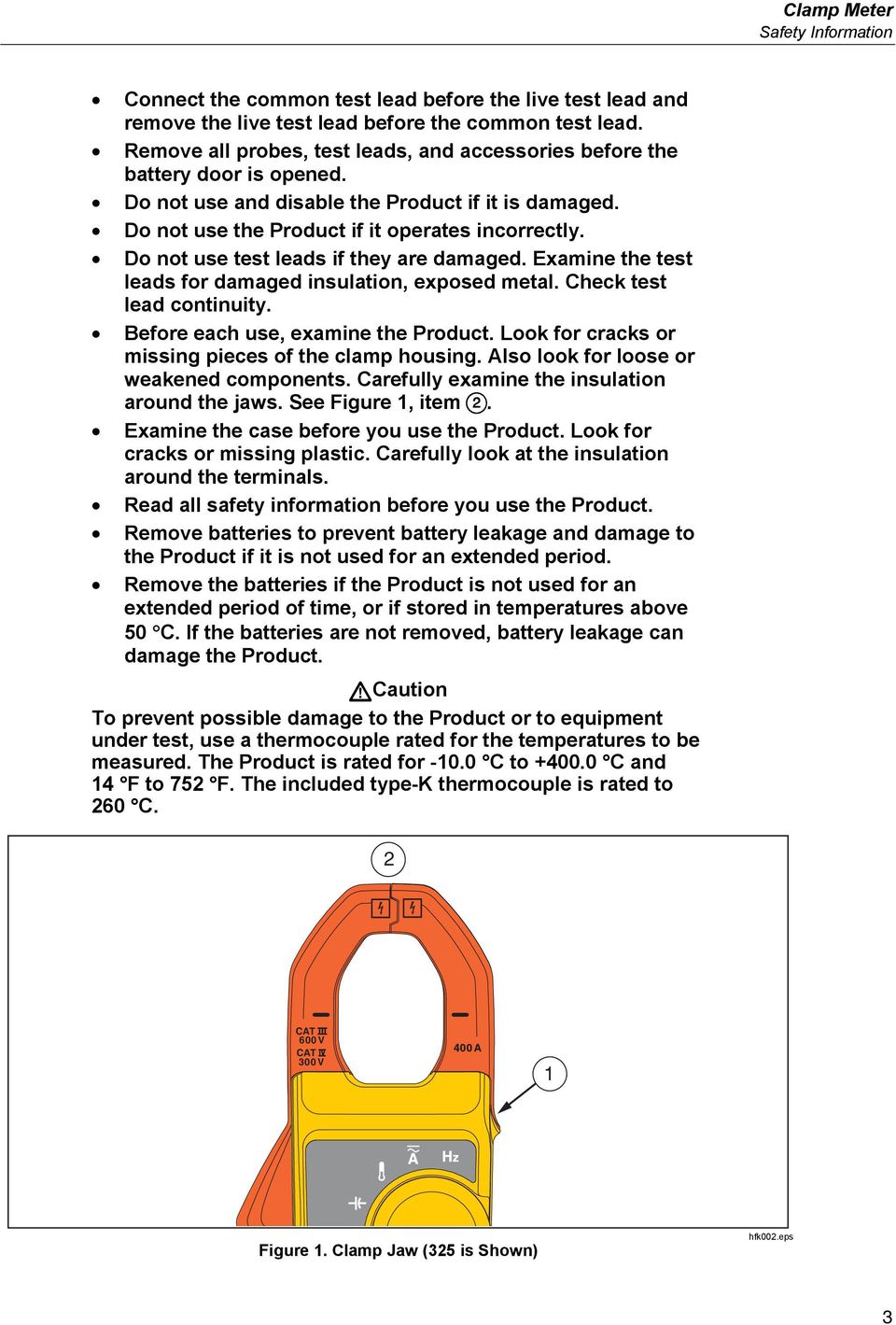
11 Clamp Meter Safety Information Connect the common test lead before the live test lead and remove the live test lead before the common test lead. Remove all probes, test leads, and accessories before the battery door is opened. Do not use and disable the Product if it is damaged. Do not use the Product if it operates incorrectly. Do not use test leads if they are damaged. Examine the test leads for damaged insulation, exposed metal. Check test lead continuity. Before each use, examine the Product. Look for cracks or missing pieces of the clamp housing. Also look for loose or weakened components. Carefully examine the insulation around the jaws. See Figure 1, item. Examine the case before you use the Product. Look for cracks or missing plastic. Carefully look at the insulation around the terminals. Read all safety information before you use the Product. Remove batteries to prevent battery leakage and damage to the Product if it is not used for an extended period. Remove the batteries if the Product is not used for an extended period of time, or if stored in temperatures above 50 C. If the batteries are not removed, battery leakage can damage the Product. Caution To prevent possible damage to the Product or to equipment under test, use a thermocouple rated for the temperatures to be measured. The Product is rated for C to C and 14 F to 752 F. The included type-k thermocouple is rated to 260 C. 2 CAT 600V CAT 300V 1 Figure 1. Clamp Jaw (325 is Shown) hfk002.eps 3
12 323/324/325 Calibration Manual Table 1. Symbols Symbol Meaning Symbol Meaning Hazardous voltage. Risk of electric shock. Risk of Danger. Important information. See Manual. AC (Alternating Current) DC (Direct Current) AC and DC Current Earth Terminal Double insulated Battery Application to or removal from hazardous, live conductors is permitted. Conforms to European Union directives. Conforms to relevant Inspected and licensed by TÜV Product Australian EMC standards. Services. This product has been tested to the requirements of CAN/CSA-C22.2 No , second edition, including Amendment 1, or a later version of the same standard incorporating the same level of testing requirements. Conforms to European Union directives. CAT II Measurement category II is applicable to test and measuring circuits connected directly to utilization points of low voltage mains installation. CAT III Measurement Category III is applicable to test and measuring circuits connected to the distribution part of the building s low-voltage MAINS installation. CAT IV Measurement Category IV is applicable to test and measuring circuits connected at the source of the building s low-voltage MAINS installation. This product complies with the WEEE Directive (2002/96/EC) marking requirements. The affixed label indicates that you must not discard this electrical/electronic product in domestic household waste. Product Category: With reference to the equipment types in the WEEE Directive Annex I, this product is classed as category 9 "Monitoring and Control Instrumentation product. Do not dispose of this product as unsorted municipal waste. Go to Fluke s website for recycling information. Note This product complies with the Regulation for the Administration of the Recovery and Disposal of Waste Electrical and Electronic Products (China). 4

13 Clamp Meter Specifications Note The Measurement Category (CAT) and voltage rating of combinations of test probes, test probe accessories, current clamp accessories, and the Product is the LOWEST rating of individual components. Specifications Electrical Specifications AC Current (Jaw) Range A 324, (40.00, 400.0) A Resolution A 324, (0.01, 0.1) A Accuracy 323, % ±5 digits (45-65 Hz) 2.5 % ±5 digits ( Hz) % ±5 digits (45 Hz to 400 Hz) Note: Add 2 % for position sensitivity DC Current with Jaw (325) Range... (40.00, 400.0) A Resolution... (0.01, 0.1) A Accuracy % ± 5 digits AC Voltage Range V Resolution V Accuracy ( Hz) % ± 5 digits DC Voltage Range V Resolution V Accuracy... 1 % ± 5 digits Resistance Range 323, (400.0, 4000) Ω (400.0, 4000, 40000) Ω Resolution... (0.1, 1, 10) Ω Accuracy... 1 % ±5 digits Continuity Beeper Ω 324/ Ω Capacitance (324, 325) Range... (100.0, 1000) μf Resolution... (0.1, 1) μf Accuracy... 1 % ±4 digits Frequency (325) Range to Hz Resolution Hz Accuracy % ±4 digits Trigger Level... 5 to 10 Hz, 10 A 10 to 100 Hz, 5 A 100 to 500 Hz, 10 A 5

14 323/324/325 Calibration Manual Contact Temperature (324, 325) Range C to C Resolution C Accuracy... 1 % ±8 digits Note: Temperature uncertainty (accuracy) does not include error of the thermocouple probe. Mechanical Specifications Size (L x W x H)... (207 x 75 x 34) mm Weight g g g Environmental Specifications Operating Temperature C to +50 C Storage Temp C to +60 C Operating Humidity... Non Condensing ( 10 C) 90 % RH (at 10 C to 30 C) 75 % RH (at 30 C to 40 C) 45 % RH (at 40 C to 50 C) (Without Condensation) Operating Altitude meters Storage Altitude... 12,000 meters EMI, EMC... Meets all applicable requirements in EN/IEC Temperature Coefficients... Add 0.1 x specified accuracy for each degree C above 28 C or below 18 C Over Voltage Category... CAT IV 300 V, CAT III 600 V Safety Compliance... EN/IEC , Pollution Degree 2 EN/IEC EN/IEC Agency Approvals... Complies with CAN/CSA-C22.2 No IP Rating... IP 30 Per IEC 60529; Non-operating Batteries... 2 AAA, NEDA 24A, IEC LR03 6

15 Clamp Meter Maintenance Maintenance Clean the Product Caution To prevent possible damage to the Product or to equipment under test, do not use abrasive cleaners. They will damage the case. Regularly wipe the case with a damp cloth and weak detergent. To clean the Product Jaw: 1. Examine the jaw-mating surface to make sure it is clean. If there is unwanted material (including rust), jaw closure will not be correct and there will be measurement errors. 2. Open the jaws and clean the clamp metal ends with a non-flammable oil and cloth. Battery Replacement Warning To prevent possible explosion, fire, or personal injury, replace the batteries when the low battery indicator (B) shows to prevent incorrect measurements. Caution To prevent possible damage to the Product or to equipment under test: Remove batteries to prevent battery leakage and damage to the Product if it is not used for an extended period. Be sure that the battery polarity is correct to prevent battery leakage. To change the batteries, see Figure 2: 1. Make sure the Product is off. 2. Turn over the Product to access the battery compartment door screw. 3. Use a flat-head screwdriver to loosen the battery compartment door screw and lift off the battery compartment door. 4. Replace the two AAA batteries. Make sure to use the correct polarity when you put the batteries into the battery compartment door. 5. Reattach the battery compartment door. 6. Tighten the battery compartment door screw. 7

16 323/324/325 Calibration Manual AAA Figure 2. Battery Replacement hfj007.eps User-Replaceable Parts User-replaceable parts are shown in Table 2. Table 2. User-Replaceable Parts Fluke Part Number Description Qty FLUKE-CAP-2001,TL7X PROBE CAP,BLACK FLUKE-CAP ,TL7X PROBE CAP,FLUKE RED BATTERY 1.5V LR03 ALKALINE AAA BATTERY DOOR SOFT CASE BLACK/YELLOW VINYL /324/325 USERS MANUAL THERMOCOUPLE ASSEMBLY K-TYPE BEADED MOLDED DUAL BANANA PLUG COILED BULK 1 Required Equipment The equipment in Table 3 is necessary for the performance tests and calibration adjustment. Table 3. Required Equipment Equipment Required Characteristics Recommended Model Calibrator 4.5-digit resolution Fluke 5520A Calibrator or Equivalent Wired coil 50 turns 5500A/COIL 8

17 Clamp Meter Performance Tests Performance Tests Warning To prevent possible electrical shock, fire, or personal injury, do not go through the performance test procedures unless the Product is fully assembled. The performance tests verify the full operation of the Product and measure the accuracy of each function against Product specifications. If the Product fails a part of the test, calibration adjustment and/or repair is necessary. See Calibration Adjustment. Before you do the performance tests: 1. Make sure that you have the necessary equipment. See Table Make sure the Product batteries are good and replace them if necessary. See Battery Replacement. 3. Warm up the Calibrator as necessary. Refer to its specifications. 4. Let the temperature of the UUT (unit under test) become stable to room temperature. Test the Display To verify that all segments of the display function: 1. With the Product off, push and hold any of the buttons. 2. Turn the rotary switch on while you hold down the button. All of the display segments are shown. See Figure 3. If segments of the display are missing, repair is necessary. See Contact Fluke. Figure 3. Display Segments (324 and 325 Display is Shown) hfk001.eps 9

18 323/324/325 Calibration Manual Firmware Version and Model Number To see the Product firmware version and model number: 323: 1. Turn on the Product with the HOLD button held down. 2. After the display segments are shown, release the HOLD button. 3. The Product shows: POFF for the auto-power off function r003 or the current firmware version F323 (Fluke 323) 324/325: 1. Turn on the Product. 2. The display shows: F32X (Fluke 324 or Fluke 325) 1. Turn on the Product with the F/C button held down. 2. After the display segments are shown, release the F/C button. 3. The display shows: r0.52 or the current firmware version Backlight (324 and 325) To verify that the backlight functions: 1. With the Product on, push. The backlight will come on. 2. Push again to turn the backlight off. 3. If the backlight does not function correctly, repair is necessary. See Contact Fluke. Button Test To verify that the buttons function, turn on the Product and push each button separately. Each button push causes the Product to beep and the display to change. For the 324 and 325, note that the Product beeps twice if the Product is in the wrong mode for the pushed button. If the buttons do nothing, repair is necessary. See Contact Fluke. 10

19 Clamp Meter Performance Tests Temperature, Volts, Ohms, Frequency, and Capacitance To do the temperature, volts, ohms, and capacitance performance tests: 1. Connect the Calibrator NORMAL output and ground to the Product. See Figure 4 for the connections. 2. Apply the values shown in Table 4. If the Product shows indications outside of the limits shown in Table 4, calibration adjustment is necessary. See Calibration Adjustment. 5522A 325 TRUE RMS CLAMP METER CAT CAT 600V 300V +/ 0 hfk07.eps Figure 4. Temperature, Volts, Ohms, Frequency, and Capacitance Performance Test Connections 11

20 323/324/325 Calibration Manual Current To do the current tests: 1. Connect the Calibrator current output and ground to the 50-Turn Coil. See Figure Turn the Product to the necessary current mode. 3. Apply the input level for each step shown in Table Compare the indication on the Product display with the UUT reading limits in Table If the Product shows indications outside of the limits shown in Table 4, calibration adjustment is necessary. See Calibration Adjustment. 50-Turn Coil Conductor 5522A +/ 0 Figure 5. AC Current Test Connections hfk025.eps 12

21 Clamp Meter Performance Tests Table 4. Performance Tests Test (Switch Position) Calibrator Output Meter Reading Limit Low High -5 C N/A X X -5.8 C -4.2 C Temperature 0 C N/A X X -0.8 C 0.8 C 100 C N/A X X 98.2 C C 400 C N/A X X C C Hz X X X 9.3 V 10.7 V Hz N/A X X 492.0V V AC Volts Hz N/A X X 492.0V V Hz X N/A N/A V V Hz X N/A N/A V V -600 V X N/A N/A V -500 V N/A X X V V DC Volts 10 V X X X 9.4 V 10.6 V 500 V N/A X X V V 600 V X N/A N/A V V 0 Ω X N/A N/A 0.0 Ω 0.5 Ω 10 Ω X X X 9.4 Ω 10.6 Ω 300 Ω N/A X X Ω Ω 350 Ω X N/A N/A Ω Ω Ohms 1000 Ω N/A X X 985 Ω 1015 Ω 3000 Ω N/A X X 2965 Ω 3035 Ω 3500 Ω X N/A N/A 3460 Ω 3540 Ω 10K Ω N/A X X 9.85 KΩ KΩ 30K Ω N/A X X KΩ Ω 10 μf N/A X X 9.5 μf 10.5 μf Capacitance 500 μf N/A X X 491 μf 509 μf 900 μf N/A X X 887 μf 913 μf 0.2 A, 5 Hz N/A N/A X 4.7 Hz 5.3 Hz Frequency 0.2 A, 50 Hz N/A N/A X 49.6 Hz 50.4 Hz 0.2 A, 500 Hz N/A N/A X Hz Hz 13
22 323/324/325 Calibration Manual Table 4. Performance Tests (cont.) Test (Switch Position) Calibrator Output Meter Reading Limit Low High Hz X N/A N/A 5.4 A 6.6 A Hz X N/A N/A 22.9 A 25.1A Hz X N/A N/A A A Hz X N/A N/A A A Hz X N/A N/A A A Hz X N/A N/A A A AC Amps (with 50- Turn Coil) Hz N/A X N/A 0.15 A 0.25 A Hz N/A X N/A 9.80 A A Hz N/A X N/A A A 2 50 Hz N/A X N/A 97.5 A A 6 50 Hz N/A X N/A A A Hz N/A N/A X 9.75 A A Hz N/A N/A X A A 2 50 Hz N/A N/A X 98.0 A A 6 50 Hz N/A N/A X 295.0A A DC Amps (with 50- Turn Coil) 0.2 A N/A N/A X 9.75 A A 0.6 A N/A N/A X A A 2 A N/A N/A X 97.5 A A 6 A N/A N/A X A A 14
23 Clamp Meter Calibration Adjustment Calibration Adjustment The Product features closed-case calibration adjustment and uses known reference sources. The Product measures the applied reference source, calculates correction factors, and stores the correction factors in nonvolatile memory. Should the Product fail any of the performance tests, do the calibration adjustment procedure. To do the calibration adjustment: 1. Remove the Product battery door. See Battery Replacement. 2. Apply 3.0 V across the battery contacts on the pca. Note the polarity that is shown in Figure Turn the rotary switch to the function that you will adjust. 4. Remove the calibration seal. 5. Short across the CAL keypad on the pca and then remove the short. See Figure 6. This puts the Product into calibration mode. 6. When C-1.2 is shown on the Product display, apply the correct input signals from the Calibrator to the Product as shown in Table 5. After confirmation, the Product goes to the subsequent calibration step. 7. After each step, push the HOLD button to confirm the calibration step and go to the next step. Set the Calibrator to Standby after you complete adjustment of each function. Notes For 323, if any calibration point is missing Err is shown on the display. After you push the HOLD button, wait until the calibration step number advances before you change the calibrator source. Some adjustment steps can take several seconds to execute before the Product goes to the subsequent step. 8. When calibration adjustment is complete, remove the 3.0 V supply. The Product will automatically exit calibration mode. 9. Replace the batteries and battery door. 15
24 323/324/325 Calibration Manual calibration seal 323 CAL Keypad 324 and 325 CAL Keypad Battery Contacts Figure 6. Short the CAL Keypad hfk03.eps 16
25 Clamp Meter Calibration Adjustment AC Volts Test (Switch Position) Table 5. Calibration Adjustment LCD Reading 323 C-1.1 C-1.2 C-1.3 C-1.4 Calibrator Output 1.05 V, 50 Hz 40 V, 50 Hz 10 V, 50 Hz 300 V, 50 Hz DC Volts C V Ohms AC Amps (with 50-Turn Coil) C-3.1 C-3.2 C-4.1 C-4.2 C-4.3 C Ω 4000 Ω A, 50 Hz 0.42 A, 50 Hz A, 50 Hz 6 A, 50 Hz [1] 324 and 325 C-21 0 V Temperature C V C V C V, 50 Hz C V, 100 Hz AC Volts C V, 200 Hz C V, 300 Hz C V, 400 Hz C-05 0 V DC Volts C V C-07 0 V C V C-09 0 Ω C Ω Ohms C Ω C Ω C-13 (325 only) 4400 Ω C-14 (325 only) Ω [1] At each function, after all calibration points is adjusted, the display shows Save after the last calibration point. Push HOLD to save the calibration data. 17
26 323/324/325 Calibration Manual Test (Switch Position) Table 8. Calibration Adjustment (cont.) LCD Reading 324 and 325 Calibrator Output C μf C μf Capacitance C μf C μf C μf C μf 324 C A, 50 Hz C A, 100 Hz AC Amps (with 50-Turn Coil) C A, 200 Hz C A, 300 Hz C A, 400 Hz C-29 8 A,50 Hz 325 C-24 0 A C A, 50 Hz C A, 50 Hz AC Amps (with 50-Turn Coil) C A, 100 Hz C A, 200 Hz C A, 300 Hz C A, 400 Hz C-31 8 A, 50 Hz C-32 0 A DC Amps (with 50-Turn Coil) C A C A C A C-36 8 A 18
27 Clamp Meter Temperature Zero Procedure (324 and 325) Temperature Zero Procedure (324 and 325) 1. Turn off the Product and wait 20 minutes. 2. Connect a K-type thermocouple connector from the Calibrator to the Product. 3. After 20 minutes, with the Product still connected to the 3.0 V, turn on the Product and short across the CAL keypad on the pca. See Figure Turn the Product rotary switch to temperature. 5. Push twice until C-23 shows on the Product display. 6. Apply 0 C from the Calibrator. 7. Push the HOLD button to confirm C Push the HOLD button to save the calibration data. The calibration adjustment procedure is complete. 19
28 323/324/325 Calibration Manual 20
i410/i1010 AC/DC Current Clamp
 /i1010 AC/DC Current Clamp Instruction Sheet Safety Information XW Read First: Safety Information To ensure safe operation and service of the current clamp, follow these instructions: Read all operating
The table below lists the symbols used on the Clamp and/or in this manual. Important Information. See manual.
 i800 AC Current Clamp Instruction Sheet Introduction The i800 AC Current Clamp, the Clamp, has been designed for use with multimeters, recorders, power analyzers, safety testers, etc., for accurate non-intrusive
HVAC Clamp Meter. Users Manual
 902 HVAC Clamp Meter Users Manual PN 2547887 May 2006 Rev. 1, 3/07 2006-2007 Fluke Corporation. All rights reserved. Printed in China. All product names are trademarks of their respective companies. LIMITED
62 Max/62 Max + Infrared Thermometer
 Infrared Thermometer Introduction The Fluke 62 MAX and 62 MAX + Infrared Thermometers (the Product) can determine the surface temperature by measurement of the infrared energy radiated from the target
Temperature Humidity Meter
 971 Temperature Humidity Meter Users Manual PN 2441047 September 2005 Rev.1, 5/06 2005-2006 Fluke Corporation, All rights reserved. Printed in Taiwan All product names are trademarks of their respective
Multifunction Process Calibrator
 725 Multifunction Process Calibrator Product Overview PN 1549644 English January 2000 Rev.2, 8/05 2000-2005 Fluke Corporation. All rights reserved. Printed in USA All product names are trademarks of their
UT202A Operating Manual. Contents
 Title Contents Page Overview Unpacking Inspection Safety Information Rules for Safe Operation International Electrical Symbols The Meter Structure Functional Buttons and auto power off Display Symbols
EPM3. Phase Sequence and Motor Rotation Tester. Users Manual
 EPM3 Phase Sequence and Motor Rotation Tester Users Manual 1 L1 L2 L3 2 3 A B C CAT 600V 3-PHASE TESTER 5 TEST M1 M2 BATT M3 EPM3 MOTOR ROTATION TESTER EPM3 MOTOR ROTATION DETERMINED WHILE FACING MOTOR
MICROMAPPER. Users Manual. LAN Wiremap Checker
 TM MICROMAPPER LAN Wiremap Checker Users Manual (English) November 00, Rev., 9/0 00-00 Fluke Corporation. All rights reserved. All product names are trademarks of their respective companies. i LIMITED
10 Multimeter. Users Manual
 10 Multimeter Users Manual 1991-2001 Fluke Corporation, All rights reserved. Printed in USA All product names are trademarks of their respective companies. 10 MULTIMETER m m Mk SELECT RANGE OFF VDC VAC
Instructions A622 100 Amp AC/DC Current Probe 070-8883-03
 Instructions A622 100 Amp AC/DC Current Probe 070-8883-03 Revision A www.tektronix.com 070888303 Copyright Tektronix, Inc. All rights reserved. Tektronix products are covered by U.S. and foreign patents,
Model 77 Series IV Digital Multimeter
 Model 77 Series IV Digital Multimeter Introduction XWWarning To avoid electric shock or injury, do not perform the performance tests or calibration adjustment procedures unless qualified to do so. The
Model UT33A: OPERATING MANUAL Table of Contents (1)
 Table of Contents (1) Title Overview Unpacking Inspection Safety Information Rules For Safe Operation International Electrical Symbols The Meter structure Functional Buttons LCD Display Measurement Operation
IDEAL INDUSTRIES, INC. TECHNICAL MANUAL MODELS: 61-763 61-765
 IDEAL INDUSTRIES, INC. TECHNICAL MANUAL MODELS: 61-763 61-765 The Service Information provides the following information: Precautions and safety information Specifications Performance test procedure Calibration
K Standard Grade Ni-Cr vs Ni-Al (Chromel vs Alumel)
 SureGrip TM 80PK-24 Air Temperature Probe Instruction Sheet XWWarning To avoid electrical shock, do not use this probe when voltages exceeding 24 V ac rms or 60 V dc are present. The probe tip is electronically
Model UT201/202: OPERATING MANUAL. Table of Contents
 Table of Contents Title Overview Unpacking Inspection Safety Information Rules For Safe Operation International Electrical Symbols The Meter Structure Rotary Switch Functional Buttons The Effectiveness
Model UT33B/C/D: OPERATING MANUAL Table of Contents (1)
 Table of Contents (1) Title Overview Unpacking Inspection Safety Information Rules For Safe Operation International Electrical Symbols The Meter structure Functional Buttons Measurement Operation A. DC
CO-220 Carbon Monoxide Meter
 Page 1 CO-220 Carbon Monoxide Meter Instruction Sheet Introduction The CO-220 Carbon Monoxide Meter (hereafter referred to as the Meter ) detects the presence of carbon monoxide (CO) and measures concentrations
Manual Ranging MultiMeter
 Owner s Manual Manual Ranging MultiMeter Model 82345 CAUTION: Read, understand and follow Safety Rules and Operating Instructions in this manual before using this product.! Safety! Operation! Maintenance!
How To Use A Cdm250 Digital Multimeter
 User Manual CDM250 Digital Multimeter 070-6736-03 Copyright Tektronix, Inc. 1987. All rights reserved. Tektronix products are covered by U.S. and foreign patents, issued and pending. Information in this
Model UT713 OPERATING MANUAL
 Model UT713 OPERATING MANUAL TABLE OF CONTENTS TITLE PAGE Introduction Unpacking Inspection Safety Information Turning the Calibrator On Simulating a Thermocouple Measuring a Thermocouple Simulating TC
How To Use The Visifault Visual Fault Locator
 VisiFault Visual Fault Locator Instruction Sheet The VisiFault Visual Fault Locator (VFL) is a visible light source that helps you trace optical fibers, check fiber continuity, and find faults such as
User's Guide. True RMS Industrial Multimeter
 User's Guide 97650 True RMS Industrial Multimeter Ω C ã F ã 10A V µ 10A V ã ã ma A Introduction This meter measures AC/DC Voltage, AC/DC Current, Resistance, Capacitance, Frequency (electrical & electronic),
AutoRanging Digital MultiMeter
 Owner's Manual AutoRanging Digital MultiMeter Model No. 82139 CAUTION: Read, understand and follow Safety Rules and Operating Instructions in this manual before using this product. Safety Operation Maintenance
Seven function digital multimeter
 Seven function digital multimeter 98025 Set up And Operating Instructions Distributed exclusively by Harbor Freight Tools. 3491 Mission Oaks Blvd., Camarillo, CA 93011 Visit our website at: http://www.harborfreight.com
Ground Resistance Clamp-On Tester
 User s Manual Ground Resistance Clamp-On Tester MODEL 382357 Warranty EXTECH INSTRUMENTS CORPORATION (a FLIR company) warrants the basic instrument to be free of defects in parts and workmanship for one
Ground Resistance Clamp On Tester
 USER MANUAL Ground Resistance Clamp On Tester MODEL 382357 Introduction Congratulations on your purchase of Extech s 382357 Ground Resistance Tester. This Clamp on device allows the user to measure ground
User Guide. Model 380260 Insulation Tester / Megohmmeter
 User Guide Model 380260 Insulation Tester / Megohmmeter Introduction Congratulations on your purchase of Extech s Insulation Tester/Megohmmeter. The Model 380260 provides three test ranges plus continuity
1587/1577. Insulation Multimeters. Users Manual
 1587/1577 Insulation Multimeters Users Manual PN 2401027 April 2005 2005 Fluke Corporation. All rights reserved. Printed in USA All product names are trademarks of their respective companies. LIMITED WARRANTY
Thermistor Thermometer MODEL NO. 93210-00
 Thermistor Thermometer MODEL NO. 93210-00 Cole-Parmer Instrument Co. 625 East Bunker Court Vernon Hills, Illinois U.S.A. 60061-1844 (847) 549-7600 (847) 247-2929 (Fax) 800-323-4340 www.coleparmer.com e-mail:
Fluke 3000 FC Series Test Tools Technical Data
 Fluke 3000 FC Series Test Tools Technical Data Now compatible with Fluke Connect Mobile App Start building tomorrow s test tool system today with the Fluke 3000 FC Digital Multimeter. The new Fluke Connect
Advantium 2 Plus Alarm
 ADI 9510-B Advantium 2 Plus Alarm INSTALLATION AND OPERATING INSTRUCTIONS Carefully Read These Instructions Before Operating Carefully Read These Controls Corporation of America 1501 Harpers Road Virginia
1587/1577. Insulation Multimeters. Technical Data. Two powerful tools in one.
 1587/1577 Insulation Multimeters Technical Data Two powerful tools in one. The Fluke 1587 and 1577 Insulation Multimeters combine a digital insulation tester with a full-featured, true-rms digital multimeter
INSTRUCTION MANUAL MODEL PCD-88
 INSTRUCTION MANUAL MODEL PCD-88 CLOSED CAPTION DECODER LINK ELECTRONICS, INC. 2137 Rust Avenue Cape Girardeau, Missouri 63703 Phone: 573-334-4433 Fax: 573-334-9255 e-mail: sales @ linkelectronics.com website:
115C and 117C. True-rms Multimeters. Users Manual
 115C and 117C True-rms Multimeters Users Manual PN 2538695 July 2006, Rev. 1, 2/07 2006, 2007 Fluke Corporation, All rights reserved. Printed in China All product names are trademarks of their respective
MicroScanner 2. Cable Verifier. Getting Started Guide
 MicroScanner 2 TM Cable Verifier Getting Started Guide PN 2739668 (English) January 2007 2007 Fluke Corporation. All rights reserved. Printed in China. All product names are trademarks of their respective
Microwave Meter. Instruction Manual
 Microwave Meter 840046 Instruction Manual Microwave Meter 840046 Copyright 2009 by Sper Scientific ALL RIGHTS RESERVED Printed in the USA The contents of this manual may not be reproduced or transmitted
6500-2. Users Manual. Appliance Tester
 6500-2 Appliance Tester September 2013 2013 Fluke Corporation. All rights reserved. Specifications are subject to change without notice. All product names are trademarks of their respective companies.
Model 1756 Test Lead Kit
 Keithley Instruments 28775 Aurora Road Cleveland, Ohio 44139 1-888-KEITHLEY http://www.keithley.com Model 1756 Test Lead Kit Gerneral Purpose Test Lead Information Description These test leads allow you
Model UT58A/B/C: OPERATING MANUAL
 Table of Contents Title Page Overview Unpacking Inspection Safety Information Rules For Safe Operation International Electrical Symbols The Meter Structure Rotary Switch Functional Buttons Display Symbols
Users Manual. Temperature Calibrator
 724 Temperature Calibrator Users Manual February 2000 Rev.1, 8/03 2000-2003 Fluke Corporation. All rights reserved. All product names are trademarks of their respective companies. LIMITED WARRANTY & LIMITATION
Sip/Puff Switch User Guide
 Sip/Puff Switch User Guide www.orin.com Table of Contents Table of Contents... 2 Legal Notices... 3 Declaration of Conformity with European Directives... 3 Application Disclaimer... 4 Introduction... 5
User s manual FLIR VP50/VP52 Non-contact AC voltage detector
 User s manual FLIR VP50/VP52 Non-contact AC voltage detector User s manual FLIR VP50/VP52 #T559851; r. AD/ 9134/9134; en-us Table of contents 1 Disclaimers... 1 1.1 Copyright... 1 1.2 Quality assurance...
Remote Alarm Monitoring System
 Remote Alarm Monitoring System Operation and Service Manual Model RA1 RA4 A A Version HELMER SCIENTIFIC 14400 Bergen Boulevard Noblesville, IN 46060 USA PH +1.317.773.9073 FAX +1.317.773.9082 USA and Canada
Auto-ranging Digital Multimeter 52-0052-2 INSTRUCTION MANUAL
 Auto-ranging Digital Multimeter 52-0052-2 INSTRUCTION MANUAL WARNING: READ AND UNDERSTAND THIS MANUAL BEFORE USING YOUR MULTIMETER. FAILURE TO UNDERSTAND AND COMPLY WITH WARNINGS AND OPERATING INSTRUCTIONS
Owner s Manual & Safety Instructions
 Owner s Manual & Safety Instructions Save This Manual Keep this manual for the safety warnings and precautions, assembly, operating, inspection, maintenance and cleaning procedures. Write the product s
SOLAR ELECTRIC MODULE ES-124 & ES-62T Owners Manual and Installation Guide
 SOLAR ELECTRIC MODULE ES-124 & ES-62T Owners Manual and Installation Guide circuit. Reverse connection will damage the module and may result in fire. CAUTIONS Solar electric modules produce DC electricity
BroadBand PowerShield. User Manual
 BroadBand PowerShield User Manual 990-0375G 12/2006 Chapter 1 General Information The PowerShield provides a power source for broadband telephony and other DC applications. Safety This Safety Guide contains
3 WATT LED SPOTLIGHT Model No. SLM - 3801
 3 WATT LED SPOTLIGHT Model No. SLM - 3801 OWNER'S MANUAL Customer Service Tel: 1-800-268-3319 Superex Canada Ltd, Toronto,M2H 3B8 Made in China Table of Contents A). Important Safety Instructions B). Charging
Owner s Manual & Safety Instructions
 Owner s Manual & Safety Instructions Save This Manual Keep this manual for the safety warnings and precautions, assembly, operating, inspection, maintenance and cleaning procedures. Write the product s
7 FUNCTION DIGITAL MULTIMETER
 7 FUNCTION DIGITAL MULTIMETER 90899 OPERATING INSTRUCTIONS 3491 Mission Oaks Blvd., Camarillo, CA 93011 Visit our Web site at http://www.harborfreight.com Copyright 2004 by Harbor Freight Tools. All rights
162 CB CABLE TRACER. Filter Probe & Tone Generator INSTRUCTION MANUAL
 162 CB CABLE TRACER Filter Probe & Tone Generator INSTRUCTION MANUAL INDEX PAGE 1. INTRODUCTION... 1 2. FILTER PROBE... 1-3 3. TONE GENERATOR... 3-6 4. SPECIFICATION... 7-8 5. MAINTENANCE... 8 1. INTRODUCTION
BC-5000 OPERATIONS MANUAL BATTERY CAPACITY TESTER COFKO LLC.
 BC-5000 BATTERY CAPACITY TESTER OPERATIONS MANUAL COFKO LLC. COPYRIGHT 2010 1 UNPACKING As you unpack your new BC-5000 battery capacity tester, inspect the tester for signs of shipping damage. If shipping
Operating Manual Remote Cost Control Monitor
 Operating Manual Remote Cost Control Monitor INTRODUCTION: Congratulations on purchasing the Remote Cost Control. This is a state-of-the-art power monitoring socket that is highly accurate and easy to
Getting started with
 PART NO. CMA113 MADE IN CHINA 1. Measuring CAT II 2. Max. voltage 250V ~ 3. Max. current 71 Amp Getting started with Electricity consumption monitoring single phase for homes and some smaller light commercial
Agilent P940xA/C Solid State PIN Diode Switches
 Agilent P940xA/C Solid State PIN Diode Switches Operating and Service Manual Agilent Technologies Notices Agilent Technologies, Inc. 2007 No part of this manual may be reproduced in any form or by any
aseries A13B Mini Bullet Camera User Manual
 aseries A13B Mini Bullet Camera User Manual Thank you for purchasing our product. If there are any questions, or requests, please do not hesitate to contact the dealer. This manual applies to the MicroView
Nest Learning Thermostat Installation Guide. Installation step-by-step
 Nest Learning Thermostat Installation Guide Installation step-by-step Contents Compatibility. 3 In the box. 4 Before you start. 5 Choose an installation method. 6 Replacing an existing wired thermostat.
Battery Tester. GxT Incorporated, Cheboygan MI, U.S.A. All Rights Reserved E040-01G. 40 & 42HD Operator s Manual
 Battery Tester GxT Incorporated, Cheboygan MI, U.S.A. All Rights Reserved E040-01G 40 & 42HD Operator s Manual SPECIFICATIONS Measurement Range...Ferret 40... Ferret 42HD Battery Volts... 4.0 to 19.99...
Installation and Operation Guide for PD5100 Automatic Transfer Switch
 Installation and Operation Guide for PD5100 Automatic Transfer Switch Member P r o gr e ssive Dynamics, Inc. 507 Industrial Rd Marshall, MI 49068 www.progressivedyn.com 2012 Progressive Dynamics, Inc.
5616 Platinum Resistance Thermometer User s Guide
 Hart Scientific 5616 Platinum Resistance Thermometer User s Guide Rev. 780801 Limited Warranty & Limitation of Liability Each product from Fluke Corporation, Hart Scientific Division ( Hart ) is warranted
Portable Air Conditioner
 Portable Air Conditioner Owner's Manual Model:3 in 1 12,000 Btu/h Series 3 Please read this owner s manual carefully before operation and retain it for future reference. CONTENTS 1. SUMMARY...1 2. PORTABLE
Model UT60A: OPERATING MANUAL. Table of Contents. Page 3 4 5 6 8 9 10 11 14 17 17 17 19 19
 Table of Contents Title Overview Unpacking Inspection Safety Information Rules For Safe Operation International Electrical Symbols The Meter Structure Rotary Switch Functional Buttons Display Symbols Measurement
ExStik TM ph Waterproof Meters
 User Guide ExStik TM ph Waterproof Meters Models PH100 & PH110 Patent Pending ExStik TM Description Front Panel Controls 1. Battery compartment cap 2. LCD Display 3. MODE / HOLD button 4. CAL / RECALL
User's Manual. Heavy Duty Dissolved Oxygen Meter Model 407510
 User's Manual Heavy Duty Dissolved Oxygen Meter Model 407510 Introduction Congratulations on your purchase of Extech's Heavy Duty Dissolved Oxygen / Temperature Meter which simultaneously displays Dissolved
CM100. Carbon Monoxide Meter. Users Manual Mode d emploi Bedienungshandbuch Manual d Uso Manual de uso Användarhandbok
 CM100 Carbon Monoxide Meter Users Manual Mode d emploi Bedienungshandbuch Manual d Uso Manual de uso Användarhandbok CM100 Carbon Monoxide Meter English Users Manual CM100_Rev001 2008 Amprobe Test Tools.
Alarm Clock USER GUIDE
 Alarm Clock USER GUIDE Jazwares, Inc. 2012 CONTENTS Please read the instructions along with the Alarm Clock carefully before you use it, so that you can operate it conveniently. WELCOME & Warnings Page
Dolphin 9900 Mobile Computers
 Dolphin 9900 Mobile Computers Dolphin 9900 Dolphin 9950 Dolphin 9951 with Windows Mobile 6.1 Quick Start Guide Dolphin 9900 Series Quick Start Guide Out of the Box Verify that the box contains the following
Model UT61A/61B/61C/61D/61E: OPERATING MANUAL. Table of Contents
 P/N:110401103671 Table of Contents Title Overview Unpacking Inspection Safety Information Rules For Safe Operation International Electrical Symbols The Meter Structure Rotary Switch Functional Buttons
Mini Power Bank and Charger
 Mini Power Bank and Charger Owner s Manual Please read before using this equipment. Your charger is ETL listed to UL standards and meets all applicable FCC standards. WARNING: To reduce the risk of fire
Zetron Desktop Microphone Manual 025-9589F
 Zetron Desktop Microphone Manual 025-9589F Software License The Zetron software described in this manual is subject to the terms and conditions of Zetron's Software License Agreement, a copy of which is
Water Leak Detection System
 Water Leak Detection System Installation and Operating Manual 505-334-5865 ph 505-334-5867 fax www.rodisystems.com email:[email protected] 936 Highway 516 Aztec, NM 87410-2828 Manual Revisions and Copyright
About this Manual. Support for Your Product
 About this Manual We ve added this manual to the Agilent website in an effort to help you support your product. This manual is the best copy we could find; it may be incomplete or contain dated information.
RIGOL. Quick Guide. DS1000CA Series Oscilloscope. Aug. 2011. RIGOL Technologies, Inc.
 Quick Guide DS1000CA Series Oscilloscope Aug. 2011 Technologies, Inc. Guaranty and Declaration Copyright 2011 Technologies, Inc. All Rights Reserved. Trademark Information is a registered trademark of
Operating instructions in the back. www.blackanddecker.co.uk PD1020L
 Operating instructions in the back www.blackanddecker.co.uk PD1020L 2 ENGLISH (Original instructions) Intended use Your Black & Decker Dustbuster handheld vacuum cleaner has been designed for vacuum cleaning
900 MHz Lightweight Wireless Stereo Headphones
 33-1165.fm Page 1 Tuesday, August 10, 1999 10:50 AM Cat. No. 33-1165 OWNER S MANUAL Please read before using this equipment. 900 MHz Lightweight Wireless Stereo Headphones 33-1165.fm Page 2 Tuesday, August
User Manual (English)
 User Manual (English) Table of Contents General Safety Information...2 Fueltank UNO Components...3 Charging the Fueltank UNO...4 Using the Fueltank UNO...5 Power Saving Mode...6 Checking the Fueltank UNO
Thermocouple Thermometer Models
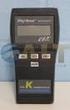 Technology Made Easy... Thermocouple Thermometer Models 60010-00 (Type J) 60010-10 (Type K) 60010-20 (Type T) 68X309905 Rev 1 04/04 TABLE OF CONTENTS 1. INTRODUCTION 4 2. SAFETY PRECAUTIONS 6 3. SPECIFICATIONS
User's Guide. Integrating Sound Level Datalogger. Model 407780. Introduction
 User's Guide 99 Washington Street Melrose, MA 02176 Phone 781-665-1400 Toll Free 1-800-517-8431 Visit us at www.testequipmentdepot.com Back to the Extech 407780 Product Page Integrating Sound Level Datalogger
80PK-27 SureGrip TM Industrial Surface Temperature Probe
 80PK-27 SureGrip TM Industrial Surface Temperature Probe XWWarning Instruction Sheet To avoid electrical shock, do not use this probe when voltages exceeding 24 V ac rms or 60 V dc are present. The probe
MICA HEATER INSTRUCTION MANUAL Model No: UHM-786 230V 50Hz 2200W
 MICA HEATER INSTRUCTION MANUAL Model No: UHM-786 230V 50Hz 2200W Safety Precautions To reduce the risk of personal injury or damage to property, basic safety precautions must be observed including the
DUSTTRAK AEROSOL MONITOR SOLAR POWER KIT MODEL 854060
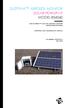 DUSTTRAK AEROSOL MONITOR SOLAR POWER KIT MODEL 854060 (FOR DUSTTRAK II AND DRX AEROSOL MONITOR MODELS 8540 AND 8543) OPERATION AND MAINTENANCE MANUAL P/N 6008416, REVISION A MAY 2015 Copyright TSI Incorporated
User Guide. www.burntec.com. 4 wire Earth Resistance Tester Model GRT300
 User Guide 4 wire Earth Resistance Tester Model GRT300 Introduction Congratulations on your purchase of Extech s 4 Wire Earth Resistance Tester. The Model GRT300 has been designed and tested according
Nokia Bluetooth Headset BH-109
 Nokia Bluetooth Headset BH-109 Issue 1.0 2 Introduction About your headset With Nokia Bluetooth Headset BH-109, you can handle calls hands-free, even when you are using two mobile devices at the same time.
User Manual. CFG253 3 MHz Function Generator 070-8362-04
 User Manual CFG253 3 MHz Function Generator 070-8362-04 Copyright Tektronix, Inc. 1993. All rights reserved. Tektronix products are covered by U.S. and foreign patents, issued and pending. Information
Weather Radio Alarm Clock
 1200093 User s Guide Weather Radio Alarm Clock Thank you for purchasing your Weather Radio Alarm Clock from RadioShack. Please read this user s guide before installing, setting up, and using your new weather
PC Tab Security System INSTRUCTION MANUAL
 PC Tab Security System INSTRUCTION MANUAL This manual is intended as a Quick Start manual covering the basic functions that have been enabled on the alarm panel. The alarm panel is capable of extensive
Fluke 3000 FC Series Test Tools Technical Data
 Fluke 3000 FC Series Test Tools Technical Data Now compatible with Fluke Connect Mobile App Start building tomorrow s test tool system today with the Fluke 3000 FC Digital Multimeter. The new Fluke Connect
Threaded Inline Air Heaters
 Threaded Inline Air Heaters FOR SAFETY & LONG HEATER LIFE, CAREFULLY READ THIS MANUAL BEFORE USE. Safety SHOCK HAZARD! Only qualified individuals should install this heater and related controls. Follow
Dehumidifier Users manual. For Models: DH45S DH65S
 Dehumidifier Users manual For Models: DH45S DH65S 950-0062-revD Jan. 9 2007 FORWARD The appearance of the units that you purchase might be slightly different from the ones described in the Manual, but
User Guide Nokia Portable Wireless Charging Plate DC-50
 User Guide Nokia Portable Wireless Charging Plate DC-50 Issue 1.1 EN User Guide Nokia Portable Wireless Charging Plate DC-50 Contents For your safety 3 About your accessory 4 Keys and parts 5 Top up your
Digital Fingerprint safe
 Digital Fingerprint safe Model 96846 Operation Instructions Diagrams within this manual may not be drawn proportionally. Due to continuing improvements, actual product may differ slightly from the product
Use & Care. of your Iron. All about the TA B L E O F C O N T E N T S. USA and Canada 1-888-845-7330
 All about the Use & Care of your Iron Important Safeguards... 2 Iron Safety Instructions... 3 Parts and Features...4 TA B L E O F C O N T E N T S Using Your Iron...6 Cleaning and Maintenance... 8 Warranty...9
Powerware Relay-Serial Card User s Guide
 Powerware Relay-Serial Card User s Guide Special Symbols The following are examples of symbols used on the UPS and accessories to alert you to important information: This symbol indicates that you should
INSTRUCTION MANUAL. NC-500 NETcat Pro Wiring Tester
 INSTRUCTION MANUAL English...1 16 Français...17 32 Español...33 48 Deutsch...49 64 NC-500 NETcat Pro Wiring Tester Read and understand all of the instructions and safety information in this manual before
ABCs of DMMs Multimeter features and functions explained Application Note
 ABCs of DMMs Multimeter features and functions explained Application Note Digital multimeters offer a wide selection of features. Choosing the right meter for the job can be challenging unless you know