
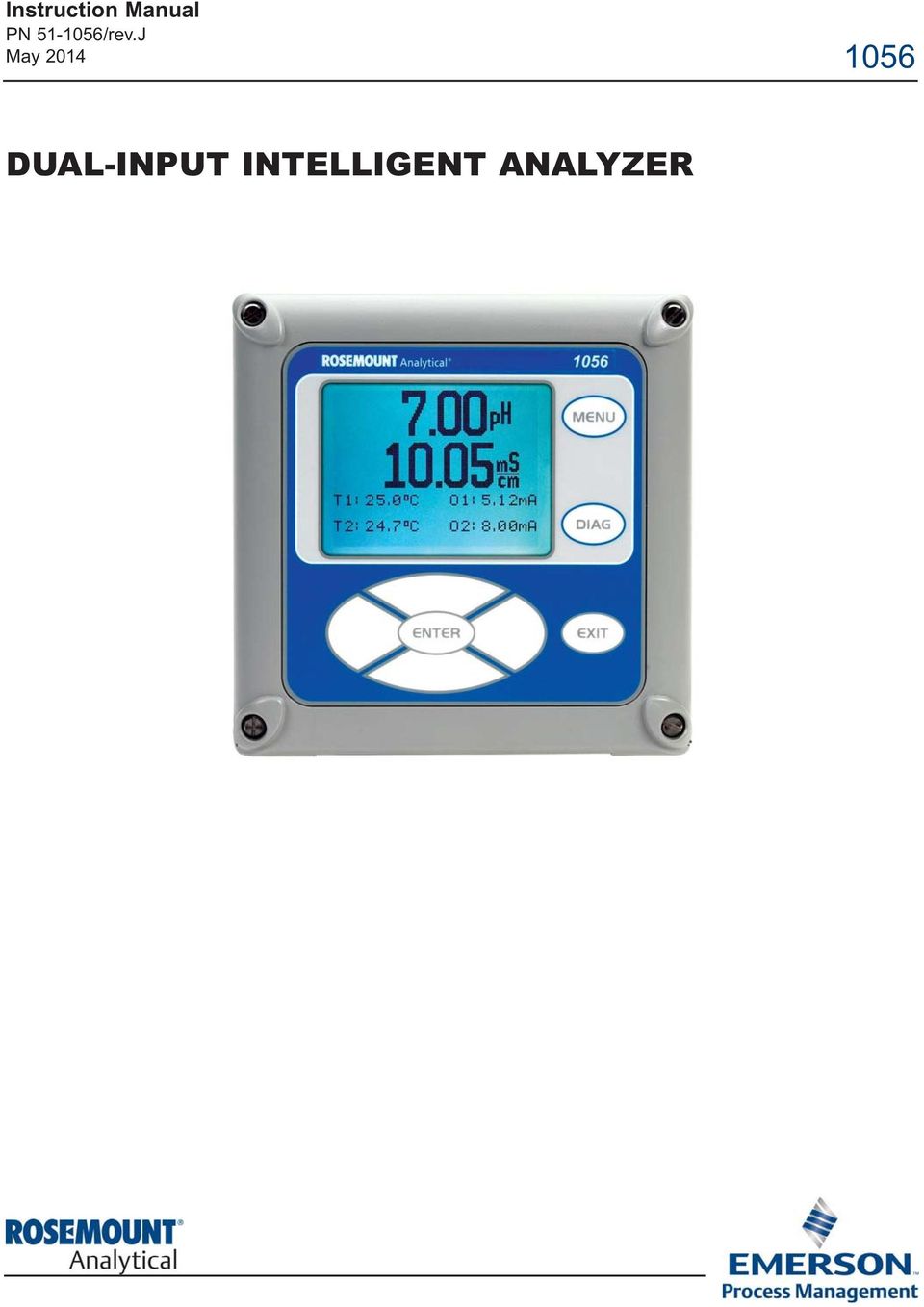
Instruction Manual PN /rev.J May DUAL-INPUT INTELLIGENT ANALYZER
|
|
|
- Alice Poole
- 9 years ago
- Views:
Transcription
1 Instruction Manual PN /rev.J May DUAL-INPUT INTELLIGENT ANALYZER
2 ESSENTIAL INSTRUCTIONS READ THIS PAGE BEFORE PROCEEDING! Your instrument purchase from Rosemount Analytical, Inc. is one of the finest available for your particular application. These instruments have been designed, and tested to meet many national and international standards. Experience indicates that its performance is directly related to the quality of the installation and knowledge of the user in operating and maintaining the instrument. To ensure their continued operation to the design specifications, personnel should read this manual thoroughly before proceeding with installation, commissioning, operation, and maintenance of this instrument. If this equipment is used in a manner not specified by the manufacturer, the protection provided by it against hazards may be impaired. Failure to follow the proper instructions may cause any one of the following situations to occur: Loss of life; personal injury; property damage; damage to this instrument; and warranty invalidation. Ensure that you have received the correct model and options from your purchase order. Verify that this manual covers your model and options. If not, call or to request correct manual. For clarification of instructions, contact your Rosemount representative. Follow all warnings, cautions, and instructions marked on and supplied with the product. Use only qualified personnel to install, operate, update, program and maintain the product. Educate your personnel in the proper installation, operation, and maintenance of the product. Install equipment as specified in the Installation section of this manual. Follow appropriate local and national codes. Only connect the product to electrical and pressure sources specified in this manual. Use only factory documented components for repair. Tampering or unauthorized substitution of parts and procedures can affect the performance and cause unsafe operation of your process. All equipment doors must be closed and protective covers must be in place unless qualified personnel are performing maintenance. WARNING RISK OF ELECTRICAL SHOCK Equipment protected throughout by double insulation. Installation and servicing of this product may expose personel to dangerous voltages. Main power wired to separate power source must be disconnected before servicing. Do not operate or energize instrument with case open! Signal wiring connected in this box must be rated at least 240 V. Non metallic cable strain reliefs do not provide grounding between conduit connections! Use grounding type bushings and jumper wires. Unused cable conduit entries must be securely sealed by non flammable closures to provide enclosure integrity in compliance with personal safety and environmental protection requirements. Unused conduit openings must be sealed with NEMA 4X or IP65 conduit plugs to maintain the ingress protection rating (NEMA 4X). Electrical installation must be in accordance with the National Electrical Code (ANSI/NFPA 70) and/or any other applicable national or local codes. Operate only with front panel fastened and in place. Safety and performance require that this instrument be connected and properly grounded through a three wire power source. Proper use and configuration is the responsibility of the user. CAUTION This product generates, uses, and can radiate radio frequency energy and thus can cause radio communication interference. Improper installation, or operation, may increase such interference. As temporarily permitted by regulation, this unit has not been tested for compliance within the limits of Class A computing devices, pursuant to Subpart J of Part 15, of FCC Rules, which are designed to provide reasonable protection against such interference. Operation of this equipment in a residential area may cause interference, in which case the user at his own expense, will be required to take whatever measures may be required to correct the interference. CAUTION This product is not intended for use in the light industrial, residential or commercial environments per the instrument s certification to EN Emerson Process Management 2400 Barranca Parkway Irvine, CA USA Tel: (949) Fax: (949) Rosemount Analytical Inc. 2012

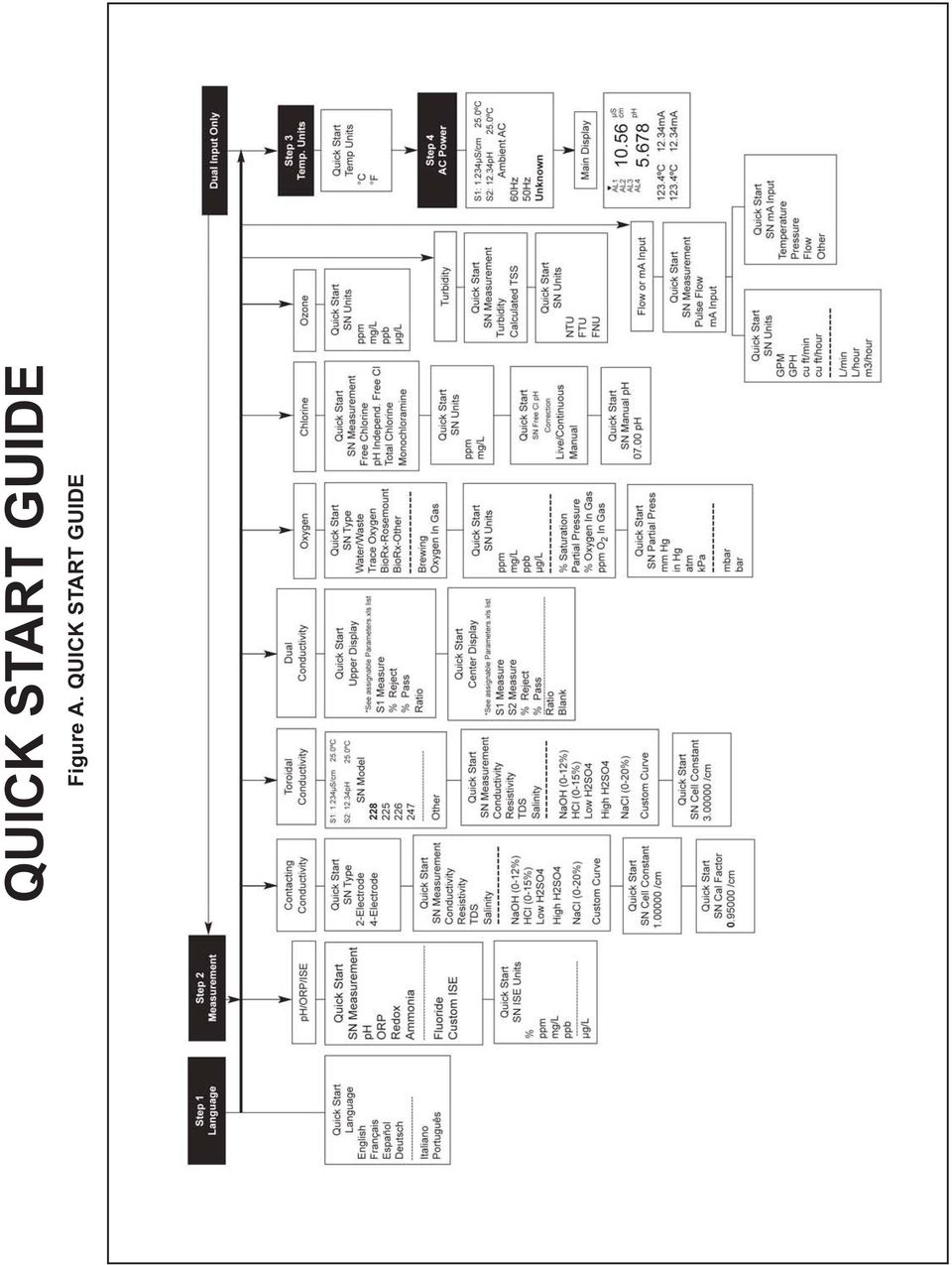
3 QUICK START GUIDE 1056 Dual Input Analyzer 1. Refer to Section 2.0 for mechanical installation instructions. 2. Wire sensor(s) to the signal boards. See Section 3.0 for wiring instructions. Refer to the sensor instruction sheet for additional details. Make current output, alarm relay and power connections. 3. Once connections are secured and verified, apply power to the analyzer. WARNING RISK OF ELECTRICAL SHOCK Electrical installation must be in accordance with the National Electrical Code (ANSI/NFPA 70) and/or any other applicable national or local codes. 4. When the analyzer is powered up for the first time, Quick Start screens appear. Quick Start operating tips are as follows: a. A backlit field shows the position of the cursor. b. To move the cursor left or right, use the keys to the left or right of the ENTER key. To scroll up or down or to increase or decrease the value of a digit use the keys above and below the ENTER key. Use the left or right keys to move the decimal point. c. Press ENTER to store a setting. Press EXIT to leave without storing changes. Pressing EXIT during Quick Start returns the display to the initial start up screen (select language). 5. Complete the steps as shown in the Quick Start Guide flow diagram, Fig. A on the following page. 6. After the last step, the main display appears. The outputs are assigned to default values. 7. To change output, and temperature related settings, go to the main menu and choose Program. Follow the prompts. For a general guide to the Program menu, see the Quick Reference Guide, Fig.B. 8. To return the analyzer to the default settings, choose Reset Analyzer under the Program menu.

4 QUICK START GUIDE Figure A. QUICK START GUIDE
5 QUICK REFERENCE GUIDE Figure B. MODEL 1056 MENU TREE

6 About This Document This manual contains instructions for installation and operation of the Model 1056 Dual Input Intelligent Analyzer. The following list provides notes concerning all revisions of this document. Rev. Level Date Notes A 01/07 This is the initial release of the product manual. The manual has been reformatted to reflect the Emerson documentation style and updated to reflect any changes in the product offering. B 2/07 Added CE mark to p.2. Replaced Quick Start Fig A. C 9/07 Revised Sections 1,3,5,6, and 7. Added new measurements and features Turbidity, Flow, Current Input, Alarm relays and 4 electrode conductivity. D 11/07 Added 24VDC power supply to Sec Added CSA and FM agency approvals for option codes 01, 20, 21, 22, 24, 25, 26, 30, 31, 32, 34, 35, 36 and 38. E 05/08 Add HART and Profibus DP digital communication to Section 1 specifications. F 08/08 Updates G 09/08 FM and CSA agency approval, Class 1, Div 2. for 24 VDC and AC switching power supplies. H 04/10 Update DNV logo and company name I 03/12 Update addresses mail and web J 05/14 Update enclosure information

7 MODEL 1056 TABLE OF CONTENTS MODEL 1056 DUAL INPUT INTELLIGENT ANALYZER TABLE OF CONTENTS QUICK START GUIDE QUICK REFERENCE GUIDE TABLE OF CONTENTS Section Title Page 1.0 DESCRIPTION AND SPECIFICATIONS INSTALLATION Unpacking and Inspection Installation WIRING General Preparing Conduit Openings Preparing Sensor Cable Power, Output, Alarms and Sensor Connections DISPLAY AND OPERATION User Interface Instrument Keypad Main Display Menu System PROGRAMMING BASICS General Changing the StartUp Settings Choosing Temperature units and Automatic/Manual Temperature Compensation Configuring and Ranging the Current Outputs Setting a Security Code Security Access Using Hold Resetting Factory Defaults Reset Analyzer Alarm Relays PROGRAMMING MEASUREMENTS Programming Measurements Introduction ph ORP Contacting Conductivity Toroidal Conductivity Chlorine Free Chlorine Total Chlorine Monochloramine ph independent Free Chlorine Oxygen Ozone i

8 MODEL 1056 TABLE OF CONTENTS TABLE OF CONTENTS CONT D 6.9 Turbidity Flow Current Input CALIBRATION Calibration Introduction ph Calibration ORP Calibration Contacting Conductivity Calibration Toroidal Conductivity Calibration Chlorine Calibration Free Chlorine Total Chlorine Monochloramine ph Independent Free Chlorine Oxygen Calibration Ozone Calibration Temperature Calibration Turbidity Pulse Flow RETURN OF MATERIAL Warranty ii

9 MODEL 1056 TABLE OF CONTENTS CONT D TABLE OF CONTENTS LIST OF FIGURES Fig# Section Figure Title Page A PREFACE Quick Start Guide B PREFACE Quick Reference Guide 2 1 SEC 2.0 Panel Mounting Dimensions SEC 2.0 Pipe and Wall Mounting Dimensions SEC 2.0 CSA Certification drawing part SEC 2.0 CSA Certification drawing part SEC 2.0 FM Non Incendive drawing part SEC 2.0 FM Non Incendive drawing part SEC /230 VAC Power Supply SEC VDC Power Supply SEC 3.4 Switching AC Power Supply SEC 3.4 Current Output Wiring SEC 3.4 Alarm Relay Wiring for Model 1056 Switching Power Supply SEC 3.4 Contacting Conductivity board and sensor cable leads SEC 3.4 Toroidal Conductivity signal board and sensor cable leads SEC 3.4 ph/orp/ise signal board and sensor cable leads SEC 3.4 Amperometric board (Cl, O2, Ozone) and sensor cable leads SEC 3.4 Turbidity signal board wiht plug in Sensor connection SEC 3.4 Flow/Current Input signal board and Sensor cable leads SEC 3.4 Power Wiring for Model /230 VAC SEC 3.4 Power Wiring for Model VAC SEC 3.4 Output Wiring for Model 1056 Main PCB SEC 3.4 Power Wiring for Model VDC SEC 4.3 Formatting the Main Display SEC Choosing Temp Units and Manual Auto Temp Compensation SEC Configuring and Ranging the Current Outputs SEC Setting A Security Code SEC Using Hold SEC Resetting Factory Default Settings SEC 6.2 Configuring ph/orp Measurements SEC 6.4 Configure Contacting Measurements SEC 6.5 Configure Toroidal Measurements SEC 6.6 Configure Chlorine Measurements SEC 6.7 Configure Oxygen Measurements SEC 6.8 Configure Ozone Measurements SEC 6.9 Configure Turbidity Measurement SEC 6.10 Configure Flow Measurement SEC 6.11 Configure ma Current Input Measurement SEC 7.2 Calibrate ph SEC 7.3 Calibrate ORP SEC 7.4 Calibrate Contacting and Toroidal Conductivity SEC 7.6 Calibrate Chlorine SEC 7.7 Calibrate Oxygen SEC 7.8 Calibrate Ozone SEC 7.9 Calibrate Temperature SEC 7.10 Calibrate Turbidity SEC 7.11 Calibrate Flow iii

10 MODEL 1056 TABLE OF CONTENTS TABLE OF CONTENTS CONT D LIST OF TABLES Number Section Table Title Page 5 1 SEC Measurements and Measurement Units SEC ph Measurement Programming SEC ORP Measurement Programming SEC Contacting Conductivity Measurement Programming SEC Toroidal Conductivity Measurement Programming SEC Free Chlorine Measurement Programming SEC Total Chlorine Measurement Programming SEC Monochloramine Measurement Programming SEC ph Independent Free Chlorine Measurement Programming SEC Oxygen Measurement Programming SEC Ozone Measurement Programming SEC Turbidity Measurement Programming SEC Flow Measurement Programming SEC Curent Input Programming SEC 7.2 ph Calibration Routines SEC 7.3 ORP Calibration Routine SEC 7.4 Contacting Conductivity Calibration Routines SEC 7.5 Toroidal Conductivity Calibration SEC Free Chlorine Calibration Routines SEC Total Chlorine Calibration Routines SEC Monochloramine Calibration Routines SEC ph independent Free Chlorine Calibration Routines SEC 7.7 Oxygen Calibration Routines SEC 7.8 Ozone Calibration Routines SEC 7.9 Temperature Calibration Routines SEC 7.10 Turbidity Calibration Routines SEC 7.11 Flow Calibration Routines iv

11 MODEL 1056 SECTION 1.0 DESCRIPTION AND SPECIFICATIONS SECTION 1.0. DESCRIPTION AND SPECIFICATIONS MULTI PARAMETER INSTRUMENT single or dual input. Choose from ph/orp/ise, Resistivity/Conductivity, % Concentration, Chlorine, Oxygen, Ozone, Temperature, Turbidity, Flow, and 4 20mA Current Input. LARGE DISPLAY large easy to read process measurements. EASY TO INSTALL modular boards, removable connectors, easy to wire power, sensors, and outputs. INTUITIVE MENU SCREENS with advanced diagnostics and help screens. SEVEN LANGUAGES included: English, French, German, Italian, Spanish, Portuguese, and Chinese. HART AND PROFIBUS DP Digital Communications options FEATURES AND APPLICATIONS The 1056 dual input analyzer offers single or dual sensor input with an unrestricted choice of dual measurements. This multi parameter instrument offers a wide range of measurement choices supporting most industrial, commercial, and municipal applications. The modular design allows signal input boards to be field replaced making configuration changes easy. Conveniently, live process values are always displayed during programming and calibration routines. QUICK START PROGRAMMING: Exclusive Quick Start screens appear the first time the 1056 is powered. The instrument auto recognizes each measurement board and prompts the user to configure each sensor loop in a few quick steps for immediate deployment. DIGITAL COMMUNICATIONS: HART and Profibus DP digital communications are available. The 1056 HART units communicate with the Model 375 HART hand held communicator and HART hosts, such as AMS Intelligent Device Manager. Model 1056 Profibus units are fully compatible with Profibus DP networks and Class 1 or Class 2 masters. HART and Profibus DP configured units will support any single or dual measurement configuration of Model MENUS: Menu screens for calibrating and programming are simple and intuitive. Plain language prompts and help screens guide the user through these procedures. DUAL SENSOR INPUT AND OUTPUT: The 1056 accepts single or dual sensor input. Standard 0/4 20 ma current outputs can be programmed to correspond to any measurement or temperature. ENCLOSURE: The instrument fits standard ½ DIN panel cutouts. The versatile enclosure design supports panel mount, pipe mount, and surface/wall mount installations. ISOLATED INPUTS: Inputs are isolated from other signal sources and earth ground. This ensures clean signal inputs for single and dual input configurations. For dual input configurations, isolation allows any combination of measurements and signal inputs without cross talk or signal interference. TEMPERATURE: Most measurements require temperature compensation. The 1056 will automatically recognize Pt100, Pt1000 or 22k NTC RTDs built into the sensor. SECURITY ACCESS CODES: Two levels of security access are available. Program one access code for routine calibration and hold of current outputs; program another access code for all menus and functions. 1
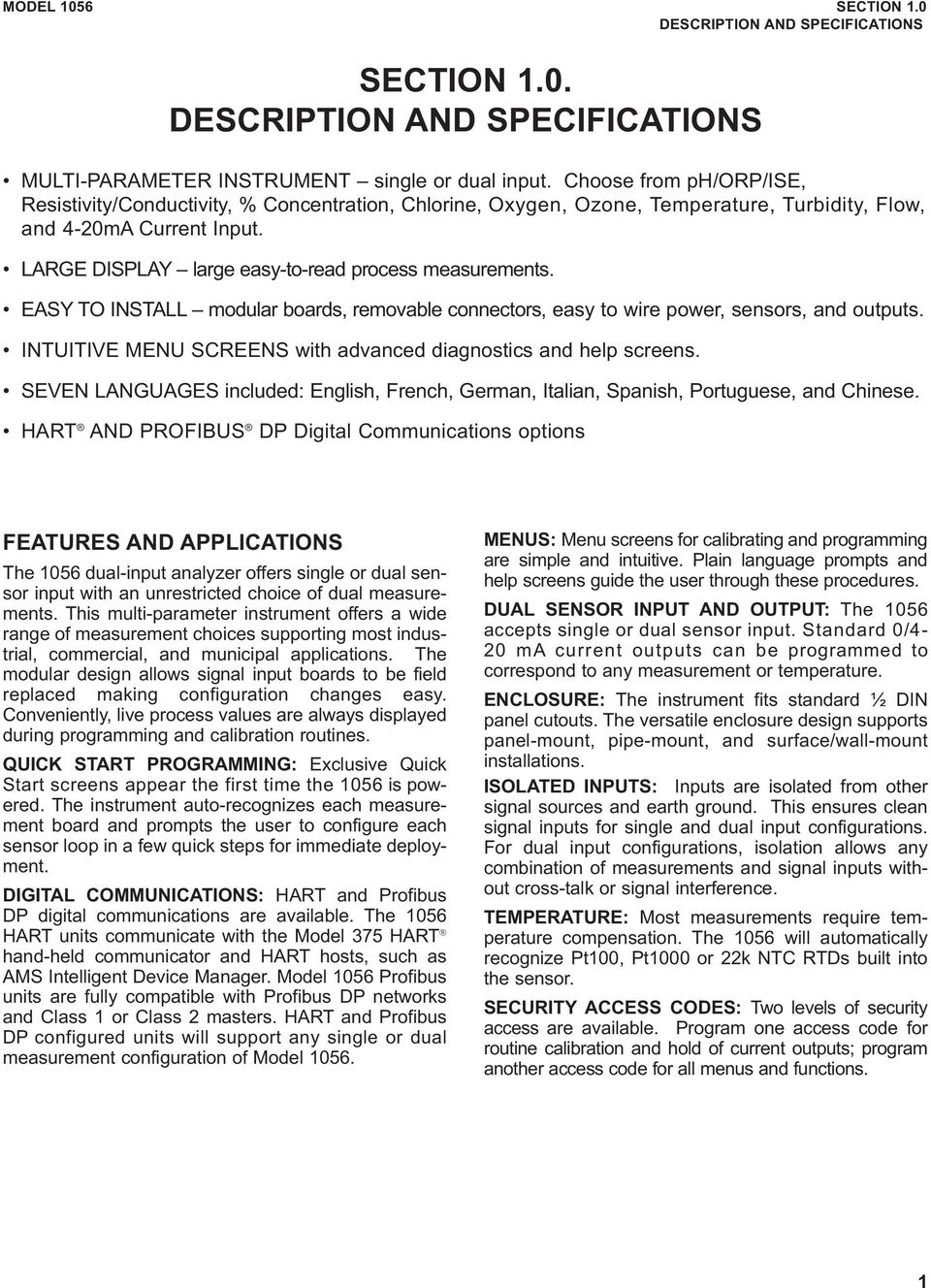
12 MODEL 1056 SECTION 1.0 DESCRIPTION AND SPECIFICATIONS DIAGNOSTICS: The analyzer continuously monitors itself and the sensor(s) for problematic conditions. The display flashes Fault and/or Warning when these conditions occur. Diagnostics Faults Warnings Sensor 1 Sensor 2 Out 1: ma Out 2: ma HT Instr SW VER: 2.12 AC Freq. Used: 60Hz Information about each condition is quickly accessible by pressing DIAG on the keypad. User help screens are displayed for most fault and warning conditions to assist in troubleshooting. DISPLAY: The high contrast LCD provides live measurement readouts in large digits and shows up to four additional process variables or diagnostic parameters. The display is back lit and the format can be customized to meet user requirements. LOCAL LANGUAGES : Rosemount Analytical extends its worldwide reach by offering seven local languages English, French, German, Italian, Spanish, Portuguese, and Chinese. Every unit includes user programming menus; calibration routines; faults and warnings; and user help screens in all seven languages. The displayed language can be easily set and changed using the menus. CURRENT OUTPUTS: Two 4 20 ma or 0 20 ma current outputs are electrically isolated. Outputs are fully scalable and can be programmed to linear or logarithmic modes. Output dampening can be enabled with time constants from 0 to 999 seconds. Output 1 includes digital signal 4 20 ma superimposed HART (option HT only) SPECIAL MEASUREMENTS: The Model 1056 offers measuring capabilities for many applications. l Single or Dual Turbidity: Ideal in municipal applications for measurement of low NTU filtered drinking water. Must be used with Clarity II sensor, sensor cable and debubbler. Model T1056 Clarity II Turbidimeter System l 4 Electrode Conductivity: The 1056 is compatible with Rosemount Analytical 4 electrode Model 410VP in the PUR SENSE family of conductivity sensors. This sensor supports a wide array of applications and is capable of measuring a large range of conductivity with one geometric configuration. Wired to the 1056, this sensor can measure 2μS/cm to 300mS/cm with an accuracy of 4% of reading throughout the entire range. l 4 20mA Current Input: Accepts any analog current input from an external device for temperature compensation of measurements and atmospheric pressure input for partial pressure correction of oxygen. l Selective Ions: The analyzer is able to measure ammonia and fluoride using commercially available ion selective electrodes. All analyzers with installed ph boards can be programmed to measure selective ions. l ph Independent Free Chlorine: With Rosemount Analytical s 498Cl 01 sensor, the analyzer is able to measure free chlorine with automatic correction for process ph without the need for a ph sensor. l Inferential ph: The analyzer is able to derive and display inferred ph (phcalc) using two contacting conductivity signal boards and the appropriate contacting conductivity sensors. This method will calculate the ph of condensate and boiler water from conductivity and cation conductivity measurements. l Differential Conductivity: Dual input conductivity configurations can measure differential conductivity. The analyzer can be programmed to display dual conductivity as ratio, % rejection, or % passage. 2

13 MODEL 1056 SECTION 1.0 DESCRIPTION AND SPECIFICATIONS SPECIFICATIONS General Enclosure: Polycarbonate. Type 4X, IP65. Note: To ensure a water tight seal, tighten all four front panel screws to 6 in lbs of torque Dimensions: Overall 155 x 155 x 131mm (6.10 x 6.10 x 5.15 in.). Cutout: 1/2 DIN 139mm x 139mm (5.45 x 5.45 in.) Conduit Openings: Accepts 1/2 or PG13.5 conduit fittings Display: Monochromatic graphic liquid crystal display. 128 x 96 pixel display resolution. Backlit. Active display area: 58 x 78mm (2.3 x 3.0 in.). Ambient Temperature and Humidity: 0 to 55 C (32 to 131 F). Turbidity only: 0 to 50 C (32 to 122 F), RH 5 to 95% (non condensing) Hazardous Location Approvals Options for CSA: 01, 02, 03, 20, 21, 22, 24, 25, 26, 27, 30, 31, 32, 34, 35, 36, 37, 38, AN, and HT. Class I, Division 2, Groups A, B, C, & D Class Il, Division 2, Groups E, F, & G Class Ill T4A Tamb= 50 C Evaluated to the ANSI/UL Standards. The C and US indicators adjacent to the CSA Mark signify that the product has been evaluated to the applicable CSA and ANSI/UL Standards, for use in Canada and the U.S. respectively Options for FM: 01, 02, 03, 20, 21, 22, 24, 25, 26, 30, 31, 32, 34, 35, 36, 38, AN, and HT. Class I, Division 2, Groups A, B, C, & D Class Il & lll, Division 2, Groups E, F, & G T4A Tamb= 50 C Enclosure Type 4X Storage Temperature Effect: 20 to 60ºC ( 4 to 140 F) POLLUTION DEGREE 2: Normally only non conductive pollution occurs. Occasionally, however, a temporary conductivity caused by condensation must be expected. Altitude: for use up to 2000 meter (6562 ft.) Power: Code 01: 115/230 VAC ±15%, 50/60 Hz. 10W. Code 02: 20 to 30 VDC. 15 W. Code 03: 85 to 265 VAC, 47.5 to 65.0 Hz, switching. 15 W. Note: Code 02 and 03 power supplies include 4 programmable relays Equipment protected by double insulation RFI/EMI: EN LVD: EN Alarms relays*: Four alarm relays for process measurement(s) or temperature. Any relay can be configured as a fault alarm instead of a process alarm. Each relay can be configured independently and each can be programmed with interval timer settings. Relays: Form C, SPDT, epoxy sealed Maximum Relay Current Resistive 28 VDC 5.0 A 115 VAC 5.0 A 230 VAC 5.0 A Inductive load: 1/8 HP motor (max.), 40 VAC CAUTION RISK OF ELECTRICAL SHOCK *Relays only available with 02 power supply (20 30 VDC) or 03 switching power supply ( VAC) WARNING Exposure to some chemicals may degrade the sealing properties used in the following devices: Zettler Relays (K1 K4) PN AZ8 1CH 12DSEA Inputs: One or two isolated sensor inputs Outputs: Two 4 20 ma or 0 20 ma isolated current outputs. Fully scalable. Max Load: 550 Ohm. Output 1 has superimposed HART signal (configurations X 2X 3X HT only) Current Output Accuracy: ± ºC Terminal Connections Rating: Power connector (3 leads): AWG wire size. Signal board terminal blocks: AWG wire size. Current output connectors (2 leads): AWG wire size. Alarm relay terminal blocks: AWG wire size ( VDC power supply and VAC power supply) Weight/Shipping Weight: (rounded up to nearest lb or nearest 0.5 kg): 3 lbs/4 lbs (1.5 kg/2.0 kg) 3

14 MODEL 1056 SECTION 1.0 DESCRIPTION AND SPECIFICATIONS CONTACTING CONDUCTIVITY (Codes 20 and 30) Measures conductivity in the range 0 to 600,000 μs/cm (600mS/cm). Measurement choices are conductivity, resistivity, total dissolved solids, salinity, and % concentration. The % concentration selection includes the choice of five common solutions (0 12% NaOH, 0 15% HCl, 0 20% NaCl, and 0 25% or % H 2 SO 4 ). The conductivity concentration algorithms for these solutions are fully temperature compensated. Three temperature compensation options are available: manual slope (X%/ C), high purity water (dilute sodium chloride), and cation conductivity (dilute hydrochloric acid). Temperature compensation can be disabled, allowing the analyzer to display raw conductivity. For more information concerning the use and operation of the contacting conductivity sensors, refer to the product data sheets. Note: When two contacting conductivity sensors are used, Model 1056 can derive an inferred ph value called phcalc. phcalc is calculated ph, not directly measured ph. (Model X AN required) Note: Selected 4 electrode, high range contacting conductivity sensors are compatible with Model Input filter: time constant sec, default 2 sec. Response time: 3 seconds to 100% of final reading Salinity: uses Practical Salinity Scale Temperature Specifications: Temperature range Temperature Accuracy, Pt 1000, 0 50 ºC Temperature Accuracy, Pt 1000, Temp. > 50 ºC 0 150ºC ± 0.1ºC ± 0.5ºC RECOMMENDED SENSORS FOR CONDUCTIVITY: All Rosemount Analytical ENDURANCE Model 400 series conductivity sensors (Pt 1000 RTD) and Model 410 sensor. family 4 electrode sensors Total Dissolved Solids: Calculated by multiplying conductivity at 25ºC by 0.65 PERFORMANCE SPECIFICATIONS Recommended Range Contacting Conductivity ENDURANCE TM series of conductivity sensors Cell 0.01μS/cm 0.1μS/cm 1.0μS/cm 10μS/cm 100μS/cm 1000μS/cm 10mS/cm 100mS/cm 1000mS/cm Constant μS/cm to 200μS/cm 200μS/cm to 6000μS/cm μS/cm to 2000μS/cm 2000μS/cm to 60mS/cm μs/cm to 20mS/cm 20mS/cm to 600mS/cm 4 electrode 2 μs/cm to 300mS/cm 4 Cell Constant Linearity ±0.6% of reading in recommended range +2 to 10% of reading outside high recommended range ±5% of reading outside low recommended range ±4% of reading in recommended range

15 MODEL 1056 SECTION 1.0 DESCRIPTION AND SPECIFICATIONS TOROIDAL CONDUCTIVITY (Codes 21 and 31) Measures conductivity in the range of 1 (one) μs/cm to 2,000,000 μs/cm (2 S/cm), Measurement choices are conductivity, resistivity, total dissolved solids, salinity, and % concentration. The % concentration selection includes the choice of five common solutions (0 12% NaOH, 0 15% HCl, 0 20% NaCl, and 0 25% or % H 2 SO 4 ). The conductivity concentration algorithms for these solutions are fully temperature compensated. For other solutions, a simple to use menu allows the customer to enter his own data. The analyzer accepts as many as five data points and fits either a linear (two points) or a quadratic function (three or more points) to the data. Two temperature compensation options are available: manual slope (X%/ C) and neutral salt (dilute sodium chloride). Temperature compensation can be disabled, allowing the analyzer to display raw conductivity. Reference temperature and linear temperature slope may also be adjusted for optimum results. For more information concerning the use and operation of the toroidal conductivity sensors, refer to the product data sheets. Repeatability: ±0.25% ±5 μs/cm after zero cal Input filter: time constant sec, default 2 sec. Response time: 3 seconds to 100% of final reading Salinity: uses Practical Salinity Scale Total Dissolved Solids: Calculated by multiplying conductivity at 25ºC by 0.65 Temperature Specifications: Temperature range Temperature Accuracy, Pt 100, 25 to 50 ºC Temperature Accuracy, Pt 100,. 50 to 210ºC RECOMMENDED SENSORS: PERFORMANCE SPECIFICATIONS Recommended Range Toroidal Conductivity 25 to 210ºC ( 13 to 410ºF) ± 0.5ºC ± 1ºC All Rosemount Analytical submersion/immersion and flow through toroidal sensors. High performance toroidal conductivity sensors Models 226 and 225 Model 1μS/cm 10μS/cm 100μS/cm 1000μS/cm 10mS/cm 100mS/cm 1000mS/cm 2000mS/cm & (1in & 2in) 5μS/cm to 500mS/cm 15μS/cm to 1500mS/cm 100μS/cm to 2000mS/cm 500μS/cm to 2000mS/cm 500mS/cm to 2000mS/cm 1500mS/cm to 2000mS/cm LOOP PERFORMANCE (Following Calibration) Model 226: ±1% of reading ±5μS/cm in recommended range Models 225 & 228: ±1% of reading ±10μS/cm in recommended range Models 222,242: ±4% of reading in recommended range Model 225, 226 & 228: ±5% of reading outside high recommended range Model 226: ±5μS/cm outside low recommended range Models 225 & 228: ±15μS/cm outside low recommended range 5

16 MODEL 1056 SECTION 1.0 DESCRIPTION AND SPECIFICATIONS For use with any standard ph or ORP sensor. Measurement choices are ph, ORP, Redox, ammonia, fluoride or custom ISE. The automatic buffer recognition feature uses stored buffer values and their temperature curves for the most common buffer standards available worldwide. The analyzer will recognize the value of the buffer being measured and perform a self stabilization check on the sensor before completing the calibration. Manual or automatic temperature compensation is menu selectable. Change in ph due to process temperature can be compensated using a programmable temperature coefficient. For more information concerning the use and operation of the ph or ORP sensors, refer to the product data sheets. Model 1056 can also derive an inferred ph value called phcalc (calculated ph). phcalc can be derived and displayed when two contacting conductivity sensors are used. (Model X AN) ph/orp/ise (Codes 22 and 32) PERFORMANCE SPECIFICATIONS ANALYZER (ORP INPUT) Measurement Range [ORP]: 1500 to mv Accuracy: ± 1 mv Temperature coefficient: ±0.12mV / ºC Input filter: time constant seconds, default 4 seconds. Response time: 5 seconds to 100% of final reading RECOMMENDED SENSORS FOR ph: All standard ph sensors. RECOMMENDED SENSORS FOR ORP: All standard ORP sensors. PERFORMANCE SPECIFICATIONS ANALYZER (ph INPUT) Measurement Range [ph]: 0 to 14 ph Accuracy: ±0.01 ph Diagnostics: glass impedance, reference impedance Temperature coefficient: ±0.002pH/ ºC Solution temperature correction: pure water, dilute base and custom. Buffer recognition: NIST, DIN 19266, JIS 8802, BSI, DIN19267, Ingold, and Merck. Input filter: time constant seconds, default 4 seconds. Response time: 5 seconds to 100% Temperature Specifications: General purpose and high performance ph sensors Models 396PVP, 399VP and 3300HT Temperature range Temperature Accuracy, Pt 100, 0 50 ºC 0 150ºC ± 0.5ºC Temperature Accuracy, Temp. > 50 ºC ± 1ºC 6

17 MODEL 1056 SECTION 1.0 DESCRIPTION AND SPECIFICATIONS FLOW (Code 23 and 33) For use with most pulse signal flow sensors, the 1056 user selectable units of measurement include flow rates in GPM (Gallons per minute), GPH (Gallon per hour), cu ft/min (cubic feet per min), cu ft/hour (cubic feet per hour), LPM (liters per minute), LPH (liters per hour), or m3/hr (cubic meters per hour), and velocity in ft/sec or m/sec. When configured to measure flow, the unit also acts as a totalizer in the chosen unit (gallons, liters, or cubic meters). Dual flow instruments can be configured as a % recovery, flow difference, flow ratio, or total (combined) flow. PERFORMANCE SPECIFICATIONS Frequency Range: 3 to 1000 Hz Flow Rate: 0 99,999 GPM, LPM, m3/hr, GPH, LPH, cu ft/min, cu ft/hr. Totalized Flow: 0 9,999,999,999,999 Gallons or m3, 0 999, 999,999,999 cu ft. Accuracy: 0.5% Input filter: time constant sec., default 5 sec. RECOMMENDED SENSORS* +GF+ Signet 515 Rotor X Flow sensor * Input voltage not to exceed ±36V 4 20mA Current Input (Codes 23 and 33) For use with any transmitter or external device that transmits 4 20mA or 0 20mA current outputs. Typical uses are for temperature compensation of live measurements (except ORP, turbidity and flow) and for continuous atmospheric pressure input for determination of partial pressure, needed for compensation of live dissolved oxygen measurements. External input of atmospheric pressure for DO measurement allows continuous partial pressure compensation while the Model 1056 enclosure is completely sealed. (The pressure transducer component on the DO board can only be used for calibration when the case is open to atmosphere.) Externally sourced current input is also useful for calibration of new or existing sensors that require temperature measurement or atmospheric pressure inputs (DO only). For externally sourced temp or pressure compensation, the user must program the 1056 to input the 4 20mA current signal from the external device. In addition to live continuous compensation of live measurements, the current input board can also be used simply to display the measured temperature. or the calculated partial pressure from the external device. This feature leverages the large display variables on the Model 1056 as a convenience for technicians. Temperature can be displayed in degrees C or degrees F. Partial pressure can be displayed in inches Hg, mm Hg, atm (atmospheres), kpa (kilopascals), bar or mbar. The current input board can be used with devices that do not actively power their 4 20mA output signals. The Model 1056 actively powers to the + and lines of the current input board to enable current input from a 4 20mA output device. Note: this Model 1056 signal input board ( 23, 33 model option code) also includes flow measurement functionality. The signal board, however, must be configured to measure either ma current input or flow. PERFORMANCE SPECIFICATIONS Measurement Range *[ma]: 0 20 or 4 20 Accuracy: ±0.03mA Input filter: time constant sec., default 5 sec. *Current input not to exceed 22mA 7

18 MODEL 1056 SECTION 1.0 DESCRIPTION AND SPECIFICATIONS CHLORINE (Code 24 and 34) Free and Total Chlorine The 1056 is compatible with the 499ACL 01 free chlorine sensor and the 499ACL 02 total chlorine sensor. The 499ACL 02 sensor must be used with the TCL total chlorine sample conditioning system. The 1056 fully compensates free and total chlorine readings for changes in membrane permeability caused by temperature changes. For free chlorine measurements, both automatic and manual ph correction are available. For automatic ph correction select code 32 and an appropriate ph sensor. For more information concerning the use and operation of the amperometric chlorine sensors and the TCL measurement system, refer to the product data sheets. PERFORMANCE SPECIFICATIONS Resolution: ppm or 0.01 ppm selectable Input Range: 0nA 100μA Automatic ph correction (requires Code 32): 6.0 to 10.0 ph Temperature compensation: Automatic (via RTD) or manual (0 50 C). Input filter: time constant sec, default 5 sec. Response time: 6 seconds to 100% of final reading RECOMMENDED SENSORS* Chlorine: Model 499ACL 01 Free Chlorine or Model 499ACL 02 Total Residual Chlorine ph: The following ph sensors are recommended for automatic ph correction of free chlorine readings: Models: , , and 399VP 09 Monochloramine The Model 1056 is compatible with the Model 499A CL 03 Monochloramine sensor. The Model 1056 fully compensates readings for changes in membrane permeability caused by temperature changes. Because monochloramine measurement is not affected by ph of the process, no ph sensor or correction is required. For more information concerning the use and operation of the amperometric chlorine sensors, refer to the product data sheets. PERFORMANCE SPECIFICATIONS Resolution: ppm or 0.01 ppm selectable Input Range: 0nA 100μA Temperature compensation: Automatic (via RTD) or manual (0 50 C). Input filter: time constant sec, default 5 sec. Response time: 6 seconds to 100% of final reading RECOMMENDED SENSORS Rosemount Analytical Model 499ACL 03 Monochloramine sensor ph Independent Free Chlorine The 1056 is compatible with the Model 498CL 01 phindependent free chlorine sensor. The Model 498CL 01 sensor is intended for the continuous determination of free chlorine (hypochlorous acid plus hypochlorite ion) in water. The primary application is measuring chlorine in drinking water. The sensor requires no acid pre treatment, nor is an auxiliary ph sensor required for ph correction. The Model 1056 fully compensates free chlorine readings for changes in membrane permeability caused by temperature. For more information concerning the use and operation of the amperometric chlorine sensors, refer to the product data sheets. PERFORMANCE SPECIFICATIONS Resolution: ppm or 0.01 ppm selectable Input Range: 0nA 100μA Automatic ph correction: 6.5 to 10.0 ph Temperature compensation: Automatic (via RTD) or manual (0 50 C). Input filter: time constant sec, default 5 sec. Response time: 6 seconds to 100% of final reading RECOMMENDED SENSORS Rosemount Analytical Model 498CL 01 ph independent free chlorine sensor Chlorine sensors with Variopol connection and cable connection Model 498CL 01 8

19 MODEL 1056 SECTION 1.0 DESCRIPTION AND SPECIFICATIONS DISSOLVED OXYGEN (Codes 25 and 35) The 1056 is compatible with the 499ADO, 499ATrDO, Hx438, and Gx438 dissolved oxygen sensors and the 4000 percent oxygen gas sensor. The 1056 displays dissolved oxygen in ppm, mg/l, ppb, μg/l, % saturation, % O 2 in gas, ppm O 2 in gas. The analyzer fully compensates oxygen readings for changes in membrane permeability caused by temperature changes. An atmospheric pressure sensor is included on all dissolved oxygen signal boards to allow automatic atmospheric pressure determination at the time of calibration. If removing the sensor from the process liquid is impractical, the analyzer can be calibrated against a standard instrument. Calibration can be corrected for process salinity. For more information on the use of amperometric oxygen sensors, refer to the product data sheets. PERFORMANCE SPECIFICATIONS Resolution: 0.01 ppm; 0.1 ppb for 499A TrDO sensor (when O 2 <1.00 ppm); 0.1% Input Range: 0nA 100μA Temperature Compensation: Automatic (via RTD) or manual (0 50 C). Input filter: time constant sec, default 5 sec. Response time: 6 seconds to 100% of final reading DISSOLVED OZONE (Code 26 and 36) The 1056 is compatible with the Model 499AOZ sensor. The 1056 fully compensates ozone readings for changes in membrane permeability caused by temperature changes. For more information concerning the use and operation of the amperometric ozone sensors, refer to the product data sheets. PERFORMANCE SPECIFICATIONS Resolution: ppm or 0.01 ppm selectable Input Range: 0nA 100μA Temperature Compensation: Automatic (via RTD) or manual (0 35 C) Input filter: time constant sec, default 5 sec. Response time: 6 seconds to 100% of final reading RECOMMENDED SENSOR Rosemount Analytical Model 499A OZ ozone sensor RECOMMENDED SENSORS Rosemount Analytical amperometric membrane and steam sterilizable sensors listed above Dissolved Ozone sensors with Polysulfone body Variopol connection and cable connection Model 499AOZ Dissolved Oxygen sensor with Variopol connection Model 499ADO 9

20 MODEL 1056 SECTION 1.0 DESCRIPTION AND SPECIFICATIONS Turbidity (Codes 27 and 37) The 1056 instrument is available in single and dual turbidity configurations for the Clarity II turbidimeter. It is intended for the determination of turbidity in filtered drinking water. The other components of the Clarity II turbidimeter sensor(s), debubbler/measuring chamber(s), and cable for each sensor must be ordered separately or as a complete system with the Model The 1056 turbidity instrument accepts inputs from both USEPA and ISO 7027 compliant sensors When ordering the Model 1056 turbidity instrument, the 02 (24VDC power supply) or the 03 (switching 115/230VAC power supply) are required. Both of these power supplies include four fully programmable relays with timers. Note: Model 1056 Turbidity must be used with Clarity II sensor, sensor cable and debubbler. PERFORMANCE SPECIFICATIONS Units: Turbidity (NTU, FTU, or FNU); total suspended solids (mg/l, ppm, or no units) Display resolution turbidity: 4 digits; decimal point moves from x.xxx to xxx.x Display resolution TSS: 4 digits; decimal point moves from x.xxx to xxxx Calibration methods: user prepared standard, commercially prepared standard, or grab sample. For total suspended solids user must provide a linear calibration equation. Inputs: Choice of single or dual input, EPA or ISO 7027 sensors. Field wiring terminals: removable terminal blocks for sensor connection. Accuracy after calibration at 20.0 NTU: 0 1 NTU ±2% of reading or NTU, whichever is greater NTU: ±2% of reading. Clarity ll Turbidimeter 10

21 MODEL 1056 SECTION 2.0 INSTALLATION SECTION 2.0. INSTALLATION 2.1 UNPACKING AND INSPECTION 2.2 INSTALLATION 2.1 UNPACKING AND INSPECTION Inspect the shipping container. If it is damaged, contact the shipper immediately for instructions. Save the box. If there is no apparent damage, unpack the container. Be sure all items shown on the packing list are present. If items are missing, notify Rosemount Analytical immediately. 2.2 INSTALLATION General Information 1. Although the analyzer is suitable for outdoor use, do not install it in direct sunlight or in areas of extreme temperatures. 2. Install the analyzer in an area where vibration and electromagnetic and radio frequency interference are minimized or absent. 3. Keep the analyzer and sensor wiring at least one foot from high voltage conductors. Be sure there is easy access to the analyzer. 4. The analyzer is suitable for panel, pipe, or surface mounting. Refer to the table below. Type of Mounting Figure Panel 2 1 Wall and Pipe 2 2 WARNING RISK OF ELECTRICAL SHOCK Electrical installation must be in accordance with the National Electrical Code (ANSI/NFPA 70) and/or any other applicable national or local codes. 11
22 FIGURE 2 1 PANEL MOUNTING DIMENSIONS MILLIMETER INCH Front View Side View ( 5.0 ) Bottom View Note: Panel mounting seal integrity (4/4X) for outdoor applications is the responsibility of the end user. 12
23 MILLIMETER INCH FIGURE 2 2 PIPE AND WALL MOUNTING DIMENSIONS (Mounting bracket PN: ) Wall / Surface Mount Side View Front View Pipe Mount Bottom View Side View The front panel is hinged at the bottom. The panel swings down for easy access to the wiring locations. 13
24 MODEL 1056 SECTION 2.0 INSTALLATION FIGURE 2 3 CSA Non Incendive Class I, Division 2 Certified product for selected configurations (for approved models, see Fig. 2 4) 14
25 MODEL 1056 SECTION 2.0 INSTALLATION FIGURE 2 4 CSA Non Incendive Class I, Division 2 Certified product for selected configurations 15
26 MODEL 1056 SECTION 2.0 INSTALLATION FIGURE 2 5 FM Non Incendive Class I, Division 2 Certified product for selected configurations (for approved models, see Fig. 2 6) 16
27 MODEL 1056 SECTION 2.0 INSTALLATION FIGURE 2 6 FM Non Incendive Class I, Division 2 Certified product for selected configurations 17
28 MODEL 1056 SECTION 2.0 INSTALLATION 18 This page left blank intentionally
29 MODEL 1056 SECTION 3.0 WIRING SECTION 3.0. WIRING 3.1 GENERAL 3.2 PREPARING CONDUIT OPENINGS 3.3 PREPARING SENSOR CABLE 3.4 POWER, OUTPUT, AND SENSOR CONNECTIONS 3.1 GENERAL The 1056 is easy to wire. It includes removable connectors and slide out signal input boards. The front panel is hinged at the bottom. The panel swings down for easy access to the wiring locations Removable connectors and signal input boards Model 1056 uses removable signal input boards and communication boards for ease of wiring and installation. Each of the signal input boards can be partially or completely removed from the enclosure for wiring. The Model 1056 has three slots for placement of up to two signal input boards and one communication board. Slot 1 Left Slot 2 Center Slot 3 Right Comm. board Input Board 1 Input Board Signal Input boards Slots 2 and 3 are for signal input measurement boards. Wire the sensor leads to the measurement board following the lead locations marked on the board. After wiring the sensor leads to the signal board, carefully slide the wired board fully into the enclosure slot and take up the excess sensor cable through the cable gland. Tighten the cable gland nut to secure the cable and ensure a sealed enclosure Digital Communication boards HART and Profibus DP communication boards will be available in the future as options for Model 1056 digital communication with a host. The HART board supports Bell 202 digital communications over an analog 4 20mA current output. Profibus DP is an open communications protocol which operates over a dedicated digital line to the host Alarm relays Four alarm relays are supplied with the switching power supply (85 to 265VAC, 03 order code) and the 24VDC power supply (20 30VDC, 02 order code). All relays can be used for process measurement(s) or temperature. Any relay can be configured as a fault alarm instead of a process alarm. Each relay can be configured independently and each can be programmed as an interval timer, typically used to activate pumps or control valves. As process alarms, alarm logic (high or low activation or USP*) and deadband are user programmable. Customer defined failsafe operation is supported as a programmable menu function to allow all relays to be energized or not energized as a default condition upon powering the analyzer. The USP* alarm can be programmed to activate when the conductivity is within a user selectable percentage of the limit. USP alarming is available only when a contacting conductivity measurement board is installed. 3.2 PREPARING CONDUIT OPENINGS There are six conduit openings in all configurations of Model (Note that four of the openings will be fitted with plugs upon shipment.) Conduit openings accept 1/2 inch conduit fittings or PG13.5 cable glands. To keep the case watertight, block unused openings with NEMA 4X or IP65 conduit plugs. NOTE: Use watertight fittings and hubs that comply with your requirements. Connect the conduit hub to the conduit before attaching the fitting to the analyzer. 19
30 MODEL 1056 SECTION 3.0 WIRING 3.3 PREPARING SENSOR CABLE The 1056 is intended for use with all Rosemount Analytical sensors. Refer to the sensor installation instructions for details on preparing sensor cables. 3.4 POWER, OUTPUT, AND SENSOR CONNECTIONS Power wiring Three Power Supplies are offered for Model 1056: a. 115/230VAC Power Supply ( 01 ordering code) b. 24VDC (20 30V) Power Supply ( 02 ordering code) c VAC Switching Power Supply ( 03 ordering code) AC mains (115 or 230V) leads and 24VDC leads are wired to the Power Supply board which is mounted vertically on the left side of the main enclosure cavity. Each lead location is clearly marked on the Power Supply board. Wire the power leads to the Power Supply board using the lead markings on the board. The grounding plate is connected to the earth terminal of power supply input connector TB1 on the 01 (115/230VAC) and 03 (85 265VAC) power supplies. The green colored screws on the grounding plate are intended for connection to some sensors to minimize radio frequency interference. The green screws are not intended to be used for safety purposes. 115/230VAC Power Supply ( 01 ordering code) is shown below: CAUTION AC Power switch shipped in the 230VAC position. Adjust switch upwards to 115VAC position for 110VAC 120VAC operation. Figure VDC Power Supply ( 02 ordering code) is shown below: This power supply automatically detects DC power and accepts 20VDC to 30VDC inputs. Four programmable alarm relays are included. Figure 3 2 Switching AC Power Supply ( 03 ordering code) is shown below: This power supply automatically detects AC line conditions and switches to the proper line voltage and line frequency. Four programmable alarm relays are included. 20 Figure 3 3
31 MODEL 1056 SECTION 3.0 WIRING Current Output wiring All instruments are shipped with two 4 20mA current outputs. Wiring locations for the outputs are on the Main board which is mounted on the hinged door of the instrument. Wire the out put leads to the correct position on the Main board using the lead markings (+/positive, /negative) on the board. Male mating connectors are provided with each unit. Figure Alarm relay wiring Four alarm relays are supplied with the switching power supply (85 to 265VAC, 03 order code) and the 24VDC power supply (20 30VDC, 02 order code). Wire the relay leads on each of the independent relays to the correct position on the power supply board using the printed lead markings (NO/Normally Open, NC/Normally Closed, or Com/Common) on the board. See Fig 3 4. NO1 COM1 NC1 NO2 COM2 NC2 NO3 COM3 NC3 NO4 COM4 NC4 RELAY 1 RELAY 2 RELAY 3 RELAY 4 Figure 3 5 Alarm Relay Wiring for Model 1056 Switching Power Supply ( 03 Order Code) Sensor wiring to signal boards Wire the correct sensor leads to the measurement board using the lead locations marked directly on the board. After wiring the sensor leads to the signal board, carefully slide the wired board fully into the enclosure slot and take up the excess sensor cable through the cable gland. For best EMI/RFI protection use shielded output signal cable enclosed in an earth grounded metal conduit. Connect the shield to earth ground. AC wiring should be 14 gauge or greater. Provide a switch or breaker to disconnect the analyzer from the main power supply. Install the switch or breaker near the analyzer and label it as the disconnecting device for the analyzer. Keep sensor and output signal wiring separate from power wiring. Do not run sensor and power wiring in the same conduit or close together in a cable tray. WARNING RISK OF ELECTRICAL SHOCK Electrical installation must be in accordance with the National Electrical Code (ANSI/NFPA 70) and/or any other applicable national or local codes. 21
32 MODEL 1056 SECTION 3.0 WIRING Sec. 3.4 Signal board wiring Figure 3 6 Contacting Conductivity signal board and Sensor cable leads Figure 3 7 Toroidal Conductivity Signal board and Sensor cable leads 22
33 MODEL 1056 SECTION 3.0 WIRING Figure 3 8 ph/orp/ise signal board and Sensor cable leads Figure 3 9 Amperometric signal (Chlorine, Oxygen, Ozone) board and Sensor cable leads 23
34 MODEL 1056 SECTION 3.0 WIRING Figure 3 10 Turbidity signal board with plug in Sensor connection Figure 3 11 Flow/Current Input signal board and Sensor cable leads 24
35 MODEL 1056 SECTION 3.0 WIRING FIGURE 3 12 Power Wiring for the /230VAC Power Supply ( 01 Order Code) FIGURE 3 13 Power Wiring for the VAC Power Supply ( 03 ordering code) 25
36 MODEL 1056 SECTION 3.0 WIRING FIGURE 3 14 Output Wiring for Model 1056 Main PCB To Main PCB FIGURE 3 15 Power Wiring for Model VDC Power Supply ( 02 ordering code) 26
37 MODEL 1056 SECTION 4.0 DISPLAY AND OPERATION SECTION 4.0 DISPLAY AND OPERATION 4.1 USER INTERFACE The 1056 has a large display which shows two live measurement readouts in large digits and up to four additional process variables or diagnostic parameters concurrently. The display is back lit and the format can be customized to meet user requirements. The intuitive menu system allows access to Calibration, Hold (of current outputs), Programming, and Display functions by pressing the MENU button. In addition, a dedicated DIAGNOSTIC button is available to provide access to useful operational information on installed sensor(s) and any problematic conditions that might occur. The display flashes Fault and/or Warning when these conditions occur. Help screens are displayed for most fault and warning conditions to guide the user in troubleshooting. During calibration and programming, key presses cause different displays to appear. The displays are selfexplanatory and guide the user step by step through the procedure. 4.2 INSTRUMENT KEYPAD There are 4 Function keys and 4 Selection keys on the instrument keypad. Function keys: The MENU key is used to access menus for programming and calibrating the instrument. Four top level menu items appear when pressing the MENU key: Calibrate: calibrate attached sensors and analog outputs. Hold: Suspend current outputs. Program: Program outputs, measurement, 4.1 USER INTERFACE 4.2 KEYPAD 4.3 MAIN DISPLAY 4.4 MENU SYSTEM temperature, security and reset. Display: Program display format, language, warnings, and contrast Pressing MENU always causes the main menu screen to appear. Pressing MENU followed by EXIT causes the main display to appear. 27
38 MODEL 1056 SECTION 4.0 DISPLAY AND OPERATION Pressing the DIAG key displays active Faults and Warnings, and provides detailed instrument information and sensor diagnostics including: Faults, Warnings, Sensor 1 and 2 information, Out 1 and Out 2 live current values, model configuration string e.g AN, Instrument Software version, and AC frequency used. Pressing ENTER on Sensor 1 or Sensor 2 provides useful diagnostics and information (as applicable): Measurement, Sensor Type, Raw signal value, Cell constant, Zero Offset, Temperature, Temperature Offset, selected measurement range, Cable Resistance, Temperature Sensor Resistance, Signal Board software version. The ENTER key. Pressing ENTER stores numbers and settings and moves the display to the next screen. The EXIT key. Pressing EXIT returns to the previous screen without storing changes. Selection keys: Surrounding the ENTER key, four Selection keys up, down, right and left, move the cursor to all areas of the screen while using the menus. Selection keys are used to: 1. select items on the menu screens 2. scroll up and down the menu lists. 3. enter or edit numeric values. 4. move the cursor to the right or left 5. select measurement units during operations 4.3 MAIN DISPLAY The Model 1056 displays one or two primary measurement values, up to four secondary measurement values, a fault and warning banner, alarm relay flags, and a digital communications icon. Process measurements: Two process variables are displayed if two signal boards are installed. One process variable and process temperature is displayed if one signal board is installed with one sensor. The Upper display area shows the Sensor 1 process reading. The Center display area shows the Sensor 2 process reading. For dual conductivity, the Upper and Center display areas can be assigned to different process variables as follows: Process variables for Upper display example: Process variables for Center display example: Measure 1 Measure 1 % Reject Measure 2 % Pass % Reject Ratio % Pass Ratio Blank For single input configurations, the Upper display area shows the live process variable and the Center display area can be assigned to Temperature or blank. Secondary values: Up to four secondary values are shown in four display quadrants at the bottom half of the screen. All four secondary value positions can be programmed by the user to any display parameter available. Possible secondary values include: Displayable Secondary Values Slope 1 Man Temp 2 Ref Off 1 Output 1 ma Gl Imp 1 Output 2 ma Ref Imp 1 Output 1 % Raw Output 2 % mv Input Measure 1 Temp 1 Blank Man Temp 1 28
39 MODEL 1056 SECTION 4.0 DISPLAY AND OPERATION Fault and Warning banner: If the analyzer detects a problem with itself or the sensor the word Fault or Warning will appear at the bottom of the display. A fault requires immediate attention. A warning indicates a problematic condition or an impending failure. For troubleshooting assitance, press Diag. Formatting the Main Display The main display screen can be programmed to show primary process variables, secondary process variables and diagnostics. 1. Press MENU 2. Scroll down to Display. Press ENTER. 3. Main Format will be highlighted. Press ENTER. 4. The sensor 1 process value will be highlighted in reverse video. Press the selection keys to navigate down to the screen sections that you wish to program. Press ENTER. 5. Choose the desired display parameter or diagnostic for each of the four display sections in the lower screen. 6. Continue to navigate and program all desired screen sections. Press MENU and EXIT. The screen will return to the main display. For single sensor configurations, the default display shows the live process measurement in the upper display area and temperature in the center display area. The user can elect to disable the display of temperature in the center display area using the Main Format function. See Fig. 4 1 to guide you through programming the main display to select process parameters and diagnostics of your choice. For dual sensor configurations, the default display shows Sensor 1 live process measurement in the upper display area and Sensor 2 live process measurement temperature in the center display area. See Fig. 4 1 to guide you through programming the main display to select process parameters and diagnostics of your choice. 4.4 MENU SYSTEM Model 1056 uses a scroll and select menu system. Pressing the MENU key at any time opens the top level menu including Calibrate, Hold, Program and Display functions. To find a menu item, scroll with the up and down keys until the item is highlighted. Continue to scroll and select menu items until the desired function is chosen. To select the item, press ENTER. To return to a previous menu level or to enable the main live display, press the EXIT key repeatedly. To return immediately to the main display from any menu level, simply press MENU then EXIT. The selection keys have the following functions: The Up key (above ENTER) increments numerical values, moves the decimal place one place to the right, or selects units of measurement. The Down key (below ENTER) decrements numerical values, moves the decimal place one place to the left, or selects units of measurement The Left key (left of ENTER) moves the cursor to the left. The Right key (right of ENTER) moves the cursor to the right. To access desired menu functions, use the Quick Reference Figure B. During all menu displays (except main display format and Quick Start), the live process measurements and secondary measurement values are displayed in the top two lines of the Upper display area. This conveniently allows display of the live values during important calibration and programming operations. Menu screens will time out after two minutes and return to the main live display. 29
40 MODEL 1056 SECTION 4.0 DISPLAY AND OPERATION FIGURE 4 1 Formatting the Main Display 30
41 MODEL 1056 SECTION 5.0 PROGRAMMING THE ANALYZER BASICS SECTION 5.0. PROGRAMMING THE ANALYZER BASICS 5.1 GENERAL 5.2 CHANGING START UP SETTINGS 5.3 PROGRAMMING TEMPERATURE 5.4 CONFIGURING AND RANGING 4 20MA OUTPUTS 5.5 SETTING SECURITY CODES 5.6 SECURITY ACCESS 5.7 USING HOLD 5.8 RESETTING FACTORY DEFAULTS RESET ANALYZER 5.9 PROGRAMMING ALARM RELAYS 5.1 GENERAL Section 5.0 describes the following programming functions: Changing the measurement type, measurement units and temperature units. Choose temperature units and manual or automatic temperature compensation mode Configure and assign values to the current outputs Set a security code for two levels of security access Accessing menu functions using a security code Enabling and disabling Hold mode for current outputs Choosing the frequency of the AC power (needed for optimum noise rejection) Resetting all factory defaults, calibration data only, or current output settings only 5.2 CHANGING STARTUP SETTINGS Purpose To change the measurement type, measurement units, or temperature units that were initially entered in Quick Start, choose the Reset analyzer function (Sec. 5.9) or access the Program menus for sensor 1 or sensor 2 (Sec. 6.0). The following choices for specific measurement type, measurement units are available for each sensor measurement board. TABLE 5 1. Measurements and Measurement Units Signal board Available measurements Measurements units: ph/orp ( 22, 32) Contacting conductivity ( 20, 30) Toroidal conductivity ( 21, 31) Chlorine ( 24, 34) Oxygen ( 25, 35) ph, ORP, Redox, Ammonia, Fluoride, Custom ISE Conductivity, Resistivity, TDS, Salinity, NaOH (0 12%), HCl (0 15%), Low H2SO4, High H2SO4, NaCl (0 20%), Custom Curve Conductivity, Resistivity, TDS, Salinity, NaOH (0 12%), HCl (0 15%), Low H2SO4, High H2SO4, NaCl (0 20%), Custom Curve Free Chlorine, ph Independ. Free Cl, Total Chlorine, Monochloramine Oxygen (ppm), Trace Oxygen (ppb), Percent Oxygen in gas, Salinity ph, mv (ORP) %, ppm, mg/l, ppb, μg/l, (ISE) μs/cm, ms/cm, S/cm % (concentration) μs/cm, ms/cm, S/cm % (concentration) ppm, mg/l ppm, mg/l, ppb, µg/l % Sat, Partial Pressure, % Oxygen In Gas, ppm Oxygen In Gas Ozone ( 26, 36) Ozone ppm, mg/l, ppb, μg/l Temperature (all) Temperature C. ºF Procedure. Follow the Reset Analyzer procedure (Sec 5.8) to reconfigure the analyzer to display new measurements or measurement units. To change the specific measurement or measurement units for each signal board type, refer to the Program menu for the appropriate measurement (Sec. 6.0). 31
42 MODEL 1056 SECTION 5.0 PROGRAMMING THE ANALYZER BASICS 5.3 CHOOSING TEMPERATURE UNITS AND AUTOMATIC/MANUAL TEMPERATURE COMPENSATION Purpose Most liquid analytical measurements (except ORP) require temperature compensation. The Model 1056 performs temperature compensation automatically by applying internal temperature correction algorithms. Temperature correction can also be turned off. If temperature correction is off, the Model 1056 uses the temperature entered by the user in all temperature correction calculations Procedure. Follow the menu screens in Fig. 5.1 to select automatic or manual temp compensation, set the manual reference temperature, and to program temperature units as C or F. Temperature Units: C S1 Temp Comp: Auto S2 Temp Comp: Auto S1 Manual: C S2 Manual: +25.0ºC Figure 5 1. Choosing Temp Units and Manual Auto Temp Compensation 5.4 CONFIGURING AND RANGING THE CURRENT OUTPUTS Purpose The Model 1056 accepts inputs from two sensors and has two analog current outputs. Ranging the outputs means assigning values to the low (0 or 4 ma) and high (20 ma) outputs. This section provides a guide for configuring and ranging the outputs. ALWAYS CONFIGURE THE OUTPUTS FIRST Definitions 1. CURRENT OUTPUTS. The analyzer provides a continuous output current (4 20 ma or 0 20 ma) directly proportional to the process variable or temperature. The low and high current outputs can be set to any value. 2. ASSIGNING OUTPUTS. Assign a measurement to Output 1 or Output DAMPEN. Output dampening smooths out noisy readings. It also increases the response time of the output. Output dampening does not affect the response time of the display. 4. MODE. The current output can be made directly proportional to the displayed value (linear mode) or directly proportional to the common logarithm of the displayed value (log mode). 32
43 MODEL 1056 SECTION 5.0 PROGRAMMING THE ANALYZER BASICS Procedure: Configure Outputs. Under the Program/Outputs menu, the adjacent screen will appear to allow configuration of the outputs. Follow the menu screens in Fig. 5 2 to configure the outputs. OutputM Configure Assign: S1 Meas Range: 4 20mA Scale: Linear Dampening: 0sec Fault Mode: Fixed Fault Value: 21.00mA Procedure: Assigning Measurements the Low and High Current Outputs The adjacent screen will appear when entering the Assign function under Program/Output/Configure. These screens allow you to assign a measurement, process value, or temperature input to each output. Follow the menu screens in Fig. 5 2 to assign measurements to the outputs. OutputM Assign S1 Measurement S1 Temperature S2 Measurement S2 Temperature Procedure: Ranging the Current Outputs The adjacent screen will appear under Program/Output/Range. Enter a value for 4mA and 20mA (or 0mA and 20mA) for each output. Follow the menu screens in Fig. 5 2 to assign values to the outputs. Output Range OM SN 4mA: 0.000µS/cm OM SN 20mA: 20.00µS/cm OM SN 4mA: 00.00pH OM SN 20mA: 14.00pH Figure 5 2. Configuring and Ranging the Current Outputs 33
44 MODEL 1056 SECTION 5.0 PROGRAMMING THE ANALYZER BASICS 5.5 SETTING A SECURITY CODE Purpose. The security codes prevent accidental or unwanted changes to program settings, displays, and calibration. Model 1056 has two levels of security code to control access and use of the instrument to different types of users. The two levels of security are: All: This is the Supervisory security level. It allows access to all menu functions, including Programming, Calibration, Hold and Display. Calibration/Hold: This is the operator or technician level menu. It allows access to only calibration and Hold of the current outputs Procedure. 1. Press MENU. The main menu screen appears. Choose Program. 2. Scroll down to Security. Select Security. 3. The security entry screen appears. Enter a three digit security code for each of the desired security levels. The security code takes effect two minutes after the last key stroke. Record the security code(s) for future access and communication to operators or technicians as needed. 4. The display returns to the security menu screen. Press EXIT to return to the previous screen. To return to the main display, press MENU followed by EXIT. Fig. 5 3 displays the security code screens. Figure 5 3. Setting a Security Code MAIN MENU Program Program Outputs Measurement Temperature Security Diagnostic Setup Ambient AC Power:Unk Reset Analyzer Security Calibration/Hold: 000 All:
45 MODEL 1056 SECTION 5.0 PROGRAMMING THE ANALYZER BASICS 5.6 SECURITY ACCESS How the Security Code Works When entering the correct access code for the Calibration/Hold security level, the Calibration and Hold menus are accessible. This allows operators or technicians to perform routine maintenance. This security level does not allow access to the Program or Display menus. When entering the correct access code for All security level, the user has access to all menu functions, including Programming, Calibration, Hold and Display Procedure. 1. If a security code has been programmed, selecting the Calibrate, Hold, Program or Display top menu items causes the security access screen to appear 2. Enter the three digit security code for the appropriate security level. Security Code If the entry is correct, the appropriate menu screen appears. If the entry is incorrect, the Invalid Code screen appears. The Enter Security Code screen reappears after 2 seconds. 5.7 USING HOLD Purpose The analyzer output is always proportional to measured value. To prevent improper operation of systems or pumps that are controlled directly by the current output, place the analyzer in hold before removing the sensor for calibration and maintenance. Be sure to remove the analyzer from hold once calibration is complete. During hold, both outputs remain at the last value. Once in hold, all current outputs remain on Hold indefinitely Using the Hold Function To hold the outputs, 1. Press MENU. The main menu screen appears. Choose Hold. 2. The Hold Outputs and Alarms? screen appears. Choose Yes to place the analyzer in hold. Choose No to take the analyzer out of hold. Note: There are no alarm relays with this con figuration. Current outputs are included with all configurations. 3. The Hold screen will then appear and Hold will remain on indefinitely until Hold is disabled. See figure 5 1 below. Figure 5 4. Using Hold MAIN MENU Hold Hold S1 Hold: No S2 Hold: No S1 Hold outputs and alarms? No Yes 35
46 MODEL 1056 SECTION 5.0 PROGRAMMING THE ANALYZER BASICS 5.8 RESETTING FACTORY DEFAULT SETTINGS Purpose. This section describes how to restore factory calibration and default values. The process also clears all fault messages and returns the display to the first Quick Start screen. The Model 1056 offers three options for resetting factory defaults. a. reset all settings to factory defaults b. reset sensor calibration data only c. reset analog output settings only Procedure. To reset to factory defaults, reset calibration data only or reset analog outputs only, follow the Reset Analyzer flow diagram. Figure 5 5. Resetting Factory Default Settings 36
47 MODEL 1056 SECTION 5.0 PROGRAMMING THE ANALYZER BASICS 5.9 Programming Alarm Relays Purpose. The Model VDC ( 02 order code) and the AC switching power supply ( 03 order code) provide four alarm relays for process measurement or temperature. Each alarm can be configured as a fault alarm instead of a process alarm. Also, each relay can be programmed independently and each can be programmed as an interval timer. This section describes how to configure alarm relays, simulate relay activation, and synchronize timers for the four alarm relays. This section provides details to program the following alarm features: Sec. Alarm relay feature: default Description Enter Setpoint 100.0uS/cm Enter alarm trigger value Assign measurement S1 Measure Select alarm assignment Set relay logic High Program relay to activate at High or Low reading Deadband: 0.00uS/cm Program the change in process value after the relay deactivates USP Safety: 0% Program percentage of the limit to activate the alarm Normal state: Open Program relay default condition as open or closed for failsafe operation Interval time: 24.0 hr Time in hours between relay activations On Time: 10 min Enter the time in seconds that the relay is activated Recover time: 60 sec Enter time after the relay deactivation for process recovery Hold while active: S1 Holds current outputs during relay activation Simulate Manually simulate alarms to confirm relay operation Synchronize Timers Yes Control the timing of two or more relay timers set as Interval timers Under the Program/Alarms menu, this screen will appear to allow configuration of the alarm relays. Follow the menu screens in Fig. XX to configure the outputs. Alarms Configure/Setpoint Simulate Synchronize Timers: Yes This screen will appear to allow selection of a specific alarm relay. Select the desired alarm and press ENTER. Configure/Setpoint Alarm 1 Alarm 2 Alarm 3 Alarm 4 This screen will appear next to allow complete programming of each alarm. Factory defaults are displayed as they would appear for an installed contacting conductivity board. USP Safety only appears if alarm logic is set to USP. Interval timer, On Time, Recover Time, and Hold While Active only appear if the alarm is configured as an Interval timer. AlarmM Settings Setpoint: 100.0uS/cm Assign: S1 Measure Logic: High Deadband: 0.00uS/cm USP Safety: 0% Interval time: 24.0 hr On Time: 120 sec Recover time: 60 sec Hold while active: Sens1 37
48 MODEL 1056 SECTION 5.0 PROGRAMMING THE ANALYZER BASICS Procedure Enter Setpoints Under the Program/Alarms menu, this screen will appear to allow configuration of the alarm relays. Enter the desired value for the process measurement or temperature at which to activate an alarm event Procedure Assign Measurement Under the Alarms Settings menu, this screen will appear to allow assignment of the alarm relays. select an alarm assignment. Additional assignment choices are shown in Figure X X depending on which measurement board(s) is installed. Alarm1 S2 Setpoint uS/cm AlarmM Assign: S1 Measurement S1 Temperature S2 Measurement S2 Temperature Interval Timer Fault Off Procedure Set Relay Logic Under the Alarms Settings menu, this screen will appear to set the alarm logic. Select the desired relay logic to activate alarms at a High reading or a Low reading. USP Safety only appears if a contacting conductivity board is installed. AlarmM Logic: High Low USP Procedure Deadband Under the Alarms Settings menu, this screen will appear to program the deadband as a measurement value. Enter the change in the process value needed after the relay deactivates to return to normal (and thereby preventing repeated alarm activation) Procedure USP Safety Under the Alarms Settings menu, this screen will appear to program the USP alarm setting. Enter the percentage below the limit at which to activate the alarm. Alarm1 Deadband uS/cm Alarm1 USP Safety +0%i Procedure Normal state The user can define failsafe condition in software by programming the alarm default state to normally open or normally closed upon power up. To display this alarm configuration item, enter the Expert menus by holding down the EXIT key for 6 seconds while in the main display mode. Select Yes upon seeing the screen prompt: Enable Expert Menu? Under the Alarms Settings menu, this screen will appear to set the normal state of the alarms. Select the alarm condition that is desired each time the analyzer is powering up. Alarm2 Normal State Open Closed 38
49 MODEL 1056 SECTION 5.0 PROGRAMMING THE ANALYZER BASICS Procedure Interval time Under the Alarms Settings menu, this screen will appear to set the interval time. Enter the fixed time in hours between relay activations. Alarm1 Interval Time hrs Procedure On time Under the Alarms Settings menu, this screen will appear to set the relay on time. Enter the time in seconds that the relay is activated. Alarm1 On Time 00.00sec Procedure Recovery time Under the Alarms Settings menu, this screen will appear to set the relay recovery time. Enter time after the relay deactivation for process recovery. Alarm1 Recovery 060sec Procedure Hold while active Under the Alarms Settings menu, this screen will appear to program the feature that Holds the current outputs while alarms are active. Select to hold the current outputs for Sensor 1, Sensor 2 or both sensors while the relay is activated. Alarm1 Hold while active Sensor 1 Sensor 2 Both None Procedure Simulate Alarm relays can be manually set for the purposes of checking devices such as valves or pumps. Under the Alarms Settings menu, this screen will appear to allow manual forced activation of the alarm relays. Select the desired alarm condition to simulate. Simulate Alarm M Don t simulate De energize Energize Procedure Synchronize Under the Alarms Settings menu, this screen will appear to allow Synchronization of alarms that are set to interval timers. Select yes or no to Synchronize two or more timers. Synchronize Timers Yes No 39
50 MODEL 1056 SECTION 5.0 PROGRAMMING THE ANALYZER BASICS 40 This page left blank intentionally
51 MODEL 1056 SECTION 6.0 PROGRAMMING THE MEASUREMENTS SECTION 6.0 PROGRAMMING MEASUREMENTS 6.1 CONFIGURING MEASUREMENTS INTRODUCTION 6.2 ph 6.3 ORP 6.4 CONTACTING CONDUCTIVITY 6.5 TOROIDAL CONDUCTIVITY 6.6 CHLORINE FREE CHLORINE TOTAL CHLORINE MONOCHLORAMINE ph INDEPENDENT FREE CHLORINE 6.7 OXYGEN 6.8 OZONE 6.9 TURBIDITY 6.10 FLOW 6.11 CURRENT INPUT 6.1 PROGRAMMING MEASUREMENTS INTRODUCTION The Model 1056 automatically recognizes each installed measurement board upon first power up and each time the analyzer is powered. Completion of Quick Start screens upon first power up enable measurements, but additional steps may be required to program the analyzer for the desired measurement application. This section covers the following programming and configuration functions; 1. Selecting measurement type or sensor type (all sections) 2. Identifying the preamp location (ph see Sec. 6.2) 3. Enabling manual temperature correction and entering a reference temperature (all sections) 4. Enabling sample temperature correction and entering temperature correction slope (selected sections) 5. Defining measurement display resolution (ph and amperometric) 6. Defining measurement display units (all sections) 7. Adjusting the input filter to control display and output reading variability or noise (all sections) 8. Selecting a measurement range (conductivity see Sec s 6.4, 6.5) 9. Entering a cell constant for a contacting or toroidal sensor (see Sec s 6.4, 6.5) 10. Entering a temperature element/rtd offset or temperature slope (conductivity see Sec s 6.4) 11. Creating an application specific concentration curve (conductivity see Sec s 6.4, 6.5) 12. Enabling automatic ph correction for free chlorine measurement (Sec ) To fully configure the analyzer for each installed measurement board, you may use the following: 1. Reset Analyzer function to reset factory defaults and configure the measurement board to the desired measurement. Follow the Reset Analyzer menu (Fig. 5 5) to reconfigure the analyzer to display new measurements or measurement units. 2. Program menus to adjust any of the programmable configuration items. Use the following configuration and programming guidelines for the applicable measurement. 41
52 MODEL 1056 SECTION 6.0 PROGRAMMING THE MEASUREMENTS 6.2 ph MEASUREMENT PROGRAMMING Description This section describes how to configure the Model 1056 analyzer for ph measurements. The following programming and configuration functions are covered. TABLE 6 1. ph Measurement Programming Measure Sec. Menu function: default setting Description ph Measurement type: ph Select ph, ORP, Redox, Ammonia, Fluoride, Custom ISE Preamp location: Analyzer Identify preamp location Solution temperature correction Off Select Off, ultra pure, high ph, custom Temp coefficient (custom) Enter the temp coefficient Resolution: 0.01pH Select 0.01pH or 0.1pH for ph display resolution Filter: 4 sec Override the default input filter, enter seconds Reference Z: Low Select low or high reference impedance A detailed flow diagram for ph programming is provided at the end of Sec. 6 to guide you through all basic programming and configuration functions. To configure the ph measurement board: 1. Press MENU 2. Scroll down to Program. Press ENTER. 3. Scroll down to Measurement. Press ENTER. 4. Select Sensor 1 or Sensor 2 corresponding to ph. Press ENTER. The adjacent screen format will appear (factory defaults are shown). To program any function, scroll to the desired item and press ENTER. SN Configure Measure: ph Preamp: Analyzer Sol n Temp Corr: Off T Coeff: 0.029pH/ C Resolution: 0.01pH Filter: 4 sec Reference Z: Low The following sub sections provide you with the initial display screen that appears for each configuration function. Use the flow diagram for ph programming at the end of Sec. 6 and the Model 1056 live screen prompts for each function to complete configuration and programming Measurement The display screen for selecting the measurement is shown. The default value is displayed in bold type. Refer to the ph/orp Programming flow diagram to complete this function. SN Measurement ph ORP Redox Ammonia Fluoride Custom ISE Preamp The display screen for identifying the Preamp location is shown. The default value is displayed in bold type. Refer to the ph/orp Programming flow diagram to complete this function. SN Preamp Analyzer Sensor/JBox 42
53 MODEL 1056 SECTION 6.0 PROGRAMMING THE MEASUREMENTS Solution Temperature Correction The display screen for selecting the Solution temperature correction algorithm is shown. The default value is displayed in bold type. Refer to the ph/orp Programming flow diagram to complete this function. SN Sol n Temp Corr. Off Ultra Pure Water High ph Custom Temperature Coefficient The display screen for entering the custom solution temperature coefficient is shown. The default value is displayed in bold type. Refer to the ph/orp Programming flow diagram to complete this function. SN Sol n Temp Coeff pH/ºC Resolution The display screen for selecting 0.01pH or 0.1pH for ph display resolution is shown. The default value is displayed in bold type. Refer to the ph/orp Programming flow diagram to complete this function. SN Resolution 0.01pH 0.1pH Filter The display screen for entering the input filter value in seconds is shown. The default value is displayed in bold type. Refer to the ph/orp Programming flow diagram to complete this function Reference Impedence The display screen for selecting Low or High Reference impedance is shown. The default value is displayed in bold type. Refer to the ph/orp Programming flow diagram to complete this function. SN Input filter 04 sec SN Reference Z Low High 6.3 ORP MEASUREMENT PROGRAMMING Description The section describes how to configure the Model 1056 analyzer for ORP measurements. The following programming and configuration functions are covered: TABLE 6 2. ORP Measurement Programming Measure Sec. Menu function: default Description ORP Measurement type: ph Select ph, ORP, Redox, Ammonia, Fluoride, Custom ISE Preamp location: Analyzer Identify preamp location Filter: 4 sec Override the default input filter, enter seconds Reference Z: Low Select low or high reference impedance 43
54 MODEL 1056 SECTION 6.0 PROGRAMMING THE MEASUREMENTS A detailed flow diagram for ORP programming is provided at the end of Sec. 6 to guide you through all basic programming and configuration functions. To configure the ORP measurement board: 1. Press MENU 2. Scroll down to Program. Press ENTER. 3. Scroll down to Measurement. Press ENTER. 4. Select Sensor 1 or Sensor 2 corresponding to ORP. Press ENTER. The adjacent screen format will appear (factory defaults are shown). To program any displayed function, scroll to the desired item and press ENTER. SN Configure Measure: ph Preamp: Analyzer Flter: 4 sec Reference Z: Low The following sub sections provide you with the initial display screen that appears for each configuration function. Use the flow diagram for ORP programming at the end of Sec. 6 and the Model 1056 live screen prompts for each function to complete configuration and programming Measurement The display screen for selecting the measurement is shown. The default value is displayed in bold type. Refer to the ph/orp Programming flow diagram to complete this function Preamp The display screen for identifying the Preamp location is shown. The default value is displayed in bold type. Refer to the ph/orp Programming flow diagram to complete this function. SN Measurement ph ORP Redox Ammonia Fluoride Custom ISE SN Preamp Analyzer Sensor/JBox Filter The display screen for entering the input filter value in seconds is shown. The default value is displayed in bold type. Refer to the ph/orp Programming flow diagram to complete this function. SN Input filter 04 sec Reference Impedence The display screen for Selecting Low or high Reference impedance is shown. The default value is displayed in bold type. Refer to the ph/orp Programming flow diagram to complete this function. SN Reference Z Low High 44
55 MODEL 1056 SECTION 6.0 PROGRAMMING THE MEASUREMENTS 6.4 CONTACTING CONDUCTIVITY MEASUREMENT PROGRAMMING Description The section describes how to configure the Model 1056 analyzer for conductivity measurements using contacting conductivity sensors. The following programming and configuration functions are covered. TABLE 6 3. Contacting Conductivity Measurement Programming Measure Sec. Menu function: default Description Contacting Type: 2 Electrode Select 2 Electrode or 4 Electrode type sensors Conductivity Measure: Conductivity Select Conductivity, Resistivity, TDS. Salinity or % conc Range: Auto Select measurement Auto range or specific range Cell K: /cm Enter the cell Constant for the sensor RTD Offset: 0.00ºC Enter the RTD Offset RTD Slope: 0 Enter the RTD Slope Temp Comp: Slope Select Temp Comp: Slope, Neutral Salt, Cation or Raw Slope: 2.00%/ C Enter the linear temperature coefficient Ref Temp: 25.0 C Enter the Reference temp Filter: 2 sec Override the default input filter, enter seconds Custom Setup Enter 2 5 data points in ppm and µs/cm for custom curves Cal Factor: /cm Enter the Cal Factor for 4 Electrode sensors from the sensor tag A detailed flow diagram for contacting conductivity programming is provided at the end of Sec. 6 to guide you through all basic programming and configuration functions. To configure the contacting conductivity measurement board: 1. Press MENU 2. Scroll down to Program. Press ENTER. 3. Scroll down to Measurement. Press ENTER. 4. Select Sensor 1 or Sensor 2 corresponding to contacting conductivity. Press ENTER. The adjacent screen format will appear (factory defaults are shown). To program any displayed function, scroll to the desired item and press ENTER. SN Configure Type: 2 Electrode Measure: Cond Range: Auto Cell K: /cm RTD Offset: 0.00ºC RTD Slope: 0 Temp Comp: Slope Slope: 2.00%/ C Ref Temp: 25.0 C Filter: 2 sec Custom Setup The following sub sections provide you with the initial display screen that appears for each configuration function. Use the flow diagram for contacting conductivity programming at the end of Sec. 6 and the Model 1056 live screen prompts for each function to complete configuration and programming Sensor Type The display screen for selecting 2 Electrode or 4 Electrode type sensors is shown. The default value is displayed in bold type. Refer to the contacting conductivity Programming flow diagram to complete this function. SN Type 2 Electrode 4 Electrode 45
56 MODEL 1056 SECTION 6.0 PROGRAMMING THE MEASUREMENTS Measure The display screen for selecting the measurement is shown. The default value is displayed in bold type. Refer to the contacting conductivity Programming flow diagram to complete this function. SN Measurement Conductivity Resistivity TDS Salinity NaOH (0 12%) HCl (0 15%) Low H2SO4 High H2SO4 NaCl (0 20%) Custom Curve Range The display screen for Selecting Auto ranging or a specific range is shown. The default value is displayed in bold type. Note: Ranges are shown as conductance, not conductivity. Refer to the contacting conductivity Programming flow diagram to complete this function. SN Range Auto 50 µs 500 µs 2000 µs 20 ms 200 ms 600 ms Cell Constant The display screen for entering a cell Constant for the sensor is shown. The default value is displayed in bold type. Refer to the contacting conductivity Programming flow diagram to complete this function. SN Cell Constant /cm RTD Offset The display screen for Entering the RTD Offset for the sensor is shown. The default value is displayed in bold type. Refer to the contacting conductivity Programming flow diagram to complete this function. SN RTD Offset 0.00 C RTD Slope The display screen for entering the RTD slope for the sensor is shown. The default value is displayed in bold type. Refer to the contacting conductivity Programming flow diagram to complete this function. SN RTD Slope 2.00%/ºC Temp Comp The display screen for Selecting Temperature Compensation as Slope, Neutral Salt, Cation or Raw is shown. The default value is displayed in bold type. Refer to the contacting conductivity Programming flow diagram to complete this function. SN Temp Comp Slope Neutral Salt Cation Raw 46
57 MODEL 1056 SECTION 6.0 PROGRAMMING THE MEASUREMENTS Slope The display screen for Entering the conductivity/temp Slope is shown. The default value is displayed in bold type. Refer to the contacting conductivity Programming flow diagram to complete this function. SN Slope 2.00 %/ºC Reference Temp The display screen for manually entering the Reference temperature is shown. The default value is displayed in bold type. Refer to the contacting conductivity Programming flow diagram to complete this function. SN Ref Temp (25.0ºC normal) +25.0ºC Filter The display screen for entering the input filter value in seconds is shown. The default value is displayed in bold type. Refer to the contacting conductivity Programming flow diagram to complete this function. SN Input filter 02 sec Custom Setup The display screens for creating a custom curve for converting conductivity to concentration is shown. Refer to the contacting conductivity Programming flow diagram to complete this function. SN Custom Curve Configure Enter Data Points Calculate Curve When the custom curve data entry is complete, press ENTER. The display will confirm the determination of a custom curve fit to the entered data by displaying this screen: SN Calculate Curve Custom curve fit completed. In Process Cal recommended. If the custom curve fit is not completed or is unsuccessful, the display will read as follows and the screen will return to the beginning custom curve screen. SN Calculate Curve Failure Cal Factor Upon initial installation and power up, if 4 electrode was selected for the sensor type in the Quick Start menus, the user enters a Cell Constant and a Cal Factor using the instrument keypad. The cell constant is needed to convert measured conductance to conductivity as displayed on the analyzer screen. The Cal Factor entry is needed increase the accuracy of the live conductivity readings, especially at low conductivity readings below 20uS/cm. Both the Cell Constant and the Cal Factor are printed on the tag attached to the 4 electrode sensor/cable. The display screen for entering Cal Factor is shown. The default value is displayed in bold type. If necessary after initial installation and start up, enter the Cal Factor as printed on the sensor tag. SN Cal Factor /cm 47
58 MODEL 1056 SECTION 6.0 PROGRAMMING THE MEASUREMENTS 6.5 TOROIDAL CONDUCTIVITY MEASUREMENT PROGRAMMING Description The section describes how to configure the Model 1056 analyzer for conductivity measurements using inductive/toroidal sensors. The following programming and configuration functions are covered. TABLE 6 4. Toroidal Conductivity Measurement Programming Measure Sec. Menu function: default Description Toroidal Model: 228 Select sensor type conductivity Measure: Conductivity Select Conductivity, Resistivity, TDS, Salinity or % conc Range: Auto Select measurement Auto range or specific range Cell K: /cm Enter the cell Constant for the sensor Temp Comp: Slope Select Temp Comp: Slope, Neutral Salt, or Raw Slope: 2.00%/ C Enter the linear temperature coefficient Ref Temp: 25.0 C Enter the Reference temp Filter: 2 sec Override the default input filter, enter seconds Custom Setup Enter 2 5 data points in ppm and µs/cm for custom curves A detailed flow diagram for toroidal conductivity programming is provided at the end of Sec. 6 to guide you through all basic programming and configuration functions. To configure the toroidal conductivity measurement board: 1. Press MENU 2. Scroll down to Program. Press ENTER. 3. Scroll down to Measurement. Press ENTER. 4. Select Sensor 1 or Sensor 2 corresponding to toroidal conductivity. Press ENTER. The adjacent screen format will appear (factory defaults are shown). To program any displayed function, scroll to the desired item and press ENTER. SN Configure Model: 228 Measure: Cond Range: Auto Cell K: /cm RTD Offset: 0.00ºC RTD Slope: 0 Temp Comp: Slope Slope: 2.00%/ C Ref Temp: 25.0 C Filter: 2 sec Custom Setup The following sub sections provide you with the initial display screen that appears for each configuration function. Use the flow diagram for toroidal conductivity programming at the end of Sec. 6 and the Model 1056 live screen prompts for each function to complete configuration and programming Sensor Model The display screen for selecting the sensor model is shown. The default value is displayed in bold type. Refer to the toroidal conductivity Programming flow diagram to complete this function. SN Model Other 48
59 MODEL 1056 SECTION 6.0 PROGRAMMING THE MEASUREMENTS Measure The display screen for selecting the measurement is shown. The default value is displayed in bold type. Refer to the toroidal conductivity Programming flow diagram to complete this function. SN Measurement Conductivity Resistivity TDS Salinity NaOH (0 12%) HCl (0 15%) Low H2SO4 High H2SO4 NaCl (0 20%) Custom Curve Range The display screen for Selecting Auto ranging or a specific range is shown. The default value is displayed in bold type. Note: Ranges are shown as conductance, not conductivity. Refer to the toroidal conductivity Programming flow diagram to complete this function. SN Range Auto 2000 ms 50 ms 2 ms 200µS Cell Constant The display screen for entering a cell Constant for the sensor is shown. The default value is displayed in bold type. Refer to the toroidal conductivity Programming flow diagram to complete this function. SN Cell Constant /cm Temp Comp The display screen for Selecting Temperature Compensation as Slope, Neutral Salt, or Raw is shown. The default value is displayed in bold type. Refer to the toroidal conductivity Programming flow diagram to complete this function. SN Temp Comp Slope Neutral Salt Raw 49
60 MODEL 1056 SECTION 6.0 PROGRAMMING THE MEASUREMENTS Slope The display screen for Entering the conductivity/temp Slope is shown. The default value is displayed in bold type. Refer to the toroidal conductivity Programming flow diagram to complete this function. SN Slope 2.00%/ºC Ref Temp The display screen for manually Entering the Reference temperature is shown. The default value is displayed in bold type. Refer to the toroidal conductivity Programming flow diagram to complete this function. SN Ref Temp (25.0ºC normal) +25.0ºC Filter The display screen for entering the input filter value in seconds is shown. The default value is displayed in bold type. Refer to the toroidal conductivity Programming flow diagram to complete this function. SN Input filter 02 sec Custom Setup The display screens for creating custom curves for converting conductivity to concentration is shown. Refer to the toroidal conductivity Programming flow diagram to complete this function. SN Custom Curve Configure Enter Data Points Calculate Curve When the custom curve data entry is complete, press ENTER. The display will confirm the determination of a custom curve fit to the entered data by displaying this screen: SN Calculate Curve Custom curve fit completed. In Process Cal recommended. If the custom curve fit is not completed or is unsuccessful, the display will read as follows and the screen will return to the beginning custom curve screen. SN Calculate Curve Failure 50
61 MODEL 1056 SECTION 6.0 PROGRAMMING THE MEASUREMENTS 6.6 CHLORINE MEASUREMENT PROGRAMMING With a Chlorine measurement board installed, Model 1056 can measure any of four variants of Chlorine: Free Chlorine Total Chlorine Monochloramine ph independent Free Chlorine The section describes how to configure the Model 1056 analyzer for Chlorine measurements FREE CHLORINE MEASUREMENT PROGRAMMING Description This Chlorine sub section describes how to configure the Model 1056 analyzer for Free Chlorine measurement using amperometric chlorine sensors. The following programming and configuration functions are covered: TABLE 6 5. Free Chlorine Measurement Programming Measure Sec. Menu function: default Description Free Measure: Free Chlorine Select Free Chlorine, ph Ind. Free Cl. Total Cl, Monochloramine Chlorine Units: ppm Select units ppm or mg/l Filter: 5sec Override the default input filter, enter seconds Free Cl Correct: Live Select Live/Continuous ph correction or Manual Manual ph: 7.00 ph For Manual ph correction, enter the ph value Resolution: Select display resolution 0.01 or A detailed flow diagram for programming of all chlorine measurements is provided at the end of Sec. 6 to guide you through all basic programming and configuration functions. To configure the chlorine measurement board for free chlorine: 1. Press MENU 2. Scroll down to Program. Press ENTER. 3. Scroll down to Measurement. Press ENTER. 4. Select Sensor 1 or Sensor 2 corresponding to chlorine. Press ENTER. The adjacent screen format will appear (factory defaults are shown). To program any displayed function, scroll to the desired item and press ENTER. SN Configure Measure: Free Chlorine Units: ppm Filter: 5sec Free Cl Correct: Live Manual ph: 7.00 ph Resolution:
62 MODEL 1056 SECTION 6.0 PROGRAMMING THE MEASUREMENTS The following sub sections provide you with the initial display screen that appears for each configuration function. Use the flow diagram for chlorine programming at the end of Sec. 6 and the Model 1056 live screen prompts for each function to complete configuration and programming Measure The display screen for selecting the measurement is shown. The default value is displayed in bold type. Refer to the Chlorine Programming flow diagram to complete this function. SN Measurement Free Chlorine ph Independ. Free Cl Total Chlorine Monochloramine Units The display screen for selecting units as ppm or mg/l is shown. The default value is displayed in bold type. Refer to the Chlorine Programming flow diagram to complete this function. SN Units ppm mg/l Filter The display screen for entering the input filter value in seconds is shown. The default value is displayed in bold type. Refer to the Chlorine Programming flow diagram to complete this function. SN Input filter 05 sec Free Chlorine ph Correction The display screen for Selecting Live/Continuous ph correction or Manual ph correction is shown. The default value is displayed in bold type. Refer to the Chlorine Programming flow diagram to complete this function. SN Free Cl ph Correction Live/Continuous Manual Manual ph Correction The display screen for manually entering the ph value of the measured process liquid is shown. The default value is displayed in bold type. Refer to the Chlorine Programming flow diagram to complete this function. SN Manual ph ph Resolution The display screen for selecting display resolution as or 0.01 is shown. The default value is displayed in bold type. Refer to the Chlorine Programming flow diagram to complete this function. SN Resolution
63 MODEL 1056 SECTION 6.0 PROGRAMMING THE MEASUREMENTS TOTAL CHLORINE MEASUREMENT PROGRAMMING Description This Chlorine sub section describes how to configure the Model 1056 analyzer for Total Chlorine measurement using amperometric chlorine sensors. The following programming and configuration functions are covered: TABLE 6 6. Total Chlorine Measurement Programming Measure Sec. Menu function: default Description Total Measure: Free Chlorine Select Free Chlorine, ph Ind. Free Cl. Total Cl, Monochloramine Chlorine Units: ppm Select units ppm or mg/l Filter: 5sec Override the default input filter, enter seconds Resolution: Select 0.01 or display resolution A detailed flow diagram for programming of all chlorine measurements is provided at the end of Sec. 6 to guide you through all basic programming and configuration functions. To configure the chlorine measurement board for total chlorine: 1. Press MENU 2. Scroll down to Program. Press ENTER. 3. Scroll down to Measurement. Press ENTER. 4. Select Sensor 1 or Sensor 2 corresponding to chlorine. Press ENTER. SN Configure Measure: Free Chlorine Units: ppm Filter: 5sec Resolution: The adjacent screen format will appear (factory defaults are shown). To program any displayed function, scroll to the desired item and press ENTER. The following sub sections provide you with the initial display screen that appears for each configuration function. Use the flow diagram for chlorine programming at the end of Sec. 6 and the Model 1056 live screen prompts for each function to complete configuration and programming Measure The display screen for selecting the measurement is shown. The default value is displayed in bold type. Refer to the chlorine Programming flow diagram to complete this function. SN Measurement Free Chlorine ph Independ. Free Cl Total Chlorine Monochloramine Units The display screen for selecting units as ppm or mg/l is shown. The default value is displayed in bold type. Refer to the Chlorine Programming flow diagram to complete this function SN Units ppm mg/l 53
64 MODEL 1056 SECTION 6.0 PROGRAMMING THE MEASUREMENTS Filter The display screen for entering the input filter value in seconds is shown. The default value is displayed in bold type. Refer to the Chlorine Programming flow diagram to complete this function Resolution The display screen for selecting display resolution as or 0.01 is shown. The default value is displayed in bold type. Refer to the Chlorine Programming flow diagram to complete this function. SN Input filter 05 sec SN Resolution MONOCHLORAMINE MEASUREMENT PROGRAMMING Description This Chlorine sub section describes how to configure the Model 1056 analyzer for Monochloramine measurement using amperometric chlorine sensors. The following programming and configuration functions are covered: TABLE 6 7. Monochloramine Measurement Programming Measure Sec. Menu function: default Description Monochloramine Measure: Free Chlorine Select Free Chlorine, ph Ind. Free Cl. Total Cl, Monochloramine Units: ppm Select units ppm or mg/l Filter: 5sec Override the default input filter, enter seconds Resolution: Select 0.01pH or 0.1ppm/mg/L for display Resolution A detailed flow diagram for programming of all chlorine measurements is provided at the end of Sec. 6 to guide you through all basic programming and configuration functions. To configure the chlorine measurement board for monochloramine: 1. Press MENU 2. Scroll down to Program. Press ENTER. 3. Scroll down to Measurement. Press ENTER. 4. Select Sensor 1 or Sensor 2 corresponding to chlorine. Press ENTER. SN Configure Measure: Free Chlorine Units: ppm Filter: 5sec Resolution: The following screen format will appear (factory defaults are shown). To program any displayed function, scroll to the desired item and press ENTER. The following sub sections provide you with the initial display screen that appears for each configuration function. Use the flow diagram for chlorine programming at the end of Sec. 6 and the Model 1056 live screen prompts for each function to complete configuration and programming Measure: Monochloramine The display screen for selecting the measurement is shown. The default value is displayed in bold type. Refer to the Chlorine Programming flow diagram to complete this function. SN Measurement Free Chlorine ph Independ. Free Cl Total Chlorine Monochloramine 54
65 MODEL 1056 SECTION 6.0 PROGRAMMING THE MEASUREMENTS Units The display screen for selecting units as ppm or mg/l is shown. The default value is displayed in bold type. Refer to the Chlorine Programming flow diagram to complete this function. SN Units ppm mg/l Filter The display screen for entering the input filter value in seconds is shown. The default value is displayed in bold type. Refer to the Chlorine Programming flow diagram to complete this function Resolution The display screen for selecting display resolution as or 0.01 is shown. The default value is displayed in bold type. Refer to the Chlorine Programming flow diagram to complete this function. SN Input filter 05 sec SN Resolution ph INDEPENDENT FREE CHLORINE MEASUREMENT PROGRAMMING Description This Chlorine sub section describes how to configure the Model 1056 analyzer for Free Chlorine measurements using the ph independent free chlorine sensor, Model 498CL 01, manufactured by Rosemount Analytical. The following programming and configuration functions are covered: TABLE 6 8. ph independent Free Chlorine Measurement Programming Measure Sec. Menu function: default Description ph independent Measure: ph Indep Free Cl Select Free Chlorine, ph Ind. Free Cl. Total Cl, Monochloramine Free Chlorine Units: ppm Select units ppm or mg/l Filter: 5sec Override the default input filter, enter seconds Resolution: Select 0.01pH or 0.1ppm/mg/L for display Resolution A detailed flow diagram for programming of all chlorine measurements is provided at the end of Sec. 6 to guide you through all basic programming and configuration functions. To configure the chlorine measurement board for ph independent free chlorine: 1. Press MENU 2. Scroll down to Program. Press ENTER. 3. Scroll down to Measurement. Press ENTER. 4. Select Sensor 1 or Sensor 2 corresponding to chlorine. Press ENTER. SN Configure Measure: Free Chlorine Units: ppm Filter: 5sec Resolution: The adjacent screen format will appear (factory defaults are shown). To program any displayed function, scroll to the desired item and press ENTER. 55
66 MODEL 1056 SECTION 6.0 PROGRAMMING THE MEASUREMENTS The following sub sections provide you with the initial display screen that appears for each configuration function. Use the flow diagram for chlorine programming at the end of Sec. 6 and the Model 1056 live screen prompts for each function to complete configuration and programming Measurement: ph independent Free Chlorine The display screen for selecting the measurement is shown. The default value is displayed in bold type. Refer to the chlorine Programming flow diagram to complete this function. SN Measurement Free Chlorine ph Independ. Free Cl Total Chlorine Monochloramine Units The display screen for selecting units as ppm or mg/l is shown. The default value is displayed in bold type. Refer to the Chlorine Programming flow diagram to complete this function. SN Units ppm mg/l Filter The display screen for entering the input filter value in seconds is shown. The default value is displayed in bold type. Refer to the Chlorine Programming flow diagram to complete this function. SN Input filter 05 sec Resolution The display screen for selecting display resolution as or 0.01 is shown. The default value is displayed in bold type. Refer to the Chlorine Programming flow diagram to complete this function. SN Resolution
67 MODEL 1056 SECTION 6.0 PROGRAMMING THE MEASUREMENTS 6.7 OXYGEN MEASUREMENT PROGRAMMING Description This section describes how to configure the Model 1056 analyzer for dissolved and gaseous oxygen measurement using amperometric oxygen sensors. The following programming and configuration functions are covered: TABLE 6 9. Oxygen Measurement Programming Measure Sec. Menu function: default Description Oxygen Type: Water/Waste Select Water/Waste, Trace. BioRx, BioRx Other, Brew, %O2 In Gas Units: ppm Select ppm, mg/l, ppb, µg/l, % Sat, %O2 Gas, ppm Oxygen Gas Partial Press: mmhg Select mm Hg, in Hg. atm, kpa, mbar or bar for Partial pressure Salinity: 00.0 Enter Salinity as Filter: 5sec Override the default input filter, enter seconds Pressure Units: bar Select pressure units: mm Hg, in Hg,. Atm, kpa, mbar, bar Use Press: At Air Cal Select atmospheric pressure source internal or ma Input A detailed flow diagram for oxygen programming is provided at the end of Sec. 6 to guide you through all basic programming and configuration functions. To configure the Oxygen measurement board: 1. Press MENU 2. Scroll down to Program. Press ENTER. 3. Scroll down to Measurement. Press ENTER. 4. Select Sensor 1 or Sensor 2 corresponding to Oxygen. Press ENTER. The adjacent screen format will appear (factory defaults are shown). To program any displayed function, scroll to the desired item and press ENTER. SN Configure Type: Water/Waste Units: ppm Partial Press: mmhg Salinity: 00.0 Filter: 5sec Pressure Units: bar Use Press: At Air Cal Custom Setup The following sub sections show the initial display screen that appears for each configuration function. Use the flow diagram for oxygen programming at the end of Sec. 6 and the Model 1056 live screen prompts for each function to complete configuration and programming Oxygen Measurement application The display screen for programming the measurement is shown. The default value is displayed in bold type. Refer to the Oxygen Programming flow diagram to complete this function Units The display screen for selecting units as ppm, mg/l, ppb, µg/l, % Saturation, %Oxygen in Gas, or ppm Oxygen in Gas is shown. The default value is displayed in bold type. Refer to the Oxygen Programming flow diagram to complete this function. SN Type Water/Waste Trace Oxygen BioRx Rosemount BioRx Other Brewing Oxygen In Gas SN Units ppm mg/l ppb µg/l % Saturation Partial Pressure % Oxygen In Gas ppm Oxygen In Gas 57
68 MODEL 1056 SECTION 6.0 PROGRAMMING THE MEASUREMENTS Partial Press The display screen for selecting pressure units for Partial pressure is shown. This selection is needed if the specified measurement is Partial pressure. The default value is displayed in bold type. Refer to the Oxygen Programming flow diagram to complete this function Salinity The display screen for Entering the Salinity (as parts per thousand) of the process liquid to be measured is shown. The default value is displayed in bold type. Refer to the Oxygen Programming flow diagram to complete this function. Enter Salinity as SN Partial Press mm Hg in Hg atm kpa mbar bar SN Salinity Filter The display screen for entering the input filter value in seconds is shown. The default value is displayed in bold type. Refer to the Oxygen Programming flow diagram to complete this function. SN Input filter 05 sec Pressure Units The display screen for selecting pressure units for atmospheric pressure is shown. This selection is needed for the display of atmospheric pressure measured by the onboard pressure transducer on the Oxygen measurement board. The default value is displayed in bold type. Refer to the Oxygen Programming flow diagram to complete this function Use Pressure The display screen for selecting atmospheric pressure source. The default value is displayed in bold type. Refer to the Oxygen Programming flow diagram to complete this function. Pressure Units mm Hg in Hg atm kpa mbar bar SN Use Pressure? At Air Cal ma Input 58
69 MODEL 1056 SECTION 6.0 PROGRAMMING THE MEASUREMENTS 6.8 OZONE MEASUREMENT PROGRAMMING Description This section describes how to configure the 1056 analyzer for ozone measurement using amperometric ozone sensors. The following programming and configuration functions are covered: TABLE Ozone Measurement Programming Measure Sec. Menu function: default Description Ozone Units: ppm Select units ppm, mg/l, ppb, µg/l Filter: 5sec Override the default input filter, enter seconds Resolution: Select 0.01or for display resolution A detailed flow diagram for ozone programming is provided at the end of Sec. 6 to guide you through all basic programming and configuration functions. To configure the Ozone measurement board: 1. Press MENU 2. Scroll down to Program. Press ENTER. 3. Scroll down to Measurement. Press ENTER. 4. Select Sensor 1 or Sensor 2 corresponding to Ozone. Press ENTER. The adjacent screen format will appear (factory defaults are shown). To program any displayed function, scroll to the desired item and press ENTER. SN Configure Units: ppm Filter: 5 sec Resolution: The following sub sections show the initial display screen that appears for each configuration function. Use the flow diagram for ozone programming at the end of Sec. 6 and the Model 1056 live screen prompts for each function to complete configuration and programming. Note: Ozone measurement boards are detected automatically by the analyzer. No measurement selection is necessary Units The display screen for selecting measurement units is shown. The default value is displayed in bold type. Refer to the Ozone Programming flow diagram to complete this function Filter The display screen for entering the input filter value in seconds is shown. The default value is displayed in bold type. Refer to the Ozone Programming flow diagram to complete this function. SN Units ppm mg/l ppb µg/l SN Input filter 05 sec Resolution The display screen for selecting display resolution as or 0.01 is shown. The default value is displayed in bold type. Refer to the Ozone Programming flow diagram to complete this function. SN Resolution
70 MODEL 1056 SECTION 6.0 PROGRAMMING THE MEASUREMENTS 6.9 TURBIDITY MEASUREMENT PROGRAMMING DESCRIPTION This section describes how to configure the Model 1056 analyzer for Turbidity measurements. The following programming and configuration functions are covered. TABLE 6 11 TURBIDITY MEASUREMENT PROGRAMMING Measure Sec. Menu function: default Description Turbidity Measurement type: Turbidity Select Turbidity or TSS calculation (estimated TSS) Measurement units: NTU NTU, FTU, FNU Enter TSS* Data: Enter TSS and NTU data to calculate TSS based on Turbidity Filter: 20 sec Override the default input filter, enter seconds Bubble Rejection: On Intelligent software algorithm to eliminate erroneous readings caused by bubble accumulation in the sample *TSS: Total Suspended Solids A detailed flow diagram for Turbidity programming is provided at the end of Sec. 6 to guide you through all basic programming and configuration functions. To configure the Turbidity measurement board: 1. Press MENU 2. Scroll down to Program. Press ENTER. 3. Scroll down to Measurement. Press ENTER. 4. Select Sensor 1 or Sensor 2 corresponding to Turbidity. Press ENTER. SN Configure Measure: Turbidity Units: NTU Enter TSS Data Filter: 20sec The following screen format will appear (factory defaults are shown). Bubble Rejection: On To program Turbidity, scroll to the desired item and press ENTER. The following sub sections provide you with the initial display screen that appears for each programming routine. Use the flow diagram for Turbidity programming at the end of Sec. 6 and the live screen prompts to complete programming Measurement The display screen for selecting the measurement is shown. The default measurement is displayed in bold type. Refer to the Turbidity Programming flow diagram to complete this function. SN Measurement Turbidity Calculated TSS Units The display screen for selecting the measurement units is shown. The default value is displayed in bold type. Refer to the Turbidity Programming flow diagram to complete this function. SN Units NTU FTU FNU 60
71 MODEL 1056 SECTION 6.0 PROGRAMMING THE MEASUREMENTS If TSS data (Total Suspended Solids) calculation is selected, the following screen will be displayed. Refer to the Turbidity programming flow diagram to complete this function. SN Units ppm mg/l none Enter TSS Data The display screen for entering TSS Data is shown. The default values are displayed. Refer to the Turbidity Programming flow diagram to complete this function SN TSS Data Pt1 TSS: 0.000ppm Pt1 Turbid: 0.000NTU Pt2 TSS: 100.0ppm Pt2 Turbid: 100.0NTU Calculate Note: Based on user entered NTU data, calculating TSS as a straight line curve could cause TSS to go below zero. The following screen lets users know that TSS will become zero below a certain NTU value. SN TSS Data Calculation Complete Calculated TSS = 0 below xxxx NTU The following illustration shows the potential for calculated TSS to go below zero Normal case: TSS is always a positive number when Turbidity is a positive number. Abnormal case: TSS can be a negative number when Turbidity is a positive number. 61
72 MODEL 1056 SECTION 6.0 PROGRAMMING THE MEASUREMENTS When the TSS data entry is complete, press ENTER. The display will confirm the determination of a TSS straight line curve fit to the entered NTU/turbidity data by displaying this screen: SN TSS Data Calculation Complete The following screen may appear if TSS calculation is unsuccessful. Re entry of NTU and TSS data is required. SN TSS Data Data Entry Error Press EXIT Filter The display screen for entering the input filter value in seconds is shown. The default value is displayed in bold type. Refer to the Turbidity Programming flow diagram to complete this function. SN Input Filter 020sec Bubble Rejection Bubble rejection is an internal software algorithm that characterizes turbidity readings as bubbles as opposed to true turbidity of the sample. With Bubble rejection enabled, these erroneous readings are eliminated from the live measurements shown on the display and transmitted via the current outputs. SN Bubble Rejection On Off The display screen for selecting bubble rejection algorithm is shown. The default setting is displayed in bold type. Refer to the Turbidity Programming flow diagram to complete this function. 62
73 MODEL 1056 SECTION 6.0 PROGRAMMING THE MEASUREMENTS 6.10 FLOW MEASUREMENT PROGRAMMING DESCRIPTION This section describes how to configure the 1056 analyzer for flow measurement when used with a compatible pulse flow sensor. The following programming and configuration functions are covered. TABLE 6 12 FLOW MEASUREMENT PROGRAMMING Measure Sec. Menu function: default Description Flow Measurement type Pulse Flow Select Pulse Flow or ma Current Input Measurement units: GPH Select GPM, GPH, cu ft/min, cu ft/hour, LPM, L/hour, m3/hr Enter TSS* Data: 0 Sec Override the default input filter, enter seconds To configure the flow measurement board: 1. Press MENU 2. Scroll down to Program. Press ENTER. 3. Scroll down to Measurement. Press ENTER. 4. Select Sensor 1 or Sensor 2 corresponding to flow. Press ENTER. SN Configure Measure: Pulse Flow Units: GPM Filter: 5sec The following screen format will appear (factory defaults are shown). To program pulse flow, scroll to the desired item and press ENTER. The following sub sections provide you with the initial display screen that appears for each programming routine. Use the diagram for pulse flow programming at the end of Sec. 6 and the live screen prompts to complete programming Measurement The display screen for selecting the measurement is shown. The default measurement is displayed in bold type. Refer to the pulse flow Programming diagram to complete this function. SN Measurement Pulse Flow ma Input Units The display screen for selecting measurement units is shown. The default units are displayed in bold type. Refer to the pulse flow Programming diagram to complete this function. SN Units GPM GPH cu ft/min cu ft/hour L/min L/hour m3/hour Filter The display screen for entering the input filter value in seconds is shown. The default value is displayed in bold type. Refer to the pulse flow Programming diagram to complete this function. SN Input Filter 005sec 63
74 MODEL 1056 SECTION 6.0 PROGRAMMING THE MEASUREMENTS 6.11 CURRENT INPUT PROGRAMMING DESCRIPTION This section describes how to configure the Model 1056 analyzer for current input measurement when wired to an external device that transmits 4 20mA or 0 20mA analog current output. The following programming and configuration functions are covered. TABLE 6 13 CURRENT INPUT PROGRAMMING Measure Sec. Menu function: default Description Current Measurement type ma input Override the default (Flow) and select ma current input Input ma Input Temperature Select Temperature, Pressure, Flow or Other Measurement units: ºC Select measurement units based on selected input device type Input Range: 4 20mA Select 4 20mA or 0 20mA Low Value: 0.000ºC Enter the low measurement value to assign to 4mA High Value: 100.0ºC Enter the high measurement value to assign to 20mA Filter: 05 sec Override the default input filter, enter seconds A detailed flow diagram for current input programming is provided at the end of Sec. 6 to guide you through all basic programming and configuration functions. To configure the current input measurement board: 1. Press MENU 2. Scroll down to Program. Press ENTER. 3. Scroll down to Measurement. Press ENTER. 4. Select Sensor 1 or Sensor 2 corresponding to current input. Press ENTER. Note that factory default is Pulse Flow not ma Input. The user must override the factory default and select ma Input to enable the current input functionality. Upon selecting ma Input, the following menu screen will appear to allow complete programming of ma Current Input. SN Configure Measure: ma Input ma Input: Temperature Units: ºC Input Range: 4 20mA Low Value: 0.001% High Value : 100.0% Filter: 5sec To program current input, scroll to the desired item and press ENTER. The following sub sections provide you with the initial display screen that appears for each programming routine. Use the flow diagram for current input programming at the end of Sec. 6 and the live screen prompts to complete programming Measurement The display screen for selecting the signal board functionality is shown. The default value is displayed in bold type. Scroll down to select ma Input to enable the current input functionality. Refer to the current input Programming flow diagram to complete this function ma Input The display screen for selecting the type of measurement is shown. The default measurement type for ma Input is displayed in bold type. Refer to the current input Programming flow diagram to complete this function. 64 SN Measurement Pulse Flow ma Input SN ma Input Temperature Pressure Flow Other
75 MODEL 1056 SECTION 6.0 PROGRAMMING THE MEASUREMENTS Units The display screen for selecting measurement units is shown. The default value for temperature is displayed in bold type. Refer to the current input Programming flow diagram to complete this function. SN Units C ºF If Pressure is selected as the measurement type for ma Input, the following display screen is shown: SN Units mm Hg in Hg atm kpa mbar bar The current input board can also be used to accept a 4 20mA current input from a pulse flow sensor. If Flow is selected as the measurement type for the 4 20mA current input board, the following display screen is shown: Current input can serve as a universal measurement board. 4 20mA current input can be accepted from any device and assigned to represent a wide range of measurements. If Other is selected as the measurement type for the 4 20mA current input board, the following display screen is shown: SN Units GPM GPH cu ft/min cu ft/hour L/min L/hour m3/hour SN Units % % Saturation ph mv Any of the following units can also be selected to represent the 4 20mA current input. Simply scroll down to identify and select the desired measurement units as listed in the table below. µs/cm ppm µg/l NTU ft/sec ms/cm ppb mg/l FTU m/sec MΩ cm g/l FNU kω cm none Input Range The display screen for selecting the Input Range is shown. The default value for ma Input is displayed in bold type. Refer to the current input Programming flow diagram to complete this function. SN Input Range 4 20mA 0 20mA 65
76 MODEL 1056 SECTION 6.0 PROGRAMMING THE MEASUREMENTS Low Value The display screen for entering the Low Value to be assigned to 4mA (or 0mA) current input is shown. The default value for temperature is displayed in bold type. Refer to the current input Programming flow diagram to complete this function. SN Low Value 0.000ºC High Value The display screen for entering the High Value to be assigned to 20mA current input is shown. The default value for temperature is displayed in bold type. Refer to the current input Programming flow diagram to complete this function. SN High Value 100.0ºC Filter The display screen for entering the input filter value in seconds is shown. The default value is displayed in bold type. Refer to the current input Programming diagram to complete this function.. SN Input Filter 005sec 66
77 MODEL 1056 SECTION 6.0 PROGRAMMING THE MEASUREMENTS FIGURE 6 1 Configuring ph/orp Measurements 67
78 MODEL 1056 SECTION 6.0 PROGRAMMING THE MEASUREMENTS FIGURE 6 2 Configure Contacting Measurements 68
79 MODEL 1056 SECTION 6.0 PROGRAMMING THE MEASUREMENTS FIGURE 6 3 Configure Toroidal Measurements 69
80 MODEL 1056 SECTION 6.0 PROGRAMMING THE MEASUREMENTS FIGURE 6 5 Configure Oxygen Measurements 70
81 MODEL 1056 SECTION 6.0 PROGRAMMING THE MEASUREMENTS FIGURE 6 4 Configure Chlorine Measurements FIGURE 6 6 Configure Ozone Measurements 71
82 MODEL 1056 SECTION 6.0 PROGRAMMING THE MEASUREMENTS FIGURE 6 7 Configure Turbidity Measurement 72
83 MODEL 1056 SECTION 6.0 PROGRAMMING THE MEASUREMENTS FIGURE 6 8 Configure Flow Measurement FIGURE 6 9 Configure ma Current Input Measurement 73
84 MODEL 1056 SECTION 6.0 PROGRAMMING THE MEASUREMENTS 74 This page left blank intentionally
85 MODEL 1056 SECTION 7.0 CALIBRATION SECTION 7.0 CALIBRATION 7.1 CALIBRATION INTRODUCTION 7.2 ph CALIBRATION 7.3 ORP CALIBRATION 7.4 CONTACTING CONDUCTIVITY CALIBRATION 7.5 TOROIDAL CONDUCTIVITY CALIBRATION 7.6 CHLORINE CALIBRATION FREE CHLORINE TOTAL CHLORINE MONOCHLORAMINE ph INDEPENDENT FREE CHLORINE 7.7 OXYGEN CALIBRATION 7.8 OZONE CALIBRATION 7.9 TEMPERATURE CALIBRATION 7.10 TURBIDITY CALIBRATION 7.11 FLOW CALIBRATION 7.1 CALIBRATION INTRODUCTION Calibration is the process of adjusting or standardizing the analyzer to a lab test or a calibrated laboratory instrument, or standardizing to some known reference (such as a commercial buffer). The auto recognition feature of the analyzer will enable the appropriate calibration screens to allow calibration for any single sensor configuration or dual sensor configuration of the analyzer. Completion of Quick Start upon first power up enables live measurements but does not ensure accurate readings in the lab or in process. Calibration should be performed with each attached sensor to ensure accurate, repeatable readings. This section covers the following programming and configuration functions: 4. Standardization calibration (1 point) for ph, ORP and Redox (ph Cal Sec.7.2 and 7.3) 5. Entering the cell constant of a conductivity sensor (Conductivity Cal Sec. 7.4 and 7.5) 6. Calibrating the sensor in a conductivity standard Conductivity Cal Sec. 7.4 and 7.5) 7. Calibrating the analyzer to a laboratory instrument (Contacting Conductivity Cal Sec.7.4) 8. Zeroing an chlorine, oxygen or ozone sensor (Amperometric Cal Sec s 7.6, 7.7, 7.8) 9. Calibrating an oxygen sensor in air (Oxygen Cal Sec s 7.6) 10. Calibrating the sensor to a sample of known concentration (Amperometric Cal Sec s 7.6, 7.7, 7.8) 11. Enter a manual reference temperature for temperature compensation of the process measurement 1. Auto buffer cal for ph (ph Cal Sec.7.2) 2. Manual buffer cal for ph (ph Cal Sec.7.2) 3. Set calibration stabilization criteria for ph (ph Cal Sec.7.2) 75
86 MODEL 1056 SECTION 7.0 CALIBRATION 7.2 ph CALIBRATION DESCRIPTION New sensors must be calibrated before use. Regular recalibration is also necessary. Use auto calibration instead of manual calibration. Auto calibration avoids common pitfalls and reduces errors. The analyzer recognizes the buffers and uses temperature corrected ph values in the calibration. Once the Model 1056 successfully completes the calibration, it calculates and displays the calibration slope and offset. The slope is reported as the slope at 25 C. THIS SECTION DESCRIBES HOW TO CALIBRATE THE MODEL 1056 WITH A ph SENSOR. THE FOLLOWING CALIBRATION ROUTINES ARE COVERED. TABLE 7 1 ph Calibration Routines Measure Sec. Menu function: default Description ph Auto Calibration ph 2 point buffer calibration with auto buffer recognition Manual Calibration ph 2 point buffer calibration with manual buffer value entry Entering A Known Slope Value ph Slope calibration with manual entry of known slope value Standardization ph 1 point buffer calibration with manual buffer value entry A detailed flow diagram is provided at the end of Sec. 7 to guide you through the calibration routines. To calibrate ph: 1. Press the MENU button 2. Select Calibrate. Press ENTER. 3. Select Sensor 1 or Sensor 2 corresponding to ph. Press ENTER. 4. Select ph. Press ENTER. The following screen will appear. To calibrate ph or Temperature scroll to the desired item and press ENTER. SN Calibrate? ph Temperature The following sub sections show the initial display screen that appears for each calibration routine. Use the flow diagram for ph calibration at the end of Sec. 7 and the live screen prompts to complete calibration AUTO CALIBRATION ph This screen appears after selecting ph calibration. Note that ph auto calibration criteria can be changed. The following criteria can be adjusted: Stabilization time (default 10 sec.) Stabilization ph value (default 0.02 ph) Type of Buffer used for AUTO CALIBRATION (default is Standard, non commercial buffers). The following commercial buffer tables are recognized by the analyzer: Standard (NIST plus ph7) DIN Ingold Merck SN ph Cal Buffer Cal Standardize Slope: 59.16mV/pH Offset: 600 mv The following screen will appear to allow adjustment of these criteria: SN Setup Stable Time: 10 sec Stable Delta: 0.02 ph Buffer: Standard 76
87 MODEL 1056 SECTION 7.0 CALIBRATION The following screen will appear if the auto cal is successful. The screen will return to the ph Buffer Cal Menu. The following screens may appear if the auto cal is unsuccessful. 1. A High Slope Error will generate this screen display: 2. A Low Slope Error will generate this screen display: 3. An Offset Error will generate this screen display: SN ph Auto Cal Slope: mv/ph Offset: 60 mv SN ph Auto Cal High Slope Error Calculated: mv/ph Max: mv/ph Press EXIT SN ph Auto Cal Low Slope Error Calculated: 39.11mV/pH Min: mv/ph Press EXIT SN ph Auto Cal Offset Error Calculated: 61.22mV Max: 60.00mV Press EXIT ENTERING A KNOWN SLOPE VALUE ph If the electrode slope is known from other measurements, it can be entered directly in the Model 1056 analyzer. The slope must be entered as the slope at 25 C MANUAL CALIBRATION ph New sensors must be calibrated before use. Regular recalibration is also necessary. Use manual calibration if non standard buffers are being used; otherwise, use auto calibration. Auto calibration avoids common pitfalls and reduces errors. The adjacent appears after selecting Manual ph calibration. SN ph Manual Cal Buffer 1 Buffer 2 SN ph Slope@25ºC mv/ph STANDARDIZATION ph The ph measured by the Model 1056 analyzer can be changed to match the reading from a second or referee instrument. The process of making the two readings agree is called standardization. During standardization, the difference between the two ph values is converted to the equivalent voltage. The voltage, called the reference offset, is added to all subsequent measured cell voltages before they are converted to ph. If a standardized sensor is placed in a buffer solution, the measured ph will differ from the buffer ph by an amount equivalent to the standardization offset. SN Enter Value 07.00pH 77
88 MODEL 1056 SECTION 7.0 CALIBRATION The following screen may appear if ORP Cal is unsuccessful. An Offset Error will generate this screen display: If the ORP Cal is successful, the screen will return to the Cal sub menu. SN Standardize Offset Error Calculated: 96mV Max: 60mV Press EXIT 7.3 ORP CALIBRATION DESCRIPTION For process control, it is often important to make the measured ORP agree with the ORP of a standard solution. During calibration, the measured ORP is made equal to the ORP of a standard solution at a single point. THIS SECTION DESCRIBES HOW TO CALIBRATE THE MODEL 1056 WITH AN ORP SENSOR. THE FOL LOWING CALIBRATION ROUTINE IS COVERED. TABLE 7 2 ORP Calibration Routine Measure Sec. Menu function: default Description ORP Standardization ORP 1 point buffer calibration with manual buffer value entry A detailed flow diagram is provided at the end of Sec. 7 to guide you through the calibration routines. To calibrate ORP: 1. Press the MENU button 2. Select Calibrate. Press ENTER. 3. Select Sensor 1 or Sensor 2 corresponding to ORP. Press ENTER. 4. Select ORP. Press ENTER. The following screen will appear. To calibrate ORP or Temperature, scroll to the desired item and press ENTER. SN Calibrate? ORP Temperature The following sub sections show the initial display screen that appears for each calibration routine. Use the flow diagram for ORP calibration at the end of Sec. 7 and the live screen prompts to complete calibration STANDARDIZATION ORP For process control, it is often important to make the measured ORP agree with the ORP of a standard solution. During calibration, the measured ORP is made equal to the ORP of a standard solution at a single point. This screen appears after selecting ORP calibration: If the ORP Cal is successful, the screen will return to the Cal sub menu. SN Enter Value mv The following screen may appear if ORP Cal is unsuccessful. SN Standardize Offset Error Calculated: 61.22mV Max: 60.00mV Press EXIT 78
89 MODEL 1056 SECTION 7.0 CALIBRATION 7.4 CONTACTING CONDUCTIVITY CALIBRATION DESCRIPTION PLACING A NEW CONDUCTIVITY SENSOR IN SERVICE New conductivity sensors rarely need calibration. The cell constant printed on the label is sufficiently accurate for most applications. CALIBRATING AN IN SERVICE CONDUCTIVITY SENSOR 1. After a conductivity sensor has been in service for a period of time, recalibration may be necessary. There are three ways to calibrate a sensor. a. Use a standard instrument and sensor to measure the conductivity of the process stream. It is not necessary to remove the sensor from the process piping. The temperature correction used by the standard instrument may not exactly match the temperature correction used by the Model To avoid errors, turn off temperature correction in both the analyzer and the standard instrument. b. Place the sensor in a solution of known conductivity and make the analyzer reading match the conductivity of the standard solution. Use this method if the sensor can be easily removed from the process piping and a standard is available. Be careful using standard solutions having conductivity less than 100 µs/cm. Low conductivity standards are highly susceptible to atmospheric contamination. Avoid calibrating sensors with 0.01/cm cell constants against conductivity standards having conductivity greater than 100 µs/cm. The resistance of these solutions may be too low for an accurate measurement. Calibrate sensors with 0.01/cm cell constant using method c. c. To calibrate a 0.01/cm sensor, check it against a standard instrument and 0.01/cm sensor while both sensors are measuring water having a conductivity between 5 and 10 µs/cm. To avoid drift caused by absorption of atmospheric carbon dioxide, saturate the sample with air before making the measurements. To ensure adequate flow past the sensor during calibration, take the sample downstream from the sensor. For best results, use a flow through standard cell. If the process temperature is much different from ambient, keep connecting lines short and insulate the flow cell. THIS SECTION DESCRIBES HOW TO CALIBRATE THE MODEL 1056 WITH AN ATTACHED CONTACTING CONDUCTIVITY SENSOR. THE FOLLOWING CALIBRATION ROUTINES ARE COVERED. TABLE 7 3 Contacting Conductivity Calibration Routines Measure Sec. Menu function: default Description Contacting Cell K: /cm Enter the cell Constant for the sensor Conductivity Zero Cal Zero the analyzer with the sensor attached In Process Cal Standardize the sensor to a known conductivity Meter Cal Calibrate the analyzer to a lab conductivity instrument Cal Factor: /cm Enter the Cal Factor for 4 Electrode sensors from the sensor tag A detailed flow diagram is provided at the end of Sec. 7 to guide you through the calibration routines To calibrate contacting conductivity: 1. Press the MENU button 2. Select Calibrate. Press ENTER. 3. Select Sensor 1 or Sensor 2 corresponding to 4. contacting conductivity. Press ENTER. SN Calibrate? Select Conductivity. Press ENTER. Conductivity The adjacent screen will appear. To calibrate Temperature Conductivity or Temperature, scroll to the desired item and press ENTER. The following sub sections show the initial display screen that appears for each calibration routine. Use the flow diagram for Conductivity calibration at the end of Sec. 7 and the live screen prompts for each routine to complete calibration. The adjacent screen appears after selecting Conductivity calibration: SN Calibration Zero Cal In Process Cal Meter Cal Cell K: /cm 79
90 MODEL 1056 SECTION 7.0 CALIBRATION ENTERING THE CELL CONSTANT New conductivity sensors rarely need calibration. The cell constant printed on the label is sufficiently accurate for most applications. The cell constant should be entered: When the unit is installed for the first time When the probe is replaced The display screen for entering a cell Constant for the sensor is shown. The default value is displayed in bold type. SN Cell Constant /cm ZEROING THE INSTRUMENT This procedure is used to compensate for small offsets to the conductivity signal that are present even when there is no conductivity to be measured. This procedure is affected by the length of extension cable and should always be repeated if any changes in extension cable or sensor have been made. Electrically connect the conductivity probe as it will actually be used and place the measuring portion of the probe in air. Be sure the probe is dry. The adjacent screen will appear after selecting Zero Cal from the Conductivity Calibration screen: The adjacent screen will appear if zero Cal is successful. The screen will return to the conductivity Cal Menu. SN Zero Cal In Air In Water SN Zero Cal Sensor Zero Done The adjacent screen may appear if zero Cal is unsuccessful. SN Zero Cal Sensor Zero Fail Offset too high Press EXIT CALIBRATING THE SENSOR IN A CONDUCTIVITY STANDARD (IN PROCESS CAL) This procedure is used to calibrate the sensor and analyzer against a solution of known conductivity. This is done by submerging the probe in the sample of known conductivity, then adjusting the displayed value, if necessary, to correspond to the conductivity value of the sample. Turn temperature correction off and use the conductivity of the standard. Use a calibrated thermometer to measure temperature. The probe must be cleaned before performing this procedure. The adjacent screen will appear after selecting In Process Cal from the Conductivity Calibration screen: SN InProcess Cal Wait for stable reading. 80
91 MODEL 1056 SECTION 7.0 CALIBRATION The adjacent screen will appear if In Process Cal is successful. The screen will return to the conductivity Cal Menu. The adjacent screen may appear if In Process Cal is unsuccessful. The screen will return to the conductivity Cal Men SN InProcess Cal Updated cell constant: /cm SN InProcess Cal Calibration Error Press EXIT CALIBRATING THE SENSOR TO A LABORATORY INSTRUMENT (METER CAL) This procedure is used to check and correct the conductivity reading of the Model 1056 using a laboratory conductivity instrument. This is done by submerging the conductivity probe in a bath and measuring the conductivity of a grab sample of the same bath water with a separate laboratory instrument. The Model 1056 reading is then adjusted to match the conductivity reading of the lab instrument. The adjacent screen will appear after selecting Meter Cal from the Conductivity Calibration screen: After pressing ENTER, the display shows the live value measured by the sensor SN Meter Cal Use precision resistors only SN Enter Value xx.xx kω If the meter cal is successful the screen will return to the conductivity Cal Menu. The adjacent screen will appear if Meter Cal is unsuccessful. The screen will return to the conductivity Cal Menu Cal Factor Upon initial installation and power up, if 4 electrode was selected for the sensor type in the Quick Start menus, the user enters a Cell Constant and a Cal Factor using the instrument keypad. The cell constant is needed to convert measured conductance to conductivity as displayed on the analyzer screen. The Cal Factor entry is needed increase the accuracy of the live conductivity readings, especially at low conductivity readings below 20uS/cm. Both the Cell Constant and the Cal Factor are printed on the tag attached to the 4 electrode sensor/cable. SN Meter Cal Calibration Error Press EXIT The display screen for entering Cal Factor is shown. The default value is displayed in bold type. If necessary after initial installation and start up, enter the Cal Factor as printed on the sensor tag. SN Cal Factor /cm 81
92 MODEL 1056 SECTION 7.0 CALIBRATION 7.5 TOROIDAL CONDUCTIVITY CALIBRATION DESCRIPTION Calibration is the process of adjusting or standardizing the analyzer to a lab test or a calibrated laboratory instrument, or standardizing to some known reference (such as a conductivity standard). This section contains procedures for the first time use and for routine calibration of the Model 1056 analyzer. THIS SECTION DESCRIBES HOW TO CALIBRATE THE MODEL 1056 WITH AN ATTACHED INDUC TIVE/TOROIDAL CONDUCTIVITY SENSOR. THE FOLLOWING CALIBRATION ROUTINES ARE COVERED TABLE 7 4 Toroidal Conductivity Calibration Measure Sec. Calibration function: default value Description Toroidal Cell K: /cm Enter the cell Constant for the sensor Conductivity Zero Cal Zeroing the analyzer with the sensor attached In Process Cal Standardizing the sensor to a known conductivity A detailed flow diagram is provided at the end of Sec. 7 to guide you through the calibration routines. To calibrate toroidal conductivity: 1. Press the MENU button 2. Select Calibrate. Press ENTER. 3. Select Sensor 1 or Sensor 2 corresponding to Toroidal Conductivity. Press ENTER. 4. Select Conductivity. Press ENTER. The adjacent screen will appear. To calibrate Toroidal Conductivity or Temperature, scroll to the desired item and press ENTER The following sub sections show the initial display screen that appears for each calibration routine. Use the flow diagram for Conductivity calibration at the end of Sec. 7 and the live screen prompts to complete calibration. The adjacent screen appears after selecting Conductivity calibration: SN Calibrate? Conductivity Temperature SN Calibration Zero Cal In Process Cal Cell K: /cm 82
93 MODEL 1056 SECTION 7.0 CALIBRATION ENTERING THE CELL CONSTANT New conductivity sensors rarely need calibration. The cell constant printed on the label is sufficiently accurate for most applications. The cell constant should be entered: When the unit is installed for the first time When the probe is replaced During troubleshooting This procedure sets up the analyzer for the probe type connected to the analyzer. Each type of probe has a specific cell constant: The display screen for entering a cell constant for the sensor is shown. The default value is displayed in bold type ZEROING THE INSTRUMENT This procedure is used to compensate for small offsets to the conductivity signal that are present even when there is no conductivity to be measured. This procedure is affected by the length of extension cable and should always be repeated if any changes in extension cable or sensor have been made. Electrically connect the conductivity probe as it will actually be used and place the measuring portion of the probe in air. The adjacent screen will appear after selecting Zero Cal from the Conductivity Calibration screen: SN Cell Constant /cm SN Zero Cal In Air In Water The adjacent screen will appear if zero Cal is successful. The screen will return to the conductivity Cal Menu.. SN Zero Cal Sensor Zero Done The adjacent screen may appear if zero Cal is unsuccessful. SN Zero Cal Sensor Zero Fail Offset too high Press EXIT CALIBRATING THE SENSOR IN A CONDUCTIVITY STANDARD (IN PROCESS CAL) This procedure is used to check and correct the conductivity reading of the Model 1056 to ensure that the reading is accurate. This is done by submerging the probe in the sample of known conductivity, then adjusting the displayed value, if necessary, to correspond to the conductivity value of the sample. The probe must be cleaned before performing this procedure. The temperature reading must also be checked and standardized if necessary, prior to performing this procedure. SN InProcess Cal Wait for stable reading. The adjacent screen will appear after selecting In Process Cal from the Conductivity Calibration screen: 83
94 MODEL 1056 SECTION 7.0 CALIBRATION The following screen will appear if In Process Cal is successful. The screen will return to the conductivity Cal Menu. SN InProcess Cal Updated cell constant: /cm This screen may appear if In Process Cal is unsuccessful. The screen will return to the conductivity Cal Menu. SN InProcess Cal Calibration Error Press EXIT 7.6 CALIBRATION CHLORINE With a Chlorine measurement board and the appropriate sensor, Model 1056 can measure any of four variants of Chlorine: Free Chlorine Total Chlorine Monochloramine ph independent Free Chlorine The section describes how to calibrate any compatible amperometric chlorine sensor. The following calibration routines are covered in the family of supported Chlorine sensors: Air Cal Zero Cal In Process Cal CALIBRATION FREE CHLORINE DESCRIPTION A free chlorine sensor generates a current directly proportional to the concentration of free chlorine in the sample. Calibrating the sensor requires exposing it to a solution containing no chlorine (zero standard) and to a solution containing a known amount of chlorine (full scale standard). The zero calibration is necessary because chlorine sensors, even when no chlorine is in the sample, generate a small current called the residual current. The analyzer compensates for the residual current by subtracting it from the measured current before converting the result to a chlorine value. New sensors require zeroing before being placed in service, and sensors should be zeroed whenever the electrolyte solution is replaced. Either of the following makes a good zero standard: Deionized water containing about 500 ppm sodium chloride. Dissolve 0.5 grams (1/8 teaspoonful) of table salt in 1 liter of water. DO NOT USE DEIONIZED WATER ALONE FOR ZEROING THE SENSOR. THE CONDUCTIVITY OF THE ZERO WATER MUST BE GREATER THAN 50 μs/cm. Tap water known to contain no chlorine. Expose tap water to bright sunlight for at least 24 hours. The purpose of the In Process calibration is to establish the slope of the calibration curve. Because stable chlorine standards do not exist, the sensor must be calibrated against a test run on a grab sample of the process liquid. Several manufacturers offer portable test kits for this purpose. Observe the following precautions when taking and testing the grab sample. Take the grab sample from a point as close to the sensor as possible. Be sure that taking the sample does not alter the flow of the sample to the sensor. It is best to install the sample tap just downstream from the sensor. Chlorine solutions are unstable. Run the test immediately after taking the sample. Try to calibrate the sensor when the chlorine concentration is at the upper end of the normal operating range. THIS SECTION DESCRIBES HOW TO CALIBRATE THE MODEL 1056 WITH A FREE CHLORINE SENSOR. THE FOLLOWING CALIBRATION ROUTINES ARE COVERED. 84
95 MODEL 1056 SECTION 7.0 CALIBRATION TABLE 7 5 Free Chlorine Calibration Routines Measure Sec. Calibration function: default value Description Free Chlorine Zero Cal Zeroing the sensor in solution with zero free chlorine In Process Cal Standardizing to a sample of known chlorine concentration A detailed flow diagram is provided at the end of Sec. 7 to guide you through the calibration routines. To calibrate free chlorine: 1. Press the MENU button 2. Select Calibrate. Press ENTER. 3. Select Sensor 1 or Sensor 2 corresponding to Free Chlorine. Press ENTER. 4. Select Free Chlorine. Press ENTER. The adjacent screen will appear. To calibrate Free Chlorine or Temperature, scroll to the desired item and press ENTER. The following sub sections show the initial display screen that appears for each calibration routine. Use the flow diagram for Chlorine calibration at the end of Sec. 7 and the live screen prompts to complete calibration. The adjacent screen appears after selecting Free Chlorine calibration: ZEROING THE SENSOR. The adjacent screen will appear during Zero Cal. Be sure sensor has been running in zero solution for at least two hours before starting zero step. SN Calibrate? Free Chlorine Temperature SN Calibration Zero Cal In Process Cal SN Zero Cal Zeroing Wait The adjacent screen will appear if In Zero Cal is successful. The screen will return to the Amperometric Cal Menu. SN Zero Cal Sensor zero done The adjacent screen may appear if In Zero Cal is unsuccessful. The screen will return to the Amperometric Cal Menu. SN Zero Cal Sensor zero failed Press EXIT IN PROCESS CALIBRATION The adjacent screen will appear prior to In Process Cal SN InProcess Cal Wait for stable reading. 85
96 MODEL 1056 SECTION 7.0 CALIBRATION If the In Process Cal is successful, the screen will return to the Cal sub menu. The adjacent screen may appear if In Zero Cal is unsuccessful. The screen will return to the Amperometric Cal Menu. SN InProcess Cal Calibration Error Press EXIT CALIBRATION TOTAL CHLORINE DESCRIPTION Total chlorine is the sum of free and combined chlorine. The continuous determination of total chlorine requires two steps. First, the sample flows into a conditioning system (TCL) where a pump continuously adds acetic acid and potassium iodide to the sample. The acid lowers the ph, which allows total chlorine in the sample to quantitatively oxidize the iodide in the reagent to iodine. In the second step, the treated sample flows to the sensor. The sensor is a membrane covered amperometric sensor, whose output is proportional to the concentration of iodine. Because the concentration of iodine is proportional to the concentration of total chlorine, the analyzer can be calibrated to read total chlorine. Because the sensor really measures iodine, calibrating the sensor requires exposing it to a solution containing no iodine (zero standard) and to a solution containing a known amount of iodine (full scale standard). The Zero calibration is necessary because the sensor, even when no iodine is present, generates a small current called the residual current. The analyzer compensates for the residual current by subtracting it from the measured current before converting the result to a total chlorine value. New sensors require zeroing before being placed in service, and sensors should be zeroed whenever the electrolyte solution is replaced. The best zero standard is deionized water. The purpose of the In Process Calibration is to establish the slope of the calibration curve. Because stable total chlorine standards do not exist, the sensor must be calibrated against a test run on a grab sample of the process liquid. Several manufacturers offer portable test kits for this purpose. Observe the following precautions when taking and testing the grab sample: Take the grab sample from a point as close as possible to the inlet of the TCL sample conditioning system. Be sure that taking the sample does not alter the flow through the TCL. Chlorine solutions are unstable. Run the test immediately after taking the sample. Try to calibrate the sensor when the chlorine concentration is at the upper end of the normal operating range. Note this measurement must be made using the Model TCL total chlorine sample conditioning system. THIS SECTION DESCRIBES HOW TO CALIBRATE THE MODEL 1056 WITH AN ATTACHED TOTAL CHLORINE SENSOR. THE FOLLOWING CALIBRATION ROUTINES ARE COVERED. TABLE 7 6 Total Chlorine Calibration Routines Measure Sec. Calibration function: default value Description Total Chlorine Zero Cal Zeroing the sensor in solution with zero total chlorine In Process Cal Standardizing to a sample of known chlorine concentration A detailed flow diagram is provided at the end of Sec. 7 to guide you through the calibration routines. To calibrate total chlorine: 1. Press the MENU button 2. Select Calibrate. Press ENTER. 3. Select Sensor 1 or Sensor 2 corresponding to Total Chlorine. Press ENTER. 4. Select Total Chlorine. Press ENTER. The adjacent screen will appear. To calibrate Total Chlorine or Temperature, scroll to the desired item and press ENTER SN Calibrate? Total Chlorine Temperature 86
97 MODEL 1056 SECTION 7.0 CALIBRATION The following sub sections provide you with the initial display screen that appears for each calibration routine. Use the flow diagram for Chlorine calibration at the end of Sec. 7 and the live screen prompts to complete calibration. SN Calibration Zero Cal In Process Cal This adjacent screen appears after selecting Total Chlorine calibration: ZEROING THE SENSOR. The adjacent screen will appear during Zero Cal. Be sure sensor has been running in zero solution for at least two hours before starting zero step. The adjacent screen will appear if In Zero Cal is successful. The screen will return to the Amperometric Cal Menu. SN Zero Cal Zeroing Wait SN Zero Cal Sensor zero done The adjacent screen may appear if In Zero Cal is unsuccessful. The screen will return to the Amperometric Cal Menu. SN Zero Cal Sensor zero failed Press EXIT IN PROCESS CALIBRATION The adjacent screen will appear prior to In Process Cal SN InProcess Cal Wait for stable reading. If the In Process Cal is successful, the screen will return to the Cal sub menu. The adjacent screen may appear if In Process Cal is unsuccessful. The screen will return to the Amperometric Cal Menu. SN InProcess Cal Calibration error Press EXIT 87
98 MODEL 1056 SECTION 7.0 CALIBRATION CALIBRATION MONOCHLORAMINE DESCRIPTION A monochloramine sensor generates a current directly proportional to the concentration of monochloramine in the sample. Calibrating the sensor requires exposing it to a solution containing no monochloramine (zero standard) and to a solution containing a known amount of monochloramine (full scale standard). The Zero calibration is necessary because monochloramine sensors, even when no monochloramine is in the sample, generate a small current called the residual or zero current. The analyzer compensates for the residual current by subtracting it from the measured current before converting the result to a monochloramine value. New sensors require zeroing before being placed in service, and sensors should be zeroed whenever the electrolyte solution is replaced. The best zero standard is deionized water. The purpose of the In Process calibration is to establish the slope of the calibration curve. Because stable monochloramine standards do not exist, the sensor must be calibrated against a test run on a grab sample of the process liquid. Several manufacturers offer portable test kits for this purpose. Observe the following precautions when taking and testing the grab sample. Take the grab sample from a point as close to the sensor as possible. Be sure that taking the sample does not alter the flow of the sample to the sensor. It is best to install the sample tap just downstream from the sensor. Monochloramine solutions are moderately unstable. Run the test as soon as possible after taking the sample. Try to calibrate the sensor when the monochloramine concentration is at the upper end of the normal operating range. THIS SECTION DESCRIBES HOW TO CALIBRATE THE MODEL 1056 WITH AN ATTACHED MONO CHLORAMINE SENSOR. THE FOLLOWING CALIBRATION ROUTINES ARE COVERED. TABLE 7 7 Monochloramine Calibration Routines Measure Sec. Calibration function: default value Description Monochloramine Zero Cal Zeroing the sensor in solution with zero monochloramine In Process Cal Standardizing to a sample of known chlorine concentration A detailed flow diagram is provided at the end of Sec. 7 to guide you through the calibration routines. To calibrate monochloramine: 1. Press the MENU button 2. Select Calibrate. Press ENTER. 3. Select Sensor 1 or Sensor 2 corresponding to Monochloramine. Press ENTER. 4. Select Monochloramine. Press ENTER. The adjacent screen will appear. To calibrate Monochloramine or Temperature, scroll to the desired item and press ENTER. SN Calibrate? Monochloramine Temperature The following sub sections provide you with the initial display screen that appears for each calibration routine. Use the flow diagram for Chlorine calibration at the end of Sec. 7 and the live screen prompts to complete calibration. The adjacent screen appears after selecting Monochloramine calibration: SN Calibration Zero Cal In Process Cal 88
99 MODEL 1056 SECTION 7.0 CALIBRATION ZEROING THE SENSOR. The adjacent screen will appear during Zero Cal. Be sure sensor has been running in zero solution for at least two hours before starting zero step. SN Zero Cal Zeroing Wait The adjacent screen will appear if In Zero Cal is successful. The screen will return to the Amperometric Cal Menu. SN Zero Cal Sensor zero done The adjacent screen may appear if In Zero Cal is unsuccessful. The screen will return to the Amperometric Cal Menu. SN Zero Cal Sensor zero failed Press EXIT IN PROCESS CALIBRATION The adjacent screen will appear prior to In Process Cal SN InProcess Cal Wait for stable reading. If the In Process Cal is successful, the screen will return to the Cal sub menu. The adjacent screen may appear if In Process Cal is unsuccessful. The screen will return to the Amperometric Cal Menu. SN InProcess Cal Calibration Error Press EXIT 89
100 MODEL 1056 SECTION 7.0 CALIBRATION ph INDEPENDENT FREE CHLORINE MEASUREMENT DESCRIPTION A free chlorine sensor generates a current directly proportional to the concentration of free chlorine in the sample. Calibrating the sensor requires exposing it to a solution containing no chlorine (zero standard) and to a solution containing a known amount of chlorine (fullscale standard). The zero calibration is necessary because chlorine sensors, even when no chlorine is in the sample, generate a small current called the residual current. The analyzer compensates for the residual current by subtracting it from the measured current before converting the result to a chlorine value. New sensors require zeroing before being placed in service, and sensors should be zeroed whenever the electrolyte solution is replaced. Either of the following makes a good zero standard: Deionized water. Tap water known to contain no chlorine. Expose tap water to bright sunlight for at least 24 hours. The purpose of the In Process calibration is to establish the slope of the calibration curve. Because stable chlorine standards do not exist, the sensor must be calibrated against a test run on a grab sample of the process liquid. Several manufacturers offer portable test kits for this purpose. Observe the following precautions when taking and testing the grab sample. Take the grab sample from a point as close to the sensor as possible. Be sure that taking the sample does not alter the flow of the sample to the sensor. It is best to install the sample tap just downstream from the sensor. Chlorine solutions are unstable. Run the test immediately after taking the sample. Try to calibrate the sensor when the chlorine concentration is at the upper end of the normal operating range. Note: This measurement is made using the model 498CL 01 ph independent Free Chlorine sensor manufactured by Rosemount Analytical. THIS SECTION DESCRIBES HOW TO CALIBRATE THE MODEL 1056 WITH AN ATTACHED PH INDEPENDENT FREE CHLORINE SENSOR. THE FOLLOWING CALIBRATION ROUTINES ARE COVERED. TABLE 7 8 ph independent Free Chlorine Calibration Routines Measure Sec. Calibration function: default value Description ph independent Zero Cal Zeroing the sensor in solution with zero free chlorine Free Chlorine In Process Cal Standardizing to a sample of known chlorine concentration A detailed flow diagram is provided at the end of Sec. 7 to guide you through the calibration routines. To calibrate ph independent free chlorine: 1. Press the MENU button 2. Select Calibrate. Press ENTER. 3. Select Sensor 1 or Sensor 2 corresponding to ph independent free chlorine. Press ENTER. 4. Select ph Ind. Free Cl. Press ENTER. The adjacent screen will appear. To calibrate ph independent Free Chlorine or Temperature, scroll to the desired item and press ENTER. SN Calibrate? ph Ind. Free Cl Temperature 90
101 MODEL 1056 SECTION 7.0 CALIBRATION The following sub sections provide you with the initial display screen that appears for each calibration routine. Use the flow diagram for Chlorine calibration at the end of Sec. 7 and the live screen prompts to complete calibration. The adjacent screen appears after selecting ph independent free chlorine calibration: SN Calibration Zero Cal In Process Cal ZEROING THE SENSOR. The adjacent screen will appear during Zero Cal The adjacent screen will appear if In Zero Cal is successful. The screen will return to the Amperometric Cal Menu. SN Zero Cal Zeroing Wait SN Zero Cal Sensor zero done The adjacent screen may appear if In Zero Cal is unsuccessful. The screen will return to the Amperometric Cal Menu. SN Zero Cal Sensor zero failed Press EXIT IN PROCESS CALIBRATION The following screen will appear prior to In Process Cal SN InProcess Cal Wait for stable reading. If the In Process Cal is successful, the screen will return to the Cal sub menu. The adjacent screen may appear if In Process Cal is unsuccessful. The screen will return to the Amperometric Cal Menu. SN InProcess Cal Calibration Error Press EXIT 91
102 MODEL 1056 SECTION 7.0 CALIBRATION 7.7 CALIBRATION OXYGEN DESCRIPTION Oxygen sensors generate a current directly proportional to the concentration of dissolved oxygen in the sample. Calibrating the sensor requires exposing it to a solution containing no oxygen (zero standard) and to a solution containing a known amount of oxygen (full scale standard). The Zero Calibration is necessary because oxygen sensors, even when no oxygen is present in the sample, generate a small current called the residual current. The analyzer compensates for the residual current by subtracting it from the measured current before converting the result to a dissolved oxygen value. New sensors require zeroing before being placed in service, and sensors should be zeroed whenever the electrolyte solution is replaced. The recommended zero standard is 5% sodium sulfite in water, although oxygen free nitrogen can also be used. The Model 499A TrDO sensor, used for the determination of trace (ppb) oxygen levels, has very low residual current and does not normally require zeroing. The residual current in the 499A TrDO sensor is equivalent to less than 0.5 ppb oxygen. The purpose of the In Process Calibration is to establish the slope of the calibration curve. Because the solubility of atmospheric oxygen in water as a function of temperature and barometric pressure is well known, the natural choice for a full scale standard is air saturated water. However, air saturated water is difficult to prepare and use, so the universal practice is to use air for calibration. From the point of view of the oxygen sensor, air and air saturated water are identical. The equivalence comes about because the sensor really measures the chemical potential of oxygen. Chemical potential is the force that causes oxygen molecules to diffuse from the sample into the sensor where they can be measured. It is also the force that causes oxygen molecules in air to dissolve in water and to continue to dissolve until the water is saturated with oxygen. Once the water is saturated, the chemical potential of oxygen in the two phases (air and water) is the same. Oxygen sensors generate a current directly proportional to the rate at which oxygen molecules diffuse through a membrane stretched over the end of the sensor. The diffusion rate depends on the difference in chemical potential between oxygen in the sensor and oxygen in the sample. An electrochemical reaction, which destroys any oxygen molecules entering the sensor, keeps the concentration (and the chemical potential) of oxygen inside the sensor equal to zero. Therefore, the chemical potential of oxygen in the sample alone determines the diffusion rate and the sensor current. When the sensor is calibrated, the chemical potential of oxygen in the standard determines the sensor current. Whether the sensor is calibrated in air or air saturated water is immaterial. The chemical potential of oxygen is the same in either phase. Normally, to make the calculation of solubility in common units (like ppm DO) simpler, it is convenient to use water saturated air for calibration. Automatic air calibration is standard. The user simply exposes the sensor to water saturated air. The analyzer monitors the sensor current. When the current is stable, the analyzer stores the current and measures the temperature using a temperature element inside the oxygen sensor. The user must enter the barometric pressure. From the temperature the analyzer calculates the saturation vapor pressure of water. Next, it calculates the pressure of dry air by subtracting the vapor pressure from the barometric pressure. Using the fact that dry air always contains 20.95% oxygen, the analyzer calculates the partial pressure of oxygen. Once the analyzer knows the partial pressure of oxygen, it uses the Bunsen coefficient to calculate the equilibrium solubility of atmospheric oxygen in water at the prevailing temperature. At 25 C and 760 mm Hg, the equilibrium solubility is 8.24 ppm. Often it is too difficult or messy to remove the sensor from the process liquid for calibration. In this case, the sensor can be calibrated against a measurement made with a portable laboratory instrument. The laboratory instrument typically uses a membrane covered amperometric sensor that has been calibrated against water saturated air. THIS SECTION DESCRIBES HOW TO CALIBRATE THE MODEL 1056 WITH AN OXYGEN SENSOR. THE FOLLOWING CALIBRATION ROUTINES ARE COVERED. 92
103 MODEL 1056 SECTION 7.0 CALIBRATION TABLE 7 9 Oxygen Calibration Routines Measure Sec. Calibration function: default value Description Oxygen Zero Cal Zeroing the sensor in a medium with zero oxygen Air Cal Calibrating the sensor in a water saturated air sample In Process Cal Standardizing to a sample of known oxygen concentration Sen@ 25 C:2500nA/ppm Entering a known slope value for sensor response Zero Current: 0nA Entering a known zero current for a specific sensor A detailed flow diagram is provided at the end of Sec. 7 to guide you through the calibration routines. Oxygen sensors generate a current directly proportional to the concentration of dissolved oxygen in the sample. Calibrating the sensor requires exposing it to a solution containing no oxygen (zero standard) and to a solution containing a known amount of oxygen (full scale standard). Automatic air calibration is standard. The user simply exposes the sensor to water saturated air. To calibrate oxygen: 1. Press the MENU button 2. Select Calibrate. Press ENTER. 3. Select Sensor 1 or Sensor 2 corresponding to oxygen. Press ENTER. 4. Select Oxygen. Press ENTER. The adjacent screen will appear. To calibrate Oxygen or Temperature, scroll to the desired item and press ENTER The following sub sections provide you with the initial display screen that appears for each calibration routine. Use the flow diagram for Oxygen calibration at the end of Sec. 7 and the live screen prompts for each routine to complete calibration. The adjacent screen appears after selecting Oxygen calibration: Air calibration criteria can be changed. The following criteria can be adjusted: Stabilization time (default 10 sec.) Stabilization ph value (default 0.05 ppm) Salinity of the solution to be measured (default 00.0 parts per thousand) The adjacent screen will appear to allow adjustment of these criteria SN Calibrate? Oxygen Temperature SN Calibration Air Cal Zero Cal In Process Cal Sen@ 25 C:2500nA/ppm Zero Current: 1234nA SN Setup Stable Time: 10 sec Stable Delta: 0.05 ppm Salinity:
104 MODEL 1056 SECTION 7.0 CALIBRATION ZEROING THE SENSOR. The adjacent screen will appear during Zero Cal. S1: na S2: na SN Zero Cal Zeroing Wait The adjacent screen will appear if In Zero Cal is successful. The screen will return to the Amperometric Cal Menu. S1: na S2: na SN Zero Cal Sensor zero done The adjacent screen may appear if In Zero Cal is unsuccessful. The screen will return to the Amperometric Cal Menu CALIBRATING THE SENSOR IN AIR The adjacent screen will appear prior to Air Cal S1: na S2: na SN Zero Cal Sensor zero failed Press EXIT SN Air Cal Start Calibration Setup The adjacent screen will appear if In Air Cal is successful. The screen will return to the Amperometric Cal Menu. SN Air Cal Done The adjacent screen will appear if In Air Cal is successful. The screen will return to the Amperometric Cal Menu. SN Air Cal Failure Check Sensor CALIBRATING THE SENSOR AGAINST A STANDARD INSTRUMENT (IN PROCESS CAL) The adjacent screen will appear prior to In Process Cal If the In Process Cal is successful, the screen will return to the Cal sub menu. The adjacent screen may appear if In Zero Cal is unsuccessful. The screen will return to the Amperometric Cal Menu. Press EXIT SN InProcess Cal Wait for stable reading. SN InProcess Cal Calibration Error Press EXIT 94
105 MODEL 1056 SECTION 7.0 CALIBRATION 7.8 CALIBRATION OZONE DESCRIPTION An ozone sensor generates a current directly proportional to the concentration of ozone in the sample. Calibrating the sensor requires exposing it to a solution containing no ozone (zero standard) and to a solution containing a known amount of ozone (full scale standard). The Zero Calibration is necessary because ozone sensors, even when no ozone is in the sample, generate a small current called the residual or zero current. The analyzer compensates for the residual current by subtracting it from the measured current before converting the result to an ozone value. New sensors require zeroing before being placed in service, and sensors should be zeroed whenever the electrolyte solution is replaced. The best zero standard is deionized water. against a test run on a grab sample of the process liquid. Several manufacturers offer portable test kits for this purpose. Observe the following precautions when taking and testing the grab sample. Take the grab sample from a point as close to the sensor as possible. Be sure that taking the sample does not alter the flow of the sample to the sensor. It is best to install the sample tap just downstream from the sensor. Ozone solutions are unstable. Run the test immediately after taking the sample. Try to calibrate the sensor when the ozone concentration is at the upper end of the normal operating range. THIS SECTION DESCRIBES HOW TO CALIBRATE THE MODEL 1056 WITH AN OZONE SENSOR. THE FOLLOWING CALIBRATION ROUTINES ARE COV ERED. The purpose of the In Process Calibration is to establish the slope of the calibration curve. Because stable ozone standards do not exist, the sensor must be calibrated TABLE 7 10 Ozone Calibration Routines Measure Ozone Sec. Calibration function: default value Description Zero Cal Zeroing the sensor in solution with zero ozone In Process Cal Standardizing to a sample of known ozone concentration A detailed flow diagram is provided at the end of Sec. 7 to guide you through the calibration routines. To calibrate ozone: 1. Press the MENU button 2. Select Calibrate. Press ENTER. 3. Select Sensor 1 or Sensor 2 corresponding to ozone. Press ENTER. 4. Select Ozone. Press ENTER. The adjacent screen will appear. To calibrate Ozone or Temperature, scroll to the desired item and press ENTER. SN Calibrate? Ozone Temperature 95
106 MODEL 1056 SECTION 7.0 CALIBRATION The following sub sections provide you with the initial display screen that appears for each calibration routine. Use the flow diagram for Ozone calibration at the end of Sec. 7 and the live screen prompts to complete calibration. SN Calibration Zero Cal In Process Cal The adjacent screen appears after selecting Ozone calibration: ZEROING THE SENSOR. The following screen will appear during Zero Cal S1: na S2: na SN Zero Cal Zeroing Wait The following screen will appear if In Zero Cal is successful. The screen will return to the Amperometric Cal Menu. S1: na S2: na SN Zero Cal Sensor zero done The following screen may appear if In Zero Cal is unsuccessful. The screen will return to the Amperometric Cal Menu. S1: na S2: na SN Zero Cal Sensor zero failed Press EXIT IN PROCESS CALIBRATION The following screen will appear after selecting In Process Cal SN InProcess Cal Wait for stable reading. If the In Process Cal is successful, the screen will return to the Cal sub menu. The following screen may appear if In Zero Cal is unsuccessful. The screen will return to the Amperometric Cal Menu. SN InProcess Cal Calibration Error Press EXIT 96
107 MODEL 1056 SECTION 7.0 CALIBRATION 7.9 CALIBRATING TEMPERATURE DESCRIPTION Most liquid analytical measurements require temperature compensation (except ORP). The Model 1056 performs temperature compensation automatically by applying internal temperature correction algorithms. Temperature correction can also be turned off. If temperature correction is off, the Model 1056 uses the manual temperature entered by the user in all temperature correction calculations. THIS SECTION DESCRIBES HOW TO CALIBRATE TEMPERATURE IN THE MODEL 1056 ANALYZER. THE FOLLOWING CALIBRATION ROUTINE IS COVERED. TABLE 7 11 Temperature Calibration Routine Measure Sec. Calibration function: default value Description Temperature Calibrate Enter a manual reference temperature for temperature compensation of the process measurement A detailed flow diagram is provided at the end of Sec. 7 to guide you through the calibration routines. To calibrate temperature: 1. Press the MENU button 2. Select Calibrate. Press ENTER. 3. Select Sensor 1 or Sensor 2 corresponding to the desired measurement. Press ENTER. 4. Select Temperature. Press ENTER. SN Calibrate C The adjacent screen will appear. The following sub section provides you with the initial display screen that appears for temperature calibration. Use the flow diagram for Temp calibration at the end of Sec. 7 to complete calibration CALIBRATION The adjacent screen will appear during Temperature Cal. SN Calibrate Cal in progress. Please wait. If the sensor Temperature offset is greater than 5 ºC from the default value, the following screen will appear: You may continue by selecting Yes or suspend this operation by selecting No. SN Temp Offset > 5 C Continue? No Yes If the Temp Cal is successful, the screen will return to the Cal Menu. Note: To select automatic or manual temp compensation or to program temperature units as C or F, refer to Sec. 5.3 Programming Temperature in this manual 97
108 MODEL 1056 SECTION 7.0 CALIBRATION 7.10 TURBIDITY DESCRIPTION This section describes how to calibrate the turbidity sensor against a user prepared standard as a 2 point calibration with di ionized water, against a 20 NTU user prepared standard as a single point calibration, and against a grab sample using a reference turbidimeter. THIS SECTION DESCRIBES HOW TO CALIBRATE THE MODEL 1056 WITH AN ATTACHED TURBIDITY SENSOR AS PART OF THE COMPLETE CLARITY II TURBIDITY SYSTEM. THE FOLLOWING CALIBRATION ROUTINES ARE COVERED. TABLE 7 12 TURBIDITY CALIBRATION ROUTINES Measure Sec. Calibration function: default value Description Turbidity Slope Calibration Slope cal with pure water and a standard of known turbidity Standardize Calibration Standardizing the sensor to a known turbidity Grab Calibration Standardizing the sensor to a known turbidity based on a reference turbidimeter A detailed flow diagram is provided at the end of Sec. 7 to guide you through the calibration routines. To calibrate Turbidity: 1. Press the MENU button 2. Select Calibrate. Press ENTER. 3. Select Sensor 1 or Sensor 2 corresponding to Turbidity. Press ENTER. 4. Select Turbidity. Press ENTER. The following screen will appear. SN Calibrate? Turbidity The following sub sections provide you with the initial display screen that appears for each calibration routine. Use the flow diagram for Turbidity calibration at the end of Sec. 7 and the live screen prompts to complete calibration. SN Calibrate Slope Standard Grab SLOPE CALIBRATION Turbidity This section describes how to conduct a 2 point calibration of the turbidity sensor against a user prepared 20NTU standard. The calibration requires two steps. First, immerse the sensor in filtered water having very low turbidity and measure the sensor output. Next, increase the turbidity of the filtered water by a known amount, typically 20 NTU, and measure the sensor output again. The analyzer takes the two measurements, applies a linearization correction (if necessary), and calculates the sensitivity. Sensitivity is the sensor output (in mv) divided by turbidity. A typical new sensor has a sensitivity of about 10 mv/ntu. As the sensor ages, the sensitivity decreases. The figure below illustrates how turbidity calibration works. Before beginning the calibration, the analyzer does a dark current measurement. Dark current is the signal generated by the detector when no light is falling on it. The analyzer subtracts the dark current from the raw scattered light signal and converts the result to turbidity. In highly filtered samples, which scatter little light, the dark current can be a substantial amount of the signal generated by the detector. 98
109 MODEL 1056 SECTION 7.0 CALIBRATION This screen appears after selecting Slope calibration. SN Slope Cal Sensor in pure H2O? Press ENTER The following screen will appear if Slope Cal is successful. The screen will return to the Turbidity Cal Menu. SN Slope Cal Cal Complete The following screen may appear if Slope Cal is unsuccessful. SN Slope Cal Calibration Error Press EXIT STANDARDIZE CALIBRATION Turbidity The turbidity sensor can also be calibrated against a commercial standard. Stable 20.0 NTU standards are available from a number of sources. Calibration using a commercial standard is simple. Filtered deionized water is not required. Before beginning the calibration, the analyzer does a dark current measurement. Dark current is the signal generated by the detector even when no light is falling on it. The analyzer subtracts the dark current from the raw scattered light signal and converts the result to turbidity. In highly filtered samples, which scatter little light, the dark current can be a substantial amount of the signal generated by the sensor. This screen appears after selecting Standard calibration. SN Standard Cal Sensor in Standard? Press ENTER The following screen will appear if Standard Cal is successful. The screen will return to the Turbidity Cal Menu. SN Standard Cal Cal Complete The following screen may appear if Standard Cal is unsuccessful. SN Standard Cal Calibration Error Press EXIT 99
110 MODEL 1056 SECTION 7.0 CALIBRATION GRAB CALIBRATION Turbidity If desired, the turbidity sensor can be calibrated against the turbidity reading from another instrument. The analyzer treats the value entered by the user as though it were the true turbidity of the sample. Therefore, grab sample calibration changes the sensitivity, it does not apply an offset to the reading. This screen appears after selecting Grab calibration. SN Grab Cal Wait for stable reading The following screen will appear if Grab Cal is successful. The screen will return to the Turbidity Cal Menu. SN Grab Cal Cal Complete The following screen may appear if Grab Cal is unsuccessful. SN Grab Cal Calibration Error Press EXIT 7.11 PULSE FLOW DESCRIPTION A variety of pulse flow sensors can be wired to the Flow signal input board to measure flow volume, total volume and flow difference (if 2 Flow signal boards are installed). The Model 1056 Flow signal board will support flow sensors that are self driven (powered by the rotation of the impeller paddle wheel). THIS SECTION DESCRIBES HOW TO CALIBRATE THE MODEL 1056 WITH AN ATTACHED FLOW SENSOR. THE FOLLOWING CALIBRATION ROUTINES ARE COVERED. TABLE 7 13 FLOW CALIBRATION ROUTINES Measure Sec. Calibration function Description Pulse K Factor A constant value representing pulses/gal of flow Flow Alternate cal method requires manual entry of frequency (Hz) Frequency/Velocity & Pipe per velocity and Pipe diameter used In process Calibration Calibration based on known volume per unit of time Totalizer Control User settings to stop, restart and reset total volume meter A detailed flow diagram is provided at the end of Sec. 7 to guide you through the calibration routines. To calibrate Pulse Flow: 1. Press the MENU button 2. Select Calibrate. Press ENTER. 3. Select Sensor 1 or Sensor 2 corresponding to Flow. Press ENTER. 4. Select Pulse Flow. Press ENTER. SN Calibrate? Pulse Flow The following screen will appear. 100
111 MODEL 1056 SECTION 7.0 CALIBRATION To calibrate Pulse Flow scroll to the desired item and press ENTER. The following sub sections provide you with the initial display screen that appears for each calibration routine. Use the diagram for Pulse Flow calibration at the end of Sec. 7 and the live screen prompts to complete calibration.. SN Calibration K Factor: p/gal Freq/Velocity & Pipe In Process Totalizer Control CALIBRATION K Factor This screen appears after selecting K Factor.. SN K Factor p/gal To calibrate Pulse Flow scroll to the desired item and press ENTER. The following sub sections provide you with the initial display screen that appears for each calibration routine. Use the diagram for Pulse Flow calibration at the end of Sec. 7 and the live screen prompts to complete calibration CALIBRATION Freq/Velocity & Pipe This screen appears after selecting Freq/Velocity & Pipe calibration. SN Calibration K Factor: p/gal Freq/Velocity & Pipe In Process Totalizer Control Simply enter the know K factor provided with the flow sensor specifications. The screen will return to the Pulse Flow Cal Menu and the updated K factor will appear. SN Freq/Velocity Hz per ft/sec After completing the entry of the Freq/Velocity ratio, the following screen will appear: SN Pipe Diameter in The following screen will appear if the entries are successful. The screen will return to the Pulse Flow Cal Menu. SN Freq/Velocity&Pipe Updated K Factor p/gal 101
112 MODEL 1056 SECTION 7.0 CALIBRATION The following screen may appear if the entries are unsuccessful. SN Freq/Velocity&Pipe Calibration Error Press EXIT CALIBRATION In Process Cal This screen appears after selecting In Process Cal. The following screen will appear if the entries are successful. The screen will return to the Pulse Flow Cal Menu. SN InProcess Cal Updated K Factor p/gal The following screen will appear if the entries are successful. SN InProcess Cal Calibration Error Press EXIT CALIBRATION Totalizer Control This screen appears after selecting Totalizer Control. SN Totalizer Control Stop Resume Reset G The user can suspend the totalizer by selecting Stop, re enable the totalizer by selecting Resume and return the totalizer volume count to zero by selecting Reset. The live totalizer volume count is displayed during these menu operations. 102
113 MODEL 1056 SECTION 7.0 CALIBRATION FIGURE 7 1 Calibrate ph 103
114 MODEL 1056 SECTION 7.0 CALIBRATION FIGURE 7 2 Calibrate ORP 104
115 MODEL 1056 SECTION 7.0 CALIBRATION FIGURE 7 3 Calibrate Contacting and Toroidal Conductivity 105
116 MODEL 1056 SECTION 7.0 CALIBRATION FIGURE 7 4 Calibrate Free Chlorine, Total Chlorine, Monochloramine, and ph independent Free Chlorine 106
117 MODEL 1056 SECTION 7.0 CALIBRATION FIGURE 7 5 Calibrate Oxygen 107
118 MODEL 1056 SECTION 7.0 CALIBRATION FIGURE 7 6 Calibrate Ozone 108
119 MODEL 1056 SECTION 7.0 CALIBRATION FIGURE 7 7 Calibrate Temperature 109
120 MODEL 1056 SECTION 7.0 CALIBRATION FIGURE 7 8 Calibrate Turbidity 110
121 MODEL 1056 SECTION 7.0 CALIBRATION FIGURE 7 9 Calibrate Flow 111
122 MODEL 1056 SECTION 8.0 RETURN OF MATERIAL SECTION 8.0 RETURN OF MATERIAL 17.1 GENERAL. To expedite the repair and return of instruments, proper communication between the customer and the factory is important. Before returning a product for repair, call for a Return Materials Authorization (RMA) number WARRANTY REPAIR. The following is the procedure for returning instruments still under warranty: 1. Call Rosemount Analytical for authorization. 2. To verify warranty, supply the factory sales order number or the original purchase order number. In the case of individual parts or sub assemblies, the serial number on the unit must be supplied. 3. Carefully package the materials and enclose your Letter of Transmittal (see Warranty). If possible, pack the materials in the same manner as they were received. 4. Send the package prepaid to: Emerson Process Management IMPORTANT Rosemount Analytical Please see second section of Return of 2400 Barranca Parkway Materials Request form. Compliance with Irvine, CA the OSHA requirements is mandatory for Attn: Factory Repair the safety of all personnel. MSDS forms and a certification that the instruments have RMA No. been disinfected or detoxified are required. Mark the package: Returned for Repair Model No NON WARRANTY REPAIR. The following is the procedure for returning for repair instruments that are no longer under warranty: 1. Call Rosemount Analytical for authorization. 2. Supply the purchase order number, and make sure to provide the name and telephone number of the individual to be contacted should additional information be needed. 3. Do Steps 3 and 4 of Section NOTE Consult the factory for additional information regarding service or repair. 112
123 The right people, the right answers, right now. Immediate, Reliable Analytical Support Now there s a way to quickly get the right answers for your liquid analytical instrumentation questions: the Analytical Customer Support Center. Our staff of trained professionals is ready to provide the information you need. If you are placing an order, verifying delivery, requesting application information, or just want to contact a Rosemount Analytical representative, a call to the Customer Support Center will provide you with the right people, the right answers, right now. A Worldwide Network of Sales and Service Emerson Process Management s field sales offices are your source for more information on the fill line of Rosemount Analytical products. Field sales personnel will work closely with you to supply technical data and application information. For more information, please contact your nearest Emerson Process Management sales office. THE AMERICAS HEADQUARTERS Emerson Process Management Rosemount Analytical Inc. Liquid Center of Excellence 2400 Barranca Parkway Irvine, CA Phone: Toll Free: Fax: GERMANY Emerson Process Management Process Gas Analyzer Center of Excellence GmbH & Co. OHG Industriestrasse Hasselroth Germany T F ASIA PACIFIC Emerson Process Management Asia Pacific Private Ltd. 1 Pandan Crescent Singapore 0512 Republic of Singapore Phone: Fax: EUROPE Emerson Process Management AG Blegistrasse 21 CH 6341 Baar Walterswil Switzerland T T LATIN AMERICA Emerson Process Management Rosemount Analytical West Little York, Suite #200 Houston, TX USA T F MIDDLE EAST AND AFRICA Emerson Process Management EPM Building P. O. Box Jebe Ali Free Zone Dubai, United Arab Emirates T F VISIT OUR WEBSITE AT
124 The right people, the right answers, right now. ON LINE ORDERING NOW AVAILABLE ON OUR WEB SITE 8 Credit Cards for U.S. Purchases Only. Emerson Process Management 2400 Barranca Parkway Irvine, CA USA Tel: (949) Fax: (949) Rosemount Analytical Inc. 2014
Dual-Input Intelligent Analyzer
 Rosemount 1056 Dual-Input Intelligent Analyzer LIQ-PDS-1056 Product Data Sheet Rosemount 1056 Dual-Input Intelligent Analyzer Multiparameter instrument single or dual input. Choose from ph/orp ISE, Resistivity/
Instruction Manual Addendum PN 51-1056HT/rev.C March 2012 1056 1056 HART ADDENDUM. For use with 1056 units installed with HART Digital Communications
 Instruction Manual Addendum PN 51-1056HT/rev.C March 2012 1056 1056 HART ADDENDUM For use with 1056 units installed with HART Digital Communications ESSENTIAL INSTRUCTIONS READ THIS PAGE BEFORE PROCEEDING!
Multi-Parameter Electrochemical / Optical Water Quality System
 Product Data Sheet PDS 71-WQS/rev.H September 2011 Model WQS Multi-Parameter Electrochemical / Optical Water Quality System COMPLETE SYSTEM INCLUDES sensors, cable, and instruments. MEASURES ph, ORP, Conductivity,
CONDUCTIVITY, ph/orp, & AMPEROMETRIC HART ANALYZERS/CONTROLLERS
 Product Data Sheet 71-54e/rev.H January 2006 Model 54e CONDUCTIVITY, ph/orp, & AMPEROMETRIC HART ANALYZERS/CONTROLLERS Model 54e Family of Analyzers/Controllers NEMA 4X (IP65) WEATHERPROOF CORROSION-RESISTANT
General Purpose ph/orp Sensors
 General Purpose ph/orp Sensors Product Data Sheet LIQ_PDS_3900 / Rev. F December 2014 General Purpose ph/orp Sensors SMART preamplifier-stores calibration and other data. Extended sensor life provided
TWO-WIRE TRANSMITTERS FOR ph, ORP, CONDUCTIVITY, OXYGEN, OZONE, AND CHLORINE
 Product Data Sheet 71-5081/rev.K April 2006 Model 5081 TWO-WIRE TRANSMITTERS FOR ph, ORP, CONDUCTIVITY, OXYGEN, OZONE, AND CHLORINE Model 5081 Family of Two-wire Transmitters CHOICE OF COMMUNICATION PROTOCOL:
Toroidal Conductivity Sensor
 Instruction Sheet PN 51A-/rev.C June 2012 Toroidal Conductivity Sensor For additional information, please visit our website at www.emersonprocess.com/rosemountanalytical.com SPECIFICATIONS Wetted Materials:
PART 1 - INTRODUCTION...
 Table of Contents PART 1 - INTRODUCTION... 3 1.1 General... 3 1.2 Sensor Features... 3 1.3 Sensor Specifications (CDE-45P)... 4 Figure 1-1 CDE-45P Sensor Dimensions (standard, convertible style)... 4 PART
ETC TWO STAGE ELECTRONIC TEMPERATURE CONTROL
 RANCO INSTALLATION INSTRUCTIONS ETC TWO STAGE ELECTRONIC TEMPERATURE CONTROL Relay Electrical Ratings PRODUCT DESCRIPTION The Ranco ETC is a microprocessor-based family of electronic temperature controls,
Programmable Room Thermostat 7 Day (5-2 Day) Models: 22083 / 22087 Power Supply: Battery / Mains
 Drayton Programmable Room Thermostat 7 Day (5-2 Day) Models: 22083 / 22087 Power Supply: Battery / Mains Invensys Controls Europe Technical Helpline: +44 (0) 845 130 7722 www.draytoncontrols.co.uk Installation
FAQ s on Siemens Magmeters
 FAQ s on Siemens Magmeters 1. The cables for the coils and electrodes for the magmeters look the same. Does it matter which cable is used for coils and which one is used for the electrodes? Both cables
Resolution selectable from 0.01 and 0.001 ph. Range -2.000 16.000 ph. Accuracy ± 0.002 ph
 ph EC DO ph Resolution selectable from 0.01 and 0.001 ph Range -2.000 16.000 ph Accuracy ± 0.002 ph Data logging Manual log on demand manual log on stability Interval logging Temperature readout ( C or
T0118 T2118 T3118. Instruction Manual
 Programmable indoor transmitter of temperature T0118 Programmable indoor transmitter of atmospheric pressure T2118 Programmable indoor transmitter of temperature, relative humidity and other derived humidity
Drayton Digistat +2RF/+3RF
 /+3RF Programmable Room Thermostat Wireless Model: RF700/22090 Model: RF701/22092 Power Supply: Battery - Thermostat Mains - Digistat SCR Invensys Controls Europe Customer Service Tel: 0845 130 5522 Customer
Trace Dissolved Oxygen Sensor
 Instruction Sheet PN 51A-499ATRDO/rev.G September 2010 Model 499A TrDO Trace Dissolved Oxygen Sensor For additional information, please visit our website at www.emersonprocess.com/raihome/liquid/. CAUTION
AIR QUALITY SURVEILLANCE BRANCH ACCEPTANCE TEST PROCEDURE (ATP) FOR. Teledyne Advanced Pollution Instruments Model 400 E Ozone Analyzer AQSB ATP 002
 AIR QUALITY SURVEILLANCE BRANCH ACCEPTANCE TEST PROCEDURE (ATP) FOR Teledyne Advanced Pollution Instruments Model 400 E Ozone Analyzer AQSB ATP 002 First Edition MONITORING AND LABORATORY DIVISION August
Water Leak Detection System
 Water Leak Detection System Installation and Operating Manual 505-334-5865 ph 505-334-5867 fax www.rodisystems.com email:[email protected] 936 Highway 516 Aztec, NM 87410-2828 Manual Revisions and Copyright
Digital inductive conductivity transmitter
 Digital inductive conductivity transmitter Optimal solution for conductivity measurements in difficult fluids (polluted, dirty,...) PEEK/PPA version for CIP applications Large range of process connections
TC-9102 Series Surface Mount Temperature Controllers
 TC-9102 Series Surface Mount Temperature Controllers General Description & Applications The TC-9102 Series Temperature Controller offers a versatile solution for a wide variety of applications that may
INSTALLATION INSTRUCTIONS
 LIGHTING CONTROL PANELS 4 AND 8 RELAYS INSTALLATION INSTRUCTIONS INSTALLATION OVERVIEW The installation instructions contained in this document are provided as a guide for proper and reliable installation.
Wahl C50 Calibrator FEATURES
 NEW! On Site Multifunction Portable Far Superior Accuracy as Compared to Fluke! Simultaneous Measurement and Generation Quick Connect Terminals Anti-Shock Boot Quick Connect Terminals Navigator Power Supply,
ATS Overhead Table Shelf System INSTRUCTION MANUAL
 ATS Overhead Table Shelf System INSTRUCTION MANUAL ATS Overhead Table Shelf System Instruction Manual Warranty Newport Corporation warrants this product to be free of defects in material and workmanship
MCR1900 Media Converter 19-Slot Chassis
 MCR1900 Media Converter 19-Slot Chassis Installation Guide Part #5500304-11 Copyright Statement This document must not be reproduced in any way whatsoever, either printed or electronically, without the
ExStik TM ph Waterproof Meters
 User Guide ExStik TM ph Waterproof Meters Models PH100 & PH110 Patent Pending ExStik TM Description Front Panel Controls 1. Battery compartment cap 2. LCD Display 3. MODE / HOLD button 4. CAL / RECALL
MTI10 Insertion and MTL10 In-line Thermal Mass Flowmeter and Temperature Transmitter
 Thermal Mass meter and Temperature Transmitter Description The MTI10 insertion thermal mass flowmeter and the MTL10 in-line thermal mass flowmeter provide accurate mass flow measurement of clean, dry gases
HMI display Installation Guide
 HMI display Installation Guide Product Description Specifications Important Information o Package Contents o Related Documents o Accessories Cautions and Warnings Mounting and Dimensions o BAC-DIS-ENC
33.6W Power over Ethernet Waterproof Adapter PoE Plus Single Port Injector for Outdoor Application
 33.6W Power over Ethernet Waterproof Adapter PoE Plus Single Port Injector for Outdoor Application Features Compliant with the IEEE802.3at Standard -40 to +60 C Temperature Range Diagnostic LEDs Full Protection
Outdoor 33.6W Dual Port Passive Power-over-Ethernet Midspan For External Security Cameras and Wireless Access Points
 Outdoor 33.6W Dual Port Passive Power-over-Ethernet Midspan For External Security Cameras and Wireless Access Points Features SELV Compliant No Detection Passive Injector Gigabit Compatible Full Protection
Manual Ranging MultiMeter
 Owner s Manual Manual Ranging MultiMeter Model 82345 CAUTION: Read, understand and follow Safety Rules and Operating Instructions in this manual before using this product.! Safety! Operation! Maintenance!
Dissolved Oxygen Sensors
 Instruction Sheet PN 51A-HxDO/rev.F June 2008 Models Hx438 and Gx448 Dissolved Oxygen Sensors For additional information, please refer to the Instruction Manuals CD shipped with this product, or visit
Ground Resistance Clamp On Tester
 USER MANUAL Ground Resistance Clamp On Tester MODEL 382357 Introduction Congratulations on your purchase of Extech s 382357 Ground Resistance Tester. This Clamp on device allows the user to measure ground
RISH CON - Hz. Salient Features : Application : Product Features: FREQUENCY TRANSDUCER
 Application : The RISH CON - Hz transducer is used for frequency measurement. The output signal is proportional to measured frequency and is either load independent DC Current or load independent DC Voltage.
FLOW CALCULATOR INSTRUCTION MANUAL MESURES BAMOPHOX 759 26-06-2007 759 M1 02 E MES FLOW CALCULATOR 759-02/1
 BAMOPHOX 759 E - M FLOW CALCULATOR INSTRUCTION MANUAL MESURES 22, Rue de la Voie des Bans - Z.I. de la Gare - 95100 ARGENTEUIL Tél : (33) 01 30 25 83 20 - Web : www.bamo.fr Fax : (33) 01 34 10 16 05 -
AutoRanging Digital MultiMeter
 Owner's Manual AutoRanging Digital MultiMeter Model No. 82139 CAUTION: Read, understand and follow Safety Rules and Operating Instructions in this manual before using this product. Safety Operation Maintenance
HP ProDisplay P19A LED Backlit Monitor. User Guide
 HP ProDisplay P19A LED Backlit Monitor User Guide 2013 Hewlett-Packard Development Company, L.P. The only warranties for HP products and services are set forth in the express warranty statements accompanying
Electro-Magnetic Flowmeters COPA-XT 2-Wire DT43
 Data Sheet Electro-Magnetic Flowmeters COPA-XT 2-Wire DT43 2-Wire Operation Significantly reduces installation costs when compared to a traditional 4-wire magmeter. ±0.5% of rate system accuracy. Patented
Sanitary and CIP Toroidal Sensor
 Instruction Sheet PN 51A-225/rev.I December 2010 Model 225 Sanitary and CIP Toroidal Sensor For additional information, please visit our website at www.emersonprocess.com/raihome/liquid/. CAUTION SENSOR/PROCESS
P R O D U C T S P E C I F I C A T I O N MSA Ultima X Series Sensor/Transmitter Specification
 P R O D U C T S P E C I F I C A T I O N MSA Ultima X Series Sensor/Transmitter Specification 1.0 This specification details the attributes and operating characteristics of the MSA Ultima X Series sensors/transmitters.
Inductive Sensors Single or Dual Loop Detectors Type LD with teach-in
 Inductive Sensors Single or Dual Loop Detectors Type LD with teach-in Single or Dual loop detector Automatically adjustment of detection level Manual sensitivity for compensations of variations Easy installation
Solid Core and Split Core Adjustable Current Status Switches CSS-O, CSS-C; CSP-O, CSP-C
 Solid Core and Split Core Adjustable Current Status Switches CSS-O, CSS-C; CSP-O, CSP-C DESCRIPTION FEATURES PRODUCT DATA Very low operating trip points LED status indication Integral DIN rail mounting
Wiser Panel Meter, Model Number WISERCTPM200 Installer s Guide
 Instruction Bulletin EAV85226 08/2014 Wiser Panel Meter, Model Number WISERCTPM200 Installer s Guide Retain for future use. Product Description Kit Contents The Wiser Panel Meter is for use in energy management
Carbon Monoxide (CO) Gas Detection and Control System
 Carbon Monoxide (CO) Gas Detection and Control System Specifications subject to change without notice. USA 4094 Page of 6 DESCRIPTION Carbon monoxide (CO) detection and control system, wall-mounted, with
Monitoring Water Quality For Today s Demanding World
 Monitoring Water Quality For Today s Demanding World Visualize Analyze Optimize EMERSON PROCESS MANAGEMENT BRINGING WATER QUALITY MONITORING TO A WHOLE NEW LEVEL WHAT MATTERS MOST: MAKE IT SAFE Like never
Signet 9900 Transmitter
 Signet 9900 Transmitter Member of the SmartPro Family of Instruments Features Panel Mount Field Mount Multiple sensor types supported with one instrument Dial-type digital bar graph NEW! View ph/orp sensor
ph/orp HART Analyzer/Controller
 Instruction Manual 51-54epH/rev.J November 2010 Model 54e ph/orp ph/orp HART Analyzer/Controller ESSENTIAL INSTRUCTIONS READ THIS PAGE BEFORE PROCEEDING! Rosemount Analytical designs, manufactures, and
OXIGENO DISUELTO. Dissolved Oxygen. Install & forget. Sistema autolimpiable. Autoclean system
 Sistema autolimpiable Dissolved Oxygen Autoclean system Applications: - water treatment - activated sludge - de-nitrification - fish pond Install & forget For special applications, the D.O monitor can
Zlinx Wireless I/O. Peer-to-Peer and Modbus I/O B&B ELECTRONICS PRODUCT INFORMATION
 Modular, Customizable Wire Replacement 128 / 256 Bit AES Encryption Software Selectable RF Transmit Power Software Selectable Over-the-air Data Rate Modbus ASCII /RTU Compatible Wide Operating Temperature
T7560A,B,C Digital Wall Module
 T7560A,B,C Digital Wall Module HONEYWELL EXCEL 5000 OPEN SYSTEM BEFORE INSTALLATION All wiring must comply with local electrical codes and ordinances or as specified on installation wiring diagrams. Digital
When any of the following symbols appear, read the associated information carefully. Symbol Meaning Description
 Samba OPLC SM35-J-R20 Installation Guide The Unitronics SM35-J-R20 offers the following onboard I/Os: 12 Digital Inputs, configurable via wiring to include: 1 HSC/Shaft-encoder Input, 2 Analog inputs (only
Inferred ph in Steam Plant Water Chemistry Monitoring
 Application Data Sheet ADS 4900-87/rev.B January 2009 Power Industry Inferred ph in Steam Plant Water Chemistry Monitoring INTRODUCTION Inferred ph means ph calculated from straight and cation conductivity.
Instruction Manual LIQ-MAN-5081P/rev.J January 2015. Model 5081-P. Two-Wire ph/orp Transmitter
 Instruction Manual LIQ-MAN-5081P/rev.J January 2015 Model 5081-P Two-Wire ph/orp Transmitter ESSENTIAL INSTRUCTIONS READ THIS PAGE BEFORE PROCEEDING! Rosemount Analytical designs, manufactures, and tests
Digital Pressure Measuring Instrument MDR480
 Description The digital panel instrument MDR480 is designed to measure, display, and monitor pressures in industrial applications. The instrument is panel mounted with a front frame dimension of 96 mm
INSTALLATION AND OPERATING INSTRUCTIONS For Model GL1 Gate Locks
 Securitron Magnalock Corp. www.securitron.com ASSA ABLOY, the global leader Tel 800.624.5625 [email protected] in door opening solutions INSTALLATION AND OPERATING INSTRUCTIONS For Model GL1 Gate
ph Sensor Model 397 CAUTION SENSOR/PROCESS APPLICATION COMPATIBILITY WARNING ATEX DIRECTIVE Instruction Sheet PN 51A-397/rev.
 Instruction Sheet PN 51A-397/rev.F January 2011 Model 397 ph Sensor For additional information, please visit our website at www.emersonprocess.com/raihome/liquid/. SPECIFICATIONS MODEL 397 PERFORMANCE
Submersion/Insertion Toroidal Sensor
 Instruction Sheet PN 51A-228/rev.P December 2010 Model 228 Submersion/Insertion Toroidal Sensor For additional information, please visit our website at www.emersonprocess.com/raihome/liquid/. CAUTION SENSOR/PROCESS
Rosemount 333 HART Tri-Loop
 Product Data Sheet Rosemount 333 Rosemount 333 HART Tri-Loop HART-TO-ANALOG SIGNAL CONVERTER Convert a digital HART signal into three additional analog signals Easy to configure and install Accessory product
OEM Manual MODEL 2350 ELECTRONIC DUAL CYLINDER SCALE
 OEM Manual MODEL 2350 ELECTRONIC DUAL CYLINDER SCALE Scaletron Industries, Ltd. Bedminster Industrial Park 53 Apple Tree Lane P.O. Box 365 Plumsteadville, PA 18949 USA Toll Free: 1-800-257-5911 (USA &
Duct Humidity Transmitter
 SDC-H Duct Humidity Transmitter Features Replaceable sensor element Humidity measurement for air ducts Minimum and maximum value memory 0 0V, 0 0mA or 0V, 4 0mA measuring signals selectable with jumpers
Advantium 2 Plus Alarm
 ADI 9510-B Advantium 2 Plus Alarm INSTALLATION AND OPERATING INSTRUCTIONS Carefully Read These Instructions Before Operating Carefully Read These Controls Corporation of America 1501 Harpers Road Virginia
HP ProDisplay P17A LED Backlit Monitor. User Guide
 HP ProDisplay P17A LED Backlit Monitor User Guide 2013 Hewlett-Packard Development Company, L.P. Microsoft, Windows, and Windows Vista are either trademarks or registered trademarks of Microsoft Corporation
Instruction Manual. T3111 T3111L T3111P T3111Ex
 www.cometsystem.cz Instruction Manual T3111 T3111L T3111P T3111Ex Programmable transmitter of temperature, relative humidity and other calculated humidity values with external probe and 4-20 ma outputs
RI-215A Operator s Manual. Part Number: 71-0045RK Revision 0 Released: 10/3/05
 RI-215A Operator s Manual Part Number: 71-0045RK Revision 0 Released: 10/3/05 Warranty RKI Instruments, Inc., warrants gas alarm equipment sold by us to be free from defects in materials and workmanship,
CONNECTOR AMPLIFIER FOR PROPORTIONAL VALVES (4-20 ma Input Version)
 TECHNICAL DATASHEET #TD1102AX CONNECTOR AMPLIFIER FOR PROPORTIONAL VALVES (4-20 ma Input Version) Part Number: Connector Amplifier CAPV-H-4-20MA-x complete with cable CAPV-4C-yM Where: x = current output
PolyGard Carbon Monoxide CO Transmitter ADTX3 1110
 PolyGard Carbon Monoxide CO Transmitter ADTX3 1110 DESCRIPTION CO transmitter including digital measurement value processing and temperature compensation for the continuous monitoring of the ambient air
Rosemount 333 HART Tri-Loop
 Product Data Sheet September 2014 00813-0100-4754, Rev GA Rosemount 333 HART Tri-Loop HART-to-Analog Signal Converter Convert a digital HART signal into three additional analog signals Easy to configure
12 Volt 30 Amp Digital Solar Charge Controller
 12 Volt 30 Amp Digital Solar Charge Controller User s Manual WARNING Read carefully and understand all INSTRUCTIONS before operating. Failure to follow the safety rules and other basic safety precautions
MTE SERIES RLW. World REACTORS USER MANUAL PART NO. INSTR 030 REL. 090930. 2009 MTE Corporation
 MTE SERIES RLW World REACTORS USER MANUAL PART NO. INSTR 030 REL. 090930 2009 MTE Corporation IMPORTANT USER INFORMATION NOTICE MTE Series RLW reactors are components designed to improve the reliability
Centro-Matic Automatic Lubrication Systems System Controls
 Selecting the right controls for your automated lubrication system is one of the last steps in the design process. Several different models may be chosen to control power-operated pumps, depending on the
SDX Submersible Depth Transmitter User Manual
 SDX Submersible Depth Transmitter User Manual January 2011 USER INFORMATION Stevens makes no warranty as to the information furnished in these instructions and the reader assumes all risk in the use thereof.
IFC 070 Technical Datasheet
 IFC 070 Technical Datasheet Electromagnetic signal converter Battery driven with low energy consumption Quick and easy to install and operate External data logger and GSM module for remote data transfer
ST Series POWER SUPPLIES USER INSTRUCTIONS
 Introduction These instructions detail the installation and operation requirements for the ST20 & ST35 power supplies. These have been designed for operation in RV s providing a DC power system, with optional
Specifications - Installation and Operating Instructions Ø5 [127.00] 17/64 [6.91] 1-59/64 [48.89]
![Specifications - Installation and Operating Instructions Ø5 [127.00] 17/64 [6.91] 1-59/64 [48.89]](/thumbs/40/20993241.jpg "Specifications - Installation and Operating Instructions Ø5 [127.00] 17/64 [6.91] 1-59/64 [48.89]") Bulletin P-DM-1100 Series DM-1000 DigiMag Digital Differential Pressure Gage Specifications - Installation and Operating Instructions PRESSURE CONNECTIONS 21/64 [8.59] LONG Ø5 [127.00] 4-31/64 [113.89]
Bulletin P-DM-1100 Series DM-1000 DigiMag Digital Differential Pressure Gage Specifications - Installation and Operating Instructions PRESSURE CONNECTIONS 21/64 [8.59] LONG Ø5 [127.00] 4-31/64 [113.89]
Power supply unit Model: PAC-SC50KUA
 Building Air Conditioning Control System Power supply unit Model: PAC-SC50KUA Installation Manual Contents 1. Safety precautions... 1 2. Product feature... 2 1. Specification... 2 2. Appearance... 2 3.
MTII4200 level Transmitter Installation, Operation & Maintenance Instructions
 Specialists in Liquid Level Indication MTII4200 level Transmitter Installation, Operation & Maintenance Instructions Section: M500 Bulletin: M500.31 Date: 01-26-12 Supersedes: 04-22-08 1. INTRODUCTION
Short Range Wireless Switch System Handheld 8 Installation and Operations Guide
 Phone: (866) 701-1146 Fax: (425) 216-7558 www.remotecontroltech.com Short Range Wireless Switch System Handheld 8 Installation and Operations Guide Introduction... 2 Before Installation... 2 Receiver Installation...
MLC 9000+ TM Maximum Productivity and Versatility for Control without Compromise!
 Data Sheet Maximum Productivity and Versatility for Control without Compromise! Basic Bus Communication Module DESCRIPTION The Basic Bus Communication Module (BCM) is part of the MLC 9000+ DIN rail mount
Chapter2. Installation
 Chapter2. Installation Power Supply Requirements The ULM-1000C operates from a DC supply of 20 30V and will typically draw less than 0.08A. All electronic products are susceptible to electrostatic shock,
USER MANUAL Stand Alone Power Supply PSQ 2909 / PSQ 3909 / PSQ 4909 PSQ 2920 / PSQ 3920 / PSQ 4920
 USER MANUAL Stand Alone Power Supply PSQ 2909 / PSQ 3909 / PSQ 4909 PSQ 2920 / PSQ 3920 / PSQ 4920 [This page intentionally left blank] Warning for Your Protection 1. Read these instructions. 2. Keep these
713 Open Channel Flowmeter and Transmitter. All-in-one package for open channel flow measurement.
 and Transmitter All-in-one package for open channel flow measurement. 3.1 NEW Class 1, Division 1 Approved Sensor As our products are continuously improved, we reserve the right to make any change in the
PART 8: FIELD WIRING. n WARNING NOTICE. Boiler Manual
 PART 8: FIELD WIRING A. INSTALLATION MUST COMPLY WITH: 1. National Electrical Code and any other national, state, provincial or local codes or regulations. 2. In Canada, CSA C22.1 Canadian Electrical Code
For additional information, please visit our website at www.emersonprocess.com/raihome/liquid/.
 Instruction Sheet PN 51A-499AOZ/rev.H September 2010 Model 499A OZ Ozone Sensor For additional information, please visit our website at www.emersonprocess.com/raihome/liquid/. CAUTION SENSOR/PROCESS APPLICATION
Common Problems with Online Water Quality Analyzers. Greg Macy Director AquatiPro LLC
 Common Problems with Online Water Quality Analyzers Greg Macy Director AquatiPro LLC Objectives Diagnosing Colorimetric Analyzers Identifying Common Problems with Sodium Analyzers Troubleshooting ph Analyzers
Mobrey Hydrastep and Hydratect
 Product Data Sheet August 2015 BP2468, Rev EA Mobrey Hydrastep and Hydratect Water/Steam Monitoring Systems High clarity electronic gauging system for steam drums with options of local and remote indication
User Guide. ExStik TM ph (PH100 & PH110) and ORP (RE300) Waterproof Series Pens. Patent Pending
 User Guide ExStik TM ph (PH100 & PH110) and ORP (RE300) Waterproof Series Pens Patent Pending Getting Started Remove the cap from the bottom of the ExStik TM to expose the electrode bulb and reference
DREXELBROOK. USonic-R Series. Ultrasonic Level Measurement System. User Friendly
 DREXELBROOK A Leader In Level Measurement Solutions USonic-R Series Ultrasonic Level Measurement System User Friendly Set the measurement range directly in inches, feet, millimeters, centimeters, or meters
BROOKFIELD MODEL VTE250 ELECTRIC VISCOSEL PROCESS VISCOMETER. Installation, Operation, and Maintenance Instructions. Manual No.
 BROOKFIELD MODEL VTE250 ELECTRIC VISCOSEL PROCESS VISCOMETER Installation, Operation, and Maintenance Instructions Manual No. M06-512 SPECIALISTS IN THE MEASUREMENT AND CONTROL OF VISCOSITY BROOKFIELD
with MERCURY FREE 1 HP Relays ! WARNING Before using this product read and understand instructions.
 B Installation & Maintenance Instructions MM-414 Series 150E and 157E Low Water Cut-Off/Pump Controllers For Steam Boilers and Other Level Control Applications A Typical Applications: Primary or secondary
SKP Series SKP15U.. Gas Valve Actuator with Safety Shutoff Function
 SKP Series SKP15U.. Gas Valve Actuator with Safety Shutoff Function Document No. 155-751 SKP15U.. Description Only when assembled to Series VGU Gas valves SKP15 electro-hydraulic actuators combine with
Max primary circuit temperature 90ºC Max primary circuit temp. 90ºC Max secondary circuit temperature 45ºC Max secondary circuit temp.
 EGLISH 1 Product description exchanger equipped with an electronic control unit and circulation pump for the primary circuit. All Aqua-Mex variants can be ordered with an interior coil of either titanium
key- precision Tecum cuil Ludere ipsae. Possem Precision level detection When space and price matter Pointek CLS 100
 Pointek CLS 100 Compact design and short insertion length. Ideal for constricted spaces and for small vessels or pipes up to 100 mm (4 ). Tecum cuil Ludere ipsae. Possem Precision level detection When
R4D0-FB-IA* FieldBarrier. Features. Assembly. Function. Connection IN + - S OUT ... ... Spur 2. Spur 1. Zone 1. Zone 0
 FieldBarrier Features Assembly 8... 12 outputs Ex ia IIC, FISCO and Entity Advanced fault isolation and diagnostics at the spur FieldBarrier in Zone 1/Div. 2 Instruments in Zone 0...1/Div. 1 For FOUNDATION
AMFA-27 AMFA-29. Operator s Manual & Installation Instructions. Rev. 2.5
 AMFA-27 AMFA-29 Operator s Manual & Installation Instructions Rev. 2.5 Date: 17 July, 2010 Permanently-connected, utility Interactive, single-phase, inverters Model AMFA-27 WIND TURBINE INVERTER (240 VAC
RDJ10RF/SET. Wireless room temperature controller with 24-hour time switch and LCD. Programmable, for heating systems
 3 072 RDJ10RF RCR10/433 Wireless room temperature controller with 24-hour time switch and LCD Programmable, for heating systems RDJ10RF/SET Operating modes: Automatic, Comfort, Energy Saving, and Frost
ELITE-L Series. ELITE - Low Voltage / Dry contact Remote Control System
 ELITE-L Series ELITE - Low Voltage / Dry contact Remote Control System Applications Garden Lighting Pond pumps Remote outdoor Switching Access control Industrial control Features 4 switched channels 1000W
Model 3051 Pressure Transmitter with HART Protocol
 Model 3051 Pressure Transmitter with HART Protocol Start Step 1: Mount the Transmitter Step 2: Consider Housing Rotation Step 3: Set the Jumpers Step 4: Connect the Wiring and Power Up Step 5: Configure
O C M III. Open Channel Flow Monitor
 O C M III Open Channel Flow Monitor Part 1. General 1.1 Scope A. This section describes the requirements for an ultrasonic flow transmitter with sensor and temperature compensation probe. B. Under this
Freeze Protection Thermostats MODELS SST 2. Installation and Operation Manual
 Freeze Protection Thermostats MODELS SST 2 Part Number 22744 MANUAL We Manage Heat Installation and Operation Manual Environmental Technology, Inc. 1850 N Sheridan Street South Bend, Indiana 46628 (574)
Phone: 800.894.0412 - Fax: 888.723.4773 - Web: www.clrwtr.com - Email: [email protected]
 Product description Wide rated operational voltage 208 600 V AC Wide rated control supply voltage 100 250 V, 50/60 Hz Rated operational current 18 to 370 A Wide ambient temperature range, -25 to +60 ºC
Single Phase Soft Starter
 Single Phase Soft Starter Installation & Operating Manual 6/02 Table of Contents Section 1 General Information................................................... 1 1 General Description................................................