
Table of Contents. E90 General Vehicle Electrical
|
|
|
- Herbert Preston
- 9 years ago
- Views:
Transcription
1 Table of Contents Subject Page Introduction Primary Control Modules Functions of Junction Box Electronics Control Module Functions of Footwell Module Functions of Roof Function Center Functions of Car Access System Car Access System 2 - Input/Output Car Access System 2 - Circuit Diagram Central Locking Control Modules for Central Locking Function Car Access System 2 (CAS2) Footwell Module (FRM) Unlocking/Locking the Vehicle Unlocking Procedure Locking Procedure Using Identification Transmitter Center-Lock Button Mechanical Key/Spare Key Locking Button on Vehicle Doors Opening the Trunk Lid Opening with Remote Control/Identification Transmitter Opening with the Outer Trunk Lid Button Opening with the Inner Trunk Lid Button Special Functions Automatic Locking (Personal Profile) Selective Unlocking Unlocking After an Accident Location of Control Modules Footwell Module (FRM) Car Access System 2 (CAS2) Junction Box Electronics Control Module (JBE) Components of Central Locking System Controls Remote Control Center-Lock Button Driver's Door Lock Barrel Initial Print Date: 03/05 Revision Date: 04/05
2 Subject Page Central Locking Drive Units Central Locking Drive Units in the Doors Central Locking Drive Units for Truck Lid and Fuel Filler Flap..29 Manually Release for Fuel Filler Flap Lock Barrel, Trunk Lid Emergency Trunk Lid Release Central Locking - Inputs/Outputs Central Locking - Circuit Diagram Comfort Access Control Modules for Comfort Access Function Car Access System 2 (CAS2) Junction Box Electronics Control Module (JBE) Footwell Module (FRM) Electronic Outer Door Handle Module (TAGE) Functions of Comfort Access Passive Entry Unlocking Opening Trunk Lid Passive Go Issuing Start Enable Passive Exit Locking Procedure Special Comfort Access Functions ID Transmitters Remain in Vehicle ID Transmitter Remains in Trunk Engine Start Disable Starting Engine without ID Transmitter Check Control Message, Terminal Unintentional Wake-up Function Locking with Engine Running Components of Comfort Access System Comfort Access Control Module Identification Transmitter Voltage Monitoring Antennas for Comfort Access Locations of Exterior Antennas Locations of Interior Antennas Antenna in Outer Door Handles Antenna in Bumper Antennas for the Passenger Compartment Antenna for Luggage Compartment Electronic Outer Door Handle Module (TAGE) Design

3 Subject Page Sensors Functional Principle of the Capacitive Sensor Capacitive Sensor Capacitive Sensor Hall Sensor of the Outer Door Handle Lock in Driver's Door & Front Passenger's Door Comfort Access - Input/Output Comfort Access - Circuit Diagram Interior Lighting Control Modules for Interior Lighting Footwell Module (FRM) Switching on the Interior Lighting Switching-on Conditions Switching Off Interior Lighting Switch-off Conditions Electric Load Shutdown Terminal 58g Roof Functions Center (FZD) Terminal 58g Junction Box Electronics Control Module (JBE) Luggage Compartment Lighting Glove Compartment Lighting Car Access System 2 (CAS2) Interior Lighting Components Interior Lighting Unit, Front Interior Lighting Unit, Rear Interior Lighting - Input/Output (Option) Interior Lighting - Circuit Diagram (Option) Power Windows Control Modules for Power Windows Car Access System 2 (CAS2) Footwell Module (FRM) Junction Box Electronics Control Module (JBE) Opening & Closing Opening and Closing Opening and Closing with Toll Function Switch Cluster, Driver's Door Power window switch, front passenger's door Power window switch, rear doors Convenient Opening and Closing Convenient Opening with Remote Control

4 Subject Page Convenient Closing with Remote Control Convenient Opening and Closing via the Driver's Door Lock Barrel Convenient Closing with Comfort Access Indirect Anti-Trapping Protection Panic Mode Load Shut-down, Terminal Thermal Protection of Power Window Motors Controls Driver's Door Switch Cluster Signal Evaluation of the Power Window Switches Remote Control Power Window Motors Initialization Initialization of Power Windows Initialization via the Power Window Switches Initialization via the BMW Diagnostic Equipment Power Window - Input/Output Power Window - Circuit Diagram Slide/Tilt Sunroof Control Modules for Sunroof Operation Car Access System 2 (CAS2) Footwell Module (FRM) Roof Function Center (FZD) Comfort Access (CA) Operation Slide/Tilt Sunroof Button Remote Control/ID Transmitter Driver's Door Lock Barrel Outer Door Handle Slide/tilt Sunroof Motor Anti-trapping Protection Blocking Protection Thermal Protection Panic Mode Terminal 58g Control Button for Slide/Tilt Sunroof Slide/Tilt Sunroof Motor Initialization Procedure Interruption in Power Supply Deleting the Initialization
5 Subject Page Slide/Tilt Sunroof - Input/Output Slide/Tilt Sunroof - Circuit Diagram Anti-Theft Alarm System (DWA) Control Modules for System Operation Roof Functions Center (FZD) Ultrasonic Passenger Compartment Sensor (USIS) Footwell Module (FRM) Junction Box Electronics Control Module (JBE) Car Access System 2 (CAS2) Functions of the Anti-Theft Alarm System Arming the Anti-Theft Alarm System Deactivating Tilt Alarm & USIS Disarming the Anti-Theft Alarm System Unlocking the Luggage Compartment Forced Disarming No Crosswise Operation Feedback from Anti-Theft Alarm System Feedback via DWA LED Feedback via Emergency Current Siren Feedback via Blinking Lights Comfort Access Alarm Trigger Door Contact Signals Trunk Lid Hood Ultrasonic Passenger Compartment Sensor (USIS) Tilt Alarm Sensor Self-Monitoring of Emergency Current Siren Line Monitoring - DWA Bus Alarm Output Audible Alarm Visual Alarm Self- Contained/Integrated Alarm Panic Mode Alarm Termination Anti-Theft Alarm System - Input/Output Anti-Theft Alarm System - Circuit Diagram Electronic Steering Lock (ELV) Advantages of the ELV Control Modules for ELV Car Access System 2 (CAS2)

6 Subject Page Dynamic Stability Control (DSC) Junction Box Electronics Control Module (JBE) Electric Steering Lock (ELV) Operation of ELV Safety Concept Electronic Function Unlocking the Steering Valid Remote Control Enable (release) of the Unlock Function Unlocking the Steering Feedback Switching off the ELV control module Locking the Steering Lock Request ELV Control Module Switched on Locking the Steering Feedback Switching off the ELV control module Electric Steering Lock (ELV) - Circuit Diagram ELV Mechanism Locking Procedure

7 General Vehicle Electrical Model: E90 Production: From Start of Production After completion of this module you will be able to: Explain distributed functions Diagnose the various electrical systems Discuss the operational signal paths of the various systems Identify the key control modules for each system 7

8 Introduction With the new 3 Series multiple control modules will be involved in the operation of a system, similar to the distributed functions approach which has been successfully implemented on the E60, E63/64, E65 & E66. With the launch of the E90, the distributed function concept will be continued and further developed. The associated optimization of the wiring/cabling through fewer interfaces is also an important aspect when evaluating cost reduction and assembly time. For diagnosis, on the other hand, the concept of "distributed functions" signifies a new challenge. In terms of the control module, it is no longer apparent what functions it initiates. In the E90 there are several systems (i.e. Central Locking, Power Windows and Interior Lighting) whose functions are distributed over the following control modules: Index Explanation Index Explanation 1 Junction Box (JB) & Junction Box Elect (JBE) 4 Car Access System 2 (CAS2) 2 Roof Functions Center (FZD) 5 Footwell Module (FRM) 3 Comfort Access (CA) 8
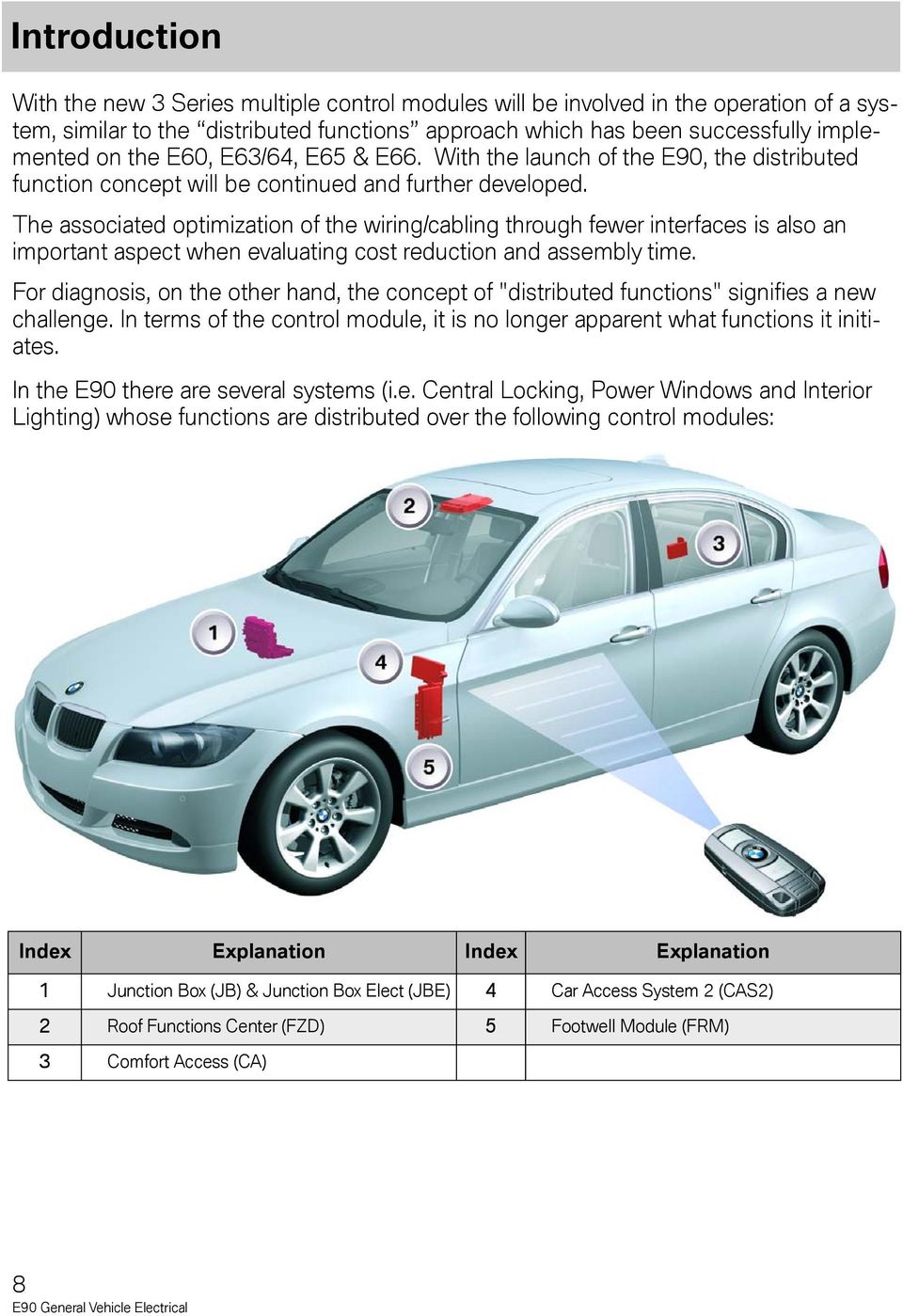
9 To get a better understanding of the concept of distributed functions using the Central Locking System as an example. To date (E46), the "Central Locking" function was located primarily in the General Module (GM) or, on the E60 in the Basic Body Module (KBM) and the door modules. The "Central Locking" function in the E90 is distributed over several control modules (Car Access System, Junction Box Electronics Control Module & Footwell Module). Distributing functions over several control module offers the advantage that sensors and actuators are connected directly to a control module in the vicinity of their installed location, which result is shorter cable connections. By interlinking the control modules, it is possible to exchange sensor data between them. The primary control modules for the systems in the E90 are: Junction Box Electronics Control Module (JBE) Car Access 2 (CAS2) Footwell Module (FRM) Roof Function Center (FZD) The distributed functions concept is used/identified in the following General Vehicle Electrical Systems: Central Locking (ZV)) Comfort Access (CA) Interior Lighting (IB) Power Windows (FH) Slide/tilt Sunroof (SHD) Anti-theft Alarm System (DWA) Electronic Steering Lock (ELV) Wiper Washer System Park Distance Control (PDC) Vehicle Exterior Lighting Adaptive Headlight Control Steering Column Switch Cluster (SZL) Outside Mirror Power Seats Rear Sun Shade 9

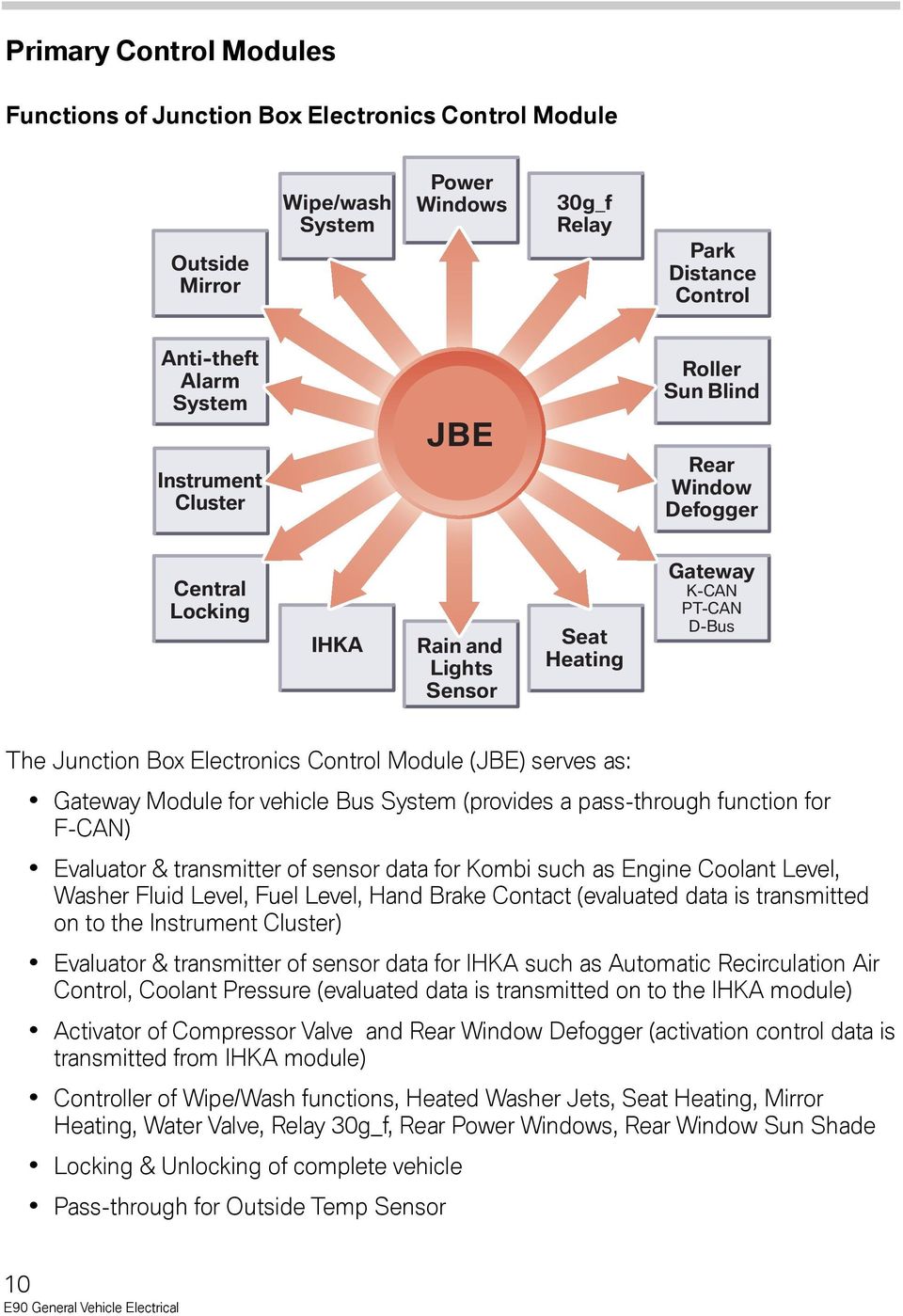
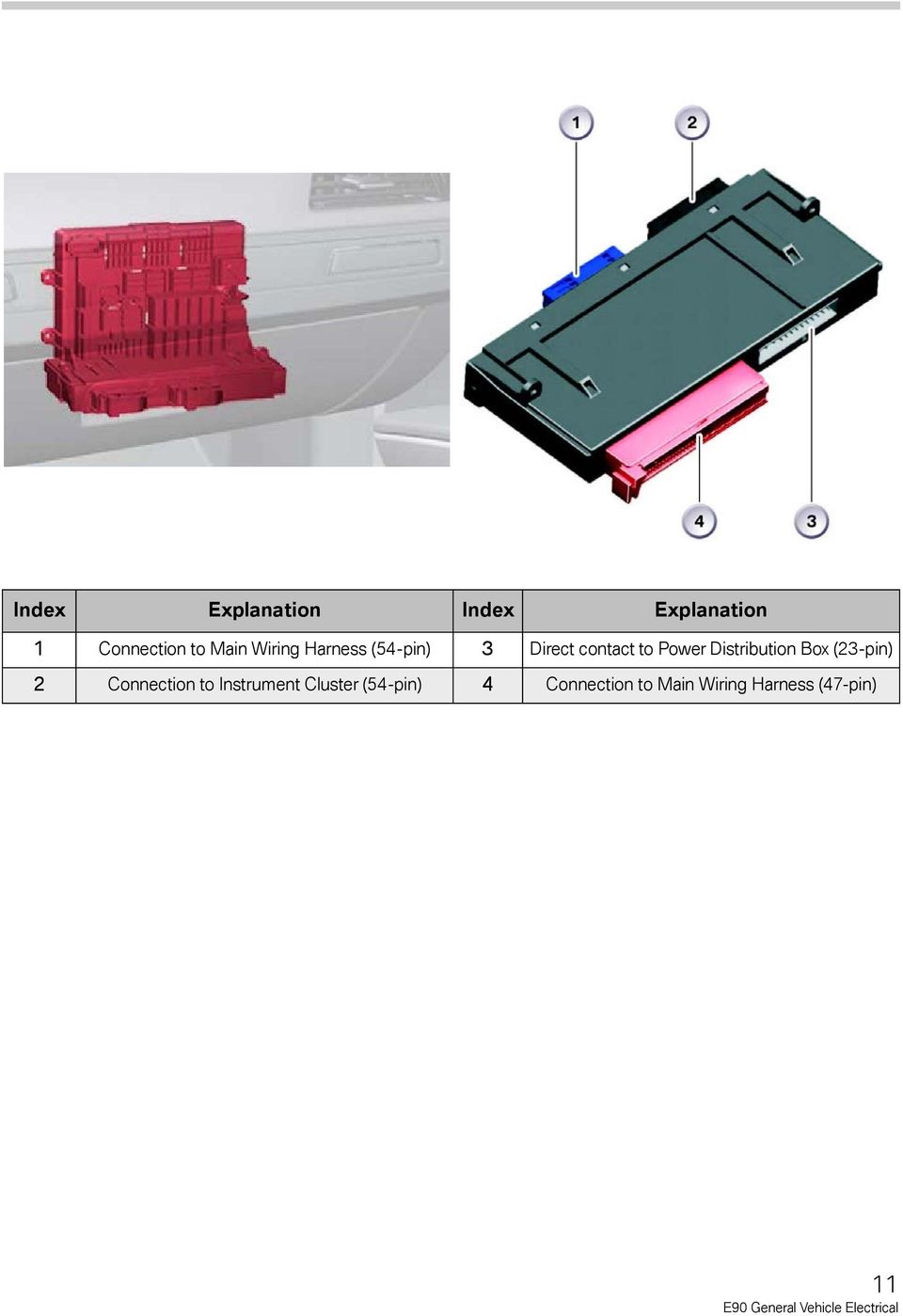
10 Primary Control Modules Functions of Junction Box Electronics Control Module Outside Mirror Wipe/wash System Power Windows 30g_f Relay Park Distance Control Anti-theft Alarm System Instrument Cluster JBE Roller Sun Blind Rear Window Defogger Central Locking IHKA Rain and Lights Sensor Seat Heating Gateway K-CAN PT-CAN D-Bus The Junction Box Electronics Control Module (JBE) serves as: Gateway Module for vehicle Bus System (provides a pass-through function for F-CAN) Evaluator & transmitter of sensor data for Kombi such as Engine Coolant Level, Washer Fluid Level, Fuel Level, Hand Brake Contact (evaluated data is transmitted on to the Instrument Cluster) Evaluator & transmitter of sensor data for IHKA such as Automatic Recirculation Air Control, Coolant Pressure (evaluated data is transmitted on to the IHKA module) Activator of Compressor Valve and Rear Window Defogger (activation control data is transmitted from IHKA module) Controller of Wipe/Wash functions, Heated Washer Jets, Seat Heating, Mirror Heating, Water Valve, Relay 30g_f, Rear Power Windows, Rear Window Sun Shade Locking & Unlocking of complete vehicle Pass-through for Outside Temp Sensor 10
11 Index Explanation Index Explanation 1 Connection to Main Wiring Harness (54-pin) 3 Direct contact to Power Distribution Box (23-pin) 2 Connection to Instrument Cluster (54-pin) 4 Connection to Main Wiring Harness (47-pin) 11
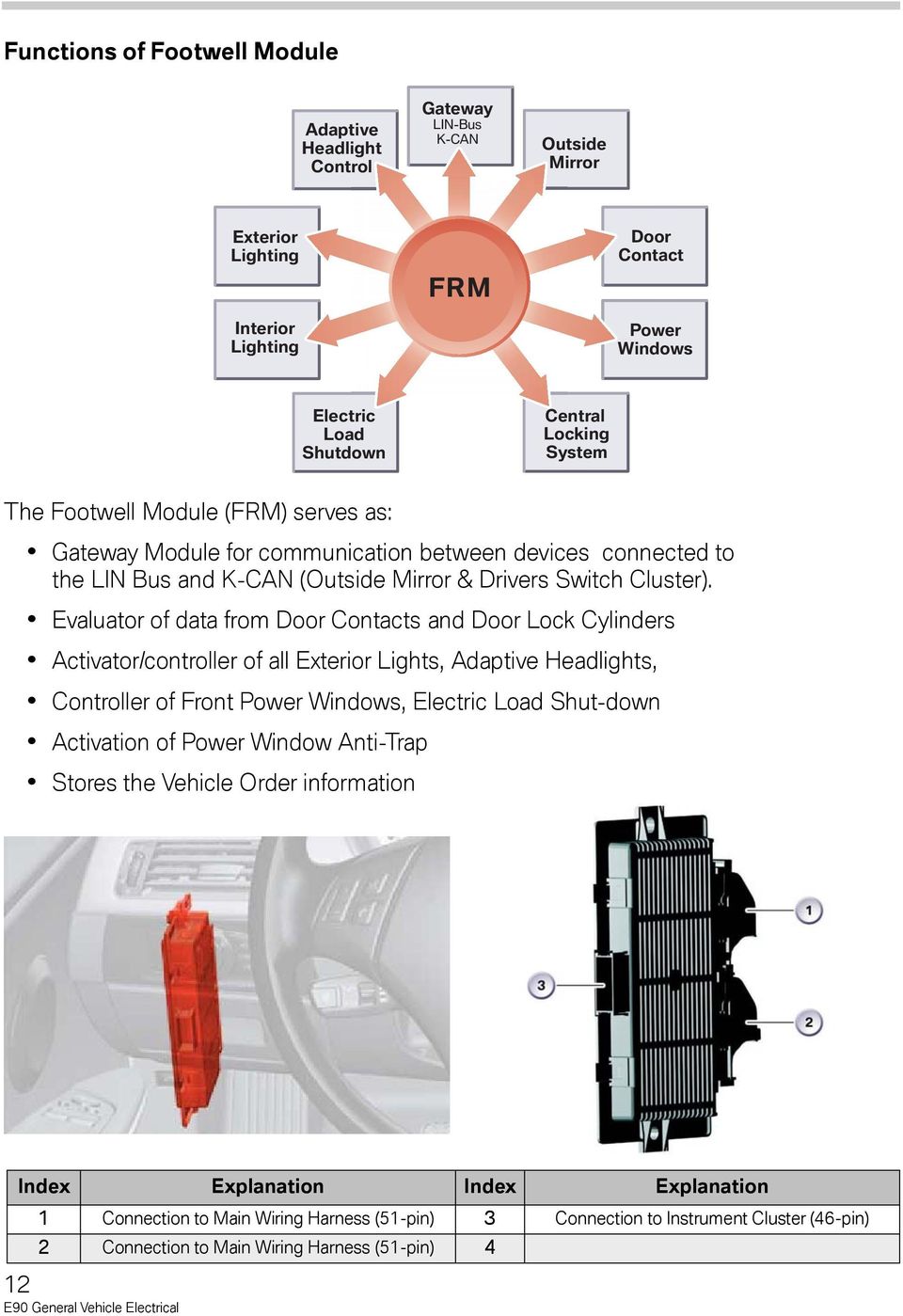
12 Functions of Footwell Module Adaptive Headlight Control Gateway LIN-Bus K-CAN Outside Mirror Exterior Lighting Interior Lighting FRM Door Contact Power Windows Electric Load Shutdown Central Locking System The Footwell Module (FRM) serves as: Gateway Module for communication between devices connected to the LIN Bus and K-CAN (Outside Mirror & Drivers Switch Cluster). Evaluator of data from Door Contacts and Door Lock Cylinders Activator/controller of all Exterior Lights, Adaptive Headlights, Controller of Front Power Windows, Electric Load Shut-down Activation of Power Window Anti-Trap Stores the Vehicle Order information Index Explanation Index Explanation 1 Connection to Main Wiring Harness (51-pin) 3 Connection to Instrument Cluster (46-pin) 2 Connection to Main Wiring Harness (51-pin) 4 12
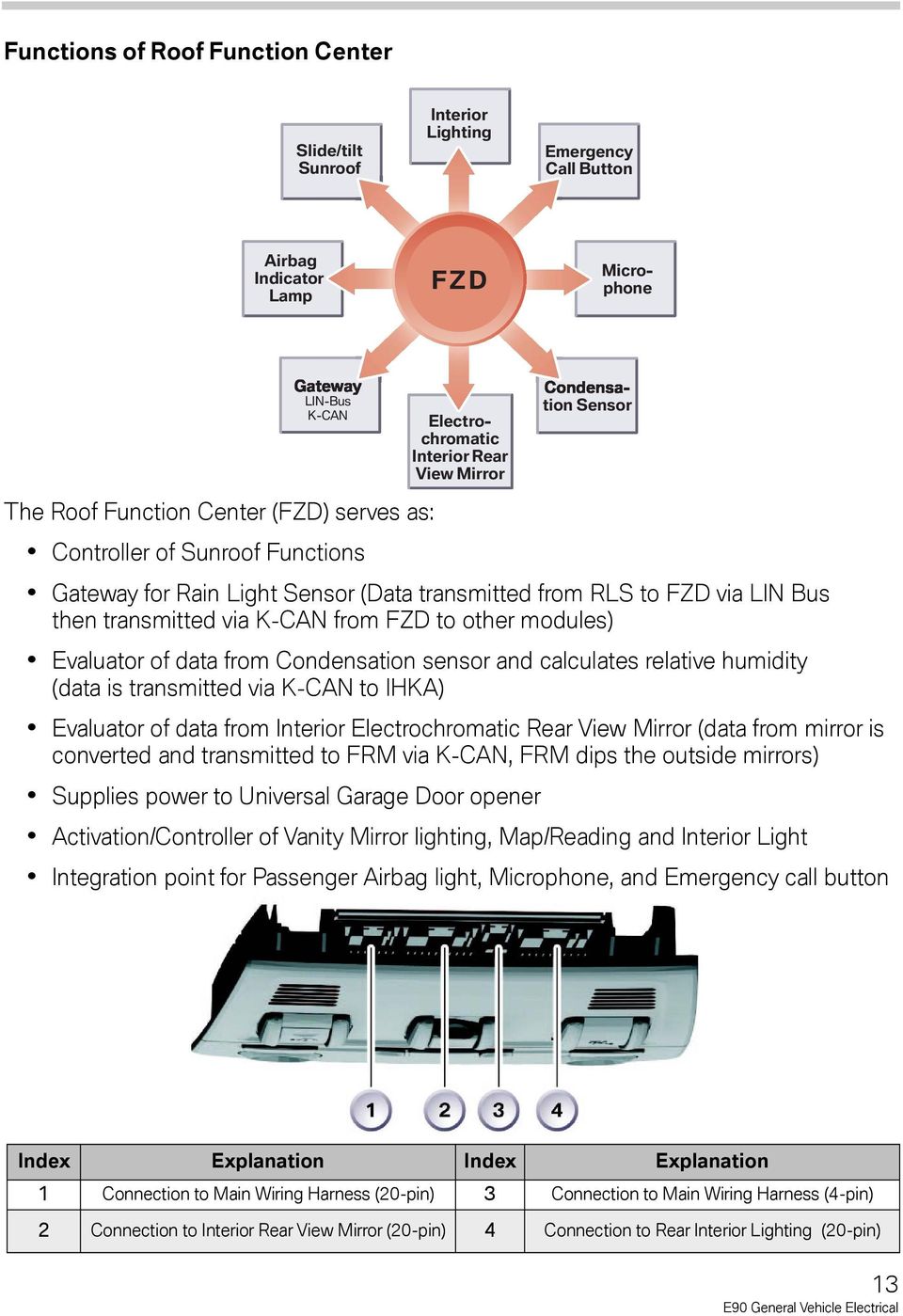
13 Functions of Roof Function Center Slide/tilt Sunroof Interior Lighting Emergency Call Button Airbag Indicator Lamp FZD Microphone LIN-Bus K-CAN The Roof Function Center (FZD) serves as: Controller of Sunroof Functions Electrochromatic Interior Rear View Mirror Gateway for Rain Light Sensor (Data transmitted from RLS to FZD via LIN Bus then transmitted via K-CAN from FZD to other modules) Evaluator of data from Condensation sensor and calculates relative humidity (data is transmitted via K-CAN to IHKA) Evaluator of data from Interior Electrochromatic Rear View Mirror (data from mirror is converted and transmitted to FRM via K-CAN, FRM dips the outside mirrors) Supplies power to Universal Garage Door opener tion Sensor Activation/Controller of Vanity Mirror lighting, Map/Reading and Interior Light Integration point for Passenger Airbag light, Microphone, and Emergency call button Index Explanation Index Explanation 1 Connection to Main Wiring Harness (20-pin) 3 Connection to Main Wiring Harness (4-pin) 2 Connection to Interior Rear View Mirror (20-pin) 4 Connection to Rear Interior Lighting (20-pin) 13
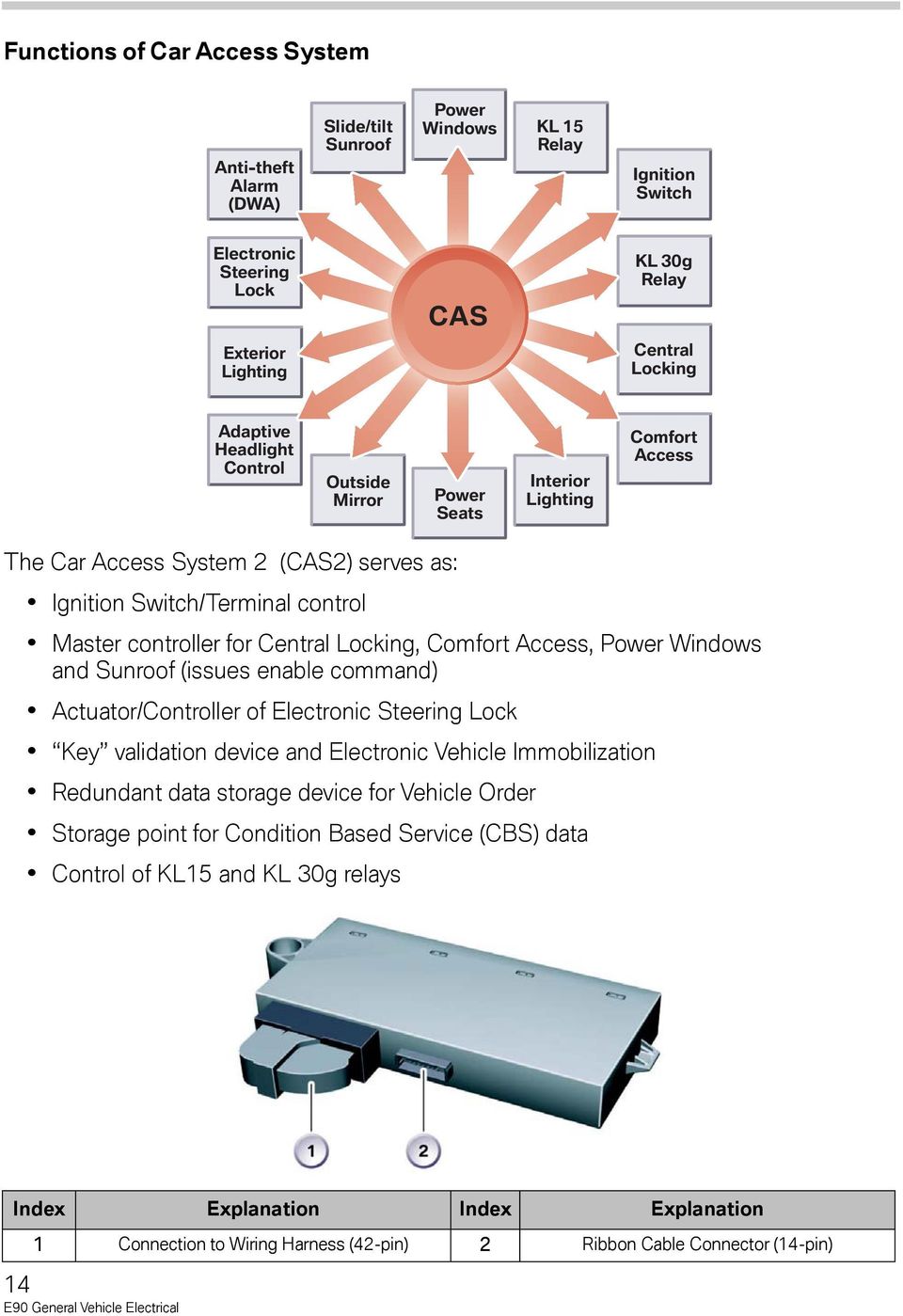
14 Functions of Car Access System Anti-theft Alarm (DWA) Slide/tilt Sunroof Power Windows KL 15 Relay Ignition Switch Electronic Steering Lock CAS KL 30g Relay Exterior Lighting Central Locking Adaptive Headlight Control Outside Mirror Power Seats Interior Lighting Comfort Access The Car Access System 2 (CAS2) serves as: Ignition Switch/Terminal control Master controller for Central Locking, Comfort Access, Power Windows and Sunroof (issues enable command) Actuator/Controller of Electronic Steering Lock Key validation device and Electronic Vehicle Immobilization Redundant data storage device for Vehicle Order Storage point for Condition Based Service (CBS) data Control of KL15 and KL 30g relays Index Explanation Index Explanation 1 Connection to Wiring Harness (42-pin) 2 Ribbon Cable Connector (14-pin) 14
15 NOTES PAGE 15

16 Car Access System 2 - Input/Output 16

17 Legend for Car Access System 2 Index Explanation Index Explanation 1 Hood Contact Switch 22 Center-Lock Button 2 Car Access System 2 CAS 2 23 Truck Lid Button, Interior 3 Clutch Switch 24 Dynamic Stability Control (DSC) 4 Brake Light Switch BLS Kl. R Terminal R 5 Digital Motor Electronics DME/ECM Kl. 15 Terminal 15 6 Intelligent Battery Sensor (IBS) Kl. 15 WUP Terminal 15, Wake-up 7 Starter Kl. 15 ESV Terminal 15, Fuel Injectors 8 Junction Box (JB) Kl. 30 Terminal 30 9 Terminal 30g Relay Kl. 30g Terminal 30, Switched 10 Terminal 15, Load-Shedding Relay Kl. 30L Terminal 30, Load 11 Junction Box Electronics Control Module (JBE) 12 Identification Transmitter Kl. 50 Terminal 50 CAS- Bus/K-Bus K-Bus Protocol 13 Comfort Access (CA) K-CAN Body CAN 14 Remote Control Receiver PT-CAN Powertrain CAN 15 Rear window antenna EWS Electronic Vehicle Immobilizer Signal 16 Electronic Outer Door Handle Module TAGE START- DME Start, Digital Motor Electronics 17 Electric Steering Lock (ELV) 30 ELV Positive Supply ELV 18 Telematics Control Unit TCU FBD Remote Control Services 19 Relay, Fuel Injectors FBD ON Remote Control Services ON 20 Holder FBD OUT Remote Control Services OUT 21 START/STOP Button 22 Side airbag, front right 17

18 Car Access System 2 - Circuit Diagram 18

19 Legend for Car Access System 2 Index Explanation Index Explanation 1 Hood Contact Switch 22 Center-Lock Button 2 Car Access System 2 CAS 2 23 Truck Lid Button, Interior 3 Clutch Switch 24 Dynamic Stability Control (DSC) 4 Brake Light Switch BLS Kl. R Terminal R 5 Digital Motor Electronics DME/ECM Kl. 15 Terminal 15 6 Intelligent Battery Sensor (IBS) Kl. 15 WUP Terminal 15, Wake-up 7 Starter Kl. 15 ESV Terminal 15, Fuel Injectors 8 Junction Box (JB) Kl. 30 Terminal 30 9 Terminal 30g Relay Kl. 30g Terminal 30, Switched 10 Terminal 15, Load-Shedding Relay Kl. 30L Terminal 30, Load 11 Junction Box Electronics Control Module (JBE) 12 Identification Transmitter Kl. 50 Terminal 50 CAS- Bus/K-Bus K-Bus Protocol 13 Comfort Access (CA) K-CAN Body CAN 14 Remote Control Receiver PT-CAN Powertrain CAN 15 Rear window antenna EWS Electronic Vehicle Immobilizer Signal 16 Electronic Outer Door Handle Module TAGE START- DME Start, Digital Motor Electronics 17 Electric Steering Lock (ELV) 30 ELV Positive Supply ELV 18 Telematics Control Unit TCU FBD Remote Control Services 19 Relay, Fuel Injectors FBD ON Remote Control Services ON 20 Holder FBD OUT Remote Control Services OUT 21 START/STOP Button 22 Side airbag, front right 19

20 Central Locking On the E90, all doors as well as the trunk lid and fuel filler flap are integrated into the Central Locking System. The central locking can be operated via the following components: Remote control/identification transmitter Driver's door lock barrel (door lock) Center-lock button Electronic outer door handle module (TAGE) in connection with comfort access Control Modules for Central Locking Function Index Explanation Index Explanation 1 Car Access System 2 (CAS2) 3 Junction Box (JB) 2 Footwell Module (FRM 20

21 Car Access System 2 (CAS2) As soon as the CAS2 receives the lock/unlock signal from the remote control receiver, it checks whether the identification transmitter is valid and belongs to the vehicle. Only if the check/authentication, which takes a few milliseconds, is successful will the CAS2 forward the request to activate the central locking. The CAS2, serves as the master control module for the central locking system, as it issues the enable signal to activate a lock/unlock function. An enable status signal is transmitted to the JBE from CAS2 via K-CAN. Signal Path: Remote control to remote receiver to CAS2; or Central lock button input to CAS2; Enable signal from CAS2 to JBE via K-CAN (if all doors are closed) Door status signal from FRM to JBE via K-CAN then JBE via K-Can to CAS2 Example: The request to lock the vehicle, is not executed while the driver's door is open. Junction Box Electronics Control Module (JBE) The Junction Box Electronics Control Module is responsible for implementing the lock/unlock operation for the entire vehicle, as it contains the lock/unlock relays which in turn drive the respective lock/unlock motors. The following central locking relays are activated by JBE: Driver's door Rear doors Front passenger's door Fuel filler flap The central locking function for the trunk lid is activated directly via a power output stage. Signal Path: Enable signal from CAS2 to JBE via K-CAN; JBE activates lock/unlock function via direct activation of relay(s) Footwell Module (FRM) The Footwell Module (FRM) monitors the hall sensors of the door contacts to determine if a door is open or closed. CAS2 indirectly obtains the door status information and uses the information to determine if an enable signal is to be provided to the JBE. Signal Path: Door contact signals input to FRM; Door status signal from FRM to JBE via K-CAN then forwarded from JBE via K-Can to CAS2. 21
22 Unlocking/Locking the Vehicle The central locking system can be activated only when the driver's door is closed. The vehicle unlocking/locking procedure is initiated by the following system components: Remote control/identification transmitter Center-lock button Mechanical key/spare key Note: The identification transmitter is incorporated with the remote control function and is used solely for Comfort Access. The vehicle activates the identification transmitter by way of a radio signal from the Comfort Access System. This makes it possible to unlock the vehicle without actively using the identification transmitter. The central locking system activates the following system components: Central locking, driver's and front passenger's door Central locking, rear doors Central locking, fuel tank Central locking, trunk lid Example: If the vehicle is unlocked using identification transmitter/remote control the unlocking procedures is as shown below. Index Explanation Index Explanation 1 Identification Transmitter 7 Central Locking, rear side driver's door, passenger doors, fuel filler flap 2 Rear Window Antenna 8 Central Locking, Driver's Door 3 Remote Control Receiver 9 Central Locking,Trunk Lid 4 Car Access System (CAS2) 10 Footwell Module FRM 5 Junction Box Electronics Control Module (JBE) 11 Door Contacts 6 Relay for Central Locking 22
23 Unlocking Procedure As soon as the unlock button on the identification transmitter is pressed, the signal initially reaches the rear window antenna followed by the remote control receiver. The remote control receiver is located in the diversity module and forwards the signal to the CAS2. The signal from the identification transmitter is verified in the CAS2. If the signal is recognized as valid, the JBE is enabled for the purpose of unlocking the central locking drive units. The JBE now activates the relay to trigger the vehicle unlocking procedure. Locking Procedure The vehicle can be locked only after the Footwell Module has evaluated the door contacts and the CAS2 signals that the doors are closed. Using Identification Transmitter The identification transmitter sends out a coded signal as soon as the unlock or lock button is pressed. The signal from the identification transmitter is demodulated and conditioned in the remote control receiver. This signal is then made available to the car access system 2. All central locking drive units assume the "lock" position during the vehicle locking procedure. The central locking drive units in the doors additionally assume the "central arrest" position. On conclusion of the central arrest procedure, the locking buttons in the doors are mechanically separated from the central locking drive system. The vehicle can then no longer be unlocked using the locking buttons in the doors. The trunk lid can also be opened separately with the identification transmitter. Center-Lock Button The vehicle can be locked/unlocked with the center-lock button. The CAS 2 receives a high signal (battery voltage approx. 12 V) when the center-lock button is not pressed. The high signal changes to a low signal (approx. 0 V) as soon as the center-lock button is pressed. The CAS 2 evaluates the change from the high signal to the low signal and locks/unlocks the vehicle. The signal from the center-lock button is looped through the Junction Box Electronics Control Module. Mechanical Key/Spare Key The footwell module evaluates the Hall sensors for the lock barrel in the driver's door. The CAS2 is informed of the change in status via the K-CAN. The CAS2 enables the vehicle unlocking/locking procedure. The JBE initiates the vehicle unlocking/ locking procedure. 23
24 Locking Button on Vehicle Doors All four doors can be locked mechanically, by using the separate locking buttons. If the button on the door is depressed, then the inner door handle of the door to be unlocked must be pulled twice to unlock the vehicle door. In this situation the Junction Box Electronics Control Module does not activate the central locking. Opening the Trunk Lid The trunk lid can be unlocked via the remote control, the identification transmitter, the outer or inner trunk lid release button. Opening with Remote Control/Identification Transmitter The trunk lid is opened with the remote control/identification transmitter by pressing on the trunk lid symbol. The trunk lid opens irrespective of whether the vehicle is locked or not. The motor in the lock of the trunk lid is activated via a power output stage in the JBE in order to open the trunk lid. Opening with the Outer Trunk Lid Button As soon as the vehicle is unlocked, the trunk lid can be opened by pressing the outer trunk lid button. The microswitch switches to ground when the outer trunk lid button is pressed. The JBE monitors the microswitch. The trunk lid is unlocked and opened when the signal from the microswitch goes to low. Opening with the Inner Trunk Lid Button As soon as the vehicle is unlocked, the trunk lid can be opened by pressing the inner trunk lid button. The inner trunk lid button is installed on the A-pillar on the driver's side. It switches to ground. The microswitch is routed directly to the CAS2. As soon as the signal of the microswitch goes to low, the CAS2 sends this status to the JBE. In turn, the JBE activates the motor in the lock of the trunk lid. 24
25 Special Functions Automatic Locking (Personal Profile) The vehicle is locked automatically when driving at a speed in excess of 16 km/h. The speed signal is made available by the DSC module. The vehicle is unlocked in connection with Comfort Access (CA) as soon as terminal 15 is switched off. On vehicles without Comfort Access (CA), the unlocking procedure is triggered by removing the remote control from its holder. Selective Unlocking With corresponding coding, the vehicle can also be unlocked selectively. In this case, the driver's door is initially unlocked. The rest of the vehicle is unlocked in response to a renewed unlock request. Unlocking After an Accident A locked central locking system is unlocked as soon as the CAS2 receives a crash message from the Multiple Restraint System 5 (MRS5). On receiving the crash signal, the center-lock button and the remote control receiver are inhibited for the central locking functions. The center-lock button and the remote control receiver are enabled again only after the a change in terminal R OFF/terminal R ON. 25
26 Location of Control Modules Index Explanation Index Explanation 1 Footwell Module (FRM) 3 Junction Box (JB) 2 Car Access System 2 (CAS2) Footwell Module (FRM) The footwell module is located in the left hand A-pillar. It evaluates the status of the door contacts and reads the Hall sensor signals from the lock barrel in the driver's door and transfers the information via the Junction Box Electronics Control Module to the Car Access System 2. Car Access System 2 (CAS2) The Car Access System 2 is installed to the left of the steering column. The CAS2 assumes the master function for the Central Locking System, it has the exclusive system authorization and is simply supported by the other control modules. Junction Box Electronics Control Module (JBE) The Junction Box Electronics Control Module is integrated in the front power distribution box. The JBE contains the relays for activating the central locking drive modules. The trunk lid is operated via a power output stage. The signals from the outer trunk lid button and center-lock button are also sent to the JBE and transferred to the CAS2. The remote control receiver is powered by the Junction Box Electronics Control Module. 26
27 Components of Central Locking System Controls Central locking can be operated from the following controls: Remote control Identification transmitter Center-lock button Driver's door lock barrel Remote Control Each vehicle is delivered with one spare key and two remote control units. The adapter for the spare key is located in the glove compartment. Note: A third remote control for the vehicle is optionally available. This remote control can be ordered through Spare Parts. The remote control has three buttons for operating the central locking system. There is a rechargeable battery in the remote control that is charged by means of a transponder coil in the remote control holder. The mechanical key is integrated in the remote control. Index Explanation Index Explanation 1 Unlock / convenient open button 3 Button for OPEN trunk lid 2 Lock / convenient close button 4 Mechanical key 27
28 Index Explanation 1 Mechanical Key 2 Spare Key 3 Remote Control Center-Lock Button The center-lock button is installed in the instrument panel in the center of the outlet nozzle. A new feature is that the center-lock button forms one component together with the hazard warning switch, the button for dynamic stability control and the stratification potentiometer. Index Explanation Index Explanation 1 Hazard Warning Flasher Button 3 Stratification Potentiometer 2 Dynamic Stability Control Button 4 Central Lock Button Driver's Door Lock Barrel The lock barrel is connected mechanically via a linkage to the door lock. Hall sensors for the lock barrel are integrated in the door lock. The footwell module evaluates the signals from the Hall sensors for locking/unlocking purposes. Central Locking Drive Units A central locking drive unit consists of an electric drive unit and the unlocking/locking mechanism. Central Locking Drive Units in the Doors The central locking drive units in the doors are equipped with two motors to facilitate the unlocking/locking and central arrest functions of the vehicle. Central arrest means that the locking button in the doors is separated mechanically from the central locking drive unit. As a result, the vehicle cannot be opened by pulling the locking button. The Hall sensor for the door contact is additionally integrated in the central locking drive unit. 28
29 Central Locking Drive Units for Truck Lid and Fuel Filler Flap The central locking drive units for the truck lid and fuel filler flap are each equipped with a motor for unlocking/locking purposes. Manually Release for Fuel Filler Flap The fuel filler flap can be unlocked manually in the event of an electrical defect. The release device is located in the luggage compartment on the right behind the luggage compartment cover. 1. Remove cover 2. Pull green knob with fuel pump symbol. Lock Barrel, Trunk Lid The trunk lid can be unlocked via the lock barrel using the mechanical key or spare key. This a pure mechanical unlocking function and triggers no response in the central locking. Emergency Trunk Lid Release The emergency release for the trunk lid is integrated in the luggage compartment. The central locking of the trunk lid is released by pulling the pull handle for the emergency release. Index Explanation Index Explanation 1 Pull handle for emergency release 4 Cylinder barrel in trunk lid 2 Bowden cable for emergency release 5 Central locking, trunk lid 3 Bowden cable for cylinder barrel in trunk lid A detailed description of the truck lid emergency release facility is provided in the E90 Owner's Manual. 29
30 Central Locking - Inputs/Outputs 30
31 Legend for Central Locking Index Explanation Index Explanation 1 Lock barrel, driver's door 15 Identification transmitter 2 Footwell module FRM 16 Interior button for truck lid 3 Door contact, passenger's door 17 Rear window antenna 4 Central locking, passenger's door 18 Remote control receiver 5 Door contact, rear passenger's side 19 Comfort access CA 6 Central locking, rear passenger's side 20 Car access system 2 CAS 2 7 Junction Box Electronics Control Module (JBE) 21 Central locking, driver's door 8 Center-lock button 22 Door contact, driver's door 9 Central locking, fuel filler flap K-CAN Bodyshell CAN 10 Luggage compartment light Kl. 30 Terminal Central locking, truck lid CAS- Bus//K-Bus K-Bus Protocol 12 Button, truck lid, exterior FBD Remote control services 13 Central locking, rear driver's side FBD ON Remote control services ON 14 Door contact, rear driver's side FBD OUT Remote control services OUT 31
32 Central Locking - Circuit Diagram 32
33 Legend for Central Locking Index Explanation Index Explanation 1 Lock barrel, driver's door 15 Identification transmitter 2 Footwell module FRM 16 Interior button for truck lid 3 Door contact, passenger's door 17 Rear window antenna 4 Central locking, passenger's door 18 Remote control receiver 5 Door contact, rear passenger's side 19 Comfort access CA 6 Central locking, rear passenger's side 20 Car access system 2 CAS 2 7 Junction Box Electronics Control Module (JBE) 21 Central locking, driver's door 8 Center-lock button 22 Door contact, driver's door 9 Central locking, fuel filler flap K-CAN Bodyshell CAN 10 Luggage compartment light Kl. 30 Terminal Central locking, truck lid CAS- Bus//K-Bus K-Bus Protocol 12 Button, truck lid, exterior FBD Remote control services 13 Central locking, rear driver's side FBD ON Remote control services ON 14 Door contact, rear driver's side FBD OUT Remote control services OUT 33
34 Classroom Exercise - Review Questions 1. What control modules are involved in activating/deactivating central locking? 2. What modules directly controls/activates the relays for lock/unlocking the vehicle? 3. What module provides information regarding the status of the door contacts? 4. How many remote controls are available? 34
35 Comfort Access Comfort Access (SA 322) is offered as an option for the E90. "Comfort Access" is a passive access system. This means the vehicle is unlocked by grasping the outer door handle, provided the identification transmitter is located within a radius of no more than approx m from the vehicle. With Comfort Access it is sufficient for the driver to simply carry the identification transmitter on his/her person in order to open or start the vehicle. "Keyless" access to the vehicle was implemented for the first time on the E65 and has been adapted for the E90. As with many of these systems the operation/functions are distributed among several different control modules. Comfort Access utilizes the same modules that are utilized for the Central Locking function plus two more. Index Explanation Index Explanation 1 Car Access System (CAS 2) 6 Comfort Access (CA) 2 Footwell Module (FRM) 7 Electric Steering Lock (ELV) 3 Dynamic Stability Control (DSC) 8 Electric Outer Door Handle Module (TAGE) 4 Digital Motor Electronics (DME/ECM) 9 Remote Control Receiver 5 Junction Box Electronics Control Module (JBE) 10 Antennas 35
36 Control Modules for Comfort Access Function Car Access System 2 (CAS2) As soon as the CAS2 receives a request signal it must verify if a valid ID Transmitter is located with range of the antenna. CAS2 requires that the antenna in the area of the request transmit a request for validation to the ID Transmitter. The ID transmitter transmits a signal to the remote control receiver, which in turn forwards the signal to the CAS2 where the signal is checked to be valid and belonging to the vehicle. Only if the check/authentication, which takes a few milliseconds, is successful will the CAS2 forward the request to activate the specific function. The CAS2, serves as the master control module for the central locking system, as it issues the enable signal to activate a lock/unlock function. An enable status signal is transmitted to the JBE from CAS2 via K-CAN. Junction Box Electronics Control Module (JBE) The Junction Box Electronics Control Module is responsible for implementing the lock/unlock operation for the entire vehicle, as it contains the lock/unlock relays which in turn drive the respective lock/unlock motors. The following central locking relays are activated by JBE: Driver's door Rear doors Front passenger's door Fuel filler flap The central locking function for the trunk lid is activated directly via a power output stage. Signal Path: Enable signal from CAS2 to JBE via K-CAN; JBE activates lock/unlock function via direct activation of relay(s) Footwell Module (FRM) The Footwell Module (FRM) monitors the hall sensors of the door contacts to determine if a door is open or closed. CAS2 indirectly obtains the door status information and uses the information to determine if an enable signal is to be provided to the JBE. Signal Path: Door contact signals input to FRM; Door status signal from FRM to JBE via K-CAN then forwarded from JBE via K-Can to CAS2. Comfort Access Control Module The Comfort Access Module controls/activates the antennas located on the exterior and interior of the vehicle, plus reads/transfers the data received from the Electronic Outer Door Handle Module to the CAS2. 36
37 Electronic Outer Door Handle Module (TAGE) The Electronic Outer Door Handle Module (TAGE) transmits door handle status data via CAS BUS(K-BUS) to the Comfort Access module, which in turn forwards the data to CAS2. Information from the door handle that is transmitted is primarily related to changes at the capacitive sensors and hall sensors integrated into the door handle. Functions of Comfort Access The main advantages of Comfort Access (CA) are: Passive Entry - Unlocking the vehicle without actively using the ID transmitter Passive Go -Starting engine without inserting the ID transmitter into its holder Passive Exit - Locking authorization without actively using the ID transmitter Index Explanation Index Explanation 1 Electronic Outer Door Handle Module (TAGE) 6 Electric Steering Column Lock (ELV) 2 Identification Transmitter/Remote 7 Comfort Access (CA) 3 Rear Window Antenna 4 Remote Control Receiver CAS- Bus/K-Bus K-Bus protocol 5 Car Access System 2 (CAS 2) K-CAN Body Bus Note: In connection with the comfort access system, the vehicle must activate the identification transmitter by means of a radio signal so that the transmitter is registered with the vehicle (authentication). 37
38 Passive Entry Passive entry enables access to the vehicle without operating the Identification Transmitter/Remote Control. Note: The vehicle cannot be woken and opened without a valid ID transmitter being present within a m radius from a specific external antenna. The vehicle in sleep mode is woken with the presence of a valid ID transmitter/remote control and activation of the Comfort Access System is started by grasping the outer door handle. Unlocking The capacitive sensor in the Electronic Outer Door Handle Module (TAGE) recognizes that the handle has been grasped and activates the transmit antenna. The transmit antenna sends a 125 khz signal to the identification transmitter. In turn, the identification transmitter sends a 315 MHz high frequency signal to the remote control receiver, which contains the authentication request. The CAS2 checks the authentication of the identification transmitter. Following successful authentication, the CAS2 issues the enable signal to unlock the vehicle and initiates the vehicle unlocking procedure. The JBE executes the unlocking procedure. Note: At this point the steering is not yet unlocked. Opening Trunk Lid An authentication check also takes place before opening the trunk lid, an identification transmitter must be located within the rear area of the vehicle. After successful authentication, the trunk lid can be unlocked and opened with the outer trunk lid button. Passive Go The passive go function makes it possible to start the vehicle without the ID transmitter being inserted in its holder. Note: The vehicle cannot be started without a valid ID transmitter being located in the interior of the vehicle. Issuing Start Enable After the door has been opened, the CAS2 starts the check after 3 s to establish whether there is a valid ID transmitter in the vehicle. The CAS2 instructs the Comfort Access control module to again send out the identifier for a valid ID transmitter. The Comfort Access Module sends the request via the interior antennas. 38
39 The identification transmitter replies with a code via the high frequency link (315 MHz) to the remote control receiver. This code contains data for the electronic vehicle immobilizer. The car access system 2 issues the enable to start the engine for the DME/DDE and the electric steering lock is unlocked. Passive Exit The passive exit function makes it possible to lock the vehicle without actively using the ID transmitter/remote control. Note: The vehicle cannot be unlocked without a valid identification transmitter within a m radius from a specific external antenna. Locking Procedure After the vehicle door has been closed, the locking procedure is started by touching the recognition point/area on the outer door handle. The electronic outer door handle module sends the request to lock the vehicle via the K-Bus to the Comfort Access System. Based on the exterior and/or interior antennas, the Comfort Access System checks where the ID transmitter is located. The ID transmitter is instructed to send an authentication signal. In turn, the identification sensor sends encrypted data via the high frequency link to the remote control receiver. The CAS2 checks whether the ID transmitter is valid. Upon successful completion of the check, the CAS2 issues the enable signal to lock the drive units and initiates the steering locking procedure. The JBE activates the central locking drive units. 39
40 Special Comfort Access Functions The Comfort Access System additionally features special functions that are determined by the actions of the vehicle user such as: ID Transmitters Remain in Vehicle If an ID transmitter remains in the vehicle interior, by checking via the interior antennas, the car access system 2 recognizes whether there is a valid identification transmitter in the vehicle interior. If a valid identification transmitter is detected in the vehicle interior and the vehicle is locked by means of another valid identification transmitter, the identification transmitter located in the vehicle interior is set to "invalid". For the Comfort Access System, this identification transmitter is considered as no longer belonging to the vehicle until the vehicle is unlocked again. ID Transmitter Remains in Trunk If an ID transmitter is in luggage compartment, upon closing the trunk lid, it is immediately opened (automatically). If there is an identification transmitter in the luggage compartment of the locked vehicle with the trunk lid open. An audible and visual signal draws the customer's attention to the fact that the identification transmitter has been left in the luggage compartment. On request from the CAS2, the Comfort Access control module starts the check via the interior antennas. The valid identification transmitter in the luggage compartment is recognized via the luggage compartment antenna. Consequently, the CAS2 does not issue the enable signal to lock the trunk lid. The trunk lid cannot be closed before the ID transmitter has been removed and is located outside the luggage compartment. Note: An ID transmitter can be locked in the truck if a second valid ID transmitter is identified as being on the exterior of the vehicle within the radius of the bumper antenna or if the valet function is active. Engine Start Disable The engine cannot be started if the identification transmitter is located in the luggage compartment of the unlocked vehicle. Note: The CAS2 issues the enable signal for starting the engine only when a valid identification transmitter has been detected in the vehicle interior. 40
41 Starting Engine without ID Transmitter The function makes it possible to start the vehicle within 10 s after "engine OFF" without detecting the identification transmitter. This function is intended for cases where the identification transmitter is not detected due to high frequency interference, as an example. Check Control Message, Terminal 15 The Comfort Access System enables terminal selection without the ID transmitter being inserted in its holder. It is possible that terminal 15 is selected by pressing the START- STOP button. A corresponding check control message is shown in the instrument cluster after the door is opened. An audible signal also sounds. Note: The battery may be discharged if the driver ignores the warnings and locks the vehicle. Unintentional Wake-up Function The sensors are subject to a check procedure in order to avoid waking the electronic outer door handle module by touching the outer door handle without a valid identification transmitter. The identification transmitter is requested to send an authentication signal. If no valid ID transmitter is detected, the electronic outer door handle module receives this information from the CAS2. In this case, the electronic outer door handle module remains inactive until a valid identification transmitter is detected. Locking with Engine Running The vehicle can also be unlocked with the engine running if the engine was started with passive go. When leaving the vehicle, the ID transmitter must also be taken and the vehicle locked from the outside. 41
42 Components of Comfort Access System The following graphic shows all components of the Comfort Access System with the respective control modules and control components. Index Explanation Index Explanation 1 Car Access System (CAS 2) 6 Comfort Access (CA) 2 Footwell Module (FRM) 7 Electric Steering Lock (ELV) 3 Dynamic Stability Control (DSC) 8 Electric Outer Door Handle Module (TAGE) 4 Digital Motor Electronics (DME/ECM) 9 Remote Control Receiver 5 Junction Box Electronics Control Module (JBE) 10 Antennas Comfort Access Control Module In addition to providing Central Locking functions, the option SA 322 Comfort Access is installed to facilitate Passive Entry, Passive Go and Passive Exit functions. The Comfort Access control module is located at the right rear of the luggage compartment. The Comfort Access Module controls/activates the antennas located on the exterior and interior of the vehicle, plus reads/transfers the data received from the Electronic Outer Door Handle Module to the CAS2. Index Explanation 1 N/A 2 Comfort Access Module (CA) 3 Park Distance Control Module (PDC) 4 N/A 42
43 Identification Transmitter The identification transmitter for Comfort Access must be actuated by means of a coded 125 khz radio signal that is transmitted from the Electronic Outer Door Handle Module or exterior antenna. The coded 125 khz radio signal enables the ID transmitter to transmits a coded 315 MHz high frequency validation signal that is received by the remote control receiver and forwarded to the CAS2, which determines if the ID Transmitter as valid and belongs to the vehicle. The ID transmitter is exclusively responsible for use/operation of the Comfort Access System. The ID transmitter does not need to be operated to enable access to the vehicle, it simply needs be carried on the person that is accessing/operating the vehicle. The ID transmitter for Comfort Access utilizes a replaceable battery, which is the identifiable difference when compared to the regular remote control that has an integrated rechargeable battery. The ID transmitter for Comfort Access does not need to be inserted in the holder in order to start the vehicle it just needs to be located in the interior of the vehicle in order to start the engine. The service life of the battery in the ID Transmitter is about 2 years. Index Explanation 1 Unlock Button for Mechanical Key 2 Battery Compartment Voltage Monitoring The ID Transmitter monitors its own battery voltage in two stages: First stage the ID Transmitter signals to the CAS2 that the battery is "flat" (discharged). In response, the CAS 2 generates a check control message. The check control message informs the customer that the battery needs to be changed. Second Stage if the battery is not changed, the voltage monitoring facility initiates a function which saves the data in the ID Transmitter is saved and then ID Transmitter is set/made "inoperable". 43
44 Antennas for Comfort Access Six antennas are installed for the comfort access system. Three antennas are located in the exterior and three in the interior. The antennas for the exterior and interior are inductive antennas and have a ferrite core which contributes to their compact size. This is of particular advantage for accommodating the antennas in the outer door handles. The transmit frequency of the antennas is 125 khz. All messages that are sent via the antennas are encrypted. Locations of Exterior Antennas The exterior antennas are installed in the following locations on the E90: Door Handle, Driver's side Door Handle, Passenger's side Rear Bumper Locations of Interior Antennas The interior antennas are installed in the following locations on the E90: Passenger Compartment, Front Passenger Compartment, Centre Luggage Compartment 44
45 Antenna in Outer Door Handles The antenna in the outer door handles is an integral part of the electronic outer door handle module. The antenna characteristic is structured such that it covers the area about the vehicle doors. Antenna in Bumper The antenna in the rear bumper is of the same design as the interior antennas. It features a waterproof plug connection to ensure no water enters the antenna. The antenna characteristic is structured such that it covers the rear area and enables access to the luggage compartment. Antennas for the Passenger Compartment The antenna characteristic is spherical. The entire vehicle interior is covered by the two interior antennas. The interior antennas are important for checking whether there is an identification transmitter located in the interior. Antenna for Luggage Compartment Due to its design, the luggage compartment acts as a "separate" area in the vehicle. This arrangement makes it easier for the comfort access system to identify the identification transmitter in the luggage compartment. The luggage compartment antenna is of the same design as the interior antenna. The antenna characteristic is laid out such that it covers the entire luggage compartment. Interior Antenna 45
46 Electronic Outer Door Handle Module (TAGE) The outer door handle contains the components of the Electronic Outer Door Handle Module (TAGE), which is connected to terminal 30 and operates within a voltage range from 9 V to 16 V. Index Explanation Index Explanation 1 Capacitive Sensor 1 3 Hall Sensor 2 Capacitive Sensor 2 4 Exterior Antenna The electronic outer door handle module is connected to the vehicle via the K-Bus thus making available the information from the capacitive sensors and the Hall sensor. Design The Electronic Outer Door Handle Module (TAGE) contains the following components: 3 sensors Capacitive sensor 1 for unlocking the vehicle Capacitive sensor 2 for locking the vehicle A Hall sensor for pulling the outer door handle Inductive antenna for the exterior Electronic module for outer door handle and interface for CAS-bus. 46
47 With the aid of 3 sensors, the TAGE module detects the status of the outer door handle. Each change in the status of the outer door handle module triggers on of the corresponding functions: Trigger pulse when a hand is moved around the outer door handle; capacitive sensor 1 Unlock request by pulling the outer door handle; Hall sensor Lock request by touching the recognition point/area on the outer door handle; capacitive sensor 2 Sensors To protect the battery, the TAGE module switches off the capacitive sensors for the driver's side after the vehicle has been at rest for 192 hours. The capacitive sensors on the passenger's side are switched off after 72 hours. Functional Principle of the Capacitive Sensor The capacitive sensor consists of three capacitor plates (electrodes). The dielectric is the air gap between the door handle and the body/door panel of the vehicle. One capacitor plate is the car body including the surrounding vehicle. The other two capacitor plates are located in the outer door handle. The outer door handle is split in two parts with respect to the capacitor plates. One capacitor plate is in the outer door handle. The other capacitor plate is contained in the grooved area on the upper portion of the outer door handle. The functional principle of the capacitive sensor is based on a change in the electrical field between the capacitor plates, which results in a change in the capacitance of the capacitor. A change in capacitance occurs (increase) whenever a hand is placed between the body and the outer door handle (grabbing of the handle). The electronic circuitry in the outer door handle wakes up based on a defined change in capacitance, which is referred to as triggering. The capacitive sensor responds with a pulse only to fast changes in its capacitance. Changes in its environment such as slow soiling of the outer door handle or rain therefore have no influence on the function of the capacitive sensor. When unlocking/locking the vehicle, the sensors are mutually blocked for a period of 2 sec., meaning that after locking, unlocking is inhibited for 2 sec and vice versa. Capacitive Sensor 1 Capacitive Sensor 1 is responsible for initiating the Unlock request by generating pulse when a hand is held between the "capacitor plates", door handle and door panel/body. The pulse wakes up the electronic circuitry in the TAGE. If the vehicle is in sleep mode, the TAGE will send a wake up request via K-Bus to the Comfort Access Module and CAS2. CAS2 will request that a signal be sent from the external antenna to the ID Transmitter asking for a validation signal. The Comfort Access module switches on the remote control receiver in order to receive the validation signal sent from the ID transmitter. 47
48 Index Explanation Index Explanation 1 Electric field, capacitor 1 3 Capacitor plate, capacitive sensor 2 2 Electric field, capacitor 2 4 Capacitor plate, capacitive sensor 1 Capacitive Sensor 2 A change in capacitance at sensor 2 is achieved by placing the thumb on the grooved area of the door handle. The change in capacitance generates a signal from sensor 2, resulting in the TAGE sending a lock request via the K-Bus (CAS-Bus) to the CAS2. Hall Sensor of the Outer Door Handle The Hall sensor is redundant to the capacitive sensor 1. If the TAGE has switched off the capacitive sensors, the Hall sensor is still operational after 192 hours which allows the unlocking procedure to also be started via the Hall sensor. The Hall sensor changes its status from low to high when the outer door handle is pulled. The TAGE monitors the status of the hall sensor and consequently detects whether access to the vehicle is requested. The monitoring cycle takes place every 40 ms in order to save the vehicle battery. A signal is triggered when the sensor reaches a defined threshold. The electronic outer door handle module detects the signal and switches on the power supply of the Hall sensor for checking purposes. 48
49 Lock in Driver's Door & Front Passenger's Door The capacitive sensor 1 initiates the vehicle unlocking procedure. The lock in the driver's door and front passenger's door is equipped with an additional spring to ensure the vehicle can be opened fast enough. The spring exerts pretension on the central locking drive unit for the unlocking procedure. The door is already unlocked before an attempt is made to open it with the outer door handle. Note: If pulled very fast, however, it may be necessary to pull the outer door handle a second time in order to open the door. 49
50 Comfort Access - Input/Output 50
51 Legend for Comfort Access Index Explanation Index Explanation 1 Lock Barrel, Driver's Door 20 Hall Sensor, ID transmitter in Holder 2 Footwell Module (FRM) 21 Hall Sensor, ID transmitter in Holder 3 Car Access System 2 (CAS 2) 22 Identification Transmitter Locked in Holder 4 Junction Box Electronics Control Module (JBE) 23 Identification Transmitter Holder 5 TAGE Hall sensor, Front Passenger's Side 24 Identification Transmitter 6 7 TAGE Capacitive Sensor, Front Passenger's Side TAGE Capacitive Sensor, Front Passenger's Side 25 Electric Steering Lock ELV 26 Rear Window Antenna 8 TAGE Antenna, Front Passenger's Side 27 Remote Control Receiver 9 Comfort Access (CA) 28 LED START/STOP Button 10 Exterior Antenna 29 Hall sensor, START/STOP Button 11 Luggage Compartment Antenna 30 Hall sensor, START/STOP Button 12 Interior Antenna, Rear 31 START/STOP button 13 Interior Antenna, Front CAS- Bus/K-Bus (K-bus protocol 14 TAGE Antenna, Driver's Side K-CAN Bodyshell CAN 15 TAGE Capacitive Sensor, Driver's Side Kl. 30 Terminal TAGE Capacitive Sensor, Driver's Side FBD Remote Control Services 17 TAGE Hall sensor, Driver's Side FBD ON Remote Control Services ON 18 Door Contact FBD OUT Remote Control Services OUT 19 Transponder Coil 51
52 Comfort Access - Circuit Diagram 52
53 Legend for Comfort Access Index Explanation Index Explanation 1 Lock Barrel, Driver's Door 20 Hall Sensor, ID transmitter in Holder 2 Footwell Module (FRM) 21 Hall Sensor, ID transmitter in Holder 3 Car Access System 2 (CAS 2) 22 Identification Transmitter Locked in Holder 4 Junction Box Electronics Control Module (JBE) 23 Identification Transmitter Holder 5 TAGE Hall sensor, Front Passenger's Side 24 Identification Transmitter 6 7 TAGE Capacitive Sensor, Front Passenger's Side TAGE Capacitive Sensor, Front Passenger's Side 25 Electric Steering Lock ELV 26 Rear Window Antenna 8 TAGE Antenna, Front Passenger's Side 27 Remote Control Receiver 9 Comfort Access (CA) 28 LED START/STOP Button 10 Exterior Antenna 29 Hall sensor, START/STOP Button 11 Luggage Compartment Antenna 30 Hall sensor, START/STOP Button 12 Interior Antenna, Rear 31 START/STOP button 13 Interior Antenna, Front CAS- Bus/K-Bus (K-bus protocol 14 TAGE Antenna, Driver's Side K-CAN Bodyshell CAN 15 TAGE Capacitive Sensor, Driver's Side Kl. 30 Terminal TAGE Capacitive Sensor, Driver's Side FBD Remote Control Services 17 TAGE Hall sensor, Driver's Side FBD ON Remote Control Services ON 18 Door Contact FBD OUT Remote Control Services OUT 19 Transponder Coil 53
54 Classroom Exercise - Review Questions 1. What is Passive Entry? How does it work? 2. What is Passive Go? How does it work? 3. What is Passive Exit? How does it work? 4. How many antennas are in the vehicle? 5. Can the ID transmitter be locked in the trunk? If so, how? 54
55 Interior Lighting The components installed with the interior lighting system for the E90 are: Interior Light with Interior Light Switch Interior Light with Interior Light Switch Reading Light with Reading Light Button, Driver and Passenger Top Light, Driver and Passenger Interior Light Interior Light with Interior Light Switch Reading Light with Reading Light Button, Driver and Passenger Top Light, Driver and Passenger Luggage Compartment Light Vanity Mirror Light, Driver and Passenger Footwell Lights, Driver and Passenger Courtesy Light, Driver and Passenger Control Modules for Interior Lighting The "interior lighting" function is distributed over several control module that communicate with each other via the K-CAN. Footwell Module (FRM) is responsible for switching the interior lighting on & off. Roof Functions Center (FZD) is responsible for the interior lighting components in the roof area. Junction Box Electronics Control Module (JBE) is the interface to the luggage & glove compartment lighting. Car Access System 2 (CAS2) receives the unlock signal and sends the instructions through the footwell module to switch on the interior lighting. The interaction of these three control units is described in more detail on the following pages. 55
56 Footwell Module (FRM) All interior lighting outputs of the Footwell Module are pulse-modulated to ensure that the interior lighting functions are at a constant brightness level in the event of voltage fluctuations. The pulse width modulation is also used for the soft ON/OFF function. The Footwell Module features the following functions for the interior lighting: Switching the interior lighting on/off Electric load shut-down after 16 minutes Instrument lighting, terminal 58g Switching on the Interior Lighting The footwell module receives numerous input signals that switch on the interior lighting. For instance, the input signals from the footwell module are read in directly or received via the K-CAN. The input signals for the interior lighting are listed in the following. Input Signals From Input Signals From Central Locking Signals CAS2 Barrel Lock, Driver's Door FRM Crash Signal MRS 5 Interior Light Switch FRM/FZD Door Contacts FRM Central Locking, Trunk Lid JB Switching-on Conditions The interior lighting is switched on in response to one of the following conditions: Unlock via barrel lock in driver's door Unlock via remote control/identification transmitter Terminal R OFF when terminal 58g was ON Receiving crash signal Lock button on remote control/ ID transmitter pressed when the central locking has been in central arrest state for longer than 10 s Interior lighting button pressed. Switching Off Interior Lighting The FRM receives numerous signals to switch off the interior lighting via the K-CAN or are obtained indirectly by the FRM. 56
57 Switch-off Conditions The interior lighting is switched off under the following conditions: Central locking in central arrest, all doors and the trunk lid are closed Terminal R OFF after 16 mins Interior lighting button pressed for longer than 3 s Terminal R ON with doors closed Terminal 58 ON and terminal R OFF. The interior lighting is switched off if no door is opened within 20 s. The interior lighting is switched off if the vehicle is unlocked via the remote control/identification transmitter and no door is opened after 20 s. Terminal R OFF and a vehicle door is opened for longer than 1 min "Power down" via diagnosis Electric Load Shutdown By way of terminal R OFF, the interior lighting system is switched off by the FRM after 16 min. For this purpose, the Footwell Module sends the electric load shut-down information via the K-CAN. The Roof Functions Center (FZD) receives this information and switches off the interior lighting in the roof area. The interior lights that are switched on directly by the FRM are also switched off. Terminal 58g The FRM makes available terminal 58g via the K-CAN. Terminal 58g is pulse widthmodulated and features the following two brightness levels: The brightness level for the locator lighting can be set individually via the rocker switch on the column stalk. The brightness level for the function lighting is not dimmed and is switched on at full brightness. Index Explanation 1 On-board Computer Button 2 Rocker Switch 57
58 Roof Functions Center (FZD) For the interior lighting system, the Roof Functions Center represents the interface to the Footwell Module since both control modules are connected to the K-CAN. For instance, the FZD can receive instructions to switch the interior lighting on or off via the K-CAN from the FRM. The FZD is the link to the rear interior lighting unit. The interior lighting functions in the Roof Functions Center are: Switching the interior lighting on/off on request from the Footwell Module Reading the signals from the interior light buttons and transferring them to the Footwell Module Terminal 58g The Roof Functions Center receives the terminal 58g signal from the Footwell Module via the K-CAN and activates the lighting in the buttons. Junction Box Electronics Control Module (JBE) The JBE is responsible for switching the luggage compartment and glove compartment lighting on and off by providing the ground connection for the lighting system. Luggage Compartment Lighting The status of the trunk lid contact changes when the trunk lid is opened manually or via the remote control/id Transmitter, which causes the signal to go to a low level. The JBE evaluates this signal and switches on the luggage compartment lighting. The status of the trunk lid contact switch changes when the trunk lid is closed again, this causes the signal to go to a high level and the JBE switches off the luggage compartment lighting. The JBE also switches on the luggage compartment lighting when the trunk lid is opened from the inside by pressing the button on the A-pillar. Glove Compartment Lighting Opening the glove compartment operates a microswitch that switches on the glove compartment lighting. Car Access System 2 (CAS2) The CAS2, serves as the master control module for the Central Locking System and issues the enable signal to activate/deactivate central locking which in turn transmits a signal, via K-CAN, to the FRM requesting the illumination of the interior light. As soon as the CAS2 receives a request to unlock/lock, the signal is checked whether it is valid and belongs to the vehicle. Only if the check is successful will the CAS2 forward the request to lock/unlock via JBE plus activate interior lighting via the FRM. 58
59 Interior Lighting Components The "interior lighting" function is distributed over several control units that communicate with each other via the K-CAN.. Index Explanation Index Explanation 1 Car Access System2 (CAS2) 3 Junction Box Electronics Control Module (JBE) 2 Footwell Module (FRM) 4 Roof Functions Center (FZD) 59
60 Interior Lighting Unit, Front The front interior lighting unit consists of: Reading lamp, driver's side with button Interior light with button Reading lamp, front passenger's side with button Top light. Emergency call button Passenger airbag OFF lamp Microphone Slide/tilt sunroof Color of roof area Index Explanation 1 Telephone microphone, driver's side 2 Top light 3 Sunroof button 4 Passenger's side microphone for voice recognition system 60 5 Airbag indicator lamp 6 Reading lamp, front passenger's side with button 7 Interior light with button 8 Reading lamp, driver's side with button 9 Interior lighting unit 10 Cover 11 Emergency call button
61 Interior Lighting Unit, Rear The rear interior lighting unit consists of: Reading lamp, rear left/right with button Interior light with button Top light Cover for ultrasonic interior protection (movement detector) on vehicles with DWA Index Explanation 1 Top light 2 Cover for ultrasonic interior protection 3 Reading lamp, rear right 4 Rear interior light with button 5 Reading lamp, rear left 6 Interior lighting unit 61
62 Interior Lighting - Input/Output (Option) 62
63 Legend for Interior Lighting (Option) Index Explanation Index Explanation 1 Driver's door lock barrel 18 Door contact 2 Footwell module FRM 19 Vanity mirror light, driver's side 3 Courtesy lighting, driver's side 20 Switch for vanity mirror light, driver's side 4 Courtesy lighting, front passenger's side 21 Vanity mirror light, passenger's side 5 Junction Box Electronics Control Module (JBE) 22 Switch for vanity mirror light, passenger's side 6 Footwell light, front passenger's side 23 Switch for glove compartment light 7 Exit light, passenger's side 24 Glove compartment light 8 Luggage compartment light 25 Roof functions center FZD with front interior light 9 Central locking, truck lid 26 Interior light, rear 10 Identification transmitter K-CAN Bodyshell CAN 11 Rear window antenna Kl. 30 Terminal Remote control receiver Kl. 58g Terminal 58g 13 Car access system 2 CAS 2 IB Interior lighting control 14 Comfort access CA FBD Remote control services 15 Footwell light, driver's side FBD ON Remote control services ON 16 Interior button for truck lid FBD OUT Remote control services OUT 17 Exit light, driver's side 2 x Courtesy light, front and rear 63
64 Interior Lighting - Circuit Diagram (Option) 64
65 Legend for Interior Lighting (Option) Index Explanation Index Explanation 1 Driver's door lock barrel 18 Door contact 2 Footwell module FRM 19 Vanity mirror light, driver's side 3 Courtesy lighting, driver's side 20 Switch for vanity mirror light, driver's side 4 Courtesy lighting, front passenger's side 21 Vanity mirror light, passenger's side 5 Junction Box Electronics Control Module (JBE) 22 Switch for vanity mirror light, passenger's side 6 Footwell light, front passenger's side 23 Switch for glove compartment light 7 Exit light, passenger's side 24 Glove compartment light 8 Luggage compartment light 25 Roof functions center FZD with front interior light 9 Central locking, truck lid 26 Interior light, rear 10 Identification transmitter K-CAN Bodyshell CAN 11 Rear window antenna Kl. 30 Terminal Remote control receiver Kl. 58g Terminal 58g 13 Car access system 2 CAS 2 IB Interior lighting control 14 Comfort access CA FBD Remote control services 15 Footwell light, driver's side FBD ON Remote control services ON 16 Interior button for truck lid FBD OUT Remote control services OUT 17 Exit light, driver's side 2 x Courtesy light, front and rear 65
66 Classroom Exercise - Review Questions 1. What is the primary module for controlling the interior lighting functions? 2. What lighting components does the FZD control? 3. How long after the ignition is switched off are the interior lights shut down? 66
67 Power Windows The Power Window functions available in the E90 are: Opening and closing Opening and closing with toll function Convenient opening and closing Indirect anti-trapping protection Panic mode Load shut-down at terminal 50 Thermal protection of power window motors Control Modules for Power Windows Index Explanation Index Explanation 1 Car Access System2 (CAS2) 3 Junction Box Electronics Control Module (JBE) 2 Footwell Module (FRM) 4 67
68 Car Access System 2 (CAS2) The car access system 2 is the master control module for opening and closing the windows. Footwell Module (FRM) The relays for the power window motors for the driver's and passenger's side are installed in the Footwell Module. Junction Box Electronics Control Module (JBE) The relays for the power window motors of the rear left/right doors are installed in the Junction Box Electronics Control Module. Opening & Closing The Car Access System 2 is the central control function for electric opening and closing of the power windows. This means that the CAS2 issues the signal to enable the open and close function for the power windows. The FRM and the JBE activate the power window motors. The FRM and the JBE monitor the motor speed of the respective power window motors. In this arrangement, the FRM or JBE can respond to overheating or possible blocking of the power window motors in the event of an object being trapped in the windows. Opening and Closing The corresponding power window motor is activated in OPEN or CLOSE direction by pressing or pulling the power window switches to the first notch position. The power window motor is driven until the corresponding power window switch is released. To ensure the power window is closed reliably, the power window motor is briefly driven to block status at the upper stop. Opening and Closing with Toll Function The toll function is implemented for all power windows (window regulators). The corresponding power window motor is driven in OPEN or CLOSE direction by pressing or pulling a power window switch beyond the limit stop. The power window motor moves the window automatically until it is completely open or closed. Power window operation is stopped when the power window switch is pressed or pulled again. 68
69 Examples: The following examples illustrate the interaction of the individual components for the power windows function. Switch Cluster, Driver's Door 1. The signal is routed via the LIN-bus to the footwell module when the power window switch for the window in the driver's door or front passenger's door is operated. The footwell module drives the corresponding power window motor. 2. The signal is routed from the driver's door switch cluster via the LIN-bus to the footwell module when the power window switches for the windows in the rear doors are operated. The FRM sends the signal via the K-CAN to the JBE. On receiving the signal, the Junction Box Electronics Control Module activates the corresponding power window motor. Power window switch, front passenger's door The signal is routed to the JBE when the power window switch in the front passenger's door is operated. The JBE sends the signal via the K-CAN to the footwell module. The FRM drives the power window motor. Power window switch, rear doors The signal is routed to the JBE when the power window switches in the rear doors are operated. The JBE drives the power window motor. By way of example, the opening and closing procedure for one of the rear windows is illustrated in the signal progression in the following graphic. The opening or closing function is initiated from the driver's door switch cluster. Index Explanation Index Explanation Power Window Switch in Driver's Door switch cluster 1 SBFA LIN-Bus Lin-Bus 2 Footwell Module (FRM) K-CAN Bodyshell CAN 3 Car Access System 2 (CAS 2) Kl. 30g Terminal 30g 4 Junction Box Electronics Control Module (JBE) Kl. 58g Terminal 58 g 5 Power Window Motor 69
70 Convenient Opening and Closing Convenient opening or closing can be performed with the remote control/id transmitter via the door lock in the driver's door or the outer driver's/ passenger's door handle. Convenient Opening with Remote Control The convenient opening function is initiated by unlocking the vehicle with the remote control and keeping the button pressed for longer than 5 s. Initially, the front windows are opened, followed after a short time delay by the rear windows and the slide/tilt sunroof. If the fold in/out outside mirrors are optionally installed and the mirrors are folded in, the mirrors will be folded out at the same time the rear windows are opened. The signal from the remote control is made available to the CAS2 via the remote control receiver. The CAS2 issues the enable to operate the power windows and initiates the convenient opening function. The footwell module and the Junction Box Electronics Control Module correspondingly activate the power window motors. Convenient Closing with Remote Control The convenient closing function is initiated after locking the vehicle with the remote control and keeping the button pressed for longer than 5 s. Initially, the slide/tilt sunroof is closed followed with a short time delay by the rear/front windows. If the folding outside mirrors option is installed, the mirrors are folded in simultaneously as the rear windows are closed. Convenient Opening and Closing via the Driver's Door Lock Barrel There are two Hall sensors installed in the door lock for the purpose of opening and closing the vehicle. The Hall sensors enable the FRM to detect the position of the mechanical key or of the spare key in the lock barrel. The key must be turned to the open or close position to initiate the convenient opening and closing function. The convenient opening or closing function is initiated when the key is held in this position. The FRM sends the request via the K-CAN. On conclusion of the corresponding check, the CAS2 initiates the convenient opening or closing procedure. 70
71 Convenient Closing with Comfort Access In connection with Comfort Access, the convenient closing function is triggered via the driver's/passenger's outer door handle. It is sufficient to touch the sensitive area of the outer door handle in order to trigger the convenient closing function via the door handle. Convenient closing starts if the sensitive area is touched for longer than 5 seconds. The identification transmitter must be within an approx. 2 m radius of the vehicle. Note: Touching the outer door handle corresponds to pressing the lock button on the ID transmitter. Indirect Anti-Trapping Protection Essentially, the indirect anti-trapping function does not prevent an object being trapped but rather it limits the trapping force to maximum 80 N. The power window motor is reversed on exceeding this trapping force. The footwell module and the Junction Box Electronics Control Module monitor the activated power window motors. The indirect anti-trapping function of the front windows is activated by the footwell module. The indirect anti-trapping function of the rear windows is activated by the Junction Box Electronics Control Module. The indirect anti-trapping function in the E90 is based on the evaluation of the hall pulses from the power window motors. The speed is derived from the Hall pulses of the power window motors. Speed fluctuations within certain ranges trigger the indirect anti-trapping function so that the windows are opened. Operation of the power window switches if ineffective while the windows are opened. The window can only be operated in jolts if no operable anti-trapping function is detected as the result of defective Hall sensors. The power window (window regulator) is in emergency mode and must be reinitialized. Note: The initialization procedure is described in the Service Information. Panic Mode Panic mode is triggered by overpulling - releasing - overpulling (overpulling = pulling beyond limit stop) the power window switches. It is necessary to release and overpull the switch again in order to deactivate the anti-trapping protection function, which is still active the first time the switch is overpulled. Overpulling the power window switch the second time within 4 s closes the window with maximum force. Note: The indirect anti-trapping function is no longer active in this case. The window closes at the maximum closing force and does not reverse. 71
72 Load Shut-down, Terminal 50 To protect the battery, operation of the power windows is interrupted during the vehicle start procedure. The CAS2 revokes the enable for power window operation, in order to interrupt current operation of the power windows. The signal is received by the FRM and JBE via the K-CAN. The power window switches must be pressed again following an interruption in operation. The corresponding function is not executed if the power windows are operated during the start procedure. The enable for operation of the power windows is not issued until the start procedure has been completed. Thermal Protection of Power Window Motors The FRM and the JBE monitor the power window motor temperature. The motor temperature is determined based on the outside temperature, motor running time and the time the motor is stationary (not operative). Each motor can be switched off individually to prevent the power window motors overheating during operation of the power windows (window regulators). The motor is then deactivated for a defined period of time. The thermal protection function does not prevent the windows from being opened in the case of trapping. Once started, a power window function is not interrupted by the thermal protection facility. In panic mode the window can still be closed even when the thermal protection function is active. 72
73 Controls Driver's Door Switch Cluster The driver's door switch cluster is connected via the LIN-bus to the footwell module. The power window switches are resistance-coded and switched to ground. Index Explanation 1 Outside mirror adjustment switch 2 Selector switch, outside mirror left/right 3 Power window button, passenger's door 4 Power window button, rear right 5 Child safety lock button 6 Power window button, rear left 7 Power window button, driver's door 8 Folding outside mirror button Signal Evaluation of the Power Window Switches The signals of the power window switch in the driver's door are evaluated directly by the driver's door switch cluster and transferred to the footwell module via the LIN-bus. The signals from the power window switches in the front passenger's door as well as the power window switches of the both rear doors are evaluated by the JBE. Signal evaluation of the power switches is summarized in the following table. Driver s Door Switch Cluster Door Switches Driver's Side Passenger's Left Rear Right Rear Passenger's Side Side Left Rear Right Rear Direct Link to JBE JBE JBE Connection via LIN-Bus to: FRM FRM FRM FRM
74 Remote Control The remote control or the ID transmitter can initiate the comfort opening/closing procedure for the power windows. The operating procedure is defined in the Owner's Handbook. Power Window Motors The power window motors are equipped with Hall sensors that generate signals during motor operation, for the purpose of monitoring motor operation, and are evaluated by the FRM and JBE for the anti-trapping function. Initialization Initialization of Power Windows The front and rear power windows can be initialized via the power window switches or the BMW diagnosis system. Note: The power windows can only be moved in small increments if not initialized. Initialization via the Power Window Switches The following procedure must be performed to initialize the system: 1. Completely close window by pulling the power window switch beyond the limit stop. 2. Briefly interrupt pulling/release the power window switch and then pull the switch upwards again for approx. 1 s. Initialization via the BMW Diagnostic Equipment The power windows can be initialized as part of an initialization procedure using the BMW diagnostic equipment. A detailed description of the initialization procedure is provided in the BMW diagnosis system. 74
75 NOTES PAGE 75
76 Power Window - Input/Output 76
77 Legend for Power Window - Circuit Diagram Index Explanation Index Explanation 1 Driver s door lock barrel 14 Car Access System 2 (CAS 2) 2 Footwell module (FRM) 15 Driver s door switch cluster (SBFA 3 Power window motor with indirect anti-trapping function, passenger s side 16 Power window motor with indirect anti-trapping function, driver s side 4 Junction Box Electronics Control Module (JBE) 17 Door contact 5 Power window switch, front passenger s side K-CAN Bodyshell CAN 6 Power window motor with indirect anti-trapping function, rear right 7 Power window switch, rear right 8 Power window switch, rear right 9 Power window motor with indirect anti-trapping function, rear left 10 Remote control 11 Rear window antenna 12 Remote control receiver KID.30 Terminal 30 KID.58 g LIN- Bus FBD FBD ON FBD OUT CAS- Bus Terminal 58g Local interconnected network bus Remote control services Remote control services ON Remote control services OUT K-Bus (K-Bus protocol 13 Comfort Access (CA) 77
78 Power Window - Circuit Diagram 78
79 Legend for Power Window - Circuit Diagram Index Explanation Index Explanation 1 Driver s door lock barrel 14 Car Access System 2 (CAS 2) 2 Footwell module (FRM) 15 Driver s door switch cluster (SBFA 3 Power window motor with indirect anti-trapping function, passenger s side 16 Power window motor with indirect anti-trapping function, driver s side 4 Junction Box Electronics Control Module (JBE) 17 Door contact 5 Power window switch, front passenger s side K-CAN Bodyshell CAN 6 Power window motor with indirect anti-trapping function, rear right 7 Power window switch, rear right 8 Power window switch, rear right 9 Power window motor with indirect anti-trapping function, rear left 10 Remote control 11 Rear window antenna 12 Remote control receiver KID.30 Terminal 30 KID.58 g LIN- Bus FBD FBD ON FBD OUT CAS- Bus Terminal 58g Local interconnected network bus Remote control services Remote control services ON Remote control services OUT K-Bus (K-Bus protocol 13 Comfort Access (CA) 79
80 Classroom Exercise - Review Questions 1. What module controls the relays for the driver and passenger windows? 2. What module controls the relays for the rear windows? 3. What is the role of the CAS2 module in the operation of the power windows? 4. How is information from the driver s door switch cluster transferred to the FRM? 80
81 Slide/Tilt Sunroof The roof functions center receives signals from the other control units for the functions of the slide/tilt sunroof. The executing control unit is the roof functions center. On request, it drives the sunroof motor and simultaneously monitors the motor rotation. The following sunroof functions are integrated in the FZD: Reading operating requests Controlling sunroof motor Anti-trapping protection Blocking protection Thermal protection Panic mode Load cut-out during start procedure Terminal 58g Initialization Control Modules for Sunroof Operation Index Explanation Index Explanation 1 Car Access System2 (CAS2) 4 Roof Function Center (FZD) 2 Footwell Module (FRM) 5 Comfort Access (CA) 3 Junction Box Electronics Control Module (JBE) 81
82 Car Access System 2 (CAS2) The Car Access System 2 is the master control module for and issues the enable command for opening and closing the sunroof. Footwell Module (FRM) The Footwell Module supplies input signals for the convenient opening/closing function and monitors the door contacts. Roof Function Center (FZD) The Roof Functions Center (FZD) controls and monitors the slide/tilt sunroof motor, plus it contains the relays to drive the sunroof motor. Comfort Access (CA) Comfort Access module (if installed) supplies input signals for the convenient opening/closing function. Operation The slide/tilt sunroof can be operated using the following controls: Slide/tilt sunroof button Remote control/identification transmitter Driver's door lock barrel Driver's/passenger's outer door handle with comfort access Slide/Tilt Sunroof Button The button for the slide/tilt sunroof is located in the roof functions center. When operated, the button sends a low signal to the electronic module that drives the sunroof motor corresponding to the button selection. Remote Control/ID Transmitter The convenient opening/closing function is initiated by pressing the button on the remote control/identification transmitter. Driver's Door Lock Barrel The convenient opening/closing function is triggered by turning and holding the mechanical key or the spare key in the open/ close position in the driver's door lock barrel. Outer Door Handle The convenient closing function can be triggered by touching the sensitive area of the outer door handle. 82
83 Slide/tilt Sunroof Motor The FZD activates the integrated relays when it receives the request for the slide/tilt sunroof. The sunroof motor receives its voltage supply via the relays. The FZD monitors the relay contacts to ensure trouble-free control of the motor and therefore of the slide/tilt sunroof. In addition, the motor speed is calculated from the pulses of the Hall sensors and the direction of rotation of the corresponding motor. The distance the slide/tilt sunroof must cover during the opening or closing procedure is defined in the FZD. The sunroof motor generates a certain number of pulses within this range and therefore recognizes the end positions of the slide/tilt sunroof. Anti-trapping Protection The indirect anti-trapping function is determined on the basis of the power intake of the sunroof motor. The anti-trapping function is triggered if the closing force increases by 80 to 90 N and the sunroof is moved back by approx. 200 mm. Blocking Protection The FZD detects blocking if the pulses from the Hall sensor fail for more than 500 ms during the opening or closing procedure, which results in the power supply to the motor being switched off. Thermal Protection The thermal protection of the slide/tilt sunroof motor is calculated in the FZD. For this purpose there is a temperature sensor on the pc-board of the FZD which determines the ambient temperature. The FZD calculates the current motor temperature based on the operating time of the sunroof motor. The warm-up and cool-down phases are stored based on a temperature model in the FZD. The current temperature is entered in the memory before the FZD assumes sleep mode. When the vehicle is restarted, the motor temperature is adjusted to the ambient temperature. Panic Mode The slide/tilt sunroof is closed at maximum closing force in panic mode. Panic mode can be activated up to a vehicle speed of 16 km/h. Panic mode is triggered by pressing, releasing, again pressing and holding the sunroof button. The anti-trapping function is not active. Terminal 58g When the exterior lights are switched on, the FRM sends this information via the K-CAN. The FZD receives this information and adopts the set value for the instrument lighting. The LED in the button for the slide/tilt sunroof is activated, pulse width-modulated by the FZD. This achieves a constant brightness of the LED even under fluctuating system voltage conditions. 83
84 Control Button for Slide/Tilt Sunroof The button is located in the FZD and has 3 operating directions. (Open/Close/Tip-up) Slide/Tilt Sunroof Motor The motor of the slide/tilt sunroof features 2 Hall sensors. The Hall sensors are located on the motor shaft and are offset by 90 degrees with respect to each other. When the motor is running, this results in two offset Hall signals that are used to register the direction of rotation of the motor and for the anti-trapping protection function. Initialization Initialization of the slide/tilt sunroof involves the following procedures that are necessary to ensure complete operation of the slide/tilt sunroof: Normalizing The normalizing procedure involves finding the mechanical end position at the limit stop of the "tilt" position. This position is stored and is used to calculate the remaining end positions of the slide/tilt sunroof. Learning the characteristic The learning procedure registers the closing force necessary for each direction of the slide/tilt sunroof and stores this value. Complete functionality of the slide/tilt sunroof can be guaranteed only by full initialization. The initialization procedure can be initiated with the button for the slide/tilt sunroof or via the diagnosis system. Procedure Note: The control button must remain pressed during the entire initialization procedure. The initialization procedure must be repeated if the button is released. Initialization is performed as follows: Press and hold sunroof button in sunroof "tilt" direction After approx. 15 s, the initialization run starts in the "tilt" direction and stores the end position The slide/tilt sunroof is closed after 5 s in the "tilt" position The sunroof is then opened and the end position stored The sunroof is then closed and the end position stored Time required for initialization approx. 120 s. 84
85 Interruption in Power Supply An interruption in the power supply does not require renewed normalization. If the power supply is interrupted during initialization the entire procedure is invalid and the system must be re-initialized. Deleting the Initialization The initialization is deleted under the following circumstances: Failure of the supply voltage during initialization Hall sensor fault detected Position implausible Certain instructions in the diagnosis Modified/changed vehicle coding Coding data faulty 85
86 Slide/Tilt Sunroof - Input/Output 86
87 Legend for Slide/Tilt Sunroof Index Explanation Index Explanation 1 Button for Slide/Tilt Sunroof 11 Car Access System 2 (CAS2) 2 Roof Functions Center (FZD) 12 Electronic Outer Door Handle Module (TAGE) 3 Slide/tilt Sunroof Motor 13 Comfort Access (CA) 4 Driver's door lock barrel K-CAN Bodyshell CAN 5 Footwell Module (FRM) Kl. 30 Terminal 30 6 Door Contact Kl. 58g Terminal 58g 7 Junction Box Electronics Control Module (JBE) CAS-Bus/K- Bus K-Bus Protocol 8 Identification Transmitter FBD Remote control services 9 Rear Window Antenna FBD ON Remote control services ON 10 Remote Control Receiver FBD OUT Remote control services OUT 87
88 Slide/Tilt Sunroof - Circuit Diagram 88
89 Legend for Slide/Tilt Sunroof Index Explanation Index Explanation 1 Button for Slide/Tilt Sunroof 11 Car Access System 2 (CAS2) 2 Roof Functions Center (FZD) 12 Electronic Outer Door Handle Module (TAGE) 3 Slide/tilt Sunroof Motor 13 Comfort Access (CA) 4 Driver's door lock barrel K-CAN Bodyshell CAN 5 Footwell Module (FRM) Kl. 30 Terminal 30 6 Door Contact Kl. 58g Terminal 58g 7 Junction Box Electronics Control Module (JBE) CAS-Bus/K- Bus K-Bus Protocol 8 Identification Transmitter FBD Remote control services 9 Rear Window Antenna FBD ON Remote control services ON 10 Remote Control Receiver FBD OUT Remote control services OUT 89
90 Classroom Exercise - Review Questions 1. What module controls the operation of the slide/tilt sunroof motor? 2. What function does the FRM provide in the operation of the sunroof? 90
91 Anti-Theft Alarm System (DWA) The Anti-Theft Alarm System in the E90 monitors the armed status of the complete vehicle. The doors, hood, trunk lid, emergency current siren, vehicle interior and the DWA/K-Bus are monitored. The control/operation of this system is distributed among several different control modules. Control Modules for System Operation Index Explanation Index Explanation 1 Car Access System (CAS 2) 5 Ultrasonic Passenger Compartment Sensor (USIS) 2 Footwell Module (FRM) 6 Tilt Sensor / Alarm Siren (SINE) 3 Junction Box Electronics Control Module (JBE) 7 Hood Switch 4 Roof Function Center (FZD) Roof Functions Center (FZD) The Roof Functions Center supplies terminal 30 and terminal 31 to the ultrasonic passenger compartment protection system (interior movement detector). The K-CAN and DWA bus connections for the ultrasonic passenger compartment protection system are looped through the FZD, which supplies ground to the DWA LED. The signal from the ultrasonic passenger compartment protection system is looped through for the DWA LED. Ultrasonic Passenger Compartment Sensor (USIS) Ultrasonic Passenger Compartment Protection System has been adopted from the E65 and adapted to the E90. The function of the anti-theft alarm system is integrated in the USIS. 91
92 Footwell Module (FRM) The Footwell Module monitors the door contacts for the anti-theft alarm system. In the event of a change in the status, the FRM sends this information via the K-CAN, thus allowing the USIS to trigger the alarm. Junction Box Electronics Control Module (JBE) The Junction Box Electronics Control Module monitors the trunk lid status in the central locking system. In the event of a change in the status, the JBE sends this information via the K-CAN, thus allowing the USIS to trigger the alarm. Car Access System 2 (CAS2) The Car Access System 2 monitors the status of the hood contact switch. If the hood contact switch sends a signal, the CAS2 sends the corresponding information via the K-CAN and the USIS triggers the alarm. Functions of the Anti-Theft Alarm System The anti-theft alarm system can be armed and disarmed at terminal 30. It is not possible to arm the anti-theft alarm system at terminal R or terminal 15. Arming the Anti-Theft Alarm System The anti-theft alarm system is armed from the driver's door lock barrel or by means of the remote control, together with the vehicle central arrest function. The following phases are implemented: Directly after arming - Emergency current siren is armed and monitors its voltage supply - Anti-theft alarm system starts monitoring of the DWA bus - If the emergency current siren does not confirm the armed status, the DWA LED flashes to signal this status 3 sec. after arming - Door contacts, trunk lid and hood contact switches are adopted in the alarm table 3 sec. after they have signaled the "closed" status Faulty contacts are entered in the information memory and interpreted as closed but not adopted in the alarm table. They are not included in the evaluation for alarm triggering. 92
93 3 sec. after arming or closing the last door, trunk lid or hood - Initialization of the tilt alarm sensor starts (current position of the vehicle is determined and stored as a reference). - Initialization of the ultrasonic interior motion sensor is started. As part of the initialization procedure, an ultrasonic field is built up in the vehicle interior and compared to the reference models. The sensitivity is then set corresponding to the positions of the windows and sunroof. Note: Opening the trunk lid during the initialization interrupts the procedure. Initialization is restarted after closing the trunk lid. 20 sec. after closing the hood, trunk lid or last door - Following its initialization, the ultrasonic interior sensor is adopted in the alarm table. 30 sec. after closing the hood, trunk lid or last door - Following its initialization, the tilt alarm sensor is adopted in the alarm table. The tilt alarm sensor is masked out if no feedback telegram is received from it within 60 sec. after arming Deactivating Tilt Alarm & USIS It is advisable to deactivate the tilt alarm sensor and USIS in the following situations: Vehicle on ship transport Vehicle on car transporter Persons or animals in vehicle Deactivation takes place by resetting the central arrest within 10 sec. after the central arrest or convenient closing function. Feedback is provided by the DWA LED lighting for 2 seconds. Note: The tilt alarm sensor or ultrasonic passenger compartment sensor can be permanently deactivated by way of coding. Disarming the Anti-Theft Alarm System The anti-theft alarm system is disarmed by the "unlock" or "selective unlock" central locking functions. An audible and/or visual signal can be output in connection with disarming corresponding to the country-specific version. The DWA LED flashes for 5 min if an alarm was triggered during the time the anti-theft alarm system was armed. If the system is disarmed during the alarm, the action is not acknowledged but rather the alarm is terminated. 93
94 Unlocking the Luggage Compartment The tilt alarm sensor and USIS are blanked out if the luggage compartment is unlocked and opened on an armed vehicle since loading the vehicle could bring about a new vehicle status. The initialization procedure for the USIS and tilt alarm sensor is resumed 3 sec after closing the trunk lid. Forced Disarming The anti-theft alarm system is disarmed when a person remains in the vehicle and sets the vehicle central arrest function via the remote control. The CAS2 recognizes the remote control if it is now inserted in its holder. The CAS2 sends the "locked" message via the K-CAN and the Anti-theft alarm system is disarmed. No Crosswise Operation If crosswise operation is not implemented (coded - vehicle profile), an alarm is triggered when the anti-theft alarm system is armed or disarmed. This applies to arming with the remote control and disarming via the lock barrel in the driver's door. The CAS2 detects the unlock status via the driver's door lock barrel, however, it does not unlock the vehicle. The anti-theft alarm system remains armed and triggers the alarm when the driver's door is opened. This function is coded in the CAS2. Feedback from Anti-Theft Alarm System When arming, the anti-theft alarm system provides feedback only when all doors, hood and trunk lid are closed. Visual feedback is provided via the hazard warning lights or the DWA LED. Feedback via DWA LED For the vehicle user, the DWA LED serves as an indicator showing the status of the Antitheft alarm system. When flashing, the DWA LED is driven at a frequency of 0.5 Hz and the ON-interval is 60 ms. When blinking, the DWA LED is driven at a frequency of 2 Hz. DWA Status DWA LED Deactivated OFF Activated ON Armed but not all contacts closed Blinks for 10 s then continues flashing Ultrasonic Passenger Compartment/Tilt Alarm (USIS) Lights for 2 s then continues flashing Sensor OFF Alarm Triggered Blinks for 5 min then continues flashing Deactivation Goes off Deactivation After Alarm Blinks for 5 min or is interrupted when "remote control inserted" 94
95 Feedback via Emergency Current Siren Audible feedback during the arming and disarming procedure for the vehicle user is coded country-specific. DWA Status Activation Deactivation Arming with doors open or trunk lid open Signal of Emergency Current Siren Signal tone sound once Signal tone sounds twice No signal tone, sounds only after closing the last door or trunk lid Feedback via Blinking Lights Visual feedback in response to arming and disarming via the blinking lights serves as an indicator for the vehicle user. The feedback is coded specific to the country version and/or model. DWA Status Activation Deactivation Arming with doors open or trunk lid open Deactivation after alarm Signal of Hazard Warning Lights Hazard warning lights flash once Hazard warning lights flash twice The hazard warning lights do not flash until the last door or trunk lid has been locked Hazard warning lights flash four times at double frequency Comfort Access It is possible to place the remote control in the luggage compartment when the vehicle is locked and the luggage compartment open. Upon closing the luggage compartment,however the trunk lid is automatically opened again in order to avoid locking the remote control in the luggage compartment. In addition to automatically opening the trunk lid, the Anti-theft alarm system outputs an audible warning. The warning comprises a triple double-tone of the emergency current siren. 95
96 Alarm Trigger Door Contact Signals The status of the door contacts is evaluated by the FRM and signaled to the USIS. The status of the individual door contacts is adopted in the alarm table 3 sec. after the status signal "door closed" is received by USIS. This means that an alarm can be triggered via a door that is already closed even if another door contact is still open. The FRM evaluates the Hall sensors and makes this information available via the K-CAN to other bus users. Trunk Lid The status of the trunk lid contact switch is evaluated by the JBE and signalled to the USIS. Initially, signals from the trunk lid contact switch, USIS are blanked out in the alarm table when the trunk lid is unlocked while the anti-theft alarm system is armed. The signals are also blanked out when the trunk lid is unlocked with the remote control with the anti-theft alarm system armed. The trunk lid contact switch is re-adopted in the alarm table 3 s after closing the trunk lid. The initialization procedure for the ultrasonic passenger compartment sensor and tilt alarm sensor is started if another door or the trunk lid is no longer open. Hood The status of the hood contact switch is evaluated by the CAS2 and signalled to the USIS. The status of the hood contact switch is adopted in the alarm table 3 sec. after the "hood closed" status message. If not engaged, the CAS2 interprets the hood contact switch as closed. Note: A hood contact switch that was not coded correctly in the CAS 2 produces an implausible signal. The implausible signal triggers a false alarm. Ultrasonic Passenger Compartment Sensor (USIS) The USIS senses and evaluated movements in the vehicle interior. The initialization procedure for the USIS is started 3 s after closing the hood, trunk lid and last door. The USIS is operational 20 s after initialization and is adopted in the alarm table. 96
97 Tilt Alarm Sensor The tilt alarm sensor registers the vehicle rest position when it is armed and detects changes in the position, e.g. jacking up the vehicle. The tilt alarm sensor is integrated in the emergency current siren. The initialization procedure for the tilt alarm sensor is started 3 s after closing the last door and trunk lid. The tilt alarm sensor is operational 30 s after initialization and is adopted in the alarm table. If no feedback telegram is received from the emergency current siren or tilt alarm sensor, this status is entered in the information memory of the anti-theft alarm system. The tilt alarm sensor is not adopted in the alarm table. If the tilt alarm sensor detects vehicle movement, a corresponding signal is sent to the USIS. The anti-theft alarm system decides whether the movement is sufficient to trigger an alarm. To ensure a false alarm is not triggered as the result of the vehicle rocking, the angle values for the longitudinal and transverse axis are determined every 90 ms. An alarm is triggered only if the vehicle remains in an inclined position for longer than approx. 1.5 s. The alarm triggered by the tilt alarm sensor is stored in the ultrasonic passenger compartment protection system. Self-Monitoring of Emergency Current Siren A self-monitoring facility that is activated immediately after the anti-theft alarm system has been armed is implemented in the emergency current siren. The emergency current siren monitors its own power supply and detects overvoltage, undervoltage and line break (open-circuit). If the emergency current siren detects a tampering attempt, it sends a corresponding signal to the USIS, irrespective of whether the DWA bus is affected and triggers a standalone alarm. Line Monitoring - DWA Bus The ultrasonic passenger compartment protection system and the emergency current siren are connected via the DWA bus. Immediately after arming the anti-theft alarm system, the DWA bus is monitored cyclically every 2 s. The anti-theft alarm system sends a line monitoring request on the DWA bus to the emergency current siren. The emergency current siren must respond within 100 ms. If no reply is received, the request for line monitoring is sent a further two times. If still no response is received, the Anti-theft alarm system triggers an alarm. The line monitoring facility is also active while the alarm is triggered. The anti-theft alarm system measures the system voltage. To avoid false alarms, the line monitoring facility is switched off at a system voltage below 9 V. This avoids false alarms. 97
98 Alarm Output If an alarm criterion is fulfilled with the Anti-theft alarm system armed, the alarm is output (triggered) audibly and/or visually corresponding to the country-specific coding. Audible Alarm The emergency current siren receives a signal via the DWA bus when the anti-theft alarm system in the ultrasonic passenger compartment protection system triggers an alarm. The emergency current siren confirms receipt of the alarm request and triggers the audible alarm. If the alarm request is not confirmed, the Anti-theft alarm system will repeat the alarm request up to eight times. Corresponding to the country-specific coding of the emergency current siren, an intermittent or interval tone is generated. The audible alarm is interrupted immediately and without feedback when the anti-theft alarm system is disarmed. Visual Alarm Depending on the country-specific version, the following components of the outer lighting system can be activated for the visual alarm: Direction indicator lights Low beam headlight High beam headlight When the anti-theft alarm system triggers an audible alarm, a visual alarm is simultaneously triggered for 5 minutes. The anti-theft alarm systems sends the "flash" request via the K-CAN to the FRM. In turn, the FRM activates the components of the exterior lighting system. The visual alarm cannot be extended by repeated alarm triggering. The visible alarm is terminated immediately and without feedback when the anti-theft alarm system is disarmed. Self- Contained/Integrated Alarm The emergency current cycle triggers the self contained/integrated alarm if its lines are tampered with. If the DWA bus is also cut through, the USIS detects this situation by the absence of the reply from the emergency current siren. In turn, USIS triggers the visual alarm. 98
99 Panic Mode Panic mode represents an option for the vehicle user to draw attention by triggering alarm, e.g. when under threat from the outside or in the event of an accident. Panic mode is initiated by pressing the trunk lid button on the remote control. the button must be pressed for longer than 2 s irrespective of whether the anti-theft alarm system is armed or not. The alarm is terminated by pressing any button on the remote control. Panic mode is not stored. If panic mode is initiated, the line is monitored during the entire duration. The anti-theft alarm system sends the alarm request and expects the reply from the emergency current siren. On completion of panic mode, the anti-theft alarm system assumes the setting that was selected prior to panic mode. Alarm Termination An alarm triggered for test purposes or inadvertently can be terminated by disarming the anti-theft alarm system or by inserting the remote control in its holder. The alarm is terminated immediately. No audible or visual feedback is output. 99
100 Anti-Theft Alarm System - Input/Output 100
101 Legend for Anti-Theft Alarm System Index Explanation Index Explanation 1 Driver's Door Lock Barrel 17 Door Contact, Driver's Door 2 Footwell Module (FRM) 18 3 Direction Indicator Repeater, Right 19 Passenger's Door Contact, Left Rear and Right Door Emergency Current Siren with Integrated Tilt Alarm Sensor 4 Headlight, Right 20 Roof Functions Center (FZD) 5 Headlight, Left 21 Car Access System 2 (CAS2) 6 Direction Indicator Repeater, left 22 Hood Contact Switch 7 Tail Light, Right 23 Comfort Access (CA) 8 Tail Light, Left DWA-Bus DWA-bus (K-bus protocol) 9 Junction Box Electronics Control Module (JBE) CAS-Bus K-bus (K-bus protocol) 10 Button, Trunk Lid, Exterior K-CAN Bodyshell CAN 11 Central Locking, Trunk Lid Kl. 30 Terminal Ultrasonic Passenger Compartment Protection (USIS) Kl. 31 Terminal Anti-Theft Alarm System DWA-LED FBD Remote Control Services 14 Identification Transmitter FBD ON Remote Control Services ON 15 Rear Window Antenna FBD OUT Remote Control Services OUT 16 Remote Control Receiver 101
102 Anti-Theft Alarm System - Circuit Diagram 102
103 Legend for Anti-Theft Alarm System Index Explanation Index Explanation 1 Driver's Door Lock Barrel 17 Door Contact, Driver's Door 2 Footwell Module (FRM) 18 3 Direction Indicator Repeater, Right 19 Passenger's Door Contact, Left Rear and Right Door Emergency Current Siren with Integrated Tilt Alarm Sensor 4 Headlight, Right 20 Roof Functions Center (FZD) 5 Headlight, Left 21 Car Access System 2 (CAS2) 6 Direction Indicator Repeater, left 22 Hood Contact Switch 7 Tail Light, Right 23 Comfort Access (CA) 8 Tail Light, Left DWA-Bus DWA-bus (K-bus protocol) 9 Junction Box Electronics Control Module (JBE) CAS-Bus K-bus (K-bus protocol) 10 Button, Trunk Lid, Exterior K-CAN Bodyshell CAN 11 Central Locking, Trunk Lid Kl. 30 Terminal Ultrasonic Passenger Compartment Protection (USIS) Kl. 31 Terminal Anti-Theft Alarm System DWA-LED FBD Remote Control Services 14 Identification Transmitter FBD ON Remote Control Services ON 15 Rear Window Antenna FBD OUT Remote Control Services OUT 16 Remote Control Receiver 103
104 Electronic Steering Lock (ELV) The Electric Steering Wheel Lock (ELV) feature was first introduced on the E52 (Z8). Since its initial introduction the system has been revised and was recently introduced on the E87 (available in Europe) plus will be available with the E90 as well. The purpose of feature is to electrically lock and unlock the steering column. Advantages of the ELV Remote control Key similar to that used on the E65, in the form of a "bitless" key An electronic fault and a mechanical fault must occur simultaneously No steering wheel lock mechanism in knee impact area The E90 can also be equipped with the Comfort Access option Control Modules for ELV Index Explanation Index Explanation 1 Car Access System (CAS 2) 3 Junction Box Electronics Control Module (JBE) 2 Dynamic Stability Control Module (DSC) 4 Electric Steering Lock (ELV) Car Access System 2 (CAS2) The CAS functions as the master controller and monitors the various driving or standstill situations of the vehicle, using speed sensor data, and is therefore also the control module that triggers/enables the unlocking (release) or locking action in the ELV. 104
105 Dynamic Stability Control (DSC) The DSC module provides information pertaining to the wheel speed sensors to the CAS2 (DSC via PT-CAN - JBE via K-CAN - CAS2 ) A redundant speed sensor signal is also provided directly to CAS2 by way of a direct connection from the DSC module to CAS2. Junction Box Electronics Control Module (JBE) The JBE is is the gateway module for transmitting the data from the DSC module to the CAS2. Electric Steering Lock (ELV) The ELV module is responsible for activating the mechanical components that lock and unlock the steering column. Operation of ELV Safety Concept A special safety concept is necessary in view of the special safety requirements of the system. The safety concept must ensure that the steering cannot be locked while driving. As the master control module, the CAS2 evaluates all input signals, checks them and issues the enable signal to the ELV control module for the lock and unlock functions. The control unit of the electric steering lock system is therefore the executing component in the safety concept. Electronic Function The CAS2 monitors the various driving or standstill situations of the vehicle (signal from DSC) and is also the control module that triggers/enables the unlocking or locking action by supplying power and ground to the ELV. CAS2 changes the polarity signal provided to the ELV depending if the steering is to be locked or unlocked. When CAS2 supplies a signal to the ELV a ground connection is applied first then power, the opposite occurs when the signal is removed. No power is applied to the ELV when the vehicle is not moving. 105
106 Unlocking the Steering The following procedure is necessary to unlock the steering: 1. Detection of a valid remote control/id transmitter 2. Enable (release) of the unlock function 3. Unlocking the steering 4. Feedback 5. Switching off ELV module Valid Remote Control On vehicles equipped with the CAS2, the remote control must be inserted in its holder in order to check whether the remote control is valid for this vehicle. Note: On vehicles equipped with the Comfort Access system, the ID transmitter must be located in the vehicle interior in order to check whether the ID transmitter is valid for this vehicle. Enable (release) of the Unlock Function The power supply for the ELV is switched on after successfully checking the electronic vehicle immobilizer and receiving start authorization. Based on the status of the Hall sensor, the ELV module checks whether the steering is locked or unlocked. The status is sent via the CAS/K-bus to the CAS2. The enable signal is issued after evaluating the following input signals: Vehicle speed signal Terminal status Hall sensor ELV. Unlocking the Steering The ELV module starts the unlocking procedure and briefly activates the motor three times to move the lock pin in the unlock direction. The safety lever locks mechanically into the unlocked position to secure the unlocked steering column. The steering is now unlocked and successful completion of the unlock procedure is detected by the status of the Hall sensor. The steering wheel must be turned back and forth if this is not the case. The motor is again driven three times. A Hall sensor registers the end position of the secured lock pin. The ELV module evaluates the Hall sensor and stops motor operation. 106
107 Feedback The ELV module sends the "unlocked and secured" status to the CAS2, which stores the status of the ELV. Switching off the ELV control module The final item of information the CAS2 receives is the request to switch off the ELV. On receiving this request, the CAS2 switches off the power supply. Locking the Steering The following procedure is necessary to lock the steering: 1. Lock request to the CAS2 2. ELV module switched on 3. Locking the steering 4. Feedback 5. Switching off ELV control module Lock Request The CAS2 initiates the steering locking procedure when the remote control is removed from its holder. The following conditions must apply in order to lock the steering: Vehicle speed < 1 km/h. The CAS2 receives this signal directly and redundant via the K-CAN from the DSC module. Terminal 15 OFF ELV Hall sensor status Remote control/id transmitter removed from plug-in slot Central locking secured (terminal 0). Note: In connection with the Comfort Access system, the lock function is initiated by detecting terminal 0. ELV Control Module Switched on The CAS2 switches on the ELV module. The Hall sensor of the electric steering lock is then checked along with the lock conditions. On successful completion of the check, the CAS2 issues the enable signal to lock the steering. 107
108 Locking the Steering The ELV module activates a motor, which places a pretension on the locking spring". The locking pin and safety lever are released so that the locking pin locks the steering. The ELV module detects the "locked and secured" position of the locking pin based on the Hall sensor. Feedback The ELV module detects the "locked and secured" position of the locking pin based on the Hall sensor. This status is sent to the CAS2 which stores the status of the ELV. Switching off the ELV control module The CAS2 receives the request to shut down with the last telegram from the ELV module. 108
109 Electric Steering Lock (ELV) - Circuit Diagram Index Explanation Index Explanation 1 Wheel Speed Sensors 10 Safety Concept 2 Dynamic Stability Control (DSC) 11 Holder 3 Junction Box Electronics Control Module (JBE) 12 START/STOP Button 4 Car Access System 2 (CAS2) DFAH Sim Redundant Speed Signal 5 Electric Steering Lock (ELV) K-CAN Bodyshell CAN 6 ELV Motor PT-CAN Powertrain CAN 7 Hall Sensor ELV CAS-Bus K-Bus based on K-bus protocol 8 Power Stage for Power Supply + Kl. 15 Terminal 15 9 Power Stage 109
110 ELV Mechanism A locking lever with its position monitored by a sensor and a locking pin are the main components of the mechanical part designed to lock or unlock the steering column at the correct moment. The entire internal kinematic structure is designed such that a mechanical lock (locking lever) keeps the unlocked locking pin in position when no power is applied to the ELV. Index Explanation Index Explanation 1 Locking Pin 5 Pressure Plate 2 Driver with Worm 6 Nut 3 Gearwheel with Control Contour 7 Electric Motor with Pin 4 Spring 8 Locking Lever 110
111 Locking Procedure From the "unlocked" position, the electric motor (7) begins to turn the gearwheel with controlled steps (3) and releases lock mechanism/lever. The drive carrier with worm gear (2) is blocked by the locking lever (8). The nut (6) now begins to rotate. 111
112 The nut (6) moves on the worm towards the locking lever (8). The locking lever (8) is now rotated by the control contour so that the drive carrier with worm (2) and locking pin (1) snap in position. 112
113 The locking pin (1) is snapped into place with the mechanism in the locked position. The locking lever (8) rests on the drive carrier. 113
114 Classroom Exercise - Review Questions 1. What is the purpose of the ELV? 2. What are the control modules involved with the operation of the ELV? 3. How is the steering locked/unlocked? 4. What signals are required to initiate a lock sequence? 5. How are the signals to the ELV controlled (refer to schematic on DISplus/GT1) What happen on the pins of the ELV? 114
Transporter Fitting Locations No. 804 / 1
 Page 1 of 10 Transporter Fitting Locations No. 804 / 1 Pin connector assigment of selected connections Overview: 1 - Ignition/starter switch -D- On steering column Connector assigment chapter 2 - Onboard
ELECTRICAL WIRING (R.H. DRIVE VEHICLES)
 C-1 ELECTRICAL WIRING (R.H. DRIVE VEHICLES) CONTENTS GENERAL.......................... 3 WIRING HARNESS CONFIGURATION DIAGRAMS......................... 4 ENGINE COMPARTMENT................ 4 DASH PANEL...........................
Central Body Electronics...5 Introduction...5 General Module V (GM V)...5
 Table of Contents Subject Page....................................5 Introduction.............................................5 General Module V (GM V)...................................5 Power Windows............................................7
ANTI-THEFT SYSTEM. 1995 Volvo 850 DESCRIPTION & OPERATION BASIC ALARM. 1995-96 ACCESSORIES & EQUIPMENT Volvo Anti-Theft Systems
 ANTI-THEFT SYSTEM 1995 Volvo 850 1995-96 ACCESSORIES & EQUIPMENT Volvo Anti-Theft Systems 850 DESCRIPTION & OPERATION WARNING: Deactivate air bag system before performing any service operation. For 1995
VEHICLE THEFT/SECURITY SYSTEMS
 DN VEHICLE THEFT/SECURITY SYSTEMS 8Q - 1 VEHICLE THEFT/SECURITY SYSTEMS TABLE OF CONTENTS page GENERAL INFORMATION INTRODUCTION...1 VEHICLE THEFT SECURITY SYSTEM....1 ENABLING...1 ARMING...1 DISARMING...2
E90 Voltage Supply & Bus Systems
 Table of Contents Subject Page Vehicle Electrical System......................................4 Introduction....................................................4 Battery Connections............................................5
Drive Away Protection System (EWS)
 Drive Away Protection System (EWS) Model: EWS I/EWS II/EWS III/EWS III D E31/E34/E36/E38/E39/E46/E52/E53 Production Date: All since 1/94 Objectives After completion of this module you should be able to:
G PART NUMBER OF CONNECTORS
 A 1 A/C Ambient Temp. Sensor 90980 11070 Buckle SW RH (w/ Power Seat) A/C Condenser Fan Motor (1G FE) 90980 10928 B 9 Buckle SW RH (w/o Power Seat) 90980 11212 A 2 A/C Condenser Fan Motor (2JZ GE) 90980
The Crafter Electrical system
 Service Training Self-study Programme 370 Commercial Vehicles The Crafter Electrical system Design and function Innovations in automotive engineering are also taking place in the commercial vehicle segment.
1R / 4-BUTTON SERIES
 Button 1 1R / 4-BUTTON SERIES VEHICLE SECURITY SYSTEM Standard Features: Two 4-Button Remote Transmitters Status indicator (LED) Valet / override switch Multi-tone siren Dual stage impact detector Remote
INSTALLATION MANUAL 3RP / 5RP 4-BUTTON SERIES VEHICLE SECURITY SYSTEMS
 3RP / 5RP 4-BUTTON SERIES VEHICLE SECURITY SYSTEMS INSTALLATION MANUAL Before you begin the installation Read the INSTRUCTIONS! Always use a multi-meter when verifying vehicle wiring. Before mounting the
Air conditioning, electrical testing
 just a test. Air conditioning, electrical testing 01-253 Wire and component test using VAG1598 A test box Special tools and equipment VAG 1598 A test box and VAG 1598/11 adapter cable and VAG 1598/12 VAG1526
How To Control A Car Alarm On A Car With A Remote Control System
 MODEL CA100 REMOTE CONTROL AUTO ALARM SYSTEM INSTALLATION & OPERATION INSTRUCTIONS WIRING DIAGRAM Black Antenna Wire 6 Pin 6 Pin Mini Connector Valet Switch Blue LED Indicator Blue Wire: (-) 200mA Unlock
Vehicle electrics in Polo Model Year 2002
 Service. Self-Study Programme 265 Vehicle electrics in Polo Model Year 2002 265_061 The range of electrical systems in new vehicles is expanding increasingly as a result of the ever more effective safety
Security and Remote Start Installation Guide for models: CA 6150 CA 6550
 PROFESSIONAL SERIES Security and Remote Start Installation Guide for models: CA 6150 CA 6550 2009 Audiovox Electronics Corporation. All rights reserved. 1 Table of Contents Before You Begin... 4 Wire Connection
Interior - Lights and Switches
 Interior - Lights and Switches Стр. 1 из 3 96-1 Interior - Lights and Switches Footwell Lights Footwell lights: Left Footwell Light W9 Right Footwell Light W10 Note: The front foot well lights are located
MAGICAR M871A. Car alarm with two-way remote User s guide
 MAGICAR M871A Car alarm with two-way remote User s guide EN MAGICAR M871A Car alarm with two-way remote User s guide TABLE OF CONTENTS Table of contents...2 1. Important notice...4 2. Introduction...4
How To Set Off An Alarm On A Car With A Car Alarm On It
 AUTO SECURITY SYSTEM USER S OPERATION GUIDE FCC ID NOTICE This device complies with Part 15 of the FCC rules. Operation is subject to the following conditions: 1. This device may not cause harmful interference,
Multi Function, User Configurable Remote Vehicle Security System with 4 Button Replaceable Membrane Remote Transmitter
 MODEL PRO-9744 INSTALLATION MANUAL Multi Function, User Configurable Remote Vehicle Security System with 4 Button Replaceable Membrane Remote Transmitter This System Allows The Transmitter Buttons To Be
2009 QUICK REFERENCE GUIDE GET INFORMED. ROLL.
 xb 2009 QUICK REFERENCE GUIDE GET INFORMED. ROLL. 2009 Scion xb This Quick Reference Guide is a summary of basic vehicle operations. It contains brief descriptions of fundamental operations so you can
Copyright 2002-2004 Triple S Customs
 CHEVROLET SILVERADO 1988-2005 VEHICLE WIRING Copyright 2002-2004 Triple S Customs WIRING INFORMATION: 1988 Chevy Silverado Full-Size 2- POWER DOOR LOCK (5-wire reverse polarity) POWER DOOR UNLOCK (5-wire
The Touareg Electrical System
 Service. Self-Study Programme 298 The Touareg Electrical System Design and Function Vehicles with off-road capability are no longer just utility vehicles for a limited group of people. At all levels in
E46 CENTRAL BODY ELECTRONICS
 Table of Contents E46 CENTRAL BODY ELECTRONICS Subject Page ZKE V Introduction.......................................... 3 Power Distribution.......................................... 5 Windshield Wiping/Washing...................................
e-ask electronic Access Security Keyless-entry
 e-ask electronic Access Security Keyless-entry e-fob Keyless-entry entry System Full-Function Function Installation Manual FCC ID: TV2EFOB1 (UM20 ~ 22793-02) Table of Contents Introduction... 1 e-fob Operation
WIRING HARNESS FOR AS635P4. BLUE PLUG RED, BLUE, BLACK, WHITE - Plug in dual stage sensor harness
 WIRING HARNESS FOR AS635P4 ANTENNA NOT USED 5 PIN WHITE PLUG 2 PIN WHITE PLUG GREEN - PARKING BRAKE INPUT (-) BLUE - NOT USED 3 PIN BLUE PLUG RED, BLUE, BLACK, WHITE - Plug in dual stage sensor harness
Introduction... 2. Body Specifications... 3. Technical Data... 4. Body... 5. Interior Rear Seats... 6. Center Arm Rest... 7. Child Seat Restraint...
 Table of Contents Subject Page Introduction.......................................... 2 Body Specifications.................................... 3 Technical Data........................................
PRO PLM Installation Instructions
 PRO PLM Installation Instructions PROFESSIONAL INSTALLATION STRONGLY RECOMMENDED Installation Precautions: Roll down window to avoid locking keys in vehicle during installation Avoid mounting components
LAND ROVER MANUAL CONTENTS APPLICATIONS GENERAL OPERATION SPECIAL FUNCTIONS REMOTE CONTROL PROGRAMMING
 LAND ROVER LAND ROVER MANUAL CONTENTS APPLICATIONS GENERAL OPERATION SPECIAL FUNCTIONS REMOTE CONTROL PROGRAMMING APPLICATIONS VEHICLE SYSTEM YEAR CABLE CLASSIC RANGE ROVER 10AS 95 ON ADC110-B DEFENDER
REMOTE START SECURITY SYSTEM OWNERS MANUAL
 REMOTE START SECURITY SYSTEM OWNERS MANUAL Standard Features The System has the following standard features: 5-button remote transmitter Status indicator (LED) Valet/Service mode switch Remote Start capabilities
Table of Contents. E70 Park Distance Control (PDC)
 Table of Contents (PDC) Subject Page Introduction..................................................4 Park Distance Control...........................................4 Input/Output - Park Distance Control..............................5
Touareg Component Locations No. 802 / 1
 Touareg Component Locations No. 802 / 1 1 Fuses 1.1 Fuses 1.1.1 Overview of Fuses 1 - Fuses (SB) on fuse panel B on left instrument panel Location page 3 Fuse Arrangements, from November 2006 page 4 2
Installation Manual, DEFA Auto Security Car Alarm 800 Series
 Installation Manual, DEFA Auto Security Car Alarm 800 Series 8028 (D11) 1 DEFA Auto Security 800 Series Glassbreake Sensor Microwave Sensor Backup Alarm Immobilizer Module 8028 (D10) 2 Wiring diagram 14
Subaru Reference. This reference contains the following information: connector pinouts. connector pinouts
 Subject: Source: 1993 2010 Impreza, WRX, and Sti and 2002 07 Outback Sport ABS wiring diagrams, harness routing, and connector locations and pinouts Subaru service manuals This reference contains the following
Instrument panel. Volkswagen Touareg - Instrument panel. Special tools, testers and auxiliary items required. Release lever T10039
 Volkswagen Touareg - Instrument panel Page 1 / 14 70-1 Instrument panel Tools Special tools, testers and auxiliary items required Release lever T10039 Instrument panel, removing and installing Removing
Keys... 2-2 Master, submaster and valet key... 2-2 Key number... 2-2. Door locks... 2-3 Power door locking switches... 2-5
 Doors and locks Keys........................................................................... 2-2 Master, submaster and valet key..................................... 2-2 Key number...............................................................
SNIPER X1 VEHICLE SECURITY SYSTEM
 SNIPER X1 VEHICLE SECURITY SYSTEM Installation Manual Table of Contents 1. FEATURES & SPECIFICATIONS... 2 2. TRANSMITTER BUTTONS:... 2 3. FUNCTION... 2 3.1 Key Function:...2 3.2 Remote Transmitter Code
VEHICLE THEFT/SECURITY SYSTEM
 PL VEHICLE THEFT/SECURITY SYSTEM 8Q - 1 VEHICLE THEFT/SECURITY SYSTEM TABLE OF CONTENTS page DESCRIPTION AND OPERATION INTRODUCTION...1 VEHICLE THEFT/SECURITY SYSTEM (VTSS)... 1 (SKIS)... 2 SENTRY KEY
Wiring diagrams 14 1. Component key for wiring diagrams 1 to 29 Note: Not all the items listed will be fitted to all models
 Wiring diagrams 14 1 Component key for wiring diagrams 1 to 29 Note: Not all the items listed will be fitted to all models No Description 00200 Alternator with built-in regulator 00500 Battery 01001 Starter
INSTALLATION GUIDE OWNER S GUIDE
 INSTALLATION GUIDE OWNER S GUIDE KEYLESS ENTRY MODELS KE100 / KE150 / 1702 CONTENTS System Features... 1 System Components... 1 Technical Assistance... 1 Before You Begin... 1 Precautions... 1-2 Making
TOTAL AND SINGLE DIAGNOSIS - READ / ERASE ALL FAULT CODES ECU INFO REPAIR INFO PRINT REPORT INTEGRATED DATABASE
 Page 1/11 CARSOFT BMW Ultimate Pro 1.0 Digital Diagnosis: COVERAGE LIST TOTAL AND SINGLE DIAGNOSIS - READ / ERASE ALL FAULT CODES ECU INFO REPAIR INFO PRINT REPORT INTEGRATED DATABASE Petrol Engines :
Car Alarm Series 2 B 2 Buttons
 Car Alarm Series 2 B 2 Buttons G22 SE (External - Shock Sensor) Version 3 Software 67 Plus www.geniuscaralarm.com 21 CAR ALARM GENIUS Series 2B 2 Buttons - G22 Se (External Shock Sensor) Module controlled
USER MANUAL. For all gas- diesel-powered or hybrid vehicles (FRANÇAIS AU VERSO) CONSULT SAFETY PRECAUTION SECTION SOME FEATURES MAY REQUIRE
 USER MANUAL REMOTE CONTROL ENGINE STARTER Model RS-623 Model RS-721 For all gas- diesel-powered or hybrid vehicles (FRANÇAIS AU VERSO) CONSULT SAFETY PRECAUTION SECTION BEFORE USING THIS PRODUCT. SOME
Audi A4 No. 2/1. Standard Equipment. Wiring diagram. from 2002 m. y. Edition 08/01 W42.USA.5504.01.21. Main fuse
 Audi A4 No. / Standard Equipment fm 00 m. y. Main fuse A97--00 Connector station E-box, plenum chamber 4 5 6 7 A97--048 4-Pin Relay Carrier w ith threaded connection A B C D E F 4 G H A97--045 Edition
2003/2004/2005 TOYOTA COROLLA
 2003/2004/2005 TOYOTA COROLLA KEYLESS ENTRY UPGRADE SECURITY SYSTEM INSTALLATION INSTRUCTIONS KIT NO. 00016-30120 SPECIAL NOTE: Installation Sequences After TMS and Safety mandated preparatory steps have
Table of Contents. Introducing AYGO. Accessing your vehicle 2 3. Lights 9. Wipers 10. Electric windows 4. Gear change 11
 AYGO Brief Guide Table of Contents Accessing your vehicle 2 3 Electric windows 4 Steering wheel (Vehicles with an adjustable type) 4 Seat and seat belt adjustment 5 Instrument Panel overview 6 Instrument
KEYLESS ENTRY UPGRADE SECURITY SYSTEM for 2004 TOYOTA HIGHLANDER
 KEYLESS ENTRY UPGRADE SECURITY SYSTEM for 2004 TOYOTA HIGHLANDER DEALER SERVICE AND INSTALLATION MANUAL KIT NO. 00016-30915 Contents PARTS LIST... 2 PARTS ILLUSTRATIONS... 2 VEHICLE PREPARATION... 3 INSTALLING
INSTALLATION MANUAL VEHICLE SECURITY SYSTEM CE-SS200
 INSTALLATION MANUAL VEHICLE SECURITY SYSTEM CE-SS200 FUSION CULTURE TABLE OF CONTENTS There s no point doing something if no one notices. We ve always believed the way to make things happen is by getting
Multi-information Display (see MID )
 Driving Position Memory (see Seats ) Power Mirrors (see Mirrors ) Indicators/Gauges (see Instrument Panel ) Multi-information Display (see MID ) HomeLink (see HomeLink ) Navigation System (see Navigation
A/C-HEATER SYSTEM - AUTOMATIC
 A/C-HEATER SYSTEM - AUTOMATIC 1995 Volvo 850 1995-96 Auto. A/C-Heater Systems Volvo 850 * PLEASE READ THIS FIRST * WARNING: To avoid injury from accidental air bag deployment, read and carefully follow
INSTALLATION GUIDE. www.security.soundstream.com FCC ID NOTICE
 AL.1 AUTO SECURITY SYSTEM INSTALLATION GUIDE www.security.soundstream.com FCC ID NOTICE This device complies with Part 15 of the FCC rules. Operation is subject to the following conditions: 1. This device
288-289 29024V COMPACT ALARM SYSTEMS
 288-289 29024V COMPACT ALARM SYSTEMS The system is manufactured from the highest quality components to ensure a long trouble free operating life. These instructions are intended to familiarise you with
Vehicle Alarm System With Channel 2 Auxiliary Output Installation Instructions
 Model PRO 9842 Installation Manual Vehicle Alarm System With Channel 2 Auxiliary Output Installation Instructions This Unit Is Intended For Installation In Vehicles With 12 Volt Negative Ground Electrical
Remote Engine Start System User s Information Manual
 Remote Engine Start System User s Information Manual A Few Words About Safety Your safety, and the safety of others, is very important. Operating this Remote Engine Starter System safely is an important
535T Window Automation System
 535T Window Automation System Installation Guide NOTE: This product is intended for installation by a professional installer only! Any attempt to install this product by any person other than a trained
Owner s Guide. ca6554
 PROFESSIONAL SERIES Owner s Guide For Models: ca6554 Deluxe Vehicle Security and Remote Start System with 2 Way Confirming LCD Remote Control IMPORTANT NOTE: The operation of the Security and Convenience
01-3 0000-00 6810-20 AIR CONDITIONING SYSTEM 1. FFH SPECIFICATION AIR CONDITIONING SYSTEM RODIUS 2004.09
 0000-00 01-3 6810-20 1. FFH SPECIFICATION 01-4 0000-00 2. SYSTEM LAYOUT AND COMPONENTS 0000-00 01-5 01-6 0000-00 3. FFH GENERAL INFORMATION The system is to increase the coolant temperature quickly by
E46 IHKA... 4. Control Panel... 4. Fresh Air Micro Filter... 5. Temperature Regulation - Heating... 6. Temperature Regulation - Cooling...
 Table of Contents E46 CLIMATE CONTROL Subject Page E46 IHKA................................................ 4 Control Panel........................................... 4 Fresh Air Micro Filter......................................
VEHICLE SECURITY SYSTEM G25/G20
 VEHICLE SECURITY SYSTEM G25/G20 Limited Lifetime Warranty This vehicle security system is warranted to the original purchaser, to be free from defects in material and workmanship. The manufacturer will
RS-1301DP/1303DP/1304DP 1-WAY SYSTEM RS-1300DP ADD-ON MODULE DP SERIES (Data Port)
 RS-1301DP/1303DP/1304DP 1-WAY SYSTEM RS-1300DP ADD-ON MODULE DP SERIES (Data Port) OPERATING INSTRUCTIONS **IMPORTANT NOTES:- FOR RS-1300DP MODEL ONLY** RS-1300DP Model is an add-on/expansion unit, without
Scion xb. Pocket Reference Guide. <http://www.scion.com/>, Contact
 EMAIL US , Contact 2006 CHAT On weekdays you can chat with a Scion Customer Advocate. , Have a Question? or Contact CALL US For the Scion Customer Experience
MULTIPLEXED BSI OPERATING PRINCIPLE FOR THE XSARA PICASSO AND XSARA CITROËN UK LTD 221 BATH ROAD SLOUGH SL1 4BA
 CITROËN TECHNICAL TRAINING MULTIPLEXED BSI OPERATING PRINCIPLE FOR THE XSARA PICASSO AND XSARA CITROËN UK LTD 221 BATH ROAD SLOUGH SL1 4BA DEALER PERSONNEL DEVELOPMENT AND TRAINING CITROËN UK LTD. Reproduction
RS900ER / RS901 SERIES III OPERATING INSTRUCTIONS
 RS900ER / RS901 SERIES III OPERATING INSTRUCTIONS CONGRATULATIONS on your choice of a CoolStart Remote Engine Starter by Crimestopper Security Products Inc. This booklet contains the information necessary
OPERATING INSTRUCTIONS SECURITY SYSTEM KIT NO.: 08E51-EP4-101. 2004 American Honda Motor Co., Inc. - All Rights Reserved. 1
 OPERATING INSTRUCTIONS SECURITY SYSTEM KIT NO.: 8E5-EP4-24 American Honda Motor Co., Inc. - All Rights Reserved. Contents Introduction... 3 Emergency Disarming During Alarming... 4 During the Entry Delay
5 Mechanisms and accessories
 5 Mechanisms and accessories 51A SIDE OPENING ELEMENT MECHANISMS 52A NON-SIDE OPENING ELEMENT MECHANISMS 54A WINDOWS 55A EXTERIOR PROTECTION 56A EXTERIOR EQUIPMENT 57A INTERIOR EQUIPMENT X79 NOVEMBER 2009
EZ-90 / EZ-91 REMOTE ENGINE STARTING SYSTEM OPERATING INSTRUCTIONS INTRODUCTION REV A - 08.2004
 EZ-90 / EZ-91 REMOTE ENGINE STARTING SYSTEM OPERATING INSTRUCTIONS INTRODUCTION **IMPORTANT NOTES:- FOR EZ-91 MODEL ONLY** The EZ-91 model is an add-on (expansion unit), without remotes or antenna. It
Vario Roof. Model R171. 287 HO 04 Vario Roof (CrullG) 08-17-04
 Vario Roof Model R171 287 HO 04 Vario Roof (CrullG) 08-17-04 1 Objectives At the end of this session, you will be able to: 1. Explain how roof can be operated 2. Explain operation of front and rear windows
Introduction. In this Self-study Programme we will explain to you the design and function of the CAN data bus. SSP 186/01
 Introduction The requirements relating to driving safety, driving comfort, exhaust emissions and fuel economy are are becoming ever more stringent. This entails more intensive information exchange between
e-ask electronic Access Security Keyless-entry Consumer Manual FCC ID: TV2EFOB1 (UM12 ~ 22271-02)
 e-ask electronic Access Security Keyless-entry e-fob / e-pade Consumer Manual FCC ID: TV2EFOB1 (UM12 ~ 22271-02) Table of Contents Introduction... 1 e-fob Operation and Features - Standard... 2 e-fob Operation
Electronic Power Control
 Service. Self-Study Programme 210 Electronic Power Control Design and Function With the Electronic Power Control system, the throttle valve is actuated only by an electric motor. This eliminates the need
6-years/75,000 miles Comprehensive coverage Subsequent Owner Warranty $100 Deductible
 LINCOLN PREMIER LIMITED WARRANTY 6-years/75,000 miles Comprehensive coverage Subsequent Owner Warranty $100 Deductible Comprehensive Coverage Because Lincoln has always been a brand you can trust and respect,
1993 WIRING DIAGRAMS Volkswagen Wiring Diagrams. Volkswagen; EuroVan
 Article Text ARTICLE BEGINNING 1993 WIRING DIAGRAMS Volkswagen Wiring Diagrams Volkswagen; EuroVan COMPONENT LOCATION MENU COMPONENT LOCATIONS TABLE ÄÄÄÄÄÄÄÄÄÄÄÄÄÄÄÄÄÄÄÄÄÄÄÄÄÄÄÄÄÄÄÄÄÄÄÄÄÄÄÄÄÄÄÄÄÄÄÄÄÄÄÄÄÄÄÄÄÄÄÄÄÄÄÄÄ
4625-4627 USER MANUAL
 4625-4627 USER MANUAL Summary 1. INTRODUCTION... 4 2. ARMING AND DISARMING THE SYSTEM WITH THE ORIGINAL VEHICLE REMOTE CONTROL OR WITH THE COBRA REMOTE CONTROL...4 3. ACTIVE FUNCTIONS (functions description)...5
INSTALLATION GUIDE OWNER S GUIDE
 INSTALLATION GUIDE OWNER S GUIDE TALKING ALARM MODEL 3001 CONTENTS System Features... 1 Technical Assistance... 1 Wiring Instructions... 2 Installation Instructions... 3 Operating Instructions... 4-5 Technical
CA-125 Owner's Manual
 Remote Vehicle Control System CA-125 Owner's Manual Vehicle Security System With Remote Keyless Entry IMPORTANT NOTE: The operation of the Security and Convenience System as described in this manual is
using the Remote Touch unit and push knob to select. STEP 5 Select category and push knob to select. Scroll to specific customization setting.
 Lexus Personalized Settings Your vehicle includes a variety of electronic features that can be programmed to your preferences. Programming of these features is performed once at no charge by your Lexus
CARSOFT BMW Ultimate Home V12 SPECIFICATIONS
 CARSOFT BMW Ultimate Home V12 SPECIFICATIONS Carsoft International www.carsoftsales.com [email protected] Tel: 32/11.75.55.99 Intro: Since 1988, Carsoft has developed independent alternatives to
FUNCTIONS FUNCTIONS PROGRAMMABLE THROUGH THE TRANSMITTER DESCRIPTION
 DESCRIPTION The systems 7463 and 7462 are modular systems which consists of an alarm unit and one audible external siren. These alarm systems can be installed on vehicles with 12V battery with negative
CLK Cabriolet Operator s Manual
 CLK Cabriolet Operator s Manual CLK 320 CLK 430 Our company and staff congratulate you on the purchase of your new Mercedes-Benz. Your selection of our product is a demonstration of your trust in our company
VEHICLE SECURITY SYSTEM OPERATOR'S INSTRUCTIONS
 :). VEHICLE SECURITY SYSTEM OPERATOR'S INSTRUCTIONS (8 I NS070S Rev. A 12195 ThIs product is protected by U.S. patent number 5,049,867. @ Code Alarm, Inc. 1994 All rights reserved. Printed in the USA.
PRACTICE ELECTRICAL WIRING DIAGRAMS
 BODY ELECTRICAL COMBINED CLASSROOM PRACTICE SHEETS VERSION 1.0 PRACTICE ELECTRICAL WIRING DIAGRAMS http://www.autoshop101.com Compiled by Kevin R. Sullivan Table of Contents I. Starting & Charging System
Windshield Wiper System
 Volkswagen Golf 5 - Windshield Wiper System Volkswagen Technical Site: http://volkswagen.msk.ru http://vwts.info Page 1 / 15 92-1 Windshield Wiper System General information The windshield wiper system
OWNER S OPERATION GUIDE English
 OWNER S OPERATION GUIDE English 76E268-0030-0606S -1- Printed in Japan Important WARNING / CAUTION / NOTE Please read this manual and follow its instructions carefully. To emphasize special information,
REMOTE TRANSMITTER LAYOUT
 Full Featured Keyless Entry System with Optional Starter Defeat and Passive Immobilize Feature SYSTEM MANUA STANDARD FEATURES Some of the system s standard features include: Two 4-button remote transmitters
Advanced Safety Electronics (ASE)
 Table of Contents (ASE) Subject Page (ASE)............................3 Purpose of the System......................................4 Advance Safety Electronics..................................4 Advantages
PUSH BUTTON START INSTALLATION MANUAL
 PUSH BUTTON START INSTALLATION MANUAL ALTHOUGH THIS PRODUCT HAS BEEN THOROUGHLY TESTED KPIERSON TECHNOLOGIES ASSUMES NO RESPONSIBILITY FOR ANY DAMAGE THAT MAY RESULT BY THE INSTALLATION OF THIS PRODUCT.
OWNER'S MANUAL MINI MINI CONVERTIBLE
 OWNER'S MANUAL MINI MINI CONVERTIBLE Cooper Cooper S John Cooper Works Congratulations on your new MINI This Owner's Manual should be considered a permanent part of this vehicle. It should stay with the
Headlight switch. The daytime running. lights) turn on.
 Headlight switch The headlights can be operated manually or automatically. U.S.A. Canada The daytime running lights turn on The side marker, parking (vehicles with halogen headlights), daytime running
CONTINUOUSLY VARIABLE TRANSMISSION (CVT)
 GROUP 23 CONTINUOUSLY VARIABLE TRANSMISSION (CVT) CONTENTS CVT........................... 23-2 GENERAL INFORMATION............. 23-2 ELECTRONIC CONTROL SYSTEM...... 23-3 EEPROM...........................
INSTALLATION INSTRUCTIONS
 INSTALLATION INSTRUCTIONS Accessory Application Publications No. AII23628 2003 PILOT Issue Date MAY 2002 PARTS LIST Security System Kit (sold separately): P/N 08E51-S84-100 2 Remote controls Attachment
Automotive Architectures for Interior Electronics
 Automotive Architectures for Interior Electronics Disclaimer : Although every attempt has been made to make the information in this document as accurate as possible it is not guaranteed to be 100% accurate.
Troubleshooting & Diagnostic Procedures
 Troubleshooting & Diagnostic Procedures Subject Page Troubleshooting and Diagnostic Procedures......................2 Diagnositic Communication.................................. 3 CAN Bus Topology.........................................5
HONDA ACCORD 1985-2005
 HONDA ACCORD 1985-2005 VEHICLE WIRING Copyright 2002-2004 Triple S Customs WIRING INFORMATION: 1985 Honda Accord WIRE WIRE COLOR WIRE LOCATION 12V CONSTANT WHITE or WHITE/BLACK Ignition Harness STARTER
CLK Cabriolet Operator s Manual CLK 320 CLK 430
 CLK Cabriolet Operator s Manual CLK 320 CLK 430 Our company and staff congratulate you on the purchase of your new Mercedes-Benz. Your selection of our product is a demonstration of your trust in our company
VEHICLE SECURITY SYSTEM Optional Remote Start Module and 2-way Transmitter Instructions Included
 VEHICLE SECURITY SYSTEM Optional Remote Start Module and 2-way Transmitter Instructions Included STANDARD FEATURES Some of the system s standard features include: 4-button remote transmitter LED Status
2015 Scion tc Quick Reference Guide
 2015 Scion tc Quick Reference Guide 2015 Scion tc This Quick Reference Guide is a summary of basic vehicle operations. It contains brief descriptions of fundamental operations so you can locate and use
Technical Service Bulletin
 Technical Service Bulletin Page 1 of 54 SUBJECT: ACCESSORY REMOTE ENGINE START Copyright 2011, Mitsubishi Motors North America, Inc. (3789) The information contained in this bulletin is subject to change.
FUEL-16, Troubleshooting Fuel Supply Problems
 FUEL-16, Troubleshooting Fuel Supply Problems Introduction This procedure is used to troubleshooting fuel supply problems including failure of the fuel pump to start during engine cranking. Fuel Pump Not
This file is available for free download at http://www.iluvmyrx7.com
 This file is available for free download at http://www.iluvmyrx7.com This file is fully text-searchable select Edit and Find and type in what you re looking for. This file is intended more for online viewing
POWER STEERING GROUP 37A 37A-1 CONTENTS GENERAL INFORMATION... 37A-2 ELECTRICAL POWER STEERING.. 37A-5 STEERING WHEEL... 37A-3
 37A-1 GROUP 37A CONTENTS GENERAL INFORMATION........ 37A-2 STEERING WHEEL.............. 37A-3 STEERING SHAFT AND COLUMN.. 37A-4.. 37A-5 GENERAL INFORMATION............. 37A-5 STEERING GEAR....................
Signature and ISX CM870 Electronics
 Signature and ISX CM870 Electronics Cummins West Training Center System Description General Information The Signature and ISX CM870 engine control system is an electronically operated fuel control system