
EMS: Efficiency Measurement System User s Manual
|
|
|
- Beverly Daniels
- 9 years ago
- Views:
Transcription
1 EMS: Efficiency Measurement System User s Manual Holger Scheel Version Contents 1 Introduction 2 2 Preparing the input output data Using MS Excel files Using textfiles Non-discretionary inputs and outputs Preparing weights restrictions Using MS Excel files Using textfiles Starting EMS and loading data 6 5 Running a DEA model Preparing the results format Choosing a technology structure Choosing an efficiency measure Advanced modeling options Results 11 7 Acknowledgements 12 8 Disclaimer 12 1

2 1 Introduction 1 Introduction Efficiency Measurement System (EMS) is a software for Windows 9x/NT which computes Data Envelopment Analysis (DEA) efficiency measures. This manual is intended to be an introduction to the usage of the software. It is not an introduction to DEA which you can found e. g. in the following books: H. O. Fried, C. A. K. Lovell, and S. Schmidt (1993), The measurement of productive efficiency: Techniques and applications, Oxford University Press, New York R. Färe, S. Grosskopf, and C. A. K. Lovell (1994), Production Frontiers, Cambridge University Press, Cambridge A. Charnes, W. W. Cooper, A. Y. Lewin, and L. M. Seiford (1994), Data Envelopment Analysis: Theory, Methodology, and Application, Kluwer Academic Publishers, Dordrecht W. W. Cooper, L. M. Seiford, and K. Tone (2000), Data Envelopment Analysis: A Comprehensive Text with Models, Applications, References and DEA- Solver Software, Kluwer Academic Publishers, Norwell, Massachusetts The latest news about EMS, downloads and bugfixes you ll find on the EMS homepage: EMS uses the LP Solver DLL BPMPD 2.11 by Csaba Mészáros for the computation of the scores (Sources: It is an interior point solver. If you have questions which are not answered in the following paragraphs or if you have suggestions for further developments send an to 2 Preparing the input output data [email protected] The first and probably most difficult step in an efficiency evaluation is to decide which input and output data should be included. EMS accepts data in MS Excel or in text format. Additionally to standard inputs and outputs EMS can also handle nondiscretionary inputs and outputs (i. e., data which are not controlled by the DMUs). The next sections describe how the data files should be prepared for EMS. The size of your analysis is limited by the memory of your PC. I. e., there is theoretically no limitation of the number of DMUs, inputs and outputs in EMS. Although the code is not optimized for large scale data, we successfully solved problems with over 5000 DMUs and about 40 inputs and outputs. (Please let me know your experience with larger datasets.) 2

3 2 Preparing the input output data 2.1 Using MS Excel files EMS accepts Excel 97 (and older) files (*.xls). The input output data should be collected in one worksheet. Don t use formulas in this sheet, it should only contain the pure data and nothing else. EMS needs the following data format: Data {I} {O} The name of the worksheet must be Data. The first line contains the input/output names. First inputs, then outputs. Input names contain the string {I}. Output names contain the string {O}. The first column contains the DMU names. Cf. the example file EXAMPLE.XLS 2.2 Using textfiles For those who prefer another spreadsheet software than MS Excel, EMS accepts also plain textfiles (*.txt). For reading textfiles correctly EMS needs the file schema.ini which contains some formatting information. The following is necessary for using textfiles with EMS: schema.ini Put schema.ini in the same directory where your textfiles are. Modify schema.ini by replacing [Yourfile.txt] by the name of your file. The textfile which contains the input output data should then satisfy the following: Columns are separated by Tabs. Make sure that exactly one Tab appears between two columns and that you don t have Tabs at other places in the file (e. g. at the end). You can check this in a texteditor by making the Tabs visible. Input names contain the string {I}. 3

4 3 Preparing weights restrictions Output names contain the string {O}. The first column contains the DMU names. Cf. the example file EXAMPLE.TXT. 2.3 Non-discretionary inputs and outputs EMS accepts non-discretionary data if in the data file the corresponding input name contains {IN} instead of {I}, or the corresponding output name contains {ON} instead of {O}. {IN} {ON} When EMS computes an efficiency score (which is a distance to the efficient frontier) it doesn t alter the values of non-discretionary data. I. e., the distance will only be computed in the directions of the normal (descretionary) inputs and outputs while the non-discretionary are fixed. Literature: EMS uses the idea of R. D. Banker and R. C. Morey (1986), Efficiency Analysis for Exogenously Fixed Inputs and Outputs, Operations Research, 34, See also for an overview: M. Staat (1999), Treating non-discretionary variables one way or the other: Implications for efficiency scores and their interpretation, In G. Westermann (ed.), Data Envelopment Analysis in the Service Sector, pp , Gabler, Wiesbaden. 3 Preparing weights restrictions You can specify weights restrictions of the form W (p, q) 0, where p is the vector of input weights and q is the vector of output weights (or shadow prices). Hence, you can incorporate both Cone Ratio constraints and Assurance Region constraints. Example. Suppose you have 3 inputs and 2 outputs and you want to have the restriction p 1 p 2 then corresponding row in the weights restriction matrix W is (1; 1; 0; 0; 0). If you have in addition bounds on the marginal rates of substitutions like 0.3 q 1 q 2 3, then you transform them into two constraints q 1 0.3q 2 0 and q 1 + 3q 2 0, yielding the rows (0; 0; 0; 1; 0.3) and (0; 0; 0; 1; 3) in the matrix W. Thus in this example one has W =

5 3 Preparing weights restrictions Like the input output data EMS accepts weights restriction data W in MS Excel and textfiles. 3.1 Using MS Excel files EMS accepts Excel 97 (and older) files (*.xls). The weights restriction data should be collected in one worksheet. Don t use formulas in this sheet, it should only contain the pure data and nothing else. EMS needs the following data format: Weights The name of the worksheet must be Weights. (It can be contained in the same file as the Data sheet, but you may also choose another file.) The first row (the input/output names) should be identical to the corresponding Data sheet. The first column contains a name for each restriction. Cf. the example file EXAMPLE.XLS 3.2 Using textfiles If you have W in a textfile, you ll have to do the same like for the input output data: First put the file schema.ini in the directory of your textfiles and modify it, i. e., replace [Yourweightfile.txt] by the name of your file. The textfile which contains W should then satisfy the following: Columns are separated by Tabs. The first row (the input/output names) should be identical to the corresponding input output data file. The first column contains a name for each restriction. Cf. the example file WEIGHTS.TXT. Literature: See for an overview: R. Allen, A. Athanassopoulos, R. Dyson, and E. Thanassoulis (1997), Weights restrictions and value judgements in Data Envelopment Analysis: Evolution, development and future directions, Annals of Operations Research, 73,

6 4 Starting EMS and loading data 4 Starting EMS and loading data When you ve prepared the data in Excel and/or textfiles as described above you can start EMS by clicking on it in the program folder. Menu File Load data (Ctrl +O) Now you should connect EMS to the data: Your input output data can be loaded by pressing Ctrl +O (Menu File Load data). If you select an appropriate filename then EMS tries to connect to this file. For large scale DEA evaluations with thousands of DMUs this connection may need a few seconds. The connection was successful if the filename appears in the statusbar (at the bottom of the EMS window) and the sand clock vanishes. EMS does not display your data! If you want to edit your data, you should open the datafile in Excel or in your texteditor and edit it there. You should save the changes (it s not necessary to close the file) and then Load data (Ctrl+O) in EMS again. EMS always loads the file version from the harddisk. Menu File Load Weight Restr (Ctrl +W) The file which contains the matrix W can be loaded by pressing Ctrl+W (Menu File Load Weight Restr). When the file is successfully loaded its name is displayed in the statusbar (like the input output data file). 5 Running a DEA model bpmpd.par Before running a DEA model, make sure that the file bpmpd.par is in the same folder as your data file! 5.1 Preparing the results format Menu DEA Format (Ctrl +F) Ctrl +F (Menu DEA Format) will display the Format dialog. Here, you may specify the number of decimals to display in the results table wich will be produced by EMS. 6

7 5 Running a DEA model Moreover, you can decide whether the pure input and ouput weights (shadow prices) p i and q j should be displayed (Option pure weights) or the virtual inputs and outputs, i.e. the weights multiplied by the input and output values p i x i0, q j y j0 (Option virtual inputs/outputs) should be displayed in the results table. 5.2 Choosing a technology structure Ctrl+M (Menu DEA Run model) will display a dialog where you can specify the model you want to compute. Under Models you may choose between various technology structures: Menu DEA Run model (Ctrl +M) Structure Returns to Scale convex and nonconvex envelopment, constant, variable, nonincreasing or nondecreasing returns to scale. 5.3 Choosing an efficiency measure An efficiency measure quantifies in one way or another a distance to the efficient frontier of the technology. EMS allows computation of various distances in input-, outputand non-oriented versions. Orientation An input oriented measure quantifies the input reduction which is necessary to become efficient holding the outputs constant. Symmetrically, an output oriented measure quantifies the necessary output expansion holding the inputs constant. A non-oriented measure quantifies necessary improvements when both inputs and outputs can be improved simultaneously. It seems that in applications the choose of a certain measure mostly depends on three criteria: The primal interpretation, i. e. the meaning of the efficiency score with respect to input and output quantities, 7

8 5 Running a DEA model the dual interpretation, i. e. the meaning of the efficiency score with respect to input and output prices, the axiomatic properties of the efficiency measure (e. g. monotonicity, units invariance, indication of efficiency, continuity). Most of the measures are similar with respect to these criteria, whence in this manual only essential differences are mentioned roughly 1 when the measures are defined below. T denotes the technology and (X k, Y k ) denotes the input output data of the DMU under evaluation. Distance Radial: This measure (a.k.a. Debreu-Farrell-measure, or radial part of the CCR/BCC measure) indicates the necessary improvements when all relevant factors are improved by the same factor equiproportionally. Its oriented versions have nice price interpretations (cost reduction/revenue increase), but it doesn t indicate Koopmans efficiency. non-oriented: max{θ ((1 θ)x k, (1 + θ)y k ) T } input: min{θ (θx k, Y k ) T } output: max{φ (X k, φy k ) T } See M. J. Farrell (1957), The measurement of productive efficiency, Journal of the Royal Statistical Society, Series A, 120(3), Additive: This measure quantifies the maximal sum of absolute improvements (input reduction/output increase measured in slacks ). It has a price interpretation (as difference between actual and maximal profit) and indicates Koopmans efficiency but it isn t invariant with respect to units of measurement. { non-oriented: max i s i + } j t j (X k s, Y k + t) T, (s, t) 0 input: max { i s i (X k s, Y k ) T, s 0 } { } output: max j t j (X k, Y k + t) T, t 0 See A. Charnes, W. W. Cooper, B. Golany, L. Seiford, and J. Stutz (1985), Foundations of Data Envelopment Analysis for Pareto-Koopmans efficient empirical production functions, Journal of Econometrics, 30, A more detailed overview is given (in German) in H. Scheel (2000), Effizienzmaße der Data Envelopment Analysis, Gabler, Wiesbaden. 8

9 5 Running a DEA model If you want to compute a weighted objective function i w i s i you can do this by preprocessing the data; e. g. you may multiply each input/output i by the corresponding w i. maxaverage: This measure (a.k.a. Färe-Lovell or Russell or SBM measure) quantifies the maximal average of relative improvements (input reduction/output increase measured in percentages of the current level). It has no straightforward price interpretation but it is both an indicator for Koopmans efficiency (for positive data) and units invariant. The symbol denotes the componentwise product of two vectors, i. e. ((1 θ) X k, (1+φ) Y k ) := ((1+θ 1 )X k 1,..., (1+θ m )X k m; (1+φ 1 )Y k 1,..., (1+φ n )Y k n ). non-or.: input: output: { i:xi max k>0 θ i + j:yj k>0 φ j i:xi k>0 1 + j:yj k>0 1 (θ, φ) 0, ((1 θ) X k, (1 + φ) Y k ) T { } i:x i min k>0 θ i i:x ki >0 1 (θ Xk, Y k ) T, θ 1 max { j:y j k>0 φ j j:y j k>0 1 } (Xk, φ Y k ) T, φ 1 } See R. Färe and C. A. K. Lovell (1978), Measuring the technical efficiency of production, Journal of Economic Theory, 19, minaverage: This measure quantifies the minimal average of relative improvements which is necessary to become weakly efficient. (Weak efficiency means there does not exist a point in the technology set which is better in every input and output. We denote the weakly efficient subset of T by T.) Notice that for a weakly efficient point an arbitrary small improvement suffices to become Koopmans efficient whence the minaverage measure also quantifies the infimum average of improvements which is necessary to become Koopmans efficient. It has neither a straightforward price interpretation nor is it an indicator for Koopmans efficiency but it is units invariant. { i:xi non-or.: min k>0 θ i + j:yj k>0 φ } j i:xi k>0 1 + j:yj k>0 1 (θ, φ) 0, ((1 θ) X k, (1 + φ) Y k ) T { } i:x i input: max k>0 θ i i:x ki >0 1 (θ Xk, Y k ) T, θ 1 output: min { j:y j k>0 φ j j:y j k>0 1 } (Xk, φ Y k ) T, φ 1 9

10 5 Running a DEA model This measure is based on ideas in A. Charnes, J. J. Rousseau, and J. H. Semple (1996), Sensitivity and Stability of Efficiency Classifications in Data Envelopment Analysis, The Journal of Productivity Analysis, 7, See also W. Briec (1999), Hölder distance function and measurement of technical efficiency, Journal of Productivity Analysis, 11, Superefficiency If you choose a radial distance then EMS allows you to compute so called superefficiency scores by checking the box. For inefficient DMUs the superefficiency score coincides with the standard score defined above. For efficient DMUs a score is computed which indicates the maximal radial change which is feasible such that the DMU remains efficient. Formally, it is defined like the standard score but the DMU under evaluation is excluded from the constraints (i. e. the definition of the technology set). See P. Andersen and N. C. Petersen (1993), A Procedure for Ranking Efficient Units in Data Envelopment Analysis, Management Science, 39, big If you have chosen the superefficiency model, then in the results table a score = big may appear. This means that the DMU remains efficient under arbitrary large increased inputs (input oriented) or decreased outputs (output oriented), respectively. Restrict weights If you have loaded weights restrictions data, you can check this box to incorporate the weights restrictions in the model. (If the box is not checked, then the weights restrictions will be ignored.) 5.4 Advanced modeling options When you have opened the Run model dialog (Ctrl+M or Menu DEA Run model) then you may specify some advanced models in Options which are described in the following paragraphs. Evaluation Technology You may specify selections of DMUs which should be computed (Evaluation) and which should be used for building the envelopment (Technology). This allows you to compute program efficiency. I. e., for each DMU selected in Evaluation a score is computed 10

11 6 Results constrained by the DMUs selected in Technology. The lists allow selections of multiple entries via Ctrl+click and Shift+click. Window Analysis Malmquist If you have panel data sorted by periods T = 0,..., t i.e. the first column of the data file looks like DMU 1 T0 DMU 2 T0. DMU n T0 DMU 1 T1. DMU n T1. DMU 1 Tt. DMU n Tt then EMS supports computation of Window Analysis and Malmquist indices. For Window Analysis you have to specify the number of periods and the window width. For Malmquist indices you have to specify the number of periods. EMS computes then scores E(t)-T(t+1), i.e. the DMUs of period t are evaluated with respect to the technology built by the DMUs in period t+1. The scores E(t)-T(t) can be computed by running a Window Analysis with window width = 1. Dividing these scores is left to your spreadsheet. See the Malmquist sheet in example.xls for details. 6 Results If computations are finished, EMS will display the results in a table. The window caption tells which model was computed, e.g. example.xls CRS RAD IN WR-example contains the results of a DEA model based on the input output data file example.xls with constant returns to scale, radial distance, input orientation, weights restrictions with restriction matrix stored in example.xls. The result table contains: (recall that the number of decimals to display can be modified in Menu DEA Format) DMU name. An additional {X} indicates that this DMU was excluded from building the technology as specified in Technology. A DMU name without score indicates that this DMU built the technology but was not evaluated as specified in Evaluation. 11

12 7 Acknowledgements The efficiency score as defined above. the weights (shadow prices) {W} or virtual inputs/outputs {V} as selected in Menu DEA Format, benchmarks: for inefficient DMU: the reference DMUs with corresponding intensities (the lambdas ) in brackets for efficient DMU: the number of inefficient DMUs which have chosen the DMU as Benchmark, slacks {S} or factors {F}. Depending of the chosen distance, for radial and additive measures the slacks are displayed. For the minaverage and maxaverage measures the factors (i. e. the θ i, φ j as defined above) are displayed. In addition, for the minaverage measure slacks are displayed for those inputs and outputs with factors = 1 (or 0 for non-oriented measure). For Nonconvex (FDH) models, instead of the weights for each DMU the number of dominated and dominating DMUs and lists of these DMUs are displayed. Copy Save The result table can be copied to your spreadsheet via the Windows clipboard: Use Menu Edit Copy (Ctrl+C) for copying your current selection or Copy All (Ctrl+A) for the whole results table. The result table can be saved as an ASCII file (Menu File Save or Save As). 7 Acknowledgements Thanks to BPMPD s author Csaba Mészáros for the kind support during the development of EMS. Thanks to Laurens Cherchye for valuable discussions. 8 Disclaimer The author of the program described here accepts no responsibility for damages resulting from the use of this software and makes no warranty, either express or implied, including, but not limited to, any implied warranty of fitness for a particular purpose. The software is provided as it is, and you, its user, assume all risks when using it. 12

AN ANALYSIS OF EFFICIENCY PATTERNS FOR A SAMPLE OF NORWEGIAN BUS COMPANIES
 AN ANALYSIS OF EFFICIENCY PATTERNS FOR A SAMPLE OF NORWEGIAN BUS COMPANIES Torben Holvad Transport Studies Unit, University of Oxford INTRODUCTION In recent years significant progress has been made concerning
Assessing Container Terminal Safety and Security Using Data Envelopment Analysis
 Assessing Container Terminal Safety and Security Using Data Envelopment Analysis ELISABETH GUNDERSEN, EVANGELOS I. KAISAR, PANAGIOTIS D. SCARLATOS Department of Civil Engineering Florida Atlantic University
Efficiency in Software Development Projects
 Efficiency in Software Development Projects Aneesh Chinubhai Dharmsinh Desai University [email protected] Abstract A number of different factors are thought to influence the efficiency of the software
DEA implementation and clustering analysis using the K-Means algorithm
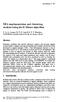 Data Mining VI 321 DEA implementation and clustering analysis using the K-Means algorithm C. A. A. Lemos, M. P. E. Lins & N. F. F. Ebecken COPPE/Universidade Federal do Rio de Janeiro, Brazil Abstract
A Guide to DEAP Version 2.1: A Data Envelopment Analysis (Computer) Program
 A Guide to DEAP Version 2.1: A Data Envelopment Analysis (Computer) Program by Tim Coelli Centre for Efficiency and Productivity Analysis Department of Econometrics University of New England Armidale,
Linear Programming Notes VII Sensitivity Analysis
 Linear Programming Notes VII Sensitivity Analysis 1 Introduction When you use a mathematical model to describe reality you must make approximations. The world is more complicated than the kinds of optimization
Measuring Information Technology s Indirect Impact on Firm Performance
 Information Technology and Management 5, 9 22, 2004 2004 Kluwer Academic Publishers. Manufactured in The Netherlands. Measuring Information Technology s Indirect Impact on Firm Performance YAO CHEN [email protected]
A PRIMAL-DUAL APPROACH TO NONPARAMETRIC PRODUCTIVITY ANALYSIS: THE CASE OF U.S. AGRICULTURE. Jean-Paul Chavas and Thomas L. Cox *
 Copyright 1994 by Jean-Paul Chavas and homas L. Cox. All rights reserved. Readers may make verbatim copies of this document for noncommercial purposes by any means, provided that this copyright notice
USING EXCEL 2010 TO SOLVE LINEAR PROGRAMMING PROBLEMS MTH 125 Chapter 4
 ONE-TIME ONLY SET UP INSTRUCTIONS Begin by verifying that the computer you are using has the Solver Add-In enabled. Click on Data in the menu across the top of the window. On the far right side, you should
The efficiency of fleets in Serbian distribution centres
 The efficiency of fleets in Serbian distribution centres Milan Andrejic, Milorad Kilibarda 2 Faculty of Transport and Traffic Engineering, Logistics Department, University of Belgrade, Belgrade, Serbia
Gautam Appa and H. Paul Williams A formula for the solution of DEA models
 Gautam Appa and H. Paul Williams A formula for the solution of DEA models Working paper Original citation: Appa, Gautam and Williams, H. Paul (2002) A formula for the solution of DEA models. Operational
Linear Programming. Solving LP Models Using MS Excel, 18
 SUPPLEMENT TO CHAPTER SIX Linear Programming SUPPLEMENT OUTLINE Introduction, 2 Linear Programming Models, 2 Model Formulation, 4 Graphical Linear Programming, 5 Outline of Graphical Procedure, 5 Plotting
1 Solving LPs: The Simplex Algorithm of George Dantzig
 Solving LPs: The Simplex Algorithm of George Dantzig. Simplex Pivoting: Dictionary Format We illustrate a general solution procedure, called the simplex algorithm, by implementing it on a very simple example.
Chapter 9 Creating Reports in Excel
 Chapter 9 Creating Reports in Excel One of the most powerful features of Standard & Poor s Research Insight is its ability to communicate with Microsoft Excel through Active-X Technology. Excel requests
COMPUTATIONS IN DEA. Abstract
 ISSN 0101-7438 COMPUTATIONS IN DEA José H. Dulá School of Business Administration The University of Mississippi University MS 38677 E-mail: [email protected] Received November 2001; accepted October 2002
1 Introduction. Linear Programming. Questions. A general optimization problem is of the form: choose x to. max f(x) subject to x S. where.
 Introduction Linear Programming Neil Laws TT 00 A general optimization problem is of the form: choose x to maximise f(x) subject to x S where x = (x,..., x n ) T, f : R n R is the objective function, S
Duality in General Programs. Ryan Tibshirani Convex Optimization 10-725/36-725
 Duality in General Programs Ryan Tibshirani Convex Optimization 10-725/36-725 1 Last time: duality in linear programs Given c R n, A R m n, b R m, G R r n, h R r : min x R n c T x max u R m, v R r b T
SPREADSHEETS. TIP! Whenever you get some new data, save it under a new name! Then if you mess things up, you can always go back to the original.
 SPREADSHEETS Spreadsheets are great tools for sorting, filtering and running calculations on tables of data. Journalists who know the basics can interview data to find stories and trends that others may
ANALYTIC HIERARCHY PROCESS AS A RANKING TOOL FOR DECISION MAKING UNITS
 ISAHP Article: Jablonsy/Analytic Hierarchy as a Raning Tool for Decision Maing Units. 204, Washington D.C., U.S.A. ANALYTIC HIERARCHY PROCESS AS A RANKING TOOL FOR DECISION MAKING UNITS Josef Jablonsy
Sensitivity Analysis 3.1 AN EXAMPLE FOR ANALYSIS
 Sensitivity Analysis 3 We have already been introduced to sensitivity analysis in Chapter via the geometry of a simple example. We saw that the values of the decision variables and those of the slack and
Migrating to Excel 2010 from Excel 2003 - Excel - Microsoft Office 1 of 1
 Migrating to Excel 2010 - Excel - Microsoft Office 1 of 1 In This Guide Microsoft Excel 2010 looks very different, so we created this guide to help you minimize the learning curve. Read on to learn key
Spreadsheets Hop-around Cards
 Spreadsheets Hop-around Cards Visit us online at HOP-AROUND CARDS Preparation Print the cards out using a high quality colour printer Laminate each sheet and then cut out the individual cards to make a
SPSS INSTRUCTION CHAPTER 1
 SPSS INSTRUCTION CHAPTER 1 Performing the data manipulations described in Section 1.4 of the chapter require minimal computations, easily handled with a pencil, sheet of paper, and a calculator. However,
How to Make the Most of Excel Spreadsheets
 How to Make the Most of Excel Spreadsheets Analyzing data is often easier when it s in an Excel spreadsheet rather than a PDF for example, you can filter to view just a particular grade, sort to view which
MS Excel. Handout: Level 2. elearning Department. Copyright 2016 CMS e-learning Department. All Rights Reserved. Page 1 of 11
 MS Excel Handout: Level 2 elearning Department 2016 Page 1 of 11 Contents Excel Environment:... 3 To create a new blank workbook:...3 To insert text:...4 Cell addresses:...4 To save the workbook:... 5
Mathematical finance and linear programming (optimization)
 Mathematical finance and linear programming (optimization) Geir Dahl September 15, 2009 1 Introduction The purpose of this short note is to explain how linear programming (LP) (=linear optimization) may
To launch the Microsoft Excel program, locate the Microsoft Excel icon, and double click.
 EDIT202 Spreadsheet Lab Assignment Guidelines Getting Started 1. For this lab you will modify a sample spreadsheet file named Starter- Spreadsheet.xls which is available for download from the Spreadsheet
European Journal of Operational Research
 European Journal of Operational Research 207 (2010) 1506 1518 Contents lists available at ScienceDirect European Journal of Operational Research journal homepage: www.elsevier.com/locate/ejor Decision
LECTURE 5: DUALITY AND SENSITIVITY ANALYSIS. 1. Dual linear program 2. Duality theory 3. Sensitivity analysis 4. Dual simplex method
 LECTURE 5: DUALITY AND SENSITIVITY ANALYSIS 1. Dual linear program 2. Duality theory 3. Sensitivity analysis 4. Dual simplex method Introduction to dual linear program Given a constraint matrix A, right
EXCEL SOLVER TUTORIAL
 ENGR62/MS&E111 Autumn 2003 2004 Prof. Ben Van Roy October 1, 2003 EXCEL SOLVER TUTORIAL This tutorial will introduce you to some essential features of Excel and its plug-in, Solver, that we will be using
Solving Linear Programs in Excel
 Notes for AGEC 622 Bruce McCarl Regents Professor of Agricultural Economics Texas A&M University Thanks to Michael Lau for his efforts to prepare the earlier copies of this. 1 http://ageco.tamu.edu/faculty/mccarl/622class/
MATH10212 Linear Algebra. Systems of Linear Equations. Definition. An n-dimensional vector is a row or a column of n numbers (or letters): a 1.
 MATH10212 Linear Algebra Textbook: D. Poole, Linear Algebra: A Modern Introduction. Thompson, 2006. ISBN 0-534-40596-7. Systems of Linear Equations Definition. An n-dimensional vector is a row or a column
Excel 2003 A Beginners Guide
 Excel 2003 A Beginners Guide Beginner Introduction The aim of this document is to introduce some basic techniques for using Excel to enter data, perform calculations and produce simple charts based on
Excel 2007 Basic knowledge
 Ribbon menu The Ribbon menu system with tabs for various Excel commands. This Ribbon system replaces the traditional menus used with Excel 2003. Above the Ribbon in the upper-left corner is the Microsoft
EMMANUEL THANASSOULIS CURRICULUM VITAE EXTRACT - DATED 04/03/2013
 EMMANUEL THANASSOULIS CURRICULUM VITAE EXTRACT - DATED 04/03/2013 PERSONAL DETAILS Address: Office: Operations and Information Management, Aston Business School, University of Aston, Birmingham B4 7ET.
FEAR: A Software Package for Frontier Efficiency Analysis with R
 FEAR: A Software Package for Frontier Efficiency Analysis with R Paul W. Wilson The John E. Walker Department of Economics, 222 Sirrine Hall, Clemson University, Clemson, South Carolina 29634 USA Abstract
Excel 2003: Ringtones Task
 Excel 2003: Ringtones Task 1. Open up a blank spreadsheet 2. Save the spreadsheet to your area and call it Ringtones.xls 3. Add the data as shown here, making sure you keep to the cells as shown Make sure
Mail Merge Creating Mailing Labels 3/23/2011
 Creating Mailing Labels in Microsoft Word Address data in a Microsoft Excel file can be turned into mailing labels in Microsoft Word through a mail merge process. First, obtain or create an Excel spreadsheet
4.6 Linear Programming duality
 4.6 Linear Programming duality To any minimization (maximization) LP we can associate a closely related maximization (minimization) LP. Different spaces and objective functions but in general same optimal
DEA IN MUTUAL FUND EVALUATION
 DEA IN MUTUAL FUND EVALUATION E-mail: [email protected] Dipartimento di Matematica Applicata Università Ca Foscari di Venezia ABSTRACT - In this contribution we illustrate the recent use of Data Envelopment
How to Create a Spreadsheet With Updating Stock Prices Version 3, February 2015
 How to Create a Spreadsheet With Updating Stock Prices Version 3, February 2015 by Fred Brack In December 2014, Microsoft made changes to their online portfolio management services, changes widely derided
Abstract. Keywords: Data Envelopment Analysis (DEA), decision making unit (DMU), efficiency, Korea Securities Dealers Automated Quotation (KOSDAQ)
 , pp. 205-218 http://dx.doi.org/10.14257/ijseia.2015.9.5.20 The Efficiency Comparative Evaluation of IT Service Companies using the Data Envelopment Analysis Approach Focus on KOSDAQ(KOrea Securities Dealers
Product Mix as a Framing Exercise: The Role of Cost Allocation. Anil Arya The Ohio State University. Jonathan Glover Carnegie Mellon University
 Product Mix as a Framing Exercise: The Role of Cost Allocation Anil Arya The Ohio State University Jonathan Glover Carnegie Mellon University Richard Young The Ohio State University December 1999 Product
Indiana County Assessor Association Excel Excellence
 Indiana County Assessor Association Excel Excellence Basic Excel Data Analysis Division August 2012 1 Agenda Lesson 1: The Benefits of Excel Lesson 2: The Basics of Excel Lesson 3: Hands On Exercises Lesson
Excel 2007 A Beginners Guide
 Excel 2007 A Beginners Guide Beginner Introduction The aim of this document is to introduce some basic techniques for using Excel to enter data, perform calculations and produce simple charts based on
Using SPSS, Chapter 2: Descriptive Statistics
 1 Using SPSS, Chapter 2: Descriptive Statistics Chapters 2.1 & 2.2 Descriptive Statistics 2 Mean, Standard Deviation, Variance, Range, Minimum, Maximum 2 Mean, Median, Mode, Standard Deviation, Variance,
Instructions for Creating an Outlook E-mail Distribution List from an Excel File
 Instructions for Creating an Outlook E-mail Distribution List from an Excel File 1.0 Importing Excel Data to an Outlook Distribution List 1.1 Create an Outlook Personal Folders File (.pst) Notes: 1) If
Support Vector Machines Explained
 March 1, 2009 Support Vector Machines Explained Tristan Fletcher www.cs.ucl.ac.uk/staff/t.fletcher/ Introduction This document has been written in an attempt to make the Support Vector Machines (SVM),
ASSIGNMENT 4 PREDICTIVE MODELING AND GAINS CHARTS
 DATABASE MARKETING Fall 2015, max 24 credits Dead line 15.10. ASSIGNMENT 4 PREDICTIVE MODELING AND GAINS CHARTS PART A Gains chart with excel Prepare a gains chart from the data in \\work\courses\e\27\e20100\ass4b.xls.
Notes on Excel Forecasting Tools. Data Table, Scenario Manager, Goal Seek, & Solver
 Notes on Excel Forecasting Tools Data Table, Scenario Manager, Goal Seek, & Solver 2001-2002 1 Contents Overview...1 Data Table Scenario Manager Goal Seek Solver Examples Data Table...2 Scenario Manager...8
Constrained optimization.
 ams/econ 11b supplementary notes ucsc Constrained optimization. c 2010, Yonatan Katznelson 1. Constraints In many of the optimization problems that arise in economics, there are restrictions on the values
Microsoft Word 2010 Prepared by Computing Services at the Eastman School of Music July 2010
 Microsoft Word 2010 Prepared by Computing Services at the Eastman School of Music July 2010 Contents Microsoft Office Interface... 4 File Ribbon Tab... 5 Microsoft Office Quick Access Toolbar... 6 Appearance
The Center for Teaching, Learning, & Technology
 The Center for Teaching, Learning, & Technology Instructional Technology Workshops Microsoft Excel 2010 Formulas and Charts Albert Robinson / Delwar Sayeed Faculty and Staff Development Programs Colston
Performance Measurement and Best-Practice Benchmarking of Mutual Funds:
 Performance Measurement and Best-Practice Benchmarking of Mutual Funds: Combining Stochastic Dominance criteria with Data Envelopment Analysis Timo Kuosmanen Environmental Economics and Natural Resources
Data Envelopment Analysis
 Data Envelopment Analysis Theory and Techniques for Economics and Operations Research SUBHASH C. RAY University of Connecticut PUBLISHED BY THE PRESS SYNDICATE OF THE UNIVERSITY OF CAMBRIDGE The Pitt Building,
Introduction to Data Tables. Data Table Exercises
 Tools for Excel Modeling Introduction to Data Tables and Data Table Exercises EXCEL REVIEW 2000-2001 Data Tables are among the most useful of Excel s tools for analyzing data in spreadsheet models. Some
ECDL. European Computer Driving Licence. Spreadsheet Software BCS ITQ Level 2. Syllabus Version 5.0
 European Computer Driving Licence Spreadsheet Software BCS ITQ Level 2 Using Microsoft Excel 2010 Syllabus Version 5.0 This training, which has been approved by BCS, The Chartered Institute for IT, includes
FEAR: A Software Package for Frontier Efficiency Analysis with R
 FEAR: A Software Package for Frontier Efficiency Analysis with R Paul W. Wilson December 2006 Abstract This paper describes a software package for computing nonparametric efficiency estimates, making inference,
Lecture Notes on Elasticity of Substitution
 Lecture Notes on Elasticity of Substitution Ted Bergstrom, UCSB Economics 210A March 3, 2011 Today s featured guest is the elasticity of substitution. Elasticity of a function of a single variable Before
SOAL-SOAL MICROSOFT EXCEL 1. The box on the chart that contains the name of each individual record is called the. A. cell B. title C. axis D.
 SOAL-SOAL MICROSOFT EXCEL 1. The box on the chart that contains the name of each individual record is called the. A. cell B. title C. axis D. legend 2. If you want all of the white cats grouped together
NØGSG DMR Contact Manager
 NØGSG DMR Contact Manager Radio Configuration Management Software for Connect Systems CS700 and CS701 DMR Transceivers End-User Documentation Version 1.24 2015-2016 Tom A. Wheeler [email protected] Terms
SPSS for Windows importing and exporting data
 Guide 86 Version 3.0 SPSS for Windows importing and exporting data This document outlines the procedures to follow if you want to transfer data from a Windows application like Word 2002 (Office XP), Excel
Excel 2003 Tutorial I
 This tutorial was adapted from a tutorial by see its complete version at http://www.fgcu.edu/support/office2000/excel/index.html Excel 2003 Tutorial I Spreadsheet Basics Screen Layout Title bar Menu bar
Customizing forms and writing QuickBooks Letters
 LESSON 15 Customizing forms and writing QuickBooks Letters 15 Lesson objectives, 398 Supporting materials, 398 Instructor preparation, 398 To start this lesson, 398 About QuickBooks forms, 399 Customizing
Solving Linear Programs using Microsoft EXCEL Solver
 Solving Linear Programs using Microsoft EXCEL Solver By Andrew J. Mason, University of Auckland To illustrate how we can use Microsoft EXCEL to solve linear programming problems, consider the following
Merging Labels, Letters, and Envelopes Word 2013
 Merging Labels, Letters, and Envelopes Word 2013 Merging... 1 Types of Merges... 1 The Merging Process... 2 Labels - A Page of the Same... 2 Labels - A Blank Page... 3 Creating Custom Labels... 3 Merged
Q&As: Microsoft Excel 2013: Chapter 2
 Q&As: Microsoft Excel 2013: Chapter 2 In Step 5, why did the date that was entered change from 4/5/10 to 4/5/2010? When Excel recognizes that you entered a date in mm/dd/yy format, it automatically formats
Long-Run Average Cost. Econ 410: Micro Theory. Long-Run Average Cost. Long-Run Average Cost. Economies of Scale & Scope Minimizing Cost Mathematically
 Slide 1 Slide 3 Econ 410: Micro Theory & Scope Minimizing Cost Mathematically Friday, November 9 th, 2007 Cost But, at some point, average costs for a firm will tend to increase. Why? Factory space and
Easy Calculations in Excel
 Easy Calculations in Excel (2007 and newer) Any time you have a list of numbers that require some sort of calculation like percent change from one year to the next, percent of total, average or just a
Association Between Variables
 Contents 11 Association Between Variables 767 11.1 Introduction............................ 767 11.1.1 Measure of Association................. 768 11.1.2 Chapter Summary.................... 769 11.2 Chi
Recall that two vectors in are perpendicular or orthogonal provided that their dot
 Orthogonal Complements and Projections Recall that two vectors in are perpendicular or orthogonal provided that their dot product vanishes That is, if and only if Example 1 The vectors in are orthogonal
Linear Programming. March 14, 2014
 Linear Programming March 1, 01 Parts of this introduction to linear programming were adapted from Chapter 9 of Introduction to Algorithms, Second Edition, by Cormen, Leiserson, Rivest and Stein [1]. 1
Excel 2010: Create your first spreadsheet
 Excel 2010: Create your first spreadsheet Goals: After completing this course you will be able to: Create a new spreadsheet. Add, subtract, multiply, and divide in a spreadsheet. Enter and format column
Excel Project Creating a Stock Portfolio Simulation
 Background Vocabulary Excel Project Creating a Stock Portfolio Simulation 1. What is a stock? A stock is a share in the ownership of a corporation, a large business organization. A stock, also, represents
Moral Hazard. Itay Goldstein. Wharton School, University of Pennsylvania
 Moral Hazard Itay Goldstein Wharton School, University of Pennsylvania 1 Principal-Agent Problem Basic problem in corporate finance: separation of ownership and control: o The owners of the firm are typically
SECTION 5: Finalizing Your Workbook
 SECTION 5: Finalizing Your Workbook In this section you will learn how to: Protect a workbook Protect a sheet Protect Excel files Unlock cells Use the document inspector Use the compatibility checker Mark
Microsoft Excel 2007 Level 2
 Information Technology Services Kennesaw State University Microsoft Excel 2007 Level 2 Copyright 2008 KSU Dept. of Information Technology Services This document may be downloaded, printed or copied for
Graphing Parabolas With Microsoft Excel
 Graphing Parabolas With Microsoft Excel Mr. Clausen Algebra 2 California State Standard for Algebra 2 #10.0: Students graph quadratic functions and determine the maxima, minima, and zeros of the function.
ISYDS INTEGRATED SYSTEM FOR DECISION SUPPORT (SIAD SISTEMA INTEGRADO DE APOIO A DECISÃO): A SOFTWARE PACKAGE FOR DATA ENVELOPMENT ANALYSIS MODEL
 versão impressa ISSN 00-7438 / versão online ISSN 678-542 Seção de Software Virgílio José Martins Ferreira Filho Departamento de Engenharia Industrial Universidade Federal do Rio de Janeiro (UFRJ) Rio
Polynomial Neural Network Discovery Client User Guide
 Polynomial Neural Network Discovery Client User Guide Version 1.3 Table of contents Table of contents...2 1. Introduction...3 1.1 Overview...3 1.2 PNN algorithm principles...3 1.3 Additional criteria...3
Microsoft Excel 2013 Tutorial
 Microsoft Excel 2013 Tutorial TABLE OF CONTENTS 1. Getting Started Pg. 3 2. Creating A New Document Pg. 3 3. Saving Your Document Pg. 4 4. Toolbars Pg. 4 5. Formatting Pg. 6 Working With Cells Pg. 6 Changing
Tutorial: Using Excel for Linear Optimization Problems
 Tutorial: Using Excel for Linear Optimization Problems Part 1: Organize Your Information There are three categories of information needed for solving an optimization problem in Excel: an Objective Function,
Quick Reference Guide Course Homepage Management (Faculty)
 Quick Reference Guide Course Homepage Management (Faculty) Table of Contents View Faculty Schedule... 3 Print Faculty Schedule... 3 Create Course Homepage... 3 Add a New Activity to the Course Homepage...
Intermediate PowerPoint
 Intermediate PowerPoint Charts and Templates By: Jim Waddell Last modified: January 2002 Topics to be covered: Creating Charts 2 Creating the chart. 2 Line Charts and Scatter Plots 4 Making a Line Chart.
Solving Math Programs with LINGO
 2 Solving Math Programs with LINGO 2.1 Introduction The process of solving a math program requires a large number of calculations and is, therefore, best performed by a computer program. The computer program
Preface of Excel Guide
 Preface of Excel Guide The use of spreadsheets in a course designed primarily for business and social science majors can enhance the understanding of the underlying mathematical concepts. In addition,
Definition and Properties of the Production Function: Lecture
 Definition and Properties of the Production Function: Lecture II August 25, 2011 Definition and : Lecture A Brief Brush with Duality Cobb-Douglas Cost Minimization Lagrangian for the Cobb-Douglas Solution
Tools for Excel Modeling. Introduction to Excel2007 Data Tables and Data Table Exercises
 Tools for Excel Modeling Introduction to Excel2007 Data Tables and Data Table Exercises EXCEL REVIEW 2009-2010 Preface Data Tables are among the most useful of Excel s tools for analyzing data in spreadsheet
Creating a Distribution List from an Excel Spreadsheet
 Creating a Distribution List from an Excel Spreadsheet Create the list of information in Excel Create an excel spreadsheet. The following sample file has the person s first name, last name and email address
Microsoft Migrating to Word 2010 from Word 2003
 In This Guide Microsoft Word 2010 looks very different, so we created this guide to help you minimize the learning curve. Read on to learn key parts of the new interface, discover free Word 2010 training,
Introduction to the TI Connect 4.0 software...1. Using TI DeviceExplorer...7. Compatibility with graphing calculators...9
 Contents Introduction to the TI Connect 4.0 software...1 The TI Connect window... 1 Software tools on the Home screen... 2 Opening and closing the TI Connect software... 4 Using Send To TI Device... 4
CNC Transfer. Operating Manual
 Rank Brothers Ltd CNC Transfer Operating Manual Manufactured by: Rank Brothers Ltd 56 High Street, Bottisham, Cambridge CB25 9DA, England Tel: +44 (0)1223 811369 Fax: +44 (0)1223 811441 Website: http://www.rankbrothers.co.uk/
Linear Programming Sensitivity Analysis
 Linear Programming Sensitivity Analysis Massachusetts Institute of Technology LP Sensitivity Analysis Slide 1 of 22 Sensitivity Analysis Rationale Shadow Prices Definition Use Sign Range of Validity Opportunity
Excel 2007: Basics Learning Guide
 Excel 2007: Basics Learning Guide Exploring Excel At first glance, the new Excel 2007 interface may seem a bit unsettling, with fat bands called Ribbons replacing cascading text menus and task bars. This
Introduction to Microsoft Excel 2010
 Introduction to Microsoft Excel 2010 Screen Elements Quick Access Toolbar The Ribbon Formula Bar Expand Formula Bar Button File Menu Vertical Scroll Worksheet Navigation Tabs Horizontal Scroll Bar Zoom
EXCEL FINANCIAL USES
 EXCEL FINANCIAL USES Table of Contents Page LESSON 1: FINANCIAL DOCUMENTS...1 Worksheet Design...1 Selecting a Template...2 Adding Data to a Template...3 Modifying Templates...3 Saving a New Workbook as
Pulling a Random Sample from a MAXQDA Dataset
 In this guide you will learn how to pull a random sample from a MAXQDA dataset, using the random cell function in Excel. In this process you will learn how to export and re-import variables from MAXQDA.