
Meritor WABCO Hydraulic Power Brake (HPB) System
|
|
|
- Chastity Norton
- 9 years ago
- Views:
Transcription
1 Maintenance Manual MM-0401 Meritor WABCO Hydraulic Power Brake (HPB) System Revised 07-15
2 Service Notes About This Manual This manual contains maintenance procedures for Meritor WABCO s Hydraulic Power Brake (HPB) system for trucks, tractors and buses. Before You Begin 1. Read and understand all instructions and procedures before you begin to service components. 2. Read and observe all Warning and Caution hazard alert messages in this publication. They provide information that can help prevent serious personal injury, damage to components, or both. 3. Follow your company s maintenance and service, installation, and diagnostics guidelines. 4. Use special tools when required to help avoid serious personal injury and damage to components. Hazard Alert Messages and Torque Symbols Maintenance Manual 38, Hydraulic ABS for Medium-Duty Trucks, Buses and Motor Home Chassis (C Version Hydraulic ABS) Maintenance Manual 39, Hydraulic ABS for Medium-Duty Trucks, Buses and Motor Home Chassis (D Version Hydraulic ABS) Maintenance Manual MM-0677, Hydraulic Anti-Lock Braking Systems (HABS) for Medium-Duty Trucks, Buses and Motor Home Chassis (E Version Hydraulic ABS) Visit Literature on Demand on meritor.com to access and order additional information. Contact the Meritor OnTrac Customer Call Center at (United States and Canada); (Mexico); or [email protected]. If Tools and Supplies are Specified in This Manual Call Meritor s Commercial Vehicle Aftermarket at to obtain Meritor tools and supplies. WARNING A Warning alerts you to an instruction or procedure that you must follow exactly to avoid serious personal injury and damage to components. CAUTION A Caution alerts you to an instruction or procedure that you must follow exactly to avoid damage to This symbol alerts you to tighten fasteners to a specified torque value. How to Obtain Additional Maintenance, Service and Product Information Publications Refer to the following publications for more information on servicing Meritor WABCO s Hydraulic Power Brake (HPB) systems. Information contained in this publication was in effect at the time the publication was approved for printing and is subject to change without notice or liability. Meritor WABCO reserves the right to revise the information presented or to discontinue the production of parts described at any time. Meritor WABCO Maintenance Manual MM-0401 (Revised 07-15)

3 Contents pg. i Asbestos and Non-Asbestos Fibers 1 Section 1: Introduction Overview System Components 3 How the HPB System Works 5 Section 2: Wiring Diagram HPB Wiring Diagram for Multiplex Vehicles 6 HPB Connector Diagram for Multiplex Vehicles 7 HPB Wiring Diagram for Non-Multiplexed Vehicles 8 HPB Connector Diagram for Non-Multiplexed Vehicles 9 Section 3: Troubleshooting and Testing Testing the System Meritor WABCO TOOLBOX Software Connecting TOOLBOX Software 10 Hydraulic Power Brake Menus and Toolbars 14 Standard Testing Test Equipment: Volt-Ohm Meter (VOM) System Requirements and Component Tests Tire Size Range Checking Power, Ground and Load Test 15 Standard Component Testing Indicator Lamps Sensor Adjustment Vehicle Test Drive 16 Safety Features Towing Procedure for Navistar CE Buses 17 Warning Lamps 18 SPN, SID, FMI Diagnostic Trouble Code List 50 Section 4: Removal and Installation Removal Hydraulic Compact Unit 53 Installation Hydraulic Compact Unit 54 Removal HCU Reservoir 55 Installation HCU Reservoir 56 Removal HCU Accumulators 58 Installation HCU Accumulators 60 Removal Electronic Control Unit (ECU) 62 Installation Electronic Control Unit (ECU) 63 Parameter Downloading pg. 66 Removal Hydraulic Compact Unit (HCU) Relay Valve 67 Installation Hydraulic Compact Unit (HCU) Relay Valve 68 Removal Hydraulic Compact Unit (HCU) Pump 69 Installation Hydraulic Compact Unit (HCU) Pump 70 Removal Master Cylinder Replacement Information Master Cylinder 73 Installation Master Cylinder 75 Removal Master Cylinder Reservoir 77 Installation Master Cylinder Reservoir 79 Removal Master Cylinder Foot Brake Switch 80 Installation Master Cylinder Foot Brake Switch Removal Master Cylinder Fluid Level Sensor Switch Installation Master Cylinder Fluid Level Sensor 81 Removal Parking Brake Pressure Supply Valve 83 Installation Parking Brake Pressure Supply Valve 85 Removal Low Pressure Hose 86 Installation Low Pressure Hose 87 Lubrication Wheel Speed Sensor Specification 88 Removal Front Axle Wheel Speed Sensor Installation Front Axle Wheel Speed Sensor 89 Removal Rear Axle Wheel Speed Sensor Installation Rear Axle Wheel Speed Sensor 90 Section 5: Brake Bleeding Procedures 91 Brake Bleeding Procedures Pressure Bleed Procedures Master Cylinder Circuit

4 Contents pg. 92 Brake Caliper Circuit 95 Spring-Applied/Hydraulic Release Parking Brake Circuit 96 Changing Hydraulic Brake Fluid 97 Brake Fluid Replacement Requirement Filling the Hydraulic Power Brake (HPB) Master Cylinder Reservoir 99 Section 6: Appendix Leak Check Procedure for Meritor WABCO HPB System Check the HPB System for Brake Fluid Leaks System Test pg.

5 Asbestos and Non-Asbestos Fibers ASBESTOS FIBERS WARNING The following procedures for servicing brakes are recommended to reduce exposure to asbestos fiber dust, a cancer and lung disease hazard. Material Safety Data Sheets are available from Meritor. Hazard Summary Because some brake linings contain asbestos, workers who service brakes must understand the potential hazards of asbestos and precautions for reducing risks. Exposure to airborne asbestos dust can cause serious and possibly fatal diseases, including asbestosis (a chronic lung disease) and cancer, principally lung cancer and mesothelioma (a cancer of the lining of the chest or abdominal cavities). Some studies show that the risk of lung cancer among persons who smoke and who are exposed to asbestos is much greater than the risk for non-smokers. Symptoms of these diseases may not become apparent for 15, 20 or more years after the first exposure to asbestos. Accordingly, workers must use caution to avoid creating and breathing dust when servicing brakes. Specific recommended work practices for reducing exposure to asbestos dust follow. Consult your employer for more details. Recommended Work Practices 1. Separate Work Areas. Whenever feasible, service brakes in a separate area away from other operations to reduce risks to unprotected persons. OSHA has set a maximum allowable level of exposure for asbestos of 0.1 f/cc as an 8-hour time-weighted average and 1.0 f/cc averaged over a 30-minute period. Scientists disagree, however, to what extent adherence to the maximum allowable exposure levels will eliminate the risk of disease that can result from inhaling asbestos dust. OSHA requires that the following sign be posted at the entrance to areas where exposures exceed either of the maximum allowable levels: DANGER: ASBESTOS CANCER AND LUNG DISEASE HAZARD AUTHORIZED PERSONNEL ONLY RESPIRATORS AND PROTECTIVE CLOTHING ARE REQUIRED IN THIS AREA. 2. Respiratory Protection. Wear a respirator equipped with a high-efficiency (HEPA) filter approved by NIOSH or MSHA for use with asbestos at all times when servicing brakes, beginning with the removal of the wheels. 3. Procedures for Servicing Brakes. a. Enclose the brake assembly within a negative pressure enclosure. The enclosure should be equipped with a HEPA vacuum and worker arm sleeves. With the enclosure in place, use the HEPA vacuum to loosen and vacuum residue from the brake parts. b. As an alternative procedure, use a catch basin with water and a biodegradable, non-phosphate, water-based detergent to wash the brake drum or rotor and other brake parts. The solution should be applied with low pressure to prevent dust from becoming airborne. Allow the solution to flow between the brake drum and the brake support or the brake rotor and caliper. The wheel hub and brake assembly components should be thoroughly wetted to suppress dust before the brake shoes or brake pads are removed. Wipe the brake parts clean with a cloth. c. If an enclosed vacuum system or brake washing equipment is not available, employers may adopt their own written procedures for servicing brakes, provided that the exposure levels associated with the employer s procedures do not exceed the levels associated with the enclosed vacuum system or brake washing equipment. Consult OSHA regulations for more details. d. Wear a respirator equipped with a HEPA filter approved by NIOSH or MSHA for use with asbestos when grinding or machining brake linings. In addition, do such work in an area with a local exhaust ventilation system equipped with a HEPA filter. e. NEVER use compressed air by itself, dry brushing, or a vacuum not equipped with a HEPA filter when cleaning brake parts or assemblies. NEVER use carcinogenic solvents, flammable solvents, or solvents that can damage brake components as wetting agents. 4. Cleaning Work Areas. Clean work areas with a vacuum equipped with a HEPA filter or by wet wiping. NEVER use compressed air or dry sweeping to clean work areas. When you empty vacuum cleaners and handle used rags, wear a respirator equipped with a HEPA filter approved by NIOSH or MSHA for use with asbestos. When you replace a HEPA filter, wet the filter with a fine mist of water and dispose of the used filter with care. 5. Worker Clean-Up. After servicing brakes, wash your hands before you eat, drink or smoke. Shower after work. Do not wear work clothes home. Use a vacuum equipped with a HEPA filter to vacuum work clothes after they are worn. Launder them separately. Do not shake or use compressed air to remove dust from work clothes. 6. Waste Disposal. Dispose of discarded linings, used rags, cloths and HEPA filters with care, such as in sealed plastic bags. Consult applicable EPA, state and local regulations on waste disposal. Regulatory Guidance References to OSHA, NIOSH, MSHA, and EPA, which are regulatory agencies in the United States, are made to provide further guidance to employers and workers employed within the United States. Employers and workers employed outside of the United States should consult the regulations that apply to them for further guidance. NON-ASBESTOS FIBERS WARNING The following procedures for servicing brakes are recommended to reduce exposure to non-asbestos fiber dust, a cancer and lung disease hazard. Material Safety Data Sheets are available from Meritor. Hazard Summary Most recently manufactured brake linings do not contain asbestos fibers. These brake linings may contain one or more of a variety of ingredients, including glass fibers, mineral wool, aramid fibers, ceramic fibers and silica that can present health risks if inhaled. Scientists disagree on the extent of the risks from exposure to these substances. Nonetheless, exposure to silica dust can cause silicosis, a non-cancerous lung disease. Silicosis gradually reduces lung capacity and efficiency and can result in serious breathing difficulty. Some scientists believe other types of non-asbestos fibers, when inhaled, can cause similar diseases of the lung. In addition, silica dust and ceramic fiber dust are known to the State of California to cause lung cancer. U.S. and international agencies have also determined that dust from mineral wool, ceramic fibers and silica are potential causes of cancer. Accordingly, workers must use caution to avoid creating and breathing dust when servicing brakes. Specific recommended work practices for reducing exposure to non-asbestos dust follow. Consult your employer for more details. Recommended Work Practices 1. Separate Work Areas. Whenever feasible, service brakes in a separate area away from other operations to reduce risks to unprotected persons. 2. Respiratory Protection. OSHA has set a maximum allowable level of exposure for silica of 0.1 mg/m3 as an 8-hour time-weighted average. Some manufacturers of non-asbestos brake linings recommend that exposures to other ingredients found in non-asbestos brake linings be kept below 1.0 f/cc as an 8-hour time-weighted average. Scientists disagree, however, to what extent adherence to these maximum allowable exposure levels will eliminate the risk of disease that can result from inhaling non-asbestos dust. Therefore, wear respiratory protection at all times during brake servicing, beginning with the removal of the wheels. Wear a respirator equipped with a high-efficiency (HEPA) filter approved by NIOSH or MSHA, if the exposure levels may exceed OSHA or manufacturers recommended maximum levels. Even when exposures are expected to be within the maximum allowable levels, wearing such a respirator at all times during brake servicing will help minimize exposure. 3. Procedures for Servicing Brakes. a. Enclose the brake assembly within a negative pressure enclosure. The enclosure should be equipped with a HEPA vacuum and worker arm sleeves. With the enclosure in place, use the HEPA vacuum to loosen and vacuum residue from the brake parts. b. As an alternative procedure, use a catch basin with water and a biodegradable, non-phosphate, water-based detergent to wash the brake drum or rotor and other brake parts. The solution should be applied with low pressure to prevent dust from becoming airborne. Allow the solution to flow between the brake drum and the brake support or the brake rotor and caliper. The wheel hub and brake assembly components should be thoroughly wetted to suppress dust before the brake shoes or brake pads are removed. Wipe the brake parts clean with a cloth. c. If an enclosed vacuum system or brake washing equipment is not available, carefully clean the brake parts in the open air. Wet the parts with a solution applied with a pump-spray bottle that creates a fine mist. Use a solution containing water, and, if available, a biodegradable, non-phosphate, water-based detergent. The wheel hub and brake assembly components should be thoroughly wetted to suppress dust before the brake shoes or brake pads are removed. Wipe the brake parts clean with a cloth. d. Wear a respirator equipped with a HEPA filter approved by NIOSH or MSHA when grinding or machining brake linings. In addition, do such work in an area with a local exhaust ventilation system equipped with a HEPA filter. e. NEVER use compressed air by itself, dry brushing, or a vacuum not equipped with a HEPA filter when cleaning brake parts or assemblies. NEVER use carcinogenic solvents, flammable solvents, or solvents that can damage brake components as wetting agents. 4. Cleaning Work Areas. Clean work areas with a vacuum equipped with a HEPA filter or by wet wiping. NEVER use compressed air or dry sweeping to clean work areas. When you empty vacuum cleaners and handle used rags, wear a respirator equipped with a HEPA filter approved by NIOSH or MSHA, to minimize exposure. When you replace a HEPA filter, wet the filter with a fine mist of water and dispose of the used filter with care. 5. Worker Clean-Up. After servicing brakes, wash your hands before you eat, drink or smoke. Shower after work. Do not wear work clothes home. Use a vacuum equipped with a HEPA filter to vacuum work clothes after they are worn. Launder them separately. Do not shake or use compressed air to remove dust from work clothes. 6. Waste Disposal. Dispose of discarded linings, used rags, cloths and HEPA filters with care, such as in sealed plastic bags. Consult applicable EPA, state and local regulations on waste disposal. Regulatory Guidance References to OSHA, NIOSH, MSHA, and EPA, which are regulatory agencies in the United States, are made to provide further guidance to employers and workers employed within the United States. Employers and workers employed outside of the United States should consult the regulations that apply to them for further guidance. Meritor WABCO Maintenance Manual MM-0401 (Revised 07-15) i

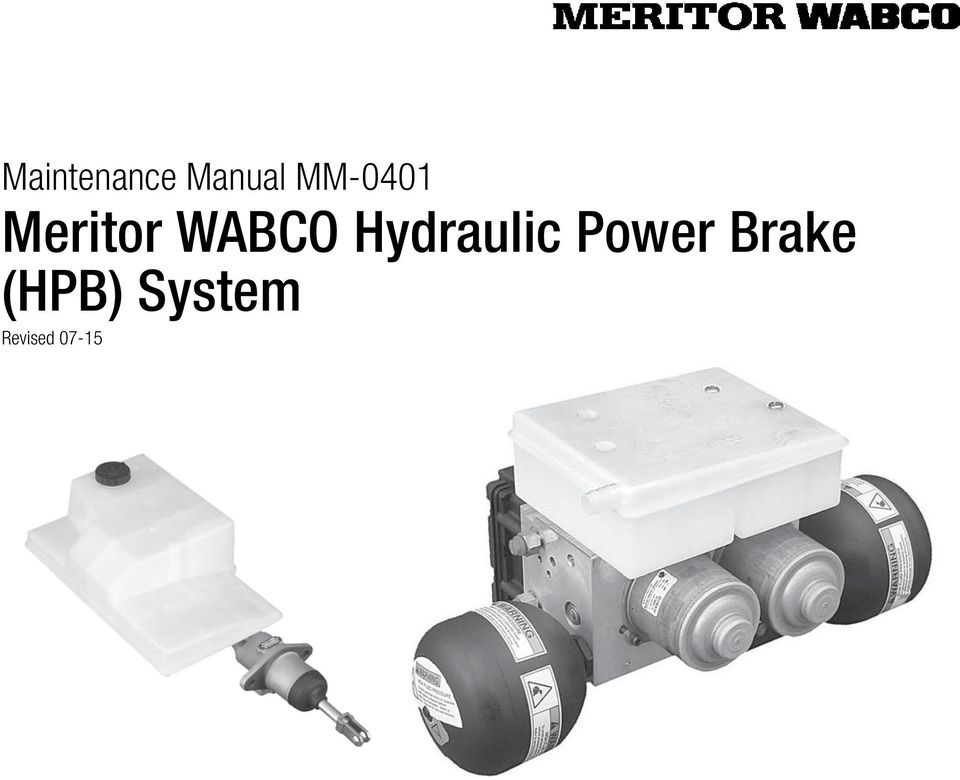
6 1 Introduction 1 Introduction Overview Meritor WABCO s Hydraulic Power Brake (HPB) is a braking and vehicle control system for Business Class trucks, Classes 4 through 7, and buses that are equipped with hydraulic brakes. The HPB system provides the following functions. Full power brake performance Brake control functions including Anti-Lock Braking System (ABS), Automatic Traction Control (ATC) and Electronic Brake force Distribution (EBD) Optional parking brake control Figure 1.2 HCU WITH OPTIONAL POWER PARKING BRAKE PRESSURE SUPPLY VALVE PRESSURE SUPPLY VALVE System Components The HPB system consists of two main components the Hydraulic Compact Unit (HCU) and a dual circuit master cylinder. The HPB system is also available with an optional parking brake pressure supply valve. Figure 1.1 and Figure 1.2 illustrate the HPB system with and without the park brake supply valve. Figure 1.3 illustrates the master cylinder assembly. Figure 1.3 Figure 1.2 MASTER CYLINDER ASSEMBLY c Figure 1.1 HCU WITHOUT OPTIONAL POWER PARKING BRAKE SUPPLY VALVE a Figure 1.3 Figure b Hydraulic Compact Unit The HCU consists of an electronic control unit, two independent electric motors driving two piston pumps, two accumulators, a dual circuit fluid reservoir with integrated filters, pressure relief valves, solenoid valves and a dual circuit relay valve. The HCU is mounted to the vehicle frame rail with two brackets. Figure 1.4. WARNING Do not drive the vehicle if a HPB system failure has occurred. Loss of braking ability may occur, resulting in an accident and serious personal injury. The HCU generates the service brake pressure. Meritor WABCO Maintenance Manual MM-0401 (Revised 07-15) 1
7 1 Introduction Two pump motors drive the piston pumps to build hydraulic pressure. The pressure is stored in accumulators. The motors are not serviceable. The motors cannot be replaced without replacing the entire HCU. The accumulators are two gas-filled hydraulic accumulators. The accumulators store energy supplied by the pumps. Accumulators are sealed at the factory and are non-refillable. Accumulators may be replaced as a set without replacing the entire HCU. The ECU processes sensor signals and generates solenoid valve commands to reduce, maintain or increase brake pressure for control function. The ECU constantly monitors the pressure in the accumulators, using one pressure sensor per brake circuit. The ECU may be replaced without replacing the complete HCU. The optional pressure supply valve controls the Spring-Applied/ Hydraulic Released (SAHR) parking brake. The pressure supply valve is mounted on the HCU. The pressure supply valve may be replaced without replacing the entire HCU. The dual circuit HCU reservoir holds the hydraulic brake fluid. (The reservoir may be replaced without replacing the entire HCU.) The relay valve is mounted on the bottom of the HCU and may be replaced without replacing the entire HCU. Master Cylinder Assembly The dual circuit master cylinder in conjunction with a relay valve provides the translation of brake pedal force into hydraulic braking pressure, and sends the driver s demand signal to the HCU. Figure 1.5. The foot brake switch provides brake status to the ECU and eliminates the need for a brake light switch. The master cylinder reservoir holds the additional hydraulic brake fluid. The fluid sensor switch monitors fluid level in the master cylinder reservoir. The master cylinder reservoir and both master cylinder switches may be replaced without replacing the entire master cylinder. The master cylinder cap provided by Meritor WABCO contains a special gore material that allows the reservoir to breathe, and serves as a filter to help prevent contaminants from getting into the reservoir. This is the only cap approved for use with Meritor WABCO HPB. NOTE: The ability of the master cylinder cap to breathe is critical to correct brake system function. If the cap becomes contaminated, it will need to be replaced. Figure 1.4 HYDRAULIC COMPACT UNIT WITHOUT PRESSURE SUPPLY VALVE DUAL CIRCUIT HCU RESERVOIR Figure 1.5 MASTER CYLINDER RESERVOIR MASTER CYLINDER ASSEMBLY VENTED RESERVOIR CAP ECU RELAY VALVE FOOT BRAKE SWITCH PUMP MOTORS (2) FLUID LEVEL SENSOR SWITCH Figure 1.5 SECONDARY CIRCUIT (MR-REAR AXLE) PRIMARY CIRCUIT (MF-FRONT AXLE) a ACCUMULATORS b Figure Meritor WABCO Maintenance Manual MM-0401 (Revised 07-15)

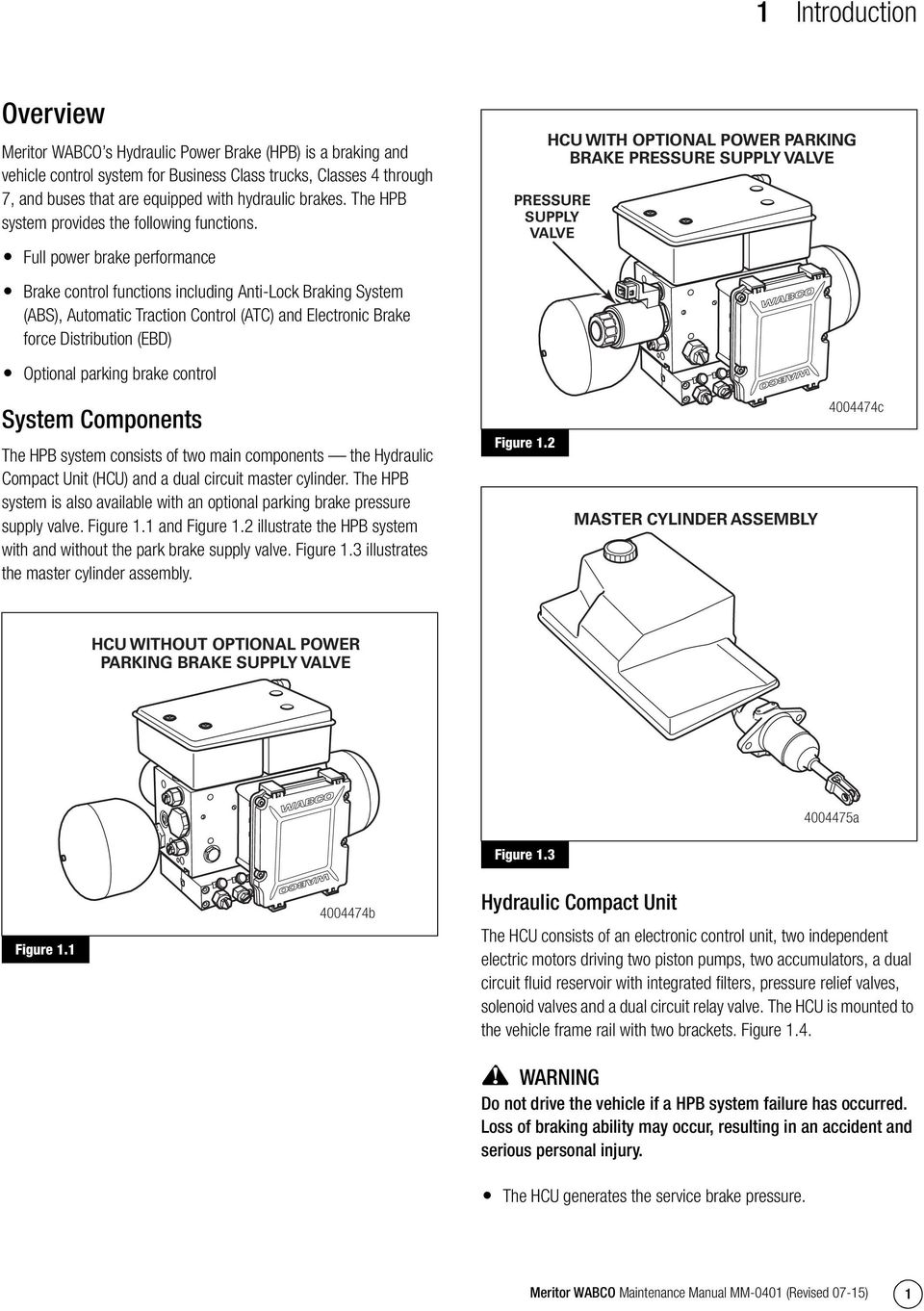
8 1 Introduction Wheel-End Sensors A Meritor WABCO wheel speed sensor is installed at each wheel whose speed is to be monitored. These sensors generate electronic signals which are sent to the ECU. A sensor spring clip holds the wheel speed sensor in place. Figure 1.6. The sensor and sensor clip must be lubricated before installation and whenever wheel-end maintenance is performed. Figure 1.6 Figure 1.6 TOOLBOX Software TOOLBOX Software is a PC-based diagnostics program required to diagnose HPB system faults. For HPB, version 9.0 or higher is recommended. TOOLBOX Software is available at Figure 1.7. Figure 1.7 Figure 1.7 Low Pressure Hose SENSOR SPRING CLIP WHEEL SPEED SENSOR a a The Removal and Installation section of this manual contains service information for a low pressure hose which is not produced by Meritor WABCO but is an integral part of the HPB system. Spring-Applied Hydraulic Release (SAHR) Parking Brake Canister (Optional) NOTE: The SAHR canister is not produced by Meritor WABCO and is an optional feature. Please consult the OEM for maintenance and service information. On vehicles equipped with hydraulic parking brakes, the SAHR canister controls the force applied to the parking brake cable. Internal springs are used to apply tension to the parking brake cable, which applies the parking brake. When pressurized brake fluid is routed to the SAHR canister, the hydraulic pressure overcomes the internal springs to relax the parking brake cable, which releases the parking brake. The SAHR parking brake canister is typically located inside the driver s side frame rail, forward of the rear axles. Vehicles not equipped with hydraulic parking brakes have mechanical or air (Spring Applied Air Released, SAAR) parking brakes. Please consult the OEM for maintenance and service information. WARNING Never drive the vehicle if the parking brake cable is disconnected or if the parking brake system is not operating correctly. Driving the vehicle without a correctly functioning parking brake system can result in an accident and serious personal injury. Parking Brake Switch The parking brake switch (optional) is a three-position electrical switch (apply, neutral and release). It controls the driver-requested operation of the parking brake. How the HPB System Works Meritor WABCO s hydraulic power braking system provides the energy required to actuate the brakes and control the electronic brake force distribution (EBD), ABS and ATC functions. The HCU is activated each time the ignition is turned on or whenever the driver steps on the brake pedal. If the system is equipped with the optional power park brake, the HCU also supplies the energy to release and control the service and park brakes. The Meritor WABCO HPB system for trucks is illustrated in Figure 1.8. A complete HPB system layout, with hydraulic brake lines, appears in the Appendix. Meritor WABCO Maintenance Manual MM-0401 (Revised 07-15) 3

9 1 Introduction Figure 1.8 HPB SYSTEM LAYOUT HCU RESERVOIR MASTER CYLINDER RESERVOIR HCU ASSEMBLY PRESSURE SUPPLY VALVE PARKING BRAKE MASTER CYLINDER ASSEMBLY ACCUMULATORS (2) RELAY VALVES ECU WHEEL-END SENSORS (4) FRONT AXLE REAR AXLE a Figure 1.8 Functional Description Hydraulic energy is stored in the gas-filled hydraulic accumulators, one for each circuit. When the vehicle s ignition is turned on, internal pumps are activated and fill both accumulators with pressurized hydraulic brake fluid. Two internal sensors, one for each accumulator, measure pressure and the ECU continuously monitors and controls pressure. During normal operation, the ECU actuates two separate power drivers for the electric motors, keeping the pressure level within the system at desired limits. Two pressure relief valves provide safety against overpressurization. When the brake pedal is applied, the master cylinder provides a hydraulic signal to the relay valve. Proportional to that signal, the accumulators release pressure to the brake calipers. When the pedal is released, brake fluid returns from the brake calipers to the reservoir, and line pressure is reduced to zero. For ABS, wheel pressure is individually modulated by eight integrated ABS solenoid valves in the ECU/HCU. For ATC, the normally closed ATC solenoid valve in the ECU is actuated and hydraulic energy is supplied to the sensed wheel. At the same time, the normally open ATC valve is actuated to prevent fluid flow back into the reservoir. The brake pressure is then modulated by the corresponding ABS solenoid valves. WARNING Do not install any add-on hydraulic devices to the HPB system. A loss of braking ability may occur, resulting in an accident and serious personal injury. 4 Meritor WABCO Maintenance Manual MM-0401 (Revised 07-15)
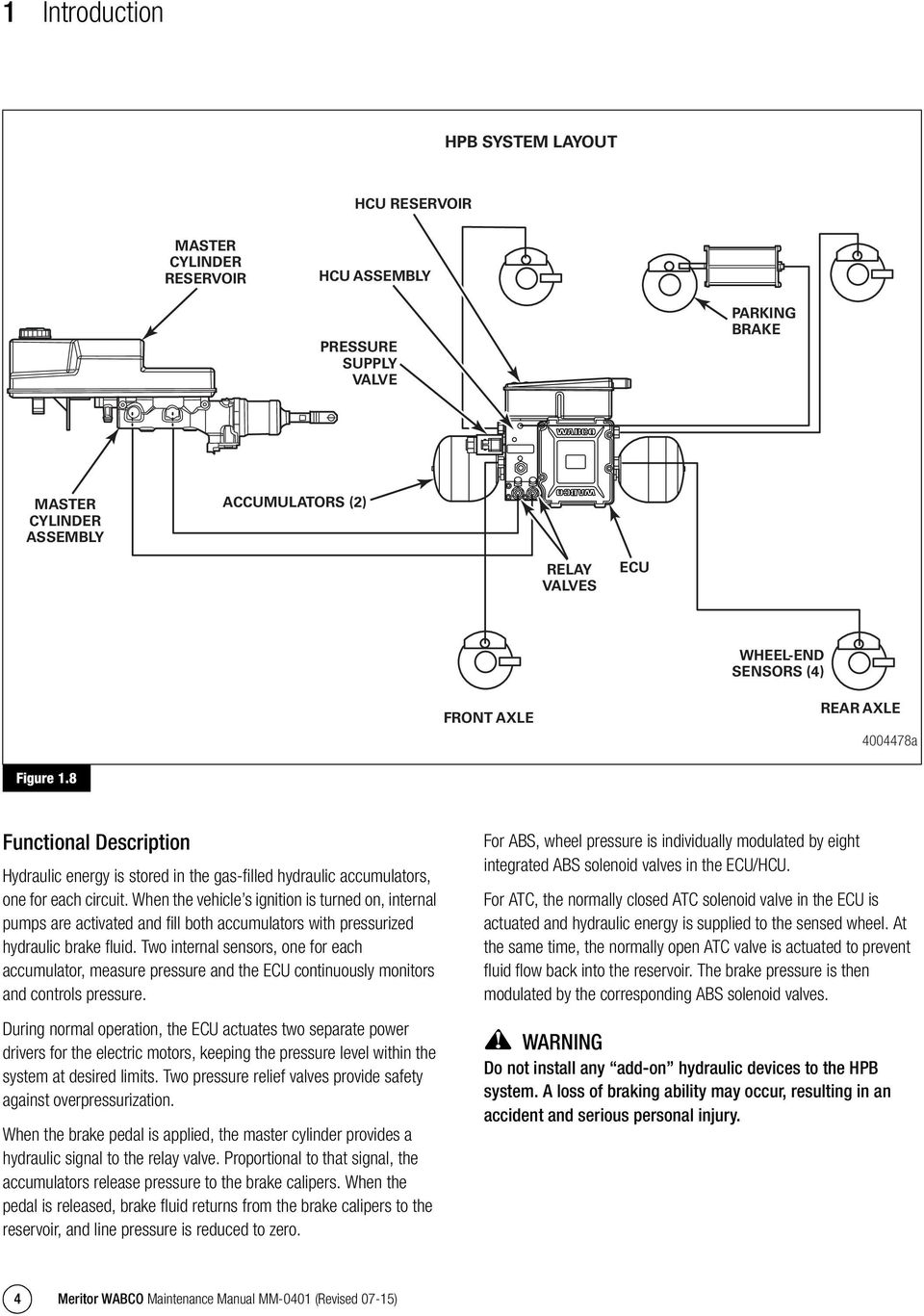
10 2 Wiring Diagram 2 Wiring Diagram HPB Wiring Diagram for Multiplex Vehicles The Meritor WABCO HPB electronic control unit interface wiring diagram for multiplex vehicles is shown in Figure 2.1. Figure 2.1 WIRING DIAGRAM FOR MULTIPLEX (MUX) VEHICLES WITH POWER BRAKE OPTION WHEEL PRESSURE MODULATION SOLENOIDS ATC SOLENOIDS PUMP MOTOR 2 PUMP MOTOR 1 P P FRONT RIGHT REAR LEFT REAR RIGHT ATC FRONT LEFT NO IV OV IV OV IV OV IV OV NC ELECTRONIC CONTROL UNIT 31-PIN CONNECTOR 2-PIN CONNECTOR GRD STUD 1 GRD STUD 2 30A 30A 30A GRD STUD 3 SENSOR REAR RIGHT SENSOR REAR LEFT SENSOR FRONT RIGHT SENSOR FRONT LEFT V BATTERY FEED CUTOFF SOLENOID + 2x0.75 mm2 TWISTED 2x0.75 mm2 TWISTED 2x0.75 mm2 TWISTED 2x0.75 mm2 TWISTED LOW BRAKE FLUID BRAKE SWITCH CAN HIGH ACC. SAE J1939 DIAGNOSE "A" ACC. SAE J1587 PARKING BRAKE SWITCH REFERENCE GROUND IGNITION * SOLENOID VALVE GROUND * SOLENOID VALVE SUPPLY * PUMP MOTOR 2 GROUND * PUMP MOTOR 2 SUPPLY BRAKE LIGHT SIGNAL CAN LOW DIAGNOSE "B" 560R 680R 1 1 1K 2 2 3K 27K 3 * PUMP MOTOR 1 GROUND * PUMP MOTOR 1 SUPPLY 5A 5A IGNITION SWITCH PRESSURE SUPPLY VALVE 1 2 PIN 7 GROUND IGNITION 1 2 C A B TRAVEL SWITCH PARKING BRAKE a Figure 2.1 Meritor WABCO Maintenance Manual MM-0401 (Revised 07-15) 5
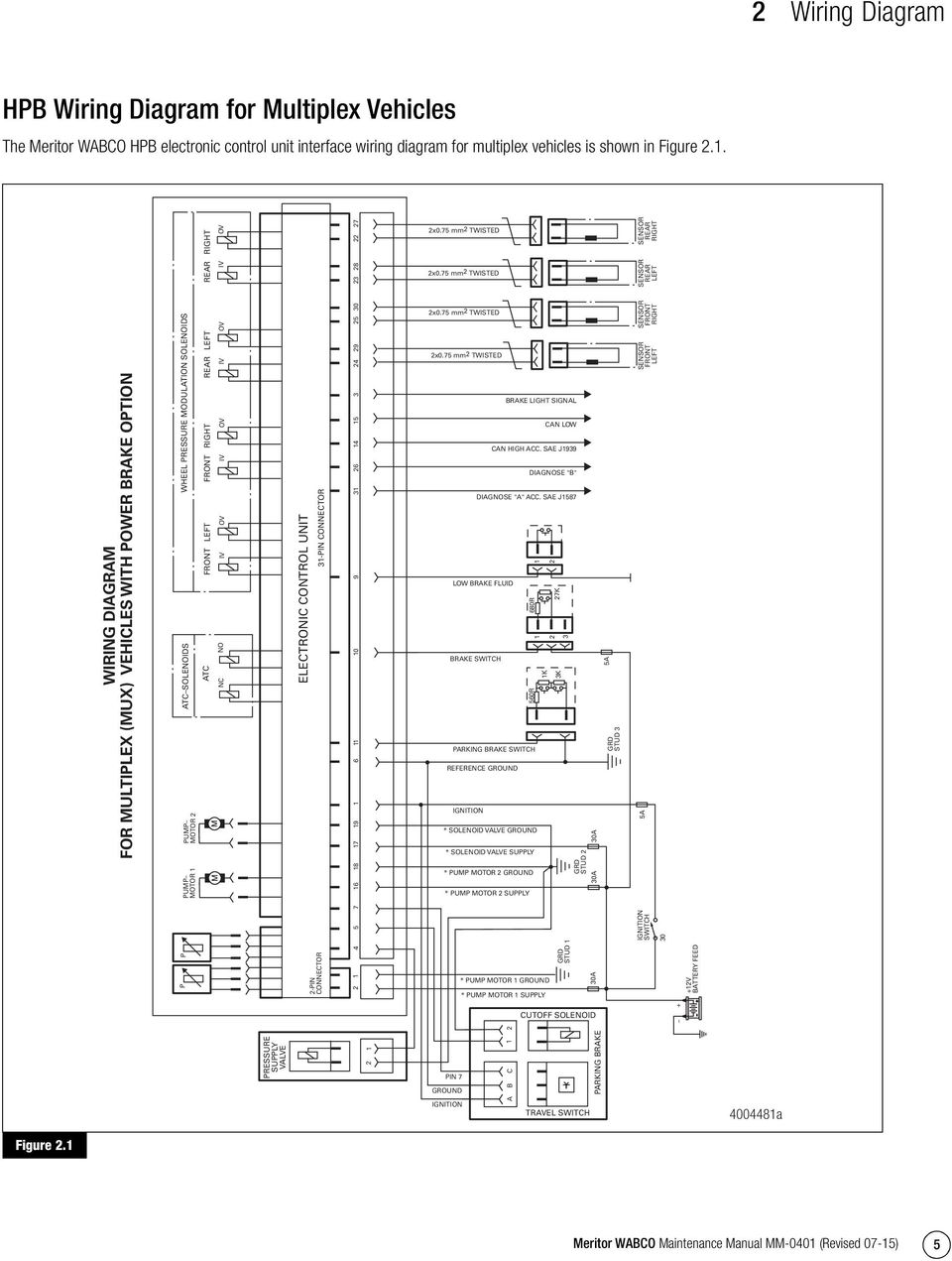
11 2 Wiring Diagram HPB Connector Diagram for Multiplex Vehicles The Meritor WABCO HPB electronic control unit interface connector diagram for multiplex vehicles is shown in Figure 2.2. Figure 2.2 PIN IDENTIFICATION FOR WIRE HARNESS CONNECTORS TO THE ECU (9511) PRESSURE SUPPLY VALVE (OPTIONAL) CUT OFF SOLENOID (OPTIONAL) ABS OFFROAD SWITCH (OPTIONAL) MASTER CYLINDER BRAKE SWITCH IGNITION 12V BRAKE SIGNAL NOT USED REFERENCE GROUND SAHR TRAVEL SWITCH (OPTIONAL) LOW BRAKE FLUID PARKING BRAKE DASH SWITCH J HIGH J1939 LOW NOT USED NOT USED PUMP MOTOR 2 SUPPLY 12V+ SOLENOID VALVE SUPPLY 12V+ PUMP MOTOR 2 GROUND SOLENOID VALVE GROUND NOT USED NOT USED REAR RIGHT WHEEL SPEED SENSOR REAR LEFT WHEEL SPEED SENSOR FRONT LEFT WHEEL SPEED SENSOR X FRONT RIGHT WHEEL SPEED SENSOR 30 URAT1 30A 26 J1587 DIAG. B + LOW 31 J1587 DIAG. A + HIGH b Figure Meritor WABCO Maintenance Manual MM-0401 (Revised 07-15)

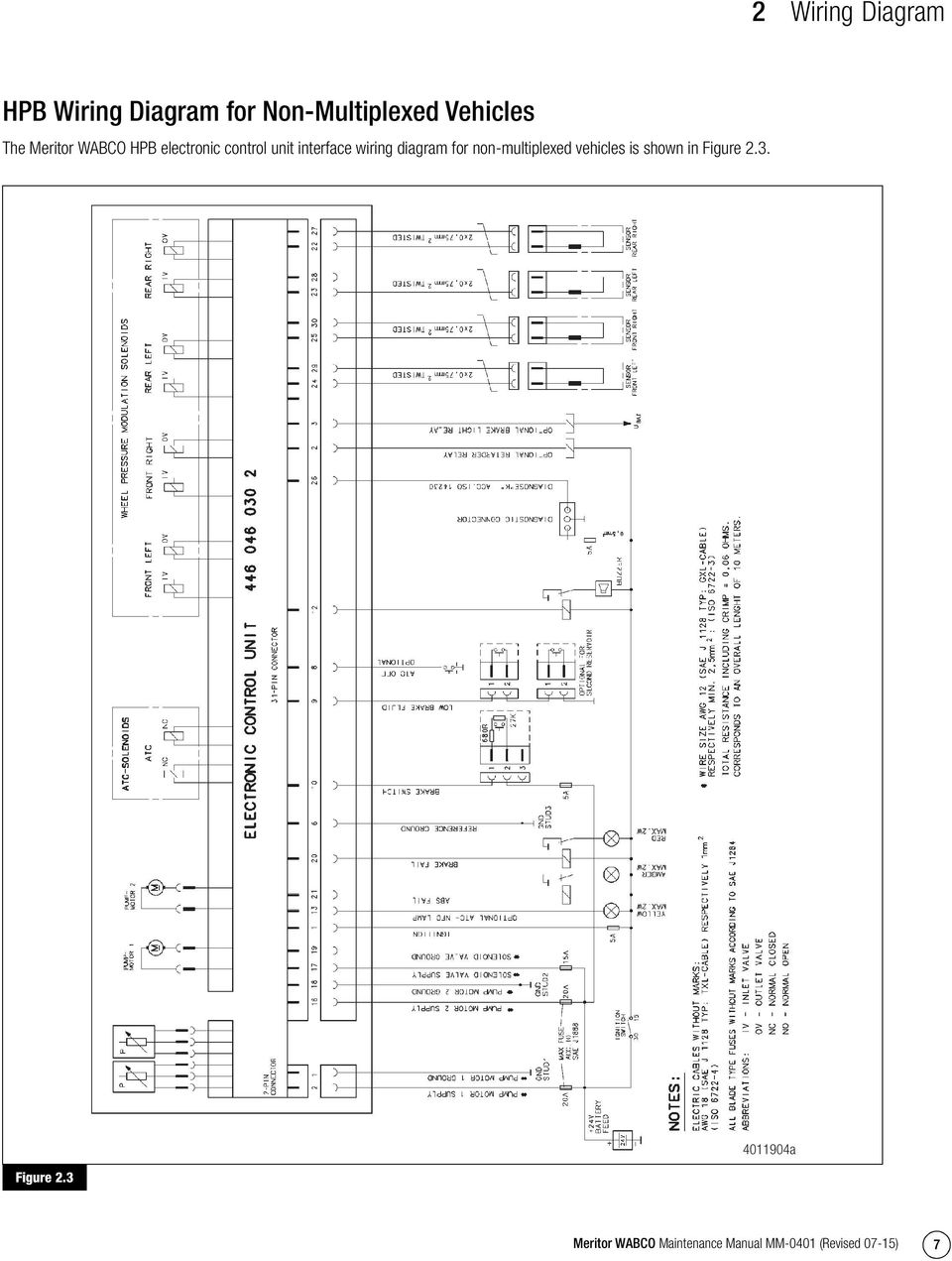
12 2 Wiring Diagram HPB Wiring Diagram for Non-Multiplexed Vehicles The Meritor WABCO HPB electronic control unit interface wiring diagram for non-multiplexed vehicles is shown in Figure 2.3. Figure 2.3 Figure a Meritor WABCO Maintenance Manual MM-0401 (Revised 07-15) 7
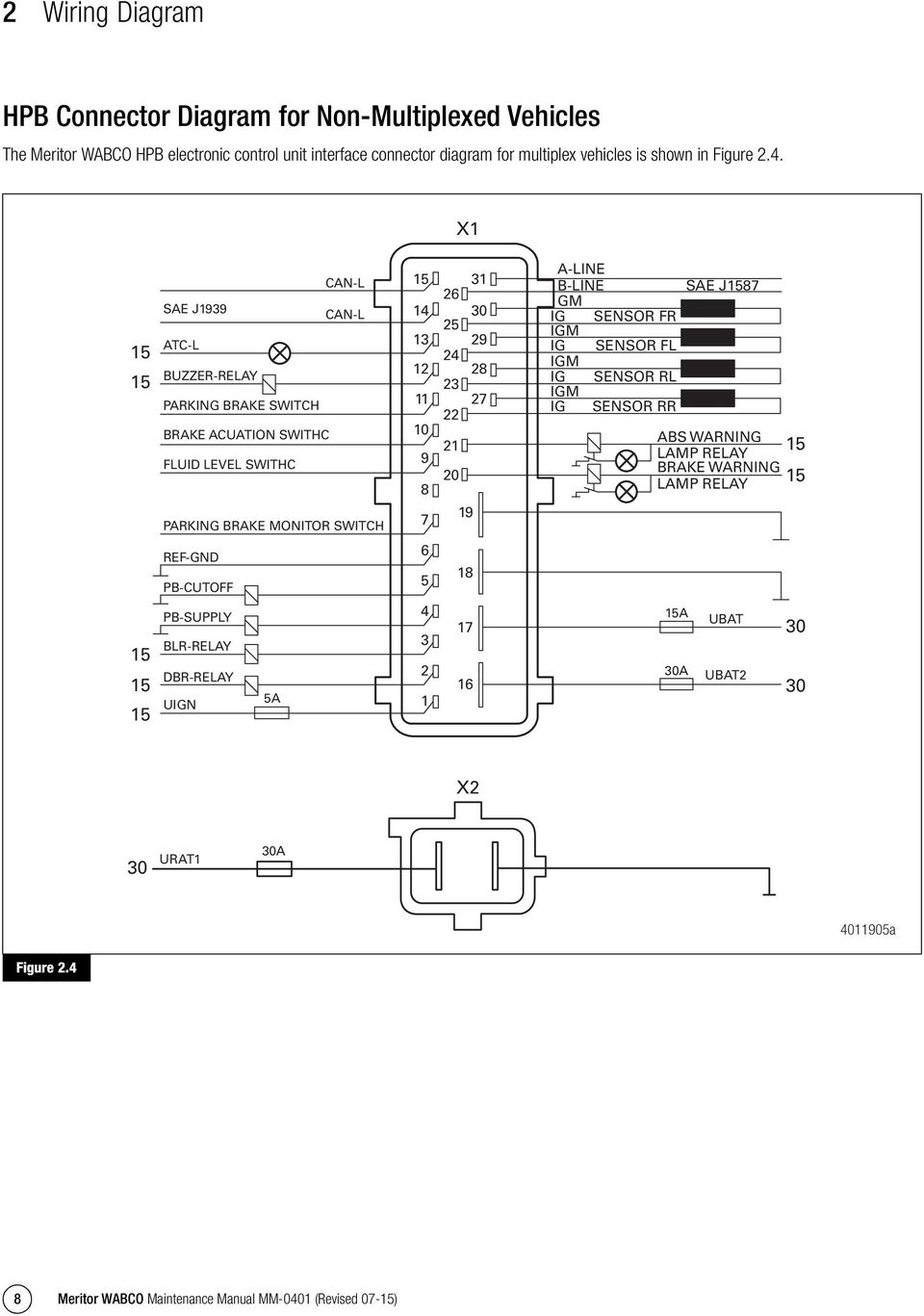
13 2 Wiring Diagram HPB Connector Diagram for Non-Multiplexed Vehicles The Meritor WABCO HPB electronic control unit interface connector diagram for multiplex vehicles is shown in Figure 2.4. Figure 2.4 X CAN-L 15 SAE J1939 CAN-L 14 ATC-L 13 BUZZER-RELAY 12 PARKING BRAKE SWITCH 11 BRAKE ACUATION SWITHC 10 FLUID LEVEL SWITHC 9 8 PARKING BRAKE MONITOR SWITCH 7 REF-GND 6 PB-CUTOFF 5 PB-SUPPLY 4 BLR-RELAY 3 DBR-RELAY 2 UIGN 5A 1 A-LINE 31 B-LINE SAE J GM 30 IG SENSOR FR 25 IGM 29 IG SENSOR FL 24 IGM 28 IG SENSOR RL 23 IGM 27 IG SENSOR RR 22 ABS WARNING 21 LAMP RELAY BRAKE WARNING 20 LAMP RELAY A 30A UBAT UBAT X2 30 URAT1 30A a Figure Meritor WABCO Maintenance Manual MM-0401 (Revised 07-15)
14 3 Troubleshooting and Testing 3 Troubleshooting and Testing the System This section contains information for testing the HPB system with TOOLBOX Software, and for performing standard component and electrical tests. WARNING To prevent serious eye injury, always wear safe eye protection when you perform vehicle maintenance or service. Exhaust gas contains poison. When testing a vehicle with the engine running, test in a well-ventilated area or route the exhaust hose outside. To avoid serious personal injury, keep away, and keep test equipment away, from all moving or hot engine parts. To avoid unwanted vehicle movement when testing, set the parking brake and place the gear selector in NEUTRAL (manual transmission), or PARK (automatic transmission) unless otherwise directed. Failure to do so may result in serious personal injury. Connecting TOOLBOX Software To connect TOOLBOX Software to the vehicle, a RP1210A compliant device will be needed. Once TOOLBOX Software is connected and open, verify the adapter settings are correct. To access Adapter Selection for TOOLBOX Software 11 or newer, click on Utilities from the main TOOLBOX page or under System Setup in J1707 TOOLBOX from the main TOOLBOX page. To access Comport Settings for TOOLBOX Software versions prior to TOOLBOX Software 11 click on System Setup from the main TOOLBOX page. Make sure the Vendor: and Adapter: drop-downs are set for the device being used and set the Protocol: drop-down to J1708, and click OK. Figure 3.1. Figure 3.1 Never drive the vehicle if the parking brake cable is disconnected or if the parking brake system is not operating correctly. Driving the vehicle without a correctly functioning parking brake system can result in an accident and serious personal injury. Refer to, and follow, the vehicle manufacturer s Warnings, Cautions and service procedures. Meritor WABCO TOOLBOX Software NOTE: The HPB system does not have blink code capability and Meritor WABCO TOOLBOX Software is needed to communicate with the system. Use TOOLBOX Software to obtain DTCs and verify the activation of various system components. Turn valves, pump and retarder relay (if available) on and off (Valve Activation Menu) Turn indicator lamps on and off (Miscellaneous Output Activation Menu) NOTE: To obtain TOOLBOX Software, go to Figure 3.1 NOTE: When switching between J1939 and J1708 communications, vehicle ignition must be cycled between sessions to correctly communicate with ECU. NOTE: TOOLBOX Software must be connected to the vehicle and the vehicle ignition must be ON in order to display information. If unable to communicate with the ECU: Verify device and data link connections are secure a Verify the device is RP1210A compliant and that the comport settings (Vendor, Protocol, Adapter) in TOOLBOX Software are correct. Meritor WABCO Maintenance Manual MM-0401 (Revised 07-15) 9

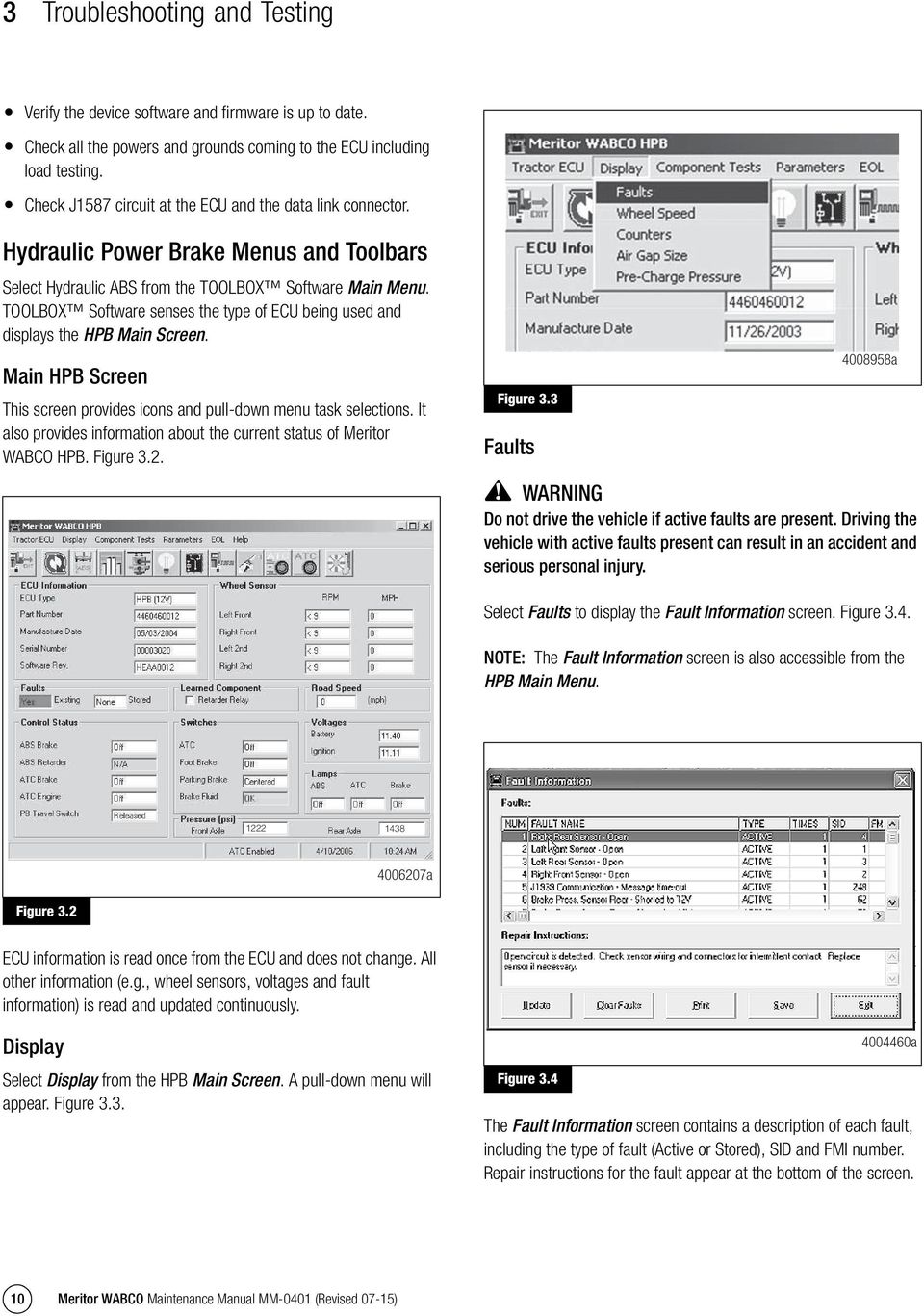
15 3 Troubleshooting and Testing Verify the device software and firmware is up to date. Figure 3.3 Check all the powers and grounds coming to the ECU including load testing. Check J1587 circuit at the ECU and the data link connector. Hydraulic Power Brake Menus and Toolbars Select Hydraulic ABS from the TOOLBOX Software Main Menu. TOOLBOX Software senses the type of ECU being used and displays the HPB Main Screen. Main HPB Screen This screen provides icons and pull-down menu task selections. It also provides information about the current status of Meritor WABCO HPB. Figure 3.2. Figure 3.2 Figure 3.3 Faults a WARNING Do not drive the vehicle if active faults are present. Driving the vehicle with active faults present can result in an accident and serious personal injury. Select Faults to display the Fault Information screen. Figure 3.4. NOTE: The Fault Information screen is also accessible from the HPB Main Menu. Figure a Figure 3.2 ECU information is read once from the ECU and does not change. All other information (e.g., wheel sensors, voltages and fault information) is read and updated continuously. Display Select Display from the HPB Main Screen. A pull-down menu will appear. Figure 3.3. Figure a The Fault Information screen contains a description of each fault, including the type of fault (Active or Stored), SID and FMI number. Repair instructions for the fault appear at the bottom of the screen. 10 Meritor WABCO Maintenance Manual MM-0401 (Revised 07-15)
16 3 Troubleshooting and Testing Faults that occur after the screen is displayed will not appear until a screen update is requested. Use the Update button at the bottom of the screen to refresh the fault information table and display a new list of faults. Figure 3.6 After making any required repairs, use the Clear Faults button to clear the fault. Clear each fault as it is repaired. The Update button should be used after all faults are repaired. Cycle the ignition after clearing the faults. NOTE: When all faults are cleared, you need to drive the vehicle above 5 mph before the ABS light will go out. Use the Save or Print button to save or print the fault information data. Select Exit to close this section. Wheel Speed Select Wheel Speed to display the Wheel Speed screen. Figure 3.5. Figure 3.5 Figure a The Counters screen provides an overview of HPB component performance (pump hours, brake events, etc.) as well as general vehicle activity such as ignition cycles. Occurrences displayed on this screen accumulate until the Clear button is selected. Component Tests Select Component Tests from the HPB Main Screen. A pull-down menu will appear. Figure 3.7. Figure a Figure 3.5 Use the Wheel Speed screen to verify that sensors are connected at each wheel. Speed at a sensed wheel (FL, FR, RL, RR) indicates sensors are installed, but does not verify correct sensor installation. Wheel speed sensor installation information is available in the Removal and Installation section. Counters Select Counters to display the Counters screen. Figure 3.6. Figure a Meritor WABCO Maintenance Manual MM-0401 (Revised 07-15) 11

17 3 Troubleshooting and Testing Valves Select Valves to display the Valve Activation test screen. Figure 3.8. Figure 3.9 Figure a Figure 3.9 As each lamp is tested, check the actual lamp to verify correct operation. Select Close to exit this screen. Parking Brake WARNING Park the vehicle on a level surface. Block the front and rear wheels to prevent vehicle movement. Failure to do so can result in unwanted vehicle movement causing serious personal injury. Select Parking Brake to display the Parking Brake test screen. Figure a Figure 3.10 Figure 3.8 The Valve Activation test screen lets you activate the HPB valves to check for correct activation and to verify correct brake line installation. Click on the valve you wish to test, then click the Send button to actuate the component. Component activation status appears in the Status box field. Select Close to exit this screen. Lamps Select Lamps to display the Lamp Test screen. Figure a Figure Meritor WABCO Maintenance Manual MM-0401 (Revised 07-15)

18 3 Troubleshooting and Testing Select Release or Apply, then select Send to test the parking brake. Select Close to exit this screen. Figure 3.12 Relay (Only on Non-Multiplex Vehicles) Select Relay to display the Activate Relay test screen. Figure Figure a Figure 3.12 Figure a This screen allows you to send a limit engine torque command to the engine or a disable retarder command to the retarder. Select the data link destination (engine or retarder), then select Send to test. Use the Stop button to end testing. Select Close to exit this screen. The vehicle must be running with the engine RPM increased ( RPM) in order for this function to work. Disable ATC Select Disable ATC to send a command to the ECU to disable automatic traction control. ATC will remain disabled until the enable command is sent, or until the vehicle ignition is cycled. ATC must be disabled for dynamometer testing. Enable ATC Select Enable ATC to send a command to the ECU to enable automatic traction control. This is the normal state of the ECU. Figure 3.7. This screen allows you to turn the retarder relay on or off. This is helpful in verifying correct operation, installation and wiring of the unit under test. Select Close to exit this screen. Engine Data Link Select Engine Data Link to display the Data Link test screen. Figure NOTE: The status bar on the HPB Main Menu reflects the current ATC status (enabled, disabled or not available). Miscellaneous Outputs Select Miscellaneous Outputs to display the Activate Miscellaneous Outputs test screen. Figure NOTE: Use TOOLBOX Software to test the following components: Retarder Relay (if available), Brake Light Relay (if available), Supply Valve, Cut-Off Valve, ABS Lamp, Traction Lamp, Brake Warning, Pump Front, Pump Rear, Buzzer. Meritor WABCO Maintenance Manual MM-0401 (Revised 07-15) 13

19 3 Troubleshooting and Testing Figure 3.13 Standard Testing Figure a Test Equipment: Volt-Ohm Meter (VOM) Use of a VOM with automatic polarity sensing is recommended. This eliminates the concern of the polarity of the meter leads during voltage measurements. System Requirements and Component Tests Tire Size Range WARNING For correct hydraulic ABS operation, front and rear tire sizes must be within 16% of each other. Do not use a tire size range that exceeds 16%. Failure to do so may cause reduced braking force and result in serious personal injury. This screen provides a check of several HPB components, as well as a way to check either inlet or outlet activity of the valves, pump or retarder relay. Highlight the component you wish to test, then select the Send button to actuate the component. Component activation status appears in the Status Box field. Select Close to exit this screen. Reset Memorized Select Reset Memorized to display the Learned Component screen. Figure Figure 3.14 Figure a Relay is an automatic default and cannot be de-selected. It indicates the ECU has memorized the installed retarder relay. Once the ECU has seen a retarder, it expects to see it every time the vehicle is powered up. Calculate the tire size with the following equation: % Difference = { RPM = tire revolutions per mile RPM Steer 1} x 100 RPM Drive Checking Power, Ground and Load Test CAUTION When troubleshooting or testing the ABS, be careful not to damage the connector terminals. If connector terminals are damaged, they must be replaced. There are 2 connectors at the HPB ECU, a 2-pin connector and a 31-pin connector. When checking power and ground for any of the ECU circuits, it is recommended to check all the power and ground circuits as there are redundant powers and grounds. Disconnect the 2-pin and 31-pin connectors and verify all the lock tabs are there and good, check for any signs of damage, moisture or corrosion. 14 Meritor WABCO Maintenance Manual MM-0401 (Revised 07-15)

20 3 Troubleshooting and Testing Ground Checks Check all the ground wire circuits, with the key off, disconnect the 2-pin and 31-pin connectors and in the 2-pin harness connector check resistance to ground pin 1 and in the 31-pin harness connector check resistance to ground pins 6, 18, 19. All readings should be less than 1 ohm, if the readings are not in spec, may need to review wiring diagnostics and repair with the OEM. Voltage Checks Check all the power wire circuits, with the key off, disconnect the 2-pin and 31-pin connectors. In the 2-pin harness connector, check voltage to ground pin 2 and in the 31-pin harness connector, check voltage to ground pins 1, 16, 17. All readings should be approximately 12 volts, except pin 17. There should be no voltage key off. With the key on, recheck voltage at pin 2 of the 2-pin connector and pins 1, 16, 17 of the 31-pin connector. All readings should be approximately 12 volts. If the readings are not in spec, may need to review wiring diagnostics and repair with the OEM. Load Test A compromised wire or circuit may still be able to provide resistance and voltage readings that would be within specification for a Digital Volt Ohm Meter or test light, but might not be capable of handling enough current to allow the system to function correctly. To make sure of the integrity of the wire or circuit, a load test is necessary. With the key on load, test across pins 1-2 of the 2-pin harness connector and pins 1-6, 16-18, of the 31-pin harness connector with a device that will draw about 5 amps (such as a Sealed Beam headlight) for approximately 10 seconds. The headlamp should be bright, if the lamp does not light, is dim or flickers, it would indicate an issue with the wiring, may need to review wiring diagnostics and repair with the OEM. Standard Component Testing Indicator Lamps If the indicator lamps do not come on after the ignition is turned on, or it comes on but does not go out after three seconds, check all ABS fuses or circuit breakers and replace if necessary. After checking the indicator lamps, make repairs as necessary. Sensor Adjustment On steering axles, the sensor is typically accessible on the in-board side of the steering knuckle. On drive axles, the sensor is typically accessible on the in-board side of the rear axle spindle. To adjust the sensor, push the sensor in until it contacts the tooth wheel. Do not pry or push sensors with sharp objects. Sensors will self-adjust during wheel rotation. NOTE: No gap is allowed at installation. During normal operation, the gap should not be greater than 0.04-inch (1.02 mm). Vehicle Test Drive After replacing an HPB component, use TOOLBOX Software to ensure there are not active faults, then test drive the vehicle as follows: 1. Turn ignition ON. NOTE: Depending on the vehicle, the ATC lamp may be labeled differently and some vehicles may not have an ATC lamp. Refer to the vehicle specification sheet for label designation. 2. Check the vehicle dash lamps: Most of the dash lamps for HPB come on briefly (approximately three seconds) for a bulb check, then go off. This indicates the system is O.K. If the ABS and ATC lamps do not go off within 3 seconds after turning the ignition ON, the system is looking for a wheel speed test. Drive the vehicle at speeds of 5-10 mph (8-16 km/h). The ABS and ATC lamps will then go off if the system is O.K. If the ABS and ATC lamps do not go off after the vehicle reaches a speed of 5-10 mph (8-16 km/h), this indicates there is a system fault. Perform vehicle diagnostics and make all of the necessary repairs, including appropriate bleed procedures, before returning the vehicle to service. WARNING Do not drive the vehicle if active faults are present. Driving the vehicle with active faults present can result in an accident and serious personal injury. 3. Drive the vehicle for a short distance. Make gentle brake applications to verify brake performance. Meritor WABCO Maintenance Manual MM-0401 (Revised 07-15) 15

21 3 Troubleshooting and Testing Safety Features Limp Mode The HPB system has a feature known as Limp Mode In the event that power is lost at the 31-pin ECU connector or the 31-pin connector has become dislodged, power for emergency foundation braking can still be provided through the 2 pin ECU connector. Dynamic Park Brake Application, If Equipped with the Hydraulic Park Brake System In the event that the HPB system should lose all power and pressure, the park brake will automatically apply, while moving or at rest. Interlocks, If Equipped with the Hydraulic Park Brake System The HPB system with the hydraulic park brake feature may not allow the park brake to be release unless certain interlock messages are received, such as a door being left open or a wheel chair lift that is not seated correctly in the stored position. Review interlock operation and diagnostics with the OEM. Towing Procedure for Navistar CE Buses Towing Preparation: Hydraulic Powered Parking Brakes If battery power is available: 1. Place the transmission in N Neutral and turn the ignition switch to the ON position. 2. While depressing the brake pedal, push and hold the Parking Brake knob to release the parking brake. If battery power has been lost, the Parking Brake cable will have to be disconnected by following the steps below. If battery power has been lost: Use the following procedure to disconnect the Parking Brake cable. 3. While using the 15 mm wrench to hold the canister shaft, unscrew the threaded rod using an 8 mm wrench. The rod must be unscrewed approximately 2.5 inches before the cable disconnects. The cable will exhibit some resistance while being unscrewed because it is under tension. Towing Vehicle with Front Wheels Suspended When it is necessary to tow a vehicle with the front wheels suspended, extra precautions must be taken to avoid transmission or differential damage. Disconnect the axle shafts at the rear axle to prevent the wheels from driving the differential and the transmission. If axle shaft is not disconnected, remove the rear axle shafts from the axle assembly. Cover the wheel hub ends to prevent loss of axle lubricant and entrance of contaminants. Towing Vehicles with Rear Wheels Suspended Whenever possible, it is preferable to tow a disabled vehicle from the rear by raising the rear of the chassis. When towing a vehicle with the rear of the chassis suspended, the front wheels must be locked in the straight ahead position. CAUTION While removing the parking brake cable, only the threaded rod should rotate. If the cable is to be reused, do not allow the cable to twist during removal. 1. Block the wheels, place the transmission in N Neutral, and turn the ignition switch to the OFF position. 2. While using a 15 mm wrench to hold the SAHR canister shaft, loosen the jam nut on the threaded rod with a 16 mm wrench. 16 Meritor WABCO Maintenance Manual MM-0401 (Revised 07-15)
22 3 Troubleshooting and Testing Warning Lamps Indicator Lamp Lamp Status System Condition Being Indicated Recommendation BRAKE/BRAKE PRESSURE Note: Indicator differs by model year STEADY ON and buzzer on FLASHING or STEADY ON* and buzzer on (*depending on model) Half brake system failure. One of the two brake circuits is not generating pressure or is not generating pressure at the proper rate. Braking force from the Hydraulic Power Brake may be reduced or impaired. Use Parking Brake if necessary. Full brake system failure. Both brake circuits are not generating pressure or are not generating pressure at the proper rate. Braking force from the Hydraulic Power Brake may be reduced or impaired. Use Parking Brake if necessary. OFF System pressures are in normal operating range. BRAKE FLUID STEADY ON Low brake fluid level in the Master Cylinder Reservoir. Braking force from the Hydraulic Power Brake may be reduced or impaired. Use parking brake if necessary. OFF Brake fluid level detected in the Master Cylinder is at or above MIN mark. Immediately find a location to safely park the vehicle. When safely off the road and stopped, turn off ignition and ensure the vehicle transmission is in the park position. Apply Parking Brake. Do not drive until the failure has been repaired. Immediately find a location to safely park the vehicle. When safely off the road and stopped, turn off ignition and ensure the vehicle transmission is in the park position. Apply Parking Brake. Do not drive until the failure has been repaired. Immediately find a location to safely park the vehicle. When safely off the road and stopped, turn off ignition and ensure the vehicle transmission is in the park position. Apply Parking Brake. Do not drive until the failure has been repaired. ABS STEADY ON An ABS related fault has been detected by the Have vehicle repaired as soon as possible. ECU. The advantages provided by ABS may not be fully available OFF No ABS related faults detected. TRAC CTRL STEADY ON A Traction Control related fault has been detected OR- A Traction Control event is occurring due to spinning wheels and the system is operating correctly. FLASHING Mud and Snow mode was selected using the traction control switch (switch indicator lit) OFF ATC is operating correctly, the Mud and Snow mode has not been selected and the vehicle is not experiencing an ATC event. PARK BRAKE STEADY ON Park Brake is applied. OFF Park Brake is not applied. SERVICE PARK BRAKE FLASHING/ STEADY ON A Park Brake related fault has been detected by the ECU. Braking force from Park Brake may be reduced or impaired. If the lamp remains on for over 10 seconds, there is a high likelihood of a fault in the traction control system. Have vehicle repaired as soon as possible. Immediately find a location to safely park the vehicle. When safely off the road and stopped, turn off ignition and ensure the vehicle transmission is in the park position. Apply Parking Brake. Do not drive until the failure has been repaired. OFF No Park Brake related faults detected. NOTE: If the ABS and/or ATC lamps are flashing after the parameters have been downloaded, verify the System Check Status has been set. See System Check Status in Parameter Downloading section of this manual. Meritor WABCO Maintenance Manual MM-0401 (Revised 07-15) 17
23 3 Troubleshooting and Testing SPN, SID, FMI Diagnostic Trouble Code List Figure a Figure Meritor WABCO Maintenance Manual MM-0401 (Revised 07-15)
24 3 Troubleshooting and Testing Figure a Figure 3.16 Meritor WABCO Maintenance Manual MM-0401 (Revised 07-15) 19
25 3 Troubleshooting and Testing Figure a Figure Meritor WABCO Maintenance Manual MM-0401 (Revised 07-15)
26 3 Troubleshooting and Testing Figure a Figure 3.18 Meritor WABCO Maintenance Manual MM-0401 (Revised 07-15) 21
27 3 Troubleshooting and Testing Figure 3.19 SPN SID FMI Description Warning Light Impedance Tone Ring No Trigger Detected Brake Chatter System Reaction Cause Action Left Rear Wheel Speed Sensor Speed Signal Taken From Other Rear Wheel ATC An open circuit or short to ground has been detected. i.e ECU detects a disconnected wheel speed sensor. Check sensor impedance and sensor wiring and connectors for intermittent contact. Check harness and/or sensor for open circuit or short to ground. Sensor resistance should measure between ohms. Speed Signal Taken From Other Rear Wheel ATC Wheel speed signal drops out periodically at speeds higher than 10 kph. Check tone ring for damage/missing teeth/corrosion. Check bearing play and tone ring run out. Speed Signal Taken From Other Rear Wheel ATC Wheel speed sensor signal not detected. Check air gap. The gap should not be greater than inch (1.02 mm). Check bearing play and tone ring run out. Eliminate root cause for air gap extension and push sensor back in afterwards. Check tone ring for damage (missing teeth, corrosion). Check sensor impedance and sensor wiring and connectors for intermittent contact. Check sensor installation. Check air gap and push sensor back in afterwards. Temporary ABS Wheel Temporary ATC Brake drags or chatters. Abnormal vibrations detected. Check foundation brakes; condition may occur even without system failure a Figure Meritor WABCO Maintenance Manual MM-0401 (Revised 07-15)
28 3 Troubleshooting and Testing Figure a Figure 3.20 Meritor WABCO Maintenance Manual MM-0401 (Revised 07-15) 23
29 3 Troubleshooting and Testing Figure 3.21 SPN SID FMI Description Warning Light Impedance Tone Ring No Trigger Detected Brake Chatter System Reaction Cause Action Right Rear Wheel Speed Sensor Speed Signal Taken From Other Rear Wheel ATC An open circuit or short to ground has been detected. i.e ECU detects a disconnected wheel speed sensor. Check sensor impedance and sensor wiring and connectors for intermittent contact. Check harness and/or sensor for open circuit or short to ground. Sensor resistance should measure between ohms. Speed Signal Taken From Other Rear Wheel ATC Wheel speed signal drops out periodically at speeds higher than 10 kph. Check tone ring for damage/missing teeth/corrosion. Check bearing play and tone ring run out. Speed Signal Taken From Other Rear Wheel ATC Wheel speed sensor signal not detected. Check air gap. The gap should not be greater than inch (1.02 mm). Check bearing play and tone ring run out. Eliminate root cause for air gap extension and push sensor back in afterwards. Check tone ring for damage (missing teeth, corrosion). Check sensor impedance and sensor wiring and connectors for intermittent contact. Check sensor installation. Check air gap and push sensor back in afterwards. Temporary ABS Wheel Temporary ATC Brake drags or chatters. Abnormal vibrations detected. Check foundation brakes; condition may occur even without system failure a Figure Meritor WABCO Maintenance Manual MM-0401 (Revised 07-15)
30 3 Troubleshooting and Testing Figure a Figure 3.22 Meritor WABCO Maintenance Manual MM-0401 (Revised 07-15) 25
31 3 Troubleshooting and Testing Figure 3.23 SPN SID FMI Description Warning Light Short to Ground Shorted to Battery Open Circuit Short to Ground System Reaction Cause Action Power Amp. In Valve Left Front ABS Wheel ATC Inlet (IV) short to ground detected. Disconnect and inspect ECU connectors for any sign of damage, Check all ECU powers and grounds including load test. If DTC persists, may indicate ECU has failed. Power Amp. Out Valve Left Front ABS, ATC and EBD No Service brake intervention (power park) Outlet (OV) short to BATT detected. Disconnect and inspect ECU connectors for any sign of damage, Check all ECU powers and grounds including load test. If DTC persists, may indicate ECU has failed. ABS Wheel ATC Outlet (OV) open circuit detected. Disconnect and inspect ECU connectors for any sign of damage, Check all ECU powers and grounds including load test. If DTC persists, may indicate ECU has failed. ABS Wheel ATC Outlet (OV) short to ground detected. Disconnect and inspect ECU connectors for any sign of damage, Check all ECU powers and grounds including load test. If DTC persists, may indicate ECU has failed a Figure Meritor WABCO Maintenance Manual MM-0401 (Revised 07-15)
32 3 Troubleshooting and Testing Figure 3.24 SPN SID FMI Description Warning Light Shorted to Battery Open Circuit Short to Ground Shorted to Battery System Reaction Cause Action Power Amp. Out Valve Left Front ABS, ATC and EBD No Service brake intervention (power park) Inlet (IV) short to BATT detected. Disconnect and inspect ECU connectors for any sign of damage, Check all ECU powers and grounds including load test. If DTC persists, may indicate ECU has failed. ABS Wheel ATC Inlet (IV) open circuit detected. Disconnect and inspect ECU connectors for any sign of damage, Check all ECU powers and grounds including load test. If DTC persists, may indicate ECU has failed. ABS Wheel ATC Inlet (IV) short to ground detected. Disconnect and inspect ECU connectors for any sign of damage, Check all ECU powers and grounds including load test. If DTC persists, may indicate ECU has failed. Power Amp. Out Valve Right Front ABS, ATC and EBD No Service brake intervention (power park) Outlet (OV) short to BATT detected. Disconnect and inspect ECU connectors for any sign of damage, Check all ECU powers and grounds including load test. If DTC persists, may indicate ECU has failed a Figure 3.24 Meritor WABCO Maintenance Manual MM-0401 (Revised 07-15) 27
33 3 Troubleshooting and Testing Figure 3.25 SPN SID FMI Description Warning Light Open Circuit Short to Ground Shorted to Battery Open Circuit System Reaction Cause Action Power Amp. Out Valve Right Front ABS Wheel ATC Outlet (OV) open circuit detected. Disconnect and inspect ECU connectors for any sign of damage, Check all ECU powers and grounds including load test. If DTC persists, may indicate ECU has failed. ABS Wheel ATC Outlet (OV) short to ground detected. Disconnect and inspect ECU connectors for any sign of damage, Check all ECU powers and grounds including load test. If DTC persists, may indicate ECU has failed. Power Amp. In Valve Left Rear ABS, ATC and EBD No Service brake intervention (power park) Inlet (IV) short to BATT detected. Disconnect and inspect ECU connectors for any sign of damage, Check all ECU powers and grounds including load test. If DTC persists, may indicate ECU has failed. ABS Wheel ATC Inlet (IV) open circuit detected. Disconnect and inspect ECU connectors for any sign of damage, Check all ECU powers and grounds including load test. If DTC persists, may indicate ECU has failed a Figure Meritor WABCO Maintenance Manual MM-0401 (Revised 07-15)
34 3 Troubleshooting and Testing Figure 3.26 SPN SID FMI Description Warning Light Short to Ground Shorted to Battery Open Circuit Short to Ground System Reaction Cause Action Power Amp. In Valve Left Rear ABS Wheel ATC Inlet (IV) short to ground detected. Disconnect and inspect ECU connectors for any sign of damage, Check all ECU powers and grounds including load test. If DTC persists, may indicate ECU has failed. Power Amp. Out Valve Left Rear ABS, ATC and EBD No Service brake intervention (power park) Outlet (OV) short to BATT detected. Disconnect and inspect ECU connectors for any sign of damage, Check all ECU powers and grounds including load test. If DTC persists, may indicate ECU has failed. ABS Wheel ATC Outlet (OV) open circuit detected. Disconnect and inspect ECU connectors for any sign of damage, Check all ECU powers and grounds including load test. If DTC persists, may indicate ECU has failed. ABS Wheel ATC Outlet (OV) short to ground detected. Disconnect and inspect ECU connectors for any sign of damage, Check all ECU powers and grounds including load test. If DTC persists, may indicate ECU has failed a Figure 3.26 Meritor WABCO Maintenance Manual MM-0401 (Revised 07-15) 29
35 3 Troubleshooting and Testing Figure 3.27 SPN SID FMI Description Warning Light Shorted to Battery Open Circuit Short to Ground Shorted to Battery System Reaction Cause Action Power Amp. In Valve Right Rear ABS, ATC and EBD No Service brake intervention (power park) Inlet (IV) short to BATT detected. Disconnect and inspect ECU connectors for any sign of damage, Check all ECU powers and grounds including load test. If DTC persists, may indicate ECU has failed. ABS Wheel ATC Inlet (IV) open circuit detected. Disconnect and inspect ECU connectors for any sign of damage, Check all ECU powers and grounds including load test. If DTC persists, may indicate ECU has failed. ABS Wheel ATC Inlet (IV) short to ground detected. Disconnect and inspect ECU connectors for any sign of damage, Check all ECU powers and grounds including load test. If DTC persists, may indicate ECU has failed. Power Amp. Out Valve Right Rear ABS, ATC and EBD No Service brake intervention (power park) Outlet (OV) short to BATT detected. Disconnect and inspect ECU connectors for any sign of damage, Check all ECU powers and grounds including load test. If DTC persists, may indicate ECU has failed a Figure Meritor WABCO Maintenance Manual MM-0401 (Revised 07-15)
36 3 Troubleshooting and Testing Figure 3.28 SPN SID FMI Description Warning Light Open Circuit Short to Ground Shorted to Battery Open Circuit System Reaction Cause Action Power Amp. Out Valve Right Rear ABS Wheel ATC Outlet (OV) open circuit detected. Disconnect and inspect ECU connectors for any sign of damage, Check all ECU powers and grounds including load test. If DTC persists, may indicate ECU has failed. ABS Wheel ATC Outlet (OV) short to ground detected. Disconnect and inspect ECU connectors for any sign of damage, Check all ECU powers and grounds including load test. If DTC persists, may indicate ECU has failed. Power Amp. ATC Normally Closed ABS, ATC and EBD No Service brake intervention (power park) ATC short to BATT detected. Disconnect and inspect ECU connectors for any sign of damage, Check all ECU powers and grounds including load test. Verify correct HCU part number. If DTC, verify correct ECU part number. Verify if parameters are correct. If DTC persists, may indicate ECU has failed. ABS Wheel ATC ATC open circuit detected. Disconnect and inspect ECU connectors for any sign of damage, Check all ECU powers and grounds including load test. Verify correct HCU part number. If DTC, verify correct ECU part number. Verify if parameters are correct. If DTC persists, may indicate ECU has failed a Figure 3.28 Meritor WABCO Maintenance Manual MM-0401 (Revised 07-15) 31
37 3 Troubleshooting and Testing Figure 3.29 SPN SID FMI Description Warning Light Short to Ground Shorted to Battery Open Circuit Short to Ground System Reaction Cause Action Power Amp. ATC Normally Closed ABS Wheel ATC ATC short to ground detected. Disconnect and inspect ECU connectors for any sign of damage, Check all ECU powers and grounds including load test. Verify correct HCU part number. If DTC, verify correct ECU part number. Verify if parameters are correct. If DTC persists, may indicate ECU has failed. Power Amp. ATC Normally Open ABS, ATC and EBD No Service brake intervention (power park) ATC short to BATT detected. Disconnect and inspect ECU connectors for any sign of damage, Check all ECU powers and grounds including load test. Verify correct HCU part number. If DTC, verify correct ECU part number. Verify if parameters are correct. If DTC persists, may indicate ECU has failed. ABS Wheel ATC ATC open circuit detected. Disconnect and inspect ECU connectors for any sign of damage, Check all ECU powers and grounds including load test. Verify correct HCU part number. If DTC, verify correct ECU part number. Verify if parameters are correct. If DTC persists, may indicate ECU has failed. ABS Wheel ATC ATC short to ground detected. Disconnect and inspect ECU connectors for any sign of damage, Check all ECU powers and grounds including load test. Verify correct HCU part number. If DTC, verify correct ECU part number. Verify if parameters are correct. If DTC persists, may indicate ECU has failed a Figure Meritor WABCO Maintenance Manual MM-0401 (Revised 07-15)
38 3 Troubleshooting and Testing Figure 3.30 SPN SID FMI Description Warning Light Shorted to Battery Open Circuit Short to Ground Shorted to Battery System Reaction Cause Action Power Amp. Endurance Brake Relay EBD Endurance brake relay output short to BATT detected. Check wiring and connections from the ECU to the EBR. If DTC persists, may indicate ECU has failed. EBD Endurance brake relay output open detected. Check wiring and connections from the ECU to the EBR. If DTC persists, may indicate ECU has failed. EBD Endurance brake relay short to ground detected. Check wiring and connections from the ECU to the EBR. If DTC persists, may indicate ECU has failed. Power Amp. Brake Light Signal N/A Brake light signal short to BATT detected. Disconnect and inspect connectors for any sign of damage, Check wiring and connectors of Brake Light Signal relay circuit from ABS ECU to dash module for short to voltage. Pin 3 should have 4-5 volts key off and 12 volts key on a Figure 3.30 Meritor WABCO Maintenance Manual MM-0401 (Revised 07-15) 33
39 3 Troubleshooting and Testing Figure 3.31 SPN SID FMI Description Warning Light System Reaction Cause Action Power Amp. Brake Light Signal Open Circuit N/A Brake light signal open detected. Disconnect and inspect connectors for any sign of damage, Check wiring and connectors of Brake Light Signal relay circuit from ABS ECU to dash module for short to voltage. Pin 3 should have 4-5 volts key off and 12 volts key on Short to Ground N/A Brake light signal short to ground detected. Disconnect and inspect connectors for any sign of damage, Check wiring and connectors of Brake Light Signal relay circuit from ABS ECU to dash module for short to voltage. Pin 3 should have 4-5 volts key off and 12 volts key on. Power Amp. Parking Brake Pressure Supply Valve Shorted to Battery SAHR Backup Mode 2 Short to BATT detected. Disconnect and inspect connectors for any sign of damage, Check wiring and connectors of Pressure Supply Valve circuit from ABS ECU to Pressure Supply Valve for short to voltage. Check resistance of Pressure Supply Valve, should be 12 ohms. (If not in spec, indicates the Pressure Supply Valve may have failed.) Review Pressure Supply Valve harness diagnostics with the OEM. If the Pressure Supply Valve and harness pass all checks, and if DTC persists, may indicate ECU has failed Open Circuit SAHR Backup Mode 2 Open detected. Disconnect and inspect connectors for any sign of damage, Check wiring and connectors of Pressure Supply Valve circuit from ABS ECU to Pressure Supply Valve for short to voltage. Check resistance of Pressure Supply Valve, should be 12 ohms. (If not in spec, indicates the Pressure Supply Valve may have failed.) Review Pressure Supply Valve harness diagnostics with the OEM. If the Pressure Supply Valve and harness pass all checks, and if DTC persists, may indicate ECU has failed a Figure Meritor WABCO Maintenance Manual MM-0401 (Revised 07-15)
40 3 Troubleshooting and Testing Figure 3.32 SPN SID FMI Description Warning Light System Reaction Cause Action Power Amp. Parking Brake Pressure Supply Valve Short to Ground SAHR Backup Mode 2 Short to ground detected. Disconnect and inspect connectors for any sign of damage, Check wiring and connectors of Pressure Supply Valve circuit from ABS ECU to Pressure Supply Valve for short to voltage. Check resistance of Pressure Supply Valve, should be 12 ohms. (If not in spec, indicates the Pressure Supply Valve may have failed.) Review Pressure Supply Valve harness diagnostics with the OEM. If the Pressure Supply Valve and harness pass all checks, and if DTC persists, may indicate ECU has failed. Power Amp. Parking Brake Pressure Cut-Off Valve Shorted to Battery Park Brake cannot be Applied if Released Short to BATT detected. Disconnect and inspect connectors for any sign of damage, Check wiring and connectors of Pressure Cut-off Valve circuit from ABS ECU to Pressure Cut-off Valve for short to voltage. Review Pressure Cut-off Valve and harness diagnostics and repair with the OEM. If the Pressure Cut-off Valve and harness pass all checks, and if DTC persists, may indicate ECU has failed Open Circuit SAHR Backup Mode 1 Open detected. Disconnect and inspect connectors for any sign of damage, Check wiring and connectors of Pressure Cut-off Valve circuit from ABS ECU to Pressure Cut-off Valve for short to voltage. Review Pressure Cut-off valve and harness diagnostics and repair with the OEM. If the Pressure Cut-off Valve and harness pass all checks, and if DTC persists, may indicate ECU has failed Short to Ground SAHR Backup Mode 1 Short to ground detected. Disconnect and inspect connectors for any sign of damage, Check wiring and connectors of Pressure Cut-off Valve circuit from ABS ECU to Pressure Cut-off Valve for short to voltage. Review Pressure Cut-off Valve and harness diagnostics and repair with the OEM. If the Pressure Cut-off Valve and harness pass all checks, and if DTC persists, may indicate ECU has failed a Figure 3.32 Meritor WABCO Maintenance Manual MM-0401 (Revised 07-15) 35
41 3 Troubleshooting and Testing Figure 3.33 SPN SID FMI Description Warning Light System Reaction Cause Action Internal Valve Relay (provides supply voltage for ABS pressure control valves) Cannot switch off ABS, ATC and EBD Internal valve relay is unable to switch off. Disconnect and inspect connectors for any sign of damage, Check all ECU powers and grounds including load test, may need to review wiring diagnostics and repair with OEM. If connectors and harness pass all checks, and if DTC persists, may indicate ECU has failed Valve supply voltage missing or cannot switch on ABS, ATC and EBD No Service Brake Intervention Internal valve relay unable to switch on. Disconnect and inspect connectors for any sign of damage, Check all ECU powers and grounds including load test, may need to review wiring diagnostics and repair with OEM. If connectors and harness pass all checks, and if DTC persists, may indicate ECU has failed. ABS Warning Light Relay (if available) Open or Grounded ABS Warning Lamp N/A Flashing (if released). Activation of blink code switch longer than 16 seconds causes fault detection No load detected or grounded. Check wiring and connections of the ABS warning lamp circuit relay pin 21 of 31-pin connector. With ECU disconnected, with key ON, the voltage level shall be ~12 volts at Pin 21 to Ground. May need to review wiring diagnostics and repair with OEM. If connectors and wiring pass all checks, and if DTC persists, may indicate ECU has failed. ABS Warning Light Relay (if available) Open or Grounded Brake Warning Lamp N/A Flashing (if released). Activation of blink code switch longer than 16 seconds causes fault detection No load detected or grounded. Check wiring and connections of the Brake warning lamp circuit pin 20 of 31-pin connector. With ECU disconnected, with key ON, the voltage level shall be ~12 volts at Pin 20 to Ground. May need to review wiring diagnostics and repair with OEM. If connectors and wiring pass all checks, and if DTC persists, may indicate ECU has failed a Figure Meritor WABCO Maintenance Manual MM-0401 (Revised 07-15)
42 3 Troubleshooting and Testing Figure 3.34 SPN SID FMI Description Warning Light System Reaction Cause Action Buzzer (if available) Buzzer Audible Warning Status per failure mode Parking Brake Indicator Lamp ON (if applied) N/A Buzzer circuit problem detected. Disconnect and inspect connectors for any sign of damage, Check wiring and connections of the Buzzer relay circuit pin 12 of 31-pin connector. With ECU disconnected, with key ON, the voltage level shall be ~12 volts at Pin 12 to Ground. May need to review wiring diagnostics and repair with OEM. Current-measurement with Pin12/31 short or open. If connectors and wiring pass all checks, and if DTC persists, may indicate ECU has failed. ECU Main Ground or Reference Ground Connection ECU Main or Reference Ground Brake Warning Lamp ON Lamp (1939) ON ABS, ATC and EBD Park Brake Status Maintained ECU Main or Reference Ground missing or interrupted. Disconnect and inspect connectors for any sign of damage, Check all ECU powers and grounds including load test, may need to review wiring diagnostics and repair with OEM. If connectors and wiring pass all checks, and if DTC persists, may indicate ECU has failed. No Ignition Voltage Although Engine Speed Is Higher than 300 rpm for 5s No Ignition Voltage ATC Lamp OFF Lamp (1939) ON N/A ECU Ignition missing or interrupted. Disconnect and inspect connectors for any sign of damage, Check all ECU powers and grounds including load test, may need to review wiring diagnostics and repair with OEM a Figure 3.34 Meritor WABCO Maintenance Manual MM-0401 (Revised 07-15) 37
43 3 Troubleshooting and Testing Figure 3.35 SPN SID FMI Description Warning Light System Reaction Cause Action ECU Voltage High Voltage (>16.5 V) ATC ECU supply voltage too high. Check alternator and battery. Disconnect and inspect connectors for any sign of damage, Check all ECU powers and grounds including load test, may need to review wiring diagnostics and repair with OEM Low Voltage (<10.0 V) Brake Warning Lamp ON Lamp (1939) ON ABS enabled during cycling ATC ECU attempts to maintain park brake functionality ECU supply voltage too low. Check alternator and battery. Disconnect and inspect connectors for any sign of damage, Check all ECU powers and grounds including load test, may need to review wiring diagnostics and repair with OEM. Accumulator Pressure Sensing Front Axle Shorted to Battery Brake Warning Lamp ON Audible Warning ON Level 1 Warning ABS (Front Axle) ATC Signal short to BATT detected. Disconnect and inspect connectors for any sign of damage, Check all ECU powers and grounds including load test, may need to review wiring diagnostics and repair with OEM. Remove ECU and check Pressure Sensor both ECU and HCU sides and check for signs of damage, moisture or corrosion. If pressure sensor, connectors and wiring pass all checks, and if DTC persists, may indicate ECU/HCU has failed Short to Ground Brake Warning Lamp ON Audible Warning ON Level 1 Warning ABS (Front Axle) ATC Signal short to ground detected. Disconnect and inspect connectors for any sign of damage, Check all ECU powers and grounds including load test, may need to review wiring diagnostics and repair with OEM. Remove ECU and check Pressure Sensor both ECU and HCU sides and check for signs of damage, moisture or corrosion. If pressure sensor, connectors and wiring pass all checks, and if DTC persists, may indicate ECU has failed. If after replacing the ECU, the DTC persists, may indicate the HCU has failed a Figure Meritor WABCO Maintenance Manual MM-0401 (Revised 07-15)
44 3 Troubleshooting and Testing Figure 3.36 SPN SID FMI Description Warning Light System Reaction Cause Action Accumulator Pressure Sensing Front Axle Abnormal High Pressure Gradient (Short Charge Time) Brake Warning Lamp ON Audible Warning ON Level 1 Warning ABS (Front Axle) ATC Abnormal high pressure gradient detected. Check accumulator pre-charge level using TOOLBOX Software diagnostics. If pressure increases rapidly, may indicate the accumulator has failed. Disconnect and inspect connectors for any sign of damage, Pressure Sensor Voltage Output Constant Brake Warning Lamp ON Audible Warning ON Level 1 Warning ABS (Front Axle) ATC Constant pressure voltage output detected. Check accumulator pre-charge level using TOOLBOX Software diagnostics. If pressure increases rapidly, may indicate the accumulator has failed. Disconnect and inspect connectors for any sign of damage, Accumulator Pressure Sensing Rear Axle Shorted to Battery Brake Warning Lamp ON Audible Warning ON Level 1 Warning ABS (Front Axle) ATC Signal short to BATT detected. Disconnect and inspect connectors for any sign of damage, Check all ECU powers and grounds including load test, may need to review wiring diagnostics and repair with OEM. Remove ECU and check Pressure Sensor both ECU and HCU sides and check for signs of damage, moisture or corrosion. If pressure sensor, connectors and wiring pass all checks, and if DTC persists, may indicate ECU/HCU has failed Short to Ground Brake Warning Lamp ON Audible Warning ON Level 1 Warning ABS (Front Axle) ATC Signal short to ground detected. Disconnect and inspect connectors for any sign of damage, Check all ECU powers and grounds including load test, may need to review wiring diagnostics and repair with OEM. Remove ECU and check Pressure Sensor both ECU and HCU sides and check for signs of damage, moisture or corrosion. If pressure sensor, connectors and wiring pass all checks, and if DTC persists, may indicate ECU has failed. If after replacing the ECU the DTC persists, may indicate the HCU has failed a Figure 3.36 Meritor WABCO Maintenance Manual MM-0401 (Revised 07-15) 39
45 3 Troubleshooting and Testing Figure 3.37 SPN SID FMI Description Warning Light System Reaction Cause Action Accumulator Pressure Sensing Rear Axle Abnormal High Pressure Gradient (Short Charge Time) Brake Warning Lamp ON Audible Warning ON Level 1 Warning ABS (Front Axle) ATC Abnormal high pressure gradient detected. Check accumulator pre-charge level using TOOLBOX Software diagnostics. If pressure increases rapidly, may indicate the accumulator has failed. Disconnect and inspect connectors for any sign of damage, Pressure Sensor Voltage Output Constant Brake Warning Lamp ON Audible Warning ON Level 1 Warning ABS (Front Axle) ATC Constant pressure voltage output detected. Check accumulator pre-charge level using TOOLBOX Software diagnostics. If pressure increases rapidly, may indicate the accumulator has failed. Disconnect and inspect connectors for any sign of damage, Electronic Pressure Control Front Axle Pump motor does not operate when expected Brake Warning Lamp ON Audible Warning ON Level 1 Warning ABS (Front Axle) ATC & EBD Pump motor current draw less than expected. Disconnect and inspect the ECU 2-pin and 31-pin connectors for any sign of damage, moisture or corrosion, verify all lock tabs are in good condition and, clean connectors if necessary. Check all ECU powers and grounds including load test, may need to review wiring diagnostics and repair with OEM. If connectors and wiring pass all checks, and if DTC persists, may indicate ECU/HCU has failed Supply voltage for pump motor missing Brake Warning Lamp ON Audible Warning ON Level 1 Warning ABS (Front Axle) ATC & EBD Pump power. Disconnect and inspect the ECU 2-pin and 31-pin connectors for any sign of damage, moisture or corrosion, verify all lock tabs are in good condition and, clean connectors if necessary. Check all ECU powers and grounds including load test, may need to review wiring diagnostics and repair with OEM. If connectors and wiring pass all checks, and if DTC persists, may indicate ECU/HCU has failed a Figure Meritor WABCO Maintenance Manual MM-0401 (Revised 07-15)
46 3 Troubleshooting and Testing Figure 3.38 SPN SID FMI Description Warning Light System Reaction Cause Action Electronic Pressure Control Front Axle Pump motor operates when not expected Brake Warning Lamp ON Audible Warning ON Level 1 Warning ABS (Front Axle) ATC & EBD Pump motor unexpected operation. Disconnect and inspect the ECU 2-pin and 31-pin connectors for any sign of damage, moisture or corrosion, verify all lock tabs are in good condition and, clean connectors if necessary. Check all ECU powers and grounds including load test, may need to review wiring diagnostics and repair with OEM. If connectors and wiring pass all checks, and if DTC persists, may indicate ECU/HCU has failed Pump motor operates when not expected Brake Warning Lamp ON Audible Warning ON Level 1 Warning ABS (Front Axle) ATC & EBD Pump motor unexpected operation. Disconnect and inspect the ECU 2-pin and 31-pin connectors for any sign of damage, moisture or corrosion, verify all lock tabs are in good condition and, clean connectors if necessary. Check all ECU powers and grounds including load test, may need to review wiring diagnostics and repair with OEM. If connectors and wiring pass all checks, and if DTC persists, may indicate ECU/HCU has failed Master cylinder brake circuit failure Brake Warning Lamp ON Audible Warning ON Level 1 Warning ABS (Front Axle) ATC & EBD Brake circuit failure detected. (While wearing protection) With the pressure bleeder installed on the master cylinder, crack the bleeder screws at the relay is weak or uneven at the relay valve but strong at the master, it would indicate an issue with the lines between the master master cylinder lines, it would indicate an issue with the master cylinder Diaphragm accumulator precharge level too low (detected by short run time and high switch on frequency) Brake Warning Lamp ON Audible Warning ON Level 1 Warning ABS (Front Axle) ATC & EBD Accumulator precharge low level detected. Check accumulator pre-charge level using TOOLBOX Software diagnostics. May indicate accumulator has failed a Figure 3.38 Meritor WABCO Maintenance Manual MM-0401 (Revised 07-15) 41
47 3 Troubleshooting and Testing Figure 3.39 SPN SID FMI Description Warning Light System Reaction Cause Action Electronic Pressure Control Front Axle Leakage too high Brake Warning Lamp ON Audible Warning ON Level 1 Warning ABS (Front Axle) ATC & EBD Too high of leakage detected. Check pump motor for external leakage. Check frequency of pump motor operation. If all checks pass, and if DTC persists, may indicate ECU has failed or HCU has failed Extended accumulator charging time Brake Warning Lamp ON Audible Warning ON Level 1 Warning ABS (Front Axle) ATC & EBD Long accumulator charging time detected. Verify the master cylinder cap is venting correctly. Verify there is no air in the system. Bleed system, if necessary. If all checks pass, may indicate a pump or motor has failed. Pump or HCU replacements are repair options. (See Pump Replacement or HCU replacement.) Electronic Pressure Control Rear Axle Pump motor does not operate when expected Brake Warning Lamp ON Audible Warning ON Level 1 Warning ABS (Front Axle) ATC Pump motor current draw less than expected. Disconnect and inspect the ECU 2-pin and 31-pin connectors for any sign of damage, moisture or corrosion, verify all lock tabs are in good condition and, clean connectors if necessary. Check all ECU powers and grounds including load test, may need to review wiring diagnostics and repair with OEM. If connectors and wiring pass all checks, and if DTC persists, may indicate ECU/HCU has failed Supply voltage for pump motor missing Brake Warning Lamp ON Audible Warning ON Level 1 Warning ABS (Front Axle) ATC Pump power. Disconnect and inspect the ECU 2-pin and 31-pin connectors for any sign of damage, moisture or corrosion, verify all lock tabs are in good condition and, clean connectors if necessary. Check all ECU powers and grounds including load test, may need to review wiring diagnostics and repair with OEM. If connectors and wiring pass all checks, and if DTC persists, may indicate ECU/HCU has failed a Figure Meritor WABCO Maintenance Manual MM-0401 (Revised 07-15)
48 3 Troubleshooting and Testing Figure 3.40 SPN SID FMI Description Warning Light Pump motor operates when not expected Brake Warning Lamp ON Audible Warning ON Pump motor operates when not expected Brake Warning Lamp ON Audible Warning ON Master cylinder brake circuit failure Brake Warning Lamp ON Audible Warning ON Diaphragm accumulator precharge level too low (detected by short run time and high switch on frequency) Brake Warning Lamp ON Audible Warning ON System Reaction Cause Action Electronic Pressure Control Rear Axle Level 1 Warning ABS (Front Axle) ATC Pump motor unexpected operation. Disconnect and inspect the ECU 2-pin and 31-pin connectors for any sign of damage, moisture or corrosion, verify all lock tabs are in good condition and, clean connectors if necessary. Check all ECU powers and grounds including load test, may need to review wiring diagnostics and repair with OEM. If connectors and wiring pass all checks, and if DTC persists, may indicate ECU/HCU has failed. Level 1 Warning ABS (Front Axle) ATC Pump motor unexpected operation. Disconnect and inspect the ECU 2-pin and 31-pin connectors for any sign of damage, moisture or corrosion, verify all lock tabs are in good condition and, clean connectors if necessary. Check all ECU powers and grounds including load test, may need to review wiring diagnostics and repair with OEM. If connectors and wiring pass all checks, and if DTC persists, may indicate ECU/HCU has failed. Level 1 Warning ABS (Front Axle) ATC Brake circuit failure detected. (While wearing protection) With the pressure bleeder installed on the master cylinder, crack the bleeder screws at the relay is weak or uneven at the relay valve but strong at the master, it would indicate an issue with the lines between the master master cylinder lines, it would indicate an issue with the master cylinder. Level 1 Warning ABS (Front Axle) ATC Accumulator precharge low level detected. Check accumulator pre-charge level using TOOLBOX Software diagnostics. May indicate accumulator has failed a Figure 3.40 Meritor WABCO Maintenance Manual MM-0401 (Revised 07-15) 43
49 3 Troubleshooting and Testing Figure 3.41 SPN SID FMI Description Warning Light System Reaction Cause Action Electronic Pressure Control Front Axle Leakage too high Brake Warning Lamp ON Audible Warning ON Level 1 Warning ABS (Front Axle) ATC Too high of leakage detected. Check pump motor for external leakage. Check frequency of pump motor operation. If all checks pass, and if DTC persists, may indicate ECU has failed or HCU has failed Extended accumulator charging time Brake Warning Lamp ON Audible Warning ON Level 1 Warning ABS (Front Axle) ATC Long accumulator charging time detected. Verify the master cylinder cap is venting correctly. Verify there is no air in the system. Bleed system, if necessary. If all checks pass, may indicate a pump or motor has failed. Pump or HCU replacements are repair options. (See Pump Replacement or HCU replacement.) Foot Brake Switch Out of range ABS Warning Lamp OFF Brake Warning Lamp ON ATC Lamp OFF Cruise control disabled ATC & EBD disabled Brake switch range error detected. Check in TOOLBOX Software to see if switch positions are recognized. Disconnect and inspect connectors for any sign of damage, moisture or corrosion, clean connectors if necessary. Check pin 10 of 31-pin harness connector circuit for open, short to voltage or ground. Check resistance of circuit and check resistance of switch (2768 ohms at rest and 680 ohms depressed). If switch reading is out of range, may indicate switch failure. If circuit readings are out of range, may indicate a wiring issue. (Review wiring diagnostics and repairs with OEM.) Verify battery voltage at pin 2 of switch harness connector. If no voltage detected or out of range, may indicate wiring or fuse issue. der has failed Long Switch Time Detected ABS Warning Lamp OFF Brake Warning Lamp ON ATC Lamp OFF Cruise control disabled ATC & EBD disabled Excessive switch activation time detected. Check in TOOLBOX Software to see if switch positions are recognized. Disconnect and inspect connectors for any sign of damage, moisture or corrosion, clean connectors if necessary. Check pin 10 of 31-pin harness connector circuit for open, short to voltage or ground. Check resistance of circuit and check resistance of switch (2768 ohms at rest and 680 ohms depressed). If switch reading is out of range, may indicate switch failure. If circuit readings are out of range, may indicate a wiring issue. (Review wiring diagnostics and repairs with OEM.) Verify battery voltage at pin 2 of switch harness connector. If no voltage detected or out of range, may indicate wiring or fuse issue. der has failed a Figure Meritor WABCO Maintenance Manual MM-0401 (Revised 07-15)
50 3 Troubleshooting and Testing Figure 3.42 SPN SID FMI Description Warning Light Out of range ABS Warning Lamp OFF ATC Lamp OFF FLASHING (if released) Long switch time detected ABS Warning Lamp OFF ATC Lamp OFF FLASHING (if released) Park brake travel switch out implausible ABS Warning Lamp OFF ATC Lamp OFF Audible Warning ON Lamp (1939) ON FLASHING (if released). System Reaction Cause Action Parking Brake Switch Park brake status maintained Brake switch range error detected. Check in TOOLBOX Software to see if switch positions are recognized. Verify parameters are correct in ECU if issue occurs after replacing the ECU. Disconnect and inspect connectors for any sign of damage, Check pin 11 of 31-pin harness connector circuit for open, short to voltage or ground. Check resistance of circuit and check resistance of switch, released (560 ohms) Neutral (1560 ohms) and applied (4560 ohms), switch readings that are out of spec indicate a failed switch. If switch reading is out of range, may indicate switch failure. If circuit readings are out of range, may indicate a wiring issue. (Review wiring diagnostics and repairs with OEM.) If all parameter, switch, connector and harness checks pass, may indicate an ECU failure. Park brake status maintained Excessive switch activation time detected. Check in TOOLBOX Software to see if switch positions are recognized. Verify parameters are correct in ECU if issue occurs after replacing the ECU. Disconnect and inspect connectors for any sign of damage, Check pin 11 of 31-pin harness connector circuit for open, short to voltage or ground. Check resistance of circuit and check resistance of switch, released (560 ohms) Neutral (1560 ohms) and applied (4560 ohms), switch readings that are out of spec indicate a failed switch. If switch reading is out of range, may indicate switch failure. If circuit readings are out of range, may indicate a wiring issue. (Review wiring diagnostics and repairs with OEM.) If all parameter, switch, connector and harness checks pass, may indicate an ECU failure. Parking Brake System SAHR backup mode 1 Parking brake travel switch position error detected. Verify Park Brake Travel Switch status in TOOLBOX Software and compare with actual Park Brake status. If park brake does apply and release but status does not change in TOOLBOX Software, review Park Brake Travel Switch repair and diagnostics with OEM. Disconnect and inspect connectors for any sign of damage, moisture or corrosion, clean connectors if necessary. Check wiring for any issues. Review connector, wiring and switch diagnostics with the OEM. Check for pressure at SAHR when PB release is requested (wear protection). If no pressure is found when requested, check for interlock issue, may also indicate a mechanical Pressure Supply Valve issue. If SAHR (Park Brake) is not functioning correctly, check SAHR s mechanical function, parking brake adjustment for over travel with the OEM. If SAHR canister, travel switch connectors and wiring pass all checks, and if DTC persists, may indicate ECU has failed a Figure 3.42 Meritor WABCO Maintenance Manual MM-0401 (Revised 07-15) 45
51 3 Troubleshooting and Testing Figure 3.43 SPN SID FMI Description Warning Light Could not be released ABS Warning Lamp OFF ATC Lamp OFF FLASHING (if released) Overtravel ABS Warning Lamp OFF ATC Lamp OFF FLASHING (if released) J1939 Data Bus Error Audible Warning OFF Parking Brake Service Lamp (1939) ON Parking Brake Indicator Lamp - ON (if applied) System Reaction Cause Action Parking Brake System SAHR backup mode 1 Park brake could not be released. Verify Park Brake Travel Switch status in TOOLBOX Software and compare with actual Park Brake status. If park brake does apply and release but status does not change in TOOLBOX Software, review Park Brake Travel Switch repair and diagnostics with OEM. Disconnect and inspect connectors for any sign of damage, moisture or corrosion, clean connectors if necessary. Check wiring for any issues. Review connector, wiring and switch diagnostics with the OEM. Check for pressure at SAHR when PB release is requested (wear protection). If no pressure is found when requested, check for interlock issue, may also indicate a mechanical Pressure Supply Valve issue. If SAHR (Park Brake) is not functioning correctly, check SAHR s mechanical function, parking brake adjustment for over travel with the OEM. If SAHR canister, travel switch connectors and wiring pass all checks, and if DTC persists, may indicate ECU has failed. SAHR backup mode 1 Parking brake travel switch overtravel detected. Verify Park Brake Travel Switch status in TOOLBOX Software and compare with actual Park Brake status. If park brake does apply and release but status does not change in TOOLBOX Software, review Park Brake Travel Switch repair and diagnostics with OEM. Disconnect and inspect connectors for any sign of damage, moisture or corrosion, clean connectors if necessary. Check wiring for any issues. Review connector, wiring and switch diagnostics with the OEM. Check for pressure at SAHR when PB release is requested (wear protection). If no pressure is found when requested, check for interlock issue, may also indicate a mechanical Pressure Supply Valve issue. If SAHR (Park Brake) is not functioning correctly, check SAHR s mechanical function, parking brake adjustment for over travel with the OEM. If SAHR canister, travel switch connectors and wiring pass all checks, and if DTC persists, may indicate ECU has failed. J1939 Communication J1939 data errors or J1939 time out J1939 high(+) or low (-) open or shorted. Check electrical system of J1939 bus (connections, wiring). Disconnect and inspect the 31-pin connector for any sign of damage, At the 31-pin harness connector, check resistance across pins 14,15 with the key off (should be 60 ohms). At the 31-pin harness connector pin 14, check voltage to ground with key on (should be 2.5 to 5 volts). At the 31-pin harness connector pin 15, check voltage to ground with key on (should be 2.5 volts or less). but they should never be the same and the total voltage of pins 14 and 15 should equal approximately 5 volts. May need to review J1939 circuit diagnostics and repair with the OEM. If all J1939 checks pass, may indicate a failed ECU a Figure Meritor WABCO Maintenance Manual MM-0401 (Revised 07-15)
52 3 Troubleshooting and Testing Figure 3.44 SPN SID FMI Description Warning Light J1939 Internal Error Lamp (1939) ON J1939 Message Time Out ABS Warning Lamp (ON if engine retarder time out. Else OFF) ATC Lamp (ON if Engine Controller (EEC1) or System Controller message time out. Else OFF) Lamp (1939) (ON if transmission ECU, selected gear (ETC2). Else OFF) Lamp - ON (if applied) OFF (if released) ATC Switches (EBC1) ABS Warning Lamp OFF OFF (if released). System Reaction Cause Action J1939 Communication N/A Internal fault. Disconnect and inspect the 31-pin connector for any sign of damage, At the 31-pin harness connector, check resistance across pins 14, 15 with the key off (should be 60 ohms). At the 31-pin harness connector pin 14, check voltage to ground with key on (should be 2.5 to 5 volts). At the 31-pin harness connector pin 15, check voltage to ground with key on (should be 2.5 volts or less). but they should never be the same and the total voltage of pins 14 and 15 should equal approximately 5 volts. May need to review J1939 circuit diagnostics and repair with the OEM. If all J1939 checks pass, may indicate a failed ECU. N/A Incorrect message received or Time Out detected fault. Check electrical system of J1939 bus (connections, wiring). Disconnect and inspect the 31-pin connector for any sign of damage, At the 31-pin harness connector, check resistance across pins 14, 15 with the key off (should be 60 ohms). At the 31-pin harness connector pin 14, check voltage to ground with key on (should be 2.5 to 5 volts). At the 31-pin harness connector pin 15, check voltage to ground with key on (should be 2.5 volts or less). but they should never be the same and the total voltage of pins 14 and 15 should equal approximately 5 volts. May need to review J1939 circuit diagnostics and repair with the OEM. May have unusual or erratic sensor readings for 2 or more sensors, check sensor adjustment, wheel end play and tone rings for issues. If all J1939 and wheel end checks pass, may indicate a failed ECU. N/A Problem with the ATC switch or circuit has been detected. Check electrical system of J1939 bus (connections, wiring), and review ATC switch circuit diagnostics and repair, with the OEM. Verify the ECU parameters are correct a Figure 3.44 Meritor WABCO Maintenance Manual MM-0401 (Revised 07-15) 47
53 3 Troubleshooting and Testing Figure 3.45 SPN SID FMI Description Warning Light N/A N/A N/A Low Fluid Level ABS Warning Lamp OFF Brake Warning Lamp ON (for hardwired systems) ATC Lamp OFF Audible Warning ON N/A N/A N/A Pressure level below 1525 PSI in circuit 1 or circuit 2 Brake Warning Lamp ON Audible Warning ON N/A N/A N/A Parking brake applied ABS Warning Lamp OFF ATC Lamp OFF Audible Warning ON (500 ms) Parking Brake Service Lamp ON N/A N/A N/A Park brake release rejected due to following: Pressure level below 1525 psi in any circuit. Shift inhibit active. Foot brake switch not actuated on auto trans vehicle. Transmission in park on auto trans vehicle. ABS Warning Lamp OFF ATC Lamp OFF Audible Warning ON (500 ms) Lamp ON System Reaction Cause Action Special System Conditions Brake Fluid Indicator Lamp Enabled (on nonhardwired systems) detected. Inspect and repair leaks. Brake (HPB) Master Cylinder Reservoir section in this manual). ABS, ATC & EBD disabled PB release request postponed until both pressure levels exceed 1525 psi. Low pressure level in circuit 1 or circuit 2 detected. N/A Engine torque limited to 50% auto trans/20% manual trans if engine intervention possible. Application of park brake. N/A PB release request rejected Pressure level below 1525 psi in any circuit detected. Shift inhibit active detected. Foot brake switch not actuated on auto trans vehicle detected. Transmission in park on auto trans vehicle detected. N/A a Figure Meritor WABCO Maintenance Manual MM-0401 (Revised 07-15)
54 3 Troubleshooting and Testing Figure 3.46 SPN SID FMI Description Warning Light N/A N/A N/A Service brake intervention due to parking brake application request during vehicle driving ABS Warning Lamp OFF ATC Lamp OFF N/A N/A N/A ATC off-road switch applied ABS Warning Lamp OFF ATC Lamp FLASHING at 0.33 Hz Audible Warning OFF N/A N/A N/A ATC Event ABS Warning Lamp OFF N/A N/A N/A Sensor failure detected during previous drive cycle (until all wheels speeds pass sensor test) Brake Warning Lamp OFF (until all wheels speeds pass sensor test) Parking Brake Indicator Lamp ON (if applied) OFF (if released). System Reaction Cause Action Special System Conditions Actuate brake signal output in order to illuminate brake lights Service brake intervention due to parking brake application request during vehicle driving detected. N/A ATC enabled with increased thresholds ATC off-road switch activation detected. During a vehicle acceleration event where wheel slip is detected, the ABS ECU may derate the engine or modulate the rear brakes as needed in order to improve traction. In some road and or off-road conditions more wheel slip is desired, by activating the Off-Road (or Deep Mud and Snow) switch, more wheel slip is allowed. While the system is in the Offswitch off or cycle the key. ATC activation ATC event detected. During a vehicle acceleration event where wheel slip is detected, the ABS ECU may derate the engine or modulate the rear brakes as needed in order to improve traction. ABS & ATC disabled until all wheel speeds pass sensor test Sensor failure detected during previous drive cycle. Repair wheel end sensor failure a Figure 3.46 Meritor WABCO Maintenance Manual MM-0401 (Revised 07-15) 49
55 4 Removal and Installation 4 Removal and Installation Hazard Alert Messages Read and observe all Warning and Caution hazard alert messages in this publication. They provide information that can help prevent serious personal injury, damage to components, or both. WARNING To prevent serious eye injury, always wear safe eye protection when you perform vehicle maintenance or service. Park the vehicle on a level surface. For vehicle equipped with manual parking brakes, apply the parking brakes. Ensure that the ignition is turned off. Block the front and rear wheels to prevent the vehicle from moving. Failure to do so can result in unwanted vehicle movement causing serious personal injury. Release all air from the air systems before you remove any components. Pressurized air can cause serious personal injury. The full power brake system is a pressurized system that achieves pressures of up to 2320 psi. This pressure is not reduced by switching the ignition off or removing battery power. Prior to servicing this system, the depressurization procedures must be performed exactly as presented. Failure to depressurize the system may result in personal injury or death. Thoroughly clean the area around the HCU fittings before beginning the removal procedure to avoid contaminating the system. As hoses and brake lines are removed, plug all open ports and lines. Contamination may cause loss of braking force or brake failure, and result in serious personal injury. CAUTION The HPB hydraulic power brake system is a complex device that provides optimum efficiency and operation. If the system sustains damage, or a component malfunctions and requires replacement, the replacement procedures provided by Meritor WABCO must be followed exactly with the associated steps performed in the order presented. Hydraulic brake fluid is a caustic substance. Contact with the hydraulic brake fluid can cause skin irritation. Do not let hydraulic brake fluid touch any painted surfaces, as it will remove the paint. Hydraulic brake fluid may also damage certain non-metal surfaces. Do not let fluid contact brake pads, shoes, rotors or discs. Before disposing of used components, verify the warranty status. Contact the Meritor OnTrac Customer Call Center at 866-OnTrac1 ( ) for instructions. Removal Hydraulic Compact Unit WARNING The full power brake system is a pressurized system that achieves pressures of up to 2320 psi. This pressure is not reduced by switching the ignition off or removing battery power. Prior to servicing this system, the depressurization procedures must be performed exactly as presented. Failure to depressurize the system may result in serious personal injury. NOTE: The following general guidelines are provided to facilitate the safe removal of the HCU from the vehicle. Two people are needed to perform this procedure. For the HCU drain procedure in Step 11, TOOLBOX Software version 9.0 or higher is required. If you do not have this version of TOOLBOX Software, go to meritorwabco.com. In some vehicles it may be necessary to move non-hpb system components, such as the air tank, in order to access the HPB part. If this is necessary, refer to the vehicle manufacturer s manual for information before moving the component. HPB systems may include automatic parking brakes. If your vehicle is equipped with manual parking brakes, refer to the manual parking brake procedures. To determine the type of parking brake on the vehicle, refer to the vehicle specification sheet. Bleed the brake and master cylinder circuits. Bleed procedures appear in Section 5 of this manual. After installing HPB components or making system repairs, use TOOLBOX Software to remove the error code from the ECU memory. Instructions for using TOOLBOX Software appear in Section 3 of this manual. 1. Park the vehicle on a level surface. Apply the parking brake. Ensure that the ignition is turned OFF. 2. Block the front and rear tires to prevent the vehicle from moving. Failure to do so can result in unwanted vehicle movement causing serious personal injury. 3. Disconnect the battery. 50 Meritor WABCO Maintenance Manual MM-0401 (Revised 07-15)
56 4 Removal and Installation 4. Use a clean rag to carefully clean the surface of the HCU and the surrounding area. 5. Apply the brake pedal a minimum of 30 times to decrease pressure in the system. To ensure the system is depressurized, perform the following check on both the front and rear axles. A. Remove the protective cover from the end of the bleeder fitting on one brake caliper. B. Attach a bleeder bottle hose to the bleeder fitting at the wheel end. Submerge the free end of the bleeder hose into the bleeder bottle. Both the tubing and container must be able to withstand the effects of hydraulic brake fluid. C. Use a wrench to open the bleeder fitting screw. Figure Attach hose clamp pliers to the low pressure hose at the HCU reservoir inlet. Clamp the rubber hose at least 3 inches (76 mm) away from the entrance to the HCU reservoir. Use care to avoid damage to the plastic reservoir nipple inside the hose. Figure 4.2. Figure 4.2 Do not damage the reservoir inlet. LOW PRESSURE HOSE HCU RESERVOIR Figure a Figure Loosen the two support brackets and any retaining hardware that holds the middle section of the low pressure hose to the chassis. The bolts must be loose enough to allow movement of the hose during the HCU removal. Figure 4.1 D. Apply and hold the brake pedal down until no more brake fluid runs out. Do not release the brake pedal. E. With the brake pedal still applied, use a torque wrench to tighten the bleeder fitting screw to the torque value specified by the component manufacturer. 6. Repeat Steps A-E for the second axle a NOTE: Be careful not to damage the HCU reservoir inlet when attaching the pinch clamp. If damaged, it will need to be replaced. 9. To help prevent brake fluid from damaging the vehicle or floor paint, or from seeping into the ground, position a container beneath the work area to collect any drained or spilled brake fluid. 10. Disconnect the low pressure hose from the HCU reservoir. Plug both the low pressure hose and the HCU reservoir inlet to prevent system contamination. 11. Before removing the HCU assembly from the vehicle, drain the fluid from the HCU reservoir. To do this: A. Reconnect the battery. B. Attach a bleeder bottle to one wheel end at the front axle. C. Connect the vehicle to a computer that has TOOLBOX Software, version 9.0 or higher, installed. Meritor WABCO Maintenance Manual MM-0401 (Revised 07-15) 51
57 4 Removal and Installation D. From the HPB Main Menu, select EOL to enable the End of Line test. The pull-down option, Drain Reservoir, will appear. Click on Drain Reservoir to start the drain procedure. Figure 4.3. Figure 4.4 Figure a Figure 4.3 E. Open the bleeder screw. F. Apply and hold the brake pedal down until no more fluid runs out. G. Tighten the bleeder screw. Attach a bleeder bottle to one wheel end at the rear axle. Repeat Steps D-G for the rear axle. 12. Disconnect the battery. 13. Disconnect the brake lines from the HCU. There are at least six brake lines; seven if the system is equipped with power parking brakes. Plug the brake lines and ports on the HCU to prevent system contamination. Mark the brake lines to ensure correct positioning during reassembly. 14. Open the latches on the two-pin power connector and the 31-pin harness attached to the ECU. After the latch is released, remove the connectors from the ECU. Figure 4.4. If the vehicle is equipped with hydraulic parking brakes, disconnect the pressure supply valve electrical connector on the HCU. Refer to the Parking Brake Pressure Supply Valve removal and installation procedures in this section. Figure 4.4 NOTE: If space does not permit removing the HCU with the mounting brackets attached, skip Step 15 and proceed to Step While supporting the HCU, loosen and remove the four nuts (two per side) that hold the HCU mounting brackets to the frame rail of the vehicle. Remove the HCU, with mounting brackets attached, from the vehicle. Figure 4.5. Figure PIN HARNESS 2-PIN POWER CONNECTOR a FRAME RAIL MOUNTING BRACKETS a Figure Meritor WABCO Maintenance Manual MM-0401 (Revised 07-15)
58 4 Removal and Installation 16. Loosen and remove the two bolts that hold the HCU to the front mounting bracket. Then, loosen and remove the two bolts that hold the HCU to the rear mounting bracket. 17. Remove the mounting brackets from the HCU. 4. Connect the brake lines. Remove the protective cover before attaching the line. Check the line markers to ensure correct installation on the HCU. Figure 4.6 and Figure 4.7. Four lines leading to the wheel ends 18. Examine the four bushings inside the brackets for potential deformations. Replace if necessary. 19. Verify the warranty status. If the HCU is under warranty, return it to Meritor WABCO. Installation Figure 4.6 Two lines leading to the master cylinder One line leading to the parking brake (if equipped) TO REAR BRAKE CIRCUIT Hydraulic Compact Unit CAUTION The replacement HCU is pre-charged with brake fluid to ensure successful bleeding. To prevent fluid loss, do not remove the protective caps until you are ready to connect the brake lines. Damage to components can result. NOTE: Before installation, the replacement HCU must be fitted with the HCU reservoir. Refer to the HCU reservoir installation information in this section. PARKING BRAKE PRESSURE SUPPLY VALVE BLEEDERS FROM MASTER CYLINDER TO PARKING BRAKE (SAHR) CIRCUIT a NOTE: Meritor WABCO recommends that you install the replacement HCU in the same location as the old one. Figure 4.6 NOTE: Bleeding the master cylinder, brake caliper and spring-applied/hydraulic release (SAHR) circuits is required during installation of the HCU. Refer to Section 5. NOTE: Examine the four bushings inside the brackets for potential deformations before attaching the HCU to the brackets. Replace if necessary. NOTE: If space does not permit installing the HCU with the mounting brackets attached, perform Step 2 first, then perform Step Ensure that the ignition is off and the battery is disconnected. Figure 4.7 TO FRONT BRAKE CIRCUIT 2. Position the HCU between the mounting brackets. While supporting the HCU, install the four replacement bolts that attach the HCU to the mounting brackets. Tighten the bolts to ft-lb (43-46 N 3. Attach the two mounting brackets to the frame rail of the vehicle. Tighten the nuts to ft-lb ( N Figure a Meritor WABCO Maintenance Manual MM-0401 (Revised 07-15) 53
59 4 Removal and Installation 5. Connect the low pressure hose from the master cylinder reservoir to the HCU reservoir and secure the connection with a hose clamp. Once the connection is secure, remove the pinch clamp installed during the removal of the old HCU. Figure Tighten the two support brackets (hose clamps) that secure the low pressure hose to the vehicle chassis. 7. Fill the brake system with new brake fluid from a sealed container until the fluid level in the master cylinder reservoir stabilizes at the Max mark. Use DOT 3 or DOT 4 hydraulic brake fluid. Refer to the vehicle specifications sheet to determine which fluid to use. NOTE: Temporarily open one caliper bleeder screw or the SAHR bleeder screw, if applicable, to expedite the filling process. The open bleeder screw facilitates the expelling of the air from the system. Close the bleeder screw when filling is complete. WARNING Electrical connectors must be correctly installed with the latch pushed in to lock the connection to prevent them from coming loose or disconnecting. Failure to securely connect and correctly latch the connectors could result in loss of braking functions during vehicle operation. Serious personal injury can result. 8. Attach the 31-pin harness and then the two-pin power connector to the ECU. Push the latch into position to lock the connection. Figure 4.8. If the vehicle is equipped with a hydraulic parking brake, attach the pressure supply valve connector. Refer to the Parking Brake Pressure Supply Valve removal and installation procedures in this section. Figure Proceed with pressure filling and bleeding the brake caliper circuits, and the SAHR circuit, if applicable. Refer to Section 5 for procedures. 10. If a new complete ECU/HCU assembly was installed, it will be necessary to download the parameters into the ECU. NOTE: To make sure of correct ABS performance, the correct parameters must be downloaded into the ECU. Parameters are OEM and VIN number specific and should not be swapped vehicle to vehicle. Refer to the Parameter Downloading section in this manual. Removal HCU Reservoir a NOTE: The removal of the entire HCU assembly is necessary in order to remove the HCU reservoir. Refer to the hydraulic compact unit removal procedure in this section. 1. Remove the HCU assembly from the vehicle. Refer to the hydraulic compact unit removal procedure in this section. 2. Inspect the area between the body of the HCU and the HCU reservoir to ensure the area is free from any dirt or other contaminants. Clean if necessary. Do not allow any contaminants to enter the HCU ports. 54 Meritor WABCO Maintenance Manual MM-0401 (Revised 07-15)
60 4 Removal and Installation 3. Use a number 4 Phillips-head screwdriver to remove the four HCU reservoir mounting screws. Then, remove the reservoir from the HCU. Figure 4.9. Figure With the ports plugged, clean the top of the HCU. Installation HCU Reservoir WARNING To ensure correct assembly, use only the four seals and four screws included in the HCU reservoir replacement kit. Do not reuse the seals or screws from the old reservoir. Failure to do so may cause reduced braking force and result in serious personal injury. NOTE: Bleeding the master cylinder, brake caliper and spring-applied/hydraulic release (SAHR) circuits is required during installation of the HCU. Refer to Section 5. Figure Verify the warranty status. If the reservoir is under warranty, return it to Meritor WABCO. 5. Remove the old rubber grommets from the four ports. Do not allow any dirt or other contaminants from these grommets to enter the HCU ports. If contaminated, the unit must be replaced. 6. Seal the HCU reservoir ports. Figure a 1. Inspect the top of the HCU to ensure it is clean and free from debris or other contaminants. 2. Remove the plugs from the reservoir ports on the HCU. 3. Install the four new black rubber grommets from the replacement kit into the ports on the top of the HCU. Figure Figure 4.11 Figure a Figure a 4. Use new, clean brake fluid from a sealed container to lubricate the reservoir grommets. Use DOT 3 or DOT 4 hydraulic brake fluid. Refer to the vehicle specification sheet to determine which fluid to use. Figure 4.10 Meritor WABCO Maintenance Manual MM-0401 (Revised 07-15) 55
61 4 Removal and Installation 5. Position the reservoir on the HCU and verify orientation: The mounting screw holes must line up and the inlet port for the low pressure hose must face the front of the HCU. Figure Figure Use the four new mounting screws to attach the reservoir to the HCU. Using a number 4 Phillips-head screwdriver, tighten the screws to in-lb (5-7 N 8. Reinstall the HCU assembly on the vehicle. Refer to the hydraulic compact unit installation procedure in this section. Removal HCU Accumulators WARNING To prevent serious eye injury, always wear safe eye protection when you perform vehicle maintenance or service. Park the vehicle on a level surface. For vehicle equipped with manual parking brakes, apply the parking brakes. Block the front and rear wheels to prevent the vehicle from moving. Failure to do so can result in unwanted vehicle movement causing serious personal injury. Figure Install the new reservoir by pressing it carefully and completely into the grommets in the ports. Figure Figure a Release all air from the air systems before you remove any components. Pressurized air can cause serious personal injury. It is possible for the removed accumulator to retain an internal pressure of up to 1087 psi. To eliminate any removed accumulator from posing a safety hazard, depressurize the accumulator and disable its pressure chamber. The full power brake system is a pressurized system that achieves pressures of up to 2320 psi. This pressure is not reduced by switching the ignition off or removing battery power. Prior to servicing this system, the depressurization procedures must be performed exactly as presented. Failure to depressurize the system may result in personal injury or death a Thoroughly clean the area around the HCU fittings before beginning the removal procedure to avoid contaminating the system. As hoses and brake lines are removed, plug all open ports and lines. Contamination may cause loss of braking force or brake failure, and result in serious personal injury. Figure Meritor WABCO Maintenance Manual MM-0401 (Revised 07-15)
62 4 Removal and Installation CAUTION The HPB hydraulic power brake system is a complex device that provides optimum efficiency and operation. If the system sustains damage, or a component malfunctions and requires replacement, the vehicle owner is strongly advised to contact the nearest dealer for professional assistance and repair. If location and circumstances prevent consulting the dealer, and components must be replaced, the replacement procedures provided by Meritor WABCO must be followed exactly with the associated steps performed in the order presented. Hydraulic brake fluid is a caustic substance. Contact with the hydraulic brake fluid can cause skin irritation. Do not let hydraulic brake fluid touch any painted surfaces, as it will remove the paint. Hydraulic brake fluid may also damage certain non-metal surfaces. Do not let fluid contact brake pads, shoes, rotors or discs. NOTE: The following general guidelines are provided to facilitate the safe removal of the accumulators from the HPB. Accumulators are precharged with gas pressure to 1087 psi and have a limited shelf life. When replacing an accumulator, note and record the expiration date of the replacement accumulator. 2. Block the front and rear tires to prevent vehicle movement. Failure to do so can result in unwanted vehicle movement causing serious personal injury. 3. Disconnect the battery. 4. Use a clean rag to carefully wipe the surface of the HCU and the surrounding area. 5. Apply the brake pedal a minimum of 30 times to decrease pressure in the system. To ensure the system is depressurized, perform the following check on both the front and rear axles. Figure 4.14 A. Remove the protective cover from the end of the bleeder fitting on one brake caliper. B. Attach a bleeder bottle hose to the bleeder fitting at the wheel end. Submerge the free end of the bleeder hose into the bleeder bottle. Both the tubing and container must be able to withstand the effects of hydraulic brake fluid. C. Use a wrench to open the bleeder fitting screw. Figure Used accumulators must be depressurized before disposal. Follow Steps 10A-10D to perform this procedure. Meritor WABCO recommends replacing both accumulators at the same time. It is not necessary to remove the entire HCU to replace the accumulators. Replacing the accumulators does not require any brake bleed procedures. Accumulators still under warranty must be returned without depressurizing. Drilling accumulators will void the warranty. Two people are needed to perform this procedure. After installing HBP components or making system repairs, use TOOLBOX Software to remove the error code from the ECU memory. Instructions for using TOOLBOX Software appear in Section 3 of this manual. 1. Park the vehicle on a level surface. For vehicles with manual parking brakes, apply the parking brakes. Figure a D. Apply and hold the brake pedal down until no more brake fluid runs out. Do not release the brake pedal. E. With the brake pedal still applied, use a torque wrench to tighten the bleeder fitting screw to the torque value specified by the component manufacturer. Meritor WABCO Maintenance Manual MM-0401 (Revised 07-15) 57
63 4 Removal and Installation 6. Repeat Steps A-E for the second axle. 7. To help prevent brake fluid from damaging the vehicle or floor paint, or from seeping into the ground, position a container beneath the work area to collect any drained or spilled brake fluid. 8. Use a strap wrench to remove the accumulator. The accumulator has a right-hand thread. Figure A. Securely position the accumulator on a drill press table. Use a vise or clamp that will allow the accumulator to be correctly positioned. The drilling point will be on the opposite side of the welded seam from the threaded port. B. Center punch the accumulator. C. Use a 3 mm or 1/8-inch drill bit to slowly and carefully drill approximately 1/2-inch (12.7 mm) into the accumulator. Figure Figure 4.15 Figure 4.16 Center punch prior to drilling. WELDED SEAM a Figure Use a clean rag to clean the counterbore on the HCU. Inspect the counterbore to ensure that the O-ring seal was removed. Plug the counterbore to prevent contamination from entering the HCU. 10. Determine the warranty status of the accumulators. If the accumulators are under warranty, do not perform Step 11 (depressurizing the accumulators). Return the accumulators to Meritor WABCO. If the accumulators are not under warranty, the accumulators MUST be depressurized before disposal (Step 11). WARNING A slight hissing sound may be heard when the wall of the accumulator is pierced. Metal shavings may be blown away from the hole during this procedure. Wear protective goggles, not glasses, to protect the eyes. 11. Use the following steps to depressurize the accumulator and disable the internal pressure chamber before disposing of the accumulators. Figure Figure 4.16 D. After releasing the internal pressure, correctly dispose of the accumulator. Installation Repeat Steps A-D to depressurize the second accumulator. HCU Accumulators THREADED PORT a WARNING Failure to bleed the system whenever any hydraulic system fitting is loosened or disconnected will allow air to remain in the system. This will prevent the hydraulic pressure in the brake system from rising enough to apply the brakes correctly. This will cause the stopping distance to increase and can result in serious personal injury. 58 Meritor WABCO Maintenance Manual MM-0401 (Revised 07-15)
64 4 Removal and Installation Correctly discard hydraulic brake fluid that is removed from the brake system. Hydraulic brake fluid that is removed can be contaminated and, if used, can cause damage, loss of braking and serious personal injury. Figure 4.17 Use only the type of hydraulic brake fluid specified by the equipment manufacturer. Do not use or mix different types of hydraulic brake fluid. The incorrect hydraulic brake fluid will damage the rubber parts of the brake caliper and can cause damage, loss of braking and serious personal injury. A new accumulator is precharged to a pressure of 1087 psi. Do not puncture or pierce the accumulator. Puncturing or piercing the accumulator may result in personal injury or death. CAUTION Hydraulic brake fluid is a caustic substance. Contact with hydraulic brake fluid can cause skin irritation. Do not let hydraulic brake fluid touch any painted surfaces, as it will remove the paint. Hydraulic brake fluid may also damage certain non-metal surfaces. Do not let fluid get on brake pads, shoes, rotors or disks. NOTE: Use DOT 3 or DOT 4 hydraulic brake fluid. Refer to the vehicle specification sheet to determine which fluid to use. 1. Remove the plug from the accumulator counterbore on the HCU. Clean the counterbore and the surrounding area. The old accumulator O-rings should have been removed from the counterbore during removal of the accumulators. Verify that the O-ring was removed. 2. Use clean brake fluid from a sealed container to lubricate the O-ring on the new accumulator. Use DOT 3 or DOT 4 hydraulic brake fluid. Refer to the vehicle specification sheet to determine which fluid to use. 3. Place the new accumulator and O-ring into the counterbore. After positioning, use a torque wrench with a strap wrench attachment to tighten to ft-lb (60-70 N m). Do not overtighten. Figure Figure Repeat Steps 1-3 to replace the second accumulator. 5. Check the fluid level in the master cylinder reservoir. Fluid level should be at the MAX mark. If not, fill the reservoir to the MAX mark with new brake fluid from a sealed container. Use only DOT 3 or DOT 4 brake fluid. Refer to the vehicle specification sheet to determine which fluid to use. NOTE: Never add fluid above the MAX mark regardless of the state of the accumulator. 6. Connect the battery a 7. Turn the ignition to ON. The HCU pump motors will start up and fill the accumulators. Approximate running time is 45 seconds. If the HCU pump motors fail to deliver a sufficient amount of fluid, the ECU module will control the HCU pump motors in a self priming procedure. The HCU pump motors should stop within three minutes, with the brake warning light and the buzzer OFF. If there are problems building pressure after bleeding and powering up the system, increase the pressure setting of the pressure bleeder equipment to psi ( bar), and cycle the ignition off for 10 seconds, then back on. NOTE: Pressure should be left on the system during the first key-on (attempt to build pressure). 8. When the pumps stop running and the system is fully charged, the fluid level in the master cylinder reservoir should be between MIN and MAX marks. Meritor WABCO Maintenance Manual MM-0401 (Revised 07-15) 59
65 4 Removal and Installation 9. Check the accumulator connections for leaks. If there are no leaks, go to Step 11. Figure 4.18 If there are leaks, depressurize the system before making the necessary repairs. Use the following procedure to depressurize the system: Apply the brake pedal a minimum of 30 times to decrease pressure in the system. To ensure that the system is depressurized, perform the following check on both the front and rear axles: A. Remove the protective cover from the end of the bleeder fitting on one brake caliper. B. Attach a bleeder bottle hose to the bleeder fitting at the wheel end. Submerge the free end of the bleeder hose into the bleeder bottle. Both the tubing and container must be able to withstand the effects of hydraulic brake fluid. C. Use a wrench to open the bleeder fitting screw. Figure Repeat Steps A-E for the second axle. 10. After making the repairs, check the fluid level in the master cylinder reservoir to make sure it is at the MAX mark when both accumulators are fully depleted. Refill as necessary, using only the recommended DOT 3 or DOT 4 hydraulic brake fluid, as described above. Refer to Section 5 for detailed instructions on how to correctly fill the master cylinder reservoir. NOTE: Never add fluid above the MAX mark regardless of the state of the accumulator. 11. Use TOOLBOX Software to cancel the diagnostic code for the accumulator. Refer to Section 3 for TOOLBOX Software instructions. 12. Perform the Deplete Accumulators function two times. Refer to the procedure in this section. 13. Remove the wheel blocks. 14. Test drive the vehicle. Refer to the test drive procedure in Section 3 of this manual. Removal Electronic Control Unit (ECU) WARNING To prevent serious eye injury, always wear safe eye protection when you perform vehicle maintenance or service. Park the vehicle on a level surface. For vehicle equipped with manual parking brakes, apply the parking brakes. Block the front and rear wheels to prevent vehicle movement. Failure to do so can result in unwanted vehicle movement causing serious personal injury. Figure a D. Apply and hold the brake pedal down until no more brake fluid runs out. Do not release the brake pedal. E. With the brake pedal still applied, use a torque wrench to tighten the bleeder fitting screw to the torque value specified by the component manufacturer. Release all air from the air systems before you remove any components. Pressurized air can cause serious personal injury. The full power brake system is a pressurized system that achieves pressures of up to 2320 psi. This pressure is not reduced by switching the ignition off or removing battery power. Prior to servicing this system, the depressurization procedures must be performed exactly as presented. Failure to depressurize the system may result in personal injury or death. 60 Meritor WABCO Maintenance Manual MM-0401 (Revised 07-15)
66 4 Removal and Installation CAUTION The HPB hydraulic power brake system is a complex device that provides optimum efficiency and operation. If the system sustains damage, or a component malfunctions and requires replacement, the replacement procedures provided by Meritor WABCO must be followed exactly with the associated steps performed in the order presented. Figure 4.19 Hydraulic brake fluid is a caustic substance. Contact with the hydraulic brake fluid can cause skin irritation. Do not let hydraulic brake fluid touch any painted surfaces, as it will remove the paint. Hydraulic brake fluid may also damage certain non-metal surfaces. Do not let fluid contact brake pads, shoes, rotors or discs. NOTE: Do not open the ECU. Opening the ECU to gain access to the internal components will void the warranty. Figure PIN HARNESS 2-PIN POWER CONNECTOR a NOTE: The following general guidelines are provided to facilitate the safe removal of the ECU module from the HCU assembly. It is not necessary to remove the entire HCU to replace the Electronic Control Unit (ECU). After replacing the ECU, new system parameters must be entered. Refer to Section 3 of this manual for parameter entry procedures. When only the ECU is replaced, bleeding the system is not necessary. 1. Park the vehicle on a level surface. For vehicles with manual parking brakes, apply the parking brakes. 2. Block the front and rear tires to prevent vehicle movement. Failure to do so can result in unwanted vehicle movement causing serious personal injury. 3. Disconnect the battery. 4. Use a clean rag to carefully wipe the surface of the HCU and the surrounding area. 5. Open the latches on the two-pin power connector and the 31-pin harness attached to the ECU. After the latch is released, remove the connectors from the ECU. Figure Use a 4 mm Allen wrench to loosen and remove the four mounting screws that attach the ECU module to the HCU. Remove the screws in the sequence shown. Figure Figure 4.20 Figure a 7. Carefully remove the ECU by lifting straight out. To avoid damaging the HCU, do not twist the ECU during removal. Determine the warranty status of the ECU. If the ECU is under warranty, return it to Meritor WABCO. If it is not under warranty, discard the used ECU. 4 2 Meritor WABCO Maintenance Manual MM-0401 (Revised 07-15) 61
67 4 Removal and Installation CAUTION Do not touch the pressure sensor connectors. The connectors are sensitive and can be damaged by static electrical shock. 8. Use a clean rag to carefully clean the area around the valves formerly covered by the ECU. Do not touch the two pressure sensor connectors. Figure Position the ECU onto the HCU valves. Apply gentle pressure to seat the ECU. Motor connectors must achieve full depth into the housing. The gap between the HCU and ECU must not exceed 0.08-inch (2 mm). Figure Figure 4.22 Figure a Figure 4.22 Figure 4.21 Do not touch pressure sensor connectors a 9. Remove and discard the orange seals from the two pressure sensors. Do not touch the two pressure sensor connectors. 3. Use a 4 mm Allen wrench to tighten the four mounting screws that attach the ECU to the HCU. Tighten to 14 in-lb (1.5 N m). Do not exceed this torque. The metal sleeves on the ECU housing must rest flat on the body of the HCU. Tighten the screws using the correct sequence. Figure Figure 4.23 Installation Electronic Control Unit (ECU) CAUTION Do not touch the pressure sensor connectors. The connectors are sensitive and can be damaged by static electrical shock Remove the replacement orange seals from the ECU replacement kit. Install the seals onto the replacement ECU. CAUTION Excessive force in positioning the ECU onto the HCU will damage the ECU housing. Do not force the ECU into position. Use a gentle, even pressure when positioning the ECU. Figure a 62 Meritor WABCO Maintenance Manual MM-0401 (Revised 07-15)
68 4 Removal and Installation 4. When the ECU is correctly installed with the metal sleeves flat on the HCU, tighten the bolts to in-lb ( N WARNING Electrical connectors must be correctly installed with the latch pushed in to lock the connection to prevent them from coming loose or disconnecting. Failure to securely connect and correctly latch the connectors could result in loss of braking functions during vehicle operation. Serious personal injury can result. 5. Attach the 31-pin harness and then the two-pin power connector to the ECU. Push the latch into position to lock the connection. Figure Figure 4.24 Figure Connect the battery a 7. If the original ECU was just reinstalled, test drive the vehicle. Refer to the Test Drive Procedure in this manual. 8. If a new ECU was installed, it will be necessary to download the parameters into the ECU. NOTE: To make sure of correct ABS performance, the correct parameters must be downloaded into the ECU. Parameters are OEM and VIN number specific and should not be swapped vehicle to vehicle. Refer to the Parameter Downloading Section. Parameter Downloading After Installing a new ECU or a new ECU/HCU assembly, it will be necessary to download the parameters into the ECU. NOTE: To make sure of correct ABS performance, the correct parameters must be downloaded into the ECU. Parameters are OEM and VIN number specific and should not be swapped vehicle to vehicle. NOTE: TOOLBOX Software will be needed to enter the HPB system parameters into the ABS ECU. For Navistar vehicles, it is recommended to go to the Navistar ISIS website to download the parameters per VIN using the TOOLBOX Software. Contact Navistar for assistance. For Non-Navistar vehicles, the parameters may be entered manually. To manually enter the parameters, it will be necessary to save a parameter file to the computer and then using TOOLBOX Software extract the parameters from the computer and download them into the ABS ECU. When downloading parameters, it should be noted that there are 2 series of ABS ECUs, Release 1 and Release 2. Release 1: These ECUs were original equipment on most vehicles built prior to 2009 and only have a 5-parameter capability. TOOLBOX Software versions prior to 8.7 may be used. Release 2: These ECUs are original equipment on most vehicles built 2009 to present and have a 10-parameter capability. TOOLBOX Software versions 8.7 or newer must be used. Manual Downloading Obtain Parameter Data Set Numbers To create a parameter file, you must obtain the correct VIN-specific parameter data set numbers using the following procedure. If you are able to communicate with the original ECU, try to obtain the parameter data set numbers as follows. 1. Open TOOLBOX Software and go to the HPB main page and click on Parameters in the toolbar. 2. Select read parameters from the drop-down menu and write down the 10 settings; i.e. Data 1: 1, Data 2: 15. If you are unable to communicate with the original ECU, it will be necessary to contact the OEM or Meritor WABCO to obtain the parameter data set numbers. Meritor WABCO Maintenance Manual MM-0401 (Revised 07-15) 63
69 4 Removal and Installation Create a New File to Calibrate ECU Parameters Once the parameter data set numbers have been obtained, you must create a new file to calibrate the ECU parameters using the following procedure. 1. Open Notepad as follows. A. Click the computer Start icon and type run into the search window. B. Click run and enter Notepad into the search window and click OK. This will bring up a blank Notepad page. 2. Once the Notepad page has been brought up, type the VIN on the first line and press enter to move down to the next line. 3. Type the 10 data set numbers on each line below (example: 1<enter>15<enter>) do not hit enter after the 10th (last) entry. Use the data sets that were saved from the original ECU. If the 10 data set numbers could not be obtained from the original ECU, it will be necessary to contact the OEM or Meritor WABCO to obtain the correct parameter data set numbers. NOTE: If the parameter file was obtained from the OEM, it may be necessary to remove the underscores from the file name for TOOLBOX Software to recognize it. 4. Once the VIN and data set numbers have been entered, click File and Save as. In the File Save window, save the file as follows. Save in: For TOOLBOX Software 10 or lower Windows XP or Vista: C:\ Program Files\WABCO\WINNT\HPB Windows 7: C:\ Program Files (x86)\wabco\winnt\hpb For TOOLBOX Software 11 Windows XP or Vista: C:\ Program Files\Meritor WABCO\TOOLBOX\HPB Windows 7: C:\ Program Files (x86)\meritor WABCO\TOOLBOX\HPB File name: MW ABS Param.dat Save As Type: All files Encoding: ANSI This is usually the default setting. 5. Click Save. The parameter file will now be saved to the computer. Extract the File and Save It to the ABS ECU Use the following procedure to extract the file from the computer and save it to the ABS ECU. 1. Turn the ignition on. 2. Connect the computer to the vehicle. 3. Open TOOLBOX Software and go to the HPB main page and click on Parameters in the toolbar. 4. A drop-down menu will appear. Click on Write Parameters 5. A window will appear displaying the VIN, verify the VIN number is correct. 6. Click the Download button. Once the process is complete, a message of Success will appear. 7. Close out of TOOLBOX Software and turn the ignition off for a few minutes. Verify the Parameters Use the following procedure to verify the parameters were saved correctly. 1. Turn the ignition on. 2. Connect the computer to the vehicle. 3. Open TOOLBOX Software and go to the HPB main page and click on Parameters in the toolbar. 4. Click on Read Parameters and compare the parameters that are displayed with the parameters that were entered. They should be identical. 5. Test drive the vehicle. Refer to the Test Drive procedure in Section 3 of this manual. Password Failed If during the Parameter download process a Password Failed message should appear, it indicates several attempts have been made on the same key cycle. To correct this issue, close out of TOOLBOX Software and cycle the key off for a few minutes and reattempt downloading the parameters. System Check Status (ABS and or ATC Lamps Flashing after Downloading the Parameters) After downloading the parameters, there may be no active or stored DTC listed but the ABS lamp may start flashing. If the vehicle also has ATC, the ABS and ATC lamps will flash alternately, commonly referred to as Railroading. To correct this issue, perform the following. 64 Meritor WABCO Maintenance Manual MM-0401 (Revised 07-15)
70 4 Removal and Installation 1. Open the TOOLBOX Software and bring up the opening/ main HPB page Figure Press and hold down the Ctrl, Alt and Shift keys, then tap the F12 key. Observe the upper toolbar and the word Utility will appear. Release the keys. 3. Click on the word Utility and a drop-down menu will appear. 4. Scroll through the menu and click on System Check Status. 5. The System Check Status window will appear showing the Current Status which will display Status Not Set. 6. Click on the Set Status button and the lights will stop flashing. The lamps may remain on solid until the vehicle sees wheel speed above 4 mph. 7. Close out of TOOLBOX Software and cycle the key off for a few minutes. 8. Test drive the vehicle. Refer to the Test Drive procedure in Section 3 of this manual. Using the HPB Programmer The HPB programmer is a software tool that is used to reflash or update an ECU that has already had the parameters set. Do NOT use the HPB Programmer on a brand new ECU that has not had the parameters downloaded into it yet. The HPB Programmer is not a part of TOOLBOX Software. It has its own Icon and is a separate stand-alone software program. The HPB Programmer has several versions based on the OEM, vehicle and issue. If you need the HPB Programmer to resolve an issue, contact the OEM or Meritor WABCO to obtain the correct version. Obtaining and Installing the HPB Programmer To obtain the HPB Programmer, you must contact the OEM or Meritor WABCO. Once the file has been obtained, use the following procedure to install it. 1. Save the.piz file to your computer. 2. Rename the extension from.piz to.zip. 3. Unzip the.zip file. 4. Once the files are extracted, run the setup.exe. Once the setup is complete, the HPB Programmer icon will appear on your desktop. Figure Figure 4.25 Run the HPB Programmer 1. Once the correct HPB programmer has been installed on to the computer, determine if the vehicle has an ammeter. If the vehicle has an ammeter: Refer to the OEM schematics and remove the fuse for the ammeter. If the vehicle does not have an ammeter: Continue to the next step. 2. Connect the computer to the vehicle. 3. Click on the HPB Programmer icon on your desktop and run the HPB Programmer. 4. When the window opens, verify that the correct Communications Adapter is selected. 5. Click the Start Download button. 6. Follow the screen prompts to reflash the ECU. During the reflash the ignition should be off and the brake pedal must be depressed through the entire process, which may take several minutes. 7. When the process is complete, a message will appear stating Flashing Complete. 8. Release the brake pedal and wait three seconds a 9. Re-apply the brake pedal and verify that the ECU and Software ID is correct. 10. A message stating the Flashing is complete and Software ID verified will appear when flashing is complete. 11. Release the brake pedal and turn the ignition on. If the ABS lamp stays on longer than three seconds, check for active DTCs. If TOOLBOX Software is unable to communicate with the ECU, repeat the download procedure. Meritor WABCO Maintenance Manual MM-0401 (Revised 07-15) 65
71 4 Removal and Installation 12. Connect TOOLBOX Software, note and clear any DTCs. Figure Close out of TOOLBOX Software and disconnect from the vehicle. 14. If the ammeter fuse was removed, reinstall the fuse. 15. Depending on the version of the HPB Programmer that was used, it may be necessary to download new parameters. Review with the OEM or Meritor WABCO. 16. Test drive the vehicle. Refer to the Test Drive procedure in Section 3 of this manual. Removal Hydraulic Compact Unit (HCU) Relay Valve 1. Wear safe eye protection. 2. Park the vehicle on a level surface. Block the wheels to prevent the vehicle from moving. Failure to do so can result in unwanted vehicle movement causing serious personal injury. 3. Disconnect the battery. 4. Apply the brake pedal a minimum of 30 times to decrease pressure in the system. To ensure the system is depressurized, perform the following check on both the front and rear axles. A. Remove the protective cover from the end of the bleeder fitting on one brake caliper. B. Attach a bleeder bottle hose to the bleeder fitting at the wheel end. Submerge the free end of the bleeder hose into the bleeder bottle. Both the tubing and container must be able to withstand the effects of hydraulic brake fluid. C. Use a wrench to open the bleeder fitting screw. D. Apply and hold the brake pedal down until no more brake fluid runs out. Do not release the brake pedal. E. With the brake pedal still applied, use a torque wrench to close the bleeder fitting screw. 5. Use a torque wrench to tighten the bleeder fitting screw to the torque value specified by the component manufacturer. 6. Repeat Step 4 and Step 5 for the other axle. 7. Use hose clamp pliers to clamp the rubber hose at least three-inches (76 mm) away from the entrance to the HCU reservoir. Use care to avoid damage to the plastic reservoir nipple inside the hose. Figure Figure 4.26 NOTE: Avoid bending or kinking the brake lines while disconnecting and handling other components. 8. Disconnect the two master cylinder brake lines from the relay valve. Plug the two lines to prevent contamination. 9. Use a 4 mm socket wrench to loosen and remove the five Allen-head screws that secure the relay valve to the hydraulic compact unit (HCU). Figure Figure 4.27 Figure Carefully lower and remove the relay valve a a 11. Remove and discard the rubber-coated seal plate. Do not reuse this plate. During installation, use the new seal plate included with the relay valve replacement kit. Figure Meritor WABCO Maintenance Manual MM-0401 (Revised 07-15)
72 4 Removal and Installation Figure 4.28 Figure SEAL PLATE IDENTIFICATION Figure Use denatured alcohol and lint-free rags to clean the valve mounting surface. Ensure there is no rubber sticking to the HCU. Do not allow rubber or other debris to fall into the HPB bore holes. Figure Figure a Figure Tightening sequence. Tighten each bolt twice a 2. Place the remaining four screws into the mounting holes on the relay valve. Hand tighten all five screws. 3. Use a torque wrench to tighten all five screws to 71 in-lb (8 N m) following the numbered sequence illustrated in Figure 4. Attach the master cylinder brake lines. Remove the hose clamp from the low pressure hose. Figure 4.29 Installation a Hydraulic Compact Unit (HCU) Relay Valve 1. Place a screw into the center mounting hole of the relay valve. Use a hex-head socket tool for positioning. Place the new relay valve seal onto the relay valve using the screw to align the seal. The orientation should match Figure Position the relay valve against the HCU. Thread the screw into the HCU. 5. Fill the brake system with new brake fluid from a sealed container until the fluid level in the master cylinder reservoir stabilizes at the MAX mark. Use DOT 3 or DOT 4 hydraulic brake fluid. Refer to the vehicle specifications sheet to determine which fluid to use. NOTE: Temporarily open one caliper bleeder screw or the SAHR bleeder screw, if applicable, to expedite the filling process. The open bleeder screw facilitates the expelling of the air from the system. Close the bleeder screw when filling is complete. 6. Proceed with pressure filling and bleeding the master cylinder circuit. Refer to Section 5 for procedures. 7. Proceed with pressure filling and bleeding the brake caliper circuits, and the SAHR circuit if applicable. Refer to Section 5 for procedures. Meritor WABCO Maintenance Manual MM-0401 (Revised 07-15) 67
73 4 Removal and Installation Removal Hydraulic Compact Unit (HCU) Pump Before removing the pump, ensure the replacement pump is readily accessible. 1. Wear safe eye protection. 2. Park the vehicle on a level surface. Block the wheels to prevent the vehicle from moving. Failure to do so can result in unwanted vehicle movement causing serious personal injury. 3. Disconnect the battery. 4. Apply the brake pedal a minimum of 30 times to decrease pressure in the system. To ensure the system is depressurized, perform the following check on both the front and rear axles. A. Remove the protective cover from the end of the bleeder fitting on one brake caliper. B. Attach a bleeder bottle hose to the bleeder fitting at the wheel end. Submerge the free end of the bleeder hose into the bleeder bottle. Both the tubing and container must be able to withstand the effects of hydraulic brake fluid. C. Use a wrench to open the bleeder fitting screw. D. Apply and hold the brake pedal down until no more brake fluid runs out. Do not release the brake pedal. E. With the brake pedal still applied, use a torque wrench to close the bleeder fitting screw. 5. Use a torque wrench to tighten the bleeder fitting screw to the torque value specified by the component manufacturer. 6. Repeat Step 4 and Step 5 for the other axle. 7. Use hose clamp pliers to clamp the rubber hose at least three-inches (76.2 mm) away from the entrance to the HCU reservoir. Use care to avoid damage to the plastic reservoir nipple inside the hose. Figure Figure 4.31 Figure 4.31 NOTE: Avoid bending or kinking the brake lines while disconnecting and handling other components. 8. For a rear axle pump, proceed to Step 9. For a front axle pump, carefully remove the relay valve from the HCU to gain access to the pump. Do not kink or bend the brake lines while removing the relay valve. 9. Prepare the replacement pump. Lubricate both pump O-rings with brake fluid. Actuate the pump several times by depressing the spring-loaded pump button by hand. The initial force required to actuate the pump and depress the pump button may be high at first. However, after the first actuation, the force should be reduced. 10. Use a 6 mm hex-head socket wrench to remove the pump retaining plug from the HCU cavity. To minimize fluid spill, keep the replacement pump within reach and prepared for installation. Figure Figure a a Figure Meritor WABCO Maintenance Manual MM-0401 (Revised 07-15)
74 4 Removal and Installation CAUTION Use care when removing the pump to prevent damage to the O-rings. Figure Use needle nose pliers with a good grip to remove the pump from the bore. Use care to prevent damage to the O-rings. Avoid sliding the needle nose pliers on the pump. This can produce metal filings or contaminants which can enter the pump bore. Do not leave any foreign material in the pump bore. Figure a Figure 4.33 Figure Insert the pump retaining plug into the threaded hole. Use a 6 mm hex-head socket wrench to tighten the plug to 195 ± 18 in-lb (22 ± 2N m). Figure Figure a Figure Inspect the bore holes to verify that no foreign material such as rubber, rag lint or metal filings have entered the bore holes. If necessary, remove foreign material with a lint-free swab. 13. Install the replacement pump. Refer to the installation procedure. If you are replacing both pumps, do not remove the second pump before installing the first replacement pump. Installation Hydraulic Compact Unit (HCU) Pump CAUTION Use care when installing the pump to prevent damage to the O-rings. 1. Use light hand pressure to slowly seat the pump into the bore. Use care not to damage the O-rings. Figure Figure Repeat the procedure for removing and installing the second pump (if replacing both pumps). 4. If the front axle pump was replaced, install the relay valve. Refer to TP-0672, Hydraulic Compact Unit (HCU) Pump Relay Valve Replacement, for the correct procedures. 5. Remove the hose clamp from the rubber hose a 6. Proceed with pressure filling and bleeding the master cylinder circuit. Refer to Section 5 for procedures. 7. Proceed with pressure filling and bleeding the brake caliper circuits, and the SAHR circuit if applicable. Refer to Section 5 for procedures. Meritor WABCO Maintenance Manual MM-0401 (Revised 07-15) 69
75 4 Removal and Installation Removal Master Cylinder Replacement Information Before removing the master cylinder assembly or the master cylinder reservoir, verify the components to be replaced: Master cylinder and reservoir Master cylinder only, reusing reservoir Master cylinder reservoir only, reusing master cylinder Replacement kits specific to each of these three replacements are available from Meritor WABCO. Make sure the replacement kit is available before you begin the removal. If the current reservoir is to be reused, you will need to be careful when removing the master cylinder and reservoir assembly from the vehicle, and when you separate the components. If the reservoir is damaged in any way, it is not reusable. The master cylinder replacement kit contains a master cylinder travel switch, grommets and roll pins. It does not include the master cylinder reservoir. The master cylinder reservoir replacement kit contains a master cylinder reservoir with a fluid level switch and four rubber grommets. Master Cylinder CAUTION To avoid damage to the system while working on the brake system, do not apply the foot pedal unless instructed to do so. Two people are needed to perform this procedure. In some vehicles it may be necessary to move non-hpb system components, such as the air tank, in order to access the HPB part. If this is necessary, refer to the vehicle manufacturer s manual for information before moving the component. Bleeding the master cylinder circuit is required during installation of the master cylinder. Bleed procedures appear in Section 5 of this manual. After installing HPB components or making system repairs, use TOOLBOX Software to remove the error code from the ECU memory. Instructions for using TOOLBOX Software appear in Section 3 of this manual. NOTE: Removing the master cylinder involves removing the master cylinder reservoir. If the old reservoir is going to be installed onto the new master cylinder, care must be taken during the removal process not to damage the reservoir. Do not install a damaged reservoir. 1. Park the vehicle on a level surface. For vehicles with manual parking brakes, apply the parking brakes. 2. Block the front and rear tires to prevent vehicle movement. Failure to do so can result in unwanted vehicle movement causing serious personal injury. 3. Disconnect the battery. 4. Use a clean rag to carefully clean the outside of the master cylinder and master cylinder reservoir. NOTE: Both the foot brake switch and the fluid level sensor switch can be replaced without draining the brake fluid. If you are replacing either of these switches, follow the procedures given in this manual. 5. Disconnect the foot brake switch on the master cylinder and the fluid level switch on the master cylinder reservoir. 6. Apply the brake pedal a minimum of 30 times to decrease pressure in the system. To ensure the system is depressurized, perform the following check on both the front and rear axles. A. Remove the protective cover from the end of the bleeder fitting on one brake caliper. B. Attach a bleeder bottle hose to the bleeder fitting at the wheel end. Submerge the free end of the bleeder hose into the bleeder bottle. Both the tubing and container must be able to withstand the effects of hydraulic brake fluid. C. Use a wrench to open the bleeder fitting screw. Figure Meritor WABCO Maintenance Manual MM-0401 (Revised 07-15)
76 4 Removal and Installation Figure 4.36 Figure 4.37 HOSE CLAMP MASTER CYLINDER RESERVOIR LOW PRESSURE HOSE (TO HCU RESERVOIR) a Figure 4.37 BRAKE TUBES (TO HCU ASSEMBLY) a Figure 4.36 D. Apply and hold the brake pedal down until no more brake fluid runs out. Do not release the brake pedal. E. With the brake pedal still applied, use a torque wrench to tighten the bleeder fitting screw to the torque value specified by the component manufacturer. Repeat Steps A-E for the second axle. 7. Attach a pinch clamp to the low pressure hose near the outlet of the master cylinder reservoir. Do not damage the reservoir outlet. Figure To help prevent brake fluid from damaging the vehicle or floor paint, or from seeping into the ground, position a container beneath the work area to collect any drained or spilled brake fluid. 9. Remove the hose clamp. 10. Disconnect the low pressure hose from the master cylinder reservoir. All of the fluid coming out of the master cylinder reservoir, approximately one gallon (3.4 liters), should drain into the container. Remove the cap from the master cylinder reservoir to improve the draining process. Plug the low pressure hose to prevent system contamination. Figure NOTE: Be careful not to damage the HCU reservoir outlet when attaching the pinch clamp. If damaged, it will need to be replaced. Meritor WABCO Maintenance Manual MM-0401 (Revised 07-15) 71
77 4 Removal and Installation Figure 4.38 MASTER CYLINDER RESERVOIR Figure 4.39 PORT PLUGS MASTER CYLINDER RESERVOIR HOSE CLAMP LOW PRESSURE HOSE (TO HCU RESERVOIR) BRAKE TUBES (TO HCU ASSEMBLY) a Figure 4.38 NOTE: Some brake fluid may remain in protected areas of the master cylinder reservoir. Figure 4.39 BRAKE TUBES (TO HCU ASSEMBLY) a 11. When the reservoir is empty, replace the cap on the master cylinder reservoir and plug the reservoir outlet to prevent any excess fluid from spilling during removal. 13. Disconnect the master cylinder pushrod clevis pin from the brake pedal. Figure Disconnect the two brake tubes from the master cylinder. Plug the brake tubes and the master cylinder ports to protect them from contamination. Figure Figure 4.40 PUSHROD CLEVIS PIN COTTER PIN CLEVIS BRAKE PEDAL ARM a Figure Meritor WABCO Maintenance Manual MM-0401 (Revised 07-15)
78 4 Removal and Installation 14. Loosen and remove the two bolts that hold the master cylinder assembly to the bracket on the fire wall. Remove the master cylinder and master cylinder reservoir assembly from the vehicle. 15. If the master cylinder reservoir is undamaged and is going to be reused, follow these steps to remove the undamaged reservoir from the old master cylinder. A. Remove the nut from the front bolt. Use a punch to drive out the two roll pins. Use care and support the tabs while you drive out the pins. B. Lift the reservoir off the master cylinder. C. Pour any fluid remaining in the reservoir into a suitable container. D. Plug the reservoir outlet ports to prevent contamination to the system. 16. Verify the warranty status. If the master cylinder is under warranty, return it to Meritor WABCO. Installation Master Cylinder WARNING To prevent serious eye injury, always wear safe eye protection when you perform vehicle maintenance or service. Figure 4.41 A. Install two new rubber grommet seals into the inlet ports of the master cylinder. Use new brake fluid from a sealed container to lubricate the seals. Use DOT 3 or DOT 4 brake fluid. Refer to the vehicle specification sheet to determine which fluid to use. B. Install the original or replacement reservoir by carefully pressing it fully into the grommets. C. Install two new roll pins from the replacement kit. Drive the pins through the holes in the master cylinder boss and the reservoir mounting tab holes. Support the back of the tabs as you install each pin. Figure D. Install the nut on the front bolt. MASTER CYLINDER RESERVOIR Two people are needed to perform this procedure. In some vehicles it may be necessary to move non-hpb system components, such as the air tank, in order to access the HPB part. If this is necessary, refer to the vehicle manufacturer s manual for information before moving the component. Bleeding the master cylinder circuit is required during installation of the master cylinder. Bleed procedures appear in Section 5 of this manual. After installing HPB components or making system repairs, use TOOLBOX Software to remove the error code from the ECU memory. Instructions for using TOOLBOX Software appear in Section 3 of this manual. 1. Attach the original or replacement reservoir to the new master cylinder, as follows. Figure 4.41 ROLL PINS a 2. Use the two mounting nuts included in the replacement kit to attach the master cylinder assembly to the bracket on the fire wall. Tighten the bolts to 50 ft-lb (70 N WARNING Failure to correctly install the clevis pin as described may result in damage to the pushrod, abnormal brake pedal feel and/or loss of brakes during vehicle operation. 3. Connect the master cylinder pushrod clevis pin to the pedal assembly. The clevis pin must be installed into the same hole on the brake pedal as it was before the old master cylinder was removed. Secure the cotter pin. Figure Meritor WABCO Maintenance Manual MM-0401 (Revised 07-15) 73
79 4 Removal and Installation Figure 4.42 Figure Connect the brake tubes to the master cylinder. Tighten the fittings to ft-lb (15-20 N 5. Connect the low pressure hose to the master cylinder reservoir and secure the connection with a hose clamp. 6. Remove the pinch clamp from the low pressure hose. 7. Connect the foot brake switch on the master cylinder and the fluid level sensor switch under the reservoir. Figure Figure 4.43 COTTER PIN PUSHROD CLEVIS PIN MASTER CYLINDER RESERVOIR FLUID LEVEL SENSOR SWITCH CLEVIS BRAKE PEDAL ARM MASTER CYLINDER ASSEMBLY VENTED RESERVOIR CAP SECONDARY CIRCUIT (MR-REAR AXLE) a PRIMARY CIRCUIT (MF-FRONT AXLE) FOOT BRAKE SWITCH a 9. Fill the master cylinder reservoir to the MAX mark with new brake fluid from a sealed container. Use DOT 3 or DOT 4 hydraulic brake fluid. Refer to the vehicle specification sheet to determine which fluid to use. 10. Connect the battery. 11. Turn the ignition ON. The HCU pump motors will start up and fill the accumulators. Approximate running time is 45 seconds. If the HCU pump motors fail to deliver a sufficient amount of fluid, the ECU module will control the HCU pump motors in a self priming procedure. The HCU pump motors should stop within three minutes, with the brake warning light and the buzzer OFF. If there are problems building pressure after bleeding and powering up the system, increase the pressure setting of the pressure bleeder equipment to psi ( bar), and cycle the ignition off for 10 seconds, then back on. NOTE: Pressure should be left on the system during the first key-on (attempt to build pressure). 12. Depress the brake pedal rapidly four times to activate both HCU pump motors. 13. After the pumps stop running and the system is completely charged, the brake fluid level in the master cylinder reservoir should be between the MIN and MAX marks. Adjust if necessary. Refer to Section 5 for detailed instructions on how to correctly fill the master cylinder reservoir. 14. Check the system for leaks. If there are no leaks, go to Step 17. If there are leaks, depressurize the system before making the necessary repairs. Use the following procedure to depressurize the system. Remove the two maxi-fuses for the pump motors or disconnect the battery. Apply the brake pedal a minimum of 30 times to decrease pressure in the system. To ensure that the system is depressurized, perform the following check on both the front and rear axles: A. Remove the protective cover from the end of the bleeder fitting on one brake caliper. Figure Bleed the master cylinder circuit. Refer to Section Meritor WABCO Maintenance Manual MM-0401 (Revised 07-15)
80 4 Removal and Installation Figure 4.44 B. Attach a bleeder bottle hose to the bleeder fitting at the wheel end. Submerge the open end of the bleeder hose into the bleeder bottle. Both the tubing and container must be able to withstand the effects of hydraulic brake fluid. C. Use a wrench to open the bleeder fitting screw. Figure Test drive the vehicle. Refer to the test drive procedure in Section 3 of this manual. Removal Master Cylinder Reservoir WARNING The full power brake system is a pressurized system that achieves pressures of up to 2320 psi. This pressure is not reduced by switching the ignition off or removing battery power. Prior to servicing this system, the depressurization procedures must be performed exactly as presented. Failure to depressurize the system may result in personal injury or death. CAUTION To avoid damage to the system while working on the brake system, do not apply the foot pedal unless instructed to do so. NOTE: It is not necessary to remove the complete master cylinder assembly when replacing the reservoir. Two people are needed to perform this procedure. Figure 4.44 D. Apply and hold the brake pedal down until no more brake fluid runs out. Do not release the brake pedal. E. With the brake pedal still applied, use a torque wrench to tighten the bleeder fitting screw to the torque value specified by the component manufacturer. Repeat Steps A-E for the second axle. 15. After making the repairs, check the fluid level in the master cylinder reservoir to make sure it is at the MAX mark. Refill as necessary, using only the recommended DOT 3 or DOT 4 hydraulic brake fluid, as described above. 16. Reinstall the two maxi-fuses for the pump motors or reconnect the battery. 17. Use TOOLBOX Software to clear the diagnostic code for the master cylinder. Refer to Section 3 for TOOLBOX Software instructions. 18. Remove the wheel blocks a In some vehicles it may be necessary to move non-hpb system components, such as the air tank, in order to access the HPB part. If this is necessary, refer to the vehicle manufacturer s manual for information before moving the component. Bleeding the master cylinder circuit is required during installation of the master cylinder reservoir. Bleed procedures appear in Section 5 of this manual. After installing HPB components or making system repairs, use TOOLBOX Software to remove the error code from the ECU memory. Instructions for using TOOLBOX Software appear in Section 3 of this manual. WARNING Park the vehicle on a level surface. For vehicles with manual parking brakes, apply the parking brakes. Block the front and rear tires to prevent vehicle movement. Failure to do so can result in unwanted vehicle movement causing serious personal injury. 1. Park the vehicle on a level surface. For vehicles with manual parking brakes, apply the parking brakes. Meritor WABCO Maintenance Manual MM-0401 (Revised 07-15) 75
81 4 Removal and Installation 2. Block the front and rear tires to prevent vehicle movement. Failure to do so can result in unwanted vehicle movement causing serious personal injury. 3. Remove the two maxi-fuses for the pump motors or disconnect the battery. 4. Use a clean rag to carefully clean the outside of the master cylinder and master cylinder reservoir. 5. Apply the brake pedal a minimum of 30 times to decrease pressure in the system. To ensure the system is depressurized, perform the following check on both the front and rear axles. E. With the brake pedal still applied, use a torque wrench to tighten the bleeder fitting screw. Repeat Steps A-E for the second axle. 6. Attach a pinch clamp to the low pressure hose near the outlet to the master cylinder reservoir. Do not damage the reservoir outlet. Figure NOTE: Be careful not to damage the HCU reservoir outlet when attaching the pinch clamp. If damaged, it will need to be replaced. A. Remove the protective cover from the end of the bleeder fitting on one brake caliper. B. Attach a bleeder bottle hose to the bleeder fitting at the wheel end. Submerge the free end of the bleeder hose into the bleeder bottle. Both the tubing and container must be able to withstand the effects of hydraulic brake fluid. Figure 4.46 LOW PRESSURE HOSE (TO HCU RESERVOIR) HOSE CLAMP MASTER CYLINDER RESERVOIR C. Use a wrench to open the bleeder fitting screw to the torque value specified by the component manufacturer. Figure Figure 4.45 BRAKE TUBES (TO HCU ASSEMBLY) a Figure 4.46 Figure a 7. To help prevent brake fluid from damaging the vehicle or floor paint, or from seeping into the ground, position a container beneath the work area to collect any drained or spilled brake fluid. 8. Remove the hose clamp from the low pressure hose. 9. Disconnect the low pressure hose from the master cylinder reservoir. All of the fluid coming out of the master cylinder reservoir, approximately one gallon (3.4 liters), should drain into the container. Remove the cap from the master cylinder reservoir to improve the draining process. Plug the low pressure hose to prevent system contamination. D. Apply and hold the brake pedal down until no more brake fluid runs out. Do not release the brake pedal. 10. Remove the reservoir from the master cylinder assembly, as follows. A. Disconnect the fluid level switch. 76 Meritor WABCO Maintenance Manual MM-0401 (Revised 07-15)
82 4 Removal and Installation B. Remove the nut from the front bolt. Use a punch to drive out the two roll pins. C. Lift the reservoir off the master cylinder. D. Plug the reservoir outlet ports to prevent contamination to the system. E. Pour any remaining fluid into a container that can withstand the effects of brake fluid. F. Close the reservoir outlet ports to prevent spillage. 11. Verify the warranty status. If the master cylinder reservoir is under warranty, return it to Meritor WABCO. Installation Master Cylinder Reservoir WARNING To prevent serious eye injury, always wear safe eye protection when you perform vehicle maintenance or service. Figure 4.47 B. Install the replacement reservoir by carefully pressing it fully into the grommets. C. Install the two new roll pins from the replacement kit. Drive the pins through the holes in the master cylinder boss and the reservoir mounting tab holes. Support the back of the tabs as you install each pin. Figure D. Install the nut on the front bolt. MASTER CYLINDER RESERVOIR Do not install a damaged reservoir. A damaged reservoir will result in loss of hydraulic brake fluid which can lead to loss of braking force. Serious personal injury can result. Two people are needed to perform this procedure. In some vehicles it may be necessary to move non-hpb system components, such as the air tank, in order to access the HPB part. If this is necessary, refer to the vehicle manufacturer s manual for information before moving the component. Bleeding the master cylinder circuit is required during installation of the master cylinder reservoir. Bleed procedures appear in Section 5 of this manual. After installing HPB components or making system repairs, use TOOLBOX Software to remove the error code from the ECU memory. Instructions for using TOOLBOX Software appear in Section 3 of this manual. 1. Attach the replacement reservoir to the new master cylinder, as follows. A. Install the new rubber grommets in the two inlet ports of the master cylinder. Use new brake fluid from a sealed container to lubricate the seals. Use DOT 3 or DOT 4 brake fluid. Refer to the vehicle specification sheet to determine which fluid to use. Figure 4.47 ROLL PINS 2. Connect the low pressure hose to the reservoir a 3. Remove the pinch clamp from the low pressure hose. 4. Connect the fluid level switch on the master cylinder reservoir. Figure Meritor WABCO Maintenance Manual MM-0401 (Revised 07-15) 77
83 4 Removal and Installation Figure 4.48 MASTER CYLINDER RESERVOIR FLUID LEVEL SENSOR SWITCH Figure 4.48 MASTER CYLINDER ASSEMBLY VENTED RESERVOIR CAP SECONDARY CIRCUIT (MR-REAR AXLE) PRIMARY CIRCUIT (MF-FRONT AXLE) 5. Fill the master cylinder reservoir to the MAX mark with new brake fluid from a sealed container. Use DOT 3 or DOT 4 hydraulic brake fluid. Refer to the vehicle specification sheet to determine which fluid to use. 6. Bleed the master cylinder circuit. Follow the instructions for bleeding the master cylinder circuit that appear in Section 5 of this manual. 7. After bleeding, ensure that the fluid level in the master cylinder is at the MAX mark. If brake fluid in the reservoir is above or below the MAX mark, remove or add brake fluid as necessary until the MAX mark level is achieved. Never add fluid above the MAX mark. 8. Install the two maxi fuses or connect the battery. FOOT BRAKE SWITCH a 9. Turn the ignition ON. The HCU pump motors will start up and fill the accumulators. Approximate running time is 45 seconds. If the HCU pump motors fail to deliver a sufficient amount of fluid, the ECU module will control the HCU pump motors in a self priming procedure. The HCU pump motors should stop within three minutes, with the brake warning light and the buzzer OFF. If there are problems building pressure after bleeding and powering up the system, increase the pressure setting of the pressure bleeder equipment to psi ( bar), and cycle the ignition off for 10 seconds, then back on. NOTE: Pressure should be left on the system during the first key-on (attempt to build pressure). 10. Depress the brake pedal rapidly four times to activate both HCU pump motors. 11. With the system fully charged, the brake fluid level will be between the MIN and MAX marks on the master cylinder reservoir. Adjust if necessary. Refer to Section 5 for detailed instructions on how to correctly fill the master cylinder reservoir. 12. Check the system for leaks. If there are no leaks, go to Step 15. If there are leaks, depressurize the system before making the necessary repairs. Use the following procedure to depressurize the system. Remove the two maxi-fuses for the pump motors or disconnect the battery. Apply the brake pedal a minimum of 30 times to decrease pressure in the system. To ensure that the system is depressurized, perform the following check on both the front and rear axles: A. Remove the protective cover from the end of the bleeder fitting on one brake caliper. B. Attach a bleeder bottle hose to the bleeder fitting at the wheel end. Submerge the free end of the bleeder hose into the bleeder bottle. Both the tubing and container must be able to withstand the effects of hydraulic brake fluid. C. Use a wrench to open the bleeder fitting screw to the torque value specified by the component manufacturer. Figure Meritor WABCO Maintenance Manual MM-0401 (Revised 07-15)
84 4 Removal and Installation Figure 4.49 Removal Master Cylinder Foot Brake Switch WARNING Park the vehicle on a level surface. Block the wheels to prevent the vehicle from moving. Support the vehicle with safety stands. Do not work under a vehicle supported only by jacks. Jacks can slip and fall over. Serious personal injury and damage to components can result. 1. Park the vehicle on a level surface. 2. Apply the parking brake and block the wheels. 3. Disconnect the foot brake switch. Figure 4.49 D. Apply and hold the brake pedal down until no more brake fluid runs out. Do not release the brake pedal. E. With the brake pedal still applied, use a torque wrench to tighten the bleeder fitting screw. Repeat Steps A-E for the second axle. 13. After making the repairs, check the fluid level in the master cylinder reservoir to make sure it is at the MAX mark. Refill as necessary with new brake fluid from a sealed container. Use only the recommended DOT 3 or DOT 4 hydraulic brake fluid. Refer to the vehicle specification sheet to determine which fluid to use. 14. Reinstall the two maxi-fuses for the pump motors or reconnect the battery. 15. Use TOOLBOX Software to cancel the diagnostic code for the master cylinder reservoir. Refer to Section 3 for TOOLBOX Software instructions. 16. Remove the wheel blocks a 17. Test drive the vehicle. Refer to the test drive procedure in Section 3 of this manual. 4. Remove the two machine screws securing the foot brake switch to the base of the master cylinder. 5. Remove the foot brake switch. 6. Remove and discard the paper gasket (models built prior to 2006) from the master cylinder, or O-ring (models built in 2006 and after) from the foot brake switch. 7. Verify the warranty status. If the switch is under warranty, return it to Meritor WABCO. NOTE: When removing and inspecting the foot brake travel switch, if brake fluid from the master cylinder is found in the switch or switch cavity, it indicates that the master cylinder has failed. Meritor WABCO Maintenance Manual MM-0401 (Revised 07-15) 79
85 4 Removal and Installation Installation Master Cylinder Foot Brake Switch If the master cylinder tag displays a build date prior to as shown on the tag in Figure 4.50, replace the entire master cylinder with the current design used in vehicles built after Figure 4.50 BUILD DATE PART NUMBER Figure /03 46J a 1. Clean the surface of the master cylinder base and install the O-ring seal on the foot brake switch. 2. Install the foot brake switch to the base of the master cylinder. Tighten the two screws to in-lb (3-4 N m). Figure Removal Master Cylinder Fluid Level Sensor Switch WARNING Park the vehicle on a level surface. Block the wheels to prevent the vehicle from moving. Support the vehicle with safety stands. Do not work under a vehicle supported only by jacks. Jacks can slip and fall over. Serious personal injury and damage to components can result. 1. Park the vehicle on a level surface. 2. Apply the parking brake and block the wheels. 3. Remove the electrical connector from the fluid level sensor. 4. Squeeze the tabs together to remove the fluid level sensor from its mounting location on the master cylinder reservoir. 5. Verify the warranty status. If the switch is under warranty, return it to Meritor WABCO. Installation Master Cylinder Fluid Level Sensor 1. Install the fluid level sensor in the same direction as the switch you removed. Figure Figure 4.52 Figure 4.51 RESERVOIR FILL CAP FLUID LEVEL SENSOR CONNECTOR MASTER CYLINDER O-RING SEAL FOOT BRAKE SWITCH Figure Connect the foot brake switch. 4. Remove the safety stands and wheel blocks. MOUNTING SCREWS b 5. Test drive the vehicle. Refer to the test drive procedure in Section 3 of this manual. LOW PRESSURE HOSE Figure 4.52 RESERVOIR MOUNTING NUT MASTER CYLINDER BODY 2. Connect the fluid level sensor connector. 3. Remove the safety stands and wheel blocks a 80 Meritor WABCO Maintenance Manual MM-0401 (Revised 07-15)
86 4 Removal and Installation 4. Test drive the vehicle. Refer to the test drive procedure in Section 3 of this manual. Removal Parking Brake Pressure Supply Valve WARNING The full power brake system is a pressurized system that achieves pressures of up to 2320 psi. This pressure is not reduced by switching the ignition off or removing battery power. Prior to servicing this system, the depressurization procedures must be performed exactly as presented. Failure to depressurize the system may result in personal injury or death. NOTE: It is not necessary to remove the entire HCU assembly from the vehicle when replacing the parking brake valve. Two people are needed to perform this procedure. NOTE: For convenience, Step 5 may be performed one axle at a time. 5. Apply the brake pedal a minimum of 30 times to decrease pressure in the system. To ensure that the system is depressurized, perform the following check on both the front and rear axles: Figure 4.53 A. Remove the protective cover from the end of the bleeder fitting on one brake caliper. B. Attach a bleeder bottle hose to the bleeder fitting at the wheel end. Submerge the free end of the bleeder hose into the bleeder bottle. Both the tubing and container must be able to withstand the effects of hydraulic brake fluid. C. Use a wrench to open the bleeder fitting screw to the torque value specified by the component manufacturer. Figure In some vehicles it may be necessary to move non-hpb system components, such as the air tank, in order to access the HPB part. If this is necessary, refer to the vehicle manufacturer s manual for information before moving the component. Bleeding the SAHR circuit is required during installation of the parking brake pressure supply valve. Bleed procedures appear in Section 5 of this manual. After installing HPB components or making system repairs, use TOOLBOX Software to remove the error code from the ECU memory. Instructions for using TOOLBOX Software appear in Section 3 of this manual. WARNING Park the vehicle on a level surface. Block the front and rear tires to prevent vehicle movement. Failure to do so can result in unwanted vehicle movement causing serious personal injury. Figure a 1. Park the vehicle on a level surface. 2. Block the front and rear tires to prevent vehicle movement. Failure to do so can result in unwanted vehicle movement causing serious personal injury. 3. Disconnect the battery. 4. Use a clear rag to carefully wipe the surface of the HCU and the surrounding area. D. Apply and hold the brake pedal down until no more brake fluid runs out. Do not release the brake pedal. E. With the brake pedal still applied, use a torque wrench to tighten the bleeder fitting screw. Repeat Steps A-E for the second axle. 6. Disconnect the electrical connection from the parking brake pressure supply valve. Meritor WABCO Maintenance Manual MM-0401 (Revised 07-15) 81
87 4 Removal and Installation 7. Attach a pinch clamp to the low pressure hose at the HCU reservoir. Figure Figure 4.54 NOTE: Be careful not to damage the HCU reservoir inlet when attaching the pinch clamp. If damaged, it will need to be replaced. NOTE: Do not use a 17 mm wrench to remove the pressure supply valve. The Snap-On Tool specified in Step 10 must be used. 10. Use a socket, Snap-On Tools part number A121, to remove the pressure supply valve from the hydraulic compact unit. Figure Figure 4.56 PARKING BRAKE VALVE BODY TO REAR BRAKE CIRCUIT TO PARKING BRAKE (SAHR) CIRCUIT a Figure To help prevent brake fluid from damaging the vehicle or floor paint, or from seeping into the ground, position a container beneath the work area to collect any drained or spilled brake fluid. TO REAR BRAKE CIRCUIT BLEEDERS a 9. Unscrew the black plastic nut by hand from the pressure supply valve. Remove the coil and O-ring. Figure Figure 4.56 FROM MASTER CYLINDER Figure 4.55 ELECTRICAL CONNECTOR 11. Plug the open port to prevent contaminants from entering the system. 12. Verify the warranty status. If the pressure supply valve is under warranty, return it to Meritor WABCO. O-RING PLASTIC NUT COIL PARKING BRAKE VALVE BODY HCU a Figure Meritor WABCO Maintenance Manual MM-0401 (Revised 07-15)
88 4 Removal and Installation Installation Parking Brake Pressure Supply Valve WARNING The full power brake system is a pressurized system that achieves pressures of up to 2320 psi. This pressure is not reduced by switching the ignition off or removing battery power. Prior to servicing this system the depressurization procedures must be performed exactly as presented. Failure to depressurize the system may result in personal injury or death. Two people are needed to perform this procedure. In some vehicles it may be necessary to move non-hpb system components, such as the air tank, in order to access the HPB part. If this is necessary, refer to the vehicle manufacturer s manual for information before moving the component. Bleeding the SAHR circuit is required during installation of the parking brake pressure supply valve. Bleed procedures appear in Section 5 of this manual. After installing HPB components or making system repairs, use TOOLBOX Software to remove the error code from the ECU memory. Instructions for using TOOLBOX Software appear in Section 3 of this manual. Figure 4.57 O-RING PLASTIC NUT Figure Use a clean rag to carefully clean the outside of the hydraulic compact unit. 3. Use new, clean lubricant to lubricate the O-rings on the new parking brake valve. Use only DOT 3 or DOT 4 hydraulic brake fluid. Refer to the vehicle specification sheet to determine which fluid to use. 4. Position the new pressure supply valve onto the hydraulic compact unit. Use a socket, Snap-On Tools part number A121, to tighten the valve to ft-lb (40-50 N m). Figure COIL PARKING BRAKE VALVE BODY O-RINGS (3) FILTER SCREENS (2) a CAUTION When installing the new parking brake pressure supply valve assembly, be careful not to damage the valve body O-rings and filter screens. NOTE: To help prevent leakage, the three O-rings and two filter screens must be in place. 1. Remove the coil from the new pressure supply valve. Figure Figure 4.58 ELECTRICAL CONNECTOR O-RING PLASTIC NUT COIL PARKING BRAKE VALVE BODY HCU a Figure 4.58 Meritor WABCO Maintenance Manual MM-0401 (Revised 07-15) 83
89 4 Removal and Installation 5. Place the coil, O-ring and plastic nut onto the pressure supply valve. Use a 12-point socket wrench to tighten the black plastic nut to 26.5 in-lb (3 N C. Use a wrench to open the bleeder fitting screw. Figure Attach the electrical connector to the parking brake valve. Figure Figure Remove the pinch clamp from the low pressure hose. 8. Fill the master cylinder reservoir to the MAX mark with new brake fluid from a sealed container. Use only DOT 3 or DOT 4 hydraulic brake fluid. Refer to the vehicle specification sheet to determine which fluid to use. 9. Connect the battery. 10. Turn the ignition switch ON. The HCU pump motors will start up and fill the accumulators. Approximate running time is 45 seconds. 11. Bleed the spring-applied/hydraulic release (SAHR) parking brake circuit. Follow the instructions for bleeding the SAHR circuit that appears in Section 5 of this manual. 12. After bleeding the SAHR circuit, ensure that the brake fluid level in the master cylinder reservoir is at the MAX mark. If the brake fluid in the reservoir is above or below the MAX mark, remove or add brake fluid as necessary until the MAX mark level is achieved. Never add fluid above the MAX mark. Refer to Section 5 for detailed instructions on how to correctly fill the master cylinder reservoir. 13. Check the system for leaks. If there are no leaks, go to Step 16. If there are leaks, depressurize the system before making the necessary repairs. Use the following procedures to depressurize the system. Remove the two maxi-fuses for the pump motors or disconnect the battery. Apply the brake pedal a minimum of 30 times to decrease pressure in the system. To ensure that the system is depressurized, perform the following check on both the front and rear axles: A. Remove the protective cover from the end of the bleeder fitting on one brake caliper. B. Attach a bleeder bottle hose to the bleeder fitting at the wheel end. Submerge the free end of the bleeder hose into the bleeder bottle. Both the tubing and container must be able to withstand the effects of hydraulic brake fluid. Figure 4.59 D. Apply and hold the brake pedal down until no more brake fluid runs out. Do not release the brake pedal. E. With the brake pedal still applied, use a torque wrench to tighten the bleeder fitting screw to the torque value specified by the component manufacturer. Repeat Steps A-E for the second axle. 14. After making the repairs, check the fluid level in the master cylinder reservoir to make sure it is at the MAX mark. Refill as necessary with new clean brake fluid from a sealed container. Use only the recommended DOT 3 or DOT 4 hydraulic brake fluid. Refer to the vehicle specification sheet to determine which fluid to use. 15. Reinstall the two maxi-fuses for the pump motors or reconnect the battery. 16. Use TOOLBOX Software to cancel the diagnostic code for the pressure supply valve. Refer to Section 3 for TOOLBOX Software instructions. 17. Remove the wheel blocks a 18. Test drive the vehicle. Refer to the test drive procedure in Section 3 of this manual. 84 Meritor WABCO Maintenance Manual MM-0401 (Revised 07-15)
90 4 Removal and Installation Removal Figure 4.60 Low Pressure Hose WARNING The full power brake system is a pressurized system that achieves pressures of up to 2320 psi. This pressure is not reduced by switching the ignition off or removing battery power. Prior to servicing this system, the depressurization procedures must be performed exactly as presented. Failure to depressurize the system may result in personal injury or death. NOTE: Meritor WABCO does not manufacture low pressure hoses. Refer to the vehicle manufacturer for specific installation and service information. The following removal and installation procedures are included to assist you in servicing Meritor WABCO s HPB system. 1. Park the vehicle on a level surface. Figure a WARNING WARNING: Block the front and rear tires to prevent the vehicle from moving. Unwanted vehicle movement can result in serious personal injury. 2. Block the front and rear tires to prevent vehicle movement. 3. Disconnect the battery. 4. Use a clean rag to carefully wipe the surface of the HCU and the master cylinder reservoir. 5. Apply the brake pedal a minimum of 30 times to decrease pressure in the system. To ensure the system is depressurized, perform the following check on both the front and rear axles. A. Remove the protective cover from the end of the bleeder fitting on one brake caliper. B. Attach a bleeder bottle hose to the bleeder fitting at the wheel end. Submerge the free end of the bleeder hose into the bleeder bottle. Both the tubing and container must be able to withstand the effects of hydraulic brake fluid. C. Use a wrench to open the bleeder fitting screw. Figure D. Apply and hold the brake pedal down until no more brake fluid runs out. Do not release the brake pedal. E. With the brake pedal still applied, use a torque wrench to tighten the bleeder fitting screw to the torque value specified by the component manufacturer. Repeat Steps A-E for the second axle. 6. Attach a pinch clamp to the low pressure hose near the outlet of the master cylinder reservoir. Do not damage the reservoir outlet. Figure NOTE: Be careful not to damage the HCU reservoir outlet when attaching the pinch clamp. If damaged, it will need to be replaced. Meritor WABCO Maintenance Manual MM-0401 (Revised 07-15) 85
91 4 Removal and Installation Figure 4.61 LOW PRESSURE HOSE (TO HCU RESERVOIR) MASTER CYLINDER RESERVOIR Installation Low Pressure Hose When replacing the low pressure hose, bleeding the system is not necessary. To help prevent contamination of the system, keep the hose ends sealed until you are ready to connect them. 1. Remove the plug from the HCU reservoir. 2. Remove the plugs from the ends of the new hose. Figure 4.61 BRAKE TUBES (TO HCU ASSEMBLY) a 7. Remove the clamps that hold the middle section of the low pressure hose to the chassis. Note the position of the clamps for installation of the new hose. 8. To help prevent brake fluid from damaging the vehicle or floor paint, or from seeping into the ground, position a container beneath the work area to collect any drained or spilled brake fluid. 9. Remove the hose clamp and remove the hose from the master cylinder reservoir. NOTE: Some brake fluid may remain in protected areas of the master cylinder reservoir. 10. Remove the cap from the master cylinder reservoir to assist draining. When the reservoir is empty, replace the cap on the master cylinder reservoir and plug the reservoir outlet to prevent any excess fluid from spilling during removal. Approximately one gallon (3.4 liters) should drain into the container. 11. Remove the hose clamp and remove the hose from the HCU. 12. Remove the P clamps and remove the hose from the vehicle. NOTE: When installing the hose clamps that hold the middle portion of the low pressure hose to the vehicle, use the same location as was used for the original installation. 3. Attach the new hose to the HCU reservoir and master cylinder reservoir. Reuse the P clamps to attach the middle portion of the hose to the vehicle frame. Make sure the new hose does not contact any sharp edges or hot components. 4. Fill the master cylinder reservoir with new brake fluid from a sealed container. The fluid level must be at the MAX mark. Use DOT 3 or DOT 4 hydraulic brake fluid. Refer to the vehicle specification sheet to determine which fluid to use. 5. Connect the battery. 6. Turn the ignition ON. The HCU pump motors will start up and fill the accumulators. Approximate running time is 45 seconds. 7. Turn the ignition OFF and disconnect the battery. 8. Apply the brake pedal a minimum of 30 times to decrease pressure in the system. This will purge any trapped air from the hose. 9. After the fluid level is stabilized, ensure the fluid level in the master cylinder reservoir is at the MAX mark. If the brake fluid in the reservoir is above or below the MAX mark, remove or add fluid as necessary until the MAX mark level is achieved. Never add fluid above the MAX mark. Refer to Section 5 for detailed instructions on how to correctly fill the master cylinder reservoir. 10. Connect the battery. 11. Turn the ignition ON. The HCU pump motors will start up and fill the accumulators. Approximate running time is 45 seconds. 12. Pump the brakes rapidly four times to activate both HCU pump motors. After the pumps stop, the brake fluid will be between the MIN and MAX marks on the master cylinder reservoir. 86 Meritor WABCO Maintenance Manual MM-0401 (Revised 07-15)
92 4 Removal and Installation 13. Check the system for leaks. If there are no leaks, go to Step 15. Figure 4.62 If there are leaks, depressurize the system before making the necessary repairs. Use the following procedure to depressurize the system. Remove the two maxi-fuses for the pump motors or disconnect the battery. Apply the brake pedal a minimum of 30 times to decrease pressure in the system. To ensure that the system is depressurized, perform the following check on both the front and rear axles: A. Remove the protective cover from the end of the bleeder fitting on one brake caliper. B. Attach a bleeder bottle hose to the bleeder fitting at the wheel end. Submerge the free end of the bleeder hose into the bleeder bottle. Both the tubing and container must be able to withstand the effects of hydraulic brake fluid. C. Use a wrench to open the bleeder fitting screw. Figure Figure a D. Apply and hold the brake pedal down until no more brake fluid runs out. Do not release the brake pedal. E. With the brake pedal still applied, use a torque wrench to tighten the bleeder fitting screw to the torque value specified by the component manufacturer. Repeat Steps A-E for the second axle. 14. After making the repairs check the fluid level in the master cylinder reservoir to make sure it is at the MAX mark. Refill as necessary, using only the recommended DOT 3 or DOT 4 hydraulic brake fluid, as described above. Never add fluid above the MAX mark. 15. Reinstall the two maxi-fuses for the pump motors or reconnect the battery. 16. Remove the wheel blocks. 17. Test drive the vehicle. Refer to the test drive procedure in Section 3 of this manual. Lubrication Wheel Speed Sensor Specification Meritor WABCO specifications call for a sensor lubricant with the following characteristics. Lube must be mineral oil-based and contain molydisulfide. It should have excellent anti-corrosion and adhesion characteristics and be capable of continuous function in a temperature range of 40 to 300 F ( 40 to 150 C). Lubricants approved for use on Meritor WABCO sensors and spring clips are: Mobilith SHC-220 (Mobil) TEK 662 (Roy Dean Products) Staburags NBU 30 PTM (Klüber Lubrication) Valvoline EP 633 Klüberplex BE (Klüber Lubrication) Urethyn-EZ (Fuchs Lubritech) Unirex N3 (ESSO) ECO-Li-Plus (BPW) Molykote P40 (Dow Corning) Moly-Fortified Multi-Purpose Grease (Ford) (Valvoline/USA) Meritor WABCO Maintenance Manual MM-0401 (Revised 07-15) 87
93 4 Removal and Installation Removal Front Axle Wheel Speed Sensor Figure 4.64 SENSOR SPRING CLIP WARNING Park the vehicle on a level surface. Block the wheels to prevent the vehicle from moving. Support the vehicle with safety stands. Do not work under a vehicle supported only by jacks. Jacks can slip and fall over. Serious personal injury and damage to components can result. 1. Park the vehicle on a level surface. Apply the parking brakes. Block the rear tires to prevent the vehicle from moving. If necessary, raise the front tires off the ground. Place safety stands under the axle. 2. Disconnect the fasteners that hold the sensor cable to the other components. 3. Disconnect the sensor cable from the chassis harness. 4. Remove the sensor from the sensor holder. Twist and pull the sensor to remove it from the sensor bracket. Do not pull on the cable. Figure Figure 4.63 KNUCKLE-MOUNTED SENSOR Figure 4.64 Installation Front Axle Wheel Speed Sensor WHEEL SPEED SENSOR a 1. Connect the sensor cable to the chassis harness. 2. Install the fasteners used to hold the sensor cable in place. 3. Apply a Meritor WABCO-recommended lubricant to the sensor spring clip and sensor. 4. Install the sensor spring clip. Verify that the spring clip tabs are on the inboard side of the vehicle. 5. With the tabs on the inboard side, push the sensor spring clip into the bushing in the steering knuckle until the clip stops. 6. Push the sensor completely into the sensor spring clip until it contacts the tooth wheel. Figure a NOTE: After installation, there should be no gap between the sensor and the tooth wheel. During normal operation, a gap of up to 0.04-inch (1.016 mm) is allowable. CAUTION Overtightening the tie wraps may damage the cables. 5. Remove the sensor spring clip. Figure NOTE: When replacing the wheel speed sensor, the sensor spring clip must also be replaced. 7. Fasten the sensor cable with tie wraps every 12 inches. Do not overtighten the tie wraps. Correctly bundle and store any excess cable in the sub-frame. Figure Meritor WABCO Maintenance Manual MM-0401 (Revised 07-15)
94 4 Removal and Installation Figure 4.65 Figure Remove the blocks and safety stands. 9. Test drive the vehicle. Refer to the test drive procedure in Section 3 of this manual. Removal Rear Axle Wheel Speed Sensor Bundle excess cable. WARNING Park the vehicle on a level surface. Block the wheels to prevent the vehicle from moving. Support the vehicle with safety stands. Do not work under a vehicle supported only by jacks. Jacks can slip and fall over. Serious personal injury and damage to components can result. 1. Apply the parking brake. Block the front tires to prevent vehicle movement. 2. Raise the rear tires off the ground. Place safety stands under the axle. 3. If the rear tire must be removed to gain access to the sensor, release the parking brake to release the brake shoe. Remove the wheel and tire assembly from the axle a 4. Remove the sensor from the mounting block in the axle housing. Use a twisting motion if necessary. Do not pull on the cable. 5. Disconnect the sensor cable from the chassis harness. 6. Remove the sensor cable from any cable clamps or clips. 7. Remove the sensor spring clip from the sensor bracket. NOTE: When replacing the wheel speed sensor, the sensor spring clip must also be replaced. Installation Rear Axle Wheel Speed Sensor 1. Connect the new sensor cable to the chassis harness. 2. Apply a Meritor WABCO-recommended lubricant to the spring clip. 3. Press the sensor spring clip into the sensor bracket, located on the rear axle, until it stops. Verify that the tabs are on the inboard side. 4. Apply a Meritor WABCO-recommended lubricant to the sensor. 5. Push the sensor completely into the spring clip until it contacts the tooth wheel. NOTE: After installation, there should be no gap between the sensor and the tooth wheel. During normal operation, a gap of up to 0.04-inch (1.016 mm) is allowable. 6. Reattach the sensor cable to the cable clamps or clips. CAUTION Overtightening the tie wraps may damage the cables. 7. Fasten the sensor cable with tie wraps every 12 inches. Do not overtighten the tie wraps. Correctly bundle and store excess cable in the sub-frame. Figure Use TOOLBOX Software to remove the error code from the ECU memory. 9. Replace the tire and remove the safety stands. Lower the vehicle and remove the blocks from the front tires. 10. Test drive the vehicle. Refer to the test drive procedure in Section 3 of this manual. Meritor WABCO Maintenance Manual MM-0401 (Revised 07-15) 89
95 5 Brake Bleeding Procedures 5 Brake Bleeding Procedures Hazard Alert Messages The following brake bleeding procedures explain how to bleed the hydraulic power brake system during installation, or in the event of air in the brake system. When performing bleed procedures, read and observe all Warning and Caution hazard alert messages in this publication. They provide information that can help prevent serious personal injury, damage to components, or both. WARNING To prevent serious eye injury, always wear safe eye protection when you perform vehicle maintenance or service. Park the vehicle on a level surface. Block the wheels to prevent the vehicle from moving. Support the vehicle with safety stands. Do not work under a vehicle supported only by jacks. Jacks can slip and fall over. Serious personal injury and damage to components can result. Failure to bleed the system whenever any hydraulic system fitting is loosened or disconnected will allow air to remain in the system. This will prevent the hydraulic pressure in the brake system from rising enough to apply the brakes correctly. This will cause the stopping distance to increase and can result in serious personal injury. Never reuse hydraulic brake fluid that has been removed from a vehicle. Hydraulic brake fluid that has been removed can be contaminated and can cause damage, loss of braking and serious personal injury. Always discard hydraulic brake fluid in accordance with applicable environmental requirements. Use only the type of hydraulic brake fluid specified by the equipment manufacturer. Do not use or mix different types of hydraulic brake fluid. The incorrect hydraulic brake fluid will damage the rubber parts of the brake caliper and can cause damage, loss of braking and serious personal injury. Do not let the brake master cylinder fluid get below the minimum level during the bleeding operation. Keep the master cylinder reservoir filled with new DOT-approved brake fluid, as specified by the original equipment manufacturer. Failure to keep the brake reservoir level above minimum could result in more air entering system, making it impossible to effectively bleed the system. Never add fluid above the MAX mark on the HPB master cylinder reservoir regardless of the charging state of the accumulators. When the system is totally or partially depressurized during service or overnight parking, fluid stored in the accumulators is returned to the master cylinder reservoir. If the reservoir was previously filled above the MAX mark, a fluid spill could occur when these conditions exist. Overfilling the master cylinder reservoir may cause damage to the cap and other components, resulting in impaired braking performance and could result in an accident and serious personal injury. CAUTION Hydraulic brake fluid is a caustic substance. Contact with hydraulic brake fluid can cause skin irritation. Do not let hydraulic brake fluid touch any painted surfaces, as it will remove the paint. Hydraulic brake fluid may also damage certain non-metal surfaces. Do not let fluid get on brake pads, shoes, rotors or disks. Observe the following when working on the braking system. WARNING Prior to working on the braking system, all bleeder screws and the master cylinder cap must be cleaned thoroughly; cleanliness of fluid and areas around the service points have to be maintained. Do not use mineral oil-based fluid for this cleaning. Using mineral oil-based fluid can contaminate brake fluid and could damage the interior of the components and cause a system malfunction. Cover all electrical connectors near the bleeder screws carefully to make certain that no brake fluid enters the terminals or plugs. Failure to do so may cause loss of braking resulting in serious personal injury. NOTE: After removing a component or disconnecting a brake tube connection, block off ports and brake tubes with appropriate plugs to prevent the ingress of dirt and unnecessary loss of fluid. Use only new specified brake fluid from a sealed container to refill the system. Refer to the specification on the Master Cylinder (MC) reservoir or in the vehicle service manual. If a lubricant is required to aid assembly, use only the specified brake fluid from a sealed container. Do not use any other assembly lubricant. 90 Meritor WABCO Maintenance Manual MM-0401 (Revised 07-15)
96 5 Brake Bleeding Procedures During bleeding procedures, brake fluid level must not be allowed to fall below the MIN mark on the master cylinder reservoir. The master cylinder reservoir should be regularly checked and filled to the MAX mark. Perform the bleeding procedure exactly as described in the instructions. Perform the reservoir top-off procedure, when bleeding is complete. Refer to technical publication TP-09121, Filling the Hydraulic Power Brake (HPB) Master Cylinder Reservoir, for instructions on filling the master cylinder. To obtain this publication, refer to the Service Notes page on the front inside cover of this manual. After completing all desired brake service operations, test the braking system for function and check for leakage. Use DOT 3 or DOT 4 hydraulic brake fluid. Refer to the vehicle specification sheet to determine which fluid to use. Brake Bleeding Procedures The pressure-assisted brake bleeding procedures described here may be used with any fill and bleed equipment capable of filling the system and creating pressure in the master cylinder reservoir. WARNING Meritor WABCO does not approve using manual bleeding procedures. Manual bleeding procedures could result in loss of braking, resulting in serious personal injury. Pressure Bleed Procedures Master Cylinder Circuit 1. Park the vehicle on a level surface. Apply the parking brake and block the wheels to prevent the vehicle from moving. Failure to do so can result in unwanted vehicle movement causing serious personal injury. 2. Turn the ignition OFF and remove the two 30-amp Maxi fuses for the brake system motors. Refer to the vehicle manufacturer s specifications to determine where the fuses are located. 3. Connect the diagnostic laptop to the diagnostic connector located in the cab, under the instrument panel. Set the ignition key to ON and open the TOOLBOX Software program. 4. Deplete pressure in the accumulators. There are two ways of depressurizing the system as follows. A. Fully depress the brake pedal a minimum of 30 times. The pressure in each brake circuit can be monitored using the TOOLBOX Software. Ensure that the pressure in each accumulator is at 0 psi. B. While fully depressing the brake pedal, select the Deplete Accumulators function from the TOOLBOX Software EOL pull-down menu. The pedal must remain fully depressed during the entire process, until the TOOLBOX Software displays the completion message. Ensure that the pressure in both accumulators is reading zero on the diagnostic main screen then release the brake pedal. 5. Turn the ignition OFF. 6. Verify that the brake fluid level in the master cylinder reservoir is not below MIN level. NOTE: During bleeding procedures, brake fluid level must not be allowed to fall below the MIN mark on the master cylinder reservoir. The master cylinder reservoir should be regularly checked and filled to the MAX mark with new specified brake fluid from a sealed container. Do not add fluid above the MAX mark. 7. Prepare the pressure bleeder device according to the instructions provided with the equipment. NOTE: The pressurized fill and bleed equipment used can be either air over fluid or fluid over air type. 8. Install a suitable adapter from the fill and bleed equipment to the master cylinder reservoir filler neck. Verify that the adapter and bleed equipment are securely tightened onto the master cylinder reservoir filler neck. 9. Remove the rubber caps from the two relay valve bleeder screws located on the hydraulic control unit (HCU). Figure 5.1. Meritor WABCO Maintenance Manual MM-0401 (Revised 07-15) 91
97 5 Brake Bleeding Procedures Figure If brake caliper circuit bleeding is required, refer to the procedure in this section. 18. If brake caliper circuit bleeding is NOT required, install the two 30-amp pump motor fuses and turn the ignition ON with 35 psi (2.4 bar) pressure applied to the master cylinder reservoir. The HCU pump motors will start up automatically and fill the accumulators. Approximate running time is 45 seconds. The brake light and buzzer will turn OFF. Figure BLEEDER PORT PRIMARY MASTER CYLINDER CIRCUIT 2 MASTER CYLINDER INPUT PORT PRIMARY CIRCUIT 3 MASTER CYLINDER INPUT PORT SECONDARY CIRCUIT 4 BLEEDER PORT SECONDARY MASTER CYLINDER CIRCUIT 10. Fit the bleeder hose onto one relay valve bleeder screw located on the hydraulic compact unit. 11. Submerge the free end of the bleeder hose into the partially filled bleed bottle. 12. Apply 35 psi (2.4 bar) of pressure from the fill and bleed equipment to the master cylinder reservoir. 13. Open one of the relay valve bleeder screws until the fluid begins to flow (about 3/4 turn). Allow the fluid to run until 8.5 ounces (250 cc) has been collected. Take note of the fluid level in the bottle before starting. 14. When no further air bubbles enter the bleed bottle, close the bleeder screw. Remove the bleeder hose and tighten the bleeder screw to 35.4 to 39.8 lb-in (4 to 4.5 NOTE: Verify the fluid level in the master cylinder reservoir. During bleeding procedures, the brake fluid must not be allowed to fall below the MIN mark on the master cylinder reservoir. The master cylinder reservoir should be regularly checked during the bleeding procedures and filled to the MAX mark. 15. Repeat Steps 13 and 14 with the second bleeder screw Ensure that the brake fluid level in the master cylinder reservoir is at the MAX mark. If the brake fluid in the reservoir is above or below the MAX mark, remove or add fluid as necessary until the MAX mark level is achieved. Never add fluid above the MAX mark. Refer to Section 5 for detailed instructions on how to correctly fill the master cylinder reservoir a 19. Release the pressure from the master cylinder reservoir. 20. Remove the bleed equipment. 21. Install the master cylinder reservoir cap. 22. Using the diagnostic laptop and the TOOLBOX Software program, clear all the inactive fault codes. NOTE: If faults remain, they should be diagnosed prior to releasing the vehicle to service. 23. Turn the ignition OFF and disconnect the diagnostic laptop from the diagnostic connector. 24. Check the system for external leaks. 25. Remove the wheel blocks. Brake Caliper Circuit NOTE: If the vehicle has Quadraulic calipers, refer to the Quadraulic Brake Caliper Bleeding Procedure in this section. NOTE: If you are bleeding the front calipers, it is critical that you bleed the SAHR circuit also, if equipped. WARNING Park the vehicle on a level surface. Apply the parking brake and block the wheels to prevent the vehicle from moving. Unwanted vehicle movement can result in serious personal injury. 1. Park the vehicle on a level surface. Apply the parking brake and block the wheels to prevent the vehicle from moving. 2. Turn the ignition OFF and remove the two 30-amp Maxi fuses for the brake system motors. Refer to the vehicle manufacturer s specifications to determine where the fuses are located. 92 Meritor WABCO Maintenance Manual MM-0401 (Revised 07-15)
98 5 Brake Bleeding Procedures 3. Connect the diagnostic laptop to the diagnostic connector located in the cab, under the instrument panel. Set the ignition key to ON and open the TOOLBOX Software program. 4. Deplete pressure in the accumulators. There are two ways of depressurizing the system as follows. A. Fully depress the brake pedal a minimum of 30 times. The pressure in each brake circuit can be monitored using the TOOLBOX Software. Ensure that the pressure in each accumulator is at 0 psi. B. While fully depressing the brake pedal, select the Deplete Accumulators function from the TOOLBOX Software EOL pull-down menu. The pedal must remain fully depressed during the entire process, until the TOOLBOX Software displays the completion message. Ensure that the pressure in both accumulators is reading zero on the diagnostic main screen then release the brake pedal. 5. Turn the ignition OFF. 6. Verify that the brake fluid level in the master cylinder reservoir is not below MAX level. NOTE: During bleeding procedures, brake fluid level must not be allowed to fall below the MIN mark on the master cylinder reservoir. The master cylinder reservoir should be regularly checked and filled to the MAX mark with new specified brake fluid from a sealed container. 7. Prepare the pressure bleeder device according to the instructions provided with the equipment. NOTE: The pressurized fill and bleed equipment used can be either air over fluid or fluid over air type. 8. Install a suitable adapter from the fill and bleed equipment to the master cylinder reservoir filler neck. Verify that the adapter and bleed equipment are securely tightened onto the master cylinder reservoir filler neck. NOTE: If all wheel ends are to be bled, use the following bleeding order: right rear, left rear, right front, left front. 9. Fit the bleeder hose onto the caliper bleeder screw at one wheel end. 10. Submerge the free end of the bleeder hose into the bleed bottle. 11. Apply 35 psi (2.4 bar) of pressure from the fill and bleed equipment to the master cylinder reservoir. 12. Open one caliper bleeder screw until fluid begins to flow (3/4 turn). Allow the fluid to run until 8.5 ounces (250 cc) has been collected. Take note of the fluid level in the bottle before starting. Figure 5.2. Figure 5.2 Figure a 13. If no further air bubbles enter the bleed bottle, close the bleeder screw. Remove the bleeder hose and tighten the bleeder screw to the torque value specified by the component manufacturer. NOTE: Refer to the vehicle manufacturer s specifications for specific information about bleeding the calipers. Some calipers have multiple bleeder screws and require removal of the wheels and tires to access the bleeder screws. Each bleeder screw must be bled. NOTE: Verify the fluid level in the master cylinder reservoir. During bleeding procedures, the brake fluid must not be allowed to fall below the MIN mark on the master cylinder reservoir. The master cylinder reservoir should be regularly checked during the bleeding procedures and filled to the MAX mark. 14. Repeat Steps 9-13 with the other calipers in the specified order. Meritor WABCO Maintenance Manual MM-0401 (Revised 07-15) 93
99 5 Brake Bleeding Procedures 15. If the vehicle is equipped with a power parking brake SAHR canister, then bleed the SAHR circuit now using Steps 9-13 of the Spring-Applied/Hydraulic-Release (SAHR) Parking Brake Circuit pressure bleed procedure in this section. 16. Ensure that the brake fluid level in the master cylinder reservoir is at the MAX mark. If the brake fluid in the reservoir is above or below the MAX mark, remove or add fluid as necessary until the MAX mark level is achieved. Never add fluid above the MAX mark. Refer to Section 5 for detailed instructions on how to correctly fill the master cylinder reservoir. 17. Install the two 30-amp pump motor fuses and turn the ignition ON with 35 psi (2.4 bar) of pressure applied to the master cylinder reservoir. The HCU pump motors will start up automatically and fill the accumulators. Approximate running time is 45 seconds. The brake light and buzzer will turn OFF. 18. Release the pressure from the master cylinder reservoir. 19. Remove the bleed equipment. 20. Install the master cylinder reservoir cap. 21. Using the diagnostic laptop and the TOOLBOX program, while fully holding the brake pedal depressed, select the Deplete Accumulators function from the TOOLBOX Software EOL pull-down menu. The pedal must remain fully depressed during the entire process, until the TOOLBOX Software displays the dialog box that will indicate the completion of the function. Ensure that the pressure in both accumulators is reading zero on the diagnostic main screen, then release the brake pedal. NOTE: The DEPLETE ACCUMULATORS function performs a cycle of releasing the pressure and charging the pressure back up in each brake circuit. This cycle helps clear air from the HCU into the reservoir. 22. Repeat Step 21 two times. 23. Using the diagnostic laptop and the TOOLBOX Software program, clear all the inactive fault codes. NOTE: If faults remain, they should be diagnosed prior to releasing the vehicle to service. 24. Turn ignition OFF and disconnect the diagnostic laptop from the diagnostic connector. 25. Check the system for external leaks. 26. Remove wheel blocks. Quadraulic Brake Caliper Bleeding Procedure This bleed sequence refers to bleeding the caliper and does not consider the hydraulic application system requirements. Identify your vehicle hydraulic application system type and refer to that service manual before you perform any brake service. You must adhere to the hydraulic application system bleeding procedures to prevent death, serious personal injury or damage to components. NOTE: If you are bleeding the front calipers, it is critical that you bleed the SAHR circuit also, if equipped. Refer to the manufacturer s service information for ABS bleeding instructions. 1. Check the master cylinder reservoir and fill, if necessary, with DOT 3 or DOT 4 brake fluid. 2. Bleed the brakes in the following order: right rear, left rear, right front and left front. CAUTION When you bleed a four-piston caliper, monitor the brake fluid level to ensure you do not drain the system. Add brake fluid to the reservoir as needed to prevent damage to components during operation. Always install new brake fluid into the caliper. Discard old brake fluid. Do not reuse it. Damage to components can result. NOTE: Each four-piston caliper is equipped with two bleed screws. To ensure air is removed from a caliper, the bleed sequence is inboard, outboard, and repeat inboard. 3. Install a section of clear, flexible tubing with a 1/4-inch inner diameter over the inboard bleeder. Insert the other end of the tubing into a container to collect the purged brake fluid. Discard the brake fluid. Do not reuse old brake fluid. 4. If a pressurized bleeding system is not required by the vehicle manufacturer s service procedures, apply and hold the brakes to pressurize the system. 5. Repeat the procedure for the outboard bleed screw. 6. Repeat the procedure for the inboard bleed screw. 7. Tighten the bleed screws to specification. Refer to Section Test the brakes prior to returning the vehicle to service. 94 Meritor WABCO Maintenance Manual MM-0401 (Revised 07-15)
100 5 Brake Bleeding Procedures Spring-Applied/Hydraulic Release Parking Brake Circuit WARNING Before bleeding the circuit, you must disconnect the parking brake cable from the spring-applied/hydraulic release (SAHR) canister. This is to ensure that the SAHR piston achieves the full stroke and forces most of the fluid volume out of the SAHR canister, thus moving potential entrapped air into the bleeder screw area. Refer to the vehicle manufacturer instructions for how to disconnect the parking brake cable. The parking brake cable must be reconnected before operating the vehicle. Never drive the vehicle if the parking brake cable is disconnected or the parking brake system is not operating correctly. Driving the vehicle without a correctly functioning parking brake system can result in an accident and serious personal injury. 1. Park the vehicle on a level surface. Apply the parking brake and block the wheels to prevent the vehicle from moving. Failure to do so can result in unwanted vehicle movement causing serious personal injury. 2. Turn the ignition OFF and remove the two 30-amp Maxi fuses for the brake system motors. Refer to the vehicle manufacturer s specifications to determine where the fuses are located. 3. Connect the diagnostic laptop to the diagnostic connector located in the cab, under the instrument panel. Set the ignition key to ON and open the TOOLBOX Software program. 4. Deplete pressure in the accumulators. There are two ways of depressurizing the system as follows. A. Fully depress the brake pedal a minimum of 30 times. The pressure in each brake circuit can be monitored using the TOOLBOX Software. Ensure that the pressure in each accumulator is at 0 psi. B. While fully depressing the brake pedal, select the Deplete Accumulators function from the TOOLBOX Software EOL pull-down menu. The pedal must remain fully depressed during the entire process, until the TOOLBOX Software displays the completion message. Ensure that the pressure in both accumulators is reading zero on the diagnostic main screen then release the brake pedal. 5. Turn the ignition OFF. 6. Verify that the brake fluid level in the master cylinder reservoir is not below MAX level. NOTE: During bleeding procedures, brake fluid level must not be allowed to fall below the MIN mark on the master cylinder reservoir. The master cylinder reservoir should be regularly checked during bleeding procedures and filled to the MAX mark with new specified brake fluid from a sealed container. 7. Prepare the pressure bleeder device according to the instructions provided with the equipment. NOTE: The pressurized fill and bleed equipment used can be either air over fluid or fluid over air type. 8. Install a suitable adapter from the fill and bleed equipment to the master cylinder reservoir filler neck. Verify that the adapter and bleed equipment are securely tightened onto the master cylinder reservoir filler neck. 9. Fit the bleeder hose onto the bleeder screw on the SAHR chamber. 10. Submerge the free end of the bleeder hose into the bleed bottle. 11. Apply 35 psi (2.4 bar) of pressure from the fill and bleed equipment to the master cylinder. 12. Open the SAHR bleeder screw until fluid begins to flow (3/4 turn). Allow the fluid to run until 8.5 ounces (250 cc) has been collected. Take note of the fluid level in the bottle before starting. 13. If no further air bubbles enter the bleed bottle, close the bleeder screw. Remove the bleeder hose and tighten the bleeder screw to specified torque. Refer to the vehicle manufacturer s specifications for the correct torque value. 14. Ensure that the brake fluid level in the master cylinder reservoir is at the MAX mark. If the brake fluid in the reservoir is above or below the MAX mark, remove or add fluid as necessary until the MAX mark level is achieved. Never add fluid above the MAX mark. Refer to Section 5 for detailed instructions on how to correctly fill the master cylinder reservoir. 15. Install the two 30-amp pump motor fuses and turn the ignition ON with 35 psi (2.4 bar) of pressure applied to the master cylinder reservoir. The HCU pump motors will start up automatically and fill the accumulators. Approximate running time is 45 seconds. The brake light and buzzer will turn OFF. 16. Release the pressure from the master cylinder reservoir. 17. Remove the bleed equipment. Meritor WABCO Maintenance Manual MM-0401 (Revised 07-15) 95
101 5 Brake Bleeding Procedures 18. Install the master cylinder reservoir cap. 19. Connect the parking brake cable to the SAHR canister. Refer to the vehicle manufacturer s instructions for how to connect and correctly adjust the parking brake cable. Verify correct application and release at the parking brake. 20. Using the diagnostic laptop and the TOOLBOX Software program, clear all the inactive fault codes. 21. Turn ignition OFF and disconnect the diagnostic laptop from the diagnostic connector. 22. Check the system for external leaks. 23. Remove wheel blocks. Changing Hydraulic Brake Fluid 1. Park the vehicle on a level surface. Apply the parking brake and block the wheels to prevent the vehicle from moving. Failure to do so can result in unwanted vehicle movement causing serious personal injury. 2. Turn the ignition OFF and remove the two 30-amp Maxi fuses for the brake system motors. Refer to the vehicle manufacturer s specifications to determine where the fuses are located. 3. Connect the diagnostic laptop to the diagnostic connector located in the cab, under the instrument panel. Set the ignition key to ON and open the TOOLBOX Software program. 4. Deplete pressure in the accumulators. There are two ways of depressurizing the system as follows. A. Fully depress the brake pedal a minimum of 30 times. The pressure in each brake circuit can be monitored using the TOOLBOX Software. Ensure that the pressure in each accumulator is at 0 psi. B. While fully depressing the brake pedal, select the Deplete Accumulators function from the TOOLBOX Software EOL pull-down menu. The pedal must remain fully depressed during the entire process, until the TOOLBOX Software displays the completion message. Ensure that the pressure in both accumulators is reading zero on the diagnostic main screen then release the brake pedal. 5. Turn the ignition OFF. 6. Prepare the pressure bleeder device according to the instructions provided with the equipment. NOTE: The pressurized bleed equipment used for this drain procedure must be the air over hydraulic type. 7. Install a suitable adapter from the fill and bleed equipment to the master cylinder reservoir filler neck. Verify that the adapter and bleed equipment are securely tightened onto the master cylinder reservoir filler neck. 8. Apply 35 psi (2.4 bar) of pressure from the fill and bleed equipment to the master cylinder. 9. Fit the bleeder hose onto the caliper bleeder screw at one wheel end. 10. Submerge the free end of the bleeder hose into the bleed bottle. 11. Open the bleeder screw until fluid begins to flow (3/4 turn). Allow the fluid to run until the circuit is completely drained and no more fluid comes out. 12. Close the bleeder screw. 13. Repeat Steps 8-12 for: A. the remaining calipers, B. the two relay bleeder screws, and C. the SAHR bleeder screw, if equipped 14. Release the pressure from the master cylinder reservoir. 15. Remove the bleed equipment. 16. Fill the master cylinder reservoir up to the MAX mark with new specified brake fluid from a sealed container. Use DOT 3 or DOT 4 hydraulic brake fluid. Refer to the vehicle manufacturer s specifications to determine which fluid to use. NOTE: You can speed up the filling process by opening the bleeder screw of one of the rear calipers. This will allow better brake fluid flow into the system by expelling the air through the bleeder screw. Close the bleeder screw when no further air is exiting the bleeder screw. 17. Bleed the master cylinder circuit using the master cylinder bleeding procedure in this section. 18. Bleed the rest of the brake system using the brake caliper circuit bleeding procedure and the SAHR circuit bleeding procedure, if applicable, in this section. 96 Meritor WABCO Maintenance Manual MM-0401 (Revised 07-15)
102 5 Brake Bleeding Procedures Brake Fluid Replacement Requirement For the correct functioning of the ABS, seals and components, Meritor WABCO recommends replacing brake fluid every two (2) years on all vehicles equipped with Meritor WABCO HPB system. This is done to minimize exposure to contaminated brake fluid. To replace the brake fluid, please follow the instructions indicated under the Changing Hydraulic Brake Fluid section of this manual. NOTE: While changing the brake fluid according to instructions provided in this manual, please read and observe all Warning and Caution hazard alert messages published onwards from Page 52 under Section 5, apart from those published below. Filling the Hydraulic Power Brake (HPB) Master Cylinder Reservoir WARNING Before you service the Hydraulic Power Brake (HPB) system, you must perform the depressurization procedures exactly as presented. The HPB system is a pressurized system that reaches levels of up to 2,320 psi (160 bar). This pressure is not reduced by switching the ignition off or removing battery power. If you do not depressurize the system, serious personal injury or death can result. Never add fluid above the MAX mark regardless of the charging state of the accumulators. When the system is totally or partially depressurized during service or overnight parking, fluid stored in the accumulators is returned to the master cylinder reservoir. If the reservoir was previously filled above the MAX mark, a fluid spill could occur when these conditions exist. Overfilling the master cylinder reservoir may cause damage to the cap and other components, resulting in poor braking performance and serious personal injury. NOTE: The ability for the master cylinder to breath is critical to correct brake system function. If the cap becomes contaminated, it will need to be replaced. To prevent serious eye injury, always wear safe eye protection when you perform vehicle maintenance or service. Park the vehicle on a level surface. Block the wheels to prevent the vehicle from moving. Support the vehicle with safety stands. Do not work under a vehicle supported only by jacks. Jacks can slip and fall over. Serious personal injury and damage to components can result. 1. Ensure vehicle is on a level surface and apply the parking brake. 2. Block the wheels to prevent the vehicle from moving. 3. Set the ignition key to OFF and remove the two 30-amp fuses that provide power to the brake system motors. The fuses are in the fuse panel located on the engine side of the cowl. 4. Remove master cylinder cap. 5. Connect a laptop computer containing TOOLBOX Software to the diagnostic connector. 6. Turn the ignition key to ON and start the TOOLBOX Software. 7. Depressurize the system as follows: A. Depress the brake pedal a minimum of 30 times. B. Use the EZ-TECH and TOOLBOX Software to verify that pressure at both accumulators is at 0 psi. During this process, brake fluid will return to the master cylinder reservoir from the accumulators. Monitor the reservoir fluid level to ensure it does not overflow. 8. Turn the ignition key to OFF. 9. With the accumulator pressure decreased, verify that the brake fluid level is at the MAX mark on the master cylinder reservoir. If brake fluid in the reservoir is above or below the MAX mark, remove or add brake fluid as necessary until the MAX mark level is achieved. If brake fluid needs to be added, ensure that it is from a clean, sealed container. Never add fluid above the MAX mark. 10. Reinstall the 30-amp motor fuses and turn the ignition ON. Both motors will start running until both circuits reach the cut-off pressure at approximately 2000 psi (138 bar). 11. Monitor the pressure in each circuit using the TOOLBOX Software. 12. When both motors stop, ensure that the pressure level in each circuit reached the cut-off level. This will decrease the brake fluid level in the master cylinder reservoir. 13. With the system completely charged, the brake fluid level will be between the MIN and MAX marks on the master cylinder reservoir. Figure 5.3. Meritor WABCO Maintenance Manual MM-0401 (Revised 07-15) 97
103 5 Brake Bleeding Procedures Figure 5.3 MAX MIN a Figure 5.3 WARNING Never reuse hydraulic brake fluid that has been removed from a vehicle. Hydraulic brake fluid that has been removed can be contaminated and can cause damage, loss of braking and serious personal injury. Always discard hydraulic brake fluid in accordance with applicable environmental requirements. Use DOT 3 or DOT 4 hydraulic brake fluid. Refer to the vehicle specification sheet to determine which fluid to use. Do not use or mix different types of hydraulic brake fluid. The incorrect hydraulic brake fluid will damage the rubber parts of the brake caliper and can cause damage, loss of braking and serious personal injury. 98 Meritor WABCO Maintenance Manual MM-0401 (Revised 07-15)
104 6 Appendix 6 Appendix Leak Check Procedure for Meritor WABCO HPB System Check the HPB System for Brake Fluid Leaks With Pressure Removed: 1. Park the vehicle on a level surface. For vehicles with manual parking brakes, apply the parking brake. Block the wheels to keep the vehicle from moving. Failure to do so can result in unwanted vehicle movement causing serious personal injury. 2. Deplete system pressure. Refer to the appropriate section in this manual for instructions. 3. Inspect the entire hydraulic brake system including brake lines and line fitting connections for the presence of brake fluid damage or other evidence of a leak. If a leak is identified, perform the following. A. Clean and dry the entire area. B. Determine the source of the leak. C. Make the necessary repairs. 4. If the hydraulic system is compromised by exposure to air, it is necessary to bleed the affected circuit. Refer to the appropriate section in this manual. With Pressure Applied: If there was no evidence of a leak when the system was checked with the pressure removed, apply pressure to the system and recheck for leaks. Two people are required to perform this check. 1. With the vehicle parked on a level surface, depress the brake pedal and hold to deliver brake pressure to the calipers. 2. Inspect the entire hydraulic brake system including brake lines and line fitting connections for the presence of brake fluid damage or other evidence of a leak. If a leak is identified, perform the following. A. Clean and dry the entire area. B. Determine the source of the leak. C. Deplete system pressure. Refer to the appropriate section in this manual for instructions. D. Make the necessary repairs. 3. If the hydraulic system is compromised by exposure to air, it is necessary to bleed the affected circuit. Refer to the appropriate section in this manual. System Test After all necessary repairs have been made and the system has been bled, verify the hydraulic circuits are connected correctly. Two people are required to perform this test. 1. Park the vehicle on a level surface. 2. Block the front tires to keep the vehicle from moving. Failure to do so can result in unwanted vehicle movement causing serious personal injury. 3. Raise the rear wheels. Place supports under the rear axle. 4. Depress the brake pedal. Attempt to turn the rear wheels one at a time. They should not move with the brakes applied. 5. Connect the vehicle to a PC with TOOLBOX Software installed. Use TOOLBOX Software to activate the solenoid valves for the left rear wheel. You should be able to turn this wheel by hand when the solenoids activate. Repeat this check for the right rear wheel. Go to Step Remove the axle stands from under the rear axle to lower the vehicle. 7. Remove the blocks from the front tires and place them in front of the rear tires. 8. Raise the front tires. Place supports under the front axle. 9. Repeat Steps 4 and Remove the axle stands from under the front axle to lower the vehicle. 11. Make any necessary repairs. If any plumbing changes were made, bleed the system again. Meritor WABCO Maintenance Manual MM-0401 (Revised 07-15) 99
105 Meritor WABCO Vehicle Control Systems 2135 West Maple Road Printed in USA Troy, MI OnTrac1 ( ) Copyright 2015 Revised meritorwabco.com Meritor, Inc. Maintenance Manual MM-0401 (16579)
Hydraulic Anti-Lock Braking Systems (HABS) for Medium-Duty Trucks, Buses and Motor Home Chassis
 Maintenance Manual MM-0677 Hydraulic Anti-Lock Braking Systems (HABS) for Medium-Duty Trucks, Buses and Motor Home Chassis For E Version Hydraulic ABS Revised 07-15 Service Notes About This Manual This
Anti-Lock Braking Systems (ABS) for Trucks, Tractors and Buses
 Anti-Lock Braking Systems (ABS) for Trucks, Tractors and Buses Maintenance Manual No. 28 Revised 4-98 For C Version ECUs Service Notes This Maintenance Manual describes the correct service, replacement
Anti-Lock Braking System (ABS) for Trucks, Tractors and Buses
 TRUCK ABS Anti-Lock Braking System (ABS) for Trucks, Tractors and Buses Maintenance Manual 30 Revised 04-01 For D Version ECUs Service Notes Before You Begin This manual provides correct service and repair
Anti-Lock Braking System (ABS) and Electronic Stability Controls (ESC)
 Maintenance Manual MM-0 Anti-Lock Braking System (ABS) and Electronic Stability Controls (ESC) For E Version ECUs -Volt and -Volt Systems Revised 0- Service Notes About This Manual This manual contains
Meritor WABCO Hydraulic Power Brake (HPB) System Bleeding Procedures
 Issued 03-10 Technical Bulletin Meritor WABCO Hydraulic Power Brake (HPB) System Bleeding Procedures Issued 1 Technical 03-10 Bulletin Hazard Alert Messages Read and observe all Warning and Caution hazard
Enhanced Easy-Stop TM Trailer ABS with PLC
 TRAILER ABS Enhanced Easy-Stop TM Trailer ABS with PLC Maintenance Manual Revised 11-15 2S/1M Basic 2S/2M Standard 2S/2M, 4S/2M, 4S/3M Premium Service Notes Service Notes Before You Begin This manual contains
User s Manual. Diagnostic and On-Screen Service Instructions For:
 Rev 01-04 User s Manual TOOLBOX TM SOFTWARE W H ME R I T O R A T Y O U WA B C O Diagnostic and On-Screen Service Instructions For: TOOLBOX Pneumatic ABS (D and E Versions) Trailer ABS (Easy-Stop TM and
RSSplus Trailer ABS with Roll Stability Support
 Maintenance Manual MM-0888 RSSplus Trailer ABS with Roll Stability Support 2S/2M and 4S/2M Revised 11-12 Service Notes About This Manual This manual contains maintenance procedures for Meritor WABCO s
Hydraulic and. Mechanical Brakes
 $2.50 Hydraulic and Mechanical Drum Brakes Maintenance Manual No. 4H Revised 4-96 DLH DSH DH FSH H Mechanical Brakes DCM DLM DM Service Notes This maintenance manual describes the correct service and repair
Easy-Stop TM Trailer ABS
 TRAILER ABS Easy-Stop TM Trailer ABS Maintenance Manual No. 33 Revised 4-98 $2.50 2S/1M (Basic and Standard), 2S/2M, 4S/2M and 4S/3M Systems Service Notes Important Information This manual contains maintenance
TC Series Hydraulic Brake ABS System
 TC Series Hydraulic Brake ABS System Blue Bird Corporation assumes sole responsibility for ensuring that the information provided herein is accurate to the best of its knowledge at the time of printing.
Electronically Controlled Air Suspension (ECAS) for Trucks
 $2.50 Electronically Controlled Air Suspension (ECAS) for Trucks Maintenance Manual No. 36 Issued 7-99 ECAS System for 6 x 2 and 6 x 4 Vehicles with Rear Air Suspensions Service Notes Service Notes This
Class 5 to 7 Truck and Bus Hydraulic Brake System
 Class 5 to 7 Truck and Bus Hydraulic Brake System Diagnostic Guide 1st Edition * 5+0 Important Service tes The information in this publication was current at the time of printing. The information presented
Meritor WABCO Pneumatic Antilock Braking System (ABS) 42.22
 (ABS) 2.22 Troubleshooting WARNING Before testing a vehicle equipped with Automatic Traction Control (ATC) on a dynamometer, the ATC system must be disabled. See Subject 160 for instructions. Activation
Installation Guide. Contents. D Version Hydraulic ABS
 Revised 0-00 Installation Guide Hydraulic Anti-Lock Braking System (HABS) Installation Guide for OEMs and Body Builders (Includes Body Builder Installation Information) D Version Hydraulic ABS This guide
Hydraulic Power Brake (HPB) Catalog
 PB-06107 Revised 03/11 Hydraulic Power Brake (HPB) Catalog Page Accumulator 4 Diagnostic and Test Equipment 10 Electronic Control Unit (ECU) 4 HCU Accessories 6 HCU Quick Reference 3 HCU Reservior 4 Hydraulic
Rear wheel brakes, servicing. Стр. 1 из 45. Note:
 Volkswagen Touareg - Rear wheel brakes, servicing Стр. 1 из 45 46-2 Rear wheel brakes, servicing Rear brakes, FN 44 brake caliper, servicing Note: After replacing brake pads, depress brake pedal firmly
VEHICLE SPEED CONTROL SYSTEM
 PL VEHICLE SPEED CONTROL SYSTEM 8H - 1 VEHICLE SPEED CONTROL SYSTEM TABLE OF CONTENTS page DESCRIPTION AND SPEED CONTROL SYSTEM...1 SPEED CONTROL SERVO-PCM OUTPUT....2 SPEED CONTROL SWITCHES PCM INPUT...2
Volkswagen Jetta, Golf, GTI 1999, 2000 Brake System 47 Brakes - Hydraulic Components (Page GR-47)
 47 Brakes - Hydraulic Components (Page GR-47) FS III front brake calipers, servicing Front brake caliper piston, removing and installing FN 3 front brake calipers, servicing Front caliper piston, removing
TECHNICAL BULLETIN. Meritor WABCO Cab Leveling Valves and Chassis Leveling Valves. How the Cab Leveling and Chassis Leveling Valves Work
 Revised 02-00 TECHNICAL BULLETIN Meritor WABCO Cab Leveling Valves and Chassis Leveling Valves This technical bulletin covers both cab and chassis leveling valves manufactured by Meritor WABCO. While the
Cam Brakes and Automatic Slack Adjusters
 Maintenance Manual 4 Cam Brakes and Automatic Slack Adjusters Supersedes Maintenance Manual 4B, Automatic Slack Adjusters Revised 01-05 Service Notes About This Manual This manual provides maintenance
Cam Brakes and Automatic Slack Adjusters
 Maintenance Manual 4 Cam Brakes and Automatic Slack Adjusters Revised 08-16 Service Notes About This Manual This manual provides maintenance and service information for Meritor cam brakes and automatic
Revised 02-95 $2.50. Wedge Brakes. Maintenance Manual No. 4R. RDA Brake
 Revised 02-95 $2.50 Wedge Brakes Maintenance Manual No. 4R RDA Brake Service Notes This Service Notes publication provides maintenance and service procedures for Meritor s Meritor wedge brakes. The information
Procedures and Intervals to Inspect the Wheel Ends and Tighten the Spindle Nuts on Meritor TL Series Trailer Axles with Unitized Wheel Ends
 Technical Bulletin Revised 1 Technical 02-11 Bulletin Revised 02-11 Procedures and Intervals to Inspect the Wheel Ends and Tighten the Spindle Nuts on Meritor TL Series Trailer Axles with Unitized Wheel
Volkswagen Jetta, Golf, GTI 1999, 2000 Brake System 46 Brakes - Mechanical Components (Page GR-46)
 46 Brakes - Mechanical Components (Page GR-46) Front brakes Brake pads, removing and installing Brake pads, removing and installing FN 3 brake caliper, servicing FS III brake caliper, servicing Rear wheel
Front brakes (FN- 3), servicing
 j a t Front brakes (FN- 3), servicing 46-1 Front brakes, servicing Note: Install complete repair kit. After replacing brake pads and before moving vehicle, depress brake pedal several times firmly to properly
Spicer Axles & Brakes P/N: SHAIS133
 Spicer Axles & Brakes P/N: SHAIS133 WORK INSTRUCTIONS DANA KIT PART NUMBER: 326837 Reference: Kenworth Campaign Number: 01KW7 Kenworth Recall Bulletin Number: C-E-101 Below are work instructions for the
DiscPlus DX195 and DX225 Air Disc Brakes
 Revised 11-04 Technical Bulletin Revised 1 Technical 11-04 Bulletin DiscPlus DX195 and DX225 Air Disc Brakes Inspection, Installation and Diagnostics Air Disc Brake Inspection Intervals and Procedures
ABS Flash Code (Blink Code) Instructions
 ABS Flash Code (Blink Code) Instructions Innovative Products of America Incorporated Tinker Street, Woodsttock, NY 8 Local: 8-6-00 Toll Free: 888-86-8 Fax: 8-6-600 www.ipatools.com [email protected] ABS
2007 Hummer H3. 2007 BRAKES Disc Brakes - H3. Fastener Tightening Specifications Specification Application
 2007 BRAKES Disc Brakes - H3 SPECIFICATIONS FASTENER TIGHTENING SPECIFICATIONS Fastener Tightening Specifications Specification Application Metric English Backing Plate Bolts 135 N.m 100 lb ft Brake Hose
Rexroth Hydraulic Pump A10VO Series User Manual
 Rexroth Hydraulic Pump A10VO Series User Manual Rexroth Hydraulic pump A10VO Series User Manual Revised 5/1/2009 Page 1 of 12 Functional Purpose This pump is preferred over a fixed displacement (gear)
Signature and ISX CM870 Electronics
 Signature and ISX CM870 Electronics Cummins West Training Center System Description General Information The Signature and ISX CM870 engine control system is an electronically operated fuel control system
15GAL STEEL OIL DRAIN WITH 110V PUMP
 15GAL STEEL OIL DRAIN WITH 110V PUMP OWNER S MANUAL WARNING: Read carefully and understand all ASSEMBLY AND OPERATION INSTRUCTIONS before operating. Failure to follow the safety rules and other basic safety
AUTO TRANS DIAGNOSIS Article Text 1998 Volkswagen Passat This file passed thru Volkswagen Technical Site - http://volkswagen.msk.
 AUTO TRANS DIAGNOSIS Article Text 1998 Volkswagen Passat This file passed thru Volkswagen Technical Site - http://volkswagen.msk.ru ARTICLE BEGINNING 1997-98 AUTOMATIC TRANSMISSIONS Volkswagen Shift Interlock
Section 6 Brake Drum Failure Analysis. Brake Drum Wear Conditions. What is Normal Wear? What is Deep or Excessive Wear? WARNING. Deep, Uniform Wear
 Section Brake Drum 6 Failure Analysis WARNING To prevent serious eye injury, always wear safe eye protection when you perform vehicle maintenance or service. Figure 6.1 ASBESTOS AND NON-ASBESTOS FIBERS
Planetary Axle Wheel Ends
 Issued 7-99 $2.50 Planetary Axle Wheel Ends Covered Planetary Spider Design Maintenance Manual No. 9E Rigid Axle Tandem and Tridem Axles Steering Axle PRLC 1925 PRC 4805 SPRC 1926 EPRC 4806 PSC 1875 PRLC
ARVINMERITOR UNITIZED FRONT WHEEL HUB INSPECTION AND MAINTENANCE
 SERVICE BULLETIN (Also applies to Mack Trucks Australia) NUMBER: SB-423-002 DATE: 8/23/02 MODEL: All with FF981 Front Axle ARVINMERITOR UNITIZED FRONT WHEEL HUB INSPECTION AND MAINTENANCE The ArvinMeritor
Turbocharger system components, servicing
 21-1 Turbocharger system components, servicing Engine codes: AAZ, 1Z, AHU Observe rules of cleanliness Page 21-10 Turbocharger hoses and lines, connecting Page 21-11 WARNING! Do not re-use any fasteners
Sample G1 ASE-type Certification Test. Sample ASE Maintenance and Light Repair (G1)-Type Certification Test
 Sample G1 ASE-type Certification Test Sample ASE Maintenance and Light Repair (G1)-Type Certification Test Content Area Questions In Test Percentage Of Test A. Engine Systems 9 16% B. Automatic 4 7% Transmissions
System Saver 318 Air Compressor for Mack E-Tech and ASET Engines
 Maintenance Manual 31 System Saver 318 Air Compressor for Mack E-Tech and ASET Engines Revised 08-05 NON-THROUGH DRIVE THROUGH DRIVE Service Notes About This Manual This manual provides service and repair
Planetary Rigid and Steering Axle Wheel Ends
 Issued 12-00 $2.50 Planetary Rigid and Steering Axle Wheel Ends Cantilever-Mounted Planetary Pinion Shaft Design Maintenance Manual 9C Rigid Axle Models Steering Axle Models 134 204 515 165 354 164 205
TOYOTA ELECTRONIC TRANSMISSION CHECKS & DIAGNOSIS
 Checks and Adjustments The transmission requires regular maintenance intervals if it is to continue to operate without failure. As we discussed in previous sections, transmission fluid loses certain properties
2011-14 F250 6 RADIUS ARM KIT
 92154000 Thank you for choosing Rough Country for your suspension needs. 2011-14 F250 6 RADIUS ARM KIT Rough Country recommends a certified technician installs this system. In addition to these instructions,
To help avoid personal injury due to poor braking. DO NOT Tap into the vehicle's brake system to operate a trailer brake system.
 489201 133 ANTIBRAKE SYSTEM GENERAL 489201 1. REPAIR INSTRUCTIONS 1) ONVEHICLE SERVICE (1) Service Precautions Brake Fluid may irritate eyes and skin. In case of contact, take the following actions: Eye
MASTER CYLINDER. Section 2. Master Cylinder. Tandem Master Cylinder. Master Cylinder
 MASTER CYLINDER Master Cylinder The master cylinder converts the motion of the brake pedal into hydraulic pressure. It consists of the reservoir tank, which contains the brake fluid; and the piston and
CHROME FRONT BRAKE MASTER CYLINDER KIT
 -J075 REV. 009-0-0 CHROME FRONT BRAKE MASTER CYLINDER KIT GENERAL Kit Number 5-99D, 5-99D Models These Chrome Master Cylinder Kits are designed to replace the original equipment front brake master cylinder
INSTRUMENT PANEL. 1995 Volvo 850 DESCRIPTION & OPERATION. 1995-96 ACCESSORIES & EQUIPMENT Volvo Instrument Panels
 INSTRUMENT PANEL 1995 Volvo 850 1995-96 ACCESSORIES & EQUIPMENT Volvo Instrument Panels 850 WARNING: When working around steering column and before performing repairs, disconnect and shield battery ground
TOYOTA TECHNICAL. An example of a tire pressure monitor valve sub-assembly. This mounts to a drop area in the wheel.
 TOYOTA TIRE PRESSURE WARNING SYSTEM Toyota uses various tire pressure warning systems. Here, we ll discuss the system featured on the 2006 Land Cruiser. Combination meter warning reset switch warning reset
GPS AutoSteer System Installation Manual
 GPS AutoSteer System Installation Manual Supported Vehicles John Deere Combines 9650 STS 9660 STS 9550 CTS 9400 Walker 9600 Walker 9750 STS 9760 STS 9650 CTS 9410 Walker 9610 Walker 9560 STS 9860 STS 9660
Service Manual Supplement
 Volvo Trucks North America, Inc. Greensboro, NC USA This Service Bulletin is a supplement to Service Manual, Group, Anti-lock Brake System (ABS), Bendix, VNL, VNM publication number PV /. Service Manual
4850-01 BRAKE SYSTEM OVERVIEW AND OPERATION PROCESS 1. BRAKE SYSTEM GENERAL INFORMATION 1) DESCRIPTION AND OPERATION 16-3.
 16-3 OVERVIEW AND OPERATION PROCESS 1. GENERAL INFORMATION 1) DESCRIPTION AND OPERATION (1) Brake System Even though a driver cuts off the power, while driving, the vehicle continues to move due to the
Drum Brake Owners Manual
 Drum Brake Owners Manual TIE DOWN ENGINEERING, Inc. 5901 Wheaton Drive, Atlanta, GA 30336 www.tiedown.com (404) 344-0000 Fax (404) 349-0401 2007 TIE DOWN ENGINEERING, INC. ALL RIGHTS RESERVED Instruction
TOYOTA ELECTRONIC CONTROL TRANSMISSION
 Electronic Control Transmission (ECT) The Electronic Control Transmission is an automatic transmission which uses modern electronic control technologies to control the transmission. The transmission itself,
Service Manual Trucks
 Service Manual Trucks Group 36 Vehicle Electronic Control Unit (MID 144), Diagnostic Trouble Code (DTC), Guide From build date 1.2007 PV776-88951780 Foreword The descriptions and service procedures contained
1. SYSTEM OVERVIEW. 1) Basic Theory of ABS Function 10-3 4891-01
 10-3 1. SYSTEM OVERVIEW When braking suddenly or braking on slippery roads, the vehicle keeps moving forward but the wheels are locking and not rotating. If these happen, the vehicle may lose stability
INSTALLATION MANUAL MODEL RP-100
 INSTALLATION MANUAL FOR 24 VALVE 5.9L CUMMINS POWERED DODGE TRUCKS 2003 THROUGH 2004.5 MODEL RP-100 READ THESE INSTRUCTIONS THOROUGHLY BEFORE BEGINNING INSTALLATION 5400 BUSINESS 50 WEST SUITE 8 573 635-0555
Fitting Instruction: Daytona 675 Street Triple from VIN 411984, Street Triple R from VIN 411984 A9930222
 English Fitting Instruction: Daytona 675 Street Triple from VIN 98, Street Triple R from VIN 98 A990 Thank you for choosing this Triumph genuine accessory kit. This accessory kit is the product of Triumph's
READ AND UNDERSTAND ALL INSTRUCTIONS AND WARNINGS PRIOR TO INSTALLATION OF SYSTEM AND OPERATION OF VEHICLE.
 491 W. Garfield Ave., Coldwater, MI 49036 Phone: 517-279-2135 Web/live chat: www.bds-suspension.com E-mail: [email protected] Product: GM Leaf Spring READ AND UNDERSTAND ALL INSTRUCTIONS AND
2003 ACCORD - Automatic Transmission Removal
 2003 ACCORD - Automatic Transmission Removal Special Tools Required Engine support hanger, A and Reds AAR-T-12566 Engine hanger balancer bar VSB02C000019 Front subframe adapter VSB02C000016 These special
SBC90. Abrasive Blast Cabinet Assembly & Operating Instructions
 SBC90 Abrasive Blast Cabinet Assembly & Operating Instructions READ ALL INSTRUCTIONS AND WARNINGS BEFORE USING THIS PRODUCT. SAVE THESE INSTRUCTIONS FOR FUTURE REFERENCE. This manual provides important
ILISC515-A Shift Interlock (Manual Lift Door) 2015 Ford Transit, 3.7L and 3.5L
 An ISO 9001:2008 Registered Company ILISC515-A Shift Interlock (Manual Lift Door) 2015 Ford Transit, 3.7L and 3.5L Introduction The ILISC515-A is a microprocessor driven system for controlling wheelchair
2003 Volkswagen Passat GLX 4Motion
 2001-2003 BRAKES Disc MODEL IDENTIFICATION Several different brake versions are used by Volkswagen. To aid in identifying brake system installed on a particular model, see BRAKE SYSTEM IDENTIFICATION table.
SELF-STEERING AXLE TABLE OF CONTENTS
 SELF-STEERING AXLE TABLE OF CONTENTS Section 1 - Introduction Section 2 - Pre-Installation Check List Section 3 - Ride Height Adjustments Section 4 - Suspension Mount Section 5 - Axle Mount Section 6 -
DO NOT attempt to repair hub and wheel bearing assembly.
 Page 1 of 6 HUB & WHEEL BEARINGS (WITH PULSE VACUUM HUBLOCK) DO NOT attempt to repair hub and wheel bearing assembly. Removal DO NOT remove hub lock assembly by prying on hub lock legs. This can crack
GPS AutoSteer System Installation Manual
 GPS AutoSteer System Installation Manual Supported Vehicles John Deere Sprayers 4720 4630 4730 4830 AutoTrac Ready PN: 602-0227-01-A LEGAL DISCLAIMER Note: Read and follow ALL instructions in this manual
PUSH BUTTON START INSTALLATION MANUAL
 PUSH BUTTON START INSTALLATION MANUAL ALTHOUGH THIS PRODUCT HAS BEEN THOROUGHLY TESTED KPIERSON TECHNOLOGIES ASSUMES NO RESPONSIBILITY FOR ANY DAMAGE THAT MAY RESULT BY THE INSTALLATION OF THIS PRODUCT.
6-years/75,000 miles Comprehensive coverage Subsequent Owner Warranty $100 Deductible
 LINCOLN PREMIER LIMITED WARRANTY 6-years/75,000 miles Comprehensive coverage Subsequent Owner Warranty $100 Deductible Comprehensive Coverage Because Lincoln has always been a brand you can trust and respect,
FJ2. 2 Ton Trolley Floor Jack Assembly & Operating Instructions
 FJ2 2 Ton Trolley Floor Jack Assembly & Operating Instructions READ ALL INSTRUCTIONS AND WARNINGS BEFORE USING THIS PRODUCT. This manual provides important information on proper operation & maintenance.
KEYLESS ENTRY UPGRADE SECURITY SYSTEM for 2004 TOYOTA HIGHLANDER
 KEYLESS ENTRY UPGRADE SECURITY SYSTEM for 2004 TOYOTA HIGHLANDER DEALER SERVICE AND INSTALLATION MANUAL KIT NO. 00016-30915 Contents PARTS LIST... 2 PARTS ILLUSTRATIONS... 2 VEHICLE PREPARATION... 3 INSTALLING
13. REAR WHEEL/BRAKE/SUSPENSION
 13. REAR WHEEL/BRAKE/SUSPENSION 13 3.5~4.5kg-m 8.0~10.0kg-m 0.8~1.2kg-m 3.0~4.0kg-m 2.4~3.0kg-m 3.5~4.5kg-m 6.0~8.0kg-m 13-0 13. REAR WHEEL/BRAKE/SUSPENSION 13 REAR WHEEL/BRAKE/SUSPENSION SERVICE INFORMATION...
Basic manual: Contents ELECTRONICALLY CONTROLLED HYDRAULIC SYSTEMS
 TECHNICAL NOTE Edition Anglaise 77 11 205 445 JUNE 1999 Type 3239A Service 0422 Sub-section JE0 X BOSCH 5.3 ABS WITH SPEED INFORMATION FUNCTION Engine: Gearbox: XXX XXX Basic manual: N.T. 3034A This note
- 2 - IMPORTANT SAFETY REMINDERS
 USER MANUAL IMPORTANT SAFETY REMINDERS This appliance should only be used for domestic cleaning, as described in this user guide. Please ensure that this guide is fully understood before operating the
REMOVAL AND INSTALLATION
 303-01C-1 REMOVAL AND INSTALLATION Engine Body On Special Tool(s) Adapter For 303-D043 303-D043-02 or equivalent Special Tool(s) 303-01C-1 Turbocharger Lifting Bracket 303-1266 Wrench, Fan Clutch Nut 303-214
February 2011 Dealer Service Instructions for: Customer Satisfaction Notification K39 Transmission Shifter Interlock Lever
 February 2011 Dealer Service Instructions for: Customer Satisfaction Notification K39 Models 2007 (LX) Dodge Charger, Magnum and Chrysler 300 NOTE: This notification applies only to the above vehicles
ELECTRIC BICYCLE OWNER S MANUAL
 ELECTRIC BICYCLE OWNER S MANUAL For Owners of EG Athens 250 Electric Bicycle Table of Contents Descriptions: Page Installation Instructions 2 How to install the bicycle out of the box 2 Operation Instructions
INSTALLATION MANUAL MODEL RP-150
 INSTALLATION MANUAL FOR 24 VALVE 5.9L CUMMINS POWERED DODGE TRUCKS 2003 THROUGH 2004.5 MODEL RP-150 READ THESE INSTRUCTIONS THOROUGHLY BEFORE BEGINNING INSTALLATION 5400 BUSINESS 50 WEST SUITE 8 573 635-0555
SELECTION, APPLICATION AND MAINTENANCE
 DIESEL PROTECTION SYSTEMS Automatic Diesel Engine Shut Down System for Safe Area Applications SELECTION, APPLICATION AND MAINTENANCE Series 300 Series 310 SYSTEM DESCRIPTION Suitable for attended engine
CDS TROUBLESHOOTING SECTION I. VACUUM. 1.0. Weak vacuum at wand. Gauge reads normal (10hg to 14hg)
 CDS TROUBLESHOOTING SECTION I. VACUUM 1.0. Weak vacuum at wand. Gauge reads normal (10hg to 14hg) 1.1. Clogged hoses or wand tube. Disconnect hoses and carefully check for an obstruction. 1.2. Excessive
Electronic Brake Controller Hayes Brake Controller Company ENERGIZE III P/N # 81741B or ENERGIZE XPC P/N #81745 OPERATION MANUAL
 Electronic Brake Controller Hayes Brake Controller Company ENERGIZE III P/N # 81741B or ENERGIZE XPC P/N #81745 OPERATION MANUAL ENERGIZE III is for trailers with 2 or 4 electric brakes and vehicles with
ReadyLift (Part# 66-5075) Strut Extension, Installation Instructions Toyota Tundra New Body Style 2WD & 4WD
 SAFETY WARNING: recommends this system be installed by a professional technician. In addition to these instructions, professional knowledge of disassembly/ reassembly procedures and post installation checks
Sport Ice Elektro 124
 Sport Ice Elektro 124 Operation Manual 2007/4 V2.1 Introduction The Sport Ice Elektro 124 is an ice resurfacing machine designed to be used on small ice surfaces. The machine has been designed to produce
Unit: mm(in) Item Standard value Service limit Axle shaft run out - 0.2(0.008)
 Rear Wheel/Brake/Suspension 13. Rear Wheel/Brake/Suspension Service Information 13-1 Troubleshooting 13-2 Rear Wheel 13-3 Rear Cushion 13-4 Rear Swing Arm 13-7 Service Information General Safety If the
How Do I Replacing My Rear Brake Pads and Rotors?
 How Do I Replacing My Rear Brake Pads and Rotors? WARNING! Always have the vehicle under inspection on level ground, in park with the emergency brake on. Always wear protective eyewear, gloves and necessary
Ford F-250 / 350 2-1/2 Coil Kit. Ford F-250, F350 2011-2015. Part#: 013255
 Part#: 013255 Ford F-250 / 350 2-1/2 Coil Kit Ford F-250, F350 2011-2015 Rev.040815 491 W. Garfield Ave., Coldwater, MI 49036. Phone: 517-279-2135 Web/live chat: www.bds-suspension.com. E-mail: [email protected]
Front axle components, overview
 just a test. Front axle components, overview 40-1 General Information Load bearing components and parts of the suspension must not be welded or straightened. Vehicles without drive axle must not be moved,
ZAPPY 3 OWNER S MANUAL. Read this manual completely before riding your Electric ZAPPY 3.
 ZAPPY 3 OWNER S MANUAL Read this manual completely before riding your Electric ZAPPY 3. TECHNICAL INFORMATION Model No. : ZAPPY 3 Product size Type of motor Motor power Battery type Battery Charger Charging
2001 Mercedes-Benz ML320
 MODEL IDENTIFICATION 2001-04 STARTING & CHARGING SYSTEMS Starters - 163 Chassis WARNING: Vehicles are equipped with air bag supplemental restraint system. Before attempting any repairs involving steering
AXLE SHAFTS - FRONT. 1998 Pontiac Bonneville MODEL IDENTIFICATION DESCRIPTION & OPERATION TROUBLE SHOOTING REMOVAL & INSTALLATION
 AXLE SHAFTS - FRONT 1998 Pontiac Bonneville 1998-99 DRIVE AXLES FWD Axle Shafts - Cars - "C", "G" & "H" Bodies GM Aurora, Bonneville, Eighty Eight, LeSabre, LSS, Park Avenue, Regency, Riviera MODEL IDENTIFICATION
2005-2007 Ford Focus Front Brake Rotors
 2005-2007 Ford Focus Front Brake Rotors Replacement Replacing the rotors in 2005-2007 Ford Focus models with rear drum brakes. Written By: David Hodson INTRODUCTION The steps in this guide are used to
TROUBLESHOOTING ABS DIAGNOSTIC CODES L20293, Rev. 1/13
 TROUBLESHOOTING ABS DIAGNOSTIC CODES L20293, Rev. 1/13 Additional information regarding complete ABS Systems can be found in the Haldex Service Manual L30041. This manual can be found on the Haldex website
04 13 ANTILOCK BRAKE SYSTEM
 04 13 ANTILOCK BRAKE SYSTEM ABS LOCATION INDEX............. 04 13 1 ABS SYSTEM DIAGRAM............ 04 13 2 ABS HYDRAULIC UNIT (HU)/ CONTROL MODULE (CM) SYSTEM INSPECTION............. 04 13 3 System Inspection................
ELECTRONICALLY CONTROLLED BRAKE SYSTEM
 BRAKE CONTROL ELECTRONICALLY CONTROLLED BRAKE SYSTEM 1 ELECTRONICALLY CONTROLLED BRAKE SYSTEM PRECAUTION 1. TROUBLESHOOTING PRECAUTION When there is a malfunction with terminal contact points or part installation
FOR ANY QUESTIONS, PLEASE CALL US @ 727.347.9915 M-F 8:00a.m.-8:00p.m. EST. REAR BRAKES 1 AEROSPACE COMPONENTS 727.347.9915
 REAR BRAKES 1 AEROSPACE COMPONENTS 727.347.9915 REAR BRAKES Before getting started, remove all stock braking components. Pre-assembly of parts: Clean the bolts and the threads in the hat with acetone.
Cooling system components, removing and installing
 Engine BHW Cooling system components, removing and installing Page 1 / 24 19-1 Cooling system components, removing and installing Warning! When doing any repair work, especially in the engine compartment,
COVERING MILLIONS Preferred Protection Plan, a Service Group Company www.sgifs.com PO Box 26830, Austin, TX 78755-0800.
 COVERING MILLIONS Preferred Protection Plan, a Service Group Company www.sgifs.com PO Box 26830, Austin, TX 78755-0800. 1-877-565-0816 PPP-308 0903 rev 0408 BENEFITS New and Pre-Owned Vehicles Preferred
CONTROL METHODS. There are five ways to control the release of asbestos fibers:
 Control Methods CONTROL METHODS When asbestos containing materials are found in a building, the owner must decide which method or methods will be used to deal with the asbestos. The decision will be based
SECTION G2: CABLE PROCESSOR MODULE MAINTENANCE
 SECTION G2: CABLE PROCESSOR MODULE MAINTENANCE Cable Processor Module overview WARNING! When tipping the Cable Processor Module back, (after removing the toggle arm pin), use extreme caution not to drop
National- Spencer Inc.
 9-27-2010 National- Spencer Inc. 19.2V HEAVY DUTY GREASE GUN PRODUCT SPECIFICATION Charger Input Power 110 VAC Battery Output Power 19.2V Battery Capacity 1500 MAH Battery Pack Charge Time 1 Hour Maximum
POSEIDON 2-29, 2-25 & 2-22 POSEIDON 2-29, 2-25 & 2-22 XT
 POSEION 2-29, 2-25 & 2-22 POSEION 2-29, 2-25 & 2-22 XT Repair Manual Index A. Safety precautions 3 B. Technical data 4 C. Structure 5-6. Service / Repair 7-23 E. Tools 24 F. Function 25-26 G. Electric
ACCUMULATOR INSTALLATION
 7001-7 ACCUMULATOR INSTALLATION BRAKE ACCUMULATORS I 308L93 Rae 7-59710 Issued 6-93 Printed in U.S.A 7001-8 Removal ACCUMULATOR VALVE 1. Park the machine on a level surface and lower the. loader bucket