
Enhanced Easy-Stop TM Trailer ABS with PLC
|
|
|
- April Greer
- 9 years ago
- Views:
Transcription
1 TRAILER ABS Enhanced Easy-Stop TM Trailer ABS with PLC Maintenance Manual Revised S/1M Basic 2S/2M Standard 2S/2M, 4S/2M, 4S/3M Premium

2 Service Notes Service Notes Before You Begin This manual contains maintenance procedures for Meritor WABCO s Enhanced Easy-Stop Trailer ABS with PLC. Before you begin procedures: 1. Read and understand all instructions and procedures before you begin to service components. 2. Read and observe all Caution and Warning safety alerts that precede instructions or procedures you will perform. These alerts help to avoid damage to components, serious personal injury, or both. 3. Follow your company s maintenance and service, installation, and diagnostics guidelines. 4. Use special tools when required to help avoid serious personal injury and damage to components. Safety Alerts, Torque Symbol and Notes WARNING CAUTION Warnings are included to alert the user that possible hazards are associated with the processes/ procedures described. These may cause death or injury in any form, if the instructions in the operational or procedural task are not followed precisely. Warnings describe the potential hazards and possible impact that could occur if the warnings are not observed. Cautions are included to alert the user that damage to the equipment is possible if the instructions in the operational or procedural task are not followed precisely. Cautions describe the hazards and possible impact that could occur if the cautions are not observed. NOTE General Safety Instructions Read this document carefully. All instructions, notes, and safety warnings must be adhered to in order to avoid personal injury and/or material loss. Meritor WABCO will only guarantee the safety, reliability and performance of its products and systems if all information provided in this document is observed. Only trained and qualified technicians are permitted to perform work on the vehicle. To prevent serious eye injury, always wear safe eye protection when performing maintenance or servicing the trailer. Park the vehicle on a level surface. Block the wheels to prevent the vehicle from moving. Support the vehicle with safety stands. Do not work under a vehicle supported only by jacks. Jacks can slip and fall over. Serious personal injury and damage to components can result. CAUTION A torque symbol alerts you to tighten fasteners to a specified torque value. Notes are included to provide the user with supplemental information, which is helpful but does not necessarily belong in the core text. Many operational and procedural tasks are easier with the addition of notes. Unintended voltages induced into the ECU can damage the electronic control unit (ECU). Disconnect all connectors from the ECU before you perform any welding, electrostatic painting, or any other activity that applies high voltage to the vehicle frame. Refer to the equipment manufacturer's recommended instructions for correct procedures.

3 Service Notes Trailer Grounding and Protection From Electrostatic Discharge (ESD) Note During Servicing the Trailer Prevent potential resistance differences in grounding between components (such as axles) and the vehicle frame (chassis). Make sure that the resistance between metallic parts of the components connected to the trailer frame is less than 10 Ohm (< 10 ). Connect moving or insulated vehicle parts (such as axles) in a electrically conductive manner with the frame. Ensure a secure and adequate chassis ground at the J560 seven way connector ground pin on the trailer. Use electrically conductive bolted connections when fastening the ECUs to the trailer frame. Welding Work on the Trailer Disconnect power to the trailer. Disconnect all cable connections to devices and components and protect the plug-ins and connections from contamination and humidity. Always connect the grounding electrode directly with the metal next to the welding position when welding, to prevent magnetic fields and current flow via the cable or components. Make sure that grounding connections are robust by removing paint or rust at the connection points. Prevent heat influences from the welding activity on devices and cabling when welding. Note During Electrostatic Painting the Trailer Frame or Bogie Disconnect all cable connections to devices and components and protect the plug-ins and connections from contamination and humidity. Dielectric Grease All Enhanced Easy-Stop ECUs and ECU/valve assemblies with a production date of 1515 or later have NyoGel 760G grease applied. Nyogel 760G is the only grease approved for use on the power, modulator and sensor extension cables of the Enhanced Easy-Stop ABS System. The grease is pre-applied to the ECU sensor O-ring, the power/ modulator cable terminals and the sensor extension cable terminals. Additional grease must not be applied to the ECU's sensor input connectors at a manufacturing or service facility level. On ECUs manufactured prior to production date 1515, a thin coating of Nyogel 760G can be applied to the 8-pin terminals of the power and modulator cables as well as the male terminal pins on the sensor extension cable. Ensure the greased cables are free from dirt and debris before installation, as the grease readily collects dirt, debris or dust, which may inhibit functionality. Vehicle Electrical Grounding Guidelines Ensure that the vehicle includes a correct common chassis ground point. A common chassis ground point connects the trailer frame/chassis to the ground pin of the J560 seven-way connector and will protect the vehicle electrical system from unwanted electrical noise. Common chassis ground can be verified by measuring the resistance between the J560 ground pin and the vehicle chassis (or frame) and confirming that the resistance is less than 10 ohm (< 10 ). If this is not the case, the electrical contact at the common chassis ground point is not sufficient or not present. If a common chassis ground point is present, but not sufficient, ensure that there is no paint or debris inhibiting electrical contact at the ground point. If a common chassis ground point is not present, Meritor WABCO recommends adding one. Consult your trailer manufacturer (OEM) for further instructions on how to perform this task. This ensures that the trailer OE warranty is not voided. Revised Page 1

4 Service Notes NOTE: Do not add more than one common chassis ground point (connecting the J560 ground pin to the chassis) to avoid potential ground shifts within the vehicle electrical system. Additionally, all standard trailer components, such as axles, should also be electrically connected to the common chassis ground. If the axles are not correctly grounded to the chassis, a ground strap electrically connecting the axle to the chassis may be added to ensure adequate protection from unwanted electrical noise. This can be verified by measuring the maximum resistance between the vehicle chassis/frame and the other trailer component, then confirming that the resistance is less than 10 ohm (< 10 ) For more details concerning correct vehicle grounding, reference SAE standard J1908. How to Obtain Additional Maintenance, Service and Product Information Visit Literature on Demand or meritor.com to access and order additional information. Product manuals may also be obtained at meritorwabco.com. For service assistance, contact the Meritor OnTrac Customer Call Center at (United States and Canada); (Mexico); or [email protected]. If Tools and Supplies are Specified in This Manual Call Meritor s Commercial Vehicle Aftermarket at to obtain Meritor tools and supplies. Page 2 Revised 11-15

5 Table of Contents Asbestos and Non-Asbestos Fibers Warnings Section 1: Introduction Maintenance Manual Information Identifying Enhanced Easy-Stop Trailer ABS Enhanced Easy-Stop Trailer ABS Parts What Is Meritor WABCO s Enhanced Easy-Stop Trailer ABS? System Configuration How Trailer ABS Works Section 2: System Section 3: ABS Questions and Answers The Electronic Control Unit (ECU) Power Line Carrier (PLC) Communications Questions and Answers ABS Indicator Lamps ABS Indicator Lamp (on Dash) ABS Indicator Lamp (on Trailer) Types of Faults Frequently Asked Questions Section 4: System Configurations Enhanced Easy-Stop Installation Diagrams Power Cable Wiring Diagrams Section 5: Diagnostics Diagnostics Important PLC Information for Blink Code Diagnostics TOOLBOX Software Initial Power-up Check Power and Ground Checks Blink Code Diagnostics Diagnostic Tool (Blink Code Check) Section 6: Component Replacement Wheel Speed Sensor How to Remove a Sensor How to Install a Sensor ABS Relay Valve How to Remove a Standard ABS Relay Valve How to Install a Standard ABS Relay Valve The ECU/Valve Assembly How to Remove the ECU/Valve Assembly How to Install the ECU/Valve Assembly Tank-Mounted Bracket-Mounted to Cross Member of Vehicle (2S/1M Basic) Mounted to Cross Member of Vehicle Standard and Premium Mounting Bracket Not Supplied Replacing the ECU or Modulator Valve

6 Table of Contents Section 7: Sensor Adjustment & Component Testing How to Test Wheel Speed Sensors Sensor Test Procedure Sensor Output Voltage Test Check ABS Functions ABS External Modulator Valve End of Line Testing End of Line Testing Procedure Using TOOLBOX Software (All Installations) End of Line Testing without TOOLBOX Software S/1M Basic Inspect the Sensor and Air Line Installation (2S/2M Standard) Inspect the Sensor and Air Line Installation (2S/2M, 4S/2M and 4S/3M Premium) Perform End of Line Test (Standard and Premium Installations) Fault Code Check (All Installations) Section 8: Troubleshooting Component Replacement Lift Axle Troubleshooting Tag Axle Troubleshooting Tire Inflation Communication System Troubleshooting Appendix I Trailer ABS Indicator Lamp on Vehicle Dash A-1 Appendix II Cable Strain Relief Guidelines A-3 Introduction Excess Cable Length Strain Relief at the ECU Bracket Mounting Strain Relief at the ECU Tank Mounting A-5 Sensor Extension Cables at the ECU A-6 Securing Meritor WABCO Cables to Air Lines Connection of Cables

7 Asbestos and Non-Asbestos Fibers ASBESTOS FIBERS WARNING The following procedures for servicing brakes are recommended to reduce exposure to asbestos fiber dust, a cancer and lung disease hazard. Material Safety Data Sheets are available from Meritor. Hazard Summary Because some brake linings contain asbestos, workers who service brakes must understand the potential hazards of asbestos and precautions for reducing risks. Exposure to airborne asbestos dust can cause serious and possibly fatal diseases, including asbestosis (a chronic lung disease) and cancer, principally lung cancer and mesothelioma (a cancer of the lining of the chest or abdominal cavities). Some studies show that the risk of lung cancer among persons who smoke and who are exposed to asbestos is much greater than the risk for non-smokers. Symptoms of these diseases may not become apparent for 15, 20 or more years after the first exposure to asbestos. Accordingly, workers must use caution to avoid creating and breathing dust when servicing brakes. Specific recommended work practices for reducing exposure to asbestos dust follow. Consult your employer for more details. Recommended Work Practices 1. Separate Work Areas. Whenever feasible, service brakes in a separate area away from other operations to reduce risks to unprotected persons. OSHA has set a maximum allowable level of exposure for asbestos of 0.1 f/cc as an 8-hour time-weighted average and 1.0 f/cc averaged over a 30-minute period. Scientists disagree, however, to what extent adherence to the maximum allowable exposure levels will eliminate the risk of disease that can result from inhaling asbestos dust. OSHA requires that the following sign be posted at the entrance to areas where exposures exceed either of the maximum allowable levels: DANGER: ASBESTOS CANCER AND LUNG DISEASE HAZARD AUTHORIZED PERSONNEL ONLY RESPIRATORS AND PROTECTIVE CLOTHING ARE REQUIRED IN THIS AREA. 2. Respiratory Protection. Wear a respirator equipped with a high-efficiency (HEPA) filter approved by NIOSH or MSHA for use with asbestos at all times when servicing brakes, beginning with the removal of the wheels. 3. Procedures for Servicing Brakes. a. Enclose the brake assembly within a negative pressure enclosure. The enclosure should be equipped with a HEPA vacuum and worker arm sleeves. With the enclosure in place, use the HEPA vacuum to loosen and vacuum residue from the brake parts. b. As an alternative procedure, use a catch basin with water and a biodegradable, non-phosphate, water-based detergent to wash the brake drum or rotor and other brake parts. The solution should be applied with low pressure to prevent dust from becoming airborne. Allow the solution to flow between the brake drum and the brake support or the brake rotor and caliper. The wheel hub and brake assembly components should be thoroughly wetted to suppress dust before the brake shoes or brake pads are removed. Wipe the brake parts clean with a cloth. c. If an enclosed vacuum system or brake washing equipment is not available, employers may adopt their own written procedures for servicing brakes, provided that the exposure levels associated with the employer s procedures do not exceed the levels associated with the enclosed vacuum system or brake washing equipment. Consult OSHA regulations for more details. d. Wear a respirator equipped with a HEPA filter approved by NIOSH or MSHA for use with asbestos when grinding or machining brake linings. In addition, do such work in an area with a local exhaust ventilation system equipped with a HEPA filter. e. NEVER use compressed air by itself, dry brushing, or a vacuum not equipped with a HEPA filter when cleaning brake parts or assemblies. NEVER use carcinogenic solvents, flammable solvents, or solvents that can damage brake components as wetting agents. 4. Cleaning Work Areas. Clean work areas with a vacuum equipped with a HEPA filter or by wet wiping. NEVER use compressed air or dry sweeping to clean work areas. When you empty vacuum cleaners and handle used rags, wear a respirator equipped with a HEPA filter approved by NIOSH or MSHA for use with asbestos. When you replace a HEPA filter, wet the filter with a fine mist of water and dispose of the used filter with care. 5. Worker Clean-Up. After servicing brakes, wash your hands before you eat, drink or smoke. Shower after work. Do not wear work clothes home. Use a vacuum equipped with a HEPA filter to vacuum work clothes after they are worn. Launder them separately. Do not shake or use compressed air to remove dust from work clothes. 6. Waste Disposal. Dispose of discarded linings, used rags, cloths and HEPA filters with care, such as in sealed plastic bags. Consult applicable EPA, state and local regulations on waste disposal. Regulatory Guidance References to OSHA, NIOSH, MSHA, and EPA, which are regulatory agencies in the United States, are made to provide further guidance to employers and workers employed within the United States. Employers and workers employed outside of the United States should consult the regulations that apply to them for further guidance. NON-ASBESTOS FIBERS WARNING The following procedures for servicing brakes are recommended to reduce exposure to non-asbestos fiber dust, a cancer and lung disease hazard. Material Safety Data Sheets are available from Meritor. Hazard Summary Most recently manufactured brake linings do not contain asbestos fibers. These brake linings may contain one or more of a variety of ingredients, including glass fibers, mineral wool, aramid fibers, ceramic fibers and silica that can present health risks if inhaled. Scientists disagree on the extent of the risks from exposure to these substances. Nonetheless, exposure to silica dust can cause silicosis, a non-cancerous lung disease. Silicosis gradually reduces lung capacity and efficiency and can result in serious breathing difficulty. Some scientists believe other types of non-asbestos fibers, when inhaled, can cause similar diseases of the lung. In addition, silica dust and ceramic fiber dust are known to the State of California to cause lung cancer. U.S. and international agencies have also determined that dust from mineral wool, ceramic fibers and silica are potential causes of cancer. Accordingly, workers must use caution to avoid creating and breathing dust when servicing brakes. Specific recommended work practices for reducing exposure to non-asbestos dust follow. Consult your employer for more details. Recommended Work Practices 1. Separate Work Areas. Whenever feasible, service brakes in a separate area away from other operations to reduce risks to unprotected persons. 2. Respiratory Protection. OSHA has set a maximum allowable level of exposure for silica of 0.1 mg/m 3 as an 8-hour time-weighted average. Some manufacturers of non-asbestos brake linings recommend that exposures to other ingredients found in non-asbestos brake linings be kept below 1.0 f/cc as an 8-hour time-weighted average. Scientists disagree, however, to what extent adherence to these maximum allowable exposure levels will eliminate the risk of disease that can result from inhaling non-asbestos dust. Therefore, wear respiratory protection at all times during brake servicing, beginning with the removal of the wheels. Wear a respirator equipped with a high-efficiency (HEPA) filter approved by NIOSH or MSHA, if the exposure levels may exceed OSHA or manufacturers recommended maximum levels. Even when exposures are expected to be within the maximum allowable levels, wearing such a respirator at all times during brake servicing will help minimize exposure. 3. Procedures for Servicing Brakes. a. Enclose the brake assembly within a negative pressure enclosure. The enclosure should be equipped with a HEPA vacuum and worker arm sleeves. With the enclosure in place, use the HEPA vacuum to loosen and vacuum residue from the brake parts. b. As an alternative procedure, use a catch basin with water and a biodegradable, non-phosphate, water-based detergent to wash the brake drum or rotor and other brake parts. The solution should be applied with low pressure to prevent dust from becoming airborne. Allow the solution to flow between the brake drum and the brake support or the brake rotor and caliper. The wheel hub and brake assembly components should be thoroughly wetted to suppress dust before the brake shoes or brake pads are removed. Wipe the brake parts clean with a cloth. c. If an enclosed vacuum system or brake washing equipment is not available, carefully clean the brake parts in the open air. Wet the parts with a solution applied with a pump-spray bottle that creates a fine mist. Use a solution containing water, and, if available, a biodegradable, non-phosphate, water-based detergent. The wheel hub and brake assembly components should be thoroughly wetted to suppress dust before the brake shoes or brake pads are removed. Wipe the brake parts clean with a cloth. d. Wear a respirator equipped with a HEPA filter approved by NIOSH or MSHA when grinding or machining brake linings. In addition, do such work in an area with a local exhaust ventilation system equipped with a HEPA filter. e. NEVER use compressed air by itself, dry brushing, or a vacuum not equipped with a HEPA filter when cleaning brake parts or assemblies. NEVER use carcinogenic solvents, flammable solvents, or solvents that can damage brake components as wetting agents. 4. Cleaning Work Areas. Clean work areas with a vacuum equipped with a HEPA filter or by wet wiping. NEVER use compressed air or dry sweeping to clean work areas. When you empty vacuum cleaners and handle used rags, wear a respirator equipped with a HEPA filter approved by NIOSH or MSHA, to minimize exposure. When you replace a HEPA filter, wet the filter with a fine mist of water and dispose of the used filter with care. 5. Worker Clean-Up. After servicing brakes, wash your hands before you eat, drink or smoke. Shower after work. Do not wear work clothes home. Use a vacuum equipped with a HEPA filter to vacuum work clothes after they are worn. Launder them separately. Do not shake or use compressed air to remove dust from work clothes. 6. Waste Disposal. Dispose of discarded linings, used rags, cloths and HEPA filters with care, such as in sealed plastic bags. Consult applicable EPA, state and local regulations on waste disposal. Regulatory Guidance References to OSHA, NIOSH, MSHA, and EPA, which are regulatory agencies in the United States, are made to provide further guidance to employers and workers employed within the United States. Employers and workers employed outside of the United States should consult the regulations that apply to them for further guidance. Revised Page 5

8 Section 1 Introduction Section Introduction 1 Maintenance Manual Information This manual contains service and diagnostic information for Meritor WABCO Enhanced Easy-Stop Trailer ABS with Power Line Carrier (PLC) capability. Identifying Enhanced Easy-Stop Trailer ABS To identify Enhanced Easy-Stop, check the identification tag on the Electronic Control Unit (ECU). Figure 1.1. The part numbers for Enhanced Easy-Stop systems are: (2S/1M Basic for standard trailers) (2S/2M Standard) (2S/2M, 4S/2M and 4S/3M Premium) (2S/1M Basic for dollies and steerables) (2S/2M, 4S/2M and 4S/3M InfoLink) (2S/1M Basic for Infolink) If you are not able to identify the version and need to request service literature, please visit meritorwabco.com. Otherwise, contact the Meritor OnTrac Customer Call Center at 866-OnTrac1 ( ). This manual does not contain Original Equipment Manufacturer (OEM) installation instructions. New installations require the following documentation: Enhanced Easy-Stop Basic (2S/1M): TP Enhanced Easy-Stop Standard (2S/2M): TP Enhanced Easy-Stop Premium (2S/2M, 4S/2M and 4S/3M): TP Enhanced Easy-Stop Trailer ABS Parts Parts book PB lists Meritor WABCO Enhanced Easy-Stop replacement parts. To obtain a copy, go to meritorwabco.com. For warranty information refer to SP-1375 which can be found at For further information, contact the Meritor OnTrac Customer Call Center at 866-OnTrac1 ( ). Figure 1.1 Date Code First Two Digits = Build Week Last Two Digits = Build Year Part Number a Revised Page 7

9 Section 1 Introduction What Is Meritor WABCO s Enhanced Easy-Stop Trailer ABS? Meritor WABCO s Enhanced Trailer ABS is an electronic, self-monitoring system that works with standard air brakes. In addition, Enhanced Easy-Stop includes Power Line Carrier (PLC) capability. PLC information is included in the ABS Q & A Section of this manual. The major components of the system are the Electronic Control Unit (ECU)/Valve Assembly, ABS modulator valve (for 3M systems), tooth wheel and wheel speed sensor. Figure 1.2. Figure 1.2 EXTERNAL ABS MODULATOR VALVE (FOR 3M CONFIGURATIONS) TOOTH WHEEL ECU/VALVE ASSEMBLY WHEEL SPEED SENSOR a System Configuration The ABS configuration defines the number of wheel speed sensors and ABS modulator valves used in a system. For example, a 2S/1M configuration includes two wheel sensors and one ABS modulator valve. A 2S/2M configuration includes two wheel sensors and two ABS modulator valves. A 4S/2M configuration includes four wheel sensors and two ABS modulator valves. There is a specific ECU/valve assembly for each configuration: For 2S/1M Basic, the assembly consists of an ECU and a single modulator valve assembly For 2S/2M Standard and 4S/2M, the assembly consists of an ECU and a dual modulator valve assembly (one valve that combines the function of two modulator valves). The 2S/2M Standard valve has only two sensor outlets and cannot be upgraded. A 4S/3M premium configuration consists of an ECU/dual modulator valve assembly and one external ABS modulator valve. How Trailer ABS Works Meritor WABCO ABS is an electronic system that monitors and controls wheel speed during braking. The system works with standard air brake systems. ABS monitors wheel speeds at all times and controls braking during wheel lock situations. The system improves vehicle stability and control by reducing wheel lock during braking. The ECU receives and processes signals from the wheel speed sensors. When the ECU detects a wheel lockup, the unit activates the appropriate modulator valve, and air pressure is controlled. In the event of a malfunction in the system, the ABS in the affected wheel(s) is disabled; that wheel still has normal brakes. The other wheels keep the ABS function. Two ABS indicator lamps (one on the dash and one on the side of the trailer) let drivers know the status of the system. Page 8 Revised 11-15

10 Section 2 System Section System 2 ECU/Valve Assembly (Figure 2.1) 12 volt Integrated ECU and ABS relay valve ECU and valve assembly are serviceable items. The ECU/Valve Assembly may be mounted with the sensors facing either the front or rear of the trailer. Figure 2.2 Figure 2.1 2S/1M BASIC STANDARD c Figure 2.3 PREMIUM a a ABS External Modulator Valve (Figure 2.2) Controls air pressure to the brake chambers where it is plumbed. During ABS operation, the valve adjusts air pressure to the brake chambers to control braking and prevent wheel lock. Used in conjunction with ECU/Valve Assembly for 3M systems. Sensor with Molded Socket (Figure 2.3) Measures the speed of a tooth wheel rotating with the vehicle wheel. Produces an output voltage proportional to wheel speed. Sensor Spring Clip (Figure 2.4) Holds the wheel speed sensor in close proximity to the tooth wheel. Tooth Wheel (Figure 2.5) A machined ring mounted to the machined surface on the hub of each ABS-monitored wheel. Figure 2.4 Figure a a Revised Page 9

11 Section 2 System Cables for Enhanced Easy-Stop (Figure 2.6) Figure 2.6 POWER CABLE AVAILABLE WITH INDUSTRY-STANDARD CONNECTOR (SHOWN) OR BLUNT CUT OPTIONAL POWER DIAGNOSTIC CABLE (ALL) 2S/1M BASIC CONNECTS VALVE TO ECU ABS MODULATOR VALVE CABLE (4S/3M ONLY) OPTIONAL ABS MODULATOR VALVE GENERIC I/O CABLE (4S/3M PREMIUM ONLY) Enhanced Easy-Stop Trailer ABS Indicator Label Provides information about the operation of the ABS indicator lamp and illustrates blink code fault locations. Label is self-adhesive and is mounted on the trailer near the ABS indicator lamp. If there is no warning label on your trailer, let your supervisor know. Labels are available from Meritor WABCO. Ask for Part Number TP TOOLBOX Software (Figure 2.7) TOOLBOX Software is a PC-based diagnostics program that can display fault codes, wheel speed data, test individual components, verify installation wiring and is required to perform a sign-off for the Enhanced Easy-Stop with PLC installation. Meritor WABCO TOOLBOX Software, Version 4.1 (or higher) supports Enhanced Easy-Stop with PLC. TOOLBOX Software is available for purchase via download 24 hours a day, seven days a week on meritorwabco.com. Version 4.1 (or higher) supports Enhanced Easy-Stop with PLC and runs in Windows XP (or higher). OPTIONAL GENERIC I/O CABLE (2S/2M OR 4S/2M PREMIUM ONLY) Figure 2.7 SENSOR EXTENSION CABLE CONNECTS THE WHEEL SPEED SENSORS TO THE ECU a a Page 10 Revised 11-15

12 DATA Section 2 System PLC/J1708 Adapter (Figure 2.8) Simulates the tractor ABS lamp, ensuring that the trailer ABS is capable of lighting the light. Simulates the trailer ABS lamp, ensuring that the tractor is capable of lighting the light. Use as a trailer/tractor tester to ensure that PLC is functioning correctly. DLA + PLC Adapter (Figure 2.10) Simulates the trailer ABS lamp, ensuring that the tractor is capable of lighting the light. Use as a trailer/tractor tester to ensure that PLC is functioning correctly. Figure 2.10 Figure 2.8 VEHICLE PRO + DLAPLC VEHICLE INTERFACE POWER ABS LAMP COMP UTER a Available from jprofleetproducts.com, kit number Available from Noregon Systems, a MPSI Pro-Link 9000 Diagnostic Tool (Figure 2.9) Provides diagnostic and testing capability for ABS components. Requires a Multiple Protocol Cartridge (MPC) and Meritor WABCO applications card, version 2.0 or higher, for use with Enhanced Easy-Stop with PLC. Heavy Duty Trailer Diagnostic Adapter (Figure 2.11) Simulates the trailer ABS lamp, ensuring that the tractor is capable of lighting the light. Use as a trailer only tester to ensure that PLC is functioning correctly. Figure 2.11 DLAPLC VEHICLE PRO + VEHICLE INTERFACE Figure 2.9 POWER DATA ABS LAMP COMP UTER a Available from jprofleetproducts.com a Revised Page 11

13 Section 3 ABS Questions and Answers Section ABS Questions 3 and Answers The Electronic Control Unit (ECU) How do you activate the ECU? In a constant-powered system, the ECU activates and then begins a self-diagnostic check of the system when you turn the ignition ON. In a stoplight-powered system, the ECU activates when you apply the brakes. All trailers manufactured on or after March 1, 1998 will be equipped with ABS that has constant power capability with stoplight power as back-up. How does the ECU respond to a wheel approaching lock-up? The ECU directs the ABS relay valve to function as a modulator valve and adjust air pressure to the chambers up to five times a second. This pressure adjustment allows a wheel (or wheels) to rotate without locking. Power Line Carrier (PLC) Communications Questions and Answers What is PLC communications? PLC stands for Power Line Carrier, which is a method used to communicate information by multiplexing data on the same wire used for the ABS electrical power. PLC communications convert signal message data to a radio frequency (RF) signal on top of the +12V power line providing electrical power to the trailer. What is multiplexing? Multiplexing means communicating multiple signals or messages on the same transmission media. This provides an efficient and cost effective means by decreasing the number of wires and connectors which otherwise would be needed. Without multiplexing, it could take several wires and connections in order to transmit several different signals to various locations on a vehicle, but with multiplexing these wires and connectors can be significantly reduced. Why add PLC technology to tractor and trailer ABS? By adding PLC technology to the tractor and trailer ABS the industry is able to have the most cost effective means to meet the March 1, 2001 FMVSS-121 in-cab trailer indicator lamp mandate with no additional external hardware, harnesses or connectors. Additionally, this capability of communicating other information between tractor and trailers provides many more opportunities to further improve productivity and safety. How does it work? The trailer ABS with PLC takes message information to be sent to the tractor and converts it to an RF signal. The signal is then sent over the trailer ABS power line (blue wire) and the tractor ABS with PLC receives the signal. Messages can also be sent from the tractor to the trailer via PLC. What if a tractor is equipped with PLC technology and the trailer is not, or viceversa? Can you drive the combination safely in that situation? Absolutely. If the tractor is equipped with PLC and the trailer is not, or vice-versa, your ABS in-cab trailer indicator lamp will not illuminate, but your ABS will continue to function as normal. To ensure that the trailer ABS is functioning correctly, the trailer ABS indicator lamp mounted on the trailer should be utilized. What if a tractor has one manufacturer s ABS with PLC and the trailer has another manufacturer s ABS with PLC? Will the two systems be compatible and operate the trailer ABS lamp as expected? Yes. ABS with PLC from different manufacturers are designed to be compatible by controlling the trailer ABS lamp according to the FMVSS-121 standard, even when systems from different manufacturers are connected to each other. However, certain features beyond the control of the trailer ABS indicator lamp may or may not be supported by all devices communicating via PLC. SAE task forces continue to standardize common messages so that maximum compatibility may exist in the future. How do I diagnose PLC? PLC can be diagnosed over the J1587/J1708 diagnostic connector on the tractor and trailer using tools designed for PLC diagnostics. Can I use blink code diagnostics on Enhanced Easy-Stop to diagnose PLC? Yes. Section 5 of this manual describes the method of performing a blink code check using Constant Power (ignition activation). Blink Code 17 indicates a PLC failure. Page 12 Revised 11-15

14 Section 3 ABS Questions and Answers If PLC does not seem to be operating correctly, but I don t get a Blink Code 17 when I run a blink code check, what else could be wrong? If there is no Blink Code 17, the ECU is functioning correctly and does not need to be replaced; however, there could be a problem in the trailer s wiring harness. Check the wiring system and make the necessary repairs. If the problem persists, contact the Meritor On-Trac Customer Call Center for assistance at (866) OnTrac1 ( ). ABS Indicator Lamps NOTE: When replacing the bulb, to ensure correct lamp operation use an incandescent type DOT-approved lamp, or a LED with integral load resistor. ABS Indicator Lamp (on Dash) With Enhanced Easy-Stop there are two ABS indicator lamps; one on the vehicle dash and one on the side of the trailer. Refer to Appendix I for information about the operation of this lamp. ABS Indicator Lamp (on Trailer) What is the function of the ABS indicator lamp? The indicator lamp enables a driver to monitor the ABS at all times. Refer to the OEM operating manual for the mounting location of the indicator lamp. How does the indicator lamp operate? How the indicator lamp operates depends on whether the ABS is powered by stoplight or constant power: If the trailer was manufactured prior to February 28, 1998, or was manufactured outside of the United States, the ABS may be either stoplight or constant powered. If the trailer was manufactured March 1, 1998 or later and was manufactured in the United States it will have constant power capability. This is mandated by Federal Motor Vehicle Safety Standard (FMVSS) 121. Check your vehicle specification sheet to determine the type of ABS power. Table B and Table B in this section illustrate indicator lamp operation on stoplight and constant powered ABS systems. An ECU with part number manufactured prior to September 1997 requires all sensed wheels to detect a 4 mph signal to shut off the ABS indicator lamp. Do not confuse this with a faulty ABS system. If the indicator lamp stays on when the brakes are applied to a moving vehicle, service the ABS system. Most trailers manufactured prior to February 1998 require that the brakes be applied to operate the ABS indicator lamp. If the indicator lamp stays on when the brakes are applied to a moving vehicle, service the ABS system. What does the trailer ABS indicator lamp mean to service personnel? The trailer ABS indicator lamp on the side of the trailer indicates the status of the trailer ABS. If it comes ON and stays ON when you apply the brakes to a moving vehicle, there is an ABS malfunction. It is normal for the lamp to come ON and go OFF to perform a bulb check, but it should not stay ON when the vehicle is moving above 4 mph. As with any safety system, it is important not to ignore this indicator. If the indicator lamp indicates a malfunction, the vehicle can be operated to complete the trip, but it is important to have it serviced as soon as possible using the appropriate maintenance manual to ensure correct braking performance and that the benefits of ABS remain available to your drivers. Typical ABS indicator lamp mounting locations are illustrated in Figure 3.1. Figure d Typical ABS Indicator Lamp Mounting Location on Side of Trailer For service information, call the Meritor OnTrac Customer Call Center at 866-OnTrac1 ( ). Can you continue to operate a vehicle when the indicator lamp indicates a fault? Yes. When a fault exists in the ABS, standard braking returns to the affected wheel, and the ABS still controls other monitored wheels. This lets you complete the trip. You should not ignore the indicator lamp and should have the vehicle serviced as soon as possible after the lamp comes ON and stays ON. Revised Page 13

15 Section 3 ABS Questions and Answers Table A: Constant Power System Is Ignition Powered. Fault in Brakes Ignition System Vehicle Speed Indicator Lamps (Trailer and Dash) Released OFF N.A. N.A. OFF Table B: Stoplight Power ON NO Less than 4 mph ON for 3 seconds, then go OFF. ON NO Greater than 4 mph OFF ON YES N.A. ON Applied OFF NO Less than 4 mph ON for 3 seconds, then go OFF. OFF YES N.A. ON ON NO Less than 4 mph OFF ON NO Greater than 4 mph OFF ON YES N.A. ON NOTE: Stoplight power is designed to be for backup only for the ABS, so if the light is not functioning per the Constant Power table, the power and ground should be checked on the system. System Power Comes from Activating the Stoplight Circuit. Brakes Fault in System Vehicle Speed Indicator Lamp Released N.A. N.A. OFF Applied NO Less than 4 mph ON for 3 seconds, then goes OFF. Applied NO Greater than 4 mph Flashes once, then stays OFF for remainder of the brake application. Applied YES N.A. ON Page 14 Revised 11-15

16 Section 3 ABS Questions and Answers Types of Faults What is a "fault" in the system? A fault in the system is a problem that can exist in the ABS or in the system s components. Faults can be either existing faults or intermittent stored faults. What is an existing fault? An existing fault is a problem that exists currently in the system. For example, a damaged sensor cable is an existing fault that the ECU will detect and store into memory until you identify the cause, repair the cable and clear the fault from the ECU. What is an intermittent fault? An intermittent fault is a problem that usually occurs only under certain driving conditions. For example, the ECU may detect a loose cable or wire or receive an erratic signal from a wheel sensor. Since intermittent faults can be unpredictable and may only happen periodically, you can use information stored in ECU memory to find and correct the loose cable or wire. An intermittent fault cannot be retrieved using blink codes. Is an intermittent fault difficult to locate and repair? It can be, because you may not be able to easily find the cause of the problem. Meritor WABCO recommends that you write down intermittent faults to help you isolate a fault that recurs over a period of time. Can the ECU store more than one fault in memory? Yes. The ECU retains existing and intermittent faults in memory even when you turn OFF the power to the ECU. What if the ECU finds a fault in an ABS component during normal operation? If the ECU senses a fault in the system (with an ABS valve, for example), the ECU turns the trailer ABS indicator lamp on and returns the wheel controlled by that valve to standard braking. Or, if the ECU finds a fault with one wheel speed sensor in a system that has four sensors on a tandem axle, the ECU uses information from the other sensor on the same side of the tandem to ensure continuous ABS function. The ECU continues to provide full ABS function to the wheels unaffected by system faults. However, the ECU will turn the trailer ABS indicator lamp on to tell the driver a fault has been detected in the system. Frequently Asked Questions What is the crack pressure of the ABS valve? The pressure at which the ABS valve opens to allow air pressure to the wheel ends is 3 to 4 psi on the signal port of the valve. What can cause the trailer to bounce up and down when the service brakes are applied? It is possible the ABS is getting signal from the sensor and tone ring that it is going into an ABS event. If the issue is more noticeable when the trailer is unloaded, it is possible the trailer has worn suspension components that can cause the ABS to react and go into an ABS event. Review with the trailer suspension manufacturer. Why are my brake lights on dimly any time the trailer is powered up? If the vehicle is equipped with LED brake lights and there is no resistor in the circuit, you will get unwanted illumination of the lights all the time. The 12v LED or circuit must have a resistor installed to prevent them from illuminating all the time. Revised Page 15

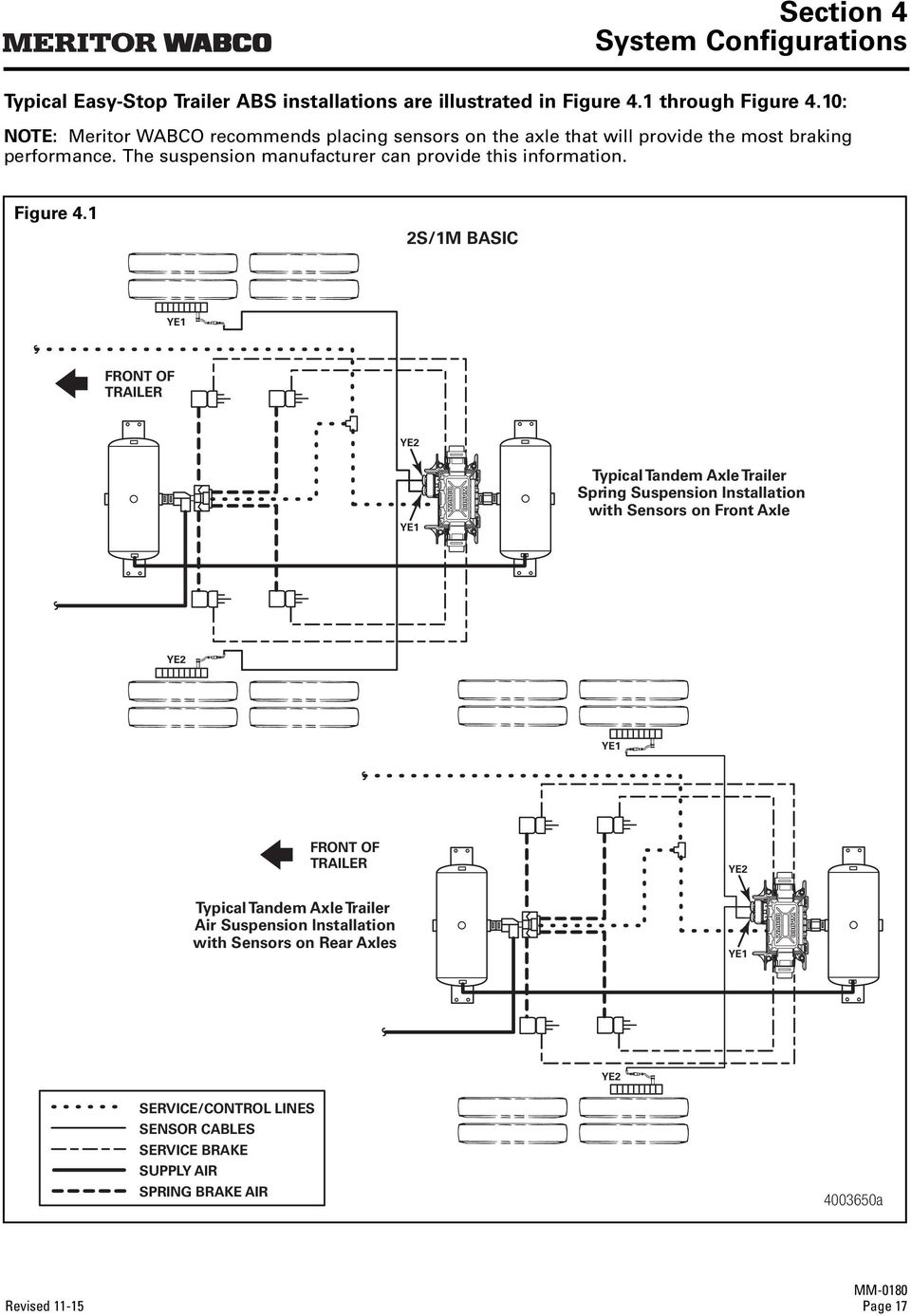
17 Section 4 System Configurations Section System Configurations 4 Enhanced Easy-Stop Installation Diagrams With Enhanced Easy-Stop, Standard 2S/2M and Premium 2S/2M, 4S/2M and 4S/3M sensor location designations will change depending on how the ECU/dual modulator valve assembly is mounted. It may be mounted facing either the front or the rear of the trailer. It is important that you identify the location of these sensors before beginning any diagnostics. Sensor locations for both front and rear-facing installations are depicted in Figures 4.1 through NOTE: Sensor locations for the 2S/1M Basic will not change. Configuration Figure/Page 2S/1M Basic ECU Figure 4.1/page 17 2S/2M Standard Mounted with Sensors Facing Front of Trailer Figure 4.2/page 18 2S/2M Standard Mounted with Sensors Facing Rear of Trailer Figure 4.3/page 19 2S/2M Premium Mounted with Sensors Facing Front of Trailer Figure 4.4/page 20 2S/2M Premium Mounted with Sensors Facing Rear of Trailer 4S/2M Premium Mounted with Sensors Facing Front of Trailer Figure 4.5/page 21 4S/2M Premium Mounted with Sensors Facing Rear of Trailer 4S/2M Premium Typical Tri-Axle Mounted with Sensors Facing Front of Trailer Figure 4.6/page 22 4S/2M Premium Typical Tri-Axle Mounted with Sensors Facing Rear of Trailer 4S/2M Premium Typical Axle Control Installation Mounted with Sensors Facing Front of Trailer Figure 4.7/page 23 4S/2M Premium Typical Axle Control Installation Mounted with Sensors Facing Rear of Trailer 4S/3M Premium Typical Tri-Axle with Front Lift Mounted with Sensors Facing Front of Trailer Figure 4.8/page 24 4S/3M Premium Typical Tri-Axle with Front Lift Mounted with Sensors Facing Rear of Trailer 4S/3M Premium Typical Tri-Axle Valve Mounted with Sensors Facing Front of Trailer Figure 4.9/page 25 4S/3M Premium Typical Tri-Axle Valve Mounted with Sensors Facing Rear of Trailer 4S/3M Premium Typical Four Axle Pull Trailer Valve Mounted with Sensors Facing Front of Trailer Figure 4.10/page 26 4S/3M Premium Typical Four Axle Pull Trailer Valve Mounted with Sensors Facing Rear of Trailer Page 16 Revised 11-15

18 Section 4 System Configurations Typical Easy-Stop Trailer ABS installations are illustrated in Figure 4.1 through Figure 4.10: NOTE: Meritor WABCO recommends placing sensors on the axle that will provide the most braking performance. The suspension manufacturer can provide this information. Figure 4.1 2S/1M BASIC YE1 FRONT OF TRAILER YE2 YE1 Typical Tandem Axle Trailer Spring Suspension Installation with Sensors on Front Axle YE2 YE1 FRONT OF TRAILER YE2 Typical Tandem Axle Trailer Air Suspension Installation with Sensors on Rear Axles YE1 YE2 SERVICE/CONTROL LINES SENSOR CABLES SERVICE BRAKE SUPPLY AIR SPRING BRAKE AIR a Revised Page 17
19 Section 4 System Configurations NOTE: Meritor WABCO recommends placing sensors on the axle that will provide the most braking performance. The suspension manufacturer can provide this information. Figure 4.2 2S/2M STANDARD MOUNTED WITH SENSORS FACING FRONT OF TRAILER YE2 FRONT OF TRAILER YE2 YE1 Typical Tandem Axle Trailer Spring Suspension Installation with Sensors on Front Axle YE1 YE2 FRONT OF TRAILER YE2 Typical Tandem Axle Trailer Air Suspension Installation with Sensors on Rear Axles YE1 YE1 SERVICE/CONTROL LINES SENSOR CABLES SERVICE BRAKE SUPPLY AIR SPRING BRAKE AIR a Page 18 Revised 11-15

20 Section 4 System Configurations NOTE: Meritor WABCO recommends placing sensors on the axle that will provide the most braking performance. The suspension manufacturer can provide this information. Figure 4.3 2S/2M STANDARD MOUNTED WITH SENSORS FACING REAR OF TRAILER YE1 FRONT OF TRAILER YE1 Typical Tandem Axle Trailer Spring Suspension Installation with Sensors on Front Axle YE2 YE2 YE1 FRONT OF TRAILER Typical Tandem Axle Trailer Air Suspension Installation with Sensors on Rear Axles YE1 YE2 SERVICE/CONTROL LINES SENSOR CABLES SERVICE BRAKE SUPPLY AIR SPRING BRAKE AIR YE a Revised Page 19

21 Section 4 System Configurations NOTE: When using a 4-sensor capable ABS ECU, but only using 2 sensors, make sure the sensors used are YE1 and BU1. If a sensor is plugged into the YE2 or BU2 port when powered up, the system will automatically configure to a 4-sensor system. To reconfigure an ECU to a 2-sensor configuration, TOOLBOX Software is required. Figure 4.4 YE1 2S/2M PREMIUM MOUNTED WITH SENSORS FACING FRONT OF TRAILER FRONT OF TRAILER YE2 YE1 BU1 BU2 NOTE: Spring brake lines not shown. BU1 2S/2M PREMIUM MOUNTED WITH SENSORS FACING REAR OF TRAILER BU1 FRONT OF TRAILER BU2 BU1 YE1 NOTE: Spring brake lines not shown. YE2 SERVICE/CONTROL LINES SENSOR CABLES SERVICE BRAKE SUPPLY AIR YE a Page 20 Revised 11-15
22 Section 4 System Configurations NOTE: Meritor WABCO recommends placing sensors on the axle that will provide the most braking performance. The suspension manufacturer can provide this information. Figure 4.5 4S/2M PREMIUM MOUNTED WITH SENSORS FACING FRONT OF TRAILER YE1 YE2 FRONT OF TRAILER YE2 YE1 Typical Tandem Axle Trailer BU1 BU2 BU1 BU2 NOTE: Spring brake lines not shown. 4S/2M PREMIUM MOUNTED WITH SENSORS FACING REAR OF TRAILER BU1 BU2 Typical Tandem Axle Trailer BU2 FRONT OF TRAILER BU1 YE1 NOTE: Spring brake lines not shown. YE2 SERVICE/CONTROL LINES SENSOR CABLES SERVICE BRAKE SUPPLY AIR YE1 YE a Revised Page 21
23 Section 4 System Configurations Figure 4.6 4S/2M PREMIUM TYPICAL TRI-AXLE MOUNTED WITH SENSORS FACING FRONT OF TRAILER YE1 YE2 FRONT OF TRAILER YE2 YE1 BU1 NOTE: Spring brake lines not shown. BU2 BU1 BU2 4S/2M PREMIUM TYPICAL TRI-AXLE MOUNTED WITH SENSORS FACING REAR OF TRAILER BU1 BU2 FRONT OF TRAILER BU2 NOTE: Spring brake lines not shown. YE2 BU1 YE1 SERVICE/CONTROL LINES SENSOR CABLES SERVICE BRAKE SUPPLY AIR YE1 YE a Page 22 Revised 11-15
24 Section 4 System Configurations Figure 4.7 4S/2M TYPICAL AXLE CONTROL INSTALLATION VALVE MOUNTED WITH SENSORS FACING FRONT OF TRAILER BU1 YE1 FRONT OF TRAILER YE2 YE1 BU2 BU1 NOTE: Spring brake lines not shown. BU2 YE2 4S/2M TYPICAL AXLE CONTROL INSTALLATION VALVE MOUNTED WITH SENSORS FACING REAR OF TRAILER BU1 YE1 BU2 FRONT OF TRAILER BU1 NOTE: Spring brake lines not shown. YE1 YE2 SERVICE/CONTROL LINES SENSOR CABLES SERVICE BRAKE SUPPLY AIR BU2 YE a Revised Page 23
25 Section 4 System Configurations Figure 4.8 4S/3M PREMIUM TYPICAL TRI-AXLE WITH FRONT LIFT MOUNTED WITH SENSORS FACING FRONT OF TRAILER YE2 YE1 FRONT OF TRAILER YE2 YE1 BU1 BU2 BU2 BU1 NOTE: Spring brake lines not shown. 4S/3M PREMIUM TYPICAL TRI-AXLE WITH FRONT LIFT MOUNTED WITH SENSORS FACING REAR OF TRAILER BU2 BU1 FRONT OF TRAILER NOTE: Spring brake lines not shown. SERVICE/CONTROL LINES SENSOR CABLES SERVICE BRAKE SUPPLY AIR BU2 BU1 YE1 YE2 YE2 YE a Page 24 Revised 11-15
26 Section 4 System Configurations Figure 4.9 4S/3M PREMIUM TYPICAL TRI-AXLE MOUNTED WITH SENSORS FACING FRONT OF TRAILER YE2 YE1 FRONT OF TRAILER Typical Tandem Axle Trailer YE1 BU1 YE2 BU2 NOTE: Spring brake lines not shown. SERVICE/CONTROL LINES SENSOR CABLES SERVICE BRAKE SUPPLY AIR BU2 BU1 4S/3M PREMIUM TYPICAL TRI-AXLE MOUNTED WITH SENSORS FACING REAR OF TRAILER BU2 BU1 FRONT OF TRAILER BU2 BU1 Typical Tandem Axle Trailer YE2 YE1 NOTE: Spring brake lines not shown. YE2 YE a Revised Page 25
27 Section 4 System Configurations Figure S/3M PREMIUM TYPICAL FOUR AXLE PULL TRAILER MOUNTED WITH SENSORS FACING FRONT OF TRAILER YE2 YE1 FRONT OF TRAILER NOTE: Spring brake lines not shown. SERVICE/CONTROL LINES SENSOR CABLES SERVICE BRAKE SUPPLY AIR YE2 YE1 BU1 BU2 BU2 BU1 4S/3M PREMIUM TYPICAL FOUR AXLE PULL TRAILER MOUNTED WITH SENSORS FACING REAR OF TRAILER BU2 BU1 FRONT OF TRAILER BU2 NOTE: Spring brake lines not shown. BU1 YE1 YE2 YE2 YE a Page 26 Revised 11-15
28 Section 4 System Configurations Power Cable Wiring Diagrams Figure 4.11 POWER SCHEMATIC FROM J560 TO ECU GENERIC INPUT/OUTPUT (EXPANDED CAPABILITY) 4 OR 5 WIRE SCHEMATIC 7 WAY 6 BLK 5 YEL 1 WHT 7 BLU RED 4 2 BRN 3 GRN WHITE AND YELLOW WHITE (GROUND) BLUE (CONSTANT POWER) RED (STOP LAMP) GREEN AND WHITE GROUND TRAILER ABS INDICATOR LAMP Junction box not shown. ECU POWER CONNECTOR a Figure 4.12 POWER CABLE WITH WEATHER PACK CONNECTOR A PIN OUT B PIN OUT B A E C D POSITION A-D A-A A-B A-E WIRE COLOR WHITE/GREEN RED BLUE WHITE POSITION B-1 B-2 B-3 B-4 B-5 B-6 B-7 B-8 NOTE WARNING LAMP STOP LAMP POWER CONSTANT POWER GROUND GIO 1 POWER OUT J1708 J a Revised Page 27
29 Section 4 System Configurations Figure 4.13 B POWER/DIAGNOSTIC CABLE WITH WEATHER PACK CONNECTOR F A B A A PIN B PIN E C A PIN OUT D E D C PIN OUT C C PIN POSITION A-D A-A A-B A-E L1 WIRE COLOR WHITE/GREEN RED BLUE WHITE POSITION C-D C-E C-C C-B C-A L2 WIRE COLOR YELLOW RED GREEN WHITE BLACK POSITION B-1 B-2 B-3 B-4 B-5 B-6 B-7 B-8 NOTE WARNING LAMP STOP LAMP POWER CONSTANT POWER GROUND GIO 1 POWER OUT J1708 J1708 B PIN OUT a Page 28 Revised 11-15
30 DATA Section 5 Diagnostics Diagnostics Section 5 WARNING To prevent serious eye injury, always wear safe eye protection when you perform vehicle maintenance or service. The ABS is an electrical system. When you work on the ABS, take the same precautions that you must take with any electrical system to avoid serious personal injury. As with any electrical system, the danger of electrical shock or sparks exists that can ignite flammable substances. You must always disconnect the battery ground cable before working on the electrical system. Diagnostics There are three methods used to get fault information from the ECU: TOOLBOX Software Pro-Link 9000 Blink code diagnostics Ignition power activation Diagnostic tool There is also a new diagnostic tool for checking PLC, the Heavy Duty Trailer Diagnostic adapter. Figure 5.1. Important PLC Information for Blink Code Diagnostics Blink Code 17 indicates a PLC failure. If PLC does not seem to be operating correctly, but there is no Blink Code 17, the ECU is functioning correctly and does not need to be replaced; however, there could be a problem in the trailer s wiring harness. Check the wiring system and make the necessary repairs. If the problem persists, contact the customer service center for assistance. TOOLBOX Software TOOLBOX Software is a PC-based diagnostic program that can display fault codes, wheel speed data, test individual components, verify installation wiring and is required to perform signoff for the Enhanced Easy-Stop with PLC installation. Figure 5.2. TOOLBOX Software is available for purchase via download 24 hours a day, seven days a week on meritorwabco.com. Version 4.1 (or higher) supports Enhanced Easy-Stop with PLC using Windows XP or higher. Enhanced functionality may be found in TOOLBOX Software Version 12.0 or higher. Figure 5.2 Figure 5.1 VEHICLE PRO + DLAPLC VEHICLE INTERFACE POWER ABS LAMP COMP UTER Available from jprofleetproducts.com a a TOOLBOX Software has the following functions. Supports Enhanced Easy-Stop with PLC. Displays both constant and changing information from the ECU being tested. Displays both active and stored system faults, as well as the appropriate repair instructions. Revised Page 29
31 Section 5 Diagnostics Activates system components to verify: System integrity Correct component operation Installation wiring NOTE: A J1587/J1708 to RS232 or PLC to J1708 interface is required to run this software. Tire Calibration Tire calibration may be accessed from the Modify pull-down on the Main Screen. Figure 5.3. Figure 5.4 Main Screen Figure b a This screen provides icon and pull-down menu task selections. It also provides information about the current state of the Meritor WABCO Enhanced Easy-Stop Trailer ABS. ECU information is read once from the ECU and does not change. Wheel speed, voltages, faults and information are read and updated continuously. Figure 5.3. The programmed number of millimeters for tire circumference is displayed on the Tire Calibration screen. The allowable range is dependent on the number of teeth on the tone ring. Use the tire manufacturer's recommended tire circumference in millimeters for this value. Enter the correct number of millimeters, select the appropriate tone ring, and press the Write button. Figure 5.4. Tone Ring Teeth Tire Circumference (mm) Page 30 Revised 11-15
32 Section 5 Diagnostics Service Information Service Information may be accessed from the Modify pull-down on the Main Screen. Figure 5.3. In the Service Information field, the ECU, working with a constant powered tractor, can act as a mileage counter. This field can also be used to set service intervals. Figure 5.5. Notebook Figure 5.6 Figure a a The mileage between scheduled maintenances is displayed on the Service Information screen in km or miles. When the mileage displayed elapses, the Enhanced Easy-Stop Trailer ABS indicator lamp on the side of the trailer will flash eight times, whenever the ignition switch is turned on until this parameter is changed. Figure 5.5. Select the appropriate mileage units for the service information service interval by clicking on the appropriate radio button. Click in the Service field and key in the desired service interval. This is the distance to elapse beyond the current mileage displayed when the trailer ABS indicator light should flash and provide notification. Once the desired mileage interval has been input, click on the Write button. Click on the Close button to exit the function. Figure 5.5. To disable the Service interval feature, change the mileage to 0 and click on the Write button. Click on the Close button to exit the function. Figure 5.5. The notebook may be accessed from the Modify pull-down on the main screen. The Service Information field of this screen is used to store and review information about a specific vehicle including TIO information. Figure 5.6. Sensor Test Figure a The sensor test may be accessed from the Component Tests pull-down on the main screen. Revised Page 31
33 Section 5 Diagnostics The Sensor Test screen is used to determine the correct installation, wiring and functionality of the wheel speed sensors. The screen display will provide maximum sensor RPM for installed sensors (unused sensor positions will be grayed out). Check the order field to verify sensors are installed in the correct location. Figure 5.7. Report Information Figure 5.9 Lift Axle Sensor Test Figure a a The Lift Axle Sensor test is used to determine the correct installation, wiring and functionality of the lift axle wheel sensors. The screen display will provide the maximum tested sensor RPM for the installed sensors. Visually check the order field to verify that sensors are installed in the correct location. Sensors YE2 and BU2 are always to be placed on the lift axle wheel ends. This prevents the warning lamp from coming on when the lift axle is in the raised position. Figure 5.8. The Report Information screen allows the user to store information about a specific vehicle, including the Vehicle Identification Number (VIN) and Employee numbers. Figure 5.9. An example of a storable (or printable) report is displayed in Figure Page 32 Revised 11-15
34 Section 5 Diagnostics Meritor WABCO ABS Fault Report Figure 5.10 Meritor WABCO ABS Fault Report Date: September 13, 2015 Time: 5:25 PM Page: 1 VIN: Employee Information: KILEY ABS System Configuration: 4S/2M ECU Revision: V Part Number: Serial Number: Date of Manufacture: 13/1999 Current Miles: 0.0 Service Miles: 0.0 Tire Calibration: Fault # Description Status SID FMI Count 1 Ext. modulator BLUE open circuit detected Active Ext. modulator BLUE open circuit detected Stored Sensor Test Results: Sensor Max RPM Order YE YE BU BU Valve Tests Performed: Valve Yellow Blue Red Status (Tested / Not Tested / NA) Tested Tested N/A a Save and Print 1. Click on the heading Trailer ECU and click Save. A window will appear asking for the VIN and Employee number. 2. Provide this information and close the window. 3. Go back to the heading Trailer ECU and click Print. 4. You will be asked to input the VIN and Employee name or number. 5. Click Print. Revised Page 33
35 Section 5 Diagnostics Initial Power-up Check Whenever the trailer is initially powered up, the ABS light should come on for three seconds and the valves should click during self-tests. If the ABS light comes on again during the same ignition cycle, it would indicate an issue. If the valves do not click during the self-test, power and ground checks need to be performed at the ECU power connector. Also in this case, ensure all sensor cables are seated correctly at the ECU. Power and Ground Checks If the valve is not self-testing (no clicking from the valve), perform the following power and ground checks at the ABS ECU power connector shown in Figure Check the power cable connector at the ECU and verify that the lock tab is there and the connector is secure. 2. Disconnect the cable from the ECU and check for any signs of moisture, corrosion, spread or damaged pins. 3. Check with the power on voltage from pin 3 (constant power) to chassis ground for 9 to 14 volts. If power shows between 9 to 14 volts, go to step 4. If power is less or more than 9 to 14 volts, check the wiring for damage and review with the OEM. 4. With power on, check voltage from pin 2 (stop light power) to chassis ground with the brake pedal depressed to chassis ground for 9 to 14 volts. If power shows between 9 to 14 volts, go to step 5. If power is less or more than 9 to 14 volts, check wiring for damage and review with the OEM. 5. With power off, check the resistance from pin 4 on the ECU power connector to chassis ground for less than 10 ohm. If the resistance is less than 10 ohm, go to step 6. If the resistance is higher than 10 ohm, check wiring for damage and review with the OEM. 6. With the power on, check constant power circuit. Perform a load lamp test across pins 3 to 4 and verify a bright light. If the light is bright, go to step 8. If the light does not light up brightly, diagnose and review the wiring with the OEM. 7. With the power on, check the stoplight circuit. Perform a load lamp test across pins 2 to 4 with the brakes applied and verify a bright light. If the light is bright, go to step 8. If the light does not light up brightly, diagnose and review the wiring with the OEM. 8. If no problems are found with the harness, checks may indicate the ECU/valve assembly has failed. Blink Code Diagnostics The Meritor WABCO Enhanced Easy-Stop Trailer ABS ECU detects any electrical fault in the trailer ABS. Each of the faults has a code. When a fault occurs, the ECU stores the code for that fault in the memory. There are two kinds of faults: active and stored. Active faults are those currently existing in the system, such as a broken wire. Stored faults are faults that have occurred but do not presently exist. Active faults can be cleared only after repairs are completed. Stored faults can only be diagnosed with TOOLBOX Software or the Pro-Link The ECU signals a malfunction by lighting both the internal and external indicator lamp when a fault exists. The external ABS indicator lamp is usually mounted on the left rear of the trailer, near the rear wheels. There are two ways to obtain blink codes: Ignition Power Activation (recommended method) Diagnostic Tool NOTE: In previous versions of Easy-Stop, the blink code tool and the ABS indicator lamp would flash the blink code at the same time. With Enhanced Easy-Stop, this does not happen. The codes are displayed one blink at a time, first on the trailer ABS lamp, then on the blink code tool, as illustrated in Figure Page 34 Revised 11-15
36 Section 5 Diagnostics Figure 5.11 Lamp Tool BLINK CODE 4, SENSOR YE1 Although the ECU can store multiple faults in its memory, it only displays one fault at a time. This is why it is important to recheck the blink codes after repairing a fault. If there are additional codes in the memory, they only blink after you have repaired the first fault. Stored faults, clear all and end of line test modes are available with the TOOLBOX Software or the Pro-Link Ignition Power Activation a Ignition Power Activation is the process of using the vehicle s ignition switch (or interrupting the power on the blue wire by some other means) to display blink codes on the trailer ABS indicator lamp located on the side of the trailer. This method is for constant power vehicles only. To obtain blink codes using ignition power activation, perform the following procedure: 1. Turn the ignition switch on for no longer than 5 seconds. The ABS indicator lamp will be on. 2. Turn the ignition switch off. The ABS indicator lamp will go out. 3. Turn the ignition switch on. The ABS indicator lamp will then come on, then go out. 4. The blink code will be displayed three times by the ABS indicator lamp on the trailer. NOTE: For ignition power activation, power is provided by the ignition switch. Blink Code Table BLINK CODES Problem Blink Code Area Action 3 Sensor BU1 Determine sensor location. Check sensor installation. Make necessary repairs. 4 Sensor YE1 Determine sensor location. Check sensor installation. Make necessary repairs. 5 Sensor BU2 Determine sensor location. Check sensor installation. Make necessary repairs. 6 Sensor YE2 Determine sensor location. Check sensor installation. Make necessary repairs. 7 External ABS modulator valve 8 Service interval notification 9 Internal modulator failure, inlet valve #2 10 Internal modulator failure, inlet valve #1 11 Internal modulator failure, outlet valve 14 Power Supply Verify correct electrical installation. Check power supply. Make necessary corrections. Indication that designated service mileage has elapsed. Verify correct installation. If code continues, contact Meritor WABCO for assistance. Verify correct installation. If code continues, contact Meritor WABCO for assistance. Verify correct installation. If code continues, contact Meritor WABCO for assistance. Verify correct electrical installation. Check power supply. Make necessary corrections. 15 ECU Failure Verify correct installation. If code continues, contact Meritor WABCO for assistance. 16 SAE J1708 Failure 17 SAE J2497 (PLC) Failure 18 Generic I/O Failure Internal failure, contact Meritor WABCO. Internal failure, contact Meritor WABCO. Verify correct electrical installation. Check power supply. Make necessary corrections. Revised Page 35
37 Section 5 Diagnostics Diagnostic Tool (Blink Code Check) The red dust cap on the diagnostic tool protects the tool during shipping. The tool and the LED are independently sealed against contamination. The SAE J1587 connector must be protected from contamination when the diagnostic tool is not installed. Reinstall the gray cap when the connector is not in use. Use the following procedures to install the diagnostic tool in the SAE J1587 connector. 1. Remove the gray protective cap from the J1587 connector. Turn the cap counterclockwise. Pull off the cap. 2. Align the notches on the tool with the notches on the connector. 3. Insert the tool firmly in the connector. 4. Firmly turn the gray ring of the tool clockwise to secure it in place. Figure After removing the diagnostic tool, replace the gray protective cap. Figure Press the blink code switch once for one second and release the switch. 10. When there is an existing fault: The ABS indicator lamp will flash between three and eighteen times to identify the existing fault. 11. When there are existing faults: You must repair existing faults. 12. After you identify an existing fault, turn the power to the ECU OFF. Repair the fault. Turn the power to the ECU back ON. 13. Repeat Step 9. If there are no other existing faults in the system, the ABS indicator lamp will come ON, go OFF and remain OFF. 14. If you have just repaired a sensor gap fault, the ECU is waiting to see a 4-mph signal on sensed wheels. Until this 4 mph is sensed by the ECU, the ABS indicator lamp on the trailer will remain ON. MPSI Pro-Link 9000 Diagnostic Tool The MPSI Pro-Link 9000 diagnostic tool can test for existing and stored faults, read and clear fault codes, and test components, for Meritor WABCO tractor and trailer ABS. NOTE: A J A Deutsch cable is also required a 6. Make sure the vehicle is stationary: Emergency brake ON Wheels correctly chocked 7. Provide 12 volts DC power (9.5 to 14 volts is acceptable range) to the ECU/Valve Assembly. 8. Check the ABS indicator lamp on the trailer. If: The indicator lamp comes ON briefly, then goes OFF: There is no fault in system. The indicator lamp comes ON and stays ON: There is an existing fault. Go to Step 9. Page 36 Revised 11-15
38 Section 5 Diagnostics Diagnostic Table SID FMI Suspect Component and Location Fault Description Cause Repair Information 3 1 BU1 Sensor Air Gap Sensor air gap is too large; sensor output voltage is too low but is high enough to be read by ECU. 3 2 BU1 Sensor Wheel Speed Difference 3 3 BU1 Sensor Shorted to UBATT 3 4 BU1 Sensor Shorted to Ground System has detected a significant difference in the proportion of tire diameter to number of tone ring teeth between wheel ends. Continuity between the sensor connection and battery voltage (short circuit) is detected. Continuity between the sensor connection and ground (short circuit) is detected. 3 5 BU1 Sensor Open Circuit An open circuit has been detected, i.e. ECU detects a disconnected wheel speed sensor. 3 6 BU1 Sensor Short Circuit Continuity interruption between the sensor connections (short circuit) has been detected. - Adjust wheel sensor to touch tone ring. - Check condition of ABS sensor head. - Check for loose wheel bearings or excessive hub runout. - Check mounting of ABS tone ring and condition of teeth. - Check condition and retention of ABS sensor spring clip. - Check ABS sensor cable integrity. - Turn the wheel at half a revolution per second and verify 0.2 AC volt sensor output voltage. - Check for tire size mismatch. - Check for correct number of tone ring teeth. - Verify ohms resistance through sensor circuit. - Verify no DC voltage through sensor cable when key is ON. - Check for corroded or damaged wiring between ECU and ABS wheel speed sensor. - Verify ohms resistance through sensor circuit. - Check for continuity between ABS sensor connection and ground. - Check for corroded or damaged wiring between ECU and ABS wheel speed sensor. - Check sensor, sensor cable and connectors to verify no loose or damaged connection. - Verify ohms resistance through sensor circuit. - Check for corroded or damaged wiring between the ECU and the ABS wheel speed sensor. - Swap sensor cable in question with adjacent sensor cable at the ECU. If the fault code stays in the same location, replace ECU. If the fault code changes locations, replace the suspect sensor. - Check sensor, sensor cable and connectors to verify no loose or damaged connection. - Check for corroded or damaged wiring between the ECU and the ABS wheel speed sensor. - Check for corrosion or discoloration at ECU sensor pins and/or connector. - Visually inspect sensor extension female connector to ensure it is not out of round or spread resulting in intermittent contact with the ECU sensor pins. - Verify ohms resistance through sensor circuit. - Swap sensor in question with adjacent sensor at the ECU. If the fault code stays in the same location, replace ECU. If the fault code changes locations, replace the suspect sensor. Revised Page 37
39 Section 5 Diagnostics SID FMI Suspect Component and Location 3 7 BU1 Sensor Tone Ring Damaged Wheel speed signal drops out periodically at speeds higher than 6 mph. 3 8 BU1 Sensor Excessive Slip Wheel slip over 16 seconds continuously has been detected. 3 9 BU1 Sensor No Speed A temporary loss of the ABS wheel speed signal has been detected BU1 Sensor Speed Jump Upwards or Downwards 3 11 BU1 Sensor Abnormal Speed (Chatter) Fault Description Cause Repair Information Wheel speed difference. Brake drag or chatter has been detected. Abnormal vibrations detected which affect sensor signal. - Check for damaged or missing teeth on tone ring. - Verify tone ring is not corroded or with contamination. - Check for loose wheel bearings or excessive hub runout. - Swap sensor cable in question with adjacent sensor cable at the ECU. If the fault code stays in the same location, replace ECU. If the fault code changes locations, replace the suspect sensor. - Check tone ring. - Adjust wheel sensor to touch tone ring. - Check sensor gap. - Inspect tone ring for damage. - Check for loose wheel bearings or excessive hub runout. - Adjust wheel speed sensor until it touches the tone ring. - Check for loose wheel bearings or excessive hub runout. - Check sensor wiring, cable routing and connectors for intermittent contact. - Check condition of ABS sensor head. - Check mounting of tone ring and condition of teeth. - Check for corroded or damaged wiring between the ECU and the ABS wheel speed sensor. - Turn the wheel at half a revolution per second and verify 0.2 AC volt sensor output voltage. - Adjust wheel speed sensor until it touches the tone ring. - Check for loose wheel bearings or excessive hub runout. - Check sensor wiring, cable routing and connectors for intermittent contact. - Check condition of ABS sensor head. - Check mounting of tone ring and condition of teeth. - Check condition and retention of ABS sensor spring clip. - Check for corroded or damaged wiring between the ECU and the ABS wheel speed sensor. - Turn the wheel at half a revolution per second and verify 0.2 AC volt sensor output voltage. - Check for loose wheel bearings or excessive hub runout. - Check sensor wiring and connectors for intermittent contact. - Check mounting of tone ring and condition of teeth. - Check condition and retention of ABS sensor spring clip as well as the mounting block. - Check for corroded or damaged wiring between the ECU and the ABS wheel speed sensor. - Turn the wheel at half a revolution per second and verify 0.2 AC volt sensor output voltage. Page 38 Revised 11-15
40 Section 5 Diagnostics SID FMI Suspect Component and Location 3 12 BU1 Sensor Software Interrupt Failure 3 13 BU1 Sensor Wheel Speed Oscillating A non-plausible sensor frequency has been measured. Tone ring signal irregular. 4 1 YE1 Sensor Air Gap Sensor air gap is too large; sensor output voltage is too low but is high enough to be read by ECU. 4 2 YE1 Sensor Wheel Speed Difference 4 3 YE1 Sensor Shorted to UBATT 4 4 YE1 Sensor Shorted to Ground Fault Description Cause Repair Information System has detected a significant difference in the proportion (6%) of tire diameter to number of tone ring teeth between wheel ends. Continuity between the sensor connection and battery voltage (short circuit) is detected. Continuity between the sensor connection and ground (short circuit) is detected. - Check sensor wiring and connectors for intermittent contact. - Check if brake at this location is operating correctly, i.e., potentially dragging. - Check for corroded or damaged wiring between the ECU and the ABS wheel speed sensor. - Check for loose wheel bearings or excessive hub runout. - Check sensor wiring and connectors for intermittent contact. - Check mounting of tone ring and condition of teeth. - If tone ring and sensor block are not aligned correctly oscillation may occur. Small dimensional deviations can result in this failure code. Issue occurs shortly after going into service and after driving. - Check condition and retention of ABS sensor spring clip as well as the mounting block. - Check for corroded or damaged wiring between the ECU and the ABS wheel speed sensor. - Turn the wheel at half a revolution per second and verify 0.2 AC volt sensor output voltage. - Adjust wheel sensor to touch tone ring. - Check condition of ABS sensor head. - Check for loose wheel bearings or excessive hub runout. - Check mounting of ABS tone ring and condition of teeth. - Check condition and retention of ABS sensor spring clip. - Turn the wheel at half a revolution per second and verify 0.2 AC volt sensor output voltage. - Check for tire size mismatch. - Check for correct number of tone ring teeth. - Verify ohms resistance through sensor circuit. - Verify no DC voltage through sensor circuit Key ON. - Check for corroded or damaged wiring between the ECU and the ABS wheel speed sensor. - Check sensor, sensor cable and connectors to verify no loose or damaged connection. - Verify ohms resistance through sensor circuit. - Check for corroded or damaged wiring between the ECU and the ABS wheel speed sensor. - Swap sensor cable in question with adjacent sensor cable at the ECU. If the fault code stays in the same location, replace ECU. If the fault code changes locations, replace the suspect sensor. Revised Page 39
41 Section 5 Diagnostics SID FMI Suspect Component and Location 4 5 YE1 Sensor Open Circuit An open circuit has been detected, i.e. ECU detects a disconnected wheel speed sensor. 4 6 YE1 Sensor Short Circuit Continuity interruption between the sensor connections (short circuit) has been detected. 4 7 YE1 Sensor Tone Ring Damaged Fault Description Cause Repair Information Wheel speed signal drops out periodically at speeds higher than 6 mph. 4 8 YE1 Sensor Excessive Slip Wheel slip over 16 seconds continuously has been detected. 4 9 YE1 Sensor No Speed A temporary loss of the ABS wheel speed signal has been detected. - Check sensor, sensor cable and connectors to verify no loose or damaged connection. - Check for corroded or damaged wiring between the ECU and the ABS wheel speed sensor. - Check for corrosion or discoloration at ECU sensor pins and/or connector. - Visually inspect sensor extension female connector to ensure it is not out of round or spread resulting in intermittent contact with the ECU sensor pins. - Verify ohms resistance through sensor circuit. - Swap sensor cable in question with adjacent sensor cable at the ECU. If the fault code stays in the same location, replace ECU. If the fault code changes locations, replace the suspect sensor. - Check for damaged or missing teeth on tone ring. - Verify tone ring is not corroded or with contamination. - Check for loose wheel bearings or excessive hub runout. - Swap sensor cable in question with adjacent sensor cable at the ECU. If the fault code stays in the same location, replace ECU. If the fault code changes locations, replace the suspect sensor. - Check for damaged or missing teeth on tone ring. - Verify tone ring is not corroded or with contamination. - Check for loose wheel bearings or excessive hub runout. - Check tone ring. - Adjust wheel sensor to touch tone ring. - Inspect tone ring for damage. - Check sensor gap. - Check for loose wheel bearings or excessive hub runout. - Adjust wheel speed sensor until it touches the tone ring. - Check for loose wheel bearings or excessive hub runout. - Check sensor wiring and connectors for intermittent contact. - Check condition of ABS sensor head. - Check mounting of tone ring and condition of teeth. - Check condition and retention of ABS sensor spring clip. - Check ABS sensor cable integrity. - Check for corroded or damaged wiring between the ECU and the ABS wheel speed sensor. - Turn the wheel at half a revolution per second and verify 0.2 AC volt sensor output voltage. Page 40 Revised 11-15
42 Section 5 Diagnostics SID FMI Suspect Component and Location 4 10 YE1 Sensor Speed Jump Upwards or Downwards 4 11 YE1 Sensor Abnormal Speed (Chatter) 4 12 YE1 Sensor Software Interrupt Failure 4 13 YE1 Sensor Wheel Speed Oscillating Fault Description Cause Repair Information Wheel speed difference. Brake drag or chatter has been detected. Abnormal vibrations detected which affect sensor signal. A non-plausible sensor frequency has been measured. Tone ring signal irregular. - Adjust wheel speed sensor until it touches the tone ring. - Check for loose wheel bearings or excessive hub runout. - Check sensor wiring, cable routing and connectors for intermittent contact. - Check condition of ABS sensor head. - Check mounting of tone ring and condition of teeth. - Check condition and retention of ABS sensor spring clip. - Check for corroded or damaged wiring between the ECU and the ABS wheel speed sensor. - Turn the wheel at half a revolution per second and verify 0.2 AC volt sensor output voltage. - Check for loose wheel bearings or excessive hub runout. - Check sensor wiring and connectors for intermittent contact. - Check mounting of tone ring and condition of teeth. - Check condition and retention of ABS sensor spring clip as well as the mounting block. - Check for corroded or damaged wiring between the ECU and the ABS wheel speed sensor. - Turn the wheel at half a revolution per second and verify 0.2 AC volt sensor output voltage. - Check sensor wiring and connectors for intermittent contact. - Check if brake at this location is operating correctly, i.e., potentially dragging. - Check for corroded or damaged wiring between the ECU and the ABS wheel speed sensor. - Check for loose wheel bearings or excessive hub runout. - Check sensor wiring and connectors for intermittent contact. - Check mounting of tone ring and condition of teeth. - If tone ring and sensor block are not aligned correctly, oscillation may occur. Small dimensional deviations can result in this failure code. Issue occurs shortly after going into service and after driving. - Check condition and retention of ABS sensor spring clip as well as the mounting block. - Check for corroded or damaged wiring between the ECU and the ABS wheel speed sensor. - Turn the wheel at half a revolution per second and verify 0.2 AC volt sensor output voltage. Revised Page 41
43 Section 5 Diagnostics SID FMI Suspect Component and Location 5 1 BU2 Sensor Air Gap Sensor air gap is too large; sensor output voltage is too low but is high enough to be read by ECU. 5 2 BU2 Sensor Wheel Speed Difference 5 3 BU2 Sensor Shorted to UBATT 5 4 BU2 Sensor Shorted to Ground Fault Description Cause Repair Information System has detected a significant difference in the proportion (6%) of tire diameter to number of tone ring teeth between wheel ends. Continuity between the sensor connection and battery voltage (short circuit) is detected. Continuity between the sensor connection and ground (short circuit) is detected. 5 5 BU2 Sensor Open Circuit An open circuit has been detected, i.e. ECU detects a disconnected wheel speed sensor. 5 6 BU2 Sensor Short Circuit Continuity interruption between the sensor connections (short circuit) has been detected. - Adjust wheel sensor to touch tone ring. - Check condition of ABS sensor head. - Check for loose wheel bearings or excessive hub runout. - Check mounting of ABS tone ring and condition of teeth. - Check condition and retention of ABS sensor spring clip. - Check ABS sensor cable integrity. - Turn the wheel at half a revolution per second and verify 0.2 AC volt sensor output voltage. - Check for tire size mismatch. - Check for correct number of tone ring teeth. - Verify ohms resistance through sensor circuit. - Verify no DC voltage through sensor circuit Key ON. - Check for corroded or damaged wiring between the ECU and the ABS wheel speed sensor. - Check sensor, sensor cable and connectors to verify no loose or damaged connection. - Verify ohms resistance through sensor circuit. - Check for corroded or damaged wiring between the ECU and the ABS wheel speed sensor. - Swap sensor cable in question with adjacent sensor cable at the ECU. If the fault code stays in the same location, replace ECU. If the fault code changes locations, replace the suspect sensor. - Check sensor, sensor cable and connectors to verify no loose or damaged connection. - Check for corroded or damaged wiring between the ECU and the ABS wheel speed sensor. - Check for corrosion or discoloration at ECU sensor pins and/or connector. - Visually inspect sensor extension female connector to ensure it is not out of round or spread resulting in intermittent contact with the ECU sensor pins. - Verify ohms resistance through sensor circuit. - Swap sensor cable in question with adjacent sensor cable at the ECU. If the fault code stays in the same location, replace ECU. If the fault code changes locations, replace the suspect sensor. - Check for damaged or missing teeth on tone ring. - Verify tone ring is not corroded or with contamination. - Check for loose wheel bearings or excessive hub runout. - Swap sensor cable in question with adjacent sensor cable at the ECU. If the fault code stays in the same location, replace ECU. If the fault code changes locations, replace the suspect sensor. Page 42 Revised 11-15
44 Section 5 Diagnostics SID FMI Suspect Component and Location 5 7 BU2 Sensor Tone Ring Damaged Wheel speed signal drops out periodically at speeds higher than 6 mph. 5 8 BU2 Sensor Excessive Slip Wheel slip over 16 seconds continuously has been detected. 5 9 BU2 Sensor No Speed A temporary loss of the ABS wheel speed signal has been detected BU2 Sensor Speed Jump Upwards or Downwards 5 11 BU2 Sensor Abnormal Speed (Chatter) Fault Description Cause Repair Information Wheel speed difference. Brake drag or chatter has been detected. Abnormal vibrations detected which affect sensor signal. - Check for damaged or missing teeth on tone ring. - Verify tone ring is not corroded or with contamination. - Check for loose wheel bearings or excessive hub runout. - Check tone ring. - Adjust wheel sensor to touch tone ring. - Inspect tone ring for damage. - Check sensor gap. - Check for loose wheel bearings or excessive hub runout. - Adjust wheel speed sensor until it touches the tone ring. - Check for loose wheel bearings or excessive hub runout. - Check sensor wiring, cable routing and connectors for intermittent contact. - Check condition of ABS sensor head. - Check mounting of tone ring and condition of teeth. - Check condition and retention of ABS sensor spring clip. - Check for corroded or damaged wiring between the ECU and the ABS wheel speed sensor. - Turn the wheel at half a revolution per second and verify 0.2 AC volt sensor output voltage. - Adjust wheel speed sensor until it touches the tone ring. - Check for loose wheel bearings or excessive hub runout. - Check sensor wiring and connectors for intermittent contact. - Check condition of ABS sensor head. - Check mounting of tone ring and condition of teeth. - Check condition and retention of ABS sensor spring clip. - Check ABS sensor cable integrity. - Check for corroded or damaged wiring between the ECU and the ABS wheel speed sensor. - Turn the wheel at half a revolution per second and verify 0.2 AC volt sensor output voltage. - Check for loose wheel bearings or excessive hub runout. - Check sensor wiring and connectors for intermittent contact. - Check mounting of tone ring and condition of teeth. - Check condition and retention of ABS sensor spring clip as well as the mounting block. - Check for corroded or damaged wiring between the ECU and the ABS wheel speed sensor. - Turn the wheel at half a revolution per second and verify 0.2 AC volt sensor output voltage. Revised Page 43
45 Section 5 Diagnostics SID FMI Suspect Component and Location 5 12 BU2 Sensor Software Interrupt Failure 5 13 BU2 Sensor Wheel Speed Oscillating 5 14 BU2 Sensor Sensor Not Found A non-plausible sensor frequency has been measured. Tone ring signal irregular. Unexpected ECU configuration. 6 1 YE2 Sensor Air Gap Sensor air gap is too large; sensor output voltage is too low but is high enough to be read by ECU. 6 2 YE2 Sensor Wheel Speed Difference 6 3 YE2 Sensor Shorted to UBATT Fault Description Cause Repair Information System has detected a significant difference in the proportion (6%) of tire diameter to number of tone ring teeth between wheel ends. Continuity between the sensor connection and battery voltage (short circuit) is detected. - Check sensor wiring and connectors for intermittent contact. - Check if brake at this location is operating correctly, i.e., potentially dragging. - Check for corroded or damaged wiring between the ECU and the ABS wheel speed sensor. - Check for loose wheel bearings or excessive hub runout. - Check sensor wiring and connectors for intermittent contact. - Check mounting of tone ring and condition of teeth. - If tone ring and sensor block are not aligned correctly, oscillation may occur. Small dimensional deviations can result in this failure code. Issue occurs shortly after going into service and after driving. - Check condition and retention of ABS sensor spring clip as well as the mounting block. - Check for corroded or damaged wiring between the ECU and the ABS wheel speed sensor. - Turn the wheel at half a revolution per second and verify 0.2 AC volt sensor output voltage. - Verify if system is a 4S/2M ECU and only 2 sensors are being used that they are plugged into the YE1 and BU1 ports on the ECU. - Verify no signs of moisture or corrosion at BU2 sensor port. - If a sensor has been installed on BU2 sensor port at some point and is no longer present, reconfigure the ECU using Meritor WABCO TOOLBOX diagnostic software. - Adjust wheel sensor to touch tone ring. - Check condition of ABS sensor head. - Check for loose wheel bearings or excessive hub runout. - Check mounting of ABS tone ring and condition of teeth. - Check condition and retention of ABS sensor spring clip. - Turn the wheel at half a revolution per second and verify 0.2 AC volt sensor output voltage. - Check for tire size mismatch. - Check for correct number of tone ring teeth. - Verify ohms resistance through sensor circuit. - Verify no DC voltage through sensor circuit Key ON. - Check for corroded or damaged wiring between the ECU and the ABS wheel speed sensor. Page 44 Revised 11-15
46 Section 5 Diagnostics SID FMI Suspect Component and Location 6 4 YE2 Sensor Shorted to Ground Continuity between the sensor connection and ground (short circuit) is detected. 6 5 YE2 Sensor Open Circuit An open circuit has been detected, i.e. ECU detects a disconnected wheel speed sensor. 6 6 YE2 Sensor Short Circuit Continuity interruption between the sensor connections (short circuit) has been detected. 6 7 YE2 Sensor Tone Ring Damaged Fault Description Cause Repair Information Wheel speed signal drops out periodically at speeds higher than 6 mph. 6 8 YE2 Sensor Excessive Slip Wheel slip over 16 seconds continuously has been detected. - Check sensor, sensor cable and connectors to verify no loose or damaged connection. - Verify ohms resistance through sensor circuit. - Check for corroded or damaged wiring between the ECU and the ABS wheel speed sensor. - Swap sensor cable in question with adjacent sensor cable at the ECU. If the fault code stays in the same location, replace ECU. If the fault code changes locations, replace the suspect sensor. - Check sensor, sensor cable and connectors to verify no loose or damaged connection. - Check for corroded or damaged wiring between the ECU and the ABS wheel speed sensor. - Check for corrosion or discoloration at ECU sensor pins and/or connector. - Visually inspect sensor extension female connector to ensure it is not out of round or spread resulting in intermittent contact with the ECU sensor pins. - Verify ohms resistance through sensor circuit. - Swap sensor cable in question with adjacent sensor cable at the ECU. If the fault code stays in the same location, replace ECU. If the fault code changes locations, replace the suspect sensor. - Check for damaged or missing teeth on tone ring. - Verify tone ring is not corroded or with contamination. - Check for loose wheel bearings or excessive hub runout. - Swap sensor cable in question with adjacent sensor cable at the ECU. If the fault code stays in the same location, replace ECU. If the fault code changes locations, replace the suspect sensor. - Check for damaged or missing teeth on tone ring. - Verify tone ring is not corroded or with contamination. - Check for loose wheel bearings or excessive hub runout. - Check tone ring. - Adjust wheel sensor to touch tone ring. - Inspect tone ring for damage. - Check sensor gap. - Check for loose wheel bearings or excessive hub runout. Revised Page 45
47 Section 5 Diagnostics SID FMI Suspect Component and Location 6 9 YE2 Sensor No Speed A temporary loss of the ABS wheel speed signal has been detected YE2 Sensor Speed Jump Upwards or Downwards 6 11 YE2 Sensor Abnormal Speed (Chatter) 6 12 YE2 Sensor Software Interrupt Failure Fault Description Cause Repair Information Wheel speed difference. Brake drag or chatter has been detected. Abnormal vibrations detected which affect sensor signal. A non-plausible sensor frequency has been measured. - Adjust wheel speed sensor until it touches the tone ring. - Check for loose wheel bearings or excessive hub runout. - Check sensor wiring, cable routing and connectors for intermittent contact. - Check condition of ABS sensor head. - Check mounting of tone ring and condition of teeth. - Check condition and retention of ABS sensor spring clip. - Check for corroded or damaged wiring between the ECU and the ABS wheel speed sensor. - Turn the wheel at half a revolution per second and verify 0.2 AC volt sensor output voltage. - Adjust wheel speed sensor until it touches the tone ring. - Check for loose wheel bearings or excessive hub runout. - Check sensor wiring, cable routing and connectors for intermittent contact. - Check condition of ABS sensor head. - Check mounting of tone ring and condition of teeth. - Check condition and retention of ABS sensor spring clip. - Check for corroded or damaged wiring between the ECU and the ABS wheel speed sensor. - Turn the wheel at half a revolution per second and verify 0.2 AC volt sensor output voltage. - Check for loose wheel bearings or excessive hub runout. - Check sensor wiring, cable routing and connectors for intermittent contact. - Check mounting of tone ring and condition of teeth. - Check condition and retention of ABS sensor spring clip as well as the mounting block. - Check for corroded or damaged wiring between the ECU and the ABS wheel speed sensor. - Turn the wheel at half a revolution per second and verify 0.2 AC volt sensor output voltage. - Check sensor wiring and connectors for intermittent contact. - Check if brake at this location is operating correctly, i.e., potentially dragging. - Check for corroded or damaged wiring between the ECU and the ABS wheel speed sensor. Page 46 Revised 11-15
48 Section 5 Diagnostics SID FMI Suspect Component and Location 6 13 YE2 Sensor Wheel Speed Oscillating 6 14 YE2 Sensor Sensor Not Found 7 3 External Modulator Valve (Red/RD) 7 4 External Modulator Valve (Red/RD) Fault Description Cause Repair Information External Modulator Valve Inlet/Outlet Valve Short Circuit to Battery External Modulator Valve Inlet/Outlet Valve Short Circuit to Ground Tone ring signal irregular. Unexpected ECU configuration. ABS ECU has detected a short to 12 VDC on the external modulator valve. ABS ECU has detected a short to ground on the external modulator valve. - Check for loose wheel bearings or excessive hub runout. - Check sensor wiring and connectors for intermittent contact. - Check mounting of tone ring and condition of teeth. - If tone ring and sensor block are not aligned correctly, oscillation may occur. Small dimensional deviations can result in this failure code. Issue occurs shortly after going into service and after driving. - Check condition and retention of ABS sensor spring clip as well as the mounting block. - Check for corroded or damaged wiring between the ECU and the ABS wheel speed sensor. - Turn the wheel at half a revolution per second and verify 0.2 AC volt sensor output voltage. - Verify if system is a 4S/2M ECU and only 2 sensors are being used that they are plugged into the YE1 and BU1 ports on the ECU. - Verify no signs of moisture or corrosion at YE2 sensor port. - If a sensor has been installed on YE2 sensor port at some point and is no longer present, reconfigure the ECU using Meritor WABCO TOOLBOX diagnostic software. - Verify an external modulator is installed by checking to see if a cable is plugged in to the external modulator port of the ABS ECU. - Verify if no cable is attached, that the external modulator cap is sealed and there are no signs of moisture or corrosion on the pins of the ABS ECU. - If no external modulator valve is used and all previous checks pass, reconfigure the system to a 2S/2M or 4S/2M system depending on how many sensors are used through the Meritor WABCO TOOLBOX Software. - If equipped with an external modulator verify resistance from the exhaust and inlet valve to ground is between 4 to 8 ohms through the whole circuit. - Verify there is no voltage on any of the pins of the external modulator valve cable to chassis ground. - Verify an external modulator is installed by checking to see if a cable is plugged in to the external modulator port of the ABS ECU. - Verify if no cable is attached that the external modulator cap is sealed and there are no signs of moisture or corrosion on the pins of the ABS ECU. - If no external modulator valve is used and all previous checks pass, reconfigure the system to a 2S/2M or 4S/2M system depending on how many sensors are used through the Meritor WABCO TOOLBOX Software. - If equipped with an external modulator verify resistance from the exhaust and inlet valve to ground is between 4 to 8 ohms through the whole circuit. - Verify there is no continuity on any of the pins of the external modulator valve cable to chassis ground. Revised Page 47
49 Section 5 Diagnostics Suspect Component SID FMI and Location 7 5 External Modulator Valve (Red/RD) 7 14 External Modulator Valve (Red/RD) 9 3 Internal Modulator Inlet Valve #2 (Blue/ BU) 9 4 Internal Modulator Inlet Valve #2 (Blue/ BU) 9 5 Internal Modulator Inlet Valve #2 (Blue/ BU) 10 3 Internal Modulator Inlet Valve #1 (Yellow/ YE) 10 4 Internal Modulator Inlet Valve #1 (Yellow/ YE) Fault Description Cause Repair Information External Modulator Valve Inlet/Outlet Valve Open Circuit External Modulator Valve Inlet/Outlet Valve not Found Internal Modulator Inlet Valve Short Circuit to Battery Internal Modulator Inlet Valve Short Circuit to Ground Internal Modulator Inlet Valve Open Circuit Internal Modulator Inlet Valve Short Circuit to Battery Internal Modulator Inlet Valve Short Circuit to Ground ABS ECU has detected an open circuit on the external modulator valve. Unexpected ECU configuration. ABS ECU has detected a short to 12 VDC on the modulator valve. ABS ECU has detected a short to ground on the modulator valve. ABS ECU has detected an open circuit on the modulator valve. ABS ECU has detected a short to 12 VDC on the valve assembly. ABS ECU has detected a short to ground on the valve assembly. - Verify an external modulator is installed by checking to see if a cable is plugged in to the external modulator port of the ABS ECU. - Verify if no cable is attached that the external modulator cap is sealed and there are no signs of moisture or corrosion on the pins of the ABS ECU. - If no external modulator valve is used and all previous checks pass, reconfigure the system to a 2S/2M or 4S/2M system depending on how many sensors are used through the Meritor WABCO TOOLBOX Software. - If equipped with an external modulator verify resistance from the exhaust and inlet valve to ground is between 4 to 8 ohms through the whole circuit. - Verify there is no continuity on any of the pins of the external modulator valve cable to chassis ground. - Verify an external modulator is installed by checking to see if a cable is plugged in to the external modulator port of the ABS ECU. - Verify if no cable is attached that the external modulator cap is sealed and there are no signs of moisture or corrosion on the pins of the ABS ECU. - If no external modulator valve is used reconfigure the system to a 2S/2M or 4S/2M system depending on how many sensors are used through the Meritor WABCO TOOLBOX Software. - Verify the ABS ECU power connector is seated correctly and has no signs of moisture or corrosion. - Verify correct power, ground at the main ABS ECU power connector and load test the power and ground circuit. - Verify the ABS ECU power connector is seated correctly and has no signs of moisture or corrosion. - Verify correct power, ground at the main ABS ECU power connector and load test the power and ground circuit. - Verify the ABS ECU power connector is seated correctly and has no signs of moisture or corrosion. - Verify correct power, ground at the main ABS ECU power connector and load test the power and ground circuit. - Verify the ABS ECU power connector is seated correctly and has no signs of moisture or corrosion. - Verify correct power, ground at the main ABS ECU power connector and load test the power and ground circuit. - Verify the ABS ECU power connector is seated correctly and has no signs of moisture or corrosion. - Verify correct power, ground at the main ABS ECU power connector and load test the power and ground circuit. Page 48 Revised 11-15
50 Section 5 Diagnostics SID FMI Suspect Component and Location 10 5 Internal Modulator Inlet Valve #1 (Yellow/ YE) 11 3 Internal Modulator Outlet Valve 11 4 Internal Modulator Outlet Valve 11 5 Internal Modulator Outlet Valve 19 3 GIO 19 4 GIO 19 5 GIO GIO 20 3 GIO Fault Description Cause Repair Information Internal Modulator Inlet Valve Open Circuit Internal Modulator Inlet Valve Short Circuit to Battery Internal Modulator Inlet Valve Short Circuit to Ground Internal Modulator Inlet Valve Open Circuit Short Circuit to Battery at GIO- D1 Short Circuit to Ground at GIO- D1 Cable Break at GIO-D1 GIO Channel 1 Logic Failure Short Circuit to Battery at GIO- D2 ABS ECU has detected an open circuit on the valve assembly. ABS ECU has detected a short to 12 VDC on the internal solenoid. ABS ECU has detected a short to ground on the internal solenoid. ABS ECU has detected an open circuit on the internal solenoid. ECU has detected a short circuit of the GIO-D1 to battery. ECU has detected a short circuit of the GIO-D1 to battery. ECU has detected an open circuit of the GIO-D1. ECU has detected a failure of the GIO logic. ECU has detected a short circuit of the GIO-D2 to battery. - Verify the ABS ECU power connector is seated correctly and has no signs of moisture or corrosion. - Verify correct power, ground at the main ABS ECU power connector and load test the power and ground circuit. - Verify the ABS ECU power connector is seated correctly and has no signs of moisture or corrosion. - Verify correct power, ground at the main ABS ECU power connector and load test the power and ground circuit. - Verify the ABS ECU power connector is seated correctly and has no signs of moisture or corrosion. - Verify correct power, ground at the main ABS ECU power connector and load test the power and ground circuit. - Verify the ABS ECU power connector is seated correctly and has no signs of moisture or corrosion. - Verify correct power, ground at the main ABS ECU power connector and load test the power and ground circuit. - Verify connectors are correctly seated and have no signs of moisture or corrosion. - Check for signs of damage to the cable or connectors. - Verify good continuity for the GIO circuit. - Verify the GIO circuit is not shorted to voltage. - Verify connectors are correctly seated and have no signs of moisture or corrosion. - Check for signs of damage to the cable or connectors. - Verify good continuity for the GIO circuit. - Verify the GIO circuit is not shorted to ground. - Verify connectors are correctly seated and have no signs of moisture or corrosion. - Check for signs of damage to the cable or connectors. - Verify good continuity for the GIO circuit. - Verify the GIO circuit is not open. - Verify the ABS ECU power connector is seated correctly and has no signs of moisture or corrosion. - Verify correct power, ground at the main ABS ECU power connector and load test the power and ground circuit. - Verify correct GIO setup, TIO parameter file, device and cables. - Verify connectors are correctly seated and have no signs of moisture or corrosion. - Check for signs of damage to the cable or connectors. - Verify good continuity for the GIO circuit. - Verify the GIO circuit is not shorted to voltage. Revised Page 49
51 Section 5 Diagnostics Suspect Component SID FMI and Location 20 4 GIO 20 5 GIO GIO 21 3 GIO 21 4 GIO 21 5 GIO GIO 22 3 GIO Fault Description Cause Repair Information Short Circuit to Ground at GIO- D2 Cable Break at GIO-D2 GIO Channel 2 Logic Failure Short Circuit to Battery at GIO- D3 Short Circuit to Ground at GIO- D3 Cable Break at GIO-D3 GIO Channel 3 Logic Failure Short Circuit to Battery at GIO- D4 ECU has detected a short circuit of the GIO-D2 to battery. ECU has detected an open circuit of the GIO-D2. ECU has detected a failure of the GIO logic. ECU has detected a short circuit of the GIO-D3 to battery. ECU has detected a short circuit of the GIO-D3 to battery. ECU has detected an open circuit of the GIO-D3. ECU has detected a failure of the GIO logic. ECU has detected a short circuit of the GIO-D4 to battery. - Verify connectors are correctly seated and have no signs of moisture or corrosion. - Check for signs of damage to the cable or connectors. - Verify good continuity for the GIO circuit. - Verify the GIO circuit is not shorted to ground. - Verify connectors are correctly seated and have no signs of moisture or corrosion. - Check for signs of damage to the cable or connectors. - Verify good continuity for the GIO circuit. - Verify the GIO circuit is not open. - Verify the ABS ECU power connector is seated correctly and has no signs of moisture or corrosion. - Verify correct power, ground at the main ABS ECU power connector and load test the power and ground circuit. - Verify correct GIO setup, TIO parameter file, device and cables. - Verify connectors are correctly seated and have no signs of moisture or corrosion. - Check for signs of damage to the cable or connectors. - Verify good continuity for the GIO circuit. - Verify the GIO circuit is not shorted to voltage. - Verify connectors are correctly seated and have no signs of moisture or corrosion. - Check for signs of damage to the cable or connectors. - Verify good continuity for the GIO circuit. - Verify the GIO circuit is not shorted to ground. - Verify connectors are correctly seated and have no signs of moisture or corrosion. - Check for signs of damage to the cable or connectors. - Verify good continuity for the GIO circuit. - Verify the GIO circuit is not open. - Verify the ABS ECU power connector is seated correctly and has no signs of moisture or corrosion. - Verify correct power, ground at the main ABS ECU power connector and load test the power and ground circuit. - Verify correct GIO setup, TIO parameter file, device and cables. - Verify connectors are correctly seated and have no signs of moisture or corrosion. - Check for signs of damage to the cable or connectors. - Verify good continuity for the GIO circuit. - Verify the GIO circuit is not shorted to voltage. Page 50 Revised 11-15
52 Section 5 Diagnostics SID FMI Suspect Component and Location 22 4 GIO 22 5 GIO GIO 23 3 GIO 23 4 GIO 23 5 GIO GIO 24 3 GIO Fault Description Cause Repair Information Short Circuit to Ground at GIO- D4 Cable Break at GIO-D4 GIO Channel 4 Logic Failure Short Circuit to Battery at GIO- D5 Short Circuit to Ground at GIO- D5 Cable Break at GIO-D5 GIO Channel 5 Logic Failure Short Circuit to Battery at GIO- A1 ECU has detected a short circuit of the GIO-D4 to battery. ECU has detected an open circuit of the GIO-D4. ECU has detected a failure of the GIO logic. ECU has detected a short circuit of the GIO-D5 to battery. ECU has detected a short circuit of the GIO-D5 to battery. ECU has detected an open circuit of the GIO-D5. ECU has detected a failure of the GIO logic. ECU has detected a short circuit of the GIO-A1 to battery. - Verify connectors are correctly seated and have no signs of moisture or corrosion. - Check for signs of damage to the cable or connectors. - Verify good continuity for the GIO circuit. - Verify the GIO circuit is not shorted to ground. - Verify connectors are correctly seated and have no signs of moisture or corrosion. - Check for signs of damage to the cable or connectors. - Verify good continuity for the GIO circuit. - Verify the GIO circuit is not open. - Verify the ABS ECU power connector is seated correctly and has no signs of moisture or corrosion. - Verify correct power, ground at the main ABS ECU power connector and load test the power and ground circuit. - Verify correct GIO setup, TIO parameter file, device and cables. - Verify connectors are correctly seated and have no signs of moisture or corrosion. - Check for signs of damage to the cable or connectors. - Verify good continuity for the GIO circuit. - Verify the GIO circuit is not shorted to voltage. - Verify connectors are correctly seated and have no signs of moisture or corrosion. - Check for signs of damage to the cable or connectors. - Verify good continuity for the GIO circuit. - Verify the GIO circuit is not shorted to ground. - Verify connectors are correctly seated and have no signs of moisture or corrosion. - Check for signs of damage to the cable or connectors. - Verify good continuity for the GIO circuit. - Verify the GIO circuit is not open. - Verify the ABS ECU power connector is seated correctly and has no signs of moisture or corrosion. - Verify correct power, ground at the main ABS ECU power connector and load test the power and ground circuit. - Verify correct GIO setup, parameter file, device and cables. - Verify connectors are correctly seated and have no signs of moisture or corrosion. - Check for signs of damage to the cable or connectors. - Verify good continuity for the GIO circuit. - Verify the GIO circuit is not shorted to voltage. Revised Page 51
53 Section 5 Diagnostics Suspect Component SID FMI and Location 24 4 GIO 24 5 GIO GIO 25 3 GIO 25 4 GIO 25 5 GIO GIO 26 3 GIO 26 4 GIO Fault Description Cause Repair Information Short Circuit to Ground at GIO- A1 Cable Break at GIO-A1 GIO Channel 6 Logic Failure Short Circuit to Battery at GIO- A2 Short Circuit to Ground at GIO- A2 Cable Break at GIO-A2 GIO Channel 7 Logic Failure Sensor Power Supply Error Sensor Power Supply No Power ECU has detected a short circuit of the GIO-A1 to battery. ECU has detected an open circuit of the GIO-A1. ECU has detected a failure of the GIO logic. ECU has detected a short circuit of the GIO-A2 to battery. ECU has detected a short circuit of the GIO-A2 to battery. ECU has detected an open circuit of the GIO-A2. ECU has detected a failure of the GIO logic. ECU has detected a GIO sensor power error. ECU has detected a GIO sensor power error (no power). - Verify connectors are correctly seated and have no signs of moisture or corrosion. - Check for signs of damage to the cable or connectors. - Verify good continuity for the GIO circuit. - Verify the GIO circuit is not shorted to ground. - Verify connectors are correctly seated and have no signs of moisture or corrosion. - Check for signs of damage to the cable or connectors. - Verify good continuity for the GIO circuit. - Verify the GIO circuit is not open. - Verify the ABS ECU power connector is seated correctly and has no signs of moisture or corrosion. - Verify correct power, ground at the main ABS ECU power connector and load test the power and ground circuit. - Verify correct GIO setup, TIO parameter file, device and cables. - Verify connectors are correctly seated and have no signs of moisture or corrosion. - Check for signs of damage to the cable or connectors. - Verify good continuity for the GIO circuit. - Verify the GIO circuit is not shorted to voltage. - Verify connectors are correctly seated and have no signs of moisture or corrosion. - Check for signs of damage to the cable or connectors. - Verify good continuity for the GIO circuit. - Verify the GIO circuit is not shorted to ground. - Verify connectors are correctly seated and have no signs of moisture or corrosion. - Check for signs of damage to the cable or connectors. - Verify good continuity for the GIO circuit. - Verify the GIO circuit is not open. - Verify the ABS ECU power connector is seated correctly and has no signs of moisture or corrosion. - Verify correct power, ground at the main ABS ECU power connector and load test the power and ground circuit. - Verify correct GIO setup, TIO parameter file, device and cables. - Verify connectors are correctly seated and have no signs of moisture or corrosion. - Check for signs of damage to the cable or connectors. - Verify good continuity for the GIO circuit. - Verify connectors are correctly seated and have no signs of moisture or corrosion. - Check for signs of damage to the cable or connectors. - Verify good continuity for the GIO circuit. Page 52 Revised 11-15
54 Section 5 Diagnostics SID FMI Suspect Component and Location GIO 27 2 ABS ECU/Power Supply ABS ECU/Power Supply ABS ECU/Power Supply 59 1 ABS ECU/Power Supply 59 3 ABS ECU/Power Supply 59 4 ABS ECU/Power Supply 59 8 ABS ECU/Power Supply Fault Description Cause Repair Information GIO Channel 8 Logic Failure J2497 Broadcast Breakdown J2497 Failure J1708 Failure Low Voltage Warning High Voltage Low Voltage Intermittent Contact at Stop Light Power Supply ECU has detected a failure of the GIO logic. ECU cannot communicate on the J2497 data bus. ECU cannot communicate on the J2497 data bus. ECU cannot communicate on the J1708 data bus. ABS ECU has detected an under-voltage condition. ABS ECU has detected an over-voltage condition. ABS ECU has detected an under-voltage condition. ABS ECU has detected an under-voltage condition. - Verify the ABS ECU power connector is seated correctly and has no signs of moisture or corrosion. - Verify correct power, ground at the main ABS ECU power connector and load test the power and ground circuit. - Verify correct GIO setup, TIO parameter file, device and cables. - Verify the ABS ECU power connector is seated correctly and has no signs of moisture or corrosion. - Verify correct power, ground at the main ABS ECU power connector and load test the power and ground circuit. - Verify the ABS ECU power connector is seated correctly and has no signs of moisture or corrosion. - Verify correct power, ground at the main ABS ECU power connector and load test the power and ground circuit. - Verify the ABS ECU power connector is seated correctly and has no signs of moisture or corrosion. - Verify correct power, ground at the main ABS ECU power connector and load test the power and ground circuit. - Verify diagnostic cable is correctly seated, no sign of moisture or corrosion. - Verify diagnostic cable has good continuity end to end, for Enhanced Easy Stop system check pins 7 to B and pins 8 to A. For Easy Stop systems check pins 1 to A and 2 to B, also verify wires are not shorted to ground, voltage or each other. - Verify the ABS ECU power connector is seated correctly and has no signs of moisture or corrosion. - Verify correct power, ground at the main ABS ECU power connector and load test the power and ground circuit. - Verify output of towing vehicle voltage regulator. - Verify the ABS ECU power connector is seated correctly and has no signs of moisture or corrosion. - Verify correct power, ground at the main ABS ECU power connector and load test the power and ground circuit. - Verify output of towing vehicle voltage regulator. - Verify the ABS ECU power connector is seated correctly and has no signs of moisture or corrosion. - Verify output of towing vehicle voltage regulator. - Verify the ABS ECU power connector is seated correctly and has no signs of moisture or corrosion. - Verify correct constant power, stop light power and ground at the main ABS ECU power connector and load test the power and ground circuit. - Verify towing vehicle output through the stop light circuit. Revised Page 53
55 Section 5 Diagnostics Suspect Component SID FMI and Location 59 9 ABS ECU/Power Supply ABS ECU/Power Supply ABS ECU/Power Supply ABS ECU/Power Supply 61 2 ABS ECU/Power Supply ABS ECU/Power Supply ABS ECU/Power Supply ABS ECU/Power Supply 62 2 ABS ECU/Power Supply ABS ECU/Power Supply Fault Description Cause Repair Information CPU Internal Error Intermittent Contact at Constant Power Supply CPU Internal Error Power Supply Impedance Failure Parameter Failure Checksum/ EEPROM Failure GIO D4/D5 Parameter Failure Customer EOL Test Invalid CPU Internal Error Checksum Failure ROM ABS ECU has detected an internal error. ABS ECU has detected an under-voltage condition. ABS ECU has detected an internal error. ABS ECU has detected an internal error. ECU parameter error. ECU parameter error detected. Internal error. ECU parameter error detected. ABS ECU has detected an internal error. ABS ECU has detected an internal error. - Verify the ABS ECU power connector is seated correctly and has no signs of moisture or corrosion. - Verify correct power, ground at the main ABS ECU power connector and load test the power and ground circuit. - Verify the ABS ECU power connector is seated correctly and has no signs of moisture or corrosion. - Verify correct power, ground at the main ABS ECU power connector and load test the power and ground circuit. - Verify output of towing vehicle voltage regulator. - Verify the ABS ECU power connector is seated correctly and has no signs of moisture or corrosion. - Verify correct power, ground at the main ABS ECU power connector and load test the power and ground circuit. - Verify the ABS ECU power connector is seated correctly and has no signs of moisture or corrosion. - Verify ABS ECU has correct configuration based on how many ABS sensors and modulator valves it is equipped with. - Reconfigure to correct system configuration using the Meritor WABCO TOOLBOX Software based on how many ABS sensors and modulators are used. - Verify the ABS ECU power connector is seated correctly and has no signs of moisture or corrosion. - Verify correct power, ground at the main ABS ECU power connector and load test the power and ground circuit. - Verify correct power, ground at the main ABS ECU power connector and load test the power and ground circuit. - Check communication between TOOLBOX and the ECU. - Verify correct GIO setup. - Verify correct power, ground at the main ABS ECU power connector and load test the power and ground circuit. - Check communication between TOOLBOX and the ECU. - Verify the ABS ECU power connector is seated correctly and has no signs of moisture or corrosion. - Verify correct power, ground at the main ABS ECU power connector and load test the power and ground circuit. - Verify the ABS ECU power connector is seated correctly and has no signs of moisture or corrosion. - Verify correct power, ground at the main ABS ECU power connector and load test the power and ground circuit. Page 54 Revised 11-15
56 Section 5 Diagnostics SID FMI Suspect Component and Location ABS ECU/Power Supply GIO GIO GIO GIO GIO GIO GIO GIO Fault Description Cause Repair Information CPU Internal Error Short Circuit to Battery at GIO- D1 Short Circuit to Ground at GIO- D1 Cable Break at GIO-D1 GIO-D1 Logic Failure Short Circuit to Battery at GIO- D2 Short Circuit to Ground at GIO- D2 Cable Break at GIO-D2 GIO-D2 Logic Failure Internal short to controller. ECU has detected a short circuit of the GIO-D1 to battery. ECU has detected a short circuit of the GIO-D1 to battery. ECU has detected an open circuit of the GIO-D1. ECU has detected a failure of the GIO logic. ECU has detected a short circuit of the GIO-D2 to battery. ECU has detected a short circuit of the GIO-D2 to battery. ECU has detected an open circuit of the GIO-D2. ECU has detected a failure of the GIO logic. - Verify the ABS ECU power connector is seated correctly and has no signs of moisture or corrosion. - Verify correct power, ground at the main ABS ECU power connector and load test the power and ground circuit. - Verify connectors are correctly seated and have no signs of moisture or corrosion. - Check for signs of damage to the cable or connectors. - Verify good continuity for the GIO circuit. - Verify the GIO circuit is not shorted to voltage. - Verify connectors are correctly seated and have no signs of moisture or corrosion. - Check for signs of damage to the cable or connectors. - Verify good continuity for the GIO circuit. - Verify the GIO circuit is not shorted to ground. - Verify connectors are correctly seated and have no signs of moisture or corrosion. - Check for signs of damage to the cable or connectors. - Verify good continuity for the GIO circuit. - Verify the GIO circuit is not open. - Verify the ABS ECU power connector is seated correctly and has no signs of moisture or corrosion. - Verify correct power, ground at the main ABS ECU power connector and load test the power and ground circuit. - Verify correct GIO setup. - Verify connectors are correctly seated and have no signs of moisture or corrosion. - Check for signs of damage to the cable or connectors. - Verify good continuity for the GIO circuit. - Verify the GIO circuit is not shorted to voltage. - Verify connectors are correctly seated and have no signs of moisture or corrosion. - Check for signs of damage to the cable or connectors. - Verify good continuity for the GIO circuit. - Verify the GIO circuit is not shorted to ground. - Verify connectors are correctly seated and have no signs of moisture or corrosion. - Check for signs of damage to the cable or connectors. - Verify good continuity for the GIO circuit. - Verify the GIO circuit is not open. - Verify the ABS ECU power connector is seated correctly and has no signs of moisture or corrosion. - Verify correct power, ground at the main ABS ECU power connector and load test the power and ground circuit. - Verify correct GIO setup. Revised Page 55
57 Section 5 Diagnostics Suspect Component SID FMI and Location GIO GIO GIO GIO GIO GIO GIO GIO GIO Fault Description Cause Repair Information Short Circuit to Battery at GIO- D3 Short Circuit to Ground at GIO- D3 Cable Break at GIO-D3 GIO-D3 Logic Failure Short Circuit to Battery at GIO- D4 Short Circuit to Ground at GIO- D4 Cable Break at GIO-D4 GIO-D4 Logic Failure Short Circuit to Battery at GIO- D5 ECU has detected a short circuit of the GIO-D3 to battery. ECU has detected a short circuit of the GIO-D3 to battery. ECU has detected an open circuit of the GIO-D3. ECU has detected a failure of the GIO logic. ECU has detected a short circuit of the GIO-D4 to battery. ECU has detected a short circuit of the GIO-D4 to battery. ECU has detected an open circuit of the GIO-D4. ECU has detected a failure of the GIO logic. ECU has detected a short circuit of the GIO-D5 to battery. - Verify connectors are correctly seated and have no signs of moisture or corrosion. - Check for signs of damage to the cable or connectors. - Verify good continuity for the GIO circuit. - Verify the GIO circuit is not shorted to voltage. - Verify connectors are correctly seated and have no signs of moisture or corrosion. - Check for signs of damage to the cable or connectors. - Verify good continuity for the GIO circuit. - Verify the GIO circuit is not shorted to ground. - Verify connectors are correctly seated and have no signs of moisture or corrosion. - Check for signs of damage to the cable or connectors. - Verify good continuity for the GIO circuit. - Verify the GIO circuit is not open. - Verify the ABS ECU power connector is seated correctly and has no signs of moisture or corrosion. - Verify correct power, ground at the main ABS ECU power connector and load test the power and ground circuit. - Verify correct GIO setup. - Verify connectors are correctly seated and have no signs of moisture or corrosion. - Check for signs of damage to the cable or connectors. - Verify good continuity for the GIO circuit. - Verify the GIO circuit is not shorted to voltage. - Verify connectors are correctly seated and have no signs of moisture or corrosion. - Check for signs of damage to the cable or connectors. - Verify good continuity for the GIO circuit. - Verify the GIO circuit is not shorted to ground. - Verify connectors are correctly seated and have no signs of moisture or corrosion. - Check for signs of damage to the cable or connectors. - Verify good continuity for the GIO circuit. - Verify the GIO circuit is not open. - Verify the ABS ECU power connector is seated correctly and has no signs of moisture or corrosion. - Verify correct power, ground at the main ABS ECU power connector and load test the power and ground circuit. - Verify correct GIO setup. - Verify connectors are correctly seated and have no signs of moisture or corrosion. - Check for signs of damage to the cable or connectors. - Verify good continuity for the GIO circuit. - Verify the GIO circuit is not shorted to voltage. Page 56 Revised 11-15
58 Section 5 Diagnostics SID FMI Suspect Component and Location GIO GIO GIO GIO GIO GIO GIO GIO GIO Fault Description Cause Repair Information Short Circuit to Ground at GIO- D5 Cable Break at GIO-D5 GIO-D5 Logic Failure Short Circuit to Battery at GIO- A1 Short Circuit to Ground at GIO- A1 Cable Break at GIO-A1 GIO-A1 Logic Failure Short Circuit to Battery at GIO- A2 Short Circuit to Ground at GIO- A2 ECU has detected a short circuit of the GIO-D5 to battery. ECU has detected an open circuit of the GIO-D5. ECU has detected a failure of the GIO logic. ECU has detected a short circuit of the GIO-A1 to battery. ECU has detected a short circuit of the GIO-A1 to battery. ECU has detected an open circuit of the GIO-A1. ECU has detected a failure of the GIO logic. ECU has detected a short circuit of the GIO-A2 to battery. ECU has detected a short circuit of the GIO-A2 to battery. - Verify connectors are correctly seated and have no signs of moisture or corrosion. - Check for signs of damage to the cable or connectors. - Verify good continuity for the GIO circuit. - Verify the GIO circuit is not shorted to ground. - Verify connectors are correctly seated and have no signs of moisture or corrosion. - Check for signs of damage to the cable or connectors. - Verify good continuity for the GIO circuit. - Verify the GIO circuit is not open. - Verify the ABS ECU power connector is seated correctly and has no signs of moisture or corrosion. - Verify correct power, ground at the main ABS ECU power connector and load test the power and ground circuit. - Verify correct GIO setup. - Verify connectors are correctly seated and have no signs of moisture or corrosion. - Check for signs of damage to the cable or connectors. - Verify good continuity for the GIO circuit. - Verify the GIO circuit is not shorted to voltage. - Verify connectors are correctly seated and have no signs of moisture or corrosion. - Check for signs of damage to the cable or connectors. - Verify good continuity for the GIO circuit. - Verify the GIO circuit is not shorted to ground. - Verify connectors are correctly seated and have no signs of moisture or corrosion. - Check for signs of damage to the cable or connectors. - Verify good continuity for the GIO circuit. - Verify the GIO circuit is not open. - Verify the ABS ECU power connector is seated correctly and has no signs of moisture or corrosion. - Verify correct power, ground at the main ABS ECU power connector and load test the power and ground circuit. - Verify correct GIO setup. - Verify connectors are correctly seated and have no signs of moisture or corrosion. - Check for signs of damage to the cable or connectors. - Verify good continuity for the GIO circuit. - Verify the GIO circuit is not shorted to voltage. - Verify connectors are correctly seated and have no signs of moisture or corrosion. - Check for signs of damage to the cable or connectors. - Verify good continuity for the GIO circuit. - Verify the GIO circuit is not shorted to ground. Revised Page 57
59 Section 5 Diagnostics Suspect Component SID FMI and Location GIO GIO GIO GIO GIO ABS ECU/Power Supply ABS ECU/Power Supply ABS ECU/Power Supply ABS ECU/Power Supply Fault Description Cause Repair Information Cable Break at GIO-A2 GIO-A2 Logic Failure Sensor Power Supply Out of Range Sensor Power Supply No Power GIO Sensor Power Logic Failure J2497 Broadcast Breakdown J2497 Failure J1708 Failure Low Voltage Warning ECU has detected an open circuit of the GIO-A2. ECU has detected a failure of the GIO logic. ECU has detected a GIO sensor power error. ECU has detected a GIO sensor power error (no power). ECU has detected a failure of the GIO logic. ECU cannot communicate on the J2497 PLC data bus. ECU cannot communicate on the J2497 PLC data bus. ECU cannot communicate on the J1708 data bus. ABS ECU has detected an under-voltage condition. - Verify connectors are correctly seated and have no signs of moisture or corrosion. - Verify good continuity for the GIO circuit. - Verify the GIO circuit is not open. - Verify the ABS ECU power connector is seated correctly and has no signs of moisture or corrosion. - Verify correct power, ground at the main ABS ECU power connector and load test the power and ground circuit. - Verify correct GIO setup. - Verify connectors are correctly seated and have no signs of moisture or corrosion. - Check for signs of damage to the cable or connectors. - Verify good continuity for the GIO circuit. - Verify connectors are correctly seated and have no signs of moisture or corrosion. - Check for signs of damage to the cable or connectors. - Verify good continuity for the GIO circuit. - Verify the ABS ECU power connector is seated correctly and has no signs of moisture or corrosion. - Verify correct power, ground at the main ABS ECU power connector and load test the power and ground circuit. - Verify the ABS ECU power connector is seated correctly and has no signs of moisture or corrosion. - Verify correct power, ground at the main ABS ECU power connector and load test the power and ground circuit. - Verify the ABS ECU power connector is seated correctly and has no signs of moisture or corrosion. - Verify correct power, ground at the main ABS ECU power connector and load test the power and ground circuit. - Verify the ABS ECU power connector is seated correctly and has no signs of moisture or corrosion. - Verify correct power, ground at the main ABS ECU power connector and load test the power and ground circuit. - Verify the ABS ECU power connector is seated correctly and has no signs of moisture or corrosion. - Verify correct power, ground at the main ABS ECU power connector and load test the power and ground circuit. - Verify output of towing vehicle voltage regulator. Page 58 Revised 11-15
60 Section 5 Diagnostics SID FMI Suspect Component and Location ABS ECU/Power Supply ABS ECU/Power Supply ABS ECU/Power Supply ABS ECU/Power Supply ABS ECU/Power Supply ABS ECU/Power Supply ABS ECU/Power Supply ABS ECU/Power Supply ABS ECU/Power Supply Fault Description Cause Repair Information High Voltage Low Voltage Intermittent Contact at Stop Light Power Supply Intermittent Contact at Constant Power Supply Power Supply Impedance Failure Parameter Failure Checksum/ EEPROM Failure GIO D4/D5 Parameter Failure Customer EOL Test Invalid ABS ECU has detected an over-voltage condition. ABS ECU has detected an under-voltage condition. ABS ECU has detected an under-voltage condition. ABS ECU has detected an under-voltage condition. ABS ECU has detected an internal error. ECU parameter error. ECU parameter error detected. Internal error. ECU parameter error detected. - Verify the ABS ECU power connector is seated correctly and has no signs of moisture or corrosion. - Verify correct power, ground at the main ABS ECU power connector and load test the power and ground circuit. - Verify output of towing vehicle voltage regulator. - Verify the ABS ECU power connector is seated correctly and has no signs of moisture or corrosion. - Verify correct power, ground at the main ABS ECU power connector and load test the power and ground circuit. - Verify output of towing vehicle voltage regulator. - Verify the ABS ECU power connector is seated correctly and has no signs of moisture or corrosion. - Verify correct constant power, stop light power and ground at the main ABS ECU power connector and load test the power and ground circuit. - Verify the ABS ECU power connector is seated correctly and has no signs of moisture or corrosion. - Verify correct power, ground at the main ABS ECU power connector and load test the power and ground circuit. - Verify output of towing vehicle voltage regulator. - Verify the ABS ECU power connector is seated correctly and has no signs of moisture or corrosion. - Verify correct power, ground at the main ABS ECU power connector and load test the power and ground circuit. - Verify ABS ECU has correct configuration based on how many ABS sensors and modulator valves it is equipped with. - Reconfigure to correct system configuration using the Meritor WABCO TOOLBOX Software based on how many ABS sensors and modulators are used. - Verify the ABS ECU power connector is seated correctly and has no signs of moisture or corrosion. - Verify correct power, ground at the main ABS ECU power connector and load test the power and ground circuit. - Verify correct power, ground at the main ABS ECU power connector and load test the power and ground circuit. - Check communication between TOOLBOX and the ECU. - Verify correct GIO setup. - Verify correct power, ground at the main ABS ECU power connector and load test the power and ground circuit. - Check communication between TOOLBOX and the ECU. Revised Page 59
61 Section 5 Diagnostics Suspect Component SID FMI and Location ABS ECU/Power Supply ABS ECU/Power Supply ABS ECU/Power Supply Fault Description Cause Repair Information CPU Internal Error CPU Hardware Error CPU Internal Error ABS ECU has detected an internal error. ABS ECU has detected an internal error. Internal short to controller. - Verify the ABS ECU power connector is seated correctly and has no signs of moisture or corrosion. - Verify correct power, ground at the main ABS ECU power connector and load test the power and ground circuit. - Verify the ABS ECU power connector is seated correctly and has no signs of moisture or corrosion. - Verify correct power, ground at the main ABS ECU power connector and load test the power and ground circuit. - Verify the ABS ECU power connector is seated correctly and has no signs of moisture or corrosion. - Verify correct power, ground at the main ABS ECU power connector and load test the power and ground circuit. Page 60 Revised 11-15
62 Section 6 Component Replacement Section Component 6 Replacement WARNING To prevent serious eye injury, always wear safe eye protection when you perform vehicle maintenance or service. Park the vehicle on a level surface. Block the wheels to prevent the vehicle from moving. Support the vehicle with safety stands. Do not work under a vehicle supported only by jacks. Jacks can slip and fall over. Serious personal injury can result. The ABS is an electrical system. When you work on the ABS, take the same precautions that you must take with any electrical system to avoid serious personal injury. As with any electrical system, the danger of electrical shock or sparks exists that can ignite flammable substances. You must always disconnect the battery ground cable before working on the electrical system. NOTE: Disconnect power from the ECU/Valve Assembly before you remove any components. Failure to disconnect power from the ECU can cause faults to be recorded and stored in ECU memory. CAUTION When welding on an ABS-equipped vehicle is necessary, disconnect the power connector from the ECU to avoid damage to the electrical system and ABS components. 2. Hold the sensor, not the cable, and use a twisting motion to pull the sensor out of its mounting block. 3. Remove the spring clip from the mounting block. 4. Remove any fasteners that hold the sensor cable to other components. 5. Disconnect the sensor cable from the extension cable. How to Install a Sensor Sensor locations vary according to suspension types. Typically, a spring suspension has sensors on the forward axle, and an air suspension has sensors on the rear axle. 1. Apply a mineral oil-based grease that contains molydisulfide to the sensor spring clip and to the body of the sensor. The grease must be anti-corrosive and contain adhesive properties that will continuously endure temperatures from 40 to 300 F ( 40 to 150 C). 2. Push the spring clip into the sensor holder from the inboard side, until the spring clip tabs are against the sensor holder. Push the sensor into the spring clip as far as possible. Figure 6.1. Figure 6.1 SPRING CLIP TAB SENSOR HOLDER CAUTION High voltages can damage the electronic control unit (ECU). Disconnect all connectors from the ECU before you perform any welding, electrostatic painting, or any other activity that applies high voltage to the vehicle frame. Install blind plugs into the ECU to protect the connector openings. Ground the welding or painting equipment to the part you are working on. If you are working on a moving or insulated component such as an axle, make sure it is correctly grounded through the frame. Refer to the equipment manufacturer s recommended instructions for correct procedures. Wheel Speed Sensor How to Remove a Sensor 1. Follow the vehicle manufacturer s instructions to back off the slack adjuster and remove the tire, wheel and drum. SENSOR 1. Sensor Holder 2. Spring Clip 3. Spring Clip Tab 4. Sensor SPRING CLIP b 3. Route the sensor cable toward the brake chamber, over the brake spider, and behind the axle. Secure the cable to the axle between the brake spider and the suspension brackets. Continue to route the sensor cable behind the spring seats. Secure the cable to the axle 3 inches from the molded sensor plug. Figure 6.2. Revised Page 61
63 Section 6 Component Replacement Figure Install the wheel hub carefully, so that the sensor pushes against the tooth wheel as you adjust the wheel bearings. After installation there should be no gap between the sensor and the tooth wheel. During normal operation a gap of inch is allowable. 5. Sensor Output Voltage Test: Use a volt/ohm meter to check the AC output voltage of the sensors while rotating the wheel at approximately one-half revolution per second. Minimum output must be greater than 0.2 volts AC. If minimum output is less than 0.2 volts AC, push the sensor toward the tooth wheel. Recheck the sensor output. ABS Relay Valve (Figure 6.3) Figure 6.3 SENSOR CABLE 3" b WARNING Release all pressure from the air system before you disconnect any components. Pressurized air can cause serious personal injury. How to Remove a Standard ABS Relay Valve 1. Release all pressure from the air system. 2. Disconnect the cable from the valve. 3. Attach labels to identify all of the air lines. 4. Disconnect the air lines from the valve. 5. Remove the mounting fasteners if the valve is not nipple-mounted directly to the air tank. 6. Remove the valve. How to Install a Standard ABS Relay Valve WARNING You must use Schedule 80 pipe nipple (3/4-inch NPTF) to nipple-mount the ABS relay valve securely to the reinforced air tank to avoid possible serious personal injury and damage to components when tank mounting the ECU valve. 1. Install the valve with two lock nuts and washers as required. Tighten the hex nuts to a torque of 18 lb-ft (24 N m) or nipple-mount the valve directly to the air tank with Schedule 80 pipe nipple (3/4-inch NPTF). 2. Connect the air lines to the ports according to the labels installed when the air lines were disconnected. 3. Connect the cable to the valve. 4. Pressurize the brake system. Apply the brakes and verify there are no air leaks. T c Page 62 Revised 11-15
64 Section 6 Component Replacement The ECU/Valve Assembly WARNING Release all pressure from the air system before you disconnect any components. Pressurized air can cause serious personal injury. Figure 6.4 POWER CABLE PORT 2S/1M Basic PROTECTIVE CAPS FOR SENSORS How to Remove the ECU/Valve Assembly 1. Release all pressure from the air system. 2. Attach labels to identify all air lines. 3. Disconnect the air lines from the ECU/Valve Assembly. 4. Disconnect the power (or power/diagnostic) cable, additional relay valve cable (if used), and all sensor cables from the ECU/Valve Assembly. Figure Remove the ECU/Valve Assembly from its mounting location: A. Bracket-mounted: Loosen and remove the two mounting bolts and lock nuts that hold the assembly to the cross member. Remove the assembly. B. Nipple-mounted to Air Tank: Unscrew the assembly from the air tank. 6. If the assembly being replaced is under warranty, please return it to the trailer OEM for replacement. How to Install the ECU/Valve Assembly NOTE: The ECU/Valve Assembly is supplied with black protective caps on each sensor connector. PORT 4 CONTROL PORT YE 2/6 YE 1/4 EXHAUST PORT (ON UNDERSIDE CENTER) SUPPLY PORT YE2 DELIVERY SUPPLY PORT PORT 1 (FRONT OR REAR) SUPPLY PORT FOUR DELIVERY PORTS (ON UNDERSIDE) 2S/2M Standard YE2 YE1 CONTROL PORT EXHAUST PORT PLUG ALL UNUSED PORTS YE1 DELIVERY 2S/2M, 4S/2M, 4S/3M Premium YE1 YE2 BU1 BU2 CONTROL PORT PLUG ALL UNUSED PORTS NOTE: When a sensor cable is not plugged into a sensor connector, the black cap must remain on the connector to protect it from dirt and contamination. Figure 6.4. YE DELIVERY EXHAUST PORT BU DELIVERY a Revised Page 63
65 Section 6 Component Replacement WARNING You must use a Schedule 80 pipe nipple (3/4-inch NPTF) to nipple mount the ECU/Valve Assembly securely to the air tank to avoid possible serious personal injury and damage to components. Tank-Mounted WARNING You must use a Schedule 80 hex nipple (3/4-inch NPTF) to mount the ECU/single modulator valve assembly securely to the air tank to avoid possible serious personal injury and damage to the component. Figure 6.5 Exhaust port must face DOWN. PLUG UNUSED PORT TEMPLATE a 1. Use a 3/4-inch Schedule 80 hex nipple to attach ECU/single modulator valve assembly to a reinforced air tank. Do not overtighten. NOTE: Meritor WABCO does not recommend use of a vise when installing the hex nipple. Use of a vise may cause overclamping. Overclamping may damage the internal components of the ECU/single modulator valve assembly. 2. Use a 3/4-inch pipe plug to plug unused supply port (Port 1). Apply SAE-standard, DOT-approved Teflon tape or paste-type thread sealant to all pipe threads beyond the first two threads. Pipes with pre-applied thread sealant may also be used. 3. Rotate and tighten the ECU/single modulator valve assembly until the exhaust port faces down and the connection is secure. Use a torque wrench or ratchet with extension at the 3/4-inch pipe plug installed on the front supply port (Port 1). Figure 6.5. Bracket-Mounted to Cross Member of Vehicle (2S/1M Basic) CAUTION A barrier of plastic or mylar should be placed between the ECU/modulator valve and the surface it will be mounted on. This will help inhibit potential corrosion between dissimilar metals. Galvanic corrosion can result in damage to the ECU/modulator valve assembly. 1. Install a 3/4-inch NPTF fitting in supply port (Port 1). Use a 3/4-inch pipe plug to plug unused supply port (Port 1). Use a 3/4-inch pipe plug to plug unused supply port (Port 1). Apply SAE-standard, DOT-approved Teflon tape or paste-type thread sealant to all pipe threads beyond the first two threads. Pipes with pre-applied thread sealant may also be used. 2. Attach mounting bracket to vehicle cross member midway between the side rails, close to the brake chambers the valve serves. 3. Use two 3/8-inch Grade 8 bolts with prevailing torque nuts and washers to attach assembly to the vehicle cross member. Tighten bolts to 18 lb-ft (24 N m). T Page 64 Revised 11-15
66 Section 6 Component Replacement Mounted to Cross Member of Vehicle Standard and Premium Mounting Bracket Not Supplied NOTE: When mounting the ECU/dual modulator valve assembly to the trailer cross member, refer to SAE specification J447, Prevention of Corrosion of Motor Vehicle Body and Chassis. Follow all recommendations and procedures. Your supervisor should have a copy of this specification. CAUTION A barrier of plastic or mylar should be placed between the ECU/modulator valve and the surface it will be mounted on. This will help inhibit potential corrosion between dissimilar metals. Galvanic corrosion can result in damage to the ECU/modulator valve assembly. 1. Install a 3/4-inch NPTF fitting in supply port. Use a 3/4-inch pipe plug to plug unused supply port (Port 1). Figure 6.6. Apply SAE-standard, DOT-approved Teflon tape or paste-type thread sealant to all pipe plugs beyond the first two threads. Pipes with pre-applied thread sealant may also be used. 2. Use two 3/8-inch Grade 8 bolts with prevailing torque nuts to attach assembly. Tighten bolts to 18 lb-ft (24 N m). 3. Connect the air lines to the ports. Follow the label markers installed when the air lines were disconnected. 4. Connect the sensor cables, external relay valve cable (if used), and power or power/diagnostic cable to the ECU/Valve Assembly. Use the black protective connector caps included with the replacement assembly to cover unused cable connectors. 5. Perform End of Line Check before returning the trailer to service. T Figure 6.6 VALVE MOUNTED WITH SENSORS FACING FRONT OF TRAILER Exhaust port must face DOWN. FRONT OF TRAILER PLUG ALL UNUSED PORTS CURBSIDE YE2 Exhaust port must face DOWN. FRONT OF TRAILER ROADSIDE YE1 VALVE MOUNTED WITH SENSORS FACING REAR OF TRAILER ROADSIDE YE2 CURBSIDE YE1 PLUG ALL UNUSED PORTS a Revised Page 65
67 Section 6 Component Replacement Replacing the ECU or Modulator Valve With Enhanced Easy-Stop, the ECU and modulator valve may be replaced individually. To do this, follow the instructions for removing the complete assembly, then remove the valve from the ECU. Figure 6.7 HEX BOLT BASIC NOTES: For 2S/1M installations where the valve is readily accessible, it may not be necessary to remove the entire assembly to replace the valve. For 2S/1M bracket-mounted installations, the bracket does not need to be removed to replace the ECU or valve. 2S/1M Basic Only To separate the ECU from the bracket, loosen and remove the three hex bolts from the underside of the bracket. These three hex bolts hold the assembly together. To separate the bracket from the valve, remove the three hex bolts. Figure 6.7. To attach the ECU to the bracket, tighten the three hex bolts to 6 lb-ft (8 N m). To attach the valve to the bracket, tighten the three hex bolts to 12 lb-ft (16 N m). All Standard and Premium Installations Loosen and remove the four hex bolts holding the assembly together. Figure 6.7. T T HEX BOLT HEX BOLT HEX BOLT STANDARD PREMIUM HEX BOLTS HEX BOLTS HEX BOLT To attach the valve to the ECU, tighten the four hex bolts to 5 lb-ft (6 N m). T HEX BOLT HEX BOLT a Page 66 Revised 11-15
68 Section 7 Sensor Adjustment & Component Testing Section Sensor Adjustment 7 & Component Testing How to Test Wheel Speed Sensors NOTE: At initial installation, no gap must exist between the sensor and the tooth wheel. NOTE: After you install a hub, always check that the sensor is adjusted correctly. Operating the trailer can cause a gap to develop between the sensor and the tooth wheel. If the gap exceeds inch, the system may not function correctly. To adjust the sensor, twist and push the sensor through the sensor bracket as far as possible or until the sensor touches the tooth wheel. Sensor Test Procedure 1. Disconnect power to the ECU/Valve Assembly. 2. Disconnect the sensor electrical connector from the ECU/Valve Assembly. 3. Connect the volt/ohm meter leads to the two wire component terminals inside the disconnected connector. 4. When checking the resistance, the meter must read ohms. 5. Check and replace the sensor and cables as required. 6. Repeat Steps 1-5 for each sensor in the system. 6. If the volt/ohm meter still indicates no reading or a low reading after following the above procedures, check and replace the component and cables as required. 7. Repeat Steps 1-5 for each sensor in the system. Check ABS Functions Meritor WABCO recommends that you test a vehicle s ABS after a new installation and after you diagnose, repair and erase faults in the ABS. Perform end of line check using TOOLBOX Software or the Pro-Link ABS External Modulator Valve Measure resistance across each valve solenoid coil terminal and ground on the ABS valve to ensure 4.0 to 8.0 ohms. Valve and cable pinouts are illustrated in Figure 7.1. Figure 7.1 BAYONET-STYLE CONNECTOR EXHAUST SOLENOID (BLUE WIRE) INLET SOLENOID (BROWN WIRE) Sensor Output Voltage Test 1. Disconnect power from the ECU/Valve Assembly. 2. Connect the AC volt/ohm meter leads to the sensor terminals inside the connector. 3. Rotate the corresponding wheel at a constant speed of one-half revolution per second. 4. The output voltage must be greater than 0.2 volts AC. 5. When there is no reading: A. Trace the cable to verify that the cable connects to the wheel you turned. B. Check that you turned the correct wheel. C. Check that the system is wired correctly. D. Check that the sensor touches the tooth wheel. GROUND TERMINAL a Revised Page 67
69 Section 7 Sensor Adjustment & Component Testing To check the cable and the ABS valve as one unit, measure resistance across pins 5 and 6 and 5 and 7 on the ECU connector of the harness. Resistance should be between 4.0 and 8.0 ohms for each measurement. Figure 7.2. Figure 7.2 GROUND TERMINAL EXHAUST SOLENOID If the resistance is greater than 8.0 ohms, clean the electrical contacts. Check the resistance again. End of Line Testing INLET SOLENOID a End of line testing is required on all Enhanced Easy-Stop installations. To run these tests, Meritor WABCO recommends you use TOOLBOX Software. TOOLBOX Software and general test procedures are included in this manual. If you are using a Pro-Link, refer to the operating manual for test instructions. 2. Display the Trailer ABS Main Screen. 3. Verify power supply: Apply 12 volts DC to the blue wire (constant). Check the screen for correct voltage (9.5 to 14 volts). Constant power voltage is displayed in the Primary field. Figure 7.3. Apply 12 volts DC to the red wire (stoplight power). Check the screen for correct voltage (9.5 to 14 volts). Stoplight power voltage is displayed in the Secondary field. Figure 7.3. NOTE: The internal field is not applicable to this test. 4. Check the Faults field on the Main Screen: NONE = No faults present, proceed with end of line test. YES Figure 7.3 = Faults present, double-click on YES to bring up the fault information screen. End of Line Testing Procedure Using TOOLBOX Software (All Installations) NOTE: If you are testing an installation that has a power only cable, temporarily install a Meritor WABCO combination power/diagnostics Y style cable or use the PLC/J1708 Adapter. 1. Connect the diagnostic connector on the cable to the PC serial port/sae diagnostic interface (J1587/J1708 to RS232 interface) a NOTE: Refer to the Software Owner s Manual, TP-99102, for instructions for running TOOLBOX Software. Page 68 Revised 11-15
70 Section 7 Sensor Adjustment & Component Testing Use the information in the Repair Instructions field to make the necessary repairs. Figure 7.4. Figure 7.5 Figure a Verify correct Valve and Lamp Installation (2S/1M Basic) To verify valve and lamp installations with TOOLBOX Software: 1. At the Trailer Main Screen click on Component Test, then select Valves/Lamp to display the Valve Activation Screen. Figure The Red valve indicator will be selected. Click on the Activate button and listen for the valve to click, indicating a good installation. The Test Status box at the bottom of the menu will also display the status of this test. 3. Click on the Test button to activate the ABS indicator lamp this is the lamp that is mounted on the side of the trailer. The lamp will flash eight times, indicating lamp installation is OK. The Test Status box at the bottom of the menu will also display the status of this test. 4. Click on Close to exit. 2S/2M, 4S/2M, 4S/3M (Standard and Premium) a To verify valve and lamp installations with TOOLBOX Software: 1. Apply 12 volts DC to the ABS. 2. Apply air to the emergency line to fill the air tanks and release the spring brakes. 3. Apply air to the control line. 4. At the Trailer Main Screen click on Component Test, then select Valves/Lamp to display the Valve Activation Screen. The Yellow valve indicator will be highlighted. Figure 7.6. NOTE: Selecting All Valves will sequence all of the valves beginning with the Yellow valve. 5. Click on the Activate button. Revised Page 69
71 Section 7 Sensor Adjustment & Component Testing 6. Check for correct air line installation. To do this, observe the slack adjusters: If the ECU faces the front of the trailer, the slack adjusters will move in and out as the curbside portion of the dual modulator valve cycles. If this does not happen, the air lines are not correctly connected. Make the necessary repairs. If the ECU faces the rear of the trailer, the slack adjusters will move in and out as the roadside portion of the dual modulator valve cycles. If this does not happen, the air lines are not correctly connected. Make the necessary repairs. 9. Click on the Test button to activate the ABS indicator lamp this is the lamp that is mounted on the side of the trailer. The lamp will flash eight times, indicating lamp installation is OK. The Test Status box at the bottom of the menu will display the status of this test. Figure Click on Close to exit. Figure 7.6 NOTE: The Test Status box at the bottom of the menu will display the status of this test. 7. Repeat this test for the Blue valve. A. Repeat Steps 1-3. B. Select the Blue valve from the valve activation screen. C. Click on the activate button to verify correct valve installation (Blue). D. Check for correct air line installation. To do this, observe the slack adjusters. If the ECU faces the front of the trailer, the slack adjusters will move in and out as the roadside portion of the dual modulator valve cycles. If this does not happen, the air lines are not correctly connected. Make the necessary repairs. If the ECU faces the rear of the trailer, the slack adjusters will move in and out as the curbside portion of the dual modulator valve cycles. If this does not happen, the air lines are not correctly connected. Make the necessary repairs. 8. For 4S/3M installations: Repeat this test for the red valve. Red: The external relay valve designated RED (RD) is an axle control valve. It controls brake chambers on one or two axles. It is important that delivery lines from port #2 are plumbed as shown on the installation drawings. The 4S/3M system is designed to be used with a variety of trailer configurations. Call the Meritor OnTrac Customer Call Center at 866-OnTrac1 ( ) for additional information a Sensor Installation Test (All Installations) To test the sensor installation: 1. Raise all sensed wheel ends off of the ground. 2. Apply air to the emergency line to fill the air tanks and release the spring brakes so that the wheels can be rotated. 3. Apply 12 volts DC to the ABS. 4. At the Trailer Main Menu, click on Component Test, then select Sensor Test to display the Sensor Test screen. 5. Click on the Start button to start the test. 6. Rotate the sensed wheel ends at a rate of 1/2 revolution per second. This rate equals a wheel speed of approximately 4 mph (7 kph). Page 70 Revised 11-15
72 Section 7 Sensor Adjustment & Component Testing 7. Check the screen for sensor output. Figure 7.7. Make sure there is sensor output. If sensor output is displayed, sensor test is complete. If there is no sensor output, verify that a tone ring has been installed and that the sensor is pushed all the way in against the tone ring. Make the necessary repairs and repeat the sensor test. If the problem persists, contact Meritor WABCO. 8. Check Order fields to verify sensors were installed in the right location based on orientation of the valves. Figure 7.7. NOTE: Refer to page 74 of this manual for sensor locations. Figure Raise the sensed wheel ends off the ground. 2. Apply air to the emergency line to fill the air tanks and release the spring brakes so that the wheels can be rotated. 3. Apply 12 volts DC to the ABS. 4. At the Trailer Main Menu, click on Component Test, then select Sensor Orientation Test to display the Sensor Orientation Test screen. Figure 7.8. When the Sensor Orientation Test screen first appears, the Sensors Facing field will display the default Front. This will occur regardless of the actual sensor orientation of the installation being tested. Figure a Sensor Orientation Test This test is not for use on 4S/3M installations. For 4S/3M installations, use the standard Sensor Test. To run the standard test, select Sensor Test from the Test Menu. The sensor orientation test must be performed as part of the end of line testing procedure. Sensor Orientation Test Screen Before beginning this test, look at the ECU to see if the sensors face the front or rear of the trailer. TOOLBOX will ask for this information to start the test (Step 5). To perform the sensor orientation test: a 5. Click on Front or Rear in the Sensors Facing field to select the mounting orientation of the ECU/dual modulator valve assembly. Figure 7.9. Refer to Figure 7.8 and Figure 7.9 for illustrations of the ECU mounted with sensors facing forward and rear. The correct mounting orientation must be selected prior to starting the test (Step 6). Revised Page 71
73 Section 7 Sensor Adjustment & Component Testing Figure 7.9 NOTE: 2S/2M installations use YE1 and BU1 locations. 6. Click on Start to begin the test. Figure Figure a 7. Follow the screen prompts, starting with wheel end 1, rotate each sensed wheel end at a rate of 1/2 revolution per second. This rate equals a wheel speed of approximately 4 mph (7 kph). As each sensed wheel is rotated, check the color of the sensor identification block on the screen for results. Sensor identification boxes are located in the bottom left portion of the Sensor Orientation Test screen. Figure 7.8 and Figure 7.9. Green background: Correct sensor location. Spin the next sensed wheel as indicated by the screen prompt. Red background: Incorrect sensor location. If you get a red background, you must stop the test (click on stop), make the necessary corrections and repeat Steps 3 through To finish the Sensor Orientation Test, click on Stop, then on Close. NOTE: If there is no sensor output, verify that a tone ring has been installed and that the sensor is pushed all the way in against the tone ring. Perform the necessary repairs and repeat the test. If the problem persists, contact the Meritor OnTrac Customer Call Center at 866-OnTrac1 ( ). Sensor output appears in the Sensors field located in the bottom right portion of the Sensor Orientation Test screen. If the problem persists, contact the Meritor OnTrac Customer Call Center at 866-OnTrac1 ( ) a Page 72 Revised 11-15
74 Section 7 Sensor Adjustment & Component Testing End of Line Testing without TOOLBOX Software 2S/1M Basic 1. Apply 12 volts DC power to the ABS. 2. The ECU/single modulator valve assembly should click two times. 3. If the indicator lamp comes on for three seconds and goes out: This indicates a correct installation. The end of line test is complete. If the ABS indicator lamp comes on and stays on, check the sensor installation: A. Remove the power from the ABS and raise the sensed wheels so they may be rotated. B. Repeat Step 1 and Step 2. C. Rotate each sensed wheel one at a time at a rate less than 25 rpm. The ABS indicator lamp should now go out and stay out indicating a correct installation. The end of line test is complete. 4. If the ABS lamp does not go out, there is a sensor gap problem or hardware fault. Adjust the sensor and, if necessary, perform a fault code check. Inspect the Sensor and Air Line Installation (2S/2M Standard) Sensor Installation 1. Look at the YE2 and YE1 sensor connectors on the ECU/dual modulator valve assembly. Make sure the connectors are routed to the correct wheel end location, as follows: If the ECU/dual modulator valve assembly is mounted with sensors facing the front of the trailer: Sensor YE2 must be routed to the curbside wheel end location Sensor YE1 must be routed to the roadside wheel end location If the ECU/dual modulator valve assembly is mounted with sensors facing the rear of the trailer: Sensor YE2 must be routed to the roadside wheel end location Sensor YE1 must be routed to the curbside wheel end location 2. If sensors are not correctly installed, make the necessary repairs. Air Line Installation 1. Make sure all unused air ports are plugged and that the exhaust port is facing DOWN. 2. Look at the air line installation to make sure all air lines are correctly installed. If the ECU/dual modulator valve assembly is mounted with the sensors facing the front of the trailer, the air lines for the three delivery ports located under the YE2 sensor connector must be routed to curbside; the air lines for the three delivery ports on the opposite side of the valve must be routed to roadside. Figure If the ECU/dual modulator valve assembly is mounted with the sensors facing the rear of the trailer, the air lines for the three delivery ports located under the YE2 sensor connector must be routed to roadside; the air lines for the three delivery ports on the opposite side of the valve must be routed to curbside. Figure If air lines are not correctly routed, make the necessary repairs. Figure 7.11 VALVE MOUNTED WITH SENSORS FACING FRONT OF TRAILER CURBSIDE YE2 ROADSIDE YE1 YE2 DELIVERY CURBSIDE PLUG ALL UNUSED PORTS YE1 DELIVERY ROADSIDE Revised Page 73
75 Section 7 Sensor Adjustment & Component Testing Figure 7.12 VALVE MOUTED WITH SENSORS FACING REAR OF TRAILER ROADSIDE YE2 CURBSIDE YE1 YE2 DELIVERY ROADSIDE Inspect the Sensor and Air Line Installation (2S/2M, 4S/2M and 4S/3M Premium) Sensor Installation PLUG ALL UNUSED PORTS YE1 DELIVERY CURBSIDE 1. Look at the sensor connectors on the ECU/dual modulator valve assembly. Make sure the connectors are routed to the correct wheel end location, as follows: ECU/Dual Modulator Valve Assembly Mounted with Sensors Facing Front of Trailer 2S/2M Connect curbside sensor at YE1. Connect roadside sensor at BU1. * 4S/2M Connect curbside front sensor at YE1. Connect curbside rear sensor at YE2. Connect roadside front sensor at BU1. Connect roadside rear sensor at BU2. * 4S/3M Sensor locations vary by type of installation. Refer to diagrams for specific sensor locations. Connect curbside sensor at YE1. Connect curbside sensor at YE2. Connect roadside sensor at BU1. Connect roadside sensor at BU2. ECU/Dual Modulator Valve Assembly Mounted with Sensors Facing Rear of Trailer 2S/2M Connect curbside sensor at BU1. Connect roadside sensor at YE1. * 4S/2M Connect curbside front sensor at BU1. Connect curbside rear sensor at BU2. Connect roadside front sensor at YE1. Connect roadside rear sensor at YE2. * 4S/3M Sensor locations vary by type of installation. Refer to diagrams for specific sensor locations. Connect curbside sensor at BU1. Connect curbside sensor at BU2. Connect roadside sensor at YE1. Connect roadside sensor at YE2. * If the lift axle is sensed in 4S/2M and 4S/3M installations: Sensors YE2 and BU2 must always be used on the lift axle to avoid an unwanted ABS indicator lamp illumination. 2. If sensors are not correctly installed, make the necessary repairs. Air Line Installation 1. Make sure all unused air ports are plugged and that the exhaust port is facing DOWN. 2. Look at the air line installation to make sure all air lines are correctly installed. If the ECU/dual modulator valve assembly is mounted with the sensors facing the front of the trailer, the air lines for the three delivery ports located under the YE sensor connectors must be routed to curbside; the air lines for the three delivery ports on the opposite side of the valve must be routed to roadside. Refer to Figure If the ECU/dual modulator valve assembly is mounted with the sensors facing the rear of the trailer, the air lines for the three delivery ports located under the YE sensor connectors must be routed to roadside; the air lines for the three delivery ports on the opposite side of the valve must be routed to curbside. Refer to Figure Figure 7.13 ECU/DUAL MODULATOR VALVE MOUNTED WITH SENSORS FACING FRONT OF TRAILER YE DELIVERY CURBSIDE CURBSIDE YE2 CURBSIDE YE1 ROADSIDE BU1 ROADSIDE BU2 PLUG ALL UNUSED PORTS BU DELIVERY ROADSIDE Page 74 Revised 11-15
76 Section 7 Sensor Adjustment & Component Testing Figure 7.14 ECU/DUAL MODULATOR VALVE MOUTED WITH SENSORS FACING REAR OF TRAILER ROADSIDE YE1 CURBSIDE ROADSIDE BU1 YE2 CURBSIDE BU2 YE DELIVERY ROADSIDE 3. For 4S/3M installations: Repeat this test for the red valve. Red: The external relay valve designated RED (RD) is an axle control valve. It controls brake chambers on one or two axles. It is important that delivery lines from port #2 are plumbed as shown on the installation drawings. (Refer to Figures 4.8, 4.9 and 4.10.) The 4S/3M system is designed to be used with a variety of trailer configurations. Call the Meritor OnTrac Customer Call Center at 866-OnTrac1 ( ) for additional information. 4. If air lines are not correctly routed, make the necessary repairs. Perform End of Line Test (Standard and Premium Installations) 1. Apply 12 volts DC power to the ABS. 2. The ECU/dual modulator valve assembly should click four times (six times for a 4S/3M). 3. If the indicator lamp comes on for three seconds then goes out, this indicates a correct installation. The end of line test is complete. If the ABS indicator lamp comes on and stays on, check the sensor installation: A. Remove the power from the ABS and raise the sensed wheels so they may be rotated. B. Apply emergency air to fill the air tanks and release the spring brakes so that the wheels may be rotated. C. Repeat Step 1 and Step 2. PLUG ALL UNUSED PORTS BU DELIVERY CURBSIDE D. Rotate each sensed wheel one at a time at a rate of less than 25 rpm. The ABS indicator lamp should now go out and stay out indicating a correct installation. The end of line test is complete. 4. If the ABS lamp does not go out, there is a sensor gap problem or hardware fault. Adjust the sensor and, if necessary, perform a fault code check. Sensor Gap Adjustment (All Installations) Push sensor into its holder until it contacts the tooth wheel. At installation, there must be no gap between the sensor and the tooth wheel. Measure the AC voltage output. Value should be 0.2 volt AC when wheel is rotated at a rate of 1/2 revolution per second. Fault Code Check (All Installations) Use constant power activation to perform the fault code check, as follows: 1. Apply constant power to the ECU/dual modulator valve assembly for more than one, but less than five seconds. 2. Remove power. 3. Reapply power. 4. Check the trailer ABS indicator lamp on the side of the trailer. The fault code will be displayed three times. 5. Find the fault on the table and make the necessary repairs. 6. After making the necessary corrections, repeat the end of line test. Revised Page 75
77 Section 7 Sensor Adjustment & Component Testing BLINK CODES Blink Code Problem Area Action 3 Sensor BU1 Determine sensor location. Check sensor installation. Make necessary repairs. 4 Sensor YE1 Determine sensor location. Check sensor installation. Make necessary repairs. 5 Sensor BU2 Determine sensor location. Check sensor installation. Make necessary repairs. 6 Sensor YE2 Determine sensor location. Check sensor installation. Make necessary repairs. 7 External ABS modulator valve 8 Service interval notification 9 Internal modulator failure, inlet valve #2 10 Internal modulator failure, inlet valve #1 11 Internal modulator failure, outlet valve Verify correct electrical installation. Check power supply. Make necessary corrections. Indication that designated service mileage has elapsed. Verify correct installation. If code continues, contact Meritor WABCO for assistance. Verify correct installation. If code continues, contact Meritor WABCO for assistance. Verify correct installation. If code continues, contact Meritor WABCO for assistance. 14 Power Supply Verify correct electrical installation. Check power supply. Make necessary corrections. 15 ECU Failure Verify correct installation. If code continues, contact Meritor WABCO for assistance. Trailer Identification An Enhanced Easy-Stop Trailer ABS warning label is generally affixed to the trailer near the ABS trailer indicator lamp. If this label is not on the trailer, let your supervisor know. Labels are available from Meritor WABCO. Ask for Part Number TP For additional assistance, contact the Meritor OnTrac Customer Call Center at 866-OnTrac1 ( ). Before calling the Meritor OnTrac Customer Call Center, be prepared to provide the following information about the trailer you are working on: 1. Trailer make and model year. 2. What is the symptom/complaint? What is the component doing or not doing? 3. What is the ABS blink code or MPSI Pro-Link 9000 reading? 4. Have any resistance and/or voltage measurements been taken? 5. What is the result of visual inspection of connectors, harness and components? 6. When does the symptom occur (vehicle moving, compressor unloading, etc.)? 7. Does the trailer have any unusual characteristics (for example, mismatched tires or larger than normal air consumption)? 8. Were maintenance manuals available? If so, which ones were used? 9. What is the part number of the ECU/Valve Assembly? What is the system configuration? By having the above information ready when you call, your customer service technician will be better equipped to assist you. Figure Figure SAE J1708 Failure 17 SAE J2497 (PLC) Failure 18 Generic I/O Failure Internal failure, contact Meritor WABCO. Internal failure, contact Meritor WABCO. Verify correct electrical installation. Check power supply. Make necessary corrections. Meritor OnTrac Customer Call Center, 866-OnTrac1 ( ) Page 76 Revised 11-15
78 Section 8 Troubleshooting Section Troubleshooting 8 Hazard Alert Messages Read and observe all Warning and Caution hazard alert messages in this publication. They provide information that can help prevent serious personal injury, damage to components, or both. Troubleshooting WARNING To prevent serious eye injury, always wear safe eye protection when you perform vehicle maintenance or service. Remove all pressure from the air system before you disconnect any component. Pressurized air can cause serious personal injury. Park the vehicle on a level surface. Block the wheels to prevent the vehicle from moving. Support the vehicle with safety stands. Do not work under a vehicle supported only by jacks. Jacks can slip and fall over. Serious personal injury and damage to components can result. Ensure the trailer has correct electrical grounding; refer to SAE Specification J1908. When you work on an electrical system, the possibility of electrical shock exists, and sparks can ignite flammable substances. You must always disconnect the battery ground cable before you work on an electrical system to prevent serious personal injury and damage to components. Lift Axle Troubleshooting ECUs and are the only trailer ABS valves that have automatic lift axle functionality. The first step taken when troubleshooting the Lift Axle system is to ensure that the system is pneumatically plumbed and electrically connected correctly. Refer to Figures 8.8, 8.9, 8.10 and 8.11 in this section for the correct schematic, depending upon the configuration. For additional information, refer to TP-08103, Lift Axle Installation Manual, available at meritorwabco.com. When testing the Lift Axle system, ensure the trailer is supplied with a minimum of 100 psi air pressure to the supply air and 12 volts DC power rated at a minimum of 10 amps to the trailer's constant power circuit. Use of a volt-ohm meter may be required. A lift axle test rig may be built by the maintenance shop to facilitate the testing of the lift axle system. See Figure The ability to raise the trailer's fixed axles in order to conduct an end of line test may be required. TIO files enable additional functionality, such as automatic lift axle, for the InfoLink capable ECUs. If a TIO file needs to be removed or replaced, contact the Meritor OnTrac Customer Call Center at 866- OnTrac1 ( ). This troubleshooting section is based on the use of TOOLBOX Software version or higher. If you have an earlier version of software, visit meritorwabco.com or contact your Snap-On dealer. Revised Page 77
79 Section 8 Troubleshooting Condition Experienced Action To Take Troubleshooting Details Lift Axle Function Unavailable in TOOLBOX Software Inspect ABS ECU. Ensure that a GIO-capable ECU is installed. Only ECUs and have automatic lift axle functionality. Verify the TOOLBOX Software version. Ensure TOOLBOX Software or later is installed. Lift Axle Will Not Raise or Lower Recycle trailer power. Retrieve diagnostic information via TOOLBOX Software version or higher. Check the Notebook feature in TOOLBOX Software to determine if lift axle function has been enabled. Verify the lift axle function is activated in TOOLBOX Software. Inspect lift axle control valve (LACV) cable Inspect multiple I/O cable Check lift axle control valve cable integrity. Check multiple I/O cable integrity. Inspect the lift axle control valve Check the coil of the lift axle control valve. Test the pressure switch Test the pressure sensor The ECU valve should audibly click during its power-up self-test. If the ECU fails to click, ensure that the sensor extension cables are securely attached to the ECU and ensure that 12 volts is present at pin A-3 on the ECU power connector. Refer to Figure 8.1. When the trailer power is cycled, the trailer-mounted ABS warning light will illuminate and extinguish as a light test. If warning light remains on, begin diagnostics with TOOLBOX Software. Repair and clear all faults found. Service information will display raise and lower pressures if the lift axle function is active. From the main TOOLBOX screen, select the Modify pull-down. Select Lift Axle Raise/Lower Pressures and active settings will be displayed. Input values if needed and save to ECU. Ensure the LACV cable is securely fastened to the LACV and to the D2 lead of the multiple I/O cable Ensure the multiple I/O cable is securely fastened to the ECU and that the D2 lead is connected to the LACV cable Using a volt/ohm meter, check for shorted or open circuits on LACV cable Refer to Figure 8.2. Using a volt/ohm meter, check for shorted or open circuits on lead D2 of the multiple I/O cable Refer to Figure 8.3. Ensure the LACV cable is securely fastened to the valve. Using an ohm meter, check the resistance between pins 1 and 4 and pins 1 and 2. The resistance should be 19 ohms (+/- 2 ohms at room temperature). Resistance between pins 2 and 4 should be less than 1 ohm. Refer to Figure 8.4. Refer to Figure 8.5 for the connector diagram of Pressure Switch Use regulated shop air and an ohm meter to check the functionality of the switch. With greater than 70 psi (but less than 120 psi) applied to the switch, pins 1 and 2 resistance reading should show infinity. With less than 70 psi applied to the switch, pins 1 and 2 resistance reading should show less than 1 ohm. Refer to Figure 8.12 for the construction of a Lift Axle Test Rig. Attach regulated shop air to the pneumatic connector of pressure switch Increase pressure so that it exceeds the parameterized lower axle threshold and the axle should deploy. Decrease pressure so that it drops below the parameterized threshold to raise the axle and the axle should rise. Replace the Pressure Sensor if axle fails to rise or lower. Page 78 Revised 11-15
80 Section 8 Troubleshooting Condition Experienced Action To Take Troubleshooting Details Lift Axle with Automatic Override Will Not Lower When Trailer is Parked; Trailer Has Power and Air Applied Lift Axle Will Not Lower When Trailer Is Unpowered Lift Axle Raises When Trailer is Moving Lift Axle Lowers Only When Tractor Brakes are Applied Manual Override Switch Does Not Function Using TOOLBOX Software, ensure there are no active faults. Inspect pressure switch installation. Inspect the connection of pressure switch Test the pressure switch Check multiple I/O cable integrity. Inspect the pneumatic connections at the lift axle control valve ECU was programmed with an out-ofdate version of TOOLBOX Software. Verify power to the ECU. Check power cable throughput. Check power cable throughput. Inspect trailer power/light cable. Inspect the manual override switch and 12v analog input cable Verify toggle switch operation. Verify correct wiring of toggle switch. Check analog input cable integrity. Check multiple I/O cable integrity. Repair and clear all active faults. Cycle the ECU power. Ensure pressure switch is plumbed into the delivery line to the spring brake. Refer to Figure 8.9. Ensure the pressure switch is correctly connected to the A1 lead of the multiple I/O cable Refer to Figure 8.5 for the connector diagram of pressure switch Use regulated shop air and an ohm meter to check the functionality of the switch. With greater than 70 psi applied to the switch, pins 1 and 2 resistance reading should show infinity. With less than 70 psi applied to the switch, pins 1 and 2 resistance reading should show less than 1 ohm. Using a volt/ohm meter, check for a shorted or open circuit on the A1 lead of multiple I/O cable Refer to Figure 8.3. Refer to Figures 8.8, 8.9, 8.10, and 8.11 for the plumbing schematics, depending on system configuration. Reprogram ECU with TOOLBOX Software version or higher. Ensure the trailer has blue center pin power at the J560 connector at the front of the trailer. Inspect the towing vehicle's power output to the J560. Ensure the J560 is wired correctly to the trailer OEM's specifications. Refer to Figure Ensure 12 volts DC power is present at pin A-3 on power cable Refer to Figure 8.1. Ensure 12 volts DC power is present to pin B-B at the power cable from the ABS breakout of the trailer power cable. Refer to Figure 8.1. Using a volt/ohm meter, check for shorted or open circuits on the trailer power/light cable from the J560 connector at the trailer nose to the ABS breakout pigtail. Continuity should be found between pin 7 on the J560 and the pin mating with pin B-B on the ABS power cable. Refer to Figure 8.1 and Ensure the lift axle control valve is functional by disconnecting the LACV cable from the LACV. The axle should lower. Ensure the toggle switch is functional using an ohm meter. Switch output should show infinity ohms when the switch is in the OFF position and less than 1 ohm when the switch is in the ON position. Ensure that the yellow/green wire from the 12v analog input cable is capped and unused. The blue and brown wires are attached to the toggle switch's contacts. Refer to Figure 8.8 or Using a volt/ohm meter, check for shorted or open circuits on 12v analog input cable Refer to Figure 8.6. Using a volt/ohm meter, check for a shorted or open circuit on the A1 lead of multiple I/O cable Refer to Figure 8.3. Revised Page 79
81 Section 8 Troubleshooting Condition Experienced Action To Take Troubleshooting Details Lift Axle Lowers When Powered Trailer Stops Moving Lift Axle Lowers and/or Raises at Values Inconsistent With Values in the ECU Parameter Settings Optional Lift Axle Indicator Lamp Does Not Illuminate Optional Lift Axle LED Indicator Lamp Stays on Faintly Verify override switch functionality. Inspect toggle switch installation. Inspect pneumatic component installation. Inspect pneumatic component installation. Ensure correct ECU parameter file. Inspect pressure sensor installation. Inspect lift axle control valve installation. Inspect system wiring. Ensure correct ECU parameter file. Repair if no issues discovered from steps above. Inspect LED lamp assembly. Inspect LED lamp assembly. Verify ECU voltage output. Check light output cable integrity. Check multiple I/O cable integrity. Inspect indicator lamp and cable. Inspect indicator light wiring. Inspect indicator light. Check light output cable integrity. Ensure the manual override toggle switch is not intermittently functional by checking with an ohm meter. Switch output should show infinity ohms when the switch is in the OFF position and less than 1 ohm when the switch is in the ON position. Induce vibration to the switch and switch wiring when checking switch activation. Ensure wires connected to the switch are secure and not damaged. Ensure pressure switch is plumbed correctly. Refer to Figures 8.8 through 8.11 for the plumbing schematics, depending on system configuration. Ensure pressure sensor is plumbed correctly. Refer to Figures 8.8 through 8.11 for the plumbing schematics, depending on system configuration. Reprogram ECU with TOOLBOX Software or greater Ensure that there are no air leaks in the air circuit where pressure sensor is attached. Ensure that there are no air leaks in the air circuit where lift Axle control valve is attached. Ensure the A3 input is not used and the system is wired correctly. Refer to Figures 8.8 and 8.9 depending on the system configuration. Reprogram ECU with TOOLBOX Software version or greater. Replace pressure sensor Ensure the load-resistored LED or incandescent lamp is functional. Ensure load-resistored LED or incandescent lamp is wired correctly. Ensure the brown wire is connected to ground and the black wire is connected to power. A reading of 3 volts DC should be read across the two pins on D3 of the light output cable when the light is not illuminated (lift axle down). A reading of 12v DC should be read across the two pins on D3 of the light output cable when the light is illuminated (lift axle up). Using a volt/ohm meter, check for a shorted or open circuit on cable Refer to Figure 8.7. Using a volt/ohm meter, check for a shorted or open circuit on the D3 lead of multiple I/O cable Refer to Figure 8.3. If damaged, replace the LED lamp with a load-resistored LED or incandescent lamp. Ensure the load-resistored LED lamp is wired correctly. Make sure the brown wire is connected to ground and the black wire hooked to power. When using an LED lamp, ensure the LED assembly has a 1k ohm load resistor. When using an incandescent light, ensure that a 12v light is being used. Using a volt/ohm meter, check for a shorted or open circuit on light output cable Refer to Figure 8.7. Page 80 Revised 11-15
82 Section 8 Troubleshooting Condition Experienced Action To Take Troubleshooting Details Pressure Switch Test Pressure Sensor Test Check pressure switch functionality. Test the pressure sensor functionality. Refer to Figure 8.5 for the connector diagram of pressure switch Use regulated shop air and an ohm meter to check the functionality of the switch. With greater than 70 psi (and less than 100 psi) applied to the switch, pins 1 and 2 resistance reading should show infinity. With less than 70 psi applied to the switch, pins 1 and 2 resistance reading should show less than 1 ohm. Refer to Figure 8.12 for the construction of a Lift Axle Test Rig. Attach regulated shop air to the pneumatic connector of pressure switch Increase pressure so that it exceeds the parameterized lower axle threshold and the axle should deploy. Decrease pressure so that it drops below the parameterized threshold to raise the axle and the axle should rise. Figure 8.1 POWER CABLE, P/N B-D 1.5 MM 2 OR AWG 16 WH/GN A-1 B-B B-E B-C B-A B-D B-A B-B B-E B-C 2.5 MM 2 OR AWG MM 2 OR AWG MM 2 OR AWG 12 NOT CONNECTED NOT CONNECTED RD BU WH A-2 A-3 A-4 A-5 A-6 A-5 A-6 A-7 A-8 A-1 A-2 A-3 A-4 NOT CONNECTED A-7 NOT CONNECTED A a Revised Page 81
83 Section 8 Troubleshooting Figure 8.2 SOLENOID VALVE CABLE, P/N M 2 BROWN 2 BROWN BLUE 1 BLUE a Figure 8.3 MULTIPLE I/O CABLE, P/N D2 2 D2 A-4 A-3 A-8 A-7 A1 1 1 A1 A-2 A-1 A-6 A A2 1 A2 3 2 D3 2 D3 1 E E ECU PLUG A-1 A-2 A-3 A-4 A-5 A-6 A-7 A-8 FUNCTION D3 D2 A2 A1 E DIGITAL 2 ANALOG 1 ANALOG 2 12V SUPPLY GROUND AV EV DIGITAL a Page 82 Revised 11-15
84 Section 8 Troubleshooting Figure 8.4 LIFT AXLE CONTROL VALVE, P/N a Revised Page 83
85 Section 8 Troubleshooting Figure 8.5 3/8-18 NPTF PRESSURE SWITCH, P/N /8 HEX NORMALLY CLOSED a Figure V ANALOG INPUT CABLE, P/N BLUE YELLOW/GREEN 2 3 BROWN a Figure 8.7 LIGHT OUTPUT CABLE, P/N a Page 84 Revised 11-15
86 Section 8 Troubleshooting Figure 8.8 AUTOMATIC LIFT AXLE WITH MANUAL OVERRIDE 2S/1M BASIC, P/N SINGLE-POLE, SINGLE-THROW WEATHERPROOF SWITCH (NOT PROVIDED) LIGHT OUTPUT CABLE (NOT INCLUDED IN KIT) P/N P/N P/N P/N D3 GENERIC I/O CABLE P/N YE 2/6 YE 1/4 BU 1/3 BU 2/5 WABCO POWER CABLE (NOT INCLUDED IN KIT) D2 WABCO BLUE 12V POWER OUTLET BROWN 12V POWER RETURN A1 SOLENOID VALVE CABLE P/N WABCO HEIGHT CONTROL VALVE PPV GREEN/ YELLOW (NOT USED; CAP WIRE) A2 LIFT AXLE CONTROL VALVE P/N LIFT AXLE INDICATOR LIGHT (OPTIONAL) WABCO THIS END UP BROWN = GROUND BLACK = POWER V ANALOG INPUT CABLE 3 METERS P/N PRESSURE SENSOR P/N RIDE BAG THIS END DOWN 2.2 LIFT BAG RIDE BAG LIFT AXLE RIDE BAG RIDE BAG STATIC AXLE a Revised Page 85
87 sup 6 del 6 del 6 res 8 con 6 del 6 del 6 Section 8 Troubleshooting Figure 8.9 AUTOMATIC LIFT AXLE WITH AUTOMATIC OVERRIDE (SPRING BRAKE DELIVERY LINE CONTROL) 2S/1M BASIC, P/N LIGHT OUTPUT CABLE (NOT INCLUDED IN KIT) P/N , P/N , P/N , P/N D3 GENERIC I/O CABLE P/N YE 2/6 YE 1/4 BU 1/3 BU 2/5 WABCO POWER CABLE (NOT INCLUDED IN KIT) WABCO A2 D2 A1 TRAILER AIR BRAKE SUPPLY LINE PPV SPRING BRAKE VALVE /8" DIAMETER PRESSURE SWITCH WITH BAYONET PIGTAIL P/N WABCO HEIGHT CONTROL VALVE SOLENOID VALVE CABLE P/N LIFT AXLE CONTROL VALVE P/N LIFT AXLE INDICATOR LIGHT (OPTIONAL) WABCO THIS END UP BROWN = GROUND BLACK = POWER PRESSURE SENSOR P/N RIDE BAG THIS END DOWN 2.2 LIFT BAG RIDE BAG LIFT AXLE RIDE BAG RIDE BAG STATIC AXLE a Page 86 Revised 11-15
88 Section 8 Troubleshooting Figure 8.10 SINGLE-POLE, SINGLE-THROW WEATHERPROOF SWITCH (NOT PROVIDED) AUTOMATIC LIFT AXLE WITH MANUAL OVERRIDE 2S/2M TO 4S/2M, P/N LEAVE CAPPED P/N P/N P/N P/N LIGHT OUTPUT CABLE (NOT INCLUDED IN KIT) D3 GENERIC I/O CABLE P/N POWER CABLE (NOT INCLUDED IN KIT) BLUE 12V POWER OUTLET BROWN 12V POWER RETURN D2 A1 SOLENOID VALVE CABLE P/N PPV GREEN/ YELLOW (NOT USED; CAP WIRE) WABCO HEIGHT CONTROL VALVE A2 LIFT AXLE CONTROL VALVE P/N LIFT AXLE INDICATOR LIGHT (OPTIONAL) WABCO THIS END UP BROWN = GROUND BLACK = POWER 12V ANALOG INPUT CABLE 3 METERS P/N PRESSURE SENSOR P/N RIDE BAG THIS END DOWN LIFT BAG RIDE BAG LIFT AXLE RIDE BAG RIDE BAG STATIC AXLE b Revised Page 87
89 sup 6 del 6 del 6 res 8 con 6 del 6 del 6 Section 8 Troubleshooting Figure 8.11 AUTOMATIC LIFT AXLE WITH AUTOMATIC OVERRIDE (SPRING BRAKE DELIVERY LINE CONTROL) 2S/2M TO 4S/2M P/N LIGHT OUTPUT CABLE (NOT INCLUDED IN KIT) P/N P/N P/N P/N D3 GENERIC I/O CABLE P/N POWER CABLE (NOT INCLUDED IN KIT) A2 D2 A1 TRAILER AIR BRAKE SUPPLY LINE PPV SPRING BRAKE VALVE /8" DIAMETER PRESSURE SWITCH WITH BAYONET PIGTAIL P/N SOLENOID VALVE CABLE P/N WABCO LIFT AXLE CONTROL VALVE P/N HEIGHT CONTROL VALVE LIFT AXLE INDICATOR LIGHT (OPTIONAL) WABCO THIS END UP BROWN = GROUND BLACK = POWER PRESSURE SENSOR P/N RIDE BAG 1.2 THIS END DOWN LIFT BAG RIDE BAG LIFT AXLE RIDE BAG RIDE BAG STATIC AXLE b Page 88 Revised 11-15
90 Section 8 Troubleshooting Figure 8.12 PRESSURE REGULATOR WITH GAUGE STANDARD MALE QUICK COUPLER FITTING TEE FITTING PRESSURE REGULATOR WITH GAUGE PSI PSI (0-100 PSI) (0-100 PSI) SIMULATED SPRING BRAKE LINE FITTING FITTING SIMULATED AIR SUSPENSION LINE 1/2" HOSE 1/2" HOSE CONNECTS TO PRESSURE SWITCH, P/N /2" TO 3/8" FITTING 1/2" TO 1/4" FITTING CONNECTS TO PRESSURE SENSOR, P/N a Figure 8.13 STANDARD J560 CONNECTOR WIRING DIAGRAM PIN 6 TAIL LIGHTS PIN 5 RIGHT TURN PIN 1 GROUND PIN 2 MARKER LIGHTS PIN 3 LEFT TURN PIN 7 CONSTANT ABS POWER PIN 4 BRAKE LIGHTS a Revised Page 89
91 Section 8 Troubleshooting Tag Axle Troubleshooting ECUs and are the only trailer ABS valves that have Tag Axle functionality. A tractor with a Tag Axle activation switch installed is required. The first step taken when troubleshooting the Tag Axle system is to ensure that the system is pneumatically plumbed and electrically connected correctly. Refer to Figures 8.15, 8.16 and 8.21 in this section for the correct schematic, depending upon the configuration. For additional information, refer to installation manual TP-0886, Tag Axle Option Installation, available at meritorwabco.com. When testing the Tag Axle system, ensure the trailer is supplied with psi air pressure to the supply air and 12 volts DC power rated at a minimum of 10 amps to the trailer's constant power circuit. Use of a volt-ohm meter may be required. TIO files enable additional functionality, such as Tag Axle, for the InfoLink capable ECUs. If a TIO file needs to be removed or replaced, contact Meritor OnTrac Customer Call Center at 866-OnTrac1 ( ). This troubleshooting section is based on the use of TOOLBOX Software version or higher. If you have an earlier version of software, visit meritorwabco.com or contact your Snap-On dealer. Condition Experienced Action To Take Troubleshooting Details Tag Axle Function Will Not Activate Cycle trailer power. Retrieve diagnostic information via TOOLBOX Software. Ensure no other TIO files have been loaded Into the ECU. Ensure the tag axle system is plumbed correctly. Inspect the cab-mounted tag axle toggle switch. Verify toggle switch installation. Verify switch output. Verify 12v analog input cable is correctly connected to the generic I/O cable Verify the 12v analog input cable integrity. ECU valve should audibly click during its power-up self-test. ABS warning light will illuminate and extinguish as a light test. If warning light remains on, begin diagnostics with TOOLBOX Software. If the ECU fails to click, ensure that the sensor extension cables are securely attached to the ECU and ensure that 12 volts is present at pin A-3 on the ECU power connector. Refer to Figure If warning light is on, begin diagnostics with TOOLBOX Software. Repair and clear all faults found. In TOOLBOX Software under the Modify pull down, select the Notebook feature. Verify that only the tag axle TIO file has been activated or loaded. The tag axle TIO file is named T_00102a.TIO. Refer to Figures 8.15, 8.16 and Using an ohm meter, verify the switch functionality. Switch should be a single-pole, single-throw toggle switch. Refer to the switch manufacturer's documentation for electrical contact information. 12v DC should be present when the switch is in the ON position and 0v DC when the switch is in the OFF position. The cab-mounted toggle switch is connected to 12v tractor power. The brown wire from the 12v analog input cable is connected to the switch contact opposite the 12v tractor power. The green/yellow wire and the blue wire are unused and capped. Refer to Figures 8.15 and Turn the toggle switch to the ON position. 12v should be present at pin A-4 on the ECU connector of generic I/O cable Refer to Figure Ensure the 12v analog input cable is securely fastened to the A1 lead of the generic I/O cable Using a volt/ohm meter, check for shorted or open circuits on the 12v analog input cable. Refer to Figure Page 90 Revised 11-15
92 Section 8 Troubleshooting Condition Experienced Action To Take Troubleshooting Details Tag Axle Function Will Not Activate Tag Axle Will Not Reset Tag Axle Comes to Rest on Axle Bump Stops Inspect the lift axle control valve Verify the operation of the 3/2 solenoid valve Check 3/2 solenoid valve cable integrity. Verify generic I/O cable is correctly hooked up. Check generic I/O cable integrity. Using TOOLBOX Software, ensure there are no active faults. Ensure the tag axle system is plumbed correctly. Verify ECU is reading wheel speed. Inspect the cab-mounted tag axle toggle switch. Verify toggle switch installation. Verify switch output. Verify 12v analog input cable is correctly connected to the generic I/O cable Verify the 12v analog input cable integrity. Verify the operation of the 3/2 solenoid valve Using TOOLBOX Software, ensure there are no active faults. Ensure tag axle system is plumbed correctly. Verify the 3/2 solenoid valve has optional components installed. Check for air leaks. Using an ohm meter, the resistance across the two pins on the 3/ 2 solenoid valve show read (at room temperature) 9 ohms (+/- 2 ohms). Refer to Figure Apply 12v DC power and ground to pins 1 and 2 in the 3/2 valve's bayonet connector. The solenoid should energize and dump the air on the tag axle. Removing the power and ground will cause the tag axle air bags to re-inflate. Using a volt/ohm meter, check for shorted or open circuits on the solenoid valve cable. Refer to Figure Refer to Figures 8.15 and Ensure that lead A2 is unused and correctly capped. Using a volt/ohm meter, check for shorted or open circuits on the multiple I/O cable Refer to Figure Repair and clear all active faults. Cycle the ECU power. Refer to Figures 8.15, 8.16 and Using TOOLBOX Software, perform the Sensor Test from the Component Tests pull down. Using an ohm meter, verify the switch functionality. Switch should be a single-pole, single-throw toggle switch. Refer to the switch manufacturer's documentation for electrical contact information. The cab-mounted toggle switch is connected to 12v tractor power. The brown wire from the 12v analog input cable is connected to the switch contact opposite the 12v tractor power. The green/yellow wire and the blue wire are unused and capped. Refer to Figures 8.15 and Turn the toggle switch to the "ON" position. 12v should be present at pin "A-4" on the ECU connector of generic I/O cable Ensure the 12v analog input cable is securely fastened to the "A1" lead of the generic I/O cable Using a volt/ohm meter, check for shorted or open circuits on the 12v analog input cable. See Figure Apply 12v DC power and ground to pins 1 and 2 in the 3/2 valve's bayonet connector. The solenoid should energize and dump the air on the tag axle. Removing the power and ground will cause the tag axle air bags to re-inflate. Repair and clear all active faults. Cycle the ECU power. Refer to Figures 8.15, 8.16 and Refer to Figure Ensure no air leaks at the 1/4" to 3/8" adapter, the residual pressure valve and the check valve. Refer to Figure Revised Page 91
93 Section 8 Troubleshooting Condition Experienced Action To Take Troubleshooting Details Tag Axle is Intermittant Optional Tag Axle Indicator Light Does Not Function Optional Tag Axle LED Indicator Lamp Stays on Faintly Using TOOLBOX Software, ensure there are no active faults. Verify tag axle system is plumbed correctly and check for air leaks. Ensure that the air volume capacity of the trailer meets trailer OEM standards for operating a tag axle. Using TOOLBOX Software, ensure there are no active faults. Verify the type of tag axle 12 volt DC indicator lamp. Verify the lamp is correctly wired to the light output cable Verify the integrity of light output cable Verify the generic I/O cable integrity. Inspect the type of indicator lamp. Repair and clear all active faults. Cycle the ECU power. Refer to Figures 8.15, 8.16 and Verify the output of the towing vehicle's air compressor to the trailer. Repair and clear all active faults. Cycle the ECU power. The lamp must be an incandescent lamp or a load-resistored LED lamp. The black wire is hooked to power and the brown wire is hooked to ground. Using a volt/ohm meter, check for shorted or open circuits on the light output cable. Refer to Figure Using a volt/ohm meter, check for shorted or open circuits on the"d3" lead of the generic I/O cable. Refer to Figure Replace generic LED lamp with a load-resistored LED or incandescent lamp. The black wire is hooked to power and the brown wire is hooked to ground. Figure 8.14 POWER CABLE, P/N B-D 1.5 MM 2 OR AWG 16 WH/GN A-1 B-B B-E B-C B-A B-D B-A B-B B-E B-C 2.5 MM 2 OR AWG MM 2 OR AWG MM 2 OR AWG 12 NOT CONNECTED NOT CONNECTED RD BU WH A-2 A-3 A-4 A-5 A-6 A-5 A-6 A-7 A-8 A-1 A-2 A-3 A-4 NOT CONNECTED A-7 NOT CONNECTED A a Page 92 Revised 11-15
94 Section 8 Troubleshooting Figure S/1M BASIC P/N TAG AXLE INDICATOR LIGHT (OPTIONAL) LIGHT OUTPUT CABLE (NOT INCLUDED IN KIT) P/N BLACK = POWER BROWN = GROUND D3 GENERIC I/O CABLE P/N /2 SOLENOID VALVE P/N THIS END UP D2 A1 A2 12-VOLT ANALOG INPUT CABLE 3 METERS P/N THIS END DOWN SOLENOID VALVE CABLE 1 METER P/N (PART OF KIT NO ) 3 METERS P/N (PART OF KIT NO ) 12 METERS P/N (SOLD SEPARATELY, NOT PART OF KIT) BROWN 12V POWER INPUT FROM TRACTOR CAB MOUNTED SWITCH (SINGLE POLE SINGLE THROW SWITCH, NOT PROVIDED) GREEN/YELLOW NOT USED; CAP WIRE BLUE NOT USED; CAP WIRE TRACTOR 12V POWER c Revised Page 93
95 Section 8 Troubleshooting Figure S/2M TO 4S/3M PREMIUM P/N Remove the protective cap only if used in 4S/3M ABS configuration. TAG AXLE INDICATOR LIGHT (OPTIONAL) LIGHT OUTPUT CABLE (NOT INCLUDED IN KIT) P/N BLACK = POWER BROWN = GROUND D3 GENERIC I/O CABLE P/N /2 SOLENOID VALVE P/N THIS END UP D2 A1 A2 12-VOLT ANALOG INPUT CABLE 3 METERS P/N THIS END DOWN SOLENOID VALVE CABLE 1 METER P/N (PART OF KIT NO ) 3 METERS P/N (PART OF KIT NO ) 12 METERS P/N (SOLD SEPARATELY, NOT PART OF KIT) BROWN 12V POWER INPUT FROM TRACTOR CAB MOUNTED SWITCH (SINGLE POLE SINGLE THROW SWITCH, NOT PROVIDED) GREEN/YELLOW NOT USED; CAP WIRE BLUE NOT USED; CAP WIRE TRACTOR 12V POWER a Page 94 Revised 11-15
96 Section 8 Troubleshooting Figure V ANALOG INPUT CABLE, P/N BLUE YELLOW/GREEN 2 3 BROWN a Figure /2 SOLENOID VALVE CABLE, P/N a Revised Page 95
97 Section 8 Troubleshooting Figure 8.19 SOLENOID VALVE CABLE, P/N M 2 BROWN 2 BROWN BLUE 1 BLUE a Figure 8.20 MULTIPLE I/O CABLE, P/N D2 2 D2 A-4 A-3 A-8 A-7 A1 1 1 A1 A-2 A-1 A-6 A A2 1 A2 3 2 D3 2 D3 1 E E ECU PLUG A-1 A-2 A-3 A-4 A-5 A-6 A-7 A-8 FUNCTION D3 D2 A2 A1 E DIGITAL 2 ANALOG 1 ANALOG 2 12V SUPPLY GROUND AV EV DIGITAL a Page 96 Revised 11-15
98 Section 8 Troubleshooting Figure 8.21 RESERVOIR DELIVERY TO LIFT AXLE CONTROL VALVE THIS SIDE UP 1/4" TO 3/8" ADAPTER TO FIXED AXLE RIDE BAGS TO TAG (DUMP) AXLE EXHAUST THIS SIDE DOWN 3/2 SOLENOID VALVE LIFT AXLE CONTROL VALVE SEALCO P/N (ORDER SEPARATELY, NOT INCLUDED IN KITS) OPTIONAL COMPONENTS 1/4" TO 3/8" ADAPTER RESIDUAL PRESSURE VALVE (OPTIONAL) SEALCO P/N CHECK VALVE (OPTIONAL) P/N EXHAUST CAP Pressure adjustment screw. Do not adjust d Figure 8.22 LIGHT OUTPUT CABLE, P/N a Revised Page 97
99 Section 8 Troubleshooting Tire Inflation Communication System Troubleshooting Refer to TP-0735, Tire Inflation Communication System Manual found at meritorwabco.com. ECU's and are the only trailer ABS valves that have Tire Inflation Communication System functionality. The first step taken when troubleshooting the Tire Inflation Communication System is to ensure that the system is electrically connected correctly. Refer to Figure For additional information, refer to TP-0735, Tire Inflation Communication System, available at meritorwabco.com. NOTE: If the Tire Inflation system status lamp is not present or is not functioning, then the Tire Inflation Communication System will not function. TIO files enable additional functionality such as tire monitoring, for the Infolink capable ECUs. If a TIO needs to be replaced or removed, contact the Meritor OnTrac Customer Call Center at 866-OnTrac1 ( ). This troubleshooting section is based on the use of TOOLBOX Software version or higher. If you have an earlier version of TOOLBOX Software, visit meritorwabco.com or contact your Snap-On dealer. Condition Experienced Action To Take Troubleshooting Details MTIS LED Illuminates with a Dim Glow All the Time Meritor WABCO Tire Inflation Communication System is not Broadcasting a Low Tire Pressure Message When There is a Fill Event and the MTIS Light is Illuminated Low Tire Pressure Message is Being Broadcasted All the Time Confirm the MTIS LED is an incandescent or Meritor LED with resistor part number Correct installation needs to be verified. ECU valve should audibly click during its power-up self-test. Check continuity of the power/i/o cable. Confirm part number or is installed. Confirm T_0109b.tio has been installed to the ECU. Correct installation needs to be verified. Confirm the MTIS LED is an incandescent or Meritor LED w/resistor part number Replace light as necessary. Ensure light is correctly grounded. Confirm Meritor WABCO MTIS Communication System is installed per Figures 8.25 and Make sure all electrical connections are fully seated. Ensure that 12 volts is present at pin A-3 and (Ground Pin) on the ECU power connector. Check continuity for the XXX X D1 cable from the 8-pin connector (Pin 5) to the 2-pin sensor socket (C1). Refer to Figure Check diode on pre-installed MTIS cable pigtail. Place the volt/ ohm meter to Diode. Place red lead on single male pin. Place the black lead on the dual tab connector. Continuity should be observed on the volt/ohm meter. Switching the leads in the opposite direction, an Open should be displayed on the volt/ ohm meter. Refer to Figure Connect TOOLBOX Software or higher and part number can be viewed on the Trailer ABS main screen. To access the Notebook section of the ECU, perform the following: 1. Select Modify on the top toolbar of the Trailer ABS TOOLBOX application. 2. Select Notebook to confirm T_0109b.tio can be viewed in the Service Information area. 3. If T_0109b.tio is not visible in the Notebook, go back to Loading TIO Files section of this manual. Confirm Meritor WABCO MTIS communication system is installed per illustration Figures 8.25 and Make sure all electrical connections are fully seated. Replace light as necessary. Ensure light is grounded. Page 98 Revised 11-15
100 Section 8 Troubleshooting Condition Experienced Action To Take Troubleshooting Details PLC Display Does Not Flash a Low Tire Pressure Message When MTIS Has a Fill Event MTIS LED Does Not Illuminate During a Fill Event The Parameter File T_0109b.tio Has Been Successfully Downloaded to the ECU, but MTIS Message is Not Being Broadcasted Connect to InfoLink-equipped ECU using TOOLBOX Software or above. Correct installation needs to be verified. Confirm T_0109b.tio is visible in the Notebook section of TOOLBOX Software or higher. Download T_0109b.tio parameter file to the InfoLink equipped ECU. Remove 12-volt power from the ECU. Apply 12-volt power to the ECU. Create fill event on the MTIS by opening the petcock to the MTIS control box. See Figure Confirm MTIS system is installed per MM14P. Confirm MTIS LED is not burned out. Replace MTIS LED as required with Meritor part number Call the Meritor OnTrac Customer Call Center at 866-OnTrac1 ( ). Figure 8.23 B-B B B-A POWER GENERIC I/O Y CABLE P/N XXX X B-E B-C B B-D A C-2 C A-4 A A-8 C-1 A-3 A-7 B B-D B-A B-B B-E C C-2 C-1 NOT USED NOT USED NOT USED A A-1 A-2 A-3 A-4 A-5 A-6 A-7 A-8 A-2 A-1 A-6 A a Revised Page 99
101 Section 8 Troubleshooting Figure 8.24 MERITOR WABCO MTIS CABLE PIGTAIL P/N BLACK 1 BLACK 2 DIODE 2 NOT CONNECTED b Figure VOLT RETURN (BLACK WIRES) 12V (WHITE WIRE) MERITOR WABCO PIGTAIL WIRE DUAL MALE TAB (BLACK WIRE) FLOW SENSING SWITCH PETCOCK c Page 100 Revised 11-15
102 Section 8 Troubleshooting Figure 8.26 MTIS STATUS DETECTION BY MW TRAILER ABS SYSTEM 12 VDC FROM J560 CONNECTOR MTIS WARNING LIGHT BATTERY RETURN GROUND FLOW SWITCH PIGTAIL W/DIODE CONNECTED TO POWER CABLE D1 MTIS CONTROL BOX a Revised Page 101
103 Appendix I Appendix I Trailer ABS Indicator Lamp on Vehicle Dash The trailer ABS indicator lamp on vehicle dash applies to Trailer ABS only. The lamp is controlled by a signal to the tractor ECU, which is sent over the power line (PLC function). When a trailer ABS fault is detected, an ON message is sent. When no fault is detected, the ECU receives an OFF message. Table C illustrates trailer ABS lamp operation at power-up or ignition on. Table D depicts lamp responses that occur during operation. Lamp turn ON and OFF messages do not turn the lamp ON or OFF instantly. The delay between the receipt of the message and the lamp response time is intentional, because it prevents erratic lamp activity. NOTE: For doubles or triples, the lamp does not distinguish between trailers. A system fault in any of the trailers will activate the trailer ABS indicator lamp. Table C: Dash-Mounted Trailer ABS Indicator Lamp Operation Bulb Check (Information for Drivers) Signal from trailer to tractor ECU Single or Multiple Trailers message lamp on lamp off Single or Multiple Trailers message lamp on lamp off ign on OFF OFF OFF OFF OFF OFF OFF 0.5 sec No ON or OFF messages 0.5 sec OFF OFF t > 3 sec Status of Trailer ABS Lamp on vehicle dash Trailer ABS lamp comes on at ignition, OFF message is detected within three seconds of ignition, Trailer ABS lamp goes out. Trailer ABS lamp does not come on within three seconds of ignition. Explanation Bulb Check performed AND Trailer ABS system is OK. In this case, the lamp is ON for a Bulb Check only. No Bulb Check, trailer added after initial power-up, system OK. There was no trailer PLC message for at least three seconds following ignition ON. ON = Turn ON message to trailer ABS lamp OFF = Turn OFF message to trailer ABS lamp Removing a trailer with a fault will cause ABS lamp to turn off. Remember to have trailer with fault repaired as soon as possible before returning to service. Page A-1 Revised 11-15
104 Appendix I Table D: Dash-Mounted Trailer ABS Indicator Lamp Operation (Information for Service Technicians) Signal from trailer to tractor ECU Single or Multiple Trailers message No ON or OFF messages lamp on lamp off 0.5 sec Single Trailer message OFF OFF OFF ON ON ON ON ON lamp on lamp off 0.5 sec Multiple Trailers/Dollies message OFF OFF OFF OFF OFF OFF OFF OFF OFF OFF ON ON ON ON lamp on lamp off 0.5 sec Single Trailer message ON ON OFF OFF OFF OFF OFF OFF lamp on lamp off 0.5 sec t Multiple Trailers/Dollies message OFF OFF OFF OFF OFF OFF OFF lamp on ON ON OFF OFF OFF OFF OFF OFF lamp off 0.5 sec t Single Trailer message ON ON ON lamp on lamp off 0.5 sec t No ON or OFF messages Multiple Trailers/Dollies message OFF OFF OFF OFF OFF OFF OFF ON ON lamp on 0.5 t lamp off sec Single Trailer to Multiples message OFF OFF OFF ON ON ON ON ON ON lamp on lamp off 0.5 sec Single Trailer to Multiples ON ON ON message ON ON ON ON ON ON lamp on lamp off 0.5 sec t + 10 sec Status of Trailer ABS Lamp on vehicle dash Explanation Action Trailer ABS lamp does not come on within three seconds of ignition. Trailer ABS lamp comes on. Trailer ABS lamp comes on but goes out after 2.5 seconds after fault is detected. ABS lamp is off, comes on, then goes off, 10 seconds after loss of messages. ABS lamp is on and stays on when a new trailer with no new fault is added. ABS lamp is on and stays on when a new trailer with a new fault is added. Not using the PLC system (no trailer connected) or trailer not equipped with PLC or fault in PLC system. Trailer ABS fault(s) occurred during operation and still exists. Trailer ABS fault occurred during operation and the fault was corrected. ABS fault existed, then signal was lost because trailer disconnected or PLC fault. ABS fault existed, then trailer with fault lost signal because trailer was disconnected or PLC fault. There was a fault in existence before the new trailer was added AND the ignition was not turned off before the trailer was added. ABS fault was in existence before the new trailer was added AND the ignition was not turned off before the trailer was added AND the new trailer has an ABS fault. Use lamp on side of trailer to identify fault. Make necessary repairs. None Use lamp on side of trailer to identify fault. Make necessary repairs. ON = Turn ON message to trailer ABS lamp OFF = Turn OFF message to trailer ABS lamp Removing a trailer with a fault will cause ABS lamp to turn off. Remember to have trailer with fault repaired as soon as possible before returning to service. Revised Page A-2
105 Appendix II Appendix II Cable Strain Relief Guidelines Introduction It is important that cabling follows good strain relief practices to ensure maximum performance and durability. Failure to provide adequate strain relief on the cables can result in future maintenance that is not covered under warranty. Strain relief is defined as a small amount of slack in the cable at the area of connection. This lack of cable tension allows for slight movement of the cable during times when components of the suspension and air system are in motion. A small amount of slack also eases access to other system components. A taut cable can negatively affect the lifespan of the cable and attached component. Cables without adequate strain relief can potentially stress a cable connection enough that moisture could intrude into the cable connector. Internal wire stress at bend points can be the result of a cable under tension. Cable strain relief is a universal practice. It applies to all Meritor WABCO product lines from Anti-Lock Brake (ABS) systems to Roll Stability Systems (RSS). Strain Relief at the ECU Bracket Mounting It is recommended that cable connections to a component, such as an ECU valve assembly, display a visible amount of slack in the cable up to the first fastener, that secures the cable to trailer structure or air line. This applies to both zip ties or cable clips. This first anchor point should be a minimum 6-inches and a maximum 12-inches of cable length from the cable/component connection. This applies to all sensor, power, valve and GIO cables. Regardless of whether zip ties or cable clips are used, cables should be secured at intervals of a maximum of 18-inches to avoid cable vibration or excess cable that could potentially snag with external objects. Ideally, cables should be affixed to the rigid structure of the trailer. It is a requirement to have the bend of the cable, also known as bend radius, be greater than or equal to ten times the diameter of the cable. If the cable is one-quarter-inch in diameter, then the bend should be a minimum of 2½-inches. Appendix 2.1 and 2.2. Excess Cable Length In cases where the length of cable exceeds what is required, the excess must be bundled in an efficient manner. Cables should not be draped or wrapped around components or left unsecured. All slack remaining in the cable once the connections are made can be bundled in a Z-shaped loop. Do not coil the cable into a circular bundle. The bend at the end of the bundled cable should be greater than or equal to ten times the diameter of the cable. All cable fasteners should be tightened in a manner only to the extent that the cable is held sufficiently in place. Over tightening can result in damage to the cable. Fasten the excess cable to an area that is free of sharp edges and moving components. Meritor WABCO has many lengths of cables available so it is a best practice to obtain a length that suits the requirements of the installation. Page A-3 Revised 11-15
106 Appendix II Appendix 2.1 Z = ZIP TIE R R Z D D Z R 10 X D R 10 X D Bend radius (R) equal to or greater than 10 times cable diameter (D). First fastener must be a minimum 6-inches (152 mm) and a maximum of 12-inches (305 mm) from connector a Appendix 2.2 Z = ZIP TIE R Z D R 10 X D YE 2/6 YE 1/4 Bend radius (R) equal to or greater than 10 times cable diameter (D). First fastener must be a minimum 6-inches (152 mm) and a maximum of 12-inches (305 mm) from connector a Revised Page A-4
107 Appendix II Strain Relief at the ECU Tank Mounting It is necessary that cable connections to a component, such as an ECU valve assembly, display a visible amount of slack in the cable up to the first tie or clip that secures the cable to trailer structure or air line. This first anchor point should be a minimum 6-inches of cable length from the cable/component connection. This applies to all sensor, power, valve and GIO cables. Regardless of whether zip ties or cable clips are used, cables should be secured at intervals not greater than 18- inches to avoid cable vibration or excess cable that could potentially snag with external objects. Ideally, cables should be affixed to the rigid structure of the trailer. However, structure is not always available on tank-mounted installations. In these cases, securing the cable may be accomplished by fastening the cable to nearby air lines. Appendix 2.3 and 2.4. It is important to note that cables should be secured only to the extent that the cable is held sufficiently in place. Over tightening can damage the cable or the air line. Appendix b Appendix 2.4 YE 2/6 YE 1/ c Page A-5 Revised 11-15
108 Appendix II Sensor Extension Cables at the ECU On valves that are tank mounted or remote mounted with no trailer structure nearby, cables are attached to the brake delivery air lines. Cable clips are preferred to zip ties. In order to avoid damage to the wires, it is important that cables should be fastened in a manner where the cable is secured only to a point where the cable will not move or chafe against what it is mounted to. A small amount of slack should be present to ensure that the cables are not taut after installation or the servicing of components. Examples are shown below in Appendix 2.5 and 2.6. Appendix 2.5 Securing Meritor WABCO Cables to Air Lines Routing of cables near the ECU assembly and attached to air lines requires careful consideration. Care should be taken that cable fasteners are not over tightened on either the air line or the cable. The cables should be anchored only tight enough to prevent movement of the cable without pinching the air line. Selection of the optimum fitting also has an impact of strain relief. Ensure that cables are not pinched, bent or wrapped around any fittings in the cable proximity. Connection of Cables It is important to ensure all cable-to-cable connections maintain correct strain relief. Cable restraints must be placed between two- and fourinches from the cable connector to ensure correct strain relief. Regardless of whether zip ties or cable clips are used, cables should be secured at intervals of a maximum of 18-inches to avoid cable vibration. See Appendix 2.7, 2.8 and 2.9. Appendix 2.7 SENSOR CABLE 3" (76 MM) a Appendix 2.6 ZIP TIES ON AXLE a SENSOR EXTENSION CABLES WITH PROPER STRAIN RELIEF c Revised Page A-6
109 Appendix II Appendix 2.8 3" 3" a Appendix a Page A-7 Revised 11-15
110 Meritor WABCO Vehicle Control Systems 2135 West Maple Road Troy, MI USA 866-OnTrac1 ( ) meritorwabco.com Information contained in this publication was in effect at the time the publication was approved for printing and is subject to change without notice or liability. Meritor WABCO reserves the right to revise the information presented or to discontinue the production of parts described at any time. Copyright 2015 Maintenance Manual Meritor, Inc. Revised All Rights Reserved Printed in USA 16579
RSSplus Trailer ABS with Roll Stability Support
 Maintenance Manual MM-0888 RSSplus Trailer ABS with Roll Stability Support 2S/2M and 4S/2M Revised 11-12 Service Notes About This Manual This manual contains maintenance procedures for Meritor WABCO s
Easy-Stop TM Trailer ABS
 TRAILER ABS Easy-Stop TM Trailer ABS Maintenance Manual No. 33 Revised 4-98 $2.50 2S/1M (Basic and Standard), 2S/2M, 4S/2M and 4S/3M Systems Service Notes Important Information This manual contains maintenance
Anti-Lock Braking System (ABS) for Trucks, Tractors and Buses
 TRUCK ABS Anti-Lock Braking System (ABS) for Trucks, Tractors and Buses Maintenance Manual 30 Revised 04-01 For D Version ECUs Service Notes Before You Begin This manual provides correct service and repair
Anti-Lock Braking Systems (ABS) for Trucks, Tractors and Buses
 Anti-Lock Braking Systems (ABS) for Trucks, Tractors and Buses Maintenance Manual No. 28 Revised 4-98 For C Version ECUs Service Notes This Maintenance Manual describes the correct service, replacement
Hydraulic Anti-Lock Braking Systems (HABS) for Medium-Duty Trucks, Buses and Motor Home Chassis
 Maintenance Manual MM-0677 Hydraulic Anti-Lock Braking Systems (HABS) for Medium-Duty Trucks, Buses and Motor Home Chassis For E Version Hydraulic ABS Revised 07-15 Service Notes About This Manual This
Anti-Lock Braking System (ABS) and Electronic Stability Controls (ESC)
 Maintenance Manual MM-0 Anti-Lock Braking System (ABS) and Electronic Stability Controls (ESC) For E Version ECUs -Volt and -Volt Systems Revised 0- Service Notes About This Manual This manual contains
Hydraulic and. Mechanical Brakes
 $2.50 Hydraulic and Mechanical Drum Brakes Maintenance Manual No. 4H Revised 4-96 DLH DSH DH FSH H Mechanical Brakes DCM DLM DM Service Notes This maintenance manual describes the correct service and repair
Meritor WABCO Hydraulic Power Brake (HPB) System
 Maintenance Manual MM-0401 Meritor WABCO Hydraulic Power Brake (HPB) System Revised 07-15 Service Notes About This Manual This manual contains maintenance procedures for Meritor WABCO s Hydraulic Power
Electronically Controlled Air Suspension (ECAS) for Trucks
 $2.50 Electronically Controlled Air Suspension (ECAS) for Trucks Maintenance Manual No. 36 Issued 7-99 ECAS System for 6 x 2 and 6 x 4 Vehicles with Rear Air Suspensions Service Notes Service Notes This
Meritor WABCO Pneumatic Antilock Braking System (ABS) 42.22
 (ABS) 2.22 Troubleshooting WARNING Before testing a vehicle equipped with Automatic Traction Control (ATC) on a dynamometer, the ATC system must be disabled. See Subject 160 for instructions. Activation
Installation Guide. Enhanced Easy-Stop Trailer ABS 2S/2M, 4S/2M and 4S/3M Premium with PLC Installation Instructions. Hazard Alert Messages
 Revised 11-15 Installation Guide Revised 1 Technical 11-15 Bulletin Enhanced Easy-Stop Trailer ABS 2S/2M, 4S/2M and 4S/3M Premium with PLC Installation Instructions Hazard Alert Messages Read and observe
User s Manual. Diagnostic and On-Screen Service Instructions For:
 Rev 01-04 User s Manual TOOLBOX TM SOFTWARE W H ME R I T O R A T Y O U WA B C O Diagnostic and On-Screen Service Instructions For: TOOLBOX Pneumatic ABS (D and E Versions) Trailer ABS (Easy-Stop TM and
Revised 02-95 $2.50. Wedge Brakes. Maintenance Manual No. 4R. RDA Brake
 Revised 02-95 $2.50 Wedge Brakes Maintenance Manual No. 4R RDA Brake Service Notes This Service Notes publication provides maintenance and service procedures for Meritor s Meritor wedge brakes. The information
Meritor WABCO Hydraulic Power Brake (HPB) System Bleeding Procedures
 Issued 03-10 Technical Bulletin Meritor WABCO Hydraulic Power Brake (HPB) System Bleeding Procedures Issued 1 Technical 03-10 Bulletin Hazard Alert Messages Read and observe all Warning and Caution hazard
Section 6 Brake Drum Failure Analysis. Brake Drum Wear Conditions. What is Normal Wear? What is Deep or Excessive Wear? WARNING. Deep, Uniform Wear
 Section Brake Drum 6 Failure Analysis WARNING To prevent serious eye injury, always wear safe eye protection when you perform vehicle maintenance or service. Figure 6.1 ASBESTOS AND NON-ASBESTOS FIBERS
TROUBLESHOOTING ABS DIAGNOSTIC CODES L20293, Rev. 1/13
 TROUBLESHOOTING ABS DIAGNOSTIC CODES L20293, Rev. 1/13 Additional information regarding complete ABS Systems can be found in the Haldex Service Manual L30041. This manual can be found on the Haldex website
DiscPlus DX195 and DX225 Air Disc Brakes
 Revised 11-04 Technical Bulletin Revised 1 Technical 11-04 Bulletin DiscPlus DX195 and DX225 Air Disc Brakes Inspection, Installation and Diagnostics Air Disc Brake Inspection Intervals and Procedures
TECHNICAL BULLETIN. Meritor WABCO Cab Leveling Valves and Chassis Leveling Valves. How the Cab Leveling and Chassis Leveling Valves Work
 Revised 02-00 TECHNICAL BULLETIN Meritor WABCO Cab Leveling Valves and Chassis Leveling Valves This technical bulletin covers both cab and chassis leveling valves manufactured by Meritor WABCO. While the
TC Series Hydraulic Brake ABS System
 TC Series Hydraulic Brake ABS System Blue Bird Corporation assumes sole responsibility for ensuring that the information provided herein is accurate to the best of its knowledge at the time of printing.
ABS Flash Code (Blink Code) Instructions
 ABS Flash Code (Blink Code) Instructions Innovative Products of America Incorporated Tinker Street, Woodsttock, NY 8 Local: 8-6-00 Toll Free: 888-86-8 Fax: 8-6-600 www.ipatools.com [email protected] ABS
Cam Brakes and Automatic Slack Adjusters
 Maintenance Manual 4 Cam Brakes and Automatic Slack Adjusters Revised 08-16 Service Notes About This Manual This manual provides maintenance and service information for Meritor cam brakes and automatic
Cam Brakes and Automatic Slack Adjusters
 Maintenance Manual 4 Cam Brakes and Automatic Slack Adjusters Supersedes Maintenance Manual 4B, Automatic Slack Adjusters Revised 01-05 Service Notes About This Manual This manual provides maintenance
System Saver 318 Air Compressor for Mack E-Tech and ASET Engines
 Maintenance Manual 31 System Saver 318 Air Compressor for Mack E-Tech and ASET Engines Revised 08-05 NON-THROUGH DRIVE THROUGH DRIVE Service Notes About This Manual This manual provides service and repair
15GAL STEEL OIL DRAIN WITH 110V PUMP
 15GAL STEEL OIL DRAIN WITH 110V PUMP OWNER S MANUAL WARNING: Read carefully and understand all ASSEMBLY AND OPERATION INSTRUCTIONS before operating. Failure to follow the safety rules and other basic safety
2001 Mercedes-Benz ML320
 MODEL IDENTIFICATION 2001-04 STARTING & CHARGING SYSTEMS Starters - 163 Chassis WARNING: Vehicles are equipped with air bag supplemental restraint system. Before attempting any repairs involving steering
Fact Sheet on Asbestos
 Fact Sheet on Asbestos WHAT IS ASBESTOS? Asbestos is a naturally occurring mineral found in certain rock formations, mined from open pit mines. Most of the asbestos used in the United States today comes
SmartTrac Stability Control Systems
 Innovation That Delivers SmartTrac Stability Control Systems safety SmartTrac brings stability to your vehicles and your bottom line. Meritor WABCO is a recognized pioneer in delivering advanced stability
Hydraulic Power Brake (HPB) Catalog
 PB-06107 Revised 03/11 Hydraulic Power Brake (HPB) Catalog Page Accumulator 4 Diagnostic and Test Equipment 10 Electronic Control Unit (ECU) 4 HCU Accessories 6 HCU Quick Reference 3 HCU Reservior 4 Hydraulic
Procedures and Intervals to Inspect the Wheel Ends and Tighten the Spindle Nuts on Meritor TL Series Trailer Axles with Unitized Wheel Ends
 Technical Bulletin Revised 1 Technical 02-11 Bulletin Revised 02-11 Procedures and Intervals to Inspect the Wheel Ends and Tighten the Spindle Nuts on Meritor TL Series Trailer Axles with Unitized Wheel
Planetary Axle Wheel Ends
 Issued 7-99 $2.50 Planetary Axle Wheel Ends Covered Planetary Spider Design Maintenance Manual No. 9E Rigid Axle Tandem and Tridem Axles Steering Axle PRLC 1925 PRC 4805 SPRC 1926 EPRC 4806 PSC 1875 PRLC
Bendix ABS for Trailers
 BENDIX PARTS CATALOG CATALOG 13-TLR-1 Bendix ABS for Trailers Antilock Systems and Components Bendix EC-30 ABS Pages 13-TLR-1 to 13-TLR-13 Gen 4 and Gen 5 ABS (formerly marketed under the Eaton brand name)
Spicer Axles & Brakes P/N: SHAIS133
 Spicer Axles & Brakes P/N: SHAIS133 WORK INSTRUCTIONS DANA KIT PART NUMBER: 326837 Reference: Kenworth Campaign Number: 01KW7 Kenworth Recall Bulletin Number: C-E-101 Below are work instructions for the
MERITOR/WABCO STYLE TRACTOR & TRAILER ABS VALVE INFORMATION
 MERITOR/WABCO STYLE TRACTOR & TRAILER ABS VALVE INFORMATION DISCLAIMER All of the pictures, specifications, descriptions, text and other data in this catalog have been carefully checked and researched
Class 5 to 7 Truck and Bus Hydraulic Brake System
 Class 5 to 7 Truck and Bus Hydraulic Brake System Diagnostic Guide 1st Edition * 5+0 Important Service tes The information in this publication was current at the time of printing. The information presented
Planetary Rigid and Steering Axle Wheel Ends
 Issued 12-00 $2.50 Planetary Rigid and Steering Axle Wheel Ends Cantilever-Mounted Planetary Pinion Shaft Design Maintenance Manual 9C Rigid Axle Models Steering Axle Models 134 204 515 165 354 164 205
PLC, PLC Plus and PLC Select Trailer ABS Installation/Service Manual
 L30030W 6/03 PLC, PLC Plus and PLC Select Trailer ABS Installation/Service Manual Innovative Vehicle Technology PLC4Trucks $7.00 Technical Service and Engineering Support In the U.S., please call: Brake
Sandblasting & Silica Exposure Control Plan
 Safety & Health Program 10627 Midwest Industrial Boulevard, St. Louis, MO Phone: 314-785-6425 Fax: 314-785-6426 Sandblasting & Silica Exposure Control Plan The purpose of this program is to inform interested
Electronic Brake Controller Hayes Brake Controller Company ENERGIZE III P/N # 81741B or ENERGIZE XPC P/N #81745 OPERATION MANUAL
 Electronic Brake Controller Hayes Brake Controller Company ENERGIZE III P/N # 81741B or ENERGIZE XPC P/N #81745 OPERATION MANUAL ENERGIZE III is for trailers with 2 or 4 electric brakes and vehicles with
ABS. L20555 Rev 6/09. Your ABS Superstore
 ABS L20555 Rev 6/09 Your ABS Superstore ABS All Makes. All Models We re the Stop for ABS All-Makes Trailer ABS Replacement Kits Symbol Key 2S/M Multi-Axle 2S/M Multi-Axle 2S/M Tandem Dolly 2S/M Single-Axle
ABS/VDC WHEEL SPEED SENSOR DIAGNOSIS
 Classification: Reference: Date: BR10-007a NTB10-102a September 25, 2012 ABS/VDC WHEEL SPEED SENSOR DIAGNOSIS This bulletin has been amended to revise the Applied Vehicles and Service Information. Please
2. Remove rear cover of head lamp if bulbs are covered/sealed within the housings, and remove halogen bulb carefully.
 These instructions are designed to address most general installation procedures across vehicles and should not be considered vehicle make, model or year specific. Please contact the vendor directly for
Volkswagen Jetta, Golf, GTI 1999, 2000 Brake System 47 Brakes - Hydraulic Components (Page GR-47)
 47 Brakes - Hydraulic Components (Page GR-47) FS III front brake calipers, servicing Front brake caliper piston, removing and installing FN 3 front brake calipers, servicing Front caliper piston, removing
CONTROL METHODS. There are five ways to control the release of asbestos fibers:
 Control Methods CONTROL METHODS When asbestos containing materials are found in a building, the owner must decide which method or methods will be used to deal with the asbestos. The decision will be based
Installation Guide. Contents. D Version Hydraulic ABS
 Revised 0-00 Installation Guide Hydraulic Anti-Lock Braking System (HABS) Installation Guide for OEMs and Body Builders (Includes Body Builder Installation Information) D Version Hydraulic ABS This guide
tire inflator with pressure gauge
 tire inflator with pressure gauge Model 95583 Assembly And Operation Instructions Due to continuing improvements, actual product may differ slightly from the product described herein. 3491 Mission Oaks
British Columbia Institute of Technology. BCIT Safety Manual ASBESTOS MANAGEMENT
 BCIT Safety Manual Contents 1. Purpose... 3 2. Definitions... 3 2.1 Asbestos... 3 2.2 Asbestos Containing Material (ACM)... 3 2.3 Friable Material... 3 2.4 Low Risk Work Activity... 3 2.5 Moderate Risk
ASBESTOS AWARENESS IN THE WORKPLACE. This easy-to-use Leader s Guide is provided to assist in conducting a successful presentation.
 ASBESTOS AWARENESS IN THE WORKPLACE This easy-to-use Leader s Guide is provided to assist in conducting a successful presentation. Featured are: INTRODUCTION: A brief description of the program and the
Rear wheel brakes, servicing. Стр. 1 из 45. Note:
 Volkswagen Touareg - Rear wheel brakes, servicing Стр. 1 из 45 46-2 Rear wheel brakes, servicing Rear brakes, FN 44 brake caliper, servicing Note: After replacing brake pads, depress brake pedal firmly
Service Manual Supplement
 Volvo Trucks North America, Inc. Greensboro, NC USA This Service Bulletin is a supplement to Service Manual, Group, Anti-lock Brake System (ABS), Bendix, VNL, VNM publication number PV /. Service Manual
SBC90. Abrasive Blast Cabinet Assembly & Operating Instructions
 SBC90 Abrasive Blast Cabinet Assembly & Operating Instructions READ ALL INSTRUCTIONS AND WARNINGS BEFORE USING THIS PRODUCT. SAVE THESE INSTRUCTIONS FOR FUTURE REFERENCE. This manual provides important
4.3-inch Back-Up Camera
 TM 4.-inch Back-Up Camera Model No.: PKC0BU4 Owner s Manual and Warranty Information Read these instructions completely before using this product. Retain this Owner s Manual for future reference. INTRODUCTION
SERVICE PARTS INSTRUCTIONS
 WACO MERITOR SERVICE PARTS INSTRUCTIONS Installing the Meritor WABCO System Saver 1000 and 1200 Series Air Dryers For Use on Tractors, Trucks and Buses with Air Brakes Installation Requirements 5 P/N 434
Asbestos WHAT TO DO? Studies of people who were exposed to high levels of asbestos in factories and shipyards, are at increased risk of:
 Asbestos WHAT TO DO? What Is Asbestos? Asbestos is mineral fiber. It can be positively identified only with a special type of microscope. There are several types of asbestos fibers. In the past, asbestos
2005-2007 Ford Focus Front Brake Rotors
 2005-2007 Ford Focus Front Brake Rotors Replacement Replacing the rotors in 2005-2007 Ford Focus models with rear drum brakes. Written By: David Hodson INTRODUCTION The steps in this guide are used to
BRAKE DRUM AND ROTOR SERVICE INFORMATION
 SERVICE INFORMATION To achieve maximum drum life and optimum performance, proper brake maintenance and brake balance are essential. Consult your truck or trailer manufacturer s maintenance manual for proper
PUSH BUTTON START INSTALLATION MANUAL
 PUSH BUTTON START INSTALLATION MANUAL ALTHOUGH THIS PRODUCT HAS BEEN THOROUGHLY TESTED KPIERSON TECHNOLOGIES ASSUMES NO RESPONSIBILITY FOR ANY DAMAGE THAT MAY RESULT BY THE INSTALLATION OF THIS PRODUCT.
DO NOT attempt to repair hub and wheel bearing assembly.
 Page 1 of 6 HUB & WHEEL BEARINGS (WITH PULSE VACUUM HUBLOCK) DO NOT attempt to repair hub and wheel bearing assembly. Removal DO NOT remove hub lock assembly by prying on hub lock legs. This can crack
Turbocharger system components, servicing
 21-1 Turbocharger system components, servicing Engine codes: AAZ, 1Z, AHU Observe rules of cleanliness Page 21-10 Turbocharger hoses and lines, connecting Page 21-11 WARNING! Do not re-use any fasteners
Respiratory Safety and PPE Module 7. Special Warehouse Worker Hazards in Structural Steel Fabricating and Supply Companies
 Respiratory Safety and PPE Special Warehouse Worker Hazards in Structural Steel Fabricating and Supply Companies Drawing from OSHA 3384-09 2011 1 Respiratory Safety and PPE OSHA Grant Information This
Service Manual Trucks
 Service Manual Trucks Group 36 Vehicle Electronic Control Unit (MID 144), Diagnostic Trouble Code (DTC), Guide From build date 1.2007 PV776-88951780 Foreword The descriptions and service procedures contained
Wheel speed sensors in motor vehicles. Function, diagnosis, troubleshooting. Thermal Management. Sales Support. Our Ideas, Your Success.
 Lighting Electrics Electronics Thermal Management Sales Support Technical Service Our Ideas, Your Success. Wheel speed sensors in motor vehicles Function, diagnosis, troubleshooting. Ideas today for the
FJ2. 2 Ton Trolley Floor Jack Assembly & Operating Instructions
 FJ2 2 Ton Trolley Floor Jack Assembly & Operating Instructions READ ALL INSTRUCTIONS AND WARNINGS BEFORE USING THIS PRODUCT. This manual provides important information on proper operation & maintenance.
TOYOTA TECHNICAL. An example of a tire pressure monitor valve sub-assembly. This mounts to a drop area in the wheel.
 TOYOTA TIRE PRESSURE WARNING SYSTEM Toyota uses various tire pressure warning systems. Here, we ll discuss the system featured on the 2006 Land Cruiser. Combination meter warning reset switch warning reset
BLR s Safety Training Presentations
 BLR s Safety Training Presentations Asbestos Safety 29 CFR 1910.1001 I. Background for the Trainer: The OSHA Asbestos Standard for general industry, found in 29 CFR 1910.1001, requires information and
Material Safety Data Sheet
 Material Safety Data Sheet SECTION 1 COMPANY AND PRODUCT IDENTIFICATION PRODUCT NAME Limestone, Crushed Stone SYNONYMS Aggregate, Manufactured Sand MANUFACTURER EMERGENCY PHONE NUMBER Revised: 28 June
OPERATOR S MANUAL 18 VOLT, 1 HOUR CHARGER
 OPERATOR S MANUAL 18 VOLT, 1 HOUR CHARGER P110 Your battery charger has been engineered and manufactured to Ryobi s high standard for dependability, ease of operation, and operator safety. When properly
Today s topic is Asbestos Safety. This training is a part of OSHA s Asbestos Standard (29 CFR 1910.1001).
 Today s topic is Asbestos Safety. This training is a part of OSHA s Asbestos Standard (29 CFR 1910.1001). You will learn the: About the dangers of asbestos. How to identify asbestos. How to protect yourself
TEMPORARY EMPLOYEES SAFETY PROCEDURES
 TEMPORARY EMPLOYEES SAFETY PROCEDURES Temporary Agencies will ensure that any temporary employee sent to work at Modern will have received and understand the General Safety Rules. GENERAL SAFETY RULES
The purpose of this document is to provide guidance on the safe removal and disposal of asbestos and asbestos-containing materials.
 The Administration of Norfolk Island SAFE DISPOSAL OF ASBESTOS AT THE WASTE MANAGEMENT CENTRE The purpose of this document is to provide guidance on the safe removal and disposal of asbestos and asbestos-containing
Drum Brake Owners Manual
 Drum Brake Owners Manual TIE DOWN ENGINEERING, Inc. 5901 Wheaton Drive, Atlanta, GA 30336 www.tiedown.com (404) 344-0000 Fax (404) 349-0401 2007 TIE DOWN ENGINEERING, INC. ALL RIGHTS RESERVED Instruction
Not required for most applications Not required for most applications High pressure (12-803 provided) High pressure (12-803 provided)
 ELECTRIC FUEL PUMPS P/N 12-801-1, 712-801-1, 12-802-1, 712-802-1, 12-815-1, & 712-815-1 FUEL PRESSURE REGULATORS P/N 12-803, 12-501, 12-804, 12-500, & 15812NOS Installation Instructions THESE INSTRUCTIONS
3 WATT LED SPOTLIGHT Model No. SLM - 3801
 3 WATT LED SPOTLIGHT Model No. SLM - 3801 OWNER'S MANUAL Customer Service Tel: 1-800-268-3319 Superex Canada Ltd, Toronto,M2H 3B8 Made in China Table of Contents A). Important Safety Instructions B). Charging
CARING FOR YOUR WATER HEATER
 http://waterheatertimer.org/troubleshoot-rheem-tankless-water-heater.html Water Heater Inspections CARING FOR YOUR WATER HEATER Venting System (Direct Vent Only) The venting system should be inspected
SELF-STEERING AXLE TABLE OF CONTENTS
 SELF-STEERING AXLE TABLE OF CONTENTS Section 1 - Introduction Section 2 - Pre-Installation Check List Section 3 - Ride Height Adjustments Section 4 - Suspension Mount Section 5 - Axle Mount Section 6 -
PAINT SPRAY GUN WASHER
 PAINT SPRAY GUN WASHER 94996 ASSEMBLY AND OPERATING INSTRUCTIONS Visit our website at: http://www.harborfreight.com Read this material before using this product. Failure to do so can result in serious
Ford F-250 / 350 2-1/2 Coil Kit. Ford F-250, F350 2011-2015. Part#: 013255
 Part#: 013255 Ford F-250 / 350 2-1/2 Coil Kit Ford F-250, F350 2011-2015 Rev.040815 491 W. Garfield Ave., Coldwater, MI 49036. Phone: 517-279-2135 Web/live chat: www.bds-suspension.com. E-mail: [email protected]
Single-Phase AC Synchronous Generator
 ST Series Single-Phase AC Synchronous Generator Instructions for Operation and Maintenance English to English translation by R.G. Keen, May 2004. ST Series of Single-Phase AC Synchronous Generators Description
Lamp and Sleeve Replacement
 Lamp and Sleeve Replacement G, H, J & K G Plus, H Plus, J Plus & K Plus Pro0, Pro0, Pro30 & Pro50 Always shut-off water flow and release water pressure before servicing. Electrical hazard. Be sure to unplug
2007 Hummer H3. 2007 BRAKES Disc Brakes - H3. Fastener Tightening Specifications Specification Application
 2007 BRAKES Disc Brakes - H3 SPECIFICATIONS FASTENER TIGHTENING SPECIFICATIONS Fastener Tightening Specifications Specification Application Metric English Backing Plate Bolts 135 N.m 100 lb ft Brake Hose
Table of Contents WARNING SYMBOLS AND DEFINITIONS
 Table of Contents SAFETY INSTALLATION OPERATION MAINTENANCE Safety... 2 Specifications... 4 Installation... 5 Operation... 8 WARNING SYMBOLS AND DEFINITIONS Maintenance... 9 Parts List and Assembly Diagram...
Asbestos in the Workplace: A Guide to Removal of Friable Asbestos Containing Material
 Asbestos in the Workplace: A Guide to Removal of Friable Asbestos Containing Material Revised November 21, 2013 Application Code of Practice Where asbestos is present or believed to be present in a workplace
Volkswagen Jetta, Golf, GTI 1999, 2000 Brake System 46 Brakes - Mechanical Components (Page GR-46)
 46 Brakes - Mechanical Components (Page GR-46) Front brakes Brake pads, removing and installing Brake pads, removing and installing FN 3 brake caliper, servicing FS III brake caliper, servicing Rear wheel
English. Symbols used to mark instructions...3. Congratulations...5 Getting the best results...5. Warnings...6 Operating Procedure...
 2 Contents Components Attachments Guidance Installation Operation Maintenance Service Technical Troubleshooting Symbols used to mark instructions...3 Included Attachments...4 Congratulations...5 Getting
TIG INVERTER INSTRUCTION MANUAL
 TIG INVERTER INSTRUCTION MANUAL Contents Warning General Description Block Diagram Main Parameters Circuit Diagram Installation and Operation Caution Maintenance Spare Parts List Troubleshooting 3 4 4
CHROME FRONT BRAKE MASTER CYLINDER KIT
 -J075 REV. 009-0-0 CHROME FRONT BRAKE MASTER CYLINDER KIT GENERAL Kit Number 5-99D, 5-99D Models These Chrome Master Cylinder Kits are designed to replace the original equipment front brake master cylinder
READ AND UNDERSTAND ALL INSTRUCTIONS AND WARNINGS PRIOR TO INSTALLATION OF SYSTEM AND OPERATION OF VEHICLE.
 491 W. Garfield Ave., Coldwater, MI 49036 Phone: 517-279-2135 Web/live chat: www.bds-suspension.com E-mail: [email protected] Product: GM Leaf Spring READ AND UNDERSTAND ALL INSTRUCTIONS AND
TECHNICAL INFORMATION
 ABS Sensor Overlay Harness AFFECTED VEHICLE RANGE: FGN LT206-09 Replaces: 86/04/04/NAS Issue: 1 Date: 07 July 2005 Discovery Series II (LT) All SITUATION: ABS WIRING HARNESS DAMAGE Environmental influences
Parallel Circuits Charles Lang
 SCIENCE EXPERIMENTS ON FILE Revised Edition 6.20-1 Parallel Circuits Charles Lang Topic Parallel circuits Time 1 1 2 hours! Safety Adult supervision is required. Please click on the safety icon to view
INTRODUCTION KINGPIN REPLACEMENT
 KINGPIN REPLACEMENT Author: Randy Baumann All information, illustrations and specifications are based on the best information available at the time of publication. The author cannot guarantee the accuracy
National- Spencer Inc.
 9-27-2010 National- Spencer Inc. 19.2V HEAVY DUTY GREASE GUN PRODUCT SPECIFICATION Charger Input Power 110 VAC Battery Output Power 19.2V Battery Capacity 1500 MAH Battery Pack Charge Time 1 Hour Maximum
UV100A Ultraviolet Air Treatment System
 UV100A Ultraviolet Air Treatment System INSTALLATION INSTRUCTIONS APPLICATION When installed in forced air heating and cooling systems, the UV100A Ultraviolet Air Treatment System kills airborne microorganism
INSTALLATION INSTRUCTIONS MULTI-MOUNT KIT Part Number: 75330 Application: Warn HP PowerPlant P/N 71800
 INSTALLATION INSTRUCTIONS MULTI-MOUNT KIT Part Number: 75330 Application: Warn HP PowerPlant P/N 71800 Your safety, and the safety of others, is very important. To help you make informed decisions about
2011-14 F250 6 RADIUS ARM KIT
 92154000 Thank you for choosing Rough Country for your suspension needs. 2011-14 F250 6 RADIUS ARM KIT Rough Country recommends a certified technician installs this system. In addition to these instructions,
ASBESTOS IN ROOFING SYSTEMS WORK PRACTICES AND DISPOSAL IN ASSOCIATION WITH ROOFING PROJECTS
 ASBESTOS IN ROOFING SYSTEMS WORK PRACTICES AND DISPOSAL IN ASSOCIATION WITH ROOFING PROJECTS 1.0 GENERAL 1.1 SUMMARY A. The following procedures apply to the project manual and drawings for asbestos in
Electric Brakes. Braking Systems - Electric
 Electric Brakes The electric brakes on your trailer are similar to the drum brakes on your automobile. The basic difference is that your automotive brakes are actuated by hydraulic pressure while your
SERVICE BULLETIN No.1103
 SERVICE BULLETIN No.1103 Circulate to listed addressees COACH MODEL BULLETIN TYPE MANUAL & SECTION PARTS BOOK REVISION : T 2100 and C2000 Series : Service Information : Maintenance Manual: Chapter 3 Drive
GPS AutoSteer System Installation Manual
 GPS AutoSteer System Installation Manual Supported Vehicles John Deere Sprayers 4720 4630 4730 4830 AutoTrac Ready PN: 602-0227-01-A LEGAL DISCLAIMER Note: Read and follow ALL instructions in this manual