
Model SL40 VHF COMM Transceiver Installation Manual
|
|
|
- Bruno McDaniel
- 9 years ago
- Views:
Transcription
1 Model SL40 VHF COMM Transceiver Installation Manual April Rev B

2 2004 Garmin Ltd. or its subsidiaries. All rights reserved. Printed in the U.S.A. Garmin International, Inc., 1200 East 151 st Street, Olathe Kansas 66062, U.S.A. Tel: 913/ Fax: 913/ Garmin (Europe) Ltd., Unit 5, The Quadrangle, Abbey Park Industrial Estate, Romsey, Hampshire S051 9DL, U.K. Tel: 44/ Fax: 44/ Garmin Corporation, No. 68, Jangshu 2 nd Road, Shijr, Taipei County, Taiwan Tel: 886/ Fax: 886/ Garmin AT, Inc., 2345 Turner Road, S.E., Salem, OR 97302, U.S.A. Tel: 800/ Fax: 503/ Canada Tel: 800/ International Tel: 503/ Cage Code: 0XCJ6 Visit our web pages at Send comments about this manual by to: [email protected] Except as expressly provided herein, no part of this manual may be reproduced, copied, transmitted, disseminated, downloaded or stored in any storage medium, for any purpose without the express written permission of Garmin. Garmin hereby grants permission to download a single copy of this manual and of any revision to this manual onto a hard drive or other electronic storage medium to be viewed for personal use, provided that such electronic or printed copy of this manual or revision must contain the complete text of this copyright notice and provided further that any unauthorized commercial distribution of this manual or any revision hereto is strictly prohibited. Information in this document is subject to change without notice. Garmin reserves the right to change or improve their products and to make changes in the content of this material without obligation to notify any person or organization of such changes or improvements. Garmin, Garmin AT, and GNS are trademarks of Garmin Ltd. or its subsidiaries. These trademarks may not be used without the express permission of Garmin.

3 HISTORY OF REVISIONS Revision Date Description -- 12/18/96 Initial release. 00A 1/30/97 Modified selectivity value to 7 khz /14/97 Change recommended coax from RG-58 to RG-142B -02 6/26/98 New software version -02a 9/22/99 Added new connector pins and crimping tools /1/02 Updated ship kit information and changed II Morrow to Garmin AT. -03a 9/15/03 Company name change -03 B 4/12/04 Added license requirement comment and removed Apollo. IMPORTANT NOTE The conditions and tests required for TSO approval of this article are minimum performance standards. It is the responsibility of those desiring to install this article on or within a specific type or class of aircraft to determine that the aircraft operating conditions are within TSO standards. The article may be installed only if further evaluation by the user/installer documents an acceptable installation and is approved by the Administrator. Source: FAA TSO-C37d, TSO-C38d, and TSO-C128 ORDERING INFORMATION To receive additional copies of this publication, order part # Rev B, SL40 VHF COMM Installation Manual.

4 NOTES

5 Table of Contents TABLE OF CONTENTS SECTION 1 - INTRODUCTION... 1 ABOUT THIS MANUAL... 1 SL40 DESCRIPTION... 1 FEATURES... 1 REGULATORY COMPLIANCE... 2 UNPACKING THE EQUIPMENT... 3 PACKAGE CONTENTS... 3 OTHER REQUIRED MATERIALS... 4 SPECIAL TOOLS REQUIRED... 4 LICENSE REQUIREMENTS... 4 SECTION 2 - INSTALLATION... 5 PRE-INSTALLATION INFORMATION... 5 INSTALLATION OVERVIEW... 5 INSTALLATION CONSIDERATIONS... 5 MOUNTING CONSIDERATIONS... 5 MINIMUM SYSTEM CONFIGURATION... 5 EQUIPMENT MOUNTING... 5 ELECTRICAL CONNECTIONS... 7 POWER... 7 SPEAKER AND HEADPHONE OUTPUTS... 7 MICROPHONE INPUTS... 7 TRANSMIT KEY INPUT... 7 INTERCOM SELECTOR SWITCH... 7 SERIAL INTERFACE... 8 ANTENNA INSTALLATION AND CONNECTIONS... 8 POST INSTALLATION CHECKOUT SECTION 3 - SPECIFICATIONS ELECTRICAL PHYSICAL ENVIRONMENTAL RECEIVER PERFORMANCE TRANSMITTER PERFORMANCE INTERCOM PERFORMANCE CONTROL INPUTS ANTENNA REQUIREMENTS SERIAL INTERFACE REAR CONNECTOR PINOUT SECTION 4 - LIMITATIONS INSTALLATION OPERATIONAL APPENDIX A - TROUBLESHOOTING CONTACTING THE FACTORY FOR ASSISTANCE SL40 Installation Manual i

6 Table of Contents APPENDIX B - PERIODIC MAINTENANCE...23 EQUIPMENT CALIBRATION...23 REFERENCE OSCILLATOR...23 CLEANING THE FRONT PANEL...23 APPENDIX C - ENVIRONMENTAL QUALIFICATIONS...25 APPENDIX E - SERIAL INTERFACE SPECIFICATIONS...27 RS-232 INPUTS...27 RS-232 OUTPUTS...29 LIST OF TABLES TABLE 1 PACKAGE CONTENTS...3 TABLE 2 CONNECTOR PINOUT...18 TABLE 3 TROUBLESHOOTING GUIDE...21 LIST OF ILLUSTRATIONS FIGURE 1 SL40 FRONT PANEL...2 FIGURE 2 MOUNTING FRAME ASSEMBLY...6 FIGURE 3 CABLE ROUTING...6 FIGURE 4 COAX CONNECTOR ASSEMBLY...9 FIGURE 5 SL40 STANDALONE WIRING DIAGRAM...10 FIGURE 6 SL40 TYPICAL AUDIO PANEL CONNECTIONS...11 FIGURE 7 UNIT DIMENSIONS...16 ii SL40 Installation Manual

7 Introduction SECTION 1 - INTRODUCTION ABOUT THIS MANUAL This manual describes the installation of the SL40 Comm. It is intended for use by persons certified by the Federal Aviation Administration (FAA) to install aircraft navigation devices. It includes installation and checkout procedures for the SL40 unit to standards described in FAA advisory circular AC 20-67B. Section 1 Section 2 Provides an introduction to the SL40 unit. TSO certification information is also included in this section. Includes installation and checkout procedures. Section 3 Includes complete specifications. Section 4 Includes limitations for the equipment and installation. Appendix A Includes troubleshooting information. Appendix B Includes periodic maintenance requirements. Appendix C Includes the environmental qualification form. Appendix E Includes serial data specifications. SL40 DESCRIPTION The SL40 is a 760 channel VHF Comm transceiver. It is one member of the slimline series, which includes the SL40 Comm, the SL50 GPS, and the SL60 GPS/Comm. FEATURES The features of the SL40 Comm include: 760 channels Frequency range of to MHz Active and standby frequency display 16 character high-intensity alphanumeric LED display Automatic display intensity Back-lit buttons Transmit status indicator SL40 Installation Manual 1

8 Introduction Frequency memory and recall functions from remote source eight last used eight user stored Weather channels Frequency monitor function Built-in intercom function Stuck mic time-out Two microphone inputs Internal non-volatile memory - no battery required Full range input supply voltage 12 watt audio amplifier Figure 1 SL40 Front Panel REGULATORY COMPLIANCE The SL40 is designed and tested to meet the following TSOs: FAA TSO-C37d for transmit FAA TSO-C38d for receive FAA TSO-C128 for unintentional transmission (stuck mic) The SL40 complies with the FCC requirements specified in: CFR 47, Part 87, Aviation Services, Subpart D, Technical Requirements CFR 47, Part 15, Radio Frequency Devices, Subpart B, Unintentional Radiators The SL40 software is designed and tested to RTCA/DO-178B, level C. 2 SL40 Installation Manual

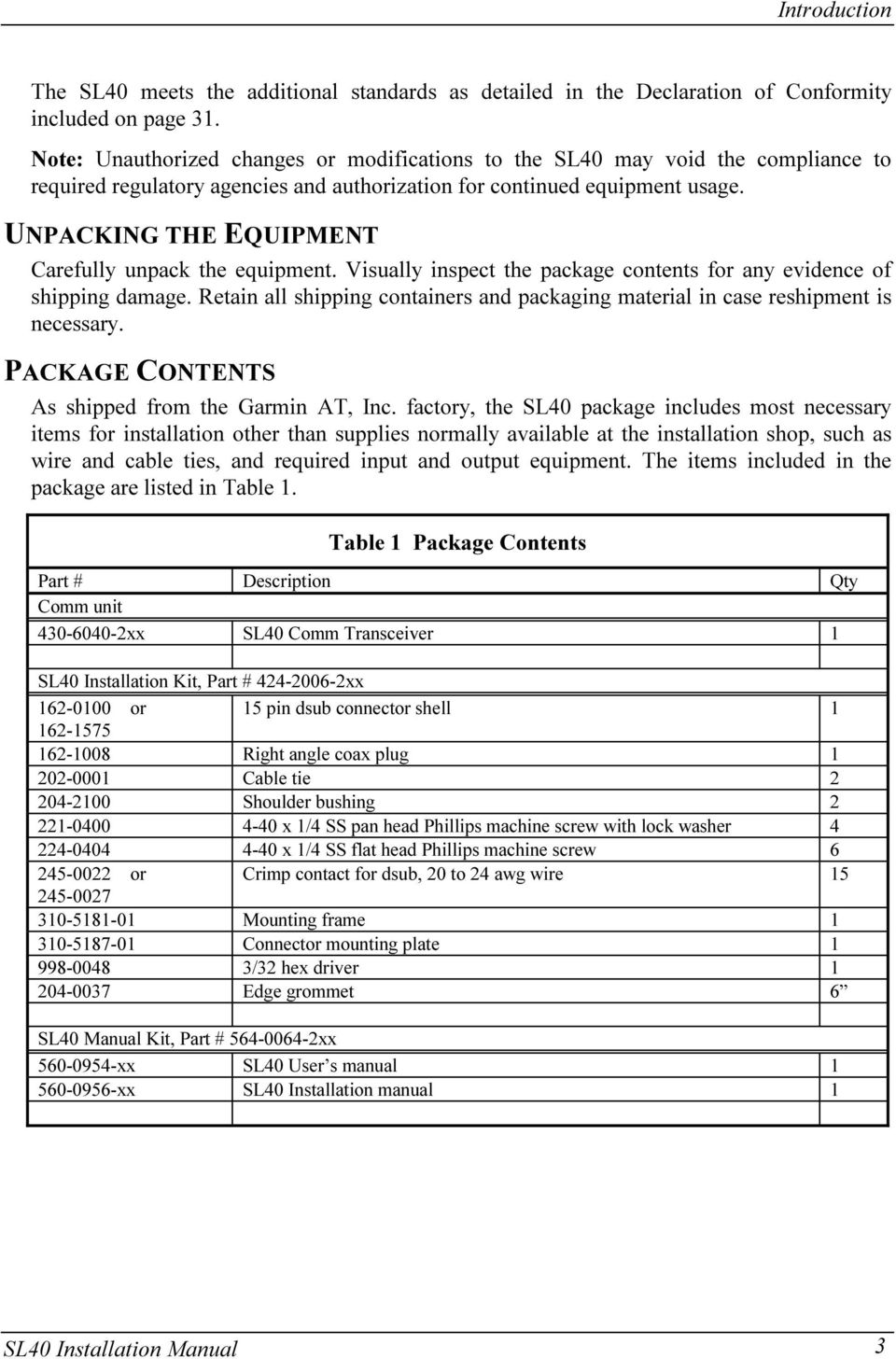
9 Introduction The SL40 meets the additional standards as detailed in the Declaration of Conformity included on page 31. Note: Unauthorized changes or modifications to the SL40 may void the compliance to required regulatory agencies and authorization for continued equipment usage. UNPACKING THE EQUIPMENT Carefully unpack the equipment. Visually inspect the package contents for any evidence of shipping damage. Retain all shipping containers and packaging material in case reshipment is necessary. PACKAGE CONTENTS As shipped from the Garmin AT, Inc. factory, the SL40 package includes most necessary items for installation other than supplies normally available at the installation shop, such as wire and cable ties, and required input and output equipment. The items included in the package are listed in Table 1. Table 1 Package Contents Part # Description Qty Comm unit xx SL40 Comm Transceiver 1 SL40 Installation Kit, Part # xx or 15 pin dsub connector shell Right angle coax plug Cable tie Shoulder bushing x 1/4 SS pan head Phillips machine screw with lock washer x 1/4 SS flat head Phillips machine screw or Crimp contact for dsub, 20 to 24 awg wire Mounting frame Connector mounting plate /32 hex driver Edge grommet 6 SL40 Manual Kit, Part # xx xx SL40 User s manual xx SL40 Installation manual 1 SL40 Installation Manual 3
10 Introduction OTHER REQUIRED MATERIALS The SL40 is intended for use with standard aviation accessories. The following items are required for the installation: comm antenna with cables a microphone a speaker or headphone These items may be installed dedicated to the SL40 comm or by connections to an audio panel. SPECIAL TOOLS REQUIRED Crimp Tool A crimp tool meeting MIL specification M22520/1-01 and a positioner/locater are required to ensure consistent, reliable crimp contact connections for the rear d-sub connectors. These tools are available from: For pin p/n Astro Tool Corp. Phone (503) SW TV Highway Fax (503) Beaverton, OR Crimp tool: Astro Tool part # Positioner: Astro Tool part # For pin p/n ITT Cannon Phone (714) E. Deere Ave. Fax (714) Santa Ana, CA Insertion tool: Regular duty Crimp tool: Regular duty Locator tool: Heavy duty Crimp tool: Heavy duty Locator tool: ITT part # (Desc. CIET-20HD) ITT part # (Desc. M22520/1-01) ITT part # (Desc. TH25) ITT part # (Desc. M22520/2-01) ITT part # (Desc. M22520/2-08) LICENSE REQUIREMENTS An aircraft radio station license is required for operation of the transmitter once installed in the aircraft. An application must be submitted on FCC Form 404, which may be obtained from the FCC in Washington, DC, or any of its field offices. Procedures for applications are in CFR 47, Part 87, Aviation Services, Subpart B, Applications and Licenses. For aircraft not registered in the United States, please follow you local procedures. 4 SL40 Installation Manual

11 Installation SECTION 2 - INSTALLATION This section describes the installation of the SL40 including mounting, wiring, and connections. A post installation check-out procedure is included at the end of this section. PRE-INSTALLATION INFORMATION Always follow good avionics installation practices per FAA Advisory Circulars (AC) A, A, and AC 20-67B, or later FAA approved revisions of these documents. Follow the installation procedure in this section as it is presented for a successful installation. Read the entire section before beginning the procedure. Perform the post installation checkout before closing the work area in case problems occur. INSTALLATION OVERVIEW A successful installation should start with careful planning including determination of mounting location for the SL40, antenna mounting, connections to microphones, speakers, and headphones, cable routing, and other required modifications. Once the mounting location has been determined, prepare the mounting frame for installation. It may be easier to complete the wiring harness and attach the connectors to the mounting frame before installing the mounting frame. INSTALLATION CONSIDERATIONS MOUNTING CONSIDERATIONS The SL40 is designed to mount in the avionics stack in the aircraft instrument panel within easy view and reach of the pilot. The standard package includes a mounting frame for ease of mounting, connections, and service of the unit. Allow an additional one inch clearance to the rear of the mounting frame for connectors and cables. For typical installations, the SL40 does not require external cooling. When mounting the SL40, leave a clearance of 1/8 to 1/4 inch between avionics to allow for circulation. MINIMUM SYSTEM CONFIGURATION The SL40 requires connections to the following equipment as a minimum: power input speaker or headphone output microphone input an antenna EQUIPMENT MOUNTING Once the cable assemblies have been made, attach the 15 pin dsub and coaxial cable connectors to the rear connector mounting plate and the mounting frame as illustrated in Figure 2 and Figure 3. Route the wiring bundle as appropriate. The rear connector plate should be attached to the mounting frame before installing the frame in the instrument panel. The rear connector plate can be used to tie down the cable assemblies. Connect the shield grounds directly to the connector mounting plate. SL40 Installation Manual 5

12 Installation Figure 2 Mounting Frame Assembly Figure 3 Cable Routing Once the cable assemblies are complete and the connectors are attached to the mounting frame, install the mounting frame assembly in the instrument panel. Be sure to use low profile 6 SL40 Installation Manual

13 Installation head screws so the unit will slide in and out freely. Attach the front of the mounting frame to the instrument panel. Use support brackets to attach the rear of the frame to the aircraft. To install the unit in the mounting frame, make sure the cam lock is rotated so the rear part is up, then slide the unit into the frame and tighten with the 3/32 hex tool. The unit will be pulled into the frame by the cam lock and the connectors will fully engage. To remove the unit from the mounting frame, use the hex tool and turn the tool CCW. The unit will be pushed out of the frame by the cam lock assembly. No special extraction tools are required. ELECTRICAL CONNECTIONS The SL40 installation kit includes a 15 pin dsub shell and crimp contacts. The crimp contacts are specified for 20 to 24 AWG wire. Make the crimp connections with a crimp tool as specified in the Special Tools Required section on page 4. All wires should be 20 to 24 AWG unless otherwise specified. A wiring diagram is included as Figure 5. POWER The SL40 is internally fused at 7 amps. A separate 5 amp (maximum) circuit breaker or fuse should be installed for downline overload or short circuit protection. Make the power connections to the SL40 using 20 awg wire. Note: Circuits should be protected in accordance with guidelines in AC A, chapter 11, section 2, paragraph 429. SPEAKER AND HEADPHONE OUTPUTS Connect the speaker and headphones to the output pins on the rear connector. MICROPHONE INPUTS Microphone input connections should be made using a twisted pair shielded cable. Attach the signal ground to the mic ground pin on the rear connector and connect the shield to the rear connector plate. TRANSMIT KEY INPUT The TxKey input on the rear connector must be pulled low to ground to enable the transmitter. This input should be connected to a microphone or yoke mounted momentary push button switch. INTERCOM SELECTOR SWITCH The SL40 includes an intercom function that can be enabled by an external control switch. This is an optional connection. When making connection for the intercom selection, connect the intercom selection input to a remote mounted normally open switch. A momentary toggle or alternate action switch can be SL40 Installation Manual 7
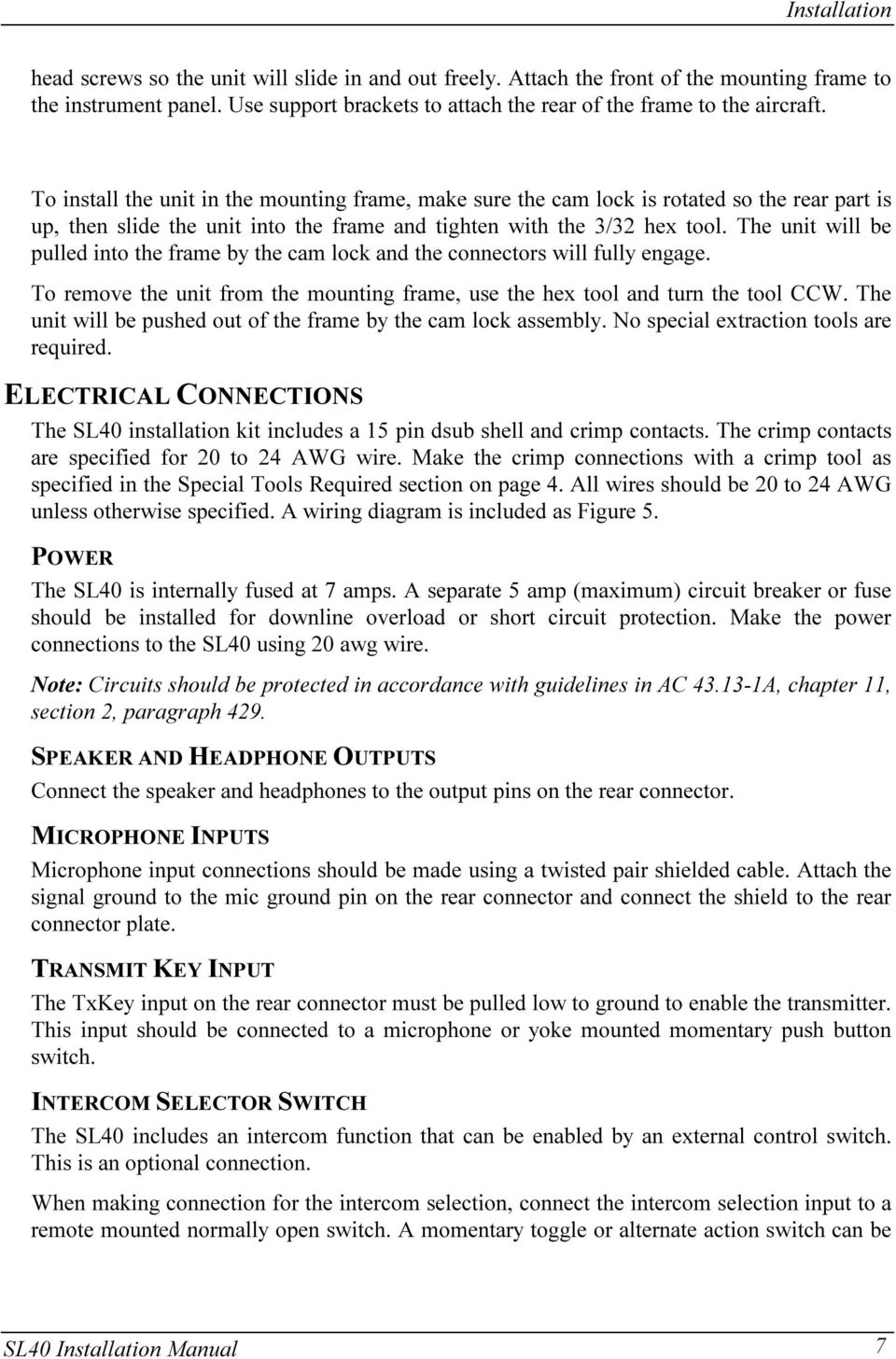
14 Installation used. Connect the other terminal of the switch to ground. The intercom function is enabled when the input is pulled low to ground. SERIAL INTERFACE The SL40 includes an RS232 serial port, which can be used for inputting frequency and function control commands and outputting transceiver status. This is an optional connection. When making serial connections to the SL40, use a shielded three conductor cable. Make the RxD, TxD, and ground connections on the 15 pin connector. Connect the shield to the rear of the mounting frame on the connector plate. The SL40 can be connected to the RS-232 serial data outputs on the 2001GPS (requires software version 5.1 or later), the SL50, SL60, GX50, GX55, GX60, or the 360 Map/GPS for receiving remote frequency information from the GPS navigation data base. Refer to the installation manuals for those units for connections and serial data output selections. Complete serial interface specifications are included in Appendix E. ANTENNA INSTALLATION AND CONNECTIONS The SL40 requires a standard 50Ω vertically polarized antenna. Follow the antenna manufacturer s installation instructions for mounting the antenna. The antenna should be mounted on a metal surface or a ground plane with a minimum area of 18 x 18 inches. The antenna should be mounted a minimum of 24 inches away from GPS antennas. The comm antenna should also be mounted as far apart as practical from the ELT antenna, preferably one on top and the other on the bottom of the aircraft fuselage. Some ELTs have exhibited re-radiation problems generating harmonics that may interfere with GPS signals. This can happen when the comm (SL40 or any other comm) is transmitting on certain frequencies such as or MHz, which may cause the ELT output circuit to oscillate from the signal coming in on the ELT antenna coax. The antenna coax cable should be made of RG-142B or a comparable quality 50Ω coax. Assembly instructions for the rear coax connector are included in Figure 4. 8 SL40 Installation Manual

15 Installation Step Clamp Nut Slit 1/4" (2X) Slide clamp nut over coax. - Strip coax as illustrated. - Cut two 1/4" slits in jacket 180 degrees apart. Step 2. Braid Clamp - Slide braid clamp over end of coax and under the braid. Step 3. Cap Solder Center Conductor - Insert coax with braid clamp into connector and tighten clamp nut securely. - Solder the center conductor of the coax to the contact as illustrated. - Attach the cap and secure tightly. Assembly instructions for right angle connector part # Figure 4 Coax Connector Assembly SL40 Installation Manual 9

16 Installation Figure 5 SL40 Standalone Wiring Diagram 10 SL40 Installation Manual

17 Installation Figure 6 SL40 Typical Audio Panel Connections SL40 Installation Manual 11

18 Installation POST INSTALLATION CHECKOUT Once the unit is installed, complete the checkout procedure to verify proper operation. Refer to the User s Guide for operating instructions. Mounting / Wiring Check Verify that all cables are properly secured and shields are connected to the rear of the mounting frame. Check the movement of the aircraft controls to verify that there is no interference. Receiver / Transmitter Operation Tune the unit to a local frequency and verify the receiver output produces a clear and understandable audio output. Verify the transmitter by contacting another station and getting a report of reliable communications. Antenna Check The antenna VSWR can be checked using an inline watt meter in the antenna coax using frequencies near both ends of the band. The VSWR should be < 2:1, and is not to exceed 3:1. A VSWR of 2:1 will cause a drop in output power of approximately 12%, and 3:1 causes approximately a 26% drop. Interference Check Check the SL40 while operating the other avionics and electrical systems on the aircraft to verify that no significant interference exists, and that the SL40 does not cause significant interference with other systems. Performance should be checked using low, high, and mid band frequencies. Repeat during the flight test for equipment that is not checked on the ground. Sidetone Level Adjustment The sidetone volume was preset at the factory to what should be an acceptable level. The level can be adjusted in the System Functions mode. To adjust the sidetone level: 1. Press and hold the MON button for about two seconds. This will access the System Functions mode. 2. Rotate the LARGE knob to display the SIDETONE LVL page. 3. Rotate the SMALL knob to change the level number. The range of the number is 000 to 255, with 128 producing one half of full rated output. A setting of 000 slaves the level to the Volume knob. 4. Press any key to exit the Setup Functions mode. 5. Select an appropriate frequency, key the transmitter, and talk into the microphone to check the level. Receiver Squelch Adjustment Adjustments to the receiver squelch level may be performed by using the RCVR SQELCH page in the Test Mode. Values may be adjusted between 25 and Press and hold the and RCL keys while switching the unit on. 2. Turn the LARGE knob to the RCVR SQELCH page. 3. Press the key to start selection (the number will flash). 4. Turn the SMALL knob to change the value. Press MEM to store the value. 12 SL40 Installation Manual

19 Installation 5. Turn the unit off to exit the Test Mode. Mic Level Adjustment Those units with audio board p/n , or later, have the ability to make adjustments to microphone sensitivity by using the MIC 1 LEVEL and MIC 2 LEVEL pages in the Test Mode. 1. Press and hold the and RCL keys while switching the unit on. 2. Turn the LARGE knob to the MIC 1 LEVEL and MIC 2 LEVEL pages. 3. Press the key to start selection (the number will flash). 4. Turn the SMALL knob to change the value. Press MEM to store the value. 5. Turn the unit off to exit the Test Mode. Display Test It is possible to perform a simple test to observe all segments of the display for a quick checkout of the display functions. 1. Press and hold the and RCL keys while switching the unit on. 2. Turn the LARGE knob to the DISPLAY TEST page. 3. Press MEM to perform the test. A series of # symbols will advance across the display testing each LED. 4. Turn the unit off to exit the Test Mode. Mic Squelch Adjustments to the squelch levels for Mic1 and Mic2 are available in the System Functions mode. To adjust the Microphone Squelch level: 1. Press and hold the MON button for about two seconds. This will access the System Functions mode. 2. Rotate the LARGE knob to display the MIC1 OR MIC2 SQLCH pages. 3. Rotate the SMALL knob to change the level number. The range of the number is 000 to Press any key to exit the Setup Functions mode. 5. Select an appropriate frequency, key the transmitter, and talk into the microphone to check the level. Transmit Mic The Transmit Microphone page allows you to control which microphone is permitted to transmit. You may choose Mic 1, 2, or both. To adjust the Transmit Mic control: 1. Press and hold the MON button for about two seconds. This will access the System Functions mode. 2. Rotate the LARGE knob to display the TRANSMIT MIC page. 3. Rotate the SMALL knob to select MIC1, MIC2, or MIC1+MIC2. 4. Press any key to exit the Setup Functions mode. 5. Select an appropriate frequency, key the transmitter, and talk into the microphones to check for the intended operation. SL40 Installation Manual 13

20 Installation Flight Test Check A flight test is recommended as a final installation verification. The performance may be verified by contacting a ground station at a range of at least 50 nm while maintaining an appropriate altitude and over all normal flight attitudes. Performance should be checked using low, high, and mid band frequencies. 14 SL40 Installation Manual

21 Specifications SECTION 3 - SPECIFICATIONS This section includes detailed electrical, physical, environmental, and performance specifications for the SL40. ELECTRICAL Input voltage...10 VDC to 40 VDC, reverse polarity protected Input current ma typical, 350 ma max. at VDC, receive 140 ma typical, 175 ma max. at 27.5 VDC, receive 2.1A typical, 3.2A max. at VDC, transmit 1.0 A typical, 1.4 A max. at 27.5 VDC, transmit Note: receive max. at full receive audio, transmit max. at 90% modulation at 1000Hz Input power...4 watts typical, receive 28 watts typical, transmit Internal fuse...7 amp fast blow, soldered in board Power control connection...pulled low to turn unit ON; floating (high) for unit OFF PHYSICAL Height inches (3.30 cm) Width inches (15.88 cm) Depth inches (29.09 cm) behind panel, including mounting frame and connectors Weight (with mounting frame) lb. (0.953 kg) ENVIRONMENTAL The SL40 unit is designed and tested to meet appropriate categories of RTCA/DO-160C. The Environmental Qualification Form is included in Appendix C. Operating temperature C to +55 C Storage temperature C to +85 C Temperature variation... 2 C per minute Humidity... 95% at 50 C for 6 hours (2 day cycle) Maximum altitude... 35,000 feet Cooling... Not required SL40 Installation Manual 15
22 Specifications Figure 7 Unit Dimensions RECEIVER PERFORMANCE Class...D Frequency range to MHz, 760 channels Sensitivity...1µV (2µV hard) for 6 db S+N/N with 30% modulation at 1000Hz Selectivity...< 6 db variation at ± 7 khz, > 60 db at ± 22 khz Speaker audio output level...12 watts into 4Ω, 8 watts into 8Ω Headphone audio output level...280mw into 100Ω, 120mW into 500Ω Distortion...< 5% at rated output at 1000Hz AGC characteristics...< 3 db variation in audio output from 5µV to 100mV input, 15% to 90% modulation Squelch control...automatic squelch with manual override TRANSMITTER PERFORMANCE Class...4 Output power...8 watts minimum carrier at >12VDC input, 6 watts minimum at 10VDC input (transmit is locked out below 9 volts input) Frequency range to MHz, 760 channels Frequency tolerance...±15ppm from -20 C to +70 C 16 SL40 Installation Manual
23 Specifications Microphone input... Two inputs, standard carbon or dynamic mic with integrated preamp providing minimum 70mv rms into 1000Ω load Modulation capability... 85% with 100mv to 1000mv rms microphone input at 1000 Hz Audio frequency distortion... < 10% at 85% modulation at 350 to 2500 Hz Audio frequency response... < 4db variation with 350 to 2500 Hz, 85% modulation Carrier noise level... > 35 db down Sidetone output... up to 280mW into 100Ω, 120mW into 500Ω Duty cycle % Stuck mic time-out second time-out, reverts to receive INTERCOM PERFORMANCE Microphone input... Two inputs, standard carbon or dynamic mic with integrated preamp providing minimum 70mv rms into 1000Ω load Headphone audio output level mw into 100Ω, 120 mw into 500Ω AGC characteristic... output varies < 3 db with input of 100mv rms to 1000mv rms CONTROL INPUTS Transmit key... Input pulled low to ground to enable the transmitter Intercom select... Input pulled low to ground to enable the intercom function ANTENNA REQUIREMENTS The SL40 requires an antenna meeting the following specifications. Standard 50Ω vertically polarized antenna with a VSWR < 2.5:1. SERIAL INTERFACE RS Defined in Appendix E - Serial Interface Specifications SL40 Installation Manual 17
24 Specifications REAR CONNECTOR PINOUT Table 2 Connector Pinout Pin # I/O Connection Function 1 I Power + main DC power input 2 I Reserved Do not connect 3 O TxD RS232 serial data output 4 I TxKey transmit enable key, pulled low to transmit 5 -- NC Do not connect 6 O Speaker speaker terminal output 7 I Mic ground microphone input ground connection 8 I Mic 1 microphone input #1 9 I Power ground main power ground input 10 I RxD RS232 serial data input 11 O Serial ground RS232 signal ground 12 I Intercom select intercom function select, pulled low to turn on the intercom function 13 O Audio ground speaker and headphone ground connection 14 O Headphone headphone terminal output 15 I Mic 2 microphone input # Viewed from rear of unit 18 SL40 Installation Manual
25 Limitations SECTION 4 - LIMITATIONS INSTALLATION Installations are to be made in accordance with AC 20-67B or other appropriate FAA approved guidelines. OPERATIONAL An aircraft radio station license is required for transmitting. Please follow you local procedures. SL40 Installation Manual 19
26 Limitations NOTES 20 SL40 Installation Manual
27 Troubleshooting APPENDIX A - TROUBLESHOOTING This appendix provides information to assist troubleshooting if problems occur after completing the installation. Use Table 3 to assist in troubleshooting. Table 3 Troubleshooting Guide Problem Cause Solution The SL40 does not power on. The unit is not getting power. Check power connections, breakers, The unit does not transmit. The TxKey input is not being pulled low. A weather channel is selected. and main avionics switch. Check the TxKey (mic key) input, pulled low for transmit. Select a different frequency, the unit will not transmit on a weather channel. The input voltage is too low. Increase input supply voltage to > 9 volts DC. Mic Sensitivity varies Mic Levels need adjustment See the Mic Level Adjustment on page 13 The sidetone and intercom levels are too low or high. Wrong type of headsets, or level needs adjustment. See the Sidetone Level Adjustment on page 12. The intercom doesn t function. Control input not connected. The intercom select input must be pulled to ground to turn on the intercom function. No voice activation, or have to talk too loud. Change the intercom squelch threshold using the setup function described in the user s manual. CONTACTING THE FACTORY FOR ASSISTANCE If the SL40 unit fails to operate despite troubleshooting efforts, contact the Garmin AT factory for assistance. GARMIN International, Inc East 151 st Street Olathe, KS USA Phone: (913) FAX: (913) Be prepared to offer the following information about the installation: Installation configuration (accessories, antenna,...) Model number, part number with mod levels, and serial number Software version Description of problem Efforts made to isolate the problem SL40 Installation Manual 21
28 Troubleshooting NOTES 22 SL40 Installation Manual
29 Periodic Maintenance APPENDIX B - PERIODIC MAINTENANCE EQUIPMENT CALIBRATION The SL40 design requires very few adjustments or calibration to be made. In fact, there are no internal manual adjustments. REFERENCE OSCILLATOR The reference oscillator frequency should be checked approximately every 3 to 5 years to ensure the units transmit frequency is within allowable tolerance. The oscillator frequency can be checked by connecting the transmitter output through an appropriate load to a calibrated frequency counter. The transmit frequency should be within 15ppm of the selected channel frequency. Contact the Garmin AT, Inc. factory for instructions on adjusting the frequency if required. CLEANING THE FRONT PANEL The front bezel, keypad, and display can be cleaned with a soft cotton cloth dampened with clean water. DO NOT use any chemical cleaning agents. Care should be taken to avoid scratching the surface of the display. SL40 Installation Manual 23
30 Periodic Maintenance NOTES 24 SL40 Installation Manual
31 Environmental Qualifications APPENDIX C - ENVIRONMENTAL QUALIFICATIONS The SL40 has been tested to the following environmental categories per procedures defined in RTCA/DO-160C. Environmental Qualification Form Nomenclature: SL40 Manufacturer: Part No.: Garmin AT, Inc. TSO No.: TSO-C37d, TSO-C38d, and 2345 Turner Road SE TSO-C128 Salem, Oregon Conditions Section Description of Conducted Tests Temperature and Altitude 4.0 Equipment tested to Category C1 with In-flight Loss of Cooling No cooling required Altitude Equipment tested to 35,000 feet Overpressure Equipment tested for overpressure Temperature Variation 5.0 Equipment tested to Category C, 2 C/min Humidity 6.0 Equipment tested to Category A, standard humidity environment Operational Shocks and Crash Safety 7 Equipment tested for both operational and crash safety shocks. (Equipment operated normally after the crash safety shocks.) Vibration 8.0 Equipment tested without shock mounts to Categories B, M, & N Explosion Proofness 9.0 Equipment identified as Category X, no test required Waterproofness 10.0 Equipment identified as Category X, no test required Fluids Susceptibility 11.0 Equipment identified as Category X, no test required Sand and Dust 12.0 Equipment identified as Category X, no test required Fungus Resistance 13.0 Equipment identified as Category X, no test required Salt Spray 14.0 Equipment identified as Category X, no test required Magnetic Effect 15.0 Equipment is Class Z Power Input 16.0 Equipment tested to Categories A & B Voltage Spike 17.0 Equipment tested to Category A Audio Frequency Conducted 18.0 Equipment tested to Categories A & B Susceptibility - Power Inputs Induced Signal Susceptibility 19.0 Equipment tested to Category Z Radio Frequency Susceptibility (Radiated and Conducted) 20 Equipment tested to Category V for conducted, Category U for radiated. Emission of Radio Frequency 21 Equipment tested to Category Z Energy Lightning Induced Transient Susceptibility 22.0 Equipment tested to Categories A3 and B2. RS-232 input/output tested to A3 and B1. Lightning Direct Effects 23.0 Equipment identified as Category X, no test required Icing 24.0 Equipment identified as Category X, no test required Remarks: SL40 Installation Manual 25
32 Environmental Qualifications NOTES 26 SL40 Installation Manual
33 Serial Data Specifications APPENDIX E - SERIAL INTERFACE SPECIFICATIONS This appendix includes the interface specifications for the RS-232 serial port. The RS-232 port can be used to input active and standby frequencies, and is used to input frequencies from a remote source, such as the SL50 and 2001GPS. The interface format conforms to NMEA 0183 message format specifications. The format of the RS-232 serial port is as follows: Baud rate Data bits... 8 Stop bits... 1 Parity... none The data format is as follows: $PMRRC<msg_id><msg_data><chksum><cr> The checksum is computed by an 8 bit addition of the msg_id and msg_data characters, ignoring carry if any. The resulting 8 bit checksum is converted to two ascii characters by taking the upper and lower nibbles, adding 30h to each, and placing the most significant character first in the data message. RS-232 INPUTS SET ACTIVE FREQUENCY Message Format $PMRRC00mka<chksum><cr> message id mk... active frequency: m = desired frequency in MHz in hexadecimal, where m = desired frequency - 30h, with desired frequency in range of 118 to 136 MHz, or 162 MHz. k = desired frequency in khz where k = (desired frequency / 25 khz) + 30h, with desired frequency in range of 000 to 975 khz in 25 khz steps, or 0 to 39. a... transceiver function: N = normal receive operation M = enable monitor function 0 = no change Example Message $PMRRC00G4N29<cr> Set the active frequency to MHz, normal receive mode. G = 119d - 30h = 77h - 30h = 47h, or an ascii G ; 4 = 100 khz/25 khz + 30h = h = 34h, or an ascii 4. SL40 Installation Manual 27
34 Serial Data Specifications SET STANDBY FREQUENCY Message Format $PMRRC01mka<chksum><cr> 01...message id mk...standby frequency: m = desired frequency in MHz in hexadecimal, where m = desired frequency - 30h, with desired frequency in range of 118 to 136 MHz, or 162 MHz. k = desired frequency in khz where k = (desired frequency / 25 khz) + 30h, with desired frequency in range of 000 to 975 khz in 25 khz steps, or 0 to 39. a...transceiver function: N = normal receive operation M = enable monitor function 0 = no change Example Message $PMRRC01LFM40<cr> Set the standby frequency to MHz, monitor function selected REMOTE IDENT INPUT This message is used to input a new ident, and reset the remote frequency input pointer. Message Format $PMRRC04tiiii<chksum><cr> 04...message id t...list type, input 1 iiii...ident, four character ascii Example Message $PMRRC041SLE<space>99<cr> Set the remote frequency ident to SLE. REMOTE FREQUENCY LIST INPUT This message is used to input frequencies for the remote recall function. Up to 10 frequencies are accepted. Message Format $PMRRC05tfmk<chksum><cr> 05...message id t...list type, input 1 f...frequency type: 0 = TWR, tower frequency 8 = CTF, common traffic advisory frequency 1 = GND, ground frequency 9 = DEP, departure 2 = ATS, for ATIS : (3Ah) = FSS, flight service station 3 = ATF, air traffic frequency ; (3Bh) = RFS, for remote flight service station 4 = APP, for approach < (3Ch) = UNI, for unicom 28 SL40 Installation Manual
35 Serial Data Specifications 5 = ARR, for arrival = (3Dh) = MF, mandatory frequency 6 = AWS, automatic weather station > (3Eh) = not defined, do not use 7 = CLR, clearance/delivery? (3Fh) = undefined, for other frequency types mk... frequency: m = desired frequency in MHz in hexadecimal, where m = desired frequency - 30h, with desired frequency in range of 118 to 136 MHz, or 162 MHz. k = desired frequency in khz where k = (desired frequency / 25 khz) + 30h, with desired frequency in range of 000 to 975 khz in 25 khz steps, or 0 to 39. Example Message $PMRRC0511IT64<cr> Input a ground frequency type, MHz. REQUEST OUTPUT MESSAGE This message is used to request data output messages. Message Format $PMRRC06iidda<chksum><cr> message id ii... requested message ident: 03 = software version message dd... set to 00 a... set to 0 Example Message $PMRRC <cr> This message requests the software version message to be output. RS-232 OUTPUTS TRANSCEIVER STATUS This message is used to output the current transceiver frequencies and status. Message Format $PMRRC01mkmkas<chksum><cr> message id mk... active frequency (first mk): m = frequency in MHz in hexadecimal, where m = frequency - 30h, with frequency in range of 118 to 136 MHz, or 162 MHz. k = frequency in khz where k = (frequency / 25 khz) + 30h, with frequency in range of 000 to 975 khz in 25 khz steps, or 0 to 39. mk... standby frequency (second mk): m = frequency in MHz in hexadecimal, where m = frequency - 30h, with frequency in range of 118 to 136 MHz, or 162 MHz. k = frequency in khz where k = (frequency / 25 khz) + 30h, with frequency in range of 000 to 975 khz in 25 khz steps, or 0 to 39. SL40 Installation Manual 29
36 Serial Data Specifications a...transceiver status: R = normal receive M = monitor selected T = transmit enabled S = stuck mic s...squelch test setting: 0 = automatic 1 = test selected Example Message $PMRRC01G4LFR0F0<cr> The active frequency is MHz, the standby frequency is MHz, normal receive function, automatic squelch selected. This message is output once/second. SOFTWARE VERSION This message is used to output the com software version. Message Format $PMRRC03vvvv<chksum><cr> 03...message id vvvv...software version Example Message $PMRRC <cr> The software version is This message is output once at power up and by request. 30 SL40 Installation Manual
37 Declaration of Conformity Manufacturer s name: Manufacturer s address: declares that the following product: Garmin AT, Inc Turner Rd. SE Salem, Oregon, USA Type of equipment: Product name: Part number: VHF Comm transceiver for aircraft SL40 Comm xx conforms to the following Directives and Standards: Application of Council Directives: Standards: 89/336/EEC, 93/68/EEC EN , EN Quality Department Garmin AT, Inc. SL40 Installation Manual 31
38
P/N 135A-970-022 FAA Approved: 12/6/2007 Section 9 Initial Release Page 1 of 8
 FAA APPROVED AIRPLANE FLIGHT MANUAL SUPPLEMENT FOR GARMIN SL40 NAV/COMM Serial No: Registration No: When the GARMIN SL40 COM radio is installed in the Liberty Aerospace XL-2, this supplement is applicable
VHF COMMUNICATION TRANSCEIVER
 ATR-500 VHF COMMUNICATION TRANSCEIVER ON OFF OPERATION MANUAL Manual Number 01.125.010.08 REVISION 1.3, Jan 20. 2005 from S/N 00301 04 Contents 1 SECTION 1 GENERAL INFORMATION...3 1.1 INTRODUCTION...3
AMS 2000, ALTITUDE ALERT SYSTEM
 PRODUCT P/N: 8900 REV M Shadin Avionics 6831 Oxford Street St. Louis Park, MN 55426 USA Sales: (800)-328-0584 Technical Support: (800)-388-2849 www.shadin.com MANUAL P/N: IN8900A Rev M P/N 8900 Page i
MGL Avionics CAN bus interface for Trig Avionics TT21/TT22 transponders
 MGL Avionics CAN bus interface for Trig Avionics TT21/TT22 transponders General The MGL Avionics CAN bus interface for the Trig Avionics TT21 and TT22 transponders provides a simple solution to allow any
GTM 11. fm tmc traffic receiver. owner s manual. GTM 11 shown with the whip antenna
 GTM 11 fm tmc traffic receiver owner s manual GTM 11 shown with the whip antenna Copyright 2005 2006 Garmin Ltd. or its subsidiaries Garmin International, Inc. 1200 East 151st Street Olathe, Kansas 66062,
4.3-inch Back-Up Camera
 TM 4.-inch Back-Up Camera Model No.: PKC0BU4 Owner s Manual and Warranty Information Read these instructions completely before using this product. Retain this Owner s Manual for future reference. INTRODUCTION
SPECIAL NOTICE. All references to NAT product part numbers (and associated images) are equivalent to AEM product part numbers.
 SPECIAL NOTICE This product is now licensed to Anodyne Electronics Manufacturing (AEM) from Northern Airborne Technology (NAT). AEM is responsible for all matters related to this product, including sales,
Telex Operating Instructions
 Telex Operating Instructions Airman 850 General Description The Telex Airman 850 is designed for use in aircraft with low noise levels. Ambient noise levels in such aircraft cockpits may be considered
INSTRUCTION MANUAL PLEASE READ ALL THE INSTRUCTIONS COMPLETELY BEFORE USE AND SAVE THIS MANUAL FOR FUTURE REFERENCE
 INSTRUCTION MANUAL PLEASE READ ALL THE INSTRUCTIONS COMPLETELY BEFORE USE Ver. 2.0 AND SAVE THIS MANUAL FOR FUTURE REFERENCE Table of Contents Unpacking... 3 About the CCRadio-EP... 4 Quick Start Guide...
3. Enter the first five digits of desired frequency (2 2 5 0 0 for 225.000 MHz).
 Simplified Directions 1. Install the batteries. 2. Turn the unit on (rotate volume knob clockwise). 3. Enter the first five digits of desired frequency (2 2 5 0 0 for 225.000 MHz). 4. Listen. Table of
AIS-450 SYNCHRO CONVERTER
 P/N: 834510-00 REV D Shadin Avionics 6831 Oxford Street St. Louis Park, MN 55426 USA Sales: (800) 328-0584 Customer Service: (800) 388-2849 WWW.SHADIN.COM MANUAL P/N: IM834510-00 Rev: D P/N 834510-00 PAGE
MCR1900 Media Converter 19-Slot Chassis
 MCR1900 Media Converter 19-Slot Chassis Installation Guide Part #5500304-11 Copyright Statement This document must not be reproduced in any way whatsoever, either printed or electronically, without the
PS 29M DUAL CHANNEL BELTPACK IN METAL CASE
 PS 29M DUAL CHANNEL BELTPACK IN METAL CASE USER MANUAL October 2013 This product is designed and manufactured by: ASL Intercom BV Zonnebaan 42 3542 EG Utrecht The Netherlands Phone: +31 (0)30 2411901 Fax:
Owner s Manual AWM910 JENSEN AWM910 COMPACT DISC PLAYER RADIO CD COMPACT MUSIC SYSTEM MUTE AUX BAND AUX IN PUSH PUSH PWR VOL ALARM T/F AUD SPK A SPK B
 AWM910 Owner s Manual COMPACT DISC PLAYER PUSH 1 2 3 4 5 6 RPT SCAN RDM H M PUSH PWR VOL ALARM SET ON/OFF EQ T/F AUD RADIO CD COMPACT MUSIC SYSTEM MUTE AUX BAND CD AUX IN A B A+B JENSEN AWM910 Thank You!
Tactical Radio Adapter
 9800 Martel Road Lenoir City, TN 37772 Tactical Radio Adapter Document P/N 200-002-0002 Revision 5, February 2009 Part number 12100 Installation and Operation Manual In certified aircraft, warranty is
SCREENLOGIC INTERFACE WIRELESS CONNECTION KIT
 SCREENLOGIC INTERFACE WIRELESS CONNECTION KIT FOR INTELLITOUCH AND EASYTOUCH CONTROL SYSTEMS INSTALLATION GUIDE IMPORTANT SAFETY INSTRUCTIONS READ AND FOLLOW ALL INSTRUCTIONS SAVE THESE INSTRUCTIONS Technical
PM1122 INT DIGITAL INTERFACE REMOTE
 PM1122 INT DIGITAL INTERFACE REMOTE PM1122 INT front panel description: 1. Clear wireless remotes knob: push this button for more than 2 seconds to clear the list of all assigned wireless remote settings
ScreenLogic Wireless Connection Kit. Installation Guide. pool/spa control system
 pool/spa control system ScreenLogic Wireless Connection Kit Installation Guide P/N 520663 - Rev B 8 Technical Support Contact Technical Support at: Sanford, North Carolina (8 A.M. to 5 P.M.) Phone: (800)
Smarthome SELECT Bluetooth Wireless Stereo Audio Receiver and Amplifier INTRODUCTION
 Smarthome SELECT Bluetooth Wireless Stereo Audio Receiver and Amplifier INTRODUCTION The Smarthome SELECT Bluetooth Wireless Stereo Audio Receiver and Amplifier is a multi-functional compact device. It
TOTALLY SOLID STATE NON-DIRECTIONAL RADIO BEACONS 190-535 khz
 TOTALLY SOLID STATE NON-DIRECTIONAL RADIO S 190-535 khz This family of radio transmitters has been developed as extremely efficient, highly reliable Non Directional Beacons. ND2000A/4000A» MODULAR CONSTRUCTION»
INSTRUCTION MANUAL PLEASE READ ALL THE INSTRUCTIONS COMPLETELY BEFORE USE AND SAVE THIS MANUAL FOR FUTURE REFERENCE
 INSTRUCTION MANUAL PLEASE READ ALL THE INSTRUCTIONS COMPLETELY BEFORE USE AND SAVE THIS MANUAL FOR FUTURE REFERENCE m Before Use Please read IMPORTANT SAFETY INSTRUCTIONS on page 10 before use. It is important
TOA 900 SERIES II MIXER POWER AMPLIFIER
 Operating Instructions TOA 900 SERIES II MIXER POWER AMPLIFIER A-903MK2 A-906MK2 A-912MK2 TO REDUCE THE RISK OF ELECTRICAL SHOCK, DO NOT REMOVE COVER. NO USER SERVICEABLE PARTS INSIDE. REFER SERVICING
RC8021 Indoor Camera Installation Guide
 RC8021 Indoor Camera Installation Guide P/N: 957YL502GJ Document Version: 1.0 Copyright 2011. All Rights Reserved. All trademarks and trade names are the properties of their respective owners i Package
StructureScan HD Module. Installation Guide ENGLISH. www.bandg.com www.simrad-yachting.com www.lowrance.com
 StructureScan HD Module Installation Guide ENGLISH www.bandg.com www.simrad-yachting.com www.lowrance.com Disclaimer As Navico is continuously improving this product, we retain the right to make changes
Telephone- and leased line modem for industrial applications TD-36
 Telephone- and leased line modem for industrial applications TD-36 Modem for industrial PSTN- and leased line applications The TD-36 is an analogue V.34 PSTN modem as well as an industrial 2-wire leased
Safety Warnings and Guidelines
 Safety Warnings and Guidelines Thank you for purchasing this Wireless Speaker Amplifier! For best results, please thoroughly read this manual and carefully follow the instructions. Please pay extra attention
DAB+ / FM Tuner Model: TU-201
 DAB+ / FM Tuner Model: TU-201 Instruction Manual www.pulse-audio.co.uk 1 Safety Information The lightning bolt within a triangle is intended to alert the user to the presence of dangerous voltage levels
PS 155 WIRELESS INTERCOM USER MANUAL
 PS 155 INTERFACE TO SIMPLEX WIRELESS INTERCOM USER MANUAL Issue 2011 ASL Intercom BV DESIGNED AND MANUFACTURED BY: ASL INTERCOM BV ZONNEBAAN 42 3542 EG UTRECHT THE NETHERLANDS PHONE: +31 (0)30 2411901
GPS 35 USB. installation and quick start guide
 GPS 35 USB installation and quick start guide 2001 GARMIN Corporation GARMIN International, Inc. 1200 E 151 st Street, Olathe, Kansas 66062 U.S.A. Tel. 913/397.8200 Fax. 913/397.8282 GARMIN (Europe) Ltd.
INSTALLATION GUIDE. Card Reader & Controller with KIM Swipe Reader for Solitaire 850 / 950 / 850L Learnlok PK2930
 INSTALLATION GUIDE Card Reader & Controller with KIM Swipe Reader for Solitaire 850 / 950 / 850L Learnlok PK2930 Card Reader and Controller Model 3.5 with KIM Swipe Reader Table of Contents 1. Features..................................
Mobile Data Power Model: MDP-25
 Mobile Data Power Model: MDP-25 Topic Section Features... 2 Operational Features Summary... 2 Back-up Battery Power Internal Charger Voltage Spike Protection RF Noise Filtering Warning of Imminent Loss
HCS-3300/3302/3304 USB Remote Programmable Laboratory Grade Switching Mode Power Supply
 1. INTRODUCTION HCS-3300/3302/3304 USB Remote Programmable Laboratory Grade Switching Mode Power Supply User Manual This family of efficient, upgraded SMPS with small form factor, auto cross over CV CC,
Short Range Wireless Switch System Handheld 8 Installation and Operations Guide
 Phone: (866) 701-1146 Fax: (425) 216-7558 www.remotecontroltech.com Short Range Wireless Switch System Handheld 8 Installation and Operations Guide Introduction... 2 Before Installation... 2 Receiver Installation...
Honeywell Primus HF 1050 HF Radio System
 Honeywell Primus HF 1050 HF Radio System 1 HF Technical Description Honeywell s new 28Vdc HF radio advances the performance and capability of our HF systems to meet the emerging needs of the HF market
Mercury Helios 2 ASSEMBLY MANUAL & USER GUIDE
 Mercury Helios 2 ASSEMBLY MANUAL & USER GUIDE TABLE OF CONTENTS INTRODUCTION...1 1.1 MINIMUM SYSTEM REQUIREMENTS 1.1.1 Apple Mac Requirements 1.1.2 PC Requirements 1.1.3 Supported PCIe Cards 1.2 PACKAGE
MANUAL PC1000R [email protected]
 MANUAL PC1000R [email protected] Features The APart PC1000R is a professional multisource CD/USB/SD card music player, equipped with balanced and unbalanced analog outputs, coaxial and optical digital
GTX 330. Mode S Transponder. pilot s guide
 GTX 330 Mode S Transponder pilot s guide Copyright 2002, 2007 Garmin Ltd. or its subsidiaries All Rights Reserved Except as expressly provided herein, no part of this manual may be reproduced, copied,
SP1790JK 900MHz Wireless Indoor/Outdoor Speakers. User Manual INTRODUCTION FEATURES IMPORTANT SAFETY INFORMATION
 SP1790JK 900MHz Wireless Indoor/Outdoor Speakers INTRODUCTION This 900 MHz digital hybrid wireless speaker system uses the latest wireless technology that enables you to enjoy music and TV sound anywhere
Manual. Simrad StructureScan LSS-1 Sonar Module. English
 Manual Simrad StructureScan LSS-1 Sonar Module English www.simrad-yachting.com A brand by Navico - Leader in Marine Electronics Disclaimer As Navico is continuously improving this product, we retain the
ECD 2 High Performance Balanced DAC. 24 Bit /192kHz. Owner's Manual
 ECD 2 High Performance Balanced DAC 24 Bit /192kHz Owner's Manual EN Unpacking the ECD 2 Immediately upon receipt of the ECD 2, inspect the carton for possible damage during shipment. If the carton is
Operation Manual for Users
 Operation Manual for Users Model No.: FLTAMFMRCD!!!!!!!!!! ATTENTION!!!!!!!!!! THE RESET BUTTON MUST BE PRESSED TO ENSURE PROPER OPERATION. SEE INSTRUCTION MANUAL Table of Contents Table of Contents ---------------------------------------------------------------------------------------------
MK12D TSO (MK12, MK12A, MK12B REPLACEMENT RADIO)
 NARCO AVIONICS MK12D TSO (MK12, MK12A, MK12B REPLACEMENT RADIO) ADDENDUM INSTALLATION MANUAL 03118-0620R NARCO AVIONICS INC. 270 COMMERCE DRIVE FT. WASHINGTON, PA. 19034 U.S.A. PRINTED IN U.S.A. JUNE,
Rack mounted telephone- and leased line modem for industrial applications
 Rack mounted telephone- and leased line modem for industrial applications TR-6 Rack modem for industrial PSTNand /-wire leased line applications The TR-6 is an analogue V. 9 -rack PSTN modem as well as
TM Advanced Tracking Technologies, Inc. 2003 ATTI All rights reserved
 TM Advanced Tracking Technologies, Inc. 2003 ATTI All rights reserved Copyright 2003, Advanced Tracking Technologies, Inc. All rights reserved. No part of this publication may be reproduced or transmitted
STEREO PREAMPLIFIER INSTRUCTIONS FOR USE
 XX STEREO PREAMPLIFIER INSTRUCTIONS FOR USE Thank you for purchasing the Musical Fidelity A5 CR Preamplifier. Used properly and carefully, it should give many years of outstanding musical reproduction.
Contents. Document information
 User Manual Contents Document information... 2 Introduction... 3 Warnings... 3 Manufacturer... 3 Description... Installation... Configuration... Troubleshooting...11 Technical data...12 Device Scope: PCB
************* OWNER'S MANUAL BAMF800/2 BAMF1250/2 BAMF1800/2 BAMF2200/2 BAMF2600/2 BAMF1200/4 BAMF1600/4 BAMF2000/1D BAMF4000/1D BAMF5500/1D
 ************* OWNER'S MANUAL BAMF800/2 BAMF1250/2 BAMF1800/2 BAMF2200/2 BAMF2600/2 BAMF1200/4 BAMF1600/4 BAMF2000/1D BAMF4000/1D BAMF5500/1D INTRODUCTION Power Acoustik amplifiers provide high-performance
Troubleshooting and Diagnostics
 Troubleshooting and Diagnostics The troubleshooting and diagnostics guide provides instructions to assist in tracking down the source of many basic controller installation problems. If there is a problem
Senses SV series industrial monitor user manual
 Industrial Monitors Senses SV series Senses SV19 / SV17 User manual (Issue A) Part No: 85090084 Page 1 of 25 Copyright Copyright 2008 Amplicon Liveline Ltd. All rights reserved. This publication, including
LDG DTS-4/4R Desktop Coaxial Switch / Remote
 LDG DTS-4/4R Desktop Coaxial Switch / Remote LDG Electronics 1445 Parran Road, PO Box 48 St. Leonard MD 20685-2903 USA Phone: 410-586-2177 Fax: 410-586-8475 [email protected] www.ldgelectronics.com
DX 2517. AM FM SSB CW PA Amateur Base Station Transceiver OWNER S MANUAL RX / TX 2 4 POWER NF CHANNEL MODE RF POWER OFF CAL OFF OFF CALIBRATE
 1 2 3 6 4050 ULA 6070 TI 80 90 100 9 DX 2517 2517 RX / TX 0 2 4 SWR WATTS SET 81012 22 1 010 3 2030 5 MOD 7 ON dbover 9 SIGNAL +20 +40+60 PA FM AM USB LSB CW POWER ON SWR NB / ANL R.BEEP +10KHz NF CHANNEL
Advantium 2 Plus Alarm
 ADI 9510-B Advantium 2 Plus Alarm INSTALLATION AND OPERATING INSTRUCTIONS Carefully Read These Instructions Before Operating Carefully Read These Controls Corporation of America 1501 Harpers Road Virginia
MANUAL FOR RX700 LR and NR
 MANUAL FOR RX700 LR and NR 2013, November 11 Revision/ updates Date, updates, and person Revision 1.2 03-12-2013, By Patrick M Affected pages, ETC ALL Content Revision/ updates... 1 Preface... 2 Technical
Broadband Telecommunications Drop Amplifier
 INSTALL SHEET BDA Broadband Telecommunications Drop Amplifier Introduction The Broadband Telecommunications Drop Amplifier (BDA) is a two-way, 1 GHz amplifier designed for customer-premise amplification
Antenna Splitter ASA 1. Instruction manual
 Antenna Splitter ASA 1 Instruction manual Contents Important safety instructions... 2 The ASA 1 active antenna splitter... 4 Delivery includes... 4 Operating elements... 5 Putting the ASA 1 into operation...
TELIKOU Intercom System. MS-500(4+1 channel) Main Station Instruction Manual
 TELIKOU Intercom System MS-500(4+1 channel) Main Station Instruction Manual TELIKOU Systems All Rights Reserved While TELIKOU makes every attempt to maintain the accuracy of the information contained in
EDGE 800. quick start manual TOUCHSCREEN GPS-ENABLED BIKE COMPUTER
 EDGE 800 quick start manual TOUCHSCREEN GPS-ENABLED BIKE COMPUTER 2010 Garmin Ltd. or its subsidiaries All rights reserved. Except as expressly provided herein, no part of this manual may be reproduced,
AXIS 291 1U Video Server Rack Installation Guide
 AXIS 291 1U Video Server Rack Installation Guide About This Document This document describes how to install Axis blade video servers in the AXIS 291 1U Video Server Rack. Updated versions of this document
FN2001-A1 Network module (SAFEDLINK) Mounting Installation
 FN00-A Network module (SAFEDLINK) Mounting Installation A6V050_f_en_-- 05-0-6 Building Technologies Division Legal notice Legal notice Technical specifications and availability subject to change without
INSTALLATION AND OPERATING INSTRUCTIONS For Model GL1 Gate Locks
 Securitron Magnalock Corp. www.securitron.com ASSA ABLOY, the global leader Tel 800.624.5625 [email protected] in door opening solutions INSTALLATION AND OPERATING INSTRUCTIONS For Model GL1 Gate
ACK E-04 406 MHz ELT Frequently Asked Questions
 ACK E-04 406 MHz ELT Frequently Asked Questions Am I required to install a 406 MHz ELT to legally fly in the U.S.? No, you can legally fly without a 406MHz ELT installed. The current TSO has not been rescinded
Wireless Indoor/ Outdoor Thermometer
 Wireless Indoor/ Outdoor Thermometer Owner s Manual Please read before using this equipment. ˆ Contents FCC Information... 3 FCC Declaration of Conformity... 5 Preparation... 5 Installing Batteries...
GSD 22 Sounder Module. installation instructions
 GSD 22 Sounder Module installation instructions Copyright 2006 Garmin Ltd. or its subsidiaries Garmin International, Inc. 1200 East 151 st Street, Olathe, Kansas 66062, USA Tel. (913) 397.8200 or (800)
MODEL 2202IQ (1991-MSRP $549.00)
 F O R T H E L O V E O F M U S I C F O R T H E L O V E O F M U S I C MODEL 2202IQ (1991-MSRP $549.00) OWNER'S MANUAL AND INSTALLATION GUIDE INTRODUCTION Congratulations on your decision to purchase a LINEAR
TECHNICAL DATASHEET #TD1404AX PWM CONTROLLED SOLENOID DRIVER
 TECHNICAL DATASHEET #TD1404AX PWM CONTROLLED SOLENOID DRIVER (PWM Input, 1.2A or 2A Output, Metal Box or PCB) PCB Board - P/N: PWMC-PCB-2A, PWMC-PCB-1.2A Packaged Driver (metal box with 1.5 m (5 ft.) cable)
DC Electronic Loads 8500 series
 Data Sheet DC Electronic Loads 8500 series 2400W 600 W - 1200 W 300 W Versatile & Economical DC Electronic Loads The 8500 series Programmable DC Electronic Loads can be used for testing and evaluating
USER MANUAL. 914 Power Amplifier MODEL: P/N: 2900-300280 Rev 1
 KRAMER ELECTRONICS LTD. USER MANUAL MODEL: 914 Power Amplifier P/N: 2900-300280 Rev 1 Contents 1 Introduction 1 2 Getting Started 2 2.1 Achieving the Best Performance 2 3 Overview 3 3.1 Energy Star 3
Indoor/Outdoor Color Camera with Built-in 2.4 GHz Wireless Transmitter, plus X10 controlled power supply, and Video Receiver.
 Indoor/Outdoor Color Camera with Built-in 2.4 GHz Wireless Transmitter, plus X10 controlled power supply, and Video Receiver. OWNER'S MANUAL VR36A XC18A XM13A MODEL VK69A (INCLUDES XC18A CAMERA, XM13A
User s Manual Before using the inverter, you need to read and save the safety instructions.
 User s Manual Before using the inverter, you need to read and save the safety instructions. STI SERIES (STI200, STI300, STI500, STI700, STI1000) Power Frequency Pure Sine Wave Inverter The information
e-4 AWT07MLED 7 Q TFT LCD MONITOR (LED Backlighted) USER MANUAL
 Thank you for purchasing our product. Please read this User s Manual before using the product. Change without Notice AWT07MLED 7 Q TFT LCD MONITOR (LED Backlighted) USER MANUAL e-4 SAFETY PRECAUTIONS Federal
CelluLine CGW-TS GSM Cellular Gateway. Installation and Programming Manual
 CelluLine CGW-TS GSM Cellular Gateway Installation and Programming Manual CelluLine CGW-TS GSM Cellular Gateway Installation and Programming Manual CGWTS-M001A Version 1, Release 1, December 2004 NOTICE
G1000TM. Transponder Pilot s Guide
 G1000TM Transponder Pilot s Guide Record of Revisions Revision Date of Revision Revision Page Range Description A B C D 04/30/04 11/29/04 05/3/05 07/20/05 5-1 5-7 5-1 5-7 5-1 5-5 5-1 5-5 Initial release.
Wireless Base Station Single and Multiple Headsets
 Wireless Base Station Single and Multiple Headsets Operation Manual 7340 SW Durham Road Portland, OR 97224 USA Phone: 503-684-6647 1-800-527-0555 Fax: 503-620-2943 email: [email protected] www.firecom.com
SVC400P/SVC800P. 4/8 Camera Live Tracking Vehicle DVR Installation Manual. Version 1.0
 SVC400P/SVC800P 4/8 Camera Live Tracking Vehicle DVR Installation Manual Version 1.0 1. MAIN FEATURES... 2 2. PRODUCT OVERVIEW... 2 3. DIMENSIONS... 4 4. PACKAGE CONTENTS... 5 5. MOUNTING AND ENVORNMENTAL
User and Installation Guide
 Connect the AC adapter with the amplifier BEFORE plugging the AC adapter into an outlet to avoid spark generation! User and Installation Guide BlueFIDELITYTM Bluetooth Audio Amplifier Model 300 Contents
MAINTENANCE & ADJUSTMENT
 MAINTENANCE & ADJUSTMENT Circuit Theory The concept of PLL system frequency synthesization is not of recent development, however, it has not been a long age since the digital theory has been couplet with
www.fmtalkinghouse.com
 www.fmtalkinghouse.com 24x7 FM Announcement System (Talking Sign) 2009 FM TALKING HOUSE All rights reserved Talking Sign 24x7 FM Announcement System Description: The 24x7 FM Announcement System or Talking
LDG M-7700 External Meter for Icom IC-7700
 M-7700 OPERATIONS MANUAL MANUAL REV A LDG M-7700 External Meter for Icom IC-7700 LDG Electronics 1445 Parran Road St. Leonard MD 20685 Phone: 410-586-2177 Fax: 410-586-8475 [email protected] www.ldgelectronics.com
PM1000 2-Place Intercom System Operation and Installation Manual
 Section I General Information 1.1 Introduction 9800 Martel Road Lenoir City, TN 37772 PM1000 2-Place Intercom System Operation and Installation Manual FAA-Approved TSO C50c Document P/N 200-190-0002 Revision
AP IR Remote Control Installation & Operation Manual
 AP IR Remote Control Installation & Operation Manual ClearOne Communications, Inc. ~ 1825 Research Way, Salt Lake City, UT 84119 ~ tel 1-800-945-7730 ~ fax 1-800-933-5107 ii Table of Contents 1 Table of
When any of the following symbols appear, read the associated information carefully. Symbol Meaning Description
 Samba OPLC SM35-J-R20 Installation Guide The Unitronics SM35-J-R20 offers the following onboard I/Os: 12 Digital Inputs, configurable via wiring to include: 1 HSC/Shaft-encoder Input, 2 Analog inputs (only
Disclaimers. Important Notice
 Disclaimers Disclaimers Important Notice Copyright SolarEdge Inc. All rights reserved. No part of this document may be reproduced, stored in a retrieval system, or transmitted, in any form or by any means,
ST Series POWER SUPPLIES USER INSTRUCTIONS
 Introduction These instructions detail the installation and operation requirements for the ST20 & ST35 power supplies. These have been designed for operation in RV s providing a DC power system, with optional
LT-82 Stationary IR Transmitter
 LT-82 Stationary IR Transmitter Configuration LT-82-0 (North America) LT-82-02 (Asia, UK) LT-82-03 (Euro) The Listen LT-82 is the heart of a stationary IR listening system. It takes the desired audio signal
USER MANUAL. VS-81H 8x1 HDMI Switcher MODEL: P/N: 2900-000670 Rev 4
 KRAMER ELECTRONICS LTD. USER MANUAL MODEL: VS-81H 8x1 HDMI Switcher P/N: 2900-000670 Rev 4 Contents 1 Introduction 1 2 Getting Started 2 2.1 Achieving the Best Performance 2 2.2 Safety Instructions 3
DAB1001. Wireless Digital Radio Interface. Installation & User Guide
 DAB1001 Wireless Digital Radio Interface Installation & User Guide Contents Contents... 2 Introduction... 3 Contents of Package... 4 Installation... 5 Product Overview... 5 Installation Procedure... 5
OPERATING INSTRUCTIONS Model ST-888 DTMF ANI/ENI Display Decoder
 P R O D U C T G R O U P OPERATING INSTRUCTIONS Model ST-888 DTMF ANI/ENI Display Decoder Manual # 600-0901 November 30, 1999 Rev. D - 99068 DESCRIPTION The ST-888 Mobilecall Display Decoder is a desktop
MCR-VDC-UI-B-DC. Voltage Transducer for DC Voltages. INTERFACE Data Sheet 100260_en_01. 1 Description
 Voltage Transducer for DC Voltages TERFACE Data Sheet 000_en_0 PHOENIX CONTACT - /00 Description The MCR voltage transducer measures DC voltages in several signal ranges from 0... ±0 V DC to 0... ±0 V
FCC COMPLIANCE STATEMENT FOR AMERICAN USERS
 FCC COMPLIANCE STATEMENT FOR AMERICAN USERS This equipment has been tested and found to comply with the limits for a CLASS A digital device, pursuant to Part 15 of the FCC Rules. These limits are designed
KX 155A and KX 165A VHF Communication/Navigation Transceivers
 KX 155A and KX 165A VHF Communication/Navigation Transceivers KX 155A and KX 165A Operation (25 khz Versions) KX 155A/165A All controls required to operate the KX 155A and KX 165A are located on the unit
Single Station Remote Alarm
 ADI 5106G Certified ISO 9001:2000 Single Station Remote Alarm 529 5106-01-120 529 5106-01-220 INSTALLATION AND OPERATING INSTRUCTIONS Carefully Read These Instructions Before Operating Controls Corporation
E-969 ENCODER. Outdoor Warning. Installation & Operating Manual E-969 E-969 - - STAND BY MODE MONDAY 01:45:02 SEND ENGINEERING COMPANY INC.
 ENGINEERING COMPANY INC. Route 145, Winthrop Road, Chester, Connecticut 06412 Phone: (800) 63SIREN Phone: (860) 526-9504 Fax: (860) 526-4078 Internet: www.whelen.com Sales e-mail: [email protected] Customer
Fire Fighter Phone System Installation Instructions
 Fire Fighter Phone System Installation Instructions Introduction This publication describes the installation procedure for the Fire Fighter s Phone on a 4100U or a 4100ES Fire Alarm Control Panel (FACP).
Bluetooth to Serial Adapter
 Bluetooth to Serial Adapter Third Edition, Oct 2007 Version 3.0 771-BTS1009C3-001 Contents 1.0 Features....P.2 2.0 Package Content....P.2 3.0 Hard Drives Requirement.P.2 4.0 Specifications.P.3 5.0 Pin
Kit 106. 50 Watt Audio Amplifier
 Kit 106 50 Watt Audio Amplifier T his kit is based on an amazing IC amplifier module from ST Electronics, the TDA7294 It is intended for use as a high quality audio class AB amplifier in hi-fi applications
NAVICOM DYNAMICS RTK BASE STATION INSTALLATION AND COMMISSIONING INSTRUCTIONS
 NAVICOM DYNAMICS RTK BASE STATION INSTALLATION AND COMMISSIONING INSTRUCTIONS 1. Locate a suitable position inside the building to install the Base Station enclosure where mains power (240V AC) is available
Radiant Temperature Sensor TY7321
 AB-5361-U Specifications/Instructions Radiant Temperature TY7321 General TY7321 Radiant Temperature s are designed to measure infrared radiation from perimeter windows and walls and provide a proportional
SOFTWARE SERVICE BULLETIN
 SOFTWARE SERVICE BULLETIN NO.: 1240 TO: All Garmin Aviation Service Centers DATE: 19 March 2013 SUBJECT: Software Version 7.02 available for GTX 23, GTX 33/33D w/es, GTX 330/330D w/es products (not applicable
NC-12 Modbus Application
 NC-12 Modbus Application NC-12 1 Table of Contents 1 Table of Contents... 2 2 Glossary... 3 SCADA...3 3 NC-12 Modbus in general... 3 4 Entire system... 4 4.1 PFC to PC connection alternatives...4 4.1.1
VOLTAGE/CURRENT CALIBRATOR ISO-TECH ILC-421
 VOLTAGE/CURRENT CALIBRATOR ISO-TECH ILC-421 TABLE OF CONTENTS 1. FEATURES... 1 2. SPECIFICATIONS... 1 2-1 General Specifications...1 2-2 Electrical Specifications... 2 3. FRONT PANEL DESCRIPTION... 4 3-1