
TECHNICALMANUAL WHEELS+RIMS+SYSTEMS A BETTER BIKE BEGINS HERE ECHNICAL MANUAL.
|
|
|
- Allen Parrish
- 9 years ago
- Views:
Transcription
1 TECHNICALMANUAL WHEELS+RIMS+SYSTEMS A BETTER BIKE BEGINS HERE 2004 ECHNICAL MANUAL
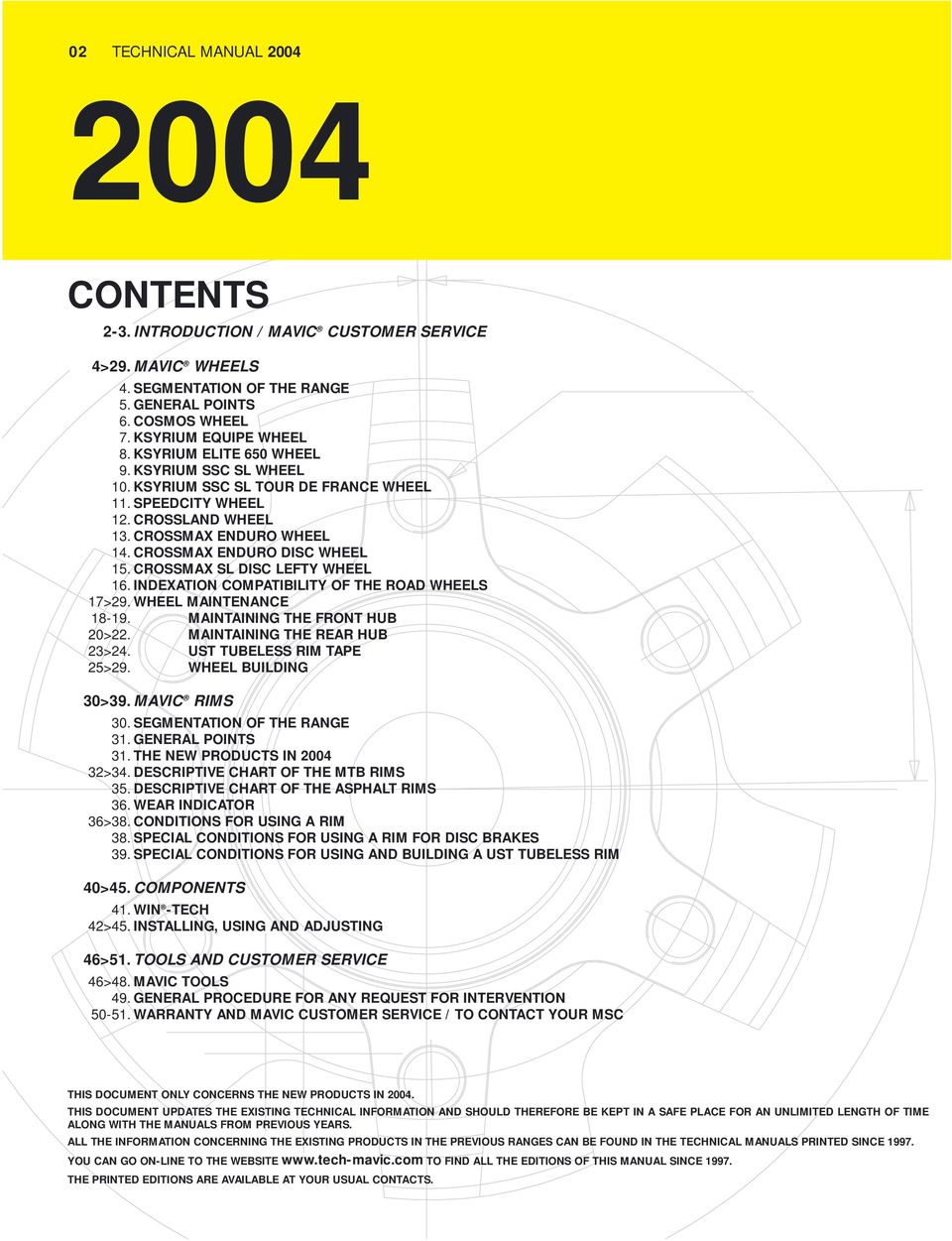
2 02 TECHNICAL MANUAL CONTENTS 2-3. INTRODUCTION / MAVIC CUSTOMER SERVICE 4>29. MAVIC WHEELS 4. SEGMENTATION OF THE RANGE 5. GENERAL POINTS 6. COSMOS WHEEL 7. KSYRIUM EQUIPE WHEEL 8. KSYRIUM ELITE 650 WHEEL 9. KSYRIUM SSC SL WHEEL 10. KSYRIUM SSC SL TOUR DE FRANCE WHEEL 11. SPEEDCITY WHEEL 12. CROSSLAND WHEEL 13. CROSSMAX ENDURO WHEEL 14. CROSSMAX ENDURO DISC WHEEL 15. CROSSMAX SL DISC LEFTY WHEEL 16. INDEXATION COMPATIBILITY OF THE ROAD WHEELS 17>29. WHEEL MAINTENANCE MAINTAINING THE FRONT HUB 20>22. MAINTAINING THE REAR HUB 23>24. UST TUBELESS RIM TAPE 25>29. WHEEL BUILDING 30>39. MAVIC RIMS 30. SEGMENTATION OF THE RANGE 31. GENERAL POINTS 31. THE NEW PRODUCTS IN >34. DESCRIPTIVE CHART OF THE MTB RIMS 35. DESCRIPTIVE CHART OF THE ASPHALT RIMS 36. WEAR INDICATOR 36>38. CONDITIONS FOR USING A RIM 38. SPECIAL CONDITIONS FOR USING A RIM FOR DISC BRAKES 39. SPECIAL CONDITIONS FOR USING AND BUILDING A UST TUBELESS RIM 40>45. COMPONENTS 41. WIN -TECH 42>45. INSTALLING, USING AND ADJUSTING 46>51. TOOLS AND CUSTOMER SERVICE 46>48. MAVIC TOOLS 49. GENERAL PROCEDURE FOR ANY REQUEST FOR INTERVENTION WARRANTY AND MAVIC CUSTOMER SERVICE / TO CONTACT YOUR MSC THIS DOCUMENT ONLY CONCERNS THE NEW PRODUCTS IN THIS DOCUMENT UPDATES THE EXISTING TECHNICAL INFORMATION AND SHOULD THEREFORE BE KEPT IN A SAFE PLACE FOR AN UNLIMITED LENGTH OF TIME ALONG WITH THE MANUALS FROM PREVIOUS YEARS. ALL THE INFORMATION CONCERNING THE EXISTING PRODUCTS IN THE PREVIOUS RANGES CAN BE FOUND IN THE TECHNICAL MANUALS PRINTED SINCE YOU CAN GO ON-LINE TO THE WEBSITE TO FIND ALL THE EDITIONS OF THIS MANUAL SINCE THE PRINTED EDITIONS ARE AVAILABLE AT YOUR USUAL CONTACTS.
3 THE NEW 2004 TECHNICAL MANUAL TECHNICAL MANUAL INTRODUCTION THE 2004 TECHNICAL MANUAL, WHICH IS ESSENTIAL TO ENSURING THE MAINTENANCE OF MAVIC PRODUCTS, CONSISTS OF 4 MAIN PARTS : Wheels Rims Components, tools Customer service You will find two types of technical information in each one of these parts : Product drawings showing individual part numbers. Procedures to properly maintain our products. Also, the procedures to follow concerning the warranty and Mavic Customer Service Center. As we have already mentioned, this document only offers technical information regarding the modifications of the 2003 products and new Mavic products in the 2004 product range. Therefore, it concerns : The wheels : Cosmos, Ksyrium Equipe, Ksyrium Elite 650, Ksyrium SSC SL, Ksyrium SSC SL Tour de France, Speedcity, Crossland, Crossmax Enduro, Crossmax Enduro Disc and CUSTOMER RETAILER MSC Crossmax SL Disc Lefty. MAVIC CUSTOMER SERVICE Our objective is that you be the only service partner for the consumer. You are also assured that through the use of our worldwide Mavic Service Center (MSC), you will benefit from maximum assistance, the best possible service and professional advices. Mavic MSC will be at your disposal to guide you through the necessary procedures in the event you need to return a part, make repairs make standard replacements, or to send you spare parts necessary for product maintenance. We simply ask you to contact Mavic MSC prior to all returns (see page 51), to obtain the proper procedures for correct returns. Mavic will only accept authorized returns. For additional information, contact your MSC or consult the last page in this technical manual. The rims : A 119, A 317 Disc, A 319, A 519, XC 717, XC 717 Disc, XM 117, XM 117 Disc, XM 321 Disc, XM 719, XM 819, XM 819 Disc, EX 721, EX729 Disc, EX 823 Disc. The components : WIN-Tech. We hope this document will meet your needs and we are always open to listen to any suggestions to improve on it. Thank you for your confidence in us and have a good 2004 season. The number of dealers connected to the Internet has been increasing for several years. More and more are looking for precise technical information about our products. Therefore, we have put all our technical manuals since 1997 on line. You will find all this information by going to our address : To be connected, you will need a personal code and password. These codes will be communicated by your usual contacts : reps, Customer Service, Mavic Service Center Among other things on the site, you will find : All the technical details on all the Mavic products on the market since 1997, wheels, rims, components, organized by discipline and by product. 4 recap charts of spoke lengths and references on all our wheels, which will help you to better manage your spoke stock. A program for calculating the spoke length : starting with a given Mavic rim, select the drilling and lacing pattern, the width of your hub, as well as the diameter of the flanges, and the distance between the flanges and the frame support or fork ; the spoke length that corresponds to the building of your wheel will automatically be calculated. We hope that this tool will be able to meet your needs. Do not hesitate to inform us of any possible mal function or improvements that you would like us to make.

4 04 TECHNICAL MANUAL 2004 MAVIC WHEELS SEGMENTATION OF THE WHEEL RANGE TRACK ROAD ASPHALT MTB AERODYNAMIC MULTI PERFORMANCE CLASSIC CROSS COUNTRY RACING CROSS MOUNTAIN EXTREME MOUNTAIN BIKE io COMETE COMETE COSMIC CARBONE SSC KSYRIUM SSC SL Tour de France NEW KSYRIUM SSC SL NEW CROSSMAX SL DISC CROSSMAX SL DISC LEFTY NEW CROSSMAX XL DISC CROSSMAX XL KSYRIUM ELITE KSYRIUM ELITE 650 NEW CROSSMAX SL DEEMAX UST KSYRIUM EQUIPE COSMOS SPEEDCITY CROSSMAX ENDURO DISC NEW NEW NEW NEW CROSSMAX ENDURO NEW CROSSLAND NEW

5 TECHNICAL MANUAL GENERAL POINTS Dear dealers, we would like to remind you that it is your responsibility to give the customer all wheel instructions and have them fill out the warranty card. Recommended wheel instructions for the customer : Choose a suitable wheel designed for the type of riding you wish to do. It is imperative to respect the instructions in the Technical Manual for tire pressure and dimensions (see following charts). Respect the appropriate spoke tensions. For more specific information regarding every one of our products, please consult the following pages, the technical manuals from the previous years, or the web site Inappropriate spoke tension can generate much stress and quickly cause damage to the rim. Clean the rims on a regular basis with the Mavic abrasive eraser (M40410). Remove gravel or metal particles in the brake pads. Replace the brake pads when they are worn. Do not use a rim if the braking surfaces are worn, if eyelets are missing, or in any other case where safety might be compromised. Indeed, a rim is a part that wears out as are brake pads, and need to be replaced if it is worn (sidewall hollowed by wear, or cut out, cracked rim ). Check or have your rims checked, on a regular basis. If this is not possible, check them at least in the beginning of each season and after intensive use. When checking, look inside (especially under the rim tape) and outside the rim. Look for signs of fatigue, wear, damage to the braking surfaces, or cracks in the walls around the eyelets. You should also check if you have any doubt about proper spoke tensions or the correct type of tire to use. WHEELS Following these recommendations will guarantee longer product life for the wheels, maximum performance and riding enjoyment. RECOMMENDATINS FOR MAXIMUM TIRE PRESSURE CROSS COUNTRY AND CROSS MOUNTAIN * in 1,00 1,20 1,50 1,75 1,85 1,90 1,95 2,00 2,10 2,20 2,30 Tire width in mm Maximum Pressure (bars) 7,70 7,00 6,00 5,20 4,80 4,70 4,50 4,30 4,00 3,70 3,40 Maximum Pressure (PSI) EXTREME MOUNTAIN BIKE* Tire width in 2,10 2,20 2,30 2,40 2,50 2,60 2,70 2,80 2,90 3,00 in mm Maximum Pressure (bars) 3,70 3,50 3,30 3,20 3,00 2,80 2,70 2,50 2,40 2,10 Maximum Pressure (PSI) ROAD AND ASPHALT* Tire width in mm Maximum Pressure (bars) 10,0 9,5 9,0 8,0 7,0 Maximum Pressure (PSI) * See segmentation chart for types of riding on preceding page.

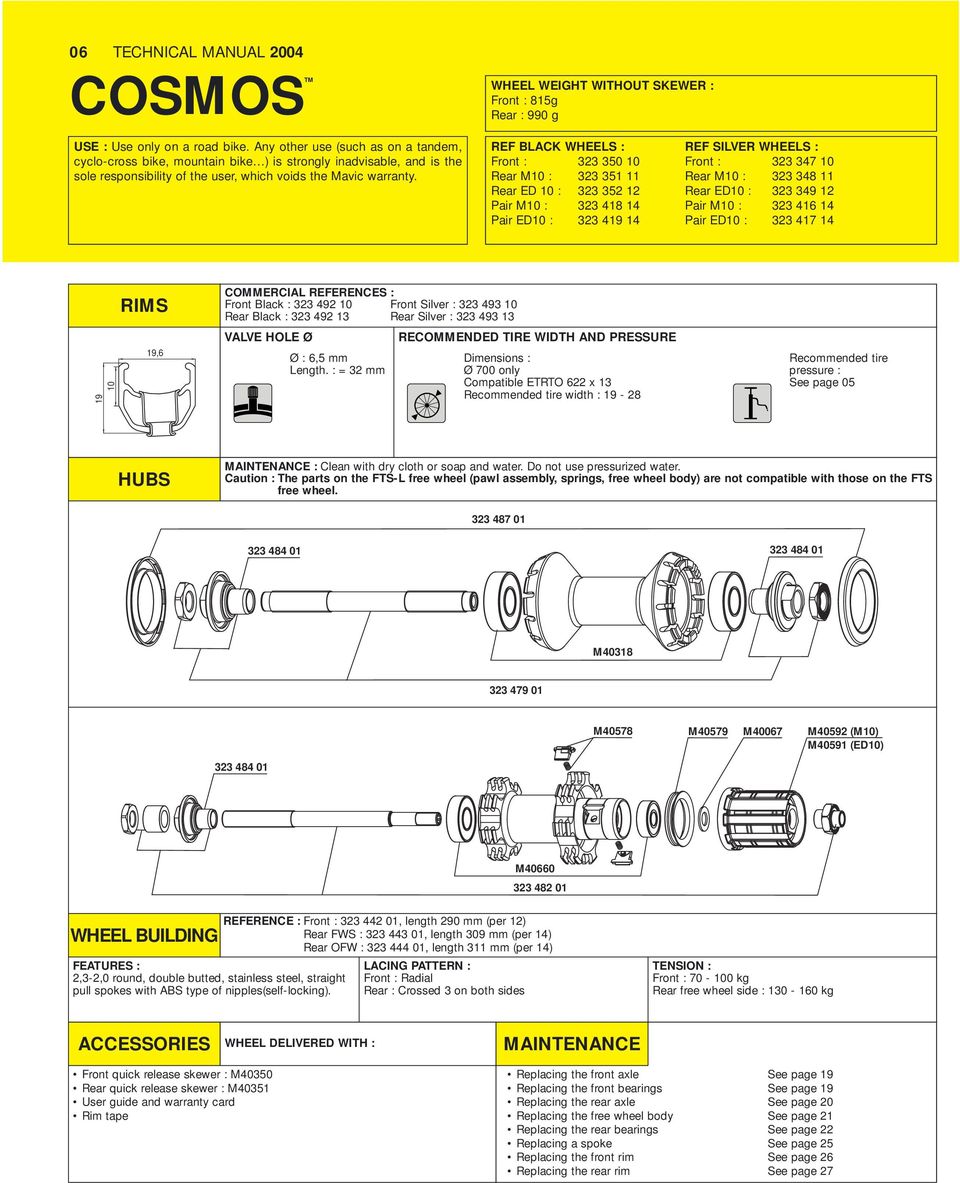
6 06 TECHNICAL MANUAL 2004 COSMOSTM WHEEL WEIGHT WITHOUT SKEWER : Front : 815g Rear : 990 g USE : Use only on a road bike. Any other use (such as on a tandem, cyclo-cross bike, mountain bike ) is strongly inadvisable, and is the sole responsibility of the user, which voids the Mavic warranty. REF BLACK WHEELS : Front : Rear M10 : Rear ED 10 : Pair M10 : Pair ED10 : REF SILVER WHEELS : Front : Rear M10 : Rear ED10 : Pair M10 : Pair ED10 : RIMS 19,6 COMMERCIAL REFERENCES : Front Black : Front Silver : Rear Black : Rear Silver : VALVE HOLE Ø Ø : 6,5 mm Length. : = 32 mm RECOMMENDED TIRE WIDTH AND PRESSURE Dimensions : Ø 700 only Compatible ETRTO 622 x 13 Recommended tire width : Recommended tire pressure : See page 05 HUBS MAINTENANCE : Clean with dry cloth or soap and water. Do not use pressurized water. Caution : The parts on the FTS-L free wheel (pawl assembly, springs, free wheel body) are not compatible with those on the FTS free wheel M M40578 M40579 M40067 M40592 (M10) M40591 (ED10) M WHEEL BUILDING FEATURES : 2,3-2,0 round, double butted, stainless steel, straight pull spokes with ABS type of nipples(self-locking). REFERENCE : Front : , length 290 mm (per 12) Rear FWS : , length 309 mm (per 14) Rear OFW : , length 311 mm (per 14) LACING PATTERN : Front : Radial Rear : Crossed 3 on both sides TENSION : Front : kg Rear free wheel side : kg ACCESSORIES WHEEL DELIVERED WITH : MAINTENANCE Front quick release skewer : M40350 Rear quick release skewer : M40351 User guide and warranty card Rim tape Replacing the front axle See page 19 Replacing the front bearings See page 19 Replacing the rear axle See page 20 Replacing the free wheel body See page 21 Replacing the rear bearings See page 22 Replacing a spoke See page 25 Replacing the front rim See page 26 Replacing the rear rim See page 27
7 KSYRIUMTM EQUIPE TECHNICAL MANUAL USE : Use only on a road bike. Any other use (such as on a tandem, cyclo-cross bike, mountain bike ) is strongly inadvisable, and is the sole responsibility of the user, which voids the Mavic warranty. WHEEL WEIGHT WITHOUT SKEWER : Front : 835 g Rear : 1000 g REFERENCES : Front : Rear M10 : Rear ED 10 : Pair M10 : Pair ED10 : RIMS COMMERCIAL REFERENCES : Front : Rear : VALVE HOLE Ø Ø : 6,5 mm Length. : = 32 mm RECOMMENDED TIRE WIDTH AND PRESSURE Dimensions : Ø 700 only Compatible ETRTO 622 x 13 Recommended tire width : Recommended tire pressure : See page 05 WHEELS HUBS MAINTENANCE : Clean with dry cloth or soap and water. Do not use pressurized water. Caution : The parts on the FTS-L free wheels (pawl assembly, springs, free wheel body) are not compatible with those on the FTS free wheels M M40578 M40579 M40067 M40592 (M10) M40591 (ED10) M40660 WHEEL BUILDING REFERENCE : Front : , length 284 mm (per 10) Rear : , length 300 mm (per 12) FEATURES : 2,3-2,0 round, double butted, stainless steel, straight pull spokes with ABS type of nipples (self-locking). LACING PATTERN : Front : Radial Rear : Crossed 2 on both sides TENSION : Front : kg Rear free wheel side : kg ACCESSORIES WHEEL DELIVERED WITH : MAINTENANCE Front quick release skewer : M40350 Rear quick release skewer : M40351 User guide and warranty card Rim tape Replacing the front axle See page 19 Replacing the front bearings See page 19 Replacing the rear axle See page 20 Replacing the free wheel body See page 21 Replacing the rear bearings See page 22 Replacing a spoke See page 25 Replacing the front rim See page 26 Replacing the rear rim See page 27

8 08 TECHNICAL MANUAL 2004 KSYRIUMTM ELITE 650 USE : Use only on a road bike. Any other use (such as on a tandem, cyclo-cross bike, mountain bike ) is strongly inadvisable, and is the sole responsibility of the user, which voids the Mavic warranty. WHEEL WEIGHT WITHOUT SKEWER : Front : 740 g Rear : 930 g REFERENCES : Front : Rear M10 : Rear ED 10 : Pair M10 : Pair ED10 : RIMS COMMERCIAL REFERENCES : Do not use rim tape Front : Rear : VALVE HOLE Ø RECOMMENDED TIRE WIDTH AND PRESSURE Ø : 6,5 mm Length. : = 32 mm Dimensions : Ø 650 only Compatible ETRTO 571 x 13 Recommended tire width : Recommended tire pressure : See page 05 HUBS MAINTENANCE : Clean with dry cloth or soap and water. Do not use pressurized water. Caution : The parts on the FTS-L free wheels (pawl assembly, springs, free wheel body) are not compatible with those on the FTS free wheels. M40318 M40242 M40243 M40052 M40063 M40563 M40242 M40589 M40660 M40578 M40660 M40067 M40591 (ED10) M40592 (M10) M40589 WHEEL BUILDING FEATURES : Black, ultra bladed, stainless steel, straight pull spokes with ABS type of nipples (self-locking). REFERENCE : Front : , length 259 mm (per 9) Rear FWS : , length 279 mm (per 10) M40578 LACING PATTERN : Front : Radial Rear : Crossed 2 on both sides M40579 TENSION : Front : kg Rear free wheel side : kg ED10 M40639 (11) M40640 ACCESSORIES WHEEL DELIVERED WITH : MAINTENANCE Front quick release skewer : M40350 Rear quick release skewer : M40351 Bladed spoke maintenance wrench (with rear wheel) Free play adjustment wrench : M40123 (with rear wheel) User guide and warranty card For all maintenance procedures (removing the front hub, removing the rear hub, replacing spokes or rims), refer to the 2002 technical manual or our website :

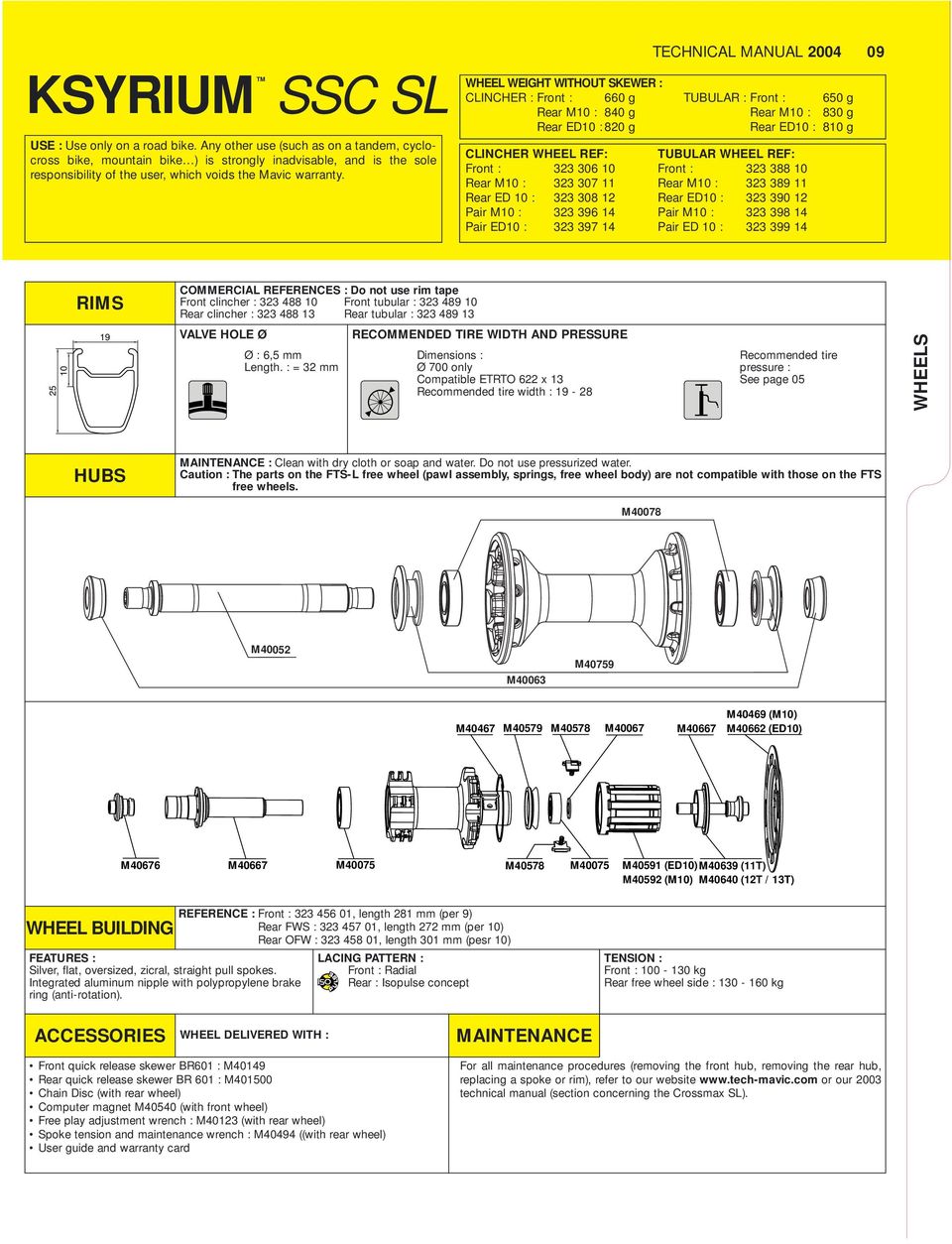
9 KSYRIUMTM SSC SL USE : Use only on a road bike. Any other use (such as on a tandem, cyclocross bike, mountain bike ) is strongly inadvisable, and is the sole responsibility of the user, which voids the Mavic warranty. WHEEL WEIGHT WITHOUT SKEWER : CLINCHER : Front : 660 g Rear M10 : 840 g Rear ED10 : 820 g CLINCHER WHEEL REF: Front : Rear M10 : Rear ED 10 : Pair M10 : Pair ED10 : TECHNICAL MANUAL 2004 TUBULAR : Front : 650 g Rear M10 : 830 g Rear ED10 : 810 g TUBULAR WHEEL REF: Front : Rear M10 : Rear ED10 : Pair M10 : Pair ED 10 : RIMS COMMERCIAL REFERENCES : Do not use rim tape Front clincher : Front tubular : Rear clincher : Rear tubular : VALVE HOLE Ø Ø : 6,5 mm Length. : = 32 mm RECOMMENDED TIRE WIDTH AND PRESSURE Dimensions : Ø 700 only Compatible ETRTO 622 x 13 Recommended tire width : Recommended tire pressure : See page 05 WHEELS HUBS MAINTENANCE : Clean with dry cloth or soap and water. Do not use pressurized water. Caution : The parts on the FTS-L free wheel (pawl assembly, springs, free wheel body) are not compatible with those on the FTS free wheels. M40078 M40052 M40063 M40759 M40467 M40579 M40578 M40067 M40667 M40469 (M10) M40662 (ED10) M40676 M40667 M40075 M40578 M40075 M40591 (ED10) M40639 (11T) M40592 (M10) M40640 (12T / 13T) WHEEL BUILDING FEATURES : Silver, flat, oversized, zicral, straight pull spokes. Integrated aluminum nipple with polypropylene brake ring (anti-rotation). REFERENCE : Front : , length 281 mm (per 9) Rear FWS : , length 272 mm (per 10) Rear OFW : , length 301 mm (pesr 10) LACING PATTERN : Front : Radial Rear : Isopulse concept TENSION : Front : kg Rear free wheel side : kg ACCESSORIES WHEEL DELIVERED WITH : MAINTENANCE Front quick release skewer BR601 : M40149 Rear quick release skewer BR 601 : M Chain Disc (with rear wheel) Computer magnet M40540 (with front wheel) Free play adjustment wrench : M40123 (with rear wheel) Spoke tension and maintenance wrench : M40494 ((with rear wheel) User guide and warranty card For all maintenance procedures (removing the front hub, removing the rear hub, replacing a spoke or rim), refer to our website or our 2003 technical manual (section concerning the Crossmax SL).
10 010 TECHNICAL MANUAL 2004 KSYRIUMTM SSC SL Tour de France USE : Use only on a road bike. Any other use (such as on a tandem, cyclo-cross bike, mountain bike ) is strongly inadvisable, and is the sole responsibility of the user, which voids the Mavic warranty. WHEEL WEIGHT WITHOUT SKEWER : Front : 660 g Rear M10 : 830 g Rear ED10 : 810 g CLINCHER WHEEL REF : Front : Rear M10 : Rear ED 10 : Pair M10 : Pair ED10 : RIMS COMMERCIAL REFERENCES : On order from your Mavic Service Center or the rep in your country (see MSC list on page 51) Do not use rim tape 19 RECOMMENDED TIRE WIDTH AND PRESSURE VALVE HOLE Ø Ø : 6,5 mm Length. : = 32 mm Dimensions : Ø 700 only Compatible ETRTO 622 x 13 Recommended tire width : Recommended tire pressure : See page 05 HUBS MAINTENANCE : Clean with dry cloth or soap and water. Do not use pressurized water. Caution : The parts on the FTS-L free wheels (pawl assembly, springs, free wheel body) are not compatible with those on the FTS free wheels. M40078 M40052 M40063 M40759 M40075 M40676 M40075 M40467 M40578 M40591 (ED10) M40592 (M10) M40469 (M10) M40662 (ED10) M40579 M40067 WHEEL BUILDING REFERENCE : Front : , length 281 mm (per 9) Rear FWS : , length 272 mm (per 10). FEATURES : Silver, flat, oversized, zicral, straight pull spokes. Integrated aluminum nipples with polypropylene brake ring (anti-rotation). LACING PATTERN : Front : Radial Rear : Isopulse concept Rear OFW : , length 301 mm (per 10). 2 yellow spoke kit (281 mm and 301 mm) : TENSION : Front : kg Rear free wheel side : kg ACCESSORIES WHEEL DELIVERED WITH : MAINTENANCE Front quick release titanium skewer BR601: Rear quick release titanium skewer BR 601 : Chain Disc (with rear wheel) Computer magnet M40540 (with front wheel) Free play adjustment wrench : M40123 (with rear wheel) Spoke tension and maintenance wrench : M40494 (with rear wheel) User guide and warranty card Replacing the rear axle : See page 21 For any other maintenance procedures (removing the front hub, removing the rear bearings and free wheel body, replacing a spoke or rim), refer to our website or our 2003 technical manual (section concerning the Crossmax SL).

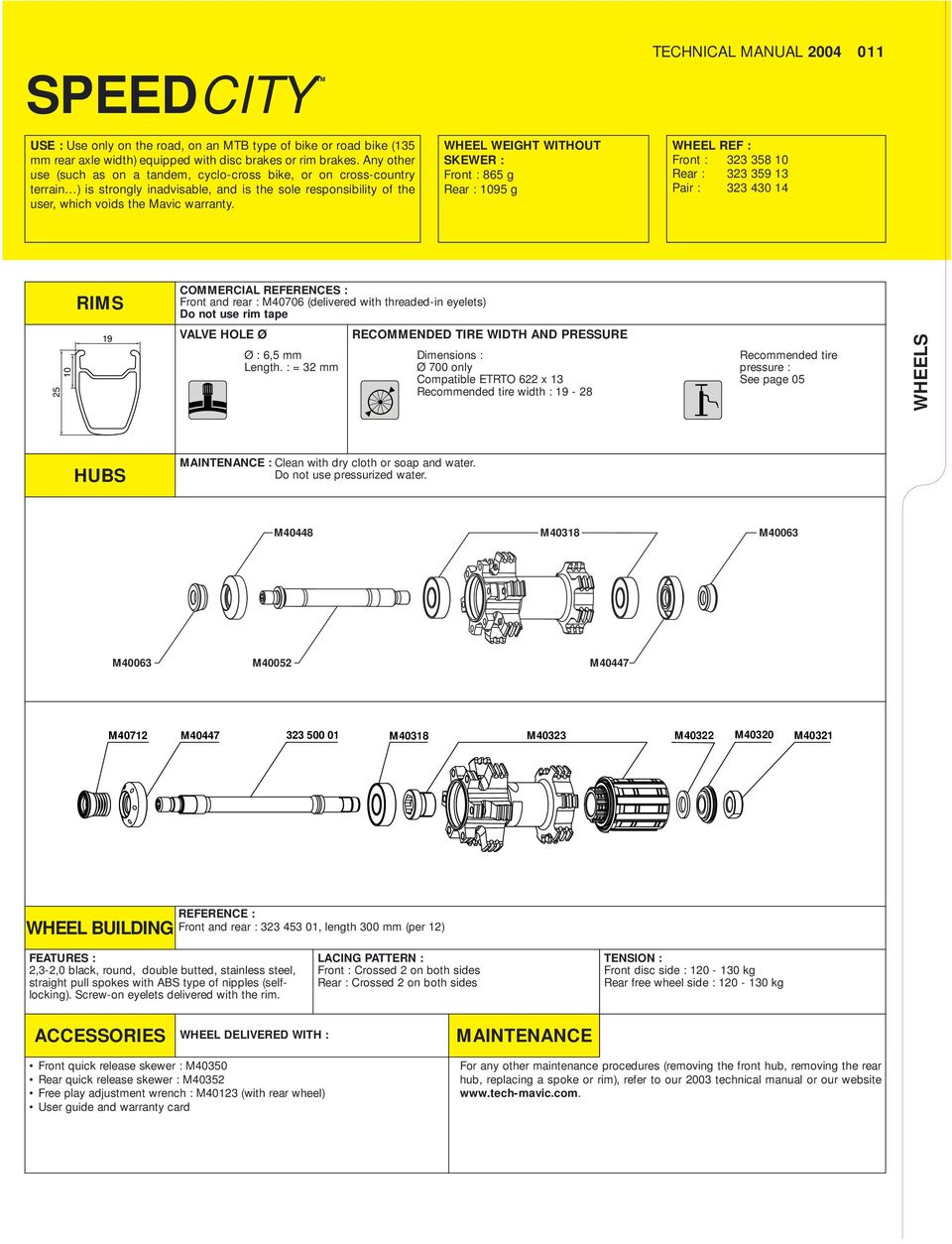
11 SPEEDCITY TM TECHNICAL MANUAL USE : Use only on the road, on an MTB type of bike or road bike (135 mm rear axle width) equipped with disc brakes or rim brakes. Any other use (such as on a tandem, cyclo-cross bike, or on cross-country terrain ) is strongly inadvisable, and is the sole responsibility of the user, which voids the Mavic warranty. WHEEL WEIGHT WITHOUT SKEWER : Front : 865 g Rear : 1095 g WHEEL REF : Front : Rear : Pair : RIMS COMMERCIAL REFERENCES : Front and rear : M40706 (delivered with threaded-in eyelets) Do not use rim tape VALVE HOLE Ø Ø : 6,5 mm Length. : = 32 mm RECOMMENDED TIRE WIDTH AND PRESSURE Dimensions : Ø 700 only Compatible ETRTO 622 x 13 Recommended tire width : Recommended tire pressure : See page 05 WHEELS HUBS MAINTENANCE : Clean with dry cloth or soap and water. Do not use pressurized water. M40448 M40318 M40063 M40063 M40052 M40447 M40712 M M40318 M40323 M40322 M40320 M40321 WHEEL BUILDING REFERENCE : Front and rear : , length 300 mm (per 12) FEATURES : 2,3-2,0 black, round, double butted, stainless steel, straight pull spokes with ABS type of nipples (selflocking). Screw-on eyelets delivered with the rim. LACING PATTERN : Front : Crossed 2 on both sides Rear : Crossed 2 on both sides TENSION : Front disc side : kg Rear free wheel side : kg ACCESSORIES WHEEL DELIVERED WITH : MAINTENANCE Front quick release skewer : M40350 Rear quick release skewer : M40352 Free play adjustment wrench : M40123 (with rear wheel) User guide and warranty card For any other maintenance procedures (removing the front hub, removing the rear hub, replacing a spoke or rim), refer to our 2003 technical manual or our website
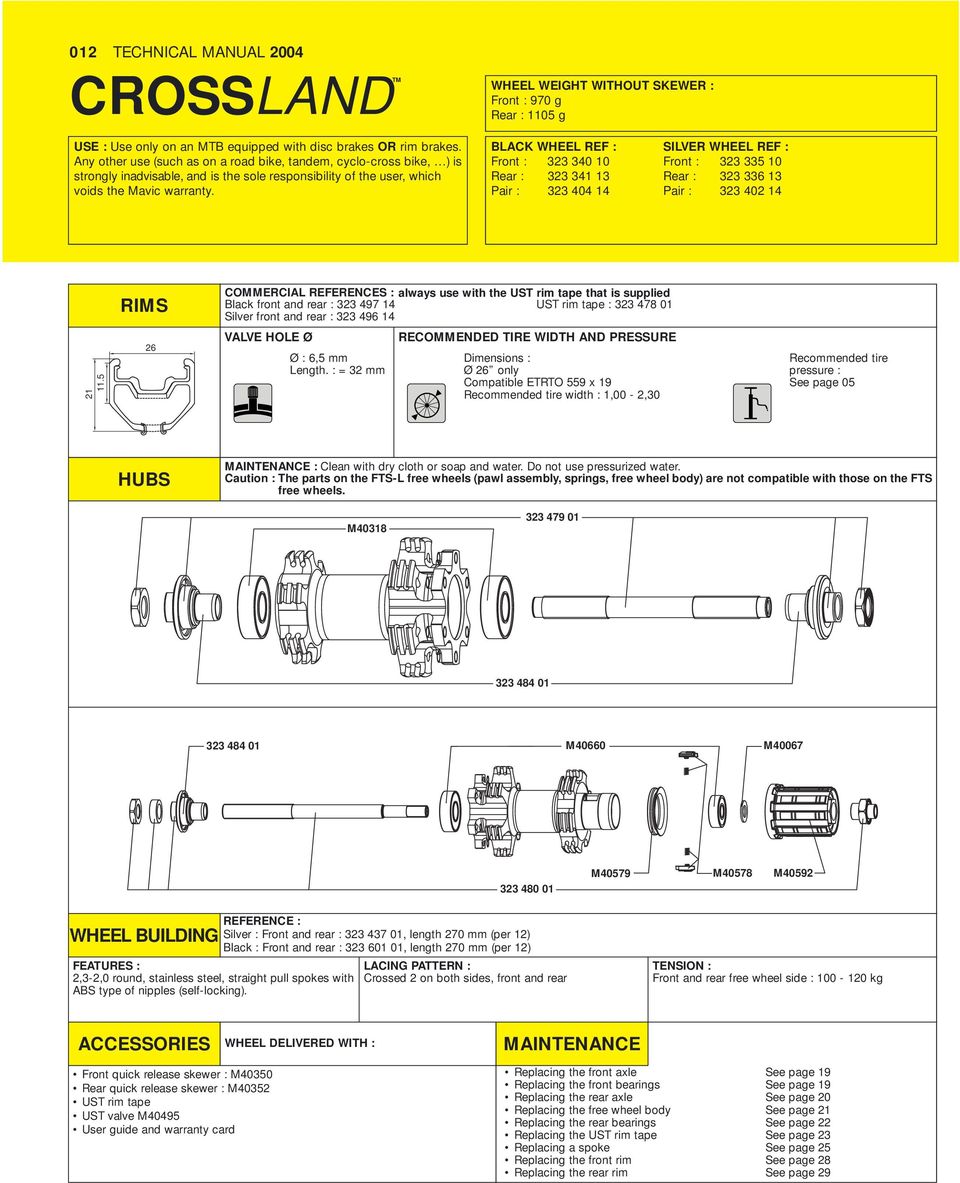
12 012 TECHNICAL MANUAL 2004 CROSSLANDTM USE : Use only on an MTB equipped with disc brakes OR rim brakes. Any other use (such as on a road bike, tandem, cyclo-cross bike, ) is strongly inadvisable, and is the sole responsibility of the user, which voids the Mavic warranty. WHEEL WEIGHT WITHOUT SKEWER : Front : 970 g Rear : 1105 g BLACK WHEEL REF : Front : Rear : Pair : SILVER WHEEL REF : Front : Rear : Pair : RIMS COMMERCIAL REFERENCES : always use with the UST rim tape that is supplied Black front and rear : UST rim tape : Silver front and rear : VALVE HOLE Ø Ø : 6,5 mm Length. : = 32 mm RECOMMENDED TIRE WIDTH AND PRESSURE Dimensions : Ø 26 only Compatible ETRTO 559 x 19 Recommended tire width : 1,00-2,30 Recommended tire pressure : See page 05 HUBS MAINTENANCE : Clean with dry cloth or soap and water. Do not use pressurized water. Caution : The parts on the FTS-L free wheels (pawl assembly, springs, free wheel body) are not compatible with those on the FTS free wheels. M M40660 M M40579 M40578 M40592 WHEEL BUILDING FEATURES : 2,3-2,0 round, stainless steel, straight pull spokes with ABS type of nipples (self-locking). REFERENCE : Silver : Front and rear : , length 270 mm (per 12) Black : Front and rear : , length 270 mm (per 12) LACING PATTERN : Crossed 2 on both sides, front and rear TENSION : Front and rear free wheel side : kg ACCESSORIES WHEEL DELIVERED WITH : MAINTENANCE Front quick release skewer : M40350 Rear quick release skewer : M40352 UST rim tape UST valve M40495 User guide and warranty card Replacing the front axle See page 19 Replacing the front bearings See page 19 Replacing the rear axle See page 20 Replacing the free wheel body See page 21 Replacing the rear bearings See page 22 Replacing the UST rim tape See page 23 Replacing a spoke See page 25 Replacing the front rim See page 28 Replacing the rear rim See page 29
13 CROSSMAX ENDURO TM TECHNICAL MANUAL USE : Use only on a cross-country MTB equipped with rim brakes. Any other use (such as on a tandem, road bike, cyclo-cross bike ) is strongly inadvisable, and is the sole responsibility of the user, which voids the Mavic warranty. WHEEL WEIGHT WITHOUT SKEWER : Front : 785 g Rear : 935 g WHEEL REF : Front : Rear : Pair : RIMS COMMERCIAL REFERENCES : do not use rim tape Front : Rear : ,2 23,2 11,5 VALVE HOLE Ø Ø : 6,5 mm Length. : = 32 mm RECOMMENDED TIRE WIDTH AND PRESSURE Dimensions : Ø 26 only Compatible ETRTO 559 x 19 Recommended tire width : 1,00-2,30 Recommended tire pressure : See page 05 WHEELS HUBS MAINTENANCE : Clean with dry cloth or soap and water. Do not use pressurized water. Caution : The parts on the FTS-L free wheels (pawl assembly, springs, free wheel body) are not compatible with those on the FTS free wheels M M M40067 M40592 M M40660 WHEEL BUILDING REFERENCE : Front : , length 258 mm (per 9) Rear : , length 279 mm (per 10) FEATURES : 1,8 2,0 black, round, double butted, stainless steel, straight pull spokes, with ABS type of nipples (selflocking). LACING PATTERN : Front : Radial Rear : Crossed 3 on both sides TENSION : Front : kg Rear free wheel side : kg ACCESSORIES WHEEL DELIVERED WITH : MAINTENANCE Front quick release skewer M40350 Rear quick release skewer M40352 UST valve M40495 User guide and warranty card Replacing the front axle See page 19 Replacing the front bearings See page 19 Replacing the rear axle See page 20 Replacing the free wheel body See page 21 Replacing the rear bearings See page 22 Replacing a spoke See page 25 Replacing the front rim See page 26 Replacing the rear rim See page 27

14 014 TECHNICAL MANUAL 2004 CROSSMAX ENDURO DISC TM USE : Use only on a cross-country MTB equipped with disc brakes. Any other use (such as on an MTB equipped with rim brakes, on a tandem, road bike, cyclo-cross bike ) is strongly inadvisable, and is the sole responsibility of the user, which voids the Mavic warranty. WHEEL WEIGHT WITHOUT SKEWER : Front : 850 g Rear : 985 g WHEEL REF : Front : Rear : Pair : RIMS COMMERCIAL REFERENCES : do not use rim tape Front : Rear : ,2 VALVE HOLE Ø Ø : 6,5 mm Length. : = 32 mm RECOMMENDED TIRE WIDTH AND PRESSURE Dimensions : Ø 26 only Compatible ETRTO 559 x 19 Recommended tire width : 1,00-2,30 Recommended tire pressure : See page 05 HUBS MAINTENANCE : Clean with dry cloth or soap and water. Do not use pressurized water. Caution : The parts on the FTS-L free wheels (pawl assembly, springs, free wheel body) are not compatible with those on the FTS free wheels. M M40660 M M40579 M40578 M40592 WHEEL BUILDING REFERENCE : Front and rear : , length 273 mm (per 12) FEATURES : 2,3 2,0 black, round, double butted, stainless steel, straight pull spokes, with ABS type of nipples (selflocking). LACING PATTERN : Front : Crossed 2 on both sides Rear : Crossed 2 on both sides TENSION : Front disc side : kg Rear free wheel side : kg ACCESSORIES WHEEL DELIVERED WITH : MAINTENANCE Front quick release skewer M40350 Rear quick release skewer M40352 UST valve M40495 User guide and warranty card Replacing the front axle See page 19 Replacing the front bearings See page 19 Replacing the rear axle See page 20 Replacing the free wheel body See page 21 Replacing the rear bearings See page 22 Replacing a spoke See page 25 Replacing the front rim See page 28 Replacing the rear rim See page 29

15 CROSSMAX TMSL DISC LEFTY USE : Use only on an MTB equipped with disc brakes. Any other use (such as on an MTB equipped with rim brakes, a tandem, road bike, cyclo-cross bike ) is strongly inadvisable, and is the sole responsibility of the user, which voids the Mavic warranty. WHEEL WEIGHT WITHOUT SKEWER : Front : 745 g Rear : 915 g TECHNICAL MANUAL 2004 WHEEL REF : Front : M25600 Rear : M25101 Pair : M RIMS COMMERCIAL REFERENCES : do not use rim tape Front : M40741 Rear : M ,2 VALVE HOLE Ø Ø : 6,5 mm Length. : = 32 mm RECOMMENDED TIRE WIDTH AND PRESSURE Dimensions : Ø 26 only Compatible ETRTO 559 x 19 Recommended tire width : 1,00-2,30 Recommended tire pressure : See page 05 WHEELS HUBS MAINTENANCE : Clean with dry cloth or soap and water. Do not use pressurized water. Caution : The parts on the FTS-L free wheel (pawl assembly, springs, free wheel body) are not compatible with those on the FTS free wheels. M40771 M40777 M40457 M40576 M40075 M40578 M40075 M40067 M40580 M40576 M40072 M40579 M40467 WHEEL BUILDING FEATURES : Silver, aerodynamic, zicral spokes with anti-rotation system. Integrated nipples with bake ring (self-locking). REFERENCE : Front and rear OFW : M40743 length 268 mm (per 12) Rear FWS : M40745 length 250 mm (per 12) LACING PATTERN : Front and rear : Crossed 2 on both sides TENSION : Front : kg Rear free wheel side : kg ACCESSORIES WHEEL DELIVERED WITH : MAINTENANCE Rear Mavic BX601 quick release skewer : M40141 Chain Disc (with rear wheel) : M40072 Free play adjustment wrench (with rear wheel) : M40123 Computer magnet M40540 (with front wheel) UST valve M40495 Spoke tension and maintenance wrench (with rear wheel) : M40494 User guide and warranty card Mounting and removing the front wheel on the fork : See page 18 Replacing the front bearings : See page 18 For any other maintenance procedures (removing the rear hub, replacing spokes and rims), refer to our website or to your 2003 technical manual (section Crossmax SL Disc).

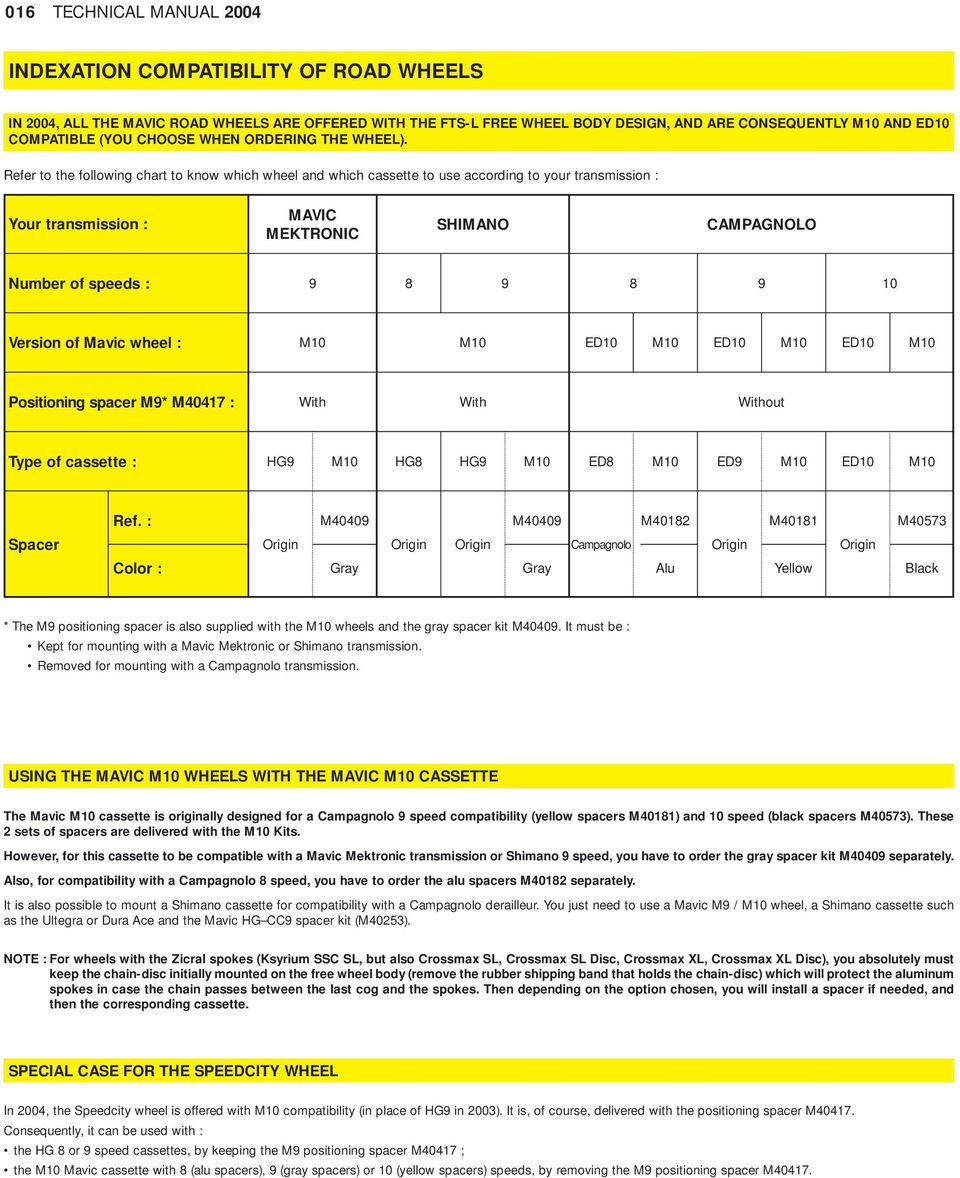
16 016 TECHNICAL MANUAL 2004 INDEXATION COMPATIBILITY OF ROAD WHEELS IN 2004, ALL THE MAVIC ROAD WHEELS ARE OFFERED WITH THE FTS-L FREE WHEEL BODY DESIGN, AND ARE CONSEQUENTLY M10 AND ED10 COMPATIBLE (YOU CHOOSE WHEN ORDERING THE WHEEL). Refer to the following chart to know which wheel and which cassette to use according to your transmission : Your transmission : MAVIC MEKTRONIC SHIMANO CAMPAGNOLO Number of speeds : Version of Mavic wheel : M10 M10 ED10 M10 ED10 M10 ED10 M10 Positioning spacer M9* M40417 : With With Without Type of cassette : HG9 M10 HG8 HG9 M10 ED8 M10 ED9 M10 ED10 M10 Ref. : M40409 M40409 M40182 M40181 M40573 Spacer Origin Origin Origin Campagnolo Origin Origin Color : Gray Gray Alu Yellow Black * The M9 positioning spacer is also supplied with the M10 wheels and the gray spacer kit M It must be : Kept for mounting with a Mavic Mektronic or Shimano transmission. Removed for mounting with a Campagnolo transmission. USING THE MAVIC M10 WHEELS WITH THE MAVIC M10 CASSETTE The Mavic M10 cassette is originally designed for a Campagnolo 9 speed compatibility (yellow spacers M40181) and 10 speed (black spacers M40573). These 2 sets of spacers are delivered with the M10 Kits. However, for this cassette to be compatible with a Mavic Mektronic transmission or Shimano 9 speed, you have to order the gray spacer kit M40409 separately. Also, for compatibility with a Campagnolo 8 speed, you have to order the alu spacers M40182 separately. It is also possible to mount a Shimano cassette for compatibility with a Campagnolo derailleur. You just need to use a Mavic M9 / M10 wheel, a Shimano cassette such as the Ultegra or Dura Ace and the Mavic HG CC9 spacer kit (M40253). NOTE : For wheels with the Zicral spokes (Ksyrium SSC SL, but also Crossmax SL, Crossmax SL Disc, Crossmax XL, Crossmax XL Disc), you absolutely must keep the chain-disc initially mounted on the free wheel body (remove the rubber shipping band that holds the chain-disc) which will protect the aluminum spokes in case the chain passes between the last cog and the spokes. Then depending on the option chosen, you will install a spacer if needed, and then the corresponding cassette. SPECIAL CASE FOR THE SPEEDCITY WHEEL In 2004, the Speedcity wheel is offered with M10 compatibility (in place of HG9 in 2003). It is, of course, delivered with the positioning spacer M Consequently, it can be used with : the HG 8 or 9 speed cassettes, by keeping the M9 positioning spacer M40417 ; the M10 Mavic cassette with 8 (alu spacers), 9 (gray spacers) or 10 (yellow spacers) speeds, by removing the M9 positioning spacer M40417.
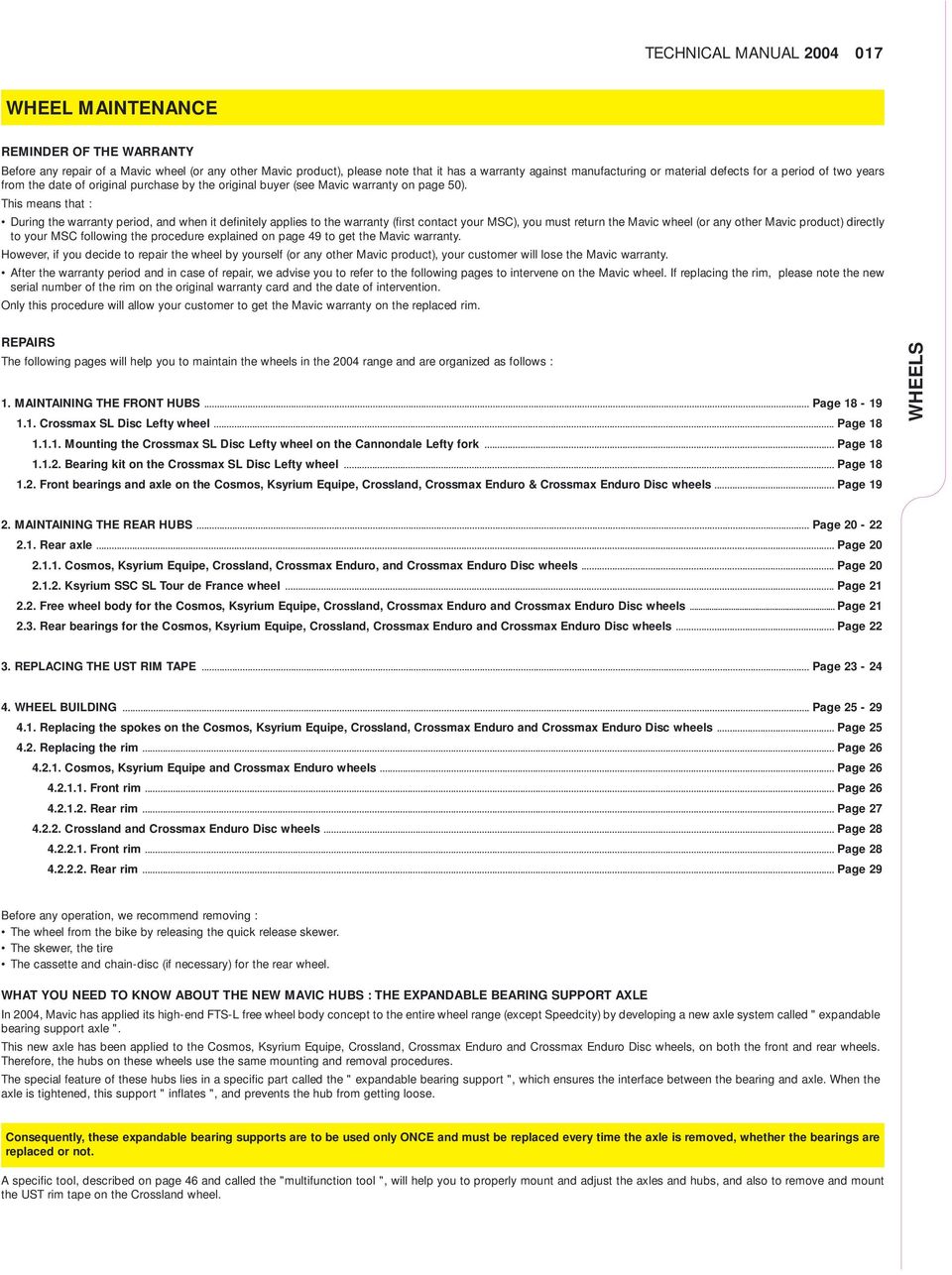
17 TECHNICAL MANUAL WHEEL MAINTENANCE REMINDER OF THE WARRANTY Before any repair of a Mavic wheel (or any other Mavic product), please note that it has a warranty against manufacturing or material defects for a period of two years from the date of original purchase by the original buyer (see Mavic warranty on page 50). This means that : During the warranty period, and when it definitely applies to the warranty (first contact your MSC), you must return the Mavic wheel (or any other Mavic product) directly to your MSC following the procedure explained on page 49 to get the Mavic warranty. However, if you decide to repair the wheel by yourself (or any other Mavic product), your customer will lose the Mavic warranty. After the warranty period and in case of repair, we advise you to refer to the following pages to intervene on the Mavic wheel. If replacing the rim, please note the new serial number of the rim on the original warranty card and the date of intervention. Only this procedure will allow your customer to get the Mavic warranty on the replaced rim. REPAIRS The following pages will help you to maintain the wheels in the 2004 range and are organized as follows : 1. MAINTAINING THE FRONT HUBS... Page Crossmax SL Disc Lefty wheel... Page Mounting the Crossmax SL Disc Lefty wheel on the Cannondale Lefty fork... Page Bearing kit on the Crossmax SL Disc Lefty wheel... Page Front bearings and axle on the Cosmos, Ksyrium Equipe, Crossland, Crossmax Enduro & Crossmax Enduro Disc wheels... Page 19 WHEELS 2. MAINTAINING THE REAR HUBS... Page Rear axle... Page Cosmos, Ksyrium Equipe, Crossland, Crossmax Enduro, and Crossmax Enduro Disc wheels... Page Ksyrium SSC SL Tour de France wheel... Page Free wheel body for the Cosmos, Ksyrium Equipe, Crossland, Crossmax Enduro and Crossmax Enduro Disc wheels... Page Rear bearings for the Cosmos, Ksyrium Equipe, Crossland, Crossmax Enduro and Crossmax Enduro Disc wheels... Page REPLACING THE UST RIM TAPE... Page WHEEL BUILDING... Page Replacing the spokes on the Cosmos, Ksyrium Equipe, Crossland, Crossmax Enduro and Crossmax Enduro Disc wheels... Page Replacing the rim... Page Cosmos, Ksyrium Equipe and Crossmax Enduro wheels... Page Front rim... Page Rear rim... Page Crossland and Crossmax Enduro Disc wheels... Page Front rim... Page Rear rim... Page 29 Before any operation, we recommend removing : The wheel from the bike by releasing the quick release skewer. The skewer, the tire The cassette and chain-disc (if necessary) for the rear wheel. WHAT YOU NEED TO KNOW ABOUT THE NEW MAVIC HUBS : THE EXPANDABLE BEARING SUPPORT AXLE In 2004, Mavic has applied its high-end FTS-L free wheel body concept to the entire wheel range (except Speedcity) by developing a new axle system called " expandable bearing support axle ". This new axle has been applied to the Cosmos, Ksyrium Equipe, Crossland, Crossmax Enduro and Crossmax Enduro Disc wheels, on both the front and rear wheels. Therefore, the hubs on these wheels use the same mounting and removal procedures. The special feature of these hubs lies in a specific part called the " expandable bearing support ", which ensures the interface between the bearing and axle. When the axle is tightened, this support " inflates ", and prevents the hub from getting loose. Consequently, these expandable bearing supports are to be used only ONCE and must be replaced every time the axle is removed, whether the bearings are replaced or not. A specific tool, described on page 46 and called the "multifunction tool ", will help you to properly mount and adjust the axles and hubs, and also to remove and mount the UST rim tape on the Crossland wheel.
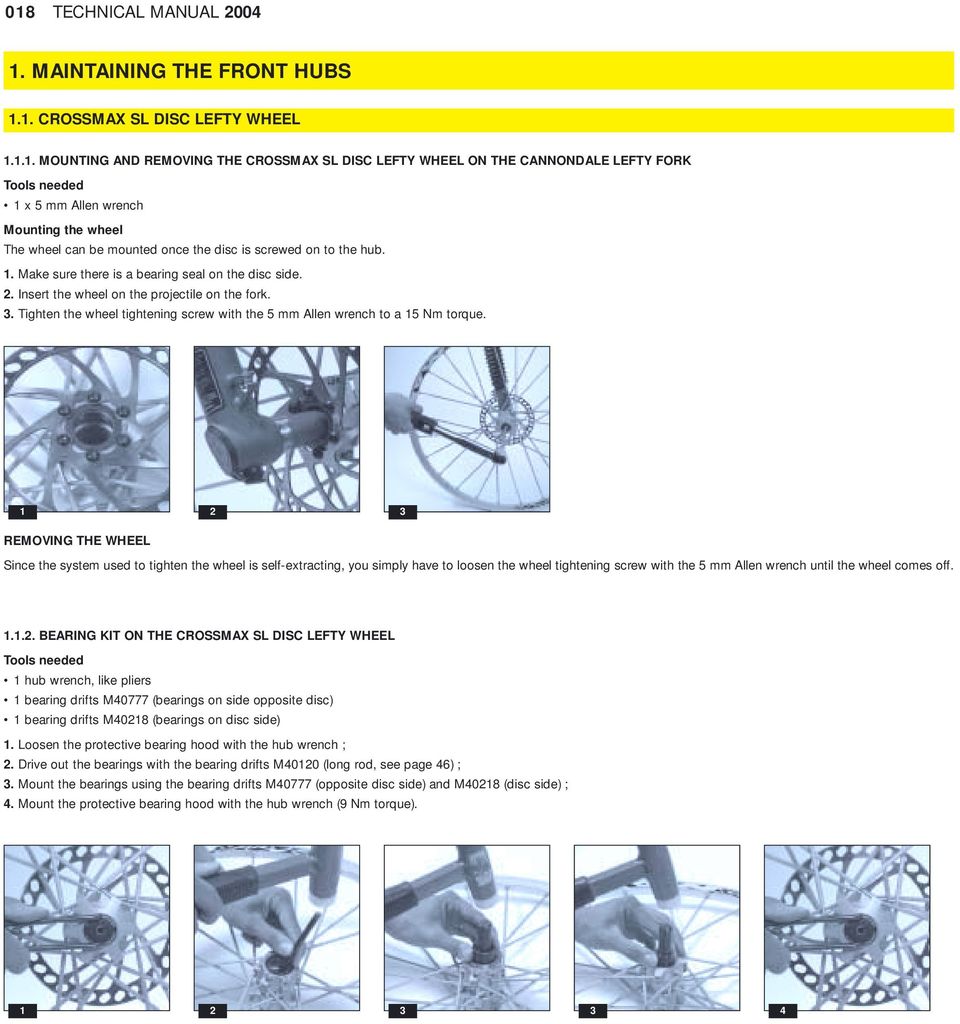
18 018 TECHNICAL MANUAL MAINTAINING THE FRONT HUBS 1.1. CROSSMAX SL DISC LEFTY WHEEL MOUNTING AND REMOVING THE CROSSMAX SL DISC LEFTY WHEEL ON THE CANNONDALE LEFTY FORK Tools needed 1 x 5 mm Allen wrench Mounting the wheel The wheel can be mounted once the disc is screwed on to the hub. 1. Make sure there is a bearing seal on the disc side. 2. Insert the wheel on the projectile on the fork. 3. Tighten the wheel tightening screw with the 5 mm Allen wrench to a 15 Nm torque REMOVING THE WHEEL Since the system used to tighten the wheel is self-extracting, you simply have to loosen the wheel tightening screw with the 5 mm Allen wrench until the wheel comes off BEARING KIT ON THE CROSSMAX SL DISC LEFTY WHEEL Tools needed 1 hub wrench, like pliers 1 bearing drifts M40777 (bearings on side opposite disc) 1 bearing drifts M40218 (bearings on disc side) 1. Loosen the protective bearing hood with the hub wrench ; 2. Drive out the bearings with the bearing drifts M40120 (long rod, see page 46) ; 3. Mount the bearings using the bearing drifts M40777 (opposite disc side) and M40218 (disc side) ; 4. Mount the protective bearing hood with the hub wrench (9 Nm torque)
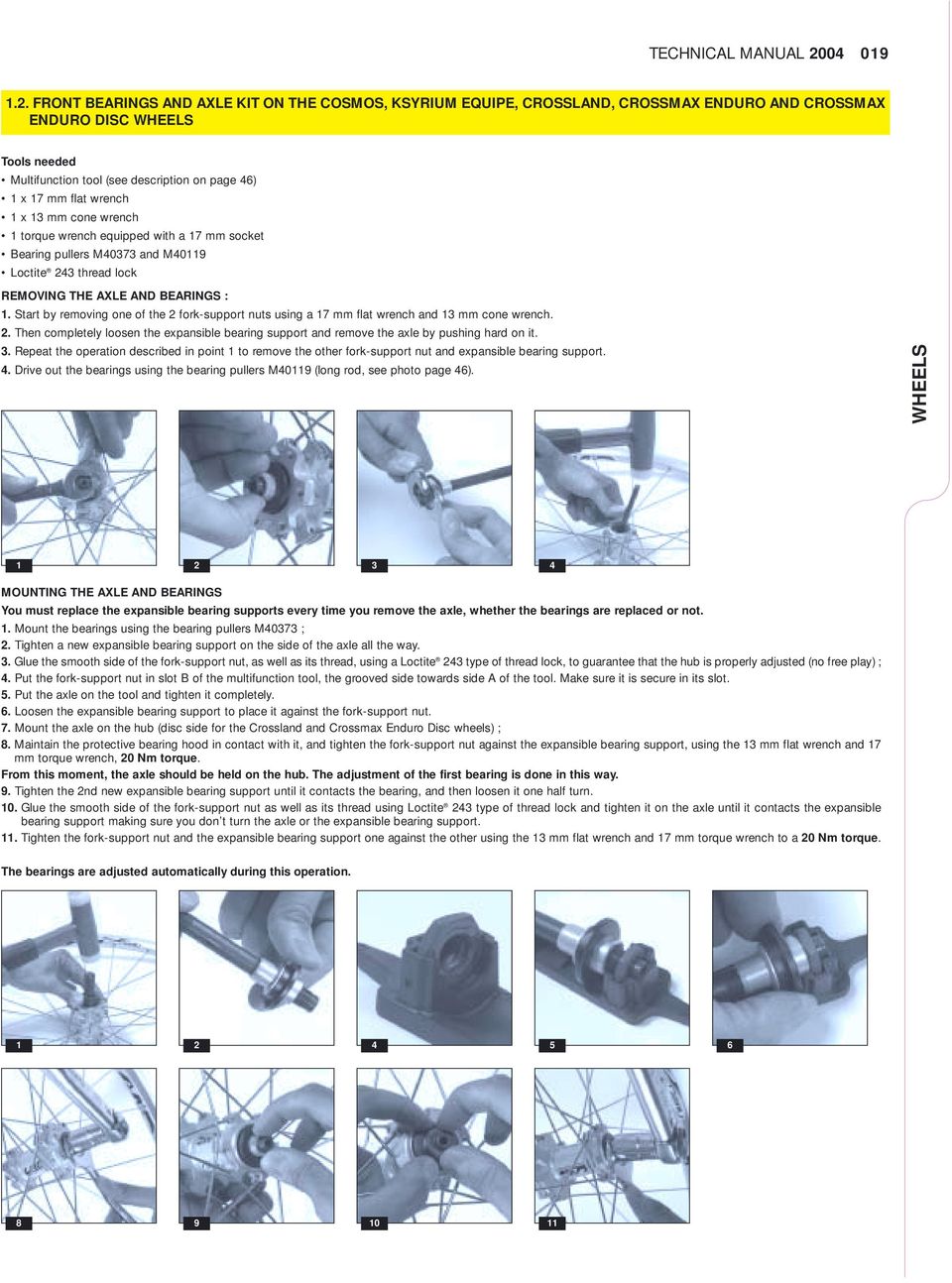
19 TECHNICAL MANUAL FRONT BEARINGS AND AXLE KIT ON THE COSMOS, KSYRIUM EQUIPE, CROSSLAND, CROSSMAX ENDURO AND CROSSMAX ENDURO DISC WHEELS Tools needed Multifunction tool (see description on page 46) 1 x 17 mm flat wrench 1 x 13 mm cone wrench 1 torque wrench equipped with a 17 mm socket Bearing pullers M40373 and M40119 Loctite 243 thread lock REMOVING THE AXLE AND BEARINGS : 1. Start by removing one of the 2 fork-support nuts using a 17 mm flat wrench and 13 mm cone wrench. 2. Then completely loosen the expansible bearing support and remove the axle by pushing hard on it. 3. Repeat the operation described in point 1 to remove the other fork-support nut and expansible bearing support. 4. Drive out the bearings using the bearing pullers M40119 (long rod, see photo page 46). WHEELS MOUNTING THE AXLE AND BEARINGS You must replace the expansible bearing supports every time you remove the axle, whether the bearings are replaced or not. 1. Mount the bearings using the bearing pullers M40373 ; 2. Tighten a new expansible bearing support on the side of the axle all the way. 3. Glue the smooth side of the fork-support nut, as well as its thread, using a Loctite 243 type of thread lock, to guarantee that the hub is properly adjusted (no free play) ; 4. Put the fork-support nut in slot B of the multifunction tool, the grooved side towards side A of the tool. Make sure it is secure in its slot. 5. Put the axle on the tool and tighten it completely. 6. Loosen the expansible bearing support to place it against the fork-support nut. 7. Mount the axle on the hub (disc side for the Crossland and Crossmax Enduro Disc wheels) ; 8. Maintain the protective bearing hood in contact with it, and tighten the fork-support nut against the expansible bearing support, using the 13 mm flat wrench and 17 mm torque wrench, 20 Nm torque. From this moment, the axle should be held on the hub. The adjustment of the first bearing is done in this way. 9. Tighten the 2nd new expansible bearing support until it contacts the bearing, and then loosen it one half turn. 10. Glue the smooth side of the fork-support nut as well as its thread using Loctite 243 type of thread lock and tighten it on the axle until it contacts the expansible bearing support making sure you don t turn the axle or the expansible bearing support. 11. Tighten the fork-support nut and the expansible bearing support one against the other using the 13 mm flat wrench and 17 mm torque wrench to a 20 Nm torque. The bearings are adjusted automatically during this operation
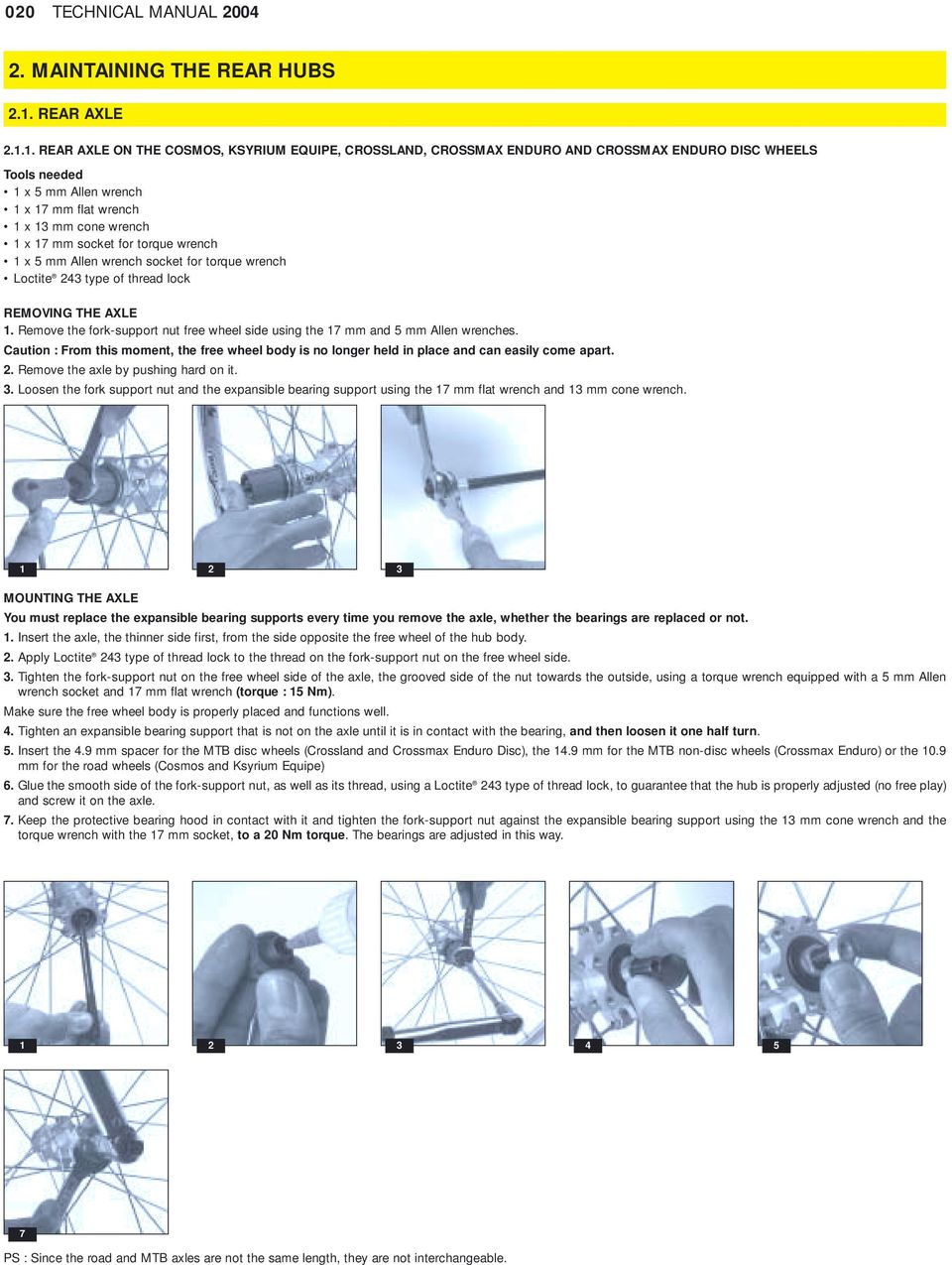
20 020 TECHNICAL MANUAL MAINTAINING THE REAR HUBS 2.1. REAR AXLE REAR AXLE ON THE COSMOS, KSYRIUM EQUIPE, CROSSLAND, CROSSMAX ENDURO AND CROSSMAX ENDURO DISC WHEELS Tools needed 1 x 5 mm Allen wrench 1 x 17 mm flat wrench 1 x 13 mm cone wrench 1 x 17 mm socket for torque wrench 1 x 5 mm Allen wrench socket for torque wrench Loctite 243 type of thread lock REMOVING THE AXLE 1. Remove the fork-support nut free wheel side using the 17 mm and 5 mm Allen wrenches. Caution : From this moment, the free wheel body is no longer held in place and can easily come apart. 2. Remove the axle by pushing hard on it. 3. Loosen the fork support nut and the expansible bearing support using the 17 mm flat wrench and 13 mm cone wrench MOUNTING THE AXLE You must replace the expansible bearing supports every time you remove the axle, whether the bearings are replaced or not. 1. Insert the axle, the thinner side first, from the side opposite the free wheel of the hub body. 2. Apply Loctite 243 type of thread lock to the thread on the fork-support nut on the free wheel side. 3. Tighten the fork-support nut on the free wheel side of the axle, the grooved side of the nut towards the outside, using a torque wrench equipped with a 5 mm Allen wrench socket and 17 mm flat wrench (torque : 15 Nm). Make sure the free wheel body is properly placed and functions well. 4. Tighten an expansible bearing support that is not on the axle until it is in contact with the bearing, and then loosen it one half turn. 5. Insert the 4.9 mm spacer for the MTB disc wheels (Crossland and Crossmax Enduro Disc), the 14.9 mm for the MTB non-disc wheels (Crossmax Enduro) or the 10.9 mm for the road wheels (Cosmos and Ksyrium Equipe) 6. Glue the smooth side of the fork-support nut, as well as its thread, using a Loctite 243 type of thread lock, to guarantee that the hub is properly adjusted (no free play) and screw it on the axle. 7. Keep the protective bearing hood in contact with it and tighten the fork-support nut against the expansible bearing support using the 13 mm cone wrench and the torque wrench with the 17 mm socket, to a 20 Nm torque. The bearings are adjusted in this way PS : Since the road and MTB axles are not the same length, they are not interchangeable.
21 TECHNICAL MANUAL REAR AXLE ON THE KSYRIUM SSC SL TOUR DE FRANCE WHEEL Tools needed 1 x 17 mm flat wrench 1 x 10 mm Allen wrench 1 torque wrench with 17 mm socket 1 hub wrench M Loosen the free play adjustment nut one turn using the hub wrench M40123 by holding the end of the axle with the 17 mm flat wrench to avoid damaging the bearings when mounting the axle again. 2. Unclip the fork support on the side opposite the free wheel to insert the 10 mm Allen wrench inside the axle. 3. Loosen the axle end nut on the free wheel side using the 17 mm flat wrench, by holding the axle with the 10 mm Allen wrench. 4. Remove the axle from the side opposite the free wheel. Caution : From this moment, the free wheel body is no longer held in place and can easily come apart. 5. Replace the axle and mount it with the 10 mm Allen wrench and torque wrench with the 17 mm socket (10 Nm torque) ; 6. Clip on the fork support on the end of the axle on the side opposite the free wheel. 7. Mount the cassette on the wheel, the wheel on the frame, tighten the quick release skewer, and adjust the bearing free play using the hub wrench M WHEELS FREE WHEEL BODY ON THE COSMOS, KSYRIUM EQUIPE, CROSSLAND, CROSSMAX ENDURO AND CROSSMAX ENDURO DISC WHEELS Tools needed 1 x 5 mm Allen wrench 1 x 17 mm flat wrench 1 x 13 mm flat wrench 1 x 17 mm socket for torque wrench 1 x 5 mm Allen wrench socket for torque wrench For this type of hub, it is not necessary to disassemble the axle beforehand to replace the free wheel body. 1. Remove the fork support nut on the free wheel side using the 17 mm flat wrench and the 5 mm Allen wrench. 2. Disassemble the FTS-L free wheel body : 2.1. Pull the FTS-L free wheel body towards the exterior until it doesn t move anymore (about 4 mm) ; 2.2. Turn the FTS-L free wheel body and pull it carefully off the hub axle, while holding the pawls and springs,. Caution : When you disassemble the FTS-L free wheel body, its pawls and springs are no longer supported and can therefore pop out. This can be prevented by holding the pawls with your hand. 3. Remove the spring/pawl assembly and clean it. 4. If necessary, replace the lip seal and install it against the nose of the hub, the lip toward the outside. Lubricate the lip with the Mavic mineral oil M40122 ; 5. Lubricate the inside of the FTS-L free wheel body kit in the cog area (fill up 3 notches of the ratchet using Mavic mineral oil M40122) ; 6. Install the spring/pawl assembly (spring fits over the pins of the centering stud on the pawl assembly). Put the springs and then pawl assembly in place, the round side touching the axle. Then pivot the pawl assembly to make sure it functions properly. 7. Install the FTS-L free wheel body kit : 7.1. Put the spacer washer M40067 (available in the kit with 10 parts) inside the FTS-L free wheel body : The absence of this spacer washer prevents the free wheel body from working properly Install the FTS-L free wheel body holding the pawl assembly in your hand in the low (springs compressed) ; 8. Install the axle kit as indicated in procedure It is recommended to lubricate the free wheel body 1-2 times a year or whenever it gets noisy. To do this, follow the above procedure.
22 022 TECHNICAL MANUAL REAR BEARINGS FOR THE COSMOS, KSYRIUM EQUIPE, CROSSLAND, CROSSMAX ENDURO AND CROSSMAX ENDURO DISC WHEELS Tools needed 1 x 5 mm Allen wrench 1 x 17 mm flat wrench 1 x 13 mm flat wrench Multifunction tool Bearing pullers M40373 and M Disassemble the complete axle kit following procedure above; 2. Remove the bearings from the hub body using the bearing pullers M40119 (long rod, see photo page 46) ; 3. After cleaning the hub body, install the new bearings using : 3.1. Bearing pullers M40373 for bearings opposite the free wheel side Bearing pullers M40119 for bearings on free wheel side. 4. Install the axle kit and free wheel body by following the procedure above
23 TECHNICAL MANUAL REPLACING THE UST RIM TAPE ON THE CROSSLAND WHEEL The seal of the UST tubeless rim on the Crossland wheel is not obtained by the Fore technology as on the other wheels in the Mavic range, but by the specific rim tape. This rim tape precisely follows the patented inside profile of all the Mavic UST rims, from the top of every one of the 2 rim hooks to its center. WHEELS UST profile on the Fore rim UST profile on the Crossland rim with UST rim tape This way, the dimensions and sizes specific to the UST, which ensure easy installation and removal of the tire (UST tubeless or classic + inner tube), as well as the primary seal necessary to its inflation are integrally preserved. The ETRTO compatibility, and therefore the possibility of using a classic tire with an inner tube is also preserved. CAUTION : The rim on the Crossland wheel was developed to accommodate the UST rim tape, and only this one. These internal dimensions correspond exactly to those of the UST rim tape. This means that : - You must use the UST rim tape, and no other, even if you choose to ride on a classic tire and innertubes. - Only the UST rim tape ensures the perfect interface between the rim and the tire (UST tubeless or classic + inner tube). The Crossland wheel should always be used systematically with the UST rim tape. Using the Crossland wheel without the UST rim tape is prohibited and voids the Mavic warranty. The UST rim tape is to be used only once : It can be installed only once and rim tape that has been removed cannot be used again. There are 3 reasons for which you would replace the UST rim tape : - If it is damaged or worn. - If the spoke nipple is damaged or worn. - If you have to replace the rim. REMOVING THE UST RIM TAPE Tools needed Multifunction tool 1. Remove the UST valve : Loosen the adjustment nut, remove the lip seal, and push the valve core upward to remove it from the rim, using the multifunction tool, if necessary. Caution : Only push on the valve when the core is in the CLOSED position. 2. Insert part A of the multifunction tool between the rim and UST rim tape through the valve hole. 3. Hold the tool firmly and use it as a lever on the edge of the rim to be able to cut the rim tape or push it over the rim. 4. Slide the rim tape along the edge of the rim until you can remove it completely. Do not pull the UST rim tape straight up from the rim. Pull it at an angle
24 024 TECHNICAL MANUAL 2004 (RE)MOUNTING THE UST RIM TAPE Tools needed Multifunction tool Moistening product (soapy water ) 1. Wet the bottom of the rim with soapy water. 2. Insert a new UST valve in the valve hole in the UST rim tape. 3. Place the UST valve + UST rim tape unit over the hole in the rim and tighten the UST valve nut. 4. Move the UST rim tape over the edge of the rim by sliding it symmetrically on both sides of the valve finishing up opposite the valve. Try your best to center the rim tape in the bottom of the rim. If the UST rim tape turns over, you must put it back in place by hand. If the UST rim tape is damaged during installation, do not use it due to the risk of compromising the seal of the tubeless system. 5. Wet the UST rim tape with soapy water. 6. Insert part C of the multifunction tool at an angle into the UST rim tape where the valve is, and turn it one quarter turn to lock it in the bottom of the rim. 7. Slide it over the UST rim tape to make sure it is well-placed in the rim (groove inside and lip sideways). 8. Make sure the UST rim tape is well-placed by turning the wheel : The UST rim tape must be placed in a linear manner
25 TECHNICAL MANUAL WHEEL BUILDING WHAT YOU NEED TO KNOW ABOUT THE CROSSMAX ENDURO AND CROSSMAX ENDURO DISC SPOKES The spokes on the Crossmax Enduro and Crossmax Enduro Disc wheels are made of stainless steel, with integrated nipples, in the same manner as the Zicral spokes : The nipple cannot be separated from the spoke. This system avoids the use of screw-on eyelets, making an interface between the Fore drilling in the rim and the spoke nipple. If a nipple gets damaged, you should replace the spoke. You must never try to take the nipple off the spoke, due to the risk of never being able to install it safely enough. As with Zicral spokes, the spoke nipples screw directly onto the rim. The spoke nipples on these wheels integrate a red, polyamide brake ring, which eliminates the need to use thread lock. To maintain the integrity of these nipples and the thread on the rim while building a wheel, we advise you to tighten each nipple until the brake ring disappears. Once all the spokes have been installed on the rim this way, tighten each nipple one turn. At this point, you can start adjusting the tension and balancing the wheel. Since the possibility of the spoke swiveling in the nipple is reduced, every Fore drilled hole in the rim is specifically oriented according to the direction that the spoke will go once it is screwed in the rim : free wheel side or opposite the free wheel, disc side or opposite disc, braking spoke or pulling spoke. Consequently, you must build the wheel in the proper direction on the rim and follow the instructions below. WHEELS 4.1. REPLACING THE SPOKES ON THE COSMOS, KSYRIUM EQUIPE, CROSSLAND, CROSSMAX ENDURO AND CROSSMAX ENDURO DISC WHEELS Tools needed 1 spoke wrench (Cosmos, Ksyrium Equipe and Crossland wheels) 1 alu spoke wrench M40494 or M40652 (Crossmax Enduro and Crossmax Enduro Disc wheels) 1 tensiometer + tension-reading conversion chart adapted to the tensiometer used - For the Cosmos, Ksyrium Equipe and Crossland wheels, if you also have to replace the spoke nipple, you must remove the rim tape beforehand. The UST rim tape on the Crossland wheel cannot be re-used once it has been removed. - For the Crossmax Enduro or Crossmax Enduro Disc wheels, if you had to repair a wheel with at least 3 broken spokes, we recommend that you reduce the tension of the entire wheel by loosening every nipple to the limit of the brake ring before replacing the broken spokes. 1. Loosen the spoke nipple using the spoke wrench to reduce the tension ; 2. On the front Cosmos, Ksyrium Equipe and Crossmax Enduro wheels, remove the hub cap. 3. Take the spoke out of its slot. 4. Put the new spoke in its slot and make sure the cross pattern is correct. 5. On the front Cosmos, Ksyrium Equipe and Crossmax Enduro wheels, put the hub cap back in place. 6. Tighten the spoke nipple to set the tension (refer to product pages to know which tension is adapted to each wheel) ; 7. Check the lateral and radial truing of the wheel. The spokes have an anti-rotation system, which prevents them from turning on the hub. When setting the tension of the spokes, they will automatically lock in the hub. Since the nipples are a type of ABS (Crossland, Cosmos et Ksyrium Equipe) or integrate a brake ring (Crossmax Enduro et Enduro Disc), it is not necessary to use thread lock. 2 4
26 026 TECHNICAL MANUAL REPLACING THE RIM REPLACING THE RIM ON THE COSMOS, KSYRIUM EQUIPE AND CROSSMAX ENDURO WHEELS Replacing the front rim on the Cosmos, Ksyrium Equipe and Crossmax Enduro wheels Tools needed 1 alu spoke wrench M40494 or M40652 (for the Crossmax Enduro wheel) 1 classic spoke wrench (for the Cosmos and Ksyrium Equipe wheels) 1 tensiometer + tension-reading conversion chart adapted to the tensiometer used 1. Remove the hub caps. 2. Put each spoke on the rim : For the Cosmos and Ksyrium Equipe wheels : By tightening the nipples on the spokes until the nipples start braking. For the Crossmax Enduro wheel : By tightening the nipple in the rim until the red brake ring disappears. 3. Put the spokes in the hub. To orient the decals property, the spoke located on the rim hole near the raised indicator bumps must fit into the hub on the " C " side of the Mavic sticker. 4. Put the hub caps back in place. 5. Tighten every spoke evenly to set the tension of the wheel. 6. Set the final tension and center the wheel (refer to product pages to know which tension is adapted to each wheel). The spokes have an anti-rotation system, which prevents them from turning in the hub. When setting the tension of the spokes, they will automatically lock in the hub. Since they are an ABS type of nipples (Cosmos and Ksyrium Equipe) or integrate a brake ring (Crossmax Enduro), it is not necessary to use thread lock. CAUTION : Manipulating the spoke nipples on the Crossmax Enduro wheel greatly affects the spoke tension and consequently the wheel adjustment. In the final phase of adjusting the tension, 1/4 turn of the nipple corresponds to about 0.3 mm of lateral rim movement
27 TECHNICAL MANUAL Replacing the rear rim on the Cosmos, Ksyrium Equipe and Crossmax Enduro wheels The 2 main principles of building the rear Cosmos, Ksyrium Equipe and Crossmax Enduro wheels are the following : - The non pulling spokes are placed in the inside slots on the hub, free wheel side as well as side opposite the free wheel. - The pulling spokes are placed in the outside slots on the hub, free wheel side as well as side opposite the free wheel. Tools needed 1 alu spoke wrench M40494 or M40652 (for the Crossmax Enduro wheel) 1 classic spoke wrench (for the Cosmos and Ksyrium Equipe wheels) 1 tensiometer + tension-reading conversion chart adapted to the tensiometer used 1. Start on the free wheel side; 2. Turn the rim in front of you so the 2 raised indicator bumps are to the right of the valve hole (valve hole near you) and prepare building the 1st half of the free wheel side : 2.1. Put a spoke in the first hole to the right of the valve hole (hole near the raised indicator bumps). Then put a spoke in 1 out of every 4 holes : For the Cosmos and Ksyrium Equipe wheels : Tighten the nipples on the spokes until they start breaking. For the Crossmax Enduro wheel : Tighten the nipples on the rim until the red brake rim disappears Insert these spokes in the inside slots on the free wheel side of the hub. These are non-pulling spokes. 3. Then prepare building the 2nd half of the free wheel side : 3.1. Put a spoke in the 3rd hole to the right of the valve hole. Then put a spoke in 1 out of every 4 holes, following the nipple adjustment instructions above Insert these spokes in the outside slots on the free wheel side of the hub. These are pulling spokes. The free wheel side is ready. 4. Turn the wheel over to prepare building the 1st half of the side opposite the free wheel Put a spoke in the 3rd hole to the right of the valve hole. Then put a spoke in 1 out of every 4 holes, following the nipple adjustment instructions above Insert these spokes in the inside slots on the hub on the side opposite the free wheel. These are non-pulling spokes. 5. Then prepare building the 2nd half of the side opposite the free wheel : 5.1. Put a spoke in the 1st hole to the right of the valve hole. Then put a spoke in 1 out of every 4 holes, following the nipple adjustment instructions above Insert these spokes in the outside slots on the hub on the side opposite the free wheel. These are pulling spokes. The side opposite the free wheel is ready. 6. Tighten each spoke in the rim evenly to adjust the tension of the wheel. 7. Set the final tension and center the wheel (refer to product pages to know which tension is adapted to each wheel). WHEELS The spokes have an anti-rotation system, which prevents them from turning in the hub. When setting the tension of the spokes, they will automatically lock in the hub. Since they are an ABS type of nipple (Cosmos and Ksyrium Equipe) or integrate a brake ring (Crossmax Enduro), it is not necessary to use thread lock. CAUTION : Manipulating the spoke nipples on the Crossmax Enduro wheel greatly affects the spoke tension and consequently the wheel adjustment. In the final phase of adjusting the tension, 1/4 turn of the nipple corresponds to about 0.3 mm of lateral rim movement
28 028 TECHNICAL MANUAL REPLACING THE RIM ON THE CROSSLAND AND CROSSMAX ENDURO DISC WHEELS Replacing the front rim on the Crossland and Crossmax Enduro Disc wheels The 2 main principles of building the front Crossland and Crossmax Enduro Disc wheels are the following : - The non-braking spokes are placed in the inside slots on the hub, disc side as well as non-disc side; - The braking spokes are placed in the outside slots on the hub, disc side as well as non-disc side. Tools needed 1 alu spoke wrench M40494 or M40652 (for the Crossmax Enduro Disc wheel) 1 classic spoke wrench (for the Crossland wheel) 1 tensiometer + tension-reading conversion chart adapted to the tensiometer used 1. Start on the disc side ; 2. Turn the rim in front of you so the 2 raised indicator bumps are to the left of the valve hole (valve hole near you) and prepare building the 1st half of the disc side : 2.1. Put a spoke in the first hole to the right of the valve hole (hole near the raised indicator bumps). Then put a spoke in 1 out of every 4 holes : For the Cosmos and Ksyrium Equipe wheels : Tighten the nipples on the spokes until the nipples start breaking. For the Crossmax Enduro wheel : Tighten the nipple on the rim until the red brake ring disappears Insert these spokes in the inside slots on the hub disc side. These are non-braking spokes. 3. Then prepare building the 2nd half of the disc side : 3.1. Put a spoke in the 3rd hole to the right of the valve hole. Then put a spoke in 1 out of every 4 holes, following the nipple adjustment instructions above ; 3.2. Insert these spokes in the outside slots on the hub disc side. These are braking spokes. The disc side is ready. 4. Turn the wheel over to prepare building the 1st half of the non-disc side : 4.1. Put a spoke in the 3rd hole to the right of the valve hole. Then put a spoke in 1 out of every 4 holes, following the nipple adjustment instructions above ; 4.2. Insert these spokes in the inside slots on the hub non-disc side. These are non-braking spokes. 5. Then prepare building the 2nd half of the non-disc side : 5.1. Put a spoke in the 1st hole to the right of the valve hole. Then put a spoke in 1 out of every 4 holes, following the nipple adjustment instructions above ; 5.2. Insert these spokes in the outside slot on the hub non-disc side. These are braking spokes. The non-disc side is ready. 6. Tighten every spoke in the rim evenly to adjust the tension of the wheel ; 7. Set the final tension and center the wheel (refer to product pages to know which tension is adapted to each wheel). The spokes have an anti-rotation system, which prevents them from turning in the hub. When setting the tension of the spokes, they will automatically lock in the hub. Since they are an ABS type of nipple (Crossland) or integrate a brake ring (Crossmax Enduro Disc), it is not necessary to use thread lock. CAUTION : Manipulating the spoke nipples on the Crossmax Enduro Disc wheel greatly affects the spoke tension and consequently the wheel adjustment. In the final phase of adjusting the tension, 1/4 turn of the nipple corresponds to about 0.3 mm of lateral rim movement
29 TECHNICAL MANUAL Replacing the rear rim on the Crossland and Crossmax Enduro Disc wheels The 2 main principles of building the rear Crossland and Crossmax Enduro Disc wheels are the following : - Free wheel side : The braking spokes are placed in the inside slots on the hub, and the pulling spokes in the outside slots. - Disc side : The braking spokes are placed in the outside slots on the hub, and the pulling spokes in the inside slots. Tools needed 1 alu spoke wrench M40494 or M40652 (for the Crossmax Enduro Disc wheel) 1 classic spoke wrench (for the Crossland wheel) 1 tensiometer + tension-reading conversion chart adapted to the tensiometer used 1. Start on the free wheel side. 2. Turn the rim in front of you so the 2 raised indicator bumps are to the right of the valve hole (valve hole near you) and prepare to build the 1st half of the free wheel side : 2.1. Put a spoke in the first hole to the right of the valve hole (hole near the raised indicator bumps). Then put a spoke in 1 out of every 4 holes : For the Cosmos and Ksyrium Equipe wheels : Tighten the nipples on the spokes until they start breaking. For the Crossmax Enduro wheel : Tighten the nipple on the rim until the red brake ring disappears Insert these spokes in the inside slots on the hub free wheel side. These are braking spokes. 3. Prepare building the 2nd half of the free wheel side : 3.1. Put a spoke in the 3rd hole to the right of the valve hole tr. Then put a spoke in 1 out of every 4 holes, following the nipple adjustment instructions above Insert these spokes in the outside slots on the hub free wheel side. These are pulling spokes. The free wheel side is ready. 4. Turn the wheel over to prepare building the 1st half of the side opposite the free wheel Put a spoke in the 1st hole to the right of the valve hole. Then put a spoke in 1 out of every 4 holes, following the nipple adjustment instructions above 4.2. Insert these spokes in the inside slots on the hub on the side opposite the free wheel. These are pulling spokes. 5. Prepare building the 2nd half of the side opposite the free wheel Put a spoke in the 3rd hole to the right of the valve hole. Then put a spoke in 1 out of every 4 holes, following the nipple adjustment instructions above Insert these spokes in the outside slots on the hub on the side opposite the free wheel. These are braking spokes. The side opposite the free wheel is ready. 6. Tighten every spoke in the rim evenly to adjust the tension of the wheel. 7. Set the final tension and center the wheel (refer to product pages to know which tension is adapted to each wheel). WHEELS The spokes have an anti-rotation system, which prevents them from turning in the hub. When setting the tension of the spokes, they will automatically lock in the hub. Since they are an ABS type of nipple (Crossland) or integrate a brake ring (Crossmax Enduro Disc), it is not necessary to use thread lock. CAUTION : Manipulating the spoke nipples on the Crossmax Enduro Disc wheel greatly affects the spoke tension and consequently the wheel adjustment. In the final phase of adjusting the tension, 1/4 turn of the nipple corresponds to about 0.3 mm of lateral rim movement
30 030 TECHNICAL MANUAL 2004 THE MAVIC RIMS SEGMENTATION OF THE RIM RANGE ROAD ASPHALT MTB CLINCHER TUBULAR CLASSIC PROFILED CLASSIC CROSS COUNTRY RACING CROSS MOUNTAIN MTB EXTREME XC 717 DISC XM 819 DISC (UST) EX 823 DISC (UST) OPEN PRO CXP33 REFLEX A 719 XC 717 XM 819 (UST) EX 729 DISC NEW XM 719 EX 721 A 319 X225* CXP23* A 317 DISC* XM 321 DISC X223 DISC* X221 XM 117 DISC* MA3 CXP22 A 119* NEW XM 117* NEW * O.E.M. specific rims
31 TECHNICAL MANUAL GENERAL POINTS All the Mavic rims are based on these four principles: Aluminum alloy profile (6000 series) specified by Mavic. Double wall profile for greater strength and rigidity. Anodization for its corrosion-resistance and aesthetic qualities while facilitating maintenance. The eyelet for better distribution of the pressure exerted by the spoke and increased strength and durability of the Mavic rim. The profiled eyelet (Mavic patent) combines the benefits of both the profiled rim and eyelet. WHAT S NEW FOR 2004 THE NEW NAME FOR MAVIC MTB AND ASPHALT RIMS Mavic has identified 3 different types of MTB riding : Cross Country racing, Cross Mountain and Extreme MTB. To clarify our MTB rim offer, we have decided to change their names. Since the trekking segment was baptized Asphalt in the 2003 range, it seemed appropriate to have the name of our Asphalt rims evolve accordingly. Therefore : - The rims dedicated to Cross Country Racing have the prefix XC ; - Those dedicated to Cross Mountain riding have the prefix XM ; - Those dedicated to Extreme MTB have the prefix EX ; - Those dedicated to Asphalt have the prefix A ; - The 1st digit indicates the level of the rim in the range. If this digit is even, the rim is UST tubeless compatible. - The last 2 digits indicate its interior width. - The suffix Disc differentiates the rims that are compatible only with disc brakes from those that are not. RIMS THE VALVE ADAPTER ON THE MTB RIMS All the valve holes on the MTB Cross Country Racing and Cross Mountain rims (except the UST Tubeless rims) are now drilled with an 8.5 mm diameter (Schrader valve). These rims are systematically installed with a specific valve adapter which reduces the valve hole to a diameter of 6.5 mm, for use with a rim with an inner tube with a Presta type of valve. The special feature of this new valve adapter, is that it automatically ejects when fitting a schrader valve inner tube (Ø 8,5 mm) on to the rim. THE NEW PROFILES FOR 04 2 new rim profiles make their appearance in the 2004 MTB rim range : - The XM 117 : An economical, performance rim reserved for our OEM customers (available for exchange through our customer service). - The XC 717 : Especially lightweight and durable Cross Country Racing rim due to the new Mavic technology called Hammer Hardening and described by the logo. In 2004 there is a new Asphalt rim : - The A 119 : An economical, performance rim reserved for our OEM customers (available for exchange at our customer service). THE NEW H2 TECHNOLOGY Concept : On a traditional rim, almost all of the spoke s pulling force occurs around the drilling area. Hammer hardening localized around this critical area compresses the material, which delays the formation of micro-cracks. Benefits : Longer rim life.
32 032 TECHNICAL MANUAL 2004 TECHNICAL FEATURES OF THE 2004 MTB RIMS CROSS COUNTRY RACING RIMS EXTREME MTB RIMS N XC 717 DISC XC 717 EX 823 DISC EX 721 EX 729 DISC Rim width , Technologies Material Maxtal Maxtal Maxtal Maxtal Maxtal Valve hole diameter 8.5, delivered with 8.5, delivered with 6,5 delivered with 8,5 8,5 (in mm) valve adapter valve adapter UST valve M40495 ETRTO compatibility 559 x x x x x 29 Recommended tire width 1,0-2,1 1,0-2,1 2,1-3,0 2,1-3,0 2,1-3,0 Eyelets Single Single with hammer hardening Fore hollow screws Single Double Average weight (in grams) Ceramic ,36 - Finish and drilling Black 32, 36 28, 32, , 36 32, 36 Silver 32 32, 36-32, 36 - Recommended spoke nipple length Spoke support diameter (in mm) 538, ,5 Recommended rim tape (ETRTO x width x thickness) 559 x 18 x 0,6 559 x 18 x 0,6 Do not use rim tape 559 x 23 x 0,6 559 x 18 x 0,6 Wear & tear indicator - Internal - No - For building the EX 823 Disc rim, go to the website to the wheel building instructions delivered with the rim or to the 2002 technical manual, page 21. N NEW
33 TECHNICAL MANUAL TECHNICAL FEATURES OF THE 2004 MTB RIMS (CONTINUED) N UB CONTROL CROSS MOUNTAIN RIMS XM 117 X 221 X 225 XM 719 XM Rim width 9 17, , ,5 21 Technologies Material Maxtal Maxtal Valve hole diameter 8.5, delivered with 8.5, delivered with 8.5, delivered with 8.5, delivered with 6,5 delivered with (in mm) valve adapter valve adapter valve adapter valve adapter UST valve M40495 ETRTO compatibility 559 x x x x x 19 Recommended tire width 1,0-2,3 1,0-2,3 1,0-2,3 1,0-2,3 1,0-2,3 Eyelets Without Single Single Single Fore hollow screws Average weight (in grams) Ceramic Finish and drilling Black 32, 36 28, 32, 36 32, 36 32, 36 24, 28, 32 Silver - 32, 36-32, 36 - Recommended spoke nipple length Spoke support diameter (in mm) , RIMS Recommended rim tape (ETRTO x width x thickness) 559 x 18 x 0,6 559 x 18 x 0,6 559 x 18 x 0,6 559 x 20 x 0,6 Do not use rim tape Wear & tear indicator External No No No No The sale of rims or information in italics is reserved for our OEM customers. However, these rims are available for exchange through our Mavic customer service or the MSC (see list page 51). For building the XM 819 rim, go to our website to the wheel building instructions delivered with the rim or to the 2002 technical manual, page 21. N NEW
34 034 TECHNICAL MANUAL 2004 TECHNICAL FEATURES FOR THE 2004 MTB RIMS (CONTINUED) CROSS MOUNTAIN DISC RIMS XM 117 Disc X 223 Disc XM 321 Disc XM 819 Disc 23 23, Rim width 17, Technologies Material Maxtal Valve hole diameter 8.5, delivered with 8.5, delivered with 8.5, delivered with 6,5 delivered with (in mm) valve adapter valve adapter valve adapter UST valve M40495 ETRTO compatibility 559 x x x x 19 Recommended tire width 1,0-2,3 1,0-2,3 1,0-2,3 1,0-2,3 Eyelets Without Single Single Fore hollow screws Average weight (in grams) Ceramic Finish and drilling Black 32, , 36 28, 32 Silver Recommended spoke nipple length Spoke support diameter (in mm) Recommended rim tape (ETRTO x width x thickness) 559 x 18 x 0,6 559 x 18 x 0,6 559 x 23 x 0,6 Do not use rim tape The sale of rims or information in italics is reserved for our OEM customers. However, these rims are available for exchange through our Mavic customer service or the MSC (see list page 51). For building the XM 819 Disc rim, go to our website to the wheel building instructions delivered with the rim or to the 2002 technical manual, page 21.
35 TECHNICAL MANUAL TECHNICAL FEATURES OF THE 2004 ASPHALT RIMS ASPHALT RIMS A 119 A 319 A 317 Disc A ,5 24,5 Rim width 9 17, ,8 Technologies Material Valve hole diameter (in mm) 6,5 6,5 6,5 6,5 ETRTO compatibility 622 x x x x 19 Recommended tire width mm mm mm mm Eyelets Single Single Double Double Average weight (in grams) Ceramic Finish and drilling Black 32, 36 32, 36-36, 40 Silver , 36 Recommended spoke nipple length Spoke support diameter (in mm) 601, RIMS Recommended rim tape (ETRTO x width x thickness) 622 x 20 x 0,6 622 x 20 x 0,6 622 x 20 x 0,6 622 x 20 x 0,6 Wear & tear indicator External Internal - Internal The sale of rims or information in italics is reserved for our OEM customers. However, these rims are available for exchange through our Mavic customer service or the MSC (see list page 51). TECHNICAL FEATURES OF THE 2004 ROAD RIMS In 2004, the road rims haven t undergone any modifications. Therefore, you will find their technical features on the technical manual website and in the technical manuals from the previous years.
36 036 TECHNICAL MANUAL 2004 THE WEAR & TEAR INDICATOR Mavic has chosen to provide every one of its new rim profiles that has a braking surface with a wear & tear indicator. 2 types of wear & tear indicators are used on our rims : INTERNAL : Process : The inside of the braking surface of the rim is machined on both of the wings on the rim. Principle : When there is too much wear & tear on the rim, a little hole appears on each of the 2 braking surfaces on the rim. Depending on the adjustment of the brake pads, it is possible for the wear & tear indicator to appear on only one of the 2 braking surfaces. In any case, the appearance of the wear & tear indicator on at least one of the 2 braking surfaces, means that the sidewalls are too thin, and it could be dangerous to continue to use the rim. It should be replaced as soon as possible. The position of the wear indicator is marked by 2 yellow arrows on the stickers on the rim, opposite the valve hole. Refer to the above chart to find out which rims offer this internal wear & tear indicator. INTEGRATED IN THE PROFILE : Process : The wear & tear indicator is an integral part of the rim. There is a groove on the entire circumference of the rim, at the center of the braking surface. Principle : The groove becomes more shallow as the braking wears down the surface of the rim. Its disappearance, on one side of the rim or the other, means that the thickness of the braking surface is too thin, and it could be dangerous to continue to use the rim. It should be replaced as soon as possible. Refer to the above chart to find out which rims offer this internal wear & tear indicator. By preventing the braking surfaces from wearing down, the Ceramic, coating is considered as a wear & tear indicator and can be a substitute. CONDITIONS OF USE FOR A RIM CONDITIONS OF USE TO BE GIVEN TO YOUR CUSTOMERS Mavic uses the most advanced technology in the design of its rims and wheels. However, a rim cannot last forever and wears down according to its use : type of riding, terrain, brake pad, spoke tension, tires, tire pressure, weather conditions, etc. Each rim has been designed for a specific use and discipline (road, cross-country, downhill, touring ). Any other use of a rim for which it has not been designed is highly inadvisable and is the sole responsibility of the user, which voids the Mavic warranty. Please advise your customers of the following points : Choose a suitable rim designed for the type of riding you wish to do : Do not use cross-country rims on wheels that will be mounted on free ride, downhill or dual bikes. You must follow the instructions for tire pressure and dimensions mentioned in this technical manual (see following chart) ; Respect the appropriate spoke tensions. Mavic recommends spoke tensions between kg (for a front or rear wheel on the free wheel side with 3 cross pattern). Inappropriate spoke tension can generate too much stress and damage the rim. Rims must be cleaned on a regular basis with Mavic abrasive eraser (M40410). Remove gravel or metal particles in the brake pads. Replace the brake pads when they are worn. Discontinue use of a rim if the braking surfaces are worn, if eyelets are missing, or in any other case where safety might be compromised. The rim is a component that gets worn out in the same way as the brake pads, and must be replaced if it is worn (sidewalls hollowed by wear or indented, cracked rim ) ; For rims equipped with a wear & tear indicator (internal or external) do not continue to use the rim if the indicator appears (internal wear & tear indicator) or disappears (external wear & tear indicator) on at least one of the 2 braking surfaces. For rims not equipped with the wear & tear indicator, check using a depth gauge that the maximum wear on each side is not more than 0.4 mm. Check or have your rims checked on a regular basis. If this is not possible, check them at least in the beginning of each season, after intensive use, or if there is any doubt about the spoke tension or type of tires used. When checking, look inside (especially under the rim tape) and the outside rim. Look for signs of fatigue or wear : damage to the braking surfaces, appearance or disappearance of the wear & tear indicator (only with the rims equipped with the wear & tear indicator), or cracks in the walls or around the eyelets Following these recommendations will guarantee longer product life for the rims, maximum performance, and riding enjoyment.
37 TECHNICAL MANUAL RECOMMENDATION FOR MAXIMUM TIRE PRESSURE CROSS COUNTRY AND CROSS MOUNTAIN* Tire width in 1,00 1,20 1,50 1,75 1,85 1,90 1,95 2,00 2,10 2,20 2,30 in mm Maximum pressure (bars) 7,70 7,00 6,00 5,20 4,80 4,70 4,50 4,30 4,00 3,70 3,40 Maximum pressure (PSI) EXTREME MOUNTAIN BIKE* Tire width in 2,10 2,20 2,30 2,40 2,50 2,60 2,70 2,80 2,90 3,00 in mm Maximum pressure (bars) 3,70 3,50 3,30 3,20 3,00 2,80 2,70 2,50 2,40 2,10 Maximum pressure (PSI) ROAD* Tire width in mm ASPHALT* Tire width in mm Maximum pressure (bars) 10,0 9,5 9,0 8,0 * See segmentation chart for types of riding on page 30. Maximum pressure (PSI) Maximum pressure (bars) 7,00 7,00 7,00 6,00 6,00 Maximum pressure (PSI) RIMS DURABILITY A rim has 2 main functions : support the tire and serve as a brake disc. In the framework of this second function as a braking surface, rims may be subject to wear, especially from intensive or prolonged use. Rims may experience wear for reasons as diverse as the build-up of gravel or mud in the brake pads or the use of worn or poorly adjusted brake pads. These can wear down or damage the rim sidewalls, and may not be noticed by the user. It is common for the user to have the rims replaced as he would for the brake pads. You must make your customers aware of this. To reduce wear and tear, we have developed Ceramic coating on our top-of-the-line rims (see below). If the rim is heavily out of true following a violent shock, the rim should be replaced as soon as possible, in order to avoid overloading or possibly broken spokes. MAINTENANCE Rims and brake pads must be cleaned with soap and water on a regular basis. Abrasive substances (sand ) may have been deposited during use and could scratch or significantly damage the sidewalls of rims. If cleaning is not sufficient on the braking surfaces, use a Mavic abrasive eraser (M40410), except on rims designed specifically for disc brakes. Only use the Mavic abrasive eraser, a sponge, or a cloth. If there is still grease on a rim, it can be removed with any type of solvent without risking damage to the rim (except on the rim of the Deemax wheel). However, do not use any solvents in the area of the sticker or tire, as there is risk of damage to these areas.
38 038 TECHNICAL MANUAL 2004 BRAKE PADS Adjusting the brake pads : The brake pads should be positioned on the braking surface of the rim, as shown in the diagrams below : Road rim MTB rim Pad angles (Road and MTB) OK NO OK NO 1 mm minimum Recommendations for use and type of brake pad : For proper braking : Clean the brake pads with the Mavic abrasive eraser M Avoid all types of greasy substances on the braking surfaces. Use brake pads that are adapted to the specific rim coating. Certain brake manufacturers offer specific Ceramic pads. These pads should be used only with Ceramic rims to avoid prematurely damaging the braking surface. Nevertheless, Mavic will never be able to guarantee the perfect appropriateness between the brake pads of the different manufacturers with its different coatings on the braking surface (UB Control, Ceramic, ) ; On your road calipers, you can use the Mavic brake pads M The rubber on these brake pads is perfectly adapted to the Mavic rims (excluding Ceramic) ; Check the degree of wear and tear and the smoothness of the brake pads. Replace them on a regular basis. To avoid braking noise, optimize the adjustment of the braking system by following the recommendations above, but also by trying to adjust the different pad angles, and by mounting (if necessary) a stiffener. Characteristics of the Ceramic coating : The main advantage of this coating is that it reduces the braking distance in wet conditions and increases the durability of the rim. Initially, the wear and tear of the brake pads will be greater with this type of coating than with a conventional treatment. Consequently, use brake pads specifically manufactured for rims with Ceramic coating. Since this Ceramic coating is very hard, it is also sensitive to impacts. A hard impact could cause cracks in the Ceramic coating, which would have no effect on the efficiency of the braking. SPECIAL CONDITIONS OF USE FOR A RIM WITH DISC BRAKES This type of rim is specifically designed to be used with disc brakes and is characterized by : - The absence of a braking surface. - The specific shape and thickness of the profile. For these reasons, these rims must only be used with disc brakes and never with cantilever or V-brakes. These conditions also apply to the rims XM 117 Disc, X 223 DISC, XM 321 DISC, XC 717 DISC, XM 819 DISC, EX 729 Disc, EX 823 DISC and A 317 Disc, and also to the wheels Deemax UST, Crossmax SL Disc, Crossmax XL Disc and Crossmax Enduro Disc, or when the following sticker is positioned on your rim : Wheel building recommendations : Wheel building for this type of rim must be adapted to the strong forces that result from disc braking. Mavic recommends to specifically orient the braking spokes (spokes on the outside of the hub flange) disc side, so they can work in the direction of the torque exerted by the disc on the hub. Therefore, please follow the direction of the spokes on the hub flanges as is shown in these diagrams : Direction of wheel rotation Braking spokes Braking torque FRONT WHEEL REAR WHEEL
39 TECHNICAL MANUAL SPECIAL CONDITIONS FOR USING A UST TUBELESS RIM MAKING SURE THE TUBELESS SYSTEM (UST TUBELESS RIM WITH A UST TUBELESS TIRE) IS AIRTIGHT We advise you to make sure that your UST Tubeless system (UST Tubeless rim or wheel combined with a UST Tubeless tire) is airtight in the following cases : - After building the UST Tubeless rim - After mounting the UST Tubeless tire If you are not sure the tubeless system is airtight, proceed in the following manner : Check the outside condition of the tire (cuts, any type of damage ) Make sure the tire is locked in place : Inflate to 110% of the maximum pressure indicated on the tire and then completely deflate : the tire must stay locked in the rim. Make sure the inside of the tire and rim are clean (clean with a cloth, if necessary). Check the condition of the heel of the tire and the wings on the rim. Wet the tire and rim abundantly with soap and water, and then mount the tire. Since the UST Tubeless unit is under 3 bars of pressure, immerse the base of the wheel mounted with its tire in a container or spray a leak detector on the rim/tire interface to find a possible leak. If there is a leak : - Between the rim and the tire : Replace or repair the UST Tubeless tire with a repair patch, after having removed any grease from the tire with acetone. - Around the UST valve : Remove the valve, grease the rubber part that is in contact with the rim, and then mount it again. If there is no improvement, replace the valve. - Around the hollow screws, spoke nipples, or Zicral spoke nipples : Replace the rim. Caution : The air contained between the 2 bridges of the rim will naturally have a tendency to escape because of the pressure of the water and could be the origin of the air bubble. Therefore, check this phenomena before replacing the rim. Mount another tire that you know is perfectly airtight. If there is a leak around the valve : Remove the valve, grease the rubber part that is in contact with the rim, and then mount it again. If the tubeless system still isn t airtight after following all these procedures, contact Mavic customer service or your MSC. RIMS USING A UST TUBELESS RIM WITH A CLASSIC TIRE AND A TUBE The ETRTO norm now integrates the tubeless concept. As a result, and on the condition of respecting certain conditions of use, a UST rim can officially, and without a risk, be combined with a classic tire and a tube. The 3 main conditions for using a UST tubeless rim with a classic tire and tube are : Only use ETRTOcompatible tires. Only use tubes with a Presta type of valve (Ø 6,5) ; Use a UST Tubeless WITHOUT rim tape (except for the rim on the Crossland wheel) ; Once the UST Tubeless valve has been removed, you can only insert a Presta type of tube (small valve, Ø 6,5 mm) into the valve hole of the UST Tubeless rim. Caution : Never try to make the valve hole bigger or to drill it. If you do, you could permanently damage the rim and would not be able to use the UST valve, which is necessary to keep the rim airtight. When mounting a classic tire on a UST Tubeless rim, follow the same procedure as when using a UST Tubeless tire. That is : 1. Abundantly moisten the rim tape and tire beads with soap and water. 2. Insert the first tire groove into the bottom of the rim groove. 3. Place the Presta tube in the classic manner. 4. Then install the second bead by starting on the opposite side of the valve and finishing at the valve. 5. Center the heels of the tire on both sides of the valve. 6. Rotate the tire to make sure the beads are properly placed at the bottom of the rim groove. 7. Inflate the tire energetically until the tire beads lock into place. The locking action can generate a series of short sounds due to the tire rising to its final position succession. Inflate up to 5 bars to be sure the tire is firmly in place. Being locked in place does not make the tire/rim system completely airtight, but it does guarantee that the tire is properly held in place. In this way, the tire will be properly placed in the rim groove and you can ride without risk of it rolling off the rim. 8. Adjust the tire pressure to your type of riding and preference. Caution : When using a UST rim with a classic tire and tube, the adjustment of the pressure is not " without risk ", just like on an " all UST "assembly (tire + rim).
40 040 TECHNICAL MANUAL 2004 COMPONENTS GENERAL POINTS Dear dealers, we would like to remind you that it is your responsibility to give the customer all wheel instructions and have them fill out the warranty card. On the other hand, we advise the users of Mavic components to follow the instructions below : Follow the conditions of use described at the top of each product page for Mavic components. Any other use outside of these conditions is inadvisable, and is the sole responsibility of the user, which voids the Mavic warranty. Although it is water resistant, it is strongly inadvisable to use pressurized water on the electronic or mechanical components. It is also inadvisable to use solvents and petroleum products to clean the different components. It is preferable to use warm water, or soap and water, and dry with a cloth. Do not leave the liquid crystal WIN-Tech exposed to the sun (behind the windshield of your vehicle, for example). Each one of the electronic components in the WIN-Tech has its own digital code. The synchronization operation (WIN-Tech) allow the components in the same system to function with the same digital code and are therefore impenetrable to outside signals. This means that each component in one system cannot be used with the components of another system mounted on another bike (technology). Following these recommendations will guarantee longer product life for the wheels, maximum performance, and greater riding enjoyment. WIN-TECH : INSTALLATION, USE AND ADJUSTMENT PROCEDURES The following pages will explain how to install, use and make the necessary adjustments for the Mavic components to function properly, and are organized as follows : 1. INSTALLATION... Page Installation of computer bracket Win-Tech... Page Installation of sensor skewer... Page Installation of magnet bracket... Page Installation of the pedaling cadence option... Page Installation of the batteries... Page USE... Page ADJUSTMENTS, SET UP, AND PROGRAMING OF COMPUTER... Page Adjusting the circumference of the wheel... Page Selecting the unit of distance and speed... Page Adjusting the cumulative odometer... Page Adjusting the time... Page Digital synchronization of the electronic components... Page 45
41 WIN -Tech TECHNICAL MANUAL USE : Use only on a cross-country or cross mountain MTB, a road bike, a tandem or an Asphalt type of bike. Any other use (such as on an Extreme MTB, cyclo-cross bike ) is strongly inadvisable, and is the sole responsibility of the user, which voids the Mavic warranty. WEIGHT : Computer : 46 g Computer bracket : 8 g Sensor skewer : 74 g Cadence sensor : 18 g REFERENCES : WIN-Tech : WIN-Tech + cadence : Pedaling cadence option : SPARE PARTS M M M40412 M MAINTENANCE : Clean with dry cloth or soap and water. Do not use pressurized water. Do not store near a window exposed to the sun for a long period of time. REFERENCES FOR ACCESSORIES Fixing ties : M40390, pack of 50 ties Wheel magnet bracket : M40540 Crank magnet : Computer bracket kit : (includes the bracket, double-sided tape, orientation wedge and 3 fixing ties) COMPONENTS RANGE OF FUNCTIONS Power supply : Circumference : Unit : Time format : Water resistance : battery CR2032 (Computer, sensor skewer and pedaling cadence sensor) minimum : 150 cm, maximum : 250 cm. distance and speed in miles or kilometers 24 H Resistant to rainwater. Avoid total immersion of the electronic elements and do not use pressurized water. Functional range of temperature : 10 to + 50 C / 14 to 122 F Cumulative odometer : up to km or m Daily distance : jup to 9999,9 km or m Stopwatch : up to 9:59:59 Speed : up to 99,9 km/h or m/h Cadence : up to 180 turns / mn INSTALLATION, USE, SET UP AND PROGRAMING Installation : See page Use : See page 44 Installation : See pages 44-45
42 042 TECHNICAL MANUAL INSTALLATION 1.1. INSTALLATION OF THE COMPUTER BRACKET Tools needed 1 wire cutter 1. Remove the protection from the adhesive on the bracket. 2. Insert a fixing collar in each of the slots designed for this purpose, from the left of the computer bracket. 3. Remove the protection from the adhesive on the inclination wedge, insert it between the stem and computer bracket, adhesive toward the bracket, and adjust the angle. 4. Tighten the fixing collars around the stem and cut them as short as possible. 5. Slide the square part on the left side of the bracket to put them in place Installing and removing computer on its bracket 1. Slide the computer from the front of the bracket until you hear it lock into place. 2. To remove the computer from its bracket, lower the arms located on both sides of the front of the bracket, and slide the computer toward the front of the bike. Click! INSTALLATION OF THE SENSOR SKEWER 1. Install the quick release skewer on the hub. Lever on the left (on the right if using with disc brakes). 2. Close the lever making sure it is oriented toward the back and is horizontal (+ or 45 ). Regarding the adjustment force of the quick release skewers : Tighten the adjustment nut to manipulate the skewer lever to the CLOSE position with sufficient force. When the skewer lever can be moved to the CLOSE position too easily, the force locking the wheel is insufficient. Put the skewer lever in the OPEN position and tighten the adjustment nut to increase the locking force. Push the skewer lever to the CLOSE position. If the locking force is too strong and the lever cannot be moved to the CLOSE position, put the lever in the OPEN position and loosen the adjustment nut to reduce the locking force. Then push the lever to the CLOSE position. In any case, make sure the nut has been sufficiently tightened, so the end of the skewer axle is not more than 2 mm from the outside of the nut. +/- 45
43 TECHNICAL MANUAL INSTALLATION OF THE MAGNET BRACKET Tools needed 1 flat screwdriver Position the magnet bracket on the spoke so it passes facing one of the indicators on the lever. The magnet must be turned from the outside of the wheel INSTALLATION OF THE PEDALING CADENCE OPTION Tools needed 1 cutter 1. Insert a fixing tie in each of the pedaling cadence sensor slots provided for this purpose. 2. Place the sensor on the down tube or seat tube and close the fixing ties, without tightening them at first. 3. Remove the protection on the adhesive on the crank magnet and put it inside the crank, preferably on the pedal axle. 4. Adjust the position of the pedaling sensor so the crank magnet passes facing one of the sensor indicators. 5. Tighten the fixing ties and cut the ends off as short as possible INSTALLATION OF THE COMPUTER, SENSOR SKEWER, PEDALING SENSOR, AND DERAILLEUR BATTERIES Tools needed 1 coin 1. Remove the battery cover with a coin by turning it 1/4 turn counter clockwise. 2. Check the condition of the seal on the battery cover. Replace it is damaged (reference ). 3. Put the battery in place in the computer, side + on the top. 4. Put the battery cover back in place and close it by turning it 1/4 turn clockwise with a coin. + COMPONENTS Always replace the battery in dry conditions. Replacing the computer battery sets all the programs at zero : - Cumulative odometer - Unit of measurement (M or KM) - Circumference of the wheel - Time Life of batteries : months depending on the use.
44 044 TECHNICAL MANUAL USE DESCRIPTION OF THE DISPLAY AVS : Average speed (maxi 99.9) M : Miles KM : Kilometers MXS : Maximum speed (maxi 99.9) : Speed comparison ATM : Stopwatch ODO : Cumulative odometer (up to ) CAD : Pedaling cadence (up to 180) (optional) DST : Daily distance ( ) CLK : Time DISPLAY OF FUNCTIONS Left button : 1. Stopwatch and average speed 2. Cumulative odometer and maximum speed Right button : 1. Daily distance and current speed 2. Current time and speed 3. Cadence (optional) and current speed (option) Standby mode After 30 mn of inactivity, the display turns off to save the battery. To get out of the standby mode, simply press one of the 2 buttons on the computer : the screen turns on automatically and the computer is ready to receive information again and display it. RESETTING THE DAILY FUNCTIONS TO 0 (daily distance, stopwatch, average and maximum speed) Starting from any screen, press the 2 buttons at the same time for 2 seconds. 3. ADJUSTMENT, SET UP, AND PROGRAMING You can program each component separately at any time without affecting the others. However, removing the battery from the computer will systematically reset all the programs to ADJUSTING THE CIRCUMFERENCE 1. Using the left button, go to the display " Stopwatch and average speed ". 2. Press the right button for four seconds : The current diameter is displayed and is flashing. 3. Display the values of the circumference in cm using the left button. 4. Confirm the adjustment by pressing the right button again. To find out the circumference of the wheel used, refer to the chart below : 4 sec Wheel and tire 26 x 1,5 26 x 1,75 26 x 1,9 26 x 2,0 26 x 2,1 26 x 2,2 26 x 2,3 650 x 19 Circumference Circumference Circumference If the wheel used is not in the chart : - Put a mark on the tire and on the ground at the point of contact of the tire on the ground. - Roll the wheel one complete revolution, and put a mark on the ground where the mark on the tire touches the ground again. - Measure this distance in cm and enter it in the computer by following the procedure above. Minimum circumference : 150 cm. Maximum circumference : 230 cm.
45 TECHNICAL MANUAL SELECTING THE UNIT OF DISTANCE AND SPEED 1. Using the right button, go to the display " Daily distance and current speed ". 2. Press the right button for 4 sec : M or Km flashes. 3. Press the left button to display either M or KM. 4. When the desired unit is displayed, confirm it by pressing the right button. 4 sec ADJUSTING THE CUMULATIVE ODOMETER 1. Using the left button, go to the display " Cumulative odometer and maximum speed ". 2. Press the right button for 4 sec : The first number of the odometer flashes. 3. Using the left button, select the number desired. 4. Confirm it by pressing the right button : The 2nd number flashes. Repeat this operation for the units number. 5. By confirming the units number by pressing the right button, the cumulative odometer adjustment ends. 4 sec ADJUSTING THE TIME 1. Using the right button, go to the display " Time and current speed ". 2. Press the right button for 4 sec : The first number for the hour flashes. 3. Using the left button, select the desired number. 4. Confirm it by pressing the right button : The 2nd number is flashing. Repeat this operation for the minutes. 5. By confirming the minutes by pressing the right button, the time adjustment ends. 4 sec DIGITAL SYNCHRONIZATION OF THE COMPUTER SENSOR This operation must be done each time one of the batteries is replaced and each time a sensor is added or replaced (quick release skewer, cadence sensor ). COMPONENTS 1. Using the right button, go to the display " Current speed and pedaling cadence " ; 2. Press the right button for 4 sec. The cadence display flashes ; 3. Turn the wheel until the speed display appears (when using the pedaling cadence option, do the same thing with the cranks) ; 4. Confirm it by pressing the right button. 4 sec
46 TOOLS AND CUSTOM 046 TECHNICAL MANUAL 2004 MAVIC TOOLS REFERENCE NAME PRODUCT Multifunction tool : Removing the UST Tubeless rim tape (A) Installing the UST rim tape (C) Adjusting the front axles on the Cosmos, Ksyrium Equipe, Crossland, Crossmax Enduro and Crossmax Enduro Disc wheels (B) C B A M40119 Bearing press kit for the wheels : Crossmax, Crossmax UST, Crossmax XL and Crossmax SL (rear wheel only) Crossmax Disc, Crossmax UST Disc, Crossmax XL Disc and Crossmax SL Disc Crossland (98) Deemax and Deemax UST (rear wheel only) Helium Ksyrium SSC, Ksyrium SSC SL Ksyrium Elite (rear free wheel side only) Cosmos, Ksyrium Equipe, Crossland (2004), Crossmax Enduro and Crossmax Enduro Disc (rear free wheel side only) D C B A M40120 Bearing press kit for the wheels : Cosmic Carbone, Cosmic Carbone SSC Classics Pro, Classics Pro CD, Classics SSC Cosmic Pro, Cosmic Expert, Cosmic Equipe Comete Crossmax SL (front wheel only) D C A B M40631 Bearing press kit for the wheels : Crossroc UST Crossroc UST Disc A+B : Bearing press kit for the front wheel. A+C : Bearing press kit for the rear wheel. D : E : F : Bearing press kit for front and rear wheels. Bearing press kit for front and rear wheels. Guide ring for the 12 mm Allen wrench needed for removing the free wheel on the wheels Crossroc UST, Crossroc UST Disc, Crossride, Crossride Céramic, Cosmos and Cosmic Elite.
47 TECHNICAL MANUAL ER SERVICE MAVIC TOOLS REFERENCE NAME PRODUCT M40373 Bearing press kit and guide ring for the wheels : Crosslink, Crosslink Disc Crossride, Crossride Céramic Classics Elite, Cosmic Elite (1st and 2nd generation) Cosmos (all colors) Ksyrium Elite (except rear free wheel side) io Speedcity Cosmos, Ksyrium Equipe, Crossland (2000), Crossmax Enduro and Crossmax Enduro Disc (rear opposite free wheel side only) D F A M40218 Bearing press kit for front wheels : Deemax and Deemax UST Crossmax XL Disc Crossmax SL Disc Lefty (disc side) M40777 Bearing press kit for the Crossmax SL Disc Lefty front wheel (opposite disc side) M40410 Mavic abrasive eraser for cleaning the braking surface of the rim, Ceramic or UB Control M40413 Mektronic tester Function : This tester checks the function of the different components in the Mektronic system installed on a bike. Installation : This tester is positioned in place of the Mektronic computer originally installed on the bike. After reading the user s guide delivered with this tester, it allows you to easily, quickly, and efficiently detect a possible breakdown of any one of the different components in the Mektronic system. Then you just have to replace the identified component and initialize the system (see 2001 technical manual, page 31). CUSTOMER SERVICE
48 048 TECHNICAL MANUAL 2004 MAVIC TOOLS REFERENCE M40001 NAME Spoke adjustment wrench for the wheels Cosmic Carbone and Cosmic Carbone SSC PRODUCT M40494 Wrench kit for maintenance and spoke tension on the wheels : Crossmax UST, Crossmax XL and Crossmax SL Crossmax UST Disc, Crossmax XL Disc and Crossmax SL Disc Ksyrium SSC and Ksyrium SSC SL Crossmax Enduro and Crossmax Enduro Disc M40567 Wrench kit for maintenance of aerodynamic spokes M40652 Zamac wrench for adjusting spokes on the wheels : Crossmax UST, Crossmax XL and Crossmax SL Crossmax UST Disc, Crossmax XL Disc and Crossmax SL Disc Ksyrium SSC and Ksyrium SSC SL Crossmax Enduro and Crossmax Enduro Disc M40630 Wrench for adjusting hollow screws on the wheels Deemax UST, Crossroc, Crossroc Disc, Ksyrium Elite and rims EX 823 Disc, XM 819 and XM 819 Disc M40123 Hub wrench for adjusting the free play on the Mavic hubs : io and Comete (road and track) Cosmic Carbone SSC, Cosmic Carbone, Cosmic Elite, Classics SSC, Classics Elite, Classics Pro (and CD) Ksyrium SSC SL, Ksyrium SSC, Ksyrium SSC SL TDF Cosmos Crossmax, Crossmax Disc Crossmax UST, Crossmax UST Disc Deemax Crossmax SL, Crossmax SL Disc Crossmax XL, Crossmax XL Disc Deemax UST Speedcity M40122 Mavic mineral oil for lubricating the FTS and FTS-L free wheel bodies. Capacity 60 ml. M40315 Mavic thread lock
49 TECHNICAL MANUAL GENERAL PROCEDURE FOR ANY REQUEST FOR SERVICE SUPPORT INVOICE CUSTOMER REPAIR RETAILER RETURN WARRANTY CONTACT YOUR MAVIC SERVICE CENTER TO OBTAIN A PRODUCT RETURN NUMBER RECEIVING PRODUCT / MSC DIAGNOSIS WARRANTY ACCEPTANCE WARRANTY REFUSAL REPARABLE PRODUCTS NON- REPARABLE PRODUCTS INFORMATION BY THE MSC REPLACEMENT OF THE DEFECTIVE PARTS, GLOBAL CONTROL OF THE PRODUCT REPLACEMENT BY THE SAME PRODUCT OR BY A SIMILAR PRODUCT IN THE CURRENT LINE 1. Contact the Mavic Service Center in your geographical zone to obtain a PRODUCT RETURN NUMBER. 2. Follow the directions of your Mavic Service Center, send the damaged part or product directly to them with a note containing the following information : Your name and address The product return number that was given to you. This number should also be indicated on the outside of your package. The reason for the return. Proof of date of purchase attesting that the product was sold within the last 2 years (receipt or warranty card filled out) ; CAUTION : The wheels must be sent without the tire, cassette, skewer, bag, or anything else in order to avoid any risk of loss or damage. To be able to process your request as quickly as possible, we ask you to follow this procedure. ANY OTHER TYPE OF RETURN WILL BE REFUSED. 3. After the Mavic Service Center receives your package, it will make a diagnosis and will declare whether the damaged product will be covered by the warranty or not. Then, the product will be exchanged or repaired. NOTE : If the warranty is refused, your Mavic Service Center will inform you about the cost of the repair. If the product cannot be repaired, the Mavic product will be destroyed after acceptance by the customer. If you decide to repair the Mavic product yourself, please read the preceding pages. Your Mavic Service Center is available for information regarding repairs and the Mavic warranty. Please do not hesitate to contact them. CUSTOMER SERVICE
50 050 TECHNICAL MANUAL 2004 MAVIC WARRANTY AND CUSTOMER SERVICE MAVIC WARRANTY Mavic products that have been purchased from a Mavic authorized dealer are guaranteed against manufacturing and material defects for a period of 2 years from the date of original purchase, by the original user, under the following conditions. OBLIGATIONS Mavic will replace or repair the product or the part considered to be defective by Mavic. This is Mavic s only liability. Complementary warranties may exist according to regional laws. LIMITATIONS This warranty does not cover the consequences of normal wear & tear, damage resulting from misuse in shipping, storage, accidents, negligence, shocks or falls, failure to follow instructions for use, improper installation or installation with incompatible products, poor maintenance, normal wear & tear, abnormal or improper use, modification or alteration of the product. The conditions of the Mavic warranty do not apply to products that have been purchased from dealers other than Mavic authorized dealers, including the conformity of products warranty. This warranty is not transferable and only applies to the original purchaser. This warranty does not cover the consequences of normal wear & tear of parts that can wear down such as braking surfaces on rims (with rim braking system), brake pads, bearings, pawl assemblies, seals, rear derailleur jockey wheels, batteries This warranty does not cover products whose repair has not been authorized by the Mavic Service Center or its representative in certain countries (1). This warranty does not cover any product whose item number or identification has deteriorated or been removed. This warranty does not apply to " Mavic Special Service Race "products (2). This warranty does not exclude the specific rights in each country. A consumer may have other rights depending on his/her place of residence. Certain jurisdictions do not allow for the exclusion or limitation of specific damages, secondary or as a result of, or limitations on the duration of the warranty. Therefore, these exclusions and limitations do not apply to everyone. Local taxes, customs tariffs or shipping fees may be applied. In the United States, additional rights that are different from one state to another may also be applied. If one part of this warranty was found to be inapplicable by an administrative or judicial procedure, the other parts would remain applicable. APPLICATION PROCEDURE Mavic authorized dealers are responsible for managing all claims under the warranty. The authorized dealer must obtain an authorization from the Mavic Customer Service (or its representative in certain countries (1)) prior to returning the defective product (3). The complete product with proof and date of purchase (sales receipt, copy of the warranty card ) has to be sent by the authorized dealer to the Mavic Customer Service (or its representative in certain countries (1)) who will ensure the proper procedures. The new or repaired product will be returned to the authorized dealer. WARRANTY CARD The warranty card that is printed on the user guide delivered with each product must be dated, signed, and stamped by the authorized dealer, and saved by the customer with no limitation in the duration. It must be used in any claims. (1) Updated lists are available upon request at : Mavic Annecy Cedex 09 or on the Mavic website : (2) Products engraved with " SSC " or for which the serial numbers have been used by the Mavic Race Department. (3) Any claims made by any other means or without prior agreement for the return cannot be taken into account.
51 TECHNICAL MANUAL TO CONTACT YOUR MAVIC SERVICE CENTER COUNTRY TELEPHONE FAX MSC GERMANY (+49) (+49) MSC AUSTRALIA (+61) (+61) MSC AUSTRIA (+43) (+43) MSC BENELUX (+320) (+320) MSC CANADA EAST (+1-514) or (+1-514) MSC CANADA WEST (+1-604) or (+1-604) MSC FRANCE (+33) (+33) MSC HOLLAND (+31) (+31) MSC ITALY (+39) (+39) MSC JAPAN (+81) (+81) MSC NEW ZEALAND (+64) (+64) MSC POLOGNE (+48) or (+48) (+48) MSC CZECH REPUBLIC (+420) (+420) MSC SWITZERLAND (+41) (+41) MSC UK (+33) (33) MSC USA (+1-888) (+1-978) CUSTOMER SERVICE
52 www. 96avic tech-.com MAVIC SA METZ TESSY ANNECY CEDEX 9 TEL : (+33) FAX : (+33) GERMANY Mavic Vertretung Geigelsteinstrasse Oberaudorf Tel : (+49) Fax : (+49) Bestell-Hotline Tel : (+49) Fax : (+49) AUSTRALIA GROUPE SPORTIF PTY LTD 20 Harker Street Burwood, Victoria 3125 Tel : (+61) Fax : (+61) AUSTRIA FUNBIKE Salzachweg 1 A-5061 Salzburg-Elsbethen Tel : (+43) Fax : (+43) BENELUX CODAGEX Zandbergen Dessel Belgium Tel : (+32) Fax : (+32) CANADA OUTDOOR GEAR DIST Diab - Ville St Laurent, QC HS4 1E8 Tel : (+1-514) Fax : (+1-514) FRANCE MAVIC Metz Tessy Annecy Cedex 9 Tel : (+33) Fax : (+33) ITALY VITTORIA Via Papa Giovanni XXIII, Madone (BG) Tel : (+39) Fax : (+39) JAPAN MAVIC 78 Yarai-cho, Shinjuku-ku Tokyo Tel : (+81) Fax : (+81) NEW ZEALAND CYCLES ETC 151 Neilson Street Onehunga - Auckland Tel : (+64) Fax : (+64) REPCZECH REPUBLIC KASTAR Brodska 10 CZ Zdar n/sazavou Tel : (+420) Fax : (+420) POLAND HARFA-HARRYSON Ks.Witolda Wroclaw Tel : (+48) Fax : (+48) SWITZERLAND LOUP SPORT 1587 Montmagny Tel : (+41) Fax : (+41) U.S.A. MAVIC INC 17 Parkridge Road Haverhill, MA Tel : (+1-888) Fax : (+1-978) T Printed in France MAVIC S.A All rights reserved RCS Annecy APE 364 Z - Limited company with a capital of This document is not legally binding. MAVIC S.A. reserves the right not to sell all products in certain countries and to effect any useful or necessary changes. All rights reserved. Reproduction prohibited - Indicated wheel weights +/- 5 %, without rim tape, or quick release skewer, but with valve for the Tubeless wheels on the industrial pre-series models. Rim weight +/- 10 %. Please read carefully the recommendations for rim use in this document. Photos : C. Bellavia / D. Brandelet-Blue / C. Chaize / J. Gibson / C. Margot / M. Johnston / M. Lethenet / G. Watson. Design graphic : wakeup (Leprince-Riu-Bouvier) / Realisation : Didier Brandelet-Blue / Printer : Imprimerie Faurite.
WWW.TECH-MAVIC.COM CONTENTS WWW.TECH-MAVIC.COM
 Technical Manual 2011 2011 WWW.TECH-MAVIC.COM 2 CONTENTS 03 WWW.TECH-MAVIC.COM 04>26 04 05 06 07 08 09 10 11 12 13 14 15 16 17 18 19 20 21 22 23 24 25 26 27 MAVIC WHEELS io TRACK 11 COMÈTE TRACK 11 ELLIPSE
www.mavic.com technical manual
 www.mavic.com technical manual 02 THIS DOCUMENT ONLY CONCERNS THE NEW PRODUCTS IN 2002 ALL INFORMATION CONCERNING THE EXISTING PRODUCTS IN THE 1999, 2000 AND 2001 RANGES CAN BE FOUND RESPECTIVELY IN YOUR
CONGRATULATIONS! TABLE OF CONTENTS. 1 Safety Warnings 2 About Your Wheels 3 Setting Up Your Wheels 7 Care and Cleaning 8 Warranty
 WHEEL MANUAL CONGRATULATIONS! Congratulations on your purchase of Oval Concepts Wheels. Developed to perform at a high level, it is important that you follow the operation and maintenance instructions
Drive shaft, servicing
 Volkswagen Passat B6 - Drive shaft, servicing Стр. 1 из 41 40-7 Drive shaft, servicing Drive shafts, overview I - Assembly overview: Drive axle with CV joint VL100 40-7, Drive axle with CV joint VL100,
VT SERIES. Owners Manual VARIABLE TRAVEL MOUNTAIN BIKE
 VT SERIES Owners Manual VARIABLE TRAVEL MOUNTAIN BIKE Multi purpose, Enduro, Trail ride, Light Freeride mountain bike Single pivot, linkage operated rear shock rear suspension Manitou Swinger SPV Air rear
White Industries Rear Hub Instructions
 White Industries Rear Hub Instructions Tool required: 2mm allen/hex wrench, 19mm socket, 20mm socket, and mallet. 1. Loosen the set screws located in the adjusting collar by using a 2mm allen wrench inserted
Zipp 60 & Zipp 30 Service Manual
 Zipp 60 & Zipp 30 Service Manual GEN.0000000003216 Rev A 2013 SRAM, LLC SRAM LLC WARRANTY Extent of Limited Warranty Except as otherwise set forth herein, SRAM warrants its products to be free from defects
Owner s Manual Read and keep this manual. Patents World Wide
 Owner s Manual Read and keep this manual. Patents World Wide S & S Industries, Inc., Sarasota, FL, USA www.trail-gator.com Copyright 2008 All Rights Reserved The following manual is provided to assist
STEERING HANDLEBAR/FRONT WHEEL/ FRONT SHOCK ABSORBER
 14 14 STEERING HANDLEBAR/FRONT WHEEL/ SCHEMATIC DRAWING ------------------------------------------------- 14-1 SERVICE INFORMATION------------------------------------------------ 14-2 TROUBLESHOOTING-----------------------------------------------------
Volkswagen Jetta, Golf, GTI 1999, 2000 Brake System 46 Brakes - Mechanical Components (Page GR-46)
 46 Brakes - Mechanical Components (Page GR-46) Front brakes Brake pads, removing and installing Brake pads, removing and installing FN 3 brake caliper, servicing FS III brake caliper, servicing Rear wheel
DYNA RIDER FOOTBOARD KIT
 -J0 REV. 0-0-0 DYNA RIDER FOOTBOARD KIT GENERAL Kit Number 000 Models For model fitment information, see the P&A Retail Catalog or the Parts and Accessories section of www.harley-davidson.com (English
SLACK PERFORMANCE KARTS
 SLACK PERFORMANCE KARTS SET UP GUIDE Thank you for purchasing a 2013 Slack Axiom Chassis. Performance Mfg. strives to provide you with the very best chassis and components on the market today. Your satisfaction
GTI VR6 Front Wheel Bearing DIY http://www.gtishrine.com
 GTI VR6 Front Wheel Bearing DIY http://www.gtishrine.com This procedure covers replacing the front wheel bearings. Tools and Parts required: Wheel Bearing Puller w/ ABS adapter. Available for rent from
Joplin Rebuild Instructions
 Joplin Rebuild Instructions This is a step by step list of instruction on how to rebuild the Crankbrothers Joplin post. It may not always be required to completely tear-down the post to do the work needed
OWNER S MANUAL Table Tennis Table Patent Pending
 OWNER S MANUAL Table Tennis Table Patent Pending Be sure to write your model number and serial number here for future reference. You can find these numbers printed on the bottom of the table. MODEL # T8179
Volkswagen Jetta, Golf, GTI 1999, 2000 Brake System 47 Brakes - Hydraulic Components (Page GR-47)
 47 Brakes - Hydraulic Components (Page GR-47) FS III front brake calipers, servicing Front brake caliper piston, removing and installing FN 3 front brake calipers, servicing Front caliper piston, removing
758 Heavy-duty Ratchet Guy Wire Cutter
 INSTRUCTION MANUAL 758 Heavy-duty Ratchet Guy Wire Cutter Read and understand all of the instructions and safety information in this manual before operating or servicing this tool. Register this product
Installation Instructions 4508 4508S
 SYMPHONY Spread Lavatory Faucet with Speed Connect Drain Congratulations on purchasing your American Standard faucet with Speed Connect drain, a feature found only on American Standard faucets. Speed Connect
Title: Best Practices Removal and Installation of Wheel Assembly (Tire Mounted to Rim Assembly) From Container Chassis
 INSTITUTE OF INTERNATIONAL CONTAINER LESSORS IICL Chassis Technical Bulletin CTB 021, February 12, 2015 Title: Best Practices Removal and Installation of Wheel Assembly (Tire Mounted to Rim Assembly) From
ASSEMBLY MANUAL SE-4S35
 Automatic drive ASSEBLY ANUAL SE-4S35 AI-4S35 SG-4R35 Battery box otor unit Inter-4 hub CONTENTS WARNING 1 INSTALLATION CONITIONS Battery box Speed sensor Cable lengths and diameters otor unit Recommended
Front brakes (FN- 3), servicing
 j a t Front brakes (FN- 3), servicing 46-1 Front brakes, servicing Note: Install complete repair kit. After replacing brake pads and before moving vehicle, depress brake pedal several times firmly to properly
1993 SUSPENSION Volkswagen Front. EuroVan
 Article Text ARTICLE BEGINNING 1993 SUSPENSION Volkswagen Front EuroVan DESCRIPTION FWD independent suspension is an double-wishbone type with torsion bars mounted on upper control arm. Wheel is supported
SPROCKETS 1 - TECHNICAL SPECIFICATIONS 2 - COMPATIBILITY WARNING!
 SPROCKETS 1 - TECHNICAL SPECIFICATIONS 2 - COMPATIBILITY 40 ± 0,1 40,2 + 0,15-0,05 1,8 +0,15 0 1,8 + 0,15-0 1,8 +0,1 0 Ø 43,5 Ø 40 1,4 + 0,1-0 Different combinations from those included in the table could
INSTALLATION INSTRUCTIONS COMPETITION SERIES COILOVER SUSPENSION SYSTEM 03+ Scion xb
 INSTALLATION INSTRUCTIONS COMPETITION SERIES COILOVER SUSPENSION SYSTEM 03+ Scion xb NOTE: Progress Technology products should only be installed by a qualified licensed mechanic experienced in the installation
1.8 CRANKSHAFT OIL SEALS
 SERIES 60 SERVICE MANUAL 1.8 CRANKSHAFT OIL SEALS An oil seal is fitted between each end of the crankshaft and the bores of the flywheel housing and gear case cover to retain the lubricating oil in the
F2R Road. Full Carbon Tubular, Red/White Logo Design FFWD. F4R Road
 F2R Road A2111102311001 A2121102511001 A2121102211001 A2131102511001 A2131102211001 A2111240311002 A2121240511002 A2121240211002 A2131240511002 A2131240211002 A2111180311001 A2121180511001 A2121180211001
2006 HEADSHOK Service Video #1
 LEFTY SPEED DLR DAMPING CARTRIDGE This document explains how to properly remove, disassemble, inspect, reassemble and reinstall the Lefty Speed DLR2 damping cartridge. It is a document to be used in conjunction
INSTRUCTIONS. FLHR/C/S (Road King) FRONT END LOWERING KIT 1WARNING -J03242 REV. 10-19-04. General. Removal (Left and Right Forks) Kit Number 54614-05
 INSTRUCTIONS -J04 REV. 0-9-04 General FLHR/C/S (Road King) FRONT END LOWERING KIT This kit is designed for installation on 00 and later FLHR/C/S Model Motorcycles. Road King models use the conventional
Rebuild Instructions for 70001 and 70010 Transmission
 Rebuild Instructions for 70001 and 70010 Transmission Brinn, Incorporated 1615 Tech Drive Bay City, MI 48706 Telephone 989.686.8920 Fax 989.686.6520 www.brinninc.com Notice Read all instructions before
Round Housing with Side Ports
 Power Steering Steering Control Unit (SCU) Parts and Repair Information 5 Series Steering Control Units 001 Square Housing with Side Ports Round Housing with Side Ports T E L RP Round Housing with End
4 in 1 Strength Station
 Revision 0 September 2010 4 in 1 Strength Station Owner s Manual Record Serial Number Here Platinum by Tunturi www.tunturi.com Date www.tunturi.com of Purchase 4 in 1 Strength Station Owner s Manual Instructions
Micro Cart User's Guide
 Micro Cart User's Guide To take full advantage of the ergonomic features of your new Sun Mountain Micro Cart, please read the following information. SUN MOUNTAIN 1 Your Micro Cart has several innovative
Char-Lynn Hydraulic Motor. Repair Information. 10 000 Series. October, 1997
 Char-Lynn Hydraulic Motor October, 1997 Repair Information Geroler Motor Two Speed 001 27 Retainer inside bore of valve plate bearingless motors only 4 15 16 3 6 35 Parts Drawing 25 2 2 1 19 17 36 40 47
Front axle components, overview
 just a test. Front axle components, overview 40-1 General Information Load bearing components and parts of the suspension must not be welded or straightened. Vehicles without drive axle must not be moved,
INSTALLATION INSTRUCTIONS. 6111 Air Spring Kit 2011+ Ford F250/F-350 Single Wheel 2WD 2011+ Ford F350 Dually 2WD IMPORTANT NOTES
 INSTALLATION INSTRUCTIONS 6111 Air Spring Kit 2011+ Ford F250/F-350 Single Wheel 2WD 2011+ Ford F350 Dually 2WD Thank you for purchasing a quality Hellwig Product. PLEASE READ THIS INSTRUCTION SHEET COMPLETELY
PEDAL CAR - GO CART ASSEMBLY & OPERATING INSTRUCTIONS
 PEDAL CAR - GO CART 42822 ASSEMBLY & OPERATING INSTRUCTIONS 3491 Mission Oaks Blvd., Camarillo, CA 93011 Visit our Web site at: http://www.harborfreight.com Copyright 2000 by Harbor Freight Tools. All
Assembly and Usage Instructions
 Assembly and Usage Instructions A Product 5885 West Van Horn Tavern Road Columbia, MO 65203 www.caldwellshooting.com Instruction #1001667 Limited Warranty Every Caldwell product is warrantied to be free
Table of Contents WARNING SYMBOLS AND DEFINITIONS
 Table of Contents SAFETY INSTALLATION OPERATION MAINTENANCE Safety... 2 Specifications... 4 Installation... 5 Operation... 8 WARNING SYMBOLS AND DEFINITIONS Maintenance... 9 Parts List and Assembly Diagram...
Volkswagen B3 Passat Manual Transmission 02A 34 Manual Transmission - Controls, Assembly (Page GR-34) 02A 5-speed. Gearshift cable/lever installing
 34 Manual Transmission - Controls, Assembly (Page GR-34) 02A 5-speed Gearshift cable/lever installing Gearshift housing repairing Gearshift lever repairing lever/relay lever, installing Gearshift mechanism
M113 VEHICLE FAMILY RUBBER TRACK INSTALLATION INSTRUCTIONS SOUCY TRACK SYSTEM 04-M113-1ENS (SPLIT IDLER) Litho d in Canada 1 04-M113-1ENS
 M113 VEHICLE FAMILY RUBBER TRACK INSTALLATION INSTRUCTIONS (SPLIT IDLER) 1 # TABLE OF CONTENTS List of parts and tools................................................3 Installation of complete kit...................................................5
92-00 Civic/ 94-01 Integra/ 93-97 Del Sol/ 92-95 CRX Rear Kit Part No. 75540
 92-00 Civic/ 94-01 Integra/ 93-97 Del Sol/ 92-95 CRX Rear Kit Part No. 75540 www.airliftperformance.com MN-514 (06409) NPR 4762 Please read these instructions completely before proceeding with installation
WARNING! WARNING! ENGLISH 18 ENGLISH
 SKELETON RAKES Carefully read, follow and understand the instructions given in this manual. It is an essential part of the product, and you should keep it in a safe place for future reference. MECHANIC
IMPORTANT DOCUMENTATION DO NOT DISCARD!
 PART NO.: 6441-263C SERIES GRT 3 JAW PARALLEL GRIPPERS INFORMATION SHEET IMPORTANT DOCUMENTATION DO NOT DISCARD! Use this information sheet to assist with gripper installation and setup. File with maintenance
BUILDINGA 1/10 SCALE FLATBED TRAILER
 VOLUME 1, ISSUE 1 BUILDINGA 1/10 SCALE FLATBED TRAILER BUILT, DESIGNED & WRITTEN BY NATHAN MYERS MATERIALS: FEATURES: While the design was kept simple to allow anyone to be able to build their own trailer,
Depending on which elastic support you have you can secure the V2 power unit to the following seat bracket tubes: EXTERNAL DIAMETER 27.
 ASSEMBLY 1 - EPS V2 POWER UNIT (SOLUTION 5) 1.1 - POSITIONING INSIDE THE SEAT TUBE WITH ELASTIC SUPPORT IN THE SEAT BRACKET TUBE Depending on which elastic support you have you can secure the V2 power
Char-Lynn Spool Valve Hydraulic Motors. Repair Information. W Series Geroler Motors
 Char-Lynn Spool Valve Hydraulic Motors Repair Information W Series Geroler Motors with Parking Brake 004 Nut Key Ring, Retaining Bearing Ring, Retaining Ring, Retaining Washer (Thick), Pressure Washer,
TABLE OF CONTENTS. Section 1 - Assembling your new pit bike.
 Orion Pit Bike Sales Owners Manual (All information and content is the property of Orion Pit Bike Sales. Any attempt to copy or resell is a direct violation of our copyright. All violators will be prosecuted)
C O N V E Y O R C O M P O N E N T S C H A I N S B E L T S B E A R I N G S
 C O N V E Y O R C O M P O N E N T S C H A I N S B E L T S B E A R I N G S January 2009 Issue 6 Valu Guide Brackets The Ultimate in Adjustability and Cost Savings Valu Guide brackets are part of a family
CAM-03, Camshaft Assembly Oil Seal Replacement
 CAM-03, Camshaft Assembly Oil Seal Replacement Tools Jack stands Floor Jack Metric Socket set Metric Wrench set Porsche Timing Belt Tension tool (P9201) Flywheel Lock (P9206) Balance Shaft Pin Spanner
Pallet Jack. OWNER S MANUAL Model MH1230. Important Safety Instructions Assembly Instructions Parts and Hardware Identification
 OWNER S MANUAL Model MH1230 Important Safety Instructions Assembly Instructions Parts and Hardware Identification Pallet Jack CAUTION: Read, understand and follow ALL instructions before using this product
S&G Model 2937 Group 1 Combination Lock
 Installation and Combination Changing Instructions S&G Model 2937 Group 1 Combination Lock NOTE: READ COMPLETE INSTRUCTIONS BEFORE INSTALLATION These instructions should be followed when installing the
Slide the new steering column shaft through the steering column from the driver compartment.
 Slide the new steering column shaft through the steering column from the driver compartment. Push the column shaft through the steering column until the machined end is out past the column lower bushing.
DO NOT attempt to repair hub and wheel bearing assembly.
 Page 1 of 6 HUB & WHEEL BEARINGS (WITH PULSE VACUUM HUBLOCK) DO NOT attempt to repair hub and wheel bearing assembly. Removal DO NOT remove hub lock assembly by prying on hub lock legs. This can crack
Table of Contents. Overview 1. Pump Disassembly 2. Control Disassembly / Reassembly 7. Pump Reassembly 13. Adjustment Procedures DR Control 19
 Table of Contents Overview 1 Pump Disassembly 2 Control Disassembly / Reassembly 7 Pump Reassembly 13 Adjustment Procedures DR Control 19 Adjustment Procedures DRG Control 20 Adjustment Procedures DFR
SCION tc 2005-2008 COIL OVER SUSPENSION Preparation
 SCION tc 2005-2008 COIL OVER SUSPENSION Preparation Part Number: PTR11-21070 NOTE: Part number of this accessory may not be the same as the part number shown. Kit Contents: Item # Quantity Reqd. Description
Webinar Series. Committee. Disc Brake Wheels Off Inspection and Reline. Presents
 1 APTA Bus Webinar Technical Series Maintenance Committee Webinar Series Presents Disc Brake Wheels Off Inspection and Reline January 21, 2015 2 Introduction Welcome to today s webinar in which we will
TUTORIAL. REbUILdING. front CALIpER O-RING CONVERSION CORVETTE 1965-82. Part #: HT-1
 Part #: HT-1 1965-82 CORVETTE O-RING CONVERSION front CALIpER REbUILdING TUTORIAL Choosing a Brake Caliper Rebuild Kit Standard Lip Seals vs. O-Ring Seals Lip seal design seals are used on 1965-1982 Corvette
Auto-belay Cable Replacement Process
 Auto-belay Cable Replacement Process Version 2.00 WARNING: The air pressure in the auto-belay system is what causes the cable to be retracted when releasing the cable or climbing the wall with the cable
Speed-Mat Rectangle Cutter
 Speed-Mat Rectangle Cutter 1 Honeycomb baseboard. 2 Left hold down. 14 3 Bottom hold down. 4 4 Left / right rule. 8 5 8 5 Left / right rule pointer. 1 6 Top / bottom rule. 7 Top / bottom rule pointer.
SERVICE MANUAL. Corpus 3G. Seat system for electric wheelchair
 SERVICE MANUAL US Corpus 3G Seat system for electric wheelchair How to contact Permobil Head Office of the Permobil group Produced and published by Permobil AB, Sweden Version 4, 2014-07 Item No.: 205260-US-0
Installation Manual. SKU# 21000 series (Base Rails) SKU# 22000 series (Overhead Racks)
 Installation Manual SKU# 21000 series (Base Rails) SKU# 22000 series (Overhead Racks) Welcome to the world of TracRac! We re delighted that you have chosen TracRac, the ultimate sliding truck rack system.
2011-14 F250 6 RADIUS ARM KIT
 92154000 Thank you for choosing Rough Country for your suspension needs. 2011-14 F250 6 RADIUS ARM KIT Rough Country recommends a certified technician installs this system. In addition to these instructions,
Unit: mm(in) Item Standard value Service limit Axle shaft run out - 0.2(0.008)
 Rear Wheel/Brake/Suspension 13. Rear Wheel/Brake/Suspension Service Information 13-1 Troubleshooting 13-2 Rear Wheel 13-3 Rear Cushion 13-4 Rear Swing Arm 13-7 Service Information General Safety If the
Basic Spring Motor Roller Shades
 Comprehensive Roller Shade Installation Guide Basic Spring Motor Roller Shades ATTENTION!!! READ CAREFULLY! This shade has a reliable long-lasting Spring Motor. The Spring Motor must have proper tension
SERVICE PARTS LIST PAGE 1 OF 6 BASE ASSEMBLY SPECIFY CATALOG NO. AND SERIAL NO. WHEN ORDERING PARTS 12" DUAL BEVEL COMPOUND MITER SAW B27A
 PAGE 1 OF 6 BASE ASSEMBLY 00 0 EXAMPLE: Component Parts (Small #) Are Included When Ordering The Assembly (Large #). SPECIFY CATALOG NO. AND NO. WHEN ORDERING PARTS 1 02-80-0050 Thrust Bearing (1) 2 05-80-0510
CHROME FRONT BRAKE MASTER CYLINDER KIT
 -J075 REV. 009-0-0 CHROME FRONT BRAKE MASTER CYLINDER KIT GENERAL Kit Number 5-99D, 5-99D Models These Chrome Master Cylinder Kits are designed to replace the original equipment front brake master cylinder
1/29/2008 DR50. Baja Motorsports Inc. P.O. Box 61150 Phoenix, AZ 85082 Toll Free: 888-863-2252 PART NUMBERS PRICES ARE SUBJECT TO CHANGE 1 of 45
 DR50 Toll Free: 888-863-2252 PART NUMBERS PRICES ARE SUBJECT TO CHANGE 1 of 45 CYLINDER & CYLINDER HEAD Part UPC Number Description Baja Description 1 DR50-001 842645074424 CYLINDER 1 1 2 DR50-002 842645074431
Rating when used as a weight carrying hitch without spring bars:
 BOLT-TOGETHER WEIGHT DISTRIBUTING HITCH SYSTEM Rating when used as a weight distributing hitch with spring bars: Part Number 48051 4805 48053 48054 Max Tongue Weight 550 Ibs. 750 Ibs. 1000 Ibs. 1400 lbs.
For exploded diagram and part number information, refer to the Spare Parts Catalog available on our website at www.rockshox.com.
 For exploded diagram and part number information, refer to the Spare Parts Catalog available on our website at www.rockshox.com. 2 0 0 5 D U K E A I R X C / S L / R A C E S E R V I C E G U I D E Information
2005-2007 Ford Focus Front Brake Rotors
 2005-2007 Ford Focus Front Brake Rotors Replacement Replacing the rotors in 2005-2007 Ford Focus models with rear drum brakes. Written By: David Hodson INTRODUCTION The steps in this guide are used to
HALE PET DOOR INSTALLATION INSTRUCTIONS HALE STANDARD PANEL MODEL
 HALE PET DOOR INSTALLATION INSTRUCTIONS HALE STANDARD PANEL MODEL Please read these instructions carefully and completely before attempting to install Hale Pet Doors; they will guide you through the steps
BILLET HEADLAMP WITH SHORT/TALL MOUNTS
 -J099 REV. 00-0- BILLET HEADLAMP WITH SHORT/TALL MOUNTS GENERAL Kit Number 9-0, 9-0 Models Kit 9-0 is a -/ inch headlamp and kit 9-0 is a -/ inch headlamp. Both kits will fit the models listed in Table.
ARVINMERITOR UNITIZED FRONT WHEEL HUB INSPECTION AND MAINTENANCE
 SERVICE BULLETIN (Also applies to Mack Trucks Australia) NUMBER: SB-423-002 DATE: 8/23/02 MODEL: All with FF981 Front Axle ARVINMERITOR UNITIZED FRONT WHEEL HUB INSPECTION AND MAINTENANCE The ArvinMeritor
Your New Frog Bike. Congratulations on purchasing a new bike and thank you for choosing Frog!
 Your New Frog Bike Congratulations on purchasing a new bike and thank you for choosing Frog! We know that you must be raring to go but before you do there s a few little things still to do to get you up
TUTORIAL. REbUILdING. REAR CALIpER O-RING CONVERSION CORVETTE 1965-82. Part #: HT-2
 Part #: HT-2 1965-82 CORVETTE O-RING CONVERSION REAR CALIpER REbUILdING TUTORIAL Choosing a Brake Caliper Rebuild Kit Standard Lip Seals vs. O-Ring Seals Lip seal design seals are used on 1965-1982 Corvette
Bicycoo BMX Instruction Manual 0014X Series
 Bicycoo BMX Instruction Manual 0014X Series Joovy 2919 Canton Street Dallas, TX 75226 (877) 456-5049 Fax: (214) 761-1774 Email: [email protected] Web Site: www.joovy.com ! WARNINGS Please read
OWNER S MANUAL. Permolock C3. Docking system for Power wheelchair in vehicle
 OWNER S MANUAL US Permolock C3 Docking system for Power wheelchair in vehicle How to contact Permobil Head Office of the Permobil group Permolock C3 Docking system for electric wheelchair in vehicle Produced
STEERING SYSTEM - POWER
 STEERING SYSTEM - POWER 1990 Nissan 240SX 1990 STEERING Nissan - Power Rack & Pinion Axxess, Maxima, Pulsar NX, Sentra, Stanza, 240SX, 300ZX DESCRIPTION The power steering system consists of a rack and
Installation Guide 2010 BMW S1000RR Full Exhaust System
 Installation Guide 2010 BMW S1000RR Full Exhaust System!! THIS PRODUCT IS DESIGNED FOR USE IN CLOSED COURSE RACING AND IS NOT INTENDED FOR HIGHWAY USE!! Congratulations on the purchase of your new TaylorMade
M128 SERVICE MANUAL- M128 MODEL #S-11 MANUAL CAN OPENER
 SERVICE MANUAL- M128 MODEL #S-11 MANUAL CAN OPENER 1 Model S-11 Can Opener Assembly Procedure The Model S-11 can opener will be assembled according to the following procedure: I. Model S-11 Handle and
H EAD TUBE BASICS. Figure 1 - Head tube, front fork and hardware
 H EAD TUBE BASICS Figure 1 - Head tube, front fork and hardware This tutorial will cover some of the basics you need to know when pulling apart the steering system of a bicycle for repair or use on one
Rear wheel brakes, servicing. Стр. 1 из 45. Note:
 Volkswagen Touareg - Rear wheel brakes, servicing Стр. 1 из 45 46-2 Rear wheel brakes, servicing Rear brakes, FN 44 brake caliper, servicing Note: After replacing brake pads, depress brake pedal firmly
Installation Instructions GOOSENECK MOUNTING KIT Chevrolet/GMC 1500/2500/3500 All except 4-door Crew-Cab
 GOOSENECK MOUNTING KIT Equipment Required: Fastener Kit: F Wrenches: 3/4, 7/8, 15/16 Drill Bits: 1/4 Other Tools: Drill WARNING: Under no circumstances do we recommend exceeding the towing vehicle manufacturers
TECHNICAL BULLETIN. Meritor WABCO Cab Leveling Valves and Chassis Leveling Valves. How the Cab Leveling and Chassis Leveling Valves Work
 Revised 02-00 TECHNICAL BULLETIN Meritor WABCO Cab Leveling Valves and Chassis Leveling Valves This technical bulletin covers both cab and chassis leveling valves manufactured by Meritor WABCO. While the
Verify caster, camber and toe-in are correct before proceeding.
 If rotating the tie rod end 360 degrees changes the toe-in too much, use the rack tie rod to make smaller adjustments. Put the tie rod end in the steering arm and snug the castle nut before adjusting.
FJ2. 2 Ton Trolley Floor Jack Assembly & Operating Instructions
 FJ2 2 Ton Trolley Floor Jack Assembly & Operating Instructions READ ALL INSTRUCTIONS AND WARNINGS BEFORE USING THIS PRODUCT. This manual provides important information on proper operation & maintenance.
For exploded diagram and part number information, refer to the Spare Parts Catalog available on our website at www.rockshox.com.
 For exploded diagram and part number information, refer to the Spare Parts Catalog available on our website at www.rockshox.com. Information contained in this publication is subject to change at anytime
FRONT BUMPER INSTALLATION INSTRUCTIONS 2007-2011 DODGE / MERCEDES SPRINTER
 Aluminess Products Inc 9402 Wheatlands Ct. #A Santee, CA 92071 619-449-9930 FRONT BUMPER INSTALLATION INSTRUCTIONS 2007-2011 DODGE / MERCEDES SPRINTER Please read before beginning Stainless steel hardware
AXLE SHAFTS - FRONT. 1998 Pontiac Bonneville MODEL IDENTIFICATION DESCRIPTION & OPERATION TROUBLE SHOOTING REMOVAL & INSTALLATION
 AXLE SHAFTS - FRONT 1998 Pontiac Bonneville 1998-99 DRIVE AXLES FWD Axle Shafts - Cars - "C", "G" & "H" Bodies GM Aurora, Bonneville, Eighty Eight, LeSabre, LSS, Park Avenue, Regency, Riviera MODEL IDENTIFICATION
MUSTANG II IFS COMPLETE PARTS PACKAGE
 MUSTANG II IFS COMPLETE PARTS PACKAGE Your Southern Rods & Parts Mustang II IFS Parts Package contains the following items: 1 pr) Upper Control Arms (2023) 1) Upper Arm Bolt Kit (MP-001-A) 1 pr) Lower
TracRac G2. Overhead Rack Installation Instructions. TracRac Inc. 994 Jefferson St. FallRiver MA 02721 www.tracrac.com 800-501-1587 IN-42000_B
 IN-42000_B TracRac G2 Overhead Rack Installation Instructions TracRac Inc. 994 Jefferson St. FallRiver MA 02721 www.tracrac.com 800-501-1587 Thank you for your purchase of a TracRac G2 Sliding Cargo Manaagement
MICROMETER ADJUSTABLE CLICK TYPE TORQUE WRENCH REPAIR, MAINTENANCE AND TROUBLESHOOTING MANUAL
 MICROMETER ADJUSTALE CLICK TYPE TORQUE WRENCH REPAIR, MAINTENANCE AND TROULESHOOTING MANUAL SUGGESTED PRICE $35.00 PART NUMER: 21-201-01 ISSUED NOVEMER, 2001 TALE OF CONTENTS TITLE PAGE(S) SAFETY INSTRUCTIONS
MEASURING WHEEL ALIGNMENT
 MEASURING WHEEL ALIGNMENT 2003-04 WHEEL ALIGNMENT Specifications & Procedures - Hummer - H2 Steering and vibration complaints are not always the result of improper alignment. One possible cause is wheel
1-800-295-5510 uline.com SPECIFICATIONS
 H-1394, H-1395, H-1396 H-1397, H-3859, H-3860 π GRAVITY CONVEYOR 1-800-295-5510 uline.com SPECIFICATIONS Conveyor Bed Width In (mm) 18, 24, 30 (457, 610, 762) Load Capacity Per Linear Foot (305mm) Lbs
LIFT-505. BMF Lift Kit. Yamaha Drive Gas or Electric. Installation Instructions
 LIFT-505 BMF Lift Kit Yamaha Drive Gas or Electric Installation Instructions Contents of LIFT-505 Yamaha Drive BMF Lift Kit: a (1 ea.) BMF A-Arm Assembly b (1 ea.) Driver Side Shock Tower c (1 ea.) Passenger
This is the civilian transfer case with the cooling loop only found in the driven gear half of the front case.
 INTRODUCTION The Transfer case used in the AMG Hummer is a New Venture Gear, model 242. This case has been in use for the H-1/Hummer since the early 1990 s. There have been modifications to the internal
R O A D M A S T E R, I N C.
 R O A D M A S T E R, I N C. ROADMASTER, Inc. 6110 NE 127th Ave. Vancouver, WA 98682 6 13 11 MOUNTING BRACKET KIT Cable Tab 14 12 7 15 9 Cable Tab 360-896-0407 fax 360-735-9300 www.roadmasterinc.com ITEM
1. Lay out 2 pieces of 7/8" tubing and mark for bending as shown. Remember that the bend is in the shaded area as shown below in Figure 1.
 MINI BIKE PLANS Page 1 INTRODUCTION Before starting to build your Mini-Bike, be sure that you have all the parts shown on the material list. You will note that tubing has been used in the construction.