
GregSowell.com. Mikrotik VPN
|
|
|
- Tracey Cunningham
- 9 years ago
- Views:
Transcription
1 Mikrotik VPN

2 What is a VPN Wikipedia has a very lengthy explanation network This class is really going to deal with tunneling network traffic over IP both securely and not so securely.

3 Basic Diagram
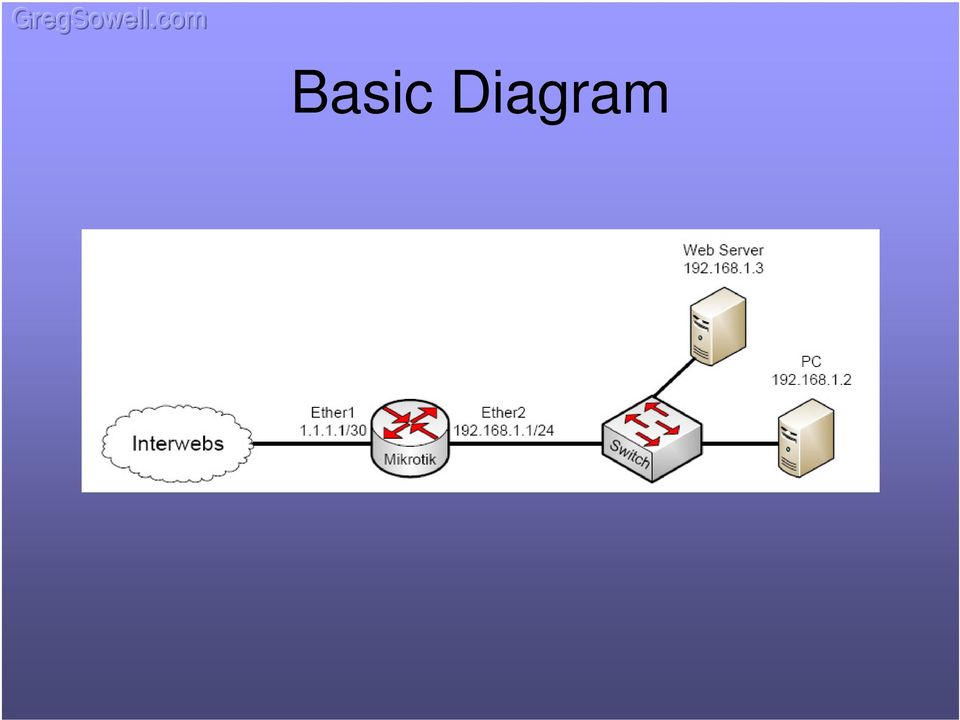

4 PPTP Point to Point Tunneling Protocol PPTP tunnels ALL traffic through the PPTP server. There is no split tunneling option. You can t pass any options back to the client other than an IP. Easy option for client connections. Every modern Windows OS will have built in PPTP client. PPTP offers NO encryption if not using MSCHAP V2. Enabling PPTP for remote: Go to PPP Choose PPTP server Check enable and click OK


5 PPTP Secret Adding a user can be done via the secrets tab. Name is login username Password Local address can be same for all of the users. Remote address must be unique for all users.


6 PPTP with Pool IP Assignment Create a pool of addresses: IP -> Pool Edit PPP Profile and add the new pool for remotes and add local IP all will use. Create secret sans local and remote.


7 PPTP with Radius Under secrets, click PPP Authentication & Accounting. Check use radius.


8 PPTP and Proxy-ARP Looking at our basic diagram and using the config shown above, you will most likely need to enable proxy arp on the ether2 interface. This is due to the fact that we have PPTP clients terminating on the router using the same subnet as the ether2 interface. When a user connects via PPTP it creates a PPTP interface, so if the user wants to be able to properly communicate with the ether2 interface they need their ARP packets to traverse the router to and from the ether2 interface to the newly created PPTP interface.


9 IPSec Logging Enable IPSec logging. System -> Logging View Log ->

10 IPSec Two methods to be demonstrated: IPSec Tunnel Mode IPSec Transport w/ipip tunnel IPSec Tunnel mode Uses fewer system resources on router Single layer of complexity IPSec Transport w/ipip tunnel Creates an IPIP tunnel then uses IPSec to encrypt IPIP traffic Uses more system resources Increases complexity Allows for dynamic routing protocols Allows for multicast traffic to be passed Allows for multiple WAN connection failover

11 IPSec 3 parts to creating IPSec connection Peer (Phase 1) Policy (Phase 2) Proposal (Transform set)


12 IPSec - Peer Peer specifies phase 1 security. Make them match on both sides.


13 IPSec - Policy Peer specifies phase 2 security. Make the settings match on both sides. IP information in reverse order.


14 IPSec - Proposal Sent by IKE to establish Security Associations (SA). Which algorithms will be used in phase 2. Make the settings match on both sides.

15 IPSec Tunnel MTK to MTK

16 IPSec Tunnel MTK to MTK - Site # 1 Create Peer Create Policy Create/Modify Proposal if you choose

17 IPSec Tunnel MTK to MTK - Site # 1 IP -> Firewall -> NAT Create NAT bypass for traffic that should traverse the tunnel. Move the rule to the top.

18 IPSec Tunnel MTK to MTK - Site # 2 Create Peer Create Policy Create/Modify Proposal if you choose

19 IPSec Tunnel MTK to MTK - Site # 2 IP -> Firewall -> NAT Create NAT bypass for traffic that should traverse the tunnel. Move the rule to the top.


20 IPSec Interesting Traffic Interesting Traffic is traffic that is specified in a policy and should be encrypted. To test our tunnel from the router use the ping tool and specify the interface as the inside interface( ). This will source the pings from and thus will be considered interesting. This will then attempt to traverse the tunnel.

21 IPSec Tunnel MTK to MTK Multiple Subnets

22 IPSec Tunnel MTK to MTK - Site # 1 Create Peer/ Proposal same as above Create Policies
23 IPSec Tunnel MTK to MTK - Site # 1 IP -> Firewall -> NAT Create NAT bypass for traffic that should traverse the tunnel. Move the rule to the top.

24 IPSec Tunnel MTK to MTK - Site # 2 Create Peer/Proposal same as above Create Policies
25 IPSec Tunnel MTK to MTK - Site # 2 IP -> Firewall -> NAT Create NAT bypass for traffic that should traverse the tunnel. Move the rule to the top.
26 IPSec Tunnel MTK to MTK One Site has Private WAN IP

27 IPSec Tunnel MTK to MTK - Site # 1 Create Peer Create/Modify Proposal if you choose Set IP to (Any remote Peer). Check Generate Policy.
28 IPSec Tunnel MTK to MTK - Site # 1 IP -> Firewall -> NAT Create NAT bypass for traffic that should traverse the tunnel. Move the rule to the top.

29 IPSec Tunnel MTK to MTK - Site # 2 Create Peer Create Policy Create/Modify Proposal if you choose <= Set SA Src Address to whatever IP is bound to the WAN interface. Be it private or public even if it is later NAT d.

30 IPSec Tunnel MTK to MTK - Site # 2 IP -> Firewall -> NAT Create NAT bypass for traffic that should traverse the tunnel. Move the rule to the top.
31 IPSec Tunnel MTK to Cisco Router/ASA
32 IPSec Tunnel MTK to Cisco RTR - Site # 1 Create Peer Create Policy Create/Modify proposal if you choose I changed the proposal to use MD5
33 IPSec Tunnel MTK to MTK - Site # 1 IP -> Firewall -> NAT Create NAT bypass for traffic that should traverse the tunnel. Move the rule to the top.
34 IPSec Tunnel MTK to Cisco RTR - Site # 2 crypto isakmp policy 1 hash md5 encr 3des authentication pre-share group 2 lifetime crypto isakmp key test address crypto ipsec transform-set to_remotes esp-3des esp-md5-hmac crypto map to_remotes 10 ipsec-isakmp set pfs group2 set peer set transform-set to_remotes match address Kitchen int e0 ip address crypto map to_remotes no shut int ep1 ip address no shut ip route ip nat inside source list NAT interface e0 overload ip access-list extended Kitchen remark Allow access though tunnel to Kitchen LAN permit ip ip access-list extended NAT deny ip any permit ip any any
35 IPSec Tunnel Cisco RTR - Site # 2 Trouble shooting When connected via telnet/ssh the command terminal monitor should be issued to see debug commands. To debug the IPSec connection, issue Debug crypto isa. To view the current SAs, issue the show cry isa sa command. When the tunnel is properly established, you should see : Router#show cry isa sa dst src state conn-id slot status QM_IDLE 4 0 ACTIVE
36 IPSec Tunnel MTK to Cisco ASA - Site # 2
37 IPSec Tunnel MTK to Cisco ASA - Site # 2
38 IPSec Tunnel MTK to Cisco ASA - Site # 2
39 IPSec Tunnel MTK to Cisco ASA - Site # 2
40 IPSec Tunnel MTK to Cisco ASA - Site # 2
41 IPSec Tunnel MTK to Cisco ASA - Site # 2 interface Ethernet0 nameif Outside security-level 0 ip address ! interface Ethernet1 nameif inside security-level 100 ip address ! access-list Outside_1_cryptomap extended permit ip access-list inside_nat_outbound remark PAT all out access-list inside_nat_outbound extended permit ip any access-list inside_nat0_outbound extended permit ip ! global (Outside) 1 interface nat (inside) 0 access-list inside_nat0_outbound nat (inside) 1 access-list inside_nat_outbound route Outside crypto ipsec transform-set ESP-3DES-MD5 esp-3des esp-md5-hmac crypto ipsec security-association lifetime seconds crypto ipsec security-association lifetime kilobytes crypto map Outside_map 1 match address Outside_1_cryptomap crypto map Outside_map 1 set pfs crypto map Outside_map 1 set peer crypto map Outside_map 1 set transform-set ESP-3DES-MD5 crypto map Outside_map 1 set security-association lifetime seconds crypto map Outside_map 1 set security-association lifetime kilobytes crypto map Outside_map interface Outside crypto isakmp enable Outside crypto isakmp policy 10 authentication pre-share encryption 3des hash md5 group 2 lifetime 86400! tunnel-group type ipsec-l2l tunnel-group ipsec-attributes pre-shared-key test
42 IPSec Tunnel MTK to Cisco ASA - Site # 2 Trouble shooting You can issue the show show cry isa sa command and look for active. With debugging enabled, filter on the remote device s IP.
43 IPSec Tunnel MTK to Cisco ASA - Site # 2 From the IKE parameters section. Change identity to be Address. I ve found this to fix occasional IPSec connection issues. crypto isakmp identity address
44 IPSec Tunnel MTK to Cisco RTR Multiple Subnets

45 IPSec Tunnel MTK to Cisco RTR - Site # 1 Create Peer/Proposal same as above Create Policies When connecting multiple subnets to a Cisco device, be it router or ASA, you will need to specify the level as unique. The Cisco device wants a separate SA for each policy coming back to it.

46 IPSec Tunnel MTK to MTK - Site # 1 IP -> Firewall -> NAT Create NAT bypass for traffic that should traverse the tunnel. Move the rule to the top.
47 IPSec Tunnel MTK to Cisco RTR - crypto isakmp policy 1 hash md5 encr 3des authentication pre-share group 2 lifetime crypto isakmp key test address crypto ipsec transform-set to_remotes esp-3des esp-md5-hmac crypto map to_remotes 10 ipsec-isakmp set peer set transform-set to_remotes match address Kitchen int e0 ip address crypto map to_remotes no shut int e1 ip address no shut int e2 ip address no shut ip route ip nat inside source list NAT interface e0 overload ip access-list extended Kitchen remark Allow access though tunnel to Kitchen LAN permit ip permit ip Site # 2 ip access-list extended NAT deny ip any permit ip any any
48 IPSec Tunnel MTK to MTK IPIP tunnel w/ IPSec
49 IPSec Tunnel MTK to MTK IPIP - Site # 1 Create Tunnel Interface Create routes to other location to head through Tunnel
50 IPSec Tunnel MTK to MTK IPIP - Site # 1 Create Peer Create Policy Create/Modify proposal if you choose Note we are using transport mode, so the tunnel check box isn t ticked.

51 IPSec Tunnel MTK to MTK IPIP - Site # 2 Create Tunnel Interface Create routes to other location to head through Tunnel
52 IPSec Tunnel MTK to MTK IPIP - Site # 1 Create Peer Create Policy Create/Modify proposal if you choose Note we are using transport mode, so the tunnel check box isn t ticked.
53 IPSec Tunnel MTK to Cisco Rtr IPIP tunnel w/ IPSec

54 IPSec Tunnel MTK to Cisco IPIP - Site # 1 Create Tunnel Interface Create routes to other location to head through Tunnel
55 IPSec Tunnel MTK to Cisco IPIP - Site # 1 Create Peer Create Policy Create/Modify proposal if you choose Note we are using transport mode, so the tunnel check box isn t ticked. Also note we set the protocol to 4 IP-Encap. This catches only IPIP traffic.
56 IPSec Tunnel MTK to Cisco IPIP - Site # 2 crypto isakmp policy 1 hash md5 encr 3des authentication pre-share group 2 lifetime crypto isakmp key test address crypto ipsec transform-set to_remotes esp-3des esp-md5-hmac mode transport crypto map to_remotes 10 ipsec-isakmp set pfs group2 set peer set transform-set to_remotes match address IPIP int e0 ip address crypto map to_remotes no shut int ep1 ip address no shut ip route ip route ip nat inside source list NAT interface e0 overload ip access-list extended IPIP remark Allow IPIP traffic permit ipinip host host ip access-list extended NAT deny ip any permit ip any any

57 IPSec Dead Peer Detection(DPD) DPD is an extremely useful tool when connecting to Cisco equipment. The DPD interval is number of seconds that the remote side is unresponsive. Once the DPD interval has met the Max Failures, it will clear out the SAs to this host and attempt to establish a new SA.

58 NAT Traversal NAT traversal in Mikrotik should NEVER be used unless absolutely necessary.

59 Clear DF The DF(Do not Fragment) bit can be set in packets at the sending device. Microsoft exchange communication sets DF Microsoft terminal services sets DF The DF bit tells a router that if the MTU of the packet is too large to traverse, do not fragment the packet, just drop. Generally a router will then send back a special ICMP message telling the router to readjust the MTU. When a packet tries to go through an IPSec tunnel and is dropped do to MTU issues, no message is generated because an IPSec tunnel isn t a physical or virtual interface. This means the traffic is simply lost. If you clear the DF bit on traffic that is set with the DF bit, it will then be allowed to fragment on the router and will successfully pass through the tunnel. A good indicator of DF issues with MTU would be attempting to RDP to a windows machine across a tunnel. Your screen will go black or blue, but the login box will never appear. The below mangle rule would be applied at site 1 in our demonstrations.

60 Change MSS If you are having MTU issues going through an IPSec tunnel, you can adjust the MTU on the inside interface, thus affecting all traffic, VPN and not, or one can alternately change the MSS (Maximum Segment Size) of the TCP traffic passing through an IPSec tunnel. This is also accomplished via a mangle rule.
61 Diffie Hellman Group Map Diffie-Hellman Group Group 1 Group 2 Group 3 Group 4 Group 5 Name 768 bit MODP group 1024 bits MODP group EC2N group on GP(2^155) EC2N group on GP(2^185) 1536 bits MODP group Reference RFC 2409 RFC 2409 RFC 2409 RFC 2409 RFC 3526 From the wiki
62 Resources Awesome Site Mikrotik Video Tutorials - Mikrotik Support Docshttp:// CactiEZ - Cacti Video Tutorials - Great Consultant ;)-
Deploying the Barracuda Link Balancer with Cisco ASA VPN Tunnels
 Deploying the Barracuda Link Balancer with Cisco ASA VPN Tunnels This article provides a reference for deploying a Barracuda Link Balancer under the following conditions: 1. 2. In transparent (firewall-disabled)
Keying Mode: Main Mode with No PFS (perfect forward secrecy) SA Authentication Method: Pre-Shared key Keying Group: DH (Diffie Hellman) Group 1
 Prepared by SonicWALL, Inc. 09/20/2001 Introduction: VPN standards are still evolving and interoperability between products is a continued effort. SonicWALL has made progress in this area and is interoperable
How To Establish IPSec VPN connection between Cyberoam and Mikrotik router
 How To Establish IPSec VPN connection between Cyberoam and Mikrotik router Applicable Version: 10.00 onwards Scenario Establish IPSec VPN connection between Cyberoam and Mikrotik router using Preshared
Netgear ProSafe VPN firewall (FVS318 or FVM318) to Cisco PIX firewall
 Netgear ProSafe VPN firewall (FVS318 or FVM318) to Cisco PIX firewall This document is a step-by-step instruction for setting up VPN between Netgear ProSafe VPN firewall (FVS318 or FVM318) and Cisco PIX
Interoperability Guide
 Interoperability Guide Configuring a Site-to-Site VPN between mguard and Cisco ASA mguard smart mguard PCI mguard blade mguard industrial RS mguard delta Innominate Security Technologies AG Albert-Einstein-Str.
VPN Configuration Guide. Cisco ASA 5500 Series
 VPN Configuration Guide Cisco ASA 5500 Series 2010 equinux AG and equinux USA, Inc. All rights reserved. Under copyright law, this configuration guide may not be copied, in whole or in part, without the
IPsec VPN Application Guide REV: 1.0.0 1910010876
 IPsec VPN Application Guide REV: 1.0.0 1910010876 CONTENTS Chapter 1. Overview... 1 Chapter 2. Before Configuration... 2 Chapter 3. Configuration... 5 3.1 Configure IPsec VPN on TL-WR842ND (Router A)...
LAN-Cell to Cisco Tunneling
 LAN-Cell to Cisco Tunneling Page 1 of 13 LAN-Cell to Cisco Tunneling This Tech Note guides you through setting up a VPN connection between a LAN-Cell and a Cisco router. As the figure below shows, the
Configuring an IPSec Tunnel between a Firebox & a Cisco PIX 520
 Configuring an IPSec Tunnel between a Firebox & a Cisco PIX 520 This document describes how to configure an IPSec tunnel with a WatchGuard Firebox II or Firebox III (software version 4.5 or later) at one
GregSowell.com. Mikrotik Security
 Mikrotik Security IP -> Services Disable unused services Set Available From for appropriate hosts Secure protocols are preferred (Winbox/SSH) IP -> Neighbors Disable Discovery Interfaces where not necessary.
Configuring Remote Access IPSec VPNs
 CHAPTER 34 Remote access VPNs let single users connect to a central site through a secure connection over a TCP/IP network such as the Internet. This chapter describes how to build a remote access VPN
IPSec interoperability between Palo Alto firewalls and Cisco ASA. Tech Note PAN-OS 4.1. Revision A 2011, Palo Alto Networks, Inc.
 IPSec interoperability between Palo Alto firewalls and Cisco ASA Tech Note PAN-OS 4.1 Revision A Contents Overview... 3 Platforms and Software Versions... 3 Network topology... 3 VPN Tunnel Configuration
http://www.cisco.com/c/en/us/support/docs/cloud-systems-management/configuration-prof...
 Page 1 of 16 Configuration Professional: Site-to-Site IPsec VPN Between ASA/PIX and an IOS Router Configuration Example Document ID: 112153 Updated: Sep 22, 2014 Contents Introduction Prerequisites Requirements
Cisco 1841 MyDigitalShield BYOG Integration Guide
 Cisco 1841 MyDigitalShield BYOG Integration Guide CONTENTS Introduction 3 Assumptions 3 What You Will Need 4 Verify IP Address 5 Configure the IPSEC Tunnel 6 Configure Access List for Local Interface 6
Vodafone MachineLink 3G. IPSec VPN Configuration Guide
 Vodafone MachineLink 3G IPSec VPN Configuration Guide Copyright Copyright 2013 NetComm Wireless Limited. All rights reserved. Copyright 2013 Vodafone Group Plc. All rights reserved. The information contained
Configuring a Site-to-Site VPN Tunnel Between Cisco RV320 Gigabit Dual WAN VPN Router and Cisco (1900/2900/3900) Series Integrated Services Router
 print email Article ID: 4938 Configuring a Site-to-Site VPN Tunnel Between Cisco RV320 Gigabit Dual WAN VPN Router and Cisco (1900/2900/3900) Series Integrated Services Router Objective Virtual Private
Creating a Gateway to Client VPN between Sidewinder G2 and a Mac OS X Client
 A P P L I C A T I O N N O T E Creating a Gateway to Client VPN between Sidewinder G2 and a Mac OS X Client This application note describes how to set up a VPN connection between a Mac client and a Sidewinder
VPN SECURITY POLICIES
 TECHNICAL SUPPORT NOTE Introduction to the VPN Menu in the Web GUI Featuring ADTRAN OS and the Web GUI Introduction This Technical Support Note shows the different options available in the VPN menu of
Deploying IPSec VPN in the Enterprise
 VPN5 6/9/03 6:14 PM Page 137 Chapter 5 Deploying IPSec VPN in the Enterprise 5.1 Chapter Overview In Chapters 3 and 4, the focus was on implementing a single site-to-site IPSec VPN and the different IKE
REMOTE ACCESS VPN NETWORK DIAGRAM
 REMOTE ACCESS VPN NETWORK DIAGRAM HQ ASA Firewall As Remote Access VPN Server Workgroup Switch HQ-ASA Fa0/1 111.111.111.111 Fa0/0 172.16.50.1 172.16.50.10 IPSEC Tunnel Unsecured Network ADSL Router Dynamic
Lab14.8.1 Configure a PIX Firewall VPN
 Lab14.8.1 Configure a PIX Firewall VPN Complete the following lab exercise to practice what you learned in this chapter. Objectives In this lab exercise you will complete the following tasks: Visual Objective
Application Notes SL1000/SL500 VPN with Cisco PIX 501
 Application Notes SL1000/SL500 VPN with Cisco PIX 501 Version 1.0 Copyright 2006, ASUSTek Computer, Inc. i Revision History Version Author Date Status 1.0 Martin Su 2006/5/4 Initial draft Copyright 2006,
Lab 6.5.9b Configure a Secure VPN Using IPSec between a PIX and a VPN Client using CLI
 Lab 6.5.9b Configure a Secure VPN Using IPSec between a PIX and a VPN Client using CLI Objective Scenario Topology In this lab exercise, the students will complete the following tasks: Configure and Verify
Configuring SSL VPN on the Cisco ISA500 Security Appliance
 Application Note Configuring SSL VPN on the Cisco ISA500 Security Appliance This application note describes how to configure SSL VPN on the Cisco ISA500 security appliance. This document includes these
SDM: Site to Site IPsec VPN Between ASA/PIX and an IOS Router Configuration Example
 SDM: Site to Site IPsec VPN Between ASA/PIX and an IOS Router Configuration Example Document ID: 110198 Contents Introduction Prerequisites Requirements Components Used Related Products Conventions Configuration
GregSowell.com. Mikrotik Basics
 Mikrotik Basics Terms Used Layer X When I refer to something being at layer X I m referring to the OSI model. VLAN 802.1Q Layer 2 marking on traffic used to segment sets of traffic. VLAN tags are applied
Expert Reference Series of White Papers. Integrating Active Directory Users with Remote VPN Clients on a Cisco ASA
 Expert Reference Series of White Papers Integrating Active Directory Users with Remote VPN Clients on a Cisco ASA 1-800-COURSES www.globalknowledge.com Integrating Active Directory Users with Remote VPN
Building scalable IPSec infrastructure with MikroTik. IPSec, L2TP/IPSec, OSPF
 Building scalable IPSec infrastructure with MikroTik IPSec, L2TP/IPSec, OSPF Presenter information Tomas Kirnak Network design Security, wireless Servers Virtualization MikroTik Certified Trainer Atris,
Industrial Classed H685 H820 Cellular Router User Manual for VPN setting
 H685/H820 VPN User Manual Industrial Classed H685 H820 Cellular Router User Manual for VPN setting E-Lins Technology Co., Limited PHONE: +86-755-29230581 83700465 Email: [email protected] [email protected]
Configuring a Check Point FireWall-1 to SOHO IPSec Tunnel
 Configuring a Check Point FireWall-1 to SOHO IPSec Tunnel This document describes the procedures required to configure an IPSec VPN tunnel between a WatchGuard SOHO or SOHO tc and a Check Point FireWall-1.
Cisco Site-to-Site VPN Lab 3 / GRE over IPSec VPNs by Michael T. Durham
 Cisco Site-to-Site VPN Lab 3 / GRE over IPSec VPNs by Michael T. Durham In part two of NetCertLabs Cisco CCNA Security VPN lab series, we explored setting up a site-to-site VPN connection where one side
Virtual Private Network (VPN)
 Configuration Guide 5991-2120 April 2005 Virtual Private Network (VPN) VPN Using Preset Keys, Mode Config, and Manual Keys This Configuration Guide is designed to provide you with a basic understanding
2.0 HOW-TO GUIDELINES
 Version 2.0 HOW-TO GUIDELINES Setting up a VPN between a StoneGate cluster and a Cisco PIX firewall TECHN10-6/3/03 Introduction This document highlights a tested method to configure a VPN tunnel between
External Authentication with Cisco Router with VPN and Cisco EZVpn client Authenticating Users Using SecurAccess Server by SecurEnvoy
 External Authentication with Cisco Router with VPN and Cisco EZVpn client Authenticating Users Using SecurAccess Server by SecurEnvoy Contact information SecurEnvoy www.securenvoy.com 0845 2600010 1210
Viewing VPN Status, page 335. Configuring a Site-to-Site VPN, page 340. Configuring IPsec Remote Access, page 355
 VPN This chapter describes how to configure Virtual Private Networks (VPNs) that allow other sites and remote workers to access your network resources. It includes the following sections: About VPNs, page
Configure ISDN Backup and VPN Connection
 Case Study 2 Configure ISDN Backup and VPN Connection Cisco Networking Academy Program CCNP 2: Remote Access v3.1 Objectives In this case study, the following concepts are covered: AAA authentication Multipoint
Configuring L2TP over IPsec
 CHAPTER 65 This chapter describes how to configure L2TP over IPsec/IKEv1 on the ASA. This chapter includes the following topics: Information About L2TP over IPsec/IKEv1, page 65-1 Licensing Requirements
Most Common DMVPN Troubleshooting Solutions
 Most Common DMVPN Troubleshooting s Document ID: 111976 Contents Introduction Prerequisites Requirements Components Used Conventions DMVPN Configuration does not work s Common Issues Verify if ISAKMP packets
Configuring IPSec VPN Tunnel between NetScreen Remote Client and RN300
 Configuring IPSec VPN Tunnel between NetScreen Remote Client and RN300 This example explains how to configure pre-shared key based simple IPSec tunnel between NetScreen Remote Client and RN300 VPN Gateway.
Configuration Professional: Site to Site IPsec VPN Between Two IOS Routers Configuration Example
 Configuration Professional: Site to Site IPsec VPN Between Two IOS Routers Configuration Example Document ID: 113337 Contents Introduction Prerequisites Requirements Components Used Conventions Configuration
Application Notes. How to Configure UTM with Apple OSX and ios Devices for IPsec VPN
 How to Configure UTM with Apple OSX and ios Devices for IPsec VPN T a b l e o f C o n t e n t s Concepts...3 Components...3 Configuration Steps...3 UTM VPN Configuration...3 Mode Config Record...3 IKE
Table of Contents. Cisco Configuring an IPSec LAN to LAN Tunnel for Cisco VPN 5000 Concentrator to Cisco Secure PIX Firewall
 IPSec LAN to LAN Tunnel for Cisco VPN 5000 Concentrator to irewall Table of Contents Configuring an IPSec LAN to LAN Tunnel for Cisco VPN 5000 Concentrator to Cisco Secure PIX Firewall...1 Cisco has announced
Configuring an IPSec Tunnel between a Firebox & a Check Point FireWall-1
 Configuring an IPSec Tunnel between a Firebox & a Check Point FireWall-1 This document describes how to configure an IPSec tunnel with a WatchGuard Firebox II or Firebox III (software version 4.5 or later)
Configuring L2TP over IPSec
 CHAPTER 30 This chapter describes how to configure IPSec over L2TP on the security appliance, and includes the following topics: L2TP Overview, page 30-1 Connections, page 30-3 Viewing L2TP over IPSec
Technical Document. Creating a VPN. GTA Firewall to Cisco PIX 501 TDVPNPIX200605-01
 Technical Document Creating a VPN GTA Firewall to Cisco PIX 501 TDVPNPIX200605-01 Contents Introduction 1 Encryption and Authentication Methods 1 IP Addresses Used in Examples 1 Documentation 2 Additional
Katana Client to Linksys VPN Gateway
 Katana Client to Linksys VPN Gateway Goal Configure a VPN tunnel between a Katana client and a Linksys VPN gateway. Method The Katana client and the Linksys VPN gateway must have exactly the same IKE/IPsec
Amazon Virtual Private Cloud. Network Administrator Guide API Version 2015-04-15
 Amazon Virtual Private Cloud Network Administrator Amazon Virtual Private Cloud: Network Administrator Copyright 2015 Amazon Web Services, Inc. and/or its affiliates. All rights reserved. Table of Contents
How To Configure L2TP VPN Connection for MAC OS X client
 How To Configure L2TP VPN Connection for MAC OS X client How To Configure L2TP VPN Connection for MAC OS X client Applicable Version: 10.00 onwards Overview Layer 2 Tunnelling Protocol (L2TP) can be used
iguring an IPSec Tunnel Cisco Secure PIX Firewall to Checkp
 iguring an IPSec Tunnel Cisco Secure PIX Firewall to Checkp Table of Contents Configuring an IPSec Tunnel Cisco Secure PIX Firewall to Checkpoint 4.1 Firewall...1 Introduction...1 Before You Begin...1
How to configure VPN function on TP-LINK Routers
 How to configure VPN function on TP-LINK Routers 1. VPN Overview... 2 2. How to configure LAN-to-LAN IPsec VPN on TP-LINK Router... 3 3. How to configure GreenBow IPsec VPN Client with a TP-LINK VPN Router...
Lab 4.4.8a Configure a Cisco GRE over IPSec Tunnel using SDM
 Lab 4.4.8a Configure a Cisco GRE over IPSec Tunnel using SDM Objective Scenario Topology In this lab, the students will complete the following tasks: Prepare to configure Virtual Private Network (VPN)
I. What is VPN? II. Types of VPN connection. There are two types of VPN connection:
 Table of Content I. What is VPN?... 2 II. Types of VPN connection... 2 III. Types of VPN Protocol... 3 IV. Remote Access VPN configuration... 4 a. PPTP protocol configuration... 4 Network Topology... 4
Netopia 3346. TheGreenBow IPSec VPN Client. Configuration Guide. http://www.thegreenbow.com. [email protected]
 TheGreenBow IPSec VPN Client Configuration Guide Netopia 3346 WebSite: Contact: http://www.thegreenbow.com [email protected] IPSec VPN Router Configuration Property of TheGreenBow Sistech SA - Sistech
TheGreenBow IPsec VPN Client. Configuration Guide Cisco RV325 v1. Website: www.thegreenbow.com Contact: [email protected]
 TheGreenBow IPsec VPN Client Configuration Guide Cisco RV325 v1 Website: www.thegreenbow.com Contact: [email protected] Table of Contents 1 Introduction... 3 1.1 Goal of this document... 3 1.2 VPN
Interconnection between the Windows Azure
 Interconnection between the Windows Azure Virtual Network and SEIL Series VPN Updated: January 17, 2014 Author: Internet Initiative Japan, Inc. SEIL (http://www.seil.jp/) is an access router for companies
How To Industrial Networking
 How To Industrial Networking Prepared by: Matt Crites Product: Date: April 2014 Any RAM or SN 6xxx series router Legacy firmware 3.14/4.14 or lower Subject: This document provides a step by step procedure
Triple DES Encryption for IPSec
 Triple DES Encryption for IPSec Feature Summary Platforms Prerequisites IPSec supports the Triple DES encryption algorithm (168-bit) in addition to 56-bit encryption. Triple DES (3DES) is a strong form
Chapter 8 Lab A: Configuring a Site-to-Site VPN Using Cisco IOS and SDM
 Chapter 8 Lab A: Configuring a Site-to-Site VPN Using Cisco IOS and SDM Topology IP Addressing Table Device Interface IP Address Subnet Mask Default Gateway Switch Port R1 Fa0/1 192.168.1.1 255.255.255.0
BONUS TUTORIAL CISCO ASA 5505 CONFIGURATION WRITTEN BY: HARRIS ANDREA ALL YOU NEED TO KNOW TO CONFIGURE AND IMPLEMENT THE BEST FIREWALL IN THE MARKET
 BONUS TUTORIAL CISCO ASA 5505 CONFIGURATION ALL YOU NEED TO KNOW TO CONFIGURE AND IMPLEMENT THE BEST FIREWALL IN THE MARKET WRITTEN BY: HARRIS ANDREA MSC ELECTRICAL ENGINEERING AND COMPUTER SCIENCE CISCO
Godinich Consulting. VPN's Between Mikrotik and 3rd Party Devices
 Godinich Consulting VPN's Between Mikrotik and 3rd Party Devices Vince Godinich experience TOPICS PPTP Mikrotik Client to Cisco Server IPSEC Shrew Client To Mikrotik router IPSEC Mikrotik router to Cisco
Configuring IPsec VPN with a FortiGate and a Cisco ASA
 Configuring IPsec VPN with a FortiGate and a Cisco ASA The following recipe describes how to configure a site-to-site IPsec VPN tunnel. In this example, one site is behind a FortiGate and another site
Use Shrew Soft VPN Client to connect with IPSec VPN Server on RV130 and RV130W
 Article ID: 5037 Use Shrew Soft VPN Client to connect with IPSec VPN Server on RV130 and RV130W Objective IPSec VPN (Virtual Private Network) enables you to securely obtain remote resources by establishing
Using IPsec VPN to provide communication between offices
 Using IPsec VPN to provide communication between offices This example provides secure, transparent communication between two FortiGates located at different offices using route-based IPsec VPN. In this
Configuring a Lan-to-Lan VPN with Overlapping Subnets with Juniper NetScreen/ISG/SSG Products
 Application Note Configuring a Lan-to-Lan VPN with Overlapping Subnets with Juniper NetScreen/ISG/SSG Products Version 1.0 January 2008 Juniper Networks, Inc. 1194 North Mathilda Avenue Sunnyvale, CA 94089
How to configure VPN function on TP-LINK Routers
 How to configure VPN function on TP-LINK Routers 1. VPN Overview... 2 2. How to configure LAN-to-LAN IPsec VPN on TP-LINK Router... 3 3. How to configure GreenBow IPsec VPN Client with a TP-LINK VPN Router...
Packet Tracer Configuring VPNs (Optional)
 Topology Addressing Table Device Interface IP Address Subnet Mask Default Gateway R1 G0/0 192.168.1.1 255.255.255.0 N/A S0/0/0 10.1.1.2 255.255.255.252 N/A G0/0 192.168.2.1 255.255.255.0 N/A R2 S0/0/0
Configuring an IPsec VPN to provide ios devices with secure, remote access to the network
 Configuring an IPsec VPN to provide ios devices with secure, remote access to the network This recipe uses the IPsec VPN Wizard to provide a group of remote ios users with secure, encrypted access to the
This chapter describes how to set up and manage VPN service in Mac OS X Server.
 6 Working with VPN Service 6 This chapter describes how to set up and manage VPN service in Mac OS X Server. By configuring a Virtual Private Network (VPN) on your server you can give users a more secure
Configuration Guide. How to establish IPsec VPN Tunnel between D-Link DSR Router and iphone ios. Overview
 Configuration Guide How to establish IPsec VPN Tunnel between D-Link DSR Router and iphone ios Overview The iphone is a line of smartphones designed and marketed by Apple Inc. It runs Apple s IOS mobile
IP Office Technical Tip
 IP Office Technical Tip Tip no: 190 Release Date: September 27, 2007 Region: GLOBAL Configuring a VPN Remote IP Phone with a Sonicwall Tz170 Standard / Enhanced VPN Router The following document assumes
Configuration Guide. How to set up the IPSec site-to-site Tunnel between the D-Link DSR Router and the Cisco Firewall. Overview
 Configuration Guide How to set up the IPSec site-to-site Tunnel between the D-Link DSR Router and the Cisco Firewall Overview This document describes how to implement IPSec with pre-shared secrets establishing
Juniper NetScreen 5GT
 TheGreenBow IPSec VPN Client Configuration Guide Juniper NetScreen 5GT WebSite: Contact: http://www.thegreenbow.com [email protected] Configuration Guide written by: Writer: Connected Team Company:
Cisco RV 120W Wireless-N VPN Firewall
 TheGreenBow IPSec VPN Client Configuration Guide Cisco RV 120W Wireless-N VPN Firewall WebSite: Contact: http://www.thegreenbow.com [email protected] IPSec VPN Router Configuration Property of TheGreenBow
Apliware firewall. TheGreenBow IPSec VPN Client. Configuration Guide. http://www.thegreenbow.com [email protected]
 TheGreenBow IPSec VPN Client Configuration Guide Apliware firewall WebSite: Contact: http://www.thegreenbow.com [email protected] Table of contents 1 Introduction... 0 1.1 Goal of this document...
Lab 6.2.12a Configure Remote Access Using Cisco Easy VPN
 Lab 6.2.12a Configure Remote Access Using Cisco Easy VPN Objective Scenario Topology In this lab, the students will complete the following tasks: Enable policy lookup via authentication, authorization,
How To Establish IPSec VPN between Cyberoam and Microsoft Azure
 How To Establish IPSec VPN between Cyberoam and Microsoft Azure How To Establish IPSec VPN Connection between Cyberoam and Microsoft Azure Applicable Version: 10.00 onwards Overview Microsoft Azure is
SingTel VPN as a Service. Quick Start Guide
 SingTel VPN as a Service Quick Start Guide Document Control # Date of Release Version # 1 25 April 2014 PT_SN20_1.0 2 3 4 5 6 Page Affected Remarks 2/33 Table of Contents 1. SingTel VPN as a Service Administration...
Table of Contents. Cisco Configuring IPSec Cisco Secure VPN Client to Central Router Controlling Access
 Table of Contents Configuring IPSec Cisco Secure VPN Client to Central Router Controlling Access...1 Introduction...1 Prerequisites...1 Requirements...1 Components Used...1 Conventions...1 Configure...2
Cisco SA 500 Series Security Appliance
 TheGreenBow IPSec VPN Client Configuration Guide Cisco SA 500 Series Security Appliance This guide applies to the following models: Cisco SA 520 Cisco SA 520W Cisco SA 540 WebSite: Contact: http://www.thegreenbow.de
IPSec. User Guide. 2120028 Rev 2.2
 IPSec User Guide 2120028 Rev 2.2 Important Notice Safety and Hazards Due to the nature of wireless communications, transmission and reception of data can never be guaranteed. Data may be delayed, corrupted
LAN-Cell 3 to Cisco ASA 5500 VPN Example
 LAN-Cell 3 to Cisco ASA 5500 VPN Example Tech Note LCTN3014 Proxicast, LLC 312 Sunnyfield Drive Suite 200 Glenshaw, PA 15116 1-877-77PROXI 1-877-777-7694 1-412-213-2477 Fax: 1-412-492-9386 E-Mail: [email protected]
Remote Access VPN Business Scenarios
 CHAPTER 4 This chapter explains the basic tasks for configuring an IP-based, remote access Virtual Private Network (VPN) on a Cisco 7200 series router. In the remote access VPN business scenario, a remote
Configuring IPsec VPN Fragmentation and MTU
 CHAPTER 5 This chapter provides information about configuring IPsec VPN fragmentation and the maximum transmission unit (MTU). It includes the following sections: Understanding IPsec VPN Fragmentation
Amazon Virtual Private Cloud. Network Administrator Guide API Version 2014-06-15
 Amazon Virtual Private Cloud Network Administrator Amazon Web Services Amazon Virtual Private Cloud: Network Administrator Amazon Web Services Copyright 2014 Amazon Web Services, Inc. and/or its affiliates.
Amazon Virtual Private Cloud. Network Administrator Guide API Version 2015-04-15
 Amazon Virtual Private Cloud Network Administrator Amazon Virtual Private Cloud: Network Administrator Copyright 2015 Amazon Web Services, Inc. and/or its affiliates. All rights reserved. The following
Case Study for Layer 3 Authentication and Encryption
 CHAPTER 2 Case Study for Layer 3 Authentication and Encryption This chapter explains the basic tasks for configuring a multi-service, extranet Virtual Private Network (VPN) between a Cisco Secure VPN Client
Configuring the PIX Firewall with PDM
 Configuring the PIX Firewall with PDM Objectives In this lab exercise you will complete the following tasks: Install PDM Configure inside to outside access through your PIX Firewall using PDM Configure
VNS3 to Cisco ASA Instructions. ASDM 9.2 IPsec Configuration Guide
 VNS3 to Cisco ASA Instructions ASDM 9.2 IPsec Configuration Guide 2016 Site-to-Site IPsec Tunnel IPsec protocol allows you to securely connect two sites together over the public internet using cryptographically
Ingate Firewall. TheGreenBow IPSec VPN Client Configuration Guide. http://www.thegreenbow.com [email protected]
 TheGreenBow IPSec VPN Client Configuration Guide Ingate Firewall WebSite: Contact: http://www.thegreenbow.com [email protected] IPSec VPN Router Configuration Property of TheGreenBow Sistech SA -
Cisco QuickVPN Installation Tips for Windows Operating Systems
 Article ID: 2922 Cisco QuickVPN Installation Tips for Windows Operating Systems Objective Cisco QuickVPN is a free software designed for remote access to a network. It is easy to install on a PC and simple
Configuration Guide. How to set up the IPSec site-to-site Tunnel between the D-Link DSR Router and the Sonicwall Firewall.
 Configuration Guide How to set up the IPSec site-to-site Tunnel between the D-Link DSR Router and the Sonicwall Firewall Overview This document describes how to implement IPSec with pre-shared secrets
Using Opensource VPN Clients with Firetunnel
 This document describes how to use VPN Clients. Since the number of VPN Tunnels using PPTP is limited to 4, this is your way to connect up to 10 parallel tunnels using VPN/IPSEC technology. The method
VPN. VPN For BIPAC 741/743GE
 VPN For BIPAC 741/743GE August, 2003 1 The router supports VPN to establish secure, end-to-end private network connections over a public networking infrastructure. There are two types of VPN connections,
Release Notes. NCP Secure Entry Mac Client. 1. New Features and Enhancements. 2. Improvements / Problems Resolved. 3. Known Issues
 NCP Secure Entry Mac Client Service Release 2.05 Build 14711 December 2013 Prerequisites Apple OS X Operating System: The following Apple OS X operating system versions are supported with this release:
Quick Note 041. Digi TransPort to Digi TransPort VPN Tunnel using OpenSSL certificates.
 Quick Note 041 Digi TransPort to Digi TransPort VPN Tunnel using OpenSSL certificates. Digi Support January 2014 1 Contents 1 Introduction... 2 1.1 Outline... 2 1.2 Assumptions... 2 1.3 Corrections...
VPNs. Palo Alto Networks. PAN-OS Administrator s Guide Version 6.0. Copyright 2007-2015 Palo Alto Networks
 VPNs Palo Alto Networks PAN-OS Administrator s Guide Version 6.0 Contact Information Corporate Headquarters: Palo Alto Networks 4401 Great America Parkway Santa Clara, CA 95054 www.paloaltonetworks.com/company/contact-us
Internet. SonicWALL IP 10.100.30.1 SEV 7.0.4 IP 10.100.50.8 IP 172.18.0.1 IP 192.168.170.1. Network 192.168.170.0 Mask 255.255.255.
 Prepared by SonicWALL, Inc. 6/10/2003 Introduction: VPN standards are still evolving and interoperability between products is a continued effort. SonicWALL has made progress in this area and is interoperable
Establishing a VPN tunnel to CNet CWR-854 VPN router using WinXP IPSec client
 Establishing a VPN tunnel to CNet CWR-854 VPN router using WinXP IPSec client Generally speaking, remote users need to use a VPN client software for establishing a VPN connection to their home/work router
GregSowell.com. Mikrotik Routing
 Mikrotik Routing Static Dynamic Routing To Be Discussed RIP Quick Discussion OSPF BGP What is Routing Wikipedia has a very lengthy explanation http://en.wikipedia.org/wiki/routing In the context of this