
IBM Tivoli Software. Maximo Asset Management Version 7.5 Releases. Maximo Cognos Integration Guide Version 4
|
|
|
- Gwen Reeves
- 9 years ago
- Views:
Transcription

1 IBM Tivoli Software Maximo Asset Management Version 7.5 Releases Maximo Cognos Integration Guide Version 4 Pam Denny Maximo Report Designer/Architect

2 CONTENTS Revision History v Overview 6 Enabling the Maximo Cognos Integration... 7 Cognos Report Types... 9 Integration Architecture 10 Maximo Cognos Report Integration Report Execution Architecture Security Authentication Maximo Report Administration Cognos Access Maximo Application Cognos Access Security Authorization Maximo Namespace Cognos Namespace Security Notes: Types of Maximo Cognos Reports 25 Parameterized Reports Application Reports Registering Cognos Reports in the Maximo Report Administration Application Defining Security Group Access to Cognos Reports in Maximo... 30

3 Maximo Cognos Report Integration Maximo Metadata 32 Report Object Structures Maximo Metadata Model Metadata Publishing Process General Architecture Metadata Publishing Process Execution Metadata Publishing and the Object Structure Application Meta Data Publishing in Base Language Maximo Cognos Reporting Conditions and Limitations Platform Restrictions Best Practices Executing Maximo Reports within the Cognos Portal Developing Maximo Cognos Reports in Report Studio 54 Maximo Where Clause Including the Maximo Where in Cognos Report Studio Reports Developing Maximo Cognos Reports in Query Studio 67 Creating Report Object Structures for Cognos Packages 69 Excluding Persistent Fields from Source Objects Best Practices on Creating ROS for Cognos Packages Understanding Database Joins and Cardinality iii

4 1.1.1 Cardinality Database Joins Reference Materials 82 Copyright International Business Machines Corporation 2014 US Government Users Restricted Rights Use, duplication or disclosure restricted by GSA ADP Schedule Contract with IBM Corp.

5 Maximo Cognos Report Integration REVISION HISTORY Date Version Revised By Comments April PD Updates include (1) Document and diagram reformatting (2) Note that 1 instance of an objects can only be published from Maximo to Object July PD Updates include (1) New version support for Cognos with Maximo-Cognos Direct Integration (2) Removed property file references as they are included in Maximo-Cognos Installation guides. October PD Updates include (1) Details on property setting, mxe.rest.webappurl. (2) Updated reference material links August PD Updates include (1) Additional information on Cognos Report Studio and Query Studio Reports (2) Updated restriction query on page 74 to use unique id column (3) Included additional information on relationships to be used to enable multi-language publishing of Package names on pages PD Initial Release v

6 Overview In the Maximo 7.5 Release (V75), an IBM Cognos Reporting Integration is enabled. This integration extends the current suite of reporting tools that Maximo enables into a deeper level of Strategic Reporting. The Maximo Cognos Integration uses the Cognos Reporting Products of Developers Studio, Query Studio, Cognos Connection and Framework Manager Products. It does not utilize the Cognos Analytics Products of Transformer, Analysis Studio, Event Studio and Metric Studio. The Maximo Cognos integration enables you to further analyze all the powerful Maximo data that exists so you can make the best business decisions possible for your unique business environments. It enables your users to see the Cognos Report from within the Maximo Applications, and display the Cognos Report within the Cognos Portal via a silent log-in. This integration also enables the automatic creation of a metadata layer. The metadata layer is used by developers to create Enterprise or Ad Hoc Reports. It consists of pre-joined tables, so developers can quickly and consistently develop reports versus the traditional method of creating complex sql statements for each individual report. To enable the metadata layer in the Maximo Cognos Integration, Cognos packages are based off of the Maximo Applications, like Assets, Work Order or Job Plans. These packages can be created from within the Maximo Object Structure Application, and published to Cognos Content Store thru Framework API s. By utilizing the Maximo Object Structure Application, your object customizations can be incorporated. This is a key design point as the vast majority of our clients extend the Maximo database. Therefore, your unique database customizations will be picked up dynamically so you do not have to expend significant time and efforts in determining individual table relationships needed for package creation. This document starts by describing the details on the integration, including its security. It then delves into the details of the publishing the Cognos Packages from Maximo, and concludes by detailing how to create Cognos Reports to execute from within the Maximo Framework. Finally, it is the assumption of this document that you already have the Maximo Cognos Integration installed. Details on the Maximo Cognos Install can be found in the installation documents referenced at the end of this guide. Note: This document is specific to the Version 7.5 releases. For information on the Cognos Integration in the Maximo 7.1 releases, reference Maximo Cognos Integration Guide for 7.1 noted at the end of this guide. 6

7 Maximo Cognos Report Integration Enabling the Maximo Cognos Integration You can enable the Maximo Cognos Integration for Version and beyond in two different ways - either through your existing license of Cognos Reporting, or through your utilization of Tivoli Common Reporting. Direct: Corporate Licensing of Cognos Reporting If you have Cognos Reporting Licenses, you can enable the Maximo Cognos Integration through the use of these licenses within Maximo. You can then begin creating reports against the powerful Maximo data, along with any other relevant corporate data you may have. This is known as the Maximo Cognos Direct Integration. TCR Indirect: Utilization of Tivoli Common Reporting As a Maximo client, you are entitled to Tivoli Common Reporting (TCR). TCR includes the Cognos Reporting Products, and is designed for Tivoli Cross Product reporting. It utilizes the Tivoli Integrated Portal (TIP) as its platform basis. Utilizing TCR enables you a license to the Cognos reporting products for Tivoli Software Products only. If you wish to use Cognos reporting against other databases in your corporate environment, you would need to acquire additional licensing. Additional information on TCR, including platform restrictions, is noted in the documentation referenced at the end of this guide. Which Option is best for Your Environment Determining which integration option is best for you, depends on your unique business environment. If you have existing Cognos licenses, utilizing the Maximo-Cognos direct integration will give you the most flexible, streamlined integration. If you do not have Cognos licenses, and utilize multiple Tivoli Products, utilizing TCR can enable you to begin working with the Cognos Reporting Products. 7

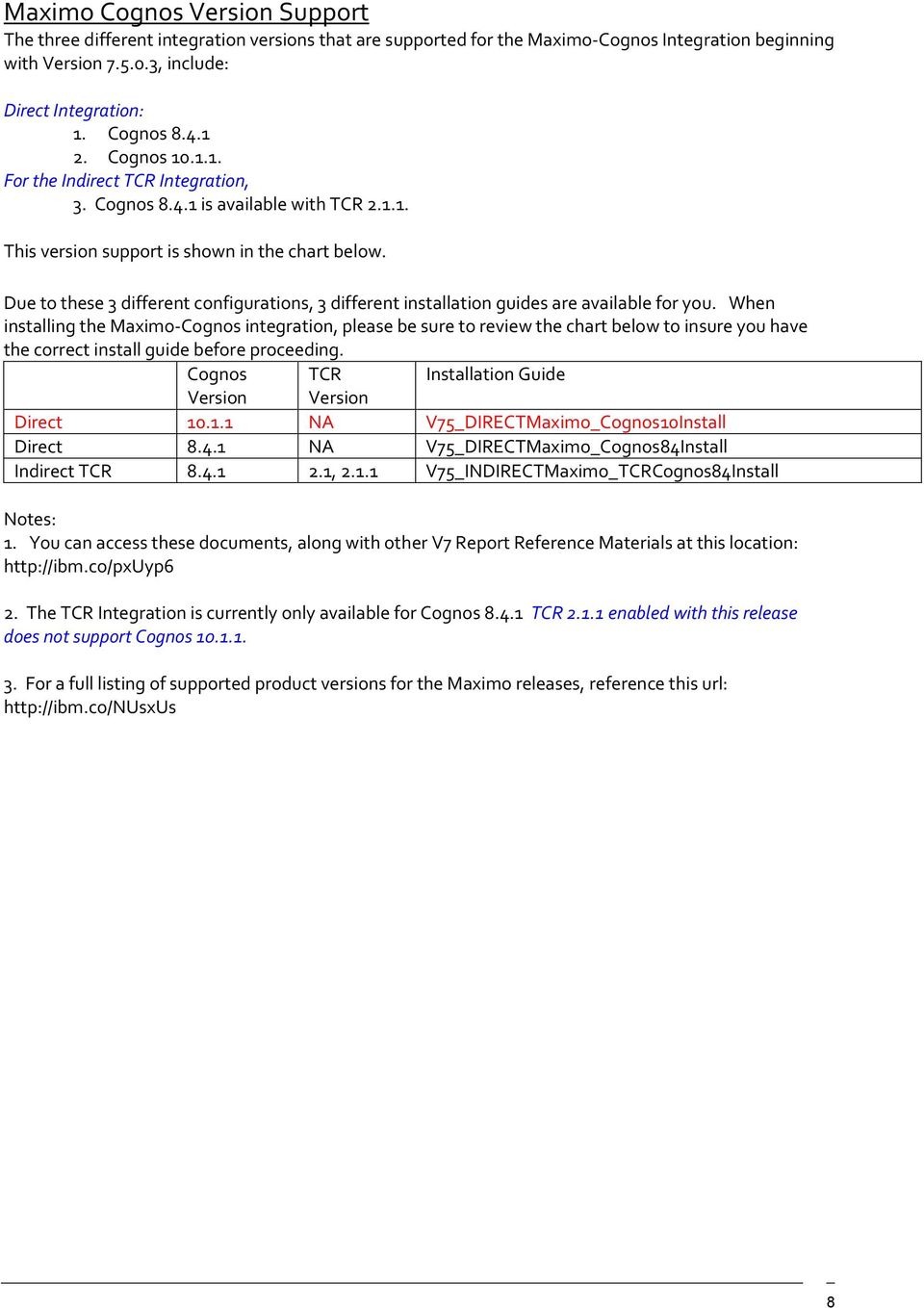
8 Maximo Cognos Version Support The three different integration versions that are supported for the Maximo-Cognos Integration beginning with Version , include: Direct Integration: 1. Cognos Cognos For the Indirect TCR Integration, 3. Cognos is available with TCR This version support is shown in the chart below. Due to these 3 different configurations, 3 different installation guides are available for you. When installing the Maximo-Cognos integration, please be sure to review the chart below to insure you have the correct install guide before proceeding. Cognos TCR Installation Guide Version Version Direct NA V75_DIRECTMaximo_Cognos10Install Direct NA V75_DIRECTMaximo_Cognos84Install Indirect TCR , V75_INDIRECTMaximo_TCRCognos84Install Notes: 1. You can access these documents, along with other V7 Report Reference Materials at this location: 2. The TCR Integration is currently only available for Cognos TCR enabled with this release does not support Cognos For a full listing of supported product versions for the Maximo releases, reference this url: 8
9 Maximo Cognos Report Integration Cognos Report Types With the Maximo Cognos Integration, you can create two types of reports, which are 1. Enterprise Reports using the Cognos Developers Studio Tool 2. Ad Hoc Reports using the Cognos Query Studio Tool The Cognos Developers Studio tool is intended for report developers to create enterprise, complex reports for users to access on a continuing daily, weekly or monthly basis. These reports require resources to design, develop, test and administer them, so they can be a significant investment for you. Developer Studio reports can be accessed by users from either the Maximo environment, or from the Cognos Portal. The Cognos Query Studio Tool is intended for either report developers or business users to create on the fly ad hoc reports to meet their individual business or project needs. These ad hoc reports do not have the same level of resource investment as Developer Studio reports as one user designs, develops and tests his own reports for his own needs. Query Studio reports can only be accessed from the Cognos Portal. This occurs because these reports are focused on enabling the business user s ability to quickly create these reports without any additional code manipulation to include maximo application information. Additional details on how you can create and enable Cognos reports created in both Report Studio and Query Studio for Maximo data are contained in the sections titled Developing Maximo Cognos Reports in Report Studio and Developing Maximo Cognos Reports in Query Studio located later in this guide. 9


10 Integration Architecture This document details how the Maximo-Cognos integration works in the key areas of (1) Cognos Meta Data package creation (2) Report Execution and (3) Security Authorization. Throughout the guide, a top level view of the architecture will be highlighted so you can become familiar with the terminology and product components involved. Your architecture may vary from the diagram shown below depending on factors including your security group repository, your application server and whether or not TCR is utilized in your environment. However, the key components this document highlights include the namespaces, content store components, and security group repositories. These components were installed or configured in the Maximo Cognos Installation Guide. 10

11 Maximo Cognos Report Integration Maximo Cognos Report Integration The Maximo Cognos Report Integration enables users to see the Cognos Report from within the Maximo Applications, pass the dynamically selected record set to the configured Cognos Report, and display the Cognos Report within the Cognos Portal via a silent log-in. 11

12 Report Execution Architecture When the user selects a Cognos report to run from within the Maximo framework, after the authentication process, the Cognos report engine is invoked. Cognos then executes the report by taking a combination of the report data from the Maximo 7 database, along with the report design and meta data package from the Cognos Content Store. This process is shown at a top level in the diagram below. 12

13 Maximo Cognos Report Integration Security Authentication To enable a silent login from Maximo to the Cognos Server, security authentication is required. This authentication is required to either a Maximo Database where the security groups are held or a LDAP Repository In order for Cognos to authenticate the Maximo User, the username and a randomly generated token will be passed to Cognos. Cognos will authenticate the token via an HTTP Servlet within the Maximo application. This process is shown in the diagram below. 13

14 Once the Maximo User is authenticated, they will be silently logged into Cognos as the Maximo User and a separate Cognos Browser Session will appear. Depending on the Cognos environment that is enabled, the user may also see a separate Log On on the top right hand side of the Cognos Portal. This occurs if there are Multiple Namespaces (in addition to the Maximo Namespace) that the User can Sign into. This may be a common occurrence in client sites with multiple namespaces for multiple uses of the Cognos Products. CSP: Custom Security Provider The key component to the Security Authentication process is the CSP, or Custom Security Provider. The CSP is enabled during the Maximo and Cognos integration installation by (1) Copying CSP Jar File from Maximo to Cognos and (2) Associating a new Maximo Namespace to the CSP. 14

15 Maximo Cognos Report Integration Maximo Report Administration Cognos Access The Maximo Cognos User authentication process is dependent on the user starting in the Maximo application and launching to Cognos. This is required so the userid and token can be passed to Cognos. However, an administrator may need to access Cognos Administration to set security authorization for the Maximo Security Groups. If the administrator logs in directly to the Cognos Administration Tools and tries to access the Maximo Security Groups he will receive an error because he can not be authenticated. To enable this, an action is available to directly launch into the Cognos Administration Tool (Cognos Connection) from the Report Administration application. This action is called Launch Cognos Administration and is located on all the tabs of the application. 15

16 When the administrator selects this action, he will be taken to the Cognos Administration Page shown below. By default, the MAXADMIN group is the only security group with access to it out of the box. However, you can grant others access to it through the Security Group Application. 16

17 Maximo Cognos Report Integration Maximo Application Cognos Access You may want to enable your users to launch directly to the Cognos Portal from within the various applications to execute any variety of Cognos Reports. To enable this, access the Security Group application, and grant access to the Security Option of Cognos Reporting for the selected groups and applications. There are no other security dependencies on this action. For example, the Security group does not have to have Run Report access to be granted access to Cognos Reporting. Once this access has been granted, the user can launch directly to the Cognos Portal from the selected application from the application s menu. Selecting this action will bring the user directly to the Cognos Page shown below. 17

18 Note: When a user is directly launched to the Cognos Portal from an application, his data restrictions are not passed. For more details on this, reference the section below titled Executing Maximo Reports within the Cognos Portal. 18

19 Maximo Cognos Report Integration Security Authorization Once a Maximo user is silently logged into the Cognos Portal, he may be able to perform other actions within Cognos. For example, within the Cognos Portal, User Wilson can access the right most icon highlighted by the arrow. Once he does this, the report opens up in Cognos Report Studio, and the user could modify it. Enabling users the ability to modify reports is useful in many cases, however, this type of functionality access must be configurable to determine who should and should not have access to it. Security Authorizations determine which actions the user has access to within Cognos. Security Authorizations for Cognos Privileges are set in the Cognos Administration Application at the Maximo Security Group Level. These privileges define what Reports the user can execute from the Cognos Portal and what privileges (ex. Only view reports, or actually have the ability to create, modify and delete reports) the user has. To enable this, the Cognos Administrator needs to specify what privileges each Security Group has in the Cognos Administration Tool. To enable setting of the Security Authorizations, Cognos uses a JDBC Connection to the Maximo database to retrieve the Maximo Security Group and User information. This JDBC Connection is made using the values defined in the mxcognosdatasources.properties file located in <maximo>\reports\cognos\c8\configuration. This enables the Maximo Security Groups to be set once in Maximo, and enables Cognos to retrieve that information dynamically. To set the Security Authorizations, your administrator should launch to the Cognos Administration Tool from Maximo s Report Administration application. This will bring him to the page below, where he should then click on the Security Tab. 19


20 On the Security Tab, he sees the list of Namespaces that have been enabled. 20


21 Maximo Cognos Report Integration Maximo Namespace Your administrator should select the Maximo Namespace that has been configured via the mxe.report.cognos.namespace property file. In this case, it is 7116CSP. The Maximo, 7116CSP, Namespace contains the Maximo Security Groups It also contains users. Notice Security Groups are identified as and Users are identified as. 21
22 Cognos Namespace Click back to the Security Page and notice the Cognos Namespace. The Cognos Namespace contains information on default Cognos Users and Groups but also contains the Cognos Roles identified by. 22
23 Maximo Cognos Report Integration To set Cognos Authorizations, you must first review the default values. For example, if you select the Cognos Role of System Administrators under the Cognos Namespace, you will see that the EVERYONE Security Group has access to this functionality. You may want to re-evaluate that access and only grant that security to the Maximo Administrator. Other Cognos Roles that you may want to evaluate and remove access to the EVERYONE Group include Authors, Data Manager, Query Users, and Express Authors. The Common Cognos Roles and a brief description of each are shown in the table below. Roles Consumers Query Users Authors Report Administrators Server Administrators Directory Administrators Description Read and Execute Public Content, like Reports Same Permissions as Consumers + Query Studio Same Permissions as Query Users + Report Studio Administer Public Content. Also, Access to Query Studio and Report Studio Administer Servers, Dispatchers and Jobs Administer Content of Namespaces: Groups, Accounts, Contacts, Distribution Lists Etc 23
24 After applying your unique security Authorizations, you can see the different security settings that are enabled. The screenshots below show User Hunter from the MAINTSUP Group has been given access to run reports only. User Hunter is not able to access any Administration or Report Development Tools. This is in contrast to user Wilson from MAXADMIN who was granted security authorization to both Cognos Report Development and Administration Tools; Security Notes: 1. For the Security Authorization Process, the Maximo and Cognos Installation guide details how clients can configure a new Maximo database user to be used exclusively for the mxcognosdatasources.properties file. 24
25 Maximo Cognos Report Integration Types of Maximo Cognos Reports When an End User submits a request to execute a Cognos Report from Maximo, Maximo submits a form post to the Cognos Web Application and includes as parameters all of the information needed to execute the report. You can execute two different types of Cognos Reports. The first type is Parameterized Reports, and the second type is Launch in Context, or Application Reports. Parameterized Reports Parameterized Reports are quickly identifiable as they contain specific parameters or filters that the user inputs on the report s request page. These values are then passed to Cognos, which uses them to further filter the report data. An example of this is shown below notice that it contains a distinct parameter values of Site. The Overdue Work Order report contained in this release is an example of a Parameterized Report. Its corresponding record from the Report Administration application is shown below. Notice under the parameter section, it has a Site Parameter listed. 25
26 Parameterized Reports can be executed from within the Maximo Applications, from the Report Menu or the Report List Portlet in Maximo. Additionally, they can be executed from within the Cognos Connection. However, it is important to note that if they are executed from within the Cognos Connection, the parameter interface that the user sees is based on Cognos Functionality. No Maximo Lookups are available and no validation of the user inputted values occurs. The user is responsible for inputting the correct parameter values when executing these reports from the Cognos Portal. This interface is shown below. 26
27 Maximo Cognos Report Integration Application Reports Application Reports are often referred to reports using the Application s Current/Selected Record Set or Launch in Context Reports. For ease of identification, these reports are referred to as Application Reports because their main purpose is to provide list or detailed information on specific record data within an application. These reports do not contain any user inputted parameters. They can be quickly identified by their request page which shows no parameter values. The application s query and/or filter are used to dynamically filter the Application Report results. In the example above, the user is in the Work Order Tracking Application, and has both a default query of BedfordBRLocation and a filter on Asset of 114. This translates to an SQL query like (siteid like '%BEDFORD%') and (location like %BR ) and (assetnum like '114%') Application Reports enable the dynamic passing of the user s application query to the Cognos report at run time. The user does not have to reenter these filter values on Maximo s request page again. Application Reports enable endless flexibility of the report. Instead of defining set parameter values like Site or Status, the user is given a tremendous amount of flexibility in defining his filters/parameters within the application and passing them to the report. The Work Order Listing by Status contained in this release is an example of an Application Report. Its corresponding record from the Report Administration Application is shown below. Notice under the parameter section, it has NO parameters listed. 27
28 Application reports should be executed from within the Maximo application so the application filter can properly pass to the Cognos Report. These reports can also be executed from within the Cognos Connection, however, the parameter interface that the user sees is based on Cognos Functionality. This interface is shown below. This report will execute against all values in the database since no parameter vales are defined and the user s Maximo site and data restrictions are not available within the Cognos Portal. For more information on setting security for Maximo Reports within the Cognos Portal, please reference the Best Practices Section below. 28
29 Maximo Cognos Report Integration Registering Cognos Reports in the Maximo Report Administration Application To enable Cognos Reports to be visible to users within the Maximo applications, they must be registered in Maxmo's Report Administration application. To do this, access the Report Administration application, and insert a new record. Input the Cognos Report Name, and the application it should be accessed from and the Report Type. The Report Type should be Cognos. When you select the Cognos Report Type, two other fields conditionally display. The first is Package Name, and the Second is Package Location. The Package Name is the name of the Cognos Package that the report is based on. In this example, the Package Name is Work Order Details. The Package Location is the folder where the Package is located in Cognos. 29
30 Defining Security Group Access to Cognos Reports in Maximo After registering the Cognos Report, define which Security Groups have access to see and execute the report from within the Maximo Applications. You can do this by clicking on the Security Tab of the selected report, and add individual Report Level Security. This will give access to this report for the configured Security Group. If you have a number of reports registered to a Maximo application, you may want to grant access to all of the reports via a single action. To do this, select Set Application Security from the Report Administration Action Menu. Select the Application, add the Security Group and then specify if they should have access to All Report Types, or any of the other report options shown below. Additionally, you can view what Report Application Access has been granted to a selected Security Group via the View Group Security Action from Report Administration. The example below shows that the 30
31 Maximo Cognos Report Integration Scheduling Security Group has report access to 20 different applications meaning they can see any of the registered reports within those 20 different applications. 31
32 Maximo Metadata To support integration with the Cognos reporting tools, Maximo enables the ability to create and publish Cognos Metadata Packages. These metatdata packages include data models, based on Maximo Report Object Structures, that enable developers to create Cognos reports. The Maximo metadata, when published to Cognos, defines the tables, attributes and relationships that Cognos uses to reference Maximo data content. The metadata encapsulates the complexity of Maximo s physical database definition, and exposes a user friendly view of Maximo s business objects definitions. Report Object Structures Maximo metadata models are based on Report Object Structures (ROS). ROS provide a collection of the business objects, and their associated relationships, that define Maximo s functional components (ex. Assets, Workorders, etc.). 32
33 Maximo Cognos Report Integration ROS are created in Maximo s Object Structure Application. The Business objects they use define data attributes available for Maximo reporting functionality. The Business Objects are created in parent child hierarchies, whose relationships are defined via maxrelationships. The maxrelationship is an SQL statement which specifies the attributes establishing the parent child relationship. The example below shows the Asset ROS, with the parent object of Asset, along with thirteen children objects. 33
34 Maximo Metadata Model To properly represent Maximo metadata (business objects, relationships, and physical tables), the Maximo metadata publishing process creates a layered data model based on two different relational model views: Data Source View The Data Source View provides a logical representation of the physical tables and views defined in the Maximo database. Cognos Source Query subjects are used to represent these data structures in the Maximo metadata model Business Logic View The Business Logic View is responsible of providing all the necessary metadata for Query Studio and Report Studio application consumption. The Business Logic View provides a layer of abstraction between business logic and their underlying data sources. In Maximo, business logic is represented by business objects and data sources are represented by the table and view components defined at the database level. Business Logic View Column Exclusions Data Source View Relationships Tables Attributes Data types Maximo Metadata Package 34

35 Maximo Cognos Report Integration The Business Logic View is used by the developer within the Cognos Query Studio or Report Studio to create reports. This is shown in the screenshot below of Query Studio where the Business Logic View is expanded on the left hand side of the page. 35

36 Metadata Publishing Process General Architecture The Metadata Publishing Process is an end-to-end synchronous integration scenario that enables Maximo to communicate ROS data structures to Cognos. 36
37 Maximo Cognos Report Integration Notes on Meta Data Publishing Process 1. The Maximo metadata is the same as the Business Objects defined in the Maximo Data Dictionary 2. Object Structures provide functional context to a group of Business Objects. (ex Purchasing, Work orders etc) 3. Invocation Channels support the required processing functionality to convert an object structure into a Cognos Transaction. Invocation Channels leverage End Point connectivity logic to request the execution of a service in a context other than Maximo. 4. End Points support the required processing functionality to leverage Cognos SDK libraries to invoke metadata modeling services available via Cognos Business Intelligence Server. The referred services provide a standard interface for Cognos metadata creation and package publishing. 37
38 Metadata Publishing Process Execution The Cognos meta data publishing process is initiated from the Object Structure application in the Version 75 environment. As noted above, information on the specific ROS is taken from the Maximo database, and utilizing either the NTLM or LDAP namespace, the Cognos SDK is invoked to enable the publishing of the package. The end result of this process is the Cognos packages in the Cognos Content store. This process is shown at a top level in the diagram below. 38
39 Maximo Cognos Report Integration Metadata Publishing and the Object Structure Application The Metadata Publishing process described above is initiated from a Select Menu Action option in the Object Structure Application. This menu option is available out of the box to the System Administrator security group only. If other security groups require access to the Publish as Cognos Package action, you need to grant them access in the Security Group application. 39
40 When you select the Publish as Cognos package action, the execution of the REP_MXINTOBJECT invocation channel is initiated. The invocation channel integration component implements all the processing logic to generate and publish Maximo metadata as Cognos package. Specifically, the actions are: 1. Maximo metadata associated with the selected ROS is identified 2. ROS data structure is created 3, ROS data structure is transformed to Maximo metadata 4. Maximo metadata is translated into Cognos Actions 5. Cognos transaction is created 6. Cognos transaction is published to the Cognos server as a package within the Cognos Content Store The time required to publish the package will vary depending on your particular environment and the size of the package being created. At the end of the publishing process a dialogue will display the result of the publishing process: 40
41 Maximo Cognos Report Integration After the publishing process is successfully executed, you will be able to work with the published metadata package in the Cognos 8 reporting tools. The Maximo metadata package is identified in the Cognos Portal and in the Cognos Content Store by its Report Object Structure s description field, MAXINTOBJECT.DESCRIPTION. 41
42 When displayed in Query Studio or Report Studio, the metadata content presents the same data structure configuration as its corresponding Reporting Object Structure with the Objects, Attributes and their corresponding relationships. In the screenshot below, the Asset Details ROS has been published to Cognos. When it is opened in Cognos Query Studio, its objects including Asset, Assetspec, Workorder, Assetmeter and Assetstatus - display. Then, when one of the Objects is expanded, (Assetstatus) its attributes display. Note: You may want to open the published Maximo Cognos package in the Cognos Framework Manager tool. To do this, navigate to the Cognos directory you configured in the End Point Application in Maximo, PROJECT_BASE_DIR. Locate the applicable package, and then you can open the corresponding.cpf file in Framework Manager. 42
43 Maximo Cognos Report Integration Metadata Publishing and Package Names As noted above, when a report object structure is published to Cognos, it is identified in the Cognos Portal by its Report Object Structure s description field as shown below. The description is used so users can quickly identify which Cognos package to select for creating their reports. Because the description is used, there are a few key business rules to remember 1. If a ROS does not have a description value, and you select the action to publish it, you will be prompted to enter a description value. If you do not enter a description, the value of the object structure name (ex. REP_PR) will be used to identify the package in Cognos. 2. Additionally, at publishing time, the description will be verified to determine if it is unique. If it is not a unique text value, the package will be unable to be published, and you will be prompted to enter a unique value. 3. Note that [ ] can not be used in the ROS description as Cognos cannot accept these characters 43


44 Maximo Meta data and Multi Language Environments This next section is applicable only if you have a multi-language environment. Meta Data Publishing in Base Language To publish a Cognos Package from Maximo s Object Structure Application, your administrator must be logged into V75 in the Base Language of the environment. The base language is identified by the Maxvars value baselanguage. If your administrator is logged in the V75 in a secondary language and tries to publish a ROS to Cognos, he will receive an error message. To prevent secondary language administrators from doing this, you should utilize the condition PUBLISH01 which is available for the sigoption Publish as Cognos Package as shown below. The PUBLISH01 condition hides this action when the object structure is not a ROS, or the administrator is not in the base language of the system. If you do not enable this condition on the sigoption for your secondary language administrators who may be using this action, they will be able to see the Publish as Cognos Package Action. However, when they initiate it, they will receive an error. 44
45 Maximo Cognos Report Integration Configuring Object Structures to publish packages in multiple languages To enable the Report Object Structures to publish the package name in multiple languages, you must configure the Object Structure Definition for Reports, REP_MXINTOBJECT. This is an Integration Object Structure which enables the publishing of the database objects and attributes to Cognos as shown below. To enable multiple localized Cognos Package names to publish, you must add two additional child objects for the localized versions of the object and attribute as shown in the chart and diagram below. Parent Child Object Relationship to Use MAXINTOBJECT L_MAXINTOBJECT ML_DESCRIPTION MAXATTRIBUTE L_MAXATTRIBUTE ML_TITLE Note: If you only want a subset of your languages to publish, you can modify the L_MAXINTOBJECT relationship to include only selected languages. For example you could modify the relationship to read ownerid=:maxintobjectid and description is not null and langcode='fr'. After this change is applied, only the base language and French will be included in the published package. 45
46 Maximo Cognos Reporting Conditions and Limitations Below is a listing of functionality conditions and limitations Maximo Cognos Integration 7.5 Release. 1. The Integration supports the following Cognos Versions: Maximo-Cognos Direct Integration Maximo thru Maximo supports Cognos Version 8.4 SP1 Starting with Maximo supports Cognos Version 8.4 SP1 and Version Maximo-Cognos Indirect Integration using TCR Maximo thru Maximo supports TCR 2.1, using Cognos Version 8.4 SP1 Starting with Maximo supports TCR using Cognos Version 8.4 SP1 2. There is no automated installer for this functionality. Cognos will be installed separately by the client, and the install of the integration functionality will be performed manually by defining property and other integration values. For information on installing the integration, see the Reference Materials section at the end of this guide. 3. Maximo Data Restrictions are only applied if the Cognos Report is executed from Maximo. If a Cognos Report is executed directly from the Cognos Portal, Maximo data restrictions can not be applied. 4. The Maximo Metadata Publishing Process requires Cognos SDK libraries to be referenced by Application Server. These include: cognos-axis.jar cognosclient.jar For Tivoli Common Reporting Users, the jar files are located at: IF0001&productid=IBM%20Tivoli%20Common%20Reporting&brandid=4 5. The Maximo metadata is based on Report Object Structures (ROS). Non-persistent objects and attributes are not included in the ROS. 6. The Version 7.5 release supports only NTLM and LDAP namespaces for metadata publishing. The CSP is a separate namespace and can not be used for metadata publishing. 46
47 Maximo Cognos Report Integration 7. The V7.5 Cognos Metadata publishing process SUPPORTS only column to column relationships (simple relationships). An example of a simple relationship between WORKORDER and the parent ASSET is shown below as assetnum=:assetnum and siteid=:siteid. Maxrelationships defined by SQL statements that include filters and/or sub-selects are considered complex relationships. ROS containing complex relationships are not supported for Cognos Package Publishing. If you try to publish these, a metadata generation processing exception will occur and the publishing process will be interrupted. An example of this is shown below. Examples of complex relationship include: assetnum=:assetnum and siteid=:siteid and linetype not in (select value from synonymdomain where domainid='linetype' and maxvalue='tool') To resolve complex relationships, you can create new maxrelationships only utilizing COLUMN TO COLUMN relationships. 47
48 Notes: A. You may find that some of the delivered Report Object Structures available from Maximo are not supported for Cognos Publishing, including: REP_ASSETACTIVITY REP_WOPLANACT This occurs as ROS have multiple purposes in addition to Cognos reporting. 8. The publishing of report object structures from Maximo enables an object to be used one time only. - If an object is used multiple times in a ROS at various child and grandchild levels, the object will only be available at a single level in the published cognos package. 9. Two Maximo Reports are available for download from the ISM Library for this integration. The purpose of these reports is for install and configuration testing. These reports are delivered in English Only. These reports are located at Localization of reports. The ability to localize reports including their labels, titles and individual data is not enabled for this initial integration. Additionally, the ability to localize the metadata layer is not included. If a client wants to localize Cognos reports for their individual Maximo instances, they will be responsible for that functionality in this release. 11. Cognos reports created in Query Studio are unable to be accessed directly from the Maximo applications. More information on this is contained below on page Administration of Maximo-Cognos Reports is required in two separate tools. The ability to run and access reports for security groups will be defined in Maximo. Additionally, what Cognos functionality is enabled, and which Maximo-Cognos Reports a user can access will also be set in the Cognos Administration tool. 48
49 Maximo Cognos Report Integration 13. The current V75 embedded reporting functionality which deeply engulfs reporting in the various applications is not reproduced in this integration offering. Examples of the specific reporting functionality not included in this integration include: A. Scheduling or ing Cognos Reports within the Maximo Applications. B. Viewing, canceling or rescheduling a Cognos Report within the Maximo Applications. C. Browser View: Enabling a Cognos Report to display in the Cognos Portal via a 1 Click Action from an application s toolbar icon in Maximo. D. One Click Direct Print: Enabling a Cognos Report print directly to a user s default printer via a 1 Click Action from an application s toolbar in Maximo. E. Direct Print with Attachments: Enabling the Cognos Report print directly to a user s default printer along with any printable attachments it may have (ex. xls, doc, pdf, jpeg) F. Direct Print on Status Change: Automatically printing a Cognos Report on record status change. G. Schedule Only: Configuring a Cognos Report as Schedule Only so it can only be executed via a schedule and not executed immediately. H. Reserved Processing Times: Defining the days/times of the week that a report can be executed. I. The ability to perform database updates from reports. 49
50 Platform Restrictions The Maximo Cognos Integration can be enabled thru a client s license of the Cognos Reporting Products, or thru the Tivoli Common Reporting (TCR) Enablement. The list below captures known Platform Restrictions at this time. Cognos: The following lists platforms currently not supported in the Cognos 8.4 Release 1. Mozilla Firefox is not supported for Report Studio. For a complete listing of the Cognos Supported Products, please reference the URL below: 2. Cognos does not support BiDi languages, including Arabic. Therefore, if you try to publish a Maximo package to Cognos for Arabic, the Maximo publishing process will fail. To find the latest information on the Cognos languages supported reference the link below. Tivoli Common Reporting (TCR): The following lists platforms currently not supported in the Tivoli Common Reporting 2.1 release: 1. Oracle WebLogic Server. IBM WebSphere Application Server is the only supported application server. 2. Additionally, cross platform application servers are not supported For example, deploying Maximo on WebLogic Server, and Tivoli Common Reporting with Cognos on Websphere Application Server is not a supported platform. 3. An LDAP-enabled environment must be used. Tivoli Common Reporting is not able to authenticate with security groups held in a relational database. 4. The BIRT Engine that is available for deployment from the TCR Install is not supported by Maximo. Therefore, you should select to not install the BIRT Engine during the TCR Install program. If you want to use BIRT with your Maximo based products, you should utilize the BIRT Engine that is deployed through the Maximo Framework. 5. The V7.5 releases using TCR 2.1 or TCR are supported for English only. 50
51 Maximo Cognos Report Integration Best Practices The following lists Best Practices for the Maximo Cognos Integration. Logging off the Cognos Session When a Maximo User executes a Cognos Report, they are brought to the Cognos Portal. After reviewing their report, they may want to exit Cognos by closing the browser in the top right side of the screen. If the user does this it will only close the browser session it will not log the user off of Cognos. The user must log off of Cognos by selecting the Log Off feature as noted below. Once logged off, they can close the browser session. If a user does not log off properly, they may receive old or cached data the next time they execute a report. **Note: This only applies in non-ldap Environments. Inactivity Timeout Setting For the Maximo Cognos Integration, it is recommended that the Administrator set the Inactivity Timeout Setting from its default value of 3600 seconds to a smaller value like 900 seconds (15 minutes) in the Cognos Administration Tool. 51
52 Executing Maximo Reports within the Cognos Portal When a Maximo User executes a Cognos Report and is brought to the Cognos Portal, they can execute other Maximo reports directly from the Cognos Portal. At this point, the user s site and data restrictions that were available in Maximo are no longer available. Therefore, any Maximo reports generated direct from the Cognos Portal will not contain Maximo site and data restrictions. For example, when user Wilson executes this Work Order Listing by Status report from Maximo, the Cognos Report displays with only data for the Site he has access to Bedford. However, if Wilson executed the same Work Order Listing by Status report from Cognos, his site and data restrictions are not available from Maximo. The report would execute against all records. Wilson would then see data from other sites as shown below. 52
53 Maximo Cognos Report Integration This may be fine for some of your users, but may not be for others. In those cases, you may want to hide the Maximo Cognos Report within the Cognos Portal. This will only enable users to execute reports directly from Maximo. To do this, for the selected report, the Administrator will enable the Hide this entry Value for Selected Security Groups. 53
54 Developing Maximo Cognos Reports in Report Studio As noted earlier in this guide, there are two types of Cognos reports enterprise reports created in Cognos Report Studio, and ad hoc reports created in Cognos Query Studio. The section below details how to include the Maximo Where Clause in your Cognos Report Studio custom reports. These steps are necessary for Maximo to pass application and data restriction information to the Cognos Report. Maximo Where Clause The Maximo WHERE Clause includes critical user and application query information. In order to dynamically pass this information from Maximo to Cognos each time a report is executed, each report s design file must include the Maximo WHERE clause. The section below details how to add the WHERE clause to reports created in Report Studio. Notes: 1. This section is intended for a Report Developer. 2. For details on Query Studio reports, see the next section below. 54


55 Maximo Cognos Report Integration Including the Maximo Where in Cognos Report Studio Reports 1. The example below details how to include the Where Clause in a custom report using the Work Order Package. First, access the Work Order Package. 2. Launch Report Studio. Select Create a new report or template Option. 3. Select the List Report 55


56 4. Next, add a few fields from the Work Order Object to create a simple list report. Add a title like Work Order Test Report. 5. Access the Prompt Page to create parameters for the report. You can do this by clicking on the icon highlighted below from the Cognos Toolbar 56
57 Maximo Cognos Report Integration Or you can select Build Prompt Page from the Tools Menu Option. 6. When the prompt page displays, click on the Toolbox View highlighted below. 57
58 7. First, add a table which will hold the 2 parameter values and their labels. To do this, select Table under Insertable Objects. Specify the table to have 2 columns and 2 rows. 8. Navigate to the first column on the left. Add the labels for the parameters by selecting Text Item. Add a value of Work Order Status. Repeat for a value of Where. 58
59 Maximo Cognos Report Integration 9. Next, highlight the where parameter. Scroll down on the Insertable Objects Section, and select Text Box Prompt. 10. Add a new parameter name of where 59
60 11. Click Next to complete the parameter creation. 12. The new parameter displays as shown below. 60


61 Maximo Cognos Report Integration 13. Review its property settings. Make sure the Required Value is set to No. This will enable the report to execute direct from the Cognos Portal when the Maximo where clause is not available. 14. Next, repeat the process to add another parameter wostat, which is displayed to the user as Work Order Status. Make sure to select the status field from the Work Order Package as shown below. This parameter should have its Required Field set to Yes. Your parameters will then display as shown below. 61

62 15. The query for the report does not have filters attached to it. You must apply the where clause parameter in a specific way. In this example, the status parameter will be applied as a filter together with the where clause. To do this, bring up your queries. Add a new query called Work Order Where Clause. 16. From the Insertable Objects pane, add [Business Logic View].[Workorder].[WONUM] as WONUM. This should be the only column in the query. 62
63 Maximo Cognos Report Integration 17. Add two filters, one filter for the where clause, #prompt('where', 'token', '1=1', '(({', '', '}) AND 1=1)')# And one for the wostatus, [Business Logic View].[Workorder].[STATUS] =?wostat? 63
64 18. This query enforces the where clause passed from Maximo. This restriction query needs to be applied to the main query. You would also need to apply this restriction query to all queries that need to be restricted by the Maximo where clause. To do this, bring up your main query and add a filter for the restriction, [WORKORDERID] in ( [Work Order Where Clause].[ WORKORDERID] ) If you don t have a WORKORDERID column to your query, you need to add it, but you do not need to display it on your report. In this example, WORKORDERID is the unique key for the Package, REP_WORKORDER. If you were using another package, use the unique main table key column. For example, REP_ASSETPackage would use ASSETUID. 64
65 Maximo Cognos Report Integration This is how the main query looks after the restrictive filter has been applied. 19. Then, test your report and notice that the 2 parameters you defined display. 65
66 20. After you have completed developing your report, register it in the Maximo Report Administration Application. This will enable its access from within the Maximo. Make sure to include any parameters that require user input, like wostat. You do not have to include the where parameter. Save the entry, enable report security if needed and generate its XML. 66
67 Maximo Cognos Report Integration Developing Maximo Cognos Reports in Query Studio The second type of Cognos report you can create is a Cognos Query Studio report. These reports are known as Ad Hoc reports, and are intended for report developers or business users who need to create on the fly reports for individual project or business needs. Like reports created in Cognos Report Studio, Query Studio reports begin by using one of the Maximo Cognos packages. The user first selects the Maximo-Cognos Package, and then begins dragging/dropping fields from the package into his report palette to develop the report he needs. Additionally, he can add calculations, graphs, filters and a number of other functionality components for his individual report. An example of this is shown below. Unlike the Cognos Report Studio reports, however, ad hoc reports created in Query Studio are unable to be accessed directly from the Maximo applications. Any report accessed from Maximo must be able to accept the Maximo where clause that is being passed. Because a query studio report cannot do this without significant manipulation, Query Studio reports can only be accessed directly from the Cognos Portal. If you want to create a Query Studio report and have it accessed from Maximo, you must manually manipulate its code to add the Maximo where clause and it then changes from a Query Studio report to an Enterprise, Report Studio report. This modified Query Studio report would then be registered in Maximo s Report Administration application as report type Cognos. To add the Maximo where clause follow the steps noted in the section above titled Adding Maximo Where Clause in Cognos Report Studio Reports. 67


68 A few screenshots of this process are shown below. In this case, a Work Order Query Studio report was originally created. It was then modified to add the Maximo Where Clause to enable it to execute from within the Maximo Work Order application. 68
69 Maximo Cognos Report Integration Creating Report Object Structures for Cognos Packages Report Object Structures (ROS) can be used to dynamically create the Maximo Cognos Packages or Metadata. These enable your report developers to quickly begin creating reports in Cognos Report Studio and Cognos Query Studio. A number of ROS are delivered with Maximo out of the box, but you may want to create your own to reflect your individual business needs. The steps below detail how to create a new ROS using the Purchase Requisition (PR) Application as an example. It details the steps and business rules involved. Please note that creating ROS is setup work that should be performed by a developer or administrator who is very familiar with the Maximo database and database concepts. Without this knowledge, the ROS can be setup incorrectly, leading to incomplete or misleading data in the Cognos Reports. 1. Go to the Object Structure Application by accessing Integration -> Object Structures. Filter on rep in the Consumed By Field, and results should return. Notice 2 important items here A. Report Object Structures are identified with the unique attribute of consumed by of REPORTING. If this is not done, the ROS will not be enabled for Cognos Package Publishing. To enable this, a Value of REPORTING with a Description of Reporting Application is used in the SYNONYMDOMAIN Table for DOMAINID = INTUSEWITH. B. Secondly, it is recommended that you use a naming convention to quickly identify the ROS. The ROS delivered to you use the naming convention of REP_Application Name. (For example, REP_PR). You can choose to either continue with this naming convention, or utilize one that may be more applicable to your environment. 2. Insert a new record to begin building the ROS for the PR Application. 3. The top level of a ROS identifies the application it is associated with. Since this ROS is for the PR Application, whose main table is PR (MAXAPPS.MAINTBNAME), an Object Structure called REP_PR will be created. The standard naming convention will be utilized, so the following values will be entered: Object Structure: REP_PR Description: Purchase Requisition Details Consumed By: REPORTING (Selected from Value List) Application: PR *Note: When you select the Consumed By of Reporting, the Application Name conditionally appears. This is required as this associates the ROS to an application. All other header fields will be null by default. 69
70 4. Next, you must define at least one source object for the ROS. The Main Object (Table) for the application will be the Parent Source Object. Again, this will be the main table of the application (MAXAPPS.MAINTBNAME). Therefore, the Object of PR will be selected from the Object Lookup. 5. The Parent Source Object (PR) must (1) have a Parent Object of null and (2) have an Object Order of 1. After entering the information, save the record. Next, any child or grandchildren categories must be defined as Source Objects to the parent. These Source Objects are also known as the Categories for the Application s QBR. They are the database tables (objects) related to the parent via maxrelationships. Three children will be created in our example: PR Lines, Companies, Terms and Conditions. PR PR Lines Companies Terms and Conditions 70
71 Maximo Cognos Report Integration 6. To do this, click New Row in the Source Object Section. In the object field, click on the lookup and filter on prline. Select the PRLINE value. The child, PRLINE, has a parent of PR. Therefore, select PR from the lookup on the Parent Object Field. After selecting the Parent Object of PR, the read only field of Object Location Path is updated to be PR/PRLINE to indicate the hierarchy path. 71
72 7. Next, select the Relationship between the Parent PR and the Child PRLINE Table by clicking on the relationship lookup. This lookup displays values from the maxrelationship table. select * from maxrelationship where parent = 'PR' and child = 'PRLINE' Select the correct relationship for the ROS you are creating. Notes: A. As noted above in the section titled Maximo Cognos Reporting Details Conditions and Limitations, the Cognos Metadata publishing process implemented in Maximo Base Services ONLY SUPPORTS column to column relationships (simple relationships). B. Additional best practices for selecting the correct relationship are contained at the end of this section. 8. Next, the Cardinality and Database Join Required? Fields will be defined. The cardinality value defaults to UNDEFINED, which assumes a multiple relationship. Select the relationship type that is applicable. In this example, Multiple is selected because multiple PR Lines can be associated to a single PR. (One to Many, or 1:N Relationship) 72
73 Maximo Cognos Report Integration 10. After saving, Click New Row again and repeat this process of adding a Source Object for the Child PR Companies and PR Terms. Notice that when you click on the Parent Object lookup this time, you can start to view how the ROS hierarchy is being built. 11. Save the ROS with the new Companies and PRTERM Child objects. 73
74 Excluding Persistent Fields from Source Objects This next section is optional. However, it is highly recommended that you review its functionality as it will improve the Usability features of Cognos Reporting for your users. By default, when a ROS is created, the fields available in each Category are the Persistent Fields of the Object. Any non-persistent object fields will not be available in the ROS and consequently, the Cognos Package. Please note however, that the number of persistent fields for each category could be very large. Additionally, some fields may repeat themselves between the parent and the child. (ex: PR Number exists in both the Parent PR Object and the Child PR Line Object.) Therefore, to reduce these potentially massive amounts of fields that the user has to filter through, the Object Structure Action of Excluding/Including fields can be used. This functionality enables the administrator to refine the field selection for each Source Object used by Reporting. Without this functionality, the vast amounts of data available to the user creating his Cognos Reports could become un-manageable. This is done by selecting Exclude/Include Fields from the Action Menu. For each of the Source Objects, the Admin can enable the check box to Exclude all the fields he does not want to display for the Source Object. The screen shot below shows the Parent PR Object, 2 fields (LANGCODE and HASLD) are excluded by Default. 74
75 Maximo Cognos Report Integration The Admin can then choose to exclude any other PR Fields that would not be used by the end user creating an Ad Hoc Report. An updated example is shown below. Again, this is an optional mechanism that can be utilized to reduce the potentially overwhelming number of persistent database fields displayed to the end user during the Cognos Report Creation. Any excluded fields are held in the MAXINTOBJCOLS table. Therefore, only the persistent fields that are NOT contained in the MAXINTOBJCOLS table will display as available Category Fields. Note that even though Non-Persistent fields are displayed in this dialog in the Object Structure Application, they can not be used for Reporting Objects. This is because reports execute directly against the database (persistent fields). Reports do not execute against the objects, therefore, non-persistent fields can not be used in Ad Hoc Reporting. 75
76 Best Practices on Creating ROS for Cognos Packages 1. Individuals creating Report Object Structures must be very familiar with the Maximo Database Structure and Maxrelationships. Additional information on the Database Structure can be obtained from the Entity Relationship Diagram (ERD) for V7 per the url below The relationships used between the parent and child object can only be simple relationships for publishing report object structures as Cognos Packages. 3. Each Source Object must have a relationship to the Parent Source Object to be valid. Without the relationship, the tables can not be joined, causing the QBR Report to error out. This is shown by continuing with the PR ROS. The COMMLOG Object will be added as a child of PR. However, COMMLOG has no relationship to the PR Parent. When you try to create this ROS entry, either an error or no relationships are displayed in the relationship lookup. Therefore, COMMLOG can not be added as a child of PR in the ROS. 76
77 Maximo Cognos Report Integration 4. Source Objects must be joined to their parents with relationships where the database sql is defined in its maxrelationship. If the source object has a null database sql, it can not be used in a reporting object structure as it will give invalid results. This is shown below using an Asset ROS example. A Child Object of ASSETMOVEDFLT is added to the Parent Asset Object. When clicking on the relationship lookup, notice that its database sql is null. Even though a maxrelationships exists between the two tables, there is no database sql on how those two tables should be joined together. There, it can not be used in a Report Object Structure. 5. There are no limits to the numbers of source objects that a client can utilize in a ROS. As long as each Source Object has a valid Maxrelationship, it can be added as a category. *Note: The Maximo Cognos metadata publishing only supports the use of a single object instance. The same object can not be used at different child and grandchild levels. 6. ROS can be created against Database Views along with Database Tables, as long as the Database Views are valid Maximo Objects. An example of a Parent Object that is a Database View is TOOLITEM for the application Tools. 7. You may find it useful to create your own unique maxrelationships to be used in the ROS. This can help you better manage and understand the relationships used in your Cognos Reports. An example of this is a Long Description Relationship added below for the SR ROS note that its description highlights that it was created exclusively for this reason. 77
78 Understanding Database Joins and Cardinality The Report Object Structures create a hierarchy of related categories for an application. The ROS utilize three critical pieces of information which becomes the basis of the report sql for the Report. These 3 components are: 1. How are the objects joined together? 2. What type of Cardinality is used between the joined objects? 3. Is the Database Join between the 2 Objects required? Each of these is very critical as they determine what data is returned in the report. If the values are set incorrectly, the data returned to the user will either be incorrect or un-usable. The three areas are highlighted below. The first component how are the objects joined together is defined via the selected maxrelationship. The maxrelationship sql is used to join the 2 objects together. The other two fields Cardinality and Database Join Required are unique to ROS. The values for these fields are held in MAXRELATIONSHIPS, and more details are below. 78
79 Maximo_Cognos_Integration Guide Cardinality Cardinality is a database term defining the type of relationship. In the case of reporting, there are 2 types: One-to-one or One-to-many. One-to-one relationships are known as Single Relationships, whereas Oneto-many are Multiple Relationships. If it is a single relationship, it means it is a one to one relationship (1:1). In the example below, the PR- Companies Relationship is a single relationship as only a single Company can be associated to a single PR. This can be seen from within the PR Application below. If it is a multiple relationship, it means it is a one to many relationship. (1:N) The PR-PR Lines Relationship is a single to multiple relationship. For each PR (single) there can be multiple PR Line records (multiple). Once the relationships between objects are understood, the cardinality can be set properly within the Object Structure Application. This screen shot shows the Multiple Cardinality, or 1:N Relationship for PR to PRLINE. 79
80 The MAXRELATIONSHIP.CARDINALITY field is a domain field with 3 values: Single, Multiple or undefined. 1. The default value is UNDEFINED. 2. Values of Undefined, Null and Multiple are all treated as Multiple relationships. 80
81 Maximo_Cognos_Integration Guide Database Joins The type of database join between two tables determines the data that is returned in a report. There are 2 types of joins. A required database join, and an optional, or left outer join. If the join is defined as required, or an inner join, a 1 will be used in the MAXRELATIONSHIP.DBJOINREQUIRED field. This type of join will only return results that have corresponding data in both tables. These inner joins limit the data that is returned. If the join is defined as NOT required, or an outer join, its value will be 0. This is the default value. This type of join will return results that may or may not have corresponding data. Looking further at the relationship between the PR to PR Line table - If the MAXRELATIONSHIP.DBJOINREQUIRED = 1, only PRs with entries in the PRLINE table will be returned in the report. If the MAXRELATIONSHIP.DBJOINREQUIRED = 0, any PR with or without entries in the PRLINE table - will be returned in the report. In this case, you can create and save a PR without defining any PRLINES, so the DBJOINREQUIRED = 0. 81
82 Reference Materials To access additional Maximo Report Reference materials, access this IBM Maximo Wiki Page: Maximo%20Asset%20Management/page/Reporting%20Documentation or its shortened url of This page contains the latest listing of report reference materials, including description, revision levels and hyperlinks to the documentation. Included within these pages are the reference guides listed below Version 75 Direct Maximo Cognos 841 Installation This guide details the configuration steps to enable the Direct Maximo-Cognos Integration. This enables the use of Cognos within Maximo. Version 75 Indirect TCR Maximo Cognos 841 Installation This guide details the configuration steps to enable the indirect Maximo-Cognos Integration using TCR, Tivoli Common Reporting. This enables the use of Cognos within Maximo. Version 75 Maximo Cognos Integration Details This guide details how the Maximo Cognos Integration is enabled. It includes information on the metadata layer, and how to create Report Object Structures for Cognos Packages. Also, it details how you can set security in both the Maximo and Cognos Applications, how you can develop Reports in Cognos for the Maximo Integration, along with other Best Practices and functionality considerations. Additionally, to access Cognos Documentation for detailed manuals on the Cognos Reporting Products, access this url: 82
83 Maximo_Cognos_Integration Guide Notices This information was developed for products and services offered in the U.S.A. IBM may not offer the products, services, or features discussed in this document in other countries. Consult your local IBM representative for information on the products and services currently available in your area. Any reference to an IBM product, program, or service is not intended to state or imply that only that IBM product, program, or service may be used. Any functionally equivalent product, program, or service that does not infringe any IBM intellectual property right may be used instead. However, it is the user's responsibility to evaluate and verify the operation of any non-ibm product, program, or service. IBM may have patents or pending patent applications covering subject matter described in this document. The furnishing of this document does not grant you any license to these patents. You can send license inquiries, in writing, to: IBM Director of Licensing IBM Corporation North Castle Drive Armonk, NY U.S.A. The following paragraph does not apply to the United Kingdom or any other country where such provisions are inconsistent with local law: INTERNATIONAL BUSINESS MACHINES CORPORATION PROVIDES THIS PUBLICATION "AS IS" WITHOUT WARRANTY OF ANY KIND, EITHER EXPRESS OR IMPLIED, INCLUDING, BUT NOT LIMITED TO, THE IMPLIED WARRANTIES OF NON-INFRINGEMENT, MERCHANTABILITY OR FITNESS FOR A PARTICULAR PURPOSE. Some states do not allow disclaimer of express or implied warranties in certain transactions, therefore, this statement may not apply to you. This information could include technical inaccuracies or typographical errors. Changes are periodically made to the information herein; these changes will be incorporated in new editions of the publication. IBM may make improvements and/or changes in the product(s) and/or the program(s) described in this publication at any time without notice. Any references in this information to non-ibm Web sites are provided for convenience only and do not in any manner serve as an endorsement of those Web sites. The materials at those Web sites are not part of the materials for this IBM product and use of those Web sites is at your own risk. IBM may use or distribute any of the information you supply in any way it believes appropriate without incurring any obligation to you. Information concerning non-ibm products was obtained from the suppliers of those products, their published announcements or other publicly available sources. IBM has not tested those products and cannot confirm the accuracy of performance, compatibility or any other claims related to non-ibm products. Questions on the capabilities of non-ibm products should be addressed to the suppliers of those products. This information contains examples of data and reports used in daily business operations. To illustrate them as completely as possible, the examples include the names of individuals, companies, brands, and products. All of these names are fictitious and any similarity to the names and addresses used by an actual business enterprise is entirely coincidental. Trademarks IBM, the IBM logo, and ibm.com are trademarks or registered trademarks of International Business Machines Corp., registered in many jurisdictions worldwide. Other product and service names might be trademarks of IBM or other companies. A current list of IBM trademarks is available on the Web at Copyright and trademark information at Microsoft, Windows, Windows NT, and the Windows logo are trademarks of Microsoft Corporation in the United States, other countries, or both 83
IBM Tivoli Software. Version 7.5 Report Planning Guide Document Version 4
 IBM Tivoli Software Maximo Asset Management Version 7 Releases Version 7.5 Report Planning Guide Document Version 4 Pam Denny Maximo Report Designer/Architect CONTENTS Revision History... iv 1 Overview...5
IBM Tivoli Software. Document Version 8. Maximo Asset Management Version 7.5 Releases. QBR (Ad Hoc) Reporting and Report Object Structures
 IBM Tivoli Software Maximo Asset Management Version 7.5 Releases QBR (Ad Hoc) Reporting and Report Object Structures Document Version 8 Pam Denny Maximo Report Designer/Architect CONTENTS Revision History...
IBM Information Server
 IBM Information Server Version 8 Release 1 IBM Information Server Administration Guide SC18-9929-01 IBM Information Server Version 8 Release 1 IBM Information Server Administration Guide SC18-9929-01
IBM Unica emessage Version 8 Release 6 February 13, 2015. User's Guide
 IBM Unica emessage Version 8 Release 6 February 13, 2015 User's Guide Note Before using this information and the product it supports, read the information in Notices on page 403. This edition applies to
Maximo Cognos BI. Pam Denny Maximo BI Architect [email protected] Twitter: andbflo_denny. 2015 IBM Corporation
 Maximo Cognos BI Pam Denny Maximo BI Architect [email protected] Twitter: andbflo_denny 2015 IBM Corporation Please note IBM s statements regarding its plans, directions, and intent are subject to change
IBM Tivoli Software. Maximo Business Intelligence Work Packs. Workorder, Asset Failure, Asset and Inventory Management
 IBM Tivoli Software Maximo Asset Management Version 7.5 Releases Maximo Business Intelligence Work Packs Workorder, Asset Failure, Asset and Inventory Management Revision 4 Pam Denny Maximo Report Designer/Architect
IBM Cognos Business Intelligence Version 10.2.0. Getting Started Guide
 IBM Cognos Business Intelligence Version 10.2.0 Getting Started Guide Note Before using this information and the product it supports, read the information in Notices on page 51. Product Information This
Tivoli Common Reporting Version 3.1 Beta. User Guide
 Tivoli Common Reporting Version 3.1 Beta User Guide Tivoli Common Reporting Version 3.1 Beta User Guide Note Before using this information and the product it supports, read the information in Notices.
Version 10.1.0 Getting Started
 IBM Cognos Business Intelligence Version 10.1.0 Getting Started Product Information This document applies to IBM Cognos Version 10.1.0 and may also apply to subsequent releases. To check for newer versions
Colligo Email Manager 6.2. Offline Mode - User Guide
 6.2 Offline Mode - User Guide Contents Colligo Email Manager 1 Benefits 1 Key Features 1 Platforms Supported 1 Installing and Activating Colligo Email Manager 3 Checking for Updates 4 Updating Your License
Fax User Guide 07/31/2014 USER GUIDE
 Fax User Guide 07/31/2014 USER GUIDE Contents: Access Fusion Fax Service 3 Search Tab 3 View Tab 5 To E-mail From View Page 5 Send Tab 7 Recipient Info Section 7 Attachments Section 7 Preview Fax Section
Copyright 2014 Jaspersoft Corporation. All rights reserved. Printed in the U.S.A. Jaspersoft, the Jaspersoft
 5.6 Copyright 2014 Jaspersoft Corporation. All rights reserved. Printed in the U.S.A. Jaspersoft, the Jaspersoft logo, Jaspersoft ireport Designer, JasperReports Library, JasperReports Server, Jaspersoft
Tivoli Endpoint Manager for Remote Control Version 8 Release 2. User s Guide
 Tivoli Endpoint Manager for Remote Control Version 8 Release 2 User s Guide Tivoli Endpoint Manager for Remote Control Version 8 Release 2 User s Guide Note Before using this information and the product
ThirtySix Software WRITE ONCE. APPROVE ONCE. USE EVERYWHERE. www.thirtysix.net SMARTDOCS 2014.1 SHAREPOINT CONFIGURATION GUIDE THIRTYSIX SOFTWARE
 ThirtySix Software WRITE ONCE. APPROVE ONCE. USE EVERYWHERE. www.thirtysix.net SMARTDOCS 2014.1 SHAREPOINT CONFIGURATION GUIDE THIRTYSIX SOFTWARE UPDATED MAY 2014 Table of Contents Table of Contents...
Installing and Configuring DB2 10, WebSphere Application Server v8 & Maximo Asset Management
 IBM Tivoli Software Maximo Asset Management Installing and Configuring DB2 10, WebSphere Application Server v8 & Maximo Asset Management Document version 1.0 Rick McGovern Staff Software Engineer IBM Maximo
IBM Campaign Version-independent Integration with IBM Engage Version 1 Release 3 April 8, 2016. Integration Guide IBM
 IBM Campaign Version-independent Integration with IBM Engage Version 1 Release 3 April 8, 2016 Integration Guide IBM Note Before using this information and the product it supports, read the information
SQL Server 2005: Report Builder
 SQL Server 2005: Report Builder Table of Contents SQL Server 2005: Report Builder...3 Lab Setup...4 Exercise 1 Report Model Projects...5 Exercise 2 Create a Report using Report Builder...9 SQL Server 2005:
Toad for Data Analysts, Tips n Tricks
 Toad for Data Analysts, Tips n Tricks or Things Everyone Should Know about TDA Just what is Toad for Data Analysts? Toad is a brand at Quest. We have several tools that have been built explicitly for developers
Crystal Reports Server Quick Installation Guide
 Crystal Reports Server Quick Installation Guide Crystal Reports Server Windows Patents Trademarks Copyright Business Objects owns the following U.S. patents, which may cover products that are offered and
Business Insight Report Authoring Getting Started Guide
 Business Insight Report Authoring Getting Started Guide Version: 6.6 Written by: Product Documentation, R&D Date: February 2011 ImageNow and CaptureNow are registered trademarks of Perceptive Software,
IBM Maximo Asset Management IBM Tivoli Asset Management for IT IBM Tivoli Service Request Manager. Version 7.1. Workflow Implementation Guide
 IBM Maximo Asset Management IBM Tivoli Asset Management for IT IBM Tivoli Service Request Manager Version 7.1 Workflow Implementation Guide Note Before using this information and the product it supports,
TxDMV RTS Training Guide for Working with Cognos Reports
 TxDMV RTS Training Guide for Working with Cognos Reports April, 2015 About This Guide This Training Guide introduces the implementation of the Cognos enterprise reporting tool for the TxDMV Registration
Business Process Management IBM Business Process Manager V7.5
 Business Process Management IBM Business Process Manager V7.5 Federated task management for BPEL processes and human tasks This presentation introduces the federated task management feature for BPEL processes
Release 6.2.1 System Administrator s Guide
 IBM Maximo Release 6.2.1 System Administrator s Guide Note Before using this information and the product it supports, read the information in Notices on page Notices-1. First Edition (January 2007) This
Customer admin guide. UC Management Centre
 Customer admin guide UC Management Centre June 2013 Contents 1. Introduction 1.1 Logging into the UC Management Centre 1.2 Language Options 1.3 Navigating Around the UC Management Centre 4 4 5 5 2. Customers
INFORMATION SYSTEMS SERVICE NETWORKS AND TELECOMMUNICATIONS SECTOR. User Guide for the RightFax Fax Service. Web Utility
 INFORMATION SYSTEMS SERVICE NETWORKS AND TELECOMMUNICATIONS SECTOR User Guide for the RightFax Fax Service Web Utility August 2011 CONTENTS 1. Accessing the Web Utility 2. Change Password 3. Web Utility:
Qlik REST Connector Installation and User Guide
 Qlik REST Connector Installation and User Guide Qlik REST Connector Version 1.0 Newton, Massachusetts, November 2015 Authored by QlikTech International AB Copyright QlikTech International AB 2015, All
EMC Smarts Network Configuration Manager
 EMC Smarts Network Configuration Manager Version 9.4.1 Advisors User Guide P/N 302-002-279 REV 01 Copyright 2013-2015 EMC Corporation. All rights reserved. Published in the USA. Published October, 2015
IBM Campaign and IBM Silverpop Engage Version 1 Release 2 August 31, 2015. Integration Guide IBM
 IBM Campaign and IBM Silverpop Engage Version 1 Release 2 August 31, 2015 Integration Guide IBM Note Before using this information and the product it supports, read the information in Notices on page 93.
Introduction to Business Reporting Using IBM Cognos
 Introduction to Business Reporting Using IBM Cognos Table of Contents Introducing Reporting... 1 Objectives... 1 Terminology... 2 Cognos Users... 2 Frequently Used Terms... 3 Getting Started... 4 Gaining
IBM Maximo Asset Management V7.6 Overview. January 8, 2015
 IBM Maximo Asset Management V7.6 Overview January 8, 2015 IBM Maximo Historical Releases Maximo V7.1 (May 2008) Maximo V7.5 (Apr 2011) Maximo V7.6 (Dec 12, 2014) IBM End of Support for V7.1 Is April 30,
CA Nimsoft Service Desk
 CA Nimsoft Service Desk Single Sign-On Configuration Guide 6.2.6 This Documentation, which includes embedded help systems and electronically distributed materials, (hereinafter referred to as the Documentation
Deltek Touch Time & Expense for Vision 1.3. Release Notes
 Deltek Touch Time & Expense for Vision 1.3 Release Notes June 25, 2014 While Deltek has attempted to verify that the information in this document is accurate and complete, some typographical or technical
CA Clarity Project & Portfolio Manager
 CA Clarity Project & Portfolio Manager Connector for CA Unicenter Service Desk & CA Software Change Manager for Distributed Product Guide v2.0.00 This documentation, which includes embedded help systems
ER/Studio Enterprise Portal 1.0.2 User Guide
 ER/Studio Enterprise Portal 1.0.2 User Guide Copyright 1994-2008 Embarcadero Technologies, Inc. Embarcadero Technologies, Inc. 100 California Street, 12th Floor San Francisco, CA 94111 U.S.A. All rights
Creating Basic Custom Monitoring Dashboards Antonio Mangiacotti, Stefania Oliverio & Randy Allen
 Creating Basic Custom Monitoring Dashboards by Antonio Mangiacotti, Stefania Oliverio & Randy Allen v1.1 Introduction With the release of IBM Tivoli Monitoring 6.3 and IBM Dashboard Application Services
Cognos BI Getting Started
 Cognos BI Getting Started This document provides an overview of the IBM Cognos Business Intelligence report Consumer features beginning with how to access the tool. Supported Browsers Cognos BI 10.1 which
BI 4.1 Quick Start Guide
 BI 4.1 Quick Start Guide BI 4.1 Quick Start Guide... 1 Introduction... 4 Logging in... 4 Home Screen... 5 Documents... 6 Preferences... 8 Setting Up Preferences to Display Public Folders... 10 Web Intelligence...
Integrating IBM Cognos 8 BI with 3rd Party Auhtentication Proxies
 Guideline Integrating IBM Cognos 8 BI with 3rd Party Auhtentication Proxies Product(s): IBM Cognos 8 BI Area of Interest: Security Integrating IBM Cognos 8 BI with 3rd Party Auhtentication Proxies 2 Copyright
Colligo Email Manager 6.0. Offline Mode - User Guide
 6.0 Offline Mode - User Guide Contents Colligo Email Manager 1 Key Features 1 Benefits 1 Installing and Activating Colligo Email Manager 2 Checking for Updates 3 Updating Your License Key 3 Managing SharePoint
COGNOS Query Studio Ad Hoc Reporting
 COGNOS Query Studio Ad Hoc Reporting Copyright 2008, the California Institute of Technology. All rights reserved. This documentation contains proprietary information of the California Institute of Technology
File Share Navigator Online 1
 File Share Navigator Online 1 User Guide Service Pack 3 Issued November 2015 Table of Contents What s New in this Guide... 4 About File Share Navigator Online... 5 Components of File Share Navigator Online...
Oracle BI 11g R1: Build Repositories
 Oracle University Contact Us: 1.800.529.0165 Oracle BI 11g R1: Build Repositories Duration: 5 Days What you will learn This Oracle BI 11g R1: Build Repositories training is based on OBI EE release 11.1.1.7.
SAS Task Manager 2.2. User s Guide. SAS Documentation
 SAS Task Manager 2.2 User s Guide SAS Documentation The correct bibliographic citation for this manual is as follows: SAS Institute Inc. 2015. SAS Task Manager 2.2: User's Guide. Cary, NC: SAS Institute
Synchronization Agent Configuration Guide
 SafeNet Authentication Service Synchronization Agent Configuration Guide 1 Document Information Document Part Number 007-012476-001, Revision A Release Date July 2014 Trademarks All intellectual property
VMware Identity Manager Administration
 VMware Identity Manager Administration VMware Identity Manager 2.6 This document supports the version of each product listed and supports all subsequent versions until the document is replaced by a new
Advanced Service Design
 vcloud Automation Center 6.0 This document supports the version of each product listed and supports all subsequent versions until the document is replaced by a new edition. To check for more recent editions
IBM Unica Marketing Operations and Campaign Version 8 Release 6 May 25, 2012. Integration Guide
 IBM Unica Marketing Operations and Campaign Version 8 Release 6 May 25, 2012 Integration Guide Note Before using this information and the product it supports, read the information in Notices on page 51.
CA Clarity PPM. Connector for Microsoft SharePoint Product Guide. Service Pack 02.0.01
 CA Clarity PPM Connector for Microsoft SharePoint Product Guide Service Pack 02.0.01 This Documentation, which includes embedded help systems and electronically distributed materials, (hereinafter referred
Business Portal for Microsoft Dynamics GP 2010. User s Guide Release 5.1
 Business Portal for Microsoft Dynamics GP 2010 User s Guide Release 5.1 Copyright Copyright 2011 Microsoft. All rights reserved. Limitation of liability This document is provided as-is. Information and
Oracle Managed File Getting Started - Transfer FTP Server to File Table of Contents
 Oracle Managed File Getting Started - Transfer FTP Server to File Table of Contents Goals... 3 High- Level Steps... 4 Basic FTP to File with Compression... 4 Steps in Detail... 4 MFT Console: Login and
Version 7.5 Backup and Recovery Guide
 IBM Cognos Business Intelligence Series 7 IBM Cognos Series 7 Deployment Manager Version 7.5 Backup and Recovery Guide Product Information This document applies to IBM Cognos Series 7 Deployment Manager
Change Management for Rational DOORS User s Guide
 Change Management for Rational DOORS User s Guide Before using this information, read the general information under Appendix: Notices on page 58. This edition applies to Change Management for Rational
Getting Started With SAM Director SAM Director User Guide
 Getting Started With SAM Director SAM Director User Guide Copyright 2014 License Dashboard Limited. License Dashboard Limited is a trading subsidiary of the Blenheim Group. License Dashboard Limited -
Salesforce Classic Guide for iphone
 Salesforce Classic Guide for iphone Version 37.0, Summer 16 @salesforcedocs Last updated: July 12, 2016 Copyright 2000 2016 salesforce.com, inc. All rights reserved. Salesforce is a registered trademark
J j enterpririse. Oracle Application Express 3. Develop Native Oracle database-centric web applications quickly and easily with Oracle APEX
 Oracle Application Express 3 The Essentials and More Develop Native Oracle database-centric web applications quickly and easily with Oracle APEX Arie Geller Matthew Lyon J j enterpririse PUBLISHING BIRMINGHAM
Oracle Service Bus Examples and Tutorials
 March 2011 Contents 1 Oracle Service Bus Examples... 2 2 Introduction to the Oracle Service Bus Tutorials... 5 3 Getting Started with the Oracle Service Bus Tutorials... 12 4 Tutorial 1. Routing a Loan
ORACLE USER PRODUCTIVITY KIT USAGE TRACKING ADMINISTRATION & REPORTING RELEASE 3.6 PART NO. E17087-01
 ORACLE USER PRODUCTIVITY KIT USAGE TRACKING ADMINISTRATION & REPORTING RELEASE 3.6 PART NO. E17087-01 FEBRUARY 2010 COPYRIGHT Copyright 1998, 2009, Oracle and/or its affiliates. All rights reserved. Part
SAS Business Data Network 3.1
 SAS Business Data Network 3.1 User s Guide SAS Documentation The correct bibliographic citation for this manual is as follows: SAS Institute Inc. 2014. SAS Business Data Network 3.1: User's Guide. Cary,
Oracle Business Intelligence Server Administration Guide. Version 10.1.3.2 December 2006
 Oracle Business Intelligence Server Administration Guide Version 10.1.3.2 December 2006 Part Number: B31770-01 Copyright 2006, Oracle. All rights reserved. The Programs (which include both the software
This web-based report provides information for single funds centers. The report can be run for one funds center or multiple single funds centers.
 Budget Status Report This web-based report provides information for single funds centers. The report can be run for one funds center or multiple single funds centers. The report includes the following
JD Edwards EnterpriseOne Tools. 1 Understanding JD Edwards EnterpriseOne Business Intelligence Integration. 1.1 Oracle Business Intelligence
 JD Edwards EnterpriseOne Tools Embedded Business Intelligence for JD Edwards EnterpriseOne Release 8.98 Update 4 E21426-02 March 2011 This document provides instructions for using Form Design Aid to create
IBM Security Access Manager for Enterprise Single Sign-On Version 8.2.1. User Guide IBM SC23-9950-05
 IBM Security Access Manager for Enterprise Single Sign-On Version 8.2.1 User Guide IBM SC23-9950-05 IBM Security Access Manager for Enterprise Single Sign-On Version 8.2.1 User Guide IBM SC23-9950-05
U S E R M A N U A L. Alcatel-Lucent. Click to call plugin for OmniPCX Enterprise. User manual. Alcatel-Lucent Enterprise Services Page 1/12
 U S E R M A N U A L Alcatel-Lucent Click to call plugin for OmniPCX Enterprise User manual Alcatel-Lucent Enterprise Services Page 1/12 Index table 1 D o c u m e n t h i s t o r y 3 2 S c o p e 3 2.1 Overview...
Enabling Single Signon with IBM Cognos 8 BI MR1 and SAP Enterprise Portal
 Guideline Enabling Single Signon with IBM Cognos 8 BI MR1 and SAP Enterprise Portal Product: IBM Cognos 8 BI Area of Interest: Security 2 Copyright Copyright 2008 Cognos ULC (formerly Cognos Incorporated).
IBM Emptoris Contract Management. Release Notes. Version 10.0.1.5 GI13-3418-09
 IBM Emptoris Management Release Notes Version 10.0.1.5 GI13-3418-09 Note: Before using this information and the product it supports, read the information in Notices on page 75. Copyright IBM Corporation
CA Identity Manager. Glossary. r12.5 SP8
 CA Identity Manager Glossary r12.5 SP8 This documentation, which includes embedded help systems and electronically distributed materials, (hereinafter referred to as the Documentation ) is for your informational
Adam Rauch Partner, LabKey Software [email protected]. Extending LabKey Server Part 1: Retrieving and Presenting Data
 Adam Rauch Partner, LabKey Software [email protected] Extending LabKey Server Part 1: Retrieving and Presenting Data Extending LabKey Server LabKey Server is a large system that combines an extensive set
[email protected] João Diogo Almeida Premier Field Engineer Microsoft Corporation
 [email protected] João Diogo Almeida Premier Field Engineer Microsoft Corporation Reporting Services Overview SSRS Architecture SSRS Configuration Reporting Services Authoring Report Builder Report
Enabling Single-Sign-On between IBM Cognos 8 BI and IBM WebSphere Portal
 Guideline Enabling Single-Sign-On between IBM Cognos 8 BI and IBM WebSphere Portal Product(s): IBM Cognos 8 BI Area of Interest: Security Copyright Copyright 2008 Cognos ULC (formerly Cognos Incorporated).
User Documentation. Administrator Manual. www.proposalsoftware.com
 User Documentation Administrator Manual Proposal Software 1140 US Highway 287, Suite 400-102 Broomfield, CO 80020 USA Tel: 203.604.6597 www.proposalsoftware.com Table of Contents Open the WebPro Viewer...
IBM Sterling Control Center
 IBM Sterling Control Center System Administration Guide Version 5.3 This edition applies to the 5.3 Version of IBM Sterling Control Center and to all subsequent releases and modifications until otherwise
Taleo Enterprise. Taleo Reporting Getting Started with Business Objects XI3.1 - User Guide
 Taleo Enterprise Taleo Reporting XI3.1 - User Guide Feature Pack 12A January 27, 2012 Confidential Information and Notices Confidential Information The recipient of this document (hereafter referred to
Quick start. A project with SpagoBI 3.x
 Quick start. A project with SpagoBI 3.x Summary: 1 SPAGOBI...2 2 SOFTWARE DOWNLOAD...4 3 SOFTWARE INSTALLATION AND CONFIGURATION...5 3.1 Installing SpagoBI Server...5 3.2Installing SpagoBI Studio and Meta...6
IBM Cognos Event Studio Version 10.2.1. User Guide
 IBM Cognos Event Studio Version 10.2.1 User Guide Note Before using this information and the product it supports, read the information in Notices on page 65. Product Information This document applies to
Using EMC Documentum with Adobe LiveCycle ES
 Technical Guide Using EMC Documentum with Adobe LiveCycle ES Table of contents 1 Deployment 3 Managing LiveCycle ES development assets in Documentum 5 Developing LiveCycle applications with contents in
Jet Data Manager 2012 User Guide
 Jet Data Manager 2012 User Guide Welcome This documentation provides descriptions of the concepts and features of the Jet Data Manager and how to use with them. With the Jet Data Manager you can transform
Application Developer Guide
 IBM Maximo Asset Management 7.1 IBM Tivoli Asset Management for IT 7.1 IBM Tivoli Change and Configuration Management Database 7.1.1 IBM Tivoli Service Request Manager 7.1 Application Developer Guide Note
Microsoft Dynamics GP Release
 Microsoft Dynamics GP Release Workflow Installation and Upgrade Guide February 17, 2011 Copyright Copyright 2011 Microsoft. All rights reserved. Limitation of liability This document is provided as-is.
UOFL SHAREPOINT ADMINISTRATORS GUIDE
 UOFL SHAREPOINT ADMINISTRATORS GUIDE WOW What Power! Learn how to administer a SharePoint site. [Type text] SharePoint Administrator Training Table of Contents Basics... 3 Definitions... 3 The Ribbon...
BI 4.1 Quick Start Java User s Guide
 BI 4.1 Quick Start Java User s Guide BI 4.1 Quick Start Guide... 1 Introduction... 4 Logging in... 4 Home Screen... 5 Documents... 6 Preferences... 8 Web Intelligence... 12 Create a New Web Intelligence
Enabling Single Signon with IBM Cognos ReportNet and SAP Enterprise Portal
 Guideline Enabling Single Signon with IBM Cognos ReportNet and SAP Enterprise Portal Product(s): IBM Cognos ReportNet Area of Interest: Security 2 Copyright Copyright 2008 Cognos ULC (formerly Cognos Incorporated).
IBM Configuring Rational Insight 1.0.1.1 and later for Rational Asset Manager
 IBM Configuring Rational Insight 1.0.1.1 and later for Rational Asset Manager Rational Insight and Rational Asset Manager...4 Prerequisites...5 Configuring the XML data configuration for Rational Asset
IIT Cognos Financial Reporting Dashboard User Guide
 IIT Cognos Financial Reporting Dashboard User Guide Updated 12/17/09 Table of Contents 1. INTRODUCTION TO THE COGNOS FINANCIAL REPORTING DASHBOARD... 2 2. ABOUT COGNOS... 3 2.1. Logging Into Cognos...
IBM WebSphere Application Server Version 7.0
 IBM WebSphere Application Server Version 7.0 Centralized Installation Manager for IBM WebSphere Application Server Network Deployment Version 7.0 Note: Before using this information, be sure to read the
QAD BPM Release Notes
 September 2014 The release notes include information about the latest QAD BPM fixes and changes. Review this document before proceeding with any phase of a QAD BPM implementation. These release notes are
MODULE 2: SMARTLIST, REPORTS AND INQUIRIES
 MODULE 2: SMARTLIST, REPORTS AND INQUIRIES Module Overview SmartLists are used to access accounting data. Information, such as customer and vendor records can be accessed from key tables. The SmartList
StreamServe Persuasion SP5 Control Center
 StreamServe Persuasion SP5 Control Center User Guide Rev C StreamServe Persuasion SP5 Control Center User Guide Rev C OPEN TEXT CORPORATION ALL RIGHTS RESERVED United States and other international patents
Configuring Situation Events in Action Manager for WebSphere Business Monitor Version 6.0
 Copyright IBM Corporation 2006 All rights reserved IBM WEBSPHERE BUSINESS MONITOR 6.0 LAB EXERCISE for WebSphere Business Monitor Version 6.0 What this exercise is about... 1 Lab Requirements... 1 What
How to test and debug an ASP.NET application
 Chapter 4 How to test and debug an ASP.NET application 113 4 How to test and debug an ASP.NET application If you ve done much programming, you know that testing and debugging are often the most difficult
New Features in Primavera P6 EPPM 16.1
 New Features in Primavera P6 EPPM 16.1 COPYRIGHT & TRADEMARKS Copyright 2016, Oracle and/or its affiliates. All rights reserved. Oracle is a registered trademark of Oracle Corporation and/or its affiliates.
Sage Intelligence Financial Reporting for Sage ERP X3 Version 6.5 Installation Guide
 Sage Intelligence Financial Reporting for Sage ERP X3 Version 6.5 Installation Guide Table of Contents TABLE OF CONTENTS... 3 1.0 INTRODUCTION... 1 1.1 HOW TO USE THIS GUIDE... 1 1.2 TOPIC SUMMARY...
Coveo Platform 7.0. Oracle Knowledge Connector Guide
 Coveo Platform 7.0 Oracle Knowledge Connector Guide Notice The content in this document represents the current view of Coveo as of the date of publication. Because Coveo continually responds to changing
Enabling Kerberos SSO in IBM Cognos Express on Windows Server 2008
 Enabling Kerberos SSO in IBM Cognos Express on Windows Server 2008 Nature of Document: Guideline Product(s): IBM Cognos Express Area of Interest: Infrastructure 2 Copyright and Trademarks Licensed Materials
State of Michigan Data Exchange Gateway. Web-Interface Users Guide 12-07-2009
 State of Michigan Data Exchange Gateway Web-Interface Users Guide 12-07-2009 Page 1 of 21 Revision History: Revision # Date Author Change: 1 8-14-2009 Mattingly Original Release 1.1 8-31-2009 MM Pgs 4,
Colligo Email Manager 6.0. Connected Mode - User Guide
 6.0 Connected Mode - User Guide Contents Colligo Email Manager 1 Benefits 1 Key Features 1 Platforms Supported 1 Installing and Activating Colligo Email Manager 2 Checking for Updates 3 Updating Your License
IBM Tivoli Netcool Performance Manager, Version 1.3.2 Model Maker 1.2.0 Document Revision R2E1. Getting Started with Common Reporting Guide
 IBM Tivoli Netcool Performance Manager, Version 1.3.2 Model Maker 1.2.0 Document Revision R2E1 Getting Started with Common Reporting Guide Note Before using this information and the product it supports,
Integrating Siebel CRM with Microsoft SharePoint Server
 Integrating Siebel CRM with Microsoft SharePoint Server www.sierraatlantic.com Headquarters 6522 Kaiser Drive, Fremont CA 94555, USA Phone: 1.510.742.4100 Fax: 1.510.742.4101 Global Development Center
QUICK START FOR COURSES: USING BASIC COURSE SITE FEATURES
 collab.virginia.edu UVACOLLAB QUICK START FOR COURSES: USING BASIC COURSE SITE FEATURES UVaCollab Quick Start Series [email protected] Revised 5/20/2015 Quick Start for Courses Overview... 4