
E-Invoice Interface File Layout Version 4.93
|
|
|
- Dominick Little
- 9 years ago
- Views:
Transcription
1 E-Invoice Interface File Layout Version 4.93 Page 1 of 12

2 1. INTRODUCTION The e-invoice batch submission interface provides vendors with high invoice submission volume with a fast and convenient method of e-invoice submission. 2. INTERFACE TESTING PROCEDURE Any vendor interested in establishing a batch e-invoice file interface with AGD should first submit a request via AGD Helpdesk. Once approval for interface creation has been given, AGD will provide the vendor with a test period based on the desired go-live date of the vendor. Up to 3 rounds of testing can be conducted during the stipulated test period. During each round of testing, the vendor will send a single test data file to AGD for processing. This test file can contain any amount and types of e-invoices, as required by the vendor Test results will be provided by AGD s IT vendors at the end of each round of testing. If more than 3 rounds of testing are required, prior approval needs to be sought from AGD. 3. LIMITATION OF TESTS We cannot test for the following due to the lack of data in the test environment a) GeBIZ PO b) Credit Notes 4. INTERFACE GO-LIVE Once testing has been successfully completed, the vendor is required to confirm his golive date with AGD. The go-live date should not be more than 2 weeks later than the test completion date. Upon acknowledgment by AGD, the vendor can proceed to send in their data file online from the go-live date onwards. There will be a new item Upload Batch e-invoices under My e-invoice Page 2 of 12

3 5. USEFUL INFORMATION Business Unit refers to the Ministry/Statutory Boards to which Vendor is billing. The list of these Government agencies involved in E-Invoice is available in Vendor ID is the ACRA/UEN number of the entity that is billing the Government agency. Vendor will submit the invoice file to our respective helpdesk staff for the testing Vendors can submit their invoices from 8am to 6pm The status of invoice is available in If your ACRA/UEN number changed for any reasons, you will inform AGD the change and undergo the whole testing procedure again to make sure everything is in place Please note that the output file will not be stored in our system. It is your responsibility to download the file upon success or failure of the upload. PO Invoicing Matters o For PO invoices, the invoice line number and unit price must tally with the GeBIZ PO billing item details. Hence, there should not be any additional detail that was not in the PO. You should raise the additional detail as a separate invoice. o Please note that you may choose to partially invoice the PO by either excluding an invoice line if it is not ready for invoicing using a partial quantity Excluding an invoice line Eg a monthly magazine PO contract raised a PO with 12 billing items for each month of quantity of 1 each. Every month, you will create an invoice line with the matching invoice line number (eg, line number of 1 for Jan, line number of 2 for Feb, etc) Using a partial quantity Eg, a monthly magazine PO contract has quantity of 12 for the whole year. Every month, you will raise an invoice with quantity of 1 month. For Frequently Asked Questions, For List of Ministries and Agencies, For any queries, please contact Page 3 of 12

4 DOCUMENT LAYOUT Document Name: ends with.dat ( invoice data file) (a) Control Header Record Flat File Header Record Field Name Start Field Type Required Values Row Identifier 1 3 Char Y 999 Transaction ID 4 15 Char Y RCTV Filler < blank > Creation Date / Time Date / Time Y dd/mm/yyyy hh:mi:ss (b) Invoice Header Flat File Detail Record Field Name Start Field Type Required Default Format Accepted Values Row Identifier 1 3 Char Y 000 Business Unit 4 5 Char Y Invoice No Char Y Invoice No. and Invoice Date should not exist in NFS@Gov for your company. Invoice Date Date Y dd/mm/yyyy PO No Char N GeBIZ PO No. Filler (not in use) Date N Delivery Order No Char N Related Invoice No Char N For credit note Vendor ID Char Y ACRA/UEN number Currency Code Char Y SGD, USD, etc. Freight Amount Sign Y 0.00 GST Amount Sign Y To input 0.00 if GST amount is zero Gross Amount Sign Y This amount should include GST, but exclude Freight Amount. Attention To Char Y Description Char Y Credit Term Char Y Must be left align 00 7D 8D 14D 21D 30D 40D 50D 60D Filler (not in use) Char N GST Percentage Num Y 0.00 or 7.00 Page 4 of 12

5 (c) Invoice Line Flat File Detail Record Field Name Start Field Type Required Default Format Accepted Values Row Identifier 1 3 Char Y 001 Invoice Line No. 4 5 Num Y Running number or PO line if PO No. is given in header. Unit Price Sign Y Unit Price without GST amount Quantity Sign Y Non-zero GST Amount Sign Y To input 0.00 if GST amount is zero Merchandise Amount Sign Y This amount includes GST (if any). Line Description Char Y Note: Sum of Merchandise Amount must equal to Invoice Header s Gross Amount. (d) Trailer Record Flat File Trailer Record Field Name Start Field Type Required Values Row Identifier 1 3 Char Y TRL Transaction ID 4 15 Char Y RCTV Total Feed Line 19 9 Num Y Total number of lines including header and trailer. Hash Total Value Sign Y Hash Total on Invoice No. and Gross Amount Page 5 of 12

6 Document Name : ends with.dat (output file generated by NFS) Please ensure you download the output file upon success or failure. AGD do not keep any copy of the output file. (a) Control Header Record Flat File Header Record Field Name Start Field Type Required Values Row Identifier 1 3 Char Y 999 Transaction ID 4 15 Char Y RCTV Filler < blank > Creation Date / Time Date / Time Y dd/mm/yyyy hh:mi:ss (b) Invoice Header Flat File Detail Record Field Name Start Field Type Required Default Format Accepted Values Row Identifier 1 3 Char Y 000 Business Unit 4 5 Char Y Invoice No Char Y Invoice Date Date Y dd/mm/yyyy Vendor ID Char Y Invoice Status 59 3 Char Y SUC Invoice loaded successfully REJ Invoice rejected Remarks Char N Error message if Invoice Status = REJ (c) Trailer Record Flat File Trailer Record Field Name Start Field Type Required Values Row Identifier 1 3 Char Y TRL Transaction ID 4 15 Char Y RCTV Total Feed Line 19 9 Num Y Total number of lines including header and trailer. Page 6 of 12

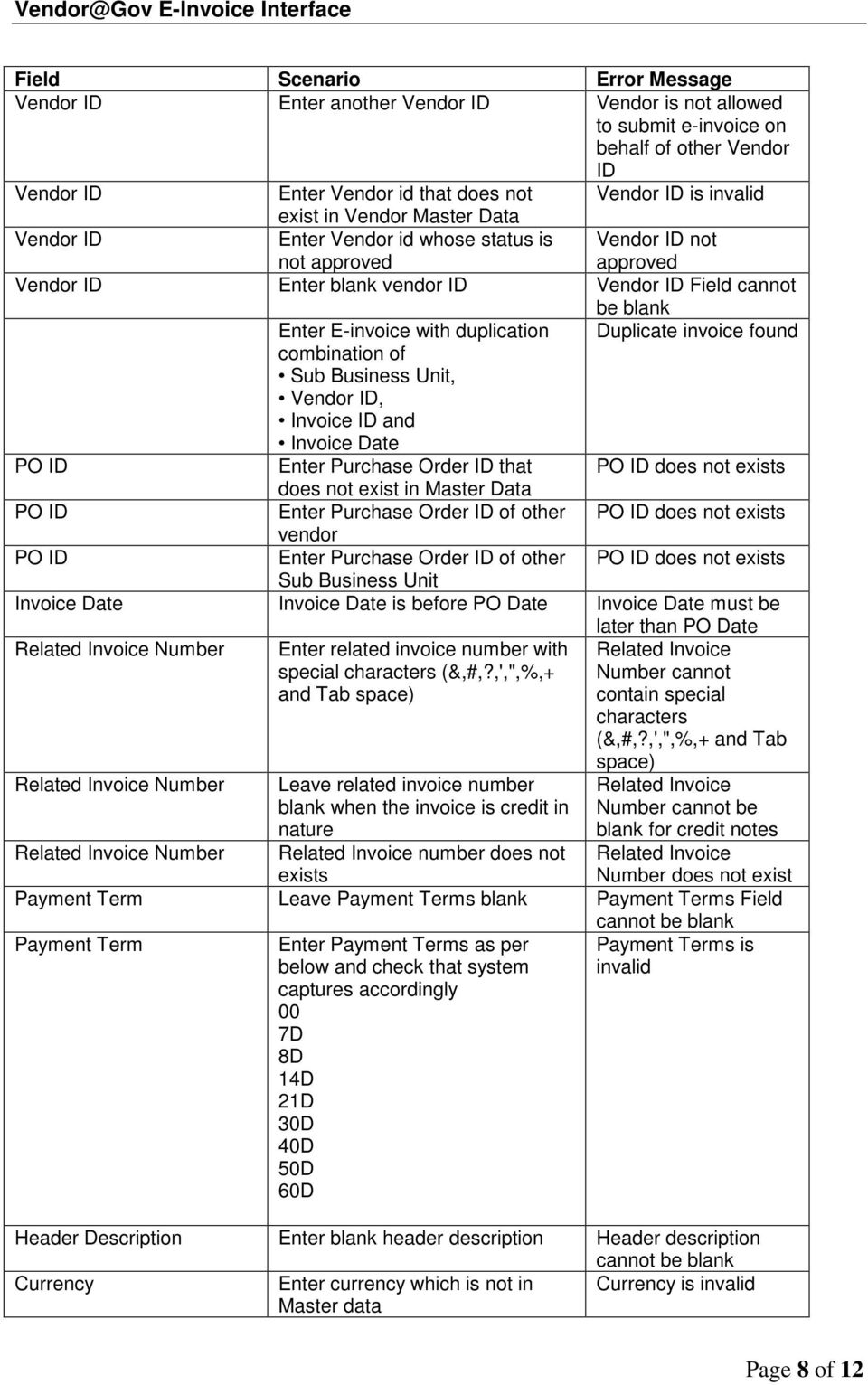
7 6. VALIDATION Validation File Extension File Size Accepted Values.dat Must be less than 5 MB File Validation: No Record Found/Missing Trailer Record Trailer Record is not at End of File Invalid Row ID Sequence Encountered for Row ID Duplicate Trailer or Record before Trailer is not VND Invalid Row ID Encountered Missing or Invalid Control Header Row ID Invalid Total Line Feed Invalid Hash Totals Data Validation: Field Scenario Error Message Sub BU Upload File with Blank Sub BU Sub BU Field cannot be blank Sub BU Upload File with Sub BU which Sub BU is invalid does not exist in Master table Sub BU Upload File with Sub Bu whose Sub BU is invalid status is inactive Attention To Upload File with Attention To Attention To Field Attention To Invoice Number Invoice Number blank Upload File with special characters (#,?,',",%,+ and Tab space) in Attention To Upload File with blank invoice number Upload File with special characters (&,#,?,',",%,+ and Tab space) in invoice number Attention To Field cannot contain special characters (#,?,",%,+ and Tab space) Invoice Number Field Invoice Number cannot contain special character (&,#,?,',",%,+ and Tab space) Invoice Date Enter invoice date more than 30 days old Invoice Date Upload File with blank invoice date Invoice Date Field Invoice Date Upload File with invalid Invoice Date ie, not dd/mm/yyyy format Invoice Date Field must be in dd/mm/yyyy format Invoice Date Enter invoice date later than today Invoice cannot be postdated Invoice cannot be back-dated by more than 30 days Page 7 of 12

8 Field Scenario Error Message Vendor ID Enter another Vendor ID Vendor is not allowed to submit e-invoice on behalf of other Vendor ID Vendor ID Enter Vendor id that does not Vendor ID is invalid exist in Vendor Master Data Vendor ID Enter Vendor id whose status is not approved Vendor ID not approved Vendor ID Enter blank vendor ID Vendor ID Field cannot be blank Enter E-invoice with duplication Duplicate invoice found combination of Sub Business Unit, Vendor ID, Invoice ID and Invoice Date PO ID Enter Purchase Order ID that PO ID does not exists does not exist in Master Data PO ID Enter Purchase Order ID of other PO ID does not exists vendor PO ID Enter Purchase Order ID of other PO ID does not exists Sub Business Unit Invoice Date Invoice Date is before PO Date Invoice Date must be later than PO Date Related Invoice Number Enter related invoice number with special characters (&,#,?,',",%,+ and Tab space) Related Invoice Number cannot contain special characters (&,#,?,',",%,+ and Tab Related Invoice Number Leave related invoice number blank when the invoice is credit in nature Related Invoice number does not exists space) Related Invoice Number cannot be blank for credit notes Related Invoice Number Related Invoice Number does not exist Payment Term Leave Payment Terms blank Payment Terms Field Payment Term Enter Payment Terms as per below and check that system captures accordingly 00 7D 8D 14D 21D 30D 40D 50D 60D Payment Terms is invalid Header Description Enter blank header description Header description Currency Enter currency which is not in Master data Currency is invalid Page 8 of 12
9 Field Scenario Error Message Currency Leave currency blank Currency Field cannot be blank Freight Amount Leave freight blank Freight Amount Field. Freight Amount Enter Freight Amount with Alphabets or special characters or blanks in between Add new line items to the e- Invoice Details with Purchase Order ID Freight Amount is invalid Invoice Lines must correspond to PO Lines Line Item Description Field Invoice Line Item Description Enter blank Invoice Line Item description Invoice Line Quantity Enter blank Quantity Quantity Field cannot be blank Invoice Line Quantity Enter Quantity amount more than Quantity cannot PO quantity amount exceed unbilled PO quantity Invoice Line Quantity Enter Quantity with 0 or negative numbers Quantity should be more than 0 Invoice Line Quantity Enter Quantity with Alphabets or special characters or blanks in Quantity format is invalid between Invoice Line Unit Price Enter blank Unit Price Unit Price Field cannot be blank Invoice Line Unit Price Enter Unit Price 0 Unit Price cannot be zero Invoice Line Unit Price Invoice Line Unit Price Enter Unit Price with Alphabets or special characters or blanks in between Enter Unit price different from the PO value Unit Price cannot contain special characters (&,#,?,',",%,+ and Tab space) (not available in database) Invoice Line Unit price does not match PO Line Unit Price Invoice Line GST Amount Leave GST Blank Invoice Line GST Field Invoice Line GST Amount Check GST tolerance: Line item without GST X 7% = A Line item total amount without GST X 1/100 = B Please ensure your GST Amount is 7% of your line item amount or zero for zero-rated supply. Invoice Line GST Amount Invoice Line GST Amount Tolerance level is between: A+B and A-B OR ZERO Enter GST amount with alphabets or special characters or blanks in between Enter Line GST amount when there is no GST reg number (GST applicability is N) Invoice Line GST Amount format is invalid Line GST Amount should be 0 when GST Applicability is N Invoice Line Number Enter blank Invoice Line Number Invoice Line Number Page 9 of 12

10 Field Scenario Error Message Invoice Line Number Enter Invoice Line Number with alphabets or special characters or blanks in between Invoice Line Number is invalid Invoice Line Number Enter duplicate Invoice Line Number Duplicate Invoice Line Number found Merchandise Amount Enter blank merchandise amount Merchandise Amount Merchandise Amount Enter Merchandise Amount with alphabets or special characters or blanks in between Merchandise Amount is invalid Merchandise Amount Total GST Enter Merchandise Amount which is not equal to (Quantity * Unit Price) + Line GST Amount Enter GST amount when there is no GST reg number (GST applicability is N) Enter (GROSS) Total GST not equal to sum of GST in line items Merchandise Amount should be equal to (Quantity * Unit Price) + GST Amount GST Amount should be 0 when GST Applicability is N Total GST Total GST does not match with GST amount in invoice lines Total GST Leave (GROSS) Total GST blank Total GST Field cannot Total GST Enter total GST with alphabets or special characters or blanks in between be blank Total GST Amount format is invalid Gross Amount Gross Amount is blank Gross Amount Field Gross Amount Check (GROSS) Total Amount with GST format Gross Amount is invalid Gross Amount Upload invoice with gross amount = 0 Gross Amount cannot be zero Gross Amount Gross amount not equals to sum of Merchandise Amount Gross Amount must be equal to Sum of Merchandise Amount GST Percentage Leave GST Percentage blank GST Percentage Field GST Percentage Enter GST percentage other than 0 or 0.00 or 0.07 or 7 GST Percentage must be 0 or 0.07 or 7 Page 10 of 12

11 7. HASHING FORMULA A Hash Total Value must be included in the Trailer Record. Algorithm: The hash total is based on the following fields: Invoice ID (Char 30) Gross Amount (Sign 23.2) As the Gross Amount is a signed number, it will have a decimal (.) at position 25 and potentially a - sign at any position between Therefore, the current method of splitting the amount into 2 sets of digits is no longer applicable. Instead, each value in gross amount should also be transformed just like Invoice ID. The following presents our recommendation: INVOICE ID GROSS AMOUNT Position: (1) Transform each alphanumeric character or sign value into a number (refer to table below Character Mapping Table) (2) Split Invoice ID field into two portions : Value A (15 alphanumeric value) - add up the transformed numbers from position 1-15 Value B (15 alphanumeric value) - add up the transformed numbers from position (3) Split Gross Amount field into two portions : Value C (15 sign value) - add up the transformed numbers from position 1-15 Value D (12 sign value) - add up the transformed numbers from position (4) Then apply the following formula : REMAINDER = mod (abs( (B + D) - (A + C) ), 13) (5) Hashed total = Sum of all REMAINDER. Page 11 of 12

12 Character Mapping Table Character Number Character Number Character Number Character Number Character Number 0 0 A 11 K 21 U B 12 L 22 V 32 Others C 13 M 23 W D 14 N 24 X E 15 O 25 Y F 16 P 26 Z G 17 Q 27 * H 18 R 28 / I 19 S 29 _ J 20 T 30 Space 40 Page 12 of 12

How To Use Nfs@Gov On A Pc Or Mac Or Mac (For Mac)
 Vendors@Gov Enhancements 1 Overview List of Enhancements to Vendors@Gov Vendor Management 1 2 3 Update both contact and bank details in the same page, by clicking on Update Vendor Details Print vendor
Corporate Online. Import format for Payment Processing Service files
 Corporate Online Import format for Payment Processing Service files Payment Processing Service file specification About Corporate Online Westpac Corporate Online is an internet-based electronic platform,
Managing Your Payment Matters
 Managing Your Payment Matters Once you have successfully logged onto the Vendors@Gov webpage, you can proceed to do the following: Create e-invoices Manage e-invoices Delete e-invoices View Status of e-invoices
Briefing on Submission of Electronic Invoice to Government
 Briefing on Submission of Electronic Invoice to Government Venue: SCCCI, Unity Seminar Room Date: 23 October 2008 Jointly organised by: Agenda Introduction Benefits How to send e-invoice Important points
Ariba einvoicing Supplile i r r P O F lilp i T ra r in i in i g
 Ariba einvoicing Supplier PO Flip Training Invoicing Mission Streamline Purchase-to-Pay process to save time and costs Direct benefits Reduced invoice (manual) data-entry processes Increased billing and
Quick Reference Guide Payment Processing: How to Use the Payment Request Form for Suppliers
 Payment Processing: How to Use the Payment Request Form for Suppliers Overview: The Payment Request Form (PRF, formerly NEPF) can be used to pay low dollar invoices
TECHNICAL SPECIFICATIONS GUIDE CANADA SAVINGS BONDS. csb.gc.ca PAYROLL SAVINGS PROGRAM 20$ 40$ 80$ 50 $ 30$ TECHGUIDE-14
 7 TECHNICAL SPECIFICATIONS GUIDE CANADA SAVINGS BONDS PAYROLL SAVINGS PROGRAM csb.gc.ca 40 5 30 0 20 80 70 0 What are you saving for? 50 40 20 0 80 4 20 7 7 TECHGUIDE-4 TECHNICAL SPECIFICATIONS GUIDE For
Business Online Transaction Import & Export (Download) File Formats REFERENCE DOCUMENT
 Business Online Transaction Import & Export (Download) File Formats REFERENCE DOCUMENT Table of Contents Introduction... 3 Import (Payments)... 3 Export/Download... 3 Import Formats... 4 Deskbank Import
E-Invoicing Supplier Manual
 E-Invoicing Supplier Manual Version: 1.0 2 E-Invoicing Supplier Manual Table of Contents 1 Introduction 3 1.1 About This... Manual 3 1.2 Getting Started... 3 2 Understanding E-Invoicing 4 2.1 Overview...
SIF Validation Tool. Wages Protection System Qatar Central Bank& Ministry of Labour And Social Affairs. End User Guide
 SIF Validation Tool Wages Protection System Qatar Central Bank& Ministry of Labour And Social Affairs End User Guide [1] SIF Validation Tool at a Glance Content 1 SIF VALIDATION TOOL AT A GLANCE 3 2 GETTING
CENTRAL SUSQUEHANNA INTERMEDIATE UNIT Application: Fund Accounting
 CENTRAL SUSQUEHANNA INTERMEDIATE UNIT Application: Fund Accounting Fund Accounting Manual Check Worksheet Learning Guide 2010 Central Susquehanna Intermediate Unit, USA Table of Contents Introduction...1
Livestock Office Payments: Creditor Cashbook Transactions
 Livestock Office Payments: Creditor Cashbook Transactions 18/06/2015 Contents Paying Creditors - Find Creditors Due for Payment... 2 Payment Due Report... 2 Creditors Aged Trial Balance... 3 Processing
Reference Manual Agresso Accounts Payable
 Reference Manual Agresso Accounts Payable Contents Project background...1 Why Agresso?...1 Viewing Supplier Details...2 Scanning Invoices...5 Load Invoices...5 Invoice Registration...7 Overview...7 Purchase
Lloyds Banking Group Guide to Receiving Orders and Getting Paid (Version 2.0 June 2015)
 Lloyds Banking Group Guide to Receiving Orders and Getting Paid (Version 2.0 June 2015) The purpose of this short guide is to: Explain how Lloyds Banking Group uses Purchase Orders (POs) for goods and
COMMON ISSUES IN PAYMENT
 COMMON ISSUES IN PAYMENT Scope of Briefing Invoicing Key Highlight FAQ s Invoicing Key Highlight Claim Submission Supplier s/ Vendor shall systematically submit claim as per payment milestone Suppliers
Distribution Training Guide. D110 Sales Order Management: Basic
 Distribution Training Guide D110 Sales Order Management: Basic Certification Course Prerequisites The combined D110 Sales Order Management certification course consists of a hands- on guide that will walk
User Guide for Payroll Service (APS+)
 User Guide for Payroll Service (APS+) Sept 2015 No part of this document may be reproduced, stored in a retrieval system of transmitted in any form or by any means, electronic, mechanical, chemical, photocopy,
SAP User Guide Create Purchase Orders
 IT Services Leicester Learning Institute Partnership SAP User Guide Create Purchase Orders Document Purpose This guide explains how to create a Purchase Order on SAP. This guide is not for staff in Chemistry
Kuali Financial System Interface Specification for Electronic Invoice Feed
 Kuali Financial System Interface Specification for Electronic Invoice Feed Overview The current financial system used at Cornell will be replaced by the Kuali Financial System (KFS). This will occur July
INVENTORY MANAGEMENT. TechStorm. http://www.gotechstorm.com/howto/inventorymanagement.pdf
 INVENTORY MANAGEMENT TechStorm http://www.gotechstorm.com/howto/inventorymanagement.pdf Inventory Management Table Of Contents Add Inventory Items In Tablet... 3 Transaction Flow for Adding Inventory in
Introduction to Client Online. Factoring Guide
 Introduction to Client Online Factoring Guide Contents Introduction 3 Preparing for Go live 3 If you have any questions 4 Logging In 5 Welcome Screen 6 Navigation 7 Navigation continued 8 Viewing Your
Hess ecommerce. ADP einvoicing Guide
 Hess ecommerce ADP einvoicing Guide Last Updated June 26, 2015 Table of Contents Invoice Requirements... 2 High-level Invoicing Process... 2 Step by Step Instructions Submitting a Service Invoice... 3
The Johnson Controls Electronic Invoice Management Tool. Paymode-X Documentation for ISP Suppliers Rev: 25-JUL-12
 The Electronic Invoice Management Tool Paymode-X Documentation for ISP Suppliers Rev: 25-JUL-12 Table of Contents Topic Page # Invoice Reminders & Contacts for Questions 3 Login to Paymode-X 4-7 Entering
Invoice Entry. Field Descriptions. A number used to identify the batch. This number must be unique for each user. Batch
 Invoice Entry Objective The Invoice Entry screen allows the entry of invoices, credit memos, wire transfers, and direct disbursements in batch mode. When batches are complete, they are proofed, posted,
How To Use Quickbooks
 OSP / QuickBooks Web Connector Setup Overview The OrderStream Pro Business Manager can be integrated in real time with QuickBooks Financial Software. Key data flows automatically between applications as
Health Savings Account Contribution Guide Version 7.0
 Health Savings Account Contribution Guide Version 7.0 Page 1 Introduction... 3 Getting started... 3 Step 1 Sign up for the Account Number File (ANF)... 3 Step 2 Select a contribution method... 4 Step 3
Accounts Receivable Invoice Upload
 Directions for the AR Invoice Upload Spreadsheet The AR Invoice Upload Spreadsheet is used to enter Accounts Receivable invoice information (History only, no GL Entry) to the OGsql system. This spreadsheet
AAFCO Check Sample Program New Data Reporting Website Manual Date of Issue: March 1 st 2014
 Victoria S. Siegel, Ph.D., Chair Collaborative Check Sample Program Committee AAFCO Check Sample Program New Data Reporting Website Manual Date of Issue: March 1 st 2014 1. Registered participants in any
D a n s k e B a n k M e s s a g e I m p l e m e n t a t i o n G u i d e. M a s t e r C a r d C o r p o r a t e C a r d T r a n s a c t i o n s
 D a n s k e B a n k M e s s a g e I m p l e m e n t a t i o n G u i d e M a s t e r C a r d C o r p o r a t e C a r d T r a n s a c t i o n s Page 1 10 Change log Version Date Change 2 14.10.2014 Unique
Directions for the AP Invoice Upload Spreadsheet
 Directions for the AP Invoice Upload Spreadsheet The AP Invoice Upload Spreadsheet is used to enter Accounts Payable historical invoices (only, no GL Entry) to the OGSQL system. This spreadsheet is designed
Accounts Payable Expense Distribution Tables
 Accounts Payable Expense Distribution Tables Use Expense Distribution Table Maintenance to set up tables with general ledger accounts and distribution percentages. The tables can then be selected in Invoice
AFN-StudentBillingEFTGuide-040904
 040904 2004 Blackbaud, Inc. This publication, or any part thereof, may not be reproduced or transmitted in any form or by any means, electronic, or mechanical, including photocopying, recording, storage
Rochester Institute of Technology. Oracle Training: Advanced Financial Application Training
 Rochester Institute of Technology Oracle Training: Advanced Financial Application Training Table of Contents Introduction Lesson 1: Lesson 2: Lesson 3: Lesson 4: Creating Journal Entries using Excel Account
PARITY SOFTWARE S SAGE ERP X3 CASHBOOK USER MANUAL
 PARITY SOFTWARE S SAGE ERP X3 CASHBOOK USER MANUAL Introduction Parity s Cashbook allows for the efficient reconciliation of Bank Statements to Bank Entry transactions within Sage ERP X3. Parity s Cashbook
User Guide Electronic Funds Transfer (EF T) Service
 User Guide Electronic Funds Transfer (EF T) Service Contents What You Need to Know About ATB s EFT Service 4 Funding EFT Files 4 1.Liquidity Limit 4 2.Exchange Funding 5 Limits 5 1.File Limits 6 2.Limits
REP200 Using Query Manager to Create Ad Hoc Queries
 Using Query Manager to Create Ad Hoc Queries June 2013 Table of Contents USING QUERY MANAGER TO CREATE AD HOC QUERIES... 1 COURSE AUDIENCES AND PREREQUISITES...ERROR! BOOKMARK NOT DEFINED. LESSON 1: BASIC
4. Do not make changes to the Master record. To create a custom form, click Copy.
 Custom Invoice Import Custom imports allow for the creation of Munis invoices through a fixed or delimited file import. Customization of the import form can be edited to fit an existing export or report
North Dakota University System
 PO Vouchers Training Manual 3130 Kilgore Road, Suite 400 Rancho Cordova, CA 95670 916.669.3720 www.maximus.com PO VOUCHERS OVERVIEW...3 PO VOUCHER CREATION...5 Step 1 Copy PO/Receiver Data to Voucher...5
PeopleSoft Query Training
 PeopleSoft Query Training Overview Guide Tanya Harris & Alfred Karam Publish Date - 3/16/2011 Chapter: Introduction Table of Contents Introduction... 4 Navigation of Queries... 4 Query Manager... 6 Query
Invoices arriving into school should be stamped and sent off to Accounts Payable, where they will be scanned into SAP
 SAP Vendor Invoice Management - Guidance for Coders Invoices arriving into school should be stamped and sent off to Accounts Payable, where they will be scanned into SAP You will be notified of invoices
Inform Upgrade Version 20.0.77.77. New Features Improved Google Calendar Synchronization
 **The latest Inform upgrade includes features and fixes from all previous upgrades. Please review the upgrade notes for any additional versions that fall between your current version and this upgrade.**
Matching, Amending and Foreign Invoices in Accounts Payable
 Matching, Amending and Foreign Invoices in Accounts Payable Table of Contents 1. Overview of Matching an External Invoice... 3 2. Matching an Invoice to a Purchase Order... 4 3. Additional Charges for
Entering a Requisition to Create a Blanket Purchase Order (One Line)
 Entering a Requisition to Create a Blanket Purchase Order (One Line) Blanket Orders are not line-item specific. Departments may use Blanket Orders on a recurring basis to set aside a sum of money to a
ACHIEVE THIRD PARTY MANAGEMENT (3PL)
 ACHIEVE THIRD PARTY MANAGEMENT (3PL) USER MANUAL Version 6.5 PRESENTED BY ACHIEVE IT SOLUTIONS Copyright 2012-2016 by Achieve IT Solutions These materials are subject to change without notice. These materials
How To Manage A Pom.Net Account Book
 ACCOUNTS PAYABLE This manual walks you through entering different types of vouchers, approving, budget checking, closing, deleting and finalizing PO vouchers as well as inquiring on payment information
CHAPTER 6: SALES TAX SETUP
 Chapter 6: Sales Tax Setup CHAPTER 6: SALES TAX SETUP Objectives Introduction The objectives are: Provide an overview on sales tax Create Ledger Posting Groups Create Sales Tax Authorities Create Sales
Accounts Receivable. Chapter
 Chapter 7 Accounts Receivable The Accounts Receivable module displays information about individual outstanding income sources. Use this screen to verify that invoice receipts, cash receipts, and other
PUBLIC. How to Manage Landed Costs. Countries: All. Solutions from SAP. SAP Business One 2007 A and 2007 B. December 2008. English
 PUBLIC Countries: All Solutions from SAP SAP Business One 2007 A and 2007 B December 2008 English Contents... 3 Introduction... 3 Business Scenario Description... 3 Defining Imported Goods... 4 Defining
CORE Oklahoma. State of Oklahoma COR118 Accounts Payable Inquiry and Reporting Manual. Revised: October 1, 2007
 State of Oklahoma COR118 Accounts Payable Inquiry and Reporting Manual COR118 Accounts Payable Inquiry and Reporting Page 1 of 48 Authorized by: [_CORE_] Original Issue: [11/17/2003] Maintained by: [ Accounts
ACL Command Reference
 ACL Command Reference Test or Operation Explanation Command(s) Key fields*/records Output Basic Completeness Uniqueness Frequency & Materiality Distribution Multi-File Combinations, Comparisons, and Associations
Supply Chain Finance WinFinance
 Supply Chain Finance WinFinance Customer User Guide Westpac Banking Corporation 2009 This document is copyright protected. Apart from any fair dealing for the purpose of private study, research criticism
ANNEXURE - I. Back-office Interfaces
 ANNEXURE - I Back-office Interfaces I. Corporate Action Master Export Utility Input criteria The following two options would be available to extract this master information. 1. Full Export: In this case,
Invoice Inquiry V1.0 11/26/2007
 Invoice Inquiry V1.0 11/26/2007 Invoice Inquiry Invoice inquiry is used to search for invoice related information such as status and expected payment date. Using this tool users can search for invoices
Plastic Card Claims Automation Specifications Document
 Plastic Card Claims Automation Specifications Document Version: 1.3 Last modified: April 28, 2009 The Plastic Card Policy is underwritten by CUMIS Insurance Society, Inc., a member of the CUNA Mutual Group.
PeopleSoft Training Notes. Accounts Payable New Forms and Best Practice
 PeopleSoft Training Notes Accounts Payable New Forms and Best Practice FINANCIAL SERVICES FINANCE & RESOURCES OFFICE CENTRAL ADMINISTRATION UNIVERSITY OF WESTERN AUSTRALIA FINANCIAL SERVICES (M449) UNIVERSITY
AFN-AccountsPayableEFTGuide-120506
 120506 2006 Blackbaud, Inc. This publication, or any part thereof, may not be reproduced or transmitted in any form or by any means, electronic, or mechanical, including photocopying, recording, storage
Generate Electronic Payments in Accounts Payable
 Generate Electronic Payments in Accounts Payable IMPORTANT NOTICE This document and the Sage 300 Construction and Real Estate software may be used only in accordance with the Sage 300 Construction and
The Emirates Group Destination and Leisure Management Division (DLM)
 The Emirates Group Destination and Leisure Management Division (DLM) Electronic Invoice Processing User Manual Ver.2.0 01-Jul-2015 1 Table of Contents INTRODUCTION... 3 ACCESS & LOGIN... 4 EXCEL SHEET
Accounts Receivable User Manual
 Accounts Receivable User Manual Confidential Information This document contains proprietary and valuable, confidential trade secret information of APPX Software, Inc., Richmond, Virginia Notice of Authorship
TheFinancialEdge. Configuration Guide for Accounts Payable
 TheFinancialEdge Configuration Guide for Accounts Payable 102312 2012 Blackbaud, Inc. This publication, or any part thereof, may not be reproduced or transmitted in any form or by any means, electronic,
Inventory Valuation -
 Inventory Valuation - Inventory valuation means. First in First Out [FiFo] Step Action 1. From the Start Center select Go To > Inventory > Item Master. 2. Click the Insert New Item toolbar button. Result:
CF2/MQ Transmission Guides. 14.15 FAST Direct Deposits/Withdrawal At Custodian via CF2 (CF2DWX): User s Guide
 CF2/MQ Transmission Guides 14.15 FAST Direct Deposits/Withdrawal At Custodian via CF2 (CF2DWX): User s Guide The Depository Trust Company October 2015 Copyright Copyright Copyright 2015 by The Depository
QAD Usability Customization Demo
 QAD Usability Customization Demo Overview This demonstration focuses on one aspect of QAD Enterprise Applications Customization and shows how this functionality supports the vision of the Effective Enterprise;
Offline Payment Methods
 Offline Payment Methods STRONGVON Tournament Management System 1 Overview The STRONGVON Tournament Management System allows you to collect online registration, while arranging for offline payment methods
Synergist Spotlight on
 Synergist Spotlight on Improving the appearance of Synergist Quotations Sending out a quotation document produced by Synergist can involve some trial and error. Although the output should hopefully look
European Space Agency esa-p
 European Space Agency esa-p Frequently Asked Questions and answers for suppliers 1 Table of Questions 1. Do I have to submit in esa-p next to the invoice as a separate object a Milestone Achievement Certificate
Navy Construction / Facilities Management Invoice
 Invoicing Receipt Acceptance Property Transfer Navy Construction / Facilities Management Invoice To learn how to electronically submit and take action on irapt documents through simulations and step-by-step
Batch Processing Version 2.0 Revision Date: April 29, 2014
 Batch Processing Version 2.0 Revision Date: April 29, 2014 1 Processing payments with batch files is very simple: 1. You put your payment records into tab-delimited text files. In this format, data items
Query 0BBP_INV_Q002 - Invoices per Vendor
 Query 0BBP_INV_Q002 - Invoices per Vendor Query Properties System: BIC Query: 0BBP_INV_Q002, Invoices per Vendor Version: 7.x InfoProvider: 0BBP_INV Author: C5020319 Key Date: - Last changed by: USER10
Sage 300 ERP 2012. What's New
 Sage 300 ERP 2012 What's New This is a publication of Sage Software, Inc. Version 2012 Copyright 2012. Sage Software, Inc. All rights reserved. Sage, the Sage logos, and the Sage product and service names
How Dynamics GP Receivables and Collections Can Save you Money
 Aspire 2009 How Dynamics GP Receivables and Collections Can Save you Money Together driving your business to a new level and Accelerating your growth and profitability Objectives Automate /Streamline Routine
User Manual for efiling of Return for VAT (ver. 2.2) Download/ Upload Return Filing Method E-FILING RETURN FOR
 E-FILING OF RETURN FOR VAT USER MANUAL National Informatics Centre, WBSC Page 1 of 48 Online Filing of Returns Thanks for accessing the website of the Directorate of Commercial Taxes, West Bengal. Now
Microsoft Axapta Inventory Closing White Paper
 Microsoft Axapta Inventory Closing White Paper Microsoft Axapta 3.0 and Service Packs Version: Second edition Published: May, 2005 CONFIDENTIAL DRAFT INTERNAL USE ONLY Contents Introduction...1 Inventory
Sage Simply Accounting Product Update for Jan 1, 2011
 Sage Simply Accounting Product Update for Jan 1, 2011 Sage Simply Accounting Product Update Install the Correct Product Update... 1 About This Update... 1 When do I install the update?... 1 Where can I
CCF/CCF-II/MDH Transmission Guides. 6.09 DMB1/5: Direct Mail BUST Function User=s Guide
 CCF/CCF-II/MDH Transmission Guides 6.09 DMB1/5: Direct Mail BUST Function User=s Guide The Depository Trust Company February 2003 ( DTC ). All rights reserved. This work is proprietary and is intended
The EDI 810 specification is separated into logically distinct groups, which are composed of particular segment types.
 EDI 810 File Format Direct Commerce (DCI) supports the EDI 810 format for uploaded invoice transactions. This document describes our implementation of the EDI 810 format for invoicing Carolinas Healthcare
White Paper. Credit Checking. Prepared By: Mohit
 White Paper on Credit Checking Prepared By: Mohit Document Amendment Record * A- Added, M- Modified, D-Deleted Version no. Date Section no. A/M/D* Description of Change Applicable Documents and References
P U B L I C R E L E A S E
 P U B L I C R E L E A S E Document Classification: Official Publication South African Revenue Service 2012 Page 1 of 57 Revision History Date Version Description Author/s 13 July 2010 V1.0.0 Published
Introduction to the Data Migration Framework in Microsoft Dynamics by Ruben Barron
 Introduction to the Data Migration Framework in Microsoft Dynamics by Ruben Barron Senior Consultant - Blue Horseshoe Solutions. 1 Table of Contents Intro to the Data Migration Framework (DMF)... 3 DMF
Informatics for Integrating Biology and the Bedside. i2b2 User Guide. Import Data View. Document Version: 1.5.1 I2b2 Software Release: 1.
 Informatics for Integrating Biology and the Bedside i2b2 User Guide Import Data View Document Version: 1.5.1 I2b2 Software Release: 1.5 Table of Contents INTRODUCTION...3 LAYOUT OF THE IMPORT WIZARD TAB...3
Sage 300 2014 Product Update 4 Release Notes
 Sage 300 2014 Product Update 4 Release Notes Product Update 4 contains a modified version of one or more Sage 300 program components. It is not a full upgrade or a product replacement. It is valid only
HorseTrak Accounting System
 HorseTrak Accounting System For Users of HT Gold and HT Deluxe General In this manual we explain the operation of the accounting features of HorseTrak Software. While teaching the principles of accounting
Infusion Business Software Update 8.200
 Infusion Business Software Update 8.200 Administration The re-index process now has an option to complete all the Integrity checks for Customers, Suppliers, Products and Financials along with a History
Non Resident Withholding Tax And Resident Withholding Tax (RWT/NRWT) Specification Document
 Non Resident Withholding Tax And Resident Withholding Tax (RWT/NRWT) Specification Document For the year ending 31 March 20 Table of Contents 1 INTRODUCTION... 3 2 SUMMARY OF CHANGES EFFECTIVE 1 APRIL
WBSCM Release 2.2.12.0 was deployed on July 19, 2012. Key changes in WBSCM functionality are described in these release notes.
 WBSCM 2.2.12.0 Release Notes WBSCM Release 2.2.12.0 was deployed on July 19, 2012. Key changes in WBSCM functionality are described in these release notes. Vendor and other External User Impacts The following
Employment intermediaries: data requirements for software developers
 Employment intermediaries: data requirements for software developers Version 1.4 Last updated: 3 August 2015 1. Introduction... 1 2. Report template... 1 Formatting a CSV report... 1 3. Online service...
Commission Accounting User Manual
 Commission Accounting User Manual Confidential Information This document contains proprietary and valuable, confidential trade secret information of APPX Software, Inc., Richmond, Virginia Notice of Authorship
Accounts Payable Invoice Entry Monroe County, WI
 2014 Accounts Payable Invoice Entry Invoice scanners are responsible for entering vendor invoice data and documentation into Munis. This document outlines the procedure of invoice entry and batch scanning.
FILE FORMAT OF PAYMENT ORDERS ACCEPTED BY CITIBANK EUROPE PLC FOR CITIBUSINESS DIRECT INTERNET BANKING
 FILE FORMAT OF PAYMENT ORDERS ACCEPTED BY CITIBANK EUROPE PLC FOR CITIBUSINESS DIRECT INTERNET BANKING FILE FORMAT OF PAYMENT ORDERS for Citibank Europe plc, organizační složka CitiBusiness Direct Internet
COUNTY OF MENDOCINO. MUNIS Finance System How to Enter an Invoice. Created by: Auditor-Controller May 2007 v1
 COUNTY OF MENDOCINO MUNIS Finance System How to Enter an Invoice Created by: Auditor-Controller May 2007 v1 HOW TO ENTER AN INVOICE Overview Invoices are entered into MUNIS in batches. Each department
Revised KYC Text File Structure 2.0
 Revised KYC Text File Structure 2.0 S. Field Name Type Size Validation Remark No. 1. UAN Number 12 i. Mandatory ii. Number should be as per verhoeff algorithm iii. iv. UAN should present in database Atleast
MSInvoice Electronic Submission of Invoices
 MSInvoice Electronic Submission of Invoices Last Update: March 2014 Contents 1. Introduction... 2 WHAT IS MSINVOICE?... 2 MSINVOICE AND STATUTORY COMPLIANCE RULES IN SUPPORT OF E-INVOICING... 2 2. Log
Excel 2007 Tutorials - Video File Attributes
 Get Familiar with Excel 2007 42.40 3.02 The Excel 2007 Environment 4.10 0.19 Office Button 3.10 0.31 Quick Access Toolbar 3.10 0.33 Excel 2007 Ribbon 3.10 0.26 Home Tab 5.10 0.19 Insert Tab 3.10 0.19 Page
Accounts Payable System Administration Manual
 Accounts Payable System Administration Manual Confidential Information This document contains proprietary and valuable, confidential trade secret information of APPX Software, Inc., Richmond, Virginia
Department of the Treasury Division of Purchase and Property QUICK REFERENCE GUIDE: SUBMIT A QUOTE SELLERS
 Department of the Treasury Division of Purchase and Property QUICK REFERENCE GUIDE: SUBMIT A QUOTE SELLERS Rev. Dec 24, 2015 12:42 PM Table of Contents 1. Purpose... 3 2. Summary Instructions... 3 2.1
Excel 2003 Tutorials - Video File Attributes
 Using Excel Files 18.00 2.73 The Excel Environment 3.20 0.14 Opening Microsoft Excel 2.00 0.12 Opening a new workbook 1.40 0.26 Opening an existing workbook 1.50 0.37 Save a workbook 1.40 0.28 Copy a workbook
The Automated Earnings Reporting System Submitting your payroll data online
 INTEGRITY OPERATIONS Submitting your payroll data online This document can be made available in alternative formats such as Braille, large print, audio cassette, CD, DAISY, and computer diskette. Call