
Version Filename Part Number Opcode V_ FL bin FL bin.md5 FL pkg
|
|
|
- Janice Lewis
- 9 years ago
- Views:
Transcription
1 This document outlines: Cyclades ACS Advanced Console Server Appliances Release Notes Version September 24 nd Update Instructions 2. Appliance Firmware Version Information 3. Enhancements 4. Fixes 5. Known Issues / Restrictions 6. Configuration Details 7. Change Log Update Instructions Please refer to your installation/administration/user guide for detailed instructions to update the Cyclades ACS Advanced Console Server to version In order to have all features listed in this release available through DSView 3 management software, DSView 3 software version or later and Cyclades ACS Advanced Console Server plug-in version are required. An appliance firmware package to upgrade from DSView 3 management software is also available. After Cyclades ACS Advanced Console Server firmware has been upgraded to version , it is mandatory that the Web browser cache of any system which intends to be connected to the Cyclades ACS Advanced Console Server Web interface is cleaned up. Cyclades ACS Advanced Console Server firmware version provides an internal mechanism which preserves existing configuration when upgrading from firmware versions and later. However, it is strongly recommended that you back-up system configuration before the firmware version is upgraded. Appliance Firmware Version Information Appliance/Product Firmware Type Cyclades ACS console server (all models) Version Filename Part Number Opcode V_ FL bin FL bin.md5 FL pkg FL FL

2 Enhancements Please refer to your installation/administration/user guide for a detailed list of features supported by Cyclades ACS Advanced Console Server version Major features of Cyclades ACS Advanced Console Server include: I. Power Mgmt supports new Power Management Distribution Unit (PDU):. Avocent Power Management Distribution Unit (PM 1000, PM 2000 and PM 3000 families).. ServerTech Smart CDU with version 6.0g or later. II. pmcommand has new commands to support the measured information of the new PDUs:. powerondelay - Display or configure post turn on outlet delay.. poweroffdelay Display or configure post turn off outlet delay.. coldstartdelay - Set the duration of the cold start delay for PDU.. currentthreshold - Display or set the threshold for current of one element.. powerinfo - Display or clear the power consumption of one element.. cumulativepower - Display or clear the cumulative power consumption of one element.. powerfactor - Display or reset the recorded power factor of one element.. voltageinfo - Display or clear the recorded voltage for one element.. sensors - Display or set the environment monitoring sensors. III. Web User Interface PDU Power Mgmt menu. The following pages are upgraded:. Outlets Manager -> Show: table with Current, Power Consumption and Alarm state for PDU. View IPDUs Info displays for each detected PDU:.. number of banks.. number of phases.. current, power consumption, voltage and power factor per PDU, Phase and Bank... environment sensors information. Configuration of the current thresholds for the PDU, for each Phase and for each Bank. IV. New Enterprise MIB to address the information from the new PDU.. new tables for PDU, Phases, Banks and Outlets with information about current, voltage, power factor, power consumption.. new table with information about environment monitoring sensors. V. OpenSSL package was upgrade from version 0.9.8g to 0.9.8l because of security vulnerability CVE VI. Update on the Avocent Certificate used by java applet on Connect.

3 VII. The authorization group via RADIUS authentication is accepting new syntax and more than one attribute FRAMED-FILTER-ID in one single message Now the group_name= string and the semicolon in the end of the atrribute are optional. New Syntax: Framed-Filter-Id = "[group_name=] <group1> [, <group2>][;]" Framed-Filter-Id += "[group_name=] <group11> [, <group22>][;]" Examples: 1) Framed-Filter-Id = "group1, my_group, group4" Framed-Filter-Id += "group11, group4" 2) Frame-Filter-Id = group_name=group1,my_group,group4; VIII. Power Mgmt Menu will be available for all sessions sharing the access to the serial port with merged outlets for authorized users. IX. New event for power supply fails in dual power supply units. The new CYCLADES-ACS-TRAP-MIB.ASN file describes the new event. Fixes Cyclades ACS Advanced Console Server firmware version contains the following fixes: 1. SSHD will send during negotiation with the client the list of authentication methods available based on its configuration (/etc/ssh/sshd_config file). Fixed L3 case (SAP ). 2. Sierra Wireless GPRS 750 card is detected as serial device. Fixed L3 case. 3. LDAPS does not require manual configuration in the /etc/ldap.conf file. 4. Support for power control outlets in a daisy-chained through SNMP Set command. Fixed L3 case. 5. When adding a community (SNMP Configuration), if appliance is using Ethernet dual stack mode, the community will be valid for both networks, IPv4 and IPv6. However source should be configured using the IPv4- mapped-ipv6 address. 6. The DEFAULT polling rate was changed from 10 to 20 seconds. Data monitoring in this release collects more data than the old version. 7. Pool of Serial Ports without the IPv6 alias configured can be accessed using one of configured alias. 8. Radius authentication will do the authentication for log-in user in the dial-in connection. Fixed L3 case (SAP ). 9. Fixed L3 case: new syntax for authorization group via RADIUS authentication. (SAP ).
![New Syntax: Framed-Filter-Id = "[group_name=] <group1> [, <group2>][;]" Framed-Filter-Id += "[group_name=] <group11> [, <group22>][;]" Examples: 1) Framed-Filter-Id = "group1, my_group, group4"](/docs-images/48/18460718/images/page_3.jpg "Framed-Filter-Id += \"group11, group4\" 2) Frame-Filter-Id = group_name=group1,my_group,group4; VIII.")
4 Known Issues / Restrictions Known issues from previous versions still present in this one: 1. Power Mgmt is taking more time to get all information from the PDU during start time when there is a big number of PDUs to be detected. During this phase, users can feel some slowness when accessing the appliance. 2. Configuration of alarm current threshold per segment is not available for Cyclades Intelligent Power Distribution Unit (IPDU) with 2-segment running firmware version or early 3. Detection of Cyclades IPDU with 2-segment will fail if the unit is daisy chained after an Avocent PM PDU running version This problem affects the Power Device Add operation through DSView 3 software, because the chain will not be detected. 4. Detection of Cyclades IPDU with 2-segment running firmware version will fail if the unit is daisy chained after a Cyclades IPDU running firmware version The configuration of polling rate is by IPDU; however it is effective for the serial port. If the serial port has a chain of IPDUs, the poll rate will be the lesser value. The poll rate needs to be greater than the DEFAULT value (20000 ms), if not, the DEFAULT value will be used. 6. Billing, Modem Replace, Generic Dial and Raw Data 2 ways features were removed from the Cyclades ACS Advanced Console Server due to size limitations. 7. The support for -F option (force upgrade for PDUs without logical connection) was removed from pmfwupgrade command. 8. Web browser Netscape 8.1 is not supported to access Cyclades ACS Advanced Console Server Web interface. 9. Using Cyclades ACS Advanced Console server Web interface, whenever a new user is configured with privileges to manage the outlets of a certain server (Ports -> Physical Ports -> Modify Selected Ports -> Power Management), it is necessary to press buttons Try Changes or Apply Changes before the new user can be seen in Applications (Applications - > PMD Configuration -> Users Management). 10. Cyclades ACS Advanced Console Server v3.0.0 was the last firmware version that was compatible with AlterPath Manager (APM) v The upgrade of the Cyclades ACS Advanced Console Server firmware code may fail if the internal files are concurrently being accessed by another process or operation. If this occurs, please try firmware upgrading again until it succeeds. When the upgrade operation is performed from DSView 3 management software, make sure to review the Operation Results and confirm it has finished successfully before the Cyclades ACS

5 Advanced Console Server can be rebooted. It is also recommended that the DSView 3 management software status polling is disabled while firmware upgrade is run. NOTE: Please do not reboot the Cyclades ACS Advanced Console Server if the firmware upgrade operation has failed. It will render the console server completely inoperable and require technical assistance. 12. The Cyclades ACS Advanced Console Server Boot Application will not be upgraded to support IPV6 protocol, which means that Cyclades ACS Advanced Console Server boot configuration will not support IPv6 protocol. If firmware upgrade using IPv6 is necessary, the user can do it through FTP or scp using either WMI (Web Management Interface) or CLI (Command Line Interface). 13. IPv6 support will not be available for the following services: a. IPMI (Intelligent Power Management Interface) b. NIS Remote Authentication c. Port Virtualization (Clustering) d. NFS (Network File System) e. LPD (Line Printer Daemon) 14. IPv6 support in Dial-up Connections Cyclades ACS Advanced Console Server plug-in version for DSView management software (or later) will not allow configuration of IPv6 addresses for dial-up connections. Communication between DSView (or later) software and appliance units (including the Cyclades ACS Advanced Console Server while in contingency mode (modem connection active) will be encapsulated in IPv4 over PPP (Point to Point) dial connections. 15. Samba client access to the File System with the Windows operating system interface was removed from Cyclades ACS Advanced Console Server image due to size limitations. 16. The PCMCIA commands suspend, resume and reset are not supported with the Linux Kernel PCMCIA Ethernet - Xircom cards only work at 10 Mbps when connected to 3Com and D-Link hub/switches. 18. When the Hostname Discovery feature is enabled, the Physical Ports screen doesn t automatically reflect Hostname changes in the servers connected to the Cyclades ACS Advanced Console Server serial ports. It is necessary to log-out from the Web interface, and then log-in again to refresh the browser cache and load the new names. 19. As DHCPv6 protocol does not provide IPv6 prefix lengths, just IPv6 addresses, there must be an IPv6 router providing advertisement messages with network prefixes to the Cyclades ACS Advanced Console Server when it is configured to obtain its IPv6 address from a DHCPv6 server. If the prefix is not sent by a router, the Cyclades ACS Advanced

6 Console Server will become unreachable. This is a limitation of the DHCPv6 protocol. 20. When the IPv6 configuration method for the Ethernet interface is set to DHCP, DHCPv6 parameters (stateful IPv6 address, DNS server and Domain name) are accepted even if the "Managed address configuration" and "Other configuration" flags sent by the IPv6 router are not set. 21. If the authentication method is NIS, the user is advised to create an entry for user id 0 in the authentication server; otherwise many Cyclades ACS Advanced Console Server applications may not work. Another option is to always use NIS/Local instead of NIS. 22. Some events that occur in the Windows operating system environment may not be correctly formatted. For further information go to: ows.aspx ========================================================= Important Configuration Details ========================================================= Please note the following Configuration Details for this release: 1. It is necessary to explicitly specify the local and remote IPv6 addresses when using PPP connections with IPv6, otherwise the PPP connection will not work (see your installation, administrator and user manual for configuration details). 2. When adding an IPv4 community (SNMP Configuration) and the network is using dual-stack mode, you should configure as source an IPv4- mapped-ipv6 address. 3. When editing file /etc/resolv.conf manually, there should be no spaces after the addresses configured for DNS servers. 4. It is necessary to edit the /etc/ssl_version.conf file to configure SSL version and cipher level. Follow the syntax: Where: SSLVER=<SSLv> SSLCIPHER=<level> <SSLv> - SSL version:.. SSLv2 only version 2.. SSLv3 only version 3.. SSLv23 both version 2 and version 3 <level> - level of the ciphers:.. DEFAULT

7 .. HIGH.. MEDIUM.. LOW 5. When configuring X.509 Authentication in ssh server, the file /etc/ssh/authorized_keys must allow read and write permissions. This can be done by issuing the commands below: chmod 600 /etc/ssh/authorized_keys chmod 755 / config runconfig config savetoflash 6. The Hostname Discovery feature It requires the following configuration in the serial port: a) Connection Protocol: Console (Telnet), Console(SSH) or Console(SSH/Telnet) b) DCD State: Regard c) Data Buffering: Enabled d) Data Buffering Destination: Local e) Data Buffering File Size (bytes): 100 or more f) Hostname Discovery: checked g) Timeout(seconds): 10 It has by factory default the following configuration: a) Probe String: \n b) Answer String: "([A-Za-z0-9\._-]+)[ ]+[Ll]ogin[:]?[ ]?$" This answer will match most of Unix It uses the following regular expression in Answer String to match the hostname: ([A-Za-z0-9\._-]+). Examples of Answer String: a) Most of Linux machines, the hostname comes in the login prompt, for example MY-Linux login: The answer string "([A-Za-z0-9\._-]+)[ ]+[Ll]ogin[:]?[ ]?$" will get MY-Linux as the hostname of the server. b) Cisco routers, the hostname comes in the prompt, for example Cisco2522>. The answer string ([A-Za-z0-9\._-]+)[>#] will get the Cisco2522 as the hostname of the device c) Avocent ACS 6000 Advanced Console Server, the hostname comes in the middle of the banner, for example ACS MY-ACS6048 ttys0 The answer string ACS6000 [^ ]* ([A-Za-z0-9\._-]+) ttys will get the MY-ACS6048 as the hostname of the ACS 6000.

8 Change Log The following changes were made in this release: 1. Pmd_ng daemon was modified to support the Avocent Power Management Distribution Unit (PM 1000, PM 2000 and PM 3000 families) and ServerTech Smart CDU with version 6.0g or later. 2. The following files were modified to remove the support for Billing and others customized features (modem replace, raw data 2 way, generic dial): - /etc/portslave/pslave.conf - /etc/config_files - /etc/daemon_list 3. The /etc/ldap.conf was modified to add the following line: 'tls_checkpeer=no' Linux (R) is the registered trademark of Linus Torvalds Windows is a registered trademark of Microsoft Corporation Smart CDU and CDU are trademarks of Server Technology, Inc., Netscape is a registered trademarks of the Netscape Communications Corporation Xircom is a registered trademark of Xircom, Inc. 3Com is a registered trademarks of 3Com Corporation D-LINK is a registered trademark of D-LINK Systems, Inc. in the United States and other countries

CYCLADES ACS 5000 Installation/Administration/User Guide
 CYCLADES ACS 5000 Installation/Administration/User Guide FCC Warning Statement The Cyclades ACS 5000 advanced console server has been tested and found to comply with the limits for Class A digital devices,
BLACK BOX Advanced Console Server
 BLACK BOX Advanced Console Server Installation, Administration, and User s Guide Software Version 2.6.0 BLACK BOX Corporation 1000 Park Drive Lawrence, PA 15055-1018 877-877-2269 http://www.blackbox.com
ACS v6000. Installation/Administration/User Guide
 ACS v6000 Installation/Administration/User Guide ACS v6000 Installation/Administration/User Guide Avocent, the Avocent logo, The Power of Being There, DSView and Cyclades are trademarks or registered
PN5212/PN5320/PN7212/PN7320
 PN522/PN5/PN722/PN7 Over the NET Distribution Units ALTUSEN Over the NET products are Distribution Units that offer outlet level control combined with remote access to give IT administrators the ability
Avocent ACS 6000 Advanced Console Server. Installer/User Guide
 Avocent ACS 6000 Advanced Console Server Installer/User Guide For important safety information, visit: www.emersonnetworkpower.com/complianceregulatoryinfo Emerson, Emerson Network Power and the Emerson
Gigabyte Content Management System Console User s Guide. Version: 0.1
 Gigabyte Content Management System Console User s Guide Version: 0.1 Table of Contents Using Your Gigabyte Content Management System Console... 2 Gigabyte Content Management System Key Features and Functions...
Release Notes for Dominion SX Firmware 3.1.6
 Release Notes for Dominion SX Firmware 3.1.6 Release Notes Version: 4.0 Release Notes Date: December 4, 2008 Effective: Immediately Applicability: The 3.1.6 Release is applicable to the Dominion SX. SX
To manually install the Java Console, see the Release Notes in the Utility directory of this software distribution.
 RELEASE NOTES SNMPWEBCARD Version 12.06.0062 Release B1 27-JUN-2013 Copyright (c) 2013 By Tripp Lite All Rights Reserved Java, Windows, OSX, Linux, and Unix are registered or service or trademarks of Oracle,
BLACK BOX Advanced Console Server
 BLACK BOX Advanced Console Server Command Reference Guide Software Version 2.6.0 BLACK BOX Corporation 1000 Park Drive Lawrence, PA 15055-1018 877-877-2269 http://www.blackbox.com Release Date: December
Network-Enabled Devices, AOS v.5.x.x. Content and Purpose of This Guide...1 User Management...2 Types of user accounts2
 Contents Introduction--1 Content and Purpose of This Guide...........................1 User Management.........................................2 Types of user accounts2 Security--3 Security Features.........................................3
AlterPath ACS. Command Reference Guide ALTERPATH. Software Version 2.6.1
 AlterPath ACS Command Reference Guide Software Version 2.6.1 ALTERPATH AlterPath ACS 32 LINUX INSIDE Cyclades Corporation 3541 Gateway Boulevard Fremont, CA 94538 USA 1.888.CYCLADES (292.5233) 1.510.771.6100
DS Series Solutions Integrated Solutions for Secure, Centralized Data Center Management
 DS Series Solutions Integrated Solutions for Secure, Centralized Data Center Management DS Series Solutions IT Infrastructure Management Tools to Reduce IT Operational Costs and Increase IT Productivity
Chapter 3 Management. Remote Management
 Chapter 3 Management This chapter describes how to use the management features of your ProSafe 802.11a/g Dual Band Wireless Access Point WAG102. To access these features, connect to the WAG102 as described
Gigabyte Management Console User s Guide (For ASPEED AST 2400 Chipset)
 Gigabyte Management Console User s Guide (For ASPEED AST 2400 Chipset) Version: 1.4 Table of Contents Using Your Gigabyte Management Console... 3 Gigabyte Management Console Key Features and Functions...
User s Guide Digi CM
 User s Guide Digi CM 90000301-88_G Digi International Inc. 2005. All rights reserved. Digi, Digi International, the Digi logo, Digi CM, the Making Device Networking Easy logo, Digi One, and RealPort are
Dominion PX. General Questions. What is Dominion PX (PX)?
 Dominion PX Question General Questions What is Dominion PX (PX)? Is Raritan new to the rack power distribution unit market? Can the PX be used as a stand-alone device? Does PX work with Raritan s CommandCenter
How to Log On... 15 Main Screen... 18 Control Console Menus... 21. How to Log On... 24 Summary Page... 27 Navigation Menu... 29
 Contents Introduction--1 Product Description.................................. 1 Access Procedures.................................... 3 How to Recover From a Lost Password..................... 6 Upgrading
User s Guide. SNMPWEBCARD Firmware Version 12.06.0062 through 12.06.0065 Revision A
 WARRANTY REGISTRATION: register online today for a chance to win a FREE Tripp Lite product www.tripplite.com/warranty User s Guide SNMPWEBCARD Firmware Version 12.06.0062 through 12.06.0065 Revision A
Console Port Server Installation, Administration, and User Guide
 Console Port Server Installation, Administration, and User Guide Models AP9301, AP9302, AP9303 Software Version 2.6.0 PCMCIA Slot 2 1 American Power Coversion Corporation www.apc.com Release Date: December
Using Cisco UC320W with Windows Small Business Server
 Using Cisco UC320W with Windows Small Business Server This application note explains how to deploy the Cisco UC320W in a Windows Small Business Server environment. Contents This document includes the following
Cisco ASA. Administrators
 Cisco ASA for Accidental Administrators Version 1.1 Corrected Table of Contents i Contents PRELUDE CHAPTER 1: Understanding Firewall Fundamentals What Do Firewalls Do? 5 Types of Firewalls 6 Classification
vslm 2 Secure Management Software User Guide
 vslm 2 Secure Management Software User Guide Part Number 900-737-R Revision C September 2015 Intellectual Property 2015 Lantronix, Inc. All rights reserved. No part of the contents of this publication
Chapter 4 Management. Viewing the Activity Log
 Chapter 4 Management This chapter describes how to use the management features of your NETGEAR WG102 ProSafe 802.11g Wireless Access Point. To get to these features, connect to the WG102 as described in
User Manual. Onsight Management Suite Version 5.1. Another Innovation by Librestream
 User Manual Onsight Management Suite Version 5.1 Another Innovation by Librestream Doc #: 400075-06 May 2012 Information in this document is subject to change without notice. Reproduction in any manner
Initial Access and Basic IPv4 Internet Configuration
 Initial Access and Basic IPv4 Internet Configuration This quick start guide provides initial and basic Internet (WAN) configuration information for the ProSafe Wireless-N 8-Port Gigabit VPN Firewall FVS318N
Note: This case study utilizes Packet Tracer. Please see the Chapter 5 Packet Tracer file located in Supplemental Materials.
 Note: This case study utilizes Packet Tracer. Please see the Chapter 5 Packet Tracer file located in Supplemental Materials. CHAPTER 5 OBJECTIVES Configure a router with an initial configuration. Use the
GB-OS Version 6.2. Configuring IPv6. Tel: +1.407.380.0220 Fax. +1.407.380.6080 Email: [email protected] Web: www.gta.com
 GB-OS Version 6.2 Configuring IPv6 IPv6201411-01 Global Technology Associates 3505 Lake Lynda Drive Suite 115 Orlando, FL 32817 Tel: +1.407.380.0220 Fax. +1.407.380.6080 Email: [email protected] Web: www.gta.com
Configure thin client settings locally
 This chapter contains information to help you set up your thin client hardware, look and feel, and system settings using the Control Center. Tip While it is not recommended to use dialog boxes for configuring
Dominion KX II-101-V2
 Dominion KX II-101-V2 Quick Setup Guide Thank you for your purchase of the Dominion KX II-101-V2, the economical, full-featured, single-port digital KVM-over-IP device. For details on using the KX II-101-V2,
3.5 EXTERNAL NETWORK HDD. User s Manual
 3.5 EXTERNAL NETWORK HDD User s Manual Table of Content Before You Use Key Features H/W Installation Illustration of Product LED Definition NETWORK HDD Assembly Setup the Network HDD Home Disk Utility
How To Use 1Bay 1Bay From Awn.Net On A Pc Or Mac Or Ipad (For Pc Or Ipa) With A Network Box (For Mac) With An Ipad Or Ipod (For Ipad) With The
 1-bay NAS User Guide INDEX Index... 1 Log in... 2 Basic - Quick Setup... 3 Wizard... 3 Add User... 6 Add Group... 7 Add Share... 9 Control Panel... 11 Control Panel - User and groups... 12 Group Management...
Management Software. Web Browser User s Guide AT-S106. For the AT-GS950/48 Gigabit Ethernet Smart Switch. Version 1.0.0. 613-001339 Rev.
 Management Software AT-S106 Web Browser User s Guide For the AT-GS950/48 Gigabit Ethernet Smart Switch Version 1.0.0 613-001339 Rev. A Copyright 2010 Allied Telesis, Inc. All rights reserved. No part of
NOC PS manual. Copyright Maxnet 2009 2015 All rights reserved. Page 1/45 NOC-PS Manuel EN version 1.3
 NOC PS manual Copyright Maxnet 2009 2015 All rights reserved Page 1/45 Table of contents Installation...3 System requirements...3 Network setup...5 Installation under Vmware Vsphere...8 Installation under
Avocent Universal Management Gateway Appliance Plug-in for DSView 4 Management Software Release Notes Version 2.9.0.
 Avocent Universal Management Gateway Appliance Plug-in for DSView 4 Management Software Release Notes Version 2.9.0.13 March 11, 2015 This document outlines: 1. System Requirements 2. Language Support
Unified Access Point Administrator's Guide
 Unified Access Point Administrator's Guide Product Model: DWL-3600AP DWL-6600AP DWL-8600AP Unified Wired & Wireless Access System Release 2.0 November 2011 Copyright 2011. All rights reserved. November
Connection Broker Managing User Connections to Workstations, Blades, VDI, and More. Quick Start with Microsoft Hyper-V
 Connection Broker Managing User Connections to Workstations, Blades, VDI, and More Quick Start with Microsoft Hyper-V Version 8.1 October 21, 2015 Contacting Leostream Leostream Corporation http://www.leostream.com
IPMI Coniguration Guide
 IPMI Coniguration Guide 1. Introduction of Megarac SP... 2 2. Megarac SP GUI Overview... 3 1 1. Introduction of Megarac SP Megarac SP allows remote access of computers with BMC (Baseboard Management Controllers)
F-SECURE MESSAGING SECURITY GATEWAY
 F-SECURE MESSAGING SECURITY GATEWAY DEFAULT SETUP GUIDE This guide describes how to set up and configure the F-Secure Messaging Security Gateway appliance in a basic e-mail server environment. AN EXAMPLE
USER S GUIDE Switched Rack PDU
 Contents Introduction--1 Product Description....................................... 1 Access Procedures....................................... 3 Recover From a Lost Password..............................
Configuring Secure Socket Layer (SSL)
 7 Configuring Secure Socket Layer (SSL) Contents Overview...................................................... 7-2 Terminology................................................... 7-3 Prerequisite for Using
Executive Summary and Purpose
 ver,1.0 Hardening and Securing Opengear Devices Copyright Opengear Inc. 2013. All Rights Reserved. Information in this document is subject to change without notice and does not represent a commitment on
User s Guide. Managed Rack Power Distribution Unit
 User s Guide Managed Rack Power Distribution Unit Contents Introduction--1 Product Features......................................... 1 Getting Started........................................... 4 Establishing
Wireless Router Setup Manual
 Wireless Router Setup Manual NETGEAR, Inc. 4500 Great America Parkway Santa Clara, CA 95054 USA 208-10082-02 2006-04 2006 by NETGEAR, Inc. All rights reserved. Trademarks NETGEAR is a trademark of Netgear,
Network Power Manager. User Manual
 Network Power Manager User Manual Table of Contents 1. Introduction... 1 2. PDU Package... 2 3. Function... 3 4. Installation... 4 5. Web Interface... 5 1. Introduction The PDU is an Internet ready device
Firewall VPN Router. Quick Installation Guide M73-APO09-380
 Firewall VPN Router Quick Installation Guide M73-APO09-380 Firewall VPN Router Overview The Firewall VPN Router provides three 10/100Mbit Ethernet network interface ports which are the Internal/LAN, External/WAN,
Securely manage data center and network equipment from anywhere in the world.
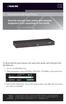 LES1516A LES1532A LES1548A Secure Server with Cisco Pinout Securely manage data center and network equipment from anywhere in the world. To download the user manual, this quick start guide, and software
User s Manual TCP/IP TO RS-232/422/485 CONVERTER. 1.1 Introduction. 1.2 Main features. Dynamic DNS
 MODEL ATC-2000 TCP/IP TO RS-232/422/485 CONVERTER User s Manual 1.1 Introduction The ATC-2000 is a RS232/RS485 to TCP/IP converter integrated with a robust system and network management features designed
Clientless SSL VPN Users
 Manage Passwords, page 1 Username and Password Requirements, page 3 Communicate Security Tips, page 3 Configure Remote Systems to Use Clientless SSL VPN Features, page 3 Manage Passwords Optionally, you
3.1 RS-232/422/485 Pinout:PORT1-4(RJ-45) RJ-45 RS-232 RS-422 RS-485 PIN1 TXD PIN2 RXD PIN3 GND PIN4 PIN5 T+ 485+ PIN6 T- 485- PIN7 R+ PIN8 R-
 MODEL ATC-2004 TCP/IP TO RS-232/422/485 CONVERTER User s Manual 1.1 Introduction The ATC-2004 is a 4 Port RS232/RS485 to TCP/IP converter integrated with a robust system and network management features
Extreme Control Center, NAC, and Purview Virtual Appliance Installation Guide
 Extreme Control Center, NAC, and Purview Virtual Appliance Installation Guide 9034968 Published April 2016 Copyright 2016 All rights reserved. Legal Notice Extreme Networks, Inc. reserves the right to
Multi-Homing Dual WAN Firewall Router
 Multi-Homing Dual WAN Firewall Router Quick Installation Guide M73-APO09-400 Multi-Homing Dual WAN Firewall Router Overview The Multi-Homing Dual WAN Firewall Router provides three 10/100Mbit Ethernet
DPXR4X1A-16NP, DPXS20A-16AU-M,
 - 1 - Release Notes for Dominion PX Software Version 1.3.5 (firmware version will be displayed as 01.03.05 in the GUI after an upgrade) Version: DPX 1.3.5 Release Notes, Revision 1.1 Date: June 8, 2009
For the protocol access paths listed in the following table, the Sentry firmware actively listens on server ports to provide security for the CDU.
 CDU Security This provides a quick reference for access paths to Server Technology s Cabinet Distribution Unit (CDU) products, shows if the access path is secure, and if so, provides an overview of how
Basic System. Vyatta System. REFERENCE GUIDE Using the CLI Working with Configuration System Management User Management Logging VYATTA, INC.
 VYATTA, INC. Vyatta System Basic System REFERENCE GUIDE Using the CLI Working with Configuration System Management User Management Logging Vyatta Suite 200 1301 Shoreway Road Belmont, CA 94002 vyatta.com
F-Secure Messaging Security Gateway. Deployment Guide
 F-Secure Messaging Security Gateway Deployment Guide TOC F-Secure Messaging Security Gateway Contents Chapter 1: Deploying F-Secure Messaging Security Gateway...3 1.1 The typical product deployment model...4
A More Secure and Cost-Effective Replacement for Modems
 A More Secure and Cost-Effective Replacement for Modems Lantronix, Inc. 15353 Barranca Parkway Irvine, CA 92618 Tel: +1 (800) 422-7055 Fax: +1 (949) 450-7232 www.lantronix.com Abstract For companies, service
Exploring the Remote Access Configuration Utility
 Exploring the Remote Access Configuration Utility in Ninth-Generation Dell PowerEdge Servers The Remote Access Configuration Utility supports local and remote server management in ninth-generation Dell
Configuring CSS Remote Access Methods
 CHAPTER 11 Configuring CSS Remote Access Methods This chapter describes how to configure the Secure Shell Daemon (SSH), Remote Authentication Dial-In User Service (RADIUS), and the Terminal Access Controller
Vantage RADIUS 50. Quick Start Guide Version 1.0 3/2005
 Vantage RADIUS 50 Quick Start Guide Version 1.0 3/2005 1 Introducing Vantage RADIUS 50 The Vantage RADIUS (Remote Authentication Dial-In User Service) 50 (referred to in this guide as Vantage RADIUS)
IPv6 Diagnostic and Troubleshooting
 8 IPv6 Diagnostic and Troubleshooting Contents Introduction.................................................. 8-2 ICMP Rate-Limiting........................................... 8-2 Ping for IPv6 (Ping6)..........................................
NMS300 Network Management System
 NMS300 Network Management System User Manual June 2013 202-11289-01 350 East Plumeria Drive San Jose, CA 95134 USA Support Thank you for purchasing this NETGEAR product. After installing your device, locate
Legal Notes. Regarding Trademarks. 2012 KYOCERA Document Solutions Inc.
 Legal Notes Unauthorized reproduction of all or part of this guide is prohibited. The information in this guide is subject to change without notice. We cannot be held liable for any problems arising from
Using WhatsUp IP Address Manager 1.0
 Using WhatsUp IP Address Manager 1.0 Contents Table of Contents Welcome to WhatsUp IP Address Manager Finding more information and updates... 1 Sending feedback... 2 Installing and Licensing IP Address
Multifunctional Broadband Router User Guide. Copyright Statement
 Copyright Statement is the registered trademark of Shenzhen Tenda Technology Co., Ltd. Other trademark or trade name mentioned herein are the trademark or registered trademark of above company. Copyright
Configuring Color Access on the WorkCentre 7120 Using Microsoft Active Directory Customer Tip
 Configuring Color Access on the WorkCentre 7120 Using Microsoft Active Directory Customer Tip October 21, 2010 Overview This document describes how to limit access to color copying and printing on the
System Administration Guide Xerox WorkCentre 4250/4260 Series
 System Administration Guide Xerox WorkCentre 4250/4260 Series Xerox WorkCentre 4260 Series System Administration Guide i Prepare and Translated by: Xerox GKLS Europe Operations Bessemer Road Welwyn Garden
User s Manual Network Management Card
 User s Manual Network Management Card RMCARD202 Intelligent Network Management Card allows a UPS system to be managed, monitored, and configured Version 1.0 E-K01-SNMP005-0 TABLE OF CONTENTS Introduction
Remote Management. Vyatta System. REFERENCE GUIDE SSH Telnet Web GUI Access SNMP VYATTA, INC.
 VYATTA, INC. Vyatta System Remote Management REFERENCE GUIDE SSH Telnet Web GUI Access SNMP Vyatta Suite 200 1301 Shoreway Road Belmont, CA 94002 vyatta.com 650 413 7200 1 888 VYATTA 1 (US and Canada)
StruxureWare Data Center Expert 7.2.4 Release Notes
 StruxureWare Data Center Expert 7.2.4 Release Notes Table of Contents Page # Part Numbers Affected...... 1 Minimum System Requirements... 1 New Features........ 1 Issues Fixed....3 Known Issues...3 Upgrade
USER S GUIDE. network management card. Contents. Introduction--1. Control Console--13
 Contents Introduction--1 Product Description.................................. 1 Features 1 Initial set-up 2 Network management features 3 Internal Management Features........................... 4 Overview
RACK POWER MANAGER Installer/User Guide
 RACK POWER MANAGER Installer/User Guide Rack Power Manager Installer/User Guide Emerson, Emerson Network Power and the Emerson Network Power logo are trademarks or service marks of Emerson Electric Co.
Release Notes Version 1.0.3.5 March 5, 2012
 This document outlines: 1 Update Instructions 2 Appliance Firmware Version Information 3 Features and Enhancements 4 Known Issues / Restrictions 5 Service Processor Support Universal Management Gateway
WHITE PAPER. ClusterWorX 2.1 from Linux NetworX. Cluster Management Solution C ONTENTS INTRODUCTION
 WHITE PAPER A PRIL 2002 C ONTENTS Introduction 1 Overview 2 Features 2 Architecture 3 Monitoring 4 ICE Box 4 Events 5 Plug-ins 6 Image Manager 7 Benchmarks 8 ClusterWorX Lite 8 Cluster Management Solution
ProSafe Managed Switch
 ProSafe Managed Switch Web Management User Manual Version 9.0.2 GSM5212P GSM7212F GSM7212P GSM7224P 350 East Plumeria Drive San Jose, CA 95134 USA November, 2011 202-10967-01 v1.0 2011 NETGEAR, Inc. All
Polycom Phones User Guide. 2003-2012 Bicom Systems
 I Table of Contents Part I Introduction 1 Part II Requirements 1 Part III Installation 2 1 Power... Adapter 3 2 Power... over Ethernet (PoE) 3 3 Factory... Settings 3 3 Part IV Registering Phone 1 Manual...
Pre-lab and In-class Laboratory Exercise 10 (L10)
 ECE/CS 4984: Wireless Networks and Mobile Systems Pre-lab and In-class Laboratory Exercise 10 (L10) Part I Objectives and Lab Materials Objective The objectives of this lab are to: Familiarize students
Hands-on MESH Network Exercise Workbook
 Hands-on MESH Network Exercise Workbook Santa Clara County RACES Date: 18 March 2015 Version: 1.0 scco_wifi_intro_exonly_v150318.docx 1 Table of Contents HANDS ON! Exercise #1: Looking at your Network
Features Overview Guide About new features in WhatsUp Gold v12
 Features Overview Guide About new features in WhatsUp Gold v12 Contents CHAPTER 1 Learning about new features in Ipswitch WhatsUp Gold v12 Welcome to WhatsUp Gold... 1 What's new in WhatsUp Gold v12...
Customer Tips. Configuring Color Access on the WorkCentre 7328/7335/7345 using Windows Active Directory. for the user. Overview
 Xerox Multifunction Devices Customer Tips February 13, 2008 This document applies to the stated Xerox products. It is assumed that your device is equipped with the appropriate option(s) to support the
User s Guide. Metered Rack Power Distribution Unit
 User s Guide Metered Rack Power Distribution Unit Contents Introduction... 1 Product Features.......................................... 1 Access Priorities for Logging on.............................
Installing, Uninstalling, and Upgrading Service Monitor
 CHAPTER 2 Installing, Uninstalling, and Upgrading Service Monitor This section contains the following topics: Preparing to Install Service Monitor, page 2-1 Installing Cisco Unified Service Monitor, page
LifeSize Video Communications Systems Administrator Guide
 LifeSize Video Communications Systems Administrator Guide November 2009 Copyright Notice 2005-2009 LifeSize Communications Inc, and its licensors. All rights reserved. LifeSize Communications has made
XMS Quick Start Guide
 812-0055-002D XMS Quick Start Guide Overview of Quick Start Steps This guide will quickly get you up and running with the Xirrus Management System (XMS). It includes instructions for setting up the XMS
DS SERIES SOLUTIONS ALL AT ONCE
 DS SERIES SOLUTIONS ALL AT ONCE All At Once. Your IT infrastructure is expanding. Your servers are cities apart. Data comes in and goes out at light speed. And you ve got to keep it all together. Life
Feature Brief. FortiGate TM Multi-Threat Security System v3.00 MR5 Rev. 1.1 July 20, 2007
 Feature Brief FortiGate TM Multi-Threat Security System v3.00 MR5 Rev. 1.1 July 20, 2007 Revision History Revision Change Description 1.0 Initial Release. 1.1 Removed sectoin on Content Archive and AV
ZyWALL 5. Internet Security Appliance. Quick Start Guide Version 3.62 (XD.0) May 2004
 ZyWALL 5 Internet Security Appliance Quick Start Guide Version 3.62 (XD.0) May 2004 Introducing the ZyWALL The ZyWALL 5 is the ideal secure gateway for all data passing between the Internet and the LAN.
Web Authentication Proxy on a Wireless LAN Controller Configuration Example
 Web Authentication Proxy on a Wireless LAN Controller Configuration Example Document ID: 113151 Contents Introduction Prerequisites Requirements Components Used Conventions Web Authentication Proxy on
Managing Software and Configurations
 55 CHAPTER This chapter describes how to manage the ASASM software and configurations and includes the following sections: Saving the Running Configuration to a TFTP Server, page 55-1 Managing Files, page
Connection Broker Managing User Connections to Workstations and Blades, OpenStack Clouds, VDI, and more. Security Review
 Connection Broker Managing User Connections to Workstations and Blades, OpenStack Clouds, VDI, and more Security Review Version 8.1 March 31, 2016 Contacting Leostream Leostream Corporation http://www.leostream.com
Chapter 1 Configuring Basic Connectivity
 Chapter 1 Configuring Basic Connectivity This chapter describes the settings for your Internet connection and your wireless local area network (LAN) connection. When you perform the initial configuration
Device Server Administrator's Guide SYSTECH
 Device Server Administrator's Guide SYSTECH C O R P O R A T I O N Document number 80-001061-6 Revision C Document part number 80-001061-6 Revision History Date Revision Description 7/16/03 A Initial Release
Multi-Master DF1 Protocol User Guide
 Multi-Master DF1 Protocol User Guide Part Number 900-282 Revision B August 2004 Copyright & Trademark Contacts 2002, Lantronix. All rights reserved. No part of the contents of this book may be transmitted
Oracle Enterprise Manager Ops Center. Ports and Protocols. Ports and Protocols 12c Release 3 (12.3.0.0.0)
 Oracle Enterprise Manager Ops Center Ports and Protocols 12c Release 3 (12.3.0.0.0) E59963-01 June 2015 This document contains the latest information on the ports and protocols that Oracle Enterprise Manager
Introduction To Computer Networking
 Introduction To Computer Networking Alex S. 1 Introduction 1.1 Serial Lines Serial lines are generally the most basic and most common communication medium you can have between computers and/or equipment.
Chapter 10 Troubleshooting
 Chapter 10 Troubleshooting This chapter provides troubleshooting tips and information for your ProSafe Dual WAN Gigabit Firewall with SSL & IPsec VPN. After each problem description, instructions are provided
Integrating idrac7 With Microsoft Active Directory
 Integrating idrac7 With Microsoft Active Directory Whitepaper Author: Jim Slaughter This document is for informational purposes only and may contain typographical errors and technical inaccuracies. The
Firmware Release Notes
 NF4V VDSL/ADSL WiFi Gigabit Modem Router Firmware Release Notes Copyright Copyright 2015 NetComm Wireless Limited. All rights reserved. The information contained herein is proprietary to NetComm Wireless.
DEPLOYMENT GUIDE. Websense Enterprise Websense Web Security Suite TM. v6.3.1
 DEPLOYMENT GUIDE Websense Enterprise Websense Web Security Suite TM v6.3.1 1996 2009, Websense, Inc. All rights reserved. 10240 Sorrento Valley Rd., San Diego, CA 92121, USA Published June 13, 2007 Printed
actinas Cube RDX FAQ
 actinas Cube RDX FAQ 2011-05-31 www.actidata.com actinas Cube RDX FAQ - 1 - May 31, 2011 Overview of actinas Cube Storage Structure Software RAID: 1. Physical Disk Drives The HDDs 2. RAID Is a group of