
FX 3NET + SLC FIRE ALARM SYSTEM Part 1: General Rules
|
|
|
- Meghan Joseph
- 9 years ago
- Views:
Transcription
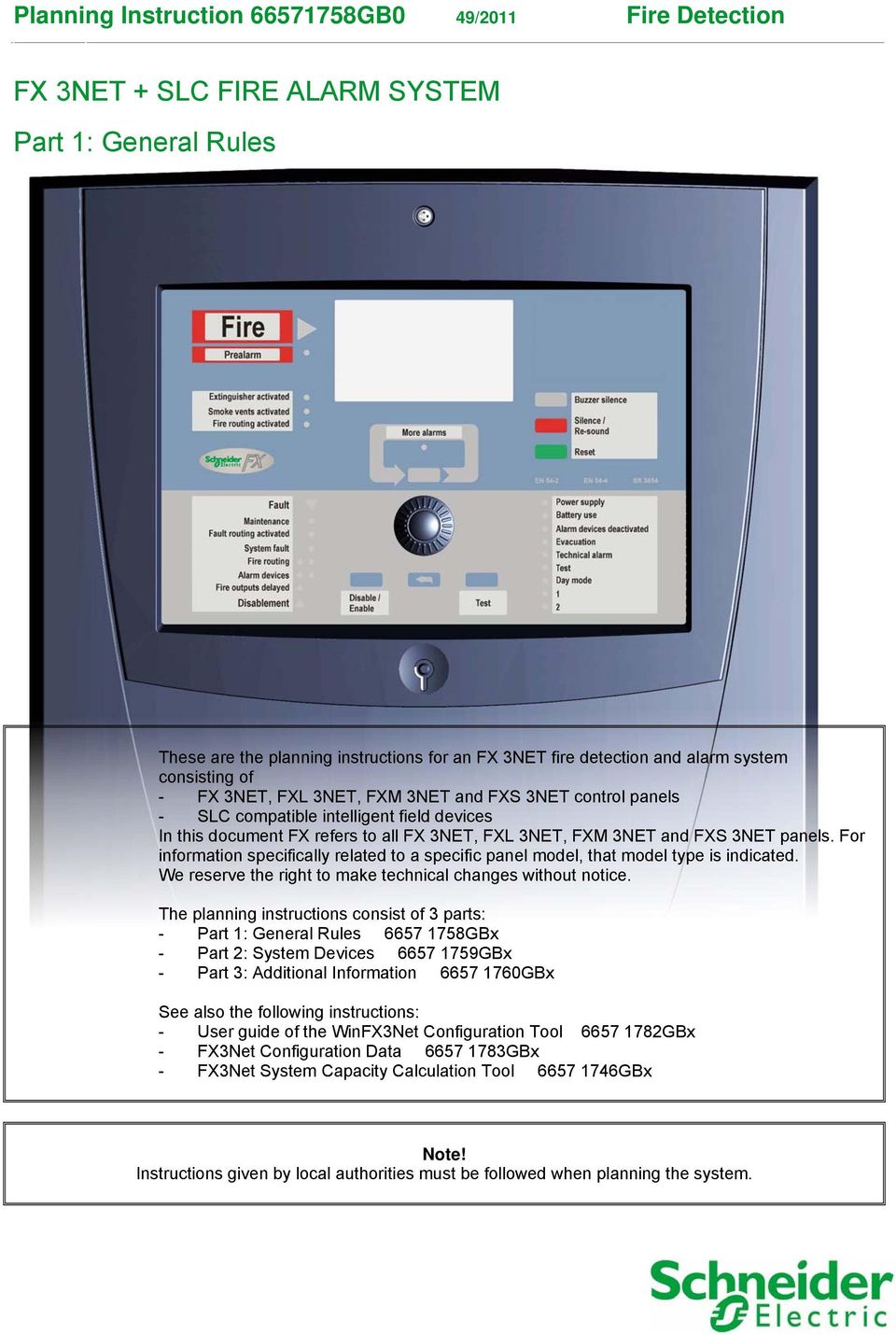
1 Planning Instruction GB0 49/2011 Fire Detection FX 3NET + SLC FIRE ALARM SYSTEM Part 1: General Rules These are the planning instructions for an FX 3NET fire detection and alarm system consisting of - FX 3NET, FXL 3NET, FXM 3NET and FXS 3NET control panels - SLC compatible intelligent field devices In this document FX refers to all FX 3NET, FXL 3NET, FXM 3NET and FXS 3NET panels. For information specifically related to a specific panel model, that model type is indicated. We reserve the right to make technical changes without notice. The planning instructions consist of 3 parts: - Part 1: General Rules GBx - Part 2: System Devices GBx - Part 3: Additional Information GBx See also the following instructions: - User guide of the WinFX3Net Configuration Tool GBx - FX3Net Configuration Data GBx - FX3Net System Capacity Calculation Tool GBx Instructions given by local authorities must be followed when planning the system.
2 Planning Instruction GB0 Fire Detection 2 Contents 1. About planning the system When is a fire alarm needed? Planning an automatic fire alarm system Regulations Example of a site plan for the FX 3NET fire detection system General description of the FX 3NET system Standalone FX 3NET or FXL 3NET fire detection system Standalone FXM 3NET fire detection system FXS 3NET fire detection panel Networked FX 3NET fire detection system FX 3NET stand-alone system diagram Networked FX 3NET system diagram FX 3NET, FXL 3NET, FXM 3NET and FXS 3NET construction FX 3NET cabinet FXL 3NET cabinet FXM 3NET cabinet FXS 3NET cabinet FX battery cabinet FXM battery cabinet Mechanical installation Installation, FX 3NET and FXL 3NET control panels Installation, FXM 3NET control panel Installation, FXS 3NET control panel FX 3NET, multi-panel networked system Seeing and visible panels Site plan table of seeing visible panels Interpanel communication Networked FX 3NET main parameters Addressable detection circuits, addresses, zones FX-SLC addressable detection circuits and addresses Detection zones FX-SLC Addressable detection circuit structure FX control groups Control groups for all event types (Ctrl A and Ctrl B) Control groups for fire event input and outputs in loop addresses (CG1 + D... CG7 + D) Control group use for phased evacuation Control group use for delayed alarm Number of devices between short circuit isolators Number of devices in an addressable detection circuit FX-CLC Conventional detection circuits Conventional detection circuit controller (CLC) Compatible conventional detectors and manual call points Conventional detection circuit structure and End-of-Line resistors Configurable options Cabling Cables of addressable detection circuit Cables of conventional detection circuits CLC, alarm device lines, input/output lines Cables of serial communication lines and power supply Grounding of communication cables Battery backup calculation FX 3NET, FXL 3NET, FXM 3NET and FXS 3NET Technical data Technical data, standard panels... 35

3 Planning Instruction GB0 Fire Detection 3 1. About planning the system 1.1 When is a fire alarm needed? Fire detection and alarm systems are installed mainly to protect human life. The early detection of smoke sensor alerts people to evacuate the building in an orderly manner. Alarm devices provide a sufficient signal to warn people. Fire detection and alarm systems are also installed on premises where stock, machinery or other property need to be protected. A fire detection system gives an early indication, making it possible to start and finalise the rescue work quickly, thus allowing normal activities to continue without delay. If getting a building permit requires installation of a fire alarm system, a sufficient degree of coverage must be provided. The extent of such coverage is specified in national and international regulations. 1.2 Planning an automatic fire alarm system The automatic fire detection system should be planned and installed in a way that guarantees that a fire starting in the area to be surveyed is detected as early as possible and a fire alarm indicating the location is activated. Faults that might jeopardise the reliability of the fire detection system should also be reported. If needed (for example, for quotation purposes) a preliminary plan should be made as well as an installation plan for the detection system. Preliminary plan The preliminary plan can be made by the electrical engineer, the contractor or the manufacturer's representative. Installation plan The installation plan is made by the manufacturer's representative or an authorised fire detection and alarm planning engineer. The plan includes: Selection of detector types and manual call points and specifying their location, taking into consideration coverage, environment, building construction, etc. Selection of types of alarm devices (bells, sirens, beacons etc.) and specifying their location to ensure that everybody in the building is alerted. Selecting cable types and planning the routing of the cables within the building. Specifying any control functions needed for fire protection, such as signals to extinguishing systems, ventilation systems, fire doors or shutters etc. Taking into consideration any additional requirements from the fire authorities. It may be a requirement by the local fire authorities that the plan is inspected and approved by a third party before the installation commences.

4 Planning Instruction GB0 Fire Detection Regulations EN54-14 Guidelines for Planning, Installation, Commissioning and Maintenance defines good general guidelines for planning. Local specific regulations must also be followed. The main planning and documentation phases are described in the diagram below. A typical lay out drawing including devices is found in the section 1.4. End user Third party periodical inspection Installation Planning Commissioning Maintenance Maintenance Use Third party approval and/or handover Commissioning and verification Initialisation and configuration Installation Planning and design Assessment of needs or Risk Assessment Alteration, modification or extension Initial concept Standard EN54-14: Guidelines for planning

5 Planning Instruction GB0 Fire Detection Example of a site plan for the FX 3NET fire detection system XE To FCP-1 24 VDC (From FCP-1) CTLE CTLE To FIRE DOOR RE CTLE CZ C CONTROL PANEL FCP C OFFICE 002 OFFICE 003 OFFICE 004 OFFICE 005 OFFICE 006 OFFICE 007 OFFICE 008 LOBBY 009 TOILET 010 TOILET 011 ELECTRICAL ROOM 012 CLEANING 013 LOADING BAY 014 ELECTRICAL ROOM 015 WAREHOUSE 016 WAREHOUSE CTLE XE C CTLE Multi-criteria detector Installation base Sounder Addressable smoke detector Installation base Addressable smoke detector with short circuit isolator Installation base Addressable smoke detector Installation base Remote LED Addressable heat detector Installation base Addressable manual call point with short circuit isolator Surface mounting box CZ RE C 60 Sounder/beacon Conventional zone module Installation box Control module, relay output Installation box Conventional heat detector 1 Detection circuit

6 Planning Instruction GB0 Fire Detection 6 2. General description of the FX 3NET system 2.1 Standalone FX 3NET or FXL 3NET fire detection system Main features The modular design of the FX 3NET and FXL 3NET 2, 4, 6, or 8 loop control panel offers a competitive solution for small and medium sized projects. The address capacity of the detection circuits also offers flexibility for cabling, thus saving costs in installation work. A wide range of intelligent detectors provides solutions for all applications. In addition, conventional detectors can be connected to interface modules, making an upgrade of a former conventional system flexible. In many tests, the high-sensitive laser detectors have proved to be even more efficient than the aspiration detection systems often used in, for example, computer rooms. The I/O-modules are economical and save space in installation, and provide monitoring and control functions. With the extensive configuration software, all addresses and many control functions of the panel can be adopted for the requirements of the installation site. The communication capability makes it possible to connect a standard printer and additional alarm display panels. Application areas Protectable area up to 15,000 m² (512 addresses EN54) Business and office buildings Industrial sites Lodging houses Service centres Health and nursing centres Educational buildings FX 3NET and FXL 3NET standalone system metrics addressable detection circuits 159 intelligent detectors I/O-modules per detection circuit 250 detection zones 512 detectors and manual call points / EN54 regulation 2,544 addresses totally 17 Ah (internal in FX), 34 Ah (external), 51 Ah (external) or 68 Ah (external) batteries 1.0 A total load in normal condition and 4.0 A total load in alarm condition 2.2 Standalone FXM 3NET fire detection system Main features The FXM control panel offers the same features as the FX and FXL panels, but in a smaller format, with a smaller power supply and with less space for I/O controllers. Application areas Protectable area up to 15,000 m² (512 addresses EN54) Industrial sites Lodging houses Elderly service centres Day care centres Educational buildings FXM 3NET standalone system metrics addressable detection circuits 159 intelligent detectors I/O-modules per detection circuit 250 detection zones 512 detectors and manual call points / EN54 regulation 1272 addresses totally 12 Ah (internal) or 34 Ah (external) battery capacity 0.5 A total load in normal condition and 2.2 A total load in alarm condition When the INFO serial communication is used, the maximum address capacity per detection circuit is 214: lower address range higher address range

7 Planning Instruction GB0 Fire Detection FXS 3NET fire detection panel Main features The FXS control panel offers the same features as the FX and FXL and FXM panels, but in a smaller format and without any built-in power supply unit. In the FXS panel, there is one card slot for an option board. FXS 3NET standalone panel metrics addressable detection circuits 159 intelligent detectors I/O-modules per detection circuit 250 detection zones 318 detectors and manual call points 636 addresses totally The power supply feed has to be brought from an FX 3NET, FXL 3NET, or FXM 3NET panel. 2.4 Networked FX 3NET fire detection system Application areas Protectable area up to 500,000 m² Business and office complexes Industrial sites Hotels Service centres Hospitals Educational buildings FX NET system metrics 32 FX 3NET, FXL 3NET, FXM 3NET and FXS 3NET panels 256 interpanel logical connections (seeing visible connections) 255 addressable detection circuits 8,000 detection zones 16,384 detectors and manual call points / EN54 regulations 81,408 addresses totally (32 x FX capacity) Properties of the FX panels, see section 2.1, 2.2 and 2.3 When the INFO serial communication is used, the maximum address capacity per detection circuit is 214: lower address range higher address range

8 x10 x10 x10 x10 C C C C PRES S HERE Planning Instruction GB0 Fire Detection FX 3NET stand-alone system diagram Addressable detectors, alarm devices and manual call points Addressable special detectors 1 2 Addressable I/O units Input Output Outputs Conventional sounders Conventional detectors and manual call points Inputs Conventional alarm devices Conventional detectors and manual call points Intrinsically safe fire detectors and call points Ex FMPX DAPX REPX MCOX External system When the INFO serial communication is used, the maximum address capacity per detection circuit is 214: lower address range higher address range

9 x10 C x10 C Planning Instruction GB0 Fire Detection Networked FX 3NET system diagram 1 2 FMPX 1 2 FXM 1 2 FMPX REPX MCOX FXS When the INFO serial communication is used, the maximum address capacity per detection circuit is 214: lower address range higher address range

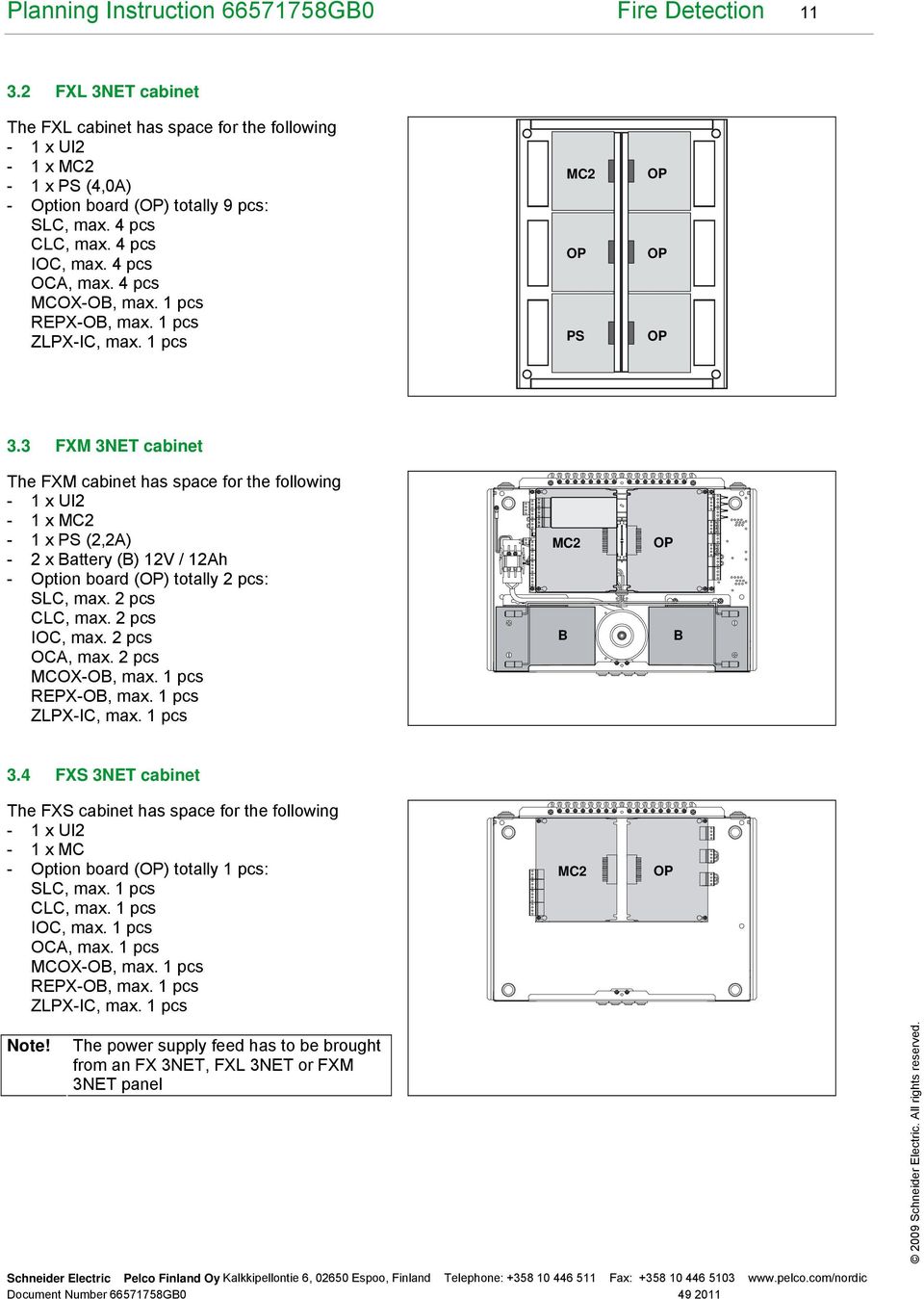
10 Planning Instruction GB0 Fire Detection FX 3NET, FXL 3NET, FXM 3NET and FXS 3NET construction The FX panel is a modular construction, facilitating easy expansion and selection of required modules. The panel consists of a back plate in sheet metal, specially designed racks that hold the electronic boards and a cover in plastic. Two different cabinet types are available for housing the control panel and, in addition, a cabinet with a blank cover is available for housing batteries or auxiliary equipment. The electronics are distributed on boards as follows: - FX-UI2 the User Interface board contains an LCD display, LEDs and buttons - FX-MC2 the Main Controller contains the main and assistant processors and also basic mandatory inputs and outputs - FX-PS_ the Power Supply unit contains circuits for standby battery charging, voltage regulation and power supply to the panel and external devices - FX-SLC the Loop Controller for AP200 series devices - FX-LC the Loop Controller for 200 series devices - FX-CLC the Loop Controller for 16 input lines - FX-IOC the Input/Output Controller provides clean contact signal inputs, clean contact signal outputs and alarm device outputs - FX-OCA the Output Controller for 16 clean contact outputs - REPX-OB the Protocol Repeater duplicates the INFO-communication line - MCOX-OB the Control Unit controls for logical control function - ZLPX-IC the Controller controls OC-100L and OC-100R output boards Signalling between the boards goes through a motherboard between the racks (except REPX-OB, MCOX-OB and ZLPX-IC). 3.1 FX 3NET cabinet The FX cabinet has space for the following - 1 x UI2-1 x MC2-1 x PS (4,0A) - 2 x Battery (B) 12V / 17Ah - Option board (OP) totally 5 pcs: SLC, max. 4 pcs CLC, max. 4 pcs IOC, max. 4 pcs OCA, max. 4 pcs MCOX-OB, max. 1 pcs REPX-OB, max. 1 pcs ZLPX-IC, max. 1 pcs MC2 B PS OP OP B

11 Planning Instruction GB0 Fire Detection FXL 3NET cabinet The FXL cabinet has space for the following - 1 x UI2-1 x MC2-1 x PS (4,0A) - Option board (OP) totally 9 pcs: SLC, max. 4 pcs CLC, max. 4 pcs IOC, max. 4 pcs OCA, max. 4 pcs MCOX-OB, max. 1 pcs REPX-OB, max. 1 pcs ZLPX-IC, max. 1 pcs MC2 OP PS OP OP OP 3.3 FXM 3NET cabinet The FXM cabinet has space for the following - 1 x UI2-1 x MC2-1 x PS (2,2A) - 2 x Battery (B) 12V / 12Ah - Option board (OP) totally 2 pcs: SLC, max. 2 pcs CLC, max. 2 pcs IOC, max. 2 pcs OCA, max. 2 pcs MCOX-OB, max. 1 pcs REPX-OB, max. 1 pcs ZLPX-IC, max. 1 pcs MC2 B OP B 3.4 FXS 3NET cabinet The FXS cabinet has space for the following - 1 x UI2-1 x MC - Option board (OP) totally 1 pcs: SLC, max. 1 pcs CLC, max. 1 pcs IOC, max. 1 pcs OCA, max. 1 pcs MCOX-OB, max. 1 pcs REPX-OB, max. 1 pcs ZLPX-IC, max. 1 pcs MC2 OP The power supply feed has to be brought from an FX 3NET, FXL 3NET or FXM 3NET panel
12 Planning Instruction GB0 Fire Detection FX battery cabinet The FX battery cabinet has space for the following - 4 x battery 12V / 17Ah - Fire alarm and Fault warning router B = Battery B B B B 3.6 FXM battery cabinet The FXM battery cabinet has space for the following - 4 x battery 12V / 12Ah B = Battery B B B B

13 Planning Instruction GB0 Fire Detection Mechanical installation 4.1 Installation, FX 3NET and FXL 3NET control panels The mounting surface must be flat and it must bear the weight of the control panel and the chart file cabinet. The weight of the control panel excl. batteries is 11 kg and incl. batteries (2 x 17 Ah) 23 kg. The weight of the chart file cabinet is 9 kg. The mounting must be made directly on the wall surface, without any distance bushings or similar, to ensure IP30 rating. The weight of the battery cabinet excl. batteries is 7 kg and incl. batteries (4 x 17 Ah) 31 kg. FX control panel Chart cabinet Battery cabinet

14 Planning Instruction GB0 Fire Detection Installation, FXM 3NET control panel The mounting surface must be flat and it must bear the weight of the control panel and the chart file cabinet. The weight of the control panel exl. batteries is 8 kg and incl. batteries 20 kg. The weight of the battery cabinet is exl. batteries is 4 kg and incl. batteries 28 kg. The weight of the chart file cabinet is 9 kg. The mounting must be made directly on the wall surface, without any distance bushings or similar, to ensure IP30 rating. FXM control panel Battery cabinet Chart cabinet

15 Planning Instruction GB0 Fire Detection Installation, FXS 3NET control panel The mounting surface must be flat and it must bear the weight of the control panel and the chart file cabinet. The weight of the control panel is 4.4 kg. The weight of the chart file cabinet is 9 kg. The mounting must be made directly on the wall surface, without any distance bushings or similar, to ensure IP30 rating FXS control panel 328 Chart cabinet

16 Planning Instruction GB0 Fire Detection FX 3NET, multi-panel networked system FX 3NET is the solution for fire detection systems that consists of several individual panels and which interact with each other as if they were one huge panel. Any panel (or all of them) can handle the whole system. The flexibility in the configuration of the relation between the panels has the benefit of offering the designer the opportunity to define a system that best suits the needs of the user/owner of the system. 5.1 Seeing and visible panels The FX 3NET system is not a traditional hierarchical system with main and sub-panels. In FX 3NET, all the panels are equal in terms of hardware and software that connects the panels together. This means that they are all able to monitor and control each other. For large sites, the configuration of the relation between the panels supports the functional clustering of panels, -for example, per building, -while still having the possibility of overall control and monitoring from one or several panels. These clusters can form "intersections", that is, they can have common panels. The FX 3NET concept is built on the configuration of "seeing" and "visible" panels. Seeing panels see visible panels, that is, they monitor and control the visible panels. Panels can also be configured to see each other, that is, they can, at the same time, be both seeing and visible with respect to each other. Example 1 A large office building with three FX panels, one at each entrance to the building. A typical configuration would be that all panels see each other. In this way, no matter which entrance the fire brigade arrives at, they always have full information for the situation. A B C Panel 1 Panel 2 Panel 3 Site: Office house Seeing panel Location Visible panels Number of connections 1 Entrance A 2, Entrance B 1, Entrance C 2, 4 2 Total number of connections 6 Max. 256

17 Planning Instruction GB0 Fire Detection 17 Example 2 Consider an industrial site with two large buildings and a gate building. The gate should see all events to be able to direct the fire brigade. Each building should have (as in the previous example) mutual monitoring and control between the panels in the building, but there is no need to see the alarms between the buildings. The configuration would be that all panels are visible to the gate panel, all panels in the first building are visible to each other (but not to the panels in the second building) and, finally, all panels in the second building are visible to each other (but not to the panels in the first building). Building Building Gate 1 Site: Industrial site Seeing panel Location Visible panels Number of connections 1 Gate 2, 3, 4, 5, 6, Building 1 3, Building 1 2, Building 1 2, Building 2 6,7 2 6 Building 2 5,7 2 7 Building 2 5,6 2 Total number of connections 12 Max. 256

18 Planning Instruction GB0 Fire Detection Site plan table of seeing visible panels Site: Seeing panel Location Visible panels Total number of connections Number of connections Max. 256 Up to 32 panels in any combination of FX 3NET, FXL 3NET, FXM 3NET or FXS 3NET panels can be physically connected. The logical connection between the panels is based on configured "seeing" - "visible" relationships. - Two panels of which one is seeing and the other visible form one logical connection - Two panels of which both are seeing and visible in relation to each other form two logical connections - The maximum number of logical connections is 256

19 Planning Instruction GB0 Fire Detection Interpanel communication In large systems with several panels, and especially if the panels are located apart, it is important to ensure the communication between the panels. Therefore the FX 3NET communication is secured with two separate communication lines (System 1 and System 2). If one line is broken or shorted, the system is still able to communicate with the other one. This redundancy also includes the communication circuitry in the panels. Both communication lines are constantly monitored and if any faults are detected in either of them, a fault warning is issued immediately. The physical connection is based on the RS-485 standard with all panels connected in parallel to each communication line. The length of the cable can be up to 1,200 m, but, if needed, it can be extended to several kilometres with base band modems or optical fibre modems. 5.4 Networked FX 3NET main parameters 3NET panels in any combinations 32 Seeing visible connections 256 Addressable detection circuits 255 Detection zones 8,000 When the INFO serial communication is used, the maximum address capacity per detection circuit is 214: lower address range higher address range In an FX 3NET system, the FX control panels must be configured before they are connected to each other. A standalone FX 3NET system can be commissioned and used without configuration; however, the following has to be considered: Every time the system is started, the presence of all addresses has to be verified manually. The zone assignments of the addresses are according to the default scheme.

20 Planning Instruction GB0 Fire Detection Addressable detection circuits, addresses, zones 6.1 FX-SLC addressable detection circuits and addresses The cables that connect the detectors and the I/O-modules to the panel are called detection circuits (or loops). The detection circuits are identified by a two-digit number and are by default: for an FX panel with two detection circuits (one Loop Controller) for an FX panel with four detection circuits (two Loop Controllers) for an FX panel with six detection circuits (three Loop Controllers) for an FX panel with eight detection circuits (four Loop Controllers) With the configuration software the detection circuit identifications can be changed to any consecutive range of numbers with a maximum value of 256. The detectors and the I/O-modules are individually assigned a number (address) during installation and can therefore be identified by the panel, using a proprietary communication protocol. The address setting in the devices is simply done with two rotary decimal switches, thus having a range of In addition, the panel can distinguish between detector addresses and I/O-module addresses, thus providing a total address capacity per loop of and , altogether 318 addresses. For example, a detector with address setting 37 is handled separately from an I/O-module with the same address setting. By definition, a control panel that is not configured uses the lower address range ( ) by default. If the panel finds a detector and an I/O module with the same address setting, the detector will be assigned the address from the lower range and the I/O module the address from the higher range ( ). Within the system a detector (or I/O-module) is identified by the detection circuit and the setting of the address switches. This identification is expressed in the FX display as dc.add, where dc is the detection circuit and add is the address setting, e.g Max. 159 detector addresses and 159 I/O module addresses in free order in all loops. System capacity System type Detection circuits Det. addresses System type FX FX * FX * FX * Detection circuits Addresses FX 3NET ,384* * The maximum number of detectors and manual call points has to be kept as 512 for compliance with the EN54 standard. For other purposes, the full address range of 318 addresses per loop can be used. When the INFO serial communication is used, the maximum address capacity per detection circuit is 214: lower address range higher address range The maximum number of 200 series products in one FX-SLC loop is 20. If one or more (max. 20) 200 series products are used in the FX-SLC loop, the max. cable resistance is 40 Ω.

21 Planning Instruction GB0 Fire Detection Detection zones Detectors in a fire detection system are usually grouped into detection zones. In conventional systems, the detection circuit coincides with a detection zone, but in addressable systems such as the FX 3NET, the detectors are grouped by the software. The zones are identified by a four-digit number in the range and they have to be consecutive within an FX panel. In a standalone FX 3NET system the addresses are by default assigned to zones according to the following scheme; however, this assignment can easily be changed with the configuration software. When configured, any detector within the FX panel, even in different detection circuits, can be assigned to any zone. All addresses have to be assigned to a zone. Default assignment of addresses into detection zones: Addresses 1 st Loop Controller Detection circuits (Loops) 2 nd Loop Controller 3 rd Loop Controller 4 th Loop Controller Low range High range L 1 L 2 L 3 L 4 L 5 L 6 L 7 L FX-SLC Addressable detection circuit structure The detection circuit cabling can be arranged in a variety of lay-outs, being flexible for all applications. However, the following has to be considered when selecting a cable lay-out. The cable resistance between the panel and any detector may not exceed 60. If a large number of sounders, powered from the detection circuit, are used, the maximum resistance may be further restricted to ensure sufficient voltage to all devices (see section 6.6). The cable capacitance may not exceed 360 nf. Not more than one zone (max. 32 detectors and/or manual call points) may drop out of operation in case of a fault in the cable. There are limitations on the number of devices between short circuit isolators (see section 6.5). Use the system capacity calculation tool.
22 Planning Instruction GB0 Fire Detection 22 Closed detection circuit (highly recommended) A closed detection circuit gives the highest safety because the panel can still communicate with all addresses even if the cable is cut. To minimise the effect of a short circuit, isolators are available, which reduces the number of dropped-out addresses to the addresses between the isolators that are closest to the short circuit. The rule of a max. 60 between a panel and any detector has to be considered even if the cable is cut at either end of the detection circuit. The cable capacitance in this layout is normally not an issue of concern. Closed detection circuit with branches (recommended with reservations) Branches are allowed if the length of the branch is kept short (< 100 m) and if the number of addresses that may drop out in case of a cable failure is less than 32. Again, the rule of cable resistance has to be considered in any case of cable cut. The capacitance may be an issue if there are several branches. Check with the cable manufacturer and calculate the total capacitance. Open-end detection circuit (not generally recommended) Least efficient, since only 32 addresses can be used on the circuit. With that restriction in mind, it can still provide the longest distance between the panel and the farthest address. Closed detection circuit Open-end detection circuit 60 Ω 60 Ω Closed detection circuit + addressable branches 60 Ω 60 Ω When the INFO serial communication is used, the maximum address capacity per detection circuit is 214: lower address range higher address range The maximum number of 200 series products in one FX-SLC loop is 20. If one or more (max. 20) 200 series products are used in the FX-SLC loop the max. cable resistance is 40 Ω. Use the system capacity calculation tool.
23 Planning Instruction GB0 Fire Detection FX control groups See the document Configuration data. See the user manual of the WinFX3Net configuration tool. The concept of control groups in an FX panel is a way of grouping the various inputs of the panel to facilitate the activation of outputs. The control groups are defined separately from the detection zones. Control groups goes hand in hand with events. There are two kinds of events: input events and output events. Input events are the type of signals that the control logic reacts to for example, when a detector gives a fire signal, we say that the input event is a fire event. Output events are events activated (triggered) by the logic. Certain input events have corresponding output events for example, a fire input event corresponds to an alarm device output event. 999 specific control groups, one local (general) control group and one general control group are defined. In this document, and in the configuration tool, these are identified with the numerical values and the words 'Local' and General, respectively. In an FX 3NET system, the 999 control groups are split into two ranges: local and shared (over the network). The split point is by default at 100, meaning that the local control groups are and the shared control groups are The split point can be changed for each panel with the configuration tool. Input events for the control groups in the local range are seen only by the panel where the event occurs. Input events for the control groups in the shared range are seen by all seeing panels. There are nine different control groups to be defined for a certain input event. The table below describes the main functional options of control groups. Control group Ctrl A Ctrl B CG1 + D CG2 + D CG3 + D CG4 + D CG5 + D CG6 + D CG7 + D Functional options For all input event types For all inputs: panel and addresses Default split point 100 local/shared For phased evacuation (6.4.3) For delayed alarm (6.4.4) For address fire input For fire outputs Default split point 100 local/shared Delayed outputs (6.4.2) Delay minutes with 1 second step
24 Planning Instruction GB0 Fire Detection Control groups for all event types (Ctrl A and Ctrl B) Control group A and B inputs are not limited to the detectors and other addressable devices in the loop; monitoring inputs in the panel can also be members of control groups. Control group outputs can also be both addressable outputs in the loop as well as relay outputs in the panel. An input event is signalled to both Control A and Control B immediately when the event occurs, except if the device is set up for delayed alarm. If the input device is set up for delayed alarm the event is signalled to Control A immediately, and to Control B after the delay. An output device that is configured as belonging to the General control group responds to its corresponding input event from any input device in any visible panel, regardless of the control group assignments of that input device. An output device that is configured as belonging to the Local control group, responds to its corresponding input event from any input devices in the same panel, regardless of the control group assignments of that input device. An output device that is configured to belonging to any one, or combination of specific control groups (1 999), responds to its corresponding input event only from input devices with a matching control group assignment Control groups for fire event inputs and outputs (CG1 + D... CG7 + D) The seven control groups CG1 + D...CG7 + D, can be used only with addressable fire event inputs. The output can be address or panel fire output. These CGn + D control groups can be delayed individually. The delay can be configured to be minutes with 1 second steps. Sequence example 1: reset after all delays Fire Silence 10s 12s Re-sound Reset OK (normal press) Input (e.g. MCP in alarm state) Fire alarm device Fire alarm device (10s delay) Fire Output Fire Output (10s delay) Fire Output (12s delay)
25 Planning Instruction GB0 Fire Detection 25 Sequence example 2: reset during delay Reset Fire Silence (short press) 10s 12s Re-sound Input (e.g. MCP in alarm state) Fire alarm device Fire alarm device (10s delay) Fire Output Fire Output (10s delay) Fire Output (12s delay) Silence affects only the fire alarm device outputs. The shortest delay is always displayed on the user interface display if more than 1 delay is activated Control group use for phased evacuation Control groups A and B can be used to support a voice alarm fire evacuation strategy in big and/or complicated buildings or groups of buildings. There are numerous circumstances in which a staged fire alarm arrangement may be appropriate. One typical application is a building with phased evacuation. In high-rise buildings, in which those closest to the fire are evacuated in the first phase, with other areas evacuated in a series of further phases. Another application is a progressive horizontal evacuation, e.g. in hospitals.
26 Planning Instruction GB0 Fire Detection Control group use for delayed alarm Control groups A and B can be used together with the DAPX alarm panel for a delayed alarm according to the Swedish standard. The delayed alarm functional principle has been described in the following diagram. Fire detection Delay function configurated Delay function not configurated Detector Call point Detector Delayed function ON No Yes Local alarm Delay T1<60s Alarm transmission delay Acknowledge during T1 No Yes Delay T1<600s Alarm transmission additional delay Check during T2 No Yes More help needed Yes Call point Alarm transmission No Reset More detailed information is found in the WinFMPX and WinFX3Net configuration software instructions. A typical application definition is T1 = 60s and T2 = 300s. The total maximum T1 + T2 = 600s. The use of the function delayed alarms must always be agreed with local authorities.
27 Planning Instruction GB0 Fire Detection Number of devices between short circuit isolators Using short circuit isolators and returning the detection circuit to the panel, the full capacity of the detection circuit can be used. Short circuit isolators have to be installed at the boundary of each zone to comply with the requirement that not more than one zone falls out of operation in the case of a single cable fault. Use the system capacity calculation tool. 6.6 Number of devices in an addressable detection circuit It is necessary to make careful calculations of load on, and resistance of, the detection circuit, especially if addressable sounders are installed on the detection circuit. The resistance from the panel to any device has to be less than 60 and this is to be the case even if there s one cut anywhere in the detection circuit. It may be necessary to decrease further the resistance and thus the voltage drop, by using thicker cable, if the alarm load is high. Maximum peak current The current consumption indicated in data sheets and other documentation is the mean value and is good for battery backup calculation. However, the communication in the detection circuit decreases the duty cycle of the power supply and therefore the mean values have to be multiplied by 1.33 when calculating the peak current. Thus: Max. mean current = 350 ma Max. peak current = 450 ma A current limiter of 560 ma limits the current in the detection circuit. Voltage drop calculation The more symmetrically (with respect to the centre of the cable) the load is distributed, the better with respect to voltage drop. On the other hand, the more the load is concentrated close to either end of the cable (no matter which, because the system has to operate even if one end is cut), the worse it is with respect to voltage drop. The voltage drop can be calculated using the formula: where I tot * R tot * a * b I tot = total current (mean value as indicated in the documentation) R tot = total resistance a = correcting factor for duty cycle of power supply b = correcting factor for load distribution The detection circuit provides both power supply to the devices and the communication between the panel and the devices. This communication affects the duty cycle of the power supply and has to be corrected for with a factor of a = With a perfectly symmetrical distribution of the load, the voltage drop is only half (b = 0,5) compared with total load being at either end (b = 1). A generally safe value to use is b = 0.85, which corresponds to an evenly distributed load over half of the cable (0.75) + a safety margin of 0.1. The highest minimum voltage for the addressable devices is 15V (the LEDs of some modules have poor performance under 17.5 V), and since the loop provides a minimum voltage of 23.5 V, we can use 6 V (including a safety margin) as the maximum allowed voltage drop in the loop cabling. Use the system capacity calculation tool.
28 Planning Instruction GB0 Fire Detection FX-CLC Conventional detection circuits 7.1 Conventional detection circuit controller (CLC) The FX 3NET panels can also be equipped with Conventional Loop Controllers (CLC). The CLC board takes one loop controller place in the panel. Thus, the following combinations are possible: LCs CLCs Comment 0 1 No addressable loops, 1 to 16 conventional lines 2 No addressable loops, 17 to 32 conventional lines 3 No addressable loops, 33 to 48 conventional lines 4 No addressable loops, 49 to 64 conventional lines addressable loops (each addresses), 0 conventional lines 1 2 addressable loops (each addresses), 1 to 16 conventional lines 2 2 addressable loops (each addresses), 17 to 32 conventional lines 3 2 addressable loops (each addresses), 33 to 48 conventional lines addressable loops (each addresses), 0 conventional lines 1 4 addressable loops (each addresses), 1 to 16 conventional lines 2 4 addressable loops (each addresses), 17 to 32 conventional lines addressable loops (each addresses), 0 conventional lines 1 6 addressable loops (each addresses), 1 to 16 conventional lines addressable loops (each addresses), 0 conventional lines The total number of detectors and manual call points, connected to one FX panel, may not exceed 512, to fulfill the EN54 standard requirements. The FX panel handles internally the whole CLC board as one addressable loop and each conventional line as an address of that loop. Each conventional line can therefore be configured and used just as the conventional zone module connected to an addressable detection circuit. It also means that the conventional lines are handled by the user in the same way as the conventional zone modules, e.g. for disablement/re-enablement. Each line is by default in its own detection zone. 7.2 Compatible conventional detectors and manual call points Compatibility of detectors with the CLC conventional line is determined by the following factors: - Supply voltage range - Current consumption in standby condition - Voltage across the detector in alarm condition - Series resistance (either in the detector or in the base) - End-of-Line resistor The voltage supplied by the CLC to the conventional line is 21 VDC to 24 VDC. The maximum allowable voltage drop in the cable is 21 V minus the lowest operating voltage of the connected devices. If the line goes through an Exi barrier, the maximum allowed cable resistance and current consumption is less than for a normal line. The following table shows the required series resistor for a number of detector voltages (in alarm condition), the two allowed EOL types and whether or not an Exi barrier is connected to the loop.
29 Planning Instruction GB0 Fire Detection 29 EOL resistor, Exi 4k7, 5%, not Exi 2k94, 1%, not Exi 4k7, 5%, Exi 2k94, 1%, Exi Max cable resistance 100Ω 100Ω 50Ω 50Ω Max detector load 1,8 ma 4,0 ma 1,5 ma 3,0 ma 8V Ω Ω Ω Ω 5V Ω Ω Ω Ω 3V Ω Ω Ω Ω 1V Ω Ω Ω Ω 0V Ω Ω Ω Ω 7.3 Conventional detection circuit structure and End-of-Line resistors Each line (conventional detection circuit) of the CLC is terminated with an End-of-Line resistor. The value of this resistor can be either 4k7 or 2k94, depending on the type of detectors connected to the line and the alarm series resistor the detector or its base has. Max 32 detectors and manual call points together. The number may be reduced further by the current consumption of the devices. See the table in section 7.2 for required series resistors and EOL resistors. 7.4 Configurable options For different applications, the operation of the conventional line can be modified through the configuration tool WinFX 3NET. See the document GBx FX3Net Configuration Data.
30 x10 x10 x10 C x10 C C C Planning Instruction GB0 Fire Detection Cabling 8.1 Cables of addressable detection circuit No Cable connection Addressable detection circuit cables Sub-detection circuits of conventional zone modules Power supply to conventional zone modules Addressable control modules - alarm line - power supply Addressable monitor modules - monitor lines Addressable control modules Conductors x area 2 x 0.5 mm 2 + shield 2 x 1.0 mm 2 + shield 2 x 0.5 mm 2 + shield 2 x 0.5 mm 2 + shield 2 x 1.0 mm 2 + shield 2 x 0.5 mm 2 or 2 x 1.5 mm 2 or 2 x 2.5 mm 2 2 x 0.5 mm 2 + shield 2 x 0.5 mm 2 or 2 x 1.5 mm 2 or 2 x 2.5 mm 2 Max. length 810 m (60 ) 1600 m (60 ) 1200 m (100 ) 625 m (50 ) 1200 m (50 ) To be calculated separately 1200 m (100 ) To be calculated separately Comments The cable resistance of the loop is max. 60 and the capacitance max. 180 nf between conductor and shield, 360 nf between conductors. Max. voltage drop is 6V. Conventional zone module EM210E-CZ and 300 series conventional detectors or conventional manual call points. Cable resistance max. 50 Control modules EM201E and EM221E. Number and distances of the relay control modules define the conductor area and length of the power supply cable. Monitor modules EM210E, EM220E, EM221. The equipment receiving the contact signal may have restrictions on cable properties. Load controlled by the relay output may restrict allowed resistance and length per cross section.
31 Planning Instruction GB0 Fire Detection Cables of conventional detection circuits CLC, alarm device lines, input/output lines No Cable connection Conventional detection circuits of a CLC board FX alarm device lines - fire bell, siren line - fault buzzer line FX clean contact input lines FX clean contact output lines Conductors x area 2 x 0.5 mm 2 + shield 2 x 1.0 mm 2 + shield 2 x 0.5 mm 2 or 2 x 1.0 mm 2 or 2 x 2.5 mm 2 Max. length 1200 m (100 ) 2400 m (100 ) To be calculated separately 2 x 0.5 mm m 2 x 0.5 mm 2 To be or 2 x 1.0 mm 2 calculated separately Comments The cable resistance of the loop is max. 50, if an Exi barrier is connected to the loop, otherwise max 100. The max. allowed capacitance of the cable is 0.5 µf. Max. allowed voltage drop defines cable to be used. The equipment receiving the contact signal may have restrictions on cable properties. Load controlled by the relay output may restrict allowed resistance and length per cross section.
32 Planning Instruction GB0 Fire Detection Cables of serial communication lines and power supply 13 DAPX MCOX REPX FMPX FXS No Cable connection Serial connection - other FX panels - System 1 and System 2 Serial connections and power supply to FXS - System 1 and System 2 (RS285) - Operating voltage 2 pcs (21 30 VDC) Serial connections and power supply - INFO (RS485) Operating voltage 2 pcs (21 30 VDC) 14 Serial connection 15 Printer connection - Serial data Conductors x area Max. length Comments 3 x 0.5 mm 2 + shield or 1000 m RS485 3 x 0.5 mm 2 5 x 0,5 mm 2 + shield 7 x 0.5 mm 2 + shield 2 x 2x0.5 mm 2 + shield 2 x 2 x 0.5 mm 2 + shield 16 Mains supply cable 3 x 1.5 mm 2 To be calculated separately To be calculated separately 15 m RS m RS232 *) For longer distances see Part 3: Additional Information **) Communication and power supply in the same cable. Doubled wires. ***) Communication and power supply (2 pcs) in the same cable. Doubled wires. RS485 Operating voltage range VDC **) RS485 Operating voltage range VDC ***) Mains connection: ±10% VAC, Hz - maximum power 160 VA (FX and FXL) - maximum power 80 VA (FXM) - own circuit fuse 10 A
33 Planning Instruction GB0 Fire Detection Grounding of communication cables FX x serial adapter FX y serial adapter SYSTEM 2 SYSTEM 1 RS485 GND TR- TR+ GND TR- TR+ TR+ TR- GND 1a 1b 2a 1a 1b 2a 2a 1b 1a 2b, Spare wire, not in use 2b, Spare wire, not in use All serial communication cable shields are connected to the grounding filter. Max length 10mm 2b, Spare wire, not in use FX x chassis FX y chassis Cable shield is connected ONLY in FXNET panel 2b, Spare wire, not in use 2b, Spare wire, not in use All serial communication cable shields are connected to the grounding filter. Max length 10mm 2b, Spare wire, not in use 1a 1b 2a 1a 1b 2a 2a 1b 1a TR+ TR- GND TR+ TR- GND SYSTEM 1 SYSTEM 2 FMPX GND TR- TR+ RS485
34 Planning Instruction GB0 Fire Detection Battery backup calculation The formula for calculating the required battery capacity is: where (L1 x T1 + L2 x T2) x 1.25 [Ah] L1 = standby current in amperes T1 = standby time in hours L2 = alarm current in amperes T2 = alarm time in hours 1.25 = compensation for ageing The requirements for standby time and alarm time varies in various countries, but if no national requirements exist, it is recommended to use T1 = 72 hours and T2 = 0.5 hours. The standby time may be reduced to 30 h under conditions that ensure repair of a broken power supply and/or main supply within 24 h. Refer to EN54 part 14. A 51 Ah battery requires 2 A charging current to be recharged according to EN54 part 4 (80% within 24 h and 100% within an additional 48 h). National and/or local regulations may require different standby, alarm and recharging times. Use the system capacity calculation tool.
35 Planning Instruction GB0 Fire Detection FX 3NET, FXL 3NET, FXM 3NET and FXS 3NET Technical data 9.1 Technical data, standard panels FX 3NET FXL 3NET FXM 3NET FXS 3NET Dimensions (h*w*d) [mm] 578 x 425 x x 425 x x 417x79 Weight (fully equipped, excl. batteries) 11 kg 12 kg 6 kg 4.4 kg IP Rating IP30 Operating ambient temperature C Storage ambient temperature C Maximum ambient humidity 95% RH Backframe material sheet steel Cover material plastic Cover colour bluish grey Number of SLC, CLC, IOC and OCA boards - FX-SLC and/or FX-CLC together FX-IOC FX-OCA REPX-OB MCOX-OB ZLPX-IC FX-SLC, FX-CLC, FX-IOC, REPX-OB, MCOX-OB, ZLPX-IC together Number of addresses per detection circuit Detector addresses IO-module addresses Total number of detectors and manual call points connected to the panel Mains supply voltage 230 VAC ±10% / Hz Mains supply power 160 VA 80 VA NA Operating voltage range Vdc Maximum current consumption in standby condition Vdc Vdc Vdc Maximum current consumption in alarm condition Vdc Vdc 1 24 Vdc Applied standard EN54-2 EN EN54-2 FXS 3NET requires a power feed from an FX 3NET, FXL 3NET or FXM 3NET panel. Available power from that panel may restrict the current consumption of the FXS panel.
36 Planning Instruction GB0 49/2012 Fire Detection FX 3NET + SLC FIRE ALARM SYSTEM Part 2: System Devices These are the planning instructions for an FX 3NET fire detection and alarm system consisting of - FX 3NET, FXL 3NET, FXM 3NET and FXS 3NET control panels - SLC compatible intelligent field devices In this document FX refers to all FX 3NET, FXL 3NET, FXM 3NET and FXS 3NET panels. For information specifically related to a specific panel model, that model type is indicated. We reserve the right to make technical changes without notice. The planning instructions consist of 3 parts: - Part 1: General Rules GBx - Part 2: System Devices GBx - Part 3: Additional Information GBx See also the following instructions: - User guide of the WinFX3Net Configuration Tool GBx - FX3Net Configuration Data GBx - FX3Net System Capacity Calculation Tool GBx Instructions given by local authorities must be followed when planning the system.
37 Planning Instruction GB0 Fire Detection 2 Contents 1. System devices Control equipment Intelligent/addressable AP200 series devices Intelligent/addressable 200 series devices Conventional components Exi-area conventional components Installation accessories... 8 Document Number GB
38 Planning Instruction GB0 Fire Detection 3 1. System devices Technical information for the devices can be found in the data sheets. 1.1 Control equipment Basic panels Control panels FX 3NET FXL 3NET FXM 3NET FXS 3NET Basic control panel without detection circuits. Expandable to max. 8 detection circuits in steps of 2. Number of card slots for option boards is 5. Basic control panel without detection circuits. Expandable to max. 8 detection circuits in steps of 2. Number of card slots for option boards is 9 Basic control panel without detection circuits. Expandable to max 4 detection circuits in steps of 2. Number of card slots for option boards is 2. User interface panel without detection circuits and built-in power supply. Needs power supply feed from an FX, FXL or FXM panel. One card slot for an option board. Card slot option boards Loop controllers Input and/or Output controllers FX-SLC FX-CLC FX-IOC FX-OCA REPX-OB MCOX-OB ZLPX-IC Addressable loop controller: expansion 2 - > 4 or 4 - > 6 or 6 - > 8 loops Maximum number of SLCs and CLCs together is 4 Expansion with 16 conventional loops. Maximum number of SLCs and CLCs together is 4 For clean contact input monitoring, clean contact control outputs and alarm device line outputs: 4 clean contact inputs 2 clean contact outputs 4 alarm device line outputs 16 clean contact outputs Protocol repeater Logical control unit Zone Led Control Unit UI2 option boards Panel display unit FX-LB32 32 LED indications Zone display unit FX-LB80 80 LED indications Document Number GB
39 Planning Instruction GB0 Fire Detection 4 Cabinet and frames Cabinets and frames FX-CAB FXM-CAB FX-MAP AX/FX/IX-BAT FXM-BAT FX-RMFW FXM-RMFW Mounting cabinet. FX control panel sized box for mounting of extra relays, modules, etc. Mounting cabinet. FXM control panel sized box for mounting of extra relays, modules, etc. Mounting cabinet. FX control panel sized box for orientation charts and other documentation. Also space for alarm router equipment. Battery cabinet. Space for 4 x 17 Ah/12 V batteries. Total battery capacity 34 Ah/24 V. Battery cabinet. Space for 4 x 12 Ah/12 V batteries. Total battery capacity 24 Ah/24 V. Recess mounting frame. For flush mounting of FX and FXL panels. Recess mounting frame. For flush mounting of FXM panels. Other system products Support products FMPX DAPX ZLPX+ optional products REPX MCOX CODINET Operating unit for fire brigade or information display/infoline. Displayed zones configurable. Operating unit for delayed alarms/info-line Zone LED panel/info-line Open collector and/or relay control outputs For duplication of the RS485/INFO-line. Programmable logic controller/info-line. Modem adapter. Used together with short distance modems in longer (> 1000 m) communication distances. Document Number GB
40 Planning Instruction GB0 Fire Detection Intelligent/addressable AP200 series devices Intelligent AP200 series detectors for mounting in base B501AP ESMI 2251CTLE-W 4 sensor fire detector: CO, photo, thermal, IR ESMI 22051TLE 3 sensor fire detector: photo, thermal, IR ESMI 22051TLEI 3 sensor fire detector with isolator: photo, thermal, IR Multi-criteria detectors ESMI 22051TE Photo-thermal detector EN54-7/2001 EN54-5/2001 class A1R ESMI 22051TEI Photo-thermal detector with isolator Optical smoke detectors ESMI 22051E Optical smoke detector ESMI 22051EI Optical smoke detector with isolator ESMI 52051E Heat detector class A1S ESMI 52051EI Heat detector class A1S with isolator Heat detectors ESMI 52051RE Rate-of-rise detector class A1R ESMI 52051REI Rate-of-rise detector class A1R with isolator ESMI 52051HTE High temperature heat detector class BS ESMI 52051HTEI High temperature heat detector class BS with isolator Installation bases for intelligent / addressable detectors Installation base B501AP Relay base B524RTE-W Includes a relay output with a single pole switch over contact Heater base B524HTR-W To prevent condensation in the detector by keeping the temperature at 5 C above ambient. Needs an external 24V power supply and a thermostat. The intelligent Exi - area smoke detector is mounted in a B501AP base and connected to the addressable loop through the adapter unit IST-200 and barrier unit Y Smoke detector 22051EISE Optical smoke detector EEx ia IIC T5 Note. Only to be used together with the IST-200 and Y72221 units Adapter unit IST-200 A max. of EISE detectors can be connected to the adapter unit and the barrier Barrier unit Y72221 EEx ia IIC Manual call points Call points MCP5A SR1T2G WCP5A Can be mounted in device box as it is Surface mounting box IP67, surface mounting Document Number GB
41 Planning Instruction GB0 Fire Detection 6 Addressable I/O modules Conventional zone modules Monitor modules Control modules Combined monitor and control module EM210E-CZ EM210E-CZR EM210E EM220E EM201E EM201E-240 EM201E-240-DIN B524RTE-W EM221E Address module for standard conventional detectors and manual call points as well as for beam detectors, flame detectors and other special detectors. EOL-unit = 50µF. Cannot be used with Exi barriers. Address module for intrinsically safe conventional detectors and manual call points. EOL unit = 3.9kΩ. Can be used with Exi barriers. Address module with one contact input. Address module with two contact inputs. Address module with one relay output, selectable for voltage free or voltage carrying function. Address module with one relay output, for controlling 240Vac circuits. Address module with one relay output, for controlling 240Vac circuits. To be mounted on a DIN rail. Detector base equipped with a relay through which a zero potential output can be established. Address module with two contact inputs and one clean contact relay output. Special detectors Duct detector housing DNRE To be used with an intelligent AP200 smoke detector Addressable, intelligent alarm devices for mounting in base LPSW or SDBW (surface mounting) WMSOU-RR-P35 Sounder WMSOU-RR-P36 Sounder with isolator Wall mount devices WMSST-RR-P35 Sounder beacon WMSST-RR-P36 Sounder beacon with isolator WMSTR-RR-P35 Beacon WMSTR-RR-P36 Beacon with isolator IBSOU-PW-P35 Sounder Integrated detector base IBSOU-PW-P36 Sounder with isolation devices IBSST-PR-P35 Sounder beacon IBSST-PR-P36 Sounder beacon with isolator LPBW Mounting base Accessories SDBW Deep mounting base WDBR Waterproof mounting base DBSPW Spacer ring Document Number GB
42 Planning Instruction GB0 Fire Detection Intelligent/addressable 200 series devices The following devices can be used in the FX-SLC detection circuit but the maximum number of these devices per loop is 20. The maximum detection circuit cable resistance is 40 Ω. Intelligent high sensitive smoke detectors LZR-1M High-sensitive smoke detector Laser smoke detectors 7251 High sensitive smoke detector Intelligent detectors for special applications EB6500 Beam detector EB6500S Intelligent infrared beam detector and reflector providing for supervision of up to 1400 m 2. Contains short circuit isolator. Contains a built-in test function. 1.4 Conventional components Detectors for mounting in base B401R (for recessed cabling) and B401DGR (for surface cabling) and for connection to a EM210E-CZ or EM210E-CZR conventional zone module Multi-criteria detector ED 2351TEM Photo-thermal detector ED 2351E Optical smoke detector Smoke detectors ESMI 2151E Optical smoke detector ED 5351E Heat detector class A1R ED 4351E Heat detector class BS Heat detectors 4451E Heat detector grade E Rate-of-rise detector class 1 Manual call points for connection to a EM210CZ MCP1A Conventional call points SR1T-2G WCP1A Flush mounting in device box Surface mounting box SR2G Waterproof IP67 for surface mounting Special detectors Beam detectors EB6500R EB6500RS To be connected to the system through conventional zone module EM210E-CZ Document Number GB
43 Planning Instruction GB0 Fire Detection 8 Alarm devices, beacons and alarm indication panels MBF-6EV Bell for indoor use MBA-6+BBX4 Bell for outdoor use, IP57 EMA1224B4R Sounder, for wall mounting EMA1224FR Alarm devices, DBS1224B4W Sounder, for mounting beneath the detector base Beacons DBS1224FW EMA24FRSSR Sounder/beacon EMA24RS2R Beacon, for indoor use XB /1W Beacon, IP65, 1W XB /3W Beacon, IP65, 3W Alarm indication panels LEDFF01 Indicators for fire alarm and fault warning Remote indicator NLY Surface mounting To be used with both addressable and conventional detectors 1.5 Exi-area conventional components Detectors for mounting in socket B401 and B401DG and to be connected to the sub detection circuit of EM210E-CZR through EXB-2000/P+F 1151EISE Ionisation detector Detectors 5451EISE Rate-of-rise detector, class 1 Barrier unit EXB-2000/P+F Manual call points to be connected to the sub detection circuit of EM210E-CZR through EXB-2000/P+F MCP3 IS Ex II 1 G, EEx ia II T4, IP24D Call points WCP3 IS Ex II 1 G, EEx ia II T4, IP Installation accessories End-of-line resistors and End-of-line capacitors End-of-line resistors End-of-line capacitor 4.7 k ± 5%, 0.5 W for alarm device lines 3.9 k ± 5%, 0.5 W for the sub-detection circuit of EM210E-CZR modules 47 k ± 5%, 0.5 W, EOL resistor for monitoring modules. EOL capacitor for the sub detection circuit of EM210E-CZ modules, 50 µf. Base mounting boxes Mounting box for damp WB-1AP Mounting box for damp sites for base B501AP sites Lowered ceilings RMK400AP Flush mounting box for lowered ceilings for base B501AP Base gasket MS2000 For base B501AP, B401R, B401DGR, B401 and B401DG MS2001 For base B524IEFT-1, B524RTE-W Surface mount adaptor kit SMK400EAP Pelco Finland Oy also supplies special detectors and devices, not mentioned in this document, such as flame detectors, linear type heat detection systems, wireless detectors and aspiration detection systems. Please contact the sales department for further information. Document Number GB
44 Planning Instruction GB0 49/2011 Fire Detection FX 3NET + SLC FIRE ALARM SYSTEM Part 3: Additional Information These are the planning instructions for an FX 3NET fire detection and alarm system consisting of - FX 3NET, FXL 3NET, FXM 3NET and FXS 3NET control panels - SLC compatible intelligent field devices In this document FX refers to all FX 3NET, FXL 3NET, FXM 3NET and FXS 3NET panels. For information specifically related to a specific panel model, that model type is indicated. We reserve the right to make technical changes without notice. The planning instructions consist of 3 parts: - Part 1: General Rules GBx - Part 2: System Devices GBx - Part 3: Additional Information GBx See also the following instructions: - User guide of the WinFX3Net Configuration Tool GBx - FX3Net Configuration Data GBx - FX3Net System Capacity Calculation Tool GBx Instructions given by local authorities must be followed when planning the system.
45 Planning Instruction GB0 Fire Detection 2 Contents 1. Examples of FX 3NET system structure System structure examples Cable length of a segment Control group examples Special features to avoid nuisance alarms Day mode Delayed alarm Delayed signal inputs FX 3NET, FXL 3NET, FXM 3NET and FXS 3NET connections, settings and fuses FX 3NET and FXL 3NET panel external connections FXM 3NET panel external connections FXS 3NET panel external connections Connectors on the MC2 board Connectors on the PS board Connectors on each SLC board Connectors on each CLC board Connectors on each OCA board Connectors on each IOC board FX 3NET, FXL 3NET and FXM 3NET Fuses FX 3NET, FXL 3NET and FXM 3NET Battery backup FX Settings and configuration Settings in the FX panel Document Number GB
46 Planning Instruction GB0 Fire Detection 3 1. Examples of FX 3NET system structure 1.1 System structure examples Example 1 = Communication cable - one twisted pair - shielded FX-LB32 - display unit Seeing FRE Fire Routing Building 1 Building 2 Seeing Seeing S1 S1 S2 S1 S1 S1 S2 S2 S2 S1 S2 Visible Visible Visible Visible System 1(S1) and System 2 (S2) = serial communication line Example 2 FX-LB32 - display unit FRE Fire Routing S1 Seeing S2 = Communication cable - one twisted pair - shielded S1 S2 Visible Visible System 1(S1) and System 2 (S2) = serial communication line Document Number GB
47 Planning Instruction GB0 Fire Detection 4 Example 3: FX 3NET communication segments, long distances Segment 0 S1 S2 Max m C C M M Max. 5 km *) M M C C Root Segment 1 S1 S2 Max m C C C C M M M M M M Segment 2 S1 S2 C C Max m Modem Link Max. 5 km *) M M Segment n S1 S2 C C Max m C = CODINET (Modem Adaptor) M = Modem Modem Link = 2 x Modems + 2 x CODINET Maximum number of Modem Links in series between 2 panels is 2. Also Modem Links must be doubled. *) According to modem specification Document Number GB
48 Planning Instruction GB0 Fire Detection 5 Example 4: Factory area S1 S2 Segment 4 Segment 3 S1 S2 ML S1 S2 ML ML ML ML S1 S2 ML Segment 1 FRE Segment 2 ML ML ML ML FX _ S1 Segment 5 Segment 6 S2 S1 S2 ML = Modem Link (max. 5 km) *) *) According to modem specification Example 5: Wrong implementations S1 S2 S1 S2 ML ML ML S1 ML ML S1 S2 ML S2 S1 S2 S1 S2 ML ML S1 ML S2 ML ML ML Document Number GB
49 Planning Instruction GB0 Fire Detection Cable length of a segment Max m a b c a + b+ c = maks m Document Number GB
50 Planning Instruction GB0 Fire Detection 7 2. Control group examples Examples When the input device and the output device are in the same panel Input device (e.g. detector) Output device (e.g. relay in panel) Control A Control B Input event Conf. function Control groups Action <empty> <empty> Fire alarm Fire alarm outp. 'General' Will be activated ('General' matches all In-Zone settings, also empty ones) <empty> <empty> Fire alarm Fire alarm outp. 'Local' Will be activated ('Local' matches all In-Zone settings, also empty ones) 17 <empty> Fire alarm Fire alarm outp. 'General' Will be activated 17 <empty> Fire alarm Fire alarm outp. 'Local' Will be activated Fire alarm Fire alarm outp. 003; 021 Will be activated (Control B has a match in the Control groups) Fire alarm Fire alarm outp. 003; Will not be activated (Control groups doesn't match the In- Zones) Fault alarm Fire alarm outp. 'General' Will not be activated (Output function doesn't correspond to the input event) When the input device and the output device are in different panels (The panel of the input device is visible to the panel of the output device and the split point between local and shared control groups is set at the default 100 in the panel of the input device) Input device Output device (e.g. relay in panel 2) (e.g. detector in panel 1) Control A Control B Input event Conf. function Control groups Action <empty> <empty> Fire alarm Fire alarm outp. 'General' Will be activated ('General' matches all In-Zone settings, also empty ones and in any visible panel) <empty> <empty> Fire alarm Fire alarm outp. 'Local' Will not be activated ('Local' matches all In-Zone settings, but only in the same panel) 17 <empty> Fire alarm Fire alarm outp. 'General' Will be activated Fire alarm Fire alarm outp. 'General' Will be activated 17 <empty> Fire alarm Fire alarm outp. 'Local' Will not be activated Fire alarm Fire alarm outp. 'Local' Will not be activated Fire alarm Fire alarm outp. 003; 021 Will not be activated (Control B setting of 21 is local to that panel and does not match the Control groups setting of 21) Fire alarm Fire alarm outp. 122 Will be activated (Control B setting of 122 is shared and matches the Control groups setting of 122) Document Number GB
51 Planning Instruction GB0 Fire Detection 8 3. Special features to avoid nuisance alarms It is a well-known fact that fire detection and alarm systems, while operating fully according to standards and specifications, may initiate alarms in situations that are not really fire situations. These alarms are called nuisance alarms and are mostly the result of activities in the building that create physical phenomena that resemble those that the fire detection system is designed to react upon. These activities includes, for example: - construction work (may create smoke or fine particle dust that looks like smoke) - welding (creates smoke) - cooking (creates steam that may look like smoke, or heat from an open oven) - cigarette smoke - operating heavy machinery (may create electrical fields well beyond what a system is required to withstand) The selection of detector type and the location of the detector should always be carefully considered as the first step to avoid nuisance alarms. If the selection of detector type and the location of the detector do not give a satisfactory result, the FX system provides features to minimise the risk of nuisance alarms while still providing safety against real fire incidents as required by the standards. Since the use of these measures against nuisance alarms may delay the signalling of real fire incidents, it is mandatory to carefully assess the need for these measures, and agree upon use of them with local fire authorities, insurance companies and the owner of the building. 3.1 Day mode It is a common practice to prevent nuisance alarms by disabling detectors in areas where the normal activities in the building create phenomena resembling a fire. This is often done by making the disablement at the panel or by a special device, giving a disablement command to the panel. The device can, for example, be a timer switch that the worker turns to a number of hours and a specified detection zone is disabled for the time set. Although this functionality is available in the FX system, it also introduces an automation of this action and an alternative to complete disablement. Day mode, as the term implies, is an operational mode of the system, used during day time, where certain settings reduce the risk of a nuisance alarm. The settings that are selectable during day mode are: - disablement of selected detectors and addressable IO modules (or addresses in general) - decreased sensitivity of selected intelligent detectors The settings are selectable individually for each address in the system. Day mode is activated and deactivated, for example, by a contact in the central clock system, ensuring that workers do not forget to turn it on and off. 3.2 Delayed alarm A delayed alarm is another way of preventing nuisance alarms, acknowledged by the standard, and widely adopted in some European countries. It is, and should be, used only when trained personnel are at the site. The function involves an initial delay of alarm router and/or alarm devices and/or other control output functions. During this delay (typically 60 seconds) the person, who is trained and responsible, reacts to the alarm and gives a signal to the system that he/she is aware of the alarm and investigating it. This signal activates an additional delay time (typically 5 minutes) during which the person investigates the situation and resets the system if the alarm was a nuisance alarm. If the situation is a real fire incident, the delay can be terminated immediately from the nearest manual call point. If a timeout of either the initial delay or the additional delay occurs, all delayed control functions are activated. The Delayed alarm function is enabled with a signal input, either together with the day mode input or separately. Document Number GB
52 Planning Instruction GB0 Fire Detection 9 The initial delay time and the additional delay time are set in 10-second increments and are limited by the standard to a maximum of 5 minutes and 10 minutes, the total delay time being further restricted to a maximum of 10 minutes. Delayed alarm mode is selected individually for each address (normally only for smoke detectors). Delay is terminated by a non-delayed alarm signal (normally heat detector or manual call point). Delay termination can also be selected to occur when a second (delayed alarm) detector gives a fire signal. 3.3 Delayed signal inputs A third way to avoid nuisance alarms is to use delayed signal inputs. The time can be set in 10-second increments up to 60 seconds and is typically set to 20 or 30 seconds. The function requires that the signal from the detector remains above alarm level for the selected time before an alarm is issued by the panel. If the signal goes below the alarm level, the timer is stopped. This effectively filters out transients in the detectors or in the communication between the panel and the detectors. Document Number GB
53 Planning Instruction GB0 Fire Detection FX 3NET, FXL 3NET, FXM 3NET and FXS 3NET connections, settings and fuses 4.1 FX 3NET and FXL 3NET panel external connections Serial (RS485) communication with other FX panels (2 pcs) Serial (RS485/RS232) communication with INFO/FMPX/MCOX/DAPX/REPX/ZLPX Serial (RS232) communication with printer or maintenance tool (PC) Ethernet connection, INFO communication: Future option Master controller FX-MC2 USB connection, maintenance tool (PC) Fire Alarm Router Equipment (Alarm transmitter) Fault Warning Router Equipment (Alarm transmitter) Fire Alarm Output Power supply output 24 VDC, short circuit protected, 500 ma Monitored output (Bells, sounders, beacon), 500 ma Fault in Fire Alarm Router Equipment (Alarm transmitter) Fault in Fault Warning Router Equipment (Alarm transmitter) REPX-OB or MCOX-OB or ZLPX-IC Loop controller FX-SLC 0 4 pcs INFO communication INFO communication External communication (not in ZLPX-IC) For each FX-SLC: Two addressable detection circuits, each with 159 detector addresses IO-module addresses For each FX-SLC: Power supply outputs 24 VDC (2 pcs), short circuit protected, 500 ma each Loop controller FX-CLC 0 4 pcs Input/output controller FX-IOC 0 4 pcs For each FX-CLC: 16 Conventional detection circuits, function configurable Clean contact signal inputs (4 pcs), function configurable Clean contact relay outputs (2 pcs), max 30 VDC / 1.0 A, function configurable Monitored relay outputs (4 pcs), max 500 ma each, function configurable Power supply outputs 24 VDC (2 pcs), short circuit protected, 500 ma each Output controller FX-OCA 0 4 pcs Clean contact relay outputs (16 pcs), max 30 VDC/ 1.0 A, function configurable Power supply FX-PSB Power supply outputs 24 VDC (2 pcs), short circuit protected, 4 A each 230 VAC / 50 Hz / 160 VA Battery 24 VDC (max 68 Ah) The maximum total load of the panel is 1.0 A in normal condition and 4.0 A in alarm condition. The maximum number of SLC, CLC, IOC, OCA, REPX-OB, MCOX-OB and ZLPX-IC boards is 5 in FX and 9 in FXL. Document Number GB
54 Planning Instruction GB0 Fire Detection FXM 3NET panel external connections Serial (RS485) communication with other FX panels (2 pcs) Serial (RS485/RS232) communication with INFO/FMPX/MCOX/DAPX/REPX/ZLPX Serial (RS232) communication with printer or maintenance tool (PC) Ethernet connection, INFO communication: Future option Master controller FX-MC2 USB connection, maintenance tool (PC) Fire Alarm Router Equipment (Alarm transmitter) Fault Warning Router Equipment (Alarm transmitter) Fire Alarm Output Power supply output 24 VDC, short circuit protected, 500 ma Monitored output (Bells, sounders, beacon), 500 ma Fault in Fire Alarm Router Equipment (Alarm transmitter) Fault in Fault Warning Router Equipment (Alarm transmitter) REPX-OB or MCOX-OB or ZLPX-IC Loop controller FX-SLC 0 2 pcs INFO communication INFO communication External communication (not in ZLPX-IC) For each FX-SLC: Two addressable detection circuits, each with 159 detector addresses IO-module addresses For each FX-SLC: Power supply outputs 24 VDC (2 pcs), short circuit protected, 500 ma each Loop controller FX-CLC 0 2 pcs Input/output controller FX-IOC 0 2 pcs For each FX-CLC: 16 Conventional detection circuits, function configurable Clean contact signal inputs (4 pcs), function configurable Clean contact relay outputs (2 pcs), max 30 VDC / 1.0 A, function configurable Monitored relay outputs (4 pcs), max 500 ma each, function configurable Power supply outputs 24 VDC (2 pcs), short circuit protected, 500 ma each Output controller FX-OCA 0 2 pcs Clean contact relay outputs (16 pcs), max 30 VDC/ 1.0 A, function configurable Power supply FX-PSA Power supply outputs 24 VDC (2 pcs), short circuit protected, 2 A each 230 VAC / 50 Hz / 80 VA Battery 24 VDC (max 34 Ah) The maximum total load of the panel is 0.5 A in normal condition and 2.2 A in alarm condition. The maximum number of SLC, CLC, IOC, OCA, REPX-OB, MCOX-OB and ZLPX-IC boards is 2. Document Number GB
55 Planning Instruction GB0 Fire Detection FXS 3NET panel external connections Serial (RS485) communication with other FX panels (2 pcs) Serial (RS485/RS232) communication with INFO/FMPX/MCOX/DAPX/REPX/ZLPX Serial (RS232) communication with printer or maintenance tool (PC) Ethernet connection, INFO communication: Future option Master controller FX-MC2 USB connection, maintenance tool (PC) Fire Alarm Router Equipment (Alarm transmitter) Fault Warning Router Equipment (Alarm transmitter) Fire Alarm Output Power supply output 24 VDC, short circuit protected, 500 ma Monitored output (Bells, sounders, beacon), 500 ma Power supply input 24 VDC (2 pcs) from an FX, FXL or FXM panel, separately monitored for low voltage Fault in Fire Alarm Router Equipment (Alarm transmitter) Fault in Fault Warning Router Equipment (Alarm transmitter) REPX-OB or MCOX-OB or ZLPX-IC Loop controller FX-SLC 0 1 pcs INFO communication INFO communication External communication (not in ZLPX-IC) For each FX-SLC: Two addressable detection circuits, each with 159 detector addresses IO-module addresses For each FX-SLC: Power supply outputs 24 VDC (2 pcs), short circuit protected, 500 ma each Loop controller FX-CLC 0 1 pcs Input/output controller FX-IOC 0 1 pcs For each FX-CLC: 16 Conventional detection circuits, function configurable Clean contact signal inputs (4 pcs), function configurable Clean contact relay outputs (2 pcs), max 30 VDC / 1.0 A, function configurable Monitored relay outputs (4 pcs), max 500 ma each, function configurable Power supply outputs 24 VDC (2 pcs), short circuit protected, 500 ma each Output controller FX-OCA 0 1 pcs Clean contact relay outputs (16 pcs), max 30 VDC/ 1.0 A, function configurable The FXS panel requires a power feed from an FX NET, FXL NET or FXM NET panel. The maximum number of SLC, CLC, IOC, OCA, REPX-OB, MCOX-OB and ZLPX-IC boards is 1 Document Number GB
56 Planning Instruction GB0 Fire Detection Connectors on the MC2 board Terminal name Connector symbol Purpose Description PI 1 24 V - Power supply 1 in (-) For external power supply only. Not to be used if the panel 24 V + Power supply 1 in (+) is equipped with an internal power supply unit. PI 2 24 V - Power supply 2 in (-) For external power supply only. Not to be used if the panel 24 V + Power supply 2 in (+) is equipped with an internal power supply unit. PO 24 V - Power supply out (-) 24 V + Power supply out (+) Power supply out for auxiliary equipment MO Alarm device line (-) General fire alarm device line as default. Other functions Alarm device line (+) can be selected with the configuration tool. CO 1 Relay output 1 NC Relay output 1 C Fire alarm router output as default Relay output 1 NO CO 2 Relay output 2 NO Relay output 2 C Fault warning router output as default. The relay is energised in normal condition (as drawn) and releases in Relay output 2 NC fault condition. CO 3 Relay output 3 NC Relay output 3 C Fire alarm output as default Relay output 3 NO IN Clean contact input 1 *) Fault in fire alarm router as default function IN Clean contact input 2 *) Fault in fault warning router as default function CTS Clear To Send RTS Request To Send RS232 GND Ground Serial communication with printer or configuration tool RxD Received data TxD Transmit data T/R + Transmit/Received Data + SYSTEM 1 T/R - Transmit/Received Data - Serial communication with other FX panels Gnd Ground T/R + Transmit/Received Data + SYSTEM 2 T/R - Transmit/Received Data - Serial communication with other FX panels Gnd Ground RS485/RS232 T/R + Transmit/Received Data + T/R - Transmit/Received Data - Serial communication with INFO/FMP/MCO/ABC or other alarm management systems Gnd Ground Ethernet RJ45 INFO communication Future option USB Micro USB Maintenance tool Configuration and service tool *) Can be configured to be a clean or monitored input. Default is clean contact. RS485 Gnd - + RS232 Tx Rx Gnd SYS 1 Gnd - + SYS 2 Gnd - + CO3 NO C NC CO2 NC C NO RS232 Tx Rx Gnd Cs Rs CO1 NO C NC + ADL - + PO - - IN2 + - IN1 + + PI2 - + PI1 - Document Number GB
57 Planning Instruction GB0 Fire Detection Connectors on the PS board Terminal name Connector symbol Purpose Description 30 VAC 30 VAC input from transformer BATT PO 1 PO 2 - Battery - + Battery + 24 V - Power supply 1 out - 24 V + Power supply 1 out + 24 V - Power supply 2 out - 24 V + Power supply 2 out + Connection for the standby battery Power supply output 1 for external load Power supply output 2 for external load PO 2 PO 1 +24V- +24V- BATT Connectors on each SLC board Terminal name PO 1 PO 2 LOOP 1 LOOP 2 Connector symbol Purpose 24 V - Power supply out (-) 24 V + Power supply out (+) 24 V - Power supply out (-) 24 V + Power supply out (+) B - Return end - B + Return end + A - Outgoing end - A + Outgoing end + B - Return end - B + Return end + A - Outgoing end - A + Outgoing end + Description Power output for loop devices in loop 1 that require external power supply Power output for loop devices in loop 2 that require external power supply Loop 2 Loop 2 Loop 1 Loop 1 PO 2 PO 1 A+ A- B+ B- A+ A- B+ B- +24V- +24V- Document Number GB
58 Planning Instruction GB0 Fire Detection Connectors on each CLC board Terminal name 1 16 Connector Purpose symbol - Conventional line Conventional line Conventional line Conventional line 16 + Description Connectors on each OCA board Terminal name CO 1... CO 16 Connector symbol Purpose Relay output 1 NC Relay output 1 C Relay output 1 NO Relay output 16 NC Relay output 16 C Relay output 16 NO Description Clean contacts relay output Clean contacts relay output NC C NO CO 16 CO 14 CO 12 CO 10 CO 8 CO 6 CO 4 CO 2 J1 J2 CO 15 CO 13 CO 11 CO 9 CO 7 CO 5 CO 3 CO 1 ID Document Number GB
59 Planning Instruction GB0 Fire Detection Connectors on each IOC board Terminal name PO 1 PO 2 CO 1 CO 2 IN 1 IN 2 IN 3 IN 4 Connector Purpose symbol Alarm device line 1 - Alarm device line 1 + Alarm device line 2 - Alarm device line 2 + Alarm device line 3 - Alarm device line 3 + Alarm device line 4 - Alarm device line V - Power supply 1 out - 24 V + Power supply 1 out + 24 V - Power supply 2 out - 24 V + Power supply 2 out + Relay output 1 NC Relay output 1 C Relay output 1 NO Relay output 2 NC Relay output 2 C Relay output 2 NO - Clean contact input Clean contact input Clean contact input Clean contact input 4 + Description Fire alarm device line as default Fire alarm device line as default Fire alarm device line as default Fault warning device line as default Power supply output 1 Power supply output 1 Clean contacts relay output. General fire alarm output as default. Clean contacts relay output. IN 4 IN 3 IN 2 IN 1 CO 2 CO 1 PO 2 PO V- +24V Document Number GB
60 Planning Instruction GB0 Fire Detection FX 3NET, FXL 3NET and FXM 3NET Fuses The 30VAC input from the transformer is protected with a T6.3A (FX 3NET and FXL 3NET) or T3.15A (FXM 3NET) fuse. The fuse is located on the FX-PS board. The battery connection is protected with a T6.3A fuse. The fuse is located on the FX-PS board. All other outputs are electronically protected against over-current and do not therefore have fuses. PO 2 PO 1 +24V- +24V- BATT + - Document Number GB
61 Planning Instruction GB0 Fire Detection FX 3NET, FXL 3NET and FXM 3NET Battery backup The FXM cabinet has space for 2 x 12 Ah / 12 V batteries (in series connection for 12 Ah / 24 V). The FX cabinet has space for 2 x 17 Ah / 12 V batteries (in series connection for 17 Ah / 24 V). The FXL cabinet requires a separate battery cabinet (FX-BAT), which provides space for 2 x 2 x 17 Ah / 12 V batteries (parallel connection of two in series connected pairs of batteries for 34 Ah / 24 V). The batteries have to be of the same type, from the same manufacturer, and of same age to ensure even charging and that the rated capacity is available. FX FXL B B FXM FX-BAT B B B B B B Document Number GB
62 Planning Instruction GB0 Fire Detection FX Settings and configuration 5.1 Settings in the FX panel Settings on the FX-MC2 board With settings on the FX-MC2 board, the following can be set and selected: - The identification number of the panel in a multipanel system. - Whether the alarm device lines, controlled by the MC should be pulsed or continuously sounding. - Activation of the assistant processor Panel ID - can be only switch numbers 0 9 are used - panel ID 15 = 1 and 5 Assistant processor setting - jumper selection ON/OFF - ON in seeing panel including fire routing equipment = jumper OFF - factory setting: function OFF = jumper ON Settings on the FX-SLC board With settings on the FX-SLC board, the following can be set and selected: - The identification number of the SLC. ID number jumper settings ID Loop 2 Loop 2 Loop 1 4. A+ A- B+ B- A+ A- Document Number GB
63 Planning Instruction GB0 Fire Detection 20 Settings on the FX-CLC board With settings on the FX-CLC board, the following can be set and selected: - The identification number of the CLC. ID number jumper settings ID Settings on the FX-OCA board With settings on the FX-OCA board, the following can be set and selected: - The identification number of the OCA. ID number jumper settings ID CO 16 CO 14 CO J1 J2 CO 15 CO 13 CO ID 4. Document Number GB
64 Planning Instruction GB0 Fire Detection 21 Settings on the FX-IOC board With settings on the FX-IOC board, the following can be set and selected: - The identification number of the IOC. - Whether the alarm device lines, controlled by the IOC should be pulsed or continuously sounding. ID number jumper settings ID IN 4 IN 3 IN 2 IN 1 CO 2 CO 1 PO V- Document Number GB
SECTION 13850 DETECTION AND ALARM
 SECTION 13850 DETECTION AND ALARM PART 1 GENERAL 1.01 SUMMARY A. Section Includes 1. Control Panel 2 Associated Equipment B. Products Installed But Not Supplied Under This Section 1. Section 16140 - Wiring
CM705B - Universal Expander Module CM707B - Plug On Zone Expander Security Systems
 CM705B - Universal Expander Module CM707B - Plug On Zone Expander Security Systems EN Security System CM705B CM705B - Universal Expander Module The CM705B universal expander provides a cost effective way
CB200W Water Leak Detection Panel Application Guide
 Checked by: AJC Approved by: JBJ Contents CB200W Water Leak Detection Panel Application Guide 1. Cabinet Specifications... 2 2. Panel Hardware Specifications... 3 3. Panel Configuration... 4 4. Technical
Conventional Fire Detection and Extinguishant Control System Specification
 Conventional Fire Detection and Extinguishant Control System Specification Page 1 of 9 Scope Furnish a complete 24VDC Conventional, electrically supervised, combined fire detection and extinguishant release
Fire Alarm Control Panel. Family. Operating Manual
 Fire Alarm Control Panel Family Operating Manual CONTENTS System Description AH-03312 System Characteristics... Fire Signal Receiving Board Description-4L... Fire Signal Receiving Board Description-8L...
NJP-400A NJP-401A. Safely into a new day. Advanced modular FIRE ALARM CONTROL PANEL with additional functionality. I m on FIRE (Bruce Springsteen)
 Safely into a new day Advanced modular FIRE ALARM CONTROL PANEL with additional functionality NJP-400A NJP-401A I m on FIRE (Bruce Springsteen) EN 54-2, EN 54-4 Cert No. 1124a DESCRIPTION OP-400A, NJP-400A,
INTELLIGENT FIRE ALARM CONTROL PANELS. MR-2100/MR-2200 Intelligent Fire Alarm Control Panels MEA. Features. Description
 INTELLIGENT FIRE ALARM CONTROL PANELS MR-2100/MR-2200 Intelligent Fire Alarm Control Panels Description MR-2100/MR-2200 Intelligent Fire Alarm Control Panel (shown with optional LED modules) Secutron's
BARDIC. 4 & 8 Zone Fire Panels Zircon range. Data, installation, operation and maintenance. by Honeywell
 Data, installation, operation and maintenance 4 & 8 Zone Fire Panels Zircon range BARDIC by Honeywell LED flashing LED Continuous FAULT DISABLE/TEST Power General Fault Sounder Fault/ Disable System Fault
Always on the Lookout Perfect Protection against Burglary
 Always on the Lookout Perfect Protection against Burglary Terxon wired and hybrid alarm systems One system offers all possibilities Rely on experts With a qualified specialist installation contractor on
(68.52) X. June 2000 Supercedes February 2000. xenex CONVENTIONAL FIRE DETECTION & ALARM SYSTEM. we look @ business differently
 (68.52) X June 2000 Supercedes February 2000 xenex CONVENTIONAL FIRE DETECTION & ALARM SYSTEM.... we look @ business differently XENEX SYSTEM ARCHITECTURE Note: This schematic is for guidance only please
GST301. (Single Protection Zone) Operation Manual
 GST301 Gas Extinguishing Control Panel (Single Protection Zone) Operation Manual 2 of 19 CONTENTS 1 OVERVIEW... 4 2 TECHNICAL DATA... 4 3 STRUCTURES... 5 3.1 FRONT SURFACE DESCRIPTION... 5 3.1.1 Indicators...
Fire. The Fire Installers Mate. A guide to fire alarm systems design
 Fire The Fire Installers Mate A guide to fire alarm systems design BS 5839 Part 1:2002 A guide to BS 5839 Part 1:2002 Disclaimer This booklet is not intended to be a comprehensive guide to all aspects
Electronics Ltd. Presenting. Power, Intelligence... with a sense of feeling
 Electronics Ltd Presenting Power, Intelligence... with a sense of feeling By Appointment to Her Majesty The Queen Supplier of Fire Detection Equipment Kentec Electronics Ltd. Dartford Plug in slots K772
conventional system operation
 conventional system operation detection line operation Conventional detection systems normally operate on a 24VDC line. In the standby condition, the detectors will draw a low current, typically less than
BS5839 Part 1:2002 Overview
 BS5839 Part 1:2002 Overview 1 Contents Introduction So why is the current standard being revised? The brief for the new standard Changes to structure of current Standard Enhanced certification of Fire
D287/D288/D292/D293A/D293E
 D87/D88/D9/D9A/D9E EN Installation Guide Smoke Detector Bases D87/D88/D9/D9A/D9E Installation Guide.0 Overview.0 Overview The D87/D88/D9/D9A/D9E Smoke Detector Bases are designed for use with the D8 Ionization
Contents. : AEOS Blue cabling and technical aspects. NEDAP N.V. IDEAS Information Bulletin No: H032. Date : 12 January 2016
 NEDAP N.V. IDEAS Information Bulletin No: H032 Date : 12 January 2016 Concerns : AEOS Blue cabling and technical aspects AEOS Blue units can easily be connected to each other using the 485bus. This document
FIREDEX 2200. Conventional Fire Panels
 68 Flexible, high specification system Choice of 1, 2, 4 or 8 zones Simple one-shot auto-reset user test facility Approved to EN54 Maintenance free poly switch circuit protection, with auto reset Class
AC-115 Compact Networked Single Door Controller. Installation and User Manual
 AC-115 Compact Networked Single Controller Installation and User Manual December 2007 Table of Contents Table of Contents 1. Introduction...5 1.1 Key Features... 6 1.2 Technical Specifications... 7 2.
FIRE ALARM SYSTEM TECHNICAL SPECIFICATIONS Page 1 of 10
 TECHNICAL SPECIFICATIONS Page 1 of 10 FIRE DETECTION AND ALARM SYSTEM Scope Furnish a complete 24V DC conventional, electrically supervised, zone annunciated, fire detection and alarm system as specified
Repeaters and Mimics Data Sheet
 Repeaters and Mimics Data Sheet IDR series repeaters and mimics allow vital information from a Notifier fire system to be communicated to points around a building remote from the fire alarm control panel.
C E R T I F I C AT I O N LPCB B O A R D P R E V E N T L O S S. Cooper Fire Systems
 P R E V E N T L O S S I O N C E R T I F I C AT LPCB B O A R D I O N Cooper Fire Systems ONE COOPER Every day, thousands of people all over the world use products made by Cooper Industries. As a premier
Original Document 10/16/07 Revised 01/30/09 2 nd Revision 01-23-12 3 rd Revision- 12/18/14
 North Collier Fire Control & Rescue District Greater Naples Fire Rescue District Immokalee Fire Control & Rescue District 2800 North Horseshoe Drive Naples, Florida 34104 SYSTEM REHABILITATION PLAN CHECKLIST
Fire detection equipment
 PRODUCT CATALOG Fire detection equipment www.apollo-fire.com Apollo Fire Detectors is one of the world s largest manufacturers of fire detectors, modules and notification devices. Established in 1980,
PLAN REVIEW GUIDE FOR FIRE ALARM
 PLAN REVIEW GUIDE FOR FIRE ALARM PROJECT NAME: PERMIT # PROJECT ADDRESS: CONTACT PERSON: PHONE Fire alarm system installation information shall be provided on the appropriate architectural and electrical
Combi B Alarm box. Mounting instructions
 Combi B Alarm box Mounting instructions EN Mounting instructions Alarm box Combi B VdS, G113064, G113065, G113066 Table of Contents 1 Description... 3 2 System overview... 3 3 Structure... 3 3.1 Power
Planning Instructions MEW01351 Revision -
 Planning Instructions MEW01351 Revision - Fire Alarm System EBL512 G3 V1.1.x Author: Jan Pettersson Date of issue: 2011-02-11 Date of rev: This page has deliberately been left blank. Table of contents
SFC-200 SERIES FIRE ALARM CONTROL PANELS. SFC-200 Series Fire Alarm Control Panels. Features. Description
 SFC-200 SERIES FIRE ALARM CONTROL PANELS SFC-200 Series Fire Alarm Control Panels Description Summit s SFC-200 Series fire alarm control panels consist of six and twelve zone models which are equipped
BURGLAR ALARM SYSTEMS BURGLAR ALARM SYSTEMS BURGLAR ALARM SYSTEM EURO ALARM WIRELESS BURGLAR ALARM SYSTEM OASIS
 BURGLAR ALARM SYSTEMS BURGLAR ALARM SYSTEMS BURGLAR ALARM SYSTEM EURO ALARM WIRELESS BURGLAR ALARM SYSTEM OASIS BURGLAR ALARM SYSTEM EURO ALARM Six zones with the following connection capabilities: One
Daker DK 1, 2, 3 kva. Manuel d installation Installation manual. Part. LE05334AC-07/13-01 GF
 Daker DK 1, 2, 3 kva Manuel d installation Installation manual Part. LE05334AC-07/13-01 GF Daker DK 1, 2, 3 kva Index 1 Introduction 24 2 Conditions of use 24 3 LCD Panel 25 4 Installation 28 5 UPS communicator
INTELLIGENT FIRE ALARM CONTROL UNITS. MMX-2017-12NDS Intelligent Network Fire Alarm Control Unit. Features. Description
 INTELLIGENT FIRE ALARM CONTROL UNITS MMX-2017-12NDS Intelligent Network Fire Alarm Control Unit Description Secutron s MMX-2017-12NDS Network Fire Alarm Control Unit offers modular components to meet a
Fire alarm system EBL512 G3
 Fire alarm system EBL512 G3 An analog addressable fire alarm system for early detection - without any unwanted alarms. Generation three G3. Internet: pesn.panasonic.se 2011-03-24 Page 1 of 6 The demands
INTELLIGENT MONITORING FOR SAFER BUSINESS
 INTELLIGENT MONITORING FOR SAFER BUSINESS PANASONIC FIRE ALARM SOLUTIONS TECHNOLOGY FOR A BETTER WORKING WORLD CHOOSE PANASONIC FIRE SOLUTIONS AND YOU RE CHOOSING WORLD-CLASS PROTECTION With more than
DTW Works Master Specification Version 2006
 Issued 2006/08/01 Section 13852 Multiplex Fire Alarm System Page 1 of 10 PART 1 GENERAL 1.1 RELATED WORK.1 Section 01330 Submittal Procedures..2 Section 01780 Closeout Procedures..3 Section 01810 Commissioning..4
TS510 & TS500. Installation & User Guide. Compatible Equipment
 Installation & User Guide Compatible Equipment TS510 REM - Remote Keypad 9040 - Loudspeaker DC54/58 - Digital Communicator SD1+ - Speech Dialler 496525 Issue A 1 of 10 TS510 and TS500 Overview Introduction
INSTALLATION MANUAL PC2525. Version 1.1
 INSTALLATION MANUAL PC2525 Version 1.1 TABLE OF CONTENTS FEATURES 1 SPECIFICATIONS 1 INSTALLATION 2 Mounting the Panel... 2 Mounting the Keypad... 2 Auxiliary Power Connection... 2 Bell/Siren Connection...
FDCI222, FDCIO222, FDCIO224 Input module Input/output modules
 FDCI222, FDCIO222, FDCIO224 Input module Input/output modules addressable (FDnet/C-NET) Sinteso Cerberus PRO Input module FDCI222 with 4 monitored contact inputs for the acknowledgement of technical states
FIRE DETECTION AND ALARM SYSTEMS
 HMO Information Sheet No 1 FIRE DETECTION AND ALARM SYSTEMS 1. Introduction When a property is in multiple occupation, the risk of fire breaking out is greater than in an ordinary single family home. Some
AlarmSense 2-wire detection and alarm system. Product Guide
 AlarmSense 2-wire detection and alarm system Product Guide Contents What is AlarmSense? 2 The purpose of AlarmSense 4 How AlarmSense works 4 Alarmsense Features 5 Detector removal monitoring 5 Priority/non-priority
25 Years of Manufacturing Excellence INFINITY. The Intelligent 2 Wire Fire Detection System for Professionals
 INFINITY The Intelligent 2 Wire Fire Detection System for Professionals Infinity ID 2 The intelligent 2 wire fire detection system for professionals In a nutshell Zeta Alarm Systems is proud to introduce
MAKING MODERN LIVING POSSIBLE. AK-SC255 On-Site Installation Guide DANFOSS ELECTRONIC CONTROLS & SENSORS
 MAKING MODERN LIVING POSSIBLE AK-SC255 On-Site Installation Guide DANFOSS ELECTRONIC CONTROLS & SENSORS How to Use This Guide Read this Guide completely as you install and start up your new AK-SC 255 controller.
HONEYWELL COMMERCIAL FIRE/BURG PANEL UL LISTING REQUIREMENTS (Compiled from VistaFBPT Installation Instructions 800-09617V1 Rev A 11/12)
 HONEYWELL COMMERCIAL FIRE/BURG PANEL UL LISTING REQUIREMENTS (Compiled from VistaFBPT Installation Instructions 800-09617V1 Rev A 11/12) UL864 (Commercial Fire) Compliance General Requirements The VISTA-128FBPT/VISTA250FBPT
Global System Technology(UK) PLC The Intelligent Solution
 Global System Technology(UK) PLC The Intelligent Solution MANUFACTURED IN ACCORDANCE WITH Intelligent Photoelectric Smoke Detector Aesthetically pleasing Low profile design 8 Bit intelligent processor
VEGA Analogue Addressable Control Panels
 Analogue Addressable Control Panels Representing the future of fire alarm control technology, Vega's modular concept enables the tailoring of system design for the smallest to the largest system. Designed
TAMARAC FIRE RESCUE INSTRUCTIONS FOR FIRE ALARM PRE-SUBMITTAL CHECKLIST
 TAMARAC FIRE RESCUE INSTRUCTIONS FOR FIRE ALARM PRE-SUBMITTAL CHECKLIST In order to provide a comprehensive plan review in a timely manner, and to insure the design and installation of fire alarm systems
JNIOR. Overview. Get Connected. Get Results. JNIOR Model 310. JNIOR Model 312. JNIOR Model 314. JNIOR Model 410
 The INTEG is an Ethernet I/O (digital, analog) device that monitors and controls a small set of process signals. functions as both basic I/O for integration with another application or system AND as a
Discovery 1-4 Loop Analogue Addressable Control Panel Application Guide
 Discovery 1-4 Loop Analogue Addressable Control Panel Application Guide Contents Page 1.0 Introduction and Typical System Illustration 2 2.0 Cabinet Specifications 4 3.0 Hardware Specifications 7 4.0 Software
HAM841K ALARM CONTROL PANEL FOR COMMERCIAL AND RESIDENTIAL SECURITY SYSTEMS
 ALARM CONTROL PANEL FOR COMMERCIAL AND RESIDENTIAL SECURITY SYSTEMS USER MANUAL USER MANUAL ALARM CONTROL PANEL FOR COMMERCIAL AND RESIDENTIAL SECURITY SYSTEMS INTRODUCTION The (HA-841K) is a complete
Product Information Fire alarm panel 8000 C
 Product Information Fire alarm panel 8000 C Fire alarm panel 8000 C, basic configuration In common with all modern Esser panels, the 8000 C fire alarm panel is based on high-performance ringbus technology.
Analogue addressable devices
 Discovery Analogue addressable devices from Channel Safety Systems Discovery Analogue addressable devices Discovery is a range of high-specification, intelligent fire detectors that are developed to meet
MILLENIUM INSTALLATION MANUAL NTR 735 A. Simple Automation Control Module (MAS)
 MILLENIUM Table of contents 1. INTRODUCTION 1 2. HARDWARE DESCRIPTION 2 3. INSTALLATION 5 4. CONNECTION 6 5. USER SAFETY AND PROTECTION OF EQUIPMENT 8 1. Introduction The MILLENIUM series has been designed
SOLARCARE SERIES PRODUCT AND APPLICATION GUIDE
 SOLARCARE SERIES PRODUCT AND APPLICATION GUIDE for solar energy management LEATEC Delivering Solutions for Energy Management SOLAR ENERGY DATA CENTER BUILDING 4 to8 String Monitoring with 0.% Accuracy
QFP910. Water detector. Building Technologies. CE1N2732en. Synco living
 2 732 Synco living Water detector QFP910 Wireless radio sensor to record water puddles RF communication based on KNX standard (868 MHz unidirectional) Battery operation with standard 1.5 V batteries Use
Model: DC-A2IO Advanced HVAC Controller
 Model: DC-A2IO Advanced HVAC Controller Job Name: Schedule Reference: Date: DC-A2IO Advanced HVAC Controller Package PAC-IF01 M-Net Adapter AL2-14MR-D α2 Simple Application Controller Accessories AL2-2DA
Electronic Control Devices The European Product Catalogue 2007
 FX14 Field Controller (1/4) FX14 Field Controller The FX14 is an equipment field controller in the Facility Explorer range of products. The controller is designed specifically for commercial Heating, Ventilating,
MODEL 5010 DUAL CHANNEL SMOKE/FIRE DETECTION MODULE
 DESCRIPTION MODEL 5010 DUAL CHANNEL SMOKE/FIRE DETECTION MODULE DESCRIPTION The SST Model 5010 Two Channel Smoke/Fire Detection Module provides two independent detection input channels for the NOVA-5000
A.1. a Division of Pittway Corporation. Documento: M-010.1-MGAS-ENG. Edizione: 01/1997 Rev.:
 Documento: M-010.1-MGAS-ENG Edizione: 01/1997 Rev.: A.1 a Division of Pittway Corporation FRONT PANEL & VISUAL INDICATIONS GENERAL TROUBLE GENERAL PROGRAMMING IN PROGRESS ENABLE/ALARM/TROUBLE (ZONE 1 ALARM
FIRE ALARM SYSTEM TECHNICAL SPECIFICATIONS Page 1 of 19
 TECHNICAL SPECIFICATIONS Page 1 of 19 FIRE DETECTION AND ALARM SYSTEM Scope Furnish a complete 24V DC analogue addressable, electrically supervised, zone annunciated, fire detection and alarm system as
Expansion Modules & Accessories
 HONEYWELL SECURITY & CUSTOM ELECTRONICS Expansion Modules & Accessories Honeywell s wide range of expansion modules and accessories enable you to configure a system to meet any installation challenge and
ACTIVE 5 ENGINEERING MANUAL
 ACTIVE 5 ENGINEERING MANUAL C & K Systems Ltd C031-066 Issue 3 THE ACTIVE 5 INSTALLATION MANUAL. Date: Feb 1997 INTRODUCTION. The Active 5 is a microprocessor controlled intruder alarm panel. It features
TX GSM SMS Auto-dial Alarm System. Installation and User Manual
 TX GSM SMS Auto-dial Alarm System Installation and User Manual Product Features: 1. 16 wireless zones, 3 wired zones alarm system, suitable for small to medium size offices and homes. 2. The system uses
Technical Data. back-up time in minutes 100% load 6 7 0 5 6 0 5 0 50% load 15 18 0 15 16 0 15 0
 The protectoq is a On-Line double conversion UPS-system according to IEC / EN 62040-3 (VFI-SS-111) with sinus wave output voltage in each operation mode, LCDindication, RS232 interface, USB-connection,
Premier M Plus & Infinity 8
 25 Years of Manufacturing Excellence Premier M Plus & Infinity 8 Conventional Fire Alarm Systems 007 Assessed to ISO 9001: 2008 Certificate number 330 Premier M Plus 8-24 Zone Conventional Fire Alarm Panel
500r+ Installation and User Guide
 500r+ Installation and User Guide Compatible Equipment 502rUK-50 Watch/Pendant PA. 509rUK-50 Smoke Detector 515rUK-00 10 metre passive infra red movement detector. 525rUK-00 Remote Set/Unset (Full and
MSL1000 Monitored Serial Link Interface Manual V1.01
 Audix Systems, Station Road, Wenden, Saffron Walden, Essex, CB11 4LG. Telephone: +44(0)1799 540888 Facsimile: +44(0)1799 541618 www.tycosafetyproducts-europe.com www.audixsystems.co.uk MSL1000 Monitored
Installation Handbook. Interactive Fire Alarm System Release 3. Repeater Panel BU-320 / Information Panel BV-320
 Interactive Fire Alarm System Release 3 Installation Handbook Repeater Panel BU-320 / Information Panel BV-320 Protecting life, environment and property... P-ASAFE/RI/DE Rev. A, 010531 COPYRIGHT This publication,
Firmware version: 1.10 Issue: 7 AUTODIALER GD30.2. Instruction Manual
 Firmware version: 1.10 Issue: 7 AUTODIALER GD30.2 Instruction Manual Firmware version: 2.0.1 Issue: 0.6 Version of the GPRS transmitters configurator: 1.3.6.3 Date of issue: 07.03.2012 TABLE OF CONTENTS
welcome to our world fire alarm systems - series 600 www.staticsystems.co.uk
 Static Systems Group PLC Heath Mill Road, Wombourne Staffordshire WV5 8AN. United Kingdom. Tel: +44 (0) 1902 895551 Fax: +44 (0) 1902 324969 www.staticsystems.co.uk welcome to our world In line with our
Business/ Home GSM Alarm System
 Business/ Home GSM Alarm System BUSINESS/HOME GSM ALARM SYSTEM POWER STATUS RECORD SIGNAL User Manual Profile For a better understanding of this product, please read this user manual thoroughly before
CLARK COUNTY FIRE DEPARTMENT Fire Hazard & Prevention Services
 CLARK COUNTY FIRE DEPARTMENT Fire Hazard & Prevention Services 575 E. Flamingo Road, Las Vegas, NV 89119 (702) 455-7316 FAX (702) 455-7347 105.8a-6.1 TITLE: FIRE ALARM SYSTEM REQUIREMENTS SCOPE: This guideline
SECTION 16721 FIRE ALARM AND DETECTION SYSTEMS
 SECTION 16721 FIRE ALARM AND DETECTION SYSTEMS The equipment requirements of this section apply to the IUB Campus. The IUPUI Campus has a preferred vendor agreement for fire alarm systems. Contact Pat
Rack mounted telephone- and leased line modem for industrial applications
 Rack mounted telephone- and leased line modem for industrial applications TR-6 Rack modem for industrial PSTNand /-wire leased line applications The TR-6 is an analogue V. 9 -rack PSTN modem as well as
EVC40 EMERGENCY VOICE COMMUNICATION SYSTEM
 EVC40 EMERGENCY VOICE COMMUNICATION SYSTEM INSTALLATION MANUAL Protec Fire Detection PLC, Protec House, Churchill Way, Nelson, Lancashire, BB9 6RT. Telephone: +44 (0) 1282 717171 Fax: +44 (0) 1282 717273
EDA-Z5008 & Z5020. Radio Fire Alarm System. User Manual
 EDA-Z5008 & Z5020 Radio Fire Alarm System User Manual Electro-Detectors Ltd. Electro House, Edinburgh Way Harlow, Essex, CM20 2EG UK Tel: 01279 635668. Fax 01279 450185 Email: [email protected]
PRODUCT CATALOGUE. www.detectomat.com
 PRODUCT CATALOGUE 20 06 The Group contents 1. fire control panels 1.1 detect 3004 fire control panel and accessories...4-11 1.2 detect 3016 fire control panel and accessories...12-17 1.3 detect 3004/3016
Fire Detection Product Range
 Fire Detection Product Range World Leading Fire Detection Products from the NITTAN group Issue 1.0 Business Overview The Nittan Group has been at the forefront of the fire protection industry since 1954
Electronic Control Devices The European Product Catalogue 2007
 FX07 Field Controller (1/4) FX07 Field Controller Display Model Dimensions in mm (inches) The FX07 is a terminal unit controller in the Facility Explorer range of products. The controller is designed specifically
ABB Drives. User s Manual. Pulse Encoder Interface Module RTAC-01
 ABB Drives User s Manual Pulse Encoder Interface Module RTAC-0 Pulse Encoder Interface Module RTAC-0 User s Manual 3AFE 64486853 REV A EN EFFECTIVE:.5.00 00 ABB Oy. All Rights Reserved. Safety instructions
HART HSSD High Sensitivity Smoke Detection
 HART HSSD High Sensitivity Smoke Detection The HART High Sensitivity Smoke Detection system (HSSD) is an Aspirating Smoke Detection system (ASD) designed to give very early indication of an incipient
I.S. 3218 :2013 Fire Detection & Alarm Systems
 I.S. 3218 :2013 Fire Detection & Alarm Systems Overview of significant changes 26 th March 2014 FPS Ltd Today s Programme Commencement Transition Competence & Qualifications System Certification System
How To Control A Power Supply With A Mini Transmitter And Switch (Power Supply)
 transmitter (2 wire) / switch for continuous or On/Off Control Indication, monitoring, transmitting and continuous or On/Off control in one device Output signal 4...20 ma, 2-wire for continuous control
FLEET MANAGEMENT & CAR SECURITY SYSTEM GPRS/GPS
 FLEET MANAGEMENT & CAR SECURITY SYSTEM FOR PROVIDERS AND CUSTOMERS The Tracker Server Communication Program for data collection The Tracker Client Map Program intended for dispatching desks The GSM/GPRS
Class 2 transformer (TBT) Low Tension Conform to EN 60742. A LED turns ON when the current exceeds 1 A at the 14V output connector
 Technical notice TECHNICAL CHARACTERISTICS Power Class 2 transformer (TBT) Low Tension Conform to EN 60742 Rechargeable battery 16 Vac, 50-60Hz 50 Va min. 250 Va max 12 V, 7AH Protection A LED turns ON
Alliance System Ordering Guide
 Alliance System Ordering Guide Multiple Technologies Versatile Hardware Powerful Software One family of parts and accessories Version 12-Nov-03 Alliance System Ordering Guide Table of Contents Controllers
rpsa FIRE PROTECTION ENGINEERS
 R.P. SCHIFILITI ASSOCIATES, INC. P.O. Box 297 Reading, Massachusetts 01867-0497 USA 781.944.9300 Fax / Data 781.942.7500 Telephone Sample Fire Alarm System Calculations 1. A fire alarm manufacturer specifies
User manual Rev 1.3 Contents
 User manual Rev 1.3 Contents 1. Introduction...4 2. System specifications...5 2.1.. General overview...5 2.2. Maximum capacity...6 2.3. Electrical specifications...6 2.4. Mechanical specifications...6
PowerGem Pro Uninterruptible Power Supply
 Uninterruptible Power Supply User-friendly Intelligent Ultra reliable Range The Most Intelligent On-Line Double Conversion Power Protection System The range achieves higher reliability and greater immunity
Water Leak Detection System
 Water Leak Detection System Installation and Operating Manual 505-334-5865 ph 505-334-5867 fax www.rodisystems.com email:[email protected] 936 Highway 516 Aztec, NM 87410-2828 Manual Revisions and Copyright
HM-W536 Install Guide
 HM-W536 Install Guide 9/13/2013 IMPORTANT SAFETY INSTRUCTIONS Warning - When using electrical devices, basic safety precautions should be followed to reduce the risk of fire, electrical shock or injury.
25 Years of Manufacturing Excellence. Premier Quatro Addressable Fire Alarm System. Assessed to ISO 9001: 2008
 Premier Quatro Addressable Fire Alarm System Premier Quatro 4 Loop Analogue Addressable Fire Alarm Panel The Premier Quatro is the new 4 loop analogue Alarm Systems. It is available in 1, 2, 3 or 4 loop
Security Systems Intrusion Alarm
 Dufferin-Peel Catholic District School Board STANDARD TEXT GUIDELINE FOR Security Systems for SECONDARY AND ELEMENTARY SCHOOLS Prepared by the Plant Department With Assistance from Vision Dynamics Formatted
ABB Stotz-Kontakt GmbH ABB safe&smart Project planning of security systems
 ABB Stotz-Kontakt GmbH ABB safe&smart Project planning of security systems Content Introduction Preventing unauthorized access by perimeter surveillance Monitoring unauthorized access by indoor surveillance
SNMP-1000 Intelligent SNMP/HTTP System Manager Features Introduction Web-enabled, No Driver Needed Powerful yet Easy to Use
 SNMP-1000 Intelligent SNMP/HTTP System Manager Features Monitors system fans, temperature, voltage, power supply, CPU fan, CPU temperature, Vcore, watchdog timer etc. Stand alone system monitoring, no
SC100 Series Seismic Vibration Sensors. The Best Way to Protect High-Risk Commercial Assets
 SC100 Series Seismic Vibration Sensors Protect BANK VAULTS, Safes, ATMS AND MORE The Best Way to Protect High-Risk Commercial Assets SC100 Series Seismic Vibration Sensors BeArmed for Any Attack SC100
MPC 4. Machinery Protection Card Type MPC 4 FEATURES. Continuous on-line Machinery Protection Card
 Machinery Protection Card Type FEATURES Continuous on-line Machinery Protection Card Real-time measurement and monitoring using state-of-the-art DSP techniques Fully VME-compatible slave interface Fully
I.S. 3218 :2013 Fire Detection & Alarm Systems
 I.S. 3218 :2013 Fire Detection & Alarm Systems Overview of significant changes 26 th March 2014 FPS Ltd Today s Programme Commencement Transition Competence & Qualifications System Certification System
NC State University Design and Construction Guidelines Division 26 Fire Alarm Systems
 NC State University Design and Construction Guidelines Division 26 Fire Alarm Systems 1.0 Purpose A. The following guideline provides the minimum standards and requirements for fire alarm systems. 2.0
Switch Actuator, 8-fold, 10 A, MDRC AT/S 8.10.1, GH Q631 0075 R0111
 , GH Q631 0075 R0111 The 8-fold switch actuator is a DIN rail mounted device for insertion in the distribution board. It is connected to the EIB via a bus terminal. In the event of bus voltage failure,
Manual for Fire Suppression & Methane Detection System
 Manual for Fire Suppression & Methane Detection System Fogmaker North America Post address: 150 Gordon Dr Exton, PA 19341 Delivery address: 150 Gordon Dr Exton, PA 19341 Tel: 610-265-3610 Fax: 610-265-8327
WD-AMX Water Detection Controllers
 Page 1 of 5 WD-AMX Water Detection Controllers Features: Benefit: LED Status of leak status VFC output Audible alarm Auto or manual reset alarm output Uses an isolated AC signal which prevents oxidation