
Information Processes and Technology. Stage 6 Syllabus
|
|
|
- Ashley Booth
- 9 years ago
- Views:
Transcription
1 Information Processes and Technology Stage 6 Syllabus

2 Original published version updated: April 2002 Board of Studies NSW Job number May 2002 Board Bulletin/Official Notices Vol 11 No. 2 (BOS 32/02) November 2007 Notification to Principals D2007/4588 June 2009 Assessment and Reporting information updated 2009 Copyright Board of Studies NSW for and on behalf of the Crown in right of the State of New South Wales. This document contains Material prepared by the Board of Studies NSW for and on behalf of the State of New South Wales. The Material is protected by Crown copyright. All rights reserved. No part of the Material may be reproduced in Australia or in any other country by any process, electronic or otherwise, in any material form or transmitted to any other person or stored electronically in any form without the prior written permission of the Board of Studies NSW, except as permitted by the Copyright Act School students in NSW and teachers in schools in NSW may copy reasonable portions of the Material for the purposes of bona fide research or study. Teachers in schools in NSW may make multiple copies, where appropriate, of sections of the HSC papers for classroom use under the provisions of the school s Copyright Agency Limited (CAL) licence. When you access the Material you agree: to use the Material for information purposes only to reproduce a single copy for personal bona fide study use only and not to reproduce any major extract or the entire Material without the prior permission of the Board of Studies NSW to acknowledge that the Material is provided by the Board of Studies NSW not to make any charge for providing the Material or any part of the Material to another person or in any way make commercial use of the Material without the prior written consent of the Board of Studies NSW and payment of the appropriate copyright fee to include this copyright notice in any copy made not to modify the Material or any part of the Material without the express prior written permission of the Board of Studies NSW. The Material may contain third party copyright materials such as photos, diagrams, quotations, cartoons and artworks. These materials are protected by Australian and international copyright laws and may not be reproduced or transmitted in any format without the copyright owner s specific permission. Unauthorised reproduction, transmission or commercial use of such copyright materials may result in prosecution. The Board of Studies has made all reasonable attempts to locate owners of third party copyright material and invites anyone from whom permission has not been sought to contact the Copyright Officer, ph (02) , fax (02) Material on page 5 from Securing Their Future NSW Government Published by Board of Studies NSW GPO Box 5300 Sydney NSW 2001 Australia Tel: (02) Fax: (02) Internet: ISBN

3 Contents 1 The Higher School Certificate Program of Study Rationale for Information Processes and Technology in the Stage 6 Curriculum Continuum of Learning for Information Processes and Technology Stage 6 Students Aim Objectives Course Structure Objectives and Outcomes Table of Objectives and Outcomes Key Competencies Content: Information Processes and Technology Preliminary Course Introduction to Information Skills and Systems Tools for Information Processes Developing Information Systems Content: Information Processes and Technology HSC Course Project Management Information Systems and Databases Communication Systems Option Strands Course Requirements Post-school Opportunities Assessment and Reporting Glossary...59
4 [Blank page]

5 1 The Higher School Certificate Program of Study The purpose of the Higher School Certificate program of study is to: provide a curriculum structure which encourages students to complete secondary education; foster the intellectual, social and moral development of students, in particular developing their: knowledge, skills, understanding and attitudes in the fields of study they choose capacity to manage their own learning desire to continue learning in formal or informal settings after school capacity to work together with others respect for the cultural diversity of Australian society; provide a flexible structure within which students can prepare for: further education and training employment full and active participation as citizens; provide formal assessment and certification of students achievements; provide a context within which schools also have the opportunity to foster students physical and spiritual development. 5

6 2 Rationale for Information Processes and Technology in the Stage 6 Curriculum Information systems and the role they play in society have increased in significance in recent years. The raw ingredients information, information technology and participants combine to form information processes within information systems. The area of information systems has provided major jobs growth for both women and men in recent years. Moreover, fields which have not traditionally been associated with computers but in which processing information is a vital function are emerging as exciting new areas of employment. These include music, the arts, science and technology as well as new and fast-growing industries that use multimedia. The Information Processes and Technology Stage 6 course, teaches students about information-based systems. It covers the processes of collecting, organising, analysing, storing and retrieving, processing, transmitting and receiving, and displaying, as well as the technologies that support them. With this background, students will be well placed to adapt to new technologies as they emerge. Through this course, students will gain a good working knowledge of: the key concepts of data, information and systems the interactive nature of effective information-based systems available and emerging information technologies the social and ethical issues associated with the use of information technology and information systems, such as equity and access, privacy, freedom of information and copyright the communication, personal and team skills necessary to ensure that an information systems solution is appropriate for the needs of the users related issues such as project management, documentation and user interfaces. On successful completion of this course, students will be able to: select the most appropriate technology for a given situation design and implement an information-based system using a creative and methodical approach. This course complements another Stage 6 course, Software Design and Development, which focuses on the design and development of software solutions. Students who successfully complete Information Processes and Technology will be confident, competent and discriminating users of information processes and information technology. They will appreciate the nature of information, its ethical use and its impact on many aspects of life. As such, they will be well prepared to pursue further education and employment across an especially wide range of contexts. 6
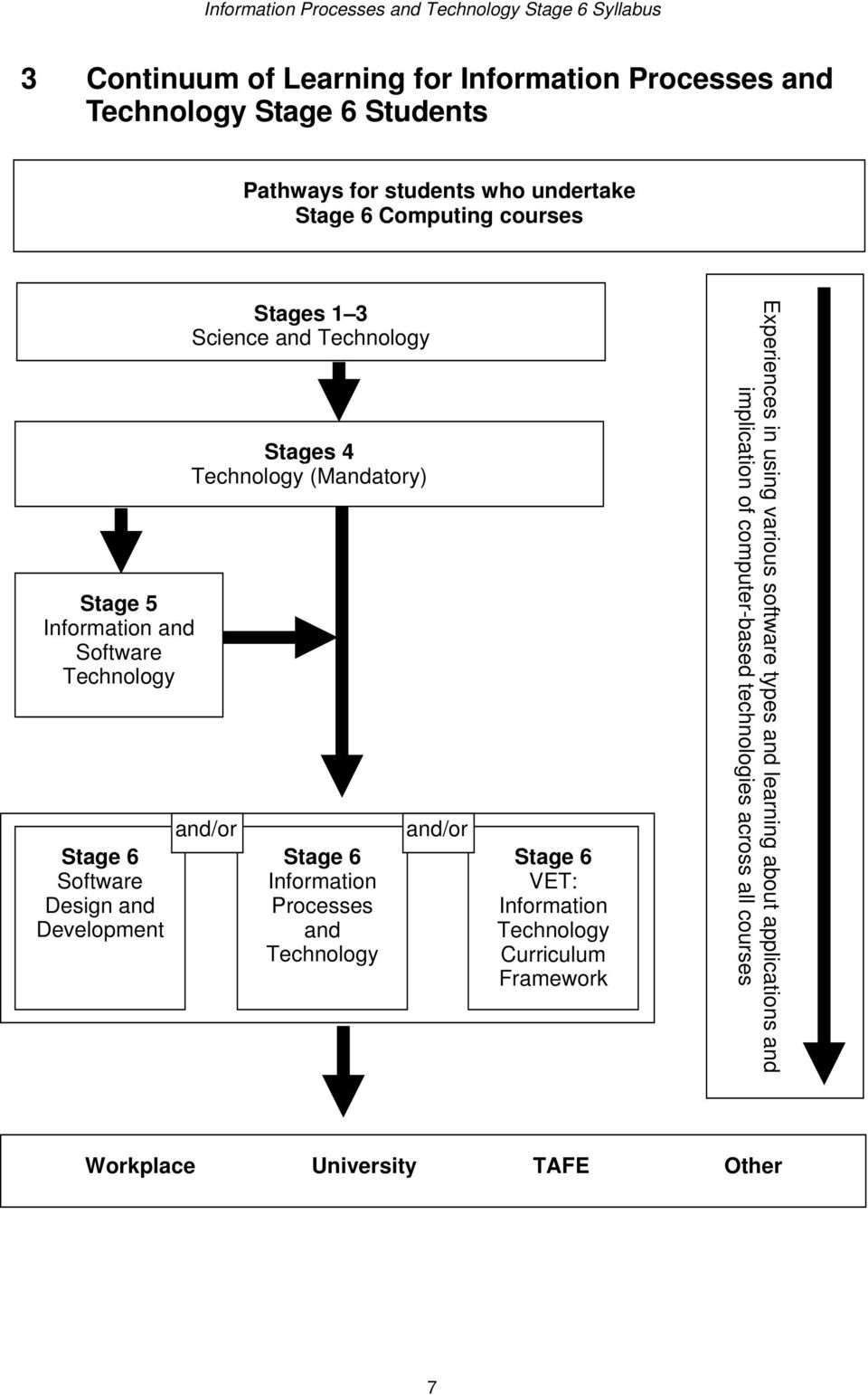
7 3 Continuum of Learning for Information Processes and Technology Stage 6 Students Pathways for students who undertake Stage 6 Computing courses Stage 5 Information and Software Technology Stage 6 Software Design and Development Stages 1 3 Science and Technology Stages 4 Technology (Mandatory) and/or Stage 6 Information Processes and Technology and/or Stage 6 VET: Information Technology Curriculum Framework Experiences in using various software types and learning about applications and implication of computer-based technologies across all courses Workplace University TAFE Other 7
8 4 Aim Information Processes and Technology Stage 6 is designed to enable students to become confident, competent, discriminating and ethical users of information technologies, to possess an understanding of information processes and to appreciate the effect of information systems on society. 5 Objectives Students will develop: 1. knowledge and understanding of the nature and function of information systems 2. knowledge and understanding of interrelationships among information processes 3. an understanding and appreciation of social and ethical issues pertaining to information systems, technologies and processes 4. an understanding and appreciation of the emerging nature of information systems, technologies and processes within a historical context 5. skills in the discriminatory selection and ethical use of appropriate resources and tools to support information systems 6. skills and techniques to creatively and methodically plan, design and implement information systems to address needs 7. skills in management, communication and teamwork in relation to individual and group activities. 8
9 6 Course Structure The arrangement and relationship between components of the Preliminary course and the HSC course for Information Processes and Technology Stage 6 are outlined below. The percentage values refer to indicative course time. A minimum of 40% course time is to be devoted to the integration of content into project work in both the Preliminary and HSC courses. It is also expected that a significant proportion of time will be devoted to integrated practical activities. Preliminary Course Introduction to Information Skills and Systems (20%) Information systems in context Information processes The nature of data and information Reasons for digital data representation Social and ethical issues Tools for Information Processes (50%) Collecting Organising Analysing Storing and Retrieving Processing Transmitting and Receiving Displaying Integration of processes Developing Information Systems (30%) Traditional stages in developing a system Complexity of systems Roles of people involved in systems development Social and ethical issues HSC Course Project Management (20%) Techniques for managing a project Understanding the problem Planning Designing solutions Implementing Testing, evaluating and maintaining Information Systems and Databases (20%) Information systems Database information systems Organisation Storage and retrieval Other information processes Issues related to information systems Communication Systems (20%) Characteristics of communication systems Examples of communication systems Transmitting and receiving in communication systems Other information processes in communication systems Managing communication systems Issues related to communication systems Option Strands (40%) Students will select TWO of the following options: Transaction Processing Systems Decision Support Systems Automated Manufacturing Systems Multimedia Systems 9

10 Conceptual Model of the Preliminary and HSC Courses Information Processes Collecting Organising Analysing Storing and Retrieving Processing Preliminary Transmitting/Receiving Displaying Introduction to Information Skills and Systems Project Work 40% Tools for Information Processes Developing Information Systems Project Management Information Systems and Databases HSC Project Work 40% Communication Systems Options Transaction Processing Systems Decision Support Systems Automated Manufacturing Systems Multimedia Systems 10

11 7 Objectives and Outcomes 7.1 Table of Objectives and Outcomes Objectives Students will develop: 1. knowledge and understanding of the nature and function of information systems Preliminary Outcomes A student: P1.1 describes the nature of information processes and information technology P1.2 classifies the functions and operations of information processes and information technology HSC Outcomes A student: H1.1 applies and explains an understanding of the nature and function of information technologies to a specific practical situation H1.2 explains and justifies the way in which information systems relate to information processes in a specific context 2. knowledge and understanding of interrelationships among information processes P2.1 identifies and describes the information processes within an information system P2.2 recognises and explains the interdependence between each of the information processes H2.1 analyses and describes a system in terms of the information processes involved H2.2 develops and explains solutions for an identified need which address all of the information processes 3. an understanding and appreciation of social and ethical issues pertaining to information systems, technologies and processes P3.1 identifies and describes social and ethical issues H3.1 evaluates and discusses the effect of information systems on the individual, society and the environment H3.2 demonstrates and explains ethical practice in the use of information systems, technologies and processes 11

12 Objectives Students will develop: 4. an understanding and appreciation of the emerging nature of information systems, technologies and processes within a historical context Preliminary Outcomes A student: P4.1 describes the historical development of information systems and relates these to current and emerging technologies HSC Outcomes A student: H4.1 proposes and justifies ways in which information systems will meet emerging needs 5. skills in the discriminatory selection and ethical use of appropriate resources and tools to support information systems P5.1 selects and ethically uses computer based and non-computer based resources and tools to process information H5.1 justifies the selection and use of appropriate resources and tools to effectively develop and manage projects H5.2 assesses the ethical implications of selecting and using specific resources and tools, recommends and justifies the choices 6. skills and techniques to creatively and methodically plan, design and implement information systems to address needs P6.1 analyses and describes an identified need P6.2 generates ideas, considers alternatives and develops solutions for a defined need H6.1 analyses situations, identifies needs, proposes and then develops solutions H6.2 selects, justifies and applies methodical approaches to planning, designing or implementing solutions 7. skills in management, communication and teamwork in relation to individual and group activities P7.1 recognises, applies and explains management and communication techniques used in individual and teambased project work P7.2 uses and justifies technology to support individuals and teams H7.1 implements and explains effective management techniques H7.2 uses methods to thoroughly document the development of individual and team projects 12
13 7.2 Key Competencies Information Processes and Technology Stage 6 provides a context within which to develop general competencies considered essential for the acquisition of effective, higher-order thinking skills necessary for further education, work and everyday life. Key competencies are embedded in the Information Processes and Technology Stage 6 Syllabus to enhance student learning. The key competencies of collecting, analysing and organising information communicating ideas and information using technology reflect core processes of information systems inquiry and are explicit in the objectives and outcomes of the syllabus. The other key competencies are developed through the methodologies of the syllabus and through classroom pedagogy. Students work as individuals and as members of teams in both Preliminary and HSC projects, to conduct investigations on information systems, and through this, the key competencies of planning and organising activities working with others and in teams are developed. When students construct Gantt charts or analyse statistical evidence, they are developing the key competency using mathematical ideas and techniques. Finally, the exploration of issues and investigation of the nature of problems associated with information systems contributes towards the students development of the key competency of solving problems. 13
14 8 Content: Information Processes and Technology Preliminary Course 8.1 Introduction to Information Skills and Systems An information system has a purpose in that it addresses the need(s) of a group or an individual. It performs the information processes of collecting, organising, analysing, storing/retrieving, processing, transmitting/receiving and displaying. Information processes involve computer and non-computer activities. For the processes to occur, participants (people), data/information and information technologies (hardware and software) are required. The purpose for an information system defines who it is for and what they need. Information systems give rise to ethical issues for people directly and indirectly involved with them. They have a social impact on the environment in which they operate. Outcomes A student: P1.1 describes the nature of information processes and information technology P1.2 classifies the functions and operations of information processes and information technology P2.1 identifies and describes the information processes within an information system P2.2 recognises and explains the interdependence between each of the information processes P3.1 identifies and describes social and ethical issues P4.1 describes the historical developments of information systems and relates these to current and emerging technologies. information systems in context diagrammatic representation of an information system in context diagrammatically represent a given scenario that involves an information system 14
15 the environment everything that influences and is influenced by the information system the purpose a statement identifying who the information system is for and what it needs to achieve who the information system is for includes individuals and organisations the information system a set of information processes requiring participants, data/information and information technology built to satisfy a purpose information processes computer based and non-computer based activities information technology hardware and software used in information processes data the raw material used by information processes information the output displayed by an information system user a person who views or uses the information output from an information system participant a special class of user who carries out the information processes within an information system explain how an information system impacts on its environment and how it in turn impacts on the information system describe the environment and purpose of an information system for a given context explain how a given need can be supported by an information system describe an information system in terms of its purpose for a given scenario, identify the people who are: in the environment users of the information system participants in the information system information processes collecting the process by which data is entered into or captured by a computer system, including: deciding what data is required how it is sourced how it is encoded for entry into the system organising the process by which data is structured into a form appropriate for the use of other information processes such as the format in which data will be represented analysing the process by which data is interpreted, transforming it into information storing and retrieving the process by which data and information is saved and accessed later processing a procedure that manipulates data and information distinguish between, and categorise, the activities within an information system in terms of the seven information processes use an existing information system to meet a simple need manually step through a given information system identifying the information process for a given information system, describe how the following relate to the information processes: participants data/information information technology schematically represent the flow of data and information through a given information system, identifying the information processes 15

16 transmitting and receiving the process that sends and receives data and information within and beyond information systems displaying the process that controls the format of information presented to the participant or user the nature of data and information data the input to an information system data representation the different types of media, namely: images audio video text numbers information the output which has been processed by an information system for human understanding the generation of information from data via the information processes how information from one information system can be data for another information system reasons for digital data representation the need for quality data, including: accuracy timeliness accessibility current data digitising trends, for example: newspapers on the Internet telephone system video on DVD facsimile media retrieval management distinguish between data and information in a given context categorise data as image, audio, video, text and/or numbers identify the data and the information into which it is transformed, for a given scenario identify examples of information systems that use information from another information system as data explain why information technology uses digital data describe advantages and disadvantages for the digital representation of data social and ethical issues social and ethical issues arising from the processing of information, including: privacy of the individual security of data and information accuracy of data and information data quality changing nature of work appropriate information use health and safety copyright laws the people affected by social and ethical issues, including: participants within the information system describe social and ethical issues that relate to: information system users participants 16
17 users of the information system those in the environment the ethical and social responsibility of developers current government legislation to protect the individual and organisations the use of information systems in fields such as manufacturing as well as the traditional fields of observation and recording global information systems: where the purpose involves international organisations, or where the data and processes are distributed across national boundaries ensure that relevant social and ethical issues are addressed identify and explain reasons for the expansion of information systems, including: advances in technology suitability of information technology for repetitive tasks 17

18 8.2 Tools for Information Processes In order to understand and build information systems, information processes must be understood. This topic examines each of the information processes by focusing on some of the tools used to carry them out. The tools include information technology and non-computer procedures. In this topic, tools are categorised and presented according to a particular information process. In reality, however, one tool may overlap several processes. One tool cannot operate in isolation; therefore, demonstrations of particular tools will involve additional tools and processes. Information processes and tools affect participants within the information system and people beyond it, giving rise to social and ethical issues. Additional tools for specific types of information systems will be examined in the HSC course. Outcomes A student: P1.1 describes the nature of information processes and information technology P1.2 classifies the functions and operations of information processes and information technology P2.1 identifies and describes the information processes within an information system P2.2 recognises and explains the interdependence between each of the information processes P3.1 identifies and describes social and ethical issues P4.1 describes the historical developments of information systems and relates these to current and emerging technologies P5.1 selects and ethically uses computer based and non-computer based resources and tools to process information P6.1 analyses and describes an identified need P6.2 generates ideas, considers alternatives and develops solutions for a defined need P7.1 recognises, applies and explains management and communication techniques used in individual and team-based project work P7.2 uses and justifies technology to support individuals and teams 18
19 collecting collecting the process by which data is captured or entered into a computer system, including: deciding what data is required how it is sourced how it is encoded for entry into the system hardware used for collection (See Course Specifications Document) software used for collection (See Course Specifications Document) non-computer procedures in collecting literature searches surveys and interviews form design for data collection manual recording of events existing non-computer data social and ethical issues in collecting bias in the choice of what and where to collect data accuracy of the collected data copyright and acknowledgment of source data when collecting the rights to privacy of individuals on whom data is collected ergonomic issues for participants entering large volumes of data into an information system organising organising the process by which data is structured into a form appropriate for use by other information processes how different methods of organising affect processing, for example: letters of the alphabet represented as images rather than text numbers represented as text rather than numeric the way in which the hardware used for collection organises data by digitising images, audio, video, numeric and text software for organisation (See Course Specifications Document) for a given scenario, identify alternatives for data collection and choose the most appropriate one use a range of hardware collection devices to collect different data types describe the operation of a range of hardware collection devices make predictions about new and emerging trends in data collection based on past practices choose the most appropriate combination of hardware, software and/or non-computer tools to collect data from a given source use the Internet to locate data for a given scenario design forms that allow data to be accurately recorded and easily input into software applications select and use appropriate communication skills to conduct interviews and surveys so that data can be accurately collected identify existing data that can be collected for an information system for a given scenario recognise personal bias and explain its impact on data collection identify the privacy implications of particular situations and propose strategies to ensure they are respected predict errors that might flow from data inaccurately collected predict issues when collecting data that might arise when it is subsequently analysed and processed choose the most appropriate format for a given set of data and identify and describe the most appropriate software and method to organise it describe how different types of data are digitised by the hardware that collects it compare and contrast different methods of organising the same set of data using existing software applications use software to combine data organised in different formats 19
20 non-computer tools for organising hard copy systems such as phone books, card catalogues and pen and paper forms pen and paper methods for organising data social and ethical issues associated with organising, including: current trends in organising data, such as: - the increase in hypermedia as a result of the World Wide Web - the ability of software to access different types of data - a greater variety of ways to organise resulting from advances in display technology the cost of poorly organised data, such as redundant data in a database used for mail-outs analysing analysing the process by which data can be represented and summarised so that humans can better understand it hardware requirements for analysing, including: large amounts of primary and secondary storage allowing for fast processing fast processors allowing many rapid calculations software features for analysis, including: searching/selecting data sorting modelling/simulations what-if scenarios charts and graphs to identify trends file comparison non-computer tools, for analysing, including: searching manual filing systems non-computer models and simulations social and ethical issues associated with analysis, including: unauthorised analysis of data data incorrectly analysed erosion of privacy from linking databases for analysis storing and retrieving storing and retrieving the two-step process by which data or information can be saved and reloaded to allow for: other processing to take place use data dictionaries to describe the organisation of data within a given system assess future implications when making decisions about the way data is organised identify hardware requirements to carry out a particular type of analysis describe the best organisation for data for a particular type of analysis use software analysis features in a range of software applications to analyse image, audio, video, text and numeric data compare and contrast computer and non-computer tools for analysis on the basis of speed, volume of data that can be analysed, and cost analyse data on individuals for the purpose it was collected document the storage and retrieval process in an information system describe the characteristics and operation of hardware devices used for 20
21 a temporary halt in the system backup and recovery the transfer of data or information hardware for storing and retrieving hardware devices (See Course Specifications Document) the characteristics of hardware, including: - random or sequential access - volatile or non-volatile - permanent or non-permanent the trend to faster and greater storage capacity over time software for storing and retrieving hardware interface software file management software database management systems file formats for different data types Internet browser - used to access a machineindependent data store - using search engines to access data encryption/password protection security of stored data whether stored centrally or distributed non-computer tools, including: paper based storage systems microfiche libraries social and ethical issues, including: the security of stored data unauthorised retrieval of data advances in storage and retrieval technologies and new uses such as data matching processing processing a method by which data can be manipulated in different ways to produce a new value or result (eg calculating a total, filtering an , changing the contrast of an image, changing the volume of a wave file) hardware in processing hardware with fast processors, a lot of RAM and large storage capacity for image, video and audio processing increased processing speed, by: - increased clock speeds - increased bus capacity storage and retrieval use a range of hardware devices and associated software to store and retrieve information and data store and retrieve data using a network compare different file formats for storing the same data, explaining the features and benefits of each use software features to secure stored data and information retrieve and use data in an ethical way select appropriate hardware configurations for a specified type of processing edit text data using word processors, desktop publishing, hypertext and database management systems edit numeric data using spreadsheets and database management systems edit image data using paint, draw and animation packages 21
22 historical and current trends in CPU development software for processing text, numeric, image, video and audio data non-computer tools and processing documenting procedures to be followed when processing social and ethical issues associated with processing ownership of processed data bias in the way participants in the system process data transmitting and receiving transmitting and receiving the process that transfers information and data within and between information systems hardware for transmitting and receiving communications within a computer between peripheral devices and the CPU via buses the role of modems, including modulation and demodulation local area networks and wide area networks software for transmitting and receiving communications packages transmitting and receiving text, numeric, image, audio and video electronic mail and its operation non-computer tools for transmitting and receiving, such as mail, phone, fax and radio and television (transmit only) social and ethical issues associated with transmitting and receiving accuracy of data received from the Internet security of data being transferred net-etiquette acknowledgment of data source global network issues, time zones, date fields, exchange rates changing nature of work for participants, such as work from home and telecommuting current developments and future trends in digital communications, radio and television the impact of the Internet on traditional business edit video data using animation packages edit audio data using mixing software diagrammatically represent data processing identify examples of potential human bias in data processing differentiate between the requirements for a local area network and a wide area network transfer numeric, text, image, audio and video data and discuss the time to transfer and required bandwidth describe concepts of downloading, uploading and streaming demonstrate sending and receiving mail, with attachments, over an system select a relevant technology for a given situation to allow computers to transmit and receive data or information compare and contrast computer and non-computer based communication systems describe and employ net-etiquette when using the Internet predict and discuss possible future trends in communications and the impact they are likely to have on the transmitting and receiving of data/information 22
23 displaying displaying the method by which information is output from the system to meet a purpose hardware for displaying (See Course Specifications Document) software for display interfaces for hardware display devices display features in applications packages, including: - reporting - formatting - spacing - merging - tables - charts non-computer tools: traditional methods for displaying the different types of data social and ethical issues associated with displaying communication skills of those presenting displays past, present and emerging trends in displays appropriate displays for a wide range of audiences, including: - standards for display for the visually impaired - displays suitable for young children integration of processes the interrelationships between the processes in a given system one tool (such as software to develop a multimedia presentation) may involve several processes choose and justify the most appropriate method for displaying information given a particular set of circumstances describe the operation of display hardware use a range of hardware and software combinations to display different types of information format a text document with appropriate use of fonts, spacing and layout for printed and screen displays design and develop a simple web page generate reports for display within a database mail-merge information from a database into another application for display create audio, image and video displays with presentation software compare and contrast displays created without a computer to those created with a computer identify, discuss and appreciate the widespread use of non-computer methods of displaying information design a display for a wide variety of users recognise that processes can overlap, be concurrent or independent or not significant in a specific system 23
24 8.3 Developing Information Systems New information systems are created when existing systems do not adequately meet the needs of users of the information system, or when there is a need that could be met by an information system. The success of a new system depends upon how well the problem is understood, how the system is designed, how it is tested, evaluated and maintained over time. This topic introduces students to the traditional method for developing systems. Students must engage in project work, both individually and in teams, which supports this understanding by planning, designing and implementing a series of discrete information systems. Alternatives to this model are presented in the HSC course. Students may begin their project work at any time during the Preliminary course. Project work requirements are described in the Course Structure on page 9. Outcomes A student: P1.1 describes the nature of information processes and information technology P1.2 classifies the functions and operations of information processes and information technology P2.1 identifies and describes the information processes within an information system P2.2 recognises and explains the interdependence between each of the information processes P3.1 identifies and describes social and ethical issues P4.1 describes the historical developments of information systems and relates these to current and emerging technologies P5.1 selects and ethically uses computer based and non-computer based resources and tools to process information P6.1 analyses and describes an identified need P6.2 generates ideas, considers alternatives and develops solutions for a defined need P7.1 recognises, applies and explains management and communication techniques used in individual and team-based project work P7.2 uses and justifies technology to support individuals and teams 24
25 traditional stages in developing a system understanding the problem planning designing implementing testing, evaluating and maintaining complexity of systems systems for individuals systems for organisations systems developed by individuals systems developed by teams roles of people involved in systems development different roles played by individuals in the team and communication between them strengths and weaknesses of individual team members communication interpersonal technical organisational recognise and apply appropriate stages in their project work read and interpret the requirements for a new system in terms of: the needs of the users of the information system who the participants are the data/information to be used required information technology information processes use a variety of design tools to help plan the structure of an information system use an information system to generate information read a set of specifications understand the need for a time schedule interpret Gantt charts understand the need for journals and diaries recognise the resources that are relevant, available and required for use in developing the system modify or extend an existing system according to specifications test and evaluate an existing system to see if it meets requirements and specifications recognise different roles of people and how they communicate throughout different stages of the project produce a report stating the need, and how an information system will meet it diagrammatically represent the information system in context document the relationship between the new system, user of the information system and their need(s) analyse and customise user interfaces and other tasks in applications software forming part of the solution identify the training needs of users of the information system document the procedures to be followed by participants 25
26 social and ethical issues machine-centred systems simplify what computers do at the expense of participants human-centred systems as those that make participants work as effective and satisfying as possible how the relationships between participants change as a result of the new system ensuring the new system provides participants with a safe work environment awareness of the impact the system may have on the participants, including: opportunities to use their skills meaningful work need for change opportunities for involvement and commitment implement systems that pay as much attention to the needs of participants as they do to information technology 26
27 9 Content: Information Processes and Technology HSC Course 9.1 Project Management This topic is intended to give students an understanding of the underlying theory of project management as well as an opportunity to plan, design and implement an information system that has a purpose. The chosen information system implemented in project work should be drawn from: a database information system a communication system a transaction processing system a decision support system an automated manufacturing system a multimedia system. The construction of the information system will follow the stages detailed in the Preliminary topic Developing Information Systems. Other system development methods have been included beyond the traditional methods. One large project or a number of smaller projects may be undertaken in the course. If smaller projects are undertaken, they need to occur over a significant amount of time and involve sustained work. Project(s) should allow students to see the information system in its full context. Students should identify the purpose for the information system, the participants, data/information and information technology that work with the information processes. Project work requirements are described in the Course Structure on page 9. Outcomes A student: H1.1 applies and explains an understanding of the nature and function of information technologies to a specific practical situation H1.2 explains and justifies the way in which information systems relate to information processes in a specific context H2.1 analyses and describes a system in terms of the information processes involved H2.2 develops and explains solutions for an identified need which address all of the information processes H3.1 evaluates and discusses the effect of information systems on the individual, society and the environment H3.2 demonstrates and explains ethical practice in the use of information systems, technologies and processes H4.1 proposes and justifies ways in which information systems will meet emerging needs H5.1 justifies the selection and use of appropriate resources and tools to effectively develop and manage projects H5.2 assesses the ethical implications of selecting and using specific resources and tools, recommends and justifies the choices H6.1 analyses situations, identifies needs, proposes and then develops solutions 27
28 H6.2 selects, justifies and applies methodical approaches to planning, designing or implementing solutions H7.1 implements and explains effective management techniques H7.2 uses methods to thoroughly document the development of individual and team projects. techniques for managing a project communication skills necessary for dealing with others the consequences for groups that fail to function as a team, including: financial loss employment loss missed opportunities project management tools, including: Gantt charts scheduling of tasks journals and diaries funding management plan communication management plan identifying social and ethical issues understanding the problem approaches to identify problems with existing systems, including: interviewing/surveying users of the information system interviewing/surveying participants analysing the existing system by determining: - how it works - what it does - who uses it requirements reports requirements prototype a working model of an information system, built in order to understand the requirements of the system used when the problem is not easily understood repetitive process of prototype modification and participants feedback until the problem is understood can be the basis for further system development understand the communication skills required to manage a system development project, such as: active listening conflict resolution negotiation skills interview techniques team building understand the need to apply project management tools to develop a system using a team approach appreciate the advantages of groups that function as a team, including: increased productivity enhanced job satisfaction the development of a quality system appreciate the need for complete documentation throughout all aspects of the system assess the social and ethical implications of the solution throughout the project apply appropriate techniques in understanding the problem interpret a requirements report which includes: the purpose of the systems an analysis of an existing system definition of extra requirements diagrammatically represent existing systems using context diagrams and data flow diagrams identify, communicate with and involve participants of the current system create a requirements prototype from applications packages that provide: screen generators report generators use a prototype to clarify participants understanding of the problem 28
29 planning a feasibility study of proposed solutions, including: economic feasibility technical feasibility operational feasibility scheduling choosing the most appropriate solution choosing the appropriate development approaches traditional outsourcing prototyping customisation participant development agile methods the requirements report that: details the time frame details the subprojects and the time frame for them identifies participants identifies relevant information technology identifies data/information identifies the needs of users designing clarifying with users the benefits of the new information system designing the information system for ease of maintenance clarifying each of the relevant information processes within the system detailing the role of the participants, the data and the information technology used in the system refining existing prototypes participant development, when people within the information system develop the solution participant designed solutions tools for participant development such as guided processes in application packages tools used in designing, including: context diagrams data flow diagrams decision trees decision tables data dictionaries storyboards conduct a feasibility study and report on the benefits, costs and risks of the project compare traditional, iterative and agile system development approaches create Gantt charts to show the implementation time frame investigate/research new information technologies that could form part of the system develop a solution to a problem from a prototype use a guided process in an application to create all or part of a solution use system design tools to: better understand the system assist in explaining the operation of the new system document the new system 29
30 implementing acquiring information technology and making it operational hardware software, customised or developed an implementation plan that details: participant training the method for conversion - parallel conversion - direct conversion - phased conversion - pilot conversion how the system will be tested conversion of data for the new system the need for an operation manual detailing procedures participants follow when using the new system testing, evaluating and maintaining testing and evaluating the solution with test data such as volume data simulated data live data checking to see that the original system requirements have been achieved trialling and using the operation manual reviewing the effect on users of the information system, participants and people within the environment modifying parts of the system where problems are identified determine training needs arising from the creation of a new system compare and contrast conversion methods justify the selected conversion method for a given situation convert from the old system to the new implement the appropriate information technology develop an implementation plan for the project compare the new system to the old and evaluate whether the requirements have been met update system documentation 30
31 9.2 Information Systems and Databases Information systems are computer systems that support end users, giving them access to the information. For a large number of information systems, the data is held in databases and access is via database management systems. Information systems perform a variety of tasks and these are considered in the following topics in the HSC course. While all of the information processes are represented in information systems, the emphasis in this topic is on the processes of organising, storing and retrieving with database systems and hypermedia. Outcomes A student: H1.1 applies and explains an understanding of the nature and function of information technologies to a specific practical situation H1.2 explains and justifies the way in which information systems relate to information processes in a specific context H2.1 analyses and describes a system in terms of the information processes involved H2.2 develops and explains solutions for an identified need which address all of the information processes H3.1 evaluates and discusses the effect of information systems on the individual, society and the environment H3.2 demonstrates and explains ethical practice in the use of information systems, technologies and processes H4.1 proposes and justifies ways in which information systems will meet emerging needs H5.1 justifies the selection and use of appropriate resources and tools to effectively develop and manage projects H5.2 assesses the ethical implications of selecting and using specific resources and tools, recommends and justifies the choices H6.1 analyses situations, identifies needs, proposes and then develops solutions H6.2 selects, justifies and applies methodical approaches to planning, designing or implementing solutions H7.1 implements and explains effective management techniques H7.2 uses methods to thoroughly document the development of individual and team projects. 31
32 information systems the characteristics of an information system, namely: the organisation of data into information the analysing of information to give knowledge the different types of and purposes for information systems, including systems used to: process transactions provide users with information about an organisation help decision-making manage information used within an organisation database information systems school databases holding information on teachers, subjects, classrooms and students the Roads and Traffic Authority holding information on automobiles and holders of drivers licences video stores holding information on borrowers and videos organisation non-computer methods of organising including: telephone books card based applications computer based methods of organising, including: flat-file systems database management systems hypermedia the advantages and disadvantages of computer based and non-computer based organisation methods the logical organisation of flat-file databases, including: files records fields, key fields characters the logical organisation of relational databases, including: schemas as consisting of: - entities - attributes identify the type and purpose of a given information system represent an information system using a systems representation tool identify the purpose, information processes, information technology and participants within a given system represent diagrammatically the flow of information within an information system identify participants, data/information and information technology for the given examples of database information systems describe the relationships between participants, data/information and information technology for the given examples of database information systems choose between a computer based or non-computer based method to organise data, given a particular set of circumstances identify situations where one type of database is more appropriate than another represent an existing relational database in a schematic diagram create a schematic diagram for a scenario where the data is to be organised into a relational database modify an existing schema to meet a change in user requirements 32
33 - relationships one to one one to many many to many tables as the implementation of entities consisting of: - attributes - records linking tables using primary and foreign keys user views for different purposes data modelling tools for organising databases, including: data dictionaries to describe the characteristics of data including: - field name - data type - data format - field size - description - example schematic diagrams that show the relationships between entities normalising data to reduce data redundancy the logical organisation of hypermedia, including: nodes and links uniform resource locators metadata such as HTML tags tools for organising hypermedia, including: storyboards to represent data organised using hyperlinks software that allows text, graphics and sounds to be hyperlinked storage and retrieval database management systems (DBMS) including: the role of a DBMS in handling access to a database the independence of data from the DBMS direct and sequential access of data on-line and off-line storage centralised and distributed databases storage media including: hard discs CD-ROMs cartridge and tape encryption and decryption backup and security procedures choose and justify the most appropriate type of database, flat-file or relational, to organise a given set of data create a simple relational database from a schematic diagram and data dictionary populate a relational database with data describe the similarities and differences between flat-file and relational databases create a data dictionary for a given set of data create documentation, including data modelling, to indicate how a relational database has been used to organise data demonstrate an awareness of issues of privacy, security and accuracy in handling data compare and contrast hypermedia and databases for organising data design and develop a storyboard to represent a set of data items and links between them construct a hypertext document from a storyboard use software that links data, such as: HTML editors web page creation software search a database using relational and logical operators output sorted data from a database generate reports from a database construct an SQL query to select data from a given database, matching given criteria 33
34 tools for database storage and retrieval, including: extracting relevant information through searching and sorting a database selecting data from a relational database using Query by Example (QBE) and Structured Query Languages (SQL) commands, including: - select - from - where - order by tools for hypermedia search and retrieval, including: free text searching operation of a search engine - indexing and search robots - metadata reporting on data found in hypermedia systems other information processes for database information systems displaying reporting on relevant information held in a database constructing different views of a database for different purposes issues related to information systems and databases acknowledgment of data sources the Freedom of Information Act privacy principles quality of data accuracy of data and the reliability of data sources access to data, ownership and control of data data matching to cross link data across multiple databases current and emerging trends in the organisation, processing, storage and retrieval of data (See Course Specifications Document) calculate the storage requirements for a given number of records (given a data dictionary for a database) summarise, extrapolate and report on data retrieved from the Internet use search engines to locate data on the World Wide Web describe the principles of the operation of a search engine design and create screens for interacting with selected parts of a database and justify their appropriateness design and generate reports from a database identify and apply issues of ownership, accuracy, data quality, security and privacy of information, data matching discuss issues of access to and control of information validate information retrieved from the Internet 34
35 9.3 Communication Systems When participants within the information system have a need to transmit and receive data or information, the type of system required is a communication system. Communication systems support people who are working together, by enabling the exchange of data and information electronically. In this topic, the information processes of transmitting and receiving are featured, with the other processes considered when relevant because all information processes play a role in communication systems. Outcomes A student: H1.1 applies and explains an understanding of the nature and function of information technologies to a specific practical situation H1.2 explains and justifies the way in which information systems relate to information processes in a specific context H2.1 analyses and describes a system in terms of the information processes involved H2.2 develops and explains solutions for an identified need which address all of the information processes H3.1 evaluates and discusses the effect of information systems on the individual, society and the environment H3.2 demonstrates and explains ethical practice in the use of information systems, technologies and processes H4.1 proposes and justifies ways in which information systems will meet emerging needs H5.1 justifies the selection and use of appropriate resources and tools to effectively develop and manage projects H5.2 assesses the ethical implications of selecting and using specific resources and tools, recommends and justifies the choices H6.1 analyses situations, identifies needs, proposes and then develops solutions H6.2 selects, justifies and applies a methodical approach to planning, designing or implementing a solution H7.1 implements and explains effective management techniques H7.2 uses methods to thoroughly document the development of individual and team projects. 35
36 characteristics of communication systems communication systems as being those systems which enable users to send and receive data and information the framework in which communication systems function, demonstrated by the following model use applications to create and transmit messages establish a communications link and describe the steps that take place in its establishment the functions performed within the communication systems in passing messages between source and destination, including: message creation organisation of packets at the interface between source and transmitter signal generation by the transmitter transmission synchronising the exchange addressing and routing error detection and correction security and management the roles of protocols in communication handshaking and its importance in a communications link functions performed by protocols at different levels the client server model the role of the client and the server thin clients and fat clients examples of clients such as web browsers and mail clients examples of servers such as print servers, mail servers and web servers identify and describe specified protocols at different stages of the communication identify client processing and server processing describe the advantages and disadvantages of client server architecture 36
37 examples of communication systems teleconferencing systems messaging systems (See Course Specifications Document) other systems dependent on communication technology such as: e-commerce EFTPOS electronic banking transmitting and receiving in communication systems transmission media, including: wired transmission (See Course Specifications Document) wireless transmission (See Course Specifications Document) characteristics of media in terms of speed, capacity, cost and security communication protocols, including: application level protocols - http - smtp - SSL communication control and addressing level protocols - TCP - IP transmission level protocols - Ethernet - Token ring strategies for error detection and error correction network topologies, including: star bus ring hybrid wireless networks the functions performed by the following hardware components used in communication systems (See Course Specifications Document) characteristics of network operating software similarities and differences between the Internet, intranets and extranets use a communication system to transmit and receive audio, video and text data for given examples, identify the participants, information/data, information technology, need and purpose for given examples explain how data is transmitted and received for given examples, identify the advantages and disadvantages of the system compare and contrast traditional communication systems with current electronic methods represent a communication system diagrammatically predict developments in communication systems based on current trends simulate activities involved with communication in areas such as e-commerce EFTPOS Internet banking for a given scenario, choose and justify the most appropriate transmission media diagrammatically represent the topology describe the location and role of hardware components on the network compare the functions of different hardware components identify the main characteristics of network operating software compare and contrast the Internet, intranets and extranets 37
38 other information processes in communication systems collecting, such as the phone as the collection device with voice mail EFTPOS terminal as a collection device for electronic banking processing, including: encoding and decoding analog and digital signals formation of data packets routing encryption and decryption error checking - parity bit check - check sum - cyclic redundancy check (CRC) displaying, such as the phone as the display device with voice mail EFTPOS terminal as a display device for electronic banking managing communication systems network administration tasks, such as: adding/removing users assigning users to printers giving users file access rights installation of software and sharing with users client installation and protocol assignment logon and logoff procedures network-based applications issues related to communication systems security globalisation changing nature of work interpersonal relationships e-crime legal virtual communities distinguish between data in analog and digital form justify the need to encode and decode data identify where in a communication system signal conversion takes place describe the structure of a data packet describe methods to check the accuracy of data being transmitted detail the network management software in a given network describe the role of the network administrator and conduct network administration tasks demonstrate logon and logoff procedures, and justify their use adopt procedures to manage electronic mail describe and justify the need for ethical behaviour when using the Internet discuss the social and ethical issues that have arisen from use of the Internet, including: the availability of material normally restricted electronic commerce domination of content and control of access to the Internet the changing nature of social interactions identify the issues associated with the use of communication systems, including: teleconferencing systems messaging systems 38
39 current and emerging trends in communications (See Course Specifications Document) e-commerce EFTPOS electronic banking design and implement a communication system to meet an individual need predict developments in communication systems based on current trends 39
40 9.4 Option Strands There are FOUR options and students must study TWO of these. The topics are: Transaction Processing Systems Decision Support Systems Automated Manufacturing Systems Multimedia Systems Option 1: Transaction Processing Systems Information systems that collect, store, modify and retrieve records of transactions are transaction processing systems. A transaction is an event that generates or modifies data that is eventually stored in an information system. Transaction processing systems meet record keeping and event tracking needs. In addition, analysing data stored in transaction processing systems may meet the information needs of end user(s). This option focuses on the information process of storing/retrieving. Other information processes are important in transaction processing and these are also considered. Outcomes A student: H1.1 applies and explains an understanding of the nature and function of information technologies to a specific practical situation H1.2 explains and justifies the way in which information systems relate to information processes in a specific context H2.1 analyses and describes a system in terms of the information processes involved H2.2 develops and explains solutions for an identified need which address all of the information processes H3.1 evaluates and discusses the effect of information systems on the individual, society and the environment H3.2 demonstrates and explains ethical practice in the use of information systems, technologies and processes H4.1 proposes and justifies ways in which information systems will meet emerging needs H5.1 justifies the selection and use of appropriate resources and tools to effectively develop and manage projects H5.2 assesses the ethical implications of selecting and using specific resources and tools, recommends and justifies the choices H6.1 analyses situations, identifies needs, proposes and then develops solutions H6.2 selects, justifies and applies methodical approaches to planning, designing or implementing solutions H7.1 implements and explains effective management techniques H7.2 uses methods to thoroughly document the development of individual and team projects. 40
41 characteristics of transaction processing systems a transaction a series of events important to an organisation that involve a request, an acknowledgement, an action and an outcome the components of a transaction processing system, including: purpose data information technology processes participants batch transaction processing the collection and storage of data for processing at a scheduled time or when there is sufficient data real time transaction processing the immediate processing of data the significance of data validation in transaction processing the historical significance of transaction processing as the first type of information systems types of transaction processing systems web-based non web-based on-line real time batch systems that appear real time, responding as the transactions occur, but where the actual updating is batch processed, such as credit card transactions recognise and describe a transaction identify, describe and use a batch transaction processing system distinguish between the storage of collected data and the storage of processed data in a batch system identify, describe and use a real time transaction processing system compare and contrast batch and real time transaction processing analyse an existing transaction processing system to determine its strengths and weaknesses design and implement procedures for validating entered data assess the work routine of a clerk in a manual transaction system to determine its suitability for automation identify participants, data/information and information technology for the given types of transaction processing systems describe the relationships between participants, data/information and information technology for the given types of transaction processing systems for a scenario diagrammatically represent transaction processing using data flow diagrams distinguish between the different types of transaction processing systems storing and retrieving in transaction processing systems storage of digital data in databases and files retrieval of stored data to conduct further transaction processing such as printing invoices systems to store paper records of transactions data backup and recovery, including: grandfather, father, son off-site storage secure on-site storage full and partial backups store digital data in databases and other files in such a way that it can be retrieved, modified and further processed implement systems to store paper transactions 41
42 recovery testing suitable media specialised backup software transaction logs documenting backup and recovery procedures mirroring rollback updating in batch systems: historical significance limitations of batch processing technology required steps in a batch update suitable applications updating in on-line real time systems: relevance and impact technology required hardware requirements large secondary storage software requirements (on-line database) with user friendly interface steps in on-line real time processing suitable applications other information processes in transaction processing systems collecting in transaction processing: hardware (See Course Specifications Document) collection from forms screen design for on-line data collection web forms for transaction processing (real time and batch) analysing data, in which output from transaction processing is input to different types of information systems, such as: decision support management information systems data warehousing systems (for data mining) enterprise systems issues related to transaction processing systems changing nature of work and the effect on participants, including: the automation of jobs once performed by clerks shifting of workload from clerks to members of the public the need for alternative procedures to select and apply backup and recovery procedures to protect data document, including diagrammatical representations, the steps in batch processing document, including diagrammatical representations, steps in real time transaction processing identify systems for which batch is appropriate and is not appropriate distinguish between on-line real time and batch systems create and use a transaction processing system describe the operation of relevant hardware and how each is used to collect data for transaction processing design and justify paper forms to collect data for batch processing design user friendly screens for on-line data collection identify existing procedures that may provide data for transaction processing create user interfaces for on-line real time and batch updating, and distinguish between them identify situations where data warehousing and data mining would be an advantage assess the impact on participants involved in transaction processing identify jobs that have changed and/or jobs that have been created as a result of transaction processing, and report on the implications of these changes for participants in the system 42
43 deal with transactions when the TPS is not available bias in data collection: when establishing the system and deciding what data to collect when collecting data the importance of data in transaction processing, including: data security data integrity data quality control in transaction processing and the implications it has for participants in the system current and emerging trends in transaction processing (See Course Specifications Document) discuss alternatives for when the transaction processing system is not available and explain why they need to be periodically tested identify security, bias and accuracy problems that could arise from the actions of participants recognise the significance of data quality 43
44 9.4.2 Option 2: Decision Support Systems When the task that end user(s) need to perform involves decision-making, the information system required is a decision support system. They can be used in situations that are unstructured, where there is no clear-cut path to the decision, or semistructured, where there is some indication of the path to take. Decision support systems use combinations of models, analytical tools, databases and automated processes to assist decision-making. Automated processing is achieved via intelligent systems that either focus on rules, such as expert systems, or pattern detection in data, such as neural networks. The interactive nature of decision support systems requires that user(s) have an understanding of analytical tasks. Decision support and intelligent systems make use of all information processes. This topic focuses on organising, analysing and processing. Outcomes A student: H1.1 applies and explains an understanding of the nature and function of information technologies to a specific practical situation H1.2 explains and justifies the way in which information systems relate to information processes in a specific context H2.1 analyses and describes a system in terms of the information processes involved H2.2 develops and explains solutions for an identified need which address all of the information processes H3.1 evaluates and discusses the effect of information systems on the individual, society and the environment H3.2 demonstrates and explains ethical practice in the use of information systems, technologies and processes H4.1 proposes and justifies ways in which information systems will meet emerging needs H5.1 justifies the selection and use of appropriate resources and tools to effectively develop and manage projects H5.2 assesses the ethical implications of selecting and using specific resources and tools, recommends and justifies the choices H6.1 analyses situations, identifies needs, proposes and then develops solutions H6.2 selects, justifies and applies methodical approaches to planning, designing or implementing solutions H7.1 implements and explains effective management techniques H7.2 uses methods to thoroughly document the development of individual and team projects. 44
45 characteristics of decision support systems decision support systems those that assist user(s) in making a decision the interactive nature of decision support systems the nature of decision support systems which model, graph or chart situations to support human decision making categories of decision making structured: decisions are automated decision support systems are not required semistructured: there is a method to follow requirements are clear cut unstructured: there is no method to reach the decision judgements are required requires insights into the problem examples of decision support semistructured situations, such as: a bank officer deciding how much to lend to a customer fingerprint matching unstructured situations, such as: predicting stock prices disaster relief management the use of systems to support decision making, including: spreadsheets databases expert systems neural networks data warehouses group decision support systems Geographic Information Systems (GIS) Management Information Systems (MIS) organising and decision support designing spreadsheets: creating a pen and paper model identifying data sources planning the user interface developing formulas to be used select and recommend situations where decision support systems could be used classify situations which are structured, semistructured or unstructured identify participants, data/information and information technology for an example of a decision support system describe the relationships between participants, data/information and information technology for an example of a decision support system analyse trends and make predictions using an existing spreadsheet model extract data, based on known criteria, from an existing database to help make a decision recognise appropriate decision support systems for a given situation design spreadsheets by: linking multiple sheets to extract data and create summaries use absolute and relative references in formulae implement spreadsheets by: entering data naming ranges 45
46 the knowledge base of if-then rules in an expert system processing and decision support structure of expert systems knowledge base database of facts inference engine explanation mechanism user interface types of inference engines, including: forward chaining backward chaining certainty factors as a means of dealing with unclear situations pattern matching in neural networks the use of macros to automate spreadsheet processing analysing and decision support data mining extracting summary data from a spreadsheet comparing sequences of data for similarities and differences spreadsheet analysis, including: what-if models statistical analysis charts On-line Analytical Processing (OLAP) data visualisation drill downs other information processes collecting identification of data for decision support systems the role of the expert in the creation of expert systems the role of the knowledge engineer in the creation of expert systems storing and retrieving using intelligent agents to search data creating templates organising data for easy graphing using formulae to link and organise data in cells design a set of if-then rules for a particular situation diagrammatically represent the if-then rules enter rules and facts into an expert system shell and use it to draw conclusions or make a diagnosis describe situations better suited to forward chaining and those better suited to backward chaining create a simple macro in a spreadsheet compare and contrast processing methods used by databases, neural networks and expert systems describe the process of data mining to search large databases for hidden patterns and relationships and use these to predict future behaviour analyse alternatives using what-if scenarios make predictions based on the analysis of spreadsheets use a simple neural network to match patterns extract information from a database for analysis using a spreadsheet, including charting relevant data distinguish between neural networks and expert systems describe tools used for analytical processing determine the sources of data for a decision support system for a given scenario describe the operation of intelligent agents in situations such as search engines for the Internet 46
47 issues related to decision support the reasons for decision support systems, including: preserving an expert s knowledge improving performance and consistency in decision-making rapid decisions ability to analyse unstructured situations responsibilities of those performing data mining, including: erroneous inferences privacy responsibility for decisions made using decision support systems current and emerging trends of decision support systems (See Course Specifications Document) describe the impact on participants in decision support systems when some of their decision-making is automated and recommend measures to reduce negative impacts identify situations where user(s) of decision support systems also require knowledge in the area determine whether the decisions suggested by intelligent decision support systems are reasonable demonstrate responsible use of a decision support system by using its findings for the intended purpose only identify situations where decision support systems are of limited value recognise the importance of business intelligence based on enterprise systems 47
48 9.4.3 Option 3: Automated Manufacturing Systems Manufacturing is the process of producing a product that meets a specific purpose. Manufacturing information systems support the production process in a number of ways, including the tracking of inventory, record keeping, the scheduling of production and carrying out production. Automated manufacturing systems have computerised controls built into the manufacturing equipment. Data is gathered through sensors and following some processing, a signal is sent to an actuator, a device that performs some mechanical action. While such information systems carry out all of the information processes, the information process focused on in this topic is collecting. Outcomes A student: H1.1 applies and explains an understanding of the nature and function of information technologies to a specific practical situation H1.2 explains and justifies the way in which information systems relate to information processes in a specific context H2.1 analyses and describes a system in terms of the information processes involved H2.2 develops and explains solutions for an identified need which address all of the information processes H3.1 evaluates and discusses the effect of information systems on the individual, society and the environment H3.2 demonstrates and explains ethical practice in the use of information systems, technologies and processes H4.1 proposes and justifies ways in which information systems will meet emerging needs H5.1 justifies the selection and use of appropriate resources and tools to effectively develop and manage projects H5.2 assesses the ethical implications of selecting and using specific resources and tools, recommends and justifies the choices H6.1 analyses situations, identifies needs, proposes and then develops solutions H6.2 selects, justifies and applies methodical approaches to planning, designing or implementing solutions H7.1 implements and explains effective management techniques H7.2 uses methods to thoroughly document the development of individual and team projects. 48
49 characteristics of automated manufacturing systems automated manufacturing systems as information systems involved in production, by inventory tracking, record keeping, production scheduling and actual production the direct users of these systems as supervisors overseeing operation people whose task is dependent on the system for information the ability of these systems to collect data from the environment through a wide range of sensors, process this data into information and use this information to complete a physical task the use of microprocessors in these systems as the controller block diagrams as a tool for describing the interactions between information technology items within these systems examples of automated manufacturing systems specific examples, including: assembly line production such as the car industry materials and production scheduling automated warehouses CAD/CAM such as: computing numerical control (CNC) systems rapid prototyping mail sorting reasons for automation, including: repetitive tasks faster decision-making safety cost reduction customisation quality control precision and acceptable tolerance range productivity gains gains through simulating and modelling, such as: - automated structural calculations - automated ordering of components identify and describe the features of automated manufacturing systems describe how participants within these systems interact with the information technology within the system represent the information technology within an automated manufacturing system with a block diagram within an automated manufacturing system evaluate and refine block diagrams to show more detail for a given situation and identify the sequence of steps that occur identify participants, data/information and information technology for each example of automated manufacturing systems discuss the relationships between participants, data/information and information technology for each example of automated manufacturing systems outline the reasons for automation in each of the examples diagrammatically represent the processing steps in automated manufacturing systems 49
50 collecting in automated manufacturing systems systems that collect data and information from participants via computer aided design (CAD) software and directly link this to the rest of the system through computer aided manufacture (CAM) identification of the data to be collected and the most appropriate input device the physical operation and scientific principle(s) underlying sensors used to collect data, including: temperature pressure motion flow light the integration of sensors into manufacturing machinery to automate processing, such as: robotic arms conveyor belts barcode readers, radio frequency identifiers tags (RFID) and inventory tracking and production the analog nature of the data collected by the sensors and its conversion to digital for use in the system damping as the process that modifies the signal to the output device based on the input signal types of damping, including: underdamping a quick response to change leading to rapid fluctuations overdamping a slow response to change without fluctuations critical damping a quick response to change and quick return to stability other information processes in manufacturing systems processing: the trend to mass-production while meeting the needs of individuals the different types of systems, including: - continuous - batch - discrete the features of each type of system, the types of tasks they perform and the scheduling of these tasks discuss the relationship between CAD and CAM in manufacturing systems use a CAD software package to reproduce a given design identify data required by a manufacturing system recommend the most appropriate device to collect data for a given scenario describe the physical operation and the scientific principle(s) underlying this for each sensor use a range of available sensors to collect data that could be used in an automated manufacturing system describe the operation of barcode readers and RFID tags and how they can assist in inventory tracking and production describe the process of converting from analog to digital data and demonstrate this with available information technology describe a situation where changes in collected data lead to a requirement for damping justify the type of damping for a given situation identify manufacturing systems that quickly adapt to a particular need yet still mass produce, such as a car manufacturing plant that mass produces cars but in the colours required by customers describe the features of each type of system categorise and justify the categorisation of systems as either continuous, discrete or batch 50
51 displaying: actuators specialised display devices that perform a mechanical action under the control of the system types of actuators, including: - solenoid - motor - stepping motor - relay - hydraulic pumps the conversion from digital to analog to control actuators transmitting and receiving: noise as the interference in a signal the causes of noise ways of correcting noise recommend a suitable actuator for a given situation distinguish between situations suitable for the use of each type of actuator describe the process involved in converting a digital signal to an analog signal identify noise in relation to signals within the system and recommend techniques for reducing it construct a simple automated manufacturing system issues related to automated manufacturing systems the changing nature at work resulting from automation in manufacturing technology the advantages of semi-automation by utilising skills of people which leads to job satisfaction, including: flexibility common sense ingenuity the need to develop systems that are human-centred and assist participants to complete tasks, as opposed to machinecentred systems where humans assist machines the reliability and quality of performing repetitive tasks such as: automatic painting, spot welding, newspaper production and computer embroidery the improved safety as a result of automated manufacturing current and emerging trends in automated manufacturing systems (See Course Specifications Document) discuss the arguments for and against automation from society s perspective investigate the effect of de-skilling on participants in the information system describe the positive and negative impacts of working in an automated industry classify systems as either machinecentred or human-centred and justify the classification propose and develop human-centred information systems describe situations where participants and automation functions work well together 51
52 9.4.4 Option 4: Multimedia Systems Multimedia systems are information systems that combine the different types of media. Professional multimedia systems, especially when being created, involve many participants with a wide breadth of experience. Multimedia systems encompass the entire information process. This topic emphasises the information process of displaying. Outcomes A student: H1.1 applies and explains an understanding of the nature and function of information technologies to a specific practical situation H1.2 explains and justifies the way in which information systems relate to information processes in a specific context H2.1 analyses and describes a system in terms of the information processes involved H2.2 develops and explains solutions for an identified need which address all of the information processes H3.1 evaluates and discusses the effect of information systems on the individual, society and the environment H3.2 demonstrates and explains ethical practice in the use of information systems, technologies and processes H4.1 proposes and justifies ways in which information systems will meet emerging needs H5.1 justifies the selection and use of appropriate resources and tools to effectively develop and manage projects H5.2 assesses the ethical implications of selecting and using specific resources and tools, recommends and justifies the choices H6.1 analyses situations, identifies needs, proposes and then develops solutions H6.2 selects, justifies and applies methodical approaches to planning, designing or implementing solutions H7.1 implements and explains effective management techniques H7.2 uses methods to thoroughly document the development of individual and team projects. 52
53 characteristics of multimedia systems multimedia systems information systems that include combinations of the following media, including: text and numbers audio images and/or animations video hyperlinks the differences between print and multimedia, including: different modes of display interactivity and involvement of participants in multimedia systems ease of distribution authority of document the demands placed on hardware by multimedia systems, including: primary and secondary storage requirements as a result of: - bit depth and the representation of colour data - sampling rates for audio data processing as a result of: - video data and frame rates - image processing, including morphing and distorting - animation processing, including tweening display devices as a result of: - pixels and resolution the variety of fields of expertise required in the development of multimedia applications, including: content providers system designers and project managers those skilled in the collection and editing of each of the media types those skilled in design and layout those with technical skills to support the use of the information technology being used use multimedia systems in an interactive way and to identify how they control the presentation of information identify multimedia software appropriate to manipulating particular types of data compare and contrast printed and multimedia versions with similar content summarise current information technology requirements for multimedia systems distinguish between different approaches to animation including pathbased and cell-based through practical investigations describe the roles and skills of the people who design multimedia systems examples of multimedia systems the major areas of multimedia use, including: education and training leisure and entertainment information provision, such as identify participants, data/information and information technology for one example of a multimedia system from each of the major areas describe the relationships between 53
54 information kiosk virtual reality and simulations such as flight simulator combined areas such as educational games advances in technology which are influencing multimedia development (See Course Specifications Document) displaying in multimedia systems hardware for creating and displaying multimedia (See Course Specifications Document) software for creating and displaying multimedia (See Course Specifications Document) other information processes in multimedia systems processing: the integration of text and/or number, audio, image and/or video compression and decompression of audio, video and images hypermedia the linking of different media to one another organising presentations using different storyboard layouts, including: linear hierarchical non-linear a combination of these storing and retrieving: the different file formats used to store different types of data participants, data/information and information technology for one example of a multimedia system from each of the major areas discuss environmental factors that will influence the design of a multimedia system for a given context, and recommend ways of addressing them critically evaluate the effectiveness of a multimedia package within the context for which it has been designed interpret developments that have led to multimedia on the World Wide Web discuss multimedia systems that address new technological developments compare and contrast multimedia presentations describe how relevant hardware devices display multimedia and use a variety of devices implement features in software that support the displaying of multimedia and explain their use use available hardware and software to display multimedia and interact with it summarise the techniques for collecting, storing and displaying different forms of media and implement these in practical work create samples of the different media types suitable for use in a multimedia display describe the process of analog to digital conversion plan a multimedia presentation using a storyboard diagrammatically represent an existing multimedia presentation with a storyboard design and create a multimedia presentation combine different media types in authoring software design and create a multimedia World Wide Web site that includes text and numbers, hypertext, images, audio and video identify standard file formats for various 54
55 (See Course Specifications Document) compression and decompression collecting: text and numbers in digital format audio, video and images in analog format methods for digitising analog data issues related to multimedia systems copyright: the acknowledgment of source data and the ease with which digital data can be modified appropriate use of the Internet and the widespread application of new developments the merging of radio, television, communications and the Internet with the increase and improvements in digitisation the integrity of the original source data in educational and other multimedia systems current and emerging trends in multimedia systems (See Course Specifications Document) data types recommend an appropriate file type for a specific purpose describe the compression of audio, image and video data and information decide when data compression is required and choose an appropriate technique to compress data and later retrieve it capture and digitise analog data such as audio or video evaluate and acknowledge all source material in practical work use Internet based multimedia presentations in a responsible way predict and debate new technological developments based on advancements in multimedia systems cross-reference material supplied in multimedia presentations to support its integrity 55
56 10 Course Requirements The Information Processes and Technology Stage 6 Syllabus comprises a Preliminary course and a HSC course, each of 120 hours (indicative time). The Preliminary course is organised around three topics that relate to Introduction to Information Skills and Systems, Tools for Information Processes, and Developing Information Systems, where students are involved in both individual and team projects. All topics and their related projects are based on the information processes and skills of collecting, organising, analysing, storing and retrieving, processing, transmitting/receiving and displaying. The HSC course is organised around three core topics: Project Work, Information Systems and Databases, and Communication Systems, together with four optional strands. It is assumed students undertaking this course will have satisfied the required outcomes of the Preliminary course. The HSC course involves a core (60% total) and option topics (40% total). Course Specifications prescribed for Information Processes and Technology Stage 6 The Course Specifications prescribed for Information Processes and Technology Stage 6 Preliminary and HSC courses are published on the Board of Studies website ( 56
57 11 Post-school Opportunities The study of Information Processes and Technology Stage 6 provides students with knowledge, understanding and skills that form a valuable foundation for a range of courses at university and other tertiary institutions. In addition, the study of Information Processes and Technology Stage 6 assists students to prepare for employment and full and active participation as citizens. In particular, there are opportunities for students to gain recognition in vocational education and training. Teachers and students should be aware of these opportunities. Recognition of Student Achievement in Vocational Education and Training (VET) Wherever appropriate, the skills and knowledge acquired by students in their study of HSC courses should be recognised by industry and training organisations. Recognition of student achievement means that students who have satisfactorily completed HSC courses will not be required to repeat their learning in courses in TAFE NSW or other Registered Training Organisations (RTOs). Registered Training Organisations, such as TAFE NSW, provide industry training and issue qualifications within the Australian Qualifications Framework (AQF). The degree of recognition available to students in each subject is based on the similarity of outcomes between HSC courses and industry training packages endorsed within the AQF. Training packages are documents that link an industry s competency standards to AQF qualifications. More information about industry training packages can be found on the National Training Information Service (NTIS) website ( Recognition by TAFE NSW TAFE NSW conducts courses in a wide range of industry areas, as outlined each year in the TAFE NSW Handbook. Under current arrangements, the recognition available to students of Information Processes and Technology Stage 6 in relevant courses conducted by TAFE is described in the HSC/TAFE Credit Transfer Guide. This guide is produced by the Board of Studies and TAFE NSW and is distributed annually to all schools and colleges. Teachers should refer to this guide and be aware of the recognition available to their students through the study of Information Processes and Technology Stage 6. This information can be found on the TAFE NSW website ( Recognition by other Registered Training Organisations Students may also negotiate recognition into a training package qualification with another Registered Training Organisation. Each student will need to provide the RTO with evidence of satisfactory achievement in Information Processes and Technology Stage 6 so that the degree of recognition available can be determined. 57
58 12 Assessment and Reporting Advice on appropriate assessment practice in relation to the Information Processes and Technology syllabus is contained in Assessment and Reporting in Information Processes and Technology Stage 6. That document provides general advice on assessment in Stage 6 as well as the specific requirements for the Preliminary and HSC courses. The document contains: suggested components and weightings for the internal assessment of the Preliminary course mandatory components and weightings for the internal assessment of the HSC course the HSC examination specifications, which describe the format of the external HSC examination. The document and other resources and advice related to assessment in Stage 6 Information Processes and Technology are available on the Board s website at 58
59 13 Glossary dash for example including learn about learn to namely such as When a dash is used within a primary dot point, it is used to separate a term from its definition. Items in the list are examples used to help provide a context in which learning happens. They need not be the examples covered in a teaching program. All items in the list should be covered and can be assessed. Additional items may also be added. The theory and concepts the students are required to learn. The experiences the students should undertake to assist in learning their theory. Only listed items should be covered. No other items should be added. Items in the list are only examples. They need not be the ones covered in a teaching program. 59
English. Stage 6 Syllabus. English (Standard) English (Advanced) English as a Second Language (ESL) English (Extension) Fundamentals of English
 English Stage 6 Syllabus English (Standard) English (Advanced) English as a Second Language (ESL) English (Extension) Fundamentals of English Original published version updated: Nov/Dec 1999 Board Bulletin/Official
Assessment and Reporting in Business Studies Stage 6
 Assessment and Reporting in Business Studies Stage 6 Effective from Date published March 2011 2011 for Preliminary and 2012 for HSC course This document contains the Board of Studies requirements for assessing
Software Design and Development. Stage 6 Syllabus
 Software Design and Development Stage 6 Syllabus Amended 2010 Original published version updated: September 1999 Board Bulletin/Official Notices Vol 8 No 7 (BOS 54/99) June 2009 Assessment and Reporting
Information and Software Technology Years 7 10. Syllabus
 Information and Software Technology Years 7 10 Syllabus June 2003 2003 Copyright Board of Studies NSW for and on behalf of the Crown in right of the State of New South Wales. This document contains Material
Assessment and Reporting in Society and Culture Stage 6
 Assessment and Reporting in Society and Culture Stage 6 Effective from 2015 HSC Date published June 2014 This document contains the Board of Studies, Teaching and Educational Standards NSW (BOSTES) requirements
Registration for Home Schooling in NSW Information Package
 Registration for Home Schooling in NSW Information Package August 2013 2013 Copyright Board of Studies NSW for and on behalf of the Crown in right of the State of New South Wales. This document contains
Tourism, Travel and Events. Consultation Feedback Report
 Tourism, Travel and Events Consultation Feedback Report August 2013 2013 Copyright Board of Studies NSW for and on behalf of the Crown in right of the State of New South Wales. This document contains Material
DRAFT. Business Services. BSB20115 Certificate II in Business. based on the BSB Business Services Training Package. Effective from Date published
 DRAFT Business Services BSB20115 based on the BSB Business Services Training Package Effective from Date published xxx xxx 2015 Copyright Board of Studies, Teaching and Educational Standards NSW for and
2003 HSC Notes from the Marking Centre Software Design and Development
 00 HSC Notes from the Marking Centre Software Design and Development 004 Copyright Board of Studies NSW for and on behalf of the Crown in right of the State of New South Wales. This document contains Material
Employability Skills in Financial Services
 Employability Skills in Financial Services Effective from 2012 Date published 14 October 2011 2011 Copyright Board of Studies NSW for and on behalf of the Crown in right of the State of New South Wales.
Employability Skills in Information and Digital Technology. based on the Information and Communication Technology Training Package (ICA11) version 1
 Employability Skills in Information and Digital Technology based on the Information and Communication Technology Training Package (ICA11) version 1 Effective from 2013 Date published October 2012 2012
Business Services. BSB30415 Certificate III in Business Administration. based on the BSB Business Services Training Package (version 2)
 Business Services BSB30415 Certificate III in Business based on the BSB Business Services Training Package (version 2) Effective from 2016 Date published February 2016 2016 Copyright Board of Studies,
Employability Skills in Tourism, Travel and Events. based on the SIT12 Tourism, Travel and Hospitality Training Package version 2
 Employability Skills in Tourism, Travel and Events based on the SIT12 Tourism, Travel and Hospitality Training Package version 2 Effective from 2014 Date published November 2013 2013 Copyright Board of
Information Technology Curriculum Framework
 Information Technology Curriculum Framework Stage 6 Syllabus Part A for implementation from 2000 Information Technology (120 indicative hours) Information Technology (180 indicative hours) Information
Financial Services Certificate III in Accounts Administration (FNS30311) based on the Financial Services Training Package (FNS10) version 5.
 Financial Services Certificate III in Accounts (FNS30311) based on the Financial Services Training Package (FNS10) version 5.1 Effective from 2012 Date published 14 October 2011 Updated February 2014 Original
Financial Services Certificate III in Financial Services (FNS30111) based on the Financial Services Training Package (FNS10) version 5.
 Financial Services Certificate III in Financial Services (FNS30111) based on the Financial Services Training Package (FNS10) version 5.1 Effective from 2012 Date published 14 October 2011 Updated February
Business Studies. Stage 6 Syllabus
 Business Studies Stage 6 Syllabus June 2010 Original published version updated: August 2013 Updated with minor amendments 2010 Copyright Board of Studies NSW for and on behalf of the Crown in right of
Business Services. Curriculum Framework Stage 6. Resource List
 Business Services Curriculum Framework Stage 6 List for implementation from 2002 2001 Copyright Board of Studies NSW for and on behalf of the Crown in right of the State of New South Wales. This document
Society and Culture. Stage 6 Syllabus
 Society and Culture Stage 6 Syllabus Original published version updated: April 2000 Board Bulletin/Official Notices Vol 9 No 2 (BOS 13/00) September 2009 Assessment and Reporting information updated 2009
Statements of Learning for Information and Communication Technologies (ICT)
 Statements of Learning for Information and Communication Technologies (ICT) ISBN-13: 978-1-86366-633-6 ISBN-10: 1 86366 633 8 SCIS order number: 1291673 Full bibliographic details are available from Curriculum
Technology (Mandatory) Years 7 8. Syllabus
 Technology (Mandatory) Years 7 8 Syllabus June 2003 2003 Copyright Board of Studies NSW for and on behalf of the Crown in right of the State of New South Wales. This document contains Material prepared
Human Services Certificate III in Aged Care (CHC30212)
 Human Services Certificate III in Aged Care (CHC30212) Effective from 2013 Date published January 2013 Date updated February 2014 Training Package CHC08 version 4.2 Original published version updated:
Business Services (Administration) Curriculum Framework
 Business Services (Administration) Curriculum Framework Stage 6 Syllabus Part A for implementation from 2000 Business Services Office Administration (120 indicative hours) Business Services Office Administration
Commerce Years 7 10. Syllabus
 Commerce Years 7 10 Syllabus June 2003 2003 Copyright Board of Studies NSW for and on behalf of the Crown in right of the State of New South Wales. This document contains Material prepared by the Board
Textiles Technology Years 7 10. Advice on Programming and Assessment
 Textiles Technology Years 7 10 Advice on Programming and Assessment 2003 Copyright Board of Studies NSW for and on behalf of the Crown in right of the State of New South Wales. This document contains Material
GCE APPLIED ICT A2 COURSEWORK TIPS
 GCE APPLIED ICT A2 COURSEWORK TIPS COURSEWORK TIPS A2 GCE APPLIED ICT If you are studying for the six-unit GCE Single Award or the twelve-unit Double Award, then you may study some of the following coursework
Business Services Curriculum Framework
 Business Services Curriculum Framework Stage 6 Syllabus Part A for implementation from 2002 Business Services (120 indicative hours) Business Services (240 indicative hours) Business Services Extension
Geography Years 7 10. Syllabus
 Geography Years 7 10 Syllabus June 2003 Original published version updated: April 2006 - BoS Job Number 2006198 2003 Copyright Board of Studies NSW for and on behalf of the Crown in right of the State
TECHNOLOGY APPLICATIONS STANDARDS FOR ALL BEGINNING TEACHERS
 TECHNOLOGY APPLICATIONS STANDARDS FOR ALL BEGINNING TEACHERS Standard I. Standard II. Standard III. Standard IV. Standard V. Standard VI- Standard XI. All teachers use technology-related terms, concepts,
Home Economics Education
 Subject Area Syllabus and Guidelines Home Economics Education (Part 2 of 4) Level 4 to Beyond Level 6 Note: The PDF version of this document has been split into sections for easier download. This file
Visual Arts. Stage 6 Syllabus
 Visual Arts Stage 6 Syllabus Original published version updated: November 2000 Board Bulletin/Official Notices Vol 9 No 8 (BOS 55/00) March 2001 Board Bulletin/Official Notices Vol 10 No 1 (BOS 12/01)
Information Technology Systems (2012)
 Information Technology Systems (2012) Sample work program April 2012 Information Technology Systems (2012) Sample work program Compiled by the Queensland Studies Authority April 2012 This work program
PRESERVICE. PROFESSIONAL STANDARDS FOR QUEENSLAND TEACHERS (graduate level): A guide for use with preservice teachers QUEENSLAND COLLEGE OF TEACHERS
 PRESERVICE PROFESSIONAL STANDARDS FOR TEACHERS (graduate level): March 2009 INTRODUCTION The Professional Standards for Queensland Teachers underpin all stages of teachers professional learning throughout
FINANCIAL SERVICES TRAINING PACKAGE FNB99
 FINANCIAL SERVICES TRAINING PACKAGE FNB99 This is Volume 12 of a 13-volume set. This volume should not be used in isolation but in the context of the complete set for the Financial Services Training Package.
National Assessment Program ICT Literacy Years 6 & 10
 National Assessment Program ICT Literacy Years 6 & 10 Assessment Framework 2014 Australian Curriculum, Assessment and Reporting Authority 2015 This work is copyright. You may download, display, print and
Master Technology Teacher Standards
 Master Technology Teacher Standards FINAL Approved on January 4, 2002 Texas State Board for Educator Certification MASTER TECHNOLOGY TEACHER STANDARDS Standard I. Standard II. Standard III. Standard IV.
Key Stage 4 Programme of Study mapping against GCSE ICT Short Course
 mapping against GCSE ICT Short Course Our GCSE ICT Short Course specification covers the majority of the Programme of Study (with the intentional exception of section 4 Curriculum opportunities which is
Information Technology Curriculum
 Information Technology Curriculum St. Francis School District Committee Review Members: Sue Dohr, Peter Graven, Sandy Korom, Michelle Mancl District Websites: http://www.wggators.org http://www.dcchargers.org
NETS for Students: Extended Rubric for Grades 6 8
 DRAFT (September 7, 2004) Purpose: This draft version of the NETS extended rubric for Grades 6 8 is available online for educational technology professionals to review and provide feedback to the developers.
The Shape of the Australian Curriculum: Technologies
 November 2010 The Shape of the Australian Curriculum: Technologies August 2012 www.acara.edu.au Australian Curriculum, Assessment and Reporting Authority 2012 This work is copyright. You may download,
Records and Document Management
 Records and Document Management Policy P3 Current: Updated November 2011 Table of Contents Purpose... 3 Scope... 3 Definitions... 3 Policy statement... 4 Responsibility... 4 Legislative context... 5 Associated
Interactive Media Management Program Standard
 Interactive Media Management Program Standard The approved program standard for Interactive Media Management program of instruction leading to an Ontario College Graduate Certificate delivered by Ontario
Llansanffraid Church in Wales Primary School. Information and Communication Technology (ICT) Policy
 Llansanffraid Church in Wales Primary School Information and Communication Technology (ICT) Policy ICT is changing the lives of everyone. Through teaching children the skills to use ICT we equip them to
Massachusetts Technology Literacy Standards
 Massachusetts Technology Literacy Standards The Massachusetts Technology Literacy Standards incorporate the Information and Communication Technology (ICT) Literacy skills developed by the Partnership for
Business Studies Stage 6 Support Document
 Business Studies Stage 6 Support Document Support material for the revised syllabus Contents Introduction Key aspects of the syllabus Programming the courses Samples Preliminary Course Scope and Sequence
Stage 6. Work and the Community Life Skills Course. Syllabus
 Stage 6 Work and the Community Life Skills Course Syllabus Amended 2007 Amendments in Official Notice BOS 33/07 Board Bulletin Vol 16 No 3, June 2007 2007 Copyright Board of Studies NSW for and on behalf
Technology Practice. Information. Materials. Systems
 SOURCEBOOK MODULE TECHNOLOGY Middle Primary Strand Organiser Level Technology Practice Information Materials Systems Investigation Ideation Production Evaluation Nature Techniques Nature Techniques Nature
MICHIGAN TEST FOR TEACHER CERTIFICATION (MTTC) TEST OBJECTIVES FIELD 050: COMPUTER SCIENCE
 MICHIGAN TEST FOR TEACHER CERTIFICATION (MTTC) TEST OBJECTIVES Subarea Educational Computing and Technology Literacy Computer Systems, Data, and Algorithms Program Design and Verification Programming Language
EXAMPLES OF DATABASE INFORMATION SYSTEMS
 108 Chapter 2 We shall examine in this chapter: Examples of database information systems. We then examine in detail three commonly used methods for organising and storing and retrieving data within information
Draft Shape of the Australian Curriculum: Technologies
 November 2010 Draft Shape of the Australian Curriculum: Technologies March 2012 www.acara.edu.au Contents Preamble... 1 Purpose... 1 Background... 1 Key considerations... 2 Introduction... 4 The contribution
Community and Family Studies Life Skills. Stage 6 Syllabus
 Community and Family Studies Life Skills Stage 6 Syllabus 2013 Board of Studies NSW for and on behalf of the Crown in right of the State of New South Wales. This document contains Material prepared by
APPLIED INFORMATION TECHNOLOGY
 APPLIED INFORMATION TECHNOLOGY IMPORTANT INFORMATION Syllabus review Once a course syllabus has been accredited by the Curriculum Council, the implementation of that syllabus will be monitored by the Course
Australian Professional Standard for Principals
 AITSL is funded by the Australian Government Australian Professional Standard for Principals July 2011 Formerly the National Professional Standard for Principals 2011 Education Services Australia as the
Draft Australian Curriculum: Technologies
 Draft Australian Curriculum: Technologies February 2013 www.acara.edu.au DRAFT AUSTRALIAN CURRICULUM TECHNOLOGIES Rationale Technologies enrich and impact on the lives of people and societies globally.
Information and Technology Literacy Framework. PreK-12
 Information and Technology Literacy Framework PreK-12 Approved January 2006 Introduction to the Information and Technology Literacy Framework Background Information In 1998, the State Department of Education
Computer Technology Standards of Learning for Virginia s Public Schools
 Computer Technology Standards of Learning for Virginia s Public Schools February 2013 Board of Education Commonwealth of Virginia Introduction As the new century has unfolded, various studies have postulated
Educational Technology Standard Articulated by Grade Level. Pre-K to 6 th Grade
 Pre-K to 6 th Grade Arizona Department of Education Educational Technology Division Approved 5.18.2009 Strand 1: Creativity and Innovation 2 Strand 1: Creativity and Innovation Concept 1: Knowledge and
Business Subject Matter Requirements. Part I: Content Domains for Subject Matter Understanding and Skill in Business
 Business Subject Matter Requirements Part I: Content Domains for Subject Matter Understanding and Skill in Business Domain 1. Business Management Candidates demonstrate an understanding of the purpose
Retail Curriculum Framework
 Retail Curriculum Framework Stage 6 Syllabus Part A for implementation from 2000 Retail Operations (240 indicative hours) Retail Operations (120 indicative hours) Retail Operations General Selling (60
Appendix N INFORMATION TECHNOLOGY (IT) YOUTH APPRENTICESHIP WEB & DIGITAL COMMUNICATIONS PATHWAY WEB & DIGITAL MEDIA UNIT UNIT 6
 Appendix N INFORMATION TECHNOLOGY (IT) YOUTH APPRENTICESHIP WEB & DIGITAL COMMUNICATIONS PATHWAY WEB & DIGITAL MEDIA UNIT UNIT 6 Web & Digital Communications Pathway: (Unit 6) PAGE 1 OF 12 Unit 6: Pathway
Programming and Coding. Draft Specification for Junior Cycle Short Course
 Programming and Coding Draft Specification for Junior Cycle Short Course October 2013 Contents Introduction to junior cycle... 3 Rationale... 3 Aim... 4 Links... 4 Course Overview... 7 Expectations for
Notes. Business Management. Higher Still. Higher. www.hsn.uk.net. HSN81200 Unit 1 Outcome 2. Contents. Information and Information Technology 1
 Higher Business Management Unit 1 Outcome 2 Contents Information and Information Technology 1 Data and Information 1 Information Sources 1 Information Types 2 The Value of Information 3 The Use of Information
Video Game Design (3 Teams per state, 2 team members minimum)
 Content Area Standard Strand 21st-Century Life & Careers 9.4 Career and Technical Education: All students who complete a career and technical education program will acquire academic and technical skills
NETS for Students: Achievement Rubric
 NETS for Students: Achievement Rubric DRAFT (March 22, 2005) Purpose: This draft version of the NETS for Students: Achievement Rubric is available online for educational technology professionals to review
Work Studies. Syllabus
 Work Studies Stage 6 Content Endorsed Course Syllabus August 2012 2012 Copyright Board of Studies NSW for and on behalf of the Crown in right of the State of New South Wales. This document contains Material
Sector Development Ageing, Disability and Home Care Department of Family and Community Services (02) 8270 2218
 Copyright in the material is owned by the State of New South Wales. Apart from any use as permitted under the Copyright Act 1968 and/or as explicitly permitted below, all other rights are reserved. You
How To Manage A School Computer System
 INFORMATION & COMMUNICATION TECHNOLOGY IN SCHOOL EDUCATION Contents 1. Introduction 1.1 Rationale 1.2 Structure of Policy 2. Students 2.1 Curriculum 2.2 Access to Communication Technology 2.3 Inclusivity
The School-assessed Task has three components. They relate to: Unit 3 Outcome 2 Unit 3 Outcome 3 Unit 4 Outcome 1.
 2011 School-assessed Task Report Media GA 2 BACKGROUND INFORMATION 2011 was the final year of accreditation for the Media Study Design 2003 2011. Comments in this report refer to the School-assessed Task
Qualification details
 Qualification details Title New Zealand Diploma in Information Systems (Level 5) Version 1 Qualification type Diploma Level 5 Credits 120 NZSCED 020399 Information Technology > Information Systems > Information
c o n t e m p o r a r y
 c o n t e m p o r a r y MCEETYA A u s t r a l i a - N e w Z e a l a n d 21 st century education integrates technologies, engaging students in ways not previously possible, creating new learning and teaching
ASSOCIATE OF APPLIED SCIENCE IN DIGITAL GRAPHIC DESIGN
 Program Overview In this online program students will focus on graphic design theory and techniques which can support a professional career as a graphic designer or graphic artist. Students will learn
Music Years 7 10. Syllabus
 Music Years 7 10 Syllabus June 2003 2003 Copyright Board of Studies NSW for and on behalf of the Crown in right of the State of New South Wales. This document contains Material prepared by the Board of
Public Relations (Ontario College Graduate Certificate) Program Standard
 Public Relations (Ontario College Graduate Certificate) Program Standard The approved program standard for Public Relations program of instruction leading to an Ontario College Graduate Certificate delivered
CUFANM503A Design animation and digital visual effects
 CUFANM503A Design animation and digital visual effects Revision Number: 1 CUFANM503A Design animation and digital visual effects Modification History Not applicable. Unit Descriptor Unit descriptor This
Project Management - The DDE Schedule
 Work program sample 1 ITS Work Program 1 Reproduced with permission of St Rita s College Nov 2006 A work program is the school s plan of how the course will be delivered and assessed, based on the school
Registered and Accredited Individual Non-government Schools (NSW) Manual
 Registered and Accredited Individual Non-government Schools (NSW) Manual October 2014 (incorporating changes from 2004 to 2014) Please note: Amendments to the Manual are noted, as they take effect, in
Information Communication Technologies and Computer Studies Upper Secondary Teacher Guide
 Information Communication Technologies and Computer Studies Upper Secondary Teacher Guide Papua New Guinea Department of Education Issued free to schools by the Department of Education Published in 2008
Primary Industries Certificate III in Rural Operations (AHC32810)
 Primary Industries (AHC32810) based on the Agriculture, Horticulture and Conservation and Land Management Training Package () version 8 Effective from 2012 Date published October 2011 Updated February
Describe the process of parallelization as it relates to problem solving.
 Level 2 (recommended for grades 6 9) Computer Science and Community Middle school/junior high school students begin using computational thinking as a problem-solving tool. They begin to appreciate the
Information Technology Grades 11-12. Students will know and be able to: Basic Operations 1.1 (I)
 Information Technology Grades 11-12 Basic Operations, Concepts, and Productivity Tools Basic Operations Word Processing Database Students will know and be able to: Identify the platform, version, properties,
NETS for Teachers: Achievement Rubric
 NETS for Teachers: Achievement Rubric DRAFT (March 18, 2005) Purpose: This draft version of the NETS for Teachers: Achievement Rubric is available online for educational technology professionals to review
Information and Media Literacy Accessing and managing information. Integrating and creating information. Evaluating and analyzing information.
 Learning Skills for Information, Communication, and Media Literacy Information and Media Literacy Accessing and managing information. Integrating and creating information. Evaluating and analyzing information.
ICT Qualifications Mandatory Review
 ICT Qualifications Mandatory Review Draft ICT Qualifications: Companion to consultation document 25 September 16 October 2013 Draft ICT Qualifications for consultation Sept 2013.docx 0 Table of Contents
aaca NCSA 01 The National Competency Standards in Architecture aaca Architects Accreditation Council of Australia PO Box 236 Civic Square ACT 2608
 aaca NCSA 01 The National Competency Standards in Architecture aaca Architects Accreditation Council of Australia PO Box 236 Civic Square ACT 2608 NCSA 01 Competency Based Assessment in Architecture THE
K 1 2 K 1 2 K 1 2 K 1 2 K 1 2 K 1 2 K 1 2
 Michigan Educational Technology Standards (METS) - K-8 Checklist by Grade Levels Grades K through 2 Technology Standards and Expectations (by the end of Grade 2) 1. Basic Operations and Concepts. a. Students
Teaching the Business Management Study Design 2010 2014
 Teaching the Business Management Study Design 2010 2014 Key Knowledge and Key Skill Changes This document will address some of the key changes to the key knowledge and key skills statements in the 2010
Technology (Information Technology) Benchmarks
 Technology (Information Technology) Benchmarks Kindergarten A. With teacher support, demonstrate knowledge of ergonomics and electrical safety when using computers. B. With teacher support, explain that